

Email is a powerful and cost-effective sales and marketing tool. It can build brand awareness, make sales and foster customer loyalty.
To achieve these effects, emails must be well-designed and easy to read – and a big part of that is choosing the right font.
In this article, you’ll learn to choose the best font for email success in marketing and sales communications. You’ll also learn some best practices for choosing different fonts and making strategic email design choices.
Why are font choice and email design so important in marketing and sales?
Audiences are most likely to engage with visually appealing and easily digestible messages. Design and font choice play big roles in achieving both objectives.
A well-designed email with the right font can capture your audience’s attention, create a professional impression and reinforce your brand’s identity.
Design and typography help key information stand out in long messages like email newsletters, guiding readers through your content and ensuring it’s easy to skim.
For shorter messages, the right typography can make email content approachable and focused, helping convey your messages quickly and clearly.
Font choice also directly impacts email readability, which is crucial for retaining readers’ interest. Readability also influences the likelihood of users taking the desired next action, whether that’s making a purchase, signing up for an event or reading a blog post.
By making strategic font and design choices, marketers can create emails that look great and drive marketing results.
Recommended reading

Nine key email marketing metrics and what they tell you about your campaigns
What’s the best font for email success in sales and marketing?
When choosing a font for a professional email, focus on email-safe fonts.
These are fonts that most major email providers (e.g., Gmail, Outlook, Apple Mail, etc.) support. An email-friendly font ensures that your email will display consistently across platforms.
Sans-serif fonts (those that lack the small lines or “serifs” at the end of letters in other types of fonts) are standard fonts that most email clients support. These fonts create a clean, modern look and improve readability, so they’re often used for business communications.
Some of the most popular fonts with a sans-serif typeface include:
-
Arial
-
Calibri
-
Helvetica
-
Lucida Sans
-
Roboto
The following “Serif” fonts are also popular choices for professional emails:
-
Courier New
-
Georgia
-
Palatino
-
Times New Roman
Some recipients may not have your chosen font available, and their email clients will choose a default font to display. You can avoid design issues by setting up a fallback font list so their email client will display the next available font you specify.
Email clients don’t set fallback fonts automatically – you must specify them in HTML or CSS.
Recommended reading

6 top tips to boost your email marketing conversion rate
7 best practices for design and font selection
Design choices – including font selection – can greatly impact the performance of sales emails and email marketing campaigns.
Here are seven best practices for email design and font selection.
1. Clean and simple layout
A clean and simple layout enhances readability and helps make emails visually appealing.
To prevent clutter, ensure proper spacing between text and design elements. With even spacing in place, readers find email content easier to scan.
Here’s an example of a clean email layout from Pipedrive:

Clear headers, bold images and lots of white space make the content easy to navigate.
To keep your email design simple, focus on a single font or a maximum of two complementary typefaces to create a cohesive and professional look that helps readers grasp key information without distraction.
2. Clear visual hierarchy of information
A strong visual hierarchy guides the audience’s journey through the content of an email. It’s good practice to use headings and headers to break content up and make it easy to skim. These strategic design choices can help improve the user experience and increase engagement.
This example from Shopify creates a clear visual hierarchy:

The main header tells readers what the email is about (an invite for readers to return to their Balance account). The next level header introduces the benefits, and each benefit has a subheader so readers can skim to find the details for the benefits they care about most.
A clear hierarchy also helps readers pay attention to the most important details. Large, bold headings draw focus to important topics, while subheadings provide structure.
3. Readability and accessibility
Emails must be easy to read, including for readers with visual impairments. Here are some best practices for readable and accessible body copy and subject lines:
-
Choose legible, web-safe fonts that display consistently across devices and email clients
-
Ensure the font size, measured in pixels, is large enough for readability
-
Choose font colors carefully, avoiding combinations that are difficult to read (e.g., yellow text on a white background)
-
Consider using bold and italic formatting strategically to emphasize key points
-
In body text, use line spacing and other design elements (e.g., images) to break up large chunks of text
Here’s an example of these best practices in action:
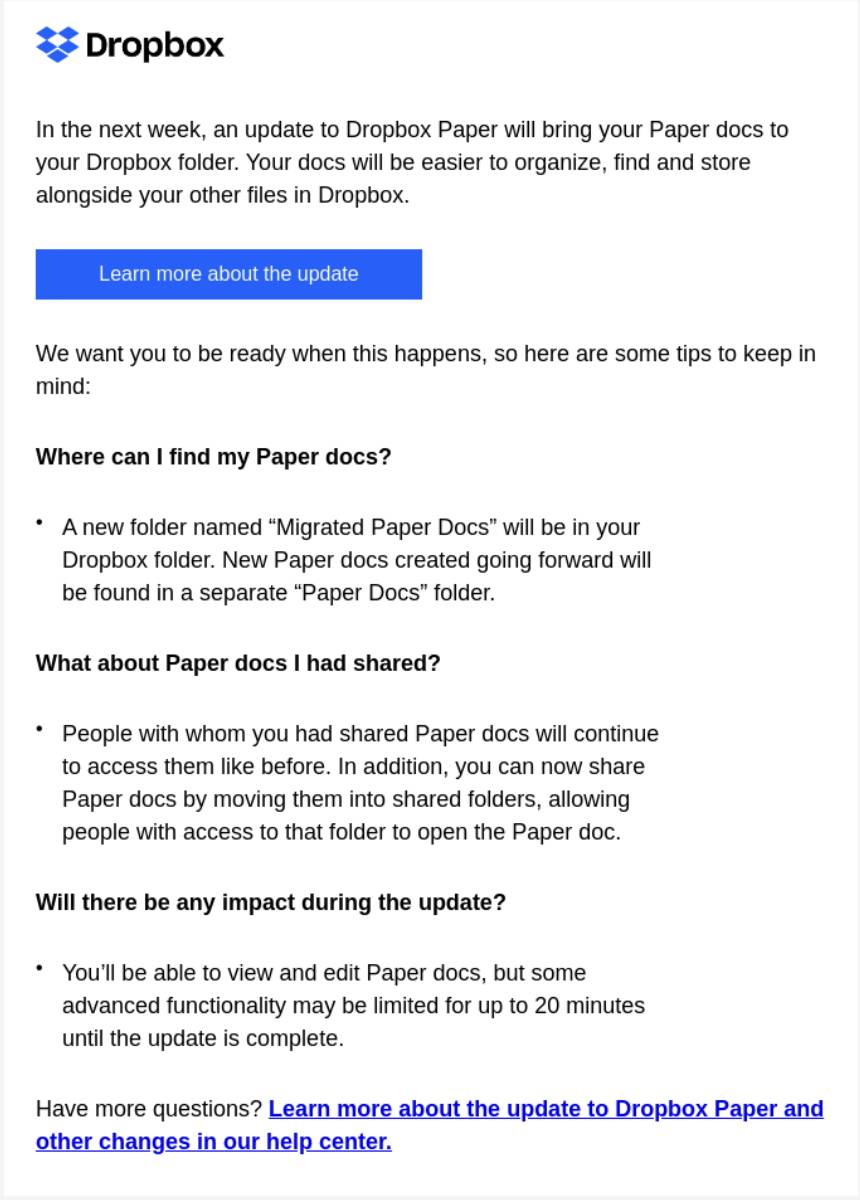
Dropbox ensures readability with a simple black-on-white design and plenty of white space. Bolded headers draw the reader’s attention, and the contrasting blue color makes it clear which text is clickable so readers can quickly take action.
While there are no accessibility laws for marketing emails, several relevant frameworks exist. Internationally, the Web Content Accessibility Guidelines (WCAG) are the most widely recognized standards. These guidelines were designed to make digital content accessible to all users and outline criteria for success.
4. Mobile responsiveness
Mobile responsive email design involves adapting text, images and layout for smaller screens.
Mobile devices now account for over half of all web traffic, so it’s critical to ensure email design compatibility with different screen sizes.
Companies often use responsive email editors to make their messages readable on mobile devices. These tools ensure that:
-
Fonts can scale to different screen sizes
-
Users can tap buttons on a touchscreen
-
The content and layout remain visually appealing on any device.
Responsive design lets you control what the reader sees so you can curate the reader experience you’re after.
5. Brand-aligned design
Sales and marketing email design should reflect your company’s brand identity. Align your design choices with existing brand guidelines on:
A consistent approach reinforces trust in a brand, creating a seamless experience for email recipients. Consistency also helps build awareness among those new to the brand.
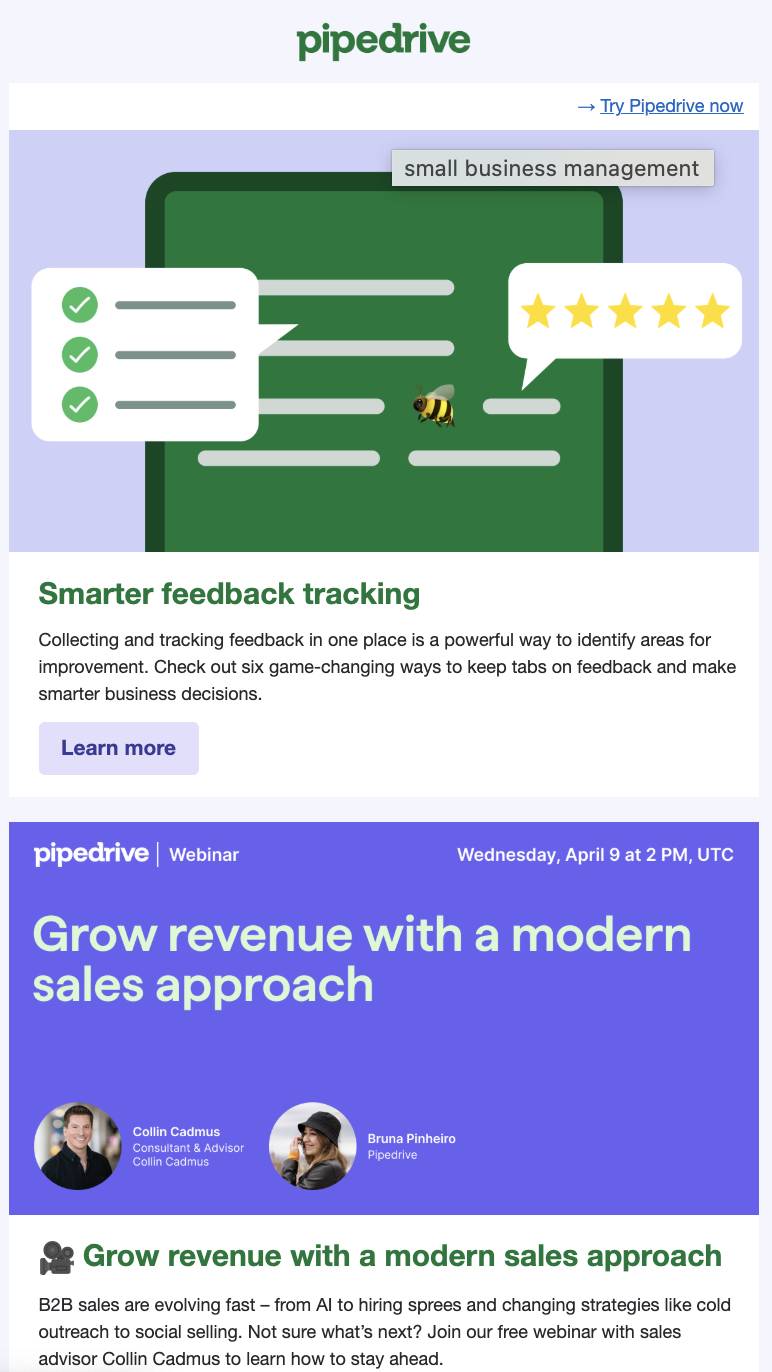
In Pipedrive’s emails, for example, the use of fonts, colors and imagery is consistent with the brand’s identity:
Start planning your email marketing campaign now
Click the button to receive a free email marketing campaign planner ebook
6. Eye-catching and actionable CTA buttons
A call to action (CTA) should stand out from the rest of the email, encouraging readers to take action immediately.
That action might be to book a call, visit a campaign landing page or engage with a piece of content marketing.
CTA buttons should use fonts that match or complement the email body copy. The buttons ought to capture readers’ attention with bold, high-contrast colors.
Button text should also be clear, concise and action-oriented, guiding the reader toward the next step.
For example, this email from visual online workspace Miro gives readers clear actions to take:

The large play button in the embedded video invites readers to watch, and the CTA to try the product is set in a bright blue button after the main text, making it hard to miss.
Later in the article, we’ll look at how to use Pipedrive to create well-designed marketing emails with CTA buttons.
7. Professional email signature
An email signature is a final opportunity to emphasize credibility and professionalism.
These relatively small design elements represent a company’s identity. Fonts should be crisp, clear and easy to read at 10-12 pixels. Your font choice should also match the company’s corporate branding.
Keep the design clean to avoid overwhelming your audience with information in an email signature.
Here’s an example of a well-designed email signature in Pipedrive’s email builder:

The simple text is easy to read and matches the message format. Including the company logo beneath the name gives the page some visual interest and helps the brand stand out.
Learn more about creating an email signature in Pipedrive in our Knowledge Base.
Recommended reading

Email marketing trends: what works in 2025?
How to build well-designed email campaigns with your CRM
Customer relationship management (CRM) software like Pipedrive can help you design emails that support marketing campaign success.
For example, Campaigns, Pipedrive’s email marketing software, allows marketers to:
Let’s look at the software’s intuitive design features in detail.
Design effective marketing emails with Pipedrive’s email builder
The email builder in Campaigns simplifies the email design process. You can start one of three ways:
-
Choose from a range of out-of-the-box free email templates
-
Use a drag-and-drop email editor to create or modify an email template
-
Import pre-existing HTML templates
Whichever option you choose, Pipedrive’s email builder allows you to delve deeper into your email’s design.
You can use the email builder to quickly and easily select fonts, embed gifs and add images. To use the feature, navigate to “Campaigns > Email campaigns” and select “+ Email Campaign”. Then click the “Design your email” option under “Content”.
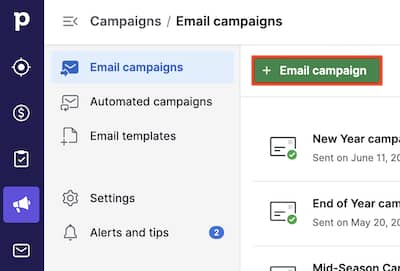
From there, you can design your email campaign from scratch or edit one of our existing layouts.

In the “Settings” tab, you can choose your default font and other design settings.
Free ebook: How to build a great email list
Click the button to receive 18 tips on ramping up your email list building
How to send professional-looking sales emails with Pipedrive
Pipedrive can also help sales professionals draft well-designed cold emails and follow-up emails that capture readers’ attention.
OurAI email writer uses natural language processing – a feature of generative AI – to write personalized emails in a sales rep’s regular writing style.
Once enabled, Pipedrive’s AI email creation tool is available in any email composer within the software.
Open a new draft or hit “Reply” in an existing email to bring up the options.
Select a template, your preferred font and any other formatting options and click “Write my email” to get a draft started.
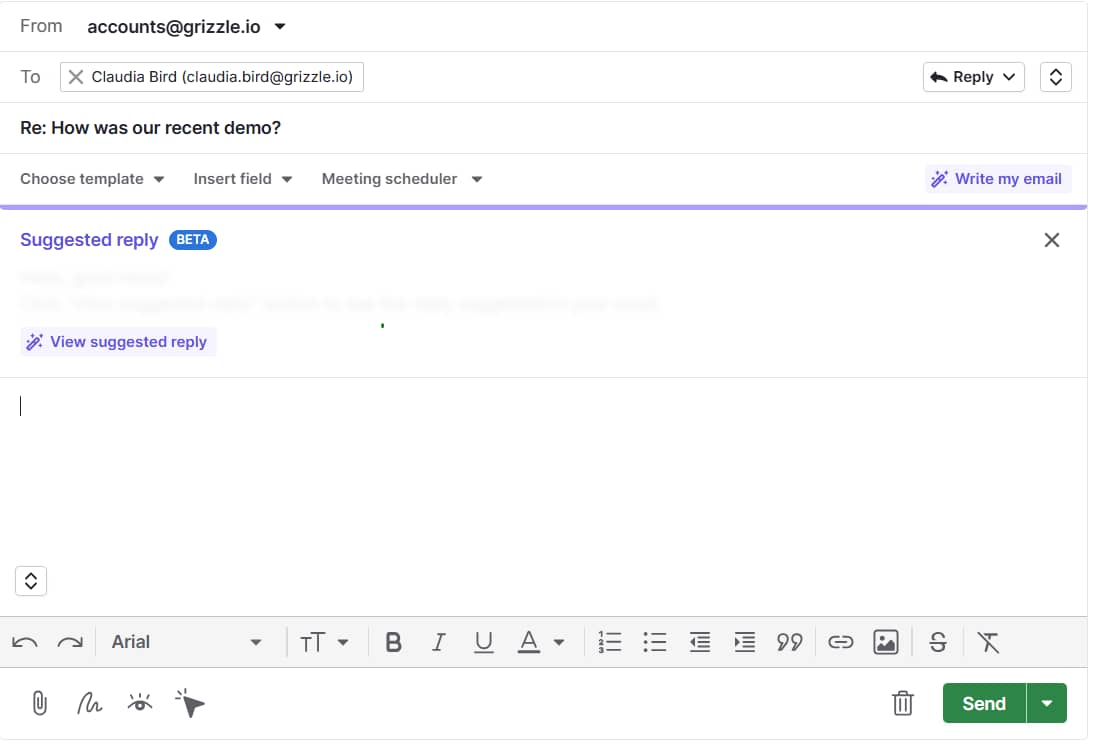
Once you’ve got a draft and are ready to send, click “Copy into message”.

Salespeople can even add their email signatures to the emails they send from the software.
Note: Pipedrive’s AI email writer tools are included in the software’s Professional, Power and Enterprise pricing plans.
Heat up your cold emails with 25 customizable email templates
These cold email templates sourced from Pipedrive sales experts will help you scale your prospecting, drive more replies and stay out of those trash folders.
Best font for email FAQs
Final thoughts
Font choice is an important aspect of effective email design. Choosing the right font helps your audience engage with the content and take the required action.
There is no single answer to choosing the best email fonts in sales and marketing, but there are several best practices to follow.
Using your CRM to create well-designed email campaigns and messages can make your emails even more successful.
Sign up for a free 14-day trial to try Pipedrive and start creating effective sales and marketing emails today.