

Your clients come to you with all things accounting because you’re the pro. So, of course, when it comes to creating the tools that help you deliver value to your clients, we turn to you, too.
Every new FreshBooks feature and update is designed with our accounting and bookkeeping partners in mind. We’re always improving to help you get more value from your tech stack and grow your practice.
Let’s look at some of the latest upgrades to FreshBooks in the first half of 2025 that’ll help you boost your workflow and better support your clients.
Never miss a transaction with manual bank connections
The latest update to FreshBooks bank connections means you no longer need direct access to a client’s bank account. By creating a bank account in FreshBooks manually, you can now perform bookkeeping tasks and reconcile transactions using just bank statements—so you don’t need to rely on client bank connections or credentials.
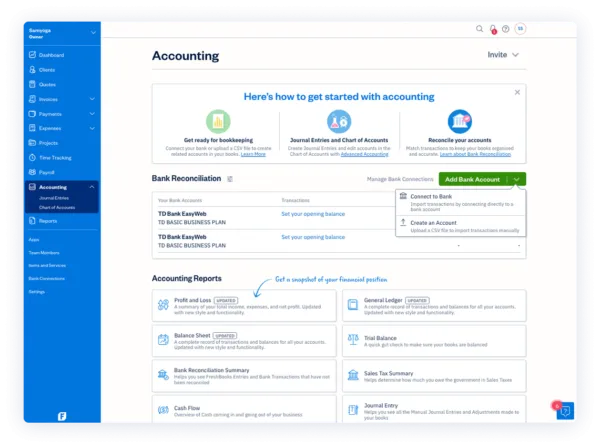
Just head to the and create a bank account. Then you can easily set a starting balance and upload and match bank transactions to keep client books organized.
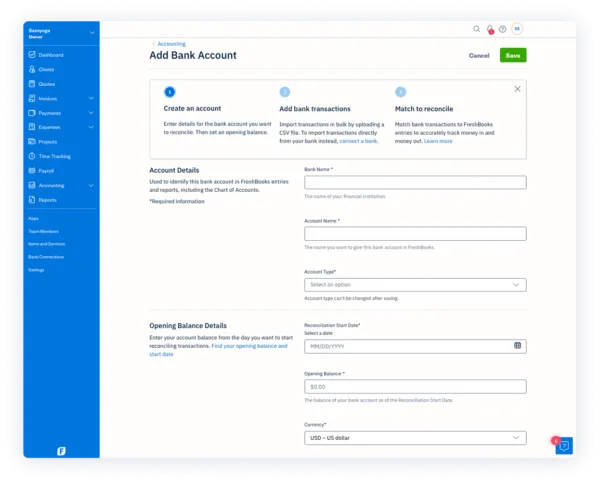
Reconcile client books on their terms
Speaking of reconciliation, direct bank connections previously limited owners to importing their most recent 90 days of transactions into FreshBooks. Now, you can set a client’s bank reconciliation start date to any date you want—even before the earliest their imported bank transactions—and manually import historical data via CSV.

With this added flexibility, you can now create a complete financial record for your clients, enabling seamless bank reconciliation and collaboration in FreshBooks for all past transactions. So, whether you’re filing taxes or just reviewing a client’s transaction history, all their banking data can be kept up-to-date in FreshBooks.
of your FreshBooks account.
Improve bank connections with Yodlee
Owners using Yodlee are now able to better set up bank connections with guided onboarding, paired with responsive in-app notifications and real-time updates during imports.
To keep connections seamless, actionable troubleshooting tips can help owners and accountants keep their books on track. View real-time connection statuses, get insights into potential connection issues, and easily access support right within a client’s FreshBooks dashboard. The improved bank connection experience gives you and your clients a more stable and transparent way to keep their books up to date.
Help clients connect a in FreshBooks under .

Put completed books on lock
Nothing feels better than closing the books on a client’s fiscal year.
Once you’ve wrapped everything up for an accounting period, you can turn on Financial Lock to prevent unintentional changes to any entries during the previous accounting period. It gives you total peace of mind that you—or your clients—won’t accidentally create a bookkeeping mess.
But we all know things can change, so if you ever need to make an edit, just head into Settings → Advanced Preferences → Accounting and hit unlock.

Ready to explore these new features for yourself? or discover how to become a