• Skip to primary navigation
  • Skip to main content
software stack logo

Software Stack

Get your Software Stack together

  • Knowledgebase
    • All Categories
    • Accounting Software
    • Automation & Workflow Software
    • Customer Relationship Management
    • E-Commerce Shopfronts & Payments
    • Marketing Automation
    • Online Courses & Membership
    • Project Management
    • Surveys & Forms
    • Web Hosting
  • Home
  • About Us
  • Contact Us
  • Show Search
Hide Search

Shopping Platforms & Marketplaces

How to Manage Payroll for Your Business (2025 Guide)

Software Stack Editor · September 6, 2025 ·

Payroll management rarely makes headlines. But when it does, it’s because something’s gone horribly wrong.

Like in San Francisco, where a teachers union filed a formal labor complaint after a payroll system upgrade left more than 100 teachers underpaid for months. Or in Wales, where a payroll clerk embezzled approximately $26,000 in wages by editing payee details and forging payslips.

The task may be routine, but the stakes are high. That’s why the payroll and HR services market is big: set to jump from $32.1 billion in 2025 to almost $66 billion by 2035.

To help, this guide walks you through how to manage payroll for your business in 2025—whether you’re hiring your first employee or scaling teams across multiple locations.

Why effective payroll management is so important

Payroll is the total amount of wages you pay your employees for the work they’ve done in a set period of time. It’s usually scheduled weekly, every two weeks, twice a month, or monthly.

But payroll is more than paying accurate wages. You also need to:

  • Collect employee data
  • Calculate net pay
  • Report, withhold, and pay taxes
  • Stay compliant with tax and labor laws
  • Keep accurate, detailed payrolled records

Payroll impacts reputation, retention, and revenue:

  • The SEC slapped 12 firms with a combined $63 million in fines for recordkeeping failures. The world is watching how you handle people’s pay. You may not be a giant investment firm—but if word gets out you don’t pay people correctly or on time, it sticks. 
  • In a 2024 survey by Remote, 47% of employees said late pay triggered stress or anxiety, the most common emotional response. This stress increases attrition and erodes employees’ trust in their employer. Forty-two percent said their relationship with their employer got worse after a payroll mistake. 
  • A company with 1,000 employees could lose over $922,000 a year cleaning up payroll problems. For a 5,000-person enterprise, that figure climbs to more than $4.5 million in lost productivity.

🧠Learn: Retail Staff Management: Tips, Skills & Responsibilities for Managers

How to manage payroll: Seven essential steps for your retail business

Here are the seven steps to set up and manage payroll for your business: 

1. Register for an Employer Identification Number (EIN)

First, you need an employer identification number, or EIN, to hire and pay employees. Your EIN is unique to your company. Think of it as the business version of a Social Security number.

An EIN is also known as an employer tax ID or a federal tax identification number. Use it to report taxes and other relevant information to the IRS.

Using the online application is the easiest and fastest way to register for your EIN. The site validates your information during the session and assigns your EIN immediately.

Or, you can apply by faxing or mailing a completed SS-4 form to the correct number or address. You’ll receive your EIN within four business days if you fax the form, or within four weeks if you mail it in.

2. Collect W-4s and other employee information

Next, you must collect Form W-4 for every employee you hire. This is also called an Employee’s Withholding Certificate. 

Each employee has to submit Form W-4 no later than their first day of employment. They complete this form based on factors like marital status, dependents, other jobs or income, and deductions. The responses help you withhold the correct federal income tax from their paychecks. 

Here’s what else you’ll need to collect and protect:

  • Bank account details for direct deposit
  • Full legal name, SSN (or ITIN), and mailing addres.
  • State tax withholding forms, if required (e.g., California’s DE 4)
  • Employment classification (W-2 employee vs. 1099 contractor)
  • Start date, job title, and compensation details
  • Voluntary deductions, like retirement contributions or health premiums
  • Work eligibility documents, such as Form I-9 in the US

Depending on your location, industry, or benefits offered, you may also need union membership status, wage garnishment information, or insurance enrollment forms.

3. Establish a payroll schedule

A payroll schedule refers to how often your employees get paid. Common payroll schedules include:

  • Weekly: Once a week (52 paychecks per year)
  • Biweekly: Once every other week (26 paychecks per year)
  • Semimonthly: Twice a month (24 paychecks per year)
  • Monthly: Once a month (12 paychecks per year)

There’s no federal law that regulates how often you should pay your employees, but each state has its own law around the minimum pay frequency.

For example, in Arizona you must pay your employees no more than 16 days apart (semimonthly). Meanwhile, Oregon and North Dakota mandate at least one monthly payment. Make sure to check the state payday requirements when defining your payroll schedule.

To choose the best pay period for your business, consider these three factors:

  • Cost and time: Every payroll run has a price. Weekly payroll runs cost more, because you pay your team 52 times a year instead of 12. Providers often charge per run, so more runs equals more fees. Monthly costs the least.
  • Employee preferences: Hourly employees tend to prefer weekly paychecks.Salaried employees tend to favor the predictability of biweekly pay. It’s also the most common US employee pay schedule. Monthly is often least preferred.
  • Payroll and accounting logistics: Semimonthly and monthly schedules cut the workload because there are fewer runs. They also play well with benefits calendars, month-end accounting, and reporting.

4. Decide how you’ll pay employees

The common methods for paying employees are direct deposit or a paycheck. You may offer only one option or to let your employees choose their preferred method of payment. 

Regardless, figure it out during the hiring process. On an employee’s first day, make sure you have all the information you need to pay them on time. 

5. Calculate employees’ gross pay per period

Gross pay is what your employees make before taxes and withholdings. Calculating gross pay for salaried employees is simple. Divide their annual salary by the number of pay periods to determine the gross pay per paycheck. 

For hourly employees, calculate the total hours they work per pay period. Then multiply it by their hourly rate. 

6. Withhold and submit payroll taxes: Federal, state, and local

Once you’ve run payroll, you need to pass along the appropriate taxes to the right agencies.

Most US businesses are responsible for withholding and paying three main types of payroll taxes:

  • Federal income tax
  • Social Security and Medicare (FICA)
  • Federal and state unemployment taxes (FUTA and SUTA)

You may also need to collect and remit state and local income taxes. This depends on the location of your business and of your employees.

Here are some resources to help you calculate, withhold, and pay the right taxes:

If you’re a US employer, you’ll likely need to file Form 941 (Employer’s Quarterly Federal Tax Return). The forms covers income taxes, Social Security, and Medicare withheld from employee paychecks, as well as your FICA contribution.

Per theIRS, these are the Form 941 deadlines for 2025:

  • Q1 (Jan 1–Mar 31, 2025): Due April 30, 2025
  • Q2 (Apr 1–Jun 30, 2025): Due July 31, 2025
  • Q3 (Jul 1–Sep 30, 2025): Due October 31, 2025
  • Q4 (Oct 1–Dec 31, 2025): Due January 31, 2026

7. File tax forms and submit employee W2s (and 1099s for contractors)

Use Form 941 to file your quarterly federal tax return. This form reports income taxes, Social Security tax, or Medicare tax withheld from your employees and the part paid by you.

Because the IRS updates Form 941 often,reference IRS instructions before completing and filing it.

You’re also responsible for filing a FUTA return (Federal Unemployment Tax) each year. 

Every year, you must file employee W-2 forms with the Social Security Administration (SSA). The SSA encourages all employers to file their W-2 forms online, as it helps with speed and accuracy.

For the 2025 tax year, here’s what you should have already submitted:

  • Form W-2 (for employees): Filed with the Social Security Administration and given to employees by January 31, 2025.
  • Form 1099-NEC (for independent contractors): Filed with the IRS and sent to recipients by January 31, 2025.

If you missed the deadline or discovered a mistake, you may need to file a corrected form or get professional legal or tax advice to handle penalties. 

Common payroll mistakes (and how to avoid them)

In the 2024 Getting the World Paid survey, more than 50% of responding companies cited HR data entry errors as the primary cause of payroll inaccuracy. Other top reasons were lack of standardized HR processes (31%) and messy integrations (26%). 

Pay attention to these areas to prevent errors before they cost you money, momentum, or morale.

1. Depositing employment taxes late

If you don’t pay payroll taxes on time, the penalties can add up fast: late tax deposits cost you 2%–15% of the unpaid amount. Note the rapid growth of penalties—2% for 1–5 days late, 5% for 6–15 days, 10% for over 15 days, and 15% after IRS notices go out.

If you run payroll for a team with mixed roles and pay schedules, such as a combination of hourly floor staff, part-time contractors, and salaried ops managers, it’s complex. You’re working with multiple tax deposit timelines and entities. Based on your employees’ earnings, you must calculate and submit federal, state, and local tax payments. 

Federal employment taxes (including withheld income tax and FICA contributions) are due monthly or semiweekly, depending on your deposit schedule. If you miss those dates, the IRS penalty clock starts ticking.

How to avoid it:

  • Know your schedule and stick to it.
    • Monthly depositors: Taxes are due by the 15th of the following month.
    • Semiweekly depositors: Pay by the following Wednesday (for paydays Wed–Fri) or Friday (for paydays Sat–Tues).
  • Set recurring calendar reminders. Or better yet, use payroll automation software to do it for you. If you’re switching deposit schedules, you may qualify for a one-time penalty waiver—but you must file the corresponding return (Form 941) on time.

2. Misclassifying hires

Misclassification can cost you $50 for every missing W‑2, 1.5% of all wages paid to misclassified workers, and 40% of FICA not paid by employees.

For intentional misclassification, the IRS can tack on 20% of total wages, 100% of FICA, criminal fines up to $1,000, and even jail time.

How to avoid it:

  • Use the IRS rule of thumb. This is how the IRS evaluates whether a worker is an employee or independent contractor:
    • Behavioral control: Does your business dictate how the worker does the job through instructions, training, or oversight?
    • Financial control: Does your business control the business side of the worker’s job, such as payment method, who supplies tools or covers expenses, and potential profit/loss?
    • Relationship factors: Is there an ongoing agreement, employee benefits, or integration of the worker’s services into your regular business?
  • Exempt vs. non-exempt status depends on the job duties. Non-exempt workers must be paid overtime. Exempt workers don’t qualify; but only if they pass the duties test under the Fair Labor Standards Act (FLSA).

3. Paying from the wrong state

Each US state has its own rules around income tax, minimum wage, overtime pay, and leave. As the employer, you must apply the laws of the state where the employee physically works. Where you’ve registered your business is irrelevant in this case.

How to avoid it:

  • Collect a work location at onboarding, and if you classify roles as remote or hybrid. This should be part of your employee intake process.
  • Register to withhold taxes in every state where your employees work. That means filing for a state tax ID and complying with local labor laws.
  • Set up your payroll software to calculate based on employee location. Many platforms (like Gusto, QuickBooks Payroll, or other Shopify-integrated tools) allow location-based payroll automation. Use it.

4. Skipped overtime

If a non-exempt employee works more than 40 hours in a workweek, they’re entitled to overtime. That’s federal law. 

Skip it, and you’re looking at civil penalties up to $1,000 per violation, plus any extra fines your state might add.

How to avoid it:

  • Use a time-tracking system that logs hours down to the minute. Paper timesheets and “guesstimates” won’t cut it, especially in an audit.
  • Know the state’s overtime laws. Some states require overtime after eight hours in a day, not just 40 in a week.
  • Audit overtime weekly. Don’t wait until payday—spot and fix errors before they snowball.
  • Avoid off-the-clock work. If someone clocks out but keeps working (e.g., replying to texts or closing registers), that time still counts—and must be paid.

5. Missing or sloppy payroll records

W-2s and 1099s aren’t “whenever-you-get-to-it” documents. If you file late or send incorrect information, the IRS penalty ranges from $60 to $330 per form. They base fees on how late you are or whether they think you flat-out ignored the requirement.

Hourly workers are usually the most affected by payroll hiccups, especially if it involves overtime.

Here’s how to avoid it:

  • Store all payroll and tax records in one secure, digital system. That includes W‑4s, I‑9s, time logs, pay stubs, benefits deductions, and signed contracts.
  • Go paperless whenever possible. Most filing mistakes happen when you scatter things across spreadsheets, PDFs, and inboxes.
  • Know the deadlines. For the 2025 tax season, employee W-2s and 1099s for contractors had to be filed and distributed by January 31, 2025. Miss that, and the penalty window opens immediately.
  • Audit your records quarterly. A 10-minute check-in every quarter is far cheaper than paying $3,000 in missed W‑2 fines later.

💡Pro tip: Set up a “four-eyes check.” Have one person enter payroll data and another double-check it. It’s a simple internal control to catch errors, keep audits clean, and SOX and SOC 2 compliance requires it.

Best practices to manage payroll efficiently

When it comes to payroll, the goal is the same for all businesses: pay people accurately, and on time. 

Here are top payroll best practices to keep you compliant and above water:

Share a payroll calendar

A payroll calendar is a public, shareable calendar with pay periods, pay dates, timecard due dates, payroll tasks, and holidays.

This helps your employees understand:

  • When they’ll get paid
  • The period the payment is for
  • Potential delays or changes in pay dates (for example, due to a public holiday)
  • Their deadlines for submitting timecards

Don’t assume your employees will know these dates by default. More than 50% of employers don’t do anything or use any tools to help employees understand their payslips.

Why would it be any different when it comes to payroll dates? A payroll calendar reduces any confusion (and back-and-forth emails with employees asking for information). Besides, it helps everyone plan budgets and forecast cash flow.

For you, a payroll calendar also calls out key tasks to do, like depositing payments and filing tax forms. This helps pay your employees on time, every time.

“Your financial health depends on how you manage payroll,” says Courtney Quigley, business reputation consultant at Rize Reviews. “Manage it with a payroll calendar so you can keep track of important dates, holidays, PTOs. It also helps your staff determine cut-off dates and payday. Share the calendar with supervisors and managers of your store or stores so they can transparently share it with their teams.”

Maintain comprehensive employee and payroll records

As you hire help, you’ll generate documents and records for each employee, including:

  • General information: Employee name, address, SSN, date of birth
  • Tax forms: W-4, state W-4, other withholding forms
  • Pre-hiring records: Job application, interview records
  • Time and attendance records: Time cards, total hours worked (per day and week), time off taken, remaining time off
  • Payroll records: Pay rate, total daily/weekly earnings, overtime earnings, bonus pay and commissions, benefits and deductions, contributions, expense reimbursements, raise documentation, pay periods, pay stubs

Federal law states you need to keep payroll records for three years, and payroll tax records (like unemployment taxes) for four years. Some documents, like retirement income and 401(k) plan details, must be kept for six years.

Make sure to check laws and requirements for payroll record-keeping in your specific state. They might be longer than federal ones. For example, the state of New York requires you to keep payroll records for six years.

Keep paper copies of payroll records, or store them online on your device or payroll software. In both cases, it’s crucial to keep employee and payroll records safe, as they contain sensitive, confidential information.

“Organization is key. It’s critical you maintain squeaky clean payroll records,” says Will Lopez, head of accountant community at Gusto.

“Be sure to dedicate a secure place to keep up to four years of employee I-9 forms, W-2s, W-4s, state new hire forms, copies of all your filed tax forms, and always maintain the dates and amounts of all tax deposits, timesheets, and pay stubs,” Will adds.

“Different states have different requirements when it comes to record-keeping (even for employees who have been terminated), so staying on top of requirements and keeping your records clean and well maintained will make audits run smoothly—this will also help you spot issues before they arise.”

Stay updated on tax and labor laws

Payroll mistakes can cost you hundreds or even thousands of dollars in penalties. You must stay up to date with tax laws and requirements to make sure you:

  • File and pay taxes on time
  • Process payroll adhering to both federal and state laws
  • Calculate and pay correct overtime
  • Keep complete and accurate payroll records

It’s a challenge to keep up with ongoing law updates. It’s also challenging to stay compliant during growth. If your business expands into different states, hires remote workers, or employs a mix of full-time employees and part-time contractors, you’ll need to be diligent.

To stay up to date, make a routine to check in with:

Appoint a payroll manager 

If you plan to keep your business small but need to offload payroll tasks, this could be a hybrid role for an existing employee or a part-time freelance role.

Or if you want to grow your store and need more robust payroll support, hire a full-time payroll manager, an external accountant, or a payroll service. They’ll do it better, faster and free you to focus on other parts of the business. Plus, as professionals, they keep up with payroll laws and regulations.

“Payroll is complex, which is why you should assemble your Payroll Squad,” says Will. “The key players to involve in your payroll process are: a) your payroll provider, b) an accountant (or other financial professional), and c) an HR business partner.” 

Ask for employee feedback

Make your payroll a two-way street for communication. Openly ask for employee feedback and questions. This prevents you from assuming that they fully understand how payroll works (and they’re happy with it).

Prompt employee feedback by asking:

  • Do you have any questions or concerns around using or submitting time cards?
  • Would you like to better understand your payslips?
  • Do you have suggestions around payroll schedules?
  • Is our payroll calendar clear and easy to navigate? Is there anything missing from it?

Payroll affects everyone in your company, so most everyone will have something to say. It’ll help you improve how employees get paid, as well as strengthen your rapport with them. 

Use the questions and feedback to create internal documents and a FAQ explaining your payroll process and its impact on employees.

Implement robust payroll security measures

Payroll means people’s livelihoods, and it’s packed with sensitive data like salaries, tax IDs, bank info, benefits, and addresses. As such, HR information like this is a prime target for cybercriminals. According to People Management magazine, four in five data breaches involve employee information.

Meanwhile, about half of small business owners still run payroll off a shared spreadsheet or an unencrypted desktop folder.

Here’s how do it smarter (and safer):

  • Use a payroll provider that plays nice with your existing tech stack. Apps like Gusto, Deel, or QuickBooks Payroll integrate with your Shopify store, with secure syncing of hours, pay, and contractor invoices. Most offer SOC 2 or ISO 27001-level compliance out of the box.
  • Restrict access based on roles. Only give payroll visibility to the people who need it. Shopify’s staff permissions help you control access at every level, including third-party apps.
  • Store payroll files in the cloud, not on your desktop. Make sure it’s backed up, encrypted, and access-logged. Bonus points if your payroll provider builds in automatic W-2/1099 filing.
  • Educate your team on data hygiene. This means no emailing unencrypted pay stubs. No screenshots of payroll dashboards. And definitely no sharing passwords to “just check something quickly.”
  • Run quarterly access audits. Team turnover happens, but permissions updates are often overlooked. Clean up your admin list every three months. Make it part of your quarterly workflow.

Integrate payroll with other business functions 

Payroll should neither live in a vacuum nor in a million tabs on your browser. It needs to sync with HR, accounting, and time-tracking platforms. This way you’re not double-entering or chasing spreadsheets.

  • Accounting tools like QuickBooks and Xero automatically grab your Shopify sales, fees, and expenses and sync them with payroll. That means one less reconciliation task at month-end. Apps like Link My Books or A2X bridge the gap between Shopify’s POS or online store and your accounting books.
  • Time-tracking tools built into your Shopify POS, like EasyTeam or PTT: POS Time Tracker, let your team clock in and out at the register. You get accurate records for every shift, which flow straight into payroll. Also worth checking out: ClockedIn.
  • When your HR system talks to your payroll tool, everything from job titles to PTO balances update automatically. Tools like Gusto integrate seamlessly with Shopify to onboard new hires, track benefits, and sync pay changes, without manual edits.
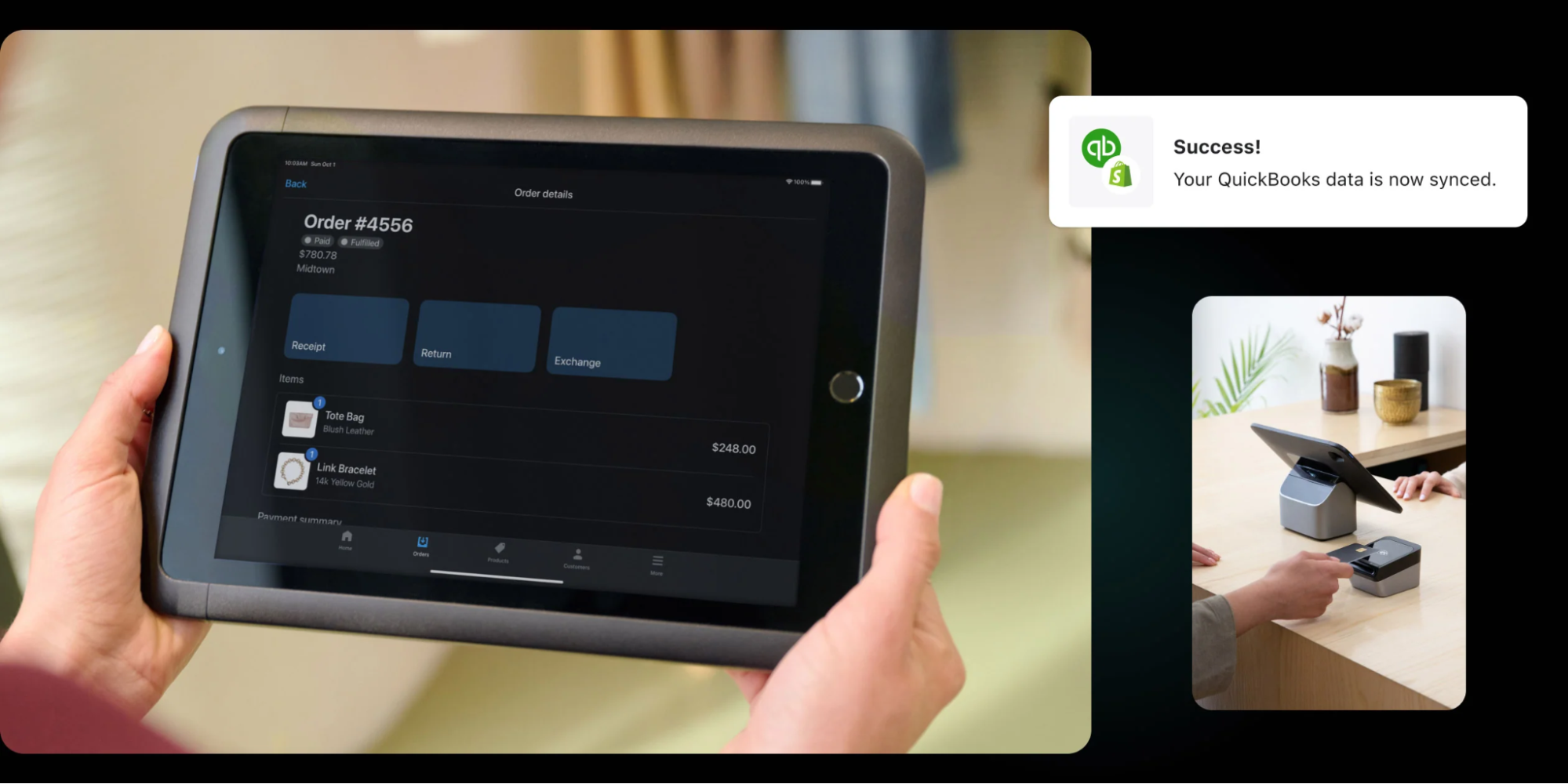
Tablet showing Shopify POS order synced with QuickBooks.
Shopify POS for QuickBooks.

📚Read: How to Do Small Business Accounting in 2025 (+ Best Tools)

Choosing the right payroll system for your business

Payroll’s not one-size-fits-all. What works for a five-person team won’t cut it at scale. Let’s break down the real options and how to choose the one that fits your workflow, budget, and headcount.

1. Manual/DIY payroll

Best for: Micro-businesses, early-stage side startups, or teams of one

A spreadsheet and a calendar reminder—that’s how a lot of small retailers start. And to be fair, if you’ve got one employee and zero budget, manual payroll can work…for a while.

Pros:

  • Cost-effective; you don’t pay for a service, tool, or another person to do payroll.
  • Lots of control and insights into your revenue, cash flow, and payroll expenses.

Cons:

  • It’s time-consuming and hiring even one more employee adds extra tasks to your already full plate.
  • You can make errors and pay significant fines if you don’t catch them on time.
  • It’s your responsibility to stay up to date on tax laws and regulations.

“DIY works when you have a small team, but it gets unmanageable as you grow. Not just because it’s time-consuming, but it opens up room for error,” says Lanai Moliterno, CEO and founder of Sozy. 

As your team grows or your tax needs get more complex, DIY payroll becomes more stress than it’s worth. The money you think you’re saving, you’re paying for in time, anxiety, and potential fines.

If payroll prevents you from tending to or growing your business, it may be time to get help. It’s better to focus on your strengths.

2. Payroll software

Best for: Businesses with multiple employees, hourly teams, or anyone who wants to save time and avoid penalties

A good payroll management system automates what comes before and after payday. Here’s what the best tools offer:

  • Automated tax calculations and filings at the federal, state, and local level
  • Direct deposit so your team gets paid on time, every time
  • Time-tracking integrations with your POS or scheduling system (like EasyTeam or QuickBooks Time)
  • Employee self-service portals to reduce back-and-forth for paystubs, W-2s, and bank detail updates
  • Built-in payroll compliance alerts that flag errors before they become IRS problems

“Using payroll software puts so much into automated mode and safeguards your time and business from lawsuits and expensive mistakes. It’s a small extra expense, but it pays off in the long run with the time you save and the peace of mind you get,” adds Lanai.

Pros:

  • You have lots of control and insight into data, reports, filings, history, and more.
  • You have easy access from all devices thanks to being cloud-based.
  • It’s affordable, with many options priced under $40 per month.

Cons:

  • You’re still liable for any errors. A payroll software provider doesn’t assume your responsibilities to file and pay taxes, pay employees, or keep records.
  • There’s a possible learning curve, depending on your platform of choice.

Consider these four questions when choosing payroll software:

  1. Does it support your team’s pay structure (hourly, salaried, commission)?
  2. Can it handle taxes across all the states/counties/countries where you operate?
  3. Does it offer integrations with your accounting, time tracking, or HR stack?
  4. What’s the total cost per employee or per month, and does it scale with your business?

If you’re on Shopify, you’ve already done half the work. Instead of stitching together disconnected tools, tap into Shopify’s app ecosystem to manage payroll without adding extra platforms.

💡Pro tip: Need to whip up a paycheck fast? Shopify’s free pay stub generator lets you create professional pay stubs in minutes. It’s a handy tool for small teams or one-off payments when you’re not ready for full-scale payroll software yet.

3. Hiring an accountant (in-house or external)

Best for: Retailers who want expert oversight and tailored financial advice without doing the number crunching themselves

You can hire an in-house accountant or an external contractor to prepare your accounts, keep track of your finances, and manage your payroll. Payroll outsourcing lets you offload it to professionals who do it daily.

If you hire internally, this person could manage payroll manually or use payroll software—both options work. If you hire an external accountant, they’ll have their own process and setup for managing their clients’ payroll.

Pros:

  • You get extra time and focus, as you’ll offload dozens of tasks and reminders from your to-dos.
  • It removes stress and pressure from you to stay current on laws and handle payroll yourself.
  • You’ll have a go-to person for finances, taxes, compliance, record-keeping, and more.

Cons:

  • You have less control over your filings and documentation.
  • It can be costly and disrupt your cash flow, especially if you bring a full-time employee on board.

If you choose this option, spend enough time looking for the right person. Ask for recommendations from fellow store owners and entrepreneurs. Look up reviews, ask for references, and take the time to confirm the person fits your needs. 

This is one hire with the potential to impact your business in a dramatic way. Offload the tasks, but stay informed.

4. Payroll services

Best for: Busy store owners who want to outsource all payroll, tax filing, and compliance to a trusted provider

Payroll service providers, or payroll management companies, provide a way to delegate your payroll management to a team of professionals. They calculate your payroll, file tax statements, deposit payments to employees, process new hires, and more.

Pros:

  • There’s zero payroll-related stress on your plate, as you have a team of people handling every detail of your payroll management.
  • There’s enhanced assistance for businesses that grow and change rapidly, hire remotely, and/or operate stores in different states and countries.

Cons:

  • They are costly to engage, and can get more expensive as you grow and need more support with payroll and compliance.

While they serve businesses of all sizes, payroll services are usually best suited for medium and large stores, due to the scale of expertise and support they provide.

Create pay stubs quickly

Use Shopify’s pay stub generator to instantly create accurate paychecks for your employees. Include essential details like year-to-date income and deductions.

Create paycheck

Please consult independent legal advice for information specific to your country and circumstances. Shopify is not liable for your use of this content.

This post is for information purposes only. You are responsible for reviewing and using information appropriately. This content doesn’t contain and isn’t meant to provide legal, tax, or business advice.

Legal requirements are updated frequently and you should make sure to do your own research and reach out to professional legal, tax, and business advisers, as needed. Your local state, province, or county will have different steps and requirements.

To sell products using the Shopify platform, you must comply with the laws of the jurisdiction of your business and your customers, the Shopify Terms of Service, the Shopify Acceptable Use Policy, and any other applicable policies.

How to manage payroll FAQ

How do you manage the payroll process?

Start with a clear payroll schedule and accurate employee records. Track hours, calculate gross pay, withhold the right taxes, and pay your team on time; then file tax forms with the IRS and your state.

If you use a platform like Shopify, it’s easy to integrate payroll software that handles payouts, filings, and tax remittance automatically; especially useful if you’re scaling.

How do I manage my payroll myself?

You’ll need to:

  1. Get an EIN (Employer Identification Number)
  2. Classify your workers
  3. Set a pay schedule
  4. Withhold and pay taxes
  5. File tax forms like W-2s and 941s

It’s doable, but time-intensive. If you’re running a Shopify store, look into integrated payroll tools that sync with your team’s hours and roles. It’ll save you hours every month.

How to manage HR payroll?

HR payroll is payroll + compliance + people operations. You’re handling benefits, PTO, bonuses, wage classifications, and labor law requirements. Many HR/payroll tools that integrate with Shopify also handle team permissions, location-based rules, and PTO tracking. This way you’re not cobbling it together across apps.

What’s the best way to do payroll for a small business?

The “best” way is what’s accurate, compliant, and doesn’t suck up your entire week for your business. For most small businesses, that means payroll software that handles calculations, taxes, and filing.

If you’re on Shopify, connect to trusted payroll partners right from your admin dashboard. 

Can I do my own payroll for free?

Yes, but it’s not risk-free. You’ll need to track hours, calculate withholdings, pay taxes, and file returns yourself. As your team grows, so do your payroll costs. This includes wages, software fees, time-tracking tools, benefits contributions, and taxes. 

Consider low-cost payroll tools that integrate with Shopify and offer automatic tax filing. They’re more affordable than hiring an accountant, and far cheaper than IRS penalties.

What’s the difference between an employee and an independent contractor for payroll purposes?

Employees are on your payroll. You withhold taxes, pay employer contributions, and follow wage laws. 

Contractors invoice you. You don’t withhold taxes, but you do issue 1099-NEC forms, which stands for non-employee compensation.

Misclassifying someone can lead to back taxes, penalties, and interest. 
Google Maps Ads: A Beginner’s Guide for 2025

Software Stack Editor · September 6, 2025 ·

When shoppers type a “near me” search into Google, are they finding you—or your competitors? Google Maps ads push your store pin to the top of local search results when customers look for things like “coffee shops,” “hardware stores,” or any other type of business nearby. 

These ads offer one-tap directions, click-to-call options, and even feature in-stock products, nudging nearby shoppers straight to your door. With over 2 billion monthly users, Google Maps delivers a reach few platforms can match. Some 83% of US consumers already rely on Google when reading reviews for local businesses. 

Ahead, you’ll learn how to set up Google Maps ads and turn every ad dollar into more foot traffic, more sales, and more loyal customers. 

Sell where people search with Shopify

Shopify comes with powerful tools that help you list, promote and sell products on Google. Get your product in front of new shoppers who are looking for what you’re selling, from one back office.

Start selling on Google

What are Google Maps ads?

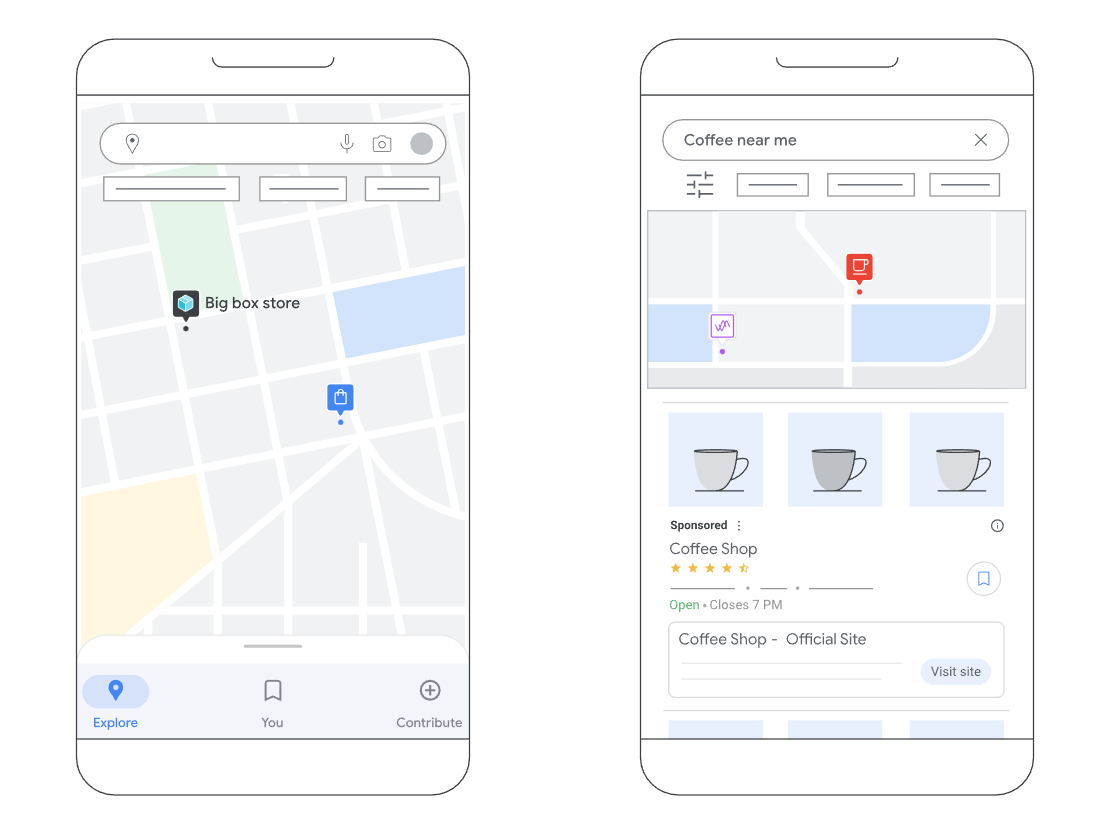
Google Maps ads, also known as local search ads, are promoted Google Business listings that appear when you perform a location search on the Google Maps app. When doing a mobile search for a business in your area, Google often returns results based on your physical location and the business’s ratings.

An image of a mobile map app showing a search for coffee shops and a list of results.
Google

Brands can buy these placements through Google Ads. Today, they are typically delivered via Performance Max for store goals, which lets Google AI optimize bids and creative across every channel. 

A single ad unit can:

  • Push your branded pin above organic pins, even if a rival is closer 
  • Offer tap-to-call, directions, and website links 
  • Showcase hours, ratings, photos, and live inventory 

How Google Maps ads work

Google Maps ads take three inputs to function effectively:

  1. Business Profile and location assets to provide the address, hours, photos, and other information for the ad
  2. Local store inventory data from your Merchant Center (optional)
  3. A Performance Max for store goals campaign with average daily budget and Smart Bidding 

When Google detects local intent (for example, “clothing near me”), the campaign’s locations enter a real-time auction. Winning ads can appear in four spots:

  • Promoted pins on the map
  • Map search ads atop the results list
  • Map-suggested ads in autocomplete
  • Placesheet ads on the business details page

Ad Rank in Maps blends the usual bid-and-quality formula with offline relevance signals, like distance, search text match, store rating, and inventory match. This makes it possible for a well-rated store slightly farther away to outrank a closer but lower-quality competitor.

A user clicks from Google Search results to a Google Maps ad.
Google

These ads are pay per click, so charges only apply when a user completes one of these actions:

  • Location detail click that expands the Business Profile
  • Directions click that opens turn-by-turn navigation
  • Click-to-call that dials the store from mobile
  • Website click that opens the retailer’s URL

Performance Max uses one shared asset library for every channel it serves, including Maps. Any AI-generated headlines, descriptions, or lifestyle images are automatically eligible for your Maps placements once location assets are linked.

Benefits of advertising on Google Maps

With more than two billion people using Google Maps each month, it’s clear that promoting local search ads is beneficial to your business. Let’s look at two other major benefits of advertising on Google Maps: increased visibility and driving foot traffic to your store. 

Increased visibility in the local Map Pack

Reaching targeted customers requires strategic ad placements throughout Google. If you want to sell your products to local customers but don’t want to buy a billboard ad, Google Maps marketing is a smart move. 

For example, if you’re an apparel brand that wants to test local advertising for your brick-and-mortar store, it makes sense to run local search ads. You can end up as a Promoted pin on Google maps, above all organic listings, so shoppers see your business first. 

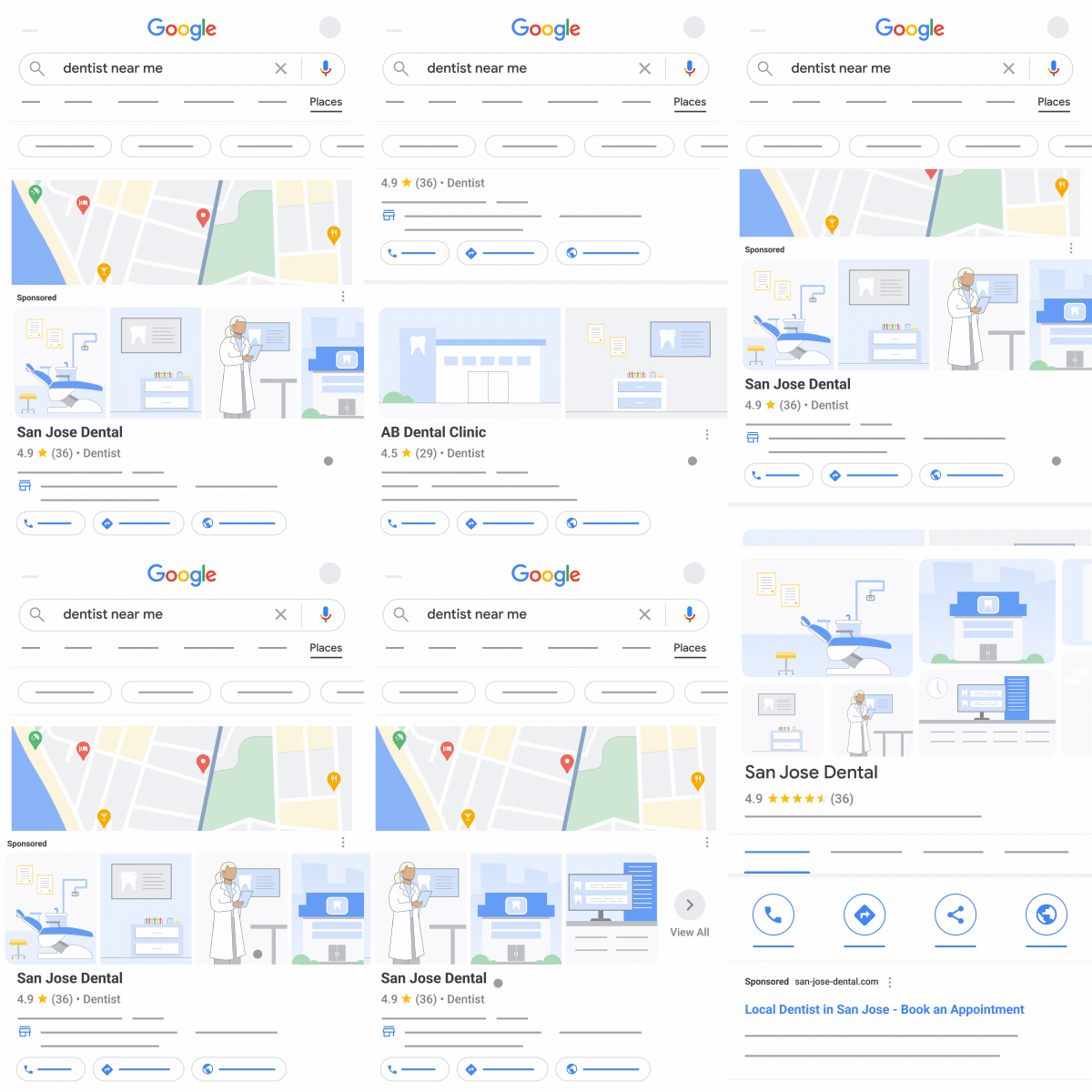
San Jose Dental Maps ads at the top of search results for “dentist near me.”
Google

Drive qualified foot traffic to your store

Offline purchases often start online. In a 2023 shopper study from Google, 91% of in-store buyers used Search before walking into a store. 

When New Zealand grocer Four Square added Maps placements via Performance Max, they logged 419,000 incremental store visits while the campaign was live, as reported by Google. 

Maps ads convert “near me” intent into an in-store visit. With AI-driven bidding and clear offline attribution, you can scale ad spend and know you’re getting real-world results. 

How much do Google Maps ads cost?

There’s no flat Maps fee for ads. You set a daily budget and pay only when someone interacts with the ad. 

Across all Google Ads campaigns, the average cost per click (CPC) sits at around $5.26 in 2025, though highly local categories like restaurants can see CPCs closer to $2.05. Industry, competition, and auction dynamics push some verticals (legal, insurance) well above the average.

Features of Google Maps ads

Promoted pins

Pinterest isn’t the only platform with promoted pins—Google Maps has them, too.

Unlike the standard red pins representing a business entity on Google Maps, promoted pins appear as a square on the map. They also appear at the top of map-based search results to stand out from the rest.

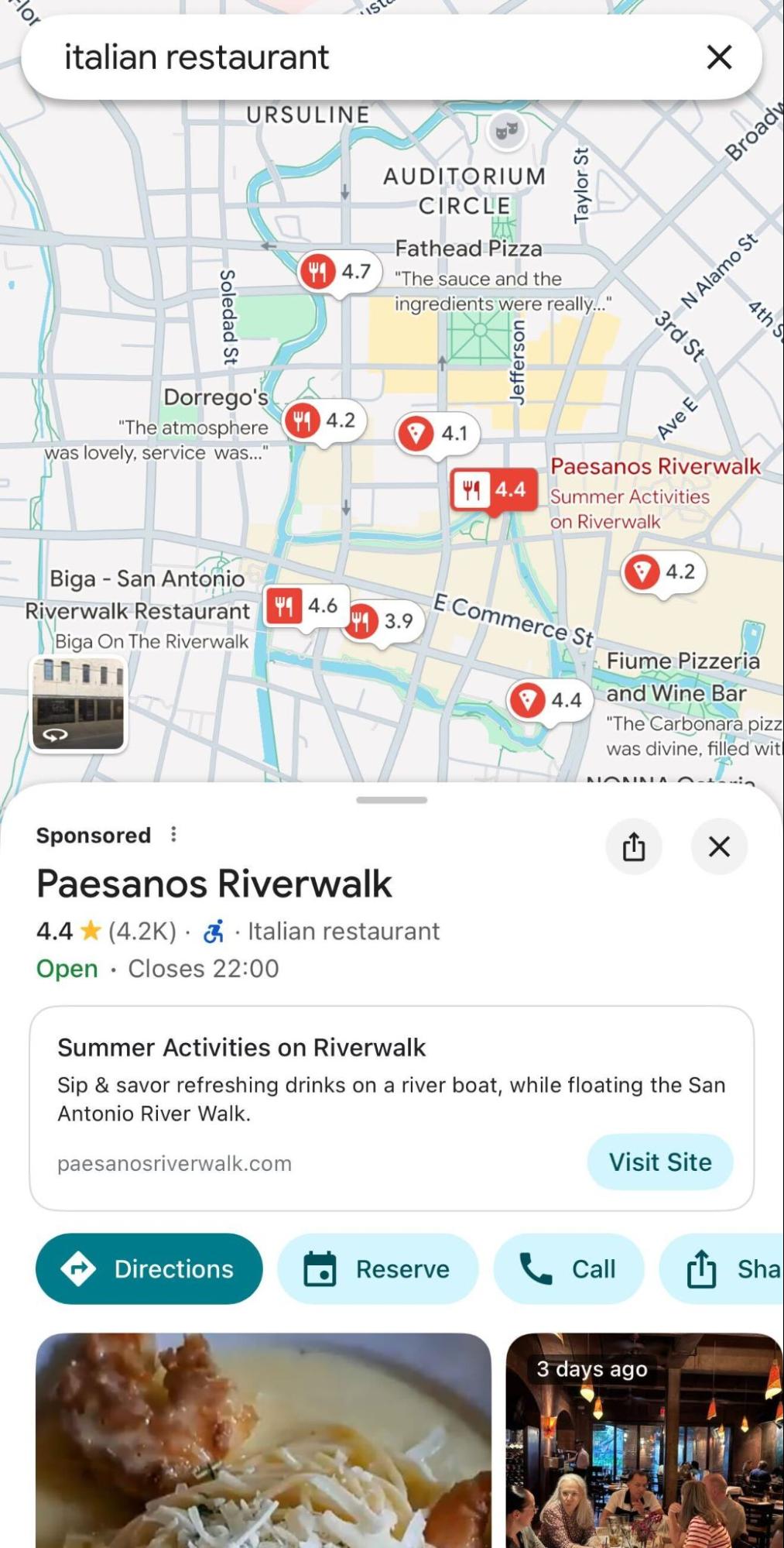
Here’s what a promoted pin looks like:

A Google Maps search for an Italian restaurant shows a sponsored ad for Paesanos Riverwalk.
A sponsored ad makes Paesanos Riverwalk the top result for an “Italian restaurant” search.

While promoted pins are a great way to get noticed when users browse nearby areas on Maps, they’re more than just another form of paid search, as they are tailored to the searcher’s profile.

When recommending a promoted pin, Google Maps considers the following: 

  • The person’s search history
  • The person’s buying history
  • Places they’ve previously been

So, when someone clicks on the purple pin or a Maps-connected search result, promoted pins can show customized web pages or personalized deals to encourage the searcher to visit the store. 

Featured customer reviews

Nearly 8 in 10 US consumers say they always or regularly read online reviews before choosing a local business. Another excellent feature of Google Maps ads is displaying customer reviews.

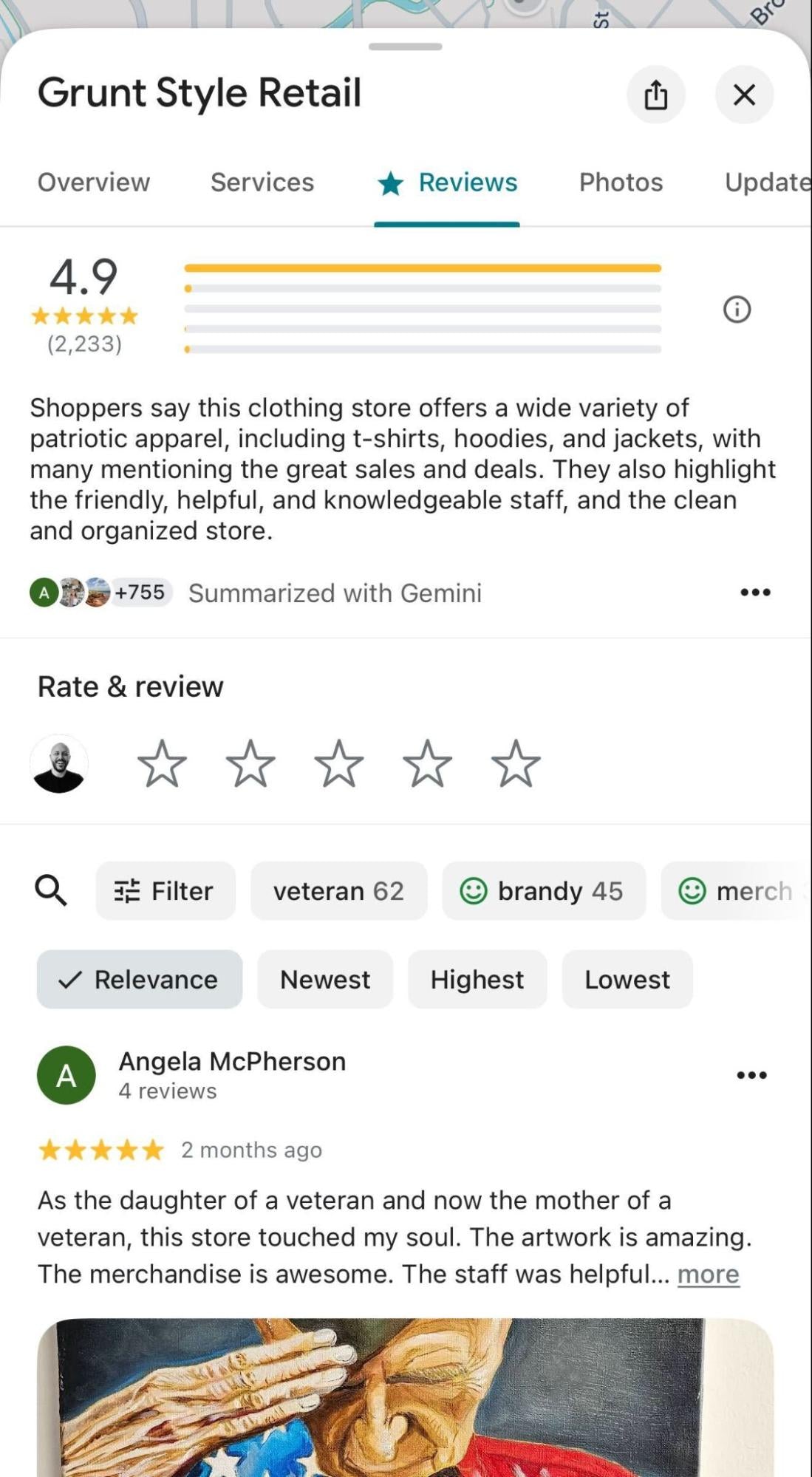
To help customers make faster decisions, Google now features an AI-powered summary by Gemini that distills the key points from customer feedback. Below this summary, users can still read individual highlighted reviews to get a deeper sense of your business.

A store's 4.9-star Google review page featuring a summary by Gemini.
Gemini AI summarizes customer reviews, from personal stories to key points.

If you’re going to run local search ads on Google Maps, be sure to get more reviews beforehand. Encourage customers to leave reviews on your Google Business Profile so they display on your ad. This helps build trust with customers and maximizes your ad spend. 

Custom messaging

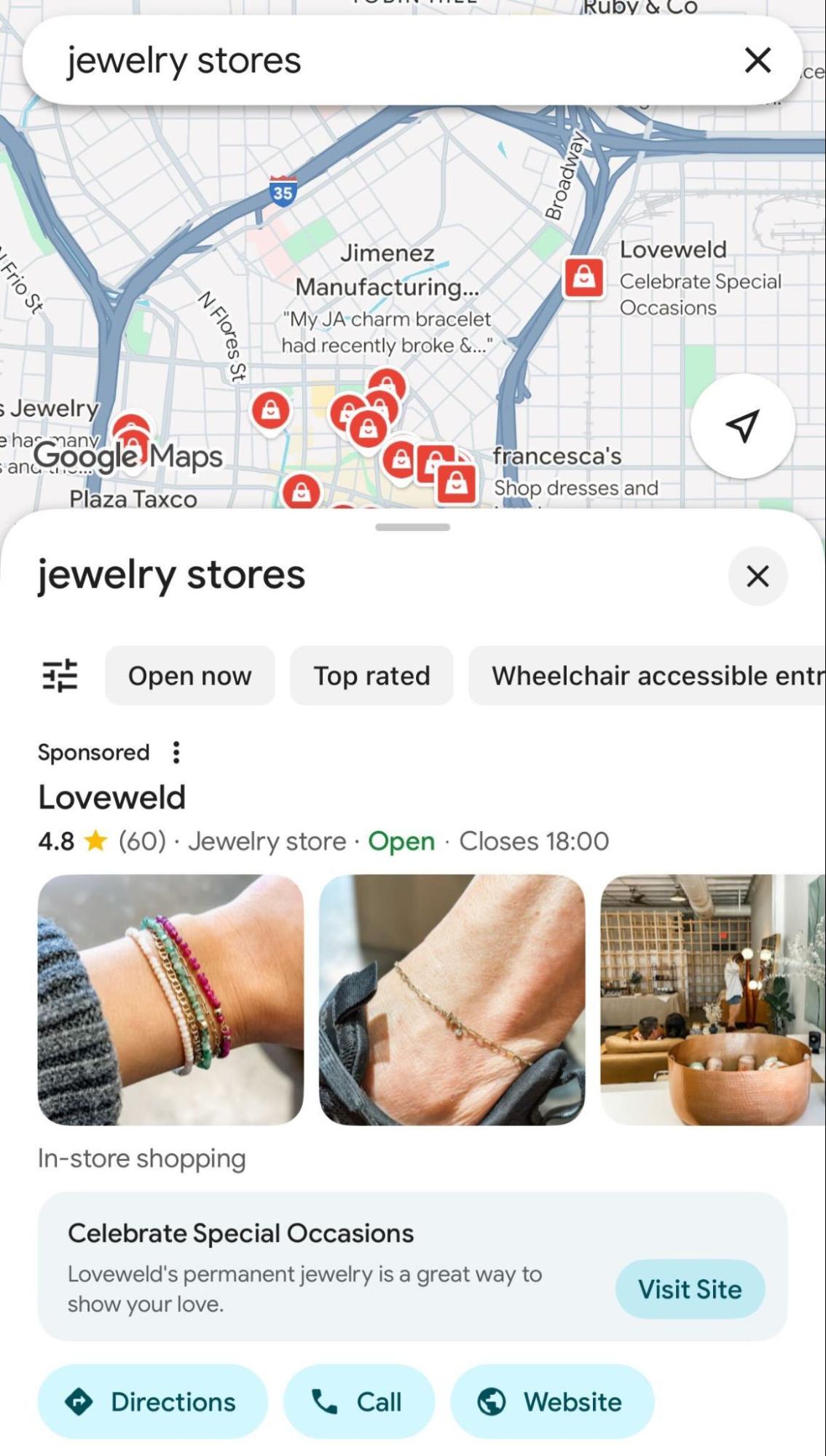
Google Maps ads also allow businesses to feature custom promotional messages directly within the ad. This is done using customizable headlines (like “Celebrate Special Occasions” below) and descriptions from your Google Ads campaign assets.

While this can include traditional deals like discounts or coupons, it’s also a good way to showcase a special service (like permanent jewelry), a new product line, or a unique in-store experience to entice customers.

Loveweld uses a sponsored ad with custom messaging to attract local jewelry shoppers.

Customizable business page

Stores that advertise on Google Maps also have their own business profile with information like their address, phone number, website, store hours, photos, directions, and reviews. 

Google pulls up this information from the store’s Google Business listing. Searchers can chat with your business through Google’s Business Messages feature.

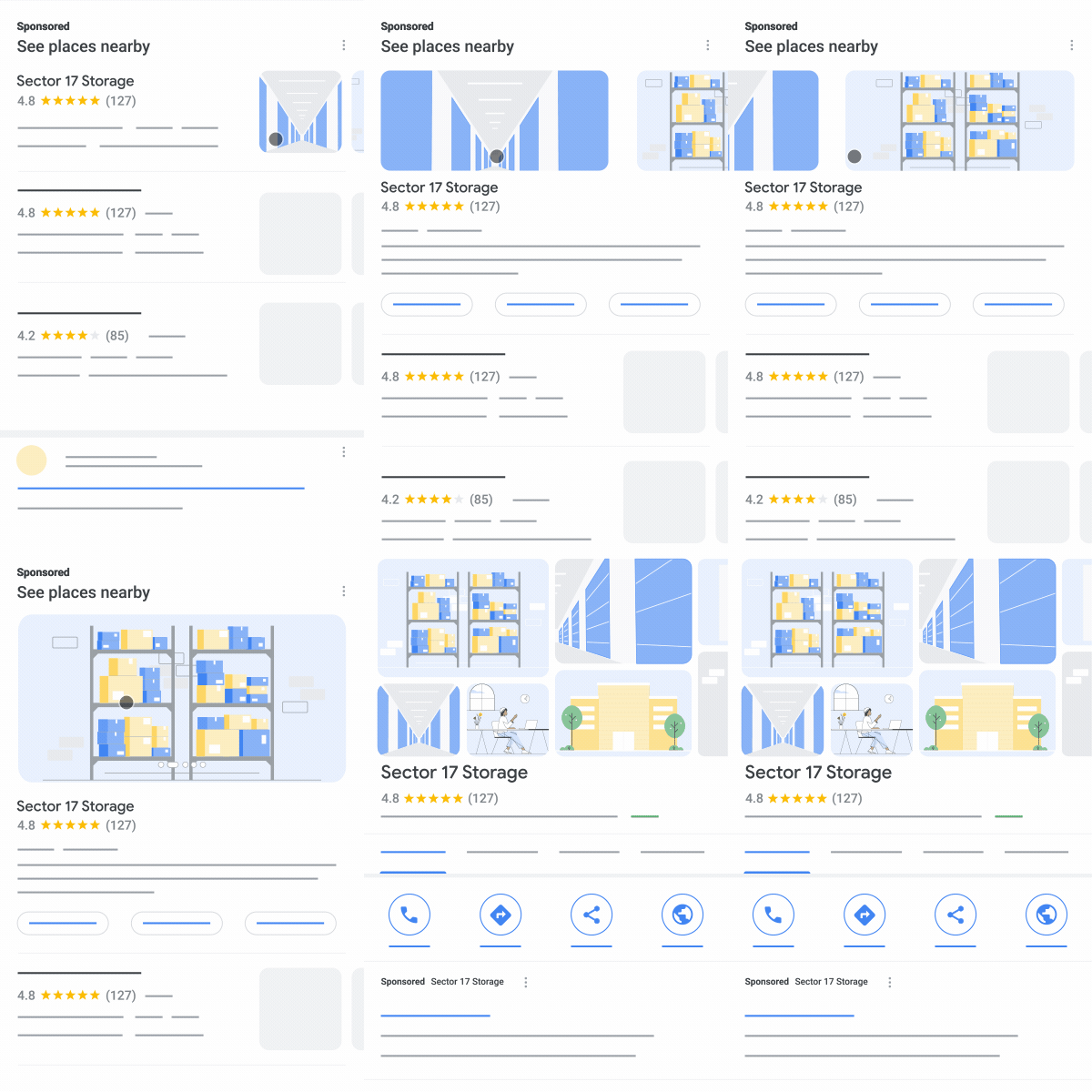
A user clicks through to Sector 17 Storage’s profile.
Google

Local inventory search

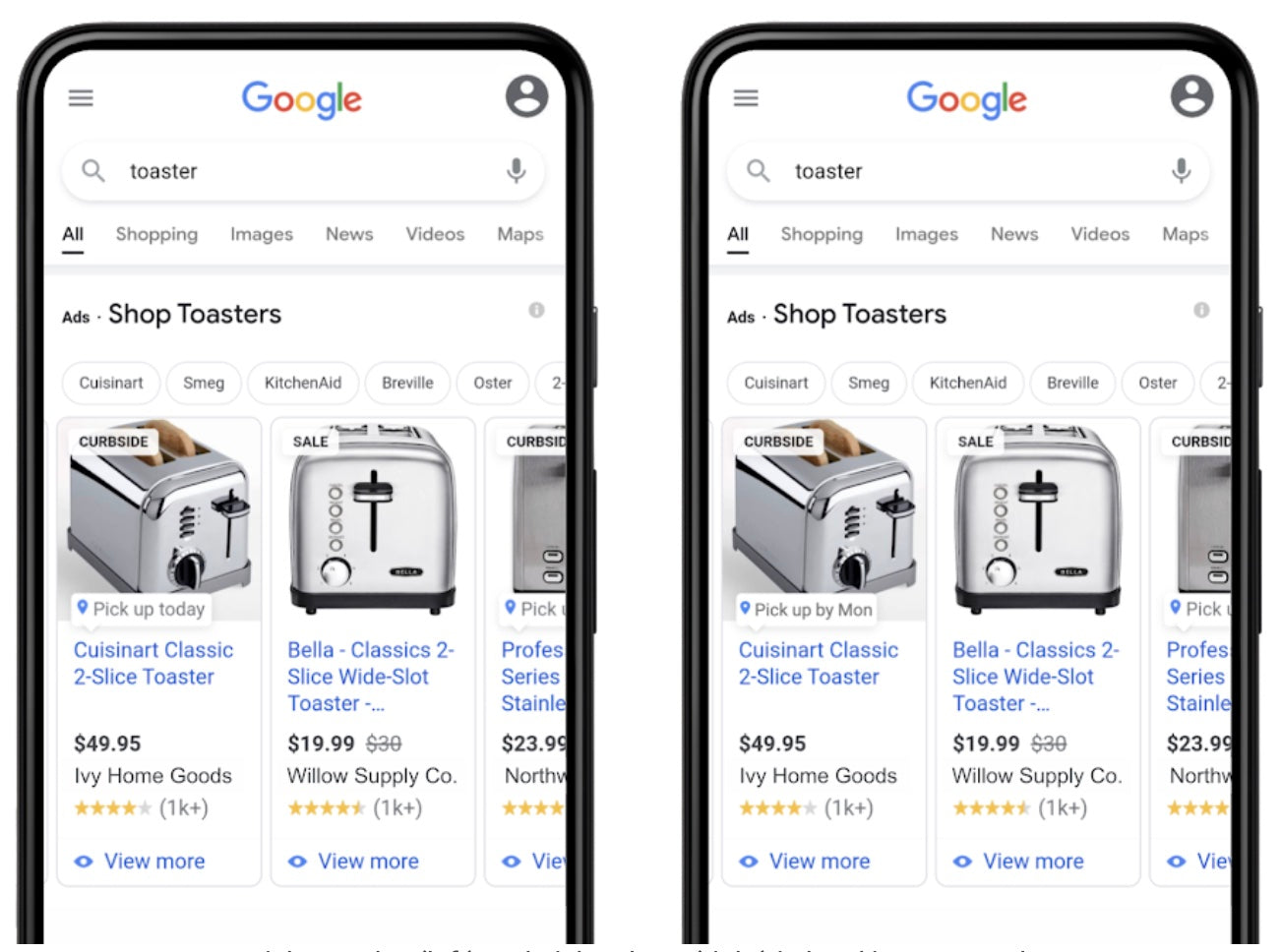
Local inventory ads result for a user searching “toaster.”

Local inventory ads integrate Google Shopping and Maps functionality by allowing you to advertise products available at nearby businesses when a customer searches for the item or place. 

When you have inventory ads enabled, shoppers can check your available products when they click on your location.

It also works the other way: Customers can use Google Search to look for an item they’re interested in. When they click on the ad showing your product, they arrive on your local storefront, Google Business page, or landing page.

Local inventory search allows you to promote in-store inventory and offer your customers store pickup options.

💡 PRO TIP: With Shopify, you can have your products found by more nearby shoppers looking for what you sell on Google. Sync your store’s products with Google, create free listings, and manage online and in-store pickup orders from Shopify.

How to set up Google Maps ads

  1. Optimize your Google Business Profile
  2. Link your Business Profile to Google Ads
  3. Build a Performance Max campaign

Step 1: Optimize your Google Business Profile

Your Google Business Profile is the starting point for your Maps ads (and any other Google display ad). Make sure every store is fully verified in Business Profile Manager before you start. 

Pick one primary category and up to nine secondary ones that match products or services, like a running shoe store or an athletic apparel shop. Also, check that your name, address, phone, and URL exactly match what’s on your site and other directories.

📚 Read more: Google Business Profile Optimization: Improve Local Ranking

Step 2: Link your Business Profile to Google Ads

This step pulls your business information into every Maps placement. 

  1. Go to Assets within the Campaigns menu.
  2. Select the plus button and then select Location.
  3. Select Our locations, and then select Continue.
  4. Your domain should show up. If it doesn’t, enter a domain to discover potential Business Profiles.
  5. Select Countries by selecting the pencil icon. Then, select Save.
  6. In the list below, find the Business Profile that best matches your business, then select Save.
  7. Confirm that the correct Business Profile is showing in the preview, then select Continue.

Step 3: Build a Performance Max campaign

Set up the Google & YouTube app on Shopify. After you complete this step, your Merchant Center and Shopify accounts will be linked. 

Then, complete these steps:

  1. Navigate to the Google & YouTube app in your Shopify admin.
  2. Scroll down to the Performance Max campaign module.
  3. Select your Google Ads account and click Connect.
  4. Click Create Campaign. You’ll be redirected to the Ads onboarding flow in Merchant Center.
  5. In Merchant Center, you’ll be asked to provide your payment information.
  6. Provide your daily budget and campaign name.
  7. Click Create.

💡 Note: Smart Bidding inside Performance Max weights factors like distance and time of day at auction time to maximize store visits or location actions for every dollar spent. It will automatically adjust toward searches most likely to end in a directions tap, call, or in-store visit. 

Sell where people search with Shopify

Shopify comes with powerful tools that help you list, promote and sell products on Google. Get your product in front of new shoppers who are looking for what you’re selling, from one back office.

Start selling on Google

Tracking your Google Maps ad performance

Your ad is now up and running. Congrats! Next, you’ll want to find out how it’s performing. 

You can track its performance in Google Merchant Center. Access it by clicking on Manage campaigns in the Overview tab on your Shopify app. Some metrics to monitor include:

  • Impressions: Understand how often the pin or listing showed in Maps results. 
  • Click type: Lets you see which actions shoppers prefer, like whether they want directions right to your store or to give you a call.
  • Store visits: Connects ad spend to in-store traffic. 

Drive your business forward with Shopify’s analytics

Shopify’s user-friendly reports and analytics capabilities help you make better decisions, faster. Choose from pre-built dashboards and reports, or build your own to spot trends, capitalize on opportunities, and supercharge your decision-making.

Explore Shopify’s analytics

Start advertising your store on Google Maps

There’s no doubt that promoting your business on Google Maps has its advantages for local SEO. You’re getting in front of targeted customers at a critical moment in the buyer’s journey, and motivating shoppers to come to your store. Plus, you can take advantage of different features, like in-store promotions and local inventory search, to encourage sales. 

Test the waters by creating a local search ad on Google Maps today using the guide above. You’ll soon start to see a rush of foot traffic and sales that will impact your bottom line.

Google Maps ads FAQ

Can you do ads on Google Maps?

Yes. Retailers can run paid placements, called local search ads, through a Performance Max campaign set to the Local store visits and promotions objective. The ads appear as branded pins, top-of-list results, and other in-map formats whenever Google detects nearby intent.

Why is my credit card being charged by Google Ads?

Google bills the primary card on your Ads account for the cost of billable clicks. Charges post automatically whenever the running balance hits the account’s payment threshold or on the monthly billing cycle, whichever comes first.

Are Google Maps ads worth it?

For location-based businesses they can deliver a strong return because every paid click is a high-intent action, like opening navigation or placing a call. 

With store visit and offline sales tracking enabled, advertisers can verify foot traffic and revenue lift and scale budgets only when the cost per visit meets profit targets.

Is it free to advertise on Google Maps?

A basic Google Business Profile listing is free, but paid Maps ads operate on a cost-per-click model. You’re charged only when users take qualifying actions, yet daily budgets and bidding caps still need to be set to control spend.

The Best 7 Label Printers for Small Business (2025)

Software Stack Editor · September 5, 2025 ·

.tg {border-collapse:collapse;border-spacing:0;}
.tg td{border-color:black;border-style:solid;border-width:1px;
overflow:hidden;padding:9px 15px;word-break:normal;}
.tg th{border-color:black;border-style:solid;border-width:1px;
font-weight:normal;overflow:hidden;padding:9px 15px;word-break:normal;}
.tg .tg-wp8o{border-color:#000000;text-align:center;vertical-align:top}
.tg .tg-wkkj{background-color:#efefef;border-color:#000000;
font-weight:bold;text-align:left;vertical-align:top}
.tg .tg-link{color:#15C;text-decoration:underline;}

Whether you’re selling shampoo, clothing, or soap, a good label printer can quickly produce quality labels for retail facing,inventory management, and shipping. 

But with a bewildering variety of label printer brands on the market, picking the right one can be challenging. From the initial price to features, print quality, speeds, and running costs, there’s so much to consider before buying a label printer for your business.

Not sure what you’re after? Discover seven of the best label printers for small businesses, including their features and a handy guide to finding the right one for your needs. 

Get shipping labels quickly

Create professional, scannable labels for shipping and customer returns with Shopify’s free generator.

Create label

Our top label printer picks for 2025

Printer Best for Price
Rollo Label Printer Flexible label sizes $199.99 (USB) | $279.99 (wireless) See details
Brother QL Wi-Fi label printer Multiple connectivity options $339.00 See details
Zebra ZSB wireless label printer Eco-conscious cartridges $88.88 (2-inch) | $99.99 (4-inch) See details
Jadens Thermal Label Printer Budget-friendly portability $89.99 See details
DYMO 5XL shipping printer High-volume shipping $209.00 See details
Brother P-touch CUBE Mobile app customization $60.00 See details
Phomemo M110 mini printer Pocket-size labeling $51.99 See details

Seven best label printers for small businesses

  1. Rollo label printer
  2. Brother QL Wi-Fi label printer
  3. Zebra ZSB wireless label printer
  4. Jadens thermal label printer
  5. DYMO 5XL shipping printer
  6. Brother P-touch CUBE
  7. Phomemo M110 Mini Label Printer

1. Rollo Label Printer

Top benefit: Flexible with various label sizes

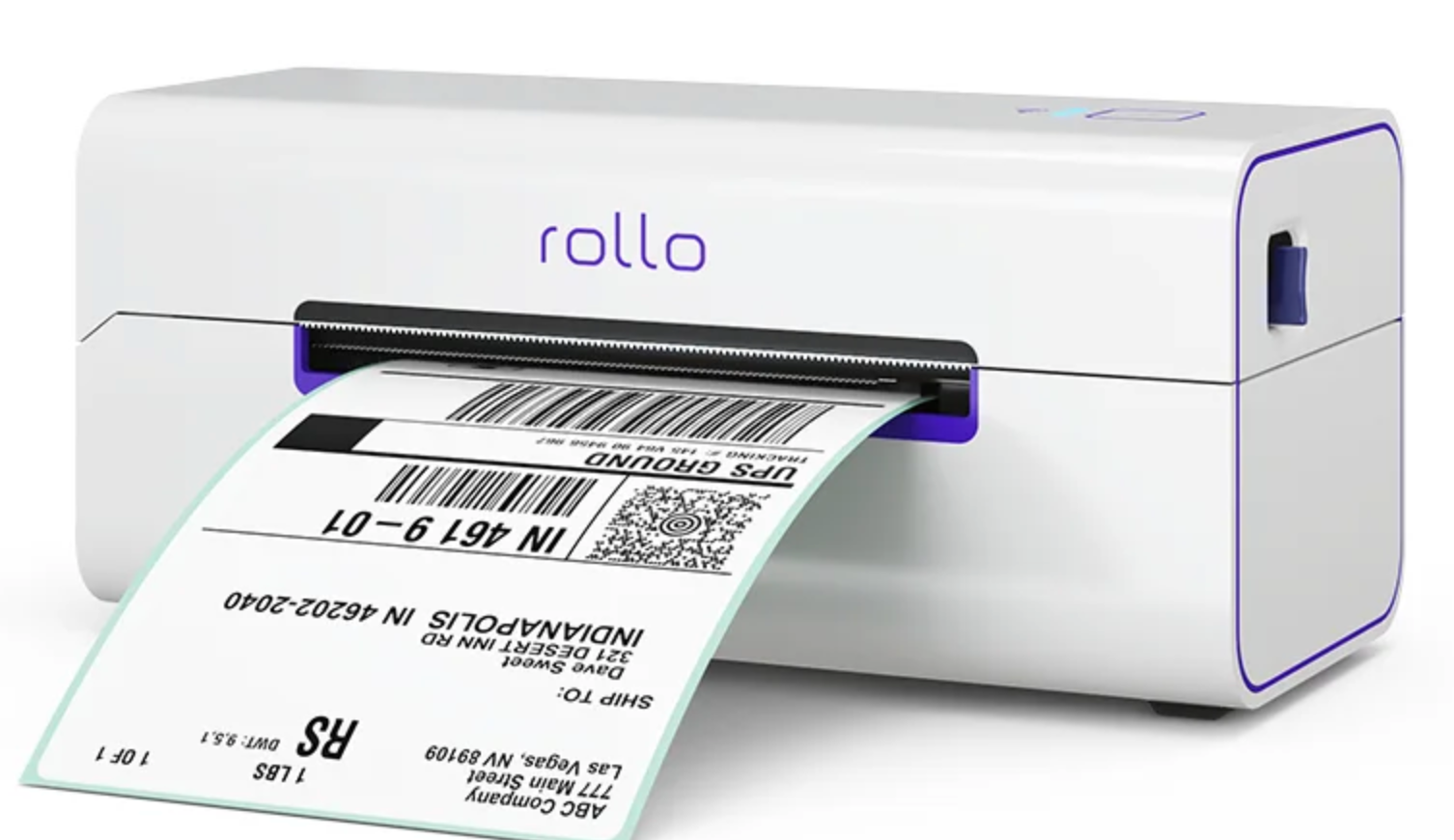
A white Rollo thermal printer is printing a UPS shipping label.
Rollo

Type: Thermal transfer

Battery: No (AC power)

DPI: 203

Printing speed: 150 mm per second

Connectivity options: Wi-Fi, USB 

Price: $199.99 (USB model) | $279.99 (wireless model)

The Rollo label printer is made of shiny white plastic with a top cover release latch, rear label feed slots, and purple highlights on the front for a sleek, modern design. 

Once you feed the paper labels into the rear slot, the Rollo printer’s mechanism moves back and forth to determine label size and find gaps between labels. Then, it positions the leading edge to print the first label.

Rollo is a great label maker for small businesses because it works with almost any thermal direct label paper, so you don’t need to buy expensive proprietary rolls. While it’s ideal for printing 4-inch by 6-inch barcode and address labels, there are no length restrictions. You can also print labels with different widths, like name tags and barcodes, more quickly and easily. 

Two models are available:

  • USB model: Desktop unit that connects to macOS or Windows
  • Wireless model: Prints from phones, tablets, or Chromebooks via the Rollo app

Both versions output at the same speed and resolution. The choice comes down to whether cable-free printing is worth the premium. 

Pros

  • Ink-free direct-thermal printing
  • High 150 mm-s print speed
  • Works with most third-party label rolls
  • Wide label-width range
  • Intelligent auto-calibration
  • USB model is plug-and-play; wireless model prints from any device

Cons

  • Rollo app mandatory for Wi-Fi printing
  • No built-in battery
  • Bulky plastic catch tray
  • Occasional reports of alignment drift at very long print runs

2. Brother QL Wi-Fi label printer

Top benefit: Multiple connectivity options

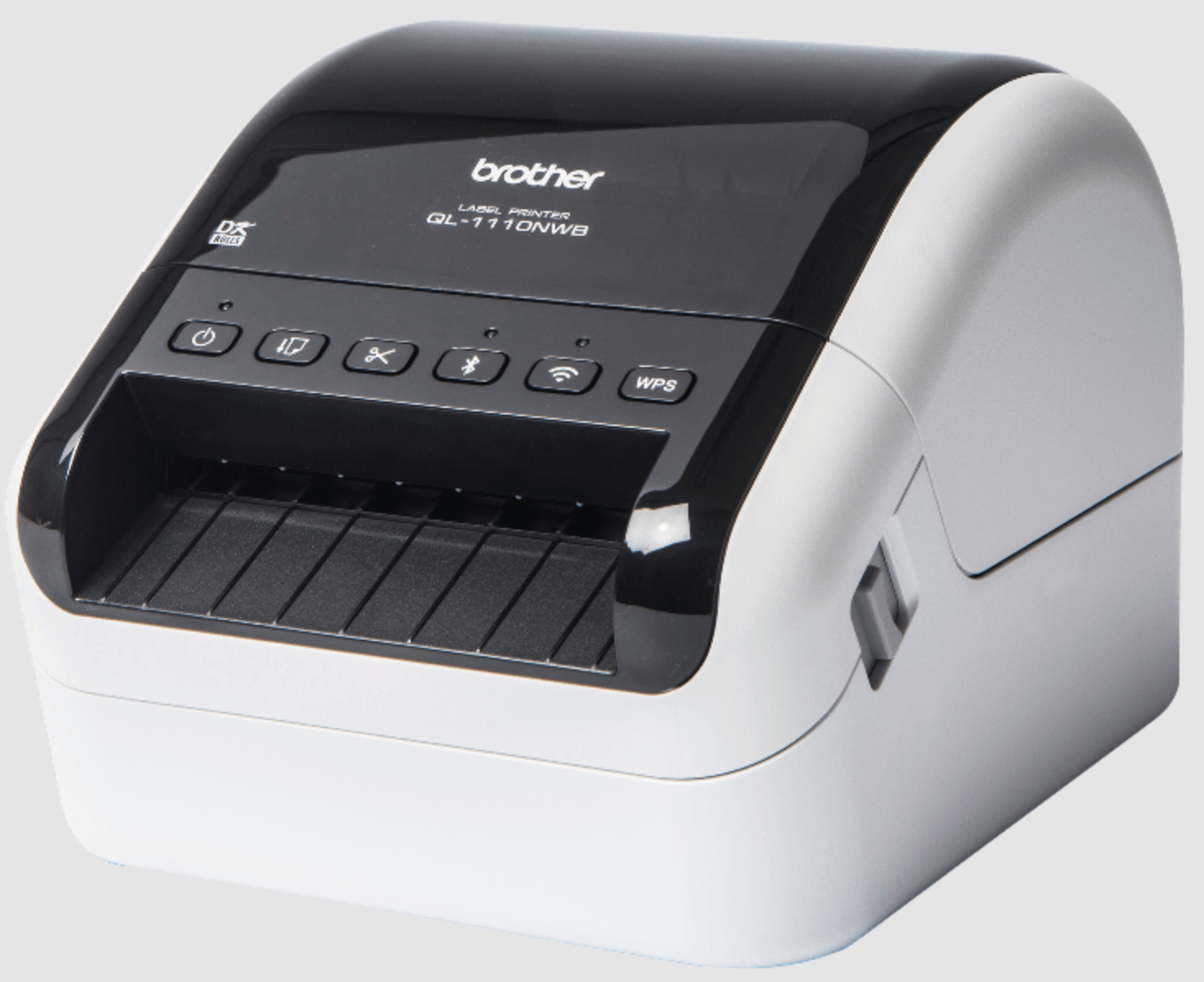
A black and white Brother QL-1110NWB label printer on a plain background.
Brother

Type: Direct thermal

Battery: No (AC power only)

DPI: 300

Printing speed: 110 mm per second

Connectivity options: Bluetooth, USB, Ethernet, Wi-Fi 

Price: $339

Brother’s QL-1110NWB slips a full-width, 4-inch print engine into a compact matte black shell. The unit’s multiple ports—USB for desktops, Ethernet for hardwired networks, Wi-Fi for cable-free offices, and Bluetooth for smartphones—let teams print from almost any device without adapters. It’s also compatible with Shopify and is available in the POS Hardware Store.

A built-in auto-cutter and automatic crop mode transform letter-size or A4 label templates into perfectly trimmed product or barcode stickers. Direct thermal technology keeps consumable costs low (no ink, toner, or ribbons), and the 300 dpi head produces sharp text and dense barcodes suitable for postal and retail compliance.

Using Brother’s free P-touch Editor or iPrint&Label app, you can design labels, pull data from Microsoft Word, Excel, or Outlook, and push jobs wirelessly. At 110 millimeters per second, the printer churns through high-volume batches, yet remains quiet enough for front-of-house counters.

Pros

  • Four connectivity methods cover PCs, tablets, and phones
  • 300 dpi resolution for crisp graphics and barcodes
  • Auto-crop and auto-cut streamline multi-label sheets
  • Accepts die-cut or continuous rolls up to 4.1 inches wide
  • No ink, toner, or ribbon replacements
  • Integrates directly with MS Office apps

Cons

  • Premium price bracket for a desktop unit
  • Auto-crop available only on Windows versions of P-touch Editor
  • Lacks built-in battery for true portability

3. Zebra USB Label Printer

Top benefit: Eco-conscious with compostable cartridges

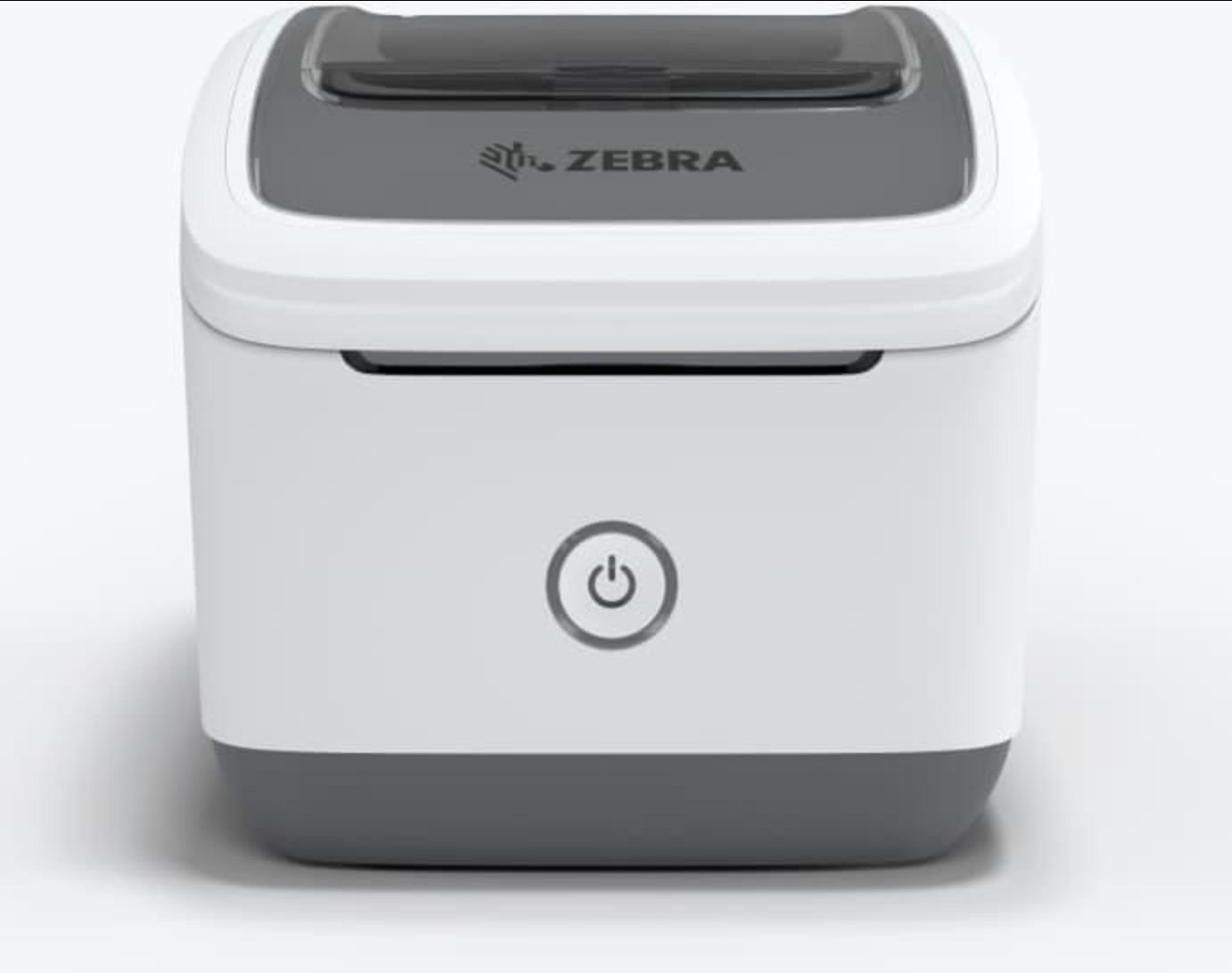
A front view of a white and gray Zebra label printer with a power button.
Zebra

Type: Direct thermal

Battery: No (AC power)

DPI: 300

Printing speed: 102 mm per second 

Connectivity options: Wi-Fi

Price: $88.88 (2-inch model) | $99.99 (4-inch model)

The sleek Zebra USB (ZSB) wireless label printer is all business. This printer doesn’t need ink or toner subscriptions. It comes in both a 2-inch and a 4-inch cloud-connected model. Print quality is crisp and clear, making it ideal for applications requiring precision and clarity, such as small text, fine barcodes, logos, and more intricate designs. Plus, you can print up to 73 labels per minute. 

Setup is intuitive and straightforward. Power the unit on, scan the auto-printed QR code, and follow the ZSB mobile walkthrough. The app handles firmware updates, remote design editing, and live supply monitoring, flagging remaining labels and cartridge size in real time. 

From a browser or phone, you can build layouts from scratch or tweak Zebra’s template library, then push jobs to any ZSB printer on the account.

Eco-friendly, compostable label cartridges are the marquee feature. Each snap-in cassette is made of plant-based material and drops cleanly into household compost or industrial recycling, eliminating the microplastic peel-back common to conventional rolls.

The main downside, particularly for the 4-inch model, is the larger size of the unit, but it’s compatible with most major shipping and ecommerce platforms, MS Office, and Google Contacts.

Pros

  • Quick, app-guided setup
  • 300 dpi output for fine text and barcodes
  • Compostable, drop-in label cartridges
  • No ink or toner replacements necessary
  • Template library plus custom cloud designer
  • Integrates with top shipping and ecommerce platforms

Cons

  • 4-inch model has a larger footprint than rivals
  • Requires Zebra ZSB app and proprietary cartridges
  • Wi-Fi connection only
  • No built-in battery for mobile popups

4. Jadens thermal label printer

Top benefit: Budget-conscious with basic features

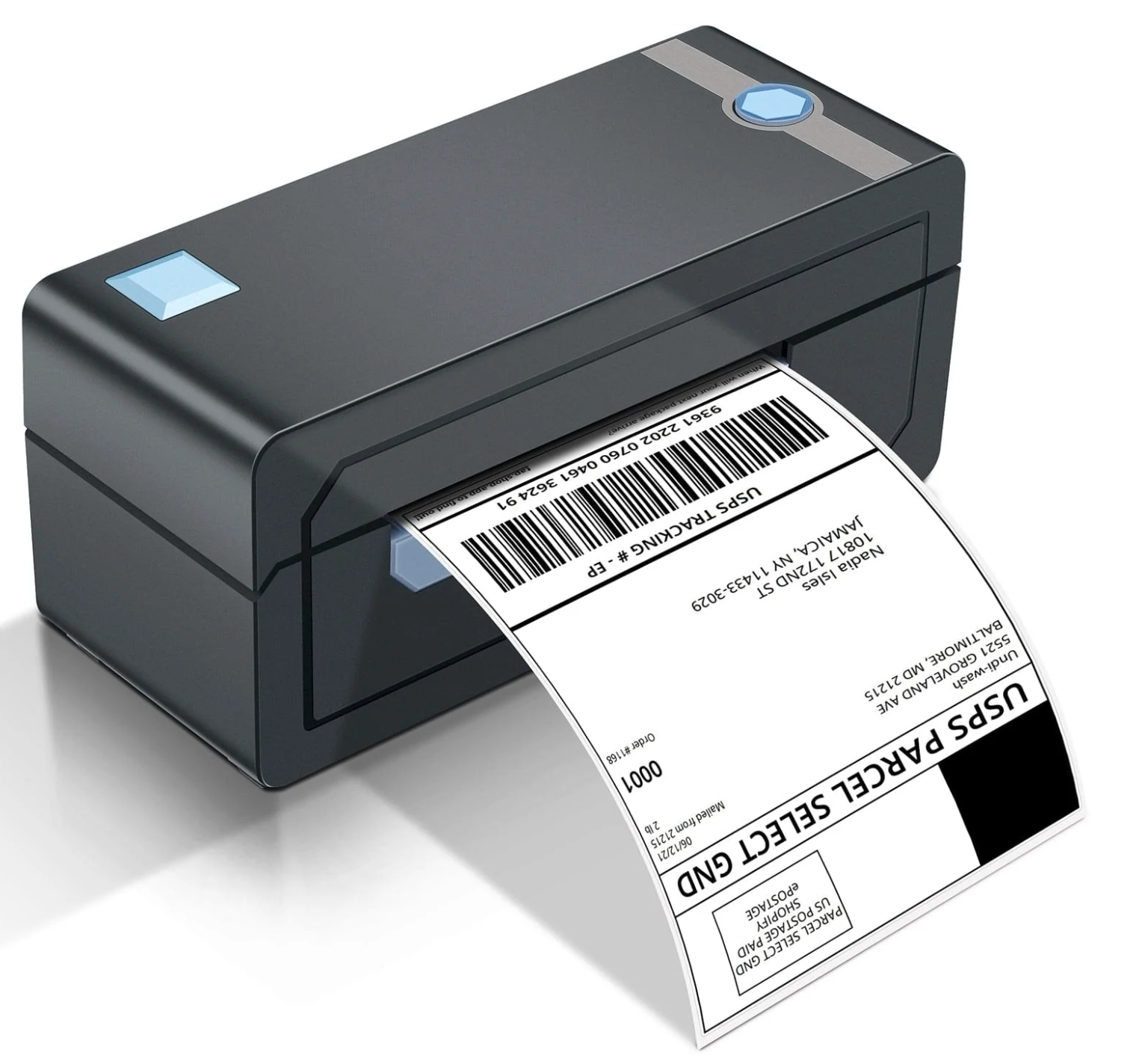
A dark gray label printer with glowing blue buttons printing a USPS shipping label.
Jadens

Type: Thermal transfer

Battery: Rechargeable

DPI: 203

Printing speed: 150 mm per second

Connectivity options: Bluetooth, USB

Price: $89.99

You don’t have to splash out for a high-end label printer. There are plenty of budget picks, like the Jadens Bluetooth label printer. 

Don’t let the lower price tag fool you—it’s a strong choice with a handful of great features. For example, it includes: automatic label alignment, high-speed printing, Bluetooth and USB connectivity, a label holder, and compatibility with all major marketplaces and shipping platforms.

The printer works with rolls and fanfold thermal direct label paper, cranking out 72 clear and waterproof labels per minute. 

Pros

  • Easy to install and use
  • Ink-free printing
  • Wireless convenience
  • Small, compact, and portable
  • More affordable than other options
  • Color label printer model available

Cons

  • Basic features
  • Requires Jaden’s app to use
  • Potential label wastage
  • Some users complain about the Bluetooth connection dropping

5. DYMO 5XL Shipping Label Printer

Top benefit: Best for high-volume shipping needs

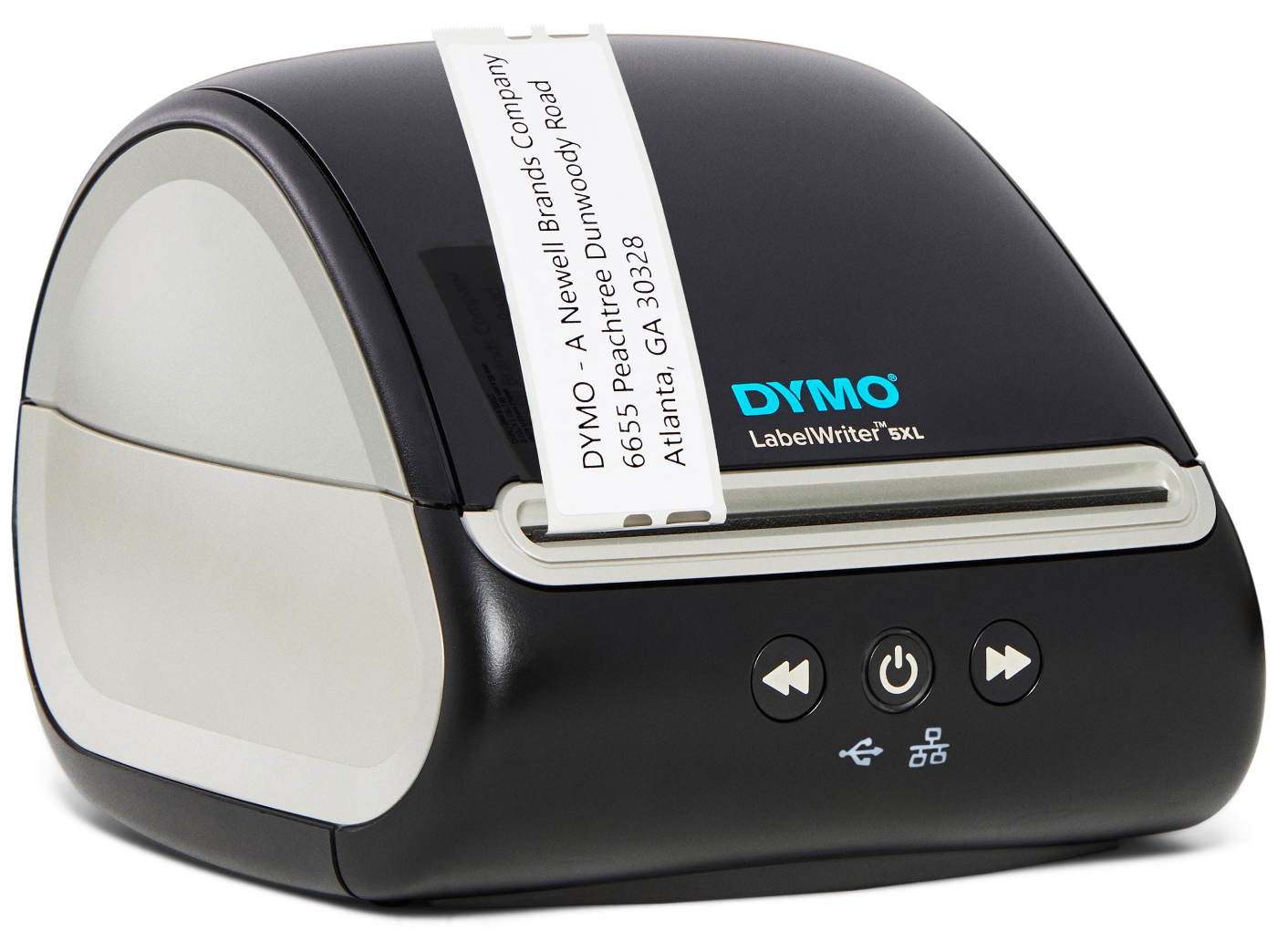
A black and gray DYMO LabelWriter 5XL printer with an address label coming out.
DYMO

Type: Thermal transfer

Battery: No (requires AC adapter)

DPI: 300

Printing speed: Up to 53 labels per minute

Connectivity options: USB, LAN 

Price: $209

The DYMO 5XL is designed for retailers who need to print 4-inch by 6-inch shipping labels directly from major online marketplaces like Amazon and eBay, and for shipping platforms like DHL, UPS, and FedEx.

It’s compact, not too large to sit on a desk, and produces crisp, clear, and precise labels, so you won’t have to wrestle with sheet labels. 

The printer’s economic thermal printing technology eliminates the need for costly ink cartridges or toner. Plus, it has less smudging than laser and inkjet printers. Like other thermal printers, the DYMO 5XL offers fast printing speed and high dots-per-inch (dpi) resolution, making it an excellent choice for high-volume printing tasks.

Installation and setup are easy, though you’ll need to download the DYMO Connect software and connect a computer via USB or Ethernet connectivity. Then, you can add text or images, edit them to the desired size, send them to print, and get your label in seconds. 

With DYMO’s Automatic Label Recognition feature, it’s easy to know the size, color, and label types loaded into the printer and how many are remaining—no more running out of labels mid-job.

Many other label printers come with built-in batteries, so you can print even when there’s no outlet to use for power. However, the DYMO 5XL operates while plugged into an electrical outlet and does not have built-in batteries. If that’s not a dealbreaker and you primarily want a label printer you can press into service as a quasi-portable with AC power only, this printer will serve you well. But if portability is a priority, you’ll want to explore other options. 

Pros

  • Easy installation 
  • Quick setup
  • Fast printing
  • High-quality prints 
  • Doesn’t need ink or toner
  • Reduces label waste

Cons

  • Restricted to use of approved label stock
  • No built-in battery for portable use
  • No Wi-Fi or Bluetooth connectivity
  • Requires DYMO software download

6. Brother P-touch CUBE

Top benefit: A compact option with a mobile app integration

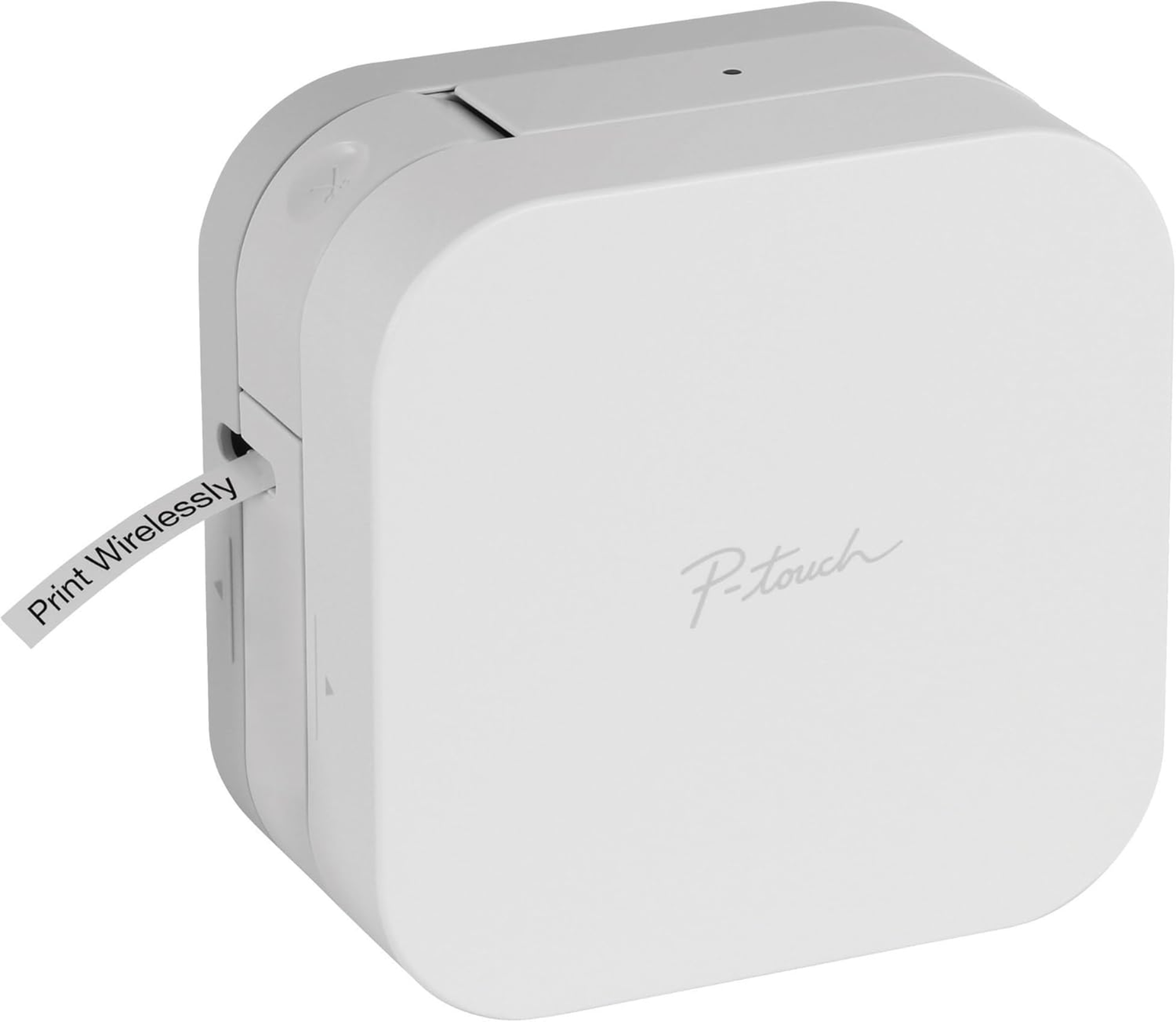
Brother P-touch CUBE label printer printing a label.
Brother P-touch CUBE

Type: Thermal

Battery: AAA batteries

DPI: 180 

Printing speed: 30 mm per second

Connectivity options: Bluetooth, USB 

Price: $60

The P-touch CUBE is a lightweight, portable label maker that lets you create custom labels from your mobile device. 

It works with a variety of label tapes and offers dozens of stylish label templates, fonts, frames, and colors for creating labels that match your brand. A built-in automatic cutter is included, so you can easily create perfectly sized labels with the simple push of a button.

The corresponding free Design&Print2 app is intuitive and well organized. The app offers features like cloud storage and text recognition to insert text automatically. Plus, it lets you translate into multiple languages, including Spanish, Chinese, and German.

Pros

  • Easy to carry and use on the go
  • Built-in cutter makes clean, precise cuts 
  • Comes with free phone support for the life of the product
  • Can print barcodes and vertical labels
  • Works with or without battery
  • Design&Print2 app offers various options for multiple label-making needs

Cons

  • No Wi-Fi connectivity
  • Prints only two lines per label
  • Not compatible with desktop PCs
  • Some users report a bit of wasted label with each print

7. Phomemo M110 mini label printer

Top benefit: Rechargeable portable option

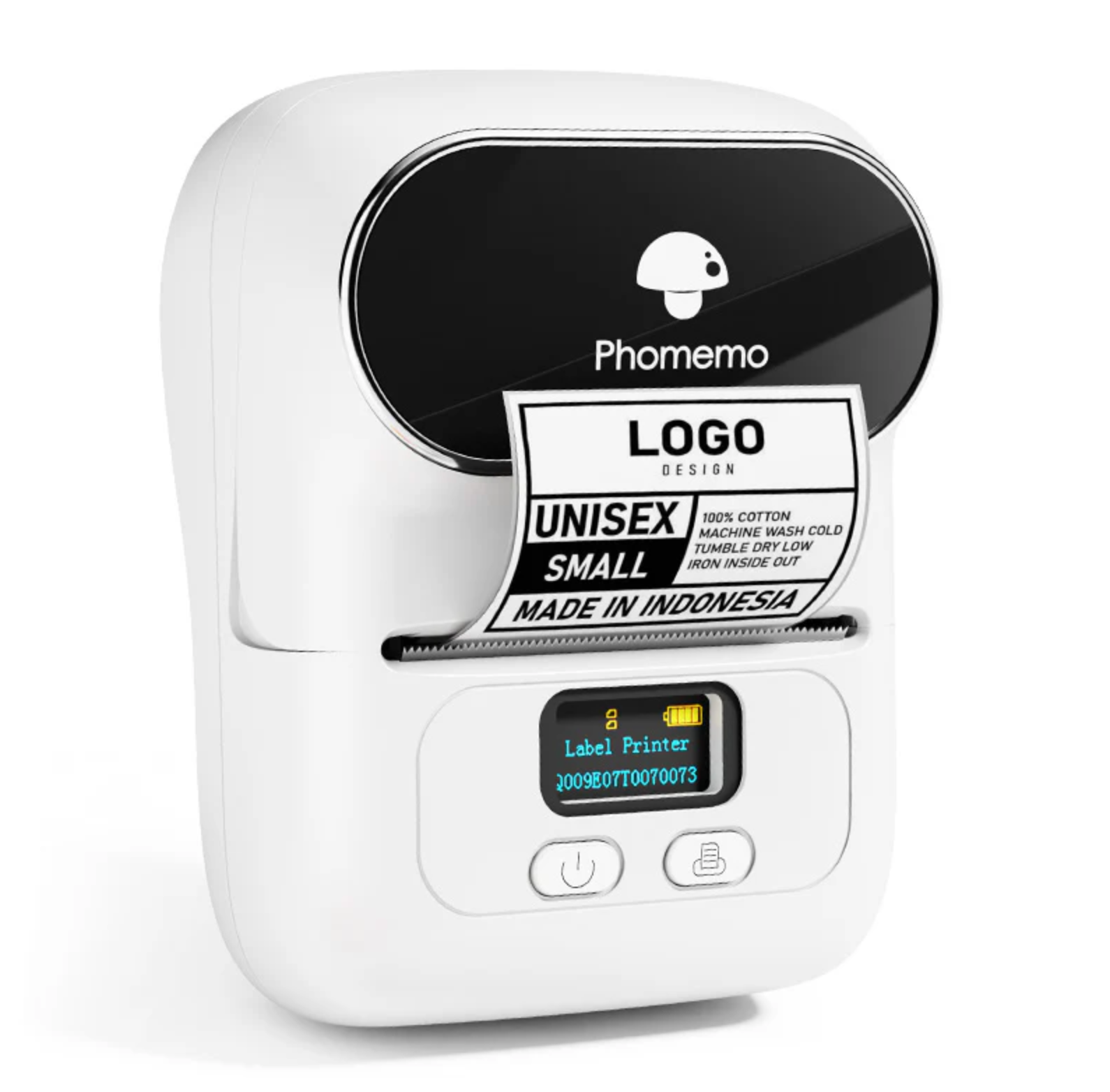
Phomemo M110 portable label printer with custom clothing label output.
Phomemo M110

Type: Thermal

Battery: Rechargeable

DPI: 203 

Printing speed: 20 mm per second

Connectivity options: USB-C, Bluetooth 

Price: $51.99

The Phomemo M110 is a compact label maker that prints quickly and easily from any device. It pairs with the Printer Master Smart app, offering over 100 free templates and a wide range of fonts, styles, and images to help you create custom labels. You can also preview your labels and make sure they are perfect before printing them, so you don’t waste tape.

While slightly bulkier than other label printers, the Phomemo M110 offers extra flexibility with label sizes, easy cutting, and durability. Its Optical Character Recognition (OCR) feature makes scanning images easy. It can also instantly convert text into editable or ready-to-print labels in seconds.

With a rechargeable battery providing three to four hours of continuous printing (about 13 rolls), and a print speed of up to 18 millimeters per second, the M110 is perfect for high-volume tasks without frequent recharging.

Pros

  • Simple setup
  • Fast and easy to operate
  • Lots of label templates to choose from
  • Works with computers and mobile devices
  • Comes in five stylish colors

Cons

  • Comes with small labels, which may be restrictive for certain labeling tasks 
  • Limited battery life
  • Doesn’t print in color
  • Relies on the Phomemo app, so app issues may limit functionality

What to consider when choosing the best label printer for small business

Finding the best label printer can be a challenging quest. To help, we’ve put together a list of key aspects to review when comparing your options.

Direct thermal versus thermal transfer

One of the first decisions you’ll make is the type of printing method a printer uses. 

There are two common methods used by label printers:

  • Direct thermal, which applies heat directly to specially-treated labels. The result is clear, ink-free images that work well for labeling packages or shipping frequently. However, the ink can fade over time when exposed to heat, sunlight, or friction.
  • Thermal transfer, which uses a heated ribbon to transfer ink onto labels. The prints are durable and fade-resistant. If you need labels to stay readable over time, like for product tags or inventory barcodes, thermal transfer is the go-to option. These printers cost more upfront and require slightly higher maintenance.

Overall, choose direct thermal for simple, short-term labeling tasks. Opt for thermal transfer when longevity and durability are your main priorities. 

📚 Read: The 7 Best Thermal Label Printers

Print quality (DPI) and speed (LPM)

A label printer is only as good as the labels it prints, but output quality depends on the printer’s resolution, which is measured in dots per inch (dpi). 

The industry standard is 203 dpi, which prints clear and readable labels and meets the needs of most applications. But you’re better off with label printers offering at least 300 dpi resolution for crystal-clear labels and little to no smudging after printing.

Print speed is measured in labels per minute. For instance, the DYMO 5XL prints 53 labels per minute, while the Brother QL can print 69 labels per minute. 

The choice ultimately depends on your shipping needs. If you’re just starting out, a printer with a lower printing speed may be a good fit. As your business scales, you can upgrade to one with faster speeds and batch printing capabilities. 

Connectivity options

The best label printer for small businesses offers a variety of connectivity options. Most options connect to a phone or computer with a USB cable, but some (usually costlier) models offer Bluetooth, Ethernet, and wireless connectivity, so you can print labels from mobile and desktop devices.

Depending on your needs, you can choose a printer with USB, wireless, or a combination of USB, Wi-Fi, and Bluetooth connectivity. A label printer with wireless connectivity, for instance, is more versatile and ideal for use in multiple locations or on the go, while a USB-only printer works well in one location.

Label size and variety 

Ensure the label printer accommodates your label dimensions. 

Most standard shipping labels are 4 by 6 inches, which many label printers support. But some printers support 8or 8.6 inches for large-format labels, which might rule out a few options you’re considering. 

To find the right printer, get samples and costs per print, and consider the label material (paper or synthetic), format (fanfold or roll), adhesives, and range of sizes supported. 

Total cost of ownership 

The cheapest printer on day one might not stay that way over time. Factor in running costs like label stock, ink, toner ribbons, and maintenance. 

Here is a quick cost comparison:

  • Printer A (Direct thermal): $200 up front, no ink required, label cost averages 3 cents each.
  • Printer B (Thermal transfer): $150 up front, requires ink ribbons ($20 per 500-label roll, or 4 cents per label), plus labels averaging 2 cents each.

If you print 1,000 labels per month, here is what your first year costs look like:

Printer A:

  • Up front: $200
  • Labels: 1,000 labels/month × 12 months × $0.03 = $360
  • Year 1 Total: $560

Printer B:

  • Up front: $150
  • Labels: 1,000 labels/month × 12 months × $0.02 = $240
  • Ink ribbons: 1,000 labels/month × 12 months × $0.04 = $480
  • Year 1 Total: $870

Even though Printer B is cheaper up front, the ongoing costs make it more expensive by year end. Calculate annual running costs for each printer on your shortlist and choose one that balances costs with benefits based on your expected print volume. 

Staying current with 2025 shipping rate changes

You might think: What does the cost of shipping have to do with label printing? The truth is, being proactive about shipping costs helps you budget for the right printer and protect your profit margins.

Every price adjustment affects how you absorb costs and price your products, and lately shipping is getting more expensive: FedEx and UPS implemented a 5.9% general rate increase (GRI) in December 2024. Other carriers like USPS bumped up prices across the board in January and mid-July 2025, adding between 3% and 9% more for various services. 

Ocean freight rates are extremely volatile at the moment while companies navigate the new US tariffs. Rates are expected to increase during the holiday shopping season as well. Audit your current shipping costs, then add a 5% to 10% uplift to see where margins squeeze.

Streamline your shipping operations with label printers

The best label printer for retail offers all the features you need, produces quality output, and delivers quick, reliable performance when needed, without requiring much upkeep or tons of expensive ink. 

Ultimately, only you can decide which of these top label printers is the best one for your business. Test different label makers and printers before committing to a decision.

Get shipping labels quickly

Create professional, scannable labels for shipping and customer returns with Shopify’s free generator.

Create label

Best label makers FAQ

What is the best home printer for labels?

Rollo is the best label printer for home offices. It works with almost any thermal direct label paper and is ideal for printing 4-inch by 6-inch and a variety of other labels. Plus, it offers USB and wireless label printers with high-speed printing and is compatible with all marketplaces. 

Is it cheaper to print labels yourself?

If you’re just starting out and already have the equipment for printing your own shipping labels, it will probably be cheaper to do it yourself. More complex label types or large orders of different materials call for more expensive equipment, which can go beyond your budget. In that case, you could actually save money by outsourcing to professional label printing providers. 

What type of printer do you need to print shipping labels?

The type of label printer you’ll choose depends on your shipping needs, printing volume, and special features you may require. 

Basic label printers with USB-only connectivity, high-speed printing, and at least 203 dpi for optimal print quality are ideal for low-volume shipping needs. A wireless label printer with 300 dpi or higher, faster print speeds, and compatibility with most major shipping and ecommerce platforms works well for high-volume needs. 

What is the difference between a label maker and a printer?

A label maker comes with a built-in keyboard and software, prints laminated labels, and is ideal for organization and efficiency. Label printers connect to a computer or mobile device, have the software necessary to make the label print, and typically print paper labels for packaging and shipping applications.

Can I use any labels with my printer?

No, you typically cannot use just any labels with your printer, as most are designed to work with specific types and sizes. Check your manufacturer’s specifications for compatible media. 

Sizing Charts: How to Make a Size Chart for your Retail Business (2025)

Software Stack Editor · September 5, 2025 ·

Small, medium, and large: these sizes can vary widely in terms of actual fit, which can be a challenge if you sell clothing.

A Size 6 dress can fit snugly in one store and hang loose in the next, because apparel sizing is anything but standardized. The stakes climb online, where shoppers can’t step into a fitting room and often abandon carts, or buy multiples to hedge their bets.

That uncertainty is costly. In fact, a 2025 survey of 6,000 global consumers found 61% returned apparel because it didn’t fit. For retailers, those returns eat into margins and chip away at customer loyalty. 

A clear sizing chart removes the guesswork, enabling buyers to choose the right size the first time—while reducing returns. In this guide, you’ll learn what a sizing chart is and the exact steps to create one. 

What is a sizing chart? 

A sizing chart lists your product’s sizes alongside the body dimensions each size is designed to fit. Shoppers use it to choose the right option both online and in-store. 

For retailers, sizing charts serve two purposes: internally, they guide product development and ensure consistency; externally, they help customers select with confidence and reduce costly returns.

Body measurement vs. garment measurement

There are two main approaches to sizing charts. Many brands use one or both depending on their products:

  • Body measurement charts match each size to key body dimensions—like bust, waist, hip, height, and shoulder—so shoppers can compare the numbers to their own shape. This format is most helpful for first-time buyers and aligns with global sizing standards such as ISO 8559.
  • Garment measurement charts list the finished specs of the item itself (e.g., chest width, outseam, leg opening). They’re useful for styles where drape or ease matters, such as oversized sweaters, tailored jackets, or denim. Experienced shoppers can decide how much room they want.

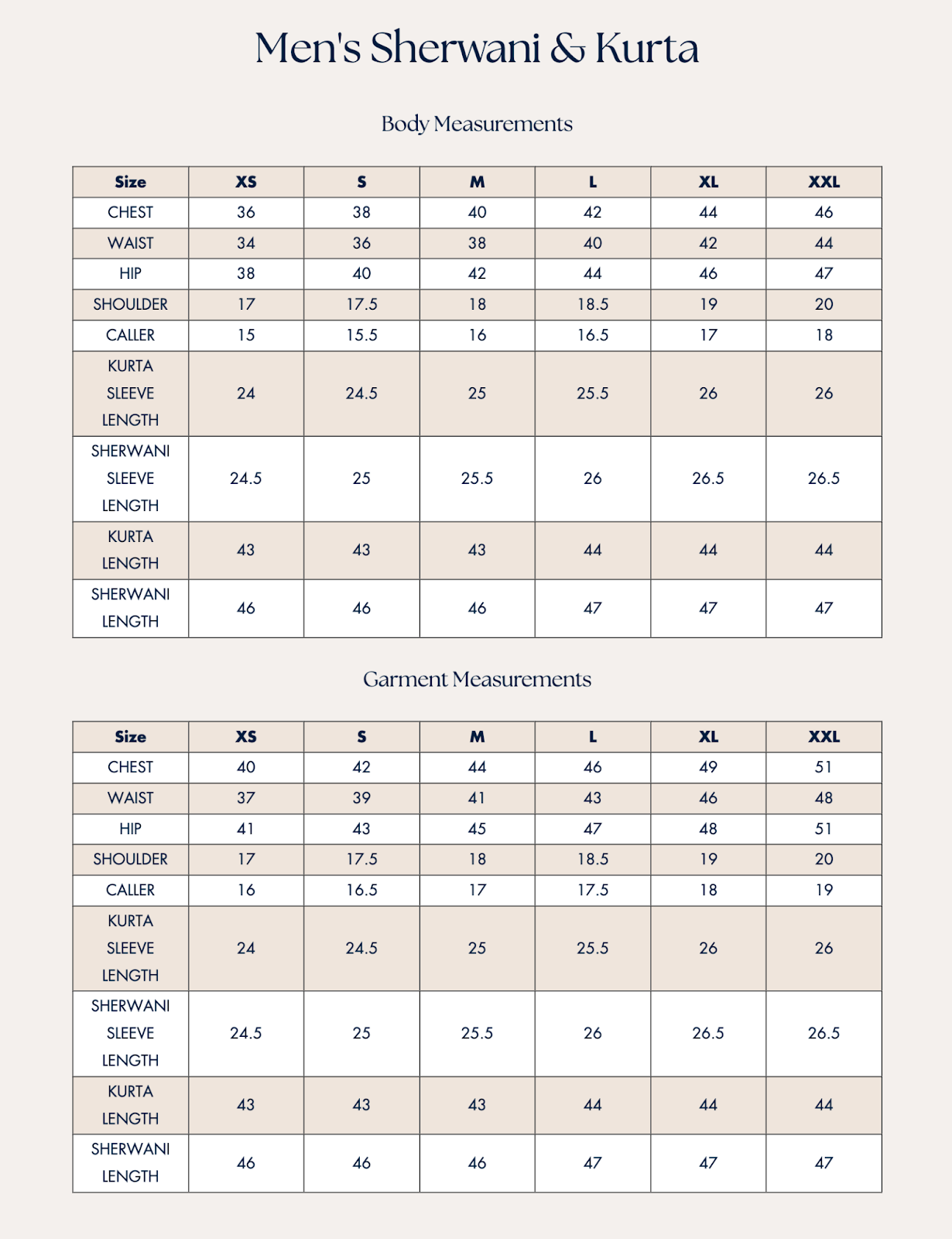
Many brands now provide both. Indian clothing retailer Lashkaraa, for example, shows both formats on one page.

  • Body Measurements are listed first, specifying the wearer’s dimensions that each size is designed to fit (e.g., Size M chest = 40 inches).
  • Garment Measurements appear below and show the finished dimensions of the clothing itself (Size M chest = 44 inches), building in the extra “ease” needed for comfort and drape.
Body and garment measurement size chart for men's sherwani and kurta from XS to XXL.
Lashkaraa’s body and garment measurement tables side by side.

Because both tables use the same measurement points, shoppers can first match their own body numbers, then confirm how the garment will fit when worn.

Instant demo: See Shopify POS in action

Discover how Shopify POS helps you manage in-store and online sales from one powerful platform.

Try now

Why accurate sizing charts are critical for ecommerce

Online shoppers can’t zip, button, or twirl before they buy, so your size chart has to do the convincing. Here are two key reasons why: 

In-store confidence vs. online uncertainty

“Sizing is frequently the number one reason shoppers cite in their decision to shop in-store versus online,” says Dan Weinsoft, ecommerce conversion strategist at The Good.

“In-store retailers have the advantage of ‘trial-ability’ and observability, simply by having a physical product to touch and try on,” Dan continues. If it’s a customer’s first interaction with your brand, they have no idea what to expect when it comes to fit. Having a sizing chart on each product page helps them select the right size. 

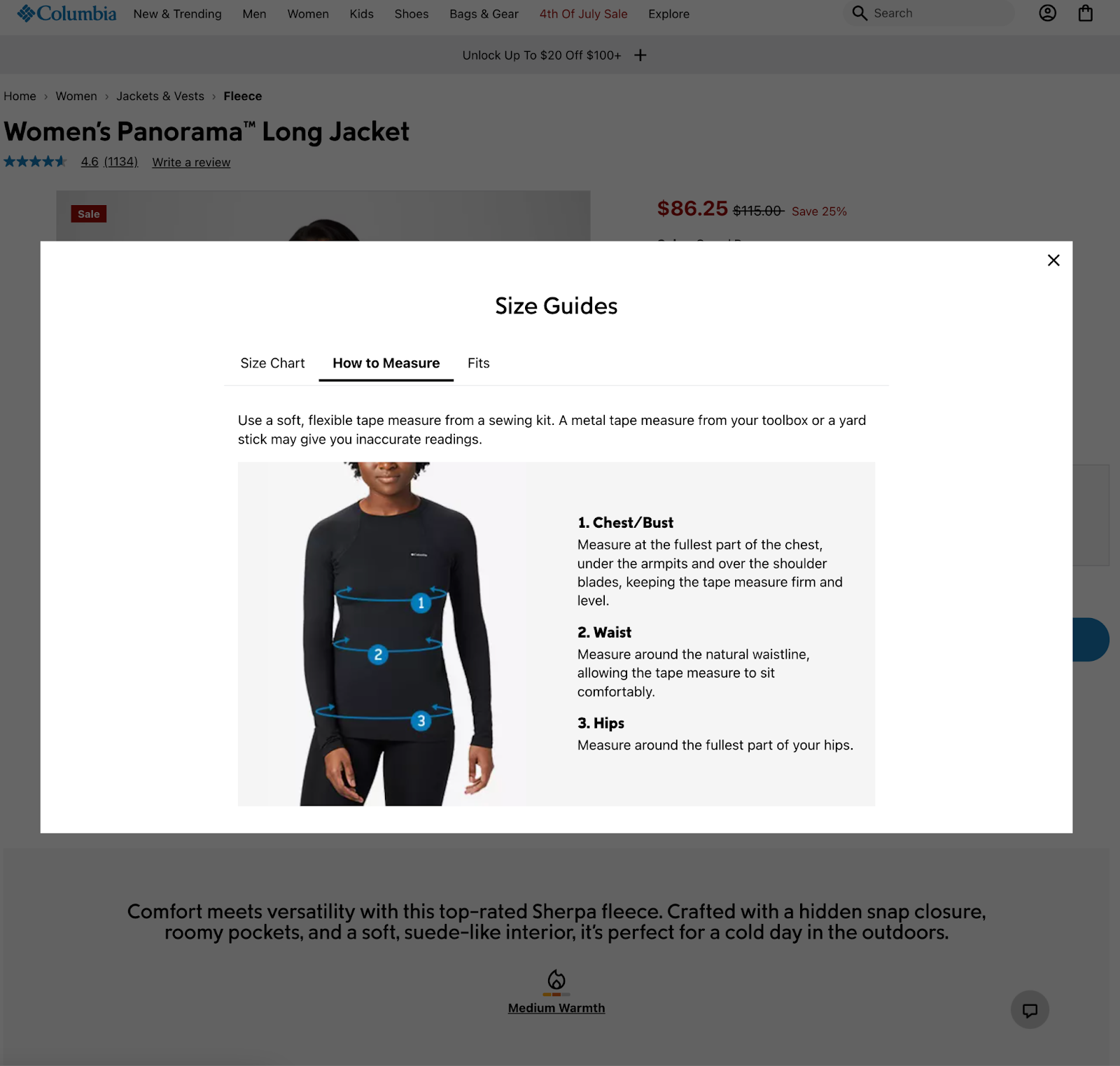
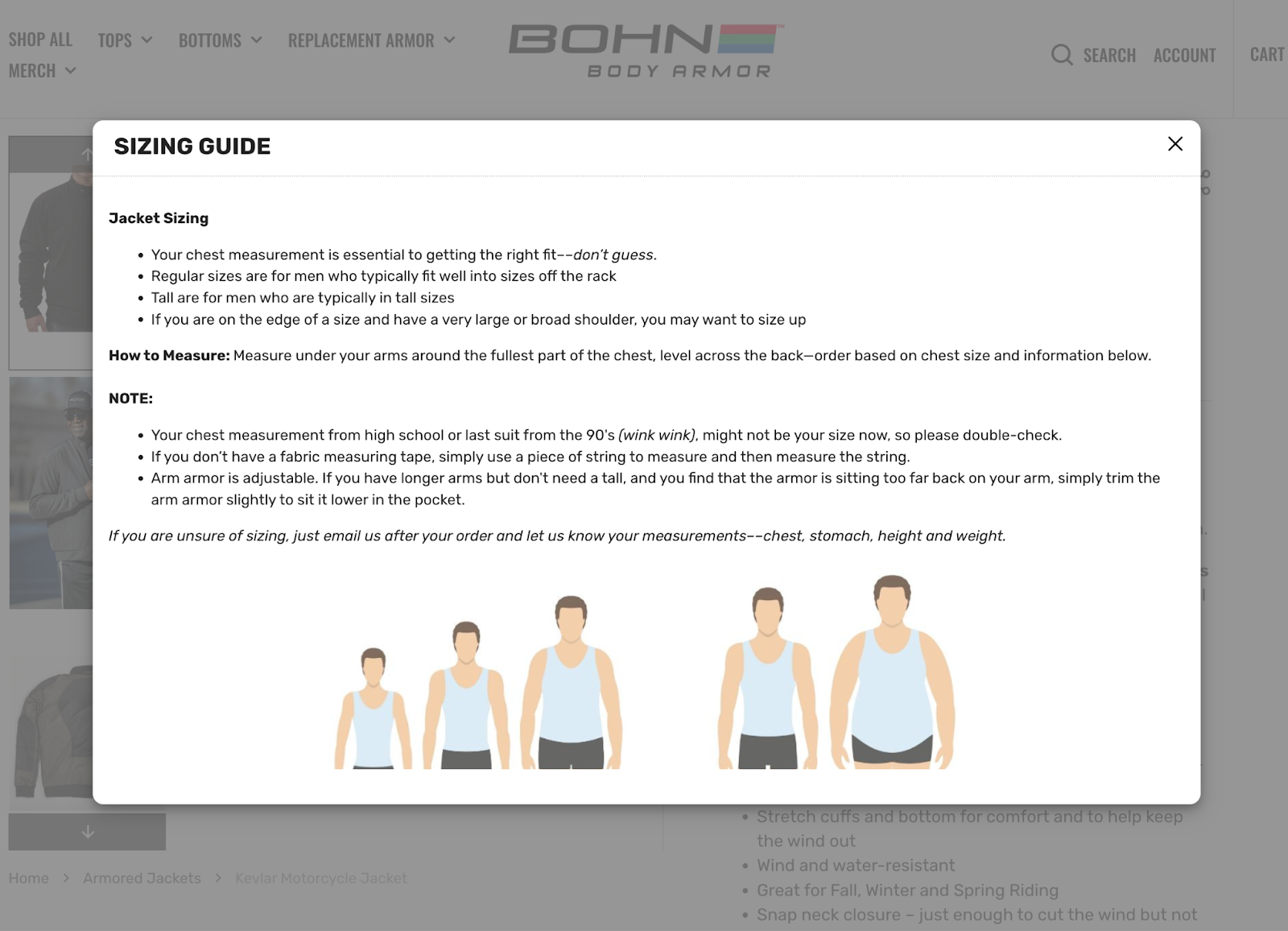
Columbia is one online retailer that gets it right: “Columbia emphasizes the size and fit guide high on their product detail page,” Dan says. 

“It also designed a prominent on-page size and fit guide with clear, common measurements and a guide to how to measure yourself for the best fit. The brand has done everything but send a tailor out to their customers’ homes to take measurements.”

Columbia size guide popup with chest, waist, hip measuring diagram and tips.
Columbia embeds step-by-step measuring guidance in their fit popup.

Fit issues drive expensive returns

“When shoppers have to guess, one of two things happens: They either don’t buy, or they buy two or three sizes and return the ones that don’t fit,” says Morgan Linton, cofounder of Bold Metrics. 

“In fact, the average online apparel retailer experiences a return rate of 28%, and 80% of these returns are due to fit issues,” Morgan adds. A Coresight Research survey backs this up. The survey found that size and fit are the top reasons for 53% of returns, contributing to a 24.4% online apparel return rate.

A clear sizing chart gives customers a better shot at selecting the right size on the first try. For your business, that means fewer costly returns due to “wrong size” issues, higher conversion rates, and stronger customer loyalty over time.

How to create a size chart in four steps

  1. Determine your key measurements
  2. Document your measurement in a template
  3. Add a “how to measure” guide on your product page
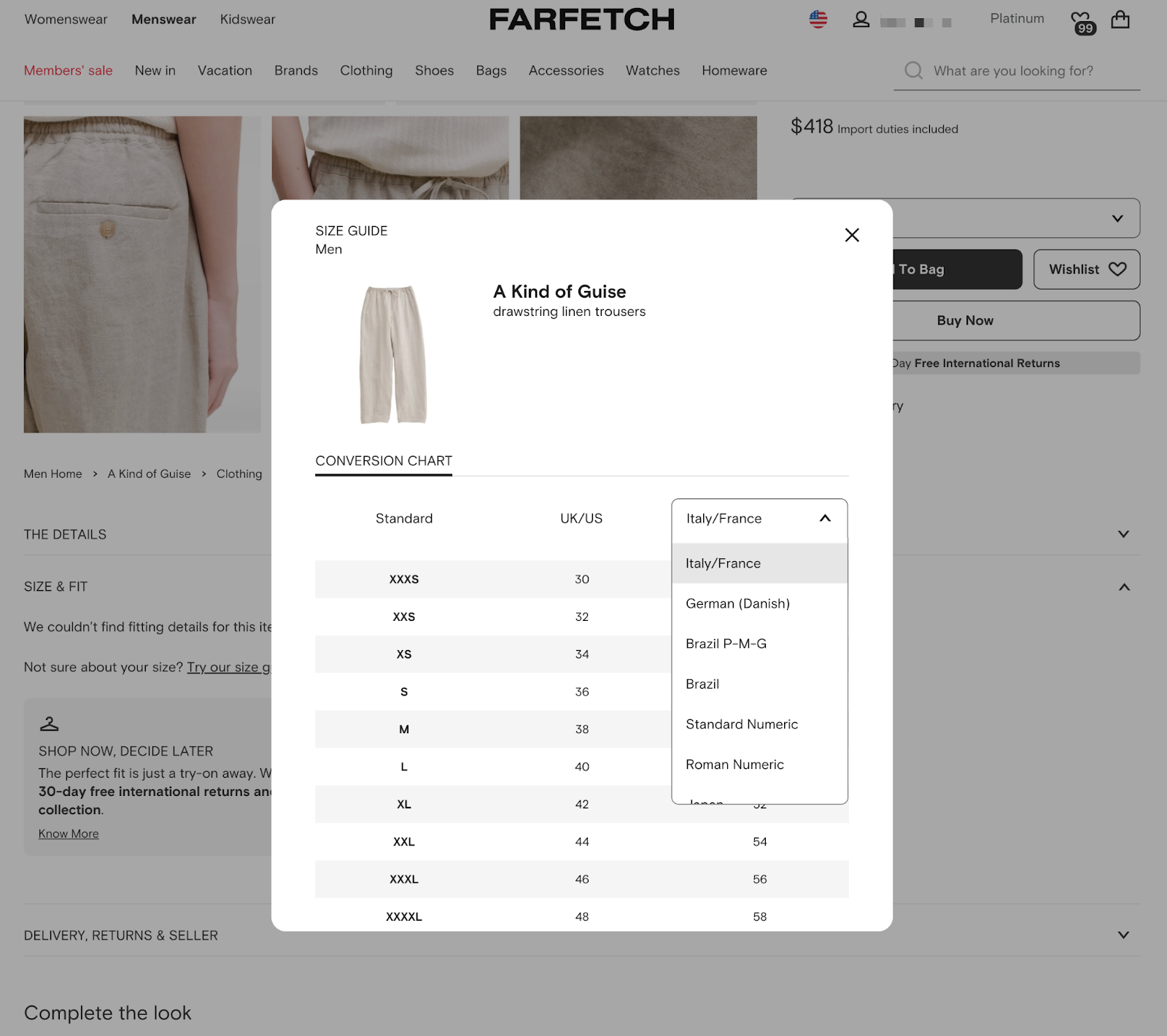
  4. Include international size conversions

1. Determine your key measurements

Start by listing every body point that influences how the garment fits. At minimum, capture:

  • T-shirts and knit tops: Chest/bust width, shoulder width, body length, sleeve length
  • Dresses: Bust, waist, hip, garment length (shoulder to hem), sleeve length, sometimes shoulder breadth for tailored styles
  • Pants and jeans: Natural waist, high hip, low hip, front rise, thigh circumference, inseam, leg opening

If you manufacture the products, you already have the measurements. If you stock other brands, ask for their sizing charts to make sure your site includes accurate information. The more precise your measurements, the fewer returns you’ll face from customers ordering the wrong size.

2. Document your measurements in a template

Transfer the numbers into a spreadsheet and keep units (inches or centimeters) consistent. Lock the top row so every column label stays visible as you scroll.

Here are a few templates to use when building out your spreadsheet.

Women’s apparel

Columns: Size (XS–XXL) | Bust | Waist | Hip | Garment length | Sleeve length

Men’s apparel

Columns: Size (S–XXXL) | Chest | Neck | Natural waist | Hip | Inseam | Sleeve length

Unisex T-shirt

Columns: Size (XS–5XL) | Chest width (flat) | Body length (shoulder-to-hem) | Sleeve length (center-back)

3. Add a “how to measure” guide

Once you’ve documented your measurements, help your customers use them correctly. Adding a clear “how to measure” guide shows shoppers exactly how to take their own measurements and compare them to your chart.

The easiest way to add this to your site is with a Shopify app like Mageplaza’s Size Chart & Size Guide. You can import a CSV, or start with one of the 23 industry-specific templates provided. 

Customize every detail with a built-in editor. Tweak colors, fonts, layouts, and add images or videos without touching code. 

Mageplaza size chart editor with drag-and-drop fields and unit toggle.
Mageplaza lets you style charts and add media with zero coding.

You can also activate the smart size recommender, so shoppers get a personalized fit suggestion from their own measurements. The charts you make can also show up anywhere (inline, popup, or floating icon) and are optimized for mobile, tablet, and desktop. 

For example, motorcycle apparel brand Bohn Body Armor embeds a sizing popup alongside illustrated body shapes and fit notes. Scroll down and you’ll find measurement charts as well.

Bohn Body Armor sizing popup with fit notes and illustrated body shapes.
Bohn adds visual body-type cues to their sizing popup.

4. Include international size conversions

If you sell internationally, add a second tab or toggle in every chart that maps your core sizes to global standards. Consider the US, UK, EU, Australia, and Japan at minimum, and give shoppers the option to switch between inches and centimeters. 

Start with your SKUs (e.g., a US women’s Size 8 ≈ UK 12 ≈ EU 40), then add footwear or lettered equivalents as needed.

Online fashion marketplace Farfetch nails this with a conversion-chart popup that defaults to UK/US sizing, then lets shoppers pick Italy/France, Japan, Brazil, and more from a single dropdown.

Farfetch size-conversion chart with regional dropdown.
Farfetch lets shoppers switch between regional sizes in one click.

Five sizing chart best practices 

Whether you’re creating a sizing chart from scratch or improving an existing one, these best practices will help ensure your sizing information builds customer trust and reduces returns:

1. Make sure your sizes are easily understood

“Customers need perspective and scale when shopping online,” says Maria Haggerty, CEO of Dotcom Distribution (recently acquired by Ryder System, Inc.). “They’re unsure how clothes will fit the first time, and having a reference for comparison to their body type will ensure they can feel confident in their purchase.”

If your clothing comes in small, medium, and large, for example, pair those labels with equivalent numerical sizes (e.g., Medium = sizes 8–10). You can also include common measurements, such as length, in inches or centimeters. Also know that “one size fits all” isn’t true—it’s more likely “one size fits most.” 

If you sell multiple apparel types or categories—like shirts, shoes, or kidswear—create separate sizing charts for each to avoid confusion.

2. Give information that doesn’t require measurements

“Most shoppers don’t know their body measurements offhand, so make sure your sizing chart doesn’t rely solely on that information,” says Morgan from Bold Metrics.

“Very few people have a measuring tape at home, and if they do, the chances they will measure themselves is very low,” he says. “While a size chart is important, it is critical that shoppers can determine their size without requiring a measuring tape.”

Including details like height, weight, or cut notes (e.g., fitted vs. relaxed) helps customers choose if they don’t have a tape measure handy. Tools like Bold Metrics use this data to predict size. In-store teams can pull the same data through retail clienteling apps, using a shopper’s past purchases and ideal size to speed up fittings on the sales floor.

The clienteling playbook: 4 steps to measurable retail growth

Learn how fast-growing retailers like Psycho Bunny and Gorjana are using clienteling to drive loyalty, increase AOV, and make every shopper interaction count. In this on-demand webinar, Shopify and Endear experts walk you through a 4-step framework for building a winning clienteling strategy—from unifying customer data to measuring impact across channels.

Watch now

3. Include sizing information on each product page 

Make it easy for customers to get the information they need. Place a sizing chart on each product page or have a link that creates a size chart popup on the screen. This can help you avoid losing sales due to customers leaving the product page to look up sizing information. 

💡Tip: Pair a size chart with virtual fitting rooms so shoppers can spin a 3D avatar and see how fabric drapes before they click “Add to Cart.”

4. Add a sizing element to customer reviews

Customers who’ve purchased a piece of clothing can help convert new shoppers by sharing their experience through customer reviews—especially when it comes to fit.

Let reviewers rate products as running small, large, or just right. You can also allow shoppers to upload photos of themselves wearing the item. This gives future buyers a real comparison of how a garment fits on different body types versus a mannequin or a model.

These types of reviews don’t replace your sizing chart, but can reinforce it. They boost a shopper’s confidence in sizing, helping them make the decision to purchase the item.

5. Be willing to accept returns 

“Although your return policy is a different part of the customer experience, it will affect how customers feel about finding the right size and making a purchase,” says Maria from Dotcom Distribution. “Make shipping and returns effortless so that customers know, even if they do get the wrong size, they can easily exchange it for the right one.”

Having a flexible and clear return policy can increase customer confidence. Your sizing chart should prevent most issues with fit, but a strong return policy reassures shoppers that they won’t be stuck if something doesn’t work out.

Accepting retail returns and exchanges keeps consumers confident they’ll end up with the right size in the end. Make it easy for customers who purchase online to return and exchange their items in your brick-and-mortar store.

Buy online, return in-store (BORIS) is an enticing option for customers who want an immediate refund (versus waiting for returns to be delivered by mail), or who want to leave with the correct size the same day. 

Either way, offering this option boosts confidence in your sizing guidance and drives in-store foot traffic, which can lead to more sales.

Create your retail sizing charts

Now that you know what a sizing chart is, why it’s important for your clothing store, and how to build one, it’s time to get started. A clear, accurate chart is one of the simplest ways to boost customer satisfaction, reduce returns, and increase sales. Done well, your sizing guide becomes more than a reference tool—it’s a driver of customer lifetime value and long-term growth.

Sizing charts FAQ

How does a sizing chart work?

Most sizing charts map body measurements, though some also include garment measurements for added clarity. Rather than providing specifications for particular designs or garments, a sizing chart shows the general body measurements that correspond to each garment size.

How do you measure sizing?

The most common size chart measurements are bust, waist, and hip, but if you sell apparel that has an intricate design/fit, including more points of measurement on your size charts makes the customer decision-making process easier, and reduces returns.

What is a size run in retail?

A size run in retail is a range of sizes offered for a product. For example, a shoe retailer may offer a size run of 5–10 in a particular style, while a clothing retailer may offer a size run of XS–XL.

Are sizing charts accurate?

They’re only as accurate as the measurements and production tolerances behind them. Consistency is key–if your team measures every sample the same way, and updates charts whenever patterns change, shoppers will get a reliable fit. 

Should I show sizes in inches or centimeters?

Match the default unit to your primary market (inches for the US, centimeters for most of the world) and give shoppers an easy toggle or dual-column view.

How do I create a size chart for t-shirts?

Measure a full size run—chest width (laid flat), body length (shoulder to hem), and sleeve length (center-back). Then enter the numbers into a table labeled XS–5XL (or your range). Export that table as CSV or feed it into a sizing chart app so it renders consistently across every product page.

What is vanity sizing and how should I address it?

Vanity sizing inflates garment dimensions so a customer who normally buys a Medium fits into a labeled Small. Avoid it by sticking to objective body or garment measurements on your chart and by publishing fit notes (e.g., “Runs large. Order down if between sizes”) wherever needed.

Merchant Services: Top Providers & How to Choose (2025 Guide)

Software Stack Editor · September 5, 2025 ·

.tg {border-collapse:collapse;border-spacing:0;}
.tg td{border-color:black;border-style:solid;border-width:1px;
overflow:hidden;padding:9px 15px;word-break:normal;}
.tg th{border-color:black;border-style:solid;border-width:1px;
font-weight:normal;overflow:hidden;padding:9px 15px;word-break:normal;}
.tg .tg-wp8o{border-color:#000000;text-align:center;vertical-align:top}
.tg .tg-wkkj{background-color:#efefef;border-color:#000000;
font-weight:bold;text-align:left;vertical-align:top}

Consumers want the freedom and control to choose how to pay for their products.

Globally, shoppers are turning to digital payments, with the volume of non-cash transactions expected to hit $2.84 trillion by 2028, according to Capgemini Research Institute’s 2025 World Payments Report.

The report found that digital wallets like Alipay and Apple Pay already capture 66% of all online purchase value worldwide, up from just 34% a decade ago. 

For your retail business, merchant services give your customers freedom, flexibility, and control over payments. Ahead, you’ll learn how merchant services work, how much they cost, and key steps to choosing the best provider for you.

Table of contents

What are merchant services?

Merchant services are tools companies use to accept credit cards, debit cards, and other electronic payments. They’re an essential component for any business that wants to offer payment methods beyond cash—including ecommerce businesses and brick-and-mortar stores.

A merchant service provider is an intermediary between your business, your customer, and any financial institutions involved in a transaction between the two—including your bank and the customer’s banka. It facilitates a seamless transaction through a secure yet complex process that takes place behind the scenes. The process includes the following steps:

  1. Your customer presents their payment method, whether by entering payment details online or swiping a credit or debit card on your point-of-sale (POS) terminal—or just tapping it.
  2. Your merchant services provider sends the payment information through the card network (Visa, Mastercard, American Express) to the issuing bank (the customer’s bank) for approval.
  3. The customer’s bank either approves the transaction and sends an approval code to the card company or declines the transaction.
  4. The card company sends the approval code to your merchant services provider. 
  5. Your merchant services provider relays the approval code to your payment terminal.
  6. Your payment terminal confirms the transaction and prints a receipt.
  7. After approval, your merchant services provider settles the transaction by moving funds from the customer’s bank to your acquiring bank, which deposits them into your merchant account.

All of this happens seamlessly in only a few moments. Most merchant services providers charge 2% to 3% per transaction, plus monthly fees ranging from $20 to $50.

Merchant services vs. merchant account 

A merchant account is a business bank account that accepts digital payments. Getting a merchant account with an acquiring bank is straightforward if you have a business license.

What’s included in merchant services?

Merchant services include payment processing and a financial account, but they also deliver additional features to help you run your business effectively: 

  • Payment gateways and APIs: Cloud-based software encrypts checkout data, tokenizes sensitive card details, and connects your online store or POS to the card networks with a single integration.
  • POS hardware and software: Terminals, card readers, and mobile apps let you ring up sales in person while syncing inventory, tax, and customer data to your ecommerce back end. 
  • Security and compliance tools: These services help protect revenue and keep you compliant with PCI-DSS encryption, tokenization, and AI-powered fraud detection.
  • Integrations with third-party providers: The best merchant services providers allow you to customize your payment processes and methods based on your industry and the markets you serve. This often happens via third-party integrations.
  • Reporting and analytics: You’ll access real-time dashboards that break down sales, fees, and payout timing so you can reconcile faster and spot financial patterns.
  • Value-added services: Extras like invoicing, gift cards, and capital advances smooth out cash flow and provide better customer experience.

Shopify bundles most of these services into one platform, so you can manage commerce without juggling multiple vendors. 

Benefits of a merchant services provider

The right merchant services provider helps you settle sales faster and make sure fees don’t eat into your margins. Some more detailed benefits include:

  • More sales approved at checkout: Shopify Payments’ machine learning-based authorization process raises payment success rates by 26 basis points, unlocking an extra $471 million in annual gross payment volume across its merchants.
  • Fewer and cheaper chargebacks: Chargebacks are set to take over $33.78 billion from merchant pockets in 2025 alone, according to a 2025 trend report from Mastercard. Providers like Shopify cut fraud-related chargebacks by 20%, saving merchants an estimated $62 million a year. 
  • Faster access to cash: Instant and same-day payout options are a key benefit of merchant services. Ninety-two percent of US businesses say improving cash flow is a top reason they’re adopting faster payment processing, and 86% already use instant payments.

Start accepting payments fast with Shopify Payments

Skip lengthy third-party activations and go from setup to selling in one click. Shopify Payments comes with your Shopify plan, all you need to do is turn it on.

Discover Shopify Payments

Types of merchant service providers

Different types of providers solve different problems, and some cover the entire spectrum—from routing payments to keeping high-risk businesses live. Knowing how each one works will help you choose the right option for your risk profile, sales channels, and growth plans. 

Payment gateways

A payment gateway is a platform that processes online payments from your online store. It ensures you can safely process payments from online customers using credit and debit cards. Omnichannel retailers that require bank-level security and multiple payment options leverage secure payment gateways. 

Mobile payment processors 

These providers let you use your smartphone or tablet as a credit card terminal. They operate through a mobile card reader that connects to your device, as well as a mobile app that passes payment information to your payment processing network.

Shopify’s Tap To Pay is a more powerful version of a mobile payment system that includes a built-in barcode scanner, the ability to accept secure payments with any payment method, and full integration with your store’s back office. It’s useful for businesses that want to sell on the go with no additional hardware.

Independent sales organizations (ISOs)

ISOs are third-party agents registered with card networks to resell processing services. They open your merchant account, lease or sell terminals, and offer human support, which is useful if you’d rather call a rep than wade through API docs.

High-risk merchant service providers 

Some industries, like tobacco, insurance, and online gambling, have higher refund or fraud rates. They often exceed the card networks’ chargeback threshold, which is around 0.9%, putting them into the “high-risk” category. 

Specialist service providers in this segment keep those businesses processing but offset the extra risk with higher fees and rolling reserves. Businesses typically choose these providers when mainstream providers decline their application or stop service due to chargebacks. 

All-in-one payment platforms

Vendors like Shopify combine gateway, processing, POS, and back-office tools in one dashboard. Every online order, swipe, or mobile sale flows through the same system, keeping your business data in sync 24/7. 

12 best merchant services providers in 2025

If you’re looking for a merchant services provider, here are the leaders in this space worth considering. The best option depends on your business type, size, and needs—there’s something on this list for everyone.

Monthly fees Transaction fees Funding
Shopify Starts at $29 No transaction fee with Shopify Payments; Credit card processing varies 1–3 business days (or next day to a Shopify Balance account)
Helcim None In-person: 0.4% of purchase amount + $0.08
Online: 0.5% + $0.25
1–2 days
Square Starts at $29 In-person: 2.6% + $0.15
Online: 2.9% + $0.30
1–2 days/same day
Stripe None 2.9% + $0.30 for cards;
0.8% for ACH, capped at $5
2 business days
Stax Starts at $99 $0 + conversion fees Up to 5 days
Clover Unspecified From 2.3% + $0.10 1–3 days
Chase Starts at $9.95+ In-person: 2.6% + $0.10
Online: 2.9% + $0.25
Same day for Chase accounts
Bank of America Unspecified In-person: 2.65% + $0.10
Online: 2.99% + $0.30
Same- and next-day funding available to businesses with Bank of America accounts
PayPal $0 1.9% to 6.5% + fixed fee Instant to PayPal balance, 1–3 days to bank
US Bank Merchant Services $0 In-person: 2.60% + 10¢
Online: 2.90% + 30¢
7-day-a-week service including weekends/holidays
National Processing $9.95 In-person: 2.5% + 10¢
Online: 2.9% + 30¢
2–3 business days
Dharma Merchant Services $15 for most industries In-person: 0.15% + $0.08
Online: 0.2% + $0.11
Next day if batched by 5 p.m. ET

Our methodology 

While every business has unique needs based on factors like transaction volume, international presence, and industry requirements, one factor stands above all: the ability to unify commerce operations on a single platform.

We believe Shopify offers the best merchant services solution because it’s the only platform that provides truly unified commerce without the complexity of integrating multiple systems. Rather than stitching together separate solutions for online and in-person selling, Shopify delivers a native platform where all your business data lives in one place.

However, it’s important to compare different providers to find the right fit for your specific needs. This analysis examines the top merchant services providers, evaluating them on crucial factors such as native integration capabilities, global payment options, operational efficiency, total cost of ownership, and scalability potential.

1. Shopify

Shopify Payments landing page with checkout UI and store owner looking at products.

Shopify is the only unified commerce solution that lets you run your entire business from a single source of truth. Unlike other solutions that require complex integrations between separate systems, Shopify provides one platform for all your selling channels—whether that’s online, in-store, through popups, or across social media.

With Shopify Payments built directly into the platform, you get comprehensive payment processing capabilities that work seamlessly across all channels. This includes secure credit card processing, automated fraud prevention, and support for local payment methods in specific markets. Every transaction is protected through automatic fraud analysis, ensuring your business stays secure as you grow.

Because Shopify also provides a full point-of-sale system with Shopify POS, you gain an integrated back office with inventory management, customer profiles, marketing tools, detailed reports, and omnichannel checkout options. No long-term contracts means you have full flexibility and freedom.

Features:

Cost: Monthly store plans start at $29 per month. There are no transaction fees for stores using Shopify Payments, however, there are credit card processing fees that vary depending on the plan you choose. Using third-party payment providers carries additional fees of 2%, 1%, or 0.5% of purchase amount for Basic Shopify, Shopify, and Advanced Shopify plans, respectively.

2. Helcim

Helcim is a merchant services company that lets you accept payments in-store, on the go, and online.

Helcim offers recurring payments, invoicing, international payments, a customer portal, and customer relationship management. Its card reader and virtual terminal let you accept payments on a computer, tablet, or smartphone.

Helcim provides volume-based discounts, so as your transaction amount increases, lower processing fees become available. You can reach Helcim customer support via phone or email. 

Features:

  • Interchange-plus pricing
  • No long-term contracts

Cost: 0.4% + $0.08 for in-person transactions, 0.5% + $0.25 for online transactions, and plus interchange

3. Square

With Square, you can accept payments in person, online, remotely (like ACH transfer), and over the phone. Square’s hardware options include a reader for chip cards and contactless cards, a terminal, a magnetic stripe reader, an iPad point-of-sale device, and a cash register.

Features:

  • Offers hardware, software, and payment processing
  • Customer support via phone or email

Cost: 2.6% + $0.10¢per in-person transaction, 2.9% + $0.30 for cards, or 1% with a minimum $1 per transaction for ACH bank transfers (invoices only), and 3.5% + $0.15 for online, manually entered, or invoice payments. Monthly plans with advanced features start at $29 per month.

4. Stripe

Ecommerce stores can use Stripe to accept online payments in more than 135 currencies, use prebuilt payment pages, manage online subscriptions, and issue invoices.

Stripe features an application programming interface (API) that integrates with payment methods worldwide, such as Alipay in China or iDEAL in the Netherlands. It is also known for its fraud detection.

Features:

  • International currency payment processing
  • Online and in-person payments
  • Compatible with 100+ payment methods
  • One-click checkout

Cost: 2.9% + $0.30 per successful card charge; 0.8% per ACH direct debit

5. Stax

Stax (formerly Fattmerchant) is an all-in-one payment processing platform that enables businesses to take payments in person, over the phone, online, and on mobile. It also supports invoicing customers and clients.

The pricing Stax offers caters to growing and large businesses, with a monthly fee that starts at $99. However, there’s a 0% markup on direct-cost interchange, which makes monthly costs more predictable.

Features:

  • Invoicing
  • Payment reporting
  • Multiple payment types
  • Customer support via phone and email

Pros:

  • Predictable pricing—single monthly fee
  • Customizable

Cons: Plans start at $99 per month. Customer reviews report questionable business practices.

6. Clover

Clover is a full-service POS system and merchant service provider. It offers software and hardware with features for online and in-person payments, as well as advanced options for features like inventory management and customer loyalty programs. Clover charges a monthly subscription fee on top of transaction fees. 

Features:

  • Online and in-person payments
  • Full POS system
  • Additional offerings like Clover Capital

Cost: 2.3% + $0.10 per transaction. Monthly subscription fees also apply but are not publicly advertised. 

7. Chase 

Chase is a major US bank that offers a suite of tools for retail businesses, including Chase Payment Solutions merchant services. Chase provides everything you need to accept credit cards online or in person via its POS. You can use its payment terminals, mobile apps, and POS integrations, and accept payments by phone or payment link.

Features:

  • Retail POS available
  • Virtual terminal and payment gateway

Cost: 2.6% + $0.10 for card; 3.5% + $0.10 for manually keyed transactions or payment links; and 2.9% + $0.25 for ecommerce payments. Monthly subscriptions start at $9.95 per month.

8. Bank of America

Bank of America is another major US bank that offers merchant service solutions for retailers to process both in-person and online payments. Beyond payments, Bank of America offers a POS system with accounting, employee management, inventory tracking, and other business management features. 

Features:

  • Accept credit and debit cards, contactless, swipe, and keyed payments
  • POS and mPOS for in-person transactions

Cost: 2.65% + $0.10 for card; 2.99% + $0.30 for ecommerce payments, and 3.50% + $0.15 for keyed transactions. A monthly subscription fee may also apply. 

 9. PayPal

PayPal is an online payment processor that has expanded into a full payment and merchant service platform for businesses of all types and sizes. Retailers can use it to accept online payments, send invoices, offer express checkout, and process in-person sales. 

Features:

  • Robust tools for online payments
  • International payment options
  • Embeddable payment button

Cost: Transaction fees vary and can be difficult to forecast. Generally, you’ll pay 4.9% + a fixed fee. However, this can be as low as 1.9% for PayPal card payments or as high as 6.5% for micropayments. There’s no monthly fee. 

10. US Bank Merchant Services

US Bank offers a payment solution for small businesses with in-person and online payment processing capabilities. The service is powered by Elavon (a US Bank subsidiary) and integrates directly with US Bank business checking accounts.

Features:

  • Everyday Funding available seven days a week, including weekends and holidays
  • Integrated online store capabilities and POS lending options through Avvance

Costs: 2.6% + $0.10 for card transactions, 3.5% + $0.15 for manual transactions, and 2.9% + $0.30 for online payments

11. National Processing 

National Processing is a merchant services provider offering payment processing solutions with 24/7 US-based support. 

It focuses on providing payment solutions for growing businesses across various industries, from retail to high-risk merchants. Standard funding times are typically two to three business days after batching. 

Features:

  • Point-of-sale (POS) systems with premium equipment and multiple payment options
  • Flexible plan options ranging from basic to premium
  • Direct integrations with major ecommerce platforms

Cost: 2.5% + $0.10 for basic in-person transactions, 2.9% + $0.30 for basic ecommerce transactions

12. Dharma Merchant Services

Dharma Merchant Services is a credit card processing service provider that caters to businesses processing more than $10,000 in monthly transactions. It offers both in-person and online payment processing solutions with integration capabilities for most point-of-sale systems.

The company also offers next-day funding for most merchants, provided that transactions are batched out by 5 p.m. Eastern Time.

Features:

  • Integration with multiple POS systems (Clover, Aloha, Lavu, Shopify)
  • Supports both in-person and online transactions
  • Accepts all major credit cards and digital wallets

Costs: Interchange plus 0.15% + $0.08 for in-person transactions, interchange plus 0.2% + $0.11 for online transactions, and a monthly fee of $15

How to pick a merchant service provider 

Now you know what most merchant services providers offer and the pricing structures they use. Here are some key points to keep in mind as you research different providers:

Monthly fees

Monthly fees are the fixed amount a provider bills you every month. No-fee plans work best if you process less than about $15,000 in card sales, because you only pay transaction rates.

Once you’re processing more volume, paying roughly $29 a month for added POS and reporting tools can lower your overall cost compared to higher per-transaction rates alone.

Transaction costs

There are three main ways your merchant services provider charges you for processing payments: flat rate, tiered, and interchange plus.

You should also be aware of interchange fees, which are a percentage of each transaction you pay to credit card companies for processing credit or debit card payments. Card companies and banks assume the risk of fraud or payment issues on every transaction, and these fees cover that.

Flat rate

The most straightforward pricing model is flat rate—a small percentage of the transaction amount plus an additional fixed fee.

An example of flat rate pricing is 2.9% + $0.30 per transaction. This structure is simple and predictable, making it easy to plan your expenses based on the number of sales you make in a given time period.

Tiered

A tiered pricing model has different pricing levels based on the level of risk the payment processor takes with each payment type.

For example, one tier can include in-person credit and debit card payments, which are usually deemed the safest and come with the lowest processing rates. The next tier can include international online payments, which come with more risk and result in higher processing fees.

Interchange plus

The interchange plus model means you’re paying the existing interchange fee plus a markup—an additional percentage or fee per transaction.

Unlike the other two pricing models, interchange plus outlines exactly what you’re paying for and reveals any hidden fees. This can be useful to businesses looking for a provider with the most competitive pricing, but many companies, especially smaller ones, might find this level of detail overwhelming.

Extra fees

Don’t forget about incidental fees, which are additional costs your merchant service provider may charge you. Here are some to keep in mind:

  • Account setup fees
  • Recurring charges for your merchant account, like an annual or monthly fee
  • Minimum processing fee if you don’t meet a specified volume of transactions
  • Chargeback fees if a customer disputes a charge and wins
  • Payment card industry (PCI) compliance fee
  • Statement fees
  • Batch fees for settling many transactions at once
  • Cancellation or termination fees if you cancel the service before your contract is up
  • Non-sufficient funds (NSF) fee when your bank account doesn’t have the funds to cover a business transaction

Funding options 

Consider the ways a provider moves money from your sales into your bank. Standard payouts are usually free and arrive in one to three business days. 

Some providers also offer instant or same-day payouts, where money arrives within minutes or hours. There are two caveats for these payments:

  1. You may pay a small extra fee (often 1%) for the speed.
  2. You may need to acquire a financial account with the provider, like Shopify Balance. 

Security and PCI compliance 

Your provider needs to meet certain security standards to keep your customers’ transactions and payment details safe. The most important ones include PCI compliance (for handling credit and debit card information) and SOC (for privacy, processing integrity, security, availability, and confidentiality).

Find this information on your provider’s security or compliance pages.

Payment options 

Offering the right mix of payment options helps you capture every sale. Customers prefer a variety of payment methods, including credit cards and debit cards, digital wallets, and buy now, pay later options. 

You’ll also want to look for a provider that offers regional preferences, like iDEAL in the Netherlands and Boleto in Brazil.

Contract length and terms

Contracts spell out how long you’re locked in and what it costs to quit. 

Choose month-to-month plans with no early-termination fee so you can leave anytime. Avoid multi-year deals that auto-renew and charge penalties if you switch providers early.

Customer support

Offering seamless transactions is essential to your customer happiness and your cash flow. If the process gets stuck for any reason, you’re not just losing money, but also your customers’ trust and patience.

If there’s an issue with payments, how will your provider handle it? Look at review sites like G2 or Capterra to read reviews from fellow business owners and learn about their direct experience with the provider.

Integrations

First, establish what you need from a merchant services provider in terms of how it works with the business tools you already have in place. This includes integrations. List payment providers, shopping cart integrations, accounting software, and other systems you might want to integrate your merchant services solution with. Then find solutions that fit. 

Also, think about the payment methods you want to offer. Consider credit and debit cards, ACH payments, gift cards, mobile payments, checks, electronic checks, and custom payments like split payments.

Reporting and analytics

It’s important to find a merchant services provider that also provides insight into business performance. At a minimum, you’ll want to be able to report on the number of transactions and sales volume for your business per day, week, or month. In addition, you’ll want to look for more advanced metrics, as well as automated options, so you don’t have to build all your data reports manually. 

Merchant services FAQ

What does a merchant service do?

A merchant service provides the following: 

  • Payment processing
  • Payment gateway
  • Payment terminal
  • POS system
  • Mobile payments
  • Virtual terminal
  • Reporting and analytics
  • Maintenance of PCI compliance

What is an example of a merchant service?

Shopify is an example of a merchant service. Shopify offers a full suite of business management tools, including merchant services, payment processing, POS systems, inventory management, and more. 

What is the difference between merchant services and a payment gateway?

A merchant service is the whole payment package, including a merchant account, processing, payouts, hardware, and support. A payment gateway is just one part of that package—it’s the software that sends your customer’s payment details to the banks for approval during an online checkout.

What are merchant services on my bank statement?

Merchant services on your bank statement refer to the fees and charges associated with processing credit and debit card transactions for your business. These can include transaction fees, monthly service fees, and other related merchant services costs.

Who is my merchant service provider?

Your merchant service provider is the company that processes credit and debit card payments for your business. This could be a bank, a specialized payment processing company like Shopify, Square, or PayPal, or another financial service provider that offers merchant accounts and payment processing solutions.

How do merchant service providers make money?

Merchant services make money by charging any combination of transaction fees, monthly fees, equipment fees, service fees, cancellation fees, currency conversion, setup fees, and hidden fees. 

Is PayPal a merchant service?

Yes, PayPal is a merchant service.

20+ Vendor Booth Ideas & Layouts to Stand Out in 2025

Software Stack Editor · September 5, 2025 ·

Trade shows provide the ultimate opportunity for indie makers and smaller brands to cultivate connections with customers in the flesh. Getting yourself a market booth is also a manageable and (relatively) affordable way to showcase your wares in person, rather than investing in a full-scale retail location.

Simply having a vendor booth, however, isn’t enough. The design of the booth and how you display your products impact a passerby’s likelihood of engaging with your brand. It’s those people that are most likely to turn into paying customers.

Looking for inspiration? This guide shares the best vendor booth ideas, alongside the latest tips on setting up your market booth for success.

What is a vendor booth?

A vendor booth (also known as a market booth) is a small space, usually 10 feet by 10 feet in size, within a trade show hall. They provide space for brands to display their products and branding to attract customers.

Vendor booths at trade shows, craft fairs, and makers’ markets also offer the opportunity to network with fellow entrepreneurs in your area. You can gain access to the events audience, test your brand launch in a real-life venue, meet potential wholesale clients, and build a local following.

Trying a popup in-person selling experience can also serve as the stepping stone to opening a physical location.

20 creative vendor booth ideas to stand out

  1. Create a booth banner
  2. Decorate walls and ceilings
  3. Add seating arrangements
  4. Opt for mobile checkout
  5. Give out bag stuffers
  6. Host product demonstrations
  7. Maximize vertical space
  8. Look for durable material you can repurpose
  9. Put bestsellers front and center
  10. Offer booth exclusive discounts
  11. Experiment with lighting
  12. Refresh your vendor booth display often
  13. Be consistent with color choice
  14. Think about flooring
  15. Include social media opportunities
  16. Lean into experiential retail
  17. Host a contest or competition
  18. Hand out free food
  19. Distribute free product samples
  20. Collect email addresses

Backdrop and structural ideas

1. Create a booth banner

Trade show attendees often see a banner before they see the booth itself. Use yours to make a strong first impression, which turns footfall into booth visitors.

Get creative with your banner while sticking to these best practices:

  • Showcase your retail branding and unique selling proposition front and center.
  • Use eye-catching designs, such as illustrations or contemporary art, to draw attention.
  • Experiment with a printed backdrop to stand out from white-washed walls.

2. Decorate walls or ceilings

The walls and ceiling of your vendor booth space are great spaces to showcase your brand—especially if you’re in the creative trade.

“Walls are fantastic for telling your brand story,” says Esme Rogers-Evans, jewelry designer and founder of Duxford Studios. “Create well-designed picture boards or use your branding and product photography to build your visual story.

“I also love hanging some intriguing tools on the walls, as I like to promote that I work with a completely handmade process—this can be a fantastic conversation starter.”

One word of warning: don’t go overboard. Many market booths fill any available space, which results in a cluttered and confusing trade show display. Utilize items to highlight a handful of focal points throughout the vendor booth, use simple signage, and leave blank spaces.

3. Add seating arrangements

Try to leave enough space to create seating arrangements for attendees. Just a few people can make your booth look busy and interesting, triggering herd mentality and encouraging more visitors.

This is especially useful if you’re selling to wholesale or B2B customers at the vendor event. Buyers often want more information before committing to large orders. Give them space to sit down inside your market booth and chat through their options with your sales team.

4. Opt for mobile checkout

Trade show organizers divide their space into smaller booths and charge accordingly. If you’re on a budget or stuck with a smaller booth, opt for mobile checkout. You won’t need a designated countertop to store a fixed terminal—instead, you can process payments from anywhere in (or out!) of the booth with a mobile POS system and card reader. 

💡Tip: Tap to Pay on Shopify POS can turn your smartphone into a credit card reader with no additional hardware required. That’s one less thing to worry about when packing your equipment and setting up a vendor booth. 

Person at a farmers market tapping their credit card onto a smartphone with Tap to Pay.
Turn your smartphone into a mobile card reader with Shopify POS.

Start selling in-person with Shopify POS

Shopify POS is the easiest way to start selling in-person. Take your brand on the road and accept payments, manage inventory and payouts, and sell everywhere your customers are—farmer’s markets, pop up events and meetups, craft fairs, and anywhere in between.

Discover Shopify POS

Product display and merchandising ideas

5. Give out bag stuffers

Distribute bag stuffers—small, curated free products relevant to your industry—as a creative way to get people to interact with your vendor booth or popup shop.

A bag stuffer might include:

  • Branded merchandise, such as t-shirts, mugs, or pens
  • Free miniature versions of your products
  • Supplementary items, such as sunscreen for beach-related products

“To keep our brand top of mind, it’s important to make sure they have something to take home,” says Nora Sermez, founder of the jewelry brand Sermez. “We gave away a mystery ticket with a QR code that can be scanned for a discount on a first purchase, and for more serious buyers, a signature jewelry box to keep on their vanity.”

6. Host product demonstrations

Instead of talking about the benefits of your product, use live demos to showcase your product in action or create a hands-on experience for attendees.

If you sell crafts, for instance, set up a live art demo to give potential customers a sneak peek into your creative process. Visitors will witness your creative process in action, adding a layer of fascination and appreciation for your craft. 

Strategically incorporate demo space into your booth’s original design or pick a booth with a small workstation for demos. Make sure there’s plenty of space for people to move about, mingle, and easily access the demo display.

If you can’t hold a live demo, give your booth visitors a virtual demo. Use an Android tablet or iPad kiosk, then find interactive elements, like augmented reality (AR) features, to give visitors a hands-on experience that’s almost as good as holding the real thing. Just be sure to also get a little face time with visitors so they don’t just play with the demo and leave without talking to someone.

7. Maximize vertical space

Booth visitors often look at everything on a table that’s within easy reach as well as what’s displayed on a wall, such as vendor booth signs, shelves, or easels.

Use different heights for wall displays and hanging banners or signs. These add visual elements to the ceiling and draw attention to your booth from a distance. You’ll free up floor space and make your booth appear more open and welcoming—without sacrificing brand visibility.

Babylist’s retail store showing shelving units and mannequins placed on wooden tables.
Babylist uses vertical shelving to showcase products in a small space.

8. Look for durable material you can repurpose

There’s no need to design your vendor booth from scratch at each retail event. Save money on your vendor booth display by repurposing durable material. Get inspired by your product and brand, and see how it can help inform the materials you use for décor. 

9. Put bestsellers front and center

Your bestselling products are popular for a reason—they have mass appeal. Displaying them front and center of your vendor booth draws people in, especially those who might be unfamiliar with your brand.

Plus, when you label a product as a “bestseller,” it creates a sense of trust and helps nudge new or indecisive customers toward a quicker buying decision. People tend to gravitate toward what’s already been validated by others. 

💡Tip: Bestsellers often differ by location—what sells best online might not be the most popular at trade shows when customers can physically interact with products. Use Shopify Analytics to compare product performance and sell-through rates by location.

10. Offer booth exclusive discounts

Limited-time deals motivate market booth attendees to buy or commit on the spot, rather than waiting and potentially forgetting after the event. Discounts can also encourage impulse purchases, particularly if the offer is only available at the show. They need to act now to take advantage. 

But exclusive offers don’t have to be discounts. Create product bundles to combine your bestsellers and encourage product discovery, or offer free ship-to-home services for larger items. These help combat common sales objections—like not knowing which item to buy, or purchasing a product they’ll have to carry around all day.

Shopify POS tab showing a tile for a buy one, get one free promotion.
Apply discounts with ease inside Shopify POS.

Lighting and ambiance ideas

11. Experiment with lighting

A well-lit vendor booth creates an attractive atmosphere that draws visitors, generates interest in your product, and promotes sales. 

Accent lighting, for example, spotlights the most important elements of your booth, like your branding, displayed products, or marketing messages, which helps them understand a bit about who you are. Flattering hues are good for your booth staff and visitors, while spotlights are ideal for highlighting products or a part of your display, like your brand name or logo.

12. Refresh your vendor booth display often

An inexpensive way to keep your vendor booth current is to regularly refresh the display. It’s especially handy if potential customers visit the booth at more than one event. A unique experience each time could be enough to draw them back and increase popup sales.

For each trade show event, brainstorm vendor booth ideas that experiment with:

  • Different shapes and layouts
  • Lighting effects
  • Product displays
  • Interactive experiences
  • Booth decoration

13. Be consistent with color choice

There’s a reason photographers and top brands use white backdrops to shoot items—it really makes the products pop. Keep that principle in mind with your vendor booth: Use muted colors to help make your products stand out.

If you’re going with another color palette, try matching it to your brand color for your packaging or signage—and maybe even how you dress at the show. Uniformity and consistency make for stronger branding. Your goal is to create a cohesive and on-brand look with the elements and colors you choose.

Snarki Studios, for example, uses the same pink color scheme for their vendor booth sign and price lists:

14. Think about flooring

Since every touchpoint of your vendor booth adds to the overall story of the booth space, flooring can help immerse your visitors even further into your brand’s world.

Plus, visitors might want to take “flat-lay” pictures of your products and shoefies (shoe selfies) to post on Instagram. When they tag your brand in those pics, it creates a library of user-generated content (UGC) you can share in your Stories or repost to your own account (with permission).

Customer engagement and sales ideas

15. Include social media opportunities

If you want to encourage people to hang around and stay engaged on social media while visiting your vendor booth, try setting up a makeshift selfie station. Simply create a backdrop with a Bristol board or cardboard, or reserve a “blank space” on one of your vendor booth’s walls. You can also cut a frame out of cardboard to serve as a selfie prop.

Whether you use a wall or a frame, make sure your branding, URL, hashtags, and social handles are clearly incorporated. It’s a fun way to encourage user-generated content that you can then post on owned social media channels.

16. Lean into experiential retail 

Long gone are the days of visiting a trade show with the sole purpose of buying a product. These days, customers want experiences from the brands they’re shopping with. Offering these experiences in your booth can help you stand out from other vendors. 

Experiment with different trade show booth ideas that make the experience shareable. For example, brainstorm fun market booth activities like:

  • Virtual fitting rooms.
  • “Spin the wheel” competitions.
  • Photo booths with branded printouts.
  • Motion-sensor games.

17. Host a contest or giveaway

A contest or giveaway is an easy way to get the conversion flowing with booth visitors. The customer gets something for free (entry into a competition), while you open the floor to learn more about what they’re shopping for. 

Ask shoppers to supply their email address or sign up for your newsletter for the chance to win something, which could be a gift card for your store, a gift basket filled with your products, or an impressive discount code to redeem on their next purchase. Announce the contest winner at the end of the day, every hour, or even via email to keep the conversation going with your customer post-event. 

18. Hand out free food

Looking for a smart hack that drives people toward your vendor booth? Take a leaf from Costco’s book and offer free food to visitors. It’s a great conversation starter your sales team can use to segue into product pitches.

Packaged products work best since you’re unlikely to have access to cooking appliances. That could include:

  • Chips
  • Cookies
  • Popcorn
  • Candy or chocolate

If it makes sense for your business, you could even offer food that’s somehow relevant to your products or branding. For example, attach your business card or a branded sticker to the packaged food you give out. Or if you’re a kitchenware brand, find clever or logical ways to incorporate your food offering into your product merchandising. 

DesignMeHair hands out free cotton candy from their vendor booth to draw people in:

19. Distribute free product samples

Product samples allow booth attendees to interact with a miniature version of your product. Instead of guessing which item they’ll get the most value or enjoyment from, they can try before they buy and make a more confident decision. 

Free samples also act as conversation starters with people passing by. Spencer Lynn, northeast regional manager at KOS, advises, “Step out from behind your booth and get in front of it, hand out some samples in the aisles. If it’s really slow, I’ll grab some of our single-serving sample sachets and walk the floor myself and hand them out as I go. Sometimes people will come to seek out our booth after that to find out more info.”

20. Collect email addresses

Collecting email addresses helps you stay in touch with vendor booth visitors—even if they don’t buy. It also builds up your lead list for follow-up marketing. 

To collect email addresses at the vendor booth:

  • Offer an incentive, be that discounts on items visitors buy at your booth or branded freebies in exchange for their email addresses. 
  • Make your form as simple as possible. For digital forms, have an iPad or Android tablet ready for visitors to fill out the forms. Alternatively, use QR codes with a call to action (CTA) like “sign up for a giveaway” on your flyers, posters, signup form, or even the booth walls to streamline the collection of email addresses. 
  • Send personalized email carts. Use Shopify POS to load the items a customer was interested in into a cart, then send an email with a link to complete their checkout online. 

After the event, send thank you emails to visitors who signed up for your mailing list to show you appreciate their interest in your product or brand. Remind them they signed up at the event. Include a link to an online form where they can confirm their subscription via email and a clear CTA of what you want them to do next, like “Visit our website” or “Get tickets to our next vendor event.” 

💡Tip: Shopify unifies every piece of data you’ve collected on a customer into a single record, based on their email address or phone number. This gives you a 360-degree view of each customer, which you can use to segment subscribers and personalize outreach after the event.

Planning your vendor booth

Define your goals and budget

Vendor booth success lies in being creative and repurposing items for different uses. For example, consider using books as risers or china saucers as holders for small items like jewelry or pins.

Other fun vendor booth display items include:

  • Ladders
  • Toolboxes
  • Drawers
  • Kids chairs
  • Boxes or crates
  • Racks
  • Three-tier booth stands

Sometimes, the items you need are right in front of you—they might be gathering dust in your home or the home of a family member. Check your rooms and/or studio for things you can use, such as tables, containers, and props. 

Even consider bartering with other vendors before the trade show starts. See if they have any items you can trade or borrow for the event. Organizers may also have materials on hand to lend out or rent.

Choose the right booth layout for your space

Once you’re approved to attend the market or craft show you’re aiming for, contact the show’s organizers to get the floor plan and any rules or regulations regarding market booth setup.

Booth regulations can be a creative challenge—how will you conceptualize the booth space within the constraints? You may only have a 10×10 space within which to tell your brand’s story.

Ask yourself what items you need to display and what the best way is to present your products. Sketch out a few possible retail layouts with a planogram, and don’t forget to leave room for areas to process payments and for storage.

Running your booth on event day

How to set up your display efficiently

Equipped with your vision and the show’s plan, consider how you’re going to build your booth. If you have a good handle of your moodboards and enough inspiration, you might be able to sketch out the blueprints yourself with the help of interior design apps.

If it’s overwhelming and you plan to attend more than one show, research companies that specialize in booth design and development.

There are three more things to keep in mind:

  1. Make your vendor booth easy to put up and take down.
  2. If you plan on attending multiple shows, you don’t want your booth to be too “out there” in terms of design and vendor booth display elements. Try to ensure that your vendor booth, while original, is still “one size fits most.”
  3. Consider the lighting and electricity resources of the show you’re attending. Where are the power outlets? Are there restrictions around lighting? And is power access included in the vendor fee?

Engaging with customers (without being pushy)

Step away from any distractions and welcome everyone who steps up to your vendor booth. This ensures browsers and potential shoppers know you’re available in case they have any questions.

“Our number one rule at the booth is to always be engaging and make conversation with passersby,” says says Chris Meade, cofounder of CROSSNET. “Take time to educate, have them try out the games, or simply make them crack a smile. People typically hate being sold to, so do your best to strike up a conversation and you’ll be surprised at how far it gets you.”

Use items as icebreakers that automatically encourage interaction, ask your visitors questions, talk about your process, and generally be open. If customers think they’re interrupting you, they’re less likely to ask about an item or purchase something, which is another missed opportunity.

Run a seamless vendor booth with Shopify POS

The less equipment you have to manage at a vendor booth, the more attention you can dedicate to your customers. 

Opt for an all-in-one mobile POS system that allows you to:

Since Shopify is the only platform to natively unify POS and ecommerce on the same solution, you get one source of truth for every sales channel. Popup shops, permanent retail stores, and ecommerce websites all operate from the same business “brain.” As a result, you get real-time insight into inventory, order, and customer data—an approach proven to reduce total cost of ownership by 22% on average.

Get started with Shopify POS

Only Shopify gives you all the tools you need to manage your business, market to customers, and sell everywhere in one place. Unify in-store and online sales today.

Discover Shopify POS

Vendor booth ideas FAQ

What sells best in a vendor booth?

How do you make a booth interesting?

  • Choose the right booth location.
  • Offer immersive or interactive experiences.
  • Give away free food or product samples.
  • Use a photobooth or selfie wall.
  • Host a contest or giveaway.
  • Include social media opportunities. 

How do you stand out at a vendor fair?

  • Apply bright colors to your booth’s design.
  • Use a theme to create a cohesive display and weave a consistent message. 
  • Experiment with lighting to make your booth more unique and exciting. 
  • Incorporate live or virtual demos and unique interactive activities. 
  • Give away unique, high-quality, and useful promo items.

How much does a vendor booth cost?

Vendor booth costs vary depending on the location, event type, and booth size. You can generally start selling at a local farmer’s market or craft fair for as little as $100 per day. Larger events, such as festivals and B2B trade shows, are more expensive because they attract higher footfall and a niche target market.

Your #1 Marketing Opportunity Is Sitting Right in Your Warehouse (2025)

Software Stack Editor · September 4, 2025 ·

Every day, millions of businesses are literally throwing away their best marketing opportunity. It’s not their social media strategy, their email campaigns, or even their paid advertising. It’s something far simpler—and far more powerful. Packaging. 

Phillip Akhzar, founder and CEO of Arka, discovered this hidden goldmine while working at two vastly different companies. The first was Boeing, a massive defense contractor, and iCracked, a small Y Combinator-backed startup that was later acquired by Allstate. Despite their different sizes, resources, and bureaucratic structures, both companies faced the same unsexy problem—packaging procurement was stuck in the Stone Age.

“The process of checking packaging inventory goes back further than the fax machine,” Phillip explains. “In many cases, warehouses have someone walk the floors, count with our eyeballs how many boxes we have, and then order more. Most packaging still gets ordered through catalogs.”

Schmackary’s cookies surrounded by their custom blue-and-white striped packaging box.
Fun brands can express the joy of their products by using playful, custom boxes or packaging from Arka.Arka

Where others saw an outdated system, Phillip spotted an untapped marketing channel. He realized that packaging is the only thing businesses send to customers with a guaranteed 100% open rate. Unlike emails that get ignored or social media posts that get scrolled past, every single package gets opened.


Ahead, read how Phillip approached building a company that helps brands market through unique and custom packaging.

Utilizing the unsexy goldmine strategy

Phillip’s approach to building Arka reveals a crucial lesson for founders: “Unsexy categories are like goldmines, and the key is seeing the utility where others only see dust.” While investors were initially lukewarm about a packaging company, preferring flashier concepts, they eventually recognized that businesses solving real problems actually make money.

Every physical product needs to be shipped, creating a universal need that spans every industry. By positioning Arka as a platform serving all sub-industries that ship products, Phillip created what he calls a “common sense” business model—though one that wasn’t immediately obvious to everyone else.

The beauty of choosing an unsexy industry is the lack of competition for attention. While everyone else fights over the latest trending sectors, established industries with fundamental needs offer stable, profitable opportunities for innovation.

An Arka custom box for Kyte Baby laying next to a black onesie with colorful hearts on it.
Getting a package delivered with custom branding makes the purchase feel unique, special, and personal. Arka

Building with feedback 

Early on, Phillip learned that launching a product isn’t enough. “Build it and they will come is kind of BS,” he says, “but you should also build it and invite people.” This philosophy shaped Arka’s customer acquisition approach, which was decidedly unglamorous but effective.

The company started with door-to-door outreach and word-of-mouth referrals. Phillip and his team would bend over backward for early customers, waiving fees and working around minimum order quantities for friends of friends. This hands-on approach taught them something crucial: Talking to users isn’t just startup advice—it’s the foundation of sustainable growth.

Rather than waiting to perfect their product, they launched early, gathered feedback, and iterated quickly. They understood their customers’ real needs, not their assumed ones. 

Turning transactions into marketing moments

One of the biggest breakthroughs came from reframing how businesses think about packaging costs. Instead of viewing custom packaging as an operational expense, Phillip positioned it as marketing spend—specifically, the highest return on investment (ROI) marketing spend most businesses aren’t making.

“If you’re spending money on marketing, you should be spending money on custom packaging,” Phillip says. “It’s replacing the in-store experience, so make it count. It’s the first impression, so make it count.”

To prove this point, Arka offers free samples so businesses can experience the difference before committing. They can then order as few as 10 units, removing the traditional barrier of high minimum orders that kept smaller businesses from accessing custom packaging.

The company tracks the impact through its Shopify Analytics dashboard, observing significant jumps in repeat orders when merchants switch from unbranded to custom packaging. While correlation doesn’t always equal causation, the consistent pattern suggests that memorable unboxing experiences drive customer retention and social sharing.

Leveraging automation

As Arka evolves and scales, Phillip has built systems to maintain his personal connection to the brand and its customers. Every customer receives automated emails throughout their order journey, but feedback emails flow directly to Phillip and his support team. This ensures he stays connected to customer sentiment while building efficient operations.

Looking ahead, he envisions AI transforming how businesses discover and order packaging. Instead of navigating catalogs, customers will simply tell a website’s chatbot what they ship and receive personalized packaging recommendations. A beauty brand, for example, could chat with the system, mention it ships makeup, and receive suggestions for appropriate packaging with protective inserts.

Aligning incentives to create sustainable growth

Perhaps one of Phillip’s most important insights is about incentive alignment. When customers succeed, Arka succeeds. If a business ships more products, they need more packaging. This symbiotic relationship means Arka actively wants its customers to grow, even if it means recommending free USPS boxes for brand-new businesses instead of pushing premium solutions too early.

“There’s nothing altruistic about what we do,” Phillip admits. “We want them to grow because they will literally give us more money and they’ll be able to make more money themselves.” This honest acknowledgment of mutual benefit creates trust that leads to long-term partnerships.

Every business has its equivalent of the 100% open rate opportunity—that touchpoint where they have customers’ complete attention but aren’t maximizing the moment. For ecommerce businesses, it’s packaging. For service businesses, it might be follow-up communications or onboarding sequences. For software companies, it could be the first-use experience.

The question isn’t whether these opportunities exist—it’s whether you’re able to identify and optimize them. Like Phillip’s approach to packaging, the answer often lies not in complex solutions but in bringing intention and care to overlooked interactions.

Your customers are already opening what you send them. The question is: What impression are you making when they do? Catch Phillip’s full interview on Shopify Masters to discover which unsexy categories you may be overlooking.

Business Meeting Guide: Tips + Tools for Successful Meetings (2025)

Software Stack Editor · September 3, 2025 ·

image

Business meetings can drive your company forward—or drain valuable time and energy. The difference lies in how you plan and execute them.

Employees at small and midsize businesses (SMBs) spend about 10 hours per week in meetings, according to Fellow, a meeting app maker. That’s far too much time to spend on sessions that are disorganized and demoralizing. Fortunately, with a few time-tested tactics, you can run effective business meetings that keep your team members focused and tasks moving forward.

Here’s how to conduct successful business meetings, along with a list of tools to help you meet your meeting objectives.

Types of meetings

There are many types of business meetings, which vary in scope, formality, and agenda, as well as the number and type of employees involved. Meetings generally fall into two categories: internal and external.

Internal meetings

Internal meetings involve members from within the same organization. They are crucial for team alignment, project execution, and organizational development. Here are some common internal meetings:

  • All-hands meeting. With its name taken from the sailing expression “all hands on deck,” this is a large gathering involving an entire company or a major department. Some companies hold all-hands meetings weekly. Others reserve them for sharing company-wide updates, celebrating achievements, discussing strategic direction, or addressing major announcements. A small business with a single location may conduct an all-hands meeting in person while a large corporation may choose a hybrid structure with both in-person and online attendance.

  • Stand-up meeting. This is a brief, daily meeting where team members quickly share what they worked on the previous day, what they plan to work on today, and any impediments they face. Its brevity and frequency promote quick problem identification and team alignment. This type of meeting is also known as a daily scrum by organizations that use the Agile methodology.

  • Kick-off meeting. Organizations hold kick-off meetings at the beginning of new projects or initiatives. Its purpose is to officially launch the project, ensure all team members understand the goals, scope, roles, and initial steps, fostering enthusiasm and shared understanding.

  • Team meeting. This is a gathering of a specific team or department to discuss ongoing projects, allocate tasks, resolve issues, share updates, and maintain team cohesion. These generally occur regularly, with a fixed meeting time.

  • Check-in. Also called a one-on-one, this is a meeting between a team leader and their direct report. Discussion topics include individual performance, career development, questions and concerns, and feedback.

  • Brainstorming session. A brainstorming session is an informal meeting designed to generate a large number of creative ideas or solutions to a specific problem. Sometimes called innovation meetings, these gatherings focus on quantity and uninhibited thinking.

  • Decision-making meeting. While brainstorming meetings generate new ideas, decision-making meetings turn those ideas into tangible initiatives. These decision-making business meetings may involve starting a new project from scratch and appointing a project manager. 

  • Debrief. Also called a post-mortem or a retrospective meeting in Agile, this is a meeting held at the end of an iteration or project to reflect on successes, failures, and instructive takeaways. The goal is to enhance communication among meeting participants and improve processes for future projects. 

External meetings

External meetings include individuals or groups from outside the immediate organization. These are vital for business development, client relations, partnerships, and strategic planning. Here are some of the more common types of external meetings:

  • Client meeting. This is a meeting with existing or prospective clients. Some client meetings serve as initial sales pitches. Once a client has signed on, these meetings can establish rapport through onboarding sessions, progress reports, feedback sessions, and long-term strategic planning sessions.

  • Supplier meeting. Also known as a vendor meeting, this takes place between internal stakeholders and external providers of goods or services. Companies use such meetings to negotiate contracts, review service-level agreements (SLAs), discuss supply chain issues, or explore new offerings.

  • Partnership meeting. This is a meeting with a strategic partner in pursuit of mutually beneficial business objectives. Organizations use partnership meetings to explore collaboration opportunities, review existing joint ventures, or align on shared goals.

  • Board meeting. Board meetings convene a company’s board of directors, who oversee the company but typically don’t participate in day-to-day operations. Board meetings also include the company’s CEO and sometimes other senior officers. As such, they’re a mix of internal and external figures, although all participants have a relationship to the company. Board meetings often function as status update meetings where company officers report on progress, successes, and potential challenges facing the business.

  • Investor meeting. Businesses use meetings with current or potential investors to pitch business ideas, report on financial performance, discuss future growth strategies, or seek funding.

  • Networking events. These are informal gatherings or one-on-one sessions aimed at building professional relationships, exchanging ideas, and exploring potential future collaborations or opportunities.

  • Public forum. Also called a town hall, this is a meeting open to the general public or a specific community. Organizations hold town halls to discuss public issues, gather input, or address community concerns. They may combine a structured agenda with an open segment for public comment.

12 tips for conducting a successful business meeting 

  1. Consider if a meeting is even necessary
  2. Set a clear meeting agenda
  3. Invite relevant stakeholders
  4. Choose an appropriate format and platform
  5. Declare your meeting goals
  6. Establish ground rules and meeting rituals
  7. Prepare presentation assets
  8. Encourage participation and team collaboration
  9. Maintain focus and respect people
  10. Assign clear action items
  11. Express gratitude and nurture personal relationships
  12. Summarize the meeting in a follow-up email

Successful meetings share key characteristics: clear focus, the right participants, active engagement, and concrete outcomes. Here are 12 steps you can take to make your next meeting as effective as possible:

1. Consider if a meeting is even necessary

Before scheduling your next business meeting, ask yourself: Could this information be shared just as effectively through email or a quick message?

Employees have long joked (or not), “This meeting could have been an email”—a mantra now emblazoned on everything from t-shirts to candles. Before calling a new meeting, ensure it isn’t better suited for an email or a Slack update or simply an extra agenda item for the next regularly scheduled one-on-one or daily stand-up.

2. Set a clear meeting agenda

Before the meeting begins, define your primary aim and preview each agenda item to help participants prepare. For formal meetings, email this agenda, include time estimates, and designate who will lead each section. Even informal meetings benefit from structure—give your participants a sense of what to expect and how to prepare. 

3. Invite relevant stakeholders

Effective business meetings include only the people who need to be there. You should always include relevant stakeholders and key decision-makers who are necessary for the meeting goals, but other team members might not need to attend. You don’t need the marketing department at a supplier meeting. If you need to update them on something from that meeting, send an email or bring it up in a separate meeting focused on marketing.

Calendly’s 2024 State of Meetings survey ranked “missing critical attendees” among the top three reasons meetings are unproductive.

4. Choose an appropriate format and platform

The most effective meeting format depends on your objectives. For example, for team-building meetings—where trust and rapport are the goals—79% of professionals in a 2023 Harvard Business Review survey reported that gathering in person is more effective than gathering virtually. However, supplier meetings may be more efficient via video conferencing platforms, particularly if you simply want to track progress on an existing initiative.

5. Declare your meeting goals

For every meeting, whether it’s a quick stand-up for ongoing projects or formal meetings for quarterly strategic reviews, establish clear objectives from the outset so that everyone is on the same page. If you’re picking up where a previous meeting left off, say so. Also remind participants that off-topic discussions should be saved for a separate meeting.

6. Establish ground rules and meeting rituals

Set expectations early to create productive meeting habits. The meeting experience can benefit from setting shared ground rules, such as avoiding multitasking and embracing active listening. Some team leaders kick things off with particular rituals, such as sharing a fun fact or naming an interesting point made at the last meeting. When everyone understands what’s expected of them during meetings, you’ll see more focused, collaborative, and productive sessions.

7. Prepare presentation assets

If your meeting involves giving a presentation to clients, board members, or your internal team, create prepared slides, summaries, and other relevant documents that stakeholders may need. Rehearse your presentation and make sure you’re staying on topic and under time—your presentation won’t be the end of the meeting, so leave plenty of room for questions and comments. Before your meeting, check that your equipment is working as needed, especially if your meeting is in an unfamiliar location like a client’s office.

8. Encourage participation and team collaboration

Strong leaders encourage input from their team. An active meeting, where many people contribute ideas, can foster creative solutions to specific challenges. Balance is key—ensure extroverted team members don’t dominate the conversation while creating opportunities for quieter colleagues to share their insights.

According to Calendly’s report, 91% of meeting participants said they were engaged and actively listening when they had an assigned role. 

9. Maintain focus and respect people’s time

It’s easy for discussions to veer off topic. As a leader, you must maintain focus and honor the schedule’s end time. Consider appointing a timekeeper. Gently redirect conversations that stray from the agenda. If an interesting point arises that isn’t on the agenda but is valuable, acknowledge it and suggest parking it for the next meeting or a separate discussion.

10. Assign clear action items

A meeting’s success isn’t just about discussion; it’s about what happens afterward. Every business meeting needs to end with specific tasks assigned. Record any tasks assigned using a shared document or project management tool, and check in on tasks and project status at the top of the next meeting.

11. Express gratitude and nurture personal relationships

Whether you’re working with an established team or a group of trainees, it’s always productive to take a moment to express gratitude for contributions and effort. Doing so fosters trust and morale, which can get you through tough discussions, such as those that may occur during problem-solving meetings. In fact, employees of organizations where regular recognition is part of the culture are 60% more likely to go the extra mile, according to the 2025 Great Place to Work survey.

12. Summarize the meeting in a follow-up email

According to Calendly’s report, not sharing a follow-up summary and action items is the top issue with unproductive meetings. Within 24 hours after a meeting, send an email to meeting participants, as well as those who didn’t attend but may need to know details from the meeting. Summarize key points, the current status of projects, decisions made, and any relevant planning details for future meetings. The email should also include tasks assigned during the meeting, along with their corresponding deadlines. Follow up individually with team members on their specific action items as needed.

Build essential skills with Shopify Academy

Boost your business fundamentals and Shopify skills with Academy courses, included in every plan. Earn badges and certifications to showcase your expertise.

Learn more

5 business meeting tools

  1. Microsoft Teams
  2. Slack
  3. Asana
  4. Otter.ai
  5. ClickUp

Whether you’re planning meetings, actively conducting them, or following up after the fact, you can use software tools, including some AI-powered productivity tools, to assist your work. Here are five to try:

1. Microsoft Teams

Microsoft Teams is a comprehensive communication and collaboration platform that’s part of the Microsoft 365 software suite. Its features include chat, video conferencing, file storage, and app integration. Teams can simplify your meeting logistics, allowing you to schedule calls, share screens, co-edit documents, and record sessions. The application seamlessly integrates with other Microsoft tools, making it a seamless solution for various internal meetings, from daily stand-ups to strategic reviews.

Pricing: Starts at $4 per user per month, billed annually.

2. Slack

Slack is a channel-based messaging platform facilitating real-time communication and team collaboration. It’s ideal for pre- and post-meeting communications, whether that involves sharing meeting agendas or having quick follow-up discussions. Slack’s extensive integrations allow it to connect with other tools for seamless coordination of ongoing projects across different platforms.

Pricing: Slack has a free version. Paid plans, with AI functionalities including AI-generated summaries and workflows, begin at $7.25 per user per month, billed annually.

3. Asana

Asana is a project and task management tool that excels in visualizing workflows and keeping teams aligned on priorities. You can use this software to schedule planning meetings, document meeting goals, and follow up with clearly assigned tasks. Asana integrates with popular applications like Zoom and Slack. While you might assign work via another platform, Asana ensures that work gets completed on time.

Pricing: Asana offers a limited free plan for individuals and small teams up to 10 people. Paid plans start at $10.99 per user per month, billed annually. 

4. Otter.ai

Otter.ai is an AI-powered transcription tool that records, transcribes, and summarizes business meetings in real time. It’s especially useful for video conferencing platforms, allowing teams to capture notes from Zoom, Google Meet, or Microsoft Teams. Otter produces searchable transcripts that can help you recall key points, assign tasks, and loop in others who may have missed the meeting.

Pricing: Otter’s limited free plan allows for up to 300 minutes of transcription per month. Paid plans start at $8.33 per user per month, billed annually.

5. ClickUp

ClickUp is a flexible productivity and project management platform designed to streamline ongoing projects, task tracking, and meeting goals. Its standout features include Docs and Whiteboards features, both of which you can leverage for capturing meeting agendas, brainstorming, and assigning follow-up actions.

Pricing: ClickUp’s free version is meant for individual use. Paid options start at $7 per user per month, billed annually.

Business meeting FAQ

What is a business meeting?

A business meeting is an in-person or online gathering of people for work-related discussions. Business meetings include internal meetings with employees from the same organization and external meetings with people from outside the organization.

What are the types of business meetings?

There are many types of business meetings. They include kick-off meetings (held at the beginning of a new project or initiative), board meetings (convening a company’s board of directors), all-hands meetings (larger gatherings of the entire company or department), client meetings (sessions with potential or existing customers), and one-on-ones (meetings between a supervisor and supervisee).

Who leads a business meeting?

A project manager, a department head, or even the CEO of a company often leads a business meeting. However, anyone may be in a position to lead a meeting. Some teams rotate meeting leaders as one way to encourage participation.

What is the agenda for a business meeting?

The agenda for a meeting is a list of items to be discussed. It’s often shared as a document before the meeting, used throughout the meeting to stay on track, and may serve as a working document that includes designated follow-up tasks.

5 Customer Satisfaction and Loyalty Research Methods + Tips (2025)

Software Stack Editor · September 3, 2025 ·

image

Research into customer satisfaction and loyalty can help drive repeat business. That’s why Nailboo created a 91,000-member Facebook community where customers share nail art and swap tips, perfectwhitetee’s founder personally calls customers when their orders go wrong, and Polysleep turns happy customers into paid affiliates who earn money monthly just by referring friends.

Valued customers tend to become repeat customers and bring others with them. When customers don’t feel valued, they turn to other brands. The brands that last don’t leave customer satisfaction and loyalty to chance; they actively measure how customers feel and use that data to make smarter decisions.

Read on to learn about the customer satisfaction and loyalty research methods brands use to understand how customers feel, strategies to keep people coming back, and customer feedback systems to turn complaints into business improvements.

What is customer satisfaction?

Customer satisfaction is a measure of how customers feel about their experience with your company’s products, services, and overall brand. It’s the degree to which your brand meets or exceeds customer expectations according to key factors like product quality, perceived service quality, customer service interactions, shipping speed, your corporate image, and website experience.

High customer satisfaction means you’ve served your customers’ needs well; low satisfaction means some part of the customer experience has let them down. From a behavioral perspective, satisfied customers are more likely to return, making customer retention easier and more cost-effective than constantly acquiring new shoppers. Over time, consistent satisfaction also helps retain customers by reinforcing perceived value, strengthening brand image, and boosting overall brand reputation.

Customer satisfaction means you are more likely to inspire customer retention, which is a step before customer loyalty.

What is customer loyalty?

Customer loyalty is when customers consistently choose your brand and products over those of your competitors. You earn loyalty by building trust and an emotional connection over a series of positive experiences.

A loyal customer doesn’t just spur repeat purchases. They prefer your company over alternatives—sometimes even if those alternatives are cheaper or more convenient. Truly loyal customers turn into brand advocates. They refer friends, write glowing reviews, and defend your brand.

Reward loyalty everywhere customers shop

Only Shopify’s integrated loyalty apps let customers collect and redeem loyalty rewards when shopping with you both online and in store—no complicated workarounds required.

Explore loyalty apps

5 ways to approach customer satisfaction and loyalty research

Every ecommerce brand should routinely collect feedback and data to understand what customers actually think. Some business research methods are formal—like quantitative surveys that provide you with scores—while others are more qualitative, such as reviewing comments on Instagram. 

Pick the methods that match your audience, and be consistent in gathering and analyzing the feedback so you know where you stand with your customers over time. Here are a few research methods you can use to measure customer satisfaction and loyalty:

Measure NPS and CES

Net Promoter Score (NPS) and customer effort score (CES) are two popular brand loyalty metrics that give you a quick read on customer sentiment. Net Promoter Score is based on a simple survey question: “How likely are you to recommend our brand to a friend or colleague?” Customers respond on a 0–10 scale, and their answers indicate their loyalty and eagerness to promote your brand. Tracking NPS helps you spot if you’re turning more customers into enthusiastic “promoters” or if too many are “detractors” who wouldn’t recommend you. 

Customer effort score measures how simple or difficult it was for a customer to complete a certain interaction (for example, “How easy was it to resolve your issue today?”). CES is a satisfaction litmus test for your processes, like ecommerce checkout, returns, or contacting customer support. If your CES is high (low effort for customers), you’re likely delivering a smooth experience; a low CES flag points to friction that may frustrate buyers.

You can use both of these scores in combination. You might send an NPS survey a week after purchase and a CES survey right after a customer support chat or after a product onboarding process.

Conduct one-on-one interviews

Personal interviews provide nuanced feedback in the customer’s voice. You can ask open-ended questions about why they bought (or stopped buying), and what they wish you’d do better. These conversations uncover emotional drivers of satisfaction or consumer loyalty that surveys can miss. One-on-one interviews don’t scale as easily as surveys, but even a handful of calls per month can deliver usable insights. 

Make it a habit to personally reach out to customers. Jen Menchaca, cofounder and CEO of perfectwhitetee, a direct-to-consumer fashion brand, takes this approach to heart. “I’ve actually picked up the phone and called so many customers that have complained because they didn’t get their shipment on time or it was wrong,” Jen says on an episode of the Shopify Masters podcast. “When there’s a human being and a story behind the brand, people love it that much more.”

Deploy surveys

After key interactions, send quick surveys to capture satisfaction in the moment. For example, after an order is delivered, you might email a short survey asking the customer to rate their shopping experience and the product.

Keep these surveys brief—a couple of multiple-choice questions with an optional comment box—to encourage participation. If your store is hosted on Shopify, you can download and install apps like qikify Contact Form Builder, Hulk Form Builder, and Powerful Contact Form Builder to automate this process. In addition to post-purchase feedback, consider milestone surveys at points in the customer lifecycle. If you run a subscription box service, you could survey customers after three months, six months, or on their one-year subscription anniversary.

Increase recurring revenue with the Shopify Subscriptions app

The free Shopify Subscriptions app lets you offer subscription services and integrates seamlessly with your Shopify admin. Install it today to increase repeat purchases and customer lifetime value.

Install Shopify Subscriptions

Milestone surveys show customers you care about customer relationship management beyond the first sale. Over time, this data also reveals patterns. You might find customers are happiest right after unboxing your product, but satisfaction dips a month later if the product support is lacking. With that knowledge, you could introduce follow-up resources or check-ins to maintain satisfaction.

Comb through customer support tickets 

Don’t just resolve tickets one by one—step back and analyze patterns and metrics from your help desk or support inbox. Dig into your support emails, chat logs, and call recordings to find common issues and understand sentiment. 

Customer success metrics to watch include average response time, first-contact resolution rate (how often you solve an issue in one response), and the volume of tickets about particular issues. If you notice a spike in tickets about delayed shipments or a recurring complaint about a certain product, that’s a red flag to investigate deeper and fix the root cause.

Razvan Romanescu, cofounder of beauty brand Nailboo, says on an episode of the Shopify Masters podcast that his team treats support data as a feedback loop: “[We] try to monitor everything—from average response time, how many tickets are formed, [and] how fast something is handled. Customer satisfaction’s at the frontier of all that, because an unhappy customer is louder than the happy ones … especially with the internet.” 

Use social media listening tools

Customers often voice their opinions on social networks, forums, or review sites without tagging you, revealing unfiltered sentiment. Set up alerts for your brand name and product names on platforms like X, Instagram, TikTok, Reddit, and Facebook groups.

You might discover trending praise (“People love our new packaging!”) or an emerging issue (“There are multiple tweets about the website crashing on mobile”). Social listening tools (like Brandwatch or Sprout Social) can aggregate these mentions.

For a scrappier approach, simply check comments on your posts and related hashtags. For example, an ecommerce activewear brand might notice in its Instagram comments that customers are asking the same question about fit or material—an opportunity to clarify product descriptions. Treat these unprompted opinions as a form of customer research: they’re honest and in real time.

How to build customer satisfaction and loyalty

Having a great product or service is the baseline for customer satisfaction and loyalty—no amount of clever tactics can overcome a poor offering. Assuming your product delivers on its promises, these strategies can yield a significant impact by building customer trust and ensuring they remain loyal:

Create customer communities 

Bring your customers together and make them feel part of something. A community—whether it’s a Facebook group, Discord server, or forum—gives your audience a place to share experiences, get advice, and celebrate your products. By facilitating these interactions, you deepen their emotional connection to your brand and to each other. Consider what platform your customers prefer and what common interests or lifestyle elements connect to your product. Once your community is up and running, encourage discussion and recognize your top contributors (perhaps with badges or freebies).

Nailboo sells DIY at-home nail kits, and its team realized that their passionate customers wanted to show off their nail art and swap advice. “We created a group called the Nailboo Fam on Facebook. It’s about 91,000 of our most engaged customers,” says Razvan. “There’s hundreds of thousands of posts in there of people sharing, ’Hey, this is my new mani,’ ’I just got married,’ ‘Just did my daughter’s nails,’ ’What does everyone think about this look?’” Over time, this community has become a rich source of user-generated content and a self-sustaining engine of support and excitement around the brand. 

Develop customer education resources

When people know how to get the most out of your product—or can easily find answers when something goes wrong—they’ll naturally be happier with their purchase. Think of things like how-to videos, blog tutorials, troubleshooting FAQs, knowledge bases, or even webinars for customers. Razvan notes how Nailboo invested in customer enablement and education: “Customers want to learn these lessons so they can have a better experience with the product. We took it to the next level on our website and released something called Nailflix Academy, which is our version of an academy or educational center.”

In the same vein, Lisa Hickey, cofounder of perfectwhitetee, stresses putting your brand ear to the ground to drive content creation: “It’s listening to your consumer, what they’re gravitating toward, what they’re asking you for online, or questions they might have. We’re putting more content out there that might answer those questions.”

If you sell kitchen gadgets or work-from-home tech, or if you produce recipe videos showing the gadget in action, offer webinar tutorials for new users. These resources reduce frustration (customers don’t have to struggle alone or contact support for common issues) and increase the perceived value they get from your product (they might discover new features or techniques that better their experience).

Improve your website experience

Sometimes, the barrier to consumer satisfaction is simply a clunky website. In ecommerce, your website or app is your storefront, and if it’s hard to find products or complete a purchase, customers will get frustrated and leave. Lisa emphasizes this point, warning that “Consumers get frustrated, and when they get frustrated, they bounce. Make sure that your consumers can find the product they’re looking for. … That is super important when you’re first starting your website.”

Improving your website navigation and checkout flow can boost satisfaction and customer perception by removing sources of irritation. Think about it from a shopper’s perspective: Can they quickly locate the item they want using your mega menu or search bar? Is product information clear and organized? Are there unnecessary steps or forms during checkout? Then, simplify any cumbersome steps and eliminate friction (for example, allow guest checkout, provide multiple payment options, and ensure the mobile experience is excellent).

Establish a customer referral program

Loyal customers love your brand enough to refer friends and family. You can encourage and reward this behavior by creating a referral program, turning satisfied customers into an informal sales force. A typical referral program offers something valuable for each successful referral. For example, the referrer gets a coupon or cash reward when their friend makes a purchase, and perhaps the friend gets a discount too. This drives new customer acquisition at a lower cost and recognizes your loyal customers for their advocacy. 

Jeremiah Curvers, cofounder and CEO of Polysleep, a Canadian direct-to-consumer mattress brand, has turned his well-rested customers into an army of advocates. “Whenever someone purchases from us, our customer service [team] will thank the person and offer the opportunity to monetize a referral. They could do that very easily using Friendbuy,” he says on an episode of the Shopify Masters podcast. “If they refer a friend and that email address is used, they’re going to get a $25 to $50 gift card. Some people are just becoming so good at it that we push these people towards our affiliate program.” 

By tapping into existing customers’ enthusiasm, you not only gain new business, but you also reinforce the referring customer’s connection to your brand.

Close the feedback loop 

If someone takes the time to fill out a survey, leave a review, or offer a suggestion, it’s powerful to show that you heard them and made a change because of it—which is called “closing the feedback loop.” The idea is to not only implement improvements based on customer feedback, but also to circle back to let customers know their voices mattered.

Direct-to-consumer brands have a unique advantage here. In the past, perfectwhitetee sold through retail sales channels and didn’t get to hear end-customer opinions—now, they do, via their website reviews, social media, and other customer feedback loops. They use these channels to experiment with new products and immediately gauge the reaction. “We love that the consumer can tell us right away. We can put something on the website and find out, Hey, this is a hit. Look, they’re loving this fit and they’re leaving reviews and comments and they’re letting us know,” says Lisa. “We take all of those things into account when we’re developing our future seasons.”

In practice, you might close the feedback loop by implementing a popular suggestion (say, adding a new product color) and then announcing to your customers, “You asked, we listened!” By treating customers like partners in your business’s improvement, they’re no longer just buyers; they feel like stakeholders whose opinions truly matter, driving long-term loyalty.

Customer satisfaction and loyalty research FAQ

What is the relationship between customer satisfaction and loyalty?

Customer satisfaction is what gets loyalty started. If people dislike or feel indifferent toward your product or service, they’re definitely not sticking around. But being satisfied doesn’t automatically make someone loyal; plenty of customers are perfectly happy with what you offer but will still jump ship if they find something cheaper or more convenient.

What is the impact of customer satisfaction and loyalty?

When customers are happy and loyal, they buy more often and spend more money. Plus, you don’t have to work as hard (or spend as much) to keep them around; finding new customers tends to cost more. The real payoff is that these customers become your biggest fans, telling their friends about you and standing up for your brand when others complain about it.

What are the four stages of loyalty?

The four stages typically progress from cognitive loyalty (customers believe your brand is the best option) to affective loyalty (they develop positive feelings toward your brand) to conative loyalty (they form intentions to repurchase) and, finally, to action loyalty (they actually follow through with repeat purchases despite competitive offers). Most people don’t jump straight to being die-hard fans; they progress through these stages over time as their relationship with your brand strengthens.

Best Video Format for Web: Formats and Embedding Guidelines (2025)

Software Stack Editor · September 3, 2025 ·

image

The immersive nature of video elements—particularly when used as a homepage loop or product demo—can make your site feel dynamic and professional. Still, the file format you choose can make or break the experience. Some take forever to load, others won’t play on certain browsers, and sometimes, a video looks fine on mobile but pixelates on desktop.

Picking a video format starts with knowing what you need. Is it crystal-clear resolution? Fast load times? Something lightweight that won’t tank your mobile experience? The right choice depends on what you’re optimizing for—and what your customers expect when they hit Play. Obviously, the best video file formats combine a lot of positives, but each still has its own distinct strengths and weaknesses.

So here are the best video formats for web experiences. Whether you’re trying to keep visitors on your site or help customers better understand your products, these common video file formats are important to know.

Why are video formats important?

Video can pull a lot of weight on your site, as long as it actually loads. The wrong format can slow down your homepage, confuse mobile users, or fail to play in certain browsers altogether. This can mean missed sales, lost brand trust, and higher bounce rates.

Each video file format handles things a little differently. Some compress nicely into a small file size for fast loading, while others preserve resolution at the cost of speed. A format that works beautifully on desktop might choke on mobile. Some play smoothly across all modern browsers; others rely on extra software behind the scenes. 

Choosing the right format isn’t just about looks—it affects performance, accessibility, and search engine optimization (SEO). Lighter files mean faster load times, better user experiences, and more customer engagement across devices.

Video format types

If you’re looking to display audio and video content on your site, knowing your way around common video file extensions is essential. Here are six popular video file types, as well as their pros and cons:

MP4 (H.264)

MP4s are the go-to high-quality video format for most organizations—and for good reason. MP4 runs smoothly on almost any browser or device. It keeps your video looking sharp without ballooning the file size. Whether you’re uploading to your store, posting on social media, or dropping a clip into an email, MP4 usually gets the job done for just about any form of online video streaming.

  • Pros: Plays everywhere, looks good, easy to reuse across various platforms without having to reformat.

  • Cons: Bigger than some newer formats, like WebM or HEVCM.

  • Best for: Product highlights, homepage banners, email videos, and anything you want customers to see fast.

WebM

WebM is fast. The format’s smaller file sizes give it faster load times and use less bandwidth. It’s small, clean, and loads without dragging your site down. Most modern browsers can handle it, though older versions of Safari—and anything still clinging to Internet Explorer—can’t play this newer video format. Mobile support is decent, but iOS can be hit or miss. It’s not as sharp as some other formats, but for background video or quick loops, it works.

  • Pros: Loads fast, small file size, works on newer phones.

  • Cons: Older browsers might struggle; not great for detailed clips.

  • Best for: Background video, homepage motion, mobile-first design.

MOV

MOV files are big and clean, meaning they’re high quality but take up a lot of storage. Apple developed them (as part of QuickTime) to give creators a high-quality format for multimedia work, and they show up a lot in professional video editing setups. High-quality, professional videos rely on MOV files because they contain less-compressed video. Some are even completely lossless, meaning they aren’t compressed at all. This means bigger file sizes, but clearer resolution. 

  • Pros: Crisp video and audio; works well in editing software.

  • Cons: Takes up a lot of space; doesn’t always play outside Apple devices.

  • Best for: High-quality footage you’ll edit and convert later.

MKV

MKV is a do-it-all format. It can store video alongside audio in multiple languages and even subtitles in a single file. This is helpful if you’re offering downloads or need to support different languages. But good for the web? Not so much—most browsers don’t support it without third-party plugins or custom players.

  • Pros: Great for multilingual content or extras like subtitles.

  • Cons: Doesn’t load in most browsers; not made for storefronts.

  • Best for: Downloadable videos or in-app playback.

AV1

AV1 is a newer format (it was introduced in 2018) built to shrink file sizes without tanking your video quality. It’s efficient, clean, and free to use. It loads fast on Chrome, Firefox, and Android devices, but if your audience leans toward Apple devices (you can see this in your web analytics), you’ll want to pair it with a more compatible fallback, like MP4.

  • Pros: Sharp video with smaller files, modern compression.

  • Cons: Doesn’t work reliably on Safari or older iPhones.

  • Best for: Fast-loading pages aimed at Android or Chrome users.

WMV

WMV files were made for Windows Media Player back in the day, and they still pop up in older workflows. The files are tiny, which used to be a big deal, but now they’re more of a hassle because most modern browsers and mobile devices won’t touch them without extra tools.

  • Pros: Small file size; plays on older Windows setups.

  • Cons: Doesn’t work well on modern platforms; lower quality with fewer features.

  • Best for: Archival use or migrating from old systems—not ideal for today’s storefronts.

What is the best video format for web?

For most businesses, it’s MP4. It loads fast, looks clean, and plays on just about anything. You’ll find it on product pages, email embeds, and anywhere else you need video that won’t slow the site down. Shopify supports it natively, as does every major browser. It’s not perfect, but MP4 hits the sweet spot between good quality and low hassle. Unless you’ve got a specific use case—like editing raw footage or targeting only Android users—this is the one to use.

Best video format for web FAQ

What is the best video format for social media?

For most organizations, MP4 is the winner here. It’s the most widely supported video file format on Instagram, Facebook, and LinkedIn. It has great image quality with fairly small file sizes, which makes it suitable for easy, fast uploading and autoplay.

What is the best format to upload a video to a website?

Again, MP4 is the best video format for the web, in most cases. It works smoothly across most web browsers, plays well on smartphones and other mobile devices, and matches higher video quality with lower file sizes. This only matters if you’re self-hosting—if you embed from YouTube or Vimeo, the format isn’t your concern.

How do I change a video format?

Does converting MOV to MP4 reduce quality?

Not much, and you can avoid reducing the quality by using a higher quality setting during the compression process. It also helps to keep the same frame rate and resolution to minimize any difference. Just don’t re-encode too many times, as each attempt lowers the video quality a little bit.

7 Advertising Design Techniques for Small Businesses (2025)

Software Stack Editor · September 3, 2025 ·

Advertising is all around us. Even if you escape to the beach for a day, you might see small planes flying by to promote local businesses. In 2023, the University of Southern California estimated that consumers see as many as 5,000 ads per day.

You know that advertising is essential for spreading a message about your product or promoting your business, but standing out among all that competition is challenging. Creative advertising design can help brands create memorable content that captures their audience’s attention.

Learn more about ad design, including best practices for effective asset creation.

What is advertising design?

Advertising design is a subset of graphic design. Graphic designers create marketing and artistic assets for print and digital applications. When applied to ad content development, this process is referred to as advertising design. Advertising designers use graphic design principles like balance, proportion, alignment, and hierarchy to communicate information about a product, business, or service and spark consumer desire.

Advertising campaigns can take many forms—advertisements can be as large as a billboard or as small as a matchbook. Many print and digital advertisements are highly visual. High-quality, creative advertising design can help ads capture consumer attention—particularly when paired with effective copywriting.

Get your free ecommerce copywriting template

Want to write compelling copy that convinces your website visitors to click, sign-up, or buy? Master high-conversion copywriting and increase your sales with our easy-to-follow framework.

Learn More

7 advertising design techniques

  1. Keep it simple
  2. Make it interactive
  3. Infuse emotion
  4. Prioritize legibility
  5. Stick to brand guidelines
  6. Preview on mobile devices
  7. Use negative space

Effective advertising design has the power to stop consumers in their tracks. The best ads use creativity, striking visuals, and clever copy to capture attention. These are some of the basic principles designers use to create successful campaigns:

1. Keep it simple

You don’t go on a drive just to look at billboards—most people encounter ads while they’re doing or looking for something else. Whether cruising down a highway or scrolling through their social media feed, they may only view your advertisement for a few seconds. Trying to explain all of your product’s benefits in one ad may be overwhelming. Designs with a clear and simple focus are easier to process quickly. Focusing on a single idea supports quick comprehension.

Here’s an effective ad design example. Volkswagen developed a striking advertisement focused on precision parking. This clever design creates suspense. The stakes are clear—without proper spacing, the goldfish are toast. Discussing product benefits outside of the parking feature they’re pitching, such as fuel efficiency or financing options, would muddle the message.

Volkswagen parking advertisement showing a porcupine between bagged goldfish in a row
Source: Ads of the World

2. Make it interactive

Scrolling past an advertisement is a relatively passive experience. It’s possible for viewers to see an advertisement without giving your painstaking digital design much thought. Interactive content, on the other hand, engages audiences on a deeper level.

Interactive content invites users to participate in the ad experience. Burger King’s Burn That Ad campaign, for example, got users involved with an augmented reality experience. This initiative, used in the Brazilian market, invited customers to use the Burger King mobile app to take a picture of a competitor’s advertisement. After photographing, the app showed the competitor’s ad burning away to reveal a coupon for a free Whopper. This advertising campaign offered a unique experience and a free burger to incentivize app downloads.

Find the perfect fit

Transform your store’s appearance with fast, flexible themes designed for your business. Add checkout options, branding, navigation menus, product recommendations, reviews, and more with hundreds of themes to choose from.

Discover themes

3. Infuse emotion

Stoking emotions may be more effective than simply telling a consumer what to do or listing product specs. Focusing on the consumer experience can help elicit a desired response.

For example, imagine an ecommerce company selling the most saturated red lipstick on the market. A fact-based advertisement might say: “25% more pigment than other leading brands” and show three uncapped tubes of lipstick for a visual comparison. To create emotional appeal, a different ad could use a line like, “The boldest red for the boldest woman,” accompanied by a photograph of a woman wearing the product standing in front of a desaturated background where all other red elements pale in comparison to her lip color. The second image plays on an emotional desire to be viewed as a bold individual.

4. Prioritize legibility

Clever ad copy won’t work if no one can read it. Typography selection, font size, and hierarchy all affect legibility. For clear communication, select an easy-to-read font. Design advertisements with display size in mind—this will ensure text is legible for small ads, such as on social media.

Hierarchy refers to text arrangement and relative size. Designers use hierarchy to organize copy so that important words are more prominent and supporting copy complements the primary message.

Here’s another example: In 2023, Spotify promoted its end-of-year Wrapped campaign with an eye-catching Times Square billboard. This ad design uses a large, bold font and prominent placement to call attention to the campaign name. The following text is slightly smaller; it adds appealing context without distracting from the primary message.

2023 Spotify Wrapped Poster featuring Olivia Rodrigo
Source: The Brand Identity

5. Stick to brand guidelines

Advertisements build consumer relationships. Sticking to your brand’s style guidelines by using established fonts, colors, and graphic styles will help create assets that match your company’s overall look and feel. This practice delivers a strong user experience. If a consumer clicks on your ad, the associated landing page will match their expectations.

Consistent styling also helps build brand recognition. Over time, consumers will get to know your signature style. This simple McDonald’s ad, for example, uses brand colors and the company’s widely recognized logo to create an instantly arresting and identifiable image.

McDonald’s smiling French fry advertisement
Source: Medium

6. Preview on mobile devices

Your audience will likely view your digital ads on a mobile device. In 2025, a Semrush report found that 81% of traffic to the top 100 websites came from mobile devices. Ensuring an effortless mobile experience is essential for digital design; if content doesn’t display well on these devices, you risk missing out on a large portion of your potential audience. Test your ad content by sending it to a mobile device to help make sure you understand the user experience—and that your design works for it.

7. Use negative space

In graphic design, negative space refers to the empty space between and around prominent design elements. Negative space can help draw attention to the most important aspects of your advertisement. It creates balance and harmony, and may even be as illustrative as your copy and art.

The FedEx logo is a famous example of designing with negative space. The empty space between the capital E and the x forms an arrow, suggesting motion, speed, and forward progress.

FedEx logo
Source: FedEx

Types of advertising design

The most effective design depends, in part, on the setting. These are some of the most common placements for advertisements:

Print ad design

Print advertising includes magazine and newspaper placements, direct mail campaigns, and outdoor advertising. Depending on the medium, print advertisements may be produced in full color or grayscale. Size also varies. A full-page magazine ad, for example, measures approximately 8.5 by 11 inches. Newspaper advertisements can be as small as one by two inches.

Successful print advertisements take scale into account during the design phase. Designers and art directors need to know the final ad size to plan for text legibility and design impact.

Social media ad design

Businesses can place digital ads on social media platforms, including Instagram, TikTok, Facebook, Pinterest, and LinkedIn. Each platform offers several different ad placement opportunities. On Instagram, for example, ads can appear in a user’s content feed, Stories, and Reels. Social media ads are often designed to mimic organic user content. Optimization is key; image specifications and digital design practices vary depending on platform and placement.

Display ad design

Display ads appear on third-party websites, often news sources or blogs. This category includes banner ads, native ads, and pop-ups. These are digital ads—users may see them on their computer, mobile device, or tablet. Creating responsive digital designs helps ensure ad content will look good in every instance.

Experiential ad design

Experiential advertisements involve audiences in some way. These ads are interactive and invite consumer participation. Experiential advertising can take many forms, both digital and physical. Designs are often imaginative and aren’t restricted to a standard format. For example, an ecommerce company could create an experiential advertisement at a pop-up event by installing a hedge maze with branded clues incorporating key product facts.

Advertising design FAQ

Is advertising design the same as graphic design?

Advertising design is one application of graphic design. Graphic design is an artistic and professional discipline—logos, album art, marketing assets, and both print and digital advertisements all rely on graphic design. Advertising designers use graphic design skills to create ad content.

How do I become an advertising designer?

Advertising designers are graphic design professionals who work in the advertising industry. To become a professional ad designer, start by mastering graphic design skills and software, such as Adobe Creative Suite. Focus on building a strong portfolio to showcase your design work; potential employers can review these examples to get a sense of your style.

What is experiential advertising?

Experiential advertising is interactive. These campaigns invite viewers to engage with content instead of passively viewing an advertisement. Experiential ads can be digital or physical. To create an interactive outdoor advertisement, a company could create a large poster with an outline of wings, inviting users to stand in front of the outline and take a photograph that makes them look like they have wings.

Economic Profit Formula: How & Why To Use It (2025)

Software Stack Editor · September 3, 2025 ·

image

A business’s financial statements might show a healthy profit, but that doesn’t always mean the business is generating revenue most efficiently. To find out, many businesses turn to the economic profit formula, which helps determine true profitability. This approach accounts for all the business’s costs, including less obvious ones (e.g., the owner’s time or potential interest earned on capital), providing a more complete picture of performance.

Understanding economic profit is more than just an exercise; it’s a valuable tool that helps with effective business management and strategic planning. A positive economic profit signals a company’s resources—capital, labor, and raw materials—are being used cost-effectively. A negative economic profit is a warning those resources could be generating more value elsewhere.

Learn more about how to calculate economic profit and how to analyze the results to gain insight into your company’s profitability.

What is economic profit?

Economic profit is the difference between a company’s total revenue and its total costs, including both implicit and explicit costs. It may be positive, zero, or negative, depending on how a company’s returns compare to its opportunity cost. The opportunity cost represents the earnings a firm could have generated by putting its resources to another use.

Economic profit differs from accounting profit, which only considers explicit costs such as wages, rent, and materials. While financial statements report a company’s accounting profit (or net income), economic profit provides a more complete measure of profitability and efficiency.

Accountants focus only on explicit costs because these can be tracked, measured, and reported under established financial rules. Economists, however, include implicit costs to capture opportunity cost. This is why accounting profit is most useful for financial reporting and compliance. Meanwhile, economic profit is better suited for evaluating business strategy and making long-term business decisions.

The economic profit formula

The economic profit formula is straightforward:

Economic profit = Total revenue – (Explicit costs + Implicit costs)

This formula can also be expressed more simply as:

Economic profit = Total revenue – Total cost

In this case, total cost is the sum of all explicit and implicit costs.

How to calculate economic profit

  1. Calculate total revenue
  2. Calculate total cost
  3. Subtract total cost from total revenue
  4. Analyze the results

Calculating economic profit involves a few steps that go beyond simply pulling data from a company’s financial statements.

1. Calculate total revenue

To begin, determine the total revenue for the period—the amount a company earns from selling its goods or services. To calculate it, multiply the price of the goods or services by the total quantity sold to determine gross revenue. Then subtract any refunds, allowances, discounts, and promotional deductions to get net total revenue. This is a more accurate representation of the actual income generated from sales, as it accounts for money the business didn’t keep.

2. Calculate total cost

Next, calculate the total cost, which includes both implicit and explicit costs.

  • Explicit costs. The direct payments a company makes for factors of production, such as wages for employees, rent for a building, and raw materials, are explicit costs. Companies generally report these costs on their financial statements.
  • Implicit costs. These are the opportunity costs of using the company’s own resources. Examples include the salary the business owner could have earned working for someone else or the interest they could have earned on money used to finance the business.

3. Subtract total cost from total revenue

After you determine total revenue and total cost, you’ll apply the economic profit formula by subtracting the cost from the revenue. The result will show the company’s economic profit for the period.

4. Analyze the results

After completing the calculation, you can analyze the results to gain insight into your company’s profitability.

  • Positive economic profit. This means your company is earning a return greater than its opportunity cost. Your business decisions are leading to the most profitable use of resources.
  • Zero economic profit. This means your company is covering all its costs, both explicit and implicit, and earning a return equal to its opportunity cost—no better, no worse.
  • Negative economic profit. Also known as an economic loss, this means the company is not earning enough to cover its total costs, suggesting it could use its resources more profitably elsewhere.

Profit margin calculator

Need an effective pricing strategy for your business? First, figure out your markups and profit margins. Use Shopify’s profit margin calculator to find a selling price so your product makes a profit.

Calculate your margins

Calculating economic profit example

To understand the difference between economic profit and accounting profit, let’s go through a hypothetical example.

1. Calculate total revenue

Splendid T-shirts generated $155,000 in gross sales during the year. However, some of that money didn’t stay with the business:

  • Customer refunds for returned orders: $2,000
  • Gift card redemptions and promotional discounts: $3,000

After subtracting these adjustments, the apparel company’s net revenue is $150,000.

In practice, total revenue in the economic profit formula is understood as net revenue—the actual income retained after refunds, discounts, and other deductions.

2. Calculate total costs

Explicit costs (recorded expenses):

  • Employee wages: $30,000
  • Rent: $24,000
  • Materials and production: $40,000
  • Utilities and other costs: $6,000

Total explicit costs = $100,000

Implicit costs (opportunity costs):

  • Foregone salary: $60,000 (the owner’s former management job)
  • Foregone interest: $2,000 (a 4% return on $50,000 in savings used to fund the business’s startup costs)

Total implicit costs = $62,000

3. Subtract total cost from total revenue

Economic profit = Total revenue – (Explicit costs + Implicit costs)

Economic profit = $150,000 – ($100,000 + $62,000) = -$12,000

At this stage, it’s useful to compare the result with accounting profit. Based only on explicit costs, the company showed a $50,000 accounting profit, which is the figure reported on the company’s financial statements. But once you include implicit costs, the business actually produced a $12,000 economic loss.

4. Analyze the results

Your results can show a positive, negative, or zero economic profit.

In this example, even though the accounting profit is positive, the economic profit is negative. This comparison highlights why economic profit is such a valuable measure.

While accounting profit suggests the venture is successful, economic profit reveals the business is actually losing value compared to its next best alternative. The business may need to reduce operating costs, avoid product returns, or increase prices, in order to increase the economic profit, and gain value.

Build essential skills with Shopify Academy

Boost your business fundamentals and Shopify skills with Academy courses, included in every plan. Earn badges and certifications to showcase your expertise.

Learn more

Zero economic vs. zero accounting profit

When analyzing results, it’s important to distinguish between zero economic profit and zero accounting profit. Zero economic profit means the business is sustainable—it covers all explicit and implicit costs, and owners receive a fair return equal to what they could earn elsewhere. Economists call this normal profit.

Zero accounting profit, on the other hand, means revenue only covers explicit costs, with nothing left to compensate owners for their time or capital—a situation that may be unsustainable.

Economic profit formula FAQ

What is accounting profit vs. economic profit?

Accounting profit is the net income a business reports on its financial statements, calculated by subtracting explicit costs like salaries and raw materials from total revenue. Economic profit also subtracts implicit costs (opportunity costs) from total revenue. Therefore, accounting profit is often larger than economic profit.

How do you calculate economic profit?

To calculate economic profit, you first determine the total revenue of the business. Then, you calculate the total cost by adding up all the explicit costs (e.g., wages, rent) and all implicit costs (e.g., foregone salary, interest on invested money). You then subtract this total cost from the total revenue using the following formula:

Economic profit = Total revenue – (Explicit costs + Implicit costs)

Is zero economic profit good?

Yes, zero economic profit is considered good. It means that the business is covering all its costs, including the opportunity cost of the resources used. In other words, the company is earning a return equal to what its resources could have earned in their next best alternative use. A firm earning zero economic profit is sustainable in the long run.

Direct Email Marketing Guide: How To Do Direct Email Marketing (2025)

Software Stack Editor · September 3, 2025 ·

When you start email marketing, you might be tempted to send the same message to your entire email list to get as many views as possible. But seasoned marketers know it’s often better to send targeted messages to a specific segment of your audience—a practice known as direct email marketing.

Direct email marketing allows you to target different potential customers with the content that is most likely to engage them. “Over time, we’ve become a lot better in making sure that specific messages are tailored to the right audience,” Adam Davis, former senior marketing manager of Magnolia Bakery, says on an episode of the Shopify Masters podcast.

In this guide, you’ll learn how to create a direct email marketing campaign (and measure its success) with tips from Adam and other marketing pros.

What is direct email marketing?

Direct email marketing is a marketing strategy whereby a business intentionally targets an individual or audience segment with highly relevant messages. It includes automated email campaigns triggered by specific actions like abandoning a cart, as well as messages sent to a group of users with shared characteristics like location or purchase history.

If your emails aren’t relevant to your audience, they can be perceived as spammy. For example: “Not everyone in New York City is going to be interested in the fact that we’re launching in Gelson’s, which is a supermarket in LA,” Adam says. With direct email marketing, you can instead focus on the subscribers most likely to open your emails, which can improve email deliverability and conversion rates.

Create branded emails in minutes with Shopify Email

With Shopify Email, you can easily create, send, automate, and track email campaigns, all from your Shopify admin—no coding required.

Discover Shopify Email

How to create a successful direct email marketing campaign

  1. Define your goals
  2. Build and maintain your email list
  3. Segment your audience
  4. Personalize your emails
  5. Include a clear call to action
  6. Write a clever subject line
  7. Design for mobile
  8. Consider frequency

Not every email needs to go to every customer. Here’s how to decide who gets what and increase the chances your audience will open their emails and take action:

1. Define your goals

Effective email campaigns begin with clear goals. Start by defining what those are. Are you trying to target a new audience that is unfamiliar with your brand, or are you trying to retain loyal customers?

The goal determines a lot about your marketing campaign. It helps you decide how to segment your market, the best language to draft a marketing message, and the right offers to engage your target audience.

Adam recommends looking at your analytics tool for inspiration (Magnolia Bakery uses Shopify’s built-in analytics.) “Look at the analytics tab on Shopify at a very high level before you drill into the details of, ‘OK, let’s look at customer types. Let’s look at marketing channels,” Adam says. “It’ll give you a good picture that will probably flip a switch in your head and say, ‘OK, there’s some macro things going on here.’”

Drive your business forward with Shopify’s analytics

Shopify’s user-friendly reports and analytics capabilities help you make better decisions, faster. Choose from pre-built dashboards and reports, or build your own to spot trends, capitalize on opportunities, and supercharge your decision-making.

Explore Shopify’s analytics

2. Build and maintain your email list

Magnolia Bakery’s homepage with an email sign-up pop-up featuring an image of a cupcake.
Source: Magnolia Bakery

Before you can send marketing emails, you need to build an email list. Desirae Odjick, a senior marketing lead at Shopify who has worked on Shopify Email, recommends offering an incentive to anyone who signs up for your email list. For example, Magnolia Bakery uses a website pop-up to encourage users to sign up for its email list in exchange for 10% off their first order.

“You have to show the value of joining your email list. Discounts are a really easy way to do it. Everyone understands the discount,” Desirae says. “But there are other reasons people will give you their email address, and you just have to be clear and concise on your form of what is the benefit.”

Once you build a mailing list, you can use one of the many email marketing services to manage your list, segment your audience, and remove inactive users to maintain a high email engagement.

3. Segment your audience

Audience segmentation is at the heart of direct email marketing. It’s what allows you to ensure the right emails go to the right subscribers. When you segment your audience into subgroups and target each of them with relevant email campaigns, this can drive click-through rates and ultimately conversion.

“You can create segments based on basically any customer data that you have in Shopify,” Desirae says. For example, Magnolia Bakery segments customers based on order history.

“If a customer’s ordering a pie for Thanksgiving, we want to make sure that Shopify is tagging that customer as such. So that next Thanksgiving, we could just import that list into our email database and just send an email about pies to people we know who have purchased pies in the past,” Adam says.

Know your audience to grow it

Discover powerful insights about your customers by creating unique segments, then reach out with personalized campaigns to drive sales.

Build your audience

4. Personalize your emails

Email marketing works best when the emails feel like they were written with the recipient in mind, making it a powerful tool for engagement. The easiest way to do this is by using the recipient’s name.

“The research supports that adding somebody’s first name into the subject line of an email significantly improves the likelihood that they will open that email, they will engage with that email, and decreases the likelihood they will unsubscribe,” Neil Hoyne, chief strategist at Google, says on an episode of Shopify Masters.

But there are many ways to personalize an email beyond using the recipient’s name. Personalized emails can include product recommendations based on previous purchases or timely reminders to restock a previously bought item.

For example, take a look at this automated email from the beauty brand ILIA. It reminds the customer to repurchase the company’s True Skin Serum Foundation, which, by ILIA’s estimate, the customer is probably running low on:

Automated email from ILIA that says 'Running Low?' and a photo of hands applying foundation
Source: ILIA

5. Include a clear call to action

Email campaigns are often more successful when they include a clear call to action (CTA) that tells the reader exactly what to do next.

Strong CTAs are often both simple and visible. For example, if you are sending an abandoned cart reminder, including a link to the customer’s cart makes it easier for the customer to quickly complete their purchase. This is a good example of an abandoned cart email from Crap Eyewear. It is a clear and direct email featuring a simple photograph of the product in the cart and a link to return to the cart:

Crap Eyewear email with an image of tortoiseshell sunglasses and a CTA to complete checkout
Source: Crap Eyewear

6. Write a clever subject line

There are several steps to get customers to click through to your desired landing page and to eventually make a purchase. Choosing the correct subject line is one of the first steps. A clever subject line can create a lasting impression about your brand and influence whether or not the email recipient is going to click on your message.

One good example: The emails clothing brand Everlane sends to customers who have just purchased a product on its website. To those customers, Everlane sends a pithy email under the subject line, “You have great taste.” This subject line not only flatters the recipient, but it also creates an opening to recommend products they are likely to click on.

Everlane email that reads 'You have great taste' with photos of female model in product recommendations
Source: Everlane

7. Design for mobile

It’s crucial to pay attention to how an email displays on mobile devices. Most people read their emails on their phone, so it’s best practice to design with mobile-responsive email templates. Email marketing services offer design tools that automatically adjust your layout for different screen sizes, and can be great tools for landing the right design.

8. Consider frequency

The goal of direct email marketing is to build and maintain customer relationships with emails that feel relevant, not spammy. But even the most targeted, personalized emails can fall short if they come too frequently, or at the wrong time.

“I have seen that opt-outs and unsubscribes really peak when there’s no key message in the market, when it’s not ‘Order ahead for a specific thing’ and it’s just, ‘We’re Magnolia Bakery, order our dessert,’” says Adam. Instead of sending emails with no clear hook, Adam uses those “down periods” to focus on other marketing channels, like retargeting ads.

Important metrics for direct email marketing

An email campaign isn’t finished once you hit Send. Monitor your campaign’s performance and take those learnings into the next one. Here are a few email marketing metrics to consider:

  • Open rate. Open rate measures how many people actually open your emails. A good open rate varies by industry, but generally, you’ll want to aim for around 20% to 40%, taking into account the impact of spam filters.
  • Click-through rate (CTR). CTR measures how many people clicked a link within your email, such as a subscription button or a product image. A good CTR to aim for is around 2% to 5%, according to Salesforce.
  • Conversion rate. Conversion rate measures the end goal of any direct email marketing campaign. It reflects how many people took a desired action, like making a purchase, as a result of your email. A good email conversion rate is around 2% to 5%.

Direct email marketing FAQ

What is direct email marketing?

Direct email marketing is an email marketing practice where businesses send promotional material directly to relevant customers. The marketing strategy allows businesses to address individual customers and groups of customers with their individual habits and tastes in mind.

What are the four types of email marketing?

The four main types of email marketing are promotional emails, transactional emails, life cycle emails, and newsletters. Life cycle emails include welcome emails, abandoned cart reminders, and newsletters.

How do you measure the success of direct email marketing?

There are several ways to measure the success of a direct email marketing campaign. Some of the most popular metrics are open rate, click-through rate (CTR), and conversion rate. A good open rate is 20% to 40%, a good CTR is around 2% to 5%, and conversion rates average 2% to 5%. Email marketing platforms and email service providers offer analytics tools that can help you track email engagement within your email list.

How Issues Magazine Shop Got Funded When Every Bank Said No (2025)

Software Stack Editor · September 2, 2025 ·

When Nicola Hamilton walked into a Toronto bank with her pitch to open a print magazine store, the response was swift and predictable: “No.” 

In a time when most assumed print was dead, Nicola’s vision for Issues Magazine Shop—a small retail space dedicated to independent publications—felt financially unviable to traditional lenders. And yet, just three years later, her 300-square-foot shop holds 200 to 300 independent magazine titles, ships internationally, and has become a creative hub in Toronto.

Issues Magazine Shop.
Issues Magazine Shop has been a safe haven for print lovers since its opening week. Nathan Cyprys

Nicola’s success didn’t come from convincing a bank that print was cool again. It came from building a funding strategy that worked around the limits of traditional financing without compromising the business she actually wanted to run.


Start with a “selfish” vision

Nicola calls Issues “a selfish endeavor.” As a magazine art director, she was constantly sourcing niche publications from outside Toronto or lugging them home in overstuffed suitcases from cities like London and New York.

Toronto didn’t have the kind of magazine store she wanted to shop in—so she built it herself.

That frustration became her North Star through the challenges of raising capital. When banks questioned her model or funders asked for growth projections, she could return to one core belief: She wasn’t the only person who wanted this to exist.

An Issues Magazine Shop event.
The Toronto community was craving third spaces where they could come together for events and share ideas. Issues Magazine Shop

That conviction helped Nicola push past rejections. Lenders often struggle to support unfamiliar or niche concepts. But a deep understanding of your customer—especially when you are that customer—can carry you through rejections and skeptical meetings. 

Write two business plans

One of Nicola’s smartest decisions came from a tip shared by another small business owner in Toronto: Write two business plans. 

The first was the bank version—clean, focused, and easy to understand. It highlighted only the magazine retail portion of the business, which funders could wrap their heads around.

The second was her real business plan. It included event programming, consulting, and other creative revenue streams. She knew these streams would be essential to her business, but they would complicate financial projections because they couldn’t be guaranteed.

A photo of Issues Magazine Shop magazines organized in neat stacks.
Issues Magazine Shop told the bank about plans to sell print, but kept it simple and straightforward.Nathan Cyprys

Investors and lenders often prefer simple, predictable models, even when the most successful businesses are complex. By giving funders what they needed to say yes while maintaining Nicola’s fuller vision privately, she secured funding without compromising her full vision.

Use alternative lending programs

One of Nicola’s breakthroughs came from Futurepreneur, a Canadian organization that supports entrepreneurs under 40. The program provided $60,000 in total funding—$20,000 from Futurepreneur and another $40,000 from the Business Development Bank of Canada. She was required to develop a formal business plan with the help of a mentor—which turned out to be a blessing.

Working through projections and justifications with an experienced business planner helped Nicola refine her pitch and identify potential blind spots. The program also offered a crucial grace period: no loan payments for the first year, allowing the business to establish cash flow before debt service began.

Alternative lending programs exist across different regions and industries. SBA loans in the United States, nonprofit lenders, and industry-specific grants can all provide more flexible funding than banks—especially for unconventional business ideas.

Match personal investment with borrowed funds

Nicola invested $60,000 of her own money, matching the $60,000 loan in a 50-50 split. This balance gave her control over decision-making, and credibility with lenders.

Bringing your own capital to the table—whether it’s savings, assets, or time—signals seriousness and reduces risk for others. It also gives you more freedom as you grow.

Nicola’s business succeeded because of her intuition that there were other people like her. Nathan Cyprys

Build your advisory network early

Before she ever even applied for funding, Nicola emailed Jeremy Leslie, the founder of MagCulture in London, with the subject line: “I think I’m gonna open a magazine store?” That single message led to an ongoing advisory relationship that provided industry knowledge, distributor connections, and operational tips Nicola couldn’t find elsewhere.

Jeremy’s willingness to share specific numbers and tactical advice proved invaluable during the funding process. When Nicola needed to justify her projections or explain industry dynamics to skeptical lenders, she could reference successful comparable businesses and demonstrate her connection to experienced operators.

She also sought out Toronto-based business owners for local market insights and operational advice. These connections didn’t provide funding directly, but they offered credibility and knowledge that strengthened her applications.

The most successful entrepreneurs are surprisingly generous with advice, especially when approached by someone clearly serious about their industry.

Embrace the iterative approach

Three years in, Issues Magazine Shop has evolved beyond its original business plan. Events are now a key revenue stream. Collage workshops, designed to reuse magazine waste, have taken off. A consulting arm grew from Hamilton’s continued work as a magazine art director. The shop even launched Zine Shine, a festival that serves their growing local community. 

None of these ideas were in the original funding proposal, yet they’ve become essential to Issues’ success and sustainability. Nicola encourages other founders to secure funding with a simple, understandable model, then build their fuller vision through iteration. Banks want clarity and predictability. But once you’re open, you can pivot, test, and expand in whatever direction the market takes you.

One of Nicola’s most important insights? She still doesn’t make decisions based purely on numbers. “We’re making decisions from intuition more than we are from numbers,” she says. But that intuition isn’t guesswork. It’s grounded in deep industry knowledge and an understanding of what she wanted as a customer.

That combination of industry expertise and gut instinct is why Canada’s National Magazine Awards recently featured three separate acceptance speeches that thanked Issues for supporting the industry.

Sometimes the best funding strategy isn’t about convincing others your numbers are perfect, but about proving you understand your customers and industry deeply enough to adapt when those numbers inevitably change. 

Catch Nicola’s full Shopify Masters interview on YouTube for more non-traditional scaling tips. 

Taylor Swift’s Showgirl Era Sparks Major Sales for Brands (2025)

Software Stack Editor · September 2, 2025 ·

Taylor Swift’s Eras Tour, the highest-grossing concert tour of all time, surpassed $2 billion in ticket sales and reached an estimated total global economic footprint of $28 billion. 

Now, just weeks after announcing her 12th studio album, The Life of a Showgirl, on August 12, the ripple effects are once again reaching far beyond the stage. Swift’s eras often orbit a central theme, and this one appears rooted in vintage sensuality, cinematic styling, and silver-screen mystique. Its “Portofino orange glitter” and soft turquoise aesthetic is inspiring fans and influencing sales. 

According to Shopify data, week-over-week sales of items within the “showgirl” theme surged globally following the announcement, including clothing tops (+20,348%), jewelry (+16,740%), home décor (+3,075%), and arts and crafts materials (+2,715%). 

This level of spending and trend responsiveness makes the Showgirl era more than a pop culture moment—it’s a commercial opportunity. Whether you’re in beauty, fashion, home décor, or accessories, aligning your offerings with the aesthetics or energy of this event can capture attention from an audience that’s already primed to buy. 

As Swift’s influence continues to ripple through industries, ecommerce brands that tap into this zeitgeist thoughtfully stand to benefit from increased traffic, engagement, and sales. 

5 tips for participating in the Showgirl era

Whether you’re meeting fan-driven demand, tapping into emerging trends, or simply participating because you’re a Swiftie yourself, there’s no one-size-fits-all strategy for capitalizing on this cultural moment. But doing it well requires intention. Here’s how to make the most of the Showgirl era—without losing sight of what makes your business unique.

Cast orange center stage

From Barbie pink to Brat Summer green, pop culture has a way of dictating color trends; Taylor’s Portofino orange will be no different. Shopify data shows massive week-over-week spikes in orange glitter product sales following the album announcement, including wax tarts (+759%), clothing tops (+280%), sequins and glitter (+107%), and eyeshadows (+32%).

Sydney Stanback, Pinterest’s global trends and insights lead, told WWD that searches for orange have skyrocketed across categories. In the weeks following the announcement, orange blouses were up 582%, and skirts and evening dresses by 183%. Beauty trends followed suit: orange cat-eye nails surged 1,146%, and bold orange glitter looks exploded by 8,276%.

Brands are interpreting the color trend in creative ways. While apparel brand Girl Tribe offers a range of products that nod directly to TLOAS, its relaxed orange t-shirt is a subtle, wearable take on the trend that captures the spirit of the moment without relying on explicit references. It’s bold enough for fans, yet versatile enough to resonate with a broader audience.

Model wearing relaxed orange t-shirt from Girl Tribe
Girl Tribe

Make the whole place shimmer

According to Shopify data, sequined product sales also jumped week over week following TLOAS album announcement, including dance dresses, skirts, and costumes (+189%); shoulder bags (+95%); activewear (+73%); and sweaters (+47%).

This isn’t the first time Swift has sparked a glitter boom. Sophie Watters, PR director at apparel brand Show Me Your Mumu, told Inc. that the Eras tour caused a spike in both searches and sales for the boutique’s sparkly pieces. She reported a 182% increase in ecommerce searches for sequins and glitter, noting that the trend was particularly unusual for spring and summer, when such items typically lag in popularity. 

In response to the surge in interest, Show Me Your Mumu restored the Sparkle Shop hero tile on its homepage—which the brand typically hides during spring and summer—and linked common Swiftie search terms like “Eras tour” and “Taylor Swift” to that collection.

Build your dream online store today

Join the ranks of the world’s best online stores with Shopify’s powerful tools and features. With the highest-converting checkout, Shopify stores sell more products, lower your costs, and save you time.

Learn more

Having learned from the Eras Tour experience, Show Me Your Mumu was ready when Taylor announced TLOAS. The brand responded the same day with a two-part Instagram post. The first featured a sparkly orange backdrop overlaid with the phrase “The Life of a Mumu Girl” and its turquoise logo. The second was a moodboard that featured Swift in a sequined orange two-piece and products from its own collection that echoed the same bold color palette.

For other ecommerce businesses, Mumu’s response offers a playbook in leveraging pop culture moments. Rather than rushing to produce new inventory, it spotlighted existing products that aligned with the trend. In doing so, it offered a timely nod to fans and ensured that trend-conscious shoppers could easily find what they were looking for.

Pair products for easy shopping

You don’t need a full product overhaul to participate in the Showgirl era—sometimes, the smartest move is bundling what you already have. Anthropologie and Free People quickly launched orange-themed collections in response to the album announcement. According to marketing agency AMW, these collections sold out 40% faster than their typical seasonal launches.

Yarn company Yarnaceous Fibers took a similar approach. Within three days of the announcement, owner Maggie Fangmann released a sock-making kit pairing an orange skein with a soft aqua, allowing customers to create socks inspired by the album’s color palette, either in time for the release or while listening to it for the first time.

The bundle quickly became one of her bestselling products of the year and spurred higher customer engagement numbers. “The momentum behind the album release—and now Swift’s engagement to Travis Kelce—has inspired many knitters and crocheters to dive straight into the love of colors for the new album,” Maggie says.

Whether it’s a concert-ready outfit, a friendship bracelet kit, or a color-themed craft bundle, curated combinations let you tell a story and make your products feel more intentional and giftable. Price bundling can also increase average order value, enhance perceived value, simplify purchase decisions, and introduce customers to items they might not have chosen on their own.

Capitalize on organic opportunities

For Medusa’s Makeup, the Swift-inspired surge has been organic. In the weeks following the album announcement, the indie beauty brand saw a 45% increase in sales of its Orange Crush Bio Glitter. Sales of orange hair dye and bold glitter eyeshadows also climbed—driven not by a direct tie to Swift, but by the aesthetic alignment of her new era with Medusa’s existing product lineup.

Closeup of woman’s eyelid wearing Orange Crush Bio Glitter as eyeshadow.
Medusa’s Makeup

The brand doesn’t aim to directly mirror Taylor Swift’s aesthetic, but it recognizes when a cultural moment resonates. With TLOAS ushering in bold, glitter-heavy looks, Medusa’s Makeup sees clear alignment with its own long-standing commitment to dramatic, expressive beauty.

“When trends pop up, we participate selectively, leaning into products and aesthetics that naturally fit our brand, without chasing every viral moment,” says Sally Jack, the company’s marketing and brand manager. “It keeps our storytelling authentic while still riding the wave when it makes sense.”

Rather than referencing Swift directly, Medusa’s strategy focuses on responding to the moods and looks that shape the cultural conversation. During the Eras Tour, for example, the team noticed increased interest in makeup inspired by the events fans attend—from concerts to themed parties. That insight is informing their response to Showgirl. They’re planning new product bundles and upcoming social media content, spotlighting glitter-heavy festival makeup and bold orange tones.

It’s a reminder that while responding quickly to fast-evolving consumer interests can be valuable, staying true to your brand is essential. Directly referencing the album or artist can raise legal concerns, come across as opportunistic to fans, or alienate customers who aren’t part of the fandom.

“Focus on the overlap between what’s trending and what you already do well,” Sally advises. “Quick pivots are great, but your audience can feel when it’s not genuine. Highlight products or looks that align with your brand’s DNA.”

Are you ready for it?

Taylor Swift’s The Life of a Showgirl drops October 3—giving ecommerce businesses a narrow but powerful window to prepare. If you’re planning to launch Showgirl-inspired products or highlight already existing ones, now’s the time to rally your team.

Get ahead by tightening operations: prepare inventory, build backup plans for fulfillment, and consider scaling customer support. Ensure your products are discoverable by attaching the relevant keywords shoppers are typing in their search bars. This moment presents a major opportunity to attract new customers. It’s crucial to make a strong first impression with fast shipping, clear communication, and a seamless shopping experience.

Pop culture trends fade fast—and rarely come with this kind of runway. Plan smart, act fast, and be center stage when the curtain rises.

What is RFID Technology and How Does It Work? A 2025 Guide

Software Stack Editor · August 29, 2025 ·

image
.tg {border-collapse:collapse;border-spacing:0;}
.tg td{border-color:black;border-style:solid;border-width:1px;
overflow:hidden;padding:9px 15px;word-break:normal;}
.tg th{border-color:black;border-style:solid;border-width:1px;
font-weight:normal;overflow:hidden;padding:9px 15px;word-break:normal;}
.tg .tg-wp8o{border-color:#000000;text-align:center;vertical-align:top}
.tg .tg-wkkj{background-color:#efefef;border-color:#000000;
font-weight:bold;text-align:left;vertical-align:top}

Inventory headaches cost retailers every year through stockouts, overstocking, and shrinkage. Radio frequency identification (RFID) technology solves these challenges by using radio waves to give you accurate, real-time tracking data for your inventory.

The decades-old technology evolved from its World War II radar system roots into a must-have for modern retail operations, driven by the growing need for faster omnichannel fulfillment, supply chain visibility, and inventory accuracy.

Want in on the action? Learn how RFID technology works, its advantages for retailers, and how you can use RFID technology to improve your store’s performance.

Table of contents

Unify your inventory management with Shopify

Only Shopify POS helps you manage warehouse and retail store inventory from the same back office. Shopify automatically syncs stock quantities as you receive, sell, return, or exchange products online or in store—no manual reconciling necessary.

Discover Shopify POS

What is RFID technology?

RFID belongs to a group of technologies called automatic identification and data collection (AIDC)—tools that automatically identify and track items, with little human interaction. 

An RFID system has two main parts: 

  • Readers: Fixed or mobile devices with antennas that send and receive electromagnetic signals back from RFID tags. These let you scan hundreds of items in seconds instead of one at a time.
  • Tags: Electronic devices that contain RFID chips or integrated circuits (IC) that store a unique identifier, which communicate with the reader via radio waves. These help keep inventory accurate.

For retailers, an RFID system that integrates with your inventory can prevent stock errors and create better shopping experiences for omnichannel shoppers. 

💡TIP: When paired with a unified commerce platform like Shopify POS, RFID data flows into the same system that manages online and in-store sales—no manual reconciliation required.

RFID vs. barcodes

Barcodes are a retail staple for pricing and inventory tracking, but they can slow down operations; each code must be scanned individually and holds limited information. 

RFID tags offer more efficiency than traditional barcode scanning. Tags can be read from a distance, in bulk, and don’t require a line of sight—so you can scan a shipment in seconds. They store more product details, keep data safe via encryption, and can handle exposure to weather conditions, making them more durable and secure.

RFID vs. NFC

Near field communication (NFC) is a type of RFID that allows two-way communication, meaning both the scanner and the tag can send and receive data. Unlike standard RFID, which has a longer reading range, NFC works only at close range, making it ideal for contactless or tap-to-pay functionality. Think of customers tapping their card or a phone with Apple Pay at checkout. 

How does RFID technology work?

RFID systems rely on a few key components working together to track and send information to a computer system. For retailers, that means instant, accurate product visibility without any manual scanning or data entry.

The three core components: Tags, readers, and antennas

RFID systems have three main components: an antenna, a transceiver, and a transponder, also known as a tag. The part of the tag that encodes the data is called the RFID inlay. When you combine the antenna and the transceiver, you have an RFID reader, also known as an interrogator. 

There are two types of RFID readers:

  1. Fixed readers: These are installed in a specific location, such as a store exit or warehouse door, where RFID tag data passes and gets captured. For example, Amazon Go uses fixed readers so customers can walk through an RF zone and check out without stopping at a register. 
  2. Mobile readers: These are handheld devices that can be carried anywhere.

Hardware costs continue to decline, and the hardware mix is shifting. Tags represent roughly 41% of total RFID spend, while antennas account for just under 8%, according to Global Market Insights. 

Once you have the RFID equipment, the tracking process can be broken down into the following phases:

  1. An RFID tag is attached to an object, such as a product, animal, or person.
  2. The tag’s microchip stores a unique identifier or other data.
  3. An antenna identifies and sends a signal, which powers the nearby RFID tag.
  4. The tag transmits its data back to the antenna.
  5. The antenna picks up the data stored on the RFID tag and sends it to a reader.
  6. The reader connects wirelessly to the antenna and receives the information stored on the RFID tag.
  7. The reader interprets the data and sends it to a host system or database for storage and evaluation.

Active vs. passive RFID tags

There are three common types of RFID tags:

  1. Active RFID tags: Have their own power source and can transmit data over 100 meters or more. Best for tracking asset location or logistics improvements. 
  2. Passive RFID tags: Don’t have a power source; they rely on the reader’s signal for power. That means their read distance is shorter (close contact to up to 25 meters). These tags also operate at different frequencies, which impacts range: the higher the frequency, the farther the scanning range.
  3. Semi-passive RFID tags: Work like passive tags but include a battery to extend their range. 

Passive tags remain the most common choice because they’re small, lightweight, affordable, and last more than 20 years. And since passive tags are low-cost and disposable, suppliers often attach them to product cases that get discarded after unpacking.

Understanding RFID frequencies (LF, HF, and UHF)

RFID tags operate in one of three frequency bands. Each has its sweet spot for range, read speed, and material tolerance. 

Band Range Retail uses
LF (Low frequency, 125–134 kHz) Up to 10 centimeters Animal tagging, key fobs
Reads well near liquids/metal
HF (High frequency, 13.56 MHz) 10 centimeters–1 meter Contactless payments (NFC), library items, garment tags
UHF (Ultra-high frequency, 860–960 MHz) 1–15 meters Item-level inventory, case/pallet tracking, self-checkout gates

Use LF or HF when items contain liquid or metal and only require short-range reads. Choose UHF for rapid, multi-item scans at distances of several meters to maintain accurate real-time inventory counts.

What is RFID technology used for?

RFID technology is used in industries like healthcare, automotive, consumer packaged goods (CPG), aerospace, and transportation. In retail settings, RFID uses include the following:

Enhance store operations

RFID provides real-time inventory visibility, which helps retailers minimize stockouts, optimize shelf space, and streamline operations. 

When paired with Shopify POS, RFID automates sales tracking, returns, and restocking, which reduces labor costs and prevents retail shrink. 

And with Shopify’s unified inventory view, staff can quickly locate products, keep shelves stocked, and spend more time creating standout customer experiences.

Meet the point of sale for every sale

Only Shopify unifies your sales channels and gives you all the tools you need to manage your business, market to customers, and sell everywhere in one place — in store and online.

Discover Shopify POS

Analyze in-store traffic patterns

RFID can track how items move throughout your store. With this information, you can learn your store’s high-traffic end caps, pinch points, and different employee and product paths throughout the day—valuable data for merchandising and store layout planning. 

Offer contactless payments

Contactless payments include any transaction completed using a mobile wallet, a contactless-enabled debit or credit card, or a key fob. 

After shopping, customers can walk through an RFID checkout, verify their identity using biometric scanners, and pay—speeding up transactions and reducing lines.

Assist stock picking

Advancements in technology make it easier to store goods vertically and still locate them quickly.

RFly, for example, created a drone that scans RFID tags and locates products inside a warehouse. If the item is stacked on a high shelf, the drone will collect it, saving time and reducing labor costs. 

Track the temperature of goods

Certain products—such as perishable goods—need to be stored at specific temperatures. Sensors within RFID product tags can monitor and log temperature. This can help ensure items are stored at safe temperatures and meet compliance requirements.

Supply chain tracking

RFID can help raise retail inventory accuracy from roughly 60% to over 98%. RFID tags support real-time inventory management, product authentication, and theft prevention by storing and transmitting data across the supply chain. This gives retailers better visibility and control over their operations.

Asset tracking

RFID automatically scans and updates asset locations in real time, reducing the potential for human error while cutting labor costs and increasing efficiency. Combined with sales data or video surveillance, RFID helps retailers detect theft, track stolen items, and even support law enforcement in recovery.

Patient tracking and safety

In the healthcare sector, RFID technology can track patients, verify identities before treatment, ensure accurate medication dispensing, secure sensitive areas, and monitor medical equipment. These uses enhance patient safety, which reduces errors and improves overall quality of care.

Access control

Beyond inventory management, RFID also strengthens retail security by restricting unauthorized access to sensitive areas such as stockrooms and warehouses. RFID-enabled badges, wristbands, and key fobs ensure only authorized personnel can enter restricted spaces, reducing theft risks and accidents.

Marketing and customer engagement 

NFC-enabled tags can turn packaging, mailers, or shelf cards into interactive experiences. Shoppers can scan or tap a tag to view a product video, read reviews, or claim a discount. Each engagement can tie to campaign analytics so teams can see how RFID-enabled campaigns lead to sales. 

How to implement RFID in retail 

1. Define your goals and scope

Write a one-sentence problem statement everyone can rally around, like “Phantom stock on our top 100 SKUs costs 4% of weekly sales,” or “BOPIS orders are mis-picked 7% of the time.”

List the systems or workflows RFID must improve, such as production flow in a plant or shelf accuracy in a store. The clearer your requirements, the easier it is to choose tag type, reader range, and software features later.

Check compliance constraints. Defense parts, for example, might still need MIL-STD-129 UID barcodes. In such cases, RFID may complement, but not replace, printed labels.

2. Choose your hardware: Tags and readers

The tags you use depend on your goals. 

  • Passive UHF labels cost pennies, need no battery, and work for item-level tagging in fashion, cosmetics, and electronics.
  • Active tags carry their own power, transmit hundreds of meters, and suit yard assets or returnable pallets. 
  • Semi-passive tags add a small battery for greater range without the cost of fully active tags. These are ideal when you need more distance but can’t justify tags that cost $5 or more each.

Readers come next. Consider:

  • Fixed portals at dock doors to automate receiving
  • Ceiling mounts to watch high-shrink zones
  • Handhelds to speed up cycle counts or verify BOPIS orders on the go

3. Integrate with your POS and inventory system

RFID tags create a lot of data. Your POS or unified commerce platform must be able to capture and process it in real time. 

Confirm that your operations support an enterprise resource planning (ERP) or warehouse management system (WMS) and can pull analytics from RFID events. 

Test bi-directional flows by scanning returns. For example, with Shopify POS, an item restocked on the floor should reappear online within seconds. 

4. Address potential challenges

Total cost of ownership (TCO) includes tags and readers, as well as budget for printer ribbons, network drops, maintenance, licences, etc. Run different low- to high-volume scenarios to show your finance team where the breakeven point exists. 

Plan to take steps to ensure customer privacy. Consumer-facing tags can be read by any compatible scanner after purchase, so you’ll need to deactivate or encrypt EPC numbers at checkout. Post clear signage about what data you collect.

Lastly, test before scaling your RFID system. Start in a single zone or with a limited asset set, adjust reader placement and tag frequency, and refine software rules. Only roll out organization-wide once read rates and data accuracy meet your targets.

Benefits of RFID for small businesses

The use of RFID technology in Internet of Things (IoT) implementation is growing as shoppers expect retailers to adopt the latest technology for a smarter, more seamless shopping experience. Forty-two percent plan to adopt the technology within the next three years. Let’s take a look at why. 

Improved inventory management

RFID helps retailers accurately monitor stock levels, tracking details such as quantities, models, colors, and sizes, and quickly identifying discrepancies. This prevents stock issues and cuts down on manual work, so employees can focus on sales and customer service. 

With a handheld RFID scanner, you can process multiple items in minutes, enabling faster and more frequent stock takes. RFID inventory management automates shipment receipts, triggers reorders based on live data, and enables quicker, more precise cycle counts.

Improved loss prevention

Retailers facing rising costs and supply chain disruptions have an increasing need to reduce shoplifting and employee fraud in their stores—a $112.1 billion problem. 

RFID tracks asset movement and integrates with sales and video data, giving retailers a clearer picture of shrinkage patterns so they can improve loss prevention and act quickly to recover losses. Pairing systems with artificial intelligence (AI) in retail settings offers real-time RFID inventory tracking that provides information on which item was stolen, removes it from the local inventory, and triggers automatic reorders.

Faster checkout

Checkout is one of the biggest friction points in retail, and experts predict the future of shopping may not include checkout at all. RFID is leading this shift, enabling contactless, automated payments that speed up transactions, reduce cart abandonment, and improve the shopping experience. 

Amazon Go’s “Just Walk Out” system is a prime example: Shoppers use a credit card, app, or Amazon One to enter a store, grab what they need, and leave. RFID, cameras and sensors track their selections and charge them automatically, creating a frictionless, time-saving shopping experience.

Increased efficiency for buy online, pick up in-store (BOPIS)

Buy online, pick up in-store (BOPIS) is a must-have for retailers looking to bridge the gap between online and in-store shopping. It’s a cost-effective fulfillment option that saves on last-mile delivery expenses while increasing footfall to physical stores—a key strategy for improving average order value (AOV) from customers seeing additional products they want when they come in for their online purchase. 

Last holiday season, one-third of US adults used BOPIS, a sign that flexible fulfillment has become a customer expectation. 

RFID ensures retailers can deliver on BOPIS promises by providing real-time inventory visibility. Without it, stores risk selling items for pickup that aren’t actually available. RFID prevents these errors, ensuring a smooth experience for customers and staff alike.

Shopify POS offers 22% lower TCO

See how Shopify POS reduces retail operating costs and increases revenue better than the competition, based on real data and research conducted by an independent consulting firm.

Get the report

Examples of RFID tags and technology in retail

Retailers often struggle with inaccurate inventory counts, mispicks for buy-online-pick-up-in-store (BOPIS) orders, and lost time tracking down stock.

Most retailers see RFID technology as a clear path to solving these challenges—but some innovative retailers use it for more than simple inventory management.

Not sure how radio frequency identification technology could fit into your business strategy? Here are two examples of how brands are using RFID technology to improve accuracy, speed, and customer satisfaction.

Baroque Japan

Baroque Japan, a Japanese fashion retailer, introduced an RFID-based application from RFLocus that locates and provides visibility of inventory in 150 of their 700 stores. 

The P3 Finder app enhances the retailer’s RFID system and enables employees to serve the demand for buy online, pick up in-store (BOPIS) by keeping inventory counts at each store accurate and up to date. 

Integrated with Sensormatic’s TrueVUE Cloud software, the system helps staff easily find items required for restocking in stores. Using 3D radar, it shows the item’s location at any given time.

Advanced Apparels’ RFID stock locator

Clothing wholesaler Advanced Apparel is investing in an integrated RFID solution to minimize out-of-stock situations, provide real-time merchandise location data, and improve the customer experience. The technology allows the company to track its inventory throughout the retail supply chain, from warehouse shelves to the sales floor.

The brand uses RFID to pinpoint where their goods are located within a warehouse—down to the exact rack or shelf an item is stored on. This level of visibility is a huge timesaver for brands with thousands of SKUs. In Advanced Apparel’s case, searching through 6,000 SKUs for a single item without RFID would be inefficient and costly. 

The best part? Advanced Apparel added its own direct-to-consumer website alongside its wholesale business and dropshipping partners. This illustrates how RFID supports omnichannel growth by ensuring inventory is always accurate, visible and ready to sell.

The future of RFID and retail

Relentless market growth

Analysts peg the global RFID market at about $17 billion in 2025, rising to $38 billion by 2032. This growth is driven by retailers seeking end-to-end supply chain visibility and faster omnichannel fulfillment.

More retailers are adopting RFID

Shrinkage, BOPIS accuracy, and on-shelf availability are all making RFID critical to retail operations. Seventy-six percent of retailers say they already use the tech or will within two years, and 61% say it’s on their roadmap for implementation by 2026. Item-level tagging could become as common as barcodes in the near future. 

Tag volumes and costs are going down

The volume of RFID use is driving costs down. The RAIN Alliance logged 52.8 billion UHF (RAIN) tag chips shipped in 2024, up 17% year over year.

Bulk inlay prices are trending down near the $0.05 mark per unit, making item-level tagging viable even in lower-margin categories like groceries and auto parts.

RFID and AI are becoming the default

Zebra’s latest shopper study shows retailers rank AI (50%) and RFID (42%) as their top investment priorities for the next three years. 

Old Navy is already rolling out an AI-powered RFID platform across 1,200 stores to give associates ecommerce-grade inventory precision on the sales floor.

Traceability is helping with sustainability compliance 

Corporate environmental, social, and governance (ESG) teams are using RFID data to prove product provenance and recycling rates. RAIN Alliance members rank improving supply chain traceability as the top sustainability use case, foreshadowing mandatory digital product passports in the EU and beyond.

Early movers in luxury and electronics are already tagging every unit to meet compliance and win eco-conscious shoppers.

Integrating RFID into your retail store

The retail industry is still in the early days of mass RFID adoption. Granted, the cost of implementing RFID technology is a worry for some retailers. Yet with the lower barrier of installation and the rising impact of shopper expectations, acceptance is inevitable in the coming years.

If you’re unsure, start small. Use RFID tags to locate inventory in your storeroom or warehouse. Analyze your peak shopping times for each store. And if you really want to push the boat out, create a virtual mirror that scans RFID tags and overlays what the product would look like on a customer.

Remember: Technology isn’t something to fear. When humans and RFID technology work together, merchants can save time, become more productive, and save money. 

Instant demo: See Shopify POS in action

Discover how Shopify POS helps you manage in-store and online sales from one powerful platform.

Try now

RFID technology FAQ

Does my credit card have RFID?

If your credit card has a contactless indicator—a sideways WiFi symbol on the front or back—it likely has RFID. Try tapping or waving your card at a payment terminal with the same symbol. If the payment goes through, the card is RFID-enabled.

Is RFID theft a thing?

RFID theft is technically possible but rare. For payment cards, a thief would need to get within inches of your card with an RFID reader, and even then, weak signals, interference from other cards, and one-time security codes make it hard to steal usable data. Keeping your card in a wallet or bag is usually enough protection. But, if fraud ever happens, report it immediately to your bank or card issuer.

Is RFID still used today?

Yes, RFID is still widely used, with the market set to hit $38 billion by 2032. Its precision in inventory management and impact on checkout efficiency keep it in high demand, with 42% of retailers planning investments in RFID tech within the next three years.

What are the risks of RFID?

RFID technology risks include unauthorized access and tag cloning, which can lead to data breaches or inventory manipulation. Investing in advanced RFID solutions and robust security measures like encryption, access controls, and regular software updates can protect inventory and sensitive data while maintaining customer trust.

15 Common Retail Job Titles & Positions For Your Store (2025)

Software Stack Editor · August 29, 2025 ·

image

Are you a retail business owner ready to hire your first employee? If so, you’ve made it over the first hurdle. 

Next up? Knowing what position to fill. 

Consider what retail jobs would generate revenue while meeting your business’s specific needs.

For example, if you’re consistently facing long lines at the register, a cashier might be your top priority. If you have more customers on the floor than you can help by yourself, a sales associate could be a better choice. 

Understanding your business needs—while focusing on revenue-generating roles—will help you make the right decision. But before posting your job listing, get clear on which position to hire for—and when. 

In this guide, you’ll learn about the most common jobs in retail, their job descriptions and required retail skills, and when to add those positions to your team. 

Manage growing retail teams with Shopify POS

Shopify POS has built-in tools to support your retail team’s growth. Add unlimited staff accounts, and set roles and permissions to manage the features your staff can use and the information they can view in just a few clicks.

Discover Shopify POS

How to think about building your team

Retail hiring is an ongoing process that increases with foot traffic peaks, multichannel demand, and rising service expectations. The more popular you get, the more people you might need to hire. 

But hiring the right folks is critical—one bad employee can be costly. 

In PwC’s global CX survey, 32% of customers say they’ll abandon a brand they love after a single bad experience. Front-line staff like cashiers and sales associates keep lines moving, shelves tidy, and shoppers happy. 

When volume climbs, capacity alone won’t cut it. Data from Shopify POS’s Total sales over time reports pinpoint your busiest hours and days, so you can schedule the right number of staff precisely when conversions are most likely. Team leaders and store managers add structure by setting goals, coaching staff, and managing operations. 

Once your systems are in place, specialists can scale and optimize your processes. Visual merchandisers, buyers, marketers, and operations managers refine everything from product assortment to omnichannel loyalty programs. Hiring strategically ensures each new role builds on the last, so your store scales with a cohesive, confident team. 

15 retail job titles and positions

There’s no single job hierarchy that works for every retail business. However, following this general order will help you hire the right employees as you grow.

  1. In-store customer-facing roles
  2. Store management and leadership roles
  3. Specialized operational and growth roles

In-store customer-facing roles

These roles are often the first step in a retail career, giving new hires a foundation in customer service and sales.

1. Retail sales associates

Retail sales associate pay range: $33,913–$69,669 per year (Indeed)

A retail sales associate ensures customers know someone’s available to help if they need anything, from answering product questions to showing them items that meet their needs— helping increase sales. If your retail business offers perks like appointment shopping or local pickup, a sales associate can also help manage those experiences.

Sales associates are also often responsible for maintaining your store’s clean and organized appearance, setting up product displays, restocking items, and checking out customers (if you don’t have a separate cashier position). They also help you hit monthly sales targets. 

Some businesses, like larger apparel stores and department stores, have separate positions for stock associates who handle stocking and related duties.

Retail sales associate skills:

  • Clear and effective communication with customers
  • Collaboration with other associates and team members
  • Quick and effective problem-solving and conflict-resolution skills
  • Ability to adapt and learn quickly
  • Organization and attention to detail
  • Experience with POS systems
  • Basic math and financial knowledge

When to hire a retail sales associate

If you notice customers in your store seeking help that isn’t readily available, and you’re stretched too thin to fill the role yourself, you’re likely ready to hire a sales associate.

2. Cashiers

Cashier pay range: $24,972–$48,284 per year (Indeed)

A cashier might seem like a simple job title, but it can add significant value to your retail business if you’re experiencing an influx of customers each day. A well-trained cashier speeds up the purchasing process, making it quick and seamless for your customers.

Cashiers are responsible for processing purchases and transactions, welcoming customers upon arrival, assisting with returns and exchanges, answering the phone, and promoting any add-ons (like point-of-purchase displays or rewards program sign-ups) right before the customer checks out.

Cashier skills:

  • Excellent customer service
  • Experience with point-of-sale systems and cash handling
  • Organizational skills and attention to detail
  • Quick and effective problem-solving and conflict-resolution 
  • Basic math and financial knowledge

When to hire a cashier

Naturally, you want to avoid making it difficult for customers to purchase products they want—and for you to make money—so hiring a cashier can help improve your customer experience and revenue.

3. Customer service representatives

Customer service representative pay range: $36,026–$134,809 per year (Indeed)

A customer service representative (CSR) might sound similar to a sales associate, but both jobs have distinct duties. Sales associates typically work on the floor, while CSRs handle inquiries over the phone or email.

A CSR is responsible for answering all customer inquiries, such as purchase concerns and product questions, and even responding to negative reviews. Following company policies, CSRs resolve complaints, handle difficult customers, and build customer loyalty.

Customer service representative skills:

  • Excellent people and communication skills
  • Quick and effective problem-solving 
  • Great energy and infectious enthusiasm
  • Organizational skills and attention to detail
  • Ability to work as a team player and independently
  • Basic computer skills and familiarity with POS systems and customer service technology

When to hire a customer service representative

Some retail stores may never need a customer service representative, but if you’re seeing an influx of emails and calls, especially if you sell products both online and offline, it’s worthwhile to look into hiring a CSR.

Store management and leadership roles

This category includes a range of retail management positions that keep operations running smoothly and staff working toward shared goals.

4. Team leaders

Team leader pay range: $44,057–$89,179 per year (Indeed)

Introducing team leaders into your retail workforce can streamline operations and improve efficiency, especially as your team grows larger. They oversee specific departments or teams, ensuring tasks are completed correctly while keeping staff engaged and motivated.

Responsibilities include supervising team members, delegating tasks, providing employee training and guidance to department managers, and maintaining productivity and morale within the team. They also serve as a bridge between employees and upper management, addressing concerns and fostering a positive work environment.

With Shopify POS, team leaders can also streamline supervisor duties through retail staff management features like:

  • Manage staff schedules
  • Monitor cash handling and register assignments 
  • Access staff activity logs to identify training opportunities
  • Set customer permission for different team roles 

Team leader skills:

  • Leadership experience in retail or a similar setting
  • Strong interpersonal and conflict-resolution skills
  • Ability to prioritize tasks and manage time effectively
  • Knowledge of retail operations and customer service principles
  • Adaptability and resilience in fast-paced environments

When to hire a team leader

When your retail team becomes too large for direct management oversight, or when specific departments require focused leadership, it’s time to consider adding team leaders to your organizational structure.

5. Assistant store managers

Assistant store manager pay range: $28,309–$50,763 per year (Indeed)

An assistant store manager shares some duties with the store manager, but mainly supports day-to-day operations. They often handle staff management responsibilities like team huddles, scheduling, and opening and closing procedures. 

An assistant store manager is also likely to address elevated customer concerns or questions before involving the store manager, when needed.

Assistant store manager skills:

  • Experience managing a team within a retail setting
  • Problem-solving, leadership, and communication skills
  • Experience in achieving financial and business objectives
  • Experience enforcing and maintaining company policies and procedures
  • Excellent customer service skills
  • Experience creating and maintaining employee schedules

When to hire an assistant store manager

If your store manager needs help with their tasks and your retail team continues to grow, you’re ready to add an assistant store manager to the team.

6. Store managers

Store manager pay range: $38,604–$87,042 per year (Indeed)

 A retail store manager’s responsibilities should be tailored to your business’s needs, but generally, they handle a lot of what you may have done yourself as a business owner. This can include maintaining day-to-day tasks, managing employee schedules, training new employees, analyzing sales trends, and marketing your store.

Your store manager may also be in charge of budgeting, payroll, store requirements (such as safety and other operational needs), implementing company policies and procedures, providing customer service, and more. All in all, your store manager needs to be responsible for filling your day-to-day role and improving revenue per employee, so it’s important to find someone you trust with the necessary skills and experience.

Shopify POS helps store managers simplify store management tasks with features like:

  • Staff scheduling and time tracking
  • Employee performance tracking
  • Custom permissions and role management
  • Real-time sales reporting by staff members

Store manager skills:

  • Experience leading a team within a retail setting
  • Excellent problem-solving, leadership, and communication skills
  • Proven ability to set and achieve financial and business objectives
  • Experience enforcing and maintaining company policies and procedures
  • Firm understanding of sales, promotions, trends, retail markets, and merchandising
  • Excellent customer service skills
  • Experience creating and maintaining employee schedules

When to hire a store manager

Once you’ve hired a few employees to handle a variety of tasks, you might find yourself ready to have a manager step in to oversee day-to-day operations. This can free up your schedule to focus on other areas, such as opening a popup store in a new location.

Specialized operational and growth roles

These roles go beyond standard daily operations, utilizing specialized expertise in areas to help stores scale efficiently and support retail management positions.

7. Visual merchandisers

Visual merchandiser pay range: $52,895–$77,095 per year (Indeed)

If you’ve ever admired an eye-catching product or window display, a visual merchandiser was likely responsible. Their job is to showcase products strategically to boost sales and enhance the customer experience. They know where products belong andwhy, and how to use design and buyer psychology to prompt sales across your entire store.

A great visual merchandiser can also help with new product launches, promotions, and other marketing campaigns by staging product photos and encouraging user-generated content via content creation studios. They can also help build relationships with your suppliers (if you don’t have a buyer). There are also different types of visual merchandisers for different needs, such as events or retail.

Visual merchandiser skills:

  • Previous experience with visual merchandising
  • Experience developing floor display strategies and planograms
  • Ability to think creatively and strategically
  • Ability to meet deadlines and handle multiple tasks simultaneously
  • Experience working with suppliers and manufacturers
  • Ability to handle a physical workload
  • Ability to work as a team player and independently
  • Experience applying sales numbers to floor layout plans

When to hire a visual merchandiser

If you usually don’t have an eye for design and/or don’t see your store living up to its full potential, invest in a visual merchandiser to help give your store the facelift it deserves. Similarly, if you’re moving into a new retail store location, consider chatting with a visual merchandiser to understand how to adapt to your new space.

8. Buyers

Buyer pay range: $66,000–$117,000 per year (Glassdoor)

A buyer does much more than just purchase retail products. They research which items should go on your shelves—or online—and secure the best possible price for your business. 

Buyers also establish relationships with vendors, manufacturers, and other companies to get the best deals for your store and your customers.

Buyer skills:

  • Experience negotiating and managing contracts
  • Ability to effectively research, evaluate, and analyze products based on a variety of factors such as price and quality
  • Experience working with suppliers and vendors
  • Organizational skills and attention to detail
  • Experience maintaining and tracking purchase orders and inventory levels

When to hire a buyer

If you lack the resources to find the best deals on products or need help revamping the products you’re offering in-store, look to a buyer to help you save money and provide the best products to your customers.

9. Inventory control specialists 

Inventory control specialist pay range: $35,453–$63,157 per year (Indeed)

An inventory specialist is a great addition to your retail management team. This retail position’s responsibilities include preventing loss, tracking and maintaining inventory, and implementing cost-control procedures. They also monitor inventory flow, creating reports on defects and stock levels, and ensuring received products meet company standards.

Like other roles on this list, the duties of an inventory control specialist should be tailored to your retail business’s needs. The scope of this job can be as little or as much as your company structure demands.

Inventory control specialist skills:

  • Proven experience controlling inventory within a retail setting
  • Experience creating, analyzing, and maintaining reports
  • Experience creating and maintaining inventory procedures
  • Proven ability to increase or maintain a company’s profits through inventory control
  • Experience in a management role
  • Ability to think strategically and analytically
  • Familiarity and experience working with inventory management and control software

When to hire an inventory control specialist

An inventory control specialist may be the last missing piece to your scaling retail business, especially if the inventory tasks become more than what your buyer can handle with their other day-to-day responsibilities.

Unify your inventory management with Shopify

Only Shopify POS helps you manage warehouse and retail store inventory from the same back office. Shopify automatically syncs stock quantities as you receive, sell, return, or exchange products online or in store—no manual reconciling necessary.

Discover Shopify POS

10. Marketing and advertising specialist

Marketing and advertising specialist pay range: $41,223–$99,711 per year (Indeed)

As your retail business expands, bringing in a marketing and advertising specialist can boost brand visibility and sales. This role is pivotal for crafting and executing promotional campaigns, both online and offline, to attract and retain customers.

Responsibilities include developing marketing strategies, managing advertising budgets, analyzing market trends, and coordinating promotional events. They also collaborate with other departments to ensure brand consistency and effectiveness across all channels. You can choose a general marketing role or get specialized depending on your needs. 

Marketing and advertising specialist skills:

  • Proven experience in marketing or advertising, preferably within the retail industry
  • Strong analytical skills and proficiency in data-driven decision-making
  • Creativity and innovation in developing compelling campaigns
  • Proficiency in digital marketing tools and platforms
  • Excellent communication and collaboration skills

When to hire a marketing and advertising specialist

Consider hiring a marketing and advertising specialist when you’re looking to expand your customer base, launch new products, or enhance your brand presence in competitive markets.

11. Human resources manager

Human resources manager pay range: $56,675–$126,037 per year (Indeed)

As your retail business expands, effective human resource management becomes essential for maintaining employee satisfaction and complying with labor laws. A human resources manager plays a big role in recruiting, training management, retaining talent, managing employee relations, and ensuring legal compliance.

Responsibilities include developing HR policies and procedures, managing recruitment and onboarding processes, administering employee benefits and payroll, handling disciplinary actions, and fostering a positive work culture.

Human resources manager skills:

  • Extensive experience in human resources management, preferably in the retail industry
  • In-depth knowledge of employment laws and regulations
  • Strong organizational and multitasking abilities
  • Excellent communication and interpersonal skills
  • Proficiency in HR software and systems

When to hire a human resources manager

Consider hiring a human resources manager when your workforce expands beyond a size you can manage, or when you encounter HR-related challenges that require specialized expertise and attention.

12. Loss prevention or security guard 

Loss prevention or security guard pay range: $38,210–$110,808 per year (Indeed)

Protecting your retail assets and ensuring a safe shopping environment for customers and employees is important. Hiring a loss prevention officer or security guard can help mitigate risks such as theft, vandalism, and safety incidents.

Responsibilities include monitoring surveillance systems, conducting patrols, deterring theft and fraudulent activities, and responding to security incidents. They also collaborate with law enforcement agencies and implement security protocols to minimize risks.

Loss prevention or security guard skills:

  • Experience in security or law enforcement, preferably in retail or a similar environment
  • Strong observation and surveillance skills
  • Ability to remain calm and act decisively in stressful situations
  • Knowledge of security systems and protocols
  • Excellent communication and conflict-resolution skills

When to hire a loss prevention or security guard 

Consider hiring a loss prevention or security guard when your store experiences increasing incidents of theft or security breaches, or when you expand into larger premises that require enhanced security measures.

13. Retail operations manager

Retail operations manager pay range: $74,000–$122,000 per year (Glassdoor)

A retail operations manager oversees front-of-house (FOH) and back-of-house (BOH) operations at multiple retail locations, ensuring smooth operations and clear communication with the central office. They implement and optimize operational procedures, manage budgets, and coordinate between different departments and locations to improve efficiency. 

On any given day, your retail operations manager might manage inventory discrepancies, perform store audits, create store directives, or partner with managers to determine retail store personnel allotment. 

Retail operations manager skills:

  • Proven experience in retail operations management
  • Strong analytical and problem-solving abilities
  • Experience with budget management and financial planning
  • Knowledge of retail software and systems
  • Excellence in team leadership and cross-departmental collaboration
  • Understanding of retail metrics and key performance indicators (KPIs)
  • Experience in process optimization

When to hire a retail operations manager

A good time to hire a retail operations manager is when you have multiple store locations and need dedicated operational oversight. You’ll need someone to standardize processes across locations and report to you about business performance.

14. Customer experience manager

Customer experience manager pay range: $89,000–$163,000 per year (Glassdoor)

The customer experience manager creates a seamless journey across all sales channels. Instead of managing separate channels, they unify customer experiences across brick-and-mortar operations, websites, social commerce, marketplaces, and popup locations. This role is increasingly important as retailers centralize their customer-facing shopping experiences and back-end operations.

Their responsibilities are data-heavy. These folks are analyzing customer feedback and behavior data, implementing seamless data flows, coordinating with different departments to improve service delivery, and ensuring consistency across all customer touchpoints. The goal is to build and excel with an omnichannel sales strategy.

A modern customer experience manager will be savvy with utilizing the unified commerce approach for retail. They also work on creating and maintaining customer loyalty programs, implementing clienteling tools, and developing retail activation strategies to improve customer satisfaction and retention.

Customer experience manager skills:

  • Strong understanding of customer journey mapping across physical and digital touchpoints
  • Proficiency in customer relationship management (CRM) systems and retail business intelligence tools
  • Experience with integrated POS and ecommerce platforms
  • Data analysis and reporting capabilities
  • Knowledge of current retail technology trends
  • Experience with clienteling and endless-aisle implementation
  • Understanding of both front-end customer experience and back-end operations

When to hire a customer experience manager 

When your retail business expands into multiple sales channels or when you notice a need to better coordinate the customer experience across different touchpoints, it’s time to hire a customer experience manager. They create innovative shopping experiences that drive revenue and boost in-store conversions through omnichannel selling. 

Webinar: Turn in-store sales into omnichannel retail growth

Learn how connected customer experiences can drive traffic and boost sales. Experts from Shopify POS and Klaviyo share tips and strategies to help retailers manage operations seamlessly across channels and stores.

Watch now

15. Logistics and supply chain coordinator 

Logistics and supply chain coordinator pay range: $62,000–$92,000 per year (Glassdoor)

A logistics and supply chain coordinator manages the flow of products from suppliers to stores and customers. They make sure products are available and inventory stays efficient across all sales channels. Coordinators work with suppliers, warehouses, and shipping partners to improve supply chain efficiency. 

They are responsible for optimizing your retail warehouse, streamlining delivery schedules, and managing carrier relationships. The coordinator also plays a big role in solving supply chain challenges, from handling unexpected delays to implementing solutions for smoother returns processing.

Logistics and supply chain coordinator skills:

  • Experience in retail logistics and supply chain management
  • Knowledge of inventory management systems and practices
  • Proficiency in supply chain management software
  • Strong organizational and time management skills
  • Experience with shipping and transportation management
  • Ability to analyze and optimize logistics costs
  • Knowledge of warehouse management practices

When to hire a logistics and supply chain coordinator

Add this position when your retail business experiences more complex inventory management demands. Maybe you’re dealing with multiple suppliers or warehouses, or shipping and logistics costs are becoming too high. A supply chain coordinator can get everything under control and help you expand sustainably. 

Start hiring for these retail jobs today

We’ve covered the common retail positions, their responsibilities, key skills, and the best times to hire them. Now it’s time to create your job listing and hiring plan. 

Bookmark this guide on retail jobs and reference it as your retail business grows. You’ll be well on your way to finding the perfect applicant in no time.

Retail job positions FAQ

What job roles are there in retail?

  1. Cashiers
  2. Sales associates
  3. Customer service reps
  4. Store managers
  5. Visual merchandisers
  6. Buyers

What are retail job duties?

  1. Interacting with customers
  2. Answering questions about merchandise
  3. Collecting payments
  4. Processing returns and exchanges
  5. Restocking merchandise

What is the highest-paying retail job?

  1. Buyer: $96,000–$170,000 per year
  2. Retail operations manager: $86,000–$150,000 per year
  3. Customer experience manager: $84,000–$144,000 per year
  4. Human resources manager: $54,000–$139,000 per year
  5. Marketing and advertising specialist: $38,000–$105,000 per year
  6. Store manager: $37,000–$104,000 per year

What is the job of someone who works in retail?

The retail sector has many different types of roles, from sales associate jobs to retail managers and supply chain coordinators. There is no one job of someone who works in retail.

What are retail store workers called?

Retail store workers can be called by various titles depending on their specific roles. Titles include:

  • Sales associates
  • Cashiers
  • Customer service representatives
  • Store managers
  • Visual merchandisers
  • Buyers

How Barcodes Work: Types & Retail Applications (+ Free Barcode Generator) (2025)

Software Stack Editor · August 29, 2025 ·

.tg {border-collapse:collapse;border-spacing:0;}
.tg td{border-color:black;border-style:solid;border-width:1px;
overflow:hidden;padding:9px 15px;word-break:normal;}
.tg th{border-color:black;border-style:solid;border-width:1px;
font-weight:normal;overflow:hidden;padding:9px 15px;word-break:normal;}
.tg .tg-wp8o{border-color:#000000;text-align:center;vertical-align:top}
.tg .tg-wkkj{background-color:#efefef;border-color:#000000;
font-weight:bold;text-align:left;vertical-align:top}

Retail barcodes are the backbone of store operations. They connect every product to the right data in your point-of-sale (POS) system, so checkout is faster, pricing stays consistent, and inventory stays accurate across channels.

In this guide, you’ll learn the essentials of retail barcodes: what they are, how they work in a retail barcode system, how to choose among common barcode types (1D and 2D), and how to generate them yourself. You’ll also see practical retail use cases—from inventory counts to returns and loyalty.

Whether you’re a retail store owner running a single boutique or multiple locations, this guide dives into picking the right store barcodes and setting them up so your team can sell and restock easily. 

What is a barcode in retail?

A retail barcode is a unique visual pattern—made up of lines, dots, squares, or a combination—that links a product to data inside your retail barcode system. Like all barcodes, it doesn’t hold product details itself. Instead, it’s like a license plate: when scanned, it points to information in your inventory management system (IMS) or point-of-sale software.

Barcodes were originally developed to store product data in a way machines could read. They became commercially popular in the 1970s, starting in supermarkets. Over time, regulatory committees standardized store barcodes, creating many of the variations retailers use today. This variety helps fit different use cases—but it can also cause confusion when choosing the right type for your store.

How do barcodes work?

A barcode contains information in a pattern of lines, dots, or squares. Each number 0-9 and each letter of the alphabet is represented by a unique combination of these shapes and the spaces in between.

When a barcode scanner shines light on a product’s barcode, it decodes the pattern into a series of numbers and letters that have been assigned to that specific product. The scanner sends that decoded information to a computer that retrieves that product’s data for pricing, barcode inventory tracking, fast checkouts and accurate returns. Every time a barcode is scanned—whether at the register, in the stockroom, or during an audit—it updates your records automatically.

Components of a retail barcode system

If you’re starting a new retail barcode system from scratch, here are the key components you’ll need:

  • Barcode scanners: These devices read the barcode and send the product data to your POS or inventory system. Retailers typically use handheld scanners, including mobile POS systems and apps, and countertop scanners at checkout desks.
  • Barcode printers: Thermal printers are most common in retail, while inkjet or laser printers work for small-scale or temporary setups. Both print barcode labels for products or shelving units. 
  • Point-of-sale (POS) or inventory management software (IMS): Theseconnect scans to your sales and stock data. The best systems integrate with every sales channel to keep accurate inventory records, no matter where you sell. 

Types of barcodes

Retailers use several barcode formats depending on product type, packaging, and data needs:

Linear (1D) barcodes

In linear barcodes, the pattern is formed by the varying widths of the bars and the spaces between them. Several global 1D barcode standards exist, each encoding information uniquely suited to its specific use case. These are one-dimensionally coded because the height of the bars does not change the information contained in the barcode, only the horizontal pattern.

UPC barcodes

Universal Product Code (UPC) is the most common retail barcode used to track items in stores. Also called EAN (which is the European standard for barcoding), the standard UPC system encodes 12 numeric characters.

UPC codes support robust inventory management systems and product tracking, from production all the way to the point-of-sale device. This offers the ability to track products across different stores and online channels.

Example of a UPC barcode with an 8-digit company prefix and 3-digit product code.
UPC barcodes have a company prefix and product identifier.

Code 39 barcodes

The most popular non-UPC barcode, Code 39 is defined by an alphanumeric set, composed of numbers, letters, and a limited set of special characters. It’s widely used in packaging and shipping.

Code 39 can be read by laser, charge-coupled device scanners (CCD), and image-based barcode scanners. 

Example of a code 39 barcode.

Code 128 barcodes

Code 128 is a high-density, alphanumeric barcode that can encode all 128 characters of the ASCII table (numbers, letters, and control codes). It’s one of the most versatile barcode types, often used in packaging, shipping, and managing physical inventory. 

This type of barcode offers three character sets (A, B, C) that allow for efficient encoding of different data types, making it suitable for complex retail operations.

2D barcodes 

There are also two-dimensional (2D) barcodes, or matrix codes, that use geometric patterns to store data, and are readable from mobile devices.

QR codes

A quick response (QR) code is a popular form of 2D barcode that stores information both horizontally and vertically in a square grid. It can hold more data than a traditional barcode and is easily scannable by smartphones, one reason it is widely used in retail, marketing, and payments. 

Retailers often use QR codes to link to URLs, offer promotional codes, and provide product specifications, because they’re easy to generate and instantly recognizable. 

QR code generator showing the website URL attached to a QR code.
Generate free QR codes with Shopify’s generator.

Data matrix barcodes

A data matrix is a type of barcode made up of black and white square modules arranged in a grid. It’s used to encode small amounts of text or large volumes of data in a compact space. You’ll commonly find them in manufacturing, electronics, medical devices, and small-item retail packaging.

Aztec codes

Aztec codes are a type of 2D barcode often used for transportation and event tickets. Their bullseye pattern makes them quick to scan, even when printed small or displayed on a mobile screen.

Aztec codes can store over 3,000 characters. Some also have error correction to recover data if part of the code is damaged or unreadable. 

Custom barcode encoding a product type, name, and SKU.
Custom barcodes can store more product details.

Custom barcodes

The perks of using a custom barcode include affordability and more flexibility with product numbering. You create your own barcode format and point it to internal data you manage. This allows you to get creative with the way you break down the digits into subcategories like product types and other classifiers. 

💡Tip: You can also generate and print custom barcodes with Shopify’s free barcode generator.

Choosing the right barcode type for your business

Here’s a breakdown of the key factors to consider when choosing a retail barcode system:

  • Industry: Do you have enough space on the product label to add a barcode? Are labels likely to get damaged? For example, electronics often use compact data matrix codes, while grocery items usually carry UPC barcodes. 
  • Data capacity needs: Certain barcode types hold more information than others. UPC codes, for example, can only store numeric product IDs. If you also want to store associated promotions, website URLs, and supply chain history in the code, opt for 2D barcodes.
  • Scanning environment: Will scanning be done with a smartphone, handheld scanner, or at high speed? On the shop floor or in a busy warehouse? UPC, EAN, or Code 128 are best for quick POS scanning in well-lit, stable retail environments. You might opt for RFID tags instead of barcodes if your main priority is to track inventory throughout the supply chain. 
  • Cost: Custom barcodes are quick and easy to make—all you’ll need is a free generator and barcode label printer. But costs increase if you need standardized codes for selling through third-party marketplaces.
  • Scalability: If you plan to sell across multiple channels (e.g., retail, online, wholesale), stick with industry-standard codes to avoid relabeling. 

Get started with Shopify POS

Only Shopify gives you all the tools you need to manage your business, market to customers, and sell everywhere in one place. Unify in-store and online sales today.

Discover Shopify POS

How are barcodes generated?

Barcodes are generated using software. Stores decide what information (like product ID, color, or size) they want the barcode to represent, then choose the barcode format accordingly. The software will automatically generate a machine-readable barcode. 

With the right software, a barcode reader, and a label maker, you’re able to create custom barcodes that let you determine your own symbology and product numbers. Here are the main ways retailers generate barcodes:

1. Create product codes (GS1 standards)

If you plan to sell through third-party retailers or marketplaces, you’ll need official barcodes issued by GS1, the global standards organization. GS1 provides Global Trade Item Numbers (GTINs), which become part of your product’s UPC or EAN.

Pricing depends on how many GTINs you need and your location. For example, GS1 US charges:

  • An initial $30 one-time fee for a single GTIN (good for very small catalogs).
  • Tiered pricing for barcode packages or “company prefixes” (allowing you to create many GTINs). For example, a package that covers 1,000 GTINs costs $2,500 upfront plus a $500 annual renewal fee.

GS1 will then assign a manufacturer ID number, which is the first six digits of the 12-digit UPC. The remaining numbers are uniquely assigned product numbers. GS1 assigns these numbers to your products once you upload criteria for certain fields, like name, quantity, description, etc. This ensures your products have unique, universal identifiers that work across all retailers and marketplaces.

2. Use a free barcode generator

A free barcode generator makes it easy to create and print custom barcodes for your business’s internal use. While these aren’t universal identifiers, they’re fast and cost-effective for small businesses. To use the free generator: 

  1. Type in the data you want to encode into the barcode
  2. Enter your email address
  3. Download the custom barcode in a PNG file format to print
Shopify’s free barcode generator showing a barcode ID and link to download the image.
Use Shopify’s free retail barcode generator.

3. Test your barcode

After generating your barcode, scan it with a POS system or handheld scanner to ensure it pulls up the correct product information. This step verifies your barcode works seamlessly within your sales and inventory system, before printing labels in bulk.

4. Repeat for all products

Stores need individual barcodes for each SKU, not each individual item. Otherwise, you may find yourself in a confusing mess when it comes to product distribution, inventory management, and sales tracking.

For example, a batch of 100 dog collars of the same model would all receive the same barcode. You do not need 100 unique barcodes for each collar.

Repeat the barcode-generation and testing process to ensure that every item is properly coded and identifiable. This systematic approach guarantees that your entire inventory is trackable, simplifying the sales process.

5. Print your barcode labels

For retailers looking to create and print custom barcode labels for their products, a POS system that has integrated barcode software is the way to go. Shopify POS has a Retail Barcode Labels app that allows stores to design and print barcodes onto labels with an attached POS barcode printer or any inkjet or laser printer on labels.

If you set up and purchase barcodes from GS1, access and manage them directly through the GS1 Data Hub. From there, you can use any number of label creation methods to download and print your barcodes.

Benefits of using barcodes in retail

Efficient point-of-sale operations

Barcodes on products are perfect for speeding up the checkout, return, or exchange process—eliminating manual data entries and reducing errors. 

Plus, many POS systems (including Shopify) can create a barcode for a transaction that stores information related to the sale on your receipts. These barcodes can include any of the following data: 

  • Date and time of purchase
  • Store number, if there are multiple locations
  • Register number
  • Associate or staff name
  • Item price
  • Coupons or discounts used
  • Method of payment

Depending on the type of barcode—custom or UPC—the software receiving the binary code scheme will retrieve the information associated with the barcode. 

Retailers sometimes ask, “Can I scan a barcode from another retailer and access the information about its product?” The answer is no—while UPCs all look the same, the data stored in the barcode is private and connected to your store’s POS or inventory management software. You own the rights to your product information, you decide what data to store in your POS, and it’s only accessible to you or partners you authorize.

Accurate inventory management and tracking

Stockouts drive customers to competitors. Barcode-based inventory systems help you keep shelves stocked by tracking sales and keeping accurate inventory data. Tools like Stocky can trigger reorders when inventory falls below a predetermined level. 

For backroom or stockroom purposes, scanning barcodes helps store owners keep track of their stock location and quantities. Shelving locations can have barcodes that can be scanned and stored, linking the location to a product for stockroom visibility and organization.

Reduced human error and improved data accuracy

It’s easy to wind up with inaccurate inventory data if you’re asking store associates to count each product individually. Barcode systems, however, don’t rely on your employees’ math skills to conduct stock checks. They can point a scanner at the product label and have the barcode system automatically update stock quantities inside your IMS.

Stocky dashboard showing purchase orders for a gray t-shirt.
Raise purchase orders when safety stock levels fall with Stocky.

Enhanced supply chain visibility

Barcodes allow retailers to scan items at each touchpoint—manufacturing, shipping, receiving, stocking, and more—to create a digital trail. This visibility provides real-time insights into a product’s location and its current stage in the supply chain. 

Plus, when barcode scans feed data into systems like enterprise resource planning (ERP) or inventory management tools, you can analyze data to optimize routes, predict stockouts, or identify supply b3ottlenecks.

For example, your IMS might show 500 units available for sale, but as quantities dwindle down, you realize you’re 10 short. Scanning each individual product tag when the shipment arrives can help you flag the missing 10 units, so you can raise it with the supplier and get the correct quantities without rushing for a last minute delivery.

Improved customer experience

Barcodes streamline checkout by eliminating the need to manually enter prices or product names. This alone helps retain the 80% of shoppers who’d exit a store if the line was too long. 

Retail barcodes also ensure consistent product pricing between shelves and the register. Fewer manual errors mean customers are less likely to be overcharged, undercharged, or delayed due to price checks at checkout. 

💡Tip: As the only platform to natively unify POS and ecommerce on the same platform, Shopify ensures your product data—including pricing and inventory—is consistent everywhere you sell. A leading independent research firm found this approach delivers:

  • Up to 36% better total cost of ownership
  • 20% faster implementation speeds
  • 89% lower annual third-party support costs 
Chart showing the components of Shopify’s commerce operating system
Shopify is a unified commerce operating system for omnichannel brands.

Advanced barcode applications in retail

Asset tracking and management

Barcodes aren’t just for products; they can also track store assets, such as POS hardware, company laptops, and digital signage screens. When you scan these codes, you can see:

  • Purchase date
  • Warranty details
  • Manufacturer contact information
  • Maintenance schedule 
  • Location (e.g., a particular retail store)

Barcode asset management helps maintain compliance without manual reminders. If your health and safety documentation says electrical equipment should be tested every two years, for example, you could routinely scan barcode labels on each device to easily see when it was last tested and the date for renewal. 

Loyalty programs and customer engagement

Barcodes make loyalty rewards easy to redeem in-store. You can tie physical or digital codes to unified customer profiles, enabling personalized rewards and seamless shopping experiences across channels.

For example, you might send a personalized email with a unique barcode coupon to your VIP customer, redeemable at in-store checkout. Once scanned, the system can tag that customer as “Purchased in Chicago store” and retarget them with future campaigns. 

💡Tip: Shopify stores customer data in one unified profile—no matter whether that data came from a native Shopify feature (e.g., Shopify POS) or third-party app (e.g., Klaviyo). Use this to create custom segments that divide your audience into groups based on qualities they share, so you can personalize the end-to-end experience, regardless of where they shop. 

Product authentication and anti-counterfeiting

Fraud costs retailers an estimated $101 billion every year. Barcodes help with authentication and verifying legitimacy. 

Cashiers can scan the barcode label to retrieve product details, including the serial number or purchase date, to verify a returned item is legitimate before refunding the customer. If the code has already been scanned or doesn’t exist, the system flags it as potentially counterfeit.

What’s the difference between SKUs and barcodes?

SKUs and barcode numbers both manage inventory but serve different purposes. A SKU is a unique code you create for internal tracking. Unlike SKUs, barcodes are universal identifiers that can be scanned and recognized across retailers and sales channels.

When to use a SKU

Use SKUs for internal tracking of stock levels, like categorizing jewelry by size, material, and type using an easy-to-understand code. For example, medium gold hoop earrings could be coded as “MED-GLD-HOOP-01.” 

You can convert SKUs into barcodes for scanning purposes, but remember, SKUs are for internal use, unlike universal barcodes designed for transactions and wider inventory management.

When to use a barcode

Use barcodes, like UPCs, as standardized identifiers across different retailers. This ensures that a product has the same barcode no matter where it’s sold. 

For example, a refrigerator model will have the same UPC whether purchased at one store or another. This universal coding facilitates product sales both in physical stores and online, which is why UPCs are crucial for managing inventory accurately across all sales channels.

Barcodes vs. RFID and NFC

Barcodes, radio frequency identification (RFID), and near-field communication (NFC) are all technologies used for tracking, identifying, and interacting with products in retail. Each one works slightly differently with unique use cases. 

Feature Barcode RFID NFC
Use cases Inventory management and ringing up orders at checkout Bulk inventory tracking and logistics Mobile payments or product authentication
Technology type Optical Radio waves Radio waves
Requires line of sight Yes No No
Scanning range Up to several feet for standard range scanners Up to 3 feet for standard low- and high-frequency tags Up to 2 inches
Security Low—barcodes can be copied or spoofed Higher if using encryption or authentication Higher if using encryption or authentication

Generate barcodes for your retail store

Retail barcodes seem confusing at first, but they’re simply a visual representation or picture of a product identifier. Machines can read them and point to data about your products that helps you run your business better.

Systems like Shopify POS can help integrate barcode management with your products seamlessly. Print barcode labels, scan items at checkout, and automatically update stock levels in your inventory management system. This improves inventory accuracy and speeds up the shopping experience for your customers.

Retail barcode FAQ

How is a barcode created?

Companies obtain unique identification numbers from organizations like GS1 and then use barcode-generation software to create the barcode. This ensures each product has a globally unique barcode.

What type of barcode do retail stores use?

Most retail stores use UPC (Universal Product Code) barcodes, specifically UPC-A, for standard consumer goods. These are 1D barcodes that encode 12 numeric digits and are widely recognized by POS systems.

What is the format of a retail barcode?

A typical retail barcode contains 12 digits. The first 6–10 digits identify the manufacturer, and the remaining digits identify the product and include a check digit. The barcode is displayed as a series of black and white vertical bars underneath the numbers.

How do I create a retail barcode?

Create a retail barcode with Shopify’s free barcode generator. Enter the text you want encoded on the barcode and press “Generate.” You’ll receive a PNG version of the barcode to download and print.

What is the best barcode for retail?

The best barcode for retail is typically the UPC-A barcode. These 1D barcodes are widely supported by POS systems, easy to scan, and ideal for tracking standard retail products.

Do all stores use the same barcodes?

Not all stores use the same barcodes—but many use standard formats like UPC-A or EAN for consistency and compatibility with suppliers and POS systems. Some retailers might use internally generated barcodes for their own labeling and tracking. 

Retail Store Layout Ideas: Designs, Examples & Expert Tips (2025)

Software Stack Editor · August 29, 2025 ·

Your retail store’s layout shapes how customers experience your brand and influences their buying decisions. And while there’s no single “perfect” layout, some retail designs are proven to perform better than others. 

A product placed near a cash register will attract more attention than a product placed just by the door, for example. After all, it’s more likely that a customer will see the product near the cash register while waiting to check out, whereas shoppers will breeze past the products positioned right by the door as they enter or exit.

The good news? We’ve done the research for you. In this guide, we’ll share the most effective retail store layouts and design tips—backed by real-world success and customer psychology— so you can create a space that not only looks great but also increases sales.

The future of retail: why unified commerce is no longer optional

New research shows businesses using unified commerce platforms like Shopify POS see 22% better total cost of ownership and 20% faster implementation. Learn what this means for your retail strategy.

Get the report

What is a retail store layout?

Retail store layout, also known as store design or layout design, refers to how retailers arrange product displays, fixtures, and merchandise. It influences the shopper’s experience in the store and their likelihood of making a purchase. 

The impact of store layout on customer behavior

A retail store’s layout can affect whether it attracts customers, how long they stay, which products have the best sell-through rate (and which don’t), and whether customers are likely to return. 

Store design can also help you achieve retail merchandising goals by guiding customers through the space and exposing them to your products, while managing sensory cues that drive purchasing behaviors. 

The decompression zone: Optimizing the entrance

Once a person steps inside your retail store, they enter the decompression zone: the first 5 to 15 feet. Think of this as a transition space—customers take a broad, sweeping look at the store, and anything placed directly in this area often goes unnoticed. 

Shoppers in the decompression zone still adjust to their surroundings and tend to overlook products, so avoid placing key items here, like new arrivals or high-demand products.

The invariant right: Guiding customer flow

According to psychologist and writer Paco Underhill, most shoppers naturally turn right when entering retail stores, and then move in a counterclockwise pattern before exiting. He called this phenomenon “the invariant right.”

Using this knowledge, you can plan to organize your store’s layout so that:

  • The right side of your store’s layout begins with shopping baskets and carts for your shoppers’ convenience.
  • Your store’s floor plan includes more space to the right of the entrance to reduce bottlenecks if you have an influx of foot traffic.
  • High-demand products or special promotions are displayed on a right-hand “power wall.”

Dwell time and impulse purchases

Research shows high dwell time increases customers’ likelihood of buying in a high-end retail setting. There are two main reasons for this. 

First, the more time someone spends in your store, the more products they’re likely to see. This increases product discovery—the longer they browse, the more likely they are to find something they want.

Second, high dwell time can lead to impulse or unplanned purchases. The sunk-cost fallacy may kick in: Customers think, “I’ve spent so much time here, I can’t leave empty-handed.”

Creating a sensory experience: Sight, sound, and scent in store design

Your store layout isn’t just product arrangement. Modern shoppers want immersive experiences, so optimize for the senses:

  • Scent: Vanilla, floral, woody—the best retail stores don’t just look great, they smell great. Studies show almost two-thirds of shoppers say a store’s scent influences where they shop. About 54% say a pleasant scent makes them spend more. 
  • Lighting: Customers make buying decisions more easily when they can clearly see products. Avoid dark spots and use mood lighting that spotlights your bestsellers. 
  • Music: Research shows that slow-tempo, low-volume music encourages shoppers to stay longer. Make sure you have the appropriate license to play music in-store. 
Shoe store with ceiling-mounted downlights.
Filling Pieces uses downlights to create a premium feel inside their retail stores.

How to plan your retail store layout: A step-by-step guide

Designing your store layout can feel like a lot, especially when you’re running a small business and wearing many hats. It can also be fun. In most cases, you can iterate and test merchandising strategies to see what works best for your business. 

1. Define your goals 

“Generate sales” is the most obvious goal of a retail store, but go deeper into what you want from a customer when they step into your store—even if they don’t buy. 

That might include:

  • Buying a particular product, such as a high-margin item or a hero product you want to be known for
  • Giving you customer data to use in retargeting campaigns 
  • Deterring theft and inventory shrinkage

Your retail store’s layout should reflect these priorities. A skincare brand that wants to be known for its acne-treating moisturizer, for example, should make this hero product visible from the entrance and make it the focal point of visual merchandising displays.

2. Analyze your space and existing infrastructure

Retail space is expensive—the average price per square foot has steadily increased over the past five years, reaching $21.95 in the first quarter of 2025. 

Instead of opening a second location or expanding your retail floor plan (both of which add to your operating costs), optimize what you have. Build vertically with shelving units and wall displays if you’re short on floor space. 

Account for any fixed furnishings such as light switches and outlets. For example, you don’t want extension cords trailing around your store, so make sure that your point-of-sale (POS) system and checkout desk are near an outlet.

3. Map the customer journey and desired flow

You’ll want shoppers to see your best and most appealing merchandise and displays when they walk into your store. For this reason, knowing where people turn after entering your shop is key. Do they usually flow to the right or the left? What do they notice first? 

You can monitor your customer flow in a few ways: 

  • Analyzing purchase data 
  • Observing the number of people who come into the store
  • Using thermal foot traffic counters like Dor
  • Reviewing a time-lapse video, if you have an in-store camera 

Use this data to identify flow patterns, store areas visited frequently or overlooked, the number of visitors, and overall customer behavior. 

4. Choose the right layout type for your business

The best layout for one retail store won’t be the same for another. It depends on the products you’re selling, the experience you want to create, and how customers behave in-store. 

Grocery stores, for example, stock large volumes of inventory on vertical shelves organized by category. Luxury brands use negative space and plush fixtures to create a sense of exclusivity. Electronics retailers might group products by use case with interactive demo areas.

If you’re unsure of what your store should look like, take a field trip. Visit local retailers and take notes on their store design. If most of them share similar qualities, there’s a reason for that. 

5. Select fixtures and merchandising tools

Once you have a rough idea of what an effective store layout looks like for your business, choose the fixtures and fittings you’ll need to make it a reality. 

Again, this largely depends on the design you’ve chosen:

  • Grid layouts: Use gondola shelving, vertical racks, and end caps to create clean, consistent aisles.
  • Free-flow layouts: Use lower-profile, movable fixtures to keep the layout flexible and visually open.
  • Loop layouts: Choose curved or directional fixtures to guide movement around the store.

6. Consider accessibility and legal compliance

Many countries—including the US—have laws that say retailers should make “reasonable adjustments” so people with disabilities can access their stores. Noncompliance can be expensive both in terms of regulatory fines and lost customers. 

Before you commit to your store’s layout, ensure accessibility with:

  • Clear, high-contrast signage
  • Wider aisles and ramps 
  • Quiet zones or low-sensory areas 
  • Adjustable checkout counters
  • Inclusive fittings, such as lower shelving and mirrors

Beyond these general principles, make sure to review specific federal, state, and local guidelines governing access at your store’s location. Even if you set out with the best intentions, you could be hit with costs of fines and redesigns if you miss out on specific details.

7. Set a budget for design and implementation

Opening a retail store isn’t cheap—studies estimate the startup cost is just shy of $40,000. Most of the upfront costs come from the store’s build-out, such as design and consultancy fees, lighting systems, and furniture.

Before you commit to a store redesign, decide how much you want to spend on the build-out. Without a budget, it’s easy to splurge on an extra shelving unit here and a fancy chair there, and those “minor” costs can add up quickly. Roughly $155 per square foot is the ballpark build-out cost for a retail location. 

Retail store layout ideas

  1. Grid store layout
  2. Herringbone store layout
  3. Loop or racetrack layout
  4. Free-flow layout
  5. Boutique store layout
  6. Straight or spine layout
  7. Diagonal store layout
  8. Angular store layout
  9. Geometric store layout
  10. Multiple or mixed layout
  11. Popup shop layout
  12. Showroom layout

1. Grid store layout

In a grid layout, merchandise is displayed in long aisles where customers weave up and down, browsing as they go. The grid maximizes product display and minimizes white space—convenience stores, pharmacies, and grocery stores use this familiar layout.

The grid layout features long aisles with impulse-purchase items near the front and staple items at the back. The ends of aisles are prime real estate, and many retail stores use additional features such as wing shelves to highlight products more effectively. 

If you have ever wondered why milk is at the far end of a grocery store, it’s because this design forces customers to walk past multiple impulse purchase items on the way to and from the staple item they need.

Planogram showing the grid store layout with the checkout to the left of the entrance.
The grid store layout is popular among grocery stores.

If you operate a shop where customers pick up multiple types of items that aren’t naturally grouped together (think shampoo and greeting cards), you may want a layout that makes it easy to browse the whole space and find what they’re looking for. 

The grid creates natural barriers that both group similar products together and separate different product categories. This can help clear up confusion about where to find things in a shop with a high number of SKUs. 

Furthermore, customers are highly accustomed to this layout, so flowing up and down aisles is second nature to most shoppers.

Pros of the grid store layout include:

  • It’s the best retail store layout for brands with lots of merchandise, especially when products are varied.
  • There’s lots of readily available infrastructure (e.g., shelving) because this layout is widely used.
  • It’s familiar to shoppers.
  • Four-foot-wide aisles help prevent customers from bumping into one another.
  • Predictable customer traffic flow means you can put promos where you know customers will see them.
  • Lots of infrastructure suppliers, such as shelving, are available as this layout is used so much.
  • Best practices within this layout are well-researched.

Cons of the grid store layout include:

  • It’s less likely to create an experiential retail space.
  • Customers may be frustrated they can’t shortcut their way to what they need.
  • Customers may not understand your product groupings, leading to frustration and questions (or worse, departure),
  • Few visual breaks and lots of merchandise can make customers feel overwhelmed.

Some of these cons can be addressed with creative interior design that uses shorter shelving to make the space feel more open and adds clear signage so customers can see product groupings.

2. Herringbone store layout

If you think the grid may be best for your merchandise but have a very long, narrow retail space, the herringbone layout is one to consider.

Planogram showing the herringbone store layout with a power wall on the right.
The herringbone layout uses a power wall on the right-hand side.

Convenience stores, small hardware stores, and many small community libraries use the herringbone layout to pack a tiny space full of wares. The side aisles can be used for promotions, but adding occasional visual breaks within the promo areas can provide much-needed breathing room to an otherwise overwhelming space.

Some herringbone bookshops encourage people to linger by setting up a comfy chair at the end of an aisle, where shoppers can leaf through books before they decide to buy.

You’ll find large warehouse-style stores use the herringbone layout as well. IKEA’s convoluted loop track is replaced by the herringbone when you’re in the pickup area, and the shopper’s intention changes from browsing to purchasing.

Pros of the herringbone store layout include:

  • It’s suited to stores with lots of products but minimal space.
  • This layout often works well for warehouse-style stores open to the public.

Cons of the herringbone store layout include:

  • Limited visibility down side aisles can increase the risk of shoplifting. 
  • Can feel cramped, and customers may bump into one another.

A big potential downside of the herringbone is theft. However, one way to mitigate the risk is to place security cameras at the end of the side aisles, as visibility from the checkout is likely to be limited.

3. Loop or racetrack layout

The loop, racetrack, or forced-path layout takes the grid’s predictable traffic flow further, creating a closed loop that leads customers from the entrance, past most merchandise, and to the checkout. Customers are exposed to most of the merchandise, though the path is controlled.

In the example below, the white path represents the main corridor that traffic flows through, while the central area can use a micro layout that suits the products and space.

Planogram showing the racetrack layout with the checkout at the center.
The racetrack layout forms a loop.

IKEA takes the loop layout to the extreme. If you’ve been to one of its stores, you’ve probably experienced both the pros and the cons of this design, depending on your shopping intent. 

If you’re browsing, the experience can be very nice—it encourages wandering, and the creative displays spark ideas for your home. However, if you’ve gone for a few specific items, it’s a frustrating experience. It’s no coincidence that haunted houses use the loop layout, too.

The loop layout doesn’t have to be frustrating, though, if it’s carefully matched to the right use case. One well-considered loop layout application is popup gift shops accompanying time-limited museum exhibitions that continue the exhibit’s story by making the shop a natural extension of the display rather than a sudden, jarring retail space.

Pros of the loop store layout include:

  • It maximizes product exposure.
  • It’s the most predictable traffic pattern, making it easy to place promotions and have the highest assurance they’ll be seen.
  • It can be experiential, which can work with retail where a journey makes sense, and time spent in-store doesn’t need to be brief. 

Cons of the loop store layout include:

  • Customers don’t get to browse at will.
  • It may waste the time of customers who know what they’ve come for; they may avoid this shop in the future when buying intent is specific.
  • It’s not suited for shops that encourage high traffic turnover or carry products people need to spend little time considering before purchase.

4. Free-flow layout

In a free-flow retail store layout, there is no deliberate attempt to force customers through predictable traffic patterns: wandering is encouraged. There are fewer rules, but best practices still apply—human behavior patterns remain.

Well-designed free-flow layouts can encourage browsing and impulse buys. They are ideally suited to upscale brands and creative shops that want to prioritize experiential retail.

A typical example shows exterior signage, window displays, and, most likely, the start path and power wall remain the same. But beyond that, it’s a very flexible canvas.

Planogram showing a free-flowing layout with no fixed pattern or rules.
The free-flowing store layout has no fixed pattern.

Free-flow is often called the simplest store layout because there’s no defined pattern, but that can also make it the most complex. How you organize your merchandise in this layout is limited only by your square footage and your imagination. 

Pros of the free-flow layout include:

  • Great for small spaces
  • Also works within areas of loop and spine layouts (more on that below)
  • Creates more space between products
  • Less likelihood that customers will bump into one another
  • Better suited to higher-end shops with less merchandise
  • Most likely to create an experiential retail space

Cons of the free-flow design include:

  • Often less space to display products
  • Easy to forget there are best practices that still should be followed; breaking the unwritten rules can turn people off and away from your store
  • Can be confusing for customers

5. Boutique store layout

The boutique store layout, also known as shop-in-shop or alcove layout, is commonly used by specialty stores. Merchandise is separated by brand or category, encouraging shoppers to engage with complementary items in designated areas. Walls, product displays, and fixtures divide areas and create the effect of multiple small shops within a single space. 

If you carry multiple brands, this type of retail store layout is a great way to use store design to tell a story about each label. 

To encourage full-store exploration, avoid closing off sections too much. Rather than build a wall, use shelving, tables, and racks to create alcoves that people can easily flow in and out of. 

Pros of the boutique store layout include:

  • It sparks curiosity in shoppers.
  • It highlights different brands and product categories. 
  • It helps with cross-merchandising and cross-selling.

Cons of the boutique store layout include:

  • It may limit the total display space for merchandise.
  • Shoppers may not explore the entire store.
  • Customers may be confused. 

6. Straight or spine layout

A basic straight design helps draw customers to the back of the store, ensuring that all featured merchandise is seen. Use signage, product displays, and strategic merchandise to keep customers engaged and moving down the shop’s main aisle. 

The straight store layout, also called the spine layout, is easy to plan, effective, and creates space for customers to browse. It works for small markets, food retail stores, and large department stores that use the spine as a main aisle to connect the various sections on each floor. 

Planogram showing the straight store layout.
The straight store layout is popular among grocery stores.

Pros of the straight or spine layout include:

  • Customers are more likely to make it to the back of the store. 
  • Shoppers have space to look around. 
  • It allows room to display merchandise. 

Cons of the straight or spine layout include:

  • Shoppers may move quickly down the main aisle, and merchandise at the front or sides of your store may be overlooked. 
  • A straight aisle may not lend itself well to exploration and discovering new products. 

7. Diagonal store layout

The diagonal layout incorporates aisles placed at an angle to expose more merchandise to customers as they walk through the store. It’s a variation of the grid layout and can help guide shoppers to the checkout counter. 

This retail store design is helpful for space management, making it a good option for shops with limited space. It also encourages more movement, so customers can easily circulate through the store and see all your products. 

Planogram showing a diagonal store layout.
The diagonal store layout shows merchandise at an angle.

Pros of the diagonal retail layout include:

  • It allows better customer circulation.
  • If the checkout counter is at the center of the store, a diagonal layout provides better security—you’ll be able to see more throughout the store.

Cons of the diagonal store layout include:

  • Shoppers cannot take shortcuts to specific products.
  • Narrower aisles are common in the diagonal retail layout. 

8. Angular store layout

A better name for an angular store layout would be “curved store layout.” The term is deceptive: this layout uses rounded product displays, curved walls and corners, and other curved fixtures that guide customer flow. 

The angular layout uses freestanding product displays and can create the perception of higher-quality merchandise, making it a good retail design option for luxury retailers and boutiques.

Planogram of an angular store layout.
You’ll most likely see the angular store layout in luxury stores.

Pros of the angular store layout include:

  • It creates a unique retail store design.
  • It elevates the in-store experience. 

Cons of the angular store layout include:

  • Rounded displays eliminate wall shelf space.
  • Less inventory can be displayed. 

9. Geometric store layout

The geometric store layout is a great way to combine creativity and functionality. It’s commonly used by retailers selling products targeted at stylish millennials and Gen Z. 

A geometric layout can enhance the look of your shop if it has a unique interior, including support columns, wall angles, and ceiling design. You can combine geometric displays and fixtures in various shapes and sizes to make a statement and build your brand identity.

Typically, clothing and apparel stores use merchandising strategies such as artwork, music, and scents alongside a geometric store layout to create an atmosphere that enhances customer experience.

Planogram of a geometric store layout.
The geometric store layout helps retailers make a statement.

Pros of the geometric store layout include:

  • It creates a unique store design without a high cost.
  • It helps make a statement about the products. 

Cons of the geometric store layout:

  • It may be too eccentric for less “trendy” products (or an older audience). 
  • It may not be the best option to maximize space to display merchandise. 

10. Popup shop layout

Popup shops differ from permanent brick-and-mortar stores because they’re temporary. Fixtures and fittings need to be portable, and space limitations mean you have to get creative about building a branded retail experience for visitors. 

The free-flow layout often works best for popup shops with limited space. Modular displays mean you can adapt the layout for peak times, while encouraging people to explore. 

11. Showroom layout

The showroom retail store layout works best for stores with minimal space. Instead of overwhelming customers with a large assortment of products, it highlights a smaller selection to create a “showroom”-style personalized shopping experience. 

Showroom layouts are great for facilitating customer interactions. In most cases, customers can’t pick an item off the shelf and head to the checkout—they’ll need to ask a store associate to retrieve it from the stockroom or place a ship-to-home order. 

Plus, the layout is ideal for stores with theft concerns. Fewer products on the shop floor means more visibility into how customers interact with your inventory. And if customers have to ask to buy a product, it reduces opportunities for shoplifting 

💡Tip: Shopify lets customers place orders in-store, then have their order shipped directly to their home, from the POS interface.

Shopify POS interface showing a ship-to-customer order for a black mesh t-shirt.
Ship orders to your customers from Shopify POS.

Meet the point of sale for every sale

Only Shopify unifies your sales channels and gives you all the tools you need to manage your business, market to customers, and sell everywhere in one place — in store and online.

Discover Shopify POS

12. Multiple or mixed layout

You don’t have to choose just one store layout. Some retailers use elements from multiple layouts to create a flexible store design, or a mixed layout. A dynamic mix of diagonal, straight, and angular store layouts can help you create a compelling in-store experience where customers naturally flow from one area to another. 

Start with one layout type and build from there. For example, the loop layout lends itself to multiple options—a loop on the outside and a grid or free-flow in the center. Large retail stores, including department stores, often use multiple configurations connected by a single power aisle.

Nordstrom, for example, uses several layouts to differentiate between various branded shops within the store. The department store transitions from a grid-layout Nike store-within-a-store to a free-flow, high-end designer label area embedded in the space. This creates the feeling of different shops, even though they’re all under one roof and umbrella brand. 

Strategic retail store layout design tips for 2025

Once you’ve found the right store layout for your retail location, here’s how to make the most of your design.

Design compelling window displays

Your retail window display is one of a potential customer’s first touchpoints with your store. With the right design, people are more likely to stop, look, and walk into your shop, giving you a chance to engage and sell. Use it to tell your brand story and catch the attention of passersby. 

Babylist, for example, uses large glass windows so passersby can see inside the store. This preview creates an inviting atmosphere—customers know exactly what they’re walking into when they decide to visit. 

Babylist’s window display showing large clear windows and wooden shelving units.
Babylist’s store layout is visible from outside the store.

Consider breaks and stopping points

If all of your fixtures look the same, shoppers may overlook certain merchandise. 

Use speed bumps to slow foot traffic and prevent products from being skipped. For example, a shelf stopper highlights an item—the sign juts from the shelf, draws attention, and prompts a pause—making shoppers more likely to browse the entire shelf. 

Display the right amount of product

While more merchandise can lift sales, too much can lower perceived value—especially for high-end or boutique retailers. 

So, what’s the right amount of product to display? It depends on the size of your store, the type of retail experience you want to create, and how you want shoppers to perceive your business. 

If you own a high-end boutique, curate a limited assortment of products and display only a few at once—like the example below from high-end footwear retailer KEEN. Conversely, discount retailers who want to use every inch of floor space to sell as much as possible can pack the store with merchandise.

Keen’s retail store layout showing a wall rack of shoes next to a clothing rail of t-shirts.
Keen places t-shirts next to its shoe shelf.

Leave space for fixtures and fittings

Even in a discount store packed with merchandise, customers still need personal space. They shouldn’t have to squeeze past fixtures or brush against them. 

Incorporate cross-merchandising

Cross merchandising (also called secondary product placement) displays complementary products next to each other to boost average order value (AOV).

For example, if you sell jeans, you can display them on a table next to a rack with blouses to help customers easily find products to complete an outfit. Or, if you sell running shoes, place socks and running shorts nearby. 

Use planograms for optimal product placement

Rearranging a retail store is no small task. Instead of dragging heavy furniture or removing all products from shelves, create a planogram—a diagram that maps out each product’s location (both in the store and on the shelving unit). 

Planogram software like DotActiv, SmartDraw, and Shelf Logic helps you plan layouts digitally. You can also use sticky notes on poster board. 

Product-placement best practices to consider when designing a planogram include:

  • Place bestselling products at eye level.
  • Group complementary products together.
  • Use end caps for promotions. 
  • Place low-cost products near the checkout. 
  • Stock convenience products at the back of the store. 
Planogram for a retail store showing diapers arranged on vertical shelves.
Example of a planogram sourced from ResearchGate.

Change the layout regularly

How often you refresh your store displays can vary depending on how often you receive merchandise shipments, whether your products are seasonal, and how frequently shoppers return. For example, you might rotate products weekly or biweekly to see if it boosts sales. 

Whenever you receive a new shipment, it’s important to display it immediately in a high-traffic area. The goal is to ensure customers don’t get too familiar with your offerings and stop coming in. 

Find the right place for your POS system 

Where you put your POS system affects how smoothly your store runs. The best spot is usually on the left side of your store, since customers naturally end up there after shopping (most shoppers move counterclockwise). 

Staff should be able to see what’s happening in the store while still being ready to help customers check out. This deters theft: people are less likely to target the store when they know they’re being watched. 

If you have a larger store, add multiple checkout points or equip staff with a mobile POS untis to ring up sales anywhere. This helps during peak periods because it keeps lines short.

💡Tip:Tap to Pay on Shopify POS turns your smartphone into a credit card reader—no need for a designated checkout desk if you’d rather dedicate floor space to experiences or product showcases.

Wooden checkout desk in the center of a pet food store.
Tomlinson’s checkout desk is in the center of their retail store.

Integrate digital signage and interactive displays

Digital signage—such as touchscreens, video walls, or augmented-reality mirrors— keeps your store fresh. You can update content in seconds, giving you more opportunities to showcase products or promotions than a static print display.

Place these displays strategically in your layout. For example, you could:

  • Promote seasonal products on window-facing screens.
  • Play product-demo videos next to high-consideration products.
  • Provide directions to specific departments, such as fitting rooms, checkout, or customer service desks.

Incorporate endless aisle capabilities 

A small store shouldn’t limit sales. The endless aisle retail strategy treats your store as a showroom—a place for customers to browse limited quantities of your product catalog in the flesh, then place a ship-to-home order.

Add digital screens or kiosks to show customers everything you sell—even items that aren’t currently in-store. Treat these screens as digital shelves so shoppers can browse and buy items available online or at other locations. 

Place them near related products or at aisle ends where shoppers look for more options. For example, place a kiosk near fitting rooms so customers can order other sizes or colors when a style isn’t in stock.

Consider eco-friendly layouts

Customers are becoming more aware of the environmental impact their purchases have. Deloitte reports a trend toward a more sustainable lifestyle, which you can reflect in your store design:

  • Use sustainable materials for fixtures and displays.
  • Opt for energy-efficient lighting.
  • Incorporate plants and greenery to improve air quality.
  • Choose digital signage instead of printed posters to reduce paper waste. 

Your store’s layout can also support recommerce initiatives, such as repair stations or recycling points. Offbeat Bikes, for example, runs a service-and-repair center attached to the store. Customers can get bikes serviced and browse complementary products—helmets, rain covers, and travel racks—while they wait. 

“Shopify makes the customer experience I want to offer customers possible, without burdening me with more admin work,” says store owner Mandalyn Renicker. “It was easy to migrate, easy to learn, and makes running my business more straightforward than it used to be.”

📚Learn more: Offbeat Bikes Improves its Customer Experience by Switching to Shopify POS

Use data analytics to optimize retail space

By analyzing which areas of the store are performing well and which need improvement, you can pinpoint whether the store design is driving profit or causing lost sales. 

If you find that some areas get little foot traffic and inventory doesn’t move, reevaluate the overall design or that area’s layout to improve flow. 

Use retail analytics tools to collect:

  • Foot traffic counters: Track entries, exits, and visited areas. Use them to identify “dead zones,” then reposition displays or add attention-grabbing signage to draw shoppers.
  • POS data: Track bestsellers and underperformers, then compare sales to product placement. If sneakers sell best online but not as well in-store, move them to a more visible area and track the impact. 
  • Customer feedback surveys: Use apps like Grapevine and LoudHippo to automatically survey customers after in-store purchases. Ask: Did they enjoy the experience? Was it easy to find items? How could it improve? 

Real-world retail store layout examples

Motel a Miio

Motel a Miio is a home furnishings brand known for their aesthetically pleasing ceramics, so it makes sense that the retail store layout puts their products front and center.

This store uses a free-flow layout. With designated sections by product type and wall displays to maximize space, shoppers are encouraged to discover products. Ambient lighting and neutral colors make the store feel welcoming. 

💡Discover:How Motel a Miio increased stock turnover rate by 12% with Shopify POS 

Retail store with a table of ceramic plates and wall shelves for ceramic mugs.
Motel a Miio uses the free-flow layout.

I Miss You Vintage

I Miss You Vintage is Toronto’s premier luxury designer-label resale destination. It’s not your usual vintage shop where you have to comb through endless racks of merchandise to find a gem. 

Instead, it uses a mostly geometric layout to merchandise products in a colorful way and does a great job of cross-merchandising. Shoppers can find dresses, shoes, and bags all on one rack, and the outfits are already color-coordinated.

Good American

Inclusive denim brand Good American has taken the fashion world by storm. Once an ecommerce-only brand, they opened their flagship store in Los Angeles—home of their celebrity founder, Khloe Kardashian. 

The brand carefully designed the layout of their store. Their mission—to make denim more inclusive—shows up everywhere, from mannequins that represent different body types to digital signage that highlights the product’s unique selling points. 

💡Discover: Good American unifies its commerce stack and reduces in-store returns by 20%

Good American’s retail store showing mannequins and digital screens next to clothing racks.
Good American’s retail store.

Little Mountain Vancouver

Little Mountain’s Vancouver store is a cozy boutique offering thoughtfully curated clothing in elegant styles. It embraces a free-flow layout, letting shoppers explore at their own pace while browsing thoughtfully displayed collections.

Mannequins showcasing styled outfits are scattered throughout the space, creating focal points that inspire outfit ideas. The racks are arranged in small clusters and color-coordinated to draw attention to seasonal palettes and trends. 

Decorative accents like plants, framed artwork, and vintage rugs give the store a warm, boutique feel, making the shopping experience personal and inviting.

Improve your retail store layout with these design ideas

When deciding on a layout for your retail space, carefully consider your products, desired customer behavior, and the square footage you have available. If you have many dissimilar products, consider the grid layout. A smaller number of products may work well in a free-flow layout. If you want shoppers to slow down and browse, consider mixing loop and free-flow styles. 

Getting the bones of your store right matters and can directly affect sales. It’s often trial and error. You might need to test several layouts before settling on the one that’s right for your store.

Instant demo: See Shopify POS in action

Discover how Shopify POS helps you manage in-store and online sales from one powerful platform.

Try now

Retail store layout FAQ

What are the four store layouts?

Four of the most common retail store layouts are grid, loop, geometric, and herringbone.

How do you organize a retail shop?

  1. Define your goals
  2. Analyze your existing space
  3. Map the customer journey and desired flow
  4. Choose the right layout type 
  5. Select fixtures and fittings
  6. Consider accessibility and legal compliance
  7. Set a budget for implementation 

What is the best layout for a retail store?

Grid layouts are the most common option. However, they work best when you have ample space. Smaller stores may prefer boutique-friendly or free-flow store layouts.

How do you create a store layout?

To create a store layout:

  1. Analyze customer flow
  2. Plan for the right turn
  3. Add a decompression zone
  4. Consider window displays
  5. Add breaks and stopping points
  6. Leave space for fixtures and fittings
  7. Draw up a planogram

How many types of store layouts are there?

There are about 10 different types of store layouts, including grid, herringbone, loop or racetrack, free-flow, boutique, straight or spine, diagonal, angular, geometric, and multiple or mixed store layouts.

How to arrange products in a retail store?

When arranging products in a retail store:

  • Create a “power wall” to cater to the right turn 
  • Place bestselling products at eye level
  • Group complementary products together
  • Use end caps for promotions 
  • Place impulse buys near the checkout
  • Create clear signage 
  • Rotate product arrangements regularly 

What is the most common store layout?

Grid layouts are the most common retail store layout type. With this design, aisles are arranged in straight lines and products are stacked on vertical shelving units. It’s popular among grocery stores, pharmacies, and convenience stores.

Hyperlocal Marketing: How it Works, Strategies & Examples (2025)

Software Stack Editor · August 29, 2025 ·

Traditional advertising is dead. Hyperlocal is the “new normal”, and this year will be ruled by “phygital” consumers—those who bounce between physical and digital channels within a single shopping experience.

The writing’s on the wall: winning in retail depends on your “local-at-scale” marketing. When your online and offline channels talk to each other, you can use real customer behavior—what they browse, buy, and do—to serve up the right message, in the right place, at the right time. That’s the power of unified commerce.

This guide walks through what hyperlocal marketing really means in retail, why it matters now more than ever, and how to build a smart, scalable strategy that drives both foot traffic and online sales.

What is hyperlocal marketing?

Hyperlocal marketing is a strategy that zooms in on a very specific geographic area. Think, a few specific city blocks, a particular neighborhood, a single zip code, or a tight radius (say 1-2 miles) around a physical business location, event venue, or even a delivery hub.

While local marketing might target customers across an entire town, a metropolitan area, or a region, hyperlocal marketing drills down to a much tighter radius. 

Think of it like this:

  • Local marketing: Targeting people in Chicago.
  • Hyperlocal marketing: Targeting people currently within the Lincoln Park neighborhood of Chicago.

Why go hyperlocal? The key benefits for retailers

When you focus on the few blocks that matter instead of casting a wide (and pricey) net, every marketing dollar works harder. 

Increased foot traffic and sales

Recent studies have shown that 80% of U.S. consumers search for local businesses online every week, and nearly one-third do it daily. In other words, people aren’t just online—they’re looking for something nearby. 

Hyperlocal marketing efforts help you show up in those “high-intent” moments, whether it’s through geo-targeted ads, local SEO, or SMS offers timed just right.

Better personalization

First-party customer data—like purchase history, store location, and browsing behavior—lets you tailor offers that actually land. When used in hyperlocal ads, they make your messages sharper. For example, you might send rain gear promos to ZIP codes in a storm or spotlight in-store events to loyalty members near that store, not ones three cities over.

Less ad spend waste

Hyperlocal advertising platforms like Meta and Google let you draw a digital fence around just a few miles (or even blocks) and only serve ads within that area.

If you’re a relatively smaller retailer, this is especially beneficial. Instead of competing with national chains across an entire metro, you can focus your budget where it matters most: around your store.

Unified experiences

Customers don’t view your Instagram profile, online store, and physical location as separate entities. They see one brand. Hyperlocal marketing helps tie that journey together.

Just ask LAZRUS Golf. Founder Colton Draper didn’t set out to build a global golf brand—he just wanted to offer quality clubs without the markup. But as word spread, so did orders from across the U.S. and around the world. 

When international customers began complaining about surprise fees, Colton turned to Shopify Managed Markets. It automatically calculates duties, taxes, and shipping fees at checkout, offering local currencies, various payment methods, and expedited fulfillment through global carriers.

The fix worked. Conversion rates jumped across Europe, and LAZRUS expanded into 50+ countries.

The results speak for themselves: 

  • 74% YoY growth in sales.
  • 2x expansion in country reach.
  • 41%–55% improvement in conversion rates across Europe and the UK

At the heart of this was unified commerce and localized touchpoints—not just at the front end, but baked into the buying experience. “We’re saving a substantial amount of money, which we can reinvest into local marketing to grow brand awareness and increase sales even more,” Colin says.

How hyperlocal marketing works

1. Pinpoint your precise geographic focus

Instead of broad cities, you’ll identify specific, high-potential zones. Perhaps certain neighborhoods, zip codes, or a tight radius (e.g., 1-5 miles) around your physical store or key delivery areas, based on data and local insights.

2. Activate your hyperlocal channels and tactics

Once you know where to target, choose how you’ll reach people within that specific zone. This can include location-targeted digital ads (Google and social media), local SEO optimization (especially your Google Business Profile), geofencing campaigns, or community engagement initiatives.

3. Measure your local impact and attribute sales

Use specific tracking links (UTM parameters), local promo codes, and analytics platforms to measure website visits from the target area. You can also link efforts to in-store activity or foot traffic using unified commerce platforms like Shopify.

Shopify Analytics report for top marketing channels.
Measure the impact of hyperlocal marketing campaigns inside Shopify Analytics.

4. Stay compliant with privacy regulations

Hyperlocal marketing relies on data—but use it right, or risk losing trust (and customers).

Thanks to iOS updates, GDPR, and growing privacy expectations, tracking people without clear consent is a no-go. And customers are noticing: 49% say they’d switch to a brand that gives them a better privacy experience, even if it wasn’t their first choice.

While privacy regulations differ by region, best practice is to:

  • Be transparent: Tell people what data you’re collecting and why. 
  • Get clear consent: Capture and manage opt-ins the right way.
  • Give customers control: Let them update preferences or opt out whenever they want.
  • Know your laws: If you’re selling in the EU or California, make sure you’re meeting GDPR or CCPA standards.

Shopify gives you the tools to stay compliant—but it’s still on you to use them. Check out our GDPR and CCPA guides to understand what applies to your store. And if you still have a question mark over your head, talk to a local lawyer who knows data privacy law inside and out.

10 hyperlocal marketing strategies

Most hyperlocal marketing advice stops at the door. Shopify helps retailers go further by connecting local foot traffic to their online storefronts. Think: buy online, pick up in-store (BOPIS), product recommendations based on local trends, and campaigns that sync in-person behavior with online offers.

That’s not just local marketing. That’s hyperlocal at scale. And that’s exactly what these strategies are built for.

1. Optimize your Google Business Listing

This is ground zero for capturing customers actively searching “near me” and expecting to find relevant options in local search results. In Google’s own words, “The search bar is a retailer’s most important online asset.”

To do this:

  • Fully optimize your Google Business Profile: Make sure the Name, Address, Phone (NAP), hours, services, photos, and product listings are accurate. 
  • Integrate local keywords: Use location-specific keywords (e.g., “running shoes California” or “organic coffee Milwaukee delivery”) naturally in your product descriptions, page titles, and blog content.
  • Encourage and respond actively and promptly to customer reviews: Some 74% of consumers use two or more review platforms to check for a local business’s trustworthiness. Respond to both positive and negative online reviews on Google and other popular review sites like Yelp.

2. Set up geofencing campaigns for real-time engagement

Geofencing is basically drawing a digital circle around a location—like your store, your competitor’s store, or even a nearby event—and delivering ads to people who enter that area.

Say you run a coffee shop near a university. You can target students walking through campus with a “50% off your first cold brew” Instagram ad, right as they’re heading to class. 

To do this:

  • Define your goals: What are you trying to achieve? Drive immediate walk-ins? Boost online orders from nearby lurkers? Steal competitor traffic? 
  • Use Meta Ads Manager or Google Ads: Set a radius around your store (start with 1–5 miles). Configure your ads to run during peak hours (lunchtime, post-work) for maximum impact.
  • Create a time-sensitive offer for nearby foot traffic: E.g., “10% off today only!”

💡Tip: Tools like Meta and Google make it easier to configure geofencing marketing campaigns. When paired with Shopify’s first-party data inside unified customer profiles, you can even retarget folks later with follow-up offers.

3. Segment customers by location

Not every customer should get the same message. Someone shopping in downtown Portland doesn’t need an email about your Miami warehouse sale. That’s why segmentation makes all the difference.

Shopify’s segmentation tools help you tailor your outreach based on where your customers are and how they behave. They update automatically as potential customers shop, browse, or move.

To do this effectively:

  • Start with location: Segment customers by country, state, city, or radius around a store.
  • Layer in behavior: Target high spenders, frequent buyers, or customers who haven’t purchased in a while.
  • Personalize offers: Create discounts or campaigns for specific groups, like loyal customers in a certain region or people who always open your emails but haven’t checked out.
  • Use custom data: Build segments using metafields or tags unique to your store (like loyalty tiers or preferred categories).
Shopify segment builder that includes people based in New York city.
Create custom segments from data stored inside Shopify’s unified customer profiles.

4. Localize your website

Language, currency, taxes, and delivery expectations can all make or break the buying experience, especially if you’re selling across borders. 

With Shopify Managed Markets, you can give shoppers a local-feeling experience, even if you’re halfway across the globe. That means no surprise fees, no confusing conversions, and a smoother path to checkout.

Say someone’s browsing from Berlin. Instead of guessing what they’ll owe in shipping or customs, they see everything clearly in Euros, including any necessary import taxes before clicking “Buy.”

To localize your site for customers within a specific region:

  • Analyze your website traffic and customer data: Identify regions with distinct characteristics (e.g., high concentration of Spanish speakers, unique climate needs, specific local interests).
  • Adapt website copy,imagery, or featured product collections to better resonate with these specific regional audiences. Use local landmarks in images or reference local dialects/terms where appropriate.
  • Translate key pages: Use Shopify’s Translate & Adapt app to localize product descriptions and CTAs.
  • Implement location-specific banners or announcement bars: Promote relevant regional offers, events, or shipping information based on visitor IP address.

5. Connect with hyperlocal influencers

A hyperlocal influencer is what we call a micro-influencer: someone with a highly engaged niche community who’s wired into the local zeitgeist. 

Use platform searches (Instagram location tags, local hashtags), event attendee lists, or community recommendations. Check local hashtags like #DowntownSeattle or #BrooklynFoodie to find content creators who are already engaging your local audience.

Once you’ve found local influencers:

  • Develop clear, mutually beneficial collaboration proposals: Outline campaign goals, deliverables (e.g., posts, stories, event attendance), and compensation or product gifting.
  • Measure what matters: Track not just likes and comments, but local foot traffic increases following hyperlocal campaigns. Set up a simple “How did you hear about us?” system at checkout to directly attribute visits to specific influencer partnerships.

💡Tip:Shopify Collabs makes it easy to find, manage, and pay local influencers across platforms like Instagram, TikTok, YouTube, Twitter, Facebook, and even Twitch. You can create custom applications, send gifts, and handle affiliate payouts—all from one dashboard. 

Shopify Collabs members showing recent payout status.
Manage influencer and creator programs with Shopify Collabs.

Moonboon, a Danish brand known for its organic baby sleep accessories, used Shopify Collabs to scale its ambassador program. Before Collabs, the team juggled creator info across spreadsheets and third-party tools, slowing down outreach and making it hard to scale.

With Collabs, Moonboon built a community of 300+ vetted creators in five European markets, driving over $1 million in affiliate sales and contributing to 10% of monthly revenue. A custom application form embedded on their site now brings in 90% of new creators organically, and the program delivers an average ROI of 6.5x.

For a brand built on trust and quality, Collabs turned a messy, manual process into a streamlined growth engine.

6. Run a pop-up shop

Think of pop-up shops as low-risk temporary retail locations. They let you meet customers where they are—at markets, local events, or just a new neighborhood you’re testing. 

Look beyond traditional retail spots. Partner with a popular coffee shop on weekends, set up at the neighborhood farmers market, or approach other local businesses about sharing floor space for a week.

At the event:

  • Create neighborhood-exclusive items: Develop limited-edition products that celebrate local landmarks or culture. A candle shop might create a “Central Park in Spring” scent. A bakery could offer “Brooklyn Bridge” cookies only available at the pop-up.
  • Implement a “pop-up special” promotion: Offer a discount or gift exclusively for customers who visit during the pop-up and later shop online or at your permanent location.
  • Document everything for social media: Create neighborhood-specific content during the pop-up that can be used for months afterward. Capture customer quotes about their neighborhood and why they love your products there.

This all sounds great. But how do you turn foot traffic into long-term relationships, even if customers don’t buy on the spot?

Email carts let you easily capture emails at your pop-up. It sends a personalized link to let your customers buy the products they were viewing at the pop-up at a later date. That way, every visitor becomes someone you can reach again later, with product drops, VIP invites, or post-event thank-yous.

7. Offer local pickup 

Local pickup is a foot traffic generator. Shoppers get convenience, you get the chance to upsell, cross-sell, or just build a better relationship at the door.

To do this effectively: 

  • Promote local pickup prominently across your marketing channels: Website banners, product pages (“Available for pickup today!”), checkout, email signatures, and local ads—highlight the benefits: free, fast, and convenient. 
  • Streamline the pickup process: Send clear “ready for pickup” notifications, designate an easy-to-find pickup area, and provide quick service.
  • Leverage pickup timing strategically: If data shows that most customers pick up after work, create a “Rush hour pickup special” offering a small discount or free sample to anyone picking up between 5 pm and 7 pm.

tokyobike, for example, didn’t plan to sell online. But once their NYC storefront started doubling as a test ride hub, they realized customers wanted flexibility: order online, pick up in-store, maybe grab a helmet while they’re there.

The problem was their old setup: Shopify for ecommerce and Lightspeed for POS. Online customers couldn’t see what was in stock locally, and staff had no way to reserve items for in-store pickup without risking double-sells.

Once tokyobike switched to Shopify POS, everything clicked. Staff could see inventory across stores, stockists, and warehouses in real time. Customers could buy online and pick up in-store without triggering a support nightmare. Plus, pickup orders began driving add-on sales—such as locks, helmets, and bells—right at the counter.

This led to a virtuous cycle of impressive results: 

  • 2x increase in online sales from in-store pickup.
  • The sales cycle dropped from 30 days to under a week.
  • A fully unified retail experience that actually works for both shoppers and staff.

8. Offer personalized shopping experiences

Nobody wants to feel like customer #893. When you personalize the retail experience—both online and in person—you make people feel seen. That’s what gets them to come back (and bring friends).

With Shopify POS, you can view a customer’s full purchase history and preferences across channels. You can see what customers bought online and in-store, all in one unified customer profile, then train store staff to reference that history: “Hey, those boots you loved? We just got a new color in.”

Take luxury outerwear brand RUDSAK, which switched from Microsoft Dynamics 365 to Shopify POS to bridge the gap between online and in-store shopping. Their old system siloed customer data, making personalized service a headache and often impossible. 

With Shopify POS, RUDSAK unified their customer database, giving store associates access to full purchase histories and encouraging conversations like “How did that black jacket work out?” instead of generic greetings. 

RUDSAK also cut in-store checkout times by 50%, introduced flexible fulfillment options like in-store pickup and ship-to-home, and nearly doubled customer data capture thanks to Shopify’s unified commerce functionality.

Graphic showing the results of RUDSAK’s migration to Shopify, including faster in-store checkout and seamless shopping options.
RUDSAK has experienced incredible growth after adopting Shopify POS.

9. Run local Facebook and Instagram ads

Local ads on social media platforms like Facebook and Instagram keep your spend tight, your relevance high, and your message in front of people who can actually take action.

Instead of targeting an entire city, set up campaigns with a 1-3 mile radius around your brick-and-mortar store location. In each campaign, use hyper-relevant visuals and copy—for example, rather than generic “Visit our store” messaging, try “Just around the corner from Lincoln Park” with a map showing the short distance from the park to your store.

As part of your hyperlocal social media campaigns, you could also:

  • Implement dayparting with local context: Schedule ads to run during neighborhood-specific high-traffic times. If your store is near an office district, for example, run ads between noon and 7 PM when local workers are on lunch breaks or heading home.
  • Feature real customer testimonials with local references: Include user-generated content and reviews that mention neighborhood landmarks or experiences. Social proof is a powerful thing.
  • Create ads for weather-triggered local needs: Prepare campaigns that activate based on local weather conditions. For instance, a garden center could trigger “Sudden rain in Westwood? Grab our pop-up plant protectors—available for same-day pickup when rain is forecast.”

Shopify Audiences helps you find more of the right customers—faster. Built with commerce insights only Shopify has, Audiences generates high-converting customer lists that plug directly into your ad campaigns on platforms like Meta, Google, and TikTok.

Chart that compares the number of customers acquired from paid ads with and without Shopify Audiences.
Get more out of your ad spend with Shopify Audiences’ retargeting lists.

Luxury fashion brand Mac Duggal turned to Shopify Audiences after iOS updates made retargeting tougher. With the Retargeting Boost lists, they saw:

  • 2.3x larger retargeting audiences.
  • 3.6x lower cost per purchase.
  • 2x ROAS.

“While it was harder to get strong performance out of ads as a result of digital industry changes, Mac Duggal is now able to target more effectively and more efficiently through Shopify Audiences,” says ecommerce director Emily Greenfield. “The solution allows us to reach new potential shoppers that are worth targeting.”

10. Send SMS and email promotions

Email and SMS are not the dinosaurs of retail marketing, they’re made out to be. They still deliver when the messages are timely, relevant, and personal.

To incorporate this into your hyperlocal marketing strategy:

  • Segment your email and SMS subscriber list: Do this based on the captured location data.
  • Design personalized offers. Event invitations, discounts, or informational content should be highly relevant to each specific geographic group: E.g., “Exclusive preview event at our Boston store” or “SUNSHINE15” for Florida shoppers.
  • Combine location data with other first-party insights: For example, purchase history or expressed interests from Shopify’s unified customer profiles for even deeper personalization.

With Shopify, you can offer targeted promotions based on location, purchase history, or product interest.

You can customize the:

  • Amount: Fixed dollar or percentage off
  • Trigger: Buy X, get Y free, or free shipping
  • Channel: Available online, in-store with Shopify POS, or both

Set up custom discount codes, automatic offers, or sale prices that apply to specific customer groups, all from your Shopify dashboard. For example, “10% off just for [City] locals this weekend.”

Reach local customers with Shopify

A successful hyperlocal marketing strategy is about really knowing your customers: what they like, where they are, and how they shop. Forget trying to be everywhere; focus on being somewhere meaningful for your customers.

Shopify’s unified commerce platform has everything you need to personalize the omnichannel experience for local shoppers, without the complex technical infrastructure. It’s the only platform to natively unify POS and ecommerce on the same solution—meaning one subscription, one system to train your team on, and one source of truth for all of your front- and backend operations. 

Hyperlocal marketing FAQ

What is an example of hyperlocal marketing?

A coffee shop using geofencing to send a mobile coupon to people walking within a two-block radius during morning hours is an example of hyperlocal marketing. Or, a boutique running Instagram ads targeted only to users within specific zip codes, promoting a local community event.
What are the benefits of hyperlocal marketing?

Hyperlocal marketing reduces wasted ad spend by focusing only on nearby customers. It can also drive both foot traffic and local online orders (like pickup/delivery), while building stronger community ties.
What is the 3-3-3 rule in marketing?

Aim to grab interest within 3 seconds (like a headline/visual), maintain engagement for 30 seconds, and deliver the core message or call to action within 3 minutes.

What is a localization marketing strategy?

A localization marketing strategy involves adapting your marketing content, visuals, product presentation, and overall approach to fit the specific cultural context, language, regulations, and consumer behavior of a distinct geographic market or region. It goes much deeper than just translating words.

  • « Go to Previous Page
  • Page 1
  • Interim pages omitted …
  • Page 6
  • Page 7
  • Page 8
  • Page 9
  • Page 10
  • Interim pages omitted …
  • Page 75
  • Go to Next Page »

Get your Software Stack together. softwarestack.tech

Software Stack

© 2024–2026 - Software Stack is a trading name of SouthwestCIO Limited ac ompany registered in England & Wales 11319049

  • Knowledgebase
  • Home
  • About Us
  • Contact Us