• Skip to primary navigation
  • Skip to main content
software stack logo

Software Stack

Get your Software Stack together

  • Knowledgebase
    • All Categories
    • Accounting Software
    • Automation & Workflow Software
    • Customer Relationship Management
    • E-Commerce Shopfronts & Payments
    • Marketing Automation
    • Online Courses & Membership
    • Project Management
    • Surveys & Forms
    • Web Hosting
  • Home
  • About Us
  • Contact Us
  • Show Search
Hide Search

Shopping Platforms & Marketplaces

The Founder Who Turned Plastic Waste Into a Multimillion Dollar Travel Brand (2025)

Software Stack Editor · October 9, 2025 ·

When his bike was stolen, Adrian Solgaard didn’t just replace it—he invented a new kind of lock. That early experiment launched a decade-long journey from DIY prototypes to a multimillion-dollar sustainable travel brand. Since then, Solgaard has raised nearly $5 million through crowdfunding, created eco-friendly luggage and backpacks, and kept more than three million pounds of plastic from reaching the ocean.

Adrian’s story reveals what it really takes to launch through crowdfunding, design products people genuinely need, partner effectively with factories, and build a sustainability model that lasts. For founders in any industry, his approach offers a blueprint for combining creativity, discipline, and purpose.


   

Rethinking crowdfunding as a modern community tool

When Solgaard’s solar-powered backpack hit Kickstarter, it met its funding goal within six hours and went on to raise $1.2 million. That early success wasn’t just about hype—it was about understanding community.

“Crowdfunding is another community tool—it’s not the right tool for everything,” Adrian says. For physical products, platforms like Kickstarter and Indiegogo work best when creators lead with storytelling and a clear point of difference.

He reminds founders that Kickstarter audiences are early adopters, drawn to future-focused ideas. Crowdfunding today, he says, is less about going viral and more about testing narratives—finding which features and headlines actually resonate before a full-scale launch.

For entrepreneurs, that shift reframes crowdfunding as more than fundraising—it’s a way to build awareness, test messaging, and connect with customers long before products hit shelves. Approaching it as an opportunity to test stories, understand audiences, and refine ideas can turn even small launches into lasting momentum.

Set of 3 luggage pieces

Solgaard operates with a mission to blend smart design with measurable environmental impact in every product it creates. Solgaard

Designing products around real human pain points

The idea for Solgaard’s Carry-On Closet suitcase began with a simple observation: most travelers unpack into chaos. Hearing a friend joke that every hotel room looked like a “tornado zone,” Adrian realized the problem was universal—and solvable.

Lacking 3D modeling skills, he began with what he had: cardboard, duct tape, and a sketch pad. These early prototypes helped him visualize a suitcase that could stay upright and transform into a collapsible shelving system. “First make it work, then make it good,” one of his designers liked to say—a principle that still guides Solgaard’s product development.

By releasing early versions through crowdfunding, Adrian collected real feedback before committing to large-scale production. It’s an approach that prioritizes learning over perfection—and turns small experiments into a foundation for big wins.

Building long-term trust with factory partners

Behind every Solgaard product are factory relationships that have lasted nearly a decade—something Adrian attributes to being hands-on from the start. He believes that for founders, spending time on the factory floor is irreplaceable. “Go visit your factory partners,” he says. “Walk the floors. See how people interact with you.”

Those visits, he explains, reveal more than paperwork ever could. Audits and certifications matter, but a founder’s own observations—the tone of the workspace, how employees engage, whether the environment feels collaborative—tell a fuller story. For Solgaard, these firsthand impressions have shaped which partners the company continues to work with as it scales.

Adrian stays in touch with manufacturing partners through regular WeChat massages, sharing updates and celebrating milestones like product launches or family events. Over the years, those small gestures have built relationships grounded in respect rather than transaction.

He encourages other founders to take the same approach: prioritize transparency, communicate often, and stay curious about how products are made. Being hands-on doesn’t just ensure better quality control—it creates partnerships strong enough to adapt as the business grows.

Close up of luggage

Solgaard is committed to transparency, requiring strict third-party auditing across its factories and suppliers. Solgaard

Making sustainability actionable—not aspirational

Solgaard’s commitment to sustainability started with a surf trip to Bali, where Adrian saw beaches overwhelmed by plastic waste. The experience inspired him to design a supply chain that could transform ocean-bound plastic into the company’s own Shore-Tex fabric.

“If we’re serious about cleaning up the planet, we have to go above and beyond,” he says. Today, every Solgaard product uses recycled materials and funds the removal of six pounds of plastic from beaches and waterways—an effort that’s diverted over three million pounds of waste so far.

For Adrian, sustainability isn’t a marketing angle. He describes his motivation simply: “My goal has always been to leave the world a better place than we found it.”

That philosophy turns sustainability into a design challenge rather than a campaign tagline. From materials to logistics to long-term partnerships, Solgaard treats environmental impact as part of its core business model—not an add on.

From Kickstarter campaigns to ocean cleanups, Adrian Solgaard’s story shows that building a meaningful brand requires persistence as much as inspiration. His approach suggests that great brands grow when creativity, discipline, and care for the planet move together, shaping not just what a company sells, but what it stands for.

For more on how Solgaard balances design, growth, and sustainability, check out the full interview on Shopify Masters.

Ryan Trahan’s Sweetest Stunt Yet (2025)

Software Stack Editor · October 9, 2025 ·

image

Ryan Trahan has masterminded plenty of epic stunts online: traveling the US on the profits made from a single penny, racing across every state in America, all while rallying millions for charity.

But in March 2025, Ryan undertook his biggest challenge to date—one that took place offline. This time, Ryan transformed a busy New York street into a full-scale candy wonderland, called Candy World. The three-day pop-up, powered by Shopify to celebrate his better-for-you candy brand JOYRIDE, was a spectacle. It was also a confirmation that Ryan’s mix of ambition and sincerity could electrify a real-world crowd just as powerfully as his millions of YouTube viewers.

Ryan describes it as “one of the most surreal moments” of his career. For a creator whose reputation was built online, stepping into an IRL space where people could walk through a candy world of his own design was unforgettable. “I got to open a real-life candy store in one of the most iconic streets in America,” he says. “The Shopify team did an incredible job executing the vision I had for it and made Candy World come to life.”

The collision of content and commerce gave Ryan the tools he needed to take what normally lives on YouTube and turn it into an immersive brand experience his fans could share in person, giving him the chance to look them in the eye and experience firsthand the magic of what makes it all click.

Ryan has a knack for pulling off supersized endeavors. His projects are massive, sometimes ridiculous, and always ambitious. But what makes them legendary is something bigger than scale. It’s the way Ryan wraps every challenge in humour, kindness, and an almost disarming sincerity that makes you feel like you’re on the adventure with him.

That’s not an act, according to Michael Ruffolo, manager of creator and influencer partnerships at Shopify. “Ryan is genuinely the nicest guy,” Michael says. “A lot of what’s important to him is finding the heroes in people: seeing what’s special about them and giving them a chance to show it. When viewers watch that happen, they feel like they’re part of the story too. They’re encouraged to put more good into the world.”

That quality—putting people first—has defined Ryan’s path. In 2017, he walked away from life as a Texas A&M student athlete runner to pursue YouTube full time. Initially, his channel had just 30,000 subscribers, and he was already testing his entrepreneurial instincts with Neptune, a water bottle company. Over time, his channel grew from niche running content to viral social experiments, and his strategy shifted from frequent uploads to fewer, bigger challenges. 

The payoff has been massive: 21.5 million YouTube subscribers, plus millions more across Instagram and TikTok. Through it all, his principle never wavered: create work that makes people feel good about themselves. “When I upload something, there’s hopefully going to be a lot of people that know it’s going to be good. And it’s going to make their day better,” Ryan tells Shopify.

In 2023, Ryan’s mission to do good couldn’t have been sweeter—or healthier. Setting his sights on adding “full-fledged entrepreneur” to his résumé, he joined forces with JOYRIDE, a plant-based, low-sugar, non-GMO candy, not only to satisfy his sweet tooth but to look (and feel) good while doing it. Spurred on by his desire to indulge while keeping his blood sugar balanced, Ryan often was disappointed with his visits to the candy aisle. He wanted to change that. “JOYRIDE brings childhood wonder back to candy, regardless of your age,” he says.

Now, with JOYRIDE on shelves across America, Ryan is doing what he does best: turning it into a community mission. In 2024, he declared June 15 JOYRIDE Day, calling on fans to clear the candy aisle shelves. And they delivered: by 2025, JOYRIDE was one of the top two candy brands sold at Target. And because no Ryan milestone is complete without an adventure, he celebrated JOYRIDE Day that year by setting a Guinness World Record for the most photos of people holding candy posted to Instagram in one hour.

Ryan is transparent about his intentions. He wants his followers to know their choices matter; that together, they can change candy aisles forever. “I dream of a candy aisle where every brand is competing to make truly great candy without taking shortcuts on cheap junk ingredients,” he says. “As of today, there are thousands of kids around the world who will grow up enjoying JOYRIDE, and will never have to compromise as an adult, or give up the joy of candy.”

But even while scaling a consumer brand, Ryan hasn’t slowed down creatively. His 50 States in 50 Days project, which kicked off in June 2025, stretched his ambition across America. The journey demanded everything of him and his team, creatively, physically, and emotionally. But it also let him realize a lifelong bucket-list dream of traveling across the country while raising funds for St. Jude Children’s Research Hospital. Each day brought a new location, a new story, and another one of the coolest Airbnbs he could find in each state (a non-negotiable rule of the project), with his wife, Haley, by his side.

The pursuit was wholesome, but it wasn’t without its fair share of drama to keep viewers coming back for more. Ryan devised an inclusive donation system where one follow on YouTube or Instagram equaled a 1¢ donation, making sure that anyone who wanted to take part in raising funds had the chance to do so. Bigger gifts, though, meant spins of the Wheel of Doom, a contraption designed to derail his travel plans. On the first night in Texas, a $50,000 donation from MrBeast set the tone: an act of generosity that came with the consequence of having to start late the next morning.

What surprised Ryan most wasn’t the exhaustion or the logistics, but how deeply the series resonated. “I was surprised by the overwhelming amount of families enjoying the series together,” he says. That connection powered the project to its ultimate achievement: surpassing his goal of reaching $1 million in donations for St. Jude. “I was blown away by my small-but-mighty team’s dedication to crafting 50 amazing videos that gave the St. Jude fundraiser an opportunity to reach a staggering $11.5 million,” he says. Shopify proudly stepped up, contributing $100,000 to the incredible final total.

The amount raised is just one mind-boggling example of what Ryan has been able to achieve. Through the sheer amount of views, subscribers, and larger-than-life adventures themselves, Ryan stays focused on the ripple effect: how one person’s mix of ambition, humour, and genuine kindness can inspire millions to laugh, to give, to show up, and to believe in something bigger than themselves. And not just online: Collaborating with Shopify to create his pop-up showed that Ryan could bring that same sincerity offline too, gathering his community to experience the connection that usually lives on screen. Whether he’s reimagining candy aisles or rallying strangers to raise millions for kids who need it most, Ryan proves that the internet doesn’t have to run on spectacle alone. It can also run on sincerity.

How To Set Up Payment on a Website: Tips + Considerations (2025)

Software Stack Editor · October 8, 2025 ·

You’ve built your website, polished your product catalog, and finalized pricing. Now you’re ready for the final step before launch: enabling checkout.

A payment system takes your website from a static digital brochure to a working online store by letting customers pay securely. Here’s how to set up online payments on your ecommerce website.

What is a payment gateway?

A payment gateway is a secure payment portal on your website that allows you to accept credit card payments, debit card payments, and other forms of electronic payments. You can think of it as the doorway between your checkout page and the financial networks that approve or decline a payment.

Whether a customer enters their credit card info, chooses a digital wallet like Google Pay or Apple Pay, or initiates a bank transfer, the payment gateway encrypts that sensitive information and passes it along to the payment processor. The processor checks with the customer’s bank or card network to confirm funds are available. If approved, the money moves into a merchant account (a temporary holding account) before being paid out to your business bank account.

Customers expect flexibility at checkout, and the right mix of payment methods can reduce cart abandonment and increase sales. Payment gateways that comply with the Payment Card Industry Data Security Standard (PCI DSS) protect both you and your customers from breaches while building essential trust.

Types of payment methods for ecommerce websites

You can connect your online store with standalone providers like Stripe, PayPal, or Square, or use the built-in online payment system that comes with your ecommerce platform. Shopify, for example, supports more than 100 payment gateways, including its own Shopify Payments. However you choose to accept online payments, each method has its pros and cons:

Credit cards

Credit and debit cards are the most common ways customers pay online and the baseline option for nearly every ecommerce store. Offering credit card payments helps capture more sales, and most major payment gateways include fraud detection and chargeback protection features.

The trade-off is transaction fees. Card networks and processors typically charge a percentage of the sale (typically 1.5% to 3.5%) plus a flat processing fee. Rates vary by provider and card type, but even small percentages add up over time. Factor these fees into your budget calculations and pricing, along with any monthly fees your provider may charge. Cards also carry the risk of chargebacks, when customers dispute transactions and you have to return the funds.

Digital wallets

Digital wallets like Apple Pay and Google Pay let customers store their payment credentials for quick checkout. Especially on mobile, they reduce friction by replacing manual entry of credit card details with facial or touch recognition or a passcode.

But digital wallets shouldn’t be your only option. Adoption levels vary by demographic and geography. Some customers may lack phones with the necessary specifications, and spotty mobile coverage in rural areas can also limit adoption. This payment method is also dependent on Apple or Google’s infrastructure. For these reasons, digital wallets work best as a complement to credit card payments.

Buy now, pay later

Buy now, pay later (BNPL) programs like Shopify’s Shop Pay Installments, Klarna, Affirm, FlexShopper, and even PayPal are surging in popularity. These mostly interest-free loans let customers break large purchases into smaller installments, which often lead to bigger cart sizes and more completed checkouts.

On the downside, BNPL providers often charge higher transaction fees than credit cards—around 6% plus 30¢ per purchase with Affirm or Klarna, for example. A business owner of a small ecommerce store may want to build stronger margins before implementing BNPL because of the high fees.

Boost sales with buy now, pay later

Shop Pay Installments gives customers flexibility at checkout by letting them pay in 4 interest-free payments or monthly installments up to 12 months. Increase average order values, reduce abandoned carts, and turn more browsers into buyers today.

Discover Shop Pay Installments

Bank transfers

Some customers may prefer to pay directly from their bank account to your merchant account via bank transfers and ACH payments. In the US, this happens through the Automated Clearing House (ACH) network.

Fees for these transactions are often less than credit card processing fees, although payments can take longer to clear. Customers must also enter their bank details, which can add friction at checkout. ACH is often used for business-to-business (B2B) payments.

Cryptocurrency

Cryptocurrency is a niche payment option, but it can be valuable for certain audiences, such as those who buy digital art. Crypto payments transfer digital assets like Bitcoin or Ethereum directly between wallets, enabling fast settlement and easy global transactions.

However, blockchain transactions are irreversible, prices are volatile, and adoption is limited. Your target audience will determine whether crypto is an option you offer, but it’s usually best treated as an add-on rather than a core feature.

Some payment providers, including Shopify Payments, support cryptocurrency and other forms of electronic money.

What to consider before setting up online payments

Choosing a payment provider shapes both your profit margins and your customers’ experience. Here are some key factors to weigh before deciding:

Customer preferences

Once you’ve established basic payment options such as credit cards and digital wallets, look at your customer base. Younger audiences tend to prefer BNPL, while international buyers may expect regional systems like AliPay in China or Klarna in Europe. Check with your ecommerce service provider for insight into what is most popular among similar sites, or what your site analytics can tell you about your customers’ preferences.

Fees and costs

While you can’t avoid fees or other costs altogether, you can be prepared for what your payment processor charges. Consider building these fees into your pricing structure so they don’t erode your margins. If you’re running lean, consider delaying high-fee payment options such as BNPL until your budget isn’t as tight. Also, research any hidden costs, like monthly and setup fees.

Manage your money where you make it with Shopify Balance

Shopify Balance is a free financial account that lets you manage your business’s money from Shopify admin. Pay no monthly fees, get payouts up to seven days earlier, and earn cashback on eligible purchases.

Discover Shopify Balance

Security and compliance

Make sure your payment processing provider protects customers’ sensitive financial data with strong data encryption and fraud protection. Payment gateways that support regulatory compliance standards (such as PCI DSS) can help reduce the risk of data breaches, and a secure checkout sends solid trust signals to your audience.

Technical ease of use

To keep things as simple as possible for your business, choose an online payment provider that is easy to set up and use. Most major ecommerce platforms offer pre-integrated options.

All-in-one provider

Some companies offer an all-in-one payment gateway service that bundles the merchant account (where funds are held), payment gateway (the secure portal for customer transactions), and the payment processor (the system that moves funds between banks). This can simplify setup and payment procedures, like refunds. Having all your payment data in one place can also help when you need insight into your consumer data. Just weigh this against potentially higher fees and having a single point of entry for malicious actors.

How to set up a payment gateway for your Shopify website

  1. Check eligibility
  2. Access payment settings
  3. Enable alternative payment methods
  4. Run a test

If you’re running your online store with Shopify, Shopify Payments is the way you’ll accept payments. Shopify Payments bundles your merchant account and payment processor so you won’t need a different contract or provider for each. Here’s how to set it up:

1. Check eligibility

Confirm you’re in a country that is eligible for Shopify Payments, and verify you have a valid business bank account in that country. Enable two-step authentication on your Shopify admin login, since it’s required for using Shopify Payments. Depending on your location, you may need to use your webcam or phone to upload a selfie or photo ID to prove your identity.

2. Access payment settings

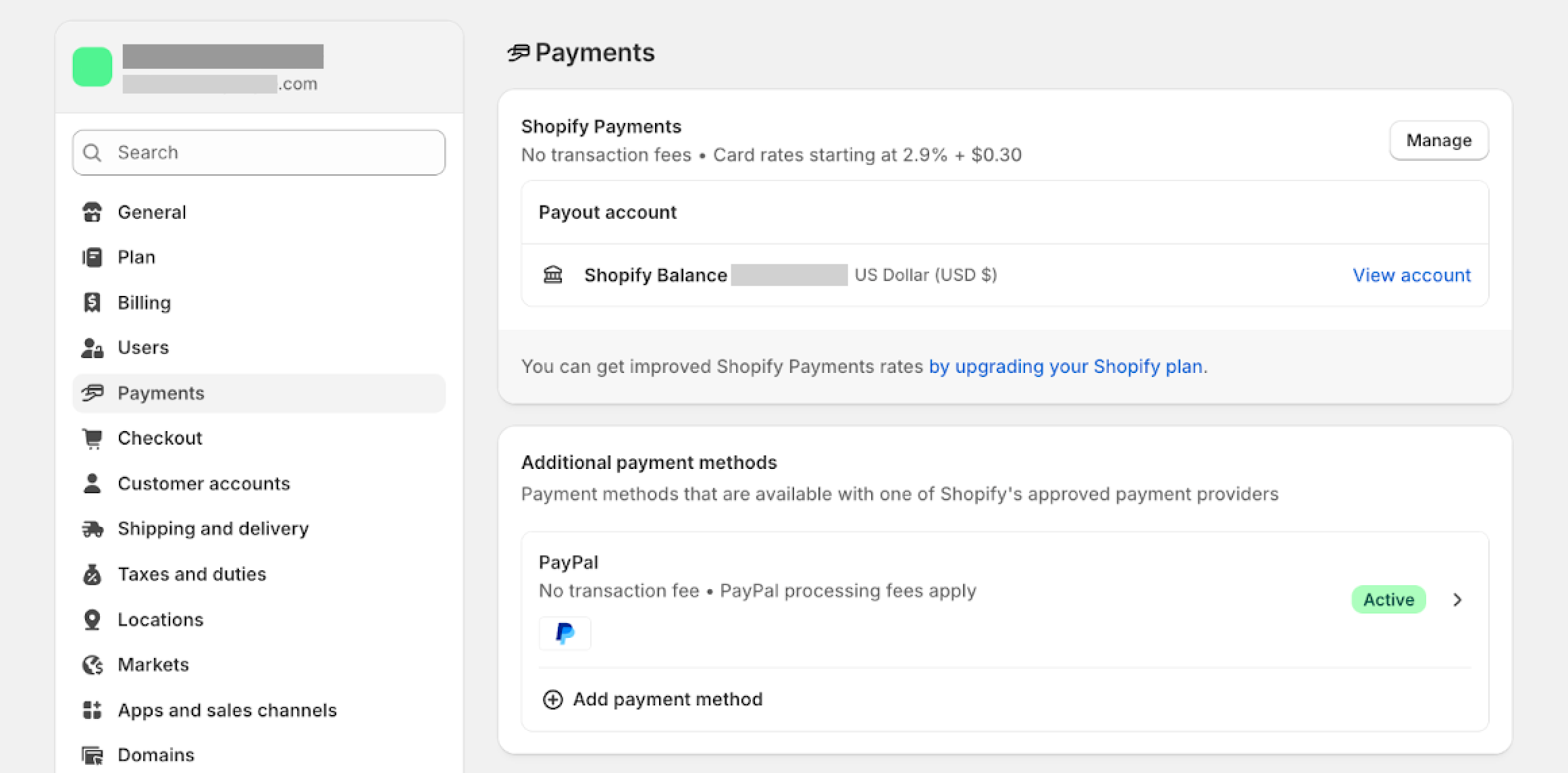
the payments section of the settings in the Shopify admin dashboard
Source: Shopify

Head to Settings > Payments in your Shopify dashboard and select Shopify Payments from the list of payment providers. Enter your business details, such as tax ID and bank account, and Shopify will create a merchant account to hold payments from customers before transferring them to your main bank account.

3. Enable alternative payment methods

Once your merchant account is verified, select which payment methods to support. You can also choose to support multiple currencies or region-specific payment methods during this step.

4. Run a test

Toggle on for “test mode” in the Shopify admin dashboard, payments section
Source: Shopify

Shopify has a test mode that you can activate in the same Settings > Payments section. Click Manage, then click the toggle button to enable Test mode. Remember to hit the Save button at the top of the page to activate.

You can enter test card numbers from Shopify’s site to see what it looks like when a transaction goes through versus what it looks like when a transaction fails. This is a good time to see if the confirmation email system works, which you can set up in Notifications via your Shopify admin page.

How to set up payment on website FAQ

How does payment work on websites?

When customers enter details on the checkout page or payment portal, the information is encrypted and sent to a payment processor, which verifies the data with the relevant financial institutions. Once approved, funds move to a merchant account after the payment gateway provider collects the transaction and processing fees. The remaining balance then transfers to the seller’s bank account.

How do I set up payments on Shopify?

Go to your Shopify admin page and click on Settings, then Payments. Select Shopify Payments (if it’s offered in your country), and enter all your business details: tax information, bank account, etc. Then you can enable credit and debit cards and digital wallets, among other payment options, as well as multiple currencies if you’re selling internationally.

How many payment options should I offer?

Having several payment options for customers to choose from can help your online business succeed. Credit and debit cards are an obvious, ubiquitous choice, followed by digital wallets. Buy now, pay later and recurring payment options can also make higher-end purchases easier for customers. The key is providing enough variety without overwhelming your customers with choice.

QuickBooks vs. Quicken: What’s the Difference? (2025)

Software Stack Editor · October 8, 2025 ·

image

When looking to automate your financial record-keeping and bring financial clarity to your books, you’ll probably run into two popular software solutions: QuickBooks and Quicken. Despite the similar-sounding names and shared past—Quicken was formerly owned by Intuit, which developed QuickBooks—they serve slightly different audiences and functions.

Here’s a comparison of the two to help you choose the right software for your personal or business needs.

What is QuickBooks?

Developed by Intuit, QuickBooks is a comprehensive accounting software for freelancers, small business owners, and larger enterprises. Regardless of business size, it offers tools for tracking income and expenses, managing payroll, creating invoices, and customizing financial reports, giving you greater control over your finances.

Key features of QuickBooks include:

  • Tracking income and expenses. Automatically categorize transactions from connected bank accounts and credit cards for efficient expense tracking and an accurate picture of your cash flow.
  • Invoicing and payments. Create custom invoices with payment links, send them to customers, and accept payments online, and easily manage accounts receivable.
  • Inventory management. Simplify inventory tracking with dedicated tools that monitor stock levels and cost of goods sold (COGS) and let you review reports on inventory performance.
  • Payroll. Access integrated payroll services with QuickBooks Payroll, which helps generate payroll for employees, calculate and pay payroll taxes, and manage payroll filings.
  • Financial reporting. Generate a variety of financial reports, including balance sheets, profit and loss (P&L) statements, and cash flow statements. 
  • Sales tax management. Manage and track sales tax owed to simplify compliance.
  • Bank reconciliation. Automatically matches bank transactions with recorded transactions, ensuring accurate account balances.
  • Mobile app. Access the mobile app on both iOS and Android for on-the-go management of finances, including receipt capture and simple reporting.

For ecommerce businesses, the QuickBooks Sync Shopify app lets you sync orders, refunds, inventory, products, and fees directly from your Shopify store, simplifying financial reporting and inventory tracking.

QuickBooks: Available products

QuickBooks offers both cloud-based and desktop versions, with options for specific business types.

QuickBooks Online

QuickBooks Online is the most popular option among small business owners because you can access it from anywhere with an internet connection. It comes in several tiers, each offering more features:

  • Solopreneur. $20 per month. Intended for freelancers, entrepreneurs, and gig workers, QuickBooks Solopreneur tracks income and expenses, separates personal and business transactions, and simplifies Schedule C tax preparation.
  • Simple Start. $38 per month. Ideal for sole proprietors and very small businesses, Simple Start covers invoicing, basic income and expense tracking, and receipt capture for a single user.
  • Essentials. $75 per month. Builds upon Simple Start with bill management, time tracking, multi-currency support, and up to three users.
  • Plus. $115 per month. A popular choice for growing small businesses, the Plus plan includes all Essentials features with inventory tracking and project profitability tracking. It supports up to five users.
  • Advanced. $275 per month. Designed for small businesses and mid-sized companies with more complex needs, Advanced offers custom user permissions, batch invoicing, advanced reporting, workflow automation, and support for up to 25 users.

QuickBooks Desktop

QuickBooks has adopted a subscription model for its desktop products, installed directly on your computer. QuickBooks Desktop is often a favorite of businesses looking for specific industry features or local data storage. There are three different versions of QuickBooks Desktop, described below.

  • QuickBooks Desktop Pro Plus. Geared toward small to medium-sized businesses, Pro Plus offers invoicing, bill management, and simple reporting for up to three users.
  • QuickBooks Desktop Premier Plus. Includes all Pro Plus features and adds industry-specific editions (e.g., contractor, manufacturing and wholesale, non-profit, professional services, retail), advanced reporting, and support for up to five users.
  • QuickBooks Desktop Enterprise. The most robust desktop version, designed for more complex businesses. It offers more tools for inventory management, detailed reporting, greater user capacity (up to 40 users), and industry-specific functionalities. Available in Silver, Gold, Platinum, and Diamond tiers with increasing features.

Intuit also offers a QuickBooks Desktop for Mac version, which provides small business accounting features for Apple users but differs in its feature set and tiered structure from the Windows Desktop editions.

Other QuickBooks products and services

QuickBooks also offers products and services with payroll and payment processing, as well as bookkeeping services. Here’s a sample of what’s available:

  • QuickBooks Payroll. Integrates with QuickBooks to manage payroll processing, including calculating wages, taxes, and filing payroll forms. Various tiers (Core, Premium, Elite) offer different services and features.
  • QuickBooks Payments. Businesses are able to accept payments online (credit cards and bank transfers) directly through invoices sent through QuickBooks.
  • QuickBooks Time. This is a time-tracking solution that integrates with QuickBooks for easy payroll and invoicing based on logged hours.
  • QuickBooks Live Bookkeeping. This is an add-on service that provides bookkeeping by certified QuickBooks bookkeepers on a monthly basis.

Take control of your cash flow with Shopify Payments

Only with Shopify Payments can you track your orders and payments all in one place. Have a complete view of your finances, accept local currencies and payment types for a smooth checkout experience.

Discover Shopify Payments

What is Quicken?

Now owned by Aquiline Capital Partners, Quicken is a personal finance management tool designed to help track personal finances, budgets, and investments. Originally developed by Intuit—the same company behind QuickBooks—Quicken was designed to help individuals and families manage their finances. It offers a detailed view of daily spending and long-term financial planning. It has limited features for very small businesses or sole proprietors, as its main focus is on personal financial health.

Here are the noteworthy features of Quicken:

  • Personal budgeting. Helps you create budgets by setting limits and then tracking spending. 
  • Expense tracking. Connects to bank accounts to automatically categorize personal spending, letting you quickly see where your money goes.
  • Bill management. Track and pay bills, set bill reminders, and manage payments to avoid late fees.
  • Investment tracking. Provide tools to monitor investment portfolios, track performance, analyze diversification, and assist with understanding tax implications for investments.
  • Debt management. Helps you create a debt reduction plan, manage loans, and track progress on paying down your debt.
  • Net worth tracking. Aggregates all financial data so you can obtain a real-time view of your net worth, including assets and liabilities.
  • Rental property management. Some versions of Quicken, like Quicken Business & Personal, offer specific tools for managing rental property income and expenses for rental properties.
  • Financial planning tools. You’ll find features for long-term financial planning, such as planning for retirement and “what-if” scenarios.

Manage your money where you make it with Shopify Balance

Shopify Balance is a free financial account that lets you manage your business’s money from Shopify admin. Pay no monthly fees, get payouts up to seven days earlier, and earn cashback on eligible purchases.

Discover Shopify Balance

Quicken: Available products

Quicken offers subscription-based products for managing personal finances, with different tiers of features for investing, budgeting, and even some business functionalities. Quicken is owned and operated by Quicken Inc., separate from Intuit (which owns QuickBooks).

Quicken Classic products are primarily desktop apps—available for Windows and Mac—with companion web and mobile apps. Quicken Simplifi is a purely cloud-based solution. Here are more details:

  • Quicken Simplifi. $6 per month. An entirely cloud-based tool focuses on creating budgets, building your savings, tracking bills, investments, and projected cash flow, accessible via web and mobile apps. It’s distinct from the Classic desktop-based versions.
  • Quicken Classic Deluxe. $6.50 per month. The most popular tier, Classic Deluxe lets you track banking and credit card transactions and generate customizable 12-month budgets. You can also manage and track debt, investments, and assets.
  • Quicken Classic Premier. $8.50 per month. Offers all Deluxe features and advanced investing tools. It provides features for optimizing investments, built-in tax reports, and offers priority customer support.
  • Quicken Classic Business & Personal. $12 per month. This version allows you to separate and categorize business and personal expenses, manage rental properties, generate business-related tax schedules (like Schedule C and E reports), and create invoices. It includes all of the personal finance features of Premier. It’s also available in a web and mobile version for $8 per month.

QuickBooks vs. Quicken: What’s the difference?

QuickBooks and Quicken are both powerful financial tools for organizing your financial data, but they are intended for different users. It’s an “apples-to-oranges” comparison in many respects—two feature sets for distinct needs. The key difference lies in their usage: QuickBooks is built for business finances, whereas Quicken is primarily for personal or family finances.

QuickBooks offers features essential for running a business, including generating invoices, tracking inventory, and handling payroll. It’s built to handle the complexities of logging business income, expenses, liabilities, and assets in compliance with accounting principles. It can also generate financial statements like profit and loss reports and balance sheets. Its multiuser capabilities are a good fit for business teams.

Quicken helps you keep an eye on personal finances, maintain budgets, track investments, and plan for financial goals like retirement or saving money for a down payment on a house. Quicken Business & Personal offers limited business features for very small businesses or sole proprietors like tracking business expenses and income or managing rental property income. They do not offer the same advanced accounting features, granular controls, and multiuser access as QuickBooks.

Here are some of their differences side by side:

QuickBooks Quicken
Monthly pricing $20 to $275 $6 to $12
Number of users 1 to 25 1
Free trial 30 days None
Money-back guarantee None 30 days
Double-entry bookkeeping system Yes No
Payroll add-on available Yes No
Business and personal expenses separate Yes Yes
Inventory tracking Yes No
Print income statement and balance sheet Yes No
Schedule C & E reports No Yes
Rental property center No Yes
Track investments No Yes
Mobile app iOS and Android iOS and Android

QuickBooks vs. Quicken FAQ

What is the difference between Quicken and QuickBooks?

The main difference between Quicken and QuickBooks is their primary purpose. Quicken is designed for personal and family finances, including budgeting, debt management, and investment tracking. QuickBooks is a full-fledged accounting software for small businesses offering features like invoicing, payroll, and customized financial reports for tax time.

What is the best accounting software for small business?

For most small business owners, QuickBooks Online is widely considered one of the best solutions due to its variety of features, user interface, powerful integrations, and scalability. Other strong contenders include Xero, FreshBooks (especially for service-based businesses), Wave, and Zoho Books.

What is Quicken primarily used for?

Quicken is primarily used for managing your personal finances, including tracking income and expenses, managing personal budgets, and monitoring your investments. It can also help with managing debt, planning for retirement, and providing an overall picture of your personal finances. While most versions offer limited options for tracking business income for sole proprietors, its primary function is personal financial management.

The New Rules of Brand Voice: How To Stand Out in a Sea of Digital Sameness (2025)

Software Stack Editor · October 8, 2025 ·

image

As you browse your social media feeds or check out billboards on a leisurely drive, you might notice a recent phenomenon: Everything seems quite, well, similar. “If you go to the comment section of any viral post right now, all the brands are commenting and they all sound exactly the same,” says Rachel Karten, a social media consultant and author of the popular industry newsletter Link In Bio. 

If you run a business, it’s more important than ever to carve out a distinct brand identity—and your brand’s voice, or how you express your brand’s values, point of view, and attitudes, is key. “Brand voice can be the differentiator when every brand sounds the same,” Rachel says.

Eighty-eight percent of consumers say trust is important or a deal breaker when it comes to brands they buy or use, according to communications firm Edelman’s 2025 Trust Barometer, with a majority of consumers saying they expect brands to make them feel good, educate them, and provide them with community. A brand’s voice is critical to accomplishing all of the above. 

Shopify spoke with Rachel, as well as Arin Delaney—co-owner of Fonzie, the agency behind the brand voices of Rhode and Reformation—for valuable tips and insights on how brands can stand apart in a sea of digital sameness.

Focus on what sets your brand apart

To develop a unique brand voice online, start with the values and qualities that make your brand and its personality special. 

Your tone should reflect what truly sets you apart: your brand’s values, goals, and points of connection. This helps make your voice recognizable and distinctly you. “Always lean into your differentiators,” Arin says.

When working with clients, Fonzie has developed a Verbal Identity framework to translate brand values and differentiators into a living system of voice: starting with a persona (a human character that embodies the brand), defining messaging pillars (what the brand talks about consistently), and building style and copy guidelines that show up across every channel. 

When developing the voice for beauty brand Kosas, Fonzie cofounder Madison Palasini zeroed in on what set it apart from competitors. “For them, a differentiator is: makeup that actually helps your skin,” Arin says. “It’s something you can constantly communicate through every touchpoint, from product names to taglines and beyond.”

Get your free brand positioning template

Stand out from the competition and make your product the go-to choice with this brand positioning analysis.

Download brand positioning template

Write like a real person

If a consumer has to ask themselves whether or not a human wrote your copy, you’re missing the mark—even if you didn’t turn to AI for help. 

Ensuring your copy sounds like a real person is key, says Arin, who recommends saying the words out loud or in your head first. “If those lines sound like something you’d say in your own head, all the better,” she says. “If you wouldn’t say it, don’t write it.”

For clothing brand Reformation, Madison created the tagline “Thanks, it’s Reformation.” Its conversational tone is simple but effective. “It’s succinct and it tells a story; to this day we still hear people say it in response to, ’Hey, I like your dress,’” says Arin.

Create tension

If you want to encourage consumers to stop scrolling and engage with your brand online, then the copycats of the world are working in your favor. Among all that sameness, leading with humor, honesty, or an unexpected point of view can break the scroll and earn attention.

“Algorithms and the internet have really collapsed language,” Rachel says. “Brand voice can create tension among that sameness that we hear from every brand on social right now.” 

In this case, tension is leaning into the unexpected, “something that gets your attention and sort of stops you,” says Rachel, who points to government agencies and libraries—brands that historically have been considered stodgy or boring—that bring fun and humor to their posts. “Because they’re doing the opposite of that perception, it creates a tension, and then the post catches the attention of somebody scrolling,” she says.

Embrace the everyday

Even “boring” industries or seemingly mundane processes can lead to compelling stories. “Just think about what things you take for granted in the work that you do that might be so interesting to your audience,” says Rachel. 

She gives an example of a water slide park’s safety check video. “Why does that have 400,000 views?” Rachel asks. “I don’t know, but I also watched it. It’s human and it’s interesting and I would watch that in a second.”

“Doesn’t matter what it is, if you find it interesting, somebody else will,” agrees Arin. “Witnessing someone’s passion is one of the most powerful things you can experience—it provokes you to find yours.”

Think beyond your followers

Social media algorithms have changed dramatically over the past few years and will continue to do so. While brands could once post a photo or video and know it would be in their followers’ feeds the next time they opened the app, that’s no longer the case. To perform well with TikTok and Instagram’s discovery-based algorithms, brands need to develop voices that speak to followers and non-followers alike.

“That inherently changes your brand voice, because you need to appeal to strangers, essentially,” says Rachel. “Those non-followers determine your engagement because when they like it, when they send it [to others], it gets fed even further into the algorithm.” 

Brooklyn-based brand Craighill designs everyday objects like scissors, key chains, and money clips, which may not seem like perfect subjects for engaging social media content. However, the brand starts its Instagram Reels with a universal problem or phenomenon—like why a pen clip bends out of place—which it then answers and relates back to how its own product was designed. 

“When you start with that universal truth, problem, whatever it may be, you’re hooking people who care about your brand already and people who have never heard of your brand,” says Rachel. By using the same format for all its videos, Craighill also builds trust among its audience, because they know exactly what to expect and that they’ll enjoy it.

Be consistent across every touchpoint

Brand voice extends far beyond an email subject line or Instagram caption. Every decision your brand makes is a chance to present a consistent, recognizable personality. “Who is speaking words about your brand is also your brand voice,” says Rachel. “Brand voice is what you’re saying, but also what you’re not saying too.”

When you have a strong voice and clear brand guidelines, it can help inform your entire business strategy. For example, a brand rooted in sustainability that takes a group of influencers on a lavish brand trip is sending conflicting messages to its audience, says Rachel.

On the other hand, she points to beauty brand Merit for its disciplined brand voice across all touchpoints—from Reels, posts, and captions to where it does its shoots and who it partners with. “I could probably pick it out of a crowd if I didn’t see the handle next to it,” she says. “It sounds so specific and it’s not internet-y and it’s not written for an algorithm. It’s mature and it feels … almost educational, but in a really entertaining, smart way.”

Keep evolving your voice

It’s important to remember that brand guidelines are living documents. Language and cultural context shift, so your brand voice should too. “Nothing stays the same,” Arin says, “The words we use and how we connect to each other is always evolving. It’s important to stay receptive and tapped into those subtle changes.” 

Engagement, customer feedback, and competitor analysis can help you stay on top of changing consumer preferences. Understanding your target audience and what they care about is also key. “True connection is about resonance and feeling seen,” says Arin. “Staying honest, grounded, and real helps you find the best ways to show up for people.”

GoCardless achieves profitability

Software Stack Editor · October 7, 2025 ·

image

LONDON, UK – 8 October 2025 – Bank payment company GoCardless has recorded its first EBITDA positive quarter on an adjusted basis*, operating in the black in the final three months of FY25 (April to June 2025). The result reflects strong cost discipline and a sustained growth trajectory, positioning the company for long-term financial sustainability.

This milestone follows strong financial results in FY24, where GoCardless reported a 38% increase in revenue to £127m and a 55% reduction on losses, down to £35m. Since then, GoCardless has also reached several strategic milestones that have strengthened its market position and accelerated growth. This includes:

Hiroki Takeuchi, co-founder and CEO at GoCardless said:  

“Reaching profitability is a huge achievement for the business and a clear signal of confidence for our customers, partners and team. It reflects the discipline, focus and strategic scaling we’ve delivered over the past 18 months. Now, we’re focused on turning this momentum into a full year of profitability and continuing to achieve our ambitious growth goals”.

Notes to Editors   
For more information, contact: 
press@gocardless.com

* Unaudited figures. A more detailed financial update for FY25 will follow as part of GoCardless’ annual Companies House filing.

How To Change Text Color in CSS With 3 Simple Steps (2025)

Software Stack Editor · October 7, 2025 ·

image

Your webpage might be saying more than you think—especially when it comes to color. The shade of your text can set the tone for your entire brand, from bold and confident to calm and trustworthy. Whether you’re trying to catch a customer’s eye or build a consistent brand identity, the right text color matters.

That’s where CSS comes in. With just a few lines of code, you can control how every word on your site looks and feels. No design degree or dev team required—just a little knowledge and the right tools.

So let’s walk through exactly how to change text color in CSS, using a variety of ways.

What is CSS?

CSS stands for Cascading Style Sheets. It’s the code controlling how your webpage looks, including the color of your text, the spacing between different elements, and more. When you change CSS code, the way the page looks will be different, but the underlying content will remain the same.

CSS works like a cascading waterfall—style rules flow down and layer over one another. For example, if one rule says “Make all text black” and another says “Make headings blue,” the browser knows that headings, even though they’re text, should follow the more specific rule and appear blue.

If you add a third rule that says “Make the homepage heading red,” the browser will recognize that as the most specific instruction and apply it only to that element. By layering your rules this way—from general to specific—you give the browser a clear roadmap to follow for styling your site.

HTML vs. CSS: What’s the difference?

HTML, or HyperText Markup Language, is what creates the structure of your web pages. It tells the browser which parts are headings, lists, links, or images. By itself, HTML doesn’t have any styling code—things just look basic and plain like a Craigslist ad.

CSS styles the structure, setting colors, fonts, spacing, alignment, and layouts of your HTML document. For example, you could make all your paragraph text blue or center your logo at the top of the page with CSS, but you couldn’t with HTML alone.

The two languages work together. HTML builds the bare bones of your site skeleton, and CSS dresses it up in more interesting, brand-appropriate clothing.

Build an online store in minutes

Shopify’s drag-and-drop editor makes it easy to create stunning, secure, and full-featured websites, no coding needed. Choose from thousands of themes and apps to help make your website one of a kind.

Learn more

CSS text color options

There are many ways to define the color of text via CSS, depending on how precise (or readable) you want your color values to be. Let’s explore a few of the different ways to do so:

HTML color names

If you want maximum compatibility, you can define your font color using plain English names that all browsers support, like “red,” “blue,” and “darkgreen,” for example. These predefined colors are great for simple use cases or when you want the code to be really easy to read.

There are more than 140 recognized HTML color names, including goldenrod, crimson, lightgray, and rebeccapurple. Some are clearly one hue, while others look like a mix between two colors or more.

For instance, if you wanted all the paragraph (or

) text on your page to be a basic blue, the code for achieving this would be:

p {

color: blue;

}

Hexadecimal codes

Hexadecimal codes define colors with a #, followed by a six-digit alphanumeric code, which itself represents the levels of red, green, and blue in the color. It’s a more compact, precise way of representing specific shades of color. This method is useful when specific colors (like your brand color palette) are important to maintain. For example, if you want your H1 header to be bright orange, you might code the following:

h1 {

color: #ff5733;

}

RGB values

This method uses a numeric value for colors, defining them as a number between 0 and 255 for the amount of red, green, or blue.

For example, if you wanted a warm reddish color for your H2 headings, you could add the following to your CSS:

h2 {

color: rgb(255, 87, 51);

}

If you’d like to take it one step further, the RGBA values range includes a fourth element: alpha (transparency). Alpha can range from 0 (completely transparent) to 1 (completely solid). If you wanted that same warm red at 50% transparency, you’d code the following: 

h2 {

color: rgba(255, 87, 51, 0.5);

}

If you’re curious why this approach doesn’t use the three primary colors, it’s because digital screens use additive color mixing, which is based on light. In this system, the primary colors are red, green, and blue (RGB)—not red, yellow, and blue like in paint. Combining these RGB values at different intensities lets screens create millions of colors by controlling how much light of each type is emitted.

HSL colors

HSL stands for hue, saturation, and lightness. Hue is the color (in degrees) on a color wheel, saturation is how intense it is, and lightness is how dark or bright it is. HSL makes it a little easier to tweak colors with lightness or saturation without messing with a brand’s specific hue value. If you wanted a paragraph to come out in a reddish-orange color, fully saturated with a 60% brightness, your code would look like this:

p {

color: hsl(12, 100%, 60%);

}

HSLA adds an alpha value for transparency, just like RGBA. This can be helpful when you’re layering colors or creating subtle visual effects. A semi-transparent reddish-orange color in CSS might look like:

p {

color: hsla(12, 100%, 60%, 0.6);

}

Build your dream online store today

Join the ranks of the world’s best online stores with Shopify’s powerful tools and features. With the highest-converting checkout, Shopify stores sell more products, lower your costs, and save you time.

Learn more

How to change text color in CSS

  1. Pick an approach to coding
  2. Identify the default color
  3. Write a CSS rule

It’s fairly simple to change color with custom CSS. It’s only two steps: find out what the default text color is and then write a new rule that overrides it. Here’s how:

1. Pick an approach to coding

You generally write CSS rules in your site’s tag or CSS file, but you can also place them inline on single pages (though it will only apply to that page). The browser will read, or cascade, through all the available styles and will use the one that is most specific to that instance. That means if your rule is more specific or comes later in the file (or on the single page), it’ll win.

2. Identify the default color

Identify the default CSS color, which is usually black. You can find out what the current color is on a live webpage by inspecting the element in your browser, or you can look at your site’s current CSS or theme files to see if there is already a color rule. A default color rule might look like the following:

body {

color: #000000; /* Black */

}

3. Write a CSS rule

Once you’ve identified the default, you can write a CSS rule changing the color property. You can apply it to any text HTML element like headings, paragraphs, or classes (an HTML label you can give to elements so you can style it with CSS or target with JavaScript).

Here’s an example with a color name:

h1 {

color: blue;

}

And one with RGB:

p {

color: rgb(255, 87, 51);

}

How to change text background color in CSS

Changing your text’s background color property is also straightforward; you just use a different CSS color property, called background-color. With a color name, your CSS code might look like this:

p {

background-color: yellow;

}

Or this, with RGB:

span {

background-color: rgb(200, 200, 255);

}

Set the color value along with the background-color value to make sure it’s most readable. The following example places white text on a black background color, which offers good contrast for readability.

p {

color: white;

background-color: black;

}

CSS text color and accessibility

It’s easy to change the text color with CSS, but not all colors are great for web accessibility. People with low vision, color blindness, or even some learning disabilities can have a hard time with certain colors and combinations. Light gray text on a white background can be a challenge for some, for example, while relying on red or green colors to show errors or successes might not work for some colorblind users. Ideally, you want to present your text with good contrast and clarity. 

There are a few useful tools to check accessibility in terms of text color and contrast. With the WebAIM Contrast Checker, you can enter your text and background color to make sure it meets Web Content Accessibility Guidelines (WCAG) standards. Chrome’s built-in DevTools allow you to inspect elements. The ColorZIlla browser extension can analyze colors from your webpage.

The WCAG recommends that you aim for a contrast ratio of at least 4.5:1 for normal text and 3:1 for text larger than 18 pt (or 14 pt bold) and that you use more than just color to convey meaning. It’s also a good idea to test in both light and dark modes, which you can emulate via Chrome DevTools, too. 

For example, avoid light gray text on a white background (a ratio of 1.6:1), and instead make sure your text stands out from the background, like this example of a 15.3:1 ratio: 

p {

color: #1a1a1a; /* near-black text */

background-color: #ffffff; /* white background */

}

Adding more information beyond just color to your code is also important for accessibility. Instead of using a color difference to convey information, you should pair it with icons or labels. Add icons or labels to the code to help people with color blindness:

⚠️ 

Error: You forgot to enter a name.

How to change text color in CSS FAQ

Which CSS property configures the color of text?

Change the color of text in CSS via the color property. It applies to any text within an HTML element like paragraph (

) or heading (

,

,

, etc.). For example, p {color: red;} would change all paragraph text to the default red setting within CSS. If you’d like to get more specific, consider using RGB values, HSL colors, or hexadecimal codes.

How do you change text style in CSS?

You can change text styles in CSS using properties like font-size, font-weight, or font-family to set how the text looks. You’d use the same approach as you would with color when it comes to coding these into your CSS and HTML files.

Can I change the text itself with CSS?

You can’t change the actual words with CSS, but you can alter how those words appear using CSS code. All the actual text will be in the HTML document itself.

Sage vs. QuickBooks: Side-by-Side Comparison (2025)

Software Stack Editor · October 7, 2025 ·

image

The accounting software you use shapes how you manage your company’s finances. Among the most widely recognized options are Sage and QuickBooks. While both are excellent tools, they tend to serve different sizes and types of businesses, with the former geared toward larger enterprises and the latter serving small and medium-sized businesses. Here’s a comparison of Sage vs. QuickBooks to help you choose the best fit for your business.

What is Sage?

Sage is a maker of cloud-based and desktop accounting software for businesses of various sizes, from startups to larger corporations. For Shopify users, Sage offers integrations to synchronize your store’s financial data, such as the Sage Business Cloud Accounting app.

Sage accounting features include:

  • Invoicing. Sage 50 and Sage Intacct can create invoices and track customer payments.
  • Expense tracking. Sage 50 and Sage Intacct let you easily record business expenses to accurately categorize transactions, or you can integrate another expense management system with Sage.
  • Bank reconciliation. With Sage 50, Sage 100, Sage 300, and Sage Intacct, you can connect bank accounts to automatically import transactions and reconcile accounts.
  • Financial reporting. Several Sage products let you create financial reports such as profit and loss (P&L), balance sheets, and statements of cash flow to analyze business performance.
  • Inventory management. Brightpearl by Sage can track inventory, monitor movement of stock, and show product costs.
  • Payroll processing. Sage Payroll can help with payroll processing, calculate salaries, and ensure compliance.
  • Multi-currency support. Several Sage products support multi-currency transactions, which is helpful if you operate internationally.
  • Advanced modules. Some Sage products offer advanced features, such as customer relationship management (CRM) systems. These can be especially helpful if your business has more complex accounting processes or industry-specific requirements.

Manage your money where you make it with Shopify Balance

Shopify Balance is a free financial account that lets you manage your business’s money from Shopify admin. Pay no monthly fees, get payouts up to seven days earlier, and earn cashback on eligible purchases.

Discover Shopify Balance

What is QuickBooks?

QuickBooks by Intuit is a brand of user-friendly accounting software designed to help small to medium-sized businesses manage everyday financial tasks. QuickBooks offers cloud-based versions (QuickBooks Online and QuickBooks Solopreneur) and a desktop edition (QuickBooks Desktop Enterprise). Each platform offers multiple tiers of features. All plans include Intuit Assist (for automating everyday tasks), bookkeeping support, and tax preparation support.

The following features are available through the main QuickBooks platforms, supplemental products—such as QuickBooks Payroll, QuickBooks Payments, QuickBooks Time (for time tracking)—or others.

  • Invoicing and payments. Create and send invoices (including recurring invoices) and accept payments with QuickBooks Payments.
  • Payroll solutions. Use QuickBooks Online Payroll to pay employees and file tax forms.
  • Bank reconciliation. Connect bank and credit card accounts through QuickBooks Online for automatic transaction downloads and easy reconciliation.
  • Financial reporting. Several QuickBooks editions can help you generate a variety of reports, including P&L statements, sales reports, and balance sheets.
  • Receipt capture and mileage tracking. With QuickBooks Online and QuickBooks Self-Employed, you can snap photos of receipts and categorize them on the go. It also automatically tracks mileage for deductions using the mobile app.
  • Inventory management. Multiple QuickBooks editions can track items, manage costs, and create purchase orders. QuickBooks Enterprise includes the most powerful inventory management plans.
  • Third-party apps. QuickBooks platforms can communicate with many third-party apps for expanded functionality. For Shopify store owners, QuickBooks provides integrations to manage sales and expenses. Users can automatically sync store data using an app like QuickBooks Sync.

Sage vs. QuickBooks: What’s the difference?

While both Sage and QuickBooks are powerful accounting software solutions that provide financial management, they differ in target audience and pricing. Choosing between the two comes down to the complexity of your business and your accounting knowledge. Here are the key differences:

Sage QuickBooks
Target audience Caters to mid-sized to large businesses, and smaller businesses with complex accounting or industry-specific needs. Primarily targets freelancers and small business owners, with products for mid-sized companies (QuickBooks Enterprise).
Ease of use Learning curve, especially for its enterprise offerings. Requires a bit more accounting expertise. Known for its user-friendly and intuitive interface. Good for users with less formal accounting background.
Scalability Products like Sage Intacct and Sage X3 are highly scalable, designed to grow with complex organizations, including those with multi-entity or unlimited users. Scalable from very small businesses to mid-sized companies. QuickBooks Enterprise offers multiple users  and more advanced features but tops out at fewer users than Sage’s high-end solutions.
Inventory management Offers inventory features, especially in higher-tier products like Sage 50 and modules like Sage Inventory Planner. Offers basic features with lower-tier plans. More advanced inventory management features are available in QuickBooks Enterprise and through third-party apps.
Industry specificity Has a strong foothold in industry-specific software for sectors like manufacturing, non-profits, and construction, offering tailored accounting tools. While flexible for many industries, QuickBooks relies on third-party applications for deep industry-specific software functionality.
Customer support Support options include email, online chat, and a searchable knowledge base. Support varies by product and plan. Strong customer support, with 24/7 options available for higher-tier plans like QBO Advanced.
Cost Generally more expensive because of its advanced features. Most plans require a custom quote. Offers affordable entry-level plans for small businesses, with pricing increasing for more users and advanced features.
Accessibility Many Sage products offer cloud-based access so users with an internet connection can access remote data. QuickBooks Online is entirely cloud-based, offering the QuickBooks Online mobile app and remote data access. QuickBooks Desktop doesn’t require an internet connection.

Sage: available products

Sage designed its accounting software to create invoices and quotes, track expenses, generate reports, reconcile accounts, and deal with multiple currencies. Here are the company’s key products.

Sage 50

This is a popular desktop accounting software for small to mid-sized businesses. Key features include invoicing, tracking expenses, inventory management, bank reconciliation, and payroll preparation. It offers three tiers (Pro, Premium, and Quantum) with varying user limits and features. Prices range from $62 to $189 per month.

Sage Intacct

Sage Intacct is a leading cloud financial management software designed for growing businesses with complex financial needs. It excels in multi-entity accounting, advanced automation, real-time reporting, and planning. Sage Intacct is ideal for large service-based businesses, SaaS companies, and nonprofits. Contact Sage for a pricing quote.

Sage X3

Sage X3 is a powerful solution for mid-sized enterprises, especially in manufacturing, distribution, and services. It has functionalities beyond accounting, including production planning, supply chain management, and CRM. Sage X3 is very customizable and supports multicurrency and multilanguage operations. Contact Sage for a pricing quote.

Sage 100

Sage 100 is a mid-range solution automating accounting, operations, and payroll. Small to medium-sized businesses in manufacturing, distribution, and retail often choose it because it focuses on inventory management. It offers both on-premise and hybrid deployment options. Contact Sage for a pricing quote.

Sage 300

Sage 300 is an ERP solution for medium-sized businesses requiring more advanced functions, especially for multicurrency, multientity accounting and inventory management. Sage 300 has modules for accounting, distribution, manufacturing, project management, and CRM. Contact Sage for a pricing quote.

QuickBooks: available products

QuickBooks offers solutions for a wide range of businesses, from freelancers to growing and larger enterprises.

QuickBooks Online

Intuit’s cloud-based accounting software—accessible anywhere—is available in four tiers (Simple Start, Essentials, Plus, and Advanced), and handles core accounting tasks like expense tracking, invoicing, payments, and reporting. Higher tiers add features like inventory tracking, profit and loss insights, budgeting, a custom report builder, and forecasting.

Prices range from $38 (Simple Start) to $275 (Advanced) per month. Additional services, such as QuickBooks Online Payroll, are available at an additional cost.

QuickBooks Desktop

QuickBooks Desktop, also referred to by the brand as QuickBooks Desktop Enterprise, is a traditional, installed accounting software solution for businesses that prefer an on-premise setup. Desktop offers deeper functionality, like integrated inventory management, advanced reporting and pricing, job costing, built-in payroll, and time tracking.

QuickBooks Desktop costs $2,210 at the Gold level, $2,717 at the Platinum level, and $5,364 at the Diamond level. All prices are for the first year only. Gold and Platinum levels allow for up to 30 users, while Diamond allows up to 40.

While all three include advanced reporting and multi-company management features, Platinum and Diamond add more complex approval workflows and advanced inventory and pricing features. With Gold and Platinum, the Enhanced Payroll features are included for per employee. Diamond, however, incorporates Assisted Payroll for a fee of $1.50 per employee per pay period, and a fee of $5 per employee per month for QuickBooks Time Elite time tracking capabilities.

QuickBooks Solopreneur

Tailored specifically for freelancers and sole proprietors, QuickBooks Solopreneur simplifies separating business and personal finances. Use it to track your income, expenses, and mileage; create invoices; and integrate with TurboTax Self-Employed to assist with your quarterly tax estimations. Solopreneur is $20 per month.

Sage vs. QuickBooks FAQ

Which is best: Sage or QuickBooks?

Sage and QuickBooks are both practical accounting tools tailored to different use cases. Choose QuickBooks if you’re a freelancer or small business needing user-friendly, affordable accounting software with a wide variety of integrations. Choose Sage if you have a mid-sized to large business or a small business with complex accounting processes, industry-specific accounting needs, or advanced enterprise resource planning requirements.

Who is QuickBooks’ biggest competition?

QuickBooks faces competition from several accounting software providers, including Xero, Zoho Books, and FreshBooks for small businesses, and Oracle NetSuite and Sage Intacct for larger businesses.

What are the main differences between Sage and QuickBooks?

The main differences are target market (QuickBooks for small to mid-sized, Sage for mid-sized to large or complex), available integrations (QuickBooks has a wider array of third-party apps), cost (QuickBooks is more affordable at entry-level), features (Sage is more advanced), and ease of use (QuickBooks is easier).

How Unbound Merino Scaled to $100M: 6 Lessons on Building a Sustainable Brand (2025)

Software Stack Editor · October 7, 2025 ·

When Dan Demsky and his childhood friends launched Unbound Merino in 2016, they had no ecommerce experience and were running the venture as a Friday night side hustle. Nine years later, the merino wool apparel brand is approaching $100 million in cumulative lifetime revenue, with $60 million projected for this year alone.


The journey started with a $30,000 Indiegogo campaign and grew into an eight-figure business without bringing in venture capital. 

The strategies that powered $100M in lifetime revenue 

1. Sell benefits, not features—even in a crowded market

The apparel industry is notoriously saturated. Dan knew from day one that competing on product alone wouldn’t work. “There’s a million places to buy a t-shirt, but ours helps you pack light,” he says. “It was a message that we thought was powerful enough to stand above the rest.”

Unbound Merino t shirts folded up and packed nicely into a duffle bag for travel.
Unbound Merino was created with the goal of helping travelers back lighter, while still having great fashion options.Unbound Merino

Understanding their unique value proposition meant Unbound Merino knew exactly how they’d message. Rather than positioning Unbound Merino as another fashion brand in a crowded market, they focused on how they could offer freedom through minimalism. Their early slogan—“Pack less, experience more”—spoke directly to travelers frustrated with overpacking. The Unbound Merino team knew they could differentiate their offering by identifying the transformation their brand enables, not just what their product does. Customers weren’t buying a t-shirt—they were buying the ability to travel lighter and more spontaneously.

2. Break even on first purchase, win on lifetime value

The customer acquisition strategy Unbound Merino used centers on a counterintuitive principle: they’re willing to break even on the first sale. With a target ROAS (return on ad spend) goal to make three to four times as much money in sales as the amount spent on advertising through Meta platforms like Facebook and Instagram, Dan knew the company’s profits would come later.

Two models pose side by side wearing Unbound Merino clothing.
Unbound Merino is so confident in the quality of its clothing, it can break even on first purchase, because it assumes people will come back for more after trying it.Unbound Merino

The brand’s data backs this up: 30% of customers make a repeat purchase within the first month. Unbound Merino now spends more than $20,000 daily on Meta ads alone, scaling the budget by 1.5% every single week, without letting ROAS drop below three times.

When planning your Meta ads strategy, calculate your true customer lifetime value first, then work backward to determine acquisition spend. “It really just comes down to the quality of the product. That is the thing that gets people to come back,” Dan says. “If we were making a bad product, no one’s coming back. Everything else is fluff.”

This Meta ads strategy works best if you have a product capable of inspiring loyalty. You can outspend competitors who optimize for immediate profitability, but only if your product quality justifies repeat purchases.

3. Keep kicking doors until one opens

Dan believes Unbound Merino continues to see growth with its ads strategy because it constantly experiments across channels. Even if certain channels are successful this week, the team isn’t married to any single strategy. “You’re walking down like a hallway with a million doors,” Dan says. “You kind of gotta just nudge the door open with your foot and see if something is in there. You have to never stop trying [marketing channels].”

Unbound Merino’s women’s t-shirts folded on a white background, side-by-side.
Trying new things extends to product categories as well, launching into women’s wear has allowed Unbound Merino to experience some of the biggest bumps in revenue yet.Unbound Merino

Meta remains the brand’s largest channel, yet it continuously tests Google Ads (working well), influencer and affiliate marketing (solid success), TikTok (admittedly terrible—“We laugh every quarter. We’re like, all right, what’s our TikTok strategy? ’Cause we just keep throwing money at it.”), and Pinterest (exploring). 

Most of Unbound Merino’s budget for ads is used on designs and messages that have already shown to work well, while a small portion is used to try new creative ideas and see if they could also be successful. “The stuff that you get most attached to creatively, that stuff doesn’t work. The stuff that you think is sort of, like, really pitchy and, like, kind of cheesy, that works,” Dan shares. 

4. Go to the source—literally

When Unbound Merino placed its first manufacturing order in China, the founders did something unusual: they flew to the factory. “We told them, when production happens, we’re gonna be on the production floor,” Dan says. “We showed up. I’m, like, measuring it with a measuring tape. I put it on, and I wore it for a week in Shanghai. They’re probably looking at us, like, ‘These guys have no idea what they’re doing.’” 

But this paranoia-driven decision created an unexpected advantage. “We got to become friends with them. We got invited to their family weddings,” Dan says. That relationship became a safeguard for quality control and has lasted nearly a decade—Unbound Merino still works with that original supplier.

5. Listen when customers tell you what they want

Unbound Merino launched as a men’s brand, and two years ago, it finally introduced women’s apparel. Today its women’s line accounts for more than 50% of revenue and has already surpassed its men’s business.

A model poses in a pair of sunglasses wearing Unbound Merino Women’s Long Sleeve Merino Crew Neck Fossil shirt.
Women shop far more frequently than men, making the huge success of Unbound Merino’s women’s collection a shock, but no surprise.Unbound Merino

The opportunity was obvious in hindsight. “We had so many women customers before we had women’s clothing ’cause they were buying the stuff for their husbands, boyfriends, sons,” Dan says. “We kept getting emails saying, ‘Where’s women’s clothing?’ Clearly there’s a demand here.”

Why did they wait? Dan is honest about the knowledge gap: “I’m not arrogant enough to think, ‘Oh, don’t worry. I know what this is supposed to be.’” To respond to the opportunity, Unbound Merino knew it needed to hire experienced women designers who understood both the brand aesthetic and female customer needs. Once it could afford that team, the women’s line took off immediately.

6. Build with your friends (yes, really)

Building a business with childhood friends goes against all the conventional wisdom that says mixing friendship and business is disastrous. Dan couldn’t disagree more.

“You spend more of your waking hours working than you do anything else. Why would it be a bad idea to want to be with your best friends?” he argues. You often share core values with friends—the foundation that most businesses spend years trying to establish through hiring. The partnership works because of complementary skills, shared vision, and genuine enjoyment of working together. 

What’s striking about Unbound’s story isn’t just the revenue growth—it’s the sustainability. Dan still runs the business with his friends. They’re profitable. They’re having fun. And they’re not interested in selling.

For entrepreneurs overwhelmed by pressure to scale fast, raise big, and exit bigger, Unbound Merino offers an alternative path: build a product people genuinely love, invest in sustainable acquisition, surround yourself with people you trust, and enjoy the journey. 

Tune in to the full Shopify Masters episode to hear what’s next for Unbound Merino, and why the $100 million milestone isn’t the end goal—simply proof the brand’ approach works.

GoCardless processes over 100,000 open banking payments for savings app Tembo, empowering first-time buyers

Software Stack Editor · October 6, 2025 ·

image

London, UK – 6 October, 2025 – Global bank payment company GoCardless has helped Tembo – the leading digital mortgage and savings platform – reach a major milestone, processing over 100,000 open banking payments in a month.  

With UK house prices averaging £291,000 and budgets under pressure, Tembo saw a clear need for a more flexible way to help first-time buyers save. In partnering with GoCardless, Tembo is able to leverage secure and scalable open banking capabilities as one tool to deliver a seamless savings experience through instant money movement. 

Through integrating GoCardless, Tembo customers can save seamlessly using two payment methods: Direct Debit for regular contributions, and GoCardless’ Instant Bank Pay, powered by open banking, for instant top-ups into their Lifetime and Cash ISAs. GoCardless’ ability to provide both types of payments at scale through a single platform means Tembo can give users full control over how and when they save.

With 1 in 3 adults now using open banking, consumer demand for secure and flexible  financial solutions is growing. Tembo’s partnership with GoCardless reflects a forward-looking approach to savings that aligns with this shift, with strong customer uptake: transactions via GoCardless’ Instant Bank Pay grew 400% year-on-year. 

Thanks to this open banking technology and the ability to collect instant payments, Tembo also extended its end-of-tax-year deposit window by six hours longer than competitors, collecting nearly £1 million in that time alone. 

Richard Dana, CEO at Tembo, said: “Since launching, one of our main goals has been to help first-time buyers navigate the ever-difficult housing market, as flexibly as possible. GoCardless has been instrumental in this journey. By introducing both Direct Debit and instant, open banking payments through the GoCardless platform, our customers are able to save smarter than ever.”  

Hiroki Takeuchi, co-founder and CEO at GoCardless, said: “We’re thrilled to be partnering with Tembo as they continue their mission to empower people to take charge of their financial futures. Open banking is playing an increasingly vital role in the savings and investment space, and by offering this technology at scale, we can give consumers greater flexibility as they save, and merchants a cost-effective alternative to traditional card payments.”

Direct vs. Indirect Competitors: How To Rise Above Competitors (2025)

Software Stack Editor · October 6, 2025 ·

image

Understanding your competition is crucial for business success. Whether you’re launching a startup or growing an established company, knowing who you’re up against—and how to differentiate yourself—can make the difference between thriving and merely surviving.

There are two main competitor types in business: direct competitors and indirect competitors. Direct competitors target the same customer because they sell essentially the same goods or services. Indirect competitors aren’t selling the same products as one another, but they’re competing for the same pool of customer dollars.

Learn how to identify your competitors and how to rise above both direct and indirect competitors.

What is a direct competitor?

Direct competitors offer similar or identical products or services in the same market and to the same customer. In their quest to win the business of the same target audience, direct competitors often go head to head on factors like price, features, quality, and brand recognition.

In the fast fashion industry, for example, some of the biggest direct competitors include H&M and Zara, which both vie for the same target market of price-conscious consumers who enjoy frequently updating their wardrobes. Fast food restaurants like McDonald’s and Burger King target the same potential customers.

These direct competitor examples illustrate a known reality of today’s market: If you’re competing for the same customer, the slightest differentiation—a dollar on a price tag, color options, or your product development cycle—can help you stay ahead of your competitor.

What is an indirect competitor?

Indirect competitors offer different products or services but compete for the same customer needs and dollars. Consider a bowling alley and a miniature golf course. These indirect competitors offer two different types of entertainment, but they’re vying for a similar target market: people looking for a few hours of active entertainment.

Even though indirect competitors don’t offer identical products or services, they may engage in similar marketing strategies to reach the same audience. They may also compete for similar employees and retail spaces.

How to rise above direct competition

  1. Find your unique value proposition
  2. Conduct a competitor analysis
  3. Establish a niche
  4. Excel at customer service
  5. Compete on value, not just price

When Morgan Cros created Original Duckhead, a manufacturer of premium, 100% recycled umbrellas, she was well aware that there were a lot of other businesses selling rain gear. Morgan did her due diligence as a business owner, making a point to identify competitors and observe their business practices. But she also made a point not to get overly analytical.

“It’s important to study competition,” Morgan says on an episode of the Shopify Masters podcast, “but you don’t want to be bogged down by that. You don’t want to be too focused on what other people are doing. You want to do you.” Brands can rise above their direct competition by leaning into what they do best, rather than playing a relentless game of catch-up. Here are five strategies for differentiating your brand from direct competitors:

1. Find your unique value proposition

“I would say find your point of differentiation and go for it,” Morgan says. Clearly articulate what makes your products or services special. Is it superior quality? Ethical sourcing? A more personalized customer experience? For example, if your direct competitors sell generic t-shirts, you might specialize in eco-friendly t-shirts made from post-consumer recycled materials. You could also offer a lifetime guarantee to encourage more customers to give you a shot. Such offerings represent your unique value proposition that can help you stand out in a crowded market.

2. Conduct a competitor analysis

Before you invest too much in your business, assess the competitive landscape through market research to learn if there are businesses offering goods and services similar to yours. A competitive analysis studies the direct competitors in your market—their products, prices, marketing efforts, and sales figures, if they’re published. By studying your competitors’ business strategies, you can gain insight into how to differentiate your brand.

As you gather data on the competition, identify gaps in the marketplace. Are there businesses targeting the same people as you yet failing to address their real-world pain points? If you can show those same customers how your company addresses what others do not, you can gain ground on the competition.

3. Establish a niche

Instead of trying to serve everyone, consider specializing in a smaller, niche segment of the market. By becoming the go-to solution for a specific group, you can dominate that niche and build strong relationships, even if larger direct competitors exist.

Take Emily Chong and Nathan Chan’s approach with water bottle brand Healthish. They didn’t aim to dominate the entire water bottle market, where legacy players like Nalgene enjoy significant brand loyalty. They focused instead on a niche product: a bottle marked with suggestions for how much water to drink every hour.

“The flagship product is a time-marked water bottle,” Nathan says on Shopify Masters. “And there wasn’t really a physical product or a bottle that looked great that allowed you to do that. They say you should drink two liters of water a day. So if you fill it up two times and follow the time indicators on the bottle, you can actually get your daily intake of two liters of water a day.” By leaning into their niche, Nathan and Emily enjoy market positioning that would be hard to achieve if their product only had very similar features to what already exists.
4. Excel at customer service

In a crowded market, exceptional customer service can be your strongest differentiator. Go above and beyond in support, responsiveness, and problem resolution. This builds deep customer loyalty that direct competitors may find hard to replicate.

Turn chats into sales with Shopify Inbox

Shopify Inbox is a free app that lets you chat with shoppers in real-time, see what’s in their cart, share discount codes, create automated messages, and understand how chats influence sales right from your Shopify admin.

Discover Shopify Inbox

5. Compete on value, not just price

If your only selling point is offering the lowest prices around, you may find yourself in price wars and chasing bargain-hunting customers who don’t exhibit brand loyalty. You can sell products with the slimmest of profit margins, only to lose prospective customers to bargain basement brands like Temu and Shein.

Instead of competing only on price, focus on value-based pricing. This means pricing your product according to the perceived value it offers to the customer, which might allow for premium pricing if your differentiation is strong enough. You can also bundle products, provide loyalty programs, or highlight quality to show why your offering is a better value for the amount spent.

How to navigate indirect competition

Many of the same tactics apply to navigating both direct and indirect competition, but the key to outshining indirect competitors is understanding the broader customer problem you’re solving. This gives you clarity on how your solution compares to alternative ways of solving that problem. Here are the tactics to try:

Understand the core customer need

To expand your focus from direct competitors to indirect ones, go beyond your product and think about the fundamental problem your customers are trying to solve. If you sell specialized running shoes, your indirect competitors might be cycling apparel companies or even health food stores. Customers turn to all three in search of the same goal: improving their health. Gaining this understanding can help you develop effective marketing that encourages target customers to spend their “health” dollars on you.

Monitor broader market trends

Indirect competitors often emerge from shifts in consumer preferences or technology. Keep an eye on macro trends and how different industries are adapting to meet evolving customer expectations to anticipate new sources of competition.

Emily from Healthish understood this principle well. She wanted Healthish to pick up new customers from health and wellness communities, so she monitored trends in those communities to gain a competitive edge. “I joined all these health communities on Facebook groups, just to validate my idea,” Emily says. “We wanted to attract people that would be interested in their health and wellness,” Nathan adds. By monitoring the health market, not just the water bottle market, they gained valuable insights into both new and existing customers.

Form strategic alliances

Consider strategic alliances with businesses that are indirect competitors or serve a related, but non-overlapping, customer base. For example, a local bakery could partner with a coffee shop to offer complementary products and expand reach for both. Both these businesses are aiming to solve the same problem—getting customers satisfied in the morning. Because they compete indirectly, they can team up and offer different kinds of value to their customers, which doesn’t work if each competitor is selling the same product (direct competition).

Diversify your offerings

Consider adding new products or services that address the broader customer need in different ways, offering a more complete solution than indirect competitors. Doing so also gives your sales team new ways to generate revenue.

Not sure what to offer as part of an expanded lineup? This is where customer feedback comes in. Original Duckhead got a new idea for matching bags by soliciting feedback and studying customer preferences. The bags helped Original Duckhead move beyond direct competition with other umbrella brands; they also helped it compete indirectly by offering products that similar brands did not.

How to find your competitors

When you enter a new marketplace, you might not be certain of who is directly and indirectly competing with you for business. Here are techniques and tools for identifying the competition:

  • Conduct market research. Analyze your target market using reports, online directories, and platforms like Statista or IBISWorld to identify businesses offering similar products or services.
  • Attend industry events and conferences. By attending trade shows, expos, and virtual summits, you’ll likely be able to spot both established and emerging competitors offering similar features and services.
  • Listen to customer feedback. Pay attention to what customers say in reviews, surveys, or support emails. These correspondences may mention alternative products that users have tried or considered.
  • Do keyword research and analyze SERPs. Use tools like Google Keyword Planner, Ahrefs, or SEMrush to see which brands are ranking for the search terms relevant to your business. The top ranking businesses on search engine results pages (SERPs) are often the ones you must directly compete against.
  • Monitor social media and online communities. Platforms like Reddit, Instagram, TikTok, or Facebook often surface popular brands in your category that may not show up in formal industry lists. Join relevant groups on Reddit and Facebook, and dig deep into comment threads to find out what people are buzzing about.

Direct vs. indirect competitors FAQ

What is the difference between direct and indirect competitors?

Direct competitors offer similar or identical products and services to the same target market, directly vying for the same customers. Indirect competitors offer different products and services that still fulfill the same fundamental customer need or solve the same problem.

How do you define your competition?

You define your competition by identifying all businesses that are hoping to win your target customers’ attention, needs, and spending. These other businesses could offer identical products to yours (making them direct competitors) or different solutions to the same underlying problem (making them indirect competitors).

What are the types of competition?

The types of competition are direct competition, where two or more businesses try to sell very similar products and services to the same group of customers, and indirect competition, where two or more businesses sell different things but seek to address the same broad set of customer needs (such as a drive-through burger stand and a Michelin-starred restaurant both offering meals).

Why is competition so important?

Many economists believe that competition incentivizes businesses to continually improve, whether that’s by offering better products, lower prices, more attentive customer service, greater variety, faster shipping, or something else that benefits the customer experience. Customers win because competing businesses cannot take them for granted.

What Is Freight Shipping? How Freight Shipping Works (2025)

Software Stack Editor · October 6, 2025 ·

image

As your ecommerce business grows, you may find that your local post office is no longer equipped to handle your increasing volume of orders. This is when freight shipping becomes essential, helping you move inventory in bulk to warehouses and distributors so orders keep flowing.

According to InsureShield, 54% of merchants reported a 30% or more increase in shipping volume due to ecommerce growth in 2023. With shipping issues becoming more prominent in the ecommerce landscape, understanding how freight shipping works before you need it is key. This guide explains what freight shipping is, when to use each method, and how to compare popular providers of freight shipping services.

Speed up fulfillment times with Shopify

Shopify comes with built-in tools to help you track, prioritize, and fulfill orders from one place, so you can get orders out the door sooner and exceed customer expectations.

Explore order management on Shopify

What is freight shipping?

Freight shipping refers to the transport of goods in bulk quantities, typically over long distances using trucks, trains, planes, or ships. The origin and final destination of the goods determine the most suitable mode or combination of modes of transportation.

Unlike consumer parcel services like the US Postal Service, Royal Mail, or Canada Post, freight shipping isn’t typically used for direct-to-consumer delivery; it’s often the form of shipping used between businesses, or between a manufacturer and a distributor or fulfillment provider. That said, freight shipping can be used for business-to-consumer shipments in some cases, particularly for shipping large items like furniture, appliances, and vehicles.

Types of freight shipping

Freight shipping isn’t a one-size-fits-all solution. The right method for your business will depend on factors like shipment size, delivery speed, freight class, and budget. Whether you’re moving a full truckload or just a pallet, there are several options to consider, each with its own pricing structure and transit time.

Here’s a breakdown of the most common types of freight shipping:

Full truckload

Full truckload shipping (FTL) uses an entire truck for transporting goods from one place to another. With this type of shipping, you reserve the entire capacity of the truck, even if it’s not filled all the way.

The capacity will depend on the country you’re operating in, but a typical truckload in the US will hold up to 26 pallets and between 15,000 and 44,000 pounds, depending on material and density. This type of shipping is best for businesses needing to ship large amounts of goods.

Less than truckload

Less than truckload (LTL) is a type of consolidated shipping that allows for multiple shipments to share a single truck. LTL allows multiple businesses to split freight shipping costs, which makes this kind of freight shipping more affordable for small businesses.

However, LTL shipments can be more logistically complicated and take more time, since the truck will likely have to make multiple stops to deliver each portion of the load separately. This type of freight shipping accommodates weights of 150 to 15,000 pounds.

Partial truckload

Partial truckload shipping (PTL) occupies the space between LTL and FTL, when you have more freight to ship than appropriate for a less-than-truckload shipment, but not enough to justify a full truckload shipment.

PTL is a good option when your shipment weighs between 10,000 and 40,000 pounds. It has lower shipping costs than FTL, but is more expensive than LTL. Partial truckload shipments also usually involve fewer handling points and stops than LTL shipments, which reduces transit time and limits the risk of damage or loss.

Intermodal

Intermodal shipping involves moving freight in a single standardized container via two or more transportation modes (i.e., ship, train, truck). For example, a container may start on a large ship as ocean freight, then be transferred to a train for inland travel, before finally moving to a semitruck for the final leg of its journey.

Your cargo isn’t handled during the transitions, as the entire container is moved. This type of freight shipping often requires contracts with multiple providers and is good for long-distance or international shipments.

Multimodal

Multimodal shipping is similar to intermodal in that it involves moving product via several modes of transportation. However, unlike intermodal, all stages of the journey are handled by a single provider. This means you only need one contract and point of contact for the entire process, which can simplify logistics.

Your freight may also be unpacked, moved, and otherwise handled when switching it to a different transportation mode. Multimodal shipping is a good option for long-distance or international shipments, particularly if you prefer dealing with a single provider and don’t mind more product handling during the journey.

Expedited

Expedited shipping refers to the shipment of goods that prioritizes delivery speed for time-sensitive loads. As such, expedited freight shipping is the most expensive freight service.

It is generally handled through dedicated trucks and vans, air freight shipments, or a combination of transportation modes. You may want to expedite for a few reasons, including when shipping temperature-controlled products, hazardous materials, or simply high-value or emergency freight.

Popular freight shipping providers

If you’re in the market for a freight shipper, you have a lot of options. There are national or global logistics and transportation companies that offer a host of services, including freight shipping.

Alternatively, you can opt for local freight shipping companies that serve a specific state or region, or turn to specialist freight shippers that offer services for specific industries or types of freight (e.g., hazardous materials, food and beverage products).

Let’s take a closer look at some popular freight shippers, including offerings and costs. Determining the exact cost of services usually requires contacting the provider directly or entering the specific details of your shipment, as price depends on shipment size, delivery speed, and the other factors we’ve previously covered. It’s worth noting that air freight is generally the most expensive type, followed by land freight and ocean freight.

UPS

UPS, or the United Parcel Service, is a well-known US-based parcel carrier that provides both domestic freight shipping and international shipments. It also offers several ancillary services, including customs brokerage and freight tracking. UPS has an online shipping calculator that can provide a shipping quote, though you will need to set up an account with them. An ecommerce company might use UPS to ship particularly large or heavy items within the US, given the provider’s reputation for ground shipping.

FedEx

Like UPS, FedEx is a US-based parcel carrier that also provides freight shipping on a massive network of delivery infrastructure. It is a leader in global supply chains with a plethora of freight shipment options and services. You can use its pricing tool to get an accurate quote. FedEx is a strong choice for urgent shipments, as it has a large fleet of airplanes and specializes in one- and two-day deliveries.

DHL

DHL is an international shipping company known for its global network. The Germany-based company provides an extensive suite of services, including domestic freight shipping, international air and ocean freight shipping, and multimodal shipping.

Value-added services include final mile delivery (transporting goods to the customer’s doorstep) and drayage (moving freight short distances between locations, such as from a port to a railyard). Quotes are available online or by contacting a shipping expert. DHL is a popular choice for cross-border shipments.

J.B. Hunt

J.B. Hunt is an international logistics provider, although it is most known for its North American ground transportation services. You’ve likely seen the J.B. Hunt logo on semitrucks if you travel on US interstate highways. Its services include FTL, LTL, intermodal, and expedited freight shipping. It also offers specialized services for hazardous freight and high-value shipments. You can get a quote by filling out an online form.

uShip

uShip is different from the other providers in our guide, but may be a strong option for small ecommerce businesses with a limited budget focused on choice and flexibility. It is a shipping marketplace that connects businesses with freight carriers to ship anything from furniture to vehicles to heavy equipment. You simply enter the product you need to ship, pickup and delivery locations, and other information, and you’ll be presented with a variety of providers and pricing options.

What is freight shipping FAQ

What is considered freight shipping?

Freight shipping is the transportation of large or bulky goods that are too heavy, voluminous, or impractical to send by traditional parcel carriers. It typically involves moving cargo by truck, train, ship, or plane, often in pallets, containers, or crates.

How fast is freight shipping?

The speed of freight shipping will depend on the goods you’re shipping, the mode of transport, and the shipping distance. One type of shipping, expedited shipping, prioritizes speed for time-sensitive cargo.

What is the difference between delivery and freight shipping?

Common delivery, or parcel shipping, is used for smaller shipments—typically less than 150 pounds—and ideal for sending individual orders to customers or small product quantities between businesses. Freight shipping, on the other hand, is for much larger shipments on pallets or in shipping containers. It is commonly used for moving inventory to and from manufacturers, warehouses, distribution centers, etc.

Vanity Metrics 101: How To Identify (and Avoid) Vanity Metrics (2025)

Software Stack Editor · October 6, 2025 ·

image

There’s no shortage of data to gauge your business performance, but not all metrics are created equal. Vanity metrics—or numbers that look impressive but don’t necessarily translate into business success in any meaningful way—can lead to poor business decisions if misused.

Imagine a company celebrating a huge spike in website traffic after a viral campaign. On paper, the numbers look impressive, but closer analysis reveals that the visitors aren’t converting into leads or sales. By focusing on the traffic metric alone, the company diverts resources into replicating the campaign instead of addressing deeper issues like audience targeting, product-market fit, or conversion rate optimization. That misstep wastes budget and time on numbers that don’t drive growth.

You need actionable metrics—data that drive informed decisions and real results. Here’s how to identify vanity metrics and swap them out for alternatives that will yield more actionable insights for your marketing efforts.

What are vanity metrics?

Vanity metrics are overly simplistic data points that are not a real reflection of your company’s true performance. Total follower count, page views, and app downloads are common vanity metrics in marketing and sales contexts. Used in isolation, they may suggest popularity, but they don’t provide context around what truly drives revenue, like active use or customer retention. These numbers can be encouraging, but they’re often misleading and offer little strategic value.

Danny Buck, co-founder of CRAFTD London, a successful direct-to-consumer (DTC) men’s jewelry line, stressed the importance of staying grounded when it comes to metrics. “There’s no shame in being small and profitable. Ignore the ego side of it and don’t compare,” he says on an episode of the Shopify Masters podcast.

Having 10,000 social media followers might feel like a win, but if your engagement metrics are low, your social media strategy isn’t connecting with the right target audience. Without meaningful interaction or conversions, these followers aren’t driving real value for your business.

Vanity metrics vs. actionable metrics

The best way to tell the difference between vanity and actionable metrics is to see how closely a metric correlates to revenue. Let’s explore both in a bit more detail:

Vanity metrics

Numbers like social media followers, page views, and app downloads all make your marketing campaign look good on paper, but, on their own, they don’t tell you whether your campaign is actually paying off and translating into consistent sales.

For instance, you could have a very high number of app downloads, but very low active users, which signals that your business is not as successful as you might have otherwise thought. The same goes for page views. They are important for visibility, but without knowing how many of those visitors actually convert, they don’t get you very far. In other words, without more context, vanity metrics are just numbers on a dashboard.

Actionable metrics

Actionable metrics, on the other hand, are numbers that can give you a more accurate picture of how your business is doing, especially when viewed in tandem with numbers that can otherwise be vanity metrics. They are metrics such as conversion rate, click-through rate, active users, customer lifetime value (CLV), and qualified leads.

A high email open rate might look good, for example, but it’s the click-through rate that really tells you whether people are engaging with your offers. In the same way, page views combined with conversion rate can give you a fuller picture of how well your funnel is working. The key is not to discard any metrics altogether, but to use them in the context of one another to understand reach and impact.

How to identify vanity metrics: 5 indicators

  1. They don’t directly correlate to business objectives
  2. They don’t provide context
  3. They’re easily manipulated
  4. They focus on quantity, not quality
  5. They don’t reflect active behavior

Vanity metrics tend to look impressive on paper, but they’re poor indicators of success. Your data points may be vanity metrics if:

1. They don’t directly correlate to business objectives

When you review metrics, consider whether they’re tied to clear business objectives. If a data point doesn’t translate back to total customers, revenue, or retention, it’s probably not a great metric for strategic planning. Say one of your social media posts goes viral and triples your website traffic overnight, but none of these new visitors join your email list or make a purchase. The spike hasn’t moved you much closer to the primary business goals you set for raising revenue and email subscriptions.

Write a quick business plan in under 10 minutes

Use this simple, free template to clarify your business goals and milestones. Take the first steps toward success by setting the groundwork for your business, so you can operate with confidence.

Download template

2. They don’t provide context

Without context, you can’t tell the difference between customer engagement and empty clicks.

Meaningful metrics are often a lot more contextual. A boost in web traffic might seem great, but if another related metric, such as bounce rate, is also high, it means few visitors are sticking around. In isolation, a high traffic number could lead you to think your recent digital ad campaign is effective. But in combination with a high bounce rate, these numbers strongly suggest you’re not reaching the right audience and need to rethink your targeting strategy.

Total app downloads are an equally limited metric compared to more actionable metrics such as monthly active users or daily active users, which tell you whether your app’s features keep people engaged.

3. They’re easily manipulated

Vanity metrics are often easy to inflate. You can buy social media followers, for example, but that doesn’t mean your sales are going up. If you can inflate the metric without improving customer value, it’s not a reliable business performance signal.

4. They focus on quantity, not quality

Big totals aren’t necessarily a sign of success. A list of 1,000 low-quality leads is far less valuable than 50 leads that are actually interested in your business. Vanity metrics are often flashy, large numbers that don’t give you much in the way of valuable insights or actionable data to work with.

5. They don’t reflect active behavior

Metrics that don’t capture real user behavior or outcomes are usually vanity metrics. For example, new users or time spent on site can look like strong data points, but if conversion rates are low, it’s a sign to re-evaluate your marketing campaign. Unlike new users, conversion rates show you the percentage of people who are taking steps that you want, and can help you make informed decisions.

Tips for identifying actionable metrics

Here’s how to identify and use more meaningful data points:

Set benchmarks to track real progress

Numbers are only meaningful when you have something to measure them against, which is why it’s important to establish benchmarks that can show you whether or not you’re improving over time. Begin by gathering at least a few months of data before you set your goals.

This gives you a baseline that accounts for seasonal changes or any other cyclical or natural fluctuations in consumer behavior. Once you do, you can decide what improvement looks like. For example, you may decide on a 10% increase in conversion rate as an ambitious yet achievable goal if you notice you’re already yielding a 5% increase in conversions month by month as is.

Balance metrics with qualitative insights

Numbers can show you what’s happening but can’t always explain why. To better understand your data, use surveys, interviews, or focus groups to add depth to your data. For example, you might see a sudden increase in traffic or an unexpected drop in conversions, but not understand why. Customer feedback can help you identify the reasons behind those changes and whether you need to refine your strategies.

Ensure your data reflects reality

Numbers are only as useful as their relevance to your business. Metrics that might have been useful in one year, like sign-ups or follower growth, can become less relevant as your business grows and starts to focus more on retention and customer lifetime value. Review the metrics you track at least once a year to make sure they still align with your goals. What mattered at launch might not be the most relevant metric at a later stage.

Vanity metrics FAQ

What are vanity metrics?

Vanity metrics are numbers that look good on paper, but don’t provide valuable insights into your performance and don’t help you make better business decisions. Examples include social media follower counts, page views, or app downloads, if you look at them without context about engagement metrics or conversions.

What is the difference between KPIs and vanity metrics?

Key performance indicators (KPIs) are actionable metrics that give you data that can help guide your decision-making, while vanity metrics refer to numbers that don’t necessarily translate to profit or growth. A KPI might measure something like conversion rate or customer lifetime value, whereas a vanity metric might track raw follower counts or total page views without considering quality or impact. The biggest difference is that KPIs inform strategy, while vanity metrics can mislead it.

What are vanity metrics to avoid?

Common vanity metrics to avoid include total social media followers, unqualified leads, email open rates without click-through data, website traffic without considering bounce rate, and app download numbers without active user data. These figures can be misleading without the full context and don’t directly correlate with business success. Instead, focus on metrics that show engagement, quality, and repeatable results.

What Is an SRT file? How To Add SRT Subtitles to Video (2025)

Software Stack Editor · October 6, 2025 ·

image

Watching videos with the sound off is more common than you may think. One survey found 92% of viewers watch mobile videos with the sound muted, and half prefer it that way. What’s more, 80% are more likely to finish a video that includes subtitles.

Subtitles can be created with a SubRip subtitle File (SRT)—a text format that synchronizes dialogue with on-screen action. This makes video content more universally accessible and accommodates viewer preferences.

Here’s what SRT is, how to add and edit SRT files, and why it makes videos more inclusive, engaging, and SEO-friendly.

What is an SRT file?

SubRip subtitle file (SRT) is a plain text file format designed to display subtitles or closed captions on a video, with exact start and end timecodes for each sequence of caption text to help synchronize subtitles with the video.

Although there are other subtitle formats, SRT files are among the most widely supported, because they’re easy to edit using any text editor, thanks to their straightforward structure (numbered subtitle blocks with timestamps and text).

Other subtitle file formats

While SRT is a very popular format, it’s not the only option. Other subtitle file formats include:

  • Web Video Text Tracks Format (WebVTT). A plain text format for displaying timed captions and subtitles along with HTML5 and elements on web pages. WebVTT files offer more advanced styling and metadata capabilities than SRT.
  • Scenarist Closed Caption (SCC). A closed captioning file format used in professional broadcast and digital media.
  • Timed Text Markup Language (TTML). An XML-based W3C standard widely adopted in the television industry.
  • QuickTime Text (QT.TXT). A text track within a QuickTime multimedia file, which stores subtitle or caption information synchronized with video and audio content.
  • Cheetah Advanced Subtitling Protocol (CAP). A proprietary format used in professional broadcast environments, compatible with Cheetah’s closed captioning software solutions, renowned for its support of Asian languages and vertical text.

The importance of closed captioning

Whether you make product demos for Facebook or host in-depth webinars on your ecommerce site, any video marketing strategy can benefit from closed captioning. Here’s why:

  • Increased accessibility. Captions allow hearing-impaired people as well as English as a second language (ESL) learners to better enjoy your content. A commitment to accessibility allows you to reach a wider audience.
  • A more professional appearance. Subtitles can make your video look more polished. Since automatic captioning can be inaccurate, SRT ensures the captions read the way you want them to.
  • Improved search engine optimization (SEO). Search engine algorithms tend to favor inclusive and engaging content. The text in SRT files can be crawled by search bots, which can boost visibility and search engine rankings.
  • Ease of use. SRT files are easy to create and update, and are compatible with virtually all video platforms and players, including YouTube, VLC, and Windows Media Player.
  • Flexible viewing environments. Captions allow your audience to watch videos on mute without disturbing others.
  • Global expansion. Translated subtitles can help you reach a wider audience.

Elements of an SRT file

The SRT format is made up of blocks, each containing three parts: a counter, timecodes, and subtitle text. Blocks are separated by a blank line. You can add as many blocks as you need until the end of the video. Here’s more information about the elements of an SRT block:

  • Counter. Each block starts on a new line with a number indicating its order in the video.
  • Timecodes. The next line specifies the exact start and end times of when the caption should appear and disappear on screen. Timecodes are separated by a –> and use a precise format: hours:minutes:seconds,milliseconds. For example, 00:01:17,757 –> 00:01:23,770 designates a start time of 1 minute, 17 seconds, 757 milliseconds and an end time of 1 minute, 23 seconds, 770 milliseconds.
  • Subtitle text. The next line contains the text of the caption, usually 40 characters or fewer.
  • Blank Line. An empty line separates each caption block from the next, signifying its end.

Start selling your products on YouTube from Shopify

Shopify comes with powerful tools that help you promote and sell products on YouTube. Sync your product catalog, tag or pin products in livestreams, and manage all your sales from Shopify.

Start selling on YouTube

How to create an SRT file in a text editor

An SRT file is a simple text file—you don’t need a fancy application to open or edit it: A no-frills text editor is enough to adjust the captions or fix timecodes, which is important for keeping the sequence accurate and avoiding confusion. You can use text editors like:

  • Notepad
  • Notepad++
  • WordPad
  • TextEdit (for Mac)

Here’s the “make it from scratch” approach:

1. Open a plain text editor such as Notepad (Windows) or TextEdit (Mac).

2. Label each subtitle block sequentially, starting with 1.

3. Enter the timecode for when the text should appear and disappear on the screen. The format must be hours:minutes:seconds,milliseconds –> hours:minutes:seconds,milliseconds.

4. Type in the subtitle content on a line below the timecode. Each caption block typically contains one or two lines. Limit text to about 40 characters per line for a better viewing experience. Split up longer subtitles.

5. Separate each block with a blank line to denote the end of one caption and the beginning of the next.

6. Repeat these steps until your video is fully captioned.

7. Save with an “.SRT” file extension.

Manual creation offers complete control, but it can be more time consuming for longer videos. For those, you might want specialized tools or services. Many services apply Automated Speech Recognition (ASR) to automatically generate the captions. 

How to create an SRT file with specialized tools

Steps for specialized tools vary depending on the tool used, but here’s the general process:

1. Upload your video or add a link to an online video URL.

2. Select SubRip file (.SRT) from the available output file formats.

3. Download the SubRip text file. AI captioning might only take an hour, while human captioning might take one to two days.

4. Before downloading, review and edit the SRT file as needed. Even the best tools can misinterpret unclear audio or non-standard accents, so it’s a good idea to double-check timing and accuracy. Many services include built-in editing tools for quick fixes.

There are plenty of free and paid tools for creating SRT files. Browser-based tools include Clipchamp, Kapwing, Riverside.fm, and HappyScribe. Desktop application options include free open-source options like Subtitle Edit and Aegisub, as well as paid software like Adobe Premiere Pro, DaVinci Resolve, Movavi Video Editor, and Final Cut Pro.

How to add an SRT file for viewing a video

When you add subtitles to your video, open the SRT file in a media player like VLC or Windows Media Player. Here’s how:

1. Download the SRT file from the video site.

2. Open the video file in your media player.

3. Go to the subtitle or captions menu. In VLC, click Subtitles > Add Subtitle File.

4. Select the .SRT file from your computer.

5. Captions will now appear during playback.

How to add an SRT file to a YouTube video

If you’ve uploaded a video to your YouTube channel, you can rely on YouTube’s automatic captions—or upload your own SRT file for more accurate, precisely timed subtitles. Here’s how to add an SRT subtitle file to your video on YouTube:

1. Sign in to YouTube Studio. Go to studio.youtube.com in your web browser and sign in using the Google account linked to your YouTube channel.

2. Select a video to edit and goto the Subtitles section. On the video details page, click the Subtitles tab.

3. Upload the SRT file. In the pop up window, click “Upload file.” Select the “With timing” subtitle type and continue, then browse to your SRT file and click “Open.”

4. Edit the video language. Make sure the language is correct. If not, click Edit to change it.

5. Review and publish. YouTube will process the file and display a preview. Review the captions, make any minor edits if necessary, and publish when you’re ready.

Your SRT captions are now available on your YouTube video. Viewers can turn them on or off using the CC (Closed Captions) button in the video player.

How to add an SRT file to a Facebook video

First you must name your SRT file correctly. Facebook has a precise, case sensitive naming convention for SubRip format (.srt) files. Note where the lowercase and uppercase characters go:

filename.[language code]_[COUNTRY CODE].srt.

For example, the language and country code for United States English is en_US. So the filename would look like this:

mypromovideo.en_US.srt.

Here’s how to add your SRT file to a Facebook video you’ve uploaded:

1. Click the notification or the date and time at the top of the post on your feed or timeline.

2. Click “Options” in the top right, then “Edit” post.

3. Click “Edit” from composer, then “Add captions.”

4. Click “Upload” next to “Upload captions,” then select the SRT file from your computer.

5. Click “Save.”

6. Repeat the steps for any other language you want to add.

SRT file FAQ

How do you apply an SRT file to a movie?

Download the SRT file, then open your video in a media player and load the file through the subtitle menu. For online videos, upload the SRT file to hosting platforms like YouTube or Facebook using their caption or subtitle upload tools. Follow the correct file naming conventions.

What program opens SRT files?

SRT files are plain text files used to make captions. They can be opened and edited with any basic text editor, like Notepad and TextEdit. To see the captions from an SRT file, use media player programs like YouTube, VLC, or Windows Media Player.

How do you convert an SRT file to a PDF?

Open the SRT file in a text editor or word processing program, then save or print it as a PDF. This preserves the text content and timestamps in a readable and shareable document format that looks consistent.

Cost of Goods Sold (COGS): Formula, Calculation & How to Reduce It (2025)

Software Stack Editor · October 6, 2025 ·

Cost of goods sold (COGS) is more than an accounting term—it’s a critical metric that directly measures your business’s production costs and impacts your profitability. Understanding and calculating it correctly is essential for smart pricing, efficient inventory management, and accurate tax reporting.

While the COGS formula might look technical and intimidating, this guide will walk you through what’s included in COGS, how to calculate it, and different ways to help prepare for tax season.

What is the cost of goods sold?

Cost of goods sold is the direct cost of producing products that your business sells. Also referred to as “cost of sales,” COGS includes the cost of materials and labor directly related to the production of retail products. 

  • COGS differs from operating expenses, which include costs like rent, utilities, and marketing, and from cost of revenue, which includes order fulfillment and payment processing.
  • Retailers use different methods to calculate inventory costs, including FIFO (first-in, first-out), LIFO (last-in, first-out), and weighted average cost. These impact profitability and tax liability.
  • Tracking COGS helps businesses set competitive pricing, manage inventory efficiently, and reduce taxable income by deducting production-related expenses.

What is the COGS formula?

The cost of goods sold formula is:
(Beginning inventory + purchases) – ending inventory = COGS 

COGS formula: COGS = (Beginning inventory + purchases during period - ending inventory)
Use this formula to calculate COGS.

What’s included in the cost-of-goods-sold calculation?

The cost of goods sold is essentially the wholesale price of each item, which includes the direct labor costs incurred to produce each product. 

This includes the costs of:

  • All parts used to build or assemble the products
  • Raw materials needed for the products
  • Items purchased for resale and/or to create the product
  • Parts or machines required to create the product
  • Supplies required in the production of the product
  • The people who put the products together and ship the parts
  • Shipping parts and equipment to the warehouse to create the product, including containers, freight, and fuel surcharges

How COGS differs from other business expenses

COGS vs. operating expenses (OpEx)

Operating expenses (OpEx) and COGS are both subtracted from revenue, but they tell different stories about your company’s performance. 

Here’s how to distinguish them:

  • COGS represents the direct costs of producing the goods you sell. These are considered variable costs because they fluctuate directly with your production volume.
  • OpEx represents the indirect costs required to run your business, regardless of how much you sell. These are considered fixed costs and include expenses like rent, administrative salaries, and marketing.

This distinction is crucial on your income statement. Revenue minus COGS gives you your gross profit, which shows how efficiently you produce and price your goods. 

First calculate gross profit, then subtract OpEx to find your operating profit, which reflects the business’s overall profitability from its core operations.

For example, a fashion boutique must pay rent, utilities, and marketing costs no matter how many items it sells in a month. When the boutique sells a shirt, the COGS formula accounts for the sewing, the thread, the hanger, the tags, the packaging, and so on. It also includes any goods bought from suppliers and manufacturers.

COGS vs. cost of revenue

Cost of revenue includes all costs directly tied to generating sales, including COGS plus additional expenses such as:

  • Order fulfillment and shipping to customers
  • Payment processing fees
  • Customer service and support expenses
  • Website hosting and transaction platform fees

Unlike COGS, cost of revenue is used by businesses whose offerings extend beyond physical products. For example, a software-as-a-service (SaaS) company doesn’t have goods, so its cost of revenue includes server hosting costs, data center expenses, and salaries for front-line customer support staff needed to keep the service running.

How to calculate cost of goods sold: A five-step guide

  1. Determine direct costs vs. indirect costs
  2. Choose an inventory valuation method
  3. Calculate beginning inventory and cost of purchases
  4. Calculate ending inventory
  5. Apply the COGS formula

1. Determine direct costs vs. indirect costs

Direct costs are all sales costs directly associated with the product itself. This includes: 

  • Raw material costs or items for resale
  • Inventory costs for the finished goods
  • Supplies for the production of the products
  • Packaging costs and work in process
  • Supplies for production
  • Overhead costs, including utilities and rent

Indirect expenses include: 

  • Labor, the people who put the product together
  • The equipment used to manufacture the product
  • Depreciation costs of the equipment
  • Costs to store the products
  • Administrative expenses and salaries
  • Non-production equipment for back-office staff

A note on facilities costs: This part is tricky and requires an experienced accountant to accurately assign each product. These costs need to be divided strategically among all the products being manufactured and warehoused, and are usually calculated annually.

2. Choose an inventory valuation method (FIFO, LIFO, or weighted average)

Whoever prepares your taxes should advise you on what inventory accounting method you should use for your business. The most popular inventory valuation methods are: 

FIFO method

First in, first out (FIFO) is when assets produced or purchased first are sold first. This method is best for perishables and products with a short shelf life. When prices rise, FIFO results in a lower COGS (since you’re selling older stock first) which increases your net income. When prices are decreasing, the opposite is true: COGS is higher, and net income is lower.

LIFO method

The last in, first out (LIFO) method assumes the goods you purchased or produced last are the first items you sold. When prices rise, goods with higher costs are sold first, and the closing inventory is lower. This results in a decreasing net income. During times of inflation, LIFO leads to a higher reported COGS on your financial statements and lower taxable income.

Weighted average cost method

In the weighted average cost method, the average price of all products in stock is used to value the goods sold, regardless of purchase date. It’s an ideal method for mass-produced items, such as water bottles or nails. To find the weighted average cost COGS, multiply the units sold by the average cost.

3. Determine your beginning inventory and purchases

Whether you sell jam, t-shirts, or digital downloads, you’ll need to know how much inventory you start the year with to calculate the cost of goods sold. Total of all the products purchased during the fiscal year that are available to sell, including raw materials, minus anything taken for personal use.

Beginning inventory doesn’t simply include finished products in stock and ready for resale, but also all the raw materials you have, any items that have been started but not completed, and any supplies. This should match the ending inventory for the previous fiscal year.

Further, whatever items and inventory are purchased throughout the year that don’t fall under the beginning or ending inventory must also be accounted for. 

  • For a retailer, this is the cost of purchases. 
  • For a business that produces its own items, this is calculated as the cost of goods manufactured (COGM), a distinct calculation that includes all direct production expenses. 

As with your taxes, you must keep all paperwork showing these items were purchased during the correct fiscal year.

4. Calculate your ending inventory

At the end of the year, take stock of all the remaining inventory—this means all products that remain and have not been sold. This information will be used in the current COGS calculation and will also be required for the following year’s calculations.

All ending inventory can be categorized as one of the following:

  • Resale-ready
  • Damaged (requires the estimated value of the items damaged)
  • Worthless products (evidence of destruction must be provided)
  • Obsolete items (evidence of devaluation needed; these products can be donated to charities if still usable)

5. Apply the COGS formula

Once you’ve calculated your inventory at the start and end of your reporting period, here is the accepted COGS formula used by accountants: 

(Beginning Inventory + Purchases) – Ending Inventory = COGS.

💡 Pro tip: Shopify makes it easy to find your cost of goods sold at the end of your calendar year—no manual calculations or formulas required. To get started, go to the Finances summary report from your Shopify Admin and select the time period you want the report to reflect.

Cost of goods sold example

Here’s a COGS example to demonstrate the calculation: Your company has the following information for recording the inventory for the calendar year ending on December 31, 2023. Your inventory at the beginning of the year is $20,000. At the end of the year, your inventory is $6,000. During the year, your company made $8,000 worth of purchases throughout the reporting period. 

You can calculate COGS using the formula above: ($20,000 + $8,000) – $6,000, making your COGS $22,000.

Why calculating COGS is crucial for your business

Accurately determine gross profit and profitability

The COGS calculation helps you determine the gross profit you make on each sale, understand which products are most profitable, and help you set the best price. This helps you make smarter inventory decisions that reduce carrying costs, prevent obsolete inventory, and maximize space.

Optimize inventory and reduce carrying costs

With an efficient inventory management system, you can reduce storage costs and lower your days in inventory, reducing COGS. This can assist with purchasing, stocking, and production decisions—all of which are easier when you use the same platform for everywhere you sell: retail, ecommerce, and B2B included.

Shopify is the only solution on the market that delivers true and effective unified commerce for retailers by natively unifying ecommerce and POS channels on one centralized platform. 

  • A unified commerce platform provides a single source of truth for your entire business. Shopify provides the commerce platform powering millions of merchants in over 175 countries with 99.9% platform uptime, ensuring your data is accurate and accessible when you need it most.

Create a data-driven pricing strategy

Knowing your COGS per unit is the first step in setting your pricing strategy. It tells you the bare minimum you should charge to break even on a sale. 

Getting pricing right has a massive effect on your bottom line. Even tiny price changes can lead to big profit gains. A 2024 NIQ report found that a 1% price increase can boost margins by around 11%, provided the same number of items are sold. 

But costs are only half of the picture. You also have to consider what customers are actually willing to pay. This is where price elasticity comes in. It helps you figure out how much your sales might drop if you raise the price, or increase if you lower it. 

So, while your COGS sets your price floor, price elasticity helps you find the ceiling. Your best, most profitable price is usually somewhere in between.

Manage your business tax liability

The IRS allows you to deduct the cost of goods used to make or purchase the goods you sell in your business. 

By calculating all business expenses, including COGS, the company ensures they are offsetting them against total revenue come tax season. This means the business will only pay taxes on net income, thereby decreasing the total amount of taxes owed when it comes time to pay taxes.

Bear in mind that while high COGS means a lower income tax, that is not the ideal scenario, because it ultimately also means lower profitability for the company. It’s important to manage COGS efficiently to increase net profit margin.

Actionable strategies to reduce your COGS

Your COGS is a huge factor in how much profit your business makes. While these strategies focus on direct costs, a holistic approach to profitability should also aim to reduce overhead wherever possible. Lowering your COGS is a great place to start.

Optimize your inventory management

Excess or disorganized inventory ties up money that could be working for your business. The right data-driven tools help you free up that cash. 

For example, with the Stocky app (which comes with Shopify POS Pro), you can use sales data and purchase suggestions to order the right amount of stock and avoid overpurchasing. 

Within the Shopify Admin, you can also:

  • Manage all your buying in one place. Use the built-in Purchase Orders tool to create and track orders, see your total costs, and manage supplier info.
  • Put reordering on autopilot. Use Shopify Flow to get alerts when you’re running low on stock. You can even set it up to automatically create a draft purchase order when an item’s count hits a certain number.
  • Know exactly what you have. Connect a radio frequency identification (RFID) system, such as Simple RFID or Senitron, to your Shopify POS to achieve an inventory count accuracy of over 95%. When you know exactly what you have, you don’t need to buy as much safety stock.

Retailers like Bared Footwear experienced inventory challenges firsthand with their previous operating stack. They relied on Lightspeed for POS transactions, but COO Alexandra McNab says: “Our online store was selling orders faster than the API could sync with Lightspeed, which also functioned as our inventory management system. Because of this, Lightspeed couldn’t present accurate inventory availability, which meant we risked overselling items if our stores wanted to continue transacting normally during an online sale.”

Since migrating to Shopify to unify inventory data across online and offline channels, Bared Footwear can now implement new fulfillment workflows to better serve customers. 

“With Shopify, we have a unified commerce platform that makes the holistic experience we want to offer customers possible without burdening our team with clunky workarounds or high-risk situations,” Alexandra says. 

Negotiate better terms with suppliers

Suppliers are partners, and there is usually room to create more value for both sides. Start by consolidating your supplier base. A classic study by McKinsey found that consolidating suppliers and standardizing terms can capture an estimated 2%–5% in purchase price savings, while also improving administrative efficiencies. 

Supplier views show you how much you’re spending with each supplier, which is information you can use to ask for better prices on bulk orders. With Shopify Bill Pay, you can schedule payments to your suppliers right from your admin. This helps you manage your cash flow by deciding exactly when money goes out.

Leverage technology to automate production

Businesses that invest in smart manufacturing initiatives report up to a 20% improvement in production output and a 20% increase in workforce productivity. This reduces your unit COGS and can unlock around 15% in additional capacity.

Sync production with sales in real time. Integrate a manufacturing resource planning (MRP) app like Katana with Shopify to automatically sync sales orders, bills of materials (BOMs), and materials planning. A seamless connection helps trigger replenishment orders, route expectations, and keeps inventory data perfectly unified across every sales channel. 

Analyze and reduce material waste

Every bit of scrapped material or inefficient process increases your COGS. Identifying exactly where waste occurs is the first step to reducing it. Apps like Katana can track how much material is wasted or scrapped during production for each item on your BOM. 

💡 Pro tip: Use Shopify’s real-time inventory features like multi-location tracking and demand forecasting recommendations from Stocky to avoid ordering excess stock that risks becoming a write-off.

Understanding the limitations of the COGS formula 

While the COGS formula helps calculate direct costs and assess profitability, it also comes with some limitations:

  • Incomplete: The COGS formula only includes direct costs, such as materials and labor, but excludes indirect costs like marketing, administrative expenses, and overhead, which can impact overall profitability.
  • Varying approaches: Different inventory valuation methods can lead to varying COGS results, affecting reported profits and tax liabilities. Choosing the wrong method can distort financial analysis.
  • Fluctuating costs and inflation: Rising material and labor costs can impact the accuracy of COGS calculations, especially if a business does not frequently update its inventory valuation or cost tracking methods.
  • Not real-time: COGS is typically calculated over a specific period, meaning it may not capture real-time fluctuations in production costs, potentially leading to outdated or misleading financial insights.

To overcome these limitations, retailers should regularly review their accounting methods, track both direct and indirect costs, and consult with financial professionals to ensure accurate financial reporting.

Use the COGS formula for your retail store

Whether you’re opening your first retail store or your fifth, the accounting process is tough. Business owners can’t control the price of each other’s suppliers. But what you can control is the accounting methods you use to track metrics like COGS. 

Be thorough in your accounting practices. Partnering with a good accountant can improve your business, not just by taking the headache out of tax preparation and COGS formulas, but by providing financial advice that improves your bottom line.

Get started with Shopify POS

Only Shopify gives you all the tools you need to manage your business, market to customers, and sell everywhere in one place. Unify in-store and online sales today.

Discover Shopify POS

Cost of goods sold (COGS) FAQ

Is COGS the same as purchase price?

No, COGS is not the same as the purchase price. The purchase price refers to the cost of acquiring a product or raw materials, while COGS includes all direct costs associated with producing and selling the product, such as labor, raw materials, and manufacturing expenses.

What is another name for the cost of goods sold?

COGS is sometimes referred to as the cost of sales or cost of revenue, depending on the business type and financial reporting terminology. However, cost of revenue and cost of sales both include additional line items that COGS does not.

What is the formula for COGS?

The cost of goods sold formula is: (Beginning inventory + purchases) — ending inventory. This formula helps businesses determine the total cost of goods sold during a specific period.

What is the difference between cost of sales and COGS?

Cost of sales is a broader term than COGS—it includes both product and service-related expenses. COGS specifically refers to the direct costs of producing physical goods, whereas cost of sales may include additional expenses like service delivery, consulting fees, and software licensing.

What is the rule of COGS?

The rule of COGS dictates that only direct costs related to the production or purchase of goods can be included in the calculation. This means expenses such as rent, marketing, and administrative costs should not be factored into COGS.

What should be included in the cost of goods sold?

COGS should include both direct and indirect costs, such as:

  • Raw materials
  • Packaging
  • Shipping
  • Direct labor (workers assembling or manufacturing the product)
  • Depreciation of machinery and equipment used in production

14 Popup Shop Ideas and Examples (2025)

Software Stack Editor · October 4, 2025 ·

Popup shops are a great way to introduce your products to new customers. They’re a low-investment retail strategy for engaging loyal customers, boosting brand awareness, and gaining valuable customer feedback without committing to a permanent physical store.

When you’re coming up with popup shop ideas and launching them, there are hundreds of moving parts to consider, like choosing a venue, promoting your shop, and evaluating its success—to name a few. But you can learn a lot from other brands who’ve hosted successful popup shop experiences. 

Check out this list of 14 creative popup shop ideas, curated for new entrepreneurs and veteran retailers alike, and get a step-by-step guide to learn how to launch your own popup shop.

What is a popup shop?

A popup shop is a temporary in-person retail activation. It allows your customers to interact directly with your products and brand, creating a connection that online platforms often can’t replicate. Popup shops can be an effective strategy for engaging with potential and existing customers in real life while boosting sales at the same time.

Start selling in-person with Shopify POS

Shopify POS is the easiest way to start selling in-person. Take your brand on the road and accept payments, manage inventory and payouts, and sell everywhere your customers are—farmer’s markets, pop up events and meetups, craft fairs, and anywhere in between.

Discover Shopify POS

Why launch a popup shop?

There are many reasons why you might consider launching a popup shop for your brand: 

  • Connect with your customers in person. Nothing quite replaces the face-to-face customer relationship. In fact, 44% of shoppers still rank in-store shopping as their preferred channel, as per Adyen’s 2025 Retail Report. Popup shops let you meet and get to know your customers, and fans can put a face to the name through a tangible brand experience. 
  • Test new avenues for your brand. Deloitte’s Q3 2024 Emerging Retail & Consumer Trends highlights the growing use of “store within a store” popups as a way to create novel experiences and trial concepts.Launching a popup shop can help you validate demand before investing in a new product line or targeting a new audience. They let you test pricing, product bundles, and merchandising ideas. 
  • Build brand buzz. A 2024 peer-reviewed study on time-limited promotions shows scarcity tactics increase impulse purchases and repeat buying. Popup shops employ two powerful levers for your business: scarcity and word-of-mouth marketing. The temporary nature of a popup encourages customers to stop by and shop. 
  • Create and curate content. 2024 research on user-generated content (UGC) finds UGC positively affects brand sentiment and purchase intention, exactly the kind of authentic content customers create and share from popup experiences. This user-generated content and referral marketing can build valuable buzz for otherwise “intangible” small businesses. 

14 creative popup shop ideas for 2025

Ideas for promotions and sales

1. Offer exclusive discounts

Your popup shop may offer exclusive discounts and sales that are available only to physical attendees. This could increase the draw to bring in more customers and make those customers feel special.

For example, sustainable athleisure brand Girlfriend Collective held a popup sample sale at one of their LA warehouses. Shoppers could enjoy massive discounts during the event. 

📌Pro tip: Retail associates don’t have to remember discount codes or manually add them to every popup order. Use Shopify POS’s discount feature to do this automatically. You can even configure codes to be time-sensitive, like only applying the discount to the first 50 orders.

image

2. Promote product releases or limited drops

Save new product releases or launches for your popup shop. This will increase demand for your popup and make attendees feel special and appreciated. 

Danger Factory, for example, strategically sells low-stock items only at events—you won’t find the brand’s popular or nearly out-of-stock pieces on their website. 

These events drive a sense of urgency, which the brand increases by not reissuing most of the products they sell at their popups. ”

3. Host contests and giveaways

Hold contests or raffles to encourage customers to visit, and have them enter via social media to spread the word about your popup event. Reward winners with free products, limited-time merchandise, or a special shout-out on your social media channels.

Better yet, host a social media contest and announce the winner on the last day of your popup. This could encourage customers to return multiple times. People could gain one entry when they visit your popup and share a photo using the event-themed hashtag on social media. 

4. Hand out free samples

Free samples, whether food, cosmetics, or other consumables, can spur valuable impulse purchases. Attract customers to your popup shop with complimentary products that build trust and encourage them to buy more.

Log free samples for each order you ring up on Shopify POS to track what happens post-sample while also keeping accurate inventory levels. 

The beauty of Shopify is that all inventory management data is unified in one place. For example, if someone bought a dress and got a free t-shirt at your popup store, you can consult your POS system to see:

  • If they responded positively to your feedback survey
  • Whether the customer bought another t-shirt through your online store 
  • Inventory levels across fulfillment centers for the t-shirt you gave away for free 
Inventory dashboard for local store showing stock levels for hot sauce bottles.
Shopify’s inventory management feature lets you track quantities of items you’ve given away for free.

5. Add charitable tie-ins 

Use the buzz generated by your popup to benefit charities that align with your brand values. Donate a portion of your proceeds to a nonprofit, co-brand your merch, or offer to collaborate with an organization so they can leverage your audience and attract foot traffic to raise awareness of their cause.

Ideas for interactive experiences

6. Offer product customization or demos

If your business sells products that require extra education, consider hosting a product demo at your popup shop. You can also ask existing customers to demo your products and explain their use cases, which can double as user-generated content.

Consider making your shop an opportunity for customers to customize your products to their liking. Not only will this differentiate your popup from your regular product offerings, but it will also incentivize customers to share their custom products on social media, thus promoting your popup.

7. Create an interactive experience for shoppers

When done right, popup shops can be playgrounds for consumers. Ecommerce stores don’t give customers the chance to touch, feel, and experience products. Leverage your popup shop so customers can interact with your brand, learn more about your products, and have a little fun.

Take Monday Swimwear, for example, which launched a popup store in LA. They allowed customers to work with a “Fit Specialist”—a retail associate who can help find the best swimwear for their bodies. 

Monday Swimwear’s team expected the interactive popup to attract customers who were familiar with the brand. But, 60% of sales came from new customers—a profitable segment of people who also spent 8% more than existing customers, on average. 

“We had a large number of new customers,” says Ahna Tillmanns, director of operations at Monday Swimwear. “Out of all the transactions processed at our popup, the majority are new to the brand, which is a testament to how great in-person experiences are for net-new acquisition.” 

A modern, white Monday Swimwear popup shop with a glass front and large potted olive trees.
Monday Swimwear’s LA popup store.

Virtual reality (VR) has been around for some time, but its constant innovation is what keeps it exciting for customers. VR can be a great way to enhance your popup shop idea and get people even more excited about it. 

Virtual fitting rooms are great, especially if you don’t have space for physical fitting rooms or inventory. You might also consider contactless pay, self-checkout on mobile, digital showrooms, or augmented reality (AR) experiences such as branded photo filters.

8. Host hands-on workshops

Host interactive workshops that teach popup shoppers about something relevant to your products or brand. For example, a coffee brand’s popup could teach different brewing techniques that involve your brand’s brewing supplies and beans. Hands-on workshops like these help your audience gain confidence in the skills needed to get the most out of using your products. 

9. Make it pet-friendly

People love their pets, and many would love to be able to take them shopping. Pure Paws Dog Bakery hosted a pet-friendly holiday popup while maintaining its permanent physical location. It aimed to boost sales and capture foot traffic from holiday shoppers. 

10. Provide photo opportunities 

Creating content for social media and encouraging in-store visitors to share memorable experiences with friends are two of the biggest challenges retailers face. Offering photo opportunities at your popup solves both in a cost-effective way.

For example, you could:

  • Create a backdrop with your brand’s hashtag. 
  • Let customers scan a QR code to use your branded AR filter.
  • Hire a photo booth and add your store’s logo, website, and address to the photo template. 

11. Remove the checkout line 

Many retailers need help finding a place for checkout at a popup. Would you be surprised that you don’t need a designated checkout area anywhere?

Point-of-sale (POS) systems have evolved to be incredibly mobile using your existing technology. For example, Shopify’s Tap to Pay feature can turn your smartphone into a mobile POS system. Retrieve product information, ring up orders, and take contactless payments from anywhere in the popup—without ushering customers toward a long checkout line.

Clothing brand Unfinished Legacy uses this feature to manage their highly anticipated popups. People can see how the retailer screen prints their apparel—a type of experiential retail that lets customers see how their products are made behind the scenes.

The best part? Unfinished Legacy doesn’t have a traditional POS system—just their smartphones and the Shopify POS app. 

“We all have our iPhone with us all the time anyway, so it makes things easier when we can just bring our phone with us to the popup and be good to go,” says Mike Esiobu, marketing manager at Unfinished Legacy. “I can walk around and interact with people; if they want to make a purchase, I can do it right then and there from my iPhone.”

A photo collage of three people from Unfinished Legacy team and Shopify Tap to Pay app in use.
Unfinished Legacy uses Tap to Pay to speed up the checkout process at their popup shop.

Get started with Shopify POS

Only Shopify gives you all the tools you need to manage your business, market to customers, and sell everywhere in one place. Unify in-store and online sales today.

Discover Shopify POS

Ideas for strategic partnerships

12. Collaborate with other brands

Collaborating with other brands for your popup shop expands your reach while saving on costs. But before collaborating, ensure your brand partners align with your goals and values and that your audiences are compatible.

FOLKDAYS, for example, has regular popup shop collaborations. Their FOLKDAYS & Friends Pop-up Shop series visits a new location each month, highlighting artisans and fellow small brands along the way.

Sustainable fashion brand Kūla also partnered with a local ceramics maker and a coffee shop for a weekend popup—creating a shop-within-a-shop experience.

13. Invite special guests

Special guests like designers, influencers, and experts can bring in customers who want a chance to meet them. 

If you have special brand ambassadors or a relationship with the designer of some of the products you sell, host a popup around their attendance and encourage them to share your shop with their audience. This can bring in customers outside your typical demographic.

ByFossdal, a Danish jewelry brand, uses this tactic for their popup shops. Special guests have included Instagram knit designers Libekbh and Sofie and Iris.

14. Consider a traveling experience

Like food trucks for restaurants, popup stores make retailers uniquely mobile in a way neither a brick-and-mortar location nor an ecommerce store can provide. Consider hosting your popup shop experience in a truck or trailer so you can visit different parts of your city.

Popup shops go where the shoppers are, so luxury brand Dolce & Gabbana set up a traveling popup shop in the Hamptons. The luxury popup offered summer clothes for men, women, and children, plus cultural activities as a nod to the brand’s Italian roots.

For one summer month, The Sicilian Cart was available to Hamptons locals and visitors as a shopping and cultural experience. It was designed to completely immerse consumers in the Italian island’s history through images and historical symbols. 

How to launch a popup shop: Your four-step guide

  1. Define your goals and budget
  2. Get the essential popup shop equipment and technology
  3. Create a popup shop marketing plan
  4. Measure your success

1. Define your goals and budget

First, ask yourself what you want to achieve. Many businesses use popups to test selling in a physical location without the risk of a long-term lease. In 2024, 17% of entrepreneurs used them for this purpose.

Other goals could be to sell extra inventory, let customers experience a new product, or support a specific business model like reselling. For example, the brand PopUp Kids Consign + Shop hosts popup events to sell new and used children’s clothing, posting the dates on their Shopify store.

Then, figure out how much you can spend. Typical popup budgets can range from around $5,000 to $20,000 for the average brand, or $10,000 to $50,000 for luxury brands. Your total costs will depend on your host city, the size of the popup space, and the duration of your activation. Remember to budget for essentials like rent, staff, decor, marketing, and your POS system.

2. Get the essential popup shop equipment and technology

You want to make the shopping experience smooth for your customers and easy for your team. If your popup shop and online store aren’t connected, you can run into problems like selling an item that’s already out of stock. A single system like Shopify POS solves this by connecting everything.

Here is what you need to get set up:

  • A simple way to take payments: Turn your iPhone into your payment terminal. With Tap to Pay on iPhone in Shopify POS, you can accept contactless cards and digital wallets right on your phone with no extra hardware needed. It’s included with every Shopify plan to help keep your popup costs down and is available in select regions, including the US, Australia, Canada, Italy, the Netherlands, and the UK. 
  • The right accessories: For equipment like barcode scanners, receipt printers, or cash drawers, Shopify offers supported hardware to make your setup fast and easy.

Once you’re ready to make sales, you can use these Shopify POS features to connect with customers and grow your brand:

  • Manage your store easily. Shopify POS Pro helps you run a smoother popup with faster checkouts, on-the-fly custom discounts, staff performance tracking, and sales insights right from your screen.
  • Build your customer list. At checkout, you can capture a customer’s email or phone number when they select a digital receipt. This is a great way to build your marketing list with in-person shoppers.
  • Save out-of-stock sales. If a customer wants an item that’s out of stock at the popup, you can email them a cart link from the POS to complete the purchase later. 

3. Create a popup shop marketing plan

It’s crucial to get the word out so people are aware of your popup and know when and where to show up. 

Before you open, start building excitement a few weeks ahead of time. Use social media and email to tell your followers the dates and location. Let them know if you’ll have special products or events. 

To reach beyond your current followers, you can use a tool like Shopify Audiences to run targeted ads. It uses custom lists built from millions of commerce insights to get your ads in front of the most interested buyers. Using Shopify Audiences can help cut customer acquisition costs by up to 50%.

4. Measure your success

Once your popup is over, look back at the goals you set to measure your performance. With Shopify Analytics, all this information lives right inside your admin. 

Here are a few ways to track your popup shop success:

  • Track key sales metrics. Focus on the numbers that retailers track day to day, such as net sales, average order value (AOV), and the average number of items per order. You can find these retail sales reports in your store performance dashboards.
  • Compare popup vs. online performance. See exactly what moved at the popup versus what sold online. You can filter these reports by product, vendor, or even staff to understand what worked best.
  • Get deeper insights with custom reports. Shopify Analytics lets you build custom views to answer specific questions. For example, you can compare the popup’s AOV against your website’s AOV, track how many first-time buyers you met in person, or see how many email signups you collected each day.

Use these popup shop examples to inspire your own

Popup shops provide unique ways to connect with your customers, bring tangibility to your brand, and generate buzz around campaigns, new products, or other causes. The benefits of a popup store far outweigh the low investment required to launch one. 

Get inspired by this guide’s popup shop ideas to launch your next popup shop, expand your brand’s reach, and bring your small business idea to more customers. 

Popup shop ideas FAQ

Do you need a license for a popup shop?

Whether you’ll need a license for your popup depends on where you’re hosting it and what you’re selling. You might need a seller’s permit and business insurance (that includes public liability).

How to make your popup stand out?

To make your popup shop stand out, try these ideas:

  • Invite influencers that your target audience follows.
  • Show your products in their natural setting.
  • Invite pets to join.
  • Make it seasonal.
  • Offer exclusive in-store discounts.
  • Include VR experiences.
  • Hand out free samples.
  • Host a contest or giveaway.
  • Support charitable causes.
  • Focus on resales.

How to stage a popup shop?

Here are some ways to stage a popup shop:

  • Offer free samples.
  • Partner with other retailers.
  • Host a seasonal or holiday-themed popup.
  • Invite influencers to attend.
  • Create an interactive photo wall.
  • Invite pets.
  • Host hands-on product workshops and demonstrations.
  • Offer exclusive discounts.
  • Remove the checkout queues with mobile POS.

What is an example of a popup shop?

Warby Parker is a great example of a brand that found success in popup shops. Warby Parker started online and then tested physical retail with popup shops. The popup shops were successful, and now the brand has hundreds of permanent retail stores across the US.

How many items should you have at a popup shop?

The number of items you should have at a popup shop depends on many factors, including the size of the space, how much inventory you can transport at a time, the duration of the popup, and expected sales velocity. Having your entire product catalog or warehouse at a popup shop is unnecessary, so come up with a popup strategy that focuses only on certain products from your catalog.

Is SEO Worth It? How To Determine Your SEO ROI (2025)

Software Stack Editor · October 3, 2025 ·

image

Imagine this: You pause your Facebook ads for a week. Overnight, website traffic dries up, sales dip, and you’re scrambling to turn the faucet back on. Now, picture another channel where the opposite happens. The work you did last month keeps sending customers today, and the content you publish this year continues attracting traffic next year. That’s why businesses choose to invest in search engine optimization (SEO).

The flip side is that SEO takes longer than paid channels and requires upfront investment, which can be significant. This guide will walk you through what makes SEO worthwhile, when it may not be, and how to forecast return on investment so you can turn it into a sustainable growth channel for your business.

Is SEO worth it?

SEO is a long game, but for ecommerce businesses willing to invest the time and effort, the impact can be meaningful. With SEO, you’re building an actual asset, Kyle Risley, Shopify senior SEO lead, explains. “Once you rank, that page can bring you traffic for years, and your cost to get a customer goes way down.” That’s because you don’t have to pay for the traffic you get through organic search results. As long as your page ranks, the traffic—and conversions—you get from it is free. 

Once some of your pages start ranking for search queries, it can also help your other pages rank faster. Each successful content piece builds your brand’s topical authority. Over time, Google begins to recognize your site as a trusted source, helping new content rank faster.

But SEO can take a meaningful investment of time and money upfront, as you may need to audit and improve your site’s technical fundamentals and hire experts to conduct keyword research and develop SEO-optimized content. From there, results don’t happen overnight. It can take three to six months for you to start seeing significant traffic and revenue from SEO, so it may not be worth the effort for businesses that need quick wins. In this case, using paid channels like Google Ads or social media marketing may bring faster results.

An additional consideration is where your target audience primarily shops: If they primarily shop online and use Google to discover products, then SEO can be very impactful. If your potential customers primarily shop in physical stores, at events, or on social media platforms like TikTok, optimizing your website for Google search may have a limited impact. 

How to determine if SEO is worth the investment

  1. Start with demand
  2. Estimate potential revenue
  3. Consider your resources
  4. Factor in time frames

1. Start with demand

Without real search demand, even the best-optimized website won’t drive results. For example, a product might be too new or too niche, and people simply aren’t searching for it, such as a new biohacking wearable that no one has ever heard of.

“It ultimately comes down to the opportunity size of your niche,” Kyle explains. “First, you need to determine if people are actually searching for what you sell and how realistically you can rank for those terms.”

Look at search volume using keyword research tools like Ahrefs or Semrush. If the volume is big enough to drive meaningful traffic, look at the search engine results pages (SERPs) to assess the competition. If the SERP is full of websites with high-authority domains and large content catalogs, you might not be able to rank. But if the SERP has websites similar in scope to yours, you could have a better chance.

Assessing demand isn’t just about keyword visibility, but buying intent as well. Sometimes, high-volume, broad keywords might have more searches, but low-volume, targeted keywords have higher purchase intent.

“Instead of a broad page for ’baby blankets,’ a store might target ’organic cotton baby blankets’ or ’handmade baby blankets,’” Kyle says. “These terms have less search volume, but they’re easier to rank for and the traffic translates directly into revenue.”

Similarly, local SEO can signal customer demand in specific areas and uncover regional opportunities. “For businesses with storefronts, ranking in Google’s local packs and map results can be night and day for driving in-store sales. I’ve seen it completely change revenue trajectories,” Kyle says. 

A local pack is the boxed section that appears above organic results on Google, which includes a map with store links, ratings, and other key business details, especially beneficial for storefront businesses.

That’s how mattress brand Polysleep approached its SEO strategy. Even though it didn’t have a retail footprint, the brand wanted to compete with product-related, localized keywords. It built pages around keywords tied to geographic intent, such as “best mattress store in Laval,” promoting local Polysleep retailers within the page.

Rank higher on Google

Use this free SEO checklist to optimize your website and content. Learn how to rank for relevant search terms so more shoppers discover your store first.

Download checklist

2. Estimate potential revenue

Once you confirm demand, calculate how many sales those searches could realistically generate for your store. Kyle recommends a simple formula to create a forecast for potential monthly revenue:

(Search volume) × (Click-through rate) × (Conversion rate) × (Average order value) = Potential revenue

While it won’t predict exact sales, it will give you an idea of whether the opportunity is big enough to pursue. “If you see you could potentially make X amount more per month, you can then decide how much time and resources you’re willing to invest to capture that,” he explains.

For example, if you run a Shopify store that sells eco-friendly yoga mats, the phrase “non-toxic yoga mat” receives 1,200 monthly searches. If you rank on the first page, you might expect:

  • 15% click-through rate (CTR) depending on position

  • 2% conversion rate (CVR)

  • $50 average order value (AOV)

(1,200) × (0.15) × (0.02) × (50) = $180 in monthly revenue

That’s $2,160 per year from a single page. Multiply that across five to 10 similar opportunities, and SEO quickly turns into a meaningful channel.

3. Choose an approach

Ultimately, success depends on your ability to execute an effective SEO strategy. This includes the time, budget, and skills you’re able to allocate to it. There are three main paths most ecommerce businesses take:

DIY SEO

Implementing SEO strategies yourself is the most cost-effective option, but it requires time and consistency, and ideally an in-house SEO specialist. If no one on your team fits that bill and you can’t afford to hire one, you can develop the expertise yourself by reading SEO industry blogs and newsletters.

Expect to spend five to 20 hours per week on research, content, and site updates, depending on your experience. If you aren’t familiar with SEO, web development, or content writing, budget closer to 20 hours per week.

Keyword tools like Ahrefs or Semrush start at around $120 per month, and Shopify includes SEO essentials such as customizable title tags, auto-generated sitemaps, and blog optimization apps, eliminating the need for technical know-how and making SEO edits part of your regular workflow.

For new brands, Kyle recommends keeping it simple in the first year. “Focus on the fundamentals,” he says. “Make sure your site is technically sound, build five to 10 great product or collection pages targeting very specific, long-tail keywords, and do things that earn authority, like getting mentioned on podcasts or industry blogs.”

Hire a consultant

A consultant is a middle-ground option. Costs vary, but freelance SEO experts typically charge between $150 and $250 per hour. A consultant can run a technical SEO audit, help define your keyword strategy, and coach you on execution.

Work with an SEO company

SEO agencies can cost $2,000 to $10,000 or more per month, but they usually offer end-to-end SEO services, including keyword strategy, technical fixes, SEO content development, link building, and reporting. Just note that agency pricing models vary wildly depending on their activities and where their staff is located.

These agencies are suitable for online stores with a budget and larger goals, such as entering new markets or competing for high-volume keywords. However, the investment should match the opportunity. For example, if your SEO revenue projection shows potential for tens of thousands in monthly revenue, a $5,000 monthly retainer is a justified option. 

4. Factor in time frames

SEO results compound over time. Slowly at first, then more meaningfully as time goes on. Kyle says even if you’ve chosen the right keywords and invested in content, search engines need time to crawl, index, and evaluate your pages.

“Generally, you should start to see some traction within three months, noticeable traffic improvement in three to six months, and more significant results in six to 12 months,” Kyle says. However, that timeline varies based on competition and your site’s starting point. If a domain has no existing brand recognition or backlinks, the timeline depends on how long it takes to develop them.

This means your SEO efforts will require an upfront investment of time and money, and the return may not be evident for several months. Think of SEO like a real estate asset. You’re investing now for payback later. SEO also requires that you stick with it for at least a year. If you stop investing too early, you may not break even. If you have the luxury of time, SEO is a good option. If not, you may want to look at other, more immediate avenues like paid ads.

When is SEO not worth the investment?

SEO is a powerful growth engine, but there are some cases when it may not be the best use of your time or budget:

  • You have limited product depth. If you sell only one or two well-known products, there may be limited content opportunities to expand your reach. In this case, other channels, such as PR, influencer partnerships, or retail distribution, may be a more effective investment to drive word-of-mouth referrals and boost brand awareness. 

  • Your audience doesn’t shop through Google. If your store relies on trend-driven items or your audience skews young, paid social and influencer campaigns may deliver faster results than SEO.

  • You need results immediately. SEO can take as long as a year to have impact. If you need revenue sooner than that, consider paid channels like Google Ads, social media marketing, and display advertising for faster results. 

  • You rely on offline or event-based sales. If your sales primarily come from events or in-store retail, the time it takes to optimize for SEO may not be worthwhile.

Is SEO worth it FAQ

Is it worth paying for SEO services?

It’s worth paying for SEO if there’s clear search demand and revenue potential. A consultant or agency can help optimize your website for better visibility, but if there’s not enough search volume for your products or brand-relevant topics, or you need quick results, it may not be worth the cost.

What is the 80/20 rule of SEO?

The 80/20 rule means 80% of your efforts yield 20% of your results. This is also known as the Pareto Principle. For ecommerce, that usually means a handful of well-optimized product and collection pages drive the majority of organic traffic and sales.

Is SEO still relevant in 2025?

Absolutely. Even with the rise of AI search, search engines still dominate discovery. They’re the primary way people find products and information online. And it’s more cost-effective than paid ads, so it’s one of the best long-term investments for traffic to your site.

What Is an A/A Test? How To Run an A/A Test (2025)

Software Stack Editor · October 3, 2025 ·

image

Your website demands constant decision-making—button colors, checkout flows, homepage designs, and countless other elements compete for your attention. You’ve likely learned that testing beats guesswork and random chance. What looks perfect in a design mockup can fail spectacularly with real customers.

While A/B testing and multivariate testing help you compare different versions of your site, A/A testing serves a different purpose. It measures the natural variability in your data when nothing changes. Without this baseline, you might mistake normal fluctuations for real results and conclude your design or copy tweak worked when it didn’t. A/A testing also confirms your testing platform works correctly.

Here’s more on what A/A testing is, why it matters for marketing optimization, and how to implement it.

What is an A/A test?

An A/A test is like an A/B test, but both versions of the asset are exactly the same. You split your traffic into two groups and show each group an identical webpage, email, or app screen. Since the content is the same, the goal isn’t to find a better version; it’s to confirm there’s no significant difference in performance between the identical samples.

Even with identical pages, one group might convert at 3.2% and the other at 3.4%, simply due to random variation—different people visiting at different times. This gives you a baseline for natural fluctuations. So if a future test shows a 5% lift from a new checkout button, you’ll know it’s likely a real improvement. But a 0.2% increase from changing a button color? That’s probably just noise.

What is an A/B test?

An A/B test—or split test—is the standard method for comparing two different versions, like two different homepage designs or newsletter subject lines. You show each version (A and B) to separate groups of visitors to identify the version that yields higher conversions or click-through rates. Whichever version wins gets rolled out to everyone. Unlike an A/A test, which uses identical versions, an A/B test tries a change and measures its impact.

You run the A/A test first and the A/B test second, both using the same testing software. Think of the A/A test as a calibration step. It shows how much your metrics naturally fluctuate when nothing changes. This way, when you run A/B tests, you can tell whether the result reflects a real improvement or just random variation.

Why run an A/A test? 

An A/A test helps prevent false wins, like claiming your new homepage headline boosted conversions by 0.7% when that’s the kind of fluctuation you’d see even with no change. It also helps you catch potential problems with your testing platform. Here are the main uses:

Establish baseline conversion rates 

You should know your site’s baseline conversion rates under normal conditions. An A/A test helps you determine these benchmarks in a controlled way. For example, you might run an A/A test on your current checkout page to measure the typical conversion rate from cart to purchase, without introducing any changes. Suppose in an A/A test, the control version yields 303 conversions out of 10,000 visitors (a 3.03% conversion rate) and the identical variant yields 307 conversions out of 10,000 (3.07%).

These two results are practically the same, as expected. You could conclude that your baseline conversion rate is around 3%. So if a future A/B test shows an increase from 3.03% to 3.07%, you’ll recognize it as likely just normal variation, not a meaningful lift.

Understand normal statistical variation

By running an A/A test, you can see how much outcomes can bounce around by chance. No matter how consistent your site is, there is always some random variation between groups of visitors. A/A testing quantifies this natural variability, so you know what “noise” looks like for your brand. In the example above, seeing a 3.03% versus 3.07% conversion is a tiny difference that shows no statistical significance.

Maybe one version happened to get more late-night shoppers or a few high-value customers—coincidences that can cause small bumps. This is normal. Knowing your site’s typical range of variation helps you interpret A/B test results and avoid mistaking random noise for real improvement.

Get your free brand positioning template

Stand out from the competition and make your product the go-to choice with this brand positioning analysis.

Download brand positioning template

Discover biases

A/A tests can surface significant bias or flaws in your experiment setup or how your audience is being split. A common issue is a sample ratio mismatch—when traffic isn’t splitting evenly or correctly between variants. For example, if your A/B testing tool is supposed to send 50% of shoppers to each page but an A/A test shows one “A” page getting 60% of the traffic, something is off.

This uneven split distorts results, introducing bias. Running an A/A test first reveals the tool wasn’t truly randomizing visitors—maybe due to a buggy integration or conflicting site scripts—helping you work out the bugs before you launch your actual A/B experiment.

Another type of bias an A/A test can uncover relates to audience segmentation. You might accidentally set up your test in a way that one variant is seen disproportionately by a certain segment—say, more new customers or more mobile users, while the other variant sees more returning customers or desktop users.

In an A/A test, both variants are the same and should perform the same across segments. If you spot a significant difference, it could mean your test targeting or randomization is inadvertently skewed.

Test A/B testing software 

When you implement a new testing tool, running an A/A test confirms everything is correctly configured and set up. For example, an A/A test can verify your A/B tool really splits users 50/50 and that it’s recording conversions accurately. If it shows a big difference between two identical experiences, you know there’s a problem to resolve before running real experiments.

Consider this scenario: You’re about to A/B test a new navigation menu layout on your site. Before testing the new dropdown menu versus the old version, you decide to run an A/A test using the current menu in both versions.

If your testing software is working correctly, both groups of visitors should experience the dropdown menu similarly and have nearly identical click-through and conversion rates. But if menu “A” in the test shows a much higher add-to-cart rate than menu “A (duplicate)” for no reason, it might reveal a tracking bug. By surfacing these issues in an A/A test, you can fix them before running the real A/B test on the new versus old menu.

How to run an A/A test

  1. Generate identical pages
  2. Send to test group
  3. Assess your A/A results

Running an A/A test on your ecommerce site follows the same basic steps as an A/B test. The key difference is that you don’t introduce any new variation. Here’s how:

1. Generate identical pages 

Decide what page or feature you want to test (like your homepage, checkout page, or an email campaign), and generate two identical variations of it.

Set up a new test in your A/B testing tool—like Shoplift or Optimizely—but rather than creating different variations, make both versions identical to your current page. Make sure there are no differences between the versions. Everything from the design and copy should be the same.

Get your free ecommerce copywriting template

Want to write compelling copy that convinces your website visitors to click, sign-up, or buy? Master high-conversion copywriting and increase your sales with our easy-to-follow framework.

Learn More

If you’re A/A testing an email, use the exact same subject line, pre-header text, and content for both email sends. The goal of this testing methodology is to eliminate any intentional differences so that the two experiences are indistinguishable to users.

2. Send to test group 

Run the experiment by splitting site traffic between these two identical versions. Configure your A/B testing platform to divide your visitors 50/50 (or evenly among variants) and send each group to one of the versions.

For an A/A test, since both versions are duplicates, every user is essentially seeing the original experience—just through two different buckets for tracking purposes. The split needs to be random and span your typical audience. Include all the user segments you normally would (unless you specifically want to test a segment) so that the A/A test represents your overall site traffic.

Don’t rush. Let the A/A test run long enough to gather sufficient data. You need a minimum sample size to see meaningful variations. Treat it like a real A/B test, running it across days or weeks to reach the usual sample size you’d require for significance.

3. Assess your A/A results 

Once your A/A test has run its course, dig into the data with a web analytics tool. Ideally, you’ll find that the two groups’ metrics are essentially the same or so close that no statistically significant difference can be declared—as expected because there was no real difference between them. Review the key performance indicators you tracked: conversion, click-through, and revenue per visitor.

You might see 2.5% versus 2.55% conversion, or an order value of $50.10 versus $49.80. These small differences are normal—and a good sign. It means your testing setup is working as it should. You’ve established a baseline conversion rate and confirmed that the testing tool isn’t introducing unexpected bias or errors.

Ideally, A/A test results show no clear winner, so a statistically significant difference means something outside of user preference caused it. When this happens, pause to investigate. Causes might include uneven traffic splitting, tracking glitches, or filtering problems.

Address the issue and rerun the A/A test until both variations perform equally before proceeding to A/B testing.

A/A test FAQ

What is an A/A test?

An A/A test is an experiment that splits your user base (or web traffic) between two identical versions (A versus A) of a page or feature. It’s used to verify that your testing setup is working correctly and assess baseline performance, rather than to find a better variant or a statistically significant result.

How do you perform an A/A test?

To perform an A/A test, set up a regular A/B test but use the same content for both the control and the variant. Then, run it like a normal test: Split your traffic evenly, run it long enough to gather sufficient data, and then confirm that the results for both groups are about the same. Any big difference means something’s wrong in the setup.

What’s an A/B test?

An A/B test is a way of comparing two different versions of something (like a landing page, ad, or email) to see which one gets better results. In an A/B test, version A is usually the original (control) and version B is a modified version. By measuring user response (like clicks or conversions), you can understand which version is more effective and use that winner moving forward.

Why Is My Website Not Showing Up on Google? (2025)

Software Stack Editor · October 3, 2025 ·

image

Adding new pages to your online store is like placing new books in a library. Until they’re cataloged, visitors can’t find them. Google works the same way. It needs to index your store’s pages before they appear in search results. 

If your store isn’t showing up in search engines yet, don’t panic. Learn more about why your website may not be showing up on Google, what can slow the indexing process down, and six tips to help your store’s pages get ranked in search results faster.

Why is my website not showing up on Google? 

Before you can rank for user searches, Google first has to crawl your site using automated bots called web crawlers and index your site’s pages. Because of this delay, most brand new websites and pages are invisible for a couple of days. If your store is brand new, Google may simply need time to index it.

If you’ve been selling for a while and your pages suddenly disappear, it could be a setting on your site. This could be something that’s discouraging search engines from indexing or displaying them, like a “noindex” tag or a blocked crawler.

Even after SEO work, a website might not appear in Google search results due to technical issues such as:

  • Crawling blocked by robots.txt

  • Noindex meta tags

  • Missing sitemaps

  • Linking issues (e.g., broken links, poor internal linking)

  • Manual Google penalties for violations such as keyword stuffing or duplicate content

These issues make it difficult for search engine crawlers to understand the content of the page. As a result, they might not be able to rank the page for relevant queries.

How to improve your website’s visibility in Google search

  1. Check for indexing issues
  2. Submit your sitemap to Google
  3. Create unique, valuable content
  4. Make your website faster
  5. Create internal links
  6. Build backlinks

First, determine if there’s a technical reason preventing a website page from being displayed. Then, focus your efforts on improving website visibility and rankings. Here are six ways to get your store showing up in Google faster:

1. Check for indexing issues

First, confirm Google has indeed indexed your website using Google Search Console’s (GSC) URL Inspection tool. Another common way to check if your website has been indexed if you don’t have access to GSC is to type “site:” followed directly by your site’s URL or domain name into Google’s search bar.

For example, “site:allbirds.com.” If your website is already in Google’s index, the search results will return a list of all the pages from your domain. If this search delivers no results, it means Google hasn’t indexed your site yet.

If your website once showed in the search results but no longer appears, it could be that Google penalized your website by deindexing it. This is unlikely, but double-check Google Search Console for a notice of a manual penalty, which will also include the reason for the penalty, so you can fix the problem. 

Another possible reason your website is invisible could be that it’s accidentally blocked in your robots.txt file, a small file telling search engines which pages to crawl or skip. The page may also be set to noindex, which is a directive telling search engines to exclude it from search results. To rule this out, use Google’s URL inspection tool. 

2. Submit your sitemap to Google

Submitting your sitemap can help Google discover your site sooner, but it doesn’t guarantee immediate results.

To do this, create a Google Search Console account (previously called Google Webmaster Tools) and verify your website’s ownership. There are various verification models that you can use, such as:

  • Uploading an HTML file and publishing it on your site

  • Editing your homepage’s HTML source code

  • Using your Google Analytics tracking code, a small snippet of JavaScript added to your website’s HTML

Then, create a sitemap. You can let your content management system (CMS) or website building platform create it for you. For instance, Shopify stores automatically generate a sitemap.xml file. Here, you’ll have all the links to your:

  • Products

  • Primary product image

  • Pages

  • Collections

  • Blog posts

In this document, you can specify which canonical URL (the preferred version of a page) you want the search engines to index. This way, you can avoid Google crawling similar pages. Once you have your sitemap, you can use the Sitemaps report in Search Console to submit it. 

3. Create unique, valuable content 

The quality of your content also plays a key role in where your website appears in the search results. Google searches its index for content that matches a search query and displays the webpage it thinks has the highest quality content on the topics related to the search.

While keywords play a role in making your content discoverable, there are other elements to consider as well. Arthur Camberlein, senior SEO specialist at Shopify, advises new businesses to focus on building a strong foundation of content first.

“Focus on your niche and slowly grow the website, the content, the product—if needed—and rely on good structure,” says Arthur.

This includes well-optimized product and collection pages, as well as five to 10 educational, evergreen blog posts related to your topic focus. Once your foundation is in place, you can add seasonal or trend-driven blog content to expand your visibility and capture timely search interest.

4. Make your website faster

Site load speed is considered a cornerstone of technical SEO, and if your site is too slow, Google takes notice. Websites appearing on the first page load in only 1.65 seconds, on average. A slow website creates a bad experience for search engines and internet users, resulting in fewer pages indexed and lower search rankings.

Check PageSpeed Insights and Core Web Vitals for suggestions on how to improve your loading speed. Each tool shares performance scores, helping you prioritize which pages need intervention first.

Site speed impacts ecommerce sales

See how speed affects the entire customer journey in our ultimate guide. Learn how to increase site speed, performance, and sales.

Get the guide

5. Create internal links 

An internal link is a hyperlink on your website linking to another page within your site. This helps search engines understand how your content is structured and how different pages relate to each other, which signals topical relevance.

Arthur emphasizes that internal links can speed up visibility because when a new page is linked from an existing, high-authority page, Google is more likely to find and index it quickly. 

Link building strategies also distribute authority across your site by passing link equity from strong pages to newer ones. And, when related pages are linked to each other, they clarify their contextual relationship. For example, if you link a product page to a use-case page, you increase the likelihood of both pages ranking. It also improves the user experience by helping shoppers explore your products more deeply.

6. Build backlinks

While internal links give context to the relationship between pages, Arthur says backlinks (also called inbound links) are seen as recommendations from other sites. 

“When Google created its algorithm,” he says, “they thought of backlinks as peer reviews.”

For instance, if your store partners with a local blogger to review your new product line, the backlink from their blog can signal to Google that your store is trustworthy and relevant.

That said, not all backlinks are good for business and visibility. Spam links are typically low-quality and irrelevant links placed to manipulate search engine rankings. For example, if a pet food site pays a sports apparel website to link back to them, it may be considered a spam link since there’s no relationship between the content of the two sites.

This is a black hat SEO method that can lead to Google demoting your webpage or, worse, removing it. While black hat SEO is fast and easy, relying on white hat SEO methods focusing on the overall content quality will always be better for your site.

If you rely on affiliate marketing, you can avoid being found guilty of link spam by using the proper tags. Whenever you send a customer or influencer a product in exchange for a link, you need to qualify the link with a rel=“nofollow” or rel=“sponsored.”

Why is my website not showing up on Google FAQ

Why is Google not finding my website?

It may not be indexed yet, or settings like robots.txt or noindex tags could be blocking search engines from crawling it. Check Google Search Console for any technical issues, and make sure your content is relevant and unique.

How do I get my website to show up on Google?

First, make sure that Google knows about your website’s existence and that it’s allowed to crawl all of the webpages. Submit your sitemap via Google Search Console to speed up this process and request indexing. Keep publishing helpful content that answers your audience’s questions and includes relevant keywords naturally.

How do I get my website to show up higher on Google?

Focus on the entire search engine optimization process, which includes technical SEO, on-page SEO, and off-page SEO. Ensure your site is mobile-friendly, loads quickly, and delivers high-quality content that matches search intent. Earn quality backlinks by creating shareable resources that other sites want to reference.

Revenue Growth: How To Calculate Revenue Growth (2025)

Software Stack Editor · October 3, 2025 ·

image

The difference between a company that barely survives and one that dominates its market is often traced to one critical metric: revenue growth. It’s central to a great corporate report card, reflecting a company’s ability to keep bringing in more money from sales year after year.

Healthy revenue growth is a driver of long-term value and success. For example, a growing revenue stream provides the capital a company needs to reinvest in itself, whether that’s by hiring top talent, launching new products, or expanding into new markets. It’s a key indicator of a business’s financial health and helps provide the stability needed to weather economic shifts and outperform competitors.

This guide explains what revenue growth is, how to calculate it, and how to evaluate the drivers behind it so you can make better decisions.

What is revenue growth?

Revenue growth is the increase in a company’s total revenue over a designated period (monthly, quarterly, or annually). Businesses typically calculate revenue growth regularly to monitor performance, spot trends, and adjust sales strategies. Public companies report it quarterly, giving investors a consistent basis for comparison.

The growth percentage is known as the revenue growth rate. That figure provides a concise way to track a company’s performance over time. This metric can also be used to evaluate specific revenue streams and the performance of various customer segments, letting you understand which areas of your business are driving revenue growth.

Significant revenue growth is often the result of strategic business decisions, as well as favorable market conditions. It rarely happens by accident. Here are some scenarios when a company could have growing revenue:

  • Launching a successful new service or product. A product that fulfills an unmet need or creates an entirely new market could quickly lead to additional revenue streams. 

  • Expansion into new markets. Whether you’re entering a different geographical region or going after a new target audience, market expansion can boost revenue growth. This requires understanding the new market’s needs and a tailored sales and marketing approach.

  • Successful marketing campaigns. A highly effective marketing campaign could increase customer acquisition, leading to a bigger customer base and more revenue—especially when paired with sales teams that convert leads into customers.

  • Strategic partnerships. Partnering with complementary businesses (e.g., a software company with a hardware manufacturer) can create bundled offerings and new revenue streams for both sides.

  • Increased pricing. If the demand is strong, you can adjust pricing strategies without losing too many existing customers, lifting revenue generated without raising operating costs.

Create product bundles with the Shopify Bundles app

Product bundles are a great way to increase cart values and ensure your products are discovered by more shoppers. Download the free Shopify Bundles app to quickly and easily create bundles for your products and variants from your Shopify admin.

Install Shopify Bundles

Why revenue growth is important

Strong revenue growth is important if you want to attract investors, get a loan, or fund new initiatives like expanding research and development or entering new markets. It can also be a sign that a company’s sales and marketing efforts are effective.

Revenue growth may also signify that a business has expanded its market share. For startups and young companies, a high revenue growth rate could be seen as an indicator of product-market fit and ability to scale. For more mature businesses, it demonstrates resilience and the ability to adapt to evolving customer needs as well as changing market conditions.

By closely tracking revenue growth, investors can gauge a company’s competitive strength and its ability to outpace its rivals. Stagnant or declining revenue can be a red flag that signals a company’s growth rate has run into problems because of its business model or market relevance. For commerce businesses, steady revenue growth also funds inventory, fulfillment, and marketing while improving cash flow predictability.

Increase average order values with the Shopify Bundles app

Product bundles are a great way to increase cart values and ensure your products are discovered by more shoppers. Download the free Shopify Bundles app to quickly and easily create bundles for your products and variants from your Shopify admin.

Install Shopify Bundles

How to calculate revenue growth

The revenue growth formula compares the current period revenue to the revenue of the previous period. The result is then expressed as a percentage.

Revenue growth = (Current period revenue – Previous period revenue) / Previous period revenue x 100

Example

Let’s say a company’s total revenue in 2024 (previous period revenue) was $10 million, and its total revenue in 2025 (current period revenue) was $12 million. The revenue growth calculation would be:

($12,000,000 – $10,000,000) / $10,000,000 x 100

or

$2,000,000 / $10,000,000 = 0.2

0.2 x 100= 20%

In this example, the company has a revenue growth rate of 20%.

How to evaluate revenue growth

  1. Sales and marketing performance
  2. Customer acquisition and retention
  3. Pricing strategies
  4. Product portfolio
  5. Competition and market conditions

Evaluating revenue growth involves more than looking at the percentage change. You need to analyze the fundamental drivers and challenges. The metric’s true value is in what it reveals about a company’s financial health and future revenue potential.

Businesses may want to consider analyzing these factors to assess increases or decreases in their revenue growth:

Sales and marketing performance

Taking a deep dive into your sales metrics and marketing campaigns can help you project revenue growth. Ask yourself, “Are sales teams meeting their targets? Are marketing efforts generating high-quality leads?” If the answer to those questions is no, the company should reevaluate its sales strategies and growth tactics.

Sales training can help improve conversion rates, and you can optimize marketing campaigns by reviewing data analytics to target different customer segments. To improve efficiency, you can also implement a unified revenue operations platform, a single, integrated system that centralizes sales, marketing, and customer service data and automates key processes. 

Customer acquisition and retention

A business can’t achieve revenue growth without a healthy balance of acquiring customers and retaining existing ones. Analyze your customer acquisition cost compared to your customer lifetime value. If the cost to acquire a customer is too high compared to their value over a lifetime, then you won’t turn a profit. A high churn rate, a sign that you have lost customers, can also affect revenue growth.

To improve this, you can create a more targeted strategy to acquire customers. This might include loyalty programs, providing superior customer service, and personalizing communication. Engage with clients proactively to reduce the churn rate, so you can increase their lifetime value and customer retention rate.

Pricing strategies

A product or service’s pricing strategy directly affects average revenue. Analyzing whether pricing is too high (driving away customers) or too low (leaving money on the table) is key. If you adjust pricing based on market saturation, competitive analysis, and the perceived value of your service or product, it can have a direct impact on your company’s revenue growth.

Conduct a pricing review to make sure it reflects competitive offerings and market demand. Consider trying tiered pricing or value-based pricing, which may capture more revenue potential from different customer segments.

Product portfolio

A strong portfolio ensures that the business is not overly dependent on a single product or service. Could your company have a more diverse range of revenue streams? Is subscription revenue or recurring revenue a significant part of your bottom line? Introducing new products or enhancing existing ones could create new revenue streams and unlock revenue potential.

Competition and market conditions 

External factors, such as the overall health of your industry’s market and the actions of your competitors, can influence a company’s growth rate. Strong revenue growth might be a result of a booming market, or it could be a signal that the company is outperforming its competitors. If that’s unclear, consider performing a market analysis, so you can identify new growth opportunities. Keep a close eye on the sales growth and competitors’ strategies, and look for partnerships that help you enter new markets or counter competitive pressure.

Revenue growth FAQ

What’s the difference between profit growth and revenue growth?

Profit growth measures the increase in a company’s net income, which is calculated by deducting expenses (like operating costs, taxes, and interest) from total revenue. Revenue growth measures how much a company’s revenue increases from sales of services or goods. A healthy business strives for both revenue and profit growth.

What’s the difference between income growth and revenue growth?

The terms “income” and “profit” often are used interchangeably in business. Income growth is the increase in a company’s earnings after all expenses are accounted for. Revenue growth focuses solely on sales growth, not bottom-line profitability.

What does five-year revenue growth mean?

Five-year revenue growth is a long-term metric that shows the compounded annual growth rate of a company’s revenue over a five-year period. It provides a broader picture of a company’s long-term performance than a single-year analysis, which can be affected by one-time events or fluctuations in the economy.

  • « Go to Previous Page
  • Page 1
  • Page 2
  • Page 3
  • Page 4
  • Page 5
  • Page 6
  • Interim pages omitted …
  • Page 75
  • Go to Next Page »

Get your Software Stack together. softwarestack.tech

Software Stack

© 2024–2026 - Software Stack is a trading name of SouthwestCIO Limited ac ompany registered in England & Wales 11319049

  • Knowledgebase
  • Home
  • About Us
  • Contact Us