• Skip to primary navigation
  • Skip to main content
software stack logo

Software Stack

Get your Software Stack together

  • Knowledgebase
    • All Categories
    • Accounting Software
    • Automation & Workflow Software
    • Customer Relationship Management
    • E-Commerce Shopfronts & Payments
    • Marketing Automation
    • Online Courses & Membership
    • Project Management
    • Surveys & Forms
    • Web Hosting
  • Home
  • About Us
  • Contact Us
  • Show Search
Hide Search

Shopping Platforms & Marketplaces

How To Be Your Own Boss: A Guide for Entrepreneurs (2025)

Software Stack Editor · August 20, 2025 ·

image

Do you dream of starting a business and being your own boss? There are many benefits, including increased earning potential and more freedom to make your own decisions. But it’s essential to prepare for the additional responsibilities and challenges running a business can involve.

Read on to learn about the pros and cons of going into business for yourself, and how to get started, with advice from Shopify merchants who have forged their own path.

🌟 Success story: How this solo founder built a fragrance empire/p>

Carina Chaz launched DedCool with no business plan or beauty industry experience, yet she disrupted a $62 billion market. Discover her unique strategies for turning her scrappy passion project into a multimillion-dollar brand.

Hear her story

Advantages of being your boss

Not answering to anyone besides yourself is a huge perk for business owners. There are several upsides beyond that, too: 

Unlimited earning potential 

A traditional job typically pays a consistent yearly salary or an hourly wage. But when you come up with a business idea that allows you to work for yourself, there’s no cap to how much money you can make. The more work you take on, the more you sell, and the more you can earn. You can even hire employees or contractors to help with the workload and grow your business further. 

More influence on projects 

When you work for someone else, you typically don’t get to choose your projects or clients. Other people may decide the majority of your tasks without asking for your input. 

When you have your own company, you have the final say on the type of work you do and who you want to work with. If you’re a marketing consultant and want to focus solely on copywriting-driven projects, you can do that. If you’re a business consultant who wants to encourage first-time entrepreneurs from underrepresented communities, you can do that too. As a business owner, you have the freedom to decide what your work life will look like.

A more flexible schedule 

When you run your own business, you get to set your own hours, as long as they work for your clients. This is especially helpful for work-life balance if you have commitments like a young family or aging parents, or otherwise need time for appointments and activities during the day. You might work just a few hours some days or take Fridays off, or your needs may change from week to week. Ultimately, you get to choose what works best for your success.

Challenges of being your own boss

Despite all the benefits, owning a business isn’t always easy. It’s hard work, and often requires sacrifices and living with uncertainty, which are important factors to consider. 

The need for self-discipline

Owning a business can mean freedom, but it can also require more discipline than a traditional job. To-do lists tend to be long, and the majority of tasks fall on you to complete, especially at first. You must also balance completing projects while carving out time to search for new clients. And even though you can technically take off time whenever you want, many new business owners find it difficult to fully step away in the beginning.

Without understanding this upfront, it’s possible to burn out from the additional responsibilities. No matter how much you love what you’re selling or the work you’re doing, it will fall on you to handle the other tasks of the business, which you may not enjoy as much.

A business plan can help you stay on track and share your vision with other stakeholders. It’s also a crucial document if you decide to seek investment or apply for a business loan.

Financial and time commitments 

It’s probably unrealistic to expect to achieve success and stability overnight. Be honest about the time, money, and other resources you’ll need, and how long it’s likely to take before you turn a profit or become financially independent.

You may need to secure outside funding to get started. One popular route is to seek a business line of credit, but there are other avenues as well. When the co-founders of Ghost Town Oats started their oat-milk brand, they used equity crowdfunding to raise $250,000 in four days. 

Inconsistent income

Until your business is established, you may have to deal with fluctuating compensation. Your revenue could change drastically from month to month. However, you’re still responsible for recurring expenses like health insurance and employee wages (including your own).

🌟Starting a business can cost anywhere from nothing to millions, depending on its type, size, and location. Here’s a breakdown to help you plan your expenses.

How to be your own boss

Now that you know the perks and pitfalls of being the captain of your own ship, here’s how to make it happen. 

Decide on a business idea

You may already have a business idea if you’ve reached the stage where you want to be your own boss. If not, think about your prior experience, the kind of work you enjoy, the target market you want to serve, and gaps in the market.

For Babba Rivera, founder of hair care brand Ceremonia, that gap was her road in.

“When we launched, we did not even have a shampoo and conditioner,” Babba says on an episode of the Shopify Masters podcast. “And when you think about hair care, you would normally think about the shampoos and conditioners of the world, right? But I realized that there’s probably not a single person out there who’s currently not washing their hair with a shampoo and conditioner.”

Instead of trying to win customers who are loyal to their current shampoos, Babba took a different approach.

“I asked myself, how can I get into someone’s hair routine with a lower barrier to entry?” Babba says. “And I landed on this scalp treatment opportunity, because we were starting to see all this science about healthy hair starting with a healthy scalp.”

Babba saw the buzz among beauty editors writing about the importance of scalp care, and the lack of products available, and decided to fill the market gap.

Assess your financial situation 

Think through how much money you will need to start the business and how much money you will need to earn to be financially secure. If you plan to run a service business, like being a freelance web designer or starting a financial consulting business, think through how many customers you’d need at a minimum.

It may help to start building a roster of clients before you take the leap. For product-based businesses, it can help to start small, creating and selling products on a small scale till you’ve validated your idea. Once you know there’s demand and you’ve worked out the kinks of your star product, you can scale up production. 

Start simple 

It’s easy to linger in the planning stage, but you don’t have to wait until everything is perfect to launch your business. Perfection can slow you down. One option is to offer an initial version of your service or product and see how the market responds.

“I think a lot of brands or founders sometimes overcomplicate things for themselves,” Babba says. “They think that they need to have a full suite of products before they can launch, or they need to have everything figured out. But the reality is that you have to start somewhere.”

Babba suggests starting sooner rather than later, so you can collect data and feedback from potential customers. For Ceremonia, that meant going to market with a single product.

Define your target audience

It’s critical to know the characteristics of your ideal customer, so you can develop more effective marketing, pricing, and service offerings.

The key things you need to know are: 

  • Who will be using your products or services

  • Why they will find your product valuable

  • What sets your product apart for them

Talk to people you’d like to use your services to understand their pain points and what your solutions should look like.

Sometimes, there’s a demographic that’s obvious from the start. Michelle Johnson, of oat milk brand Ghost Town Oats, says she saw an immediate need to appeal to a more diverse customer base.

“I didn’t see anyone talking about how Black people and other people of color are more lactose intolerant than anybody else,” she says on an episode of the Shopify Masters podcast. “That, to me, was such low-hanging fruit for a strong demographic.”

Michelle used this insight to create an accessible, quality product targeting underserved market segments.

Try Shopify for free

Create a store and bring your idea to life with a free trial. Discover how Shopify helps you manage your business and make sales.

Start free trial

Be nimble 

Being a small business means you can move quickly. Babba highlights the benefits of small businesses over larger corporations.

“I think that one thing that I assumed before I started Ceremonia was that all the strengths of these big players were my disadvantages,” she says. “But then I realized that the fact that these companies are so big and have so much money can also be a disadvantage for them.”

Babba says it means they can be less innovative, and have rigid structures that raise the stakes on trying something new. Instead, Ceremonia validated ideas by bringing them to customers early on.

“We actually went straight to our community and involved real customers in the product development process,” Babba explains. “And that’s the kind of thing that a mega corporation can’t authentically do because they are surrounded by so much red tape and so much corporate structure.” 

Promote your business

From TikTok to trade fairs, there are numerous platforms and places to promote and market your enterprise, but you don’t have to be on every one of them. To get started, choose one to two channels your ideal clients already use, whether that’s LinkedIn, Instagram, networking groups, or your own email list.

Here are a few ideas for promoting your business:

  • If you’re trying to reach a Gen Z audience and not already on TikTok, start a channel and start testing video content. 

  • Attend or speak at in-person events related to your business. 

  • If your business is location-specific, create a Google Business Profile so your products and services appear in search results.

Be prepared to pivot 

Your products, price point, or ideal customer might change over time, and that’s normal. Successful businesses don’t stay stagnant. As you gain feedback and learn what works and what doesn’t, your business will naturally evolve. 

Dylan Jacob started his company BrüMate in 2016 with the intent of selling a product to help insulate cold beer. His initial target audience was men, but he found it really expensive to acquire customers. Then, the brand launched its “Winesulator to keep wine cool. The product was targeted toward women, and Dylan found that women connected with the brand much faster. 

“Every single time that we would do a pre-order or launch for anything that was related to wine, it did so well. It was super cheap to drive these conversions,” Dylan says on a Shopify Masters episode. “We would get 20,000 shares on posts on Facebook. That, to me, was like, OK, I’ve been advertising to the wrong demographic the whole time, and I switched the whole direction of the company.”

The company makes products for everyone, but it largely caters its website and social media toward women.

“Men love the product, but men are very hard to get onboard to make an impulse purchase like this,” says Dylan.

Shopify Masters: The ecommerce podcast for ambitious entrepreneurs

Shopify Masters is a business podcast powered by Shopify where successful entrepreneurs and experts share their marketing and sales experience with inspirational stories.

Learn from leaders

Be your own boss FAQ

What are the biggest advantages of being your own boss?

Some advantages to being your boss include getting to set your own schedule and work on projects you’re passionate about. There’s also better potential for income growth.

What are some typical business ideas for being your own boss?

Many people start with what they already do—like marketing or design—and package it into a consulting business. Others turn a creative passion like artwork or food into a product-based business, often starting with a small-scale production and a single idea before scaling to form a company with multiple product lines.

Do you need a lot of money to start your own business?

How much money you need to start your own business depends on the type of business—capital-intensive businesses like opening a restaurant or starting a beverage company can require upfront funds. However, you can start manufacturing and selling on a small scale without a lot of capital. Service-based businesses, where you sell your expertise or labor, may also require less money to get started. Consider how much you need to get started, your living expenses, and how long you can go without a steady income.


What Is Geofencing? Marketing, Workplace, and Personal Uses (2025)

Software Stack Editor · August 20, 2025 ·

image

When Coca-Cola wanted to boost sales, it turned to geofencing. Partnering with location-based marketing company Tiger Pistol, it served Facebook ads to people in airports, bus stations, college campuses, and other high-traffic areas. The ads directed users to nearby Coca-Cola vending machines, resulting in a 25% increase in sales compared to sales at non-targeted machines.

Geofencing aims to attract and engage potential customers based on location. It enables businesses to serve targeted ads, send timely push notifications, and deliver personalized messaging users can act on immediately—all while respecting their privacy. You can use geofencing to attract new customers and even convert your competitors’ audience. Here’s how to deploy geofencing in your marketing strategy to influence customer behavior.

What is geofencing?

Geofencing technology creates a virtual boundary around a specific location in the real world, letting you trigger actions—like notifications, alerts, or automated tasks—when a device enters or exits that area (i.e., crosses that virtual fence). 

Marketers often use geofencing to generate foot traffic to physical stores. User-defined geofencing occurs when customers opt into location-based alerts through a vendor’s app. For example, if somebody enters your brick-and-mortar store while using your app and has allowed location access, the phone can detect the virtual perimeter and deliver offers. If the shopper belongs to your customer loyalty program, you can personalize those ads and use your app to guide them to find the item they’re looking for.

For Burger King’s Whopper Detour campaign, the brand famously used geofencing to target customers near McDonald’s locations. It offered a 1¢ Whopper to anyone within 600 feet of a McDonald’s and promoted the deal through nearby billboards, leading to a surge in Burger King app downloads.

Apple’s EasyPay once used geofencing to enable self-checkout through the Apple Store app. Today, Apple uses the same tech through the built-in Wallet app to automatically display appointment or pickup details when visitors arrive.

Personal and workplace uses

Beyond marketing, you can use geofencing for many personal and workplace uses, including:

  • Setting reminders. Receive push notifications from your reminder app when you leave work or arrive home.

  • Turning on focus mode. Automatically enable do-not-disturb mode when you get to the office.

  • Enabling security measures. Restrict company devices to connect only within designated buildings.

  • Photo sharing. Automatically share photos with friends and family at specific events or locations, such as at a wedding.

  • Child alerts. Receive notifications when your children arrive at or leave school without tracking their exact location.

  • Fleet management. You can use location-based technology in cars, vans, and trucks for fleet management geofencing. Track company vehicles, automate check-ins at base, and adjust geofences based on GPS coordinates to avoid traffic congestion.

  • Employee time tracking. With geofencing software installed on staff members’ mobile devices, you can automatically remind them to clock in—or log them in and out—based on their location.

  • Triggering safety alerts. Geofencing can help keep workers safe on job sites or premises with hazardous materials. For example, you can track when an employee’s mobile device enters or exits a hazardous area, trigger alerts if they stay too long, or automatically shut down machines when someone enters a restricted zone.

Get better ad performance with Shopify Audiences

Shopify Audiences helps you find relevant buyers and lower advertising costs with custom audience lists—powered by Shopify’s unique insights from commerce data.

Discover Shopify Audiences

Types of geofencing technologies

Geofencing works through several different methods, each with unique advantages depending on your use case and required accuracy.

GPS-based geofencing

The most familiar geofencing technology is a global positioning system (GPS). It relies on a chip and antenna in your device to detect signals from satellites in geostationary orbit (satellites fixed over the same point on Earth). Your phone calculates its position using triangulation by measuring the timing of signals from several satellites.

Wi-Fi-assisted GPS improves speed and accuracy by referencing a database of known Wi-Fi networks and their locations. This gives your device a rough starting point, helping it to lock onto the satellite signals faster by narrowing down which satellites to expect overhead.

Radio-frequency identification geofencing

Radio-frequency identification (RFID) geofencing works differently. Whereas GPS relies on satellites, RFID instead uses passive chips—like the anti-theft tags retailers attach to clothing—that activate when they pass through a radio-frequency field. These chips briefly power up and transmit a unique ID. While RFID has a short range, it’s useful in warehouses, for example, where geofencing can detect tagged items as soon as a truck arrives.

User-defined geofencing

Geofencing doesn’t let you track people remotely—like a GPS tracker on a car in a spy movie. It works the other way around: a mobile app tells the phone to trigger an action when it enters or leaves a specific area—from a point location to an entire neighborhood. The phone’s operating system handles the location check and triggers the event. Data collection is optional.

For example, say as a customer you’ve installed a brand’s app on your phone and want to get notifications when you’re near one of its stores. The app registers store locations (geofenced areas) with the phone. The phone then monitors its own location in the background, and when it enters a geofenced area, it tells the app, “Hey, we’re here—do your thing.”

In other words, the app doesn’t track your every move. It only knows your location when you enter a registered area. However, if you have granted an app permission to access your location, it can check your location anytime you open it and use or share the data. This is not specific to geofencing; it’s a general privacy consideration with any location-aware app.

This means, if you want to use geofencing for marketing, the user must download your app, permit it to use your phone’s location services, and allow notifications. There’s no way to send the user a geofenced alert without an app to deliver it.

IP address-based geofencing

IP address-based geofencing determines a user’s location based on their IP address (the network identifier assigned when they connect to the internet). When someone visits a website, the site can approximately infer their device’s location based on this IP data, i.e., where they’re connecting to the internet. This is how video streaming sites enforce region-based content restrictions. It also lets you serve ads only to target users in a specific geographical location. 

The key advantage of IP-based geofencing is it works entirely over the internet, without requiring customers to download an app or opt in to location services. This makes it easy to implement and frictionless for the end user.

Beacons

Beacons aren’t technically geofencing, but a related technology often used in conjunction with geofencing. A beacon is a small, standalone Bluetooth device with geofencing capabilities. Like a Bluetooth speaker, it is detectable by nearby phones—and detection can trigger an event.

Beacons don’t require user tracking. Instead, the users’ smartphone passively detects the beacon when it’s close enough. Beacons also offer higher location accuracy than GPS indoors and use no cellular data. The tradeoff is that you need to deploy beacons at each physical location, keep them charged, and secure them (by mounting them out of reach or attaching them firmly to a surface).

For example, a store could place a beacon near the fruit section to trigger in-app offers. At a trade show, a beacon inside a booth could prompt company info to appear for users of the event’s app.

4 geofencing-enabled marketing strategies

  1. Loyalty offers
  2. IP address-based ads
  3. Get creative with locations
  4. Capture competitors’ customers

Geofencing can help attract customers to your stores or business locations, make your online ads more targeted and cost-effective, and even let you leverage your competitors’ locations to your advantage. Here are four ways you can use geofencing to boost your marketing efforts: 

1. Loyalty offers

If you have a retail store, you may already offer a loyalty program for in-store shoppers. With geofencing, the app can alert users when they’re near a location and display an offer to draw them in. Once inside, beacons can trigger targeted offers as they move through the store, driving customer engagement.

2. IP address-based ads

If you buy online ads, use geofencing to deliver targeted advertising only to a specific location—whether you operate in one town or across a state. Your campaign will only serve ads to folks browsing the web in that particular region, helping you save money while delivering more relevant messages. For example, local search terms like “cookware store in Vacaville” typically cost less than broader ones like “cookware store.”

3. Get creative with locations

Don’t just geofence your business locations. If your customers include business travelers or vacationers, consider geofencing airports, hotels, and conference centers in addition to tourist hotspots to engage customers. You can use either location-based ads or by including those locations in your app.

4. Capture competitors’ customers

Just like you can bid on ad keywords tied to a competitor’s name or products, you can geofence their locations to trigger offers through your app when users enter the area—just like Burger King did for its Whopper Detour campaign. Combine this with location-based ads—both physical and online—and you can increase foot traffic and drive new users to download your app and access deals.

What is geofencing FAQ

What is the purpose of geofencing?

Geofencing enables you to use somebody’s location to trigger an event. For example, you can use it to deploy a special offer when a user arrives in your store. You can establish a secure geofence to prevent someone from using a work computer or phone outside work facilities, or to automatically clock staff in and out.

Does geofencing involve tracking your location?

Geofencing doesn’t track your location—it relies on instructing a mobile device to do something when it detects that it is in a particular physical location. But an app that enables geolocation could also share your location data if you gave it permission.

What is an example of geofencing?

If a customer uses your loyalty app and visits one of your stores, the app could pop up an alert with personalized offers as soon as they arrive.

What Is a Retained Earnings Statement? How It Works (2025)

Software Stack Editor · August 20, 2025 ·

image

As a business owner, you need to know how to both generate and manage profits. Your income statement reveals how much you’ve earned and spent and your balance sheet shows your overall financial position. While your statement of retained earnings offers a link between your company’s profitability and equity.

A retained earnings statement indicates how your net income is either reinvested or paid out to business owners, revealing how well your company is building value over time and offering insight into its capacity for long-term growth. Here’s what it is, why it matters, and how to prepare one.

Table of contents

What is a statement of retained earnings? 

A statement of retained earnings is a financial report showing changes in your company’s retained earnings over a specific accounting period—usually a quarter or year.

Retained earnings represent the cumulative net income your business keeps rather than pays out as shareholder distributions or dividends. It appears under shareholders’ equity on the balance sheet. Note that sole proprietorships, general partnerships, and single-member LLCs that don’t elect corporate taxation don’t have retained earnings per se. That’s because these owners are responsible for paying taxes on all profits, regardless of the decision to distribute those funds or keep them in the business.

For example, your company starts the 2025 fiscal year on January 1 with $100,000 in retained earnings, earns a net income of $50,000, and pays out $10,000 in distributions or dividends. Your statement of retained earnings will show how these figures result in a retained earnings balance of $140,000 on December 31.

This statement helps assess funding for future expansion, demonstrates a reinvestment strategy to investors, and informs creditors about financial stability. It’s typically prepared at the end of each accounting period, along with the income statement and balance sheet.

Small businesses don’t always prepare standalone statements of retained earnings. Instead, they may include retained earnings as a line item in the equity section of their balance sheet.

Appropriated vs. unappropriated retained earnings

Retained earnings represent accumulated past profits but aren’t always fully available for distribution. They can be classified as appropriated (restricted for specific uses) or unappropriated (available for dividends). This distinction gives stakeholders a glimpse at your financial priorities and also how you plan to allocate resources between dividends and future plans.

Here’s the difference between appropriated and unappropriated retained earnings:

Appropriated

Appropriated retained earnings are a portion of your accumulated profits you’ve legally or voluntarily set aside for a specific future use. This means these funds are not available for dividend distribution and are earmarked for a specific project or goal.

This designation is usually made with a board resolution and is not necessarily a cash segregation, meaning the business doesn’t physically set aside actual cash funds in separate accounts. Rather, the business simply reclassifies the funds within the equity section of the company’s balance sheet. It’s an accounting entry, and doesn’t involve moving any actual money.

Common reasons for appropriation include:

  • Expansion or capital projects. Funds set aside for business expansion; building new facilities, acquiring new equipment, or investing in infrastructure.

  • Debt repayment. A portion of earnings reserved to meet future debt obligations.

  • Legal requirements. Laws or loan agreements may require a portion of retained earnings be restricted. For example, in some regulated industries, companies must keep a certain percentage of their earnings to remain financially stable.

  • Contingency reserves. Funds held back as part of contingency plans for emergencies or potential lawsuits.

Let’s say your business allocates $20,000 of its retained earnings for the purchase of new equipment. This formally designates these funds for that purpose, prioritizing business growth and indicating why a larger dividend might not be issued.

Unappropriated 

Unappropriated retained earnings represent the portion of accumulated profits not earmarked for anything specific. The funds are available for distribution to shareholders or for general reinvestment at your discretion. This money can be used for general operations, reinvested in the business without a specific formal appropriation, or distributed to shareholders.

Let’s say your company has $140,000 in total retained earnings, and $20,000 is appropriated for expansion. This leaves $120,000 unappropriated. This amount is the pool from which future dividends could be declared or used for other general operating expenses.

Invest in your success

Made for businesses at every stage of growth, Shopify Finance provides innovative tools to help
manage cash flow, access funds faster, and simplify financial tasks.

Explore Shopify Finance

How to prepare a retained earnings statement

  1. Start with the beginning retained earnings balance
  2. Add net income (or subtract net loss)
  3. Subtract dividends paid
  4. Take any prior period adjustments into account
  5. Calculate ending retained earnings balance

To prepare a statement of retained earnings, use the retained earnings formula:

Ending retained earnings = Beginning retained earnings + Net Income (or − Net loss) − Dividends paid

Here’s a breakdown of each variable:

1. Start with the beginning retained earnings balance

To find your beginning retained earnings balance, refer to the previous accounting period’s balance sheet or statement of retained earnings. 

For example, imagine your company is preparing its statement for the year ending December 31, 2025. The beginning period retained earnings balance is $500,000 (from December 31, 2024).

2. Add net income (or subtract net loss)

Add your company’s net income—or subtract a net loss—from the beginning retained earnings balance. Net income increases retained earnings, while a net loss reduces it.

For example, if your company reports a net income of $150,000 for the year ending December 31, 2025:

$500,000 (Beginning retained earnings) + $150,000 (Net income) = $650,000

3. Subtract dividends paid

Next, subtract any shareholder distributions or dividends paid during the accounting period. Dividend payouts—including cash dividends and stock dividends—represent a distribution of profits to shareholders and reduce retained earnings.

For example, if your company paid $30,000 in cash dividends in 2025:

$650,000 − $30,000 (Dividends) = $620,000

4. Take any prior period adjustments into account

In rare cases, you may need to make prior period adjustments—correcting errors in previously issued financial statements. These adjustments increase or decrease your retained earnings.

For example, if your company discovers a $10,000 overstatement of 2024 net income due to an accounting error, you’d reduce retained earnings accordingly: 

$620,000 − $10,000 (Prior period adjustment) = $610,000

5. Calculate ending retained earnings balance

This final figure is your ending retained earnings balance for your current accounting period and will appear in the equity section of your company’s balance sheet.

For example, the ending retained earnings balance as of December 31, 2025 is $610,000.

Tips for preparing a retained earnings statement

Avoiding these common pitfalls ensures your statement provides reliable information:

  • Verify your beginning balance. Always cross-reference the beginning retained earnings with the previous period’s balance sheet to ensure accuracy. A mistake here will affect the entire statement.

  • Ensure accurate net income or loss. The net income or loss figure you use should come from the current period’s income statement. A miscalculation here will affect the ending balance.

  • Include all dividends. Account for all dividend types declared and distributed during the period, not just cash dividends. This includes stock dividends, which also reduce retained earnings.

  • Properly handle prior period adjustments. If a prior period adjustment is necessary, record it and explain it clearly. These are rare events that correct any past errors.

  • Consistent reporting period. Maintain consistency with your reporting period for all financial statements (e.g., income statement, balance sheet, and retained earnings statement) to ensure they add up correctly.

Retained earnings statement FAQ

How do I calculate retained earnings?

The retained earnings formula is:

Ending retained earnings = Beginning retained earnings + Net Income (or − Net loss) − Dividends paid

What’s the difference between an income statement and retained earnings?

An income statement is a summary of a company’s revenues and expenses, showing its net income or loss. The retained earnings statement displays how this net income or loss is allocated, whether reinvested in the business or distributed as dividends. It also shows how net income changes your retained earnings balance over time. The income statement calculates what was earned—the retained earnings statement explains what happened to those earnings.

Is retained earnings the same as net income?

No. Retained earnings and net income are not the same. Net income is your company’s profit from a designated accounting period on the income statement. Retained earnings are the cumulative total of a company’s net income from its inception minus any paid dividends to shareholders over this entire period. Net income adds to retained earnings.


Permission Marketing 101: 4 Strategies for Success (2025)

Software Stack Editor · August 20, 2025 ·

Your ads aren’t hitting the conversion numbers you set as a goal. Your email newsletters remain unopened. Even your best offers are ignored. If that sounds familiar, it could be a sign your marketing is missing one important element: trust.

This is where permission marketing comes in. It’s not about scrapping your digital ads or email strategy; it’s about shifting the approach. When you focus on getting clear consent and sending the kind of messages people actually want to receive, your entire marketing funnel gets stronger.

In this article, learn what permission marketing is, how it works in ecommerce, and how agencies like Homestead Studio are using it to bring value to their ecommerce clients. The end goal: turn casual interest into long-term loyalty.

What is permission marketing?

Permission marketing is a marketing strategy that involves asking for a customer’s consent before sending them promotional or branded messages. Instead of relying on old-school interruption marketing like radio or TV ads, permission marketing is about sending personalized, relevant content to receptive people.

The idea comes from Seth Godin, a bestselling marketing expert and former vice president of direct marketing at Yahoo. As he says in his blog, “Permission marketing is the privilege (not the right) of delivering anticipated, personal, and relevant messages to people who actually want to get them.”

Using customer data to understand their interests, preferences, and behavior, you set up your ads to resonate—and boost conversion rates.

Godin also makes it clear that having someone’s email isn’t enough. Real permission is something you earn by being helpful, honest, and consistent. If customers would miss your messages if they stopped, that’s a good sign you’re building strong, long-term relationships.

How does permission-based marketing work?

Permission-based marketing works by putting the customer in control. Instead of pushing ads to random people, you invite your audience to opt in via a call-to-action (CTA) at the end of a blog post, checkout process, or social post. Entice your audience to opt in by offering something valuable in return, like a discount, a helpful ebook, or early access to new products.

In the world of ecommerce, permission marketing shows up in places like email, social media, and other digital marketing channels. Say you’re running an online store. You might offer a discount code or a free guide in exchange for someone’s email.

Once they opt in and become a subscriber, you send relevant marketing messages based on what they’re into. This could be email marketing tailored around product recommendations or SMS texts about new product drops. Take spice company Diaspora Co.’s incentive, for example, which offers 10% off your first order when you sign up for its email newsletter.

Diaspora Co. offers 10% off your first order when you sign up for its email newsletter.
Source: Diaspora Co.

Behind the scenes, permission-based marketing works best when you use data to guide your approach. The more you understand your customers, the more you can deliver value. This keeps them engaged, builds brand loyalty, and improves conversion rates. The ongoing engagement turns casual visitors into repeat buyers and long-term fans.

Permission vs. traditional marketing: What’s the difference?

Permission marketing and traditional marketing differ in one big way: one asks for consent before delivering promotional messages, while the other doesn’t. Here’s more:

  • Traditional marketing. Sometimes called interruption marketing, it relies on pushing advertising to a broad audience through TV, radio, billboards, or online banner ads. It doesn’t require the consumer to opt in to receive marketing. This approach can reach a lot of people, but it may feel intrusive or irrelevant to some.

  • Permission marketing. This marketing strategy is built around sending personalized, relevant marketing messages to people who have asked for them. It’s more common in digital marketing, especially through email, social media, and SMS, where subscribers actively choose to hear from a brand.

It’s not about choosing one over the other. Rather, the strategies complement each other. You might use traditional advertising to drive brand awareness and attract potential customers, then follow up with permission marketing to build long-term relationships.

For example, a billboard for a new protein powder (traditional marketing) could introduce someone to the brand. Once they look it up, they land on the brand’s website and see a pop-up inviting them to sign up for emails (permission marketing) in exchange for a 20% discount on their first order. From there, the brand shares tips about how to filter through all the protein hype and find the right product.

4 permission marketing strategies

At the end of the day, permission marketing is all about one thing: getting a potential customer to say yes to hearing from you. Whether it’s through email marketing, SMS, or another digital marketing channel, your goal is to earn their trust and consent. You’re turning interrupting into inviting.

Here are four strategies that work for Homestead Studio, a retention-focused agency helping ecommerce brands implement high-performing, permission-based marketing:

Ask for an easy yes

Make it easy for people to opt in by asking them to agree to something simple that they’ll likely want. Whether it’s a discount, a free shipping offer, or early access to new products or services, the best permission marketing offers a clear benefit.

Jacob Sappington, director of email strategy at Homestead Studio, explains that his team uses a “micro-yes” approach.

“The main idea is that you’re asking a really small leading question that someone is likely to say yes to,” Jacob says.

Before asking for an email, their pop-ups ask simple, low-friction questions like “Want 10% off?” The small first click gets people engaged. The next step asks for an email address, followed by a phone number. This multistep flow helps filter out anyone who’s not genuinely interested in their marketing messages.

Create customer segments

Successful permission-based marketing depends on knowing your customers and tailoring messages to match their preferences. Instead of sending generic blasts, you can use data to build personalized segments based on browsing, past purchases, or how recently someone clicked. The result? More relevant messages, stronger engagement, and better conversion rates.

Jacob explains how Homestead uses marketing platform Klaviyo to get clean data, which is integrated with Shopify to provide customer information.

“Really, more than anything, I kind of view Klaviyo as a data platform that ingests data from a bunch of different sources,” he says. “Obviously, they have a deep integration with Shopify, so we’re able to get down several layers deep into the metadata to understand that piece.”

Put your customer data to work with Shopify’s customer segmentation

Shopify’s built-in segmentation tools help you discover insights about your customers, build segments as targeted as your marketing plans with filters based on your customers’ demographic and behavioral data, and drive sales with timely and personalized emails.

Discover Shopify segmentation

Target engaged customers

Customers may opt in to get a discount and then never engage with your brand again. You’re more likely to find success with those who continue to show an interest.

To find customers who are truly engaging, Jacob recommends filtering out auto-open results (signalled by 100% open rates within seconds of receiving emails) and prioritizing people who have clicked, viewed products, or started a cart.

Around big events like Black Friday, he suggests broadening segments to reach more people without hurting deliverability. He also suggests sending more messages to these segments during these peak moments. Customers are more likely to be making purchases but will also have competing messages from other brands in their inbox.

Craft a strong welcome email series

Your best chance to turn someone from curious to committed is right after they’ve signed up or opted in to receive your marketing messages. A thoughtful welcome series introduces your brand, reinforces your marketing offers, and sets the tone for a longer relationship.

Jacob recommends a welcome series of four to five emails over one to two weeks.

“Most brands see two key spikes in conversion,” Jacob explains. “Right after opt-in and again when urgency kicks in—like when a discount is about to expire.”

To make the most of this window, Homestead encourages brands to keep the offer visible throughout the series. They should also continue weaving in brand storytelling, product education, or founder insights.

“The welcome series is the flow where adjustments can have the biggest impact across the rest of your business,” says Jacob.

That’s permission marketing in action: turning a simple opt-in into a relationship, and ultimately a sale.

Market your business with Shopify’s marketing automation tools

Shopify has everything you need to capture more leads, send email campaigns, automate key marketing moments, segment your customers, and analyze your results. Plus, it’s all free for your first 10,000 emails sent per month.

Discover Shopify’s marketing automation tools

Permission marketing FAQ

What does permission marketing mean?

Permission marketing is when you ask someone if it’s OK to reach out to them, usually through email or text, before you start sending promos or updates. It’s about sending the kind of content people actually want to see, based on what they’ve clicked, shopped, or shown interest in.

What is an example of permission marketing?

A common example is offering 10% off when someone joins your email list. Then, you send them helpful tips, product recommendations, or early access to deals. It’s a win-win—they get something valuable, and you build trust while staying top of mind.

What are the benefits of permission marketing?

When done well, it can lead to better open rates and stronger customer relationships, all without the high cost of traditional ads. Plus, it feels less spammy and more like a conversation you’d have with a friend. That said, permission marketing can take longer to build an audience since you’re relying on their consent to deliver messages.

Retail Affiliate Programs: The Complete Guide for 2025

Software Stack Editor · August 20, 2025 ·

Creators aren’t just influencing culture—they’re reshaping retail. By building authentic connections, creators tap into niche audiences that traditional marketing often misses. Affiliate marketing leverages the trust these creators have earned, letting them do the selling for you. Their audiences relate to their point of view and respect their opinions.

Global spending on affiliate marketing is expected to hit $15 billion by 2028. Platforms like TikTok make it easier than ever to find creators willing to promote your products in exchange for a commission—and also to turn your happiest customers into influential brand advocates. 

Here’s a look at how the best affiliate marketing programs work, how you can launch an affiliate program for your store, and some real-world examples of successful programs.

What is a retail affiliate program?

A retail affiliate program is based on relationships between a retail brand and affiliates—such as influencers, bloggers, or content creators— who promote the retailer’s products in return for commission. 

For retailers, an affiliate marketing program leverages a network of affiliate partners who introduce products directly to their audiences. When someone clicks an affiliate’s link and makes a purchase, the retailer pays the affiliate a commission for generating the sale.

Who are affiliate marketers?

Content creators, social media influencers, YouTubers, and other publishers can all become affiliates for a retail brand—as can media-savvy customers who are naturally able to share their enthusiasm for your products. These partners often share special coupon codes or referral links, and encourage their audience—social media followers, subscribers, and readers—to visit your brand’s online and retail stores.

How affiliate programs work in retail

Affiliate programs help retailers reach new audiences through affiliates who promote their products using unique referral links. These partners promote and link to your products from their own website, blog, social media platforms, or email. When referred customers click that link and ultimately make a purchase from your store, you pay out the commission (say, 5%) based on the total amount of that order.

Affiliate links and tracking mechanisms

Retailers track affiliate orders using unique affiliate links that clearly show how visitors arrived at the retailer’s online store. Here’s an example of what an affiliate link looks like:

http://www.amazon.com/dp/ASIN/?tag=123456

In this example, the tag “123456” represents the unique ID number assigned to a specific affiliate. 

You’ll assign a different number to each affiliate you partner with. This allows you to identify and track the visitors they send your way, how many of them become paying customers, and how much they spend. This makes it easy to see which affiliates are sending the highest and most valuable traffic, so you can focus your efforts and resources on the most productive partners.

Should you pay affiliate commission per sale, per lead, or per click?

Most retail affiliate programs pay affiliates for each order generated through their unique affiliate link, a structure known as pay per sale. 

However, some retailers also opt to pay affiliates per lead, per click, or a combination. The way you set up your affiliate program, including the percentage commission you offer, can fluctuate and evolve depending on what works best for you and your affiliates.

Deciding which method is best for your store depends on the primary goal of your affiliate marketing program. If you’re looking to increase brand awareness and recognition, pay per click could be the best option. If you’re strictly in it to boost revenue, the typical pay-per-sale model is likely a better option.

Key metrics to track for affiliate program success

Much like any retail campaign, a data-driven approach is the best way to optimize your affiliate strategy and generate more word-of-mouth referrals. 

Key performance indicators (KPIs) for retail affiliate programs include:

  • Click-through rates (CTR): This metric shows the percentage of viewers who click on your affiliate’s link after seeing their content. A high CTR suggests the audience finds their content and your offer compelling enough to learn more.
  • Affiliate conversion rates: Measure traffic quality and effectiveness by comparing the number of visitors referred by affiliates against how many become paying customers. 
  • Cost per acquisition: This KPI measures how much you spend for every new customer your affiliate delivers. It helps you determine whether you’re overspending on affiliate commission, as well as how individual affiliates compare to one another. It also helps you compare affiliate spending against other marketing channels to understand the most cost-effective channels for acquiring customers. 
  • Average order value (AOV): Identify individual affiliates who drive larger (or smaller) baskets. You can also use this KPI to tailor commission tiers—for example, you might reward creators who drive higher average order values with a higher percentage of the total sale. 
  • Customer lifetime value (CLV): This measures how much customers referred by affiliates spend over time. This metric lets you identify affiliates who attract repeat customers instead of one-time buyers, and helps you set sustainable commission rates.

How to implement an affiliate marketing program for your retail store

There are two main ways to launch a retail affiliate program: either creating your own and working directly with affiliates, or joining a third-party network that gives you immediate access to affiliates and simplifies management. Here’s how to do the former. 

1. Define the goals of your program

The first step in building your program is to identify the audience you want to reach:

  • Who are your ideal customers?
  • Where do they spend time online?
  • Who do they listen to?

This information helps you select influencers, bloggers, and other affiliates who best match your customers’ interests. For example, if you’re targeting Gen Z, focus on creators posting short-form video content on TikTok, where 55% of all users are aged under 35 and half of all purchases are influenced by creators.

2. Choose affiliate software and tools 

Your retail affiliate program is simple to build and easy to automate, provided you have the right tools. 

Affiliate marketing tools allow you to recruit partners, track commissions, and pay out your creator partners, without the need for spreadsheets or manual tracking. 

Popular apps for Shopify stores include:

3. Set competitive commission structures and cookie windows

Consider how much commission you’re willing to pay affiliates per sale—either a percentage of the total order value or a flat fee (like $5 on every sale). 

The former is more common, as it incentivizes affiliates to refer customers to larger purchases. The bigger the order, the more they earn.

The average affiliate commission rate for retail ranges between 5% and 50%. Rates vary from one type of product to another depending on each item’s popularity or profit margin. Amazon Associates, for example, offers up to 10% commission on luxury beauty items but just 3% on children’s toys, furniture, and pet products.

It’s also common to offer higher commissions to retail affiliates who send more orders your way. For example, you could offer a 5% commission to new affiliates, then increase their rate to 8% once they’ve made 10 sales. This gamifies the affiliate experience by incentivizing them to continue promoting your products.

Finally, think about your cookie window—the period during which an affiliate can earn a commission after a user clicks their tracked link. A standard cookie window is 30 days, though you can make yours longer (or shorter) depending on your typical sales cycle.

4. Legal and compliance considerations

In the early days of affiliate marketing, the practice was largely unregulated. Creators could post an advertisement for a product without disclosing that the brand was paying them.

The Federal Trade Commission (FTC) has since introduced endorsement guidelines that govern how creators disclose their brand partnerships. If you run a retail affiliate program, you’re responsible for ensuring your creators follow these rules:

  • Affiliates must clearly state if they earn commission when someone buys through their link.
  • Disclosures must be clear, not buried in captions or footnotes.

Data privacy regulations also influence affiliate strategies since most platforms use cookie-tracking to attribute sales to creators. Regulations like GDPR in Europe and CCPA in California give internet users greater control over how brands collect, store, and use their data. You must be transparent about how you use this data and provide audiences with the option to opt out at any time to maintain compliance with affiliate marketing regulations.

5. Affiliate recruitment 

When you have a list of potential affiliates and you know what you’re willing to pay for a commission, the next step is to recruit those affiliates for your store. 

Popular channels to source influencers include:

  • Customer feedback surveys: Add a question to your customer feedback survey, asking them to share the creators they follow. These creators should be the highest priority for an invitation to your affiliate program. 
  • Social media search: Search niche communities and hashtags—for example, #travelcreator if you’re selling travel backpacks—to find potential affiliates on the platforms your target audience uses.
  • Inviting VIP customers: Happy customers make the best affiliates because they can share their personal stories and experiences with your products. Automate the invitation by adding a link to your affiliate registration page in purchase confirmation emails. 

Why strategic partner selection is crucial

A one-off sale isn’t as valuable as a repeat customer—but if they come from an affiliate, you’ll likely pay the same for both. That’s why the best affiliate marketers select their partners carefully. 

Use a customer data management (CDM) platform, like the unified customer profiles inside Shopify, to track the entire lifecycle of new customers brought in through affiliate marketing. 

The single customer view displays where they shop, the products they’ve purchased, surveys they’ve completed, and the customer loyalty points they’ve accumulated. This makes it easy to see where to allocate resources and refine your affiliate marketing efforts to achieve the best long-term returns.

Top affiliate networks for retailers in 2025

A third-party affiliate network makes it easy to market your program and bring on affiliate partners. However, this means having to pay an additional commission to the third party (on top of what you pay affiliates). If you’re a small retailer, this can quickly eat into your profits.

When evaluating different platforms, prioritize features like:

  • Affiliate management: Does the platform have a large and active network of affiliates? Does it simplify the registration process for happy customers who want to join? Verify that your shortlisted networks use software that facilitates the recruitment, approval, and onboarding of new partners. 
  • Commission tracking: The modern retail customer journey isn’t linear, which means affiliates may not receive proper credit if a customer makes a purchase later through another channel. Multi-touch attribution software lets you fairly reward partners who drive early or mid-funnel engagement.
  • Payout automation: Timely payments keep affiliates motivated. Check that your software can automate payouts whenever affiliates hit the minimum threshold, in the affiliate’s currency (if you’re operating an international program). 
  • Integrations: Affiliates should be rewarded whenever they make a sale, regardless of where the transaction occurs. Check that your chosen software integrates with your ecommerce platform, point-of-sale (POS) system, and social media storefronts. 
  • Fraud detection: Check for fraud-detection tools, such as IP/country detection, click-fraud alerts, and FTC compliance disclosures, to avoid paying for fraudulent customer referrals. 

A few of the top retail affiliate networks for small businesses and scaling brands include:

Awin (formerly ShareASale)

Awin is an affiliate network that helps retailers connect with a large pool of affiliates—such as bloggers, influencers, and comparison sites—to promote their products. 

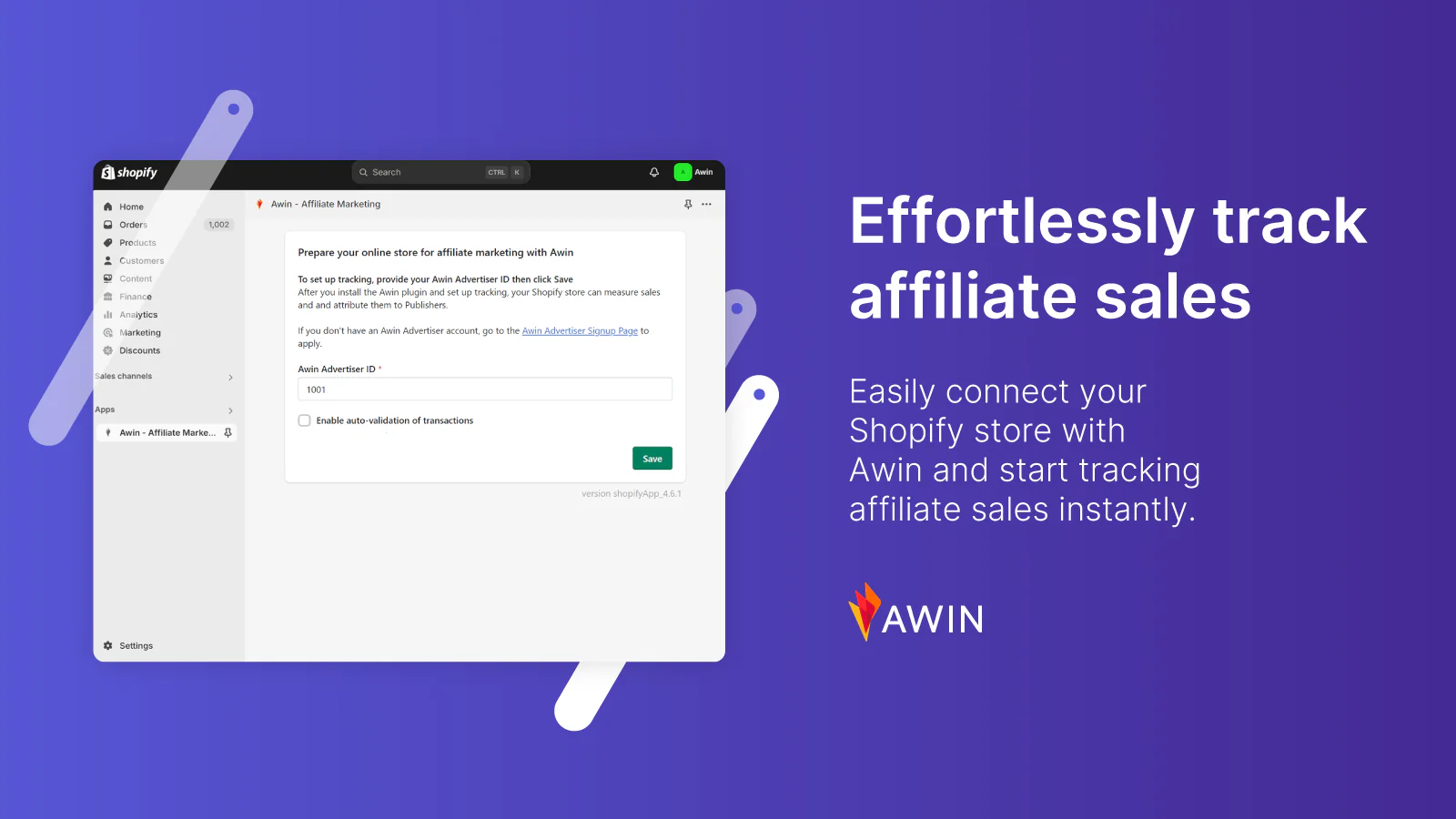
Formerly known as ShareASale, Awin handles affiliate tracking, reporting, and payments, allowing retailers to scale their programs without having to build their own infrastructure. Additionally, it features a dedicated Shopify app, enabling retailers to launch and manage their affiliate program with minimal development effort.

Awin charges a monthly subscription fee to access its affiliate network, starting at $59 per month. There’s also a fee of 3.5% of the transaction value for each referred purchase. 

Awin's Shopify integration that enables automatic affiliate sales tracking.
Track affiliate sales with the Awin app for Shopify.

Rakuten Advertising

Rakuten has strong relationships with top-tier publishers, including media sites, loyalty/rewards platforms, and influencers, making it ideal for retailers looking to reach larger audiences. It also supports international referral programs with multiple languages and currencies, as well as regional affiliate options.

The monthly fee to operate an affiliate program on Rakuten starts at $39. The network also charges a $0.99 fee for every product you market through their platform.

CJ Affiliate

CJ Affiliate (formerly Commission Junction) is an affiliate network that helps retailers connect with creators and publishers. You can create tiered, product-specific, or partner-specific commission models, as well as offer bonuses for top performers or specific actions (like new customer sign-ups).

CJ Affiliate doesn’t publicly share pricing details, making it difficult to budget precisely for your affiliate program. 

How to optimize your retail affiliate program for long-term growth

The best affiliate programs can be a huge boon for your retail business. They can increase sales, grow brand recognition, and even promote trust in your business—that’s why so many brands rely on affiliate marketing as part of their overall retail marketing strategy. Here are a few best practices to help you optimize your program and increase affiliate sales. 

Fraud prevention and brand safety

Because affiliate marketing has a low barrier to entry, there’s a significant risk of affiliate fraud, in which creators misrepresent a product or make fraudulent purchases to earn commission.

Common types of affiliate fraud include:

  • Typo squatting: Partners register domain names that are deliberate misspellings of popular brand websites to hijack traffic. These fake sites often contain affiliate links so that if a user mistakenly lands there and clicks through to the real retailer, the fraudster receives an unearned commission.
  • Cookie-stuffing: Affiliates drop cookies onto a user’s browser without the user actually clicking an affiliate link. This tricks the system into thinking the affiliate referred the sale, so they receive a commission even though they didn’t drive the traffic.
  • Fake leads: Partner affiliates enter false details on a form. It’s costly if affiliates are earning commission for every lead they generate. 

Most affiliate marketing tools have native fraud-detection features to protect your retail business against this type of fraud.

If you’re self-managing the program, establish and communicate strict terms prohibiting fraud, spam, unauthorized trademark use, and cookie-stuffing in your affiliate agreement. It’s also a good practice to validate affiliates before you invite them to your program, regularly monitor affiliate traffic activity, and block suspicious or known fraudulent websites from participating.

Advanced data analytics for performance optimization

It’s rare for customers to view a creator’s post, click their affiliate link, and make a purchase there and then. The default last-touch attribution deployed by some affiliate networks can make your program appear less successful than a deeper analysis would show. 

Instead of relying solely on surface-level metrics (like clicks or sales), advanced retail analytics dive deeper into patterns and behaviors across affiliates, customer journeys, and campaigns with techniques like:

  • Segmentation: Break down affiliate performance by type (e.g., influencers vs. coupon sites), device, geography, or customer type to identify your highest-performing affiliate campaigns. 
  • Conversion path analysis: Monitor the path a typical customer takes from clicking an affiliate link to making a purchase. 
  • Predictive analytics: Forecast which affiliates or segments are likely to perform best over time, so you can reward them with higher incentives or product-specific commission rates.

💡Tip: As the only platform to natively unify POS and ecommerce, Shopify shows all of your customer data in one reporting dashboard—no patchy middleware or integrations required. This approach has been proven to lower the total cost of ownership by 22% on average and contribute to a 3% increase in GMV from improved marketing effectiveness through unified customer data.

Design an affiliate onboarding program

When affiliates join your program, use a clear onboarding process to welcome them and help them make their first sale.

Your affiliate onboarding program should include: 

  • Clear instructions on how to access affiliate links
  • Creative assets and promotional materials, such as product images
  • Custom affiliate-specific discount codes to share exclusively with their audience
  • Clear guidelines on your affiliate policy—like which types of promotion are allowed and how to disclose partnerships 

Future trends in retail affiliate marketing

The affiliate marketing industry has evolved significantly over the past few years. The rise of creator-led platforms has paved the way for many social media users to earn commissions by promoting their favorite products. Here are the most significant affiliate trends to consider in 2025 and beyond.

Artificial intelligence in affiliate marketing

Artificial intelligence (AI) has quickly become essential for many retailers. It’s capable of automating repetitive tasks, generating content, and analyzing large datasets—all key components of a retail affiliate program. 

Use cases of AI in retail affiliate marketing include:

  • AI-powered affiliate discovery: AI can analyze vast volumes of web content, social media profiles, and historical performance data to recommend potential affiliate partners whose target audience aligns with your own.
  • Fraud detection: Machine learning algorithms can detect unusual patterns like sudden traffic spikes, bot clicks, or cookie-stuffing attempts, helping you avoid affiliate abuse.
  • Dynamic commission structures: AI can recommend or automate commission changes in real time—for example, increasing rates for affiliates driving high-CLV customers or decreasing rates for low-converting sources.

Privacy-first tracking solutions

Browsers like Safari and Firefox now block third-party cookies by default, and two-thirds of internet users actively disable cookies when visiting a new website. Privacy is a significant concern for consumers, directly affecting how online retailers track, attribute, and compensate affiliate sales.

Cookieless attribution is the alternative. It uses click ID tracking server-side matching to pass data directly from the retailer’s server to the affiliate network, eliminating the need for cookies in the user’s browser. 

Successful retail affiliate marketing program examples

Learn from five brands that use affiliate marketing to drive foot traffic and sales for their ecommerce and retail stores.

Moonboon: Carefully-selected affiliates 

Children’s sleep brand Moonboon is extremely selective in choosing affiliates. With more than 300 creators across five markets, each applicant is vetted based on their online content and social media engagement. 

It’s a strategy that has proven lucrative: Moonboon’s affiliate program has driven over $1 million in sales for the brand. Around 10% of monthly net sales come from this highly selective creator network. 

Moonboon’s retail affiliate program.

Bombas: Mission-backed commissions

Bombas is a sock and apparel brand with a mission-driven focus, supported by its retail affiliate program. When items are bought through affiliate links or banners, Bombas affiliates earn commissions on net sales, supporting the brand’s buy one, donate one approach.

Blendtec: Attractive rates and cookie duration

Popular blender company Blendtec offers an above-market rate of 8% commission to affiliate marketers driving online sales. The brand also offers a generous 45-day cookie duration, letting affiliate partners earn income for 45 days after a click.

immi: Building a community of authentic affiliates

Ramen brand immi took a unique approach to building their retail affiliate program. To grow the community authentically, they invited ramen lovers and happy customers to provide feedback on new products by offering free samples. Anyone who showed interest was invited to join the program and earn commissions on sales.

In just a few months, immi’s affiliate program grew to over 400 ambassadors and 145 affiliates, who have driven more than $20,000 in retail sales.

Registration page for a ramen affiliate program.
immi’s affiliate registration page.

Numi: Attracting the right partners

Fashion retailer Numi partnered with ShareASale (now Awin) to manage their affiliate marketing program, offering affiliates a commission of up to 18% on purchases driven by their efforts. The brand attracts the right affiliates by calling them “Style Partners” and specifically gearing the program toward style bloggers and influencers. 

Grow your business with retail affiliate programs

Your brand needs a retail affiliate program to tap into the revenue and reach of this powerful online marketing strategy. By building an affiliate program tailored to your business—and letting data inform your decisions and investments—you can generate revenue sustainably.

Retail affiliate programs FAQ

What is an affiliate in retail?

A retail affiliate is a third-party partner, such as a blogger, influencer, or website, that promotes a brand’s products. They earn a commission for each sale or lead they generate.

What is affiliate marketing in online retail?

Affiliate marketing is a performance-based strategy where retailers partner with third parties—like influencers, bloggers, or content sites—to promote their products. These affiliates earn a commission for every sale generated through tracked links.

How do I start my own affiliate program?

Here are five steps to start your own affiliate program:

  1. Define the goal of your program.
  2. Choose affiliate marketing software.
  3. Set your commission rate and cookie window.
  4. Check legal and compliance requirements.
  5. Recruit and onboard affiliates.

What Is a SKU Number? How to Use SKUs in Retail (2025)

Software Stack Editor · August 20, 2025 ·

/* Base table setup */
.tg {border-collapse:collapse;border-spacing:0;}
/* Center every cell */
.tg td,
.tg th {
border-color:black;
border-style:solid;
border-width:1px;
overflow:hidden;
padding:9px 15px;
word-break:normal;
text-align:center; /*

A SKU number helps retailers identify and track products. Retailers rely on SKUs to retrieve purchases from the stockroom, organize merchandise, and sort items by factors such as price, color, and size.

For small businesses, SKUs streamline operations. Whether you run an ecommerce website or a brick-and-mortar store—with a massive inventory or limited stock—assigning SKUs to products makes it easier to fulfill orders efficiently and provide a positive customer experience.

In this guide, learn what product SKUs are, how to create them, and how to manage SKUs to organize your inventory.

Unify your inventory management with Shopify

Only Shopify POS helps you manage warehouse and retail store inventory from the same back office. Shopify automatically syncs stock quantities as you receive, sell, return, or exchange products online or in store—no manual reconciling necessary.

Discover Shopify POS

What is a SKU number?

A stock-keeping unit (SKU) number is an alphanumeric code assigned by retailers to identify and track each specific product within their inventory system. Typically 8–10 characters long, SKUs encode key product attributes—such as color, size, manufacturer, and price—enabling precise inventory management and sales analysis.

SKUs are created by individual businesses and arranged so that the most important information appears first. This makes it easy for store teams to retrieve items quickly and for managers to analyze sales performance at a glance.

Unlike other types of product coding, SKUs are not universal—they’re created individually by each retailer. Retailers assign a unique code to each item in their inventory management software. These codes can be tailored specifically to vendor or customer requirements, ensuring accurate inventory tracking.

Since each retailer creates their own set of SKUs, an identical item from the same manufacturer that is sold by multiple retailers will have a different SKU at each retailer.

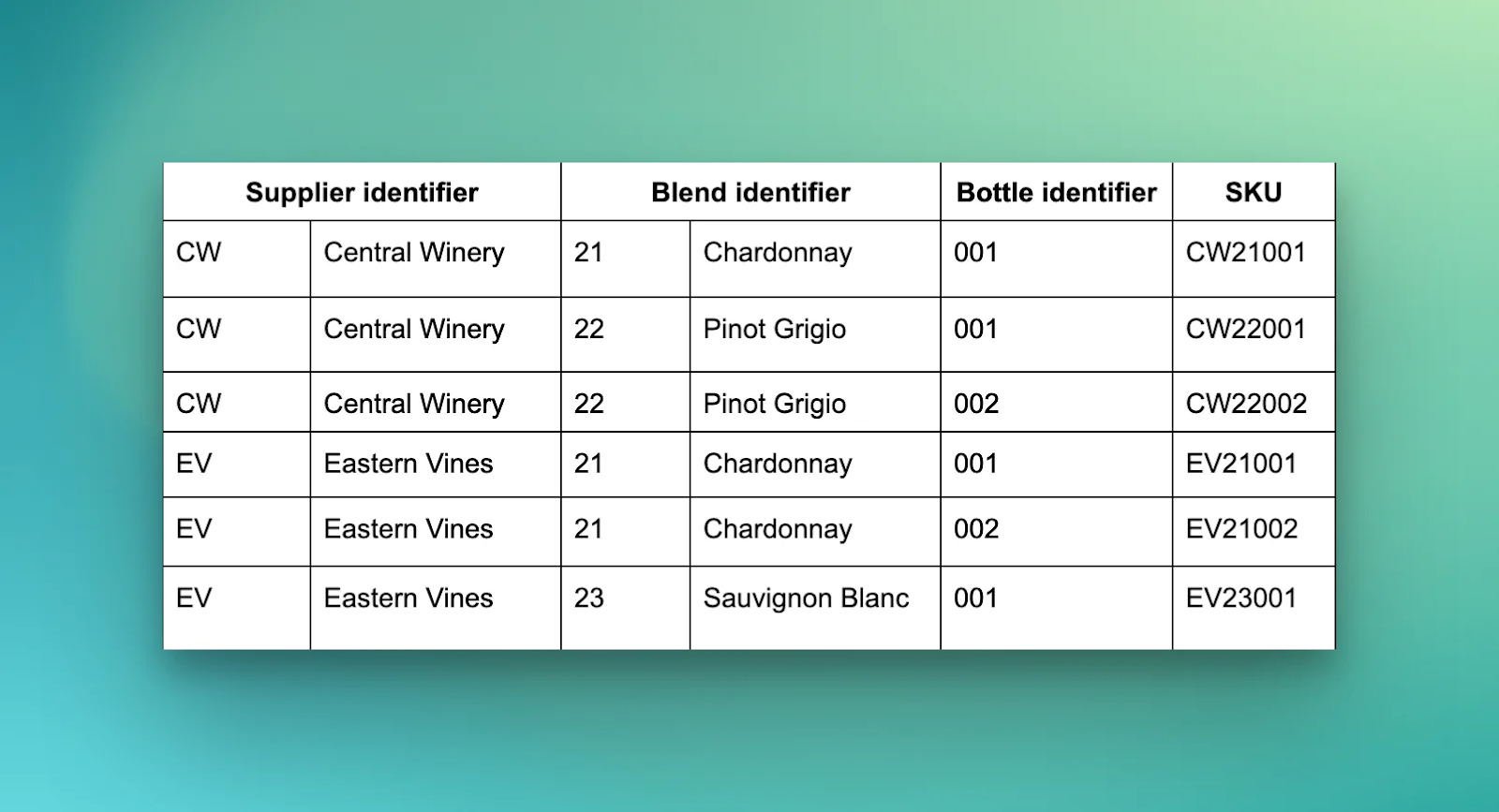
SKU number format example for a retail store selling wine.
SKU format for a wine retailer.

Why are SKUs important for your business?

A well-structured SKU system pays off by helping teams locate products faster, pick orders with fewer errors, and spend less time searching for misplaced stock. SKUs also help reduce inventory costs by exposing slow-moving or duplicate items and streamlining receiving and reconciliation. 

Consider a neighborhood bike shop where each type of tire tube has a unique SKU. A single scan at the point-of-sale (POS) system rings up the correct price and instantly removes that tube from inventory. That same code appears on management’s dashboard, flagging any popular sizes that are about to sell out, so they can restock before tomorrow’s rush.

Inventory mistakes drain profit fast. A recent global IHL Group study found that inventory distortion costs retailers about 6% of sales each year, or roughly $1.77 trillion. SKUs provide visibility into all parts of your inventory, so you can reorder fast-selling items (or stop ordering slow ones) before profit leaks. 

Where to find SKU numbers

Here are common places where you can find SKU numbers:

  • Product packaging: Flip any box or bottle over and you’ll spot a little barcode label with the SKU printed nearby. 
  • Receipts: When you sell a product, the receipt often lists the SKU number alongside the product description. 
  • Price tags: Retailers often print SKU numbers on price tags, especially for products sold in-store.
  • Inventory management systems: Your inventory management system (IMS) and point-of-sale system stores SKU numbers for every product. 
  • Product listings: Online retailers selling on Amazon or eBay typically include SKU numbers in the product details section of their listings.

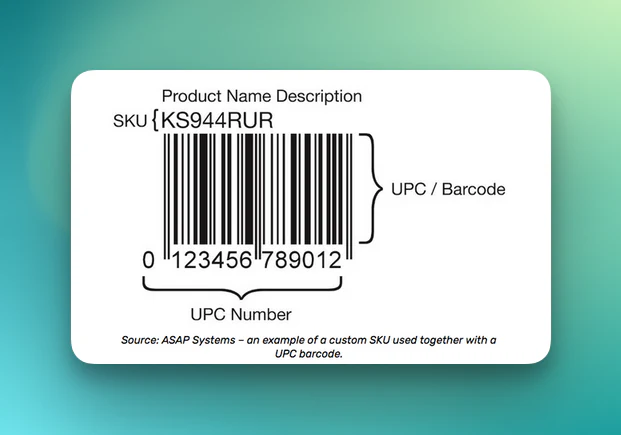
Note that while SKU numbers and barcodes often appear adjacent to each other on price tags, they are not the same. A barcode is a format for encoding information—on a price tag, it usually represents the product’s Universal Product Code (UPC), which will be discussed later in this article. 

How to create SKU numbers for products

Because stock-keeping units are designed for internal use, there are no hard rules when creating your own SKU system (also known as a SKU architecture). However, sticking to some basic conventions will help keep your SKU numbers compatible with external companies and software, should you need to work with a fulfillment partner.

Automated SKUs 

The easiest way to generate SKU numbers is by using an IMS or POS system.

These SKU systems track customer orders and the status of stockroom goods. Most include an automated SKU code creation feature, meaning each product entered into your system automatically receives a unique number.

💡 Assign product barcodes and SKUs with a Shopify app.

Manual SKUs

If you’re a retail store with a small product catalog and low turnover of inventory, you may be able to create SKUs by hand on an as-needed basis.

To do this, you’ll need a codified system for identifying the major features of your products.

  • The first part of a SKU represents the broadest product feature, such as the product category or supplier.
  • The next SKU characters represent increasingly specific features, such as color, size, or brand. 
  • The final SKU characters form a unique identifier, indicating the number of products in inventory and the order in which they were purchased or processed.

Whenever possible, create visually meaningful codes, such as the first few letters of a supplier or brand name. This makes your SKUs easier to recognize and process manually.

Also, limit SKUs to 10 or fewer characters to keep your SKU numbers compatible with third-party software should you transition to a digital tool in the future.

SKU examples by industry and product type

A SKU needs to communicate a lot of information at a glance. The four examples below show SKU formats across different industries. 

  1. Apparel

TSH-M-BLK-COT-001

  • TSH = T-shirt (broad category)
  • M = medium (size)
  • BLK = black (color)
  • COT = cotton (fabric)
  • 001 = running item number for uniqueness

Start with the attributes staff look for first (category and size), then add color and fabric, and finish with a short serial number. This makes it easy for your floor staff to spot and for the POS to register.

  1. Electronics

LAP-HP-PRO-16-512-A1

  • LAP = laptop
  • HP = brand (HP)
  • PRO = model line
  • 16 = 16 GB RAM
  • 512 = 512 GB SSD
  • A1 = internal batch code

Gadget shoppers and sales reps care most about brand and specs, so the SKU highlights RAM and storage right after the model. The two-character batch code at the end lets you quickly track recall issues easily.

  1. Books

BK-FIC-THR-JD-978055

  • BK = book
  • FIC = fiction (genre)
  • THR = thriller (subgenre)
  • JD = author initials (John Doe)
  • 978055 = last six digits of ISBN

This SKU reflects how indie book shops shelve titles by genre first, followed by author. Borrowing a chunk of the ISBN prevents two thrillers by authors with the same initials from colliding in your system.

  1. Coffee

COF-ARB-DK-250-003

  • COF = coffee
  • ARB = Arabica (bean)
  • DK = dark roast
  • 250 = 250-gram bag
  • 003 = third roast batch of the day

Baristas can glance at the code to know bean type, roast, and pack size. The final three-digit batch counter ensures stock is rotated before flavor peaks.

Instant demo: See Shopify POS in action

Discover how Shopify POS helps you manage in-store and online sales from one powerful platform.

Watch now

How to use SKUs to your advantage

1. Monitor trends and inventory levels

Each product is assigned a unique SKU number, so it’s easy to track individual items. You can monitor products in detail, including variations like size, color, and style. Most stores assume digital inventory counts match shelf counts exactly, but field audits show only about 65% of SKUs actually match on any given day. 

SKU numbers enable accurate inventory reporting and help you streamline inventory management. Many retailers use SKUs to reduce phantom inventory, prevent stockouts, and predict when they need to reorder. 

Plus, SKU systems update inventory levels in real time as sales occur, providing consistently accurate stock data. You can anticipate future trends, evaluate sales (like which product variants are most and least popular), and optimize inventory levels to prevent under- or overstocking.

2. Calculate reorder points

Using SKU data, you can monitor product status and calculate reorder points—the moment when you need to order replacement stock. This usually happens when your inventory level drops to or below a predetermined number. 

By tracking how quickly each SKU sells over a given period, you can predict when you should reorder from suppliers. A large-scale study across 85 stores found that automatic replenishment systems slashed stockouts by up to 60%. 

💡 The Stocky app by Shopify automatically calculates reorder points based on supplier lead times, so you won’t run out of your most popular SKUs.

Stocky dashboard showing items with low stock, bestsellers, and products with lost revenue.
Stocky shows real-time inventory management data to optimize stock.

3. Forecast demand and sales

Using a SKU system also improves the accuracy of sales and demand forecasting. Run your SKU data through an ecommerce analytics tool to answer questions like:

  • How much staff do I need on the shop floor during a specific season?
  • How much inventory should I have ready for weekends?
  • How much payroll can my cash flow cover seasonally?

If your SKU data highlights low-selling items, you can monitor sales and reduce inventory accordingly. This ensures you meet customer demand without tying up cash in dead stock.

4. Plan product displays

A thoughtfully designed SKU architecture highlights a store’s most- and least-popular items. Another way to harness this information is to create product displays and make visual merchandising decisions based on SKU data.

For example, you could identify high-margin items that are underperforming and place them at eye level on your store shelves, or feature them prominently on your website’s homepage. Classic shelf experiments show that moving an item from the bottom shelf to eye level boosts sales by about 39%.

5. Upsell and cross-sell products

Cross-selling tactics can increase sales by 20% and profits by 30%, as evidenced by McKinsey. SKU data can also be leveraged on the sales floor or within an ecommerce checkout.

For instance, SKUs enable cross-selling and product recommendations. If a customer is purchasing a laptop, SKU data can automatically trigger your ecommerce site (or in-store associate) to suggest compatible items like a laptop bag or wireless mouse, enhancing the customer’s shopping experience and increasing your sales.

If a product is out of stock, SKUs make it simple for retail staff or an online store to recommend similar products.

6. Improve the customer experience

Because no two products share the same SKU number, SKUs are often the most reliable way for a retailer to identify a specific item or customer order. This also makes SKUs useful for customer service and support.

Plus, because SKUs help you track inventory, you can minimize inventory risks that contribute to a poor retail experience. You know exactly how much inventory you have on hand, so you’ll have plenty of time to restock a fast-selling item before shoppers visit your store looking to buy.

Best practices for SKU management

Use a SKU management system

A SKU management system is a place to store your SKU numbers and attach them to products. 

Shopify, for example, has a SKU field for each product listing—even supporting variant SKUs, like unique codes for each t-shirt size. This data is unified across your POS and ecommerce platform, allowing accurate inventory tracking and order fulfillment across multiple sales channels.

“I used to spend at least four hours manually counting inventory every month, and I always had to ensure our platforms were syncing up properly,” says Mandalyn Renicker, owner of Offbeat Bikes. 

“I don’t have to do that anymore, because Shopify’s inventory system is so robust and easy to manage. I’m flying through service invoicing at the end of each day faster than I ever could with Square, too, which I think is because the Shopify interface is just a lot easier to use.”

SKU numbers for different t-shirts, ranging in size from extra small to extra large.
Track SKUs for each product variant in Shopify.

Keep it consistent

Keep your codes simple and understandable, and ensure your SKUs are created consistently across your entire product catalog. 

Implement a logical hierarchy in your SKUs for easy organization. This means using a consistent structure and format, making it easier to understand for inventory management purposes.

Train staff on how to use SKUs

Retail employees interact with SKUs daily. Include them when creating new SKU numbers or discontinuing products to train them on your SKU management processes. For example, do they know that “EV” is code for supplier Eastern Vines? 

Never use zeros or special characters

Zeros can be skipped by some retail software or mistaken by employees for the letter O, causing confusion when inputting SKUs.

Similarly, special characters such as !, @, or & can disrupt certain software systems and should be avoided in SKU codes.

Define popular product features

Help your sales team by using SKU numbers to highlight popular product features. For example, if you’re a clothing retailer, you might notice certain colors, sizes, or styles sell better than others. By using SKU numbers to track these attributes, you can better understand customer preferences and adjust your inventory accordingly.

Tracking these attributes with SKUs ensures you’re stocking the right mix of products to meet customer demand.

Make regular SKU updates

As your product offerings change, so should your SKUs. Update SKUs when you introduce new product features or discontinue products.

Use SKU data to improve sales

Use SKU data to make business decisions. For example, you could use SKU sales data to determine which products to promote or discount, or inventory data to calculate reorder points and avoid stockouts.

You can also track SKUs to monitor sales trends and inventory levels. Doing so provides valuable insights into which products are selling well and which ones aren’t, helping you make informed inventory management decisions.

Advanced SKU strategies for growing businesses 

SKU analytics

Run SKU data through a business intelligence (BI) tool to understand profitability metrics and allocate inventory more effectively. A European chain used AI-powered SKU rationalization to eliminate 200 low-yield items, resulting in an additional €30 million in margin within one season.

For another example, if Store A sells 15 red hoodies a day but Store B moves only two, SKU analytics flags the imbalance so you can transfer surplus inventory instead of placing a new purchase order.

You can easily pull SKU-level data from your store with Shopify Sidekick’s AI by simply asking questions like:

  • What are the gross margins per SKU for the last 90 days?
  • Which SKUs have an annual turnover rate below two but tie up more than $5,000 in inventory?
  • Show me a list of SKUs for which the days of supply exceed the lead time by 50% or more.

Discontinue SKUs that aren’t selling, and double down on the group that drives most of your margin. 

SKU automation

Automated inventory management is key for scaling brands. Some ways to automate your SKU processes include:

  • Use templates to generate SKUs. Apply logical attributes (for example, CAT-SIZE-COLOR-SEQ) so software can assemble SKUs on the fly when a new variant drops.
  • Trigger lifecycle updates. Automatically update SKU status (inactive, end-of-life) when sell-through falls below a threshold. 
  • Maintain version control. Lock SKU edits behind role-based permissions. Keep a “do-not-reuse” list so retired codes don’t reappear in your system.

International selling

The moment you ship across a border, poor SKU management gets expensive fast. In Avalara’s 2023–24 cross-border survey, 94% of operators said they’d been delayed because of incorrect classification and documentation, and 39% hit that wall frequently.

With the US ending the $800 de minimis exemption for parcels from China and Hong Kong in May 2025, every shipment needs a full tariff classification and duties paid up front. Building globally consistent SKUs tied to GS1 GTINs, HS codes, and accurate descriptions ensures parcels move efficiently.

Shopify Managed Markets integrates this entire workflow directly into your admin. Managed Markets acts as a merchant-of-record service, automatically attaching HS codes, collecting and remitting duties and taxes at checkout, and printing compliant customs forms.

Common SKU mistakes to avoid

Even the most well-intentioned SKU systems can be derailed if daily practices go unchecked. Here are common mistakes to avoid:

  • Inconsistent naming conventions: Using ad-hoc or department-specific formats makes SKUs hard to read, search, and scale as your catalog grows. Start with a clear structure—such as Category-Style-Size—so every team member interprets codes the same way.
  • Using meaningless codes: Random strings of numbers and letters require staff to memorize lookups, which causes picking errors. Use cues like product type, color, or size so employees can decode SKUs at a glance.
  • Making SKUs too long or too short: A 3-character code lacks the detail needed for accurate inventory reporting, while a 20-character code slows scans and clutters labels. Aim for 8–12 characters for optimal balance.
  • Not regularly reviewing/updating SKUs: When assortments expand or naming rules change, old SKUs can duplicate or contradict new ones. Schedule periodic audits to retire outdated codes and align new products with your schema.
  • Confusing SKUs with other codes: SKUs identify internal stock, while barcodes, UPCs, and EANs fulfill external or regulatory purposes. Mixing them up can lead to data mismatches and costly inventory reconciliation issues.

SKUs vs. other retail codes

SKU numbers aren’t the only product codes retailers use. Here’s how to distinguish them from each other.

SKU vs. UPC code

UPCs, or Universal Product Codes, are another widespread form of product identification. SKUs and UPCs look similar and are used simultaneously by retailers, but their functions differ slightly. 

A stock-keeping unit identifies a unique product and its traits, while a Universal Product Code represents a product’s manufacturer (the first six numbers) and its item number (the next five digits). UPC codes also contain a check digit (the last number), serving as a validation mechanism.

Here’s a helpful breakdown of the differences between SKUs and UPCs:

SKU (Stock-Keeping Unit) UPC (Universal Product Code)
Scope Used by individual retail stores Used by multiple stores and the supply chain
Length (characters) 8–12 Always 12
Identifier meaning Describes product traits Manufacturer + item number
Character set Alphanumeric Numeric
Issuer Created by retailer/td> Issued by the GS1

SKU vs. GTIN codes

A Global Trade Item Number (GTIN) works similarly to UPC codes. GTINs are global, 13- or 14-digit codes assigned by the nonprofit international organization Global Standards 1 (GS1) and stored on an international database. Think of a GTIN like a global SKU system used by retailers worldwide to code their products.

If you’re reselling popular existing products, a GTIN code might already be assigned to your physical inventory. GTIN codes are often printed on product packaging.

SKU vs. barcode

A barcode is the batch of black lines found on product labels or packaging, which retailers scan when completing a customer’s purchase. The term barcode is often used interchangeably with UPC, because most barcodes encode UPC numbers.

Unlike SKU numbers, when retail stores generate a barcode, they don’t create a new UPC. Barcodes are assigned to all identical products, regardless of where they are sold. However, retailers may print product labels that include both a UPC barcode and their store’s SKU number.

Example label showing a UPC number, SKU number, and barcode.
SKU numbers, UPC numbers, and barcodes can all be added to a product label.

SKU vs. serial number

A serial number tracks products for warranty claims, repairs, and recalls. They are used by manufacturers to track product batches and identify defective units. Serial numbers are unique to each individual unit, whereas SKUs are shared among multiple identical units. 

Create SKU numbers for your store

The more you tailor your SKU architecture, the better you can leverage it to meet your customers’ needs. By understanding which product features are important to you, your vendors, and your customers, you can craft a SKU architecture to help you efficiently manage inventory and scale your business.

Ready to take control of your inventory and boost profitability? Start creating efficient SKU numbers for your store today with Shopify’s powerful inventory management tools.

SKU number FAQ

How do I get a SKU number for my product?

Your inventory management system should have a SKU field from which you can retrieve a product’s unique SKU number. If you don’t already have a SKU number assigned, use a free SKU generator. Several apps are available in the Shopify App Store.

Can I make my own SKU number?

You can create your own SKU number for a product. You can do this manually (i.e., using an alphanumeric code system), or automatically using a SKU generator app.

Do my products need a SKU?

You don’t have to assign a SKU number for each product, but they simplify inventory management, order fulfillment, and sales analysis, making them a useful tool for retailers.

Is a SKU a product code?

A SKU is a product code—they’re used to track inventory and fulfill orders. However, don’t confuse them with Universal Product Codes (UPCs), which GS1 issues for a global database of product identifiers used by all retailers.

Does every item have a SKU?

Every item you’re selling should have a SKU number. These codes help you track inventory, fulfill customer orders, and report on sales.

Can two products have the same SKU number?

SKU numbers are unique to each product. However, two products can have the same barcode or UPC number.

How do I find the SKU code?

You can typically find the SKU code on the product’s packaging or label, located near the barcode. If you have a receipt from the purchase, the SKU is sometimes listed next to the product description. For online purchases, check your order confirmation email or the order history section of the retailer’s website.

Credit Card Processing Fees: What You Need To Know (2025)

Software Stack Editor · August 20, 2025 ·

image
/* Base table setup */
.tg {border-collapse:collapse;border-spacing:0;}
.tg td, .tg th {
border:1px solid black;
padding:9px 15px;
word-break:normal;
text-align:center; /* center everything */
vertical-align:top;
}
.tg th {background:#efefef;font-weight:bold;}
.tg .tg-wkkj {background:#efefef;font-weight:bold;}
.tg .tg-wp8o {}

Years of research confirms that customers spend significantly more when paying with credit cards than they do when paying by cash or check. 

The psychology is simple: inserting, tapping, or swiping a credit card is quick and easy regardless of the amount, and feels less painful than counting out your hard-earned cash, or writing down the full figure on a check (not that there’s a whole lot of check-writing going on in modern retail to begin with). 

Given the consumer mindset, taking credit card payments is a no-brainer for retailers, from corner shops to global retail chains. In fact, it’s not at all uncommon these days to encounter coffee shops, eateries, and other businesses that only accept cards.

But there’s a hitch to all this convenience: your business pays fees on every credit card transaction. To be clear, that’s the seller, not the buyer, paying the fees. And these fees add up, especially for small businesses and new retailers trying to get off the ground, when every dollar counts.

Here’s a rundown of the different types of credit card transaction fees, plus tips for keeping them from ballooning out of control.

What are credit card processing fees?

Credit card processing fees are transaction fees that businesses pay to credit card companies, payment processors, and the financial institutions backing credit purchases. Merchants pay these credit card fees every time someone uses a credit card to buy something from them.

There are three main types of fees:

  1. Interchange fees (the issuing bank’s cut)

Paid to the cardholder’s bank, the interchange fee takes the biggest cut out of every card sale. Rates vary by card type and risk, but typically range from 1% to 3% of the transaction amount. 

Discover and American Express run their own networks, so their interchange is usually higher, which is why some retailers stick to Visa and Mastercard only. 

Credit card issuers often factor security considerations into their fee structures. For example, chip credit cards often carry lower fraud risk than mag-stripe-only cards, and therefore can have lower fees associated.

  1. Assessment fees (the card network’s cut)

Assessment fees, also known as network fees, go to Visa, Mastercard, Discover, or American Express for routing the transaction. Also charged as a percentage of the purchase amount, these fees are significantly lower than interchange fees, coming in at roughly 0.15%–0.25% of the cost. The rates are fixed by each network and apply to every sale, regardless of the issuing bank for the card or the processor.

  1. Processor markup (the payment processor’s cut)

A payment processor takes care of the technical part of processing electronic payments, acting as an intermediary between the buyer, the seller, and any institutions involved, facilitating the transfer of funds in the correct amount to each party. Payment processors like Shopify Payments, Stripe, and PayPal, add their markup on top of the interchange and assessment fees. This can be a flat fee, a percentage, a monthly subscription, or a combination of all three, covering services such as gateway access, fraud-prevention tools, and customer support.

Average credit card processing fees in 2025

According to analysts, retailers spend an average of 1.70% to 2.5% of the total amount of any purchase on credit card processing fees—depending on factors like the type of credit card used, the transaction amount, and type of business. 

Credit card processing fees by vendor

Vendor Monthly Subscription Transaction Fees Additional Costs
Shopify Payments Included in all Shopify plans at no additional cost In-person payments:
Basic plan: 2.6% + $0.10
Grow plan: 2.5% + $0.10
Advanced plan: 2.4% + $0.10

Online transactions:
2.5%–2.9% + $0.30 (plan-dependent)

Currency conversion:
1.5% (US) or 2% (other regions)

No monthly, hidden, setup, or extra third-party fees
PayPal No subscription In-person: 2.29% + $0.09
Online: 2.99% + $0.49
No statement or termination fees
Chargeback: $20 / dispute
Cross-border: 1.5% + 4% FX
Optional recurring billing / fraud tools: $10 + $0.07 per txn
Square Free: $0
Plus: $89/mo
Premium: Custom
Free plan: 2.6% + $0.15 (in-person), 2.9% + $0.30 (online)
Plus plan: 2.5% + $0.10 (in-person), 2.9% + $0.30 (online)
Premium: Custom
No statement, PCI, or early-termination fees
Stripe Pay-as-you-go; no monthly or setup fees Domestic cards: 2.9% + $0.30
International cards: +1.5%
Manually entered: +0.5%
Custom high-volume pricing available
Cross-border: 1% + $0.30
Currency conversion: +1%
Helcim No subscription In-person: 1.83% + $0.08
Online: 2.61% + $0.08
Volume discounts available
No monthly, setup, PCI, or cancellation fees
Chargebacks: $15 (refunded if won)
FX via MCP: +1% over market rate
Finix Individual merchants: $250/mo (up to $1 M annual volume) $0.08 (card-present)
$0.15 (card-not-present)
Custom rates above $1 M
Same-day deposits: 1%
Disputes: $15

Shopify Payments

Shopify Payments is Shopify’s native payment processing solution that integrates directly with your store’s checkout. 

It allows businesses to accept payments from retail payment options including credit cards, debit cards,tap to pay, contactless payments, and buy now, pay later (BNPL), without the need to engage third-party payment processors. Plus, it’s available across multiple countries and eliminates the additional transaction fees typically charged when using external payment processors.

Since your data is stored in a centralized dashboard, you can track transactions, handle payouts, and manage chargebacks, streamlining your financial processes in one place. As a Shopify retailer, data from Shopify Payment transactions seamlessly integrates with the rest of the data in your store.

The system maintains consistent rates, offers predictable payouts, and adheres to PCI compliance and EMV standards for all card readers. This ensures secure transactions for both merchants and customers.

Pricing structure: Shopify Payments is included in all Shopify plans at no additional cost.

Processing fees:

  • In-person payments: Basic plan charges 2.6% plus $0.10 per transaction; Grow charges 2.5% + $0.10; Advanced 2.4% + $0.10
  • Online transactions: Range from 2.5% to 2.9% plus $0.30 per transaction, depending on your plan level 
  • Currency conversion fees (international sellers): 1.5% for US-based stores and 2% for stores in other regions 

Additional costs: There are no monthly fees, hidden fees, setup fees, or additional transaction fees that are typically charged by third-party payment providers.

💡TIP: You can secure lower processing fees for credit card transactions by upgrading your subscription with Shopify.

PayPal

PayPal offers merchants a straightforward way to accept credit cards, debit cards, and digital wallets like Apple Pay and Google Wallet online and in-person. 

Unlike traditional processors, PayPal removes complex fee structures and long-term contracts. You can process transactions through PayPal Zettle, online checkout options, digital invoices, or virtual terminals across sales channels without switching between different payment systems or providers.

Pricing structure: No monthly fees, statement fees, or early termination penalties

Processing fees: 2.29% + $0.09 for in-person transactions and 2.99% + $0.49 for online transactions 

Additional costs: 

  • Chargeback fees: $20 per incident
  • Cross-border fees: 1.5% + 4% for currency conversion when accepting international payments
  • Optional services: Recurring billing $10/month, advanced fraud protection $10/month + $0.07 per transaction

Square

Square is an all-in-one payment-processing solution that allows retailers to take in-store, online, and mobile payments. The system works by connecting to Square’s payment gateway, using a card reader for in-person transactions or payment portal for online sales to process transactions. 

When a customer pays, Square verifies funds with their bank, approves the transaction, and deposits money into your merchant account. And with its next-day deposits, you won’t have to endure waiting periods typical with traditional processors. Square also offers transparent pricing with bundled fees, making it simpler to understand costs. 

Pricing structure:

  • Free: $0
  • Plus: $89/month
  • Premium: Custom pricing

Processing fees: Varies based on the plan:

  • Free: 2.6% + $0.15 in-person transactions, 2.9% + $0.30 for online transactions
  • Plus: 2.5% + $0.10 for in-person transactions, 2.9% + $0.30 for online transactions
  • Premium: Custom pricing

Additional costs: No monthly fees, statement fees, PCI compliance fees, or early termination penalties

Stripe

Stripe is designed primarily for online businesses, but it also supports in-person payments through Stripe Terminal. The system works as an intermediary between merchants and customers’ banks, validating transactions and moving funds securely between accounts. 

It supports dozens of payment methods and more than 135 currencies, and operates on a straightforward flat-rate pricing model—with no setup fees or early termination penalties.

Pricing structure: Pay-as-you-go pricing

Processing fees:

  • Domestic cards: 2.9% + $0.30 per successful charge
  • International cards: 1.5% per successful charge
  • Manually entered cards: additional 0.5% per successful charge
  • Custom pricing available for merchants with large payments volume or unique business models

Additional costs: 1% + $0.30 for cross-border transactions and +1% if currency conversion is required

Helcim

Helcim is designed to help small businesses save money while accepting both in-person and online payments. The platform uses interchange plus-pricing, which combines the base cost from card networks with a single markup. 

There are no monthly fees, user fees, setup fees, deposit fees, PCI fees, or cancellation penalties. And with Helcim’s Fee Saver, merchants can pass credit card processing costs to customers who choose credit cards over cheaper payment methods like debit or ACH. This gives merchants access to free credit card processing while remaining compliant with card network rules. 

Pricing structure: No subscription

Processing fees:

  • In-person transactions: 1.83% + $0.08
  • Online payments: 2.61% + $0.08
  • Discounts available for high-volume transactions based on business needs and volume of transactions processed

Additional costs:

  • $15 fee for chargebacks (Helcim will reimburse it if you win the dispute)
  • Currency conversion fee of 1% above the daily 5 pm ET market rate for merchants using Helcim’s multi-currency processing (MCP) service

Finix 

Finix helps US and Canadian businesses process in-person and online transactions. It operates on an interchange and subscription model with flexible fee-customization options for optimizing your payment revenue and margins. 

These options include international charge adjustments, transaction volume discounts, payment method-specific fees, and accelerated settlement timeframes. The processor doesn’t charge any extra fees for PCI compliance, setup or fraud protection tools.

Pricing structure: Individual merchants plan: Processing subscription tier starts at $250 monthly for businesses processing up to $1 million annually

Processing fees: $0.08 for card-present transactions and $0.15 for card-not-present transactions. Custom rates apply for businesses processing more than $1 million annually.

Additional costs:

  • 1% for same-day deposits
  • $15 for disputes

Common additional processing fees

In addition to the standard processing fees they advertise, many credit card processors find ways to sneak in additional, hidden charges. These extra costs can have you paying thousands of dollars annually in unnecessary charges that silently eat away at your bottom line, while providing you with no additional benefit.

Hidden fees retailers should be well aware of include the following:

  • Early termination fees: Some processors charge merchants a fee for canceling their contract early. (You’re already dissatisfied with their services, so why not grab a few bucks on the way out the door?)
  • Batch processing fees: These are fees for processing multiple transactions at once. 
  • PCI noncompliance fees: Some payment processors charge significant additional fees to retailers as a penalty for failing to adhere to PCI DSS security standards.
  • Cross-border and currency conversion fees: Some payment-processing companies add on these extra fees for foreign transactions. Since expanding to other global markets can be a huge driver of growth for your business, the last thing you need is cost-prohibitive transaction fees shutting down the borders of your expansion plans. 
  • Refund fees: Some processors keep part of the transaction fee even if a refund is issued. While returns are never the goal, you generally don’t want to penalize your customers when they have to make that choice—so why should you pay a penalty? 

Be sure to dig deep in your search for any and all hidden fees when evaluating payment processors. Once you’re in business, review your statements to ensure nothing unexpected shows up. Careful provider selection and regular statement audits can help you identify costly hidden fees that erode profit margins, allowing you to reclaim thousands in unnecessary payment processing costs and redirect it to growth-focused initiatives that generate returns instead of padding processor profits.

Beyond just hurting your bottom line, hidden fees can harm the trust relationship that is so important when it comes to handling your money. For better peace of mind, go with a payment processor like Shopify Payments that’s committed to helping you run your business with no hidden fees.

Understanding the three pricing models

Flat-rate pricing

You pay one blended rate (e.g., 2.6 % + $0.15) that includes interchange, assessment, and processor fees.

A predictable rate means you know exactly how much you’re spending each time. Flat-rate pricing is popular among all-in-one providers like Shopify Payments due to its simplicity for businesses. 

Interchange-plus pricing

The processor passes through the exact interchange and assessment fees set by the card networks, adding a small markup of its own, usually a small percentage or transaction fee.

Interchange-plus is seen as the most transparent and cost-efficient model. Your effective rate varies by card type and risk, but large-volume merchants benefit from paying the trust cost on a transaction. 

If shoppers use lower-cost debit or credit cards, the business retains the savings by avoiding a higher blended rate. 

Tiered pricing

Each transaction is routed into one of three preset buckets: “qualified,” “mid-qualified,” or “non-qualified,” each with its own corresponding rate. If a sale fails to meet the strict criteria for the cheapest tier—for example, if the card is keyed in rather than dipped—the transaction is downgraded, and you pay more.

Statements under this more complicated model are harder to audit, and total cost often skews higher, which is why people view tiered plans as processor-friendly rather than retailer-friendly.

How to read your processing statement and calculate your effective rate

Credit card fees can pile up and eat into your net profits. So, you want to ensure you’re working with a provider that’s affordable, reliable, and transparent. One way to do this is by calculating your effective rate, or the real cost of processing credit card payments.

Review your monthly statement and add up:

  • Total processing fees
  • Total card sales 

Then apply the formula: Effective rate = Total processing fees ÷ Total sales

For example, if you paid $1,240 in fees on $50,000 in card sales, your effective rate is $1,240 ÷ $50,000 = 2.48%. 

There’s no single number that defines what a good or bad effective rate is. However, it’s generally accepted that the normal range is between 1.6% and 3.1%, with most rates falling around 2%–2.5%.

Working with merchant service providers

The fees related to accepting credit cards can be overwhelming, especially for solo entrepreneurs. That’s why you may choose to partner with a merchant service provider that will calculate and remit almost all fees on your behalf. 

A merchant service provider is essentially a credit card processing provider that acts as an intermediary between your business, your customers, and financial institutions. 

It does this, in part, by maintaining a merchant account through which funds pass on their way from your customer’s credit card to your bank account. You’ll pay merchant account fees, which are usually baked into your overall merchant service fees.

Four strategies to reduce your credit card processing fees

1. Choose the right pricing model for your business

Match the pricing model to your ticket size and volume. 

  • Low-ticket, low-volume merchants often save with flat-rate plans (one blended % + small fixed fee).
  • Higher-volume merchants usually pay less on interchange-plus, where the markup sits on top of actual card network costs.

Calculate your current effective rate. If it’s more than 0.30 percentage points above the provider’s advertised flat rate, consider getting quotes for interchange-plus.

2. Minimize chargebacks

When customers dispute a charge from your business, their credit card company may issue them a refund and then dock you with a chargeback fee, which can often exceed $100. Scammers disputing genuine charges can be the downfall of your business—they get your product for free, and you get buried under chargeback fees.

Some ways to minimize chargebacks are:

  • Tighten fraud filters. Enable AVS and CVV checks and flag mismatched billing addresses before capture.
  • Use clear billing descriptors. “Store Name – Downtown” reduces “unrecognized charge” disputes.
  • Document delivery. Keep signed receipts or proof-of-delivery screenshots, and upload them promptly when a dispute arises.
  • Respond fast. Processors often close cases in your favor if evidence is submitted within 48 hours.

💡Tip: Let Shopify Payments fight for you. For any order processed through Shopify Payments, Shopify auto-collects order evidence and submits it on the due date. You can add extra documents in admin if needed. Having a trusted company like Shopify in your corner can make a big difference.

For extra protection, you can also turn on Shopify Protect for Shop Pay orders. Shopify reimburses the disputed amount and the chargeback fee for eligible fraud claims and handles the dispute on your behalf.

3. Negotiate with your processor

Many small business owners are unaware that they have the ability to negotiate lower fees with their card processors and acquiring banks. Whether you do it yourself or hire a professional on your behalf, ask about getting a lower acquirer processing fee or a lower commission on each purchase. If a bank adds charges like a “convenience fee” that you don’t understand, ask for them to be waived. 

4. Encourage lower-cost payment methods

A debit card transaction almost always costs a merchant less than a credit card transaction—often less than 1% of the total purchase price. 

This is mainly due to the fact that banks charge higher interchange fees on credit purchases than debit purchases. Accepting debit cards still gives consumers the convenience of swiping or tapping a card while making a purchase.

💡 Tip: Selling on the go? Take credit card payments by phone without extra hardware with Shopify’s Tap to Pay.

Credit card processing fees FAQ

What compliance regulations should businesses be aware of regarding credit card processing fees?

Businesses must comply with the Payment Card Industry Data Security Standard (PCI DSS), a global information security standard administered by the Payment Card Industry Security Standards Council, that protects cardholder data.

Are there different fee structures for credit card processing?

Yes, different credit card processors use different fee structures. For instance, Shopify charges a monthly fee (which covers an all-inclusive ecommerce service). Its credit card commissions then range from 2.4% to 2.9% of a purchase, along with a $0.30 per-transaction fee.

How do payment processing methods (online, mobile, in-person) affect credit card processing fees?

Your credit card processor may charge different fees for online, mobile, and in-person purchases. Typically, they charge the lowest rates for in-person purchases made using the brand’s point-of-sale terminal.

What are some potential risks of using a payment processor with high fees?

If you operate on a very thin profit margin, you may not have the flexibility to pay high fees assessed by a payment processor. The slim profit margin you enjoy from a cash, check, or debit transaction may be wiped out by the fees tacked on to credit card purchases.

Is it OK to charge a credit card processing fee?

Yes, it’s ethical to charge your customers a credit card processing fee as long as you’re upfront about the practice.

What Is Content Creation? Content Creation Formats + Tips (2025)

Software Stack Editor · August 19, 2025 ·

image

Strategic, thoughtful, high-quality content can transform how companies connect with their target audience and drive organic traffic to their websites. For small business owners navigating today’s digital landscape, understanding content creation isn’t just helpful; it’s essential for survival and growth.

Learn how to excel at the content creation game, with insights from Ali Osterhol, founder of Explorer Knits + Fibers; Charlotte Palermino, founder of Dieux; and Liah Yoo, founder of KraveBeauty.

What is content creation?

Content creation is the process of developing and publishing digital content across various online platforms and marketing channels, like email, social media, and blogs. The goal is to create valuable content that tells your brand’s story, educates your specific audience, and drives website traffic.

Content creation formats

Understanding different content formats can help you create engaging content across multiple platforms to support your content marketing strategy. Here’s a breakdown of common formats:

Blog posts and articles

Publishing written content (especially long-form articles) can improve your SEO ranking and drive organic traffic to your website. Expert-driven articles help businesses that want to establish topical authority in their industry and boost search visibility. 

The key lies in balancing organic SEO tactics with reader value. Your blog content should naturally incorporate relevant keywords while addressing your audience’s specific needs and questions. Creating evergreen content that addresses common customer queries can continue delivering value long after publication—a cornerstone of an effective SEO strategy and the written content form.

Video content

Video has emerged as one of the most engaging content formats—with video streaming making up 91% of global internet traffic). Video offers businesses powerful ways to connect with their audience through visual storytelling. From short-form content on TikTok and Instagram Reels to longer educational videos on YouTube, video content allows brands to demonstrate products, share expertise, and build personal connections with viewers.

The versatility of video content makes it suitable for various marketing goals. Educational videos establish expertise, behind-the-scenes content builds trust and transparency, product demonstrations showcase features and benefits, and livestreaming creates real-time engagement opportunities.

Create videos that drive growth

Use this free template to research and plan video ad campaigns for Facebook, Instagram, YouTube, and other platforms.

Download template

Charlotte Palermino, founder of Dieux, shares on the Shopify Masters podcast how her TikTok video content made complex topics accessible to her audience. “One of our most viral videos right now has over 100,000 views and is just talking about packaging and non-mined aluminum,” she says. Educational content, when presented in an engaging way, can capture audience attention even when it’s centered around seemingly mundane topics.

Liah Yoo, founder of KraveBeauty, built her multimillion-dollar skin care company by documenting her journey with adult acne on YouTube. On Shopify Masters, Liah emphasizes the power of long-form video content: “You can’t really form a relationship with a content creator if you’re watching that person for 15 seconds. I think an audience comes to YouTube and they intentionally click on your video to watch what you have to say or what your life is like.”

While video content requires more resources than written content, the investment often pays off. Consider your content team’s capabilities and your audience’s platform preferences when developing your video content strategy to use your resources effectively and maximize your reach.

Email newsletters

Newsletters are a valuable form of content creation, allowing businesses to maintain regular communication with current customers while nurturing potential customers through targeted messaging. Unlike social media platforms, where algorithm changes can limit your reach, email marketing ensures your content reaches subscribers who have explicitly opted to hear from you.

Effective email newsletter content balances promotional messages with valuable information, educational content, and exclusive insights that subscribers can’t get on your other marketing channels. This approach builds anticipation for your emails while providing genuine value that justifies your place in busy inboxes.

Email newsletters work particularly well for sharing behind-the-scenes content, announcing new products or services, providing exclusive discounts, and delivering curated industry insights. They also serve as a platform for repurposing and linking to other content formats, such as your blog articles and YouTube content.

The key to successful email content is consistency, personalization, and segmentation. Regular communication keeps your brand top of mind, while personalized content based on subscriber behavior and preferences increases engagement rates and conversion potential.

Social media content

Social media marketing encompasses various formats across different platforms, with each requiring a tailored approach to maximize engagement. Understanding each platform’s unique culture and how your audience consumes content on different social media platforms helps you create more effective social posts that drive meaningful interactions.

For example, Instagram favors visually appealing content and brand storytelling, while LinkedIn thrives on professional insights and industry commentary. TikTok rewards creative, entertaining content that captures viewers’ attention quickly, and Facebook still excels at community building through discussions. What works on one social media platform may not translate effectively to another, requiring platform-specific content strategies.

Authenticity, honesty, and relatability are key to effective social media content creation. Charlotte grew an audience for Dieux by talking straight to the camera when posting to social media, educating her audience on the science of skin care. And she doesn’t shy away from uncomfortable subjects, like how Dieux prices its products.

“I think a lot of brands are afraid to say certain things because it opens up the door for more conversations,” Charlotte says on Shopify Masters. “It’s much easier to give a straightforward answer to something that’s definitive versus saying, ‘Well, it depends.’ That takes a lot more work, and a lot more education.”

Her honest approach to content creation has helped Charlotte earn more than a million likes on TikTok and establish Dieux as a trusted voice in skin care. Her approach demonstrates that successful content creators don’t just push products—they provide genuine value to their content consumers through education and transparency.

Podcasts and audio formats 

Podcasts and other audio formats are a rapidly growing marketing channel, as more people embrace audio consumption during commutes, workouts, and other activities. The format allows for in-depth conversations, expert interviews, and storytelling opportunities that help you build deeper connections with your audience.

Audio content works particularly well for educational topics, industry discussions, and personal stories that benefit from conversational formats. You can repurpose audio content into written content, social media clips, and video content, maximizing your content creation efforts across multiple channels.

Shopify Masters: The ecommerce podcast for ambitious entrepreneurs

Shopify Masters is a business podcast powered by Shopify where successful entrepreneurs and experts share their marketing and sales experience with inspirational stories.

Learn from leaders

Tips for your content creation process

Creating a sustainable content creation process requires understanding your business goals, target audience, and available resources, then tailoring your content to each individual platform.

Identify your audience’s problems

Before developing content ideas, identify what challenges your target audience faces. Liah’s success came from addressing a specific customer pain point. “People who have dealt with acne for so many years feel almost hopeless,” she says. “So when they’re finally coming to YouTube to search how to clear acne, they are looking for the last piece of advice.”

Ask yourself: What questions do your customers repeatedly ask? What misconceptions exist in your industry? What problems can your products or services solve?

Stay true to your brand’s voice

Your content should reflect your brand personality and brand values. Determine your brand voice, whether it’s your own voice, as it is for Charlotte, or a character that your brand assumes. Charlotte says, “I remember I met somebody that I was kind of friends with on the internet, and they’re like, ‘Oh wow, you really are exactly like you are on social media.’” The tone of your posts will change depending on the content, but your brand voice should stay consistent.

Build a brand customers love

Dive into Shopify’s free branding worksheet to develop your brand’s name, style, and voice, and build a strong connection with your audience.

Download worksheet

Plan your content calendar strategically

Rather than creating content daily just to meet a posting goal, develop an editorial calendar centered on content pillars. Use social media planning tools to organize your content ideas, publishing dates, and topic ideas. Consider seasonal trends, product launches, and industry events when planning your content strategy.

Repurpose successful content across other formats and channels. For example, you can expand ideas that perform well in social posts into blog posts, and convert high-performing video clips into full-length educational content.

Set up your socials for success

Schedule your posts and develop a sophisticated content strategy with this free social media calendar template.

Get template

Focus on quality over quantity

The pressure to create content constantly can lead to burnout—and more isn’t always better. Ali Osterhol, founder of Explorer Knits, takes a quality-over-quantity approach that challenges conventional wisdom. She explains on Shopify Masters how her strategy proves that meeting posting quotas isn’t the only effective approach. Rather than focusing on posting schedules, she shares content when she has something genuinely valuable to say. 

This philosophy has helped her build a successful business and following through organic content (Explorer Knits + Fibers has more than 50,000 Instagram followers) without relying on paid advertising or following strict posting schedules.

Measure what matters

Track marketing key performance indicators (KPIs) that align with your business goals rather than vanity metrics. Whether it’s website traffic, conversion rates, or community engagement, focus on how your content creation contributes to your bottom line.

Adapt and evolve

Your content creation process should evolve as your business grows and your audience’s needs change. Conduct regular content audits to identify what’s working, what isn’t, and where you can improve. This data-driven approach ensures your content marketing efforts remain effective as your business scales.

The key to successful content creation is authenticity, consistency, and genuine value. Focus on creating valuable content that serves your audience’s needs while staying true to your brand purpose. Building a sustainable content creation process takes time, but the results—loyal communities, increased sales, and brand authority—make the investment worthwhile.

What is content creation FAQ

What is meant by content creation?

Content creation refers to developing and publishing digital content across various online platforms. It includes blog posts, social media content, video content, and email newsletters.

What is an example of content creation?

When skin care brand Dieux created a video for TikTok breaking down the brand’s packaging and non-mined aluminum, it transformed technical industry knowledge into educational, behind-the-scenes content that proved highly engaging for its audience and went viral on TikTok.

What does a content creator do?

A content creator develops valuable content that serves their audience’s needs while supporting business objectives. Content creators research topic ideas, understand audience preferences, create multiple pieces of content across different formats, and continuously refine their content strategy based on performance and feedback.

All Your Shipping, One Platform: How Sierra Madre Golf Delivers Fast, Accurate Fulfillment (2025)

Software Stack Editor · August 19, 2025 ·

image

Sierra Madre Golf didn’t start with a warehouse or a big team. Founder Bonny Riddle shipped her first orders from her garage, one at a time, handwritten notes and all. Now, the business fulfills thousands of orders each month, manages more than 500 SKUs, and runs a tight in-house operation. The lesson: You don’t need a massive staff or third-party logistics (3PL) to deliver a pro-level shipping experience.

Shipping Is the customer experience

For Bonny, shipping is never an afterthought. As a direct-to-consumer brand (D2C), every package shapes how customers feel about Sierra Madre.

“How we deliver the product to the customer is how they are physically, tangibly interacting with the brand. We want that experience to be seamless and delightful,” Bonny says. “We like being a small business that is able to fulfill orders very quickly. We like to throw in a little present and a handwritten note.”

For Bonny, speed and care are key. A late or wrong order isn’t just a mistake—it’s a broken promise. That’s why Sierra Madre keeps fulfillment in-house, so every box, note, and surprise gift reflects its standards.

One platform, real results

Sierra Madre’s secret to shipping success? Everything lives in Shopify. Orders, inventory, shipping, tracking, and analytics—all in one place. No switching between tools. No missing data. Just a single source of truth.

“Having everything in one platform isn’t just nice, it’s necessary,” says Bonny. “It gives me traceability from shipping costs to their respective orders. It’s a clear line of truth for accounting.”

Shopify gives Sierra Madre’s team the visibility and control they need to move fast and stay accurate—even as order volume grows:

  • Order filters and prioritization: Instantly sort and prioritize express orders, so urgent packages always go out first.

  • Bulk label printing: Print all shipping labels at once, right from the order page—no duplicate data entry, no missed orders, no wasted time.

  • International shipping, simplified: Collect duties at checkout, print Delivered Duty Paid (DDP) labels, and handle customs forms automatically—no more switching apps or losing track of costs.

  • Packing slips and checklists: Generate packing slips with a click and check off items as you pack, so nothing gets missed or sent twice.

  • Carrier pickups, scheduled in clicks: Book pickups for all your carriers in the same place you manage orders. “Scheduling pickups on Shopify for DHL has been lovely,” Bonny says. “We used to haul five giant Ikea bags to the carrier store.”

  • Analytics and traceability: Every shipping cost, every order, every destination—tracked and reported in one dashboard for smarter decisions and fewer surprises.

Shopify makes something that would otherwise be very complicated and time consuming, very simple and effortless. It’s so intuitive, it’s easy to teach, and, actually, our employees will discover new things on Shopify that I’m, like, ‘Wow, that’s a new update. I didn’t even know that was possible.’

With Shopify, Sierra Madre controls every step of the fulfillment process. Integration isn’t just a feature, it’s the foundation for real results.

How to optimize your shipping

Sierra Madre’s process isn’t magic—it’s discipline, systems, and a few smart habits:

  1. Prioritize and batch: Use Shopify’s filters to identify express and urgent orders. Bulk print shipping labels to save time and reduce errors. “I used to open a tab for every order and print labels one by one,” Bonny says. “My tip: Check off all the orders and create shipping labels in bulk.”

  2. Standardize your space: Design your warehouse for an efficient flow. Use checklists, packing slips, or pick lists to ensure accuracy and speed. “If you’re fulfilling in-house, keep all your product on one side of the picking table. Don’t run in circles. It’s just a few extra steps, but doing it 70 times, it actually does add up.”

  3. Automate what you can: Use Shopify’s tools to automate carrier selection, calculate rates, set package defaults for your products, and generate customs paperwork for international orders. This keeps your workflow smooth as volume grows.

  4. Don’t lose the personal touch: Even as you scale, find ways to delight customers—whether it’s a handwritten note, a small gift, or simply sending their order out faster than expected.

Sierra Madre proves that fulfillment isn’t just about getting boxes out the door. It’s about delivering on your brand promise, every time. With Shopify, the process is simple, and the experience is better—for you and for your customers.

Ship smarter with Shopify

Simplify your fulfillment and keep every order on track—all from one place.

Ship your orders

Cousin Home’s Shipping Playbook: Real-Time Inventory, Real Simplicity (2025)

Software Stack Editor · August 19, 2025 ·

image

When Erin Girard launched Cousin Home in 2020, she wanted to offer something timeless: “A warm, inclusive space where you can be delighted and find things you’ll keep for a long time.” 

But running a shop is more than curation. It’s about getting products into customers’ hands, reliably and without headaches. As Cousin Home grew from a small online shop into a thriving brick-and-mortar store in Berkeley, California, fulfillment had to remain simple. That’s where Shopify came in.

Fulfillment and inventory—all in one place

Shopify’s built-in shipping and inventory tools make fulfillment almost automatic for Erin. Orders from both her physical and online stores flow into one system, so nothing gets missed and inventory always stays in sync. “It’s been such a win for us to be able to manage out of one inventory pool,” Erin says. “As soon as we streamlined it all into one, we really hit our stride.”

Efficient workflows for growing businesses

When an order comes in, the Cousin Home team sees the notification and pulls the item from the sales floor. They set it aside in the back room and label it with the customer’s name and order number. Packing happens in batches, using preset box sizes and product weights stored in Shopify.

Discounted shipping labels are purchased and printed directly in Shopify, and the team works through the unfulfilled orders list to make sure nothing gets missed.

Having shipping integrated within Shopify—tracking emails, notes on the order and customer, everything in one place—makes everything very simple and efficient to execute.

This seamless connection between inventory and fulfillment means Erin spends less time tracking down products or troubleshooting mistakes, and more time growing her business.

How to optimize your shipping

Erin’s advice for other growing merchants is grounded in practical systems and smart setup:

  1. Centralize all your orders and inventory: Run everything—online store, in-person sales, marketplaces—through Shopify. This keeps inventory accurate across channels and ensures every order flows into one system for fulfillment.

  1. Standardize your shipping supplies: “Get really clear on what the crux of your business is going to be, what you’re going to be shipping 80% to 90% of the time,” Erin says.

    Choose a few box sizes and packing materials that fit most orders. Save these as package defaults in Shopify, along with product weights, so packaging and rates are suggested accurately. “Spending an hour upfront to set up product weights and box sizes will save you time and effort as you scale,” Erin adds.

  1. Keep the unfulfilled list central: Use Shopify’s unfulfilled orders list as your team’s daily guide, so nothing falls through the cracks. “The unfulfilled list is always top of mind,” Erin says. “Having the app on my phone is really helpful with the notification of how many things are in the unfulfilled tab.”

  1. Automate and integrate wherever you can: Let Shopify handle the repetitive work. Use shipping profiles to assign rates and methods by product or location. Set up your preferred carriers so Shopify can pick the best option for each order. Schedule pickups right from your dashboard. This keeps fulfillment fast and consistent, even as your order volume grows.

  1. Organize your packing area: Design your space for a single, efficient flow. This cuts down on errors and keeps your team moving. “The tape dispenser with the pull down, the packing peanut dispenser, a big shipping table to make it really easy to plop a box on it—that’ll just save you time,” Erin says.

For Erin, fulfillment is no longer a burden. “Shopify makes shipping take up as little brain space as possible.” she says. The result? More time for the rest of her business.

Ship smarter with Shopify

Simplify your fulfillment and keep every order on track—all from one place.

Ship your orders

How NUDESTIX’s Taylor Frankel Secured Celebrity Partnerships and Scaled to 8 Figures (2025)

Software Stack Editor · August 19, 2025 ·

When Taylor Frankel, her sister Ally, and her mom Jenny launched NUDESTIX in 2014, the beauty industry was obsessed with full glam and heavy coverage. Competitors focused on 20-step tutorials and two-hour YouTube videos for the perfect smokey eye. Against this backdrop of complexity, the family of founders saw an opportunity for a streamlined beauty regime with minimalist, multitask products.

The NUDESTIX Nudies Matte All Over Face Bronze sticks resting on each other.
The NUDESTIX cofounders were always looking for the simplest, no frills way to apply makeup but still make it out the door on time!NUDESTIX

Today, NUDESTIX has achieved eight-figure revenue, sells in more than 3,000 distribution points across more than 30 countries, and counts celebrities like Sofia Richie and Hilary Duff among its devotees. One of NUDESTIX’s hero products sells every 60 seconds, and the brand generated $65 million in earned media value in 2024 alone.


The secret to NUDESTIX’s explosive growth? Approaching its celebrity partnerships with authenticity, ignoring the lure of throwing money to fuel relationships. 

Taylor joined the Shopify Masters podcast to share the creator and influencer marketing strategy she’s developed that actually converts to sales.

How to secure and pull off a successful celebrity partnership

1. Build a strong foundation 

Before diving into celebrity partnerships, Taylor emphasizes the importance of laying solid groundwork. “First and foremost, you need to be so clear on your raison d’être, who you are, and who you’re trying to speak to,” she explains. The NUDESTIX team spent their first 30 days creating a comprehensive deck that outlined their mission statement and target customer.

“At the end of the day, we were [also] the customers,” Taylor says. The sisters interviewed women across different age ranges to validate their assumptions, ensuring they weren’t the only ones feeling frustrated with the beauty industry’s complexity.

Taylor, her mom, and her sister discovered that, despite being from different generations—Gen Z, millennial, and Gen X—all three cofounders wanted the same simplified beauty routine. This cross-generational appeal became a cornerstone of their brand positioning.

A bird’s eye view of the NUDESTIX Nudies Matte Glow Core Collection.
Taylor, Ally, and Jenny were all in different stages of life, but were facing the same problem—making it a wonderful business idea. NUDESTIX

2. Take a grassroots approach 

NUDESTIX launched in 2014, when social media was still in its infancy. Instagram had launched, and TikTok didn’t yet exist. With no marketing budget, the team took a grassroots approach that would later attract A-list attention.

Taylor began posting 30-second Snapchat videos every morning, showing her real makeup routine. “I would create a video every single day before I went to school,” she says. She also shared behind-the-scenes content, posting photos of boxes being packed in their basement and orders arriving at their home.

The authenticity wasn’t just a marketing strategy; it was born from necessity and genuine passion. “We were tired of seeing these crazy billboards and going into a local retailer and seeing these beautiful models, but yet feeling so uninspired,” Taylor says. This frustration with generic industry standards that dictated advertisements, brandy, and beauty trends, compelled NUDESTIX to create content that felt refreshingly real to audiences.

3. Create a strategic partnership framework

NUDESTIX’s approach to celebrity partnerships differs significantly from traditional endorsement deals. Instead of paying large upfront fees, the team developed what it calls “seesaw”—a celebrity stock option plan that positions influencers and celebrities as investors rather than just endorsers.

For a cash-strapped startup, this provides access to high-profile partnerships without massive upfront costs. For celebrities, it offers them an opportunity to invest in a business they endorse and provides them with an opportunity to learn about building a company from the inside.

“We don’t have these crazy budgets and millions of dollars to pay celebrities to post about our product,” Taylor explains, “but we figured out this way to incentivize and get creators and celebrities excited about the future business opportunity.”

This endorsement-ownership model attracts celebrities who are genuinely interested in entrepreneurship and business building, creating more authentic partnerships. When someone has equity in your company, their motivation extends far beyond a single campaign or post.

4. Lean into organic integration

The partnership with Sofia Richie exemplifies how this type of collaboration can create extraordinary results. The connection began through a mutual friend and adviser who helped facilitate the introduction. What made the relationship truly special was the genuine alignment between Sofia’s personal brand and NUDESTIX’s values.

“[Sofia] loves minimalist beauty. And she’s this really beautiful Gen Z example of quiet luxury,” Taylor describes. “She’s modest but authentic. And she really embraces this kind of less-is-more approach to what she does.”

The partnership started in 2023, but it was Sofia’s decision to include NUDESTIX in her highly publicized 2024 wedding that created a global phenomenon. Without any obligation to feature the brand, Sofia chose to showcase NUDESTIX products throughout her wedding weekend. 

The results were extraordinary. Photos and videos from Sofia’s wedding reached audiences across Australia, Asia, the Middle East, North America, Mexico, and Europe. “When I say the whole internet, I mean it was a global phenomenon,” Taylor says. When celebrity partners genuinely love and use your products, their endorsements feel natural and believable to audiences.

Celebrity partnerships at NUDESTIX often involve collaborative product development. It’s something that creates mutual investment in success. The brand has developed custom products with influencers like Glamzilla, turning partnerships into co-creation opportunities. These products embody the true collaborative nature of NUDESTIX partnerships and go beyond surface-level endorsements.

“We’d been working with [Glamzilla] for years before that partnership came to be,” Taylor says. This long-term relationship building created trust and authentic appreciation for the brand before any formal partnership began. When they finally collaborated on a custom product, it felt natural and genuine to everyone involved, including their customers.

A screen grab from NUDESTIX’s website, of the partnership landing page for Glamzilla’s collaboration.
Taylor and the NUDESTIX team focus on quality partnerships over saturating the market with tons of less meaningful collaborations. NUDESTIX

In addition to focusing on strong partnerships, the brand sends 500 monthly mailers to influencers with no posting obligations, creating opportunities for organic mentions and authentic product integration.

“We actually see a higher earned media value conversion on these seatings than even a lot of paid deliverables because obviously there’s no obligation to post if you get a free product,” Taylor says. When content creators like and use the products they endorse, as well as share them as part of their beauty routines, audiences respond more positively than to obvious paid partnerships.

Once NUDESTIX grew to its current eight-figure revenue, it knew maintaining authenticity while scaling partnerships required even more intentional choices. The brand has held back on certain launches and partnerships, focusing instead on sustainable growth and brand integrity.

he NUDESTIX Nudies Matt All Over Face Bronze sticks.
NUDESTIX has been a staple in many creators’ routines for years now, making partner selection more natural now than ever. NUDESTIX

As Taylor reflects on more than a decade of building NUDESTIX, her advice for aspiring founders is refreshing: “You just need to post the thing.” The anxiety around public criticism and judgment is real, but no successful founder has achieved growth without taking those risks.

“There has been no successful individual who hasn’t risked judgment or criticism by putting themselves out there,” she emphasizes. The key is accepting that feeling “a little cringe sometimes is part of the process.

For founders looking to build their own celebrity partnerships, the NUDESTIX model proves that authenticity, innovation, and relationship building can create extraordinary results. 

Catch Taylor’s full interview on the Shopify Masters YouTube channel to hear NUDESTIX’s full journey from basement startup to eight-figure beauty brand.

Customer Experience Optimization: How To Optimize CX (2025)

Software Stack Editor · August 19, 2025 ·

image

You only get one chance to make a first impression. But customer experience optimization gives you countless opportunities to impress and engage your customer base.

In today’s digital landscape, customers can connect with your business through a variety of touchpoints, and each one is a chance to boost customer acquisition and revenue. In fact, more than 42% of customers are willing to pay more for a positive service experience, and 37% who rate their experience as good are more likely to recommend the company.

Investing in the customer experience is investing in customer lifetime value—what makes customers happy is also what’s going to keep them coming back. Here’s how to optimize customer experience, with insight from Jen Menchaca and Lisa Hickey, cofounders of the apparel brand perfectwhitetee.

What is customer experience optimization?

Customer experience optimization means ensuring your consumer has a positive experience with your brand across its many touchpoints. That includes every interaction that existing and potential customers have with your brand throughout their customer journey. Optimization efforts are part of an ongoing process to enhance how shoppers perceive and engage with your business throughout the entire customer lifetime.

What makes customer experience optimization important is that while a positive customer experience can go far, so too can the reverse. A single bad encounter can be hard to recover from. According to a Zendesk trends report, roughly half of consumers will switch to a competitor after one bad experience.

Types of customer experience optimization 

Customer experience optimization helps customers feel valued and builds customer trust through:

Web experience optimization

Web experience optimization means enhancing your website to better cater to customers and increase website visits. This includes developing effective navigation, design, usability, accessibility, and performance across both your desktop and mobile sites.

“Really making sure that your home page is true to your brand and your brand aesthetic is super important,” Lisa told the Shopify Masters podcast. For Lisa, this meant designing a distinctive brand logo to set a clear brand message across the site and ensuring that it’s “extremely easy for your customers to navigate your website.”

Product experience optimization

Product experience optimization means improving the relationship between your customers and your products to better meet customer expectations. This often involves enhancing functionality, ease of use, and overall quality, as well as ensuring proper customer service channels are in place.

At perfectwhitetee, Jen says optimizing for product experience involves collecting feedback from the company’s geographically diverse audience to inform product mix and the timing of ad placements. For example, what works for one shopper in the Midwest (clamoring for fleece come October) might not work for someone in the Southwest (still keen for tank tops and lightweight t-shirts).

“Find the combination of things that can appeal to everybody, in all temperatures and all climates,” Jen says.

Messaging experience optimization

Messaging experience optimization means finding the best ways—through tone, timeliness, and consistency—to use communication platforms and chat tools to engage customers with brand updates, new products, and other important business messages.

For example, a cosmetics company geared toward Gen Z might use weekly SMS text updates for a customer base that’s glued to their phones. A skin care line geared toward an older generation may opt for monthly email messaging.

How to optimize your customer experience

  1. Get to know your customers
  2. Personalize your interactions
  3. Create customer journey maps
  4. Embrace omnichannel
  5. Provide great customer service

Here’s how to make the most of your customer experience optimization efforts:

1. Get to know your customers 

You can’t optimize your customer experience without truly knowing your customers. Conduct comprehensive market research on your target audience to better understand what motivates their purchasing habits. This includes a mix of quantitative data—like average order value (AOV), conversion rates, customer satisfaction scores, and website traffic—as well as qualitative data, like behavioral data and anecdotal feedback from polls, surveys, and social media engagement.

At perfectwhitetee, Jen regularly consults direct feedback from her customers on the company’s website and social media platforms to help directly inform operations and products.

“Now that the consumer is coming directly to us, telling us exactly how they feel, we love it. We love having that consumer that can tell us right away, ‘Hey, this is a hit,’ and they’re leaving reviews and comments and they’re letting us know,” Jen says.

Put your customer data to work with Shopify’s customer segmentation

Shopify’s built-in segmentation tools help you discover insights about your customers, build segments as targeted as your marketing plans with filters based on your customers’ demographic and behavioral data, and drive sales with timely and personalized emails.

Discover Shopify segmentation

2. Personalize your interactions

Personalized interactions rely on customer data (such as purchase history and repeat purchases). Depending on how much data you have, you can show recommended products, address customers by name, and offer customer loyalty discounts for birthdays or anniversaries. A personalized approach can be an effective customer experience optimization strategy, helping drive customer satisfaction among your target audience while attracting potential new customers.

3. Create customer journey maps

In today’s digital age, customers can engage with your brand through countless channels like social media platforms, streaming services, email, SMS, and websites, making it essential to identify and understand each one.

Creating a journey map can help you visualize possible customer interactions, making it easier to improve communication, address pain points, and meet your customers’ preferences. Your map tracks a customer’s needs and mindset at each stage of their interaction with your brand, from initial awareness and consideration to purchase, product experience, and loyalty.

4. Embrace omnichannel 

Given the vast array of customer touchpoints, it’s not enough to optimize just one part of your brand’s digital experience. To connect effectively with your customers, maintain brand consistency, and meet their needs across all channels.

Customers expect positive experiences no matter where they’re engaging with your brand—whether they’re browsing your website, engaging on social media channels, visiting a physical store, or speaking to a customer service associate.

For example, your direct-to-consumer (DTC) dog food company’s brand experience should be engaging and accessible across all platforms, with a strong user experience and cohesive branding. If a customer messages you on Instagram about a product that made their dog sick, they should be able to seamlessly continue the conversation through your website or customer service chat.

5. Provide great customer service

Getting to know your customers is an ongoing process. In addition to collecting real-time customer feedback to improve their experience, ensure you have a reliable and effective customer service program in place to seamlessly meet customer needs when issues arise. This may involve hiring a team of support agents or employing chatbots to solve issues as quickly as possible.

Customer experience optimization FAQ

What defines an optimal customer experience?

An optimal customer experience is defined by a strong web, product, and messaging experience. True customer experience optimization ensures a positive experience across all major digital touchpoints for a brand; it encompasses multiple channels where customers interact with your brand.

What are the qualities of bad customer service?

Poor customer service is often defined by inattentiveness, long wait times, lack of empathy or personal touch, and inaccessibility. Customers want to feel heard and see their concerns addressed—anything less can quickly lead to a poor customer experience.

How do you measure the customer experience?

While there is no one-size-fits-all approach to measuring customer experience, regularly conducting surveys and requesting feedback from your customers can help you identify pain points and areas for improvement across the customer journey.

Types of Customer Value + How To Increase Customer Value (2025)

Software Stack Editor · August 19, 2025 ·

image

There are a variety of reasons consumers feel a product is “worth it.” The purpose of the customer value metric is to quantify how “worth it” a product is to your customer base. Understanding perceived value requires identifying the benefits to your customer, taking costs into consideration, gathering feedback, analyzing customer expectations, and more.

Learn how to measure and increase customer value for your business with insights from Claudia Snoh, cofounder of the premium coffee concentrate company Kloo. She used customer value insights to shape her brand’s launch strategy, and so can you.

What is customer value?

Customer value reflects a product’s perceived value relative to its costs. Businesses measure customer value by first identifying the specific perceived benefits that draw customers to their product. Then they assign values to these benefits and analyze those values against the cost to the consumer. 

For example, imagine a shopper is looking for an at-home pizza oven and finds that the average market price is $350. However, the customer decides to splurge on a model that is $550 because it offers exceptional heat distribution and versatility, and it’s very easy to clean. In the customer’s mind, the perceived value makes the product worth paying $200 above the average market price. In other words, the value outweighs the cost.

Why does customer value matter?

Customer value helps your business understand how its products are performing with your target audience. By analyzing customer value data, you can determine why they value (or don’t value) a product and pivot your strategy as needed to enhance customer success. 

Imagine an artisanal soda company wants to raise the price of its product by nearly a dollar per can. Before doing so, it distributes a survey to better understand the preferences of its target audience. After survey data reveals that all-natural ingredients are a top consumer priority, the company—which had been using a combination of artificial and natural sweeteners—updates its recipe to use all-natural sweeteners exclusively. Only after doing this does the company implement its price increase. The thought is that prioritizing the customers’ preferences will increase customer value, with more shoppers finding the slightly higher price justified, and prevent a steep decline in sales.

How customer value informs marketing

Understanding your product’s strengths from a consumer point of view can also inform your marketing strategies. The soda company from the example above would likely highlight its new all-natural ingredients in its marketing campaigns after learning how important this element was to consumers.

Customer value data helped Claudia come up with a win-win packing solution for Kloo. After reviewing customer survey data, she learned that subscribers didn’t need new glass coffee concentrate bottles with every order, and many offered to ship their glass bottles back for refills. Claudia decided to introduce recyclable refill coffee pouches, which met customer requests and cut costs. As she explains on the Shopify Masters podcast, “It ended up being a silver lining because it reduced shipping weight and helped us achieve a better margin. As a result, we were actually able to offer our subscribers a much better price.”

Types of customer value

Cost is an important aspect of customer value, but lower prices aren’t always the answer. Consumers may be willing to pay more for a premium product that delivers outstanding benefits. Here are some of the factors that influence the customer experience and value perception:

Functional value

Functional value describes how well a product fulfills its stated purpose. Products with high functional value resolve pain points and make the consumer’s life easier. For example, consumers might be willing to pay more for a laundry detergent that eliminates tough stains without damaging clothes simply because it works so well.

Social value

Social value is related to a product’s status or trendiness. Some people like to purchase products that go viral on social media because it demonstrates to their network that they’re in the know. Purchasing luxury items and limited-edition goods shows they can access exclusive things and lets them express their social status.

Monetary value

Monetary value describes how consumers feel about a product’s cost. Undercutting your competitor’s prices isn’t the only way to create monetary appeal—your pricing strategy, promotions, and loyalty programs can all affect perceived monetary value. Try offering discounts or rewards points to help customers feel like they’re getting a good deal.

Psychological value

Similar to social value, psychological value is intangible, emotional, and highly personal. Psychological value occurs when customers feel an emotional connection to your product or company. Discussing your company’s mission and core brand values can build psychological value for like-minded consumers. 

Kloo’s commitment to eco-friendly practices adds psychological value for customers. “People really appreciate the fact that we practice sustainability,” Claudia explains, “from sourcing all the way to our biodegradable packaging. Those little things really helped us build great brand affinity.”

How to measure customer value

  1. Survey your customers
  2. Identify customer benefits
  3. Consider customer costs
  4. Calculate the customer value formula

Businesses use a combination of qualitative and quantitative data to measure customer value. Collecting this information requires direct consumer communication. Here’s how to first gather the necessary survey data and then use customer value formulas to measure customer value:

1. Survey your customers

Certain aspects of customer value (like social and emotional benefits) are abstract, so the best way to surface customer sentiment around these aspects is to distribute a well-designed survey. These surveys seek to translate these intangible benefits into quantitative data for evaluation.

To quantify the results, ask multiple-choice and numerical-ranking questions (i.e., “rate the product’s effectiveness on a scale of 1 to 5”). For example, you might ask, “What do you like about our product? Check all that apply,” and provide a list of attributes like packaging design, availability, price, flavor, brand values, nutritional profile, etc. Conversely, ask “What is your least favorite thing about our product?” to get data around costs and drawbacks. 

You can ask open-ended questions as well to identify common themes and outliers, but keep it relatively brief. “Survey fatigue is really real,” notes Claudia. “If you try to keep it less than 10 minutes, which equates to about 10 to 15 questions, that’s the really sweet spot to target,” she says.

Once your survey is ready, distribute it to a group of customers via your preferred customer feedback tools.

2. Identify customer benefits

Once you’ve collected feedback, categorize the benefits your customers mention. These may include:

  • Functional benefits like convenience, speed, and reliability

  • Emotional benefits like trust, enjoyment, and peace of mind

  • Social benefits like status or a sense of belonging

Quantify these benefits where possible, assigning numerical value to phrases that come up repeatedly to create a clearer picture of what your customers truly gain. For instance, imagine our hypothetical artisanal soda brand discovers that 70% of respondents say they’re looking for a healthy soda they can feel good about giving to their kids. 

When more than half of the respondents say they experience a benefit, you can add that to the tally of overall benefits for your product. 

3. Consider customer costs

Do the same analysis for perceived costs as you did for perceived benefits. Factor in what your customers must give up to receive these benefits, keeping an eye out for drawbacks like: 

  • Monetary costs like the price, fees, or recurring maintenance expenses

  • Time and effort like the setup, required learning curve, and support wait times

  • Emotional costs like frustration with the packaging or uncertainty about the benefits

Reducing these costs can increase the product’s perceived value, even if the benefits stay the same. For example, in the case of the artisanal soda brand, potential customers might overlook the higher price compared to other brands if the soda is made of ultra-premium ingredients. 

4. Calculate the customer value formula

Assign a dollar value to every benefit and drawback for your product, using data from your customer feedback. Or create a simple tally system of costs and benefits. Then, use this formula to calculate a customer value score:

Total customer benefits – total customer costs = Customer value

For example, the artisanal soda brand might go with a simple tally system like this: 

Benefits:

1. Great flavors

2. Appealing product design

Costs:

1. High product cost

2. Low availability

3. Skepticism about the nutritional value

In this scenario, the costs outweigh the benefits three to two. To improve the perceived value of its products, the brand could expand its distribution network to improve availability, get endorsements from nutrition experts, or lower the per-unit price. These changes can boost the value without the brand having to make any changes to the product itself. 

How to increase customer value

The best technique for increasing value depends on your customers’ needs. This process often involves a combination of relationship building and product development. Here are some common strategies for increasing customer value:

Offer strong customer support

Good customer support involves direct communication between brands and consumers. These interactions play a big role in shaping consumer expectations. Offering an efficient, friendly customer support experience can generate goodwill, resolve customer pain points, and improve customer retention because satisfied customers are more likely to return for another purchase. You can offer strong customer support by responding quickly to emails and text messages, resolving issues with empathy, and making it easy for people to get help by offering multiple channels (like chat, email, and phone). Proactive follow-ups and personalized service show customers they’re valued, which in turn makes your brand more valuable.

Develop an onboarding experience

In Claudia’s experience, once people make up their mind about a premium brand (for good or bad), it’s hard to change their perspective. A thoughtful onboarding experience can help your product make a positive first impression. Welcome emails, product guides, use case ideas, and thorough instructions ensure a good customer experience by answering questions before they arise.

Implement a customer loyalty program

Loyalty programs reward existing customers with exclusive discounts, free shipping, or rewards points. These programs increase the overall benefits customers receive without raising their costs. They also encourage repeat purchases, strengthening your long-term relationship and boosting perceived value over time. Plus, receiving an exclusive perk can make loyal customers feel celebrated and generate goodwill.

Reward loyalty everywhere customers shop

Only Shopify’s integrated loyalty apps let customers collect and redeem loyalty rewards when shopping with you both online and in store—no complicated workarounds required.

Explore loyalty apps

Focus on product quality 

Keep customer value in mind as you refine and update your product. Look for opportunities to enhance consumer benefits and reduce costs. If customers love your product’s functionality but complain that it breaks easily, implementing a new, shatter-proof material could increase customer value. 

Claudia practiced this principle during Kloo’s product development. When subscriber demand increased, Kloo tested production with several co-packers to help meet the demand. After reviewing the results, Claudia concluded that her product “just didn’t taste the same.” She explains, “The quality didn’t match our standards, and when it comes to quality and flavor, we have a very hard line because that’s really the genesis of Kloo. That’s who we are.” Instead of working with co-packers, Kloo opted for a vertical integration model that allowed her company to increase production without compromising on product quality.

Customer value FAQ

What is meant by customer value?

Customer value measures a product’s perceived benefits relative to its costs. To calculate a figure, brands use this formula: Total customer benefits – total customer costs = Customer value.

What are the four types of customer value?

The four types of customer value are functional value, social value, monetary value, and psychological value. Functional value reflects how well a product works, social value is related to trendiness and social status, monetary value pertains to cost, and psychological value addresses personal emotional appeal.

What is an example of a core customer value?

Core customer values include convenience, affordability, quality, and ease. Customer values describe what consumers are looking for; these preferences and needs drive their purchasing behaviors.

How to Open a Pet Supply Store in 2025

Software Stack Editor · August 19, 2025 ·

Thinking of opening a pet supply store? You’re eyeing a strong market with high demand. 

US consumers shelled out nearly $152 billion on their pets in 2024, up almost 11% in two years, according to the American Pet Products Association (APPA). That’s more than the country spends on beer and going to the movies combined. 

The market saw a huge bump during the pandemic, when homebound consumers sought out new furry friends to ease the boredom—and while the year-over-year growth rate has slowed somewhat since that astronomical rise, the market has continued to add value as dedicated pet owners look to give their pets healthier diets and tastier treats. In 2023, US pet owners spent 17.6% more on pet food than in 2022, according to pet food industry data. 

But before you put a down payment on a storefront or purchase a domain, it pays to know what it takes to compete in the pet retail market. Ahead, you’ll learn everything from how to choose your niche and launch a physical store to selling products anywhere you’d like.

Decide on your pet supply store business model

When you decide to open a pet supply store, there are several options for what type of store to open. Understanding your goals, market demand, and the competitive landscape can help you choose the best path for your pet business. 

There are three primary types of pet supply stores:

Online-only pet supply store

Tomlinson’s pet store homepage offering free same-day delivery and local pet services.
Tomlinson’s offers free same-day delivery, dental clinics, and in-store perks through its online store.

Launching online first is ideal when high retail rents, limited foot traffic, or a lean budget make opening a physical store risky. IBISWorld estimates online pet food and supply sales reached over $28.5 billion in 2024, driven by the rise of pet ownership and the popularity of ecommerce.

The online-only business model works best when:

  • Your target audience already shops for pet products online or on social platforms. During the pandemic, new and seasoned pet owners alike grew accustomed to the convenience of shopping online for dog beds, cat toys, aquarium gravel and everything else it takes to provide their creatures comfort. These shoppers aren’t likely to suddenly find a reason to drive, park, and wander the aisles when they’re accustomed to the ease of doing it online. 
  • You can differentiate your business with a clear niche, like grain-free treats or eco-friendly toys. Shoppers with specific and specialized wants will find the right store wherever it’s located. Owners concerned about optimizing their pet’s diet, for example, are likely to do a lot of online research to find the very best options for a long and healthy life. If this research leads them to products that are your specialty, clearly described on your online store, your niche becomes your driver for conversions.
  • Reliable suppliers and shipping partners are in place to ensure delivery times remain competitive. Not everyone lives near a convenient location for pet supply shopping. If your inventory management and delivery processes are on point, your online store may be the perfect option.

The advantages of starting an online store include:

  • Lower overhead: No lease, utilities, or in-store payroll. The significantly lower cost of doing business enables you to operate on thinner margins in order to stay competitive online.
  • Unlimited hours and reach: Sell 24/7 to national or global audiences. Anytime access to key. When their Frenchie demands her first walk at 6 am every day, your customer is not likely to be impressed with their local store’s 10 am opening.
  • Scalable marketing: Use social ads, influencers, and email rather than having to rely on local foot traffic.

The major challenge is competition:

  • Ecommerce juggernauts like Amazon and Walmart: These titans of online retailing are top of mind for many retailers regardless of what category of product they’re shopping for.
  • Chewy: Chewy has carved itself a niche as the Amazon of all things pet-related, with roughly one-third of online pet supply orders in the US arriving in the familiar boxes with blue Chewy lettering.

Remember, some consumers are so used to shopping with these major retailers that their browser autofills “Amazon” before their finger even hits the A key. To compete with such entrenched habits, your online pet store will need top-notch, eye-catching marketing that clearly delineates your niche or any other advantages that might lure them away from what they’re accustomed to.

Brick-and-mortar pet supply store

Carlisle Pet Foods ribbon-cutting with owners and local community members outside the storefront.
Sarah Pyo and Dave Roberts celebrate the grand opening of Carlisle Pet Foods with their community in Ontario, Canada.

Though the online pet supply industry is thriving, the APPA’s 2025 State of the Industry report found that 47% of pet owners still buy in-store.

A brick-and-mortar pet supply store makes sense when:

  • Your location is in a high foot-traffic area frequented by pet owners.Opening a retail store can pay off when you’re in a pet-friendly area. Animal lovers enjoy community, meeting each other’s dogs when they come in the shop or exchanging tips on cat care. Knowledgeable staff who like animals can help foster the friendly vibe while giving customers helpful information on the best products for pets. If you have a knack for that type of community-building, a brick-and-mortar store might be the right choice for you. 
  • You plan to add services like training, pet sitting, or grooming. You can create additional revenue opportunities by offering in-person pet services unavailable with online stores, like grooming or DIY wash stations. Pet- grooming services represent a $2 billion niche and are growing 6% to 7% annually. In addition to accessing this revenue source, customers coming into the store for these services may find it convenient to grab some food or supplies they might otherwise order online. 
  • Local competition is limited. If there are no other pet supply stores in the area, you have a much better chance of establishing a strong foothold and becoming that community hub for animal lovers. 

The biggest downside of going with a physical storefront is obvious: cost. Rent, utilities, insurance, and retail staff mean you’ll have a higher breakeven point. These retail store costs are fixed, and you’ll need to cover them until local word of mouth kicks in, which can take anywhere between six to 12 months. These upfront costs also make it more difficult for you to offer lower prices, presenting a challenge when you are competing with online-only retailers.

It’s important to note that you should have an online presence, even if you open a physical store. NielsenIQ found pet owners are omnichannel shoppers, with 79% of pet care dollars spent by customers engaging in both online and offline channels. 

Texas-based pet supply store Tomlinson’s leverages Shopify’s unified commerce capabilities to unify their online and retail stores. Shoppers get the same experience with the brand no matter where they are, with services like buy online, pick up in-store and omnichannel loyalty programs through Shopify POS.

Franchise pet supply store

Another option is buying into an established chain like Pet Supplies Plus or Woof Gang. This lets you skip the brand-building phase—but requires you to pay royalties to the franchisor. These fees can range from 3% to 8% of your annual sales. 

You’ll also need to budget for an upfront franchise fee, which can run from $50,000 to over $1,000,000, depending on the company. But if the location you’re considering for your store seems perfect for a tried-and-true brand with name recognition, opening a franchise might be just right for you.

How to start a pet supply store in 10 steps

Pet stores are considered one of the most resilient and recession-proof businesses. Here’s how to open your own store, step by step: 

  1. Conduct market research
  2. Decide on your niche
  3. Write a comprehensive business plan
  4. Secure funding for your startup costs
  5. Handle all legal and licensing requirements early
  6. Find and set up your location
  7. Source and manage your inventory
  8. Choose your retail technology stack
  9. Hire and train your team
  10. Market your new pet supply store

1. Conduct market research

What types of pets will your store serve? What competitive advantages will set you apart from businesses? What is the typical profit margin for pet supply stores similar to yours? 

These are all questions you should find the answers to before investing substantial time or money into your pet store venture. Remember that success is possible even in a tiny market. When Carlisle Pet Foods opened in a town of just 2,000 people, founders Sarah Pyo and Dave Roberts let neighbors vote on which brands to stock, turning the shop into a local hub within months.

Free tools such as Google Trends can help you find information, such as regions where certain pet supply search terms are most popular. You can also collect your own data through in-person or online surveys, interviews with potential customers, and focus groups.

If you’re opening a physical store, there’s no need to limit your market research to what’s online. Visit popular pet supply stores in areas similar to yours, and observe what they’re doing right. How do their prices compare to what’s available online? If they’re significantly higher, what are store associates doing to add enough value to the experience to make it worthwhile? 

2. Decide on your niche

A clear niche, such as fresh-frozen dog dinners, eco-friendly toys, or breed-specific gear, makes marketing more effective and margins better.

Look for niche markets that are growing fast (e.g., fresh pet food sales are climbing about 20% a year) and align with your market research. Some options include:

  • Eco-friendly toys and compostable litter
  • Breed-specific gear (e.g., Frenchie harnesses, doodle brushes)
  • Pet wellness supplements and functional treats
  • Luxury collars, carriers, and apparel
  • Senior pet mobility aids (ramps, orthopedic beds)
  • Small animal or reptile habitats and decor

Test your idea by listing a handful of products on a popup site or displaying them at farmer’s markets. Aim to move 100 units with minimal ad spend. If shoppers bite, expand into related items to keep them in your orbit.

It helps to find a niche you are particularly passionate or knowledgeable about. It will be an uphill battle to become an aquarium gravel connoisseur if fish bore you to tears. On the other hand, if cockatoos make your heart sing or your grandparents bred poodles to compete in dog shows, consider using these factors to your advantage.

💡 Tip: A good business name, logo, and catchy slogan can go a long way toward attracting customers and converting sales. Do some research and test out your choices with an audience before making them official. You can use Shopify’s free pet business name generator during your brainstorming process.

Merchant spotlight: WagWell

Former beauty-industry exec William Smolen discovered a glaring gap while trying to soothe his pug’s chronic itching. Instead of settling for the status quo, he researched ingredient science for 18 months and launched WagWell—coining the “pet wellness” category in the process.

3. Write a comprehensive business plan

Draft a retail store business plan before you purchase any inventory or assets. Start with a one-line mission statement defining the gap you’ll fill, like “Houston’s go-to shop for eco-friendly pet care”. 

Then, prove your concept by pairing it with data like pet ownership in your area and average spend. 

Your business plan should also include:

  • Business models and revenue streams
  • Financials like break-even analysis and sales forecasts 
  • Budget for inventory, lease/ecommerce build, marketing, and payroll
  • Key hires, like groomers, a store manager, and an ecommerce lead 
  • Retail permits, insurance, and FDA-related compliance tasks

A solid plan keeps retail operations focused and shows lenders you’ve done your math. 

4. Secure funding for your startup costs

Once your business plan is set, it’s time to use it to secure the funds you need to make your dream a reality.

Opening a pet shop can cost around $50,000 once you add up lease deposits, first inventory, fixtures, and insurance. This number varies depending on factors like location, types of products, and store size. 

Line up capital that works with your risk tolerance. For example, you could use your personal savings, which is easiest on paper, but ties up your personal finances.

If you choose to raise funds from private investors, that carefully crafted business plan is your calling card. Make sure the numbers add up to an appealing and realistic level of profitability. But don’t make it all about the numbers. Remember that every successful business tells a story. Have a clear vision of your pet supply store’s story, and make it compelling enough that investors will want to be a part of it. Your chosen niche can play a big role in the direction of your story.

There are also SBA loans, bank loans, and crowdfunding schemes. Or, you can use Shopify Capital if you run your store on Shopify and Shopify POS. 

With Shopify Capital, you can get up to $2 million with no credit checks and receive the cash in as little as two days. Repayment happens automatically as a fixed slice of daily sales, so slower months don’t crush cash flow.

💰 Case in point: The Public Pet, Honolulu

Jordan Lee struggled to secure traditional financing for his pet supply store, The Public Pet. A fast Shopify Capital advance let him bulk-buy high-turn inventory, upgrade fixtures, and add staff. Within a year, revenue climbed 40% to 50%, and the shop cemented its spot as a neighborhood hub.

Get funding to run your business with Shopify Capital

Shopify Capital makes it easy to get funding quickly and use it for inventory, marketing, and more. Automatically make payments as a percentage of your daily sales. No compounding interest. No schedules. No surprises.

Explore Shopify Capital

5. Handle all legal and licensing requirements early

You can’t start a business without tackling paperwork. It’s best to start early, as processing can take weeks or longer. The last thing you want is to have your beautiful store set up, shelves stacked with great products—only to have your grand opening stalled while you wait for the slow wheels of bureaucracy to turn. 

Federal, state, and local business licenses

Register your business with the state and city where you’ll operate. Most municipalities require a general business license, zoning approval for retail use, and a certificate of occupancy before you can open for business. The efficiency of the offices in charge varies from location to location, with some of the least efficient moving at a particularly glacial rate. In other words, these are processes you want to begin really early.

Employer identification number (EIN)

Apply for a free employer identification number (EIN) from the IRS. It’s like a Social Security number for your store. You’ll need it to open bank accounts, file taxes, and hire staff.

Seller’s permit

A seller’s (or resale) permit lets you buy inventory tax-free from wholesalers and collect sales tax at checkout. Requirements vary by state, so check your state’s department of revenue website for the application and reporting schedule.

Specialty licenses

  • Animal Welfare Act / USDA APHIS: Stores that sell live animals or offer onsite adoptions may need an Animal Welfare Act license from USDA APHIS, which includes facility care standards and routine inspections. These measures help ensure the safety of every animal—and human—who enters your store.
  • Pet food registration: If you repackage or manufacture treats, many states require a Pet Food and Specialty Pet Food Registration, filed through your state’s agriculture department and guided by AAFCO rules.
  • Grooming services: While not a requirement, some groomers earn a certification from the National Dog Groomers Association of America to show clients they are skilled. This certification can be prominently shared and displayed as an extra marketing tool to show customers they can be confident in the quality of your services.

6. Find and set up your location

Your lease is often your biggest fixed cost and your loudest billboard, so choose a spot that checks more boxes than “cheap rent.” When choosing a retail location, look for a place with high foot traffic, easy parking, and is near a central commercial hub. 

Of course, there’s more to a location than just the amount of foot traffic. The demographics, habits, and preferences of the customers in your area are important as well. Will local consumers be interested in the niche you’ve chosen, or the story of your brand?

7. Source and manage your inventory 

Before you can open your doors or your online store, you need to source the products you’ll sell.

Finding and vetting wholesale suppliers

Start with pet-industry specialists. National distributors like Phillips Pet Food & Supplies and Pet Food Experts already carry AAFCO-compliant foods, ASTM-tested toys, and treats that clear FDA rules. Check out Faire’s catalog to access a selection of independent brands, potential free returns on first orders, and extended payment terms like Net 60. 

Faire wholesale grid of horse tack products including saddle blanket, hoof butter, and reins.
Faire’s wholesale marketplace lets you source niche equine gear and more in a single scroll.

Ask each for lead times and minimum order quantities (MOQs), then order samples and run a 30-day sell-through test before you sign a yearly contract.

If your business serves a more specialized niche, you’ll be interacting with smaller vendors and manufacturers who may be willing to offer smaller MOQs. Relationships with these vendors are especially important because niche businesses are defined in part by the special products they carry. It’s key that you offer the perfect products for your niche, so don’t be shy about shopping around for the best product or vendor.

Managing initial inventory and supplier minimums

Open with one vendor lead-time’s worth of stock plus a 10% to 15% buffer. Activate the free Stocky by Shopify app (included with Retail POS Pro) to set automated reorder points that factor in daily sell-through, seasonal spikes, and each supplier’s MOQ. 

Stocky generates purchase orders, receives deliveries via barcode scan, and updates on-hand counts across your online store and point of sale (POS) the moment boxes arrive. That way, you never oversell a high-turn bag of kibble or miss a reorder window on frozen raw food.

8. Choose your retail technology stack

A thriving pet supply store requires a smooth shopping experience across all channels: online, in-aisle, curbside, or at the local farmer’s market. Juggling separate systems for each channel is not only exhausting, but also expensive and error-prone. 

Shopify can fix that by unifying all your channels in one place—collecting and storing customer data you can use to grow your business. Shopify also comes packed with helpful features like:

  • Shopify admin keeps one real-time catalog for web and POS, reducing the dreaded “out of stock” after a sale.
  • Shopify Collective and Faire apps import niche brands straight into your store with synced pricing and inventory.
  • Shopify Flow automations send low-stock alerts, tag high-value customers, or trigger email campaigns, no coding required.
  • Shopify Audiences builds lookalike ad lists that can cut acquisition costs in half.
  • Tap to Pay turns any phone into a fully integrated checkout. You can scan, tap, and send a digital receipt in seconds.

9. Hire and train your team

Once you’ve selected your storefront, it’s time to consider hiring employees. Create a budget based on your financial projections and initial funding, then determine what you can reasonably spend on a store associate. Try to strike the right balance between being budget-conscious, while offering a good enough wage to attract high-quality candidates.

Write a job description detailing the role and the qualifications you’re looking for. When writing, try to include a bit about the essence of your brand and the story you are trying to tell. This will give you a chance to evaluate in interviews whether your candidates relate to that story and understand how to translate it into sales.

Think about the feeling you want customers to have when they walk into your store. Associates who really love animals can help foster that warm, pet-positive feel many customers prefer from their community pet store.

Once you’ve hired your employees, train them on your POS system—either a cash register or digital app on a tablet or other device, used to accept payment and log transactions. They should be comfortable with the technology before attempting any solo interactions with purchasing customers. 

Help your new hires gain familiarity with your entire product catalog. If the catalog is extensive, have them learn about one or two different categories each week. Show them other essential operational tasks like restocking shelves and taking inventory. Last but not least, teach them all about your brand’s particular approach to providing excellent customer service. 

10. Market your new pet supply store

Even if you don’t plan to create an ecommerce site to sell online, a website is necessary so potential customers can find information about your business. Diligent pet owners want to find the best, most convenient place to shop for their pets, and they may never find your store if you have no digital presence. If your store is primarily a brick-and-mortar operation, make sure your location and hours of operation are accurate and prominently displayed on your website. 

Popular social media platforms such as Facebook, Instagram, and TikTok are also great places to build your brand, promote events, advertise, and drive sales by getting people in the door. You can use templates to set up your own ecommerce store quickly and easily. Social media also gives customers the opportunity to easily interact with your brand, building valuable social proof.

Get the word out about your new pet supply store by implementing a marketing strategy. You can work with a third-party marketing agency to deploy traditional marketing through media such as television and print advertisements, or you can rely on digital ads, which are generally more targetable and less expensive.

As your brand grows, you can employ more advanced marketing tactics such as creating original content to grab potential customers’ attention and organically boost your search engine optimization (SEO). An informative blog about canine nutrition can boost your store’s reputation for expertise on that subject, and help you climb higher in search results for customers looking to learn that information, and find the best products for their pets. 

If you have a brick-and-mortar storefront, use your space to host a grand opening event with promotions and brand collaborations with nearby businesses. Community activations can be powerful drivers of loyalty. Carlisle Pet Foods installed a free dog-wash station behind their shop, and also sponsors local youth hockey, tactics that helped the store hit a 42% year-to-date repeat customer rate.

Market your business with Shopify’s marketing automation tools

Shopify has everything you need to capture more leads, send email campaigns, automate key marketing moments, segment your customers, and analyze your results. Plus, it’s all free for your first 10,000 emails sent per month.

Discover Shopify’s marketing automation tools

Breakdown of pet supply store startup costs

Starting any business from scratch requires a good bit of investment. Here are some of the costs you should expect when opening your pet supply company:

  • Market research: Whether you outsource your market research to a third-party firm or conduct it in-house, this is a cost you will need to plan for.
  • Marketing and branding: Digital or print marketing is an ongoing cost—be sure to keep a close eye on the overall return on investment (ROI) of your marketing strategy.
  • Overhead: Rent, utilities, taxes, business insurance, and website domain fees are large and recurring business expenses to budget for.
  • Payroll: Paying your employees (and yourself) is another recurring cost to keep in mind, especially as you grow and add new workers.
  • Inventory: When selecting suppliers, consider product unit costs and potential bulk discounts as well as shipping costs, payment terms, and return policies. Your inventory costs will also include holding costs—all the expenses related to renting or maintaining space where your inventory is stored.

*Shopify Capital loans must be paid in full within a maximum of 18 months, and two minimum payments apply within the first two six-month periods. The actual duration may be less than 18 months based on sales.

How to open a pet supply store FAQ

How much does it cost to start a small pet store?

Starting a small pet store typically costs around $50,000, though that number can vary depending on location, lease terms, store size, and inventory. Your biggest upfront expenses typically include rent, initial product stock, store fixtures, and business licenses.

Can a small pet store be profitable against online competition?

Yes, especially if you offer services, community events, or curated products that online retailers can’t match. Many successful small pet stores thrive by focusing on personalized service, niche inventory, and omnichannel strategies like buy online, pick up in-store (BOPIS).

What licenses are needed to sell pet food?

You’ll need a seller’s permit to collect sales tax and buy inventory tax-free. If you manufacture or repackage pet food or treats, many states require Pet Food Registration through the state agriculture department and compliance with AAFCO labeling guidelines.

What are the biggest challenges of running a pet store?

Inventory management, customer acquisition, and competing with big-box or ecommerce retailers are top challenges. Managing perishables like fresh or frozen food, staying compliant with regulations, and maintaining steady foot traffic require careful planning.

Product Drops: The Ultimate Guide to Strategy & Execution (2025)

Software Stack Editor · August 19, 2025 ·

With all the retail competition out there, both online and in-store, it can be challenging to cut through the noise and let customers know what you’re up to. Whether you have a new product launch, a big sale around the corner, or you’re planning a special project, you need to connect with your audience and keep them informed.

There’s good news for established brands with a sizable following: you can use product drops to create hype and sell your latest releases—fast. 

But what is a product drop? How do you pull one off? And what strategies are other retailers using? In this article, you’ll find answers to all these questions—plus inspiration to put these product drop tactics to work for your retail business. 

Table of contents

What is a product drop?

A product drop is a limited-time or limited-quantity release of a product, often announced in advance to build hype and a sense of urgency. Retailers use them to create excitement, drive sales, and reward loyal customers. Once the product sells out or the sales window closes, the product is no longer available to purchase. 

Product drop vs. flash sale

In a flash sale, a discount is offered for a limited period of time. A product drop is a variation of a flash sale, but often lasts for an even shorter time, and is often planned around the release of a previously unavailable product. Flash sales can be planned around already available merchandise and can happen more often than product drops, but they lose urgency if customers come to expect them. When it comes to creating hype with an impromptu sale, it’s best to keep them sporadic and unpredictable.

The core benefits of a product drop strategy

Drive hype and brand energy

For a product drop, brands take a specific approach—stocking their own brick-and-mortar stores, popup shops, third-party retailers, or niche websites with a deliberately limited number of products for a set release date. These launches then draw long lines of customers eager for exclusive merchandise.

Popular streetwear brands like Supreme are known for this product drop trend, which ensures that products sell out and keeps demand consistently high.

Supreme website showing a spring-summer collection of hoodies and jackets.
Supreme teases upcoming product drops on their online store.

Create powerful scarcity and exclusivity

Usually, product drops are special releases, available only for a limited time or in very limited quantities. The benefit to the customer is nabbing something exclusive, getting it early, and/or getting it first. This leverages the scarcity marketing principle—built around a cognitive bias in which people place a higher value on items they believe are in short supply.

Test new products with minimal risk

Limited edition drops are an opportunity to quickly test new products, build brand awareness, and capitalize on the fear of missing out (FOMO), which usually encourages shoppers to act quickly and make purchases. If the product drop is successful, you may decide to bring back the product for a wider release or a second wave later.

Foster brand loyalty with exclusive access

Some product drop models only allow certain customers to buy the limited edition release. Reserve these for VIP buyers—for example, those who’ve spent over $300 or made more than three purchases—to incentivize brand loyalty. Loyal fans feel rewarded, while others are motivated to keep shopping to qualify. 

The three most common product drop models

The first-come, first-served (FCFS) drop

With the first-come, first-served (FCFS) drop model, products are made available at a specific time. There’s no waitlist, lottery, or reservation—whoever is first in line gets the product until stock runs out. 

The FCFS model works to build hype and urgency because it’s fast-paced and competitive. Everyone gets an equal chance to buy the new item. For that reason, it’s best suited for retailers who want to move limited edition inventory quickly, but not so great for rewarding loyal customers or controlling who can access the drop. 

The raffle or lottery drop

With the lottery or raffle product drop model, potential customers sign up for a chance to purchase the product when it’s released. Everyone gets an entry, and when the period closes, a winner is selected at random.

Lottery-based events are great for ensuring fairness since everyone gets an equal shot—no matter their time zone or internet speed. You also collect email addresses when customers register in advance. Plus, they can incentivize buyers to engage with your brand in other ways—following you on Instagram or making a purchase in-store might result in bonus entries and more chances to access the drop.

That said, it can be frustrating for loyal customers if they enter the lottery and never win. It also requires more back-end infrastructure—for example, entry forms, draw logic, and customer notifications need to be factored in to manage the product drop.

The open edition drop

An open edition drop allows anyone to purchase a product during a set time window. The event is announced in advance, and customers can buy as many products as they want during that window. The product goes off sale once time is up. 

Open edition product drops work well if you’re tying a new release to a particular campaign or seasonal event. For instance, if you’re opening a new retail location, you could drop a limited edition product during opening weekend to drive foot traffic to the store. 

How to launch a successful product drop: A step-by-step guide

  1. Define your goals and product
  2. Build anticipation with a product drop marketing strategy
  3. Segment your audience for exclusive access
  4. Prepare your tech stack for the traffic surge
  5. Plan for fairness by managing bots and bad actors
  6. Create a seamless checkout experience
  7. Engage your audience after the drop (win or lose)

Step 1: Define your goals and product

The ideal product drop strategy depends on the item you’re selling and the reason behind the limited edition release:

  • If it’s to build hype for a new retail location, you might launch a time-sensitive version of your bestselling item that’s only available at that store during opening weekend. 
  • If the sole purpose is to reward loyal customers, you might segment your audience and only invite those who meet your “VIP buyer” criteria to participate in the drop. 
  • If you want to raise brand awareness, consider collaborating with another retailer to launch a joint collection. (Think Grind Coffee’s brand collaboration product drop to celebrate 75 years of the comic strip Peanuts.)

Also, think about where the product drop will take place. Marketplaces like Amazon may be a good solution for everyday sales, but for product drops, it’s better to stick to your owned sales channel (i.e., your website and brick-and-mortar store). This way, you’ll have more control over the customer experience and branding—and create a stronger sense of exclusivity. 

Step 2: Build anticipation with a multichannel marketing strategy

A product drop builds hype for a new item in the days, weeks, or months leading up to the launch, emphasizing the date, time, and location of the drop. 

Spread the word by sharing teasers on your social media channels, newsletter, homepage, and through word-of-mouth marketing in-store. Share just enough information to pique interest and keep people wanting more. Your hype marketing strategy could include:

  • Adding a countdown timer to your website announcement bar 
  • Teasing behind the scenes in the days leading up to the product drop 
  • Giving exclusive access to influencers who share details with their own audience

Streetwear brand Live Fast Die Young, for example, teased their product collection drop on their ecommerce website. Customers could preview the new collection and decide what they wanted to buy in advance, so they were ready to fill their carts when the event started.

Landing page for a new “College Drop” collection of apparel.
Live Fast Die Young teases product drops on their ecommerce website.

Regardless of where you’re promoting the drop, encourage people to sign up for notifications via email. This way, you’ll grow your list, they’ll feel like they’re in the know, and you’ll have a direct way to reach customers after the drop—whether they made a purchase or not. 

Step 3: Segment your audience for exclusive access

Product drops help reward loyal customers for their repeat business. By giving them priority access to private sales or making the product exclusively available to them, you help customers feel valued and increase their emotional attachment to your brand. 

Segmented access also helps manage foot traffic spikes and prevent site crashes, especially for high-demand drops. For example, VIP customers could get early access 24 hours before everyone else. Email subscribers could be next in line, before any remaining inventory opens to the public. Traffic—both in-store and online—is staggered across the three days. 

💡Tip: Shopify unifies customer data in a single profile, no matter where that data was sourced from. Use this to form dynamic segments based on criteria customers share. Customers automatically flow in and out of the segment when their information changes.

Step 4: Prepare your tech stack for the traffic surge

You know it’s important to forecast demand for new products, but sometimes projections don’t match reality. Selling out faster than you planned isn’t necessarily a bad problem to have, but it’s important to have strategies in place to make sure it doesn’t hurt the customer experience. 

Stress-test your retail tool stack to prepare for the traffic surge:

  • Ecommerce platform: Check your website hosting plan to ensure your online store can handle a sudden influx of traffic. If you’re anticipating a significant rush of new visitors, consider creating a virtual waiting room that only allows a select number of people to access the site at any time, which helps maintain site performance. 
  • Inventory management: If you have an omnichannel business, product drops could wreak havoc on your inventory management system. Unify your data inside Shopify to avoid selling out of a limited edition product. Then use Shopify Flow to create a custom workflow that hides the product automatically when inventory quantities reach zero. 

💡Tip:Shopify POS comes with tools to help you control and manage your inventory across multiple store locations, your online store, and your warehouse. Forecast demand, set low-stock alerts, create purchase orders, know which items are selling or sitting on shelves, count inventory, and more.

Chart showing the components of Shopify’s unified commerce platform.
Shopify unifies customer, order, and inventory data wherever you sell.

Step 5: Plan for fairness with bot protection

Bad actors can use bots to snag limited edition products—and resell them at a steep markup, cutting you out of the sale and blocking loyal customers from buying. 

To ensure genuine customers have a chance at getting your new product drop:

  • Enable CAPTCHA for signup forms. These tools can distinguish between a human user and a bot. hCaptcha is a CAPTCHA service activated by default on all Shopify stores. It prompts the user to complete an interactive challenge to prove they are a person.
  • Set purchase limits. Scalpers often buy products in large quantities to resell at a higher markup on resale sites. Prevent them from targeting your store by setting a purchase limit—for example, a maximum of three units per customer. 
  • Require account login. If your product drop is exclusive to VIP customers, require account login to access the registration page. Bots can’t fake purchase histories or access gated URLs reserved for loyal customers. 

Step 6: Create a seamless checkout experience

The last thing you want is for a product to sell out as the customer is entering their card details at checkout. To prevent delays, enable Shop Pay—it allows online shoppers to prefill their payment and shipping details and outpaces all other accelerated checkouts by at least 10%.

In-store, use a mobile point-of-sale (POS) system to make the checkout process faster and more convenient. Customers won’t need to queue at checkout to buy the limited edition drop. Simply download the Shopify POS app and connect a mobile card reader to process transactions from anywhere in-store—reducing wait times and serving more shoppers.

💡Tip: Use your smartphone to process payments with Tap to Pay for Shopify POS. It turns your iPhone or Android device into a credit card reader. Customers can make contactless payments without the need for additional hardware. 

Start selling in-person with Shopify POS

Shopify POS is the easiest way to start selling in-person. Take your brand on the road and accept payments, manage inventory and payouts, and sell everywhere your customers are—farmer’s markets, pop up events and meetups, craft fairs, and anywhere in between.

Discover Shopify POS

Step 7: Engage your audience after the drop (win or lose)

There are two broad segments of people after a product drop concludes: those who got their hands on the item and those who didn’t. Define these segments inside Shopify and personalize the approach for each.

To keep the conversation going with customers who missed out:

  • Use “notify me” apps. Evaluate whether there’s enough demand for a potential restock by gathering a list of people interested in buying the product but unable to purchase during the initial drop. This can prevent overstocking while still keeping inventory scarce—if you still have 500 people on the waitlist, for example, you might order another 350 units for a follow-up drop. 
  • Offer priority access to the next drop. It can be frustrating for customers who were excited about a product but were unable to buy it during the drop. If you’re using a lottery system, keep them excited about future releases by giving them extra entries for the next one.
  • Provide an alternative. Recommend similar products or bestsellers they haven’t tried yet. You could also offer a consolation perk, such as free shipping or a discount on their next order, as a gesture of goodwill. 

Encourage user-generated content for those who did manage to buy the limited edition product, whether by posting about it on social media or leaving a review. You could even upsell related products or offer early access to the next drop as a loyalty reward.

Examples of retailers creating hype with product drops

Looking for inspiration from other Shopify merchants who have successfully built hype around product drops? Here’s how three retailers sparked excitement and strengthened their brands.

Live Fast Die Young: Migrating just in time for their biggest drop 

Leading streetwear brand Live Fast Die Young is no stranger to product drops. They reward loyal customers with exclusive access to new apparel, but struggled with technical issues as the popularity of limited-edition products grew.

“Last year we had tremendous growth,” says ecommerce manager Maksim Telkov. “As the number of clicks increased, we were increasingly dissatisfied with our old platform. With our product drops, we always had problems with over-ordering or payments that didn’t go through.”

Live Fast Die Young migrated to Shopify to solve these issues and build a more reliable infrastructure to power their product drops. “With Shopify Plus, these issues were resolved all at once,” Maksim says. The data proves it: Live Fast Die Young migrated in just 12 weeks and soon saw peaks of 35,000 people shopping at once—all with zero additional resources required to maintain, update, and scale its ecommerce website.

Glossier: Local marketing for product drops 

Cosmetics brand Glossier didn’t want to stick to the traditional online-focused marketing approach for their new product drop. Instead, they wanted to engage customers in the flesh, so theyr worked with Shopify to create billboards in key cities where their customers live: New York, Chicago, and Los Angeles. Each billboard had a QR code to access the new product through the Shop app. 

But it wasn’t just sales that Glossier drove with this local marketing campaign. The location-specific technology meant that only those who scanned the code could access the drop. Hype spread, as viewers who saw the billboards from afar went on scavenger hunts to locate the billboards and get access to the product drop.

“Our goal with this campaign was to be disruptive, find a fresh way to bring a new brow product to the market, and generate engagement within our community,” says CMO Kleo Mack.

Three Glossier billboards showing a woman’s eye to promote brow gel with QR code.
Glossier gave access to its product drop with QR codes on billboards.

J Balvin: Concert-exclusive product drops in the Shop App

J Balvin is just one musician leveraging his audience to sell products and strengthen fan relationships. His team created limited-edition merchandise to sell at each show—starting with the first show at the Kia Forum in Los Angeles. 

Concertgoers saw a huge screen with a QR code they could scan to access a “special gift” in the Shop app. Those with an existing account could confirm their purchase and get back to the concert within seconds. 

This geo-gated exclusivity gave J Balvin’s team complete control over who could participate in the product drops. Only those within scannable distance of the QR code could access the merchandise. 

It worked: J Balvin’s in-concert activation contributed to one of the largest merch drops of all time. Over 7,500 fans placed an order, and 90% of them were first-time customers. 

Product drops FAQ

What is a drop in marketing?

A “drop” in marketing is a tactic that draws attention to a company or product through a sudden, unexpected release. It typically involves releasing a new product or limited-edition item at a specific time and place, often with little or no prior notice. The goal is to generate buzz and create a sense of urgency and excitement around the product or brand.

Why do brands do product drops?

Brands run product drops to create hype, boost sales, and build loyalty. Drops create limited editions and exclusive items, which can be highly desirable to brand loyalists and collectors. Drops also create urgency and scarcity, which can drive sales and increase demand.

What does “drop” mean in retail?

In retail, “drop” refers to the release of new merchandise. It can also describe the launch of a new product line or collection.

How do I make my product drop fair?

To make a product drop fair, require signups in advance. If quantities are scarce, you can give loyal customers first access or use a lottery system to determine who gets access.

How to Make Soap to Sell: A Step-by-Step Guide (2025)

Software Stack Editor · August 19, 2025 ·

While soap-making might start as a hobby, it offers a unique opportunity to blend creativity with practicality—and build a profitable business.

You’ll produce a product that’s always in demand. Whether you’re looking to satisfy your creativity or tap into a thriving market, soap-making is an excellent choice.

Sold on the idea? Below, learn everything from the basics of crafting your first bar to strategies for transforming your newfound skill into a profitable home business. 

Meet the point of sale for every sale

Only Shopify unifies your sales channels and gives you all the tools you need to manage your business, market to customers, and sell everywhere in one place — in store and online.

Discover Shopify POS

What is soap-making?

Soap-making combines natural oils or fats with an alkali (typically lye), in a process called saponification. This reaction forms soap, which you can customize with additives like fragrances and colors.

Key soap-making steps include:

  1. Mixing: Combine oils with a lye solution to start the saponification process.
  2. Molding: Pour the mixture into molds and leave it to set.
  3. Curing: Cure the soap for several weeks to harden, completing the chemical process.

The benefits of starting a homemade soap business

A soap business combines art, science, and your personal flair, making it a fulfilling and potentially profitable venture. 

Thinking about diving into selling soaps? Here’s why it’s a smart move:

  • High demand: Soap is a daily necessity for everyone, ensuring a steady market demand. Plus, the growing interest in artisanal, handcrafted products makes it a timely choice.
  • Creativity and branding: Soap-making allows for creativity––from scents and colors to shapes and innovative packaging. You can create a unique brand identity that stands out in the market.
  • Eco-friendly and health-conscious: Consumers want natural, eco-friendly products. Handmade soaps with natural ingredients cater to this need, appealing to conscious customers.
  • Profitability: The cost of materials is relatively low compared to the premium price consumers are willing to pay for handcrafted soaps. With the ability to start small and scale up, soap-making can be profitable.
  • Flexibility: This business can start as a home-based operation, allowing for a flexible schedule and lower overhead costs. It’s perfect for entrepreneurs who want to balance their work and personal life.
  • Community connection: Handmade soaps can be a hit at local markets and events, helping you build a strong community presence and brand loyalty.
  • Online sales potential: Soap is easy to package and ship, making it an excellent product for online sales and for expanding your reach beyond local customers.

Is a handmade soap business profitable?

Yes. Most artisan soap-makers earn gross profit margins between 25% and 50%, with an average of 40%. A single bar typically costs $1–$3 to produce, but can retail for $6–$12.

Global demand for soap continues to rise. Industry forecasts project the global soap market will reach $66.5 billion by 2032, driven by heightened hygiene awareness and growing consumer preference for natural, sustainably packaged products. 

With low startup costs and plenty of room to scale, a handmade soap venture can turn creativity into a dependable income stream. Want to run your own numbers? Try the built-in Shopify profit-margin calculator to see how pricing and volume affect your bottom line.

Profit margin calculator

Need an effective pricing strategy for your business? First, figure out your markups and profit margins. Use Shopify’s profit margin calculator to find a selling price so your product makes a profit.

Calculate your margins

Creating your soap business plan

Identify your target market and niche

Knowing who will buy your soap helps you determine pricing and retail strategy. Start your business plan by creating buyer personas that include details such as age, income, preferred shopping channel, and pain points.

Some segments that work for soap include:

  • Eco-conscious shoppers who value low-waste packaging and plant-based formulas
  • Clean-beauty enthusiasts who want certified natural and organic ingredients 
  • Functional skincare fans looking for additives like charcoal, oatmeal, or aloe

Choose a single audience to start with and speak directly to them with your branding and marketing. Perhaps you envision a young professional who orders everything on her phone at lunch, or a parent who shops weekend farmers markets for plastic-free household staples. 

Give each persona a name, a brief backstory, and one pain point your soap can fix.

💡Tip: Use Shopify’s customer reports to validate these personas once you have first-party data.

Defining your unique selling proposition

You must offer shoppers a reason to buy your soap instead of the bar right next to it. This is your unique selling proposition (USP), which is based on the market research you’ve conducted. 

Consider developing your USP using these criteria:

  • Ingredient story: Feature a hero ingredient, like locally sourced goat’s milk.
  • Sensory signature: Claim a scent profile customers will remember, like a vanilla amber bar. 
  • Proof of positive impact: Quantify the good you do, like using plastic-free packaging. 

An example of a USP could be:

Ultra gentle, vitamin-rich goat milk soap wrapped in compostable paper.

Experimenting with different scents and colors 

The aroma and visual appeal of your soap make the first impressions with your customers. Experimenting with various scents and colors can help you find combinations that resonate with your audience. Consider the following:

  • Seasonal themes: For instance, think warm cinnamon scents in autumn or floral tones in spring.
  • Color psychology: Use colors to evoke emotions or themes, like calming blues or energizing oranges.
  • Essential oil blends: Mix essential oils to create signature scents.

Adding unique ingredients for special soap varieties 

Incorporating special ingredients not only adds distinctiveness, but also caters to specific customer needs. Think about:

  • Natural exfoliants: Ingredients like oatmeal, poppy seeds, or coffee grounds
  • Skin benefits: Additives like aloe vera or goat’s milk for their nourishing properties
  • Specialty oils: Argan, jojoba, or almond oil for luxury soap lines

Designing attractive soap packaging

Your packaging is a powerful tool for branding. and can significantly influence purchasing decisions. Focus on:

  • Eco-friendly materials: Sustainability is a growing concern among consumers.
  • Branding consistency: Ensure your packaging reflects your brand’s ethos and aesthetic.
  • Practicality and protection: While aesthetics matter, the packaging should also protect the soap and maintain its quality.

The key to creating marketable soap products lies in understanding your audience and continually innovating to meet and exceed customer expectations. Your soap isn’t just a cleansing product—it’s an experience, a lifestyle choice, and a reflection of your brand’s values.

Screenshot featuring Neal's Yard Remedies Wild Rose Soap.

Neal’s Yard Remedies uses unique packaging that’s instantly recognizable.

Sourcing suppliers and managing costs

Find suppliers you can grow with. Good wholesale soap suppliers won’t charge membership fees, rarely sell direct to consumers, and require a reseller permit before giving you prices. 

Favor partners with expert staff, inventory feeds, and simplified ordering— features you might find through a Shopify App Store supplier app.

For soaps, consider suppliers like:

How to make soap to sell

Ingredients:

  • Fat or oil (animal or plant-based)
  • Lye (also known as sodium hydroxide or caustic soda) 
  • Water
  • Fragrances, colorants, and other additives (optional)

Steps:

  1. Gather your soap ingredients.
  2. Prepare your workspace and tools.
  3. Get your soap base ready.
  4. Stir and combine with additives.
  5. Pour your soap into molds and let it set.
  6. Cure your homemade soap.
  7. Unmold and cut your soap into bars.
  8. Package and label your soap.

1. Gather your soap ingredients

Begin by assembling your ingredients. This includes your fats or oils, lye, water, fragrances, colorants, and any additional additives you plan to use.

Combining different oils gives your final product unique characteristics. Some oils help make your bars harder or provide a better lather. Other materials, like shea butter, provide moisturizing qualities.

Illustration showing the ingredients and tools needed to make homemade soap.

Whether you’re aiming for a luxurious product or something simple and natural, these key ingredients are essential for crafting high-quality soap:

  • Fats and oils: The base of every soap recipe. Common choices include coconut oil for lather, olive oil for smoothness, and palm oil for hardness. Each oil brings something special to the table, so mix and match to suit your brand.
  • Lye (sodium hydroxide): The essential ingredient that converts oils into soap. Safety is crucial when handling lye, so always follow proper guidelines. 
  • Water: Mix it with lye to initiate the saponification process. Distilled or spring water is best to avoid impurities. Avoid tap water, as it has an unpredictable pH and may contain trace chemicals like chlorine or fluoride which can bind with lye and oils, reducing the effectiveness of the saponification process and causing discoloration or an unpleasant smell.
  • Glycerin base: Grab a bulk amount from a site like Soap Artisan, Naturally Balmy, Craftiviti, or even Etsy.
  • Stir sticks: Available from almost any grocery store or craft store.
  • Rubbing alcohol: Pharmacies, dollar stores, and bulk retailers commonly carry this.
  • Microwave-safe containers: Kitchen suppliers or craft stores carry these.
  • Fragrances and essential (skin-safe) oils: These give your soap its signature scent. From calming lavender to refreshing citrus, pick fragrances that align with your brand’s image.
  • Colorants: Whether natural or synthetic, colorants add visual appeal to your soap. Natural options include clays and plant extracts.
  • Additives: Ingredients like aloe vera, oatmeal, or honey can add special properties, like moisturizing or exfoliating.
  • Preservatives: If you’re adding ingredients like milk or fruit purees, you might need a preservative to extend the shelf life of your soap.

Choosing the right ingredients defines the quality of your soap and your brand. Think about what each ingredient means for your customers and how they align with your store’s values, like sustainability, luxury, or health-consciousness. 

2. Prepare your workspace and tools

Ensure your workspace is clean, organized, and well-ventilated. Lay out all your tools and ingredients for easy access. Safety is paramount, so wear protective gloves and goggles.

Having the right tools also makes the process smoother and ensures the safety and quality of your soap products. Here’s what you’ll need in your workspace: 

  • Safety gear: Always wear chemical-resistant gloves and goggles to protect your skin and eyes from lye, as it’s extremely corrosive and can burn your skin or cause blindness.
  • Digital scale: Precision is key in soap-making. A digital scale ensures accurate measurements of ingredients.
  • Stainless steel pot: Use this to melt your oils and mix them with lye. You can also use a heat-resistant glass container, such as Pyrex or certain high-density polyethylene (HDPE) or polypropylene (No. 5) containers, to mix ingredients. Avoid aluminum and cheaper plastic containers, as they react with lye and crack or melt when exposed to high temperatures.
  • Thermometer: Temperature control is crucial. A thermometer helps you check the temperature of your lye and oils.
  • Immersion blender: This speeds up the saponification process and helps achieve “trace” faster.
  • Silicone spatulas: These are great for stirring and scraping out every bit of soap mixture.
  • Soap molds: These come in various shapes and sizes. Silicone molds are popular for easy removal of the soap.
  • Measuring cups and spoons: Use these to measure smaller amounts of additives like fragrances or colors.
  • pH test strips: Use these to check the acidity (pH level) of your soap to ensure it’s skin-friendly.
  • Cooling rack: You’ll need one for air circulation around your soap as it cures. 
  • Sharp, non-serrated knife or multi-bar cutter: Use one to achieve perfectly straight bars. 

Investing in these tools is the first step toward crafting unique, high-quality soaps that set your store apart. The quality of your tools directly affects the quality of your soaps, so choose wisely!

3. Get your soap base ready

If you’re using a melt-and-pour base, simply melt the ingredients in a microwave-safe container, a double boiler, or slow cooker (crockpot) to heat the soap, and then set it aside to cool.

If you’re using a glycerin base, cut it into small chunks, place them in your microwave-safe container, and microwave for 30 seconds.

For cold-process soap-making, carefully mix your lye into water until it’s dissolved before combining it with your oils. Then, check the temperature of both solutions.

💡Safety tip: Always add the lye into the water, not the other way around, or the mixture will fizz and bubble, potentially burning your skin. The solution will heat up and is corrosive, so be sure to set it aside to cool in a safe place.

Illustration showing how to prepare a soap base. Step 1 shows cutting the soap base into chunks, and Step 2 shows placing them in a microwave-safe container.

4. Stir and combine with additives

Once your base is ready, add in your fragrances, colorants, and any other additives at room temperature. Oils and lye don’t naturally combine, so stir the mixture thoroughly to create an even distribution of all ingredients and ensure they’ve reached emulsion.

While those ingredients are combining, use a spray bottle to spritz rubbing alcohol into your molds to prevent any bubbles from forming in your bars of soap.

Illustration of soap-melting steps: Step 3 shows microwaving the soap base for 30 seconds. Step 4 shows stirring and microwaving in short intervals until fully melted.

5. Pour your soap into molds and let it set

Illustration showing pouring a soap mixture into molds. Step 5 shows mixing essential oils and additives. Step 6 shows spraying molds with rubbing alcohol to prevent bubbles.

Carefully pour the soap mixture into molds. Tap the molds gently to remove any air bubbles. If you like, you can insulate the molds to help the soap stay warm throughout the saponification reaction and prevent it from cooling too fast and cracking. When the bars have hardened, pop them out of the molds. From here, simply “lather, rinse, and repeat.”

6. Cure your homemade soap

For cold-process soap, you need to cure it, allowing it to rest in a dry, ventilated area for about four to six weeks, depending on your recipe. Some homemade soaps benefit from a longer cure of around three months. During curing, the water in the bars evaporates, and the soap fully saponifies. The result is a harder, milder product with a smoother texture, enhanced color and fragrance, and better lather.

7. Unmold and cut your soap into bars

Once the soap has set or cured, gently remove the bars from the molds. If you have larger blocks, use a soap cutter or a knife to cut them into bars.

8. Package and label your soap

Wrap your soap bars to protect them from moisture and dust. Clearly label them with your brand and important details, including ingredients, bar size/weight, usage instructions, and contact information. Here’s an example:

Screenshot showing the packaging of the Alaffia Good Soap box.
Alaffia

Handmade soap legal and safety requirements

FDA regulations and the Modernization of Cosmetics Regulation Act (MoCRA)

In the US, there are specific licensing requirements for selling soap. Some guidelines you’ll need to follow include: 

  • Disclose all ingredients: The Modernization of Cosmetics Regulation Act (MoCRA) requires a full ingredient list for all “cosmetic products.” Not all soaps fall under this category, but you should check to see if yours do. 
  • Include cautionary labels: The FHSA states that any product containing a “hazardous substance” must include a cautionary label warning of potential hazards, such as “keep out of reach of children.” Check to make sure your soaps don’t include ingredients that fall under that category. 
  • “True soaps”: The U.S. Consumer Product Safety Commission (CPSC) regulates true soaps, as deemed by the FDA, checking for “nonvolatile matter” in the ingredients, and verifying which ingredients cause the cleaning action, and how they are intended to be used. For example, soap should be labeled, sold, and represented only as soap, without any promises regarding moisturizing, smell, deodorizing the body, treating skin conditions (like acne or eczema), or killing germs.

Under MoCRA, enacted in 2022, every US cosmetic facility (kitchens included) must now register with the FDA and list its products. The first compliance deadline was July 1, 2024, with renewals due every two years thereafter.

Product liability insurance

Even a pure soap formula can trigger an allergy. Many craft fairs and wholesale buyers demand proof of insurance, too. A homemade soap insurance policy that bundles general and product liability coverage of up to $2 million costs roughly $390 to $510 per year. 

Good manufacturing practices (GMP) for home crafters

Follow FDA GMP guidelines to keep your bars free of contamination and FDA-compliant:

  • Work on clean, dedicated surfaces and sanitize tools before each batch.
  • Record every lot number and weigh ingredients precisely to enable recalls.
  • Store lye, oils, and finished soap separately to control humidity during the curing process.
  • Create a written standard operating procedure (SOP), covering allergen control, pest prevention, and batch-testing pH.

How to price your homemade soap for profit

Calculate your cost of goods sold (COGS)

Add up every direct expense involved in making a batch of soap. Consider oils, lye, scent, colorants, packaging, and a fair hourly rate for your labor. Then, divide by the number of bars you cut. Most makers who buy ingredients in 5- to 10-pound lots land between $1 and $3 per bar.

Research competitors and perceived value

Scan Etsy, Instagram shops, and local boutiques for bars similar in size and story. Note the high and low end of the price range, read reviews to learn what customers praise or complain about, and ask yourself where your bar fits. 

If you use certified organic oils, zero-waste wraps, or hero ingredients like goat milk, you can confidently anchor at the top of that range because the perceived benefit matches the premium.

A simple pricing formula to get started

Use a two-tier approach that leaves room for wholesale:

  • Retail (DTC): COGS × 4, which covers marketing expenses and still yields roughly 45% gross margin
  • Wholesale: COGS × 2.5, which gives retailers a 50% markup while you maintain a healthy margin

Review the numbers each quarter. If ingredient costs drop, keep prices steady and bank the extra profit. If demand surges, test small upward nudges in price to find your ceiling.

Pricing can make or break your profitability. For a deeper dive into pricing strategies, check out Shopify’s guide on how to price your product.

How to sell your handmade soap

Create an online store

To get in front of a larger audience, an online store is essential. Here’s how to set yours up for success:

  • User-friendly design: Create a clean, navigable, and visually appealing website.
  • High-quality product images: Showcase your soaps with professional-grade product photos.
  • SEO: Use relevant keywords and descriptions to improve your site’s visibility.
  • Customer engagement: Include features like product reviews, blogs, and newsletters.

Screenshot of two Herbivore Botanicals soap bars with pricing and rating beneath each.

Known for their natural, vegan, and cruelty-free skincare products, Herbivore Botanicals promotes a range of soaps made with organic ingredients on their site.

Promote your soap on social media

Social media is a powerful tool for reaching and engaging with your audience. Here’s how to use it effectively:

  • Consistent branding: Maintain a consistent style and tone across all platforms.
  • Engaging content: Share behind-the-scenes looks, customer testimonials, and soap-making processes.
  • Regular posting: Keep your brand top of mind with frequent updates.
  • Cross-promotion: Use multiple platforms like Instagram, Facebook, Pinterest, and TikTok to reach different audiences.
TikTok

LEND Handmade Soaps leverages Instagram Reels and TikTok videos to promote and advertise their business and products.

In addition to social media, consider other platforms like local markets, popup shops, and collaborations with other local businesses to expand your reach.

Effective marketing involves storytelling. Your brand’s story, values, and the uniqueness of your product should be at the heart of all your marketing efforts.

Integrate omnichannel selling

In addition to selling your soap at retail stores and through your own online shop, you can take it on the road to fairs, markets, and festivals. Soap is easy to transport and display, so it’s great for event selling and temporary retail. 

Shopify POS can hit the road with you, syncing data from your online and retail sales channels, so you have it all in one place. Plus, it lets you process payments and collect customer data. 

👉 Learn how Starlight Knitting Society saves over 20 hours per week with Shopify POS.

Engage with customers

Whether you’re selling soap online, at a farmers market, or at a crafts fair, you’ll need to engage with customers to nurture sales. Use customer data to:

  • Build detailed customer segments
  • Send relevant campaigns at each touchpoint
  • Create localized promotions around key events or holidays in different regions
  • Offer personalized product recommendations based on previous purchases
  • Improve products and introduce new ideas based on customer preferences

Then, create a customer loyalty program to reward repeat customers with exclusive offers, special discounts, or early access to new products, fostering deeper loyalty and increasing retention. 

For example, if your customers shop through your online store, give them points for signing up, following you on social media, or for every dollar they spend. Then, encourage them to redeem points for handmade soaps or other products you offer.

Sell on marketplaces 

Want to grow your customer base and sell online more effectively? You can sell soap through online marketplaces like Etsy and Amazon. 

Even better, get yourself listed on wholesale marketplaces like Faire, Orderchamp, or Creoate, to sell to independent retailers. Faire’s sales channel, for instance, lets you integrate your Shopify account, sell products wholesale, and manage everything through your Shopify admin. 

When you receive an order on Faire, the order automatically syncs to Shopify, and you can fulfill it directly through your Shopify admin. This streamlines your operations and fulfillment and lets you sell wholesale alongside other strategies.

Unify inventory management 

As your soap-making business grows, you’ll need an efficient, centralized system to organize your stock, reduce inventory costs, maintain consistent stock levels, and speed up order fulfillment. 

Shopify automatically syncs your stock quantities as you receive, sell, return, or exchange products. This unifies inventory management, giving you a single view of inventory, orders, and customer data, so you can:

  • Track what’s happening across your business in real time
  • Enhance the customer experience across multiple sales channels, storefronts, and locations
  • Unlock new ways to harness customer data, manage orders, reduce the risk of lost sales, and personalize the customer journey

Unify your inventory management with Shopify

Only Shopify POS helps you manage warehouse and retail store inventory from the same back office. Shopify automatically syncs stock quantities as you receive, sell, return, or exchange products online or in store—no manual reconciling necessary.

Discover Shopify POS

Start a profitable soap-making business

By following this guide, you can turn your soap-making hobby into a lucrative business. Start by mastering the basics of soap-making and gathering quality supplies. Develop unique products with appealing scents, colors, and ingredients, and ensure your packaging reflects your brand. 

Next, create an online presence, adopt smart pricing strategies, and actively promote your products on social media. Finally, remember to always adapt to market trends and customer feedback.

How to make soap to sell FAQ

How do you make soap at home?

To make soap at home:

  • Mix lye with water (always add lye to water, not the other way around).
  • Melt and combine your chosen essential oils.
  • Slowly mix the lye solution with the oils (this is called saponification).
  • Add fragrances or additives if desired.
  • Pour the mixture into molds and let it set.
  • Once solidified, unmold and allow the soap to cure for four to six weeks before using.

Can I make soap and sell it online?

Yes, you can make soap and sell it online. Follow these steps:

  1. Gather your soap ingredients.
  2. Prepare your workspace.
  3. Get your soap base ready.
  4. Stir and combine the mixture thoroughly.
  5. Pour your soap and let it set.
  6. Cure the homemade soap.
  7. Unmold and cut the soap.
  8. Package and label your soap.

Is selling homemade soap profitable?

Selling homemade soap is a great way to make money from home if you have the right pricing and promotion strategy. Profitability depends on many factors, including product quality, cost control, and operational efficiency. Careful research and planning before starting your soap business will help increase your chances of profitability.

Do you need a license to sell soap?

No, you do not need a license to sell soap in the US. You might need a business license to operate legally, depending on a state-by-state or even more local basis.

You’ll also need to adhere to specific FDA guidelines and regulations to market your soap, and it’s your responsibility to properly label your product and ensure it is safe to use.

How much does it cost to start making your own soap?

You can start making your own soap for as little as $500 for a small-scale homemade soap venture, and anywhere up to a few thousand dollars for a high-quality soap business.

Do I need FDA approval to sell soap?

You don’t need FDA approval to sell soap if it meets the regulatory definition of soap and is marketed solely for cleansing. If you market your product as moisturizing or make any therapeutic claims, it may be classified as a cosmetic or drug, subjecting it to additional regulations.

How much do homemade soaps sell for?

Homemade soaps typically sell for $3 to $6 per bar for basic formulations, $7 to $12 for premium or luxury soap varieties, and $10 to $20 for specialty options like custom or organic soaps.

Wholesale or bulk pricing usually lowers the cost to $2 to $4 per bar, depending on the order size and business relationships. Pricing can vary based on factors like ingredient quality, packaging, market, and brand reputation.

What Is Tap to Pay? A 2025 Guide for Merchants

Software Stack Editor · August 19, 2025 ·

First, there was only cash. Then, credit and debit cards revolutionized how we pay for everyday purchases. Today, contactless payment methods are once again reshaping the global marketplace. 

It’s now second nature for consumers to tap their cards, smartphones, and wearables at checkout terminals to pay in-store—so much so that global spending using contactless payment is expected to reach over $164 billion by 2030. 

Let’s look at how tap to pay works, the options it offers your customers, and the technology you need to process these digital payments in your store. 

What is tap to pay?

“Tap to pay” is a contactless way for customers to make purchases. Instead of swiping or inserting a card into a payment terminal, shoppers tap their cards, smartphones, or compatible wearable devices.

The technology behind tap to pay is called near-field communication, or NFC. It uses a short-range radio frequency that lets a payment terminal and a contactless card or device communicate securely and wirelessly.

Person tapping their NFC credit card against a smartphone with Shopify POS.
Accept tap to pay on iPhone with the Shopify POS app.

How tap to pay works: A look at NFC technology

Customers can tap to pay thanks to NFC technology, which is a type of radio-frequency identification (RFID). It’s been used for decades in settings like supermarkets and airports to identify groceries or luggage.

NFC operates on a specific RFID frequency, 13.56 MHz, which avoids interference from other wireless devices and ensures communication occurs over a small distance only. This provides a layer of payment security and reduces the chance of accidental taps.

Here’s how tap to pay works:

  1. Initiation: The transaction begins when the NFC-enabled device is brought close to the payment terminal.
  2. Transmission: The device transmits a unique encrypted code containing the transaction details to the terminal. This code typically includes information like the card number and expiration date, but is protected by encryption.
  3. Merchant processing: The payment terminal sends the encrypted information to the merchant’s bank (also known as the acquiring bank).
  4. Bank verification: The acquiring bank forwards the transaction details to the cardholder’s bank (the issuing bank) for verification.
  5. Authorization: The issuing bank verifies the details, checks for sufficient funds or credit, and performs fraud checks. It then sends back an approval or denial.
  6. Completion: Once the terminal receives the approval, it completes the transaction and sends a signal to the customer’s card or device to confirm the payment.
  7. Receipt and record: The terminal may print or send a receipt, or log the transaction in the merchant’s system, or both, completing the mobile payment process.

Today, many terminals can accept contactless payments, including point-of-sale systems, vending machines, and parking meters. All NFC-enabled payment terminals feature a universal contactless payment symbol with four curved lines representing a radio signal. 

There are two types of payments that use this technology: 

  1. Active payments happen between two powered devices, like a customer’s smartphone and your point-of-sale (POS) terminal. Both devices can send and receive information.
  2. Passive payments involve one powered device and one unpowered item, like a contactless credit card. The card contains no battery and is briefly powered by the signal from your payment reader.

💡 Shopify POS hardware lets customers tap to pay at the counter, on the sales floor, and on the go.

Pros and cons of accepting tap to pay

Pro: Enhanced speed and convenience

Tap to pay reduces checkout lines by speeding up the payment process. Contactless payments are faster than swiping, inserting a card, or using cash.

“I like the idea of not having to use the card reader,” says Daniel Vu, founder of Daniel Vu Ceramics. “It makes accepting contactless payments feel more seamless, and I can just send their receipt by text or email. My customers are really happy with the checkout process.”

Pro: Heightened payment security

Every time a customer taps to pay, their information is converted into a unique encrypted code. Even if a hacker accessed that code, the information is only valid for a single transaction—it couldn’t be reused to make fraudulent purchases. 

Active NFC contactless devices may contain additional security layers. Apple Pay for iPhone, for example, requires customers to confirm their identity with Face ID or a passcode before making a purchase.

Pro: Meeting modern customer expectations

Studies estimate that tap-to-pay methods—including digital wallets and NFC-enabled credit cards—will account for most POS transactions by 2027. By offering this payment option in-store, you cater to current customer expectations for speedy checkout.

Con: Dependency on technology and power

Tap to pay relies entirely on NFC-enabled payment systems, which need electricity and stable internet. In the event of a power outage, Wi-Fi drop, or POS system failure, most platforms won’t process contactless transactions.

Shopify POS, however, has an offline mode that allows you to process transactions if you lose power, so customers can still pay for purchases before leaving. Their payment information is stored securely and will go through when your connection is restored.

Con: Transaction limits 

Some card issuers or banks cap tap-to-pay transactions—particularly for physical cards. If a customer exceeds that limit, they may need to insert the card or enter a PIN—provided they have their physical wallet on them. If not, they might need to try a different payment method. 

Con: Hardware costs

Tap to pay requires compatible NFC-enabled terminals, which can be more expensive than basic swipe or chip readers. There may also be ongoing maintenance or software fees, especially with integrated cloud-based payment systems.

This doesn’t have to be a problem if you’re using tools like Tap to Pay on iPhone. It turns your smartphone into a credit card reader—no need for additional technology to process digital payments in person.

Common ways customers tap to pay

As customer behavior evolves, new contactless technology continues to emerge. Customers can now tap to pay using: 

  • Contactless debit and credit cards
  • Smartphones and mobile wallets
  • Wearable devices

Contactless debit and credit cards

A contactless card is a debit or credit card with an embedded NFC chip and antenna. It lets the customer tap their card on a compatible payment terminal to pay—no need to insert or swipe. The card’s chip generates a unique, one-time-use cryptographic code for that transaction (called a token), ensuring the customer’s actual card number is not transmitted.

Person tapping their credit card against a smartphone to make a contactless payment.
Let customers tap to pay using their NFC-enabled payment card.

Start selling in-person with Shopify POS

Shopify POS is the easiest way to start selling in-person. Take your brand on the road and accept payments, manage inventory and payouts, and sell everywhere your customers are—farmer’s markets, pop up events and meetups, craft fairs, and anywhere in between.

Discover Shopify POS

Smartphones (mobile wallets)

With consumers rarely leaving home without their phones, contactless mobile payments are becoming the preferred payment method in certain markets. All major smartphone manufacturers offer a mobile wallet for contactless payment, including Apple Pay, Google Pay, and Samsung Pay.

After loading credit or debit card information into a phone’s mobile wallet, customers can select a bank account and hold their phone over an NFC-enabled terminal to pay.

Wearable devices

NFC-enabled wearables come in various shapes and forms—bracelets, rings, fobs, and smartwatches. Together, they form a market projected to reach $82 billion by 2026. 

After enabling tap to pay and setting up an account on the device’s mobile wallet feature, wearable users can bring their watch or ring within two inches of the contactless symbol on the terminal to pay.

How to accept tap to pay at your business

Using a dedicated POS card reader

Tap and chip card readers add contactless payment features to POS terminals—the in-store devices used to process customer purchases and orders. These card readers can be fixed to a countertop terminal or mobile—allowing you to process payments anywhere on the shop floor, not just at the checkout counter.

Using tap to pay on iPhone

Apple Tap to Pay for iPhone is a native Apple feature that lets retailers accept contactless card and mobile payments using their iPhone. When enabled, your phone displays the amount being charged, your merchant name, an icon representing the type of purchase (e.g., groceries), and directions showing customers where to tap their card or device.

💡Tap to Pay on iPhone for Shopifyis the easiest way to support contactless payments. Accept contactless debit, credit, and mobile payments with just your iPhone—no extra hardware needed.

Using tap to pay on Android

Tap to Pay on Android is a contactless payment method that lets you use your Android phone as a mobile payment terminal through the Shopify POS app. Customers can tap their NFC-enabled credit card or mobile wallet against your device to pay for goods in-store. 

Android smartphone with the Shopify POS app showing “Tap to Pay on Android”
Accept payments from your Android device with Tap to Pay on Shopify POS.

Troubleshooting common tap-to-pay issues

Tap to pay offers convenience for both retail cashiers and customers, but it does come with occasional challenges:

  • Payment failure: Physical cards can become damaged, or customers might hit a payment limit on the device they’re using. Instead of losing the sale entirely when this happens, send personalized email carts to each shopper. This gives them a direct online checkout link they can use to complete the transaction. 
  • Connection errors: If your network connection is weak, the tap-to-pay transaction might stall or time out. Always keep card readers charged when they’re not in use, and use a reliable high-speed internet connection to stay online. You could also set up a backup connection—for example, by hotspotting from your smartphone to your POS terminal—to cover temporary outages. 
  • Refund issues: Because a customer’s payment details are tokenized with tap to pay, it can be difficult to track orders to a particular shopper when they’re requesting a refund (especially if they don’t have a physical receipt). Shopify solves this with unified customer profiles. Search the customer’s email address in the POS system to retrieve their order history and process a refund to the original payment method.

Let your customers tap to pay with Shopify

Most customers prefer the speed, security, and convenience of tap to pay—so it makes sense to support contactless payments in your store.

With Shopify, you don’t need to add more tools. Tap to pay turns your smartphone into a mobile card reader, so you can accept digital payments from anywhere in-store—no extra hardware required. It’s all powered by the Shopify Payments gateway that already handles online sales and chip-and-pin transactions on your POS system.

Start accepting payments fast with Shopify Payments

Skip lengthy third-party activations and go from setup to selling in one click. Shopify Payments comes with your Shopify plan, all you need to do is turn it on.

Discover Shopify Payments

Tap to pay FAQ

Is tap to pay secure?

In general, tap to pay is secure because it uses tokenization, which replaces sensitive card info with a unique identifier. Transactions also require biometric authentication or a PIN, making them even more secure than traditional card payments.

What are the limits for tap to pay?

There is no fixed national tap-to-pay limit—it depends on your bank or card issuer, and sometimes the merchant’s terminal policies.

Does my phone have tap to pay?

Tap to pay is available on most modern smartphones, including Android phones and iPhones, via services like Apple Pay, Google Pay, and Samsung Pay. Check your phone’s settings or mobile wallet app to see if it’s available.

What do I do if tap to pay isn’t working?

If tap to pay isn’t working:

  1. Make sure your physical card has a contactless symbol.
  2. Ensure NFC is enabled on your smartphone or wearable device.
  3. Check to see if you’ve gone over the tap-to-pay limit.
  4. Try a different payment terminal.

Is tap to pay more secure than inserting a chip?

Tap to pay is generally more secure than inserting a chip, especially when using a mobile wallet like Apple Pay or Google Pay. Each transaction creates a unique, one-time-use code instead of sending your actual card number. Plus, most mobile wallets require extra authentication—such as Face ID or a passcode—before authorizing a tap-to-pay transaction.

How to Hire a Retail Designer: A Complete Guide for 2025

Software Stack Editor · August 19, 2025 ·

Every little detail in your shop influences whether someone passing by decides to step inside—and once they do, if they’re inspired to linger long enough to check out the merchandise, and if they leave happier than when they arrived. 

Thoughtful store design doesn’t just boost sales; it turns an ordinary shopping trip into the kind of unexpected moment that makes someone’s day—and has the potential to help turn a casual visitor into a lifelong customer. 

A professional retail designer takes your brand’s personality and translates it into floor plans, lighting, and merchandising flows that pull shoppers in and guide them toward what they truly want. 

Ahead, you’ll learn what a retail designer does, why hiring one can be key to boosting your offline sales, and how to find the right store designer for your retail space.

What is a retail designer? 

Part strategist, part interior architect, a retail designer plans every step shoppers take from their first glance at your window display to the final tap at checkout. Their plans include:

  • Spatial zoning: Designers map out high-margin hotspots and dwell zones so shoppers are drawn to the right spots and stay there to browse. 
  • Material and light curation: They specify finishes, fixtures, and color palettes to appeal to the eye and complement, but not overwhelm, the merchandise. 
  • Visual merchandising: They stage products, signage, and digital screens to tell a cohesive story throughout the store. 

Although some designers advise on structural renovations, their expertise lies inside the four walls, crafting inclusive retail environments that turn foot traffic into customers at checkout.

Why hiring a professional retail designer is a good investment

To maximize your return on investment and create a truly impactful customer experience, hiring a professional retail designer is not a luxury—it’s a strategic business decision.. The benefits include:

  • More sales: Designers understand how layout tweaks result in higher dwell times and basket size. For example, Dollar General’s 2025 Project Elevate remodels target a 3%–5% first-year comp sales increase based on strategic redesign.
  • Higher merchandising value: The pros know how to stage story-driven product zones, eye-level displays, and cross-selling vignettes the rest of your team would probably miss. They know how to make your most profitable item the star of the story. 
  • Better lighting techniques: Designers utilize the color rendering index (CRI), color temp, and focal lighting that spotlights products, inspires decorating ideas, and guides shopper attention.
  • Their network: Store designers usually have solid relationships with select vendors and can obtain discounts and access special resources that might not otherwise be available. 
  • The “Wow” factor: Let’s face it: Your store’s “bounce rate” matters offline just as much as online. So why not hire a designer who can turn heads and optimize for conversion? 

Now that we’ve established the “why” behind hiring a store designer, let’s explore some of the skills to look for when hiring yours.

A view through a retail store mirror of a young woman shopping for clothes.
A young woman shopping for clothes. Burst

What to look for: Key skills of a great retail designer

A great retail designer combines exceptional taste and an artistic sensibility, technical know-how and excellent people skills. When reviewing portfolios or interviewing candidates, look for the following abilities.

Hard skills

  • 3D CAD/BIM: Can draft accurate, detailed floor plans and photoreal renders that are easy for contractors to follow
  • Space planning: Knows how to lay out traffic flow, sightlines, and fixture clearances to maximize sell-through
  • Lighting design: Selects the right color temperature and beam angles to spotlight products and influence shoppers’ mood
  • Materials and finishes: Understands durability, maintenance, and brand aesthetics when specifying surfaces that make your products look the best
  • Building code literacy: Stays on top of accessibility, fire safety, and energy regulations to avoid permitting delays

Soft skills

  • Clear communication: Cleary explains interior and storefront design choices, budgets, and timelines in plain language to owners and builders
  • Cross-team collaboration: Works smoothly with merch, marketing, and contractors so installs stay on schedule; engages staff and motivates them to take ownership of the design process and how it will improve sales
  • Creative problem-solving: Adjusts layouts on the fly when site surprises crop up; turns unexpected problems into creative opportunities
  • Storytelling: Turns brand values into cohesive visuals and in-store moments customers remember
  • Negotiation: Leverages vendor relationships for better pricing and faster lead times

Webinar: Turn in-store sales into omnichannel retail growth

Learn how connected customer experiences can drive traffic and boost sales. Experts from Shopify POS and Klaviyo share tips and strategies to help retailers manage operations seamlessly across channels and stores.

Watch now

The retail design process from start to finish

Working with a good designer is an enjoyable experience. They will provide a phased roadmap to walk through everything from initial concepts to a grand opening checklist. 

Here is what the process usually looks like, starting with discovery. 

1. Consultation and concept development

Everything starts with a discovery call. The designer will chat with you about your goals, pain points, and target shoppers. This can happen in-store or over a video call. It’s a chance to see if you connect with the designer, and feel they understand your brand vision and can come up with a plan to articulate it visually. You may have calls with multiple designers before you select the one best suited to your store. 

Once you agree to work together, a site walkthrough will take place. The designer will then:

  • Pull out the measuring tape to determine optimal traffic flow and sightlines
  • Learn about your brand colors, fonts, story, and trending products
  • Create a mood board with material swatches, photos, and a rough color palette 
  • Draft a floor plan showing different zones and major fixtures 

The designer will also come up with a cost estimate so everyone is aligned on budget. 

2. Schematic design and space planning

Once the budget is approved, it’s time to set the stage. Your designer will divide the floor into selling zones based on a planogram, designed to ensure shoppers flow past your hero products first and interact with your merchandise following a timeline and narrative most advantageous to creating sales. 

They’ll also test the customer flow by sketching it out first. If it feels awkward on paper, it’ll be worse on opening day. And you can’t forget building codes—ADA clearances, egress widths, and fire safety paths are incorporated now to prevent costly redesigns later.

With scale and flow locked, the designer asks, “Does this footprint hit sales goals?”—because every square foot has to earn its keep before the next phase begins.

A woman browses the merchandise in a local clothing retail store as something catches her eye.
A woman browses the merchandise in a local clothing retail store as something catches her eye. Burst

3. Sourcing fixtures, furniture, and materials

Freelance retail designers bring a huge network of experts with them. They can call in favors from trusted partners like metal shops, millworkers, and furniture makers, who can meet you on budget, quality, and lead time. They can design custom pieces that are best suited to your product and story. 

A designer will likely commission prototypes for key fixtures, so you can see mock-ups before signing off on a full production run. They’ll also consult with you on:

  • Getting more value: For example, maybe you swap marble for quartz and solid oak for FSC plywood in lower-profile areas that won’t detract from an upscale look.
  • Planning for opening day: Working backwards, a designer can plot production and freight windows so every fixture arrives before the installers do. Hopefully, they’ll factor in a bit of extra time to account for anything unexpected. 
  • Planet-friendly picks: They can select environmentally friendly paints, recycled-content panels, and high-efficiency LEDs to improve your store’s sustainability profile. 
A woman stands in front of a shelf, picking up a special box that says “For You” on its lid. Burst

4. Project management and installation

Hard hat on, the designer schedules the crew of experts, including electricians, painters, and installers. They also handle the deliveries, inspections, and ticking the boxes on all the small details along the way. 

When a fixture arrives one-eighth-inch too wide or a hidden conduit blocks shelving, the designer sketches a field revision before the drill cools. They’ll also do a final walk-through to flag the tiniest details like paint nicks, uneven lighting, and rattling drawer pulls, then chase every item to “done” before opening day.

On opening day, the designer may stay and watch shoppers move through the store and ensure the traffic is flowing the way you intended. They can tweak product placement or signage in real time, handing you a store that works as good as it looks. 

A local clothing store owner stands proud at the front of her retail store.
Burst

How to hire a store designer

Ask around

There’s nothing like word-of-mouth referrals when you’re trying to find seasoned pros to work with.

Begin by asking colleagues, friends, family, and other industry acquaintances. If you don’t find anyone this way, take note of what catches your eye when visiting other retail stores. Ask the owner who did the store design and how it went. Some questions to ask:

  • Would you hire them again?
  • How close did the timeline and budget match reality?
  • Did sales or foot traffic change after opening?

Look online

At some point in your search, you might turn to good old Google to find the right store designer. 

You can search for “retail store designers” on freelance platforms like Fiverr or Upwork, but interior design communities are also a great place to look, as some designers there may specialize in commercial or store design. 

Here are some great online resources to get you started: 

American Society of Interior Designers (ASID)

This is an online community of designers, industry representatives, educators, and students, where you can find potential store designers near you in the US. 

Interior Designers of Canada (IDC)

Founded in 1972, the Interior Designers of Canada is an advocacy association that makes it easy to find interior designers for projects both small and large.

Houzz

Though geared primarily toward homeowners looking for home remodeling and design help, Houzz’s Find a Pro feature allows you to access a database of more than two million professionals who won’t have a problem adapting their expertise to a retail environment.

💡PRO TIP: In addition to searching online, you could also post your project on sites like Indeed to see what types of inbound responses you get.

Define your vision

This is an important step. When you start meeting with potential candidates, you’ll want to clearly communicate what kind of store design you’d like to incorporate into your brick-and-mortar location.

Pull together a one-page “starter” brief:

  • Target shopper profile and brand adjectives
  • Square footage, must-showcase SKUs, and non-negotiables
  • Hard budget cap and target open date

Try organizing your ideas on Pinterest. Not only can you find endless inspiration there, but you can also create a board to start collecting images for your designer to reference. 

Interview several candidates

You’ll want to look closely at each designer’s portfolio and relevant projects.

In the interview, have them walk you through their process, timelines, work schedules, and fees. Be sure to get references you can call to hear firsthand accounts of what it’s like to work with them. 

Create a clear and detailed contract

Once you have a candidate and come to an agreement on what’s expected from both parties, the next step is to put everything on paper. Clearly outline the terms and payment details in a contract agreed upon by both parties.

Moving forward with a store designer 

Once contracts are signed, agreements are made, and expectations are set, kick off the process with a bang and get ready to see your vision, brand, and products come to life in their new home: a beautifully designed retail store that catches eyes from the street and pulls foot traffic through the door—and ultimately toward checkout. 

This post was originally written by Humayun Khan and has been updated by Alexis Damen. 

Shopify POS offers 22% lower TCO

See how Shopify POS reduces retail operating costs and increases revenue better than the competition, based on real data and research conducted by an independent consulting firm.

Get the report

Product sampling FAQ

What is product sampling?

Product sampling is when companies provide consumers and potential customers in their target audience with a free sample of their product. It’s a great way to let customers “try before they buy,” building trust and increasing the likelihood that they’ll choose to make a full purchase in the future.

Are free samples worth it?

In a word, yes. As we mentioned, handing out free samples can be more than 20x your sales. It creates an authentic relationship before a customer has even made a purchase.

What is the objective of product sampling?

The primary objective of product sampling, or the practice of distributing free samples, is to increase sales in the long run. By providing potential customers with a freebie, you’re giving them a small taste of your product, which increases the chances that they’ll come back.

How to Take Credit Card Payments on Your Phone (and Over the Phone) (2025)

Software Stack Editor · August 19, 2025 ·

Today’s smartphones are much more than just communication tools—they’re powerful enough to run your business from the palm of your hand. That’s great news for retailers who want to process credit card payments using their smartphone without investing in expensive hardware. 

But there are special considerations to keep in mind if you want to accept mobile credit card payments, whether in-person or over the phone. Your card reader needs to be compliant, and the data you’re transferring must be encrypted to protect sensitive payment information. 

Whether you’re selling at a permanent store or attending local craft fairs on the weekend, this guide walks you through accepting credit card payments on a smartphone, with or without a physical card reader.

Meet the point of sale for every sale

Only Shopify unifies your sales channels and gives you all the tools you need to manage your business, market to customers, and sell everywhere in one place — in store and online.

Discover Shopify POS

Can you accept credit card payments on a phone?

Any business owner can accept credit card payments from their smartphone if they have a card reader and a payment-processing provider. Shopify merchants, in particular, can ring up orders on the Shopify POS mobile app and sync their card reader to process mobile payments from their devices. Any revenue you earn goes towards your Shopify payout. 

Tools to accept card payments from your smartphone

Mobile POS systems

A mobile point-of-sale (mPOS) system lets retailers process payments using a smartphone or tablet. Some systems require you to use their own devices, while others use software that you can download to your smartphone or tablet. They replace a traditional cash register or fixed countertop terminal, giving you the flexibility to take payments anywhere. 

An complete mPOS system typically includes a portable device, the vendor’s POS software, and a mobile card reader. 

Tap-to-pay technology, however, skips the card reader entirely, turning your smartphone into a credit card reader that can accept payments directly. This technology, coupled with the Shopify POS app, allows you to run your entire retail business right from your smartphone—no extra hardware required.

“Tap to Pay on iPhone enables everyone on our team of five to walk around and accept payments on the spot,” says Mike Esiobu, marketing manager at Unfinished Legacy. “Payment is the last touchpoint we have with customers, and we wanted their experience at our popups to end on a positive note.”

Person tapping a contactless card onto a smartphone to pay for a retail order.
Turn your smartphone into a credit card reader with Tap to Pay on Shopify POS.

Virtual terminals

A virtual terminal is a web application or other software that allows you to process payments online (including on a phone) when a customer’s card isn’t physically present. Using this method, you log into the application to securely enter the customer’s information and process a card-not-present (CNP) transaction.

Payment links

A payment link is a secure URL you create to request payment. When clicked, the link takes the customer to a simple, hosted checkout page where they can input payment information and complete the transaction To reduce the potential for fraud, these links generally expire within a given window of time, and can only be used once. 

How to choose the right mobile payment method

Each mobile payment method has its pros and cons. Here’s how to decide which is best for your retail business:

  • Transaction fees and pricing models: Payment processing fees shouldn’t take a huge chunk out of your profits. Before choosing a mobile payment method, evaluate each option’s costs carefully. In-person transactions tend to cost less, while CNP transactions usually cost more because of higher fraud risks. 
  • Security: If you prefer to avoid handling sensitive payment details yourself, consider using payment links or mobile point-of-sale systems with native payment-processing capabilities. 
  • Integrations: Select a mobile payment method that integrates seamlessly with your existing retail toolset. Shopify POS, for example, offers a secure payment gateway that supports CNP transactions. This technology also powers secure contactless payments through Tap to Pay or integrated mobile card readers.

Keep in mind, your choice doesn’t have to be one or the other. You can mix methods depending on your needs. For example, you might use Tap to Pay for popup shops and payment links for customers who want to place large orders using your phone.

How to take credit card payments on your phone in person

If you’re processing payments in person, here’s how to accept credit card payments right from your smartphone. 

1. Find a compatible credit card processor and mobile POS app

Start by selecting a credit card processor compatible with your POS software. Some ecommerce platforms have payment processing built in. Shopify Payments, for example, can easily process transactions from most credit card issuers, including American Express, Visa, and Mastercard. 

Pay attention to mobile payment processing fees when evaluating your options. Most processors charge different rates depending on the credit card a customer uses, so check your order history to identify your customers’ preferred cards. Look for a processor with low fees for these transactions.

“The ideal experience is one that saves guests time,” says Tiffany Spiteri, regional manager at Kit and Ace. “Shopify’s fully integrated POS software and hardware help our staff serve guests more efficiently thanks to visibility into inventory levels, flexible fulfillment options, and its built-in card reader. With Shopify powering our website and stores, we have a true omnichannel model.”

2. Choose a mobile credit card reader

Some smartphones already include secure technology for accepting contactless payments. 

Shopify POS offers built-in contactless payment technology, Tap to Pay, which converts compatible iPhones into card readers, eliminating the need for extra equipment to process payments. 

If your device or payment app doesn’t support this functionality, or if you prefer accepting a broader range of credit card payments (such as chip and PIN), select a card reader that integrates directly into your smartphone. Customers can then tap, swipe, or insert their card into a physical reader when paying in person. 

Verify that your card reader is PCI compliant and meets EMV standards for chip cards. Compliance ensures data encryption, protecting both your customers’ sensitive information and your revenue. 

3. Set up and sync your ecommerce software

Before choosing a particular card reader, make sure it integrates with your point of sale software. 

Shopify POS, for example, offers easy-to-use dedicated hardware designed specifically to help you process in-person payments through your smartphone. The app is compatible with Android and iOS devices, and syncs the following data directly with your Shopify admin to process orders more efficiently:

  • Product prices and taxes 
  • Inventory levels
  • Discounts or bundles 

Having all of that data right in your hand where you can find it saves time, and offers a more convenient checkout experience for you and your customers.

4. Process the mobile payment securely

Before you invite customers to pay on your smartphone:

  • Conduct a trial run to confirm the mobile system is functioning properly.
  • Use your mobile app to process a mock order (you can create a discount code so the demo transaction totals only one cent). Then, use your credit card to pay.
  • Wait for the transaction to be approved.

5. Send a receipt

Receipts come in handy when a customer needs to request a return or exchange. They’re documented evidence of what was purchased, when the payment occurred, and how much was paid. 

Once you’ve accepted a credit card payment on your smartphone, either:

  • Email or text a digital receipt using the Shopify POS app
  • Connect a receipt printer to generate a physical copy 
Shopify POS terminal showing a customer's profile found in Shop.
Use email capture in Shopify POS to send digital receipts and gather consent for future marketing.

How to take credit card payments over the phone (card-not-present)

You can accept payments over the phone if a customer can’t use their card in person. Here’s how to do it securely. 

1. Understand CNP risks and the resulting higher fees

Card-not-present (CNP) transactions happen when the cardholder and card are not physically present. The retailer must rely on the card data entered manually by either themselves or the customer. 

This poses multiple risks that card-present transactions don’t have: 

  • Higher fraud potential: It’s easier for fraudsters to use stolen card information over the phone because there’s no physical card verification (chip, tap, or PIN). Mitigate this by asking for the customer’s billing address when processing the payment—it should match the address registered to the cardholder. 
  • Chargebacks: With CNP transactions, the burden of proof lies with the retailer to demonstrate that the transaction was legitimate. If a cardholder claims fraud and you can’t prove the transaction was genuine, you may lose the sale and incur chargeback fees. Maintain accurate records, such as invoices and delivery tracking, to support dispute resolution.
  • Lack of customer authentication. In person, card-present transactions typically involve EMV chips or contactless taps, offering more secure authentication. CNP lacks these protections unless the system includes 3D Secure or additional verification steps. 

Most payment processors charge more for CNP transactions because they’re taking on more risk to accept the payment. Be sure to factor these increased fees into your pricing strategy before accepting phone payments. 

2. Choose a secure payment gateway or virtual terminal 

A payment gateway is a secure service for accepting payments from customers. If the technology is PCI DSS compliant, it encrypts credit card data, allowing you to debit a customer’s bank account and transfer the funds to your account securely.

Popular payment gateways that support manual entry of card information include:

Some payment gateways require a virtual terminal to process payments, while others let you manually enter a customer’s card details directly in your online account. 

3. Integrate CNP payments with your ecommerce platform

By processing payments through your ecommerce platform, you can take advantage of built-in, advanced security measures and safeguard against fraud or data breaches.

Integrations also ensure seamless data flow between your ecommerce platform and the payment gateway. This saves you the trouble of manually reconciling payments, updating inventory, or tracking sales separately when taking payments over the phone. 

💡Tip: Shopify is the only platform that natively unifies POS and ecommerce. You’ll get one centralized business “brain”—an approach proven to reduce total cost of ownership by 22% on average.

4. Securely gather customer credit card details

Once you’ve configured your payment system, you’re ready to accept credit card transactions over the phone. When someone calls to make a purchase, gather their credit card details, including their:

  • Credit card number
  • Expiration date
  • Security code (CVV)
  • Billing address 
  • Postal code

As a business owner, it’s your responsibility to make sure customer payment information is protected. Avoid repeating sensitive numbers out loud, and never store payment details in unsecured locations. You can also prompt customers to key in the numbers on their keypads, further reducing the risk of eavesdropping or data theft. 

5. Authorize the payment and provide confirmation

Once you’ve entered the payment details, initiate a secure phone payment through your payment gateway. The platform securely transmits your customer’s credit card information to the appropriate card network for authorization. 

You’ll receive confirmation when the transaction is authorized. At this point, the payment is considered successful, and you can send the customer a receipt or confirmation of their purchase.

Benefits of processing mobile payments 

Processing mobile payments offers significant advantages for retail businesses, helping to streamline operations and enhance customer experience.

Use equipment you already own for cost savings

Running a retail business is expensive enough as it is—and cash registers can cost hundreds of dollars each, some as much as $1,000 or more. You can avoid these sizable equipment costs by using the smartphone you already own to accept card payments.

Aside from the obvious advantage of saving money, accepting card payments on your phone with Tap to Pay reduces the pieces of equipment you’ll need to carry. If you sell in-person at craft fairs and popup shops, for example, you won’t need extra hardware to accept payments. Imagine: Your popup is looking like a massive success, and you’ve got customers lining up to pay—and that’s when you realize you left your attachable card reader in the office. Since you use your phone for everything, you’re much less likely to leave it behind. 

Person tapping their iPhone onto another iPhone to make a mobile payment.
Accept contactless payments on iPhone with Tap to Pay for Shopify POS.

Customer convenience and speed

If you’ve got a long queue of customers waiting to make a purchase, the last thing you want is to make them wait. The longer they spend in line, the more opportunity they have to second-guess their purchase.

Processing payments from your mobile phone speeds up checkout because you’re not tied to a stationary POS. Your smartphone is portable—if someone in your store wants to pay quickly or you have an unexpected surge of customers, you can move around freely and help people pay without queuing up.

Accept a wider range of payment methods

Depending on the card reader you’re using, processing payments through your smartphone allows customers greater payment flexibility. 

With Shopify card readers, you can accept the following payment methods on your phone:

Strengthen payment security (vs. cash)

Cash can cause headaches for most retail store owners. Not only are you at greater risk of misplacing cash, but there’s always a risk of fraud or theft. Anyone—employees included—can access checkout desks and take cash from transactions.

Credit card payments are more secure because nobody can intercept the payment. Funds transfer directly from your payment processor to your merchant bank account. 

Increased flexibility for diverse business models

Accepting payments with your phone offers greater flexibility for retailers, making it easy to process orders outside of typical in-person or online checkout scenarios—and giving consumers additional opportunities to become loyal customers. 

For example, a home furnishings store might supplement product sales with interior design consultations. The customer can schedule appointments and submit a deposit over the phone, then complete their order as usual in-store. Or if the consultation is taking place in the customer’s home, you can accept payment there with Tap to Pay on your phone.

Plus, if a customer is ready to buy during a call, processing the payment immediately prevents cart abandonment or delays. If you receive a call from a customer inquiring about stock, your staff, for example, can quickly check inventory, confirm availability, and take payment to reserve the item.

💡Tip: Because Shopify unifies inventory data across all sales channels in real time, you can offer the omnichannel experiences that modern customers expect. Allow customers to reserve, buy, collect, return, and exchange products wherever they are, without the complex middleware that usually inflates platform costs and causes operational drag. 

Essential security measures for mobile payments

Accepting card payments over the phone or in person through your mobile device involves its own set of risks. Here’s how to protect your customers’ data and keep payment information safe. 

PCI DSS compliance for mobile payments

PCI DSS compliance refers to a set of security standards designed to ensure any business handling credit or debit card data does so securely—the Payment Card Industry Data Security Standard. If you accept, transmit, or store cardholder data—even only once—you must comply with PCI DSS.

Compliance is essential for retailers who accept payments via phone—these transactions often involve CNP transactions, which are riskier and subject to stricter scrutiny.

To stay compliant:

  • Use a PCI-compliant payment gateway.
  • Don’t record calls that include card numbers.
  • Never record or store card numbers in unsecured places (for example, on paper, in spreadsheets, or in email). To help your customers stay safe, if they offer to send you payment information by text or email, politely decline as well as inform them of the risks.

EMV standards and chip card security

EMV stands for Europay, Mastercard, and Visa—the companies that developed the global standard for smart chip card technology. EMV cards contain microprocessor chips, which securely store and process payment data, making it significantly harder for criminals to steal customers’ payment information via skimming. 

Skimming is when thieves insert a small device into a payment-accepting device like a card swiper, that captures and stores the information. The perpetrators can then use the info to make purchases online or over the phone, or even make a new card, called a clone, which they can use to make purchases anywhere.

An mPOS system like Shopify helps your customers steer clear of this form of fraud by allowing you to accept EMV chip cards securely, either through:

  • Contact cards, which the customer “dips” into a mobile card reader 
  • Contactless payments, which use near-field communication (NFC) to wirelessly transmit payment details through a contactless card or digital wallet 

Tokenization and encryption for data protection

Encryption protects payment data (like credit card numbers) by scrambling it during transmission, making it unreadable to unauthorized parties. 

Tokenization works similarly—it replaces sensitive card data with a random, unique string of characters. These tokens themselves are worthless if intercepted, which allows you to safely store cards on file. This allows you to securely process future mobile payments without repeatedly asking for card details (with customer consent)—so you can offer security and convenience at the same time. 

Fraud prevention best practices for CNP transactions

Accepting payments over the phone increases your chargeback risk, since fraudsters or problematic customers may report transactions as unauthorized to their banks to try to get a refund.

Alongside the obvious loss of revenue (since purchasers rarely return items for which they issue a chargeback), Mastercard reports that chargeback disputes cost retailers an average of $110 each in fees.

When a customer files a chargeback request, their bank will contact you to provide evidence of transaction authorization. This is why it’s important to keep detailed records, such as:

  • Phone call recordings (with customer consent and excluding payment details) 
  • Order confirmation emails or SMS
  • Shipping and tracking confirmation, or proof of pickup if the customer placed an order for in-store collection

Tip: Chargebacks don’t only happen for CNP transactions. Shopify Protect’s sophisticated fraud detection algorithm flags suspicious online orders before they are fulfilled. Combine this with the free Fraud Control app to fully understand your fraud exposure with detailed analytics, blocked user lists, and automations. 

Fraud Control analytics dashboard showing the average acceptance rate.
Track your fraud risk with the Fraud Control app for Shopify.

Employee training and a secure environment

While you have the technological tools to protect your retail business from fraud, some opportunists still slip through the cracks by targeting the people processing mobile payments. 

As part of your retail training program, educate staff on how to safely accept payments over the phone or through their device:

  • Emphasize that customer card data should never be written down, saved, or shared.
  • Create a specific script for collecting essential information when taking payment over the phone (card number, expiration date, CVV, and billing ZIP code).
  • Remind staff never to repeat card numbers aloud.
  • Train staff to spot suspicious behavior—for example, rushing through payments, inconsistent information, and mismatched addresses—and explain what to do if they’re concerned. 
  • If staff are using an mPOS system to process mobile payments in person, remind them to keep their device and software updated. 
  • Familiarize your staff with all of the common theft and fraud techniques, so they know what to look out for.

Take card payments from your smartphone with Shopify

If you don’t want to carry around POS hardware when selling in person, turning your mobile phone into a credit card reader is a smart way to go. These transactions are more secure than cash, and if you’re using a card machine to process payments through your phone, customers can choose their preferred payment method. 

Shopify’s unified commerce platform has everything you need to start selling directly through your smartphone. Accept payments with or without a card reader with Shopify Payments—the native gateway that secures your customers’ payment details and gives them flexibility to pay however they prefer. This combination of security and convenience can elevate the customer experience, and help you grow your business.

“Before, we had to fly our IT specialist in from Germany to set up the POS,” says Lennard Plotnicki, retail and commercial manager at Merz b. Schwanen. “With Shopify, we can just bring our hardware, or even just our phone, and start selling.”

FAQ on taking card payments from your phone

Can I use my phone to accept credit card payments?

Anyone can accept credit card payments on their smartphone, provided they have a card reader and a mobile app compatible with their phone. Shopify merchants, for example, can use the Shopify POS app and Tap to Pay to process transactions on the go—no mobile card reader required.

Is it legal to take card payments over the phone?

It is legal to accept card payments over the phone, provided you follow all relevant security standards (such as PCI DSS compliance) to protect customers’ card data.

How can I accept credit card payments without a machine?

You can accept credit card payments without a machine by using methods like virtual terminals (where card details are manually entered online), sending payment links for customers to pay securely online, or using mobile apps with technology such as Tap to Pay on Shopify POS.

How to accept card payments on the phone without a card reader?

Shopify POS Tap to Pay enables you to accept card payments directly on your smartphone, eliminating the need for a card reader. It uses near-field communication (NFC) to process transactions when a customer taps their contactless card or mobile wallet onto your smartphone.

How to receive a credit card payment over the phone?

There are two ways to securely accept a credit card payment over the phone:

  1. Virtual terminals, where you enter a customer’s details into secure payment software
  2. Payment links, which allow customers to securely enter their details and complete the payment online

How to Manage Multiple Retail Stores: 10 Strategies for Growth & Efficiency (2025)

Software Stack Editor · August 19, 2025 ·

Managing multiple retail stores is an exciting endeavor. More square footage means more opportunities to reach your target market, host more in-store experiences, and increase revenue. 

But expansion comes with challenges. Rather than simply duplicating what you’ve been doing already, you must shift your staffing, tech, and inventory-management strategies as you expand your retail footprint.

This guide explains how to manage multiple locations and outlines key factors to consider before expanding your retail business. 

The future of retail: why unified commerce is no longer optional

New research shows businesses using unified commerce platforms like Shopify POS see 22% better total cost of ownership and 20% faster implementation. Learn what this means for your retail strategy.

Get the report

What is multi-store management?

Multi-store management means overseeing daily store operations across two or more brick-and-mortar locations. Often, multi-store management also involves running an ecommerce site with national or international delivery options.

Operating multiple stores comes with additional responsibilities, such as managing more employees, offering new order-fulfillment options, and using enterprise-level technology to help you scale.

Benefits of multiple retail stores

If your retail store is doing well and you’re considering opening a second location, you have several reasons to take the plunge.

Reach more customers with an in-person experience

Even though online shopping is popular, shopping in a store is hard to beat. Customers can try before they buy and speak with brand representatives and product experts. 

With more stores, you can serve more customers, expand your customer base, reach new regions, and generate more revenue overall. 

Grow your brand

Rent may very well be the new customer-acquisition cost, since storefronts act as billboards for your business. Your store’s signage and window displays boost brand awareness by luring customers in and enticing passersby to visit you online.

Plus, having multiple retail store locations builds brand credibility. It’s easier to build trust with customers when you can speak to them face-to-face, rather than being online-only. 

Faster order fulfillment

With more stores, you can fulfill online orders faster. Customers can choose in-store pickup and get their orders from whichever shop is closest to them, and you can choose to fulfill online orders from the nearest store. 

Whether you are self-shipping your products or partially outsourcing, assigning the best location to ship orders from is critical to drive down costs, present accurate shipping fees and transit times to shoppers, and shorten delivery times.

💡Tip: With smart order routing from Shopify, you can configure your system to automatically fulfill orders based on the closest location to the customer or the location with the most inventory. Brands like Element Brooklyn use this feature to save $1.14 in shipping costs per order on average, and reduce delivery time by an average of 1.2 days. 

“Before using smart order routing in Shopify, getting to the point where we could deliver orders quickly within one day required a lot of messing around with the system’s configuration and manually changing the way orders were being handled,” says founder and CEO Andrew Nicol. “Now we can deliver over 94% of our orders in one business day.”

Webinar: Turn in-store sales into omnichannel retail growth

Learn how connected customer experiences can drive traffic and boost sales. Experts from Shopify POS and Klaviyo share tips and strategies to help retailers manage operations seamlessly across channels and stores.

Watch now

Considerations before expanding to multiple stores

Before you expand into multi-location retail operations, ensure you have the resources in place to operate several stores simultaneously. 

Market research and feasibility studies

Market research helps ensure you’re expanding into locations with sufficient demand, minimal risk, and strong growth potential. It relies on customer feedback, competitive analysis, and local economic conditions to find the best place for expansion. 

When you think you’ve scouted the right location, use feasibility studies to determine how viable it is to set up shop there. This includes revenue projections, rent estimates, staffing costs, and break-even analysis.

For example, a retail coffee chain might initially plan to open a second location in a busy street. Further research shows that despite higher foot traffic, the area is already dominated by three major coffee brands. It might be more profitable to set up shop in a less crowded area—perhaps near a university or industrial park—where competition is less fierce, but people nearby still have money to spend on quality coffee.

Financial costs

Rent, fittings and fixtures, inventory—opening another brick-and-mortar store is no small feat. Studies estimate it costs $40,000 to open a retail store. Go back to your retail business plan to ensure you have the finances to fund an expansion. 

That said, opening a second location tends to be cheaper than your first because you can benefit from economies of scale. Leverage existing relationships with suppliers to place bulk orders and buy inventory at a lower cost per unit. Most cloud-based software vendors also offer multi-store discounts to reduce costs. 

Tips to manage multiple stores effectively

1. Choose the right multi-store POS system

An enterprise point-of-sale (POS) system is the command center powering your entire retail business. It’s more than just a tool to process transactions—the right POS software also tracks staff schedules, collects customer data, and initiates payments. 

But while most enterprise POS platforms promise multi-store management, they don’t unify your data. They rely on patchy middleware and integrations that don’t support real-time syncing. As a result, technical debt piles up and costs increase.

When all your sales data from each location and revenue stream flows into one system of record, you’ll gain visibility into your business. You can avoid mistakes, keep inventory in stock, and operate more smoothly. This is especially critical if you operate multiple channels alongside retail locations (ecommerce website, marketplaces, social media storefronts, etc.).

Shopify is the only platform to natively unify POS and ecommerce. It’s designed to give you one source of truth—you get a centralized business “brain” to sync customer, order, and inventory data wherever you sell.

A leading independent research firm found retailers using this unified commerce approach inside Shopify POS experienced:

  • 8.9% uplift in gross merchandise value
  • 25% lower annual software subscription and maintenance costs
  • 22% lower total cost of ownership

Shopify POS offers 22% lower TCO

See how Shopify POS reduces retail operating costs and increases revenue better than the competition, based on real data and research conducted by an independent consulting firm.

Get the report

2. Use roles to control staff permissions 

Check that your enterprise POS system offers customizable roles, each with its own permission levels and access settings. For example, you may want to configure roles so sales associates working in a store known to be targeted by serial returners require a manager’s approval to process a return or exchange. 

With Shopify POS, you can assign different roles and permissions to set boundaries on what store staff can do without manager approval, like changing a product’s price or applying a custom discount on a sale.

You can also equip store managers with POS permissions needed to best manage their location, such as accessing reports, closing cash tracking sessions, applying discounts, and authorizing returns or refunds.

POS user list showing the different permissions and roles.
Manage user permissions from Shopify POS.

3. Implement multi-location inventory tracking 

As you add more inventory to your shelves, it becomes more difficult to control. It can be harder to understand which items are popular at which stores, forecast demand accurately, or calculate sell-through rates per product. And with more products across more stores, you need more efficient ways to know what you have and when you need to reorder. 

Look for a POS system with multi-store inventory management features like:

  • Real-time inventory tracking: With Shopify’s native inventory management system (IMS), your retail team can clearly see if inventory is available, incoming, committed, on hand, or unavailable at each location. Plus, shoppers can see available quantities at the five nearest stores when they opt to buy online and pick up in-store. 
  • Low-stock alerts: Automatically flag when each location is running low so you can restock inventory before a stockout happens. Apps like Stocky can even raise purchase orders automatically when safety stock levels dip below a specific threshold for each store. 
  • Stock transfers: If you sell out of one SKU at a particular location, automatically initiate a stock transfer to move inventory from one location to another.
  • Demand forecasting: Different products may sell better at different locations. Demand-forecasting tools digest large datasets—including market trends, sales data, and shifts in customer behavior—to strike the right balance between having too much or too little inventory at each store. 

💡Tip: Shopify POS provides an overselling warning and confirmation if an item is sold out, committed, or not in stock. If that item is added to the cart, sales staff will be notified and can decide if they want to complete the sale or remove the item from the cart and create a ship-to-customer order instead.

Inventory transfer for a pair of blue boots and an orange hat from an Ottawa warehouse to a Toronto retail store.
Manage inventory transfers between stores with Shopify.

4. Standardize retail operations

Operations might not be the most exciting part of running a retail business, but they ensure that no matter which store a customer walks into, they receive the same quality experience.

To standardize retail operations management:

  • Share (and enforce) store policies. Invest time in creating customer service policies, safety and security procedures, store layout and merchandising guidelines, and an employee handbook plus a training manual to support a growing team. Make these accessible through an internal knowledge base and ensure that new employees review them.
  • Create an opening and closing checklist. In the hubbub of opening the store or closing it for the day, small-but-crucial tasks, like activating the security system, might get overlooked. Document how to open and close the store, and share checklists with each store manager. 

💡Tip: Your choice of POS impacts how easy it is to manage multiple locations. Tomlinson’s, for example, migrated to Shopify to unify retail operations and automate discounts at checkout. As a result, the pet food brand cut training time on POS operations by almost a third. 

5. Create a staff training process

A larger retail workforce means you need to be more strategic in how you manage staff. By putting systems in place, you can spend less time on staff management decisions as each new location opens.

Create an employee training checklist for managers that helps ensure all staff members at every location receive the same training and can fill in for each other when needed. On the checklist, include topics like how to use your store’s technology, how to process inventory, how to restock shelves, and how to interact with customers—including handling customer complaints.

Continue building product knowledge and maintain compliance by standardizing training with a learning management system. By uploading courses and worksheets to this platform, retail staff receive consistent training regardless of the location they’re working out of. 

6. Optimize staff schedules

Managing staff schedules across multiple retail store locations can be complex, especially when dealing with varied store sizes, customer traffic, employee availability, and local labor laws.

To manage these differences:

  • Use a retail workforce management tool. Shopify POS integrates with Easyteam to schedule staff shifts, automate shift reminders, and track commission per cashier for each POS location. The app also integrates with accounting software to run payroll efficiently. 
  • Balance shifts with demand. A busy 2,000-square-foot store in Chicago will likely need more employees than a 500-square-foot location on the outskirts of town. Combine foot traffic levels with POS data to identify peak times for each store and plan schedules accordingly to avoid overspending on labor. 
  • Customize roles and permissions across stores. For example, instead of letting sales associates log in only at one store, you can expand permissions to make it easier for staff to fill in if someone calls in sick at a nearby store.

7. Consider store security

Inventory shrinkage is a challenge that grows in severity as your retail footprint expands, especially if you’re managing locations from afar. Thieves might push their luck and target one store by stealing inventory or making fraudulent returns, for example, and move to another when caught. 

Open lines of communication and unified technology between each store can prevent this. Cashiers at one location can flag bad actors inside the POS system. Automated workflows in Shopify Flow can then block new orders or returns from that customer at any other store. 

Other ways to bolster store security when managing multiple locations include:

  • Using RFID tags to track inventory movement—including transfers between stores
  • Regularly conducting stock checks and inventory audits to monitor shrinkage
  • Training employees on how to spot common types of retail fraud, like vendor or return fraud
Shopify Flow automation showing instructions to capture a payment if an order is not flagged as a high fraud risk.
Automatically reject orders when a customer is flagged as high risk.

8. Ensure a consistent brand experience for customers

The customer experience should be consistent regardless of the store where they shop. Consistency between channels helps reinforce your brand values and positioning, while giving shoppers the omnichannel experiences they expect. 

Standardized operating procedures help maintain brand consistency in visual merchandising, customer service, and promotional activities. Share planograms, store layout designs, upcoming promotions, and marketing calendars with each store in advance. This unified foundation ensures customers experience your brand consistently, without confusion. 

Sometimes, things happen unexpectedly. Establish clear communication channels—for example, a company Slack channel or WhatsApp group—to help teams learn from each other. Encourage them to share wins and challenges, building team culture and ensuring consistency across locations. 

💡Tip: Allow customers to switch between channels with a POS system that lets them shop in whatever way is most convenient. It should enable you to offer in-store pickup for online orders, ship-to-customer fulfillment for in-store purchases, and buy online, return in-store for maximum convenience.

9. Unify data and reporting for all retail locations

Understanding the performance of each storefront—and how it compares to other locations—gets trickier the more stores you have. 

Your POS should allow you to view business performance as a whole or focus on individual locations. You need a way to isolate or combine store reports to compare and contrast performance based on venue, geography, and average store benchmarks.

With access to unified reporting, you’ll reach the right business decision faster. Shopify Analytics, for example, has over 60 prebuilt reports to:

  • Compare sales performance between retail stores 
  • Interpret cross-store data to identify trends, such as bestsellers by location 
  • Benchmark data against key performance indicators (KPIs) from similar merchants 

10. Conduct regular store audits

Small differences in how things are run between stores can add up to a fragmented brand experience. Audits help ensure your standard operating procedures are followed and customer experience remains consistent across locations. 

Run periodic reviews—either by store managers or third-party auditors (such as mystery shoppers)—to ensure compliance with brand standards. Your goal is to answer questions like:

  • Do product displays match the planograms shared with each store?
  • Is the sales floor tidy and well stocked?
  • Are staff greeting customers and offering a positive experience?
  • Does retail signage reflect current promotions?
  • Do staff follow standard operating procedures (e.g., closing checklists)?

Combine your store performance reports with audits to learn which stores are excelling and which are falling behind, so you can identify areas for improvement. 

For example, POS data might show that your New York store has the lowest revenue per square foot. A store audit reveals the location isn’t displaying current promotions in window displays like better-performing locations are. This is a simple fix that could increase sales while also improving consistency between stores. 

Manage multiple retail stores with ease using Shopify

Operational inefficiencies and fragmented customer experiences shouldn’t hold you back from expanding your retail footprint—as long as you have the right tool stack.

Shopify’s multi-store POS system has everything you need to streamline operations and reduce costs. From speedy checkout and hardware proven to check out customers up to twice as fast to unified data that helps cashiers to sell up to 20% more per order, it’s no wonder leading retailers like Brooklinen, Gymshark, and Alo rely on Shopify to power multiple retail locations. 

Instant demo: See Shopify POS in action

Discover how Shopify POS helps you manage in-store and online sales from one powerful platform.

Try now

How to manage multiple retail store locations FAQ

What is it called when you manage multiple stores?

Multi-store management is the process of overseeing operations, staff, inventory, and customer experience across multiple retail locations. It involves standardizing processes, using centralized tools, and maintaining consistency while still allowing for local flexibility.

How do you manage multiple retail stores in different locations?

  1. Choose a multi-store POS system
  2. Use roles to control staff permissions
  3. Implement standard operating procedures
  4. Implement real-time inventory tracking
  5. Invest in staff training
  6. Unify data and reporting for all locations
  7. Conduct regular store audits

How do I manage multiple Shopify stores?

You can manage multiple stores—including physical locations and online sales channels—from one Shopify account. Use the same email address to create up to 10 ecommerce websites, and then add POS functionality to your plan so you can use unified data to sell in person.

How to manage multiple locations?

  1. Establish standard operating procedures
  2. Maintain regular contact with store managers at each location
  3. Standardize the staff training and onboarding process
  4. Use a unified POS system like Shopify
  5. Consider store security
  6. Automate where possible
  7. Track inventory levels in real time
  8. Measure employee performance
  • « Go to Previous Page
  • Page 1
  • Interim pages omitted …
  • Page 9
  • Page 10
  • Page 11
  • Page 12
  • Page 13
  • Interim pages omitted …
  • Page 75
  • Go to Next Page »

Get your Software Stack together. softwarestack.tech

Software Stack

© 2024–2026 - Software Stack is a trading name of SouthwestCIO Limited ac ompany registered in England & Wales 11319049

  • Knowledgebase
  • Home
  • About Us
  • Contact Us