• Skip to primary navigation
  • Skip to main content
software stack logo

Software Stack

Get your Software Stack together

  • Knowledgebase
    • All Categories
    • Accounting Software
    • Automation & Workflow Software
    • Customer Relationship Management
    • E-Commerce Shopfronts & Payments
    • Marketing Automation
    • Online Courses & Membership
    • Project Management
    • Surveys & Forms
    • Web Hosting
  • Home
  • About Us
  • Contact Us
  • Show Search
Hide Search

Shopping Platforms & Marketplaces

Inventory Financing: How It Works & When To Use It (2025)

Software Stack Editor · August 26, 2025 ·

image

Having a product go viral presents an exciting opportunity, provided you can fulfill orders and maintain adequate inventory. As more and more orders pour in, you may find your cash flow isn’t sufficient to keep in-demand inventory stocked.

That’s where inventory financing steps in to save the day. With inventory financing, you can get the capital you need to stock up on products, which serves as collateral for the loan.

Read on to learn how inventory financing works and how to secure financing to keep your business bustling.

What is inventory financing?

Inventory financing is a loan or line of credit small business owners use specifically to buy inventory—either finished goods or raw materials to manufacture products. It’s useful for businesses selling or manufacturing physical goods, including retailers with physical stores, ecommerce retailers, manufacturers, distributors, and wholesalers.

Inventory financing is a secured loan, meaning the products or materials you purchase will serve as collateral. If you can’t make payments, the lender can seize your products for compensation. Most lenders limit how you can use the loan, and how much you can borrow, often a percentage of the total cost of the goods you want to purchase. You can’t, for example, take out an inventory financing loan and decide to use it for payroll.

In order for inventory to work as collateral, it has to be nonperishable and able to hold its value for the length of your loan terms. That means you can’t use inventory financing to purchase products like flour for your bakery, but you can use it to purchase spatulas you sell in your kitchen supply store.

[embedded content]

Common uses for inventory financing

Here are common reasons small businesses use this type of business financing:

  • Cash gaps. Many businesses use inventory financing to cover short-term cash gaps. If your cash is tied up in other business expenses, inventory financing can help maintain stock without disrupting daily operations.

  • Product launches. After putting resources into product development, you might need additional funds to get your product made. Financing can help you manufacture and stock your inventory line for launch.

  • Seasonal demand. Businesses can also use inventory financing to prepare for spikes in seasonal customer demand.

  • Bulk discounts. Both established and new businesses can use inventory financing to save money by buying products in bulk. Calculate whether a wholesaler’s bulk purchase discount outweighs the total cost to secure financing.

Get funding to run your business with Shopify Capital

Shopify Capital makes it easy to get funding quickly and use it for inventory, marketing, and more. Automatically make payments as a percentage of your daily sales. No compounding interest. No schedules. No surprises.

Explore Shopify Capital

How does inventory financing work?

Inventory financing can be in the form of a business line of credit or loan. Both options require you to work with a lender, typically a bank, credit union, or online lender.

With a term loan, you apply for a loan in the amount you need to buy inventory. If the lender approves your loan, they’ll give you a lump sum with fixed repayment terms, including interest.

For a line of credit, the lender approves a loan up to a specific amount you can draw on as often as you need during the draw period. You pay interest only on the money you draw, not the amount you are approved for. Often, a line of credit is revolving, meaning once you repay the money you’ve borrowed, you get access to the full credit line again. This means you won’t have fixed payments—they can go up or down depending on how much you’ve spent.

How to secure inventory financing

  1. Assess your financing needs
  2. Compile documentation
  3. Get preapproval from lenders
  4. Compare your options
  5. Apply

The application process for an inventory financing will be familiar if you’ve ever borrowed to buy a home or taken out an SBA loan. Lenders require you to provide a lot of information before they hand over cash, so get your paperwork in order before you apply.

1. Assess your financing needs

Before you take out a loan, you need to know how much money you need to buy inventory. To do that, compile a list of all the expenses associated with purchasing inventory, as well as your projected sales volume and forecasted demand.

For example, imagine you want to hold six months of stock. You estimate you’ll sell 1,000 t-shirts a month, so you need to order 6,000 t-shirts. If each shirt costs $3, you’d need $18,000 in inventory financing.

Get a few itemized estimates from your suppliers so you know what you’ll be spending. This estimate can also come in handy to prove the value of the inventory to the lender, so have the value of the collateral available if you default on your loan.

2. Compile documentation

The lender will want proof of your business income. Gather all the necessary documentation to give to the lender ahead of time, so you’re not scrambling at the last minute, including:

Manage your money where you make it with Shopify Balance

Shopify Balance is a free financial account that lets you manage your business’s money from Shopify admin. Pay no monthly fees, get payouts up to seven days earlier, and earn cashback on eligible purchases.

Discover Shopify Balance

3. Get preapproval from lenders

Research at least three different lenders to compare their offerings and ensure you get the best terms. Then, fill out a preapproval form for each to see the exact loan terms they’ll offer.

Preapproval is less in-depth than a full application. The lender will likely check your personal credit report and may ask about your basic business finances. They won’t require all of your documentation until you actually apply.

4. Compare your options

If a lender pre-approves you, they’ll give you a document sharing the details of the proposed loan. As long as the information you provided in the preapproval step is accurate, terms shouldn’t change when you submit a final application.

Always read the fine print of all loan documentation. Here’s what to look for:

  • Interest rate. Interest rates for inventory financing can be higher than SBA loans. Online lenders often have higher interest rates than banks or credit unions, but accept lower credit scores and short (or no) business history.

  • Repayment terms. Make sure the loan terms are feasible for your business, and check for any prepayment penalties. Some inventory financing loans require daily, weekly, or monthly payments.

  • Funding speed. Some lenders act fast, providing cash within one business day. Others may take a couple of weeks before releasing funds. If you need the funding quickly, make sure the higher interest rate that often comes with faster funding is worth the cost.

  • Requirements for additional collateral. Sometimes, the potential resale value of the inventory you want to purchase won’t be enough to satisfy the lender. They may want to see what other collateral you can offer in the form of business assets.

  • Loan minimums and maximums. Some lenders have maximum loan amounts, so make sure you’re not asking for too much. Additionally, some require you to take out a minimum amount, so make sure you’re comfortable with that as well.

5. Apply

Once you’ve determined the loan that’s the best fit for your business, it’s time to apply. Submit all required documentation. If you’re applying online, the lender likely has a portal where you can upload your application and documentation. If you’re applying in person, your loan officer will collect the paperwork.

Approval times vary depending on the lender. But you should expect to hear back within a few weeks at the latest.

Inventory financing FAQ

What is the difference between inventory financing and invoice factoring?

Inventory financing is when you take out a loan to purchase inventory. Invoice factoring, on the other hand, is when you sell your unpaid invoices from your accounts receivable to a bank or financial company in exchange for capital. They then deal with collecting payment from your clients, taking a fee for their service.

What are the potential disadvantages of inventory financing?

The two main types of inventory financing are an inventory loan and an inventory line of credit. With an inventory loan, you receive a lump sum with a set payment plan and interest rate. An inventory line of credit lets you draw as often as needed during the draw period, and you pay interest only on what you draw.

What are the different types of inventory financing?

The two main types of inventory financing are an inventory loan and an inventory line of credit. With an inventory loan, you receive a lump sum with a set payment plan and interest rate. An inventory line of credit lets you draw as often as needed during the draw period, and you pay interest only on what you draw.

*Shopify Capital loans must be paid in full within a maximum of 18 months, and two minimum payments apply within the first two six-month periods. The actual duration may be less than 18 months based on sales.


Outsourcing Accounting Services for Small Business (2025)

Software Stack Editor · August 26, 2025 ·

image

Many small business owners dread accounting. Organizing a pile of receipts, sending invoices, and finalizing financial statements are tedious tasks that mean less time spent growing their businesses.

Outsourcing your accounting needs to an expert—or team of experts—can help you avoid this problem. Read on to learn how engaging an accounting firm can streamline your business’s financial management and set you up for enduring success.

Why businesses outsource accounting

Businesses generally outsource accounting in one of these scenarios: 

1. The business owner doesn’t have financial expertise

Not all entrepreneurs have the skills to maintain detailed accounting records or file taxes—and that’s OK. Knowing how to do double-entry accounting isn’t a requirement to start a business. 

2. The business is too big or it’s too costly 

Every hour a business owner spends on accounting and bookkeeping is an hour they can’t spend on growing their company. The opportunity cost of managing every financial task can be immeasurable. Outsourcing accounting allows business owners to focus on critical business decision-making and growth.

3. It doesn’t make sense to hire an accountant in-house

For most small businesses, hiring a dedicated in-house accountant, let alone having an entire internal accounting department, may not be necessary. Hiring someone in house entails not only an hourly wage or salary, but also benefits, training, and management. With an outsourced model, you pay only for the time and services you need.

Additionally, an outsourced accounting team provides a deep bench of financial professionals with a variety of skills. These experts may include seasoned bookkeepers, certified public accountants (CPAs), tax specialists, and even virtual chief financial officers (CFOs). This team-based approach means you have access to specialized knowledge for every need, from tax compliance to detailed financial statement preparation.

It can also help ensure accuracy. If you outsource to a firm, you can have multiple sets of eyes on your financial reporting and financial statements, increasing the chances that your books are accurate. This is essential when trying to secure financing or navigate an audit.

Finally, an outsourced accounting model can entail incremental services like cash flow management, tax preparation, and financial analysis. These value-add services can help you spot trends, identify areas that could be more efficient, and create a proactive strategy to ensure a healthy cash flow. 

What kinds of accounting can be outsourced?

The scope of outsourced services is far-reaching, and can be customized to meet your company’s needs. From day-to-day bookkeeping services to high-level executive support, outsourced accounting professionals can handle it all.

Bookkeeping services

Professional bookkeeping services handle the recording of every financial transaction for your business. An outsourced team will take on categorizing your expenses, reconciling bank and credit card accounts, and reviewing your general ledger.

Manage your money where you make it with Shopify Balance

Shopify Balance is a free financial account that lets you manage your business’s money from Shopify admin. Pay no monthly fees, get payouts up to seven days earlier, and earn cashback on eligible purchases.

Discover Shopify Balance

Accounts receivable (AR) and accounts payable (AP)

The management of accounts receivable and accounts payable is important for a healthy cash flow. With accounts receivable management, an outsourced accounting team can manage the entire process, from creating invoices to pursuing late payments. For accounts payable management, they can handle the receipt and payment of bills, ensuring vendors are paid on time and helping you avoid late fees.

Financial reporting and analysis

Outsourced accounting teams can prepare your financial statements on a monthly, quarterly, and annual basis. They can also create custom reports that monitor key performance indicators (KPIs), budget-to-actual analysis, and insights into your company’s performance.

Payroll processing

Outsourced accounting services can manage payroll on your behalf. This includes handling employee wage calculation, deducting taxes and benefits, initiating direct deposits, withholding and remitting taxes, and filing payroll reports with federal and state agencies. 

Tax preparation and planning

An outsourced accounting firm that employs CPAs can prepare and file your federal, state, and local tax returns. Many firms also offer year-round tax planning services, such as a tax specialist who can work with you to understand your long-term business goals.

Outsourced CFO services

For small businesses wanting executive-level financial guidance but that can’t afford a full-time CFO, outsourced CFO services may be the ideal solution. An outsourced CFO acts as a high-level financial adviser assisting with tasks like raising capital, long-term forecasting, budgeting, and business planning. They also provide insights for management and board meetings, helping you navigate major business decisions and come up with strategies for sustainable growth.

How to choose an outsourced accounting partner

The right outsourced accounting firm can impact your business for years to come. Consider these factors when evaluating potential accounting partners.

Industry expertise

Search for an accounting firm with a proven track record working with other businesses in your industry. Often, they will better understand the challenges and financial nuances of your market, which can render their advice more accurate. Be sure to request references from their current clients in your field.

Technology and data access

A modern outsourced team should be leveraging the latest cloud-based accounting software, providing you with secure, real-time access to your financial data. Ideally, they also use a secure portal to communicate and share documents.

They should be able to answer questions about their technology stack, explaining the tools they use and why. Ask about their knowledge of accounting software such as QuickBooks Online, Zoho Books, Xero, and other industry-standard tools.

Communication

The best partners act as an extension of your team, not just a vendor. Look for a firm that emphasizes communication with a point of contact for you and your team, and even regular check-ins. A firm that reaches out with insights before you even ask indicates a true partnership.

Reputation

Research the reputations of accounting firms you’re considering. Check out their online reviews and client testimonials, and ask for a list of references. A positive reputation is an indicator of their quality of service.

Data protection and security

You will be sharing sensitive information with your accounting partner, making data protection a priority. Inquire about their security protocols, encryption methods, and compliance with data privacy regulations such as the General Data Protection Regulation (GDPR). A reputable firm will be transparent and have demonstrable measures in place to protect your confidential information.

Scalability

Choose a partner that can grow with you. As your business expands, your accounting needs will become more complex. The best outsourced firms offer a tiered service model so you can easily scale from basic bookkeeping to advanced outsourced CFO services, without needing to switch firms.

Outsourcing accounting services for small business FAQ

How much does accounting services cost for a small business?

The cost of accounting services varies widely, depending on the services needed, the size of your business, and how complex your financial transactions are. You can expect costs to range from a couple hundred dollars per month for basic bookkeeping services to several thousand for financial management and outsourced CFO support.

Is outsourcing accounting a good idea?

Yes, outsourcing accounting is often an excellent idea for most small businesses. It provides access to experts, improves the accuracy of your financial statements, and offers a huge cost savings compared to building an internal accounting department. It also saves the business owner valuable time for critical tasks like product development, growth, and strategic planning.

What type of accountant does a small business need?

For day-to-day tasks, a bookkeeper or a firm offering bookkeeping services is sufficient. For financial planning and complex tax matters, a certified public accountant (CPA) or a firm offering outsourced CFO services is recommended. The right outsourced accounting team can provide a full spectrum of expertise.

How Do Entrepreneurs Make Money? 3 Ways To Pay Yourself (2025)

Software Stack Editor · August 25, 2025 ·

image

Turning passion into profit is about understanding the mechanics of making money as an entrepreneur. While innovation and motivation drive entrepreneurs to create something new, sustainable success requires a clear strategy for generating income.

In fact, according to the US Bureau of Labor Statistics, about 20% of new businesses don’t survive their first year. This highlights a key reality: Although innovative ideas may be what inspires an entrepreneur to build a business, truly successful entrepreneurship means making money and setting your ventures up for long-term success. Here’s how to do it.

What exactly is an entrepreneur?

An entrepreneur is a person who creates and/or runs their own business, often taking on financial or personal risk in the process. But this definition only scratches the surface. True entrepreneurs embody passion, grit, drive, innovative thinking, risk tolerance, and the determination to succeed against the odds.

For many, entrepreneurship is as much a mindset as it is a business venture. The rise of the creator economy has helped broaden the scope of what it means to be an entrepreneur. Today’s entrepreneurs take many forms: a startup founder, a full-time ceramicist, and a TikTok influencer could all fall into this category.

[embedded content]

Entrepreneur vs. business owner

An entrepreneur differs from a business owner—someone who specifically owns and often operates their company. Business owners focus on the daily operations of their companies, managing resources and ensuring they continue to make products and provide services that meet customers’ needs. While they may innovate, they typically prioritize maintaining the continuity of successful operations.

There is plenty of overlap; many entrepreneurs also own and manage a business they created. However, some business owners buy and operate an existing company without making major changes, which is generally not considered entrepreneurship. Additionally, even after an entrepreneur sells their business, they often retain their entrepreneurial identity. In general, entrepreneurship involves more risk, innovation, and scalability.

Shopify Masters: The ecommerce podcast for ambitious entrepreneurs

Shopify Masters is a business podcast powered by Shopify where successful entrepreneurs and experts share their marketing and sales experience with inspirational stories.

Learn from leaders

How do entrepreneurs make money?

Entrepreneurs make money by building and expanding profitable businesses that offer valuable products or services. Their income varies depending on the specific area and industry, and many entrepreneurs earn money in multiple ways.

For example, an organic produce company may sell its products in stores while also offering a bi-weekly or monthly subscription box that generates recurring revenue. In the digital goods realm, a business coach may sell online courses directly to clients through their own website, while also licensing their teaching techniques to other coaches. An industrial designer could patent a game they created and license the patent to a toy company.

Successful entrepreneurs don’t just focus on a single revenue stream. They seek opportunities to innovate and diversify their income. By adding complementary products, entering new markets, or leveraging technology, entrepreneurs can hedge risks and maximize profitability over time.

In the Silicon Valley-style startup model, where many entrepreneurs seek an exit event like a buyout or an initial public offering, equity is the primary method entrepreneurs use to realize returns. When the business is sold or goes public, the founder’s ownership stake in the business can be quite valuable, even if the company hasn’t earned a profit. However, any business owner can potentially make money from selling their company if that’s their end goal.

First sale to full-scale

From first-time sellers to global retailers, Shopify works for everyone. Start your business journey by finding the Shopify plan that fits your needs.

See plans and pricing

How to pay yourself as an entrepreneur

Now that you understand how entrepreneurs make money, it’s essential you know how to compensate yourself for your work. In the early stages of a business, some entrepreneurs choose to reinvest in the business rather than pay themselves to create greater value—and a greater payout—in the future. That said, you can pay yourself as a business owner in a few ways:

Owner’s draw

This is common for sole proprietorships, partnerships, and limited liability companies (LLCs) taxed as disregarded entities or partnerships. You simply take money from your business bank account as cash flow permits. However, you remain responsible for paying estimated income and self-employment taxes and keeping accurate financial records.

Salary

This is required for S corporations or C corporations, where you pay yourself a regular salary, like an employee. You’ll need to establish a payroll process, and the salary is subject to payroll taxes (Social Security, Medicare, and unemployment).

Distributions and dividends

For S corps and LLCs taxed as S corps, you can take distributions, which reduce the owner’s equity in the business (since they effectively move capital out of the company to you as an individual). Dividends are after-tax profits from a C corporation that are distributed to owners or shareholders, rewarding them for investing in a profitable business.

Shopify Magic

Shopify Magic makes it easier to start, run, and grow your business. Our groundbreaking commerce-focused AI empowers entrepreneurs like you to be more creative, productive, and successful than ever before.

AI designed for commerce

How entrepreneurs build profitable businesses

  1. Find a profitable idea
  2. Develop and validate your product
  3. Draft a business plan
  4. Launch your new business
  5. Manage the business

Success in entrepreneurship requires innovation, vision, and a unique skill set to develop offerings that create value for your target market. Here are the essential steps to become an entrepreneur and succeed:

1. Find a profitable idea

The product or service you choose for your business is your foundational decision—one of the most important ones you will make. While every business idea comes with trade-offs, you can minimize risk by finding the right niche with growth potential.

These questions will help you evaluate the merits and drawbacks of your business idea. To answer them, you’ll need to invest in market research to understand the wider landscape and define your target audience.

  • Does this product or service serve a passion or solve a problem?

  • Is this a growing category, a stable trend, or merely a fad?

  • What is the competitive landscape in the industry?

Find a product to sell

Connect with Shopify brands to sell their products. Use Collective to browse thousands of items, list them in your store, and ship them directly to customers.

Learn more

2. Develop and validate your product

After deciding what you will sell, consider your options for product development. You might make physical products by hand, partner with a manufacturer who can build to your specifications, purchase wholesale products in bulk to resell, or leverage dropshipping if you don’t want to hold inventory.

Next, you’ll need to validate your product idea, confirming there’s interest in and demand for your product. Consider these validation strategies:

Finally, ask yourself how your product fits in the market: Does it expand an existing category, disrupt a legacy category, or create a new category?

3. Draft a business plan

Now it’s time to write a business plan—a document that outlines every aspect of your business. It covers core details and plans, including the cost to start the business and where you will obtain funds, who you can reach and market to, your business model, what you will charge for each product, the product lines you will offer, and your marketing strategy.

Your business plan will serve as your company’s roadmap, helping you stay on track and execute your carefully formed strategy. This free business plan template can help guide you through the process.

4. Launch your new business

Choose your business name and legal structure. Create a store launch checklist to plan your opening day. Schedule launch day marketing plans, like posting on various social media channels. If applicable, plan for customer support or at least an easy way for customers to contact you if they need help. Then, focus your time and energy on making your first sales.

👓 Success story: How a crafter scaled her eyewear business

Kerin Rose Gold started designing her own sunglasses before being spotted by top celebs. Now she employs other artists as she grows her brand, A-Morir.

Read Kerin’s story

5. Manage the business

You’ll learn more about business simply by doing the hard work; whether you ever take a business class, successful business owners continuously learn and adapt. Effectively managing a business includes honing your people-management skills, fostering company culture, assessing and planning for evolving business risks, measuring performance, and recovering from setbacks.

How do entrepreneurs make money FAQ

How do entrepreneurs pay themselves?

Entrepreneurs can pay themselves in different ways depending on their company and its business structure, including owner’s draws, salaries, distributions, and dividends.

How many hours do entrepreneurs work?

>Entrepreneurs can assume they will need to work hard, but the number of hours varies widely. Some small businesses are side gigs worked in the evening hours or on weekends for extra cash, while others are new entrepreneurial ventures that see owners working well over eight hours daily.

How does an entrepreneur create wealth?

Entrepreneurs create wealth by building and scaling businesses that generate profit or increase in value. They benefit from either ongoing operations or by selling the business. Smart financial practices, like developing multiple income streams and managing finances effectively, can also help entrepreneurs build wealth.

How To Write, Assign, and Track Action Items (2025)

Software Stack Editor · August 25, 2025 ·

image

Imagine that you’ve just wrapped up a meeting with your marketing team about launching a new social media marketing campaign for your ecommerce business. You look down at your meeting agenda and the long to-do list from your meeting notes, only to discover you still don’t know exactly what items need attention and who is responsible for completing them. What you need now are action items.

Whether you’re a solopreneur trying to handle all of the tasks that go into running a business or a CEO needing to keep several team members on the same page, learn how you can craft effective action items to set expectations and get important tasks done on time.

What are action items?

An action item is a written statement that defines the details of a specific task, who’s responsible for it, and by when it needs to be completed. Project managers and business owners can use action items to detail the work that goes into a task and assign responsibility to a specific task owner.

By establishing a due date as well as an assignee, action items can keep team members accountable to turn around work in a timely manner. Going back to the social media marketing example above, you could write an action item to “set up a business account on Instagram” and assign it to your social media manager with a deadline for one week out.

Not all tasks can fit within a single action item; a complex task might include several action items. For example, one of your larger tasks could be to perform an audit of your existing social media accounts. You could then break it down into several action items, like analyzing engagement on TikTok or creating a survey for the followers of your Facebook business page.

Action item vs. action plan

An action item is different from an action plan—which details a step-by-step plan for achieving a goal, including information about process, workflow, budget, resources, and project timeline. Action items can fit within an action plan to detail specific activities related to the project, but they don’t cover larger considerations like project goals or timelines.

How to write effective action items

Here are some best practices to consider when writing action items for your business.

Identify the 3 Ws of each action item

You can write action items using the three Ws framework to break down the key attributes of a task with three questions:

  • What? What specific task needs to be completed? 

  • Who? Who is responsible for the task?

  • When? When does the task need to be completed by?

What

When writing what will go into a specific task, use an active verb denoting a specific action. Avoid vague descriptions of tasks or incomplete notes: For example, “product photos” is a less useful action item than “Post product photos on Pinterest.” Here are a few examples of social media marketing action items using this framework:

Who

Choose a designated person for every action item. Although you can assign action items to departments, opt for specific team members to avoid confusion.

For example, you could assign the rewrite of your Instagram profile bio to a specific copywriter and the YouTube content calendar to a content specialist or project manager, rather than simply assigning tasks to your marketing department.

When

Set clear deadlines for your action items. If an action item relates to a larger project, evaluate your overall project timeline and identify how much time you can afford to take for each action item within that project.

For example, if you have an overall timeline of two weeks for a comprehensive social media audit, you can set specific due dates for smaller action items like compiling top-performing posts or creating brand guidelines for future reference. Make your action item due dates as specific as possible; you can opt for a set time frame like 24 hours, three days, a week, the following project meeting, or set an actual date.

For example:

  • Rewrite profile bio on Instagram by next Monday.

  • Create a three-month content calendar draft for the YouTube channel by September 3.

  • Verify business profile on Pinterest by the end of this week.

  • Register for TikTok Shop before next project meeting (August 28).

Use the SMART framework for action items

The SMART approach is a strategic framework used to set effective goals, but it can apply to action items as well. Here’s how you can use the SMART framework to evaluate the quality of your action items:

  • Specific. Write specific action items with as much relevant detail as needed.

  • Measurable. Can the results of your action items be measured by clear metrics or deliverables? For example, “Reach out to 10 potential influencer partners” is a more measurable goal than “Begin the influencer outreach process.”

  • Attainable. Is the scope of your action item realistically attainable? If the work involved in a specific task feels overwhelming or overly time-consuming for one team member, you can likely break that item down into several smaller action items.

  • Relevant. Is your action item relevant to a specific project and your business goals at large?

  • Time-bound. Include specific deadlines in action items to keep assignees accountable for timely delivery. 

Implement project management tools to monitor action items

You can use project management tools like Asana and ProjectManager to create and organize action items, build out action items into a task list, and even use action items as the building blocks for other types of project management charts, maps, and grids.

For example, using Asana, you can automatically turn your list of action items into a Gantt chart format—a type of bar chart with each action item represented by a horizontal task bar along a timeline. Project management software can help you track progress more efficiently, but they aren’t strictly necessary—you can keep track of action items in a notebook, Google Doc, or whatever method works best for you.

Include additional details in your action items

Some action items can benefit from more specific details about the task. For example:

  • Status. Consider including a status update for a specific action item to quickly identify tasks that need to be assigned as well as in-progress tasks, completed tasks, and overdue tasks.

  • Priority level. You can also include the priority level of project tasks in your action items, noting them as low, medium, or high priority to help you and your team prioritize tasks.

  • Creation date. Consider noting the creation date of a specific action item for future reference.

  • Check-in date. If a particular action item will take an extended amount of time, consider including a check-in date (like your next meeting date) where you can meet with the assignee of that action item and make sure progress is on track.

  • Attachments. If a specific action item requires any relevant documents or assets (like a brand logo for a social media post), you can attach those to your action items using a software tool.

Action items FAQ

What is an example of an action item?

Action: Collect engagement numbers for likes, comments, and shares on an Instagram business account. Assignee: [Name of social media manager]. Deadline: EOD Friday.

What do you call a list of action items?

A list of action items is called an action item list or an action list, and includes all of the relevant action items related to a specific project.

How can I craft effective action items?

To craft effective action items, define what work needs to be done using active verbs, who is responsible for completing that work, and when the work needs to be completed by. Use the SMART framework for your action items and implement project management software tools to organize and monitor progress.

What are the 3 Ws of action items?

The 3 Ws of action items are what, who, and when—meaning what work needs to be performed, who is responsible for performing that work, and by when the work needs to be completed.

What Are Selling Expenses? How To Control Selling Expenses (2025)

Software Stack Editor · August 25, 2025 ·

image

It costs money to make money, especially when starting a small business. One thing small business owners have to account for in their budget is selling expenses. A crucial component of selling, general, and administrative (SG&A) expenses aren’t cheap. In 2023, median SG&A expenses totaled 13.7% of a company’s revenue, according to research from The Hackett Group.

Read on to learn how selling expenses affect your business and get some useful tips from experts on how to reduce your costs.

What are selling expenses?

Selling expenses are various costs a business incurs when promoting and selling products. They include everything from maintaining your ecommerce website to shipping products across the country. Selling costs can be either fixed or variable.

Selling costs are a part of SG&A expenses. Together, SG&A expenses are the costs associated with your business operations. Also known as overhead expenses, the general and administrative buckets include things like office rent, office supplies, office equipment, insurance, salaries for administrative staff or a finance team, and legal fees. While they affect profit margins, SG&A expenses are not directly connected to producing a product or service. 

In other words, SG&A expenses do not include the actual cost of a product; instead, they cover the direct cost of getting the product into a customer’s hands. Think of them as operating expenses.

Types of selling expenses

Typically, selling expenses are broken down into three categories: They include the distribution costs, marketing costs, and selling costs that a business incurs. 

1. Distribution

When a customer orders a product, you’ll need a distribution system to get it to them. This is often the biggest unavoidable selling expenses in ecommerce; even without marketing and advertising expenses you’ll need to pay distribution costs.

Examples of distribution costs include:

  • Customs and duties (for international shipping)

  • Fulfillment service fees (if using a third-party logistics provider)

  • Inventory management software

  • Packaging materials 

  • Returns and restocking costs

  • Shipping and delivery fees 

  • Warehousing and storage costs

2. Marketing

Potential customers won’t know about your products unless you market them. That makes marketing one of the most important sales expenses, especially if your company is newer and hasn’t yet built up a customer base. These customer acquisition costs are part of operating expenses: They put your brand name into the world and showcase what makes your products different from the competition, giving you a competitive advantage.

Examples of marketing costs include:

Free marketing acquisition strategy template

Use this free template to plan your marketing goals, content, and channels to attract the right audience and retain more customers.

Download template

3. Selling

The act of conducting a sale costs money, too. You’ll need an ecommerce platform that accepts and verifies payment; this technology costs money. If your business sells in-person, you’ll also need physical point-of-sale (POS) hardware to conduct the sale. Many sales costs, such as your website or POS system, are fixed costs because they’ll stay the same no matter how much you sell.

Examples of selling costs include:

  • Customer service wages or tools 

  • Ecommerce platform fees 

  • Professional services, including point-of-sale system fees (if selling in person)

  • Retail slotting fees (if placing product in physical stores)

  • Sales commissions and salesperson salaries (if employees involved in selling directly)

  • Sample or giveaway costs

  • Trade show fees

  • Transaction fees, such as credit card processing fees

  • Transportation costs and other travel expenses for sales representatives

Tips for controlling selling expenses

The less you spend on acquiring customers and getting products out the door, the more can flow through to the bottom line. Here are a few tips on controlling expenses related to selling, with pointers from Nik Sharma, the founder of the agency Sharma Brands.

Consider analyzing selling expenses regularly

You won’t know how much you’re actually spending on selling expenses unless you track them. The first step for analyzing selling expenses is keeping good financial records, including an income statement, ideally in accounting software like QuickBooks or Xero. Review your financial performance at least once a month.

Effective financial management can help you cut out selling expenses that aren’t leading to wins. For example, if you see you’re spending $1,000 a month on Google Ads but not generating any revenue from it, you’ll be able to reassess your marketing efforts for better marketing ROI while fine-tuning your selling process.

You might also consider conducting customer feedback surveys to see what your audience has to say about your packaging and shipping. If you’re paying extra for customized boxes, but customers don’t notice them, then you can probably cut these selling expenses and use cheaper shipping materials instead.

Factor in your customer acquisition costs

Your product pricing should cover not only the cost of production but also all SG&A expenses, including the cost of acquiring customers. If your selling expenses fluctuate month to month, price your products and services with a built-in margin of safety so you don’t slip into the red.

A key metric here is your customer acquisition cost (CAC)—the average amount you spend on marketing and sales to gain one new customer. You can calculate this by dividing your total marketing spend by the number of new customers acquired in the same period. For example, if you spent $1,000 on marketing last month and brought in 25 new customers, your CAC would be $40.

“[Your marketing] budget really depends on what the projected acquisition cost is, and that correlates directly to how expensive the product is,” adds Nik. For instance, if you’re selling high-end bookshelves and estimate a CAC of $100, your pricing should reflect not just the cost of materials but also that acquisition spend.

That said, a high CAC doesn’t always correlate with higher prices. If your profit margins are healthy or your customers make repeat purchases—leading to a higher customer lifetime value (LTV)—you might be able to absorb the cost. Instead of raising prices, many businesses focus on lowering CAC by improving marketing efficiency, conversion rates, or customer retention.

[embedded content]

Save money by promoting affiliate sales

Four out of five marketers use affiliate marketing tactics, and for good reason—it’s more affordable than traditional marketing campaigns, especially if you’re only paying sales commissions on completed sales. Letting others promote your product on a commission basis is a major cost containment opportunity.

“Take Jolie, for example,” Nik says, referencing the filtered showerhead brand. “Jolie has created 10,000 pieces of content this year alone with a network of content creators. They reach out and say, ‘We’d love to send you a showerhead,’ and that’s pretty much it. They relied a lot on people who are open to taking the product and just creating content for them.”

Offer self customer service

When your customers have questions, it takes up valuable time to answer them. You’ll need to hire more customer service agents and bigger sales teams with properly trained sales representatives, all of which can drastically increase your selling expenses and sales performance.

Luckily, you can circumvent this by having answers to popular questions ready and accessible on your website and other marketing materials. This is known as self customer service.

“Really, it comes down to four or five main questions that you’re answering,” Nik says. “What is the product, why does it exist, who’s the product for, why is it better than the competitive set, when would I get it if I order it today? These are the questions you want to answer over and over and over again, whether it’s a landing page or a website that you’re driving people to.”

Answering these questions upfront with knowledge hub content, FAQs on your website, and blog posts should drive your selling costs down over time. You might even consider using marketing technology like a customer service AI chatbots to answer questions 24/7.

Selling expenses FAQ

What is another name for selling expenses?

You might also hear selling expenses called “sales and marketing expenses” or “selling and distribution expenses.”

What is the difference between selling expenses and COGS?

COGS stands for “cost of goods sold.” This affects gross profit, the direct cost a business incurs when producing a product. COGS include expenses around manufacturing labor, raw materials, and more. Selling expenses are the costs incurred for indirect costs, including marketing, distributing, and selling a product.

How do you calculate selling expenses?

To calculate selling expenses, add up the costs related to promoting, distributing, and selling your product or service. Leave out general and administrative expenses, as these aren’t costs directly related to sales, and they can reduce your tax burden.

What Is a POS System? A Complete Guide for 2025

Software Stack Editor · August 23, 2025 ·

.tg {border-collapse:collapse;border-spacing:0;}
.tg td{border-color:black;border-style:solid;border-width:1px;
overflow:hidden;padding:9px 15px;word-break:normal;}
.tg th{border-color:black;border-style:solid;border-width:1px;
font-weight:normal;overflow:hidden;padding:9px 15px;word-break:normal;}
.tg .tg-wp8o{border-color:#000000;text-align:center;vertical-align:top}
.tg .tg-wkkj{background-color:#efefef;border-color:#000000;
font-weight:bold;text-align:left;vertical-align:top}
.tg .tg-link{color:#15C;text-decoration:underline;}

.tg {border-collapse:collapse;border-spacing:0;}
.tg td{border-color:black;border-style:solid;border-width:1px;
overflow:hidden;padding:9px 15px;word-break:normal;}
.tg th{border-color:black;border-style:solid;border-width:1px;
font-weight:normal;overflow:hidden;padding:9px 15px;word-break:normal;}
.tg .tg-wp8o{border-color:#000000;text-align:center;vertical-align:top}
.tg .tg-wkkj{background-color:#efefef;border-color:#000000;
font-weight:bold;text-align:left;vertical-align:top}

.tg {border-collapse:collapse;border-spacing:0;}
.tg td{border-color:black;border-style:solid;border-width:1px;
overflow:hidden;padding:9px 15px;word-break:normal;}
.tg th{border-color:black;border-style:solid;border-width:1px;
font-weight:normal;overflow:hidden;padding:9px 15px;word-break:normal;}
.tg .tg-wp8o{border-color:#000000;text-align:center;vertical-align:top}
.tg .tg-wkkj{background-color:#efefef;border-color:#000000;
font-weight:bold;text-align:left;vertical-align:top}

A point-of-sale (POS) system is a combination of hardware and software that lets businesses ring up sales, accept payments, and check out customers.

Whether you’re opening a retail store, launching a popup, selling at events, or even selling out of the trunk of your car, you need a POS system to accept payments and sell in person.

But finding the right POS system isn’t always easy—especially if your business started online and you’re exploring selling in person for the first time.

Start selling in-person with Shopify POS

Shopify POS is the easiest way to start selling in-person. Take your brand on the road and accept payments, manage inventory and payouts, and sell everywhere your customers are—farmer’s markets, pop up events and meetups, craft fairs, and anywhere in between.

Discover Shopify POS

What is a point-of-sale (POS) system?

A point-of-sale system is the combination of hardware and software that lets businesses accept payments, track sales, and manage operations at checkout—whether in a brick-and-mortar retail store, on the go, or online.

At its core, a POS system processes payments. But in 2025 and beyond, it’s also your inventory tracker, customer database, marketing engine, and business dashboard.

The core components of a modern POS system

Every modern POS system relies on two main components: the software that runs the show, and the hardware that powers the customer-facing experience.

POS software

This is the system you log in to every day: the digital hub where your sales, inventory, customer data, and staff activity converge.

A solid POS software platform should let you:

  • Ring up transactions and accept all payment types (cash, chip, swipe, tap, mobile wallets)
  • Apply promotions, loyalty rewards, or store credit automatically
  • Track inventory in real time, flag low stock, and sync product availability across locations
  • Build customer profiles, store purchase history, and drive personalized marketing
  • Manage employee logins, set permissions, and track working hours
  • Generate performance reports, export sales data, and analyze trends
  • Integrate with ecommerce platforms, customer relationship management (CRM) systems, accounting software, and other tools

POS hardware

The hardware you use depends on whether you’re running a retail store, restaurant, popup, or mobile business.

Here are the most common POS hardware components:

  • Touchscreen terminal, tablet, or smartphone: The primary device for running POS software. Many businesses use an iPad or Android tablet at the counter, or have employees carry them on the retail floor.
  • Card reader: This device accepts chip, swipe, and contactless payments, including credit and debit cards, Apple Pay, Google Pay, and smartwatches.
  • Cash drawer: Still essential for cash-handling businesses. Many drawers open automatically when a sale is completed.
  • Receipt printer: Provides a printed proof of purchase. Even in a digital-first world, many customers still want a paper receipt.
  • Barcode/QR scanner: This device speeds up checkout, reduces manual entry, and keeps inventory accurate with every scan.
  • Internet connection: Cloud-based POS systems rely on stable Wi-Fi or mobile data to process card payments and sync transactions in real time.
  • Power supply and UPS: Keep your system running. A battery backup known as an uninterruptible power supply (UPS) protects against outages, which can bring operations to a halt.

Add-ons and extras

Some businesses need more than the basics, especially in food service, high-volume retail, or specialty retailers. That’s where these industry-specific add-ons come in:

  • Digital kitchen screens: In restaurants, these displays replace handwritten tickets and send orders straight from the POS to the kitchen, reducing misfires and speeding food prep.
  • Integrated weighing scales: For stores that sell by weight (think produce, bulk coffee, spices), these POS-connected scales calculate prices in real time during checkout.
  • Label and tag printers: This helps retailers who need to create shelf labels, barcodes, or price stickers on the fly.
  • Employee time tracking: Some POS systems include built-in punch-in/punch-out tools, so you can monitor staff hours without a separate platform.

How does a POS system work?

Let’s walk through what actually happens when a sale goes down at a retail store using a modern, cloud-based POS system:

  1. The product gets scanned or tapped in. The customer’s ready to buy. You scan the item’s barcode or tap it into your POS catalog. If you’re using a mobile device like a tablet or phone, it’s just a few taps. (Online, this is the digital equivalent of clicking “checkout.”)
  2. The POS system calculates the total. Taxes, discounts, loyalty points, and shipping—the POS handles it all. If there’s a promotion running or a VIP customer in front of you, it applies discounts automatically.
  3. The customer picks how to pay. Cash? Card? Apple Pay? Tap-to-pay with a phone or smartwatch? You select the payment option in your system, and the customer completes the transaction with a swipe, tap, or quick scan.
  4. Payment processes in seconds. Behind the scenes, your POS system sends the payment details to your payment processor. That processor talks to your bank (the acquiring bank) and the customer’s bank (the issuing bank). You get the approval in seconds, and the sale is complete.
  5. A receipt is sent or printed. Want it printed? Done. Prefer it by text or email? Also done. The POS system takes care of it and logs the transaction for future reference.
  6. Inventory updates automatically. As soon as the sale is complete, that product’s stock count updates in your system. You don’t have to update anything manually. 
  7. Sales and customer data are recorded: You’ve just sold a product, but you’ve also captured valuable information. The POS system logs the transaction, tracks performance metrics, and (if the customer opts in) stores their details for loyalty programs, receipts, or personalized offers later.

Get started with Shopify POS

Only Shopify gives you all the tools you need to manage your business, market to customers, and sell everywhere in one place. Unify in-store and online sales today.

Discover Shopify POS

How much does a POS system cost?

There are numerous options for setting up your POS hardware system. You can buy a card reader from one provider, a receipt printer from another, and run them both on third-party POS software. 

Or you can choose a provider that bundles everything together. Even then, hardware and software are usually priced separately, with their own plans, terms, and upgrade options.

Either way, it’s smart to break down your budget into four distinct categories:

  1. POS software costs
  2. POS hardware costs
  3. Payment processing fees
  4. Optional add-ons

POS software costs

Most POS platforms follow a monthly subscription model, though some offer annual billing or free starter tiers with limited functionality. 

  • According to Tech.co, you can typically expect to pay between $15 and $100 per month for POS software, depending on your business size, sales volume, and feature needs.
  • More advanced systems, especially those supporting multiple stores or high-volume inventory, may cost $100 to $400 or more per month.

POS hardware costs

POS hardware can range from a simple card reader to a full register setup with multiple accessories. Some POS systems run on proprietary hardware (a branded POS terminal), while others work with consumer tech like iPads. The latter can help lower upfront costs, as long as your POS software is compatible.

Tech.co reports that hardware costs range from $30 to over $1,000 per unit, depending on what you need and how many points of sale you plan to run. 

POS hardware component Typical cost range per unit
Card reader $30–$70 (sometimes free with account setup)
POS terminal $120–$1,000 (touchscreen display with integrated OS)
iPad (for mobile POS system) $349–$999 (iPad to iPad Pro)
Cash drawer $50–$200
Receipt printer $100–$550
Barcode scanner $50–$300

💡Pro tip: If you’re testing a new location, selling at a seasonal event, or running a short-term popup, renting your POS hardware can be a smart alternative to buying it outright. Shopify gives you a low-commitment way to scale up without committing to long-term equipment costs.

Payment processing fees

Every time you accept a card payment, there’s a processing fee involved. The pricing model you choose (or that your POS provider uses) determines your cost.

Nerd Wallet reports that card processing fees typically fall between 1.5% and 3.5% per transaction, depending on your provider, payment plan, and card type.

Model What you pay
Flat-rate ~2.4%–2.9% plus $0.10–$0.30 per transaction
Interchange-plus Interchange rate (set by card network) plus provider markup
Subscription Monthly fee plus wholesale rates (less common)

Even a 0.5% difference in processing fees adds up fast, especially if you’re scaling. Choosing the right setup now can save you thousands later.

For example, if your business processes $500,000 in card payments a year, the difference between a 2.6% and 2.1% rate would amount to $2,500 in annual savings.

Additional or optional costs

These aren’t always required upfront, but they’re worth budgeting for if you want to scale smoothly or add industry-specific functionality.

  • Training and onboarding: Companies can charge $200–$1,000 for small teams, or up to $5,000 for large organizations. 
  • Compliance fees (e.g., PCI): Some providers include this in their fees; others charge a separate monthly fee.
  • Add-ons: Tools like kitchen display systems, label printers, or integrated scales can cost an additional $10–$300/month, or a few hundred upfront.
  • Custom integrations or third-party APIs: These may involve developer time or platform-specific fees.

On average, retailers using other platforms spend up to 8.5 times more on annual third-party support compared to Shopify users.

📚Read:POS System Costs Guide for 2025

Types of POS systems

When choosing a POS system, you’ll need to make two key decisions:

  • First, how the system is deployed: in the cloud or installed onsite.
  • Second, whether it’s built to handle the specific demands of your business type.

POS deployment models: Cloud vs. on-premise

Cloud-based POS systems are ideal for retailers with multiple locations, mobile selling needs, or a strong ecommerce presence.

On-premise systems can work for businesses that require full control over local data, but they do come with higher costs and more technical upkeep.

Here’s how they compare at a glance:

Feature Cloud-based POS system On-premise POS system
Data storage Stored remotely on cloud servers Stored locally on in-store computers or servers
Accessibility Access from any connected device with a stable internet connection Access limited to your physical location
Maintenance Automatic updates handled by provider Manual updates and IT support required
Security Data encrypted, backed up in the cloud Security depends on your local network and setup
Cost structure Lower upfront costs with monthly subscription fees High upfront costs with periodic maintenance expenses
Integrations Easy to integrate with ecommerce, apps, and third-party tools Often limited or require custom development

POS systems by industry

Different industries have different needs, and your POS setup should reflect how you actually sell. 

For example, a clothing store might need inventory tracking by size and color, returns processing, and seasonal promotions; while a salon might need to book appointments, track services by staff members, and process recurring packages or memberships.

Retail POS

Retail POS systems are designed for businesses that sell physical products, whether from a single storefront, online, or across multiple locations. The systems are increasingly doubling as customer relationship management (CRM) tools. 

In fact, the growing focus on CRM is one of the key drivers behind the expansion of the US retail POS market, which is projected to grow from $5.61 billion in 2023 to $13.49 billion by 2030.

Key POS features retailers typically need:

  • Real-time inventory management (with variants like size, color, style)
  • Barcode scanning for quick sales and returns
  • Customer profiles and purchase history
  • Gift cards, discounts, loyalty rewards
  • Multi-location stock visibility and transfers
  • Ecommerce integration for unified reporting and inventory sync

Retailers often struggle to keep online and offline channels in sync. A unified retail POS system solves this challenge.

Take Wildling, for example. As the brand grew, they faced a challenge: they had high repeat purchases, but low conversion from new customers unfamiliar with their barefoot-style footwear. To close the gap, the brand opened physical showrooms in Germany and used Shopify POS to unify try-before-you-buy experiences with their online store.

“Shopify POS enabled us to reach different customer groups without huge investments in new technologies.” — Sebastian Feuss, Company Lead, Wildling

Restaurant and food and beverage POS

A restaurant POS system combines hardware and software to manage everything from order entry and payment processing to coordinating the flow between front-of-house and back-of-house teams.

And adoption is growing fast. Nearly 65% of restaurants now use POS and integrated payment systems to keep up with shifting consumer expectations, from contactless payments to online ordering options.

Key POS features restaurants typically need:

  • Customizable menus with modifiers and combos
  • Table management and order routing
  • Split checks, tabs, and tip tracking
  • Kitchen display systems (KDS) or order printers
  • Ingredient-level inventory and auto-reordering
  • Employee time tracking and shift reports
  • Multichannel order management (dine-in, takeout, delivery)

One of the most common challenges in food and beverage operations is fragmentation. Orders come in from multiple channels: online, in-person, and third-party apps, but many kitchens still operate on handwritten notes or disconnected systems.

Before switching to Shopify, Sweet E’s Bake Shop took orders by hand: walk-ins, phone calls, and custom cakes all managed with pen and paper. The bakery had no ecommerce site and no way to sync kitchen workflows with front-of-house activity.

After adopting Shopify POS, Sweet E’s unified every channel: online orders, next-day pickups, popup events, and in-store checkout. Orders now flow into a single system, giving the kitchen clear visibility into what needs to be made, when, and for whom.

The results speak for themselves:

  • Repeat customer rate increased by 41%
  • Conversion rate lifted 5x with next-day pickup
  • POS Go powers popup and event sales without added hardware

“My favorite thing about using Shopify POS is that it’s simple and easy to use. I can easily train all my staff to use Shopify. I can manage products, run reports, and keep a pulse on my business myself,” shares Erica Tucker, founder of Sweet E’s.

Appointment and service-based POS

Running a salon, spa, wellness studio, or service business is about time, relationships, and customer experience. 

An effective POS system for these businesses helps you manage appointments, personalize client experiences, and simplify back-end operations so your team can focus on delivering great service.

Key POS features appointment and service-based businesses typically need:

  • Appointment scheduling to manage bookings by service type, staff availability, and customer preferences from one calendar
  • Service tracking to keep a record of what services were performed, by whom, and when
  • Client management for storing customer profiles with visit history, notes, preferences, and purchase data
  • Packages, memberships, and gift cards to offer recurring services or bundled deals while tracking usage and redemption automatically.
  • Tip and commission tracking to automatically allocate tips or calculate commissions based on the service performed
  • Mobile checkout to let staff complete sales at the chair, onsite, or in private rooms

But many POS systems treat services like inventory, not relationships.

That leads to clunky bookings, inconsistent service records, and disjointed experiences across in-person and online channels.

When Oz Hair and Beauty expanded from professional salon services to ecommerce, the brand quickly outgrew their developer-heavy tech stack. Making simple site changes or syncing product updates across channels took too long, and opening new stores felt out of reach.

Then they switched to Shopify POS. With Shopify’s user-friendly backend and click-to-deploy POS, Oz Hair and Beauty was able to scale:

  • 484% year-over-year revenue growth
  • Retail jumped from 5% to 20% of total sales
  • Seven new stores launched in 18 months
  • Click and collect, plus endless aisle enabled instantly
  • No developer required for updates or POS expansion

“Shopify POS has empowered us to transform our business from an ecommerce seller to an omnichannel retailer practically overnight, with the flick of a switch.” — Anthony Nappa, CEO and Chief Customer Officer, Oz Hair and Beauty

Understanding POS security and PCI compliance

POS scams are on the rise, and they’re getting smarter. As of July 2025, in Toronto’s east end, multiple small business owners reported losing thousands of dollars to sophisticated point-of-sale scams. 

For example, a scammer fakes a payment issue, distracts the store owner, then swaps the POS terminal with their own device. In another scam, the fraudster guesses the admin password and issues a $5,000 refund—to themselves.

The local Business Improvement Area (BIA) has since warned retailers to tighten up security around POS systems.

And it’s not an isolated case. Retail ranks among the top five industries most vulnerable to cybersecurity attacks.

What is PCI DSS compliance and why does it matter for retail?

The Payment Card Industry Data Security Standard (PCI DSS) is a global framework that applies to any business accepting credit card payments. Its purpose is to protect cardholder data and reduce the risk of fraud through a set of mandatory security requirements.

Non-compliance with PCI standards can lead to severe financial penalties and even loss of payment processing privileges:

  • In the first three months, non-compliant businesses may be fined $5,000 to $10,000 per month.
  • From months four to six, monthly fines jump to $25,000–$50,000.
  • After six months, penalties can reach up to $100,000 per month.

Additionally, PCI breaches carry steep costs: in the event of a data breach, businesses may be fined $50 to $90 per affected customer, with total penalties capped at $500,000—even if the business was technically PCI compliant.

Most modern POS systems, like Shopify POS, come with PCI-compliant hardware, so you’re already covering many of the core requirements out of the box.

In addition to federal guidelines, some US states have their own rules on credit card surcharges and payment processing. It’s smart to consult legal counsel to ensure you’re compliant with both PCI DSS and state-specific laws where you operate.

The latest PCI DSS version (4.0.1) emphasizes shared responsibility between retailers and their vendors. 

For example:

  • If you embed third-party scripts on your checkout page (like a payment form), you’re still responsible for ensuring those scripts are secure.
  • Requirement 6.4.3 specifically mandates control over all payment page scripts to prevent vulnerabilities like skimming or spoofing.

How Shopify POS keeps you protected

Shopify POS is built with security-first principles that protect against unauthorized access and ensure PCI compliance by default:

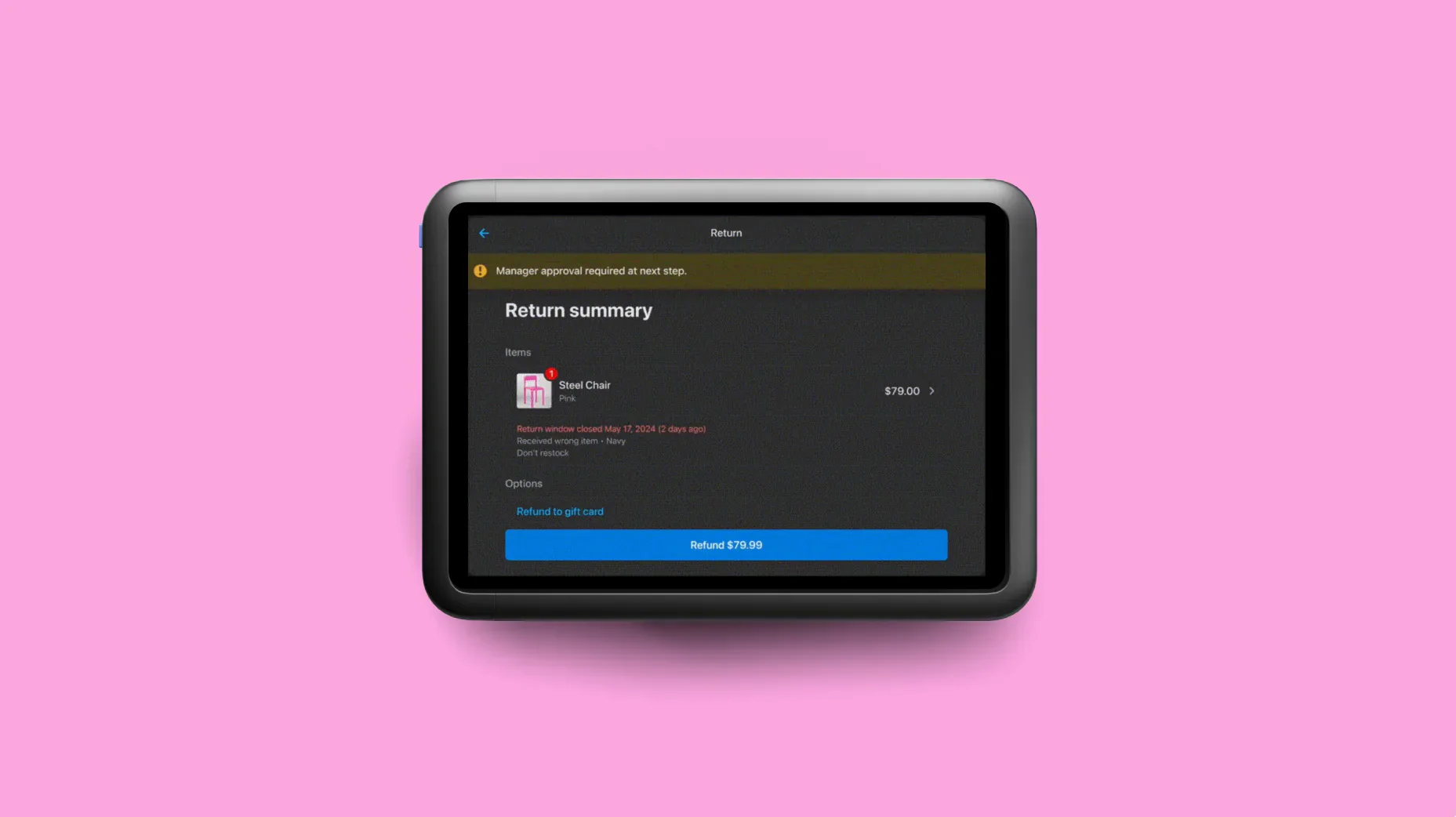
  • Staff permissions: Set granular roles (e.g. sales associate, shift supervisor, manager) to limit who can process refunds, apply discounts, or modify inventory.
  • Unique PINs: Each employee uses a secure, individual PIN to log in. Every sale, refund, or void is tracked to that person, so there’s always a clear trail.
  • PIN reentry during checkout: If an error occurs or a checkout is canceled, the system requires a PIN to resume, blocking opportunistic misuse.
  • Access control: Team members can’t log into the POS unless a properly credentialed user signs in first, preventing unauthorized use when unattended.

For example, you could configure Shopify POS so baristas can take payments, check inventory levels for beans and milk, and print receipts—but only the floor manager can issue refunds over $25, override happy hour pricing, or apply a staff discount above 15%.

For ecommerce sales, Shopify Protect pairs with Shop Pay to safeguard your store against fraud and chargebacks. Together, they offer 72% higher conversion rates than traditional checkout methods and free chargeback protection on eligible US-based Shop Pay orders (includes the full order value and chargeback fees).

Both Shopify Protect and Shop Pay are included for free as part of Shopify Payments, the easiest way to get paid directly through your Shopify store at no extra cost.

By enabling Shopify Payments, you gain access to:

  • 3D secure checkouts
  • Advanced fraud analysis
  • Automated dispute resolution
  • A wide range of popular payment methods, all backed by PCI-compliant infrastructure

Key benefits of an integrated POS system

The average shopper today can hit more than 50 touchpoints before making a purchase. That includes everything from browsing a website and checking reviews to visiting a store and asking a question via chat.

They’re not thinking about sales channels—they just experience one unified brand experience. 

An integrated POS system brings your online and offline operations together, so you can sell everywhere, manage everything, and clearly understand what’s working.

Unify online and in-store sales

When your online and retail storefronts don’t talk to each other, you risk out-of-stock orders, delayed fulfillment, inconsistent pricing, and messy customer experiences.

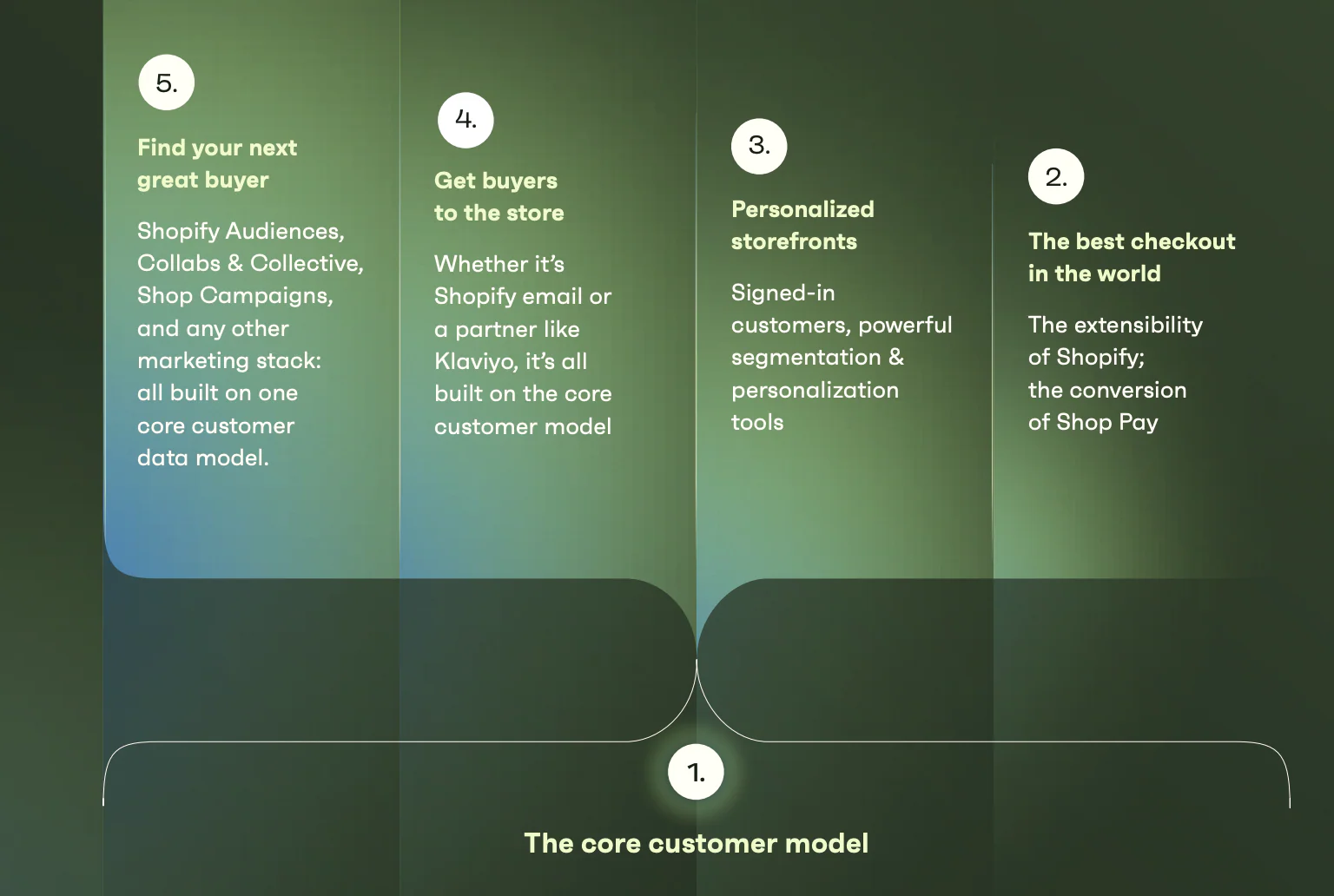
From the moment someone shares an email or phone number, Shopify builds a unified customer profile that captures everything they do: what they browse, what they buy, where they order from, and who they talk to in-store.

Visual flowchart shows how Shopify's core customer model powers the full marketing funnel.
The core customer model built on Shopify.

That means you can personalize the experience even before the first purchase. And every data point after, from loyalty points to product quiz answers, flows into the same customer profile.

With POS data analysis, you can personalize at scale. Shopify enhances data collection and segmentation to deliver a higher return on marketing spend. In fact, Shopify POS enables an 8.9% average GMV increase through unified commerce.

Shopify POS retailers also report 150% quarterly growth in omnichannel sales thanks to consistent, personalized customer experiences.

Case in point: Astrid & Miyu.

When this fast-growing jewelry brand struggled with fragmented customer data, they migrated from Adobe Commerce to Shopify. They now have a single view of customer behavior across all channels, leading to a fivefold increase in customers purchasing four times or more when shopping omnichannel.

Molly Allen, senior ecommerce manager at Astrid & Miyu, says: “Shopify’s big singular view of our customer is the secret power to scaling fast and managing international growth.”

Centralize inventory management

Inventory management is the lifeblood of retail. Get it right, and you’ll avoid stockouts, dead stock, and customer complaints. Get it wrong, and you’re either refunding disappointed buyers or losing money with dusty shelves.

But managing inventory across multiple locations—whether storefronts, back rooms, warehouses, or growing ecommerce channels—can quickly spiral out of control. When data is scattered, you can’t tell what’s in stock, what’s selling fast, or where to replenish. 

The fix is a single source of truth for your inventory data.

Shopify POS connects your in-store and online sales to a unified inventory system. Every transaction updates your stock levels in real time, so you’re never flying blind.

In 2021, The Rugged Society launched both a brick-and-mortar store and a Shopify site—but kept SumUp POS. That setup quickly fell apart. After switching to Shopify POS, their inventory now updates in real time—with impressive results:

  • 20% jump in order volume
  • 10% higher average order value

Our inventory syncs across our Shopify site and POS system in real time, which saves us a lot of time.

Emanuelle Nardoni, Cofounder, The Rugged Society

Streamline staff management

Retail teams need structure, especially when juggling seasonal hires, multiple locations, and high transaction volume. The wrong system creates bottlenecks. The right one keeps operations running smoothly.

According to McKinsey, retailers in the top quartile for employee experience are twice as likely to rank in the top quartile for customer experience outcomes.

Shopify POS Pro provides built-in tools designed to streamline team management at scale:

  • Role-based access control: Assign roles by job function so staff permissions are consistent, secure, and simple to manage.
  • Custom staff permissions: Limit what each team member can do—from who can issue refunds to who can apply discounts.
  • Unlimited POS-only staff accounts: Add as many staff members as you need, at no additional cost.
  • Sales attribution tracking: Know exactly who made each sale to recognize top performers and tailor training where it’s needed.
  • Location-specific management: Run multiple stores while keeping teams organized and performance data clean.
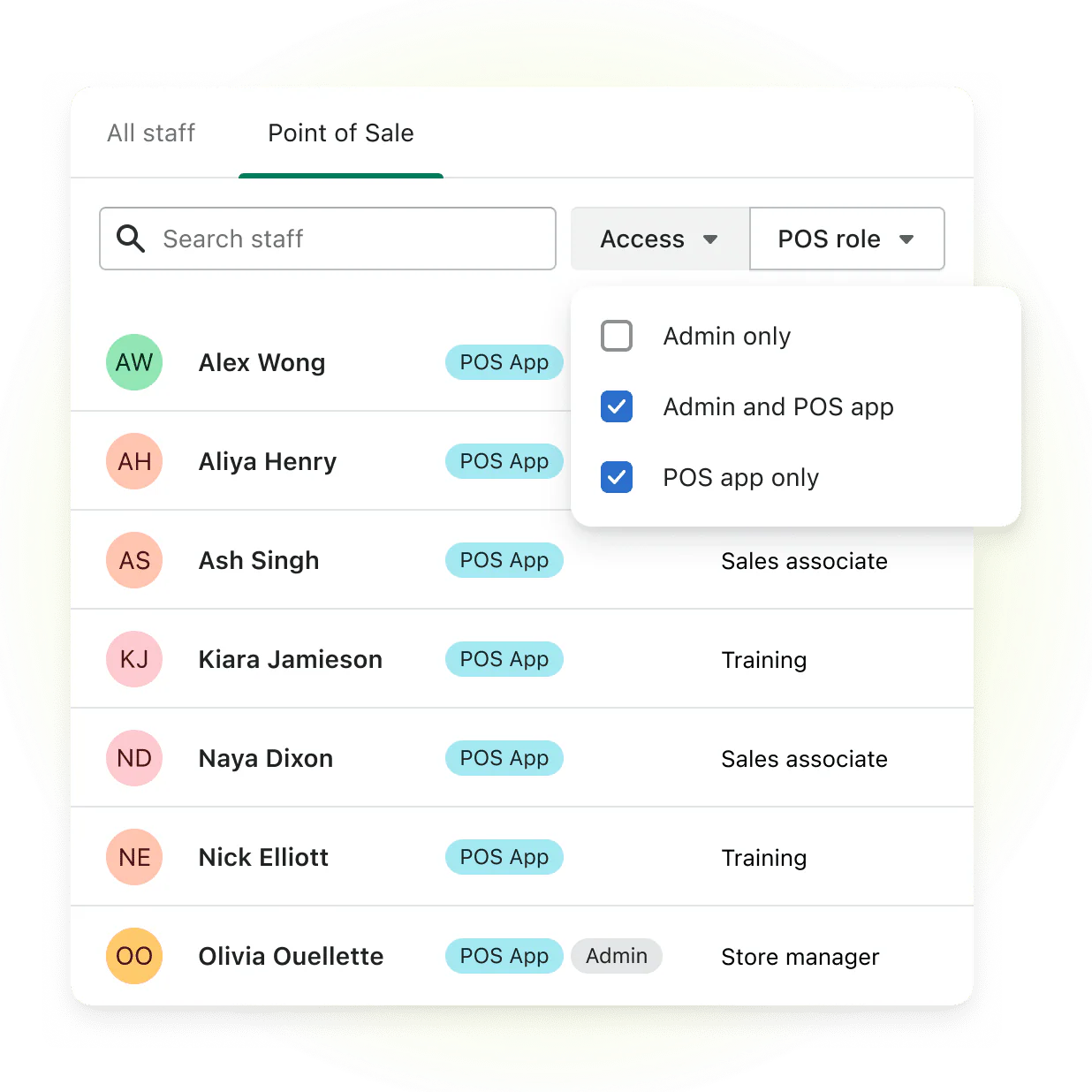
Shopify POS staff management interface, showing a list of employees with their assigned roles, access levels, and app permissions.
Manage staff permissions within Shopify POS.

Shopify’s unified approach has been proven to save retailers the labor cost equivalent of 0.4 full-time employees per store, reduce total cost of ownership by 22%, and boost GMV by up to 8.9% through operational efficiency alone.

Take Starlight Knitting Society. After switching from fragmented tools to Shopify POS, they slashed daily admin time and trained seasonal staff in minutes, not days.

Owner Melissa Nelson says: “My team now has time to beautify the shop, make samples, and personal shop for folks via email or phone. They told me that the time that switching to Shopify freed up for them felt like they were getting a bonus.”

Access unified reporting and analytics

Disconnected data makes it hard to see what’s really driving sales. Shopify’s Analytics dashboard brings all your performance data into one place, so you can track recent activity, understand customer behavior, and make sharper decisions across sales, marketing, and merchandising.

Use it to:

  • See which landing pages convert best and focus efforts there
  • Analyze which products are frequently bought together
  • Identify sales trends, top-performing channels, and visitor behavior in real time

Shopify POS also integrates with tools like ShopifyQL Notebooks, giving you a flexible, SQL-powered way to answer deeper business questions, like which products sell best by region or time of day.

And because everything is updated instantly, you can respond faster, coach better, and make smarter inventory decisions, without waiting for batch reports or spreadsheets.

How to choose the right POS system for your business

The right system keeps your inventory in sync, your staff on point, and your customers coming back. The wrong one adds friction, creates silos, and slows growth. 

Here’s how to pick a POS that actually works for your business.

Assess your core business needs

Start by mapping your daily business operations. 

Ask:

  • Do I need to manage both online and in-person sales from a single system?
  • How complex are my inventory, staffing, and customer service requirements?
  • What’s my average transaction volume, and do I need mobile or multi-location support?

A clothing boutique has very different needs than a café or salon, so make sure the POS system you choose is tailored to your industry.

Compare features and integrations

Look for systems that integrate with the tools you already use, like accounting software, email marketing apps, or loyalty programs. 

Unified systems reduce manual work, prevent data silos, and help you act quickly on customer insights.

Ask:

  • Does this POS system integrate with my ecommerce platform, CRM, and marketing tools?
  • Can I customize roles, permissions, and checkout workflows to match my operations?
  • How easy is it to sync inventory, sales data, and customer profiles across channels?

Shopify POS integrates directly with apps like Klaviyo, QuickBooks, Smile.io, and more, giving you one system of record across your business. Plus, with POS UI extensions, Shopify developers can build custom functionality directly into the POS app. This allows merchants to tailor in-store workflows, integrate third-party tools, or add custom app experiences—all with a seamless, native feel.

📚Read:POS System Requirements Checklist (2025)

Plan for future growth

Your POS system shouldn’t just work for where you are today—it should also support where you’re going next. Whether that’s adding new store locations, expanding online, or launching international sales, look for a platform that scales with you.

  • Will this system scale with me if I open new stores or expand internationally?
  • Does the provider offer support for features like loyalty programs, upselling, and omnichannel selling?
  • What’s the total cost of ownership (TCO)—including hardware, fees, support, and add-ons—over the next three years?

💡The Shopify POS total-cost-of-ownership advantage: According to an independent research study, Shopify POS delivers a 33% better total cost of ownership on average compared to competitors. 

What’s the best POS system for unified commerce?

If unified commerce is your goal, Shopify is the clear frontrunner.

Forbes Advisor listed Shopify as the number one choice for the best POS system of 2025, with the highest rating on the list: 4.8 out of 5 stars. 

And it’s not hard to see why Shopify POS leads the pack:

  • A single source of truth for your entire business: Shopify is the only platform that truly unifies your online and retail operations in one place. Customer profiles, inventory, orders, returns, and sales data all live in the same back office.
  • Payment processing without the profit drain: Fees typically range from 1.5% to 3.5%, but in some cases, they can creep up to 6% of the total transaction. Shopify Payments helps protect your margins by eliminating the need for a third-party processor. Fees remain competitive, ranging from 2.4% to 2.9% plus a flat $0.30 per transaction, depending on the purchase method. 
  • Inventory management that keeps up with you: Forecast demand, track low inventory, automate purchase orders, and count stock across your stores, warehouse, and online shop. And since everything syncs in real time, there’s no need to worry about overselling or phantom stock.
  • Scales with your ambition: New stores can be set up in days, staff can be trained quickly with the intuitive interface, and everything, from payments to product management, can be controlled from a single system.
  • Built-in tools for unified growth: Tap into features like:
    • Shopify Audiences to build data-powered ad segments and lower customer acquisition costs
    • Shopify Collective to expand your product catalog by selling goods from partner merchants, with no inventory risk

“Unifying our commerce stack on Shopify has noticeably improved our omnichannel customer experience and our bottom line,” says Guillaume Jaillet, chief omnichannel officer at Frank And Oak. “We’re spending less on technology, there’s greater synergy between our sales channels, and we’re cultivating more loyalty and engagement at every level of interaction.”

Make the switch to a POS system provider that works with you, not against you.

What is a POS system FAQ

What is an example of a POS system?

A retail POS system like Shopify POS lets you accept payments, manage inventory, track sales, and handle customer data—all in one place, whether you’re selling in-store, online, or on the go.

What is a POS in Shopify?

Shopify POS is Shopify’s point-of-sale app-and-hardware solution that connects your online and offline sales. It lets you sell from a retail store, market stall, or popup, with inventory, customer profiles, and sales data synced across all channels.

What is the main purpose of using a POS system?

A POS system lets you ring up sales, accept payments, apply discounts, and track every transaction in real time. It also helps you manage stock levels, sync inventory across locations, and capture customer data for future marketing.

How to Source Fabric for a Clothing Line in 2025 (Even with Low MOQs)

Software Stack Editor · August 23, 2025 ·

.tg {border-collapse:collapse;border-spacing:0;}
.tg td{border-color:black;border-style:solid;border-width:1px;
overflow:hidden;padding:9px 15px;word-break:normal;}
.tg th{border-color:black;border-style:solid;border-width:1px;
font-weight:normal;overflow:hidden;padding:9px 15px;word-break:normal;}
.tg .tg-wp8o{border-color:#000000;text-align:center;vertical-align:top}
.tg .tg-wkkj{background-color:#efefef;border-color:#000000;
font-weight:bold;text-align:center;vertical-align:top}

The right fabric can make or break your clothing line. It’s the difference between a shirt customers wear for years and one they set aside after wearing it once.

In 2025, fabric sourcing is more complex than ever. Brands are competing for mill space, supply chain delays can throw off launch dates, and shoppers are looking for sustainability as much as style. 

Ahead, you’ll learn the five-step process to finding the perfect materials—from comparing common textile types and suppliers to the key questions you should ask before signing a contract.

What is fabric sourcing?

Fabric sourcing is the process of finding and sourcing the right cloth for your products. It includes drafting material specs, requesting swatches, negotiating minimum order quantities (MOQs), and coordinating freight so rolls arrive on time and in good condition. 

Production lead times can range from 8 to 24 weeks, depending on your supplier location and production capacity. Choosing the right textiles can help you stay on budget and launch product lines more efficiently.

Meet the point of sale for every sale

Only Shopify unifies your sales channels and gives you all the tools you need to manage your business, market to customers, and sell everywhere in one place — in store and online.

Discover Shopify POS

How to source fabric in five steps

  1. Understand the basics of fabric
  2. Define your sourcing strategy and budget
  3. Decide on the right type of fabric supplier
  4. Find fabric suppliers
  5. Vet suppliers and test for quality

1. Understand the basics of fabric

Before you can source fabric effectively, you need to understand how it’s made and which types work best for your product. While fabric can be constructed in many ways, two commonly used construction types are knitted and woven. 

Knitted vs. woven fabrics

Knitted fabrics are typically lightweight and comfortable, requiring minimal care to maintain their appearance. They resist wrinkles and work well for soft tops, bottoms, undergarments, and activewear. 

There are two ways you can make knits:

  1. Weft knit or hand-knitted fabric: A single yarn looped into horizontal rows, each building on the previous row
  2. Warp knit: Multiple parallel yarns looped vertically at the same time to form the fabric

👉 Learn how Starlight Knitting Society saves over 20 hours per week with Shopify POS.

Woven fabrics are made by interlacing two or more sets of yarn at right angles on a handloom or power loom. They’re generally more opaque, abrasion-resistant, and less stretchy than knits. The higher the thread count, the stronger the fabric. Best uses include denim and formal pants, button-down shirts, and jackets.

Two classifications of woven fabrics are:

  1. Basic or simple weaves: Plain weaves, twill weaves, and satin weaves
  2. Complex or novelty weaves: Dobby weaves, jacquard weaves, and piqués (like a men’s polo t-shirt)

Common fabric fibers and their characteristics

Multiple rolls of colored fabrics sit stacked on shelves.

Once you’ve settled on knit or woven construction, the next decision is the fiber itself. Here’s how the most common types feel, function, and are used for different apparel products:

  • Cotton: Soft, breathable, and easy to care for. Still the world’s leading natural fiber with 24.4 million metric tons used in 2023, according to a recent Textile Exchange market report. It’s used in everything from t-shirts to denim. 
  • Polyester: Wrinkle-resistant, fast-drying, and inexpensive. It now makes up 57% of all global fiber production, so blending it with naturals can improve durability without breaking the budget. 
  • Wool: Crimped animal fiber that traps air for insulation, wicks moisture, and naturally resists odor. It’s ideal for premium knits, outerwear, and performance base layers.
  • Silk: Luxuriously smooth filament with unmatched drape and sheen. It’s prized for high-end blouses, linings, and occasion wear but requires delicate care.
  • Linen: Flax-based, exceptionally cool and strong. It’s used to make crisp handmade suits, summer shirts, dresses, and home textiles.
  • Nylon: Lightweight yet tenacious synthetic, abrasion-resistant and quick-drying. Nylon is a staple for activewear, swimwear, and outer shells.
  • Rayon/viscose: Cellulosic fiber that mimics the softness of cotton with a silk-like drape. It works well in fluid dresses but weakens when wet, so blends are common.
  • Lyocell (Tencel): A sustainable, closed-loop fiber made from wood pulp. Known for its silky feel and moisture management. It’s good for luxe basics and loungewear.
  • Elastane (Spandex/Lycra): Stretches up to five times its length and snaps back. It’s added in small percentages to almost any fabric to improve comfort and shape retention.

2. Define your sourcing strategy and budget

Next, you’ll want to create guardrails for your sourcing process. Defining your strategy early helps you stay within budget and avoid production delays. Figure out these three numbers to start:

  1. Unit cost target: Fabric drives between 60% and 70% of a garment’s total cost. Set a limit per yard so you can still hit your profit margins.
  2. Order volume: MOQs differ by country and supplier. For example, in Portugal, standard MOQs range from 100–300 pieces, or one full roll per color. Order less and the price per unit increases.
  3. Lead-time tolerance: Work backward from your target delivery date. The latest US manufacturing survey puts average production material lead times at 85 days. Account for supplier production and shipping windows, plus a buffer. 

Once those numbers are in order, you can decide:

  • Where to source: Local mills can ship fabric faster but cost more; offshore mills cut costs, but have longer transit times and higher import duties. 
  • Certifications to pay for: Choose fabrics with certifications like GOTS (Global Organic Textile Standard) for organic materials, OEKO-TEX for chemical safety, or bluesign for environmental protection. These can align with sustainability goals and justify a price premium.
  • How to manage price swings: Lock contracts at fixed rates, split orders across regions, or add escalation clauses tied to commodity indexes.

3. Find the right type of fabric supplier

Finding reliable fabric suppliers is critical when starting a clothing line. Find partners that can guarantee the stock you need with on-time delivery. 

There are four types of fabric and textile suppliers, each defined by how they operate and what kind of fabric they stock.

Fabric mills

Fabric mills produce made-to-order fabrics and often require substantial MOQs. Minimums start at one full roll (≈100 meters) per color, and weaving and finishing typically adds 6–10 weeks.

Best for: Established brands or growing labels that need consistent, large-volume orders with full customization

Converters 

Converters purchase unfinished fabrics (greige goods) from the fabric mill. Then, they finish the fabric by dyeing, printing, or washing before resale.

Best for: Brands that want more color or print variety than a mill’s standard offering, without committing to the mill’s large MOQs

Jobbers

Jobbers sell leftover fabric from converters and mills, often at reduced prices. They typically don’t restock a fabric, color, or print once it has sold out. Keep in mind that you may not be able to reorder the same fabric twice from this type of fabric supplier.

Best for: New brands, small runs, or limited-edition collections where low MOQs and cost savings outweigh the need for ongoing fabric availability

Sourcing agents 

Sourcing agents act as an extension of your team for vendor sourcing. They match you with vetted mills, negotiate prices and MOQ, arrange quality control, and even coordinate freight. Agents often charge a commission fee of between 5% and 10% on the purchase order. Some also pool orders from multiple small brands to hit mill minimums, giving you access to fabrics otherwise out of reach and better supplier relationship management. 

Best for: Brands manufacturing overseas or seeking access to mills and fabrics they couldn’t secure on their own

4. Find fabric suppliers

Sourcing fabric in person at fabric trade shows allows you to see and touch the materials. You can also find fabric suppliers online and order fabric swatches (also known as samples). Depending on the fabric mill, they may charge you a fee, usually around $5 to $10 for each fabric hanger. 

Trade shows

Fabric trade shows can be overwhelming, with hundreds of supplier booths to explore. 

To save time, research the exhibiting fabric mills in advance and list your top 10 suppliers to visit. Leave extra time to discover new fabric and textile suppliers you didn’t find online.

Here are two fabric trade shows to start with:

  1. The Fabric Shows: Ideal for small quantity fabric orders. Many of the fabric suppliers are US-based or have US showrooms.
  2. Texworld: A significant international trade show with many overseas exhibitors from China, India, and other regions. 

👉 Here’s a list of textile trade shows in the US in chronological order. 

Online marketplaces and directories

If you can’t attend a fabric trade show, start with the event websites to identify suppliers that meet your criteria. Many suppliers publish fabric catalogs online—like Mood Fabrics and Fabric Wholesale Direct. 

You can also browse fabric and textile suppliers directly through marketplace platforms and directories.

Here are a couple of platforms to check out: 

  1. Alibaba: Connect with tons of global fabric and textile suppliers for everything from wool to sequins, silk, and bamboo. 
  2. Faire: Lists offers from over 100,000 wholesale brands, including many fabric and textile suppliers. 

5. Vet suppliers and test for quality

Three pieces of fabric with different geometric patterns sit on a wooden surface.

A low price isn’t enough. Suppliers must also meet quality, safety, and ethical standards—and be able to prove it. 

Start by requesting their current ISO 9001 certification and textile safety labels, such as OEKO-TEX STANDARD 100. For product categories that come into contact with skin (such as cosmetic-adjacent fabrics or coated textiles) confirm they can provide toxicology data that complies with US FDA guidance.

Next, screen for legal and ethical risk. For example, US Customs presumes any goods linked to the Xinjiang Uyghur Autonomous Region (XUAR) in China are barred under the Uyghur Forced Labor Prevention Act, so require traceable sourcing documents before production starts. In the EU, prepare for the upcoming Digital Product Passport/Ecodesign Regulation, which will require scannable supply chain data at the product level starting in 2027.

Test before you commit:

  • Order control samples from a shortlist of suppliers.
  • Date and sign samples for reference.
  • Test in a lab for shrinkage, colorfastness, and tensile strength.

If you’re using a sourcing agent, make sure their commission covers factory audits, lab test coordination, and at-origin inspections. Reputable agents often bundle these services and share detailed reports. 

Webinar: How Apparel Brands Can Grow with the Right POS

Discover how a seasoned Shopify launch engineer and a luxury apparel brand CFO use Shopify POS as a bona fide business tool, from inventory management to omnichannel strategy.

Watch now

Sustainable and ethical fabric sourcing

Sustainability is more than a trend; it’s a priority for many consumers and a competitive advantage for brands. The sustainable fabrics market topped $33 billion in 2024 and is forecast to grow 13% annually through 2037. Today, 54% of global consumers say they’ll pay a premium for sustainable products, up from 35% two years ago, according to Simon-Kucher’s Global Sustainability Study.

What to look for in sustainable fabrics

Choosing sustainable fabrics like organic cotton, bamboo, or recycled polyester aligns with eco-conscious values and can elevate your brand’s reputation. Focus on:

  • Proven fiber origins: Verify that raw material claims are backed by data. For instance, only 28% of the world’s cotton was grown under recognized sustainability programs in 2023, so “organic” or “BCI” labels should be traceable back to the farm level.
  • Recycled or regenerative content: Recycled polyester, FSC-certified lyocell, or wool certified to the Responsible Wool Standard (RWS) reduces reliance on virgin resources and cuts embedded carbon.
  • Low-impact processing: Look for mills that use dope-dyeing, closed-loop cellulose production, or wastewater-treatment systems that meet ZDHC MRSL limits to reduce toxins and conserve water.
  • Full supply chain transparency: Platforms such as Textile Exchange’s Trackit let you audit every tier, from gin to garment, to meet regulations like the EU’s Corporate Sustainability Due Diligence Directive.
  • Realistic MOQs and lead times: Sustainable options may have higher minimums or longer dye windows. Negotiate early so your calendar and cash flow can account for them.

Key certifications

When sourcing sustainable fabrics, look for certifications that verify ethical and eco-friendly practices: 

Some clothing brands also source repurposed fabrics—like Preppy Collective, which buys items from thrift stores and turns them into new products. Highlighting these sustainable practices in your marketing can help you connect with eco-conscious customers.

Key questions to ask fabric suppliers

Many brands create a spec sheet template that lists specific information about each fabric quality. Sometimes, the fabric manufacturer may already have a spec sheet they can share with you. These 10 questions help you confirm product details and business terms while sourcing materials for your clothing line—before committing to an order.

About the fabric specifications

1. What is the fabric article or item number?

Fabric manufacturers assign an article or item numbers to each fabric they sell. The fabric article number is usually found on the fabric hanger and is used when you order samples or bulk fabric yardage. 

2. What is the fabric weight (GSM)?

It’s important to consider the fabric weight of each garment you design. You probably won’t use the same fabric weight for every product in your collection. 

Often, bottoms use a heavier-weight fabric than tops, but it depends on how you want the fabric to drape or lay on the body. Fabric weight is listed in grams per square meter (GSM or GR/M2). 

Below are common GSM ranges for different knit garments: 

Apparel Item Common GSM Range
Activewear leggings and sports bras 200–300 GSM
Lounge pants 180–250 GSM
Standard t‑shirts 130–180 GSM
Lightweight t‑shirts ≤130 GSM
Hoodies and sweatshirts 280–350 GSM
Jeans and denim 300–450 GSM

💡 Note: These fabric weights are rough guidelines. The fabric weight you choose may vary for your clothing line. 

3. What is the fabric content? 

Fabric content refers to the makeup of the fibers used to knit or weave the fabric. Commonly used fibers are rayon, cotton, polyester, and silk. 

4. What is fabric construction?

Fabric construction refers to how yarns and fibers are converted into a piece of fabric that will be used to make an end product. 

Fabric characteristics are determined by the materials and methods used to construct the fabric. Most fabric production uses interlacing methods, such as weaving or knitting.

5. What’s the fabric width (total and cuttable)?

Fabric width measures the fabric roll width from edge to edge. Fabric suppliers will provide two measurement points—if they don’t, ask for it. 

  1. Total width: The full measurement from one edge of the fabric to the other
  2. Cuttable width: The usable width after excluding edges that may be skewed or damaged during production and transportation

When calculating yield, refer to the cuttable width for a more precise measurement of usable fabric. 

About the business terms

6. How much does the fabric cost per yard/meter (sample yardage and bulk yardage)?

Depending on your target retail price for the garments you sell and the fabric yield for each garment, you can determine your target fabric price per yard or meter for each fabric. Remember this target price when sourcing new materials to ensure you’re within your budget. 

Fabric pricing per yard or meter can change yearly, depending on the market and the cost of resources used to make the fabric. Buying in bulk typically costs less per yard than purchasing sample yardage. 

You can ask the wholesale fabric supplier for their sample and bulk price per yard. The cost per yard for sample fabric can be $3 to $5 more, sometimes double the bulk yardage price. 

7. What is the MOQ?

Minimum order quantity (MOQ) refers to the smallest amount of fabric yardage you must buy per order from a supplier. Most mills have an MOQ for sample yardage (usually at least five yards) and a different MOQ for bulk yardage. 

Depending on the supplier, bulk fabric yardage MOQs vary. For example, if a supplier has an MOQ of 500 yards, you must purchase at least that amount to work with them. 

Some suppliers allow you to apply the bulk MOQ across multiple colors of the same fabric quality. Others may agree to a reduced MOQ with a price surcharge. Applying the MOQ across more than one color is a way to maximize your buying options if you cannot buy 500 yards of one color. 

8. How long is the fabric delivery lead time?

The time between placing a fabric order and receiving it is the fabric delivery lead time. 

Some wholesale suppliers keep stock of the fabric they sell, resulting in a quick turnaround from order to delivery. Others have lead times of four to eight weeks or longer. Ask for lead times for samples and bulk yardage. Sample yardage often arrives sooner.

9. Where is the country of origin?

The country of origin (COO) is where the fabric is produced and shipped from. This information must go on the inside label of your garments and can affect the cost of your fabric if there are tariffs or import duties.

10. What are the fabric care instructions?

Fabric care recommendations vary based on fabric type, fabric content, and construction. Some fibers get damaged in high heat or have higher shrinkage rates in the dryer. Other fabrics, like silk, are often dry clean only. 

Manufacturers provide fabric care instructions to preserve the fabric’s integrity over time. 

Common challenges in fabric sourcing

Sourcing the perfect fabric can be a complex process. Here are some of the most common challenges brands face when sourcing fabric and tips to overcome them.

Next to a pile of fabrics, a hand reaches into the frame to order vintage dress patterns.

Navigating high MOQs as a small business

MOQs can be an obstacle, particularly for smaller brands or new fashion lines. Many fabric mills require large MOQs, often exceeding production needs and budgets for cash-strapped businesses.

For smaller quantities, consider working with jobbers who specialize in selling surplus fabric at a lower MOQ. Alternatively, some suppliers may allow you to meet the MOQ across multiple colors of the same fabric or agree to a reduced MOQ with a price surcharge. It’s worth trying to negotiate. 

Ensuring consistent quality

High-quality fabrics are critical to your reputation and customer satisfaction, but quality assurance is always a gamble when outsourcing from third-party vendors. Inconsistencies can derive from factors outside your control, such as manufacturing, storage, or shipping.

Always start with swatches or sample yardage to test for shrinkage, colorfastness, and other performance factors before you place a full order. 

Perform wear tests and washing trials to see how the fabric holds up over time. If possible, work with a third-party lab to verify that the fabric meets your standards before production.

Provide suppliers with clear specifications, including the fabric’s weight, content, and care requirements. Make sure to also request a spec sheet for every order.

Building strong supplier relationships

Building and maintaining strong relationships with suppliers can lead to better pricing, shorter lead times, and priority access to new materials. But building that trust can be challenging, especially when working with international partners or during supply chain disruptions.

Maintain open and transparent communication about your needs, expectations, and timelines. When working with overseas suppliers, take time to understand cultural differences and business practices; this can go a long way toward a better working relationship.

Suppliers are more likely to prioritize your orders if they see potential for an ongoing partnership.

💡Tip: Shopify merchants can manage vendor information directly in the Shopify admin. You can track details like which vendor supplies which items, sales trends, and vendor performance, allowing you to make data-driven decisions about working with suppliers. You can even display your vendors on your online store if you want. 

Unify your inventory management with Shopify

Only Shopify POS helps you manage warehouse and retail store inventory from the same back office. Shopify automatically syncs stock quantities as you receive, sell, return, or exchange products online or in store—no manual reconciling necessary.

Discover Shopify POS

Glossary: Key fabric sourcing terms

Like most industries, the fashion industry has its own language for sourcing and manufacturing. These retail terms can help you navigate fabric sourcing like a pro. 

Fabric hand

Fabric hand refers to the way the fabric feels when you touch it with your hand. There are no definitive fashion industry descriptors for fabric hand, but commonly used words to describe fabric hand are soft, cool, dry, and silky.

Selvage

The selvage is the finished edge of the fabric. It keeps the fabric from unraveling and fraying. The selvage runs the entire length of the material. 

Fabric grain

The grain line of the fabric is broken up into three categories:

  1. Lengthwise grain (warp) refers to the threads that run parallel to the selvage.
  2. Crosswise grain (weft) refers to the threads that run perpendicular to the selvage or along the cut edge of the fabric. 
  3. Bias grain is technically not a “grain.” It’s the 45-degree angle between warp and weft grains. Cutting your fabric on the bias results in more stretch and can be used anywhere you need the material to drape more smoothly over a curve.

Fabric drape

Drape refers to how the fabric hangs or falls on the body. It determines whether a garment hugs the body or hangs away from it.

Fabric hanger 

A fabric hanger, also called a fabric header, serves as a sample. It’s a small fabric cutting for buyers to see and feel the material firsthand. You can also use a swatch as a reference during the design process. 

Sample yardage

Sample yardage is the fabric you order when designing and developing samples. Typically, it costs more per yard than bulk fabric yardage that you buy for production. Most fabric suppliers require a five-yard minimum order for sample yardage. 

Bulk yardage

Bulk yardage is the larger quantity of fabric ordered after garment designs are approved. Depending on the supplier, there may be sizable minimum order requirements, or you can order a small quantity at a higher price per yard.

Greige goods

Greige is an unfinished woven or knitted fabric in its raw state before being bleached, dyed, or printed. 

Shrinkage

Shrinkage is when fabric becomes smaller than its original size, usually after washing. It’s typically measured as a percentage, and tolerance levels should be determined before you go to production.

Fabric sourcing FAQ

What does “sourcing” mean in clothing?

In apparel, sourcing is the process of turning a fabric brief into rolls of cloth in your warehouse. It involves writing material specifications, ordering swatches, agreeing on MOQs and prices, and booking freight so the goods arrive at your cutting table when production begins.

How do you source wholesale fabric?

  1. Understand the basics of fabric: Learn how knits, wovens, and key fibers behave so you can match material performance to your product’s fit, drape, and care needs.
  2. Define your sourcing strategy and budget: Set limits for target cost per yard, MOQ, and lead-time tolerance, so every quote aligns with your margin and launch calendar.
  3. Decide on the right type of fabric supplier: Choose between mills, converters, jobbers, or a sourcing agent based on your volume, customization needs, and continuity requirements.
  4. Find fabric suppliers: Scout trade shows, vetted directories, and B2B marketplaces, then request swatches or hangers to compare options side by side.
  5. Vet suppliers and test for quality: Check ISO/OEKO-TEX certificates, lab-test samples for shrinkage and colorfastness, and schedule inline inspections before bulk production.

How do you find fabric suppliers?

Start with in-person shows like The Fabric Shows for low-quantity domestic stock or Texworld for hundreds of overseas mills. Then supplement with online catalogs from wholesalers like Fabric Wholesale Direct or platforms like Alibaba.

Where do small businesses get their fabric from?

Small businesses usually mix sources: jobbers and dead-stock dealers for prototype yardage, online wholesalers for quick replenishment, and sourcing agents who pool several brands’ orders to hit the 100–300-yard minimums common at European mills. As volume grows, they graduate to converters or direct mill relationships to lock better pricing and color continuity.

15 Essential POS Integrations for Retail Growth in 2025

Software Stack Editor · August 23, 2025 ·

For many retailers, the point-of-sale (POS) system is the system of record—meaning it’s the main system you use to run your business. This can lead to inefficiencies when data doesn’t flow smoothly across systems, leaving you with an incomplete or inaccurate picture of your business. To solve this, you may find yourself manually reconciling inventory and sales at the end of each day. 

POS integrations help make selling across multiple channels easier by sharing product, inventory, sales, and customer information between systems. If you want to run your entire business from one place, a point-of-sale system integration may be the ideal solution. 

In this article, you’ll learn what POS integrations are, how they work, alternatives to consider, and tips for connecting your offline and online sales with Shopify.

What is a POS integration?

A POS integration links your point-of-sale system with another platform to exchange data between them. When these platforms integrate, they share products, pricing, inventory, sales, and other data, giving you a unified view of your business. 

Shopify POS interface on a tablet and mobile device.
Use Shopify POS UI extensions to add extra functionality to your POS system.

How POS integrations work

An integrated POS system connects different business tools and platforms so they can share data. This typically involves connecting your POS system with other business software like loyalty programs, inventory management systems, or ecommerce platforms. 

How a POS integration works depends on the type of integration you use: 

  • Application programming interface (API): Most POS integrations work using an API, which acts as a bridge that lets two different software systems communicate and share data automatically. Think of it as a translator ensuring your POS and your accounting software understand each other. 
  • Middleware: Middleware sits between your POS and other software and translates or automates data flows between systems—no direct APIs or custom code are involved. 
  • POS apps: Some vendors (including Shopify) offer app marketplaces where you can install integrations that connect your POS to other platforms with just a few clicks. They’re easy to install, vendor-supported, and often come with documentation for quick setup. 

While some integrations are built directly by POS vendors, many others come from third-party developers and may require a subscription.

Shopify POS offers 22% lower TCO

See how Shopify POS reduces retail operating costs and increases revenue better than the competition, based on real data and research conducted by an independent consulting firm.

Get the report

15 essential POS integrations for your business

  1. Accounting software
  2. Inventory management
  3. Payment processing
  4. Ecommerce integration
  5. Email marketing
  6. Customer loyalty programs
  7. Product discounts and bundling
  8. Team scheduling
  9. Order fulfillment
  10. Returns and exchanges
  11. Reporting and analytics
  12. Receipt printing
  13. POS hardware
  14. Payroll
  15. Post-purchase feedback

Foundational integrations for all retailers

1. Accounting software

Syncing POS data with accounting software allows you to automate financial tasks like tracking sales, expenses, and taxes. This ensures accurate bookkeeping and simplifies the reconciliation process. 

For example, a retailer might integrate their POS system with accounting software to generate detailed reports and make tax filing easier.

2. Inventory management

Inventory management integrations save time and improve accuracy by eliminating manual stock updates. They provide real-time tracking, automatic replenishment, and tighter control to prevent stockouts or excess inventory. 

For example, a retailer might connect their POS with inventory software to track stock precisely, automate purchase orders, and optimize rotation.

Some inventory management POS integrations to try include: 

“Since we were already using Shopify for our online store, setting up Shopify POS for our first retail location was straightforward,” says Mitou Nguyen, senior product manager of fulfillment and operations at Babylist. 

“We were able to use our existing product catalog to set up our retail assortment quickly, and Stocky’s direct integration with Shopify gave us the inventory management tools our retail staff needed to properly track our retail inventory without needing additional development resources.”

Stocky dashboard showing items in low stock, lost revenue, and bestsellers.
Integrate Stocky with Shopify POS for advanced inventory management tools.

3. Payment processing

Taking payment from your customers is one of the most important parts of the checkout process. It needs to be as friction-free as possible—customers who can’t pay for their goods can’t leave with them. 

POS systems like Shopify have native payment processing features that accept multiple in-store payment methods, such as:

  • Cash
  • Credit and debit cards 
  • Contactless cards
  • Mobile wallets 
  • Buy now, pay later through Shop Pay Installments

Integrations for growth and marketing

4. Ecommerce integration

The best retail POS systems don’t just connect to your online store—they sync seamlessly, with built-in omnichannel selling and fulfillment features. 

POS integration with ecommerce allows you to synchronize inventory, streamline order processing, and provide a seamless omnichannel shopping experience for customers. You can let shoppers buy and receive products in whatever way works best for them. 

POS integrations also allow store staff to follow up with indecisive in-store shoppers by sending them email carts with products they considered. Think of it like an abandoned cart email—but for in-person shopping. 

Plus, you can use ecommerce POS integrations to create more offerings and features on your site for online shoppers:

  • Gift Card Hero enables the sale of gift cards.
  • Ordersify creates urgency by showing how many units are left and letting shoppers subscribe to low-stock and restock alerts. 
  • Shopify Discounts lets you incentivize shoppers with buy-one-get-one-free (BOGO) deals, percentage discounts, and coupon codes valid across channels. 

5. Email marketing

POS integration with email marketing platforms enables retailers to connect with customers more effectively. The integrated software can segment customers based on purchase history, send targeted promotional campaigns, and nurture customer relationships to drive repeat sales.

A beauty salon could send personalized follow-up emails after appointments, offering product recommendations or special discounts, for example. 

Some email marketing POS integrations to try on Shopify include:

💡Tip: Shopify creates a unified customer profile each time someone shares their email address with you. Use native segmentation tools to group customers by shared traits, then deliver personalized campaigns. 

“We identified the segment in Shopify, created a discount, communicated with them in a way that was very personalized, and we saw about 30% of those people convert,” says Alex Dashefsky, cofounder of Airsign.

Automation to send a marketing email when a new customer opts in.
Segment customers and automate email marketing with Shopify Email POS integration.

6. Customer loyalty programs

Integrating POS with customer loyalty programs allows you to reward repeat purchases, encourage brand advocacy, and gather valuable customer data for personalized marketing initiatives. Customers can redeem points for discounts or free products, fostering loyalty and boosting customer lifetime value (CLV).

Customer loyalty program POS integrations to check out on Shopify include: 

British bakery chain Lola’s Cupcakes, for example, uses the Smile POS software integration to operate Lola’s Love Club on Shopify. Because this data is unified within Shopify’s unified commerce platform, the brand can reward purchases made online or in-store. 

Since migrating to Shopify, Lola’s Love Club has welcomed over 10,000 new members to its loyalty program— while cutting its total cost of ownership by more than 50%.

“Shopify is very versatile,” says Lola’s managing director Asher Budwig. “You can design whatever you want with Shopify. It’s a very flexible platform that allows you to achieve what you like, and that’s what we need at Lola’s for our future.”

7. Product discounts and bundling

Discount and bundling integrations make it easy for retailers to run promotions that boost sales, clear excess inventory, and drive engagement.

For example, a supermarket could integrate its POS system with discount and bundling software to run BOGO deals on perishable items nearing their expiration date, cutting food waste while increasing sales.

Look into the following product discount and bundling POS integrations for your store: 

Integrations for operational efficiency

8. Team scheduling

Team scheduling software helps retailers in several ways. You can use these POS integrations to optimize staffing levels based on sales trends and peak hours, ensuring efficient labor management. 

A retail store might connect its POS with scheduling software to align shifts with expected sales volumes, avoiding overstaffing during slow periods.

Check out the following labor management software integrations for Shopify POS:

9. Order fulfillment

Integrating POS with order fulfillment systems streamlines the entire process, from order receipt to delivery, so orders are processed accurately and on time across online and offline channels.

A coffee retailer with both dine-in and delivery services might use POS–fulfillment integration to manage delivery and in-house orders side by side.

If you’re looking for an order fulfillment POS integration, consider the following: 

“The Shopify POS app allows customers to try and buy in our showrooms by generating an order in the Shopify Plus store that is processed the same way as our online purchases—it easily integrates into one system,” says Sebastian Feuss, company lead at Wildling. “Shopify POS enabled us to reach different customer groups without huge investments in new technologies.”

10. Returns and exchanges

Integrating POS with a returns management system like Narvar streamlines operations, keeping refund policies consistent and making returns easier for customers.

You can use these integrations to process returns in-store or online, issue refunds or store credits, and update inventory levels automatically.

💡Tip: Because Shopify brings POS and ecommerce together on one platform, you get a single source of truth for all order data. That makes it easier to offer omnichannel experiences. Online customers can browse, shop, return, and exchange items in-store (and vice versa).

Shopify POS return summary for a pink steel chair.
Process returns in-store for items bought online with Shopify POS.

11. Reporting and analytics

POS integrations unlock richer data, giving you insights into sales performance, customer behavior, and inventory trends to support smarter decisions and business growth. 

For example, a bookstore could integrate its POS system with analytics software to track bestselling titles, analyze customer demographics, and optimize marketing strategies based on sales data.

Shopify POS users should check out the following report and analytics integrations:

Women’s jewelry brand PDPAOLA leverages this type of POS integration to fuel their growth. “We use Shopify on a daily basis to monitor sales and key performance indicators, both in-store and online,” explains Miquel Cardona, chief business development officer. “The user-friendly way that this information is presented is so important, and it makes it easy to see what is working.”

12. Receipt printing

POS integration with receipt printing solutions lets retailers add branding, promotions, and personalized messages to receipts—enhancing the customer experience and promoting brand loyalty.

A retailer could use a POS–printer integration to add discount codes to receipts, encouraging repeat business.

If you’re in need of a receipt printing POS integration, check out the following options:

💡Tip: Shopify lets you print paper receipts with compatible hardware. Alternatively, ask for the customer’s email address to send a digital receipt at checkout. This saves paper and builds your email list for retargeting.

13. POS hardware

In many cases, you need to integrate POS software with compatible hardware devices. This might include:

  • Barcode scanners and printers
  • Card readers—both fixed and mobile 
  • Cash registers and drawers
  • Receipt printers
  • Device stands

Retailers often connect POS systems with hardware to support both staffed and self-checkout, speeding up transactions, cutting wait times, and improving the overall customer experience.

Shopify POS tablet with a customer-facing credit card machine.
Shopify POS integrates with a range of retail hardware to accept payments.

Specialized integrations

14. Payroll

Integrating POS with payroll software automates employee wage calculations based on sales data, reducing manual errors and saving time during payroll processing. 

For example, a restaurant chain could integrate its POS system with payroll software to calculate wages, including tips and bonuses, directly from sales data. 

For Shopify POS, Easyteam supports all types of payroll and includes features for sales performance and commissions. Gusto is another great option, offering comprehensive human resources (HR) software alongside payroll. 

15. Post-purchase feedback

POS integration with post-purchase feedback platforms helps you collect reviews, identify areas for improvement, and enhance the shopping experience.

This type of integration also supports automated post-purchase emails. Send review requests to customers after delivery to capture insights that improve service quality and product offerings.

Check out these post-purchase feedback POS integrations: 

“Customer support has improved because now that everything’s integrated in the same system, we can see orders so much faster,” says Tyler Medina, head of marketing at Backyard Butchers, on the brand’s migration to Shopify POS. “We can pull customer data so much faster, so our response times have shortened.”

POS integration vs. unified commerce: Which is right for you?

While POS integrations can connect different systems, relying on patchy middleware and third-party tools can inflate costs and create technical debt that hurts operational efficiency. 

“Our previous commerce tools for online and our POS system were not fully integrated,” explains Sofie Kuehnen, head of global retail operations at PAIGE. “We didn’t have a seamless customer experience from an order perspective, and our team was working really hard to try to create the image of that experience.”

A unified commerce platform like Shopify offers a fundamentally different approach. Your online store and POS system are built to work as one. It provides a single platform to manage your entire business from day one, where all your data—from both online and physical stores—flows to one system of record and updates in real time. 

From a single dashboard, you can:

  • Add and manage products
  • Set consistent pricing across channels
  • Fulfill orders from any location
  • Track inventory across all sales channels
  • Access complete customer purchase history
  • Customize your setup through apps and integrations

This unified approach eliminates the complexity of managing multiple integrations, reduces technology costs, prevents data silos, and provides the flexibility to adapt as your business grows. 

But don’t just take our word for it—data from a leading independent research firm found retailers using Shopify POS experience:

  • Up to 37% better total cost of ownership (TCO)
  • 20% faster implementation time
  • Up to 8.9% uplift in gross merchandise value

The future of retail: why unified commerce is no longer optional

New research shows businesses using unified commerce platforms like Shopify POS see 22% better total cost of ownership and 20% faster implementation. Learn what this means for your retail strategy.

Get the report

Key challenges of POS integrations (and how to solve them)

POS integrations add extra functionality to your point-of-sale system, but the setup and management process come with specific potential challenges:

  • Data-mapping issues: When inventory, customer, or order data doesn’t sync correctly or in real time, it can lead to overselling and inaccurate reporting. Regularly audit synced data for inconsistencies, choose integrations with well-documented APIs, and upgrade to platforms with real-time syncing.
  • Lack of vendor support: The initial POS integration setup can be complex—and many retailers don’t have the technical expertise in-house. Opt for POS integration companies that offer hands-on onboarding, integration specialists, and documentation to make setup smooth and train your team effectively. 
  • Security and compliance risks: Poorly secured integrations can expose sensitive data, putting you at risk of violating data laws and losing customer trust. Use role-based permissions, encrypted data transfers, and perform regular POS security audits to keep your data secure. 
  • Platform costs: Some POS vendors charge additional fees for each integration, which can quickly add up. This is lessened when your POS system has core components out of the box. Retailers using Shopify’s unified commerce platform, for example, report 34% lower data migration and transition costs on average.
Chart showing the components of Shopify’s commerce operating system.
Shopify unifies core commerce functions into one business “brain.”

Benefits of using a POS integration

Limit manual data entry for operational efficiency 

When your POS and ecommerce solutions are natively built on the same unified platform, inventory quantities automatically update whenever you make a sale online or in person. This saves you time on manual counts and reconciliations while reducing errors. 

Shopify merchant tokyobike has tapped into these benefits by integrating Shopify POS with their ecommerce site and other business tools. 

“There were things we wanted to do that we couldn’t, mostly around how we wanted to blend online and store experiences, show in-store stock availability online and offer order fulfillment like in-store pickup,” explains Juliana Di Simone, tokyobike’s partner and director. 

“The interaction between physical and digital should feel like a natural part of your customer experience. To do that, you need your systems to speak the same language. That’s why we use Shopify POS.”

Prevent stockouts and overselling

Integrating systems reduces the risk of overselling inventory online you no longer have. If you’re out of the size or color an in-store shopper wants, you can use integration features like ship-to-customer to close sales in-store and ship purchases to customers from your warehouse or another store location that has the item in stock. 

More comprehensive reporting

If you’re an omnichannel retailer, the last thing you want is data that’s siloed by the sales channel. You’ll spend countless hours in spreadsheets just to track the real-time data you need. 

POS integrations and data analysis give you a unified view of performance, letting you see the big picture or drill down: track inventory by store, measure revenue per channel, and spot which products are selling—or sitting. 

Offer better shopping experiences

Modern consumers expect a convenient shopping experience that lets them use any mix of online and in-store shopping. While bridging another POS system with your Shopify online store via an integration can work, it’s not ideal if you want to offer the best customer experience.

Shopify shines with its flexible approach, offering most core commerce functions out of the box while supporting a vast ecosystem of third-party apps that seamlessly integrate. This design ensures smooth data flow between systems, preventing communication gaps and delivering a unified experience for both businesses and their customers.

Increase repeat purchases

When all sales are unified, you can learn more about your customers, their shopping habits, and their preferences without exporting transaction data from two different systems. 

Use that data to create impactful retention marketing campaigns. With quick access to customers’ order history, you can offer more personalized service when they shop in-store and easily create tailored email campaigns that increase repeat purchases and boost lifetime value. 

Instant demo: See Shopify POS in action

Discover how Shopify POS helps you manage in-store and online sales from one powerful platform.

Try now

POS integrations FAQ

What does integrated POS mean?

Integrated POS, or point of sale, refers to the connection between a retailer’s POS system and other software or hardware solutions. It allows these tools to share data, streamlining processes such as inventory management, sales tracking, and customer relationships.

What is a POS connection?

A POS connection is the link between a point-of-sale system and other software, devices, or platforms. This connection transfers data between the POS and external tools, facilitating inventory synchronization, financial reporting, and loyalty programs.

Why do we integrate POS?

  • Spend less time on manual processes
  • Prevent stockouts and overselling
  • More comprehensive reporting
  • Prevent manual error
  • Offer flexible fulfillment options
  • Increase repeat purchases

Can I integrate my POS with Shopify?

Shopify’s POS integrations allow retailers to connect third-party apps with their POS system, including accounting, staff scheduling, loyalty, marketing, and payment-processing apps.

What POS works best with Shopify?

Shopify POS works best with Shopify because it’s built natively on the Shopify platform, so you can unlock unified commerce benefits right away. If you’re an ecommerce business expanding into in-person sales, Shopify POS combines inventory, orders, and customer data with your online channel.

How do I choose the right POS integration for my business?

  1. List your requirements
  2. Check compatibility
  3. Research vendors
  4. Analyze costs
  5. Make an implementation plan
  6. Train your retail team
  7. Roll out the new integration

What are the common challenges when integrating POS systems?

Security concerns, lack of real-time data synchronization, and lack of vendor support are the biggest challenges retailers face with POS integration. A unified commerce platform like Shopify solves these problems by providing core commerce functions out of the box.

What’s the difference between a POS integration and a unified platform like Shopify?

Traditional POS integrations require API, apps, or middleware to connect systems. Shopify’s unified commerce platform, however, comes with core components built in—no middleware required.

Profitability Ratios Explained: 8 Foundational Profitability Ratios (2025)

Software Stack Editor · August 22, 2025 ·

image

Profitability ratios help you assess your business’s health by quickly quantifying how well you use money to make money. It offers investors a quick way to gauge the potential value of their investment, and it helps lenders assess your company’s ability to repay loans. Here’s what you need to know about common profitability ratios and how it’s relevant for your business and its stakeholders.

What are profitability ratios?

Profitability ratios are measures of a business’s ability to generate profit or income relative to revenue, costs, assets, and equity. Lenders and investors use profitability ratios to evaluate the business’s efficiency in using their capital to generate that profit.

Profitability ratios come in two types: margin ratios and return ratios. Margin ratios compare profit to total sales or revenue, using figures from a business’s income statement. Return ratios compare profit to the money invested in the business in the form of debt and equity capital, which are found on the business’s balance sheet.

Higher profitability ratios generally indicate success in generating profit and deploying capital toward profitable uses. You can use profitability ratios to compare your business’s current and past performance, as well as against similar businesses. You may also compare your profitability ratios against a benchmark, such as an index for your industry or a broader stock market index.

Types of margin ratios

Margin ratios signify the margin, or degree, of a business’s profitability. Each subsequent profitability ratio shows a progressively lower level of profit as more categories of expenses are deducted from revenue.

Here are some key margin ratios:

Gross margin 

Gross margin, or gross profit margin, is the ratio of a business’s gross profit to its net sales or revenue. Gross profit is revenue minus the direct costs related to making products or services, known as cost of goods sold (COGS). The formula for gross profit margin, expressed as a percentage, is:

(Revenue – COGS) / Revenue x 100 = Gross Margin

Gross margin shows the basic profitability of a business’s production process before any other costs are taken into account.

For example, let’s say an online shoe company has $1 million in revenue in a quarter, and $400,000 in cost of goods sold, such as wholesale purchases of shoes for inventory. Its gross margin is:

(1,000,000 – $400,000)/$1,000,000 x 100 = 60%

Operating margin

Operating margin, or operating profit margin, is the percentage of revenue left after subtracting COGS as well as operating expenses, commonly referred to as selling, general, and administrative (SG&A) expenses or overhead. Since interest on debt and taxes aren’t yet counted, operating profit is sometimes called earnings before interest and taxes (EBIT). The operating profit margin formula is:

(Revenue – COGS – SG&A) / Revenue x 100

Using the hypothetical shoe retailer from above, let’s say it has $300,000 in operating costs (SG&A) in a quarter. Its operating profit margin then is:

($1,000,000 – $400,000 – $300,000) / $1,000,000 x 100 = 30% 

Pretax margin

The pretax margin measures profitability after all costs except taxes are deducted. It is determined by the following formula:

(Revenue – COGS – SG&A – Interest) / Revenue x 100

Pretax costs include interest payments, which (assuming IRS criteria are met) are tax-deductible for a business. Interest costs further reduce profit margin.

Say that the shoe retailer has $50,000 of interest payable on loans. Its pretax margin is

($1,000,000 – $400,000 – $300,000 – $50,000) / $1,000,000 x 100 = 25%

Net margin

Net margin, or net profit margin, most accurately reflects a company’s profitability—or its net income after deducting all costs. It’s calculated by dividing net income by total revenue:

(Revenue – COGS – SG&A – Interest – Taxes) / Revenue x 100

or

Net Income/Revenue

Sticking with the example of the shoe retailer, its taxable income for the quarter is $250,000. Assuming a tax rate of 20%, its taxes are $50,000. Calculating the net profit margin looks like this:

($1,000,000 – $400,000 – $300,000 – $50,000 – $50,000) / $1,000,000 x 100 = 20%

Net profit margin is the most commonly cited of the profitability ratios, representing a company’s financial health and ability to generate income. The net profit margin ratio can indicate how much profit a company’s management is producing from sales while keeping costs under control.

This metric does have drawbacks: It can include extraordinary accounting items such as one-time gains or losses, which can skew comparisons of a business’s current and historical profitability, as well as comparisons to competitors that may not have such extraordinary items distorting their profit.

Cash flow margin

The cash flow margin measures a business’s operating cash flow, which appears in its cash flow statements, against revenue:

Cash Flow From Operations / Revenue x 100

Calculate operating cash flow by starting with net income, then adding back any non-cash expenses from the income statement, such as depreciation and amortization:

(Net Income + Depreciation + Amortization) / Revenue x 100

Let’s say the shoe retailer recorded $80,000 of depreciation in the value of its assets in the quarter, so it adds that amount back to net income to arrive at cash flow from operations. The cash flow margin then is:

($200,000 + $80,000) / $1,000,000 x 100 = 28%

Cash flow margin indicates how well a business turns revenue into cash. This is typically important for businesses that sell on credit and need to collect payments from customers. A greater cash flow margin indicates more cash available for a business to pay its employees, vendors, and lenders, or to purchase more assets. Diminishing or negative cash flow may mean the business is generating profit but is losing money as customer payments lag.

Types of return ratios

Return ratios quantify how well a business uses capital, both debt and equity. They include:

Return on assets

The return on assets (ROA) ratio compares a company’s profit, or net income, found on the income statement, to total assets, which is found on the balance sheet:

Net Income / Total Assets x 100

Let’s say the shoe retailer has total assets of $1.5 million, financed with $1 million of loans and $500,000 of owners’ (shareholders’) equity. Its net income for the quarter is $200,000. So return on assets is:

$200,000 / $1,500,000 x 100 = 13.3%

Ideally, the more assets a company has, the greater its potential revenue and profit. Since economies of scale help lower costs and improve profit margins, returns may grow at a faster rate than assets, ultimately increasing ROA.

Return on equity

A business’s return on equity (ROE) ratio measures how efficiently it uses shareholders’ equity to generate profit. The calculation divides net income by equity:

Net Income / Shareholders Equity x 100

With a smaller denominator than return on assets, a business’s return on equity is often substantially higher. For example, if the shoe retailer’s equity is $500,000, its return on equity is:

$200,000 / $500,000 x 100 = 40%

The higher rate compared with return on assets illustrates the use of leverage, or debt financing, to enhance ROE. Since two-thirds of the shoe retailer’s assets ($1 million) are debt-financed, its net income increases by using debt. So the numerator in the ROE calculation is boosted by debt-financed profit, while the denominator is smaller because it excludes debt. 

Return on invested capital

The return on invested capital (ROIC) ratio reflects how well a business uses capital from both debt and equity to generate profit, rewarding equity investors and repaying lenders. It’s calculated by subtracting dividend payments from net income and then dividing that number by total capital:

(Net Income – Dividends) / (Debt + Equity) x 100

If the shoe retailer paid no dividends, then its return on invested capital would be the same as its return on assets:

$200,000 / $1,500,000 x 100 = 13.3%

Any dividend payments would lower the return on invested capital. For example, let’s say the shoe retailer paid a $50,000 dividend in the quarter. The ROIC then is:

($200,000 – $50,000) / $1,500,000 x 100 = 10%

Get funding to run your business with Shopify Capital

Shopify Capital makes it easy to get funding quickly and use it for inventory, marketing, and more. Automatically make payments as a percentage of your daily sales. No compounding interest. No schedules. No surprises.

Explore Shopify Capital

How to analyze your profitability

  1. Collect financial data
  2. Calculate breakeven point
  3. Examine historical profitability ratios
  4. Know your competitors

To get a reading of your business’s profitability and analyze various profitability ratios, you will need to do several things:

1. Collect financial data

The data you need for profitability ratios is mainly drawn from the three key financial statements—the income statement, balance sheet, and cash flow statement. These statements provide the relevant entries for calculating ratios, such as revenue, profit, assets, equity, and cash flow from operations.

2. Calculate breakeven point

You’re at the threshold of profitability when you reach your breakeven point. Determine your breakeven point with the following formula:

Breakeven Point = Total Fixed Costs / (Contribution Margin Per Unit / Sale Price Per Unit)

In this formula, fixed costs are those that stay the same even when your output increases, and contribution margin is product price minus variable costs per unit.

At this stage, you might perform some what-if analysis to test breakeven assumptions about product prices, overhead and operating costs, and financing.

3. Examine historical profitability ratios

Compare your profitability ratios against previous periods to identify patterns. If your business tends to have seasonal fluctuations throughout the year, compare like periods, such as this year’s second-quarter net margin to last year’s second-quarter net margin. Also, compare profitability ratios internally, such as gross margin versus operating margin, to analyze opportunities for reducing operating expenses and increasing profit.

4. Know your competitors

Compare your profitability ratios against competitors to gain a sense of your place within the market. This is known as peer group analysis. You may also gauge your performance against benchmarks, such as an average or index for your industry. If your growing small business has a net profit margin of 10%, for example, how does it compare with the average net margin of companies in a small-cap index?

Profitability ratios FAQ

What is a good profitability ratio?

Profitability ratios are relative, not absolute. A company’s operating profit margin of 15%, for example, means little by itself. But if it has 20 competitors with an average operating margin of 10%, then 15% would be considered good.

How do I calculate profitability ratios?

To calculate profitability ratios, you must know what to include in a specific equation. For example, to calculate net profit margin, you must use net income in the numerator, and sales or revenue—whichever is the business’s top line from the income statement—in the denominator. The numerator divided by the denominator determines the ratio.

What are the two types of profitability ratios?

Profitability ratios include margin ratios, which show profit relative to revenue, and return ratios, which show profit relative to assets and the sources of capital that finance those assets.

*Shopify Capital loans must be paid in full within a maximum of 18 months, and two minimum payments apply within the first two six-month periods. The actual duration may be less than 18 months based on sales.

What Is an Augmented Product? Definition + Examples (2025)

Software Stack Editor · August 22, 2025 ·

image

In the days leading up to Mother’s Day, customers are often searching for the perfect gift, such as a beautiful bottle of perfume. When faced with two similar options—similar in size, scent, and price—what might sway their decision?

A simple line in one product description stating “Free gift wrapping and shipping included” can make all the difference, clinching the sale.

That’s the power of augmented products—valuable add-ons enhancing the products a business sells. These augmented products can help attract more customers, inspire long-term loyalty, and make your company more money.

Here’s a look at various types of augmented products and how they add value for both businesses and customers.

What is an augmented product?

An augmented product is an additional service or feature, physical or non-physical, helping differentiate a core product from its competitors. These augmentations go beyond the physical product itself, providing additional value to the customer without changing the core product or its functionality.

Common forms of product augmentation that add to a positive buying experience include: 

You don’t need to offer an augmented product to win business, but free perks certainly help. For instance, eight out of 10 consumers consider free shipping to be a top priority in their online purchasing. Some industries, like electronics and automobiles, come with built-in expectations of product warranties.

When an augmented product adds features exceeding customer expectations, you enhance your brand’s reputation and gain a competitive advantage in a crowded marketplace.

How an augmented product works

The augmented product concept is part of a multilayered product model, bundling a physical item with additional features to provide intangible benefits to consumers. For a true augmented product definition, we’ll break this product bundle into three components.

Core product

The core product is the fundamental benefit or value the customer is buying. For example, when someone buys a new laptop, the core product includes word processing, multimedia editing, and internet connectivity. When someone buys a car, the core product is transportation. When someone reserves a night in a hotel room, the core product is a place to sleep and rest. This product level focuses on a customer’s fundamental need, which the product directly addresses.

Actual product

The actual product is the tangible, physical item or service behind the core benefit. The actual product features the attributes that inspire a purchase: design, brand name, functionality, packaging, and overall quality.

In the laptop example, this would be the device itself—its processor, hard drive, screen, battery life, operating system, and brand, as well as its packaging. In the car example, this would be the literal vehicle, including various levels of trim (e.g., leather seats, all-wheel drive, etc.). In the hotel example, this would be the room itself, including the bed, desk, shower, and other physical attributes.

Augmented product

The augmented product includes added services or benefits that go beyond the basic function and physical form of the product. Augmented products work by building on the core product and actual product to create a more complete, compelling offering. They help differentiate a business in competitive markets by increasing perceived value, a factor that often retains customers.

In our laptop example, augmented products could include free trials for services (e.g., three free months of Apple TV+ when you buy a MacBook, or even a free carrying case). In the car example, augmented product examples include free roadside assistance and an extended warranty at no extra cost. In the hotel example, a room could come bundled with free Wi-Fi, complimentary breakfast, and free parking. All of these provide added value and may attract customers who were considering other lodging options.

Get your free product development worksheet

Create a product that meets your customers’ needs with our easy-to-follow, 7-step product development worksheet.

Learn more

Examples of augmented products

A product augmentation strategy can help your business meet customer needs and add extra value to each purchase. The best add-on goods and services are ones that naturally align with the core product you’re promoting.

For example, it makes sense for appliance retailers to offer interest-free financing in their marketing campaigns, but it would be odd for a cosmetics retailer to offer it due to the product price point. That’s why any thought of product augmentation should start by weighing your core product and the needs of your customer. Here are some augmented products to consider offering.

Free delivery

Offering free shipping enhances the customer experience by reducing the total purchase cost and improving convenience. Shopify users often offer free shipping as a sales incentive, especially during peak shopping seasons. On a large scale, Amazon Prime is known for bundling fast, free delivery with membership, which has won the ecommerce behemoth millions of loyal customers.

For example, home composting retailer Lomi offers free shipping on orders of more than $50. Since Lomi’s signature product is over $400, this effectively amounts to free shipping for most people. The actual product is the physical food disposal appliance. The product’s augmentation is the free, convenient shipping, bringing it directly to the customer’s home.

Product warranties

A product warranty is a promise from the manufacturer or seller to stand behind the product’s quality, offering repair, replacement, or a refund for a specific period. Warranties are common in industries known for relatively high prices, including the furniture industry, the electronics industry, and the automobile industry.

Sometimes companies extend these warranties during special sales, such as with a holiday offer for a 10-year warranty on a range of household appliances. Businesses of all sizes offer warranties. Samsung does on its appliances, but so does Nama—whose juicers and milk makers include a 15-year warranty on all parts.

Free trials

Think of free trials as free samples of a service. Offering free product trials is a marketing technique companies use to introduce their customers to subscription services. However, they also represent valuable add-ons that can help you stand out from other sellers.

For example, many Shopify Apps offer seven- to 30-day trials so users can evaluate the functionality and fit. The core product is the app’s functionality, but the ability to use it risk-free is an augmentation demonstrating its value to customers.

Additional services

Added services support the use or maintenance of the core product. Examples include installation, setup assistance, training, or customer support. For example, a furniture store might offer in-home assembly, while many technology companies provide online services to help customers navigate their software.

Some jewelers, such as Virabyani Fine Jewelry, offer complimentary resizing with the purchase of certain engagement rings, wedding bands, bracelets, or other types of jewelry.

Technology upgrades

In some cases, the ability to upgrade a product or get access to new technology is a key augmentation. For example, many customers purchase smartphones expecting operating system updates for several years.

Shopify Apps often come with regular updates to improve usability. Businesses can beam software updates to users’ devices for very little money. Meanwhile, the added functionality can inspire brand loyalty among customers, making it a win-win for both sides.

Accessories

You can also offer a physical augmented product: an accessory to enhance your customer’s core product experience. Examples include a free charging brick with a mobile phone or a free vase with a bouquet of flowers.

Novo Guitars includes a premium guitar case free of charge with every purchase of a new guitar. The case helps Novo ensure its instruments arrive intact, and the customer benefits from the case’s practical functionality.

Augmented product FAQ

What is an example of an augmented product?

An example of an augmented product is a free delivery and assembly service offered by a furniture company. For instance, when you buy a sofa, the company will send someone to deliver it and assemble it in your home.

What best describes an augmented product?

An augmented product is a core product enhanced with additional features or services—such as free delivery, an extended warranty, or tech tutorials—adding value and differentiating it in the market.

What is the purpose of an augmented product?

The purpose of an augmented product is to provide purchasers with additional benefits to enhance the functionality of the core product (e.g., early boarding bundled with an airline ticket).

How To Create a Laundromat Business Plan in 7 Steps (2025)

Software Stack Editor · August 22, 2025 ·

image

If there’s one thing in life that remains constant, it’s that there’s always laundry to be done. Laundromats provide an essential service to those who don’t have washers and dryers in their homes. If you’re looking to start a company of your own, a laundromat business can be a stable and lucrative choice.

In the United States, about 95% of new laundromats survive for at least five years from their opening date, which is a much higher success rate than for other types of small businesses. Additionally, experts valued the US laundromat industry at $6.8 billion in 2025, with the average laundromat owner generating about $150,000 in revenue per year.

Read on to learn more about the laundromat industry and how to create a business plan to get started.

What is a laundromat business? 

A laundromat business provides laundry services to customers in a community or commercial enterprise who may not have access to a washer or dryer on-site in their homes, buildings, or offices. Laundry businesses often cater to college students or urban dwellers living in apartments. They typically include machines that are coin, credit, or mobile app-operated. Laundromat services may also include add-on services like dry cleaning to meet customer needs. 

What types of services do laundromats provide? 

A laundromat may offer a variety of services, such as:

  • Self-service laundry. The most traditional offering, a self-service laundromat allows patrons to come and go independently and use washers and dryers on their own time.

  • Wash-and-fold service. With a wash-and-fold service, an on-site staff member does laundry for a customer, who picks it up later.

  • Pickup and delivery. To execute pickup and delivery services, you or your staff go directly to a client’s home or business to collect their dirty garments, clean and dry them at the laundromat, and then return them to the customer. 

  • Dry cleaning. Some laundromats offer dry cleaning services on-site or as part of a partnership with a local dry cleaning business to attract additional customers. 

  • On-site products. For convenience, some laundromats sell laundering products on-site, like detergent, stain remover, or dryer sheets. Some modern locations also feature items like vending machines for customers to patronize while waiting. 

How to write a laundromat business plan 

  1. Start with an executive summary
  2. Move on to a company overview
  3. List products or services offered
  4. Conduct a market analysis
  5. Plan out logistics and operations
  6. Put together a financial plan
  7. Create a marketing plan

Whether you’re looking to start a new business, expand, seek funding, or simply share your vision with other stakeholders, a business plan can be a valuable tool. It can help crystallize your mission, your services, and your path to profitability. It’s also a necessary document if you’re looking to get a loan or secure outside investment.

While there may not be a one-size-fits-all laundromat business plan template, there are several key elements you’ll want to include in your own. Follow these steps to ensure yours is thorough and leaves no stone unturned:

1. Start with an executive summary

The executive summary is a one-page description of your laundromat business that includes a high-level overview of your product offerings, laundry services, target market, competitive advantage, leadership structure, mission statement, and financial plan. Since it should sum up all your sections in a concise and easily digestible format, write this summary at the very end of drafting your laundry business plan.

2. Move on to a company overview

Your company overview explains how you’ll execute your concept in detail. For a business venture like a laundry facility, there are many different business models to choose from, such as a self-service wash-and-dry center for residential community members; a private laundromat that services an office or residential building; or a large-scale industrial or commercial laundry that supports bulk cleaning of restaurant or hospital linens.

The company overview explains which laundromat format you plan to operate and how it will work. It should include your company name, location, legal structure (limited liability company, partnership, or corporation), mission and values, business objectives, and leadership and management team. 

3. List products or services offered 

Let’s say you plan to launch a self-service wash-and-dry laundromat that also serves as an arcade in an effort to target young patrons in a major city. You intend to include arcade games like pinball, as well as a Ping-Pong table designed to foster community and fun while people wait for their laundry.

In this case, your products and services section will include a detailed list of the laundry services you offer, a list of games, any additional services like pickup and delivery, and products you sell like snacks and detergent. Include a price list showing how you intend to charge for services (per load) and entertainment (per 30 minutes, per game, etc.), and how you’ll accept payment (whether you run a coin-operated laundry business or accept card or app payments).

Choose the right price

Determine your markups and profit margin to set the perfect price and increase your bottom line with our product pricing calculator.

Learn more

4. Conduct a market analysis

The market analysis will spotlight your market research about the laundry industry and highlight industry trends and forecasts. For your laundry-arcade concept, this could include a competitive analysis (of other local laundromats, as well as any similar joint-venture wash centers that include a special attraction) plus a SWOT analysis that shows strengths, weaknesses, opportunities, and threats.

This section should also include information about the population density of the area you’re catering to and demand for laundry services like self-service laundry, which may impact the number of laundry machines and the type of laundry equipment you acquire. Provide an overview of your target market and potential customers as well. In the example of the laundromat-arcade, your target market might be urban dwellers between 22 and 40 years old.

5. Plan out logistics and operations 

The logistics and operations component will encompass the raw materials and supplies you need to operate your laundry business. Here, you’ll list the specific models, types, and number of washers and dryers, as well as the types of arcade games you plan to include. List suppliers and manufacturers, as well as information like inventory management and maintenance costs.

Alternatively, you may opt to buy an existing laundromat that already has this infrastructure in place but requires renovations. In that case, you would include an overview of the changes you plan to make, such as any updates to existing machinery or foundational elements. 

6. Put together a financial plan

The financial plan will delineate the money you need to get your laundry business up and running and provide an overview of your sales strategy. If you’re just getting started, include financial projections based on your pricing and industry trends to explain how money will flow in and out of your business. Also include any business capital you have on hand, and whether you’re seeking additional funding and how. Use these metrics to explain your path to profitability and how you plan to have a sustainable business.

If you’ve been in business for a while, your financial plan should include your cash flow statement, balance sheet, and income statement instead of projections.

7. Create a marketing plan

A laundry business plan will also include a marketing strategy that explains how you plan to promote your laundromat and attract new local customers.

Since laundry businesses are location-specific, start with efforts that help you get local traffic. Set up your Google Business Profile and Bing Business Profile so customers can find you online. Leverage local SEO strategies so you appear in local search results for location-specific or “near me” queries in your neighborhood, city, or town. Create a website so customers can find a detailed list of services, products, and prices before they make the trip. You can also include photos, customer testimonials, booking options, and an FAQ page on your site. Shopify can help you create a secure and seamless website in minutes. Additionally, you may want to target social media channels that your target audience frequents, using photos and videos to showcase the details of your business.

It’s also important to detail what your broad messaging will be—whether you plan to market yourself as an eco-friendly laundromat or an affordable option for price-conscious customers, explain those branding guidelines here.

Laundromat business plan FAQ

Is the laundromat business profitable?

Yes, a successful laundromat business can be profitable. Coin-operated laundromats generate between $15,000 and $300,000 in cash flow annually, with the average laundromat generating roughly $150,000 in annual revenue. These figures depend on factors like size of the facility, geographic region, pricing, and local demand.

How much does it cost to start a laundromat?

Startup costs for a laundromat business can range significantly depending on whether you’re building one from scratch or acquiring one, and the type of facility you’re running—a small laundromat serving residential clients will cost less than a commercial facility. Property or rental costs and the cost of renovations will also vary by location. Laundry industry sources estimate that the average laundromat costs between $100,000 and $300,000 to start. You may be able to qualify for loans from the Small Business Administration to get your company off the ground.

What are the cons of owning a laundromat?

One potential downside of owning a laundromat is high overhead costs, including possible lease hikes or utility increases that impact the cost of your water or electricity. If you’re acquiring a laundromat, you may also find yourself taking on old equipment that needs upgrades, leading to additional hidden costs.

6 Customer Service Outsourcing Companies To Consider (2025)

Software Stack Editor · August 22, 2025 ·

image

If you’re running a small, growing business, handling customer queries can become a time-consuming task, pulling your team’s attention away from strategic projects. Customer service outsourcing can save you time and money, helping to improve service quality and meet customer expectations. Learn about the different types of customer service outsourcing available, as well as the customer service outsourcing companies to consider.

What is customer service outsourcing?

Customer service outsourcing involves hiring a third-party service provider to handle customer requests, questions, and concerns. A form of business processing outsourcing (BPO), customer service outsourcing can be a valuable resource for companies without an in-house team to handle day-to-day customer relations.

Different types of third-party providers can offer a range of specialized skills and services to help you provide excellent customer service. Customer service outsourcing can be classified by physical proximity: onshore (in the same location or country), nearshore (in a nearby country—say, in Mexico for a US company), or offshore (say, in India or the Philippines for a Canadian business). It can also be categorized based on tools used, such as phone support and online chat support handled by call center employees, versus fully automated support using chatbots. Often, businesses employ a hybrid combination of AI chatbots and human agents to help with customer service queries.

Finally, you can classify customer support outsourcing based on the activities being outsourced. For example, technical support outsourcing involves help-desk support for IT-related customer queries, often employed by software companies. Another specialized outsourcing field is customer support training outsourcing, where third-party experts develop training programs for your internal customer service team.

Turn chats into sales with Shopify Inbox

Shopify Inbox is a free app that lets you chat with shoppers in real-time, see what’s in their cart, share discount codes, create automated messages, and understand how chats influence sales right from your Shopify admin.

Discover Shopify Inbox

Advantages of customer service outsourcing

Companies outsource customer service for a wide range of reasons, from saving time to expanding into new markets. Some of the advantages of outsourcing customer service operations include:

  • Cost savings. Outsourcing your customer service may lead to cost savings in the long run; a company that’s streamlined customer service operations may be able to do it more efficiently and for less than your in-house team.

  • 24/7 support. By outsourcing tasks to a company with dedicated agents or software tools that work around the clock, you can offer multichannel support at any time—even when you and your team are out of office or otherwise unavailable. 

  • Specialized expertise. Partnering with an experienced third-party provider can give your company access to professionals who have experience handling a range of customer service tasks, like establishing a ticketing system or communicating with customers in multiple languages or in countries where you don’t have an in-house team.

Disadvantages of customer service outsourcing 

Before you hand over the reins of your customer service operations to an external team, it’s important to be cognizant of its drawbacks:

  • You surrender some control. Hiring others to do some of your work can mean losing your ability to safeguard quality control in the customer service process. This can potentially hurt customer satisfaction if you choose the wrong partner.

  • There may be additional security concerns. Outsourcing customer interactions means sharing sensitive data like account numbers and credit card details with a third-party provider. If your provider’s track record and security measures aren’t up to the mark, you could compromise financial and personally identifiable information (PII).

  • Your company may not be the only priority. Outsourced customer service providers often have multiple clients, meaning you might not have the same priorities as an in-house customer service team with only their own company’s process to manage. This may mean agents take more time to answer tickets or use your brand voice less accurately when communicating with customers.

6 customer service outsourcing companies

  1. SupportYourApp
  2. Influx
  3. AnswerFirst
  4. Aucera
  5. HelpSquad BPO
  6. Simply Contact

If you run an ecommerce business without an in-house customer service team, here are some of the most popular third-party companies to consider:

1. SupportYourApp

Originally founded in Ukraine in 2010, SupportYourApp has grown into a global customer service outsourcing company that operates in more than 30 countries. The core services that SupportYourApp offers include outsourcing for call centers, live chats, help desks, and technical support.

Pricing: SupportYourApp creates a quote for potential merchants based on their requests, meaning prices vary depending on a company’s support needs and the volume of customer interactions in a given month.

2. Influx

Established in 2013, Influx is an on-demand customer experience (CX) partner that handles customer service outsourcing tasks like customer support and technical support, running call centers that operate around the clock. Influx offers operations teams that integrate AI with human intelligence, as well as part-time support agents that cost less than dedicated agents. Influx offers customer support outsourcing for clients in a range of fields, from gaming and fintech to startups and ecommerce.

Pricing: Influx uses a pay-as-you-go pricing model and includes training and management costs without setup fees. 

3. AnswerFirst

AnswerFirst has decades of experience in the customer service outsourcing business, handling incoming customer inquiries through US-based call centers. AnswerFirst offers 24/7 answering services, dispatching services to relay important information quickly, and scheduling services to handle appointment booking for service-based businesses.

Pricing: AnswerFirst uses an adjustable pricing model employing a per-minute rate.

4. Aucera

US-based phone outsourcing company Aucera offers around-the-clock support to manage inbound customer interactions like customer support tickets across multiple communications, as well as outbound customer support like lead generation. Aucera works with companies in several fields, including ecommerce, insurance, health care, publishing, and education.

Pricing: Aucera uses an adjustable pricing model with fees based on usage. 

5. HelpSquad BPO

HelpSquad BPO is a US-based customer support outsourcing company that offers call center outsourcing, live chat outsourcing, virtual receptionist solutions, and knowledge base management of essential information about your business, including website copy, articles, manuals, and frequently asked questions.

Pricing: HelpSquad BPO pricing varies depending on the specific service. For example, virtual receptionist services start at $8 per hour, with live chat services ranging from $185 to $600 per month, depending on the number of chats needed.

6. Simply Contact

Simply Contact is a European-based customer support outsourcing company offering omnichannel and multilingual support across social networks, messenger, call, chat, and email. Simply Contact serves organizations in fintech, travel, logistics, government, and ecommerce across the UK, Poland, Ukraine, Romania, Moldova, and Bulgaria.

Pricing: Price on request.

Customer service outsourcing FAQ

What is customer service outsourcing?

Customer service outsourcing is when a business pays for a third-party company or software tool to handle customer service tasks like fielding customer queries, resolving potential issues, and providing support across multiple communication channels, like phone, email, chat, and social media.

Is it cheaper to outsource customer service?

Outsourcing customer service can be a cheaper option than paying the salaries of an in-house customer service team. Customer service teams may operate call centers in countries with lower salaries, use specialized AI chat tools to handle routine queries inexpensively, and have streamlined processes that lead to savings across the board.

What are the disadvantages of outsourcing customer service?

Outsourcing customer service tasks can lead to a loss of control over the quality of the customer service process, data security concerns, and a lack of prioritization compared to an in-house team with only one company’s customer service to handle.

Marketing to Millennials in 2025: 4 Effective Marketing Tactics

Software Stack Editor · August 22, 2025 ·

image

There are 1.8 billion millennials—or members of Generation Y—in the world. Needless to say, this age group makes for a huge target audience. Born between 1981 and 1996, this socially conscious generation constitutes 23% of the global population. In the United States, there are 74.19 million millennials, and they recently surpassed the baby boomers (born 1946–1964) as the biggest generational cohort.

Their demographic size and subsequent purchasing power make nailing millennial marketing critical, but winning them over is not always straightforward. Keep reading to learn how you can tap into the millennial mindset by creating content that resonates and building meaningful relationships with this expansive target market.

Who are millennials?

Forget the jokes about how millennials spend all their money on fancy coffee and avocado toast. In the past five years, they’ve been accumulating wealth. Millennials’ total net worth has nearly quadrupled since 2019: It grew from $3.94 trillion in Q3 2019 to $15.95 trillion in Q3 2024, according to Federal Reserve data.

Given the generation’s size and combined spending power, millennials are a crucial segment to win for the sake of ecommerce success. More than half of US millennials shop online at least once a week, so reaching them via social media platforms—especially on mobile devices—can go a long way.

Overall, the millennial audience values authenticity: 90% of them agree that brand authenticity is key when making purchasing decisions, so phony or cheesy marketing campaigns are a no-go for this age group. Other key values include social responsibility and sustainability.

Millennials vs. Gen Z

Both millennials and Gen Z (those born between 1997 and 2012) are tech savvy and at home with mobile-first technologies. But there are key differences between millennials’ interests and Gen Z’s preferences. Millennials grew up alongside the internet, witnessing its evolution, while Gen Z grew up with the internet, becoming the first digital-native generation. Here are two key differences to keep in mind when it comes to these two groups of potential customers.

Relatability 

While both generations gravitate toward relatable and authentic content, successful millennial campaigns lean more heavily into emotional storytelling, aesthetics, and personalized engagement.

“Compared to Gen Z, who thrive on disruption and originality, maybe even quirk, millennials tend to prefer consistency, intentionality, and a sense of elevated style,” says Cristina Suarez Krumsick, founder and CEO of creative agency Isetta.

Social media consumption

Gen Z favors video-first platforms such as TikTok, YouTube, and Snapchat. Eighty-two percent of Gen Z are likely to have a TikTok account, which supports a generational shift in app preference. While not immune to the allure of video-based apps, millennials still engage with text and photo-based apps, such as LinkedIn and Meta’s suite of Facebook, Instagram, and Threads.

Gen Z is also more inclined than millennials to use social shopping, with 42% likely to buy holiday gifts through social media, while this behavior concerns only 26% of millennials, per EMarketer.

Millennials vs. Gen X

Compared to millennials, Gen Xers (1965–1980) have been neglected by marketers. Gen X accounts for only 5% of brand spending on influencer campaigns; that goes alongside a considerable lack of research involving this generation, with only 4% of generation research conducted by the advertising industry on this cohort.

Yet capturing Gen Xers pays off: Since 2021, it has been the highest-spending generation. Their buying power is around $15.2 trillion in 2025, projected to reach $23 trillion by 2035. Here’s more on how Gen Y and Gen X compare:

Meaning of authenticity

Millennials and Gen Xers differ in their preferred marketing approach. “Gen X gravitates toward authenticity grounded in practicality, with more straightforward messaging, whereas millennials are looking for deeper resonance that sends some kind of signal about who they are,” Cristina says. 

Social media consumption

When it comes to social media, Gen Xers are faithful to legacy platforms. In particular, Facebook remains Gen X’s favored platform, with 92% of them having an account and 40% of them using it to find and buy products. In terms of marketing, 32% of Gen X consumers were very likely to make a purchase influenced by a brand’s newsletter.

Create must-share videos

Use this free video briefing template to plan TikTok, Instagram, and YouTube video ads that will attract maximum clicks.

Download template

Financial responsibilities

Millennials and Gen X share substantial financial preoccupations. Both are now sandwich generations, supporting both their children and their aging parents. “[Most] Americans in their 30s and 40s have an aging parent and at least one child younger than 18,” reports the Pew Research Center. “This is the case for nearly all sandwiched adults in their 30s (95%) and 65% of those in their 40s.” 

4 tips for marketing to millennials

  1. Invest in user-generated content
  2. Cultivate genuine influencer marketing
  3. Curate your content and products
  4. Offer rewards and discounts

When it comes to developing your own marketing strategy, there are a few key approaches that can help you reach the millennial audience:

1. Invest in user-generated content

Most ecommerce shoppers have sifted through online reviews before making a purchase—but sometimes it’s hard to tell if reviews are legit. User-generated content (UGC) comes off as more thorough and genuine, and its value is projected to reach $32.6 billion by 2030. More importantly, more than 78% of millennials feel UGC is more trustworthy and valuable than brand, retailer, or influencer content, with a preference for video as a medium.

“UGC and reviews are key tools for eliciting participation and building trust, especially if it comes from someone within their network or a couple steps removed from their network,” Cristina says. “This means that building trust requires both macro- and micro-seeding within intentional subcultures that will really speak to the consumer.” Seeding involves sending free products to influencers (both macro influencers and micro influencers) with the hope that they’ll create content featuring the product.

Mayo brand Ayoh, for example, leverages seeding to sandwich aficionados of all types, including sandwich shop owners and family-oriented picnic packers in tertiary markets. “This creates social proof and a sense of inclusion for consumers, two key drivers of loyalty,” Cristina explains. 

2. Cultivate genuine influencer marketing

As a professional category, influencers reached critical mass in the early 2010s, right with the rise of Instagram and when the oldest millennials were in their early 30s. Many of the early influencers started out as YouTubers or bloggers, building authority—and an audience—within a specific niche.

“Millennials can detect inauthenticity quickly, so influencer marketing must prioritize genuine enthusiasm,” Cristina says. “The most effective campaigns involve creators who are real fans of the brand, who use their own voice and storytelling, and who aren’t overly scripted.”

The OB/Gyn-founded vitamin brand Perelel Health, for example, often partners with lifestyle influencers like Pia Baroncini, who has PCOS and has seamlessly integrated Perelel’s different products into her daily routine.

3. Curate your content and products

Curation is essential for millennials’ self-expression, and this extends to marketing. “Millennials came of age with Instagram and Pinterest—platforms where curated lifestyles are the norm—for them, status is more visual and emotional,” reports Vogue Business. 

“Millennial consumers love lo-fi authenticity over polish, but still with clean aesthetics—different from Gen Z’s proclivity for a more unfiltered, chaotic authenticity,” says Cristina.

Take brands that are now targeting new millennial parents. Clothing brand Dôen sells Family Sets that offer coordinated clothing for parents and children. It aims to create a unified aesthetic that appeals to the overall consumer palette for millennials.

Non-alcoholic apéritif brand Ghia combines high-design packaging with the story of founder Mélanie Masarin’s French upbringing and ties to Mediterranean culture and a robust line-up of products. All of those products come through in the brand’s Instagram, the founder’s Substack, and in the brand’s own Spotify page, which comes with curated playlists that match the mood of the drinks across seasons.

🌵 Success Story: TikTok’s Plant Mom Spun Virality Into a Brand

Get inspired by Sonja Detrinidad, a mortgage professional turned succulent influencer who monetized her audience to start her plant business, Partly Sunny Projects.

Read Sonja’s story

4. Offer rewards and discounts

Despite commanding a sizable amount of wealth, millennials came of age during the 2008 recession and are now caring for children and elderly parents. They may be more frugal as a result. Referral programs, discount codes offered during podcasts, and subscribe-and-save options are a good way to win them over.

Flamingo Estate, for example, offers site-wide discounts for its members and also uses its seasonal subscription boxes for limited-edition products.

Marketing to millennials FAQ

How do you market toward millennials?

In order to successfully market toward millennials, use a combination of authenticity and curated aesthetics. In terms of format, prioritize those that lend themselves to a clear narrative arc, such as founder stories on podcasts, Substack posts, and even lengthy, detailed YouTube product try-ons. Rely on digital marketing over more legacy mediums.

Where is the best place to advertise to millennials?

YouTube, Instagram, and Facebook are the platforms that millennials engage with the most. Millennials also have the largest presence on popular platforms like Reddit (43.3%), LinkedIn (35.8%), and Pinterest (33.1%).

What are millennials buying the most?

Millennials often prioritize experiences over possessions, so they make purchases in food, travel, and live shows. They also buy apparel, personal care, self care, and stress-reduction products.

Top Customer Experience Trends + CX Best Practices for 2025

Software Stack Editor · August 22, 2025 ·

image

Customer experience (CX) trends are reshaping how businesses connect with their audiences. According to an Intercom Customer Service Trends Report, 87% of support teams reported that customer expectations increased in 2024—a significant 12-point jump from 2022. 

Today’s customers demand more than quality products. They expect brands to deliver hyper-personalized experiences, provide seamless support across multiple channels, and actually know who they are. 

Whether you’re a senior product marketing manager, CX leader, or executive-level stakeholder, staying on top of customer experience trends helps you scale with purpose, attract and retain more customers, and build experiences that deepen customer loyalty.

Top customer experience trends

In its State of the Connected Customer report, Salesforce found that 80% of customers consider their overall experience with a business to be as important as the business’s products or services. To stay competitive, it’s essential to align your CX strategy with the trends shaping customer expectations today. Here’s an overview of emerging trends:

Finding a balance between AI and human agents

AI is transforming the way customers interact with brands. With AI-powered tools now embedded in everything from live chat to back-end automation, businesses are streamlining customer interactions and boosting contact center performance. According to the research firm Gartner, “85% of customer service leaders plan to explore or pilot a customer-facing conversational GenAI solution in 2025.”

Yet human connection remains irreplaceable. According to a survey from the data company Five9, “75% of consumers still prefer speaking to a real human for customer support.” The best support models blend AI-powered customer engagement tools with thoughtful human interaction, offering speed and empathy in the same experience.

Turn chats into sales with Shopify Inbox

Shopify Inbox is a free app that lets you chat with shoppers in real-time, see what’s in their cart, share discount codes, create automated messages, and understand how chats influence sales right from your Shopify admin.

Discover Shopify Inbox

Solving problems before customers ask

According to HubSpot, 90% of customers say getting an answer to their problem immediately is important, and 60% consider “immediate” to be 10 minutes or less. With today’s data analytics tools, you can drastically reduce wait times by anticipating customer needs before they reach out. 

Instead of reacting to support tickets, forward-thinking brands use predictive analytics to identify potential issues, remove friction points, and deliver proactive solutions throughout the customer journey.

Connecting channels for a cohesive experience

Modern customers engage with brands across multiple digital channels like email, SMS, live chat, mobile apps, and social media, in addition to in-store interactions. They expect every touchpoint to feel consistent and connected. Omnichannel integration ensures that customer data flows seamlessly between these channels, giving support teams the context they need to deliver fast, relevant service. The revenue impact is significant too. According to Firework, “Omnichannel strategies can boost average order values by 13%.”

Beauty retailer Sephora’s omnichannel strategy connects app, web, and in-store experiences to make shopping seamless for customers. The company transformed its checkout experience by introducing Tap to Pay in its stores, allowing customers to pay anywhere without waiting in line. This resulted in checkout times that were twice as fast as before and reinforced the attention to detail customers can expect across all Sephora touchpoints.

Acting on customer data in real time

Improving customer experience is not just about gathering information—it’s about leveraging data instantly. Real-time data integration allows brands to respond to trends quickly, test changes, and track customer interactions with clarity.

Consider DECKED, a company that makes organizational tools for trucks. By leveraging Shopify’s real-time insights, the company gains instant visibility into customer engagement patterns. This agility enables them to create targeted marketing materials that directly address customer needs and preferences.

Real-time data is especially valuable for customer support teams. When you spot a surge in delivery questions, you can immediately update chatbot scripts, refresh FAQ pages, and send targeted email updates—all before the issue escalates.

Drive your business forward with Shopify’s analytics

Shopify’s user-friendly reports and analytics capabilities help you make better decisions, faster. Choose from pre-built dashboards and reports, or build your own to spot trends, capitalize on opportunities, and supercharge your decision-making.

Explore Shopify’s analytics

But speed without strategy creates chaos. The strongest support teams find the right cadence, making quick, informed decisions, then analyzing performance before iterating further. Real-time data gives you the agility to respond and the insight to improve continuously.

Dialing in personalization

In 2025, personalization goes much deeper than inserting a customer’s name in an email. Shoppers expect brands to remember their preferences, anticipate their needs, and deliver relevant experiences. A McKinsey study revealed what customers truly want from personalized brand interactions: 

  1. Relevant recommendations. They don’t want generic recommendations; they want to know about products and packages they wouldn’t have thought of themselves.

  2. Well-timed messages. Ideally, messages are timed while they are actively shopping, but messages that come in the same day they’ve visited a store or exactly a week later work too. 

  3. Relevant reminders. Customers are looking for helpful reminders about products they love but aren’t actively tracking. If something is back in stock or available in a new color, customers want to know about it. 

  4. Seamless experiences. Customers are looking for businesses to connect the dots between online and offline shopping. So, if a customer inquires about a product in-store, they likely want to get updates about it via text or email. 

Today’s brands are meeting these expectations by applying hyperpersonalization across the entire customer journey. AI-driven product recommendations, individualized discount codes, personalized homepage layouts, and dynamic email content based on browsing behavior are just some of the ways brands meet customers where they are.

Understanding customer sentiment

Customer sentiment—the emotions and feelings customers express about your brand—reveals more than traditional metrics. Instead of just tracking what customers say (like a star rating or survey score), sentiment analysis examines how they say it. Using methods like post-purchase surveys or social listening tools such as Sprinklr, brands can pick up on the tone of customer feedback by analyzing chat transcripts, product reviews, and social media comments. 

According to Hootsuite’s 2025 Social Media Trends survey, 62% of social marketers use social listening tools—and for good reason. Customer sentiment gives you a window into customer satisfaction that can impact other metrics. Qualtrics found that only 16% of customers actually leave public feedback and only 22% leave reviews, meaning most of the emotional truth lives in less obvious places. By tracking sentiment across customer touchpoints, you can catch problems earlier, prioritize support responses more effectively, and understand which parts of your experience need refinement. 

Prioritizing data quality and consent

Collecting data is easier than ever, but how you use that data is what really matters. People want to feel confident that their information is safe and that it’s being used in a way that actually benefits them. Cisco’s 2024 Data Privacy Benchmark Study found that 94% of organizations believe customers wouldn’t buy from them if they didn’t protect data properly. In a world where pop-ups ask for emails and personalized ads follow you around online, customers are paying attention to how brands handle their data. The best companies lead with transparency, collect data properly to ensure its quality, and clearly ask for consent.

Data quality means making sure the information you have is accurate, up to date, and actually useful. It’s the difference between sending a helpful reminder to reorder and recommending something a customer already bought last week. If your data is off, it can make your messages feel impersonal or disconnected. Over time, those small mistakes can add up and weaken customer trust.

Consent is just as important. Customers want to know what you’re collecting, why you’re collecting it, and what they’ll get in return. According to a Pew Research Center survey, 37% of respondents “feel overwhelmed by figuring out what they need to do” about data privacy. The most trusted brands make it easy to manage preferences, clearly explain opt-ins, and show the value of providing information right away. For example, you could offer 10% off in exchange for signing up for text messages. When you treat customer data with care and clarity, you build trust.

Best practices for the new age of customer service

Customer-obsessed companies are always looking ahead at CX trends. Here’s how to adapt your approach to meet evolving customer expectations:

  • Test new strategies. Stay curious and experiment regularly. Whether it’s implementing an AI chatbot, providing real-time tracking updates, or asking for post-purchase feedback, testing helps you discover what resonates with your specific customers. 

  • Invest in CX tools. Look for customer experience platforms that offer real-time data, analytics dashboards, automated workflows, and integrations across multiple channels to boost both speed and efficiency.

  • Involve the whole team. Customer insights benefit every department—not just marketing or customer service teams. When everyone understands what customers are saying, all team members can contribute innovative solutions and achieve better outcomes.

  • Think like your customer. The best way to improve customer service is to experience it yourself. Go through your checkout flow. Submit a support ticket. Open your own marketing emails. When you regularly step into your customer’s shoes, gaps in the experience become much easier to spot and solve.

Customer experience trends FAQ

What are CX trends?

CX (customer experience) trends are evolving strategies and tools that help brands improve how customers feel at every stage of their buying journey. From hyperpersonalized experiences to AI-powered chatbots and omnichannel support, today’s trends focus on delivering seamless experiences that boost customer retention rates.

What are the latest trends in customer service?

The latest trends include proactive problem-solving through predictive analytics, real-time order updates, and hybrid service models that use AI agents for efficiency and human interaction for empathy. Companies that succeed in CX strategically automate routine tasks while preserving human agents for moments requiring personalized service and emotional intelligence.

How can you improve the customer experience?

You can improve the customer experience by leveraging data across multiple channels, actively collecting and acting on customer feedback, tailoring support to meet customer expectations, and investing in CX tools that enhance both speed and empathy.

How Still Here Tailored Its Growth Without Outside Capital (2025)

Software Stack Editor · August 21, 2025 ·

In 2017, Sonia and Maurice Mosseri launched Still Here, a vintage-inspired denim brand rooted in the feel of a well-worn pair of Levi’s and a distinctly New York sensibility. The couple started the brand using $20,000 they received from their wedding and turned it into an eight-figure business, without outside funding. Through it all, the pair navigated retail bankruptcies, a pandemic, and the steep learning curve of apparel production.

Their journey offers a window into how two founders identified a clear market gap, built their business with more creativity than capital, navigated high-stakes setbacks, and grew with financial precision.


Recognizing a market gap others overlooked

Sonia’s idea came from her father’s decades-old Levi’s, worn through school, patched by her grandmother, and still full of character. She now considers that pair of Levi’s an heirloom. Inspired by those jeans and her frustration with the lack of vintage-feel denim in the market sparked a brand concept. “I felt that there was something missing in the denim industry, which was this incredible classic blue jean,” she says.

In the years prior to launching the brand, department stores carried mostly stretch denim, while vintage shops sold authentic pairs for $300 or more. Sonia began painting her own vintage collection and posting them on Instagram, which quickly drew attention from editors, retailers, and customers. The concept of 100% cotton, vintage-feel quality denim with a modern fit struck a chord and pointed to an underserved customer segment.

Denim jeans on display in store
Still Here reimagines the American uniform with durable, vintage-feel jeans designed for modern life. Still Here

Building with resourcefulness instead of capital

Still Here’s first production run was paid for using their wedding gift money, while the couple both were working full-time jobs. Maurice understood wholesale operations experience, since he worked in the consumer electronics industry, and Sonia immersed herself in production—flying to LA, testing fabrics, and working with pattern makers.

The pair weren’t afraid to push boundaries. At their first trade show, they “skipped the line” by bringing in a rack of samples without a booth and painting jeans on-site. “By the end of the show, we actually had about 250 interested retailers requesting line sheets,” Sonia recalls. The bold move led directly to their first big break—Barneys New York was among the many requesting line sheets.

Turning setbacks into strategic pivots

After an impressive showing at their first trade show, and amidst news their debut collection had sold out within a week and a half, setting denim sell-through records, Sonia and Maurice were still in a celebratory mood when they got word Barneys declared bankruptcy. The timing couldn’t have been worse for the founders, as the department store had just received a major order. Instead of bemoaning their fate, Sonia and Maurice treated it as a springboard. “It never really marked a bad moment. … It actually catapulted us to the exposure we needed,” Sonia says. The visibility opened doors to Net-a-Porter, Browns, and Selfridges.

In 2020, the pandemic brought another disruption: Wholesale orders stalled and inventory was stuck in California. Sonia and Maurice shipped everything to their Brooklyn apartment and shifted focus to direct-to-consumer, building a new Shopify site with digital agency Human NYC. Orders were packed by hand, each with a handwritten note, reinforcing a personal connection at a time when customers were craving it most.

Denim jeans retail storefront
Still Here’s New York stores give customers the chance to experience 100% cotton denim in person, solving the sizing challenges of buying online. Still Here

Keeping growth tied to financial discipline

From day one, the founders made decisions with return on investment in mind. “Everything we did initially had to have a return on investment or else we wouldn’t be around in six months,” Maurice says. Growth was funded through deposits from wholesale orders, free rent negotiated for their first retail store, and careful selection of store locations and sizes to minimize risk.

Expanding into brick-and-mortar retail solved a sizing challenge for 100% cotton jeans and generated what Maurice calls “sticky sales” with minimal returns. Wholesale relationships were narrowed to only the most strategic partners, ensuring every channel could stand on its own profitability. This discipline created the stability to expand. Today, Still Here has two New York City locations, is opening a Brooklyn store, and is eyeing international markets.

Portrait of Still Here founders
Founders Sonia and Maurice Mosseri turned a single rack of hand-painted denim into a cult favorite brand rooted in New York. Still Here

Still Here’s story shows how two founders built a resilient business by trusting their instincts, staying nimble under pressure, and making every move count. From spotting a gap in a crowded market to keeping growth sustainable, Sonia and Maurice Mosseri turned a rack of painted jeans into a global brand—proof that grit, focus, and discipline can be just as valuable as a big investment round.

To hear more about how Still Here is fashioning success, check out the full interview on Shopify Masters.

How To Use QuickBooks for Small Business Accounting (2025)

Software Stack Editor · August 21, 2025 ·

image

The life of a small business owner is often filled with passion, innovation, and a commitment to a vision. But what lies beneath effective business operations is the critical, sometimes tough task of managing your business finances.

From sales and expense tracking to navigating taxes and understanding cash flow, the volume of financial data is impressive. In cases like these, accounting software like QuickBooks can be indispensable.

Take control of your cash flow with Shopify Payments

Only with Shopify Payments can you track your orders and payments all in one place. Have a complete view of your finances, accept local currencies and payment types for a smooth checkout experience.

Discover Shopify Payments

What is QuickBooks?

QuickBooks is an accounting software designed to help small business owners manage their finances. It automates bookkeeping tasks, allowing small business owners to reclaim their time to focus on growth rather than administrative tasks.

Key features of QuickBooks include:

  • Invoicing. Create professional invoices, track whether invoices have been opened or paid, and schedule automated payment reminders to ensure your invoices are paid more quickly. You can customize invoice templates to include your logo and brand colors.

  • Expense tracking. Categorize business expenses by connecting directly to your bank accounts and credit card statements. You can also upload receipts with the QuickBooks mobile app by snapping a photo of each receipt.

  • Inventory management. This includes the ability to track products, manage stock levels, receive alerts when stock is running low, and monitor the cost of goods sold (COGS). This feature is important for ecommerce businesses to keep popular items in stock and optimize purchase orders.

  • Reporting. Generate financial reports such as profit and loss (P&L) statements and balance sheets.

  • Banking integration. You can connect your business bank account and credit cards to import transactions automatically. This feature is available with most banking institutions.

  • Employee payroll. Offered as an add-on service, QuickBooks Payroll can manage employee payroll, calculate payroll taxes, and handle direct deposits, simplifying employee compensation and compliance.

  • Sales tax management. Configure and track sales tax so your business is compliant with tax laws that vary across different jurisdictions.

  • Time tracking. Track hours for specific clients or projects so you can bill your clients correctly. You can also use QuickBooks to track your own or your employees’ time for payroll purposes. Time can be marked as billable or unbillable.

How to use QuickBooks for small business accounting

  1. Sign up for QuickBooks
  2. Fill in your company information
  3. Connect your business bank account and credit cards
  4. Establish your chart of accounts
  5. Customize your sales preferences and set up online payments
  6. Integrate your ecommerce platform
  7. Set up and manage inventory
  8. Regularly reconcile your accounts
  9. Review financial reports
  10. Consult with an accountant

If you set up your QuickBooks account correctly from the start, it ensures accuracy, maximizes automation, and offers you a better understanding of your business’s financial health. For ecommerce businesses in particular, a thoughtful setup can streamline everything from sales tracking to inventory management. Here’s how:

1. Sign up for QuickBooks

When evaluating your options, don’t just pick the cheapest QuickBooks plan. Instead, align your choice with the needs of your business. Successful ecommerce businesses typically need robust features like the ability to add additional users and access to industry-specific integrations. With the free trial, you can try the product before you spend any money.

QuickBooks offers several tiers ranging in price based on the available features and number of users. Here’s a breakdown of the plans:

  • QuickBooks Solopreneur. For individuals managing a one-person business, like freelancers or gig workers. This is a simplified solution focused on separating business and personal expenses, tracking income and mileage for tax purposes, and basic invoicing.

  • QuickBooks Simple Start. Ideal for very small businesses or freelancers needing basic income and expense tracking. Provides access for one user.

  • QuickBooks Online Essentials. Geared toward growing businesses, adds features like bill management and time tracking. Can accommodate up to three users.

  • QuickBooks Online Plus. For established ecommerce businesses, provides features like advanced inventory management, project profitability tracking, and adds access for up to five users.

  • QuickBooks Online Advanced. Designed for larger businesses requiring more powerful reporting and dedicated support and access for up to 25 users.

Example: Imagine Dedication Nation is an online boutique specializing in customized jewelry and accessories, primarily sold through its Shopify store. The owner selects the QuickBooks Online Plus plan, which is driven by the ability to scale as her business grows.

2. Fill in your company information

Make sure you are accurate when completing your company information since it will auto-populate on your financial statements, invoices, and tax forms. Double-check every detail. A thorough setup process ensures that your financial reporting is reliable.

Example: When setting up her company information in QuickBooks, the owner enters all of Dedication Nation’s legal details: the company name, physical and mailing address, her employer identification number (EIN), and contact information.

3. Connect your business bank account and credit cards

Connecting all business bank accounts and credit cards helps eliminate the need for manual data entry and provides a real-time view of your money. Always use different bank accounts to separate your business and personal finances.

Example: The owner signs on to her QuickBooks Online account and connects Dedication Nation’s business checking account, savings account, and the credit card used for purchasing supplies. QuickBooks automatically imports past transactions (typically 90 days or more) from most banks, and continues to pull in new ones, keeping her financial data up to date.

Earn cashback rewards with Shopify Credit

Get up to 3% cashback on your eligible marketing spend, including on TikTok, Meta, and Google, using Shopify Credit—the business card designed for Shopify entrepreneurs. No fees, no interest, no credit checks.

Explore Shopify Credit

4. Establish your chart of accounts

The chart of accounts forms the structure of your bookkeeping system. It’s a list of accounts or categories (sorted by income, expenses, liabilities, and equity) that form how you categorize every single transaction. Tailor it to your business to get granular insights. For ecommerce, you’ll likely use detailed categories for expenses like shipping, merchant fees, and cost of goods sold.

Example: The owner navigates to the chart of accounts section. She customizes the default list to reflect the needs of her business. She adds accounts like Online Sales, Shipping Expenses, Payment Processor Fees, Raw Material Purchases, Online Advertising, and Packaging Supplies.

5. Customize your sales preferences and set up online payments

At this stage, you’ll determine how you pay invoices and decide if you want to accept payments through QuickBooks Payments. You’ll also configure your sales tax settings based on your state.

Example: The owner personalizes her sales receipt and invoice templates in QuickBooks with Destination Nation’s logo and branding. She makes sure that her sales tax settings are configured based on sales volume and locations where she does business.

Take the stress out of sales tax with Shopify Tax

With Shopify Tax, you can oversee your current sales tax obligations from Shopify admin, collect the right amount at checkout with product and location-specific accuracy, and let Shopify automatically apply rate and regulatory changes whenever they happen.

Explore Shopify Tax

6. Integrate your ecommerce platform

For ecommerce platforms, including Shopify, QuickBooks integration minimizes manual data entry and ensures your QuickBooks account accurately reflects your sales and expenses.

Example: The owner accesses the “Apps” or “Integrations” section within her QuickBooks Online account to connect her Shopify store using an app like QuickBooks Sync. With this integration, QuickBooks can automatically import daily sales data, product details, customer information, refunds, and associated fees, which will be categorized into the correct accounts.

7. Set up and manage inventory

Keeping a close eye on your inventory helps you avoid stockouts and identify consumer trends. Beyond tracking, inventory management within QuickBooks can provide financial insight that complements your ecommerce platform.

Platforms like Shopify offer powerful inventory tracking. Specialized apps like Shopify’s Stocky app excel at operational tasks such as managing purchase orders, receiving inventory, and optimizing stock for in-store sales (especially when using Shopify POS). QuickBooks integrates this data directly into your accounting records.

This integration impacts your COGS and reflects your inventory’s real-time value on the balance sheet. This means QuickBooks can help automate the calculation of COGS as sales occur and generate detailed financial reports that go beyond simple stock counts. These insights can provide a complete picture of your product flow.

Example: The owner connects her Shopify store to QuickBooks using an app like QuickBooks Sync. This syncs her inventory and pricing information with QuickBooks. For her popular items, she sets reorder points, so QuickBooks can send her low stock alerts, prompting her to order more beads or clasps.

Manage all your inventory from Shopify

Shopify comes with built-in tools to help manage warehouse and store inventory in one place. Track sales, forecast demand, set low stock alerts, create purchase orders, count inventory, and more.

Explore inventory management on Shopify

8. Regularly reconcile your accounts

Reconciliation is a non-negotiable step to keep your financial data current and accurate. You’ll be able to catch missed transactions, duplicate entries, and even fraudulent activity more easily, providing clean books for tax season.

Example: Every month, the owner diligently reconciles her accounts and credit card accounts in QuickBooks against her actual bank statements. She goes through each transaction, matching them off. If a discrepancy arises, she investigates it immediately, ensuring her QuickBooks balances exactly match her bank’s records.

9. Review financial reports

Don’t just input data—use the software’s features to generate reports. QuickBooks offers dozens of customizable reports. Analyzing your financial information regularly helps you identify sales trends and inefficiencies, plan budgets, and strategize for the future growth of your business.

Example: The owner regularly generates and reviews her company’s financial reports, like the P&L to assess monthly profitability. She also looks at the cash flow statement in order to monitor the funds flowing in and out of Destination Nation. She generates specific reports like “Sales by Product” to identify her bestselling jewelry lines and “Expenses by Vendor” to track her expenses for each supplier.

10. Consult with an accountant

Even if you manage your daily bookkeeping tasks, speaking with an independent accountant or a QuickBooks Online Accountant can be very useful. They can provide expert guidance, ensure compliance, and interpret complex financial reporting, among other things. They can often save your business time and money in the long run, especially if you are dealing with the nuances of accrual accounting or multi-state sales tax.

Example: While the owner handles her company’s day-to-day bookkeeping, she has enlisted the expertise of an accountant who specializes in ecommerce accounting for QuickBooks users. This accountant reviews Destination Nation’s books on a quarterly basis, offers advice on maximizing tax deductions, ensures sales tax compliance, and handles year-end tax filings. The owner grants her QuickBooks Online Accountant direct access to her account.

How to use QuickBooks FAQ

Is QuickBooks easy to use for small businesses?

QuickBooks Online, in particular, has an intuitive design and initial setup process with a straightforward home screen that guides you through common tasks. QuickBooks automates data entry by connecting directly to your bank and credit card accounts, simplifying expense categorization and tracking income. The QuickBooks mobile app further enhances ease of use so that you can manage your finances remotely, snap receipts, and send invoices with just a few clicks.

Can I teach myself QuickBooks?

Many business owners successfully teach themselves QuickBooks, which is designed with a user-friendly interface. Intuit, the maker of QuickBooks, provides free webinars, tutorials, and a community of online users where you can find answers and connect with other QuickBooks Online users. Numerous third-party resources, including online courses and blogs, also provide step-by-step guides.

What are the disadvantages of QuickBooks?

While powerful, QuickBooks does have some potential disadvantages. Subscription fees can be high, especially for plans with more advanced features. And while basic functions may be intuitive, mastering all of its capabilities can take more time. The software might also lack more specialized features that are required by niche industries.

What Is a Journal Entry? How To Record Debits and Credits (2025)

Software Stack Editor · August 21, 2025 ·

image

Small business owners and entrepreneurs need to keep accurate records of every financial transaction. This is where journal entries come in: They’re the foundation of accounting. A journal entry consists of at least one debit and one credit entry, a brief description of the transaction, and the accounts affected. Learn more about journal entries and how to set up a system to track and manage them.

What is a journal entry in accounting?

In accounting, a journal entry is the first step in the accounting cycle that details which accounts are affected by a transaction and by how much, and whether they are debited or credited.

This recordkeeping is part of the double-entry accounting system, which is commonly used and is the core principle of modern accounting. This system states that every financial transaction has two or more equal and opposite effects on at least two different accounts. Every debit has a corresponding credit of an equal amount. This inherent balancing mechanism is a reflection of the fundamental accounting equation as follows:

Assets = Liabilities + Equity

These elements, which reflect a company’s financial position at some specific point in time, are listed on the business’s balance sheet and must always be equal. The double-entry method significantly reduces errors and offers a complete picture of each transaction’s impact.

These are the common types of journal entries you’ll encounter as a business owner:

Opening journal entry

This is the very first entry made when a business opens, or at the beginning of a new accounting period. Opening entries establish the internal financial position by showing existing assets (such as cash or equipment), liabilities (such as loans), and equity (such as the owner’s initial investment).

Compound journal entry

When a single transaction affects more than two accounts, involving multiple debits, and/or multiple credits, it is a compound journal entry. An example might be purchasing equipment (assets) with a down payment (cash) and the rest on credit (accounts payable), affecting three accounts.

Adjusting journal entry

Made at the end of an accounting period, an adjusting journal entry ensures that all revenue earned and expenses incurred during that period are accurately reflected on the financial statements, no matter when cash was exchanged. Examples include recording depreciation, accrued expenses (like utility bills not yet paid), or unearned revenue that has now been earned after a business delivers a product or service.

Closing journal entry

This journal entry is made at the very end of an accounting period to transfer the account balances of temporary accounts (revenue, expenses, and owner’s draws or dividends) to permanent accounts, typically to the owner’s equity account. This effectively “closes out” the temporary accounts, returning them to zero for the start of the next accounting period, so the new period’s performance can be measured independently.

Reversing journal entry

A reversing journal entry is an optional entry that is made at the beginning of a new accounting period specifically to reverse certain adjusting entries from the previous period. They are used to simplify the recording of routine, recurring business transactions by avoiding the need for a complex adjusting journal entry in the new period.

How debits and credits work across account categories

In the double-entry accounting method, debits and credits are the two components of every journal entry, representing the opposing sides of a financial transaction. They are not synonymous with “increase” or “decrease” in a general sense; rather, their effect depends entirely on the type of account they are impacting.

The core concept remains balance: For every transaction, the total value of debits recorded must always equal the total value of credits recorded. This is the golden rule of double-entry accounting. To truly master a journal entry, it’s important to understand the rules of debits and credits for each major account category:

Assets

Assets are resources owned by the business that have future economic value (e.g., cash, accounts receivable, inventory, equipment, buildings).

  • Increases in assets are recorded with a debit

  • Decreases in assets are recorded with a credit

Liabilities

Liabilities are obligations or debts owed to outside parties (e.g., accounts payable, loans payable, unearned revenue).

  • Increases in liabilities are recorded with a credit.

  • Decreases in liabilities are recorded with a debit.

Equity

Equity represents the owner’s claim on the assets of the business after all liabilities are paid (e.g., owner’s capital, retained earnings, owner’s draw).

  • Increases in equity are recorded with a credit.

  • Decreases in equity are recorded by debit.

Income

Income, or revenue, involves increases in assets or decreases in liabilities (e.g., sales revenue, service revenue, interest income).

  • Increases in income are recorded with a credit.

  • Decreases in income are recorded with a debit.

Expenses

Expenses are costs incurred in the process of earning revenue (e.g., rent, utilities, salaries, cost of goods sold).

  • Increases in expenses are recorded with a debit.

  • Decreases in expenses are recorded with a credit.

Take control of your cash flow with Shopify Payments

Only with Shopify Payments can you track your orders and payments all in one place. Have a complete view of your finances, accept local currencies and payment types for a smooth checkout experience.

Discover Shopify Payments

Format of a journal entry

A standard journal entry includes several elements to ensure clarity. Adhering to this format makes it easier to read, understand, and post entries to your ledger.

  • Date. The exact date the transaction occurred.

  • Account titles. The precise names of the accounts being debited and credited. The debited accounts are listed flush with the left margin, followed by the credited account, which is typically indented to visually distinguish it.

  • Reference number. This column is typically left blank during the initial process of entering the journal entry. It’s filled in later with a ledger account number or code once the entry has been transferred from the journal to the respective general ledger accounts. The reference number provides a cross-reference, creating a complete audit trail.

  • Debit amount. The monetary value being debited from the account, always placed in the debit column.

  • Credit amount. The monetary value being credited to the account, always placed in the credit column.

Here’s the typical format of a properly documented journal entry:

Date Account title Reference number Debit Credit
[MM/DD/YYYY]

[Account debited]

[Account credited]

$[Amount] $[Amount]

Manage your money where you make it with Shopify Balance

Shopify Balance is a free financial account that lets you manage your business’s money from Shopify admin. Pay no monthly fees, get payouts up to seven days earlier, and earn cashback on eligible purchases.

Discover Shopify Balance

How to write a journal entry

  1. Identify the transaction and date
  2. Determine which accounts are affected
  3. Classify the affected amounts
  4. Apply debit and credit rules
  5. Record the accounting journal entries

Writing accurate journal entries is an important skill for any business owner, and it becomes intuitive with practice. Here are the steps:

1. Identify the transaction and date

The first step is to determine what financial event has occurred. What was the core activity? Was it a sale, a purchase, a payment, a receipt, or something else? Also, pinpoint the correct date of the transaction. This is necessary for maintaining a chronological record and for accurate reporting periods. For example, did a customer pay you for an order, or did you pay your monthly internet bill?

2. Determine which accounts are affected

Every financial transaction, by definition, affects at least two accounts. Consider the direct consequence of the transaction. If you made a sale for your cash account, “Cash” is affected (you received it) and “Sales revenue” is affected (you earned it). If you paid your rent, the cash account is affected (it decreased) and “Rent expense” is affected (it increased). Identify all the accounts that have changed as a result of the event.

3. Classify the affected amounts

Once you’ve identified the accounts, classify each one as an asset, liability, equity, revenue, or expense. This classification is the key to knowing whether to debit or credit them.

4. Apply debit and credit rules

Then you can apply the rules of debits and credits to the journal entry:

  • Expense and asset accounts. Increase with a debit, decrease with a credit.

  • Liability, equity, and revenue accounts. Increase with a credit, decrease with a debit.

Always ensure that the total debits for the transaction are equal to the total credits. This is your internal check for accuracy.

5. Record the accounting journal entries

Using the standard journal entry format (date, account titles, debit, credit), formally record the journal entries.

1. Enter the date of the journal entry.

2. List the account(s) to be debited first, along with their respective amounts in the debit column.

3. Then, list the account(s) to be credited with their respective amounts in the credit column.

4. Finally, write a concise description that clearly explains the nature of the transaction. This narration should be brief but descriptive enough for anyone reviewing the entry to understand what occurred without needing additional information.

What is a journal entry FAQ

What is a journal entry in simple terms?

In simple terms, a journal entry is like a diary entry for your business’s money—it’s the very first place you record every single financial transaction, showing what happened, when it happened, and which parts of your finances were affected.

What are the common types of journal entries?

While there are more than five types, the most commonly referenced include opening entries, compound entries, reversing entries, adjusting entries, and closing entries.

What is a journal entry example?

If your business sells $500 worth of products for cash, the journal entry would include the date of the transaction, names of the accounts affected (“cash” and “sales revenue”), a $500 debit to the cash account, a $500 credit to the sales revenue account, and reference numbers for each.

What Is a JSON File? How JSON Files Help Your Website (2025)

Software Stack Editor · August 21, 2025 ·

image

Your ecommerce success depends on countless moving parts working together seamlessly. But there’s one invisible technology quietly powering your most important business operations—and most store owners don’t even know it exists.

JSON (JavaScript Object Notation) files are the data messengers that make modern ecommerce possible. They’re what allow your inventory system to talk to your website, your payment processor to communicate with your checkout, and your shipping software to sync with your order management system. 

Without JSON, your store would be a collection of disconnected tools instead of a unified business machine. Here’s what you need to know about JSON files, their structure, and how they power your ecommerce operations. 

What is a JSON file?

JSON files are lightweight text files that store and transport data between different software systems. The JSON data format uses JavaScript object notation syntax, making it a widely used data format that’s both human-readable and easily processed by computers. Modern web browsers, mobile apps, and web services all rely on JSON files to function properly. 

Think of a JSON file like a digital filing cabinet with a standardized format that any computer program can understand. It stores data in key-value pairs, like labeled drawers (keys) containing specific information (values). You encounter JSON whenever you integrate software systems, manage ecommerce platforms, and use customer relationship management (CRM) tools.

JSON is essential for application programming interfaces (APIs), which enable data interchange between services—essentially how different software programs and data sources communicate. For example, when tracking a package through FedEx or UPS, your shipping software’s API communicates with the carrier’s API and receives tracking updates in JSON format.

How JSON files are used on ecommerce websites

JSON powers the real-time features that make modern ecommerce stores feel fast and responsive. It enables dynamic updates on your web pages by facilitating semi-structured data exchange between your website and back-end systems, all without requiring full page refreshes. This data exchange keeps web pages responsive and customers engaged, while reducing issues like outdated stock information during checkout.

Here are the main JSON files work behind the scenes in your ecommerce store:

  • Cart additions. For example, when a customer adds items to their shopping cart, your website sends a JSON message to your server with details like “Customer345 added 2 red medium-sized shirts to the cart.” The server updates your database and responds with a JSON confirmation.

  • Product information. When displaying product details, your website queries your inventory database through JSON. For example, your product page might request “How many red shirts are available in size small?” and receive a JSON response with the current stock level.

  • Payment processing. JSON handles the secure transfer of payment information. Your checkout page sends JSON data to your payment processor with customer info and purchase details. The payment processor responds with a JSON confirmation or error message.

How JSON files benefit ecommerce websites

JSON’s lightweight data interchange format makes it more efficient than other standard programming languages like XML and YAML, letting JavaScript parse it easily. This efficiency results in faster page loads, smoother checkouts, and ultimately, better customer experiences.

Think of JSON as the behind-the-scenes assistant for your ecommerce site, ensuring fast, accurate data storage and retrieval so customers can enjoy a smooth shopping experience.

Example of how JSON files work

Here’s how JSON enhances a typical shopping experience at SportGear Pro:

1. Sarah searches for “women’s running shoes.” Her request sends a JSON file to the server, which returns a list of available products with prices and stock levels, all without reloading the page.

2. She clicks on a pair of Adidas shoes. JSON checks inventory and displays “only 4 left in your size,” creating scarcity urgency.

3. As Sarah browses, JSON works continuously in the background. It checks her customer status and applies a loyalty program discount, updating the prices she sees in real time.

4. Adding shoes to her cart triggers multiple JSON operations. JSON instantly displays her cart total, calculates shipping costs, and shows personalized product recommendations, all without page reloads.

5. During checkout, JSON coordinates multiple systems simultaneously. It validates her address through postal APIs, calculates delivery costs through shipping carrier APIs, and securely transmits payment information to the payment gateway. If her card is declined, JSON can suggest alternative payment methods without losing her cart contents.

6. Once Sarah completes her order, JSON orchestrates the final steps. It simultaneously updates inventory, generates tracking numbers through shipping APIs, and triggers confirmation emails—all in seconds.

Without JSON, Sarah would face slow page loads, outdated inventory information, clunky checkouts, and delayed order processing. With JSON, SportGear Pro delivers a smooth purchasing experience.

Build your dream online store today

Join the ranks of the world’s best online stores with Shopify’s powerful tools and features. With the highest-converting checkout, Shopify stores sell more products, lower your costs, and save you time.

Learn more

Elements of a JSON file

In JSON configuration files, data is expressed using key and value pairs, with data separated by commas. Curly braces hold objects (grouped collections of related data about one thing) and square brackets hold arrays (lists of multiple items of the same type). This creates structured data in a human-readable format.

Understanding the following elements helps you work more effectively with developers and troubleshoot data-related issues in your store.

Key-value pairs

JSON structures data using key-value pairs, defined by the person creating the file. A key identifies a specific piece of data (like productName), while the value represents the actual data (such as “Wireless Headphones”).

Keys must always be text strings enclosed in double quotation marks. Values must be a valid JSON data type (string, number, object, array, boolean, or null). For example:

“productName”: “Wireless Headphones”

“price”: 99.99

“inStock”: true

The first line sets the key productName to the value “Wireless Headphones.” The price key holds the product’s cost, and the final pair indicates the item is in stock.

Strings

Strings are sequences of stored text data enclosed in double quotes. Keys are always represented as string values. For example:

“customerName”: “Sarah Johnson”

“shippingAddress”: “123 Main Street”

“orderStatus”: “Processing”

Numbers

Numerical data is stored without quotation marks. Number values can be integers or floating-point numbers with decimal points:

“totalAmount”: 156.47

“quantity”: 3

“discountPercent”: 15

“inventoryCount”: 250

Objects

Objects group related data within curly braces. All data within objects must follow standard JSON syntax rules. For example:

“customer”: {

“name”: “John Smith”,

“email”: “john@email.com”,

“memberSince”: 2020

}

The key-value pairs within the object represent customer data, such as name, email, and membership year. Strings are enclosed in double quotes, while numbers (like 2020) are not.

Arrays

Arrays store lists of data and represent collections of items, while objects typically represent a single item with various attributes. Think of an object as a suitcase containing labeled compartments, and an array as a packing list of similar items. 

Array must follow standard JSON syntax. For example:

“orderItems”: [“laptop”, “mouse”, “keyboard”]

“availableSizes”: [“small”, “medium”, “large”]

“monthlyRevenue”: [45000, 52000, 48000, 61000]

Each array holds values of the same or mixed data types, enclosed in square brackets and separated by commas.

Boolean values

Boolean values store true or false data for information that has only two possible states, like whether a product is on sale or a user has access permissions. For example:

“isOnSale”: true

“membershipActive”: false

“emailVerified”: true

“shippingRequired”: false

Booleans are written without quotes and are useful for representing yes/no or on/off conditions.

Null values

Null values represent intentionally empty or undefined data. They indicate that no value has been assigned yet, signaling that the absence of data is intentional, rather than an error. Think of it like entering “N/A” in a form field to show you didn’t skip it by accident.

Here are examples of JSON null values:

“middleName”: null

“discountCode”: null

“cancellationDate”: null

Ecommerce JSON file format example

Here’s a complete JSON example showing how customer order data might be structured:

{

“orderId”: “ORD-2025-001”,

“customer”: {

“name”: “Maria Garcia”,

“email”: “maria@email.com”,

“isPremiumMember”: true

},

“items”: [

{

“productName”: “Bluetooth Speaker”,

“price”: 89.99,

“quantity”: 1

},

{

“productName”: “Phone Case”,

“price”: 24.99,

“quantity”: 2

}

],

“shippingOptions”: [“standard”, “express”, “overnight”],

“totalAmount”: 139.97,

“shippingCost”: null,

“orderComplete”: false

}

This JSON file contains multiple data types working together: It starts with the order ID, includes a customer object with contact information and membership status, contains an items array with product details, lists shipping options, and tracks order completion status.

What is a JSON file FAQ

What is a JSON file used for?

JSON files enable websites and web applications to read, display, and update data from servers. They’re the standard format for transferring information between different software systems.

How do I open a .JSON file?

JSON files are text-based, so you can open them with simple applications like TextEdit, Windows Notepad, Word, or any text editor through command-line interfaces.

Is JSON just a text file?

JSON is a text-based data format that follows JavaScript object syntax, but it contains structured data rather than plain text. This structure makes it both human-readable and machine processable.

What Is Domestic Shipping? Regional vs. National Carriers (2025)

Software Stack Editor · August 21, 2025 ·

image

When online businesses emerged at the turn of the millennium, the new dynamic revolutionized the world of shopping—and the world of shipping right along with it.

If you run an ecommerce shop, understanding shipping and different shipping methods—for both retail and freight—is a vital component of running a successful business. Here’s what to know about domestic shipping services and how to handle your shipments in an effective and cost-efficient way.

What is domestic shipping?

Domestic shipping refers to the process of moving products when the destination country and country of origin are the same. When shipping stays within your country’s borders, your goods aren’t subject to the regulations, tariffs, and customs that an international shipment faces. In the United States, domestic shipping includes delivery to all 50 states (though some carriers have special rules for Hawaii and Alaska), and it requires a shipper to follow rules of the chosen carrier.

What are regional carriers?

Regional carriers, as the name implies, are smaller carriers that deliver within geographical limitations. Depending on where you live and run your business, you’ll have access to different regional carrier companies—and possibly even local carriers. These carriers are limited by geographical restraints, meaning they won’t ship across the entire country. But they may give you more flexibility and speed when you’re shipping from one place to another within a specific region. This type of carrier includes United Delivery Service (UDL), OnTrac, and CDL.

What are national carriers?

National carriers cover the entire country with a sprawling infrastructure and shipping locations. Using a national carrier will get your products or materials from point A to point B, but there may be less flexibility and personalized service, since many of these carriers, such as UPS and FedEx, are massive companies that handle mind-boggling amounts of freight and packages every day. Take a look at some basic rates for the major national carriers—based on shipping a one-pound parcel across the US:

Speed UPS FedEx USPS
Overnight $121.75 $137.55 $73.30
2–4 days $51.94 $50.70 $31.70
4+ days $15.80 $39.86 $11.95

Single vs. multicarrier approach

You can choose to ship your packages via one carrier exclusively or via a combination of multiple carriers:

Single-carrier approach

A single-carrier approach uses one domestic shipping carrier for all domestic shipping. A company works with a single carrier (like UPS) to ship all its goods, meaning there’s only one interface and there will be consistent domestic shipping costs from one company. Though convenient, a single-carrier approach for your shipping strategy may not get you the best shipping rates for each package, and your company may be more vulnerable to unforeseen circumstances, like a company-wide outage at your carrier’s business or worker strikes.

Multicarrier approach

A multicarrier approach is a shipping strategy that relies on using several shipping carriers for your domestic shipping operations. Instead of choosing one company to do your business, you get quotes for each shipment (or type of shipment) from several carriers. 

This could include more than one large national carrier or several regional carriers. The benefit of multiple carriers is that your shipping operations are less vulnerable to single-company issues, and you can price shop based on the needs of a specific shipment. But this strategy will likely include more administrative tasks, and establishing a lasting relationship with a single carrier can mean better service.

Speed up your shipping

Use Shopify Shipping to save money, convert more buyers, and fulfill orders fast. Take control of your shipping with instant access to the best rates and top carriers.

Learn more

Tips for optimizing domestic shipping

Compare carriers

When you’re looking for the best shipping options for your company, it can be cost-effective to compare both specific and average prices across several carrier options. Some regional carriers may offer better rates or flexibility between certain ZIP codes than national carriers.

Use insurance and tracking for important orders

It’s great if you find a shipping option that offers a low cost, but nothing can tank customer satisfaction like a lost shipment or damaged goods. If you run an ecommerce business that sells anything fragile, using shipping insurance can be a lifesaver, and using the variety of tracking tools from each carrier can assure you know exactly where your parcels are at any given time.

Only pay for speed when necessary

While everybody loves speedy shipping, expedited shipping is expensive. Reserving same-day or overnight shipping options, like USPS’s Priority Mail Express, for truly urgent shipments can save your company a lot of money. If you can wait five to seven business days to deliver a package, use cheaper options like basic ground shipping over pricey same-day air.

Unlock 2- and 3-day delivery

Shopify Fulfillment Network connects your store with trusted logistics partners to provide fast delivery from factory floor to customer door. Competitive, transparent pricing means you’ll only pay for what your business needs.

Learn more

Try Shopify Shipping

Using a tool like Shopify Shipping can minimize the time-consuming task of shopping around for a shipping company, and it can optimize your shipping strategy, too. It allows you to see and compare relevant quotes from several carriers at once for any shipment’s exact specifications. Shopify Shipping also offers both international and domestic shipping, and it centralizes your shipping operations so you can quickly find everything you need in one place.

What is domestic shipping FAQ

Is UPS domestic or international?

UPS offers both domestic and international shipping. For domestic shipping, they offer a variety of delivery speeds, classes, tracking, and insurance options. For international shipping, they feature several services, like tracking and customs support.

What is the cheapest way to ship domestically?

Shipping expenses range widely depending on material, speed, and the size of the package. For some products, flat-rate shipping through USPS may be the cheapest option. However, if you need a large product delivered within two business days, a national carrier like FedEx or UPS will deliver for less money.

How do I choose a domestic shipping carrier?

Speed, weight, cost, and coverage area are all factors to take into account when choosing a domestic carrier. You may also want to factor in if the company provides tracking services and insurance, earns good customer service reviews, and if they offer any special services, like special handling for fragile items.

CVP Analysis: How To Conduct Cost-Volume-Profit Analysis (2025)

Software Stack Editor · August 21, 2025 ·

image

There’s an old business principle that suggests cutting prices can increase sales volume, which can offset the loss in revenue. Whether this is right is determined by CVP analysis, an analytical technique for examining the interaction between costs, volume, and profit and using that information to guide business decisions.

Learn more about the elements of CVP analysis, how it’s calculated, and the insights it provides for strategic planning and improving your business’s operations.

What is CVP analysis?

Frequently referred to as break-even analysis, cost-volume-profit analysis (CVP analysis) is a practical tool helping businesses understand how changes in costs, sales volume, and pricing impact their overall profit. By identifying the exact sales volume needed to cover all costs, CVP analysis makes it possible to determine when your company will break even and report a positive net income. 

CVP analysis also lets you forecast profit at different sales levels, set realistic income targets, and choose appropriate pricing strategies. It can help you analyze the role of fixed and variable costs in profitability to pinpoint cost-cutting opportunities and manage resources more effectively. Ultimately, CVP analysis is a tool to support decision-making and efficient planning across your business.

Elements of a CVP analysis

A CVP analysis contains different elements, many of which involve separate calculations. These elements are:

  • Fixed costs. Fixed costs remain constant regardless of changes in the level of production or sales, such as rent, insurance, and salaries for permanent staff.

  • Variable costs per unit. Variable costs are production costs for materials and labor, changing in direct proportion to the number of units produced or sold.

  • Unit sales price. This is the amount a customer pays for one item or a single service.

  • Break-even point. Your break-even point is the level of sales at which total revenue equals total costs, meaning your company isn’t losing money from its operations.

  • Margin of safety. This indicates the difference between the current or expected level of sales and the break-even point, indicating how much sales can decline before the company starts incurring losses.

  • Contribution margin per unit. Your business’s contribution margin per unit is the portion of each unit’s sale price that exceeds its variable production costs. This indicates how much the sale helps cover overall fixed costs and then contributes to profit.

  • Contribution margin ratio. This is the percentage of each sales dollar available to cover fixed costs and contribute to profit.

How to perform a CVP analysis

  1. Identify and tally total fixed costs
  2. Determine the unit selling price
  3. Calculate variable costs per unit
  4. Calculate the contribution margin per unit
  5. Calculate the contribution margin ratio
  6. Use the CVP analysis formula to establish the break-even point

Here are the six steps for performing a CVP analysis:

1. Identify and tally total fixed costs

The key characteristic of fixed costs is their predictability. This means that whether your business makes 10 units or 1,000 units a month, these expenses won’t change. Some examples of fixed costs include monthly website hosting fees, office rent, insurance, and salaried staff. Adding these expenses results in total fixed costs for a specific period, such as a month, quarter, or year.

2. Determine the unit selling price

This step is straightforward, but it has significant implications for profitability. The selling price per unit is the amount of revenue the business receives from each individual sale of its product or service. Considerations when determining the selling price include:

  • Cost structure. The selling price needs to cover all costs (variable and fixed) and generate a profit.

  • Market demand. Determine market demand to assess how much customers are willing to pay for the same or similar products.

  • Competition. Find out what competitors charge for their goods.

  • Perceived value. The perceived value and uniqueness of the product influences pricing.

  • Pricing strategy. This can vary from a cost-plus pricing, value-based pricing, or competitive pricing strategy.

Choose the right price

Determine your markups and profit margin to set the perfect price and increase your bottom line with our product pricing calculator.

Learn more

3. Calculate variable costs per unit

This step focuses on the costs that can change directly and proportionally with sales or production volumes. If a business sells one more unit, its total variable costs will increase by the variable cost per unit. If it sells one less, total variable costs will decrease by the same amount. Examples of variable expenses include:

4. Calculate the contribution margin per unit

This calculation determines the remaining revenue after covering the variable costs associated with producing or selling each individual unit. It represents the portion of each sale that contributes toward covering fixed costs and ultimately generating profit.

Use the following formula to calculate the contribution margin per unit:

Contribution margin per unit = Selling price per unit – Variable cost per unit

5. Calculate the contribution margin ratio

This calculation expresses the contribution margin as a percentage of the selling price per unit. It indicates the proportion of each sales dollar available to cover fixed costs and contribute to profit. This ratio is particularly useful for analyzing the profitability of each sales dollar and for calculating the break-even point based on total sales revenue. To calculate the contribution margin ratio, use this formula:

Contribution margin ratio = Contribution margin per unit / Selling price per unit x 100

Multiplying by 100 converts the figure to a percentage.

6. Use the CVP analysis formula to calculate the break-even point

The break-even point is the level of sales at which total revenue equals total costs, meaning your business is neither making nor losing money. This calculation identifies the minimum number of units a business must sell or the minimum sales revenue it must generate to cover all its fixed expenses. Understanding the break-even point is necessary for setting sales targets and assessing the financial performance of the business.

Use the following formulas to determine the sales volume needed to cover all fixed costs:

Break-even point in units = Total fixed costs / Contribution margin per unit

Break-even point in sales dollars = Total fixed costs / Contribution margin ratio

CVP analysis example

Consider Crownpoint Headwear, a hypothetical online ecommerce business that sells custom hats. Relevant data about the company includes the following:

  • Total fixed costs per month: $1,500 ($100 for website hosting, $300 for office rent, $50 for utilities, $150 for insurance, $900 for salaries)

  • Selling price per hat: $30

  • Variable costs per hat: $12 ($8 cost for materials, $2 for packaging, $1 for shipping, $1 for payment processing)

To calculate contribution margin per unit, deduct the variable cost per unit from the selling price per unit:

Contribution margin per unit = $30 – $12 = $18

To calculate contribution margin ratio, divide the contribution margin per unit by the selling price per unit and multiply that figure by 100:

Contribution margin ratio = 18 / 30 = 0.6 x 100 = 60%

To calculate the break-even point, use the following formulas:

Break-even point in units = $1,500 / $18 = 83.33 (or about 83) hats

Break-even point in sales dollars = $1,500 / 0.60 = $2,500

This means Crownpoint Headwear needs to sell about 83 hats, or generate $2,500 in total sales revenue, each month to cover all its fixed costs and break even.

Assumptions of CVP analysis

The usefulness of CVP analysis depends on several key assumptions, which simplify the complexities of the real world. However, you must understand these assumptions to interpret CVP results accurately and recognize their limitations.

Here are the primary assumptions of CVP analysis:

  • Linear costs and revenues. Total revenue and total variable costs increase together at a constant rate, which implies the selling price and variable cost per unit remain unchanged, regardless of how many units are sold.

  • Cost classification. Costs can be cleanly classified as fixed or variable.

  • Constant fixed costs. Total fixed costs remain constant.

  • Units produced equals units sold. There is no net change in inventory levels because of over- or underproduction.

  • Constant sales mix. If a company sells more than one product, the proportion of each product sold remains constant.

  • Changes in activity are the only factors. The only factor affecting costs and revenue is the change in sales volume or production levels. This excludes factors like technological innovation and inflation.

CVP analysis FAQ

How to calculate CVP?

CVP is calculated by first determining variable and fixed costs to find the contribution margin per unit and ratio, which are then used to calculate the break-even point and sales needed to achieve target profits.

What are the key factors in CVP analysis?

The key factors in CVP analysis are fixed costs, variable costs per unit, selling price per unit, break-even point, margin of safety, contribution margin per unit, and contribution margin ratio.

What are the limitations of a CVP analysis?

CVP analysis relies on several assumptions that can limit its accuracy and relevance in real-world scenarios. Some of its limitations include the assumption of linear cost and revenue changes, the difficulty of classifying costs as fixed or variable, and the assumption that all units produced are sold.

  • « Go to Previous Page
  • Page 1
  • Interim pages omitted …
  • Page 8
  • Page 9
  • Page 10
  • Page 11
  • Page 12
  • Interim pages omitted …
  • Page 75
  • Go to Next Page »

Get your Software Stack together. softwarestack.tech

Software Stack

© 2024–2026 - Software Stack is a trading name of SouthwestCIO Limited ac ompany registered in England & Wales 11319049

  • Knowledgebase
  • Home
  • About Us
  • Contact Us