• Skip to primary navigation
  • Skip to main content
software stack logo

Software Stack

Get your Software Stack together

  • Knowledgebase
    • All Categories
    • Accounting Software
    • Automation & Workflow Software
    • Customer Relationship Management
    • E-Commerce Shopfronts & Payments
    • Marketing Automation
    • Online Courses & Membership
    • Project Management
    • Surveys & Forms
    • Web Hosting
  • Home
  • About Us
  • Contact Us
  • Show Search
Hide Search

Teachable

Monetize Your Knowledge in the Creator Economy (2025 Guide)

Software Stack Editor · February 5, 2025 ·

Are you ready to monetize your knowledge in 2025? Well, then, you’ve come to the right place. If you want to grow and scale your online business, you need to stop trading time for money. Instead, you want to create offerings, like online courses, that give you the freedom to work when you want to and make money while you sleep.

Knowledge monetization is a powerful thing that coaches, consultants, creatives, and even professionals can harness to increase their income and make more money moving forward. So, how can you do it? Let’s dig in.

Why the Creator Economy Is for You Even if You Don’t Identify as a Creator

The creator economy has changed drastically over the years since it first started. We used to think of online creators as influencers, promoting brands and products on their perfectly curated Instagram feeds or aesthetic YouTube videos. Nowadays, the creator economy is much more diverse and offers opportunities for creatives and experts in their fields.

There is an incredible demand for experts to share their knowledge with people online who are eager to learn and level up their skills. And do you know what the best way to share your knowledge is? Through an online course.

Are you a nutritionist offering one-on-one consultations to help people make better nutrition choices? Sell an online course, “Nutrition 101,” instead. Maybe you’re a freelance video editor who helps people edit their videos. Why not create a course teaching people how to edit their own videos instead?

Online courses give professionals, coaches, and freelancers the opportunity to monetize their knowledge in a much more sustainable and efficient way. Being a creator is not reserved only for influencers. It’s a great way for professionals to build thriving businesses.

Why Trading Time for Money Limits Your Growth

Serviced-based work like consulting, freelancing, and coaching is a great way to start making money on your own terms. However, at a certain point, you will see certain obstacles arise that might make it hard to sustain the business or scale it.

One of the biggest obstacles to service-based work is time constraints. You only make money when you actively work with clients. Trading hours for money offers very little flexibility, and it might mean that if you want to take a vacation or need to get a sick leave from work, your income will suffer.

Another huge issue service-based work might present is the income plateau. There is a ceiling for how much you can charge for your services. No matter how great you are as an expert in your field, at some point, if you want to make more money, raising your hourly rate will become a challenge because your clients have budgets.

Some might be bigger than others, but it’s rare for a service provider to charge tens or hundreds of thousands of dollars for their time. Even Tony Robbins doesn’t do it because he knows his target audience has a budget.

The Power of Knowledge Monetization Through Courses

Creating and selling online courses can offer two extremely important luxuries for every coach, consultant, and creative: infinite scalability and lifestyle flexibility. Also, it’s one of the best passive income strategies for those who want to build long-term financial success.

When you are selling your services, there is a limit on how many clients you can take on (because there is a limit on how many hours you can work any given day), and there is a ceiling on how much you can charge for your time. If you get sick, you don’t make money. If you reach the cap on your hourly rate, your income hits the plateau.

Monetizing your knowledge through online courses allows you to stop trading time for money, which gives you the freedom to do whatever you like with your time. Plus, if you need to take a sick leave, you will still be making money passively. While there is a cap on how pricey your online course can be, there is no cap on how many people buy your course.

Online Courses vs. Traditional Consulting

There are pros and cons to selling online courses and selling your services, so it’s hard to say which is better. Let’s compare the two business models in more depth.

Advantages of selling services

  • A great way to get started with online entrepreneurship
  • Helps you establish your name as an expert
  • An excellent way to learn more about your target audience personally

‍Disadvantages of selling services‍

  • You are trading your hours for money, so you have to be actively involved to make money
  • The success of your business relies heavily on the success of your personal brand
  • There is a limit on how much you can charge for your services

‍Advantages of selling online courses‍

  • Unlimited potential to scale your income
  • Allows you to create a passive income stream that doesn’t require you to be actively involved in your business 24/7
  • Gives you more agency and flexibility over your time
  • Easy to maintain and add new offers and products

‍Disadvantages of selling online courses‍

  • Requires time investment to create and set up
  • It might take some time to learn the marketing
  • You need to manage the community of students

Steps to Monetize Your Expertise in 2025

Believe it or not, monetizing your expertise with online courses is easier than you think. All you need is the right mindset and knowledge of what steps to take:

Step 1: Identifying Your Niche

Your first step is to identify your niche of expertise. Knowing that will allow you to very quickly choose the sort of knowledge you want to monetize and what your online course will be about. While it might be tempting to be a generalist, and you might not want to “lock yourself in” one niche, it’s actually better to be as specific as possible because that’s what allows you to charge the premium.

Step 2: Understand the Audience’s Pain Points

Once you know your niche, the next step will be to find out what your target audience struggles with and needs help with. As a coach or a consultant, you have an advantage here – through your consulting and coaching practice, you have talked with enough people to know exactly what they’re going through and what their pain points are.

Use that knowledge to brainstorm the online course that would help your target audience overcome any obstacles they face or help them go through a transformation that will change their lives, whatever it might be. The better you know what your target audience struggles with and what they are looking for, the easier it will be to create a valuable online course that sells like hotcakes.

Step 3: Structure Your Course

The next step is to brainstorm your online course curriculum and decide what the structure of your course will be. You, as the expert, know a lot of great things and you probably want to share all of your knowledge with people. While that’s great, keep in mind that less is more when it comes to creating an online course.

Your target audience wants a transformation. After they finish your online course, they want to be a different person than before they took your online course. So, when writing your curriculum, think about that transformation and find the easiest way to help people get through it. They don’t need to know everything you know. They just need to know key things.

Step 4: Create Your Course

Once you have an outline of your curriculum, it’s time to create your online course! This is the step that will probably take the longest and will require the biggest time and resource investment from you. When creating your course, always consider what format you want to use to deliver your course material.

It’s always best to offer as many different content forms as possible because it’ll allow your students to learn better according to their learning styles. Once you know what mediums you’ll have in your online course, be smart about how you create your content to save yourself time, money, and effort.

For example, let’s say you want to offer video classes, audio, and lesson transcripts. The efficient way to go about creating content would be to film your video lessons and then extract the audio from the video so you have an audio file. And then, use the many transcription tools available online to transcribe your video or audio so you have a course module in text, too.

Step 5: Market Your Course

You have to let people know your course is live the moment you launch. Even better if you let people know beforehand. Brainstorm all the marketing channels you want to use to market your online course and see which ones work for you:

  • Social media
  • Email marketing
  • Running paid ads
  • Influencer marketing
  • Guest blogging or podcasting
  • Starting a YouTube channel

There are so many different ways you can market a course. It might be overwhelming at first. Instead of trying to market through all the channels, pick two or three that work for your niche and business, and focus on getting really good at those marketing channels.

Tools to Simplify the Process

To make the process of creating online courses for professionals with no prior experience effortless, you want to take advantage of all the tools available to you. The great news is that there are tools for everyone, even total beginners, and they can make the online course creation easy and quick. Here are some of our favorites:

  • Teachable: The key tool you’ll need is an online course hosting platform. Teachable is a great option for beginners and seasoned pros. You can create your course modules, sales pages, and even interactive quizzes, add upsells, and much more on an all-in-one platform that’s super easy to use.
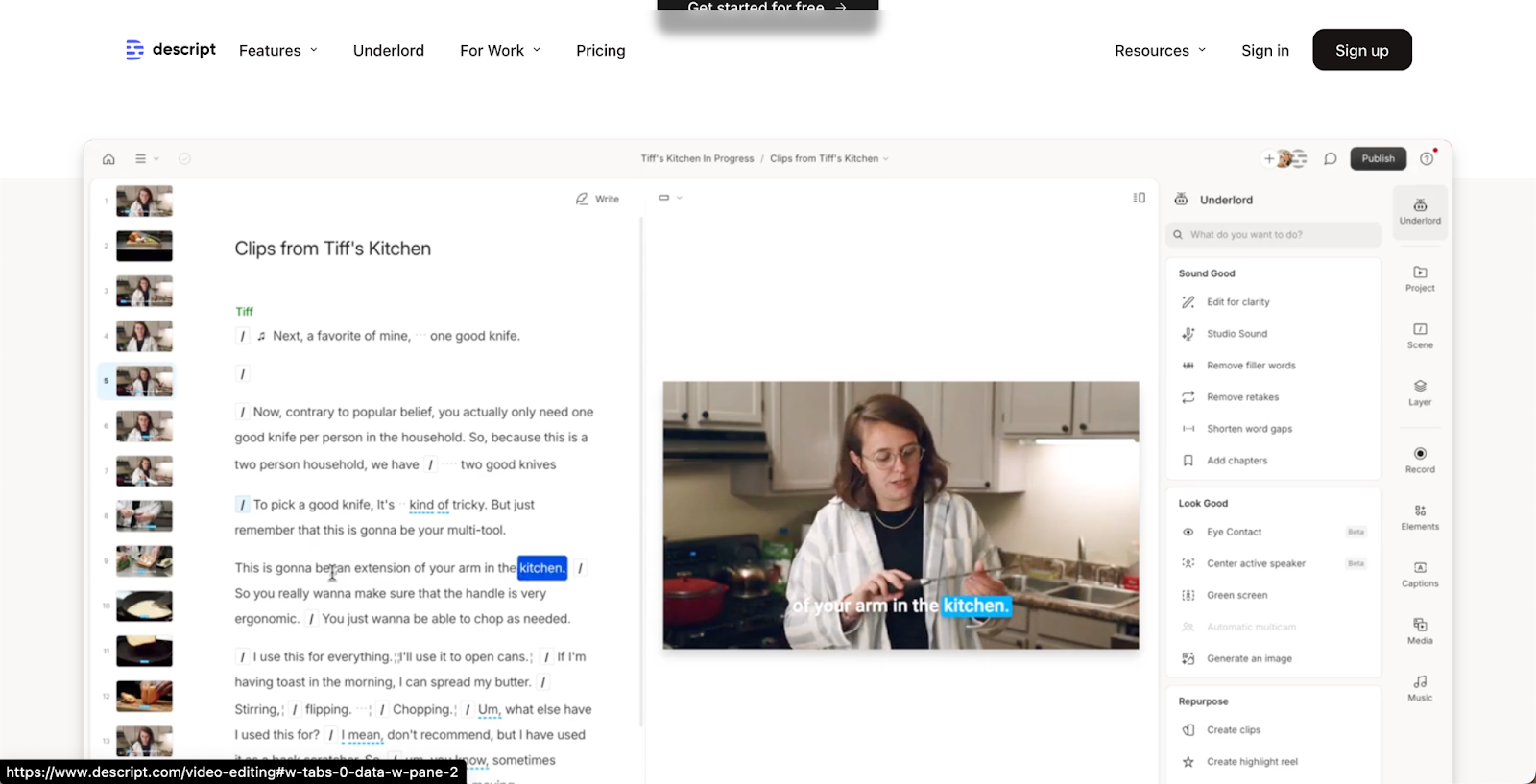
  • Descript: If you choose to have video in your online course materials, or if you like to market your business with video on socials, then this video editor is for you. It allows you to edit videos efficiently by editing the transcripts, and you can turn long-form videos into short videos in a few clicks. No video editing experience is necessary.
  • Canva: You’ll need visuals for your course material and social channels, so you need a good graphic design tool on hand. That’s Canva! It’s super intuitive and easy to use, and you can create professional-grade graphics with ease.
  • ChatGPT: A good AI tool can come in handy when it comes to doing market research, analyzing competitors, brainstorming creative ideas, and even your online course curriculum.
  • Buffer: For marketing on socials, you might want to automate as much of the process as possible, so social media scheduling tools like Buffer can come in handy. You can schedule content in advance to help you remain consistent.
  • Kit: Email marketing is a key marketing strategy for online course success and platforms like Kit help you capture and nurture leads with ease. They make it super easy to set up email campaigns when you have a new launch and create automation for onboarding new people to your email list.

Real-Life Examples

Professionals Who Transformed Their Businesses

We truly believe that every professional should take advantage and monetize their knowledge, no matter what industry they’re in. If you’re not sure what’s possible, here are three great case studies of professionals and creatives in different fields who successfully turned online course creators to maximize their business profits.

Elise Kova

Elise Kova is a bestselling indie author of young adult and adult fantasy novels. Aside from publishing successful books, for many years, she offered online coaching for other indie authors who wanted to learn how to self-publish. However, due to the increasing demand for her time, Kova had to minimize and eventually pause her coaching services – there are only so many hours in a day, after all.In the end, she had to find a better way to share her knowledge and help indie authors without directly trading her time for money. Just recently, she announced the launch of her online course for indie authors, and she is also working on a book all about self-publishing. With these two offerings, she’s able to help more people and use her time better.

Logan Ury
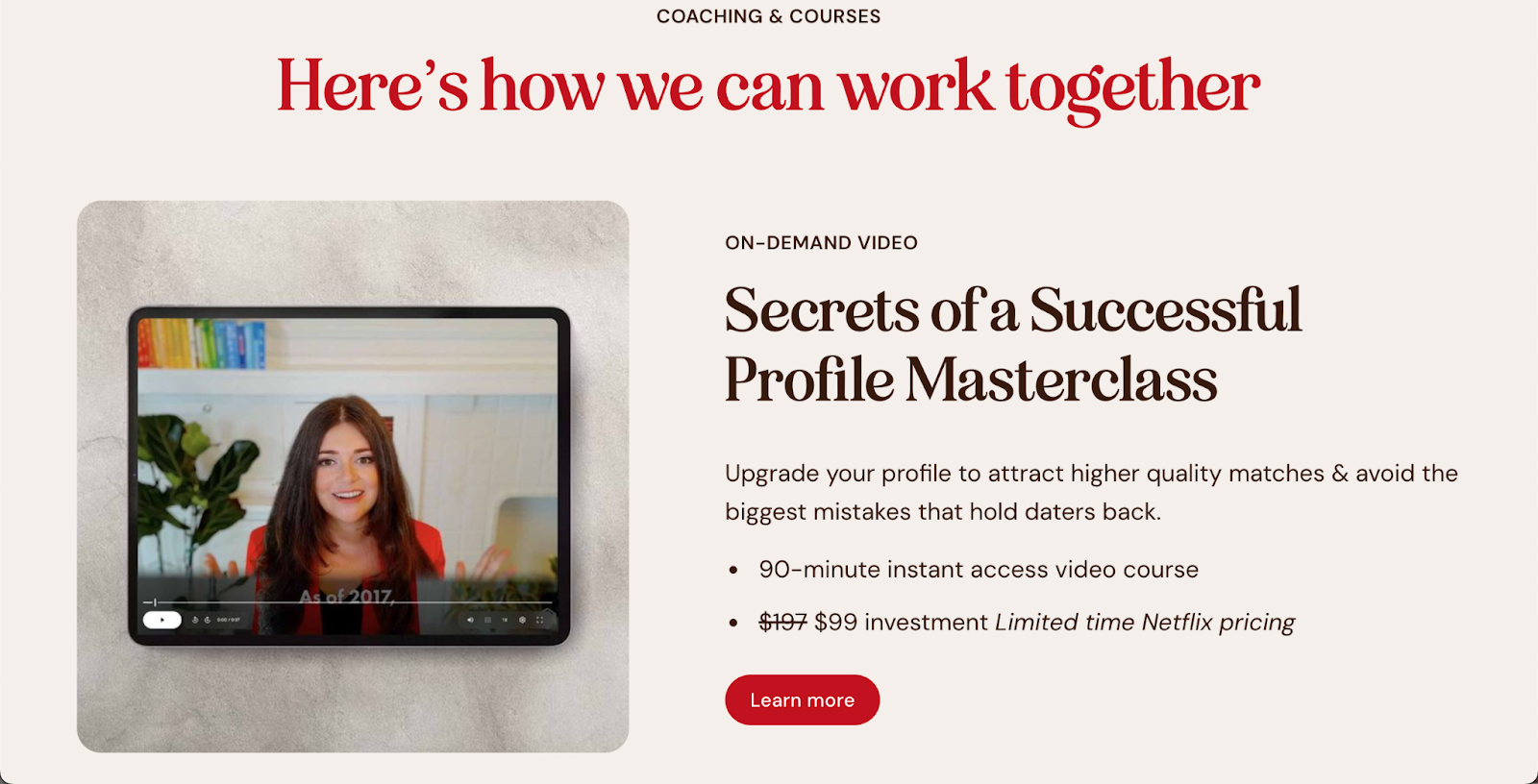
Logan Ury is a corporate professional turned dating coach, turned entrepreneur. She started her career at Google as a behavioral scientist and then found her passion in helping people how to date better and find the relationship of their dreams. She has multiple offers for her target audience, such as individual coaching and group coaching.However, coaching and even group workshops are still hard offerings to scale, so recently, she introduced a mini online course to her offerings to help more people with her knowledge.

Leigh Noren

Leigh Noren is a couples therapist who specializes in helping people rekindle desire in committed relationships. Just like most therapists, she works with couples and offers individual sessions.However, a while back, she decided to create a signature online course designed for couples instead of offering only one-on-one consultations. This way, she can monetize her knowledge much more efficiently and help more couples.

Trends in the Creator Economy for 2025

If you want to succeed as an online course and content creator, it’s important to be aware of the shifting market. Due to the nature of the creator economy, it moves fast and changes rapidly. So, what are the creator economy 2025 trends you need to be aware of? Entrepreneur and creator of New Economies, Ollie Forsyth highlights these key creator economy trends in 2025:

AI Is Here to Stay

Artificial intelligence is a rapidly growing industry, and with so many tools available for content creators, it’s key to utilize AI in your course and content creation. AI can help you edit videos, create course curriculum, and so much more. So, keep an open mind about AI tools available on the market, and don’t hesitate to experiment and try new things to optimize your workflow.

Niching Down Is Key

Nobody can argue that there are so many content creators out there, and every day, new faces are emerging from around the world. That means that you need to find a way to stand out in the crowd. One way creators can do that in 2025 is by establishing themselves as experts in their niche. Building a highly engaged, niche audience where you are the expert is the real goldmine.

Focus on Personalized Learning

With more AI tools available at your disposal, it’s never been easier to make online course learning more personal and tailored to each of your student’s needs. Again, with many online courses available online, what makes yours different? If you tailor your course for personalized learning by offering engaging ways for people to learn (such as interactive quizzes), you’ll definitely stand out in the crowd and get your student’s attention.

Use the Power of Community

There is incredible power in the community for online course creators. There are people who want to interact with you as a professional and who have the potential to become your superfans. They rave about your brand to others and always invest in your new offers and products. You want to invest your time in those people. In 2025, content creators want to shift their focus on building a strong community around their brand, and you can do that by hosting online workshops or creating a Facebook group where your students can engage with you and other students.   

Getting Started: Your First Steps

Are you ready to completely transform your business and teach online courses that help more people and generate more income for you? Well, there is no better time to start than now. Here’s how you can get started today:

  • Choose your niche
  • Learn what your audience wants and needs and what are their pain points
  • Pick a platform to host your course, like Teachable
  • Brainstorm your online course curriculum
  • Create your course material – keep it simple, don’t overcomplicate things
  • Launch your course and tell the world about it.

If you follow these steps, you’ll surely find your way to success and will be able to reap the numerous online course creation benefits no matter what industry you’re in. 
Sole Proprietor vs. LLC vs. S-Corp: Business Formation Guide for Creators

Software Stack Editor · February 3, 2025 ·

Many will agree that taxes and admin that come with being self-employed are the least fun part about creator business. In fact, some people completely forgo their dreams of being a professional content creator purely because they feel overwhelmed with the business side of things and have no clue how to set up a company and do their taxes.

So, if you’re feeling unsure about how to set up your creator business legally and which company structure is the best option for you, know that you’re definitely not alone. That’s why we’re here today–we want to help you better understand how to set up your creator business structure and show you that it’s not as hard as it might look so you can start living your professional content creator dreams today!

Why Choosing the Right Business Structure Matters

The Internal Revenue Service (IRS) requires everyone who runs a business in the United States to identify as one of the five available business entities:

  • Sole Proprietorship
  • Partnership
  • Limited Liability Company (LLC)
  • S-Corp
  • Corporation

Depending on what business structure you choose to register, the way you file taxes and run your business will differ. For example, as a sole proprietor, your personal assets are not separated from your business assets, while as an LLC, these are separate. You’ll have to fill out different tax forms and even might pay more or less taxes depending on your business structure.Some business structures are easier to navigate and can be fully handled without hiring an accountant to help manage taxes, while others (like an S-Corp) might require a professional to handle taxes and other aspects of the business.  

Which business structure will be right for you also depends on whether or not you’re operating alone. You might want to choose one business structure over another if you have a business partner to protect yourself and share the profits and responsibilities equally to avoid conflict.

Also, if you want to raise money for your creator business via grants, business loans, angel investing, or other ways, certain business structures make it easier to do so and increase your chances of getting funded. That’s something to keep in mind when you’re forming a company, especially if you’re a B2B creator.

Overview of Business Structures

To help you make an informed decision on which business structure to choose, you need to understand the basics of the most common business structures for professional content creators. These are:

  • Sole Proprietorship
  • LLC
  • S-Corp

Let’s take a better look at each of these three business structures so you understand the basics.

What is a Sole Proprietorship?

A Sole Proprietorship is the easiest and most common business structure. You’re automatically considered a sole proprietor if you’re earning income on the side of your day job (for example, from your side hustle) or you are self-employed.

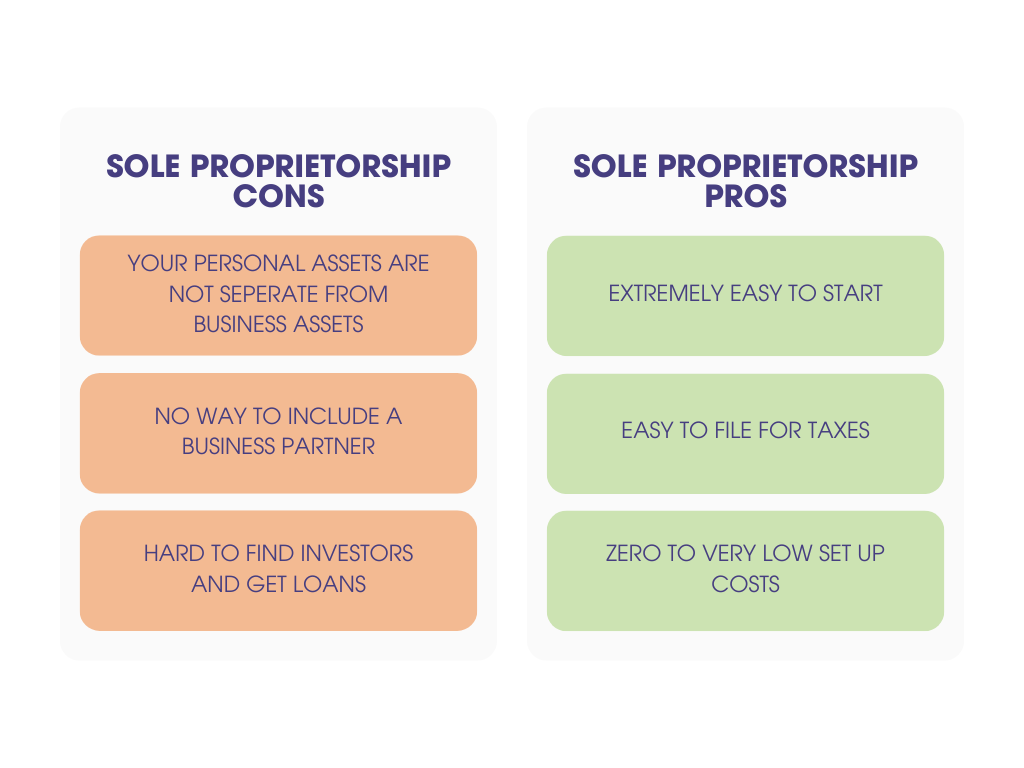
Sole Proprietorship is run by a single person (you), and you bear the full responsibility for everything in your business. Your personal assets are not separated from your business assets, which means that if something happens (let’s say someone sues your business), you’ll be personally held accountable for your personal assets. As a sole proprietor, you have full control over your business.

‍Sole Proprietorship Pros‍

  • Extremely easy to start–you don’t need to fill out any forms to get started.
  • Simple to manage admin and file for taxes by yourself.
  • Super low start-up costs–in most cases, you don’t need to pay anything to operate your business.

‍Sole Proprietorship Cons‍

  • Your personal assets are not separated from your business assets, which means you’re liable with your personal assets if anything happens.
  • It isn’t the best if you want to run a business with a business partner.
  • Difficulty finding investors–if you want to secure funding, it might be harder for you as a sole proprietor.

‍

What is an LLC?

A Limited Liability Company, otherwise referred to as LLC, is a business structure that offers the best aspects of a corporation and sole proprietorship in one. When you form an LLC, your personal assets are separated from business assets, which offers protection. LLC is still easy to set up, and if you’re a single-person LLC, then you’re taxed as a sole proprietor, which is super easy to handle.

Running an LLC, even as a sole person, offers more credibility in the business world, which might be important for B2B creators. Clients, suppliers, and lenders all might take you more seriously if you’re an LLC.

Also, the moment you form an LLC, your business starts building a credit history. That’s incredibly important if you want to borrow money to invest in your business. Lenders will be much more inclined to offer you loans and lines of credit if you have a business credit history.

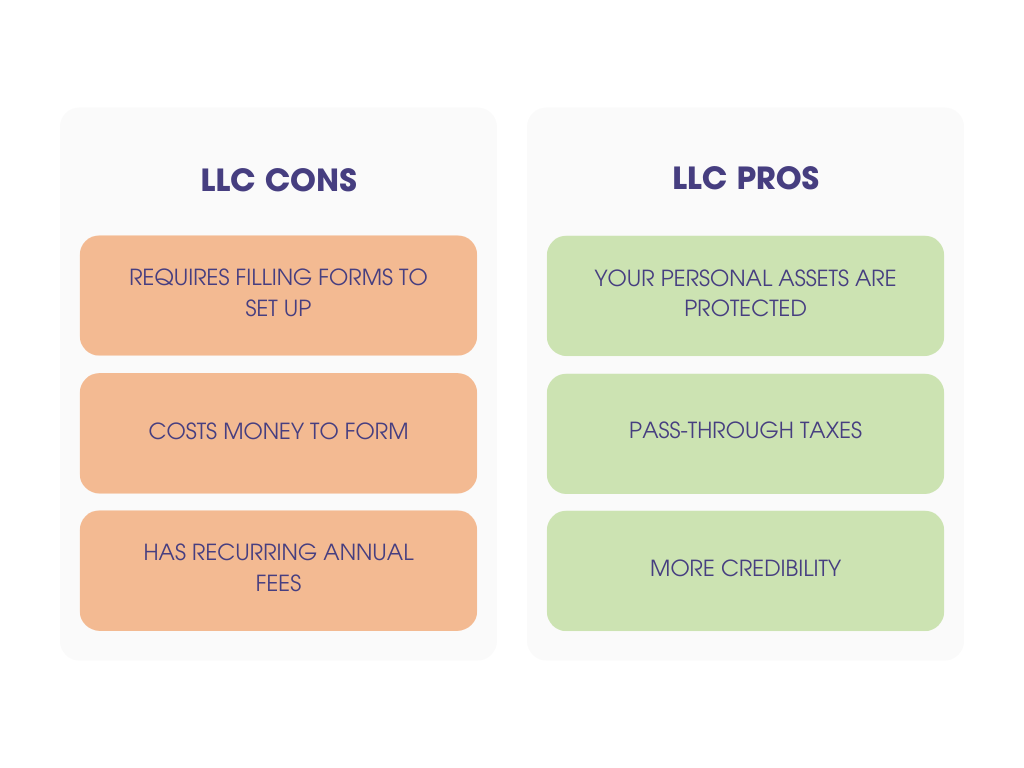
‍LLC Pros‍

  • Limited liability–your personal assets are protected.
  • You still have pass-through taxes, which means you pay taxes as a sole proprietor, and all the profits go directly to you as the business owner.
  • More credibility, and you can build a credit history.

‍LLC Cons‍

  • Requires filling out forms to form an LLC, which costs a couple of hundred dollars.
  • You might be required to fill out extra tax forms, which also cost money.

‍

What is an S-Corp?

An S-Corp is a business structure that’s essentially a less complex type of a corporation. It’s the best for small to medium-sized businesses and is taxed as a pass-through business as long as it has less than 100 shareholders. That means that all the profits go directly to the business owner instead of being taxed double as in a traditional corporation.

An S-Corp is a combination of a corporation and an LLC, and for some creators, it might actually allow them to pay less taxes. In an S-Corp, you are considered the employer and the employee. You have to pay yourself a salary and taxes on it. However, the caveat is that you can lower those taxes by taking part of your income as distributions.

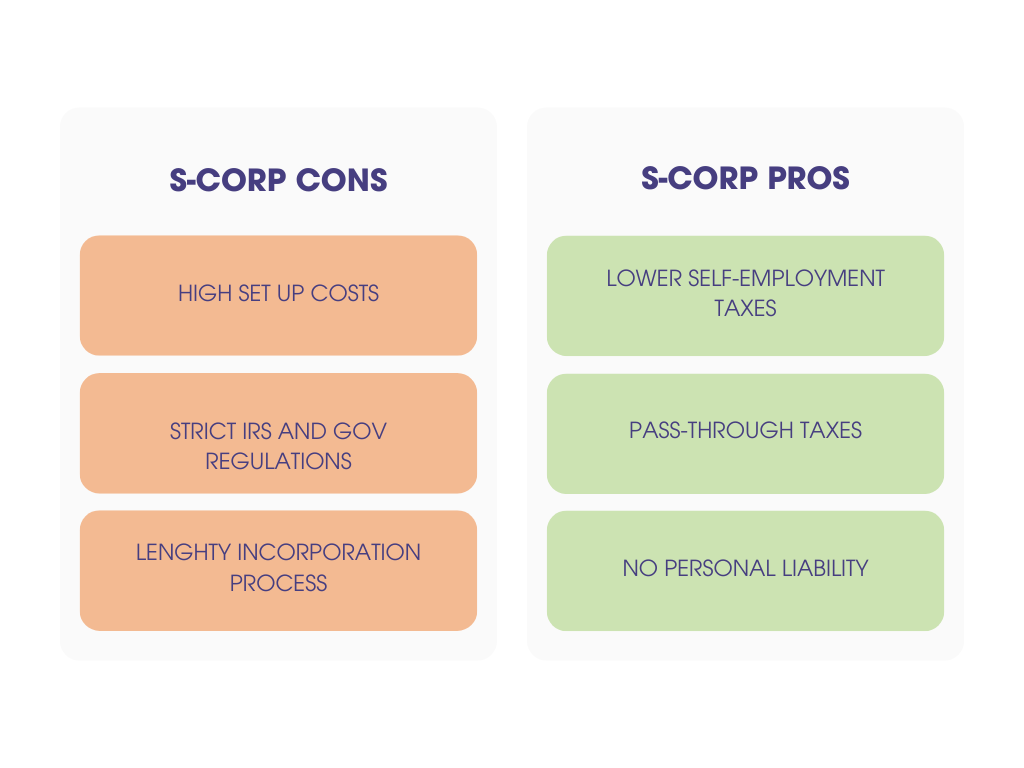
‍S-Corp Pros‍

  • You might be able to lower your self-employment taxes.
  • No personal liability–if anything happens in the business, your personal assets are not at risk.
  • Pass through taxes, which makes it super straightforward to manage.

‍S-Corp Cons‍

  • Higher business set-up costs.
  • Strict IRS requirements and government oversight for how the business is run.
  • Strict requirements to form a business.

‍

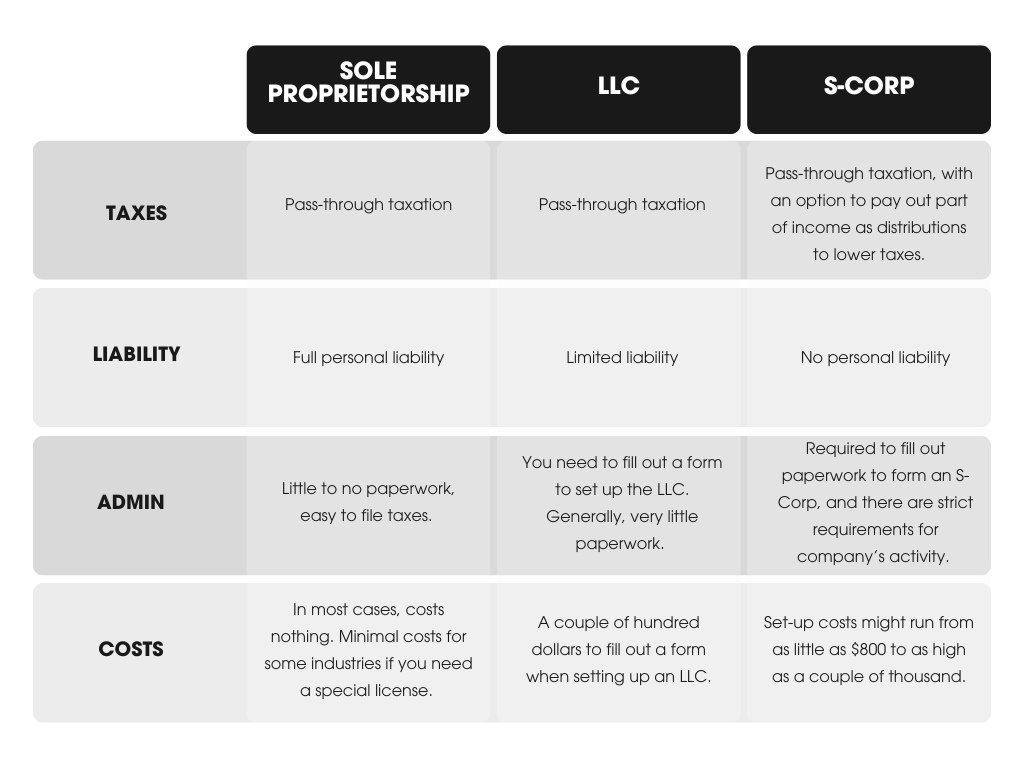
Differences Between Sole Proprietor, LLC, and S-Corp

After learning the basics, you might be wondering, how do these three business structures compare to each other? Well, let’s find out!

‍Differences in taxes‍

  • Sole Proprietorship: Pass-through taxation.
  • LLC: Pass-through taxation.
  • S-Corp: Pass-through taxation, an option to pay out part of income as distributions to lower taxes.

‍Differences in liability‍

  • Sole Proprietorship: Your personal assets and business assets are not separate, and you’re fully liable for any business trouble.
  • LLC: Your personal and business assets are separate, and the business owner is protected from being personally liable for business trouble.
  • S-Corp: Personal and business assets are completely separate, and shareholders and business owners have no personal liability.

‍Differences in admin‍

  • Sole Proprietorship: Little to no paperwork, easy to file taxes.
  • LLC: You need to fill out a form to set up the LLC. Generally, very little paperwork.
  • S-Corp: Required to fill out paperwork to form an S-Corp, and there are strict requirements for tracking and recording the company’s performance.

‍Differences in costs‍

  • Sole Proprietorship: In most cases, it costs nothing. Minimal costs for some industries if you need a special license.
  • LLC: A couple of hundred dollars to fill out a form when setting up an LLC.
  • S-Corp: Set-up costs might run from as little as $800 to as high as a couple of thousand.

‍

Which Structure is Usually Best for Creator Businesses?

Now that you know the differences between all three business structures, it’s time to choose which one works best for your business. We do believe that small business formation doesn’t have to be hard! So, to help you choose the right business structure for your business, here are some things you want to consider:

Sole Proprietorship for New Creators

If you’re new to self-employment full-time, or you are not even a full-time creator yet and are just running your online course business as a side hustle, you might want to start simple and set up a Sole Proprietorship. It’s the easiest company structure to set up and run–you don’t even need to do anything to start!

As a new content creator, you want to make it as easy for yourself as possible. While you are just getting into the grove and figuring out the ropes of your business, being a sole proprietor will be easy and simple. You don’t have to worry about filling out forms or having to pay fees to set up a business.

Filing for taxes at the end of the year is easy. You might do it yourself, or you might hire an accountant to help you. Apart from filing for taxes at the end of the year, you might need to check if you need a license to run a business. That will depend on your industry and what you do, and you can easily find that out on the government’s website when you start your business.

LLC for Growing Creator Businesses

Once you start growing your creator business, it might be time to form an LLC. As your product library grows and you deal with more and more customers all over America, you might want to separate your personal assets from your business assets and make sure you’re protected.

An LLC offers the protection of your assets while still giving you the flexibility to make money and pay taxes without a huge headache. It’s a very convenient business structure, and you can start building your business credit history so that if you ever need a loan or a line of credit to expedite your growth, you have better chances of securing funding from lenders.

S-Corp for Advanced Scaling

LLC vs. S-Corp for creators–which one is better? Well, the answer is simple. If you’re a huge creator with a team and large yearly revenue that goes into high six figures or even seven figures and above, then an S-Corp might be the better option for you.

As an S-Corp, you can still have the flexibility and protection that you have with an LLC, but you have more options for optimizing your taxes and how you run your business. An S-Corp is good if you want to grow your business through funding–an S-Corp makes it easier because you can have up to 100 shareholders without having to pay complex taxes.

Also, as an S-Corp, you can lower the self-employment taxes you have to pay, which means that you can take more money home than you would otherwise.

Steps to Register Your Business Structure

Are you ready to make it official? Here is how to set up each business structure for your creator business:

Sole Proprietorship

Starting a business as a sole proprietor doesn’t require you to fill out any forms or register with the government. If you start earning money as a creator, you are automatically considered a sole proprietor. However, there are certain things you might want to consider, such as your business name or DBA (Doing Business As).

A DBA allows you, as a sole proprietor, to operate your business under a different name than your legal name. While it’s not a necessity to have a DBA, you might be useful for some. The fees and procedures for filling for DBA vary from state to state, and even city to city, so make sure to check in with an advisor who can walk you through the process.

Depending on what type of activities you do as a sole proprietor, you might need a license permit. To figure out if that’s applicable to you or which license you need to get, check out the IRS website that outlines all the information and how to apply for any permits as a sole proprietor.

It might be a good idea to find a local small business advisor who can help guide you through all the tax forms you might need to file as a sole proprietor. Plus, they can help you figure out if you need a permit or a special license so that you can avoid the hefty fees that you might acquire if you operate your business without the correct permit. U.S. Small Business Association can help you find a local advisor.

LLC

Generally, the process of forming an LLC is pretty straightforward and shouldn’t take you long:

‍

  1. Choose a business name and check if it’s not taken.
  2. Assign a registered agent who will communicate with the government on behalf of the LLC on all business-related matters.
  3. Prepare the LLC operating agreement (not every state requires it).
  4. File articles of organization–this is the official paperwork you need to submit to form the LLC.
  5. Check if you need a business license or permit and obtain them.
  6. Get an employer identification number (EIN) and open a business bank account.

It’s important to know that regulations, processes, and fees for forming an LLC vary from state to state. So, make sure to check with your state to see if you’re following the correct process.

S-Corp

Forming an S-Corp is a little more involved than starting a sole proprietorship or an LLC, but the process is also pretty straightforward:

  1. Check the eligibility requirements on the IRS website to see if you are able to become an S-Corp.
  2. Choose a name for your business and check if it’s not already taken.
  3. File articles of incorporation or certificate of incorporation.
  4. Once you’re incorporated, issue the stock for your S-Corp (paper or electronic certificates).
  5. Elect a board of directors (an S-Corp is required to have at least one)
  6. Obtain an employer identification number (EIN).
  7. Create your S-Corp bylaws, which are management rules and regulations for your business.
  8. Check for local S-Corp permits and licenses, as some states require separate paperwork.

Costs and Paperwork Involved

So, how much does it cost to form each type of business structure, and what forms do you need to fill out? Here’s a quick guide to help you get started:

  • Sole Proprietorship: No fee to form, and there is no paperwork you need to submit to start operating. You can find tax forms on the IRS website.
  • LLC: To form an LLC, you’ll have to register with your state, and the requirements might vary. The U.S. Small Business Association (SBA) can help you figure out the process depending on your state. The cost will also vary depending on the state and can range from $30 to $500.
  • S-Corp: To form a corporation, you need to submit Form 2553, Election by a Small Business Corporation. You can find the instructions here. The cost for filing varies depending on the state and can run anywhere between a couple of hundred to a couple of thousand.

Keep Up With Your Documents

No matter which business structure you choose, it’s important to have all of your paperwork in order for tax purposes and in case you need a loan to close your business or deal with any issues. Always have your documents organized and on hand:

  • Business expenses: Keep your receipts for any spending you do for your business. These will be required when filing taxes for tax write-offs.
  • Permits and licenses: If you need a permit or a license to operate your business, always make sure you have all of your paperwork up to date.
  • Employer identification number (EIN) and social security numbers: Keep those on hand and always available.
  • Invoices: If you send invoices to suppliers or write invoices to clients, always file them and have them on hand with all the business information on the invoice.

If you’re unsure about what paperwork you need to have on hand as a creator and business owner, it might be a good idea to check with the IRS–they have all the forms listed on their websites for Sole Proprietorship, LLCs, and S-Corps. Also, you might want to seek out a business advisor’s help or reach out to an accountant who can guide you on how to organize your business paperwork efficiently.

DISCLAIMER: These guides are for informational purposes only and do not constitute professional legal or tax advice. Please consult independent legal advice and your own tax advisers for information specific to your country and circumstances. Teachable is not liable to you in any way for your use or reliance on these guides.

‍

25 Ways to Build an Online Course Empire

Software Stack Editor · January 29, 2025 ·

image

Creating and selling online courses has become one of the most lucrative ways to share knowledge and lived experience expertise while building a sustainable income stream. 

The e-learning market is projected to reach a staggering $375 billion by 2026, and creators everywhere are carving out their niche in this thriving space. 

The challenge is starting and building a scalable system that turns your knowledge, skills, and experience into a true online course empire.

If you’ve been dreaming of launching or growing your course business, now is the time to act.

Whether you’re starting from scratch or looking to scale, this guide offers 25 actionable strategies to help you make meaningful progress this month. 

Let’s get into it and make this your breakthrough year as an online course creator!

{{coursepricing-component=”/blog-shortcodes/blog-popup”}}

Laying the Foundation

Before you can build an empire, you need a solid foundation. This means setting yourself up with the right tools, mindset, and strategies to ensure long-term success. Here’s how to get started:

1. Choose Your Niche Wisely

Your course’s niche is the cornerstone of your success. A well-defined niche helps you attract the right audience and stand out in a crowded market. To evaluate the competition, start by analyzing what similar courses are already available. 

Look at their reviews, pricing, and unique selling points to identify gaps you can fill. Focus on differentiating your course by addressing an underserved aspect of the niche or providing added value. Start by asking yourself:

  • What am I passionate about?
  • What unique skills or knowledge do I have?
  • What problems can I solve for others?

Action Step: Research your niche to identify demand. Use tools like Google Trends, Answer the Public, or Reddit forums to explore what topics resonate with your potential audience.

2. Validate Your Course Idea

Don’t spend months creating a course only to realize it doesn’t resonate with your audience. Validation ensures your idea has real potential.

Action Step: Create a survey for your audience or share a free mini-resource (e.g., a checklist or guide) to gauge interest. Use platforms like Typeform or social media polls to gather feedback.

3. Set Revenue Goals for the Month

Having clear goals keeps you motivated and focused. Decide how much you want to earn and reverse-engineer the process to determine how many courses you need to sell.
Action Step: Write down your revenue goal and break it into achievable milestones. For example, if you want to earn $2,000 this month and your course costs $200, your target is 10 sales.

Creating Winning Courses

Once you’ve established your foundation, it’s time to bring your course ideas to life. The key to success lies in creating courses that not only deliver value but also keep your audience engaged from start to finish. Here are some ways to ensure your courses stand out:

4. Start with a Mini-Course

Instead of diving into a full-fledged course, begin with a smaller, focused offering. Mini-courses are quicker to create and allow you to test your audience’s interest. They’re also an excellent way to build momentum and gather testimonials.

Action Step: Outline a mini-course that addresses one specific pain point or topic in your niche. Use tools like Teachable to structure and host your content effortlessly.

5. Use AI to Streamline Content Creation

Leverage technology to make the course creation process faster and more efficient. 

For example, Teachable’s AI-powered tools (available at www.teachable.com/ai-hub) streamline course creation by assisting with lesson structuring and content suggestions. Additionally, tools like ChatGPT can help draft promotional emails, social media content, or ad copy for marketing your course. 

Similarly, Claude AI can refine messaging to better target your audience, ensuring cohesive branding across all platforms. AI tools can also help you generate scripts, design visuals, and even create quizzes for your courses.

Action Step: Experiment with tools like ChatGPT for drafting lesson plans or Canva for designing professional slides and graphics.

6. Optimize for Mobile Learning

With more users accessing content on their phones, it’s essential to ensure your course is mobile-friendly. This means using responsive designs and bite-sized lessons that are easy to consume on the go.

Action Step: Test your course on various devices to ensure a seamless learning experience. Focus on creating videos, PDFs, and quizzes that work well on smaller screens.

Scaling Quickly

With your courses up and running, it’s time to scale your efforts and reach a larger audience. Scaling doesn’t mean working harder—it means working smarter by leveraging tools and strategies that amplify your impact. Here’s how to take your online course empire to the next level:

7. Collaborate with Influencers in Your Niche

Partnering with influencers can exponentially expand your reach. Influencers already have the trust of their audience, making their endorsement of your course incredibly valuable.

Action Step: Identify 3-5 influencers in your niche and pitch them a win-win collaboration, such as offering them an affiliate commission or co-hosting a webinar.

8. Launch an Affiliate Program

An affiliate program allows others to promote your course in exchange for a commission. This approach turns your audience and partners into your marketing team.

Action Step: Set up an affiliate program using Teachable’s built-in affiliate tools. Define clear commission rates and provide affiliates with promotional materials to make sharing your course easy.

9. Run Limited-Time Promotions

Scarcity and urgency can drive sales. To maximize their effectiveness, consider running promotions sparingly, such as once per quarter, to avoid diminishing their impact. 

This ensures each offer feels special and encourages immediate action. Running limited-time offers or discounts encourages potential buyers to act quickly.

Action Step: Plan a promotional calendar for the month. Use tools like email marketing and social media to announce flash sales or bundle deals that last 48-72 hours.

10. Automate Your Marketing Funnels

Automation allows you to reach more people without manual effort. By setting up email funnels, retargeting ads, and lead nurturing sequences, you can turn casual visitors into paying customers.

Action Step: Use platforms like ConvertKit or ActiveCampaign to create a sales funnel that educates leads about your course and nudges them toward enrollment.

Beyond the Basics

Now that your course business is up and running, it’s time to think bigger. Going beyond the basics involves implementing advanced strategies that cement your position as a leader in your niche while maximizing your revenue potential. Here are the next steps:

11. Bundle Your Courses

If you have multiple courses, consider bundling them into a package. For example, successful Teachable creators have bundled related courses into themes like “Digital Marketing Mastery” or “Personal Growth Bootcamp,” offering greater value to students while driving higher sales. Course bundles offer more value to your students while increasing your average transaction size.

Action Step: Create a themed bundle, such as “Mastering Digital Marketing” or “Beginner to Expert Photography,” and offer it at a discounted price compared to buying each course individually.

12. Build a Membership Community

Memberships provide recurring revenue and foster a loyal community around your content. Members can gain access to exclusive courses, live Q&A sessions, or new resources every month.

Action Step: Use platforms like Teachable to create a membership tier. Offer an irresistible value proposition to encourage sign-ups, such as bonus resources or early access to new courses.

13. Explore Corporate Partnerships

Corporations are always on the lookout for professional development opportunities for their employees. Licensing your courses to companies can unlock significant revenue streams.

Action Step: Reach out to businesses in your niche and pitch your course as a solution to their team training needs. Highlight how your content can improve their employees’ skills or efficiency.

14. Host a Virtual Summit

A virtual summit can position you as an authority while driving traffic to your courses. Invite other experts in your field to join, creating a multi-day event filled with valuable insights.

Action Step: Plan a virtual summit around a trending topic in your niche. Use it as a lead magnet by offering free access and upselling attendees to your premium courses.

15. Invest in Advanced Analytics

To grow, you need to understand what’s working and what’s not. Advanced analytics can help you track conversion rates, identify drop-off points in your courses, and refine your strategy.

Action Step: Use tools like Google Analytics, Teachable’s reporting features, or third-party integrations to dive deep into your performance metrics. Make data-driven decisions to optimize your sales and content.

16. Pre-Sell Your Courses

Generate revenue before creating your course by pre-selling it to interested customers. It’s essential to set clear expectations for pre-sale customers, such as the course delivery timeline, content outline, and any exclusive perks they might receive for signing up early. Transparency builds trust and ensures a positive experience. This validates demand and ensures you have a paying audience ready.

Action Step: Create a landing page detailing the course benefits and offer early-bird discounts to secure pre-orders.

17. Offer Live Workshops

Use live workshops to connect with your audience and test your course material in real-time. They create a sense of urgency and exclusivity.

Action Step: Host a live webinar or interactive session on a trending topic in your niche and offer attendees an upsell to your full course.

18. Create a Referral Program

Incentivize your current students to refer new students to your courses. Word-of-mouth marketing is incredibly effective for building trust.

Action Step: Use referral software or manual tracking to reward students who bring in new enrollees, such as free resources or discounts.

19. Optimize Your Website for SEO

Drive organic traffic by optimizing your course pages and blog posts for search engines. Target keywords relevant to your niche.

Action Step: Perform keyword research using tools like Ahrefs or SEMrush, and update your website with SEO-optimized content.

20. Create a Free Resource to Build Trust

Offering a valuable free resource, such as a guide or toolkit, helps establish credibility and draws leads into your sales funnel.

Action Step: Develop a free PDF or video series that addresses a common challenge in your niche and direct users to your course as the next step.

21. Collaborate on Guest Content

Partner with other creators or brands to write guest blog posts, appear on podcasts, or co-host webinars, expanding your reach.

Action Step: Identify complementary creators in your niche and propose collaboration ideas that promote both your brands.

22. Use Retargeting Ads

Capture potential students who visited your site but didn’t enroll by running retargeting ads on platforms like Facebook or Google.

Action Step: Set up a retargeting campaign to remind visitors of your course and offer limited-time discounts to encourage sign-ups.

23. Develop a Certificate Program

Enhance the perceived value of your course by offering certificates of completion, which are particularly attractive for professional development.

Action Step: Use tools like Accredible or Teachable’s certificate feature to create and automate certificate distribution.

24. Tap Into Social Proof

Leverage testimonials, reviews, and success stories from your students to build trust with new prospects.

Action Step: Request testimonials from satisfied students and showcase them prominently on your course sales page and marketing materials.

25. Experiment with Pricing Models

Try different pricing strategies, such as tiered pricing, pay-what-you-want, or subscription models, to find what resonates with your audience.

Action Step: A/B test pricing options on your course sales page and analyze which model drives the most revenue.

Conclusion

Building an online course empire is an exciting journey that blends passion, expertise, and smart strategy. By laying a strong foundation, creating high-quality courses, scaling effectively, and leveraging advanced tactics, you can turn your knowledge into a thriving business. Remember, success doesn’t happen overnight—but with consistent effort and the right tools, like Teachable, you’re well on your way.

Now it’s your turn to take action. Choose three strategies from this guide to implement today, and commit to making progress every week. With determination and focus, this month could be the start of your most rewarding chapter yet.

‍

How to Network at Conferences: The Ultimate Guide for Creators in 2025

Software Stack Editor · January 29, 2025 ·

image

The ability to network is a skill with benefits, especially for creators.. Whether you’re an entrepreneur, creator, or professional, the ability to make meaningful connections at conferences can open the doors to unexpected business and career opportunities. But for many, networking feels intimidating. If you’ve ever walked into a room full of strangers unsure how to start a conversation, you are not alone.

The value of networking is crystal clear. According to Keevee, 80% of attendees generate at least one valuable connection at events, yet most people find networking in general to be highly  uncomfortable. However, conferences provide a unique chance to overcome these challenges, meet like-minded people, and create opportunities for collaboration and growth.

This guide will help you navigate conference networking with confidence, offering strategies for preparation, real-time interactions, and effective follow-ups. Ready to turn conversations into opportunities? Let’s get started.

{{trial-component=”/blog-shortcodes/blog-cta”}}

Before the Event

Successful networking begins well before you step into the conference venue. Taking the time to prepare ensures you’ll feel more confident and maximize your opportunities. Here are key steps we recommend to get started:

1. Set clear goals

Decide what you want to achieve. Are you looking to meet potential collaborators, learn from industry leaders, or promote your personal brand? Defining your objectives will guide your approach and help you prioritize your time.

2. Research the event and attendees

Review the conference agenda to identify sessions, speakers, or activities that align with your interests. Use platforms like LinkedIn to find and learn about other attendees you’d like to meet. Having a list of key people or sessions can help you stay focused.

3. Create and practice your elevator pitch

Prepare a brief, engaging introduction that highlights who you are and what you do. Tailor it to the context of the conference so it’s relevant and memorable. For example: “I’m Alexi, a content strategist helping startups grow through effective storytelling.”

4. Practice icebreakers and small talk

Networking often starts with small talk. Practice a few conversation starters like, “What brought you to this event?” or “What’s been your favorite session so far?” This will make approaching others feel more natural.

5. Prepare tools for engagement

Ensure your LinkedIn profile is updated and includes a recent photo. Bring business cards if appropriate, or consider using a digital business card app. If the event has a dedicated app or hashtag, get familiar with it to engage with attendees online before meeting in person.

With these steps, you’ll walk into the conference feeling prepared and ready to make meaningful connections.

How to Network During the Conference

Once the conference begins, the real work of networking starts. Engaging effectively requires both confidence and strategy. Here are actionable tips to help you make the most of your time on-site:

1. Make the First Move

Don’t wait for others to approach you. Introduce yourself with a smile and a firm handshake. Use your prepared icebreakers to start conversations and find common ground quickly.

2. Breaks and Social Events

Break times, meals, and evening socials are prime opportunities for networking. Approach people who are standing alone or in small groups, as they’re often more open to conversation. Use these casual settings to build rapport.

3. Attend Interactive Sessions

Workshops and Q&A sessions are excellent for meeting people who share your interests. Engage by asking thoughtful questions or contributing insights, which can make you more memorable to others in the room.

4. Use Event Apps and Social Media

Many conferences have apps or dedicated hashtags to help attendees connect. Use these tools to identify and engage with other participants in real time. Posting updates or sharing key takeaways from sessions can also attract others to approach you.

5. Take Notes on Important Interactions

After meeting someone, jot down a few details about your conversation. This simplifies follow-ups and strengthens relationships after the event.

By staying proactive and approachable during the conference, you’ll be able to create meaningful connections that extend far beyond the event itself.

Post-Event Follow-Up

Your work doesn’t end when the conference wraps up. Following up with the people you’ve met is critical for turning introductions into meaningful relationships. Here’s how to do it effectively:

1. Send Personalized Follow-Ups

Within 24-48 hours, reach out to the people you connected with. Mention something specific from your conversation to make your message stand out. For example: “It was great discussing digital marketing strategies with you at the conference. I’d love to hear more about your recent project.”

2. Connect on LinkedIn

Send a connection request with a thoughtful note. Mention the event and a highlight from your conversation to jog their memory. This keeps the connection alive and opens the door for future interactions.

3. Organize Your Contacts

Use a spreadsheet, contact management tool, or LinkedIn’s notes feature to keep track of who you met, their contact details, and any relevant follow-up actions. Staying organized will make it easier to maintain these relationships.

4. Provide Value

Share a resource, article, or introduction that could benefit the person you met. Offering value helps you stand out and shows you’re interested in a mutually beneficial relationship.

5. Stay in Touch

Networking is an ongoing process. Periodically check in with your new contacts to share updates, congratulate them on milestones, or suggest meeting up at another event.

By following up thoughtfully, you’ll strengthen the relationships you built during the conference and set the stage for future opportunities.

Overcoming Networking Challenges

Networking isn’t always easy. From battling nerves to navigating language barriers, challenges can arise that make the process feel daunting. Here’s how to address some common obstacles and stay on track:

1. For Introverts: Create Comfortable Boundaries

Focus on quality over quantity. It’s okay to have fewer, deeper conversations rather than trying to meet everyone. Seek out quieter areas of the conference where one-on-one interactions are more likely.

2. Managing Social Anxiety

Practice calming techniques, such as deep breathing, before entering the event. Remind yourself that most attendees are also there to connect and will appreciate your effort to engage.

3. Dealing with Rejection

Not every interaction will lead to a lasting connection, and that’s okay. Keep the focus on building genuine relationships, and don’t take it personally if someone seems disinterested or distracted.

4. Navigating Language Barriers

If English isn’t your first language, prepare simple, clear phrases to introduce yourself and start conversations. Use tools like translation apps to help bridge gaps and make communication smoother.

5. Imposter Syndrome

Remind yourself of your expertise and what you bring to the table. Networking isn’t about proving yourself; it’s about learning and sharing with others.

By addressing these challenges head-on, you’ll feel more prepared to navigate the complexities of networking and focus on building meaningful connections.

Section imag

Building a Personal Brand Through Networking

Networking isn’t just about collecting business cards or LinkedIn connections. It’s an opportunity to position yourself as a thought leader and build a personal brand that stands out. Here’s how you can use conference networking to establish your authority:

1. Share Your Expertise Naturally

When engaging in conversations, focus on providing value. Share your insights or experiences relevant to the discussion without turning it into a sales pitch. For example, if someone asks about your work, frame your response around how it solves problems or creates impact.

2. Listen and Learn

Building a personal brand isn’t only about talking—it’s about listening. Pay attention to others’ challenges, questions, and insights. Use this information to identify trends or gaps where you can contribute meaningfully.

3. Leverage Social Media During and After the Event

Post takeaways, photos, or key insights from the conference on platforms like LinkedIn, Twitter, or Instagram. Tag speakers or attendees where appropriate. This not only amplifies your visibility but also positions you as someone engaged in the field.

4. Collaborate with Connections

Look for opportunities to collaborate with the people you meet. This could be co-hosting a webinar, writing a guest post, or even partnering on a project. Collaborative efforts boost your credibility and expand your reach.

5. Turn Insights Into Content

After the conference, create blogs, videos, or even courses based on what you learned and the conversations you had. Sharing your takeaways helps reinforce your expertise and keeps your network engaged.

By focusing on authentic engagement and leveraging your new connections, you can use networking to not only grow professionally but also build a brand that aligns with your audience’s values and needs.

Teachable Moment

Networking at conferences is one of the most powerful tools for personal and professional growth. By preparing ahead of time, engaging thoughtfully during the event, and following up with purpose, you can build connections that lead to meaningful opportunities. Remember, effective networking isn’t about the number of contacts you make—it’s about the quality of the relationships you build.

As you put these strategies into action, consider how your growing network can support your long-term goals. Whether it’s creating collaborative projects, enhancing your personal brand, or even launching a course to share your expertise, the possibilities are endless.

We are here to help you take the next step in leveraging your knowledge and connections. With our tools, you can create and share courses that amplify your impact and solidify your authority in your field.

How to Network at Conferences: The Ultimate Guide for Creators in 2025

Software Stack Editor · January 29, 2025 ·

image

The ability to network is a skill with benefits, especially for creators.. Whether you’re an entrepreneur, creator, or professional, the ability to make meaningful connections at conferences can open the doors to unexpected business and career opportunities. But for many, networking feels intimidating. If you’ve ever walked into a room full of strangers unsure how to start a conversation, you are not alone.

The value of networking is crystal clear. According to Keevee, 80% of attendees generate at least one valuable connection at events, yet most people find networking in general to be highly  uncomfortable. However, conferences provide a unique chance to overcome these challenges, meet like-minded people, and create opportunities for collaboration and growth.

This guide will help you navigate conference networking with confidence, offering strategies for preparation, real-time interactions, and effective follow-ups. Ready to turn conversations into opportunities? Let’s get started.

{{trial-component=”/blog-shortcodes/blog-cta”}}

Before the Event

Successful networking begins well before you step into the conference venue. Taking the time to prepare ensures you’ll feel more confident and maximize your opportunities. Here are key steps we recommend to get started:

1. Set clear goals

Decide what you want to achieve. Are you looking to meet potential collaborators, learn from industry leaders, or promote your personal brand? Defining your objectives will guide your approach and help you prioritize your time.

2. Research the event and attendees

Review the conference agenda to identify sessions, speakers, or activities that align with your interests. Use platforms like LinkedIn to find and learn about other attendees you’d like to meet. Having a list of key people or sessions can help you stay focused.

3. Create and practice your elevator pitch

Prepare a brief, engaging introduction that highlights who you are and what you do. Tailor it to the context of the conference so it’s relevant and memorable. For example: “I’m Alexi, a content strategist helping startups grow through effective storytelling.”

4. Practice icebreakers and small talk

Networking often starts with small talk. Practice a few conversation starters like, “What brought you to this event?” or “What’s been your favorite session so far?” This will make approaching others feel more natural.

5. Prepare tools for engagement

Ensure your LinkedIn profile is updated and includes a recent photo. Bring business cards if appropriate, or consider using a digital business card app. If the event has a dedicated app or hashtag, get familiar with it to engage with attendees online before meeting in person.

With these steps, you’ll walk into the conference feeling prepared and ready to make meaningful connections.

How to Network During the Conference

Once the conference begins, the real work of networking starts. Engaging effectively requires both confidence and strategy. Here are actionable tips to help you make the most of your time on-site:

1. Make the First Move

Don’t wait for others to approach you. Introduce yourself with a smile and a firm handshake. Use your prepared icebreakers to start conversations and find common ground quickly.

2. Breaks and Social Events

Break times, meals, and evening socials are prime opportunities for networking. Approach people who are standing alone or in small groups, as they’re often more open to conversation. Use these casual settings to build rapport.

3. Attend Interactive Sessions

Workshops and Q&A sessions are excellent for meeting people who share your interests. Engage by asking thoughtful questions or contributing insights, which can make you more memorable to others in the room.

4. Use Event Apps and Social Media

Many conferences have apps or dedicated hashtags to help attendees connect. Use these tools to identify and engage with other participants in real time. Posting updates or sharing key takeaways from sessions can also attract others to approach you.

5. Take Notes on Important Interactions

After meeting someone, jot down a few details about your conversation. This simplifies follow-ups and strengthens relationships after the event.

By staying proactive and approachable during the conference, you’ll be able to create meaningful connections that extend far beyond the event itself.

Post-Event Follow-Up

Your work doesn’t end when the conference wraps up. Following up with the people you’ve met is critical for turning introductions into meaningful relationships. Here’s how to do it effectively:

1. Send Personalized Follow-Ups

Within 24-48 hours, reach out to the people you connected with. Mention something specific from your conversation to make your message stand out. For example: “It was great discussing digital marketing strategies with you at the conference. I’d love to hear more about your recent project.”

2. Connect on LinkedIn

Send a connection request with a thoughtful note. Mention the event and a highlight from your conversation to jog their memory. This keeps the connection alive and opens the door for future interactions.

3. Organize Your Contacts

Use a spreadsheet, contact management tool, or LinkedIn’s notes feature to keep track of who you met, their contact details, and any relevant follow-up actions. Staying organized will make it easier to maintain these relationships.

4. Provide Value

Share a resource, article, or introduction that could benefit the person you met. Offering value helps you stand out and shows you’re interested in a mutually beneficial relationship.

5. Stay in Touch

Networking is an ongoing process. Periodically check in with your new contacts to share updates, congratulate them on milestones, or suggest meeting up at another event.

By following up thoughtfully, you’ll strengthen the relationships you built during the conference and set the stage for future opportunities.

Overcoming Networking Challenges

Networking isn’t always easy. From battling nerves to navigating language barriers, challenges can arise that make the process feel daunting. Here’s how to address some common obstacles and stay on track:

1. For Introverts: Create Comfortable Boundaries

Focus on quality over quantity. It’s okay to have fewer, deeper conversations rather than trying to meet everyone. Seek out quieter areas of the conference where one-on-one interactions are more likely.

2. Managing Social Anxiety

Practice calming techniques, such as deep breathing, before entering the event. Remind yourself that most attendees are also there to connect and will appreciate your effort to engage.

3. Dealing with Rejection

Not every interaction will lead to a lasting connection, and that’s okay. Keep the focus on building genuine relationships, and don’t take it personally if someone seems disinterested or distracted.

4. Navigating Language Barriers

If English isn’t your first language, prepare simple, clear phrases to introduce yourself and start conversations. Use tools like translation apps to help bridge gaps and make communication smoother.

5. Imposter Syndrome

Remind yourself of your expertise and what you bring to the table. Networking isn’t about proving yourself; it’s about learning and sharing with others.

By addressing these challenges head-on, you’ll feel more prepared to navigate the complexities of networking and focus on building meaningful connections.

Section imag

Building a Personal Brand Through Networking

Networking isn’t just about collecting business cards or LinkedIn connections. It’s an opportunity to position yourself as a thought leader and build a personal brand that stands out. Here’s how you can use conference networking to establish your authority:

1. Share Your Expertise Naturally

When engaging in conversations, focus on providing value. Share your insights or experiences relevant to the discussion without turning it into a sales pitch. For example, if someone asks about your work, frame your response around how it solves problems or creates impact.

2. Listen and Learn

Building a personal brand isn’t only about talking—it’s about listening. Pay attention to others’ challenges, questions, and insights. Use this information to identify trends or gaps where you can contribute meaningfully.

3. Leverage Social Media During and After the Event

Post takeaways, photos, or key insights from the conference on platforms like LinkedIn, Twitter, or Instagram. Tag speakers or attendees where appropriate. This not only amplifies your visibility but also positions you as someone engaged in the field.

4. Collaborate with Connections

Look for opportunities to collaborate with the people you meet. This could be co-hosting a webinar, writing a guest post, or even partnering on a project. Collaborative efforts boost your credibility and expand your reach.

5. Turn Insights Into Content

After the conference, create blogs, videos, or even courses based on what you learned and the conversations you had. Sharing your takeaways helps reinforce your expertise and keeps your network engaged.

By focusing on authentic engagement and leveraging your new connections, you can use networking to not only grow professionally but also build a brand that aligns with your audience’s values and needs.

Teachable Moment

Networking at conferences is one of the most powerful tools for personal and professional growth. By preparing ahead of time, engaging thoughtfully during the event, and following up with purpose, you can build connections that lead to meaningful opportunities. Remember, effective networking isn’t about the number of contacts you make—it’s about the quality of the relationships you build.

As you put these strategies into action, consider how your growing network can support your long-term goals. Whether it’s creating collaborative projects, enhancing your personal brand, or even launching a course to share your expertise, the possibilities are endless.

We are here to help you take the next step in leveraging your knowledge and connections. With our tools, you can create and share courses that amplify your impact and solidify your authority in your field.

Best taxt write offs for your small business

Software Stack Editor · January 28, 2025 ·

image

While managing finances might not be the most glamorous part of running a small business, it’s hands-down one of the most important. 

Did you know that 93% of small businesses overpay their taxes? That’s a staggering statistic… and it’s also a reminder of just how critical it is to understand financial advantages such as tax deductions. Tax write-offs can be the ace up your sleeve, helping you save money, cut down on taxable income, and reinvest in your business growth.

In this guide, we’re diving into the best tax write-offs every small business owner should know about. Whether you’re a content creator, coach, consultant, or digital entrepreneur, let’s take a look at why these deductions matter, how to claim them, and tips for maximizing their impact. Here’s to making tax season a little less stressful, and a lot more rewarding. 🥂

‍

Why tax write-offs matter for small businesses

Tax write-offs are more than just a financial perk; they’re essential for reducing the financial burden on small business owners. They lower taxable income, effectively reducing the amount of money owed to the IRS. 

For instance, a business earning $50,000 annually, with $10,000 in deductions, will only be taxed on $40,000, which can mean substantial savings.

Overlooking deductions can lead to missed opportunities and financial strain. Imagine paying taxes on your entire income without considering eligible write-offs; you’d be essentially gifting money to the IRS. 

So by understanding the deductions available to you, you can create a financial strategy that keeps your business going strong while staying compliant with tax laws.

Related: 5 total beginner tips for understanding and managing small business finances

Common tax write-offs for small businesses

Understanding the most common tax write-offs is essential for reducing expenses and keeping more of your hard-earned income.

1. Home office expenses

Working from home has its perks, and one of the biggest is the home office deduction. If you use a dedicated space in your home exclusively for business, you may be eligible for the home office deduction. The IRS offers two methods to calculate this:

  • Simplified method: Deduct $5 per square foot of your office space, up to 300 square feet.
  • Actual expense method: Calculate the percentage of your home used for business and apply it to eligible expenses; for example, expenses like utilities, rent, or mortgage interest can be partially deducted if they relate to your home office. 

Just make sure you’re meeting the IRS’s criteria for exclusive and regular use, because using the space for personal activities (like a shared living room workspace) can disqualify your deduction. But a designated room used solely for business activities offers significant tax deduction potential.

2. Business supplies and equipment

From the pens on your desk to the laptop you’re typing on, business supplies and equipment are prime opportunities for tax deductions. Items like cameras, software, and even office furniture qualify. For high-cost items, you might need to depreciate the expense over several years, which spreads out the deduction.

So keep track of purchase receipts, and remember that even small expenses, like a new mouse or a pack of printer paper, add up over time and help reduce taxable income. And if you’re using subscription-based tools like design software or project management platforms, those recurring costs are deductible, too.

3. Marketing and advertising costs

Marketing is hugely important to business growth, and the IRS recognizes its importance. Nearly all marketing and advertising expenses are deductible, including social media ads, website development, branding initiatives, and promotional materials.

So by strategically investing in marketing, businesses not only enhance visibility but also benefit from tax savings. The key is to document these costs meticulously and ensure that they’re accurately reported.

Tax write-offs for professional creators and coaches

Professional creators and coaches have unique business expenses that can often be overlooked when it comes to tax deductions. Knowing which write-offs apply specifically to your work can help you save money and invest more in your craft. 

  • Education and training costs: Continuous learning isn’t just good for personal growth… it’s also deductible! If you’ve taken online courses, attended workshops, or subscribed to industry-specific software, these expenses can be written off if they enhance your business skills. For example, a coach investing in a certification program can deduct both the course fees and related expenses, like textbooks or software subscriptions.
  • Travel expenses: If your business involves travel, many of your expenses can be deducted. Eligible costs include airfare, lodging, meals (typically at 50%), and local transportation. For instance, if you’re a content creator attending a conference, your hotel stay, flights, and even Uber rides are fair game. Make sure to separate personal travel from business-related expenses, and keep detailed records of your itinerary and receipts.

How Teachable Pay helps with expense tracking

Managing deductions can be a daunting task, especially when you’re juggling content creation, coaching sessions, or product launches. That’s where tools like Teachable Pay come in. Designed specifically for creators, Teachable Pay simplifies expense tracking by automatically organizing your income and expenses, making it easier to track deductible costs.
With exportable data and detailed transaction reports, you can easily hand over your records to a tax professional or integrate them with bookkeeping software. This not only saves time but also ensures accuracy, so you’re fully prepared come tax season.

Related: 7 reasons teachable:pay can help you sell more confidently

Tips for maximizing your deductions

You probably know by now that maximizing your tax deductions isn’t just about saving money; it’s about being strategic with your business finances. And by following a few simple tips, you can ensure you’re getting the most out of every eligible expense.

  1. Keep detailed records: The more organized your records, the easier it is to claim deductions. Use apps or tools to scan and store receipts digitally.
  2. Separate personal and business expenses: Open a dedicated business bank account and credit card to avoid mixing finances.
  3. Stay informed: Tax laws change frequently, so keep up-to-date with the latest regulations! Follow reputable financial blogs or consult a professional regularly.

Do these things to not only maximize your deductions, but also to save yourself a lot of stress when filing taxes.

Related: 6 steps to separating personal and business finances as a new creator

Avoiding common tax mistakes

Even small errors on your taxes can lead to unnecessary stress or penalties. Learning how to sidestep common errors can keep more money in your pocket.

Mistake #1: Mixing personal and business expenses

Using a single bank account for both personal and business transactions can create a bookkeeping nightmare. It also increases the likelihood of missing deductions or raising red flags with the IRS.

Instead, open a dedicated business account. This simple step ensures clarity in your records and makes tax preparation much smoother. Plus, it’s a great way to demonstrate professionalism to clients and partners.

Mistake #2: Missing deadlines

Failing to file taxes on time or skipping quarterly estimated payments can result in penalties and interest charges that can quickly add up, putting a dent in your business finances. Setting reminders or using automated tools will help you avoid these costly errors and keep your tax process running smoothly.

Mistake #3: Inadequate documentation

Failing to keep proper documentation for your business expenses can create major headaches come tax season. Without detailed records, you could lose out on deductions or face scrutiny from the IRS. 

So back up every expense you claim with receipts, invoices, and/or bank statements that clearly show the nature and purpose of the transaction. Use tools or apps to digitize and organize your records throughout the year, and keep a consistent system for categorizing expenses (this not only makes filing easier but also provides peace of mind in case of an audit).

Tools to help manage your small business taxes

Contrary to popular belief, managing taxes doesn’t have to be a headache. Tools like QuickBooks, Wave, and Expensify make bookkeeping a breeze. These platforms help track income, categorize expenses, and generate reports. 

If you’re looking for mobile-friendly options, try Shoeboxed for receipt tracking or FreshBooks for all-in-one financial management. 

When to hire a professional and how to vet them

Sometimes, the best way to handle your taxes is to let an expert take the reins. Hiring a tax professional can save you time, money, and stress, especially as your business finances become more complex. 

When to hire

As your business grows, so does the complexity of your finances. If you’re feeling overwhelmed by tax regulations, unsure about deductions, or facing audits, it might be time to call in an expert. 

Tax professionals are especially valuable when dealing with major changes, like significant income growth, new business ventures, or navigating tax laws in multiple states. Their expertise can save you money, cut down on errors, and provide peace of mind.

How to choose the right professional

  • Look for credentials like CPA (Certified Public Accountant) or EA (Enrolled Agent).
  • Ask about their experience with small businesses, especially those in your niche.
  • Assess their communication style and willingness to explain tax strategies(a good professional won’t just handle your taxes but will help you understand them).
  • Request references or reviews to ensure they’re reliable and effective.

By partnering with the right expert, you can focus on growing your business and be confident that your taxes are in good hands.

Related: Download our business tax glossary of terms to know

Final thoughts on small business tax write-offs

It goes without saying, tax write-offs can do an incredible job at helping you achieve financial success. By understanding the deductions available (and using tools like Teachable Pay), you can save money and reinvest in your business.

So, start organizing those receipts and make the most of the tax benefits your business deserves. Your future self will definitely thank you!

FAQs About Small Business Tax Write-Offs

1. What are small business tax write-offs, and why do they matter?

Tax write-offs are deductions that reduce your taxable income, lowering the amount you owe to the IRS. They help small business owners save money and reinvest in their business growth.

2. What qualifies as a tax write-off for small businesses?

Common write-offs include home office expenses, business supplies, equipment, marketing costs, travel expenses, and professional training. These must be necessary and directly related to your business.

3. How do I calculate my home office deduction?

You can use either the simplified method (deduct $5 per square foot, up to 300 square feet) or the actual expense method (calculate the percentage of your home used for business and apply it to eligible expenses like utilities or rent).

4. Are marketing and advertising costs tax deductible?

Yes, nearly all marketing and advertising expenses—such as social media ads, website development, and promotional materials—are fully deductible as they contribute to business growth.

5. What expenses are deductible for creators and coaches?

Creators and coaches can deduct education and training costs, travel expenses for business purposes, and tools or software that enhance their skills or operations.

6. What’s the best way to avoid missing tax deductions?

Keep detailed records, separate personal and business finances, and stay updated on tax regulations. Using apps to scan receipts and track expenses ensures you don’t overlook eligible deductions.

7. What tools can help with small business taxes?

Platforms like QuickBooks, Expensify, and FreshBooks are excellent for tracking income, categorizing expenses, and generating tax reports. Tools like Shoeboxed are great for digitizing receipts.

8. When should I hire a tax professional?

Consider hiring a professional when your finances become complex, you experience significant income growth, or you’re unsure about deductions. Experts ensure accuracy and help you save money.

9. What are the most common tax mistakes small business owners make?

The most common errors include mixing (commingling) personal and business expenses, missing filing deadlines, and failing to keep proper documentation for deductions. Addressing these can prevent penalties and missed savings.

‍

‍

TIKTOK BAN 2025 & What CREATOR CANNOT Afford to Ignore

Software Stack Editor · January 21, 2025 ·

image

As you probably know, the pending TikTok ban has sent shockwaves through the creator economy.

We’ve been covering details of the TikTok ban since before Biden first signed it and a lot has changed.

The platform, once touted as the fastest-growing social media platform by Pew Research, has found itself in one tough spot after the other.

On January 17, 2025, the U.S. Supreme Court upheld the ban, citing national security concerns. Just two days later, TikTok went dark for about 12 hours, leaving its 170 million American users without access and top TikTok creators losing six figures or more in annual income.

Then, in a surprise move, newly inaugurated President Trump signed an executive order on January 20, granting TikTok a 75-day reprieve from the ban.

This rollercoaster of events has left creators, brands, and businesses rattled. 

The 12-hour shutdown had us thinking about the 12 most important changes creators can’t afford to ignore in 2025 and beyond.

But first, let’s take a look at a recap of the recent TikTok events.

{{creatorsurvey-component=”/blog-shortcodes/blog-cta”}}

What’s happening with the TikTok ban?

We’ve been following legislation around the potential TikTok ban for years, but now the rubber is finally hitting the road. 

Trump’s new 75-day reprieve for TikTok will remain effective until April 5, 2025, and directs the U.S. Attorney General to refrain from imposing penalties while a long-term solution is explored.

Trump has hinted at a potential “joint venture” possibility which may have a U.S. company owning 50% or more of TikTok.

However, the divestiture requirement remains—TikTok still faces a forced sale or permanent ban if a deal isn’t reached within the extension period.

For creators, the uncertainty is unsettling. 

The creator economy, valued at over $250 billion, faces a large degree of disruption, with many TikTok-dependent businesses at risk. 

Lauren-Ashley Beck, a TikTok influencer with 500,000+ followers, shared her frustration: “I’m repurposing my TikToks as YouTube Shorts, but it’s just not the same viewership.” 

James Nord, CEO of Fohr, described it as a “shockwave through the creator community,” warning that thousands of small businesses could be left scrambling. 

Suzie Shaw, CEO of We Are Social Australia, underscored TikTok’s role in modern marketing: “It’s been a game-changer for creators, brands, and younger audiences alike.”

At Teachable, we’re seeing a spike in creators seeking financial stability beyond social media.

The brief TikTok shutdown was a wake-up call, reinforcing an essential truth: owning your audience and content is non-negotiable.

Relying on social media platforms—especially solely on one platform—is a high-risk strategy.

Here are the 12 key changes creators can’t afford to ignore if they want to stay up-to-speed on the ever-evolving creator economy,

1. Platforms and algorithms are fickle—use them for discoverability

If the TikTok blackout proved anything, it’s that no social media platform is guaranteed to be here forever. Algorithms shift, policies change, and in some cases—like TikTok—entire platforms face shutdowns overnight. While TikTok has been a powerful discovery tool, creators who rely on it as their primary business foundation are playing a risky game.

Instead of building your entire brand on rented land, use platforms like TikTok, Instagram, and YouTube as funnels—places to attract new audiences, not the places where your entire business lives. The creators who thrive long-term aren’t the ones chasing viral views; they’re the ones converting followers into subscribers, customers, and community members outside of social media.

The key takeaway? Use TikTok to grow your audience, but don’t let it own your business. The smartest creators treat social media as a lead generator, not the destination. Because when the algorithm shifts—or worse, the platform disappears—you want to be in control of where your audience goes next.

2. Don’t wait to build a dream audience—start your brand and business now

If TikTok’s potential ban has shown us anything, it’s that creators can’t afford to wait before taking control of their brand. Many influencers have spent years building massive followings on TikTok, only to realize they don’t actually own their audience—TikTok does.

Your brand should belong to you, not a social platform. That means establishing a presence outside of TikTok, whether through a personal website, email list, or community platform. The most resilient creators are those who treat social media as a tool, not the foundation of their business.

The best time to start building an independent brand was yesterday. The second-best time? Right now. Whether TikTok disappears or not, creators who control their own platforms will always have the upper hand.

3. If you aren’t already collecting emails, start ASAP

Social media is unpredictable. One day, you’re reaching millions of followers, and the next, an algorithm change—or a ban—can wipe out your access overnight. Collecting email addresses is the only way to make sure you can always connect with your audience.

An email list gives you a direct line of communication unaffected by shifting algorithms, ad policies, or platform shutdowns. Unlike TikTok followers, email subscribers are yours—you can reach them whenever you want, on your terms.

If you’re not already collecting emails, start today. Offer a lead magnet, like a free guide, exclusive content, or a discount, in exchange for sign-ups. Platforms come and go, but an engaged email list is a creator’s most valuable asset.

4. Diversifying revenue streams is key to resilience

TikTok creators who relied solely on brand deals or ad revenue faced a harsh reality when the platform went dark. If your income depends on one source, you’re putting your business at risk.

The most successful creators have multiple revenue streams, including digital products, online courses, memberships, coaching, and sponsorships. Not only does this make your business more resilient, but it also gives you the freedom to create on your own terms, rather than chasing engagement on a single platform.

If you haven’t already, start exploring new ways to monetize your expertise. The goal isn’t to abandon TikTok, but to ensure that your income isn’t tied to one platform’s fate.

5. Your audience wants to learn from you, not social platforms

If you’re an educator, coach, or subject matter expert, here’s the good news: your audience isn’t loyal to TikTok—they’re loyal to you. People don’t just follow you for your content; they follow you because they trust your expertise.

That means your value doesn’t disappear if TikTok does. The key is to guide your audience to other platforms, whether that’s YouTube, Instagram, a newsletter, or an online course. Offer exclusive content in a space you own, so your followers know where to find you—regardless of what happens with TikTok.

The TikTok ban is a reminder that you are the brand, not the app. Lean into that.

6. Keep backup storage for your content, just in case

The TikTok blackout was a harsh wake-up call for creators who hadn’t saved their content. If your entire video catalog lives only on TikTok, you’re taking a major risk.

Every creator should have a system for backing up their content—whether it’s cloud storage, an external hard drive, or a dedicated content hub. Beyond that, repurpose your videos across multiple platforms. Turn TikTok clips into YouTube Shorts, Reels, or Pinterest Idea Pins. Reformat your ideas into blog posts, emails, or course content.

Your content is an asset—don’t let it be locked away on one platform. The next time TikTok (or any platform) goes dark, you won’t be left scrambling.

7. Always build and maintain IRL relations with other creators

Creators often focus so much on platform growth that they forget one of the most powerful assets they have: their network. Whether it’s collaborating with other creators, connecting with industry experts, or building relationships with brands, your network can open doors no algorithm ever could.

If TikTok disappears, the creators who thrive will be those who have established themselves beyond a single platform. Start building genuine connections now—join creator groups, attend industry events, and explore partnerships on multiple platforms.

A strong network can help you grow faster, adapt more easily, and find new opportunities—even in uncertain times.

Related: How to start an in-person community for creators with Brett Dashevsky

8. Don’t become overly dependent on social platforms

Relying on TikTok as your entire business model is like building a house on rented land. If the landlord decides to kick you out, you lose everything.

The best creators own their audience—whether that’s through an email list, a membership community, or a website. Social media should be a means to an end, not the end itself. If TikTok disappears tomorrow, would your audience still know where to find you?

If the answer isn’t a resounding yes, it’s time to start taking control. Platforms will change, but a direct connection with your audience gives you long-term security.

9. Digital products are still one of the most reliable sources of creator income

Unlike brand deals or ad revenue, digital products put you in control of your income. Whether it’s courses, memberships, ebooks, templates, or coaching programs, digital products let you sell your expertise directly to your audience—without relying on a platform’s payout system.

The TikTok shutdown reminded many creators that passive income isn’t optional—it’s essential. If you haven’t launched a digital product yet, now is the time to start. The creators who diversify their income streams will always be in a better position, no matter what happens with social media.

10. Make 2025 the year you get in direct contact with your audience.

The creator economy is shifting. The TikTok ban scare has accelerated a trend that’s been brewing for years: creators need to get in direct contact with their audience.

If you don’t already have a website, email list, or membership platform, 2025 is the year to make it happen. Use TikTok and other social platforms to drive traffic to spaces you control—because when you own your audience, you own your business’s future.

The best creators aren’t waiting for platforms to change—they’re taking charge now.

11. Quality products build a loyal audience—keep creating

A strong community isn’t built on short-term trends—it’s built on consistent value. Whether you’re teaching, entertaining, or inspiring, your audience will follow you as long as you continue delivering quality content.

People don’t stick around for an algorithm. They stick around for you. No matter what happens to TikTok, keep creating, keep innovating, and keep providing real value. That’s what turns followers into fans for life.

12. Social media isn’t the enemy—but you must have ownership

TikTok, Instagram, YouTube—these platforms aren’t the problem. They’re powerful tools when used correctly. The mistake is building your entire business on them.

Social media should be part of your strategy, not the whole strategy. Use it to reach new people, build credibility, and grow your audience—but always have a plan for moving them to platforms you own.

At the end of the day, the TikTok ban isn’t about TikTok—it’s about how creators build lasting businesses. The ones who own their content, audience, and income streams will be the ones who thrive—on any platform, in any economy.

Final thoughts: Build a business beats social media channel changes

The TikTok ban is a wake-up call for creators everywhere. Platforms change, policies shift, and algorithms are unpredictable. But the creators who own their audience, diversify their income, and build on their own terms will always be in control of their success.

At Teachable, we believe in empowering creators to build sustainable businesses—ones that don’t rely on a single platform to survive. Whether it’s through online courses, coaching, digital products, or memberships, we provide the tools you need to take full ownership of your business and future.

If you’re ready to make 2025 the year you future-proof your creator business, now is the time to take action.

📩 Join the 9 to 5 Quitters Club

Looking for expert insights, creator interviews, and success stories? Subscribe to our free newsletter and podcast to learn from creators who are redefining success beyond social media. Join the club today.

🚀 Start building your business on Teachable

Join more than 150,000 creators who are using Teachable to share their knowledge, grow their audience, and take control of their income. Get started for free today. Create your first course or explore how Teachable can help you monetize your expertise.

Ultimate Guide to Creator Conferences 2025: Dates, Locations & Details

Software Stack Editor · January 8, 2025 ·

image

As a content creator, you know the grind can be exhilarating but also downright exhausting. Between constantly being seen, chasing algorithms and scaling cringe mountains (we’ve all been there), it’s easy to lose sight of why you started creating in the first place. That’s why now—before the year gets chaotic—is the perfect time to map out your 2025 personal development and networking game plan.

Conferences are more than just panels and swag bags—they’re where you can refuel creatively, make genuine connections, and remind yourself why you’re that creator. Whether you’re dodging burnout or ready to break into new markets, these events are tailor-made to keep your spark alive. And let’s be real: early bird tickets and reasonable flight prices wait for no one.

So, grab your planner (or open that Notes app), and get ready to pencil in the must-attend creator conferences for 2025. From mastering the latest tech to leveling up your social media strategy, these gatherings are where inspiration, opportunity, and community collide.

Ready to make this your most intentional and growth-packed year yet? Let’s dive in.
January–March 2025

  • Dates: January 6–9, 2025
  • Location: Las Vegas, Nevada
  • Perfect for: Creators focused on tech reviews, innovations, and gadgets.
  • About: The world’s premier tech event, showcasing the latest innovations in consumer electronics, AI, and digital media​.
  • Dates: January 19–21, 2025
  • Location: Las Vegas, Nevada
  • Perfect for: creators, entrepreneurs, and influencers in the food, travel, and lifestyle spaces.
  • About: A gathering to celebrate and empower Black tastemakers through workshops, panels, and networking opportunities.
  • Dates: Feb 19th-21, 2025
  • Location: Brooklyn, NY
  • Perfect for: Podcasters, audio storytellers, and creatives looking to explore the art of audio media.
  • About: A festival celebrating creative storytelling through audio, featuring live podcast tapings, workshops, and networking with some of the most exciting voices in the industry.
  • Dates: March 31st- April 3rd
  • Location: Chicago, Illinois
  • Perfect for: Podcasters looking to grow their audience, monetize, or sharpen their skills.
  • About: A podcast-centric event with workshops, panels, and industry networking.
  • Dates: March 7–15, 2025
  • Location: Austin, Texas
  • Perfect for: Creators blending tech, media, and culture, including filmmakers, podcasters, and marketers.
  • About: A multi-disciplinary event with keynotes, panels, and networking on future trends in media and content creation​
  • Dates: March 21, 2025
  • Location: Miami, FL
  • Perfect for: Content creators, digital storytellers, and entrepreneurs looking to scale their influence and network globally
  • About: A premier creator conference bringing together the world’s top content creators, industry leaders, and tech innovators. The summit focuses on four key areas:some text
    • Content creation and storytelling techniques
    • Business development and brand building
    • Networking and collaboration opportunities
    • Creative inspiration and skill development
  • Dates: March 18-20, 2025
  • Location: Las Vegas and online
  • Perfect for: Creative entrepreneurs, influencers, and content creators seeking collaboration, inspiration, and actionable strategies to grow their brand or business.
  • About: Adobe Summit is a conference covering everything from generative AI. It’s an epicenter of creativity, curating labs, and workshops led by some of the top industry leaders. 

April–June 2025

  • Dates: Pending 
  • Location: London, UK
  • Perfect for: Creators enhancing their social media strategy and brand storytelling.
  • About: Focuses on social media trends and tools to maximize impact and engagement.
  • Dates: June 2-8, 2025
  • Location: New York City
  • Perfect for: Tech creators, startups, and digital innovators
  • About: A decentralized tech conference featuring hundreds of events across the city, from hackathons to panels and community meetup
  • Dates: June 16-20, 2025
  • Location: Cannes, France
  • Perfect for: Content creators looking to build sustainable businesses and connect with brands
  • About: A specialized track focused on the creator economy, featuring panels, workshops, and networking opportunities. Expect a week of global networking, world-class learning, and benchmark-setting Awards – at the world’s biggest celebration of history-making creativity.
  • Dates: June 18–21, 2025
  • Location: Anaheim, California
  • Perfect for: Video creators, influencers, and those using YouTube, TikTok, or Instagram.
  • About: The ultimate video-focused event, offering insights on monetization, community building, and platform updates.
  • Dates: July 18-20, 2025
  • Location: San Mateo County Event Center, California (San Francisco Bay Area)
  • Perfect for: Science and engineering content creators, makers, and tech enthusiasts
  • About: A three-day festival featuring 150 maker creators, 500+ interactive exhibits, and 60+ panels and discussions.

October–December 2025

Dates: September 10-12, 2025

Location: Oregon Convention Center, Portland

Perfect for: Financial content creators, money experts, and personal finance influencers

About: A specialized conference bringing together hundreds of money-focused content creators for networking, learning, and collaboration

  • Dates: October 6-12, 2025
  • Location: San Francisco
  • Perfect for: Tech creators, startups, and investors
  • About: A week-long series of decentralized events featuring panels, networking, and innovation showcases
  • Dates: October 13-19, 2025
  • Location: Los Angeles
  • Perfect for: Tech creators and digital innovators
  • About: The final leg of the Tech Week series, featuring various tech-focused events across the city.
  • Dates: October 27–31, 2025
  • Location: Houston, Texas
  • Perfect for: Black professionals and creators interested in tech, startups, and innovation.
  • About: Features panels on tech trends, entrepreneurship, and wealth-building​
    AfroTech Conference 2025
    .
  • Dates: October 7- 9, 2025
  • Location: Dallas, TX
  • Perfect for: Video Creators and Influencers, Marketers, Agencies and Brands involved in the Content Creation Process.
  • About: VidSummit is the only event where dozens of the top 1% of influencers show you how to get fans fast, build a brand, and make millions from your content.

Multi-City/Year-Round

  • Dates: Various (Spring/Fall)
  • Locations: NYC, Atlanta, LA, and more
  • Perfect for: Creators of color focused on innovation, branding, and storytelling.
  • About: Celebrates diversity in content creation with workshops, networking, and inspirational talks​

With this comprehensive guide to 2025’s creator conferences, remember that investing in yourself is the ultimate power move for your content creation journey. These events represent more than just networking opportunities – they’re stepping stones to your next level of success, creativity, and authenticity in the ever-evolving creator economy.

How to plan for your best conference experience

  • Book early – Save yourself stress and money by getting the best rates and accommodations.
  • Choose events- Pick a couple of conferences that align with your content niche and growth goals.
  • Consider mixing it up- Select virtual and in-person events to maximize learning while managing costs.

Whether you’re heading to the tech-focused halls of CES in January or closing out your year with groundbreaking discussions at AfroTech, each conference offers unique opportunities to elevate your craft and expand your creator network. The key is to approach these events with intention, ready to absorb knowledge, forge meaningful connections, and translate insights into actionable content strategies.

Make 2025 the year you stop watching from the sidelines and start taking center stage in your creator journey. Now, go ahead and block those dates, set those reminders, and prepare to level up your creator game in ways you never imagined.

The stage is set. The opportunities are endless. Your 2025 creator glow-up starts now.

{{pricing-component=”/blog-shortcodes/blog-cta”}}

Best language learning courses

Software Stack Editor · January 5, 2025 ·

If you’re like me, you’ve set “learn a new language” as a New Year’s resolution for the past fifteen years, give or take. With nary a conjugation or nosotros to show for it. 😐😑

And that’s rather embarrassing to admit, not just because it shows that my resolve is as thin as tissue paper, but also because… learning a new language has simply never been more accessible, especially online. From apps to live streams to podcasts to reading books and everything in between, there are a plethora of language learning methods out there now… and one of our favorites, naturally, are online language courses.

More than just focusing on memorizing words, online language courses tend to offer storytelling, cultural context, gamification, real-time practice, and other immersive experiences that get you thinking, speaking, and maybe even dreaming in a new language. 

So in this article, we’re spotlighting five language learning courses that don’t just teach you the basics; they help you live the language. Whether you’re trying to pick up a new language for travel, work, or just for fun, these courses will help you on your learning journey… and they might also leave you inspired to create your own course on Teachable. ¡Vamos!

1. Speaking Brazilian Online School

Website: [https://www.speakingbrazilian.com/]

Add screenshot of schools home page

If you want to learn Brazilian Portuguese and get a taste of Brazilian culture without hopping on a plane to Rio, Speaking Brazilian Online School is what you’re looking for. This course is perfect for learners who want to dive into both the language and the culture at the same time, emphasizing conversational practice, cultural immersion, and real-world language use.

Unique feature: With this course, it’s not just about learning the language; you’ll also pick up on some of the customs, traditions, and quirks of Brazilian life. This helps you not just speak the language, but also understand the context in which it’s used. Because to be honest, learning how to order feijoada or discuss Carnival is way more fun than just drilling grammar and vocab!

Teaching method: The course uses an immersive teaching method that focuses on conversational practice. By diving straight into real-life dialogue, you’ll find yourself quickly building upon your practical conversational skills and starting to develop confidence, all while supported by an enthusiastic community of peers.

Key takeaway for creators: Many students don’t just want to learn a language; they want to connect with the culture and the people behind the language. So if you’re building a language course, consider folding in cultural elements as well as a sense of community, which can make learning feel more natural and set your course apart from the competition.

2. Express Fluency

Website: [https://expressfluency.com/about/]

When it comes to storytelling as a language-learning method, Express Fluency has it down to a science. This course ditches traditional methods (like those fill-in-the-blank grammar exercises) in favor of a more organic approach, making language learning feel like a byproduct of enjoying a good story. 

Unique feature: This course is built around methods like TPRS (Teaching Proficiency through Reading and Storytelling), which essentially turns language learning into storytime. So instead of sitting in front of a screen learning endless vocabulary words, you’re immersing yourself into well-plotted stories in which the language simply flows.

Teaching method: This method focuses on making sure you understand the language before you’re pushed to speak it perfectly. By focusing on understanding first, you can comfortably progress to speaking without the fear of making mistakes, which leads to both better retention and confidence. Think of how you learned your native tongue; comprehension and fluency happened naturally without even realizing you were learning! 

Key takeaway for creators: If you’re building a language course, definitely don’t shy away from using storytelling; on the contrary, weaving vocabulary and grammar lessons into relevant stories can make your language course a more interesting and memorable learning experience for your students, particularly those who thrive on context and narrative, rather than repetitive drills.

3. Japan Asubi

Website: [https://japanasubi.teachable.com/]

If learning Japanese has ever seemed daunting, Japan Asubi might just change your mind! This course uses a fun, interactive, and gamified approach to lead you through kanji, vocabulary, grammar, and more.

Unique feature: The standout feature of Japan Asubi is, without a doubt, its gamified approach. Features like badges, quizzes, and interactive challenges make language learning feel almost like unlocking levels in a video game, only instead of winning points, you’re mastering new grammar rules and vocabulary.

Teaching method: The gamification kinda tricks students into consistent practice, pulling off the admirable feat of helping them continuously learn without getting bored. By turning language learning into a series of small, achievable goals, Japan Asubi lays a solid foundation that will eventually lead to fluency. 

Key takeaway for creators: If you’re building a language course, remember that gamification isn’t just for apps; it can be used in your course to make learning more interactive and fun. And when learning feels like fun, your students are much more likely to stick with it.

4. Damon Dominique’s French Level 1

Website: [https://damondominique.com/French-Level-1]

If you’ve ever dreamed of learning French but felt intimidated by all the rules and conjugations, Damon Dominique’s French Level 1 course might be exactly what you need. Damon’s personal style is laid-back, funny, and focused on real-world language use, making this course perfect for students who want to get comfortable speaking French without being overwhelmed by grammar rules. 

Unique feature: Damon’s teaching style makes learning French feel like less of a formal lesson and more like you’re just hanging out, picking up useful phrases along the way. It’s the kind of course that makes you think, “Hey, I can actually do this!”

Teaching method: By focusing on real-world language use, you’re learning French that you can actually use in everyday situations, like ordering a croissant at a café or making your way through the streets of Paris. Because of his videos that feel like conversations with a friend who happens to speak fluent French, he’s built a loyal following of students who appreciate his authentic approach and practical focus.

Key takeaway for creators: If you’re building a course, know that your unique personality and style can be one of your greatest assets in this process. Don’t be afraid to let your individuality shine through, as this can help you connect with learners on a personal level. When students feel like they know and trust you, they’re more likely to stick with your course.

5. Jo Franco’s Multilingual Journey

Website: [https://jofranco.world/courses]

Jo Franco’s Multilingual Journey is more than just a language course; it’s a lifestyle. If you’re keen to integrate language learning into the nooks and crannies of your everyday life, Jo’s course just might become your new favorite. 

Unique feature: Jo’s course is all about making language learning a part of your daily routine, rather than something you sit down and study for an hour each day. It also emphasizes language learning as part of a broader personal growth journey, and encourages you to use your new language skills to enhance your life, travel experiences, and connections with others.

Teaching method: Using a combination of video lessons, written content, and interactive exercises, Jo’s focus on context and cultural immersion helps you understand how to use language in actual real-world situations, not just in the classroom. And since the course blends language learning with personal development, many students report that this approach makes them more motivated to stick with it long-term.

Key takeaway for creators: If you’re building a language course, figure out how to make language learning relevant to your students’ broader life goals. Whether it’s travel, work, or personal growth, find ways to connect the language to real-life applications and show how learning a language can enhance their lives.

Related: Jo Franco on building a community for her journaling club members

What aspiring language course creators should know

Each one of those courses are rockstars 🤩 and they show that there’s more than one way to create a successful language learning experience. 

It all comes down to finding the right mix of engagement, personalization, and fun, so as you create your own course, be sure to include a few elements that’ll ensure success:

  • Use diverse teaching methods: From storytelling to gamification, there’s no one-size-fits-all approach when it comes to language learning. The best courses find ways to cater to different types of students by offering a range of learning experiences.
  • Be authentic: Find the teaching style that works for you and enables your love of the language to shine through. When students pick up on your authentic teaching style and genuine enthusiasm, they’re more likely to stick with the course and see real progress. 
  • Create community: Bringing like-minded people together in pursuit of a shared goal makes the journey more fun and allows the group to help each other, as well as hold each other accountable. So definitely include an element of community building into your course. 
  • Bring the culture to life: Do more than offer the translation of common words. Bring in cultural context to really help your students connect to where the language comes from. 
  • Reach the right people: Marketing makes a big difference in how your course is received, so focus on strong personal branding, define a clear target audience, and hone your unique teaching methodology in order to stand out in a competitive language learning marketplace. 

Now it’s your turn to create a language course

As we all know, language learning apps are great for getting started, but when it comes to true fluency, online courses that focus on interaction, immersion, and cultural integration are where the real learning happens (outside of traveling to that country!). Whether you’re inspired by gamification, storytelling, or just a fresh, authentic teaching style, these five courses show that there’s plenty of room for creativity in the language-learning space.

So if you’re ready to create your own language learning course, don’t be afraid to think outside the app. Take a page from the successful language learning courses we talked about above and start thinking about how you can build something truly unique on a platform like Teachable. The world is waiting for your course, and trust me, there’s plenty of room for creativity in the language-learning space. So, what are you waiting for? ¡Andale! 
{{firstcourse-component=”/blog-shortcodes/blog-popup”}}

24 Best Ways To Make $10,000 Per Month Online In 2025

Software Stack Editor · January 5, 2025 ·

image

Making $10,000 per month might seem like a pipe dream for many of us who work 9 to 5 jobs, but if you’re an online entrepreneur and you have the right strategies… it’s actually entirely achievable. 

Because in 2024, the opportunities to build scalable, digital income streams are greater than ever, particularly in e-learning. With the global e-learning market forecast to reach almost 400 billion U.S. dollars by 2026, whether you’re creating online courses, building membership sites, launching an e-commerce site, and everything in between, there are tons of paths you can take to multiply your monthly income into five figures. And this guide is your ticket to finding which one is right for you!

So join us on a fantastic voyage as we explore 24 proven ways to get you to that coveted $10k per month in the fastest and most lucrative ways possible. Ready to dive in? Let’s do this. 💰

{{entrepreneur-component=”/blog-shortcodes/blog-popup”}}

1. Create and sell online courses

Creating an online course is one of the most straightforward ways to build a scalable income. If you have expertise in a particular field (like marketing, knitting, fitness, dog training, or a variety of other topics), there’s likely an audience out there that can’t wait to learn from you. The beauty of online courses is that once you’ve created the content, it can sell over and over again without much extra effort on your part.

Teachable Tip: Platforms like Teachable make it super easy to turn your knowledge into a money-making machine. Teachable provides all the tools you need to set up your course, promote it, handle payments, and manage your students. And you don’t need to be a tech genius to use any of it!

Related: How to launch your first online course in 60 days

{{coursecurriculum-component=”/blog-shortcodes/blog-popup”}}

2. Develop and sell digital products

As the longtime bread and butter of online entrepreneurship, digital products are an excellent way to earn passive income. E-books, design templates, printables, downloadable software… these are all products you can create once and sell indefinitely. Now, the trick here is to find a niche audience that needs what you’re offering, and then price your product accordingly. And since you’ll have no inventory to maintain or shipping headaches to endure, you can essentially just create, upload, and watch the sales come in.
Teachable Tip: Did you know that you can easily sell digital products alongside your courses on Teachable? It’s true; whether you bundle them together or sell them on their own, it’s a smooth process that makes monetizing your expertise easy.

Related: 3 reasons to sell digital downloads

{{digitaldownload-component=”/blog-shortcodes/blog-popup”}}

3. Offer one-on-one coaching services

If teaching to the masses isn’t your thing, one-on-one coaching might be more up your alley. In case you didn’t know… people are willing to pay big bucks for personalized, tailored advice, especially in high-demand fields like business strategy, fitness, artistry, and even life coaching! By charging premium rates for your time and expertise, you could quickly start to see significant returns on your investment.

Teachable Tip: If you’re looking for a one-stop shop to build a lucrative (and hassle-free) coaching business, Teachable’s got your back. Easily integrate your coaching services with online tools that manage scheduling, payments, and even your coaching materials. 

Related: How to start a coaching business and make money in 2024

4. Launch group coaching programs

Want to reach more people with your coaching, but don’t want to work 24/7? Consider launching group coaching programs. Instead of working with each client individually, you can guide a group of people through your program, maximizing your time while still delivering valuable, personalized guidance. And not only does group coaching allow you to earn more, it also helps you build a community around your expertise, which means more engagement and better results for them.

Teachable Tip: Teachable’s platform is perfect for managing group coaching programs; you can upload resources, run live sessions, and keep all your students on track with built-in progress tracking and communication tools. It’s a win-win for you and your clients.

Related: Understanding the difference between coaching vs mentoring

5. Create a membership site

If you’re not familiar with what a membership site is, think of it as a digital gathering spot where people pay for ongoing access to premium content. This could be exclusive articles, tutorials, courses, live events, or even just a community of like-minded people. 

The beauty of membership sites is the recurring revenue. Instead of one-off sales, members pay monthly or annually to stay in the loop, which creates a predictable income stream for you.

Teachable Tip: If you’re already using Teachable, it’s easy to transition into a membership model. You can offer your courses and digital products on a subscription basis, creating steady income that grows as your member base expands.

Related: Build a powerful membership product—here’s exactly how

6. Start a successful affiliate marketing business

Did you know that you can make money without having a product of your own? That’s the entire model of affiliate marketing, which involves promoting other people’s products, and when someone buys through your link, you get a commission. 🤑 It’s a great income stream because it’s low maintenance and you don’t need to create products or handle customer service; you just focus on sharing great products with your audience.


Teachable Tip: If you’ve already got a course or an audience, you can seamlessly integrate affiliate marketing. Recommend tools, products, or services that complement what you’re already teaching, and create another income stream for yourself.

Related: 31 best high-ticket affiliate marketing programs to maximize earnings

7. Become a YouTube content creator

YouTube remains one of the top platforms for content creators to share their expertise, grow their audience, and earn money. Whether through ad revenue, sponsorships, or promoting your own products, YouTube offers tons of opportunities to monetize. The main thing, though, is that you’ve got to be consistent; posting regular content, optimizing it for SEO, and engaging with your audience can turn a simple channel into some serious cash flow.

Teachable Tip: Link your YouTube videos to your courses on Teachable. It’s a great way to funnel your audience from free content to paid offerings, giving them more value while boosting your income.

Related: 21 most profitable YouTube niches

8. Start a profitable blog

Blogging may seem old-school, but if you’re passionate about a topic and can write about it consistently, a blog can bring in ad revenue, affiliate commissions, and product sales. By choosing a specific niche and creating valuable, SEO-optimized content, you can attract both an audience and income.

Teachable Tip: Use your blog to promote your Teachable courses. Offer free content that leads naturally into paid courses or resources. Your blog can be a great top-of-funnel tool to build trust and eventually convert readers into students.

Related: How to monetize your blog

9. Launch a podcast

Podcasts are booming, and to be honest, they’re not slowing down anytime soon. Whether you’re interviewing experts, sharing your own insights, or just chatting with a co-host, podcasts offer a personal way to connect with your audience. Monetization comes in the form of sponsorships, affiliate promotions, podcast network deals, and of course, promoting your own digital products.

Teachable Tip: Promote your courses within your podcast episodes by offering exclusive discounts or additional content to your listeners. You can even create a mini-course as a lead magnet to grow your email list from your podcast audience.

Related: How to start a podcast with no audience + ideas for beginners

10. Offer freelance services

Freelancing gives you the freedom to set your rates, choose your clients, and work on projects that excite you. Whether you’re a writer, designer, or developer, there’s always demand for skilled professionals. The downside? Freelancing is typically tied to your time, so you’ll need to balance client work with building scalable income streams.

Teachable Tip: If you’ve built up expertise in your freelance field, why not teach others how to do the same? You can create a course on how to succeed as a freelancer, offering templates, tips, and workflows that have worked for you.

11. Create and sell print-on-demand products

Print-on-demand (POD) products let you sell custom merchandise without ever having to deal with inventory. Whether it’s T-shirts, mugs, tote bags, or whatever else tickles your fancy, POD companies handle the printing and shipping for you. All you have to focus on is the design and marketing, which makes this a fairly low-risk way to earn extra income.

Teachable Tip: If you’re running a course, why not create branded merch that ties into your teaching? POD products can help boost your brand visibility while adding another revenue stream to your business.

12. Develop a Micro SaaS product

If you have software development skills, consider creating a Micro SaaS (Software as a Service) product. Micro SaaS products are smaller, niche solutions that cater to a specific audience, so developing a Micro SaaS product can be a steady source of income, especially if you offer it as a subscription service. Think project management tools, budgeting apps, or customer service chatbots. 👍

Teachable Tip: As you build your Micro SaaS product, why not also teach others how to build one as well? You can use your SaaS product as a case study for your Teachable courses, teaching others how to develop and scale their own software solutions. 

13. Become an influencer and brand ambassador

In the age of Instagram, TikTok, and YouTube, being an influencer is an actual, for real, and legitimate career path, and it’s no longer just for mega-celebrities. Micro and niche influencers are killing it by partnering with companies and promoting products to their highly engaged audiences. So if you’ve built a strong personal brand, you can monetize through sponsorships, affiliate deals, and even selling your own products.

Teachable Tip: Use your platform to drive traffic to your courses. Influencers who can sell their expertise through Teachable courses are doubling up on their revenue streams.

Related: How to become a brand ambassador in 6 easy steps

14. Start a dropshipping business

Dropshipping allows you to sell physical products without needing to hold onto any inventory. You set up an online store, and when a customer places an order, the supplier ships the product directly to them. So with the right products and a solid marketing strategy, a dropshipping business can bring in consistent revenue while keeping your overhead low.

Teachable Tip: If you’ve mastered dropshipping, consider creating a course on Teachable to teach others how to get started. 

15. Offer virtual assistant services

Virtual assistants (VAs) are in high demand as more businesses and entrepreneurs go digital. From managing emails to handling social media, VAs can provide valuable services remotely. So if you’re organized, good at multitasking, and know your way around admin tools, offering VA services can be a solid income stream! Not only can you choose your clients and set your rates, as your client base grows, you can scale by outsourcing tasks to other VAs.

Teachable Tip: Once you’ve got experience as a VA, why not package your knowledge into a course? Teach others how to break into the VA industry, build their client base, and manage their workload effectively. 

16. Create and sell stock content

If you’re skilled in photography, videography, or music production, selling stock content can be a fantastic way to generate passive income. High-quality stock photos, videos, and music are always in demand by marketers, businesses, and content creators. Once you upload your content to stock platforms, it can be purchased and downloaded over and over again, without you having to lift a finger.

Teachable Tip: After you start bringing in bank in the stock content business, consider creating a course that teaches others how to do the same! Share your tips on how to create and market high-quality stock content, and build a community of creatives who are eager to learn from you.

17. Flip websites and online businesses

Website flipping involves buying underperforming websites, improving them, and then selling them for a profit. (It’s kind of like house flipping, but without the hammers and nails.) By optimizing a site’s content, SEO, and design, you can increase its value before selling it. 

Teachable Tip: Once you become a pro at flipping websites, consider creating a course that teaches others how to do it. Share your process for identifying undervalued sites, improving them, and selling them for a higher price.

18. Offer online tutoring services

Online tutoring is booming, and if you’re an expert in a particular subject (like math, science, languages, or coding, for example), you can offer your services to students around the world. And with video conferencing tools and digital whiteboards, online tutoring has never been easier to set up. Plus, you can set your rates and schedule to fit your lifestyle.

Teachable Tip: Supplement your tutoring services with digital resources on Teachable. Create courses, guides, or additional materials that students can access on their own time to reinforce what they’ve learned.

Related: A step-by-step guide on how to become an online tutor

19. Develop mobile apps

The mobile app market is booming, and if you’ve got the skills, developing and monetizing apps can be a lucrative business. Whether you create a game, a productivity tool, or a niche-specific app, there are truly endless opportunities to generate revenue through in-app purchases, ads, or a subscription model.

Teachable Tip: Teach others how to develop mobile apps with a course on Teachable. You can offer lessons on app development, coding, and even marketing strategies to help new developers succeed in the competitive app market.

20. Start a subscription box business

Subscription boxes are all the rage, offering customers curated products delivered right to their door. From skincare to snacks to hobbies (and everything in between), people love the excitement of receiving a box of goodies every month (mostly because it’s not another bill.). The beauty of this business model is the recurring revenue, making it a stable and scalable option for entrepreneurs.

Teachable Tip: If you find that you’ve got a knack for building a subscription box business, create a course to teach others how to do it. You can offer advice on product curation, sourcing suppliers, and marketing strategies to build a loyal customer base.

21. Offer digital marketing services

Trust and believe: digital marketing is a skill that’s always in demand. Whether you specialize in SEO, social media management, or pay-per-click (PPC) advertising, businesses are constantly looking for experts who can help them grow their online presence. The best part about offering digital marketing services is that it’s scalable; you can start small with a few clients and grow into a full-service agency if you choose.

Teachable Tip: Package your digital marketing knowledge into an online course to teach small businesses how to handle their own marketing. By offering step-by-step guides and templates, you can provide actionable insights that help your students succeed.

22. Offer consulting services

Consulting is similar to coaching, but it’s typically more focused on providing specific, actionable advice to businesses or individuals. Whether you’re offering business strategy, marketing plans, or financial advice, consulting can be incredibly lucrative, especially if you focus on high-paying clients.

Teachable Tip: Combine consulting with your Teachable courses. Offer packages that include both course access and personalized consulting calls for a premium offer that gives your clients the best of both worlds.

23. Create and sell online workshops and webinars

Workshops and webinars are fantastic for those who want to teach but prefer live interactions. These sessions allow you to engage directly with your audience while offering valuable, in-depth content. You can charge for access, or use webinars as a way to promote your courses and other digital products.

Teachable Tip: Teachable’s live webinar integration makes it easy to host these events and sell access to them. You can record your workshops and offer them as evergreen products down the line.

Related: How to host webinars on Teachable

24. Create and monetize online communities

Building an online community around a niche topic can be incredibly rewarding… and profitable. Whether it’s through a Facebook group, a private forum, or even a Discord server, creating a space where people can come together to connect, ask questions, and share ideas can provide value to both you and your audience. Once your community is thriving, you can monetize it through memberships, exclusive content, or product sales.

Teachable Tip: Use your community as a platform to promote your courses and digital products. You can offer exclusive deals to community members and create a sense of belonging and inclusion.

Related: How to build an online community

Making $10,000 per month is achievable with the right strategies

Hopefully it’s clear by now that making $10,000 per month isn’t just a pipe dream; it’s a very achievable goal if you focus on the right strategies and stay consistent! 

So take some time and figure out which methods align with your skills, passions, and goals; whether you create online courses, sell digital products, or offer coaching services, the opportunities are honestly endless. And while some of these ideas take a bit of time and effort to get rolling… once they do, you’re looking at a potentially life-changing income stream. 💰

And don’t forget, platforms like Teachable are here to help you every step of the way. From course creation to community building, you’ve got the tools you need to turn your knowledge and expertise into a thriving business. Ready to start earning? Let’s get to it!

{{9to5-component=”/blog-shortcodes/blog-popup”}}

How to Adapt to Algorithm Changes

Software Stack Editor · December 19, 2024 ·

In 2024, the pace and complexity of platform algorithm changes reached new heights — these shifts are no longer just about minor tweaks. Today’s algorithms are powered by advanced machine learning models that are constantly adapting based on user behavior, preferences, and trends. 

This shift has made it increasingly challenging for content creators to maintain visibility. For instance, data shows that Instagram’s reach in 2024 has decreased by a whopping 18% year-over-year, largely due to changes in the platform’s algorithm.

The stakes are higher than ever. Therefore, understanding these algorithmic developments is no longer optional — it’s essential for any creator looking to stay relevant in the long run.

In this guide, we’ll provide clear strategies for adapting to these changes and showcase tools and tips for staying resilient as algorithms continue to evolve.

Algorithm changes 

Platforms like Instagram, TikTok, and Google continuously adjust their algorithms to showcase high-quality content that resonates with current trends. For creators, understanding the ‘why’ behind these changes provides insight into aligning content strategies with platform priorities.

Google regularly changes its algorithm to improve search result quality. It recently stated that it aims to reduce spammy content by at least 45% in the coming months. In the same way, social media platforms like Facebook and LinkedIn adjust their algorithms to promote engaging content over clickbait.

There are several types of algorithm changes that creators need to be aware of:

  1. Content prioritization. Platforms often tweak their algorithms to favor certain types of content.  For instance, Instagram is now actively promoting Reels to compete with TikTok​.
  2. Engagement-based changes. Many updates are focused on rewarding content that generates meaningful engagement, such as comments and shares, rather than simple likes​.
  3. Relevance and recency. Updates frequently adjust how platforms prioritize newer, relevant content over older or less relevant posts.
  4. Quality control. Algorithms are updated to filter out low-quality or misleading content, such as clickbait and spam.

Spotting an algorithm update can often be done by tracking engagement patterns. A sudden drop or spike in engagement can indicate a shift in how your content is being prioritized. You might also notice changes in what appears in your feed or search results, signaling that the platform is favoring different types of content. 

The impact of algorithm changes on content creators

Algorithm changes can have an immediate, significant impact on content creators, especially when platforms like Instagram, Facebook, and Google adjust how they prioritize and distribute content. These updates often alter the visibility and engagement that posts receive. 

For instance, when Instagram shifted its focus to Reels, creators who didn’t use video saw a drop in their reach as the platform increasingly promoted video content​.

Similarly, Facebook’s 2018 algorithm change prioritized posts from friends and family, leading to a sharp decline in visibility for business pages and making it harder for creators to reach their audience organically.

Some creators, however, have managed to adapt successfully. Buzzfeed, for example, saw its engagement fall when Facebook implemented the change, but the brand pivoted by creating content that sparked conversations and encouraged shares. This allowed them to regain some of their lost reach by focusing on the type of engagement that the new algorithm favored. 

Moz also adapted when Google prioritized mobile-friendly content by redesigning its website for better mobile optimization, which boosted its rankings​.

Strategies for adapting to algorithm changes

Being adaptable is key. Maintain your core content strategy, but remain open to experimenting with new content types and posting formats as algorithms evolve. Creators can stay relevant by embracing flexibility while staying true to their brand message. You can accomplish this if you: 

1. Diversify content formats and distribution channels

Relying on just one format can lead to a steep decline in visibility when these changes happen.

To stay relevant during these shifts, it’s important to create a variety of content formats. Videos, podcasts, blog posts, infographics, and live streams each appeal to different audience preferences and align with various platform algorithms. 

Additionally, distributing your content across multiple platforms protects against sudden algorithm changes. This multi-platform approach minimizes risk and helps you reach different audience segments that are active on other platforms.

2. Focus on audience engagement and retention

Social media algorithms often promote content that generates meaningful interactions, pushing it to a wider audience. Focusing on engagement metrics that signal value to the platform — such as comments, shares, and saves — can significantly boost your visibility.

However, fostering engagement goes beyond individual posts; it’s about building a community. A loyal audience is more likely to engage frequently, which in turn boosts your visibility, even during algorithm shifts. 

Platforms reward creators who maintain an engaged and active user base, as this aligns with their goal of improving the overall user experience.

3. Creating “algorithm-proof” evergreen content

Evergreen content addresses topics that remain relevant over time. Unlike trending or news-driven content, evergreen posts like how-tos, tutorials, or guides retain their value regardless of shifts in platform priorities.

Focus on crafting high-quality, in-depth content that solves common problems or answers frequently asked questions. Keeping the content updated with the latest insights or information enhances its effectiveness, as algorithms favor both relevance and freshness.

Additionally, optimizing evergreen content for SEO ensures it continues to rank well in search results. Algorithms prioritize well-structured, authoritative content that offers sustained value over seasonal content with minimal value. 

4. Leveraging data and analytics for informed decisions

Regularly monitoring metrics like engagement, traffic, and reach helps creators spot trends and adjust strategies. Tools like Google Analytics or platform insights show which content performs well after algorithm updates.

Tracking these metrics over time reveals patterns that guide content tweaks. A sudden drop in engagement or traffic may signal an algorithm change, prompting strategy adjustments. Testing different formats, posting times, or engagement techniques based on this data ensures your content stays in line with platform preferences.

Platform-specific adaptation techniques

While diversifying across platforms and content types is essential, being able to rapidly adapt to changes in a single platform’s algorithm is also crucial for maintaining a cohesive strategy in terms of content visibility. 

Instagram’s algorithm

On Instagram, posts that receive more engagement are more likely to be featured prominently in user feeds. The algorithm also considers factors like recency and the strength of the user-creator relationship, favoring content from accounts that users frequently engage with​.

To adapt, creators should focus on producing engaging short-form videos like Reels, which Instagram heavily promotes. Posting consistently and engaging directly with the audience through comments or interactive Stories features, such as polls, can help boost content visibility.

TikTok algorithms

TikTok’s algorithm focuses on engagement metrics like likes, shares, and completion rates. Videos that keep viewers engaged for the entire duration tend to perform better. The platform’s “For You Page” serves content based on these metrics, making it essential for creators to capture viewer attention quickly. Trending audio and challenges also influence the algorithm​.

Key strategies for maximizing reach on TikTok include creating content that aligns with popular trends, using viral sounds, and encouraging audience participation. Keeping videos concise and engaging helps improve completion rates, which the algorithm rewards.

Google algorithm updates

Google’s search algorithm undergoes frequent changes, and while most updates are small, some can significantly impact search rankings. To maintain or improve visibility on Google, content creators need to adapt to the evolving focus areas of the algorithm.

The key to withstanding these changes is relying on factors that have consistently endured algorithm updates. In Google’s case, this includes a well-structured internal linking system, building website authority through white-label links, other credible SEO strategies with a focus on long-term results.

Maintaining high website authority and relevance in their niche helps creators retain search rankings during algorithm shifts.

YouTube’s content algorithms

YouTube’s recommendation system is driven by watch time and user engagement. Longer videos that hold viewers’ attention tend to rank higher. Titles and thumbnails that encourage clicks also improve visibility

To maximize reach, focus on creating well-edited, valuable content that encourages longer watch times and engagement through likes, shares, and subscriptions.

How to stay ahead of algorithm changes

Despite the basic tenets remaining the same, algorithm changes can be sudden and hard to deal with. Thankfully, you can offset anything with the right tools and resources. This includes: 

1. Algorithm update tracking tools

Tools like SEMrush Sensor are specifically designed to monitor fluctuations in search engine rankings, which often signal an algorithm update. 

These tools help track ranking volatility across different industries, allowing you to stay informed about when Google makes significant changes. Another helpful tool is Algoroo, which provides real-time monitoring of Google’s search result changes and offers insights into the extent of updates and their potential impact on your site.

For social media platforms, tools like SocialPilot and Hootsuite offer real-time monitoring features. They also alert you to shifts in engagement patterns that could result from an algorithm change.

2. Content performance analysis platforms

Measuring content effectiveness is crucial for understanding the impact of algorithm changes on visibility. Tools like Google Analytics and Ahrefs are invaluable for tracking website performance, providing data on key metrics such as traffic, bounce rate, and conversion rates. 

These insights help you evaluate how individual content pieces are performing in search results and offer actionable recommendations for SEO optimization.

On social media, tools like Sprout Social and BuzzSumo offer detailed analytics on content engagement, audience interactions, and keyword tracking. BuzzSumo also allows you to monitor trending topics and track competitor performance, giving you a clear picture of where your content stands relative to others in your niche.

3. Community resources and forums for creators

Engaging with online communities and forums is an effective way to stay updated on algorithm changes and content strategy best practices. Platforms like Reddit’s SEO and Marketing communities, GrowthHackers, and Moz’s Q&A forums provide valuable insights and discussions from other content creators and industry professionals. 

Facebook Groups and LinkedIn Communities, which are focused on digital marketing and content creation, also offer support and share up-to-date strategies to adapt to ongoing platform changes.

4. Platforms like Teachable helps creators thrive despite algorithm changes

Teachable empowers creators to thrive without depending on social media or search engine algorithms. Unlike social platforms like Instagram and TikTok, where algorithms dictate visibility, Teachable gives creators full control over their audience. Teachable:

  • Is an algorithm-resistant platform. Unlike social media platforms, Teachable is not subject to unpredictable algorithm updates that affect content visibility. Creators can directly control their audience interaction and content distribution, ensuring consistent engagement without relying on external algorithms.
  • Helps with content diversification. Teachable allows creators to offer various content formats, such as online courses, webinars, and downloadable resources. This flexibility enables creators to diversify their offerings, reducing the risk of being affected by changes in one content type’s popularity on social platforms.
  • Allows multiple monetization options. Through Teachable, creators can monetize their content independently of platform algorithms. Whether through subscription models, one-time purchases, or memberships, creators can build steady income streams without relying on social media platforms or ad-based revenue, which can be affected by algorithm shifts.
  • Built-in analytics. Teachable provides creators with in-depth analytics and data tracking. This helps creators understand how their content is performing, allowing them to make data-driven decisions and adapt their strategy without being blindsided by sudden drops in visibility caused by algorithm changes.
  • Offers email marketing integration. Teachable integrates with email marketing tools, enabling creators to build direct relationships with their audience. Email lists are unaffected by social media algorithms, giving creators a reliable way to engage with their followers and promote their content.
  • Comes with community-building features. Teachable’s features, such as discussion boards and coaching options, allow creators to foster a strong community around their content. This helps maintain engagement and loyalty, independent of external algorithm shifts.

Future-proofing your content strategy

To succeed despite constant algorithm changes, creators must build strategies that are independent, adaptable, and audience-centered. You should:

Building a strong brand independent of algorithms

A strong, recognizable brand ensures that your audience actively seeks out your content rather than relying on algorithms to bring it to them. Prioritizing value and consistency in what you offer — whether solutions, insights, or entertainment — helps meet your audience’s needs and keeps them coming back.

Diversifying your content across multiple platforms is key to protecting against the unpredictability of algorithm changes. This reduces reliance on any single platform’s algorithm and spreads your reach more widely. Additionally, investing in owned channels like a website or email list gives you direct control over your audience engagement. 

These owned channels allow you to build deeper connections, ensuring your audience stays engaged regardless of external platform updates. This independence is crucial for long-term success.

Continuous learning and adaptation mindset

Platforms like Google, Instagram, and TikTok frequently update their algorithms. Creators who stay informed can adjust quickly and remain competitive. As platforms become more complex, learning new skills, such as SEO, video editing, and data analysis, helps keep content strategies relevant.

Experimenting with new formats, platforms, and technologies can help you find opportunities and stay ahead of trends. AI tools are also becoming increasingly important, and understanding them can give you a competitive edge. AI can enhance content personalization, automate repetitive tasks, and improve user engagement — all of which are crucial for maintaining relevance.

Hosting quality also plays a key role in SEO. Google looks at factors like site speed and uptime, which are influenced by hosting choices. Slow loading times and frequent downtime can hurt search rankings, making reliable hosting important for keeping content visible.

While not all creators need to know about hosting infrastructure, those working with AI or large-scale content may benefit from hosted GPU servers, content delivery networks (CDNs), or scalable cloud storage solutions for smoother performance and faster load times for better performance.

Cultivate direct relationships with your audience

When you rely solely on platforms like Instagram or YouTube, algorithms control who sees your content. Building a direct connection, especially through email marketing or personal engagement, ensures that you can reach your audience consistently, without algorithmic interference. 

It also strengthens loyalty, as a more personal connection encourages repeat engagement and builds trust. 

This direct relationship offers stability in audience growth and engagement, which algorithms cannot guarantee. In the long run, maintaining these connections provides creators with more control, allowing them to safeguard their audience and income from the unpredictability of social media or search engine updates.

Algorithm changes are here to stay

Although algorithm changes are unavoidable, creators can still succeed by adopting the right strategy. The key is to truly understand your audience and diversify both the types of content you produce and the ways you generate income. 

This makes it easier to adapt when platforms shift their priorities. Teachable provides the necessary tools for this by helping creators establish direct connections with their audience. This allows you to maintain a consistent income, independent of algorithm fluctuations.

Equally important is building a strong community around your content. Engaging your audience through email newsletters, membership sites, or offering exclusive content fosters loyalty and deeper connections. A loyal audience is more likely to stay engaged, even when platform algorithms change. 

What is an algorithim

Software Stack Editor · December 18, 2024 ·

Have you ever wondered why some posts go viral while others fail to reach even a single pair of eyes? It’s all thanks to algorithms—they are the tools that decide what content gets seen and what doesn’t. They control visibility on social media, search engines, and content recommendation systems.

For creators, learning how algorithms influence content visibility is key to maintaining consistent reach and engagement.

Despite their importance, many creators remain unsure how algorithms work or how to use them effectively

Follow along to learn more about how social media feeds, search engines, and recommendation systems work to help you improve your visibility and engage your audience.

What is an algorithm?

An algorithm is a set of specific instructions or rules designed to solve a problem or perform a task. In the context of digital platforms, an algorithm is essentially a process that takes input (such as data) and generates an output (such as a decision or ranking). 

For instance, a search algorithm processes a user’s query and then sorts through available data to provide the most relevant search results. The goal of an algorithm is efficiency and accuracy. They ensure that decisions or calculations are made consistently without manual intervention.

On digital platforms, algorithms control what users see by analyzing various data points like behavior, preferences, and engagement patterns. These algorithms are automated decision-makers, dictating what content appears in your feed, what shows up first in search results, and which ads are displayed to you. This is true for both written text and video content. 

Platforms such as Google, Facebook, Instagram, and TikTok use algorithms to sort and prioritize massive amounts of content. For example, Facebook’s News Feed algorithm looks at factors like user interactions, post types, and recency to decide which posts to show first. 

Similarly, Google’s search algorithm evaluates factors like keyword relevance, domain authority, and page load speed to rank websites. These processes are updated frequently, meaning content creators must continuously adapt to stay visible.

As algorithms advance, they may soon be able to recognize AI-generated writing and penalize its use, potentially creating a more restrictive environment for creators. Though this may seem dystopian, it highlights the growing power and influence of algorithms in the digital space. 

Types of algorithms relevant to content creators

Several algorithms affect content creators, including:

  • Search algorithms. These rank content in search engine results based on relevance, authority, and user behavior, determining how easily a website or article can be found via search engines like Google.
  • Social media algorithms. Platforms like Facebook and Instagram prioritize posts based on engagement metrics such as likes, comments, and shares, showing users the content they are most likely to interact with.
  • Recommendation algorithms. Used by platforms like YouTube and TikTok, these algorithms suggest content to users based on their previous behavior and preferences, aiming to increase viewing time and engagement.
  • Advertising algorithms. These algorithms, found in ad platforms like Google Ads and Facebook Ads, match ads to users based on demographics, interests, and behavior, optimizing for relevance and engagement.
  • Engagement algorithms. These are algorithms on platforms like Instagram and TikTok that prioritize content based on user interaction, such as likes, comments, shares, and watch time. 

How algorithms affect content visibility

Algorithms on digital platforms prioritize content based on a variety of ranking factors, designed to enhance the user experience by showing them the most relevant or engaging content. These factors generally include:

  1. Engagement. Likes, shares, comments, watch time, and other user interactions.
  2. Relevance. Algorithms determine how relevant a piece of content is to the user’s interests and search queries.
  3. Recency. Newer content tends to rank higher in real-time
  4. User behavior. Past interactions on the platform influence what content users are shown next.
  5. Authority or credibility. On search engines, content from reputable sources with high domain authority is ranked higher. 

‍

Facebook, for example, has seen organic reach plummet, with some posts now reaching as little as 5.2% of followers. This demonstrates how algorithms can limit reach if they don’t perceive content as immediately engaging or relevant.

Higher engagement rates create a positive feedback loop—content with more likes, shares, and comments is prioritized by the algorithm and shown to more people, boosting visibility.

As a result, content that meets the algorithm’s criteria for engagement and relevance is likely to reach a wider audience. Conversely, content with low initial engagement may be shown to fewer users, further restricting its reach.

Understanding platform-specific algorithms

Algorithms are the driving force behind content visibility on platforms like YouTube, Instagram, TikTok, Facebook, LinkedIn, and Google. Each platform has its own set of ranking criteria, and engagement signals that content creators need to understand to optimize their reach and performance.

YouTube algorithm

YouTube’s algorithm centers around two primary goals: maximizing watch time and keeping users engaged on the platform. 

It uses several ranking signals, such as video relevance, watch history, and viewer engagement (likes, shares, comments), to suggest content. This algorithm drives recommendations, which account for a significant portion of views. 

To optimize for YouTube, creators should focus on producing longer, engaging content to increase overall watch time. Additionally, strong thumbnails and compelling titles can boost click-through rates, another important ranking factor. 

Regularly uploading content also signals the algorithm that a channel is active, improving visibility.

Instagram and TikTok algorithm

On Instagram, the algorithm initially prioritized engagement metrics like comments, shares, and likes, so posts with immediate interaction are shown to more users. For instance, Reels now outperform static images due to the algorithm favoring video content. 

However, the algorithm is now shifting to simplify how it measures content performance across different formats. Instead of just focusing on likes, comments, and shares, Instagram now looks at how long users spend viewing content.

On the other hand, TikTok’s “For You” page algorithm focuses on user behavior, such as watch time and replays. Even creators with few followers can go viral if their content resonates with users. The key to TikTok’s success lies in producing content that immediately grabs attention within the first few seconds.

But despite all this, going viral is never a guarantee. Just take the example of Jools Lebron, a creator who’s been grinding for over a decade, until her video about How to be demure at work received 4 million likes, garnering her 2 million followers.

At the same time, if you’re having trouble going viral, mainly going niche and building a dedicated, curious audience is the way to go. A 37-year-old from Melbourne named Angas Tiernan became a cryptic crossword sensation with over 300,000 followers on Instagram. He started posting short, daily explanatory videos on cryptic crosswords, filling a niche and rapidly growing his audience. 

Facebook algorithm

Facebook’s algorithm, known as EdgeRank, scores posts based on affinity, weight, and decay. Affinity measures how frequently users interact with a page or person, while weight depends on the type of content (videos, photos, and links tend to have higher weight). Decay reduces the likelihood of older posts appearing. 

Facebook rewards authentic engagement, so posts that generate meaningful interactions — such as comments and shares — get prioritized. Videos, especially live ones, typically outperform static content due to Facebook’s preference for keeping users on the platform.

One of the early kings of hacking the Facebook algorithm is none other than GoPro. The wearable camera manufacturer discovered the power of user-generated content on Facebook, featuring customer-shot videos and photos. This strategy has fostered a strong community and enhanced brand engagement, sending the message—hey you can do it, too. 

LinkedIn algorithm

LinkedIn’s algorithm is designed to prioritize professional relevance. Similar to other platforms, posts with high engagement are favored, but LinkedIn also boosts content from creators who post consistently. 

Personalized interactions matter, meaning that posts from people you’ve interacted with frequently appear higher in your feed. 

To optimize for LinkedIn, creators should focus on generating discussions by asking questions, responding to comments, and posting content that sparks conversations within their industry. Of course, the safe way to go is to garner positive attention, but even questionable press is press, as they say.

Co-founder of Brewdog, James Watt faced backlash on LinkedIn after announcing his engagement in corporate jargon. Despite the mixed reactions, the post went viral, showcasing the impact of LinkedIn’s algorithm in amplifying content.

Google search algorithm

Google’s algorithm ranks content based on relevance and authority. Relevance is determined by keywords, metadata, and how well the content matches user queries. Authority is built through backlinks from reputable sites, user engagement, and content quality. 

Google also values page experience, which includes factors like mobile-friendliness and page speed, especially after its Core Web Vitals update. Content creators should focus on writing detailed, well-researched articles that answer user queries comprehensively.

In that department, there’s no better example than Neil Patel. The now-legendary marketer became a household name by providing high-quality breakdowns and analysis on his personal blog. 

Strategies for creating algorithm-friendly content

Focusing on engagement, relevance, and technical optimization is essential to creating algorithm-friendly content. Regardless of the platform, algorithms tend to prioritize content that receives high interaction. 

When users find value and take action, like signing up for a newsletter or downloading a resource, algorithms recognize this as a sign of relevance, further increasing your content’s reach. To achieve this, ensure to:

Understand search intent

Search intent refers to the purpose behind a user’s query. It typically falls into four categories: 

  • Informational (to learn something)
  • Navigational (to find a specific website)
  • Transactional (to make a purchase)
  • Commercial investigation (to compare products or services before buying). 

For example, if someone searches for “best budget smartphones,” their intent is likely commercial investigation. Matching content to the user’s intent ensures it provides value and improves its ranking in search engines. 

Focus on quality and depth

High-quality content is thorough, well-researched, and offers unique insights. It addresses the topic comprehensively, covering all relevant aspects while remaining clear and focused. Depth comes from including detailed explanations, examples, and data, helping users fully understand the subject. 

For instance, a guide that includes step-by-step instructions, expert opinions, and real-world case studies will perform better than shallow content. Search engines like Google reward content that thoroughly satisfies user queries, improving its ranking and visibility​.

Optimize for keywords

It involves strategically using relevant, high-traffic keywords throughout your content. This includes placing them in titles, headings, meta descriptions, and naturally within the body text. 

Avoid keyword stuffing, as search engines like Google penalize overuse. Instead, focus on integrating keywords where they fit contextually and make sense for the reader. Using tools like Google Keyword Planner or Ahrefs helps identify the best keywords based on search volume and competition. 

Additionally, AI tools can help analyze content and suggest keyword placements, making the process even more efficient.

Enhance user experience

Enhancing user experience is key to keeping visitors engaged and improving content performance. Focus on making your content easy to navigate by using clear headings, bullet points, and short paragraphs. 

Ensure your site loads quickly, as slow loading times lead to high bounce rates. According to Google, the likelihood of a visitor leaving your webpage rises by 32% when the load time increases from one second to three seconds. 

Monitor and analyze performance

Use analytics tools like Google Analytics to track metrics such as page views, bounce rates, and average time spent on your pages. Evaluate which content performs well and where users drop off to make improvements. 

Social media platforms also offer insights into engagement, shares, and reach, helping you understand how your content resonates with your audience. 

Adapting to algorithm changes

Algorithm updates on platforms like Google, Facebook, and Instagram significantly affect how your content is ranked and viewed. It not properly addressed, these updates can lead to sudden drops in organic traffic as well as affect your leads and revenue.

Fortunately, advancements in technology have made it possible to use AI to stay ahead of these updates. AI tools can predict algorithm shifts, optimize content strategy, and adjust campaigns in real time. 

These tools allow you to analyze trends, engagement patterns, and audience behavior, helping you fine-tune content to match platform requirements. Leveraging AI not only helps maintain visibility but also boosts lead generation and increases revenue, even as algorithms evolve.

However, while AI can be useful for lead generation, algorithm predictive analytics, and optimizing content for algorithms, it’s important to recognize the potential for diminishing returns over time.

Adapting quickly to algorithm updates can help prevent drops in visibility. To stay ahead, you should:

  • Conduct regular content audits to ensure your content aligns with the latest algorithm criteria, such as mobile optimization, page speed, and engagement metrics.
  • Be flexible with content formats to match platform priorities, like Instagram’s focus on Reels or YouTube’s emphasis on watch time.
  • Diversify your content across multiple platforms to reduce the risk of losing visibility due to one algorithm change.
  • Monitor performance in real time with tools like Google Search Console, Ahrefs, SEMrush, Hootsuite, and Sprout Social.

Several tools help track how algorithm changes affect your content. Google Search Console offers insights into keyword performance and site ranking, allowing you to monitor any drop in search visibility. Ahrefs and SEMrush are ideal for tracking keyword performance and competitor rankings, offering detailed analytics when an algorithm shifts. 

For social media, tools like Hootsuite and Sprout Social provide in-depth analytics on post engagement and reach, enabling creators to adjust strategies based on real-time data.

The future of algorithms in content creation

Content algorithms are increasingly focused on personalizing user experiences. Platforms like TikTok and YouTube already rely heavily on recommendation algorithms that analyze user behavior to serve content tailored to individual preferences. 

This shift toward hyper-personalization is set to continue, with platforms using deeper insights to predict not just what users will engage with but when and how they will consume content. 

Additionally, content formats that promote longer engagement, such as live videos, interactive content, and augmented reality (AR), are gaining traction, with algorithms likely to prioritize these formats in the near future.

AI and machine learning are expected to have a transformative impact on content algorithms. AI is already being used to analyze massive datasets to understand user behavior and predict content engagement patterns. In the future, AI will likely become even more integrated into how content is ranked and delivered, as it evolves to perform real-time content optimization. 

For example, brands like Netflix already use AI to adjust how content is displayed based on live data. Future advancements could make content strategies even more dynamic, where algorithms predict what users want before they realize it, leading to better content targeting and higher user satisfaction.

As AI-driven personalization advances, creators can harness these tools not only to adapt but to anticipate trends, allowing them to stay one step ahead in a competitive environment

Remember: algorithms are not static

Algorithms evolve as platforms advance, and content creators must evolve with them. Rather than fearing these changes, creators should view them as opportunities for growth and innovation. 

Understanding the underlying mechanics of algorithms provides a significant advantage in today’s content-saturated environment. As algorithms grow smarter, they will likely prioritize even more nuanced factors such as user intent, behavior patterns, and real-time trends.

To stay ahead, continuously experiment with content formats, track performance, and adjust quickly to algorithm shifts. Successful creators embrace these changes as chances for growth.

‍

YOUTUBE NICHES for Faceless Marketing with AI

Software Stack Editor · December 18, 2024 ·

Creating a YouTube channel no longer requires a camera-ready face or a polished on-screen presence. Faceless YouTube channels are a growing trend, letting creators reach large audiences without showing their faces.

This approach appeals to those who value privacy and shifts the focus to content quality instead of personal branding. 

And many have been very successful. In 2024 alone, data shows that at least 20% of faceless creators posting twice a week earn over $8,000 per month. 

AI has made this even easier. With AI tools, producing high-quality content is faster, making faceless YouTube channels a great option for anyone looking to succeed on the platform.

This article will guide you through the top YouTube niches perfect for faceless channels. We’ll also introduce AI tools that can help streamline your content creation process to make your channel more successful. 

Many reasons to create caceless channels 

Faceless marketing channels give you the flexibility to grow your YouTube presence while keeping costs low and production efficient. 

  1. Emphasize content quality. Without the pressure of being on-camera, you can focus purely on delivering high-quality content. Faceless channels encourage creators to prioritize storytelling, editing, and presentation, leading to a polished final product that stands out to viewers.
  2. Maintain privacy and anonymity. Faceless channels allow creators to keep their identity private. This is perfect for people who prefer staying behind the scenes or feel uncomfortable being in front of the camera. 
  3. Easier to outsource. Faceless channels make it easier to delegate tasks. Since you don’t need to be on-screen, you can hire freelancers for voiceovers, animation, video editing, or even scriptwriting. This gives you more time to focus on growth strategies and other creative aspects.
  4. Lower production costs. Since you don’t have to worry about lighting, makeup, or studio setups for on-camera appearances, faceless channels are much cheaper to run. You can use stock footage, animations, voiceovers, or screen recordings, which significantly cuts down production time and cost.
  5. Scalability and automation. Faceless channels are easier to scale because many tasks can be automated. For example, you can automate script generation with AI, create videos using templates, and even outsource editing. This lets you publish more content without being tied down by personal appearances.

Top YouTube niches for faceless channels 

These niches provide diverse opportunities for creating successful faceless YouTube channels. They allow you to engage audiences and generate revenue without the need for on-camera appearances.

1. Listicles or list-based videos (Top 10s, Best of, etc.)

List videos are highly engaging because they present information in an organized, easy-to-digest format. These videos typically feature ranked content, such as “Top 10 Gadgets” or “Best Movies of the Year,” making them appealing across various niches. 

You can use stock footage, images, and voiceovers to narrate and explain the list items, eliminating the need to appear on camera. 

The format is versatile, allowing you to cover a broad range of topics, from entertainment and tech to lifestyle and facts. Because list videos are highly shareable and attract repeat viewers, they tend to perform well in terms of views and monetization, offering a steady source of income through ad revenue, affiliate marketing, and sponsorships.

2. Meditation and relaxation

Meditation and relaxation channels are ideal for faceless content because they rely on soothing visuals and audio rather than on-screen presence. 

These channels feature calming content, such as nature sounds, guided meditations, or ambient music for sleep and relaxation. You can easily create videos using stock footage of serene landscapes, abstract animations, or even simple static images paired with audio. 

This niche has high demand, as more people turn to YouTube for stress relief, mental health improvement, and better sleep. Videos can be long and looped for extended play, maximizing ad revenue potential. Additionally, meditation and relaxation content often garners passive views, making it a lucrative niche for creators looking to generate steady income without frequent updates.

3. DIY and How-to videos

DIY (Do It Yourself) and how-to videos are perfect for faceless channels because the focus is on the project or task, not the creator. You can record close-up shots of your hands performing the tasks, add text instructions, or use voiceovers to explain each step. 

The visual and instructional elements are what engage viewers, making on-screen presence unnecessary. This niche has evergreen potential, as people constantly search for solutions to everyday problems. DIY videos often rank well in search results, helping to drive traffic. Additionally, these videos can generate affiliate marketing income by featuring products or tools used in the projects.

4. Horror stories and dark themes

Horror stories and dark-themed content work exceptionally well for faceless YouTube channels. These videos typically feature narration of eerie stories, urban legends, or true crime events, accompanied by creepy visuals, animations, or still images. The focus is on the storytelling and atmosphere, eliminating the need for the creator to appear on screen. 

Dark background music or sound effects can enhance the mood, making the content more immersive. This niche appeals to viewers who enjoy suspense, mystery, and fear-inducing content. Horror channels often attract loyal fanbases and benefit from high engagement due to the captivating nature of the stories. 

This niche also opens up opportunities for ad revenue, sponsorships, and collaborations with horror-themed brands or products.

5. Animated videos

Animated videos offer creators the ability to tell stories, explain concepts, or entertain without ever appearing on camera. Using animation software or AI tools, you can create engaging content in a variety of styles, from 2D cartoons to whiteboard animations. 

This niche is versatile and can cover anything from educational topics and tutorials to comedic skits or fictional stories. Animation appeals to a wide audience, making it suitable for kids, adults, or niche markets. 

How to get started in these niches 

These tips will help you establish a successful blog or channel while maintaining your privacy and focusing on content quality:

Step 1. Choose your niche and target audience

Identify a specific niche you’re passionate about. Whether it’s tech reviews, meditation, or DIY projects, pick something you can consistently create content for. 

Define your target audience by considering their interests, needs, and preferences. Knowing your audience helps you tailor your content to attract and retain viewers.

Step 2. Set up your channel

Once you have selected your niche, it’s now time to create your channel. Start by choosing a memorable channel name that reflects your content. 

Then, set up and customize your channel by adding a profile picture, banner, and channel description that explains what viewers can expect​. 

Don’t forget to set everything else up, mainly social media pages and a private email address you can use for internal correspondence. There are many cases of people’s data getting intercepted, so encrypting all your key files, in addition to the videos themselves, will save you a headache or two. 

Step 3. Create interesting content

To capture and retain your audience’s attention, focus on producing high-quality, valuable content. For faceless YouTube channels, use techniques like screen recordings, stock footage, animations, or voiceovers to keep viewers interested without appearing on camera. 

Tools like Pictory, Lumen5, and Murf.ai can streamline video production, allowing you to create visually appealing videos with minimal effort. Ensure your content is clear, informative, and structured to guide viewers through the topic. 

To engage your audience and encourage interaction, such as likes, comments, or shares, include strong visuals, concise explanations, and, where relevant, calls-to-action.

Step 4. Optimize for search

To increase your channel’s visibility, optimizing your videos for search is essential. Start by conducting keyword research using tools like TubeBuddy or VidIQ to identify popular search terms in your niche. Incorporate these keywords naturally in your video titles, descriptions, and tags to improve discoverability. 

Additionally, use custom thumbnails and compelling titles to boost click-through rates. Ensure your content is relevant to what users are searching for, and create playlists to organize videos around specific topics, increasing watch time.

Step 5. Maintain consistency

Consistency is key to growing your YouTube channel and building a loyal audience. Regular uploads help keep viewers engaged and improve your chances of being recommended by YouTube’s algorithm. 

Establish a posting schedule that fits your workload, whether it’s once a week or bi-weekly, and stick to it. To stay consistent without burning out, consider batch-producing content — creating multiple videos in one session for scheduled release.

Step 6. Monetize your channel

Once you grow your subscriber base and meet YouTube’s monetization requirements (1,000 subscribers and 4,000 watch hours), you can monetize through ads, sponsorships, affiliate marketing, or selling merchandise related to your niche.

AI video tools to enhance your faceless channel 

1. Lumen5

‍

Lumen5 is an AI-powered video creation platform that helps users convert text content into engaging videos. It’s ideal for faceless YouTube channels, as it automates the video-making process by transforming blog posts, articles, or any text into visually appealing videos.

‍

It offers an intuitive drag-and-drop interface, allowing you to add images, videos, music, and text animations without requiring video editing expertise. Its AI technology automatically matches your content with relevant visuals, which you can customize further.

Key features

  • Custom branding. Allows for adding logos, color schemes, and watermarks to videos​
  • Stock media library. Access to a vast collection of royalty-free images, videos, and music​

2. Synthesia

‍

Synthesia is an AI-powered tool that enables creators to produce professional-looking videos using AI-generated avatars, making it ideal for faceless YouTube channels. 

You simply input your script, select an avatar, and Synthesia generates the video with a realistic voiceover and visuals, eliminating the need for filming.

Key features

  • Multi-language support. Supports over 120 languages, allowing creators to reach a global audience.
  • Custom avatars. Create personalized avatars that align with your brand.
  • Text-to-speech.  Convert written text into natural-sounding voiceovers.

3. Pictory

‍

Pictory is an AI-based tool that automatically converts long-form content like blog posts or webinars into short, engaging videos. It’s perfect for faceless channels, as it allows you to create visually appealing videos without appearing on camera. 

The platform takes your script or content and turns it into a video with text overlays, stock footage, and AI-generated voiceovers.

Key features

  • AI voiceovers. Add realistic voiceovers without needing to record your own voice.
  • Stock footage library. Access millions of royalty-free images and video clips to enrich your content.
  • Auto subtitles. Automatically generate and add captions to your videos for better accessibility.

4. Wisecut

‍

Wisecut is an AI-powered video editing tool designed to simplify the editing process by automating tasks like cutting pauses, adding background music, and inserting subtitles. It’s particularly useful for faceless content creators, as it streamlines video production without requiring manual editing.

Key features

  • AI audio enhancement. Adjusts background music and voice levels automatically for better sound quality.
  • AI-driven storyboard. Generates a storyboard to help you visualize and refine your video structure.

5. Animoto

‍

Animoto is an online tool that helps users create professional-looking videos quickly and easily. It uses a drag-and-drop interface, allowing you to combine photos, videos, text, and music into one video. With built-in templates and AI, Animoto automates transitions and effects, making video production simple.

Key features

  • Customizable templates. Use pre-made templates that can be easily customized to fit your branding or messaging, speeding up the video production process.

Combining AI tools for maximum efficiency 

Integrating multiple AI tools in content creation enhances efficiency, streamlines workflows, and improves video quality, especially for faceless YouTube channels. Different AI tools are tailored for specific tasks, and using them together allows you to cover the entire production process seamlessly — everything from script to final editing.

This integration can significantly reduce time spent on manual tasks while boosting the overall production quality.

For instance, Lumen5 allows you to convert written content like blog posts into video form. Its AI automatically suggests visuals, turning text into engaging content quickly. However, the video may still lack certain refinements. 

This is where Pictory steps in. Pictory allows you to add voiceovers, either by uploading your own or using AI-generated voices, along with more dynamic stock footage. It enhances the visuals and sound, making the video more engaging for viewers.

Synthesia can integrate AI-generated avatars to give your video a more professional touch. This feature is particularly useful if you want a human-like presenter in your video without appearing on camera. 

The avatars can narrate your script in different languages, making your content accessible to a global audience.

Once you have a solid structure, Animoto offers advanced editing tools to elevate the storytelling. It automatically adds effects, transitions, and music based on the content’s theme. This editing tool makes your video look polished and professional without needing detailed manual adjustments. 

Finally, Wisecut handles automated editing, removing unnecessary pauses and adding subtitles to improve flow and accessibility.

Our favorite faceless Youtube channel examples 

These channels often leverage AI tools to enhance their content creation process, making it easier to maintain anonymity while still delivering high-quality videos. Here are some successful faceless YouTube channels and the tools they use:

1. 5-Minute Crafts

‍

YellowBrickCinema is a highly successful YouTube channel in the meditation and relaxation niche, boasting over 6 million subscribers. 

The channel offers a wide variety of calming music, including meditation tracks, nature sounds, and sleep-inducing melodies. Videos feature soothing, repetitive visuals such as serene landscapes or abstract, slow-moving animations, with no need for on-screen personalities. 

Tools like Pictory and Lumen5 can be used to create these visuals by pairing music with tranquil, royalty-free footage. Wisecut is ideal for automatically editing and looping the music, ensuring smooth transitions between tracks.

2. HowToBasic

‍

HowToBasic is a unique YouTube channel with over 17 million subscribers, known for its comedic and chaotic “how-to” videos. The channel starts with seemingly normal tutorials that quickly devolve into absurd, messy scenarios, often involving food and household items. 

Despite having no spoken dialogue, HowToBasic uses exaggerated actions, sound effects, and visual humor to engage its audience. This faceless channel thrives on its unpredictability and creativity. 

Tools like Magisto can be useful for editing the footage and adding effects to enhance the comedic timing, while Wisecut can help by cutting unnecessary pauses and ensuring smooth transitions.

3. MrCreepyPasta

‍

MrCreepyPasta is one of the most well-known YouTube channels dedicated to horror stories and dark themes, with over 1.5 million subscribers. The channel features narrated horror stories, often drawing from the “creepypasta” genre—short horror fiction shared online. 

The content typically consists of eerie narrations accompanied by atmospheric music and minimal visuals, like static images or subtle animations. 

Tools like Pictory and Lumen5 would be perfect for crafting these visuals, while Synthesia could add AI-generated avatars for narration.

What do you think?

Faceless YouTube channels give you the flexibility to focus on delivering valuable content without the need to be on camera. 

With AI tools, creating high-quality, engaging videos has never been easier. These tools simplify every step of the process, allowing you to maintain consistency and reach your audience effectively. 

Stay curious and ready to change as things evolve. Your unique take on topics is what viewers want. So use what you’ve learned, start creating, and build your channel. Your future audience is out there, waiting for the content only you can make.

‍

Teachable update: Stability and security for your digital products

Software Stack Editor · December 5, 2024 ·

image

Over the past seven years, we’ve had the privilege of helping 150,000 creators share their knowledge, connect with 47+ million students worldwide, and generate over $2.5 billion in sales.

This incredible journey has been made possible by creators, educators, and business owners like you who trust Teachable to help bring their visions to life.

As we continue to grow, we remain deeply committed to ensuring that Teachable is a strong, stable, and reliable platform for you. 

Recently, we’ve taken significant steps to improve our foundation and make your experience smoother, especially during critical moments like high-traffic sales periods.

Why Teachable’s fall 2024 updates matter

We know that for many of you, Teachable has delivered a reliable experience with only the occasional bug or quirk. 

However, we also hear from creators who have faced outages or performance challenges, and we take that feedback seriously.

To better understand your needs, we analyzed survey responses, direct feedback, bug reports, incident metrics, and ticket volumes. 

This data has guided our efforts to strengthen the platform in ways that matter most to you.

What Teachable updated in fall 2024

Over the past few months, we’ve taken the following actions:

  • Platform Stability Upgrades: We’ve made behind-the-scenes updates to ensure smoother, more reliable performance.
  • Expanded Capacity for High-Traffic Events: Our system has been tested and optimized to handle peak periods like Black Friday and Cyber Monday without a hitch.
  • Performance Optimizations: We’ve audited slow-performing pages and features to reduce latency and improve overall efficiency.
  • Enhanced Email System: Delivery rates have been improved, and we’ve introduced backup systems to ensure seamless communication.
  • PayPal Integration Fixes: We’ve resolved bugs and improved dependability based on your feedback, ensuring a smoother checkout process.

These improvements are just the beginning, and we’re excited about what’s to come.

As we move into 2025, we’re refining our focus to prioritize what matters most to you. At the top of that list is ensuring a reliable, stable platform, and we’re dedicating our energy to delivering exactly that.

We’re committed to keeping you informed and involved every step of the way.

Thank you for being the most important part of Teachable.

Guide to marketing funnels and sales funnels: Differences and importance

Software Stack Editor · November 26, 2024 ·

You spent hours creating a free webinar that draws in hundreds of attendees. Yet, after the event ends, your leads go cold. Why? Because without a well-integrated marketing and sales funnel, even the most promising leads can fall through the cracks. 

For online course creators, as well as other types of content creators, understanding and optimizing these funnels is essential to scaling your business.  

Creating a course is just the beginning. The real challenge lies in getting those online courses and digital products into the hands of the people who need them most. 

This is where sales and marketing funnels come into play. They guide potential customers on a journey from interest to purchase.

However, marketing and sales funnels are not the same, and if you’re treating them as such or not at all, you are missing out on serious revenue and impact.

In this guide, we’ll break down marketing and sales funnels in plain language, highlight how they work together, and provide actionable strategies to help you understand and use both funnels to your advantage. By the end, you’ll not only understand how to optimize your funnels but also see why Teachable is the ideal platform for building, managing, and scaling them. Let’s start with marketing funnels.

Marketing funnels warm-up your audience

The marketing funnel focuses on building awareness and trust, guiding your potential customers through a structured path to engagement with your brand. It’s the journey your audience takes from the moment they discover you to when they’re seriously considering your course or digital product.

Primary stages of the marketing funnels are awareness, interest, and consideration

Awareness
‍

This is the “Hello, I exist!” moment. This is where potential customers first encounter your content—whether it’s a blog post, social media post, or YouTube video. At this stage, your goal is to introduce yourself or your company and your expertise and/or product.

Interest

‍
Once they know you exist, it’s time to capture their curiosity. This might involve subscribing to your email list, joining a free webinar, or downloading a high-quality lead magnet like a checklist or mini-course. Helping your audience make an A-to-B transformation here ensures they move on to the next stage of the funnel.

Consideration

‍
Here, your audience is weighing their options and asking, “Does this course or product solve my problem?” The goal is for your audience to see you as the best solution.   

Marketing funnel example for course creators

  1. Lead Magnets
    • A free or low-cost item. Examples: “Mini-Course Starter Guide” or “Google Sheets tutorial for beginners”.
  2. Email Nurture Sequence
    • Automated emails showcasing your expertise and introducing your paid course, coaching membership or product.
  3. Webinar
    • A class or workshop that offers actionable insights while hinting at the deeper benefits of your offering and why they should purchase it now.

{{minicourse-component=”/blog-shortcodes/blog-popup”}}

Sales funnels act as “the closer”

Once your marketing funnel has done its job of attracting and warming up leads, your sales funnel can take over. This is the buyer’s journey where you focus on converting those interested leads into paying students or clients.

Main two stages of the sales funnel

Decision

‍
Your leads decide they’re ready to buy, but they might still need a little encouragement. An excellent offer, clear benefits, and social proof can help tip the scales in your favor.

Action

‍
This is the moment of truth: completing the purchase. Your sales funnel ensures a smooth and friction-free checkout experience.

Sales funnel example for course creators

  • Landing Page
  • Upsell offer
    • A bonus workbook, coaching session, discount or bundle during checkout.
  • Cart abandonment emails
    • Reminders to complete the purchase, possibly with a limited-time discount.

‍

Why any of this matters, specifically for digital product and course creators

Your course, your coaching program, your expert methodology – is your passion, but without a clear system to guide people, you’re leaving success to chance. Creating marketing and sales funnels provide a repeatable approach to growing your business and they are supported by proven strategies in the science of marketing. The real beauty here is that you get to be intentional about “creating win-win outcomes” between you and your customers.

The win-wins of marketing and sales funnels 

Attract the right students and clients 

Marketing funnels ensure you’re regularly bringing in leads who resonate with your course topics and teaching style, your values and the transformations you offer.

Builds trust and relationships

‍
Through nurturing emails, lead magnets, and personalized follow-ups, you establish credibility and demonstrate your value.

Drives conversions and revenue

‍
Sales funnels create a clear, friction-free path from interest to purchase, increasing enrollment and average order value.

Creates long-term loyalty, if done right

‍
Funnels don’t stop at the sale. By engaging your students with bonus content, personalized recommendations, and opportunities to stay connected, you build a loyal community of lifelong learners and clients.

‍

Do this now

Take an inventory of the content and resources you’ve already created. Map them to each stage of your funnel to identify gaps and opportunities. This ensures your funnels are optimized and cohesive. 

‍

Build Funnels That Work for You

Funnels are the growth engines of business. While sales and marketing funnels are very specific to the type of business and the audience they serve, understanding them allows you to attract the right audience, nurture their interest, and guide them towards your conversion goals.

Why Teachable is one of the best platforms to execute marketing and sales funnels

Platforms like Teachable provide tools for sales and marketing funnel creation and integration, from our easy-to-use AI hub, drip courses, coupons and order bumps, to email automation and webinar hosting integrations.

  • For Marketing Funnels – Use email automation, lead magnet delivery, and webinar hosting to attract and nurture leads.
  • For Sales Funnels: – Create customizable landing pages, one-click checkouts, and built-in upsells to maximize conversions.

{{aicurriculum-component=”/blog-shortcodes/blog-cta”}}

Start optimizing your systems and growing your business. Whether you’re just starting out or scaling an established brand, we give you everything you need to focus on what you do best: creating and teaching what you know. 

Whichever platform you choose we urge you to take immediate action and create intentional marketing and sales funnels for your teaching business today. (You’ve said you’re going to do this long enough.)


‍

How to start an in-person community for creators

Software Stack Editor · November 6, 2024 ·

image

What if the key to creator success wasn’t locked away in algorithms or follower counts, but in real-life connections? 

Brett Dashevsky has made a name for himself in the creator economy by leaning into in-person networking as the secret ingredient to his growth. 

For Brett, it all started with a simple mission: connect creators in real life to foster collaboration and growth. His platform, Creator Economy NYC, does just that through events, meetups, and panel discussions aimed at uniting creators, marketers, and entrepreneurs. 

In this blog post, we’ll unpack Brett’s journey from corporate life to community-building, explore his strategies for starting and sustaining an in-person creator network, and learn why he believes real-life connections can transform your career. 

If you’re ready to build a network that thrives offline and opens up new paths for collaboration, inspiration, and growth, keep reading.

[embedded content]

Step 1: Define your community’s purpose and goals

Building an in-person community starts with a strong foundation. Brett emphasizes the importance of having a clear mission and purpose from the start. For him, Creator Economy NYC was built around a simple yet powerful goal: producing a place where creators connect and collaborate.

By understanding exactly who he wanted to serve and why, Brett could design events and experiences that brought lasting value to his community.

“Creator Economy NYC really started with a bar meetup… I knew consistency was key. The more we gathered, the more traction we got, and soon enough, we were attracting brands and sponsors that wanted to support our events.” – Brett Dashevsky

If you’re starting your own in-person creator community, take time to think deeply about why you’re building it. Are you looking to create a space for learning, networking, collaboration, or support? 

Perhaps you want to target a specific niche within the creator economy, such as freelance graphic designers, content marketers, or videographers.

What you can do:

  • Define your mission: Summarize who your community is for and why it exists in one or two sentences. This mission keeps you focused and ensures that every event and decision serves a clear purpose.
  • Set clear goals: Outline a few measurable goals, like hosting monthly events, reaching 50 members, or landing a sponsor by month six.
  • Visualize success: Picture your community’s impact a year from now. Write down what members will gain, how often you’ll meet, and the kind of feedback you’ll want to hear. 

Step 2: Start small and stay consistent

Launching an in-person community doesn’t require a grand event or a massive budget. Brett’s journey began with casual bar meetups, where he gathered a small group of creators, marketers, and entrepreneurs. 

His focus wasn’t on immediate scale; it was on creating a reliable, consistent space for connections to grow organically. This approach laid the groundwork for larger, more structured events as the community expanded.

“Don’t over-engineer it. Publish over perfect. Start with a small group; traction will come with consistency.” – Brett Dashevsky

The more familiar people become with your events, the more likely they are to spread the word and invite others, giving you an expanding base of regulars and new faces.

What you can do:

  • Start with monthly meetups: Pick a day each month and stick to it. Consistency in timing helps attendees plan and builds anticipation for the next event. 
  • Choose an accessible, casual location: Find a setting like a local coffee shop, bar, or community space that doesn’t require formal arrangements. 
  • Experiment and gather feedback: Keep each initial event simple and focus on what people enjoy. Afterward, ask attendees for feedback on the venue, format, and topics.

Step 3: Pay attention to the details

Creating an environment where attendees feel valued and engaged starts with focusing on the small but essential details.

“Name tags, pre-event emails, and making sure people know what to expect are small but powerful details that create a welcoming environment.” – Brett Dashevsky

A personal touch goes a long way. Setting a friendly tone from the outset helps break the ice and encourages even the most introverted attendees to open up.

What you can do:

  • Greet attendees personally: Arrive early and take the time to welcome each attendee. A simple greeting can set the tone for the event and make people feel valued from the moment they arrive.
  • Designate a few “connectors”: Ask a few trusted community members to help introduce newcomers and facilitate conversations. These “connectors” can make a huge difference in helping attendees feel included and engaged.
  • Create cozy, conversation-friendly spaces: Choose a venue or set up seating arrangements that encourage small group conversations. Avoid overly formal setups and aim for a layout that fosters easy mingling and interaction.

Step 4: Leverage the power of serendipitous in-person networking

One of the standout elements of Creator Economy NYC’s success is Brett’s belief in the “power of serendipity.” Real-life interactions have led to some of his biggest professional breakthroughs, including his current position at Kickstarter. 

By creating spaces where people can meet face-to-face, Brett provides a foundation for authentic connections that digital spaces often lack.

“Meeting the Chief Strategy Officer of Kickstarter at one of my events led me to my role there… these in-person encounters create trust and often lead to collaborations that wouldn’t happen online.” – Brett Dashevsky

What you can do:

  • Follow up after the event: Send a message or an email connecting people who didn’t get the chance to meet but might benefit from knowing each other.
  • Encourage “conversation starters”: Provide prompts or questions at each table to spark discussions. It helps attendees find common ground faster.
  • Host mini breakout sessions: Introduce small group discussions on specific topics.

Step 5: Monetize your in-person community

Once you have that foundation, attracting sponsors who see the value in your audience becomes much more achievable. 

For Brett, monetizing with sponsorships enhanced the community experience. By carefully selecting partners aligned with his audience, he could elevate the quality of each event without compromising the focus on genuine connections. 

“Soon enough, we were attracting brands and sponsors that wanted to support our events.” – Brett Dashevsky

The added revenue allowed him to expand the event’s reach, invest in better venues, and bring in notable guest speakers, ultimately adding value to the community.

If you’re building a creator community, keep in mind that sponsors are looking to gain exposure to a dedicated audience.

What you can do:

  • Define your audience value: Document details about your audience—such as their demographics, interests, and goals—and use this information to approach brands that would benefit from reaching them.
  • Create sponsorship tiers: Offer different levels of sponsorship, like “Main Sponsor” or “Supporting Partner.” Each tier can come with distinct benefits, such as logo placement, speaking opportunities, or exclusive access to event attendees.
  • Offer brand integration opportunities: Design event features that allow sponsors to engage directly with your community, like sponsoring a networking lounge, a hands-on demo, or a dedicated Q&A session with their team. This approach makes sponsorship feel like a part of the event rather than an ad.

Build your own community and monetize with Teachable

Building an in-person community for creators can unlock incredible opportunities—whether it’s new collaborations, professional growth, or simply expanding your circle. 

As Brett’s story shows, the benefits of connecting with others face-to-face go far beyond what online networking can offer. 

Ready to turn your knowledge and passion into something more? With Teachable, you can make the most of your in-person events by creating and monetizing online courses, workshops, memberships, and more. 

Teachable provides everything you need to take your community to the next level—from easy course-building tools to integrated marketing support.

Start building your community both online and offline. Sign up for a free plan on Teachable and see how you can start creating, teaching, and connecting today.

Build a Personal Brand in 2024

Software Stack Editor · October 30, 2024 ·

Whether you’re a novice and want to learn what a personal brand is, or a more seasoned expert who’s interested in building a personal brand though leadership, you’ve come to the right place. A personal brand is much more than a professional website, a resume, or a business card. It’s the essence of who you are as a creative, professional, or an entrepreneur.

Brand Builders Group reports that Google search volume for the term “personal brand” has increased 4x in recent years and is now a crucial part when it comes to building a professional career or a successful business.

74% of Americans are more likely to buy from, do business with, or recommend to friends an individual who has an established personal brand. More importantly, a strong personal brand is highly profitable – 58% of Americans admit that they’d be willing to pay more to receive services from someone who has an established personal brand.

So, how do you build a strong personal brand that allows you to create a thriving career or a business? Read on to find out.

Why building a personal brand is necessary

Before we dive into the strategies on how to build a personal brand, let’s talk about what is a personal brand. Your personal brand is the way you show up as a professional, creative, or entrepreneur. It encompasses your values, mission, story, beliefs, expertise, visual assets, and tone of voice. In short, a personal brand is what shows the world how unique you are and tells people why they might want to work with you or buy from you.

A strong personal brand can be a game changer to your career or business, whether you’re just starting out or you’ve been in the game for years. It can be the gateway to connecting to your existing audience better or finding a new one. A personal brand might be the thing that can catapult your earnings to new heights and establish yourself as the thought leader in your industry.

Business people like Tony Robins and Patt Flynn, or even celebrities like Taylor Swift, all have strong personal brands that helped them build successful careers and dedicated audiences who will support them and buy from them no matter what. That’s the true power of a strong personal brand – connecting with the right people and making them your super fans.

The building blocks of a strong personal brand

Every personal brand will be different. That’s the whole point of a personal brand, after all. However, all personal brands have certain things in common – five fundamental pillars of a strong personal brand. Those pillars are:

  • Values: What are your values as a person or a professional? What is important for you, and what do you and your brand stand for? For example: honesty, transparency, or professionalism.
  • Skills: What is your expertise? What are the things at which you excel? What value can you offer to people who follow you, buy from you, or hire you?
  • Personality: Your personality and character are the things that make you unique. Nobody has your personality, so how can you infuse your unique voice and thoughts into your work or product?
  • Unique Selling Points: What makes your product or service or your expertise better than your competitors? In other words — what makes you special, and why should people choose your expertise over someone else?
  • Storytelling: The path to people’s hearts, minds, and wallets is through compelling storytelling. So, what’s your story? Why do you do what you do? How has it changed your life? Or how it can change someone else’s life?

These key pillars are at the core of any personal brand and a way to make your personal brand stand out. Authenticity is key to standing out in the crowd and establishing yourself as an expert in your field. If you develop your personal brand according to these fundamental pills, it can help you craft a compelling, unique personal brand with ease.

Steps to Build Your Personal Brand

Creating a personal brand doesn’t have to be hard. Below, you’ll find our easy step-by-step guide to help you build a personal brand.

Define Your Niche and Audience

The first step will be to define your niche and who you are as an expert. That includes choosing an industry you want to build a personal brand in and deciding what you want to be known for. That is crucial to know so you can offer the best value to your audience.

Once you know who you are and what you offer, you’ll want to figure out who your target audience is. This is extremely important because knowing who your ideal audience is will allow you to tailor your tone of voice, brand message, and offers and will even determine the platforms you’ll want to promote yourself on.

So, spend time doing research on who your target audience is, what they like, what their pain points are, and where you can find them. You might also note down what type of content they prefer to consume, how much money they’re willing to spend, and what kind of language they use. Knowing that will help you tailor your personal brand to speak directly to your ideal audience.

Craft Your personal brand statement

Your personal branding statement might be one of the most important assets. A personal brand statement is a concise two- to three-sentence long statement that explains what you do, who you serve, and what your unique offer is.

You want it to be simple and easy to understand. It’s important that your personal brand statement is written in your brand’s tone of voice and uses your brand’s language. People who read your personal brand statement have to know immediately what to expect from you as the industry expert.

Establish your online presence

In 2024 (and beyond), establishing a social media presence is key to your personal brand’s growth. Whether you’re a professional, a creative, or an entrepreneur, an online presence is the easiest way to establish yourself as an expert and reach your ideal audience.

Online personal branding is an art form that’s very possible to master if you know what to do. First and foremost, you’ll need to pick an online platform (or a few):

  • A website: You can create a professional website with tools like Carrd or hire a professional designer to help you design a custom WordPress website.
  • Social media: Depending on where your audience spends their time online, you want to have one or more social media accounts on platforms like LinkedIn, Instagram, Tiktok, Twitter, etc.
  • Medium: If you want to blog but don’t want to build your own website, Medium can be a great low-cost alternative for beginners to start establishing yourself as the expert.
  • YouTube: If video content is your preferred form of content, then you might want to create a YouTube channel as your main platform.
  • Substack: Substack is a newsletter platform that allows you to create a newsletter for free with no technical skills. Plenty of writers, journalists, and entrepreneurs choose this platform to help them build their personal brands.
  • Podcasts: You might choose to create a podcast as your main platform and grow your brand with the help of audio content.

You might want to have a website, no matter what other platforms you choose. Your website can serve as the main hub for your personal brand, and other platforms can be a way to drive traffic and access new audiences.

Social media can be a great way to drive traffic to your website and reach your target audience. Social media personal branding might look complicated, but it doesn’t have to be. You want to optimize your profile by using keywords to explain who you are and what you do, and always make sure to use cohesive visual assets when creating content.

Showcasing your expertise through content creation

One of the most effective personal brand building strategies is content creation. While having an online presence is a great start, you want to create content to attract people, offer value, and build trust.

To establish yourself as the thought leader and the expert in your field, you want to show people the depth of your knowledge and that you understand what your audience is seeking. Content creation is a great way to achieve that.

Choose one or more types of content to create:

  • Video: Create long-form videos for YouTube or short-form videos for social media platforms like TikTok.
  • Social Media Posts: Create IG stories, Facebook or Instagram posts, Threads, Twitter short-form posts or longer LinkedIn posts.
  • Audio: Create long- or short-form audio content for your podcast or make guest podcasting appearances.
  • Blog Posts: Write and publish blog posts on your own blog or platforms like Medium.
  • Newsletters: Create and send an expert newsletter through platforms like Substack.

Most people will do a combination of a few different types of content to build credibility. However, when you’re first standing out, you want to start small and then expand as you grow.

Personal brand template

Creating a personal brand can be a daunting task. That’s why we put together a quick personal brand template to help you get started. A personal brand template is a resource that outlines all key components of a stellar personal brand. Use it when you want to create a personal brand strategy or brainstorm some ideas.

Once you fill out this template, you can always refer back to it in the future. It’ll help you stay consistent with your message, visuals, and other aspects of your personal brand presence online.

Our personal brand template is divided into six parts that each cover the fundamental pillars of a strong personal brand:

Part 1: About you

  • Your Personal Brand Name: What name do you want people to know you by?
  • Your Tagline / Slogan: What is your personal brand’s focus?
  • Mission Statement: What drives you? What are your core values and beliefs?
  • Brief Bio: What’s your background, expertise, and your hook?
  • Core Values: What are three to five core values you believe in and base your brand on?
  • Unique Selling Point (USP): What sets you apart from others in your field?

Part 2: About your target audience

  • Who You Serve: Who is your ideal target audience?
  • Your Audience Needs: What is your ideal target audience struggle with? What are their pain points?
  • Where Your Audience Hands Out: Where does your audience spend their time online? What platforms can you find them on?

Part 3: Your message

  • Primary Message: What do you want people to associate with your brand?
  • Supporting Messages: How do your core values and beliefs support your primary message?

Part 4: Your visual identity

  • Logo: What is your brand logo?
  • Color Palette: What are three to five colors that represent your brand?
  • Fonts: What are two to three fonts you use to create visual assets?
  • Image Style: What kind of imagery, videos, and illustrations reflect your brand’s vision and aesthetic?

Part 5: Your brand voice & tone

  • Tone: What is your brand’s tone of voice? Example: friendly, professional, playful, etc.
  • Key Phrases: What language does your brand use?
  • Communication Style: What’s your communication style? Example: informative, educational, entertaining, etc.

Part 6: Your Online Presence

  • Website: What is your website domain?
  • Social Media Links: What social media platforms do you use to promote yourself? What are the handles of your profiles?
  • Content Types: What type of content do you create for your personal brand? Example: videos, blog posts, IG stories, etc.

Examples of successful personal brands

Many online creators, entrepreneurs, and influencers have built very successful careers thanks to a strong personal brand. A great way to get inspired and get more insights on how to build a strong personal brand is to identify those people and see what they did to get where they are now. Let’s look at three strong personal branding examples.

Grace Beverly

‍

‍

We Are Tala, a sustainable activewear brand. Shreddy, a fitness app and supplement brand. The Productivity Method, a paper and digital planner business. Working Hard, or Hardly Working, a business and productivity podcast. Get Retrograde, a talent agency of the future. What do all of these businesses have in common? Grace Beverly.

Grace Beverly is an Instagram influencer and YouTuber turned entrepreneur who runs five different successful businesses. Her secret to such an amazing success? The answer is simple – her strong personal brand.

Beverly has a 1M+ audience that has been with her since her days at Oxford University when she used to film study and fitness vlogs and post them on her YouTube channel. Because she has built a genuine personal brand as a high-achieving, ambitious woman, she was able to build multiple businesses that all resonate with her audience.

Her audience wants to look like her, so they use her fitness app and supplements. They want to dress like her, so they buy clothes she wears from her clothing brand. They want to be as productive and successful as she, so they listen to her productivity podcast, read her book on productivity, and buy the planners she uses from her brand. That is the true power of a personal brand.

Jenna Kutcher

‍

‍

Jenna Kutcher is a marketing expert, author, podcaster, and online course creator with a strong personal brand. She started her entrepreneurship journey as a freelance wedding photographer and then built her marketing course and podcast business, teaching people how to market themselves into the multimillion-dollar empire her personal brand is today.

Kutcher’s personal brand is recognizable on different mediums (like social media, podcasts, and blogs) not only through her stunning and consistent visuals but also her tone of voice and the brand message. She’s warm, relatable, and transparent with her audience, which creates a strong bond between her and her audience.

Even though her services and products shifted throughout the years, the core of her personal brand remained the same, which allowed her to have a dedicated audience of millions of people supporting her various business ventures like online courses, a digital store, and her bestselling book.  

Ali Abdaal

‍

Ali Abdaal is a doctor-turned-productivity YouTuber and entrepreneur with a huge audience and multiple business ventures. His personal brand is recognizable and consistent. From his YouTube videos, personal website, book, newsletter, and social media, he has cohesive minimalistic visuals and the same tone of voice.

Abdaal has established himself as a productivity expert through his YouTube channel, where he shares tips on how to be more effective and build the life you want. His success on YouTube allowed him to launch his YouTube course, where he teaches people how to start and grow a YouTube channel. But that’s not all.

Due to his strong personal brand as a productivity expert, he got a book deal and was able to further establish himself in the industry. His latest venture is The Productivity Lab, where he helps other creatives, entrepreneurs, and students stay on track with their goals and productivity.

Common Mistakes to Avoid When Branding Yourself

Sometimes, people make mistakes when building their personal brands. When you’re not sure where to start or what to do, or if you’re learning by doing and making mistakes, it’s natural for mistakes to happen. However, if you want to supercharge your way to success when branding yourself, avoid these five personal branding pitfalls:

  • Inconsistency: Avoid being inconsistent with your brand visuals and tone of voice, as well as posting schedule. Consistency is key to building trust and a personal brand that’s recognizable from the very first glance.
  • Over-promotion: Your personal brand should be about building connections and offering value so that people want to work with you, buy from you, or hire you. Over-promoting yourself on all of your channels can repel people and be an obstacle to building genuine connections.
  • Lack of Authenticity: It might be tempting to replicate other people’s personal brands who are successful and working or want to show up as someone else rather than your true authentic self. However, it’s not a sustainable way to build a personal brand, and the best way to succeed is to be your authentic self.
  • Speaking to Everyone: When you want to reach everyone (aka a wide audience), you end up not resonating with anyone. Instead of trying to appeal to everyone with your personal brand, focus on serving your ideal target audience to reap the best results.
  • Negativity: Building your brand on negativity or by bringing down your competitors is not the most ethical or sustainable way to build a personal brand. Focus on highlighting your strengths and connecting with your audience rather than critiquing others.

Final Thoughts on Building a Lasting Personal Brand

Personal branding is the key to long-term success for professionals, creatives, and entrepreneurs. Branding yourself as an expert in your field and as a thought leader can help you land higher-paying deals and clients and help you build trust and connection with your ideal audience. The best news is that it doesn’t cost you any money to start building a personal brand, and you can start doing it even if you’re a complete beginner.

If you’re ready to start your journey of building a strong personal brand to build a long-lasting career or business, start today by downloading our personal brand template to help you create the personal brand of your dreams. 

Build a personal brand without quitting your 9-5 job

Software Stack Editor · October 29, 2024 ·

image

When people think about creating content, they often imagine influencers chasing viral fame or negotiating brand deals. However, Jack Appleby’s story challenges that narrow view. 

With a modest Twitter following of 40,000 people, Jack built a business generating $500,000 per year.

Jack spent over a decade in advertising, working with major brands like Beats by Dre, Verizon, and Spotify. 

He didn’t set out to be a content creator—or even to build a personal brand—but through small, intentional steps, posting on social media became a powerful tool for advancing his career in unexpected ways.

“Everyone should start a personal brand—even if it’s just to meet people in your industry.” – Jack Appleby

[embedded content]

Here’s how Jack used content to move beyond the corporate grind, grow his personal brand, and create opportunities to become a full-time creator working for himself while working a 9-5  job.

You don’t have to quit your job to start building your personal brand

“I didn’t just wake up one day and quit my job to become a creator. I fought against it.” – Jack Appleby

Jack began posting on Twitter with a simple goal: to meet more people in his field. As Jack mentioned in a recent interview on our podcast, “I figured if I met more people in my industry, I’d have a better network for future jobs.” 

Over time, the tweets about social media strategy resonated beyond his circle, giving him visibility he never had in corporate roles. When Jack was laid off during the pandemic, his personal brand filled the gap. 

If you’re in a corporate job, you don’t need to quit to start building a personal brand. Jack’s advice is to begin small: Post on LinkedIn about your industry. Share your thoughts on Twitter. Talk about what you’re learning or working on.

Content creation allows you to build a reputation beyond the walls of your office, giving you more leverage when opportunities arise. The key is to focus on what you enjoy creating. 

“You need to get dopamine hits from the content you make. If you love it, you’ll stick with it.” – Jack Appleby

What you can do: Start posting on LinkedIn and Twitter today

  1. Reflect on a recent challenge or win: Write a short post (around 150-300 words) summarizing a situation you experienced at work. You can try structuring the post  like this:
    • What happened: Grab attention with a relatable statement. Example: “Ever struggle to get your team aligned on a tight deadline? Same here.”
    • Your solution: Share what action you took or how you contributed.
    • The lesson learned: Highlight the insight that others might find useful. Example: “Breaking the task into 3 phases gave everyone clarity—and we delivered a day early while reducing churn by 40% month-over-month.”
    • Call to action: Ask a question, invite engagement, point people to a link, or provide a direct callout to DM you. Example: “How do you keep your team on track under pressure?”
  2. Use hashtags wisely: Stick to 3-5 relevant hashtags to increase visibility. For example, use #MarketingStrategy or #LeadershipTips if you’re posting about work-related challenges.
  3. Comment intentionally: Identify 5-10 people in your industry and consistently engage with their posts. This builds visibility and encourages them to engage with your content in return.

Your personal brand can help you land your next dream job

“I tweeted that I was available, and 12 minutes later, Twitch DMed me. Three months later, I was working there.” – Jack Appleby

Jack didn’t have to pound the pavement with endless job applications when he was laid off—his personal brand had already done the work. 

His consistent online presence and valuable insights positioned him as an expert in his field. Companies like Twitch took notice, and they reached out directly.

His reputation as a knowledgeable voice in the social media space meant that companies were already paying attention.

“Twitch reached out because they had followed my content. The same thing happened with other roles—half a million dollars in agency business came in just from Twitter connections.” – Jack Appleby

What you can do: View your content as your living resume

  • Post once a week about a recent achievement or challenge: Use a consistent day each week (e.g., “Tuesday Tips”) to create a habit.
    Example: “Last week, I streamlined our content approval process by cutting two unnecessary steps. Now we’re publishing 20% faster.”
  • Pin your best post on LinkedIn or Twitter: Make it easy for potential employers or clients to see your expertise right away. Keep this post up-to-date with your latest accomplishments or hot takes.
  • Create a 30-second “elevator pitch” post: Introduce yourself, your expertise, and what you’re working on in a short, engaging post. Update it every few months to reflect any changes..

Related: 7 simple steps to build a personal brand in 90 days

Create content for leverage—not to go viral on social media

“The least safe thing you can do is rely on a boss to pay you.” – Jack Appleby

One of the biggest misconceptions about content creation is that it only works if you go viral. Jack’s experience proves otherwise. 

Jack Appleby chose to diversify his personal brand. His revenue didn’t come from selling merchandise or relying on ad revenue but from stable brand deals, consulting gigs, speaking invitations, and more.

For Jack, creating content wasn’t about achieving internet fame—it was about gaining visibility, building relationships, and staying top of mind in his industry. 

“Even if you’re not planning to switch careers tomorrow, sharing content makes you more visible. It increases the chances of cold outreach and opens doors you didn’t expect” – Jack Appleby 

What you can do: Cultivate meaningful connections to people in your industry

  • Send 5-10 personalized messages per week: Use LinkedIn or Twitter to connect with new people. Start with a simple message. Example: “Hi [Name], I’ve been following your work on [topic] and really liked your post about [specific insight]. I’d love to stay connected!”
  • Host one virtual coffee chat each month: Reach out to a connection and suggest a brief 15-minute chat. These chats create deeper relationships and open doors to potential collaborations.
  • Create a networking calendar: Schedule time weekly to engage with others online—whether that’s commenting on LinkedIn posts or following up on messages. Consistency builds stronger connections.

Create content for yourself first, then let the opportunities follow

“The more you write, the more it becomes you. Make things you like first, and the right audience will find you.” – Jack Appleby

Make content for yourself first. You don’t need to chase trends or try to be someone you’re not to build a personal brand. 

Instead, focus on creating content that reflects your interests, skills, and experiences. 

What excites you? What do you enjoy talking about with colleagues? When you share what feels natural to you, the right opportunities will come—just like they did for Jack Appleby.

When Jack started making joke basketball videos, he wasn’t trying to build a brand. “The third video I made hit a million views. I realized there was something there, but I was still just making content for me,” he said.

By following his interests, Jack found a way to create content that felt authentic and engaging. And because it was rooted in his passions, he was able to sustain it over time.

When your content reflects who you are, it draws the right people to you—whether that’s potential employers, clients, customers, or collaborators.

What you can do: Leverage specificity over virality by calling out your ideal audience

  • Narrow your focus on niche topics you can speak to from experience: Document what you’re already doing to combat creative blocks. Example: “To SaaS founders—here’s a 3-step framework for reducing churn through onboarding emails.” This approach draws in relevant connections and opportunities.
  • Engage key decision-makers with targeted posts: Speak directly to the audience you want to reach, whether that’s potential clients, employers, or collaborators. Example: “For eCommerce CMOs—how to cut abandoned carts by 15% using personalized SMS campaigns.”
  • Lead with data to add credibility to your claims: Share content with statistics or case studies that directly help your audience. Example: “Nonprofit marketers—here’s a breakdown of why typical Google Ads strategies won’t work for you and what to do instead.”

Start building your personal brand today with Teachable

If Jack Appleby’s story teaches us anything, it’s that creating content isn’t just for influencers.

Whether you want to explore new career opportunities, grow your visibility, or create leverage beyond your 9-5, content creation is a powerful way to open doors. 

But you don’t need to quit your job or wait for the perfect moment to start—just begin sharing what excites you and let the opportunities come.

For those ready to take the next step, Teachable makes it easier than ever to turn your ideas into something meaningful. 

With Teachable, you can build a personal brand with monetization in mind through online courses, coaching, or digital downloads; no tech experience required. 

You don’t have to be a viral star or influencer to start—just someone who wants to share what you’re passionate about and get paid for it.

Join thousands of creators who have already used Teachable to launch new careers, build sustainable businesses, and create the freedom they’ve always wanted. With our actually free plan, you’ll have all the tools you need to begin sharing your expertise and earning on your terms.

Create your free Teachable account today and see where your ideas can take you.

6 ways to quit your job and never get laid off again

Software Stack Editor · October 23, 2024 ·

image

If you’ve been wanting to quit your job and pursue a career you’re passionate about—you’re not alone.

68% of independent workers say that working independently is more secure than having a traditional job, and 60% of Gen Z find traditional 9-5 jobs “soul-sucking.”

We recently interviewed Lia Haberman on our 9-5 Quitters Club podcast. Lia quit her corporate job search and pushed through after being laid off by going all in on her side hustle.

In this post, we’ll break down the actionable steps Lia Haberman took to build her business and provide insights you can use to do the same. 

Whether you’re eyeing a side hustle, building an audience, or transitioning from corporate life, you’re sure to learn something new from Lia’s six ways to recover after a layoff.

How Lia Haberman recovered after being laid off

What started as a side project—her newsletter, ICYMI (In Case You Missed It) —turned into a full-time business that now allows Lia Haberman to work on her own terms.

“I started writing my newsletter just as a hobby, but over time, it snowballed into something bigger. When I lost my second job during the pandemic, I realized I could turn this side project into a full-time business.” – Lia Haberman

After being laid off twice during the pandemic, she took a hard look at her newsletter and realized it held more potential than she initially imagined. 

Instead of diving back into corporate life, she chose to build a sustainable career from her passion—proving that a layoff doesn’t have to be the end but rather the beginning of something greater.

1. See being laid off as a chance to reset

Who says a layoff has to be the end of your story? 

For Lia Haberman, getting laid off twice was the spark she needed to set fire to the rulebook and forge her own path. 

Instead of crawling back to the corporate grind, she took her side hustle—a humble but growing newsletter—and turned it into a full-blown business.

“I had gone through two layoffs, and at that point, it was clear the corporate world wasn’t going to offer the stability I needed. But by then, my newsletter had grown enough that I could see the potential in making it my full-time focus.” – Lia Haberman

Because Lia had already invested time and effort into building something on the side, she didn’t have to scramble to find another corporate job when layoffs hit. 

She took a calculated risk and made the shift, fully committing to her newsletter. And that decision opened up a path to working on her own terms.

Her newsletter had already started building an audience, and brands were knocking at her door. The timing was right to take control.

If you’re in a similar boat, ask yourself: is the corporate world really as secure as it seems? Or is it time to stop playing by someone else’s rules and start paving your own path?

Her story shows that taking control and being ready to pivot when the time is right can lead to bigger, bolder success. 

What’s simply a side gig today might just become your primary source of income tomorrow once you’re ready to make the leap.

2. Building your financial foundation before you leap

Lia didn’t just wake up one day, flip off the corporate world, and walk away without a plan. Instead, her shift to full-time self-employment came after two layoffs during the pandemic, which forced her to rethink her career path. 

But she didn’t immediately jump into her side hustle full-time after the layoffs. She used the time to build a solid financial foundation while still seeking other work.

That meant waiting until her newsletter hit 10,000 subscribers when she was already bringing in brand sponsorships and consulting clients.

“I didn’t just wake up one day and quit my job. I waited until I had the savings and the audience to sustain me. By the time I made the leap, I had paying subscribers, sponsors, and consulting clients. That made it less risky.” – Lia Haberman

So, what’s the move here? Don’t feel pressured to quit your 9-5 without a plan.

Building a side hustle and getting a financial backup in place before you throw in the towel is a strategic way to quit your job without losing your mind over money. 

Start small, grow your base, and know when the timing is right. It’s about setting yourself up to succeed, not just running headfirst into chaos.

3. Be the mentor you never had

When Lia stepped into the world of creators, there wasn’t a roadmap handed to her. 

She didn’t have a mentor guiding her every step of the way, and that’s exactly why she’s so passionate about helping others now. 

She’s made it her mission to mentor students and up-and-coming creators, becoming the guide she wished she had when she started out.

“I didn’t have a lot of mentors when I was starting out, and that’s something I regret. Now I try to be the mentor I wish I had for the students and young creators I work with.” – Lia Haberman

The lesson here? You don’t have to do this alone. Whether you’re seeking advice or offering it, mentorship is a powerful tool for growth. 

Finding a community of like-minded people who support and lift each other up can make all the difference.

Teachable can help you find and give mentorship—while getting paid for what you know. 

Whether you’re looking to turn your knowledge into an income stream or start building your community, Teachable’s free plan gives you everything you need to kick things off. 

You can create and sell online courses, offer coaching, or even launch digital downloads, all with our no-code platform. So, if you’re ready to make an impact and get paid on your terms, Teachable is the place to start.

Click here to learn more about Teachable’s free and paid plans.

4. Achieve financial freedom by working on what excites you

Freedom means you get to say “no” to what doesn’t serve you and “yes” to what lights you up. Once Lia hit that sweet spot of financial independence, she had the luxury to be choosy. The work that didn’t align with her values? Gone. The purposeful projects she’d been putting off for years? Prioritized.

“Now that I have financial security, I’m able to be selective. I only take on projects that resonate with me and my audience.” – Lia Haberman

Being able to choose your work isn’t just about the paycheck—it’s about deciding what drives your ambition. When you have control over what you do, work stops feeling like a grind and starts feeling like a passion you get to pursue every day.

5. Know your audience, grow your business

Let’s get real—success isn’t about guessing what your audience wants. It’s about knowing. Lia took the time to really understand her readers and give them exactly what they craved. It wasn’t about flashy gimmicks or chasing trends. It was about delivering real value that kept them coming back for more.

“My audience craves educational content. They want data, insights, and practical takeaways. That’s what keeps them engaged.” – Lia Haberman

What an audience might need or value:

  • Educational content: Tutorials, how-to guides, or deep dives into specific topics.
  • Inspiration and entertainment: Stories that evoke emotion or spark ideas, like success stories or behind-the-scenes glimpses.
  • Community and interaction: Opportunities to connect, such as live Q&As, interactive polls, or discussion groups.
  • Tools and resources: Checklists, templates, or curated recommendations that make their lives easier.

Creative content ideas that stand out:

  • Monthly challenge that aligns with audience interests (e.g., a 30-day habit-building challenge).
  • Interactive workshops or webinars where participants can engage directly and get personalized insights.
  • Mini video series or reels on social media focused on quick, actionable tips.
  • Collaborations with other creators or industry experts to bring fresh perspectives.

How to get to know your audience practically:

  • Surveys and polls: Use tools like Google Forms or social media polls to ask your audience what they want to see.
  • Engage directly: Respond to comments and DMs to understand their needs better.
  • Analyze behavior: Track metrics like open rates, click-through rates, and engagement to see what resonates.
  • Create community spaces: Launch a private group or forum where your audience can share ideas and feedback.

If you’re serious about growing your business, you’ve got to dig deep into what your audience values. Figure out their needs, create content that speaks to them, and you’ll build the kind of loyalty that grows your brand.

{{audience-component=”/blog-shortcodes/blog-popup”}}

6. Join the movement—become a Teachable creator

Lia’s story shows that leaving the 9-5 behind is possible—and it’s powerful. It’s not just about walking away from a job—it’s about rejecting the idea that success has to fit into the mold of a traditional career.

You don’t have to go it alone. Whether you’re just getting started or ready to take your side hustle full-time, Teachable is here to help. 

With Teachable’s free plan, you can launch your first online course, digital download, or coaching service without any upfront costs. It’s a powerful way to turn your knowledge into income while giving you the freedom to build your own path.

Top AI video editing tools for content creators in 2024

Software Stack Editor · October 16, 2024 ·

AI has been a game changer for many industries, and video creation and editing is no exception. With video content demand growing and it being the most popular and in-demand type of content across many different platforms, optimizing your video creation and editing process has never been more crucial. That’s where AI and AI video tools come in handy.

From speeding up the editing process to helping you produce high-quality videos with less effort and smaller budgets, AI video editing tools can be a huge help. Automating time-consuming tasks like cutting clips, color correcting, and adding subtitles with AI leaves much more time and capacity for you to focus on the bigger picture and the creative part of video creation.

Whether you’re a video editing novice or a seasoned pro, integrating AI video editing tools into your workflow can offer great benefits and help elevate your video creation game to the next level. So, let’s talk about the best AI tools for creators and how to utilize them to enhance your content creation.

Understanding AI in video editing

So, what exactly are AI video editing tools, and how does AI come into play when it comes to editing videos? Well, AI video editing involves using machine learning in video production to make the whole process easier, faster, and, in some cases, more affordable. Instead of doing all the video enhancing and tweaking by yourself, you outsource it to AI to do the heavy lifting.

While AI is not yet advanced enough to do the whole video editing process for you, it still has plenty of useful tools to make the video editing process easier. For example, auto-cutting can help trim unnecessary footage, saving you hours of time. Another feature is color correction, where AI balances the color, lighting, shadow, and other visual aspects of the video so it looks consistent overall. But that’s not all – you can use AI for transcription, removing video backgrounds, adding transitions, and much more.

Using AI in your video editing workflow has some major perks. It can save you hours of time, speed up repetitive tasks, and help your videos look more professional and high quality. Also, certain AI video editors have features like adding captions or even offering video translations, which can elevate your video content and help add more value to your content at no extra cost.

Top AI video editing tools for content creators

If you’re looking for the best AI video editor to help you enhance your video editing workflow, here are five tools you want to check out:

1. Descript

‍

Best for: Automated editing and content repurposing.

Key features:

  • Text-based editing: One of the most unique and best video SEO optimization tools that Descript has is text-based video editing. You can edit the video by editing the transcript, which allows you to work efficiently, even if you’re a beginner. Plus, it’s much easier to leave important keywords inside the video if you aim to optimize for SEO.
  • Overdub: The editor has advanced video content analysis, which allows you to generate a text-to-speech version of your voice so you can add or replace audio without having to re-record it.
  • Automated video resizing: You can change the size of your video automatically to fit different platforms.
  • Multi-track editing: This enables you to edit multiple audio and video tracks simultaneously, which is great for more complex projects.

Pricing:

  • Free Plan: The basic plan offers some of the features for free but has watermarks on exports.
  • Creator Plan: $15/month if billed annually. Otherwise $20/month for 10 hours of video.
  • Pro Plan: $30 per month if billed annually. Otherwise $40/month for 30 hours of video.

2. Runway ML

Best for: Enhancing video quality and effects.

Key features:

  • Motion tracking: One of the most advanced video editing AI technology that automatically detects and tracks objects in videos.
  • Text-to-image: AI-assisted video storytelling has never been easier because you can easily add missing creative videos with written AI prompts.
  • Green screen: One of the most useful AI-generated video effects for online course creators that allows them to remove the background and change it without needing the physical green screen during recording.
  • Integrated asset library: You have access to high-quality stock images, videos, and other creative assets that can be easily integrated into your projects.

Pricing:

  • Free Plan: You get three projects per month with limited access to video editing tools and an asset library for free.
  • Pro Plan: $28 per month (billed annually) / $35 monthly for unlimited projects and full access to all video editing tools and asset library.

3. Fliki

Best for: Social media video creation.

Key features:

  • Text-to-video: One of the most versatile video content repurposing tools that allows you to convert blog posts, scripts, and any other text into engaging videos.
  • AI-powered voiceovers: Select from over 900 realistic AI voices in more than 75 languages when doing voiceovers for your videos.
  • Script-based editing: You can edit videos by editing the text script, which is great for quick trims and SEO optimization.
  • Customizable visuals: With the asset library, you can create engaging videos for different social media platforms with just a few clicks.

Pricing:

  • Free Plan: You get 5 minutes of content creation per month with limited video editing tools for free.
  • Basic Plan: For $6/month, you get 120 minutes of content creation and access to some video editing tools.
  • Standard Plan: For $21/month, you get 300 minutes of content creation and access to all the features.
  • Premium Plan: For $66/month, you get 1200 minutes of content creation and access to all features.

4. Wondershare Filmora

Best for: Long-form video content and courses.

Key features:

  • Automated video editing: Offers intuitive drag-and-drop interface to make video editing as simple and automated as possible, which is perfect for beginners.
  • Automated video thumbnail creation: The AI-powered feature allows you to generate an engaging thumbnail for your videos with just a few clicks.
  • AI Portrait: With facial recognition in video editing, this feature automatically detects and removes backgrounds without needing a green screen.
  • Built-in effects library: You can access a wide range of automated video transitions, filters, overlays, and other assets to enhance your videos.

Pricing:

  • Free Plan: You get access to all video editing features for free, but exported videos have watermarks.
  • Annual Plan: For $49.99/ year, you get access to all video editing features, and exported videos have no watermarks.
  • Perpetual Plan: One-time payment of $79.99 gives you access to all video editing tools and asset library without access to future upgrades.

5. VEED.IO

Best for: Subtitle generation and localization.

Key features:

  • Online editing: No need to download an app, you can edit your videos directly in your browser.
  • Auto-subtitle generation: You can automatically generate subtitles for your videos.
  • Video translation: You can easily translate your subtitles into multiple languages.
  • Chapters: Add chapters to your videos which can be useful for long-form content.
  • AI-powered audio enhancement: Features like background noise removal, automatic captioning, and more help you greatly improve the quality of the videos while editing.

Pricing:

  • Free Plan: You get 10 minutes of video export per month and limited access to editing tools for free.
  • Basic Plan: For $18/month, you get 25 minutes of video exports and access to some editing tools.
  • Pro Plan: For $30/month, you get 2 hours of video expert per month and full access to premium editing tools.
  • Business Plan: For $59/month, you get unlimited video exports and full access to premium editing tools.

AI video editing tools for specific needs

If you’re looking for an AI-powered video editing tool to fit your specific needs, look no further:

AI tools for mobile video editing: CapCut

Key features:

  • AI video enhancement: Choose from a variety of automatic tools to visually enhance your videos with transitions, special effects, and other creative visuals.
  • AI video stabilization: Easily turn a shaky video into a stable one with an AI-powered automatic feature to enhance the quality.
  • AI scene detection: You can automatically apply a preset to your videos that correct the footage.
  • Multi-platform support: You can edit your videos not only on your phone but on your computer, too.

Pricing:

  • Free Plan: You get full access to all basic features for free.
  • Pro Plan: For $7.99/month, you get access to all premium features and unlimited cloud storage.

Cloud-based AI video editing platforms: WeVideo

Key features:

  • Cloud-based editing: You can edit videos from anywhere, making it easy to collaborate on projects or works across different devices without losing progress.
  • User-friendly interface: With the easy drag-and-drop editor, users of all experience levels can easily edit videos.
  • Multi-track editing: You can edit multiple video and audio tracks simultaneously, which is great for more complex projects.
  • Green screen: Automatically remove backgrounds and remove them with custom images.

Pricing:

  • Free Plan: You get 1 GB of cloud storage and limited access to editing tools for free.
  • Premium plans start at $4.99/month.

AI video editors for beginners: Clipchamp

Key features:

  • Browser-based: You can edit from your browser directly; no need to download an app or software.
  • Automated subtitles and captions: Easily generate subtitles for your videos to make your videos more accessible to people.
  • AI video templates: You can access a variety of templates for social media, business, and other types of projects, which makes it one of the best automated video editing software.

Pricing:

  • Free Plan: You get unlimited exports and access to basic video editing tools.
  • Essentials Plan: For $11.99/month, you get unlimited experts and access to premium editing tools and an asset library.  

Professional-grade AI video editing software: Adobe Premiere Pro with Adobe Sensei AI

Key features:

  • Advanced video editing: If you’re a seasoned pro, this software will offer the best video editing tools to allow you to create complex, professional videos.
  • AI-powered color correction: AI helps to match the color of different clips to ensure an overall cohesive look.
  • Intelligent video cropping: Allows you to reframe the videos for different aspect ratios.

Pricing:

  • No Free Plan is available.
  • Premium Plans start at $19.99/month.

Integrating AI video editing tools into your workflow

While AI-powered video editing tools can be a real powerhouse, it might take some time for you to find the best way to integrate it into your workflow so it complements your creative process. So, how can you do it in the most efficient way?

The first thing you want to do is review your current process and see which areas and tasks could be outsourced to AI. For example, you might want to automate video production tasks like auto-cutting, color correction, adding subtitles, transcribing videos, and adding voiceovers. These are important manual tasks that don’t require much creative input from you.

Once you know what video editing tasks you want to offload to the AI tool, start small. First, start by automating one or two similar tasks with the AI video tool of your choice and see if you like it. If it works, then move on to the next task until you have your whole new video editing flow in place.

It’s important to balance your creative vision with AI. You want your content and videos to still have your unique style and flair. At the end of the day, that’s what makes your content different from other content out there and why your audience chooses to support you and not other content creators.

How do you maintain the balance? It’s pretty simple. Outsource boring, manual tasks to AI to help you speed up the process while you take on the role of a “Creative Director,” review the video at the end, and manually fine-tune the details to add a personal touch.

Overcoming common challenges with AI video editing

If you’re worried about using AI video tools to help you edit your videos, know that you’re not alone. One of the most common concerns creators have is losing creative control over their videos or feeling like their videos might lack originality if they rely on AI video editing tools too much.

It’s very easy to avoid this if you view AI as a helpful assistant in your work rather than your replacement. You’re the one in control of your video creation process at the end of the day, and as long as you infuse the videos with your unique ideas, they will be original.

Another common obstacle creators face is consistent branding across their videos. You always want your videos to be on brand and aligned with the rest of your content. So, to ensure the AI video editing doesn’t interfere with that always set the parameters within the AI tools to help you be consistent.

For example, you can create custom presets for color grading and correction so that every video uses the same color palette. The same goes for fonts or sounds you use in your videos. Even video enhancements like transitions from one clip to another can be set so that such small details in your videos are always consistent.

To ensure you’re always up to date with the never-ending changes in AI technology, always keep an eye out for new features and tutorials on how to integrate them into your workflow. While not every new feature will be useful for you, it’s good to keep an open mind.

The future of AI in video production

The future of AI-powered video production is exciting and evolving rapidly. We see emerging trends of advanced science generation where AI video editing tools can create entire video scenes from text prompts or AI video personalization where you can tailor each video to individual viewers. They’re game-changing, and it’s only the beginning.

There is no doubt that with all the advancements, AI will make video content creation at the highest quality much faster and more accessible to everyone, from small indie creators to professional video production studios.

While you might see many doomsday predictions that say that AI will soon completely replace humans in video editing, that’s the accurate representation of reality. With all the new advancements, we’ll see more collaboration between human creativity and AI capabilities to create outstanding videos. So, if you want to be ahead of the game, keep your eyes and mind open for all the new, exciting changes that are coming in the near future.

Leveraging AI video editing tools for course creation on Teachable

If you’re a content creator with an online course business, then you’ll want to leverage AI video editing tools to help you deliver professional, engaging content with less effort and faster. AI video editing tools can help you create more engaging video learning material for your students that will help them learn better.

Because you, as an online course creator, wear many hats, using AI to help you speed up your video editing process is invaluable. By saving time on video production, you can have more time to work on other parts of your business. The same goes for marketing. AI-assisted video marketing can be a lifesaver because it helps you create marketing material for your online course faster without losing quality.

Use AI video editing tools to help maintain consistent quality across your courses. Create presets for your brand’s colors, fonts, sounds, and subtitles, and use these whenever you edit a course learning material video. This way, every video will be consistent, professional, and cohesive.

Conclusion

AI video editing tools can offer so many great benefits to every content course creator. From saving you tons of time on repetitive tasks to helping you create interactive, engaging videos that your students absolutely love, AI can be a trusty assistant in your creative workflow.

With many different tools available offering a variety of features tailored for content creators, entrepreneurs, and seasoned video editing pros, it might require some time and experimentation for you to find the tool and the workflow that works the best. So, keep an open mind and be patient. It’ll be worth it in the end.

Always remember that AI tools are only there to help and assist with repetitive, manual tasks. The heart of every video you create is your unique style and creative mind. Combining both and finding balance is the key to mastering AI video editing tools to help you enhance your online course business. 

  • « Go to Previous Page
  • Page 1
  • Page 2
  • Page 3
  • Page 4
  • Page 5
  • Interim pages omitted …
  • Page 8
  • Go to Next Page »

Get your Software Stack together. softwarestack.tech

Software Stack

© 2024–2026 - Software Stack is a trading name of SouthwestCIO Limited ac ompany registered in England & Wales 11319049

  • Knowledgebase
  • Home
  • About Us
  • Contact Us