• Skip to primary navigation
  • Skip to main content
software stack logo

Software Stack

Get your Software Stack together

  • Knowledgebase
    • All Categories
    • Accounting Software
    • Automation & Workflow Software
    • Customer Relationship Management
    • E-Commerce Shopfronts & Payments
    • Marketing Automation
    • Online Courses & Membership
    • Project Management
    • Surveys & Forms
    • Web Hosting
  • Home
  • About Us
  • Contact Us
  • Show Search
Hide Search

Memberspace

5 Ways Nutritionists Make Money Online

Software Stack Editor · September 10, 2024 ·

Picture of Haiden Hibbert

Haiden Hibbert

I’m a Content Manager at MemberSpace helping entrepreneurs and creators sell digital products.

Are you a nutritionist or dietitian looking to grow your business online? You’re in luck! There are plenty of ways to monetize your expertise and build a sustainable income stream. In this post, I’ll walk you through some of the best strategies to make money as a nutritionist, whether you’re just starting or looking to scale your existing practice.

Make Money as a Nutritionist!

The easiest way to accept membership payments or one-time charges for digital products like online courses, communities, content libraries, and more — all from your own website!


Start selling now

Get started for free! 5 minutes to set up.

Table of Contents

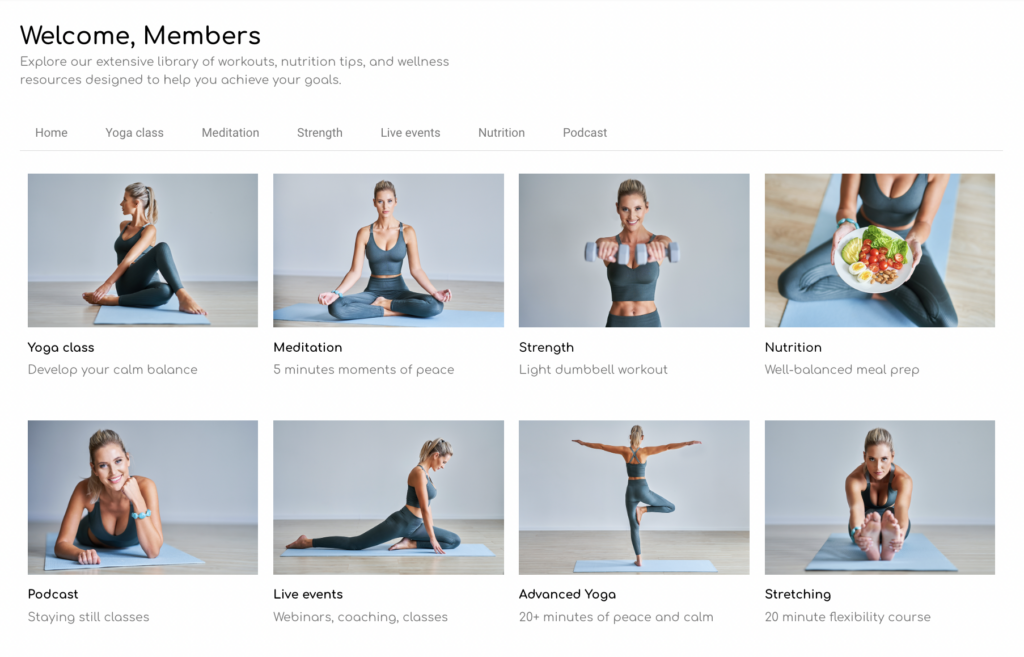
1. Offer a Content Library

One of the best ways to start making money as a nutritionist is by creating a content library. This can include digital products like:

  • Nutrition templates
  • Guides
  • Personalized meal plans
  • Videos

Clients love having on-demand resources they can access anytime. It’s a win-win because they get practical tools, and you get to offer a product that sells while you sleep. Plus, once it’s set up, it requires little ongoing effort.
2. Launch an Online Course

Another excellent way to earn is by launching an online course. You could create courses that cover topics like meal prep, weight management, or specific diets like keto or plant-based nutrition. These courses allow you to:

  • Reach a global audience
  • Generate passive income
  • Build your authority in your niche

3. Offer 1:1 Coaching or Group Programs

If you prefer more personalized interaction, consider offering 1-on-1 nutrition coaching or group programs. Many people are willing to pay for tailored advice and guidance. You could provide things like:

  • Weekly meal plans
  • Fitness advice
  • Accountability check-ins

With tools like Zoom, you can coach clients from anywhere, expanding your reach beyond just your local area.

5. Create eBooks and Downloadable Guides

Another great way to make money as a nutritionist is by repurposing the content you’ve already created into eBooks or downloadable guides. For example, you can take your blog posts, meal plans, or video lessons and package them into a comprehensive resource. These could include:

  • Step-by-step guides on specific diets
  • Recipe collections
  • Customizable meal planning templates

By selling these eBooks and guides on your website, you provide valuable resources to your clients while creating an additional stream of income with content you’ve already invested time in.

Final Thoughts

There are countless opportunities to make money as a nutritionist online. From offering a content library to providing coaching sessions or selling eBooks, the key is finding what works best for you and your audience. Start small, build your offerings, and watch your business grow!

Need help setting up your nutrition coaching website?

Connect with our friendly team, weekdays 10am – 6pm ET.

Let’s chat!

How Anne Craig Built a Thriving Fitness Website with Squarespace + MemberSpace

Software Stack Editor · August 30, 2024 ·

Picture of Haiden Hibbert

Haiden Hibbert

I’m a Content Manager at MemberSpace helping entrepreneurs and creators sell digital products.

Turning a passion for fitness into a successful online business might seem challenging, but Anne from Anne Craig Fitness has proven it’s not only possible but also incredibly rewarding. In this post, we’ll take a closer look at how Anne built her thriving Squarespace fitness website, the strategies she used to grow her business, and how you can do the same.

Launch a Squarespace fitness website!

The easiest way to accept membership payments or one-time charges for digital products like online courses, communities, content libraries, and more — all from your own website!


Start selling now

Get started for free! 5 minutes to set up.

Table of Contents

Meet Anne Craig Fitness

Anne Craig is the entrepreneur and coach behind Anne Craig Fitness. She’s built a thriving online community where she offers a content library of daily workouts, eBooks on counting macros, and 1:1 coaching. Her mission? To help her clients “create a life that feels good on the inside.”

Building Her Fitness Website with Squarespace + MemberSpace

Anne’s website is more than just a digital storefront; it’s a complete fitness ecosystem. Using Squarespace, she designed a user-friendly website where clients can sign up for daily workout memberships. To add advanced membership features, she uses MemberSpace, which allows her to add a paywall to her site, offer tiered pricing plans, flexible signup options, Apple Pay, and more.

Squarespace fitness website anne craig

Growth Strategies

Since launching her membership site, Anne has seen significant growth in her business. She’s attracted hundreds of clients and built a loyal community. So, how did she do it? Here are four growth strategies that have helped her scale her fitness business. 

1. Free Trial

One key strategy that helped Anne grow her membership base was offering a free trial. This allowed potential clients to experience her workouts firsthand before committing to a paid membership—a low-risk way for them to see the value in her offerings, leading to higher conversion rates.

2. Multiple Pricing Plans for Flexibility

Anne also implemented multiple pricing plans to cater to different client needs. Her most affordable option is an annual membership, offering the best value. For those who aren’t ready to commit long-term, she provides quarterly and monthly plans as well. This flexibility helps attract a wide range of clients, ensuring there’s an option for everyone.

3. Building an Active Instagram Presence

Anne’s active presence on Instagram plays a huge role in her business’s success. With a large following, she regularly shares free content like workout tips, nutrition advice, and motivational posts. This not only builds trust with her audience but also drives traffic to her website, where followers can become paying members.

4. Engaging with a Free Monthly Newsletter

Anne’s free newsletter is another brilliant growth strategy. Each month, the Anne Craig Fitness team sends out a thoughtfully curated health and wellness newsletter, packed with fitness tips, nutrition advice, favorite products, and even recommended podcasts and playlists. This keeps her community engaged and ensures they’re the first to know about new products and programs.

Ready to Create Your Own Fitness Website?

Creating a membership site like Anne’s is actually pretty simple with the right tools. Here’s a quick breakdown of how you can set up your own in just a few steps:

  1. Add members-only content to pages on your website. This could be your workout videos, nutrition plans, 1:1 coaching calendar.
  2. Add an advanced membership software to your site with a tool like MemberSpace. This will add a paywall to your website so only paying clients can access your content, as well as give you access to additional revenue growth features. 
  3. Set Up Pricing: Set up your pricing model, whether it’s monthly, quarterly, or annual recurring payments.
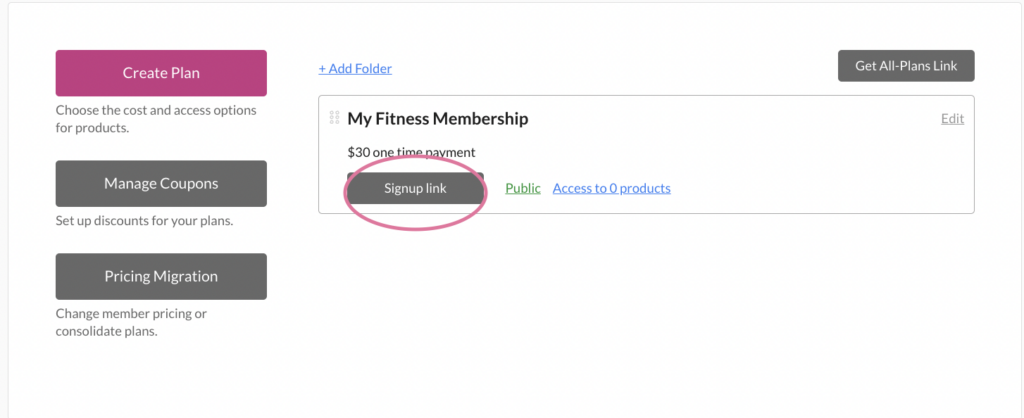
  4. Add a Signup Link: Finally, add a signup link to your website’s CTA buttons. When someone clicks the link, they’ll be prompted to sign up and pay before accessing your content. It’s that simple!

fitness-website-content
Fitness website memberspace

Final Thoughts

If you have any questions about setting up your own fitness website on Squarespace, feel free to reach out to our team. And don’t forget to check out Anne Craig Fitness for some great inspiration on building a successful fitness business!

Need help setting up your Squarespace fitness website?

Connect with our friendly team, weekdays 10am – 6pm ET.

Let’s chat!
How to Start an Online Nutrition Coaching Business – 4 Tips from a Registered Dietician

Software Stack Editor · August 15, 2024 ·

Haiden Hibbert

Haiden Hibbert

I’m a Content Manager at MemberSpace helping entrepreneurs and creators sell digital products.

Are you a nutrition coach or dietitian looking to grow your business online? Let’s take a look at how Brittyn, the founder of the Nourishing Autism Collective, turned her passion for helping families into a thriving membership site that made $60k last year —and how you can follow in her footsteps and start your own online nutrition coaching business. 

Start your online nutrition coaching business!

The easiest way to accept membership payments or one-time charges for digital products like online courses, communities, content libraries, and more — all from your own website!


Start selling now

Get started for free! 5 minutes to set up.

Table of Contents

1. Offer free, valuable resources

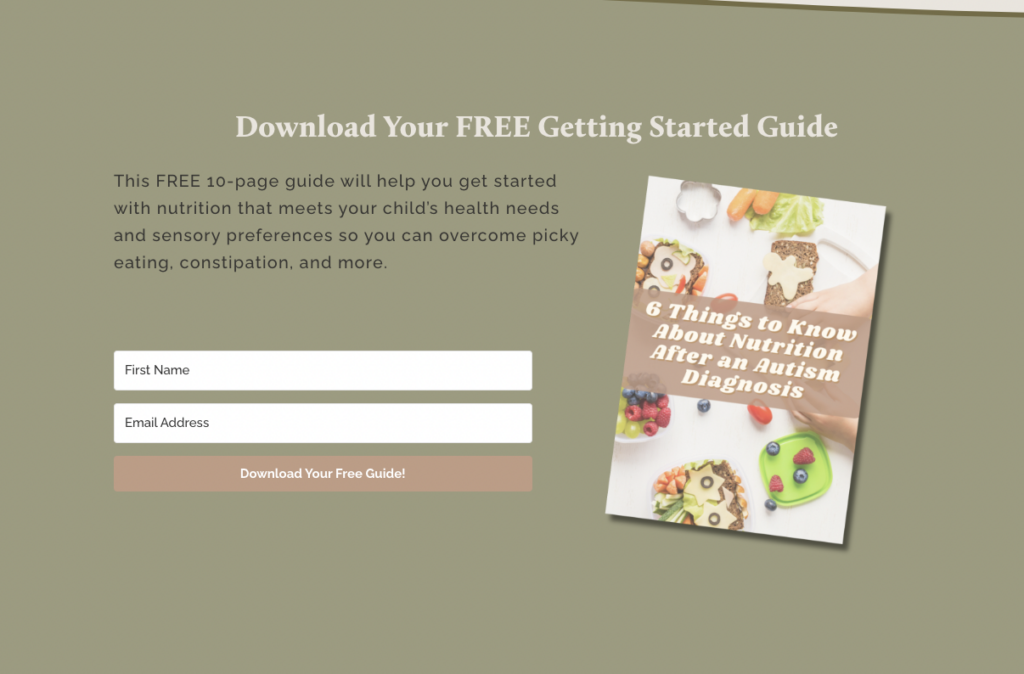
Brittyn knew that to attract her ideal audience, she needed to offer something valuable upfront. So, she created a free 10-page guide that helps parents get started with nutrition tailored to their child’s needs. She also added a free quiz to her website, which helps parents identify their child’s nutritional challenges. These resources were a natural lead-in to her paid membership, where she offers more in-depth support.

online-nutrition-coach-free-download
online-nutrition-coach-quiz

2. Share your expertise through podcasting

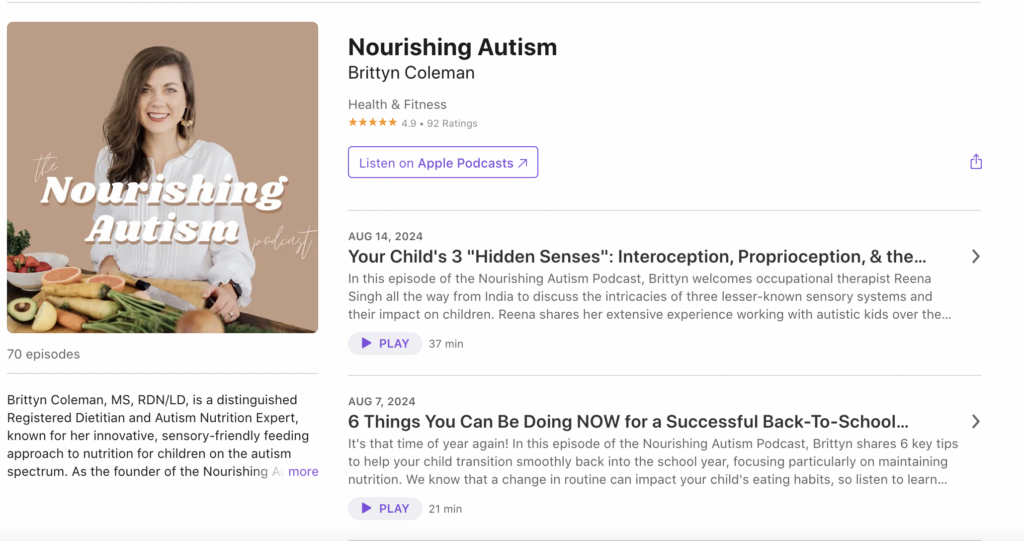
To establish herself as an authority in the field, Brittyn started a podcast focused on common challenges her target audience faces. Each episode dives deep into specific topics like managing picky eating or improving digestion for children with autism. By sharing actionable tips and real-world advice, she not only educates her audience but also subtly promotes her membership site. The podcast becomes a platform for potential clients to get to know her, trust her expertise, and eventually consider her paid services.

Nourishing Autism Podcast

3. Keep your audience engaged with a newsletter

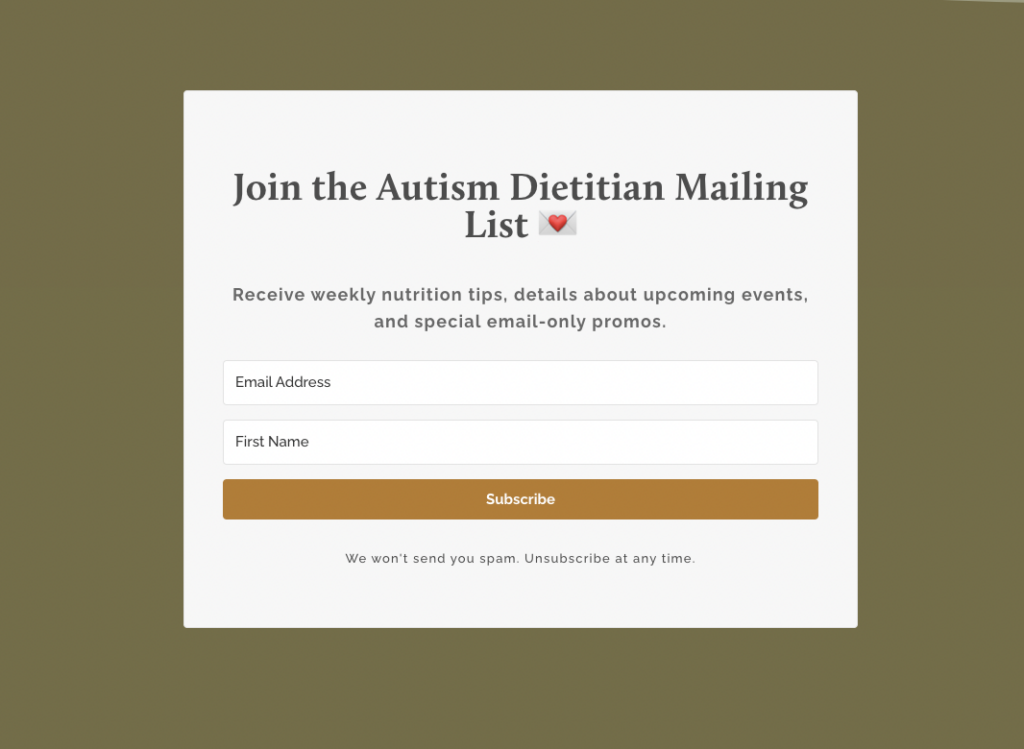
Brittyn also launched a weekly newsletter to maintain regular contact with her audience. In her newsletters, she shares bite-sized nutrition tips, updates on upcoming events, and exclusive offers only available to subscribers. This consistent communication helps keep her audience engaged and continually reminds them of the value she offers. Over time, this nurturing approach guides her subscribers toward exploring her paid membership for more personalized support.

Autism Dietitian newsletter

4. Build trust on social media

Brittyn uses Instagram, TikTok, and YouTube to share free advice and tips on navigating challenges like picky eating. By giving away helpful content, she built trust and a strong community that relies on her expertise.


So, how can you replicate Brittyn’s success and set up your own online nutrition coaching business? Here’s a simple guide to get you started:

How to set up your own online nutrition coaching business

1. Create your digital products

First, decide what digital products you want to offer. This could be online courses, guides, an eBooks, a video library, or any content that provides value to your audience.

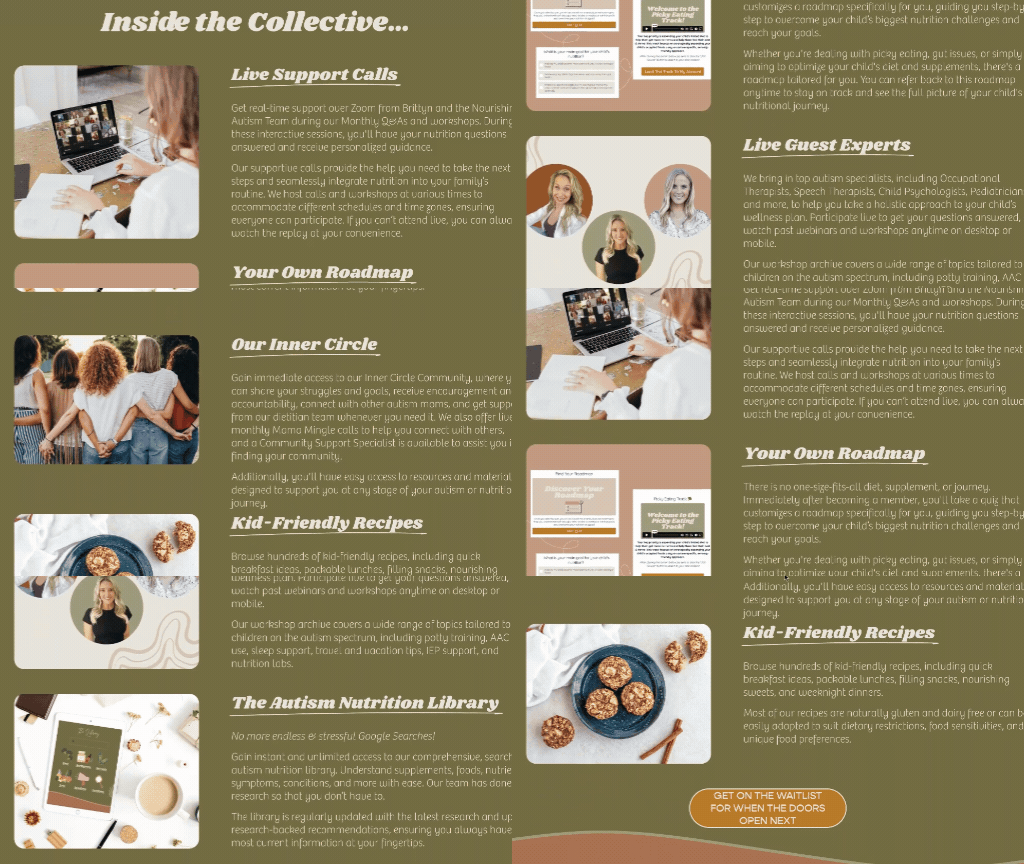
Nourishing Autism Membership
Brittyn’s membership includes a variety of digital products, like live support calls, nutrition roadmaps, guest expert speakers, a nutrition library, a private community, and recipes.

2. Convert your website into a membership site

Use a tool like MemberSpace to turn your existing website into a membership site, which makes it easy to manage members, payments, and access to your content.

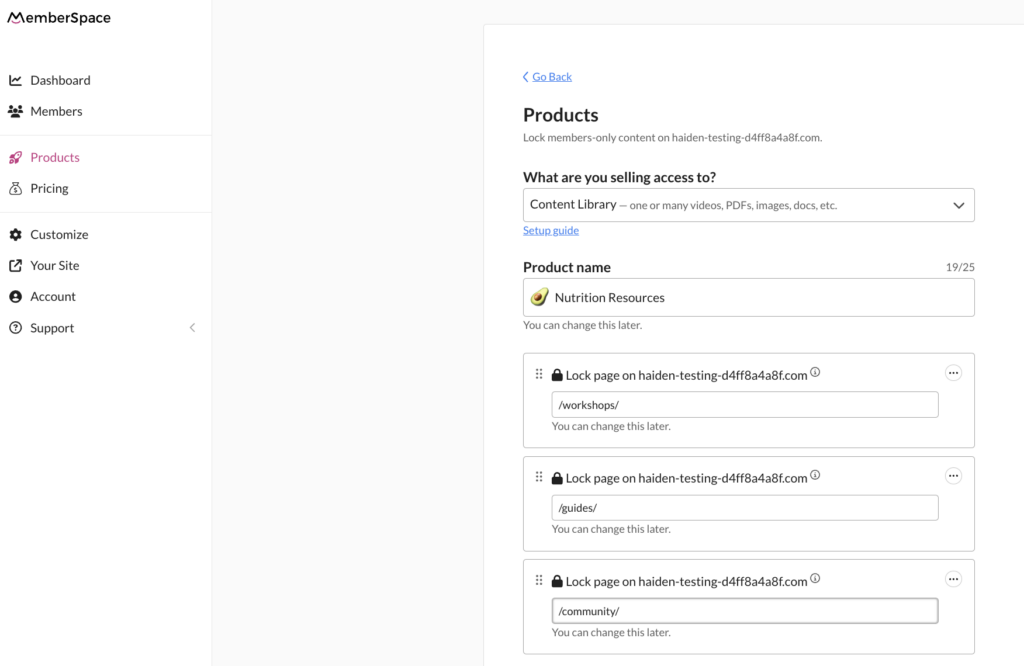
3. Add your digital products to pages on your website

Once your digital products are ready, add them to pages on your website. Then, lock access to these pages using MemberSpace. You can do this by simply adding the URLs for those pages to MemberSpace.

Online Nutrition Coach digital products

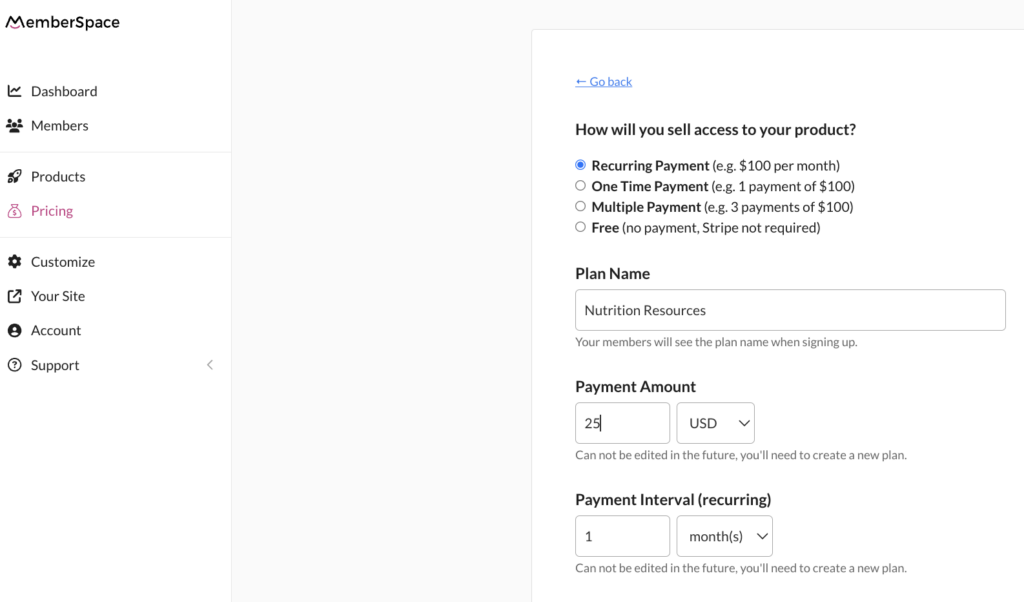
4. Set up your pricing

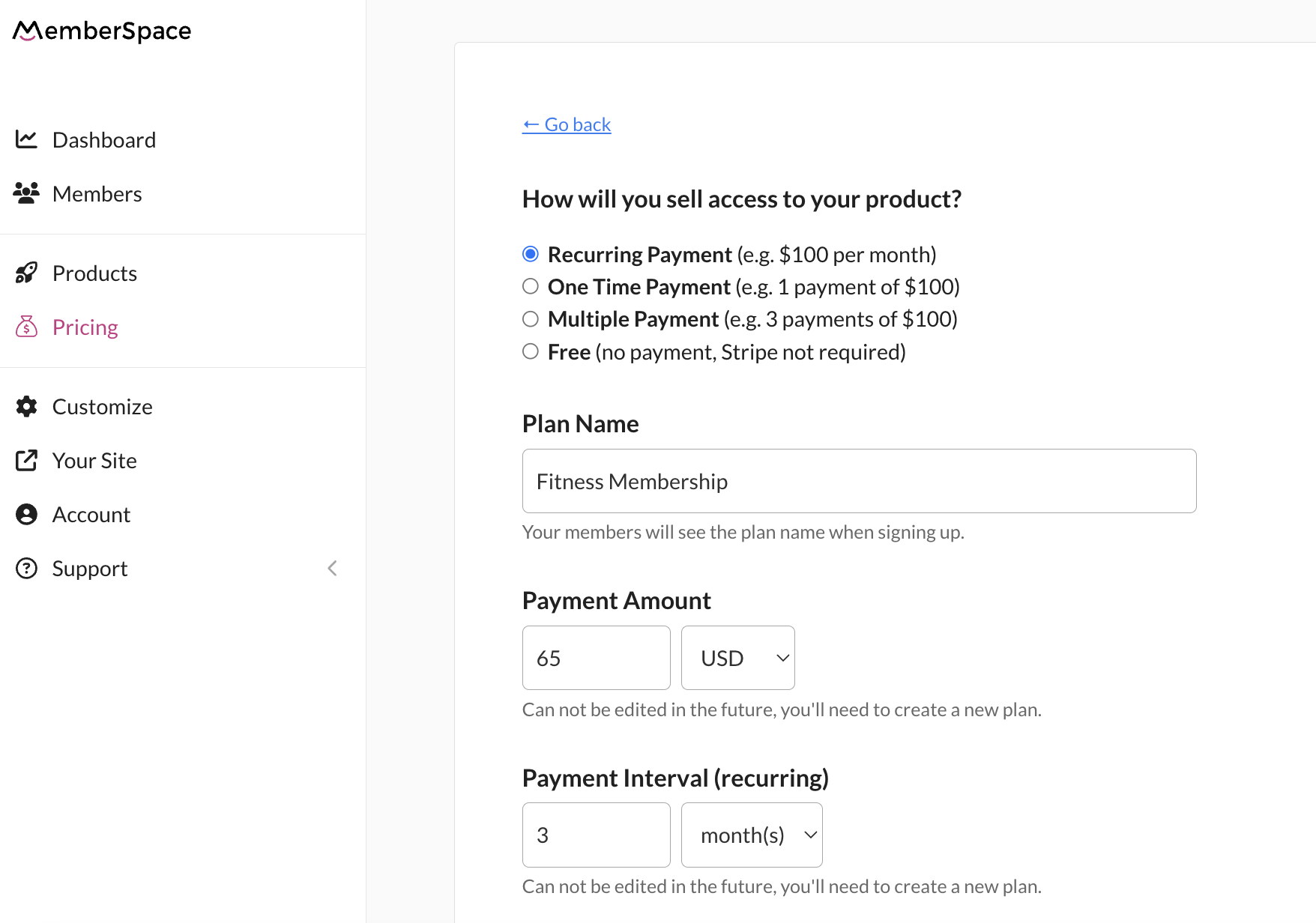
Decide how you want to charge for your content. You can choose from recurring payments (like a monthly membership), a one-time payment, or even offer some content for free.

Nutrition Coaching Pricing

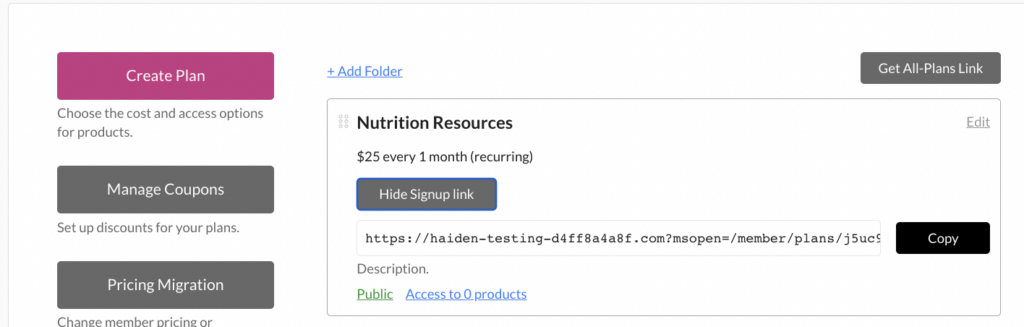
5. Add signup links to your website

Finally, copy the signup link from MemberSpace and add it to the call-to-action buttons on your website. When someone clicks the link, a form will pop up requiring them to sign up and pay for access to your content.

MemberSpace signup
Apple Pay payment option

Final Thoughts

By following these steps, you can start building a profitable online nutrition coaching business just like Brittyn’s. Whether you’re just starting or looking to scale, these strategies can help you attract, educate, and convert your audience into paying clients.

Need help setting up your nutrition coaching site?

Connect with our friendly team, weekdays 10am – 6pm ET.

Let’s chat!
The post How to Start an Online Nutrition Coaching Business – 4 Tips from a Registered Dietician appeared first on .

How this Business Owner Built a Top-Rated Fitness Membership Site

Software Stack Editor · July 25, 2024 ·

Haiden Hibbert

Haiden Hibbert

I’m a Content Manager at MemberSpace helping entrepreneurs and creators sell digital products.

Launching a membership site is one of the best ways for fitness instructors to earn recurring income and build an online community. In this post, we’ll explore how Sara, a successful business owner, built her popular online wellness platform, Withsara. 

We’ll dive into the strategies Sara used to create her video content library, design her website, and attract new members. So whether you’re looking to start your own fitness membership site or just looking for some entrepreneurial inspiration,  Sara’s story offers valuable insights and practical guidance to help you get started.

Launch a fitness membership site!

The easiest way to accept membership payments or one-time charges for digital products like online courses, communities, content libraries, and more — all from your own website!


Start selling now

Get started for free! 5 minutes to set up.

Table of Contents

Meet Sara: fitness instructor, entrepreneur, and mother

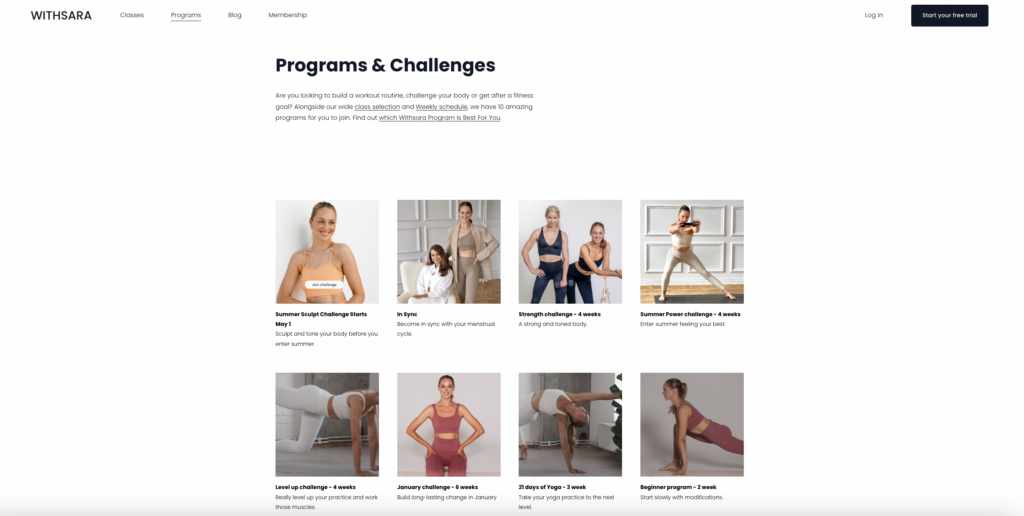
Sara started her fitness membership site, Withsara, with the goal of inspiring women to make space for self care and daily exercise.  Over the years, she’s created a massive content library of classes for her members, has built out tailored programs, fun challenges, and weekly schedules to keep her members on track.

Sara fitness membership site owner

✨ Since launching Withsara, Sara’s members have completed over 150,000 workouts on her fitness membership site!

Creating a fitness content library

Sara’s fitness membership site includes an impressive content library of more than 350 workout videos. Here’s how she crafted her content library:

  • A variety of classes: Sara offers a range of classes to cater to different interests and fitness levels, from yoga to meditation to  pregnancy workouts.

  • Tailored programs: She created specific programs designed to meet her members’ various needs and goals. This helps members follow a structured fitness routine that works for them.

  • Engaging challenges and weekly schedules: To keep her members motivated, Sara introduced fun challenges and weekly schedules. These elements add excitement and help members stay committed to their fitness journey.

Fitness membership content library

Designing a fitness membership site

A key part of Sara’s success is her well-designed website. Here’s what makes it work so well:

  • Clean and user-friendly design: The website is easy to navigate, making it simple for members to find what they need.

  • Organized by category: Classes are sorted into categories, so members can quickly find  whatever  they’re looking for.

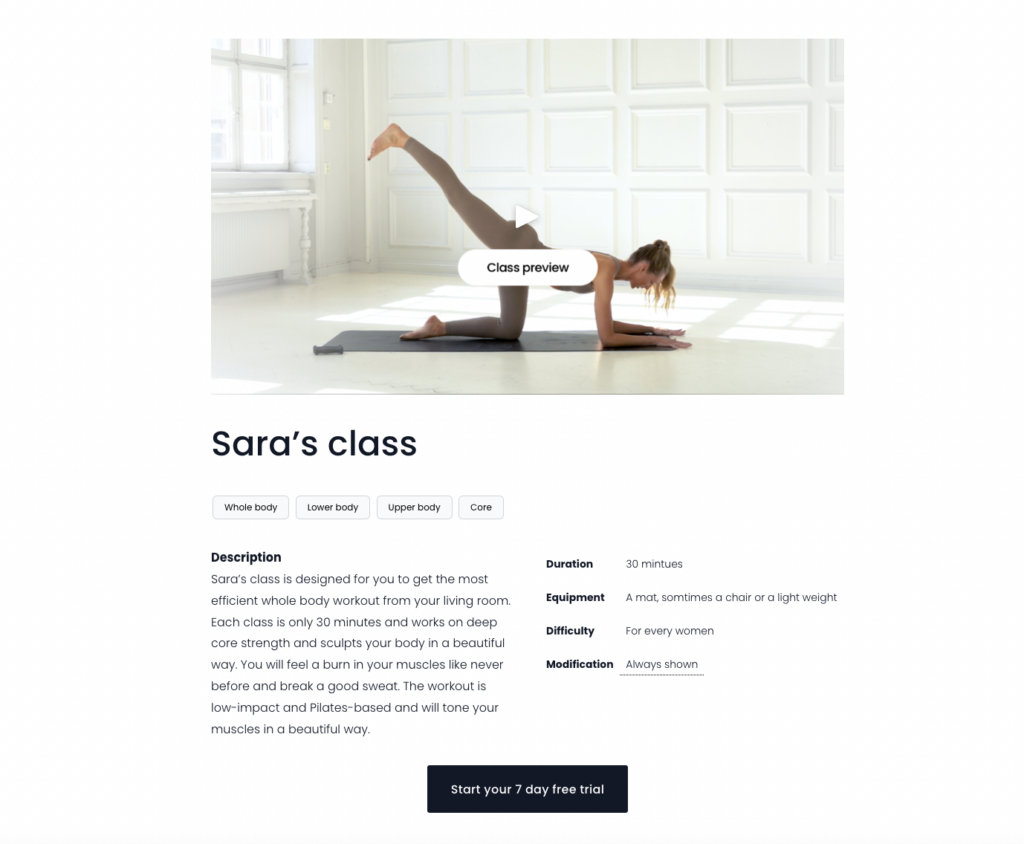
  • Program previews and trailers: Each program has a trailer and a preview of the included classes. This allows potential members to see what they can expect before they sign up.

  • Clear CTAs: There are call-to-action buttons sprinkled throughout Sara’s website, so no matter where visitors click, it’s easy to signup. 

Withsara fitness program

How to create a fitness membership site

Building a fitness content library like Sara’s is simple with the right software.  Here’s the five-step process:

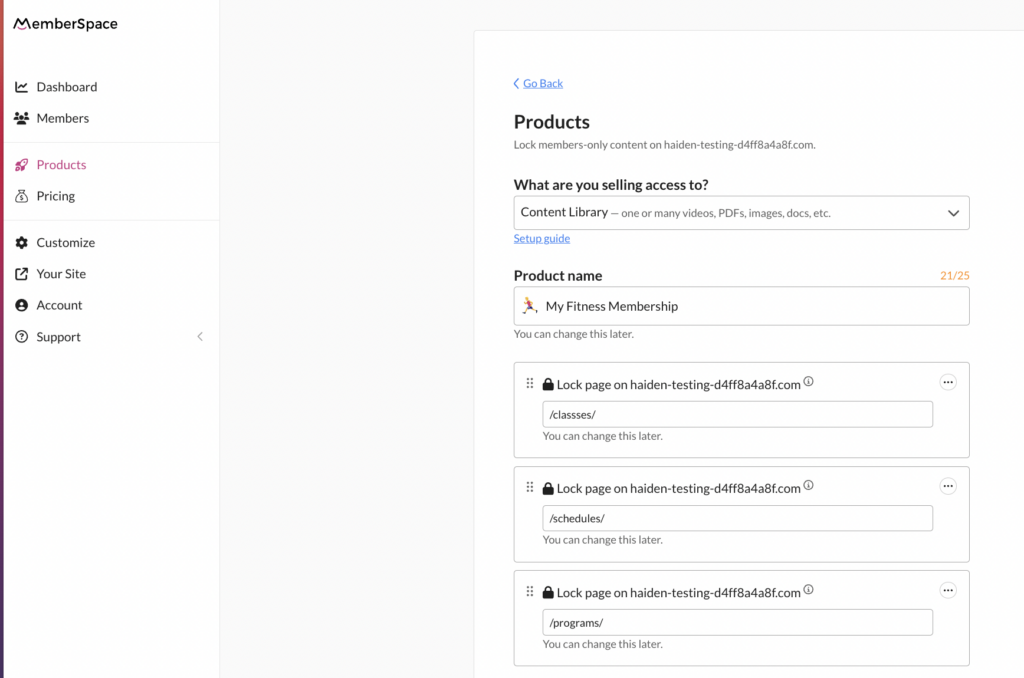
1. Convert your website into a fitness membership site with a tool like MemberSpace. This allows you to lock any page on your website, requiring visitors to sign up and pay to access your fitness content.

2. Add your workout classes to pages on your site, and lock those pages for paying members. You’ll do this by adding the URLs for each of your class pages to MemberSpace. 

Create fitness content library

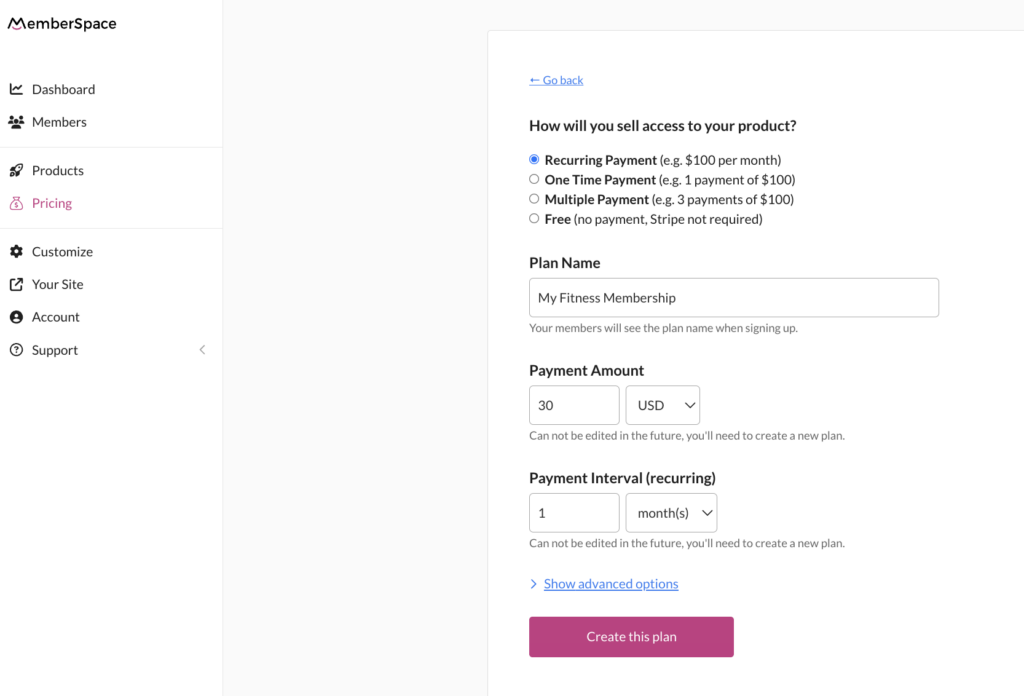
3. Set up your pricing. For fitness memberships, a recurring payment model is usually the most effective approach.

fitness membership site pricing

4. Copy your signup link and add it to call-to-action buttons on your site. When someone clicks the link, a form will open, requiring them to sign up and pay before they can access your content.

Fitness membership site signup

Attracting new members

Sara uses a few key strategies to attract a consistent stream of new members:

  • Offering a free 7-day trial: Potential members can try out her content for free for seven days. This gives them a chance to experience the platform before committing to a paid membership.

  • Active social media presence: Sara keeps her Instagram active with free workouts, fitness challenges, and lifestyle content. This not only attracts her target audience but also keeps her current members engaged and motivated.

  • Holistic wellness blog: Sara’s blog is full of free content that her target audience would be interested in, covering topics on exercise, workout routines, nutrition, and physical and mental health.

Final Thoughts

Building a successful fitness membership site, like Withsara, involves strategic planning, user-friendly design, and consistent engagement with your audience. By following the steps outlined in this guide, you can create a thriving membership site that not only generates income but also helps you achieve your mission of inspiring and motivating others.

Need help setting up fitness membership site?

Connect with our friendly team, weekdays 10am – 6pm ET.

Let’s chat!
The post How this Business Owner Built a Top-Rated Fitness Membership Site appeared first on .

How to Sell Guided Meditations Online – 5 Steps to Launch a Meditation Membership

Software Stack Editor · June 20, 2024 ·

Haiden Hibbert

Haiden Hibbert

I’m a Content Manager at MemberSpace helping entrepreneurs and creators sell digital products.

Turning your website into a membership site is the easiest way to start selling guided meditations and music. Whether you’re a certified instructor or just have a passion for meditation, you can monetize your mindfulness content and grow your online community in just a few steps. In this post, we’ll walk through a proven, five-step process that successful meditation professionals use to sell their content. 

Sell guided meditations online!

The easiest way to accept membership payments or one-time charges for digital products like online courses, communities, content libraries, and more — all from your own website!


Start selling now

Get started for free! 5 minutes to set up.

Table of Contents

Step 1: Convert your website into a membership site

To start selling your guided meditations or music, you’ll need to start by turning your website into a membership site with a tool like MemberSpace. This will allow you to lock any page on your website and accept payments from customers. 

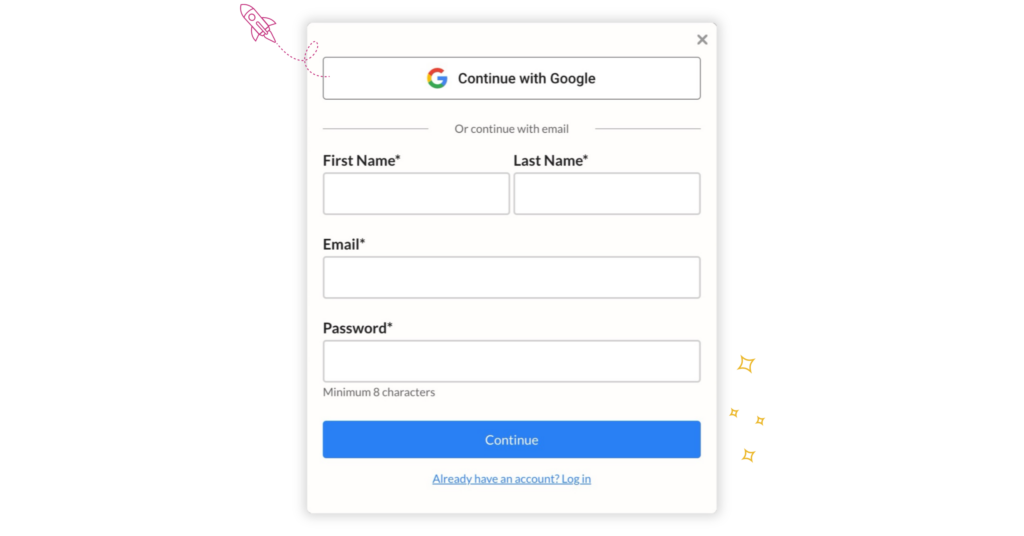
After installing MemberSpace (this only takes a few minutes!), customers will be able to sign up to access your meditations via a simple, customizable form. 

sell guided meditations and music form
Customize your signup form to gather information like name, email, address, or whatever information you’d like to collect from members.

Step 2: Upload your meditations to your site

Once you’ve converted your website to a membership site, it’s time to add your guided meditations and music to pages on your website. You can upload audio files, videos, or whatever format you’d like. 

If you plan on offering other resources to your members, like a private Facebook community, workshops and events, exclusive discounts, private coaching sessions, or newsletter, you can add all of that content to your site, as well. 

Everything on these members-only pages will be password protected so only paying members can access them. 

Soul Boost Meditation Membership

Soul Boost Meditation offers a membership that includes live guided meditations, a private Facebook group, workshops and events, and more.

Step 3: Lock your web pages for paying customers

To restrict access to your content, you’ll need to add the URLs for the pages that contain your guided meditation recordings and music. You can add each page one by one, or protect them en masse if you have several pages filed under the same category. For example, if you have you’ve added your recordings like this: yoursite.com/meditations/meditation-1/ and yoursite.com/meditations/meditation-1, simply add an asterisk to protect all pages under yoursite.com/meditations/*. 

✨ Security Tip: For added security,  upload your meditation recordings to MemberSpace to protect the download link. This helps to ensure the recordings can only be accessed by customers who’ve purchased them directly. You can also add our extra security code to your protected page.

Step 4: Set up your pricing

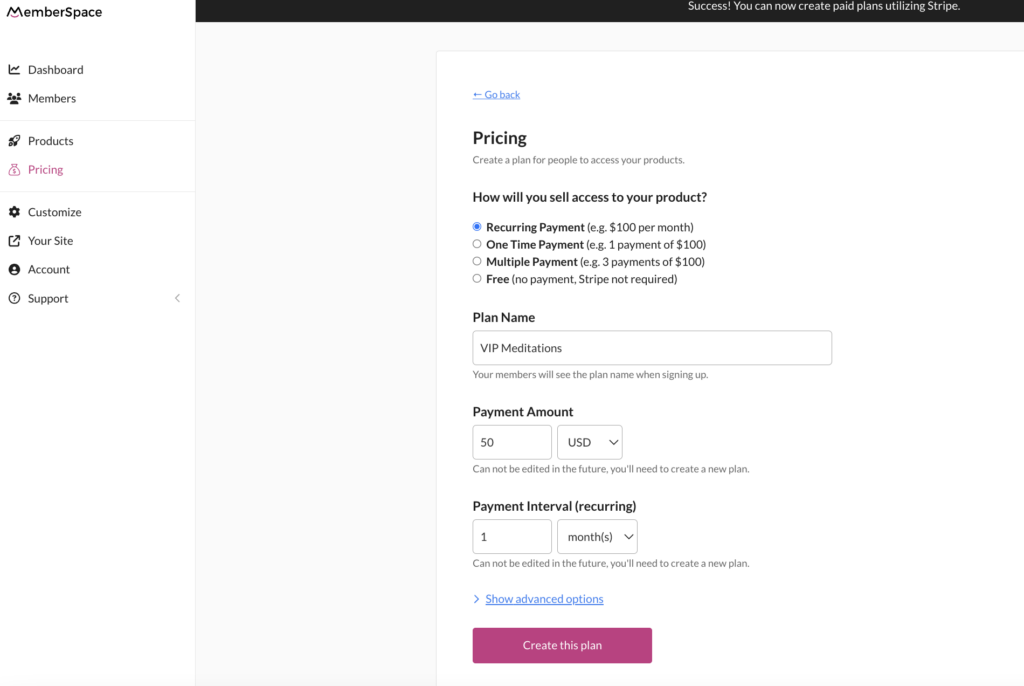
After you’ve locked your website pages, you can set a price for your meditation recordings. Whether you want to set up subscription tiers or bundle your meditations for a one-time fee, the built-in Stripe integration handles payment processing and makes it easy to charge customers however you’d like. 

Here’s an example of how you might set up different membership tiers:

  • Free tier for a limited selection of meditations 
  • Premium tier for access to your full library of meditations and videos
  • A VIP tier for access to the full library of guided meditations, an online meditation course, and monthly livestreams

With MemberSpace, you can sell guided meditations and music for a one-time payent, or set up a subscription and charge members a recurring fee to access your content.

Step 5: Add your signup link to your site

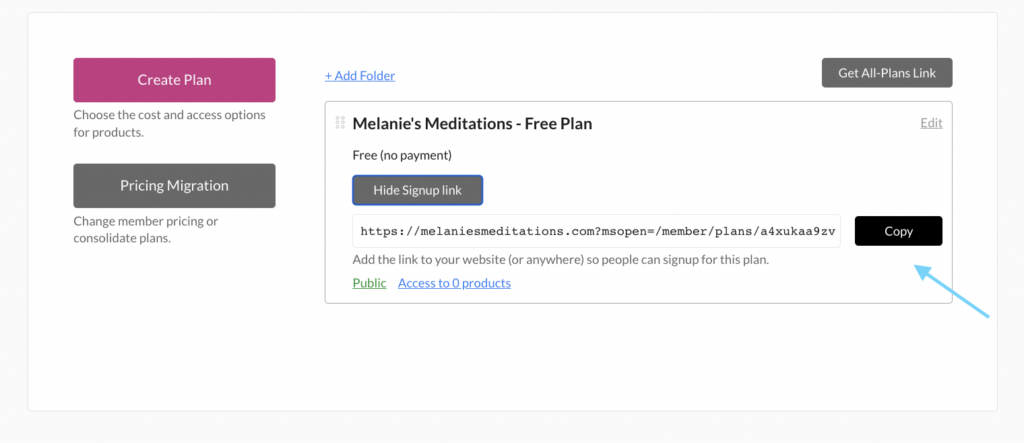
When you’re ready to launch your guided meditations, you’ll grab the signup link from your MemberSpace account and add it to call-to-action buttons throughout your website, as well as email campaigns, social media posts, or wherever else you’d like to promote your recordings! 

Guided meditation signup link
When members click your signup link, a form will open requiring them to create an account and pay before they get access to your guided meditations.

Meditation Website Examples

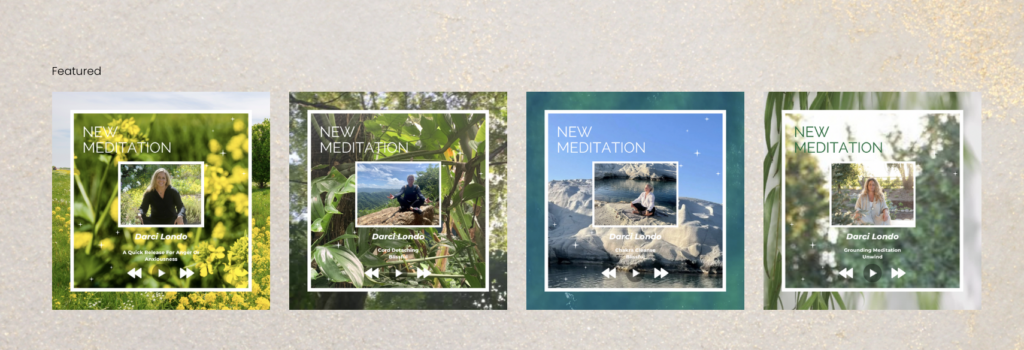
For some visual inspiration, check out these meditation membership sites that sell guided mediations, music, online courses, workshops, and more. 

Previous
Next

Final Thoughts

Turning  your passion into a profitable meditation business is simple, whether you want to sell a live meditation classes, on-demand videos, or a content library of audio meditations. With a tool like MemberSpace, you can add a membership paywall to your website in just a few steps and start monetizing your guided meditation videos, audio, and music. You can launch business today by signing up for a free trial!

Need help with your meditation business?

Connect with our friendly team, weekdays 10am – 6pm ET.

Let’s chat!

The post How to Sell Guided Meditations Online – 5 Steps to Launch a Meditation Membership appeared first on .

How to Sell Short Stories Online – 5 Steps to Start Earning Reliable Income

Software Stack Editor · June 5, 2024 ·

Haiden Hibbert

Haiden Hibbert

I’m a Content Manager at MemberSpace helping entrepreneurs and creators sell digital products.

Submitting short stories to a literary magazine used to be the only option for writers to make money – and even then, the opportunities were limited.  Now, writers can take control of their careers and monetize short stories on their own terms! By skipping traditional publishing and selling your writing on your own website, you can generate sustainable, reliable income. In this post, we’ll walk through five steps on how to sell short stories online. 

Sell your short stories online!

The easiest way to accept membership payments or one-time charges for digital products like online courses, communities, content libraries, and more — all from your own website!


Start selling now

Get started for free! 5 minutes to set up.

Table of Contents

Step 1: Get creative with how you package your short stories

One of the best parts about selling your work independently is the freedom to get creative with how you package/sell your short stories. Instead of trying to sell individual stories, try bundling them into something valuable that you can charge more for. 

Here are a few ideas:

  • Turn a collection of your short stories into an ebook by grouping your stories by theme, genre, or character.
  • Build a membership where readers pay a recurring fee for access to your story library, behind-the-scenes content, and a members-only forum.
  • Start a paid newsletter where subscribers receive a new story, writing tips, and industry insights each week.
  • Host online writing workshops where you showcase your short stories to other writers and teach them about your writing process. 

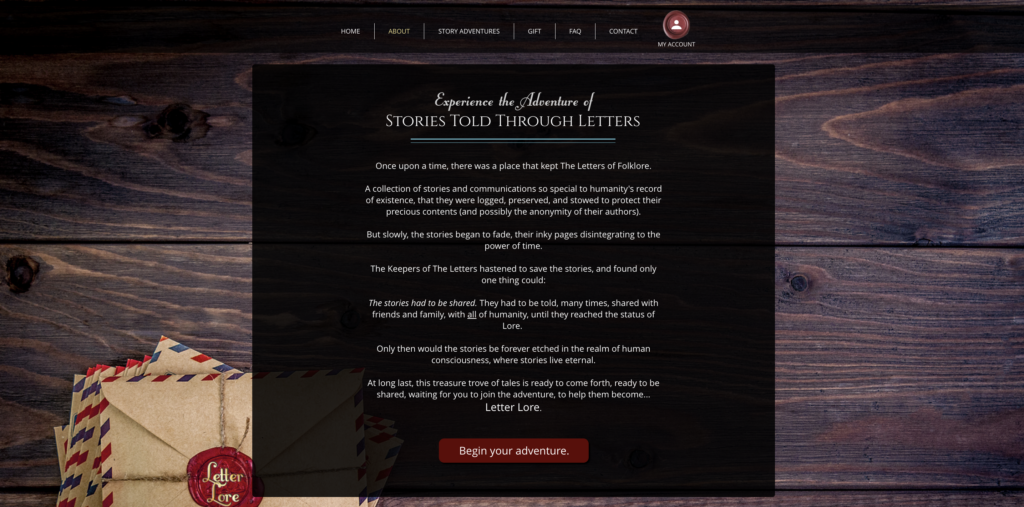
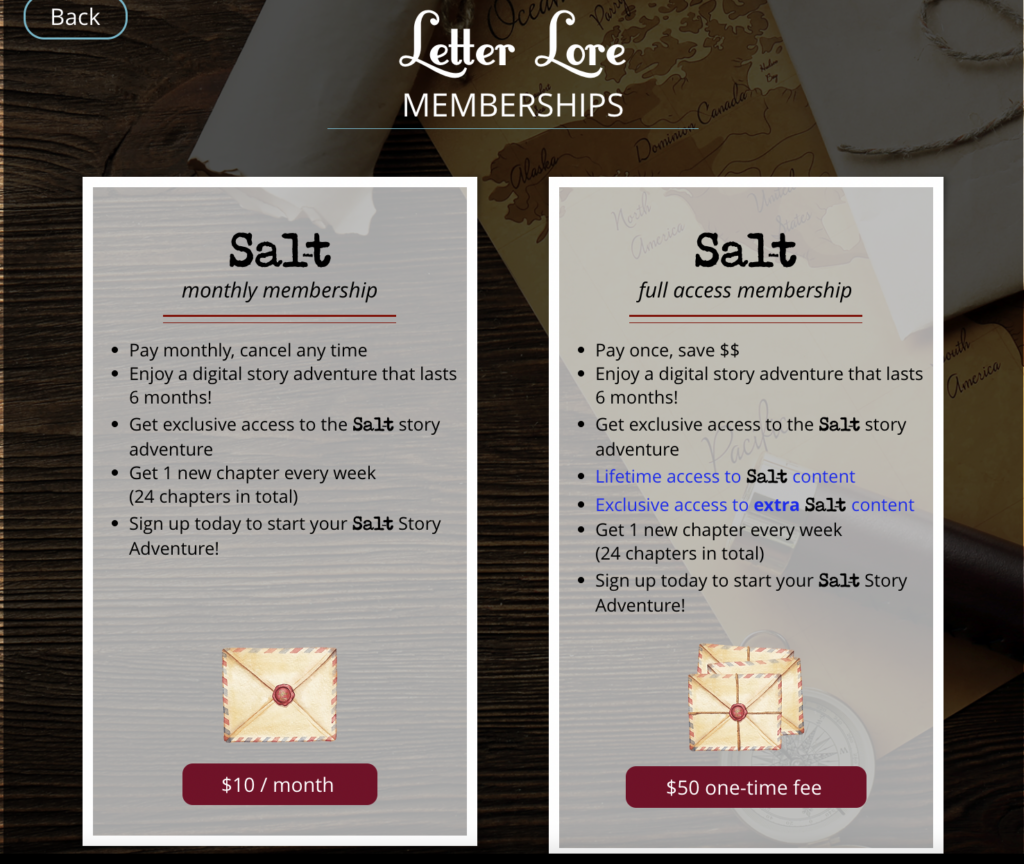
Readers sign up for Letter Lore to experience a “story adventure,” where they get access to a new chapter each week. Subscriptions are sold for a monthly or lifetime access fee.

Step 2: Add your stories to your website

To sell your short stories online, you’ll need a professional website that showcases your work and makes it easy for readers to pay for your content. With platforms that offer website templates, like Squarespace, Wix, and WordPress, creating a beautiful and functional site can be really simple, even if you don’t have any web design experience.

Just be sure your website includes:

  • An “About” page that introduces you as an author and shares your unique writing style and perspective
  • Testimonials or reviews from satisfied readers or industry professionals
  • A clear call-to-action guiding visitors to purchase your stories
  • A page for each of your short stories and other exclusive content. Just make sure the pages have a clear URL structure, like yoursite.com/stories/story-name, yoursite.com/forum/, yoursite.com/ebook, etc. 

Step 3: Lock your pages

Once you have your website set up, you’ll need a way to protect your short stories and ensure only paying readers can access them. This is where MemberSpace comes in. 

MemberSpace is a powerful tool for writers that integrates with your website and allows you to easily control access to your website content.

With MemberSpace, you can:

  • Sell access to your ebooks, a private community for your readers, a newsletter subscription, and more
  • Create subscription plans with different pricing tiers and access levels 
  • Restrict access to specific members-only pages or sections of your website
  • Securely accept payments through the Stripe integration

Here’s how it works:

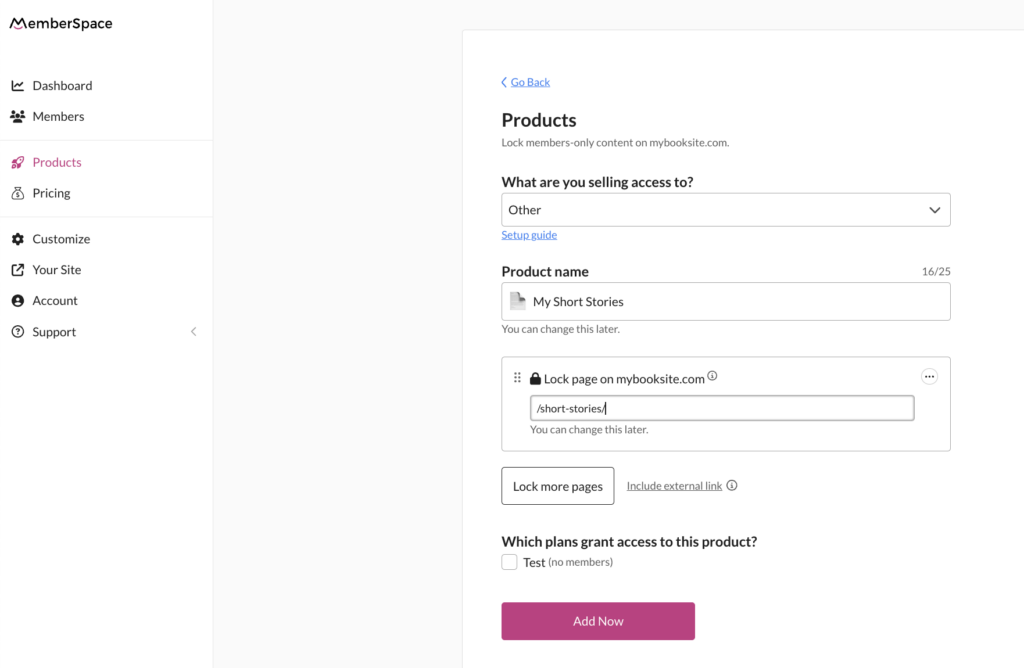
  1. Create a MemberSpace account
  2. Click on the Products tab in the left menu.
  3. Give your product a name.
  4. Under Lock pages, add the URLs of your individual story pages or sections of your website that you want to protect. 

Sell short stories
By adding the URL of each of your chapter pages, MemberSpace will restrict access to them so readers have to sign up and pay you before they can read your work.

Step 4: Set your pricing

With MemberSpace’s Stripe integration, you can easily accept payments for your short stories on your website. Choose between one-time purchases or recurring subscriptions, depending on how you plan to package your short stories. You can also create multiple pricing tiers to offer readers different levels of access to your content.

For example, you might offer:

  •  A basic tier with access to a limited selection of stories and your newsletter
  • A premium tier with unlimited access to your full library, your community forum, and your newsletter
  • A VIP tier with access to your full library of stories, your community forum, your newsletter, and exclusive live streams or workshops.

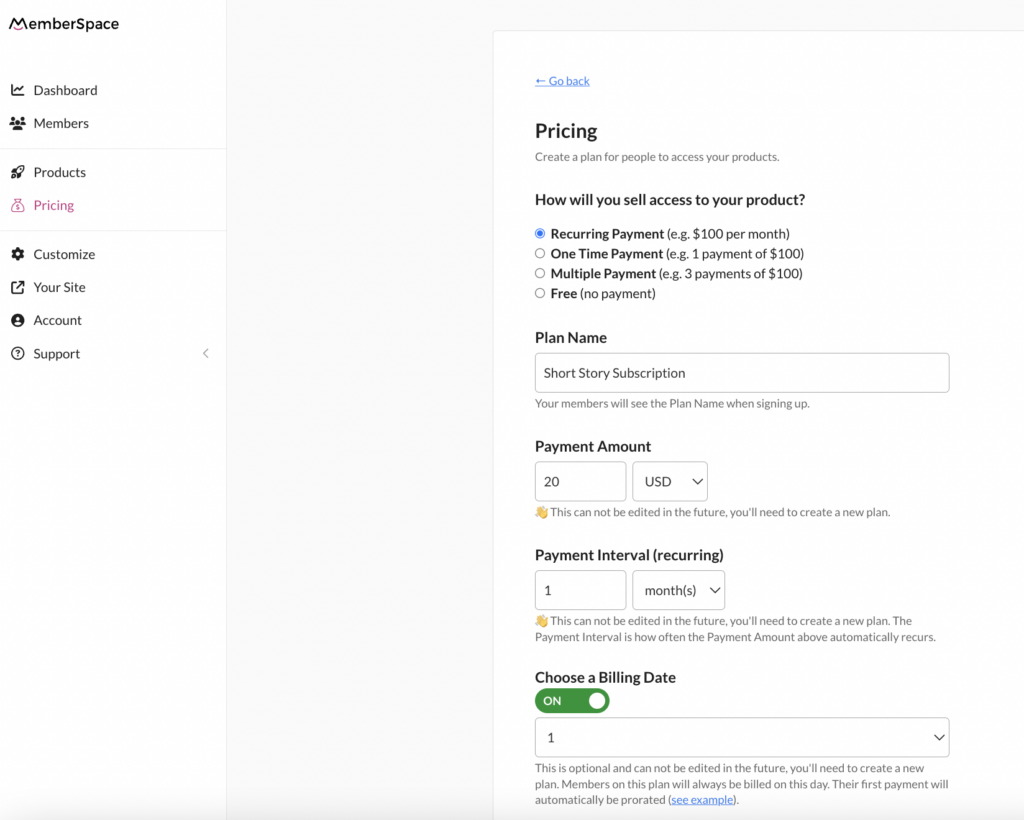
To set up your pricing, simply navigate to Pricing on the left in your MemberSpace dashboard, create a new plan, and specify the price, and billing frequency. Then go back to your product and make sure to grant access to the pricing plan you created. 

With MemberSpace, you can sell a short story collection for a one-time payment, bundle your stories with other digital products, or sell access to a story subscription or membership community for a recurring fee.

Step 5: Promote your stories!

 Finally, it’s time to get the word out about your work and start selling your short stories online! MemberSpace will provide you with a unique sign-up link that you can add to CTA buttons on your website, as well as email campaigns and social media. Also consider promoting your short story subscription by: 
  • Building an email list and regularly sending updates about new stories, special offers, and behind-the-scenes content
  • Offering free samples or a trial for your story subscription to give readers a taste of what your membership includes (you can set this up with MemberSpace!)
  • Sharing samples of your work on social media 
  • Hosting live streams to share more about your work 

Final Thoughts

Selling your short stories online gives you the freedom to take control of your writing career and build meaningful connections with your readers. Whether you want to sell an ebook with a collection of your stories, create a serial novel subscription, or build a private community for your readers, you can start to monetize your writing in just a few steps. All you need is a website and MemberSpace account to get started! 

Need help selling your short stories?

Connect with our friendly team, weekdays 10am – 6pm ET.

Let’s chat!
The post How to Sell Short Stories Online – 5 Steps to Start Earning Reliable Income appeared first on .

Pricing migration improvements

Software Stack Editor · June 4, 2024 ·

Late last year, we introduced pricing migration and offered a few tips for how to use this feature to help grow your revenue. Thanks to your valuable feedback since the release, we’re excited to announce a new enhancement to pricing migration…

Schedule a non-prorated pricing update

Need to change your pricing, combine plans, or adjust the details of a subscription? You now have two options for moving your customers to a different plan en masse.

Change your customers’ plans immediately

Choosing to update your customers’ plans immediately means they’ll be charged a prorated amount depending on the price difference between their current and new plans, as well as the amount of time remaining in their billing cycle. This grants customers access to the new plan’s products and protected pages instantly.

NEW!

Update your customers’ plans on their next billing dates

If you don’t want to prorate the first payment for each of your customers on the new plan, you can instead schedule the plan update for their next billing date. This means each customer will be moved to the new plan and charged the full amount on their respective billing date.

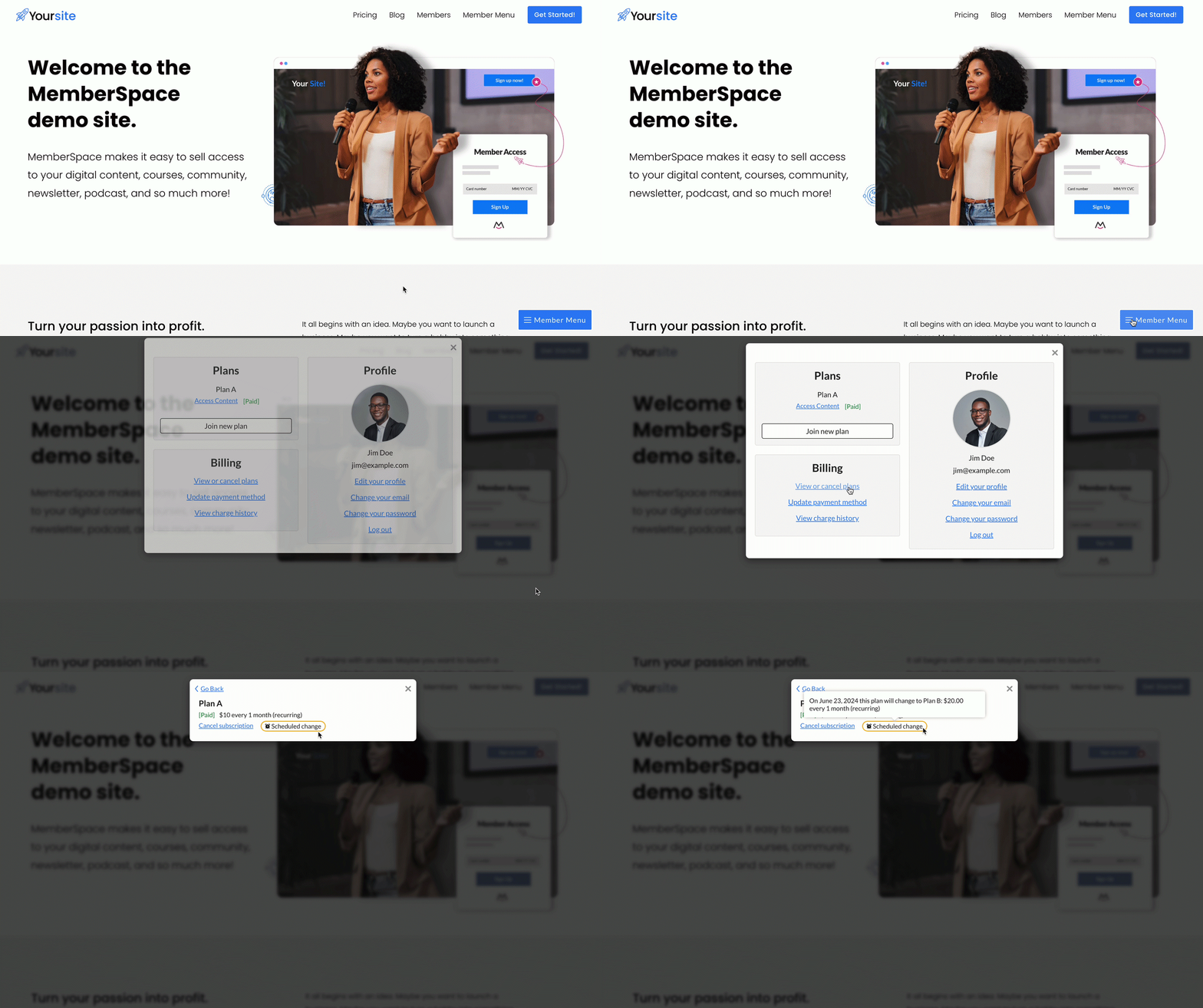
When a customer’s plan is scheduled to change on their next billing date, they’ll see a “Scheduled change” indication in their account area under View or cancel plans. Hovering over this notice reveals the pricing migration details, including the date of the change, along with the new plan and its specifics.

pricing migration scheduled change notice

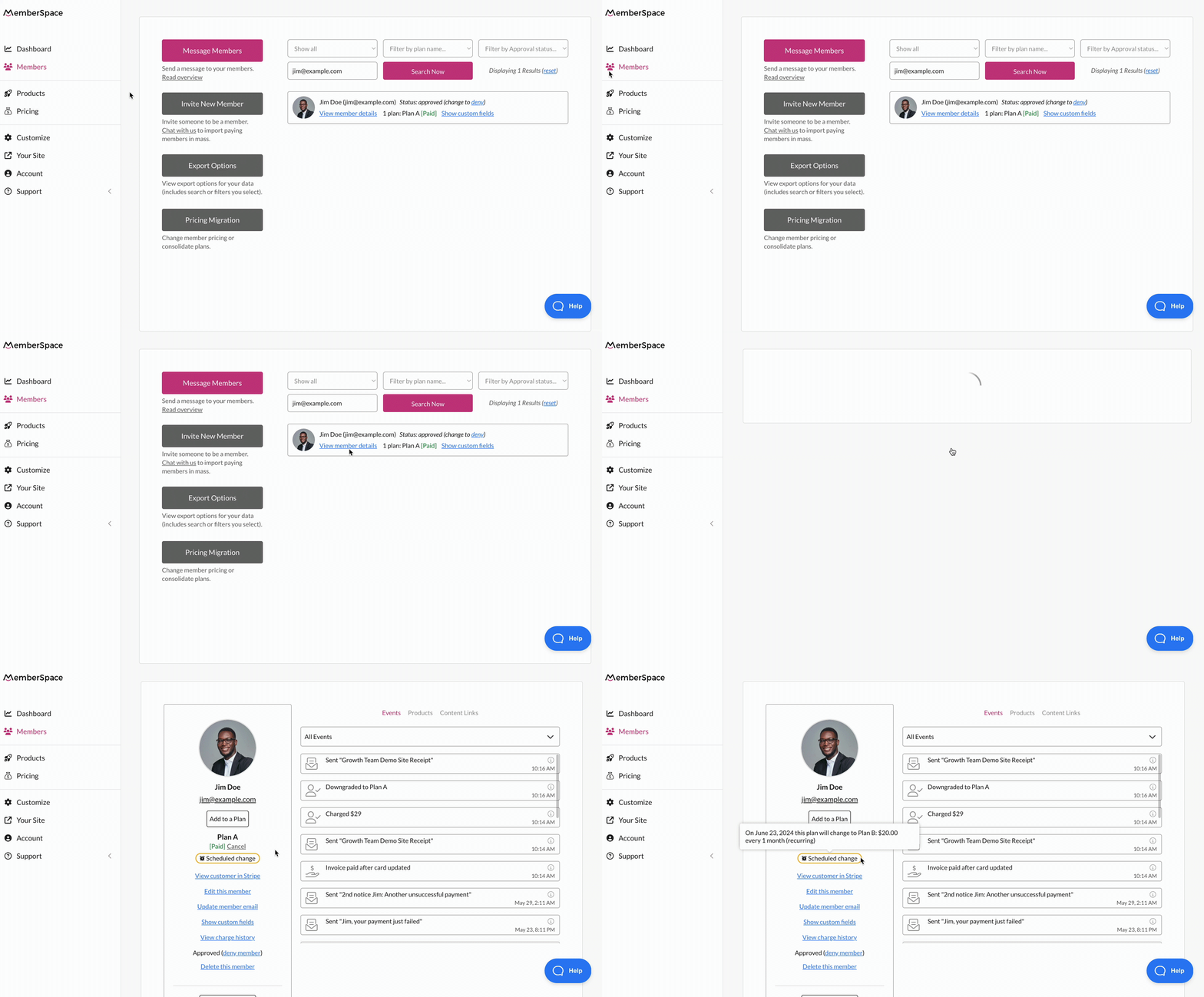
As an admin, you’ll also see this in your MemberSpace account within your member’s details under Members > View member details.

review a customer's scheduled pricing migration

You can request a pricing migration at any time directly from your MemberSpace account by navigating to either Members or Pricing in the left navigation and clicking the Pricing Migration button. 

✨ Be sure to include in your request the name of your customers’ current plan and the new one to which you want to migrate them. Also, let us know if you’d like to migrate customers immediately or have them pay full price on their next billing date.


Start a pricing migration

Pricing migrations are available for recurring payment plans.

Migration reports

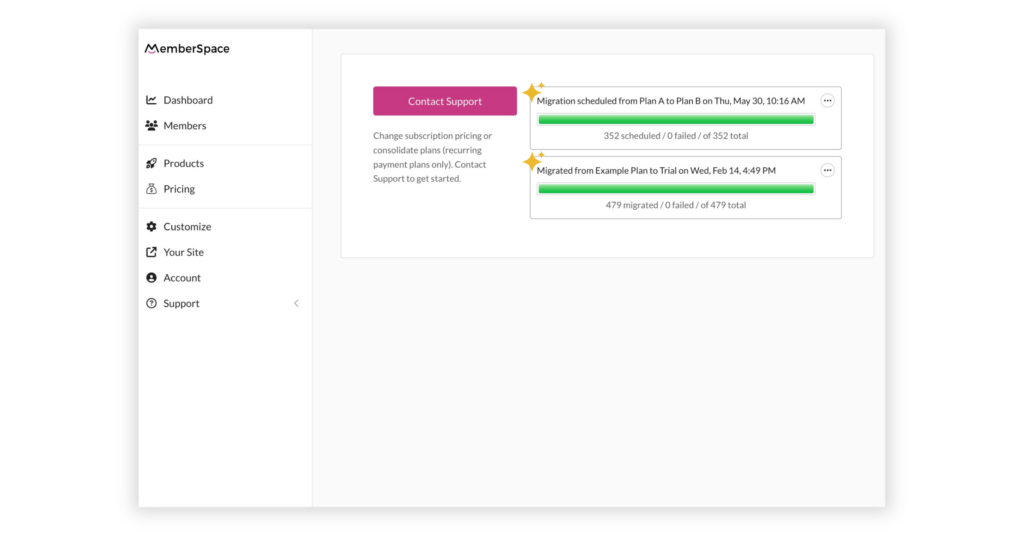
After MemberSpace runs a migration on your behalf, you can find the full report in the plan migrations view under Members > Pricing Migration.
With this new update, the migration report will now indicate whether your customers have already been migrated or if the migration is scheduled for your customers’ next billing dates.

pricing migration report

The CSV report contains a new Scheduled for column which will include either the date the migration was performed (if an immediate, prorated change) or the corresponding customer’s next billing date (if a scheduled change).

Additionally, the Status column will now indicate whether a customer has already been “Migrated” or is “Scheduled” to be.

Failed payments

If a customer’s payment fails during a pricing migration, they will still be moved to the new plan. However, they will be given a “past due” plan status, and MemberSpace will automatically try to recover that payment on your behalf.

If a customer schedules their current plan to be canceled on their next billing date, the migration will fail for that customer.

Changing a plan immediately with no charge

There may be a scenario where you wish to move your customers to a new plan immediately (so they can access the new plan’s assigned products/protected pages), but you don’t want to charge them again until their next billing date. Here’s what we recommend in this case:

  1. Edit the old plan and update the access criteria so it matches the new plan.
  2. Move forward with a scheduled migration.

No new customers should be joining the plan you’re moving members away from, so this should help you give customers the new plan’s benefits without charging them for the new plan until their next billing date.

Follow the steps in the link below to start a pricing migration and optimize your MemberSpace plans to meet your business goals!


Start a pricing migration

Pricing migrations are available for recurring payment plans.

The post Pricing migration improvements appeared first on .

How to Create and Sell an eBook – Monetize your Writing in 5 Steps

Software Stack Editor · May 31, 2024 ·

Haiden Hibbert

Haiden Hibbert

I’m a Content Manager at MemberSpace helping entrepreneurs and creators sell digital products.

In the world of self-publishing, countless tools are available to help you bring your eBook to life. However, many of these platforms come with limitations, requiring you to host your product on their site and adhere to their pricing and formatting guidelines. By choosing to sell your eBook directly through your own website, you gain tons of flexibility and full control over your content.

You can bundle your eBooks, offer them as part of a membership package, or sell them individually, all while keeping the focus on growing your own online presence. In this post, we’ll guide you through five simple steps to create and sell your eBook with MemberSpace. 

Sell your eBook!

The easiest way to accept membership payments or one-time charges for digital products like podcasts, online courses, communities, content libraries, and more — all from your own website!


Start selling now

Get started for free! 5 minutes to set up.

Table of Contents

Step 1: Use a Canva template to create your eBook

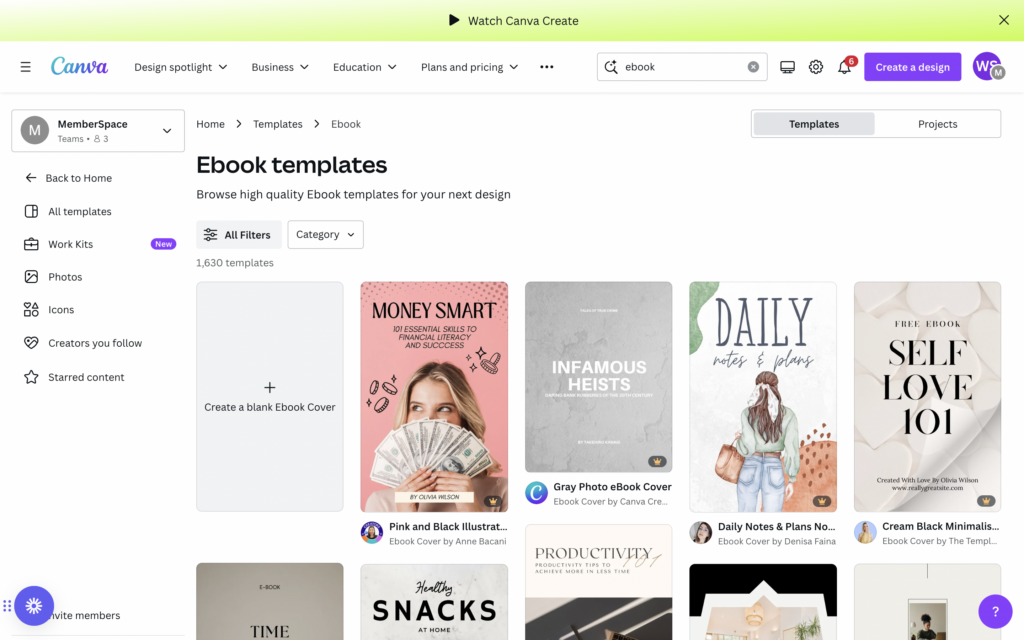
The easiest way to turn your eBook draft into a professional-looking digital product is by using a Canva template. Simply sign up for a free account and choose from over 1,500 eBook templates! Once you’ve pasted in your content and customized the template by adding your own images, branding elements, and adjusting the fonts and colors, you can save it out as a PDF to sell on your website. 

eBook Canva templates
Canva has thousands of eBook templates to choose from that make it simple to design and format your work.

If you need some inspiration, check out these eBooks created by MemberSpace customers. 

Previous
Next

Step 2: Set up a sales page

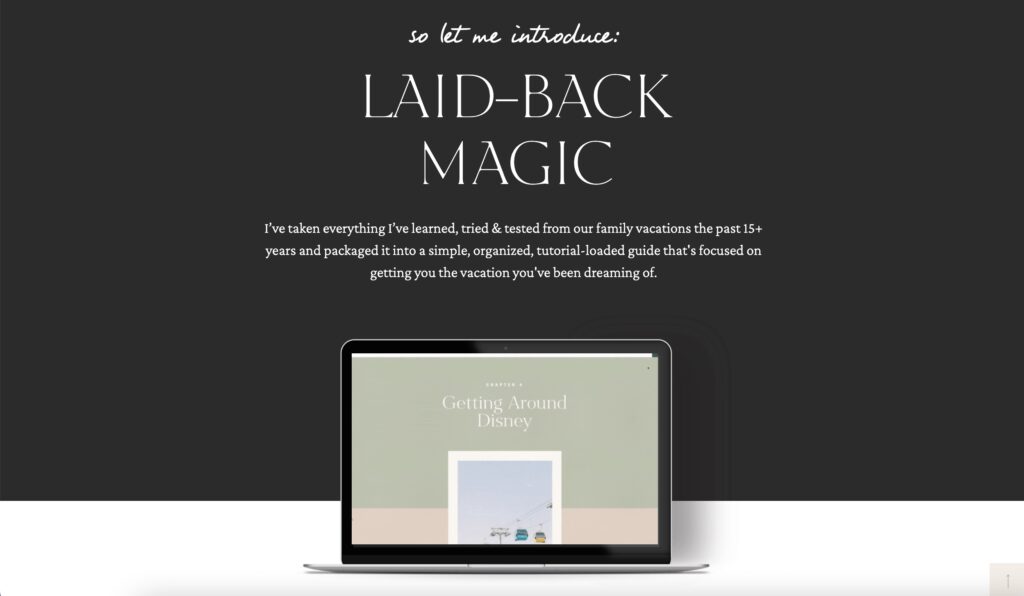
To promote and accept payments for your eBook, you’ll need to set up a sales page on your website. This is where you’ll share the value of your book and what your readers can expect to gain from purchasing it. What new skills or information will they have after they finish reading? How will this information change their lives? Share all of that in your description, as well as an eye-catching screenshot or preview of what’s inside, and your pricing information, and a “Buy Now” button. 
 

selling eBook example

MemberSpace customer Somewhere Worthwhile bundles eBook, “Laid-Back Magic” with other perks like a private community and travel planning library.

Step 3: Create a download page

Next you’ll need to create a page on your website where your customers can download your eBook. This page will be locked in the next step, so it’s only accessible once someone pays on your website. 

In your site’s navigation, be sure to nest the download page(s) beneath the public sales page. It will look something like this:

yourwebsite.com/ebook
yourwebsite.com/ebook/download

Step 4: Protect your eBook with MemberSpace

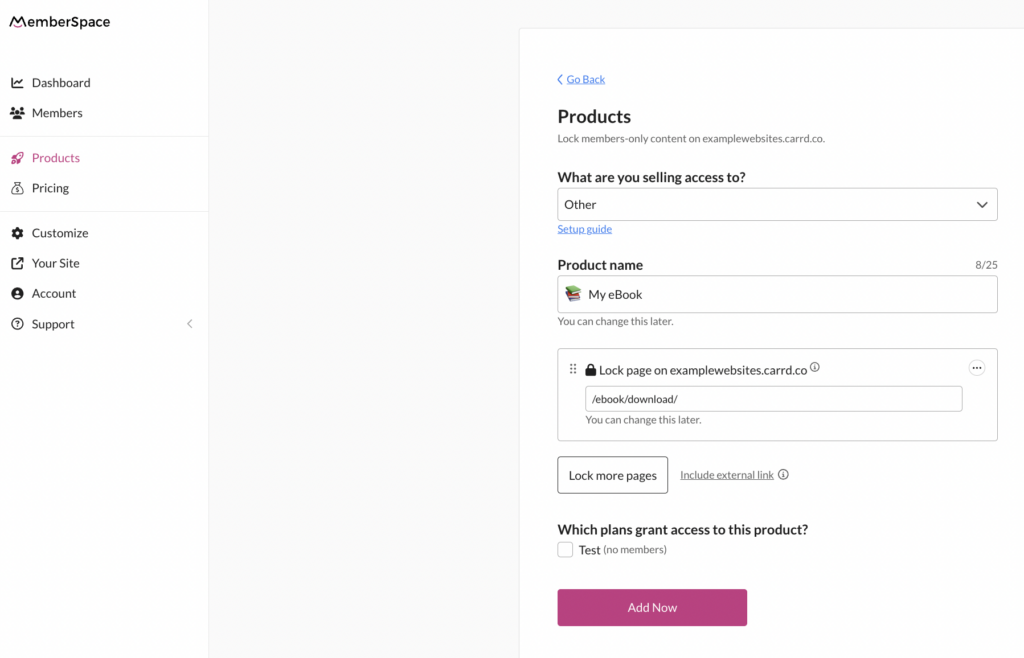
To lock the page where customers will download your eBook, you’ll need to use MemberSpace and create a new Product. Here’s how it works:

  1. When it asks What are you selling access to?, select Other.
  2. Give your eBook a name.
  3. Add the URL for your download page. 

This will require customers to fill out a signup and payment form before they get access to your eBook. 

Selling eBook with MemberSpace
You can restrict access to any pages on your website with MemberSpace, so only paying customers can access your eBook.

✨ eBook Tip: For added security,  upload your eBook file to MemberSpace to protect the download link. This helps to ensure the file can only be accessed by customers who’ve purchased the eBook directly. You can also add our extra security code to your protected page.

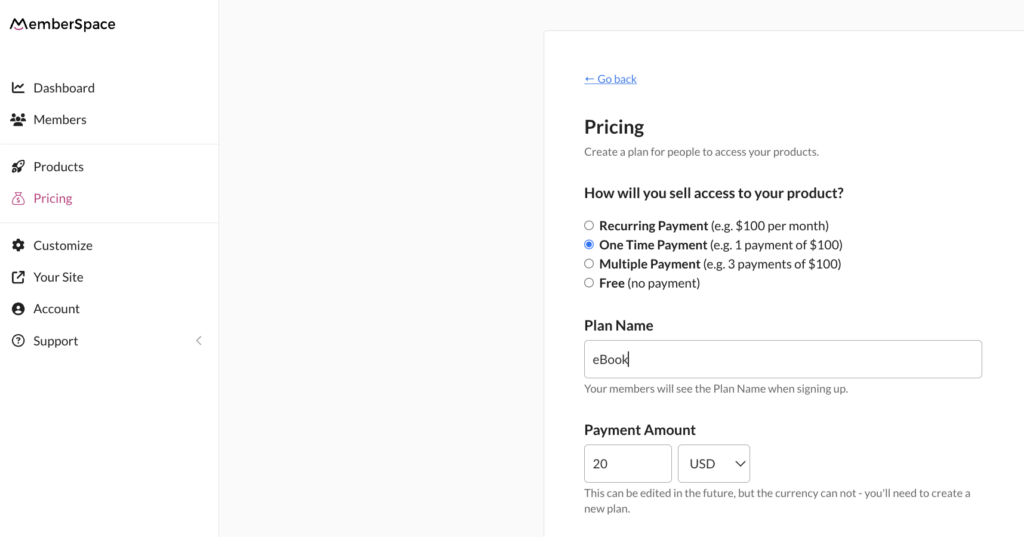
Step 5: Set a price

Now, it’s time to decide how you’ll accept payments for your eBook! MemberSpace has a built-in Stripe integration to handle payment processing via credit card, Apple Pay, or Google Pay. All you have to do is select how you will sell access to your product. Some popular options include:

  • Selling an individual eBook for a one time payment
  • Dripping out chapters or excerpts of your eBook overtime and charging a recurring subscription fee
  • Bundling a series of eBooks 
  • Giving away some eBooks for free as a lead magnet

Pricing for eBook
With MemberSpace, you can sell your eBook for a one-time payment, bundle it with other digital products, or drip out access chapter by chapter with a membership payment.

Step 5: Start selling and promoting your eBook!

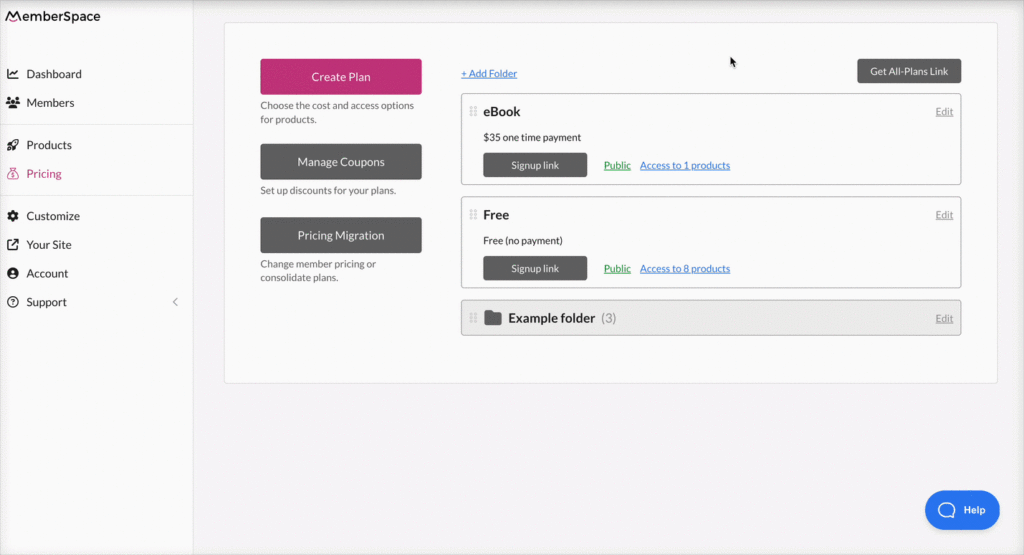
Once you’ve set up your website pages and locked in your pricing, you’re ready to start selling your eBook on your site! Just grab the Signup link from the Pricing tab – this link will open up a signup form on your website for customers to quickly create an account and pay for your eBook. You can add the link anywhere you’d like, such as:

  • Your “buy now” button on your sales page
  • Other call-to-action buttons on your website
  • Email marketing campaigns
  • Social media posts

Use your signup link anywhere you want to sell access to your eBook – on your website, CTA buttons, social media, etc.

Final Thoughts

Creating and selling your own eBook is a great way to share your knowledge and expertise with others while building your online presence. By using tools like Canva and MemberSpace, you can simplify the process of designing, publishing, and selling your digital product directly from your website. To get started, sign up for a free MemberSpace trial, and let us know if you have any questions!

Need help with your eBook?

Connect with our friendly team, weekdays 10am – 6pm ET.

Let’s chat!
The post How to Create and Sell an eBook – Monetize your Writing in 5 Steps appeared first on .

How to Self-Publish a Book and Make Money – A Guide for Indie Authors

Software Stack Editor · May 31, 2024 ·

Haiden Hibbert

Haiden Hibbert

I’m a Content Manager at MemberSpace helping entrepreneurs and creators sell digital products.

In the past, publishing a book meant submitting manuscripts to editors and anxiously waiting to see if they would escape the dreaded “slush pile.” Rejection letters were all-too-common, leaving many talented writers feeling discouraged and unsure of how to share their work with the world.

However, times have changed, and more and more writers are now turning to their own websites to sell their work directly to readers, bypassing traditional publishers and maintaining complete control over their content, brand, and pricing.

Platforms like MemberSpace have opened up countless doors for indie authors looking to monetize their work in creative ways. From selling serialized stories to bundling a book series to starting an online book club, the possibilities are endless.

In this guide, we’ll walk through the process of self-publishing your book on your website and explore some strategies you can use to start generating income from your writing!


Self-publish your book!

The easiest way to accept membership payments or one-time charges for digital products like online courses, communities, content libraries, and more — all from your own website!


Start selling now

Get started for free! 5 minutes to set up.

Table of Contents

Step 1: Create your author website

If you don’t already have your own website, you’ll need to set one up to showcase your books, accept payments, and grow your online community. You can use a website template from a builder like Squarespace to quickly launch your site. Don’t worry about perfecting it – just get a home page up with some information about you and your writing. We’ll go over how to add sales pages for your book(s) in the next step. 
 
For some visual inspiration, check out these eBook websites from MemberSpace creators. 

Previous
Next

Step 2: Set up sales pages for your books

For each book you want to sell, you’ll need to create a sales page to advertise them. This is where customers will purchase your work. The pages should include:

  • An image of the cover of your book
  • An enticing description of what your book is about
  • Pricing information
  • A “buy now” button 

You can also include links to other related books that you’ve written on these pages!


Step 3: Create download pages

Next, create download pages on your website where customers can access a digital version of your book after making a purchase. These pages will be locked, so readers have to pay before they can download your books. There are a few of ways you can do this: 

  • Create a PDF version of your book and  upload your book file to MemberSpace to protect the download link. This helps to ensure the file can only be accessed by customers who’ve purchased the book directly. You can also add our extra security code to your protected page. (Recommended)
  • Design your eBook on a platform like Canva and create a “public view link” to share with customers
  • Add your book’s content directly to pages on your website

✨ Website Tip: In your site’s navigation, be sure to nest the download page(s) beneath the public sales page. It will look something like this:

yourwebsite.com/book-title/
yourwebsite.com/book-title/download
 

Step 4: Protect your pages with MemberSpace

To ensure only paying customers can download your books, you’ll need to use MemberSpace to lock your private download pages. To do this, you’ll just add your book title and the URLs for any pages you want to be behind the paywall. 


This will require your readers to fill out signup and payment forms before they get access. 

self publish a book with MemberSpace
You can restrict access to any pages on your website with MemberSpace, so only paying customers can access your book.

Step 5: Choose a payment method

With your download page set up, it’s time to decide how you’ll accept payments for your writing. MemberSpace has a built-in integration with Stripe, allowing you to process payments via credit card, Apple Pay, or Google Pay on your website. 

You have several options when it comes to selling access to your book:

  1. One-time payment – Sell your eBook as a single product for a one-time fee.
  2. Subscription-based access – Release chapters or excerpts of your book over time and charge a recurring subscription fee.
  3. Bundle deals – Group a series of books together and sell them as a package.
  4. Free eBooks as lead magnets – Offer some books for free to attract potential customers and grow your email list.

With MemberSpace, you can sell your eBook for a one-time payment, bundle it with other digital products, or drip out access chapter by chapter with a membership payment.

Creative ways to make money as an indie author

The beauty of self-publishing is that you aren’t limited to one source of income – you can create multiple income streams from your writing and reader community! Here are some additional ways you can make money as an indie author. 

Serialize your book

Consider releasing your eBook chapter by chapter and charging readers a monthly subscription fee. This approach can help build anticipation and generate a steady income stream. MemberSpace makes it easy to serialize your book and manage subscriptions. 

Letter Lore Membership retention strategies
Readers sign up for Letter Lore to experience a “story adventure,” where they get access to a new chapter each week. Subscriptions are sold for a monthly or lifetime access fee.

Bundle your books

If you have multiple books in a series or in the same genre, consider bundling them together as a package deal. This can be a great way to increase overall sales!

Create a community for your readers

Building a dedicated community around your work can foster reader loyalty and provide additional revenue opportunities. Consider creating a members-only forum or Facebook group where your fans can interact with you and each other. You can offer exclusive content, sneak peeks, and special discounts to your community members.

Start an online book club

Another way to engage with your readers and promote your books is by starting an online book club. You can host live Q&A sessions, discussions, and events related to your books and writing process. This can help you build a loyal fan base and generate interest in your work. You can use platforms like Zoom, Google Meet, or social media to host your book club meetings and events.

Final Thoughts

If you want a more flexible way to make money as an indie author with a lower barrier to entry than traditional publishing, consider selling your books on your own website. MemberSpace makes it easy to get up and running in just a few steps. Get started with a free trial today, and let us know if you have any questions!

Need help launching your book?

Connect with our friendly team, weekdays 10am – 6pm ET.

Let’s chat!

The post How to Self-Publish a Book and Make Money – A Guide for Indie Authors appeared first on .

How to Create a Private YouTube Channel for Your Online Community

Software Stack Editor · May 24, 2024 ·

Haiden Hibbert

Haiden Hibbert

I’m a Content Manager at MemberSpace helping entrepreneurs and creators sell digital products.

If you’ve searched for a way to create a private YouTube channel for your community – chances are you’ve come up short or found a complicated workaround that requires a ton of manual work. There really isn’t a straight forward way to set your channel to private, but there is an alternative to manage access to your videos and provide exclusive content to a community of subscribers. 

In this post, we’ll walk through how to set up a private YouTube “channel” on your own website! With this approach, you can embed your YouTube videos on your site, restrict access to them, and allow your community to subscribe for paid or free access to your content! 

Create a Private, Paid YouTube Channel

The easiest way to accept membership payments or one-time charges for digital products like online courses, communities, content libraries, and more — all from your own website!


Start selling now

Get started for free! 5 minutes to set up.

Table of Contents

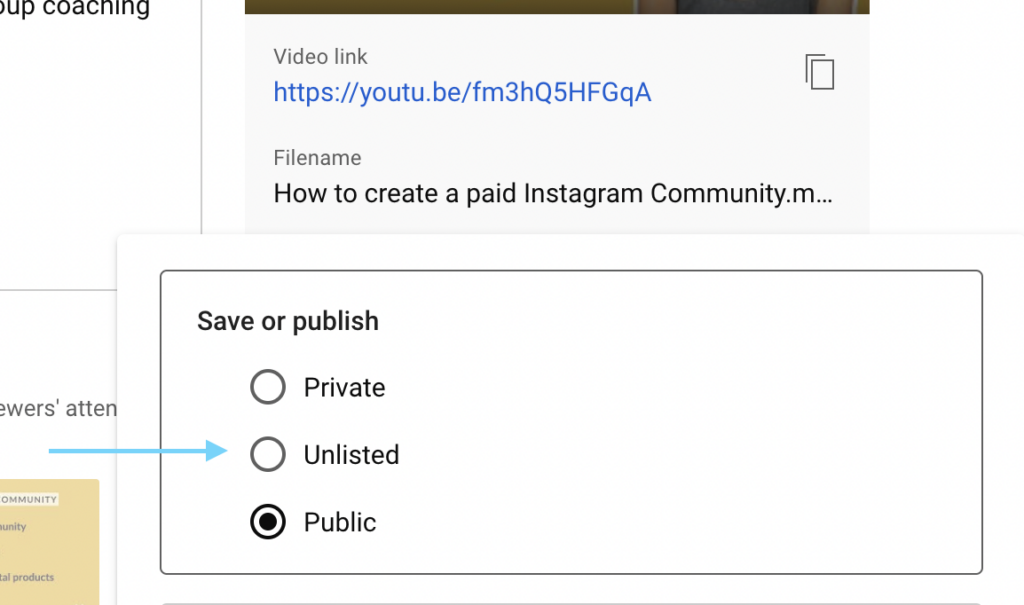
Step 1: Set your exclusive videos to “unlisted” 

The first step is to decide which YouTube videos you want to be part of your private subscription and then set them to Unlisted. You can change the settings for existing videos by opening up the video, clicking Edit, and changing the visibility from Public to Unlisted. For future videos, you will simply set the video to Unlisted before it gets published. 

Making a video Unlisted means that anyone who has the link to the video can view it, but these videos don’t show to viewers in the Videos tab of your YouTube channel page or in YouTube’s search results. 

Unlisted private YouTube videos
Unlisted videos are not visible to the public and can only be accessed if someone has a link to the video.

Step 2: Install MemberSpace on your website

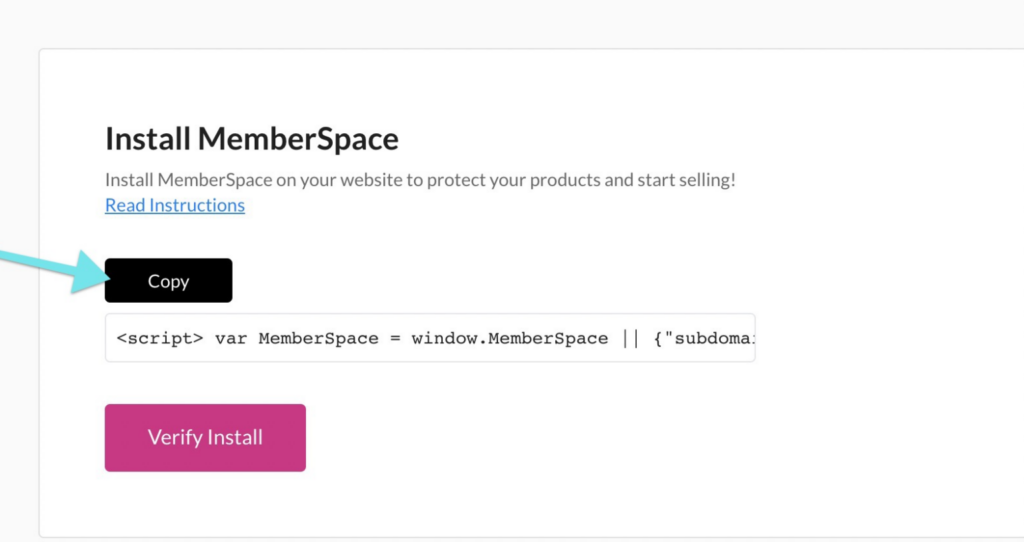
To protect your private video content, create subscriptions, and accept payments on your website, you’ll need to install MemberSpace. This takes just a few minutes and works with any CMS!

Use our simple install instructions to help you add the MemberSpace code to your site.

Step 3: Protect your YouTube videos

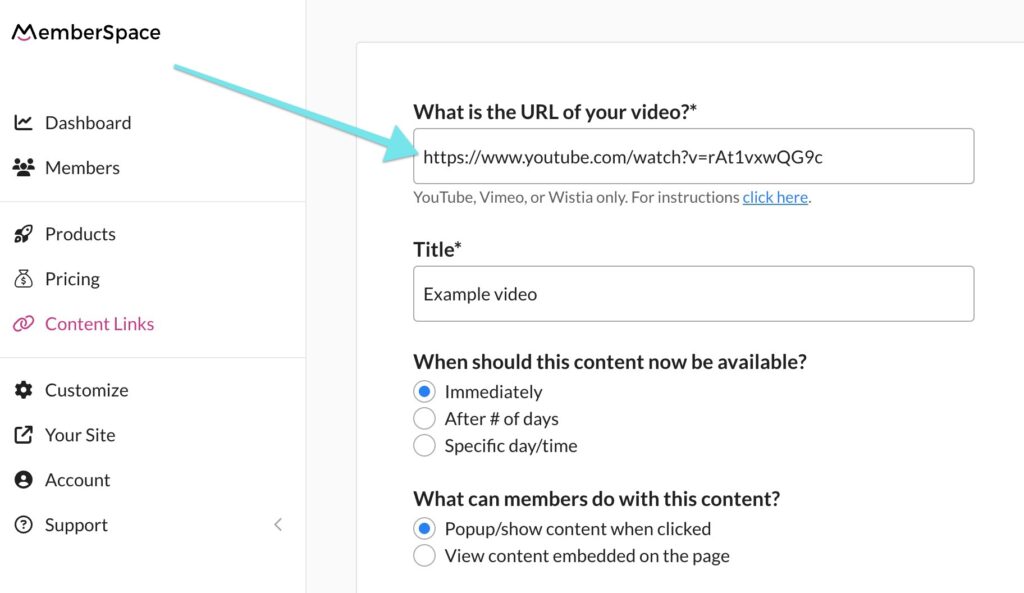
After installing MemberSpace, you’ll need to upload each Unlisted YouTube video to the MemberSpace backend. This will create Content Links, which provide the highest level of security for your videos and create a unique, secure link for each video that is only accessible to subscribers when they are signed in on your website. You can either place or embed these links on your website pages. 

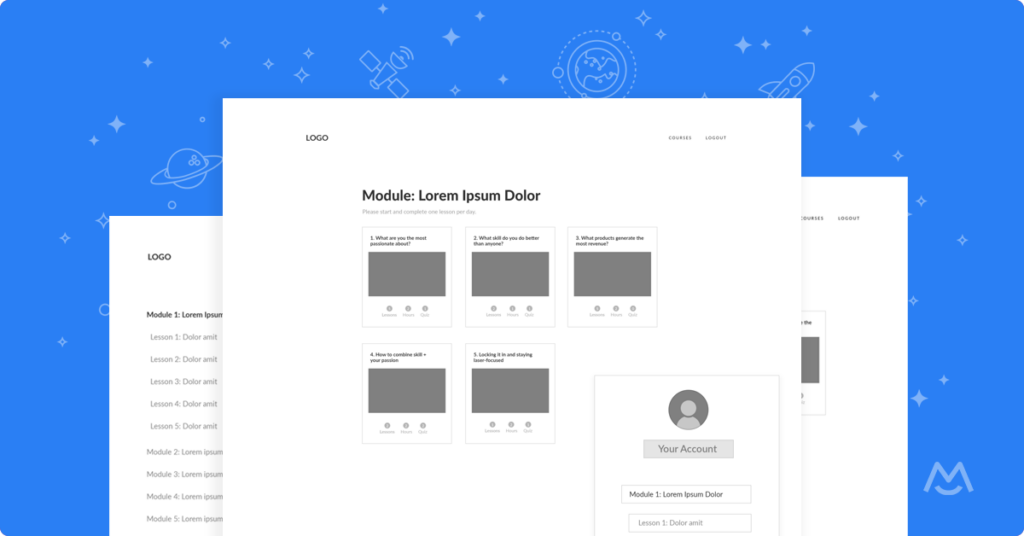
If you need some inspiration on how to set up your pages, check out our free website wireframes. 

YouTube channel content links
Content Links are the most secure way to protect your private YouTube videos.

✨ Access Tip: You can make your videos accessible to all paying customers, and/or use MemberSpace’s manual approval setting to grant access to new subscribers. 

Step 4: Set a price for your videos

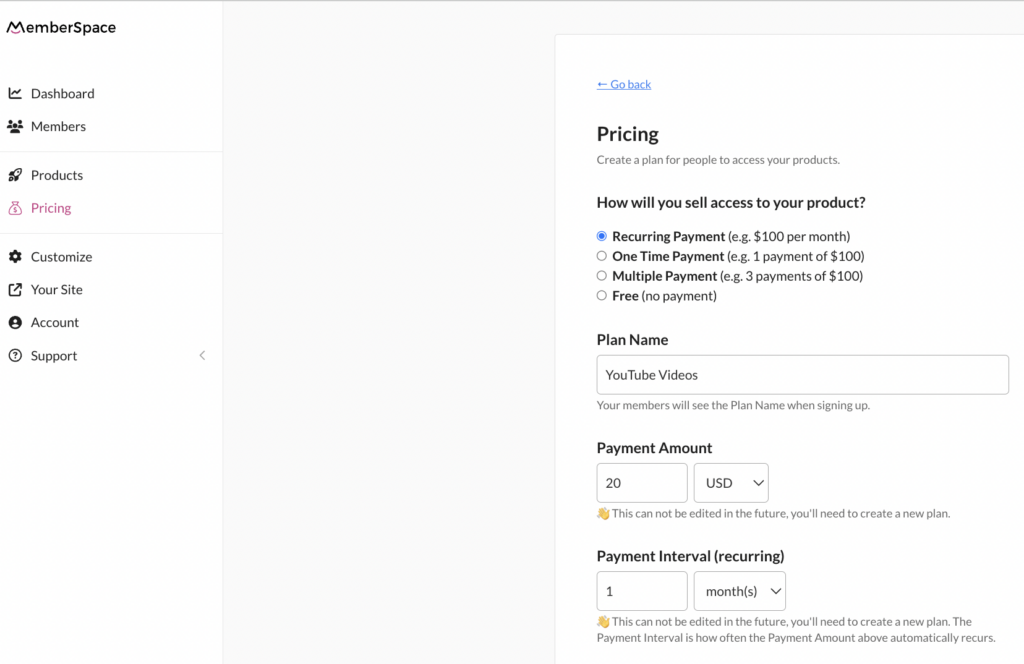
If you want to charge subscribers for your private YouTube videos, you can easily and securely do this with MemberSpace’s Stripe integration. You can also create a free plan if you don’t want to charge for some (or all!) of your videos, giving you the flexibility to offer a mix of free and paid content.

Private YouTube channel
Choose how you want to sell access to your product and set your billing details, like payment frequency and billing date.

Step 5: Share your signup link

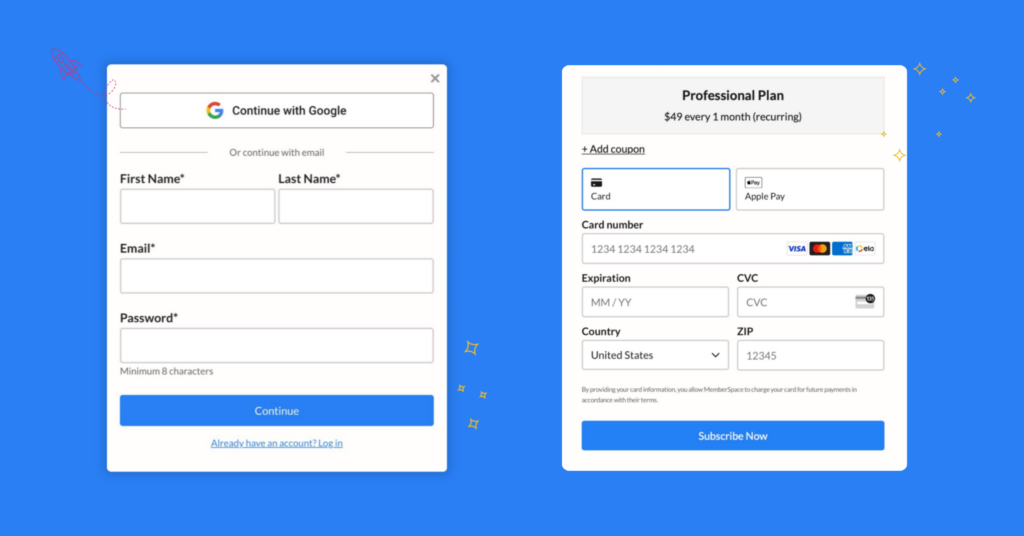
Once you’ve set up your YouTube video subscription, MemberSpace will generate a signup link that you can share with your community (anywhere you’d like – on your website, social media, email campaigns, etc). When clicked, the link opens up a sign up form on your website that requires people to subscribe and pay for access to your videos.

Private YouTube channel signup
When subscribers go to sign up for your video membership on your website, they will see signup and payment form like this.

Final Thoughts

By following these steps, you can create a private YouTube channel on your own website, giving you full control over access to your content and the ability to monetize your videos. With MemberSpace, setting up and managing your subscription is easy, allowing you to focus on creating great content for your community. Sign up for a free trial today!

Need help with your YouTube channel?

Connect with our friendly team, weekdays 10am – 6pm ET.

Let’s chat!
The post How to Create a Private YouTube Channel for Your Online Community appeared first on .

How to Create a Private LinkedIn Community – Monetize your LinkedIn Group in 5 Steps

Software Stack Editor · May 22, 2024 ·

Haiden Hibbert

Haiden Hibbert

I’m a Content Manager at MemberSpace helping entrepreneurs and creators sell digital products.

If you’ve established a strong presence on LinkedIn and have an engaged community of connections, you might be wondering how to start monetizing your network.  Creating a paid LinkedIn Group can be a great way to generate revenue while providing even more value to your community. 

While it’s technically against LinkedIn’s terms of service to directly sell access to your group, there are still plenty of ways to monetize your online community without violating any rules. The key is to build a community membership on your own website using a platform like MemberSpace. By doing this, you can charge members for access to exclusive content, resources, or services, and then invite them to your LinkedIn Group as an added bonus.

Here are some examples of how you can monetize your LinkedIn Group:

  1. Host a private podcast for your community members and, as part of the subscription, give them access to your private LinkedIn group. This way, they can discuss the podcast episodes, ask questions, and network with other listeners.
  2. Sell an ebook and, with a purchase, invite members to join your LinkedIn group to discuss the book and related topics, network, etc. This creates a built-in audience for your book and provides additional value to your readers.
  3. Create and sell an online course and give students access to your LinkedIn group when they purchase the course. The group can serve as a place for students to ask questions, share their progress, and connect with other learners.
  4. Build and sell a content library of resources like templates, guides, etc., and invite your subscribers to your LinkedIn group. 

Now that you have some ideas for monetizing your LinkedIn Group, let’s walk through five easy steps to make it happen!

Monetize a LinkedIn Group!

The easiest way to accept membership payments or one-time charges for digital products like online courses, communities, content libraries, and more — all from your own website!


Start selling now

Get started for free! 5 minutes to set up.

Table of Contents

Step 1: Create a private LinkedIn Group

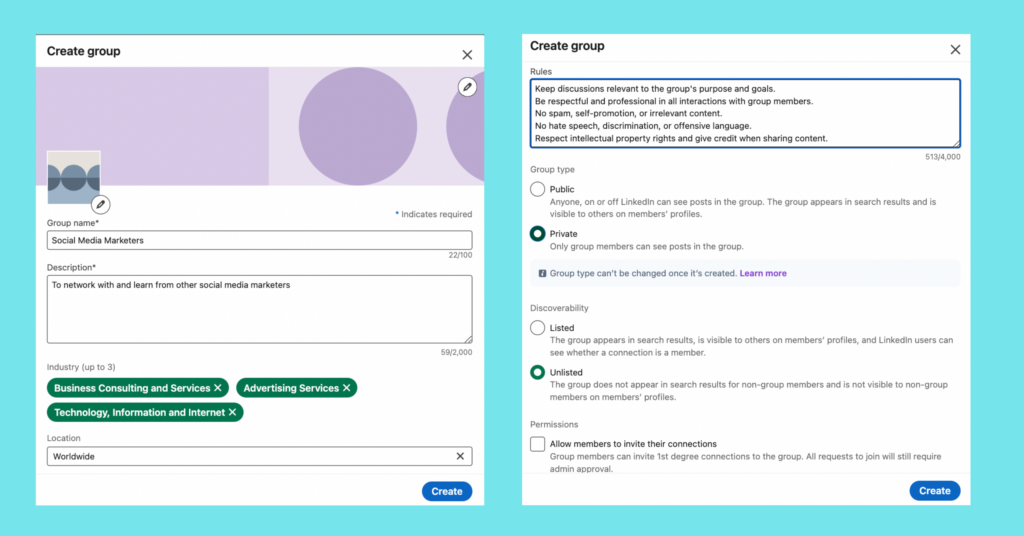
To open your new community, visit the LinkedIn Groups page on your account and click Create Group. You’ll need to add a group name, description, rules, location, discoverability (listed or unlisted), and permissions (public or private). 

A couple of things to note: 

  • You can’t switch your group from public to private once you open it, so be sure to make it private!
  • “Allow members to invite their connections” should NOT be checked off – you want to make sure you are  the only one who can invite people (after they pay, of course!)


Anyone can create private LinkedIn Group. Visit the Groups page on your account and fill in some details like a group name, description, and rules.

Step 2: Install MemberSpace on your website

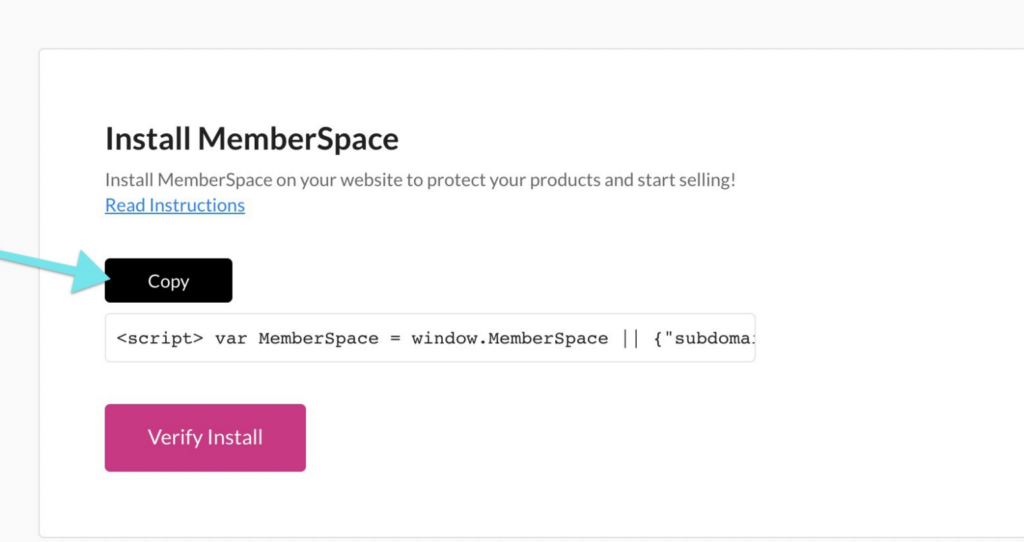
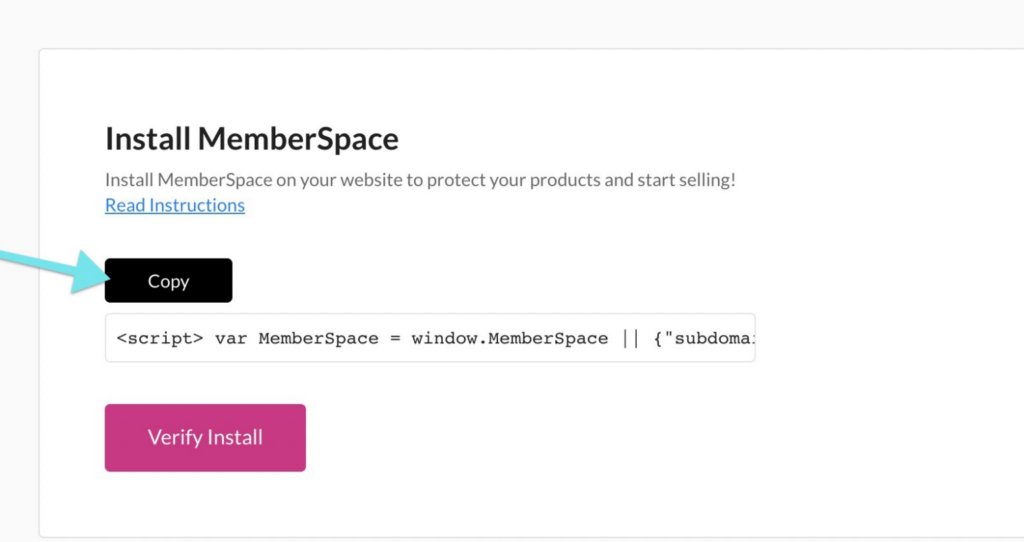
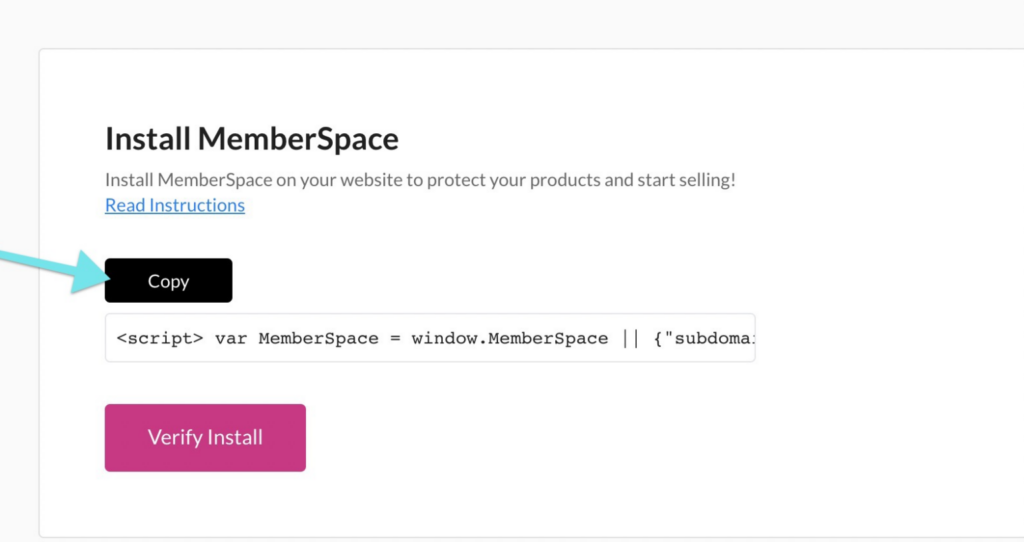
To create your community membership, protect exclusive content on your website, and sell membership access, you’ll need to install MemberSpace on your website. It works with any CMS and takes just a few minutes to add the snippet of code. 

Install MemberSpace for paid LinkedIn Group
To install MemberSpace, all you need to do is add a snippet of code to your website. We have install instructions, so no tech experience needed!

Step 3: Set up your membership

In order to sell access to your community, you’ll need to set up a membership and protect the content that you plan on offering your members – your LinkedIn Group, a podcast, online course, etc. 

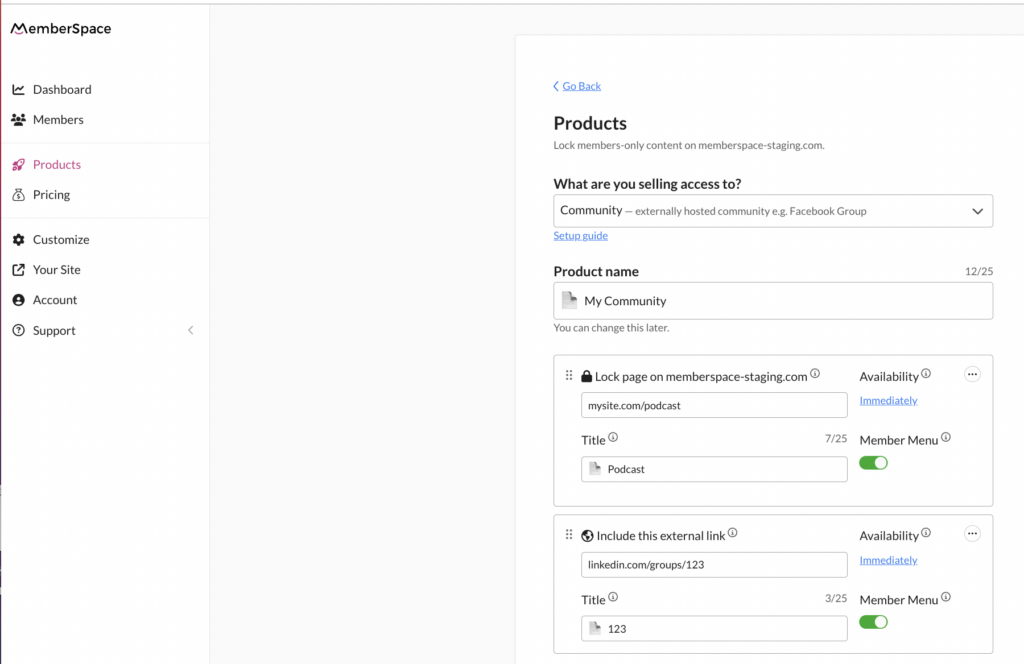
To do this, open up your new MemberSpace account and go to Products > Add Product. Select Community and add the URLs for the pages you want to lock on your website, as well as the LinkedIn Group link (by clicking Include external link). 

After you add your links, be sure to enable the Member Menu! This will add a floating button on the bottom right corner of your website that allows people to login/signup and then access links to your LinkedIn group, as well as your other membership offerings.

Monetize LinkedIn group with MemberSpace
In this example, the online community includes a private podcast and LinkedIn Group.

Step 4: Set pricing 

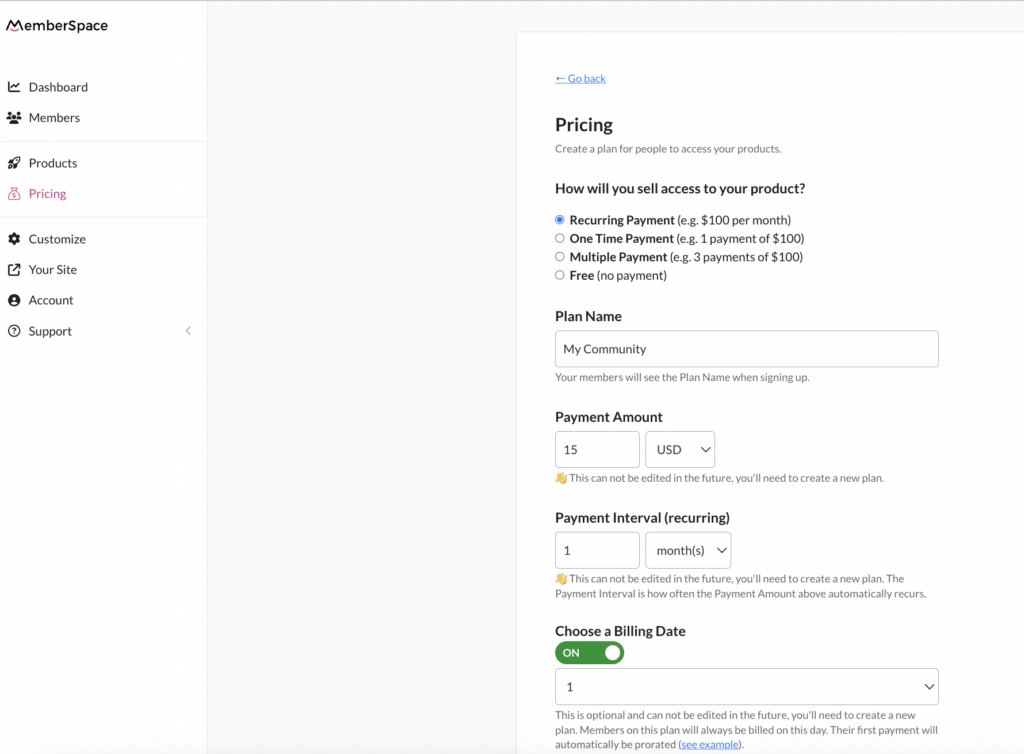
Once you’ve created your membership, it’s time to decide what you’ll charge subscribers. MemberSpace has a built-in integration with Stripe, so you can process payments easily and securely on your website. Depending on how you structure your community, you can accept one-time, recurring, or multiple payments, and set up different membership tiers if you want varying levels of access to your community. 

After you’ve set up your community membership and pricing, customers will be able to sign up on your website and pay via credit card, Apple Pay, or Google Pay.

set pricing for Linkedin group
With MemberSpace, you can charge your community members however you’d like with the built-in Stripe integration.

Step 5: Invite connections to join your LinkedIn Group

After members join your online community, you’ll need to invite them to your LinkedIn Group (there’s an Invite Members button next to the group name). If you’d prefer, you can also have your members request to join your group instead, and then you will add them. Just be sure to give them access to the group link via:

  • The Member Menu,
  • A welcome email (this can be automated with MemberSpace), OR 
  • A community dashboard on your website

Final Thoughts

If LinkedIn is where your online community spends a lot of there time, it’s a great idea to consider monetizing your connections by creating a private, paid LinkedIn Group. The key is to create a membership on your own website using a tool like MemberSpace. This lets you charge members for exclusive community resources. After they pay, you can invite them to join your private LinkedIn Group as a bonus. To get started, sign up for a free MemberSpace trial!

Need help with your LinkedIn community?

Connect with our friendly team, weekdays 10am – 6pm ET.

Let’s chat!
The post How to Create a Private LinkedIn Community – Monetize your LinkedIn Group in 5 Steps appeared first on .

How to Monetize X (Twitter) Communities – Set up Subscription Payments in 5 Steps

Software Stack Editor · May 22, 2024 ·

Haiden Hibbert

Haiden Hibbert

I’m a Content Manager at MemberSpace helping entrepreneurs and creators sell digital products.

As a creator, you’ve probably noticed the growing popularity of X’s community feature. Similar to Facebook Groups, X Communities allow you to create open or private spaces where you can set community guidelines, moderate posts, and manage members. However, if you’re looking to charge members to join,  X doesn’t offer a native way to monetize your community directly. 

But don’t worry – there’s a simple “hack” you can use to create a paid community on X. By setting it to private and selling access through your website, you can turn your  community into a new revenue stream. 

Launch a paid X community!

The easiest way to accept membership payments or one-time charges for digital products like podcasts, online courses, communities, content libraries, and more — all from your own website!


Start selling now

Get started for free! 5 minutes to set up.

Table of Contents

Step 1: Create your X Community

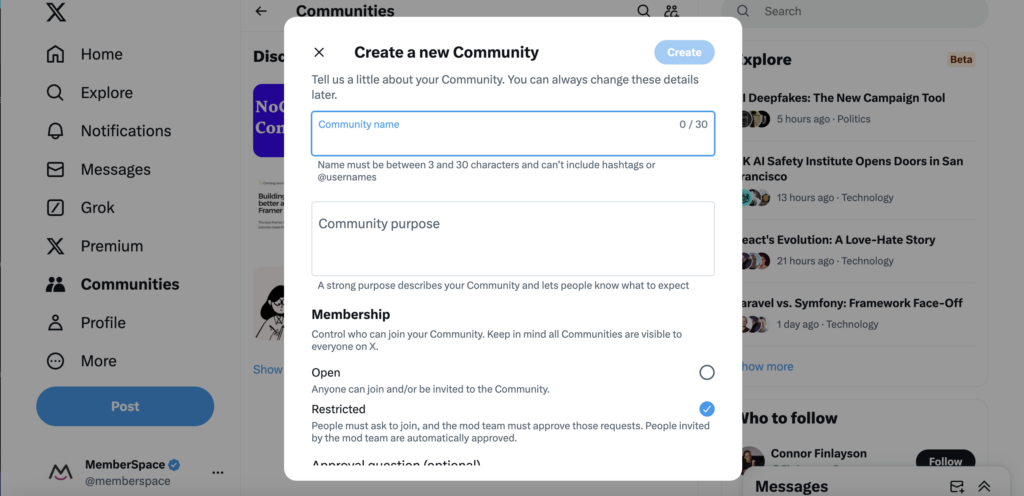
To get started, create your community, give it a name, and add a “community purpose.” Then, set your Community to “Restricted” so you can moderate who joins (by only inviting/accepting paying members). 

Keep in mind that you can only create a new community if you have an X account that is:

  • At least six months old
  • Public
  • Connected to a verified phone number or email address
  • Not associated with a history of violating X’s Terms of Service.

Create Twitter community
To create a new Community, visit the Communities tab on the left side of your X account and click the Create Communities button.

Step 2: Add MemberSpace to your website

To accept payments for your X Community, you’ll need to integrate MemberSpace into your website. MemberSpace allows you to accept payments, manage member data, send emails to members, and grant access to additional community resources and perks, such as webinars, videos, group coaching, and online courses.

MemberSpace works with any CMS, and you don’t have to have technical experience to install it! We have step-by-step instructions to show you how.

Step 3: Protect your community 

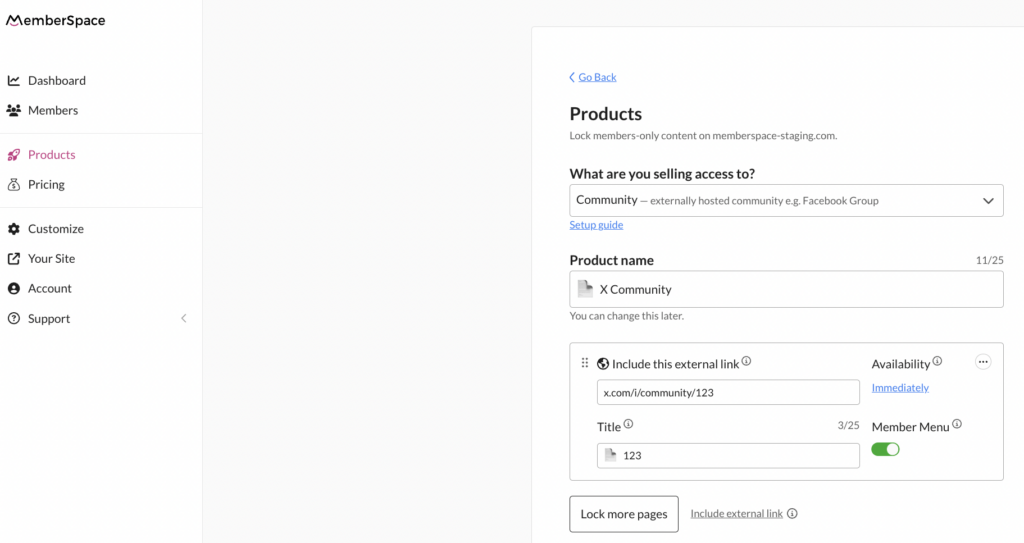
To ensure all your new members can access your community, add your X profile URL to MemberSpace and enable the Member Menu. This will add a floating button in the bottom right corner of your website, allowing members to easily access your community link and any other resources you want to offer your members. 

Protect twitter community
You can add any page on your website or external link to your community.

Step 4: Set a price for community access

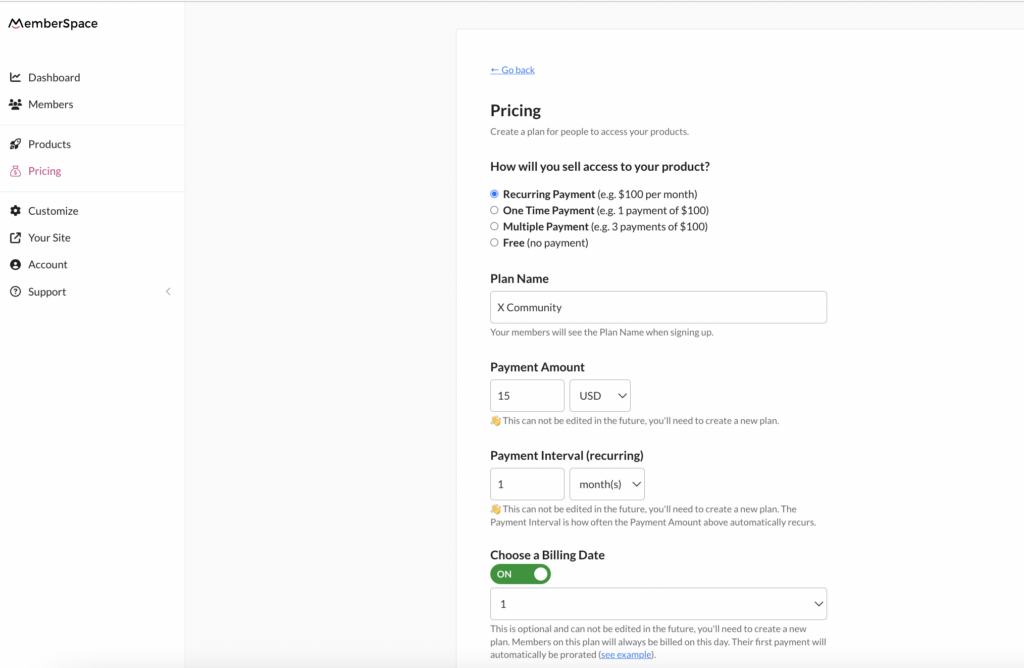
MemberSpace has a built-in integration with Stripe, making it simple to accept payments on your website. To join your community, members will fill out a sign-up form and pay using their credit card, Apple Pay, or Google Pay.

You have several options when it comes to pricing! You can charge members on a recurring, one-time, or multiple payment basis, or even offer free access (most communities opt for recurring monthly payments). With MemberSpace’s flexible billing options, you can also choose how often you charge members, the amount, and the specific date of the month.

Twitter community pricing
With MemberSpace, you can charge your community members however you’d like with the built-in Stripe integration.

Step 5: Invite new members!

Once someone signs up on your website and pays for access to your X Community, it’s time to welcome them in. There are two ways to do this:

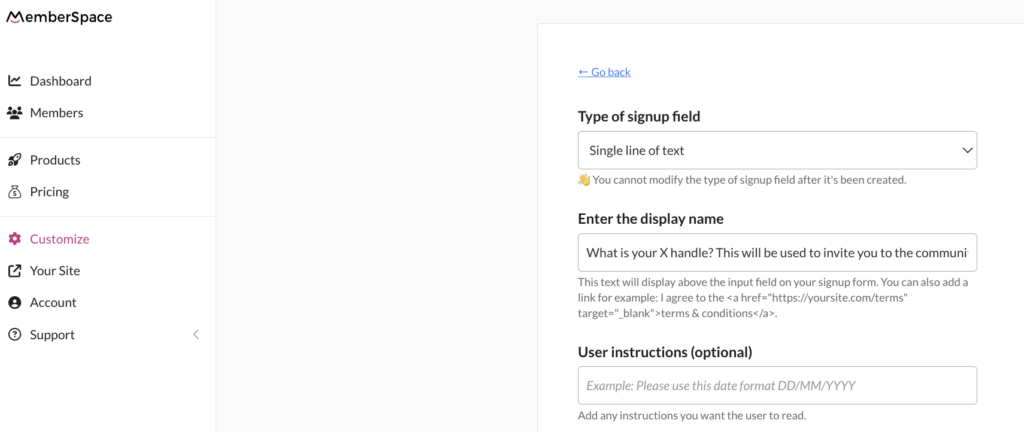
  1. Option 1: During the sign-up process on your website, ask members to share their X profile. This way, you can invite them to the community after they make a payment. Anyone who is invited by the moderator (you) are automatically approved.
  2. Option 2: Share the community link in an automated welcome email, text message, or on a members-only page on your website. Members will then request to join, and you will approve them. 

Twitter community invite
Customize your signup form on your website to ask members for their X handles, so you can invite them to your community once they pay.

Final Thoughts

There are tons of benefits to selling access to your X community on your website, including: 

  • Having total control over your pricing and membership offerings, so you can offer your members additional perks like a content library, private podcast, or community newsletter
  • Easier moderation and better security for your group because you will only be admitting paying members
  • Higher quality signups that lead to better conversations – again, payment helps weed out people who are not genuinely committed or interested in your content!

If you need any help setting up your private X community, let us know! You can get started with a free MemberSpace trial today. 

Need help with your X community?

Connect with our friendly team, weekdays 10am – 6pm ET.

Let’s chat!
The post How to Monetize X (Twitter) Communities – Set up Subscription Payments in 5 Steps appeared first on .

Do Subreddits Make Money? How to Create a Paid Reddit Community

Software Stack Editor · May 22, 2024 ·

Haiden Hibbert

Haiden Hibbert

I’m a Content Manager at MemberSpace helping entrepreneurs and creators sell digital products.

If you’re a fan of Reddit, you’ve probably thought about starting your own subreddit at some point. And if you’re really passionate about your topic, you might have even wondered if there’s a way to turn your subreddit into a source of income.

I’ve got some good news and some bad news. The bad news is that Reddit’s terms of service don’t allow you to directly monetize your subreddit. 

But here’s the good news: there’s a clever workaround that allows you to create a paid community around your subreddit. The key is to build your online community on your own website using a tool like MemberSpace. This way, you can sell access to exclusive content, like a community newsletter or private podcast, and then give your paying members access to your subreddit as a bonus. In this post, we’ll walk through the step-by-step process!

Create a paid subreddit!

The easiest way to accept membership payments or one-time charges for digital products like online courses, communities, content libraries, and more — all from your own website!


Start selling now

Get started for free! 5 minutes to set up.

Table of Contents

Step 1: Create a private subreddit

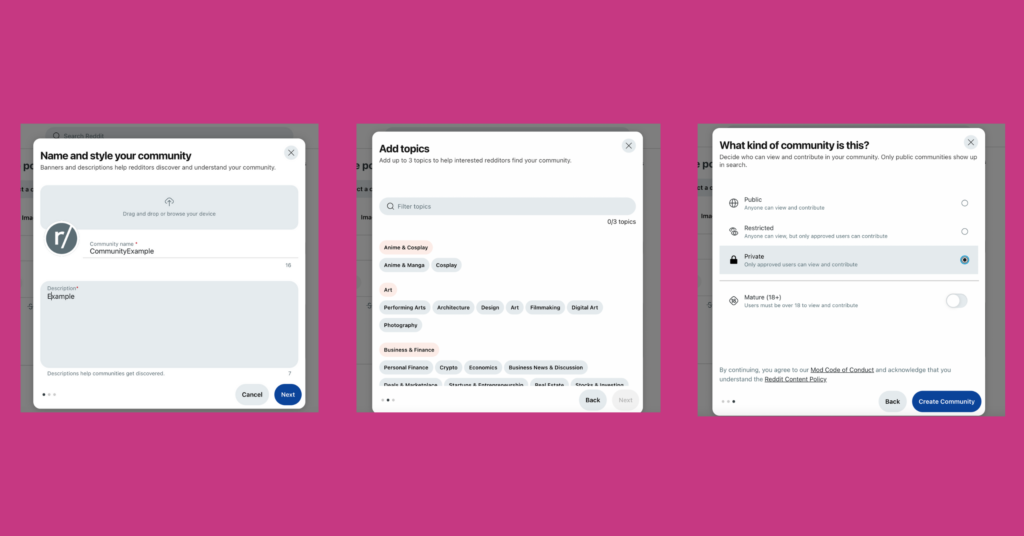
When you create your new subreddit, make sure to set it to private. This means it will only be visible and accessible to redditors you’ve explicitly allowed in, so you can control who has access to your community and ensure that only your paying members can see and interact with your content.

private subreddit
When you create a new subreddit, simply set it to Private to ensure only your paying members get access.

Step 2: Install MemberSpace on your website

Next, head over to your website and install MemberSpace. This is the tool that will allow you to create a membership program and protect your content. It’s super easy to set up, and takes just a few minutes to add the install code to your website. 

Install memberspace for paid subreddit
To install MemberSpace, all you need to do is add a snippet of code to your website. We have install instructions, so no tech experience needed!

Step 3: Protect your subreddit

Using MemberSpace, create a new product and add the URLs for your subreddit and any other community resources or perks you want to offer on your website. This could be things like private newsletters, podcasts, or even exclusive video content.

Once you add the URLs, make sure to enable the Member Menu option. This will add links to your subreddit and other community resources to a floating button/menu in the bottom right corner of your website (accessible only to paying members). 

Paid reddit community
Fill out your subreddit’s details and URL to ensure only paying members get access.

Step 4: Set a price for your membership community

Next, it’s time to decide how much you want to charge for access to your community. Think about the value you’re offering and what your target audience would be willing to pay. Remember, you can always adjust your pricing later if needed.

MemberSpace makes it easy and secure to accept payments on your website with the built-in Stripe integration. You can charge members however you’d like with a payment form on your site via credit card, Apple Pay, or Google Pay. 

Pricing for paid subreddit
MemberSpace allows for lots of billing flexibility, so you can determine how to charge customers, how often, what day of the month, etc.

Step 5: Share your subreddit with new members

Once someone subscribes to your membership program, send them an invite to your private subreddit. The easiest way to do this is to request that members share their reddit profile in the signup form. Then, you can visit the profile and click “Invite to community,” select your paid subreddit, and send the invite!

Final Thoughts

If you’re an active Reddit user and want to turn your account into a source of income, building an online community around a private subreddit is a great option. Launch a community newsletter or private podcast, or sell access to an online course or ebook. Then, invite your members to join your subreddit to chat about your content, ask questions, and get to know each other. To get started, sign up for MemberSpace for free today!

Need help with your Reddit community?

Connect with our friendly team, weekdays 10am – 6pm ET.

Let’s chat!
The post Do Subreddits Make Money? How to Create a Paid Reddit Community appeared first on .

How to Create Paid Facebook Groups – Accept Payments for Your Private Community

Software Stack Editor · May 17, 2024 ·

Haiden Hibbert

Haiden Hibbert

I’m a Content Manager at MemberSpace helping entrepreneurs and creators sell digital products.

Creating a private, paid Facebook Group is a great way for creators and entrepreneurs to build an engaged online community and monetize their expertise. And with nearly 1.8 billion users, Groups remains one of the top platforms for online communities (even despite Facebook’s declining popularity!). 

So, how do you start charging members to join? The easiest way to create paid Facebook Groups is to sell access through your website and use a membership platform like MemberSpace to process payments. 

There are tons of benefits to this approach: 

  • You have total control over your pricing and membership offerings, so you can offer your community additional perks like workshops, a content library, or an online course
  • Requiring payment to join ensures that your members are genuinely interested in your group (AKA no spammy signups!)
  • By only providing the group link to paying members, your community will be more secure and easier to moderate
  • Many potential members already use Facebook, making it easier for them to engage with your content.

Launch a paid Facebook Group!

The easiest way to accept membership payments or one-time charges for digital products like communities, online courses, content libraries, and more — all from your own website!


Start selling now

Get started for free! 5 minutes to set up.

Table of Contents

Step 1: Set up a private Facebook Group

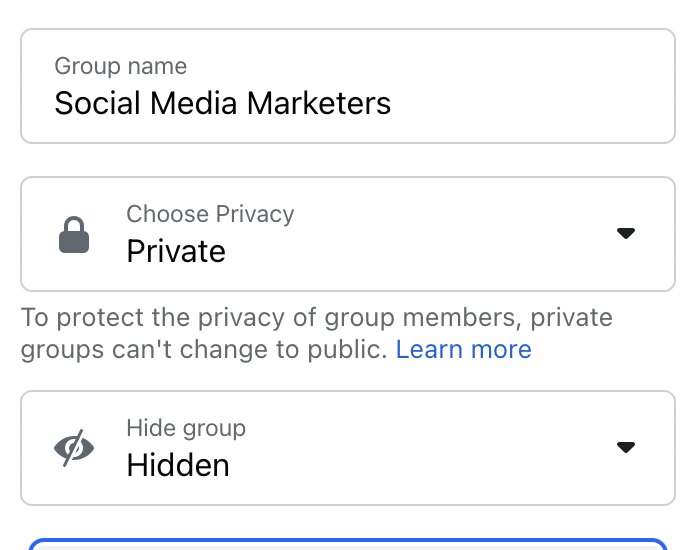
If you don’t have your group set up already, you’ll need to create one and set it to “hidden” so people cannot find the community unless they have then link. Then, turn on membership approval so you can moderate who is able to join. 


When opening up your Facebook Group, be sure to set it to Private and Hidden to ensure only paying members are able to view it.

Step 2: Install MemberSpace on your website

To ensure only paying community members can access your Facebook Group, you’ll need sign up for MemberSpace for free and connect it to your website (it works with any CMS and takes just a few minutes to install!). 

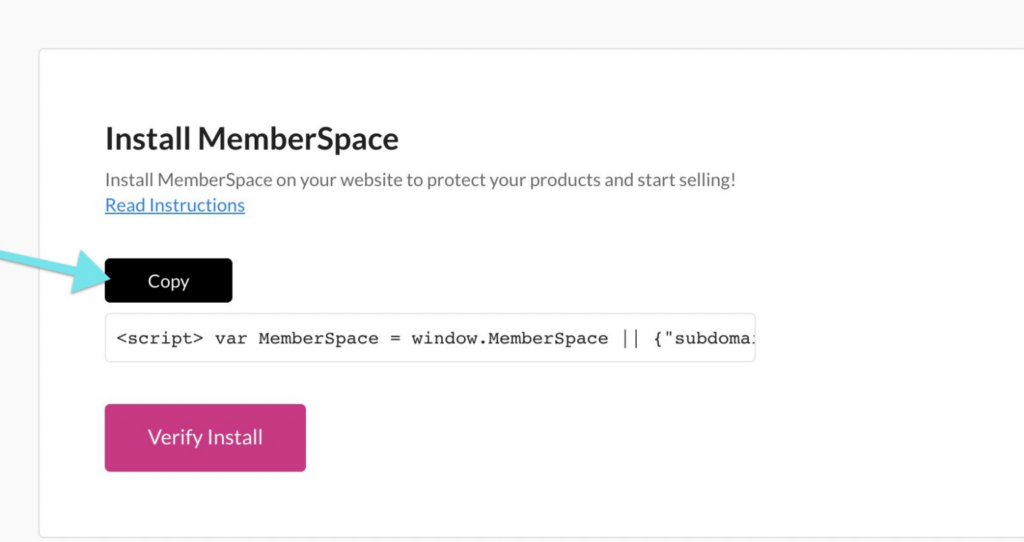
Install memberspace for paid facebook groups
To install MemberSpace, all you need to do is add a snippet of code to your website. We have install instructions, so no tech experience needed!

Step 3: Protect your Facebook Group 

In this step, you’ll use MemberSpace to create a signup/login area on your website so paying members can access your group. 

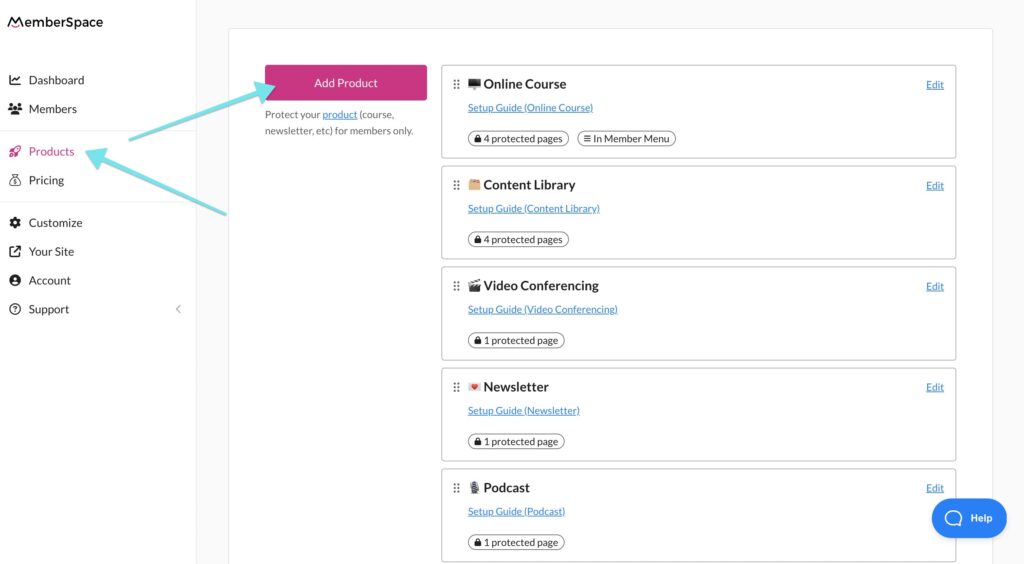
First, go to Products and add a new Community. This is where you’ll add the URL for your group. This will require members to sign up and pay for your community before they get access to the group link.

Paid Facebook Groups MemberSpace
To protect a new product with MemberSpace, go to Products > Add Product.

Protect paid Facebook Group
Fill out your Facebook Group’s details and URL to ensure only paying members get access.

✨ Make sure Member Menu is enabled. This will add your Facebook Group link to a menu in the bottom right corner of your website that is only accessible once someone logs in or signs up and pays for group access. 

Step 4: Set a price for access to your group

MemberSpace integrates directly with Stripe, so it’s easy to accept payments securely on your website. Recurring payment is the most common option for online communities, but you can also choose from multiple payment, one-time payment, and free. 

When someone goes to signup for access to your group, they’ll be prompted to pay via credit card, Apple Pay, or Google Pay. 

Paid Facebook Group pricing
MemberSpace allows for lots of billing flexibility, so you can determine how to charge customers, how often, what day of the month, etc.

Meditation Business payment gateway
When a member goes to signup on your site, they’ll have to fill out a payment form like this.

Step 5: Share your group with new members

Once you’ve added your Facebook Group to MemberSpace and set up your pricing, it’s time to make sure all new community members get access to your group after they sign up. There are a few ways to do this, so choose the one that works best for your workflow/business!

  • Option: Automatically redirect them to a members-only page that contains a link to the group, or redirect them directly to your Facebook Group. You can do this when you set a price for community access. Members will then request access and you’ll approve them (knowing the requests are only coming from those who paid and received the link via your signup process).

Send new members to any URL after they signup, like your Facebook Group or a landing page dedicated to your group.

  • Option 2: Send out a welcome email to new community members with a link to the group. This can be automated with MemberSpace to send after someone signs up on your website. Like option one, members will request access and you’ll approve them. 

Join private Facebook group
Automatically send out a welcome email with information about your community and a link to join the Facebook Group.

 
  • Option 3: Add members on Facebook after they sign up through your website. 

Paid Facebook Group Example – The Social Broker

The Social Broker membership community is a great example of how to create a successful paid Facebook group. By using MemberSpace, this community offers members access to a private group, along with other perks like coaching, guest speakers, customizable templates, and workshops. This model not only provides a sense of exclusivity and value for members but also generates a steady income stream for the business.

Social Broker Paid Facebook Group
The Social Broker paid Facebook Group offers members tons of perks, like guest speakers, workshopts, coaching, and custom training.

Final Thoughts

Creating a paid Facebook Group is a great way to build a community around your expertise while adding a new revenue stream. MemberSpace makes it easy to set up and manage your paid group. You’ll be able to control your pricing, decide what perks to offer members, and keep your group private and secure. To get started, sign up for a free MemberSpace trial, and let us know if you have any questions – our support team is happy to help!

Need help with your Facebook Group?

Connect with our friendly team, weekdays 10am – 6pm ET.

Let’s chat!
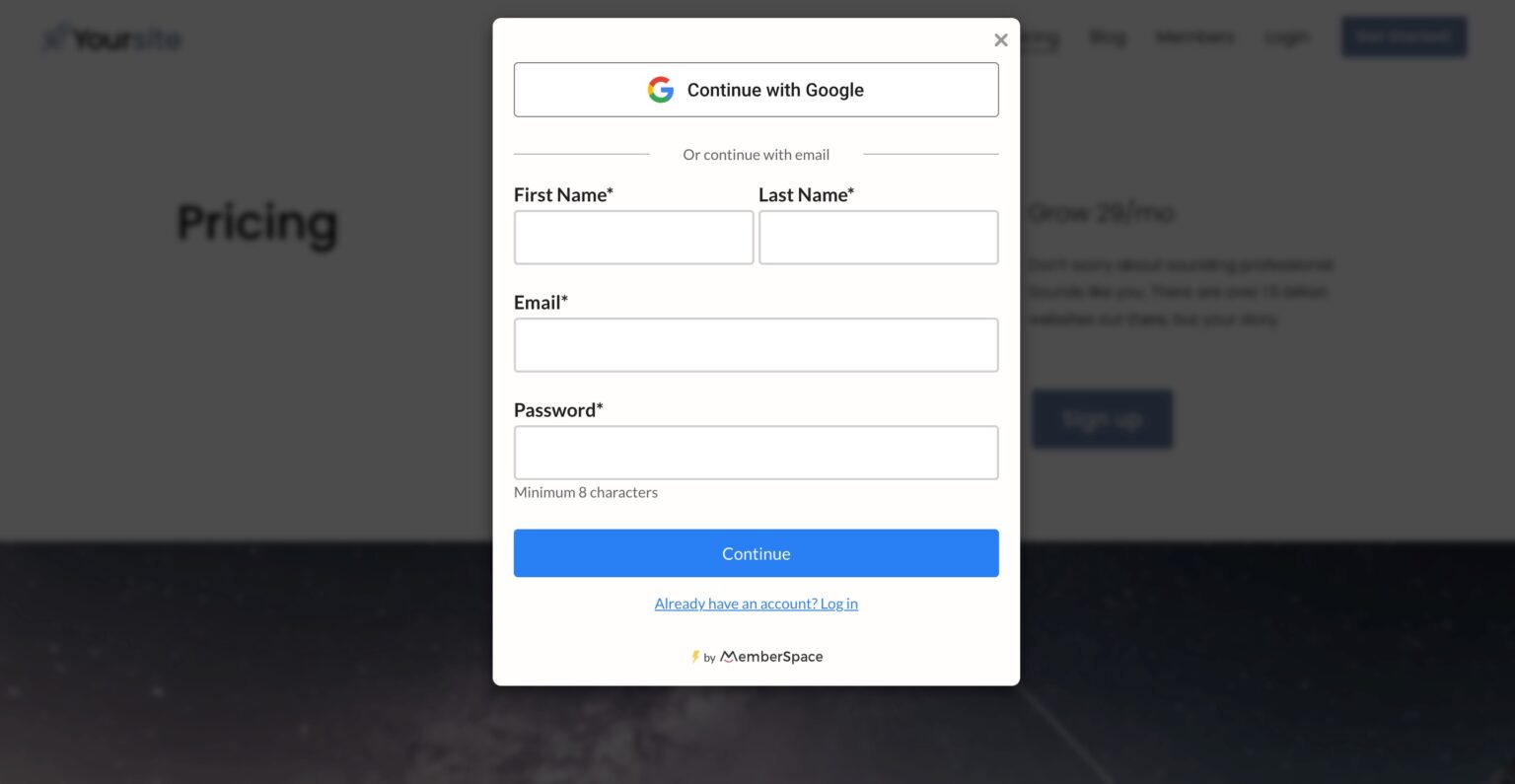
The post How to Create Paid Facebook Groups – Accept Payments for Your Private Community appeared first on .

How to Create a Paid WhatsApp Community – 5 Steps to Monetize your Group Chat

Software Stack Editor · May 17, 2024 ·

Haiden Hibbert

Haiden Hibbert

I’m a Content Manager at MemberSpace helping entrepreneurs and creators sell digital products.

WhatsApp is a great tool for creators, coaches, and membership business owners looking to offer a live chat to their online community. With features like sub-groups, announcement groups, polls, video calls, and file sharing, WhatsApp makes it easy to create a home for your members to interact with you and each other. 

However, one key feature WhatsApp lacks is the ability to create a paid community. That’s where MemberSpace comes in! By integrating MemberSpace with your WhatsApp community, you can:

  • Provide members with a secure, private group link
  • Charge for community access directly through your website
  • Securely manage payments

Launch a paid WhatsApp Community!

The easiest way to accept membership payments or one-time charges for digital products like online courses, communities, content libraries, and more — all from your own website!


Start selling now

Get started for free! 5 minutes to set up.

Table of Contents

Step 1: Open your WhatsApp Community

Anyone can create a WhatsApp community – all you need to do is download the app for iOS or Android. Once you’ve got the app installed, you can also use WhatsApp on your desktop if you prefer. 

To create a WhatsApp community, open the app and click the Community tab at the bottom of your screen.

Step 2: Install MemberSpace on your website

Next, you’ll need to add MemberSpace to your website. Any CMS works! This will enable a signup/login area on your site so new members can pay to get access to your WhatsApp community. 

Install MemberSpace for paid Whatsapp group
To install MemberSpace, all you need to do is add a snippet of code. We have install instructions for each CMS, so you don’t need technical experience to do this. It takes just a few minutes!

Step 3: Protect your WhatsApp community 

To ensure that only paying members get access to your private chat, you’ll need to set up a new Community in MemberSpace. Just add the name of your community and the URL, and then enable the Member Menu option, which will make your paid community link accessible via a floating button in the bottom right corner of your website. 

Whatsapp community link
You can protect your WhatsApp community link and provide it to new members by adding the link to MemberSpace.

Member Menu Whatsapp community
Once you’ve installed MemberSpace and added your Online Community, a Member Menu button will be activated in the bottom right corner of your website.

✨ Community Tip: At any point in the future, you can add more offerings to your membership community with MemberSpace, like coaching sessions, template libraries, or podcast episodes! Simply add your content to your website and add the URLs to your Online Community in MemberSpace. 

Step 4: Set a price for access to your WhatsApp community 

After protecting your community link, it’s time to set up your pricing! You can create one or multiple pricing tiers and charge customers a recurring subscription fee for ongoing access to your group. 

Whatsapp community pricing
MemberSpace integrates with Stripe for payment processing, making it easy and secure to accept payments on your website via credit card, Apple Pay, and Google Pay.

Step 5: Share your community with new members

Once a new member signs up for your WhatsApp community, you can send them the invite link. The easiest way to do this is to copy the invite link and send it via email or text. You can use MemberSpace to send an automated welcome message including the link that will get sent out as soon as someone signs up on your website. 

Whatsapp community link
WhatsApp offers a few different ways to invite/add members to your community.

Final Thoughts

Combining WhatsApp and MemberSpace is a great way to create an exclusive, valuable community experience for your members. Setting up a paid WhatsApp community is simple and straightforward, even if you don’t have technical experience. With just a few steps, you can start accepting payments, protecting your community link, and inviting new members to join your group. If you’re ready to get started, create a MemberSpace for free today! 

Need help with your WhatsApp community

Connect with our friendly team, weekdays 10am – 6pm ET.

Let’s chat!
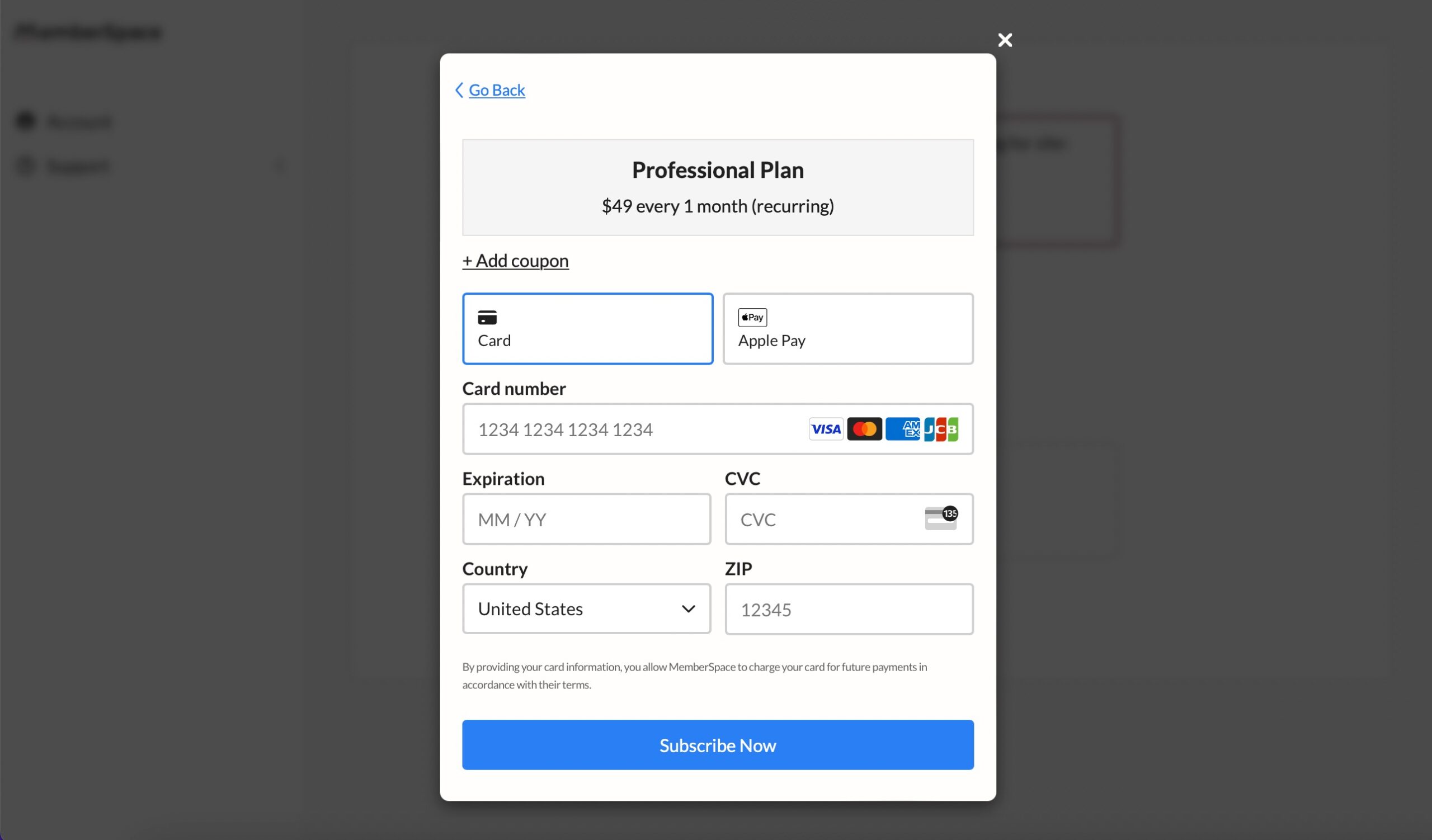
The post How to Create a Paid WhatsApp Community – 5 Steps to Monetize your Group Chat appeared first on .

How to Create a Paid Instagram Community – A Better Alternative to Instagram Subscriptions

Software Stack Editor · May 17, 2024 ·

Haiden Hibbert

Haiden Hibbert

I’m a Content Manager at MemberSpace helping entrepreneurs and creators sell digital products.

Building a following on Instagram is no small feat – especially with the ever-changing algorithm and increasing competition among creators. So if you’ve managed to grow an engaged community on the platform, you’re probably wondering the best ways to monetize it!

While Instagram does have a paid subscriptions feature that allows followers to subscribe for access to exclusive content, it leaves you at the mercy of the platform’s rules and payout policies, which isn’t ideal when you’re looking for a sustainable and reliable source of income.

In this post, we’ll walk through a more flexible alternative to Instagram subscriptions – selling access to a paid Instagram account on your own website! This way,  you remain in control of your pricing, your member data, and any additional perks you want to offer your community, like group coaching sessions, newsletters, or private podcast episodes – all in one place. 


Launch a paid Instagram account!

The easiest way to accept membership payments or one-time charges for digital products like podcasts, online courses, communities, content libraries, and more — all from your own website!


Start selling now

Get started for free! 5 minutes to set up.

Table of Contents

Step 1: Set up a private Instagram account

If you haven’t yet, you’ll want to start by opening up a private Instagram account, or setting your current profile to private. This is where you’ll build and grow your paid community, share exclusive content, host live Q&As, encourage discussions among your followers, talk to members in your DMs, etc.

Private Instagram account
Switch your Instagram account to private so only paying members can join.

Step 2: Add MemberSpace to your website

MemberSpace is the tool you’ll use to accept payments for your paid Instagram account on your website. All you need to do is sign up for MemberSpace for free and add a snippet of code to your website (this takes just a few minutes and we have install instructions for each CMS, so no tech expertise necessary!). 

Use our simple install instructions to help you add the MemberSpace code to your site.

Step 3: Protect your Instagram page

Next, you’ll use MemberSpace to create a signup/login area on your website so you can share the URL for your private Instagram and accept payments for access to your account. 

First, go to Products and add a new Community. Under Where is your product?, select An external link. This is where you’ll add the URL for your profile. 

Private instagram community
By adding your Instagram profile link, new members will get access to it as soon as they sign up.

✨ Be sure to enable Member Menu. This will add your Instagram profile link to a menu in the bottom right corner of your website (only logged in members can see the menu). 

Step 4: Set a price for access

Once you’ve added your paid Instagram profile as a new product, it’s time to decide how much you’ll charge members for access! MemberSpace has a built-in Stripe integration, so accepting payments on your website is a secure and easy process. All you have to do is connect to an existing Stripe account or create a new one, and choose from one-time, recurring, or multiple payment and then indicate your pricing. 

When someone goes to sign up for access, they’ll fill out your signup form and pay via credit card, Apple Pay, or Google Pay. 

Sell private Instagram
Choose how you want to sell access to your product and set your billing details, like payment frequency and billing date.

When community members go to sign up on your website, they will see a payment form like this.

Step 5: Share your profile with new members

As soon as someone signs up for your paid Instagram on your website, you’ll need to provide them with the profile URL so they can request to join. In addition to using the Member Menu, there are a few ways to do this with MemberSpace:

  • Option 1: Send out a welcome email that includes a link to your Instagram profile, so they can request to join
  • Option 2: Redirect new members to a “secret” landing page after they sign up for your community and include the link on that page. You’ll need to protect this page with MemberSpace so only members can view it.
  • Option 3: When someone signs up for access to your community, you can manually send them the link to your Instagram profile — this can be done via email, text, or any other method you prefer.

Final Thoughts

Creating a paid Instagram community can be a lucrative way to monetize your following and build a sustainable income stream as a creator. By using MemberSpace to accept payments and manage access to your private Instagram account, you maintain full control over your community, pricing, and other membership offerings! You can have everything up and running in just a few minutes, without any tech expertise required. Get started for free today!

Need help with your Instagram community?

Connect with our friendly team, weekdays 10am – 6pm ET.

Let’s chat!

The post How to Create a Paid Instagram Community – A Better Alternative to Instagram Subscriptions appeared first on .

How to Create a Paid Slack Community – 5 Steps to Monetize your Channel

Software Stack Editor · May 14, 2024 ·

Haiden Hibbert

Haiden Hibbert

I’m a Content Manager at MemberSpace helping entrepreneurs and creators sell digital products.

If you’re looking for a way to make your online community more valuable and engaging, creating a private Slack channel might be the perfect solution. As a creator, coach, or entrepreneur, you can provide your members with an exclusive space to discuss your content, share their experiences, and connect with you and each other. 

The best part? You can easily monetize your paid Slack community using MemberSpace! 


Launch a paid Slack community!

The easiest way to accept membership payments or one-time charges for digital products like podcasts, online courses, communities, content libraries, and more — all from your own website!


Start selling now

Get started for free! 5 minutes to set up.

Table of Contents

Step 1: Create your Slack workspace and private channels

Start by creating a new Slack workspace. You can create multiple channels for your community members to discuss different topics, or even have different groups or cohorts get access to their own channels. Whatever you decide, make sure to make each channel private, so only paying members can access them. 

Private Slack Channel
When creating a new Slack channel, go to settings and change it to a private channel so only paying members get access.

Step 2: Connect your website to MemberSpace

Next, you’ll need to create a MemberSpace account for free and install it on your website. This is the tool you’ll use to add a sign up form on your website and accept payments for your paid Slack community. It takes just a few minutes to add the snippet of code and works with any CMS. 

Install MemberSpace for private slack community
To install MemberSpace on your website, you’ll need to add a snippet of code. We have step-by-step instructions for each CMS, so don’t worry if you don’t have tech experience!

Step 3: Add your Slack workspace to MemberSpace

Once you’ve set up your Slack and MemberSpace accounts, it’s time to add your workspace URL to MemberSpace. This will ensure that your members are able to  find it once they sign up and pay.

Adding your Slack community URL to MemberSpace will ensure new members get access when they sign up.

By enabling the Member Menu option, your paid Slack community link will be accessible via a floating button in the bottom right corner of your website. 

Member Menu Whatsapp community
By enabling Member Menu, your new members will be able to access all of your community links in one place, including your Slack workspace URL.

Step 4: Set a price for access to your channel

Recurring payment is the most popular option for memberships, but you can charge your members however you’d like to join your community. MemberSpace offers lots of billing flexibility and integrates directly with Stripe to make payment processing secure and streamlined. 

Once you’ve set up your pricing plan, members will be able to sign up and pay via credit card, Apple Pay, or Google Pay on your website. 

To create a pricing plan for your paid Slack community, go to Pricing and choose how you want to sell access to your product.

Accept payments for private Slack community
Once you’ve set up your pricing plan, members will be able to sign up and pay on your website through a payment form like this.

Step 5: Automate new member invites

Because you’ve set your Slack channel to private, new members will need to be invited to join once they sign up on your website. Don’t worry – you can automate the entire process by connecting your Slack and MemberSpace accounts via Zapier!


MemberSpace Slack Zapier
One of the many actions you can automate with Zapier – new members can be invited to your private channel as soon as they subscribe.

Private Slack Channel Example – Boss Project

MemberSpace customer, Boss Project offers a private Slack Channel (AKA “your online executive team”!) to members who sign up for the highest tier of their membership community, along with other perks like group coaching calls, a content library, and an online academy. 

This is an amazing value-add for community members who want lots of support and guidance. 

Boss Project private Slack channel
Check out Boss Project’s membership for inspiration on how to structure your paid Slack community.

Final Thoughts

Selling access to a private Slack channel is a great way to launch an online community, share your expertise, and add a new income stream! You can also add your Slack channel to an existing membership as a way to increase the value of an existing community. To get started, sign up for MemberSpace for free!

Need help with your Slack community?

Connect with our friendly team, weekdays 10am – 6pm ET.

Let’s chat!

The post How to Create a Paid Slack Community – 5 Steps to Monetize your Channel appeared first on .

6 Time-Saving Ways to Use Canva for Online Course Creation

Software Stack Editor · May 2, 2024 ·

Haiden Hibbert

Haiden Hibbert

I’m a Content Manager at MemberSpace helping entrepreneurs and creators sell digital products.

Creating an online course involves a lot of moving parts, from recording and editing lesson videos to creating engaging slides to designing worksheets. It can be overwhelming, especially if you don’t have a background in design or video editing. And let’s face it – not everyone has the time or budget to learn new software or hire a professional. 

That’s where Canva comes in!

With its easy-to-use drag-and-drop editor and library of 2+ million templates (yes, you read that right), Canva makes it easy to create all your course materials in one place. In this post, we’ll explore all the ways Canva can help you create an amazing online course!

Launch an online course!

The easiest way to accept membership payments or one-time charges for digital products like online courses, communities, content libraries, and more — all from your own website!


Start selling now

Get started for free! 5 minutes to set up.

Table of Contents

1. Design presentation slides

Most online course videos include a mix of presentation slides and video, but putting together slides from scratch can be super time-consuming. You can streamline this process by choosing a template and customizing it to match your branding and fit your course content. Once you do some customizing, you can save your version as a new template so you can reuse it for future slides/courses.

Canva online course slides
Use Canva’s presentation slide templates to quickly create engaging, professional slides for your online course videos.

2. Record and edit video

Canva offers basic video editing and recording tools built right into your account. They might not be as fancy as dedicated video editing software, but they’re perfect for editing your slides and video clips together, adding transitions, and more. The Record Yourself button is particularly useful, allowing you to record a video of yourself that gets embedded right on top of your slides –  a popular format for online courses.

Canva’s video recording and editing features make it easy to record your lessons and edit all of your content together.

3. Build free downloads

Many successful online courses offer free downloads like worksheets, templates, guides, or ebooks to enhance the learning experience. Creating these resources can be time-consuming, but with Canva’s library of templates, you can design professional-looking materials that perfectly complement your course content.

Canva online course free downloads
Adding free downloads to your course, like worksheets and templates increases the value of your course and encourages more student engagement.

4. Create certificates

Offering a formal certification program or certificate of completion as a part of your online course is another great way to increase student engagement and completion rates, as well as attract more potential students to your course! There are thousands of free certification templates on Canva that make the process of designing a digital certificate really simple. 

Canva certificate generator
If you’d like students to receive a certificate of completion after they finish your course, you can quickly customize one in Canva and save it as a PDF.

5. Design your online course website/landing page

If you need some help with your website, you can use Canva’s website templates to create a sales page that highlights your course content, pricing, and call-to-action. You can even publish the page directly to a custom domain or connect it to your existing website.


✨ Online Course Tip: While Canva does offer a course creation feature, it’s a bit limited in functionality. For the best results, host your course on your own website using the materials you’ve created with Canva.

6. Create social media posts

Once you’ve launched your course, you’ll need to create marketing materials to promote it. Canva is popular among creators for its selection of social media templates, as well as the Resize & Magic Switch feature. This allows you to quickly resize any design and repurpose it for multiple social media platforms. 

Canva online course promotion
Canva’s social media templates make it easy to quickly design branded content for all of your social media platforms and promote your online course.

Launching your online course

After creating your course materials using Canva, it’s time to put everything together on your website. 

First, add all of your course materials to pages on your site. For some inspiration on how to structure these pages, check out our free online course wireframe.

Our free online course template includes page designs for modules, lessons, quizzes, and more.

Once you’ve added your online course materials to pages on your website,  you’ll need to install MemberSpace to restrict access to those pages and accept payments for your course. It only takes a few minutes to set up! 

With MemberSpace, you can:

  • Password protect your online course pages
  • Accept payments on your website via credit card, Apple Pay, and Google Pay
  • Sell access to other digital products
  • Access revenue growth features

online course member menu
To restrict access to your online course pages, simply add your page URLs to MemberSpace. This will protect them from the public and require students to be logged in or signup and pay before they get access.
Monetize a newsletter paid blog
When someone goes to view your online course materials, they will see a pop-up like this that requires them to login or signup.

Final Thoughts

Creating materials for your online course has never been easier thanks to Canva’s design tools and extensive template library. And when you combine Canva’s design capabilities with MemberSpace’s monetization features, you have everything you need to launch a successful online course! To get started, try MemberSpace for free today. 

Need help with your online course?

Connect with our friendly team, weekdays 10am – 6pm ET.

Let’s chat!

The post 6 Time-Saving Ways to Use Canva for Online Course Creation appeared first on .

How to Create an Online Course Outline [+ Free Course Template]

Software Stack Editor · May 1, 2024 ·

Haiden Hibbert

Haiden Hibbert

I’m a Content Manager at MemberSpace helping entrepreneurs and creators sell digital products.

Creating a successful online course requires more than just great content. A well-structured outline is key to to ensuring that you stay on topic during the course creation process and deliver content that is both engaging and impactful for your students. In this post, we’ll walk you through the steps to create an effective online course outline and provide you with a free template to help you get started!

Launch an online course!

The easiest way to accept membership payments or one-time charges for digital products like online courses, communities, content libraries, and more — all from your own website!


Start selling now

Get started for free! 5 minutes to set up.

Table of Contents

Step 1: Define your course goals and objectives

Before you start outlining your course, it’s important to identify your target audience and define the learning outcomes you want your students to achieve. Ask yourself, “Who is this course for, and what do I want them to learn by the end of it?” Jot down these goals in a bulleted list to help you create focused and relevant content. 

Step 2: Break down your objectives into modules

Once you have your course goals and objectives in place, it’s time to break them down into modules. Each module should cover a specific topic or skill that contributes to the overall learning outcomes. As you’re crafting your topics, consider the flow of information and how each module builds upon the previous one.

Online course outline module
This example module page is from our free online course wireframe, which displays how you might want to structure your course content.

Step 3: Come up with 2-3+ subtopics for each module

With your modules defined, it’s time to dive deeper and create lesson topics. Each module should have 2-3 or more subtopics that explore different aspects of the main idea. These subtopics will form the basis of your individual lessons. 

In addition to your lesson video, you’ll want to consider adding free downloads or other supporting materials like quizzes.

Step 4: Outline your module/lesson content

Now that you have your modules and lessons outlined, it’s time to identify the content that you plan to include in each lesson. This step is key to making the course creation process go smoothly and help you determine where to allocate your time/resources. The most popular types of content to include in courses are:

  • Videos
  • Screen recordings
  • Slides
  • Quizzes
  • Certifications
  • Practice activities/action items
  • Free downloads, like worksheets, guides, ebooks, spreadsheets, etc.

Online course outline example

To give you an idea of what a course outline might look like, here’s an example for a course on Sewing for Beginners. 

Objectives:

  • Learn basic sewing techniques and skills
  • Create simple to advanced sewing projects
  • Understand how to read sewing patterns and choose materials

Module 1: Sewing Basics

  • Lesson 1.1 – Introduction to Sewing and Materials (Video, Free Download: Fabric and Notions Guide)
  • Lesson 1.2 – Threading the Machine and Basic Stitches (Video, Practice Activity)
  • Lesson 1.3 – Finishing Seams and Pressing (Video, Quiz)

Module 2: Simple Projects

  • Lesson 2.1 – Sewing a Pillowcase (Video, Free Download: Pillowcase Pattern)
  • Lesson 2.2 – Sewing a Tote Bag (Video, Free Download: Tote Bag Pattern)
  • Lesson 2.3 – Troubleshooting Common Issues (Screen Recording, Quiz)

Module 3: Advancing Your Skills

  • Lesson 3.1 – Reading Sewing Patterns (Video, Free Download: Sample Patterns)
  • Lesson 3.2 – Adding Zippers and Buttons (Video, Practice Activity)
  • Lesson 3.3 – Continuing Your Sewing Journey (Audio, Free Download: Resource Guide)

Online course outline template

To help you visualize the structure of your online course, we’ve created a free wireframe! This template includes a module page, lesson page, quiz page, and navigation menu options. Use this wireframe to map out how your course will be structured on your website, which will make it easier for you to create and organize your content and for your students to navigate through the course.

Download the template!

Online course outline templates
Download the free online course template to learn about the best practices for structuring your course content.

Setting up your online course

Now that you know how to outline your course content, let’s talk about the best way to launch it when you’re ready to share it with the world!

MemberSpace allows you to build your course on your own website, giving you complete control over the structure, design, and functionality, so you aren’t limited to the capabilities of an online course platform.

Here’s how it works:

  1. Create a MemberSpace account for free. 
  2. Add your online course materials to pages on your website. 
  3. Restrict access to those pages with MemberSpace. 

online course member menu
To restrict access to your online course pages, simply add a new product to your MemberSpace account and input the URLs under Protected Page.

         4. Set a price for your online course. 

WordPress online course pricing
MemberSpace allows you to charge students however you’d like for access to your course. Choose from recurring, one-time, multiple payment, or free.

Once you’ve set up your online course with MemberSpace, students can use the signup form on your website to create an account and pay for access!

MemberSpace Singup
MemberSpace generates a unique signup link that you can add to buttons and call-to-actions throughout your website. The link opens up to a signup form like this one.

Final Thoughts

Creating a well-structured online course outline will save you effort in the long run and ensure that your content is valuable and easy to navigate for your students. By defining clear objectives, breaking them down into modules, and outlining lesson content, you’ll have a solid foundation for your course! 

And when it finally comes time to launch your course, consider using MemberSpace to host it on your own website. With MemberSpace, you have full control over your course structure, design, and pricing, allowing you to create a unique learning experience tailored to your audience. Try it free today! 

Need help with your online course?

Connect with our friendly team, weekdays 10am – 6pm ET.

Let’s chat!

The post How to Create an Online Course Outline [+ Free Course Template] appeared first on .

Membership Success Story: Commercial Receivers Association

Software Stack Editor · April 30, 2024 ·

Membership type: Content library, Newsletter, Member directory, Events
Built with: WordPress + MemberSpace
Established: 2020

Commercial Receivers Association (CRA) is a membership designed to educate and connect receivership professionals throughout the country.

The Commercial Receivers Association (CRA) membership provides a one-stop resource hub for receivership specialists (such as attorneys, accountants, bankers, and more) to access important legal information as well as connect with colleagues. Members are supported via a content library, quarterly newsletter, members-only events (and discounts for public ones), and an exclusive listing in a directory of professionals.

🔎 Receivership is when a court appoints a third party, known as a receiver, to manage a financially troubled company. The receiver oversees the company’s assets and operations, typically aiming to pay off debts either by restructuring the company or liquidating its assets.

CRA connects receivership professionals across the country
The Commercial Receivers Association is a network of professionals from across the country.

Meet the CEO

Eric Moraczewski is the CEO of CRA. Before launching his membership, his full focus was on operating a consulting firm.

Now, in addition to the firm, he runs a successful network of professionals, helping educate and connect individuals in the receivership industry across the country.

membership success stroy Eric

We’ve launched our first strategic plan in an effort to understand what people enjoy most about the association.

Eric Moraczewski, CRA

Membership

Q & A

Some responses have been slightly edited for context.

What is the pain point you solve for your customers?

By starting the CRA, we made it easy for receivership specialists to connect with colleagues from across the country. We also provide educational and practical resources to our members to benefit their businesses and expand their knowledge base.

members get an exclusive listing in a directory
CRA members get the exclusive opportunity to be listed in a directory of receivership professionals.

What were you doing before your membership business?

I founded a consulting firm where we seek to empower small businesses, nonprofits, and public-private enterprises through trusted consulting partnerships.

💡 Membership Tip
Starting a membership can be an extension of what you already offer. Add members-only perks to existing services, or bundle multiple digital products into an all-inclusive membership.

What challenges did you have in the early stages of your business?

Building a nationwide network.

💡 Membership Tip
Profitable membership ideas often come from identifying gaps you’ve experienced yourself. It’s likely you’re not the only one searching for resources, services, etc. that may not exist. Filling those gaps will allow you to help yourself, while also benefiting others!

Were there any keys to success, or big “a-ha!” moments that really elevated the growth of your business?

Just getting out into the communities and meeting people.

💡 Membership Tip
Don’t underestimate the power of face-to-face connection. Getting to know your ideal customer can help you understand and, ultimately, serve them more effectively.

Did you have a social media following or large email list before you started your membership?

No.

How do you market your membership and find new members?

Local events, social media, e-blasts, word of mouth

CRA offers public and member-exclusive events
Public events help to spread the word about the CRA, while member-exclusive events add value to the membership.

Do you spend any money on paid advertisements?

No

Have you done anything to focus on retention and reduce canceled members?

We’ve launched our first strategic plan in an effort to understand what people enjoy most about the association.

What are some of your favorite online tools for running your business?

Canva, Whova, Mailchimp

Do you have a team helping with your membership business?

Nope, just me!

What’s your source of inspiration?

Our members

MemberSpace allows you to offer multiple membership plan options
Via MemberSpace, the CRA offers different plan options that correspond with the member’s needs.

If you could give your younger self any advice, what would it be?

“Build a network.”

What’s next for your business?

Growth of the association, we anticipate doubling in size in the next 12-18 months.

We anticipate doubling in size in the next 12-18 months.

Eric Moraczewski, CRA

Membership Business Takeaways

  • Your membership can be based on your professional work! Some of our most successful memberships are customers who’ve turned their existing professional knowledge into a digital product or service.
  • If you notice a gap in resources or services in your industry, consider creating something to share your expertise. Filling those gaps will help others — and you’ll also reap the benefits!
  • Getting to know your ideal customer is essential to the success of your business. Speaking directly with customers and understanding their pain points will help you craft something truly valuable for them.
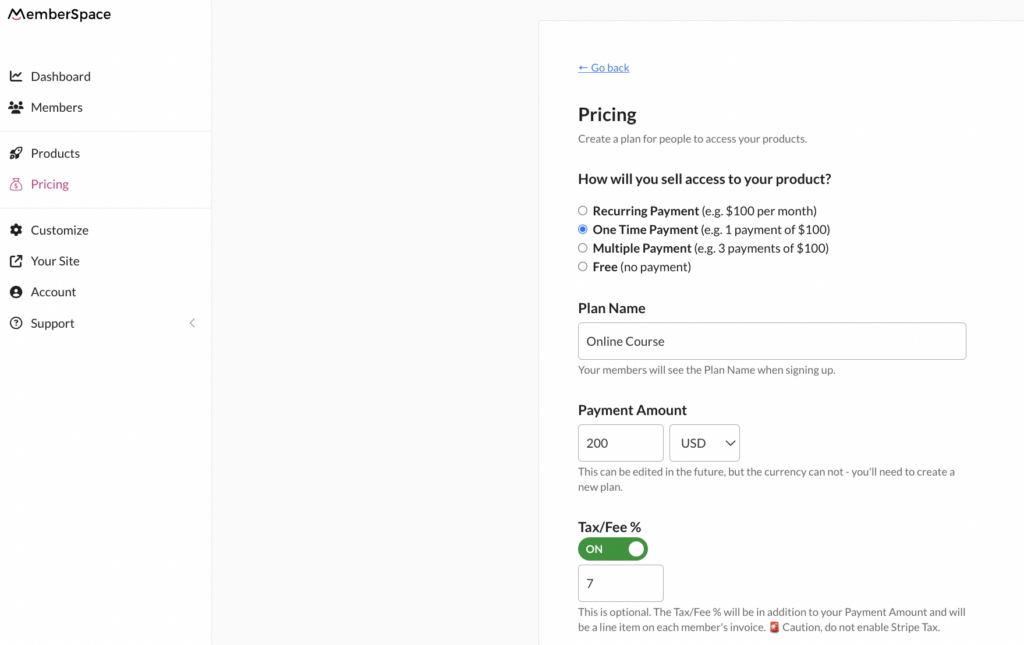
Need help getting started?

Connect with our friendly team, weekdays 10am – 6pm ET.

Let’s chat!

MemberSpace makes it easy to sell digital products and memberships. It all starts with a simple idea and the willingness to develop customer-centric solutions to challenges your audience is facing.

For additional resources on marketing and selling digital products and memberships, check out MemberSpace University, our hub of step-by-step guides, educational videos, technical and strategy tips, and more.

The post Membership Success Story: Commercial Receivers Association appeared first on .

  • « Go to Previous Page
  • Page 1
  • Interim pages omitted …
  • Page 3
  • Page 4
  • Page 5
  • Page 6
  • Go to Next Page »

Get your Software Stack together. softwarestack.tech

Software Stack

© 2024–2026 - Software Stack is a trading name of SouthwestCIO Limited ac ompany registered in England & Wales 11319049

  • Knowledgebase
  • Home
  • About Us
  • Contact Us