• Skip to primary navigation
  • Skip to main content
software stack logo

Software Stack

Get your Software Stack together

  • Knowledgebase
    • All Categories
    • Accounting Software
    • Automation & Workflow Software
    • Customer Relationship Management
    • E-Commerce Shopfronts & Payments
    • Marketing Automation
    • Online Courses & Membership
    • Project Management
    • Surveys & Forms
    • Web Hosting
  • Home
  • About Us
  • Contact Us
  • Show Search
Hide Search

Pipedrive

Ultimate B2B Content Marketing Strategy Guide for SMBs

Software Stack Editor · May 20, 2025 ·

B2B content marketing is essential for small businesses looking to stand out and drive sales. By creating and sharing valuable content, you can engage key decision-makers, build trust and generate qualified leads.

In this article, you’ll learn practical strategies for using content marketing to grow your business, educate your B2B audience and turn interest into lasting relationships.

What is B2B content marketing?

B2B content marketing is a strategic approach to attracting, engaging and converting business customers.

Small-to-medium businesses (SMBs) create and distribute valuable content to raise brand awareness, address industry-specific challenges and guide prospects through the marketing funnel – from initial interest to final conversion.
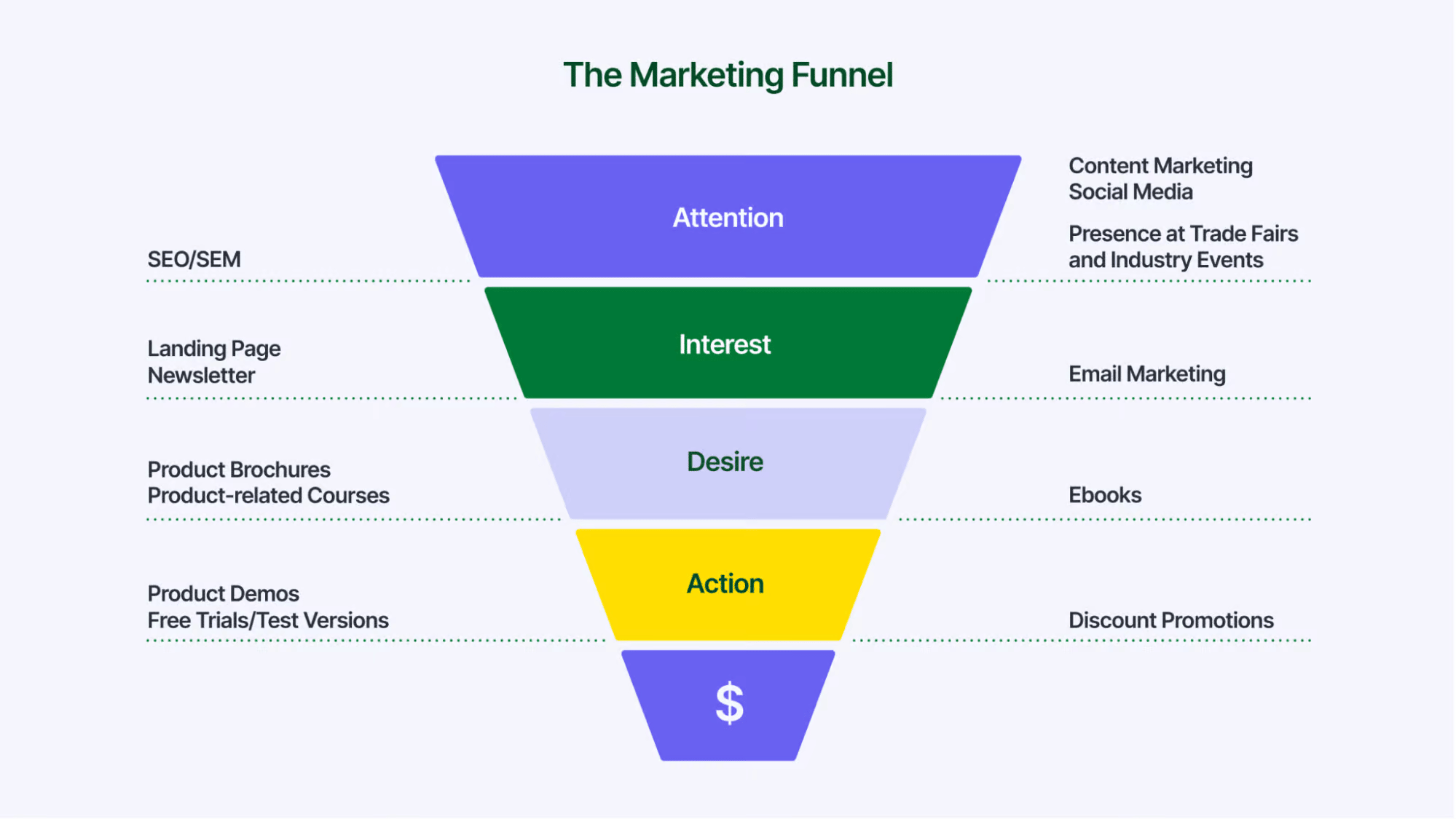
B2B content marketing Pipedrive marketing funnel

Content marketing achieves these outcomes by offering users genuine value while highlighting how the company’s product or service solves customers’ problems.

B2B content marketing includes content like:

  • Industry-focused articles full of examples and practical takeaways

  • Video and audio content sharing a company’s expertise

  • Customer stories that establish trust with prospects

  • How-to articles that educate and support customers

Engaging in strategic planning for content marketing can support and enrich your small business marketing strategy.

Creative content marketing techniques ensure engaging and impactful communication. One of the best B2B content marketing examples is the e-commerce platform Shopify:
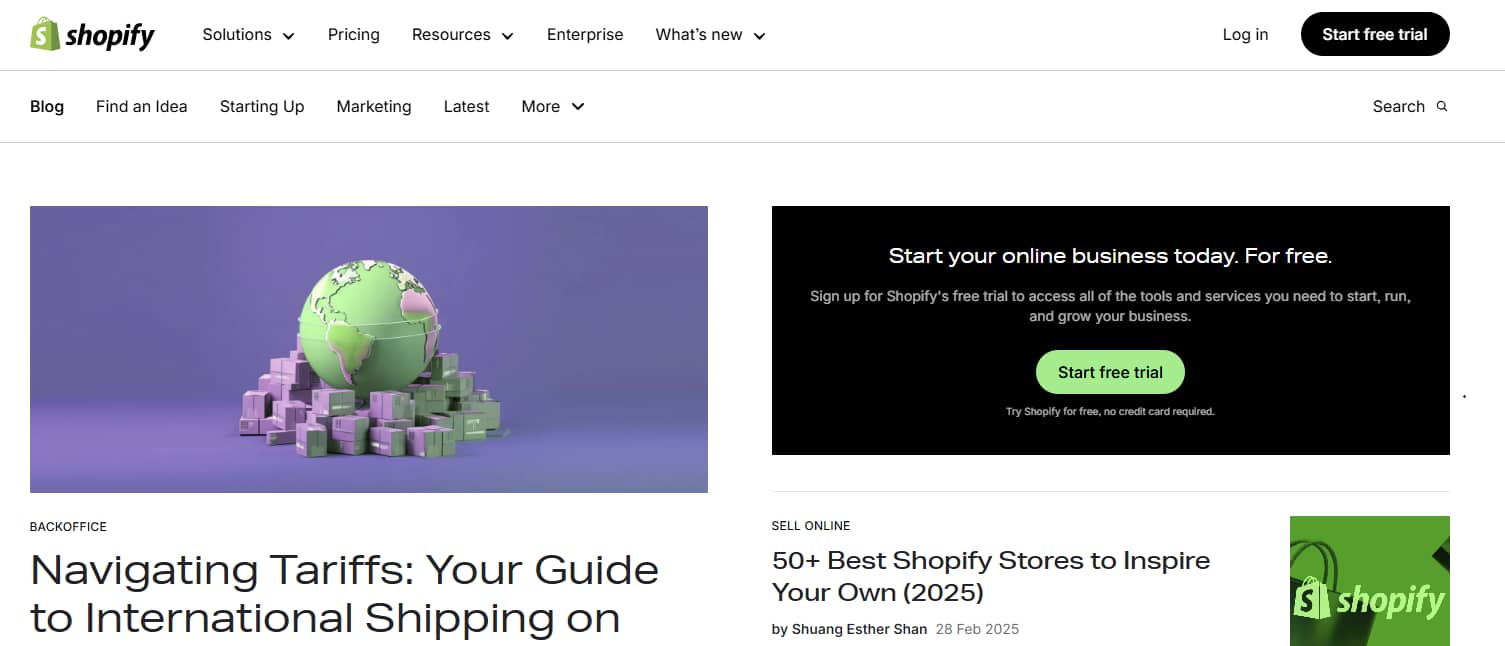
B2B content marketing Pipedrive example content strategy

Shopify’s content hub shares business strategy tips through blog posts, lists and other articles. It delivers real value by offering insights on topics users truly care about. The content also highlights how the platform can solve problems for e-commerce business owners.

Before starting your B2B content marketing, it’s crucial to understand how it differs from its B2C counterpart.

Free ebook: How to tell your brand story

Get our ebook outlining the five steps to developing your brand’s unique story

How does B2B content marketing differ from B2C content marketing?

In B2B, or “business to business”, companies sell to other companies. B2C – or “business to consumer” – companies sell to individual consumers.

Here’s a breakdown of the key characteristics of B2B and B2C content marketing:

B2B content marketing

B2C content marketing

Decision-makers across multiple departments form the target audience.

Individual consumers make up the target audience.

Content targets various stakeholders throughout a complex, often lengthy sales process.

Content aims to engage individuals who can make relatively quick purchasing decisions.

Audiences are looking to build knowledge, evaluate solutions and support long-term business buying decisions.

Audiences want to explore individual interests, stay informed on relevant topics and find solutions to everyday challenges.

Standard content formats include industry-focused blog posts, white papers and webinars.

Most commonly used content formats include consumer-focused blog posts, social media content and short-form videos.

Buyers seek ROI, efficiency gains and strategic business outcomes.

Buyers care about their immediate needs and how products fit into their everyday lives.

Content marketing helps B2B companies address many of the common challenges of selling to a business audience. It helps B2B buyers:

  • Understand your value proposition – what differentiates you from competitors

  • Recognize your place in the industry and the expertise you have to offer

  • See how your solutions address their business problems

  • Progress to the next stage of the customer journey

As a result, content marketing can influence key business decisions and drive B2B sales.

Why is content marketing important for B2B?

As part of your small business marketing strategy, content marketing can contribute to some critical digital marketing and sales objectives:

Raising brand awareness

Purpose: Establishes your brand’s unique voice in the marketplace.

Outcome: Prospects are more likely to remember you when needing products or services you offer.

Improving SEO and online visibility

Purpose: Increases search engine ranking potential through content optimization.

Outcome: More prospects discover your business through online searches.

Educating B2B buyers

Purpose: Informs B2B businesses about relevant topics.

Outcome: Customers see your brand as a trusted advisor.

Lead generation

Purpose: Attracts leads with valuable content assets behind a web form.

Outcome: Qualified leads enter your sales pipeline.

Nurturing leads

Purpose: Addresses prospects’ concerns at each stage of the buyer’s journey.

Outcome: Drives conversions and B2B sales.

Supporting the sales team

Purpose: Enables sales reps to handle customer objections effectively.

Outcome: Sales teams close deals more efficiently.

Content marketing allows you to build trust with customers. It also moves prospects forward in the buyer’s journey, usually with a clear call to action (CTA).

In this CTA example, B2B SaaS (software-as-a-service) brand ClickUp guides readers to download additional content and sign up for the software:
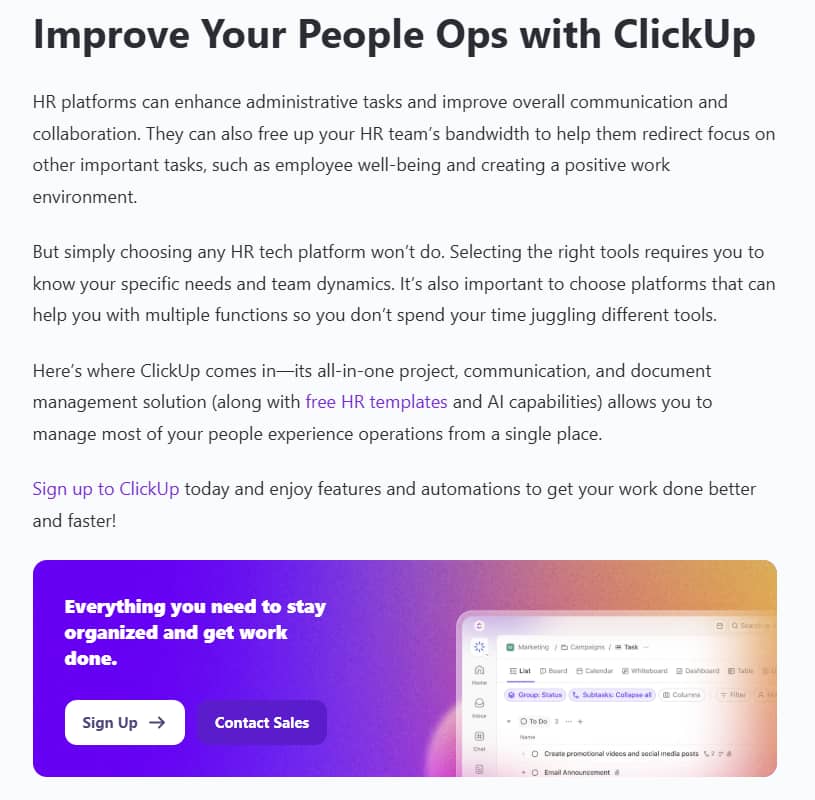
B2B content marketing Pipedrive CTA example

Now that you understand the value of B2B content marketing, it’s time to explore some of the most effective content formats to include in your strategy.

Recommended reading

https://www-cms.pipedriveassets.com/Best-AI-marketing-tools-for-SMBs.png

20 best AI marketing tools for small businesses in 2025

Different content types in B2B content marketing

Here are some of the most engaging content types with strong examples of B2B content marketing in action.

1. Blog posts

A blog is an area of a business website where companies publish content to drive traffic and raise brand awareness. Blog posts attract prospective customers by improving a brand’s visibility in online searches and offering valuable information.

In B2B, the content should cover topics your business audience cares about that fit well with your product or service offering.

For instance, if your customers are B2B companies in the energy sector, decision-makers will likely care about topics like net-zero target legislation and trending geopolitical issues.

Blog posts come in different formats, including:

  • Listicles

  • Product-led articles

  • How-to articles

  • Thought leadership

Here’s an example of an informative, product-led article on CRM databases from the Pipedrive blog:
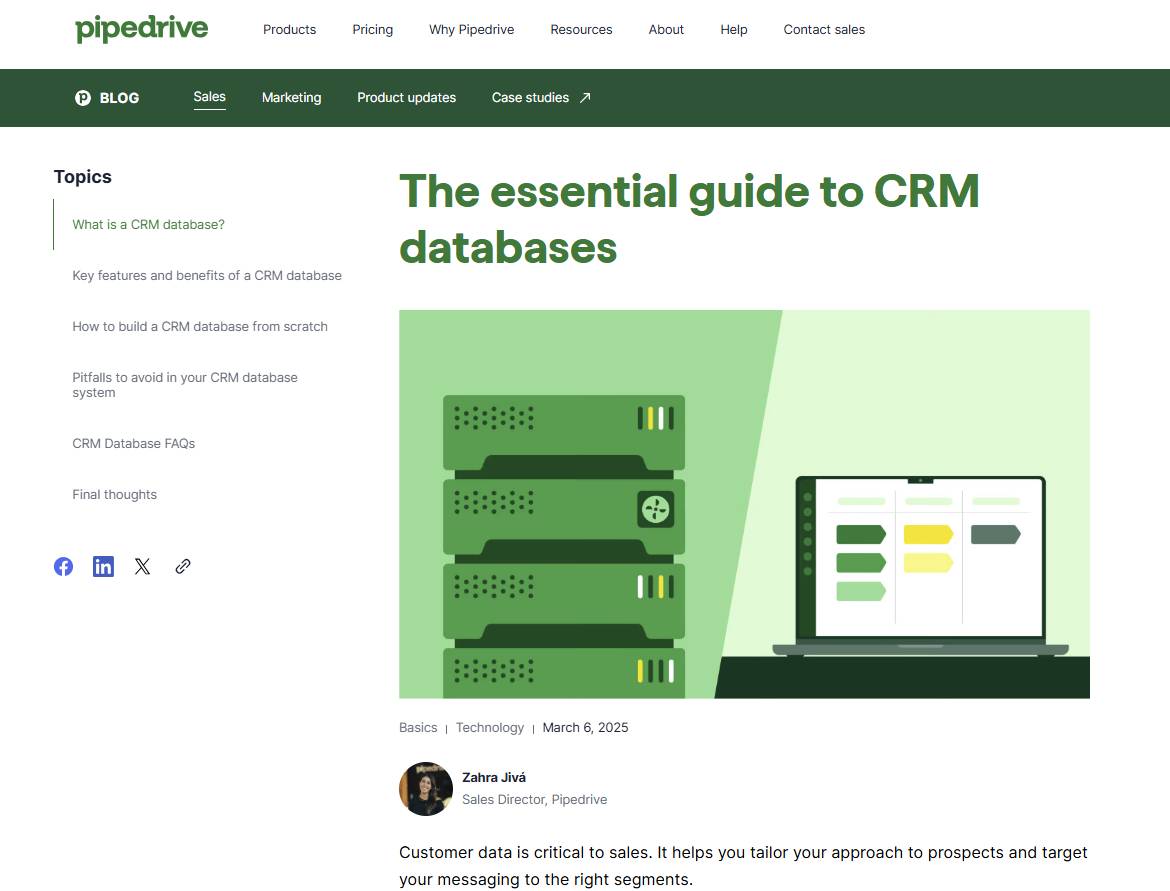
B2B content marketing Pipedrive blog post example

Blog content creation starts with planning. Establish content pillars – foundational themes or topics that shape your blog’s strategy. Aim for topics that:

With content pillars in place, choose themes that matter to your audience and decide on the most suitable blog format before you start writing.

2. Case studies

A case study or customer story is a powerful form of value selling that shows how a product or service has delivered real results.

Case studies humanize your brand by sharing first-hand customer experiences and demonstrate its impact in a credible and relatable way.

This B2B case study highlights how the work management tool Slack helped the AI platform Writer grow its headcount:
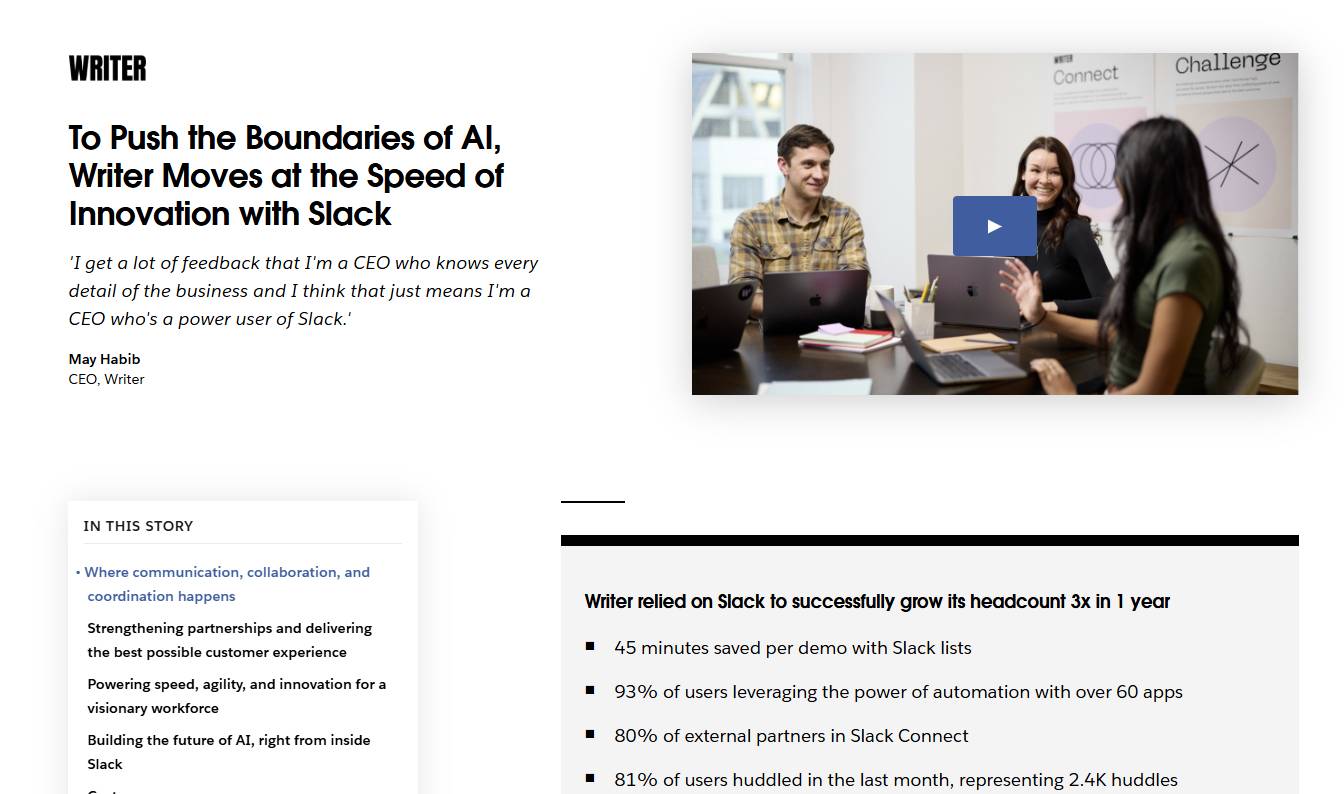
B2B content marketing Pipedrive case study example

To generate impactful case studies, identify customers who’ve achieved strong outcomes with your product. A customer success manager can help you find good candidates. Alternatively, gauge interest via surveys or feedback at key customer journey stages.

Conduct personal interviews to uncover rich, specific details. To show the full value of your product, encourage interviewees to share measurable outcomes (e.g., improved marketing metrics or sales KPIs) along with “softer” benefits – such as simplifying workflows or improving work-life balance.

3. Thought leadership content

Thought leadership content builds credibility and trust by sharing expert insights from founders, executives or subject-matter experts (SMEs).

Thought leadership content showcases unique industry perspectives through blog posts, LinkedIn articles, interviews and keynote-style videos. It builds credibility, nurtures trust with potential buyers and humanizes your brand.

In this example from B2B accounting and invoicing software Xero, an internal SME writes a detailed blog post on the future of AI:
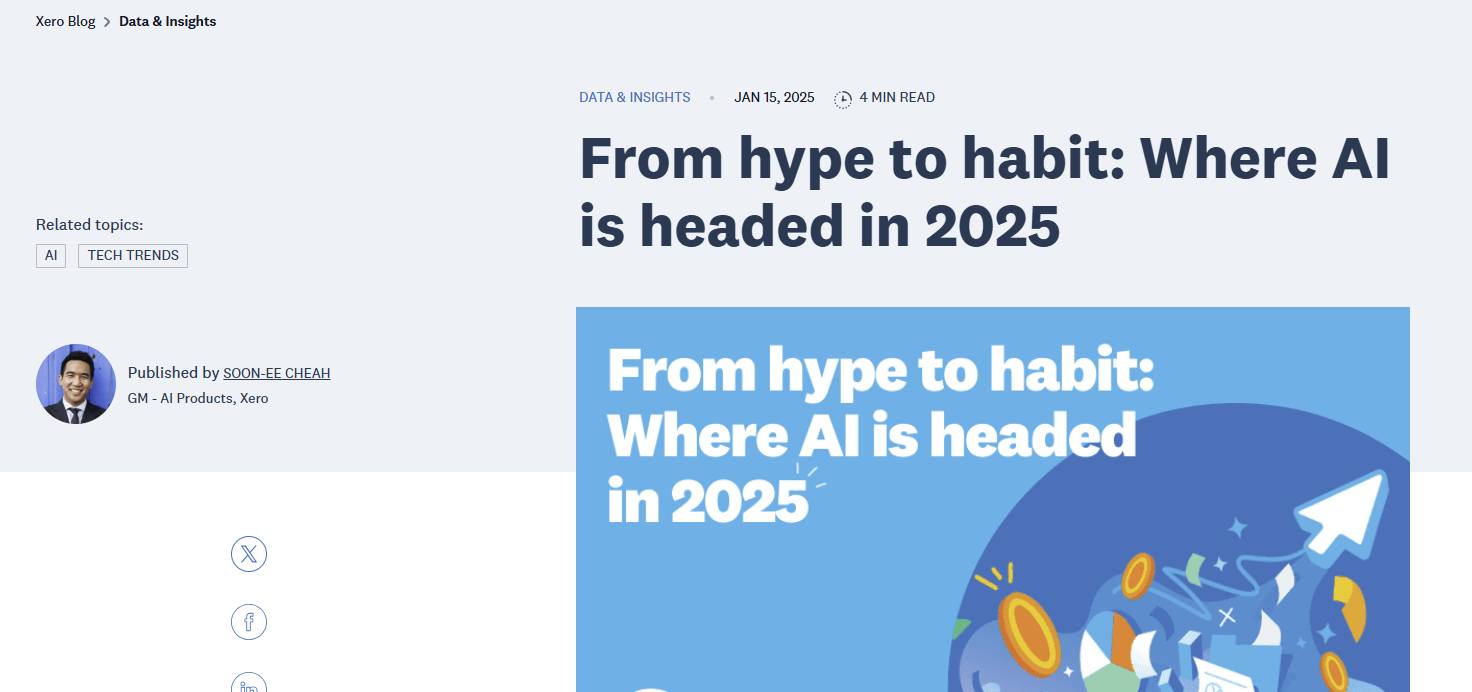
B2B content marketing Pipedrive thought leadership example

To create authoritative thought leadership content, identify two or three topics your audience cares about that thought leaders can speak about credibly. Subjects might include industry trends, challenges or ethical questions.

Choose a format that fits the thought leader’s communication style (e.g., a written article or a short video) and encourage them to share honest opinions that align with the company’s brand positioning.

For example, if you’re an industry disrupter, your thought leadership content might be more provocative than other brands.

Download our customer journey map template

Start mapping your customer journey with our free customer journey template.

4. White papers

White papers are long-form, in-depth reports that offer valuable insights on complex industry topics. They often include original research, analysis or a strategic framework.

A white paper, often gated behind a web form, can be a highly effective lead generation device by positioning a brand as a serious, research-driven authority. The content adds genuine value to the reader while showing how the company can solve their issue.

In this example, insurance provider AXA uses a whitepaper to help insurance partners grow their revenue by bundling AXA’s services together:
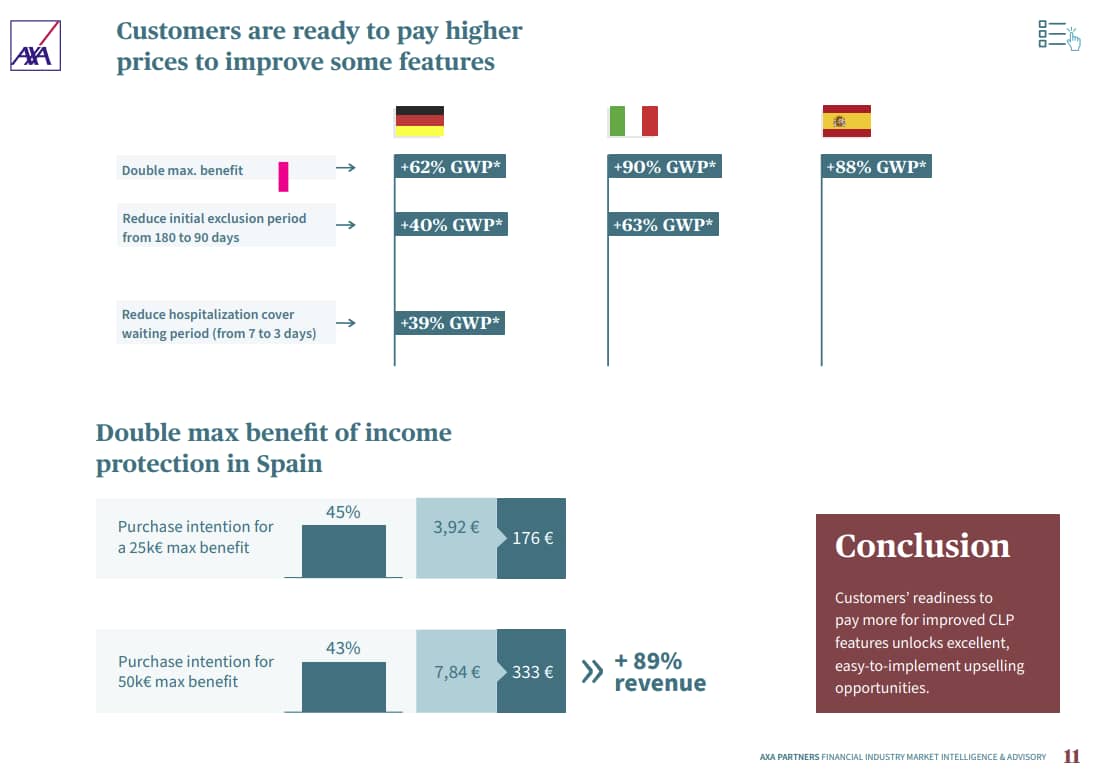
B2B content marketing Pipedrive whitepaper example

To create a whitepaper, choose a topic on which your brand can provide substantial insight, such as industry benchmarks or emerging regulations.

Use internal data, third-party research or expert interviews to inform the piece. Structure the content clearly and visualize data points using graphics like charts.

5. Email newsletters

Email newsletters are regular email updates you send to a subscriber list. They help you stay top-of-mind with prospects by delivering content directly to their inbox.

With curated updates, product news and industry insights, newsletters help you:

  • Maintain direct, ongoing communication with prospects and customers

  • Nurture leads over time

  • Drive traffic to other content or conversion points

Here’s an example of a content-led email newsletter with sales consultancy facts and tips from Pipedrive:
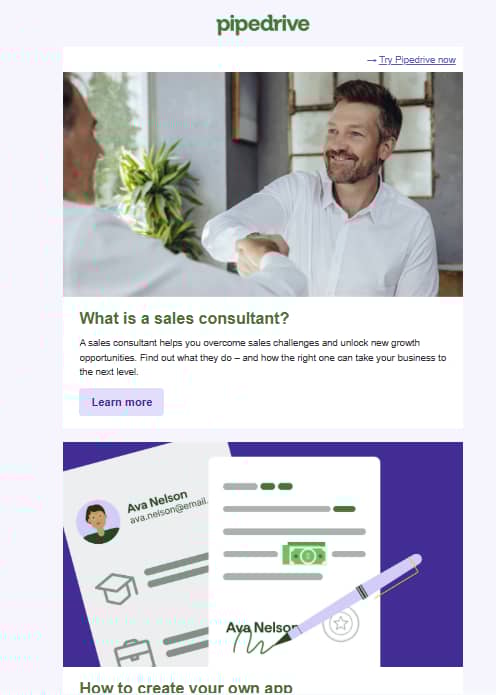
B2B content marketing Pipedrive email newsletter example

To create your email newsletter strategy, first decide on frequency (i.e., weekly, biweekly, monthly) and the type of content you’ll share.

Use a consistent structure and tone that reflects your brand’s voice and values. Align the design of your newsletter with your brand guidelines to create a unified B2B customer experience.

6. Interactive content

Interactive content captures attention and drives engagement by actively engaging users through tools like online calculators, quizzes and assessments.

By providing personalized value to your audience, interactive content builds trust and drives conversions. It can also boost social media marketing metrics like shares and likes.

Here’s an example of an engaging, interactive quiz from HR and payroll platform Paychex:

B2B content marketing Pipedrive interactive content example

To create interactive content, choose a tool format that addresses a pain point for your audience. For example, if customers are unsure of the value of a potential software investment, an ROI calculator could be effective.

Build your content using software like Outgrow or involve.me – both integrate with Pipedrive – or explore custom development. Ensure the content works well on mobile and gives users a clear next step after the experience. For instance, the CTA might suggest downloading a white paper or booking a product demo.

7. Webinars

Webinars are live or pre-recorded virtual events where businesses discuss key industry topics, often with a Q&A segment.

Unlike most other content formats, webinars allow real-time engagement with your audience. They also help establish your brand’s authority on relevant industry topics.

Webinars can be excellent devices for lead generation and sales enablement.

In this example, freelancer marketplace YunoJuno generates leads with an online event tackling an important topic for its B2B audience:
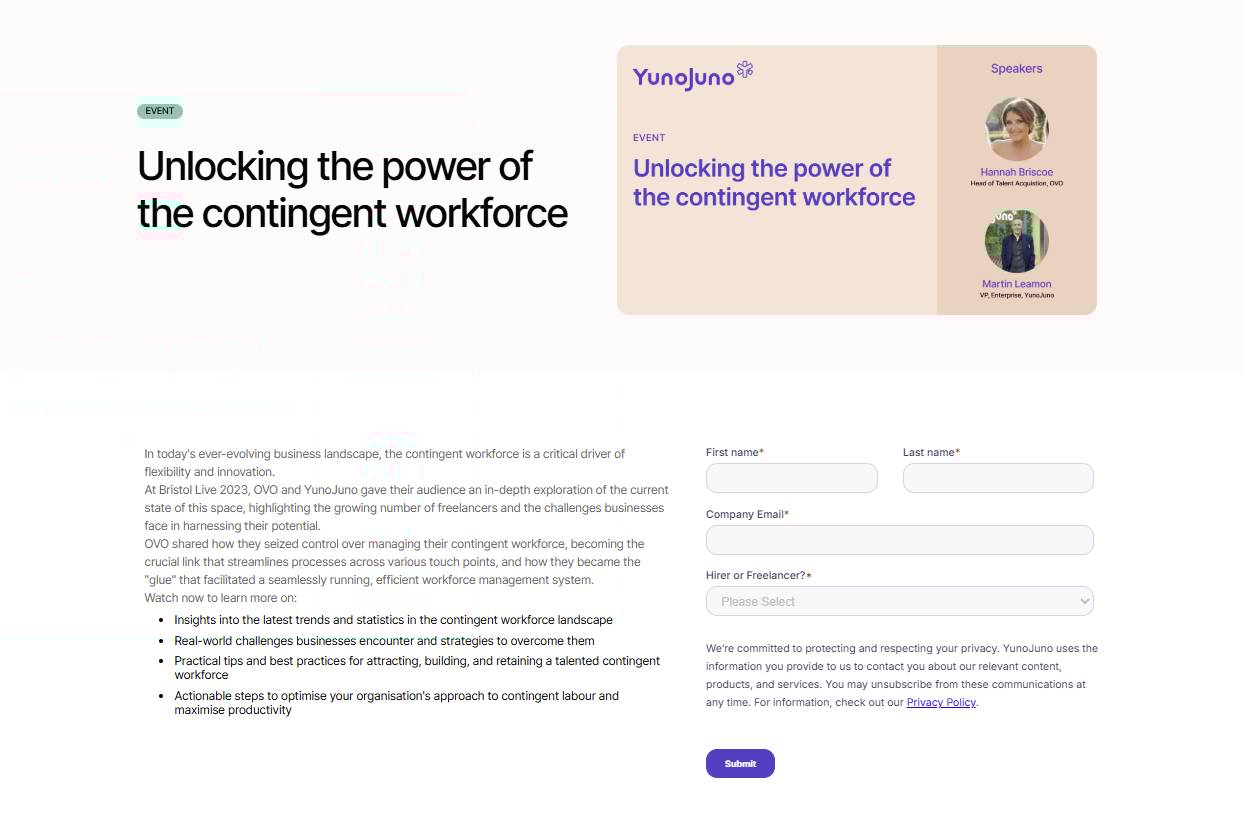
B2B content marketing Pipedrive event content example

Choose a topic that aligns with a common customer challenge for a successful webinar. Feature an internal speaker – or a panel with a speaker from your company – with an established reputation in the market and strong subject-matter authority.

Promote the event two or three weeks in advance through email and social media channels. Host the session on platforms like Zoom or ON24.

Record the webinar so you can share the video with participants. Then, repurpose the content into other formats such as informative blog posts or short video clips for social media.

8. Multimedia content

Multimedia content – like explainer videos, product walkthroughs and podcasts – simplifies complex ideas and builds an emotional connection with an audience.

Video and audio content make your message more engaging, memorable and accessible across different channels.

The Shopify Masters podcast is an excellent example of a B2B company using video and audio as an effective content marketing format:
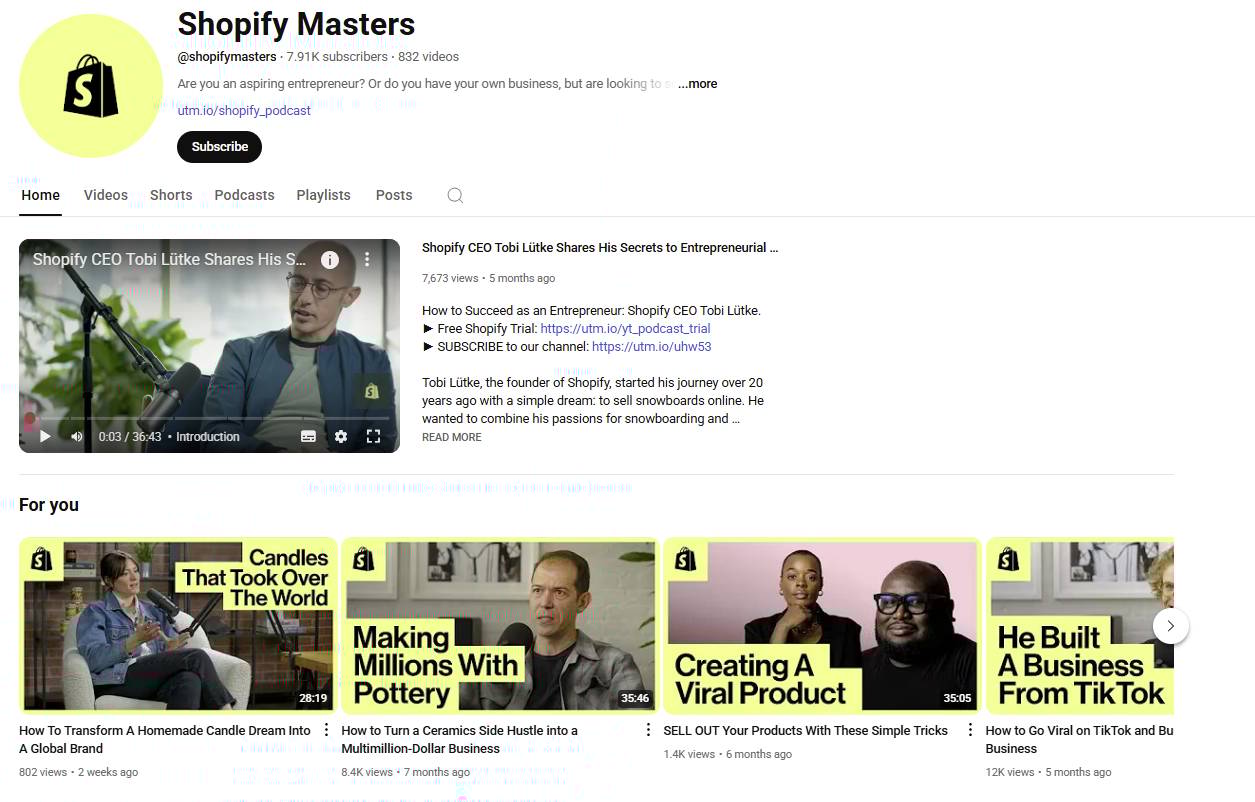
B2B content marketing Pipedrive video audio content

To create engaging multimedia content, pick a topic suited to visual or conversational delivery. Script key points, use microphones for clear audio and keep intros short. Add captions for accessibility and end with a clear CTA.

9. Infographics and other visual content

Infographics and other visual content make complex information easy to understand, remember and share. From data visualizations to social media graphics and slide decks, these assets capture attention on fast-scrolling platforms like LinkedIn and Twitter.

Here’s an example of an attention-grabbing infographic from the B2B customer satisfaction tool Get Satisfaction:

B2B content marketing Pipedrive infographic example

Begin with one key content idea or data point, then build on it using tools like Canva, Figma or Adobe Illustrator. Follow visual hierarchy best practices, using strong headers, consistent icons and minimal text.

Once you’ve designed the content, embed it in blog posts, publish it on social media or include it in sales presentations to engage your audience.

Recommended reading

https://www-cms.pipedriveassets.com/Content-Marketing-Automation.png

Content marketing automation: Which tasks should I automate?

How to create an effective B2B content marketing strategy for your small business

For content marketing to be truly effective, you need a B2B content strategy. Here are seven steps for creating effective content marketing for your small business.

1. Define your target audience

Identifying exactly who you’re creating content for is the foundation of effective B2B marketing.

Start by gathering demographic data about your potential clients and creating buyer personas representing ideal customers.

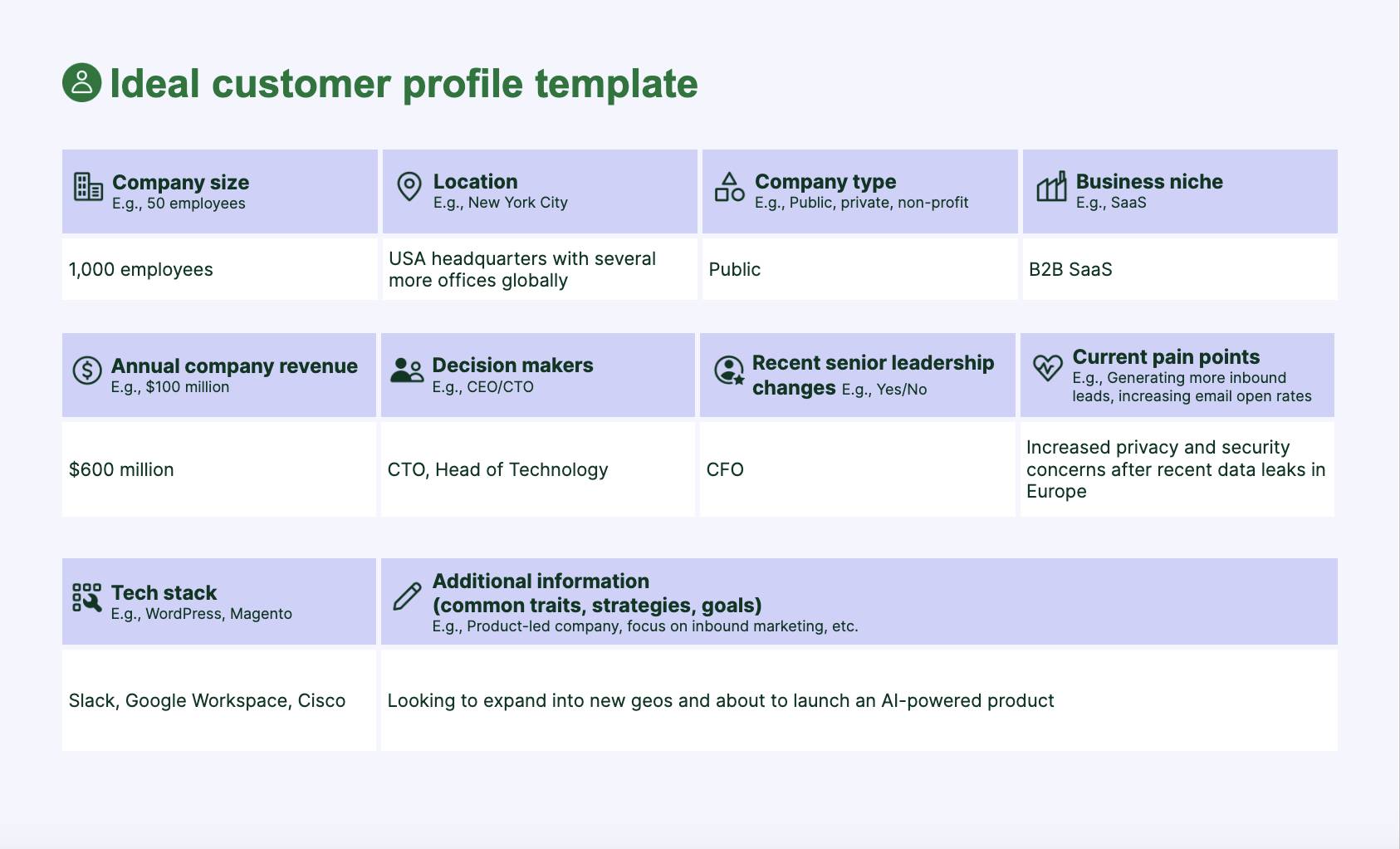
Use market and audience research to uncover pain points and value drivers. Based on this data, develop an ideal customer profile (ICP) and segment your audience to identify different needs among groups.

Understanding your customers’ wants and challenges enables you to create content that resonates deeply and positions your business as the best solution.

2. Determine internal capabilities for content marketing

Delivering on a content strategy requires time, effort and expertise. Take an honest look at the resources and capabilities within your team to see if you have what you need to produce high-quality content consistently.

Many small businesses have subject matter knowledge but lack specialized content creation skills. Consider whether partnering with a B2B content marketing agency would provide value.

The best B2B content marketing agencies bring expertise to translate complex concepts into engaging content.

3. Set clear goals and KPIs

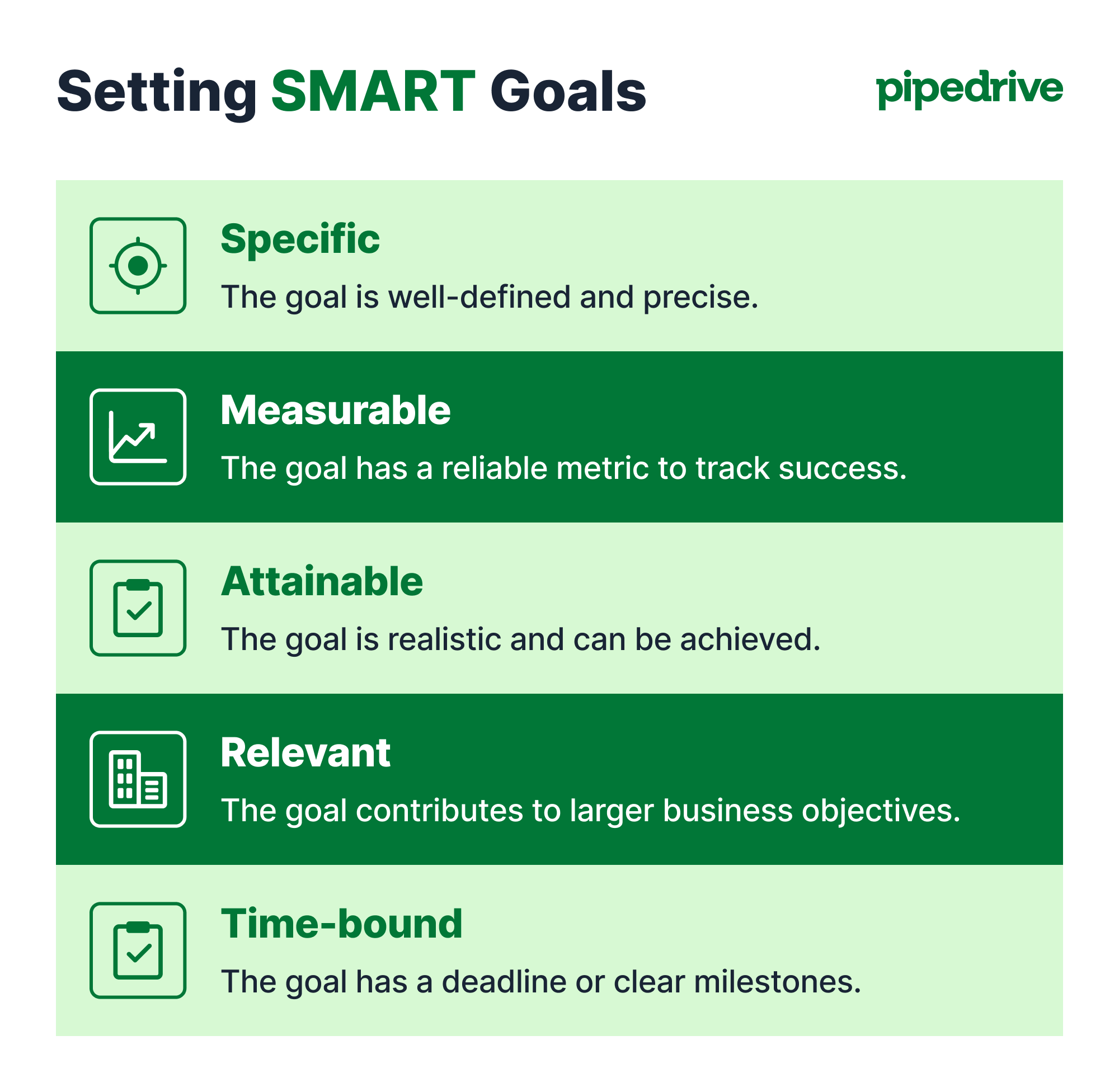
Each piece of content should serve a purpose within your buyer’s journey. Set SMART goals and identify KPIs for tracking progress.

Typical content marketing metrics include website traffic, engagement metrics, lead generation numbers and revenue.

Reviewing the metrics that inform your content regularly ensures that your strategy remains effective and allows for necessary adjustments over time.

4. Conduct keyword and topic research

Strategic keyword research reveals what your audience is actively searching for online.

Using tools like Semrush, you can identify topics relevant to your audience’s interests and challenges and discover high-potential keywords with manageable competition.

Another approach is to make an initial list of potential topics and then search for them online, noting Google’s “People Also Ask” suggestions for further inspiration.

In this example, a B2B SaaS company selling productivity software considers writing a blog post on meeting deadlines:
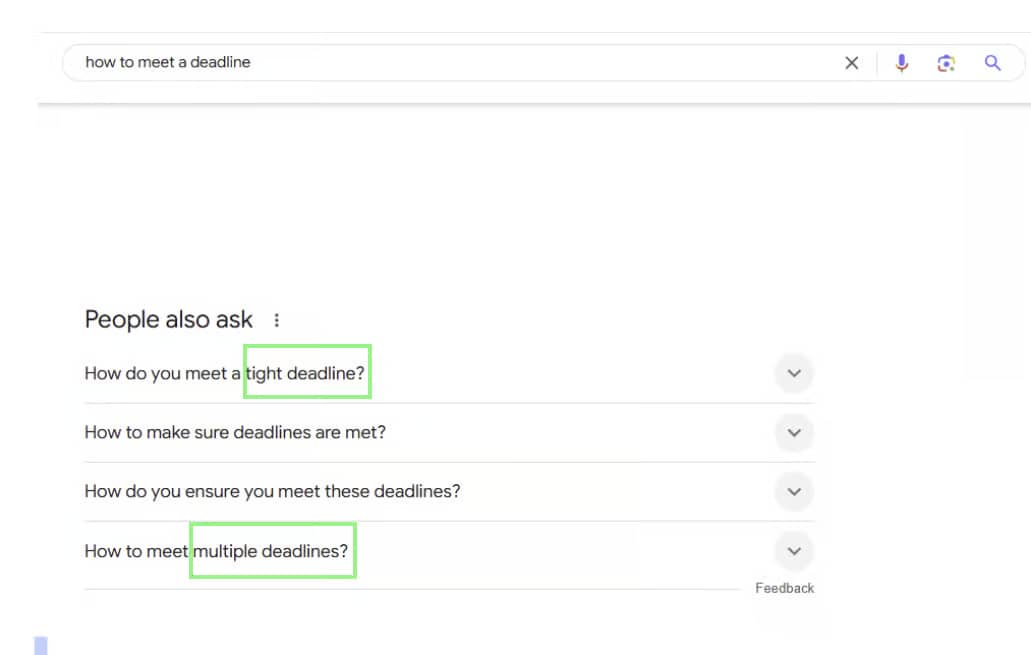
B2B content marketing Pipedrive keyword research

Google’s “People Also Ask” generates additional ideas for content on “tight deadlines” and “multiple deadlines”.

5. Develop a content calendar

Like any good marketing plan, a structured approach to content production brings organization and consistency to your publishing efforts.

Plan themes and formats at least one quarter ahead, allowing for seasonal content and marketing campaign support.

It’s good practice to balance different content types across the buyer’s journey, incorporating formats like thought leadership, blog posts and case studies.

Here’s an example of a content calendar from the social media management platform Loomly:
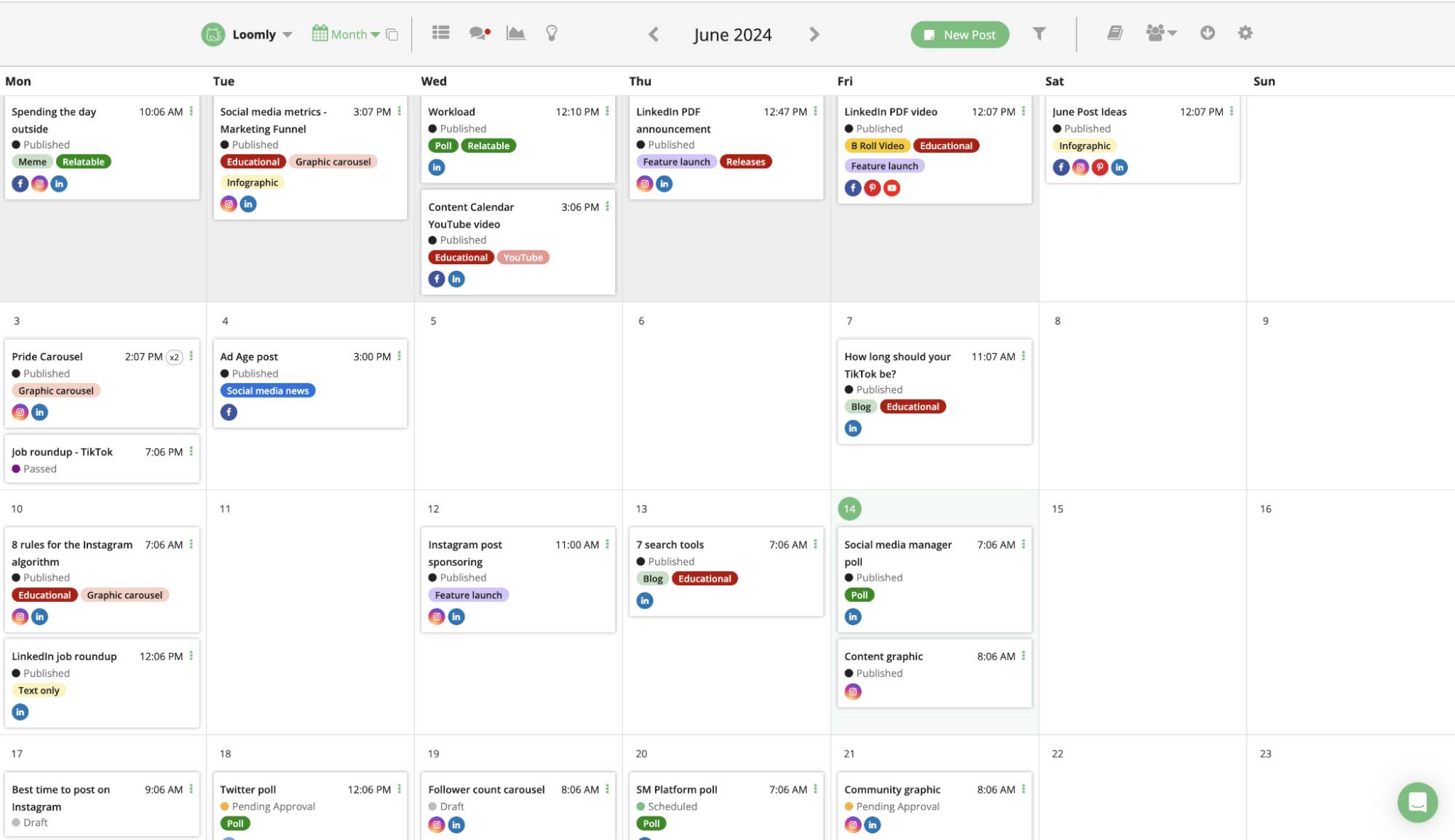
B2B content marketing Pipedrive content marketing calendar

To create valuable content throughout the year, refer to your keyword research and draw from customer questions and industry trends when brainstorming new content ideas.

Note: When developing a content calendar, the templates in Pipedrive’s marketing calendar guide are a good place to start.

6. Create a content distribution plan

Strategic content distribution ensures your valuable content reaches the right audience and delivers maximum impact.

Start by identifying which channels your audience uses most. For B2B marketers, the professional social media platform LinkedIn is crucial. Other key distribution channels include:

  • Your website (e.g., your blog or a dedicated content hub)

  • One-off emails

  • Email newsletters

  • Webinars and events

  • Communications from salespeople to prospects and leads

  • Other relevant social media platforms for your business (e.g., X or Instagram)

  • Influencer marketing activity (e.g., influencers’ social media posts)

Next, develop a consistent plan for sharing content across your chosen channels, tailoring the format and messaging as required.

In this example, B2B video hosting platform Wistia uses email to distribute an industry white paper:

B2B content marketing Pipedrive content distribution email

Many small businesses also work with B2B SaaS content marketing agencies – specialists who create and distribute content for software companies – to reach a wider audience.

Using the proper channels to execute your content distribution plan and sharing content consistently will extend your reach and add business value.

7. Measure the success of your content marketing strategy

To understand what’s driving results, track performance against your original goals. Review key content marketing metrics – such as engagement, conversion rates and website traffic – to see what’s working and what to adjust.

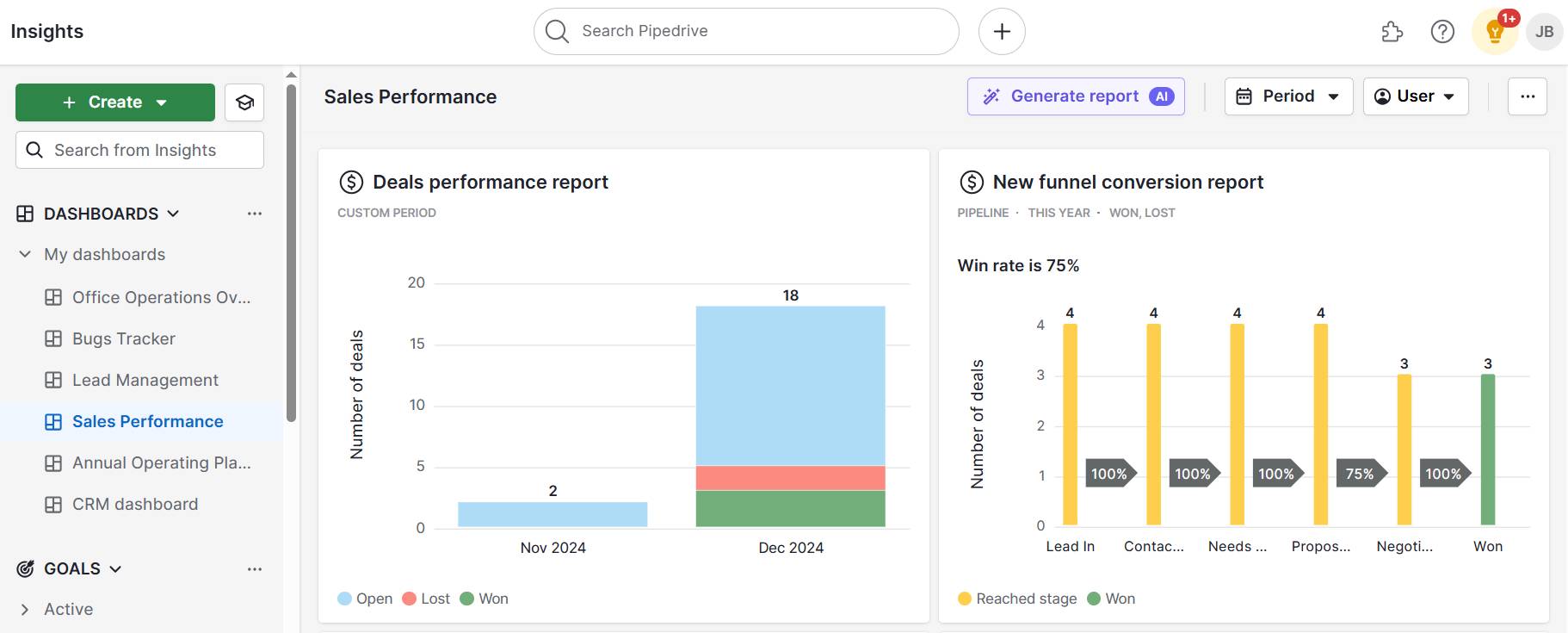
Prioritize metrics that show real business impact, like how specific content helps generate leads, drive pipeline movement or close deals. Use sales attribution reporting tools like Pipedrive to determine which assets contribute directly to revenue.

Recommended reading
https://www-cms.pipedriveassets.com/B2B-Report-Guide-and-Best-Practices.png

The ultimate guide to B2B reporting: basics to best practices

What are the latest B2B content marketing trends?

In 2025 and beyond, several emerging trends are set to shape the future of B2B content marketing.

AI for content planning and repurposing

According to the Content Marketing Institute (CMI), 81% of B2B marketing teams now use generative AI tools. Popular software may include ChatGPT, Claude and Perplexity.
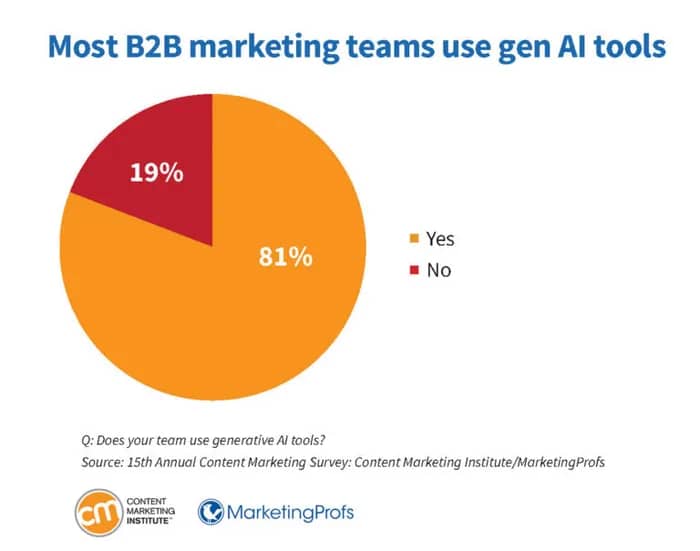
B2B content marketing Pipedrive CMI AI use

These tools help reduce manual tasks and improve efficiency, but accuracy and trust remain significant concerns.

Of the B2B marketers who didn’t use generative AI in CMI’s research, 35% cited accuracy concerns.
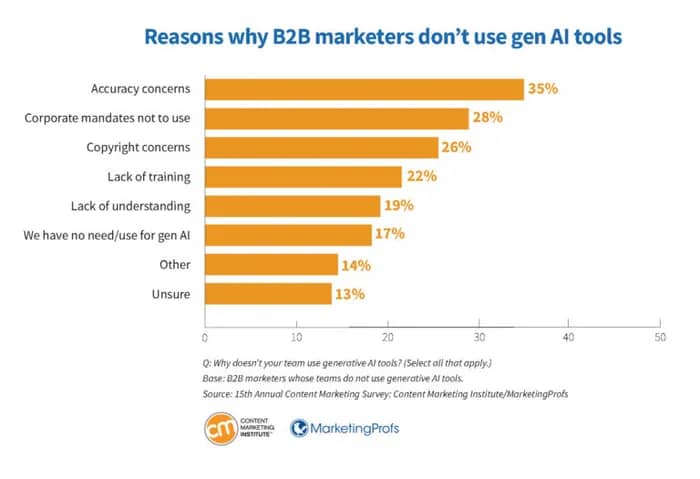
B2B content marketing Pipedrive AI accuracy concerns

Copying and pasting AI-generated text without review can undermine your credibility and potentially harm SEO performance. It’s best to avoid this practice.

Additionally, while Google Search’s guidance doesn’t prohibit AI use, it does stress the importance of creating “original, high-quality, people-first material”.

Recommended reading

https://www-cms.pipedriveassets.com/Best-AI-marketing-tools-for-SMBs.png

20 best AI marketing tools for small businesses in 2025

B2B video marketing

Video is becoming a go-to format for B2B marketers, with explainers, brand videos and customer success stories growing in popularity.

Data from the CMI indicates that 61% of B2B marketers expect to invest in video marketing in 2025:
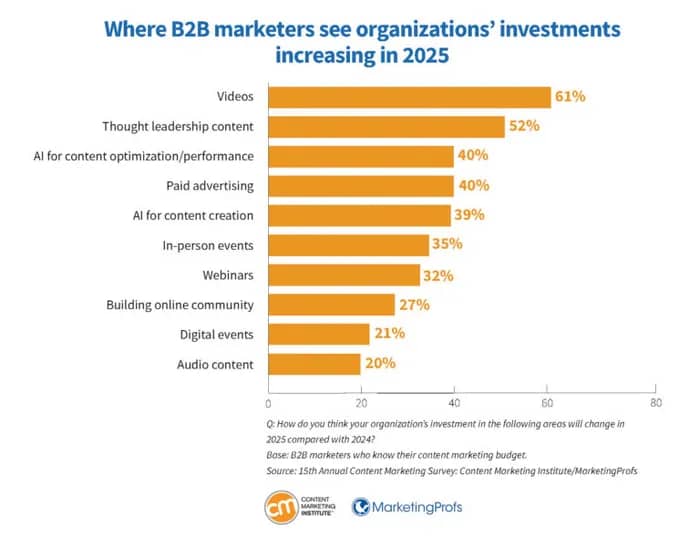
B2B content management Pipedrive B2B video marketing

LinkedIn emerges at the top for businesses. WyzOwl’s annual industry research showed that 70% of companies used the platform to share video in 2024.

In this short video example, Pipedrive tells its brand story while explaining how its customer relationship management (CRM) system works:

When creating B2B video, the message you want to communicate should inform the format and production method.

Certain content, like brand videos and thought leadership, may benefit from high-quality production. Some small businesses enlist the help of B2B content marketing agencies to create compelling video content.

Data-driven storytelling

Sharing original data through compelling narratives helps B2B brands build credibility and demonstrate thought leadership. Proprietary research is highly shareable and can boost SEO.

In 2021, Gartner predicted that data stories would be the most widespread way of consuming analytics by 2025.

Here’s an example of some original research from Sparktoro, a B2B SaaS tool for marketers:
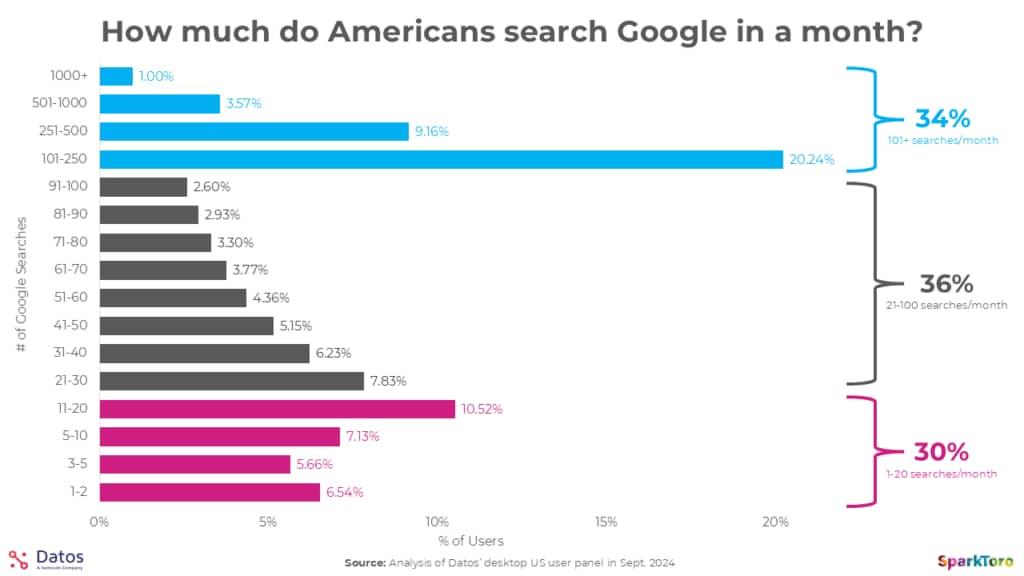
B2B Content Marketing How much do American's Search Google in a month?

The research examined 332 million queries over 21 months to answer the question, “How much do Americans search Google in a month?” The findings showcase Sparktoro’s authority in its field.

To craft data-driven storytelling using original research, identify a question your audience cares about. Then, collect original data through customer surveys, platform insights or internal performance metrics.

Use the data to create a blog post or whitepaper explaining the numbers and providing valuable insights for your target audience.

Founder-led thought leadership content

Founder-led content helps B2B brands stand out by sharing authentic insights and highlighting the people and core values behind the business.

The 2024 Social in the C-Suite report by communications consultancy H/Advisors Abernathy found that seven out of 10 Fortune 100 CEOs have at least one social media account. 48% post once a month at a minimum.

Here’s an example from Chris Savage, CEO of the B2B video marketing platform Wistia:
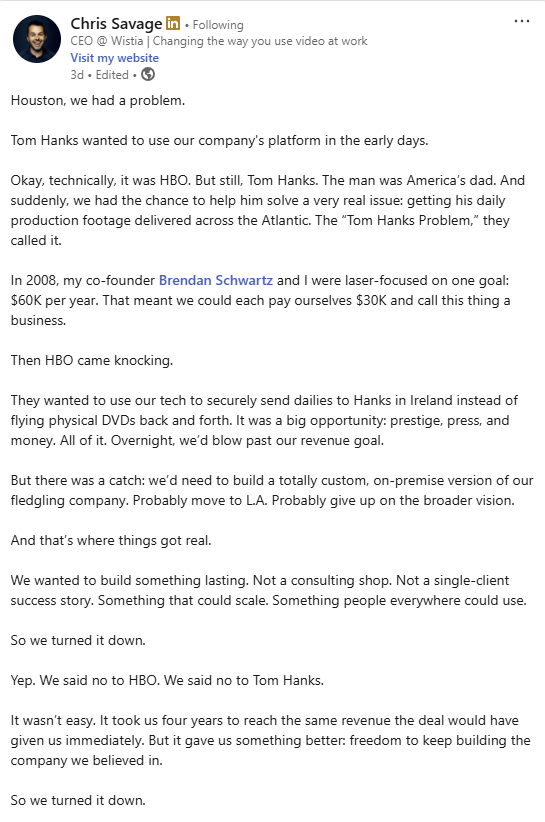
B2B content marketing LinkedIn founder post

If you’re interested in exploring the trend, focus on topics where the founder has unique insight or experience. Encourage them to share personal takes on industry trends, lessons learned and company milestones through blogs, LinkedIn posts or video clips.

How your CRM can support your B2B content marketing strategy

As a small business owner, you’re likely already using a CRM system like Pipedrive to stay on top of your sales performance and track marketing activities.

Here are three ways Pipedrive can help you achieve content marketing success with your business audience.

1. Streamline content distribution with Campaigns

Campaigns, Pipedrive’s email marketing software, makes it easy to create and distribute content through email. It includes customizable templates, sophisticated email analytics and a drag-and-drop email builder.
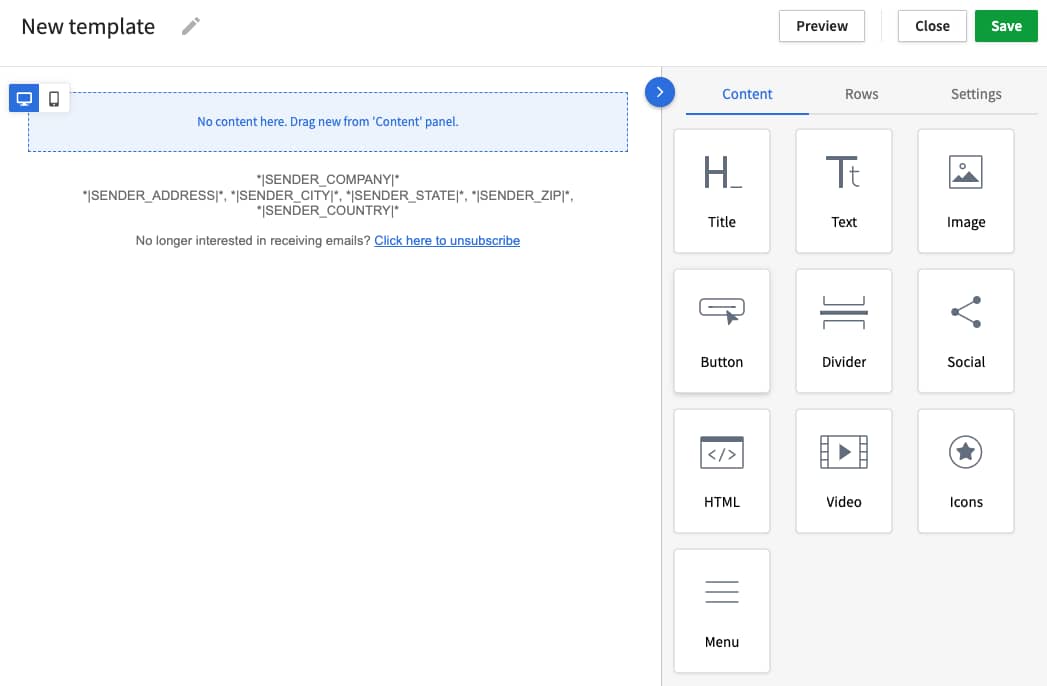
B2B content marketing Pipedrive Campaigns template

You can use Campaigns to quickly build responsive newsletters and email campaigns that promote your content, drive traffic and support your broader content marketing goals.

2. Schedule and track content marketing activity

Pipedrive’s project management solution, Projects, helps you plan and track content marketing efforts.

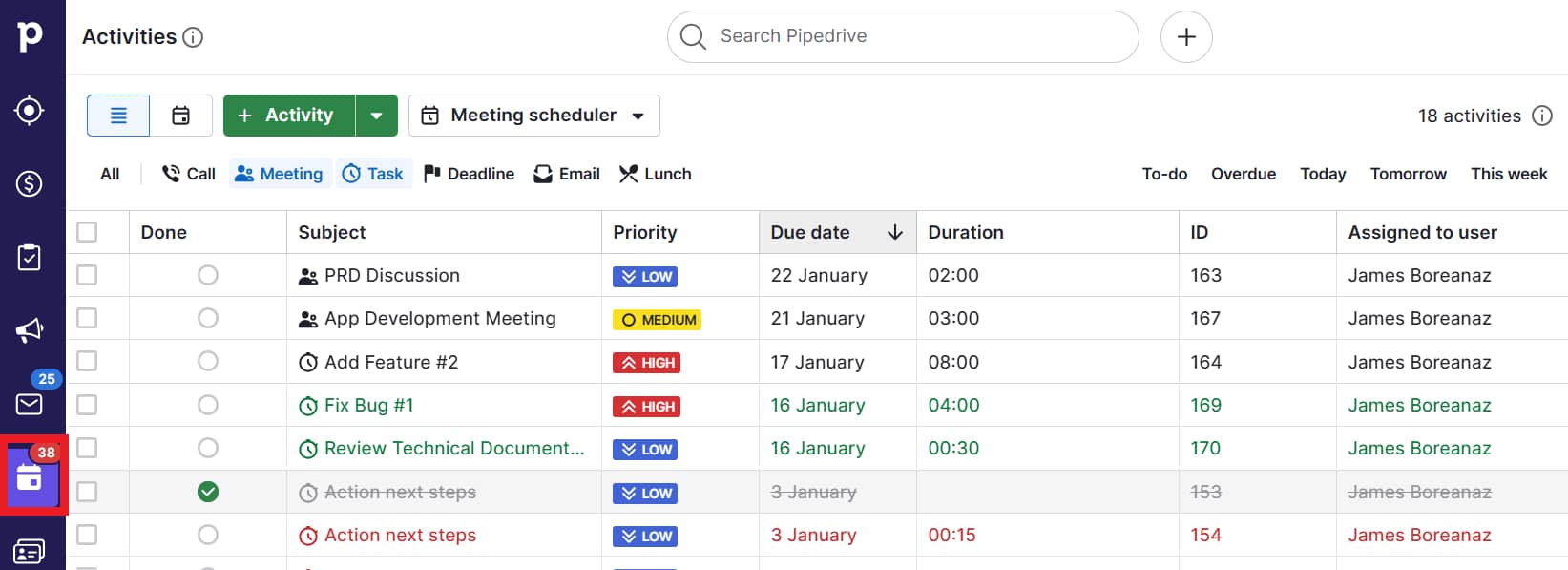
You can create to-do lists, add tasks and subtasks and organize work with labels, filters and custom fields. The intuitive layout and familiar CRM features make it easy to manage timelines, assign responsibilities and keep your team aligned.

B2B content marketing Pipedrive Activity list

Visualize your content calendar and monitor progress in real time using the tool’s Kanban view. This agile project management approach makes it easier to manage workflows and spot bottlenecks.

3. Create interactive content and capture leads with integrations

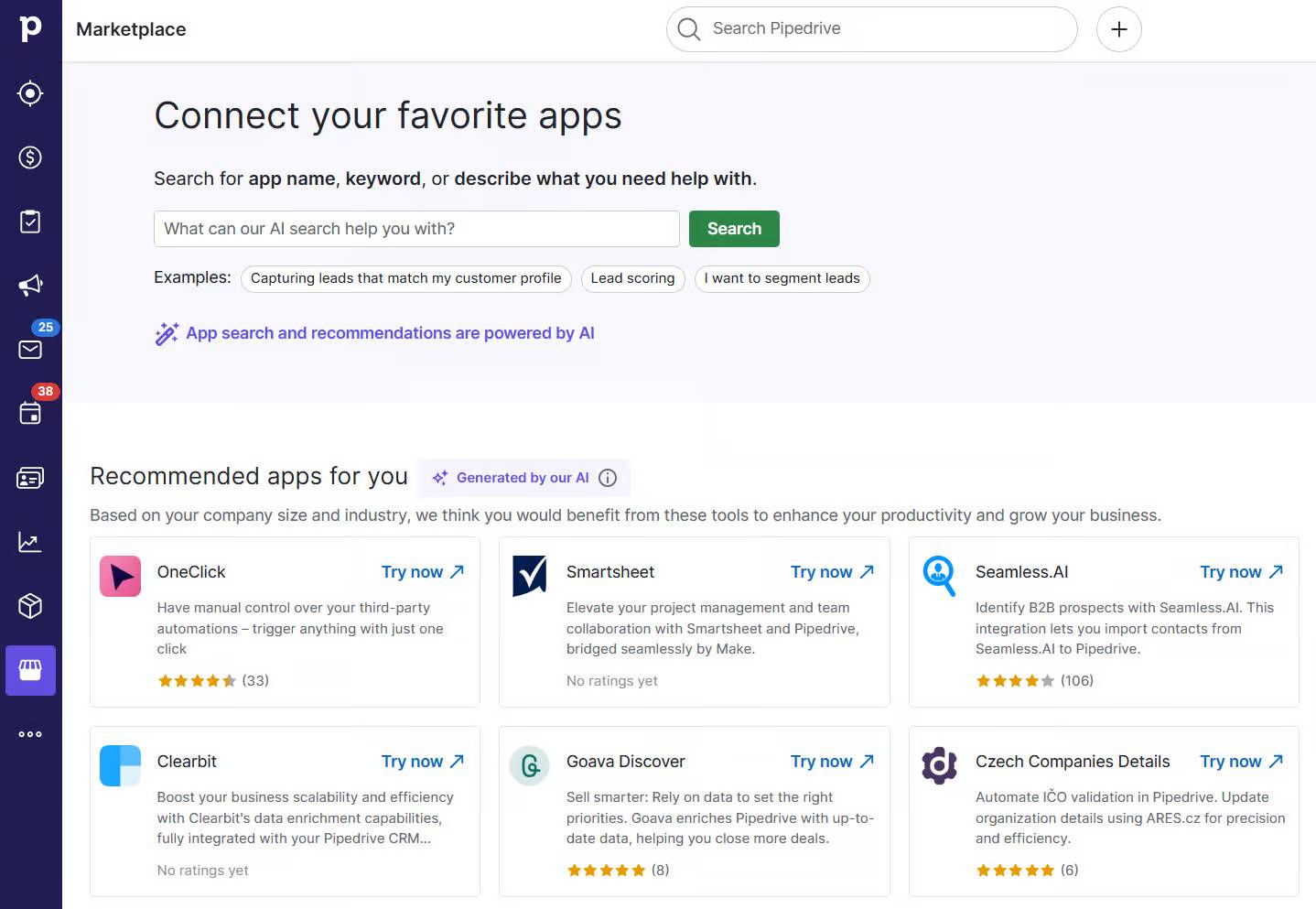
Pipedrive integrates with tools like Outgrow and involve.me to help you create engaging marketing content and capture high-quality leads.

Here’s the Marketplace integration for Outgrow:
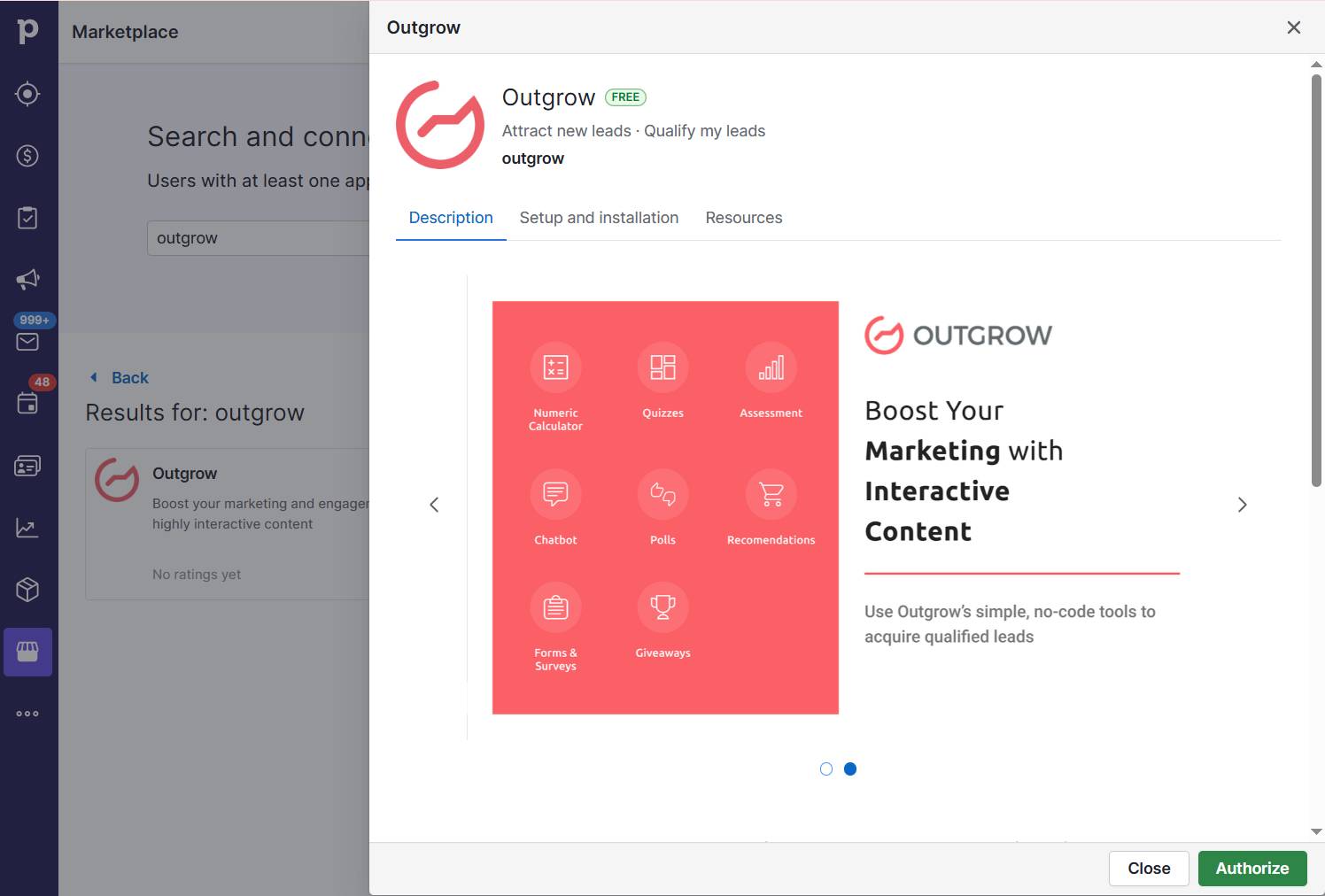
B2B content marketing Pipedrive Outgrow integration

With Outgrow, you build quizzes, calculators, surveys and more to engage and qualify potential customers. The integration sends lead, question and result data straight to Pipedrive, where you can organize it into lists and workflows.

involve.me lets you choose from over 200 interactive templates to generate leads and collect data. The app integration syncs that data directly into Pipedrive, giving you instant access to insights you can use to nurture contacts and convert leads.

Final thoughts

Content marketing supports your overall marketing strategy and is also a catalyst for small business growth.

By showcasing your company’s value while building brand awareness, B2B content marketing empowers you to influence key stakeholders’ decision-making.

An all-in-one CRM like Pipedrive helps small business owners maximize B2B content marketing efforts more efficiently. Sign up for a free 14-day trial to experience how Pipedrive can drive your strategy forward.

From leads to deals

Software Stack Editor · May 20, 2025 ·

ND

Natashy DuarteSenior SEO Content Manager, Pipedrive

At this year’s OMR Festival in Hamburg, Gabriel Fugli, Senior Channel Sales Manager at Pipedrive, took the stage with a masterclass that tackled a critical challenge many companies face: the disconnect between marketing and sales.

His session, titled “From leads to deals”, unpacked how cross-functional misalignment wastes time, reduces win rates and ultimately damages revenue.

Drawing on over 15 years of experience in sales and close collaboration with SMBs and integration partners, Gabriel offered a practical playbook to help companies build a smoother, activity-based pipeline that turns leads into real deals.

Sales and marketing: a dysfunctional relationship?

Despite good intentions, many companies still suffer from silos between sales and marketing. As Gabriel highlighted, lack of mutual understanding, fragmented data and poor communication remain widespread. For example:

  • Sales claims marketing leads are low quality

  • Marketing sees sales ignore valuable content and data

  • Teams rarely sit together to align on goals, priorities or KPIs

  • CRMs are often cluttered with inactive deals that have no activities linked to them

This leads to a costly truth: 65% of created deals never receive a follow-up activity and 51% of a sales rep’s time is spent on non-sales tasks, according to Pipedrive’s research about Pulse. That’s not just inefficient – it’s a recipe for missed revenue opportunities.

The case for activity-based selling

Gabriel introduced Activity-Based Selling as a solution to bridge this gap. Rather than focus only on outcomes like closed deals, this approach emphasizes the measurable, repeatable actions that move a lead forward.

By tracking daily activities – calls made, emails sent, demos scheduled – managers can uncover bottlenecks, improve transparency and ensure pipeline momentum. As Gabriel put it:

Goals and results are great, but activities are what we can control.

From chaos to clarity: a three-part framework

Gabriel’s masterclass was structured around three main pillars:

1. People: empowering sales to prioritize

Many reps struggle to prioritize leads. In SMBs, 63% have over 100 deals in their pipeline, making it difficult to know where to start. Scoring and automated prioritization help filter by deal value, close date and probability, allowing salespeople to focus their limited time on what matters most.

2. Process: activities over everything

Sorting deals isn’t enough. Sales needs a clear next step for every lead. Gabriel stressed the importance of:

  • Creating activities as soon as deals are created

  • Following up within 5 minutes of a lead arriving (which makes qualification 21x more likely)

  • Automating workflows that generate tasks and reminders in real time

3. Product: enabling smart automation

Great tools support great processes. Gabriel’s checklist for a modern CRM includes:

Bonus: Integrating these features reduces admin time and helps reps stay focused on selling, not data entry.

Takeaways you can implement today

To ensure marketing efforts aren’t lost along the way, Gabriel proposed a new standard of collaboration. Here’s what that looks like:

  • Leads are enriched with just enough relevant info

  • Sales responds within minutes – not hours or days

  • Activities are automatically tied to every lead and deal

  • Scoring replaces manual prioritization

  • Sales works from activity feeds, not deal lists

  • Lost reasons and engagement data are tracked

  • Sales and marketing meet regularly and give honest feedback

Ultimately, this approach boosts conversions, builds trust across teams and creates a shared sense of accountability.

Turning leads into deals is a vital part of the sales process. Leads are prospective customers who have expressed interest, whereas deals are finalized sales agreements. Lead conversion focuses on guiding and nurturing these prospects through different stages to encourage them to make a purchasing decision.

Final thoughts

Gabriel’s German-language session at OMR 2025 drew a standing-room-only crowd, with over 200 attendees – a clear indication of growing interest in aligning sales and marketing.

His core message emphasized that driving revenue isn’t just about generating more leads or investing in better technology; it’s about ensuring the right people take the right actions at the right time.

Want to see how Pipedrive makes activity-based selling easy? Try it free for 14 days and turn your leads into deals – with fewer silos and more success.

8 Best B2B Marketing Trends for SMBs

Software Stack Editor · May 19, 2025 ·

B2B marketing is changing fast. What worked in your last strategy could already be outdated.

To keep generating great leads without blowing your budget, you must know which trends to act on and which are just noise.

Here are eight data- and expert-backed B2B marketing trends for this year and beyond.

1. AI content creation becomes the norm (but tread carefully)

Artificial intelligence (AI) has left its experimental phase and is now part of everyday B2B marketing workflows.

Pipedrive’s State of AI in Business report found that content creation is the top AI use case across industries, ahead of transcribing calls, researching prospects and generating reports.

B2B Marketing Trends Pipedrive report

Marketers use generative AI tools to:

  • Create first drafts of blog posts and whitepapers

  • Generate headlines and social media captions

  • Write personalized email sequences

  • Analyze data and create insightful performance reports

For instance, they can prompt ChatGPT to generate initial outlines for a long-form guide to use as a lead magnet, saving hours of research.

AI email-writing tools are also making it easier to craft engaging, personalized messages with just a few prompts.

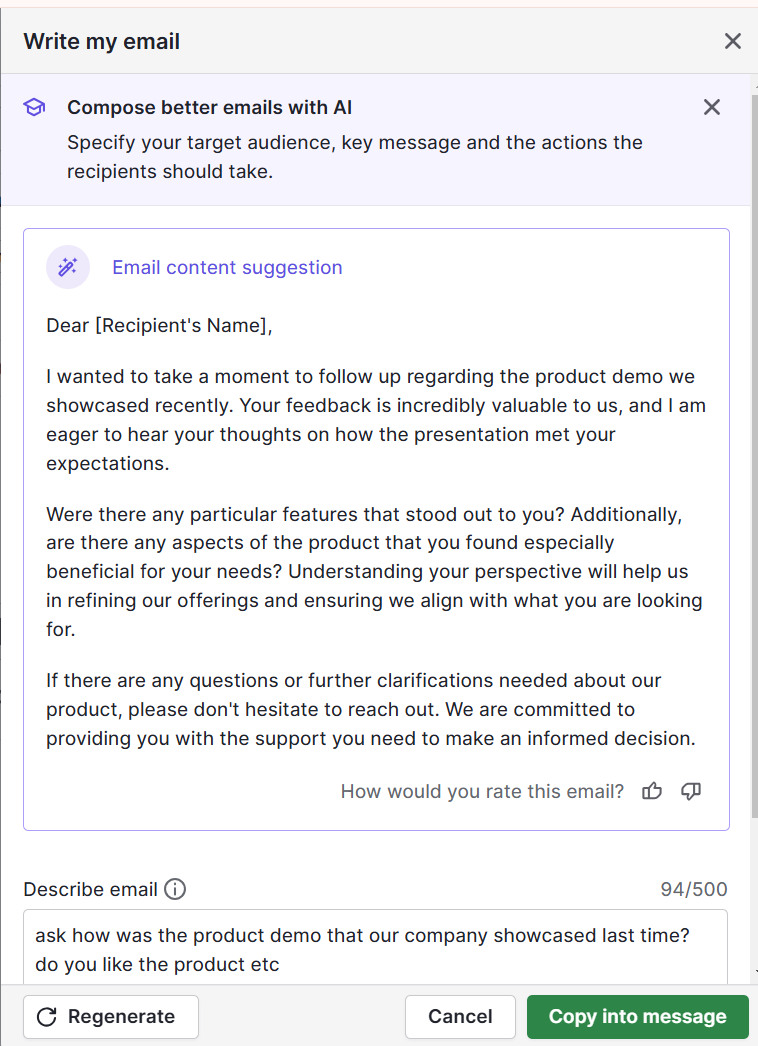
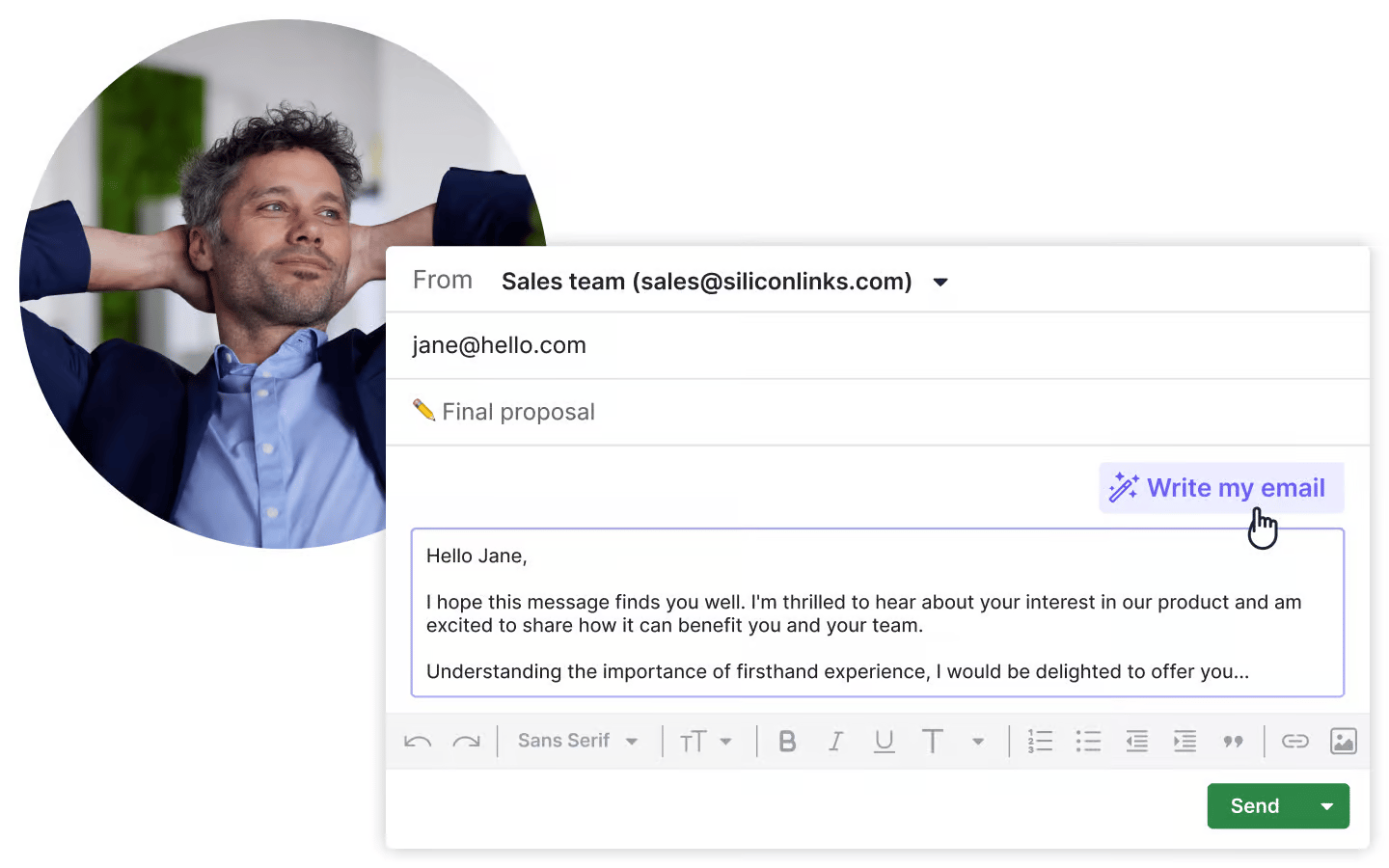
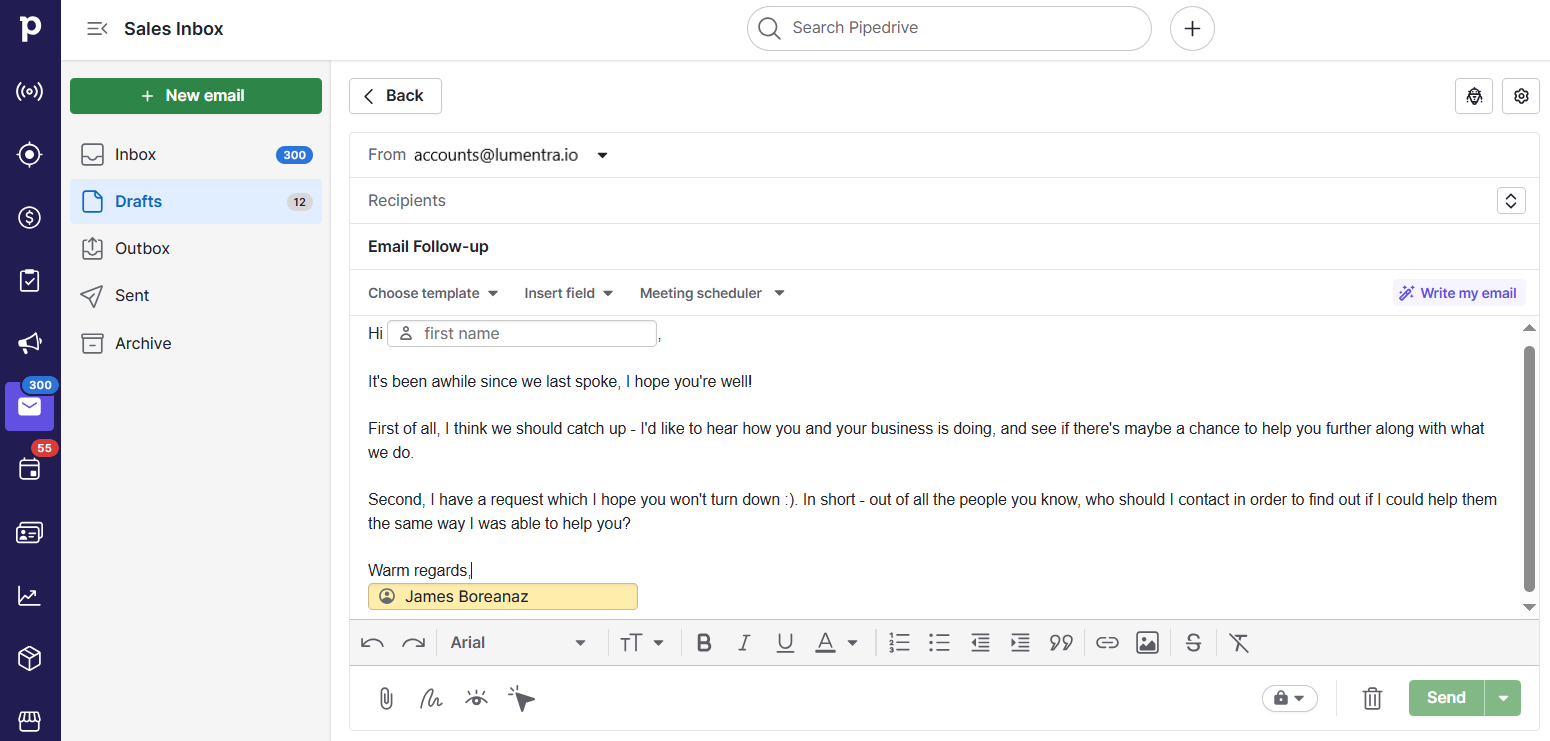
Pipedrive’s AI email writer is a great example of a tool that helps you produce personalized content with minimal effort. Describe what you want to say, set your tone and choose your desired length – like this:

B2B Marketing Trends Pipedrive Email Writer

In seconds, the tool will generate engaging copy to fit your needs. You can then review and edit the content to keep it original and your brand voice consistent.

B2B Marketing Trends Pipedrive Email Writer

With simple tools like ChatGPT and Pipedrive’s AI email writer, the challenge isn’t using AI but maintaining quality while scaling content production.

The solution is to avoid depending too heavily on tech and to continue applying human creativity and attention to detail in reviews.

On that topic, Annie Dean, Global Head of Team Anywhere at Atlassian, has this advice:

If you’re stuck on an idea and your favorite sparring partner is tied up in a meeting, you can open a conversation with AI to bounce ideas back and forth, get feedback in real time and treat the exchange like a true conversation. For the first time, technology speaks our language – and that’s a huge unlock.

Dean’s use of the term “sparring partner” is key here. Treat AI tools as collaborators you bounce ideas off, rather than delegating creative tasks to them. Otherwise, your content risks sounding like every other AI user’s.

2. Podcasts are now a core content strategy (not a bonus)

Podcasts have become central pillars in many B2B marketing strategies, serving as ‘content engines’ that power multiple formats across channels.

“Podcasts produce media-rich and engaging content that performs well across multiple channels, including social media, blogs and newsletters,” explains Lee Judge, co-founder and CMO at Content Monsta.

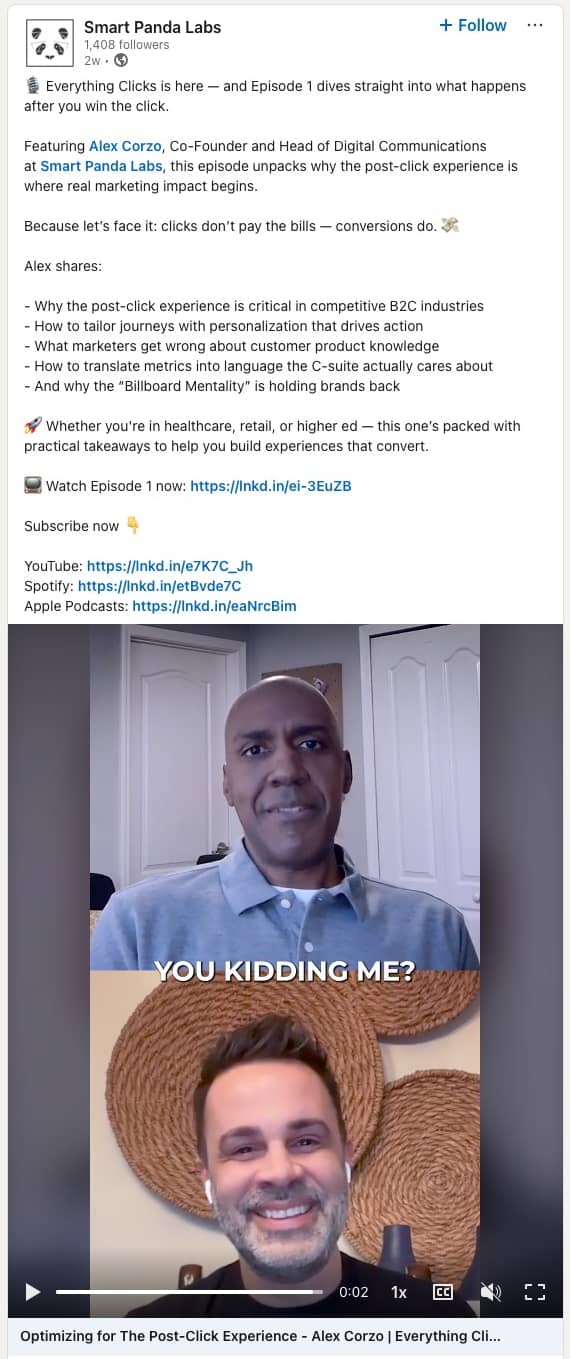
For example, marketing agency Smart Panda Labs repurposes its co-founder’s podcast, Everything Clicks, as LinkedIn content.

B2B Marketing Trends LinkedIn podcast clip

The clip above includes a discussion about optimizing post-click experiences. It’s highly relevant to Smart Panda Labs’ target audience: B2C enterprises looking to grow website conversions.

High-quality video and audio content grabs social media users’ attention better than plain text (more on video shortly).

It also lets audiences hear tone, emotion and expertise directly, building trust faster and making messages more memorable – all without extra content creation.

The main challenge here is measuring success. As Judge explains, it’s hard to directly attribute podcast engagement to closed deals, especially given how people consume this type of content:

Podcasting for business should be viewed as a content engine and relationship builder. Traditional metrics miss both. Instead of tracking downloads and subscribers, measure content engagement, brand mentions, lead generation and business relationships.

3. Hyper-personalization is happening at scale (without the enterprise price tag)

AI makes hyper-personalization more accessible to smaller businesses, allowing them to segment audiences and tailor experiences in detail without huge price tags.

That matters because today’s B2B buyers expect more than first-name greetings in their inboxes. They need quality content tailored to their industry, role, challenges and buyer journey stage, with 86% of customers expecting companies to be well-informed about their personal information.

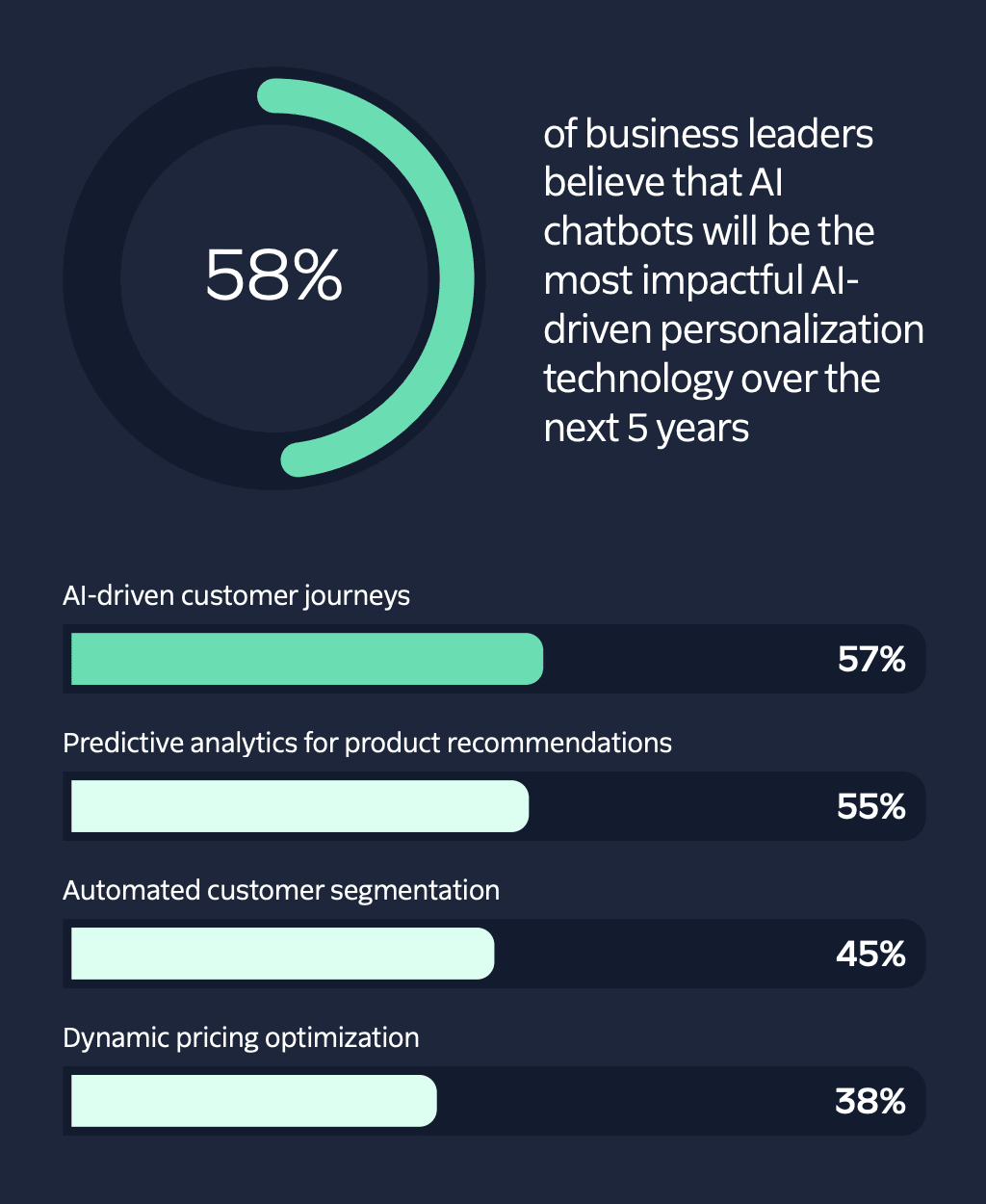
Business leaders recognize this shift and are using technology to adapt. In a 2024 Twilio survey, 73% of respondents agreed that AI adoption will fundamentally change personalization and marketing strategies.

They expect chatbots, AI-driven customer journeys, predictive product recommendations and automated customer segmentation to be the most impactful applications over the next five years.

B2B Marketing Trends Twilio AI report

You’ll need the right customer data to apply these tools effectively, as Deloitte Digital managing director David Chan explains:

Everyone wants real-time personalization. What that means is the data has to be real-time collected. Data has to be real-time processed. Data has to be real-time curated to be made of some sort of business sense to then act on in real-time.

A strong CRM is essential. It centralizes and organizes customer data so AI tools have the fuel to deliver smart, timely personalization. The best systems include built-in AI features that reduce context-switching.

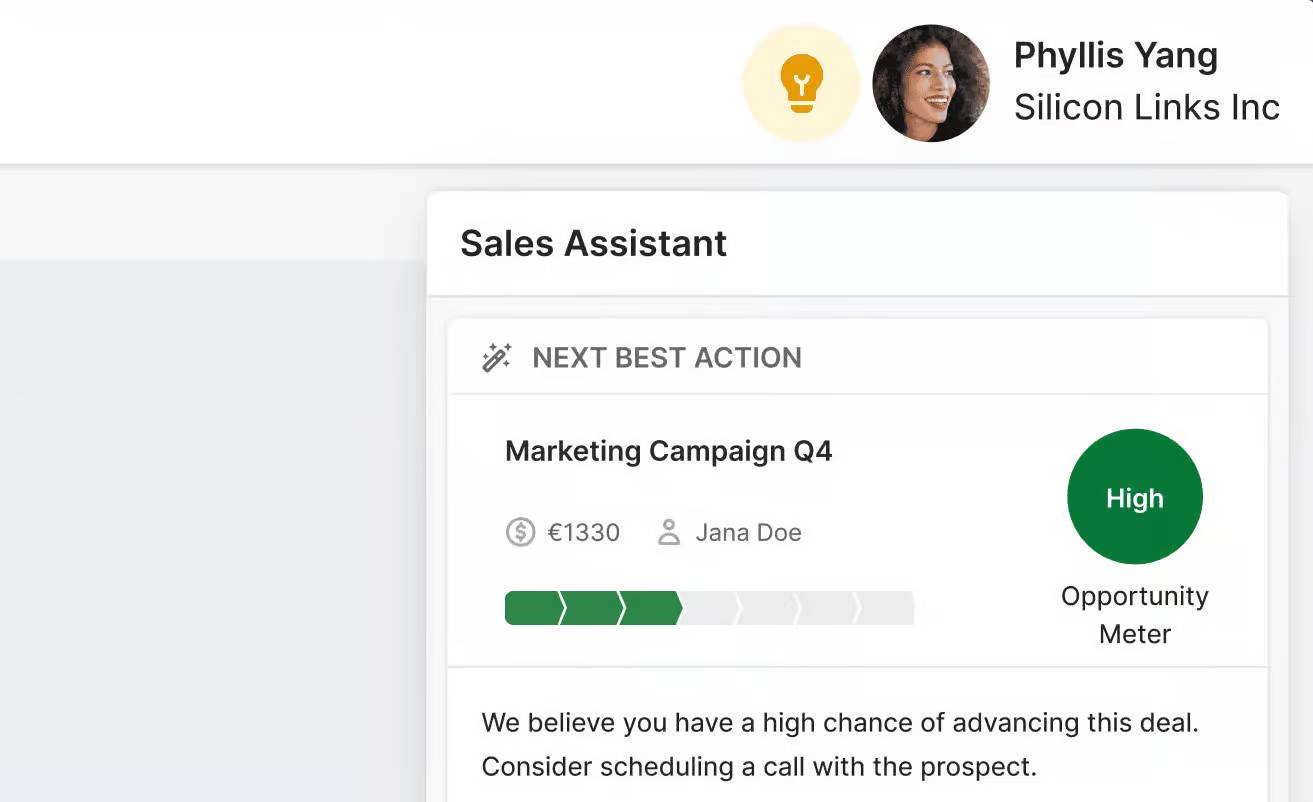
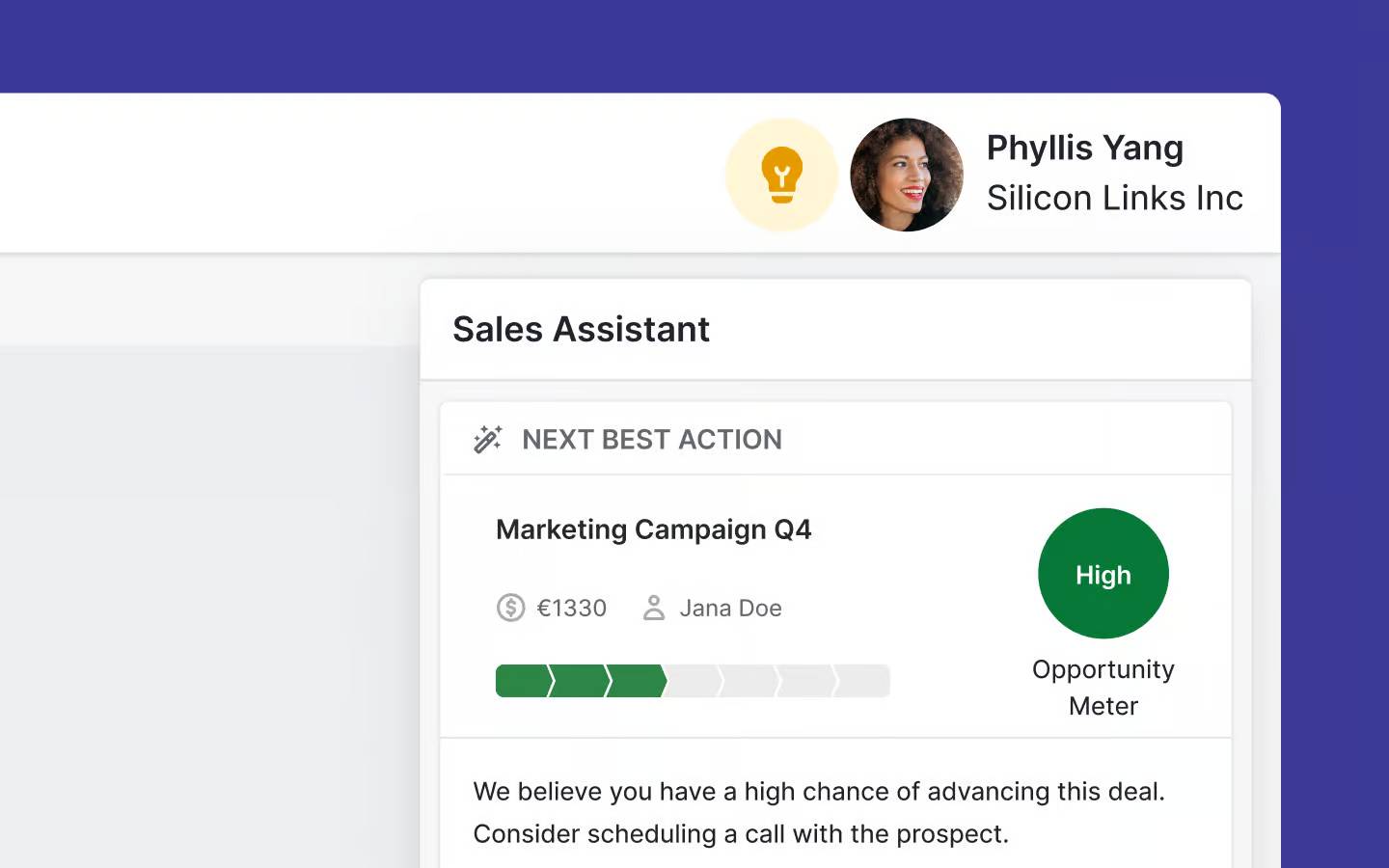
For example, Pipedrive’s AI Sales Assistant analyzes real-time behavior – like email opens and recent deal activity – to suggest the best next steps. Here it is recommending the user schedule a call to advance their deal:

B2B Marketing Trends Pipedrive AI Assistant

Alternatively, if a lead opens a pricing email twice in one day but doesn’t reply, the Assistant might flag them as high-interest and prompt a callback. That way, sales and marketing teams can act fast with content that matches where the buyer is in their journey.

Start generating quality leads with your B2B Prospecting ebook

This guide will help you find high-quality leads while staying compliant with the rules and regulations.

4. Value-first influencer marketing is on the rise (think expertise, not celebrity)

B2B decision-makers increasingly trust external experts more than branded content. This trend is accelerating as millennial and Gen Z buyers gain more purchasing power.

Forrester’s Buyers’ Journey Survey 2024 found that 30% of younger buyers already involve ten or more people outside their organization in purchase decisions. The researchers expect this to reach 50% this year.

These influencers aren’t celebrities. They’re trusted figures from online communities, industry conferences and professional networks. B2B marketers must build trust through these external voices rather than focusing solely on promoting their own content.

Impactful activities to build into your B2B marketing efforts include:

  • Partnering with established industry experts

  • Engaging in online communities (i.e., targeted outreach)

  • Getting involved in the conversations buyers already trust

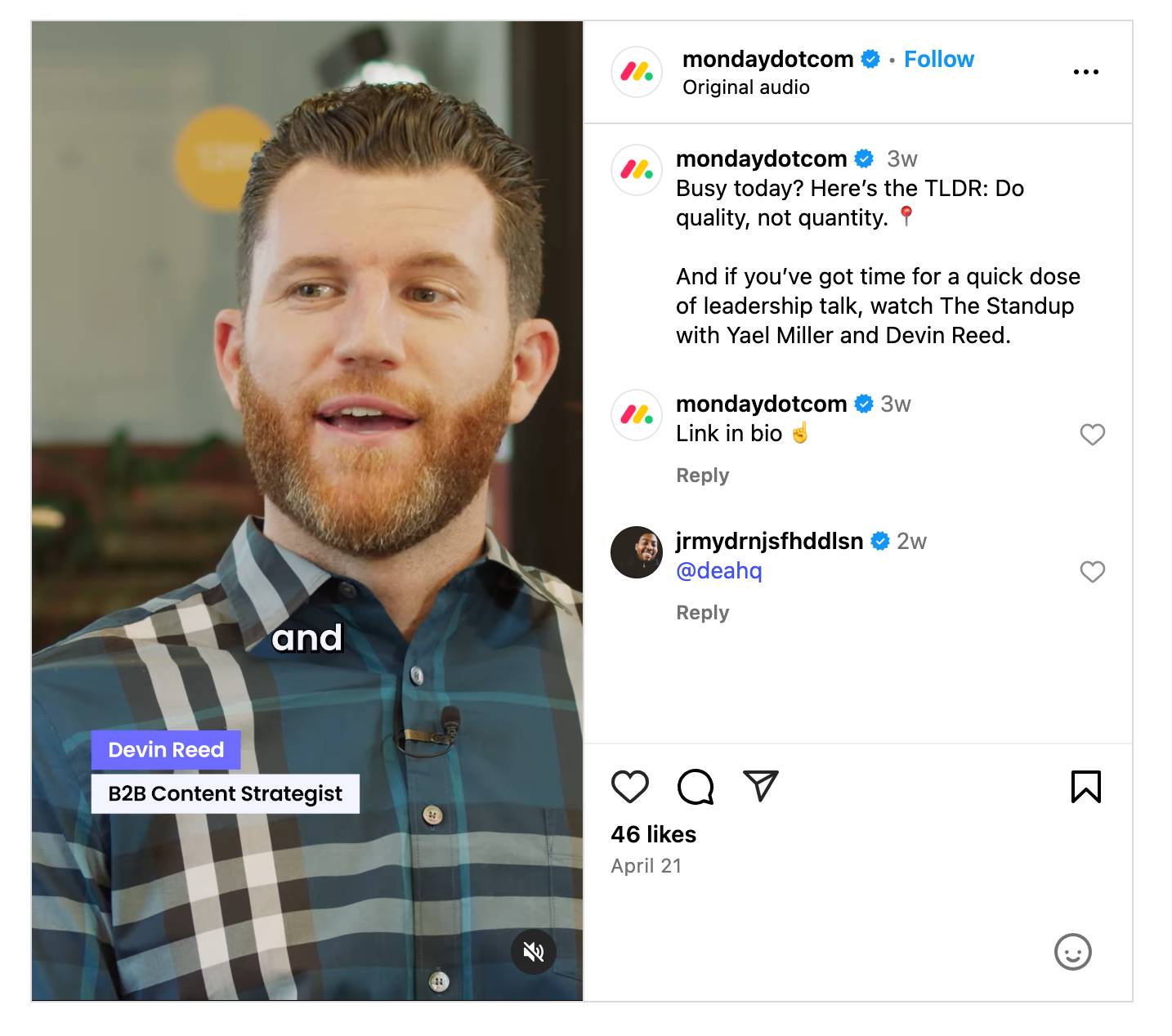
For example, Monday’s marketing team interviews leading figures from its target industries for The Standup podcast, a series of thought-leadership discussions.

Here’s a social clip of the B2B company partnering with Devin Reed, a content strategist with over 14,000 newsletter subscribers:

B2B Marketing Trends Monday Instagram clip

Reed’s insights help Monday reach a broader, engaged audience in a natural, trusted way.

Meanwhile, Reed borrows the credibility and target audience of a well-known software brand, bolstering his own reputation. Everyone benefits.

Recommended reading

https://www-cms.pipedriveassets.com/blog-assets/crm-for-influencer-marketing.png

Step-by-step guide to managing your influencer relations with a sales CRM

5. Short-form video dominates engagement (no fancy equipment required)

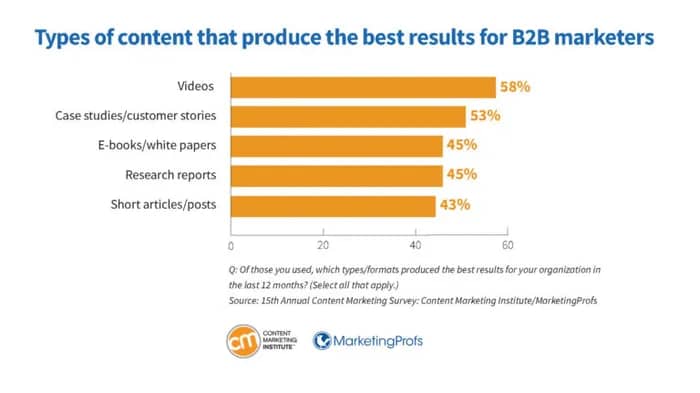
Video leads the way in engaging audiences, and authenticity matters more than high-end production. In fact, 58% of marketers told a B2B Content Marketing Institute survey that video was one of their most effective channels.

B2B Marketing Trends CMI content formats

Short, human-led videos are powerful in B2B because they explain new concepts quickly and make brands feel more relatable in a crowded digital space.

For example, Pipedrive used a series of short-form video content to support its involvement with OMR, a marketing event in Hamburg, Germany.

B2B Marketing Trends Pipedrive LinkedIn clip

These simple clips give Pipedrive a human face and authentic voice. They make the brand more relatable and memorable without the need for big production budgets.

Other videos on Pipedrive’s marketing channels include:

These formats are no longer exclusive to large companies. Any brand can create video content that reaches new B2B customers and builds on existing partnerships with the right tools.

For instance, drag-and-drop video editors like Canva and Adobe Express are ideal for creating explainer videos. Social media platforms like Instagram and TikTok also offer built-in video design tools (e.g., Instagram and TikTok), while generative AI will help you plan scripts. Most of these tools are free or budget-friendly.

Recommended reading

https://www-cms.pipedriveassets.com/blog-assets/video-marketing.png

Video marketing: The complete guide for marketing and sales professionals

6. A shift toward bold, risk-taking brand messaging (goodbye, boring B2B!)

B2B brands are edging away from safe, generic messaging to embrace distinctive personalities and points of view.

As markets become more competitive, standing out takes courage and creativity. Small businesses often find this easier, with fewer rules and stakeholders to navigate than their larger competitors.

For your brand, boldness could take any of these forms:

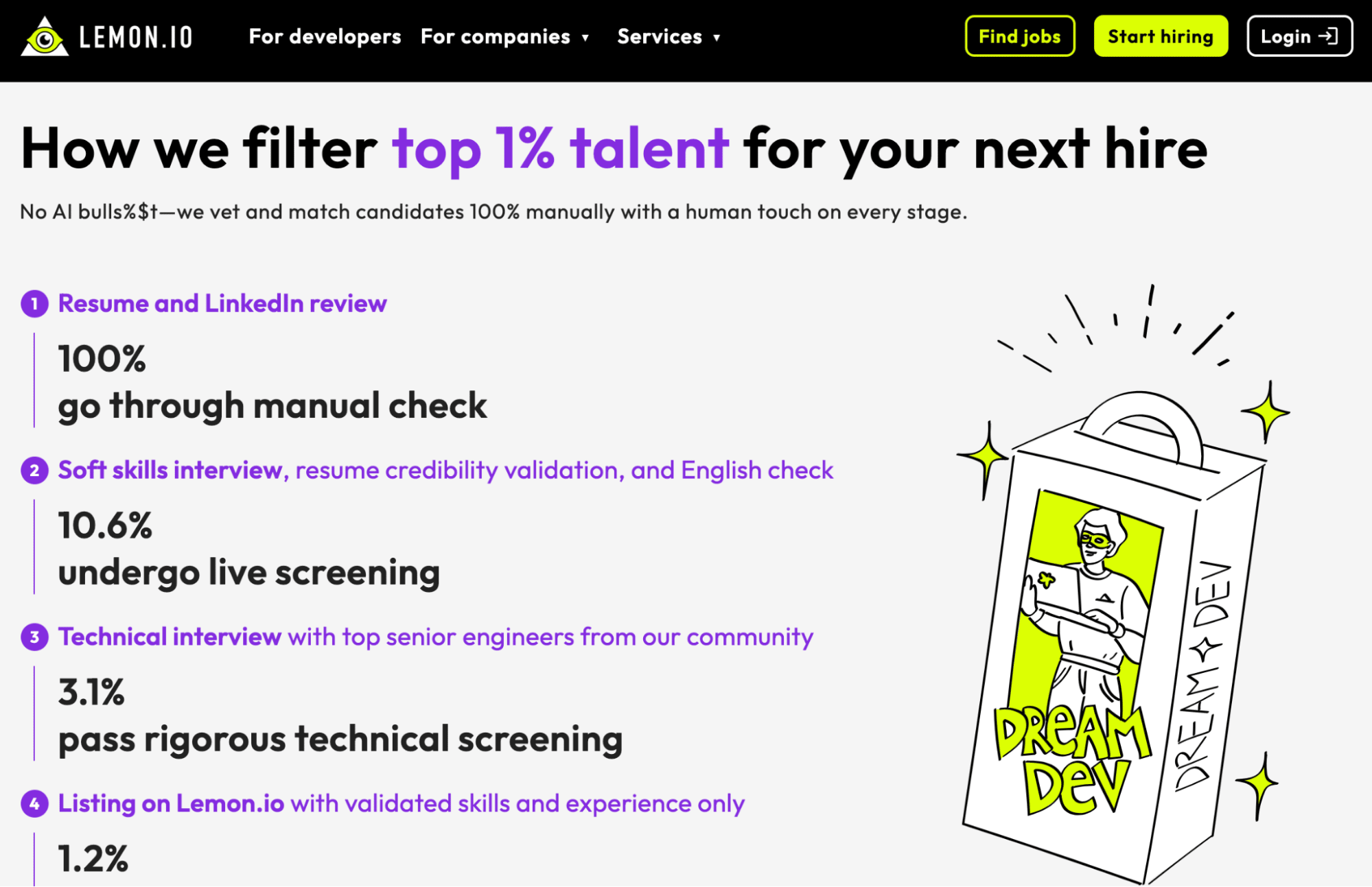
Here’s the branding Lemon uses to stand out in a crowded software development space:

B2B Marketing Trends Lemon.io homepage

Note how it also uses unconventional language in places. These choices all contribute to a memorable brand experience.

Even candid honesty can be bold messaging in the right circumstances. Contentstack’s Gurdeep Dhillon told a story in a recent Demand Gen Report post about how a LinkedIn marketing influencer called out his brand for unclear website messaging:

We had two choices: ignore it and pretend nothing happened or acknowledge that what we tried didn’t work, fix it and own up to it publicly. We chose the second. It resulted in a wave of respect, engagement and new brand advocates. The influencer even recapped it later as one of her top five moments of the year. Because who willingly steps into a negative spotlight?

If you plan to follow this trend, remember that balance is key. Bold messaging must still speak to real buyer pain points and not just be edgy to get attention. Otherwise, any extra traffic you get won’t translate to higher conversion rates.

7. Marketers are building communities (not just audiences)

B2B marketers increasingly see the value in owned communities like chat groups, forums and invite-only events for deepening customer engagement. They’re cost-effective and help generate organic brand advocacy.

Community development is all about creating spaces where members interact with each other, not just with the brand. This peer-to-peer connection builds customer loyalty, trust and shared identity, making your brand part of something bigger.

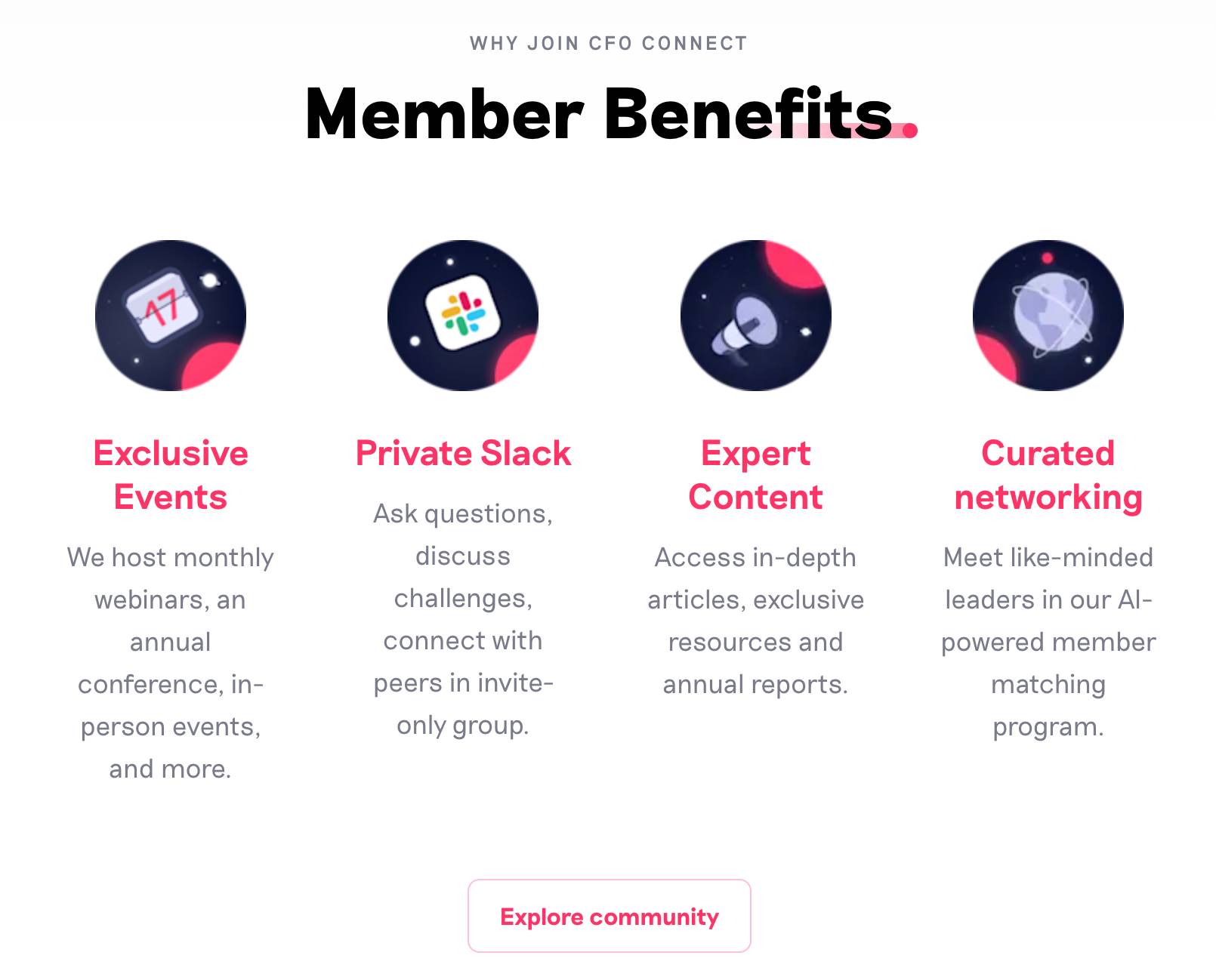
For example, Spendesk – a spend management tool – has a private community called CFO Connect. It gives “high-performing finance leaders” a space to network and learn from one another (via a Slack group, newsletter, exclusive events, etc.).

B2B Marketing Trends CFO Connect benefits

Instead of pushing sales messages, the brand facilitates meaningful peer-to-peer connections. The community has turned Spendesk into a valuable part of the finance ecosystem.

When finance leaders in the community need a procurement tool, they’re likely to turn to Spendesk because the relationship already exists. The brand is subtly influencing their decision-making without any pushy selling.

Other places you can build valuable brand communities include:

  • Private LinkedIn groups focused on industry challenges

  • Self-hosted forums for product users, like the Pipedrive Community

  • Discord servers for technical communities

However, finding the right platform is just one part of using communities to build loyalty and trust. Your purpose matters even more.

Speak to your customers online or in person. Gather feedback through surveys, interviews and social posts to learn what matters to your audience and build spaces for those conversations to thrive.

When your community delivers genuine value, members keep showing up and advocating for your brand without being asked.

Recommended reading

https://www-cms.pipedriveassets.com/Customer-Survey.png

Customer surveys: Best practices for sales and marketing teams

8. Automation is table stakes in B2B marketing (start small, scale up)

Automation has moved from a competitive advantage to a B2B marketing must-have.

Our State of Sales and Marketing report revealed that 92% of teams now use at least one automation tool. That leaves just 8% still operating completely manually – an increasingly rare approach.

B2B Marketing Trends Pipedrive automation survey

The good news for SMBs is that automation is more accessible and user-friendly than ever. You don’t need a huge budget to save time, just the right software and features.

For example, teams use Pipedrive to set up time-saving triggers for everyday tasks like assigning deals and updating data fields.

Here are some additional simple tools and tactics to start automating with:

  • Use Campaigns by Pipedrive to send automated email marketing sequences based on deal stage, customer behavior or list segment. It’s great for staying top-of-mind without manual follow-ups.

  • Use Zapier to connect your digital marketing apps without writing code. For example, automatically add webinar sign-ups from Eventbrite to your CRM or trigger a Slack alert when someone downloads a lead magnet.

  • Use ActiveDemand to build drip campaigns, schedule social posts and trigger personalized landing pages – all from a single interface.

  • Use Facebook Ads rules to adjust bids, pause underperforming ads or scale up the best performers in real time. These automations are ideal for small teams running always-on marketing campaigns.

These affordable tools can save dozens of hours. They keep your day-to-day marketing initiatives running while you focus on bigger goals, like search engine optimization (SEO) and account-based marketing (ABM) strategies.

Catch more hot leads before they bounce

Want piping hot leads delivered 24/7? You need this Guide to Automating Lead Generation.

Final thoughts

B2B marketing isn’t just progressing – it’s accelerating. From AI and automation to bold messaging and community building, today’s most effective strategies are smarter, faster and more human.

There’s one common thread across all these trends: relevance.

The brands winning attention, trust and revenue in 2025 are the ones that speak directly to their audience’s needs and then act on that understanding through the right tools and channels.

B2B marketing may be evolving quickly, but Pipedrive gives you the tools to stay ahead. Try Pipedrive free for 14 days to centralize your customer data, simplify workflows and grow profitability.

Top Bootstrapping Strategies

Software Stack Editor · May 19, 2025 ·

Early-stage startups must consider various financing strategies to bring their ideas to life. While venture capital support provides stability, it can also create dependencies for a new business. Bootstrapping offers an alternative path for those seeking greater autonomy.

In this article, we’ll explore where the financial resources for bootstrapping come from, the principles behind the bootstrap method and the additional benefits it offers entrepreneurs.

What is bootstrapping in business?

Bootstrap definition: In business, bootstrapping refers to starting and growing a company using limited resources, typically without significant external funding like venture capital or large loans.

Startup founders and entrepreneurs encounter the term “bootstrapping” when seeking capital for an innovative business idea. The term comes from the old expression “pulling yourself up by your own bootstraps”, meaning that entrepreneurs must finance themselves independently if they don’t find a suitable investor.

Startups self-finance through personal savings, the business’s initial sales revenue and other minimal resources to fund their operations.

Here are the key components of bootstrapping and what they mean in terms of startup financing:

Self-funding

Business owners use their own financial resources – such as personal savings or money from friends and family – to fund the business.

Cash flow management

Businesses must maintain a positive cash flow to sustain operations. Managing cash flow efficiently becomes crucial since external funding is limited or non-existent.

Cost efficiency

Bootstrapped businesses often prioritize minimizing expenses(e.g., negotiating better terms with suppliers, avoiding expensive office spaces or doing most of the initial work rather than hiring staff).

Reinvestment of profits

Any profits are typically reinvested into the business to fuel growth and development rather than distributed as dividends.

Gradual scaling

Growth is usually more gradual as it’s tied directly to the business’s ability to generate and reinvest profits, which can lead to a more sustainable, although slower, growth trajectory.

Bootstrapping demonstrates an entrepreneur’s resilience and resourcefulness. Entrepreneurs build a venture organically, adapt to market feedback and rely on their own capabilities rather than external funding.

Bootstrapping example

Amazon is one of the most well-known bootstrapped companies.

Amazon founder Jeff Bezos started the book-buying company with a $245,573 investment from his parents.

The company is now one of the most recognized brands in the world. People use it for everything from book buying (its original purpose) to hosting websites.

Recommended reading

https://www-cms.pipedriveassets.com/How-to-be-an-Entrepreneur.jpg

How to be an entrepreneur: 7 steps to build a business

The pros and cons of business bootstrapping

Bootstrapping is often the first option for new companies with little business experience, and it comes with some benefits and challenges. For instance, bootstrapped companies generally have more freedom and adaptability because they’re not beholden to outside investors.

For example, external investors can limit entrepreneurs’ freedom in business decision-making as they’re answerable to investors. Bootstrapped companies have more freedom to pursue their visions.

However, a new business that self-funds may miss out on some helpful growth factors.

Here are some pros and cons to consider if you’re thinking of trying the bootstrap method:

Pros

Cons

Bootstrapping requires less business experience to get started and run your business

Without the expertise of experienced investors and mentors, it can be harder to achieve business goals

Owners get more control over how they run the business

There’s greater financial risk as owners have less of a backup to cover unexpected costs

Owners gain business and industry experience faster through the need to grow and experiment

Startups may go through more iterations of trial and error to achieve success due to the lack of external guidance

Bootstrapping is not always ideal, but it can be an effective way to get your company up and running and provide opportunities for learning and growth. The key is to weigh your options and make the right decision for your business.

Download Your Sales and Marketing Strategy Guide

Grow your business with our step-by-step guide (and template) for a combined sales and marketing strategy.

Why reaching the break-even point quickly is crucial

For young companies to generate revenue and eventually operate profitably, they need to achieve a positive cash flow as quickly as possible and work purposefully toward the break-even point.

The sooner they start the operational business, the faster startups can generate sales and record revenues. The break-even point marks the moment when income and expenses balance out.

Once a company has reached this point, it generates profits that it can invest in new processes and optimizations.

Recommended reading

https://www-cms.pipedriveassets.com/Company-logos/Small-Business-Stats.png

Small Business Week 2025: 70 top small business stats

Bootstrap strategies

Without external investors, a startup may decide to bootstrap, meaning resources come from places such as the business owners’ personal savings or money from a previous small business venture – but this is far from the only funding source.

Here are some strategies bootstrapped companies use to raise funds and reach the break-even point faster:

Family, friends and acquaintances

According to a 2024 study, 29% of business ideas receive financial investment from a friend or family member.

For example, action camera tech company GoPro’s founder, Nicholas Woodman, started the company with some self-funding and a $35,000 loan from his family. The company now generates $1 billion in annual revenue.

Government grants

Many countries have government or public grants designed to support businesses. These grants may apply to particular industries or specific funding areas, such as research and development or startups in general.

You can find information on these types of grants on your local and federal government websites.

Small bank loans

Small bank loans can be a way to get started if you don’t know anyone who can support you financially.

External support, such as loans or grants, also offers another form of validation for your idea, as it shows outside confidence in your business plan.

Tax benefits or credits

Some countries offer tax benefits or credits to small businesses or those in particular industries. These options are intended to spur growth in sectors that will contribute to the community’s financial health.

For instance, a machine learning company could apply for tax credits for research and development that could impact the industry.

Cutting costs

Cutting costs isn’t strictly a funding source, but it can get a business to the break-even point faster.

While tightening budgets can be a challenge, it ensures you only spend money when necessary. It may include reducing spending on credit cards or other forms of credit to reach profitability sooner.

Made-to-order products or limited shipping locations

Another strategy to help you reach the break-even point is to produce products only after orders are placed. Waiting for orders ensures you don’t sit on excess stock and cuts down on storage costs.

Limiting where you ship to also saves costs. For instance, shipping internationally or paying to warehouse stock in multiple countries can eat into your profits, slowing the time to profitability.

Recommended reading

https://www-cms.pipedriveassets.com/How-to-start-a-business-simple-guide.png

How to start a business: the simple guide

Final thoughts

The bootstrap method enables startups to finance themselves entirely through their own means. While it may not be the best fit for every budding business, bootstrapping offers advantages like independence from external investors and more business-building experience for entrepreneurs.

If you’re funding a new startup, consider bootstrapping strategies as ways to generate and manage revenue and reach the crucial break-even point quickly.

How Do Marketing Funnel Stages Work?

Software Stack Editor · May 16, 2025 ·

Attracting customers is nearly impossible without a well-planned marketing funnel, so you must know how to use funnels intelligently and optimize them for marketing activities.

In this article, you’ll discover how to build a digital marketing funnel that consistently brings in new prospects, leads and customers.

What is a marketing funnel?

A marketing funnel describes the customer journey from initial brand awareness to purchase decision and advocacy.

Businesses use the marketing funnel to provide targeted, resonant content and advice along the customer journey.

The goal is to increase sales by addressing specific needs that help customers make decisions. When prospects see tailored messaging that addresses their pain points, they feel more affinity for your brand.

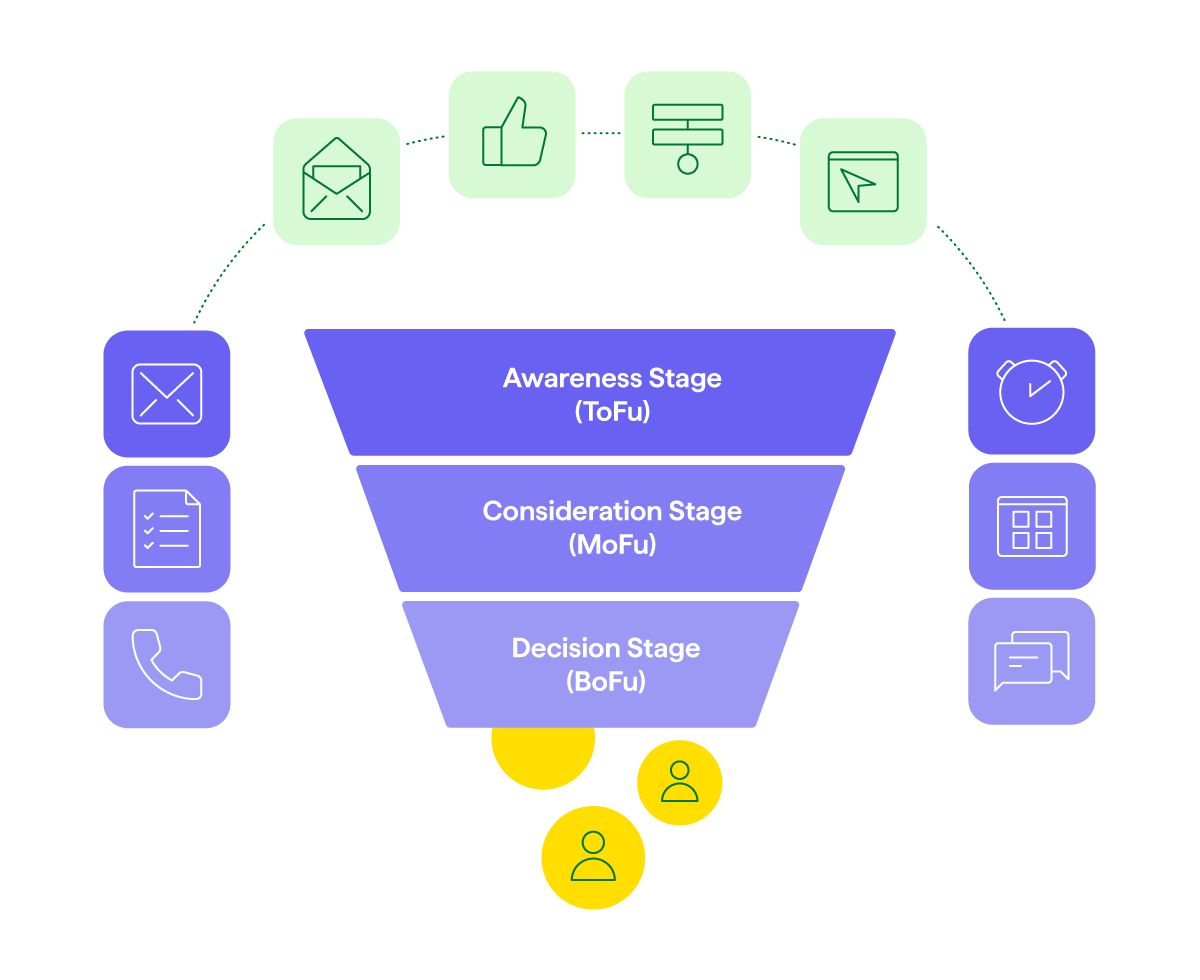
The marketing funnel outlines the distinct stages of a customer’s journey, as shown in this image:

Marketing funnel stages Pipedrive

Businesses that plan out a marketing funnel can improve and optimize their marketing tactics while allocating resources effectively.

Marketing funnel vs. sales funnel vs. conversion funnel: what’s the difference?

The terms marketing funnel, sales funnel and conversion funnel are often used interchangeably in online marketing, but they have distinct purposes. Here’s how they differ:

Marketing funnel

Focuses on casting a wide net to attract potential customers

Sales funnel

Focuses on turning leads you’ve already attracted into paying customers

Conversion funnel

Combines marketing and sales to focus on the entire customer experience, from awareness to the purchase stage

The marketing funnel prioritizes creating brand awareness through content marketing that fosters interest, trust and an emotional connection with potential customers.

Lead generation is a critical part of both the sales and marketing funnels.

The final stage of the marketing funnel is usually a sale or conversion, but some marketing funnels include customer marketing activities, like upselling and cross-selling. The sales funnel continues beyond the sale to include account management.

Ideally, the final stages of the marketing funnel transition smoothly into the sales funnel to ensure the intent to buy translates into an actual purchase.

Recommended reading

https://www-cms.pipedriveassets.com/blog-assets/sales-funnel-template.png

4 sales funnel templates to generate more leads

Top, middle and bottom of the funnel: the structure of a marketing funnel

As the name suggests, a digital marketing funnel starts broad at the top and narrows down. There are three phases in the marketing funnel:

Top of funnel

Your brand captures the potential customer’s attention

Middle of funnel

The potential customer expresses interest and begins to desire the product

Bottom of funnel

The customer takes action with a purchase (and the marketing funnel becomes the sales funnel)

Let’s look more closely at each stage.

Top of the funnel: awareness stage

The top of the funnel, or awareness stage, is about capturing prospective customers’ attention. This phase is their first contact with a company.

Typically, you inform them of particular challenges and needs to help them understand why your topics and products are relevant.

A social media ad promoting a free webinar could be the top-of-funnel element, attracting attention. The next step could be a nurture sequence with helpful emails, culminating in a product demo and sales offer – a classic marketing funnel example.

Possible content formats for TOFU include:

  • SEO-optimized blog articles on introductory topics

  • Social media posts

  • Podcasts

  • Facebook, Instagram and LinkedIn ads

  • Newsletters

  • Outdoor advertising

  • Webinars

Building brand awareness and generating leads at this stage will pay off later.

Middle of the funnel: consideration stage

In the middle of the funnel, you spur interest in your offerings and build customer trust. Build interest by creating content that provides helpful solutions and introduces products that meet prospects’ challenges.

Possible content formats for MOFU include:

In this stage, you engage and inform prospects, getting them closer to a purchase decision.

Bottom of the funnel: decision stage

At the bottom of the funnel, you answer questions about your products, address possible concerns and invite a purchase.

Possible content formats for BOFU include:

Note: This last stage doesn’t only involve one-time purchases. The rest of the funnel can also give people a reason to choose your product, making it more likely they’ll convert into brand advocates who join loyalty programs. Increased retention turns into customer lifetime value (CLV) and a longstanding relationship with the business.

6 steps to a successful online marketing funnel

Building a funnel that fits your business needs and converts well takes proper planning. Follow these six steps:

1. Define the goal

Without a clear goal, your marketing funnel will falter. Define what success looks like for you and how you’ll measure each milestone. For example, “We want to generate 500 new qualified leads and achieve 100 sales monthly”.

2. Identify the target audience

Your marketing efforts must reach the right people, so consider your target audience. Conduct a target audience analysis and define buyer personas to learn demographics, needs and preferences.

Gather direct feedback through first-person surveys and interviews (virtually or in-person). Store all the information you gather in a customer relationship management (CRM) system like Pipedrive for easy access.

3. Map the customer journey

Map the customer journey since it determines the structure of the marketing funnel. Represent every type of customer and touchpoint that fits your business.

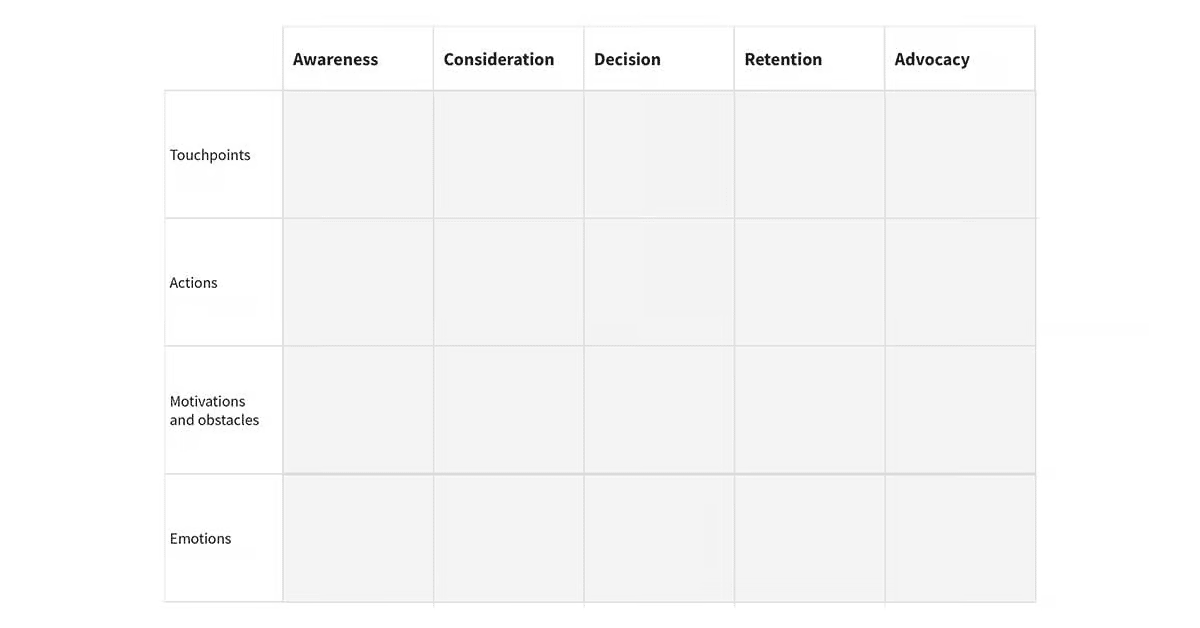
Pipedrive offers a template to help you visualize each customer and how they interact with you at each stage in the journey. Complete one for each type of customer to see how they approach the journey differently.

Marketing Funnel Customer Journey Template

This model will help you gain deeper insights and improve workflows.

Download our customer journey map template

Start mapping your customer journey with our free customer journey template.

4. Outline the marketing funnel

Conceptualize your content marketing funnel based on the customer journey. Consider what resources would best support your loyal customers at each touchpoint and prompt them to act.

Use the marketing funnel image above as a model, or create one that fits your company’s needs.

5. Create content

Once you’ve completed the marketing funnel outline, start producing content that addresses pain points. Publish blog articles, newsletters, e-books and social media posts consistently, ensuring each has a call to action. Post the content on your marketing channels to tap into search engine optimization (SEO).

6. Analyze and optimize the funnel

Marketing funnels usually aren’t perfect from the start. Review data and performance metrics regularly (e.g., conversion and retention rates) to identify what’s working and where there’s room for improvement.

Work systematically to improve each stage. Enhance the funnel’s conversion rate, adjusting one element at a time to track which changes boost performance. For example, you could institute a referral program with benefits for new and repeat customers.

Have a mindset of continuous improvement, making changes based on customer feedback. Determine what works best for your company and its goals.

Final thoughts

Marketing funnels provide a structure and framework for the buyer’s journey. They map the different stages of the decision process and show how to guide customers through them.

Additionally, analyzing the full funnel helps identify problem areas in your marketing campaigns, ways to improve conversion rates and new revenue streams.

A well-constructed funnel ensures your business remains competitive and continues to attract new customers. Use the tips in this piece to maximize the effectiveness of your marketing strategy efforts and investment.

Ultimate 4-Step 360 Customer View

Software Stack Editor · May 16, 2025 ·

Good customer data helps you offer personal service and build stronger relationships. The challenge? Most businesses store customer information in data silos. Teams waste time switching between tools, and valuable information slips through the cracks.

This article teaches you how to build a practical 360 customer view without enterprise-level complexity. You’ll also understand which integrations you need and how to avoid common data hurdles.

What is a 360 customer view?

A 360-degree customer view gathers all your customer journey data in one place. The core data components include:

One central place for customer data gives you a clearer view of what customers want and do. Sales teams can spot buying patterns. Support staff can see past issues. Marketing can optimize their messaging. Every team member can offer better service without jumping between different tools.

Centralized data is typically in customer relationship management (CRM) software like Pipedrive. Customer data platforms (CDPs) are also common.

Enterprise vs. SMB 360-degree customer view approaches

Enterprises and small and medium-sized businesses (SMBs) benefit from a 360 view of the customer. Naturally, their needs, resources and goals are different.

Enterprise implementations

SMB solutions

Typically require significant investment, with costs varying based on company size, complexity and vendors.

More affordable, with costs scaling according to team size, feature needs and selected tools.

May need months to complete to meet complex requirements, multiple stakeholders and extensive data integration needs.

Often finalized within weeks, thanks to simpler requirements and fewer stakeholders.

Need dedicated data teams and IT specialists.

Existing staff can manage them without specialized data expertise.

Pull data from many data sources and customer touchpoints.

Typically integrate fewer, carefully selected data sources focusing on the most valuable customer touchpoints.

The technology stack includes complex data warehouses and custom-built solutions.

Tech centers around a CRM system like Pipedrive plus integrations with essential tools.

Why small businesses need a 360 customer view

Small businesses sometimes think a 360-degree customer view is only for larger companies with complex customer journeys.

However, a comprehensive view of customer insights can also improve sales, service and marketing efforts for SMBs.

Tailor sales approaches to customer needs

When sales teams see a prospect’s website data analytics, email engagement and past purchases, they understand the customer’s pain points better.

For example, a sales rep might notice a customer repeatedly engaging with emails about inventory management features, suggesting this is a challenge they’re looking to solve.

With this customer data, salespeople understand what each customer needs. They can skip generic sales tactics, focus on solving specific problems and close deals faster.

Deliver more personalized customer service

Knowing purchase history and previous issues helps customer support understand issues quickly. For example, when a customer calls about software problems, the agent can see they just upgraded and guide them with the proper troubleshooting steps.

Support staff can solve problems quickly without asking customers to repeat themselves. Buyers save time by not having to tell their story again. Together, this leads to a better customer experience and increased customer satisfaction.

Create more targeted marketing campaigns

With a 360 view CRM, marketing teams can segment audiences based on customer behavior, allowing for more tailored messaging.

For example, you can send birthday offers, loyalty milestones and customized product recommendations. Targeted campaigns typically see higher customer engagement rates and better ROI.

Download Your Sales and Marketing Strategy Guide

Grow your business with our step-by-step guide (and template) for a combined sales and marketing strategy.

Build your 360 customer view in 4 steps

Consolidating customer data doesn’t have to be complicated or expensive. Following these four steps, SMBs can create a 360 customer view with Pipedrive. You won’t need special tech skills or a data team to make it work.

1. Audit your current customer data

Identify the customer data you already have and where to find it to identify any gaps in your 360-degree customer view.

Start by plotting your customer journey. Then, meet with your marketing, product, support and sales teams.

Together, list all the potential touchpoints a customer has with you. Include everything from engaging with a social media post to recommending you to a friend.

Highlight all touchpoints where you collect customer data. Note what type of data it is and where you store it.

For example:

Next, assess the quality and completeness of the data you have. You can take five to 10 random customer records across systems.

Look for missing fields, outdated information or details that don’t match between platforms. For now, note any issues you find – you’ll address them in the next step.

Recommended reading

https://www-cms.pipedriveassets.com/Contact-Management-Definition.png

What is contact management? How to take it to the next level

2. Define your essential customer profile

After auditing your data, determine which information is essential for your business. Not all customer data is equal. Focus on collecting what impacts your ability to serve customers and boost sales.

Must-have data points include:

Basic contact information (name, email, phone)

Allows basic communication and creates the foundation for any customer relationship. Without this information, teams waste valuable time searching for ways to reach customers.

Purchase history (products, dates, amounts)

Reveals customer preferences and spending patterns over time. Sales reps can reference previous purchases to suggest relevant upgrades.

Communication preferences (email, phone, SMS)

Ensures messages reach customers through their preferred channels, increasing engagement rates and complying with privacy regulations.

Support interaction history

Prevents customers from repeating their issues multiple times. It gives sales teams important context before reaching out and shows which products might be causing friction.

Referral source

Suggests which marketing channels work best. This information helps calculate customer acquisition costs. Over time, you’ll learn where your highest-value customers come from.

Nice-to-have data might include:

These data types provide helpful insights, but not vital customer information. Including them at this stage could delay your initial 360-degree view implementation by adding unnecessary data to clean and connect.

If you find that important data points are incomplete or inaccurate, clean them first. Then, set aside time to update this information manually. Alternatively, create a plan to collect this data in the future.

Once you’ve identified and cleaned your essential data, organize it in a spreadsheet. Make sure the column headers match your must-have data points.

Export your customer data from each system and combine it in the spreadsheet. You can use email addresses to match records across systems.

Recommended reading

https://www-cms.pipedriveassets.com/buyer-persona-header-12.png

Buyers personas: A complete guide to how to create and use them

3. Centralize your data in Pipedrive

Now that you’ve organized your customer data spreadsheet, set up Pipedrive as your single source of truth.

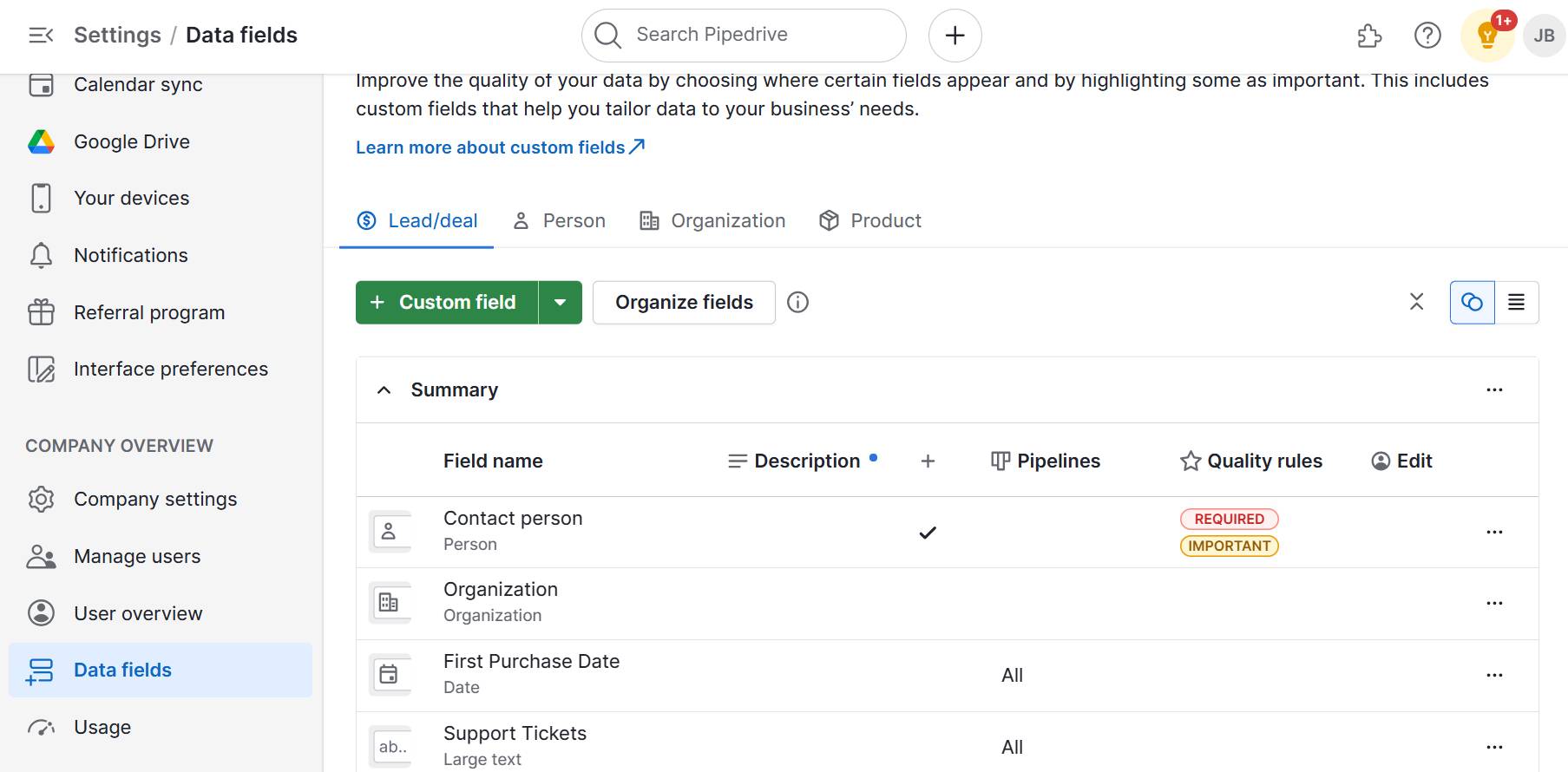
First, create custom fields to match your spreadsheet columns. Go to “Settings > Data Fields”. Click “Add custom field”.

360 customer view Pipedrive custom fields

For example, you could create fields for purchase history like “First Purchase Date”. For customer interactions, you could add a “Support Tickets” field.

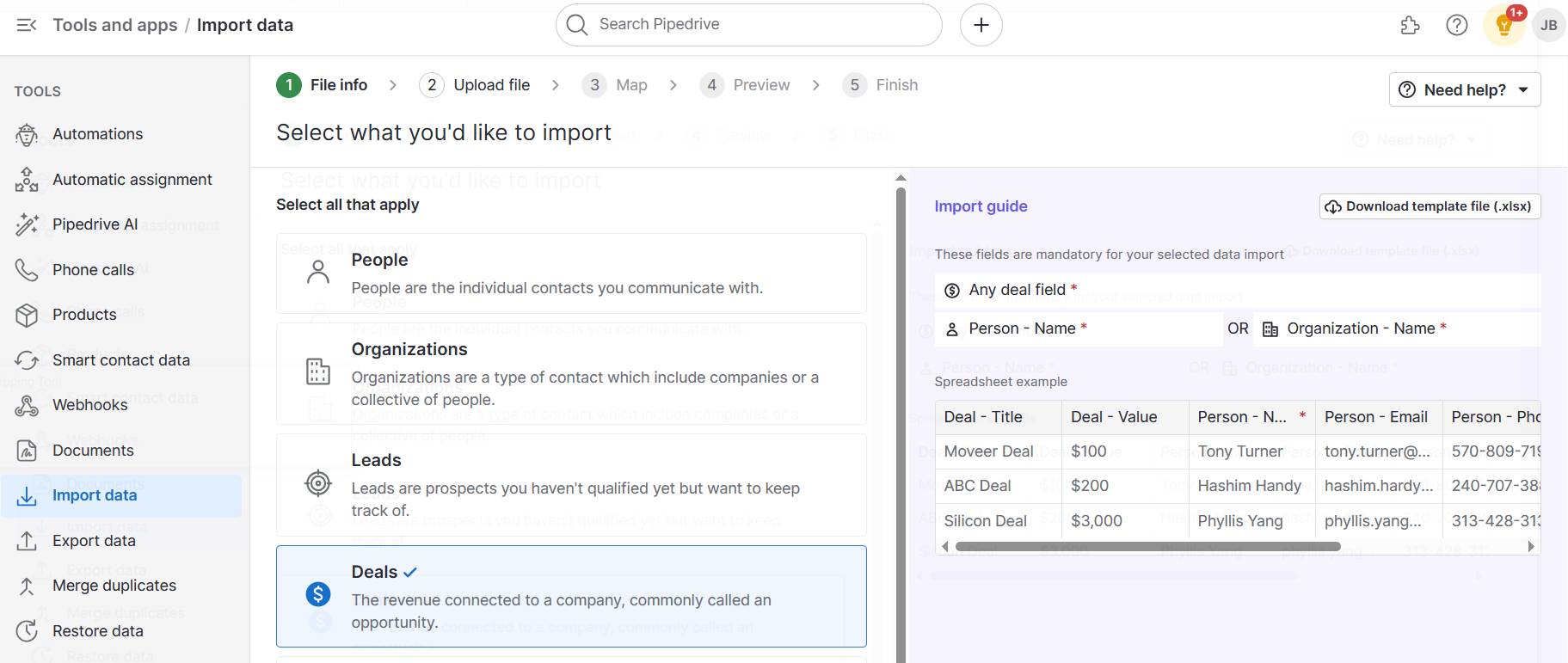
After setting up your fields, import your spreadsheet by going to “… (more) > Import data > From a spreadsheet”. Then, follow the mapping process, which will match your spreadsheet columns with the corresponding Pipedrive fields.

360 customer view Pipedrive import data

After the data import, these Pipedrive features will enhance your 360 customer view:

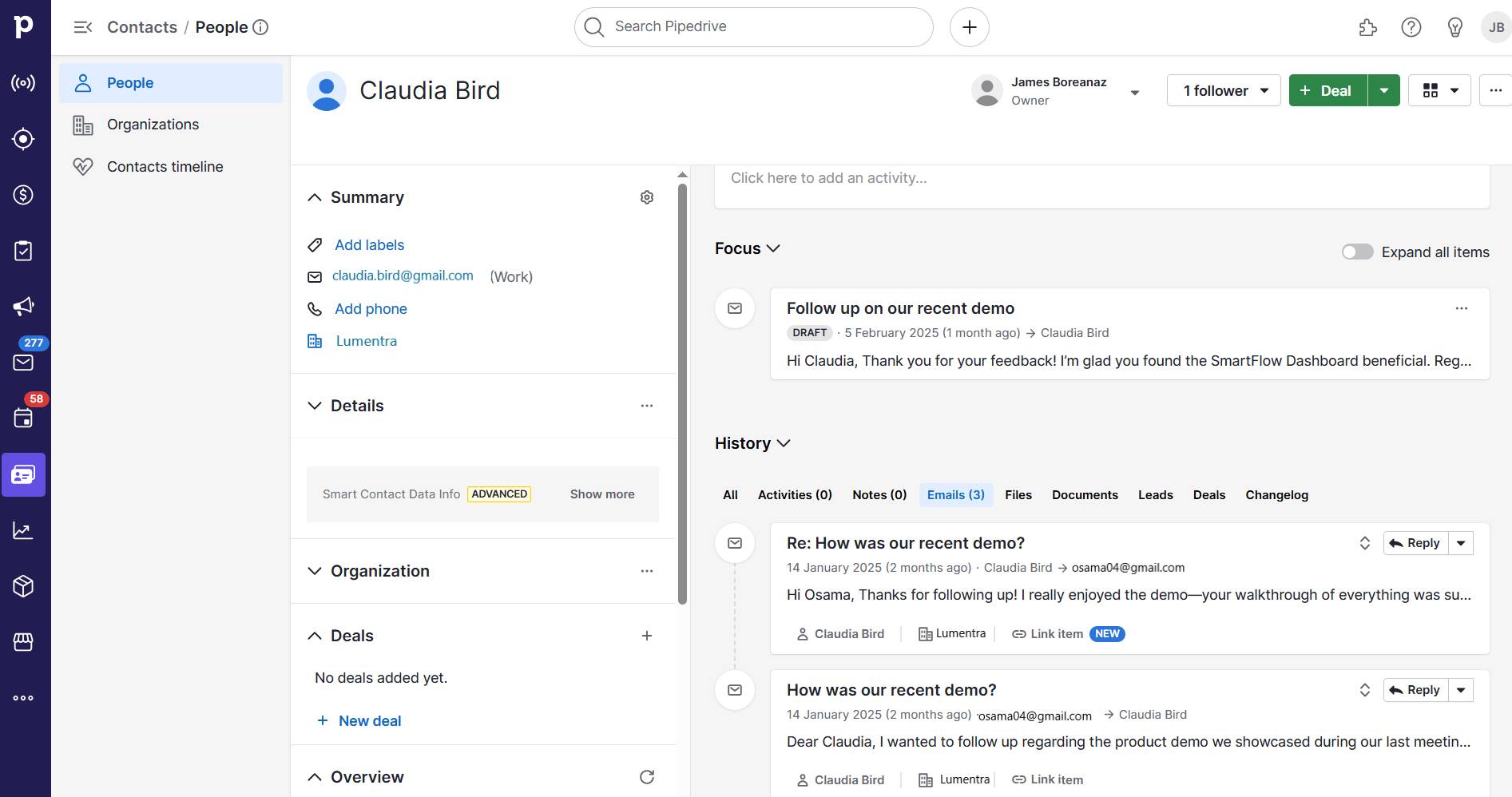
  • The contacts timeline shows all interactions in one chronological feed, giving you a complete history at a glance

  • Smart Contact Data automatically enriches your records with publicly available information

  • The notes section stores important context that doesn’t fit into standard fields

  • Custom views let you organize customer information based on your team’s specific needs

4. Establish data management and maintenance processes

A 360 customer view needs clean, accurate data to be valuable. Ensure both preventive measures and regular checks for a solid maintenance system.

To ensure data hygiene from the start, follow these steps:

  1. Create preventive measures to keep data clean as it enters your system

  2. Import data using the “Update existing contacts” option instead of creating duplicates

  3. Match records using email addresses as your primary identifier

  4. Preview imports before finalizing to catch potential issues

  5. Import smaller batches (500 or fewer records) for easier error-checking

Create a simple data entry protocol for your team. Include which fields are mandatory for new contacts and how to format them. Give guidance on when to update key fields and who to notify if data is incorrect or outdated.

A regular maintenance initiative helps you catch and fix issues. Assign this task to a specific team member and schedule a monthly 30-minute session with them to find and merge duplicate records.

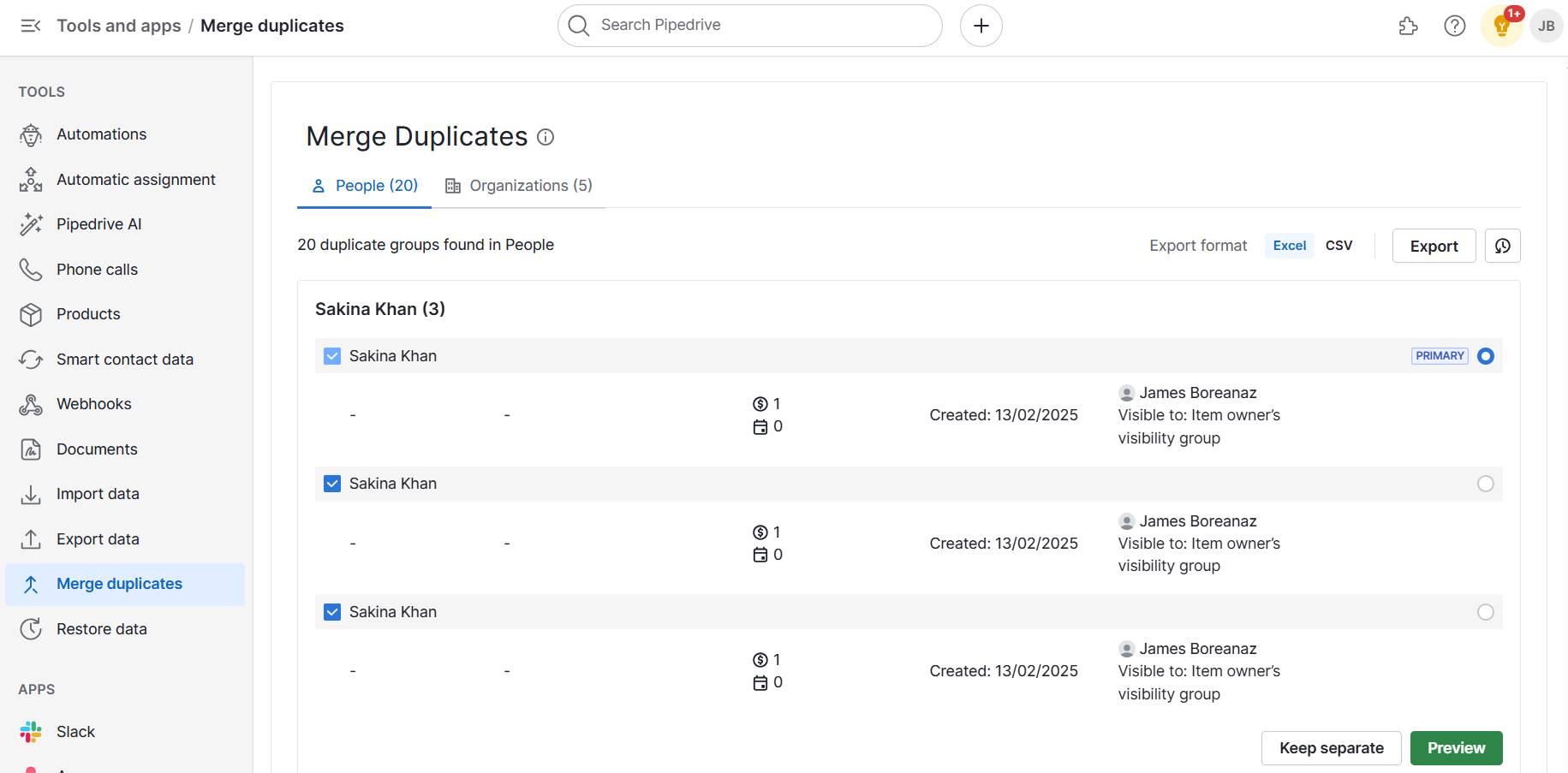
Pipedrive’s duplicate merging tool streamlines this process. Find it in “Tools and apps > Merge Duplicates”. A list of potential duplicate people and organizations in your Pipedrive account will appear.

Check the boxes of items that need merging. Then, select which item you’d like to be the primary. The CRM will prioritize the primary item’s information if there are any conflicts.

For example, if the phone numbers differ for each item, Pipedrive will save the primary’s phone number when the merge is complete.

Pipedrive merge duplicates

You might sometimes stumble across duplicate items that weren’t flagged. When this happens, go to the detail view, click “… (more)” and select “Merge”.

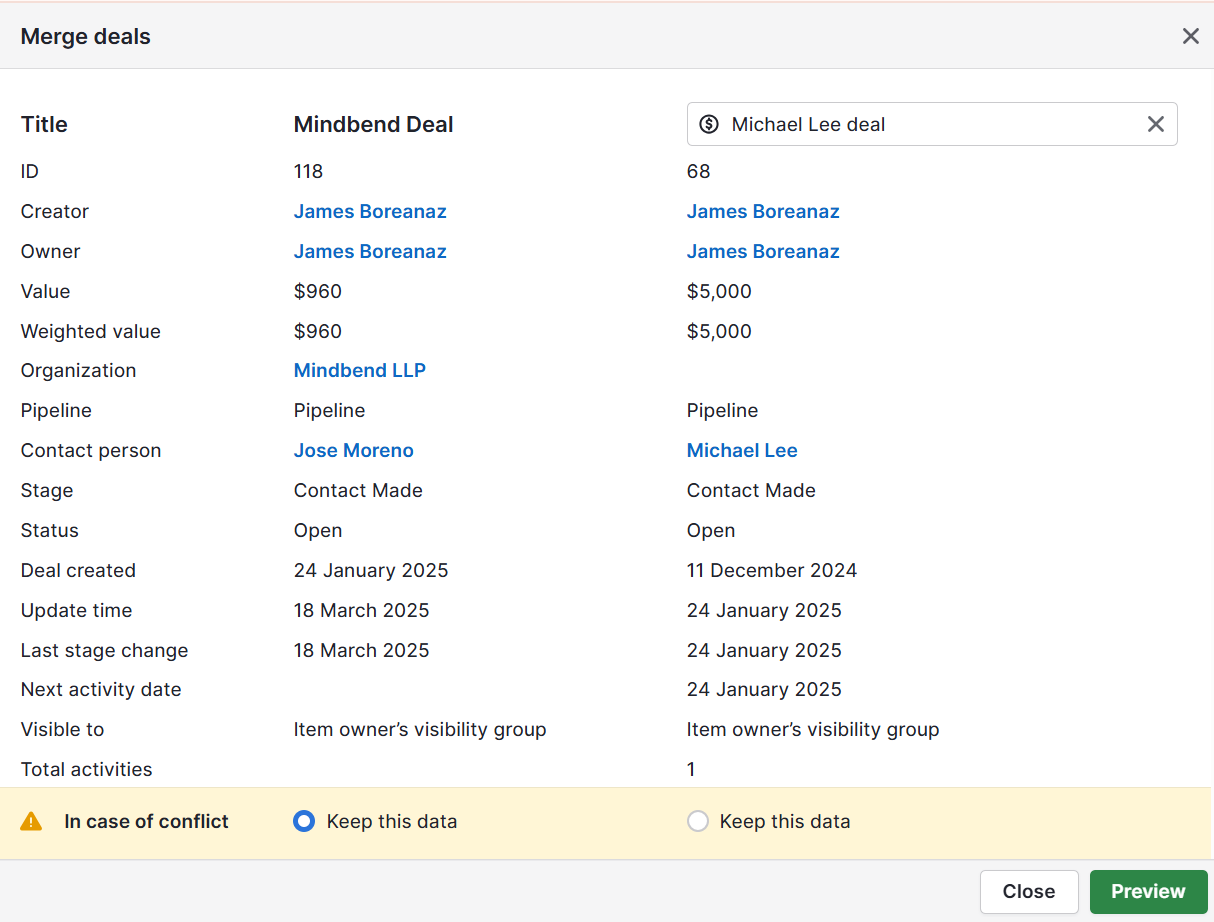
Enter the deal or contact name you want to merge in the search bar at the top right corner. Once you select the deal or contact to merge, you’ll see the information of both items displayed.

Choose which information to keep in case of conflict on the banner at the bottom.

Pipedrive manually merge duplicates

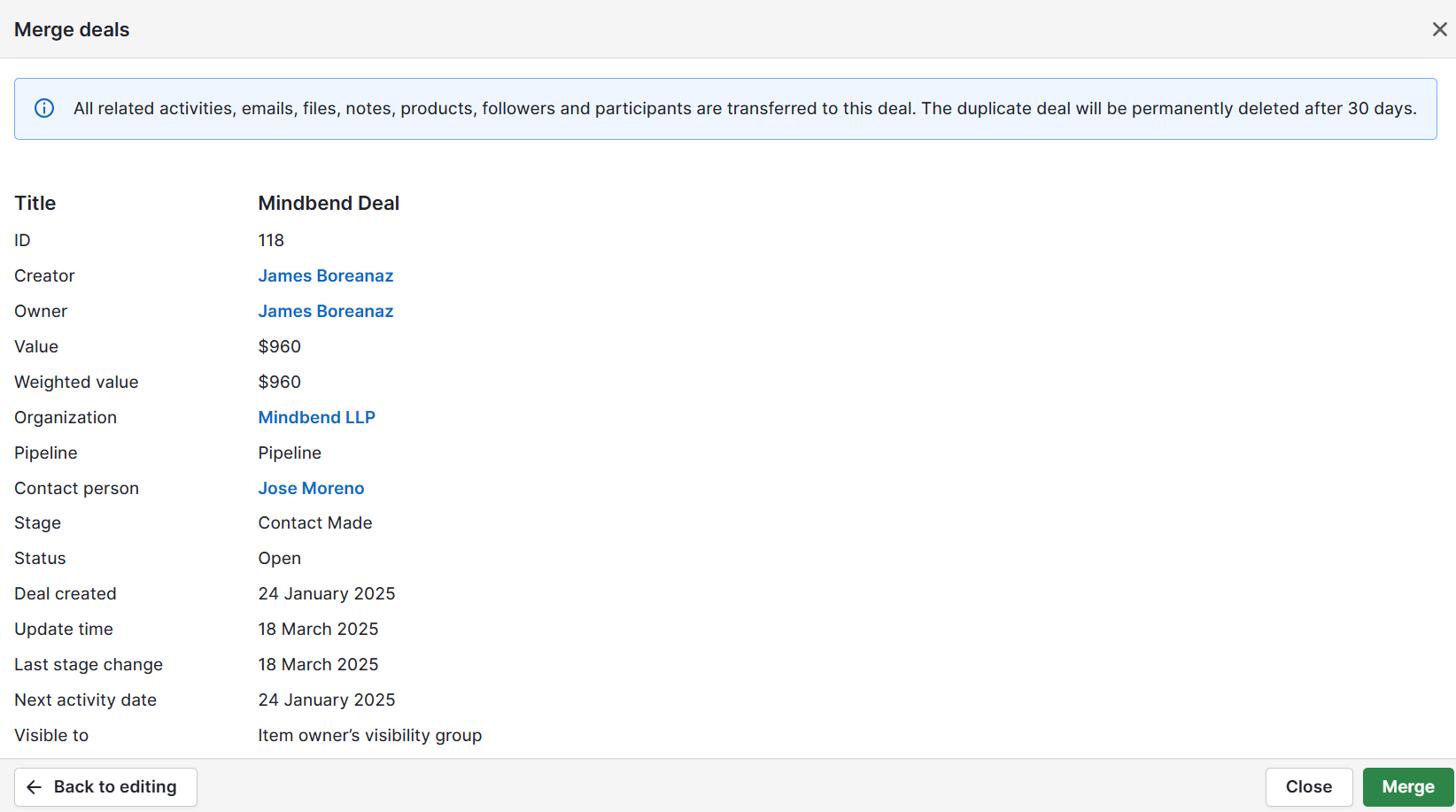
Next, click “Preview” to see how the contact will appear once merged. Check for any errors. Once you merge the item, it’s permanent.

When you’re happy the information is correct, click “Merge” to complete the process.

Pipedrive merge deals

Every three months, conduct a deeper data quality check. Examine 20 random customer records for completeness and accuracy. Data quality checks prevent the gradual degradation of customer data quality and ensure your 360 view remains valuable over time.

Essential data integrations for your 360 customer view

Pipedrive works as your primary customer data center. Adding connections to other tools gives you a complete picture of your customers.

Integrations send information to Pipedrive automatically (often in real time), so you don’t need to update customer profiles manually.

Marketing automation tools

Marketing automation tools show how customers respond to your campaigns. You’ll see what interests them and how much they engage with your messages.

Tool

Use case

Mailchimp

  • Shows which customers open emails, click links or ignore campaigns

  • Sales teams can check engagement and focus on the most interested leads from your email lists

Web Visitors

Customer support desk tools

Support interactions contain valuable information about customer needs, challenges and satisfaction levels.

Tool

Use case

Zendesk

  • Brings customer support tickets into your CRM view

  • Allows sales teams to check if customers have open support issues before reaching out

  • Prevents awkward conversations and improves the customer experience

LiveChat

  • Captures chat conversations with customers and prospects

  • Shows which contacts have engaged in chats and the topics discussed

  • Reveals common questions and interests

Finance and billing tools

Financial data completes your customer understanding by revealing spending patterns and account status.

Tool

Use case

QuickBooks

  • Shows invoice history, payment status and purchase patterns directly in customer records

  • Allows sales teams to see account standing before discussing renewals, cross-sells or upsells

  • Helps avoid uncomfortable situations with customers who have payment issues

Each integration helps you create complete customer profiles and improves operational efficiency.

Connect the systems where you interact with customers most often. As your system evolves, add other integrations for different business processes.

Overcoming common 360 customer view challenges for SMBs

Building a comprehensive customer view presents hurdles for business owners with limited resources. Here’s how to overcome the most frequent SMB issues.

Working with limited technical resources

Most small businesses lack IT experts to build complex data connections. Whenever possible, use native integrations built into your CRM database. These pre-built connections require no coding and only a few authentication steps to set up.

For tools without integrations, Zapier offers no-code solutions to link hundreds of applications. When automation isn’t feasible, establish regular manual processes.

Create calendar reminders for weekly imports/exports between systems. For instance, export new support tickets every Friday and import them into your CRM.

Supercharge Your Sales with This Zapier and Pipedrive Guide

Learn how to combine Zapier and Pipedrive to automate hours worth of annoying manual tasks and spend more of your time selling

Assigning data responsibilities in small teams

In small companies, team members often wear multiple hats, making it unclear who handles customer data. Clear ownership prevents information gaps and mistakes.

Implement role-based data ownership. For example:

  • Sales teams should own prospect and deal information

  • Marketing owns campaign engagement data

  • Support manages service interaction history

Designate a data champion who oversees overall data quality. This person should conduct periodic data reviews and enforce consistent practices. Allocate two to three hours of their time monthly for data quality management.

Managing data privacy compliance

Small businesses rarely have legal teams to help with privacy laws. Yet, they still need to protect customer data to follow the rules and build trust.

Permission settings in your customer database software restrict access to sensitive information – essential when handling personal or financial details. Ensure team members can only see the data needed for their specific role.

Note: Creating a basic customer data policy isn’t just about compliance but also about building trust. Explain what information you collect and how you use it in simple terms. Share this privacy statement on your website to show transparency and compliance with GDPR or CCPA.

Review all linked tools to understand how they access and process your customer data. Many services provide compliance documentation you can reference when building your connected systems.

360 view customer FAQs

  • CRM software stores customer information. A 360-degree customer view unifies data from multiple touchpoints.

    While a CRM acts as a single source of truth, a complete view requires connecting additional data sources to break down silos.

  • A unified customer profile gives your team context about previous customer interactions across all touchpoints.

    This allows for more personalized customer experiences and timely issue resolution.

  • A 360 customer view identifies early warning signs of potential churn through engagement metrics and shifts in usage patterns.

    By analyzing these data points, you can implement customer retention strategies before customers decide to leave.

  • Small businesses can use their CRM as the central hub and connect key integrations through APIs or no-code automation tools.

    This approach delivers most CDP benefits without enterprise pricing – ideal for SaaS companies and e-commerce businesses with limited resources.

  • AI can analyze patterns across your 360 customer view that humans might miss.

    With machine learning, you can automatically segment customers, personalize messages and recommend next steps based on similar buyer behaviors.

Final thoughts

Whether you run an e-commerce or SaaS business, a 360 view of the customer will transform how you understand and serve your customers. The real power comes from getting a complete customer picture every day.

By centralizing essential customer data through the above four steps, you gain invaluable insights without enterprise-level complexity or cost. The result: reduced churn plus improved customer loyalty and satisfaction.

Ready to build your own 360 customer view? Start your free 14-day Pipedrive trial to make more informed decisions with the right information at your fingertips.

Top Blue Ocean Strategy Tips

Software Stack Editor · May 15, 2025 ·

In a saturated market, young companies frequently face daunting challenges. Understanding the blue ocean strategy – creating uncontested market space by ignoring the competition – offers a way out of this predicament.

In this article, we’ll explore blue ocean strategy examples, its benefits and the companies that have successfully implemented it.

What is the blue ocean strategy?

Definition: Blue ocean strategy is a business strategy in which companies enter new, competition-free markets by developing an innovative concept.

Business professors and strategists W. Chan Kim and Renée Mauborgne presented the concept in their book Blue Ocean Strategy: How to Create Uncontested Market Space and Make the Competition Irrelevant.

The professors developed the strategy using the metaphors of “blue oceans” and “red oceans” to represent the presence of market competition.

Red ocean vs. blue ocean: what’s the difference?

The blue ocean strategy is a metaphor for businesses carving out a segment of an unknown market space.

The authors use the metaphor of a red ocean as a contrast to help clarify the blue ocean strategy’s meaning.

The red ocean represents a known market universe with fierce competition. It’s harder for businesses to stand out and reach profitability here, where cutthroat competition leads to a “red” environment.

In contrast, the blue ocean represents uncontested market spaces where competition is limited or non-existent and businesses that align with customer needs can thrive and grow.

Many predators (competitors) fight each other in the red oceans, while the fish in the blue oceans swim peacefully without affecting each other’s growth.

Key differences between the blue ocean and red ocean strategies include:

Blue ocean strategy

Red ocean strategy

Companies enter a new market space with (almost) no competition

Companies must prove themselves against numerous competitors in the existing market boundaries

Innovation is the key differentiator

Competitors are differentiated mainly by the cost-benefit ratio of existing products

Prices remain relatively stable due to uniqueness

Low costs determine competitiveness in a known market space

The target audience customer acquisition requires a fresh start

New customers must be won over from competitors

There is little to no competition

Cutthroat competition is crucial for companies’ survival

There’s potential for higher profits because there’s less competition

There’s risk of a shrinking profit pool due to increased competition

The blue ocean strategy has unique benefits and, if done right, can reward businesses with profitable growth.

Goals and benefits of the blue ocean strategy

Blue ocean strategy aims to carve out new sections within the market.

Taught at INSEAD Business School, this strategy is part of strategic management, advocating that companies shouldn’t compete against each other but instead forge their own path.

To find a new path, companies need to meet two key goals:

  1. To generate new demand for a problem that customers may not know needs solving

  2. The simultaneous pursuit of differentiation and low cost (known as value innovation) to make their offering available to a wider audience

To make competition irrelevant, companies must create unique and innovative products. This business development strategy allows them to avoid the pressures of pricing strategies.

While imitators are inevitable, Mauborgne and Kim demonstrated in their Harvard Business Review article that companies could maintain their unique selling proposition for 10 to 15 years using the blue ocean strategy.

Suppose a new business identifies the right customer needs and makes its solution accessible. It can reach profitability sooner and achieve a greater market share than if it stayed in a more competitive space.

The major benefits of the blue ocean strategy include:

  • Virtually no competition

  • Creation of new demand, thereby attracting a new customer group

  • Cost structures are not subjected to competitive pricing, allowing for optimization

Significant innovation leads to high sales volumes without competitive struggles.

Recommended reading

https://www-cms.pipedriveassets.com/Sales-Goals.jpg

How to set sales goals that improve team performance (with examples)

The ERRC grid: steps to an innovation concept

Companies must distance themselves from conventional strategic planning methods to create a new product that withstands competition.

The greatest challenge of the blue ocean strategy is thinking in a completely new direction. The ERRC grid (Eliminate, Reduce, Raise, Create) can help:

  • Eliminate. What can you remove that the industry takes for granted?

  • Reduce. What can you reduce below the industry standard?

  • Raise. What could you raise above the industry standard?

  • Create. What new factors could you create?

Here’s a deeper look at each part of the grid:

Blue Ocean Strategy ERRC grid

The grid helps you scrutinize the market competition to pursue differentiation and low cost.

Once you’ve addressed each section, a value curve can help you measure business success by planning individual product features according to their intensity (more on this below).

Recommended reading

https://www-cms.pipedriveassets.com/Customer-Demographics.png

How to use customer demographics and segmentation in business

How to implement the blue ocean strategy in your business

Implementing a blue ocean strategy to create new market spaces and make competition irrelevant can feel overwhelming if you don’t know where to start.

Here’s a step-by-step guide to implementing the blue ocean strategy :

1. Analyze the current market

Talk to your current and potential customers to better understand the competitive market, existing market conditions and industry norms. Use customer surveys or outreach interviews to learn about customers’ pain points.

For example, ask about experience with and feelings around:

  • Cost

  • Complexity

  • Performance

  • Integration

  • Support

You can also read industry reviews, forums and case studies for further insights.

Once you understand what your current market is lacking, determine which pain points you could improve.

2. Apply the EERC grid

Visualize your current competitive positioning to refine a value proposition that sets you apart. This is where the EERC grid comes in.

List the key factors your industry competes on, such as features, speed, scalability or price. Do some competitor analysis to plot your values against those of competing companies and identify where you’re similar. Finally, find ways to eliminate, reduce, raise or create new elements.

3. Focus on noncustomers

Find opportunities to create a new market where there is no competition by looking at noncustomers who:

Examine why they don’t buy from anyone in the current market and consider how to attract them to your business.

4. Innovate

Reframe how you deliver value. For example, a SaaS business might offer an API-first design or no-code interfaces to differentiate itself cost-effectively.

Make your offer more accessible, even to smaller or underserved audiences.

For example, the cloud platform Amazon Web Services made enterprise-level infrastructure affordable and scalable with its pay-as-you-go model (more on that below).

5. Execute rapid prototyping and testing

Test your blue ocean idea with your target audience and gather feedback so you can refine your strategy. Use minimal viable products (MVPs) and iterative feedback tracking to validate your new offering with users. Focus on sales metrics like:

Using these measurements, you can see how effective your blue ocean strategy is, whether it appeals to your target audience and find ways to improve your offering.

6. Create compelling marketing

Develop marketing campaigns that communicate the new value proposition. The messaging should be memorable and emotionally resonate with your ideal customer, and it should explain your offering clearly.

For example, rideshare app Uber’s original tagline was “everyone’s private driver”. It then transitioned to “move the way you want” to encompass its expansion into areas such as bike rentals.

7. Scale

Once you’ve validated your differentiator and pinned down your messaging, it’s time to grow your business. Build partnerships, IP and network effects to protect your market space.

Keep innovating, too. Blue oceans don’t last forever – companies must continue to evolve and innovate to keep expanding. Innovation is the key to maintaining greater shares of their respective markets.

Recommended reading

https://www-cms.pipedriveassets.com/Marketing-Research.png

The essential guide to marketing research

Successful examples of the blue ocean model

You don’t always need to invent new industries to benefit from the blue ocean strategy.

Perhaps the most famous example of the blue ocean model is Cirque du Soleil. This renowned circus had to get creative during a period of crisis in the fiercely competitive circus industry.

Many attributes that had long defined the circus were simply no longer trendy. Cirque du Soleil developed a new concept that eliminated animals from the show and focused on high-quality dance and live performances. This new direction allowed the company to expand its audience and increase ticket prices.

Other successful examples of the Blue Ocean shift include:

Amazon Web Services (AWS)

Instead of competing directly with existing IT infrastructure providers, AWS revolutionized the industry by providing on-demand, scalable cloud services that allowed businesses to avoid significant upfront hardware investments.

Blue ocean strategy AWS example

AWS offered a unique value proposition by providing on-demand, scalable cloud services. This framework allowed businesses to avoid large upfront hardware investments and pay only for what they used. Its strategy meant that startups could now afford agile, enterprise-grade infrastructure, which allowed SaaS industries to thrive.

Zoom

Now a staple part of many people’s lives, Zoom was a lesser-known tool a decade ago, carving its way into the mainstream.

Zoom aimed to capture an underserved market segment by making its solution widely available. Rather than competing by adding more features to the existing model, it made its solution simpler to use, offered free and low-cost plans and improved call quality.

Blue ocean strategy Zoom example

Zoom’s focus on making video conferencing more accessible, affordable and user-friendly separated it from existing complex and costly video calling solutions.

Uber

Uber’s new approach to taxi services upended the beliefs of industry players that their market was beyond disruption. Rather than competing with existing taxi companies on their terms, Uber carved out a new market space by leveraging mobile technology to address customers’ pain points around booking a taxi.

Blue ocean strategy Uber example

Offering a convenient and often cheaper alternative helped Uber generate demand for a previously unavailable service. Its cashless payment option made taxis more convenient. Uber also incentivized high-quality customer service with its rating system, which traditional taxi services lacked.

Recommended reading

https://www-cms.pipedriveassets.com/Customer-Sentiment.png

Everything you need to know about customer sentiment

Final thoughts

Companies, startups and entrepreneurs that adopt the blue ocean strategy consciously make strategic moves to venture into uncharted waters alone instead of swimming with the current.

Here, they discover less competition but must create demand within a new target audience to establish a unique selling proposition and achieve long-term success.

This strategy highlights the value of innovating beyond the crowded marketplace, offering new solutions that differentiate from the competition and redefine the playing field to secure a sustainable competitive advantage and greater market share.

9 steps to creating the perfect sales strategy (with free template)

In this handbook, we’ll walk you through what your sales strategy needs, plus there’s a free strategy template to get you started!

7 Powerful Growth Hacking Examples

Software Stack Editor · May 15, 2025 ·

Bigger, stronger, faster: Today, companies must focus on growth to stay ahead of the competition and keep profits high. For this reason, growth hacking is often a top priority for marketing managers and entrepreneurs.

In this article, you’ll learn growth hacking strategies, techniques and examples to strengthen business growth.

What is growth hacking? Definition and tasks

Growth hacking is a type of growth marketing focused on rapid success. It uses low-cost strategies and experimental, data-driven processes to increase conversions, customer acquisition and customer retention.

Marketing strategy expert Sean Ellis introduced the concept of growth hacking in his book of the same name. According to Ellis, the central tasks that a growth hacker undertakes within an organization are:

  • Acquisition of new customers (onboarding process)

  • Activation of prospects

  • Retention of existing customers

  • Monetization through active sales

  • Advancing brand awareness and recommendations

Growth hacking techniques often start with digital marketing but don’t end there. These fast-moving testing and iteration cycles affect the whole company, including sales, product management, human resources and customer service.

Ideally, this data-driven decision-making process helps all departments innovate while saving money. Moreover, growth hacking suits companies of all sizes (corporations, medium-sized companies and startups) and industries (from SaaS to consumer).

Prepare for successful growth hacking

Growth hacking requires an agile, customer-oriented approach. However, you must gather the right information to ensure you’re adding value to the customer journey. These methods can get you started:

  • Target group analysis – Create a precise, in-depth definition of the buyer persona so you know how to attract your target audience

  • Data collection – Know which key performance indicators (KPIs) you’re going to track to keep your approach data-driven

  • Product-market fit – Offer added value to the target group to ensure customer satisfaction

  • Recommendation systems – Solicit feedback from customers and offer incentives to customers who make good suggestions (e.g., a gift card or special pricing options)

  • Personnel – Motivate employees to share their thoughts and drive the strategy forward

Use what you learn from this process to build out step-by-step strategies.

Recommended reading

https://www-cms.pipedriveassets.com/buyer-persona-header-12.png

Buyers personas: A complete guide to how to create and use them

Growth hacking strategies

Once you’ve gathered information, choose which strategies make the most sense. These tried-and-true marketing tactics help you drive rapid growth with low time and resource investment:

1. Content marketing: Blog posts and articles that speak to buyer challenges improve visibility, increase audience engagement and enhance brand reputation. Relevant content also ranks higher on search engine results pages (SERPs), bringing more traffic to your website.

2. Referral marketing: Offer rewards to existing customers when they recommend products or services to their family or friends. Incentivizing buyers with discounts or free products turns them into brand advocates and attracts new customers.

3. Social media marketing: Promote your brand or service on Facebook, Instagram or LinkedIn, allowing potential customers to connect with you and discover your products.

4. A/B testing: Compare two versions of a marketing asset (e.g., an email, ad or homepage) to see which performs better. Experimenting this way helps you see which language and formatting get the most engagement.

5. Search engine optimization (SEO): Make your website more attractive to search engines like Google by targeting specific keywords and optimizing your site. High-quality, product-led content that addresses customer pain points will set you apart.

6. Newsletter marketing: Send relevant content and promotions to subscribers regularly. These personalized offers help you build trust and brand awareness with your audience while generating leads.

7. Influencer marketing: Collaborate with bloggers, journalists and other credible sources with sizable followings in your field. Cultivate relationships with them to promote word-of-mouth marketing.

8. Email marketing: Engage with leads who opt in to receive your promotions to create a new customer base. Run email campaigns with your list with offers and calls to action (CTA) to help them move through the customer journey.

Heat up your cold emails with 25 customizable email templates

These cold email templates sourced from Pipedrive sales experts will help you scale your prospecting, drive more replies and stay out of those trash folders.

9. Podcasts: Appearing on a podcast is a great way to introduce people to your brand and stand out from competitors by carving out a niche. Help listeners become leads by explaining why your product is the right solution for them.

Each of these tools can be used as a short-term experiment to get quick results and learn what works best for growing your business. Let’s look at real-world examples to see how companies apply these strategies.

Recommended reading

https://www-cms.pipedriveassets.com/The-6-best-strategies-to-boost-sales-in-2024.svg

The 6 best strategies to boost sales in 2025

7 compelling growth hacking examples

These examples of strategies in action offer insights into best practices for helping your B2B company grow using traditional marketing channels:

1. Salesloft’s blog and online magazine

A search engine-optimized blog can increase page views and conversions while strengthening your position as an industry thought leader. This method is equally suitable for B2C and B2B companies.

For example, Salesloft’s (formerly Drift’s) blog frequently covers topics like lead generation, sales chatbots and aligning marketing with sales teams. Other recent content includes case studies and explainers on sales enablement.

Growth hacking example Salesloft

Each content marketing post discusses something relevant to Salesloft’s audience and attracts readers who would benefit from its product. Your company’s blog can do the same.

2. Unbounce’s content assets

White papers, webinars, tutorials, e-books and case studies are all opportunities to offer customers and clients free added value and accompany them further along the customer journey.

Unbounce, for instance, uses e-books to advance lead generation and growth. Its e-book on attention-driven design shows users how to design more persuasive landing pages.

Growth hacking example Unbounce

While your company’s tone may differ, the value of an attention-grabbing content hook is universal.

3. Airbnb and Dropbox’s referral programs

Attractive referral programs that offer customers a benefit for making a recommendation are an ideal growth hacking method.

This strategy works for both B2C and B2B companies. For example, Airbnb has a simple but effective referral program that gives the referrer and the new user travel credit.

Similarly, Dropbox offers free storage for two when a user refers family, friends, coworkers or clients.

Growth hacking example Dropbox

Referral programs are an easy growth hacking strategy for turning existing clients into ambassadors and getting more exposure quickly.

4. Red Bull and GoPro’s partner marketing

Collaborating with other companies allows you to pool expertise, generate greater interest among the target audience and benefit from the more extensive combined reach.

For example, Red Bull and GoPro have collaborated on marketing campaigns and event sponsorships since 2016. The partnership increases brand awareness, elevates content and reinforces both brands as leaders in the action sports and adventure lifestyle market.

Growth hacking example Red Bull GoPro

Look for partner companies that can help with your growth marketing efforts. Don’t be afraid to think outside the box – Red Bull and GoPro prove disparate companies can work well together.

5. Gymshark’s influencer marketing

Influencer marketing helps expand reach rapidly in both the B2B and B2C sectors.

Gymshark, for example, focuses on influencer marketing within the fitness industry. It partners with athletes and fitness enthusiasts, from mega-influencers to micro-influencers, to promote its apparel. This strategy has played a significant role in the company’s rapid growth.

Growth hacking example Gymshark

Connect with popular figures in your industry and collaborate on projects like sponsored content.

6. Apple’s unique selling proposition

Developing and communicating your unique selling proposition (USP) is vital to growth hacking. Many companies adopt a USP while creating their marketing strategy, but don’t push it forward enough to differentiate themselves from the competition.

For instance, Apple’s closed software system sets it apart from other hardware providers. This distinctive user experience is central to Apple’s USP.

Growth hacking example Apple

Your company might not have the reach of one of the biggest tech brands in the world, but you can still set yourself apart. Once you determine what separates you from other companies in your sector, take that difference and run with it.

7. Calendly’s automations

Automation processes make work easier for companies and users. Simplifying tedious manual tasks saves people time, which is always welcome.

Calendly, for example, is a scheduling automation software that helps eliminate back-and-forth emails when finding meeting times. The tool lets marketing teams, recruiters, customer service reps and individuals book appointments independently.

Growth hacking example Calendly

Note your target audience’s needs (no matter how niche) and see how you can address them or streamline solutions with automations.

Recommended reading

https://www-cms.pipedriveassets.com/How-to-Grow-Your-Business.png

8 tips to help you grow your business

Final thoughts

Teams of any size can apply growth hacking tactics to boost metrics and improve conversion rates.

Leveraging these strategies will help you grow quickly while meeting customer needs and strengthening your market position.

Growth hacking provides a rapid and sustainable business model. Use the ideas in this piece to get started today.

Download Your Sales and Marketing Strategy Guide

Grow your business with our step-by-step guide (and template) for a combined sales and marketing strategy.

6 Top Tips for a Better B2B Client Experience

Software Stack Editor · May 14, 2025 ·

An effective B2B client experience (B2B CX) builds trust, loyalty and retention. Yet many SMBs struggle to deliver a consistent customer experience – often because they’re stretched thin on time, budgets and resources.

With a customer-centric strategy and the right technology, you can deliver a standout experience at every touchpoint of the B2B customer journey.

In this article, you’ll learn six practical tips to create a seamless, impactful B2B client experience. Find out how to retain more clients, stand out from larger B2B brands and drive long-term revenue growth.

What is the B2B client experience?

The B2B (business-to-business) client experience is the journey a business client has with your company, from the first contact to post-sale support. It covers all customer interactions, like calls with sales teams, onboarding, billing, customer support, product use and offboarding.

Here’s a breakdown of the stages that impact the B2B client experience:

First impressions and onboarding

An initial welcome and setup process that ensures clients feel valued and confident from the start.

Example: Creating a self-service onboarding portal with tutorials and a dedicated account manager to support B2B companies.

Communication and relationship management

Building customer relationships through responsive, personalized communication across omnichannel platforms, including email, phone and social media.

Example: Using CRM tools to track client interactions, helping you tailor every communication to the client’s needs.

Service and support experience

How quickly and effectively you resolve client issues, questions and concerns.

Example: Offering real-time, 27/7 support via an AI chatbot, allowing clients to get quick answers to queries and problems.

Product or service delivery

The ability to consistently meet or exceed customer expectations with your product or service.

Example: Regularly checking in with clients to gather feedback, ensuring your products align with market trends and client expectations.

Post-sale engagement

Ongoing support and value through check-ins, upselling opportunities and soliciting feedback.

Example: Scheduling quarterly reviews with clients to offer new solutions, which leads to repeat business and deeper partnerships.

These examples illustrate common approaches to enhance the B2B client experience, but every business is unique. To deliver the best experience, you must understand your audience and tailor your approach to their needs and preferences.

Recommended reading

https://www-cms.pipedriveassets.com/Delight-the-Customer.jpg

10 reliable ways to delight the customer and amplify customer loyalty

Why a stellar B2B client experience is essential for SMB success

There’s a reason 68% of companies say that improving the buyer and customer experience is a very important sales and marketing objective. An exceptional B2B client experience builds trust, boosts customer retention and helps you differentiate yourself from larger competitors.

Let’s break down these benefits (and others) to show why investing in the business customer experience is essential for success.

Builds trust and credibility quickly

SMBs may not have significant brand recognition, so delivering a seamless customer experience builds confidence from day one. Trust is a key factor in long-term contracts and repeat business – both essential for SMB success.

Look at RetroStyle Games as an example. The game art outsourcing company shifted its focus from link-building (getting more links on external sites) to on-site optimization (improving its website user experience).

A smooth, user-friendly website signals reliability, leading to greater trust. Because of these improvements, the company increased conversion rates by 30%.

Encourages client retention and repeat revenue

Retention is cheaper than acquisition, which is helpful for SMBs with limited budgets and resources. A strong client experience encourages customers to return, lowering costs and increasing sales.

For example, a business that offers proactive customer check-ins may see higher renewal rates than those that don’t. Clients feel supported and confident in the product’s value, making them more likely to keep using the product or service.

Generates referrals and word-of-mouth growth

Happy B2B clients are more likely to refer your business to others in their network, providing a major growth driver for SMBs in competitive markets.

Think about a company that delivers excellent customer service. Because of its top-quality service, clients are quick to recommend its services to other businesses. As a result, the business expands its reach and builds its brand reputation without heavy advertising costs.

Differentiates your business from larger competitors

SMBs can adapt quickly to client feedback to offer a more human, tailored experience and speed up the rollout of key initiatives. These fast adaptations can give you a competitive advantage over larger organizations that often have complex decision-making and approval processes.

SmartReach.io is a good example of how an SMB can swiftly adjust to changing customer needs. The email outreach company implemented a leadership framework to enhance customer experience, leading to a 35% reduction in customer churn.

Had SmartReach.io been a larger organization with more decision-makers and stakeholders, implementing this framework may have taken longer.

Builds a foundation for long-term partnerships

B2B buyers want to work with partners who understand their business. A good client experience shows new customers you value their needs, leading to stronger relationships and higher sales.

For example, a B2B marketing agency might research a client’s pain points and competitive landscape. With these insights, the agency can pitch solutions specific to the client’s key challenges.

These recommendations can help the client achieve better results, creating a smoother, more valuable experience that strengthens the partnership.

Recommended reading

https://www-cms.pipedriveassets.com/AI-Customer-Experience.png

9 effective ways to use AI to improve customer experience

6 tips for delivering a seamless B2B client experience

For SMBs, a seamless B2B client experience is key to driving customer loyalty, referrals and long-term growth. Understanding the client journey, personalizing your communication and implementing the right technology are ways to improve the B2B customer experience.

Here’s how SMBs can put these strategies (and others) into action:

1. Map the entire client journey

Understanding the full client journey is essential for improving the B2B experience. Use a journey map to understand how customers move through the buying process, reveal pain points and identify key opportunities to impress clients.

Here are the steps for mapping the client journey:

  • Define key stages. Outline the major phases of the journey, including awareness, consideration, onboarding, delivery, support and renewal. For example, awareness might come through ads or referrals, while onboarding covers setup and training.

  • Identify client goals and needs at each stage. Understand what clients are trying to achieve and what matters most to them along the way – like comparing options during consideration or getting fast resolution during support.

  • List all touchpoints. Map every interaction to understand the full client experience, including emails, calls, meetings, demos, invoices and support tickets.

  • Spot pain points and gaps. Identify friction that could impact the client experience, such as long sales cycles, confusing onboarding or delayed support responses.

  • Highlight moments of impact. Find opportunities to exceed expectations, impress clients and influence purchasing decisions. Proactive outreach or a faster onboarding process are a couple of examples.

There are tools available to help you identify and visualize the customer journey. With a CRM like Pipedrive, for example, you can see deal stages and track each touchpoint.

B2B client experience Pipedrive deal stages

Visualizing these steps helps you guide clients through a smooth, logical path to value.

Download our customer journey map template

Start mapping your customer journey with our free customer journey template.

2. Create a B2B client experience strategy

A B2B client experience strategy (CX strategy) is a clear, actionable plan that defines how you’ll meet client needs at every stage. The strategy helps SMBs stay consistent, build trust and make smart use of limited resources.

For example, a good strategy helps you identify what’s most important to your customers. If your customer base wants fast onboarding and proactive communication, you can prioritize these activities and waste fewer resources on activities clients don’t value.

Here are some tips for creating a strong customer experience strategy:

  • Map the client journey. As mentioned, pinpointing how clients move through the buying process lets you know what to expect at each stage, from first contact to post-sale support.

  • Identify key pain points. Understand the struggles your customers face as they try to buy from you. For example, if clients face delays during onboarding, your strategy can explain how to fix it.

  • Set clear, measurable goals. Use the SMART goals framework to create metrics that measure the success of your efforts. For instance, improving onboarding speed or achieving a successful net promoter score (NPS), which shows how loyal customers feel about your company.

A strong strategy gives you a clear focus, ensuring you work toward meaningful improvements that boost client satisfaction.

3. Personalize communication

Personalization shows customers you understand their business, goals and challenges, making them feel valued. Studies also show that companies targeting B2B organizations see more value in personalization, with over half saying they’re very focused on personalization.

Here are some tips for personalizing B2B communication:

  • Segment your audience. Group clients by industry, company size or needs to send more targeted messages. Categorizing your audience allows you to tailor communication to their wants and needs.

  • Use personal customer data. Include details like the client’s name, company and relevant context in every email or call. These personal touches help you build rapport with clients, which creates trust and makes the interaction feel less generic.

  • Follow up based on past customer interactions. Track customer behavior or previous conversations to send timely and relevant updates. Sending targeted communications shows that you’re paying attention to customers’ behavior, helping you nurture them more effectively.

  • Create tailored content. Share case studies, product suggestions or industry insights that apply directly to the client’s challenges or goals, positioning yourself as a valuable and informed partner.

  • Request feedback regularly. Ask clients how they prefer to communicate and adjust your approach to fit. Altering your communications based on customer preferences improves their experience and shows that you respect their preferences, strengthening the relationship.

Using a CRM can help you personalize key communications.

Pipedrive’s contact records, notes and email tracking give you full visibility into every client interaction.

B2B client experience Pipedrive customer interactions

This context helps you tailor outreach with the right message at the right time, boosting engagement and trust.

4. Respond quickly and consistently

Fast, reliable responses show clients you value their time and build confidence in your business. For SMBs, being prompt and dependable can set you apart from larger competitors with slower-moving processes.

Here are some of the ways to ensure prompt communication with clients:

  • Automate follow-ups. Use technology to set automated follow-up emails and reminders, ensuring timely communication without manual effort. This approach avoids delays and ensures clients receive consistent updates.

  • Set clear response time goals. Define internal targets (for example, respond to all client emails within 24 hours) so your team knows when to communicate. Clear expectations ensure your team delivers prompt responses, maintaining a reliable and professional client experience.

  • Use shared inboxes. Ensure all client-facing team members can see incoming requests, reducing delays or missed messages. Using the same inbox boosts accountability within the team and prevents clients from experiencing long response times.

  • Create templates for common replies. Draft ready-to-use responses for FAQs or routine updates to save time without sacrificing quality. Using templates improves efficiency and consistency, allowing the team to respond quickly while maintaining professionalism.

  • Prioritize urgent requests. Use tags or filters to surface high-priority issues first and resolve them quickly. Prioritizing urgent matters helps sales reps address critical issues immediately, reducing client frustration.

Pipedrive can streamline these activities even further. For example, Pipedrive’s workflow automation software lets you trigger follow-ups and tasks based on client actions or deal stages, ensuring your team never misses a step in the sales process.

Here’s an example of the types of sales automation available in Pipedrive:

B2B Client Experience Pipedrive Automation

Automations ensure that your team can quickly follow up with clients without manual input, maintaining timely communication.

5. Simplify onboarding

A clear and efficient onboarding process helps clients feel confident and supported, ensuring a positive start to the relationship. Simplifying this process reduces friction, builds trust and sets the foundation for long-term success.

Imagine a client signs up for a SaaS product. If the onboarding process is smooth, they receive a welcome email, clear setup instructions and a personal walkthrough.

As a result, they feel confident using the product.

Now, picture an onboarding process with delayed responses or a lack of guidance. The client may feel frustrated, leading to confusion, disengagement and churn.

Here are some of the ways to simplify and streamline client onboarding:

  • Provide clear instructions. Create a step-by-step guide or onboarding portal to walk clients through each process phase. Clear instructions help clients feel confident and reduce confusion, making the onboarding experience smoother and faster.

  • Set clear timelines. Let clients know what to expect and when, such as delivery times, milestones and check-ins. Setting timelines helps manage client expectations and aligns both sides on progress and key milestones.

  • Assign a dedicated point of contact. Offer a specific person to support the client throughout onboarding, ensuring a smooth and personalized experience. Having a dedicated contact ensures clients know who to contact for assistance.

  • Highlight key features and benefits. Focus on the most important aspects of your product or service that align with the client’s needs and goals. Highlighting key features shows clients how your solution addresses their specific pain points.

  • Offer training and support. Provide resources like tutorials, FAQs or one-on-one training to ensure clients feel confident using your product or service. Comprehensive support empowers clients and reduces frustration, leading to higher retention and a better overall experience.

By simplifying the process, you reduce the likelihood of confusion or frustration, increasing customer satisfaction.

6. Use the right tools to streamline your process

Streamlining operations saves time and resources while strengthening client trust and satisfaction. The right tools help SMBs automate repetitive tasks, improve accuracy and deliver a consistent, high-quality client experience.

Focus on these key factors when selecting software providers:

  • Identify your needs. Pinpoint your biggest bottlenecks and select software that addresses them, integrates with your systems and fits your budget. Use free trials or demos to test the software before committing.

  • Understand what your customers want. Regularly gather feedback through email surveys, reviews or direct conversations to ensure you’re meeting their evolving needs and expectations. For example, 75% of B2B buyers prefer a rep-free sales experience, so you might implement software to remove the need for in-person communication and digitize the entire sales cycle.

  • Ensure compatibility with existing software. Choose tools that integrate seamlessly with systems you already use to improve efficiency. Pipedrive, for example, integrates with tools like Zapier, enabling you to connect your CRM with various third-party apps, streamlining workflows across your tech stack.

By selecting the right tools and integrating them effectively, you can enhance client experiences to boost sales and retention.

Note: Client expectations are changing fast, so SMBs must stay on top of the latest tech trends to meet customer needs. Keep up with trends by signing up for relevant newsletters (like TechCrunch) and reviewing customer feedback to understand client needs.

Final thoughts

Effective B2B customer experience management is key to building trust, boosting retention and driving long-term growth for SMBs.

By mapping the client journey, creating a client experience strategy and personalizing communication, you can consistently exceed client expectations and stand out from the competition.

Using the right technology also helps you manage client interactions effectively. Pipedrive allows you to track all client communications in one place, making it easy to manage relationships and deliver a top-quality experience at every touchpoint.

Sign up for a free trial to deliver a seamless client experience.

5 Best AI Scheduling Assistants

Software Stack Editor · May 14, 2025 ·

AI scheduling assistants do more than find open time slots for busy small or medium-sized business (SMB) owners. They use artificial intelligence (AI) to learn your preferences and adapt your calendar in real time, giving you back control over your workday.

In this post, you’ll learn about five standout tools to solve typical scheduling challenges. Whether you need a standalone calendar assistant or an AI-powered CRM with built-in scheduling like Pipedrive, there’s an option to fit your workflow.

5 AI scheduling assistants to solve your biggest calendar problems

The more your business grows, the more time you spend managing your calendar instead of improving operations or closing deals.

AI scheduling assistants analyze your calendar patterns and work preferences to make personalized suggestions that improve over time.

Instead of just finding the next free slot for booking meetings, they help you prioritize deep work and make the most of every hour.

We’ve chosen tools that stand out for practical features like real-time syncing, intelligent time-blocking and seamless integration with the apps you already use.

Here are five common problems SMB owners face and the tools that fix them.

1. Motion: eliminate time lost in back-and-forth scheduling

Motion is a productivity platform that includes an AI Meeting Assistant. When coordinating with clients or team members, it eliminates back-and-forth by handling the entire scheduling process:

AI Scheduling Assistant Motion calendar

How Motion helps: Scheduling meetings often turns into a long email chain. Motion streamlines the process, saving SMB owners hours of productivity each week.

The scheduler syncs with your calendars and finds the best available times based on your preferences (e.g., back-to-back meetings on Mondays or none on Fridays). It then sends personalized booking links or email suggestions to invitees.

Once you choose a meeting time, Motion stays on top of reminders and automated follow-ups. You can also create reusable templates and customize your availability for different types of calls.

This type of AI scheduler is a practical solution for business owners who want to maximize their time without the burden of manual scheduling. Think of it as a personal assistant built into your calendar app.

These five key features help Motion keep your calendar running smoothly:

  • Intelligent scheduling algorithms for optimal meeting times

  • Custom booking pages with personalized preferences

  • Automated communication, including emails and reminders

  • Team scheduling support that simplifies coordination

  • Meeting limits to avoid overloading your calendar

No more “What time works for you?” or waiting for last-minute cancellations. Motion handles the logistics, so you can just show up.

Motion’s pricing: available in both paid and enterprise options

2. Akiflow: streamline tasks and meetings in one place

Akiflow is a productivity co-pilot that combines all your tasks and calendar events in one streamlined view. Instead of switching between tools, you can plan your day with intention and clarity.

The AI scheduler pulls tasks from Gmail, Slack, Asana and hundreds of other tools, placing them right next to your calendar for easy time-blocking:

AI Scheduling Assistant Akiflow inbox

How Akiflow helps: SMB owners often juggle everything from client calls to team check-ins. With a unified view, you won’t miss deadlines or double-book your time.

You can drag and drop to rearrange your day, while the built-in AI learns your routines and offers smarter suggestions over time.

Suppose you typically handle client emails in the morning and sales proposals in the afternoons. In that case, Akiflow will start scheduling tasks accordingly, making your workspace and days feel more natural and productive.

Here are five of Akiflow’s task management features for SMB owners:

  • One inbox with tasks from over 3000 tools (from emails to project management boards)

  • Smart time-blocking so you don’t accidentally bury your to-do list

  • AI-powered suggestions for when and how to tackle tasks

  • A daily planning assistant to stay focused

  • Offline capabilities with fast keyboard shortcuts for access anytime

This productivity game-changer helps business owners stay organized without switching between apps.

Akiflow’s pricing: Paid plans available after a 7-day free trial

Recommended reading

https://www-cms.pipedriveassets.com/Meeting-Productivity.jpg

Time well spent: 11 productivity hacks for team meetings

3. FlowSavvy: automatically block focus time

FlowSavvy turns your to-do list into a fully scheduled week – automatically. Using intelligent algorithms, it takes the complexity out of planning by organizing your tasks directly into your calendar. Simply tell FlowSavvy what you need to do and watch your week fill up:

AI Scheduling Assistant FlowSavvy calendar

How FlowSavvy helps: Your calendar fills up fast, but FlowSavvy ensures your most important tasks don’t get lost in the shuffle. With protected focus time, you can stay on track and avoid constantly postponing what matters most.

The platform automatically adjusts your schedule as priorities change, moving less urgent tasks to make room for critical work. When you move time blocks manually, smart scheduling algorithms realign your calendar to keep key tasks on track.

A color-coded view highlights what’s urgent at a glance, while customizable scheduling hours help you stay available to clients without stretching yourself too thin. You remain in control with minimal effort: simply drag and drop tasks and let automations handle the logistics in the background.

Here are five key features that make FlowSavvy effective:

  • An auto-scheduling functionality that adapts to real-life changes

  • Color-coded view to avoid overcommitting

  • Auto-scheduling for habits and recurring tasks

  • Customizable work and personal hours

  • Seamless sync with Google Calendar, iCloud and Outlook

For small business owners looking to maximize their day, FlowSavvy helps you stay on track with automatic adjustments.

FlowSavvy’s pricing: Paid plans available after a free basic version

4. Reclaim: sync work and personal calendars to avoid conflicts

Reclaim syncs all your calendars into one smart, unified view so you can stay on top of busy days and weeks. With fewer scheduling conflicts and better visibility into your availability, planning meetings and personal time is easier.

Reclaim’s analytics feature also tracks how you spend your time, helping you build healthier, more sustainable work habits:

AI Scheduling Assistant Reclaim analytics

How Reclaim helps: Running a small business doesn’t stop you from having a personal life. When work meetings and personal plans are on the same calendar, you’ll never miss important commitments.

You control how events appear and when you’re unavailable. If you manage a team, Reclaim scales easily – roll out settings like no-meeting days or auto-blocking across everyone’s calendars to support work-life balance.

Label private events as “Personal commitment” to keep details hidden while an automated AI agent ensures your professional events stay visible and organized, so you can avoid double-booking and stay on top of your priorities.

Five of Reclaim’s key features SMBs will appreciate are:

  • Unlimited calendar syncing with real-time updates

  • Auto-blocking to protect your availability

  • Personal event privacy (show you’re busy instead of sharing full details)

  • Smart scheduling tools (e.g., buffer time, no-meeting days and habit tracking)

  • Slack integration for faster invites and simple calendar management

Reclaim helps you stay organized across work and personal commitments, without needing to micromanage your time.

Reclaim’s pricing: Paid plans available

Recommended reading

https://www-cms.pipedriveassets.com/blog-assets/appointment-scheduling-software.png

How to choose the best appointment scheduling software

5. Trevor AI: organize to-dos into a manageable schedule

Trevor is a daily planning assistant that turns endless lists into a realistic, time-blocked schedule. Instead of wondering what to tackle next, you get a plan that seamlessly fits into your day.

With smart suggestions for task durations and prioritization, Trevor helps you stay focused and make real progress. For example, it may prompt you with reminders like “Allocate specific time slots to these events to avoid overlapping”, ensuring you stay on track:

AI Scheduling Assistant Trevor AI

How Trevor helps: Small business owners often have responsibilities that cover everything from sales to customer support. Trevor helps turn scattered to-dos into an organized, actionable plan.

Drag-and-drop scheduling makes it easy to adapt your day. Move a social media workshop or group meeting, and Trevor will adjust accordingly.

You can also sync with multiple calendars and let AI suggest the best times to work based on your availability and workload.

With less overwhelm and more clarity, Trevor helps you get through your daily tasks with confidence and effectiveness.

These five key features make Trevor a productivity must-have:

  • Organize and color-code your meetings and tasks

  • Sync with Google or Microsoft calendars and third-party task managers like Todoist

  • Use AI-powered time-blocking and scheduling suggestions

  • Get more deep work done with “Focus Mode” (including timers and a five-step action plan)

  • Track progress and get personalized advice in daily planning emails

Trevor helps SMB owners turn an endless to-do list into a realistic, AI-assisted schedule.

Trevor’s pricing: Paid and free plans available

From chaos to productivity: how busy professionals use AI scheduling assistants

Between jumping from emails to sales calls and last-minute meetings, scheduling has become a full-time job. Many SMB owners and busy professionals struggle to manage ever-changing calendars.

When you offload decisions to a virtual assistant, you save time and reduce decision fatigue. This simple switch also creates the mental space you need to do your best work.

Here are three ways you can use AI scheduling tools to relieve the pressure.

1. Combat rising calendar chaos

AI calendars can adapt in real time. If a meeting runs long or priorities shift, your assistant automatically adjusts the rest of your day to protect deep work and prevent overload.

Manual schedulers, on the other hand, lack this flexibility. They don’t automatically respond to shifting priorities or constant notifications, leaving it up to you to reschedule everything.

With an automated calendar, staying on track and feeling more in control of your week is easier. Research shows that 91% of professionals agree that better time management leads to less work stress.

Spend More Minutes Selling With These Time Saving Sales Hacks

Take control of your workday with these time saving sales tactics that will focus your meetings and calls, and help you tackle admin tasks.

2. Personalize your scheduling process

AI schedulers do more than just automatically find a free time slot. They prioritize your day based on how you work best.

If you concentrate best after lunch, your assistant will schedule high-priority tasks at that time. If back-to-back meetings drain you, it’ll suggest buffer time to help you recharge.

These AI tools adapt to your working hours and preferences, so your schedule supports your unique habits.

Note: Power users can customize their schedule even more by creating templates for recurring meeting types and setting separate availability windows for client calls, team check-ins and personal appointments.

3. Automate the busywork and reclaim your focus

Smart calendars and productivity tools handle repetitive tasks to free up your focus. With fewer distractions, you get more time for deep, meaningful work.

A Microsoft and LinkedIn study shows that 90% of professionals use AI to save time, while 85% rely on it to stay focused on important tasks.

Once you trust the technology to book meetings, you can explore systems that integrate scheduling with your daily workflow.

Recommended reading

https://www-cms.pipedriveassets.com/improve-productivity-crm.png

13 ways to improve productivity with a CRM

Beyond standalone tools: Pipedrive’s integrated AI scheduling solution

The tools we’ve explored so far excel at specific scheduling challenges. However, there’s another approach worth considering: integrated AI scheduling within a comprehensive customer relationship management (CRM) system.

Instead of treating AI scheduling as a standalone feature, Pipedrive incorporates the technology directly into its CRM. This integration ensures your calendar, sales pipeline and communications work seamlessly together, making managing your time and tasks easier.

For example, you can book a call and use AI to personalize follow-ups or move deals forward – without switching between tools.

Here’s how Pipedrive’s AI CRM system works:

AI-powered sales intelligence

Pipedrive’s AI Sales Assistant scans your contacts and interactions, offering insights and recommendations that help salespeople close more deals:

AI Scheduling Assistant Pipedrive AI Sales Assistant

With actionable suggestions, your sales team can prioritize tasks and make more informed decisions.

Smart communication tools

When it’s time to reach out, Pipedrive’s AI email writer crafts personalized outreach messages based on simple prompts:

AI Scheduling Assistant Pipedrive email generator

You can specify details like tone and length to save time while writing more personalized, engaging messages for each client.

Pipedrive’s suite of AI and automation features also includes:

  • AI email summarization – transform lengthy threads into concise summaries, so you can quickly grasp key information and reduce inbox clutter

  • AI-generated sales reports – request insightful reports in your own words (e.g., “How is my team performing?”) and get insightful answers in seconds

  • Smart Marketplace recommendations – receive personalized integrations to enhance your CRM’s capabilities

  • AI agents – simplify sales activities like email management with specific agents for each task (currently in beta)

Seamless scheduling integration

Though not AI-driven, Pipedrive’s Scheduler simplifies scheduling by sharing your availability via a booking page. Clients can select their preferred times without the back-and-forth of emails:

AI Scheduling Assistant Pipedrive Scheduler

The feature integrates with tools like Calendly and Zoom to send one scheduling link that automatically adjusts for time zone differences, preventing double-bookings and ensuring smooth coordination.

​By integrating these AI features, Pipedrive streamlines your sales processes. With everything in one platform, you can focus on what matters most: building relationships and closing deals.

Standalone schedulers vs. integrated CRM solutions: which approach is right for you

When choosing an AI scheduling solution, consider how it fits into your core business processes.

Here’s how these two approaches compare:

Standalone AI schedulers

Pipedrive’s integrated CRM scheduling

Focus solely on calendar management

Combine scheduling with customer data and sales tools

Solve specific scheduling pain points

Address the entire customer journey

Require integration with other tools

Everything works together out of the box

Best for: single teams or specific use cases

Best for: sales teams managing customer relationships

While standalone tools excel at specific calendar functions, integrated solutions like Pipedrive offer broader business benefits. Whatever you choose will streamline your scheduling process – the key is selecting the option that best complements your team’s existing workflows.

AI scheduling assistant FAQs

  • An AI scheduling assistant is a tool that uses artificial intelligence to manage your calendar.

    It automatically handles tasks like booking meetings, sending reminder emails, finding available times and rescheduling when conflicts arise.

    If you’re looking for an AI tool to make schedule planning faster and easier, these assistants keep your day on track and free up time for important work.

  • AI scheduling apps use machine learning and natural language processing (NLP) to understand requests like “Book a call with Sarah next week” or “Find time for a one-on-one meeting tomorrow”.

    From there, they automatically analyze your calendar, identify open slots and send out meeting links.

    Over time, the algorithms identify your scheduling patterns and deliver more personalized suggestions (e.g., avoiding lunch meetings).

  • Not necessarily. Scheduling tools without AI can be just as effective, especially when integrated into a broader CRM workflow.

    For example, Pipedrive’s Scheduler lets you share your availability and give clients a simple way to schedule meetings.

    This type of automated scheduling tool can still save time and look professional.

Final thoughts

AI assistants simplify your packed calendar, helping you regain control and focus on meaningful work.

Whether standalone or part of a broader platform, these five tools take care of scheduling logistics, clearing the clutter so you can focus on more meaningful work. By letting AI manage your calendar, you free up time to grow your business and better serve your customers.

If you’re ready to centralize scheduling, try Pipedrive free for 14 days and experience how an AI-powered CRM can streamline your workflow, improve meetings and help you close more deals.

5 Simple B2B Sales Process Tips for Faster Deals

Software Stack Editor · May 13, 2025 ·

For many SMBs, wasting time on the wrong prospects or failing to nurture leads to conversion are common challenges.

An effective sales process for B2Bs helps your sales team focus on the right leads, close deals faster and build lasting customer relationships.

In this article, you’ll learn what a B2B sales process is, why it matters and how to build one that works for your business.

What is a B2B sales process?

A B2B (business-to-business) sales process is the steps a business follows to sell to another business. B2B typically has a longer sales cycle than B2C (business-to-consumer) sales because it requires more research, stakeholder alignment and negotiation before a final decision is made.

Say that you’re a SaaS company selling a project management platform. If you’re selling to another company, your B2B SaaS sales process might include identifying the key decision makers.

Knowing who you’re targeting and their role in the company helps you sell more effectively.

For B2C sales, you don’t need to identify decision-makers. You’re going straight to the buyer, so you don’t have to think about finding the right person to contact or whether there’s more than one person to approach. The process is simpler.

Recommended reading

https://www-cms.pipedriveassets.com/blog-assets/b2b-sales-b2c-sales.png

B2C vs. B2B Sales Jobs: What Are the Key Differences?

7 key stages of a B2B sales process

The B2B sales process guides prospects from initial contact to a closed deal. Understanding each step helps businesses build stronger relationships, address client needs effectively and close sales with confidence.

Here are the seven B2B sales process stages:

  1. B2B prospecting. Find potential customers who fit your ideal customer profile using inbound marketing, social media (like LinkedIn), in-person events or lead capture tools.

  2. In-depth research. Learn more about your B2B buyers by understanding their business, challenges and decision-makers.

  3. Contact. Reach out via phone calls, emails or social media to build interest and encourage prospects into the sales funnel.

  4. Lead qualification. Use frameworks (like BANT – budget, authority, need and timeline) to identify new leads with real potential.

  5. Sales presentation. Deliver a personalized pitch or demo that shows how your solution solves customer pain points.

  6. Deal closure. Finalize the sale by handling objections, negotiating and making it easy for the customer to say “yes”.

  7. Customer retention and referrals. To keep the B2B sales cycle going, support customers post-sale, nurture long-term relationships and encourage upsells.

While these seven stages form the foundation of most B2B sales processes, the exact steps vary depending on:

  • Your industry

  • Your product or service

  • Customer needs

  • Your sales model

Flexibility is key to adapting the process to what works best for your business and buyers.

Recommended reading

https://www-cms.pipedriveassets.com/Sales-Guides.png

A sales guide for success: from prospecting to closing

How does an effective B2B sales process improve revenue for SMBs?

An effective B2B sales process streamlines how you identify, engage and convert leads. With clear steps, sales teams can shorten the sales cycle, close more deals and build lasting customer relationships that drive repeat business.

Here’s how a well-structured sales process helps B2B companies boost revenue:

Shortens the sales cycle

A clearly defined process helps sales reps move leads through the funnel faster by reducing guesswork and delays.

Improves lead quality

An effective sales process allows reps to qualify leads early. As a result, they can focus on high-potential prospects, improving win rates.

Increases sales forecast accuracy

A structured process provides reliable data for pipeline visibility, making it easier to predict revenue and allocate resources more effectively.

Enhances sales efficiency

With clear stages and repeatable actions, teams can work more consistently. Reps spend more time selling and less time figuring out what to do next.

Boosts customer satisfaction

A well-managed process includes follow-up and support, leading to better customer experiences, longer relationships and higher customer lifetime value.

5 tips for creating the perfect B2B sales process for your SMB

A strong B2B sales process can boost team performance and support long-term growth for your SMB. With clear steps and ongoing improvements, you’ll turn more leads into loyal customers.

Here are five practical tips for creating a sales process that works for your business:

1. Define your ideal customer profile (ICP)

Your ideal customer profile is the type of company that benefits most from your product or service. Defining your ICP helps you improve lead generation, ensuring you don’t waste time and resources on leads that won’t convert.

Take a look at this example of an ICP:

B2B sales process Pipedrive ideal customer profile template

Here’s how to pinpoint your ideal customer:

  • Look at your best existing customers. Review your current customer base and identify the most satisfied, profitable and long-term customers. These segments often reflect your ideal customer.

  • Identify common traits. Look for patterns among your top customers, such as their demographics, industry, company size or budget. These shared traits help define the kind of businesses most likely to benefit from your solution.

  • Understand their goals and pain points. Talk to your customers or review feedback to learn what challenges they face and what they’re trying to achieve. Understanding their goals and challenges helps you position your product as a solution.

  • Assess which customers get the most value from your solution. Measure outcomes like return on investment (ROI), product usage and customer satisfaction to determine who gains the most from what you offer. These are the customers you want to attract.

Use these insights to refine your messaging and target leads that are most likely to convert.

Better understand your customers with our Buyer Persona Templates

Use these templates to ensure your solution always aligns with your customers’ interests and needs

Better understand your ideal customer with Pipedrive’s CRM

A CRM system like Pipedrive makes learning more about your existing customers easy by tracking key data points like deal size, industry and sales cycle length.

With custom fields, reporting tools and insights dashboards, you can quickly spot common traits and understand buying behavior. From here, you can build an informed ICP to guide your sales efforts.

Here’s an example of how you can visualize key sales data in Pipedrive’s dashboard:

B2B sales process Pipedrive sales dashboard

2. Map out your buyer’s journey

The buying journey outlines the steps a potential client goes through, from first becoming aware of a problem to purchasing a solution. Understanding how prospective customers move through this process helps you align your sales process with their needs.

For example, a potential buyer actively compares solutions during the consideration stage. Your sales team offers a tailored product demo that shows how your features solve their specific challenges. This demo builds trust and moves them closer to a purchasing decision.

Here are some tips for understanding the customer journey for your target audience:

  • Map out each stage. Break down the journey into key phases (like awareness, consideration and decision) to understand what prospects think and feel at each step.

  • Talk to your customers. Conduct surveys to learn how existing customers found your product, what influenced their decision and any roadblocks they faced.

  • Analyze customer data. Use sales data to track behavior patterns, such as how long it takes to make a purchase and when customers engage with sales reps.

  • Review lost deals. Look at why some leads didn’t convert to identify gaps or friction points you can improve in the journey.

Understanding the buying journey lets you personalize your sales efforts and boost conversions.

Download our Customer Journey Map Template

Start mapping your customer journey with our free customer journey template.

Understand the buying journey with Pipedrive

Pipedrive lets you track and visualize every step of the buying journey. Sales leaders can understand how customers move through the buying process and identify ways to improve their experience.

Here’s how you can understand the buying journey with Pipedrive:

  • Visualize your sales pipeline. Pipedrive gives you a clear view of each deal’s status, helping your sales team see where prospects are in the journey and what action to take next.

  • Track customer behavior. With CRM data, you can track how long it takes leads to move through stages and when they engage with sales reps. These insights help you craft more effective follow-up strategies that resonate with customer needs.

  • Analyze past deals. Pipedrive’s reporting functionality allows you to review won and lost deals, identifying patterns or friction points in the sales process that you can improve.

  • Automate follow-up emails. Pipedrive’s automations send timely follow-up reminders based on where leads are in the buying journey. These automations ensure you respond immediately and keep deals moving forward without missing opportunities.

Here’s an example of an automated email follow-up in Pipedrive:

B2B sales process Pipedrive automated email

These features help SMBs better understand, manage and nurture leads at every step of the customer journey.

3. Build a repeatable sales framework

A sales framework is a structured approach that guides how you engage with prospects and move them through the sales process. A consistent and repeatable framework ensures every rep follows the same successful path, improving efficiency and win rates.

Think of it this way: when reps follow a set process – like booking sales demos or sending follow-up proposals – they always know what step comes next.

This process reduces hesitation, speeds up the decision-making process and helps reps focus more on selling instead of figuring out what to do.

Here are some tips for building a repeatable sales framework:

  • Define clear steps. Break the sales process into specific actions, such as identifying potential leads, qualifying leads with BANT, scheduling a demo, following up with a tailored proposal and closing the deal.

  • Set measurable criteria. Determine sales metrics for each step, such as the number of calls a rep should make daily, the number of demos scheduled weekly or the conversion rate from proposal to close.

  • Equip your team. Provide cold calling scripts, email templates and training materials to ensure reps can easily follow steps without confusion.

Continuously refining your sales framework helps create a more adaptable, high-performing sales strategy that drives consistent results.

Use Pipedrive to standardize your sales process

A central system like Pipedrive makes it easy for sales teams to follow a standardized process. The software provides a clear, structured view of every deal in the pipeline, meaning reps can quickly see:

Using Pipedrive also means that sales professionals can track all activities in one place. If a sales rep is on leave, other team members can quickly see what actions they’ve taken and what needs to happen next, ensuring that the sales process continues smoothly.

Sales reps can view their sales activities in Pipedrive like this:

B2B sales process Pipedrive activities

4. Improve sales enablement with effective training

Sales enablement provides teams with the tools, resources and sales training to close deals effectively. Strong training ensures your sales team can confidently guide prospects through the funnel, handle objections and nurture leads faster.

Say that you provide sales reps with objection-handling training. During this training, they gain the skills and confidence to address prospect concerns effectively, ultimately closing more deals and improving overall performance.

Here are some tips on how to improve sales enablement with effective training:

  • Provide role-specific training. Tailor training to the specific needs of different sales roles. Offering this training ensures that each team member develops the relevant skills to do their job well.

  • Focus on product knowledge. Equip your sales team with deep knowledge of your product’s features, benefits and common objections to address customer needs effectively.

  • Use real-world scenarios. Include case studies and role-playing exercises to help reps practice real customer situations. This hands-on approach helps them navigate complex conversations with confidence.

  • Offer ongoing learning opportunities. Provide continuous training or access to learning resources to keep reps up-to-date on essential selling information, like product changes and industry trends.

Strong training creates a more confident, aligned team that delivers a consistent experience throughout the sales process.

Enhance sales enablement with Pipedrive

Pipedrive’s B2B CRM makes it easy for sales teams to access key information in a central location. For example, use the Smart Docs add-on to store your training materials, sales scripts and other sales enablement documentation in the CRM interface.

Here’s how document storage looks in Pipedrive:

B2B sales process Pipedrive Smart Docs

You can also use Pipedrive to:

  • Deliver targeted training. Use pipeline data to identify skills gaps and tailor training to where reps need the most support.

  • Reinforce your sales process. Create custom sales stages and checklists so reps know what to do next.

  • Share best practices. Spot what your top performers are doing differently (like how they deliver sales pitches) and use that insight to train the rest of the team.

Centralizing everything in Pipedrive makes it easier to support ongoing training and ensure everyone follows the same successful playbook.

5. Use data to drive decisions

Making data-backed decisions means using real sales metrics to guide how you manage and improve your B2B sales process. Using real data helps you identify what works and what doesn’t.

With these insights, you can make informed decisions about how to improve and optimize your sales process.

Say that your sales data shows deals stalling after the demo stage. With this information, you might improve your follow-up strategy or update your demo to address customer pain points to increase conversions.

Here are some of the ways to use data to enhance your sales process:

  • Track conversion rates at each stage. Identify where leads drop off in the pipeline so you can remove friction points, like unclear value propositions.

  • Analyze win-loss data. Review why deals were won or lost to spot patterns, such as pricing objections.

  • Measure sales rep performance. Use metrics like call volume, response time and deal close rate to pinpoint high performers and coach others effectively.

  • Optimize outreach timing. Review engagement data, such as email open rates, to determine the best times to contact and follow up with leads.

Regularly tracking and analyzing this data allows you to make informed adjustments to your sales process.

Download the Ultimate Sales Process Guide

Learn how to use an activity-based selling model to simplify sales and help your team scale.

Make informed decisions about your sales process with Pipedrive

To track the above data, you need a system that handles sales management. A CRM like Pipedrive does this, allowing you to track sales performance, conversion rates and successes in a single location.

Pipedrive also uses AI to improve sales processes. The AI Sales Assistant provides actionable recommendations based on lead data, helping salespeople identify the most effective actions to make a sale:

B2B sales process Pipedrive AI Sales Assistant

Here’s an example: the AI spots that most leads show interest in your product but don’t respond to outreach when you try to schedule a call. It then recommends updating how you perform outreach – for example, sending a follow-up email instead of trying to schedule a call.

Recommended reading

https://www-cms.pipedriveassets.com/Pipedrive-AI.png

Pipedrive AI: The AI CRM for smarter, faster sales

Final thoughts

A clear sales process that B2B teams can follow is key to scaling efficiently. A strong process helps SMBs identify quality leads, build stronger relationships and close deals more efficiently.

Focusing on ideal customers, providing the right sales tools and using data to guide your decisions are some of the most effective ways to build a solid sales process.

To build an optimal, data-backed sales process, use Pipedrive’s sales CRM. Pinpoint your ideal customer, analyze sales data and use AI to identify areas of improvement in your processes. Sign up for a free trial today to build a smarter, more effective sales process.

Voice of the Customer: A Complete Guide

Software Stack Editor · May 13, 2025 ·

Understanding your customers’ needs is the key to business success, yet many companies struggle to get their feedback. Without a structured voice of the customer (VoC) program, businesses risk relying on assumptions and creating experiences that fall short of customer expectations.

This guide will break down what a VoC program is and show you how to create one. We’ll also cover essential VoC tools and best practices to help you build a program that drives growth.

What is voice of the customer?

Voice of the customer refers to a structured approach to collecting and acting on customer feedback. A voice of the customer program helps businesses understand customer sentiment and make data-driven decisions to improve experiences.

Say a SaaS company wants to collect customer feedback to improve its onboarding flows or refine its brand positioning.

The company might collect feedback using a variety of tactics, such as surveys or customer interviews and use the voice of the customer to refine its area of focus.

Benefits of a voice of the customer program

There’s a big gap between what businesses believe and what customers experience.

Research from Redpoint Global shows a 25% gap between marketers who believe they deliver an excellent customer experience (51%) and the number of consumers who agree (26%).

A structured approach to customer feedback can offer valuable insights that help businesses relieve customer pain points and reduce churn risks.

Here are the key benefits of implementing voice of the customer initiatives:

  • Increased customer retention. Customer-obsessed organizations achieve 51% better customer retention. Understanding customer sentiment through customer surveys, online reviews and direct feedback helps companies increase customer loyalty and reduce churn.
    Stronger product development. VoC data reveals gaps in customer needs, leading to smarter product decisions. For example, Slack refined its platform based on customer pain points uncovered in interviews. The insights helped increase adoption among enterprise users.

  • Higher customer satisfaction scores. Tracking customer satisfaction scores (CSAT), Net Promoter Scores (NPS) and customer effort scores allows companies to measure and improve customer engagement. Research by CustomerGauge shows that a 10+ increase in NPS score correlates with a 3.2% increase in revenue.

  • More effective marketing. Marketing strategies and campaigns can only resonate with a target customer demographic if they’re aligned with customer preferences. A VoC program provides insights into what messaging and channels are most effective.

A well-executed VoC strategy turns customer feedback into measurable improvements, helping businesses stay customer-centric.

Recommended reading

https://www-cms.pipedriveassets.com/Customer-Experience_2023-07-13-133211_wwtw.png

A beginner’s guide to customer experience

Voice of the customer examples

Implementing a voice of the customer program can transform businesses by aligning products and services with customer expectations. Let’s explore case studies of two companies that have used VoC strategies to enhance their operations.

PABS: improving client engagement through feedback

voice of the customer PABS example

Pacific Accounting & Business Services (PABS) is a global finance and accounting outsourcing provider. The company wanted to improve client engagement by gathering in-depth feedback on its services.

What they did

PABS used SurveySparrow, a customer feedback platform, to create surveys and track client satisfaction at various touchpoints. The company collected feedback after key service interactions, allowing its team to assess service quality and identify areas for improvement.

The results

PABS improved client retention and strengthened long-term relationships. With real-time feedback, PABS built a customer strategy that addressed customer concerns, leading to a boost in client satisfaction and a more customer-centric service approach.

Lionbridge: streamlining feedback collection for continuous improvement

voice of the customer Lionbridge example

Lionbridge is a global provider of translation and localization services, helping businesses communicate across languages and cultures. The company was looking for a systematic way to gather and action feedback across accounts, year over year.

What they did

Lionbridge integrated SurveyMonkey with Microsoft Power BI to launch a Net Promoter Score (NPS) program. This integration enabled it to efficiently distribute surveys, collect feedback and visualize customer sentiment, giving the team a clearer understanding of the company’s strengths and areas for improvement.

The results

Lionbridge saw an 86% increase in NPS for one team and a 20% uptick in survey responses.

The increased transparency allowed Lionbridge to connect with customers with a low NPS score to understand and resolve their problems.

These examples highlight the impact of a well-executed VoC program. Businesses can optimize their offerings and build stronger customer relationships by actively listening to customers and acting on their insights.

Download our customer journey map template

Start mapping your customer journey with our free customer journey template.

How to build a successful voice of the customer program

Building a VoC program requires a structured approach to collecting customer feedback. We’ve broken it down into six steps below.

1. Define your voice of the customer goals

Before launching a VoC program, businesses must identify what they want to achieve. Are they looking to reduce churn, improve customer retention, optimize product development or enhance customer support? Clear objectives help guide data collection and analysis.

For example, a B2B software company might aim to reduce customer churn by identifying pain points in its onboarding process.

Analyzing feedback from customer surveys and support interactions can help pinpoint friction points and improve the experience for new users.

Tip: Use the SMART methodology to set clear, trackable goals. For example, “increase NPS by 10 points in 6 months” or “reduce onboarding-related queries by 20%”. Clear, trackable goals make it easy to measure progress and adjust your strategy if needed.

2. Choose the right tools for data collection

Capturing VoC data requires selecting the right mix of VoC tools. These tools should enable businesses to collect feedback across multiple touchpoints, including surveys, customer support interactions and social media.

A consulting firm might use Pipedrive’s LeadBooster, which includes Web Forms, Live Chat and Chatbot integrations, to gather VoC data. (We’ll share more on using Leadbooster for VoC later in the article).

With responses automatically synced to Pipedrive’s CRM, the company could centralize client feedback and ensure insights are easily accessible for follow-up and decision-making.

3. Develop target customer questions

Asking the right voice of the customer questions ensures businesses gather valuable insights instead of generic feedback. Questions should align with VoC goals.

For example, a marketing agency looking to improve its campaign performance might use VoC feedback to better understand how well its content resonates. The team might ask questions like:

  • What was your favorite and least favorite part of our recent campaign on [topic]?

  • If you could change one aspect of our marketing campaigns, what would it be?

  • How well does our campaign messaging reflect your brand’s objectives?

These insights help refine campaign strategies to ensure content better aligns with audience expectations in the future.

4. Conduct fieldwork

Once businesses develop questions, they need to collect customer feedback. Feedback can include customer interviews, focus groups, online reviews and real-time surveys.

For example, a SaaS company wanting to improve its product might hold one-on-one customer interviews with long-term users. It could also send CSAT surveys after every support interaction. Using both tactics ensures a mix of qualitative and quantitative data.

Note: Different feedback methods serve different purposes. Customer interviews give deep insights. CSAT surveys and online reviews provide quick, scalable data.

Using both qualitative and quantitative methods gives a complete view of customer needs.

5. Centralize feedback data

With feedback coming from multiple sources, it’s essential to consolidate customer data in one place. Using a CRM like Pipedrive, businesses can track customer responses alongside customer interactions, purchase history and support tickets.

voice of the customer Pipedrive contact

A financial services firm might centralize feedback within dashboards that integrate VoC data from surveys, support chats and call transcripts. This allows stakeholders to track trends and prioritize improvements.

6. Implement changes based on VoC insights

The most important step is turning insights into measurable actions. A strong VoC strategy has clear steps for acting on customer feedback and closing the feedback loop.

For instance, a B2B IT service provider might notice recurring complaints about response times in its contact center.

After identifying this issue through NPS surveys, it could introduce automated workflows to trigger support tickets and reduce response times.

Note: Prioritize changes based on impact and feasibility. Not all feedback requires immediate action, but addressing recurring issues first – like slow response times or usability challenges – can drive the biggest improvements in customer satisfaction and retention.

Essential tools for a voice of the customer program

Now that we’ve covered how to build a VoC program, let’s talk about some key voice of the customer software that will help underpin your program.

Below is a list of voice of the customer tools to help businesses collect insights through surveys, customer interactions and real-time sentiment analysis.

1. Pipedrive’s LeadBooster: capture feedback through conversations and forms

Pipedrive’s LeadBooster is a lead capture and engagement tool that helps businesses collect VoC data through Web Forms, Live Chat and Chatbots.

voice of the customer Pipedrive's Web Forms

These features allow companies to gather feedback in real time. All data seamlessly integrates into Pipedrive CRM, making it easy to track trends and respond to customer needs.

voice of the customer Pipedrive's Live Chat

Example use case: A B2B SaaS company uses LeadBooster’s Live Chat to engage with website visitors, gathering feedback on pain points before they book a demo. Meanwhile, the company’s Web Forms collect survey responses from customers after they’re onboarded, helping refine the user experience.

2. SurveySparrow: automate customer surveys at key touchpoints

voice of the customer SurveySparrow

SurveySparrow is a flexible survey platform that integrates with Pipedrive. It helps businesses send surveys automatically based on customer interactions. With conversational-style surveys and automation tools, businesses can collect structured VoC data right after a sales call, a support ticket resolution or a product demo.

Example use case: A consulting agency uses SurveySparrow to send post-project surveys to clients after each engagement. These insights help improve service offerings and enhance client retention.

3. Qualtrics XM: use AI to analyze customer sentiment

voice of the customer Qualtrics XM

Qualtrics XM is a top VoC platform. It uses natural language processing (NLP) and sentiment analysis to interpret customer feedback.

It’s ideal for businesses looking to track key customer metrics like Net Promoter Score (NPS), Customer Satisfaction Score (CSAT) and Customer Effort Score (CES).

Example use case: A financial services firm collects client feedback via Qualtrics XM and uses AI-powered sentiment analysis to detect emerging concerns about loan processing times. By identifying trends early, the company improves service delivery and reduces churn.

4. SurveyMonkey: benchmark customer satisfaction with industry standards

voice of the customer Survey Monkey

SurveyMonkey is a tool for designing and distributing surveys, particularly for market research and customer satisfaction tracking.

Its easy-to-use interface and strong analytics help businesses compare their results against industry benchmarks.

Example use case: A manufacturing company surveys its distributors and retailers using SurveyMonkey, gathering insights on product availability, delivery timelines and customer service performance. These insights help optimize the supply chain.

5. Sentisum: uncover hidden pain points in customer support

voice of the customer sentisum

Sentisum is an AI-powered VoC tool designed for customer support teams.

It looks at emails, chats and call transcripts. It finds patterns and uncovers pain points that might not be visible through traditional surveys. This analysis helps businesses optimize their contact center workflows and enhance customer service operations.

Example use case: A managed IT services provider uses Sentisum to analyze customer support tickets and identify recurring issues in software deployment processes. This data helps the company address pain points and streamline IT support.

9 best questions to ask for your voice of the customer research

Asking the right customer questions is critical to the feedback intake process. Below are some key voice of the customer questions to help you get started.

Question

Why it matters

1. What problem were you trying to solve when you chose our product?

Identifies the core customer needs and whether your solution addresses them.

2. What was the biggest frustration with your previous solution?

Helps uncover customer pain points, giving insight into where your product stands out or where you need to make further improvements.

3. What hesitations did you have before purchasing or signing up?

Reveals barriers in the customer journey that you could address through better messaging, onboarding or sales support.

4. What made you choose us over competitors?

Provides insights into customer expectations and the unique value your business delivers.

5. How would you describe our product to someone unfamiliar with it?

Helps refine your brand positioning and messaging by understanding how customers perceive and explain your product.

6. What words come to mind when you think about our product/brand?

Aids in customer sentiment analysis, showing whether your brand perception aligns with your intended image.

7. What features do you use most frequently, and why?

Highlights which features provide the most value, guiding product development priorities.

8. What’s missing from our product that would make your job easier?

Uncovers gaps in functionality, helping identify opportunities for new product features.

9. If you could change one thing about our product, what would it be?

Gives direct customer input on improvements that could enhance satisfaction and retention.

By integrating these VoC questions into customer surveys and interviews, businesses can gain actionable insights to optimize customer relationships and drive long-term loyalty.

Recommended reading

https://www-cms.pipedriveassets.com/Customer-Behavior.png

Customer behavior: the ultimate expert-backed guide

Voice of the customer best practices

Follow these best practices to ensure customer feedback leads to desired outcomes.

Collect feedback at key touchpoints

Gathering customer feedback at strategic moments in the customer journey is crucial for obtaining relevant insights. Reach out to customers when they’ve recently engaged with your business(e.g., right after they buy something or after they’ve spoken with your support team).

For example, a web store might send post-purchase surveys to assess the buying experience, while a SaaS company could ask for feedback after onboarding to understand initial user satisfaction.

Collecting feedback at these moments helps identify specific areas for improvement and enhances the overall customer experience.

Ensure data quality

Good feedback starts with good data collection. To get reliable information, use straightforward questions that don’t lead customers toward specific answers and keep your collection approach consistent.

For instance, a financial services firm might standardize customer satisfaction (CSAT) surveys across all branches to ensure uniform data collection.

High-quality data enables precise analysis, leading to more effective strategies for addressing customer needs.

Close the feedback loop

When customers take time to share their thoughts, show them it matters by taking action. Acknowledge what they’ve told you and let them know what you did based on their input.

For example, if a customer tells a phone company about signal problems, the company should fix the issue and inform affected customers about the solution. This approach will help improve customer satisfaction and NPS scores.

Improve cross-functional collaboration

A strong voice of customer program needs input from teams, including product, sales, marketing and customer success. That’s because customer feedback tends to highlight issues that affect different departments, not one.

For example, if feedback shows customers have trouble understanding product features, the marketing team can improve messaging. The product team can work on usability and customer success can update onboarding materials.

Businesses can ensure VoC insights translate into real improvements by working across teams, creating a more customer-centric organization.

Note: A CRM like Pipedrive helps streamline collaboration by keeping customer feedback in one place. Sales, marketing and customer success teams can track conversations and align on customer needs without siloed data.

Final thoughts

Building a strong voice of the customer program is key to understanding customer needs and driving business growth. Companies that listen and act on feedback can boost customer satisfaction, retention and loyalty.

Start capturing and acting on customer insights today. Sign up for Pipedrive’s 14-day free trial to see how automation, data tracking and integrations can help you build an effective VoC strategy.

7 Best Crisis Management Software for SMBs

Software Stack Editor · May 12, 2025 ·

Crisis management software prepares your team to respond and keep operations moving during setbacks. When unexpected incidents occur – like system outages or supply chain issues – the right tool helps you fix the issue before it disrupts customers.

In this guide, you’ll explore how crisis software supports business continuity and the seven best tools for small teams dealing with internal mishaps or emergencies.

What is crisis management software (and what features do you need)?

Crisis management software helps organizations prepare for and recover from unexpected events. It centralizes communication and provides a space to manage real-time response efforts.

Larger organizations often have crisis teams and formal protocols. Small businesses face the same risks with fewer resources.

That’s why emergency management software is essential. It enables small companies to coordinate responses in cost-efficient and effective ways.

Here are the main types of crisis management software:

Type of crisis management software

Key features

Incident management software records what’s happening so you can stay organized and respond in real time.

  • Event logs for accurate records

  • Timelines to manage response

  • Live updates to keep crisis teams aligned

  • Task tracking for clarity

Mass communication tools quickly get critical information to your team or customers across any communication channel.

  • Alerts via mobile SMS, email and apps

  • Two-way messaging for feedback

  • Group lists for targeted alerts

  • Scheduled or instant sends

Business continuity planning solutions give you pre-built plans and checklists so you can act quickly.

  • Custom workflows for different scenarios

  • Step-by-step action checklists

  • Task tracking to stay on course

  • Centralized document storage

Risk monitoring tools warn you about threats early so you can take the next best action before they escalate.

  • Live system health tracking

  • External threat detection

  • Risk management and scoring

  • Automated task triggers

Collaboration platforms keep your team connected while working remotely or under pressure.

Many small businesses don’t use an all-in-one platform to manage crises. Instead, they patch together tools (like Slack for crisis communication and Google Docs for planning). While this works, a unified system helps you respond fast when speed matters most.

The right software depends on your goals – think managing operations, keeping customers informed or planning ahead.

Download your free business continuity plan template

Prepare your own business continuity plan using this free spreadsheet

7 best crisis management software solutions for fast responses

Many top crisis tools target large organizations with complex needs and dedicated teams. Small-scale operations need something simpler.

Small business crisis tools don’t try to do everything. They usually focus on one area, such as alerts, coordination or recovery.

Here are seven options that cover a range of needs, so you can find the right fit for disruptions likely to hit your company.

1. AlertMedia: best for multi-channel crisis communication

Tool category: mass communication tool (for employees)

AlertMedia allows organizations to deliver urgent messages to employees, supporting communication across multiple channels. It also includes tools to monitor external threats like natural disasters as they develop.

Crisis management software AlertMedia interface

Who it’s for: Companies that need to reach staff during disruptions – particularly remote teams. Managers send one alert instead of repeating the same message on multiple platforms.

AlertMedia’s key features:

  • Multi-channel alerts – send the same message through SMS, email, phone call, mobile app and desktop

  • Two-way messaging – employees can respond directly and confirm they received the alert or report new issues

  • Templates – store pre-written messages for common situations like building closures or service interruptions

  • Location targeting – send alerts only to employees in a specific area, preventing messages from reaching unaffected staff

  • Delivery tracking – know when recipients receive, open and reply to messages

  • Mobile access – admins can send and manage alerts from a mobile device

The takeaway: AlertMedia prioritizes communication speed during emergencies. Its threat-monitoring tools help your team maintain situational awareness as events unfold.

2. Statuspage (by Atlassian): best for customer-facing communication

Tool category: incident management and mass communication (for customer relations)

Statuspage helps small-to-medium-sized businesses (SMBs) in tech communicate with customers during downtime. It manages customer expectations and reduces tickets when support systems experience issues.

Crisis management software Statuspage interface

Who it’s for: SaaS sales startups, development teams and service providers that want a customer-facing communication planning tool.

Statuspage’s key features:

  • Hosted status pages – create branded status dashboards showing the health of each system

  • Incident updates – post real-time updates for outages, slowdowns and fixes so responders can stay on track

  • Subscriber notifications – let users opt in for updates via email or webhook

  • Historical uptime reporting – show users how often your systems have been available to build customer trust

The takeaway: Statuspage is for tech-focused SMBs that need a way to communicate with customers during incidents. While it won’t manage your internal response, it keeps users informed.

3. PagerDuty: best for managing technical incidents

Tool category: incident management (for tech companies)

PagerDuty is an incident management platform focusing on emergency preparedness in the software, infrastructure and IT industries. Small businesses can detect issues, notify people and resolve problems before they escalate.

Crisis management software PagerDuty interface

Who it’s for: Tech SMBs that need on-call scheduling, automated alerts and fast coordination for system failures.

PagerDuty’s key features:

  • On-call scheduling – create rotation schedules and escalation rules to ensure the right person is always available

  • Multi-channel alerting – send alerts by SMS, voice, push notification, social media and email

  • Incident workflows – automate tasks like stakeholder updates and ticket creation

  • Noise reduction – use event rules to prevent duplicates and remove old alerts

  • Integrations with monitoring tools – connect to software that tracks your system health, like Datadog and New Relic

The takeaway: PagerDuty is for tech SMBs that need to fix system issues. The starter plan works for development-heavy companies that can’t allow downtime. Unless you’re running 24/7 systems and don’t have on-call engineers, it may have functionality you don’t need.

4. Crises Control: best for alerts and incident tracking

Tool category: mass communication and incident management

Crises Control is a cloud-based platform that helps organizations respond to events. It focuses on rapid communication and task tracking during incidents.

Crisis management software Crises Control interface

Who it’s for: Organizations that must manage live incidents across multiple teams or locations.

Crises Control’s key features:

  • Mass emergency notifications – deliver alerts via SMS, email, voice and mobile push notifications

  • Incident management – allows teams to activate contingency plans, assign tasks and monitor progress

  • Audit trails – record all actions and messages for compliance management and review

  • Mobile access – enables incident management and communication through a mobile app

  • Business continuity and recovery tools – create effective risk assessments, plans and recovery protocols

The takeaway: Crises Control is for organizations that need live emergency response coordination. It offers mass notification tools and business continuity features.

5. Preparis: best for continuity planning

Tool category: business continuity planning and incident management

Preparis is a cloud-based platform for small businesses to build and manage business continuity plans. It provides structure and incident coordination tools without the complexity of enterprise-level systems.

Crisis management software Preparis interface

Who it’s for: Small businesses that need a centralized way to handle continuity planning and improve business decision-making during incident responses.

Preparis’ key features:

  • Plan customization – adapt continuity plans to meet specific business and industry requirements

  • Risk assessments – use templates and workflows to guide users through identifying potential risks

  • Incident management – leverage real-time incident management tools, like virtual coordination spaces

  • Compliance reporting – generate documentation to support regulatory and audit requirements

  • Business impact analysis (BIA) – evaluate how different disruptions could affect operations

The takeaway: Preparis is for small teams who need continuity processes but can’t build them from scratch. It doesn’t require heavy technical knowledge and helps coordinate tasks during the disaster recovery phase.

6. Veoci: best for coordinating crisis responses

Tool category: incident management

Veoci’s digital workspace handles crises through a central environment for tracking what’s happening, managing responsibilities and keeping information flowing.

Crisis management software Veoci dashboard

Who it’s for: Small businesses with cross-functional teams (like human resources or operations) and limited oversight.

Veoci’s key features:

  • Digital playbooks – turn response plans into interactive step-by-step workflows

  • Task tracking – assign and monitor crisis-related tasks in real time

  • Custom forms – capture updates, reports or requests from staff during an incident

  • Centralized communication – store discussions and updates alongside relevant actions

  • Access controls – set permissions so that different users see only what they need to see

The takeaway: Veoci structures crisis responses without needing a dedicated response team. It combines business continuity planning, task management and communication to keep processes running.

7. Incident.io: best for Slack-native incident response

Tool category: Incident management

Incident.io is a lightweight incident management tool for Slack-based teams. Small tech companies, for instance, can respond to outages and performance issues without switching tools or building a custom process.

Crisis management software Incident.io interface

Who it’s for: Startup companies and small development teams that want to manage incidents inside Slack, with workflows and documentation.

Incident.io’s key features:

  • Slack-first workflows – declare incidents, assign roles and manage responses through Slack

  • Post-incident reviews – automatically create timelines and incident reports

  • Automated updates – keep stakeholders up to date with pre-written messages and timeline tracking

  • Custom severity levels – set your incident categories to fit your team’s needs

  • Integrations with standard tech software – connect with tools like Jira, PagerDuty and GitHub

The takeaway: Incident.io allows small teams to manage incidents without leaving Slack. It’s practical for teams that want to coordinate incident responses without a full-scale incident management solution.

How to support your crisis management plan with Pipedrive

While not a dedicated crisis management platform, Pipedrive can be valuable in streamlining your internal response process. You can adapt its customer relationship management (CRM) features as a lightweight crisis solution.

Here are ways you can support your crisis management plan with Pipedrive.

1. Log crisis-related deals, tasks and updates in one place

First, create a dedicated pipeline to centralize disruption response activities. This pipeline acts as a live crisis dashboard. It’ll give your team a central place to log what’s happening and who’s handling it.

Go to the drop-down list at the top right of your Deals page and click + New pipeline.

crisis management software Pipedrive new pipeline

Name the pipeline something like “Incident Response” or “Business Continuity”. Add stages to reflect your internal processes, like:

Issue Identified > Investigating > Responding > Following-up > Resolved.

Crisis management software Pipedrive new pipeline stages

Each deal card in your pipeline might represent:

  • A specific incident (e.g., “Outage – March 12”)

  • A client requiring tailored communication

  • A key internal process (like system restoration)

Move the card between stages to reflect where that issue stands in your response plan. For instance, once you confirm the problem, advance the card to Investigating.

As you set up your incident response pipeline, think about what would work best for your organization. Pipedrive is a highly customizable CRM, so you’ll have no problem tailoring it to your needs.

2. Assign and track follow-ups after an incident

Once a crisis is moving through your pipeline, each stage will require specific actions. Pipedrive’s Activities feature lets you assign and track tasks directly from each deal card. Everything connects to the incident in progress.

Inside any deal, click on Activity. Name the type of activity (e.g., call, meeting or to-do) and assign it to a team member.

Crisis management software Pipedrive activities

Add a due date that aligns with the current pipeline stage. Finally, add a short description of the desired outcome or instructions for the responsible team member.

As the deal moves through the pipeline, you can use activity filters to track what’s due, completed or delayed.

3. Use automations to trigger updates and reduce manual work

Use Pipedrive’s workflow automations to trigger internal notifications, create follow-up activities or send status emails.

In a crisis, automating these tasks prevents anything from slipping through the cracks. It removes the need for manual updates, reducing delays and ensuring everyone is in the loop.

From your dashboard, click on … > Automations and click + Automation. Next, choose a trigger based on your pipeline.

Crisis management software Pipedrive workflow automation

Choose an action for the automation to perform, like:

  • Send an email to a person or group

  • Create an activity

  • Update a field (e.g., mark “Incident Response” as “Closed”)

For example, you could set up something like When a deal moves to ‘Communicating’ > Notify management team or When a deal moves to ‘Resolved’ > Create a follow-up review task.

Automations make your plan easier to follow under pressure and help your team stay one step ahead as things unfold.

4. Manage post-incident work with Pipedrive’s Projects add-on

Pipedrive’s Projects software helps you manage post-incident work without switching to a separate project management tool.

Note: The Projects feature is standard on Pipedrive’s Power and Enterprise plans, or you can purchase it as an add-on for Professional accounts or lower.

Once you’ve solved the immediate crisis, follow up with longer-term tasks. For example, fix underlying issues, update documentation and communicate with clients.

To handle your tasks, drag any deal to Move/convert and choose Projects in the Save to… drop-down menu.

Crisis management software Pipedrive create a project

Create a project to manage follow-up activities, adding tasks like:

  • “Conduct internal review to find root cause”

  • “Update client-facing status page”

  • “Update business continuity documentation”

You can assign each task to a relevant team member, set deadlines and use the project board view to track progress.

5. Use Pipedrive’s Smart Docs feature to create reports and plans

Smart Docs lets you create, manage and share incident-related documents in Pipedrive. Instead of losing updates in emails or chat threads, you keep everything connected to your crisis pipeline.

Go to Documents to build reusable Smart Docs templates for post-incident reviews, risk assessments or action plans.

Crisis management software Pipedrive create new document

For example, create a crisis management document template with fields for summary, timeline, root cause, impact and follow-up actions.

Quickly fill out the relevant sections whenever needed and attach the document to your crisis pipeline.

Crisis management software Pipedrive Smart Docs template

You can also track when someone opens a shared file to know when a stakeholder has seen an update.

With Smart Docs, small teams can easily capture key details, share updates and maintain visibility within Pipedrive. The feature is available on the Advanced plan and higher (or as a paid add-on for lower-tier plans).

Crisis management FAQs

  • It depends on your needs. Tools like Veoci and Preparis are for planning and coordination, while Statuspage or AlertMedia are for communication. Business owners managing small companies benefit most from single-focus tools.

  • A crisis management program is your organization’s approach to preparing for and recovering from disruptive events. It includes risk assessments, response plans, communication protocols and training.

  • The 5 Ps of critical event management are: prevention, preparedness, planning, performance and post-crisis. Together, they guide organizations through a crisis’s proactive and reactive stages.

  • Free tools are available, but most have extensive setups or limited crucial functionality. For example, Slack or Google Workspace can support basic coordination but lack built-in crisis workflows and other advanced features.

Final thoughts

Crisis management solutions help small businesses respond quickly and stay organized when disruptions happen. With the right setup, you can give your team structure and clarity to minimize confusion and recover without serious issues.

Pipedrive offers a flexible way to manage follow-ups and track tasks directly in your CRM, even when things don’t go to plan. Start your 14-day free trial and see how it supports your crisis response workflow.

The Best HubSpot Breeze Alternatives

Software Stack Editor · May 12, 2025 ·

AI can help sales teams find leads, build in-depth contact profiles and forge stronger customer relationships. However, you need the right data enrichment tool to achieve meaningful results.

HubSpot’s Breeze Intelligence is one option, although its pricing and interface won’t suit every team. Knowing the alternatives lets you pick what’s best for your productivity and bottom line.

In this guide, you’ll learn why checking out the broader sales AI market is worthwhile and discover six strong HubSpot Breeze alternatives.

Why look for a HubSpot Breeze alternative?

HubSpot Breeze is one of many AI data enrichment and prospecting tools available for sales teams. While it automatically builds and updates contact profiles using online sources (e.g., social media profiles and directories), you’ll find other tools offering similar capabilities that may better suit your needs and budget.

Breeze aims to remove some manual research and data entry from lead nurturing processes. It integrates with the HubSpot CRM and has AI-enhanced lead generation and contact enrichment capabilities to replace the sunsetted HubSpot Insights feature.

HubSpot Breeze Alternative Breeze interface

Still, the tool has a few downsides that may lead you to seek alternatives. Reasons include:

  • A pricing structure that favors medium-to-large businesses (at odds with HubSpot’s broader targeting, which covers startups and other small businesses)

  • Its predecessor (HubSpot Insights) had many free features you must now pay for, which may strain your sales budget

  • A credit-based system that locks you into the HubSpot ecosystem and pricing model, quickly becoming expensive for high-volume users

  • If you don’t already use HubSpot, it’s not cost-effective – switching just to access Breeze could mean losing the benefits of other tools

Pipedrive’s survey shows productivity is the top reason businesses adopt AI, so it’s important to choose a tool that always delivers. Breeze user feedback suggests inconsistent results, with many sharing their frustrations on forums.

One post on the HubSpot subreddit (r/hubspot) singles out Breeze’s CoPilot feature:

HubSpot Breeze Alternative Reddit post

Another Redditor criticizes Breeze’s AI email-writing capabilities:

HubSpot Breeze Alternative Reddit post

These are just two users’ experiences, and their needs may differ from yours. Collect various views from multiple sources to get the most accurate picture of suitability.

Recommended reading

https://www-cms.pipedriveassets.com/Hubspot-Alternativen-2023.png

10 HubSpot alternatives for your sales team

6 HubSpot Breeze alternatives for sales and marketing teams

Every HubSpot Breeze alternative has selling points and limitations, making it challenging to choose the best one for your team. Here are six tool options to help you decide the best fit for your sales and marketing efforts.

1. Pipedrive: unlimited AI support with SMB-friendly flexibility

Pipedrive provides AI sales intelligence with a more intuitive interface and flexible pricing structure than Breeze. It’s ideal for small to medium-sized businesses (SMBs) looking to scale without significant investment.

HubSpot Breeze Alternative Pipedrive people

Pipedrive’s AI Sales Assistant is available on all plans with unlimited usage, so there are no surprise costs as your team grows.

The tool can help you sell more by finding leads. It organizes them based on engagement patterns and suggests tailored follow-up actions for contacts and deal stages.

Here’s a shot of the Sales Assistant supporting a user in the pipeline view:

HubSpot Breeze Alternative Pipedrive AI pipeline

The assistant can flag when someone opens an email you’ve sent so you can send a timely response. It also identifies deals with a fair or high deal probability of closing (due to their stage in the pipeline) and suggests next steps based on patterns from past wins.

For example, if a lead just opened your sales proposal and the deal is nearing its final stage, the assistant might suggest scheduling a call to help close the sale:

HubSpot Breeze Alternative Pipedrive Sales Assistant

Pipedrive’s other sales AI and enrichment features include:

  • An AI email writer that turns simple prompts into high-quality sales emails in seconds

  • AI email summarization to generate concise, actionable summaries of your email conversations

  • Smart Contact Data for learning more about existing contacts and pre-qualifying leads (available on Advanced and higher plans)

  • LeadBooster for capturing and engaging high-quality inbound and outbound leads (available as an add-on for any plan)

Pipedrive pricing: Pipedrive has five tiered plans starting from $14 per month per seat for Essential to $99 per month for Enterprise (when billed annually). All come with seamless data importing, 400+ integrations, reporting and more.

A Pipedrive user’s view:

The platform is incredibly intuitive, easy to use and perfect for tracking and managing leads. Their customer support is also top-notch – every time I’ve reached out with a question, the team has been extremely helpful, knowledgeable and responsive. The automation features and pipeline visualization are excellent, making it simple to stay on top of tasks and close deals efficiently.

– via G2.com

2. Apollo: prospecting with a deep contact database

Apollo has the prospecting and contact enrichment features of Breeze but prioritizes outbound lead engagement over broader sales functions. For that reason, it may appeal to teams focused on proactive lead generation that already have a CRM they love.

HubSpot Breeze Alternative Apollo interface

The software has engagement analytics to help find the best sales opportunities and sequence builders for automating email, phone and social media outreach. For example, users can track email performance and determine when prospects are likeliest to respond.

There’s also a database of over 210 million B2B contacts with detailed filtering that’ll suit targeted outreach campaigns.

Apollo also has the following:

  • An AI call assistant that can schedule, record and follow up on meetings

  • Pre-meeting intelligence briefings with prospect research and possible talking points

  • Automated contact scoring to identify high-value prospects

Apollo pricing: Apollo offers a free plan with limited features and paid plans from $49 per month to $149 per month per user. Custom enterprise pricing is available for larger teams.

An Apollo user’s view:

Apollo has a pretty vast database covering the gamut of industries and countries. I like the ability to filter and find people quickly while also being able to build larger target lists based upon certain parameters. For the most part it is intuitive and user friendly, and works well with our other systems, like CRMs.

– via G2.com

3. 6Sense: enterprise-grade buyer intelligence at a premium

6Sense offers detailed account-based intelligence (Signalverse) and predictive analytics (6AI).

HubSpot Breeze Alternative 6Sense interface

6Sense’s AI analyzes buying signals across the web and predicts which accounts are in the market. This feature helps users prioritize buyers actively researching solutions, increasing their chances of closing.

Other key features of 6Sense include:

  • Sales alerts for monitoring leads’ buying behaviors in real time and reaching out at the right moments

  • Smart Form Fill simplifies web forms by reducing the number of fields and using AI to fill gaps

  • In-built ad management software for publishing and monitoring Google, LinkedIn and Meta ads from a single location

6Sense’s advanced AI features will appeal to companies targeting enterprise accounts. However, the premium pricing structure may deter smaller businesses.

6Sense pricing: 6Sense’s full pricing information is only available on request, although customer stories suggest enterprise plans can reach upwards of $100,000.

A 6Sense user’s view:

The [data] enrichment is quite seamless and leaves little to be desired in the onboarding and day-to-day usage. Their customer team is also quite proactive. [The application] seems to have slower-than-usual refreshes of website data compared to some tools in the market. It should ideally be refreshed daily (or within hours) instead of the 30+ hours wait we usually see.

– via G2.com

4. Salesforce Einstein: AI support within Salesforce

Salesforce Einstein provides similar AI-powered insights to Breeze but within the more complex Salesforce ecosystem. While it could be a natural alternative if you already use that CRM system, it’s costly and takes time to learn if you’re unfamiliar with the tool.

HubSpot Breeze Alternative Salesforce Einstein

Whereas Breeze focuses on prospecting, Salesforce’s AI functions ‌support the entire customer journey. Features include task management suggestions, lead scoring and forecasting insights.

Other features of Salesforce Einstein include:

  • AI email creation, enriched by data from Salesforce CRM records

  • AI sales call summaries for adding detailed context to customer records

  • Automated lead scoring that aims to speed up task management

Maximizing Salesforce’s full AI potential takes time and money, which many smaller businesses lack.

Salesforce Einstein pricing: Salesforce Einstein requires a Salesforce CRM subscription (starting at $25 per month per user). Most AI features are available on higher-tier plans or as add-ons, which can increase costs to $150+ per month per user.

A Salesforce Einstein user’s view:

The AI-powered insights from Salesforce Einstein are great for helping me make better decisions, and the platform scales easily as our business grows. One of the main challenges with Salesforce Sales Cloud is its complexity, which can be overwhelming without technical expertise. There’s also a steep learning curve for new users, and the platform can be expensive when additional features or support are needed

– via G2.com

5. Zoho Zia: AI assistance with core CRM features

Zoho Zia, woven into Zoho’s CRM system, provides comparable AI-powered lead enrichment to Breeze at a lower price point.

The sales assistant fills in information missing from lead records by scraping the internet and parsing email signatures. It collects high-level data, including company sizes, phone numbers and office addresses.

HubSpot Breeze Alternative Zoho Zia

Within the CRM, Zia’s AI offers these features:

  • Intelligent search (“Zia Search”) for navigating customer and deal records

  • Anomaly detection for flagging unusual patterns in sales data

  • Sentiment analysis for gauging customers’ happiness in email interactions

  • The ability to generate reports using conversational prompts

Zoho’s low cost is evident in its feature limitations. Advanced features like field customization are available on select Zoho CRM plans, and there’s no free open API access. In contrast to Zoho, all Pipedrive users get these benefits.

Zoho Zia pricing: Zoho CRM (including Zia) offers plans from $14 to $52 per month per user. All plans include basic AI features, with advanced capabilities available at higher tiers.

A Zoho Zia user’s view:

Zoho CRM is user-friendly, particularly for small and medium-sized businesses (SMBs). Its intuitive interface allows users to manage contacts, leads and sales processes efficiently. However, advanced features like its AI assistant (Zia) and customizable dashboards can have a steep learning curve for new users, especially in larger implementations.

– via G2.com

6. LeadIQ: prospecting support for your existing CRM

LeadIQ helps sales teams build contact lists. It covers the prospecting and contact capture aspects of Breeze while leaving the general sales features to its various integrations (much like ZoomInfo, which might be a more familiar name).

HubSpot Breeze Alternative LeadIQ interface

For example, the software’s AI automatically identifies promising prospects, enriches their contact details and generates personalized outreach content.

Other features include:

  • A browser extension for capturing leads directly from company websites and LinkedIn

  • Generative AI email writer to streamline outreach efforts

  • Integrations for enriching data in various sales and digital marketing tools, including Chili Piper, Clay and Gong

For broader sales management jobs, such as pipeline tracking, deal management or reporting, you’ll need to connect LeadIQ to a CRM. You can integrate Pipedrive via LeadIQ’s API or Zapier.

LeadIQ pricing: LeadIQ’s tiered pricing ranges from $50 to $95 per month per user. All plans include limited contact credits and options to purchase more.

A LeadIQ user’s view:

LeadIQ combines accurate customer data with seamless integration into Salesforce. It simplifies the workflow, especially with its AI-powered email generation, which makes crafting personalized and professional messages so much easier. What I dislike about LeadIQ is that the interface isn’t very user-friendly. Navigating through the tool can feel a bit clunky at times.

– via G2.com

Each of these six HubSpot Breeze alternatives offers unique strengths, so your choice will depend on your size, goals, budget and existing tech stack.

Recommended reading

https://www-cms.pipedriveassets.com/Conversational-Intelligence.jpg

How to improve your conversational intelligence in sales

HubSpot AI alternative must-haves: what to look for

Five main qualities separate truly valuable sales AI tools from disappointing investments. Here they are:

1. A UI that makes AI powerfully simple

The best HubSpot Breeze alternatives make AI easy for everyone to use. Technical experts and novices can use powerful intelligence tools without confusion.

With ease-of-use front of mind, look for:

Salespeople built Pipedrive to be easy for other salespeople to use. The all-in-one sales system has been tested and approved by over 100,000 companies and rated “easiest to use” by The Motley Fool.

Note: Vendors and their salespeople may try to wow you with grand AI claims. If your team struggles to understand the features, you’ll never see their productivity benefits. Take a free trial to ensure the AI functions you need make total sense in desktop and mobile form.

2. Customization options to build the perfect assistant

Customizable AI lead management and data enrichment tools present the most relevant information in ways that suit your business – supporting you in making better decisions.

For example, you should be able to do all of the following:

  • Specify what fields you want the system to fill instead of making do with generic profiles and datasets

  • Build custom reports and dashboards showing the most helpful sales and customer insights

  • Map your sales process in custom pipelines so you can see your prospecting and lead management efforts paying off

  • Integrate your Breeze alternative with other sales and business tools to sync company data and automate workflows

In Pipedrive, you can add custom data fields to any lead/deal, person, organization, product or project screen.

HubSpot Breeze Alternative Pipedrive data fields

For instance, adding the best contact times to all leads’ records would help salespeople reach prospects at the right moments and strengthen their customer relationships. You could also include secondary contacts and phone numbers to stop deals from going cold.

Start generating quality leads with your B2B Prospecting ebook

This guide will help you find high-quality leads while staying compliant with the rules and regulations.

3. Truly flexible pricing that scales with your business

HubSpot Breeze’s credit system may initially feel flexible but can quickly become expensive. If that uncapped spending is your reason for wanting a different tool, look for these qualities:

  • Straightforward packages that make it clear what you’ll get for your money

  • Transparent costs for any add-on options (e.g., email marketing automation tools or enhanced onboarding)

  • The freedom to switch between different tiers as your needs change

  • A free-trial option for testing real-world performance

If your tool is complex, you may need to pay extra for training and implementation. Also, factor in the cost of team members’ time as they transition to the new system.

Getting a user-friendly HubSpot alternative that makes sense from day one is more cost-effective. For example, G2Crowd rates Pipedrive as the “easiest sales tool to implement”.

4. Reliable, always-on customer support

Fast, around-the-clock access to support will prevent business bottlenecks, keeping deals moving forward and sales productivity high.

For example, if a sales rep finds that the enriched customer data they need isn’t showing just before a call, a 48-hour wait for help could ruin the deal. They need immediate support.

It’s why the following support features are non-negotiable:

  • A range of convenient support channels, such as phone, email and live chat

  • Self-guided options, including tutorials, webinars and a detailed knowledge base

  • Support in the languages your team speaks

For example, Pipedrive’s help page has links to check server statuses, contact support, learn about onboarding and access a comprehensive knowledge base.

HubSpot Breeze Alternative Pipedrive help page

User communities can also be helpful support resources. They provide free, experience-backed tips for getting more value from your Breeze alternative and answers to common questions.

5. Absolute proof that the tool will deliver

Look for evidence that the HubSpot Breeze alternative has helped other teams or businesses like yours (i.e., social proof).

Case studies and testimonials help you understand a tool’s tangible benefits. They may be biased, so dig deeper to find genuine user reviews, industry media coverage and candid discussions in online communities – as in this Reddit thread:

HubSpot Breeze Alternative Reddit post

If you can’t find the necessary information, ask for input. Many business owners and software users are happy to help others, so you should get an answer quickly.

Recommended reading

https://www-cms.pipedriveassets.com/CRM-Evaluations.png

CRM evaluations: How to choose the perfect system

Final thoughts

Ready to sell more with a great HubSpot Breeze alternative? Focus on finding a tool that improves your sales process, is easy to use from day one and doesn’t have unpredictable costs.

While Breeze has some solid AI capabilities, its pricing model and user experience have many teams looking elsewhere. If you’re one of them, take advantage of other options’ personalized demos and free trials to find a solution your team will get value from every day.

If you want to see how Pipedrive can help your marketing and sales teams, sign up for a free 14-day trial today.

Complete B2B Video Marketing Guide for SMBs

Software Stack Editor · May 9, 2025 ·

B2B video marketing is a powerful tool for influencing business buying decisions. For small business owners, video is a smart way to educate customers, showcase their expertise and build trust with B2B stakeholders.

In this article, you’ll discover how to use B2B video marketing to promote your small business and win new customers. You’ll also learn to develop an effective B2B video marketing strategy for maximum impact.

What is B2B video marketing?

B2B video marketing uses video content to attract, engage and convert other businesses into customers.

The power of video lies in its ability to both “show” and “tell”, allowing companies to speak directly to business decision-makers.

B2B video marketing includes content like:

  • Product demos that explain how your software works

  • Webinars that showcase your company’s expertise

  • Customer success stories that establish trust with prospects

  • How-to videos or tutorials that educate and support customers

For small-to-medium businesses (SMBs) with a subtle value proposition to communicate or a complex product to bring to life, video can support and enrich a creative content marketing strategy.

Video helps your company stand out in a crowded market by putting a face to your brand. It also allows you to build trust with customers by demonstrating your company’s expertise in a dynamic and engaging format.

B2B video marketing supports a wide range of marketing and sales objectives, including:

Here’s an example of a B2B brand using video as part of its small business marketing strategy:

In the video, SaaS (software-as-a-service) company WalkMe uses animation to introduce viewers to its digital adoption platform.

Before creating impactful B2B videos, it’s important to understand how B2B video marketing differs from its B2C counterpart.

The difference between B2B and B2C video marketing

As with B2B and B2C sales jobs, there are several significant distinctions between B2B and B2C video marketing.

Note: In B2B, or “business to business”, companies sell to other companies. B2C – or “business to consumer” – companies sell to individual consumers. B2C relationships are often transactional and involve short decision cycles.

Here’s a breakdown of the key characteristics of video marketing across B2B and B2C contexts.

B2B video marketing

B2C video marketing

Business decision-makers are the audience.

Individual consumers make up the audience.

Videos target multiple stakeholders in a long, complex sales process.

Videos aim to reach individuals who can make quick decisions.

Audiences watch to build knowledge, evaluate solutions and support long-term business buying decisions.

Audiences seek to explore interests, learn new skills or make informed personal buying decisions.

Video content is detailed and informative.

Video content is brief, humorous and emotive.

Buyers care about business results and ROI.

Personal benefits and emotional value are what drive buyers.

Typical video formats include explainer videos, product demos and customer success stories.

Typical video formats are how-to videos and tutorials, product teasers and influencer marketing content.

B2B video marketing supports broader B2B content marketing objectives, helping B2B buyers to:

  • Understand value propositions – what differentiates you from competitors

  • See how your solutions address their specific business challenges

  • Justify their purchasing decisions to business stakeholders

As a result, video marketing can influence key business decisions and drive B2B sales.

Recommended reading

https://www-cms.pipedriveassets.com/sales-video-letter.jpg

How to create a sales video letter that converts

Different types of videos in B2B video marketing

Here’s a detailed look at the most effective formats for creating B2B video marketing that resonates with your business audience.

Explainer videos

Explainer videos are short, engaging clips that break down what a company does or how a product works.

These videos are ideal for the top of the marketing funnel as they help buyers grasp value propositions quickly. Tutorial-style explainer videos also help simplify complex services or technical solutions.

Here’s an example of a video that helps buyers understand how to set up a sales pipeline in Pipedrive:

The combination of screenshots and commentary brings the product feature to life for viewers.

Explainer videos are a popular choice among video marketers. According to B2B video marketing statistics from video production company WyzOwl, 73% of video marketers created explainer videos in 2025.

Use cases for videos

Explainer videos emerged as the most widely used format, suggesting their effectiveness in engaging buyers early.

Case studies

Case study videos showcase real-world success stories from existing customers. In the videos, customers talk about their experience with a company, often describing how it helped solve a problem.

For B2B audiences, seeing and hearing a real customer share their story can be convincing. Customer testimonials usually include data-driven results to build even greater credibility.

In this video, a business owner explains how Pipedrive supports the growth of her cloud accountancy SMB:

In B2B marketing, case studies drive lead generation and conversion rates. The videos help buyers see how a product or service could fix their business pain points.

Webinars

Webinars are live or recorded videos that offer in-depth insights on:

  • Industry topics

  • Product features

  • Customer challenges

Webinars allow B2B companies to engage directly with potential customers. Webinar presenters can answer customer questions in real time, demonstrating the company’s expertise.

Audiences can either participate live or watch a recording of the content.

In this webinar, the Pipedream team explains the software’s AI functionality for quicker sales wins:

Webinars provide valuable, educational content to qualified audiences, supporting B2B decision-making.

Product demos

Product demo videos provide a visual walkthrough of a product in action, sometimes to support the launch of new products and features.

In B2B marketing, product demos are especially helpful for explaining complex tools and showing how users can get started.

Here’s an example of a product demo from Slack, a B2B SaaS company:

The video provides new Slack users with a clear guide for getting started.

Product demos provide evidence of a product or feature’s usability. This knowledge can help buyers evaluate solutions and gain buy-in from other decision-makers.

Brand videos

Brand videos focus on telling a brand’s story. They also communicate a company’s mission and values.

Here’s an example of a brand video from Pipedrive:

Companies can share brand videos across multiple channels, including:

Brand videos build an emotional connection with consumers and support your brand positioning. Rather than driving sales, they aim to strengthen awareness and long-term recognition.

Thought leadership videos

In thought leadership videos, industry experts offer insight and guidance on topics B2B audiences care about. The purpose is to provide value and reinforce a brand’s credibility.

In B2B videos, thought leaders are often company founders and executives. Sometimes, they’re internal subject-matter experts.

Thought leadership videos can also feature guest experts from a relevant industry or discipline.

Here’s an example of a thought leadership video from B2B accounting and invoice software brand FreeAgent:

In the video, two accountants – including FreeAgent’s in-house expert – answer common business bookkeeping questions.

The video offers significant value to FreeAgent’s audience by featuring industry leaders with deep expertise in the field.

B2B video marketing spans a wide range of formats, each tailored to specific goals. By leveraging different video types, businesses can reach buyers at every stage of the decision-making process.

What is the value of B2B video marketing for SMBs?

Video marketing isn’t just for large or enterprise B2B companies. It’s also a cost-effective tool for SMBs to stand out in a competitive market.

Here’s how B2B video marketing delivers value across the SMB customer journey.

Growing brand awareness

Raising awareness is a core objective of SMB marketing, particularly for new brands and startups. Brand awareness can increase website traffic and support SEO-driven lead generation.

According to WyzOwl’s 2025 research, 96% of video marketers said video helped them increase brand awareness.

The most effective videos for growing awareness introduce B2B audiences to the company. The frequent appearance of CEOs and founders gives the brand a face and voice to the name.

Leaders usually explain what their company does and how it helps customers, humanizing their brand and engaging decision-makers more directly.

Boosting engagement

Many audiences find watching a video a quick and enjoyable way to take in information.

In the same WyzOwl study, 78% said they’d most like to watch a short video to learn about a product or service. By contrast, only 9% prefer a text-based article.

How would you like to learn about a product or service?

By investing in B2B video marketing, companies can engage with a larger target audience and reach a wider group of B2B decision-makers, potentially shortening the sales cycle.

The state of sales and marketing 2024

Discover key statistics about sales and marketing

Building trust, authority and credibility

Video marketing can help SMBs nurture trust with their B2B customers. Video can also demonstrate a company’s credibility in a market or industry.

Case studies and thought leadership videos are especially effective for achieving these objectives.

Testimonial videos create a strong sense of authenticity by showing a real person talking about real results. Customer stories also provide strong social proof – an essential part of social selling.

Thought leadership videos allow companies to showcase the human expertise behind their product or services. They boost trust and credibility further by offering educational value to customers.

Simplifying complex products or services

For SMBs with a complex value proposition, video simplifies complex products or services. Short demos and animated explainers break down complicated systems or software in minutes.

Video brings products and services to life for B2B audiences. This clarity helps decision-makers see how the product could overcome their business challenges.

The explainer video format is one that audiences understand and may even expect from B2B brands. According to WyzOwl, 98% of people watched an explainer video to learn more about a product or service in 2025.

Supporting SMB sales

In many SMBs, sales teams use video to boost sales. Reps use video to nurture their sales pipeline and move prospects to the next stage of the funnel.

B2B video marketing also gives salespeople content to use in follow-up emails with leads and to overcome sales objections.

Sales video software allows companies to personalize videos and send them at scale. Many platforms integrate with customer relationship management systems (CRMs) like Pipedrive to automate video outreach through existing sales and marketing funnels.

For example, Pipedrive’s integration with Bonjoro sends videos automatically at key points in the sales cycle.

Recommended reading

https://www-cms.pipedriveassets.com/3.-Cold-calling-tips.png

Engage and convert: How to nail your cold calling video approach

5 best practices for an effective B2B video marketing strategy

With a clear content strategy in place, video can be a go-to marketing tool for B2B companies.

Here are five best practices for an effective B2B video marketing strategy, particularly for SMBs.

1. Understand your audience and their video needs

A deep understanding of your target audience is fundamental to the success of a video marketing strategy. Knowing your customers’ goals, challenges and pain points helps you create videos that drive value at different stages of their journey.

For example, videos telling positive customer stories might be most effective if buyers are unsure about partnering with a new or smaller business.

To improve your understanding of your target audience and their needs:

Here’s an example of how LinkedIn uses surveys to research audience needs and preferences:

B2B video marketing Pipedrive customer survey

Once you know what kind of video content your customers want, connect your plans to your sales and marketing goals.

2. Align your efforts with marketing and sales objectives

Video needs to be more than just “content” to be an effective tool for B2B marketing. It must support your sales and marketing objectives alongside clear business goals.

For example, if a startup wants to raise brand awareness, a brand video will have a greater strategic impact than a detailed product demo.

Here are some types of video you can align with common B2B marketing objectives:

Marketing objective

Video type

Raising brand awareness

  • Brand videos

  • Founder interviews

Building trust, authority and credibility

Educating the market

  • How-to videos

  • Explainer videos

  • Webinars

Generating leads

Nurturing and converting leads

Supporting buyer retention and loyalty

Ensure every video you plan serves a strategic purpose, ultimately moving your audience closer to a decision.

3. Decide how to execute your video strategy

Deciding how to create your video is as important as identifying which type of video to make. The format and production method both impact the message you want to communicate.

Short video content with a “homespun” feel can show a brand’s human side, which may appeal to prospective B2B customers and future employees. Companies can create these videos relatively easily using smartphones and editing apps.

In this example, enterprise software company SAP uses a casual type of video to showcase its corporate culture. The video also sheds light on the company’s purpose:

This “lo-fi” video production approach in B2B marketing works in specific contexts.

Depending on the topic or brand positioning, a company might not need to show its “human” side in every video. Certain content, like brand videos and thought leadership, may benefit from high-quality production.

As a result, some small businesses hire a B2B video marketing agency to create some of their videos.

With a few basic investments, you can save on budget by making videos in-house. A tripod, light ring and lapel microphone will help you generate professional-looking videos independently.

4. Have a distribution plan for each video

Content distribution is about ensuring your videos reach your audience. A clear distribution plan maximizes the impact of video across the buyer’s journey.

With proactive and strategic planning, you can reach buyers in a timely and relevant way. It can make all the difference in determining whether buyers watch your video and take the next step.

Most B2B brands publish video content on a dedicated YouTube channel as a starting point. While this is good practice, getting your videos in front of the right audience is unlikely.

To ensure B2B decision-makers see your videos, identify where your audience spends time.

B2B buyers are typically active on professional networks like LinkedIn. Depending on your small business’s target audience, your customers may also spend time on trend-driven platforms like Instagram and TikTok.

Grammarly uses TikTok to share relevant hints and tips with its audience.

You likely already have a good sense of which social media platforms best fit your brand and audience. To further strengthen your understanding, consider asking customers about their platform preferences when conducting audience research.

Video distribution isn’t just about social media. Sales reps and other teams interacting with prospective buyers also play a significant role.

Let these team members know when new video content is live and help them share it with their professional networks. Provide information such as:

  • The purpose of the video and the target audience

  • Some suggested wording they can use to share the video among their networks

  • The video URL, ideally with web visitor tracking for measurement purposes

Email campaigns and your company website are also essential distribution channels for video. Including videos in your emails can support video email objectives like open rate and click-through rate – alongside email marketing engagement metrics.

In addition to video email, you can publish videos in your blog posts or content hub to encourage visitors to stay on your site.

For example, Pipedrive has a video tutorials section with helpful tool walkthroughs:

B2B video marketing Pipedrive video tutorials

Video content also supports the buyer’s learning journey as they browse the site.

5. Have a plan for measuring the success of each video

Measuring video performance helps refine your marketing strategy. By tracking metrics like views, engagement and conversions, you can evaluate what’s working and what needs to improve.

For example, you could monitor the click-through rate of a video CTA (call to action) to gauge how well your video prompts viewers to take the next step.

You could also measure how frequently viewers take other actions, such as:

The video performance data will be available in your online video hosting platform or via web visitor tracking in Google Analytics. The insights you gain will help you optimize your video marketing over time.

Recommended reading

https://www-cms.pipedriveassets.com/blog-assets/sales-funnel.png

A quick sales funnel video guide

How your CRM can support B2B video marketing

As a small business owner, you’re likely already using a CRM system to stay on top of your sales performance. Some platforms – like Pipedrive – also work well for tracking marketing activities.

Here are three ways Pipedrive can support your B2B video marketing efforts.

1. Capture leads directly from video pages

Pipedrive’s Web Forms feature lets you source and qualify leads from your video landing pages.

Sales reps can contact leads after they watch a video and move them through the sales funnel. They can also home in on the best-fit buyers using Pipedrive’s custom fields and lead scoring functionality.

You can create eye-catching forms that match your company’s branding, such as this example in action on a Pipedrive video page:

B2B video marketing Pipedrive web form

Web Forms help you navigate the challenges of collecting data from video viewers. By securely storing customer data and communicating directly with your CRM, the feature removes the need for third-party apps – reducing the risk of data breaches.

2. Boost personalized follow-up emails with video

Pipedrive supports video distribution through both individual emails and wider email marketing campaigns.

Sales reps can quickly and easily embed video links in their follow-up emails to prospects. Adding video content can bring extra value to recipients, maximizing sales opportunities.

Here’s an example of what this kind of personalized email could look like in Pipedrive:

B2B video marketing Pipedrive video follow-up email

Pipedrive also supports another critical form of video distribution: email campaigns.

3. Add video to targeted email campaigns

With Campaigns, Pipedrive’s email marketing software, companies can create video-led email marketing campaigns.

Marketers can add video content blocks quickly and easily using the drag-and-drop editor in Campaigns:

B2B video marketing Pipedrive Campaigns editor

They can also segment email audiences based on size, industry and sector. In video-led email marketing, customer segmentation helps ensure audiences see the videos that offer them the most value.

Final thoughts

Video can be an effective marketing tool for supporting your overall strategy and growing your B2B small business.

B2B video marketing showcases your company’s value and grows trust between you and potential customers. These are key steps in nurturing leads and guiding prospects toward a purchase.

Pipedrive gives small business owners the tools to get the most from their B2B video marketing efforts. Sign up for a free 14-day trial to see how the CRM can support your B2B video marketing strategy alongside streamlining your sales efforts.

Ultimate AI Forecasting Guide for SMBs

Software Stack Editor · May 9, 2025 ·

Artificial intelligence (AI) improves business forecasting by analyzing vast quantities of data, spotting patterns and using predictive analytics to make accurate projections.

Small business owners apply the technology to predict customer demand or future revenue – helping them make informed decisions.

In this article, you’ll discover what AI means for forecasting, its benefits and how to get started. You’ll also learn how to overcome common AI forecasting challenges.

What is AI forecasting?

Business owners use AI forecasting to predict future outcomes or events. Machine learning algorithms excel at analyzing vast amounts of historical data and other variables to identify patterns and trends that human analysts may miss.

Imagine a fashion retailer that wants to predict demand for its summer collection. With AI-based forecasting, it can assess:

If the model predicts exceptionally high demand, the store can invest heavily in new stock, confident that sales will increase.

Various industries leverage AI forecasting. Healthcare companies use it to estimate patient demand and outcomes. Financial services firms can predict market outcomes and make high-frequency trades to outperform traditional strategies.

Note: AI forecasting is different from generative AI. Forecasting models use data to predict events or trends, while generative AI produces new content – like blog posts, emails or videos – based on patterns learned from existing data.

AI forecasting vs. traditional forecasting

Previously, businesses made predictions using traditional methods like statistical modeling. AI-driven forecasting improves traditional forecasting techniques in several ways.

Here’s how the two forecasting methods compare:

Traditional forecasting

AI forecasting

Can’t identify intricate data patterns.

Uncovers hidden patterns like seasonal trends and cyclical behaviors that are difficult for human analysts to detect.

Struggles to adapt to new data.

Constantly updates and retrains when new data becomes available.

Can only handle a couple of variables.

Handles multiple variables simultaneously, such as economic factors, market trends and customer behavior insights.

Unable to forecast in real time.

Analyzes data in real time.

Is limited to companies or individuals with specific knowledge and skills.

Is accessible to anyone through a one-off fee or a monthly subscription.

Traditional forecasting happens slowly – a handful of technical experts generate insights from small datasets. AI forecasting occurs at scale, delivering more accurate, real-time insights to businesses of any size.

Recommended reading

https://www-cms.pipedriveassets.com/brand-spot-icons/Machine-Learning-vs.-Deep-Learning.png

Machine learning vs. deep learning for sales teams

5 benefits of AI forecasting

AI-powered forecasting surpasses traditional methods, generating more reliable, nuanced and complex forecasts faster.

Here are five ways that AI improves forecasting for your business:

  1. More accurate predictions – delivers more precise predictions by analyzing more data and uncovering patterns human analysts may overlook.

  2. Better and faster decision-making – real-time AI data processing allows business owners to capitalize on emerging trends.

  3. Lower costs – reduces unnecessary expenses by helping small and medium businesses predict demand accurately to optimize inventory levels.

  4. Higher scalability – automates much of the prediction process, significantly improving efficiency. SMBs can focus on high-value tasks while the tool creates forecasts in the background.

  5. Happier customers – increases customer satisfaction by ensuring sufficient product availability based on demand prediction. AI forecasting also anticipates future trends, helping businesses meet changing customer needs.

Ultimately, AI forecasting allows small businesses to compete with larger companies by creating fast and accurate forecasts without hiring a dedicated team.

Recommended reading

https://www-cms.pipedriveassets.com/AI-vs.-IA.png

AI vs. IA: How to tell the difference

How does AI forecasting work?

AI forecasting uses machine learning models that process vast amounts of data. Companies use various model types to forecast their data.

Here are some of the most popular AI forecasting techniques in data science:

Time series forecasting

A model that predicts future events or values using historical data collected at regular intervals.

Regression-based models

A model that analyzes relationships between variables like website clicks, page views and conversions to predict future outcomes.

AutoRegressive Integrated Moving Average (ARIMA)

A statistical data analysis model that computes future predictions by analyzing the past (autoregressive), making data stationary (integrated) and using previous predictions to improve future results (moving average).

Long short-term memory (LSTM)

A type of recurrent deep learning neural network that retains information from previous sequences to predict future outcomes.

The forecasting process stays the same regardless of the AI algorithms you use. It looks something like this:

  • Data collection. Gather relevant information from CRMs, marketing software, customer data platforms (CDPs) and third-party data sources.

  • Data processing. Clean and format data to prepare it for analysis. Remove duplicates, complete missing values and ensure data is error-free.

  • Model selection and training. Choose an AI forecasting model that aligns with your data and business or sales goals. Train the model using your prepared data.

  • Forecasting. Apply the model to new data to generate predictions about future events or outcomes.

  • Evaluation and adjustment – Measure the effectiveness of your model using relevant KPIs. Check for biases and incorrect predictions.

Companies can follow these steps to turn raw data into accurate, actionable forecasts for improved planning and performance.

Recommended reading

https://www-cms.pipedriveassets.com/Conversational-AI.png

Conversational AI in sales: A beginner’s guide

4 ways SMBs can use AI forecasting to improve their business

Pipedrive’s The State of Sales and Marketing Report 2023/24 found that the uptake of AI technologies is higher among smaller companies.

42% of respondents in businesses with up to 10 employees reported using AI, compared to 23% of companies with 100+ staff.

AI forecasting Pipedrive report

Here are four ways small businesses can adopt AI forecasting technology:

1. Forecast future sales and find high-value leads

AI can analyze your company’s sales pipeline and historical sales data to predict how much revenue your salespeople will generate by year-end.

AI forecasting models can also analyze live sales data to predict which deals will most likely convert. With these insights, sales reps can prioritize their efforts and close more deals.

For instance, Pipedrive’s AI Sales Assistant evaluates deal, sales prospect and email data to pinpoint high-potential leads and suggest next steps.

AI forecasting Pipedrive AI Sales Assistant

The AI assistant might remind a sales rep to follow up with a high-value, high-priority lead – or recommend moving on from a deal that’s unlikely to convert.

Note: If the assistant suggests contacting high-value prospects, use Pipedrive’s AI email writer to craft a compelling, personalized message from a simple prompt. If you need a refresher on previous conversations, the tool’s AI email summarization feature digests long email threads to give you a concise recap.

AI forecasting also gives sales managers accurate, real-time revenue predictions. It allows them to adjust their sales strategy confidently to hit targets or make budgetary decisions.

2. Predict customer demand

Demand forecasting models analyze sales, customer behavior, seasonality​​ and other data sources to predict product and service demand fluctuations.

They help business owners and managers optimize inventory levels and streamline production planning.

Imagine a tech e-commerce store preparing for Black Friday. Instead of relying on last year’s sales data alone, AI forecasting considers additional factors like economic shifts and competitor behavior.

The forecast predicts a dip in sales, helping the retailer maximize revenue without overstocking – likely inevitable without AI-powered predictions.

The seller can then use CRM data to support marketing efforts and grow sales opportunities.

With Pipedrive, businesses can turn forecasts into action. The CRM tracks real-time customer interactions for a complete view of the customer journey.

In Campaigns by Pipedrive, they can launch targeted email marketing campaigns using customer segmentation and custom filters. The feature also monitors performance metrics like open and click rates to help optimize engagement and conversions.

AI forecasting Pipedrive campaign conversion report

Together, AI forecasting and Pipedrive’s CRM tools allow businesses to anticipate and meet customer demand proactively.

3. Improve supply chain management

Manufacturers can use AI inventory management to forecast supply and demand levels, ensuring they have enough raw materials to supply customer orders.

For example, a solar energy installation company can use an AI model that predicts how many materials they need for production by analyzing factors like:

  • Buying trends

  • Customer demand

  • Economic indicators

  • Seasonality

It can double-check the forecast’s accuracy using Pipedrive’s product revenue forecast reporting function – which predicts expected revenue from different product lines.

AI forecasting Pipedrive product report

To create the report, go to Pipedrive’s Insights feature and click “+ Add item > Report > Revenue forecast > Product revenue forecast”.

By forecasting how many products will sell and when orders will come in, the manufacturer can align their production and inventory strategies to avoid stockouts.

4. Analyze price changes

AI forecasting helps business owners predict the impact price rises will have on demand before deciding.

Imagine a SaaS company wanting to understand the price rise’s impact on subscription levels. It uses an AI forecasting tool to analyze sales data, customer purchasing habits and other market trends.

The AI tool simulates different pricing scenarios to predict how customers will respond. It finds that a 10% rise leads to 5% higher customer churn but an increase in revenue. However, upping prices by 20% results in 30% more churn and a significant revenue drop.

The SaaS brand uses the first scenario to optimize its pricing strategy, knowing that further increases will likely reduce operating income.

The company could later test the accuracy of predictions using AI. Pipedrive’s AI report generation tool lets customers create reports without technical knowledge or training using a simple prompt.

AI forecasting report

For example, an executive can ask, “How has the conversion rate changed over the last three months?” or “What’s our customer churn rate?” to understand whether 10% of customers left after the price increase.

The tool – part of the Insights feature – will use your input to generate a report. You can chat with the AI bot to request additional information or tell it to start over if the report isn’t helpful.

Download Your Sales and Marketing Strategy Guide

Grow your business with our step-by-step guide (and template) for a combined sales and marketing strategy.

How to start AI forecasting

It’s relatively straightforward to add AI forecasting into your small business workflow.

Follow these simple steps to start using AI forecasting successfully:

Get your data ready

AI tools need lots of high-quality, accurate data for analysis. The better your data, the more accurate your predictions.

Use the following strategies to assess your data readiness and get your data AI-ready:

Data accuracy and quality

Check data accurately reflects real-world scenarios. Find and fix errors, inconsistencies and discrepancies that could impact the reliability of AI models.

Data completeness

Review datasets for missing values or gaps, like incomplete fields in your CRM, that can lead to flawed analyses and predictions.

Data timeliness

Ensure data is up to date and relevant to current conditions to improve forecast outputs.

Data consistency

Validate data is uniform across different sources and systems so models can process it efficiently.

Measure data quality using dedicated tools like Decide AI. The software integrates with Pipedrive to spot duplicate entries, missing fields and errors.

AI Forecasting Pipedrive Decide AI

Now is also a good time to establish data governance practices, highlighting how you store and protect your business information. Ensure you have policies defining data ownership and strong access controls preventing unauthorized use.

Define a use case

Choose a specific objective you want to achieve with AI forecasting. A clear use case will help you align with business goals and pick an appropriate tool.

Picture an IT sales organization struggling to predict pipeline value accurately. It can implement sales forecasting software to evaluate historical data, existing prospects and open deals to forecast future revenue.

Then, it sets a SMART sales goal to keep efforts on track. SMART goals are specific, measurable, attainable, relevant and time-bound.

AI Forecasting smart goals

For example, the IT sales executive looking to predict pipeline value might set the following SMART goal:

Accurately predict pipeline revenue with a 10% margin of error in the next quarter by implementing an AI tool that analyzes sales data and market changes.

This implementation will give the executive confidence to decide budget, recruitment and sales targets.

Choose a suitable tool

There are plenty of AI forecasting solutions for small business owners. Some serve specific purposes, like optimizing warehouse inventory, while others are more general.

Find the best tool for your team by assessing the following qualities:

Usability

An easy-to-use tool will let your team use it quickly, accelerating time to value.

Integrations

Tools that integrate with your tech stack facilitate real-time data transfers and improve data quality.

Training

Extensive training materials, onboarding programs and resource centers will make the tool faster to adopt and operate.

Pricing

Have a set budget to avoid overspending. Consider the long-term ROI of tools.

Evaluate software usability and intuitiveness through sales demos and free trials. Check each tool’s website to find integration, training and pricing information.

If you already use Pipedrive, the platform’s AI-powered Marketplace will help you find forecasting tools that integrate with your sales CRM.

AI forecasting marketplace

There are two methods you can use:

  1. AI-powered Marketplace search. The search engine recognizes natural language queries, so you can quickly find tools without knowing the correct terminology. Simply type “What apps can I use to forecast revenue?” into the search bar.

  2. SmartApps recommendations. The feature automatically suggests relevant software based on your company size, industry and apps that similar companies use.

In either scenario, you’ll find valuable tools that integrate with your CRM in a fraction of the time.

Integrate AI models with other data sources

Integrating AI software with the rest of your technology stack ensures data moves smoothly and automatically between each tool. Machine learning models will also have access to enough data to run accurate predictions.

Start with your existing tech setup. For example, integrating an AI forecasting system like Dear Lucy with Pipedrive’s sales technology will give your AI forecasting model access to:

  • Sales prospects and other contacts

  • Current and historical deals

  • Interactions between sales reps and prospects

It will help you predict revenue by salesperson, business area, country and product in real time.

AI forecasting Dear Lucy

Add external data sources like social media activity, economic analysis and weather forecasts to improve forecast accuracy further.

Integrations are particularly effective for businesses with limited historical data. They let business owners make forecasts as soon as they launch their startups.

Measure and refine

Make your forecasts as accurate as possible using ongoing performance measurement and refinement.

Start by assessing your forecast accuracy using the following strategies:

  • Compare your predictions to real-world data. For example, see how closely your forecasted quarterly revenue matches the actual amount sales reps brought in over three months.

  • Track relevant sales KPIs and performance metrics like average order value and email marketing conversion rate.

  • Ask your employees for feedback. Use surveys to determine whether predicted trends materialized and collect suggestions for improvement.

The above strategies help you learn how much faith to place in your predictions. They also promote transparency and uncover specific ways to improve your AI forecasting results.

AI forecasting challenges and how to overcome them

AI forecasting is powerful, although not perfect. Here’s how you can overcome some of the most common stumbling blocks:

Data quality

AI forecasting tools rely on lots of high-quality data to make predictions. Flawed, incomplete or inaccurate information leads to poor insights and predictions.

A great first step is removing data duplicates, correcting errors and reformatting entries before running forecasts.

Additionally, you can improve the quality and accuracy of all future data sources using the following three policies:

  1. Build clear data governance frameworks. Define roles, responsibilities and processes for managing data quality across your organization.

  2. Run regular data audits. Conduct periodic reviews to assess data accuracy, completeness and reliability. Alternatively, automate the process with a tool like Decide AI.

  3. Implement user training. Educate employees about the importance of data quality and how their actions impact it. For example, encourage sales reps to complete every customer contact field with all the relevant details.

Model bias and staleness

Any forecast model, even AI ones, has the potential for bias. Without supervision, AI tools may learn from and repeat inaccurate forecasts.

The model’s training data can cause these issues. Ensure your model can access high-quality, relevant data from your tech stack and third-party sources. Using integrations to provide new data regularly will stop your model from becoming irrelevant.

The underlying model itself can be a problem. The solution is to choose a provider that regularly updates its models, patches software and releases new features.

Product announcement pages show how committed companies are to updating their software.

For example, Pipedrive – whose AI CRM recommends sales actions and generates sales reports to aid forecasting – runs a dedicated blog featuring regular software feature updates:

AI forecasting Pipedrive updates

Every new AI functionality gets a dedicated blog post detailing how it works and how customers can use it.

Consider trialing alternative AI forecasting tools if your provider doesn’t release frequent updates.

Data security

AI forecasting tools can be targets for cybercriminals owing to the large volumes of sensitive data they hold. Data breaches can result in stolen data, reputational damage and financial loss.

Protect your data by choosing forecasting tools with the following features:

Feature

Description

Data encryption

Data encryption during transmission and while in storage prevents anyone from reading sensitive information.

User access controls

Controls restrict access so only authorized personnel can access specific datasets, preventing misuse.

Compliance with data protection rules

Adherence to industry-specific regulations such as GDPR compliance and CCPA boosts protection and avoids legal penalties.

Regular updates

Software patches protect forecasting tools from cyber threats and other risks.

Ask about cybersecurity features during product demos. Alternatively, review the security features page on the tool’s website to understand how it can protect your data.

Recommended reading

https://www-cms.pipedriveassets.com/Small-Business-AI-revolution.png

How smaller companies are leading the AI revolution

Final thoughts

Incorporating AI into forecasting efforts helps small businesses predict future trends with unprecedented accuracy. As a result, they can optimize operations to increase profitability and make faster, better data-backed decisions.

AI forecasting tools work better as part of a collaborative technology stack. Pipedrive’s AI-powered CRM integrates with other AI tools to centralize customer data and deliver deeper insights. Start your 14-day free trial to see how Pipedrive can help you predict demand and forecast revenue more intelligently.

What Is Marketing? A Guide for SMBs

Software Stack Editor · May 8, 2025 ·

Effective marketing attracts your ideal customers, builds trust and drives growth. Yet, many SMBs struggle to get it right. Without a clear strategy, it’s easy to waste time and budget on campaigns that fall flat.

In this article, you’ll learn the essentials of building a strong digital marketing strategy as an SMB. You’ll also discover practical tips, tools and advice for creating successful marketing campaigns.

What is marketing?

Marketing is the process of attracting customers to your company to generate revenue. It’s about getting to know your audience and showing them how your product or service can help them.

Take a small e-commerce business, for instance. The company’s marketing professionals might combine billboard ads, social media campaigns and paid online ads to build its brand and reach its ideal customers.

When done well, marketing tactics create a consistent, memorable presence across different channels. The marketing process builds trust and nurtures customers through the customer journey, leading to more sales and stronger brand loyalty.

Here’s how this might work for the e-commerce business in our example:

  • The billboards spark awareness, getting the SMB’s name and messaging in front of a broad audience

  • Engaging social media posts (like behind-the-scenes videos or customer testimonials) build familiarity and trust

  • Paid online ads target those already interested, offering special promotions or helpful content to guide them further along the buying journey

By consistently showing up across different touchpoints and providing value at each stage, the business makes it easier for potential customers to move from curiosity to purchase.

Recommended reading

https://www-cms.pipedriveassets.com/Social-Media-Marketing-2024.png

Social media marketing: Everything small businesses need to know in 2025

Why is marketing essential for SMBs?

Effective marketing drives growth for small- to medium-sized businesses that want to scale. Marketing helps companies attract and retain customers, differentiate their brand and make informed decisions that support long-term success.

Here’s how marketing supports SMB development:

  • Drives growth. Effective marketing generates high-quality leads, builds brand awareness and nurtures customer relationships – all essential for long-term growth.

  • Builds trust and credibility. Consistent, value-driven marketing positions your business as reliable and professional, boosting customer trust and encouraging potential customers to buy from you.

  • Maximizes your return on investment (ROI). For companies with limited sales budgets and resources, strategic marketing ensures that every dollar spent reaches the right audience.

  • Differentiates your brand. Marketing helps your business stand out in crowded markets, allowing you to compete against larger and more established companies.

  • Informs business decisions. Marketing metrics (like website traffic and engagement) give you valuable insights into what your audience wants, which messages resonate and where your brand can improve. These insights help you better align your products or services with customer needs.

With the right tools and strategies, marketing teams can help SMBs grow and stay flexible in a changing market.

Download Your Sales and Marketing Strategy Guide

Grow your business with our step-by-step guide (and template) for a combined sales and marketing strategy.

5 tips for creating an effective digital marketing strategy as an SMB

A digital marketing strategy outlines how you plan to use online channels and tactics to reach and engage your target market. The right marketing tactics maximize reach, drive sales and build lasting customer relationships with limited resources.

Here are five expert tips on how to create an effective digital marketing strategy:

1. Use a ready-made marketing strategy template

Starting from scratch can feel overwhelming for SMBs with limited time and resources. A template provides a structured framework, saving time and ensuring they cover all critical elements of a successful strategy.

An ideal marketing strategy template should have the following features and information:

  • Customizations. Ensure the template allows you to adjust it to your unique business needs and goals.

  • Key areas of a marketing strategy. Ensure the template addresses essential elements of a marketing strategy, such as the target audience, goals, tactics and budget.

  • Clear structure. Find a template with a logical, easy-to-follow layout that helps you organize your thoughts and marketing plans.

  • Measurable goals. Look for templates that include sections to track key performance indicators (KPIs) so you can measure success.

  • Actionable steps. Choose a template that outlines concrete actions and timelines to keep you on track.

You can find free templates tailored for small businesses with tools like Canva or Notion.

Pipedrive’s customizable Sales and Marketing Strategy Template is also a valuable resource for businesses looking for a comprehensive approach. The template aligns sales and marketing efforts, helping SMBs create a unified strategy with realistic and measurable goals.

2. Understand the marketing mix

The marketing mix (also known as the four Ps of marketing – product, price, place and promotion) is a framework that helps businesses align their marketing efforts with customer needs.

Using the four Ps ensures that your digital marketing strategy is based on a solid understanding of the following:

Imagine you run a SaaS company that offers project management software. By applying the marketing mix, you ensure your digital strategy aligns with your product’s value, meets customer needs and effectively reaches your target audience.

Whether refining the pricing model, choosing the right distribution channels or optimizing the user experience, the marketing mix helps create a balanced approach that drives customer engagement.

Here’s a breakdown of how to use the marketing mix:

Product

Define your product or service. What problems does it solve for your customers? What makes it unique?

Example: Say you run a local bakery. Your new product is fresh, homemade pastries that cater to customers who appreciate high-quality ingredients and traditional baking methods.

Price

Decide on a price point that reflects the value of your product while considering what your target audience is willing to pay.

Example: Your pastries are premium, so your product’s price is slightly higher than competitors’, emphasizing the quality of the ingredients and the care that goes into each batch.

Place

Think about where your customers are and how they’ll buy from you. Is it an online store, a physical shop or both?

Example: You sell your pastries at your local storefront and online, with delivery options for customers who can’t visit in person.

Promotion

Choose the marketing tactics that help you communicate your product’s value to your target audience.

Example: You promote your pastries through social media ads showcasing their freshness and craftsmanship, offer discounts for first-time buyers and run a loyalty program for returning customers.

By leveraging the marketing mix, you can build a strategy that attracts the right customers and effectively promotes your business.

3. Learn about the different types of digital marketing

Understanding the different types of digital marketing helps SMBs effectively reach and engage their target audience. By selecting the right approach, you can maximize your marketing efforts and achieve better results.

For example, if you aim to build long-term customer relationships, email marketing and content marketing might be ideal for nurturing leads over time. If your goal is to drive immediate sales, paid search ads or social media ads could provide faster results.

By understanding these options, you can better tailor your marketing efforts for the best outcomes.

Here are some of the most common types of digital marketing:

Search engine optimization (SEO)

Improving your website’s visibility on search engines like Google. Search engine marketing drives organic traffic over time by optimizing content and keywords.

Use when: You want long-term growth and sustainable traffic without paying for ads.

Pay-per-click (PPC)

Engaging a paid advertising model where you bid on keywords and your ads appear on search engines or social media platforms. You only pay when someone clicks on your ad.

Use when: You need quick, targeted traffic and are ready to invest in paid campaigns for immediate results.

Content marketing

Using blogs, videos and how-to guides to provide value and educate your audience. Different types of content can be used at various stages of the buying journey to nurture leads and encourage conversions.

Use when: You want to build trust with your audience, improve SEO and create long-term engagement with inbound marketing.

Email marketing

Sending targeted and personalized emails, often as part of a larger campaign, to nurture leads and drive conversions. These emails allow you to deliver timely, relevant content that aligns with customer needs and interests.

Use when: You have an existing customer base and want to nurture relationships or drive repeat business.

Social media marketing

Creating and sharing content on platforms like Instagram, LinkedIn or TikTok to engage with your audience.

Use when: You want to build a community, increase engagement and establish an online presence.

Affiliate and influencer marketing

Using the reach of other people to promote your company’s product to their audience, typically through partnerships.

Use when: You want to quickly reach and build trust with a new customer base.

Each method offers unique benefits depending on your audience, budget and goals. Knowing what you want to achieve from your marketing efforts will help you determine which marketing activities are right for your business.

4. Understand your ideal audience and how to reach them

Targeting the right people ensures you spend your marketing budget on consumers more likely to engage, convert and become loyal customers. This approach helps SMBs maximize their impact – even with a smaller budget.

For example, instead of running broad ads that reach thousands of uninterested viewers, a business could focus on a specific customer segment, like small business owners or tech startups.

Targeting this segment results in higher engagement and better returns with a much smaller spend.

Here are some practical ways to learn more about your ideal audience:

  • Create an ideal customer profile (ICP). An ICP helps you outline the characteristics of your perfect customer, such as demographics, job roles, industry and pain points.

  • Find the channels they use. Research which channels your audience uses the most. Are they active on social media? Do they respond to email campaigns? Do they search for solutions via Google? Identifying these touchpoints helps you choose the right platforms to engage with them.

  • Understand the buying journey. Know what motivates your audience at each stage of the buying journey (awareness, consideration and decision) so you can tailor your messaging accordingly.

By deeply understanding your audience, you can create more targeted marketing campaigns that speak directly to their needs and interests.

Download our customer journey map template

Start mapping your customer journey with our free customer journey template.

5. Implement the right tools and systems

Digital marketing tools help SMBs run campaigns efficiently and scale operations without needing a large team. Tools that automate, track and optimize campaigns enable you to focus more on growth and less on manual work.

Consider an email marketing tool as an example. The software allows you to schedule and personalize email campaigns at scale, helping you nurture leads and stay top of mind without sending every message manually.

Here are some common types of marketing tools:

  • CRMs. A sales CRM like Pipedrive helps you manage leads, track customer interactions and organize your sales and marketing efforts in one place. The software helps SMBs stay on top of every deal and campaign without losing track.

  • Email marketing software. Platforms like Mailchimp help you create and automate email campaigns to nurture leads and engage existing customers.

  • SEO systems. Tools like SEMrush help you optimize your website and content to rank higher in search results and drive organic traffic.

  • Social media management platforms. Software like Hootsuite schedules posts, monitors engagement and manages multiple social accounts from one dashboard.

  • Analytics tools. Google Analytics and similar platforms provide insight into website traffic, customer behavior and campaign performance so you can make smarter marketing decisions.

Choosing the right mix of tools streamlines your marketing efforts, giving you better visibility into how to drive consistent, sustainable growth.

Recommended reading

https://www-cms.pipedriveassets.com/Why-CRM-is-important.png

Why CRM is critical for business growth and success

How to use Pipedrive to enhance your digital marketing

SMBs need tools that make marketing simpler, more targeted and more effective without adding complexity. Pipedrive’s simple CRM helps SMBs centralize lead management, personalize outreach, track marketing performance and help you convert more leads with fewer resources.

Here’s how Pipedrive can support your SMB marketing efforts:

Centralize all lead and customer data

Pipedrive’s customer data management features save all customer data and interactions in the platform. This centralization aligns the sales and marketing departments, reducing the chances of losing important information and making creating personalized, timely campaigns easier.

Important information can easily slip through the cracks when customer data is scattered across spreadsheets and emails.

Here’s a look at how to visualize customer data in Pipedrive:

What is marketing Pipedrive lead inbox

Segment your audience for targeted campaigns

With Pipedrive’s filters and custom fields, you can easily group contacts by behavior, acquisition source, location or lifecycle stage. These customizations allow SMBs to easily create targeted email campaigns, enhancing personalization and improving the customer experience.

Generic, one-size-fits-all marketing wastes time and fails to appeal to customers who want personalized experiences. Statista found that 64% of consumers prefer to buy from companies that tailor their experiences to their wants and needs.

Track marketing campaign performance in your pipeline

Pipedrive connects leads to specific marketing campaigns or channels, giving you a clear view of which efforts drive conversions.

Here’s an example of the email campaign data you can analyze in Pipedrive:

What is marketing Pipedrive email campaign performance

Investing in marketing without knowing what’s working can be frustrating. With Pipedrive, SMBs can quickly identify their most effective marketing strategies, double down on what’s working and cut spending on underperforming channels.

Automate email follow-ups and nurture sequences

With Pipedrive’s automations, you can automatically trigger follow-up emails when leads take specific actions (like filling out a form or downloading content).

Here’s an example of the types of automations you can create in Pipedrive:

What is marketing Pipedrive automations

Manually following up with every lead drains time and leads to missed opportunities. These automations save time, helping SMBs engage prospects without manually managing every touchpoint.

Integrate with your favorite marketing tools

Pipedrive connects easily with platforms like Google Ads, Facebook Lead Ads and Zapier, allowing you to automatically sync lead data and keep your marketing systems working together.

Here’s an overview of the popular Pipedrive workflows to use when integrating Facebook Lead Ads (via Zapier):

What is marketing Pipedrive Zapier Facebook Lead Ads integration

Disconnected marketing tools can create lead management gaps and slow down workflows. These integrations allow SMBs to maintain a seamless customer experience across channels.

Score and prioritize your best leads

Pipedrive’s lead scoring CRM identifies which leads will likely convert based on custom criteria, such as deal size or source channel.

Take a look at the image below to see how lead scoring appears in Pipedrive:

What is marketing Pipedrive lead scoring

Wasting time on cold or unqualified leads can drain your team’s energy and budget. Qualifying leads this way allows SMBs to focus their marketing and sales efforts on the highest potential opportunities, increasing ROI without spreading resources too thin.

Visualize the customer journey

Easily map and track each stage of the customer journey with Pipedrive’s pipeline view, from the first interaction to closing the deal.

Here’s an overview of how to use the pipeline view:

For SMBs, this visual clarity prevents bottlenecks, allows sales reps to optimize touchpoints and creates a smoother marketing experience that moves leads toward conversion.

It’s challenging to spot bottlenecks or improve conversion rates without a clear view of the customer journey.

Marketing FAQs

  • Business marketing is more strategic, emphasizing measurable results and aligning marketing efforts with business goals. Effective business marketing directly impacts growth and helps businesses adapt to market changes.

  • Digital marketing (or modern marketing) uses online channels like websites and social media, while traditional marketing uses offline methods like TV, direct mail and print marketing.

    Digital marketing is best when you want to reach targeted audiences quickly and measure results in real time. Traditional marketing works well for broad brand awareness or reaching local audiences through familiar, offline channels.

  • Market research involves gathering information about your target customers, competitors and industry. It helps businesses understand what people want, how they behave and how to effectively position their product or service to meet customer needs and stand out from the competition.

  • The purpose of a marketing strategy is to help a business promote its products or services to the right audience. It defines goals, tactics and resources needed to achieve business objectives like increasing sales or brand awareness.

    The strategy ensures that all marketing efforts align with business goals to drive growth and improve results.

  • Marketing management involves planning, executing and overseeing marketing strategies to achieve business goals. The process involves identifying customer needs, creating value propositions and coordinating resources like budget and team to deliver effective campaigns.

    Marketing managers track performance, adjust strategies and ensure alignment with the company’s objectives.

  • Marketing attribution is the process of identifying which marketing channels or touchpoints contribute to a customer’s purchasing decisions. It helps businesses understand the effectiveness of each part of their marketing strategy, allowing them to allocate resources more efficiently.

Final thoughts

Effective marketing helps SMBs connect with their audience, build trust, drive growth and make informed decisions. By using a strong strategy, understanding the marketing mix and leveraging the right tools, SMBs can create impactful campaigns that deliver real results.

Connecting marketing and CRM data helps you create targeted, personalized campaigns based on customer behavior.

Pipedrive brings your marketing and sales data together in one place, making it easy to segment audiences, track campaign performance and guide your ideal customers through the sales funnel.

Sign up for a free trial today to run smarter, more efficient marketing campaigns.

5 Powerful Sales Mirroring Techniques

Software Stack Editor · May 8, 2025 ·

Sales mirroring can turn awkward meetings into fluid conversations. Matching your customer’s communication style makes them feel understood, creating instant rapport that builds trust.

In this article, you’ll learn mirroring sales techniques across different channels. We’ll provide a framework you can follow to develop a natural approach that feels authentic to you and your prospects.

What is sales mirroring?

Sales mirroring is a technique in which salespeople adapt their communication style to match or “mirror” their prospect. When done authentically, mirroring shows prospective clients you’re listening to them and trying to understand their issues, which creates trust and builds rapport.

Genuine mirroring isn’t about manipulating prospects or copying them. Instead, your goal is to be genuine in your intent when you match their communication style. When mirroring feels forced or insincere, it often backfires and damages trust.

Mirroring in sales can be both instinctive and deliberate. Some salespeople are naturally charismatic and mirror prospects without thinking about it. For other professionals, it’s a sales skill they develop consciously.

Communication happens through three main channels: words, tone of voice and body language. While each channel matters in sales conversations, its importance varies depending on context and situation.

Here are the key elements of mirroring in detail:

Elements of mirroring

Explanation

Words

Adapting your vocabulary and language to match your prospects.

For example, in sales meetings, you can match industry terminology. Customers feel understood because they don’t need to explain basic terms.

Tone of voice

Matching your prospect’s speaking pace, volume and vocal energy.

Prospects feel more at ease when you match their natural speed. Fast talkers don’t feel slowed down. Slow talkers don’t feel rushed.

Body language

Reflect your prospect’s nonverbal cues and communication style, such as posture, mannerisms and facial expressions.

Mirroring customers’ body language creates a sense of familiarity and comfort.

These aspects of mirroring can significantly impact your sales communication, and we’ll share tips for leveraging each later in the article.

Why sales mirroring is important

Effective sales mirroring can lead to shorter sales cycles and higher close deal rates. As sales prospects feel heard rather than sold to, you create stronger customer relationships that boost sales over time.

Sales mirroring aligns with value-based selling. While traditional selling focuses on features, value-based selling is about understanding customer needs. It focuses on understanding customer needs and communicating in a way that resonates with them.

According to Pipedrive’s state of sales and marketing, 36% of sales professionals believe value-based selling will impact sales strategies in the future.

sales mirroring pipedrive sales trends

When you mirror your prospects, you create comfort that encourages them to share more. They reveal pain points, priorities and objectives they might otherwise keep hidden. Matching their communication style helps you sell based on their needs, not your products.

Recommended reading

https://www-cms.pipedriveassets.com/How-to-close-a-sale.png

How to close a sales deal in 7 steps

Sales mirroring techniques for different situations

In-person meetings allow you to mirror prospects across words, tone and body language. However, sales mirroring can be challenging when you can’t see your prospect face-to-face.

Each communication channel offers different opportunities. The right mirroring approach will help you connect with prospects, regardless of circumstances or your communication style. Here’s how to use sales mirroring for different channels.

In-person meetings

Face-to-face meetings provide the best sales opportunity to apply mirroring techniques. You can use all the dimensions of mirroring (e.g., voice, tone and body language).

Body language is most relevant for in-person meetings. You can notice and respond to physical cues that aren’t visible in other channels.

Here are some key strategies for in-person mirroring:

  • Match posture. If your prospect sits with their back straight and hands on the table (formal), adopt a similar posture. For prospects with legs stretched and arms spread wide (casual), mirror this relaxed position. Wait several seconds before mirroring these gestures. If you do it instantly, it can appear insincere and forced.

  • Use industry terminology. Listen for technical terms or jargon your prospect uses, especially when discussing pain points. Weave these terms naturally into your responses without overusing them.

  • Adapt the speaking pace. If your prospect speaks quickly and enthusiastically, increase your energy. For methodical prospects, slow down and incorporate strategic pauses after key points.

  • Reflect gestures. Notice the hand movements your prospect uses when making important points. Incorporate similar (but not identical) movements when speaking.

  • Mirror eye contact patterns. Pay attention to how your prospect uses eye contact. If they maintain steady eye contact, do the same. If they periodically glance away during conversation, incorporate similar patterns.

Notice how your mirroring changes throughout longer in-person meetings. Comfort levels increase as conversations develop. Your mirroring should become less conscious and more fluid.

Video calls

You can still use all types of mirroring in video meetings – with limitations. Prospects can only see your face and upper body, so you’ll have to emphasize your facial expressions and upper body language while relying heavily on words and tone.

According to McKinsey, in 2021, approximately two-thirds of buyers preferred remote human interactions or digital self-service. Since buyers prefer virtual meetings over face-to-face interactions, the shift toward digital selling has become the new standard.

sales mirroring buyers preferences

Mirroring techniques can help you stand out in on-screen sales conversations.

Here are some strategies for video call mirroring:

Focus on upper body language

  • Mirror the nodding frequency when listening to a specific issue or a point you agree on. Some people nod for encouragement and others remain still.

  • Match their facial expressions. Some people maintain relatively neutral expressions, while others are highly expressive.

Match digital behaviors

  • Position your camera at the same angle as theirs (e.g., looking slightly up, down or straight on).

  • Note their screen-sharing behaviors. If they have their camera on during discussions, keep your camera on.

  • Notice their preference for using notes. If they glance down frequently, it’s acceptable for you to reference notes, too.

Mirror vocal patterns

  • Adjust your vocal emphasis pattern to match theirs. Do they emphasize nouns, verbs or adjectives?

  • Match their laugh frequency. Some prospects laugh briefly and frequently, others more seldom but heartily.

  • Notice their use of filler words (e.g., “um” or “you know”) and include a natural amount in your speech if they use them frequently.

Video calls need stronger mirroring than in-person meetings. The screen creates distance, so your matching needs to be more noticeable while still feeling natural.

Phone conversations

During phone calls, you miss the visual cues completely. You’ll have to rely on words and tone mirroring without visual feedback.

There’s a gap between what sales reps think they’re delivering and what customers experience. In fact, 62% of sales reps say they listen to prospects’ needs, but 83% of buyers with negative experiences say this wasn’t their experience.

sales mirroring buyer disconnect

In light of this discrepancy, your word choice and ability to show customers you’re listening become especially important on the phone.

For example, you might think you’re actively listening to how a prospect describes their challenge. You might nod along with what they’re saying (which the prospect can’t see). However, when you immediately move to pitching the solution, the prospect feels unheard.

Instead, you want to show you understand their specific situation. Start by repeating or rephrasing what you heard.

Former FBI negotiator Chris Voss explains that his mirroring technique is simpler than most people think:

It’s just repeating the last one to three words that they’ve said word for word. What it really does is it helps connect people’s thoughts. There will rarely be a time when you’ve mirrored the last three words of what someone said when they don’t go on and explain more.

Here are a few ideas for strengthening mirroring techniques on the phone:

Take notes of your prospect’s vocabulary and communication style.

  • How do they transition between topics? Use similar transition phrases.

  • How do they typically greet you on calls? Mirror their greeting style.

  • Do they prefer getting straight to business or starting with small talk? Follow their conversation structure.

For tone, focus on your pace, volume and energy. Phone mirroring techniques rely not only on what you say but also on how you say it.

Mirror their speech patterns and use of emphasis. Do they emphasize through volume, elongating words or pitch changes? Also, track their energy levels throughout the call and follow a similar pattern.

Email and written communications

Written communication may be one of the easiest ways to mirror. Unlike in-person meetings, video and phone calls, you don’t have the pressure of instant back-and-forth. You can take your time to plan the best way to respond to your prospect.

For this, note the other person’s writing style (e.g., professional, casual, humorous) and mirror it appropriately. You don’t want to be overly professional when your prospect sends you a friendly email.

Match their level of personal vs. professional content. Some people include personal touches in their emails, while others stay on business topics. Mirror their use of humor, analogies, metaphors or even emojis (if appropriate).

Also, pay attention to communication patterns beyond the message itself. Use your sales calendar to track when specific customers typically respond and adjust your timing to match. For instance:

  • If they respond to emails immediately, prioritize quicker replies

  • If they take their time to respond, allow for similar delays between messages

You don’t want your prospect to feel like you’re making them wait or pressuring them to reply.

Note: Regardless of the other person’s patterns, it’s typically considered good email etiquette to respond within 24–48 hours.

If it’s your first time contacting a prospect, you may be unsure of their writing style. In this case, start with a formal yet friendly approach. When they reply, match their communication style.

Recommended reading

https://www-cms.pipedriveassets.com/blog-assets/map-your-sales-process.png

How to map your sales process (with a free sales process template)

Common sales mirroring mistakes to avoid

Sometimes, sales mirroring can damage rapport-building. Misapplied techniques can seem manipulative or awkward, creating distrust at critical points in the customer journey.

Here are some common mistakes to avoid when using mirroring techniques in sales.

Mirroring too obviously

Copying your prospect’s body language and behaviors immediately and exactly can feel unnatural. Instead, you should subtly mirror their behavior with slight delays.

Even though the concept of mirroring is self-explanatory, you don’t want to do it to the last detail. Prospects notice when you mirror them too obviously and become uncomfortable.

Mirroring inappropriate language or behaviors

Certain behaviors can damage your professional image and credibility. While sales mirroring aims to build a connection, you must maintain professional standards. You should avoid mirroring:

Also, avoid mirroring negative body language, such as crossed arms or impatient gestures, that will make you come off as defensive or frustrated.

Trying to mirror too many elements at once

Focus on mirroring one or two aspects of communication at a time. Attempting to mirror every word, tone or gesture feels mechanical and divides your attention.

Begin with simple elements, such as speaking pace and energy levels. When you’ve made progress on these, change to more complex mirroring tactics.

Download Your Guide to Preventing 5 Common Sales Mistakes

Always say the right thing with this guide to avoiding the frequently-made sales conversation mistakes.

5 steps to practice sales mirroring

While mirroring should be natural and authentic, it may require practice. You can’t control every signal you send, and much of body language is unconscious.

The harder you try to manage every aspect of your communication, the more unnatural you’ll appear. However, that doesn’t mean you can’t practice and improve your mirroring skills.

The following framework will help you develop your mirroring skills until they become second nature. Use them to learn how to apply these techniques in low-risk environments before applying them with real prospects.

Step 1: start with observation

Before copying gestures or repeating words, develop your observation skills through active listening. Notice not only what people say and do, but also the patterns in their communication style.

What to observe:

  • Topic-based shifts. Notice how their style changes between subjects. Some prospects speak slowly about technical details but speed up during small talk.

  • Dominant communication elements. Identify if they communicate through words, tone or body language more often. Some prospects barely move but use precise language. Others gesture a lot but speak more generally.

  • Verbal patterns. Listen for phrases they repeat, industry jargon or transition words they favor (“essentially”, “fundamentally”, “the thing is”).

Practice exercise: Have lunch with colleagues and focus on observing, not mirroring. Check for two or three communication patterns in one person. For example, one of your colleagues could speak at a measured pace and gesture with open palms.

Step 2: practice with colleagues

Unnatural mirroring in customer interactions could cost sales. Practicing with colleagues allows you to experiment and refine your techniques.

The feedback will help you identify what feels natural versus what looks forced. Possible practice exercises include:

  • Role-play of sales scenarios

  • Record practice sessions (with permission) to review your mirroring

  • Mirror exaggerated styles to make patterns easier to identify

  • Take turns being the mirror and the observed

Partner exercise: In pairs, have one person tell a work story while the other practices mirroring just one element (e.g., speaking pace, posture, energy levels). Once finished, switch roles and focus on a different element. Discuss what felt natural and what seemed forced.

Step 3: apply one technique at a time

Don’t try to mirror everything at once, which can lead to awkward and mechanical interactions. Instead, start by developing one technique before combining them.

Here’s how you can build your skills progressively:

  • Week 1 – Focus on matching the speaking pace

  • Week 2 – Add vocabulary mirroring while maintaining pace-matching

  • Week 3 – Incorporate basic postural mirroring

  • Week 4 – Include tone and energy matching

Practice exercise: Apply your focus technique in low-stakes customer interactions, such as casual sales demos, initial sales pitches or discovery calls.

Step 4: gather feedback

Without feedback, it’s difficult to know if your practice sessions are working. Here are a few ways to get some insights into how you’re doing:

If a trusted colleague is joining you on a customer call, ask them to observe your interactions and provide feedback.

If you record sales calls, review the recordings to see whether your communication style matches your prospect’s.

  • Do your efforts seem forced or natural?

  • Are there any specific improvements you should apply?

  • Did your customer feel understood or uncomfortable?

Take notes about the technique applied, the prospect’s reaction and your comfort level. Documenting will help you understand what worked and what didn’t rather than relying on memory.

Step 5: refine and personalize

Effective mirroring feels authentic because it aligns with your natural style. The final step is adapting techniques to fit your personality and strengths as part of your sales strategy.

First, identify which mirroring techniques feel most natural to you. A good way to understand this is to notice the type of prospects with whom you connect easily. Common prospect types include:

  • Analytical types. Those who communicate with precision and focus on details. They speak methodically with minimal gestures and an even vocal tone.

  • Expressive types. Those who communicate with enthusiasm and focus on the big picture. They speak quickly and use frequent gestures and facial expressions.

  • Driver types. Those who communicate directly and focus on efficiency. They have a strong posture, use some gestures and prefer brief conversations.

  • Amicable types. Those who communicate warmly and focus on relationship building. They speak in a friendly way and display open body language.

Once you’ve identified which you naturally connect with and which require more conscious effort to mirror, create specialized approaches for challenging personality types.

Want to Learn How to Influence Your Prospect’s Buying Decisions?

Get inside the head of your customers and take advantage of consumer psychology with this Psychological Selling Guide.

How to use Pipedrive to refine your sales mirroring

You can use Pipedrive’s CRM as a customer data platform to document, analyze and improve your sales mirroring over time. Effective sales reps document sales activities and customer patterns to build stronger relationships.

Documenting customer communication preferences

With Pipedrive’s labels and notes, you can record your prospect’s communication patterns. Create labels or custom fields for communication style preferences like:

  • Speaking pace (e.g., fast, medium, slow)

  • Formality level (e.g., casual, moderate, formal)

  • Preferred communication channel (e.g., phone, video, email)

After each interaction, update these fields based on your observations.

sales mirroring pipedrive contact notes

In the notes section of your lead details, you can describe the contact’s communication style or body language. These notes can help you and other sales team members with future interactions.

Planning before important calls

Before important sales calls, review your Pipedrive notes on the prospect’s communication preferences. Create call scripts or talking points that incorporate words or phrases they commonly use.

sales mirroring pipedrive call scripts

After a sales conversation, update your Pipedrive records accordingly. Note which mirroring techniques were effective. Be specific about what worked well and what got negative feedback.

Note: You can also create email templates matching contacts’ communication styles, mirroring their greeting and closing preferences. You can even use workflow automations to schedule emails to match their response cadence.

Analyzing patterns in successful conversations

Sales reporting features allow you to spot patterns in your successful deals. Create labels for different mirroring techniques or for specific communication styles.

sales mirroring pipedrive deal labels

Review your sales data from successful sales and analyze their similarities. You can identify which approaches work best with different prospect types from your notes.

Did prospects who preferred direct communication close more quickly? Did technical buyers respond better to detailed explanations? The patterns help refine your mirroring strategy for prospects with similar profiles.

Sales mirroring FAQs

  • Sales mirroring isn’t manipulative when you genuinely want to understand and connect with prospects. The difference lies in your purpose and approach.

    Mirroring becomes manipulative when you want to force rapport without interest in your prospect’s needs.

    Ethical mirroring focuses on finding common ground and adapting to your prospect’s communication preferences. You want to understand them and build a long-lasting relationship.

  • The learning curve varies according to your observation, communication skills and sales training. You can learn basic mirroring techniques within weeks. However, combining multiple techniques while maintaining natural conversation takes longer.

    Continuous feedback, learning from recorded calls and practice are key to developing this skill faster.

  • Yes, sales mirroring works in group presentations. It follows the principle of knowing your audience.

    Instead of mirroring individuals, you mirror the collective characteristics of your audience.

    Some effective group monitoring techniques include:

    • Matching the overall energy level of the room

    • Adopting vocabulary common across the group

    • Adjusting your presentation pace to match the group’s response rate

    Monitor group responses continuously and adjust your approach accordingly. Watch for collective body language shifts, attention levels and engagement patterns to guide your mirroring adjustments.

Final thoughts

Sales mirroring transforms awkward conversations into meaningful connections. By matching your prospect’s communication style, you create trust that leads to stronger sales relationships.

Start with careful observation, focus on one technique at a time and practice in low-risk situations. Document what works in Pipedrive to build a personalized mirroring approach that feels natural to you and your prospects.

Sign up for a free trial to see how Pipedrive can help you track communication preferences and develop mirroring skills that close more deals.

5 Proven Customer Needs Targeting Strategies

Software Stack Editor · May 7, 2025 ·

The better you understand your customers, the easier it is to sell to them. For small businesses with limited time and resources, knowing exactly what their buyers need helps them tailor pitches and close deals faster.

In this guide, you’ll learn the different types of customer needs and how to spot them early. You’ll discover how to build a more customer-centric sales strategy and leverage customer needs to grow your business.

What are customer needs?

Customer needs definition: Customer needs are the core reasons people buy certain products or services. They’re the problems customers want to solve or the results they’re working toward.

Understanding customer needs means you can position your product as the right solution.

In B2B sales especially, identifying customer expectations is critical because purchasing decisions involve multiple stakeholders and provide longer-term value.

The four main types of customer needs are:

  • Functional needs. These are practical requirements. For example, a small tech business might need a scalable customer relationship management (CRM) system to track leads. In finance, a firm might look for software that automates compliance management.

  • Emotional needs are personal drivers. For example, a sales manager might want the peace of mind that comes from having complete visibility into their team’s sales pipeline.

  • Social needs. These are related to perception. A manufacturing company might adopt high-quality automation software to demonstrate operational capabilities to potential partners.

  • Process or service needs. These are about solution delivery. For example, a small IT consultancy might value 24/7 technical customer service more than advanced features.

When you know the above needs, you can meet them directly and provide a better customer experience. By giving buyers what they’re looking for, you’ll shorten the sales cycle and build lasting customer relationships.

Recommended reading

https://www-cms.pipedriveassets.com/Customer-Centricity_2024-05-23-195922_jpyf.png

Customer centricity: how putting buyers first boosts business

How to identify and meet customer needs in 5 steps

To meet customer needs, you first have to recognize them. That means asking better questions, listening closely and knowing what to look for.

Here’s how to conduct an effective customer needs assessment.

1. Map out the needs of existing customers

Analyze your existing customers’ reasons for buying to find patterns on which to position your brand. Understanding these needs highlights the problems your product solves and why people choose it over other options.

Start your customer needs analysis by identifying your best-fit customers. Look for buyers who:

  • Closed quickly with minimal friction

  • Continue using your product or service successfully

  • Have provided positive feedback or referred others

Next, uncover and assess what each customer was looking for. Review emails, sales calls and notes – anything that gives you clues about their motivations.

A CRM system like Pipedrive lets you pull customer data (like win/loss reasons and customer-specific notes) from your deals and activities.

Summarize your findings into a short list of top customer needs. Here are four examples of customer motivations from a fictional tech startup looking to buy CRM software:

Customer motivation

Type of need (and what it means)

“We keep following up on the same leads twice”.

Functional need: They need clearer lead management to avoid duplicated outreach and missed context.

“I’m always worried I’ve missed something important”.

Emotional need: They want to feel more confident about moving to the next step in the sales cycle.

“We’re trying to attract bigger clients and need to look the part”.

Social need: They require tools that make them appear credible and trustworthy to buyers.

“I don’t want to sit through hours of training to get the basics working”.

Customer support-related need: They’re after a simple tool without complex onboarding processes and training requirements.

This list will become the foundation for how you talk about your product. Don’t worry if you don’t have much data yet – even a small sample will help you get closer to what matters to your most loyal customers.

2. Build customer personas for better targeting

The next step is to create a few customer profiles so that you can speak to each customer more consistently in your sales and marketing.

Customer personas are simple snapshots of your core customer types. Focus on who they are, what they’re trying to solve and what helps them move forward.

Here are the main components of a customer profile and why they matter:

Customer persona component

Why it matters

Who they are. What type of customer are they? (For B2B, this includes role, company and industry size.)

Tells you what the customer wants and how they’re likely to behave. Hints at budgets, team needs and product features that matter most. Gives you the context to create relevant messaging.

Pain points. What problem(s) are they trying to solve?

Shows specific customer problems so you can target these in your messaging and highlight them earlier in the customer journey map.

Main needs. What do they need most from your product or service?

Reveals which product capabilities matter most. You’ll focus your content on these to shorten time to value.

Questions or sales objections. What concerns are they likely to raise?

Highlights potential blockers so you can address them in your sales pitch and FAQs to reduce friction for potential customers.

What wins them over. Is there one final thing that convinces them to buy?

Identifies the tipping point in their purchase decision. You can use this insight as a headline benefit in marketing and a key closing remark in sales conversations.

Small businesses should ideally aim for 2–4 distinct buyer personas. Focus on your most common customer types and refine them as you learn more.

Use the customer motivations from your research to fill out each persona. Here’s an example of a tech buyer persona for a company selling CRM software (based on the example motivations outlined in the last step):

Customer persona example

Small business sales manager

Who they are

Mid-level manager at a 15-person e-commerce company scaling its sales process.

Pain points

Sales reps keep following up on the same leads without visibility into each other’s work.

Main needs

  • Functional: lead assignment and visibility

  • Emotional: confidence in next steps

  • Social: a more polished tool to reflect well with larger clients

Common objections

Concerned about learning curve, price points and training requirements for a busy sales team.

What wins them over

A clean, simple interface and sales demo that enable the team to get started quickly.

Keep your personas light – clarity is the goal. A half-page summary gives your team something they can easily refer to when writing emails, running demos and answering questions.

Download our customer journey map template

Start mapping your customer journey with our free customer journey template.

3. Use conversations and research to dig deeper

Ask the right questions to uncover the specifics that drive each deal forward. While personas give you a powerful starting point, they only hint at what customers want.

Conversations are helpful, whether you’re speaking with new leads, long-time customers or sales prospects who didn’t convert. You can determine the “why” behind their decisions and improve your sales strategy accordingly.

Instead of asking surface-level questions like “What are you looking for?”, shift to open-ended prompts like:

  • What’s not working about your current setup?

  • What triggered you to start looking for a solution now?

  • What’s the most frustrating part of your sales process right now?

  • Are you trying to solve this for yourself or someone else (like your manager or client)?

You can also spot deeper needs by listening for patterns. For example:

What customers say

What it might mean (and what to ask next)

“We’ve tried other tools, but they didn’t stick”.

They may need something simpler or easier to adopt. To find out what went wrong, ask, “What made those tools hard to use?”

“We just need something that works”.

They’re overwhelmed and seeking a low-effort solution. To identify the main pain point, ask: “What’s been the biggest friction point so far?”

“We’re growing fast and need to get organized”.

They have urgent scaling challenges. To see how you can help, ask: “Where do things usually fall through the cracks?”

“I’m not sure about the best next step right now”.

They’re uncertain about their buying process and business goals. To help them clarify, ask: “What would a successful outcome look like for you in six months?”

These questions help you uncover context to match your solution to real customer needs.

Surveys are another effective way to direct customer feedback on the user experience and establish what your target audience values most. You may also discover unmet needs that could inform new product or service features.

Use short customer surveys to measure customer satisfaction and find new opportunities across your customer base.

Ask open-ended questions like, “What was the biggest challenge before using our product?” or “What would make this easier to use?”

Recommended reading

https://www-cms.pipedriveassets.com/sales-discovery-questions.png

63 sales discovery questions to qualify the hottest prospects

4. Adjust your messaging according to your findings

Use what you’ve learned to update how you talk about your product. Small messaging changes can significantly affect how customers respond, engage and convert.

Start with small changes that focus on how you frame your offer.

Many small businesses focus too heavily on just features (“Here’s what we offer”) without addressing needs (“Here’s what it helps you solve”). Customers might respond better when they hear solutions to their problems.

Here are different ways you can frame your messaging according to your audience:

Framing approach

Why it works (+ example)

Highlight the solution’s features. Indicate your offering clearly and directly.

Why it works: Gives clarity about what your product includes, hinting at your solution. Useful for buyers actively comparing options.

Example: “Our platform has custom fields and filters to streamline data”.

Highlight the task. Emphasize a common time-consuming activity.

Why it works: Shows the day-to-day workload your solution reduces. Great for time-strapped buyers.

Example: “Chasing invoices every week?”

Highlight the risk/need. Stress what the customer might miss or lose without your solution.

Why it works: Connects your solution to what the customer wants to avoid. Works well when urgency is a factor.

Example: “Quickly find what’s falling behind so nothing slips through the cracks”.

Highlight the outcome. Show what results are possible with your solution.

Why it works: Focuses on what success looks like. It can be a strong approach for goal-oriented buyers.

Example: “Spend more time growing your business, not managing paperwork”.

Highlight the identity. Provide an example of what it looks or feels like to use your solution.

Why it works: Taps into how your customers want to be seen. Effective when status is important.

Example: “Look like a bigger operation without hiring a bigger team”.

Once you’ve adjusted the framing, refine how you deliver the message. Some customers want you to get straight to the point, while others respond better to warmth and reassurance.

Try testing direct language against something more supportive or empathetic:

  • Clear and direct. Builds authority and momentum for no-nonsense buyers who value speed and clarity. For example, “Track sales tasks, send proposals and follow up – all from one interface”.

  • Supportive and empathetic. Builds trust with uncertain buyers and reduces hesitation. For example, “If admin work keeps piling up, we’ll help you stay ahead without the stress”.

The way you ask someone to act also matters. Match the tone and urgency to the buyer’s stage of decision-making.

Here are a few ways to experiment with different calls to action (CTAs):

CTA style

Why it works (+ example)

Action-oriented. Gives a clear step, leaving no room for doubt.

Why it works: Clear, confident language encourages fast decisions. Best for leads who are ready to buy.

Example: “Start now”.

Exploratory or low-pressure. For people still comparing options or learning.

Why it works: Reassures cautious buyers. Creates space to engage without immediate commitment.

Example: “See how it works”.

Outcome-focused. Reminds the customer what they’re getting if they take the action.

Why it works: Reinforces the value of the action (whether it’s signing up or scheduling a phone call).

Example: “Take control of your workload today”.

These minor adjustments can help you turn what customers have told you into sharper messaging that reflects their needs. However, you won’t know which message works best until you test it.

Recommended reading

https://www-cms.pipedriveassets.com/Customer-Sentiment.png

Everything you need to know about customer sentiment

5. Test and refine your insights with real customer data

After you change your messaging or sales tactics, check if your findings hold up in real situations. What customers say isn’t always what drives sales – sometimes they’re uncertain or find it hard to explain precisely what they’re looking for.

Start by reviewing 5–10 recent customer interactions. These could be sales deals you closed or prospects who showed interest but didn’t follow through.

For each one, note:

  • What the customer said they were looking for

  • What questions or concerns they raised

  • What happened next – did they buy, ask for a demo or disappear?

Then, look for simple patterns. Did conversations stall when pricing came up? Were particular needs (like simplicity or key features) more likely to lead to a sale?

Here are two customer needs example scenarios for a tech business trying to sell its software:

Examples

What it means

A prospect says they need “advanced integration with our existing tools”.

You pitch your custom integration options, but they drop off after learning it requires developer support.

Suggests that what they really want is plug-and-play simplicity, not technical flexibility.

A different prospect says they want “a simple tool their team could learn fast”.

You focus on ease of use and share a short setup video. They sign up the next day.

Suggests that simplicity and speed to value drive decisions more than features in some customer segments.

A/B testing also helps you compare different ways of talking about your solution and assess which marketing tactics and messaging perform best.

To run a simple A/B test:

  1. Choose one part of your message to test – a headline, sales pitch, email subject line, CTA or social media messaging

  2. Create two versions – use your original phrasing in one and new copy that reflects a different need, benefit or tone in the other

  3. Show each version to a similar group of customers or leads – split your email list or alternate the versions in upcoming sales calls

  4. Track what happens next – monitor whether more people reply or move forward with a decision for either option

Start with a few small tests. If one version consistently drives higher customer engagement or closes more deals, that’s a clear path to profitability.

Note: Focus groups add depth to your market research. Speak directly with a small group of customers to get context you won’t get from analysing interactions alone. Use what you learn to refine your product positioning and which needs you prioritize in your sales process.

How to track and deliver on customer needs with Pipedrive

Pipedrive’s sales CRM helps you track and act on customer needs from first contact to deal closing. It makes it easy to record specific needs, personalize follow-ups and spot patterns to boost sales.

Here’s how to set Pipedrive up and use it in your day-to-day work to determine client requirements.

1. Create a custom field to capture the main customer need

Start by creating a custom field you can apply to any deal record. Here, you’ll log the buyer’s primary goal or pain point to make it more visible to team members throughout the entire sales cycle.

Go to Settings > Data fields and click + Custom field.

Customer needs Pipedrive custom fields

Name the field “Primary customer need”, then add options like “Save time” that reflect the most common customer needs you encounter.

2. Use notes and activity history to add context

Pipedrive’s deal view includes a complete timeline of notes, calls and emails for each of your sales leads.

Here’s what you can do with each component:

  • Use notes to capture key details from your conversations to track what each lead cares about

  • Log each call and add summaries to spot common objections or repeated questions

  • Review email threads to see which messages drive engagement

Use the deal view to capture context from sales conversations and inform your strategy.

Customer needs Pipedrive deal view

After each meeting, add a short note summarizing what matters to that customer. For example, “Wants something simple – last tool needed too much setup”. This way, your team will always know what to expect if they take over that deal.

3. Tag deals with labels for added flexibility

Some customers have multiple priorities or specific buying conditions (like pricing concerns and urgency). Pipedrive’s labels let you quickly flag these nuances without cluttering your deal view or creating too many extra fields.

Use labels to highlight things like:

  • “Urgent timeline” – deals with tight deadlines

  • “High-touch” – prospects that need more guidance or personal contact

  • “Needs integrations” – customers asking about technical compatibility

  • “Price-sensitive” – leads likely to push back on cost

Customer needs Pipedrive custom labels

Labels appear on each deal card, so you can quickly scan your pipeline and determine who needs extra attention.

4. Build reports to see which needs convert best

Once you identify customer needs, use Pipedrive’s Insights tool to see which ones convert more. You can create reports to answer questions like:

  • Which customer needs close deals faster?

  • Are sales deals with certain needs more likely to stall?

  • What need types are linked to higher-value deals?

To build a report, go to Insights > + Create and choose Report from the drop-down menu.

customer needs Pipedrive create report

Select a sales metric report type like deal Performance or Duration, and use your primary need custom field as a breakdown category.

customer needs Pipedrive new report categories

Use these reports to optimize your messaging and focus on what converts best.

You may also find trends you can leverage for better product development decisions.

For instance, say “Save time” is a common need you’ve tagged in your CRM. Time-sensitive deals close 30% faster, which tells you these buyers need an urgent fix and see your product as a quick solution.

It shows that your time-saving features resonate strongly. Highlighting their benefits in your marketing content and messaging could help you close similar deals faster.

5. Use integrations and AI to uncover deeper customer insights

Pipedrive connects with many apps that discover buying signals and predict customer intent. Here are some of the integrations available in the Pipedrive Marketplace:

  • Pano. Pipedrive’s Pano integration shows which contacts are active and whether their interest is shifting. It pulls signals from email opens and website visits to help spot purchasing intent.

  • Decide AI for CRM. Helps you predict customer behaviors. You can track intent signals from your site or emails and adjust your outreach based on who shows real buying interest.

  • Sherlock. Score and segment leads based on how they interact with your product or service in real time. Sherlock helps sales teams see when a customer is actively engaging, so you can follow up with hot leads at the right time.

Additionally, use Pipedrive’s built-in AI tools to prioritize key deals and improve customer retention over time.

Pipedrive’s AI Sales Assistant highlights at-risk deals, suggests your next best actions or flags deals that are stalling.

Customer needs Pipedrive AI sales assistant

The prompts keep stakeholders on track without manually digging for valuable insights.

Pipedrive’s built-in AI email writer helps you respond faster with context-aware suggestions for each deal.

customer needs Pipedrive AI email writer

Its summarization functionality analyzes your email conversation history to uncover buyer sentiment and intent. Then, the email assistant crafts customer-centric responses using relevant details – helping you reply promptly to convert quickly.

Final thoughts

Tracking customer needs helps you tailor conversations, overcome objections and build momentum. The better you understand your customers, the faster you can move deals forward.

Pipedrive gives you the tools to capture and act on those insights at every stage. Start your 14-day free trial and see how Pipedrive can turn your customer needs into closed deals.

Top 9 B2B Customer Acquisition Strategies for 2025

Software Stack Editor · May 7, 2025 ·

Getting new customers is one of the hardest parts of running a B2B business. Long sales cycles, hard-to-reach decision-makers and rising costs make customer acquisition feel like an uphill climb.

In this guide, you’ll learn how to build a simple B2B customer acquisition strategy that works in today’s market. We’ll cover the top channels, key sales tactics for 2025 and the metrics that matter most.

What is B2B customer acquisition?

B2B customer acquisition is the process of attracting and converting new business customers.

It involves marketing and sales teams working together to move sales prospects through the funnel, from first touch to final purchase.

The process is longer and more complex than in B2C, often requiring multiple touchpoints and engagement with several stakeholders.

Customer acquisition typically includes a mix of:

  • Inbound marketing

  • Outbound marketing

  • Search engine optimization (SEO)

  • Email marketing

  • Social media marketing campaigns

  • Paid advertising (e.g., Google Ads, LinkedIn, retargeting)

  • Sales outreach and cold calling

  • Webinars and events

  • Content marketing (e.g., blogs, reports, videos)

  • Account-based marketing (ABM)

The exact mix of channels you should use depends on your business goals, ideal customer profile (ICP) and which sales tactics have historically driven the best results.

For example, a medium-sized SaaS company with strong LinkedIn engagement might focus on building trust and awareness through employee posts and thought leadership content from its C-level executives.

On the other hand, another SaaS might focus on SEO and publish a lot of high-quality, in-depth content to drive qualified B2B leads.

In both cases, success comes down to alignment. When your messaging, channels and outreach are built around your target audience’s needs, your acquisition efforts are more likely to convert.

Recommended reading

https://www-cms.pipedriveassets.com/How-to-calculate-customer-acquisition-cost-CAC.png

Customer acquisition cost: How to calculate & reduce it

Why so many companies struggle with B2B customer acquisition

Even with the right tools and a solid product, many B2B companies still struggle to turn interest into action. The problem isn’t always the market; it’s often the strategy.

Sales cycles are getting longer. According to Databox, it takes more than two months to close an average B2B deal. For SaaS companies, it’s closer to 2.5 months.

b2b customer acquisition average b2b sales cycle

Sales cycle length directly impacts the B2B SaaS customer acquisition cost and the resources needed to keep leads moving.

There’s also been a shift in how buying decisions get made. A study by Wynter found the average B2B deal now includes five decision-makers. And by the time a buyer is ready to engage, 78% have narrowed their list to just three vendors.

If you’re not on that shortlist, you don’t get the meeting.

Without a clear, focused B2B customer acquisition strategy, it’s easy to get lost in the noise before you even get the chance to pitch.

Tip: Your website is often your first impression, so make it count. Keep messaging simple, focus on your ICP’s pain points and include interactive demos where possible. Research shows 82% of buyers use product demos to evaluate fit before ever speaking with a rep.

How to build a B2B customer acquisition strategy

There’s no one-size-fits-all playbook for winning new customers. A strong strategy starts with knowing who you’re targeting, how they buy and which channels move the needle.

Here’s how to set your foundation.

Define your ICP and buyer personas

The first step in building a solid B2B customer acquisition strategy is knowing exactly who you’re selling to.

Create an ideal customer profile (ICP) based on company size, industry, location and the decision-maker’s job title.

Here is an example of an ICP for a B2B SaaS company.

b2b customer acquisition Pipedrive ideal customer profile template

Once you know the type of business you’re selling to, build buyer personas for those involved in the buying process. Buyer personas help shape your messaging, content and outreach to match what each person cares about most.

For example, let’s say you’re targeting a marketing agency. Key personas could include:

  • The managing director who wants growth and better pipeline visibility

  • The sales lead who needs automation and faster follow-up

  • The head of marketing who’s focused on lead quality and campaign performance

Below is an example of a buyer persona for a sales manager:

b2b customer acquisition buyer persona template

With these details in place, you can communicate your value proposition at every stage of the buyer’s journey. Speaking to a specific buyer makes it more likely they’ll engage and convert.

Better understand your customers with our Buyer Persona Templates

Use these templates to ensure your solution always aligns with your customers’ interests and needs

Understand the B2B customer journey

The B2B customer journey includes every step a prospect takes from learning about your business to becoming a paying customer.

It’s not always a straight line, but there are two main stages of lead management to focus on: lead generation and lead nurturing.

Lead generation is about getting on your buyer’s radar. You might get their attention through a blog post, a LinkedIn ad or a webinar.

At this stage, your marketing strategy should focus on visibility and value. Educational content, SEO and social media are great ways to attract potential customers who match your ICP.

Lead nurturing kicks in after someone shows interest. Once you’ve got their attention, you can build trust and help decision-makers move forward.

Use follow-up emails, whitepapers, retargeting ads and demos to answer questions and guide them through the sales funnel.

For example, here’s how a small IT support provider might target mid-sized manufacturers looking to outsource help desk operations.

  1. A visitor downloads a guide on reducing downtime through proactive monitoring

  2. The contact is added to a follow-up sequence

  3. Over the next two weeks, they receive an email lead nurturing series, a client success story and an offer for a free network audit

The goal of each touchpoint is to build trust, confidence and eventually encourage conversation.

Understanding the buyer’s journey helps you meet potential customers where they are and move them forward with the right content, tools and timing.

Choose the right marketing channels

The right marketing channels support strong lead qualification and drive real revenue. A multichannel approach can work well, but only if it’s data-driven. Focus your time and budget on what’s proven to convert.

Review where your best leads come from. Look at conversion rates, lead quality and the time it takes for those leads to move through the sales funnel.

Channels like Google Ads, email marketing or LinkedIn might all play a role, but your mix should be shaped by what’s actually delivering results.

For example, a financial advisory firm might see most of its high-quality leads come from referral traffic and in-person events. Rather than invest heavily in social ads, they focus their marketing efforts on developing sales referral techniques and running webinars.

Stay flexible. Your highest-performing channels today may shift over time as customer behavior changes.

Track performance regularly. Double down on what’s working and don’t be afraid to drop channels that aren’t moving the needle.

When every channel clearly plays a role in your strategy, your acquisition efforts become more focused, efficient and scalable.

9 B2B customer acquisition tactics and channels to try in 2025

The smartest B2B companies focus on the tactics that move leads through the funnel and fit how their buyers want to engage.

Below are nine proven tactics and marketing channels to help you attract high-quality leads, build trust and close more deals.

1. LinkedIn: the best place for B2B brand building

LinkedIn remains the top social platform for B2B companies in 2025.

With over 1.2 billion members and 1.77 billion monthly visits, the site gives sales and marketing teams direct access to the people who influence decision-making.

LinkedIn is especially strong for targeting and engagement. Nearly half of B2B marketers say the social site is their most valuable platform, and 86% use it for digital marketing.

For example, Exit Five, the B2B marketing community led by Dave Gerhardt, has used LinkedIn as a PR channel to grow its reach and build its following to 73,000 and paid memberships to over 5,000.

b2b customer acquisition LinkedIn Exit Five

By consistently posting insights and engaging with other marketers, Exit Five has built an audience and generated business without spending heavily on ads.

Tip: If you want to start posting on LinkedIn but struggle with time or what to say, try training a GPT model on your voice. AI can help speed up the writing and ideation process while keeping everything aligned with your tone.

2. Email marketing: still delivering strong ROI

Despite the explosion of new channels like TikTok over the last few years, email remains one of the highest ROI tools in B2B marketing. It’s direct, flexible and easy to personalize.

That said, not all industries see the same results. According to Litmus, travel and tourism companies report ROI as high as 53:1, while software and tech companies see lower returns.

Here are a few things to keep in mind to make emails work:

  • Email frequency. Too few or too many can hurt performance. The sweet spot is 5–8 emails per month.

  • Email list size. Bigger lists tend to deliver higher ROI. Focus on growing your list alongside sending campaigns.

  • A/B testing. The more you test, the better your results. Try split testing subject lines, content formats like case studies and your CTAs with every send.

For larger teams, email supports large-scale outreach, ABM campaigns and multi-touch nurture programs across complex sales cycles.

For SMBs, it’s a cost-effective way to stay top of mind and build personalized relationships.

One great example comes from Submission Technology, a lead generation agency. The company combines advanced list segmentation with ongoing A/B testing, fine-tuning its messaging based on real engagement data.

In one campaign, they saw a 31.14% open rate and a 5.3% click-through rate. These results are well above industry benchmarks, with open rates 69% higher than average.

Submission Technology also segmented lists by traits like gender or subscriber status (new vs. returning) so they could deliver more relevant content, increasing engagement and deliverability.

Tip: Campaigns by Pipedrive is an email marketing software that lets you send targeted, on-brand emails straight from your CRM. It includes a drag-and-drop email builder, email analytics and powerful segmentation capabilities, all from one place.

3. Account-based marketing (ABM): personalize to grow your pipeline

The average buyer sees hundreds of marketing messages a day. It’s no surprise that 82% of SaaS marketing leaders say breaking through is harder now than it was a few years ago.

ABM flips the script on the traditional marketing funnel. Instead of casting a wide net, you start with a carefully selected list of high-value accounts, then build personalized messaging and experiences around each one.

It works because it’s specific. Research from Momentum ITSMA shows most ABM programs drive real business impact, including pipeline and revenue growth.

b2b customer acquisition abm

A great example comes from subscription management platform RevenueCat.

They built a personalized ABM campaign that targeted key decision-makers at mobile app companies. Visitors from target accounts saw personalized headlines, content and calls to action based on their company details.

RevenueCat saw a 30% increase in demo requests and a 75% lift in conversion rates from their priority accounts.

Done well, ABM sharpens your messaging and accelerates deals with the accounts that matter most.

Note: Pipedrive is ABM software that makes targeting high-value accounts easier. The platform lets you track every interaction, segment key accounts, build custom pipelines and automate follow-ups – so you constantly engage the right people at the right time.

4. Influencer marketing: trusted voices drive results

Influencer marketing isn’t just for consumer brands anymore. In 2025, it’s become a core part of the B2B customer acquisition strategy.

According to recent industry data, 75% of B2B companies are already using influencer marketing.

B2B buyers trust people more than logos. The key is partnering with the right voices – industry experts, creators or consultants who have credibility with your target audience.

These aren’t high-follower “celebrities”, but niche thought leaders who regularly speak to your ideal customer.

Here are some tips on how to build an effective B2B influencer marketing plan:

  • Start with your ICP. Identify the people your buyers already follow. Look for creators with reach inside your ideal industries, company sizes and roles.

  • Choose the right platforms. LinkedIn, YouTube and niche newsletters are often more effective than mass platforms.

  • Pick the right format. Consider what’s most useful to your audience: webinars, social posts, podcast interviews, guest blog content or co-branded assets.

  • Make it valuable, not promotional. Focus on education or insight, not a product pitch. The goal is to build credibility and trust.

  • Track impact. Monitor engagement, demo requests, inbound lead quality and influence on deal velocity to measure success.

A great example is Devin Reed, former Head of Content at Gong. With over 91,000 followers on LinkedIn, Devin shares weekly posts on storytelling, content strategy and revenue leadership.

He rarely talks about tools directly, but when he does, it works because the tool is relevant to his audience and he frames the post around a story or pain point that’s relevant to them.

Take the example below, where Devin is promoting Notion:

b2b customer acquisition Devin Reed LinkedIn example

When you collaborate with the right people and focus on delivering real value, your brand becomes part of conversations that matter.

Note: Beyond individual influencers, co-marketing partnerships with companies that share your ICP can be incredibly effective. Whether it’s a joint webinar, co-branded guide or podcast guest swap, partnerships help you reach warm audiences with built-in credibility.

5. Interactive demos: convert interest into action

Modern B2B buyers don’t want to book a sales call just to see how your product works. They want to explore it on their own terms.

That’s why interactive product demos are becoming one of the most effective tools in B2B.

Navattic’s State of the Interactive Product Demo 2025 report shows that companies using interactive demos see a 20–25% lift in website conversion rates. These demos reduce friction in the sales funnel by showing value up front and helping qualify leads before a rep even reaches out.

One company implementing these demos is Ramp, a finance automation platform. Using Navattic, the company added a self-guided product tour to its website.

B2B customer acquisition Ramp interactive demo

Since launch, interactive demos have contributed 15% of all leads collected through Ramp’s site. More importantly, Ramp reports a significantly higher conversion rate among prospects who complete the demo.

These increases prove that buyers who experience the product early are more likely to become customers.

Tip: If you’re considering using an interactive demo, leave it ungated. According to Navattic’s report, 71% of the top-performing demos don’t begin with a form gate.

6. Paid advertising: fast-track awareness and lead generation

Paid advertising continues to be one of the fastest ways to reach your target audience. It’s especially important for businesses entering new markets, launching new products or trying to generate quick results.

According to Statista, global advertising spending reached $791.61 billion in 2024, with digital ads accounting for 70% of that total. The momentum isn’t slowing down.

Google alone is forecast to generate $340 billion in ad revenue by 2027, holding its spot as the top channel for digital ad investment.

For B2B companies, paid media still works because it’s measurable, scalable and precise.

Whether using Google Ads to capture high-intent searches or running LinkedIn campaigns to target specific job titles and industries, paid advertising allows you to control your reach and message at every funnel stage.

Here’s how to approach paid advertising in 2025:

  • Start with intent-based targeting. Focus on keywords or audiences that show buyer intent. For Google Ads, this means bottom-of-funnel terms like “best CRM for agencies” or “compare pricing CRM tools”.

  • Choose the right platform for your audience. Use LinkedIn for job title targeting, Google for search intent and retargeting platforms to stay top of mind.

  • Use dedicated landing pages. Drive ad traffic to tailored pages that match the messaging in your ad and include a clear, relevant CTA.

  • Test and iterate often. A/B test headlines, visuals and CTAs to improve conversion rates. Start with smaller budgets and scale what’s working.

  • Track CAC and ROI from day one. Monitor cost-per-lead, conversion rates and customer acquisition cost to stay efficient.

When done well, paid ads help fill pipeline gaps, support ABM campaigns and amplify organic marketing efforts by quickly getting your message in front of decision-makers.

Tip: Start small, scale fast. Test messaging and targeting on a smaller budget before increasing spend. Use early data to double down on high-performing ads and channels.

7. Gifting: stand out in a crowded digital space

Gifting has emerged as one of the most effective ways to cut through digital noise and connect with decision-makers personally.

According to a study from Coresight Research, the corporate gifting market is projected to hit $312 billion by the end of 2025. This market growth is being driven by B2B companies looking for new ways to build trust and improve response rates.

Gifting works because it taps into psychology. It’s unexpected, thoughtful and human. Whether it’s a personalized coffee gift, a branded swag box or a donation on a lead’s behalf, the right gift can create a memorable touchpoint that gets your message noticed.

For example, Verkada, a cloud-based building security platform, used gifting to boost pipeline growth and win over hard-to-reach accounts.

They launched a targeted outreach campaign that combined personalized gifts with direct mail and email follow-ups. One of their standout campaigns included sending prospects a YETI mug with a custom note before booking meetings.

Verkada’s gifting campaigns drove 300% ROI and increased response rates across their top enterprise accounts. More importantly, the approach helped build rapport with decision-makers and move conversations forward faster.

Gifting adds a human layer to your acquisition efforts and gives your brand a better shot at expanding its customer base with qualified, engaged buyers.

Tip: Personalization beats price. A thoughtful, relevant gift outperforms expensive, generic swag. Tie the gift to your prospect’s role, industry or recent activity for maximum impact.

8. SEO: rethink visibility in the age of AI

SEO is still a powerful content marketing strategy for customer acquisition. How it works, however, is changing fast.

The rise of AI-powered search, like Google’s AI Overviews, is reshaping how users interact with content. More users now get their answers directly from summaries at the top of the search results, often without clicking through to a page. This shift in search behavior has led to a noticeable drop in top-of-funnel traffic for many websites.

That doesn’t mean SEO lead generation is dead. It just means the strategy needs to change.

Today’s winning strategies are about visibility, credibility and intent alignment. The strategies are less about chasing high-volume keywords and more about answering specific questions, creating trust signals and structuring content to show up in AI summaries.

Here’s how to build an SEO strategy that works in the AI era:

  • Write for AI snippets. Structure content with clear subheadings, bullet points and direct answers. These formats are more likely to be pulled into AI summaries.

  • Answer TOFU questions. Even if clicks are lower, top-of-funnel (TOFU) queries still drive awareness. Cover common pain points and industry FAQs to stay visible in early research.

  • Lean into subject matter expertise. Google’s EEAT (Experience, Expertise, Authoritativeness, Trustworthiness) signals matter more than ever. Involve internal experts or executives in your content to increase credibility.

  • Balance AI and human input. Use AI tools to scale research, outlines or drafts – but layer your brand voice with unique POV and real-world examples to stand out.

  • Focus on conversion-first pages. Prioritize landing pages, feature comparisons and intent-driven keywords that convert, even if they bring in less traffic overall.

Note: Despite what some marketers believe, AI content can absolutely rank. According to a report from Semrush, AI-written articles are already ranking on Google and performing well when optimized for intent and quality. The key is understanding how to use AI strategically.

9. Sales outreach: still essential, and now smarter with AI

Sales outreach is still one of the most direct and effective ways to convert leads into paying customers. In 2025, sales teams are under more pressure to deliver pipeline growth.

According to Outreach’s Sales 2024 report, SDRs (sales development reps) are expected to carry a significant share of the load, especially at larger companies.

  • Among all respondents, 26% expect SDRs to generate 31%–40% of pipeline leads

  • At companies between $250M–$1B in revenue, 38% expect SDRs to generate 41%–50% of pipeline leads

Despite the pressure, there’s optimism. According to Pipedrive’s State of Sales and Marketing report, 76% of respondents have a positive outlook and believe AI can support their teams in doing better work.

b2b customer acquisition Pipedrive AI impact sales team

For SDRs, that means smarter outreach, faster qualification and more time spent selling.

Here are a couple of tools to help sales teams work more efficiently.

AI chatbots. Website AI chatbots qualify leads in real time by asking pre-written questions and capturing contact info.

Pipedrive’s lead generation software, LeadBooster, is a great example. It includes an AI chatbot that engages visitors automatically and routes qualified leads to the right rep so your team can follow up while interest is high.

AI-assisted prospecting. Instead of digging through disconnected lists, reps can now use AI tools to surface the best-fit contacts based on criteria like job title, company size or industry.

Pipedrive’s Prospector tool does just that. It helps you discover verified leads directly inside your CRM.

With the help of AI and automation, sales teams can focus less on admin and more on building real conversations with the people who are ready to buy.

Tip: Time your outreach for engagement. Use data to identify when prospects are most likely to respond. Pipedrive’s AI Sales Assistant can recommend the best times to reach out based on past interactions.

Key metrics to measure B2B customer acquisition success

The hard work is all for nothing if you’re not tracking the right metrics. Here are the most important metrics to monitor and how to track them.

Metric

Definition and how to track

Customer Acquisition Cost (CAC)

The total cost of acquiring a new customer, including marketing spend, sales salaries and tools.

Track it by dividing total acquisition costs by the number of new customers gained over a specific period. You can then compare this to your industry’s average customer acquisition cost in B2B.

Customer Lifetime Value (CLV)

The total revenue a customer is expected to generate during their relationship with your business.

Calculated using historical revenue data and churn rates. Helps evaluate whether your CAC is sustainable.

Conversion Rate

The percentage of leads that convert to paying customers.

Track landing pages, emails and outbound campaigns to spot what’s working. High rates usually signal strong messaging and targeting.

ROI (Return on Investment)

Measures the return of your acquisition efforts relative to cost. Use it to justify spending across marketing channels.

Formula: (Revenue − Cost) ÷ Cost.

Customer Retention Rate

The percentage of customers who stay with your company over time.

Helps connect acquisition with long-term success. Low retention may mean your messaging is attracting the wrong audience.

Tracking these metrics consistently helps you understand which parts of your sales strategy are working and where to optimize. The goal isn’t just more leads, but better ones that convert faster and stay longer.

How to streamline B2B customer acquisition with Pipedrive

B2B customer acquisition is complex, but the right tools can make it easier. That’s where Pipedrive comes in.

Pipedrive is a CRM tool built for sales and marketing teams at B2B companies of all sizes. It’s trusted by over 100,000 companies to drive new business and improve conversion rates across the sales funnel.

Pipedrive stands out for its ease of use, built-in automation and growing set of AI business development tools that help sales teams do more with less.

Here are a few features designed to make acquisition faster, smarter and more effective:

Find the right leads faster with Smart Contact Data

Smart Contact Data pulls publicly available info about your contacts (like job title, company size and social profiles) so your team can qualify leads without manual research.

This video offers a quick overview of how Smart Contact Data works:

Once you add a new contact, Pipedrive automatically enriches the profile using online sources. This instant data entry helps your sales team prioritize who to contact, personalize messaging and reduce time spent on admin.

For example, if a rep adds a new lead from LinkedIn, Smart Contact Data might reveal the company’s size, revenue and industry. This information gives you instant context before any outreach begins.

See what’s working across your pipeline with Pipedrive Pulse

Pipedrive Pulse gives your team real-time insights into your sales activity. It shows which actions drive results, who’s hitting targets and where leads are getting stuck in the pipeline.

b2b customer acquisition Pipedrive Pulse

Pulse tracks activity such as calls made, emails sent, deals created and follow-ups logged. The visual dashboard helps sales managers quickly spot what’s working and coach their teams more effectively.

Let’s say a rep is booking many meetings but not closing deals. Pulse might show they’re skipping a key follow-up step. Now you know where to train and where to improve.

Note: Pipedrive Pulse is a new feature currently in development. Built to highlight what’s working across your sales activity, it gives you the clarity to turn more leads into real opportunities. Join the waitlist now.

Never miss a follow-up with the AI Sales Assistant

The AI Sales Assistant analyzes your activity and suggests smart next steps to keep deals moving. It flags deals at risk of going cold, highlights which contacts to follow up with and even recommends the best times to reach out.

It’s like having a co-pilot for your pipeline. AI Sales Assistant reps stay on track without relying on guesswork.

Watch this quick overview to learn how this tool helps reps stay on track without relying on guesswork:

For example, if a deal hasn’t moved in five days, the AI Assistant might suggest sending a product comparison or scheduling a follow-up call. That kind of proactive prompt helps keep leads engaged and increases win rates.

Write smarter, faster outreach with the AI email writer

Pipedrive’s AI email writer helps reps draft clear, personalized emails in seconds. Just input your goal – like booking a meeting or following up after a demo – and the AI generates a message that’s on-brand and ready to send.

b2b customer acquisition Pipedrive AI email writer

The tool also adapts your tone and pulls in contact data so your outreach feels human, not robotic.

For instance, if a rep wants to follow up after a webinar, they can generate an email that thanks the lead for attending, recaps key takeaways and invites them to book a call.

Recommended reading

https://www-cms.pipedriveassets.com/blog-assets/how-to-create-personalized-emails.png

How to sell more with personalized emails in 2025

Final thoughts

B2B customer acquisition is getting harder, but it’s far from impossible.

With a good strategy, smart targeting and the right tools, your team can attract high-quality leads, build trust and turn interest into paying customers.

Pipedrive helps simplify and scale every step of the customer acquisition process. From tracking outreach to optimizing follow-ups, it’s built to support teams focused on complex B2B sales.

Start your free 14-day trial of Pipedrive today, no credit card required.

  • « Go to Previous Page
  • Page 1
  • Interim pages omitted …
  • Page 7
  • Page 8
  • Page 9
  • Page 10
  • Page 11
  • Interim pages omitted …
  • Page 28
  • Go to Next Page »

Get your Software Stack together. softwarestack.tech

Software Stack

© 2024–2026 - Software Stack is a trading name of SouthwestCIO Limited ac ompany registered in England & Wales 11319049

  • Knowledgebase
  • Home
  • About Us
  • Contact Us