• Skip to primary navigation
  • Skip to main content
software stack logo

Software Stack

Get your Software Stack together

  • Knowledgebase
    • All Categories
    • Accounting Software
    • Automation & Workflow Software
    • Customer Relationship Management
    • E-Commerce Shopfronts & Payments
    • Marketing Automation
    • Online Courses & Membership
    • Project Management
    • Surveys & Forms
    • Web Hosting
  • Home
  • About Us
  • Contact Us
  • Show Search
Hide Search

Pipedrive

5 Best Advertising Management Software Tools for SMBs

Software Stack Editor · June 20, 2025 ·

Advertising management software (AMS) helps businesses manage paid ad campaigns across platforms from a single location.

With dozens of vendors promising automation, the right advertising management software must deliver measurable outcomes such as faster campaign deployment, streamlined media budget allocation or real-time performance analytics.

In this article, you’ll learn the key benefits of AMS and how to determine if it’s the right fit for your business. You’ll also learn about the top AMS platforms and the features to look for to help you make an informed decision on which solution to use (if any).

What is advertising management software?

AMS brings all your ad activity into one place, from social media to search and display ads. The software helps you plan, run, track and improve paid campaigns (also called pay-per-click or PPC ads) from a single platform.

By centralizing these activities, businesses can improve efficiency, optimize budget spending and adjust strategies to get the best results.

For example, instead of separately monitoring Facebook Ads, Google Ads and LinkedIn campaigns, a marketing team can use a single dashboard to identify which channel delivers the highest return on ad spend (ROAS).

The team can then quickly shift budget from underperforming platforms to those generating more conversions, reducing waste and improving overall campaign performance.

Note: AMS often overlaps with advertising agency management software. AAMS streamlines operations (like project management, client communication and campaign tracking). Agencies use this software to manage ad accounts for different clients.

How advertising management software works

Ad management software consolidates the tools and data needed to plan, manage and monitor paid ad campaigns.

Here’s how the software usually works (although specifics vary depending on the platform):

Campaign creation

Users can design ads, upload creative assets (like images, videos and copy) and choose the most effective ad formats (such as carousel, video or display) for their campaigns.

You can also set campaign objectives, allocate budgets and define your ideal audience. For example, you can target people based on customer demographics, interests or behaviors.

Ad placement

The software uses customer data and campaign goals to automatically place digital ads across multiple platforms.

Say that your audience uses Facebook and LinkedIn. The software places ads on these platforms to target audiences where they’re most active.

Tracking and analytics

AMS integrates tracking pixels, UTM parameters and platform-specific analytics to collect data on ads’ performance.

The software monitors success metrics in one unified dashboard, including:

Optimization

The software adjusts ad targeting, messaging and budget to improve the user experience and boost results.

Adjustments include changing bids, optimizing retargeting ads or pausing underperforming ads.

Reporting

AMS platforms generate reports with visual dashboards that break down campaign performance.

AMS reports highlight top-performing ads, identify trends and provide actionable insights. This information helps users make data-driven decisions and improve ROAS.

Advertisement management software can streamline the entire ad lifecycle, from creation to reporting. The software helps businesses run more efficient, data-driven campaigns across channels.

5 top advertising management software solutions for SMBs

Manual ad management can be time-consuming, draining resources and leading to inconsistent results. A good AMS platform streamlines campaign creation, automates performance tracking and centralizes data – saving time while improving return on investment (ROI).

Here’s a roundup of five top solutions for SMBs:

1. Pipedrive

Pipedrive is a user-friendly CRM platform that helps SMBs manage sales pipelines, track leads and strengthen customer relationships. When connected with ad platforms, it can boost ad campaign performance and ROAS by linking marketing efforts to sales results.

Advertising management software Pipedrive sales CRM

For example, users can sync leads from ad platforms like Google Ads and Facebook Ads directly into Pipedrive. This integration allows sales teams to track and nurture leads without wasting time on manual data entry.

Advertising management software Pipedrive Facebook Ads

Here are some of the other ways you can use Pipedrive to boost your advertising strategy:

Optimize ad campaigns

Pipedrive helps SMBs create targeted ad campaigns using customer insights from its CRM. By segmenting audiences based on demographics, deal stages, purchase history and engagement patterns, businesses can serve more relevant ads that boost conversions and ROI.

For instance, you can identify a segment of repeat buyers who previously purchased high-margin products, then deliver ads promoting exclusive bundles or loyalty discounts tailored to them.

Automate follow-ups

Pipedrive’s workflow automation triggers follow-ups and tasks when leads interact with ads. As a result, sales teams can provide timely and personalized engagement with potential customers, increasing the chances of conversion.

For instance, when a prospect fills out a lead form from a Facebook ad, Pipedrive can instantly assign that lead to a sales rep and schedule a follow-up call. Your team responds quickly, and no potential leads fall through the cracks.

Track ad performance

Pipedrive integrates with analytics tools (like Google Analytics), helping you track ad spend, impressions, clicks and conversions alongside your sales data. This combined view lets you see which marketing campaigns generate the most valuable leads, not just the most clicks.

For example, if a Google Ads campaign drives a high volume of leads but a Facebook Ads campaign delivers more closed deals, you can shift the budget toward Facebook to maximize ROI.

Align sales and marketing

Pipedrive streamlines collaboration between sales and marketing teams by giving you a clear view of ad performance. Both departments know which ad campaigns drive the best leads and which channels drive the highest conversions.

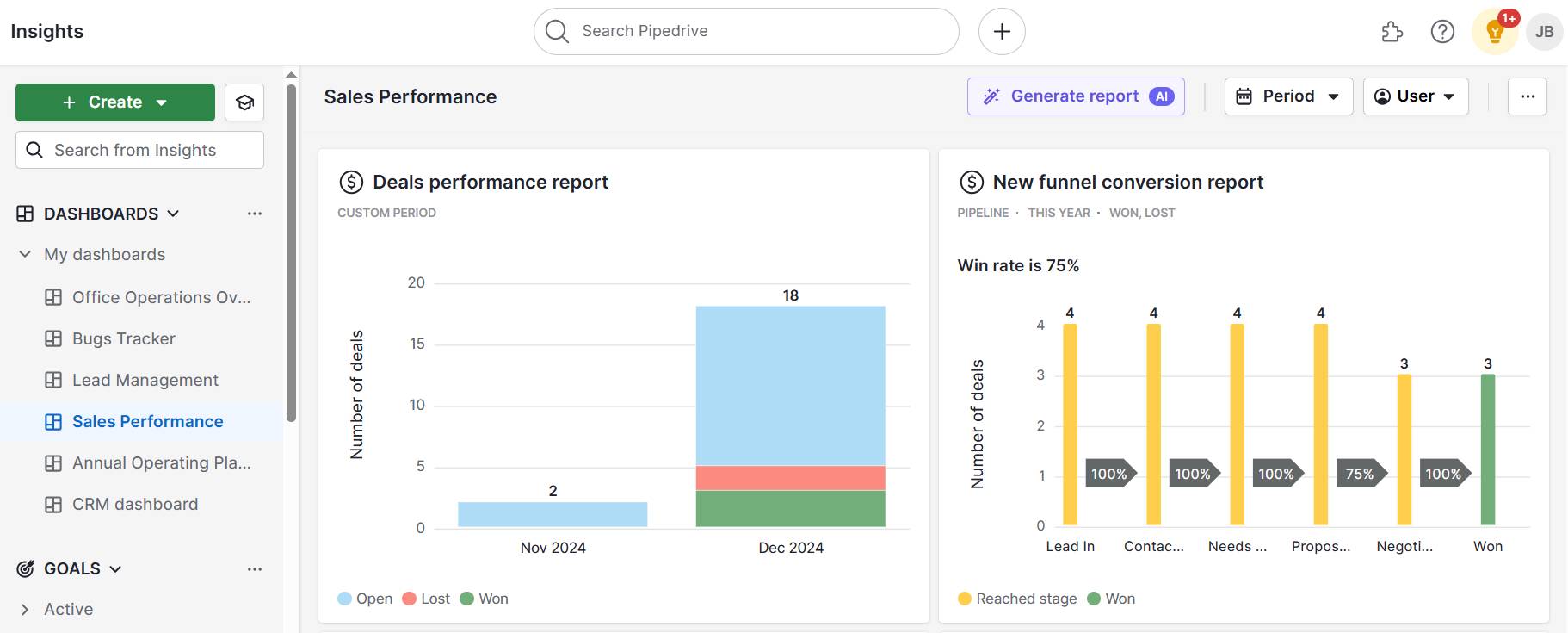
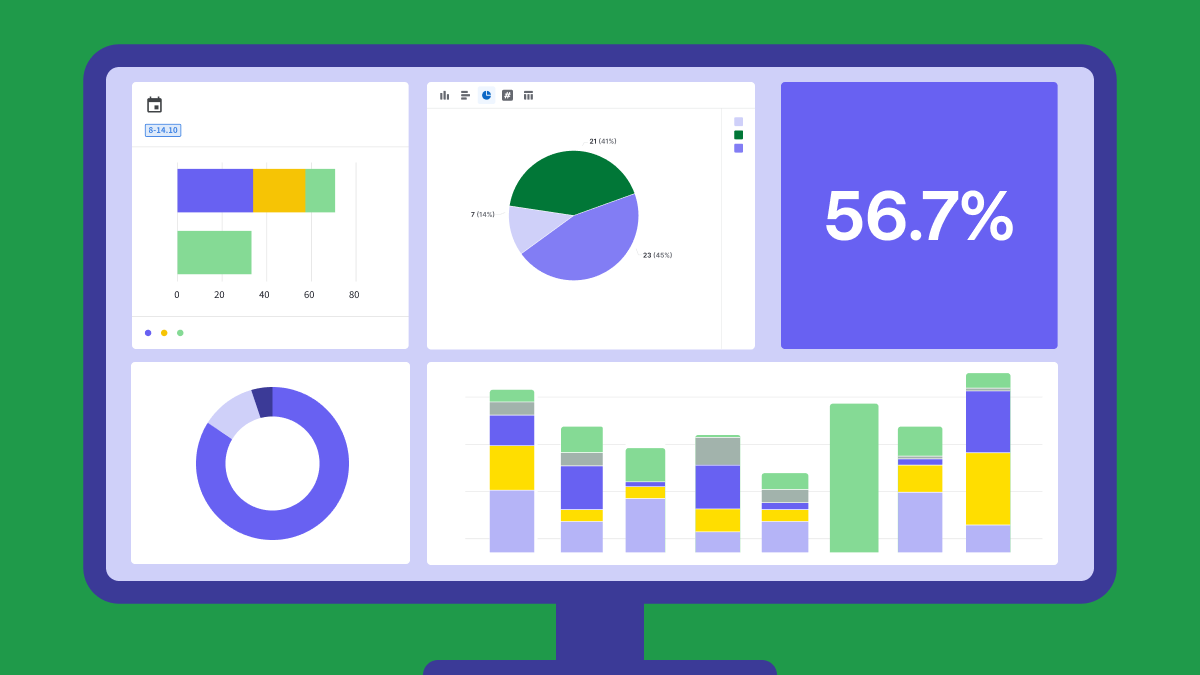
Here’s how the sales and marketing teams can view key performance insights in a Pipedrive dashboard:

Advertising management software Pipedrive dashboard

The marketing team can use this data to refine messaging, while the sales team prioritizes outreach to leads from top-performing campaigns.

2. Skai

Skai (formerly Kenshoo) is an omnichannel marketing platform that helps businesses automate and optimize cross-channel campaigns. The software uses AI-driven insights and cross-channel reporting to allow users to maximize ROAS on multiple platforms.
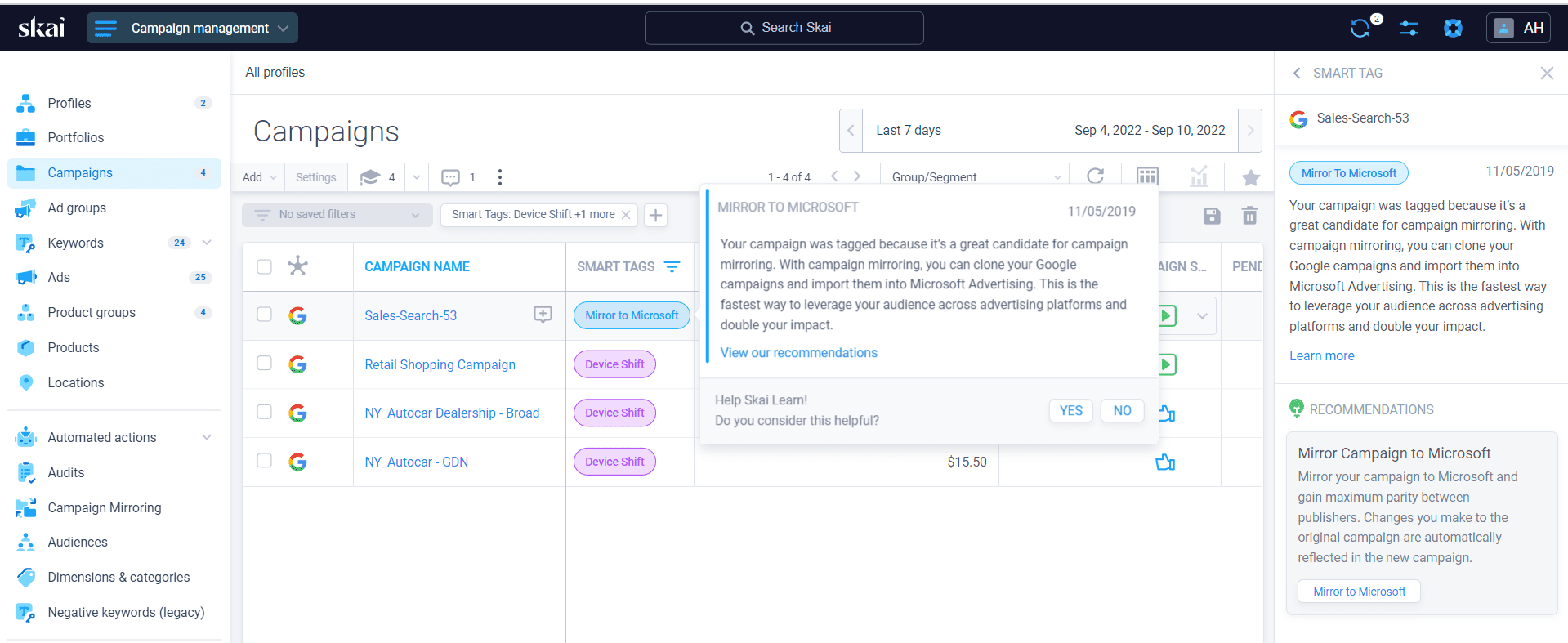
Advertising management software Kenshoo Skai

Here are some of Skai’s key features:

  • AI-powered bid and budget management. Skai uses machine learning to adjust bids and allocate budgets across channels.

  • Advanced audience targeting. The platform lets businesses build precise audience segments, allowing for highly personalized campaigns.

  • Comprehensive reporting and insights. Skai delivers detailed cross-channel reports with actionable insights, helping teams identify top-performing ads, spot trends and fine-tune campaigns.

Skai’s attribution modeling also tracks how different channels work together. For example, it can show how a customer who clicked a Facebook ad later converted after a Google search.

3. Sprout Social

Sprout Social is a social media ad management platform. The software simplifies the creation and management of ads across social media platforms like Facebook, Instagram, X (formerly Twitter) and LinkedIn.

Advertising management software Sprout Social

Here are some of Sprout Social’s core ad management features:

  • Centralized ad campaign management. Sprout Social lets SMBs manage ads across social platforms from a single dashboard, ensuring consistent messaging and performance tracking across channels.

  • Advanced analytics and reporting. The platform offers in-depth analytics for ad campaigns, providing insight into engagement, impressions, click-through rates and conversions.

  • Social listening and audience insights. Users can monitor conversations around their brand or industry to discover trending topics or customer pain points.

Sprout Social’s reports can also track ROI, helping businesses quickly identify underperforming ads and optimize campaigns in real time.

4. Semrush

Semrush is an all-in-one marketing platform that offers advertising management solutions, including paid search and display ads. The software helps SMBs research keywords, create targeted ads and analyze competitors to strengthen digital marketing strategies.
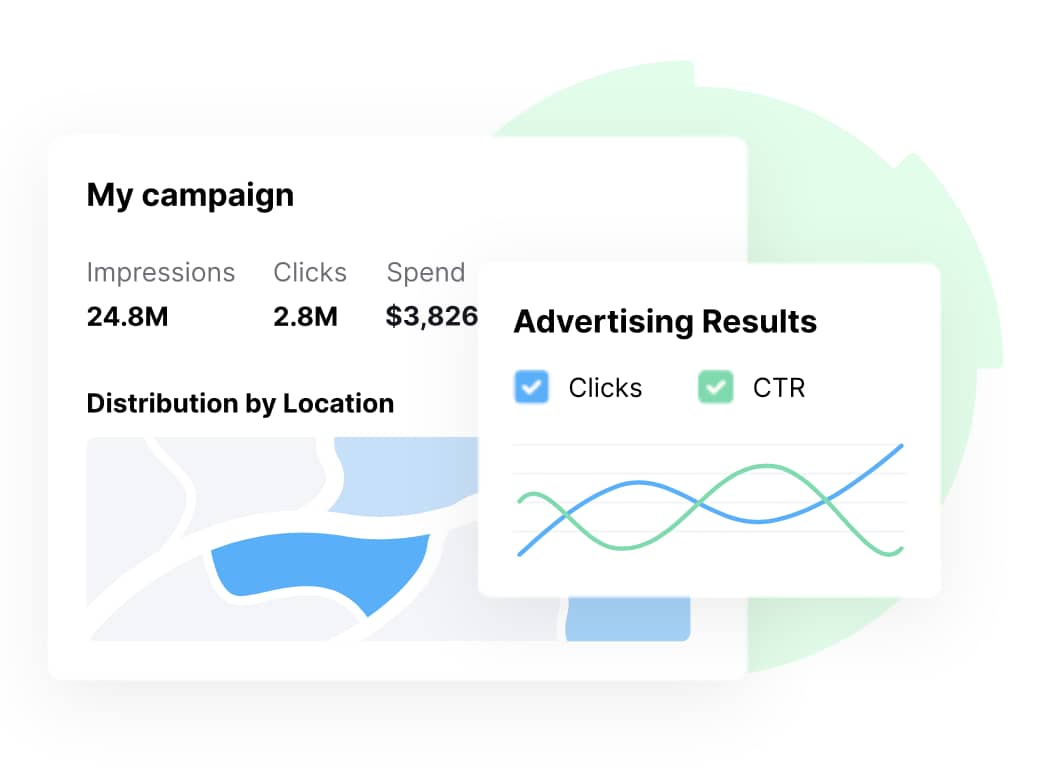
Advertising management software Semrush

Here are some of Semrush’s main digital advertising management features:

  • Keyword research tools. Semrush allows businesses to identify high-performing keywords for paid search campaigns by providing data on search volume, keyword difficulty and cost-per-click (CPC).

  • Competitor ad analysis. The platform offers insights into competitors’ ad strategies, including their target keywords, ad copy and estimated traffic.

  • Ad tracking. Semrush tracks the performance of paid search and display ads, offering metrics such as impressions, clicks, conversions and costs.

These features support more informed decision-making and help SMBs manage advertising efforts in a data-driven, efficient way.

Note: Keywords determine when and where ads appear in search results. By using relevant keywords in ads, businesses ensure ads reach the right audience and avoid wasting budget on irrelevant traffic.

5. WordStream

WordStream is a digital marketing platform that helps businesses manage paid ad campaigns on sites like Google and Facebook. It offers tools for campaign optimization, performance tracking and budget management to improve advertising results.

Advertising management software WordStream

Here are some of its advertising-related features:

  • Smart recommendations and alerts. The platform provides automated suggestions to improve campaigns (such as refining keywords, adjusting budgets or improving ad copy) based on real-time performance.

  • Cross-platform ad reporting. WordStream’s dashboard monitors key metrics like clicks, conversions, CPC and ROAS across multiple ad channels.

  • Automated bidding and budget tools. WordStream monitors key metrics (like clicks, conversions, CPC and ROAS) across multiple ad channels. Businesses can then directly compare performance across different platforms.

These features help businesses optimize ad performance, adjust budgets in real time and maximize the ROI across multiple platforms.

Recommended reading

https://www-cms.pipedriveassets.com/Social-Media-Marketing-2024.png

Social media marketing: Everything small businesses need to know in 2025

What SMBs can achieve when they implement AMS

Advertising platforms help SMBs streamline ad campaign creation, optimization and tracking. Businesses can improve ROI, save time and manage cross-channel efforts without needing extensive resources.

Here are some key advantages:

Improve efficiency

Ad management tools automate tasks like ad creation, scheduling and optimization, saving valuable time. By streamlining these processes, businesses can focus on high-priority activities – like closing more deals.

For example, automation tools can adjust bids, pause underperforming ads or create A/B tests for ad creatives without manual input. Automating these activities leads to smoother workflows and faster execution.

Crush your manual admin with this sales automation guide

Learn how to take advantage of new sales automation tech so you can spend more time selling

Optimize budgets and ad spend

Advertising management software tracks budgets, monitors CPC and optimizes ad spend. These features give SMBs better control of budgets and spending, improving ROI and ensuring optimal ad performance.

For instance, they can set daily or campaign-specific limits, track expenses in real time and ensure ads don’t exceed budget constraints.

Automatically adjusting bids also helps businesses allocate budgets more effectively.

Imagine that an e-commerce business uses AMS software. The platform tracks ad performance across different channels and makes adjustments to improve it.

For example, the software might allocate more budget to a Facebook campaign that generates more conversions while reducing spending on underperforming Google Ads.

Enhance targeting and audience segmentation

Advertising management software allows SMBs to segment audiences based on specific criteria such as demographics, online behaviors and past interactions. As a result, ads reach the most relevant prospects, improving ad relevance and increasing conversion rates.

Think about a business trying to target users who have previously visited the company website but didn’t complete a purchase. With an AMS platform, the business can target these people, leading to more engaging ads that drive higher returns.

Make data-driven decisions

Real-time analytics and reporting provide SMBs with actionable insights into ad performance. Businesses can track key metrics like CTRs, conversions and ROAS, allowing them to make data-driven adjustments to improve results.

Say a campaign’s CPC is higher than expected. A business can use an AMS platform to identify the higher costs and create a solution to reduce CPC. Access to these real-time insights allows businesses to pivot quickly and enhance campaign performance.

Download Your Guide to Sales Performance Measurement

The must-read guide for any sales manager trying to track, forecast and minimize risk. Learn how to scale sales with data-backed decisions.

Manage campaigns across multiple platforms

Many advertising management platforms offer cross-platform functionality. This functionality allows businesses to manage ads from different channels from a single dashboard, making tracking performance and optimizing ads across platforms easier.

For example, a business could adjust ad copy and targeting strategies for Facebook and Instagram campaigns from the same platform. This centralized control lets them create consistent messaging across channels without manually adjusting copy in each platform.

Note: For optimal results, many successful agencies combine their advertising management systems with purpose-built project management software for advertising agencies to create a comprehensive technology stack that supports both client-facing and internal processes.

Is advertising management software right for your business?

Advertising management software can deliver major benefits, but it’s not the right fit for every SMB. These platforms’ complexity, pricing or technical demands may outweigh the value they provide – especially for businesses with simple ad needs or highly specific campaign goals.

Here are some of the challenges SMBs face when using AMS:

Targeting competitive niches

For businesses operating in highly competitive niches (like bespoke services or legal firms), the software may struggle to keep up with the customization and local targeting needed to stay competitive.

These platforms often rely on broad automation rules and may not understand the nuanced search intent that can impact ad sales in these industries.

Without manual control over keyword selection, bidding strategies and messaging, campaigns can underperform or miss key opportunities.

Creating and managing simple ad campaigns

If your business only runs a handful of simple ad campaigns, an AMS platform could introduce unnecessary costs and complexity.

Using native tools within platforms like Google Ads or Facebook Ads may be enough.

In these cases, manual ad management might be the better option.

If you decide to manage ads manually but still want to view ad performance in a single location, you can set up a Google Looker dashboard. These customizable dashboards can track live performance metrics across channels.

Here’s an example of a Google Looker dashboard:

advertising management software Google Looker dashboard

However, dashboard creation requires technical skills like connecting APIs or writing SQL queries.

If you don’t have these technical skills, consider hiring an ad specialist or freelancer to handle setup and management.

Though potentially more expensive up front, hiring an expert often leads to better results, particularly in competitive industries where personalized strategy matters.

SProfessionals know how to use the software effectively, tailoring campaigns that off-the-shelf automation can’t match.

Get organized with your free sales pipeline excel template

Looking for a more streamlined way to manage your sales? Download this free sales pipeline template and test it out now.

If your main goal is to connect ad performance with sales performance (without investing in a full AMS), Pipedrive’s CRM system offers a practical alternative.

By integrating Pipedrive with platforms like Google Ads or Facebook Ads, you can automatically sync leads into your CRM, track where they came from and monitor how they move through the sales pipeline.

These insights give your team visibility into which ads generate high-quality leads, helping you prioritize follow-ups and increase sales.

Recommended reading

https://www-cms.pipedriveassets.com/Why-CRM-is-important.png

Why CRM is critical for business growth and success

Final thoughts

Advertising management software can be valuable for a small business, streamlining ad creation, optimization and performance tracking.

However, the complexity and costs may outweigh the potential benefits for some businesses (especially those with simpler needs or a niche focus).

If your business doesn’t need a full AMS platform but wants to link ad campaigns to real sales results, Pipedrive provides a smart middle ground. The CRM integrates with ad platforms and offers built-in sales tracking, helping you connect marketing efforts to revenue.

Sign up for a free trial to see how Pipedrive simplifies lead management and ad optimization.

June 10 service interruption: What broke and how we fixed it

Software Stack Editor · June 19, 2025 ·

image

We know you count on Pipedrive to get work done and when it’s not working, it gets in your way. That’s on us. We’re truly sorry for the disruption on June 10.

This wasn’t just a blip. It was a serious incident, and we’ve been digging deep to fully understand what went wrong and, more importantly, how to prevent it from happening again. Our teams moved fast to fix the issue and now we’re focused on tightening up the right parts of our system and learning from where we got stuck.

At Pipedrive, we aim to keep things simple and dependable, a tool you can trust to do its job every day.

Thank you for your trust in us. We’re committed to learning from this and doing better and are grateful to have you with us.

– Paulo Cunha, CEO of Pipedrive

Best Sales Pricing Strategy Examples

Software Stack Editor · June 18, 2025 ·

Getting your pricing right is one of the most important business decisions you’ll ever make. It affects everything from product perception and sales volumes to customer loyalty and your bottom line.

This guide explores common sales pricing strategies, who they’re best suited for and how to choose the right one based on your goals, market and customers.

What is a price strategy (and why is it important)?

A sales pricing strategy is a structured plan for setting and adjusting prices over time to meet business goals.

More than just picking numbers to get more revenue, pricing influences how customers view your product, how you compete in the market and how you hit your sales targets.

A strong pricing strategy in marketing or sales helps you stand out, attract the right buyers and scale sustainably. A poor one will erode profit margins and push customers toward competitors.

For example, if you price too low in a premium market, buyers will assume your product lacks quality and look elsewhere. If you price too high in a budget market, your audience will choose cheaper alternatives.

The best pricing strategies aren’t fixed; they evolve with their products and markets. Building a great one means thinking beyond immediate costs to consider the broader picture.

Here are the main factors that shape your sales pricing strategy:

  • Market conditions – such as market saturation, size of sales potential, price elasticity and broader economic trends. These factors set the context for what your customers will accept.

  • Competitive landscape – including your position relative to rivals, competitors’ unique selling propositions (USPs) and the market price sensitivity level. The competitive landscape also considers how easy it is for customers to switch.

  • Brand positioning – your desired market position, perceived quality and brand image all influence how much new customers are willing to pay (i.e., the level of buyer or consumer demand).

  • Target audience – their purchasing power, expectations and the strength of any network effects (e.g., value growing with more users to unlock price increases).

  • Product characteristics – including your production volume, stage in the product lifecycle and potential for cost efficiencies or scalability.

Once you’ve weighed these factors, you’ll see which pricing approach fits best.

Sometimes, that might mean going low to win market share quickly. In others, it could mean charging more to signal higher value.

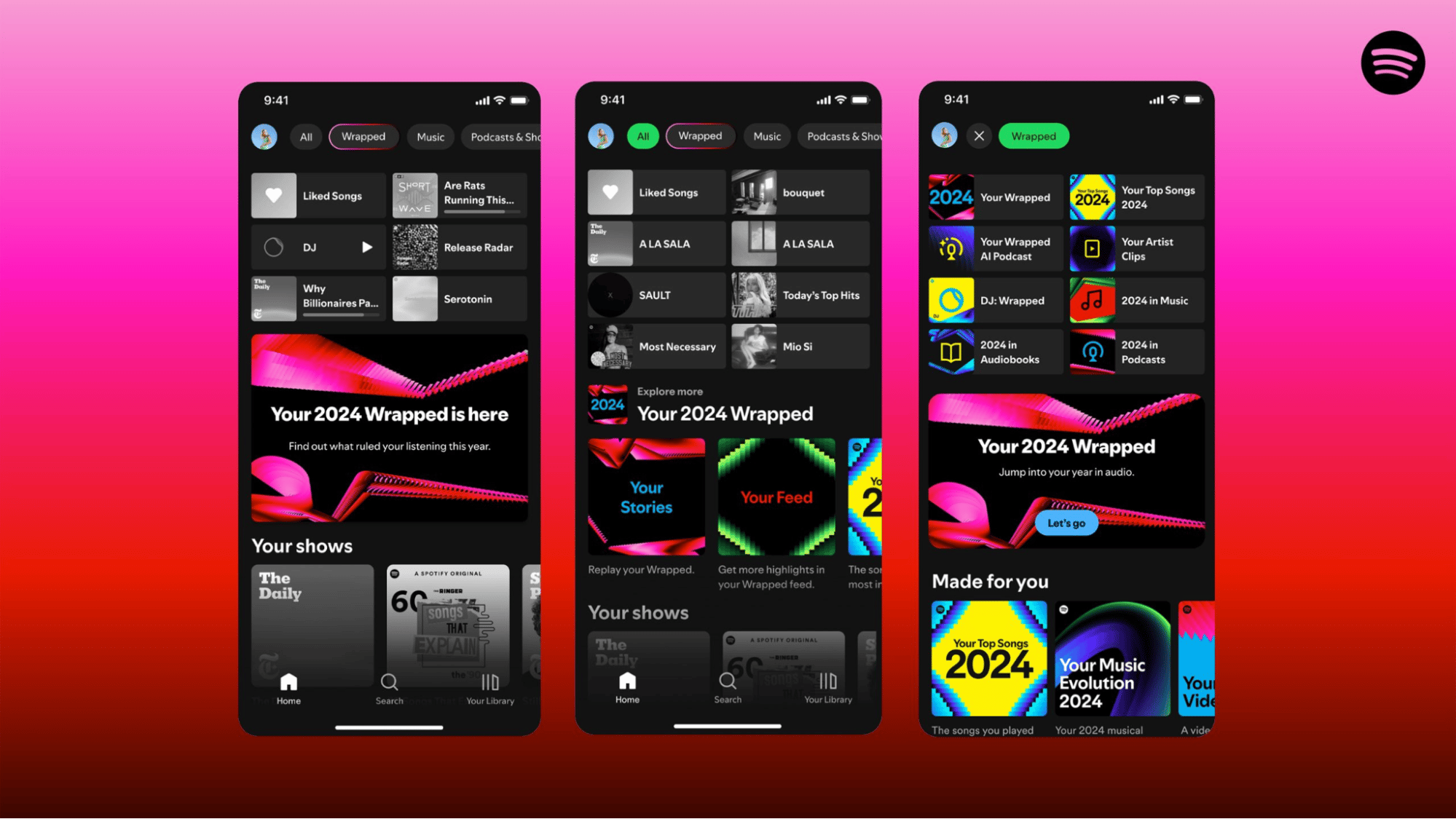
For example, Spotify offers a free plan and promotes “music for everyone”. The company prioritizes market share by targeting a broad audience with a simple, accessible service.

Here’s how it looks in search results (part of its content marketing):

Sales pricing strategy Spotify search result

TIDAL, a competitor, only offers paid plans and advertises “high-fidelity music streaming”. It aims to be the premium option and targets a narrower audience of DJs and audiophiles.

Here’s how TIDAL shows up in search results:

Sales pricing strategy TIDAL search result

Both companies successfully target customers with thoughtful price strategies and marketing content.

Key questions you should ask yourself:

  • Do you want to take over price leadership in the long term as a market leader and set the framework for competition?

  • Do you want to create market entry barriers for subsequent competitors?

  • How should you react to new competition, changing market trends and technological innovations with your pricing?

These are just a few pain points to consider when you choose a pricing strategy. As you can see, you shouldn’t only set it once. Keep it continuously in view and check its relevance.

Recommended reading

https://www-cms.pipedriveassets.com/Microeconomics.png

A small business owner’s guide to microeconomics

7 pricing strategy examples to consider

There’s no one-size-fits-all approach to pricing. The right choice depends on your product, target market and performance objectives.

Some sales and marketing price strategies focus on launching fast and gaining as much business as possible. Others aim to build long-term value and reinforce a premium brand position. Neither is better nor worse than the other – they just fit different scenarios.

Here are seven competitive pricing strategies in use today, including their benefits, challenges and who they’re best for.

1. Skimming pricing strategy

The skimming strategy starts with a high initial price that decreases over time.

This approach allows you to target each buyer segment sequentially, starting with early adopters willing to pay more for access and moving to more price-sensitive customers later.

This strategy works best for new, innovative or in-demand products with few immediate competitors.

For example, a new SaaS platform with unique AI functionality might launch at a higher subscription price before dropping to attract small businesses.

Challenge: During the early high-price phase, competitors with similar products may capture a portion of your target market with lower-priced alternative offers. By undercutting you, they may cause you to lose momentum before you’ve reached a broader audience.

2. Penetration pricing strategy

Penetration pricing flips the price-skimming approach (see the graph below). You start with a low initial price to win attention, attract early customers and quickly gain market share.

Once your offer is firmly established and competition has been thwarted, you can raise markups to increase profit. Here’s a visual representation of how penetration and price skimming contrast:

Sales pricing strategy penetration pricing graph

Penetration pricing is useful in crowded or mature markets where low pricing will help you stand out or deter new challengers. For example, a graphic design tool offering competitive features at a much lower price might use penetration pricing to break into an established category.

Challenge: Your brand might become associated with poor quality due to the initial low prices. Additionally, fierce price wars (sparked by others drastically cutting their costs to compete) could drive down margins across the board.

3. Fixed pricing strategy

Fixed pricing means setting prices relative to the market you’re operating in.

Depending on your goals and positioning, your fixed pricing could be higher (i.e., premium), lower (budget) or around the average (mid-market).

Premium pricing

A premium pricing strategy sets high prices and anticipates a lower sales volume. It is based on differentiation and distinction from the competition through higher quality, superior benefits and strong USPs.

Brand management is also crucial here. You can achieve a willingness to pay higher prices by delivering a better customer experience and not just by developing new product features.

Best for: Brands targeting high-income consumers or niche markets where quality and exclusivity matter most (e.g., luxury goods, innovative tech).

Budget pricing

A low-price strategy (or economy pricing) increases sales volume through lower prices.

Margins here are thin, and brand perception may need to take a back seat. It takes tight cost control and lots of sales to stay profitable at scale.

Best for: Price-sensitive markets or businesses competing on volume (e.g., discount retailers, bulk suppliers).

Mid-market pricing

Many small businesses position their offerings near the average price, achieving a medium margin at a medium sales volume.

If you use this and competitors’ prices drop, you’ll need to follow suit to protect deals, but doing that could hurt your margins.

Best for: Companies aiming for steady growth with moderate pricing in competitive, mainstream markets.

Challenge: Fixed pricing puts you at the mercy of the market average. Fluctuations in that equilibrium price make fixed strategies harder to maintain and can quickly erode profit margins if you’re unprepared. You may need to adjust your prices frequently or risk being undercut by competitors with lower-priced offerings.

4. Luxury pricing strategy

Luxury pricing defies classic supply-and-demand laws by setting high prices to make products more attractive to potential customers. Higher prices are used as a kind of benefit because they convey prestige and status.

This strategy is common in high-end markets like art and jewelry. It relies on buyers seeing price as a form of exclusivity (and having the money to spend), which only works when the product has status connotations. Classic examples are rare paintings and Rolex watches.

Challenge: Your brand must convey the right signals, like trust, high-quality craftsmanship and exclusivity to engage select audiences who associate price with status. Otherwise, you risk making your offer seem overpriced or inaccessible rather than desirable.

5. Price competition strategy

Price competition means closely tracking the market leader’s pricing and matching or undercutting it to capture market share. You might follow the dominant price point or act as a challenger seller trying to disrupt the space.

For example, retailer Aldi claims to offer the “lowest prices of any national grocery store”:

Sales pricing strategy Aldi pricing advertisement

This claim is part of Aldi’s price competition strategy and a bold attempt to disrupt the U.S. grocery market, having entered as a challenger from Germany.

Price competition suits companies in highly commoditized or competitive markets. For example, cloud storage firms often compete on price per gigabyte because their core features are similar, buyers are highly cost-sensitive and users can easily switch providers.

Challenge: Mutual undercutting can significantly deteriorate a previously profitable market if too many competitors get involved. It creates a race to the bottom that makes the entire market unsustainable.

6. Price differentiation strategy

Price differentiation means that you adapt pricing based on buyer, context or volume instead of offering one fixed cost.

This flexible approach suits companies with diverse customer segments, like travel, hospitality, publishing and B2B services firms. It helps them maximize revenue across different groups and contexts without making catch-all pricing decisions.

Common types of price differentiation include:

  • Geographical differentiation. You define prices for different regions. Typical examples include different prices for books and press products in different American states. Local economics often guide this.

  • Personal differentiation. Members of certain groups pay different prices. Examples include discounts for students (like Amazon offers) or rates for disability insurance, which can be prohibitively expensive for professions like pilots or mountain guides.

  • Seasonal differentiation. Products cost more when market demand is high. For example, travel and hotel rooms are much more expensive during the peak season than off-peak.

  • Volume-based differentiation. Customers pay according to the amount or number purchased. By offering lower prices for larger orders, companies can pass the cost savings directly to their customers.

Challenge: Companies must ensure that the cost savings from larger orders outweigh any price reductions offered elsewhere. Managing multiple price points also adds operational complexity. You’ll need clear rules and strong systems to stay organized.

7. Target cost pricing strategy

Target cost pricing works similarly to price differentiation. However, here you determine what each customer will pay and try to achieve the maximum from each individual. It’s a dynamic pricing strategy, and also a form of value-based pricing.

The selling price of a product varies for different customers depending on their needs, readiness to pay and negotiating skills.

Target cost pricing is best suited to industries where sellers offer highly tailored solutions and pricing isn’t typically public, like professional services and consulting. For example, some business owners and coaches use this real-time pricing tactic to sell costly consulting programs.

Challenge: Customers may perceive pricing as unfair or discriminatory, potentially harming long-term customer relationships and brand reputation, especially if pricing details become known between clients.

Recommended reading

https://www-cms.pipedriveassets.com/Win-Win-Situation.jpg

Win-win situations in sales: creating value for both sides

How to choose the right pricing strategy

The right pricing structure depends on your market, customers and goals. Choosing requires some simple market research.

Start by asking:

  • Who are you selling to and what matters most to them (e.g. price, quality, speed, support)?

  • How unique is your offer?

  • Do you want to grow fast or build long-term value?

  • How sensitive is your audience to price changes?

Ultimately, your strategy should match your position in the market.

New entrants looking to build customer bases often use penetration price strategies, for example.

Established brands with strong recognition might use premium or skimming models to protect margins.

Price competition or volume-based differentiation can help you stay relevant in highly competitive spaces.

There’s no perfect formula, but by thinking about your goals, product and audience, you can choose a strategy that supports growth without damaging your brand or bottom line.

Recommended reading

https://www-cms.pipedriveassets.com/Unique-Selling-Proposition.png

Unique selling proposition: Definition, guide and examples

Effective pricing strategy options: a quick comparison

Got some ideas but in a rush?

Here’s a quick comparison of common pricing strategies, including when they work best and what to watch out for.

Strategy

Details

Skimming pricing strategy

Price level: High transitioning to lower

Best for: Innovative or in-demand products

Challenge: Competitors may undercut before prices drop

Penetration pricing strategy

Price level: Low transitioning to higher

Best for: New entrants seeking fast growth

Challenge: Brand may be seen as low quality, risk of price wars

Fixed pricing strategy (premium)

Price level: High

Best for: Differentiated offers with strong competitive advantages

Challenge: Must justify higher price or risk losing customers

Fixed pricing strategy (mid-market)

Price level: Medium

Best for: Broad appeal with steady margins

Challenge: Market shifts can erode markets or cause undercutting

Fixed pricing strategy (budget)

Price level: Low

Best for: High-volume sales with tight cost control

Challenge: Thin margins, brand perception may suffer

Luxury pricing strategy

Price level: Very high

Best for: Status-driven or niche markets

Challenge: Only works if brand signals exclusivity and value

Price competition strategy

Price level: Low or matched to the market leader

Best for: Commoditized markets or challenger brands

Challenge: Can trigger a market-damaging race to the bottom

Price differentiation strategy

Price level: Varies by buyer group

Best for: Broad or segmented audiences

Challenge: Complex to manage, risk of inconsistent margins

Target cost pricing strategy

Price level: Varies by customer

Best for: Bespoke or high-touch offers (e.g., consulting)

Challenge: Can appear unfair or inconsistent if exposed

Our comparison table is a simple starting point, but the best pricing method aligns with your goals, market and customers, all of which could change as your business evolves.

Revisit your pricing strategy annually or quarterly to ensure it remains competitive, profitable and meets buyer expectations.

Note: Other pricing models, like cost-plus pricing, bundle pricing, freemium pricing, psychological pricing and loss leader tactics, can also be effective, especially in e-commerce or high-volume markets. However, these approaches tend to be more niche or situational, so we’ve focused our guide on the most broadly relevant pricing strategies.

Final thoughts

Proper pricing is crucial to a business’s success and competitiveness.

However, you must consider several factors: the market, overhead costs (i.e., production costs), your target group, your offering’s strengths and your positioning.

With this information, you can select from different pricing strategies. Strategic brand management is not just a complement to your pricing strategy but an integral component. Strong brand messaging can elevate the perceived value of your products or services, increasing profitability by allowing for higher markup pricing.

9 steps to creating the perfect sales strategy (with free template)

In this handbook, we’ll walk you through what your sales strategy needs, plus there’s a free strategy template to get you started!

The Definitive Customer Service Management Guide

Software Stack Editor · June 17, 2025 ·

Strong customer service management can build trust and loyalty with buyers, leading to repeat business and advocacy. However, providing a top-notch customer experience doesn’t happen by accident.

In this article, you’ll learn how to exceed customer service targets with a five-step practical strategy and the right technology.

What is customer service management?

Customer service management (CSM) oversees and improves how your business supports buyers before, during and after a purchase.

These activities work together to provide an excellent customer experience (CX) that encourages sales and helps retain long-term clients.

For instance, you may train agents to use a mix of support services (e.g., phone calls, chatbots and live chat) to quickly resolve customer issues. This coordinated approach reduces churn and boosts contract renewals.

While CSM typically focuses on post-sale tasks, it also plays a role before someone becomes a customer (e.g., answering questions, providing demos or guiding decision-making).

For example, CSM includes daily activities like:

By streamlining workflows and tracking key metrics, CSM helps teams deliver consistently high-quality support.

Recommended reading

https://www-cms.pipedriveassets.com/AI-customer-service-guide-for-SMBs.png

The SMB owner’s guide to AI customer service

What are the benefits of customer service management?

Providing the best possible buying and post-sale experience helps your business in multiple ways. For example, according to Zendesk research, great customer service encourages 75% of consumers to spend more.

Here are some ways managing customer service benefits your organization.

Keeps customers happier with a consistent CX

Coordinating all customer care tasks ensures buyers get quick, accurate help every time. This consistency builds trust and keeps people coming back.

For example, technology can prioritize support tickets based on urgency and assign issues to the right team member, ensuring no query slips through the cracks.

A Hyken study found that for 48% of people, great customer service matters more than price, making consistency a competitive edge.

Boosts team efficiency

CSM optimizes workflows and automates routine tasks, so support reps spend less time juggling tickets and more time solving problems.

Faster, more accurate responses reduce the chances customers need to reach out again for the same issue. Get this wrong two or three times, and Coveo research suggests people will likely abandon your brand.

Supporting your team with the right customer service processes, data and technology empowers them to deliver the best interactions without burning out.

Provides clear insights to improve service quality

Tracking performance metrics and satisfaction scores helps you spot trends, identify bottlenecks and fix issues before they escalate. These insights also reveal opportunities (e.g., introducing relevant upsell offers) by helping you understand customer needs better.

For example, monitoring average resolution time (ART) can suggest that certain reps need more support or that processes need improvement.

With these insights, you can adjust your tactics and organize training to keep service levels high.

Recommended reading

https://www-cms.pipedriveassets.com/Types-of-Customer-Service.jpg

9 Types of customer service: Pros, cons and when to choose each one

5 ways to create an effective customer service management strategy

Customer-facing teams need the right tools, systems and processes to deliver effective service. They also need a leader who can motivate them.

Here are five top tips for building and managing excellent customer service operations.

1. Be transparent with your team

Transparency means keeping your team informed about goals, challenges, performance expectations and changes that affect their work. It builds trust and reduces confusion.

People respond well to open communication. According to Gallup research, 70% of team engagement depends on the manager’s behavior. Your team will be more motivated and productive when you’re transparent and supportive.

Here’s what transparency looks like in customer service management:

  • Explain decisions. Talking through decisions with your team encourages them to get on board. For example, explaining why you’ve switched customer service software could help them embrace a new tool.

  • Request 360-feedback. When everyone constructively delivers feedback, people gain valuable insights into how their work affects others. A culture of growth and accountability leads to stronger teamwork and continuous improvement.

  • Ask questions. Asking clarifying questions demonstrates it’s okay to be unsure and request more information. Team members will learn it’s safe to double-check facts, preventing miscommunication.

When teams understand the bigger picture, they’re more likely to stay engaged and motivated.

2. Use rewards and recognition to motivate

Celebrating wins through praise, shout-outs or incentives reinforces good performance and shows your team their efforts matter.

Consistently finding ways to motivate can be challenging with so many other jobs to complete. However, it’s essential for maintaining a positive work environment.

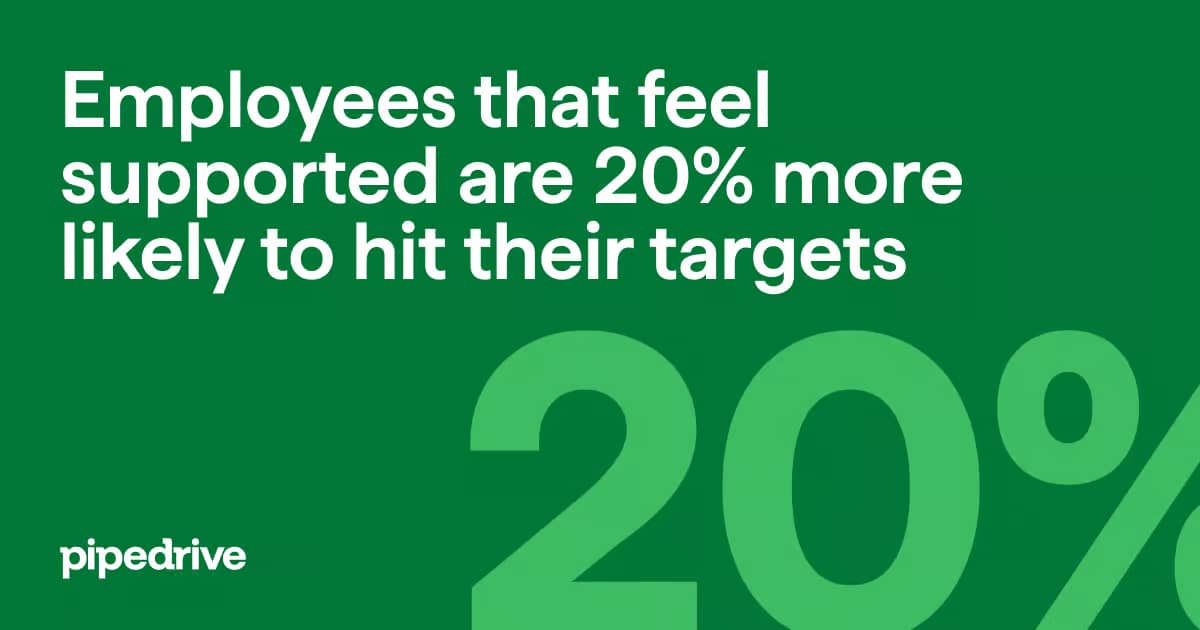
Make sure team members know you support them and want them to succeed. Pipedrive research suggests that actively boosting your colleagues creates an ambitious workforce that’s 20% more likely to hit its goals.

Employee support

Here’s how to motivate, reward and support your team:

  • Set achievable goals. Break down difficult targets into manageable objectives to tackle each day or week. Use gamification tactics (e.g., competition or point-scoring) to increase participation and engagement.

  • Personalize rewards. Remember that everyone is unique. An introverted team member may appreciate a private thank you, while an extroverted employee might prefer public praise.

  • Be creative with rewards. Many people are motivated by bonuses and commissions, but not every company can afford big financial incentives. Instead of forgoing rewards, offer paid time off, restaurant vouchers and more.

Regular recognition boosts morale and reinforces great performance. Even small gestures show your team their work matters.

Download your guide to managing teams and scaling sales

The blueprint you need to find a team of superstars and build a strong foundation for lasting sales success

3. Learn to handle busy periods and difficult situations

Give your team the right tools, training and processes to stay calm and effective during high ticket volume or when dealing with upset customers.

Excellent customer service management addresses common internal issues while maintaining a flawless CXe. For example, you may be short-staffed, but still need to handle customer problems promptly.

Here are a few customer service strategies to demonstrate leadership when busy periods or difficult situations arise:

  • Reschedule tasks. Learn to prioritize immediate customer requests and postpone less important meetings.

  • Delegate tasks to the relevant departments. Some issues may be better suited to another team. For example, route a complaint about a recent social media campaign to marketing.

  • Use technology to meet service goals. Investing in technology (chatbots, live chat, etc.) streamlines workflows for your support team.

How your team handles pressure directly impacts customer satisfaction and team morale. A well-prepared team can stay productive and turn tough moments into opportunities to impress.

4. Help your remote teams work efficiently

Set up tools and processes that keep team members aligned and productive, regardless of location.

Without structure and support, remote teams may feel disconnected or overwhelmed. With the right systems and communication channels, they’ll collaborate better and deliver great service.

For example, you could use tools like:

  • Slack for quick check-ins

  • Zoom for real-time team meetings

  • A shared help desk dashboard to track ticket status

If it’s been a while, check in and address any issues preventing them from delivering the best experience. Helping everyone stay in sync reduces miscommunication.

Here are some examples of questions to ask remote teams:

  • Is there anything you struggle with when it comes to your work?

  • Are the tools familiar and easy to use?

  • Do you feel like your workload is manageable?

  • Would you benefit from more regular or less regular meetings?

With team feedback, leaders can create a strategy to simultaneously improve the employee experience and service delivery.

5. Invest in ongoing training and development

Keep your team’s skills sharp to ensure they handle issues confidently and stay updated with changing customer expectations. Ongoing training and development should focus on product updates, communication skills and using new tools effectively.

For example, you may notice longer ticket resolution times after a major product update. In response, you roll out short weekly training sessions and create a searchable knowledge base to improve metrics.

Customer service is always evolving. Teams that keep learning stay more adaptable and confident. These improved skills lead to more consistent customer interactions with lower response times.

Employees want to learn. According to PwC research, 77% of workers are keen to adapt to new ways of working. Some 72% are also excited about learning and growing within their roles.

Customer service PwC report

To keep your customer service team confident and capable, make learning part of their weekly workflows.

Here’s how to invest in your team’s development:

  • Schedule short, regular training sessions (even 15–30 mins can make a difference)

  • Encourage peer-to-peer learning and knowledge sharing

  • Keep a central hub with updated frequently asked questions (FAQs), product information and service guidelines

  • Offer clear development paths for reps who want to grow into new roles

  • Use customer data and feedback to spot training gaps and improve sessions

Ongoing training keeps your team sharp, service consistent and customers happy. When reps are confident in their knowledge, they handle issues faster with more empathy.

Recommended reading

https://www-cms.pipedriveassets.com/Sales-as-a-Service.jpg

Revolutionizing customer experience: Sales as a service

How to reach your customer service goals with technology

Using the right technology helps you streamline support, improve response times and consistently meet customer service goals.

Software implementation is a growing priority for many teams. Pipedrive’s research also suggests that companies have invested more in technology in recent years (despite economic struggles).

Here are some ways business owners implement tools to make customer service management more efficient.

Use live chat and chatbots

Chat functions direct customers to knowledge base resources, collect customer information and even assign them to a rep. Handling these lower-level requests takes the pressure off staff in busy periods.

Chatbots are virtual agents that simulate human conversations, typically with text messages. They use customer feedback and conditional logic to complete simple tasks such as:

  • Checking shipping updates and order statuses

  • Troubleshooting simple problems

  • Redirecting customers to self-service options, such as FAQs

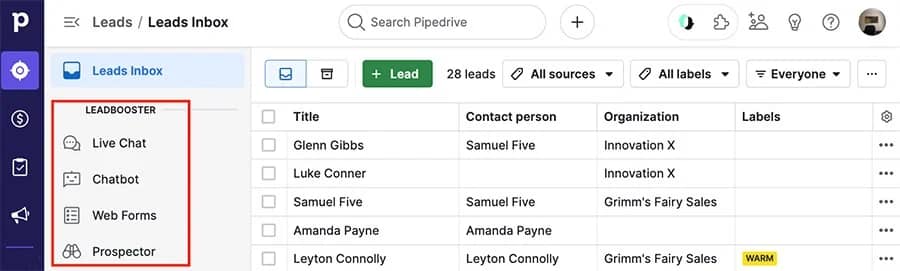
Chatbots also help support agents approach situations with the information they need to resolve queries quickly.

For example, Pipedrive offers a customizable combination of a Chatbot and Live Chat for quick, convenient service.

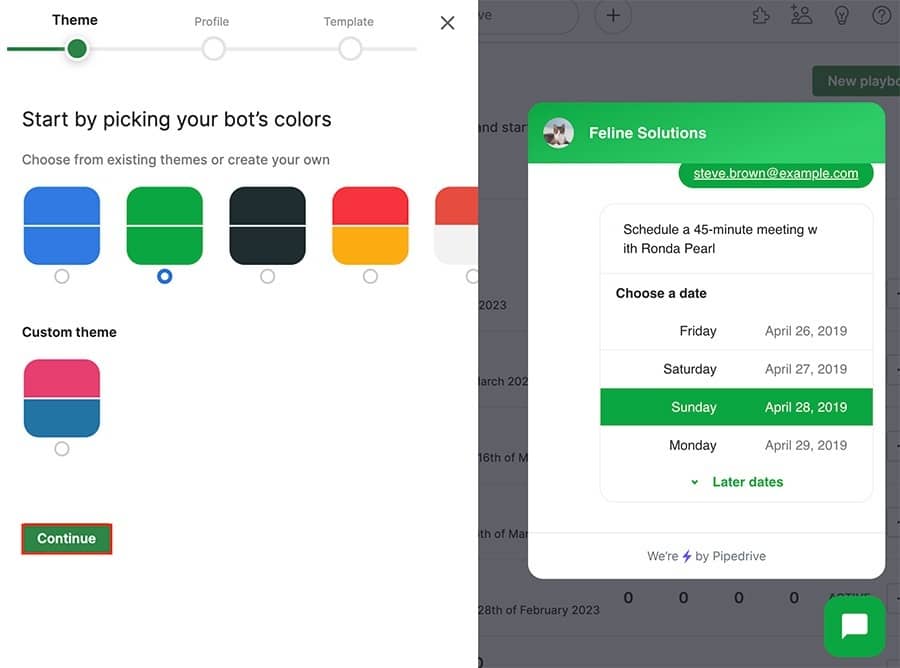
Tailor Chatbot’s playbook template on each page of your website, offering customers different responses to help with different intentions:

Customizable chatbot

For example, if your customer engages Chatbot on:

  • The FAQ page, set it to pull up an answer they might be looking for

  • A product troubleshooting page, you’ll know they haven’t found a self-service answer, so Chatbot can direct them to a rep more quickly

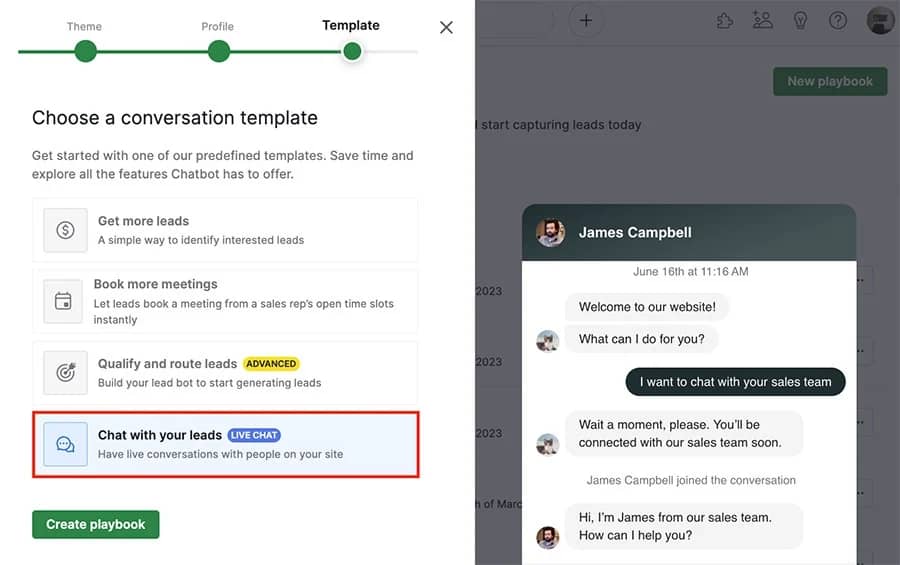
When someone is ready to speak virtually with team members on other customer service channels, they can request Live Chat:

Customer service Live chat

When this happens, your customer service team receives a notification to react quickly and improve conversion rates.

Automatically schedule meetings

Scheduling software allows you to automatically set up meetings and free up time for more strategic activities. It cuts down on back-and-forth emails, reduces no-shows and ensures customers get help faster.

When scheduling is seamless, your team can focus on solving problems instead of managing calendars.

For example, Pipedrive’s Scheduler tool helps customer service teams share meeting availability and syncs everyone’s calendars:

Automatic Scheduler Tool

Agents can propose specific times or available slots while managing appointment times in a calendar view.

Collect data and view trends

Data collection and trends offer valuable information on specific performance targets and improvement areas.

Fixing these issues (e.g., high ticket volume on certain topics or slow response times during peak hours) helps you improve workflows, allocate resources better and deliver a smoother customer service experience.

By regularly reviewing metrics (you’ll learn which in a couple of sections), your team can make smarter decisions and avoid recurring problems.

Tracking every activity with your CRM allows you to:

  • Remove the daily busywork. Automate as many workflows as possible to free up reps and the management team.

  • Make informed, data-driven decisions. Automatically view trends with visualized pipelines, graphs and charts without scanning a spreadsheet.

  • Track individual performance. View and compare individual data from customer service agents. Measure key performance indicators (KPIs) and create goals to keep standards high.

For example, Pipedrive’s CRM dashboard allows you to generate visual reports that make data easy to understand.

Customize your dashboard with variable report block sizes and configurations. Filter data by periods and individual users or teams.

Customer service Pipedrive report

You can also rearrange report blocks to view them in your preferred order. To do this, hover over the report, click the move icon in the top right corner and drag it to the desired location.

The higher your pricing plan, the more datasets, trends or visualizations you can create.

Use automation to proactively solve common issues

Automation helps you anticipate customer inquiries and deliver helpful information before they have to ask for it. Being proactive saves your support team’s time while offering faster answers.

Let’s say a new user is struggling to update their payment card details. Automated welcome emails with onboarding tips (like how to update billing details) solve the issue before it becomes a ticket.

Pipedrive’s Campaigns makes it easy to build and automate helpful communication:

Craft automated emails, manage content and access sales and marketing data all within your Pipedrive account.

As everything lives under one digital roof, you can monitor campaigns and keep communication consistent.

Use omnichannel workflow management

Omnichannel workflow management allows businesses to connect customer support tickets across multiple channels (usually through a contact center).

Accessing all available information across multiple touchpoints prepares teams to provide better customer service.

For example, a buyer may first reach out via social media before speaking with a call center agent. With an omnichannel approach, the whole team can see previous support messages, get up to speed quickly and address that person’s needs.

Here are some tips to get the most out of omnichannel management:

  • Choose tools that integrate with your CRM system so you log all communication in one place

  • Train agents on how to navigate and use cross-channel history effectively

  • Set up automatic ticket tagging and routing based on channel or topic

  • Map your customer journey and optimize touchpoints for speed and consistency

Support teams can resolve issues more quickly and accurately when they have full visibility into past interactions.

Track crucial customer service metrics

Customer service metrics (e.g., response times, customer retention rates and satisfaction scores) measure your team’s performance using clear, consistent data.

This data helps you spot trends, prevent issues from escalating and make smarter decisions that benefit your team and your customers.

Other typical customer service metrics include:

Customer satisfaction (CSAT) score

Quantifies how happy customers are with your company’s products, services or interactions.

Net Promoter Score (NPS)

Measures customer loyalty by asking how likely someone is to recommend your company.

Ticket volume

Counts the number of incoming support requests over a specific period.

Ticket backlog

Tracks how many unresolved tickets are currently pending.

First contact resolution (FCR)

Measures how often you resolve issues in a single interaction without needing follow-up.

Customer effort score (CES)

Shows how easy or difficult it was for a customer to get their issue resolved.

Escalation rate

Measures how often customer service representatives need to pass issues to senior staff or other departments.

Customer engagement score

Highlights how engaged a customer is with your service.

To run a high-performing support team, you need visibility. Metrics give you the insight to act before problems grow.

Here’s how to implement them effectively:

  • Start with the basics – track response time, resolution time, ticket volume and CSAT

  • Set clear benchmarks – define what success looks like for your team

  • Use dashboards – visual tools (like Pipedrive) make it easier to spot trends and stay on top of changes

  • Review regularly – weekly or monthly check-ins help you stay agile and improve consistently

  • Take action on insights – use what you learn to train your team, fix workflows and improve service

Tracking the right metrics helps you move from reactive to proactive support. When you understand what’s happening behind the scenes, you’ll lead your team more effectively and keep customers happier.

Customer service management FAQs

  • Good customer service management is crucial for businesses:

    It helps you respond to queries promptly and address customer complaints more effectively.

    It provides a competitive advantage, especially if you offer support in time zones or languages your competitors don’t.

    Gleaning regular insights and feedback also helps you improve products to encourage more sales.

  • Providing good customer service supports your business needs by improving efficiency and driving revenue growth.

    Some of the key benefits include enhanced brand reputation, positive word-of-mouth marketing and increased referrals.

    The happier and more loyal customers are, the more leads you’ll convert and the more money you’ll make.

  • To create exceptional customer service, focus on:

    • Understanding customer problems and needs deeply

    • Responding quickly to customer questions with empathy

    • Creating personalized experiences and interactions

    • Proactively problem-solving

    • Teach reps skills like active listening and showing empathy

    Consistently training your team and using feedback to improve helps you exceed expectations and positively impact your bottom line.

Final thoughts

Customer service management is crucial for delivering exceptional support that keeps buyers happy and loyal.

While all customer service managers sometimes struggle with day-to-day operations, deploying the right strategies and technologies is key to maintaining customer relationships.

Try Pipedrive free for 14 days to centralize your data, automate communications and start exceeding customer expectations.

The Essential Content Hub Guide

Software Stack Editor · June 17, 2025 ·

A compelling digital marketing strategy needs a persistent source of high-quality content. Creating, organizing and effectively distributing those resources from one place aligns your team and helps searchers find and act on the information they need.

In this article, you’ll learn five steps to create a content hub that attracts and engages more of your target customers.

What is a content hub?

A content hub is a central, organized space on your website where all sales and marketing resources live. Your audience can find content on specific topics or themes all in one place.

A content hub is a strategic tool for small and medium-sized businesses (SMBs). These libraries help build trust by showing expertise and supporting the buyer journey with helpful, relevant resources.

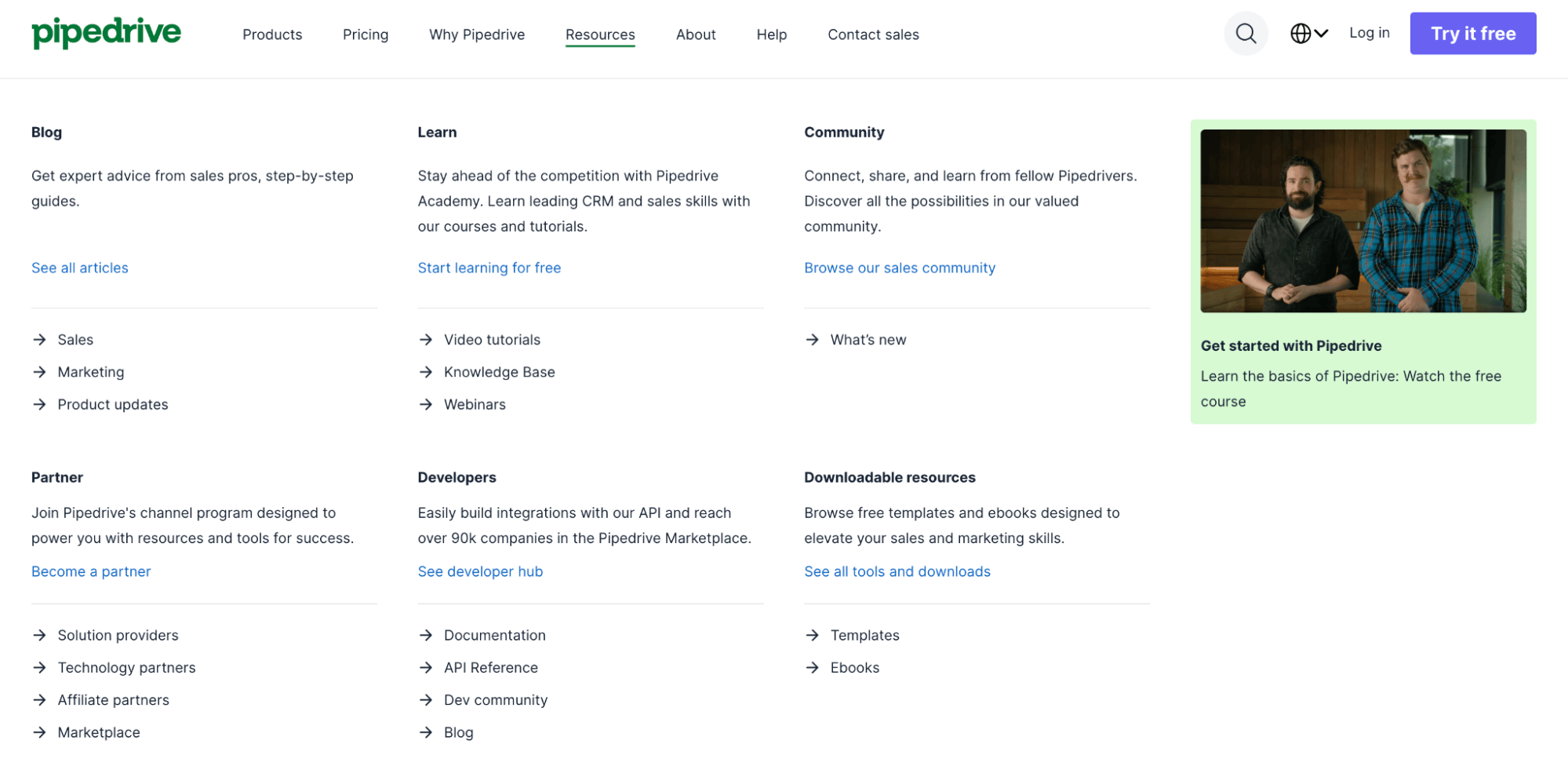
For example, here’s what Pipedrive’s content hub looks like:

Content hub Pipedrive resources

The tab includes a variety of resources, from video tutorials to developer documents and downloadable e-books.

Note: You’ll rarely find a section labeled “content hub” in a company’s website menu. Usually, it’s under titles such as “Learning center”, “Guides” or “Resources”.

A content hub can contain information in different formats, like:

You can organize your hub’s content by audience type, topic, format or funnel stage – whatever best supports your customer journey.

Let’s say you run an HR consulting firm. You work with growing startups that need help with hiring, onboarding processes and compliance.

Your content hub could include:

A startup founder visiting your hub could get answers to their hiring questions, download a checklist and walk away with more trust in your expertise (all before ever speaking to you).

Recommended reading

https://www-cms.pipedriveassets.com/B2B-content-marketing-strategy-for-SMBs.png

How to create a B2B content marketing strategy for your small business

Benefits of a content hub

A content hub helps you convert visitors into customers. By organizing your knowledge, you make it easier for your audience to find what they need, trust your brand and take the next step.

Instead of constantly chasing new leads with paid ads, you create a long-term asset that attracts and nurtures prospects organically.

Here are five reasons why you need a content hub:

  1. Better user experience (UX). Users find relevant content all in one place. Organized topics make it easier to find what they’re looking for without switching from your blog to YouTube to LinkedIn.

  2. Increased trust. A content marketing hub signals expertise to prospects, enhancing your brand’s credibility and serving as a long-term competitive advantage.

  3. Greater reach. A content hub benefits search engine optimization (SEO) by presenting multiple types of content at once, engaging users for longer.

  4. Longer-lasting content. Unlike social media feeds, a content hub is an owned, permanent digital asset.

  5. A smoother customer journey. A content hub’s variety aids prospects at all customer journey stages, accelerating purchasing.

When your audience can easily find the answers they need, they’re more likely to trust your solution, return for more and convert when the time is right.

Recommended reading

https://www-cms.pipedriveassets.com/Content-Marketing-Automation.png

Content marketing automation: Which tasks should I automate?

How to create a content hub in five steps

You don’t need a huge team or complex tools to build a high-performing content hub. With a clear plan and the right approach, you can start small and scale over time.

Here are five steps to get started.

1. Determine your goals and target audience

A content hub should serve a clear purpose and specific groups of people. This first step helps you anchor everything (from resources to how you organize and measure success) to support business objectives from day one.

When your goals and audience are well-defined, your content becomes more strategic. It speaks directly to the needs of the right people and leads them toward actions that benefit your business, like downloading a lead magnet or booking a sales call.

Let’s say you’re a software-as-a-service (SaaS) company that sells workforce planning software. You aim to drive demo bookings by targeting HR leaders at companies with 200–1,000 employees.

To match that intent, your content hub should focus on addressing headcount forecasting challenges through:

  • ROI calculators for workforce management

  • Buyer guides to compare vendors

  • Articles on agile hiring strategies

Here’s how to plan your content creation efforts:

A clear goal and audience profile keep your hub focused and performing optimally.

Better understand your customers with our Buyer Persona Templates

Use these templates to ensure your solution always aligns with your customers’ interests and needs

2. Choose the right content hub software

The right software makes creating, managing and scaling your content hub easier. It also ensures your resources are user-friendly and searchable as your content library grows.

Imagine you’re a growing accountancy platform with limited developer support. You need a solution that allows your marketing team to build out pages, tag content by topic or persona and analyze engagement – all without writing code.

In this case, you might choose a content management system (CMS) like WordPress:

Content hub WordPress example

The platform’s ease of use and flexibility allow small teams to add and update content without technical help.

Here’s how to choose the right hub software:

  • Prioritize scalability. Make sure the tool can handle growing content volumes and evolving categories.

  • Check integration options. Look for platforms with robust APIs so you can connect and sync data across systems seamlessly. It should work well with your customer relationship management (CRM) platform, analytics tools and SEO plug-ins.

  • Ensure design flexibility. Choose an app that lets you maintain your brand look and create a great UX.

  • Consider access and approval controls. Ensure clear roles for editors, contributors and reviewers in larger teams.

  • Make sure it’s affordable. Look for pricing that fits your budget without hidden fees and offers good value as you scale.

The right platform should save time, reduce friction and help your team stay focused on creating content that converts.

3. Audit and organize existing content

A content audit helps you uncover high-performing assets to reuse, outdated pieces to update and gaps worth filling.

Without a proper audit, you risk duplicating efforts or surfacing irrelevant content. Organizing what you have ensures your hub is focused, credible and easy to navigate.

Let’s say you’re an agency with hundreds of blog posts. An audit reveals that:

  • Several posts on onboarding overlap

  • Some of your highest-traffic content is buried deep in the site

  • Key case studies are missing tags

With this insight, you can consolidate similar topics, resurface valuable posts and create a stronger structure.

Here’s how to get started auditing your hub:

  • Inventory all your content. Use a spreadsheet or content audit tool to log blog posts, guides, videos, case studies, etc.

  • Assess performance. Look at metrics (e.g., traffic, bounce rate, time on page, backlinks and conversions) to see what’s positively impacting your strategy.

  • Evaluate relevance. Check whether the content is accurate, up to date and aligned with your target audience’s needs.

  • Identify themes and categories. Group similar content together to inform your site structure and tagging.

  • Decide what to keep, update, merge or remove. Make sure everything you include in your hub adds value.

An organized content base helps users find what they need faster, while making your brand feel more credible and trustworthy.

4. Plan a smart content strategy

A thoughtful content strategy defines what you’ll create, how you’ll present it and where each resource fits into the buyer journey.

This plan ensures that everything you publish is purposeful to engage and convert the right people at the right time.

For example, if you’re a marketing agency targeting e-commerce brands, your strategy might include:

  • Thought leadership blogs to attract search traffic

  • Video tutorials for engagement

  • Gated templates to generate leads

You’d also tailor each piece of content to a specific customer journey stage, from brand awareness to decision.

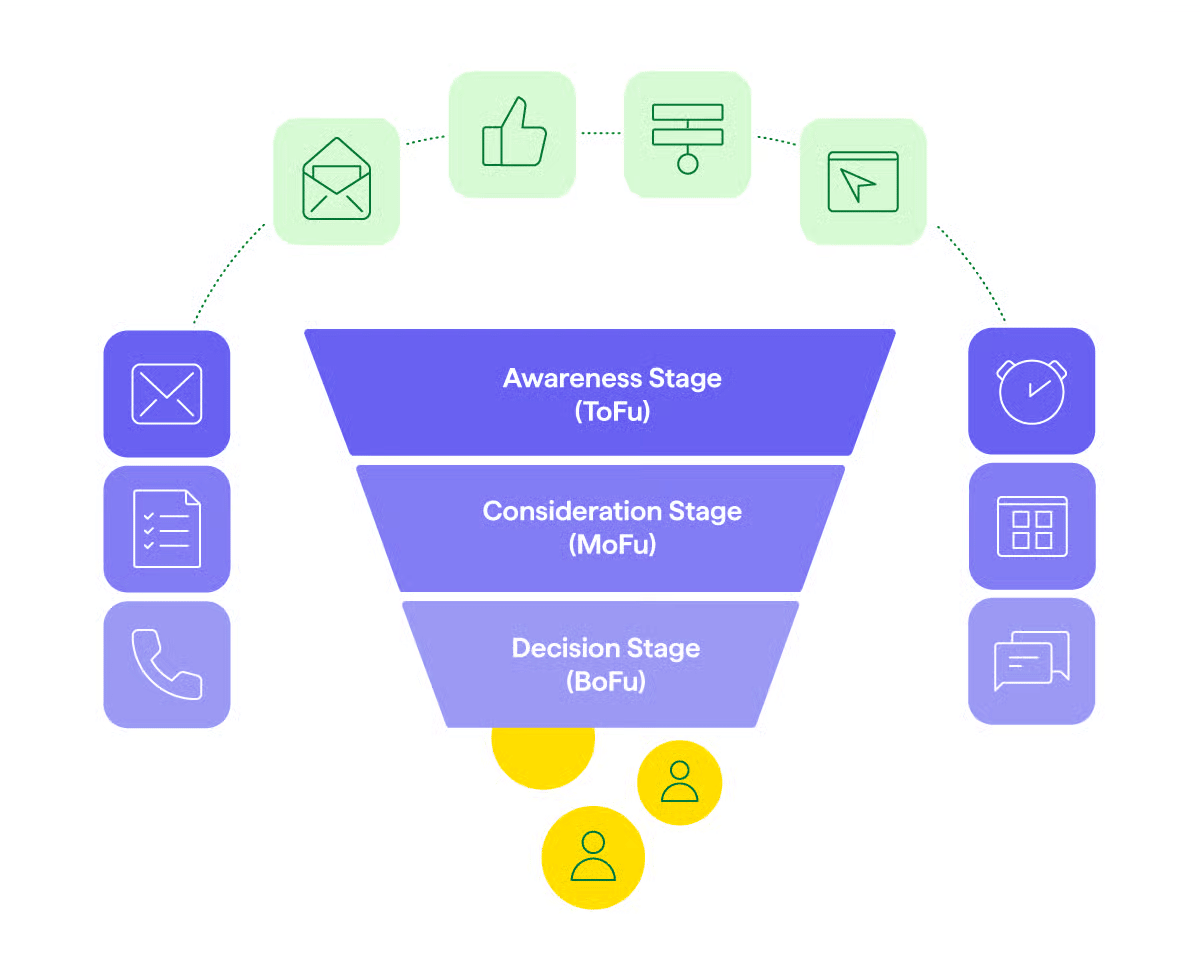
Content hub marketing funnel

This clarity helps avoid guesswork and ensures your content supports people’s challenges and questions.

Here’s how to shape your strategy:

  • Outline key themes and content types. Focus on topics that align with your audience’s pain points and business goals (e.g., case studies, explainer videos and interactive tools).

  • Map content to the buyer journey. Ensure you have a mix of awareness, consideration and decision-stage content.

  • Design your content structure. Plan how pieces will be grouped (e.g., by topic, industry or format) and interlinked for straightforward navigation and better SEO.

  • Create a publishing schedule. Maintain consistency by planning what to publish and when with a marketing calendar.

When your strategy is in place, align marketing, sales and product teams so content supports cross-functional goals and becomes a growth engine.

5. Publish and continuously optimize your hub

Search engines and buyers reward fresh, helpful content. Regular optimization keeps your hub aligned with audience needs and business priorities.

Once your content is live, continue to improve what exists, fill content gaps and respond to what your audience engages with most.

Imagine an IT services company that launches a hub with blogs and whitepapers. After tracking analytics, they notice high engagement on cloud migration topics but poor performance on cybersecurity content.

These insights lead them to update articles with video explainers and refined CTAs to “Book a free consultation” (that work in migration topics) and see positive results.

Here’s how to keep your hub performing:

  • Monitor performance. Use tools like Google Analytics, heatmaps and CRM reports to track what’s working. Use these insights to tweak layouts, headlines, calls to action (CTAs) and internal links.

  • Refresh existing content. Update articles regularly with new data, visuals or links to keep them relevant. Start with the highest-impact pieces, like landing pages for key topics or resources.

  • Close content gaps. Look at search queries, user feedback and sales conversations to spot missing topics.

  • Optimize for SEO. Interlink related pieces, improve meta descriptions and target long-tail keywords to improve rankings and help customers discover you.

  • Test and improve CTAs. Try new placements, wording or formats to boost conversions.

Refining your content hub over time ensures it continues to attract and engage the right people.

Recommended reading

https://www-cms.pipedriveassets.com/B2B-Report-Guide-and-Best-Practices.png

The ultimate guide to B2B reporting: basics to best practices

How Pipedrive works alongside your content hub

Pipedrive helps you capture, measure and act on the interest your content hub generates. By tracking interactions, you’ll maximize key opportunities to turn visitors into customers.

For example, you can capture leads directly from your content hub using customizable Web Forms on gated whitepapers, guides or contact pages:

Content hub Pipedrive Web Forms

These leads flow straight into your sales pipeline to streamline timely follow-ups.

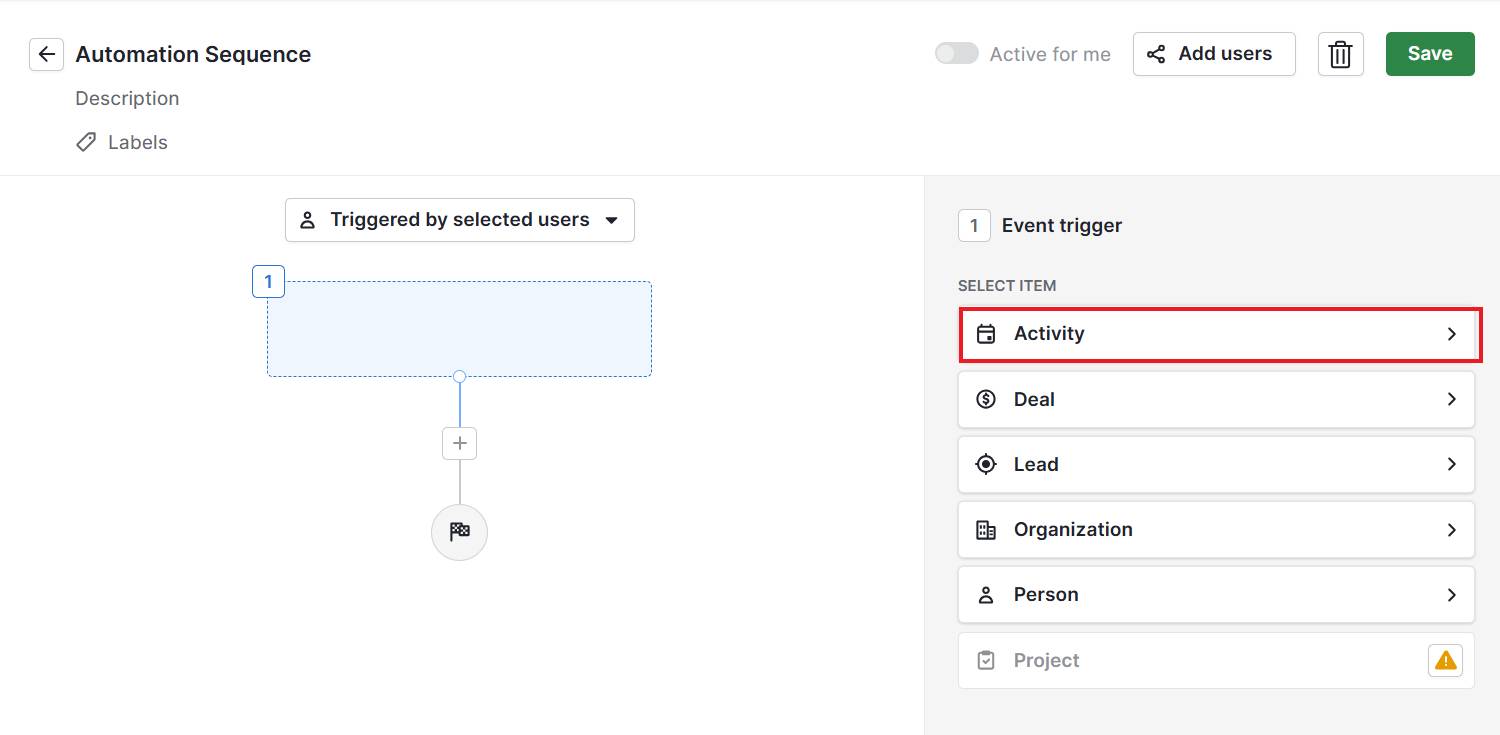
Setting up workflow automations also means you act instantly when someone downloads a resource or completes a form:

Content hub Pipedrive Automations

Triggering emails or task reminders ensures you never overlook a potential customer, even when your team is busy.

You can also score leads by tracking how deeply prospects engage with your content (such as time spent on pages or the number of resources viewed) and sync these scores into Pipedrive.

This prioritization helps your sales team focus on the most engaged and ready-to-buy prospects.

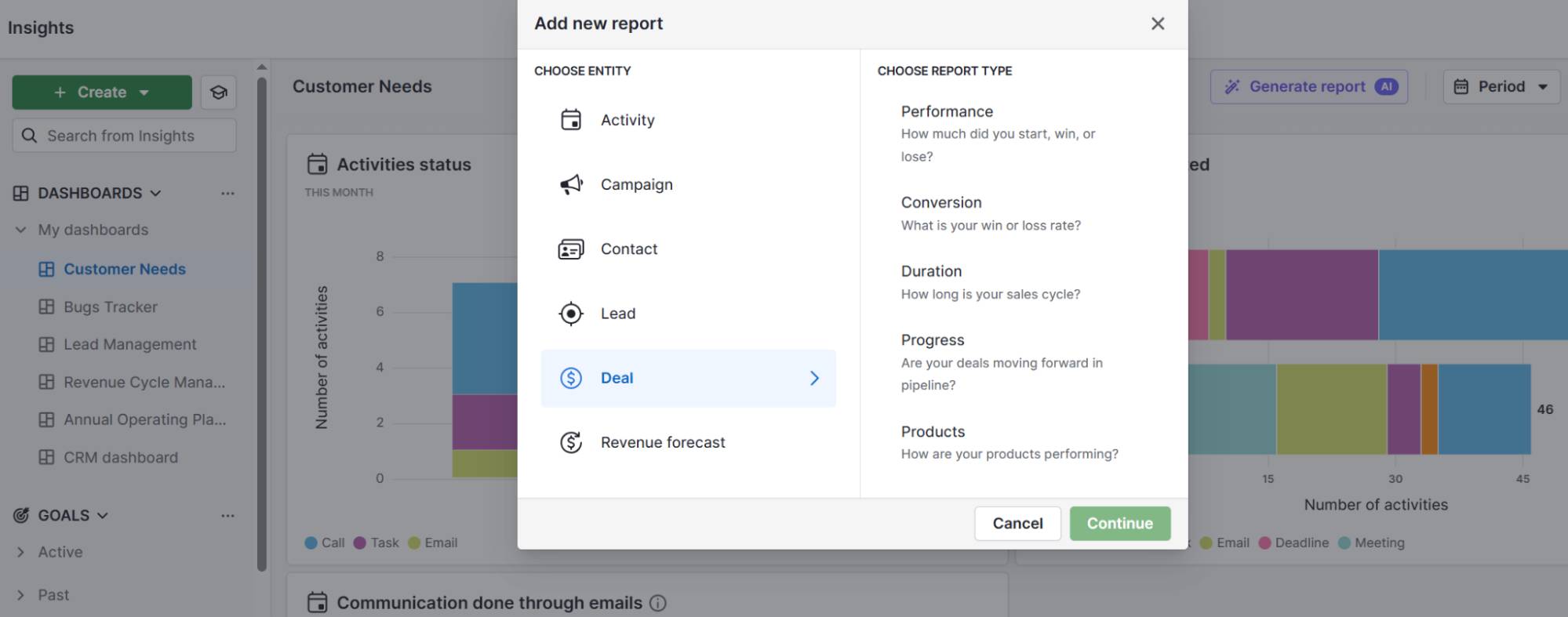
Finally, Pipedrive’s real-time reporting ties your content’s performance directly back to deals and conversions:

Content hub Pipedrive reporting

Understand which blog posts, guides or videos drive pipeline growth within outreach so that you can invest wisely in your content strategy.

Combining your hub with Pipedrive creates a comprehensive system that turns content engagement into actionable sales opportunities – boosting revenue and growing your business efficiently.

Content hub FAQs

  • For an engaging digital experience, organize your content hub clearly around main topics or themes relevant to your audience.

    Use a clean, easy-to-navigate layout with categories and subcategories to help visitors quickly find what they need.

    Mix different content types (e.g., articles, videos, guides and infographics) to keep it engaging.

    Ensure your design reflects your brand identity and includes strong CTAs guiding users toward next steps.

  • Digital asset management is your company’s system for organizing all your content (like images, videos and documents) in one central place.

    It makes your content workflow smoother by helping teams collaborate and publish efficiently.

    Ensuring consistent content quality and messaging also helps you target omnichannel audiences more effectively across websites, social media, email and more.

  • Great content hubs provide clear, valuable resources tailored to their audiences. They act as a single source of truth for users seeking reliable information.

    Three successful content hub examples include:

    • NerdWallet: NerdWallet breaks down complex finance into easy-to-understand guides and tools. Content subtopics cover credit cards, banking, investing and personal loans.
    • Mayo Clinic News Network: Mayo Clinic (a major medical institution) provides health news, expert advice and patient stories.
    • REI Uncommon Path: REI’s content hub focuses on outdoor lifestyle topics with articles, videos and podcasts. Topics for outdoor enthusiasts range from gear reviews to conservation issues.

Final thoughts

Creating a quality piece of content takes time and effort. Centralizing content management in a hub makes it easier for searchers to find what they need and extend every resource’s impact.

A CRM helps you turn these visitors into loyal customers by tracking, engaging and nurturing leads. Try Pipedrive free for 14 days to make managing your sales pipeline alongside your content strategy simple and effective.

Better understand your customers with our Buyer Persona Templates

Use these templates to ensure your solution always aligns with your customers’ interests and needs

The Definitive Corporate Culture Guide for SMBs

Software Stack Editor · June 17, 2025 ·

Small and medium-sized business (SMB) owners face more external changes than ever while trying to ensure their company’s success.

Performance, innovation and customer focus remain essential, but a strong workplace culture offers a competitive advantage and financial benefits.

In this article, you’ll learn how modern working influences company culture and how to assess and positively influence your own

What is corporate culture?

Corporate culture is the mix of shared values, attitudes and norms that shape how employees work and interact within an organization. It influences everything from your reputation to employee engagement levels.

For example, a software company may encourage a culture of “transparency”. Leaders share business updates openly, team members give honest feedback and everyone views mistakes as learning opportunities.

In that organization’s culture, people will trust and collaborate freely for faster problem-solving and better cross-team outcomes.

Corporate culture includes elements like:

  • Core values (e.g., innovation, accountability or inclusion)

  • Dress codes and work environments (e.g., formal vs. casual)

  • Communication styles (e.g., structured emails vs. Zoom meetings)

  • Decision-making processes (e.g., top-down vs. collaborative input)

  • Work-life balance expectations (e.g., clear boundaries vs. always-on availability)

  • Recognition and reward systems (e.g., public praise, bonuses and growth opportunities)

Note: Core values are the foundation of a company’s culture and play a significant role in guiding behavior and decisions.

These expectations shape how your company operates and how team members feel about their daily work.

Recommended reading

https://www-cms.pipedriveassets.com/Personnel-management.jpg

Personnel management: definition, importance and emerging trends

4 types of corporate cultures

While every company has its own unique organizational culture, University of Michigan professors Robert Quinn and Kim Cameron identified that most fall into four broad categories.

Knowing which type your company leans toward can help you make better hiring, leadership and growth decisions.

Here are the four types of corporate culture:

Type

What it looks like

1. Clan culture

A teamwork-focused environment where relationships come first.

Example: A small agency where everyone pitches in and celebrates wins together.

2. Adhocracy culture

Innovation-driven, with freedom for risk-taking and experimenting.

Example: A tech startup that rewards bold ideas and quick pivots.

3. Market culture

Performance-oriented and competitive, where results are the top priority.

Example: A sales consultancy with leaderboards and ambitious growth targets.

4. Hierarchy culture

Structured and rule-based, focused on stability and efficiency.

Example: A manufacturing company with strict processes and clear reporting lines.

While most organizations blend elements from each category, knowing your dominant culture can help you structure and improve processes more effectively.

Why is a good corporate culture essential?

Many sectors are changing rapidly and dynamically. To ensure growth and adaptability, SMB workplace cultures must also evolve to meet new challenges and opportunities.

A strong, healthy culture aligns your teams and gives them a reason to care about the company as a whole.

Here’s how creating one leads to real business value.

Increases revenue

A strong culture drives higher productivity and engagement, naturally improving your bottom line. According to Gallup research, these types of cultures increase net profit by 85% over five years.

When employees understand your company’s mission and feel connected to it, they work with more focus and deliver better results.

A study by Heidrick & Struggles also states that the most successful companies’ culture was the “glue” that held them together in the face of 2020 challenges.

Example: A software-as-a-service (SaaS) company where accountability is a core value. Product teams tie quarterly goals directly to customer outcomes, and sales teams are rewarded for renewals and acquisitions.

This alignment leads to faster feature rollouts and a 15% increase in expansion revenue over 12 months.

Boosts morale

A strong corporate culture shapes people’s feelings about their work, team and leadership. If you create a sense of belonging, people feel motivated and show up fully.

According to McKinsey research, employees with a “higher sense of purpose” are more likely to stay and engage in their roles. High morale also reduces burnout and turnover, which leads to happier teams and lower hiring costs.

Example: An accounting platform builds a culture around flexibility and public recognition. Team members can adjust their hours when needed, and managers regularly highlight wins in meetings.

As a result, people strive to do their best work, employee retention improves and sick days drop by 20% over the year.

Delivers better customer experiences

Happy, supported employees serve customers better. They go the extra mile because they care about the company’s success.

When you embed your culture in onboarding processes to follow-ups, you create a consistent, standout customer experience (CX).

Example: A call center adopts a “customer-first” culture and empowers agents to solve problems without scripts or approvals. That autonomy leads to faster resolutions, a 25% drop in escalations and higher satisfaction scores across key accounts.

Recruits better candidates

A good company culture signals whether an organization is a fit for job seekers. If you’re known for open communication and professional development opportunities, top talent will come to you.

Example: A marketing agency builds its employer brand around a collaborative, creative culture. It highlights these values in job posts and social content and sees a 30% increase in qualified applicants and shorter time-to-hire for key roles.

Recommended reading

https://www-cms.pipedriveassets.com/Creative-Team-names.png

How to choose a team name for your workplace (with 195+ examples)

How has modern working influenced company culture?

The way SMBs work today looks very different from even a decade ago. This shift has reshaped company culture in major ways. From remote work to new generational expectations, employees want more than just a paycheck.

Here are two examples of how these issues impact today’s corporate culture.

Remote working and home offices

Before the COVID-19 pandemic, 17% of US employees worked from home five days or more per week. By January 2022, this number had risen to 59%.

Corporate culture Pew Research Study

According to FlexJobs research, remote working options are now the most important factor for workers considering new careers or job opportunities.

Companies must keep pace with the expectations of potential applicants who value hybrid working schedules. However, this is easier for some industries to accommodate than others. If it doesn’t work for yours, have an open discussion about alternative benefits to find a middle ground.

Generational differences

There are now five generations in the workplace, each with its own preferences and expectations. Companies must stay flexible to consider and accommodate these.

For instance, around 74% of Millennial and Gen Z employees will quit their roles if there aren’t skills development opportunities. According to Deloitte research, these generations crave jobs that balance good money, meaning and well-being.

Corporate culture Deloitte study

On the other hand, Baby Boomers are known for being more loyal to employers and comfortable with a hierarchical culture. However, a Checkr survey revealed that they also report the highest dissatisfaction with workplace culture of all generations.

Companies that neglect the opinions of each generation within their workplace culture may find it challenging to attract the best new hires.

Recommended reading

https://www-cms.pipedriveassets.com/The-Flexible-Work-Effect-on-Well-being.png

The flexible work effect on well-being: transforming lives and workplaces

11 questions to assess the state of your corporate culture

Before you can improve your organization’s culture, you need a clear picture of your current employee experience and expectations.

Understanding this baseline helps you spot gaps between what you promise and what team members feel so that you can make focused, meaningful changes.

Here are 11 questions to help you assess the state of your overall culture:

  1. How do you handle mistakes and conflicts?

  2. Do employees stand behind the company, or do they just do the bare minimum?

  3. How do employees behave toward each other and leaders?

  4. Do you appreciate and communicate small and big achievements?

  5. Do you offer childcare or support for caregivers?

  6. Is there a clear, organized process for employee feedback?

  7. Does the leadership team walk the talk and adhere to company values?

  8. Is employees’ work-life balance well-adjusted?

  9. What kind of flexible working models do you offer, and how do they impact office culture?

  10. Are there forms of health promotion, such as gym memberships and cycle-to-work schemes?

  11. Why do employees leave your company?

Your customers’ experiences also reflect your workplace culture. If complaint handling is complicated and slow, it suggests you don’t value after-sales service and could impact future purchases.

When assessing your team and processes, include insights from stakeholders and customers to cover all bases.

Download Your Sales and Marketing Strategy Guide

Grow your business with our step-by-step guide (and template) for a combined sales and marketing strategy.

How to build a strong company culture

Building a strong culture requires intention, consistency and leadership. When done right, the results speak for themselves.

The Heidrick & Struggles study found that 82% of CEOs increasingly focus on company culture. Those who comprehensively advance change (known as “cultural accelerators”) note a 91% revenue increase compared to 44% for other companies.

However, changes don’t happen overnight. According to Gallup, companies that work to improve their culture often see the biggest gains within three to five years.

Here’s how to start building a strong corporate culture:

  • Create a mission statement with management. Solidify what your company stands for and how your work culture will reflect these values.

  • Brief your leaders. Explain that managers must act as role models and set the standard for the wider team.

  • Organize team training and events. Give employees a chance to socialize outside of work, develop their skills and strengthen team-building.

  • Offer your employees perks. Ask your staff about the perks they’d value and create policies that include these (e.g., continuing education opportunities, mentoring advice or hybrid working).

  • Encourage information sharing. An office culture where employees create, share and update knowledge through efficient processes (e.g., a knowledge base) allows them to learn from each other constantly.

  • Communicate important information publicly. Transparency helps prevent employees from feeling “left out” and shows that you value every team member.

  • Ensure candidates are a good cultural fit. Human resources (HR) should assess how well candidates align with your culture to maintain a cohesive and positive work environment.

You don’t need fancy perks to build a positive company culture. What matters most is being open with your team and committing to living your organization’s values.

Recommended reading

https://www-cms.pipedriveassets.com/Organizational-Behavior.png

How to boost company performance with organizational behavior

A positive corporate culture example

The best way to understand what a strong culture looks like is to see it in action. Let’s explore a fictional example.

BrightPath is a growing e-learning platform that serves enterprise clients. It has around 80 employees and is scaling fast.

The company believes that when employees feel connected and valued, they’ll stay engaged and serve customers better. The leadership team focuses on a culture of trust, recognition and continuous growth.

Here are a few ways they bring that culture to life:

  • Monthly town halls and weekly team check-ins to keep communication open and honest

  • Flexible work schedules that allow employees to choose remote, hybrid or in-office schedules

  • “Learning Fridays”, where teams spend two hours each week exploring new skills or e-learning trends

  • A Slack recognition system where peers can celebrate each other’s contributions in real time

Over the course of a year, employee satisfaction scores rise by 35%, the product team releases features faster and client renewal rates hit an all-time high.

Rather than making culture a one-off initiative, be like BrightPath and embed it into your everyday working experience.

Final thoughts

Investing in your corporate culture (especially as a fast-moving digital business) can directly impact team performance and profitability.

Companies that succeed create workplaces that attract and retain the best talent, fostering a productive and committed workforce.

When you’ve built this high-performing culture, help your team collaborate more efficiently with Pipedrive’s suite of sales tools. Try it free for 14 days to stay aligned and close more deals.

Simple AIDA Model Definition for Marketing

Software Stack Editor · June 9, 2025 ·

While every customer is different, you can influence how people discover your brand, from the moment they first notice it to when they (hopefully) pull out their credit card.

The AIDA model, used for over 100 years, offers a fundamental advertising framework for engaging prospects and driving sales. It’s the basis for the modern marketing funnel and helps you develop a strategy for reaching and converting your target audience.

In this article, we’ll show how AIDA can help you quickly and strategically plan and implement marketing strategy tools so more customers choose your brand.

What is the AIDA model?

AIDA model definition: The AIDA marketing model is a framework that outlines the stages of a buyer’s journey from first impression to purchase. Developed by American advertising advocate Elias St. Elmo Lewis, it illustrates how advertising can impact decision-making. This formula helps businesses optimize digital marketing communications and sales funnels.

It’s also known as the AIDA formula or the AIDA principle. Use the AIDA model as a secure and structured way to guide sales prospects through the four sales stages, starting at the awareness stage and ultimately converting leads into customers.

Recommended reading

https://www-cms.pipedriveassets.com/sales-goals_2023-02-23-120955_tgra.jpg

How to set up an effective marketing funnel

How to apply the AIDA model in marketing

AIDA is an acronym for the four stages companies use to address potential customers and influence their purchase decisions:

These four stages are sequential.

AIDA Model Pipedrive

Let’s dive deeper into each stage.

1. Attention

The first stage is attention. Effective advertising begins with capturing the target audience’s attention through imagery, emotion or copywriting. Marketers can use various approaches to grab attention through advertising, content marketing or social media posts, such as a Facebook ad, a compelling news story, a viral video or eye-catching colors on a storefront.

2. Interest

This stage creates the potential customer’s interest in a specific offer. Companies can present the product details on a landing page, in a flyer or through a product webinar to tap into a prospect’s pain points or needs.

3. Desire

Desire, in this context, means making the prospect want to own the product or use the service. This stage combines rational arguments with an emotional connection to address the target audience’s needs.

Potential methods for driving desire include customer testimonials, celebrity endorsements, social proof or videos showing the product’s benefits in everyday life (e.g., how it offers more joy, recognition, security or whatever else customers desire).

4. Action

At the end of the third stage, the customer knows they want the product because it solves their pain points. Now, they need to complete the purchase.

Use a clear and explicit call to action (CTA), such as a button that prompts people to buy. For online or interactive marketing like landing pages, blog posts or social media ads, ensure the user interface is intuitive to prevent technical issues.

The AIDA framework is a reliable guide for creating structured marketing strategies. Align each campaign stage with this template to attract, engage and convert potential customers. This approach ensures you don’t overlook any steps in your marketing efforts.

Incorporating AIDA model marketing strategies allows you to craft messages that effectively guide consumers through the buying process, enhancing brand interaction and conversion rates.

Recommended reading

https://www-cms.pipedriveassets.com/Next-Best-Action-Guide.png

Next best action: definition, benefits and guide

Extensions of the AIDA model to AIDA-S and AIDCAS

The original AIDA formula now has a couple of variations, which add two more stages: satisfaction and conviction.

AIDA-S

The AIDA-S model assumes the customer journey doesn’t end with the purchase. The fifth stage, satisfaction, measures customers’ feelings about the product by asking whether they would buy from the same company again or recommend the brand to others.

Companies can conduct interviews, analyze customer reviews or develop buyer personas to learn consumers’ thoughts and improve products and services. These tools provide valuable data about retention so companies can enhance the customer experience.

AIDCAS

The AIDCAS model includes the satisfaction stage but also inserts a stage between desire and action: conviction. This stage involves building trust and convincing customers that they need the product or service by showing them proof points (e.g., a testimonial or case study).

Conviction is vital when customers are aware, interested and know they want the product, but still have questions or purchase objections.

During the conviction stage, companies can compare their offer with competitors’ or make the sales team available to potential customers for questions or conversations. These strategies help relieve worries or fears.

9 steps to creating the perfect sales strategy (with free template)

In this handbook, we’ll walk you through what your sales strategy needs, plus there’s a free strategy template to get you started!

An example of the AIDA model

The AIDA model often depends on multiple customer contacts to reach the final action. To illustrate, let’s consider an example:

A small business seeks a new customer relationship management (CRM) system. The business owner searches Google, and one of the top results catches her eye. Stage 1, Attention, is complete.

While watching YouTube videos at home, she sees an ad for the same CRM cataloging its various benefits. Curious, she watches the full advertisement, which leads to stage 2: Interest.

A few days later, at an industry conference, she sees that the CRM has a booth and chats with one of the reps. The rep shares case studies with her and offers her a free trial. She’s now at stage 3, the Desire to purchase.

At the end of the free trial, she upgrades the company to a paid subscription, completing the process with stage 4, Action. If everything goes well in the satisfaction stage, subscription renewals and sales referrals to other potential customers are likely.

The buying process isn’t always so straightforward, with a purchase after one successful advertisement campaign. However, this case study shows the power and possibilities of the AIDA model for marketing messages.

Critique of the AIDA model

Despite its widespread popularity and applications, the AIDA model sometimes has a public relations problem. One critique is that its step-by-step representation is too rigid. It assumes all stages follow one another chronologically.

In reality, however, the stages can overlap, interact in complex ways or be skipped altogether. For example, a customer may proactively start researching a problem to solve a pain point, bypassing the attention and interest stages to reach a solution.

Another example of rigidity is that the AIDA model depicts a successful purchase. If one of the stages does not function as expected, the customer journey might proceed differently.

Because of this, the AIDA model alone is not enough. It must be part of a diverse content marketing strategy that considers the twists and turns of the modern customer journey.

For instance, what happens if a customer shows interest in a product but decides it costs too much or doesn’t meet their needs? Companies could then offer a different product as an alternative. While not technically part of AIDA, that’s still an effective way to convert a prospect into a sale.

The AIDA model provides a solid foundation, but marketers should know there are other successful sales processes. Combining different approaches often leads to a positive outcome.

Recommended reading

https://www-cms.pipedriveassets.com/blog-assets/email-strategy-techniques-illustrations.png

9 Email marketing strategies you need to know in 2025

Final thoughts

While there’s no universal approach to marketing and sales, the AIDA model’s staying power makes it a reliable framework.

AIDA applies as much to complex campaigns as to individual social media posts or email marketing sequences. Use it as the model prescribes or adapt it to fit your company’s goals when planning or optimizing content.

Download our customer journey map template

Start mapping your customer journey with our free customer journey template.

The Definitive Sales Experience Guide

Software Stack Editor · June 5, 2025 ·

When job listings ask for “sales experience”, it feels like a roadblock if you haven’t worked in the industry before. However, you’ve likely got more of it than you realize. You just need to learn to recognize and articulate it.

In this post, you’ll learn the different forms sales experience takes and six steps to confidently apply for your first role.

What is sales experience? Why you may already be qualified

Sales experience means influencing buying decisions or building strong customer relations in a job role. You often achieve this using skills like persuasion, negotiation or objection handling.

Even if you’ve never held a job with “sales” in the title, you might have more of this experience than you think.

Let’s say a call center representative for an accounting platform regularly calms frustrated callers and convinces them not to cancel their service.

They use core sales skills like empathy and building trust to influence decisions. While not in the job description, that’s a form of sales experience.

Sales skills are useful in many roles across different industries – not just business-to-business (B2B) and business-to-consumer (B2C) sales, where you pitch, negotiate and close deals with businesses or individual consumers.

For example:

  • Retail – helping customers find what they need and closing purchases on the shop floor

  • Customer service – recommending add-ons or persuading users to upgrade

  • Fundraising or nonprofit outreach – convincing people to donate or support a cause

  • Account management – maintaining and growing existing client relationships

  • Freelancing or self-employment – pitching services, writing proposals and landing clients

You don’t need to have held a formal sales role to be qualified for one. You just need to be willing to go the extra mile to stand out in interviews.

Recommended reading

https://www-cms.pipedriveassets.com/blog-assets/learn-sales.jpg

Learn sales by mastering these 13 skills

How to apply for a sales job with no experience: 6 steps

Breaking into sales without a traditional background is more common than you think. Many successful sales professionals start in industries like retail or hospitality.

For example, real estate mogul Barbara Corcoran began by waiting tables at the start of her career.

What matters most is your ability to communicate well, solve problems and build trust with people. The key is to show potential employers that you already have the right skills to thrive and a willingness to learn.

Here are six ways to apply for your first sales role:

1. Take sales courses and get qualifications

Sales courses teach you the foundations like prospecting, closing techniques and negotiation strategies. These are core role-based skills hiring managers look for, even in entry-level roles.

Getting qualifications shows initiative and a commitment to learning the craft. For example, many employers recognize certifications from Coursera or LinkedIn Learning.

Here’s a free “fundamental selling techniques” course you could enroll in:

Sales experience Coursera course

These courses are even more valuable if they cover proven frameworks like SPIN Selling, the Challenger Sale or the Sandler method.

These methodologies teach you how to uncover customer needs and lead conversations with insight.

Let’s say you don’t have on-the-job experience from previous roles to list on your resume. However, you have a certification in consultative selling.

This differentiator instantly signals to a hiring manager that you’re serious and proactive. You’ll also already understand the basics and will take less time to train.

Here’s how to choose a sales course and put it to good use:

  • Pick a beginner-friendly course that covers core topics like prospecting, objection handling and sales psychology

  • Look for certifications to list on your sales resume or LinkedIn profile

  • Practice outside the classroom by role-playing conversations with friends or family

  • Mention the course in interviews when asked about experience (e.g., “While I haven’t worked in sales directly, I’m eager to put skills like qualifying leads and handling objections that I learned in my recent course into practice”)

Pairing this type of sales training – which shows resourcefulness – with a positive attitude can open the door to that first job.

Note: A great place to begin is with Pipedrive’s Academy courses. They’re designed to develop your CRM and sales skills from the ground up and are ideal whether you’re just getting started or want to strengthen your foundation before applying to roles that involve sales tools and processes.

2. Learn how to use essential sales software

Sales representatives rely on software to stay organized as they manage leads and close deals. Familiarizing yourself with these tools gives you a big advantage.

A modern sales tech stack includes customer relationship management (CRM) platforms, prospecting tools and outreach software.

Learning how this software works shows initiative and helps you hit the ground running as a new rep. Even basic familiarity with popular technology can boost confidence and smooth the onboarding process.

Let’s say you haven’t used a CRM in a job before, but you’ve spent time inside Pipedrive’s interface using a free trial:

Sales experience Pipedrive's CRM

In your job interview, you can confidently say you already know how to add contacts, move deals through a pipeline and log notes.

Here’s how to build your sales software knowledge:

  • Sign up for free trials with major providers like Pipedrive to explore real features as a user

  • Practice adding dummy leads and logging sales activities to simulate a workflow

  • Watch demo videos or tutorials to understand how reps make the most of these tools day-to-day

This practical exposure helps bridge the gap between no experience and being ready to contribute from day one.

Note: Learn the basics of Pipedrive’s CRM on our YouTube channel. You’ll find easy-to-follow videos that walk you through key features, common use cases and practical tips – perfect for getting comfortable with the platform at your own pace.

3. Attend sales industry events

In-person and virtual events are a great way to learn strategy nuances and stay current on sales trends. Conferences and webinars often feature expert panels and include real-world advice that’s hard to find in a course.

Attending events shows enthusiasm and commitment to the field. It builds confidence, expands your network and gives you something concrete to discuss in interviews.

Let’s say you attend a free LinkedIn webinar about artificial intelligence (AI) in sales:

Sales experience LinkedIn webinar

You’ll learn practical sales tips and better understand how this technology helps reps prospect in the real world.

You may also walk away with a few new LinkedIn connections and more insight than most entry-level applicants bring to the table.

Here’s how to make the most of industry events:

  • Search Eventbrite, YouTube and LinkedIn regularly for relevant webinars

  • Look for free seminars and workshops online or in your area

  • Attend conferences like SaaStr or Sales Enablement Summit (many offer free virtual access)

  • Join local meetups or social media groups and ask about the best events to attend in the future

Showing up in these spaces (even as a beginner) builds credibility and momentum for landing your first role. Plenty of free or low-cost options are available before you decide to invest more.

4. Network with other salespeople in person and online

Connecting with working sales professionals is one of the fastest ways to learn about the field and hear about jobs.

Networking isn’t just for seasoned reps. It’s a smart move for anyone trying to break into the industry. Building genuine relationships leads to referrals and mentorship opportunities.

Many people land their first role because someone gave them a chance, often through a conversation instead of a resume. Before becoming a media icon, Oprah Winfrey got her first TV job after impressing a local news director during a visit to a station. She hadn’t applied formally – she was invited to read news on air during that visit, which led to her being hired.

For example, you could join a sales-focused WhatsApp group or Reddit community. There are also dedicated websites like Pipedrive Community where users collaborate and share ideas:

Sales experience Pipedrive Community

Asking thoughtful questions and contributing to discussions may connect you with a sales manager hiring for an entry-level role.

That relationship could lead to helpful inside knowledge or even one-to-one coaching through the interview process.

Here’s how to start building your own network:

  • Follow and engage with salespeople on LinkedIn and other social media platforms (e.g., comment on posts and ask questions)

  • Attend local networking events or meetups to make in-person connections

  • Reach out for informational chats with people in entry-level or sales development representative (SDR) roles with a short, friendly message

  • Join online communities like Pavilion, SDR Nation or RevGenius to chat with working sales pros

Good networking isn’t about asking for a job straight off the bat. It’s about showing curiosity and being part of the conversation to form long-term relationships.

5. Build a personal brand on LinkedIn to attract recruiters

LinkedIn is the platform to show interest in sales, share insights and connect with people who are hiring.

By engaging with content and posting regularly (i.e., building a personal brand), you’ll stand out and get noticed by recruiters.

For example, share your favorite tips from a course lesson:

Sales experience LinkedIn post

Putting effort into your personal brand signals motivation and great communication skills – all qualities sales leaders look for.

It’s also a personal project you develop throughout your career that’s crucial for thriving in industries like real estate.

Let’s say you post twice a week about:

  • What you’re learning in your current sales course

  • Takeaways from webinars or events you attend

  • Your own opinions on trending industry posts

Within a few months, you’ll likely have had multiple conversations with other reps and maybe even a recruiter messaging about a junior sales role.

Here’s how to start building a personal brand that attracts attention:

  • Post weekly updates about what you’re learning from sales books, courses, webinars, tools and more

  • Engage with content from other sales professionals by liking posts and asking questions

  • Write about your journey into sales (even a series of short posts on why you’re making the switch can resonate)

  • Keep your profile updated with a headline like “Acquiring B2B sales experience | Open to entry-level roles”

Being visible and active on LinkedIn builds trust with other users over time and may lead to opportunities.

6. Target entry-level sales positions

The best way to break into sales is to start with roles designed for beginners. Positions like SDR or business development representative (BDR) teach you the ropes with hands-on experience.

For example, search job sites like Indeed and change the filter to “entry-level”:

Sales experience Indeed jobs

These sales roles focus on core skills like prospecting, handling objections and relationship building.

They’re often the first step toward more advanced positions like account executive or sales manager.

Let’s say you apply for a BDR role at a tech company. You don’t have past sales experience (like the job description asks for), but you’ve:

Showing this initiative could be enough for a manager to take a chance and train you. You may even surpass someone else with a little more experience.

Here’s how to land that first entry-level role:

  • Search for job titles like SDR, BDR, junior sales rep or inside sales associate

  • Focus on transferable skills like adaptability or customer service experience when applying

  • Write a tailored cover letter that explains your interest in sales and what you’ve done to prepare

  • Highlight any self-directed learning, like courses or software experience

These roles are stepping stones to get you in the door and teach the skills that lead to a long-term sales career.

Recommended reading

https://www-cms.pipedriveassets.com/Sales-Calendar-2023.png

Sales calendar: 2025 events to put on your radar

Typical scenarios where sales experience comes in handy

Once you land that first role, you’ll quickly see how sales experience levels up your ability to navigate tough conversations, earn trust and drive results.

It doesn’t just apply to selling products. It sharpens your problem-solving and persuasion skills, whether working with customers or presenting internal ideas.

Here are four common scenarios where it makes a real difference:

Handling objections with confidence

Objection handling involves addressing concerns or doubts a sales prospect or customer may have about a product or offer. Handling these confidently shows a deep understanding of the product and the other person’s needs.

In sales, objections are inevitable. Experienced salespeople know how to turn them into opportunities.

They don’t get flustered or defensive. Instead, they:

  • Stay calm rather than getting defensive

  • Listen closely to understand the real concern

  • Reframe the objection to keep the conversation moving forward

For example, a prospect may push back on pricing during a sales demo. A seasoned SDR doesn’t panic. They dig deeper and ask, “Can I ask what you’re comparing us to?”

With more context, the rep tailors the response around value instead of justifying cost. That confidence helps move the deal to the next stage.

Negotiating better deals

Negotiation is about finding common ground while protecting value for the customer and business.

Strong negotiators don’t cave under pressure. They:

  • Stay strategic by focusing on the bigger picture, not just immediate demand

  • Look for ways to create win-win outcomes

  • Understand how to hold firm while making the prospect feel heard

Let’s say an enterprise buyer asks for a 30% discount to close the deal this quarter. A skilled account executive doesn’t just drop the price.

Instead, they counter with a smaller discount but bundle in onboarding support and faster implementation. That flexibility keeps the deal moving while protecting revenue.

Free CRM checklist template

Procure the right CRM for your company with our checklist

Pitching ideas to leadership or stakeholders

Selling isn’t limited to customers. Salespeople often pitch internally for new campaign ideas, product feedback or fresh sales strategies.

Sales experience teaches you to:

  • Present ideas clearly and persuasively

  • Build a compelling case

  • Tailor your pitch to each audience

For instance, a rep may notice that leads from healthcare companies are converting faster. Instead of keeping this insight to themselves, they build a short slide deck and pitch a focused outreach strategy to their manager.

Leadership sees the potential and gives the green light.

Turning customer interactions into long-term relationships

Sales doesn’t stop at closing the deal. Competent reps know how to build lasting relationships that lead to renewals and referrals.

Connecting with people means:

  • Building trust with a mutually beneficial relationship

  • Supporting them proactively

  • Spotting red flags and stepping in before problems escalate

These skills all grow with time on the job.

Let’s say a customer signed a six-month contract for logistics software but hasn’t logged in regularly. An experienced rep follows up personally and offers onboarding tips before connecting them to the success team.

That extra attention helps the customer get value from the product, leading to a renewal later.

Recommended reading

https://www-cms.pipedriveassets.com/blog-assets/relationship-selling.png

How to use relationship selling to connect and convert

How to describe your sales experience in interview questions

No matter your background, you can confidently answer sales interview questions about your experience. The key is to use storytelling, data or transferable skills to match the response to your stage.

Here are four fictional examples to show how that sounds in practice:

1. No direct sales experience

Focus on transferable skills if you haven’t previously held a formal sales role. For example, communication, persuasion and problem-solving show your potential to succeed in a sales environment.

You should also mention anything you’ve proactively done to prepare for the interview, such as taking courses or attending networking events.

Here’s an example of what a candidate with no direct experience may say:

While I haven’t worked in a sales role, I’ve spent two years in customer support for a major e-commerce provider, where I maintained a 78% retention rate on cancellation calls.
I’ve also completed a course in consultative selling, so I understand how to qualify leads and handle objections. I’m excited to apply that in a real-world setting.

By connecting transferable skills like customer retention with proactive learning, this candidate shows they’re ready for a sales role.

2. A little sales experience

If you’re early in your career, focus on your steps to build foundational skills. For example, you can talk about sales certifications, shadowing other reps or ramping up in a current role.

You’ll want to highlight your eagerness to learn and any early results or momentum that show you’re off to a strong start.

Here’s an example of what a candidate new to the industry might say:

I recently transitioned into sales after completing B2B prospecting and negotiation certifications.
In my first three months as a BDR, I booked 40 qualified meetings and hit 100% of my quota. I’m learning quickly and excited to take on even bigger challenges.

Tangible results like hitting your quota can make you stand out and prove your ability to learn fast.

3. Intermediate sales experience

If you’ve been in sales for a few years, you must focus on a proven track record in your interview. Hiring managers want to see how your work has directly contributed to revenue or pipeline growth.

Use numbers, short success stories and lessons you’ve learned to show how you’ve made an impact.

Here’s an example of what an intermediate-level candidate could say:

In my last role, I grew my territory’s revenue by 30% year-over-year. I achieved that through a mix of outbound prospecting and building strong referral relationships.
I also helped test a new sales script that boosted demo conversions across the team by 15%.

This candidate brings numbers to the table, showing concrete proof of success. They also highlight teamwork and innovation in their approach to sales.

4. Expert sales experience

If you’re a seasoned rep, you’ll want to lean into long-term strategy and how you elevate the rest of your sales team.

In your interview, you’ll discuss mentoring, refining sales processes and contributing to colleagues’ growth (not just individual performance).

Here’s an example of what an expert-level candidate might say:

Last year, I closed $1.2M in new business and managed several enterprise accounts through multi-stakeholder deals.
Beyond quota, I mentored three junior reps, two of whom are now top performers, and helped optimize our outbound messaging to improve response rates.

This candidate shows not only exceptional personal performance but also how they’ve helped others grow, which is key for leadership roles in sales.

8 crucial sales skills every prospective rep should have

Whether you’re applying for your first sales job or aiming to level up, relevant skills are non-negotiable.

Here’s a breakdown of the most important sales skills discussed above and why they matter:

Sales skill

Why it’s crucial

Active listening

Helps uncover the prospect’s actual needs and pain points, making your pitch more relevant and useful

Communication and storytelling

Builds trust and makes your offer memorable and easy to understand

Handling objections

Keeps conversations moving forward instead of ending at the first sign of resistance

Time management

Allows you to prioritize tasks and hit sales goals without burning out

Negotiation and persuasion

Helps close deals while aligning with the prospect’s goals and constraints

CRM and sales software proficiency

Saves time, keeps follow-ups organized and tracks sales cycles effectively

Following up and building relationships

Turns one-time conversations into long-term opportunities and sales referrals

Resilience and adaptability

Keeps you motivated through rejections and quick to adjust in a fast-moving market

Top-performing reps rely on these soft skills, traits and abilities daily (and hiring managers look for them in every candidate).

Sales experience FAQs

  • Many job listings refer to sales experience, meaning hands-on practice of influencing purchase decisions and guiding potential buyers through the decision-making process.

    This experience includes pitching products or services, handling objections and closing deals.

    It doesn’t have to come from a traditional sales job.

    Experience from retail, customer service, fundraising or even leading projects where you had to “sell” ideas to stakeholders all demonstrate valuable sales skills.

    What matters most is your ability to understand people’s needs and guide them toward a solution.

  • Experience in sales means you’ve worked through different sales process stages.

    For example, you’ve identified potential customers, presented a product or service, handled objections and closed the deal.

    Sales experience also includes making cold calls, giving product demos or using a CRM system to manage your pipeline.

    It shows you understand how to move a prospect from interest to decision.

  • Start by learning the basics, like how to ask good questions and handle common objections.

    You can do this through sales training programs, courses, sales podcasts or YouTube videos featuring real sales calls and strategies.

    After that, practice. Role-play with friends or volunteer for roles and apply what you’re learning.

    Getting comfortable with rejection and learning from feedback is key to long-term growth in sales.

Final thoughts

Sales experience isn’t limited to traditional sales roles. Whether you’ve worked in retail or pitching freelance work, you may have more relevant experience than you think.

You can break into a new career by identifying transferable skills, learning key techniques and using popular tools.

Start with hands-on experience using the CRM trusted by over 100,000 companies. Try Pipedrive free for 14 days and learn how to manage the day-to-day rhythm of sales before you get the job.

The SMB Beginner’s B2B Integration Guide

Software Stack Editor · June 3, 2025 ·

Business-to-business (B2B) integration links your tools with your business partners’ systems so data moves automatically between both sides. B2B integration solutions help your team work faster and keep information accurate across every system.

In this guide, you’ll discover how B2B integration tools help small businesses scale operations with partner companies. You’ll also learn how to set up your first B2B integration and use Pipedrive to get the most out of your customer data.

What is B2B integration?

B2B integration means that two businesses’ software systems talk to each other without anyone typing data by hand. It’s how a company connects tools, like customer relationship management (CRM) software and billing systems, to its partners’ ecosystems.

These systems might include a distributor’s order platform, a warehouse management system, a retailer’s digital storefront or a marketing partner’s email marketing service.

Here are some typical examples of B2B integrations for small business operations:

B2B integration ecosystem

Here’s a B2B integration example to illustrate how it can help.

Imagine a small cybersecurity company that issues software licenses and a reseller that sells those licenses to customers. When the reseller’s website sends a new order, it automatically pings the cybersecurity company’s license system to reserve the correct number of seats.

The cybersecurity system checks its records and instantly updates the reseller’s order status so everyone knows the order went through. Then the deployment details – like when the software will be available – flow back into the reseller’s customer database.

B2B integration process example diagram

B2B integration software removes time-consuming copying and pasting, cutting order processing time from days to minutes.

The main types of B2B integration

B2B integration comes in different categories. You can classify integrations by what they do, how they work or how deeply they connect business systems.

Here are the main roles integrations can play in your workflows:

  • Data exchange shares records between systems (orders or contacts) so both apps match up.

  • System synchronization maintains real-time data consistency (like inventory sales or customer info) across platforms. Updates on one side instantly appear on the other.

  • Workflow automation triggers actions (like notifications) when certain events happen, eliminating manual work.

  • Platform extension plugs new features and tools directly into your software without separate installations.

B2B integrations also differ in how they work. Here are the main technical approaches you can use to link your systems:

  • Application programming interface (API)-based. Uses APIs for real-time transfer. One system sends a request and instantly retrieves the exact data it needs. It’s like sending a text and getting an answer right away.

  • Electronic data interchange (EDI). Sends structured business documents in a standardized format. Both sides know exactly where to find each piece of data, so sales invoices and purchase orders flow back and forth without misunderstanding.

  • Managed file transfer (MFT). Moves flat files (in CSV or XML spreadsheet formats) over a secure file transfer protocol (SFTP). One system drops a file into a guarded folder and the other picks it up on a schedule.

  • Integration platform as a service (iPaaS). Uses a cloud-based hub to connect multiple apps together. It maps data fields so information moves between the systems without custom code.

Finally, B2B integration platforms can talk to each other in different ways. Here are the main ways systems can speak to each other:

B2B integration communication method

How it works

One-way push

Sends B2B data in a single direction. The target system only receives updates and doesn’t send any back.

Two-way sync

Both systems update each other. Changes on either side merge the other way.

Embedded integration

Builds partner features directly into your application. Makes the partner’s tools appear as if they belong in your app.

Custom integration

Tailors connections with bespoke code or middleware. Solves unique business needs that standard tools don’t cover.

Now that you know how B2B systems connect, learn how to unlock these advantages by implementing B2B integration in your small business workflow.

How to implement B2B integration

Effective B2B integration starts with understanding your current setup and spotting where manual processes slow you down.

Here’s how to prepare for and launch your first B2B integration.

1. Audit your current tools and workflows

Before building an integration, you must know how your business moves data between systems.

Understanding your current workflows helps you find where process automation will have the biggest impact.

Take a full inventory of your business software that interacts with partners, vendors and clients, including:

Types of tools

Examples to look for

Customer and sales tools

Finance and billing systems

  • Invoicing and accounting software (to send and receive B2B transactions)

  • Sales contract management systems (for billing agreements and payment terms)

  • Subscription or licensing platforms (for recurring payments or software access)

Business operations and supply chain tools

Service and support platforms

  • Customer ticketing tools (to handle service requests involving partners)

  • Logistics or shipping tools (for tracking deliveries and sharing updates)

Data exchange tools

  • Digital asset management systems (to send CSVs, contracts or reports)

  • Custom-built tools that exchange data with other businesses

List each tool and write down what they do and who uses them. Next, map out your manual integration processes to move data between these tools and external systems.

Your goal is to document every time someone copies information from one system to another. For example, if:

  • Your sales rep copies order info from an email into your CRM

  • A finance assistant downloads invoices and sends them to a partner

  • A team member manually enters shipping updates from a logistics provider

Create a table to track the details. Include the step, source system, destination system, who does it, how often and additional notes.

B2B integration Pipedrive manual process list

Highlight any steps that involve multiple systems, cause bottlenecks or that you repeat often. These steps are your first candidates for integration.

Look for informal tools – like shared spreadsheets and informal messages – that move critical data behind the scenes.

Many teams miss these when auditing their workflows. Ask each team how they get the job done, not just what the official process is.

Getting this audit right gives you a clear starting point for building integrations that remove friction.

Recommended reading

https://www-cms.pipedriveassets.com/CRM-ERP-integrations.png

CRM ERP integrations: the definitive guide

2. Define clear objectives and success metrics

The next step is to define success for your company. When you know what you’re trying to improve – speed, accuracy or customer interactions – you can build solutions that deliver results.

First, identify the business outcomes you want from B2B data integration. Focus on the customer pain points you uncovered in the data audit. Good objectives link back to operational efficiency, cost savings or service quality.

For example, you might want to:

  • Reduce manual data entry in sales by 75%

  • Shorten order processing times from two days to an hour

  • Prevent invoicing errors caused by manual copying

Set 2–3 core KPIs that are specific, measurable and tied to your business goals. Here are three examples and how to lay them out clearly:

Example goal and metric

Current state vs. target

Goal #1: Speed up and simplify lead handoff from partners.

Metric: Time from partner submission to CRM database record creation.

Current state: 24 hours

Target: Under 15 minutes

Goal #2: Reduce invoice mismatches.

Metric: Number of monthly invoice errors.

Current state: 12 errors per month

Target: 0–2 errors per month

Goal: Improve quote accuracy.

Metric: Percentage of quotes requiring rework.

Current state: 40%

Target: Under 10%

After setting your goals, decide how you’ll track progress. A simple spreadsheet or dashboard works well. Record baseline numbers before your integration goes live and monitor changes week by week.

Avoid tackling too many goals at once. A few clear, high-impact targets are easier to deliver and measure. After a first success, target new goals.

Tip: Choose goals that benefit both your team and your partners. If an integration helps them too, they’ll be more likely to stay invested in your partnership.

3. Choose the right integration method and platform

Once your goals are clear, choose how to connect your systems. The method should fit your business needs, your partner’s capabilities and your resources.

Aim for simplicity and reliability if this is your first time setting up a B2B integration.

Here’s how the four most common B2B integration services compare:

B2B integration method use case

What it’s best for

API-based: SaaS platforms exchanging lead or order data, syncing customer data between a client’s system and your own.

When data needs instant updating (e.g., deal status or license provisioning) and both systems have developer support.

MFT: Daily data transfers, bulk order uploads and scheduled report delivery.

Reliable, low-complexity and minimal coding. Best for companies without API access or where data moves in batches.

EDI: Manufacturing companies, logistics businesses and healthcare supply chains.

High-volume, regulated industries. Ideal when you need formal data standards and integration with legacy systems. Usually requires specialist support.

iPaaS: Linking B2B CRMs, support tools and accounting platforms.

Quick setup and easy maintenance. Suits small teams without in-house developers who need to connect common B2B apps and launch fast.

To choose between these options, answer these questions:

1. How quickly does the data need to move between systems?

2. What does your partner support?

  • They offer an API or accept file uploads via SFTP – use one of these

  • They’re in a regulated industry – may require EDI, so ask for technical documentation

3. Do you have access to technical help?

4. Is this integration going to scale or stay small?

  • One-off or low-volume exchanges – iPaaS or file-based solutions are usually enough

  • Integration will handle large data volumes – API or EDI offers better business scalability

5. Are you dealing with sensitive or regulated data?

If you’re unsure, build a basic proof of concept using iPaaS. Once you know what works, you can upgrade to a deeper integration.

Once you’ve selected your preferred method, choose the platform or tool to power it.

Look for features like pre-built connectors, error handling and clear documentation. The right platform makes setup and maintenance easier, especially if your team is small.

A common pitfall is jumping into custom APIs too early. Although they can be powerful, they often require more testing and technical knowledge than expected.

Unless real-time visibility is critical, avoid this route for your first integration.

Recommended reading

https://www-cms.pipedriveassets.com/SaaS-Sales.png

11 most effective B2B SaaS lead generation strategies for small businesses

4. Start small with a pilot integration

Choose one of your high-impact business processes and run a small pilot integration before jumping into a full rollout.

A focused pilot helps you test the setup, catch issues early and prove the value before scaling. It reduces risk, builds confidence in your team and saves time in the long run.

Look for something:

  • Frequent enough to show concrete results (daily or weekly)

  • Simple enough to test without disrupting critical operations

  • Easy to measure (with a clear before-and-after sales metric)

When you’ve chosen your pilot integration, here’s what to do:

Pilot integration step

What to do

1. Set up a test environment.

  • Use sandbox environments – like Pipedrive’s Sandbox Account – where possible

  • Test with sample data to avoid breaking your live systems

  • Confirm that the integration successfully maps fields and data formats between systems

2. Involve the people who actually use the data.

  • Loop in support, finance or sales teams early

  • Let them review how data appears on their side and flag anything confusing

3. Run the pilot for at least 1–2 full cycles.

  • Watch the integration in action for at least one cycle, whether it’s a few orders, a week of leads or a billing period

  • Track performance against the metrics you defined earlier to see if it’s working

4. Log everything.

  • Keep notes on setup steps, errors and partner feedback

  • Document what works and what doesn’t to create a blueprint for the full rollout

Once your pilot is complete, review the results against your original goals. Did it reduce errors? Save time?

If the answer is yes and the process runs smoothly, you have a proven model you can scale to other workflows or partners.

Remember to treat your pilot as a learning tool. The aim is to develop a repeatable method for building integrations that you can use for future systems and partnerships.

Recommended reading

https://www-cms.pipedriveassets.com/Key-application-development-process-phases.png

A step-by-step guide to application development for SMBs

5. Test, monitor and scale as you grow

When your new integration is up and running, your focus shifts to maintenance and scaling. Regular monitoring helps spot issues early and prevent data loss as your volume increases.

Build basic monitoring steps into your setup. Many platforms include logs and error alerts – make sure you use them.

Silent failures (when something stops syncing without showing an error) are easy to miss without regular checks.

Create a simple integration strategy to keep it healthy over time. Assign someone to own the process, review performance regularly and make changes as needed.

Here are a few tips to guide your review and future planning:

B2B integration monitoring tip

What to do

Monitor every sync

Set up error alerts and check your software logs weekly. Watch for failed transfers, delays or missing data.

Document the integration

Keep a shared record of systems, triggers, data mappings and points of contact. This record will be your go-to when troubleshooting errors.

Assign clear ownership

Make one person responsible for reviewing performance objectives. Add it to their weekly or monthly tasks to ensure monitoring continues.

Test under load

Run your integration with larger or varied data sets before scaling up. Check transfer speeds and data accuracy to ensure your system can handle larger loads.

Plan future integrations

Use the same funnel – audit, goal, method, pilot process – for each new workflow and partner. A consistent process ensures quicker and less error-prone rollouts.

Teams often assume that working integrations will work that way forever. Remember that APIs change, software goes through updates and sometimes things just go wrong.

With regular checks, you spot issues early and can update your system to stay functional through these changes.

With B2B integration steps covered, it’s time to see what value your efforts will deliver.

What you’ll gain from setting up a B2B integration

Linking your core systems with external partners and vendors transforms how you close sales and service customers.

B2B integration improves partner onboarding times, making it easier for new trading partners to start working with you. Customers benefit from this efficiency.

A seamless data flow helps your business by:

  1. Saving time. Automated workflows link your system with a partner’s tools so you don’t have to copy and paste data. For example, when a supplier’s portal sends an order, it lands straight in your procurement system without any emails.

  2. Reducing errors. Data moves directly between company systems, preventing typos and mixed-up numbers. For example, invoice details sync automatically into your client’s accounting software and always match the original order.

  3. Improving sales performance. Your sales reps see real-time stock levels and vendor order updates and always send accurate quotes. For example, when a vendor updates prices, your sales tool pulls in the new rates, letting reps send the correct quotes immediately.

  4. Enhancing customer experiences. Updates flow into your CRM as soon as a partner confirms them, meaning customers always have up-to-date information. For example, shipment tracking might appear in your support portal so clients know when to expect delivery.

  5. Providing actionable insights. All your data sits in a custom dashboard, making it easy to spot sales trends and plan ahead. For example, payment processor reports merge with your sales figures to show which channels bring the best long-term customers.

Next, you’ll learn how to reap the above benefits by leveraging Pipedrive’s CRM for your B2B integration needs.

How Pipedrive helps your team achieve B2B integration

Pipedrive gives small businesses tools to build practical, reliable business integrations. With built-in features, Marketplace apps and an open API, you can connect Pipedrive to the external systems your business depends on.

Pipedrive includes native import and export tools to move customer data in and out quickly.

B2B integration Pipedrive data import

You can migrate CRM data in bulk or export filtered lists for partners. You can also trigger updates via webhooks to keep your systems in sync.

Note: Webhooks are automatic messages one system sends to another when a specific event happens. Instead of polling for updates, a webhook pushes real-time data – like notifying a partner system instantly when you create a new sales deal in Pipedrive.

These built-in functions remove friction when syncing client data between platforms, especially in partner workflows that require frequent handoffs.

Pipedrive’s native B2B integrations

The Pipedrive Marketplace offers a range of integrations for B2B coordination:

Example integration

What it does

LeadsBridge

iPaaS automation solution that bridges advertising platforms (like Facebook and TikTok) with your CRM and email marketing software.

Zapier

Connects Pipedrive to thousands of external tools, including order portals and partner CRMs. New contacts, deals and updates flow into your CRM automatically.

Make (formerly Integromat)

Provides visual, no-code automation. Links Pipedrive with external CRMs and ERPs. Enables complex multi-step data flows between systems.

Stacksync

Syncs Pipedrive’s CRM with databases like Snowflake, PostgreSQL, MySQL and Amazon RDS. Enables you to build partner portals and invoicing systems.

For more advanced application integration or bespoke workflows, Pipedrive offers a robust open API.

Pipedrive’s open API

Pipedrive’s open CRM API lets you build custom integrations to push or pull data between systems. Your developers get precise control over how external apps interact with your CRM.

Use the API to trigger actions, feed external reporting tools or embed Pipedrive data into client-facing platforms.

For example, Vindi successfully used Pipedrive’s API to create Brazil’s leading subscription management platform. It integrated its CRM data into a centralized data lake, connecting Pipedrive with various crucial apps.

Using these integrations, it could perform key processes automatically. For instance, billing occurs immediately after it wins a deal in Pipedrive.

The flexibility of Pipedrive allows you to plug so many different apps into your CRM, allowing us to take advantage of customizing and automating large parts of the sales and customer service process. Our flow goes through three layers of sales: prospecting, qualification and closing. SDRs and consultants go through this journey. Before that, there is no human interaction needed. Understand the features you actually use and get to know in depth how the Pipedrive platform works so you can get the most out of this smart and easy CRM solution.

Check out Pipedrive’s Developers’ Corner to build apps and integrations and create test environments with a Sandbox Account.

Start generating quality leads with your B2B Prospecting ebook

This guide will help you find high-quality leads while staying compliant with the rules and regulations.

Final thoughts

B2B integration isn’t just for large enterprises – it’s a practical way for small businesses to work faster, cut errors and build stronger business networks. Linking your CRM with your partners helps you streamline every stage from lead capture to final delivery, boosting customer satisfaction in the process.

Pipedrive helps you connect external systems using built-in tools, marketplace integrations and a flexible API. Start your 14-day free trial to see how B2B integration can automate your data flows.

5 Best B2B Marketing Strategies for SMBs

Software Stack Editor · June 3, 2025 ·

Business-to-business marketing helps small businesses overcome the challenges of promoting products to other organizations, forging strong relationships with prospects across multiple touchpoints.

In this article, you’ll learn what B2B marketing is, five effective strategies you can use to promote your brand and how to build a campaign from scratch. We’ll also discuss the top trends shaping the future of B2B marketing.

What is B2B marketing? Definition and example

B2B marketing is all about promoting products or services from one business to another. It builds relationships, addresses organizational needs and supports complex B2B sales processes with multiple stakeholders.

Examples of B2B marketing tactics include:

  • Thought leadership, where CEOs, CMOs and other leaders demonstrate their expertise in the field

  • Account-based marketing, where brands deliver personalized content and messaging to a handful of selected buyers

  • Trade shows and event marketing, where organizations network with sales prospects and showcase new products in person

B2C (business-to-consumer) marketing strategies like SEO, social media and digital marketing are also common, albeit tailored for B2B customers.

A well-defined B2B marketing strategy that combines various tactics and channels enables small businesses to raise brand awareness, drive targeted website traffic and generate high-quality marketing-qualified leads (MQLs) for sales teams.

Recommended reading

https://www-cms.pipedriveassets.com/blog-assets/b2b-email-marketing-ideas-examples.png

5 high-converting B2B email marketing ideas [with samples]

What’s the difference between B2B and B2C marketing?

The biggest (and most obvious) difference between B2B and B2C marketing is the customer base – i.e., targeting businesses rather than individual consumers.

However, there are several other differences between these common marketing abbreviations, including the following:

B2B marketing

B2C marketing

  • Targets businesses and the employees within them

  • Promotes B2B products with high price points

  • Involves longer sales cycles with multiple decision makers and lots of touchpoints

  • Buyers take months to move through the marketing funnel

  • The pool of buyers tends to be fairly small

  • Building personal connections is important, and customers value long-term relationships

  • Targets individual consumers

  • Usually promotes products with lower price points

  • Involves shorter sales cycles with only one or two decision makers and fewer touchpoints

  • Buyers can move through the funnel rapidly, sometimes in less than a day

  • The pool of buyers tends to be much larger

  • Customers don’t necessarily want long-term relationships

Because of these distinctions, B2B marketing tends to be more involved, advanced and complex than B2C marketing. A hastily assembled Instagram ad may drive leads for a direct-to-consumer e-commerce brand, but it won’t work for a company selling cybersecurity services to enterprises.

Download Your Sales and Marketing Strategy Guide

Grow your business with our step-by-step guide (and template) for a combined sales and marketing strategy.

5 effective B2B marketing strategies that generate high-quality leads

There’s no shortage of B2B marketing strategies to choose from. The right one for your brand will depend on the maturity of your business and the customer journey stage you want to target.

For example, startups might focus on increasing brand awareness through SEO, while mature companies can use thought leadership to build trust and boost brand authority.

With your situation in mind, consider these five B2B marketing strategies for boosting lead generation.

1. Founder-led marketing

Founder-led marketing leverages a company’s leaders as brand ambassadors to raise awareness and demonstrate expertise through thought leadership content, podcasts and social media marketing.

The approach builds trust and authenticity by humanizing brands, which buyers value highly when making B2B purchasing decisions.

Jimmy Kim, founder of eCom Email Marketer Newsletter, an e-commerce and retention marketing newsletter, does a great job of helping his audience overcome common challenges, like the fear of sending too many emails:

B2B marketing LinkedIn

Small business owners and executives can use these tips to follow Kim’s lead:

  • Share genuine stories. Talk about insights and challenges from your own company. Showing you face the same issues as everyone else will build an emotional connection with your audience.

  • Build in public. Discuss the tactics and strategies your business implements. Be as open as possible by sharing milestones, revenue figures and product roadmaps to show potential customers you’re continually refining your offering.

  • Engage with your audience directly. Ask for feedback and respond to comments to show you genuinely care what your people think.

You don’t need thousands of followers to start with founder marketing. If your messaging resonates with your ideal customer, posting authentic, helpful content will grow your audience.

2. Account-based marketing

Account-based marketing (ABM) involves targeting high-value companies with highly personalized outreach messages. Rather than trying to appeal to everyone, you hone in on these companies’ specific pain points, creating marketing content that speaks directly to them.

For example, a cybersecurity firm might identify 50 enterprise prospects and create personalized email campaigns that cover specific ways to protect their business. The company could even offer one-on-one training or send personalized gifts to each prospect.

Contextual advertising and brand safety platform GumGum took account-based marketing to another level when it targeted T-Mobile CEO John Legere with a custom comic book:

B2B marketing ABM Comic Book

ABM is a promising tactic for growing sales, according to research by LinkedIn and Ipsos. The study shows that prioritizing high-value accounts is the number one habit of top sellers.

Getting started with ABM takes teamwork. Marketing and sales must work together to create a list of high-value accounts and deliver coordinated and targeted messaging across multiple channels, including:

  • Email

  • Social media

  • Direct mail

Note: Use ABM software to centralize your efforts, monitor success and track each account’s evolving needs.

3. Webinars and video marketing

Video marketing is a powerful way to engage potential customers in an easy-to-consume format. It’s very popular, with 89% of businesses using video as a marketing tool, according to research by Wyzowl.

Webinars are a form of video marketing that helps brands grow their business while building authority. Marketers can use these live events to educate prospects on a topic while showing how their product or service can help.

For example, software provider WebinarNinja has a webinar-based course that teaches businesses how to grow using webinars.

B2B Marketing webinars

It doesn’t take much to get started with webinars. All you need is a laptop, a webcam and video recording software.

Choose a compelling topic that addresses your audience’s challenges and send follow-up emails to attendees with additional resources. Providing options for next steps will allow you to start nurturing customer relations immediately.

4. Social media marketing

B2B brands can use social media platforms like LinkedIn, TikTok and X (formerly Twitter) to engage directly with prospects, promote content and run digital ads.

Most B2B businesses use social media to raise brand awareness and nurture prospects. For example, social media management tool Buffer uses LinkedIn to promote recent articles and share company insights:

B2B marketing social media

Social media is a great way to engage with prospects throughout the buyer’s journey, helping them learn more about your company, products and values. Social marketing also lets you connect with industry influencers who can expand your reach by sharing your content.

LinkedIn is a great place for SMBs to start social media marketing campaigns, with 85% of marketers saying it delivers the most value.

5. Search engine optimization

Search engine optimization (SEO) is the process of improving your website to rank higher in search engine results. Ranking for relevant terms can drive high-intent prospects to your website.

B2B brands can take things one step further by combining SEO and content marketing to create educational resources targeting long-tail keywords with less competition.

Small businesses won’t necessarily be able to compete with major players for broad, high-volume keywords like “cybersecurity software”. However, they can compete for longer, less searched-for phrases like “cybersecurity software for small business”.

Pipedrive’s blog is an excellent example of SEO-focused content marketing. It offers sales tips, best practices, industry insights and reviews that help businesses to solve their problems and choose the best tools.

B2B marketing Pipedrive blog

The detailed and actionable nature of each article sets Pipedrive’s content apart from competitors’ content. Actionable advice elevates the articles above other SEO content and encourages readers to use Pipedrive’s products to achieve their goals.

With the rise of AI content generators, it’s even more important to create detailed and helpful content that solves your users’ pain points and differentiates your brand from every other page-one result.

Recommended reading

https://www-cms.pipedriveassets.com/SEO-lead-generation-strategies.png

6 proven SEO strategies to boost your lead generation

How to create a B2B marketing campaign in 5 steps

Creating a B2B marketing campaign requires a strategic approach to provide the right content for the right audience on the right channels.

Increase your chances of generating high-quality leads by following these five steps.

1. Define your goals

Start the process by defining your marketing plan’s goals. Set marketing OKRs (objectives and key results) to focus your efforts and measure your progress.

Defining OKRs helps you choose the best tactics, channels, content and KPIs when building a campaign.

Your OKRs should be SMART: specific, specific, measurable, attainable, relevant and time-bound.

B2B marketing Pipedrive smart goals

Your OKRs should also align with your wider business goals and maturity level.

For example, a startup that wants to raise brand awareness might set a goal to increase website traffic by 75% in three months. On the other hand, a mature company might want to generate 100 MQLs within the next quarter.

Create your own OKRs using the following simple formula:

I want to [your marketing objective] by [quantifiable increase or amount] within [timeframe].

So an insurance provider looking to increase its SEO presence might say:

I want to increase page one rankings in Google by 50% within six months.

2. Research your audience

A deep understanding of your target audience will help you identify the best ways to reach prospects and create relevant content – improving engagement and the likelihood of making sales.

Work with your B2B sales team and use data from your CRM to create in-depth buyer personas and ideal customer profiles (ICPs) that accurately portray your target audience.

Note: A buyer persona describes a person, while an ICP describes the kind of company you want to target.

If you were a cybersecurity provider targeting B2B SaaS brands, your ICP might look like this:

B2B marketing Pipedrive Ideal customer profile

Conduct market research around your audience’s challenges. This understanding will help you create highly relevant content and find ways to better position your product in the current business climate.

3. Choose your channels and create content

Choose your marketing channels based on who you’re targeting and what you want to achieve.

Find the right B2B marketing channels using the table below:

Channel

When to use it

Organic social media

Great for building brand awareness and nurturing relationships

SEO

Best for generating leads at the top and middle of the funnel

Paid ads

Effective at driving bottom-of-the-funnel leads

Email marketing

Excellent at nurturing existing leads, retaining customers and building loyalty

Webinars

Suitable for educating users at the top and middle of the funnel

Trade shows

Powerful B2B strategy that works at all funnel stages

Don’t overwork yourself by targeting too many channels at once. Wait until you see results with one channel before experimenting with others.

Focusing on a single channel will also streamline content creation. The fewer channels you use, the less content you’ll need to create and the more time you can spend perfecting your messaging.

Align your content with your marketing funnel. For example, blog posts are a great top-of-the-funnel asset, while case studies and e-books are better suited to bottom-of-the-funnel marketing.

B2B marketing funnel

Use content marketing automation to increase your productivity and create more content without spending more budget.

For example, Pipedrive’s AI email writer can produce personalized marketing emails at scale. Marketers just need to enter a one-sentence prompt, and the tool will generate a high-converting email using CRM and customer data.

B2B marketing Pipedrive AI email writer

There are plenty of AI marketing tools available to help you streamline processes. For example, B2B marketing companies can use ChatGPT or Jasper to create blog posts and whitepapers, Canva’s Magic Studio to create e-book designs and HeyGen for video marketing.

4. Set up your CRM to capture leads

Set up your CRM to capture leads before launching your campaign. Doing so will help you organize, prioritize and nurture the prospects you acquire.

For example, Pipedrive’s LeadBooster add-on uses the following features to capture leads:

  • Chatbot – Engage visitors round the clock with automated chatbots that capture key information and direct visitors to relevant pages

  • Web chat – Pick up where chatbots leave off and speak to prospects directly via live chat functionality

  • Web forms – Create custom embeddable forms to capture visitor information and send leads to your CRM

B2B marketing Pipedrive Leadbooster

Imagine a cybersecurity company using SEO and content marketing to drive leads. The B2B brand could add a chatbot to every blog post, programming it to start a conversation when users have spent two minutes on the page.

The company could also use a web lead form to capture a prospect’s name, job title and email address for a whitepaper download.

LeadBooster automatically saves everything to the company’s CRM, centralizing all the data so sales teams can send follow-up messages or call the prospects directly.

5. Optimize and improve results

Use analytics and reporting tools to measure your success and find ways to improve your campaigns.

Start by tracking relevant marketing metrics. Use the table below to choose KPIs that align with your goals.

Funnel stage

Metrics to track

Top of funnel metrics

Website traffic, lead volume, clickthrough rate, bounce rate

Middle of funnel metrics

Engagement rate, time spent on site, lead quality, MQL to SQL conversion rate

Bottom of funnel metrics

Customer acquisition cost, conversion rate, customer lifetime value

A marketing analytics platform like Google Analytics will track most of this data. You may also need a channel’s built-in analytics tool, like LinkedIn Page analytics or your email analytics.

Use analytics data to optimize your campaigns. For example, if your SEO campaign drives traffic but not leads, revisit your articles and look for ways to add gated content or additional product mentions.

Recommended reading

https://www-cms.pipedriveassets.com/Attribution-Reports.png

What are attribution reports? Definition, best practices and tools

3 B2B marketing trends SMBs need to know for 2025

B2B marketing strategies are evolving fast due to technological leaps, rapidly changing consumer preferences and AI. Small business owners must understand and embrace the latest trends to compete with major players and serve customer needs.

Here are three of the most important trends shaping B2B marketing today.

1. AI and marketing automation

AI is a major driver of B2B marketing success in 2025. It helps small businesses automate repetitive tasks, uncover hidden insights that humans miss and deliver hyper-personalized messages at scale.

Here are some specific ways you can use AI in marketing:

  • Use Pipedrive’s AI email writer to create personalized emails for prospects. It analyzes past communication patterns and customer profiles to develop engaging messages from a single prompt.

  • Implement an AI social media marketing tool that schedules posts, automatically creates content and suggests optimal posting times. It will help you improve your social media engagement and drive greater brand awareness.

  • Add AI-powered chatbots to your website to automate lead generation and qualification processes. AI chatbots let you generate leads around the clock, score them automatically and send them straight to the best sales rep.

Implement one or two of the above use cases immediately to prevent your team from falling behind in the AI race.

2. Mobile-first marketing

How your B2B marketing looks on a smartphone can impact the traffic you receive and the number of leads you convert.

Research by BCG finds that 80% of B2B buyers use smartphones at work and more than 60% say devices play a significant role in purchases. If your message isn’t optimized for small screens, it isn’t going to engage them.

Moreover, Google’s mobile-first indexing means your mobile site’s performance directly impacts search rankings and organic traffic acquisition. Well-optimized sites rank higher.

Use the following tactics to adopt a mobile-first approach to your B2B marketing efforts.

Mobile tactic

Explanation and advice

Increase your website’s speed

Slow websites can lead to high bounce rates and lower Google rankings.

Give mobile users a fast-loading website by:

Create mobile-optimized email campaigns

Designing emails for smartphones creates a better user experience and can increase click-through rates.

Make your emails mobile-friendly by:

  • Using a responsive design

  • Prioritizing important content above the fold

  • Using large, tappable buttons

Experiment with SMS marketing

SMS marketing lets you contact leads directly on their phones, increasing engagement and the chances your message gets seen.

Implement SMS marketing by:

  • Building an opt-in list with lead generation forms

  • Using short, attention-grabbing messages

  • Including an opt-out option on every message to comply with data protection laws

Mobile-first marketing improves the user experience, engagement and conversion rates of your campaigns.

3. Brand-led marketing and storytelling

Brand-led marketing and storytelling are where companies use their brand identity and values to create meaningful, engaging messages that resonate with buyers.

Product features and benefits aren’t enough to close sales in an increasingly competitive market. Consumers care about who you are, where you’ve come from and what sets you apart.

Investing in brand-led marketing will help customers associate your brand with a specific set of core values. Connecting to values builds trust and helps nurture strong customer relationships, which can lead to new business.

Start forming your brand story by:

  • Defining your brand purpose. Clearly articulate why your brand exists and how you serve customers.

  • Crafting a compelling narrative. Create a brand story that reflects your values and guides content creation. Develop strong editorial guidelines that make it easy to apply your brand narrative when creating content.

  • Aligning your messaging across channels. Maintain a unified tone of voice and style across all sales communications to build brand recognition and trust.

The above strategies will also differentiate your offering in a sea of AI content. Today, any B2B marketer can write a blog post or create an email using generative AI. Only companies that invest in brand marketing can differentiate themselves effectively.

Recommended reading

https://www-cms.pipedriveassets.com/Brand-Positioning.png

What is brand positioning: The ultimate guide with 4 examples

B2B marketing FAQs

  • An example of B2B marketing is an accounting software company creating SEO-optimized articles that help potential buyers solve bookkeeping challenges. The articles rank highly in Google – driving high-intent traffic to the accounting software’s websites – and show readers how their product offers a cost-effective solution.

  • Create an effective B2B marketing strategy by clearly defining your target market, setting clear goals, creating valuable content, choosing the right channels and optimizing your campaigns.

  • Improve your B2B marketing strategy by continuously analyzing performance data. AI reports can help uncover hidden insights that human-led analysis may miss.

  • The four types of B2B markets are producers (manufacturers), resellers (wholesalers and distributors), government agencies and institutions (such as schools and hospitals).

Final thoughts

Generating leads from a B2B marketing campaign requires SMBs to understand their target audience’s pain points, create educational content and nurture relationships across multiple touchpoints.

You also need a way to capture every lead. For that, use Pipedrive’s CRM for marketing.

Pipedrive makes capturing and understanding customer behavior patterns easy. It lets you send personalized content that increases engagement and converts buyers. Start a free 14-day trial to see Pipedrive’s capabilities for yourself.

4 Powerful Gamification Examples

Software Stack Editor · June 2, 2025 ·

Continuous learning and motivation are vital to improving performance. However, keeping teams invested in learning and performance and customers energized about using your product can be challenging.

The solution is gamification. Engaging employees and prospects with friendly competition and rewards gives them extra incentives to perform well or support your business.

In this article, we’ll explain what gamification entails and how it can benefit your company. We’ll also share examples of gamification to inspire you.

What is gamification?

Gamification definition: Gamification applies typical gameplay elements to non-game contexts such as work or customer engagement. Competition, role-playing and hands-on practice are all parts of gamification that can motivate your target audience and help teams learn by doing, correct mistakes and collaborate.

The goal is to change behavior or boost motivation. Game design elements such as rules, reward systems and leaderboards make work more playful.

Gamification has become part of everyday life, especially as smartphone and tablet apps and online tools implement these strategies.

For instance, fitness trackers like Fitbit award badges for reaching step goals, and online customer surveys show a progress bar for completed questions.

Visual proof that you’ve completed X% of a task enhances the user experience, increases confidence and incentivizes you to keep going.

Recommended reading

https://www-cms.pipedriveassets.com/blog-assets/New_Blog_PDplecto.jpg

How to start a sales competition and fire up your team

What does gamification offer? Benefits at a glance

Because all humans have a playful instinct, gamification at work can reach people across demographics and roles. According to recent studies, over 80% of private sector workers know about gamification and believe it improves their engagement and productivity.

It can also lead to better brand engagement and stronger customer loyalty.

Here are some benefits of gamification in the workplace for employees and the customer experience:

  • Increased motivation. Gamification introduces a competitive element that motivates employees to achieve their targets. Competition can also drive customers and prospects to engage with your brand more.

  • Enhanced user engagement. Gamification makes day-to-day tasks more exciting, helping keep teams engaged and less likely to burn out and encouraging customers to return often.

  • Improved performance. Gamification’s competitive and rewarding nature can lead to improved performance and higher achievement rates.

  • Better training retention. When onboarding new employees, use learning processes that integrate gamification to reinforce skills and improve product knowledge retention.

  • Real-time feedback. Gamification provides immediate feedback through rankings and achievements, allowing employees to adjust their strategies.

  • Recognition and rewards. Regular acknowledgment boosts morale, encouraging continuous improvement among team members and loyalty among customers.

  • Increased collaboration. Team-based challenges and goals can enhance cooperation and foster a more collaborative environment.

  • Data collection and analysis. Gamification tools often include analytics to track performance data, offering insights that can optimize your sales strategy.

  • Clear goal setting. Gamification’s clear and quantifiable objectives help employees focus on specific learning outcomes and improve goal alignment within the team.

Gamified strategies can help your employees learn more effectively, progress toward goals and improve their skills. These same tools can also boost customer interactions and drive more engagement with your brand (more on that below).

Recommended reading

https://www-cms.pipedriveassets.com/sales-skills.png

13 essential sales skills that’ll help you close more deals (and how to develop them)

Typical elements of gamification

How exactly do you get started gamifying non-game-related tasks or learning? Here are some gaming elements to apply in professional settings:

Progress indicators

Reminding people of their progress can be encouraging. Seeing that they’re halfway through a survey or two steps from the end of a task can keep them going.

Reward systems

The feeling of achievement boosts motivation. Many gamification applications award badges to celebrate users’ performance and milestones.

Leaderboards

Competition encourages people. Seeing that they’re the best in the department or two steps from the top of the leaderboard can increase their willingness to perform.

Cooperation

Teamwork can bring out new skills and ideas in team members. When several teams compete against each other, this element can also be combined with leaderboards or reward systems.

Stories

People love stories and want to know what happens next. Employ this tactic by weaving a narrative involving employee avatars into learning content to keep learners engaged for a longer period.

Turning applicable tasks into games helps employees feel like part of a team. Rewarding efforts will make engagement more enjoyable and increase engagement for employees and your customer base.

Free ebook: How to tell your brand story

Get our ebook outlining the five steps to developing your brand’s unique story

4 examples of gamification in business

Businesses can employ gamification in different contexts:

  • Internally, to motivate or train their teams using gamification software

  • Externally, to attract and retain customers

This concept suits companies of any size or sector, and the use of games in marketing, sales, recruitment and productivity can enhance your processes. Here are some examples:

1. Gamification in marketing

Gamification is a perfect fit for marketing campaigns. More companies are incorporating gamification elements into their websites or mobile apps to engage customers, keep them online longer and generate sales referrals or reviews.

One of the best-known gamification examples in marketing is Spotify Wrapped. Each December, the streaming service creates a personalized yearly review for its users, showing which artists and songs they listened to the most. Many Spotify users share their annual reviews on social media, giving the service free advertising across various channels.

Gamification in marketing Spotify Wrapped

Gamification in marketing requires personalized, shareable, creative content. Keep your audience informed about monthly or annual progress to boost your marketing efforts year-round.

2. Gamification in sales

Gamification is also an effective sales tool. Playful elements such as contests or loyalty programs can motivate customers to make first-time or repeat purchases.

For example, the American cinema chain AMC fosters customer loyalty with its reward program AMC Stubs. In the AMC app, users earn points from concessions and ticket purchases that they can apply to birthday gifts, discount offers and upgrades to 3D or IMAX screens.

Gamification in sales AMC Stubs

Sales teams can also leverage rewards and incentives to increase engagement. This strategy gives employees more reasons to do their jobs well and support the team.

3. Gamification in recruiting

Gamification can also make the recruitment process more engaging. Companies can include a quiz or knowledge test on their career page to help recruiters pre-select candidates.

For example, Google screens potential employees using aptitude tests that measure situational judgment and mechanical or numerical reasoning. The content of these assessments is secret, but practice tests give an idea of the knowledge required.

Gamification in recruiting Google

Consider using online learning modules to measure sales aptitude when screening candidates.

4. Gamification for motivation and productivity enhancement

Gamification is a powerful tool to motivate teams to achieve specific goals and work more productively. A gamified system that awards scores based on revenue generated can foster healthy competition within a sales team to improve closing rates.

For example, B2B data provider Lusha gamifies collaboration by offering incentives to high performers (e.g., a gift or an extra day off).

For example, gamification can supercharge sales performance, especially when integrated with powerful tools like Pointagram within a sales CRM like Pipedrive. By turning routine sales activities into engaging games, Pointagram can track key metrics, award points and distribute rewards.

Gamification Pipedrive Pointagram integration

Gamification aimed at productivity can help teams stay motivated and foster healthy competition to drive better sales results.

Recommended reading

https://www-cms.pipedriveassets.com/4_Sales-Motivation.png

Sales Motivation: 18 Tips to Keep Your Salespeople Happy

What is sales gamification software?

Sales gamification software is an application businesses use to boost sales teams’ motivation, engagement and productivity. Along the way, they enhance their sales processes.

Gamification platforms help employees improve performance using gamification elements. They especially benefit remote teams, who can hone their skills and stay motivated through playing out real-world scenarios and engaging in social interaction with colleagues.

For example, Spinify (which integrates with Pipedrive) offers real-time leaderboards that give teams more visibility into performance and simplify goal-setting.

Sales gamification software Spinify

Team leads can also use internal analytics data to improve sales games, working out the kinks so the next iteration is even more helpful for employees.

Recommended reading

https://www-cms.pipedriveassets.com/Sales-Games.jpg

12 sales games to level up your team and close more deals

Final thoughts

Gamification allows businesses to attract customers and increase engagement. Leveraging these strategies internally improves operations and employee morale, while external rewards boost customer retention. Use the tips in this guide to make gamification work for you.

7 Must-Have AI B2B Tools in 2025

Software Stack Editor · May 29, 2025 ·

Wearing many hats comes with the territory when you own a small B2B company. When you want to speed up selling to multiple decision-makers and keep marketing on-brand, artificial intelligence (AI) takes the weight off your shoulders.

In this post, you’ll learn seven of the best AI B2B tools to keep your business running smoothly with far less effort.

7 best AI B2B tools for everyday business tasks

As a B2B business owner, you’re constantly switching between roles. One minute you’re generating leads, the next you’re managing client onboarding or reviewing reports.

AI tools streamline day-to-day operations by automating repetitive tasks and presenting real-time insights.

From refining your sales pipeline to improving internal workflows, AI can free up time and headspace to focus on growth.

Here are seven of the best AI tools for B2B marketing, sales and operations.

1. Pipedrive: best for lead generation and project management

Pipedrive specializes in AI-powered customer relationship management (CRM) software for B2B companies wanting to manage their sales cycles and leads better.

While your team focuses on closing deals, the AI CRM suggests next best steps, drafts follow-ups and highlights performance trends.

Watch this video for a quick overview of each feature:

For example, Pipedrive’s AI-powered Sales Assistant monitors your pipeline activity and intent data. By pointing out at-risk deals and new opportunities, salespeople can act at the right time to keep negotiations flowing.

When reaching out, the AI email writer helps you respond to B2B leads with relevant, professionally written messages. Reps save hours with follow-up email automations based on past messages, prospects’ profiles and deal stages.

Smart integration recommendations also suggest third-party apps that align with your team’s workflow, making scaling your tech stack faster and more efficient than ever.

Once you close the deal, project management software helps you manage client onboarding and delivery without switching tools. While the Projects feature doesn’t use AI, powerful automations connect each task and deadline to the original deal to better align your after-sales service.

Note: If you’d prefer a standalone AI-powered project management tool, consider Asana or Notion (both of which integrate well with Pipedrive).

Pipedrive’s key AI features include:

  • AI Sales Assistant for real-time suggestions based on deals and customer data

  • AI email writer and summarization tools to generate context-aware outreach and replies

  • AI report generator to ask for insights in your own words (e.g., “How is my team performing?”)

  • AI-powered Marketplace search to find integrations using natural language (e.g., “proposal documents”)

  • AI agents (in beta) that automate repetitive CRM tasks such as scheduling and data entry

Pipedrive’s AI-powered CRM and project management tools help B2B sales teams stay organized, act faster and close more deals.

Pricing: After a 14-day free trial, Pipedrive has a range of paid plans to suit your team size.

Recommended reading

https://www-cms.pipedriveassets.com/Best-AI-CRM-tools-to-drive-sales.png

7 AI CRM tools to boost customer satisfaction and drive sales

2. Intercom’s Fin: best for AI chatbots

Intercom offers one of the most advanced AI chatbots on the market to answer customer queries at scale. For small and mid-sized businesses (SMBs) managing growing support volumes, Intercom’s Fin interacts like an always-on rep.

It’s like having an extra team member who responds instantly, without adding headcount:

AI B2B tools Intercom Fin

Share your knowledge base, and Fin instantly learns everything about your company and products.

It then handles a wide range of queries, routes potential customers to the right place and escalates issues only when necessary. When someone asks a question or requests information, Fin sources all answers with the right knowledge base articles or developer documentation.

It also speaks 45 languages in your brand’s tone of voice, personalizing every customer interaction.

Built-in scoring systems help improve customer support quality. Quickly see how people feel about answer quality or topics Fin could use more training in.

Intercom Fin’s key features include:

  • An AI chatbot trained on your help documents and previous conversations

  • The ability to understand context and handle multi-part questions

  • Live agent escalation when needed

  • Custom bot workflows to support onboarding, renewals and more

  • Actionable insights to help Fin improve over time

If you’re looking to reduce customer service pressure without sacrificing quality, Fin is a scalable solution for growing B2B teams.

Pricing: After a free trial, Fin charges per resolution.

3. seoClarity: best AI assistant for SEO

seoClarity helps B2B and software-as-a-service (SaaS) companies that rely heavily on organic search to attract high-intent buyers. AI assistant Sia speeds up search engine optimization (SEO) workflows while keeping you in control of strategy.

The data-driven insights help you prioritize the right keyword opportunities, identify content gaps and take action without needing to dig through spreadsheets:

AI B2B tools seoClarity dashboard

Sia instantly generates SEO content outlines and performs on-page analysis to provide real-time answers from your performance data.

It’s built for enterprise-scale sites with complex offerings (though still suitable for startups and SMBs), making it especially useful for B2B companies with multiple products and long sales cycles.

You also get access to Content Fusion, which helps your content rank for a broader range of relevant searches and more specific buyer questions.

With automated keyword grouping and internal linking tools, seoClarity saves hours of manual work when compiling your marketing strategy.

seoClarity’s key features include:

  • AI-driven keyword and topic clustering

  • Automated internal linking suggestions

  • Smart content generation that aligns with search intent

  • Page-level SEO audits with fix suggestions

  • Real-time rank tracking and competitor analysis

If your team is juggling multiple tasks and struggling to scale, seoClarity’s SEO boost helps you move faster and stay ahead of search engine updates.

Pricing: seoClarity offers custom pricing based on your business size and needs.

Recommended reading

https://www-cms.pipedriveassets.com/SEO-lead-generation-strategies.png

6 proven SEO strategies to boost your lead generation

4. ChatGPT: best for AI content creation

For B2B teams trying to create more content, ChatGPT is your 24/7 writing assistant. When drafting case studies and writing LinkedIn posts, it speeds up content creation without forfeiting quality.

The interface is a digital conversation. Simply give ChatGPT a prompt in your own words, and it’ll generate a relevant response:

AI B2B tools ChatGPT interface

Continue the conversation until you get the answer, content or idea you’re happy with. To make the most of the technology, use it as a foundation to which you can add your own insights and expertise.

What makes ChatGPT particularly valuable for B2B companies is its flexibility. In addition to drafting blog outlines or full articles, it can:

  • Repurpose webinar transcripts into social posts

  • Brainstorm email copywriting, headlines or ad variations

  • Summarize technical documents for leadership

While it won’t replace your subject matter experts or marketers, it will help you skip the blank page and spend more time refining high-impact messaging.

ChatGPT’s key features include:

  • Content generation in seconds from simple prompts

  • Custom instructions to guide tone and output

  • Support for more than 25 languages

  • Built-in tools for summarizing and rewriting

  • ChatGPT Team and Enterprise options for collaborative use

For B2B marketers with tight timelines and growing content demands, ChatGPT helps you ship more and connect with your target audience without burning out.

Pricing: ChatGPT offers free to enterprise pricing tiers.

5. Canva: best for B2B marketing campaigns

Canva is a B2B marketing AI tool that makes it easier to create high-quality visuals without hiring a professional designer. It’s ideal for small teams who need fast and consistent creative output.

With Magic Studio, you can generate on-brand digital marketing materials (such as social media posts, ads, landing pages and email banners) just by describing what you need:

AI B2B tools Canva Magic Studio

The AI writes copy, matches your brand style and even suggests layouts based on your goals. You can start from scratch or pick a template that fits your content and brand identity.

Drop in your brand colors, images or rough ideas using Magic Design. Canva will then instantly create polished layouts.

If you need ad variations, Magic Resize adapts one design across formats in seconds. Canva’s AI image and text tools also help you make quick edits (like cleaning up a busy background or tweaking copy) without starting from scratch.

These AI B2B marketing features are especially useful for small teams running multi-channel content marketing campaigns.

They cut design time, reduce reliance on external help and keep your brand consistent as you scale across platforms.

Canva’s key features include:

  • Magic Design for instant branded layouts

  • Magic Write for AI-generated marketing copy

  • AI image editing, including background removal and image expansion

  • Magic Resize to fit multiple formats instantly

  • Brand kits to auto-apply your fonts, colors and logos

When you want to create more campaign assets without bottlenecks, Canva’s AI marketing tools make good design faster and accessible for everyone.

Pricing: Canva offers a range of free to paid plans for teams.

Recommended reading

https://www-cms.pipedriveassets.com/The-best-AI-marketing-tools-for-SMBs.png

Best AI for marketing: essential AI marketing tools for SMBs

6. Zapier: best for AI-powered workflow automation

Zapier saves the hours B2B teams often lose switching between tools, copying data and triggering manual follow-ups. Use the AI to connect your tech stack faster and automate repetitive tasks without writing a line of code.

Zapier’s AI-powered automation builder lets you describe your needs in plain English and get the right workflow:

AI B2B tools Zapier Centra

Let’s say a new lead fills out a form on your site. Ask Zapier to automatically:

  1. Add their contact information to your CRM system

  2. Send a Slack alert to your sales team

  3. Add the lead to the right email list segment and kick off a nurture series

Simply explain what you want to happen, and the tool figures out the rest. It’s ideal for busy B2B teams that need automation without hiring IT staff to set it up.

Zapier’s key AI features include:

  • AI automation builder (Zapier Central) for no-code workflow creation

  • An AI assistant that suggests useful automations from natural language prompts

  • Logic-based routing and filters for personalizing actions

  • Support for 6,000+ apps across sales, marketing and operations

  • Error handling and auto-retries to reduce manual intervention

If your B2B workflows feel manual and disconnected, Zapier’s AI tools help you save time and free up your team to focus on bigger priorities.

Pricing: Zapier offers a range of free to paid pricing plans.

Note: Can’t find an integration for your favorite app in Pipedrive’s Marketplace? Use the Zapier integration to link your tech stack to your CRM.

7. Slack: best for team and client communication

Slack creates fast communication lines between internal teams, clients and partners across time zones. Slack’s AI features cut through the noise and highlight what matters to keep everyone aligned.

When you’re managing multiple deals and supporting customers post-sale, it’s easy to miss key updates in a sea of messages.

Ask Slack questions in plain language (e.g., “What did the team decide about the Q3 campaign?”) and get a smart summary based on relevant channels and threads:

AI B2B tools Slack summarization

For B2B teams handling fast-moving projects or client accounts, Slack’s AI features help decision-makers stay aligned and responsive.

It also summarizes long conversations, recapping missed activity and key action items, so users don’t have to dig through messages to find information.

Slack’s key AI features include:

  • AI-powered channel and thread summaries

  • Smart recaps of missed conversations when you’re away

  • Searchable answers from across your workspace

  • Natural language prompts to extract insights quickly

  • Thread-level catch-ups to help you act on key points

If your team juggles many sales meetings and conversations, Slack helps them stay sharp without getting overwhelmed.

Pricing: After a limited free plan, Slack has a range of paid pricing options.

Recommended reading

https://www-cms.pipedriveassets.com/How-to-create-a-communication-plan.png

How to build a winning communication plan (plus free templates and examples)

Why do business owners rely on B2B AI tools?

Today’s business owners often multitask across entire departments. SMBs are turning to AI to lighten the load, reduce manual work and speed up decision-making.

According to Pipedrive’s State of Sales and Marketing 2024 report, 35% of respondents (and 42% of smaller businesses) already use AI tools in operations.

Here are the top benefits.

Automate repetitive tasks

In B2B, long sales processes and complex service models mean your team’s time is valuable. Automating low-level tasks lets sales, marketing and support focus on revenue-driving work.

AI tools handle admin-heavy processes (e.g., logging CRM activity or generating follow-up emails) that slow teams down.

For example, sales managers use Pipedrive’s AI Sales Assistant to auto-prioritize deals and activities:

AI B2B tools Pipedrive AI Sales Assistant

Intelligent software like this frees up 2–5 hours weekly for more calls and product demos.

Scale personalization

B2B buyers expect relevant offers. AI tools tailor communications and content based on each prospect’s role, industry or funnel stage.

Whether selling software or consulting services, you can personalize the buyer journey at scale with less effort.

For example, sending dynamic email campaigns (which adapt based on a recipient’s industry and engagement) helps sales reps nurture leads more effectively.

Download your guide to perfecting your sales proposals

Everything you need in your sales proposals to win more business, how you can automate the process and a free template to get you started.

Make smarter, faster decisions

In B2B, business decisions are complex and timing is critical. AI tools help teams act on real-time data, spot trends early and allocate resources where they’ll have the most significant impact.

AI-powered dashboards and analytics surface key insights, such as which campaigns are working best and any deals that are stalling. No wonder almost 80% of businesses in Pipedrive’s 2024 State of AI in Business report say boosting productivity is their top reason for using the technology.

AI B2B tools Pipedrive report

For instance, connecting tools and triggering alerts when sales velocity drops helps teams troubleshoot long before their monthly metrics suffer.

Recommended reading

https://www-cms.pipedriveassets.com/AI-Sales-Enablement.png

5 straightforward AI sales enablement tools

Crucial AI technologies that power B2B tools

AI-powered tools learn, predict and communicate in ways that mimic human thinking. For example, they can suggest the best next step in a deal and draft personalized emails.

They also complete some tasks more efficiently, such as pulling key insights from thousands of data points in seconds.

Behind the scenes, several core technologies make this possible:

AI technology

What it is

Artificial intelligence

The umbrella term for machines that can solve problems or make decisions without being told what to do

Machine learning

A type of AI that uses algorithms to learn from datasets and improve over time without being manually programmed

Deep learning

A more advanced form of machine learning used for such tasks as image, speech or big data recognition

Natural language processing (NLP)

Technology that helps computers understand and respond to written and spoken language

Large language models (LLMs)

AI systems trained on massive amounts of text so they can write and understand human-like responses

Generative AI

AI that creates new content, including text, images or audio (usually used for writing posts or replying to customers)

Predictive analytics

Tools that analyze past data to predict what’s likely to happen next (e.g., future sales or customer behavior)

These are the building blocks behind AI tools for B2B marketing, sales and operations, which help SMBs save time and achieve more with fewer resources.

5 steps to choosing the right AI B2B tool for your business

There’s no one-size-fits-all when it comes to AI B2B tools. The right choice depends on your business goals, the problems you’re trying to solve and how your team works.

For example, a tool perfect for a sales-led company might not be as helpful for a service-based business.

Here are five practical steps to help you pick the right one for your needs.

1. Start with your use case

Starting with a clear use case helps narrow your options and focus on those that solve your problem.

For example, if you’re a small team struggling to reply to client messages quickly, your use case might be AI-powered chat support.

Before weighing up features, clarify what you’re trying to improve. Is your biggest challenge:

If you’re unsure which features you need, try narrowing down your pain points. Think about where your team is losing the most time or money.

For example:

  • If you’re buried in manual data entry or task-switching, look into workflow automation

  • If your pipeline is full but conversions are low, try an AI-driven CRM or lead scoring tool

  • If content creation is taking hours, explore generative AI writing tools

The best AI software for you doesn’t need to be trending or full of flashy features. It simply solves your biggest bottlenecks.

2. Check integration options

Choosing AI B2B tools that integrate easily helps your data flow smoothly and keeps your team from constantly switching between platforms.

Let’s say you use Slack and Google Workspace daily. You’d look for tools with native integrations for both (or a Zapier connection to tie everything together).

Before committing to any software, ask:

  • Does it connect to your CRM, helpdesk or project management system?

  • Will your team need extra training or workarounds to make it fit?

  • Can it automate or replace steps in your current workflow?

By choosing tools that integrate seamlessly, you’ll boost productivity without disrupting your current processes.

3. Test the user experience (UX)

Testing a tool’s UX helps you find intuitive and easy-to-adopt software. When a platform has a clean, user-friendly interface, your team will onboard quickly and shouldn’t need extra training.

Testing the UX upfront helps you confirm, for example:

  • Smooth, logical navigation

  • Easy-to-find features and settings

  • Fast loading times

The right choice enables you to get up and running quickly with minimal support. When a tool feels easy to use, it’s more likely to become a part of your team’s daily workflow.

Here are four ways to test products before committing:

  1. Run a demo or free trial with a few team members to see how easily they can use it

  2. Ask them to complete a few common tasks and note where they get stuck

  3. Evaluate how easily the tool integrates into existing processes and systems

  4. Make sure help and support options (such as live chat or video tutorials) are accessible

The right tool should feel like a natural extension of how your team already works.

4. Review data and privacy policies

Before adopting any AI software, it’s crucial to understand how it collects, stores and uses your business data. Ensure it complies with relevant regulations and aligns with your privacy standards.

Look for tools that offer robust security and data compliance features (especially if you’re in a regulated industry such as healthcare or finance).

For example, you need to know if it adheres to privacy laws such as GDPR and whether it stores, encrypts and protects your data from unauthorized access.

Here’s how to check any AI tool before signing up:

  1. Carefully read a copy of the tool’s privacy policy and terms of service

  2. Look for certifications or compliance guarantees (e.g., GDPR or SOC 2)

  3. Contact the vendor directly to ask about data protection practices if anything is unclear

  4. Consider how the tool handles data backups, breaches and whether you can delete information

Ensuring data and cybersecurity isn’t just a legal requirement. It’s about showing your team and customers that they can trust you.

5. Figure out your budget

Assess whether the software fits within your budget, both now and long term. Some tools have subscription fees, while others charge based on usage or extra features.

Before making a decision, consider:

  • Upfront cost and ongoing fees

  • Pricing structure (is it flexible or fixed?)

  • Hidden costs (e.g., additional support or integration charges)

  • If the tool’s value justifies its price in terms of time or money it saves

Finding the right balance between cost and functionality ensures you stick to your budget while meeting business needs.

Start by taking advantage of free trials or demos to gauge return on investment (ROI) before committing. To do this, compare the time or cost savings the tool offers against what you’re currently spending on the same task.

Here are three tips for figuring out your budget after that:

  1. Calculate the total cost of ownership (including extra features, training or support costs)

  2. Look for pricing tiers and evaluate which best suits your business size and needs

  3. Compare costs across similar tools to be sure you’re getting the most value from your investment

Understanding your budget means choosing a tool that provides value without risking your finances.

AI B2B tools FAQs

  • An AI B2B tool is software that uses artificial intelligence to help you sell, market or operate more efficiently.

    These tools can:

  • Many B2B tools use the power of AI to increase productivity and performance.

    However, the best platforms solve your specific business problem (whether or not they’re powered by AI).

    For example, Pipedrive chatbots, project management and email marketing software don’t use AI but help more than 100,000 companies close more sales.

  • Using AI in B2B sales efficiently starts with identifying your biggest challenge – for example, slow follow-ups or low conversion rates.

    Research and choose an AI tool that solves that specific problem.

    Before committing to a tool, ensure it integrates with your CRM, is easy to use and fits your budget.

Final thoughts

By automating repetitive tasks, AI B2B tools reduce overheads, make teams more productive and free up hours so that you can focus on growth.

From lead generation to customer support, the right AI software can significantly increase efficiency and profitability.

We built Pipedrive’s AI-powered CRM to help B2B teams close more deals with less effort. Try it free for 14 days to see the difference for yourself.

7 Steps to a Better CRM Process With AI

Software Stack Editor · May 27, 2025 ·

A clearly defined customer relationship management process helps businesses stay organized, turning leads into loyal customers and streamlining sales and marketing efforts.

Add AI and it becomes easier to automate tasks, anticipate customer needs and deliver standout experiences without extra effort.

This article shows you how a strong CRM process drives sustainable growth through smart automation and the right CRM platform and AI tools. You’ll learn how to build a process that fits your small business and helps you improve results over time.

What is a CRM process?

A customer relationship management (CRM) process is the strategy and structure behind how a business manages customer interactions across the entire lifecycle, from first touch to long-term loyalty.

Think of it as both a framework and a set of repeatable steps to delight the customer and build meaningful customer relations.

CRM software provides powerful features, but implementing a formal CRM system process is what turns them into real business results. It’s the “how” to a CRM solution’s “what”.

CRM Process definition

Every company’s CRM process will be different, depending on the business model and customer journey. But most follow a similar pattern:

  1. Find relevant prospects that match your ideal customer profile

  2. Nurture leads through the sales funnel with personalized content

  3. Convert sales prospects to customers by prioritizing deals

  4. Provide customer support to increase lifetime customer value

  5. Grow relationships to upsell and cross-sell or re-engage satisfied customers

From product management to marketing, sales and customer success teams, your CRM strategy impacts everyone involved in customer interactions. To make it truly effective, involve those teams early on.

Ask about their workflows, goals and pain points so the process reflects real needs and feels natural to use.

Recommended reading

https://www-cms.pipedriveassets.com/Framework-CRM.png

How to build a framework for CRM success

What are the steps in the CRM process?

The CRM process outlines the practical steps marketers and sales representatives take to guide prospects through each stage of the customer lifecycle: reach, acquisition, conversion, retention and loyalty.

Rather than a one-and-done sequence, it’s a cyclical pattern – a continuous loop of building, strengthening and expanding customer relationships.

Each stage feeds into the next, with loyalty creating new opportunities to reach and engage customers all over again:

CRM Process Lifecycle

Here’s an example of what that might look like for a B2B SaaS marketing platform:

Customer lifecycle stage

CRM process stage

Reach

Acquisition

Conversion

  • Reps book calls with leads to understand their challenges, create personalized emails that demonstrate how their marketing platform addresses these challenges and convert them with a sales demo

Retention

Loyalty

The CRM process has many moving parts, but your team doesn’t have to handle everything on their own. Modern CRM technology uses automation and AI to streamline the cycle and automate key tasks.

For instance, Pipedrive helps your team stay efficient by adding deals into your sales pipeline and triggering tailored emails when customers download a piece of gated content.

Download our customer journey map template

Start mapping your customer journey with our free customer journey template.

5 reasons why small businesses need a CRM process

For small teams, a CRM process is the key to working smarter. It gives them a clear way to map, track and improve every customer interaction.

These five benefits show how the right CRM process, combined with the appropriate tools and AI enhancements, improves everyday work and sets the stage for long-term success.

1. Improve internal collaboration and accountability

A well-defined CRM process transforms how departments work together by centralizing customer information and standardizing workflows.

When every department follows the same workflow and has access to the same data, collaboration becomes easier and more effective.

When sales teams know which campaigns a prospect has seen, they can tailor their outreach to spark meaningful conversations. Once a lead converts, those conversations give customer service reps valuable context to solve issues faster and make interactions feel more personal.

Over time, the insights from those interactions feed into the product team’s understanding of what users need, helping them fix what’s broken and build what matters most.

Mapping the CRM process to the customer lifecycle also clarifies who owns each stage, reducing confusion and ensuring accountability across the company.

That sense of ownership makes a measurable difference. Research shows that companies rating their CRM data as poor or very poor were 4.5 times more likely to say no one is responsible for managing their system.

In other words, clear ownership doesn’t just improve collaboration – it leads to higher-quality data and better business outcomes.

2. Automate manual tasks

A CRM process makes it easier to spot and automate repetitive, manual tasks, freeing up time for sales teams to focus on high-value activities and deliver a better experience to prospects.

By mapping the customer journey and identifying key interaction points, businesses create smart workflows that streamline tasks across the entire lifecycle.

For example:

  • Lead capture and qualification – automatically collect and categorize leads from web forms, social media or ad campaigns

  • Follow-up emails – trigger personalized messages based on prospect behavior or lifecycle stage

  • Appointment scheduling – sync calendars and automate meeting bookings without the back-and-forth

  • Post-sale surveys and onboarding – ensure new customers get a consistent, high-quality experience from day one

Automation doesn’t just save teams time. It also reduces human error and ensures that no touchpoint is missed. That’s why 98% of buyers say sales automation is the most essential CRM function.

3. Deliver a better customer experience

A well-defined CRM process can be the foundation of exceptional customer experiences – the kind that convert more prospects and build long-term loyalty.

Mapping customer interactions makes it easier for sales reps and marketers to understand where they can add value and optimize them accordingly.

With the right process in place, teams can personalize outreach throughout the customer journey, making each interaction more relevant and timely. They can analyze touchpoints across channels to understand what’s working and fine-tune their strategies based on real results.

By defining clear criteria for lead quality, small businesses can focus on the right prospects – those who truly match their ideal customer profile.

For example, when marketers have clear steps to identify and qualify high-potential leads, they can stay focused on the most effective channels. By creating messaging that speaks directly to customer pain points, they’ll have more meaningful engagements and achieve higher conversion rates.

4. Increase sales and profitability

A structured CRM process helps sales teams work smarter by formalizing lead-nurturing strategies and empowering reps with actionable data.

With a reliable CRM system and process in place, teams can:

  • Prioritize leads based on real-time data and AI insights to focus on the ones most likely to convert

  • Improve forecasting accuracy by tracking performance across standardized stages in the pipeline

  • Reduce wasted effort by avoiding low-quality or cold leads and spending more time on high-value opportunities

For instance, when CRM data is consistent and high-quality, sales reps can use AI tools to pinpoint the most promising prospects and tailor their pitch accordingly. That means higher close rates, faster deal cycles and ultimately, stronger profitability.

5. Transform business operations

Beyond the business benefits, a formalized CRM process transforms a company’s sales workflow from a siloed, fragmented experience into an automated and efficient one. As a result, it helps companies reduce errors and improve employee productivity.

Here’s how a CRM process makes all the difference:

Without a CRM process

With a CRM process

  • Customer data is centralized and accessible

  • Sales tracking is automated and standardized

  • The customer experience is consistent and personalized

  • Companies generate data-driven and valuable insights

  • Teams work efficiently with streamlined workflows

By transforming business operations, a CRM process enables sales and marketing to deliver a consistent customer experience across every touchpoint, improving conversion rates, increasing customer loyalty and generating more recurring sales.

Recommended reading

https://www-cms.pipedriveassets.com/CRM-models.png

5 effective CRM models to boost customer experience

How to build a CRM process (and where AI can help)

Creating a successful CRM process means building a system that streamlines how your team manages leads and tracks customer interactions. Doing so requires bringing together marketing, sales and customer support teams to collaborate seamlessly.

The following step-by-step guide helps you design an effective CRM process, highlighting where AI can make it faster, smarter and more efficient.

Each step of the CRM process shows a B2B software company example, focusing on defining clear roles, setting up reliable systems and automating where it counts.

1. Raise brand awareness through targeted campaigns

The CRM process begins with attracting potential customers to your business. For our B2B software company, this is where the marketing team takes the lead.

They use CRM data to create targeted marketing campaigns that reach the right audience with the right message. Here’s how:

  • Create buyer personas and ideal customer profiles that reflect the company’s most valuable customers

  • Segment customers by demographics, behavior and value to make campaigns more personalized and effective

  • Identify the best channels to maximize ROI and increase lead quality

With Campaigns by Pipedrive, the marketing team can create and launch email marketing campaigns directly from within the CRM.

The drag-and-drop builder and ready-made templates simplify the creation process, while segmentation allows for personalized, targeted messages that resonate with specific customer groups:

CRM Process Campaigns by Pipedrive

Pipedrive’s AI-powered features can suggest the most effective messaging for different segments and optimize email send times for better customer engagement.

With built-in email analytics, the platform will even recommend the best–performing campaigns to replicate for future success – the marketing team scale their brand awareness efforts while maintaining high levels of personalization.

2. Capture ideal prospects with lead generation tools

The next stage of the CRM process requires businesses to turn one-time visitors into potential customers. Capturing prospect data lets marketing and sales teams build and nurture relationships with relevant personalized content.

There are many ways a B2B software company can capture lead information, including a gated whitepaper, adding content upgrades to blog posts and website chatbots. Using the right lead capture software can make this process faster, smarter and far more effective.

Pipedrive’s LeadBooster is a powerful lead generation add-on that helps B2B software companies streamline this stage. Here’s how:

  • Chatbots engage visitors 24/7 by asking them customizable questions, pointing them in the direction of relevant content and collecting key contact information to automatically add to your CRM.

  • Live chat lets sales reps, marketers and customer service agents speak to visitors directly. If someone appears to be a good lead, teams can use Pipedrive’s Scheduler to send calendar invitations directly in the chat.

  • Web forms offer visitors a convenient way to share information in exchange for gated content, such as an e-book or whitepaper. They save customer data directly to your CRM and can also create new pipeline deals automatically.

All captured leads are organized within Pipedrive’s CRM, which supports unlimited contacts, projects and activities.

As one of the top-ranking contact management tools, Pipedrive organizes, tags and displays each lead in the Contacts Timeline – so teams always have the full context at a glance:

CRM process contacts

Sales teams can take initiative, too. With Pipedrive’s AI-powered Prospector tool, reps can go beyond inbound leads and find high-quality outbound prospects.

The AI sales enablement tool gives them access to a database of over 400 million profiles, with AI-verified emails, phone numbers and social media profiles:

CRM Process Prospector

Pipedrive’s AI engine updates and verifies up to 800,000 profiles daily, ensuring that contact data stays fresh and accurate. That means reps spend less time chasing dead ends and more time building real opportunities.

Note: Prospector is part of the LeadBooster add-on, along with Chatbot, Live Chat and Web Forms. You can add LeadBooster to any Pipedrive CRM plan to improve your lead generation.

3. Engage and build relationships with personalized outreach

The lead-nurturing stage of the CRM process is all about building relationships with prospects. At this point, prospects are becoming more familiar with your brand, but they’re not ready to commit just yet.

Prospects won’t convert immediately, so sales reps need scalable lead-nurturing strategies.

With the right CRM and contact management tools, a B2B software company can deliver outreach that adds value at every touchpoint and nudges prospects closer to conversion.

For example:

  • Sending a follow-up email when prospects download a whitepaper, offering additional resources or a chance to chat

  • Commenting on a prospect’s posts on social media sites like LinkedIn and Twitter to build rapport

  • Sharing an educational blog post that helps them solve a pain point (or encouraging the marketing team to create one)

  • Reaching out with case studies that show how a product has helped similar companies succeed

By tapping into their CRM’s AI capabilities, teams can scale these efforts without minimizing personalization.

For instance, Pipedrive’s AI email writer makes creating relevant, engaging outreach messages easy based on contact data already in your CRM.

A one-sentence prompt is all it takes to generate an email that feels human, informed and helpful:

CRM Process AI Email Writer

Sales reps can also use AI to automate common sales initiatives like scheduling appointments with an AI calendar, updating customer records and automating email follow-ups.

Every automated step frees up employees to focus on building stronger customer relationships, which turn into increased sales.

4. Convert leads into new customers using AI

Only a small percentage of prospects reach the conversion stage and even fewer become paying customers. This stage of the CRM process aims to overcome those final objections and help buyers feel confident in their decision.

For example, a B2B software company’s sales team might:

  • Share social proof in the form of customer success stories from companies with similar challenges

  • Identify decision-makers and start nurturing them with personalized content

  • Host detailed product demos that walk prospects through relevant features and show exactly how the tool solves real-world problems

Converting leads is arguably the most important part of the CRM process – and one where AI can make a real difference.

Traditionally, sales executives had to rely on intuition to prioritize deals. Today, tools like Pipedrive’s AI Sales Assistant remove that guesswork. It gives sales teams smart, data-backed insights to help close more deals, faster.

Here’s an example of what opportunities the assistant can point out:

CRM Process AI Sales Assistant

The AI assistant can also:

Over time, it learns from your team’s behavior and acts as an AI sales coach that gets better with every interaction.

5. Deliver outstanding customer service to increase loyalty

The CRM process doesn’t end when a customer converts. The post-purchase stage of the CRM processes requires exceptional customer support to turn one-time buyers into repeat customers and brand advocates.

By leveraging sales and marketing data, customer support reps can deliver fast, relevant and personalized responses that delight customers and increase conversion rates.

Here’s how a B2B software brand can support customers effectively:

  • Use live chat and chatbots to respond instantly to common questions

  • Set up clear workflows to acknowledge, route and resolve customer issues

  • Track key customer service metrics to continually refine service quality

With a CRM with customer support features like Pipedrive, their team can centralize emails, support interactions and client history, all in one place.

The user-friendly interface makes it easy to offer your customers support:

CRM Process Pipedrive Live Chat

It houses all the CRM data they need – purchase history, pain points and customer preferences – in one place, allowing teams to deliver omnichannel support and avoid wasting time switching between platforms.

AI makes things easier behind the scenes. By analyzing customer interactions, it can detect the tone and level of frustration in messages. This technology helps support staff prioritize high-stakes cases and step in before they escalate.

When support tools include generative AI capabilities and can interact with CRM data, reps can even create personalized responses automatically using historical data, saving time while still making customers feel heard.

6. Retain, upsell and cross-sell using CRM data

In the final stage of the CRM process, the focus turns to maximizing the value of each customer relationship through cross-selling and upselling.

Success here depends on having accurate data, which is why a CRM process is so valuable.

For example, a B2B brand can use its CRM to analyze buying behavior, preferences and feedback to identify cross-sell and upsell opportunities. Automated workflows trigger a follow-up email after a new purchase or on key milestones, like contract renewals or customer anniversaries.

Before re-engaging, sales reps use Pipedrive Pulse’s AI deal summary to quickly review past customer interactions across notes, emails, calls and activities:

CRM Process Deal Summary

With a clear view of the relationship, reps impress clients with their recall, discuss new and existing challenges and show how a new feature or product solves them.

7. Measure and refine to improve long-term success

Since the CRM process is cyclical, there’s always room to improve. By tracking key metrics and analyzing performance across the pipeline, teams focus on what works and fix what doesn’t.

By measuring results, marketing, sales and customer success teams are able to find the best marketing channels, refine ideal customer profiles and fine-tune lead-nurturing efforts.

For example, a B2B software company can use CRM reports to capture and track the following sales KPIs:

Metric

Definition

Customer acquisition cost (CAC)

The total cost of acquiring a customer.

Customer lifetime value (CLV)

The total revenue your company expects from customers on average throughout their lifetime.

Win rate

The percentage of closed sales deals.

Customer retention rate

The percentage of customers who remain subscribers or continue buying from you over a given period.

Customer satisfaction score

A score between 0–100 representing how satisfied customers are with your brand.

Using CRM analytics tools like Pipedrive’s sales dashboard, the company visualizes these metrics in customizable dashboards. Reps see the number of deals in their sales pipeline, average deal size and which activities drive the most sales.

For instance, if customer satisfaction scores are dropping, customer success teams can reevaluate their processes and create surveys that generate qualitative data on their performance.

CRM Process Dashboard

Better yet, AI-powered reports unlock insights even faster. Sales reps can request a report using natural language – just like speaking to a colleague – or use one of 14 pre-written prompts.

AI reports also uncover trends humans might miss, like subtle drop-offs in the customer journey or underperforming sales templates. That insight helps teams optimize processes that reduce churn, increase customer satisfaction and drive more sales.

CRM Process AI Report

The B2B software company can use these reports to monitor the health of its sales pipeline and take steps to refine business processes.

For example, if deals consistently stall at the proposal stage, the team could A/B test different proposal templates or delivery methods to boost performance.

Recommended reading

https://www-cms.pipedriveassets.com/CRM-Guide.png

Essential CRM guide for small businesses

CRM process FAQ

  • A CRM implementation process can present several challenges, including:

    • User adoption resistance. Employees often hesitate to use new systems that change their workflows. Address their doubts by explaining how a CRM process will reduce their workload and improve results.

    • Data quality issues. Incomplete or inaccurate data can undermine your CRM process’ effectiveness. Spend time improving your existing CRM data before implementing a new process.

    • Inadequate training. If employees don’t know how to use your CRM’s features, they may struggle to execute CRM processes. Organize workshops to showcase the CRM’s capabilities and give employees access to knowledge bases and other educational resources.

  • Implementation timelines vary depending on several factors, such as your team size and pipeline complexity. In small businesses with simple workflows, a CRM onboarding process can take a few months. It can take longer in enterprise settings.

  • A sales process is a set of steps that move a prospect from first contact to a signed contract. The CRM process is broader, encompassing the entire customer lifecycle.

  • While the fundamental principles remain the same, B2B and B2C CRM processes can differ in several ways:

    • Processes are often longer in B2B settings because of extended sales cycles

    • B2B processes often involve multiple decision-makers, whereas B2C processes typically involve one

    • The target audience is narrower in B2B settings and broader in B2C ones

    The types of CRM may also change depending on their business needs.

Final thoughts

The right CRM process helps small businesses work smarter by capturing more leads, automating time-consuming tasks and converting one-time buyers into loyal customers.

With AI, it becomes even easier to personalize every interaction and focus your efforts where they matter most.

Implementing a CRM process is an ongoing commitment to customer-centricity. The more you learn and optimize, the better your results.

Pipedrive’s AI-powered CRM automates and optimizes every part of the CRM process. Sign up for a 14-day free trial and discover how to drive business growth with smarter workflows.

Complete B2B Sales Enablement Guide for SMBs

Software Stack Editor · May 27, 2025 ·

B2B sales teams are under pressure. Cycles are getting longer, buyers show up more informed and reps are expected to hit targets without always having the right tools or support.

Sales enablement saves time and resources, so your team avoids wasting time chasing unqualified leads or hunting down content instead of selling.

In this guide, you’ll discover how B2B sales enablement aligns marketing, streamlines processes and boosts rep performance. You’ll learn what enablement means, why it matters and how to build a strategy that helps salespeople close deals faster.

What is B2B sales enablement?

B2B sales enablement is a cross-functional business strategy that ensures salespeople have the resources, content and support they need to engage and convert other businesses.

With B2B sales, your reps aren’t selling to individual consumers. They’re engaging with multiple stakeholders, often across departments, at other businesses. These deals tend to be higher value, longer in cycle and more complex in decision-making.

That complexity means salespeople need more than just a pitch. They need access to relevant, timely resources that speak to specific buyer needs at each journey stage.

Many reps lose valuable time looking for sales decks or rewriting messages. A good enablement strategy solves that by connecting sales and marketing. Marketing is responsible for producing the sales content, while the sales team ensures it’s aligned with what they need – allowing for both teams to stay on the same page and focus on what buyers need.

Take a SaaS company selling HR software to mid-sized businesses. When enablement is missing, reps will have to:

  • Create their own sales materials, such as email lead nurturing campaigns or decks

  • Reuse outdated templates that may no longer contain the most up-to-date messaging

  • Rely on guesswork to handle objections or competitor comparisons

With a sales enablement program in place, they can pull the latest case studies or battle cards from inside their CRM or project management software, giving them a better chance of moving leads through the sales funnel successfully and improving win rates.

Note: In SaaS sales enablement, B2B strategies rely on speed, messaging consistency and CRM integrations due to the technical nature of the product and longer deal cycles.

Sales enablement focuses on what helps reps in the moment. It’s different from sales operations, which handle systems and forecasting. And it goes beyond onboarding by supporting reps throughout the sales cycle, not just in their first few weeks.

Marketing teams support content creation, but enablement teams ensure that content fits the buyer’s journey and is easy to use during live conversations.

Why does sales enablement matter in B2B?

Over the last few years, sales enablement has become a business priority for most companies.

According to research from Sales Enablement Pro, 90% of companies now have a dedicated person, team or program focused on sales enablement. That’s because enablement works. Teams that invest in it see measurable results.

In the same research, organizations with dedicated enablement efforts report a 9-point boost in average win rates compared to those without. For companies not using any enablement strategy, not one reported a win rate increase.

b2b sales enablement value

The research shows a clear trend: businesses that support their reps with the right systems and content are better positioned to drive consistent performance.

That need is only growing. As go-to-market (GTM) teams expand, enablement becomes essential to keep everyone aligned. In 2025, 57% of executives expect their sales and marketing teams to grow. That growth brings more roles, touchpoints and complexity across the sales cycle.

As sales cycles stretch and buyer expectations rise, sales enablement helps teams adapt. Whether through messaging guides, decks or competitive analysis, enablement gives sales reps what they need to improve their sales performance.

Recommended reading

https://www-cms.pipedriveassets.com/AI-Sales-Enablement.png

5 straightforward AI sales enablement tools

Who are the key stakeholders in B2B sales enablement?

Sales enablement doesn’t succeed in a silo. It depends on strong collaboration across go-to-market teams, especially between sales, marketing and product marketing.

While marketing creates messaging and content, sales brings frontline insights.

Product marketing plays a unique role by connecting product knowledge with real customer needs. The product marketing function helps ensure that what sales reps say in the field aligns with what the product delivers.

Here’s a breakdown of the key players and how each contributes to effective enablement:

Owner

Function

Sales leadership

Sets performance expectations, defines priorities and ensures enablement aligns with business goals.

Sales managers

Deliver ongoing coaching, reinforce enablement initiatives and share feedback from the field.

Marketing teams

Create relevant content, manage campaigns and support alignment on messaging and timing.

Product marketing

Translates product features into customer value, creates battle cards and supports competitive positioning.

Revenue operations

Manages systems, reporting and process design to ensure a smooth sales funnel.

Marketing operations

Oversees content delivery platforms, lead scoring systems and campaign execution.

Customer success

Shares post-sale feedback, identifies upsell opportunities and supports onboarding insights.

When each stakeholder contributes to the sales enablement effort, teams can reduce friction in the sales process and improve overall performance.

9 steps to creating the perfect sales strategy (with free template)

In this handbook, we’ll walk you through what your sales strategy needs, plus there’s a free strategy template to get you started!

B2B sales enablement content examples

Sales enablement content should help reps move leads through the sales funnel. The most effective pieces are actionable, easy to digest and tailored to the B2B buyer journey.

Here are four core content types every sales enablement team should prioritize.

Case studies

Case studies highlight real customer success stories that showcase outcomes, use cases and resolved pain points. They build credibility with prospects and offer proof that your product or service delivers measurable results.

Here’s an example of one of our own. Pipedrive’s Tiffany Largie case study shows how we helped the company grow to $2.5 million in annual revenue:

b2b sales enablement `Pipedrive Tiffany Largie case study

Case studies are especially useful in the decision stage of the sales cycle, when buyers need validation before making a purchase.

For example, a sales rep might send a case study to a lead in the finance industry showing how a customer in the same industry improved onboarding speed and cut implementation time in half.

The study gives the buyer a concrete example of what to expect and helps move the deal closer to closing.

Battle cards

Sales battle cards are quick-reference guides that help sales reps handle objections, differentiate from competitors and stay aligned on product positioning. These cards typically include competitor comparisons, pricing counters and feature breakdowns.

Below is an example of what a battlecard template looks like:

b2b sales enablement sales battlecards

Reps may prepare for a demo by reviewing battlecards if they know the prospect is evaluating specific competitors. Battlecards also help reps:

For example, if a prospect mentions Salesforce, a rep can reference a battle card that outlines how Pipedrive offers a shorter sales cycle and a simpler onboarding process.

Sales playbooks

For newer sales reps, a sales playbook can be foundational.

Playbooks provide proven steps, messaging and best practices that reps should follow throughout the sales process. They help standardize how sales teams respond to buyer behavior, objections and stage-specific challenges.

Some of the key parts of a sales playbook include:

  • Company information – An overview of the company’s mission, vision and value proposition so reps stay consistent in how they represent the brand

  • Products and pricing – Clear breakdowns of product lines, features, common use cases and pricing structures to support confident conversations

  • Sales methodology – The approach your team follows, such as the MEDDIC sales process or SPIN, to guide how reps qualify, pitch and close deals

  • Sales process – Stage-by-stage instructions on what actions to take, what tools to use and what content to send at each phase of the buyer’s journey

  • Target audience – Details on who the buyer personas are, including job titles, common pain points and decision-making factors

  • Sales plays – Specific strategies for different situations, like re-engaging a stalled deal or handling a pricing objection

  • Key Performance Indicators (KPIs) – Sales metrics used to measure rep performance and track progress across the team

A well-crafted playbook helps reduce guesswork and shortens ramp time for new hires. Playbooks also ensure the entire sales organization moves in sync, especially as the team scales.

Email templates

Sales email templates give reps a ready-made framework for prospecting, follow-ups or deal nurturing. These save time and help ensure messaging stays aligned across the sales team.

A rep might use a pre-approved follow-up email template after a demo to recap key pain points, share relevant content and set next steps. Instead of writing from scratch, the rep can focus on personalizing the message and moving the deal forward quickly.

Here’s an example of what a follow-up email template could look like:

Subject: Great to chat, [Name] – here’s a quick recap

Hi [Name],

I really enjoyed our chat earlier and learning more about [their company name or a relevant detail].

As promised, here’s a quick recap:

– [Top takeaway or value discussed – e.g., “How we could simplify your workflows and cut turnaround times”]

– [Second point – e.g., “The integration potential with your existing tools”]

– [Third point – optional]

I’ve attached [link to content – e.g., a case study, product sheet or video] that I think you’ll find helpful based on our discussion.

Let me know if [insert proposed next step – e.g., “you’d like us to loop in your tech team” or “you want to dig deeper into pricing”]. I’m happy to keep things moving at your pace.

Thanks again,

[Your name]

Email templates like this give reps a clear starting point and help them send high-quality sales messages more quickly.

Note: Pipedrive’s AI email writer helps reps save time and write better emails, faster. Just enter a simple prompt, and it generates professional, high-converting messages in seconds. You can also summarize long email threads with one click, making follow-ups easier and more efficient.

How to build a winning B2B sales enablement program in 5 steps

A strong sales enablement program is built through clear priorities, consistent collaboration and the right tools.

If you’re building from scratch, following a structured B2B sales enablement guide can help you avoid common pitfalls and focus on what drives impact.

1. Align sales and marketing

Sales enablement begins with alignment. When the sales and marketing strategy is aligned, the marketing team creates the right content so it gets used.

B2B marketing sales enablement ensures that marketing teams produce assets tailored to sales conversations, not just top-of-funnel awareness.

According to Pipedrive’s State of Sales and Marketing Report, one in three sales teams is investing more in sales and marketing alignment.

This growing focus reflects how critical alignment has become – not just for efficiency but also for driving revenue and ensuring a consistent buyer experience across every touchpoint.

To build alignment:

  • Set up monthly syncs between sales, marketing and customer success to review campaign performance and feedback.

  • Use shared KPIs to track goals like content usage, lead quality or conversion rates.

  • Create a single source of truth for messaging and positioning with tools such as Notion or Confluence for shared documentation.

  • Involve sales in content creation by gathering feedback on what works in the field. Slack, for example, is a popular real-time messaging app that could help as part of your tech stack.

Alignment ensures your sales enablement efforts support the people doing the selling.

2. Understand your customers

Sales enablement only works if it’s rooted in real customer insight. To support reps effectively, you need a deep understanding of your buyers: who they are, what they care about and what’s slowing them down during the purchase process.

Your CRM is the best place to start. According to Pipedrive’s research, 87% of companies now use CRM software to track sales activity. Adoption is especially strong among small businesses, highlighting how essential customer relationship management has become for staying organized and competitive.

b2b sales enablement Pipedrive CRM usage among SMBs

To get closer to your customers:

  • Review recent deals in your CRM to identify common traits in wins and losses

  • Create or refine buyer personas based on job titles, industries and key pain points

  • Map the buyer’s journey to highlight what content or actions are most useful at each stage

  • Use notes and call recordings to surface trends in objections, timing or expectations

How Pipedrive can help: If you’re looking for a CRM that makes this process easier, Pipedrive is built with sales teams in mind. Pipedrive enables you to tag buyer personas, track deal stages, organize call notes and surface the insights reps need to act fast. Pipedrive also offers automation features that streamline repetitive tasks.

Pipedrive’s AI CRM also has some great features to help you save time and improve performance. For example, Pipedrive’s AI Sales Assistant uses AI to analyze your actions to help you find the most effective ways to improve your workflows.

b2b sales enablement Pipedrive's AI Sales Assistant

3. Develop targeted content

Relevant content is at the core of every effective sales enablement program. It helps reps answer tough questions, overcome objections and move decision-makers forward.

To be effective, content should address buyer pain points and match the lead’s stage in the sales cycle. That means creating materials for early interest, mid-funnel education and final decision support.

Here’s how to create content that gets used:

  1. Audit your current sales materials and remove anything outdated or unused

  2. Partner with sales and product marketing to identify gaps based on real deal feedback

  3. Build a library of key assets like case studies, product sheets, pricing guides and objection-handling templates

  4. Use a content management system to organize content by funnel stage or buyer persona so reps can quickly find what they need

Well-targeted content isn’t just about supporting your sales development reps. It’s about helping your business achieve its business and revenue goals.

4. Keep training your reps

Effective sales coaching can be a game-changer for sales reps and teams. For example, a seller with effective management is 63% more likely to be a top performer.

b2b sales enablement sales training

It’s not just about performance, either. As products evolve and buyer expectations shift, reps need regular coaching to stay aligned with both.

Here are some ways to build sales training into your enablement strategy:

  • Use call recordings to highlight what top reps are doing differently

  • Set up regular coaching sessions to review real examples and reinforce techniques

  • Create a feedback loop by tagging wins, losses and objections to refine future training

  • Make training continuous, especially when onboarding new hires or launching new features

Tools like Gong can help with this. Gong captures customer interactions and provides call tracking insights on sales performance and team effectiveness.

It shows which messaging resonates, how competitors come up in calls and where deals go quiet. Sales leaders can use these insights to tailor coaching and help reps improve faster with less guesswork.

Timely feedback helps reps improve faster, build confidence and stay consistent.

5. Measure and optimize

Even the best enablement efforts fall flat if you don’t track what works. A modern sales enablement platform brings training, content and performance tracking together in one place, making it easier to scale what works.

Effective measurement starts with clear KPIs for sales. These might include enablement KPIs around content usage or specific sales KPIs around win rates.

Either way, the goal is to connect enablement activities to real outcomes so you can adjust based on what’s driving results.

How Pipedrive can help: If you want to create custom KPIs, Pipedrive’s Insights and Reports are a strong place to start. The platform makes tracking, visualizing and sharing sales and enablement metrics easy.

Reports are fully customizable, so you can monitor default data like new deals and revenue or build reports around specific goals. With Piedrive’s AI report generator, you can now also use AI to instantly generate reports based on your text input.

b2b sales enablement AI report creation

These kinds of B2B sales enablement tools help teams move beyond static dashboards and focus on insights that drive results.

B2B Sales Enablement FAQs

  • A B2B sales enablement strategy gives reps the know-how and support to move buyers through complex purchase decisions more confidently. The knock-on effect is that a positive sales process can lead to a better customer experience and ultimately drive long-term retention.

  • The best sales strategies align marketing and sales efforts, leverage content marketing and focus on continuous improvement. With strong marketing alignment and the right tools, teams can stay consistent and impactful throughout the sales cycle.

  • It removes friction by delivering relevant content, training and insights to reps when needed. A data-driven approach helps identify what works while improving messaging and timing to support better outcomes and buyer experiences.

  • Sales enablement software is key. Tools that manage content, track performance and support rep training (along with CRM integrations and platforms like LinkedIn) help build scalable systems that support long-term success.

Final thoughts

B2B sales enablement is a critical driver of sales performance, buyer alignment and revenue growth. When sales, marketing and product teams work together, reps get what they need to close more deals with less friction.

Whether you’re just getting started or looking to refine your enablement strategy, the key is to stay focused on your buyers, align your teams and track what works to ensure sales success.

The right tools – like Pipedrive’s AI-powered CRM – can help you scale your efforts without adding complexity. Get started now and try Pipedrive free for 14 days.

Complete B2B Customer Experience Guide

Software Stack Editor · May 23, 2025 ·

Customer experience, or CX, is a customer’s overall opinion and perception of a brand. In a B2B setting, a positive customer experience can boost loyalty and engagement and win new business.

In this article, you’ll learn about the B2B customer experience and why it’s crucial to sales and marketing. You’ll also discover best practices for creating a memorable experience for your business customer base.

What is B2B customer experience?

B2B customer experience is how business clients feel about working with your company. It’s the sum of all their interactions with your team, products and services.

Every touchpoint in the B2B customer journey affects the customer experience, including:

The goal is to deliver a consistent, valuable, seamless experience for business customers. In doing so, B2B organizations can strengthen trust and build long-lasting relationships.

Note: B2B means “business to business”. B2B companies sell to other companies, rather than individual consumers.

B2B customer experience differs from B2C customer experience in several important ways.

B2C – or “business to consumer” – refers to companies that sell to individuals. B2C relationships are often transactional and involve short decision cycles.

Here’s a breakdown of the main differences:

B2B customer experience

B2C customer experience

Multiple stakeholders make the decision.

A single person makes the decision.

Relationships are long-term partnerships.

Relationships are transactional.

Interactions span months or years.

Interactions span minutes or days.

Buyers care about business results and ROI.

Buyers care about personal benefits and convenience.

Buyers want customized solutions and personalized experiences.

Buyers are happy with standardized products and services.

Example of B2B customer experience:

A software provider selling accounting software delivers a good B2B customer experience by:

  1. First contact – learning about a client’s specific accounting challenges

  2. Sales meetings – showing how the software solves those problems

  3. Setup – providing a dedicated point of contact for support during the first month

  4. Training – creating simple guides for each department using the software

  5. Ongoing support – checking in regularly to make sure the system works well and meets the customer’s needs

Approaching the customer experience in this way allows companies to solve business problems while building mutually beneficial relationships.

Recommended reading

https://www-cms.pipedriveassets.com/SaaS-Sales.png

11 most effective B2B SaaS lead generation strategies for small businesses

Why is customer experience important in B2B sales and marketing?

Here’s why investing time and attention in the customer experience is essential in B2B sales and marketing:

  • Drive revenue and referrals. Good B2B customer experiences boost sales and client referrals. For example, when B2B customers receive personalized onboarding, they’re more likely to recommend your company to industry peers. By investing in the B2B customer experience, each touchpoint could become a sales opportunity.

  • Gives companies a competitive advantage. “If you really want a booming business, you have to create raving fans”, says Ken Blanchard, a leadership expert and the author of Raving Fans: A Revolutionary Approach to Customer Service. B2B CX is a powerful source of differentiation that can turn satisfied customers into advocates, helping you win new business through customer stories and word-of-mouth endorsements.

  • Drives customer loyalty and retention. A well-executed B2B CX strategy should delight the customer and drive loyalty. Buyers remain engaged when a company anticipates their needs correctly and continually demonstrates value. For example, customers will likely remain loyal when you respond to product improvement requests and add new features that solve real problems.

  • Improves internal performance. A well-designed CX strategy supports both B2B marketing and B2B sales. With a shared understanding of B2B buyers’ needs, teams can improve their decision-making and work more collaboratively. For example, when teams align on CX initiatives, they can create a seamless and consistent experience to impress customers.

Now that you’ve learned why the B2B customer experience is crucial to sales and marketing, let’s examine how it works.

What does B2B customer experience management involve?

Customer experience in B2B is about improving every touchpoint. It starts with understanding customers’ needs, preferences and pain points.

A key undertaking in CX management is creating a customer journey map. The exercise helps companies visualize every stage of their buyer’s trajectory.

It begins with awareness – when customers discover your brand for the first time – and ends with advocacy, when they’ve become “raving fans”. Here’s an example of a simple customer journey map template:

B2B customer experience Pipedrive customer journey map

When complete, the customer journey map identifies all the contact points between your target market and your brand.

CX managers maximize these interaction opportunities and measure the results. Optimizations might involve:

  • Reducing friction or addressing gaps in the journey

  • Improving the quality of customer interactions

  • Engaging with customers across additional touchpoints

CX management also involves aligning internal stakeholders and collaborating with other departments. Every business function should commit to delivering a positive overall customer experience.

Here’s what that might look like in a CRM software company like Pipedrive:

Marketing

Teams create content to address customer needs across the marketing funnel.

Sales

Reps build trust through consultative selling – an approach focused on understanding and solving the buyer’s specific needs – and managing customer expectations.

Product

Teams create a positive user experience, designing intuitive features that solve real customer problems.

Customer success

Managers help customers reach their goals with the CRM, providing tailored support and guidance.

Customer support

Support staff resolve issues efficiently, surfacing insights to inform product and process improvements.

Operations/IT

Teams ensure integrations, performance and data security align with customers’ requirements.

Leadership/executive team

Leaders set a customer-first vision, allocating resources to support the company’s long-term CX strategy.

Customer experience vs. customer success vs. customer service management

CX management differs from both customer success management and customer service management:

By contrast, CX focuses on the entire customer journey – from the buying process to the post-sales experience. It’s about ensuring all stages work together to create a seamless, positive impression of your business.

Recommended reading

https://www-cms.pipedriveassets.com/Customer-Behavior.png

Customer behavior: the ultimate expert-backed guide

5 best practices for creating a memorable customer experience in B2B

Here are five useful strategies for planning, executing and refining an effective B2B CX strategy for your company.

1. Gain a deep understanding of your customers

In B2B settings, customers are often teams of stakeholders. Each has different customer expectations and pain points they want met.

Truly understanding your clients’ individual needs means going beyond basic demographics. You need to collect detailed customer feedback, diving into the specifics:

  • Identify requirements for success. Ask, “What does a successful day using our software look like in your team?” The answer for a B2B project management software company might be: “Team members work through tasks quickly and efficiently using the software’s templates and automations. As a result, they have more time to focus on high-value strategic work”.

  • Pinpoint customer challenges. Ask, “What’s the most frustrating part of using our platform right now?” The answer might touch on automations failing to perform as expected or the software failing to integrate with the company’s preferred accounting software.

  • Determine what drives buyers’ purchase decisions. Ask, “When evaluating the available solutions, what were your must-haves for a project management software partner?” Answers might reference sales pricing, functionality or the software’s support for customization.

Consider running customer surveys or requesting feedback over email. You could also analyze customer sentiment to learn how other businesses feel about your brand.

Then, use a feedback tracker to collect, record and analyze the insights you gain. For example, a small e-commerce business might use Pipedrive as its feedback tracker in this way:

B2B customer experience Pipedrive feedback tracker

After recording and analyzing the feedback, share the insight with the rest of the company so that teams can align their CX efforts.

Companies often share customer insights in town halls, team meetings and internal webinars.

Developing an understanding of your customers shouldn’t be a one-off exercise. Gather feedback regularly to understand their evolving needs. Then, apply what you learn to optimize the customer experience.

2. Provide proactive, real-time support

Customers expect companies to identify potential problems early and address them proactively. Companies should provide solutions before issues affect customers.

A truly customer-centric approach combines human support with time-saving automation. For instance, live chat tools and AI assistants help customers resolve common questions. Automated knowledge bases allow customers to self-serve without sending messages or waiting in queues.
Support tools reduce friction and allow customers to get help on their terms anytime.

Of course, human intervention is vital to creating a supportive customer experience. Responsive and well-informed support teams make all the difference when complex issues arise.

Providing practical support isn’t just about addressing problems. Proactive outreach is just as valuable to the customer experience and may involve:

  • Notifying customers of product updates

  • Offering personalized advice or training in

  • Checking in with customers after onboarding

Additional touchpoints create moments of connection, strengthening customer relationships over time.

3. Streamline the buying journey with a CRM

CRM systems streamline the buying journey for both sides of the buyer-seller relationship.

CRM self-service features save customers time and remove friction from the sales process. For example, new leads can conveniently schedule appointments with a company representative via an email link.

CRMs also allow sales prospects to quickly access helpful resources, such as product demos and interactive calculators, directly from a sales rep’s email.

For salespeople, a sales CRM like Pipedrive automates repetitive tasks, such as:

These automations keep processes moving forward accurately. As a result, prospects feel valued and sales teams can focus on the quality of their interactions.

Supporting customer segmentation in CRMs can also benefit the customer experience. Email and market segmentation functionality allows teams to categorize buyers based on criteria like their:

When B2B providers group prospects this way, they can create email lists to send targeted communications. Sales reps can also speak directly to customers’ needs in their sales outreach.

Prospects feel understood when they receive relevant messages, which puts the buyer-seller relationship off to a good start.

Start generating quality leads with your B2B Prospecting ebook

This guide will help you find high-quality leads while staying compliant with the rules and regulations.

4. Focus on building long-term relationships

Unlike transactional B2C relationships, B2B partnerships are long-term and high-value. A strong B2B CX program prioritizes trust, communication and consistency.

Every touchpoint from the sales process onward shapes how customers perceive your brand. So, it’s vital to continue delivering value throughout the customer lifecycle:

During the sales process

  • Demonstrate a clear understanding of the customer’s industry and challenges

  • Ask thoughtful, customer-focused questions

  • Set realistic expectations about outcomes and timelines

While onboarding

  • Offer robust support for implementing new systems

  • Provide each team or function with clear training and documentation

  • Help customers achieve their first “quick win” with the product

After onboarding

  • Conduct regular client check-ins

  • Share helpful content with your business customers

  • Deliver value in all conversations and interactions

A mix of digital experiences and human interaction can help maintain customer engagement. Popular tactics might include:

  • Live webinars for industry leaders to share insights and answer questions

  • Recorded product demos where a company manager showcases a new feature

  • In-person events, allowing customers to network and learn together

Companies become their B2B customers’ trusted partners by delivering value for as long as the business relationship lasts.

5. Deliver a consistent omnichannel experience

An omnichannel experience means providing a seamless, high-quality service across all channels. For B2B companies, these channels typically include:

An omnichannel experience creates the same impression of the company through every interaction. Each channel should reflect the same tone, quality of service and shared understanding of the customer’s needs.

Example: A prospective B2B customer starts a product inquiry via a live chat on the company website. The support team provides detailed information and logs the conversation in the CRM. Later, the sales team follows up with personalized email content. The email references the live chat interaction and offers the interested buyer a tailored sales demo.

For customers, this seamless handoff between channels creates consistency and builds trust, bolstering their favorable impression of the brand.

A robust customer experience strategy creates an aligned omnichannel experience. Teams gain a shared vision for the customer experience and a clear understanding of their role in shaping it.

Clear internal guidelines ensure a consistent omnichannel experience. Teams need to know how to engage with customers and what level of service to provide.

Recommended reading

https://www-cms.pipedriveassets.com/CRM-models.png

5 effective CRM models to boost customer experience

How to measure the success of B2B customer experience management

To evaluate the success of B2B customer experience management, focus on metrics that reflect three core business outcomes. Here are the most efficient ways to track them.

1. Better collaboration and the elimination of silos

Successful CX strategies promote collaboration between sales, marketing and other departments. To improve team input and engagement:

  • Track the frequency of cross-functional meetings and seek feedback on how effective they are

  • Send an internal survey to gauge the team’s perception of current CX alignment and areas for improvement

  • Monitor how frequently teams share customer insights (e.g., in your CRM or a dedicated Slack channel)

Next, assess the financial impact of your B2B CX strategy.

2. Improved sales and marketing performance

Effective CX management drives success in marketing and sales activity. Here’s how you can leverage the most valuable B2B reporting metrics:

Note: Customer churn is the percentage of customers a company loses within a particular time frame. Customer lifetime value (CLV) represents a customer’s value to a company throughout the relationship.

3. Consistent value delivery for customers

Customer feedback is another vital indicator of CX success. Implement structured feedback for large groups of B2B customers using relevant benchmarks like:

Net Promoter Score (NPS)

In this one-question survey, customers rate their likelihood of recommending a company on a scale of 1–10.

Customer Satisfaction (CSAT)

Over a series of questions, customers score their satisfaction in several areas on a scale of 1–5 or 1–10.

Customer Effort Score (CES)

Customers rate how easily they resolved their issue from “Very easy” to “Very difficult”.

Use customer service reports like the above to measure how well your company’s CX initiatives meet customer expectations.

How to use Pipedrive to deliver a great B2B customer experience

As a sales-focused CRM, Pipedrive helps companies build a positive and consistent B2B customer experience.

Here’s how the software supports CX efforts across the customer lifecycle.

Personalized customer interactions

Pipedrive enables account managers to personalize their interactions based on comprehensive customer data.

With Pipedrive’s contact management system, account managers can review past conversations.

Here’s an example:

B2B customer experience Pipedrive contact management system

Personalization is at the heart of any great customer experience. Customers want to feel that the communication they receive is just for them.

Reps can use deal data to personalize future touchpoints. For example, they can tailor their subsequent discussion to address customers’ earlier concerns.

Sales reps can send personalized cold and follow-up emails easily using Pipedrive’s Automations feature.

Here’s an example of an automated personalized email following up on a sales call:

B2B customer experience Pipedrive follow-up email

In the example above, the sales rep speaks directly to the customer by:

  • Using their name

  • Referencing the product feature they discussed on the call

  • Answering a question the customer asked during the call

  • Referencing a suggestion the customer made about the product

The recipient will recognize that this email speaks explicitly to them, making them feel valued and encouraging them to progress to the next stage of the sales funnel.

Efficient deal management

Pipedrive’s deal management software allows companies to easily prioritize, track and close deals. Its sales automation software also allows companies to create deals automatically.

Sales reps can schedule calls with prospects easily with Pipedrive’s Scheduler tool. All they have to do is set their availability and share a booking link.

B2B customer experience Pipedrive meeting scheduler

The prospect can then use the booking link to view the rep’s availability and select the most convenient time.

Note: The meeting scheduler feature is available on Advanced and higher Pipedrive plans.

All the above Pipedrive features help sales teams deliver smooth, efficient deal management services that set the tone for a successful, long-term relationship.

Automated onboarding

Campaigns, Pipedrive’s email management software, helps companies onboard new customers effectively.

Campaigns includes support for automated email drip campaigns and email sequences. The functionality allows companies to create a welcome email series to support customer onboarding.

Here’s how a company might set up a welcome email sequence in Campaigns:

B2B customer experience Pipedrive customer onboarding

With a well-crafted welcome sequence, the right customers receive the right message at the right time in their onboarding journey.

As the onboarding process begins, B2B buyers continue to have a consistent and positive experience.

B2B customer experience FAQs

  • The B2B customer experience involves entire teams of corporate stakeholders. Buyers expect tailored solutions and sustained value.

    In contrast, individual preferences drive B2C decisions, with consumers prioritizing convenience and speed.

    B2B CX relationships are typically longer and more complex than B2C, which are generally short and transactional.

    As a result, customer experience in B2B is more complex and strategic than in B2C.

  • A customer success manager supports individual accounts post-sale. They help clients maximize product value and overcome challenges to achieve their goals.

    A customer experience manager takes a broader, more strategic view to shape the end-to-end journey for all customers. CX managers design and oversee company-wide and cross-functional efforts to improve processes.

Final thoughts

B2B companies that invest in CX become trusted partners for their customers. When a business delivers value at every touchpoint, long-term relationships thrive.

Consequently, the B2B customer experience can significantly impact sales and marketing. Strategic CX initiatives drive higher engagement and boost sales.

Pipedrive’s automations allow you to create memorable B2B experiences directly from your CRM. Sign up for a free 14-day trial to start shaping your B2B customer experience today.

9 Best Small Business Database Software Solutions

Software Stack Editor · May 22, 2025 ·

The right database software tracks customer interactions, inventory and sales without jumping between spreadsheets. It’s the difference between digging through files and finding what you need in seconds.

There are two main types: simple platforms ready to use out of the box or fully custom databases requiring technical know-how. The best choice depends on your team’s tech abilities and day-to-day workflow.

In this article, you’ll learn what small business database software does, what type of database you need and recommended options.

What is small business database software (and why do you need it)?

Small business database software replaces scattered files with one connected system. Unlike spreadsheets, it understands how your data fits together, prevents duplicates and keeps information accurate for everyone on your team.

Database software helps small businesses organize key information. It manages things like:

  • Customer information. Logs every interaction, tracks purchase history and builds detailed customer profiles. You’ll see a caller’s complete history right away.

  • Inventory. Updates stock levels in real time and tracks supplier details. When a product runs low, your system notifies you before it runs out.

  • Sales and transactions. Stores orders, invoices and payment history, so you always know where a deal stands. You can access and show clients their invoices right away.

  • Product catalogs. Manages product descriptions, pricing and availability. If you update a product’s price, it syncs across your sales channels.

  • Customer support tickets. Tracks customer complaints, resolutions and response times, giving your team context for every interaction. When a customer follows up, your team sees past discussions.

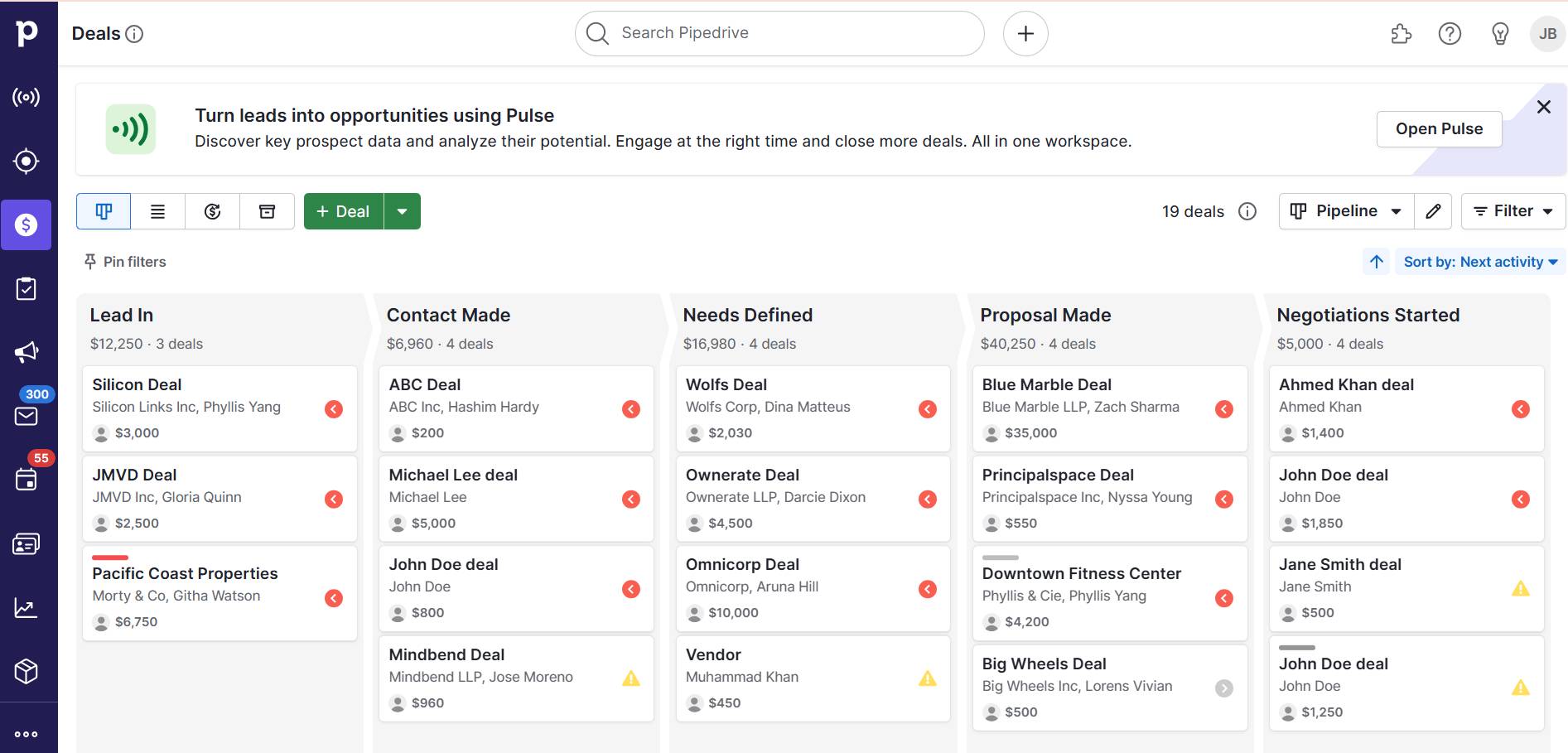
  • Subscriptions and memberships. Handles billing cycles, renewal dates and user activity. If a membership is about to expire, your system flags the customer’s profile with a renewal reminder.

A well-built database replaces hours of manual updates with automation. It pulls up any customer, order or product in seconds and uncovers trends you’d otherwise miss.

Recommended reading

https://www-cms.pipedriveassets.com/Customer-Database-Software.png

5 best customer information database software options for your business needs

3 types of database software: what small businesses need to know

Not all database software works the same. Some tools are ready to use immediately, while others require technical setup. Here are the three main types of database solutions for small business management.

1. Database-backed business software (best for small businesses)

Database-backed software like Pipedrive builds on top of databases but hides the complexity. You don’t see tables, code or technical settings. Instead, you get a simple dashboard to search and organize your business data.

How it works: Pipedrive allows you to create records and choose which fields to include (such as “customer name” or “product price”). The software handles the data structure and keeps everything in sync behind the scenes.

Here’s a quick summary of database-backed business software:

Requirements

Details

Technical skills

Low – no coding or database skills needed

Setup

Quick – choose a template and start entering data

Who it’s for

Solopreneurs and small teams who want a simple solution

Custom setup

Optional – works out of the box, but you can tweak fields and workflows

Businesses use database-backed software for things like:

This software is better for regular users than developers. It uses templates and features for everyday tasks, such as tracking sales or logging customer requests.

2. SQL database software (best for custom, structured systems)

SQL databases like MySQL or PostgreSQL store business data in structured tables – similar to spreadsheets but more powerful. You define what information to track and how they relate to each other.

How it works: SQL database software allows developers to create the database structure (schema). They define data relationships (like linking customers to orders) and write queries to manage or retrieve information.

You interact with the data using structured query language (SQL) – a coding language that lets you add records, run reports and connect tables. It gives you complete control, but you need someone who understands databases.

For example, your relational SQL database could include a customer table and an order table. Each customer has a unique ID, known as a primary key. In the order table, that same customer ID appears as a foreign key, linking each order to the customer who made it.

Small business database software relational database

This connection pulls data from both tables when needed, like listing all customers who placed an order on a specific date. You can also use that structured data to create reports or connect to other business tools.

Here’s a summary of SQL database solutions:

Requirements

Details

Technical skills

Medium to high – requires knowledge of SQL and database design

Setup

Moderate – involves schema design, hosting and integration with apps

Who it’s for

Businesses with technical resources and developers on hand

Custom setup

Yes – you must manually configure everything from the structure to the reports

Businesses use SQL databases for:

  • E-commerce systems – store customers, products, orders and transactions in connected tables

  • Custom internal tools – build a backend for employee scheduling, job tracking or order fulfillment

  • Business reporting and dashboards – pull detailed reports across multiple data points (e.g., sales by region or customer lifetime value)

SQL databases are best for businesses that need a custom system and have access to technical resources. You get complete control over storing and using data, but you’ll need a developer to build and maintain it.

3. NoSQL database solutions (best for fast-moving, flexible data)

NoSQL databases store business data more flexibly than traditional table-based systems. Instead of relying on rows and columns, they use document structures with key-value pairs.

How it works: NoSQL database solutions allow developers to create collections (similar to folders) that hold documents. Each document is a single-subject data file, such as a customer record. These documents use JSON, which looks like a list of labels and values.

Below is a customer document example:

Small business database software JSON example

The value (the data, like “Jane Smith”) follows the key (a label, like “name”). All of Jane’s details are in one document. You don’t need to link to a separate table as in SQL. If you want to find a customer’s order history, you ‌look inside their document.

NoSQL databases don’t use strict rules. Two customer documents might include different fields, and that’s okay. This makes NoSQL flexible, but it also means your developer needs to plan carefully to keep things organized.

Here’s a summary of NoSQL database solutions:

Requirements

Details

Technical skills

High – developers need to understand flexible data formats and how to structure documents

Setup

Varies – hosted choices are simple, while custom builds need more preparation

Who it’s for

Businesses building systems that handle fast-changing or complex data

Custom setup

Yes – developers decide how to store, retrieve and connect data

Businesses use NoSQL databases for things like:

  • User profiles with activity logs – store contact info, preferences and browsing or app usage history

  • Real-time messaging or chat systems – deliver and store messages instantly across users and devices

  • Mobile or web app backends – support flexible data needs in apps with notifications, user tracking or personalized content

NoSQL databases work best for businesses building systems that need to grow and change quickly. They give you more freedom with your data, but you’ll still need a developer to make it work smoothly.

9 best small business database software solutions

Here’s a comparison of nine database solutions, including their key features, how they work and which businesses they suit best.

1. Pipedrive CRM

Pipedrive is a sales-focused CRM. It helps small businesses manage customer relationships, track deals and automate workflows. Behind the scenes, it runs on a structured SQL-based database and offers strong data management capabilities.

It functions like a database, using pipelines and lists to organize information instead of traditional tables.

Small business database software Pipedrive pipeline

Pipedrive’s key features:

  • Custom data fields. Create fields for anything you need to track, from project milestones to customer preferences. For example, IT providers can log each client’s hardware specifications and service histories.

  • Kanban-style pipeline management. Visually track leads, sales deals and tasks using a drag-and-drop interface. SaaS companies use this to monitor free trial sign-ups, move sales leads through onboarding stages and identify users ready for an upgrade.

  • Automated workflows. Set up rules to trigger emails or update statuses based on customer actions. For instance, an e-commerce store can automate abandoned cart follow-ups when a customer leaves items in their cart.

  • Integration with third-party tools. Connect with apps like Zapier, QuickBooks and Google Workspace to centralize business operations. For instance, marketers sync campaign data between tools so team members have the latest performance metrics.

  • Bulk data import and export. Streamline uploading and exporting structured data without complex database queries (or programming languages). It’s user-friendly, allowing you to add leads, deals, products, notes and activities simultaneously.

Small business database software Pipedrive analytics

Who it’s best for: small businesses that need a CRM for sales automation with database capabilities. It’s beneficial for teams that manage customer interactions, deal pipelines and marketing efforts.

2. Knack

Knack is a cloud-based database platform. It offers a customizable web app builder, letting you create custom databases, workflows and reports.

Small business database software Knack interface

Knack’s key features:

  • Visual app builder – drag-and-drop elements to create databases, forms and sales dashboards without coding

  • Role-based access – control who can view and edit different parts of your database

  • Automated workflows – set up triggers to send emails, update records or generate reports based on user actions

  • Custom portals – create separate logins for employees, customers or vendors, each with personalized views

How it works: Knack’s interface focuses on data objects like database tables. You can define fields and set relationships between objects. You can also create interactive views using a point-and-click editor, including forms, tables and reports.

Who it’s best for: small businesses that lack the resources for custom development. It also works for companies managing customer databases, inventory or order tracking in ways that spreadsheets can’t.

3. Airtable

Airtable is a cloud-based platform that combines spreadsheets with the structure of a database solution. Its grid-based interface allows users to organize and collaborate on data.
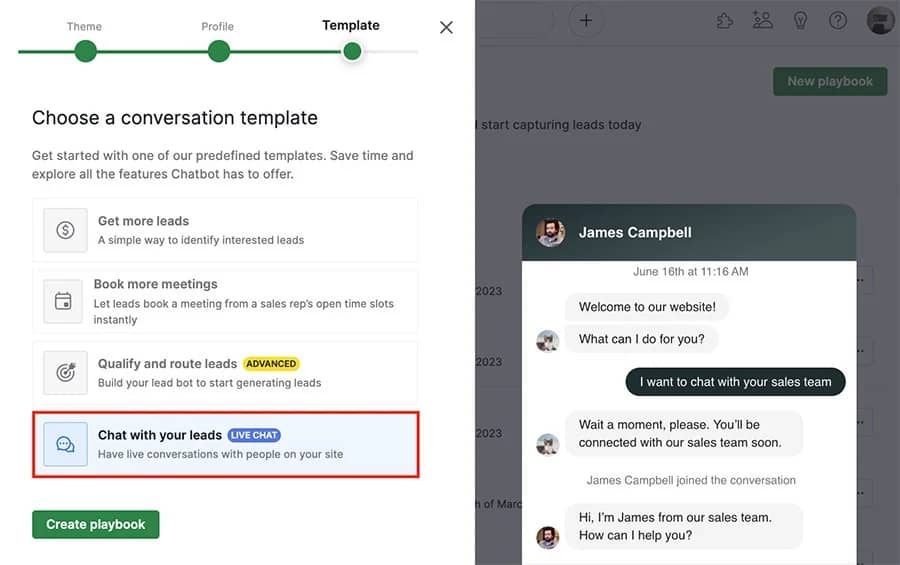
Small business database software Airtable interface

Airtable’s key features:

  • Spreadsheet-style interface – enter, sort and filter data in a grid layout

  • Multiple view options – switch between table, calendar, Kanban and gallery views to manage different workflows

  • Pre-built templates – use templates to set up databases for tasks like creative content planning or inventory tracking

  • Built-in integrations – connect with tools like Slack, Google Workspace and Shopify

How it works: Airtable organizes data into bases like collaborative workspaces. Each base contains tables (similar to spreadsheets), where you define fields, attach files and link records between tables to create relationships.

Who it’s best for: small businesses with marketing teams that perform content planning and project management tasks.

4. MongoDB

MongoDB is a document-based NoSQL database that allows businesses to store data without a predefined format. This is useful when stored information changes over time.

Small business database software MongoDB interface

MongoDB’s key features:

  • Format flexibility – add new fields without changing the entire database to accommodate changes

  • Scalability – spreads data across multiple servers to handle growing workloads and large datasets

  • Full-text search – built-in search capabilities to filter and retrieve information

  • Cloud-based options – provides a managed cloud solution with automatic scaling and backups

How it works: MongoDB stores data in collections instead of tables. Each entry is a document with keys and values, similar to how a contact list stores names and phone numbers. You can modify the structure as your business needs change.

Who it’s best for: small businesses managing e-commerce product catalogs, customer profiles or content management systems. It’s suitable for companies needing more flexibility than what traditional databases offer.

Get organized with your free sales pipeline excel template

Looking for a more streamlined way to manage your sales? Download this free sales pipeline template and test it out now.

5. MySQL

MySQL is an open-source relational database management system (RDBMS). Businesses use it to manage structured data in web applications, transactional systems and large-scale data processing.

Small business database software MySQL interface

MySQL’s key features:

  • Secure storage. MySQL uses InnoDB as its default storage engine to process transactions safely. If a power failure or system crash occurs, MySQL recovers the data to prevent corruption.
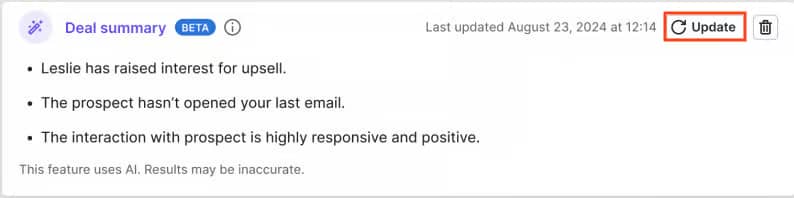
  • Data replication. MySQL copies data across multiple servers so a backup can take over immediately if the primary server fails. For example, a retail company might use replication to maintain real-time inventory data across its online and physical stores.
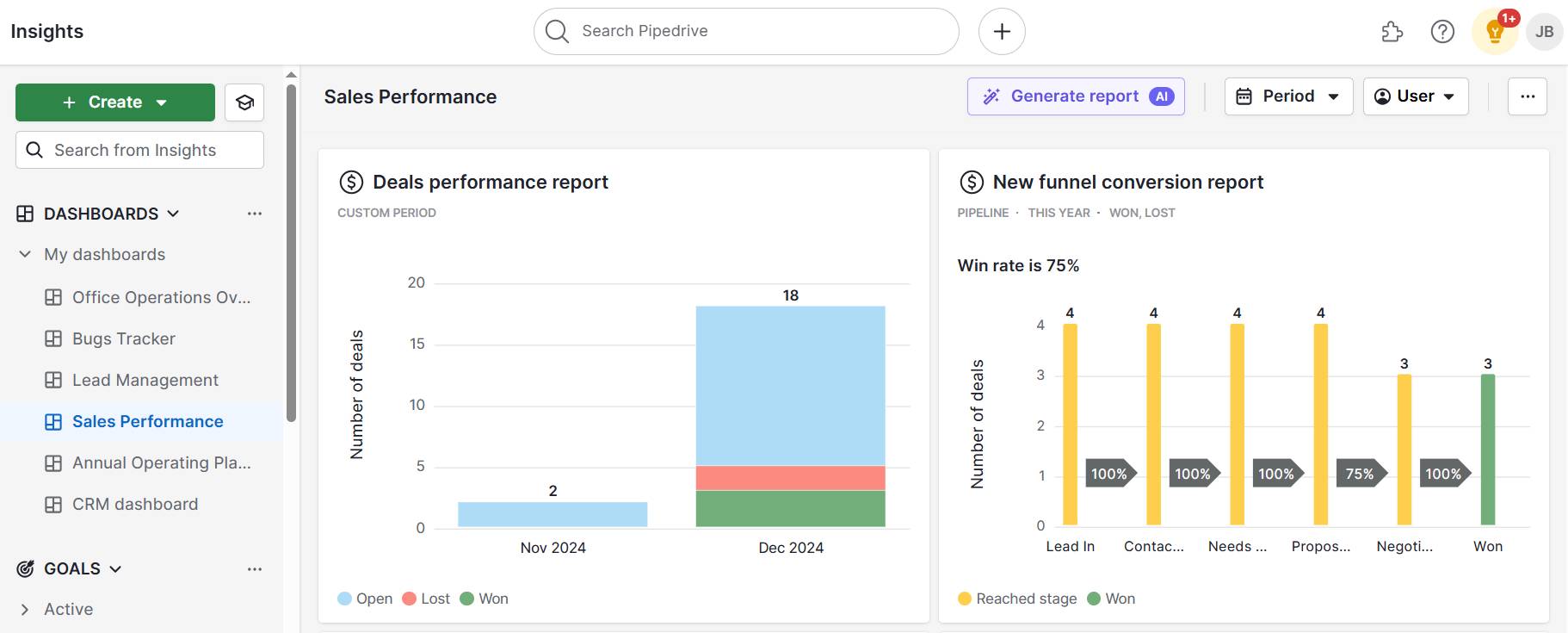
  • MySQL Workbench. A built-in tool with data visualization that lets you design and analyze databases without writing complex code. For instance, a developer can create an entity-relationship diagram to model database structures visually before implementation.

  • Partitioning. Split large databases into smaller sections to improve performance. For example, an online store with millions of customer records can organize data by region or year, making searches and reports faster.

Who it’s best for: companies that need a high-performance yet cost-effective database solution. Its open-source model has no licensing costs. Small businesses can use it, yet it also supports large-scale applications.

6. PostgreSQL

PostgreSQL is another open-source relational database. It handles complex queries, making it useful for data analysis and real-time processing (e.g., handling transactions).

Small business database software PostgreSQL interface

PostgreSQL’s key features:

  • Supports complex data types – stores a wide range of data, including JSON, XML, geolocation coordinates and custom data structures

  • Advanced automation – automates repetitive tasks like updating inventory levels or notifying customers when their orders ship

  • Multi-version concurrency control (MVCC) – allows multiple users to access and modify information without slowing down the system

  • Full-text search – includes powerful search tools that allow businesses to find relevant information in product catalogs, customer databases or support tickets

Who it’s best for: businesses that handle data-heavy applications and analytics. It can generate customer insights, forecast finances and track logistics. Its open-source model keeps costs low despite having enterprise features.

7. Oracle Database

Oracle Database is a relational database system developed by Oracle Corporation. It manages large-scale structured data for applications, such as transaction processing, analytics and data warehousing.

Small business database software Oracle Database interface

Oracle Database’s key features:

  • Automated data management – automates performance tuning, backups and indexing, reducing the need for hands-on maintenance

  • Advanced security – includes encryption, data masking and user permission controls to protect sensitive business information like customer records

  • Deployment flexibility – offers multiple deployment options, including on-premises, cloud-based and hybrid models

Who it’s best for: businesses that need a high-performance database with security features. It’s useful for industries that require data to be continuously available, such as banking, telecommunications and large-scale retail.

8. Microsoft SQL Server

Microsoft released SQL Server in 1989 as a relational database system for businesses running Windows applications. Over time, it has become an enterprise database with tools for transaction processing, analytics and business intelligence.

Small business database software Microsoft SQL Server interface

Microsoft SQL Server’s key features:

  • Integrates with the Microsoft ecosystem – works with Microsoft Excel, Power BI and Azure to generate reports, analyze data and manage cloud-based storage

  • Disaster recovery – has several data recovery features to ensure data is always accessible

  • Built-in security features – includes encryption, role-based access control and auditing tools to help businesses protect sensitive data and ensure regulatory compliance

  • AI-driven performance optimization – uses intelligent query processing and machine learning to optimize database performance

Who it’s best for: businesses that already use Microsoft products and need a database that will integrate. It supports applications that require data security and cloud integration, as well as financial services and healthcare companies.

9. SQLite

SQLite is a lightweight, file-based relational database management system. Unlike most relational databases, SQLite doesn’t require installation or configuration, making it easy for local storage needs.

Small business database software SQLite interface

SQLite’s key features:

  • Serverless architecture – stores data in a single file on disk, eliminating the need for a separate database server

  • Zero configuration – requires no setup, making it easy for startup companies and small business owners to use without extensive database administration

  • Cross-platform compatibility – works on Windows, macOS, Linux and mobile operating systems

  • Lightweight – works well for mobile apps and small-scale applications

Who it’s best for: developers and small businesses that need a database without the overhead of a complete database server. It works for local data storage in mobile apps and business tools that don’t need multi-user access or large-scale data processing.

Recommended reading

https://www-cms.pipedriveassets.com/CRM-data-migration-methods.png

CRM data migration: 5 ways to safely move your data

How to choose the right database software for small business

The right database depends on your business needs, technical expertise and budget. Here are a few things to consider when deciding:

  • Data type and structure. A relational database like MySQL is a good fit if your business manages structured data like transactions and inventory. A NoSQL solution may be better if you work with unstructured data (e.g., social media interactions).

  • Business use case to manage. Some businesses need a traditional database, while others benefit from platforms designed for managing leads and sales. For example, Pipedrive helps track customer interactions and sales pipelines.

  • Scalability and future growth. A small business running a simple website might use a lightweight tool for simple data storage. Businesses expecting more users and data growth may need a scalable, online database.

  • Learning curve and maintenance. If you lack IT expertise, a no-code tool like Pipedrive simplifies setup and management. More complex databases, like Oracle, have advanced capabilities but need dedicated admin.

  • Budget constraints. Open-source databases are free, while commercial options have high licensing fees. Cloud-based solutions like Pipedrive use subscription pricing. It’s more cost-effective for small businesses that don’t need a complete database system.

Consider your needs and budget carefully when choosing a solution for your business.

Small business database software FAQs

  • The best database depends on your business needs. Pipedrive is a great CRM database software for small businesses, while MySQL manages structured data effectively.

  • The simplest database has a visual interface and minimal technical setup. For instance, Pipedrive provides an intuitive CRM with easy data entry. Spreadsheets are valid for fundamental data management.

  • You can create your database for free using open-source software (e.g., MySQL) or spreadsheets (e.g., Google Sheets, which integrates with Pipedrive).

  • Customer database software like Pipedrive stores and organizes customer information, interactions and sales data.

  • Common DBMS include Pipedrive, MySQL, PostgreSQL, Microsoft Access and Airtable.

Final thoughts

When you organize and make customer data easily accessible, your team works faster and closes more deals.

Pipedrive is a simple CRM platform that integrates everything. It allows you to track every customer interaction, automate sales processes and give your team the information they need when they need it.

Start your 14-day free trial to see how much more your team can accomplish with accessible business data.

Lessons from OMR 2025: Key Insights to Power Your Growth

Software Stack Editor · May 21, 2025 ·

ND

Natashy DuarteSenior SEO Content Manager, Pipedrive

OMR Festival 2025, Europe’s biggest digital event, brought around 67,000 professionals to Hamburg and the energy was electric. Pipedrive showed up in full force with a dedicated booth and a standing-room-only masterclass delivered in German by Gabriel Fugli, Head of Channel EMEA Central at Pipedrive.

With a powerhouse lineup including Ryan Reynolds, Dirk Nowitzki, Amy Webb, Nicholas Turley(OpenAI), Marian Lee (Netflix), Sebastian Fitzek, Jen Wong (Reddit), Lili Radu (VeeCollective), Larissa Schmid and Vivien Wysocki (SaintSass) and Kathrin Hamm (Bearaby), the event delivered insights that every sales and marketing team can start applying now.

From AI to RevOps, here are five key takeaways your team can’t afford to ignore.

Pipedrive at OMR 2025: strengthening our presence in Germany

This year, Pipedrive made a bold statement at OMR with a prominent booth and a full-capacity

masterclass led by Gabriel Fugli. His session, “From Leads to Deals”, delivered in German, attracted over 200 attendees and focused on how sales teams can stop undermining marketing efforts through activity-based selling and smarter CRM strategy.

The company’s strong presence at the festival reflects its ongoing commitment to supporting sales and marketing teams in the DACH region and expanding its footprint in the German-speaking market.

Pipedrive at OMR 2025

1. AI is no longer optional – it’s operational

At OMR 2025, AI wasn’t just trending, it was embedded across real-world use cases showcased throughout the expo halls and stages. Companies demonstrated how AI tools are helping sales teams prioritize smarter, automate follow-ups and personalize outreach at scale.

Why it matters:
According to internal research shared by Fugli during his masterclass, sales reps spend up to 51% of their time on non-selling tasks such as administrative work, CRM data entry and lead research.

Tip: start by automating repetitive tasks in your CRM, like scheduling follow-ups and logging emails, then explore AI-powered lead scoring to focus reps where it counts.

2. RevOps is the glue between marketing and sales

Revenue Operations emerged as a central theme, with experts like Marcel Epler and Valentin Zehnder discussing the benefits of implementing RevOps to align teams and optimize processes.

Why it matters:
Businesses that unite marketing, sales and customer success under shared operations and KPIs see better forecasting and faster sales velocity.

Tip: audit your current process: are your tools integrated? Is lead handoff seamless and full of context?

3. Content must be human – even in B2B

Speakers like Tarek Müller (Co-Founder, About You), Ryan Reynolds (actor and entrepreneur) and Lili Radu (Founder and CEO, VeeCollective) highlighted the power of authenticity and storytelling in marketing.

Ryan Reynolds emphasized that “perfectionism is a damn disease. You have to be prepared to fail in order to be good”. Their shared message was clear: people connect with people, not with overproduced presentations or generic messaging.

Why it matters:
As discussed in content sessions, today’s buyer journey is up to 80% digital and mostly anonymous, making emotional and relatable content more important than ever.

Tip: align your marketing content with the real objections and questions your sales team hears every day. Authenticity builds trust – fast.

4. Omnichannel personalization is the new competitive edge

At OMR 2025, omnichannel personalization emerged as a strategic differentiator for sales and marketing teams.

In the masterclass “From Reach to Relevance,” Manuel Toenz (Bloomreach) and Paul Baumann (Head of Omnichannel Experience & Marketing Technology, ROSSMANN) shared how the integration of data and AI enables highly personalized customer journeys across multiple touchpoints.

Why it matters:
Today’s customers expect seamless and relevant interactions across all channels. Companies that can orchestrate these experiences increase customer satisfaction and drive stronger sales performance.

Tip: evaluate whether your CRM and marketing tools are truly integrated to offer a unified customer view. Consider AI-powered solutions that help predict behavior and tailor offers in real time.

5. Activity-based selling is still the most reliable engine

Pipedrive’s Gabriel Fugli closed out his masterclass by advocating for a return to the fundamentals: activity-based selling. “Revenue isn’t just about more leads – it’s about what you do with them,” he told the audience. His presentation emphasized the need for actionable next steps tied to every deal.

Why it matters:
According to data presented in Gabriel’s slides, 65% of deals created in CRM systems never receive a follow-up activity, which drastically reduces close rates. He also noted that 80% of sales require five or more touchpoints, reinforcing the need for structured outreach

Tip: automate activity creation when a deal is created. Make sure your pipeline has clear next steps, not just static records.

A note from the organizers

As OMR Founder Philipp Westermeyer summarized it:

It’s a powerful reminder that while AI and automation are transforming how we work, success still depends on human connection, clear communication and shared goals.

Final thoughts

OMR 2025 made one thing clear: the future of marketing and sales is connected, intelligent and deeply human. AI and automation can empower us, but only if paired with aligned strategies, clean data and consistent action.

Want to bring these learnings into your daily pipeline? Try Pipedrive for free and start building a smarter, more connected sales process today.

5 Steps to Effective Business Continuity Management

Software Stack Editor · May 21, 2025 ·

Small businesses must stay agile, but unexpected problems can slow operations and impact revenue. Without a big company’s safety net, preparation is key.

Business continuity management (BCM) helps businesses of all sizes recover from setbacks and keeps sales, service and operations running smoothly.

In this article, you’ll learn what BCM is and how to protect your business with practical strategies and the right tools.

What is business continuity management?

Meaning of business continuity management: A broad strategy including risk assessments, crisis response and backup plans to help businesses remain operational during disruptions. BCM goes beyond a single plan, ensuring organizations anticipate and recover from unexpected events.

BCM is essential for small and mid-sized businesses (SMBs). These companies don’t have the financial cushion that larger corporations do, making disruptions more damaging.

Business continuity management ensures key business operations can continue in a crisis. It helps minimize downtime, protect revenue and maintain customer trust.

Common threats to business continuity include cyberattacks, supply chain failures, natural disasters and economic downturns (more on these later).

A clear example is the COVID-19 pandemic, which shut down supply chains, forced remote work and exposed weak spots in business planning.

Companies with solid BCM strategies adapted quickly, shifting to online sales, securing alternative suppliers and maintaining operations. Those without a plan struggled to stay afloat, and many faced long-term closures.

Recommended reading

https://www-cms.pipedriveassets.com/Risk-Management.png

Risk management: Definition, classifications, action plan for SMBs

The key components of a business continuity plan

A business continuity plan (BCP) is a key component of business continuity management. It isn’t just one document but a set of strategies that help a company recover quickly after disruptions.

BCM provides the broader framework that guides the development, implementation and continuous improvement of BCPs.

Here’s what a BCP should include:

Business continuity plan component

How it helps SMBs

Risk assessment

Identifies potential threats and helps you understand where you’re most vulnerable.

Business impact analysis (BIA)

Evaluates how disruptions affect cash flow, customers and daily tasks, helping you focus on what needs the most protection.

Continuity strategies

Provides practical contingency plans like backup suppliers, flexible work setups and data recovery methods to keep your business running – even if systems fail.

Communication plan

Decides who will update customers – your marketing team, sales manager or another team member – so messages are clear and timely.

Testing and optimization

Involves running tests, checking that your team knows the plan and making updates as your business grows or new risks emerge.

Crisis management helps you build a solid plan to ensure preparedness when it matters most.

How to develop a business continuity plan in 5 steps

A business continuity program keeps your business running smoothly when unexpected challenges arise.

Here are five steps to create a business continuity management template that evolves with your company’s needs.

1. Assess your risks and vulnerabilities

The first step in creating a business continuity management plan is determining what could affect your organization’s ability to continue operating. Every company faces different risks based on its industry, size and location.

Some common threats include:

Risk type

Examples

Cyberattacks

Data breaches, ransomware and system failures can halt operations.

Supply chain failures

Shipping delays, shortages or key suppliers going out of business.

Natural disasters

Hurricanes, floods, earthquakes and wildfires, depending on location.

IT or power outages

Internet disruptions, server crashes or loss of access to critical software.

Pandemics or health crises

Workforce shortages, supply issues and business closures.

Regulatory requirements

New laws or industry regulations could impact operations.

Economic downturns

Global recessions, financial crises and industry changes compromise business success.

For example, the Ever Given container ship (which blocked the Suez Canal in 2021) disrupted global supply chains for weeks and held up almost $60 billion in trade.

That same year, the North American winter storm caused power outages for almost 10 million people and halted business operations.

Some risks cause minor delays, while others can shut a business down completely. To figure out how serious a threat is, ask:

  • Which parts of the business will the disruption affect first?

  • Can operations continue at a limited capacity?

  • How long can the business last if the issue lasts days, weeks or longer?

For example, an online store hit by a cyberattack could lose thousands of dollars per hour. An IT company with a major server failure might be unable to provide services for weeks, leading to contract cancellations.

Creating a risk assessment matrix helps you see which issues are most likely or would cause the most damage. It makes it easier to plan and prepare for problems before they happen.

Business continuity management risk assessment matrix

Understanding your most significant risks is the foundation of strong resilience management. Once you know where your business is vulnerable, you can focus on protecting the most critical functions.

2. Map out critical functions and do a business impact analysis

Next, determine which business aspects are essential to maintain operations. Identify tasks you can pause (e.g., long-term marketing campaigns) and others that must continue without interruption (e.g., payment processing and order fulfillment).

To map out these priorities, ask yourself:

  • What processes must run for the business to function?

  • Which departments handle these key operations?

  • Who are the most essential staff and can others step in if needed?

  • What software or tools are necessary to keep things running?

  • Are there alternative suppliers if your main one fails?

For example, a retail store depends on inventory management, payment processing and customer service. In contrast, an IT company relies on cloud infrastructure and technical support teams.

Once you’ve identified critical functions, assess how challenges would affect revenue, operations and regulatory compliance:

BIA assessment step

Key question

1. Evaluate financial impact

How much revenue would you lose per hour or day if a function is down?

Example: An e-commerce business loses $50,000 daily if its website crashes.

2. Assess operational impact

What happens to employees, production and service levels if a key function fails?

Example: An IT services company can’t support clients during a network outage.

3. Consider legal and compliance risks

Are there regulatory consequences if operations stop?

Example: A fintech company faces GDPR fines if a security breach exposes customer data.

A well-executed BIA helps you focus on what matters most to remain resilient and keep operations stable.

3. Create a response and recovery strategy

Once you know your critical business functions, set up a recovery plan to minimize downtime. Have a clear response plan in place for each significant risk.

For instance, if a supply chain fails, your plan might include backup suppliers or extra inventory to avoid interruptions.

A strong recovery plan should include:

Recovery plan step

What to do

1. Incident detection and initial response

Plan how your company will recognize issues, who is responsible and what immediate actions you need to take.

2. Damage assessment

Determine the extent of the disruption and what resources you need to recover.

3. Containment and mitigation

Take immediate steps to stop the issue from getting worse (e.g., isolating infected IT systems or switching to backup suppliers).

4. Restoration

Outline how to get critical functions back online and transition from backup systems to normal operations.

5. Post-recovery review

Analyze what worked and what didn’t, then update the plan based on lessons learned.

Each critical function needs a recovery time objective and recovery point objective, or RTO and RPO.

Business continuity management Pipedrive RTO and RPO

An RTO sets the maximum time a function can be down before it severely impacts business operations. An RPO determines how much data loss is acceptable before it affects customers.

Establish a recovery priority for each specific critical function:

  • Immediate recovery (0–24 hours). Functions you must restart immediately, such as payment processing and cybersecurity systems.

  • Short-term recovery (1–3 days). You can briefly delay these processes, including HR tasks or internal reporting.

  • Long-term recovery (4+ days). You can wait longer to fix tasks like strategic planning or non-urgent project reports.

Here are some examples:

Business function

RTO and RPO

Customer order processing

RTO (max. downtime): 2 hours

RPO (max. data loss): 15 minutes

Internal IT systems

RTO (max. downtime): 8 hours

RPO (max. data loss): 1 hour

Marketing and advertising

RTO (max. downtime): 3 days

RPO (max. data loss): 24 hours

A well-developed incident response and recovery strategy ensures you don’t waste time scrambling when business disruptions occur.

4. Establish clear communication channels

A strong communication plan ensures employees, customers and partners get information quickly. It should cover:

  • Who needs updates – identify key groups like employees, customers, suppliers and business partners

  • What to share – provide details on the issues, expected downtime and next steps

  • How to deliver messages – explain whether to inform people via emails, SMS messages, calls, websites or social media

  • Who is responsible – assign a team or spokesperson to send updates and answer questions

Different situations require different messaging. For example:

Crisis communication type

What to consider

Internal updates

Employees need clear instructions on what to do, whether to work remotely and how changes affect their jobs.

Customer notifications

Customers should know about service disruptions, expected recovery times and alternative options.

Supplier and partner coordination

Vendors require updates on order changes, shipment delays or backup plans.

A clear plan reduces misinformation, stabilizes operations and reassures customers until the crisis subsides.

5. Test, refine and update your plan regularly

A business continuity plan isn’t a one-time effort – you must test and update it to stay effective. Risks change, technology evolves and businesses grow, so regular reviews ensure your plan remains relevant.

To keep your disaster recovery plan up to date:

  • Run simulations. Test different scenarios, like a cyberattack or supply chain failure, to see how well your plan holds up.

  • Conduct team drills. Make sure employees know their roles during disruptions. Walk through emergency procedures and recovery steps.

  • Review after real incidents. If your business faces an unexpected issue, assess what worked and what didn’t. Adjust the plan based on what you learn.

  • Update regularly. Review the plan at least once a year or when major changes happen.

Regular testing and continuous improvement identify weaknesses before a real crisis hits, keeping your business prepared.

Download your free business continuity plan template

Prepare your own business continuity plan using this free spreadsheet

5 tools to help manage business continuity planning

Many dedicated business continuity management systems, like Everbridge and Fusion Risk Management, target enterprise corporations and come with costs that enterprise businesses can afford. While these providers offer advanced features, they aren’t always practical for small business management.

Below, you’ll learn about five affordable tools that help small business owners manage continuity planning, assess potential risks and implement plans.

1. Pipedrive: for sales continuity and business continuity planning

Pipedrive’s customer relationship management (CRM) solution enables small enterprises to plan sales and business continuity in one place.

Use Pipedrive’s pipeline management features to track fundamental stages and prevent sales deals from stalling. The tool lets you assign deal owners, automate progress updates and monitor activity to avoid delays.

Business continuity management Pipedrive visual pipeline

If an issue slows sales, Pipedrive’s sales pipeline reporting tools help you spot stalled deals and overdue follow-ups.

You can also manage business continuity plans through Pipedrive’s Projects add-on (more on this tool later). Set up a structured recovery plan, manage tasks and track progress so your team knows exactly what to do during a disruption

Business continuity management Pipedrive Projects

Clear deadlines and responsibilities mean your business can respond quickly and avoid confusion.

Finally, with Pipedrive, you can store and centralize key continuity information. Save supplier contacts, emergency protocols and recovery checklists within the platform, making them easily accessible when needed.

2. Trello: for crisis response planning and task management

Trello is a project management tool that supports business continuity plans by organizing and monitoring team activities.

Business continuity management Trello dashboard

Use Trello’s capabilities to:

  • Keep contingency plans in one place. Teams can access updates, checklists and documents, reducing confusion and delays.

  • Automate complex task updates and notifications. Set reminders and status updates to handle IT task management or nested checklists and align team members without constant check-ins.

  • Track progress and adjust priorities. Quickly reassign tasks or shift focus as disruptions evolve.

Pipedrive’s sales CRM integrates with Trello, connecting sales and crisis response efforts. You can link deals to specific tasks, helping your teams follow up on critical actions like updating customers, adjusting baselines or coordinating recovery steps.

3. LastPass: for secure credential management

LastPass gives your teams secure access to accounts if working conditions change.

Business continuity management LastPass dashboard

Using this information security tool, you can:

With cloud-based password management, employees can log in to essential tools from anywhere without risking security breaches.

4. Google Workspace: for cloud-based collaboration and data backup

Google Workspace keeps teams always connected. With cloud storage and real-time editing, employees can work from anywhere without interruptions.

Business continuity management Google Workspace

A team collaboration tool like Google Workspace:

  • Supports remote work – access files, emails and communications from any device, keeping the business running even if the office closes

  • Protects important data – cloud storage automatically saves and syncs files, preventing losses due to hardware failures or cybersecurity breaches

Pipedrive integrates with Google Workspace, linking emails, documents and meetings to your Pipedrive deals and contacts. The integration ensures teams always have real-time access to critical information.

5. JustCall – for business communication continuity

JustCall provides cloud-based VoIP solutions to keep customer and internal communications running. Teams can make and receive calls from anywhere, ensuring business continuity.

Business continuity management JustCall

JustCall’s business phone solution helps you:

  • Keep sales and support teams connected – handle sales calls on any device, even if the office phone system is down

  • Avoid disruptions – cloud-based calling ensures communication stays active during phone network outages

  • Maintain accessibility during disruptions – route calls to backup numbers, access voicemails and keep communication flowing when your regular systems fail

JustCall integrates with Pipedrive, making it easy to track customer interactions. Calls, voicemails and text messages are automatically logged under the relevant deal, giving you a complete communication history.

Salespeople and service teams can quickly reference past conversations, follow up efficiently and maintain continuity when working remotely or switching devices.

Recommended reading

https://www-cms.pipedriveassets.com/Action-Plan-Template.png

The ultimate guide to creating an action plan template (with examples)

Business continuity management example: plan with Pipedrive

Pipedrive isn’t just for tracking sales. It centralizes customer interactions, automates workflows and securely stores data so you can maintain operations when other companies falter.

Here’s how your teams can use Pipedrive to gain a competitive advantage:

Keep customer interactions uninterrupted

During disruptions, it’s crucial to maintain clear and consistent communication with customers. Pipedrive tracks all calls, emails, and follow-ups, giving your team up-to-date customer information.

If a team member is out, others can quickly access past interactions and continue the conversation.

Business continuity management Pipedrive customer profile

Automated reminders ensure sales and support teams stay on top of follow-ups and sales opportunities. Real-time deal notes and customer record updates inform everyone when an issue affects service or order fulfillment.

Business continuity management Pipedrive reminders

For broader customer updates, Pipedrive’s email templates and bulk messaging let you send timely notifications to minimize confusion and nurture customer loyalty.

If disruptions lead to an influx of customer emails, Pipedrive’s AI email writer can summarize email threads and craft on-brand replies. The tool helps you reply to customers efficiently without sacrificing quality or making mistakes.

Automate workflows to prevent lost leads

Disruptions can quickly derail sales processes, but workflow automation ensures deals keep moving. Pipedrive helps by:

  • Sending alerts when sales deals stall or tasks are overdue

  • Automatically moving leads through the pipeline based on customer actions, reducing manual effort

  • Scheduling follow-ups to ensure you don’t miss opportunities, even if team members are handling other tasks

Business continuity management Pipedrive workflow automation

These Pipedrive features help teams stay on top of sales when a crisis affects normal operations.

Safeguard and centralized data for organizational resilience

Disruption shouldn’t mean losing access to critical information. Pipedrive stores all customer records, deal histories and sales data securely in the cloud – so your team can retrieve essential details no matter where they are.

Business continuity management Pipedrive access controls

Access controls let you protect sensitive information while granting the right employees the access they need. With remote access, your team can continue working if office systems are down or they’re working offsite.

Additionally, cloud backups prevent data loss and keep business processes running smoothly.

Manage business continuity plans with Projects and SmartDocs

A well-organized BCP ensures your team knows exactly what to do when something goes wrong. Pipedrive’s Projects feature helps you create, track and execute BCPs. You can assign tasks, set deadlines and monitor progress from a single platform.

Business continuity management Pipedrive task management

The SmartDocs add-on enhances this process by allowing you to store and manage key documents such as emergency contacts, risk assessments and contingency plans.

Business continuity management Pipedrive SmartDocs add-on

When problems arise, your team can quickly access up-to-date protocols and send updates to stakeholders. SmartDocs also lets you send and receive eSignatures to continue processing important agreements.

Final thoughts

Business continuity management processes help small businesses navigate disruptions. A solid plan protects revenue, maintains customer loyalty and allows a faster return to normalcy.

Start by identifying key risks, mapping critical functions and leveraging tools like Pipedrive to keep your sales and operations under control.

Sign up for a 14-day free trial and see how Pipedrive can help you build a stronger, more prepared business.

Complete User Persona Guide

Software Stack Editor · May 21, 2025 ·

A foundational understanding of your company’s user persona is essential to staying competitive and adapting products to meet user needs. A comprehensive user persona gives you a deeper understanding of your specific user (or users) and what they get from your products.

In this post, we guide you through creating a user persona step-by-step and provide a user persona template to streamline the process.

What is a user persona?

A user persona is a fictional character representing your products’ users. It provides your product team with key insights, such as a user’s characteristics, needs and behavior patterns.

Compiling this information gives you insights to tailor your products or develop new offerings.

Establishing a humanized persona helps your development and design teams better understand and empathize with your typical user.

User persona template for download

If you have multiple products or serve various target groups, it might be helpful to create several user personas and store them in a user persona template that your team can easily access.

We’ve designed a downloadable buyer persona template that can help you organize your user personas. It includes a table to collect demographic and professional data, personal characteristics, pain points and your personas’ goals.

Better understand your customers with our Buyer Persona Templates

Use these templates to ensure your solution always aligns with your customers’ interests and needs

How is a user persona different from a buyer persona?

User personas and buyer personas are often confused, but there is a subtle difference:

At first glance, these might seem identical, but a buyer isn’t always the user. For example, a CEO might buy a company’s sales CRM, but it’s the salespeople who use it every day.

The buyer persona represents the person who makes the purchasing decision at the end of the customer journey (in this case, the CEO). The sales reps who use the software reflect the user persona.

In the B2C sector, user and buyer personas often coincide. In B2B, they’re more frequently distinct individuals.

Recommended reading

https://www-cms.pipedriveassets.com/Ideal-Customer-Profile.png

Craft an ideal customer profile to identify your best customers

Why you need a user persona

A user persona helps you understand your target audience, enabling more effective products, sales and marketing decisions.

A product is successful when it helps users with a specific challenge or solves a problem. For example, CRM software helps coordinate marketing and sales tasks, close more deals and enhance the user experience.

Functionality isn’t the only success factor, though. A product should also be intuitive, have a user-friendly UI design and meet users’ additional needs.

Developing and reviewing user personas can ensure your product aligns with user expectations.

A user persona consolidates your target audience’s critical challenges, desires, preferences and behaviors. It should answer questions like:

  • What characteristics do product users have?

  • How do they behave? In what situations do they use the product?

  • What goals do users have with the product?

  • What excites them about products?

  • What challenges do they encounter while using the product?

  • How can the product be improved, or is it reasonable to develop an entirely new product to support users better?

Market research can help you answer these questions and take a data-driven approach to creating customer personas. Let’s look at the specific steps that will help you get started.

Recommended reading

https://www-cms.pipedriveassets.com/Customer-Behavior.png

Customer behavior: the ultimate expert-backed guide

7 steps to create a user persona

An impactful user persona should be as realistic as possible, based on factual information about your target user.

Use the following guide and our free user persona template to create your user persona:

Step 1: Assemble a team to pinpoint users

Create a diverse team to help you understand your users.

Your user persona will likely represent a variety of product users. To capture a complete picture, include people from different teams, including sales, customer service and marketing, in the creation process.

Each team can offer a different perspective on the type of user that uses your product, why they use it and their experience.

Step 2: Brainstorm ideas about your typical user

Brainstorming helps you gather insights from your team of experts and gives you a starting point for developing a persona.

The people on your team deal with your customers regularly, so they’ll have valuable insights into who your users are and how your product solves their pain points.

Here are some tips for successful brainstorming:

  • Gather everyone to discuss ideas. Meet either virtually or in person.

  • List the characteristics and needs that set your users apart. Jot down suggestions on a whiteboard, note-taking software, Post-It Notes or any system that works for you.

  • Make sure you hear from everyone. Team members from different departments will have different suggestions, as they interact with your user group at different points in the customer journey.

  • Consider different types of users. For instance, a marketer and a customer service rep might both use a smartphone. The marketer needs social media apps, and the customer service rep might prioritize a messaging service. Yet, both use the same device. The question then becomes: what are the common personality traits among users?

  • Look for patterns. Note what users have in common to form a concrete picture.

Note: If you notice significant differences between types of users, you may need to create multiple personas. To make the design process easier, create them one at a time.

Step 3: Gather information from your target audience

Do market research by talking directly to your target audience or interviewing existing customers about their experience.

Collecting data from these primary sources further ensures your user persona reflects your audience, their pain points and their goals.

Your ideal customer can offer real-life examples of how, when and why they use your product. They may also suggest things you hadn’t considered that could help you stand out.

Some ways you could collect data include:

Use your research methods to get valuable insights into your typical user’s life, including the following.

Professional data

What’s their job title, salary, work experience and typical tasks?

Demographics

What’s their age, gender, location, education, marital status, etc.?

Pain points and problems

What challenges do they face at work?

Goals, wishes, needs and dreams

What do they want to achieve at work?

Personal characteristics

What are their likes and dislikes?

Daily routine

What does their typical daily routine look like?

Note: The most relevant information for your user persona depends on your target users. For example, professional data matters more than demographic data for B2B customers.

The key to accuracy is ensuring your user persona is based on real-world research.

Step 4: Develop a biography and usage scenarios

Use your collected data to create a biography for your user persona and generate typical use cases.

The story you create will help you understand your users and their challenges, putting you in a better position to solve their problems and communicate about your product.

Write a brief bio for your user based on the information you’ve gathered.

Some people find it helpful to name their user personas to make them easier to refer to. You can also choose a photo to represent them and create a short statement about their challenges and goals to further bring them to life.

For instance, the following user persona example includes a name and a face.

User persona example Pipedrive

At the end of this process, the persona should feel like a real person. If someone asks, “How would David like the product update?” your team should have a clear image in mind, improving decision-making.

Once you have a biography, define typical usage scenarios (also known as use cases) in which the user persona uses your product. Answer these questions:

Understanding how your user base engages with your product will direct future product design decisions, ensuring you maintain crucial functionality and meet customer needs.

Step 5: Validate and refine your user persona

Before finalizing your user persona, run it by stakeholders such as your product or design teams. This persona directly impacts how and why a UX designer makes a decision, for example, so it’s essential to get their input and buy-in before it’s finalized.

If you need to make changes, use real data and user stories to update your persona profile and keep it as accurate as possible.

Step 6: Start using your user persona

Once everyone is happy with your user persona, it’s time to use it. If you’ve designed it to accurately reflect your user segments, it can help speed up design and marketing decisions.

You can also leverage your user or buyer persona to generate more leads. For instance, you can input data about your persona into the Prospector feature in Pipedrive’s LeadBooster add-on.

Prospector uses the data to gather lead recommendations from a global database of over 400 million users.

User persona Prospector Pipedrive

Input information such as job title, industry, company size, location and seniority.

Prospector then returns matching profiles.

Select the contact(s) you want from the list and use credits to reveal their information. You can also add them straight to your Pipedrive pipeline as leads or deals.

Step 7: Revisit your user persona periodically

Regularly evaluate your completed user persona to ensure your assumptions accurately reflect real users.

Industry trends and customer needs change constantly, so conducting market research and reading industry publications is important to ensure your user persona is current.

Regular revision ensures your persona will continue to help you with things like product management.

A well-maintained user persona template makes review and revision easier and more efficient.

Recommended reading

https://www-cms.pipedriveassets.com/blog-assets/leadbooster-september-2020_200917_165251.png

Upgraded LeadBooster is now a complete lead generation toolset to help you generate, manage and nurture leads

Final thoughts

User personas allow you to understand your users and develop a better product that fits your target audience perfectly. As a result, your customer satisfaction increases and you remain competitive in the long term.

Get started creating your user persona with our user persona template.

10 Powerful Steps to Improve User Experience

Software Stack Editor · May 20, 2025 ·

If people are leaving your website without taking action, poor user experience could be the reason. Slow load times, confusing layouts and hard-to-read fonts can frustrate and drive users away.

In this guide, you’ll learn how to improve user experience with simple, proven methods. We’ll cover usability, UX design, user feedback and more so you can boost engagement, increase conversions and keep visitors coming back.

What is user experience, and why is it so important?

User experience (UX) is a person’s overall feeling when interacting with your website, app or product.

It covers everything from ease of navigation to how intuitive the layout is and from how fast pages load to whether users can achieve their goals with minimal effort.

The goal of good UX is simple: reduce friction and make every customer interaction feel smooth, satisfying and purposeful.

Research from Google found that users form design opinions in as little as 50 milliseconds and that visually complex websites were consistently rated as less appealing.

In contrast, clean, familiar layouts led to better first impressions and higher satisfaction.

When users enjoy the experience, they stay longer, return more often and are more likely to convert.

10 proven strategies to improve user experience

A better user experience doesn’t happen by accident. It results from thoughtful design, real user feedback and smart testing.

Let’s dive into some top strategies for improving user experience.

1. Apply the laws of UX to enhance design

Effective design starts with understanding how people think and behave.

Over time, designers and psychologists have identified a set of core principles that consistently lead to better digital experiences.

These guidelines help you create interfaces that feel intuitive, reduce friction and guide users naturally toward action.

Here are a few examples of these principles and how they can enhance user experience design:

  • Hick’s Law – The more choices you present, the longer it takes for users to decide

  • Aesthetic-Usability Effect – Users perceive aesthetically pleasing design as more usable

  • Law of Similarity – The human eye perceives similar elements as a complete group

Applying these laws helps reduce friction and creates a smoother customer journey. See the full list and learn more about the laws at the UX Design Institute website.

How to implement UX principles into your workflow: Review your current interface against key UX laws. Use these principles when sketching new layouts, building wireframes or reviewing prototypes.

They work best when paired with user testing and real user feedback, helping you design for instinctive interaction.

Want to Learn How to Influence Your Prospect’s Buying Decisions?

Get inside the head of your customers and take advantage of consumer psychology with this Psychological Selling Guide.

2. Use customer feedback loops to guide improvements

Collecting and responding to user feedback helps you stay aligned with real needs.

Without direct input from real users, usability issues go unnoticed, which leads to customer complaints.

Research from Talkdesk shows 65% of customers are willing to switch brands if unsatisfied. Feedback loops help you improve user experience by continuously gathering, analyzing and acting on user feedback. Feedback loops keep the user at the center of your product or website design.

improve user experience state of CX

Closing the loop means you’re not just collecting input. You’re making visible improvements that lead to higher satisfaction, better customer retention and more meaningful user engagement.

How to set up customer feedback loops: Start by choosing the right moments to ask for feedback (e.g., after a purchase, during onboarding or following support interactions).

Use a mix of customer surveys, in-app questions and open-ended web forms. Analyze patterns in the data and prioritize fixes that align with your users’ most common pain points. Most importantly, follow up with users to let them know their voice made a difference.

How Pipedrive can help you gather customer feedback

improve user experience Pipedrive UX pipeline

If you use Pipedrive, you can easily organize, track and act on customer feedback right alongside your sales or project workflow automations.

For example, you can collect insights from contact interactions, sort them by category and assign follow-up actions to your team – all within your CRM.

Here’s how to do it:

  1. Use your contact database. Add custom fields to store feedback directly on contact or organization records.

  2. Create a new pipeline in Deals or Projects. Set up stages like “Feedback received”, “Under review” and “Resolved”.

  3. Tag feedback by type. Use labels such as “UX issue”, “Feature request” or “Bug” to filter and prioritize.

  4. Assign owners. Connect each piece of feedback to the right team member for follow-up or implementation.

  5. Close the loop. Use Activities to schedule check-ins and update customers once you make changes.

Recommended reading

https://www-cms.pipedriveassets.com/Feedback-Email.png

Why you need to use email to collect customer feedback

3. Run usability tests to uncover hidden friction

Watching real users interact with your product reveals what’s working and what’s getting in the way. Even the most polished website or digital product can have usability issues hiding in plain sight.

Usability testing helps you spot friction points and improve user experience by watching how people interact with your site or app in real-world scenarios. It’s one of the fastest ways to enhance user experience because it reveals what users actually do, not just what they say.

For B2B startups, SaaS platforms and digital teams, this kind of testing can mean the difference between a smooth onboarding and a confusing first impression.

Some examples of what usability testing might uncover include:

  • A sales consultant struggles to create a custom report because the “Export” button blends into the background

  • A small business owner tries to sign up for a trial but gives up when the sign-up form doesn’t autofill on mobile

  • A project manager clicks the “Submit” button multiple times because there’s no loading indicator after the first click

These are all simple fixes, but only if you catch them.

How to turn user research into better UX design: Start small. Run usability testing with some real users who represent your buyer personas.

Record screen sessions or watch in real time as they complete key tasks like navigating the homepage, signing up or editing a profile. Look for moments of hesitation, confusion or error. Then, prioritize changes that reduce friction and improve clarity.

Over time, these small wins compound into a more user-friendly, conversion-ready experience.

4. Experiment with A/B testing to optimize conversions

A/B testing is a method where you simultaneously show two versions of the same webpage or feature to different groups of users.

One group sees version A (the original), and the other sees version B (the variation). You track which version gets better results and then use that data to decide what to keep.

Why A/B testing is worth your time:

  • Helps maximize ROI from existing traffic by turning more visitors into customers

  • Reveals and solves hidden customer pain points through real data, not assumptions

  • Lowers bounce rates and improves engagement by fine-tuning touchpoints

How to use A/B testing to meet user needs: Identify a high-impact area like your homepage, checkout page or trial signup. Create two versions: the current one (A) and a variation with a specific change (B).

The key is to focus on just one change at a time, like headline text, button color or form length.

Use A/B testing tools to track performance and measure conversion rates, then decide which version works best. Run tests long enough to gather statistically reliable results before implementing changes across your site.

How Pipedrive can help manage A/B tests

improve user experience Pipedrie A/B testing pipeline

While Pipedrive doesn’t run A/B tests natively, you can still manage and monitor A/B experiments using its project and contact tracking tools.

Here’s how:

  1. Create a new Project or Pipeline for your A/B tests. Label stages like “Test ideas”, “Live test A”, “Live test B” and “Results”.

  2. Tag contacts based on test exposure. If using a separate list or URL for variation B, tag contacts with labels like “Saw Test B” or “Homepage Variant”. Clear labels help track engagement or follow-up differences by segment.

  3. Track results inside Deals or custom fields. Add fields like “A/B Test Result” or “Converted from Test” to track what version users saw before converting.

  4. Analyze and report. Use filters or the Insights dashboard to compare conversion rates between test segments. Export data to identify which version led to better outcomes.

This process helps you keep your A/B testing organized while aligning it with your CRM strategy.

Real-world example: Restroworks (formerly POSist) used A/B testing to increase conversions by 16%

Restroworks is a SaaS restaurant management platform with over 5,000 customers who used VWO to run several tests over 12 weeks.

In one experiment, the company tested a change to their homepage call-to-action. The original version was cluttered and vague. Restroworks simplified the design and focused on clarity in the variation. The new version drove 16% higher conversion rates.

improve user experience Restroworks case study

This small tweak led to a measurable boost in engagement and lead quality without needing more traffic.

5. Boost performance and speed to reduce drop-offs

Fast websites win users. If your page takes too long to load, visitors are likely to leave before they even see your product.

In today’s world of smartphones and short attention spans, performance is a key part of delivering a good user experience.

Google’s Core Web Vitals measure how fast and stable your website feels to users. These metrics directly impact your search engine ranking and your customer engagement.

improve user experience core web vitals

Core Web Vitals benchmarks to aim for:

  1. Largest Contentful Paint (LCP). Measures loading performance by tracking how long it takes for the main content (like a banner image or heading) to appear. Aim for under 2.5 seconds.

  2. Interaction to Next Paint (INP). Measures responsiveness by tracking how quickly a page responds to all user interactions (like a click or tap). It should be under 200 milliseconds to feel responsive.

  3. Cumulative Layout Shift (CLS). Measures how much content shifts unexpectedly while loading. Keep this below 0.1 to avoid jarring layout jumps that frustrate users.

How to improve performance and speed for better UX design:

  • Compress images. Use tools like TinyPNG or WebP format to reduce file sizes without losing quality.

  • Use a content delivery network (CDN). Deliver content from servers closer to your users to reduce latency.

  • Minimize JavaScript and CSS. Remove unused code and defer non-essential scripts until after page load.

  • Preload key assets. Fonts, images and scripts above the fold should load early to improve perceived speed.

  • Limit third-party tools. Too many scripts from chat, analytics or social media widgets can drag down performance.

Real-world example: Vodafone boosted conversions with faster mobile performance

improve user experience Vodafone case study

Vodafone, one of the world’s largest telecom providers, focused on improving Core Web Vitals across its mobile site.

By optimizing for speed and visual stability, the team achieved a smoother browsing experience that led to measurable business gains.

After implementing lazy loading, reducing JavaScript and improving server response times, Vodafone saw a 31% increase in sales and an 8% improvement in cart-to-checkout conversion rate.

These results show how investing in performance can directly improve user experience and drive real revenue impact.

6. Improve search functionality to help users find what they need

Strong search functionality helps users locate information quickly without digging through menus.

A fast, relevant search experience reduces frustration and keeps potential customers moving toward conversion.

Even with a strong layout and good content, a weak search experience can break the entire user journey. This is especially true for e-commerce, B2B SaaS platforms and content-rich sites. Users expect fast, accurate results with minimal effort.

Here are some search functionality best practices to keep in mind:

  • Autocomplete suggestions reduce user effort and speed up query input

  • Spelling corrections help users still find what they meant, even with typos

  • Filters and sorting lets users narrow results by category, price, content type or relevance

  • Highlighting matched terms shows exactly why results appear, improving clarity and trust

  • Fast load times mean search results appear instantly, especially on mobile devices

How to create a positive customer experience with search: Design your search bar as a central tool on your site or app. Use heatmaps and user behavior data to understand how people interact with it.

Prioritize speed and relevance in results and monitor queries that return no results to improve content coverage.

The easier it is for users to find what they’re looking for, the more likely they are to stick around and take action.

7. Refine your UI design for a more intuitive interface

UI (user interface) design is how your product looks and feels. Buttons, layouts, colors, fonts and spacing all fall under this category.

While UX focuses on the overall journey, UI is about the visuals and interactions that guide users through that journey. Done well, it builds trust, reduces confusion and makes your product feel polished.

One of the UX principles we mentioned earlier, the Aesthetic-Usability Effect, says that users tend to perceive visually appealing interfaces as more usable, even when they aren’t perfect.

In other words, a strong interface design can make your product easier to use, leading to better engagement and satisfaction.

Below are some important visual design principles to boost usability.

UI principle

How to implement

Use consistent color and layout patterns

Stick to a predictable design system so users learn where to click and what to expect

Keep fonts readable

Use clear, legible typography across desktop and mobile apps

Add white space

Avoid clutter and guide user attention to key actions

Stick to visual hierarchy

Use size and contrast to prioritize content

Make interactions visible

Buttons and links should look clickable, not hidden

When your visual design feels clean and intuitive, users move more confidently through your site or product.

How to create a UI experience that increases user satisfaction: Strong UI design builds user confidence. Stick to a clean layout, limit distractions and choose design elements that match your audience’s expectations.

A polished, professional visual experience doesn’t just look good – it signals quality and aligns with your commercial goals.

8. Prioritize clarity to make interactions effortless

No matter how good your product or design is, if users can’t understand it, they won’t use it.

Confusing labels, vague messages and unclear navigation can quickly frustrate visitors and cause them to bounce.

Clarity removes friction. In usability testing, lack of clarity is one of the most common issues uncovered. Simple changes in language or layout can make a big difference in how users interact with your site.

Here’s how to use clarity to create a better user experience:

  • Keep button text specific. Replace generic labels like “Submit” or “Click here” with clear, action-based phrases like “Start free trial” or “Save changes”.

  • Simplify your navigation. Use intuitive menu labels and limit the number of choices. Group related pages together so users always know where they are.

  • Avoid jargon and technical terms. Speak your users’ language. Use plain, straightforward wording that’s accessible to all experience levels.

  • Write with purpose. Make headings, instructions and calls-to-action clear about what’s coming next. Every word should move the user forward.

  • Use formatting and white space to guide the eye. Break up dense content with white space, bullet points and short paragraphs to make scanning easier.

When things are easy to understand, they feel easier to do, which increases engagement and conversions.

9. Design mobile-first to meet users where they are

A mobile-first approach ensures your experience is fast, focused and user-friendly, no matter what device your audience is on.

In the last quarter of 2024, mobile devices (excluding tablets) generated 62.54 percent of global website traffic.

Recognizing this shift, Google officially began mobile-first indexing in 2020. It primarily uses the mobile version of your content for indexing and ranking in search results.

So, if your mobile experience is clunky, you’re not just losing users. You’re losing visibility in search.

Mobile-first design means planning and building your website or product, starting with the mobile experience.

Focus on performance, readability and navigation first on small screens, then scale up for desktops – not the other way around.

Real-world example: Pipedrive’s mobile CRM

improve user experience Pipedrive Mobile

Pipedrive’s Mobile CRM gives sales teams instant access to deals, contacts and activities on the go.

The app is built with a mobile-first design in mind. Simple layouts, swipe-based actions and offline access make it easy to stay productive without needing a desktop.

It’s a great example of how thoughtful mobile UX supports real-world workflows.

How to go mobile-first: Designing mobile-first forces you to focus on what matters most: speed, clarity and simplicity.

Test your site on real smartphones, not just in browser emulators. Put your most important actions front and center. If the experience works beautifully on mobile, it will scale effortlessly to other devices.

Recommended reading

https://www-cms.pipedriveassets.com/blog-assets/web-designs-trends-of-2015.png

7 inspirational responsive website examples and best practices

10. Streamline onboarding to drive early success

Onboarding is the process of guiding new users through the first steps of using your product. It’s the bridge between sign-up and success, and it’s where many users decide whether to stay or churn.

Great onboarding builds confidence. It gives users quick wins, shows them how to get started and removes friction from the setup process.

Below are some top ways to make onboarding successful.

Onboarding tactic

How to implement

Keep setup short and goal-oriented

Limit initial steps to only essential fields and guide users toward completing one key action.

Use interactive walkthroughs

Set up tooltips or product tours that appear contextually as users explore new features.

Show progress

Add a visible checklist or progress bar to help users track where they are and what’s next.

Offer help without getting in the way

Link to support content in a help menu or chatbot instead of using intrusive pop-ups.

Celebrate first wins

Trigger in-app messages or confirmations when users complete important milestones, like creating their first project or contact.

A strong onboarding experience sets the tone for long-term engagement and customer satisfaction.

Turn onboarding into a growth driver: Start by identifying the core actions that lead to long-term engagement (e.g., creating a deal or inviting users to speak to a team member).

Guide users to complete those actions within their first session. Use behavior-based prompts to encourage progress and segment users based on what they have or haven’t done. Your goal is to help them see the product’s value fast.

Recommended reading

https://www-cms.pipedriveassets.com/CRM-Onboarding.jpg

Effective CRM onboarding: guide and best practices

Improve user experience FAQs

  • User experience enhancement means improving how the end-user interacts with your product or site. It involves gathering feedback, simplifying the customer journey, optimizing web design and using elements like animations, content and layout to create a smoother, more engaging digital experience.

  • UX design focuses on the overall customer journey and how the product works for the target audience, while UI design is about how the product looks – layout, colors and visual elements. Both are essential to the design process for enhancing the user experience.

  • Use quantitative data to understand user interaction, run A/B tests and simplify navigation. Focus your web design on speed, clarity and mobile usability to deliver a better digital experience for your end-users.

Final thoughts

Efforts to improve user experience lead to happier customers, higher retention and more conversions.

Try Pipedrive free for 14 days to see how features like visual pipelines, mobile access and AI-powered insights can help you build smoother, more intuitive experiences for your users, no matter where they are in their journey.

  • « Go to Previous Page
  • Page 1
  • Interim pages omitted …
  • Page 6
  • Page 7
  • Page 8
  • Page 9
  • Page 10
  • Interim pages omitted …
  • Page 28
  • Go to Next Page »

Get your Software Stack together. softwarestack.tech

Software Stack

© 2024–2026 - Software Stack is a trading name of SouthwestCIO Limited ac ompany registered in England & Wales 11319049

  • Knowledgebase
  • Home
  • About Us
  • Contact Us