• Skip to primary navigation
  • Skip to main content
software stack logo

Software Stack

Get your Software Stack together

  • Knowledgebase
    • All Categories
    • Accounting Software
    • Automation & Workflow Software
    • Customer Relationship Management
    • E-Commerce Shopfronts & Payments
    • Marketing Automation
    • Online Courses & Membership
    • Project Management
    • Surveys & Forms
    • Web Hosting
  • Home
  • About Us
  • Contact Us
  • Show Search
Hide Search

Pipedrive

Free Google Sheets CRM Template and How to Use It

Software Stack Editor · July 8, 2025 ·

A Google Sheets CRM template is the perfect starting point for organizing your growing customer base. It introduces you to essential customer relationship management (CRM) features while you learn the fundamentals.

In this article, we’ll teach you how to use Google Sheets as CRM software effectively. With our free template, you’ll learn how to manage your sales pipeline and when to upgrade to a dedicated CRM tool.

Get your free Google Sheets CRM template

Start managing your customer relationships immediately with our user-friendly CRM Google Sheets template. All the formulas, formatting and automations are already set, so you get up and running quickly.

Have an easier time managing your customer relationships with our CRM Google Sheets Template

Download your free template

This free CRM template includes five essential sheets:

  1. Sales Performance dashboard

  2. Customer database

  3. Sales pipeline tracker

  4. Customer interaction log

  5. Settings

Each sheet connects through built-in formulas that update in real time as you add customer data. With our no-code sheet, you’ll save hours of design work. You’ll be able to focus on managing your leads effectively rather than creating a CRM in Google Sheets from scratch.

Make a copy of the template and follow along as we explain how to use each sheet.

What makes a Google Sheets CRM different from a customer database?

The difference between a proper Google Sheet CRM template and a simple database is the organization and purpose. Simply put:

  • A Google Sheets CRM helps you manage customer relationships and track your sales process

  • Customer database software allows you to store and check contact information quickly

While a CRM template also holds your customer information, it’s designed around customer interactions. It can help you nurture sales prospects before they convert and maintain relationships after the sale.

Here’s a simple comparison table showing the key differences.

Google Sheets CRM template

Customer database

Focus: Managing customer relationships and sales processes.

Focus: Storing and organizing contact information.

Essential components:

Essential components:

Use case examples:

  • You need to see which prospects are closest to buying so you can prioritize your time

  • You called a prospect last week and need to see exactly what you discussed before your follow-up call

Use case examples:

  • You need to quickly find a customer’s phone number to call them back

  • You need to send an email blast and want to filter contacts by industry

Type of data: Holds both structured data (e.g., organized columns like name, phone, email) and unstructured data (e.g., free-form notes from conversations, meeting summaries, personal details about customers).

Type of data: Primarily structured data – organized information that fits neatly into columns and rows, like contact details, company names and job titles.

Organization and consistent sales methodologies are essential when you’re not using CRM software. A structured template helps you ensure the same customer journey for each prospect. The consistent structure allows you to spot patterns and improve your sales tactics.

Note: A Google Sheets CRM template can’t replace a robust CRM system. Google Workspace is perfect for learning CRM basics and the guiding principles of CRM. However, you won’t get automation, reporting or the advanced functionality that dedicated CRM software provides.

How to use your Google Sheets CRM effectively

To make a copy of our free Google Sheets CRM template and customize it for your business, you must first be logged into your Google account.

Here are the steps to copy the template:

  1. Download the template from the link above and open the file

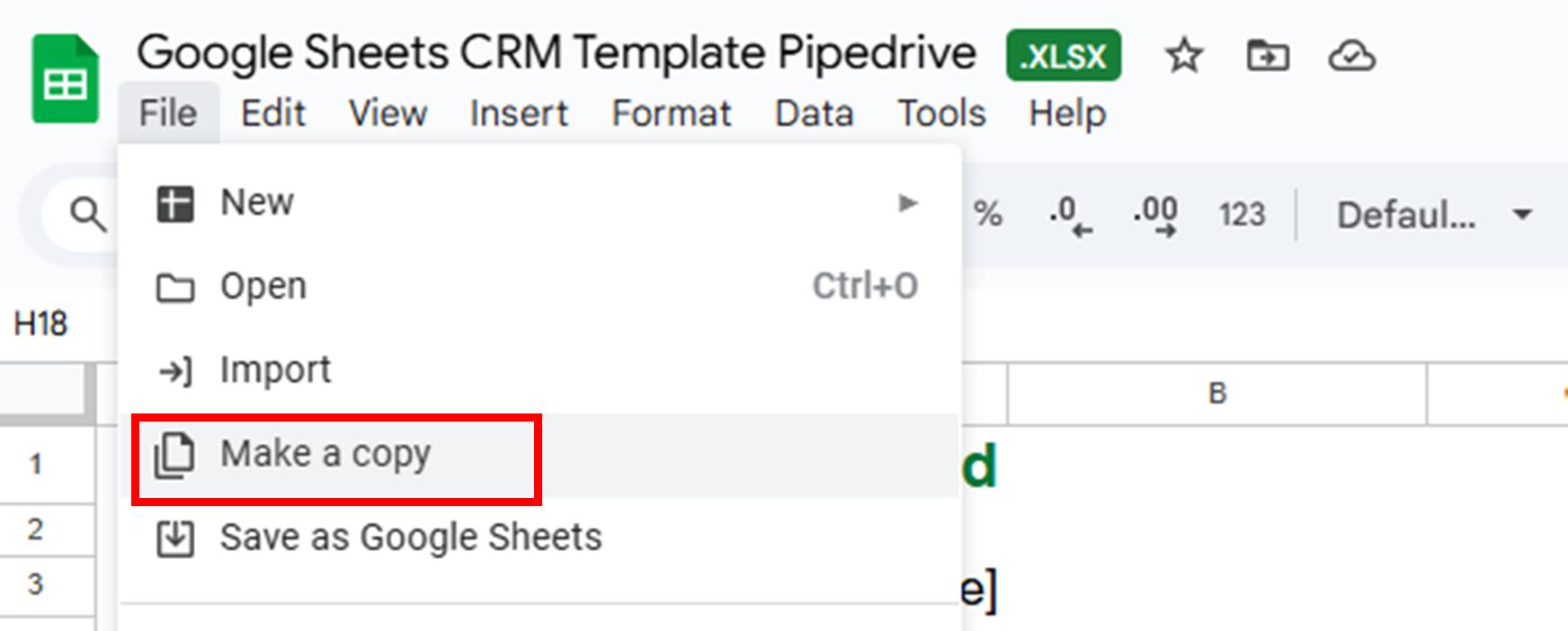
  2. Go to File > Make a copy

  3. In the window that pops up, rename the file to something like “ABC Company CRM 2025”

  4. Choose weather to save it in your Google Drive

  5. Click on the “Make a copy” button

google sheets CRM template pipedrive copy template

Explore each sheet in your copy to see how everything connects. Take a few minutes to click through each sheet tab, check out the formulas and play around with the sample data.

Each sheet has a specific purpose and works with the others automatically. You’ll see how adding a contact to the “Customer database” tab updates your dashboard, and how moving deals through your pipeline in the “Sales pipeline” tab changes your sales forecast.

Let’s walk through exactly how to set up and use each sheet.

1. Customize your template

Start by defining your sales framework on the “Settings” sheet. This sheet contains columns with information related to your sales process (e.g., pipeline stage, lead source, deal status, etc.).

google sheets crm template pipedrive settings sheet

The information fields will serve as dropdown options in the other tabs. Keeping it all in the “Settings” sheet ensures consistent data entry across your sales team. You can select from these predefined options when you add a new deal to the “Sales pipeline” sheet.

We chose these dropdown options because they’re key sales process elements that every business needs to track consistently:

  • Contact types. Separates prospects (potential customers) from accounts (existing customers). This option helps you focus on sales outreach and tailor your messaging.

  • Pipeline stages. Maps your actual sales process from first contact to closed deal. Each stage includes a probability percentage that calculates your revenue forecasts.

  • Deal status. Tracks whether deals are active, won, lost or abandoned. This information feeds directly into your performance dashboard.

  • Lead source. Shows where prospects come from so you can double down on what’s working and cut what isn’t.

  • Deal lost reason. Explains why deals fall through. Knowing this helps refine your process and address objections earlier to improve your win rate.

Action steps: Replace each cell with information specific to your business. For example, if your main lead sources are referrals, Google Forms or website visitors, replace our sample entries with those options.

Keep the following best practices in mind while customizing your settings:

Define your pipeline stages based on buyer actions, not seller activities. “Appointment set” is better than “needs follow-up” because it’s objective.

Keep your stages to five or fewer. More stages create confusion and slow down adoption. Each stage should represent a meaningful progression in the buyer’s journey.

Set clear criteria for moving between stages. For example, a deal only advances to “Proposal” when you’ve confirmed the budget, timeline and decision-making process. This info prevents confusion among your team members.

2. Build your customer database

Think of your “Customer database” sheet as a contact list that feeds qualified leads into your “Sales pipeline” sheet. Enter information about anyone who shows interest in your business, whether they’re ready to buy or just browsing.

Not every contact becomes a deal, but every deal starts as a contact here. The template includes standard fields such as name, email address, contact type and phone number.

To access the data you added to the “Settings” sheet, you must update the ranges the dropdowns recognize in each sheet. For the “Customer database” sheet, if the number of contact types you added goes beyond the original four, you’ll need to update that dropdown list.

To do this, go to “Data > Data validation”.
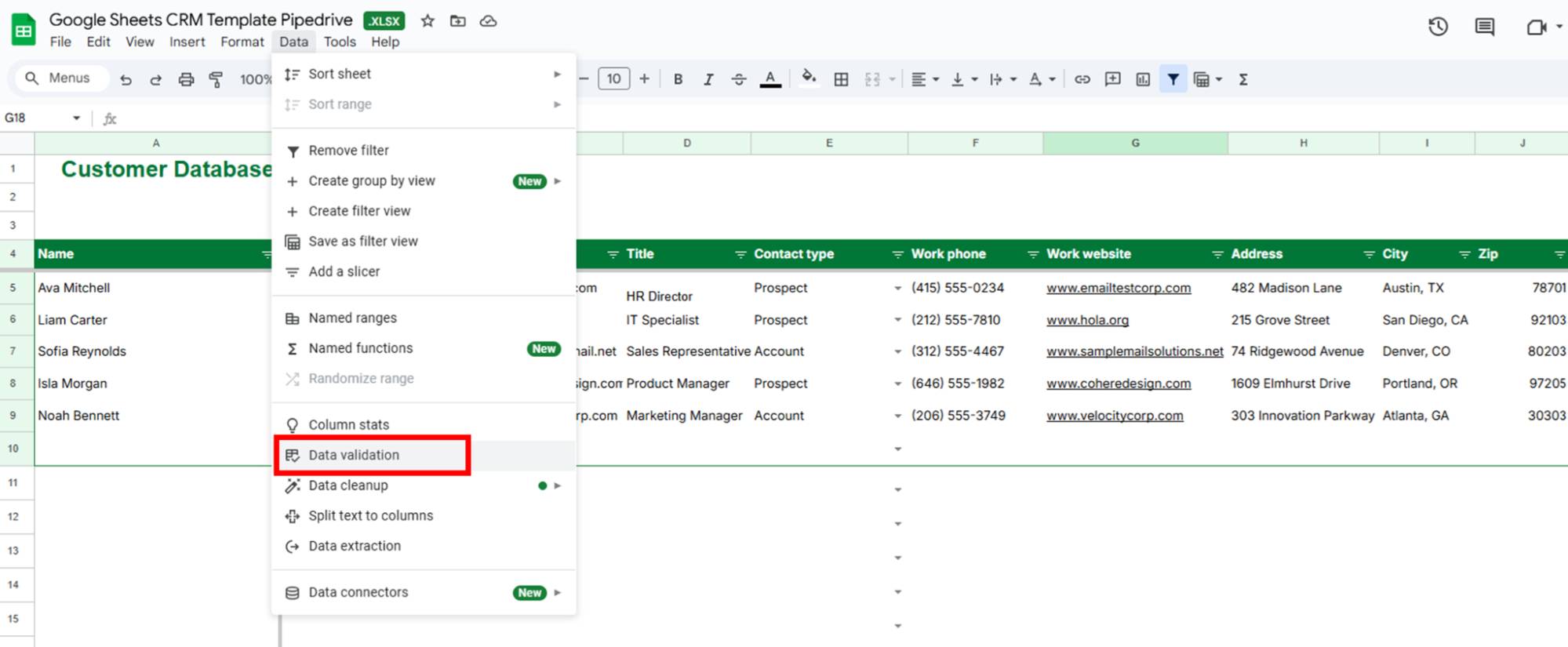
google sheets crm template pipedrive data validation

In the right-hand menu, click on the existing data validation rule.
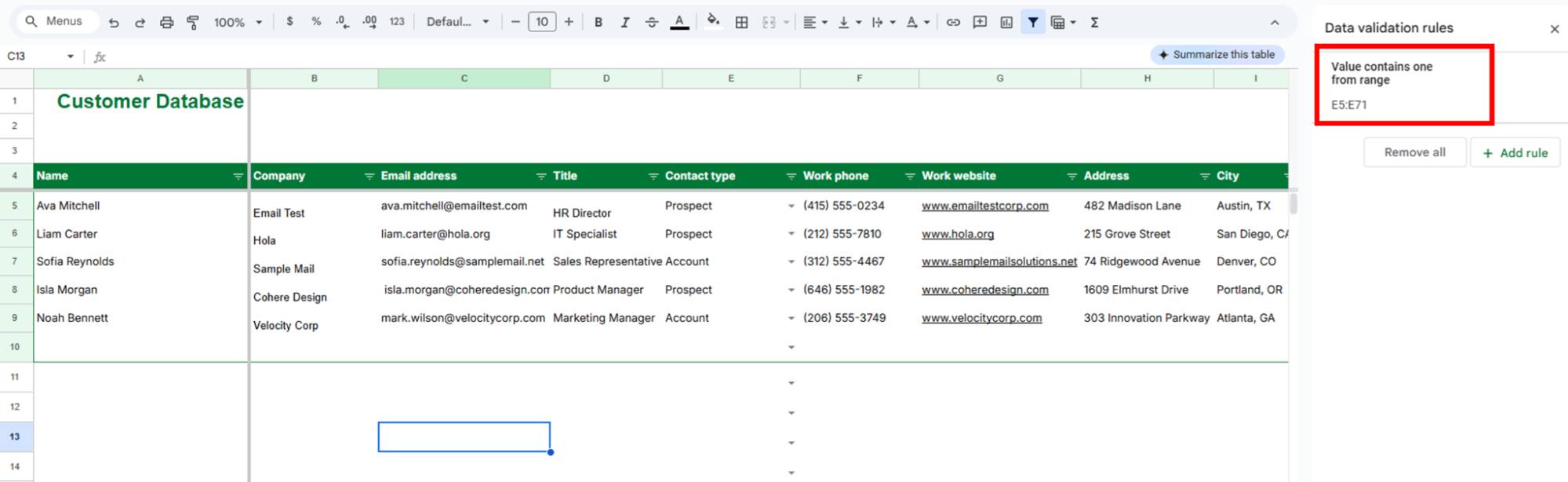
google sheets crm template pipedrive validation rules

Go to your “Settings” sheet and check what row your contact types end on. If you have five contact types, they’ll go from row 5 to row 9. Update the range in the validation rule to match. For example, change =Settings!$B$5:$B$8 to =Settings!$B$5:$B$9.
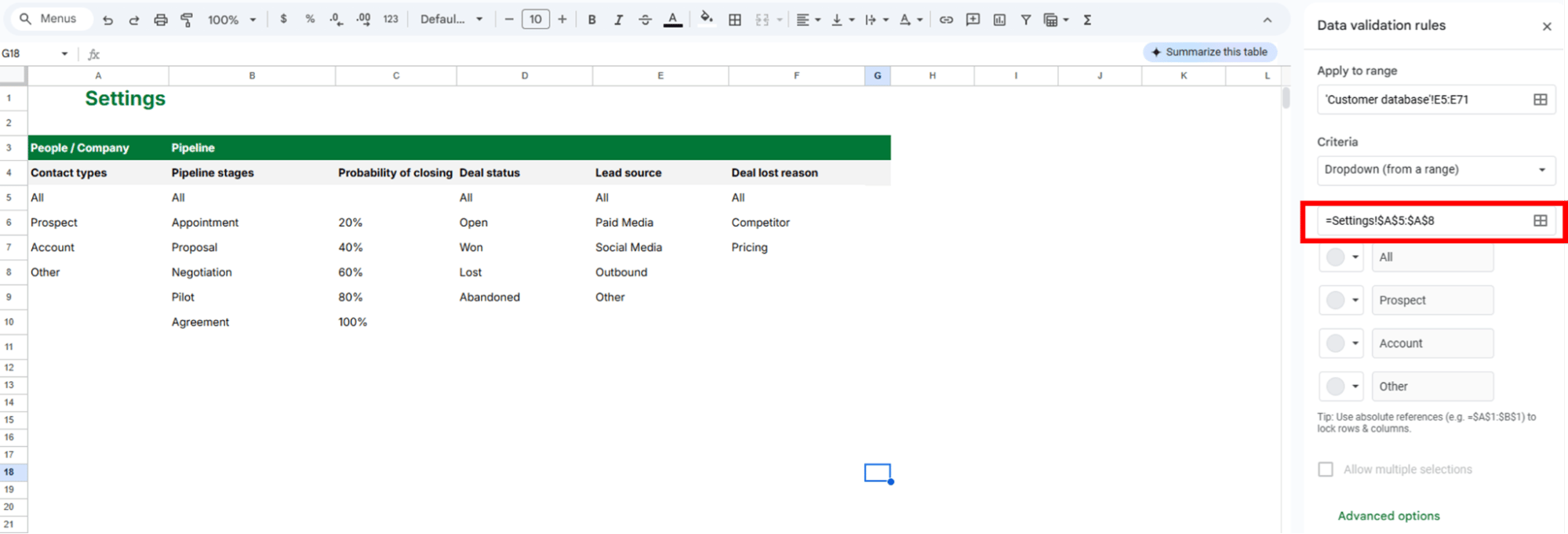
google sheets crm template pipedrive validation criteria

Click “Done” to save your changes and keep this process in mind for other sheets.

Action steps: Add columns for data points that matter to your specific business. What information helps you qualify and prioritize prospects? Think industry or company size.

Use the Description field strategically. Note your customer’s pain points, preferred communication style or personal interests. Details like these separate you from competitors who treat prospects like numbers.

As a best practice, review and clean your database monthly. Remove bounced emails, update job changes and merge duplicates. Clean data produces better insights and more effective outreach.

3. Track your sales pipeline

You can track qualified leads in your sales pipeline and convert them into sales opportunities.

Unlike your “Customer Database” sheet, which holds everyone who shows interest, your “Sales Pipeline” only shows prospects you’re actively working to close.

We included the following columns in the “Sales pipeline” sheet:

  • Deal value. The full contract amount if you close this opportunity. This number helps you prioritize high-value prospects.

  • Expected revenue. Deal value multiplied by the probability of closing. As a prospect progresses in the customer journey, the probability of closing increases, and so does the revenue forecast.

  • Date created. When the deal enters your pipeline. The column helps you track how long your sales cycle takes.

  • Expected close date. Your best guess on when you’ll close a deal. You can also change it to the close date when you win a deal.

  • Days in current stage. Shows which deals are getting stale. Deals that exceed your usual timeline might need immediate action to prevent prospects from going cold.

  • Deal lost reason. Captures info on why deals fall through. Regular tracking of this data reveals patterns you can fix.
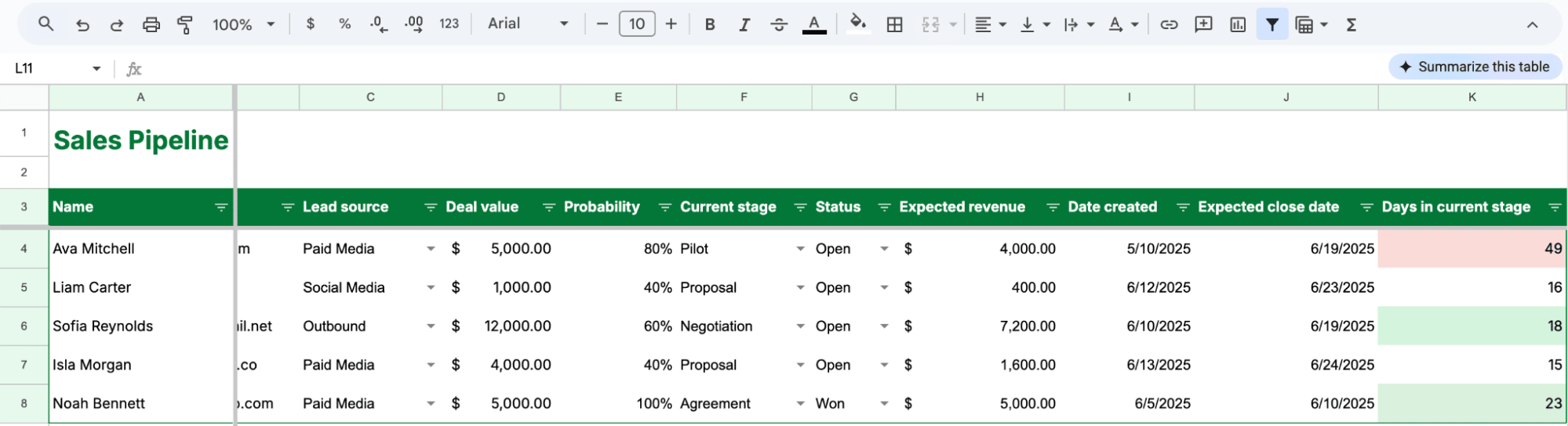
google sheets crm template pipedrive sales pipeline

The columns for probability, expected revenue and days in the current stage update automatically with formulas.

Here are some best practices for your “Sales pipeline” sheet.

Monitor days in current stage

Set your own timeline limits based on how your business operates. The template defaults to green (1–2 days), yellow (3 days) and red (4+ days), but you might need different thresholds.

If you’re in B2B sales, with six-month sales cycles, seven days in the “Proposal” stage might be normal. If you’re in sales consulting services with quick turnarounds, anything over three days could signal trouble.

To adjust timeline thresholds and colors, go to “Format > Conditional formatting” and click on the existing rule.

Change the numbers (and maybe colors) to match your slower or faster sales cycle.

google sheets crm template pipedrive rotting days

Review your pipeline and days in the current stage daily so you don’t get distracted by new leads while neglecting existing opportunities. Focusing on “red zone” deals can help you re-engage prospects before they lose interest or go to competitors.

Every interaction should end with a specific commitment about what happens next and when. Don’t let a deal sit without the next steps defined. “I’ll think about it” isn’t a next step. “I’ll review this with my team and give you feedback by Thursday” is.

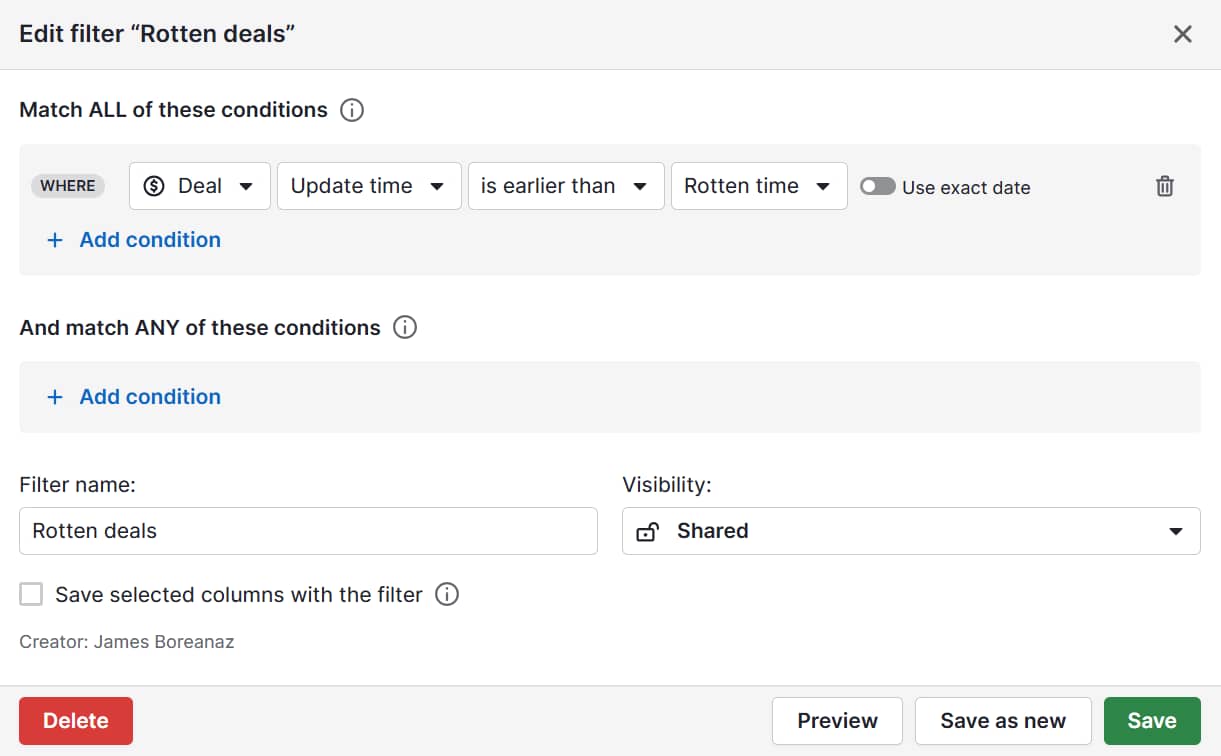
Note: Pipedrive has a rotting feature that highlights in red the deals in your pipeline you haven’t interacted with in a specific number of days. It also tells you how many days have passed since the deal started “rotting”.

Track why deals fail

Your “Deal lost reason” column offers powerful insights after three months of consistent tracking. Most businesses lose deals repeatedly for the same reasons.

Common reasons include:

  • Competitor had better pricing/features

  • Budget got frozen

  • Wrong person, the prospect wasn’t the decision-maker

  • Timeline changed (urgent became “someday”)

  • Internal solution won instead

To identify your biggest leaks, track every deal for 90 days without exception. Document why you lost the sale accurately. “Competitor had better pricing” is better than “they went another direction”.

Sales managers should look for patterns on a monthly basis. For example, if five deals fell through because “budget wasn’t confirmed”, you have a qualification problem, not a closing problem. Fix your discovery call process before qualified prospects reach the proposal stage.

Once you know your top reasons for losing deals, you can address them earlier in your sales process, saving everyone time.

Recommended reading

https://www-cms.pipedriveassets.com/sales-discovery-questions.png

63 sales discovery questions to qualify the hottest prospects

4. Log customer interactions

Your “Customer interactions” sheet prevents the “What did we discuss last time?” moment. Every phone call, email and meeting gets recorded here so you don’t lose context.
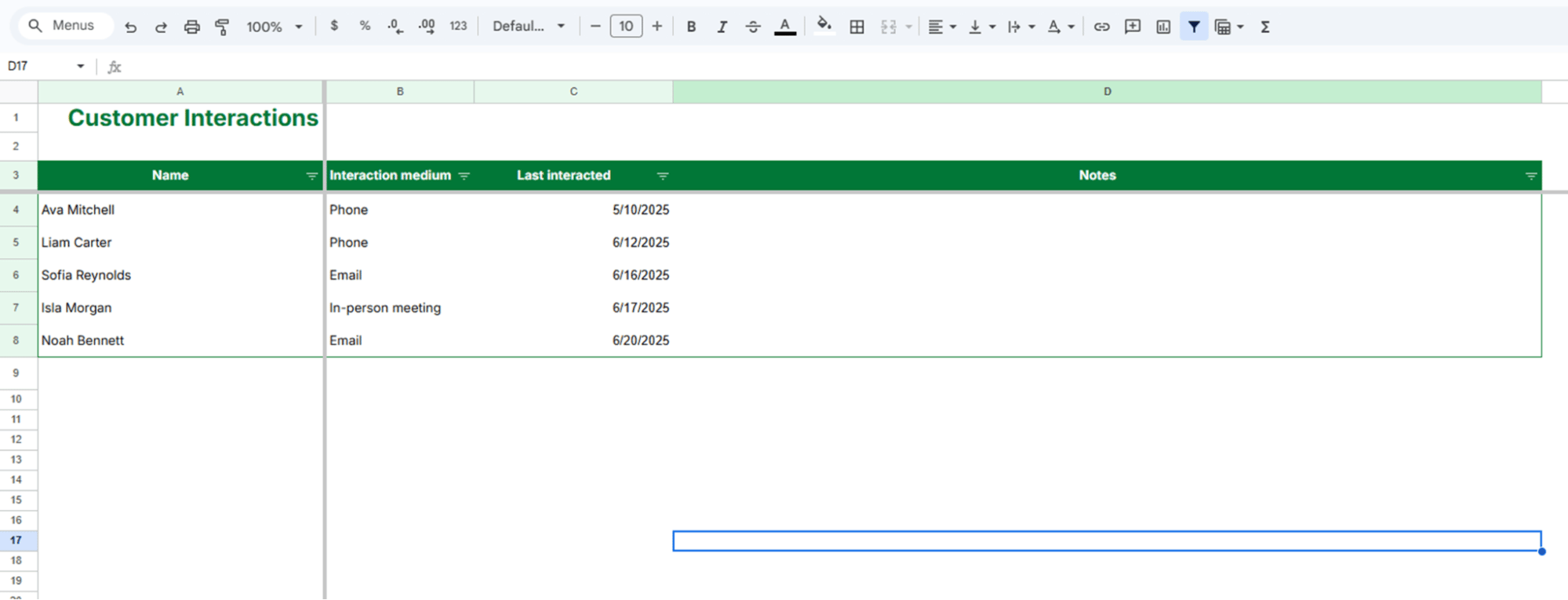
google sheets crm template pipedrive customer interactions

This simple log becomes essential when you’re juggling multiple prospects or when other sales reps need to step in.

Detailed notes boost your credibility since you won’t have to ask a prospect to repeat information they’ve already shared. The interaction history also helps you streamline the sales process when prospects who go quiet for months resurface ready to buy.

Action steps: Log every meaningful interaction immediately after it happens. “Meaningful” applies to any conversation or email that moves the relationship forward.

Be specific in your notes, both in dates and details. “Good call” doesn’t help you. However, “06/10/2025 prefers email communication, 06/16/2025 confirmed $50K budget, needs solution by Q4” does.

Memory fades easily, but notes are in your CRM Google template if you need them. Review your interactions five minutes before your next contact to show you’re paying attention to customer needs.

As a best practice, use consistent language for interaction mediums. “phone”, “email”, “video call” and “in-person meeting” work better than mixing “call”, “phone”, “zoom”, etc.

Recommended reading

https://www-cms.pipedriveassets.com/Best-Practice-CRM.jpg

Best practice CRM: How to maximize your CRM investment

5. Understand your performance dashboard

The “Performance dashboard” answers four critical questions for every small business owner:

  1. The lead source bar chart answers “Where are my leads coming from?” (i.e., where you should focus your sales and marketing)

  2. The deal status pie chart answers “How many opportunities are open, won, lost or abandoned?” (i.e., state of your pipeline)

  3. The key metrics table answers “Will I hit my sales goals?” (i.e., progress toward monthly revenue)

  4. The deals by stage table answers “Are there any bottlenecks?” (i.e., where prospects get stuck in your sales funnel)
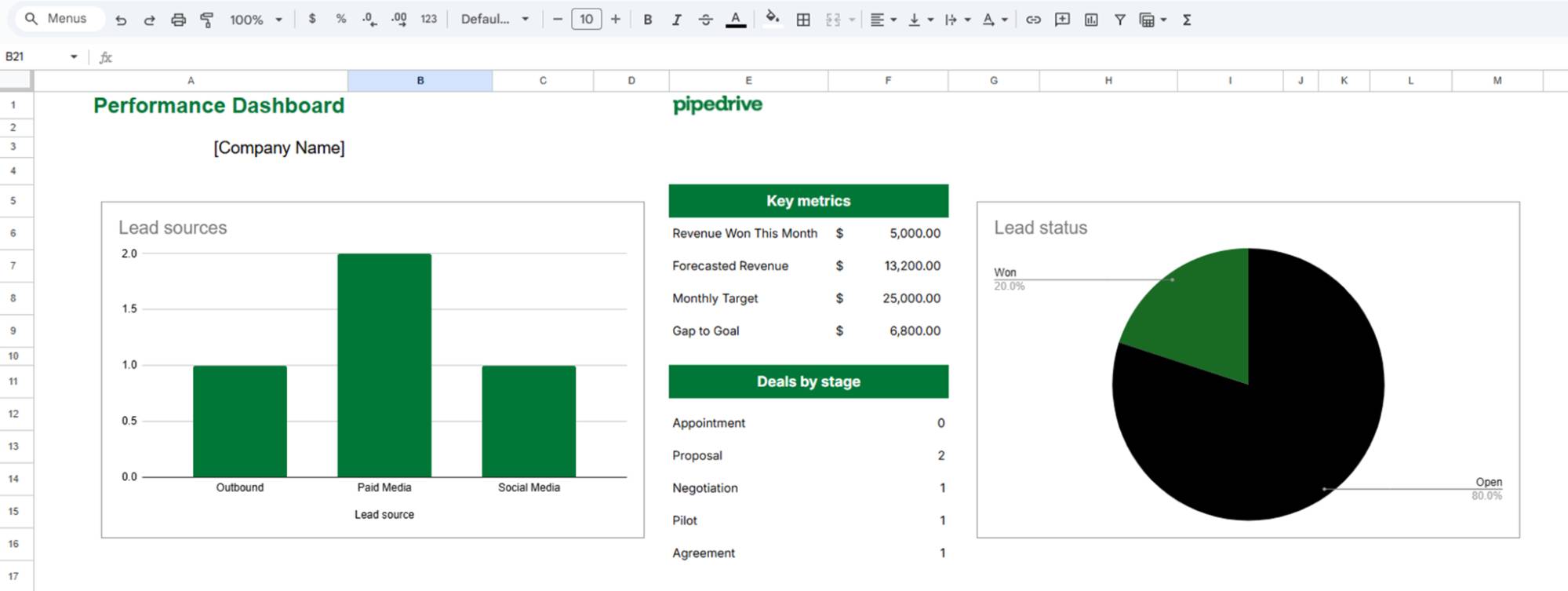
google sheets crm template pipedrive performance dashboard

The “Performance dashboard” view lets you check your business goals quickly and know exactly what to focus on.

Action steps: Update your formulas monthly to track current performance. To keep your sheet up-to-date, change the start and end dates in the “Revenue Won This Month” and “Forecasted Revenue” formulas.

To change the data displayed from June’s numbers to July’s in the “Revenue Won This Month” formula, update the date ranges as follows:

– June: =SUMIFS(‘Sales pipeline’!D:D,’Sales pipeline’!G:G,”Won”,’Sales pipeline’!J:J,”>=”&DATE(2025,6,1),’Sales pipeline’!J:J,”<”&DATE(2025,7,1))

– July: =SUMIFS(‘Sales pipeline’!D:D,’Sales pipeline’!G:G,”Won”,’Sales pipeline’!J:J,”>=”&DATE(2025,7,1),’Sales pipeline’!J:J,”<”&DATE(2025,8,1))

To update “Forecasted Revenue”, make these changes:

– June: =SUMIFS(‘Sales pipeline’!H:H,’Sales pipeline’!G:G,”Open”,’Sales pipeline’!J:J,”>=”&DATE(2025,6,1),’Sales pipeline’!J:J,”<”&DATE(2025,7,1))

– July: SUMIFS(‘Sales pipeline’!H:H,’Sales pipeline’!G:G,”Open”,’Sales pipeline’!J:J,”>=”&DATE(2025,7,1),’Sales pipeline’!J:J,”<”&DATE(2025,8,1))

The date ranges for June signal that you’re “collecting” data from June 1, 2025, to before July 1, 2025. The date ranges for July signal data from July 1, 2025, and before August 1, 2025.

Check your dashboard weekly, not just when things feel off. This visibility prevents small problems from becoming big ones. For example, if most of your leads come from social media they drop, you can check what’s wrong and fix it before it impacts next month.

Remember to focus on other leading indicators beyond your dashboard, like deal creation and stage progression, not just closed revenue. Revenue is the result of successful sales activities and pipeline health.

Download Your Guide to Sales Performance Measurement

The must-read guide for any sales manager trying to track, forecast and minimize risk. Learn how to scale sales with data-backed decisions.

When should you upgrade to dedicated CRM software?

Your Google Sheets CRM template stops being effective when manual processes start costing you deals. If you spend more time managing the template than selling, you probably need CRM software.

According to Pipedrive’s 2024 State of Sales and Marketing report, 34% of sales professionals say CRM software with automation capabilities would have the biggest positive impact on their work.
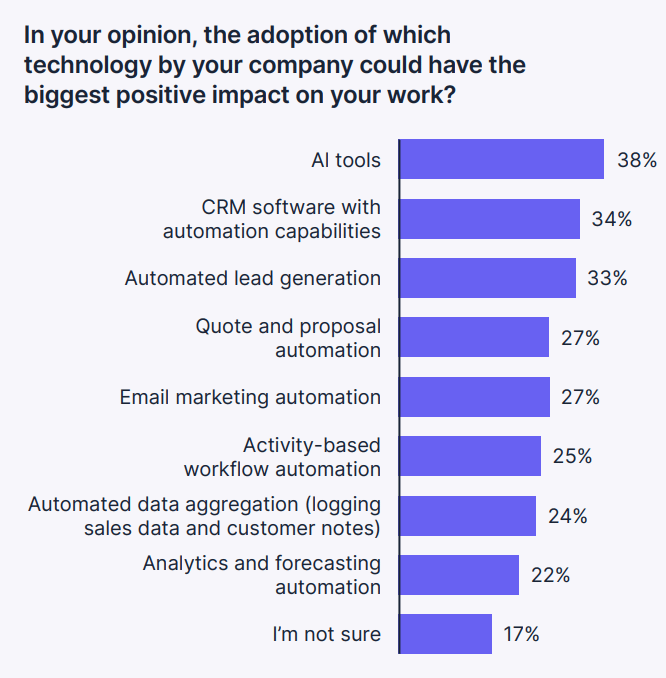
google sheets crm template pipedrive crm adoption

A CRM template in Google Sheets is helpful when you’re starting out. However, it can’t automate follow-ups or integrate with your email marketing platform.

Here are some clear signs it’s time to upgrade from a Google Sheets CRM to a CRM solution:

  • Team size. When you have a growing team managing the spreadsheet CRM template, Google Sheets can be messy. Multiple users can create version conflicts, data inconsistencies and access problems.

  • Automation needs. When manual tasks like sending follow-up emails, calculating lead scores and creating reports consume more time than selling. Repetitive tasks should happen in an automatic workflow while you focus on value selling.

  • Integration requirements. Your business uses email marketing software, Gmail calendars and other project management tools that need to “talk” to your CRM.

  • Data volume. Managing 100+ contacts or 50+ active deals in spreadsheets becomes difficult. You need search, filtering and reporting capabilities that scale with your business needs.

Generally, if your CRM template takes more than 30 minutes daily or manual errors start affecting customer relationships, it’s time to upgrade.

Recommended reading
https://www-cms.pipedriveassets.com/blog-assets/pipedrive-crm-banner-1200x628.png

8 factors to consider when choosing a sales CRM [infographic]

How to migrate from Google Sheets to Pipedrive

You can transfer your Google Sheets CRM template data to Pipedrive when you’re ready to upgrade. Pipedrive accepts data from Microsoft Excel (XLS, XLSX) and CSV docs, so you’ll need to download your template into the right format.

Watch this step-by-step video tutorial, or follow along with the instructions below.

Start by cleaning up your spreadsheet data. Each type of data requires specific mandatory fields to import successfully. Missing these can create errors and skipped records.

Here’s a table that shows you which fields you need according to the data you’re importing:
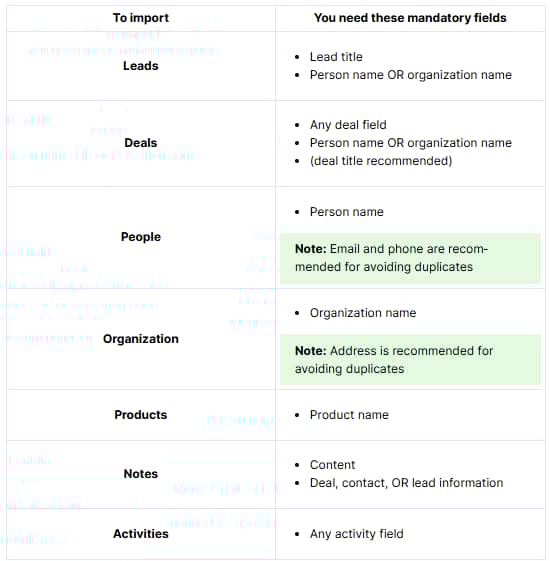
google sheets crm template pipedrive mandatory fields

The mandatory fields connect your data properly in Pipedrive. For example, to import notes from your “Customer interactions” sheet, you need the note’s content and the deal, contact or lead it belongs to. Without this connection, you get orphaned notes that don’t attach to anyone.

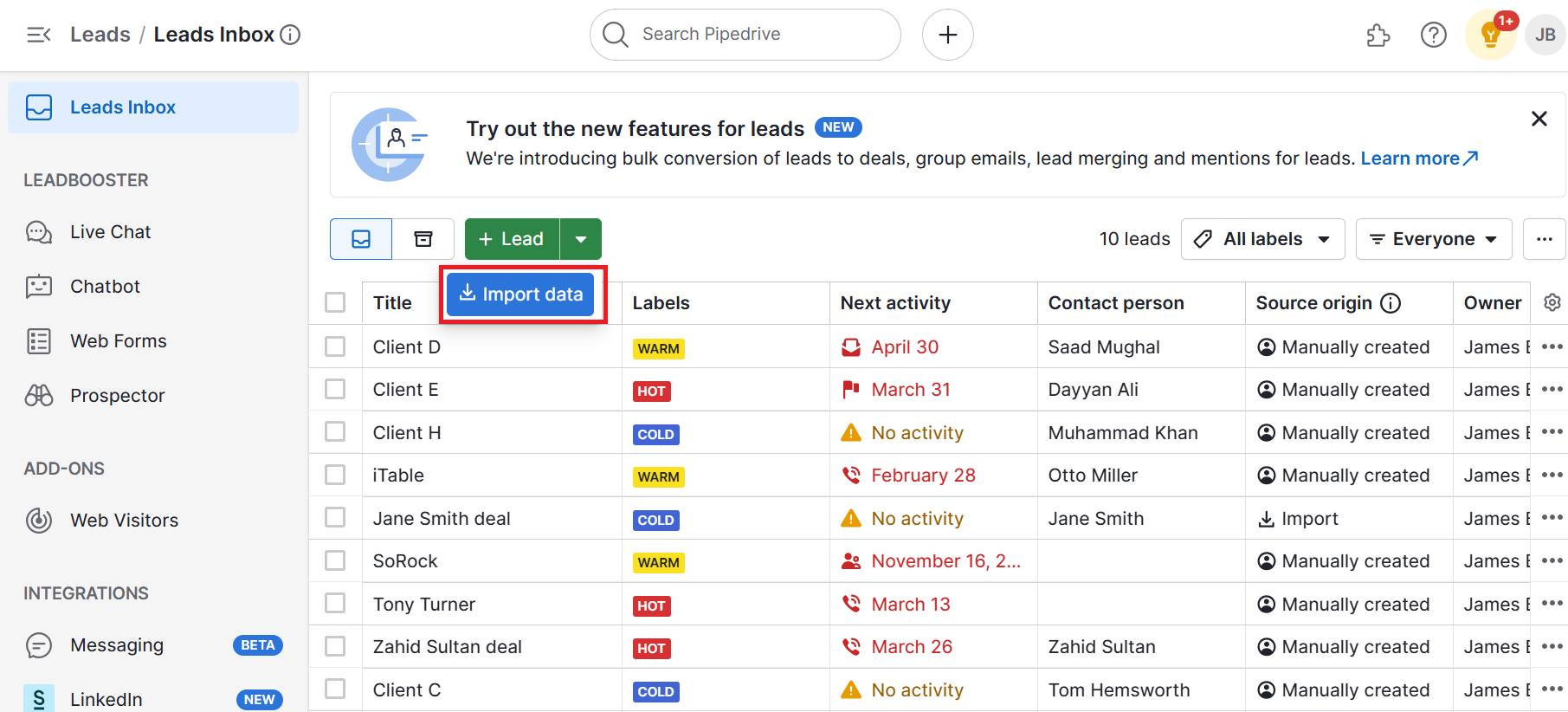
Once your data is clean, go to Pipedrive and click “… > Import data”. Select “Upload spreadsheet (.XLSX, .CSV)” and choose the sheet with the data you want to migrate into Pipedrive.

google sheets crm template pipedrive import page

You’ll be taken to the import mapping page, where Pipedrive will try to match the data in your spreadsheet to Pipedrive data fields. In some cases, you’ll need to map a few fields manually
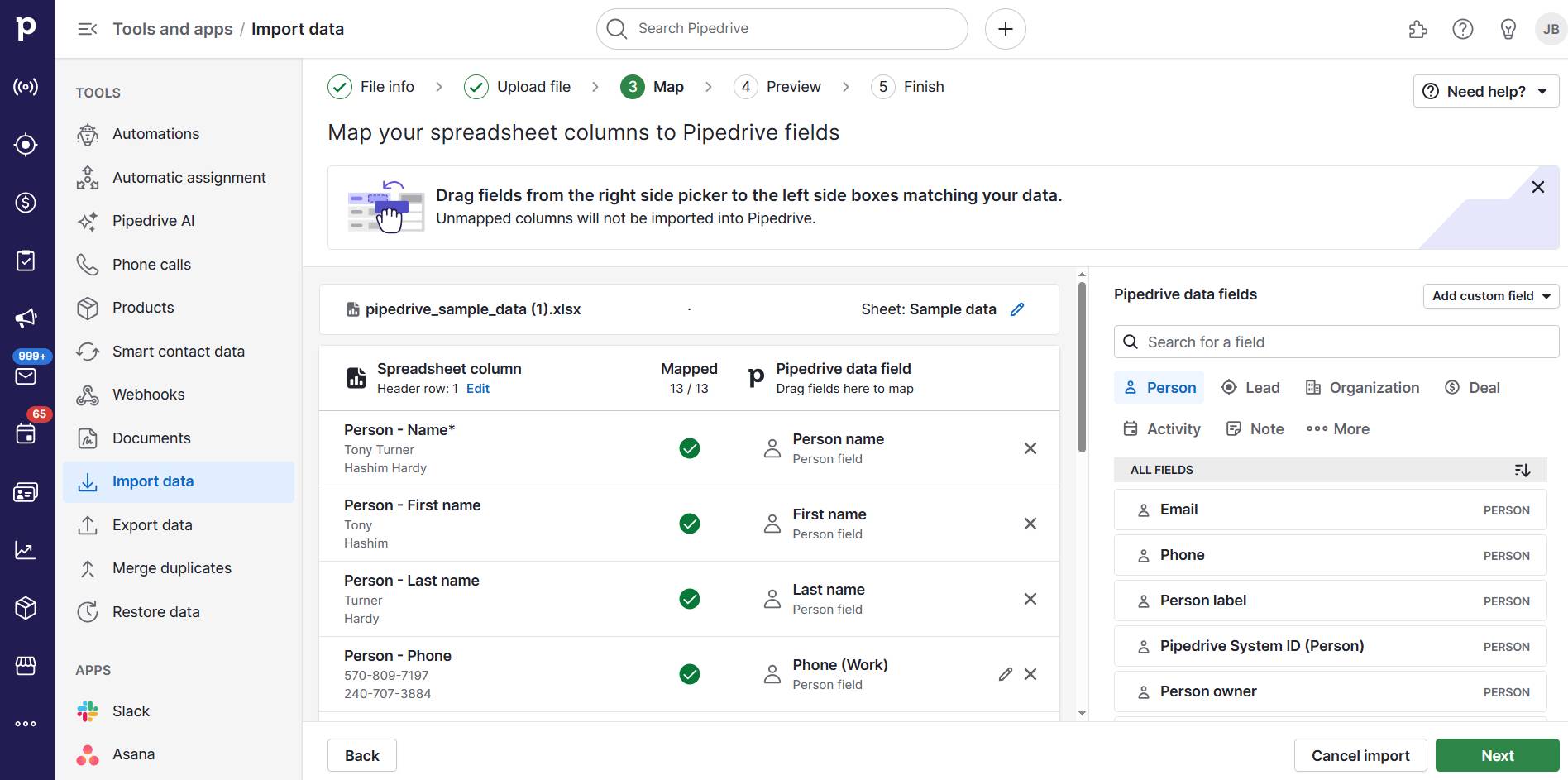
google sheets crm template pipedrive preview page

Once everything is mapped, click on “Next”.

Pipedrive will provide a preview of the first 20 rows, allowing you to check how the data will be imported.
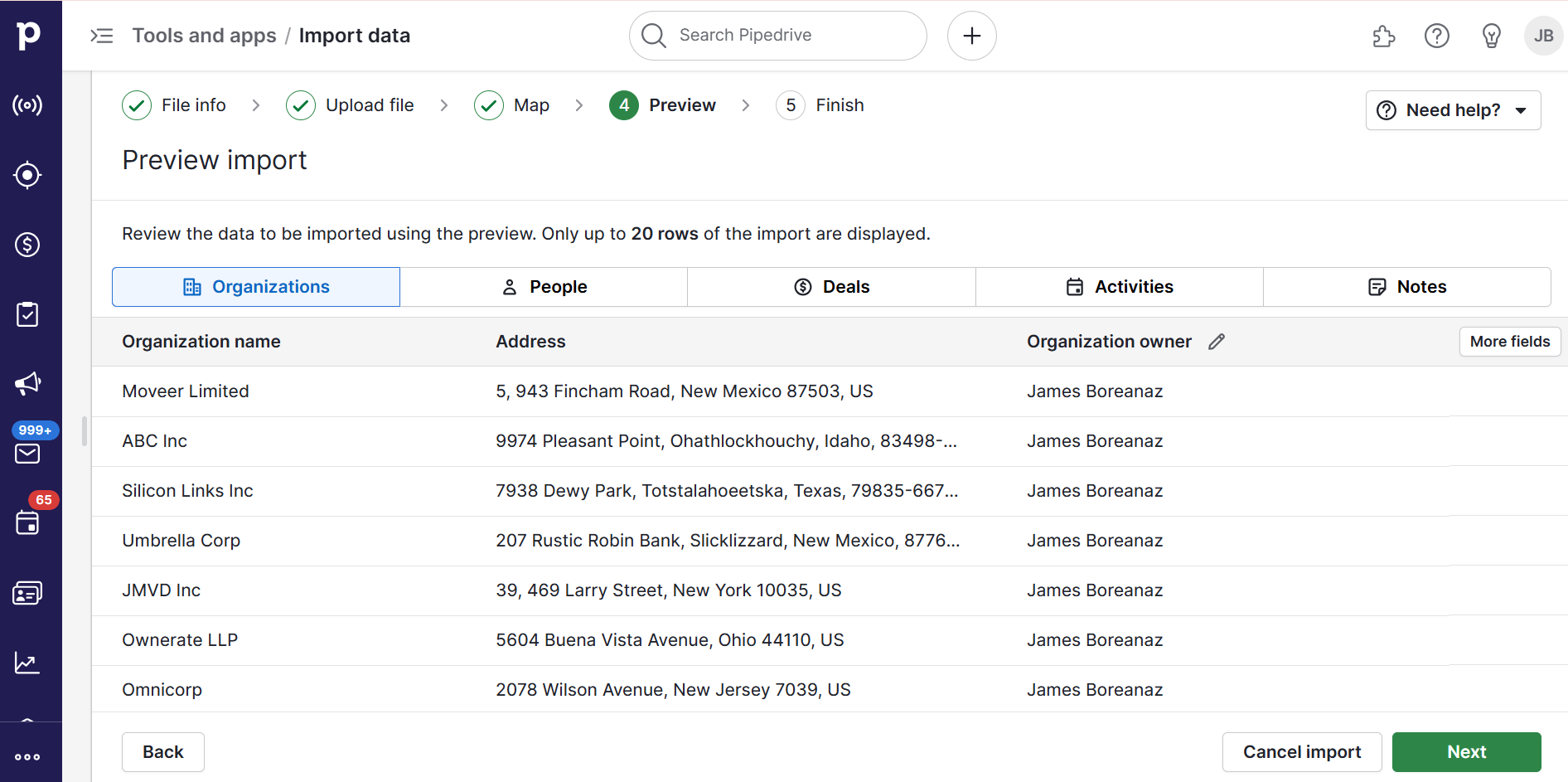
google sheets crm template pipedrive preview page

When you’re done checking, click “Next” to choose what you want to do with duplicate data. You have two options:

  1. Merge data – Pipedrive merges people with the same email and name or organizations with the same name and address.

  2. Create multiple records – Pipedrive creates separate records for the duplicate contacts.

After making your choice, click “Start import” and you’re done.

Recommended reading

https://www-cms.pipedriveassets.com/CRM-Strategy.jpg

How to build a CRM strategy that boosts revenue (with real-world examples)

Final thoughts

A Google Sheets CRM template is a good middle point between a basic document and CRM software. It teaches you simple CRM fundamentals while helping you organize your growing customer base.

However, a CRM for Google Sheets is a stepping stone, not a permanent solution. When manual processes start costing you deals or your team outgrows the limitations of spreadsheets, dedicated CRM software becomes essential.

Pipedrive makes the transition seamless with an easy import process. Your systematic tracking habits from using your CRM template will translate perfectly to CRM success. Start your 14-day free trial to experience how dedicated CRM software accelerates sales growth.


Content Marketing Guide | Guide to Content Marketing

Software Stack Editor · July 8, 2025 ·

Successful marketing relies on providing valuable content, such as blogs, newsletters, videos or whitepapers.

Each format plays a key role in increasing visibility, building credibility and converting potential leads into actual customers.

Tailored for beginners, this content marketing guide presents a meticulously crafted, step-by-step framework that even seasoned marketers can employ to refine and enhance their long-term content strategies.

What is content marketing?

Content marketing is a strategic approach to creating and sharing valuable, relevant information to attract and engage a specific audience. The goal isn’t to sell directly but to earn trust, improve brand recognition and guide potential customers toward a buying decision.

Content marketing prioritizes building lasting connections rather than using conventional advertising methods. Instead of promoting products, it provides valuable information, instructions or amusement that resonates with the audience’s desires and preferences.

Traditional marketing talks at people. Content marketing talks with them.

Why content marketing matters

Content builds authority. A company that consistently publishes helpful or insightful material becomes a go-to source in its industry. That level of trust builds credibility and ultimately leads to higher conversions.

Content marketing continues to play a critical role in business growth. According to the Content Marketing Institute in 2023, 71% of B2B marketers say content marketing has become more important to their organization in the last year.

The growing emphasis reflects a shift in how businesses build trust, generate leads and nurture long-term customer relationships through consistent, valuable content.

Content also fuels digital visibility. Blog posts improve organic rankings, videos drive social media engagement, and whitepapers support lead generation efforts. A strong content foundation benefits every channel in digital marketing.

Key components of a content marketing strategy

A successful strategy begins with understanding the audience. Research their interests, challenges and intent. Use tools like Google Analytics, social listening platforms or customer surveys to uncover insights.

Afterwards, select the appropriate formats. Blog posts, instructional guides, success stories, visual representations and videos each have distinct purposes. Make your choices based on your objectives, your audience’s preferences and the resources available.

Distribution is equally important. A blog with no promotion will go unread. Share content via email, social media, search engines and partnerships. Amplify the best-performing pieces through paid ads or syndication.

Finally, set clear objectives. Define what success looks like, whether it’s increasing traffic, generating leads or improving customer retention. Clear key performance indicators (KPIs) ensure that content delivers results.

Recommended reading

https://www-cms.pipedriveassets.com/Sales-Guides.png

A sales guide for success: from prospecting to closing

Setting goals for content marketing

Clear, actionable goals are essential for effective content marketing. Rather than vague aims such as increasing traffic, focus on measurable targets like growing organic sessions by a defined percentage within a set timeframe.

  • Clarity: Define exactly what needs to be accomplished. Objectives should be focused and leave no ambiguity about the expected outcome.

  • Actionable: Break down goals into smaller, manageable tasks that can be executed efficiently. This ensures that each step contributes directly to the broader objective and allows for progress tracking throughout the process.

  • Meaningful: Align content objectives with broader business outcomes. Goals should reflect the priorities of the organization –whether that’s expanding reach, improving engagement or supporting lead generation efforts.

  • Trackable: Use data tools like Google Analytics to monitor key performance indicators, such as organic traffic, bounce rates and session duration. Quantitative insights enable teams to evaluate success and adjust strategies with confidence.

Common types of content and when to use them

Different formats serve different purposes. Here are some common types and their best use cases:

Content type

Use case

Blog posts

Ideal for SEO, thought leadership and answering common customer questions

Case studies

Useful for showcasing results and building trust with prospective clients

Ebooks or whitepapers

Support lead generation and educate buyers at the consideration stage

Infographics

Help simplify complex topics and boost engagement on social media

Videos

Great for demonstrating products, explaining services or capturing attention quickly

Select formats that align with audience preferences and match the campaign’s intended purpose. This ensures that content is both engaging and strategically effective.

The content production workflow

A strong workflow keeps production consistent and aligned with strategy. The following steps provide structure from idea to performance tracking:

  1. Ideation: Begin by brainstorming content ideas based on keyword research, customer needs or seasonal trends. Reviewing competitor content and identifying gaps in existing resources can also help surface valuable topics.

  2. Brief creation: Outline the angle, format, keywords and target audience. A well-structured brief keeps all contributors aligned and helps reduce revisions by clarifying expectations up front.

  3. Production and review: Create the content according to the brief and ensure it meets quality standards. Before publishing, review for accuracy, tone of voice and consistency with brand messaging.

  4. Publishing and monitoring: Publish content across selected platforms and track its performance using analytics tools. Monitor key metrics like engagement, traffic and conversions to identify what works and inform future improvements.

Tools like content calendars, project management platforms and AI writing assistants can help streamline each step and support consistent output.

Promoting content effectively

Publishing is only the first step – distribution is what ensures content reaches the right audience and drives results.

Start with organic channels. Use email newsletters to keep subscribers informed about new content and share blog posts, videos or infographics across social media platforms to increase visibility. Tailor your messaging to each channel’s format and audience expectations.

Search engine visibility also plays a crucial role. Optimize content by targeting relevant keywords, writing strong meta descriptions and using structured headings to improve discoverability in search results.

Strategic partnerships can expand reach further. Collaborate with influencers, industry experts or complementary brands to share content across new networks. Guest posts, co-branded assets or cross-promotions are effective ways to access a wider audience.

Paid distribution adds another layer. Use platforms like Google Ads or LinkedIn Sponsored Content to amplify high-performing or high-value pieces. These channels allow precise targeting by interest, industry or behavior.

Finally, maximize existing content by repurposing. Break long-form content into smaller assets –such as social media quotes, short videos or carousel posts – to increase engagement and extend its shelf life across multiple platforms.

Recommended reading

https://www-cms.pipedriveassets.com/Affiliate-Marketing-Guide_2025-06-25-102407_usrv.png

Affiliate Marketing guide for small businesses: A step-by-step starter playbook

Measuring performance and optimizing over time

Data plays a key role in refining a content strategy. Tracking content metrics such as pageviews and time on page helps evaluate how engaging the content is, while organic search traffic reveals how well it performs from an SEO perspective.

For social media marketing, social shares and comments provide insight into what resonates with the audience. Monitoring these interactions can guide future content decisions and highlight opportunities to better align with audience interests.

Connecting content efforts to leads generated or conversions assisted ensures the strategy drives measurable business outcomes. Use performance data to double down on effective formats, update underperforming assets and prioritize consistent, incremental improvement.

Tools that support content marketing

The right tools can streamline every stage of the content marketing process – from planning and production to distribution and performance tracking. Choosing platforms that fit your team’s workflow and skill set ensures greater efficiency and consistency.

For planning and collaboration, project management tools help organize content calendars, assign tasks and manage deadlines. SEO research platforms support topic discovery, keyword tracking and content optimization. Writing and editing tools improve clarity, grammar and tone.

Customer relationship management (CRM) platforms like Pipedrive also play a vital role in connecting content with audience data to guide distribution, automate follow-ups and measure impact across the customer journey.

Distribution tools enable teams to schedule content, manage social posts and track email campaigns. Together, these categories form the foundation of a repeatable and scalable workflow.

How Pipedrive can support your content strategy

An effective content strategy doesn’t operate in isolation. works best when integrated with tools that support lead tracking, outreach and performance measurement. Pipedrive offers features that help align content efforts with broader marketing and sales goals.

Campaign tracking and email automation tools in Pipedrive allow teams to monitor how leads engage with specific content and follow up based on real activity. These features ensure that blog posts, guides or newsletters aren’t just published but also guide prospects through the sales funnel.

By combining CRM insights with content performance data, Pipedrive helps prioritize topics that generate meaningful engagement. With its visual pipelines and easy-to-use automation features, connecting content creation with measurable business outcomes becomes more seamless.

Final thoughts

Content marketing is a long-term investment in brand visibility, credibility and customer trust. It requires a strategic foundation, consistent execution and regular refinement to stay aligned with business goals and audience needs.

Whether you’re just starting out or looking to improve your current approach, this content marketing guide offers a clear path forward. From defining goals and choosing the right formats to distributing and measuring performance, our goal is to provide a practical framework for success.

As the digital landscape continues to evolve, the ability to create and deliver valuable content will remain a defining factor in business growth. By following the steps in this content marketing guide, teams can build strategies that resonate, perform and scale.
The Ultimate SMB Guide to AI A/B Testing

Software Stack Editor · July 8, 2025 ·

A/B testing helps marketers see what works by comparing different campaign versions, and artificial intelligence (AI) makes the process easier than ever.

The right machine learning and generative AI tools let you create test variations in seconds, run experiments without coding and gain clear insights to drive better business outcomes.

This guide shows you how to use AI A/B testing for smarter campaign decisions, without needing data analyst skills. Learn the differences between traditional and AI experiments and how to run your first AI-driven test.

What is A/B testing, and why does it matter for small teams?

A/B testing, sometimes called split testing, is a way to compare two versions of an email, web page, ad or other piece of marketing content to see which one performs better.

One group sees version A, and another considers version B. You track which gets the best results based on a clear goal, such as clicks, sign-ups or purchases.

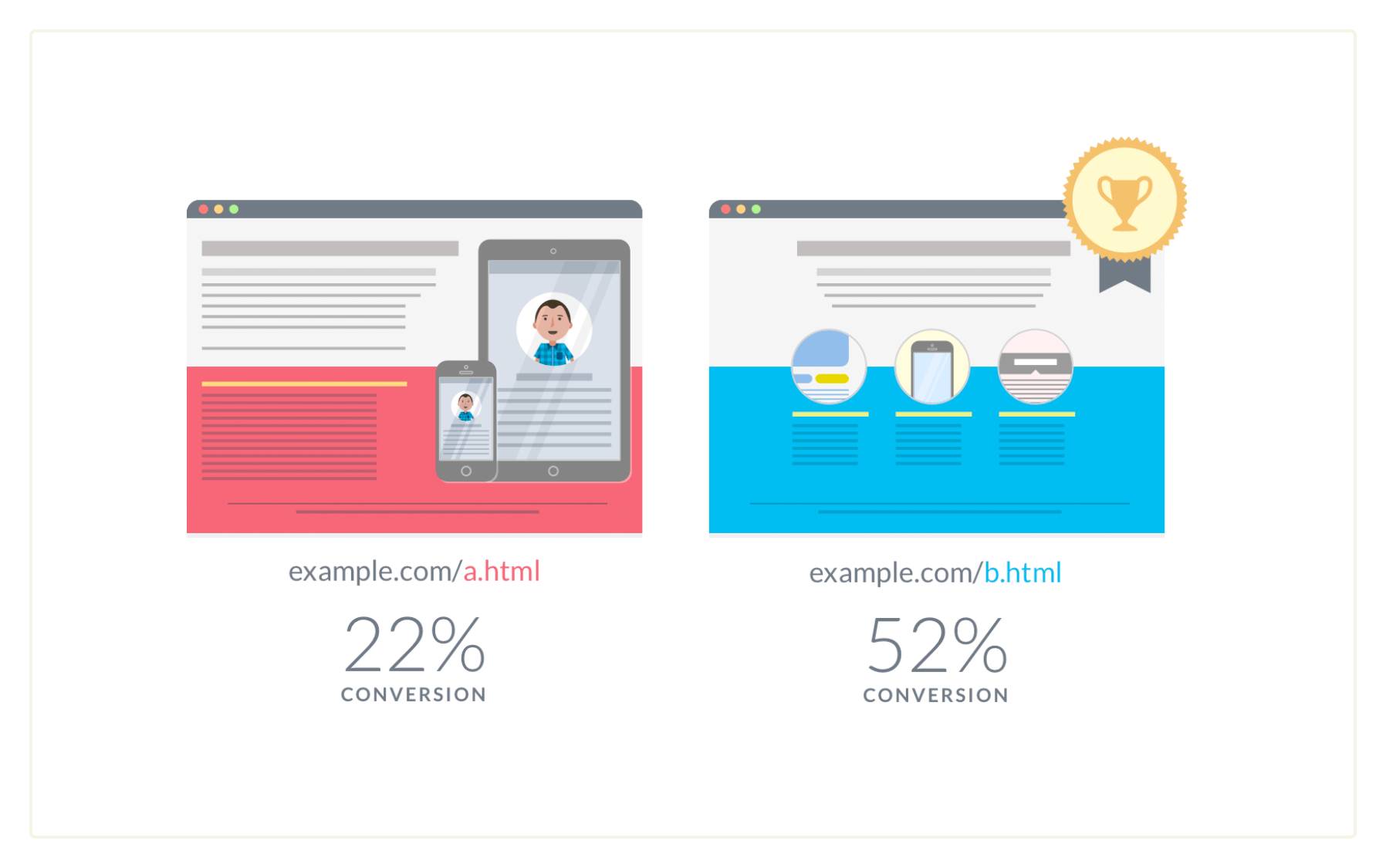
For example, this VWO graphic shows two versions of a web page. Version A (“example.com/a.html”) is text-heavy and has a 22% conversion rate. Version B (“example.com/b.html”) balances visuals and text and has a 52% conversion rate.

AI A/B testing landing page comparison

A/B testing is a smart way to improve conversions without overhauling your marketing strategy. Rather than guessing what might work, you’re using data to learn what actually works, before committing lots of resources.

Let’s say you’re running an email marketing campaign. Your goal is to increase user engagement.

Instead of sending the same version to all subscribers, you test two subject lines on a smaller sample group:

  • Half receive version A: “Save hours every week with smarter sales automation”

  • Half get version B: “Book more meetings. Close more deals. Grow faster.”

After a week, the test results for version B showed that it achieved 23% more opens and 15% more clicks, driving valuable traffic. Now proven more effective, it becomes your new default for the campaign.

Over time, these small, measured changes help you steadily improve conversion rates without needing more traffic or budget.

Email subject lines are a classic example, but you can apply A/B testing across your B2B marketing funnel. Here are some more ideas:

Type of experiment

What to test

Landing pages

Test headlines, visuals or call-to-action (CTA) buttons to improve user experience (UX)

Pricing pages

Experiment with messaging, layouts or how you present offers to aid buyers’ decision-making (and make sales more likely)

Retargeting ads

Use different hooks or formats to improve CTRs and grow your return on investment (ROI)

Product descriptions

Test technical vs. outcome-focused language to see what resonates across customer segments

Navigation menus

Experiment with item order or dropdown vs. static menus to boost user engagement and cut bounce rates.

You can A/B test different campaign variables simultaneously to optimize spending faster. This process is called multivariate testing.

For example, you might test many combinations of subject lines, CTA copy and landing page visuals in one experiment – potentially showing how elements work together to get the best results.

Note: Multivariate testing requires a larger sample size and more careful organization, so it’s better for teams with more testing experience. Run some simpler tests first to understand the A/B testing process.

Traditional vs. AI A/B testing: what’s the difference?

Traditional A/B testing involves choosing a single test element, manually creating different versions and waiting days or weeks to collect enough data. It works but is time-consuming, resource-heavy and often limited to teams with technical know-how.

A/B testing with machine learning and AI is much more time- and cost-efficient. With little or no data experience, small teams on tight budgets can use AI tools to generate content variations, automate testing workflows, create reports and make sense of the results.

Here are three ways AI supports the A/B testing workflow.

1. Content creation: find variations faster with GenAI

Creating different versions of your copy used to take hours. Now, you can use generative AI tools like ChatGPT and Jasper to brainstorm and draft multiple variants in minutes.

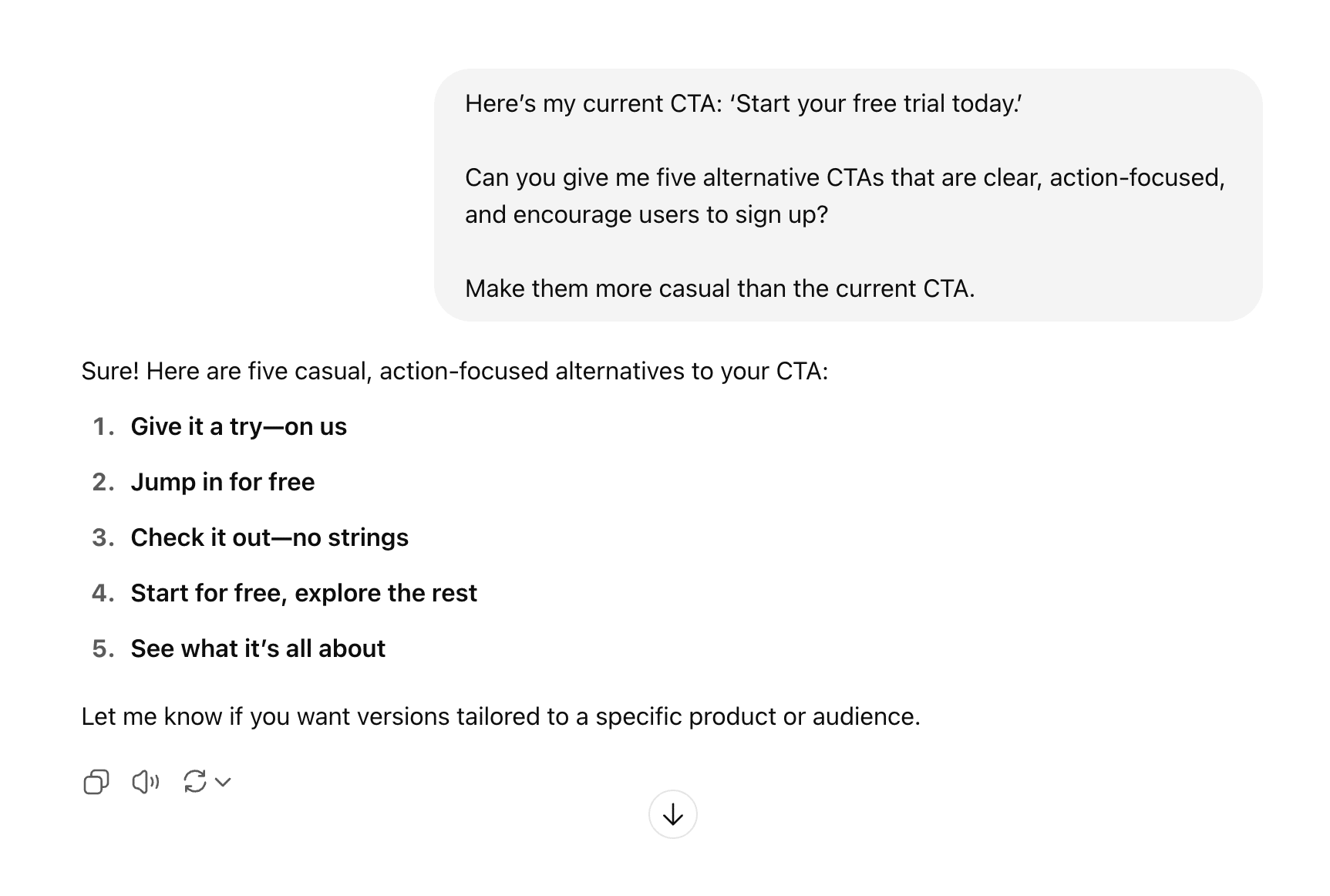
Say you want to test different landing page CTAs. You might prompt ChatGPT to suggest alternatives to your current CTA, like this:

AI A/B testing ChatGPT prompt

Don’t like all the suggestions? Tweak your prompt until you have a solid list of contenders for your A/B test.

Other GenAI tools to consider for content creation include Claude, Google Gemini, Copy.ai and Perplexity. Just be sure to vet the outputs, as quality may vary.

Note: Here’s our example prompt for easy copying and pasting (find a more detailed prompt later): “Here’s my current CTA: ‘Start your free trial today.’ Can you give me five alternative CTAs that are clear, action-focused and encourage users to sign up? Make them more casual than the current CTA.”

2. Experimentation setup: automate your testing process

Advanced AI A/B testing tools help you launch and run experiments with just a few actions. You don’t need coding skills or developer help.

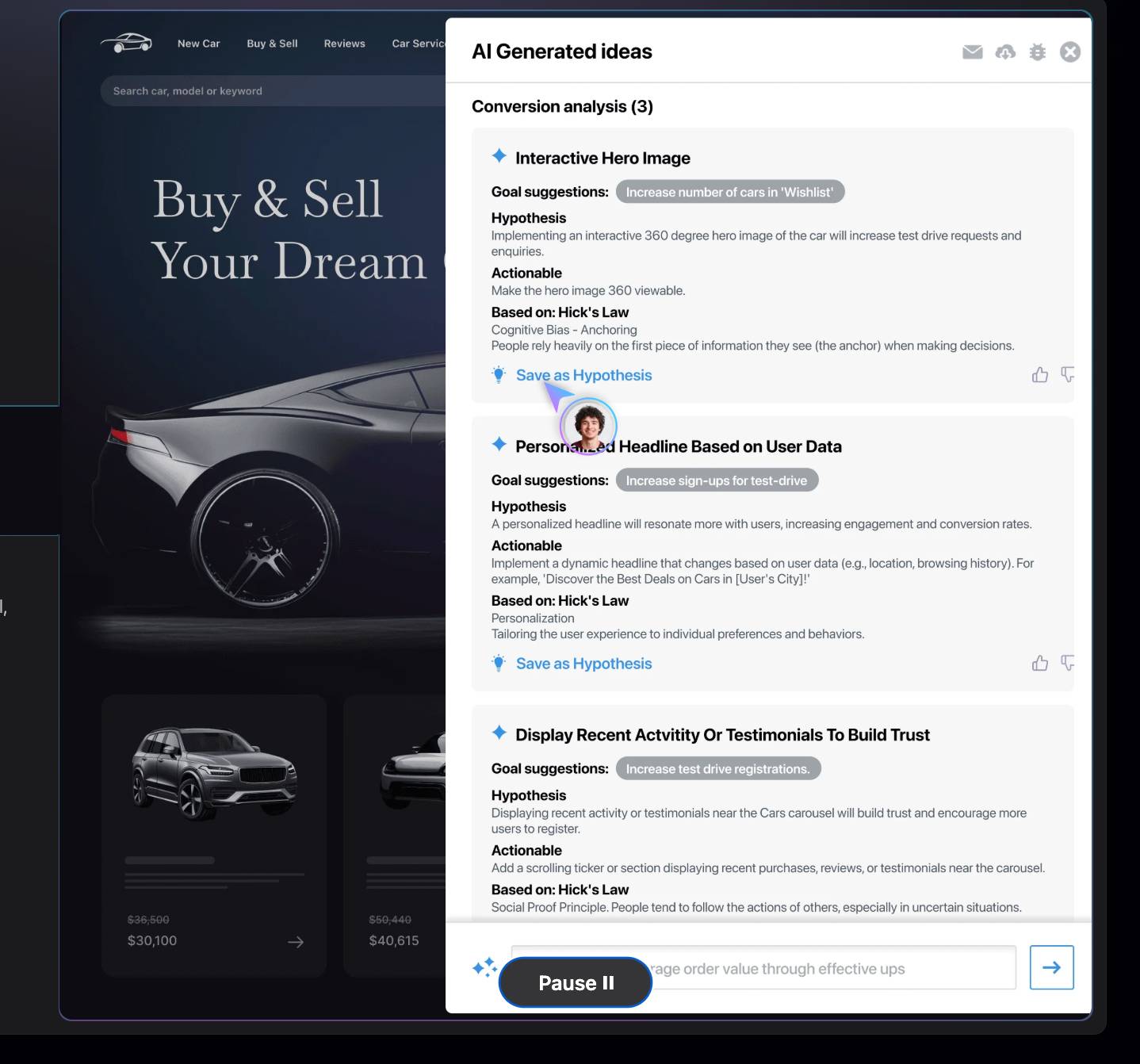
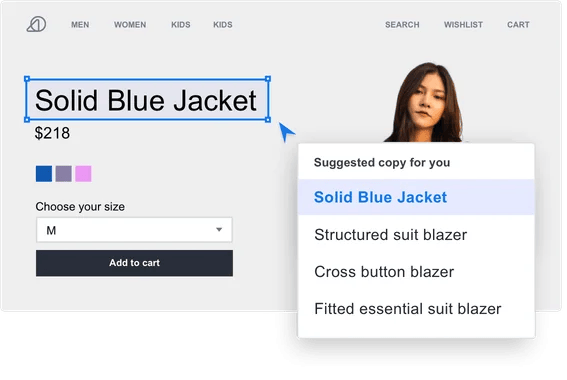
For example, VWO’s AI Copilot feature will take your page’s URL and instantly generate personalized optimization ideas based on your goals, like simplifying form fields or adding trust signals. Here’s what that feature looks like:

AI A/B testing VWO interface

Other A/B testing apps, such as Kameleoon and Looppanel, can qualify users for tests based on pre-set conditions and sort variations into groups based on your chosen metrics.

If you already use an email marketing tool like Pipedrive’s Campaigns to group your audience by common characteristics, you can A/B test marketing assets on those segments.

Features like these benefit time-strapped teams who want to run experiments without dwelling on technical details.

3. Insights and decision-making: act on test results faster

AI can help you understand the test results you collect. Machine learning algorithms analyze large datasets in real time, spotting trends, flagging anomalies and suggesting next steps.

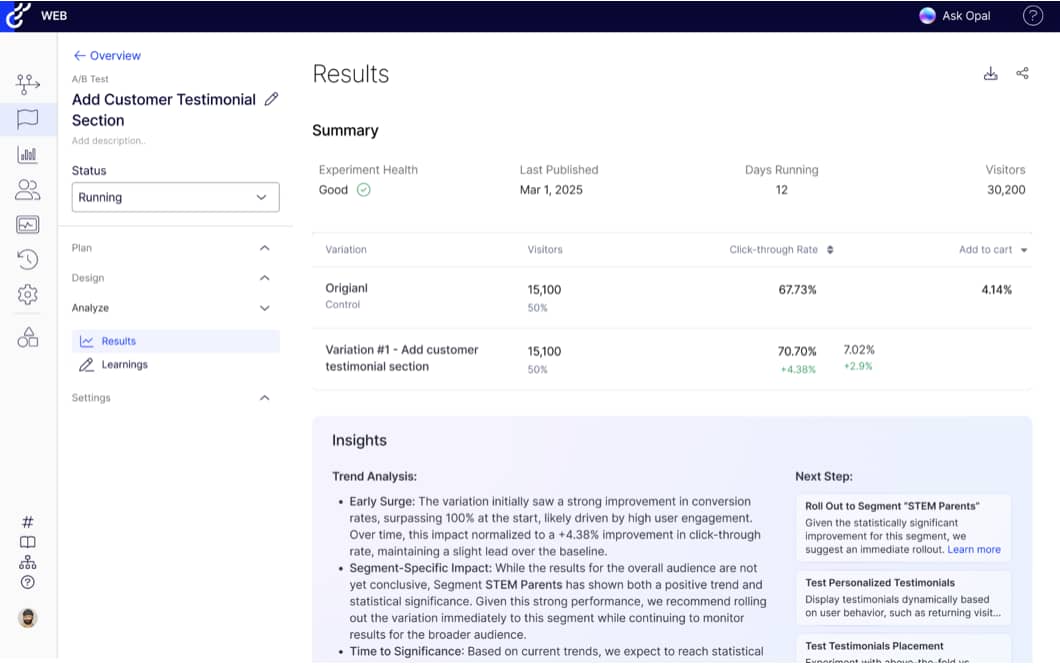
For example, Optimizely uses AI to automatically summarize experiment results in clear, plain language, like this:

AI A/B testing Optimizely interface

The app provides a simple trend analysis and recommends next steps (e.g., rolling out a specific feature or conducting another test). You can then prompt the app’s AI agent, Opal, for deeper insights without combing through data.

AI agents like this help across the customer journey. For example, while Optimizely targets marketers and designers on testing projects, Pipedrive incorporates agentic AI into customer relationship management (CRM) to give salespeople always-on support. Both tools help companies build stronger relationships and close more deals.

Recommended reading

https://www-cms.pipedriveassets.com/Best-AI-tools-for-business.png

18 top AI tools for business productivity

How to start with AI A/B testing: a beginner’s experimentation playbook

Ready to run your first AI-enhanced A/B test?

Here’s a five-step, repeatable roadmap you can apply to various marketing campaign experiments, from email blasts to lead-gen forms.

1. Pick a simple test to start with

Make your first A/B test straightforward to set up and easy to measure so you can get to know the iteration process. Once you become more confident, you can always scale up to bigger or multivariate tests.

Great starter tests include:

  • Email subject lines. Compare two different approaches to writing email newsletters or promotional email subjects (e.g., short vs. long, formal vs. casual)

  • CTA button text. Test different wording on your most essential conversion buttons (e.g., “sign up” vs. “register now”, “place order” vs. “buy now”)

  • Headline copy. Try alternative versions of your homepage’s main headline (e.g., attention-grabbing vs. subtle, funny vs. serious)

  • Form length. Compare a longer contact form against a shorter one to balance engagement with data collection (e.g., two fields vs. five fields, character limit vs. no limit)

Choose an experiment that impacts your sales pipeline. If email marketing drives most of your leads, start there. If your e-commerce website’s conversion rate is the priority, focus on the checkout flow.

Pick a test you can finish fast. Aim for experiments that’ll reach statistical significance within a couple of weeks so you can build momentum and start forming good test habits.

Statistical significance tells you whether your test results are real or just random. For example, if version B of your subject line gets 20 more opens than version A, that might seem meaningful. If you sent the email to 50 people, that’s a significant shift. If you sent it to 20,000, it’s probably nothing.

Email tests usually show results within 1-3 days, since most people open right after receiving. A landing page test will take weeks or more, as traffic won’t be immediate. Either way, a decent testing tool will help you know when to act.

2. Set your success metrics

Decide exactly how you’ll measure success. It’ll stop you from subconsciously cherry-picking favorable results later and ensure your experiments contribute to business goals.

Choose metrics that tie directly to revenue or lead generation. Here are some examples:

AI A/B test subject

Suitable KPI metrics

Email campaigns

Open rates, click-through rates, customer retention rate and demo requests

Landing pages

Form submissions, trial sign-ups and call-back requests

Product pages

Add-to-cart rates, checkout completion rate and purchase conversions

Blog and case study content

Time on page, social shares, newsletter subscriptions and lead magnet downloads

Get specific about the improvements you want. Don’t just aim to “grow customer retention”, aim to “grow customer retention by 10%”. This clarity helps you determine whether test results justify implementing the winning variation.

Also, consider where you’ll get this data. You may need to source extra tech. Knowing that in advance will help you set up or get buy-in.

A strong CRM is ideal for sales performance and account management data (e.g., retention, purchases, sales demo requests, etc.). Also consider website analytics (e.g., web traffic, time on page, etc.) and email marketing software (e.g., open rates and subscriptions).

Download Your Guide to Sales Performance Measurement

The must-read guide for any sales manager trying to track, forecast and minimize risk. Learn how to scale sales with data-backed decisions.

3. Generate test variations with GenAI

When you know what you want to test, use a generative AI tool to create compelling alternatives.

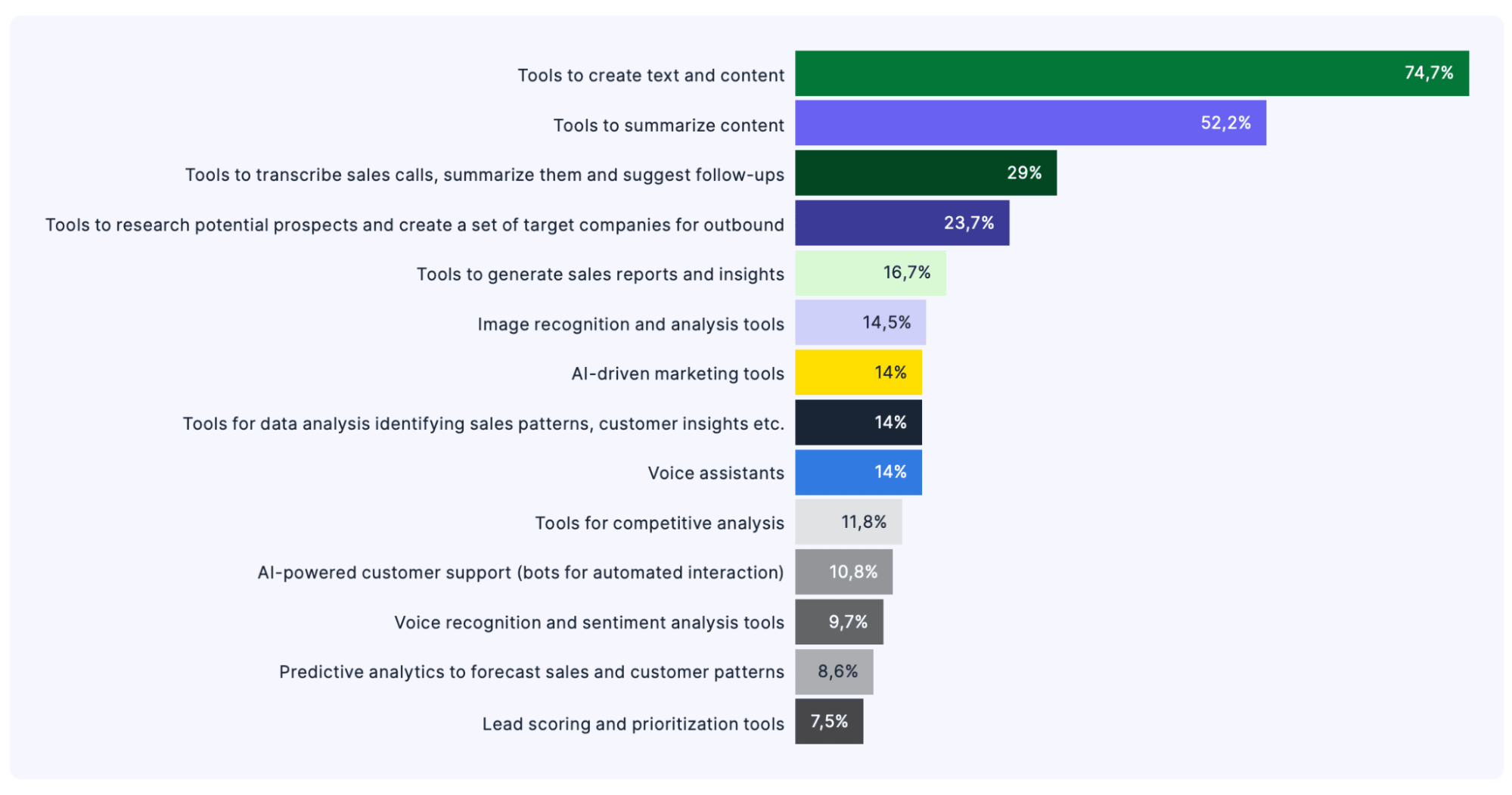
You won’t be alone using AI this way: 75% of our State of AI in Business survey respondents said they use AI tools to create text and content.

AI A/B testing AI use case graph

Start with a clear prompt that gives context on your audience and goals. In other words, tell the app exactly what you’re doing, like this:

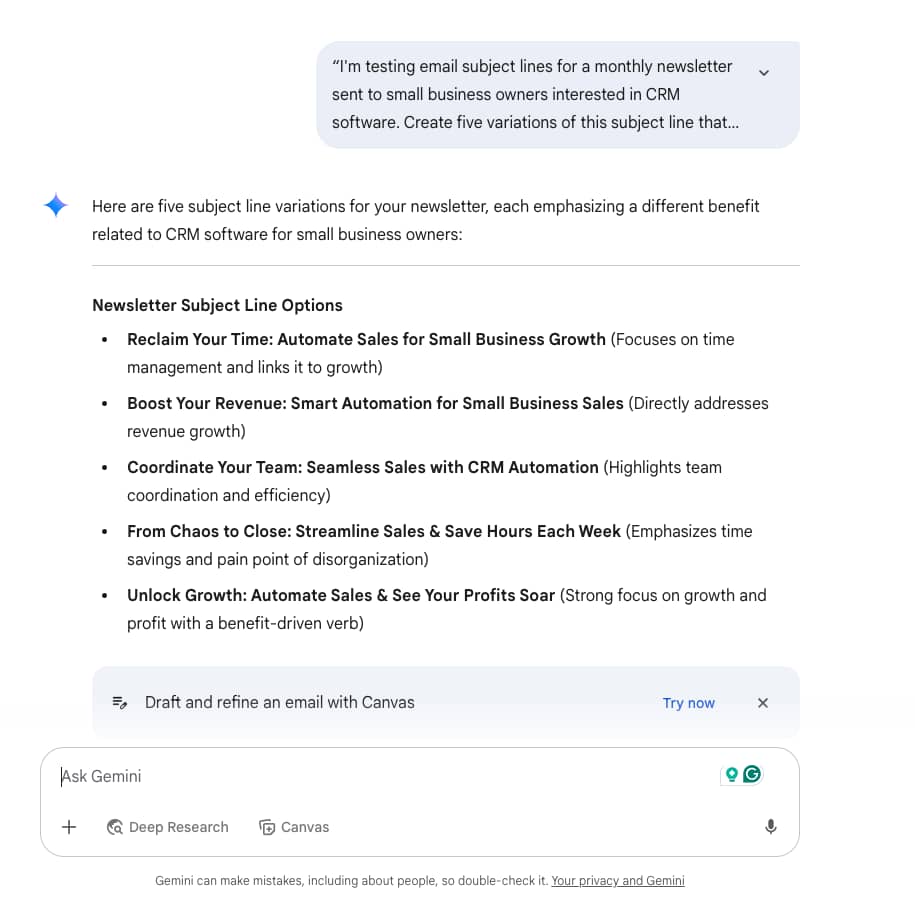
“I’m testing email subject lines for a monthly newsletter sent to small business owners interested in CRM software. Create five variations of this subject line, emphasizing different benefits: ‘Streamline your sales process with these automation tips’. Focus on pain points like time management, revenue growth and team coordination.”

When we gave Google Gemini that exact prompt, we got this response:

AI A/B testing Gemini prompt response

You don’t need to use everything the app suggests. Tweak or discard as appropriate, refine your prompt and go again.

GenAI tools’ functions vary, so let this guide your choice. For example, Gemini recommends actions based on user behavior (“Draft and refine an email…” above). Meanwhile, ChatGPT offers custom GPTs: tailored app versions for performing particular tasks.

4. Run the test using an AI-powered platform

Choose a testing platform that matches your technical confidence and budget.

The market is vast, but here are a few options that don’t require formal data analysis skills.

VWO: for drag-and-drop accessibility

VWO provides an intuitive visual editor for creating webpage variations without coding. It uses AI to help optimize test duration (for statistical significance) and provide easy-to-understand user behavior insights.

AI A/B testing VWO AI interface

VWO pricing: VWO’s free plan offers unlimited experimentation and 30-day data retention. Growth and Pro plans start from around $400, with fewer restrictions and more features (including integrations).

Kameleoon: for testing automation

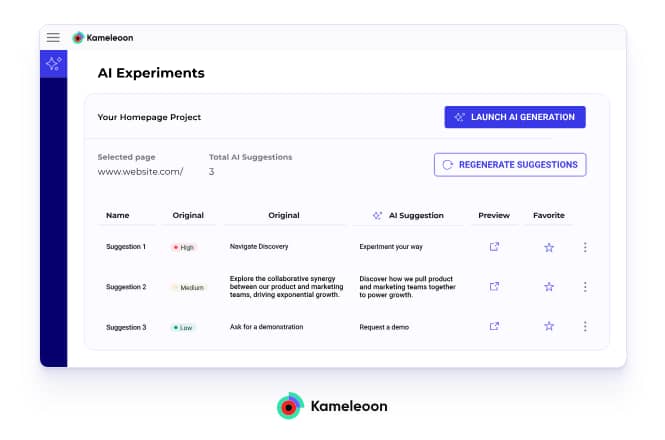
Kameleoon has robust targeting capabilities and real-time user behavior analytics. Its A/B testing machine learning feature automatically tweaks traffic allocation to get the best possible insights from every experiment.

AI A/B testing Kameleoon AI interface

Kameleoon pricing: There are separate licences for web and feature experimentation. Quotes for both are available on request.

AB Tasty: for conversational AI support

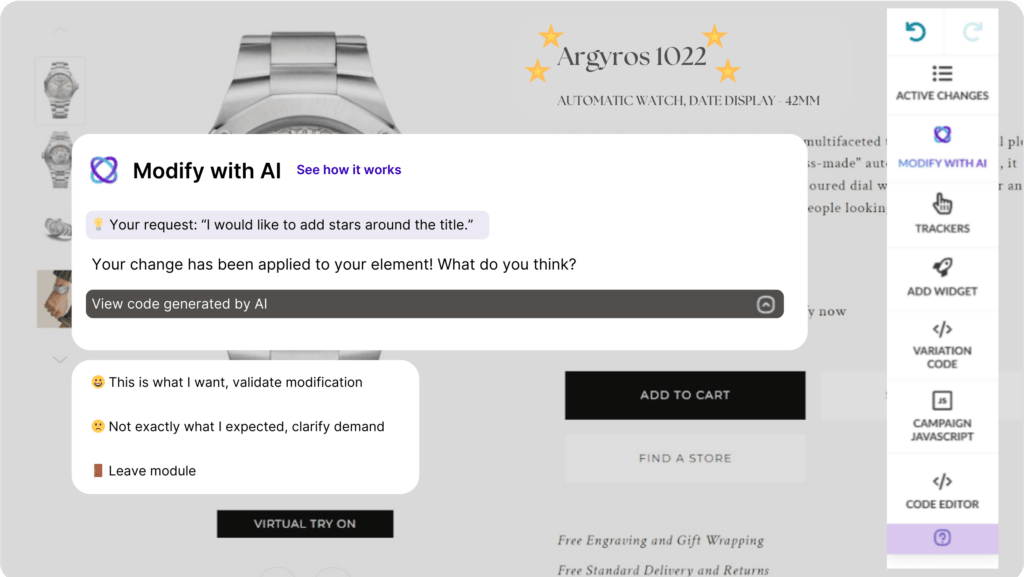
AB Tasty is an accessible testing platform with drag-and-drop editing and AI optimization features. Tweak web page assets by telling its AI copilot which changes you want to test. The app will do all the coding behind the scenes and confirm before validating.

AI A/B testing Ab Tasty copilot

AB Tasty pricing: Quotes for all AB Tasty plans are available on request.

Bringing it all together with email marketing software

You’ll need a dedicated email marketing tool to experiment with email content. Even if it doesn’t have a traditional A/B testing feature, the right platform can still support testing-like experiments through smart segmentation.

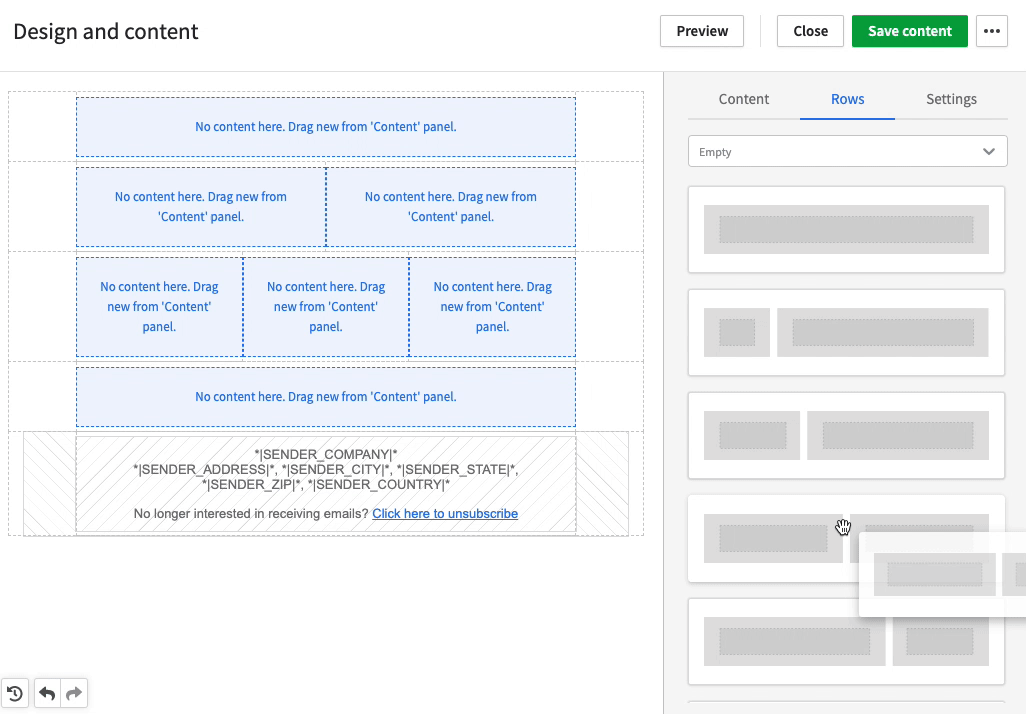
Pipedrive’s Campaigns is ideal to manage your sales, contacts and outreach in one place. Full CRM integration means salespeople can pull customer data across tools to build personalized campaigns in minutes.

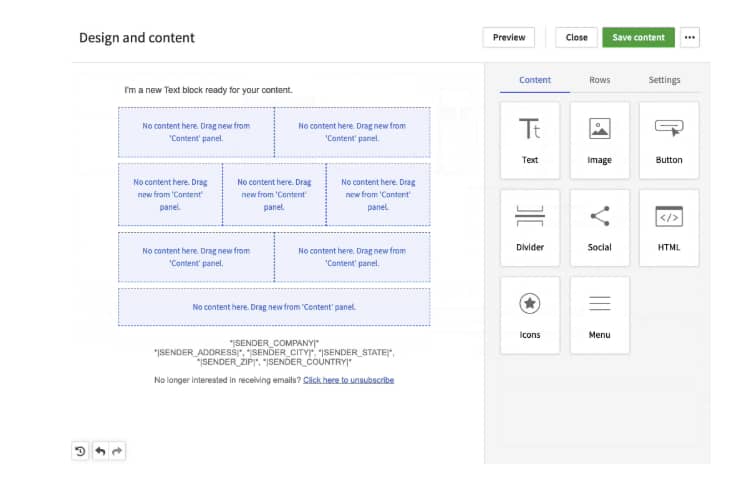
AI A/B testing Pipedrive email builder

While Campaigns doesn’t offer built-in A/B testing, you can create testing-like experiments using email and market segmentation. Here’s how segmentation becomes your testing toolkit:

  • Industry segments. Send different messaging to retail vs. SaaS prospects to see which resonates better with each sector

  • Deal stage segments. Test formal language with late-stage prospects and casual tone with early-stage leads

  • Company size segments. Compare feature-focused emails for enterprise contacts and benefit-focused content for SMBs

Track open rates and engagement across segments in Campaigns’ email analytics dashboards to see which approach works best for each audience. Then, analyze which content drives the most demo requests or moves prospects further down your sales pipeline.

Clear visualizations show how well each version resonates with your audience, allowing you to make fast decisions about what to roll out.

5. Analyze and act on the results

Once your test reaches statistical significance and there’s a clear difference in performance, explore the data to learn what happened.

First, check your primary metric to determine the best performer. Then you know which version to roll out to your audience or apply to similar campaigns.

Many AI A/B testing tools will make your winner obvious, and may even forecast broader performance improvements, like VWO does here:

AI A/B testing VWO winner notification

However, don’t stop at just finding a winner. Take your learning to the next level by digging deeper into other related metrics.

Why did the best version have more conversions?

If time on the page was low, your messaging must have been clear and direct. Visitors should have gotten what they needed fast and kept moving through the sales funnel.

If your CTA’s click-through rate jumped, the wording matched audience intent. Let’s say “get a quote” outperformed “learn more”. Users were close to a buying decision. They wanted pricing upfront, and you made their path obvious, so they converted.

Ultimately, these patterns help you learn what your audience responds to. Apply the findings at other sales and marketing touchpoints to boost engagement across the board.

Recommended reading

https://www-cms.pipedriveassets.com/How-to-improve-user-experience-and-boost-engagemen.png

How to improve user experience: 10 proven tips and tactics

9 quick AI A/B testing tips for when time and resources are tight

It doesn’t take a big team or an Amazon-sized budget to run practical A/B tests.

Here are nine easy ways to swap marketing guesswork for data-driven decisions:

How to run A/B tests

Why it works

1. Start small, learn fast

Small-scale tests build confidence. Focus on early wins and creating a culture of experimentation. Then, scale up as abilities and resources allow.

2. Test one thing at a time to avoid data overwhelm

Isolating a single variable makes understanding what’s working and why easier. Fewer moving parts = more precise results.

3. Lean on AI but validate your findings

AI tools speed things up, but they can’t replace your expert judgment. Consistently sense-check results and make sure they align with your goals.

4. Document your results and reuse winning variations

Record what works and where. Repurposing proven content layouts or styles saves time while helping you build consistent customer experiences.

5. Use real-time insights to iterate faster

AI A/B testing tools with real-time dashboards and custom reports help you course-correct mid-test – they’re ideal for short campaigns.

6. Prioritize tests tied to business goals

Focus on areas directly impacting conversions and lead quality, not just cosmetic tweaks and low-quality clicks. Keep that bottom line in mind.

7. Don’t get stuck waiting for perfect results

Using intuition is okay when the data doesn’t flow as you’d hoped. Trust your instincts and keep moving – you’ll be testing again anyway.

8. Use GenAI to brainstorm variant ideas

Most of the best GenAI tools are low-cost. Try a few to learn which provides the most helpful inspiration, and then treat it as a testing partner.

9. Share learnings across teams

Don’t silo your results. What works in one channel may strengthen others, especially in small teams with overlapping responsibilities.

Apply even a few of these ideas to get miles ahead of companies still relying on gut instinct and historical data.

Final thoughts

A/B testing has long been one of the most reliable ways to make better marketing decisions. Now, with AI in your corner, it’s accessible too.

Modern tools can help you create, run and analyze tests without needing deep technical skills or a ton of data.

It’s not all about dedicated AI A/B testing features either. You’ll also need great sales and marketing tools, like Pipedrive’s CRM, to organize customer data and target your audience effectively.

Remember, the most innovative marketers aren’t waiting for perfect conditions. They’re experimenting, adapting and improving one small test at a time. Do the same, and sustainable growth will follow.

The state of sales and marketing 2024

Discover key statistics about sales and marketing

7-Step Business Glossary Framework for SMBs

Software Stack Editor · July 7, 2025 ·

A business glossary helps standardize language across teams so everyone, from marketing and sales to finance and operations, is on the same page.

Whether you’re scaling operations or just trying to clean up cross-team communication, a well-crafted business glossary can save time, reduce errors and improve collaboration.

In this article, we’ll show you how to create a business glossary tailored to your organization. You’ll learn about essential components, key stakeholders and proven strategies for successful implementation.

What is a business glossary?

A business glossary is a collection of standardized business terms across your company. It removes communication barriers between departments by establishing a single source of truth.

Teams often have different understandings of the same business concept. For example, marketing could call everyone who downloads a whitepaper a “qualified lead”. However, for sales, a “qualified lead” is someone who meets budget thresholds and has decision-making authority.

Marketing hands off what they consider a “qualified lead” to sales. The salesperson might pursue the lead by calling or sending an email, only to find out the person has no buying power or interest in purchasing.

With a business glossary, everyone speaks the same language and teams hear consistent terms. Depending on your industry, you might need one or more of the following different types of business glossaries:

  • Operation glossary for terms used across departments (e.g., “sales prospect”, “churned customer” or “sales cycle”)

  • Technical glossary for explaining complex systems to non-technical staff (e.g., “API integration”, “data privacy” or “data models”)

  • Customer-facing glossary for consistent terminology in external communications (e.g., “customer experience”, “product guides” or “returns”)

Start with a centralized business word glossary rather than creating multiple siloed glossaries. You can organize it into sections for different departments and functions.

Business glossary vs. data dictionary vs. data catalog

Companies often create several collections of terms for different purposes. You might hear about business glossaries, data dictionaries and data catalogs. Each serves a specific function in your organization.

  • A business glossary uses simple language anyone can understand. It helps your teams communicate by giving each term one official meaning. For example, your glossary might define “active customer” as “someone who made a purchase in the last 90 days”.

  • A data dictionary is more technical. It describes the data fields in your systems and datasets. For example, your data dictionary might explain “customer_email” as a text field with a limit of 255 characters that can’t be empty.

  • A data catalog tells you where to find data in your organization. It supports data discovery by mapping which systems contain what information and who owns that data. For example, your customer contact information may be in your CRM system and under the sales team’s responsibility.

The main difference between each of these collections lies in their purposes. Your business glossary improves human communication. Your data dictionary supports system development. Your data catalog helps locate and manage data assets across your organization.

Business glossary template

Creating a good business glossary takes time and planning. Our template makes the process much easier by providing a ready-made structure with all the essential sections already organized.

The template includes spaces for terms, clear definitions, use cases and potential exceptions. Your team can start adding terms immediately instead of spending time designing the format.

Download our free business glossary template to start organizing your terminology immediately.

Get your free template

Benefits of a business glossary

A business glossary gives your teams a strong foundation for clear communication and helps everyone understand your company’s unique language.

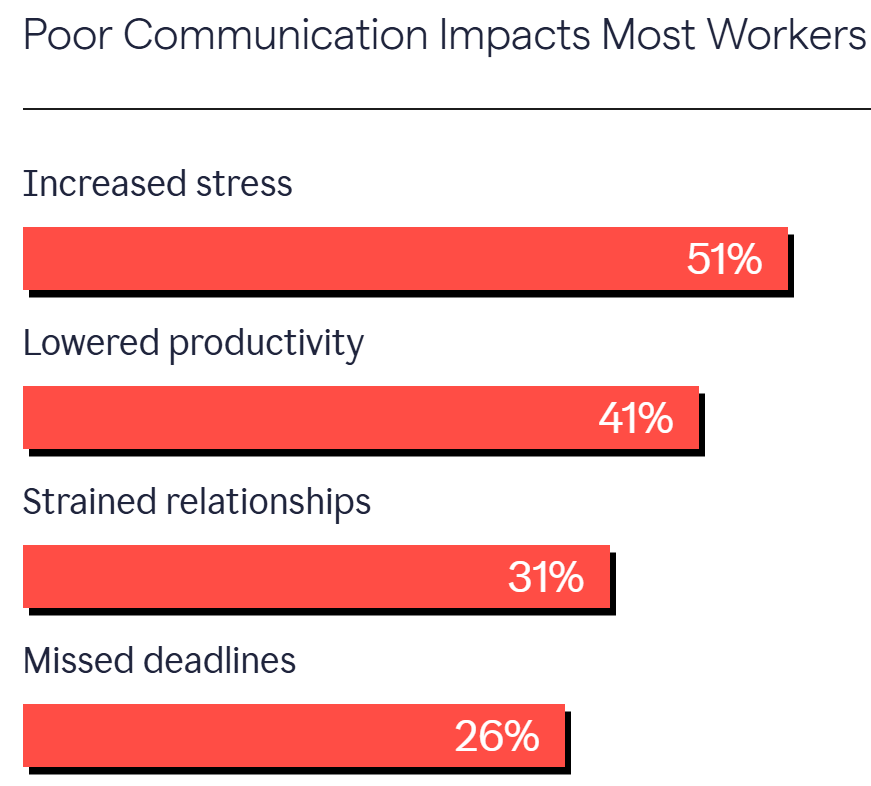
Clear communication matters to every company. According to Grammarly’s 2024 State of Business Communication report, poor communication increases workers’ stress by 51% while lowering their productivity by 41%.

business glossary poor communication

Coworkers also experience strained work relationships when communication isn’t clear. Consistently using different terminology can lead to misunderstandings, errors and missed deadlines.

Here’s how a business glossary helps your company maintain alignment and boost efficiency:

  • Streamlines customer interactions. Customers get confused when they hear different terms. Sales might promise a two-week “implementation”, but support calls it an “onboarding process”. The conflict in terms can make people feel like they’re getting two different answers, affecting customer trust. A glossary fixes this problem.

  • Ensures consistent messaging. Customers talk to you through multiple channels (e.g., website, emails, phone calls and chat). They should hear the same words in all these places. A glossary ensures consistency of language from the discovery call to the won deal.

  • Avoids costly misunderstandings. Your sales team might consider “customer support” 24/7 email support, but your customer service team considers it email support within 24 hours. Disappointed customers might cancel subscriptions or demand refunds. A business glossary prevents this by setting clear definitions for terms.

  • Onboards new team members faster. New hires spend valuable hours learning what terms mean at your company. For example, an experienced sales manager transferring from another company might understand the sales process differently from how you define it. A glossary gives everyone quick answers about your company’s words without awkward conversations.

A good business glossary lets you focus on what matters. Your teams work together with a shared understanding of key concepts, and people make smarter decisions. Better decisions help you foster stronger customer relationships and grow your business faster.

Who needs a business glossary?

If your organization has multiple teams, channels or customer touchpoints, you need a business words glossary. It’s the simplest way to reduce miscommunication and ensure everyone uses the same definitions, especially as you scale.

Whether you’re building a high-growth sales team or managing remote employees across time zones, a shared glossary can prevent confusion and keep operations running smoothly.

Here’s how different types of organizations benefit from having a business glossary:

Organization type

Why it matters

Sales-focused organizations

Aligns terms across the customer journey from leads to sales to customer retention.

Marketing and sales use the same definitions for leads and prospects, avoiding misreporting or missed targets. Meanwhile, customer success managers deliver exactly what sales promised to clients.

Companies with multiple departments

Breaks down informational silos for cross-functional teams. When teams speak the same language, they work together more effectively. At the same time, reports use the same terms across all departments, so executives get accurate data.

Growing businesses

Acts as a knowledge transfer tool. When hiring salespeople, you want them to learn your language quickly. A business glossary sets clear terms from the start to prevent misunderstandings. Your company stays unified rather than becoming disconnected as it grows.

Organizations with remote teams

Helps remote teams collaborate and communicate when they can’t talk face-to-face. Everyone uses the same terms regardless of location or time zone, and remote workers gain confidence by having clear definitions at their fingertips.

Whether you’re a startup or an established enterprise, consider a business terminology glossary before miscommunication starts affecting your operations.

Creating a business glossary is a low-cost way to avoid the ongoing expenses of confusion, missed opportunities and rework caused by terminology inconsistency.

Recommended reading

https://www-cms.pipedriveassets.com/Management-Styles.jpg

7 best management styles for effective leadership

Components of an effective business glossary

A good business words glossary keeps your entire organization aligned across teams, tools and reporting. Your glossary must be more than just a list of words.

Every person in your company should find it clear and easy to use. That means developing guidelines that keep the glossary consistent, regardless of who creates or updates your list.

A glossary might not directly connect to data sources. However, it helps teams interpret information from those sources correctly. People gain a better understanding of data, like what “monthly active users” or “sales forecast” mean in reports.

Well-done glossaries have specific components that work together. Here’s what goes into an effective business glossary.

Clear term definitions

Clear, concise definitions are at the heart of your business glossary. Write each definition in plain language so that non-experts can understand.

Business glossary term definitions can include:

Every company uses terms in slightly different ways. Your glossary definitions should match how your company uses these terms.

Explain terms from a business perspective rather than a technical one. Avoid jargon and use simple language.

Example: When you define “customer lifetime value”, don’t define it as:

“The discounted sum of all future cash flow statements attributed to a customer relationship.”

A better definition might be:

“The total revenue we expect to earn from a customer during their entire relationship with our company. We take into account typical sales data and retention rates.”

Reference data

Reference data are lists of accepted values under business concepts. For example, customer status can be “active” or “inactive”.

Your reference data might include customer segments (e.g., small businesses, mid-size businesses, enterprises), product categories or geographic regions. By creating reference data, you prevent departments from developing their own versions.

Example: The reference data for “marketing funnel stages” in your company might include these standard values:

– Awareness
– Consideration
– Decision
– Retention
– Advocacy

Without this reference data, your marketing team might refer to the “decision stage” while sales calls it the “purchase phase”. The standard list ensures everyone uses the same terminology when discussing the customer journey stages.

Metadata

Metadata is “data about the data” or additional data elements about each term. It helps your teams understand the context of the data.

Example: The metadata for “sales pipeline” might look like this:

– Data owner: Sarah Griffin, VP of sales
– Creation date: January 15, 2024
– Last update date: February 20, 2025
– Approval status: Approved
– Version history: Version 3.0 (current), Version 2.0 added deal stages, Version 1.0 initial definition

Metadata helps teams understand who manages the term, how current it is and how it has evolved.

Classifications

Classifications help you organize terms into subgroups that make sense. A good organization helps your employees find terms quickly and see how they relate to each other.

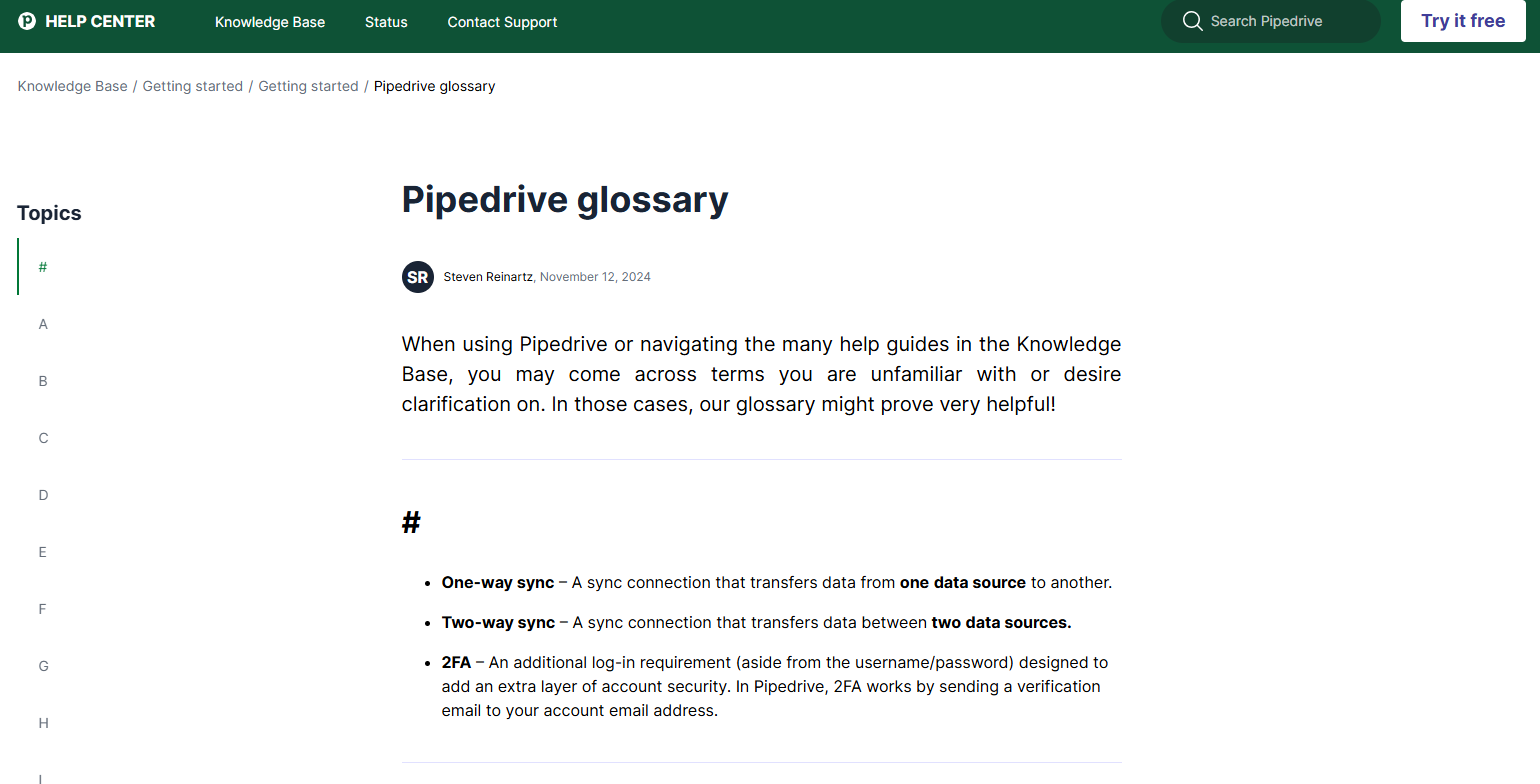
Pipedrive’s glossary organizes terms alphabetically.

business glossary pipedrive classifications

This A-Z system is common in straightforward glossaries, making finding specific terms easy.

Business glossaries can organize terms in different ways depending on their purpose:

  • Alphabetical classification for quick lookup

  • Functional classification that groups terms by department (e.g., sales, marketing, support)

  • Process classification that organizes terms by stages (e.g., prospecting, lead qualification, closing)

Organize terms in a way that will make it easiest for users to find them.

7 Steps to create your business glossary

Creating a business glossary helps build your company’s data ecosystem and connect your business tools through standard terms.

Most companies store data in different places. For example, your customer information lives in your CRM, bills stay in accounting software and marketing data sits in campaign tools.

A business glossary provides clear, consistent definitions across your platforms. When your CRM and marketing tools use the glossary’s standardized terms, data flows smoothly between systems.

Larger enterprises use data management tools to connect their glossary with their systems. The tools help track where and how terms are used across systems. Small businesses can start with a simple document. Here’s how to create one.

1. Identify key stakeholders and their roles

Start by choosing the right roles for your project baseline. Build a team with clearly defined responsibilities to promote accountability and ensure reliable work progress.

Most organizational projects need these stakeholders and roles:

Stakeholder role

Description and responsibilities

Executive Sponsor

C-level executives who ensure the project gets priority and the necessary resources.

Responsibilities:

Glossary Manager

Managers who keep the project organized and moving forward daily.

Responsibilities:

Subject matter experts (SMEs)

Representatives from each department (e.g., marketing managers), who ensure definitions are accurate for each department.

Responsibilities:

Data Steward

Data analysts or IT specialists who implement business terms into data systems.

Responsibilities:

Change Champion

Team leaders or internal communications specialists who promote and help employees use the glossary in their work.

Responsibilities:

  • Promote adoption

  • Train users

  • Collect feedback

When roles are set, schedule a kickoff meeting to explain responsibilities, the timeline and the fundamentals of what makes a successful business glossary. For the initial setup, try to have weekly meetings to ensure you can solve any issues quickly.

After your glossary launches, you can move to monthly meetings. Focus these monthly sessions on reviewing critical terms, metrics or adoption challenges.

2. Determine scope

Choose a manageable scope that solves your most pressing problems. Without clear boundaries, your project can grow too big and never finish. Focus on quality over quantity for your first version.

Consider these scope options:

  • Narrow scope – Focus on one department or process with 20–30 terms

  • Medium scope – Cover core cross-departmental terms with 50–100 definitions

  • Wide scope – Include all business areas with 100+ terms, for a comprehensive business glossary

Most companies succeed by starting small. Pick a narrow or medium scope for your first version to show value quickly.

Your scope must match your available time and resources. A smaller, completed glossary of business terms helps more than an ambitious project that never launches.

3. Collect and prioritize terms

Gather all important terms used in your company. This step creates the foundation of your glossary.

People across your business use specialized words every day. Find words that cause confusion, but also identify terms used differently across departments.

For collecting terms, try:

  • Workshops with representatives from each department. Ask them to list terms they use daily. Record any disagreements about meanings.

  • Surveys asking employees which terms cause confusion. The survey might ask, “What five business terms do you wish everyone could define the same way?”

  • Review existing documents. Study reports, dashboards and training materials and look for important terms used repeatedly.

Next, focus on which terms to define first. Look for words that cause the most misunderstanding in meetings. Pay attention when someone says, “What do you mean by that?”

Create a simple scoring system. Give each potential term points for frequency of use (i.e., how often it appears), confusion factor (i.e., how much misunderstanding it causes), business impact (i.e., how decisions depend on it) and cross-department usage (i.e., how many teams use it).

Focus on terms with the highest total scores to give your teams the definitions they need most quickly.

Note: You can choose between two approaches to collect terms.

1. The top-down approach allows leadership to set which terms matter most. This approach works when there are no existing data terms or definitions.
2. The bottom-up approach involves asking employees what terms to include. This approach works best when departments are already using their own language.

4. Create a template

Your template provides structure for every term entry. It makes information easy to find and understand.

Your team needs a consistent format to work efficiently. Without a template, definitions become inconsistent and hard to use.

A simple template like the one linked above works well for most companies. For example, include template elements like the following.

Term: Closed sale

Definition (in plain language): A sales opportunity that ended with a signed contract or completed purchase. The customer agreed to all terms, signed the necessary paperwork and the payment was confirmed.

Department/owner: VP of Sales (Primary), CFO (Secondary)

Status (draft, approved, retired): Approved

Last updated date: March 22, 2025

Once you have your template, choose where to store your glossary. Specialized tools like data governance platforms offer more features but cost more money.

Here are recommendations for different company sizes and needs:

Format

Who uses it

Google Docs/Microsoft Word Docs

Small to mid-sized businesses

Spreadsheets (e.g., Google Sheets, Excel)

Cross-functional teams

Internal wikis (e.g., Notion, Confluence)

Startups and tech-savvy teams

PDFs

Larger organizations or teams documenting compliance

Glossary features in data catalog tools

Enterprises with formal data governance

Most small and medium-sized businesses keep their glossary internal using existing tools. Google Docs and Notion are popular choices.

Making your glossary public is important if it’s a customer-facing resource. For example, customers might benefit from having access to technical guides and API documentation.

5. Draft, review and approve definitions

When drafting definitions, use active voice and explain what the term means in practice. Avoid jargon and acronyms where possible. You want a definition relevant to your organization that everyone understands. It can’t be generic.

Start by assigning each term to the most knowledgeable subject matter expert. They’ll usually become the term’s owner.

When drafts are ready, organize your terms with classifications or tags. Group related terms together under categories like “sales guide”, “corporate finance” or “customer success”.

For review, create a simple workflow:

  1. The subject matter expert writes the draft

  2. The glossary manager checks formatting and clarity

  3. Other stakeholders review for accuracy

  4. The executive sponsor gives final approval

Set time limits for each review stage. Without deadlines, approval can drag on indefinitely. Aim to complete each definition within two weeks.

6. Launch and promote adoption

Your glossary only creates value when business users use it. A perfectly written document that nobody reads doesn’t help.

A launch strategy determines whether or not the glossary becomes part of daily work.

First, ensure your glossary is easily accessible by adding it to your company intranet homepage for self-service access. You can also include links to important documents or create bookmarks in shared browsers.

Next, announce the launch through multiple channels. Send emails, mention it in team meetings and ask department heads to promote it.

Finally, have meetings with your teams or create short videos to explain how to use the glossary. Once you’ve launched the glossary, promote adoption:

Remember that adoption takes time. Stay persistent and keep promoting your glossary until it becomes second nature.

7. Maintain and improve over time

Your business glossary isn’t a one-time project. It needs regular updates to stay valuable. Language changes and your business evolves.

Treat your glossary as a living document that grows with your company. Without maintenance, it quickly becomes outdated and people stop using it.

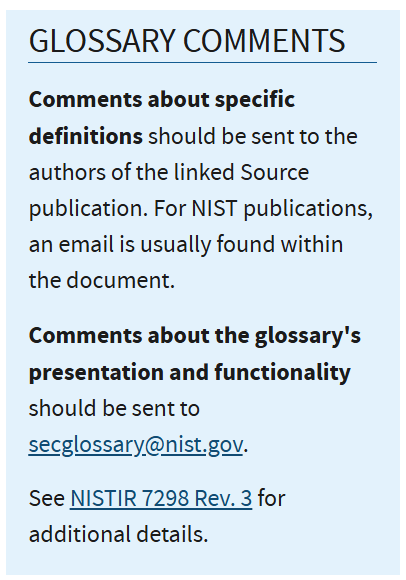
Assign clear ownership for each term in your glossary. Include contact information like an email address where people can suggest updates or corrections.

business glossary definitions comments

On the other hand, you can create a simple correction form that anyone can use. Make it easy for employees to suggest new terms or report confusing definitions.

You also need a schedule for reviewing and implementing these changes. Create a routine that your team can follow consistently.

Follow a multi-layered update approach:

  • Annual reviews for the whole glossary

  • Quarterly validation checks for high-priority terms

  • Immediate updates when correction forms come in

This regular maintenance keeps your glossary relevant. Teams will rely on it more as they see it evolve with your business needs.

Download your guide to managing teams and scaling sales

The blueprint you need to find a team of superstars and build a strong foundation for lasting sales success

Common challenges and solutions

Most companies encounter common challenges when building their glossaries. Knowing these problems ahead of time helps avoid them.

Here are the most common challenges you might face when creating your business glossary, along with practical solutions you can use right away:

Issue

Solution

Handling department disagreements.

Example: While marketing calls something a “lead”, sales calls it a “prospect”. This discrepancy turns meetings into debates about words, and progress stops because teams can’t agree.

Hold special meetings to solve term conflicts. Make sure to bring in a neutral person to lead the talk. Understand why each definition matters to each team and ask, “Which definition helps us serve customers better?”

Focus on what helps customers most. However, when teams can’t agree, let the executive sponsor make the final decisions.

Maintaining without creating extra work.

Example: People see glossary updates as extra work. Nobody wants another task on their list. Review meetings get canceled, and the glossary gets outdated because maintenance feels like a burden.

Add glossary checks to existing meetings. For example, ask the marketing team to review terms during their regular planning.

Also, ensure the update form takes only one or two minutes to complete.

Keeping the glossary relevant and updated.

Example: New products launch along with new terms, and old terms might change their meaning. If the company’s language evolves and the glossary stays the same, it becomes a forgotten document. Nobody looks at outdated information.

Set calendar reminders for quarterly reviews. Track which terms get viewed most and delete terms nobody uses.

When you launch new projects, add their respective new terms.

You could also reward people who suggest useful updates.

How to use Pipedrive CRM with your business glossary

Once you have your data glossary, integrate it into your daily workflows. If you use a CRM like Pipedrive, it’s easy to make simple updates that revolutionize how your business runs.

Integrating your business glossary into Pipedrive ensures that:

  • Sales and marketing work from a shared understanding

  • Reporting fields and terminology stay consistent

  • Customers receive clear, professional communication

It turns your glossary from a static document into a tool that actively supports better operations. Here are two ways to get started aligning your glossary and CRM.

1. Align custom fields with glossary definitions

Start by reviewing your existing Pipedrive custom fields. Ensure the field names and dropdown options reflect the terms and definitions in your glossary.

business glossary pipedrive custom fields

For example, if your glossary defines “enterprise customer” as companies with 500+ clients and $50k+ annual spend, create a custom field with that exact name in Pipedrive.

You can also apply this to dropdown fields. For example, if your glossary defines specific deal stages, create a custom “deal stage” field.

Under that custom field, create options for each stage you defined (e.g., “initial contact”, “needs assessment”, “proposal sent” and “sales negotiation”).

business glossary Pipedrive field groups

This setup will ensure everyone in your sales team classifies deals with the same language.

2. Incorporate glossary terms in Pipedrive email templates

Pipedrive’s email templates are another opportunity to reinforce consistent language. When creating email templates in Pipedrive, align different types with specific glossary terms:

  • For product introduction emails, use the exact product names, features and categories defined in your glossary

  • For follow-up emails after sales calls, incorporate standardized terms for the sales process itself

  • For proposal emails, ensure pricing tier names and service level descriptions match your glossary definitions precisely

business glossary pipedrive email templates

This consistency builds trust, reduces back-and-forth and aligns internal and customer-facing messaging.

Even when you’re not using templates, Pipedrive allows you to insert custom fields into one-off emails if the email is tied to a contact or organization.

business glossary pipedrive email fields

Add any custom field you’ve created as long as the email is associated with a contact person or organization.

Recommended reading

https://www-cms.pipedriveassets.com/CRM-data-entry-best-practices-for-SMBs.png

Why CRM data entry matters (and 5 tips to make it easier)

Business glossary FAQs

  • Your business glossary should be long enough to cover important terminology, but short enough to be manageable.

    The scope depends on your organization’s specific needs. For most small to medium-sized businesses, focus on terms that:

    • Cause frequent misunderstandings

    • Appear in key reports and analytics

    • Are used across different departments

    • Appear in customer-facing communications

    • Have a significant business impact if misinterpreted

    Larger enterprises might have thousands of terms, especially those in regulatory or high-technical fields.

  • The glossary of business terms should be owned by not one but many people.

    At the organizational level, your business glossary should be owned by a role focused on information quality. For example, a chief data officer, data governance manager or business analyst who controls edit permissions.

    At the term level, individual definitions should be owned by subject matter experts from relevant departments.

Final thoughts

A business terms glossary might seem like an afterthought in your busy schedule. However, when you implement it early and update it regularly, it becomes the foundation for your company’s faster expansion.

This simple document can remove hours of confusion and unnecessary meetings as your team grows.

Start your 14-day free trial and see how Pipedrive can amplify the impact of your business glossary. When your CRM reflects your terminology, new hires understand exactly what “qualified lead” or “deal stage” means from day one.

7 Top Marketing Attribution Software for SMBs in 2025

Software Stack Editor · July 7, 2025 ·

To understand which marketing efforts drive revenue, you need attribution, which provides clear insight into what’s working and what’s not.

Marketing attribution software connects the dots for you. It shows you where your leads come from so you can focus on your highest-performing touchpoints.

In this article, you’ll discover the best marketing attribution tools for small businesses, find the right fit for your team and learn how to track campaigns effectively.

Types of marketing attribution software (and what your small business needs)

Marketing attribution software shows you exactly which marketing activities lead to sales. It tracks how customers interact with each marketing touchpoint, revealing which channels drive the most conversions.

Marketing attribution software customer journey

You can then focus on these channels and improve your return on investment (ROI).

Example: Say you’re a productivity software company. You use attribution software to see if your best leads come from email campaigns or social media marketing. If 65% of sign-ups to your plans come from email, you should invest more resources there.

Attribution-focused marketing software generally fits into two groups: single-touch and multi-touch attribution.

Both types use different models to decide which steps (like an ad click or website visit) in a buyer’s journey deserve credit for a sale.

Single-touch attribution models

Single-touch models credit all sales with one key customer interaction, such as the first or last touchpoint. Here’s how they work:

Single-touch attribution models

What it does

First-touch attribution: Gives full credit to the first channel that attracted a customer.

Helpful in tracking brand awareness and top-funnel performance.

Helps you understand how people first find you.

For example, if a sales prospect clicks a LinkedIn ad before signing up weeks later, this model gives LinkedIn full credit.

Last-touch attribution: Fully credits the last interaction before the sale.

Ideal for optimizing your final-step messaging and calls to action (CTAs).

Helps you know what finally convinced someone to convert.

If someone clicks multiple links but only makes a purchase after reading an email, the email receives 100% credit.

These simple models work well when the user journey is short or concentrated around one or two channels.

Multi-touch attribution models

Multi-touch models split credit across several interactions, showing how each step leads to a sale. Like this:

Multi-touch attribution models

What it does

Linear attribution: Spreads credit evenly across all interactions.

Useful when you’re consistently using several marketing touchpoints.

Gives a balanced view of every channel’s role.

Credits each step equally, such as when a customer sees a social ad, reads a blog post and finally clicks an email.

Time-decay attribution: Gives more credit to interactions closest to the sale.

Useful for long or complex sales cycles, where later-stage interactions impact decision-making.

Prioritizes actions taken later in the sales funnel.

If a lead engages with your Facebook ad but books a demo a week after seeing your pricing page, most credit goes to the latter.

Multi-touch attribution is often too complex for small businesses. It requires a lot of data and marketing automation, which might be impractical if you have limited resources.

Single-touch attribution is simpler and more affordable, though it doesn’t always show the whole picture.

Small businesses usually need something in between – an affordable, easy-to-use marketing attribution platform that provides clear insights without breaking the budget.

For example, a small IT company running Google Ads, social media ads and email marketing can pair free tools like Google Analytics with a customer relationship management (CRM) system like Pipedrive to see which campaigns drive sales.

In the next section, you’ll discover the best digital marketing attribution tools for small businesses.

Download our Customer Journey Map Template

Start mapping your customer journey with our free customer journey template.

7 best marketing attribution software solutions for small businesses

The best digital marketing attribution tools depend on your needs, goals and marketing mix.

The following list includes seven top-performing solutions based on features, ease of use and how well they serve everyday small business needs:

  • Three free or low-cost solutions that are accessible, easy to set up and effective for basic attribution

  • Four mid-range paid tools with more advanced features for marketing teams handling more granular data, ad spend or complex reporting

Whether you’re looking for a simple solution, a hybrid approach or a platform that scales with you, there’s something here to support smarter marketing decisions.

1. Google Analytics (GA4)

Google Analytics (GA4) is a mostly free platform for tracking user interactions with your website or app.

Marketing attribution software Google Analytics

GA4 uses single-touch, last-click attribution by default. With enough data, you can also apply data-driven attribution, which uses machine learning and predictive analytics to estimate the effect of channels using historical data from your account.

Here’s what you can do with Google Analytics:

Google Analytics feature

How it helps with attribution

Track traffic sources

Using source data, it identifies which single channel (e.g., paid ads, organic search, social mobile apps, email campaigns) drove a visitor to your site.

Measure conversions

Tracks form submissions, purchases, email tracking and other specific actions visitors take on your site.

Analyze user paths

Shows which pages users visit before converting, helping you understand lead flow and drop-off points.

Built-in attribution models

Uses last-click attribution for paid and organic channels or data-driven attribution if you generate enough marketing data.

Google Ads integration

Automatically links conversions to Google Ads campaigns and keywords.

Custom dashboards

Provides custom attribution reporting views that show how each marketing channel performs.

With enterprise-level features available on paid plans, Google Analytics supports different attribution needs depending on your setup and data volume.

Who should use Google Analytics?

Google Analytics suits small businesses that need single-touch attribution insights, such as those that want to quickly identify the channel that generates their website leads.

For example, a startup offering B2B software can use GA4’s web analytics to track the number of sign-ups from paid campaigns compared to newsletter clicks. While the platform doesn’t show every step in a cross-channel buyer journey, it highlights which channels lead to final actions.

When you connect Google Analytics with Pipedrive’s CRM, you can see exactly which campaigns bring in your highest-value deals. Simply use the GA Connector on Pipedrive’s Marketplace to track a lead from their first click to closed revenue.

Pipedrive also connects with Google Ads to send form submissions directly into your CRM, linking ad responses to pipeline stages without you needing to get involved.

Recommended reading

https://www-cms.pipedriveassets.com/blog-assets/google-analytics-email-tracking.png

How to track your email campaigns with Google Analytics email tracking

2. Platform-specific attribution tools

Most major ad platforms offer free, built-in attribution tools that track user interactions. They typically use last-click or view-through attribution (assigning credit to ads people viewed but didn’t click).

Here are the main platform-specific attribution tools and what they can do:

Ad platform

What it tracks and how it helps

Meta Ads Manager

Google Ads Conversion Tracking

LinkedIn Campaign Manager

TikTok Ads Manager

Microsoft Ads

Twitter/X Ads Manager

These tools don’t track users across platforms, but most support urchin tracking module (UTM) links. You can combine them with Google Analytics and a CRM to capture source data and compare marketing performance – more on UTM functionality and CRMs in the next section.

Who should use platform-specific attribution software?

Platform-specific tools are best for small businesses that run paid campaigns on one or two platforms and want valuable insights.

For example, a retail brand running Facebook and Instagram campaigns can use Meta Ads Manager to see which ads drive purchases without setting up additional tools.

3. Manual tracking with your CRM

Manual tracking is a free way to connect leads to marketing data sources with tools you already use. It gives you basic attribution without adding software costs, but relies on setting things up correctly each time you run a campaign.

The most important part of this setup is UTM tracking, which uses short text labels added to the end of a URL to track a visitor’s origin.

Here’s how these labels show up in your analytics:

Marketing attribution software UTM tracking

For example, if your original link is https://example.com/pricing, you might add these UTM tags:

  • utm_source=google (shows the platform the visitor came from)

  • utm_medium=cpc (shows that the visitor clicked a cost-per-click ad)

  • utm_campaign=spring_sale (highlights the campaign name)

Your final UTM link would be:

https://example.com/pricing?utm_source=google&utm_medium=cpc&utm_campaign=spring_sale

When someone clicks that link and fills out a form, your CRM (or Google Analytics) captures the data. You’ll see which platform, ad campaign or email brought in the lead.

Here’s what you can do with manual attribution tracking:

What to do

How it helps with attribution

Create UTM-tagged URLs: Use a UTM builder (like Google’s) to tag every campaign with a source, medium and campaign.

“Source” identifies the platform (e.g., LinkedIn), “medium” shows the type of channel (e.g., paid ad) and “campaign” names the specific initiative.

This structure lets you trace each lead to the exact campaign that generated it.

Embed UTMs in links: Add UTM tags to emails, ads and social media posts.

Captures campaign-level data when someone clicks one of your links.

Gives you a reliable way to compare performance across platforms and channels.

Connect forms to Pipedrive: Use one of Pipedrive’s form integrations (like Typeform) to capture hidden UTM fields in your web forms and sync that data with your CRM.

Pulls UTM data into your CRM at the moment of form submission.

Lets you see attribution in each lead’s record within Pipedrive.

Use deal stages to assess conversion: Track leads through deal stages and measure how long they take to close from each source.

Adds a layer of insight by showing which lead sources produce higher-quality or faster-converting leads.

Cross-check in Google Analytics: Compare campaign traffic and behavior with what you captured in Pipedrive.

Validates that your UTM links are set up correctly and performing as expected across platforms.

You can also integrate Pipedrive with Google Analytics, giving insight into how someone arrived at your site on a session level. If you want to store this data at a lead or deal level, you’ll still need to set up UTM capture manually through hidden form fields.

Who should use manual tracking?

Every small business running online campaigns should manually track as a baseline. It’s a reliable, low-effort way to connect campaign activity to results.

If you already use platform-specific tools like Meta Ads Manager or Google Analytics, UTM parameters make your data even more usable. When you pass that data into your CRM, you also identify which marketing campaigns drive real revenue outcomes.

Shift to automated attribution tools as your marketing expands across more platforms or longer funnels. Until then, this approach keeps things simple and affordable.

Recommended reading

https://www-cms.pipedriveassets.com/Email-Marketing-Trends-2025.png

Email marketing trends: what works in 2025?

4. Funnelytics

Funnelytics is a funnel-tracking and mapping tool that shows how users move through your marketing campaigns. It focuses on the flow between pages, ads and actions, giving you a clear view of which steps drive conversions and where people drop off.

Marketing attribution software Funnelytics

Funnelytics creates a visual map of your funnel with traffic and conversion data. It supports source tracking from common channels like Google Ads, Facebook, email and organic search. You can use UTM parameters to group traffic and compare performance across campaigns.

Here’s what you can do with Funnelytics:

Funnelytics feature

How it helps with attribution

Funnel mapping

Builds a map of your campaign steps – ads, landing pages, emails and forms – in the order leads experience them.

Traffic source tracking

Sees where users enter your funnel, including Google Ads, Facebook and search.

UTM-based grouping

Uses UTM parameters to group visitors by source, medium and campaign.

Conversion tracking

Marks key actions like form submissions or page views to see which steps lead to conversions.

Customer segment comparison

Breaks down funnel performance by traffic source or campaign to see which audiences convert more.

Historical performance tracking

Monitors funnel results over time to spot patterns and streamline campaign performance.

Funnelytics also lets you create custom steps without writing code, making it accessible for teams without developers.

Who should use Funnelytics?

Funnelytics is suitable for businesses that use multiple channels and want to see how far leads go down the funnel.

For example, a SaaS company can track traffic from Google Ads to a landing page, follow visitors through an email sequence and then see who signs up.

Funnelytics works best when you already use UTM tracking and want to go beyond surface-level marketing metrics like clicks or sessions. While it doesn’t replace tools like GA4 or your CRM, the software connects them by showing what happens between the first click and final action.

Recommended reading

https://www-cms.pipedriveassets.com/Marketing-Abbreviations.png

A beginner’s guide to common marketing abbreviations

5. RedTrack

RedTrack helps you understand how different paid channels contribute to conversions, combining marketing spend, click data and results in one dashboard.

Red Track Marketing Attribution Software

The platform uses either first-party cookies or server-side tracking to monitor performance. The latter improves accuracy when your leads have blocked cookies or switch devices, but it takes longer to set up.

Here’s what you can do with RedTrack:

RedTrack feature

How it helps with attribution

Paid channel tracking

Tracks and compares results across Google Ads, Meta, TikTok, Bing, native ad networks and affiliate traffic in real time.

Click and conversion tracking

Matches each conversion to clicks using tracking URLs or postback links, avoiding problems with cookie restrictions.

Cost integration

Imports cost data from ad platforms and shows return on ad spend (ROAS) by channel and campaign.

Attribution models

Assigns credit using first-click, last-click or custom rules.

Affiliate tracking

Tracks performance from affiliates and referral partners using unique links.

Reporting dashboard

Shows traffic, conversion and cost data across channels in a single view.

RedTrack also prevents duplicate conversion reporting – when multiple platforms track the same event – meaning your data is accurate even with numerous tools.

Who should use RedTrack?

RedTrack works for businesses that run performance-based marketing, where advertisers pay for conversions rather than impressions. It gives you a comprehensive picture of how profitable your paid traffic is.

For direct-to-consumer brands and e-commerce companies, RedTrack provides a way to measure the contribution of affiliates and influencer marketing.

6. SegMetrics

SegMetrics is B2B marketing attribution software that links your CRM, ad platforms and email tools to show how marketing activity leads to revenue. It tracks customer lifetime value and revenue per lead source across the whole funnel.

Marketing attribution software SegMetrics

SegMetrics uses historical CRM data, UTM parameters and integrations to attribute revenue to marketing touchpoints. It focuses on how marketing influences downstream revenue.

Here’s what you can do with Segmetrics:

SegMetrics feature

How it helps with attribution

Lead source attribution

Ties each sale to the first recorded marketing source, using historical data from your CRM.

Revenue tracking

Shows total and average revenue per traffic source, campaign or email sequence.

Email performance analysis

Attributes revenue to email campaigns and sequences that influenced a sale.

Time-to-sale reporting

Measures how long it takes each traffic source to generate a sale, showing short vs. long conversion cycles.

CRM integration

Integrates with and pulls data from most CRM systems, including Pipedrive, to match revenue to contacts and lead sources.

Funnel breakdown

Breaks down revenue across funnel stages to show when and where your conversions are happening.

Who should use SegMetrics?

Segmetrics fits B2B businesses where leads take longer to convert and revenue isn’t immediate. While other tools focus on clicks or form submissions, Segmetrics determines which marketing efforts generate revenue weeks or months later.

It’s better suited to businesses with established CRMs and recurring revenue models than those relying on quick campaign-level tracking.

Recommended reading

https://www-cms.pipedriveassets.com/Marketing-Management.jpg

Everything you need to know about SMB marketing management

7. Ruler Analytics

Ruler Analytics connects marketing activity to revenue by tracking leads across channels. It links each conversion to its trustworthy source, closing the loop between first-touch attribution and final sale.

Marketing attribution software Ruler Analytics

The platform collects session data across multiple visits, then sends conversion and revenue information to your CRM and ad platforms.

Here’s what you can do with Ruler Analytics:

Ruler Analytics feature

How it helps with attribution

Multi-session tracking

Tracks a visitor across multiple visits and devices and shows how touchpoints lead to conversions.

Offline and online conversion capture

Logs phone calls as well as digital actions like forms and live chat.

CRM integration

Integrates with Pipedrive and sends lead and revenue data back to your CRM, linking marketing to pipeline outcomes.

Ad platform sync

Sends conversion data back to Google Ads and Meta to make data-driven business decisions within those platforms.

Revenue reporting

Uses marketing analytics to break down revenue by channel, campaign or keyword.

Who should use Ruler Analytics?

Ruler works for businesses that generate leads through digital channels but convert through offline or multi-step sales processes. If you rely on cold calls, sales outreach and longer funnels, Ruler helps connect attribution data to the campaigns that started them.

Marketing attribution software FAQs

  • Look for a tool that matches your sales cycle, integrates with your CRM and fits your budget.

    If you have a short funnel, simple tools may be enough. Longer funnels may need more advanced features and setup.

  • B2B software marketing attribution helps teams see which channels bring in qualified leads, shorten sales cycles and generate revenue.

    Small companies can use this information to invest in what works.

  • Yes – some tools track both.

    Online attribution uses data from digital campaigns. Offline allocation uses CRM software to track phone calls, in-person events or direct sales.

  • Pipedrive connects your marketing and sales data through integrations with tools like Google Analytics.

    It captures UTM parameters through forms, tracks leads through your pipeline and attributes revenue to email touchpoints with Pipedrive Campaigns. The combined data shows you which marketing efforts drive the most valuable deals.

Final thoughts

Marketing attribution software helps you understand which efforts grow your business. For small businesses, the right attribution tool makes tracking performance and boosting your marketing ROI easier.

Pipedrive works with attribution tools to help you track lead sources from first touch to closed deal, connecting all your marketing data to actual sales outcomes. Start a 14-day free trial to see how Pipedrive supports your data-driven marketing strategies.

6-Step Effective Re-Engagement Email Guide

Software Stack Editor · July 7, 2025 ·

ND

Natashy DuarteSenior SEO Content Manager, Pipedrive

Re-engagement emails aren’t just for newsletter subscribers. When your leads have stopped responding, these types of emails can restart conversations and revive deals that seemed lost forever.

In this article, you’ll learn how to write re-engagement emails to bring prospects back into your sales pipeline and set them up for the best results. Plus, you’ll get a couple of real re-engagement email examples to inspire your customer reconnection strategy.

What is a re-engagement email and why does it matter for sales?

A re-engagement email (sometimes called a win-back email) is a message you send to a sales prospect who’s gone quiet. Either you haven’t contacted them in a while, or they’ve stopped replying.

Different teams usually have different objectives with re-engagement email campaigns:

  • Marketing often targets inactive subscribers who aren’t opening emails or customers who haven’t logged in for some time. The goal is to get them to re-engage by simply opening the email or clicking a link.

  • In sales, re-engagement emails are about resuming conversations that could close deals. The aim is simple: trigger a response that moves the prospect back into your sales process.

Your customer relationship management (CRM) system likely contains dozens of opportunities for re-engagement emails. Think old leads, inactive customers or deals and past prospects who never made a final decision.

If you use them properly, re-engagement emails can revive your sales pipeline and shorten sales cycles by moving stalled deals forward.

Recommended reading

https://www-cms.pipedriveassets.com/blog-assets/maintain-sales-momentum.jpg

4 tips for maintaining sales momentum

A step-by-step guide to a successful re-engagement email campaign

The best win-back emails follow a systematic approach that targets the right people with the right message at the right time. Follow these six steps to maximize your email campaign’s success.

1. Identify your disengaged leads to build your email list

By setting up a system to identify disengaged leads, you avoid deals going cold without you noticing in the first place.

Start by deciding at what point a lead is disengaged. For most companies, 90 days of no activity is a good time to send a win-back email. This time frame gives leads enough time to potentially re-engage on their own, but isn’t so long that they’ll have forgotten you.

In Pipedrive, you​​ can segment leads for re-engagement using the Rotting feature. To set it up, go to your pipeline view and click the pencil icon to edit stages.

For any stage you want to track (like “Qualified”), turn on “Rotting in (days)”, set the number of days and click “Save changes”.

Re-engagement email Pipedrive rotting deals

If a deal surpasses the number of days you set without activity, it’ll turn red.

Re-engagement email Pipedrive pipeline view

Once the Rotting feature is active, you can see which leads need re-engagement at a glance.

2. Segment your list to personalize your re-engagement strategy

Not every cold lead is the same. Segmenting your disengaged leads helps you send more relevant messages, which makes you more likely to get a response.

In Pipedrive, you can create a custom filter to show only your rotting deals.

Re-engagement email Pipedrive rotten deals filter

From there, add filters to segment your email list further and tailor your campaign. For example, you might want to target:

Leads owned by a specific rep

Personalize the message so it comes from the sales rep they already know, making it feel more direct and relevant.

Deals stuck at a particular stage (e.g., “Proposal sent”)

Reference the proposal or offer a chance to revisit it. It’s a good opportunity to overcome objections or nudge toward a decision.

Deals above a certain value

Prioritize with a more hands-on or high-touch message. Consider including a stronger sales incentive, like a coupon, or offer a sales call directly.

Leads from a specific industry or product interest (using custom fields or tags)

Tailor the email content to highlight benefits or case studies that apply to that vertical or product line.

Contacts that have never replied

Try a lower-friction call to action (CTA), like a quick yes or no question, or offer valuable resources.

Once you’ve got your filtered list, click “…” (More) and select “Export filter results”. Then, create personalized emails for each of your customer segments.

3. Define your goal for each email

Picking a goal for each email before writing helps your messaging stay clear and focused. A straightforward message makes prospects more likely to take action because they know exactly what to do next.

In a re-engagement campaign, the overall goal is to pull the prospect back into the sales process. Each email can have a more specific purpose, such as:

  • Getting a reply or a click to restart the conversation

  • Booking a sales demo or consultation

  • Activating or reactivating a free trial

  • Scheduling a sales meeting to revisit a stalled deal

  • Reviewing a sales proposal or signing a contract

Defining a clear goal makes it easier to measure success and improve future email marketing campaigns. Double down on messages that perform well and refine those that don’t.

Use Pipedrive to track email opens and link clicks directly in the platform if you’re on the Advanced plan or higher. Enable tracking before sending by going to “Personal Preferences”, then “Email sync”.

Re-engagement email Pipedrive email tracking

Pipedrive will show when a lead opens an email or clicks a CTA. This immediate feedback on engagement helps you evaluate if your emails are doing their job.

4. Write a specific, value-driven email

Now that you’ve defined a clear goal, every part of your email should drive the reader toward that action.

Start by briefly acknowledging the inactivity. For example, “It’s been a while since we last spoke” or “I noticed things went quiet after our last conversation”.

Shift quickly to why they should take action, using relevant content for that particular segment. Use techniques like curiosity, empathy or urgency – and always anchor them in real value. For instance:

  • Mention a product update or new integrations that solve a known pain point (curiosity: “We’ve got some new products coming soon that might change your mind…”)

  • Share a success story from a similar customer (empathy: “I know the timing may not have been right before. Here’s what worked for another team like yours…”)

  • Create FOMO with a time-limited discount code for their next purchase or incentive tied to their past interest (urgency: “There are only a few spots left this month…”)

  • Include a low-friction next step, like a one-click calendar link, to make re-engaging easy

In this re-engagement email example, Skillshare uses new features and a special offer to entice inactive customers back:

Re-engagement email Skillshare example

Once you’ve got your content, use Campaigns by Pipedrive to personalize emails using CRM fields like name and company. Personalization makes the message feel tailored and more relevant.

Do this by clicking the “Merge tags” drop-down and selecting your desired tag.

Re-engagement email Pipedrive Campaigns merge tags

End your email with a clear, easy CTA related to your goal, like “Book a demo”.

Want to Learn How to Influence Your Prospect’s Buying Decisions?

Get inside the head of your customers and take advantage of consumer psychology with this Psychological Selling Guide.

5. Set up and automate your campaign

Automating your reactivation emails ensures you follow up consistently and adjust based on how each lead responds. Email marketing tools like Campaigns by Pipedrive are ideal, saving you time and increasing your chances of re-sparking interest.

A simple re-engagement sequence includes two to three emails spaced over a few days. Each message builds on the last and moves the prospect closer to a reply or decision.

Here’s how you could plan your sequence.

Email 1: Reconnect and offer value

Offer a relevant reason to re-engage.

E.g., “Thought this update might be useful” or “We’ve added something new since you last checked in”.

Email 2: Add social proof or a sense of urgency

A short message with a testimonial, limited-time benefit or success story.

E.g., “A similar company just saw X results using [feature]”.

Email 3: Clear opt-in or opt-out

Ask directly if they still want to hear from you. Keep it short and respectful.

E.g., “Still interested in hearing from us? If not, no worries. We’ll stop here unless you say otherwise”.

Make your sequence smarter using conditional logic. For example, only send follow-ups if someone doesn’t reply, or trigger a new action if they click a link.

To set this up in Pipedrive, go to the Automations feature.

Set up your first email as an activity, then click the “+” sign to add a condition. Set conditions like “Email has been replied to” equals false or “Email link has been clicked” equals false.

Re-engagement email Pipedrive automations setup

Add your next email in the sequence as a follow-up activity. The email will only trigger if your conditions are met (like no reply received); otherwise, the sequence stops automatically.

This automation ensures you only follow up with prospects who haven’t responded or engaged.

Start planning your email marketing campaign now

Click the button to receive a free email marketing campaign planner ebook

6. Track and measure your results

Tracking the results of your emails helps you improve your email strategy and prove ROI.

Opens and clicks give you an early signal of interest. If your open rate is low, your email subject lines or timing might be off. Experiment by sending emails a little earlier or later, or try a subject line tester.

Re-engagement email subject line tester

If people click but don’t respond, the offer or CTA might need to be clearer or more personalized to the recipient. Experiment with different copy and see if engagement rates improve.

The most critical metrics reflect your business goal for each email. Did inactive users reply or book meetings? Did stalled deals move to active stages? These behaviors show whether your campaign creates real sales opportunities.

Use Pipedrive’s Campaigns reports to track email engagement like opens, click-through rates and unsubscribes.

Re-engagement email Pipedrive campaign conversion report

To connect your email engagement with sales outcomes, review marketing campaign reports to identify which contacts opened or clicked your emails.

Re-engagement email Pipedrive campaign recipients overview

Then, check those contacts’ deal histories to see if their engagement led to stalled deals moving forward.

Re-engagement email best practices

These proven tactics will help you get better campaign results and avoid common email marketing mistakes.

Keep your tone conversational and personal

Write like you’re reaching out to one person, not broadcasting to hundreds. Use their name and avoid generic corporate language. Here’s a great example from tech founder Tara Reed:

Re-engagement email Tara Reed example

The email, which aims to re-engage email subscribers, shows how impactful a conversational tone can be. The message feels like genuine outreach rather than automated marketing, meaning it’s more likely to increase response rates.

Note: Language like “We miss you!” or “Last chance!” can do well for e-commerce companies but might be too forthcoming for customer retention emails in other industries. When you write your copy, consider your target audience and brand story.

Use templates as starting points, not final products

Learning how to re-engage a prospect via email template is a great way to save time. For best results, always start with the template as a base, then tailor it to feel personal.

Personalizing your message with details relevant to the prospect’s situation makes a reply far more likely than sending an unedited template.

You can save your best-performing emails as templates in Pipedrive.

Re-engagement email Pipedrive email templates

Then, add specific details about their business or your previous customer interactions for a more effective email.

Clean your list regularly to improve deliverability

Remove contacts who haven’t engaged by the end of your re-engagement email sequence. Dead leads hurt your sender reputation and reduce inbox placement for active prospects.

Quarterly subscriber list cleaning keeps your email deliverability strong and focuses effort on winnable opportunities. Ensure each email also includes a clear option for the recipient to unsubscribe.

Align your team on follow-up processes

Define clear ownership when someone re-engages. Consider team member responsibilities in these cases:

  • If someone replies to your re-engagement email, does the original deal account owner or the person who sent the campaign respond?

  • If recipients click a demo link, who books the meeting?

Use Pipedrive’s Activity assignments to automatically create outreach tasks for the right sales team member.

Re-engagement email Pipedrive automatic assignment

Set response time expectations (e.g., within two hours for hot leads). Use pipeline stages to track follow-up completion.

Test key elements to optimize your email performance

A/B test variables like subject lines, CTA placement and designed vs. plain-text emails to find what works best for your audience.

Remember: the results will only be significant if you send a high volume of emails. With small sample sizes (say a couple hundred emails), you might favor a version that only “won” by chance, not because it’s actually better.

Create two versions of your email to A/B test in Campaigns by Pipedrive. Then, send each to half your list to see which performs best.

Final thoughts

When it comes to reconnecting with prospects successfully, a targeted, thoughtful approach will yield better results than a spray-and-pray campaign.

Re-engaging old prospects is about timing, relevance and having the right systems in place. With a focused email marketing strategy and smart automation, you’ll potentially turn inactive leads into new customers without adding to your workload.

Ready to revive your pipeline? Start your free 14-day Pipedrive trial to kick-start your re-engagement email campaign today.

5 High-Impact Sales Performance Management Software Solutions

Software Stack Editor · June 27, 2025 ·

The difference between a struggling sales team and a high-performing one often comes down to how well you manage performance.

Sales performance management (SPM) software enables business managers and sales leaders to fully visualize team performance and take action to improve it.

In this guide, you’ll learn more about sales performance management software and the best tools for your specific use case. By going beyond features and seeing how the tools can benefit your business, you’ll also discover how implementing SPM software can drive performance and improve revenue growth.
What is sales performance management software?

Sales performance management software helps businesses plan, track and optimize sales team effectiveness.

SPM tools go beyond basic activity tracking. You can see whether you’re using the right compensation plans and strategies to help your reps hit their sales quotas.

For example, say two of your sales reps are falling behind on their quarterly quotas. One has a full sales pipeline but low win rates. The other is closing deals, though not enough to meet their target.

Instead of digging through spreadsheets, you use SPM software to analyze performance metrics. Then, make any necessary adjustments to coaching or incentives to get both reps back on course.

SPM covers a range of sales activities, including:

  • Tracking sales goals and quotas – assign targets to individual sales reps or teams and monitor progress

  • Managing sales incentives and compensation – calculate commissions and bonuses, ensuring everyone is paid correctly and improving motivation

  • Performance monitoring – build sales dashboards to visualize key metrics and support sales training, resource allocation and strategic decision-making

  • Sales forecasting – use historical data and rep activity to predict future performance and adjust your process accordingly

Managers often use SPM software alongside customer relationship management (CRM) tools. While your CRM focuses on customer relationships and deal tracking, SPM software supports the people behind the pipeline – the sales representatives and managers responsible for hitting revenue targets.

A comprehensive solution like Pipedrive can cover both CRM and SPM functions in one place. Below, the tool’s Insights dashboard shows a rep’s sales progress and performance insights, including deals started, successful wins and revenue predictions. (More on Pipedrive later.)

Sales performance management software Pipedrive dashboard

Used effectively, SPM software helps companies leverage their sales data to optimize processes, improve sales productivity and drive more revenue.

Recommended reading

https://www-cms.pipedriveassets.com/blog-assets/1164x609-1.jpg

How to track, measure and improve your team’s sales performance

Top 5 sales performance management solutions

There’s no shortage of sales performance management software, so it’s essential to find one that meets your team’s specific needs.

Below are five of the best SPM tools, offering unique strengths for different business sizes, compensation structures and performance goals.

Note: Each tool review considers real user feedback from platforms like G2 and Capterra, factoring in ease of use, compensation flexibility, integrations and overall impact on sales productivity.

1. Best for overall sales performance management: Pipedrive

Sales performance management software Pipedrive insights

Pipedrive’s sales software offers sales managers real-time visibility into rep activity and deal health, enabling them to spot performance risks and coach proactively.

The CRM system keeps sales teams organized, focused and in control of their pipeline. Regarding sales performance management, its activity tracking, goal management and workflow automation features make it an excellent choice for small to mid-sized teams. SMBs can use it to improve sales outcomes without complex enterprise software.

At its core, Pipedrive allows sales managers and reps to visualize deals as they progress through the pipeline. The clean, easy-to-use interface helps your teams stay accountable.

For businesses that want to go deeper, Pipedrive Marketplace integrations like Dear Lucy, Plecto and Gamifier turn Pipedrive into a powerful SPM solution.

Key features:

How Pipedrive improves sales performance

Pipedrive boosts rep productivity by reducing time spent on manual admin. It automates repetitive tasks like email follow-ups, lead distribution and task creation. Meanwhile, the Sales Assistant uses artificial intelligence to analyze your actions and make suggestions to improve your workflows.

Managers can monitor individual and team performance on real-time dashboards, helping them coach more effectively and intervene early when deals stall. At a higher level, your business can forecast future revenue more accurately by tracking key sales metrics like pipeline coverage, sales velocity and activity levels.

Download your guide to managing teams and scaling sales

The blueprint you need to find a team of superstars and build a strong foundation for lasting sales success

If you’re struggling with limited visibility or inconsistent sales data, Pipedrive brings everything together in one place. It lets you manage customers and your sales team, making it a smart starting point for SPM.

Pipedrive offers an initial 14-day free trial, after which you can choose from a range of paid pricing plans.

What users are saying

Pipedrive has significantly improved how we manage and track our sales pipeline. The platform stands out for its intuitive automation features, which save us time on repetitive tasks and ensure nothing slips through the cracks. I’m particularly impressed with the AI-powered insights and suggestions, which help our team prioritize leads and focus efforts where they matter most. It’s clear that Pipedrive is evolving with the needs of modern sales teams.

– G2 review

2. Best for flexible compensation modeling: CaptivateIQ

Sales performance management software CaptivateIQ

CaptivateIQ is a modern incentive compensation management (ICM) platform that replaces time-consuming spreadsheets with a flexible, no-code environment.

The platform lets you track performance and share compensation details with your salespeople. It also supports revenue and finance teams in creating, adjusting and automating complex compensation plans.

CaptivateIQ includes territory and quota planning features, giving you a central place to align pay with performance.

Key features:

  • No-code plan builder with logic blocks

  • Up-to-date earnings dashboards for reps and managers

  • Territory and quota management features

  • ‘What-if’ calculators to model deal outcomes and incentives

How CaptivateIQ improves sales performance

CaptivateIQ helps revenue teams eliminate hours of manual work, reducing payout errors and increasing confidence in the comp process.

Reps can log in at any time to see exactly how much they’ve earned and how close they are to hitting their next goal. Having this information readily available improves motivation and reduces compensation-related queries.

Many reviews highlight the platform’s ease of use. Operations and finance teams gain back time each month by automating payout calculations and approvals. For example, Gong reported 60x faster commission calculations with CaptivateIQ.

If you’ve hit the limits of spreadsheet-based compensation, CaptivateIQ offers flexibility and automation.

Pricing depends on the number of seats and required integrations, with a one-time setup fee. You’ll need to contact CaptivateIQ for a more detailed quotation.

What users are saying

This is a boon compared to manual calculations, and it saves so much time for our commissions dept. I can’t imagine a life where I go back to doing it by hand.

– Capterra review

3. Best for scaling complex compensation plans: Xactly Incent

Sales performance management software Xactly Incent

Xactly Incent uses automation and compliance to help larger sales organizations handle deeply layered compensation plans, global teams and strict audit requirements.

With over 20 years in the SPM space, the enterprise platform mainly suits complex ICM processes. Xactly Incent enables organizations to run multi-tiered comp structures across multiple business locations or regions. As a result, users stay compliant with financial regulations and audit requirements.

The software also connects with sales territory planning, quota management and forecasting tools as part of the broader Xactly Intelligent Revenue Platform.

Key features:

  • Support for multi-tier compensation plans

  • Real-time commission visibility for reps and managers

  • Forecasting and quota planning integrations via the Xactly platform

  • Approval workflows and audit-ready payout tracking

How Xactly Incent improves sales performance

Xactly Incent reduces mistakes and payout delays by syncing directly with different sources and automating commission. According to Xactly’s benchmarking data, their system offers 99.8% on-time commission payment accuracy for faster processing and fewer disputes.

Reps benefit from up-to-date dashboards that show their earnings, helping them understand how their performance ties to payouts. At the leadership level, Xactly enables strategic sales planning by providing insights into new sales opportunities.

If you’re an enterprise sales organization with global teams or intricate compensation plans, Xactly Incent gives you the tools to scale sales performance management accurately.

You’ll need to contact Xactly directly for a demo and pricing information.

What users are saying

Calculating commissions used to be a tedious, manual task that took up too much of my time. Now, with just a few inputs, the software handles everything accurately and efficiently. I really like how it accommodates different commission structures, whether it’s tiered, flat rate or custom plans.

– G2 review

4. Best for high-volume, high-complexity sales teams: Varicent

Sales performance management software Varicent

Varicent lets you test compensation plan changes and adjust strategy anytime, suiting high-growth sales organizations where quotas and compensation can change overnight.

The platform serves dynamic, complex enterprise environments. It combines incentive compensation with modeling, territory and quota planning aided by AI-driven insights.

Varicent’s clear territory definitions and consistent quotas improve sales rep trust and accountability. On the operations side, it gives sales leaders the tools to adapt fast without losing control. Businesses can calculate monthly plans in less time.

Key features:

  • Quota and territory management for regional or global sales teams

  • Scenario modeling and ‘what-if’ simulations

  • Robust rules engine for complex plan logic

  • AI insights for identifying opportunities and seller performance

How Varicent improves sales performance

Varicent enables managers to design sales territories, align quotas fairly and measure incentive impact across the organization. Its advanced analytics and modeling capabilities let teams test comp changes before rollout and make data-driven decisions for operational efficiency.

If you manage a large or fast-growing sales force with complex compensation rules, Varicent gives you the flexibility and intelligence to scale your business. It works for enterprises that want to move from fragmented systems to an integrated end-to-end solution.

You must contact Varicent directly for pricing information.

What users are saying

After adding Varicent to our sales technology platform, we’ve seen a very high adoption rate as well as our sales leadership is using our payee reports for strategic planning for our sales force. The ability to show opportunity and bonus potential updated daily with actual results provide our organization the right incentive and knowledge to drive sales results.

– G2 review

5. Best for user-friendly commission tracking: Performio

Sales performance management software Performio

Performio helps sales reps understand how management calculates their commissions, avoiding the issues that come with plans split across spreadsheets, portals and email threads.

The sales incentive compensation platform tracks commissions for different types of pay structures. Reps get complete visibility into their earnings, while sales managers have the tools to scale and audit compensation programs.

Key features:

  • Commission engine powering complex comp plans

  • Clear dashboards showing rep earnings

  • Analytics studio for comp effectiveness and revenue insights

  • Audit-ready reporting (ASC 606, SOX)

How Performio improves sales performance

Performio builds trust by making sales commissions transparent. Reps can see how much they’ve earned and what’s pending, so they can confidently continue selling.

For sales operations managers, it combines back-end flexibility with front-end simplicity for faster payouts, fewer queries and smoother scaling.

Unlike many enterprise ICM platforms, Performio allows businesses to self-manage sales compensation plans with a plan builder. All while meeting compliance and scale requirements.

It’s effective for mid-to-large teams with complex plans who want to streamline sales operations, improve trust and maintain full visibility into compensation performance.

Contact Performio directly for a demo and pricing information.

What users are saying

The platform makes it simple and straightforward to track exactly what I’m earning, so I’m never left guessing. Whether it’s hitting targets, understanding reductions or checking for updates, I can instantly see where I stand. Most importantly, it helps me plan my finances with confidence.

– G2 review

What should you look for in sales performance management tools?

Whether building your first incentive plan or scaling a mature sales organization, the right SPM software solutions can make or break your sales strategy.

If you’re still trying to decide between the above five solutions or are considering a different SPM tool, here are the crucial features to look for:

Feature

Why it’s important

Ease of use

If a platform is too complex, your reps won’t use it and your admins will struggle to manage it. Where possible, choose a tool with the following features:

Quota and goal management

You should be able to assign, track and adjust quotas at the rep, team or territory level. Look for features including:

  • Flexible goal-setting

  • Performance dashboards

  • Visual progress tracking

Real-time dashboards and reporting

Live performance data helps reps stay motivated and enables managers to coach more effectively. Dashboards should show key metrics like:

  • Number and value of new deals added

  • Number and value of won deals

  • Top performers on the team

Coaching and enablement tools

Some platforms include built-in sales coaching software and performance analytics. These enable managers to deliver better feedback and drive rep development, helping to close short-term deals and ensure long-term performance.

Integration with your existing stack

Your SPM solution should work seamlessly with your CRM, enterprise resource planning (ERP) and payroll tools. Synchronized software reduces errors, eliminates data silos and ensures everyone is working with the same numbers.

Scalability

As your business grows, so will the complexity of your plans and reporting needs. Choose a platform that can scale with you, whether that’s adding users or increasing functionality with add-on products.

Once you know which features to prioritize, the next step is implementing your chosen software to improve day-to-day performance and drive measurable results.

Recommended reading

https://www-cms.pipedriveassets.com/Sales-Spiff.png

Sales spiffs: Definition, benefits and strategies

How to improve sales performance with SPM software

From planning to coaching, the right platform helps you optimize every step of your sales process. Whatever SPM software you choose, here’s how to ensure you’re getting the most out of it:

  1. Choose the right quota and compensation framework. Decide how you’ll measure and reward rep performance. For example, will you use revenue-based quotas, deal counts, activity KPIs or a hybrid structure? Use your SPM’s modeling tools to test plan designs and forecast outcomes where possible.

  2. Align your compensation with strategy. Make sure your incentive programs reward the behaviors that support your business goals. For instance, focus on new customer acquisition, more cross-selling or upselling with existing customers or shorter sales cycles.

  3. Automate repetitive tasks. Use your software to handle admin tasks like updating records or tracking deals through the pipeline. For example, use Pipedrive to automatically assign follow-up tasks when a deal moves stage or send internal alerts when a deal hasn’t been updated.

  4. Use dashboards to improve visibility and accountability. Give your team instant access to the metrics that matter. Pipedrive lets you create customizable dashboards to monitor sales activity, conversion rates, deal value and more.

  5. Improve coaching with better data. Use dashboards and activity tracking to spot sales trends and have more productive sales coaching sessions. For example, you can pull a list of reps with high activity but low conversion rates – a sign they might need help improving their sales pitch.

  6. Iterate and optimize. Performance objectives, market conditions and team structures can all change in an instant. Use SPM tools with scenario modeling to adapt quickly and align performance with business needs.

With the right strategy in place, your SPM software helps your sales team hit goals more efficiently and grow with confidence.

Crush your manual admin with this sales automation guide

Learn how to take advantage of new sales automation tech so you can spend more time selling

Final thoughts

Whether you need smarter incentive compensation plans or better visibility into how they affect your salespeople, the right sales performance management software helps your team stay aligned, motivated and on target.

Pipedrive combines CRM, performance tracking and workflow automation in one easy-to-use platform, making it a powerful choice for small and growing sales teams.

Try Pipedrive free for 14 days to see how it can help your team perform better and close more deals.

Top Sales Cover Letter Tips, Examples and Templates

Software Stack Editor · June 27, 2025 ·

A sales cover letter is a chance to sell yourself. It’s an opportunity to personalize your job application and explain why you’re the best person for the sales job you want.

A sales cover letter also gives you a chance to prove that you have the sales skills necessary to succeed in a role. Whether you’re in the market for a business development, customer success or sales representative position, a cover letter can help you land a job interview.

In this article, we’ll explain why sales position cover letters matter, what sales managers look for in an ideal candidate and cover letter tips to make your application stand out. We’ll also share cover letter examples sales representatives can use to help craft their own.

Why do sales cover letters matter?

Your cover letter can give you the edge over competing job seekers and complement your sales resume.

Research shows that 72% of recruiters expect a cover letter even when they’re “optional”. Additionally, 83% of hiring managers and HR professionals say cover letters can boost your chances of getting an interview.

Further, Jobvite’s 2021 recruiter study showed cover letters are becoming increasingly important to recruiters, with 26% considering them very important for candidate evaluation (up from just 8% in 2017).

A professional cover letter showcases your skills and sells you as a candidate, explaining exactly why and how your past sales experience will help you deliver results.

The importance of personalizing your sales cover letter

Personalizing your letter shows you care about landing the sales position and the company you’re applying to. Conduct thorough research and tie your own experiences to the company’s values.

For example, if you’re applying for a job at an email marketing SaaS company and have used their platform before, mention it. Discuss how their software helped you in a previous job or endeavor, and relay your passion for the tools and their features.

Personalization allows you to go beyond being a name on a piece of paper and brings your application to life.

Recommended reading

https://www-cms.pipedriveassets.com/SaaS-Sales.png

The ultimate guide to SaaS sales

What do sales managers look for in an ideal sales candidate?

There are many types of sales methodologies, each requiring varying degrees of skill.

However, sales superstars share fundamental strengths and qualities that help them go above and beyond.

The skills or qualities employers look for in top salespeople include:

Skill or quality

Why it’s important

Responsibility

Elite sales reps take ownership and accountability for their performance. They don’t blame anybody else for their shortcomings and set high goals for themselves.

Coachability

Top sales associates quickly pick up processes and operations to perform at a high standard.

They learn about new products, features, tools, trends and techniques and showcase this knowledge on a regular basis.

Goal orientation

Successful reps constantly set and surpass professional targets. They go beyond what’s expected and are eager to improve their skill set and performance.

High motivation, willpower or grit

Reps need to be motivated to convert prospects into customers every day.

Furthermore, seasoned reps understand that rejection is part of the game, push through rejection and persevere.

Product knowledge

Superstar reps have a deep understanding of the products they sell. They become experts on the solutions they sell so they can confidently discuss them and have more meaningful conversations with leads and prospects.

Customer connection

Top salespeople take the time to understand their customers’ pain points and needs to help solve their problems. They go beyond simply trying to sell a product or service and are genuinely interested in improving their prospects’ lives.

Soft skills like active listening help them ask pointed questions so prospects can decide for themselves why they need the company’s products.

Sales process conformity or adaptability

Great salespeople adhere to their company’s sales process. Simultaneously, they creatively adapt their approach based on any changes or setbacks they encounter (both environmental and customer-based). They consistently prospect, follow up and close deals.

Time management

The best reps are exceptionally talented at managing their time. They categorize prospects and capitalize on high-value opportunities. When they aren’t selling, they’re upskilling and prospecting.

The more concretely you can demonstrate these skills, the greater your chances of getting an interview.

Recommended reading

https://www-cms.pipedriveassets.com/Sales-interview-questions.png

The best sales interview questions and answers

7 sales cover letter tips

While your cover letter should be tailored to the opportunity you’re applying for, there are elements that are integral to the success of any sales cover letter.

Here are seven cover letter writing tips to keep in mind.

1. Use the hiring manager’s name

Instead of starting your cover letter with “Dear hiring manager”, use the hiring manager’s name. Addressing your cover letter to a specific person adds a personal touch that can pique the recipient’s interest.

Including their name in your sales cover letter is also a simple way to show the hiring manager that you’ve done your research, a useful skill set for any salesperson.

2. Do your research

Before applying, research the company you want to work for. Along with researching the hiring manager’s name, check out the organization’s social media channels, current sales strategies and how they fit in with (or don’t fit in with) market trends.

Use your findings to write a more effective cover letter. Grab the reader’s attention by showing that you know more than just the company name – you also understand their goals.

3. Appeal to the company’s strategic goals

Every company has different goals it wants to hit. Use your research to adapt your cover letter to its strategic objectives. Show how what you’ve achieved in the past demonstrates what you can help the company achieve in the future.

Adapt your cover letter to the company’s unique needs and show how you can use your problem-solving skills to help achieve its goals.

4. Showcase your top sales skills

Hiring managers want to see that you have the skills to achieve sales targets and support (or improve) customer satisfaction. Use your sales cover letter to detail your proven track record and years of experience, including statistics where possible.

For example, say that you alone increased company-wide customer referrals by 30% in a previous role. While this is impressive, rather than listing this as a standalone statistic, tie it into the customer connection quality from the sales superstar list above.

The end product may look like this:

Through excellent listening and conversational skills, I built meaningful customer relationships that stimulated a 30% increase in customer referrals.

Here’s an example of how one account executive applicant listed his achievements:

– Awarded Top Sales Consultant in the territory for two straight quarters and numerous other recognitions for helping drive the business, with over $70,000 worth of merchandise sold in the top-performing quarter at Best Buy.

– Exceptional academic qualifications, including a forthcoming Bachelor of Business Administration in Finance from The George Washington University School of Business.

– Successfully automated and maintained an innovative metrics reporting process for the team’s monthly capitalization rates, dramatically increasing capitalization opportunities on a per-project basis at Royal Bank of Canada.

– Effectively prepared a variety of business and personal tax returns for clients using Syntax, filing more than 84 tax returns a day, resulting in an additional 34 new clients during the taxation season at MA Consulting.

– Provided expert assistance in auditing and organizing information regarding tax returns.

– Assisted specialists in verifying data and communicating with customers to maintain documentation, running and preparing support documents at Mariner Finance.

He seamlessly intertwines his own achievements with the attributes that make up a top sales performer.

Let’s take a closer look at the first bullet point, which contains his achievements:

Awarded Top Sales Consultant in the territory for two straight quarters and numerous other recognitions for helping drive the business.

Skills showcased:

Keeping what hiring managers are looking for front-of-mind can help you tailor your cover letter in a way that lands you an interview.

5. Demonstrate how you serve customers’ needs

Serving customers’ needs ensures you provide the best possible customer service at every stage. It can help you navigate tricky conversations and customer objections to close a deal. Demonstrating how great you are at them with clear examples will give you the upper hand.

For example, did you seamlessly tap into a customer’s needs to win a deal? Maybe you helped a colleague win over a skeptical prospect? Did you devise the perfect comeback to a customer’s objection to help them see the real outcomes of using a product or service?

Jot down some examples of how you’ve used your interpersonal skills in the past and choose the one(s) you think would be the most relevant for the sales role you’re applying for.

Tip: Ensure your cover letter reflects your LinkedIn profile in case the hiring manager examines your credentials further. LinkedIn’s platform is designed to blend the traditional resume and cover letter via bios and job experience, so it should synchronize with your application.

6. Thank the reader and sign off

End your letter by thanking the reader for their time, then follow that with a call to action that includes your contact details and full name.

Sign off your email in a professional manner. Match your voice and tone with the company’s style, which you can find in the job description and throughout your research.

For example, if the company’s tone is highly professional, use any of the following signatures in your cover letter:

  • Best regards

  • Kind regards

  • Respectfully

  • Yours sincerely

If the company’s tone is more laid back, you can use:

Avoid using casual phrasing. A letter of interest for a sales position is formal correspondence and an opportunity to make a great first impression. Casual phrasing can come across as overly friendly and unprofessional.

Do NOT use any of the following signatures in your cover letter:

  • Affectionately

  • Fondly

  • Warm regards

  • Take it easy

  • Have a great day

  • Cheers

  • Thanks

The right sign-off will depend on the company, which is part of why doing your research is vital.

7. Edit before sending

Always edit your sales cover letter before sending. No matter how great you are at writing, there is always the chance that there’s a sentence you can tighten or a typo that slipped through.

Proofreading your sales cover letter shows attention to detail and proves you have relevant skills for corresponding with colleagues or prospects.

If you know someone in the same industry, you could ask them for feedback before sending.

Alternatively, you could run your sales cover letter through AI to find gaps to help you stand out further.

Recommended reading

https://www-cms.pipedriveassets.com/Best-AI-tools-for-business.png

18 top AI tools for business productivity

Sales cover letter examples: how to stand out

Now that you know the basics, let’s look at some examples of how to write and format your cover letter.

There are three essential sections to keep in mind when creating a cover letter for a sales position:

  • Introduction. Explain why you’re the best candidate for the job.

  • Body. Format your achievements with bullet points to make them pop.

  • Conclusion. Finish strong with a CTA (your contact details with a few words encouraging the reader to get in touch).

Let’s run through each section in detail.

Cover letter introduction

Start with a targeted message. Explain why you’re the best candidate for this specific position. The more details, the better.

Use the hiring manager’s name in the salutation, if you can find it.

The goal is to capture the hiring manager’s attention and convey that you’re familiar with the company and brand for which you’re applying.

Here’s a cover letter template for the start of your letter:

Dear [NAME],

I’m excited to apply for this job because I’ve followed your company for years. I respect your values, mission and goals around [SPECIFIC DETAILS ABOUT THE COMPANY MISSION/VALUES]. I’m incredibly excited about your company’s work and believe my previous experience gives me the competitive edge you’re looking for in a rep.

As a rep for [PREVIOUS COMPANY], I acquired a dynamic skill set that aligns with your company’s needs. I’m ready to pursue my ultimate dream career and blend my unique skills and accomplishments with something that aligns with my passions.

In this example, the applicant begins with a personalized opener and highlights a specific interest in the company they’re applying to.

Showing a specific interest in the company and role significantly boosts your chances of landing an interview. Personalization helps bridge the gap between anonymous applicants and cultural fit.

Cover letter body

Transition into your specific achievements in previous positions. As discussed above, align your skills with the strengths and qualities that hiring managers want.

Quantify your achievements and detail specific examples of your accomplishments. Did you hit your sales goals for three consecutive years? Were you awarded the top inside sales rep for two quarters? Now is the time to say it.

Use bullet points to make your achievements pop. Go beyond what’s listed in your resume and add value where applicable.

Here’s a template for the middle of your sales representative cover letter:

– Closed deals at a rate 2x higher than company-set targets by asking pointed questions based on actively listening to prospects’ needs.

– Grew customer base by 15% through driven and motivated networking, outreach and follow-ups.

– Received the Top Sales Representative award for 5 out of the 8 quarters I was employed.

– Designed a first-rate internal communications strategy that directly boosted pipeline growth by 10% in one year.

– Consistently drove aggressive YOY sales by 20% over the last 2 years.

– Created an internal communication skills course for entry-level reps, resulting in an 18% increase in quota attainment.

Bolding your numeric achievements is an effective visual strategy. The hiring manager will most likely scan your cover letter and, if impressed by your achievements, will re-read it in full.

Cover letter conclusion

Finish with a short paragraph that indicates how you’ll offer an advantage if hired.

Now is the time to describe how you’ll use your passion, excitement and achievements to better the company you’re applying to. Again, do your research before applying so that you can align this section with the company’s needs.

The job description is the best place to learn about what the company wants from you. The job posting should set clear expectations about the role, daily activities and required experience. It will also tell you a bit about the company.

Allude to the themes in the job description in your final paragraph to show that you:

  • Read the job description in full

  • Conducted follow-up research

  • Are capable of selling yourself based on the criteria you’ve been given

Here’s a template for the end of your cover letter:

Through working on [TYPES OF PREVIOUS PROJECTS], I developed a keen interest in connecting with the front-line workers who used [PREVIOUS COMPANY’S] products and services. I’m eager to transfer the knowledge from these experiences on a more global level. Your company has grown at an impressive rate, and I greatly respect your business strategy to [SPECIFICS ABOUT BENEFITS OF COMPANY’S BUSINESS STRATEGY OR MISSION].

As part of the Sales Team at [YOUR COMPANY], I look forward to learning more about your product, joining a highly motivated and talented team and contributing to your overall growth.

Use personalization to highlight your company knowledge, work experience and future goals. Clearly state how you’ll contribute to the company’s growth and help it scale meaningfully. Make it obvious that you’re passionate about what the company does and are ready to take the next step in your career.

Here’s a template for a CTA with relevant contact information, which will make it easy for the hiring manager to reach out:

Please feel free to contact me at [phone number] or [email] with any additional questions. Thank you for your time and consideration.

Kind regards,

[Your Name]

Replace “kind regards” with the right sign-off for the type of company you want to apply for. See our tips above for suggestions.

Recommended reading

https://www-cms.pipedriveassets.com/How-to-introduce-yourself-in-an-email.png

How to introduce yourself in an email: a simple guide

Complete cover letter for a sales associate

Combining all the sections above, this is what a complete cover letter for sales associate positions could look like:

Dear [NAME],

I’m excited to apply for this job because I’ve followed your company for years. I respect your values, mission and goals around [SPECIFIC DETAILS ABOUT THE COMPANY MISSION/VALUES]. I’m incredibly excited about your company’s work and believe my previous experience gives me the competitive edge you’re looking for in a rep.

As a rep for [PREVIOUS COMPANY], I acquired a dynamic skill set that aligns with your company’s needs. I’m ready to pursue my ultimate dream career and blend my unique skills and accomplishments with something that aligns with my passions.

In my previous role, I:

– Closed deals at a rate 2x higher than company-set targets by asking pointed questions based on actively listening to prospects’ needs.

– Grew customer base by 15% through driven and motivated networking, outreach and follow-ups.

– Received the Top Sales Representative award for 5 out of the 8 quarters I was employed.

– Designed a first-rate internal communications strategy that directly boosted pipeline growth by 10% in one year.

– Consistently drove aggressive YOY sales by 20% over the last 2 years.

– Created an internal communication skills course for entry-level reps, resulting in an 18% increase in quota attainment.

Through working on [TYPES OF PREVIOUS PROJECTS], I developed a keen interest in connecting with the front-line workers who used my [PREVIOUS COMPANY’S] products and services. I’m eager to transfer the knowledge I’ve retained from these experiences on a more global level. Your company has grown at an impressive rate, and I greatly respect your business strategy to [SPECIFICS ABOUT BENEFITS OF COMPANY’S BUSINESS STRATEGY OR MISSION]

As part of the Sales Team at [YOUR COMPANY], I look forward to learning more about your product, joining a highly motivated and talented team and contributing to your overall growth.
Please feel free to contact me at [phone number] or [email] with any additional questions. Thank you for your time and consideration.

Kind regards,

[Your Name]

Final thoughts

Regardless of the sales position you’re applying for, cover letters that follow the tips and examples above can help you stand out. Use your cover letter as a sales platform to sell yourself. Format it so that the hiring manager can easily find your accomplishments. Personalize it by researching the company and showcasing why and how you’re the right candidate for the sales job.

Whether or not a job listing specifies the need for a cover letter, always put your best effort into writing one. You never know when the extra touches and insights will be the breakthrough you need to land an interview and eventually get the job.

Find the best new hires with this Sales Interview Checklist

Download this checklist complete with all of the best questions to ask during an interview with a sales candidate.

Pulse Feed: The Smart Sales Workspace Built Into Pipedrive

Software Stack Editor · June 27, 2025 ·

image

Juggling dozens of deals while worrying you might be missing important follow-ups? Struggling to spot the next best step while switching between different tabs? With Pulse Feed, your scattered sales workflow becomes a thing of the past.

Feed is your new real-time command center inside Pipedrive. It’s a centralized workspace that brings together follow-ups, overdue tasks and fresh opportunities in one place. It’s where clarity meets action, helping you stay focused, move faster and never let a deal slip through the cracks.

Available to all Pipedrive users across all plans, Pulse Feed is now available in Beta.

Spend less time sorting, more time selling

Pulse Feed helps you organize your day with zero guesswork. No more jumping between views or second-guessing what to do next.

In one scrollable workspace, you’ll see everything that needs your attention – and take action without switching screens.

Here’s what’s inside:

1. Follow-ups

The one place to track and act on your deals latest activity. Pulse Feed’s Follow-ups section brings everything into one unified view – opened emails, clicked links, replies, upcoming automated messages, planned activities (like calls, meetings and tasks) and even prospects that haven’t had a reply in over five days – so you always know who’s engaged and who might need a nudge.

By never letting an opportunity slip through the cracks, you can follow up with perfect timing, build stronger relationships and close more deals faster and smarter.

2. Overlooked Deals

Your safety net for catching slipping deals. Instantly see deals without a follow-up activity and overdue activities to make sure nothing valuable falls off your radar.

3. Opportunities

Highlight new or untouched deals that need engagement, like those without activities. This will help you take initiative with early-stage opportunities before your competitors do.

Take action instantly from the Feed

Across all three sections, you can:

  • Send emails, schedule activities and update deals

  • Sort and filter by deal score, stage, due time or value (some features coming soon)

  • View deal context in a side panel – no need to open a new tab

  • Mark tasks as done manually or automatically when conditions are met

And because Pulse Feed updates in real-time, your priorities are always fresh and actionable.

Why choose Pulse Feed

Unlike traditional CRMs that bury you in dashboards or lists, Pulse Feed gives you a live, focused workspace designed for selling.

It’s proactive, intelligent and integrated – so you spend less time managing your CRM and more time closing deals.

  • One workspace, no tab overload

  • Always know your next move

  • Rescue neglected deals before it’s too late

  • Get more value when combined with Sequences, Scoring and Data Enrichment

Whether you manage 20 or 200 open deals, Feed helps you stay sharp, organized and ready to win.

Built to grow with you

Pulse Feed is your launchpad to smarter, faster selling– helping you focus on the right deals, take timely action and grow your pipeline with confidence.

It’s part of the broader Pulse toolkit designed to evolve with your team. And this is just the beginning – more Pulse features are on the way, so stay tuned.

Ready to sell smarter?

Cut through the noise, take control of your pipeline and turn priorities into progress with Pulse Feed.

Pulse Feed is a new feature that’s now in Beta and will continue to evolve as we gather feedback and enhance its capabilities.

Marketing Qualified Lead: The SMB Guide

Software Stack Editor · June 26, 2025 ·

Many marketing teams struggle to tell which leads are worth passing on to sales. A structured approach to tracking interest can help them focus on the right contacts and increase conversion rates.

In this article, you’ll discover what a marketing qualified lead (MQL) is and how it fits into your sales funnel. You’ll also learn to define, score and manage MQLs to support your sales team and drive more high-quality leads into your pipeline.

What is an MQL?

MQLs, meaning “marketing qualified leads”, are prospective customers who’ve shown enough interest to warrant sales outreach.

These leads are not ready to buy yet, but have taken actions that signal a higher level of interest than casual visitors.

For example, a prospect who signs up for a webinar is showing more intent than a web visitor who checks out your homepage once.

MQLs sit in the middle of your lead funnel, as you can see in the image below:

marketing qualified lead sales funnel

They’ve responded to your outreach, explored your content or engaged with your brand in a way that suggests they’re worth nurturing.

The marketing team identifies them using a mix of behavioral and demographic data, then passes them to the sales team once they meet the MQL criteria.

The goal is to find leads who match your target audience and have shown interest beyond just browsing.

Examples of typical MQL actions include:

By focusing on MQLs, your marketing team helps fill the pipeline with potential customers who are more likely to become paying customers. When the handoff to the sales team is smooth, these leads shorten the sales process and make your marketing campaigns more impactful.

Note: Different companies define MQL thresholds differently. One company might only count demo requests as MQLs, while another might include webinar sign-ups, whitepaper downloads or other hand-raising actions. A lead scoring system is essential for your team to rank potential leads based on engagement, job title, company size and other factors so you can align outreach with real buying intent.

The difference between MQL and SQL

The ultimate goal of marketing and sales is to build pipelines and increase sales revenue. However, marketing qualified leads and SQLs (or sales qualified leads) represent different stages of readiness.

An MQL is a lead who has shown interest through marketing efforts but hasn’t confirmed a clear intent to buy. The marketing team identifies these leads based on signals like form fills, webinar attendance or repeat website visits.

Teams then score leads based on the action, like the example below:

marketing qualified lead scoring system

An SQL has moved beyond the interest stage shown above. At this point, the sales team has vetted the lead and determined it’s ready for direct contact and personalized follow-up.

The key difference is timing and buying intent.

MQLs are in research mode. SQLs are closer to making a decision and need tailored conversations, not just more content.

Let’s look at a simple example using a sales operations manager at a mid-sized B2B software company researching customer relationship management (CRM) tools.

MQL example: The manager downloads a whitepaper on CRM and marketing automation, clicks on a few marketing emails and spends time on the pricing page. They haven’t reached out yet, but they’ve shown interest in solving a customer pain point.

SQL example: After engaging with the content, the manager requests a sales demo through a contact form. The sales team sees that they fit the right job title, company size and level of interest. These sales activities get flagged and ensure the contact enters the next stage of the sales process.

Marketing and sales alignment is essential during this handoff. Without clear criteria, leads get passed too early or too late, which wastes time and lowers your marketing conversion rate.

Four Steps to Finding the Right Leads Fast

Make instant improvements to your lead qualification process with this four-step guide full of actionable sales advice.

Common mistakes when defining MQLs

Misdefining marketing qualified leads hurts conversion rates and wastes resources. Many teams use the wrong signals or lack alignment between the sales and marketing teams.

The table below shows common MQL mistakes and how to fix them.

MQL mistake

Solution

Misaligned definitions between marketing and sales

Collaborate with sales to agree on MQL criteria and review them regularly.

Relying on outdated criteria

Update MQL thresholds based on recent performance data and team feedback.

Over-reliance on vanity metrics

Focus on quality lead marketing metrics like level of interest and firmographics (more on this later).

Neglecting lead segmentation

Segment leads by job title and company size to tailor outreach.

Unclear handoff process

Define and document handoff steps in your CRM to ensure smooth transitions between teams.

Addressing these mistakes ensures that your lead generation process delivers higher-quality leads and boosts your pipeline. Next, you’ll learn how to identify a marketing qualified lead step by step.

Recommended reading

https://www-cms.pipedriveassets.com/Leads-reporting.png

The small business owner’s guide to lead reporting

How to identify a marketing qualified lead

Identifying marketing qualified leads requires a mix of data insight and timely intervention. Using clear steps ensures you catch sales prospects when their interest is highest.

Here’s a step-by-step guide for spotting MQLs before they slip through your pipeline.

1. Monitor behavioral signals to identify buyers with intent

To qualify leads effectively, understand how they interact with your marketing content. That means tracking behavioral signals: the actions that suggest real buying intent.

These actions show that a potential lead is moving from passive interest to active evaluation. Without visibility into this behavior, your marketing team risks passing leads to sales too early or missing sales opportunities entirely.

Set up your tracking foundation

The key here is to ensure behavioral tracking is in place. Start with tools like Google Tag Manager (GTM) and Google Analytics 4 (GA4):

  • Google Tag Manager helps you deploy and manage tracking tags without editing code. You can set it to fire tags when users complete key actions like clicking a call-to-action (CTA) button or submitting a contact form.

  • Google Analytics 4 then records these actions as events, giving you a centralized place to analyze engagement and identify patterns linked to conversion.

For example, if most of your paying customers viewed the pricing page and downloaded a whitepaper beforehand, you can use those signals as part of your MQL criteria.

Behavioral segmentation is the first step in identifying marketing qualified leads. You need tracking in place to capture those behavioral signals and act on them in the right way.

2. Capture firmographic data to qualify company fit

Not every lead is worth pursuing, even if they engage with your content. Firmographic data helps you qualify leads based on business characteristics like company size, industry and location.

By qualifying leads this way, you can prioritize those that actually fit your ideal customer profile.

For example, if your tech product suits mid-sized business-to-business (B2B) sales companies, a freelance consultant or a company with five employees likely won’t convert into a paying customer, even if they download every whitepaper on your site.

To qualify leads using firmographic data, follow these steps:

  • Ask for business info in your contact forms, e.g., company name, job title and number of employees.

  • Use lead enrichment tools like Pipedrive’s Prospector to autofill data such as company size, revenue and location.

  • Add qualifying questions to marketing chatbot flows. For example, Pipedrive’s Chatbot software can ask users what industry they’re in or how large their sales team is.

  • Score leads higher if they match your target criteria (e.g., software company with 50–200 employees).

  • Filter out or deprioritize leads that fall outside of your segmentation model.

Say a lead signs up for a webinar and lists their job title as “Head of Sales Operations” at a 120-person software-as-a-service (SaaS) sales company.

Based on firmographics alone, they’re a strong fit, even before reviewing their behavior. That context allows you to prioritize follow-up and tailor messaging to match their pain points.

Combining firmographic data with behavioral tracking gives you a fuller picture of lead quality and your sales team spends time on the right opportunities.

3. Feed interactions into your lead scoring system to measure intent

Once you’ve tracked behaviors and gathered firmographic data, the next step is to turn that information into actionable insights. A lead scoring system helps you do precisely that by assigning points to each action or attribute.

Lead scoring structures your qualification process. It allows your marketing team to consistently evaluate leads based on their engagement and fit with your target audience.

The higher the score, the more likely the lead is to convert.

To build and feed your lead scoring system:

  • Assign values to key behaviors. For example, +10 for downloading a whitepaper, +15 for visiting the pricing page and +20 for attending a webinar.

  • Add profile-based points for fit, such as +25 if the company size is 50–200 and +10 for job titles like “head of sales” or “operations manager”.

  • Subtract points for disqualifying signals, such as generic email domains or low-revenue companies.

  • Use marketing automation tools to update real-time scores as leads engage with your content.

  • Set thresholds that signal when a lead is marketing qualified and ready to proceed to sales.

If you’re using Pipedrive, you can set up custom fields for lead scores. Here’s how they appear in the sales CRM dashboard:

marketing qualified lead Pipedrive lead scoring

Lead scoring isn’t just about ranking leads. It’s about aligning your sales and marketing teams around what a “quality lead” really looks like. That way, your sales follow-up emails will focus on the leads most likely to convert.

4. Define and apply your MQL threshold to align marketing and sales

With your lead scoring system in place, decide what qualifies as a marketing qualified lead. This threshold marks the point where a lead becomes valuable enough to pass to sales.

Your MQL threshold should reflect both customers’ behavior and firmographic fit. For example, a lead might reach the threshold if they:

  • Score 60 points or more across behavior and profile signals

  • Visit the pricing page and download a whitepaper

  • Work at a company that matches your ideal customer profile

Use historical data to guide this. Look at past conversions and identify the common traits of leads that became paying customers, like their roles, company sizes and specific actions taken. Once defined, apply your MQL threshold consistently across your CRM and lead management tools.

In Pipedrive, you can use custom filters or automation to tag leads as MQLs once they meet the score. If you set them up correctly, you can trigger notifications or workflows for your sales team once a lead reaches MQL stage.

marketing qualified lead Pipedrive custom filters

Having a clear MQL threshold helps marketing focus its efforts and gives salespeople confidence that they’re receiving leads with real intent and potential.

5. Hand off to sales to accelerate follow-up and conversion

A qualified lead only creates value when it gets into the hands of the right sales rep. That’s why you must clearly define and automate your MQL-to-SQL handoff process wherever possible.

Once a lead reaches the MQL threshold, your CRM should notify the assigned rep and update the contact record with key information like:

  • Engagement history (e.g., webinar attendance, pricing page visits)

  • Lead score breakdown

  • Firmographic details

  • Relevant messaging insights and suggested next steps

Pipedrive helps automate and streamline this transition. Use workflow automation features to move leads into a specific pipeline stage once they hit your MQL criteria, trigger a task for the assigned rep and update the contact record with all relevant data – including engagement score and lead status.

Below is what workflow automation for updating deal fields based on an assigned deal owner looks like in Pipedrive:

marketing qualified lead Pipedrive workflow automation

You can assign leads automatically based on rules like region, company size or product interest, ensuring fast response times and consistent follow-up.

A smooth MQL-to-SQL handoff eliminates friction, keeps your sales pipeline healthy and ensures your sales reps can focus on what they do best.

Recommended reading

https://www-cms.pipedriveassets.com/blog-assets/Pipe_Gaps_2400X1261.jpg

How to Stop Losing Your Best Leads Because of Missed Follow Ups

Using Pipedrive to manage and qualify MQLs

If your business relies on a steady stream of qualified leads to drive sales, you need more than just tracking and scoring. You need a system that helps you capture interest, surface buying intent and guide every lead to the next best step.

Pipedrive is a CRM system built for sales-focused teams, especially in B2B companies. From consultancies and SaaS providers to IT businesses, financial advisors and manufacturing firms, the all-in-one CRM gives marketing and sales teams the visibility and automation they need to turn potential leads into paying customers.

Below are three key Pipedrive features that help you streamline lead qualification and make your marketing efforts more effective.

Web Visitors

Pipedrive’s Web Visitors add-on reveals which companies are visiting your site, even if they don’t fill out a form. This team-wide visibility into hidden interest allows for earlier, more informed outreach.

Web Visitors works by revealing the company names, industries and behavior of anonymous visitors using IP tracking technology. You’ll see which pages they viewed, how long they stayed and how often they returned – giving you valuable context to assess intent.

marketing qualified lead Pipedrive Web Visitors add-on

For example, if a mid-sized software company visits your pricing page twice in one week and spends time on your feature pages, that’s a strong behavioral signal.

Even if they haven’t submitted a contact form, you can pass the company to your sales team or use Prospector to find the right contact to reach out to.

Web Visitors helps fill the top of your marketing funnel with high-fit accounts, letting you act on warm interest before it cools off without relying on forms or gated content alone.

LeadBooster

LeadBooster is Pipedrive’s all-in-one lead capture and qualification toolkit, built to help you convert more website visitors into qualified leads. It includes four powerful tools: Chatbot, Live Chat, Web Forms and Prospector.

The Chatbot engages visitors automatically, asks qualifying questions based on your MQL criteria and routes leads to the right sales rep or pipeline stage. Customize its conversation flows to collect details like job title, company size or pain points.

Live Chat lets your team step in directly if a visitor wants to talk to a real person. The Web Forms feature offers another conversion point that’s ideal for contact pages, gated content and webinar sign-ups.

All submitted data syncs with your CRM instantly.

marketing qualified lead Pipedrive LeadBooster

Combined, these tools give you a full suite for qualifying inbound traffic and starting conversations with high-fit leads. LeadBooster ensures you never miss a potential customer just because they didn’t fill out a form or call directly.

Sales Assistant

Pipedrive’s Sales Assistant adds intelligence to your lead management process by analyzing pipeline activity and recommending next steps.

The tool helps your sales team stay focused by highlighting which leads need follow-up, deals that are going cold and what actions can improve outcomes.

marketing qualified lead Pipedrive Sales Assistant

For MQLs, the AI-powered assistant can flag leads that have engaged heavily, but whom you haven’t contacted yet. It also suggests optimal times to reach out and prioritizes leads based on recent behavior and deal progression.

Sales Assistant tracks sales performance trends across your process and surfaces insights on which lead sources convert best or where deals tend to stall. These insights help refine your MQL criteria and improve your lead scoring model over time.

With Pipedrive’s AI CRM tools built into your workflow, your team can act faster, follow up smarter and stay focused on the leads most likely to become customers.

Marketing qualified leads FAQs

  • A marketing qualified lead (MQL) is a marketing lead who shows strong interest by filling out a form, downloading content or attending a webinar.

    These leads fit your customer personas and need further lead nurturing before being passed to sales. Identifying MQLs helps you optimize marketing strategies and focus on high-potential contacts.

  • An MQL definition is a lead who engaged with your marketing but isn’t ready to buy.

    An SQL, or sales qualified lead, is vetted and ready for direct outreach.

    Clear criteria based on contact information, behavior and personas help segment your leads and improve lead nurturing efforts.

  • An automation qualified lead (AQL) is a contact flagged by your CRM or lead scoring system based on behavior or demographics.

    AQLs help you filter marketing leads earlier in the sales funnel and optimize follow-up. AQLs often streamline outreach and support more efficient marketing strategies.

  • To improve MQL quality, focus on refining buyer personas, collecting detailed contact information and scoring based on high-intent actions.

    Use segmentation to filter the right types of leads and implement lead nurturing workflows to guide them down the funnel.

    These strategies help optimize your pipeline and drive better results from your marketing strategies.

Final thoughts

Identifying and managing marketing qualified leads doesn’t have to be guesswork. With the right data and tools to track engagement, your marketing team can confidently pass high-quality leads to sales, boosting conversion rates and shortening the sales cycle.

With Pipedrive, you have everything you need to capture, enrich, score and convert leads in one platform.

Try Pipedrive free for 14 days to start turning more potential leads into paying customers with less effort.

5 Steps to Customer Service Quality Assurance

Software Stack Editor · June 26, 2025 ·

Customer service quality assurance helps you maintain high-quality standards as you scale from handling dozens to thousands of issues.

By monitoring, measuring and analyzing interactions, you’ll find opportunities to improve your team’s performance and better meet customer expectations.

In this article, you’ll learn what quality assurance in customer service is, why it’s important and how to build an effective QA program. You’ll also discover the best QA tools to automate your processes and improve buyer satisfaction.

What is customer service quality assurance?

Customer service quality assurance is the process of evaluating customer interactions to find coaching opportunities to improve the customer experience. The goal is to solve every query as quickly, professionally and effectively as possible.

Customer service quality assurance encompasses a range of activities:

QA is both a way to diagnose customer support issues and fix known problems. Here’s an example case:

The benefits of customer service quality assurance go beyond faster resolution times and a happier customer base. Improving customer service has wide-ranging advantages for your employees and your business.

Why is customer service quality assurance important for small businesses?

Enhancing customer service quality grows your business, boosts employee morale and enhances support. While it may seem like a heavy lift, the benefits make it worthwhile. Here are some optimal outcomes you can expect.

Find ways to improve customer service

QA programs make it easy to assess the quality of your customer service and act before problems lead to lower customer retention rates and lost revenue.

These tools suggest improvements without relying on feedback from buyers, who aren’t always forthcoming. Research shows that over half (56%) of customers won’t tell you about a bad experience; they’ll quietly switch to a competitor instead.

Customer service quality assurance complaint

Tracking your Net Promoter Score (NPS) and customer satisfaction score (CSAT) won’t necessarily help, either. While these scores tell you customers aren’t happy, they don’t pinpoint why. On the other hand, a customer service quality assurance process does.

Boost customer service rep engagement

Far from piling more tasks onto your customer service agents’ plates, a QA program makes their jobs easier and their lives happier.

Imagine being a customer service rep dealing with angry clients and solving complex problems all day. If your boss gave you feedback and tools to solve issues quicker, you’d probably be more excited to come to work.

QA programs don’t just dig up negative feedback. When managers conduct QA reviews, they spot instances of exceptional support, highlight the rep’s customer service skills and reward them accordingly.

Happier, more engaged employees boost your bottom line. According to a Gallup study, companies with engaged employees have 10% higher customer loyalty ratings and are 23% more profitable. It’s a win-win.

Enhance the customer experience

As prospects interact with your business dozens of times throughout the customer journey, they’ll often remember the support. QA puts these interactions in the spotlight, helping you delight customers and position your business for significant growth.

Businesses that systematically prioritize the customer experience gain an enormous competitive advantage. In fact, “customer-obsessed” organisations report 41% faster revenue growth than their rivals.

Customers are also 82% more likely to stay with a company when they receive value-enhancing support.

Customer service quality assurance customer retention stat

Rather than leaving service quality to chance, QA provides you with the structure and oversight to deliver exceptional experiences that translate into measurable business results.

To improve customer service and reap these benefits, you must first understand ways to assess the quality of your team’s customer interactions.

Recommended reading

https://www-cms.pipedriveassets.com/Customer-Relations.jpg

Customer relations: What it is and how it’s changing in 2025

How to measure customer service quality assurance

An effective measurement method is the foundation of any successful QA program. As a small business, you’ll want a practical, cost-effective quality monitoring solution that pinpoints areas for improvement.

The table below explains the five most common measurement methods and which businesses they suit:

Measurement method

What it is, why it works, who it’s best for

QA software

  • Dedicated platforms that automate quality scoring, provide structured evaluation workflows and generate performance reports

  • Workflow automations save time reviewing answers and delivering feedback, meaning you’ll see improvements faster

  • SMBs with relatively high interaction volumes that focus on efficiency

AI tools

  • Artificial intelligence-powered solutions that analyze 100% of interactions using natural language processing and machine learning

  • AI customer care tools review and draw insights from every customer interaction, maximizing your potential for improvement

  • Larger businesses that already have QA software in place

KPI dashboards

  • Visual reports that track key performance indicators like response times, resolution rates and satisfaction scores

  • Real-time visibility makes it easier to spot trends and lets you benchmark performance over time

  • Any SMB that wants to maximize the visibility of customer success KPIS and drive change immediately

QA scorecards

  • Structured evaluation forms that QA teams use to rate interactions against predetermined criteria

  • Standardized criteria align teams to your vision for great customer service and make it faster to analyze agent performance

  • Small teams with limited budgets who need the most cost-effective and easiest solution

QA surveys

  • Customer feedback surveys that gather quantitative ratings and qualitative insights about customer experiences

  • Direct feedback from customers makes it easy to implement changes

  • Businesses that want to hear directly from customers and care less about tracking improvements over time

A QA scorecard will be the best approach if you’re just getting started with customer service quality assurance. You’ll learn how to use it below.

Then, upgrade to additional methods and dedicated QA software as your interaction volume grows and query complexity increases.

The state of sales and marketing 2024

Discover key statistics about sales and marketing

3 top customer service quality assurance software

A customer service quality assurance tool saves time and streamlines workflows thanks to features like automated transcription, recording and scoring.

To help you navigate the market, here are three practical options to consider depending on your goals.

1. Pipedrive – best for tracking interactions and becoming more customer-centric

Pipedrive combines customer service tracking with customer relationship management (CRM), making it an excellent choice for teams that want to consolidate tools while monitoring customer service rep performance.

The platform tracks customers throughout the buyer journey, from the first point of contact to ongoing interactions with customer success teams.

For example, the contacts timeline provides a visual representation of your reps’ interactions with each client, making it easy to track engagement frequency.

Customer service quality assurance Pipedrive timeline

Integrate Pipedrive with helpdesk software like HappyFox and Help Scout to build a CRM-powered ticketing solution that logs every action your customer service reps take.

Reps can manage tickets directly in Pipedrive, allowing your business to collect data to power your QA program.

Additional Pipedrive features help you become a customer-centric organization and meet customers at every stage of their journey.

For example, Pipedrive’s Chatbot reaches out when buyers land on your site. It answers common questions and points visitors to relevant resources.

Customer service quality assurance Pipedrive chatbot

If a personal touch is necessary, Pipedrive’s Live Chat feature lets bots hand the conversation to customer service reps.

Customer service quality assurance Pipedrive AI Sales A ssistant

Pipedrive centralizes conversations in the Live Chat inbox, where managers can assign queries and monitor rep productivity. The inbox streamlines data collection by automatically adding contacts’ details to your CRM.

One surprising way to please customers is through Pipedrive’s AI-powered Sales Assistant. The tool helps sales reps deliver a solid customer experience to prospects before they buy.

Customer service quality assurance Pipedrive AI Sales Assistant

The assistant streamlines interactions by recommending the best sales action, automating follow-ups and reminding reps when to reach out at specific deal stages.

What customers say about Pipedrive:

2. EvaluAgent – best for automating and integrating training and feedback

EvaluAgent is a customer service software that automates major parts of the QA process, including call evaluation and training.

Customer service quality assurance EvaluAgent

The platform automatically analyzes rep performance, providing real-time insights and actionable improvements that help employees learn as they work. It also triggers lessons when agents hit pre-defined low-performance thresholds.

Say you want to run training programs. The software provides best-practice meeting templates and helps you build agendas to deliver consistent sessions across the business.

Other EvaluAgent functionality includes the following:

Feature

What it does

Automated quality scoring

Analyzes 100% of customer interactions across your business.

Sentiment analysis

Taps into the voice of your customer for deeper insights.

Work-from-home (WFH) platform integration

Users save precious time on routine admin tasks.

What customers say about EvaluAgent:

  • Simple onboarding process makes it quick to get started

  • KPI tracking makes it easy to spot trends, patterns and potential coaching areas

  • Built-in reporting is basic and could be better

3. Scorebuddy – best for AI-powered QA

Scorebuddy is an AI-enhanced call center quality assurance software that automatically scores 100% of your customer interactions.

Customer service quality assurance Scorebuddy

To get started, create your QA scorecards, then use Scorebuddy’s AI to auto-score rep performance. Tweak the AI’s scoring system to better align with your criteria and weight its scores accordingly.

Automatic assessments save QA managers time and effort compared to manual methods. They let you run in-depth QA programs for more employees without increasing headcount or overwhelming your existing assessors.

Here are a few other key capabilities of Scorebuddy’s QA system:

Feature

What it does

Automatic human and AI agent scoring

Lets you see how well your chatbots are solving customer needs.

Dashboard personalization

Reps receive immediate feedback and tailored coaching plans to keep them engaged.

Customizable reporting

Users can tailor reports to reflect business goals using embedded business intelligence tools.

AI analytics

Enhances QA data by identifying patterns and trends that managers might miss.

What customers say about Scorebuddy:

  • Easy to update marking criteria to meet company best practices

  • Individual rep tracking makes it easy for employees to measure their performance

  • Software can be slow, especially when loading large data sets

In addition to selecting the right tool, building a successful customer service QA program requires strategic thinking, systematic implementation and an ongoing commitment to change management. Here’s how to do that.

5 best practices to build an effective customer service quality assurance program

These five best practices provide a framework for small business managers to develop quality assurance programs that deliver measurable sales revenue.

1. Outline a vision of great customer service to set clear goals

Start by defining what high-quality customer service looks like to your business. Excellent customer support looks different from one company to another, so it’s essential to drill down and ask your team and customers what truly matters.

For example, one company may prioritize speedy resolutions, while another values thoroughly investigating issues and helping customers maximize value.

Once you’re clear on your focus, set relevant KPIs to track your progress. The key is to pick metrics that directly align with your goals while providing actionable insights.

Here are some examples to get you started:

Key performance indicator

Description

First response time

The time between a customer’s initial inquiry and the first response from a support agent.

Average response time

The average time it takes for agents to respond to customer messages across all interactions.

Average handle time

The average duration from when an agent answers a customer inquiry until they resolve the issue or the interaction ends.

Abandon rates

The percentage of customers who hang up or leave the queue before reaching an agent.

Hold times

The average time customers spend on hold during a support interaction.

First call resolution

The percentage of customer issues resolved during the first interaction (also called first contact resolution).

Customer satisfaction score (CSAT)

A measure of how pleased customers are with a service interaction, usually rated on a scale from one to five.

While QA scorecards assess individual rep performance, KPIs provide a top-level overview of your entire customer support function. Tracking them highlights systemic problems and root causes, like slow response times, that you must fix.

2. Create a QA scorecard for comprehensive team assessment

Next, translate your customer service vision and KPIs into rating categories and specific questions. You’ll include these on QA scorecards to make it easy for managers to assess rep performance.

Here are some common QA scorecard categories and example questions:

Category

Question

Greeting and closing

Did the agent greet the customer warmly and close the conversation professionally?

Communication clarity

Was the agent’s communication straightforward and easy to understand?

Empathy and tone

Did the agent use a friendly tone and show genuine understanding of the customer’s situation?

Solution accuracy

Did the agent provide the correct solution or information?

Personalization

Did the agent address the client by name and tailor responses to customer needs?

Product knowledge

Did the agent demonstrate accurate knowledge of the product or service?

Compliance

Did the agent follow all required processes and compliance guidelines?

Timeliness

Did the customer receive a prompt response from the agent?

You should end up with a completed scorecard that looks something like this:

Customer service quality assurance scorecard example

Finally, assign your scorecard a grading system: either a binary (yes or no) measure or a scale (from 1 to 10).

A binary system makes grading faster and more objective. Asking a QA manager simple yes-or-no questions avoids bias creeping into your assessments, which can cloud results.

You can still apply weighted scores, as in the example above, to ensure evaluations align with your customer service priorities.

3. Choose which interactions to review for high-value insights

Most small businesses won’t have the time or resources to go through every customer conversation, so decide how many calls to assess and which ones to focus on.

While randomly selecting a percentage of all interactions is the most objective method, it can lack nuance and may slow progress toward your business goals.

A better strategy is to choose calls that provide the most significant insights into support quality and offer the best chance of meeting immediate objectives:

  • If you’re training a new batch of reps, make their calls a priority

  • If recent email requests have gone unsolved, review more of them

  • If social media queries have long first response times, include many samples

Regardless of your goals, aim to review a cross-section of interactions from every type of customer support you offer to spot channel-specific issues.

4. Provide feedback and implement a solutions-led training program

Whether building a new customer service department or improving your existing support team, make sure everyone knows how to deliver best-in-class support through regular feedback and training programs.

Start coaching reps the moment they join. Here are some common strategies to get you on the right track:

  • Adopt an onboarding program to help new agents get up to speed quickly and confidently solve issues from day one

  • Use call recordings and evaluations to give your team constructive feedback, helping them improve their resolution rates and boost customer satisfaction

  • Hold regular coaching sessions to act on feedback using persona-based training so agents adapt to different types of customers

  • Build and regularly review a knowledge base containing frequently asked questions and solutions to common problems

Pipedrive’s knowledge base is an excellent example of how to explain complex topics clearly:

Customer service quality assurance knowledge base

Reviewing interactions, delivering feedback and designing training programs can be significant undertakings for a business owner or customer service lead. If you feel stretched, consider hiring a customer service quality assurance manager or third-party QA specialists to run your initiative.

Check out existing customer service quality assurance job ads on sites like Indeed for inspiration. Ask your customer service manager for any connections who can offer one-off or part-time support.

5. Use AI to save time and evaluate every interaction

AI tools supercharge your customer service quality assurance efforts, helping you assess every call and act faster to improve rep performance.

According to the CallMiner CX Landscape Report, 87% of global contact center and customer experience leaders believe implementing generative AI is key. 91% think it will optimize CX strategies.

Here are the core AI features to look for:

Feature

Description

Automatic evaluation of every interaction

AI tools should review all customer interactions across channels.

Recommended software: EvaluAgent

Sentiment analysis and keyword spotting

Look for AI that analyzes customer sentiment and flags conversations with negative emotions or other keywords.

Recommended software: Front (integrates with Pipedrive’s CRM)

Agent performance analytics and coaching

Choose a platform that tracks agent performance, identifies knowledge gaps and recommends targeted training.

Recommended software: KrispCall (also integrates with Pipedrive)

Conversation summaries and reporting

AI should generate concise call summaries and actionable reports, saving time on manual conversation reviews while providing clear insights.

Recommended software: Pitch Patterns

Predictive analytics

AI identifies patterns that predict customer churn or dissatisfaction, allowing you to intervene before escalation.

Recommended software: Pipedrive’s Sales Assistant

Tracking every interaction with AI will uncover hidden patterns that humans fail to spot. Leverage these AI insights to deliver personalized training programs to each customer service rep.

AI customer service QA also creates an audit trail, which improves accountability and compliance and resolves disputes faster.

Recommended reading

https://www-cms.pipedriveassets.com/Customer-information-system-features.png

Customer information system: definition, features and tips

Final thoughts

Customer service quality assurance quantifies the efforts of your customer success teams, producing data and feedback to turn ordinary service into exceptional experiences.

By implementing the best practices in this article and adopting one of the customer service quality assurance tools, you’ll be on the path to happier customers, engaged employees and a healthier business.

Try Pipedrive free for 14 days to manage your customer interactions better, track rep performance effectively and make your business more customer-centric.

Email Marketing Guide: Strategies for Small Business Success

Software Stack Editor · June 26, 2025 ·

Email marketing remains one of the most cost-effective and impactful channels for driving engagement, nurturing customer relationships and boosting sales.

For businesses, it offers a direct method to reach audiences without the high costs associated with other channels, such as paid marketing.

Whether you’re just starting out or aiming to improve your current strategy, this beginner’s email marketing guide will walk you through the essentials from setting up your first campaign to choosing the right tools and optimizing your messages for results.

What is email marketing?

Email marketing is a type of digital communication that enables businesses to directly send messages to individuals who have chosen to receive their emails. These messages can contain updates on products, promotions, company updates or engaging content aimed at maintaining customer loyalty.

A strong email marketing strategy combines relevant content, clear calls to action and audience segmentation to drive measurable results.

These campaigns can serve a variety of goals, from increasing brand awareness and driving sales to nurturing long-term customer loyalty.

Recommended reading

https://www-cms.pipedriveassets.com/blog-assets/email-copywriting-techniques.png

The 11 most important elements of successful email copywriting

Why email marketing matters

Email marketing offers an unmatched return on investment (ROI). Unlike social media or paid search, email allows businesses to own their contact lists, eliminating dependency on third-party algorithms. It enables consistent communication with customers who have already shown interest in the brand.

According to Newoldstamp research, email marketing remains one of the highest-performing digital channels, with 42.3% of marketers rating it as excellent or good – second only to organic search at 46.1%.

Moreover, email marketing supports a wide range of goals, such as brand awareness, lead generation to product promotions and customer retention.

With the right approach, businesses can segment their audiences, personalize content and build long-term loyalty through strategic communication.

Getting started with email marketing

Email marketing gives full control over messaging and audience reach. It provides a direct connection to subscribers who have shown interest in a brand’s offerings.

It also scales well. Businesses can begin with a small subscriber base and grow their outreach over time. Performance is trackable in real time, allowing teams to test subject lines, message formats and timing to continuously improve results.

Email marketing also enables segmentation, organizing contacts based on behaviour, demographics or purchase history – making it easier to deliver relevant content.

Personalized campaigns often see higher open and click rates, increasing the overall return on investment.

Recommended reading

https://www-cms.pipedriveassets.com/Sales-Guides.png

A sales guide for success: from prospecting to closing

Step 1: Set clear objectives

Start by defining the goal of the campaign. Whether the aim is to increase online sales, improve retention or drive traffic to a website, having a clear objective helps determine the campaign structure and success metrics.

Objectives should align with broader business goals to ensure email marketing supports growth. Define success metrics early, such as open rates, click-through rates or conversions, to evaluate impact effectively.
Step 2: Build and segment an email list

Subscribers should be collected through clear opt-in forms placed strategically on websites, landing pages or checkout flows. Encouraging sign-ups through gated content or special offers helps grow the list with engaged contacts.

Segmenting the list based on attributes like behaviour, demographics or acquisition source enables more targeted messaging. Tailored emails typically result in higher open rates, improved click-through rates and stronger overall engagement.

Step 3: Choose an email marketing tool

Selecting the right tool lays the foundation for efficient and scalable campaigns. Look for platforms that support automation, audience segmentation and performance tracking.

Key features such as A/B testing, customer relationship management (CRM) integration and intuitive design editors streamline workflow and improve deliverability. A reliable tool ensures consistency across email campaigns and helps teams execute with confidence.

Step 4: Craft compelling messages

Each message should deliver value quickly and clearly. A well-written subject line captures attention, while concise content keeps readers engaged.

Include a clear call to action that aligns with the campaign goal. Ensure the layout is mobile-optimized and that the tone and style consistently reflect the brand.

Step 5: Test and monitor performance

A/B testing helps identify which subject lines, visuals or send times drive stronger engagement. Running controlled experiments allows for data-backed decisions.

Track open rates, click-through rates, bounce rates and conversions regularly. Use these insights to adjust messaging, design and timing for continuous improvement.

Email marketing tools

A selection of widely used email marketing tools that support campaign creation, automation and performance tracking across industries.

Tool

Primary features

Pipedrive

Integrates email marketing into its sales platform with customizable templates, contact segmentation and workflow automation. Allows tracking of campaign engagement alongside deal progress.

Sender

Sender offers a drag-and-drop editor, automation features and real-time analytics. It is designed for ease of use and has built-in templates and list segmentation tools.

Mailjet

Supports collaborative editing and personalization tools. Includes automation workflows, A/B testing and detailed reporting for campaign performance.

Benchmark Email

Provides visual campaign builders and real-time metrics. Features include autoresponders, responsive templates and integration with many CRMs.

Moosend

Delivers automation capabilities, behavioral segmentation and analytics. Known for advanced tracking and customizable landing pages.

Brevo

Combines email campaigns with SMS, automation and basic CRM tools. Features a robust editor, contact management and reporting dashboard.

These platforms help design, schedule and analyse email campaigns effectively across business sizes.

Common email marketing mistakes to avoid

Even well-intentioned email marketing campaigns can underperform if basic principles are overlooked.

Avoiding these common mistakes helps maintain audience trust, improve deliverability and increase long-term engagement:

  • Sending emails too frequently or without providing value

  • Ignoring mobile optimization, leading to poor user experience

  • Using misleading subject lines that reduce trust and increase unsubscribes

  • Failing to comply with data privacy regulations like GDPR or CAN-SPAM

  • Neglecting performance analysis and campaign refinement

Core KPIs for measuring success

Evaluating the effectiveness of an email marketing campaign starts with monitoring a few essential performance indicators.

Open rate is a key metric that reflects how many recipients opened an email, offering insight into subject line appeal.

Click-through rate (CTR) reveals the percentage of users who clicked on links within the email, helping to assess engagement with the content.

Conversion rate takes it a step further by measuring how many recipients completed a desired action, such as making a purchase or signing up for an event.

Bounce rate, which tracks undelivered emails, can highlight issues with list quality or technical setup.

Lastly, the unsubscribe rate indicates whether recipients are finding value in the content.

What are the key steps to creating an effective email marketing campaign?

An effective email campaign begins with a clear objective, whether that’s generating sales, increasing site traffic or moving leads through the funnel. Each goal should inform the campaign’s structure, message and success metrics.

Building a quality mailing list is equally important. This typically involves collecting opt-ins through website forms, gated content or checkout pages.

Once the list is in place, crafting strong content becomes the next priority. A compelling subject line, a relevant message, and a clear call to action are all essential.

Send timing also matters. Scheduling emails based on audience behaviour and time zones can boost engagement. After delivery, campaigns should be measured using key metrics like open rate, click-through rate and conversion rate.

These insights provide a foundation for refining future campaigns and improving outcomes over time.

How can subject lines be personalized to improve open rates?

Personalization plays a critical role in boosting open rates. Subject lines that include the recipient’s name, reference a recent purchase or reflect previous behavior tend to feel more relevant and compelling.

According to the 2024 Email Marketing Benchmarks report, the average open rate rose to 39.64%, a 12.84% increase from the previous year, highlighting how more relevant and personalized subject lines can make a measurable difference.

It’s also important to match the tone and language to the audience. Overly promotional phrases like “Buy now” or excessive punctuation can trigger spam filters. Focusing on curiosity, relevance or urgency creates a better experience and improves the likelihood of engagement.

What are the best practices for segmenting an email list?

Segmenting an email list means organizing contacts based on specific traits or behaviours to deliver more targeted and relevant content. Even a few well-defined segments can significantly improve engagement and reduce unsubscribers.

Segmentation type

Criteria and Use case

Demographics

Group contacts by age, gender, industry or job role to tailor messaging based on relevance or value propositions.

Geographic Location

Segment by country, region or timezone to localize campaigns, respect time zones and promote region-specific offers.

Purchase History

Target buyers based on previous purchases or order value. Useful for upselling, cross-selling or loyalty campaigns.

Engagement Level

Identify highly engaged vs. dormant subscribers. Send more frequent updates to active users and re-engagement content to inactive ones.

Lifecycle Stage

Categorize contacts as new subscribers, leads or customers. Match messaging to the customer journey stage, such as onboarding or renewal reminders

Using CRM data helps refine these groups even further by incorporating factors like purchase history or engagement levels. When messaging is tailored to a recipient’s profile or journey stage, campaigns tend to see higher open and click-through rates.

Why use Pipedrive for email marketing

Pipedrive offers more than sales pipeline management – it also supports robust email marketing workflows. For businesses aiming to integrate outreach with sales activity, Pipedrive provides a centralized platform to manage contacts, segment audiences, and automate communications.

With built-in email tools and integrations, marketing teams can send targeted campaigns, track open and click-through rates and trigger personalized follow-ups based on deal activity. This tight alignment between email and CRM data ensures that campaigns are both timely and relevant.

Additionally, features like customizable templates, performance dashboards and workflow automation help streamline campaign execution while improving consistency and conversion tracking. For teams seeking a unified approach to marketing and sales, Pipedrive simplifies the process and delivers measurable results.

Pipedrive’s visual pipeline gives teams full transparency over email-attributed deals, helping to measure ROI and optimize campaigns in real time.

Final thoughts

Email marketing remains a cornerstone of digital strategy, especially for small and mid-sized businesses seeking measurable, low-cost growth. When built on clear objectives and supported by reliable tools and thoughtful content, campaigns can yield high returns over time.
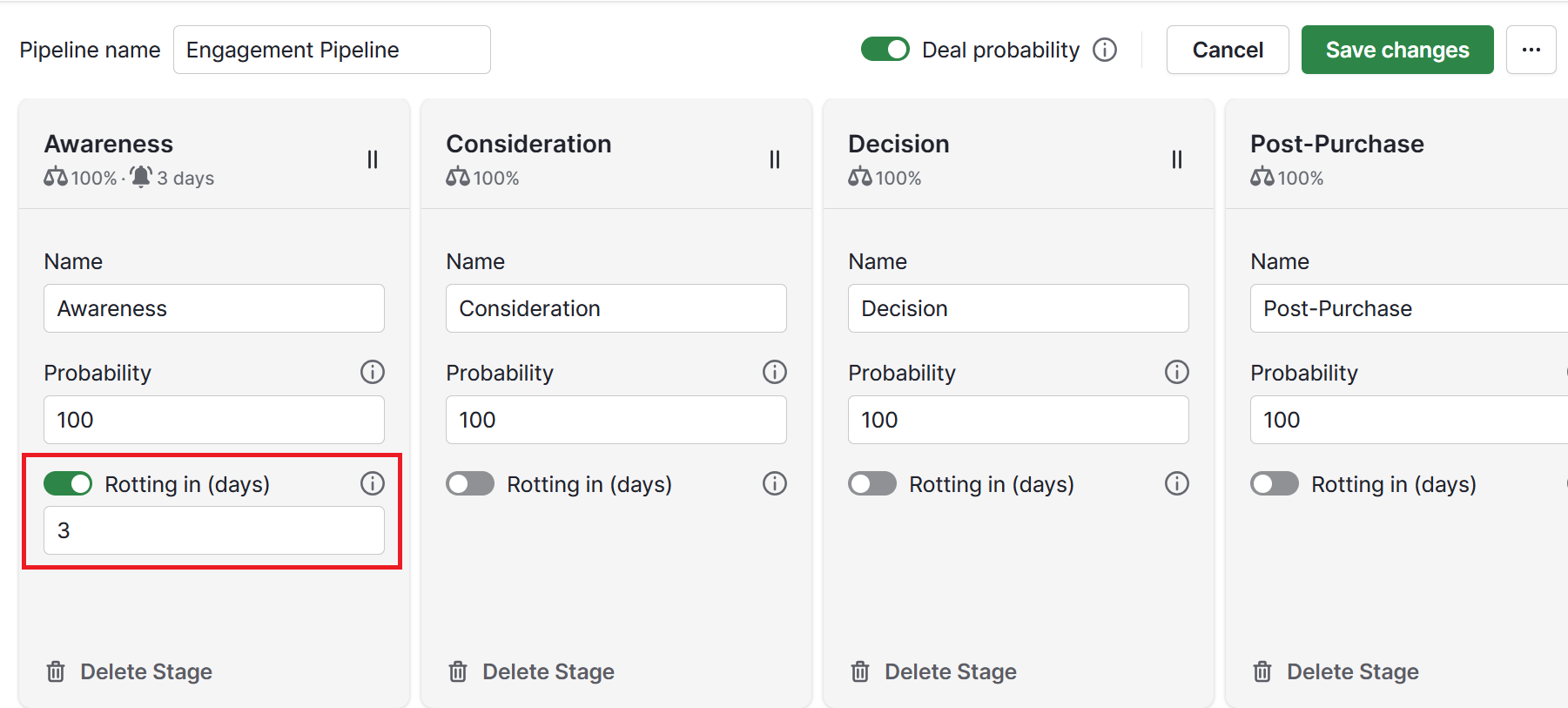
Success hinges on treating subscribers with respect, offering relevant content, honoring privacy and optimizing each step based on real insights. Whether launching a first campaign or refining an established approach, this email marketing guide offers a reliable foundation for strategic execution.

Pipedrive can be a game-changer for marketers aiming to streamline their email campaigns. With seamless integration to leading email tools, it helps teams stay organized, agile and effective in today’s fast-paced digital landscape.

Try Pipedrive free for 14 days and learn how it can help you improve your email marketing and get more leads.

The Ultimate Healthcare Workflow Automation Guide

Software Stack Editor · June 25, 2025 ·

Manual admin work in healthcare slows down small teams and leads to mistakes. If you’re a clinic balancing patient care with paperwork or a health tech company delivering solutions, you need efficiency across the board.

Automation offers a powerful way forward. It handles tasks like scheduling and communication, which improves the patient experience.

In this article, you’ll learn why healthcare workflow automation matters and which tasks to focus on. You’ll also discover how to pick the best workflow automation solution for your team.

Why automate healthcare workflows?

Manual healthcare processes increase the risk of medical errors, delays and missed opportunities. Automating these tasks helps your clinic or health tech company operate more efficiently.

Here’s how healthcare workflow automation can help your practice or organization:

  • Free up valuable staff time. Automation takes over repetitive tasks like sending appointment reminders. Instead of emailing each contact yourself, your software does it for you. It automatically sends personalized follow-ups to patients or B2B leads.

  • Minimize human errors. Automatic scheduling and data syncing prevent mistakes. When a potential client or patient fills out a form, the software sends that information straight to your service pipeline.

  • Prevent no-shows. Automatic reminders keep appointments top of mind for clients considering your services. Your system sends a confirmation email when a patient books a session, followed by reminder emails. The same goes for demos in health tech sales.

  • Boost client acquisition. Automation nurtures leads and maintains consistent communication with clients. It can encourage them to choose your services and refer others.

  • Improve patient satisfaction. Faster follow-ups and clear communication build trust. Patients who get quick responses are more likely to return and refer others. For tech platforms, this translates to smoother onboarding and better user retention.

  • Strengthen compliance and oversight. Clinical workflows help you stay on top of deadlines and documentation. For example, you can create a task to send follow-up instructions after every patient visit.

  • Prevent staff burnout. Happier, less burdened clinicians provide better care. Taking repetitive tasks off their plates helps improve job satisfaction and employee retention. The same applies to customer success teams in health tech managing client loads.

Now you see the compelling benefits of bringing automation into your practice. The next step is to find which tasks will give you the biggest return on your efforts.

Turn Maybe Into Yes With These Killer Follow Up Email Templates

These customizable follow up email templates will help you boost your chances of breaking through to your busiest prospects.

Which healthcare workflows should you automate?

You can simplify many daily tasks in healthcare, with automation proving especially helpful in attracting and managing new patients.

Here are the key areas where automation makes the greatest difference.

Patient intake and onboarding

Patient intake is often the first interaction a person has with a healthcare provider. It involves collecting demographic information, medical history, insurance details and consent forms.

The intake process can be a source of frustration if managed poorly. The table below shows the main steps involved and how automation speeds them up:

Patient intake and onboarding step

How automation software helps

Digital forms and pre-registration

Patients can fill out digital or web forms at their convenience. These integrate with your electronic health record (EHR) system and ensure accurate data capture.

Insurance verification

Automated systems can instantly verify insurance eligibility and benefits, flagging any issues. They reduce claim denials and improve revenue cycle management.

Claims processing and billing optimization

Automation can flag errors, streamline claim submissions and track payment statuses. It leads to faster reimbursements and improved cash flow.

Automated reminders

Texting apps send appointment reminders via SMS. These messages can contain links to forms, reducing no-shows and improving patient outcomes.

Consent management

Digital consent forms with e-signature abilities streamline the legal aspects of onboarding. They help you document all necessary permissions securely, maintaining compliance.

Efficient intake sets the tone for the entire patient experience. With the right tools, you can reduce wait times and free up staff time to care for more patients.

Scheduling and appointment management

Managing appointments for many practitioners and appointment types is a logistical challenge. Manual scheduling takes up significant time and leads to errors like double bookings.

Here’s how automation helps you build more streamlined appointment workflows:

Scheduling and appointment workflows

How automation helps

Online self-scheduling

Patients can book, reschedule and cancel appointments 24/7 through an online portal. These systems reduce inbound calls and admin workload.

Real-time availability

Scheduling software gives patients real-time visibility into provider availability. It helps prevent conflicts and shows when resources are available.

Automation confirmations

Scheduling tools automatically send confirmations and reminders. The messaging provides options to confirm or reschedule, cutting down no-shows.

Waitlist management

Automated waitlist features can offer patients open slots if available. These offers help optimize schedules and provide timely care for patients in need.

Automatic scheduling tools make booking easier for patients. They reduce back-and-forth calls and help you create a more reliable appointment experience.

Patient data management

Healthcare companies need accurate, accessible and securely organized patient data. Manual data entry and siloed patient information can slow down your business, increasing the risk of bottlenecks and compliance issues.

Here’s how automation software reduces data management inefficiencies:

Patient data management workflow

How it helps

Contact record creation

Intake tools automatically create and update contact profiles from intake forms, emails or call logs.

Data syncing across systems

Healthcare integrations connect your customer relationship management (CRM) system and EHR. They also keep scheduling and billing tools up to date.

Activity tracking and notes

EHR systems log patient interactions, emails and appointment history in a central profile for quick access.

Automatic data management frees your team from chasing down information, giving them more time to make smart, data-driven decisions.

For example, a health tech company can use CRM data to focus outreach on high-intent leads based on engagement history. A healthcare provider can analyze appointments and adjust staffing levels during peak demand.

Communication and engagement

A clear communication plan is vital in every part of healthcare. It helps patients, providers and administrative staff stay on the same page.

Relying on manual communication can be time-consuming. Without automatic workflow setups, it’s easy to forget follow-ups and check-ins.

Here are some ways that automation can enable more reliable healthcare communications and engagement:

Communication and engagement workflow

How automation helps

Automated patient outreach

Healthcare automation systems send automated messages. These might be for prescription refills, post-care instructions or education.

Secure messaging platforms

Compliant messaging tools enable real-time communication between care team members. These tools allow for quick consultations and efficient sharing of patient cases.

AI-powered chatbots

Chatbots provide 24/7 support for common patient queries. These smart tools facilitate appointment scheduling and send requests to the right staff, reducing the number of incoming calls.

Patient notifications

Patient portals notify users about new lab results, provider messages or upcoming appointments. They help patients stay on top of their health information.

Workflow automation in healthcare keeps patients and other stakeholders informed without adding to your team’s workload.

Staff activities and administrative tasks

Healthcare professionals spend a large part of their day on administrative tasks. Activities include sending internal messages and managing resources while pairing patients with the best-fit care.

Here’s how automation can support your clinic’s or tech team’s administrative tasks:

Administrative workflows

How automation helps

Task assignment and tracking

Assign tasks to specific staff members based on triggers and track their completion.

Internal communication

Automate notifications for room readiness or patient discharge. Streamline handoffs between different departments, like nursing and housekeeping.

Inventory and supply management

For clinics managing physical supplies, automation tracks inventory levels. It ensures you’re always stocked and prepared.

Onboarding and training staff

Automation streamlines onboarding for new healthcare staff. It sends out training materials and tracks their progress automatically.

For example, Serenis offers online therapy in Europe. Initially, it managed therapist recruitment using Google Sheets. The spreadsheets made it hard to coordinate tasks.

To combat this, Serenis adopted Pipedrive and built a single recruitment pipeline to see each therapist’s status. Serenis saved three hours a week and worked better with stakeholders, experiencing faster growth.

The possibility of having automatic workflows helps us keep periodic contact with deals, so if they’re not hearing from us in a certain amount of time then we can send them an email and keep in contact, which translates to high satisfaction in the candidates in the selection process.”

Virginia GambardellaHead of Operations, Serenis

Beyond patient care: automating core business operations

Healthcare organizations have operational and sales processes that benefit from automation. Since these practices don’t involve protected health information (PHI), there’s a range of tools that can help.

Here are some key examples and use cases for automation in the healthcare industry:

Operational healthcare workflows

How automation tools help

Sales processes – clinics and B2B health companies offering specialized services or health tech.

CRM tools automate lead capture, task creation and deal stage tracking to keep sales moving.

Marketing and outreach – building relationships with GPs, specialists and other providers.

Email marketing platforms automate audience segmentation and outreach campaigns. They make it easier to maintain and grow referral networks at scale.

Event and seminar coordination – hosting webinars, info sessions and community events.

Event management tools and CRMs automate invitations and reminders, reducing manual planning.

Supplier and equipment management – practices managing relationships with vendors.

Vendor management tools send automatic alerts for contract renewals and payment deadlines. They help you avoid disruptions.

Franchise or multi-location coordination – businesses operating across many clinics that need visibility.

Project management and reporting tools help you standardize workflows and centralize reporting. You can use them to provide consistent services across locations.

With automation software, smaller healthcare players can build scalable business processes. These processes ensure their core mission of improving health outcomes remains the primary focus.

Note: Don’t try to automate everything at once. Identify your biggest administrative pain point and start with a pilot project for that specific workflow. Learn from it, then expand.

How to choose the right healthcare automation solution

Choosing the right automation software is like choosing the right tool for a big project. You need to know what job you’re trying to do before you can make a smart decision for your clinic or health tech startup.

First, think about your needs. Ask yourself:

  • What problems are you trying to solve? Are your patient appointments messy? Is it hard to keep track of calls with potential partners?

  • What tasks take up the most time? Writing emails by hand? Chasing up paperwork?

  • What information is most important to you? Is it patient health details or tracking communication surrounding new business deals?

Answering these questions will help you figure out what kind of automation tool you need.

No matter what kind of software you’re considering, these are some important features to consider:

Key things to look for

Why they matter

Ease of use

You and your team are busy. Your software should be simple to learn and use every day.

Affordability

Automation should result in long-term cost savings, not set you back. Look for clear pricing that fits your budget.

Scalability

As your business gets bigger, your software should be able to handle more patients or tasks. Look for scalable plans, add-ons and third-party features that make things easier.

Customer support

If you get stuck, you need solid customer support. Check customer service availability and reviews to make the right decision.

Data security and privacy

Compliance is crucial in healthcare. If you’re dealing with PHI, you must follow strict rules. It protects patient privacy, but limits your software options.

Integration capabilities

Look for strong app integrations with your existing healthcare systems to avoid data silos and manual transfers.

Healthcare has different kinds of information. Some is about patients directly, and some is about running the business.

You might need an EHR or a CRM system, depending on your data. Here’s how they differ.

Electronic health record system

CRM software

What it is – an EHR system is a digital version of a patient’s medical history. It helps clinical staff and care providers track patient data.

What it is – a CRM system manages your relationships with people outside of patient care. It’s like a smart address book and communication tool for business connections.

What it does – EHRs securely store patient health data from doctor visits. They support healthcare providers with medicine prescriptions, test result access and patient care decisions.

What it does – tracks interactions with clients, vendors and business stakeholders. It reminds you who you talked to, what you discussed and which actions to take next.

When you need it – if your goal is to manage patient medical records, an EHR is essential. These systems follow the Health Insurance Portability and Accountability Act (HIPAA).

When you need it – if you sell medical products or services and need to manage sales leads and relationships.

Or, when you’re running campaigns to attract business partners and investors, a CRM can organize these efforts.

To make your choice, decide if you need to manage patient health information or business relationships and sales tasks. Look into different tools and compare your options.

Ultimately, the best healthcare automation solution will help your small business run more smoothly.

Recommended reading

https://www-cms.pipedriveassets.com/blog-assets/medical-sales.png

Understanding medical sales jobs: Hiring or becoming a med rep

How Pipedrive’s workflow automation supports healthcare

Disclaimer: In the US, handling protected health information requires HIPAA compliance. Pipedrive isn’t HIPAA compliant and you shouldn’t put patient names, medical history or other sensitive data into the system.

Use Pipedrive to automate your non-clinical operations and stay organized across different parts of the business. The all-in-one tool handles sales, marketing, vendors and business development, making it an invaluable solution for small clinics and healthcare startups.

Here’s how you can use Pipedrive to automate everyday, non-patient-facing healthcare tasks.

1. Create and qualify new leads automatically

When someone shows interest in your services, Pipedrive’s Leads Inbox helps you store their details and reply fast. With the LeadBooster feature or custom API tools, new leads go to your inbox automatically.

Once a lead enters your system, Pipedrive can create follow-up tasks to keep things moving.

For example, set it up to instantly assign that lead to a sales rep and schedule a call for the next day.

Filters and labels simplify tasks such as finding hot leads or grouping similar contacts. For example, health tech companies can use custom labels like “Hospital buyer” to segment interest. Your team jumps straight into action instead of guessing who to contact first.

Healthcare workflow automation Pipedrive Leads Inbox

If you’re not using LeadBooster or API connections, you can still add leads manually or import them from a spreadsheet.

Healthcare workflow automation Pipedrive import leads

Either way, once the lead is in your system, Pipedrive handles the next steps. It keeps your team responsive and your sales process consistent.

Beyond managing individual leads, Pipedrive’s reporting features track business performance. You can also see which partners are sending the most referrals and where to focus your efforts.

See which marketing channels are most effective, forecast future sales and improve decision-making.

Take Eye Hospital Denmark as an example. It used to manage its large customer base using a patient journal solution, which didn’t offer sales tools.

The hospital switched to Pipedrive to set up custom automations. These workflows made it much easier to stay in touch with patients and keep them loyal.

A better patient follow-up process, as well as better workflow, has reduced the number of ‘no-shows’ at the hospital by approximately 50%. It is clear to see the potential of the Pipedrive system. Before, we did not have the tools to measure economical improvements in depth. Now we do!

Kristian MejlvangMarketing Manager, Eye Hospital Denmark

2. Track and manage referral relationships

Many healthcare businesses grow through referrals from doctors and partners. Pipedrive lets you track these relationships in a special pipeline without saving patient data.

Start by creating a custom pipeline for partnerships with stages for intro calls, sales proposals and active partners. As you add new contacts, Pipedrive automatically assigns them to the relevant owner and sends introductory emails.

Healthcare workflow automation Pipedrive referral pipeline

Pipedrive’s automation also helps you stay visible. For example, you could set up a workflow that sends a friendly check-in email if no activity occurs in 30 days.

You can also track partner lifecycle stages, from initial outreach to upsell. Each stage helps your team maintain sales velocity.

Logging all activity in one place means your team always knows where each relationship stands.

3. Run marketing outreach with Campaigns by Pipedrive

Pipedrive’s Campaigns allows you to create professional emails using a simple drag-and-drop tool. Add your logo, adjust templates and make each message feel personal.

Artificial intelligence (AI) features help you write personalized emails and quickly summarize long email threads.

Healthcare workflow automation Pipedrive AI email writer

The AI email writer also analyzes your contact’s sentiment, helping you tailor your content and reply with relevance.

Healthcare workflow automation Pipedrive email sentiment

Automation keeps all your messaging timely. When adding a new contact to your outreach list, you can trigger a welcome email and schedule a check-in reminder a week later.

As your campaigns progress, Pipedrive tracks email metrics like open rate, click rate and unsubscribes. See what works and adjust your strategy accordingly.

Beyond marketing-specific emails, Pipedrive automates your other non-clinical patient engagement. For example, send satisfaction surveys, invites to educational webinars or general health tips to build loyalty and encourage referrals.

The CRM supports outreach for B2B partners, health tech buyers and clients alike. Leverage its powerful workflow automation solution to keep your network engaged and informed.

In health tech B2B sales, where buying cycles are long, staying top of mind is critical. Automated email workflows help you maintain momentum across the funnel.

Final thoughts

Workflow automation for healthcare keeps your company running smoothly. It takes over key tasks like scheduling and business operations, freeing up hours of manual work each day.

Start by finding the manual processes that take up the most time. Then, choose relevant automation tools that can scale with your organization.

Try Pipedrive free for 14 days to see how it can cut the administrative burden and optimize your healthcare operations.

Affiliate Marketing Guide: Step-by-step Starter Guide

Software Stack Editor · June 25, 2025 ·

Affiliate marketing is a powerful, low-risk strategy for driving revenue and growing brand awareness. It empowers businesses to scale by turning content creators, bloggers and influencers into brand advocates.

Whether you’re launching your first program or refining an existing one, this affiliate marketing guide covers everything from foundational principles to smart implementation techniques. You’ll gain the tools and insights needed to build a high-performing affiliate system that drives measurable growth without a large upfront investment.

What is affiliate marketing?

Affiliate marketing is a performance-based marketing model where businesses reward partners (affiliates) for driving traffic or sales through their marketing efforts. It’s a win-win: affiliates earn a commission, while businesses gain exposure and conversions.

Think of it as digital word-of-mouth. Affiliates promote a product or service using a custom tracking link. When a lead or sale is generated, they get paid. Common affiliates include content creators, such as bloggers, influencers, review websites and YouTubers.

According to Forrester, 54% of marketers rank affiliate marketing as one of their top three customer acquisition channels, and 20% rank it as their most successful digital channel.

How affiliate marketing works

Affiliate marketing relies on four key players:

  • The Affiliate: The marketer or content creator who promotes the product through blogs, social media, email or video content.

A typical affiliate marketing cycle works like this:

  1. A business sets up an affiliate program and invites affiliates to join

  2. Each affiliate receives a unique tracking link to promote the product

  3. A customer clicks the affiliate’s link and completes a purchase

  4. The platform attributes the sale and issues a commission to the affiliate

  5. Affiliate marketing software automates and streamlines the entire process, making it scalable and efficient for small businesses

Why affiliate marketing matters for small businesses

For small businesses, affiliate marketing offers scalability without high upfront costs. It enables access to new audiences through trusted third-party recommendations while ensuring that payments are made only when measurable results – such as clicks, leads or sales – are achieved.

One major benefit is the minimal initial investment, as expenses are only incurred upon achieving results. Additionally, affiliate marketing plays a role in driving more website visitors and enhancing brand perception. Above all, it utilizes trust-based recommendations, which typically result in higher conversion rates compared to traditional advertising methods.

According to research, 80% of brands around the world have affiliate programs, highlighting that they are now essential in many marketing frameworks. For small businesses in particular, this trend signals both opportunity and urgency: adopting affiliate marketing isn’t just a growth tactic; it’s becoming a competitive necessity.

Recommended reading

https://www-cms.pipedriveassets.com/Sales-Guides.png

A sales guide for success: from prospecting to closing

Step-by-step guide to affiliate marketing

How small businesses can build and scale a successful affiliate marketing program:

Step 1: Define your goals and KPIs

Decide whether you’re aiming for more sales, leads or brand visibility. Set measurable goals, such as boosting affiliate-driven sales by X% in Q4.

Once goals have been established, choose relevant KPIs like conversion rate, click-through rate or average order value. Use customer relationship management (CRM) tools to track progress, monitor affiliate sales performance and generate reports. Combining CRM insights with affiliate data allows for more strategic decisions and real-time updates.

Step 2: Choose the right affiliate platform

Selecting the right affiliate platform is essential for managing affiliate relationships and ensuring accurate tracking. Look for tools that offer referral tracking, performance reporting and automated payouts.

Additional features, such as customizable commission structures, integrations with CRM and fraud prevention, can streamline operations and support long-term growth.

Step 3: Recruit and vet affiliates

Identify affiliates whose audiences align with the brand’s target market. Assess their content quality, engagement levels and relevance to the product or service offered.

Recruitment can be done through social media, email outreach or affiliate networks. Prioritizing quality over quantity at this stage helps build a more effective and trustworthy affiliate base.

Step 4: Provide marketing assets

Equipping affiliates with ready-to-use assets makes promotion more efficient and consistent. Provide materials such as product descriptions, branded banners and pre-written captions to ensure messaging aligns with brand standards.

Clear, professional assets not only save time but also improve the quality and effectiveness of affiliate campaigns.

Step 5: Monitor and optimize

Track key metrics such as click-through rate, conversion rate and average order value to evaluate affiliate performance. Use these insights to identify top performers and refine underperforming strategies.

While Pipedrive doesn’t track affiliates directly, it can be used to monitor affiliate-driven leads and sales within the pipeline. Tagging or segmenting affiliate-sourced deals allows for performance analysis alongside broader sales activity.

Recommended reading

https://www-cms.pipedriveassets.com/blog-assets/marketing-and-sales.png

Marketing and sales: Key differences and everything you need to know

Core KPIs for affiliate marketing success

Tracking the right KPIs is essential for evaluating affiliate program performance and making informed decisions. These metrics help determine which affiliates are delivering value and where optimization is needed.

Key affiliate marketing KPIs include:

Click-through rate (CTR)

Measures how often affiliate links are clicked. A strong CTR can indicate effective placement or messaging.

Conversion rate

Shows how many clicks result in a sale or sign-up. A core metric for identifying high-quality traffic.

Average order value (AOV)

Tracks the average spend per affiliate-referred transaction. Helps determine which affiliates drive higher-value customers.

Customer acquisition cost (CAC)

Compares commission and spend per affiliate to the value of the customers acquired.

Lead-to-close rate

Particularly useful if affiliate traffic enters a sales funnel. Measures the percentage of affiliate leads that become paying customers.

Affiliate marketing starter guide: Tips for beginners

Many beginners in affiliate marketing struggle because they set vague goals or fail to communicate effectively with their affiliates. To ensure success, objectives should be clearly defined and communicated from the outset. This includes specific targets such as sales numbers, lead generation or website traffic.

Providing affiliates with a comprehensive guide that includes detailed product descriptions, key selling points and examples of successful campaigns can significantly improve early performance. Well-prepared affiliates are more likely to produce content that aligns with the brand and drives meaningful conversions.

Recommended reading

https://www-cms.pipedriveassets.com/Affiliate-Management-Software.png

Affiliate management software: features, benefits and 12 top tools

Another common pitfall is overlooking mobile optimization. Landing pages must be responsive and quick to load, as a large portion of affiliate traffic comes from mobile devices. Accurate attribution tracking is essential to avoid disputes and ensure affiliates are properly credited.

Building long-term success with affiliate partnerships

Affiliate marketing isn’t just a tactic – it can be a long-term growth channel when approached strategically. The most successful programs treat affiliates as partners, not just promoters. Providing ongoing support, sharing performance insights and offering tiered commission incentives can help keep affiliates engaged and motivated over time.

Strong affiliate relationships can also lead to collaboration beyond standard promotions. Co-branded campaigns, exclusive discount codes or early product access give affiliates a reason to prioritize a brand over others. These efforts deepen brand loyalty while also giving affiliates unique value to share with their audiences.

Consistency is key. Businesses that regularly communicate with affiliates, share product updates and recognize top performers tend to see higher retention and performance rates. Investing in these partnerships pays off through stronger brand alignment and more consistent results over time.

How to use Pipedrive for affiliate marketing

Pipedrive isn’t just for managing leads – it can enhance your affiliate program by giving you a 360-degree view of your sales pipeline.

With Pipedrive, you can track affiliate leads using custom fields or tags and automatically assign them to appropriate pipelines. Sales dashboards and reports allow you to compare affiliate performance easily.

Pipedrive also integrates with tools like Leadfeeder, helping attribute leads more accurately. Use Intercom integration to streamline communication with affiliates and answer questions at scale. Automated workflows ensure top-performing affiliates are acknowledged and rewarded consistently.

Final thoughts

Affiliate marketing is one of the most accessible and cost-effective ways for businesses to scale. It enables sustainable growth through performance-based partnerships, where costs are tied directly to results. The affiliate model reduces upfront risk while allowing access to trusted referral audiences.

For beginners, a step-by-step affiliate marketing guide can help avoid common pitfalls and build momentum. Each decision, from setting KPIs to choosing the right platform, lays the foundation for long-term success. By focusing on strategy, clear communication and consistent optimization, even newbies can see significant returns.

Whether launching a first campaign or refining an existing program, tools like Pipedrive can provide visibility into affiliate-attributed deals and help streamline performance tracking. With a solid foundation, affiliate marketing can evolve into a primary channel for acquisition and growth.

Try Pipedrive free for 14 days and see how visualizing affiliate-attributed leads can improve performance and conversion tracking.

Top 5 Reputation Management Tips for SMBs

Software Stack Editor · June 25, 2025 ·

Reputation management shapes how people view your business. It’s essential for building trust, attracting customers and gaining a competitive edge.

However, building the reputation you want takes strategy and consistency across multiple platforms.

In this article, you’ll learn five practical steps to take control of your brand reputation. Find out how to monitor feedback, respond confidently and use the right tools to build long-term loyalty with your audience.

What is reputation management?

Reputation management involves monitoring, shaping and improving how people perceive your business. When done well, it builds trust, strengthens loyalty and creates a consistent and positive brand image.

The process happens both online and offline:

  • Online reputation management (ORM) means shaping how people see your brand on digital platforms, through actions like replying to customer reviews, managing social media or maintaining a strong website

  • Offline reputation management focuses on real-world impressions through in-person activities like customer service, public speaking or community involvement

Here’s a breakdown of how brand reputation management applies to different stakeholders:

Stakeholder

Impact of reputation management

Customers and end users

End users whose opinions directly influence your brand’s credibility and word-of-mouth reach.

For this group, reputation management includes responding to online reviews, addressing complaints and encouraging satisfied clients to share positive content and feedback.

Partners and business collaborators

Business collaborators whose relationship with your company impacts operations and long-term growth.

Maintaining a good reputation with this group involves ensuring transparency in business dealings. It also means sharing case studies and expert content that show your business is reliable.

Employees

Current and potential employees who influence your company’s brand and culture.

Managing your company’s reputation with employees includes maintaining a positive presence on platforms like Glassdoor, fostering a supportive workplace and promoting employee success stories.

The general public

The wider public whose opinions impact your business’s reputation and ability to operate.

Reputation efforts include handling public relations (PR) crisis management, participating in community initiatives and ensuring a consistent brand image across all public channels.

Reputation management is an ongoing process. It requires coordination across digital marketing, customer service, HR and leadership to ensure every stakeholder’s experience reinforces your brand values.

Recommended reading

https://www-cms.pipedriveassets.com/smarketing.png

Smarketing: How sales and marketing alignment can boost your revenue

Why is reputation management essential for SMB success?

Reputation management helps smaller businesses stand out in competitive landscapes, attract new customers and build resilience in changing markets.

Research shows that a product’s reputation is the leading factor in whether it makes it onto a buyer’s initial list of options:

Reputation management Gartner social proof statistics

Here’s a closer look at why reputation management in business is critical for SMBs:

Builds trust

A strong reputation signals reliability, making customers, partners and employees more likely to have confidence in your business. When people trust you, they’re more likely to buy from you, recommend you to others and stay loyal over time.

Online reviews are a great example of reputation management in action. According to Statista, 42% of people find them very helpful when making a purchase, and 33% always read them before choosing a local business.

Scrum.org, an online training platform, showed how a good reputation directly impacts sales. By collecting more reviews via Trustpilot, the company grew website conversions by 27%.

Drives customer loyalty and referrals

Reputation drives repeat business and referrals, which SMBs need for organic growth. Word-of-mouth marketing is also cost-effective for SMBs with limited resources – and is one of the most common ways customers discover new brands.

Look at Rosetta Roastery as an example. The specialty coffee roaster emphasizes quality and transparency in its coffee sourcing and preparation processes. Its website and social media channels share educational content, positioning it as an expert.

Reputation management Rosetta Roastery Instagram

Customers who see the care and expertise behind the coffee are more likely to connect with the brand and return for future purchases.

Protect your business

Reputation management helps businesses address negative content before it becomes a bigger problem. With 34% of consumers expecting companies to respond to negative reviews within 24 hours, fast action is essential.

When a dissatisfied customer left a one-star review on the website of one of Sector45’s clients, the web marketing platform flagged the feedback within 30 minutes.

The client then promptly contacted the reviewer, apologized and scheduled a follow-up appointment for the next day. After the issue was resolved, the customer updated the review to reflect their positive experience.

Download Your Guide to Sales Performance Measurement

The must-read guide for any sales manager trying to track, forecast and minimize risk. Learn how to scale sales with data-backed decisions.

Gain a competitive advantage

A great reputation helps smaller businesses stand out in crowded markets, making attracting and retaining loyal customers easier.

Farmgirl Flowers shows how a strong reputation can set a business apart.

The business is a woman-owned online flower delivery company. Highlighting this unique identity helps the company stand out from bigger competitors and attract customers who want to support diverse, mission-driven brands.

Recommended reading

https://www-cms.pipedriveassets.com/Competitive-matrix-guide.png

How to get ahead with a competitive matrix

5 ways to improve your SMB reputation management

To build a strong foundation for long-term growth, you need to stay ahead of potential issues and actively shape customers’ perceptions of your brand.

Here are five ways to strengthen and manage your SMB’s reputation:

1. Create a reputation management strategy

Start with a plan to define how you want people to perceive your business and outline the steps to get there. This plan helps you stay consistent across channels, respond proactively to feedback and align your reputation goals with your overall business objectives.

If you want your brand to be known for great customer service, map out how you’ll train your team, track reviews and create personal responses that deliver on that promise.

Here are the steps for creating a reputation management strategy:

  • Identify key channels. Find channels where your reputation matters most, such as search engines like Google or social channels like Facebook. Customers often research before making decisions, so focus on these areas when building your strategy.

  • Assign ownership. Decide who will monitor, respond to and escalate feedback to avoid confusion and ensure timely responses. For instance, your marketing team might manage social media interactions, while operations handles product-related reviews.

  • Develop communication guidelines. Outline the tone, messaging and response times for your team to follow. For example, you might aim to respond to all reviews within 24 hours using a helpful, respectful tone.

  • Set measurable goals for benchmarking success. Define what success looks like for your reputation efforts. Your goal could be to improve your Google rating from 4.2 to 4.5 or increase positive social mentions by 20% over three months. Review these metrics regularly and adjust as needed.

To set clear and measurable goals, consider using the SMART goals framework:

Reputation management Pipedrive SMART goals

This framework helps you stay focused, track progress effectively and continuously improve your reputation management efforts.

How Pipedrive helps manage your reputation strategy

As a sales CRM platform, Pipedrive offers a visual overview that keeps everyone accountable and your reputation strategy moving forward.

Use customizable pipelines to support this process by tracking reputation-related tasks and assigning ownership to team members:

Reputation management Pipedrive sales pipeline

You can customize sales pipeline stages to align with your reputation management efforts and monitor progress toward your goals.

2. Use reputation management software

Reputation management systems centralize brand-related activities into a single location. This consolidation makes staying on top of your brand’s public perception easier.

For example, a centralized dashboard in online reputation management software tracks reviews across channels, sends real-time alerts and automates review requests. These features make it easier to:

  • Respond quickly to feedback

  • Maintain consistent customer engagement

  • Showcase positive reviews to influence potential buyers

This type of software also helps SMBs save time and money. It prevents minor issues from becoming costly problems, reducing the risk of PR crises, lost sales or the long process of regaining customer trust.

For example, if the system detects a drop in positive feedback or a surge in complaints, it sends immediate alerts so you can quickly address the issue before it escalates.

When choosing a reputation management tool, look for the following features:

Feature

How it helps

Multi-platform review management

Track customer reviews from sites like Google, Trustpilot, Yelp and Facebook in one dashboard.

Centralizing this information keeps you up to speed with what people are saying across the platforms that matter most to your ideal audience.

Automated review requests

Prompt customers to leave feedback after making a purchase or using your services.

Automating this process makes it easy to consistently collect reviews, helping you grow your online presence faster.

Sentiment analysis

Use built-in analytics to identify positive or negative trends in customer feedback.

These insights help you spot potential issues early and understand what customers value about your product or service.

Response management

Manage and reply to reviews directly from the platform.

This feature enables faster, more consistent communication. It also shows customers you take feedback seriously, boosting trust and credibility.

Reporting and insights

Measure review volume, average star ratings, response time and sentiment trends.

Use these insights to identify areas of improvement and track the impact of your reputation efforts on business outcomes.

Cloud-based access

Let users log in from anywhere, making it easier for teams to monitor and respond to feedback.

Online reputation management tools support better collaboration, faster decision-making and uninterrupted oversight, whether in the office or on the move.

A tool with the right features helps turn customer feedback into a competitive asset that actively supports your growth and decision-making.

With Pipedrive’s integrations, for example, you can use reputation and review tools like Get More 5-Star Reviews to send automatic review invites to customers. This automation helps you collect feedback at scale without adding manual work.

3. Encourage customer reviews and feedback

Customer reviews boost credibility, improve search rankings and influence purchase decisions. Studies show that 75.5% of consumers trust feedback left by other users.

By actively requesting these testimonials from customers, you increase both volume and quality, making prospects more likely to trust and choose your business.

Here’s how to encourage more customer reviews:

  • Send follow-up emails after purchases. Reach out while the experience is fresh, thanking customers and politely asking for a review. This timing increases the chance of getting a thoughtful and detailed response.

  • Offer incentives. Discounts, freebies or loyalty points can motivate customers to leave feedback. For example, a SaaS platform could offer a 10% discount for users who complete a quick feedback form.

  • Use in-store and on-receipt reminders. Attention-grabbing prompts – whether physical signs or printed messages – keep the request top of mind. For example, a B2B company might add a message on a sales invoice that reads, “Share your experience on Trustpilot and receive a 5% discount on your next bulk order”.

Consistently collecting and showcasing authentic reviews strengthens your brand’s credibility and creates a steady stream of social proof that drives long-term growth.

Turn Maybe Into Yes With These Killer Follow Up Email Templates

These customizable follow up email templates will help you boost your chances of breaking through to your busiest prospects.

How Pipedrive helps collect customer reviews

With Pipedrive’s email automation, you can set up post-sale campaigns that automatically follow up with customers and request testimonials at the right time.

For example, once a deal is marked as “won”, you can trigger a personalized email directing the customer to a review site.

Use the AI email writer to generate personalized, relevant messages based on customer data and the stage of the sales journey.

Here’s an example of an AI-generated email in Pipedrive, including the prompt:

Reputation management Pipedrive AI email writer

The AI considers your tone of voice, ensuring emails are consistent with your brand’s communication style.

4. Respond promptly

Responding quickly to customer feedback shows that you value your customers’ input and are committed to continuous improvement.

It also helps to mitigate any negative sentiment before it escalates.

If a customer leaves a negative review about a delayed delivery, a quick, empathetic response can de-escalate the situation:

“We’re sorry your order arrived late, [customer name]. We understand how frustrating that can be! We’re already looking into it and will ensure it doesn’t happen again. Please reach out to us directly at [contact information] if you need further assistance.”

A lack of response can also negatively influence potential customers. They might assume you don’t care about the negative feedback, or take the review at face value – even if there’s a legitimate reason for the issue.

Here are some of the ways to ensure prompt responses:

  • Set up alerts. Enable notifications on review platforms to help monitor and respond to reviews regularly. Notifications ensure nothing slips through the cracks.

  • Use templates to standardize responses. Create customizable response templates for common scenarios. Your team can adapt the responses as necessary without needing to reply from scratch, saving time and allowing faster replies.

You might want to get creative with your tone and language when responding to reviews. For example, a tongue-in-cheek response to a negative review can defuse tension in certain situations – especially if the review is slightly unreasonable.

Suppose someone ordered a takeout pizza and complained that the cheese was too melted. The pizza place might respond by saying:

“We’re devastated to hear our pizza didn’t meet your Michelin-star expectations! We’ll be sure to undercook the cheese next time, especially for you. If you’re in the mood for a humble (but delicious) slice, we’d love a second chance to wow you.”

However, this type of response only works if it aligns with your brand and audience.

For example, a B2B law firm or financial services provider needs to maintain a more formal, professional tone. Humor in these contexts could come across as dismissive or unprofessional.

5. Monitor social media and mentions

Staying on top of social media mentions helps you manage your business reputation in real time. People are also more likely to share honest, unfiltered feedback on their social channels, so it’s important to monitor them.

For example, a buyer might share their customer experience on social media without tagging your brand. Although not a formal review, it’s still valuable feedback that you can engage with.

Here’s an example from Sprout Social. A customer posted about a support issue on X, and Sprout Social replied, demonstrating their commitment to customer care:

Reputation management Sprout Social X

Research also shows that 90% of buyers say social proof (like customer testimonials or product reviews) influences their buying decisions.

Here are some of the most effective ways to monitor social mentions:

  • Set up Google Alerts. Track mentions of your brand, products or key terms related to your business. These alerts show when people mention your brand online and how algorithms rank your content across the web.

  • Use social listening tools. Tools like Brandwatch let you monitor real-time conversations across social media platforms. These tools can track brand mentions, hashtags and keywords related to your business.

  • Search hashtags and keywords. Look for your brand name, popular hashtags or industry-related keywords on social platforms. Searching for these phrases means you can catch mentions that reflect customer sentiment.

Tracking social mentions provides insight into customer perceptions. As a result, you can uncover new opportunities for engagement to drive sales.

Note: Use a social CRM to centralize social data with sales performance. Consolidating this information helps you measure the effectiveness of your reputation management efforts. For example, you can track whether engaging with mentions leads to higher sales.

Final thoughts

Every interaction shapes your reputation. By actively managing how others perceive your brand, you create lasting customer relationships and reduce the risk of reputational damage. With the right tools and a proactive approach, your small business can build trust, drive loyalty and stand out in a crowded market.

Pipedrive makes it easy to put your reputation strategy into action. With customizable workflows and smart automations, you can seamlessly integrate reputation management into your day-to-day sales process.

Start your 14-day free trial to monitor customer feedback, automate review requests and build a strong brand reputation for long-term growth.

Best Knowledge Management Software Solutions for SMBs

Software Stack Editor · June 24, 2025 ·

Knowledge management (KM) software consolidates scattered insights into searchable resources, enhancing collaboration and accelerating decision-making.

KM tools come in different forms and serve different purposes. What you need depends on who will use it and what problems you need it to solve.

In this guide, you’ll find top knowledge management software tools for small businesses, categorized by use case and budget, plus tips on choosing the right one for your team.

Types of knowledge management software

There are two main types of knowledge management software, also often referred to as knowledge management systems (KMSs): internal tools for your team and external tools for your customers. Knowing the difference helps you choose the right solution for your specific audience and use case.

Note: Knowledge management software refers specifically to the tools used in capturing and sharing a company’s collective knowledge. For a deeper dive into building effective information management for SMBs, read our guide on knowledge management systems.

Internal KMS

An internal KMS stores your company’s knowledge (e.g., processes, training materials and employee handbooks). Only your employees, internal stakeholders or contractors can see the information, and users have different access permissions depending on their role or department.

Types of internal KMS include:

  • Internal knowledge bases

  • Company wikis

  • Document management systems

  • Team collaboration platforms

  • Learning management systems

For example, a sales team might have an internal KMS to store sales playbooks, scripts to handle objections or sales training resources.

Here’s the interface for an internal sales team knowledge base built using the Stonly platform:

knowledge management software internal sales

Internal KM software can speed up the employee onboarding process by answering new sales hires’ questions and helping them understand your sales methodology in their own time.

External KMS

An external KMS stores knowledge that people outside your company can access. It contains public or customer-facing information.

Types of external KMS include:

  • Customer-facing knowledge bases

  • Self-service or customer portals

  • Community forums

  • Product documentation sites

An external KMS may store pricing pages, case studies, customer success stories or product guides in an accessible, easy-to-search interface.

For example, here’s a look at Pipedrive’s customer-facing knowledge base:

knowledge management software pipedrive knowledge base

External knowledge management software boosts efficiency and improves the customer experience. Say a customer wants to connect your tool with Slack at 2 AM. They can visit your help center, search for “Slack integration” and address their issue without waiting to contact support during business hours.

Many businesses repurpose existing tools as knowledge management systems based on their needs. Popular options include wiki-style platforms, document storage systems, search-focused tools and CRM add-ons (more on these later). You can configure these tools to work as either internal or external knowledge bases.

Recommended reading

https://www-cms.pipedriveassets.com/Types-of-Customer-Service.jpg

9 Types of customer service: Pros, cons and when to choose each one

18 best knowledge management software options

A good KMS leads to better employee satisfaction, cost savings and improved customer experience. However, it’s difficult to choose one with so many different options and types, so we narrowed down a list of free and low-cost solutions.

Here are some of the best knowledge management software tools for small businesses, organized by category.

Document management systems (internal)

Document management systems store, share and control access to your company’s files. All from one centralized repository.

Document management systems can be both external and internal. However, small businesses generally use them internally for employee handbooks, training materials, project files and company policies.

Here are some top document management systems.

Pipedrive Smart Docs

Pipedrive Smart Docs is a document hosting service that centralizes files for internal use. Unlike standalone document management systems, Smart Docs lives inside your CRM. You must integrate it with a hosting service like Google Drive, OneDrive or SharePoint to store your documents.

knowledge management software Pipedrive smart docs

Your sales team can use Pipedrive Smart Docs to create proposals, contracts and quotes using intuitive templates. Create and share trackable links for these documents when you send them to clients. The system will notify you when someone engages with the document.

With Pipedrive Smart Docs, you can save time through its auto-fill feature. When you create or use a template within a deal, it automatically fills data fields with information from your CRM.

Permissions controls also let you determine who can use or edit documents across your team.

Smart Docs is available on Professional plans and up, or as an add-on for other plans.

Why use Pipedrive Smart Docs: With Pipedrive Smart Docs, you can request an e-signature. When the document is sent, you can track the status of those signatures within a deal so you can follow up immediately, speeding up your sales cycle.

Google Drive

Google Drive is a cloud storage tool for real-time collaboration with your team. It allows you to create shared files or folders for different projects and set who can view, comment on or edit each file.

knowledge management software google drive

The tool has a regular search bar and an AI-powered search solution (Gemini) to find any file within your storage. Google Drive also syncs all files automatically and saves every change you make. You can even go back to old versions if you make mistakes.

Why use Google Drive: Google Drive lets you work on and edit files with your team in real time. It’s a free tool with excellent collaboration features, and is a seamless addition if you already use Gmail or other Google tools.

Dropbox

Dropbox excels at storing and sharing large files that won’t fit in an email. You can create shared folders where your team can add videos, images, presentations and documents.

knowledge management software dropbox storage

The tool has a feature called Dropbox Dash, which uses generative AI to quickly find files. It also integrates with Teams and Slack to find key information from your messages.

With Dropbox, you can create shareable links with expiration dates when sending promotions to sales prospects. You can also see when recipients view or download your files to time follow-ups.

Why use Dropbox: Dropbox has advanced security features that allow you to control who can view and access files and create passwords for important documents.

Team collaboration platforms (internal)

Team collaboration platforms focus on real-time editing and shared content creation rather than just storing finished documents.

Teams use these internal platforms for project wikis, meeting notes, shared research and collaborative documentation.

Here are some top team collaboration platforms.

Trello

Trello organizes your team’s work using boards, lists and cards. You can create boards for different projects and move cards through stages like “to do”, “in-progress” and “done”.

knowledge management software trello interface

Each card can hold documents, checklists, due dates and team member assignments. You can attach files from Google Drive, Dropbox or your computer. Trello also sends notifications when team members update cards or leave comments.

Your team can use Trello boards as a simple knowledge base for project documentation. Store meeting notes, project requirements and team decisions on cards that everyone can access and update.

Why use Trello: Trello’s kanban cards make it easy for team members to find information at a glance. They can check the project status and access relevant documents without asking teammates for updates.

Confluence

Confluence helps your team build knowledge bases together. It’s like a knowledge wiki where you can create, share and collaborate on company documentation.

knowledge management software confluence

Create pages with text, images, tables and embedded videos. Confluence has templates for meeting notes, project plans and team documentation. You can organize content into spaces for different departments or projects.

The tool also connects with Jira for project management and Slack for team communication.

Why use Confluence: Confluence is a good fit for creating structured company knowledge, integrates with other Atlassian tools and has powerful search capabilities.

Slab

Slab makes it easy to find and update information with a clean, user-friendly interface. Small teams can also use it as a wiki to create and organize company knowledge.

knowledge management software slab interface

The platform uses AI-powered search to find information quickly and lets you create team spaces, set permissions and collaborate on documents in real-time. It makes it easy to keep knowledge current with automated reminders for content updates.

Slab also integrates with Slack, GitHub and other popular work tools.

Why use Slab: Slab’s documents content owners and when the document was last updated for each post to boost accountability and keep information fresh.

Download your guide to managing teams and scaling sales

The blueprint you need to find a team of superstars and build a strong foundation for lasting sales success

Learning management systems (internal)

Learning management systems are used for structured training and education. Their purpose is learning, not information access.

LMS can be internal (i.e., to train employees) and external (i.e., to educate customers). However, many companies use them internally for employee onboarding, compliance training and skills development.

Here are some top LMS tools.

TalentLMS

TalentLMS is a training platform that helps you create and launch courses easily. The tool’s AI capabilities let you create content from your materials or use existing templates.

knowledge management software talentlms interface

The tool’s AI features can also use your company’s knowledge to help you find employee knowledge gaps or create learning paths customized to each person based on role or experience.

TalentLMS includes gamification features like leaderboards and badges to boost learner engagement and has user management features so you can assign roles and permissions.

Why use TalentLMS: TalentLMS has an AI feature that helps employees plan their careers. It analyzes your employees’ current skills and career goals to show them which courses they should take to achieve them.

Absorb LMS

Absorb LMS is another learning platform that lets you create courses, track progress and deliver training to internal teams or external clients.

knowledge management software absorb lms

The platform includes AI-powered content creation tools and social learning features. It lets you add animations, buttons, videos and quizzes to keep learners engaged.

You can build courses quickly using templates or import content from external providers. Absorb LMS also integrates with your CRM and HR systems to automate training assignments.

Why use Absorb LMS: Absorb LMS offers accessibility features to help you create a more inclusive learning environment. The features include blind/low vision support, hard-of-hearing assistance and keyboard compatibility.

Docebo Learn LMS

Docebo Learn LMS helps you create and deliver courses for specific audiences. This tool also works as an employee and customer learning platform.

knowledge management software docebo learn

Docebo Learn LMS uses AI to personalize the learning experience for each learner. It also offers free extensions that give you more creative power with gamification, custom domains and audit trails.

Why use Docebo Learn LMS: Docebo’s Creator feature uses AI to help you customize learning content for different audiences. It also provides AI translations so you can cater to global and remote teams, no matter where they are.

Product documentation sites (external)

Product documentation sites organize technical documentation for specific products or software. They’re usually tied to development workflows, with a focus on technical how-to content.

Businesses use these external sites as API documentation, user guides and troubleshooting resources.

Here are some top product documentation sites.

GitHub

GitHub lets your development team create wiki docs alongside their code. The wikis are regular Git repositories that store Markdown files. Development teams use these files to create API documentation and user guides.

knowledge management software github wiki

Multiple people can contribute using standard Git workflows. However, rather than being able to collaborate in real time, you’ll have to edit, commit and push changes.

You can make your wiki public for open-source projects or keep it private for internal use. The platform allows you to link and organize wiki pages to a simple navigation structure.

Why use GitHub: You can edit documentation directly in your browser or download the files to work on your computer offline. This feature gives your team flexibility in updating docs.

Nuclino

Nuclino consolidates all your team’s work into one place. You create, organize and collaborate on documents in real time.

knowledge management software nuclino interface

The platform organizes content in multiple ways. You can use lists, boards or visual mind maps, and link pages together for easy navigation. Nuclino also has quick search capabilities and advanced filtering.

Teams use Nuclino for project documentation, meeting notes and knowledge management. You can create different workspaces for different topics and control who can access this information. Wikis can be public or private.

Why use Nuclino: Nuclino’s graph view shows how all your information connects. You can easily see relationships between topics and discover related content.

BookStack

BookStack is a free, open-source wiki platform that you can host yourself. It lets you organize your documentation with books, chapters and pages for a user-friendly structure.

knowledge management software bookstack interface

The platform has a simple visual editor, so creating content requires no technical skills. It also includes diagramming tools for flowcharts and technical drawings. BookStack supports multiple languages and user permissions.

Small businesses can use BookStack for internal documentation and procedure manuals. You can customize the look with your branding and control who can view or edit different sections.

Why use BookStack: With BookStack, you can include direct links to paragraphs, which makes drawing connections for other team members easier.

Customer-facing knowledge bases (external)

Customer-facing knowledge bases act as help centers for customer support. They allow customers to find answers to common issues, reducing support tickets.

Companies use them for FAQs, troubleshooting guides, product information and step-by-step tutorials.

Here are some top customer-facing knowledge bases.

Helpjuice

Helpjuice is a knowledge base software for creating customer help centers. You can build FAQs, troubleshooting steps and product guides to reduce support tickets by giving customers instant answers.

knowledge management software helpjuice interface

The system’s AI features can help you create articles and smart searches. You can also use Helpjuice’s browser extension to capture the information you want to add to the knowledge base.

The software also provides analytics to show which articles are most helpful and what customers search for.

Why use Helpjuice: Helpjuice’s natural language search understands what customers are looking for, even when they don’t use exact keywords. This feature makes it easier for people to find the right answers quickly.

Notion

Notion lets you create knowledge bases with multimedia content. You can build pages with text, images, videos and databases that customers can browse.

knowledge management software notion interface

Notion has control permissions to make some content public for customers and keep other sections private for your team.

You can also embed forms, calendars and other tools directly into your knowledge base. The platform syncs across all devices and integrates with many popular business tools.

Why use Notion? Notion has 30,000+ templates, including templates for professional knowledge bases.

Helpsite

Helpsite is a simple knowledge base platform that helps you create help centers in minutes. You can build public knowledge bases for customers or private ones for internal teams.

knowledge management software helpsite interface

Helpsite makes your knowledge base searchable and mobile-friendly and requires no technical setup. Its AI features can generate articles automatically, so you can launch a fully functional help center quickly and scale as you grow.

The platform also handles hosting and provides analytics to track what customers are reading.

Why use Helpsite: With Helpsite, you can create separate knowledge bases for different audiences, which is helpful when you manage multiple products or brands.

Self-service portals (external)

Self-service software or portals allow customers to handle routine tasks by themselves. Companies use self-service portals when customers frequently need to:

The portal gives customers direct access to perform these actions 24/7 without waiting for business hours.

Here are some top self-service portals.

Clinked

Clinked helps you create branded client portals. You can share files, manage tasks and communicate with clients in one place. The platform lets you customize everything with your branding to look like your own software.

knowledge management software clinked interface

With Clinked, you can store documents securely and control who can access what files. The software also includes messaging tools for real-time communication and task management features. You can assign tasks and check timelines to keep everything on track.

Why use Clinked: You can manage approvals and request files or e-signatures from your client using Clinked. The platform will send notifications to whoever needs to perform the next action in your workflow.

SuperOkay

SuperOkay helps agencies and freelancers create client portals for project collaboration. You can share documents, manage tasks and collect client feedback in one branded space.

knowledge management software superokay interface

SuperOkay includes interactive document features like forms, surveys and approval workflows. It also allows you to embed apps, share files and track project progress all in one place.

The platform offers pre-built templates for proposals, briefs and estimates. You can create packaged services that clients can purchase directly. SuperOkay also includes task management with Kanban boards and deadline tracking.

Why use SuperOkay: With SuperOkay, you can create employee bios to include in your proposals to showcase your team’s expertise.

MyDocSafe

MyDocSafe helps you create secure client portals where customers can handle tasks themselves. You can set up custom workflows for different types of clients, request documents, collect payments and run ID checks.

knowledge management software mydocssafe interface

You can also customize each portal with your branding and logo. Clients can access their portal from any device to check document status, upload files and complete required tasks.

Why use MyDocSafe: Clients can complete the onboarding process through automated workflows to reduce back-and-forth emails and manual work for your sales team.

How to choose the right knowledge management software tools for your team

You need knowledge management software that helps your team work better, not just store information. Every effective KMS must nail three core functions:

  1. Discoverability, so people have easy access when they need it

  2. Searchability, so users can navigate and find information quickly

  3. Adaptability, so the content stays fresh and team members can contribute easily

Beyond these abilities, the best choice for your team depends on your specific situation. For instance, a sales team’s needs are different from those of a customer support team.

Use the following framework to identify the right solution for you.

1. Determine your primary users

Start by identifying who will be using your KMS and for what purpose. Assessment prevents you from choosing software with unnecessary features that complicate adoption and increase costs.

Defining the “who” helps determine whether you need internal or external software. If employees will be the main users, you need an internal KMS. If customers will access it, you need an external KMS.

Outlining the purpose helps determine what category of software you need. For instance, with internal software, you may have goals to boost sales team collaboration, enhance onboarding processes, store documents or roll out training material. Your external KMS may need to be geared toward customer self-service, FAQ searches or product documentation.

Consider these questions to help narrow down your focus:

  • Who will access this system daily, employees or customers?

  • What’s the main goal: internal collaboration or customer support?

  • Will people create content together or just consume information?

  • Do you need training features or just information storage?

If many use cases apply, focus on the one that would impact your business most. For example, internal documentation might speed up your team’s work. Since everyone understands your processes, customers get a faster, more consistent service.

2. Assess your team size and workflows

Your team size determines your complexity needs. For example, small teams of under 10 people can share a wiki or a document folder. Medium teams may need more structure with clear permissions and approval workflows.

Think about how knowledge sharing works in your organization. If your team collaborates in real time, you need tools with live editing features. If people work individually, simple document storage might be enough.

When you understand your workflows, it’s easier to choose features that support and optimize them rather than disrupt them.

Create a simple diagram like the following that shows how information moves from creation to final use.

knowledge management software document approval

Map who creates content, who reviews it, who approves it and who consumes it.

Use this map to identify which features you need, like approval workflows, role-based permissions or collaboration tools.

3. Review your current tech stack

List the tools you use daily. Your CRM is especially important since customer-facing teams spend significant time there.

Check integration options between potential KMS solutions and your must-have collaboration tools to prevent your knowledge management system software from living in isolation. If your KMS doesn’t talk to other systems, people might stop using it, leading to informational silos.

Note: Focus on integration with the three tools your team uses most, rather than trying to connect everything. Include your CRM, your communication platform (like Slack or Teams) and your most-used document storage system. You can always add more integrations later.

4. Create an evaluation checklist

An evaluation checklist will help you focus on solving real problems. Without clear criteria, you can get distracted by features that don’t address your needs.

Use this template to compare different software options:

Key features:

Integration with your CRM

User-friendly and effective search functionality

Team permissions and access controls

Budget considerations:

Monthly cost per user $______

Setup and migration fees $______

Training and onboarding cost $______

Nice-to-have features:

Custom branding options

API access (for future integrations)

Advanced analytics, metrics and reporting

You’ll feel confident in your choice when you can point to specific criteria that led to your decision.

Recommended reading

https://www-cms.pipedriveassets.com/Build-a-Knowledge-Base.png

7 steps to build a knowledge base that customers want to use

Why Pipedrive should be part of your knowledge ecosystem

Pipedrive stores valuable information you can use as part of your knowledge ecosystem. Every sales conversation, customer interaction and successful sales pitch is there.

If a customer asks questions about your product or discusses prices with your sales reps, that information is in an email or notes in Pipedrive. All this information is valuable knowledge that you can leverage.

Here’s how to use Pipedrive’s existing features as part of your knowledge ecosystem.

Smart Docs for proposal templates

The Smart Docs add-on, mentioned under document management software above, auto-fills your deal information into proposal templates. This feature eliminates the need to switch between systems to gather information.

To use Pipedrive Smart Docs, you must connect to a cloud storage provider (like Google Drive or OneDrive). Once connected, you can create proposals, documents, presentations or sheets within a deal.

knowledge management software pipedrive create template

You can also use existing templates and change the document name in the editor.

You can then pull information from your deal directly into your template using custom fields. Think company name, contact details and product specifications.

knowledge management software Pipedrive edit template

For example, for a discovery call with a new client, you can select a product presentation template. All their deal details will automatically populate in the right spots, saving you time and preventing mistakes.

Custom fields and notes for customer insights

Pipedrive’s custom fields store data points beyond standard details for your specific sales funnel. Being able to tailor fields helps you analyze prospects and easily hand off accounts between reps.

Imagine your product has different subscription plans (e.g., “basic”, “standard” and “professional”). You can create a custom field with a single option that stores this information for each client.

Custom fields also appear when you download spreadsheets from Pipedrive. Say you need to analyze which prospects showed interest in specific product features. You can export your deals with custom fields as columns and then sort and filter the data in Excel.

Your notes section works similarly. Sales reps can document conversation highlights, objections raised or follow-up commitments.

knowledge management software Pipedrive deal notes

This information helps team members pick up conversations seamlessly when covering accounts.

Workflow automation based on knowledge

Pipedrive’s workflow automations help you preserve knowledge about your sales processes. You can create automated sequences that trigger when specific events or dates happen.

knowledge management software Pipedrive create automation

For example, when you create a deal, the system can automatically send a welcome email series. When a prospect hasn’t replied to your email, Pipedrive can send a follow-up.

Your automations represent key customer journey stages. Sales reps can see exactly what happens at each stage without asking senior members, making your sales process more consistent.

Connect Pipedrive to knowledge management software

Connecting your CRM to your knowledge management tool helps you eliminate information silos. Your sales team gets instant access to relevant documentation without switching systems.

Moreover, AI-powered knowledge management software streamlines the creation of collective knowledge.

For example, you can connect Pipedrive to Helpjuice using Zapier to achieve the following:

  • AI article creation. Create articles from your Pipedrive notes using the Helpjuice extension. Select text from your CRM, and Helpjuice will generate and upload an article to your knowledge base.

  • Deal-based article suggestions. When you create a new deal, HelpJuice suggests relevant articles for that specific sales opportunity. Customers get information tailored to their specific needs, increasing customer satisfaction.

  • Knowledge base updates. Update articles in your knowledge base from Pipedrive’s notes or comments on notes.

Knowledge flows automatically between systems without manual work. This integration turns scattered data into organized, actionable insights that improve every customer interaction.

Crush your manual admin with this sales automation guide

Learn how to take advantage of new sales automation tech so you can spend more time selling

Knowledge management software FAQs

  • Knowledge management software is a tool for storing, organizing and sharing company information. It keeps documents in one centralized place where everyone can find them, whether you’re providing internal information for employees or external customer support.

  • Knowledge management is about capturing, organizing and sharing information in your company.

    Knowledge management software is a tool that makes this practice easier. It’s a digital platform that lets you store, search and retrieve organized information.

  • A content management system (CMS) focuses on creating and publishing digital content. It’s a big component of a content marketing strategy to attract more website visitors and turn them into leads.

    Knowledge management software focuses on capturing, organizing and sharing information. It handles knowledge so people can find information and make decisions quickly.

    The main difference is that a CMS assumes you want to read about something. Knowledge management software assumes you have a problem to solve.

  • You might need a knowledge management solution if finding information becomes a daily struggle for your team. Some warning signs might include:

    • Employees asking the same questions repeatedly

    • New hires taking weeks to learn basic procedures

    • Knowledge disappearing when experienced workers leave

    • Email chains becoming unofficial knowledge storage

Final thoughts

The right knowledge management platform transforms how your team works. Choosing one depends on who it’s for (i.e., your team or customers) and how they’ll use it (the purpose or use case).

With a KMS in place, information flows smoothly and people get answers faster. Your team can focus on growing your business, and customers get immediate support.

Pipedrive stores all your customer interactions and sales knowledge in one place. You can create templates, automate workflows and connect with other knowledge tools. Start your 14-day free trial to see how organized information drives better results.

Would I Be Good at Sales? Is Sales a Good Career

Software Stack Editor · June 23, 2025 ·

If you’ve ever thought, “Would I be good at sales?”, you’re not alone. Many people wonder whether a career in sales fits their personality, skills or long-term goals.

In this article, we’ll help you determine whether a career in sales would be suitable for you. We’ll discuss the qualities that make someone good at sales, how you can build the right skills and the different positions available in the sales industry.

Is sales a good career

Let’s start with a common question: is sales a good career? Choosing a career in sales can be extremely rewarding. It offers fast-paced growth, strong financial incentives and the opportunity to build essential communication skills.

A sales career involves helping customers find the right solutions while driving business growth. It’s fast-paced, people-focused and rewarding for those who thrive in goals and results.
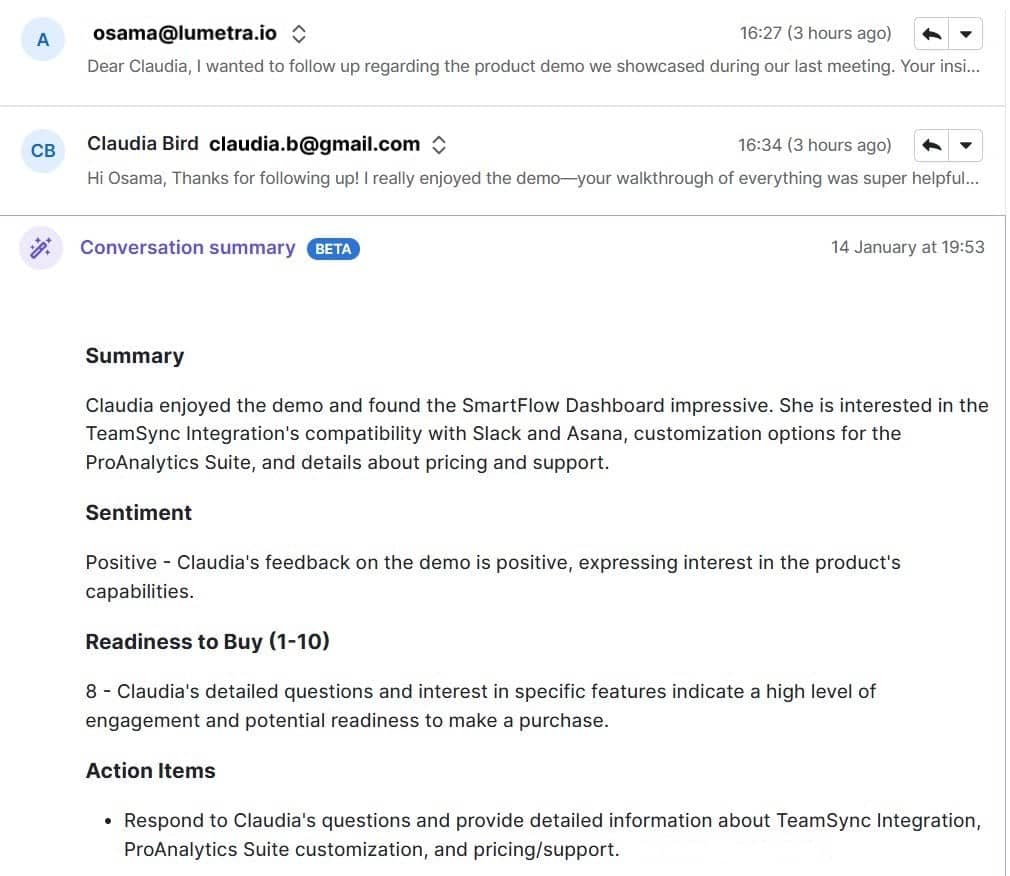
Sales jobs are often goal-oriented, making them ideal for individuals who enjoy a challenge. With clear metrics for success, strong performers are recognized and rewarded. A career in sales can lead to long-term success, not to mention it offers flexibility, independence and a chance to help a company grow.

The answer to “Is sales a good career?” depends on what you’re looking for, but in many cases, yes, it’s a strong and rewarding choice. Here’s why:

It’s results-driven and flexible

Sales careers are often goal-oriented, meaning your success is based on what you accomplish, not just how long you’ve been in the role.

If you enjoy working toward clear goals and seeing your progress in real numbers, this can be highly motivating. Many companies also offer flexible schedules or remote options, especially in inside sales roles.

Recommended reading

https://www-cms.pipedriveassets.com/blog-assets/sales-objectives-examples.jpg

Sales objectives: Examples that will motivate your team

It teaches transferable skills

Sales builds communication, fosters empathy, refines negotiation and sharpens problem-solving skills. Sales enhances core professional skills that are valuable in any industry.

Whether you stay in sales long term or pivot to another field, these are strengths you’ll carry with you.

There’s room to grow

Sales roles frequently lead to leadership, marketing, operations or strategy positions. With an estimated 1.8 million sales job openings per year through 2033 – mostly to replace professionals who move up or move on – this level of movement highlights how often sales serves as a stepping stone to broader business roles. Sales offers strong long-term growth and advancement opportunities, sales can be a strong foundation for future leadership roles.

You might start as a sales development representative and grow into a senior account executive, then move into management. In many companies, sales is a direct path to upper-level leadership.

It can be financially rewarding

Many sales roles offer a base salary plus performance-based commissions or bonuses. If you’re successful and motivated, you can often earn more than in other entry-level roles with similar experience requirements.

Despite this, sales can also present challenges such as dealing with rejection, managing stress and maintaining consistent performance. However, if you’re self-motivated and willing to learn, the benefits can surpass the potential drawbacks.

Should I get into sales?

Maybe you’re wondering if sales is the right fit for your personality or career path. There are several indications that you may find a role in sales appealing:

  • You like talking to new people and building relationships

  • You’re curious about how people make decisions

  • You enjoy solving problems and helping others

  • You thrive when working toward goals

  • You’re open to feedback and always looking to improve

On the other hand, if you prefer working independently with minimal interaction, or if short-term goals stress you out, you may want to consider whether another field might be a better fit.

If you’re still uncertain, try talking to people in sales roles, shadowing a colleague or applying for a sales internship. Even a short experience can give you real insight into whether you’ll enjoy it.

What makes someone good at sales

You don’t need to be extroverted, persuasive or a “natural closer” to be good at sales.

In fact, some of the best salespeople are great listeners and problem-solvers who focus more on customer needs than sales pitches.

Here are some key traits and habits of successful salespeople:

Skill

Description

Strong communication

Clearly explain products, ideas and solutions in a way others can easily understand.

Active listening

Pay close attention, ask thoughtful questions and respond with intent.

Resilience

Stay positive and motivated, even after setbacks or rejection.

Empathy

Understand customer pain points and respond with genuine care.

Curiosity

Proactively explore new industries, tools and ways to improve.

Adaptability

Adjust your approach quickly based on feedback, performance or changing needs.

Organization

Stay on top of conversations, follow-ups and pipeline progress.

Some people naturally lean into these skills, but most develop them through experience, training and feedback. If you’re willing to learn, you can grow into the role.

Recommended reading

https://www-cms.pipedriveassets.com/Pipedrive-Qualities-of-a-salesperson-21.jpg

25 Must-have Qualities to Look for in Salespeople

How to be good at sales

Once you determine sales could be a good fit, you might ask how you can get better at it.

Whether you’re just starting out or want to refine your skills, here are a few key areas to focus on.

1. Know your product or service

Great salespeople deeply understand what they’re selling – not just by memorizing features, but by knowing the value it offers, the problems it solves and why people choose it over the alternatives.

Having this understanding allows you to communicate effectively with your customers. When you can clearly explain how your solution meets their needs, you move from just selling a product to providing a useful solution.

2. Focus on listening, not pitching

The best sales conversations are two-way. Ask open-ended questions and listen to your customer’s priorities before offering a solution.

Active listening builds trust and helps you match your pitch to their needs. It shows you’re not just trying to sell something, but also focused on solving their problems.

3. Learn to handle rejection

Rejection is a part of sales. Not every conversation will lead to a deal, and that’s okay.

Take each “no” as an opportunity to improve your process, refine your messaging and better understand customer objections. Staying confident and consistent will pay off in the long run.

4. Use sales tools to stay organized

Customer relationship management (CRM) software can help you keep track of leads, follow-ups and deal stages. It also makes it easier to collaborate with your team and spot trends in your pipeline.

Staying organized means fewer missed opportunities and more timely outreach. The right sales tools let you focus more on selling, not just managing tasks.
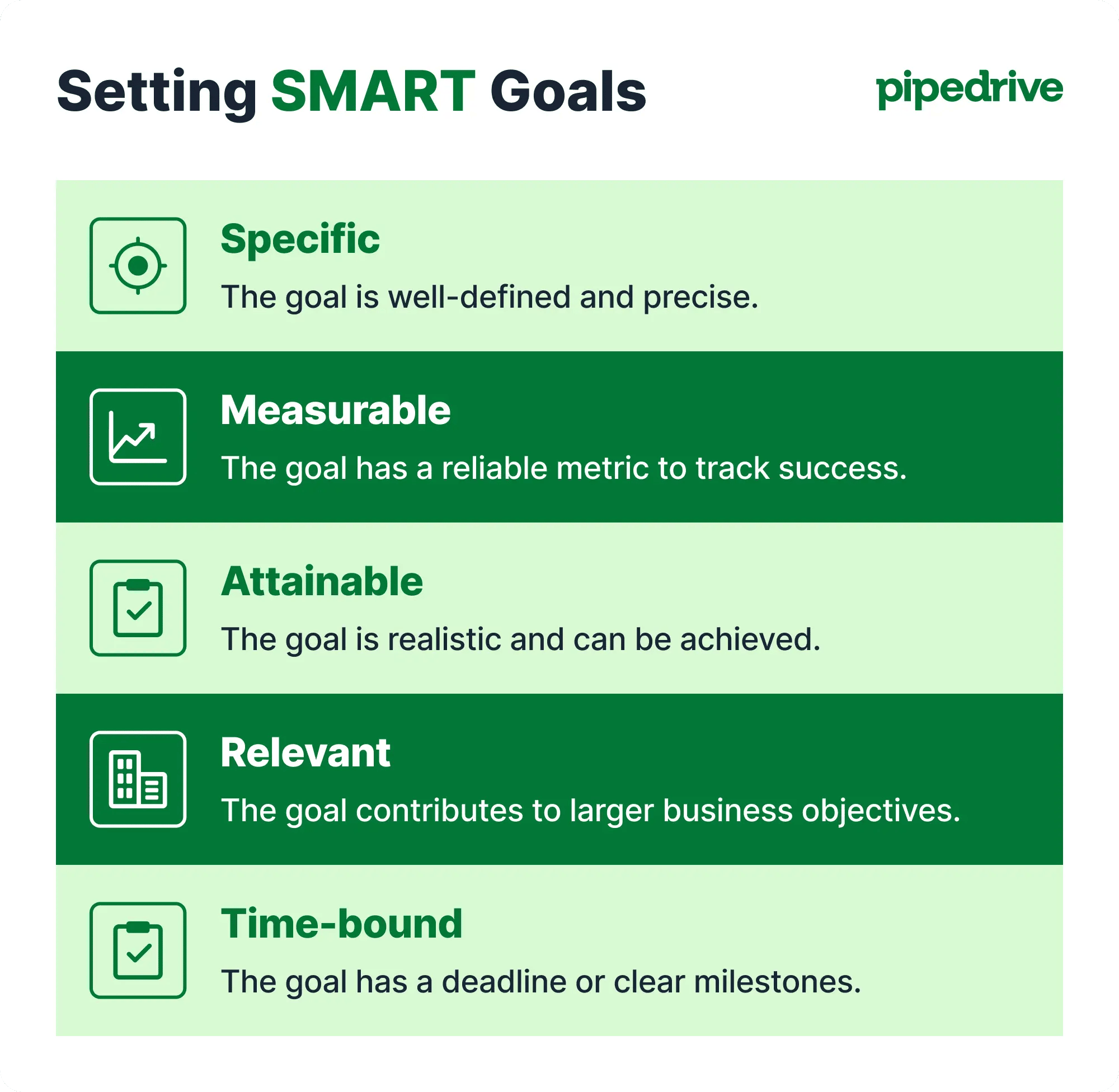
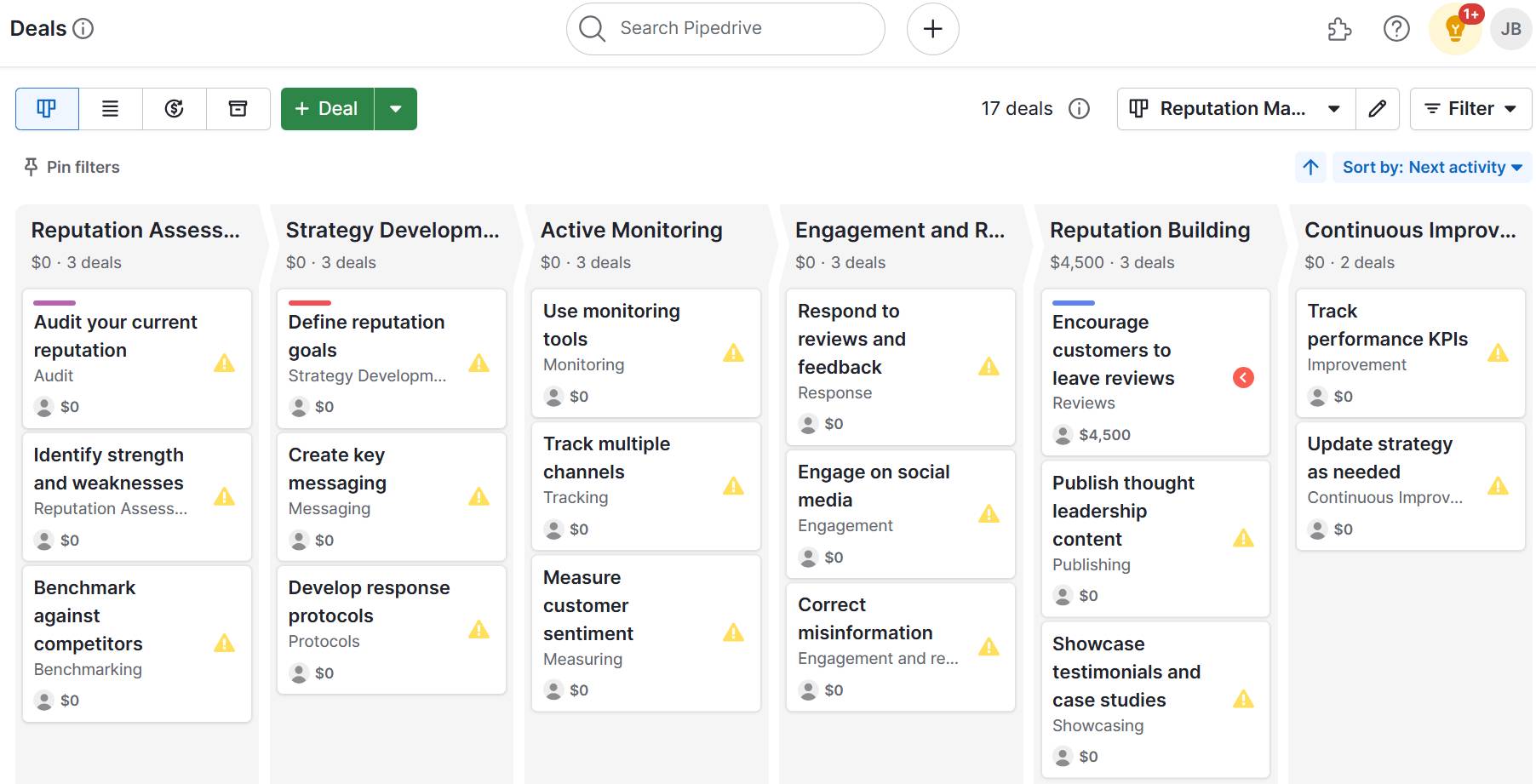
5. Practice and get feedback

Sales is a skill, and like any skill, it improves with practice. Record calls, review emails, ask a mentor for tips or join a workshop. The more you seek feedback, the faster you’ll grow.

Feedback helps you see your mistakes and improve. The more you focus on learning, the faster your skills and confidence will grow.

Different types of sales roles

Sales isn’t a single job – it’s a wide field with roles that suit different personalities and career goals. Here are a few common types of sales jobs:

Business development

Also known as sales development, this role focuses on researching, reaching out to and qualifying new leads.

It’s ideal for individuals who like starting conversations and identifying opportunities.

Account executive

Account executives manage sales conversations from start to finish. They work with qualified leads, run product demos and close deals.

These roles often come with performance targets and bonuses, making them a great fit for goal-driven individuals.

Account management

Account managers focus on existing customers. Their role is to maintain relationships, support renewals and upsell new solutions when appropriate.

This position is a good fit if you enjoy long-term relationship building and supporting clients in reaching their goals.

Inside sales

Inside sales reps work remotely or by phone and email. They usually manage a higher volume of leads with help from digital tools, using features like email automation, lead scoring and sales pipeline management.

This role is ideal if you like multitasking, working independently and leveraging technology to sell effectively.

Field sales

Field sales involve meeting customers in person, attending events or traveling to client sites. It is often used in industries with complex or high-value products.

If you prefer face-to-face interactions and building rapport in real-world settings, this could be a great match.

How to build your sales skills from scratch

If you’re just getting started in sales or want to make a career shift, don’t worry – there are many ways to gain experience and build your confidence:

  • Start small: Offer to help with sales-related tasks in your current job or volunteer project

  • Take online courses: Many platforms offer free or low-cost training in sales skills

  • Read books and blogs: Learn from experts in the field and stay current on trends

  • Find a mentor: Reach out to someone in sales and ask about their experience and tips

  • Practice cold outreach: Even informal practice helps build communication and resilience

Remember, most salespeople improve through experience. You don’t need to know everything from day one, you just need to have the drive to get a little better every day.

Recommended reading

https://www-cms.pipedriveassets.com/sales-skills.png

13 essential sales skills that’ll help you close more deals (and how to develop them)

You don’t need to be perfect to start

One of the biggest misconceptions about sales is that you must be naturally persuasive or outgoing. In reality, success in sales often comes down to preparation, consistency and a genuine interest in helping people.

According to Gartner’s Accelerate Sales in 2025 report, organizations where sellers feel connected see a 24% increase in performance. A positive, supportive environment not only improves results, it also increases motivation, retention and overall job satisfaction.

You’ll learn as you go, and that’s part of what makes sales such a rewarding career. Each conversation helps you improve, each deal teaches you something new and every challenge helps build confidence and resilience.

If you’re curious, motivated and willing to learn, sales might be a great fit for you.

Get hands on with sales using Pipedrive

If you’re wondering whether you would be good at sales, one of the best ways to find out is to try some of the tools sales teams use. With Pipedrive, you can experience what it is like to organize leads, manage conversations and track deals.

Pipedrive is easy to use. The Kanban style helps you organize leads, track conversations and manage deals from start to finish. As prospects move through each stage of the sales pipeline, it’s a great way to understand the flow of a sales process without needing formal experience.

Features like Scheduler make it simple to book meetings, and Caller lets you make and track calls directly in the CRM – perfect for follow-up and improving your outreach.

These tools and features provide a realistic sense of what it is like to work in sales day-to-day. Even if you’re just starting out, you’ll quickly learn how to structure your outreach and gain insights into sales progress.

Final thoughts

If you’ve ever asked yourself, “Would I be good at sales?”, the answer might be yes – but only you can decide. You don’t need to have every skill right now. What matters is that you’re interested, open to learning and ready to explore.

Sales offers a unique mix of challenge and opportunity. It can teach you how to communicate better, manage time, think strategically and connect with people. Whether you stick with it for a year or build a long-term career, the experience alone can help shape your future success.

Try Pipedrive free for 14 days and take your first steps into the world of sales.

5 Top Issue Tracking Software Tools for SMBs

Software Stack Editor · June 23, 2025 ·

Issue tracking software helps SMBs identify, manage and resolve problems efficiently – from software bugs to customer complaints.

Without the right system, problems can slip through the cracks. You waste time switching between emails, chats and spreadsheets to track one issue.

In this article, you’ll learn how issue tracking software solves those challenges. You’ll also discover five tools that help SMBs manage issues better and learn what to look for when picking the right software for your business.

What is issue tracking software?

Issue tracking software identifies, manages and monitors problems throughout a project’s lifecycle or within the organization. Issues can range from software bugs and feature requests to customer complaints.

Using the software, teams can:

  • Log new problems in the issue backlog

  • Assign them to the right people

  • Set priorities

  • Add comments or attachments

  • Track progress from creation to completion

The exact functionality varies depending on the platform you use.

Issue tracking system software vs. bug tracking software vs. project management tools

Bug tracking software and project management tools are similar to issue tracking software, but they’re not the same. Understanding the differences helps you choose the right solution for your business.

Software type

Definition

Bug tracking software

Bug tracking software focuses on finding and fixing software bugs and is mainly used in software development.

How it differs from issue tracking software: Issue tracking software helps different teams handle all kinds of tasks, not just bugs.

When to use it: When focused on debugging and maintaining code within development teams.

Project management software

Project management tools plan, schedule and coordinate entire projects. They typically include features like Gantt charts, cost budgeting and resource allocation.

How it differs from issue tracking software: Issue trackers resolve individual tasks or problems rather than manage the full project scope.

When to use it: When planning and overseeing large projects from start to finish involving timelines, milestones and multiple phases.

Choosing the right tool depends on whether your main goal is fixing issues fast, managing bugs or overseeing full project timelines.

Recommended reading

https://www-cms.pipedriveassets.com/Problemoesung.png

The sales manager’s guide to troubleshooting

5 best issue tracking software tools for SMBs

The right issue tracking software helps SMBs track and manage problems efficiently. The software should be easy to use, help you respond to problems quickly and keep projects moving forward.

Here are some of the best issue management software solutions on the market:

1. Pipedrive

Pipedrive is a sales CRM that helps SMBs track and manage leads throughout the customer lifecycle. The software gives sales teams an overview of every stage in the sales process, making it easier to organize leads, nurture them effectively and close more deals.

In addition to its lead management features, Pipedrive works well for issue tracking, especially for SMBs that want to manage customer issues without switching tools.

Issue tracking software Pipedrive deal pipeline

You can build custom pipelines to track support tickets, service requests or internal tasks, all from where you manage deals. Your team doesn’t have to juggle multiple tools to manage sales and support.

Say an existing customer submits a support request. Using Pipedrive, your team can track that issue in the pipeline next to their sales history.

As a result, reps can respond quickly and deliver a more personalized experience.

Download our sales pipeline course e-book

In the Sales Pipeline Course, Timo Rein, co-founder of Pipedrive, teaches you how to make more sales with exclusive advice and insights in 11 valuable lessons.

The interface is also user-friendly. Team members can drag and drop issues between stages, set deadlines and assign tasks without training.

Here’s a look at Pipedrive’s issue tracking features in more detail:

Customizable pipelines

Set up a dedicated pipeline for issue tracking through the pipeline management tool. These pipelines help you log, track and prioritize issues before assigning them to the relevant person.

Go to “Pipedrive > Settings > Pipelines” and create a new pipeline. Then, customize the pipeline stages to match your process. An example workflow might look like this:

Issue reported → In Review → Assigned to Sales Rep → In Progress → Resolved

Here’s an overview of how this workflow might look in Pipedrive:

Issue tracking software Pipedrive issue tracking pipeline

Add-ons and integrations

Pipedrive offers add-ons and integrations such as SupportBee (an email ticketing system) and Re:amaze (a multi-channel messaging platform). These integrations turn customer messages into tickets and link them to the right deal.

The image below shows how SupportBee pulls contacts into Pipedrive:

Issue tracking software Pipedrive SupportBee integration

By linking messages directly to the right contact, your team gets the full context at a glance.

For example, if a customer emails about a billing issue, your team can see past interactions. Your sales reps can reply faster and skip repeated questions, making support more helpful and personal.

Pipedrive also provides an open API (application programming interface), allowing users to build custom integrations and plugins to fit their specific workflows.

Use case: A small software business uses Pipedrive to manage sales and customer support. When a customer emails about a login issue, the SupportBee add-on turns it into a ticket linked to their deal history. The team sees the full context, replies quickly and tracks progress through a custom pipeline.

Automations

Use Pipedrive’s built-in automations to streamline issue management. Assign tickets to the right people, send follow-up email reminders or move issues to the next stage in the pipeline when tasks are complete.

Automations keep issues moving, letting your team focus on what matters most: solving problems.

Here’s a breakdown of how Pipedrive’s automations work:

With the right automations, you can reduce manual work, respond faster and ensure nothing slips through the cracks.

2. DoneDone

DoneDone is a straightforward issue and bug tracking tool for non-technical teams. Users can create and assign tickets, track progress and communicate about each issue.

Issue tracking software DoneDone

Here are some of DoneDone’s key features:

  • Manage tickets easily. Users can create tickets by filling out a simple form, assigning them to team members and setting priority levels. Each ticket’s status updates as it moves through stages (“Open”, “In Progress” and “Closed”, for example) so everyone stays on the same page.

  • Respond to customers with email Integration. When a customer emails your support team, DoneDone creates a support ticket from the message. Your team replies on the platform and customers get responses by email, keeping the process smooth and efficient.

  • Collaborate within tickets. Team members can add internal comments, tag colleagues and attach files within each ticket. You keep all related communication in one place, making it easy to follow the thread and avoid missed status updates.

For teams without technical expertise, DoneDone is a practical choice. Its simple interface makes it easy to manage issues without a steep learning curve or complex setup.

Use case: A startup retail business uses DoneDone to handle customer questions and issues without a dedicated IT team. When a customer emails a product return request, DoneDone creates a ticket automatically. The team assigns it to the right person, tracks the status and communicates internally to ensure fast, organized responses.

3. Marker.io

Marker.io is a website feedback and bug reporting tool that streamlines communication between less-technical users and development teams. It boosts teamwork by letting users report issues from your website with screenshots and details.

Issue tracking software Marker.io

This functionality means non-technical stakeholders can provide clear, detailed feedback without explaining complex issues. This easy feedback prevents misunderstandings between issue reporters and developers.

Here’s an overview of Marker.io’s key features:

  • Capture bugs directly from the browser. Users take screenshots, add annotations and highlight issues without leaving the webpage, making feedback clear and visual.

  • Collect technical details automatically. Marker.io gathers information like browser type, URLs and console logs with every report. The software then gives users the context they need to fix problems quickly.

  • Collaborate within the platform. Team members can add comments, reply to feedback and discuss issues within Marker.io, keeping communication clear and centralized.

Marker.io is useful for SMBs that want to simplify feedback and issue reporting between clients, designers and developers.

Use case: A marketing team spots a website glitch while reviewing a campaign page. They capture the issue with a screenshot, annotate it and send the report directly through Marker.io. Developers get all the details instantly, speeding up the fix and ensuring the website runs smoothly.

4. Userback

Userback is a feedback and issue tracking tool that helps teams collect, understand and act on product feedback. End users can submit feedback directly on websites or applications using visual annotations, such as screenshots and screen recordings.

Issue tracking software Userback

Letting users submit feedback directly on your website makes it faster to report issues. Developers and product teams can quickly understand the problem, fix it faster and reduce downtime.

For SMBs with limited resources, this efficiency is powerful. You can quickly improve the user experience and build a more polished product, ultimately leading to happier customers and more sales.

Here’s a breakdown of some of Userback’s core features:

  • Collect feedback in real time. Capture user feedback the moment it happens. Your team can identify and respond to issues early, improving product quality without delay.

  • Categorize and prioritize issues. Use tags and filters to group feedback by urgency, topic or product area. These labels help small teams focus their efforts where it counts most.

  • Customize the widgets for your brand. Tailor the feedback widget to match your brand positioning and target specific use cases. Adjust location, colors, fonts and language to fit seamlessly into your website or app without disrupting the customer journey.

Userback offers a reliable solution for SMBs looking for a straightforward, visual way to collect actionable feedback directly from end users.

Use case: A small e-commerce team uses Userback to collect bug reports during a new product launch. Customers submit screenshots with notes when pages don’t load or buttons don’t work. The team resolves issues within hours, reducing cart abandonment and boosting conversions.

5. BugHerd

BugHerd is an issue tracker designed for teams that build and manage websites, especially marketing and web development agencies. The software makes it easy to share websites, gather feedback and make quick fixes to produce a seamless user experience.

Issue tracking software BugHerd

Here’s a closer look at BugHerd’s key features:

  • Pin feedback directly on the page. Users click anywhere on your website to report issues. Each comment is turned into a task with a visual cue so developers know exactly where to look.

  • Capture technical context automatically. BugHerd logs essential technical information with every piece of feedback. For example, it captures browser type, operating system and screen resolution. This information helps developers resolve issues quickly without asking users for extra details.

  • Track progress with a built-in Kanban board. Feedback and bug reports are sent to BugHerd’s built-in task board, which uses a Kanban layout. Teams can view tasks by status, assigning them to the right person and manage website updates in one place.

Although BugHerd is typically used by marketing and development teams, it’s useful for any SMB that wants a simple way to collect website feedback, streamline communication and speed up issue resolution without technical complexity.

Use case: A small digital agency uses BugHerd to gather client feedback during website launches. Clients pinpoint issues directly on the site, sending clear tasks to the team. Their feedback speeds up fixes, improves communication and helps deliver websites on time.

How issue tracking software helps SMBs

Issue tracking software helps SMBs centralize problem management and hold teams accountable while offering prompt issue visibility. The tools enable teams to deliver speedy fixes and boost customer satisfaction, increasing the chances of closing deals.

Here’s how issue tracking software drives these benefits for SMBs:

Centralizes issue reporting

Issue tracking software gives SMBs a single place to log problems, feedback or bugs – whether from customers, internal teams or external partners.

Centralizing this information prevents issue reports from being scattered across platforms or a software issue tracking Excel template.

For example, a support rep can view all customer complaints in one central location instead of digging through separate emails and chat messages. With this insight, the rep can quickly identify recurring issues, prioritize urgent problems and coordinate fixes faster.

Improves accountability

Issue tracking systems allow you to assign issues to specific team members with clear ownership and deadlines. Allocating issues creates accountability, prevents tasks from being overlooked and helps managers track project progress without follow-ups.

Say that a website bug is assigned to a developer with a clear deadline. With this task in place, the developer knows exactly what to fix and by when.

This clarity reduces delays and lets developers complete their work without needing constant check-ins from management.

Speeds up response times

By organizing issues by priority, category or due date, SMBs can tackle the most important problems first. Team members spend less time figuring out what needs attention and more time resolving issues, which leads to faster turnaround and better outcomes.

Imagine a customer support team sorts tickets by urgency and product area. The team quickly fixes critical bugs by prioritizing issues before addressing minor requests.

The process speeds up resolutions and keeps customers happy.

Enhance customer satisfaction

Timely issue resolution makes customers feel heard and valued. When SMBs can track and respond to complaints or requests quickly, it builds trust and improves the overall customer experience.

Consider a SaaS company using issue tracking software to manage billing queries.

The company builds stronger client relationships and reduces churn by responding promptly and resolving billing issues efficiently.

Recommended reading

https://www-cms.pipedriveassets.com/Best-IT-management-software-tools-for-SMBs.png

IT management software: 12 top tools to boost efficiency and compliance

Key features to look for in issue tracking software

To choose the right issue tracking software, focus on tools that simplify communication, enable customization and provide clear visibility into progress.

Here are the key features to look for when selecting issue tracking software:

A simple user interface

Choose software that’s easy to use with minimal training. The easier it is to navigate, the faster your team can get it up and running effectively.

Look for a clean layout, clear navigation and simple controls. Drag-and-drop tasks, customizable views and filtering options all enhance usability.

Take Pipedrive as an example. The CRM offers a drag-and-drop pipeline, visual progress stages and easy task assignment, helping teams get started quickly without technical training.

Here’s an example of how easy it is to move tasks in one Pipedrive:

Issue tracking software Pipedrive drag and drop pipeline

This simplicity reduces the learning curve. Your team can focus on solving issues instead of struggling with complicated software.

Note: Jira, Git and GitHub are popular issue trackers, but their complexity can be challenging for SMBs with limited time or resources. Simpler tools typically offer faster adoption and cheaper pricing options.

Customizable processes

Every business has its own way of managing issues. The best tools let you customize statuses, priorities and workflows to match your team’s process.

Here are some customizations to look for:

  • Custom status labels to reflect your workflow stages

  • Adjustable priority levels to highlight urgent tasks

  • Flexible workflow steps that match how your team operates

  • Multiple pipelines for different issue types

  • Custom fields for capturing specific information relevant to your business

  • Options to automate task movement based on status changes or deadlines

Pipedrive lets you build pipelines with stages and priority levels that reflect your custom workflow. You can create tailored pipelines for sales, support tickets or any other process, keeping everything organized and aligned with how your team works best.

Here’s a visual of how to create your own pipeline stages in Pipedrive:

Issue tracking software Pipedrive custom pipeline stages

If your team needs total customization (without using an existing platform as a base), you may prefer an open-source issue tracker. An open-source tool offers more customizations as you build the software from scratch, but requires more technical knowledge.

Assignment and ownership tracking

It should be easy to assign issues to specific team members, set deadlines and monitor who’s responsible for certain issues. Assigning issues ensures accountability, which motivates individuals to move the timeline forward, hit key milestones and work toward resolution.

When evaluating assignment and ownership tracking features, look for:

  • Clear visibility of who owns each issue and its deadlines

  • Ability to reassign tasks easily if workloads shift

  • Automated reminders for overdue or upcoming tasks

  • Dashboards or reports showing individual and team progress to help managers track accountability

Use a sales CRM like Pipedrive to simplify accountability management. Pipedrive lets you assign tasks directly within custom pipelines, set deadlines and easily reassign issues as priorities change.

The image below shows a team member being assigned a new task:

Issue tracking software Pipedrive assign tasks

Pipedrive’s automated notifications and visual dashboards make it easy to monitor ownership and ensure a timely issue resolution process.

Reporting and analytics

Built-in reporting helps you track metrics such as resolution time, issue volume and recurring problems. Analyzing these insights enables you to identify and resolve bottlenecks as quickly as possible.

It also shows you which issues occur most frequently and measures how quickly your team resolves them.

All this data helps you make informed decisions about where to allocate resources, improve processes and address challenges before they escalate.

For example, if reports show that customer inquiries about shipping delays spike during certain times, you can allocate more staff or streamline communication during those periods. You improve response times, and customer satisfaction increases.

Here are some key reporting and analytics features to look for:

  • Customizable dashboards that highlight your most important metrics

  • Trend analysis to spot recurring issues over time

  • Filters to drill down by issue type, priority or team member

  • Visual charts and graphs for easy data interpretation

Pipedrive’s custom dashboards highlight the metrics that matter most to your team.

Here’s an example of a Pipedrive dashboard:

Issue tracking software Pipedrive custom dashboards

You can customize the view to choose which data you’ll see and quickly spot areas needing attention.

Integration with other tools

Many SMBs already use tools like CRMs, helpdesks or project management tools. Choose issue trackers that work with your existing tech stack to make your work easier.

For example, if you use Pipedrive’s CRM to nurture leads and prospects, you might use the following integrations for issue tracking:

  • Zendesk for managing customer support tickets alongside your sales data

  • Trello to organize and track tasks and bugs with a visual project board

  • Slack to receive real-time issue alerts and collaborate instantly with your team

These integrations connect issue tracking with your sales, support and team communication channels, helping you resolve problems faster.

Final thoughts

When choosing an issue tracking system, look for easy-to-use tools with customizable workflows, clear task ownership and helpful reports.

Use Pipedrive’s CRM to align issue management with your sales pipeline. Centralizing these activities lets you solve problems quickly and ensure customers receive the support they need at every step of the buying journey.

Sign up for a free 14-day trial to see how Pipedrive tracks issues alongside deals and provides real-time insights that keep your team focused and customers satisfied.

5 Best Expense Management Software Tools for SMBs

Software Stack Editor · June 23, 2025 ·

Managing business expenses manually is time-consuming, error-prone and frustrating for SMB finance teams and employees.

From lost receipts to delayed reimbursements, outdated processes slow down your operations and increase compliance risks. Without proper visibility or controls, small but frequent costs can easily add up and slip through the cracks.

This guide explores how expense management software streamlines approvals and improves real-time spending visibility. We’ll cover top tools, must-have features and how to build an efficient system – plus how to do it all with Pipedrive.

What is expense management software, and why is it important?

Software for expenses management is a tool that helps businesses track, approve and reimburse employee expenses in one place.

It reduces manual work, such as data entry or creating expense reports, making it easier to manage spending and follow company policies.

With the right system, finance teams can stop relying on spreadsheets, email threads and disconnected processes.

Take receipts. With traditional processes, employees must keep paper copies, scan them manually, and then email them to finance.

With tools like Xero, employees can instantly scan receipts using a mobile app. The app extracts key details like date, amount and vendor automatically.

expense management software Xero receipt scanning

Once scanned, the receipt can be forwarded directly to the finance team or added to an expense report for approval.

Below are some important ways that expense management software can support SMB teams:

  • Save time by automating expense tracking and approvals. Teams can use workflows to route submissions to the right approver and update statuses automatically. Automation cuts down on back-and-forth and speeds up the reimbursement process.

  • Improve visibility into company expenses. Real-time dashboards help managers and finance teams see where money is going. With clearer insights, teams can spot unusual spending patterns and intervene as needed.

  • Enforce company policies without added admin. Expense management software flags out-of-policy claims or duplicate charges before approval to keep compliance management in check without burdening employees or finance.

  • Reduce errors from manual data entry. When tools sync with corporate cards or bank accounts, expenses flow in automatically. Instant submissions keep records accurate, minimize double entries and simplify monthly bookkeeping.

By replacing manual processes with an all-in-one expense management system, teams can reduce admin work, control spending and make smarter business decisions.

Download Pipedrive’s Basic expense report template

Our more straightforward option, with fields for date, category, amount and descriptions.

Top 5 dedicated expense management software tools

Whether you need a full-featured platform, travel and expense management software or a simple way to track employee expenses, these five expense management solutions have you covered.

Note: We selected tools based on ease of use, automation capabilities, accounting system integrations, real-time financial reporting and policy enforcement features. Each brings a unique approach to simplifying the expense management process.

1. Expensify: Best for growing teams

Expensify is a well-known expense management platform that simplifies how companies handle employee expenses.

It’s built for ease of use and automation, helping teams capture receipts, categorize transactions and process reimbursements with less manual work. Its mobile app and real-time syncing with bank accounts make it especially convenient for employees on the go.

expense management software Expensify dashboard

Customers appreciate how easy it is to snap a photo of a receipt, submit it and move on without delays.

The setup can initially feel complex, especially for companies with layered approval rules. Once teams configure the system, it runs smoothly and reduces time spent on expense admin.

Key features:

  • Mobile app for on-the-go receipt capture

  • Automatic expense categorization and policy enforcement

  • Credit card and bank account syncing

  • ACH reimbursements to employee bank accounts

  • Customizable approval workflows

  • Integrations with accounting software like QuickBooks and Xero

What users are saying:

“I love the ease of use of Expensify, especially the SmartScan feature, which allows me to take a picture of a receipt and have the data automatically extracted – it saves a lot of time.” – G2 reviewer

Who Expensify is best for:

Expensify is a good fit for growing teams that want to streamline expense reports without hiring more admin help. It’s especially useful for companies with remote employees or frequent travel expenses that need a mobile-first, automated solution.

2. Payhawk: Best for expense automation

Payhawk is an all-in-one expense management platform built for automation and control.

It combines corporate cards, spend tracking and bill payments in one system, giving corporate finance teams a real-time view of employee spending. Businesses benefit from the platform when they want to replace fragmented tools with a single solution.

expense management software Payhawk dashboard

Users like how Payhawk automates the entire expense lifecycle, from receipt capture to reconciliation. Its ability to set spend limits, define approval workflows and connect directly with ERP systems makes it a powerful choice for finance teams that want to eliminate manual work.

Some users mention that smaller teams may not need the full range of features Payhawk offers. However, the platform’s flexibility means it can scale as companies grow.

Key features:

  • Corporate cards with built-in spend controls

  • Automated receipt capture and categorization

  • Real-time dashboards for tracking expenses

  • Custom approval workflows and multi-level approvals

  • Integration with ERP and accounting systems like NetSuite and SAP

  • Support for multiple entities and currencies

What users are saying:

“Payhawk makes managing business expenses incredibly efficient. The integration with our accounting software (Exact Online) was quick and smooth. Team members love having their own company cards, and it’s easy to manage spending limits or pause cards when needed.” – G2 reviewer

Who Payhawk is best for:

Payhawk is ideal for mid-sized and larger businesses that want to automate their expense management process from start to finish. Its deep functionality and ERP integrations make it a strong choice for companies with complex finance operations.

3. QuickBooks Online: Best all-in-one option

QuickBooks Online is a widely used accounting software with built-in expense management tools. It’s designed for small businesses that want a centralized platform to handle bookkeeping, invoicing, payroll and expense tracking without juggling multiple systems.

expense management software QuickBooks Online dashboard

Users appreciate how QuickBooks makes it easy to connect bank accounts, track expenses by category and attach receipts. It automatically pulls transactions from linked credit cards or bank accounts and helps teams stay organized for tax time.

Users may feel overwhelmed at first, especially with so many features in one place. However, the all-in-one setup is a major advantage for businesses that want a full financial overview.

Key features:

  • Expense tracking with receipt capture and categorization

  • Direct bank and credit card syncing

  • Customizable expense policies and approval workflows

  • Reports and dashboards for spending insights

  • Integration with apps like Expensify and PayPal

  • Mobile app for expense tracking on the go

What users are saying:

“Quickbooks online is a fantastic tool for accounting firms. Its user-friendly interface makes it easy to navigate, even for those who aren’t tech-savy.” – G2 reviewer

Who QuickBooks Online is best for:

QuickBooks Online is a good fit for small businesses that want an all-in-one accounting system with built-in expense management. It’s best for teams needing financial visibility and simplicity without adding another platform to their stack.

4. Ramp: Best for corporate controls

Ramp is a corporate card and expense management solution focused on helping companies automate workflows, reduce waste and enforce tighter spend controls.

Ramp stands out by helping companies enforce expense policies automatically. Admins customize approval workflows and define rules for employee spending, ensuring compliance without manual oversight.

expense management software Ramp dashboard

The platform also integrates with ERP systems like NetSuite and SAP, as well as accounting software such as Xero and QuickBooks.

Ramp’s mobile app allows employees to capture receipts and track expenses in real time, simplifying the reimbursement process and cutting down on manual work.

Its focus on eliminating redundant or wasteful spending makes it particularly appealing to CFOs and finance leaders looking for long-term efficiency.

Key features:

  • Corporate cards with automated spend limits

  • Real-time expense tracking and approval notifications

  • AI-powered insights to reduce unnecessary spending

  • Receipt capture and categorization via a mobile app

  • ERP and accounting system integrations

  • Automated reimbursements and ACH payments

What users are saying:

“Ramp makes it easy to record and manage expenses while I’m on the go via SMS. I love how Ramp texts me after I use my card, prompting me to upload a receipt and then providing a reason for the transaction.” – G2 reviewer

Who Ramp is best for:

Ramp is a great fit for fast-growing companies and mid-market teams wanting to control employee expenses and reduce unnecessary spending. Its built-in policy enforcement and AI recommendations make it a powerful expense management tool for scaling financial operations.

5. Spendesk: Best for scalability

Spendesk is a travel and expense management software solution for companies ready to scale.

It offers an all-in-one expense management platform that handles everything from receipt capture and expense approvals to reimbursement workflows and credit card controls.

expense management software Spendesk

One of Spendesk’s strengths is its ability to centralize financial data across teams while maintaining flexibility. Whether it’s travel expenses, SaaS CRM subscriptions or client meals, businesses use Spendesk to categorize and track every type of employee expense with ease.

By syncing Spendesk with their accounting software or ERP, finance teams can automate approval workflows, set company policies and eliminate manual data entry. Spendesk also includes robust dashboard features to monitor spending patterns.

Key features:

  • Physical and virtual corporate cards for employee spending

  • Integrated approval workflows and expense reimbursement tracking

  • Customizable company policies and spend limits

  • Mobile app for expense submissions and receipt capture

  • Seamless integration with tools like Xero, QuickBooks and NetSuite

  • User-friendly dashboard to analyze financial data and expense reports

What users are saying:

“I like that it simplifies the completion of expense reports and makes it easier to schedule business travel in one place. Easy to upload receipts and very convenient.” – G2 reviewer

Who Spendesk is best for:

Spendesk is ideal for scaling startups and small businesses that need a flexible expense management system with strong automation and visibility features. It’s especially useful for companies with distributed teams and multiple spend categories to manage.

Recommended reading

https://www-cms.pipedriveassets.com/Corporate-finance.png

Corporate finance made simple: tips every SMB should know

What should you look for in expense management software?

The best expense management software helps your team save time, enforce policies and make smarter financial decisions. But not all tools offer the same functionality, especially for small business needs.

Before choosing a provider, compare how each platform handles core expense workflows such as approvals, expense tracking and reimbursements.

Here’s a breakdown of the key features to look for and what each one means for your expense management process:

Feature

Description

Automated expense tracking

Captures and records expense data from receipts, credit card transactions and bank accounts. Automated data capture reduces manual data entry.

Mobile access

Lets employees submit expenses, capture receipts and view approval status from a mobile app. Ideal for travel expenses and remote teams.

Custom approval workflows

Enables you to define multi-step approval paths based on employee roles or expense types, speeding up processing and ensures accountability.

Integrations

Connects with accounting software (e.g., Xero), ERP tools (e.g., NetSuite) and corporate cards to centralize financial data.

Policy enforcement and compliance

Automatically flags out-of-policy expenses and duplicate claims, helping teams follow company policies and streamline audit readiness.

These features give your finance team the control and visibility it needs while simplifying the reimbursement process for employees.

Recommended reading

https://www-cms.pipedriveassets.com/Accounting-and-Invoicing-Software.jpg

The best accounting and invoicing software in 2025

How to create an expense management system with Pipedrive

Not every small business needs software for expense management. If your team already works in Pipedrive, adding another tool for tracking reimbursements or vendor costs might create more complexity than value.

With pipeline management, customizable data fields and workflow automations, you can build a capable expense software for better small business management directly inside your CRM.

Pipedrive is a good option for small businesses that want to streamline their expense workflows, stay organized and gain visibility into spend management without switching tools or paying for overlapping software.

Here’s how to set it up:

1. Centralize expense-related activities in custom pipelines

Pipedrive makes it easy to create a visual workflow for handling business expenses, from submission to approval.

For example, an agency might create a pipeline to manage employee expense reports. Team members log each reimbursement request as a new deal, and finance or admin staff move the deal through predefined stages as they review and approve each submission.

To create a custom pipeline for expenses:

  • Go to the “Deals” tab and click the dropdown arrow next to your current pipeline

  • Select “+ Add new pipeline” and name it something like “Expense Approvals”

  • Add deal stages like “Submitted”, “Under review”, “Approved” and “Paid”

  • Use filters to view expenses by category, amount or employee

Expense management software Pipedrive custom pipeline

Using custom pipelines gives your team a clear, real-time view of where each request stands, reducing back-and-forth and ensuring no expense falls through the cracks.

2. Use custom fields to capture key expense data

To keep your expense tracking organized and actionable, you need more than just notes in a deal card. Pipedrive’s custom fields let you log the details you need without cluttering your CRM with irrelevant data.

To add custom fields for expenses:

  • Go to “Company settings” and click on “Data fields” under the “Manage fields” section

  • Choose “Deals” as the data type and click “+ Add custom field”

  • Create fields such as “Expense Amount”, “Category”, “Employee Name” and “Payment Method”

  • Use field types like dropdowns for categories and currency for amounts

  • Add these fields to your custom pipeline layout so they’re visible on every deal card

Expense management software Pipedrive custom fields

Your finance team can quickly filter and report on expense data, making it easier to spot trends and ensure expenses align with company policies.

3. Automate approvals and reminders with workflows

Manually chasing approvals or tracking reimbursement statuses can drain your team’s time and slow the reimbursement process. Pipedrive’s workflow automations help you eliminate these delays by automating repetitive admin tasks.

For instance, a tech startup might set up a workflow that notifies a manager when an employee submits a new expense.

Once approved, the deal stage can automatically move forward, and the finance team receives a task to process the payment.

To set up an expense approval workflow:

  • Go to “Tools and apps” in the main menu and click “Workflow Automation”

  • Click “+ Create new workflow”

  • Choose a trigger, like “Deal enters stage ‘Submitted’”

  • Add an action, such as “Send email to manager” or “Create task for finance team”

  • Add additional actions like changing the deal stage or sending a Slack notification

  • Name your workflow and activate it

Expense management software Pipedrive expense approval workflow

Teams use approval workflows to keep every expense on a consistent approval process.

4. Integrate with accounting and expense tools via Zapier or native apps

While Pipedrive can manage the approval process, you may need to sync expense data with your accounting system or automate reimbursement tasks. Integrating Pipedrive with tools like QuickBooks or Xero helps close the loop between your CRM and finance stack.

For example, the Rexpense Pipedrive integration lets you manage and report expenses directly within your CRM.

It helps teams log expenses faster, attach receipts and assign costs to specific deals or projects, making it ideal for service-based businesses that want to track spending across clients.

To integrate Pipedrive with accounting and expense tools:

  • Visit the Pipedrive App Marketplace

  • Search for the app you want to connect (e.g., “QuickBooks”, “Xero” or “Google Sheets”)

  • Set up the trigger in Pipedrive (e.g., “Deal moves to stage ‘Approved’”)

  • Define the action in your connected tool (e.g., “Create new expense in QuickBooks”)

  • Test and activate your integration

expense management software Pipedrive Marketplace

You can use integrations to streamline bookkeeping and sync financial data across platforms.

Note: You can also use Pipedrive’s Projects tool to manage expenses tied to specific client work or internal initiatives. By linking tasks, files and expense-related activities within a single project, teams can track progress, assign responsibility and stay on budget.

Expense management software FAQs

  • Not every company needs a dedicated expense management platform.

    However, if you’re still using spreadsheets, handling reimbursements manually or struggling with policy enforcement, expense management software can help you save time and reduce errors.

    Small businesses often start with built-in features in tools like Pipedrive, then expand to platforms like Expensify or Payhawk as complexity grows.

  • Expense management software automates time-consuming tasks like receipt capture, expense approvals and employee reimbursement tracking.

    Expense software also eliminates manual data entry and centralizes expense data in one place, helping finance teams gain real-time visibility into business expenses.

  • For startups and small teams, user-friendly tools like Expensify, QuickBooks or even custom Pipedrive pipelines offer enough functionality to cover the basics.

    Platforms like Payhawk, Spendesk or Ramp provide automation, ERP integrations and detailed spend controls for more advanced needs.

    If you’re looking for the best expense management software for a small business, prioritize solutions that are easy to set up, scale with your team and integrate well with your existing accounting system.

Final thoughts

Managing business expenses doesn’t have to be time-consuming or error-prone.

Pipedrive offers a flexible, user-friendly way to build a custom expense management system inside your CRM – no extra tools required.

Start your free 14-day trial of Pipedrive and see how easy it is to centralize approvals, track employee spending and reduce manual work from day one.

Effective Campaign Management for SMBs

Software Stack Editor · June 20, 2025 ·

Marketing campaigns boost business growth and support sales and marketing objectives. For small businesses, though, the demands of campaign planning and execution can be overwhelming.

Campaign management can be challenging due to limited time, tight budgets and multiple channels to manage. However, with the right structure and tools, small businesses can run effective campaigns that get results.

In this article, you’ll learn how to successfully manage a small business marketing campaign. You’ll also discover the best campaign management software and how to make the most of it in your campaigns.

What is campaign management?

Campaign management is the process of planning, executing and evaluating marketing campaigns. There are several types of campaigns that marketing teams can run, depending on their goals.

Email marketing campaigns

Sending a series of emails to a targeted list to inform, nurture or convert prospects into customers. Email marketing involves customer segmentation, copywriting and scheduling.

Social media marketing campaigns

Coordinating social media activity to boost engagement or visibility. Social media marketing involves planning and scheduling social media posts on platforms like LinkedIn and Instagram.

Content marketing campaigns

Using blog posts, landing pages, video marketing and events like webinars to attract and convert audiences. Content marketing involves content creation, search engine optimization (SEO) and content distribution.

Paid advertising campaigns

Putting paid placements on search engines, websites or social media platforms. In digital marketing, paid advertising involves copywriting and bidding on ad space and keywords.

Affiliate marketing campaigns

Partnering with third parties to promote offerings. Affiliate marketing involves recruiting affiliates, tracking links and managing commissions.

Influencer marketing campaigns

Collaborating with creators to reach specific audiences. Influencer marketing involves influencer outreach, content approval and performance tracking.

OOH (out-of-home) marketing campaigns

Placing physical advertising in public spaces like billboards and vehicles. OOH marketing includes media buying, creative design and placement logistics.

Here’s an example of an email marketing campaign from Spark, an AI email management platform and calendar app:

Campaign management Spark email campaign

The campaign announces a new feature to an audience familiar with the tool, keeping them up-to-date and offering more opportunities to engage with the brand.

Running a successful campaign involves different roles and coordinating several moving parts. Some of the main campaign management tasks include:

Note: Multi-channel campaigns require even more sophisticated marketing management. That’s because multi-channel marketing involves multiple assets, marketing activities and customer touchpoints.

How can small businesses benefit from campaign management?

Campaign management isn’t just for large corporations. Effective campaign management delivers value to small businesses in several ways.

Aligning on objectives

Campaign management allows team members to align on shared goals for their campaigns. These goals might include:

For example, sales and marketing teams can coordinate to ensure campaigns announce a new feature that the sales team wants to push in the coming quarter.

Achieving campaign goals

Good campaign management allows small businesses to run campaigns effectively and efficiently. Having a plan before executing allows for thoughtful, data-driven decision making. As a result, campaigns are more likely to reach goals like attracting and converting new customers and growing a brand’s reach.

Evaluating success

By tracking the performance of their marketing activities, teams can discover what’s working and what’s not and adjust their campaigns accordingly.

This data-driven approach helps avoid wasted spend and effort. These are valuable outcomes for small businesses with limited budgets and resources.

Download Your Sales and Marketing Strategy Guide

Grow your business with our step-by-step guide (and template) for a combined sales and marketing strategy.

What does campaign management involve?

A structured approach to campaign management involves various stages of planning, execution and measurement.

Let’s explore each stage, using the example of a productivity software company running an email campaign to promote a new product launch.

Strategic planning

Strategic planning is the process of defining goals, target outcomes and messaging for an effective marketing campaign. It also involves aligning campaigns with the small business’s marketing strategy.

The strategic planning process ensures that every campaign serves a clear purpose and supports business growth goals, such as lead generation.

In our productivity software example, say the company wants to support business growth by increasing revenue from new product sales. The team plans a campaign specifically intended to support the new product launch.

Strategic planning is a vital first step in the campaign management process. It helps teams stay focused and maximize their efforts and resources.

Audience segmentation and targeting

Audience segmentation and targeting involve dividing your audience into groups so you can tailor content to each group’s needs and preferences.

Effective audience segmentation and targeting ensure relevant content reaches the right people. This outcome is central to the success of any marketing campaign.

In our example, the productivity software company might segment its target audience by:

  • Customer demographics, like occupation or industry

  • Prospects’ level of engagement with previous campaigns

  • Existing customers’ in-app behavior

The company would then send each group different content about the product launch.

Potential customers might receive introductory information about the company, for example. Meanwhile, experienced users could receive advanced productivity tips or upgrade offers.

Personalized emails enhance the customer experience by delivering relevant content. When email messaging speaks directly to a customer, they’re more likely to engage and take the desired next action.

Recommended reading

https://www-cms.pipedriveassets.com/B2b-Customer-experience.png

B2B customer experience: what it involves and 5 CX best practices

Creative development

Creative development is the process of creating the messaging, design and overall look and feel of a marketing campaign.

Creative development ensures the campaign and its message resonate with audiences. The process also focuses on aligning the campaign with the company’s brand positioning.

In our email campaign example, creative development might involve:

  • Planning the sequence of messaging within the email journey

  • Designing the visual components for the campaign

  • Writing the email content, subject lines and CTAs (calls-to-action)

Creative development involves multiple stakeholders collaborating to shape the campaign. These stakeholders usually include designers, writers and brand managers.

Execution and channel management

Execution and channel management are about launching and managing a campaign through specific channels.

This aspect of the process is crucial for the success of any campaign. It ensures timely delivery and smooth operations across platforms.

In our email campaign example, execution and channel management would involve:

  • Building and testing the full email sequence. This sequence might include promotional emails, feature highlights and productivity tips.

  • Setting up triggers for automated follow-up emails based on user behavior. This behavior might include email opens, link clicks or form submissions.

  • Ensuring email deliverability by verifying list quality, subject lines and domain reputation.

Careful execution and channel management ensure all campaign activity takes place as planned.

Monitoring and optimization

Monitoring and optimization involve tracking performance during the campaign. This stage is also about making adjustments to improve results in real time.

In our example, the productivity software company might monitor and optimize its email campaign by:

  • Tracking campaign performance (i.e., by measuring clicks and conversion rates)

  • Conducting A/B testing to experiment with variations in email subject lines

  • Adjusting send times based on engagement data to improve open and click-through rates

Monitoring and optimizing activity also allows small businesses to make better use of their marketing spend by continually identifying which efforts offer the most return on investment.

Reporting and analytics

Reporting and analytics involve reviewing the data at the end of the campaign. The aim is to evaluate success and inform the direction of future campaigns.

In our example, the productivity software company would evaluate what worked well – and what didn’t – in its email marketing campaign. To do this, the company would analyze email marketing metrics such as:

The marketing team would then turn this data into actionable insights for the next campaign. For example, a high unsubscribe rate from a particular audience could suggest a need for better customer segmentation.

The state of sales and marketing 2024

Discover key statistics about sales and marketing

Best marketing campaign management software

Campaign management software can make planning and executing campaigns quicker and easier for small businesses.

Here are four of the best marketing campaign management software solutions for SMBS:

1. Pipedrive

Pipedrive’s CRM helps marketing and sales teams manage and optimize email marketing campaigns.

In Campaigns, Pipedrive’s email marketing software, customizable dashboards offer real-time insights into campaign performance. The system’s drag-and-drop functionality makes campaign building quick and easy.

Campaign management Pipedrive Campaigns drag drop

Pipedrive’s project management software allows marketing teams to assign campaign tasks, plan work and track progress.

Campaign management Pipedrive project management

Pipedrive integrates with tools like ActiveCampaign, Zapier and Google Ads Lead Forms to connect marketing data across platforms.

Download Your Sales and Marketing Strategy Guide

Grow your business with our step-by-step guide (and template) for a combined sales and marketing strategy.

2. Brevo

Brevo is a marketing automation platform built for multi-channel campaign management. It allows businesses to conduct outreach campaigns through SMS, WhatsApp and chat from a single interface.

Campaign management Brevo WhatsApp template

Brevo’s customizable templates make it easy for small teams to scale their campaigns while personalizing communications at every marketing campaign stage.

3. Hive

Hive is a project management tool for campaign planning, task coordination and team collaboration. It supports campaign management through built-in templates, timeline views and approval workflows.

Campaign management Hive approval workflow

For marketing teams, Hive is useful for coordinating campaign stakeholders. The software’s integrations with tools like Zoom and Slack help streamline internal communications.

4. MailerLite

MailerLite provides small businesses with a suite of email marketing tools for campaign management.

The software supports full-funnel A/B testing and dynamic customer segmentation.

Campaign management MailerLite  customer segmentation

Other features include:

  • Drag-and-drop builders for one-off emails and newsletters

  • Landing page creation tools

  • Embedded sign-up forms and pop-ups

MailerLite’s integration with Pipedrive allows you to track customer interactions and use the data to refine your sales strategies.

Recommended reading

https://www-cms.pipedriveassets.com/The-best-AI-marketing-tools-for-SMBs.png

Best AI for marketing: essential AI marketing tools for SMBs

Best practices for using campaign management tools

To make the most of the marketing campaign management tools you use, follow these best practices:

Centralize campaign assets and data

Keeping all campaign assets and data in one place helps small businesses stay organized. It also allows them to maintain version control and reduce errors.

Use your campaign management platform to store all the content relating to your campaigns, including:

Centralization ensures everyone on your team can access what they need easily, whenever they need it. Many platforms allow you to group assets by campaign or channel, making the material easier to find.

Having a single source of truth for campaign material saves time and supports consistency. It also makes onboarding new team members smoother.

Set clear objectives and KPIs for the software

Knowing what you want from a campaign management system helps you choose the right tool and use it effectively.

For example, you may want a tool to help you:

  • Save time on repetitive tasks

  • Streamline team collaboration

  • Gain better insight into campaign performance

Setting clear objectives allows you to prioritize the right features when evaluating the options.

After choosing which software to use, identify KPIs to measure how well the software supports those goals (e.g., faster approval times).

Make use of automation functionality to save time

Take advantage of all of your software’s time-saving automations. Many campaign management tools include functionality to reduce manual workload, speed up execution and ensure timely and consistent communication with your audience.

In Pipedrive, for example, you can create automated marketing campaigns for a wide range of use cases, including:

Using these triggers, Pipedrive executes email campaigns without manual input, saving time and effort for sales and marketing teams.

Use collaborative features to streamline communication

Strong communication is essential for effective campaign management. Look for collaborative features in your campaign management software, such as:

  • Task assignments

  • Calendar apps

  • File sharing

These tools reduce the need for long email chains and prevent misunderstanding.

Features supporting content approvals, feedback and deadline management keep campaigns on track. These options also help ensure teams work efficiently without missing any steps in the collaborative process.

Use analytics and reporting to review and optimize campaigns

Analytics and reporting are vital for understanding what’s working and where to improve. Monitor marketing metrics like open rates, click-throughs, conversions and cost-per-lead to assess campaign performance.

Most platforms offer customizable dashboards and real-time reporting to give you instant visibility into results.

For example, Pipedrive’s email analytics and reporting shows you:

Conversion and engagement metrics

Monitor open and click-through rates to understand who’s engaging with your emails.

Delivery

Ensure your content reaches the right audience so your most significant leads don’t miss out.

Campaign performance over time

Get real-time updates about your campaigns’ performance, so you can update your marketing strategy as needed.

Link performance

See how your contacts engage with embedded links in your emails.

Who’s unsubscribing

Track when contacts subscribe or unsubscribe to comply with GDPR.

Bounce rate

Trace how many emails aren’t delivered successfully.

Here’s an example of a campaign performance report in Pipedrive:

Campaign management Pipedrive campaign performance report

You can use this data to optimize creative assets, refine targeting or adjust timing in future campaigns.

Recommended reading

https://www-cms.pipedriveassets.com/Affiliate-Management-Software.png

Affiliate management software: features, benefits and 12 top tools

Final thoughts

Campaign management is essential for executing focused, coordinated and measurable marketing initiatives.

A robust campaign management system helps small businesses align campaign efforts across channels. By streamlining key processes, the software allows SMBs to save time and drive growth through their campaigns.

An all-in-one CRM like Pipedrive helps small businesses plan, automate and track campaign activity. Sign up for a free 14-day trial to try Pipedrive’s campaign management system.

  • « Go to Previous Page
  • Page 1
  • Interim pages omitted …
  • Page 5
  • Page 6
  • Page 7
  • Page 8
  • Page 9
  • Interim pages omitted …
  • Page 28
  • Go to Next Page »

Get your Software Stack together. softwarestack.tech

Software Stack

© 2024–2026 - Software Stack is a trading name of SouthwestCIO Limited ac ompany registered in England & Wales 11319049

  • Knowledgebase
  • Home
  • About Us
  • Contact Us