• Skip to primary navigation
  • Skip to main content
software stack logo

Software Stack

Get your Software Stack together

  • Knowledgebase
    • All Categories
    • Accounting Software
    • Automation & Workflow Software
    • Customer Relationship Management
    • E-Commerce Shopfronts & Payments
    • Marketing Automation
    • Online Courses & Membership
    • Project Management
    • Surveys & Forms
    • Web Hosting
  • Home
  • About Us
  • Contact Us
  • Show Search
Hide Search

Pipedrive

SaaS Marketing Metric

Software Stack Editor · July 23, 2025 ·

Tracking the right metrics is essential to improving performance in SaaS marketing. From customer acquisition to retention, data reveals what’s working, where to optimize and how to scale effectively.

The guide details the key SaaS marketing metrics that are crucial for B2B teams. Familiarizing oneself with and implementing these metrics can facilitate the alignment of marketing and sales, enhance the decision-making process and establish a sustainable growth strategy.

What are SaaS marketing metrics

The metrics used in SaaS marketing are different from those used for regular key performance indicators (KPIs). They need to cover the whole customer journey, not just first-time purchases. Measurements such as churn rate, customer acquisition cost (CAC), and product engagement demonstrate the effectiveness of marketing in achieving long-term growth objectives.

Tracking these metrics helps teams across marketing, sales and customer success stay aligned on what drives sustainable revenue. For example, lead quality and conversion rate shape both campaign strategy and buyer engagement.

Breaking down metrics by customer type or channel helps teams focus their efforts. It makes it easier to target budgets and tailor messaging for better results.

Slack’s CEO, Stewart Butterfield, highlights the importance of measuring SaaS metrics:

Every customer interaction is a marketing opportunity. If you go above and beyond on the customer service side, people are much more likely to recommend you.

Why SaaS marketing metrics matter

Recurring revenue is the backbone of SaaS companies, highlighting the significance of long-term customer value over one-time transactions. Effective marketing tactics shouldn’t only focus on reach or generating leads but also on their impact on crucial stages of the sales funnel, such as acquisition, engagement and retention.

Metrics also help teams prioritize the channels and tactics that deliver the highest return. Without clear data, it’s difficult to optimize campaigns or align marketing with broader business goals.

In the case of B2B SaaS, it is crucial to monitor performance at various stages in the sales process, rather than just focusing on the initial or final click. Longer sales cycles and multiple touchpoints make it essential to understand how different channels contribute to conversion and customer retention.

Recommended reading

https://www-cms.pipedriveassets.com/SaaS-Sales.png

The ultimate guide to SaaS sales

Key SaaS marketing metrics to track

Understanding which metrics matter most allows marketing teams to focus on what drives impact, not vanity numbers. The table below shows the main metrics and details what is being measured.

Metric

What it measures

Customer acquisition cost (CAC)

The average cost to acquire a new customer across all marketing and sales efforts, helps evaluate campaign efficiency.

Customer lifetime value (CLV)

The total revenue a customer is expected to generate throughout their time with the business, used to assess customer profitability.

Lead-to-customer conversion rate

The percentage of leads that become paying customers indicates funnel effectiveness and lead quality.

Marketing qualified leads (MQLs)

Leads that meet predefined engagement or firmographic criteria signal readiness for sales outreach.

Website conversion rate

The percentage of site visitors who complete a key action (e.g., sign-up) helps evaluate landing page or call-to-action (CTA) performance.

Churn rate

The percentage of customers who cancel within a given period signals retention issues and product-market fit.

Organic traffic growth

The rate at which SEO traffic increases over time reflects content visibility and long-term inbound performance.

Payback period

The time it takes to recoup CAC from a customer, shorter periods indicate faster ROI and stronger unit economics.

These metrics guide daily campaign choices like budget, content and channel performance. They also support a broader strategy, aligning goals across product, sales and customer success for better visibility.

Recommended reading
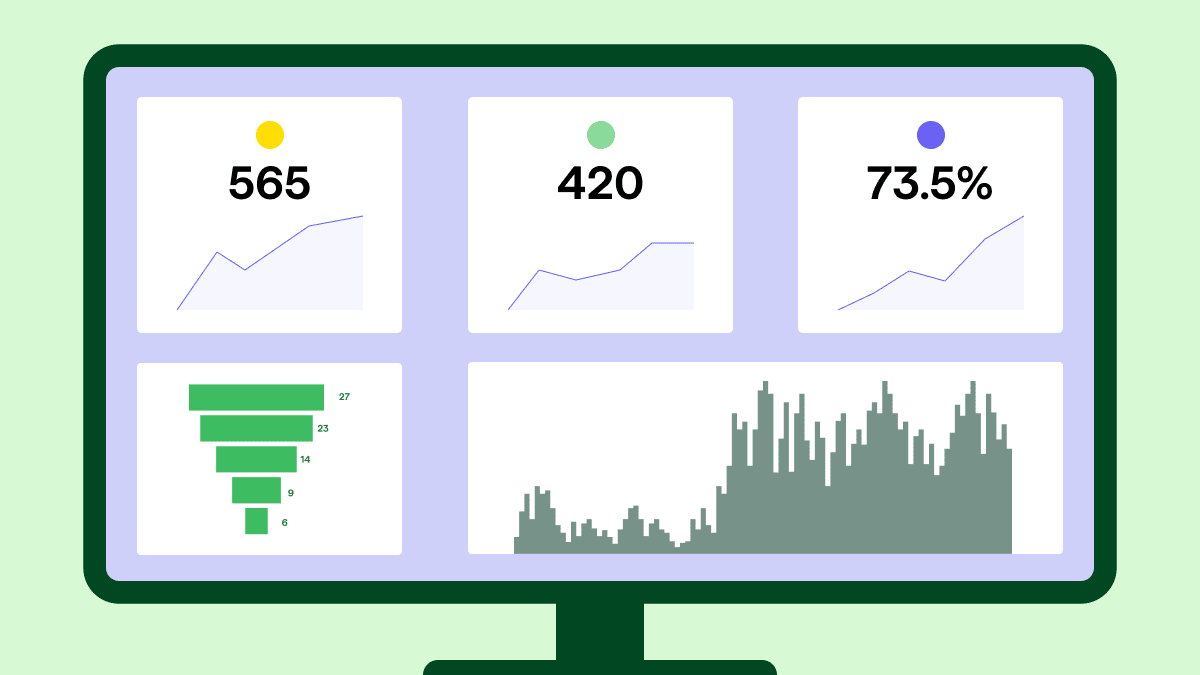
https://www-cms.pipedriveassets.com/Key-SaaS-reporting-metrics.png

The ultimate guide to SaaS reporting

How to use SaaS marketing metrics to guide strategy

Raw numbers are only useful if they translate into action. Tracking these metrics over time can reveal patterns that help marketing teams make better decisions.

For example, if CAC is increasing while CLV stays flat, it may signal a need to improve lead quality or tighten targeting. If MQLs are high but lead-to-customer conversion is low, that could point to misalignment between marketing content and sales readiness.

In B2B SaaS, where decision cycles often involve multiple stakeholders, understanding where drop-off occurs helps focus efforts on the most impactful improvements – whether it’s refining onboarding, improving nurture sequences or adjusting pricing.

Note: Industry data from Klipfolio shows that successful software companies often maintain a customer lifetime value to acquisition cost ratio between 3:1 and 5:1, reinforcing the importance of efficient marketing and long-term customer retention in SaaS growth.

Tracking metrics across the full customer lifecycle

SaaS growth doesn’t end at acquisition. Tracking metrics across onboarding, engagement and retention helps identify where customers succeed or struggle. Product adoption, feature usage and support ticket volume reveal opportunities to improve long-term value.

These insights help both marketing and product teams make informed decisions. If churn is high in a specific segment, it may point to gaps in onboarding or nurture flows. Lifecycle metrics add context to CAC and CLV, guiding strategies that drive sustained revenue, not just initial conversions.

Acting early on these signals, like starting feature-specific onboarding, changing messages or focusing on high-retention groups, can greatly boost customer lifetime value. Using lifecycle metrics to guide both product experience and marketing campaigns creates a feedback loop that improves performance at every stage.

When teams view these insights as tools for making decisions rather than just metrics for reporting, they discover actual opportunities for growth. As HawkSEM, a digital marketing agency, puts it: “The key metrics are more than just numbers on a dashboard. These are the vital tools that drive sustained business growth”.

Benchmarks for B2B SaaS marketing metrics

While exact benchmarks depend on product complexity, pricing model and customer segment, industry averages offer a valuable reference point for evaluating performance. These figures help teams assess whether their metrics are within a healthy range or require closer inspection.

  • CAC (Customer Acquisition Cost): B2B SaaS companies spend an average of $702 per customer, based on data from Adam Fard UX Agency. Higher costs often reflect longer decision cycles and more personalized sales efforts.

  • CLV:CAC ratio: A healthy range is typically between 3:1 and 5:1, according to the KPI guide from Klipfolio. The ratio signals sustainable growth and efficient use of marketing budget.

  • Lead-to-customer conversion rate: The average conversion rate for inbound leads falls between 5% and 10%, based on benchmarks from Userpilot. Lower rates may indicate poor lead quality or misalignment with sales readiness.

  • Churn rate: A churn rate of under 5% annually is considered strong for B2B SaaS, according to Callin’s benchmark report. Higher churn may indicate friction in onboarding, support or long-term engagement.

  • Website conversion rate: B2B SaaS websites typically convert at 2% to 5%, depending on traffic source and on-page performance, as reported by Lean Labs.

These guidelines may not fit every case, but they can help measure marketing success. Finding issues early lets SaaS teams use data to make better choices. They can change their message, improve lead quality or move resources around based on what the data shows.

Recommended reading
https://www-cms.pipedriveassets.com/B2B-customer-acquisition-tactics-tools-and-metrics.png

9 B2B customer acquisition strategies to try in 2025

Metrics that align marketing with sales

Effective SaaS marketing aligns closely with sales by focusing on measurable outcomes. When both teams track the right metrics, it’s easier to stay coordinated and work toward shared goals.

Lead scoring models based on engagement and company characteristics help prioritize MQLs. Monitoring lead velocity rate, which measures how quickly leads move through the funnel, provides insight into pipeline health. Reporting on influenced revenue or multi-touch attribution connects marketing efforts directly to closed deals.

With the right metrics, marketing becomes a true partner to sales – not just a source of leads. Shared data helps both teams refine targeting, improve handoffs and keep messaging consistent. Shared visibility makes collaboration easier, improves forecasting and creates a smoother path from lead to customer.

Using metrics to justify marketing spend

In competitive SaaS markets, justifying marketing investment requires more than lead volume. Leadership teams want to see how spend translates to revenue, retention and pipeline health. Connecting metrics like CAC, payback period and influenced revenue helps demonstrate marketing’s contribution to growth.

Tools that connect campaign performance to sales outcomes make conversations with stakeholders more productive. Marketers can clearly demonstrate the impact of specific channels or tactics, helping justify spend and align future budgets with business objectives.

Reporting tools that link campaign performance to closed deals make this process more efficient. Rather than relying on surface-level engagement metrics, marketers can present clear, outcome-driven data that supports budget conversations and validates ongoing investment.

Leveraging artificial intelligence to improve SaaS marketing performance

Artificial intelligence (AI) is reshaping how SaaS marketers operate. It enables faster data analysis, more accurate predictions and smarter automation. By processing large volumes of data quickly, AI helps teams identify high-quality leads, optimize channel performance and allocate budget more effectively.

Pipedrive utilizes AI capabilities to improve decision-making throughout the entire sales process. The integration of features such as intelligent contact recommendations, automatic deal updates and predictive lead scoring provides immediate direction to marketing and sales staff.

As AI becomes more embedded in marketing workflows, platforms like Pipedrive help SaaS teams stay agile – adapting faster, scaling smarter and focusing on the strategies that deliver the strongest results.

Recommended reading

https://www-cms.pipedriveassets.com/AI-Tools-for-startup.png

9 AI tools for startups: which AI tools are worth it in 2025?

Common mistakes in SaaS marketing measurement

One mistake often seen in SaaS marketing is placing excessive emphasis on drawing in initial traffic without considering the overall impact. Relying solely on metrics such as website visits or impressions can be misleading, as they don’t provide a complete picture of customer conversions.

Another error is failing to differentiate between vanity metrics and actionable ones. While an increase in leads may seem beneficial, if they don’t align with the ideal customer profile, they could hinder growth instead of promoting it.

Using disconnected tools or inconsistent metric definitions often leads to reporting gaps. To generate reliable insights, teams need a shared understanding of what each metric means, where the data comes from and how it supports business goals.

Why Pipedrive supports smarter marketing decisions

Pipedrive helps B2B SaaS teams connect marketing performance directly to pipeline outcomes. Its visual pipelines make it easy to track lead progression and identify funnel bottlenecks.

The tool is simple to use, with drag-and-drop functionality, customizable stages and a built-in lead generation dashboard. Marketers can easily track where leads are coming from and how they’re moving through the funnel.

The platform also integrates with more than 500 key marketing and analytics tools, including email platforms, ad channels and reporting systems. These integrations ensure that campaign data is captured and connected to deal outcomes, giving teams a complete view of what’s driving growth.

As strategies evolve, Pipedrive offers the flexibility to adjust KPIs while keeping reports consistent, supporting fast decision-making and alignment between marketing and sales.

Final thoughts

SaaS marketing metrics aren’t just about dashboards, they’re about improving decisions. The right metrics help B2B SaaS teams focus on what works, cut waste and build a system that supports sustainable growth.

Whether optimizing CAC, improving conversion rates or aligning with sales, tracking key SaaS marketing metrics ensures marketing efforts stay connected to business impact. With a platform like Pipedrive in place, teams can move faster, stay focused and measure what matters most.

Product Manual Guide | Product Manual and Instructions

Software Stack Editor · July 23, 2025 ·

A well-written product manual can turn a new customer into a confident, loyal user. Whether it’s a printed guide or a digital help center, strong documentation reduces confusion, cuts support costs and adds value to every product.

The product manual guide is designed for product teams, technical writers and others responsible for product documentation. It covers the essentials of writing clear product instructions that meet user expectations and brand standards.

What is a product manual?

A product manual is a document that provides essential information about how a product works, how to assemble or use it and how to maintain it. It typically includes product features, safety warnings, step-by-step instructions, troubleshooting tips and contact information for support.

Product manuals are common across consumer electronics, home appliances, software, machinery and many other categories. They’re designed to help users feel confident and informed, reducing frustration, returns and support requests.

Product manuals serve several key functions:

  • Improve usability by guiding the customer through product features

  • Reduce customer support calls by providing self-service information

  • Ensure safe and correct usage

  • Strengthen the brand by delivering a clear and helpful experience

Whether it’s an appliance, a piece of software or a B2B platform, clear product instructions help users quickly realize value by removing confusion and making onboarding easier. The result is higher satisfaction, which directly supports retention, referrals and repeat sales.

Types of product manuals

Not all product manuals are created equal. Depending on the product and audience, different formats are more effective. Here are a few of the most common types:

Type

Description

User manuals

Help end users understand how to operate and troubleshoot the product.

Installation guides

Provide step-by-step instructions for setup and initial configuration.

Maintenance manuals

Outline care schedules, regular checks or updates.

Quick-start guides

Offer condensed directions for getting started fast.

Service manuals

Intended for technicians, with detailed repair or component info.

Each type of manual should match the knowledge level and goals of the reader. For example, a technician may need detailed schematics, while a first-time user needs a simple onboarding checklist.

Recommended reading

https://www-cms.pipedriveassets.com/Product-Guides.png

Creating product guides for beginners: how to engage customers

Key components of a good product manual

A good product manual includes several key elements. It should start with a table of contents to help readers navigate the document. A clear product overview is also essential to provide context and describe the product’s main functions.

The manual should guide users through setup, including assembly and installation. It should also explain operating procedures to help users understand how to use the product’s key features. A troubleshooting section is necessary to address common issues and provide resolutions.

To ensure the product’s longevity, the manual should include maintenance guidelines. Safety and compliance information is also crucial to prevent misuse. The manual should provide support contacts or links to direct users to additional resources.

Visual aids like diagrams and screenshots can enhance clarity, especially for complex products. They can help illustrate key concepts and make the manual more user-friendly. Effective visuals can be particularly helpful in multilingual contexts.

Writing product instructions: best practices

Product instructions that are successful are easy to understand, brief and can be put into action. To accomplish this, it is necessary to utilize simple language that does not include technical terms or specialized language, unless the intended audience is familiar with them.

Breaking content into short sections and using bulleted lists or numbered steps can enhance readability. Incorporating visuals like annotated images or videos can also help users.

Writing with the user’s intent in mind is vital. Testing the manual with real users can help identify unclear instructions. A well-crafted manual anticipates potential user mistakes and provides support before confusion arises.

According to Julie Dirksen, “Learning experiences are like journeys. The journey starts where the learning is now and ends when the learner is successful. The end of the journey isn’t knowing more, it’s doing more.”

Implementing this principle ensures manuals are not only informative, but also encourage users to take action.

Recommended reading

https://www-cms.pipedriveassets.com/Content-Marketing-Guide.png

Content marketing guide: strategy framework for business growth

Product manual content types

Various types of products require specific content formats to adequately assist users in comprehending them. For example, text-based PDFs or printed manuals are most suitable for long-lasting products, situations where legal adherence is necessary or in offline scenarios.

Online help centers or knowledge bases are well-suited for SaaS products or frequently updated content. Interactive onboarding is particularly useful for software users, as it allows them to engage with tutorials in real time.

Other formats, such as video guides, are well-suited for quick-start content and product assembly. Tooltips and in-app support are beneficial for apps that evolve rapidly or require contextual help.

Adopting a digital-first approach for documentation provides several benefits, such as improved version tracking, data analysis and simplified localization. The method allows for more streamlined handling and upkeep of product documentation.

Organizing manuals across teams

Product instructions aren’t just useful after sales. Manuals can also support the sales process by demonstrating ease of use, technical capabilities or regulatory compliance.

Sales teams rely on product documentation throughout the entire customer journey. In pre-sales conversations, sales reps use manuals and technical guides to address complex questions and demonstrate product knowledge.

After the sale, the same documentation supports onboarding by helping customers understand key features and setup steps. It also serves as a reference point for long-term success. Internally, product guides can be used to train new hires or reseller partners.

Don’t find customers for your products, find products for your customers.

Aligning product documentation with the sales team ensures consistency in messaging. When content reflects real customer needs and stays up to date, it strengthens early engagement. Clear, structured documentation doesn’t just inform – it helps close deals.

Updating and maintaining product instructions

Product instructions must evolve over time. Feature changes, hardware revisions or updated safety protocols require manuals to be kept up to date.

To manage this, consider the following steps:

  1. Establish version control: Track changes and maintain dated records of updates. Doing so helps ensure that all stakeholders have access to the most current information.

  2. Use changelogs: Highlight new updates and provide a summary of changes made. Changelogs serve as a quick reference for users to understand what has changed in the latest version.

  3. Collect feedback: Gather insights from both users and support staff to identify areas for improvement. The feedback loop is essential for refining the manual and making it more user-friendly.

  4. Monitor metrics: Track support ticket volumes to pinpoint recurring questions and assess the manual’s effectiveness. Analyzing these metrics helps identify knowledge gaps and areas for improvement.

  5. Conduct regular reviews: Review manuals quarterly or at each product iteration to ensure they remain relevant. Regular reviews provide an opportunity to update the manual to reflect any changes in the product or its usage.

For companies scaling across regions, localization should also be built into the workflow, which includes translating content and adapting diagrams or icons where needed.

Measuring the impact of a product manual

Effective documentation reduces confusion and sets clear expectations, which can lead to smoother customer experiences and stronger relationships. Teams can evaluate their progress by keeping tabs on the following key performance indicator (KPI):

Key performance indicator

Description

Support ticket reduction

Reducing support tickets lowers costs and improves customer satisfaction, leading to increased loyalty and potential for repeat business.

Effective documentation resolves issues quickly, reducing frustration and abandonment.

Product return rates

Clear setup instructions lower return rates, maintain a positive brand reputation and encourage future purchases.

Lower return rates also reduce associated costs.

Time to first use

Quick onboarding leads to higher customer satisfaction and increased likelihood of long-term use.

A smooth onboarding experience helps build early customer confidence, often resulting in stronger reviews and word-of-mouth recommendations.

Content engagement

High engagement indicates customer interest and potential for future sales. It also presents opportunities for upselling or cross-selling relevant products or services.

Net promoter score (NPS) or customer feedback

Positive feedback indicates high customer satisfaction, driving retention and repeat business.

Identifying areas for improvement enables targeted enhancements to products and services.

Effective product manuals support sales by improving customer satisfaction and reducing helpdesk requests. Clear documentation helps users confidently use the product, boosting loyalty. Fewer issues also protect the brand and contribute to long-term growth.

Note: Product-led onboarding amplifies this effect by reducing time-to-value and increasing adoption through in-product guidance. According to Pendo, companies in 2021 saw a 70% increase in usage, 90% more team activation and double the trial-to-paid conversion rate.

Why Pipedrive can support your product manual strategy

Customer relationship management (CRM) tools like Pipedrive can enhance documentation and content strategies by enabling teams to embed product manual links, onboarding flows or knowledge base content into automated communications. It enables more personalized support at every stage of the customer journey, improving engagement and satisfaction.

Pipedrive supports this integration through workflow automation and custom fields. Teams can trigger product instructions automatically after a deal closes and track documentation status directly within contact or deal records.

Pipedrive’s campaign tracking and shared resources help support customer success. Campaign tracking measures how content influences conversions or reduces support tickets, while shared resources give teams quick access to up-to-date manuals.

Using Pipedrive’s features, businesses can align every customer touchpoint with consistent, up-to-date product information. Doing so improves coordination across teams and positions documentation as a central part of customer success. As a result, customer satisfaction increases and support queries decline.

Final thoughts

A product manual is more than a formality. It’s a key customer touchpoint and a reflection of your brand. A well-designed manual can increase adoption, reduce frustration and build loyalty.

As this product manual guide highlights, clarity, consistency and collaboration are key. Whether creating a new manual or refining an existing one, start by understanding your users’ needs and how to support their success.

With the right tools, workflows and mindset, product manuals become a growth asset. Integrating CRM platforms like Pipedrive into your documentation and onboarding efforts, your business can align sales, support and content – turning guidance into measurable outcomes.

Free Basic Customer Information Sheet Template for SMBs

Software Stack Editor · July 22, 2025 ·

Sales professionals thrive when they can access customer information quickly. With the right data at your fingertips, you can focus on conversations with prospects instead of hunting for details.

A basic customer information sheet organizes everything you need to know to build stronger client relationships.

This article provides a free customer information sheet template to get you started. You’ll also learn what specific buyer details you should collect to help your small business sell more effectively.

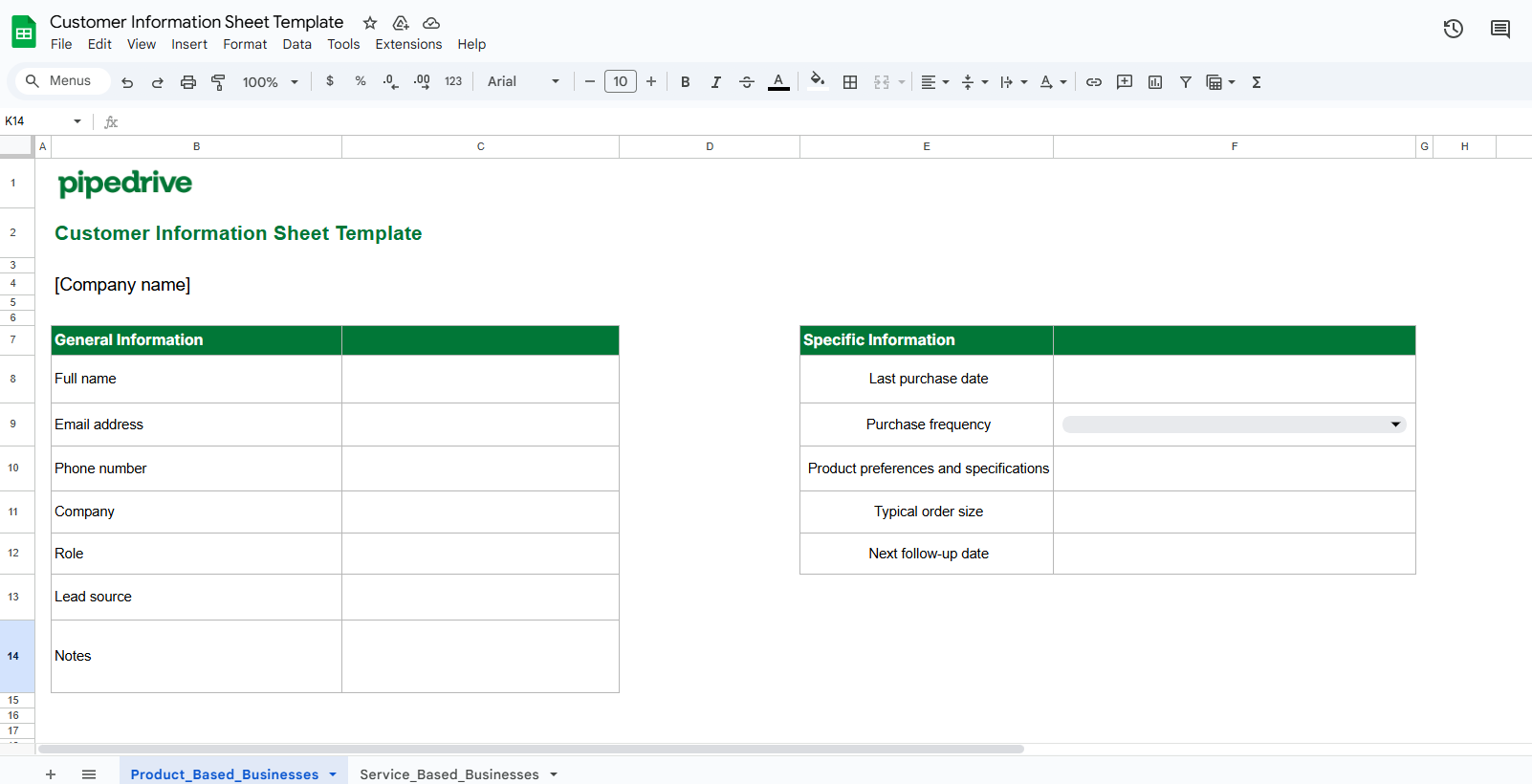
Download Pipedrive’s free basic customer information sheet template

Pipedrive’s customer information sheet template helps you obtain and manage the data you need during client onboarding.

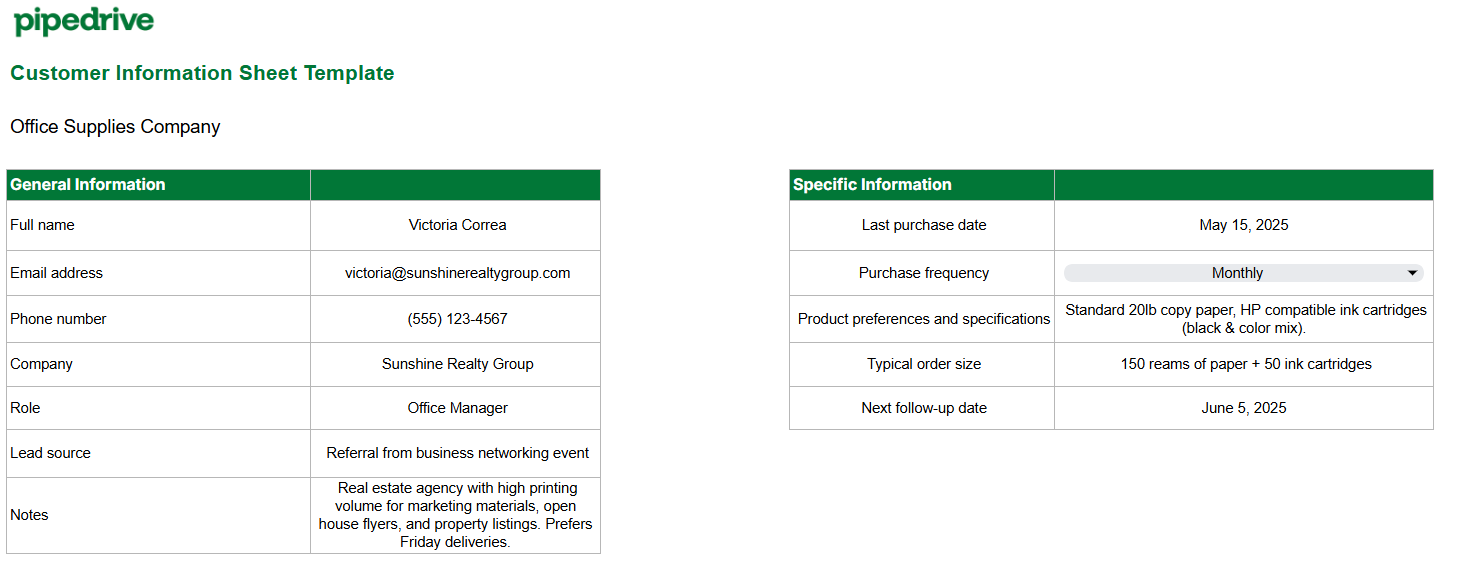
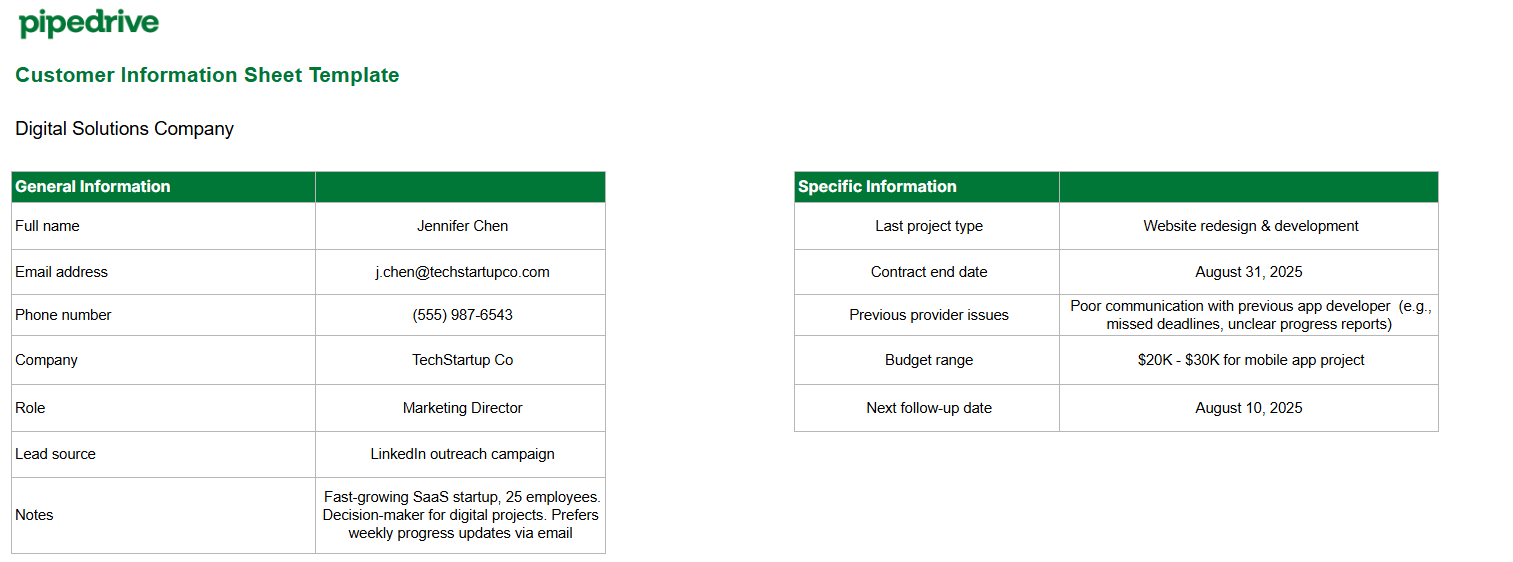
You’ll get two ready-to-use Excel sheets designed for your small business type:

  1. For product-based entities (who need buying patterns and inventory details)

  2. For service-based companies (who focus on timelines and client requirements)

These customer information sheets include pre-built columns featuring essential buyer data. Use the template as a guide to determine exactly what details to collect from your customer base.

Start organizing your audience data using Pipedrive’s free template.

Get your template

What is a customer information sheet?

A customer information sheet is a document for capturing, organizing and storing specific information about each client you do business with.

customer information sheet pipedrive excel template

You can record key data such as:

This information helps you remember what matters to your customers so you can provide better service and nurture relationships.

Customer information sheets are particularly valuable in B2B sales, with their typically longer sales cycles.

For example, if Mark from Tech Solutions calls for new laptops, you already know he prefers Dell models and orders in bulk quantities of 10 or more.

Note: A customer information sheet goes way beyond a basic client list. Contact lists only store names and phone numbers. Your information sheet captures key context that helps you know what each customer wants.

Why do you need a customer information sheet?

A customer information sheet acts as a repository for all your customer data, which is especially handy for small businesses with limited resources. Instead of wasting time going through email chains or notes, you find what you need whenever you need it.

Sales conversations happen everywhere via video calls, phone calls, in-person meetings, sales emails or text messages. With a centralized data system, small and medium-sized businesses (SMBs) don’t risk losing or forgetting valuable insights.

Organized SMB customer data helps business owners:

Here’s how each of these benefits works in practice.

1. Increase sales through a personalized approach

Personalized pitches have the potential to turn more prospects into buyers. Your customer data sheet gives you the information you need for a compelling sales pitch that lands successful deals.

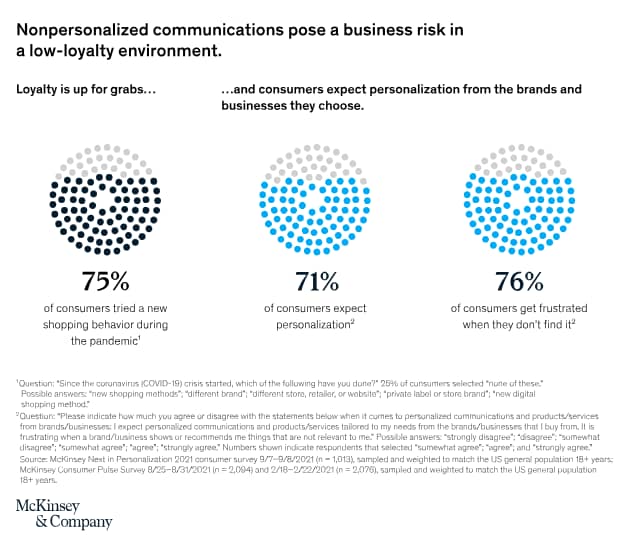
According to McKinsey, 71% of customers expect personalized experiences and 76% get frustrated when they don’t get them.

customer information sheet personalization importance

A customer information sheet helps you address a purchaser’s specific situation with relevant solutions.

For example, instead of broad statements like “our software helps”, you can say “based on your team size and inventory challenges, our software can cut your processing time by three hours daily”.

This tailored approach allows you to meet real audience pain points rather than just pitch features.

Download Your Guide to Preventing 5 Common Sales Mistakes

Always say the right thing with this guide to avoiding the frequently-made sales conversation mistakes.

2. Boost customer retention and repeat business

When you anticipate changing needs, buyers feel valued and stay around longer. In SMB sales, your customer information sheet isn’t a set-it-and-forget-it document. Salespeople must update it whenever customer preferences or service agreements change to ensure the data remains relevant and effective.

Accurate records keep you current with their evolving requirements and challenges. You’ll know when they:

This knowledge helps you stay ahead of issues before they become customer complaints.

On the other hand, outdated information means you’ll pitch the wrong solutions at the wrong time. For example, you offer a basic plan when your client has scaled and needs enterprise features.

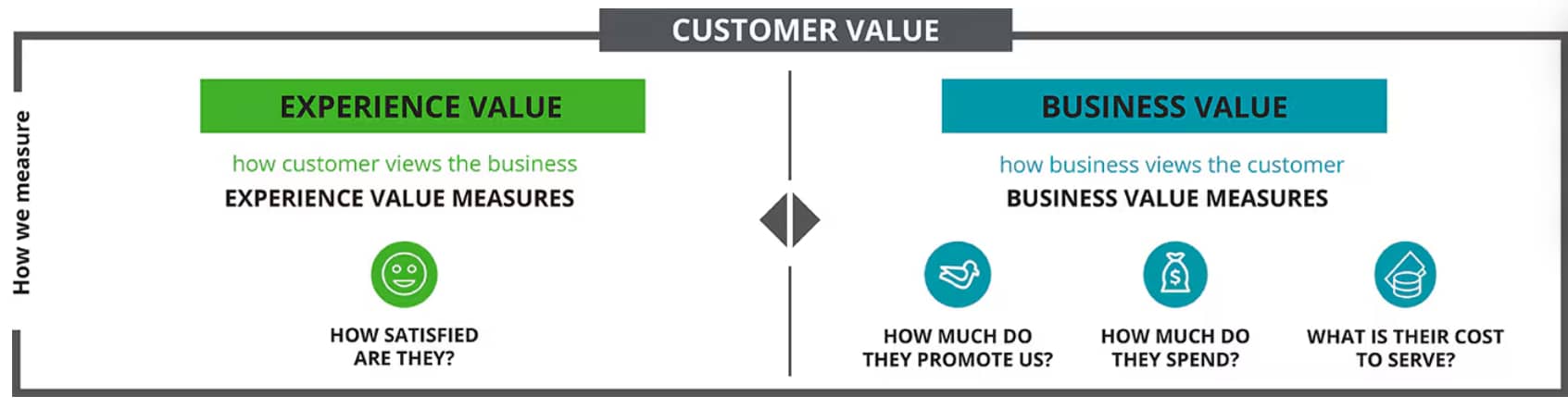
Fresh information creates real, measurable customer lifetime value. By understanding the context and suggesting relevant solutions, you improve customer satisfaction. Happy clients spend more, refer others and cost less to serve.

Successful relationships work both ways. Customers experience your service while you experience their business value.

customer information sheet customer value

For instance, if a client’s company is expanding next quarter, proactively reach out and offer solutions for their bigger workforce. If you provide CRM software, offer training for their new team members.

Users will feel supported rather than forgotten, improving customer retention.

3. Enhance upselling and cross-selling success

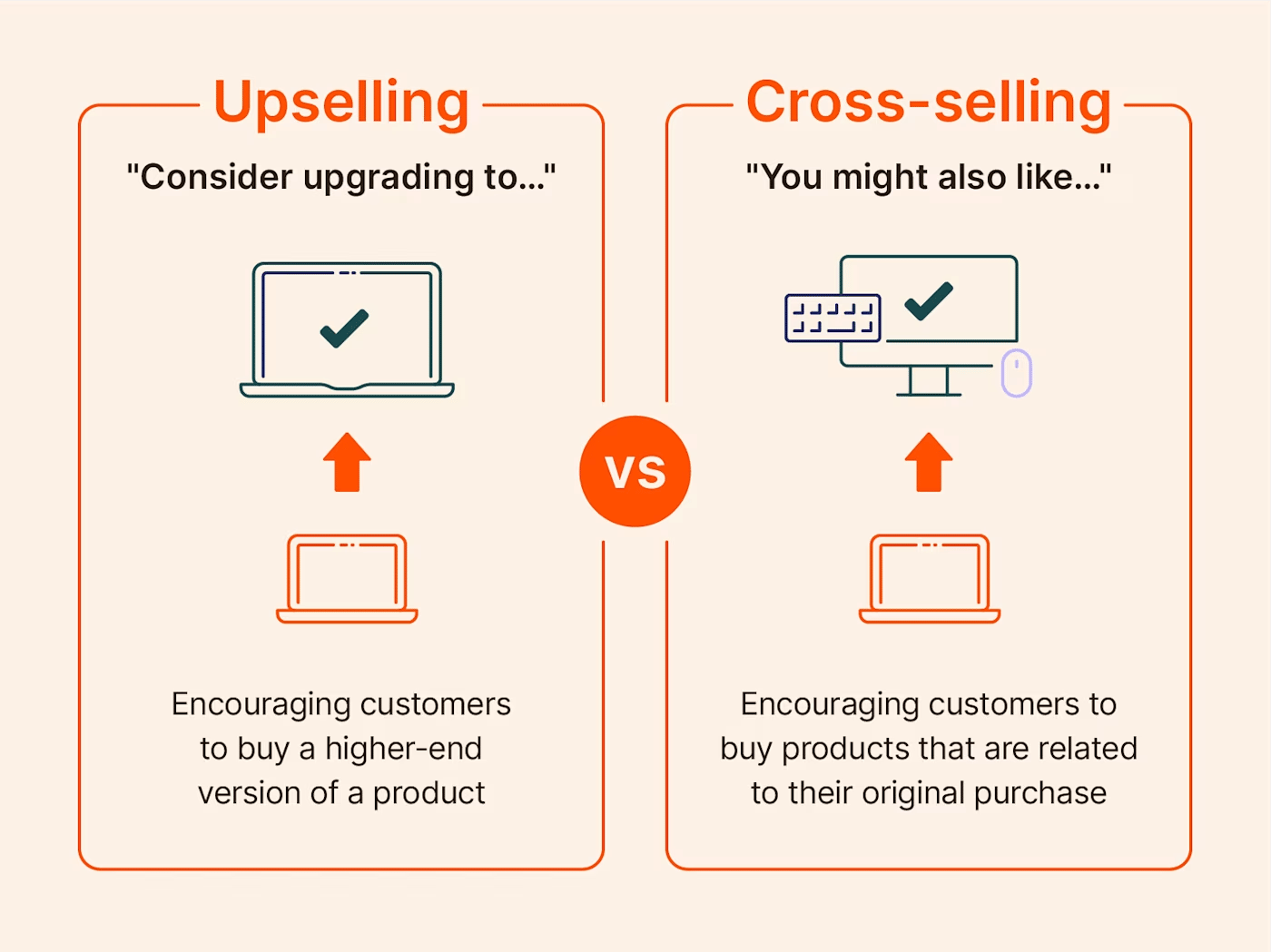
The right timing creates easy upsell or cross-sell wins. Your customer information sheet reveals two types of sales opportunities for your business:

  1. If there’s a better solution for their changing needs (upselling)

  2. What other products/services would benefit them right now (cross-selling)

customer information sheet sales options

Existing customers trust you, so they’re easier to sell to than cold prospects. Keeping your customer information sheet up to date shows you exactly who to approach with relevant sales offers and when.

In sales, timing often matters more than product fit. By tracking contract renewal dates or business expansion phases, you can create natural conversation starters for deals.

Suppose your notes show that a retail client is expanding to three locations. They already trust you and have a clear need, so now’s the right time to pitch inventory management add-ons to track stock across all stores.

Recommended reading

https://www-cms.pipedriveassets.com/blog-assets/sales-negotiation.png

Sales negotiation training, skills and strategies to win more deals

What customer information should you collect?

Collect information that reveals buying signals and decision-making patterns to help you convert. Every data point should have a key purpose: to move prospects through your sales pipeline or improve customer relationships.

If a data point doesn’t help you sell or enhance your customer service, consider whether you should collect it at all.

Essentially, you need to know:

  • Who influences purchases in a B2B setting

  • What situations trigger buying decisions

  • How customers prefer to communicate with you

The details you should store depend on your business model and sales process. A web designer monitors project deadlines and identifies decision-makers, while a furniture seller must document delivery dates and room dimensions.

Here’s what every small company should track to keep its customers top of mind.

Essential customer information every business needs

With this information, you qualify leads and track which marketing efforts work. You need these critical details to contact clients successfully, know their context at all times and ensure you’re talking to the right person.

Contact details

  • Client name

  • Email address

  • Phone number

  • Mailing address (optional)

  • Demographic data (optional)

Business information

  • Company name

  • Job title

  • Department

  • Company size

  • Industry

Communication preferences

  • Email

  • Phone calls

  • Text

  • Video calls

Lead source

How they found you or heard about your business (e.g., social media, organic traffic, referral, etc.)

Decision-making role

Are they the buyer persona, influencer or end user?

You can compile most of this information at the first touchpoint (e.g., online forms, questionnaires or lead magnets).

Avoid overwhelming prospects with long forms upfront. Start with short forms that only ask for the basics, like names and emails, then get more details over time using progressive intake forms in stages.

Once someone submits their initial info, onboard them through an email campaign that shares helpful content and builds trust. If they show further interest by engaging with your emails (e.g., clicking, replying or requesting more info), schedule a discovery call.

Gather additional customer information by weaving sales discovery questions naturally into the conversation, such as “What’s the best way to reach you for updates?”.

With these details, you’ll know how to move forward with each prospect. Follow up using their preferred communication method, include the right decision-makers in your proposals and structure your next steps around their specific business context.

Tip: Form length matters, but context matters more. A short-form template converts well because it’s simple, while longer forms convert better when prospects have high interest. The key is matching form length to prospect motivation.

Customer information for product-based businesses

For product-based businesses, you need details that reveal buying patterns and preferences. The following data points cover when customers will reorder, what they’ll want next and how much they typically buy.

Product information

What to collect and why

Purchase history and buying frequency

What: Items they bought, when they bought them and how often they reorder.

Why: Purchasing patterns help you understand your customers’ buying cycle. You can then follow up when they’re ready to shop again.

Product preferences and specifications

What: Preferred size, colors or technical requirements.

Why: Having documented preferences makes the next sale frictionless for you and the customer. You won’t need to ask the same specification questions, and buyers will feel heard.

Seasonal buying patterns

What: Peak ordering months, slow periods or seasonal product needs.

Why: Seasonal data collection helps you reach out proactively before your customers’ busy periods.

Inventory or volume needs

What: Storage capacity or typical order quantities.

Why: Knowing customers’ constraints helps you suggest bulk discounts or delivery schedules that work with their cash flow and space limitations.

Leverage two key stages of your sales process to collect the data: discovery calls and post-sales interactions.

Schedule discovery calls to learn preferences and ask about seasonal patterns. Prospects already discuss their business needs during calls, so go ahead and ask about specific volume requirements.

Post-sales interactions like order confirmations allow you to capture extra insights. For example, “When do they typically reorder?” or “What’s their usual order size?”. These patterns help you time your follow-up emails and suggest the right quantities.

In your client information sheet template, you can check the “Next follow-up date” to focus on the customers you need to reach out to.

customer information sheet pipedrive product sheet

Start each day by checking who’s due for contact. For example, when you see a real estate company’s monthly office supply order coming up, you already know they typically order 150 reams of paper and 50 ink cartridges.

You can then send a short email or use their preferred communication method:

“Subject: Your monthly office supply order

Hi [Name],

I hope you’re doing well. Your monthly office supply order is usually due around this time. You typically need 150 reams of paper and 50 ink cartridges.

Has your printing volume changed with more digital listings, or are you still printing lots of flyers for open houses?

Let me know what you need and I can have everything delivered by Friday.

Best, [Your name]”

You’re no longer making cold calls, but informed, value-driven conversations that close deals faster. Your customers feel understood, and you hit your sales quota.

Customer information for service-based businesses

For service-based businesses, you need client details that show project requirements and service preferences.

Understand your clients’ project planning processes and approval workflows. Whether you provide consulting, ongoing services or project-based work, your success depends on knowing when they set up projects and what specific outcomes they expect.

Service information

What to collect and why

Project scope and requirements

What: Specific deliverables, project goals and success metrics they need.

Why: Documenting project details helps you create accurate sales proposals and avoid scope creep. Moreover, future projects become easier to estimate and price correctly.

Contract start/end dates and payment terms

What: Project timelines, payment schedules and contract renewal dates.

Why: Tracking contract cycles helps you plan follow-up timing and identify renewal opportunities.

Previous service providers and experiences

What: Who they worked with before, what went well and what frustrated them.

Why: Understanding their past experiences helps you position your services better and avoid previous providers’ mistakes. You’ll know their pain points upfront.

Future project plans

What: Upcoming initiatives, planned budgets and project timelines they’re considering.

Why: Knowing their plans helps you stay top-of-mind for upcoming work. You can proactively propose solutions before they start looking for providers.

Use discovery calls and client information forms to gather data on project requirements, previous provider experiences and future plans. Ask about contract terms, timelines and budget approval processes during proposal discussions.

Moving forward, update your client data after every project interaction. Tap into project kick-offs, milestone check-ins and project wrap-ups to capture extra insights.

Service businesses thrive on relationship timing. Check your client information template regularly to identify clients whose contracts are ending soon or who mentioned upcoming projects.

Say your new client’s website project finishes the last week of August. Your sheet shows they’re planning mobile app development and had communication issues with their previous developer.

customer information sheet pipedrive services sheet

Reach out before your current project is completed. Reference your client’s upcoming mobile project and position yourself as the solution to their past frustrations with poor communication.

With this tactic, you secure future projects before competitors even know they’re available. Clients see you as their go-to partner, not just another service provider.

Recommended reading

https://www-cms.pipedriveassets.com/CRM-data-entry-best-practices-for-SMBs.png

Why CRM data entry matters (and 5 tips to make it easier)

How to use Pipedrive to manage customer information

With Pipedrive’s customer relationship management (CRM) solution, you can manage both your customer database and sales pipeline stages.

Besides organizing your contacts’ information, Pipedrive also connects it directly to your sales deals. You can see all your customer interactions, conversations and deal progress in one place.

Here’s how Pipedrive helps you streamline and apply customer information more effectively.

Contacts (people and organizations)

Pipedrive allows you to organize all your client profiles in the contact list based on two types:

  1. People – specific customers or client contacts you sell to directly

  2. Organizations – companies where multiple contacts work

This structure helps you track both individual decision-makers and the companies they work for.

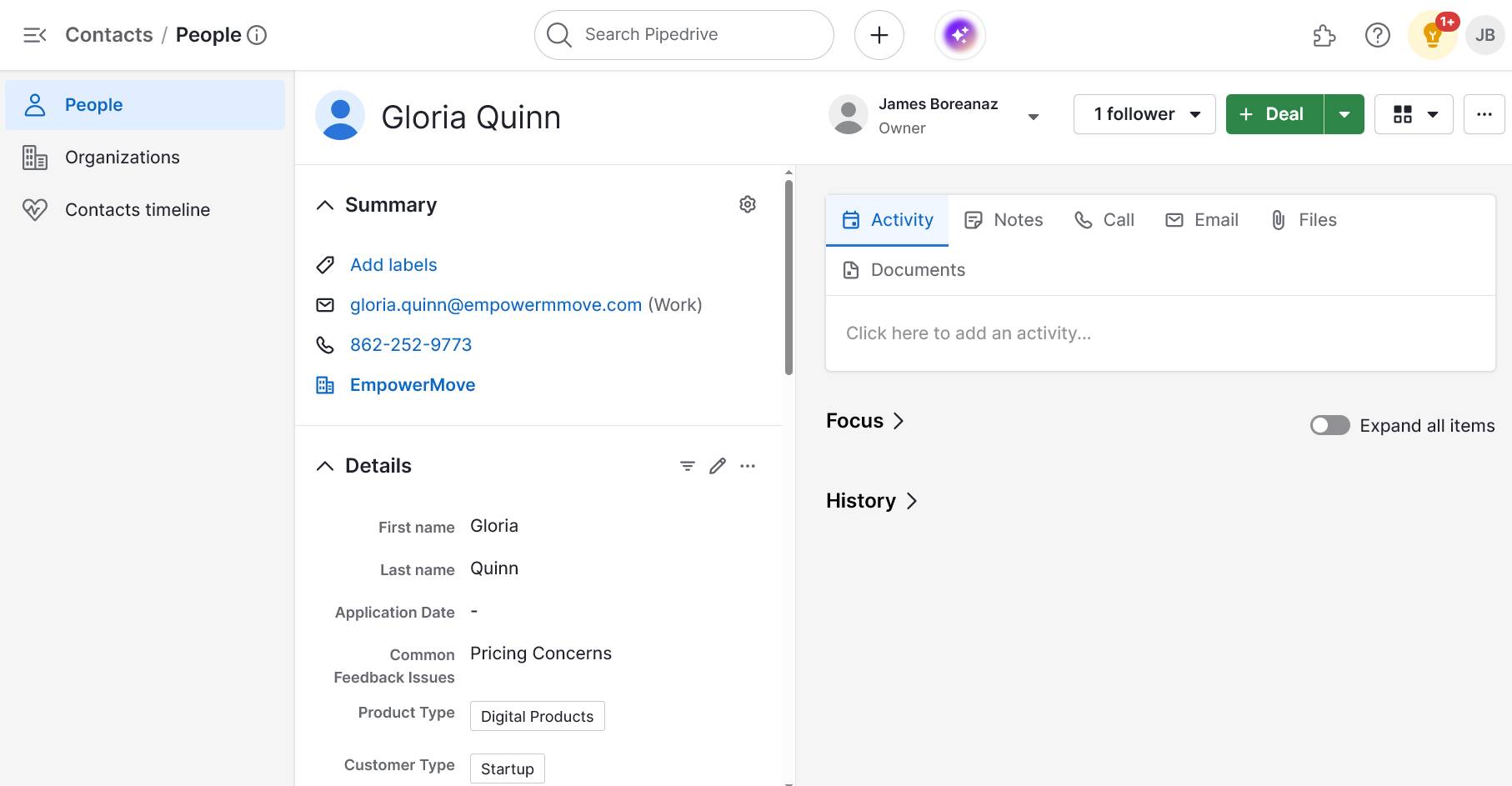
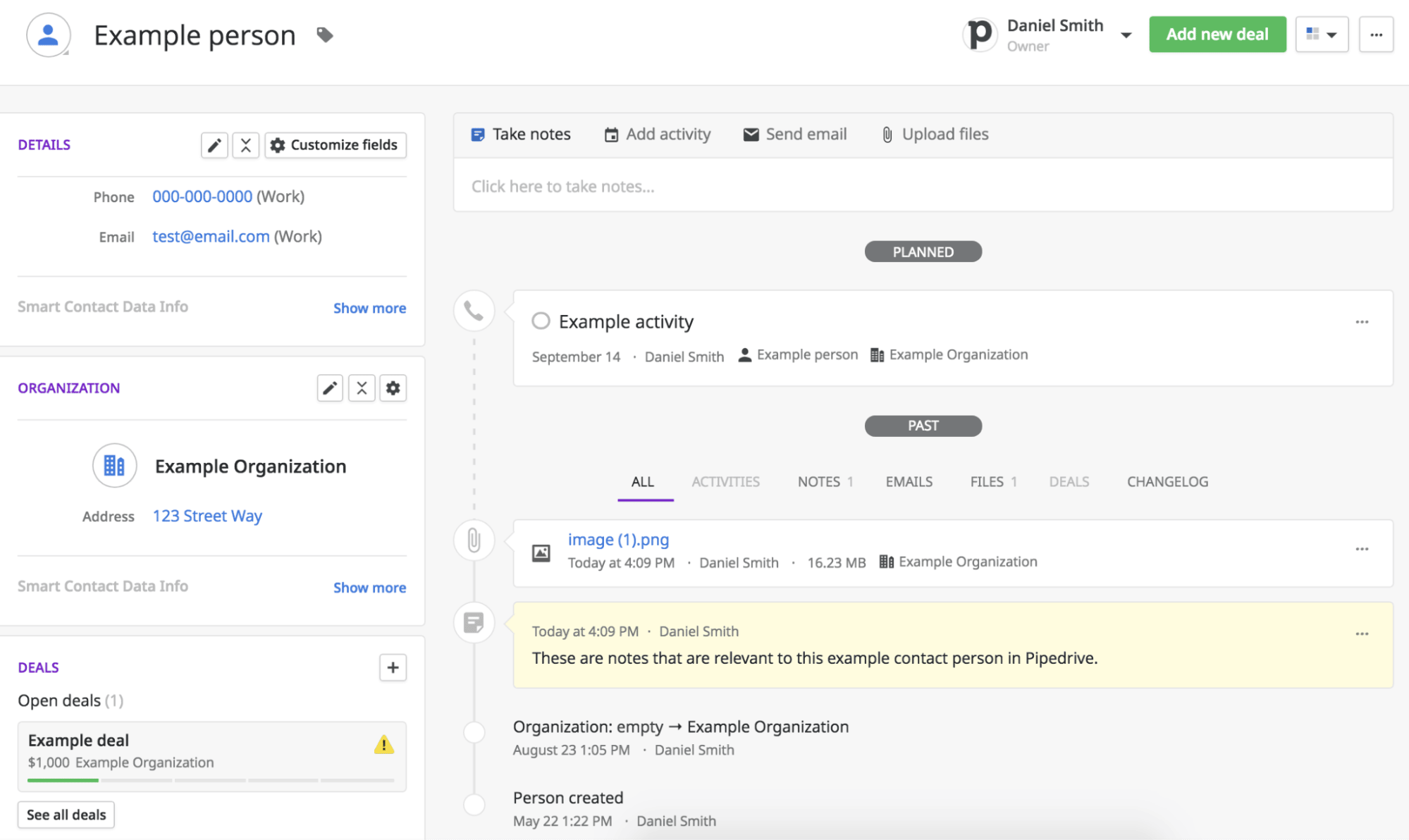
In the detail view of a person, you can check all of the information you’ve saved from a customer (e.g., name, email, phone number, etc.), plus get a complete history of your interactions. The data includes:

  • Calls and emails (history of every communication)

  • Notes (specifications, preferences or project requirements)

  • Attached files (contracts, proposals or product docs)

  • Scheduled activities (meetings, next steps or follow-up reminders)

customer information sheet pipedrive detail view

Unlike basic sheets, where you update old information manually, Pipedrive saves every interaction and change automatically. You can see how customer needs have evolved and which sales tactics have worked in the past.

Custom fields

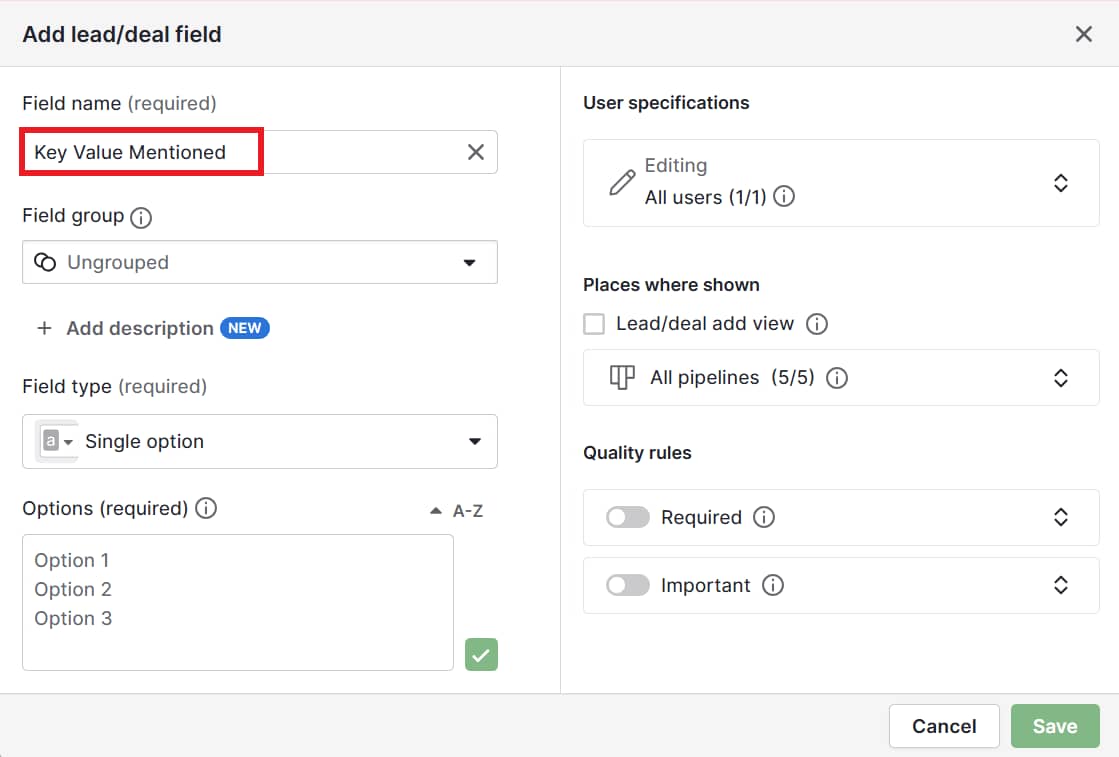
Pipedrive’s CRM adapts to your sales process instead of forcing you to change how you work. When you enter a new contact, Pipedrive already has default fields, such as name and email. You can also create custom fields that match the information you want to collect.

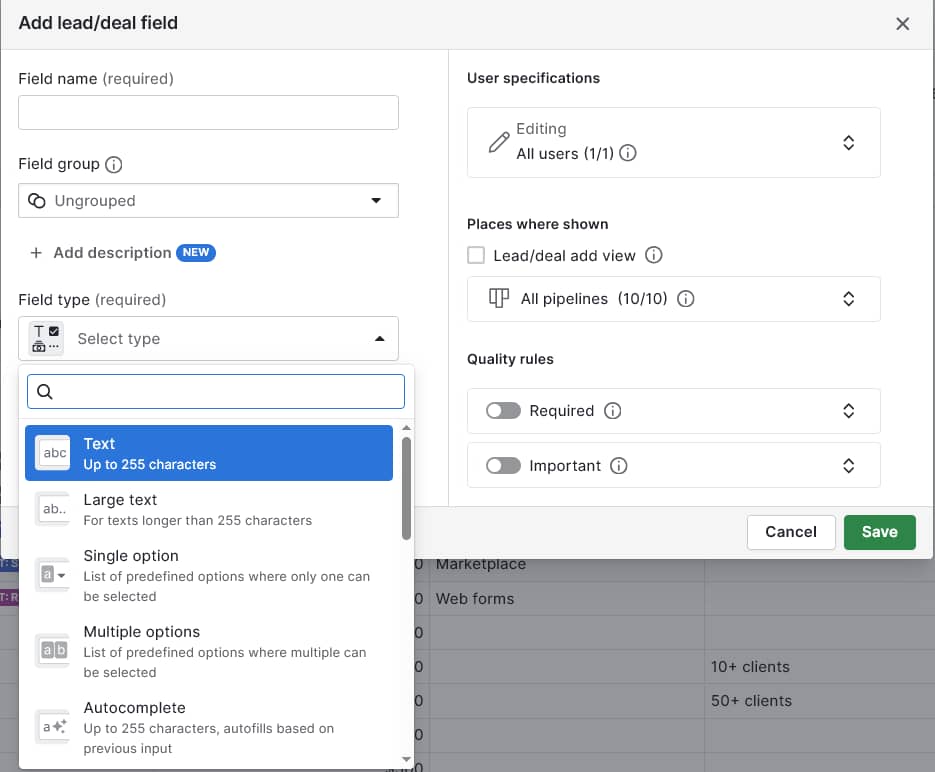
You can add four types of custom fields:

  1. Text fields for open-ended information (up to 255 characters)

  2. Long text fields (more than 255 characters)

  3. Single option fields for drop-down selections

  4. Multiple option fields for checkbox lists

customer information sheet pipedrive custom fields

When creating custom fields, you control where they appear and whether they’re required. Fields can show in your deal pipeline, contact detail view or both. You decide if team members must fill them out for new contacts.

Customer information sheet FAQs

  • It depends on where prospects are in your sales process. Follow these guidelines:

    • For initial contact forms, just get contact details to start conversations

    • For discovery calls, ask for business details and requirements

    • For proposal stages, gather specific preferences and technical needs

    • For evaluation stages, ask complex questions

    Your prospect’s motivation can also be a factor. High-interest prospects will typically fill out longer forms.

  • Respect a buyer’s decision and focus on the information they’re comfortable sharing. You can explain how providing more information would help you recommend the right solutions faster.

    However, don’t pressure prospects for information. Trust builds over time, and they’ll share more as the relationship strengthens.

  • Record-keeping should happen immediately after every sales interaction while details are fresh. Outdated information leads to missed opportunities.

    Create a schedule to check on customers, e.g., monthly on active contacts and annually for inactive ones.

  • Customer information sheets are simple, immediate solutions for organizing basic data. A CRM like Pipedrive helps you manage customer relationships throughout the entire sales cycle, from lead generation to post-sale follow-up.

  • Upgrade when tracking customer interaction history becomes unmanageable in spreadsheets.

    If you’re struggling to manually record all calls, emails and meetings or can’t recall conversation details from months ago, it’s time for a CRM.

Final thoughts

Stop losing track of customers’ essential details in messy notes and old emails. The right customer information sheet helps you provide a better buyer experience, close more deals (including with existing contacts) and maintain strong relationships.

When you’re ready to upgrade, Pipedrive automatically saves all your call and email history. It keeps contacts organized, so your customer data seamlessly syncs with your sales process.

Data Flow Diagram Guide: Data Flow Diagram Example

Software Stack Editor · July 21, 2025 ·

Clear systems start with clear visuals. Take data flow diagrams (DFD): they help you understand how information moves through your software system so that you can design smarter workflows and stronger processes.

In this guide, you’ll learn what DFDs are, how they work and how to create one that fits your business process. You’ll also see real examples, helpful templates and best practices to bring your system design to life.

What is a data flow diagram?

A data flow diagram is a graphical representation of how data moves through a system. It shows the flow of information between processes, data stores, external entities and system outputs.

By mapping these connections, a DFD helps teams understand how information systems handle input and produce results.

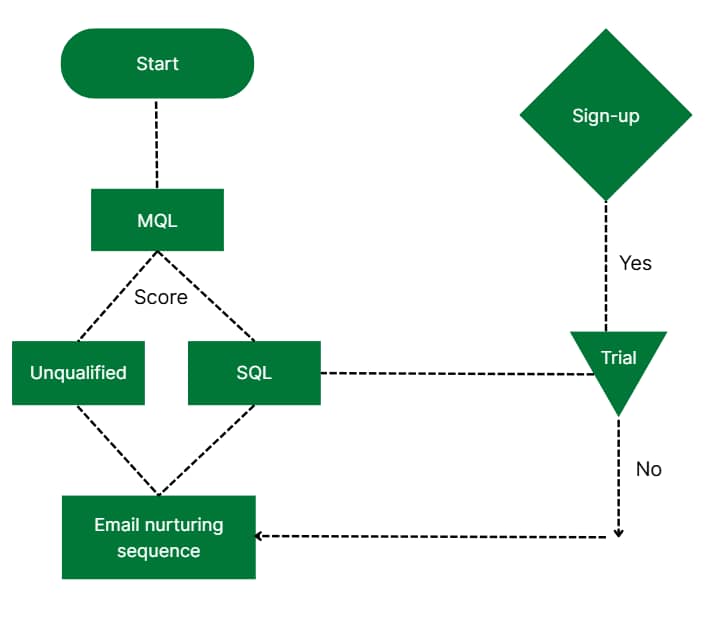
Below is a sample data flow diagram of what a simple sales funnel process might look like:

data flow diagram Pipedrive sales funnel

The example illustrates a sales prospect’s journey from marketing-qualified lead (MQL) to trial and sign-up. Each stage uses different shapes and colors to make the process clear.

Data flow diagrams can show different levels of detail, from a simple context diagram like the above to more detailed versions (more on these later).

This flexibility makes DFDs a powerful tool for both high-level strategic planning and detailed system design, no matter how simple or complex your process is.

To help you get started, you’ll find three downloadable DFD templates in the next section.

Recommended reading

https://www-cms.pipedriveassets.com/Action-Plan-Template.png

The ultimate guide to creating an action plan template (with examples)

Data flow diagram templates

Using a template is the fastest way to start your data flow diagram and stay aligned with best practices.

Pipedrive’s ready-to-use data flow diagram examples in Google Slides show a lead nurture flow, a re-engagement sales pipeline and customer support operations. Customize any of these templates to fit your process: simply adjust the fields, expand the steps or adapt to your team’s workflow.

Download Pipedrive’s data flow diagram templates

Get your free templates

Now that you understand what a data flow diagram is, it’s time to look at why they’re especially valuable for smaller teams.

Why are data flow diagrams important for SMBs?

Small and medium-sized businesses (SMBs) often run lean and agile projects and teams. A data flow model diagram lets these companies visualize how data moves through their information systems, making it easier to identify gaps and improve project management.

For example, a marketing agency might use a DFD to track how client briefs move from intake to delivery. It could map out data handoffs between sales, creative and billing teams to find areas for automation or cleanup.

Here are other ways a DFD can help:

  • Clarify roles and data movement between teams

  • Improve communication plans with stakeholders using a shared visual language

  • Spot inefficiencies and eliminate redundant subprocesses

  • Align system processes with real-world workflows

  • Make better system design decisions during software or process updates

  • Validate your high-level process with team feedback

  • Optimize resource use through workflow automation planning

In agile sales environments, where speed and iteration matter, DFDs provide a quick way for small teams to align on system flow without deep technical dives.

Note: Tools like Pipedrive make connecting your DFD to real workflows easier. For example, each pipeline stage in Pipedrive works as a DFD node, showing how deals and customer information move from lead capture to closing.

Everything you need to know about data flow diagrams

DFDs are powerful tools for illustrating data movement. While they share similarities with Unified Modeling Language, or UML diagrams, DFDs have a more focused purpose: breaking down the flow of data, not the structure or behavior of the system.

In this section, you’ll learn the core concepts, diagram formats and tools to help you create clear, effective DFD visuals that align with your business goals.

Types of data flow diagrams

Understanding the two types of DFDs helps you choose the proper format for your needs. Each plays a unique role in system analysis and design, depending on how much detail you need to show and who you’re sharing it with.

1. Logical DFD

A logical DFD focuses on what the system does, not how it does it. It shows the flow of information between key steps without diving into the technical setup.

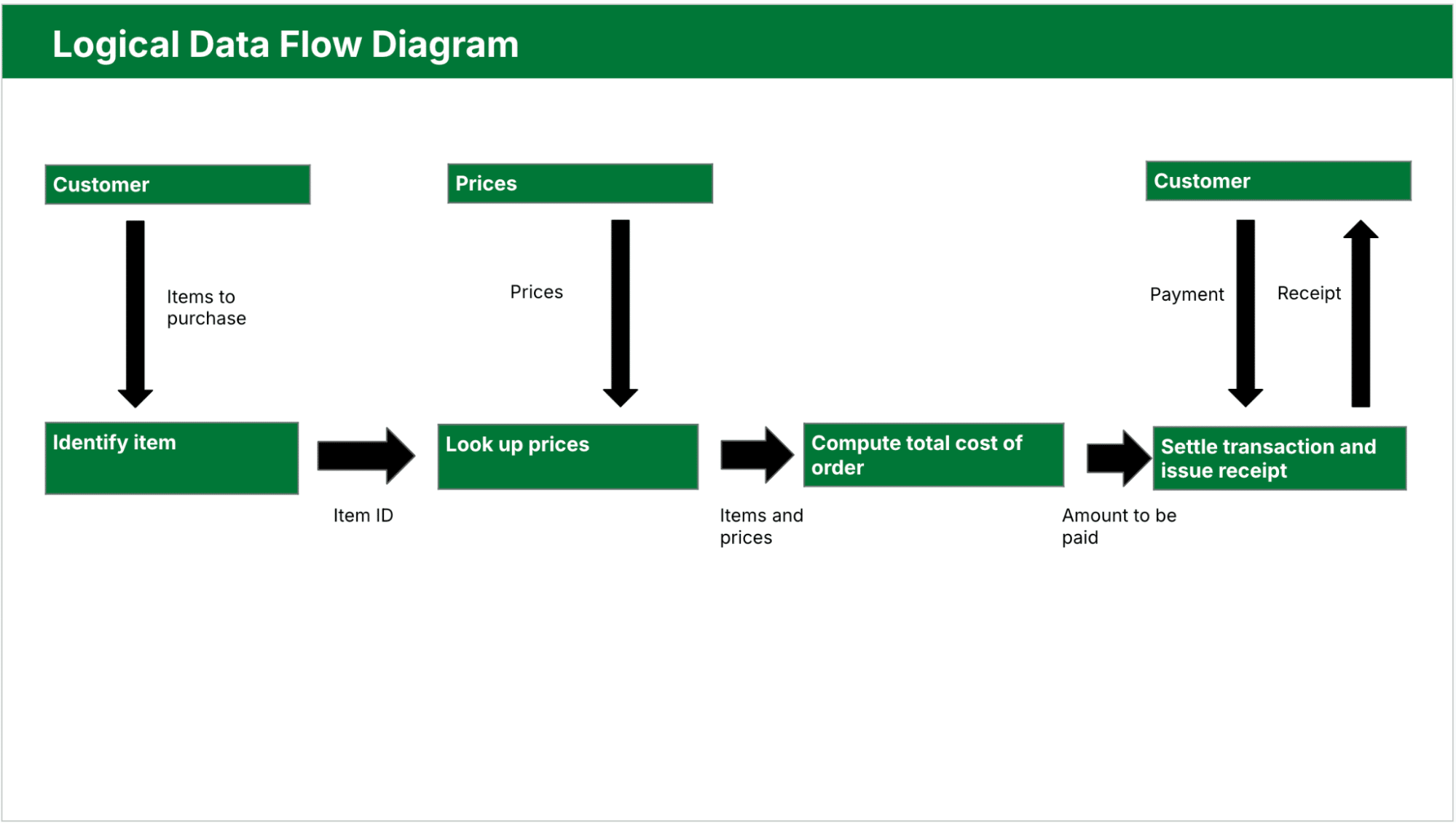
Below is an example of a logical DFD where a customer selects items, the system looks up prices, calculates the total and processes payment:

data flow diagram Pipedrive logical DFD

Teams use logical diagrams in the early stages of systems analysis to:

  • Define business processes clearly

  • Identify what data you need at each step

  • Validate workflows with stakeholders

  • Keep technology out of the conversation

This is the best choice when mapping a high-level process or collaborating with non-technical users.

2. Physical DFD

A physical DFD goes one step deeper. It shows more technical details, such as how users enter data, where systems store it and which tools handle processing.

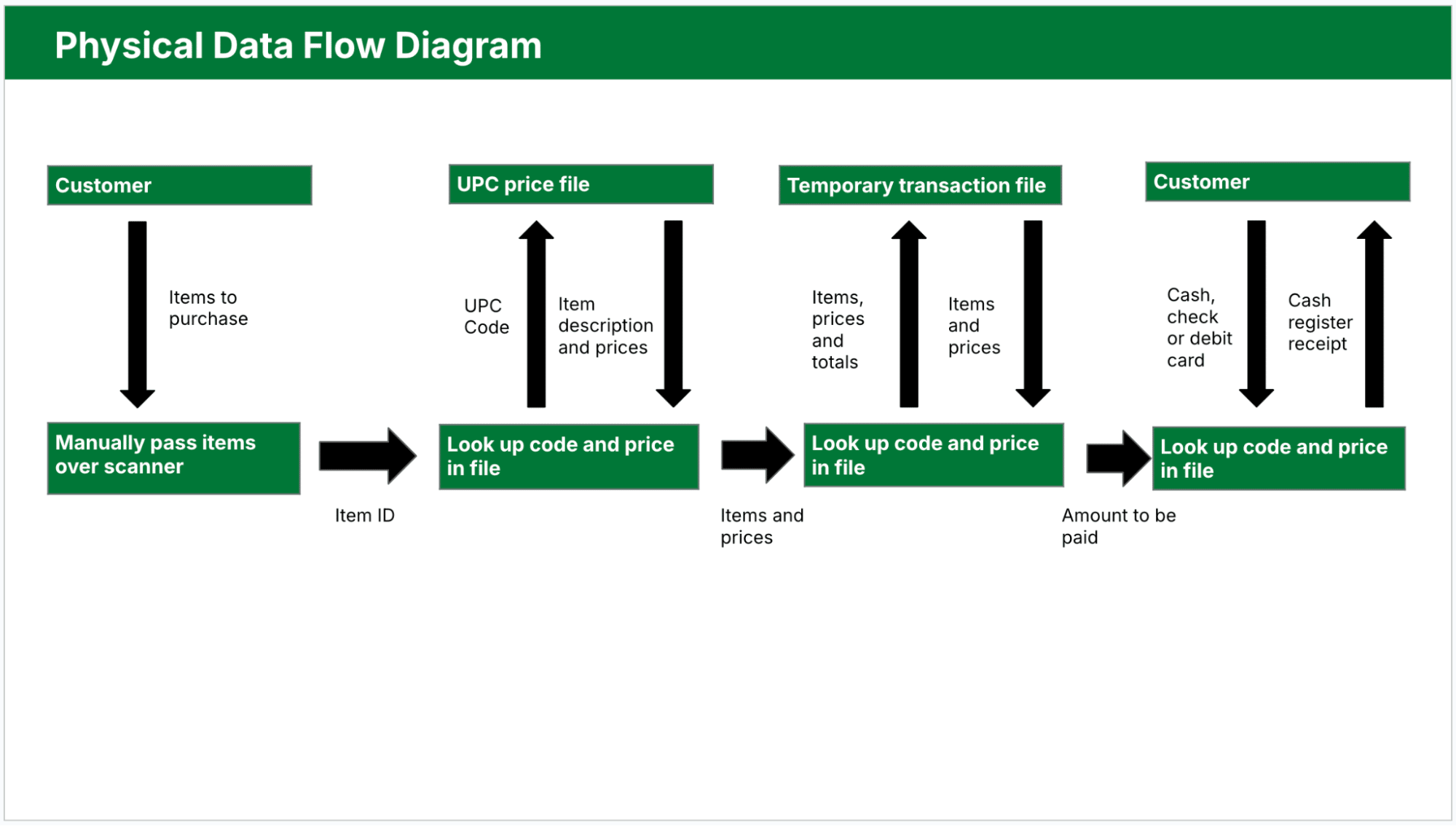
Here’s a physical DFD example showing manual scanning, file lookups, temporary transaction files and specific data interactions:

data flow diagram Pipedrive physical DFD

Physical diagrams are especially useful in real-time systems, complex systems with many data hand-offs and environments using automation. They also help you plan complex systems by showing how data moves through different components in a structured way.

Using logical and physical DFDs together gives you a complete picture of your system. The logical DFD maps user-facing workflows and data needs, while the physical DFD shows the behind-the-scenes technical setup.

4 main components of a data flow diagram

DFDs rely on a consistent set of symbols to make the data flow easy to follow. These symbols structure your diagram and make it readable for technical and non-technical stakeholders.

There are two main symbol notation styles: Yourdon and DeMarco and Gane and Sarson.

Yourdon and DeMarco notation represents processes with simple circles, making it a popular choice in general business and academic settings for its clarity and ease of use.

The Gane and Sarson style uses rectangular process boxes with rounded corners and bolded labels, which is preferable in more structured, object-oriented environments.

Both styles share elements like arrows for flows and rectangles for data stores.

Below are the four core components of a DFD diagram:

Element

Description and example

1. External entities

Also known as terminators, they’re sources or destinations of data outside the system.

They could be users, departments or third-party services that either send data into the system or receive data from it.

Examples: customer submitting a form, payment gateway, shipping partner

2. Processes

Sometimes called functions, these actions transform incoming data into outputs.

A DFD usually represents them as rectangles with rounded corners or circles. Each process should have a clear purpose and label with a verb-noun phrase like “Submit Order” or “Send Invoice”.

Examples: verify login, assign task, calculate total

3. Data stores

Various types of data storage your system uses to house information until it moves to the next step in the process.

These repositories could be databases, files, spreadsheets or even physical storage systems.

Examples: customer database, inventory file, user preferences

4. Data flows

Arrows that connect all the other components. Each shows the direction of movement and labels the type of transferred data.

Clear labeling avoids confusion and makes the diagram easier to validate.

Examples: order details, login credentials, shipment status

Using these standard elements makes documenting your system accurately and creating diagrams simpler.

Data flow levels

DFDs show systems at different levels of detail. Using varied levels of data flow diagrams helps you control the complexity, so you can focus on the big picture or zoom into specific parts as necessary.

Level 0 DFD (Context Diagram)

This most basic version of a data flow diagram treats the system as a single process and focuses only on how it connects with the outside world. Here’s a brief breakdown of what it entails:

  • View – shows the entire system as one process with arrows going to and from external entities

  • Purpose – provides a quick overview of how the system connects to external users, tools or departments

  • Use case – great for sharing with stakeholders who need to understand the system at a glance

Level 1 DFD

Once the context is clear, Level 1 dives deeper by breaking the single process into smaller subprocesses. This level starts to show how the system works internally.

  • View – breaks the main process into multiple functions and includes data stores

  • Purpose – shows how data flows between different parts of the system without overwhelming detail

  • Use case – ideal for internal planning sessions, process reviews or workflow mapping

Level 2 DFD and beyond

Level 2 and lower levels unpack each subprocess even further for deeper detail. Depending on the system’s complexity, these diagrams can be as intricate as needed.

  • View – expands subprocesses into their own detailed flows, possibly creating multiple linked diagrams

  • Purpose – helps with system design, testing and technical documentation by showing exact data movement

  • Use case – developers, system architects or QA teams can deploy it to support implementation and automation

Choosing the right level depends on your audience, activities and goals. Start with a high-level view to align on the big picture, then add the required detail for planning and further design.

Now that you understand how to structure your diagram, the next step is to see how DFDs apply to real business scenarios.

Recommended reading

https://www-cms.pipedriveassets.com/blog-assets/sales-plan-illustration.png

How to create a sales plan in 7 Steps

Examples of how to use a DFD

Data flowchart diagrams are practical tools for mapping business processes across teams, no matter what type of business you’re in.

Here are a few real-world examples of how DFDs clarify systems, automate workflows and improve operations.

Sales pipeline follow-up process using Pipedrive

Sales teams often lose momentum when follow-ups fall through the cracks. A DFD can help map a structured follow-up system using automation and manual touchpoints within Pipedrive’s customer relationship management (CRM) tool.

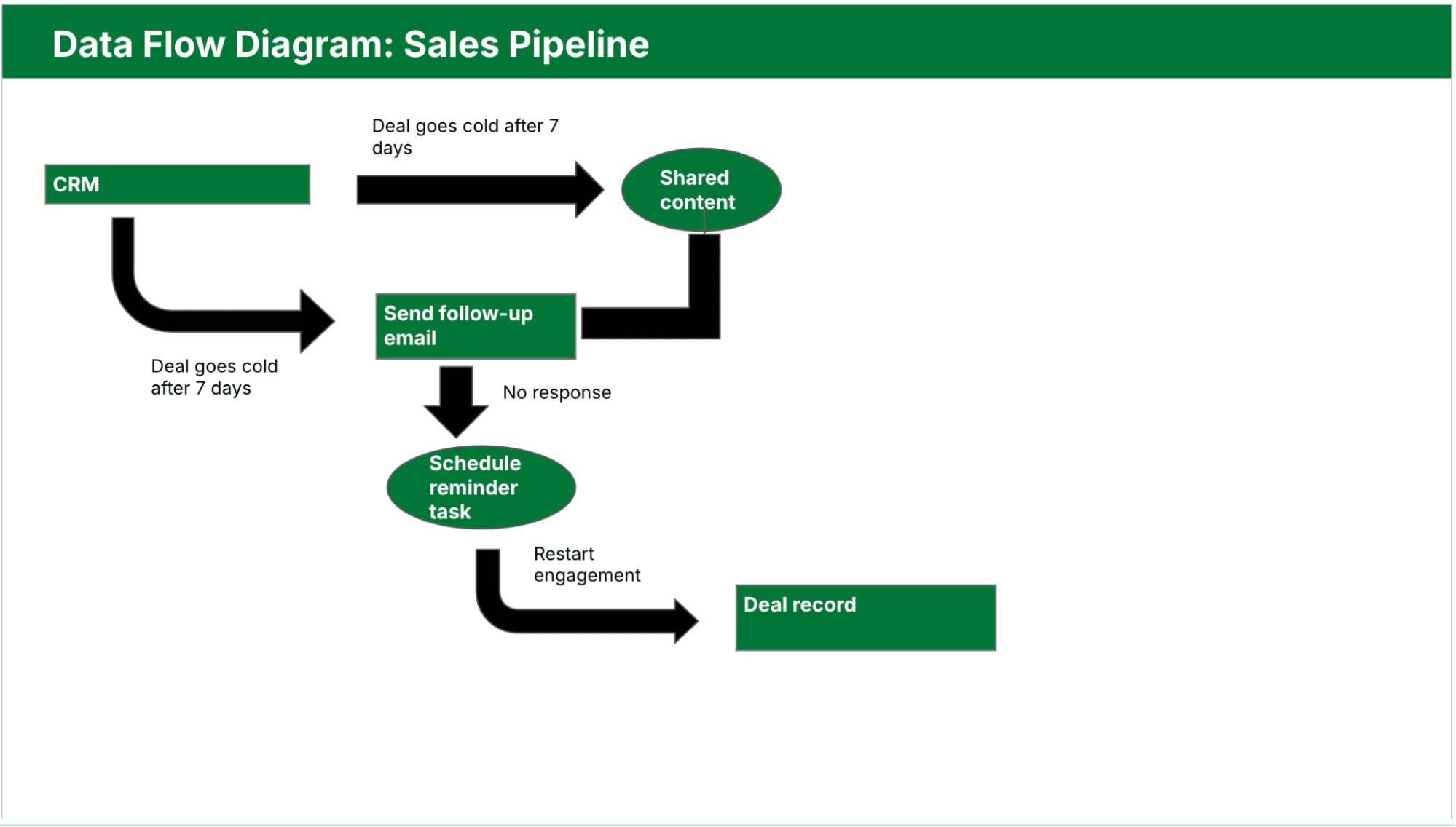
Here’s how that process might work:

  • A CRM trigger (external entity) starts the process when a deal goes cold after seven days

  • A “Send Follow-Up Email” process launches, pulling sales email templates from a shared content data store

  • If there’s no response, data flows into a “Schedule Reminder Task” process for the sales rep

  • After making contact, the rep logs notes into a deal record (data store), restarting the engagement

Mapping this workflow as a Level 1 DFD (per the Pipedrive template example below) helps teams identify where to automate and where human input adds the most value. It also ensures no loss of sales opportunities due to inconsistent follow-up.

data flow diagram Pipedrive sales pipeline DFD

Each Pipedrive stage represents a process node, helping sales teams see how information systems support the journey from lead outreach to closed deal.

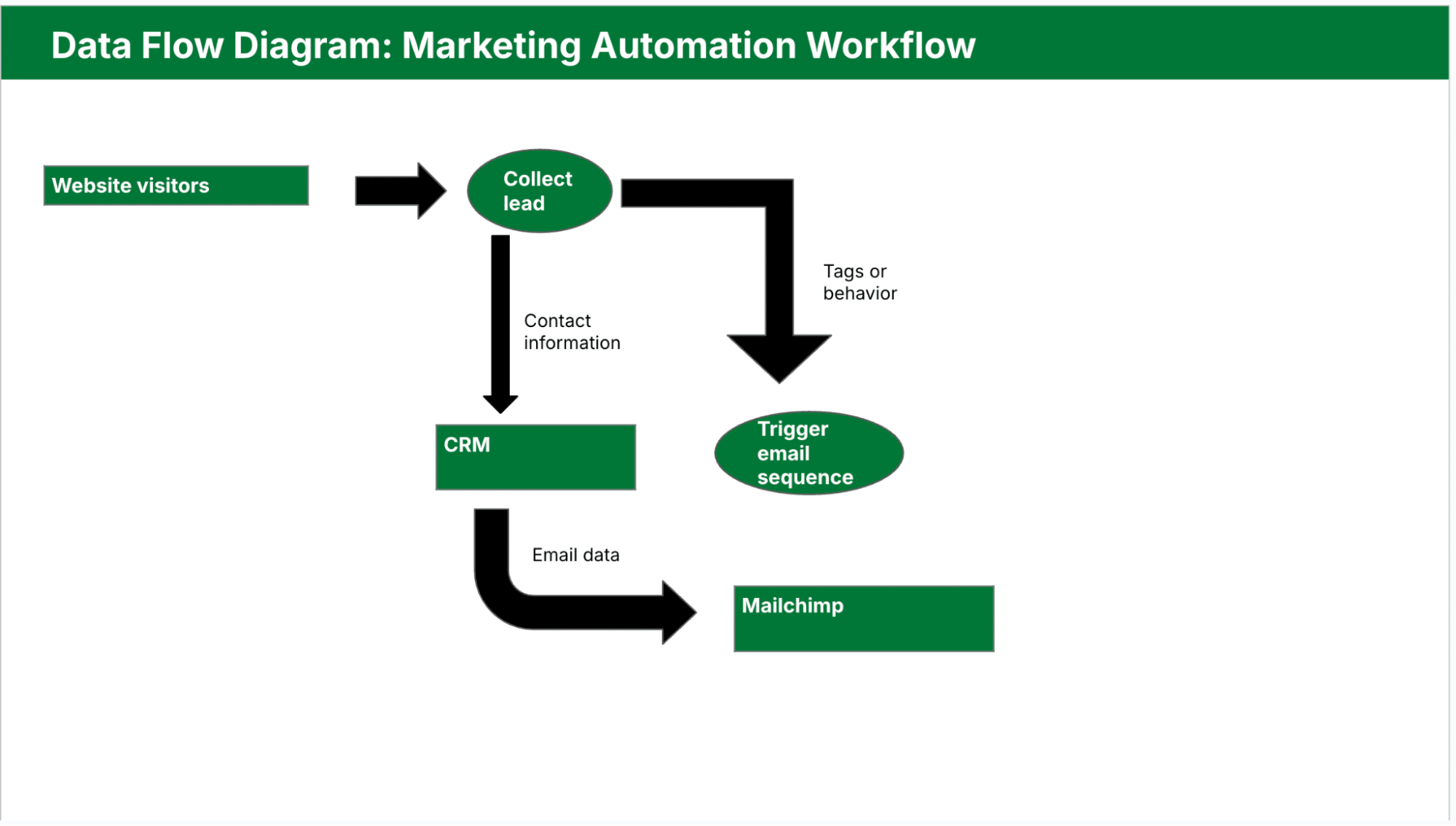
Marketing automation workflow

A DFD can also clarify how marketing management tools work together to generate leads and nurture them. For instance, you might have:

Below is the Pipedrive template showing this workflow in DFD format:

data flow diagram Pipedrive marketing automation workflow

Mapping this process as a DFD reveals where to improve automation or where data loss between sales tools is likely.

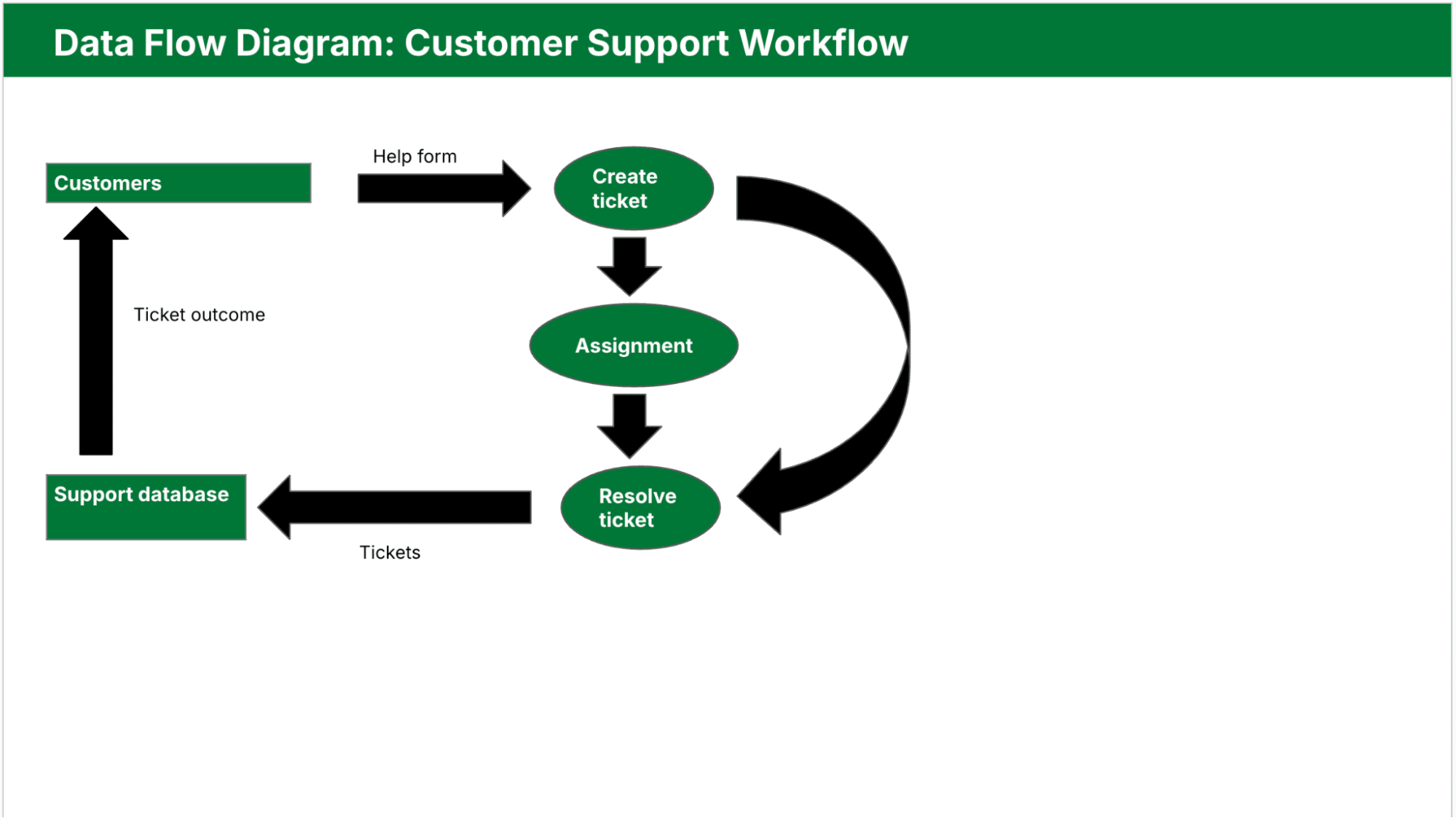
Customer support ticketing system

A DFD can help customer support teams streamline issue resolution by tracking how they create, assign and resolve tickets:

  • Customers (external entity) submit requests via a help form

  • Requests go into a “Create Ticket” process

  • Support database (data store) stores tickets

  • The “Assign Agent” and “Resolve Ticket” processes handle the internal workflow

  • The system sends ticket outcomes to customers

Here’s what this ticket system would look like as a DFD:

data flow diagram Pipedrive customer support workflow

Using this model, managers can pinpoint bottlenecks or redundant subprocesses in the support workflow.

Note: In Pipedrive, you can use custom fields, pipeline stages and workflow automation to represent the different parts of your DFD. Each custom field can act as a data input or status flag, while automation rules handle common transitions like follow-ups and deal updates between processes.

Next, find out how to create your own data flow diagram from scratch, plus a few best practices for inspiration.

Recommended reading

https://www-cms.pipedriveassets.com/PERT.png

PERT chart 101: a step-by-step guide for project managers

How to make your own data flow diagram

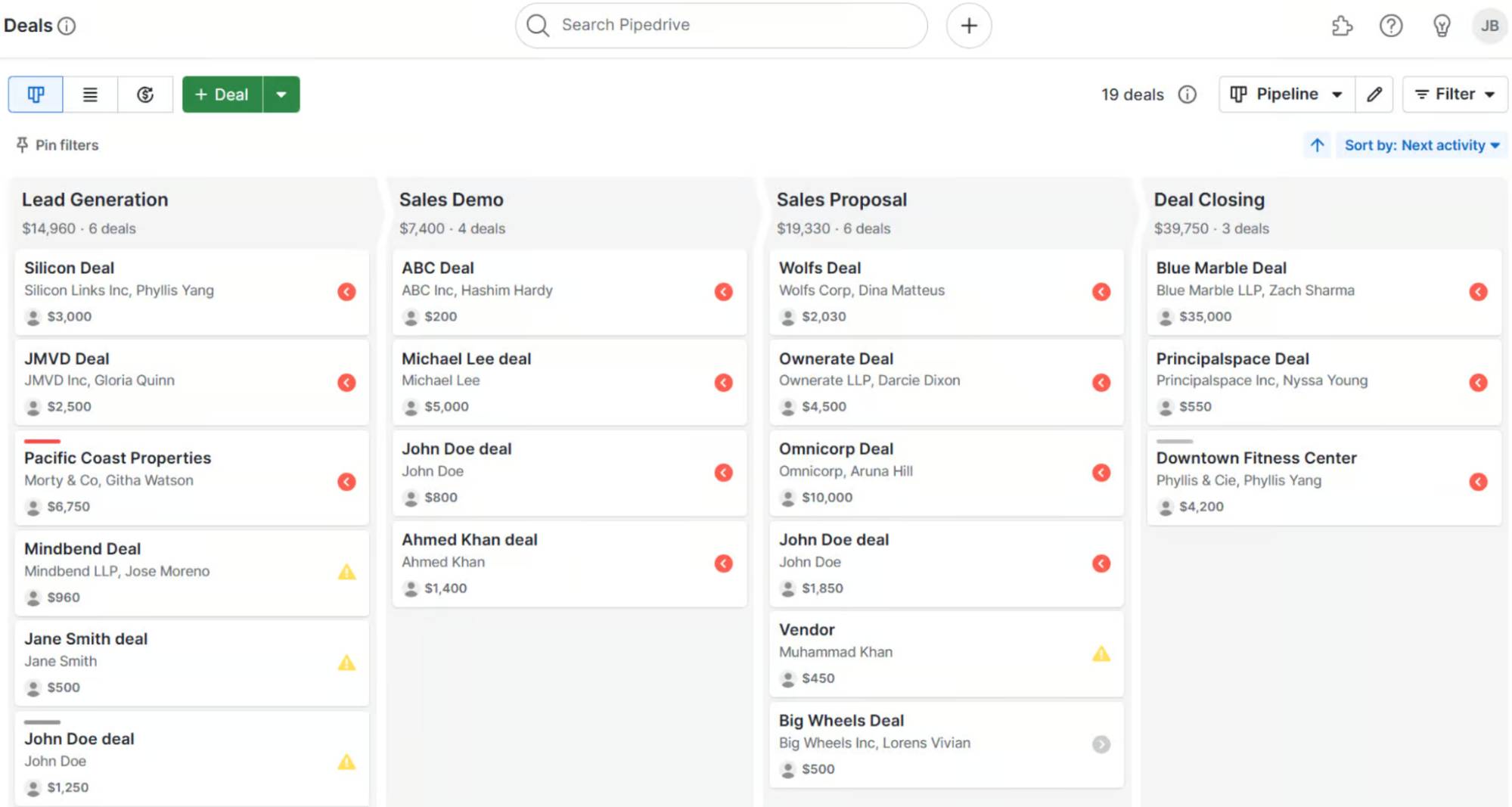
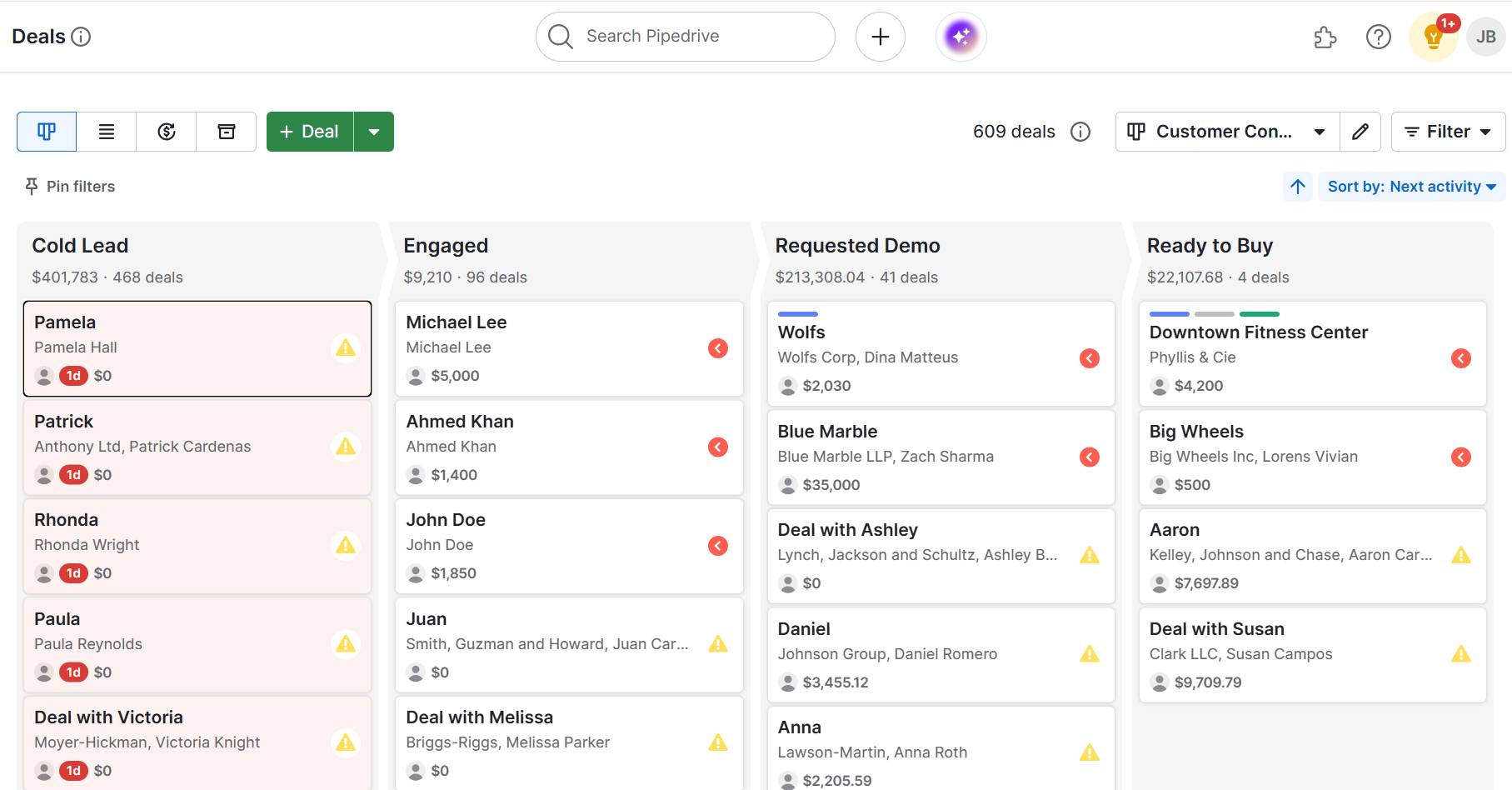
If you already use Pipedrive, your sales or project pipeline is a great starting point for a DFD. Each stage in your pipeline represents a process or status change, while your custom fields, activities and automations reflect how data moves through each step.

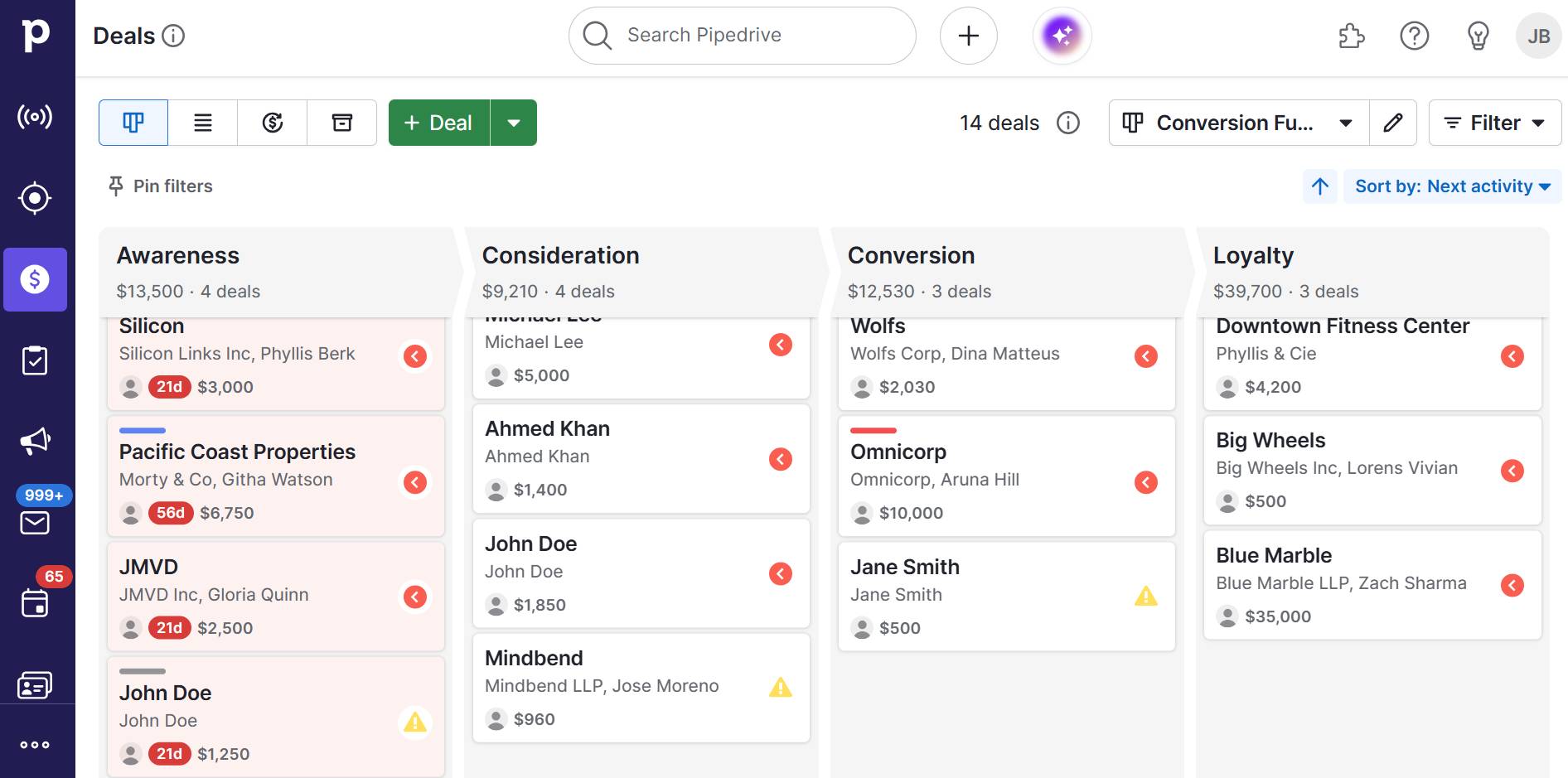
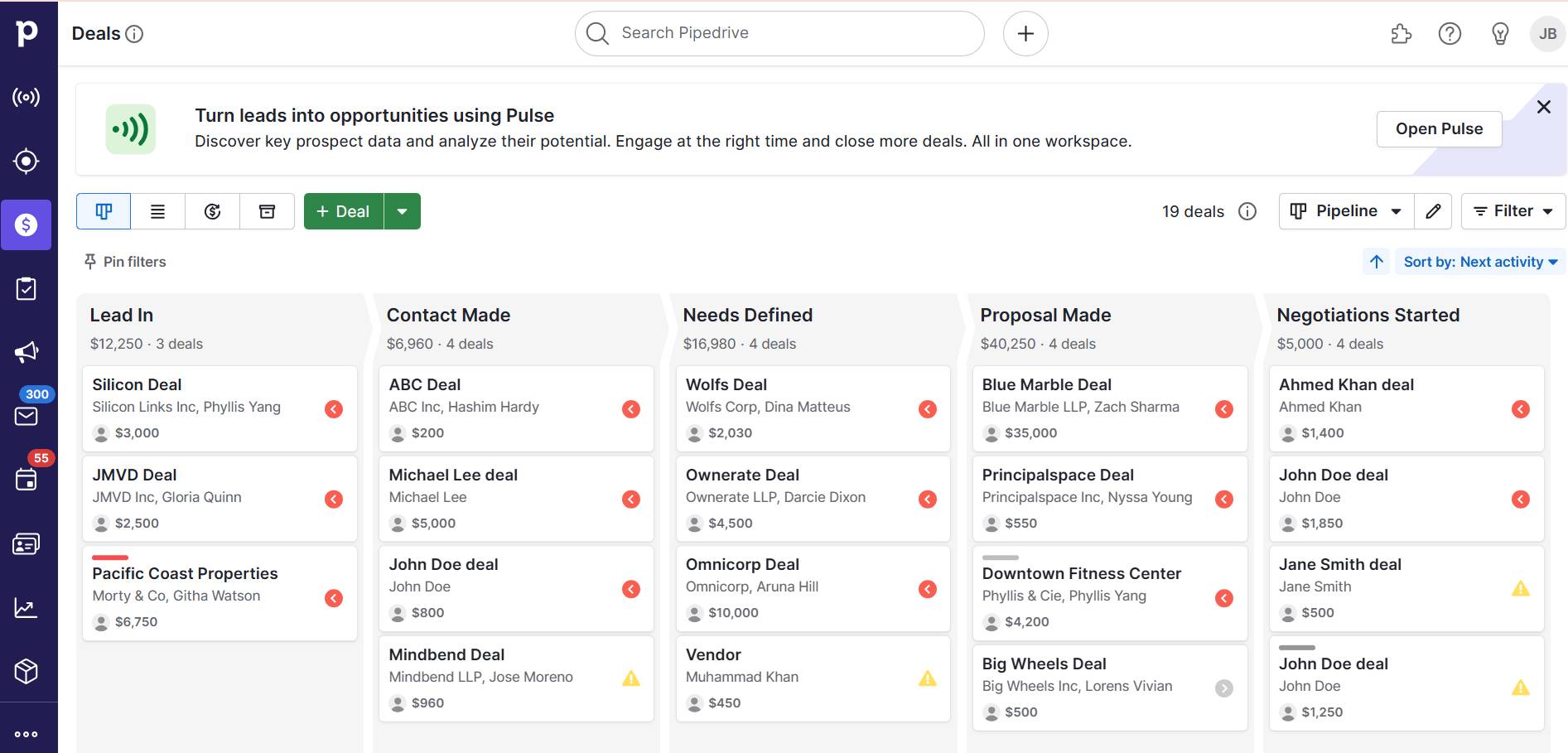
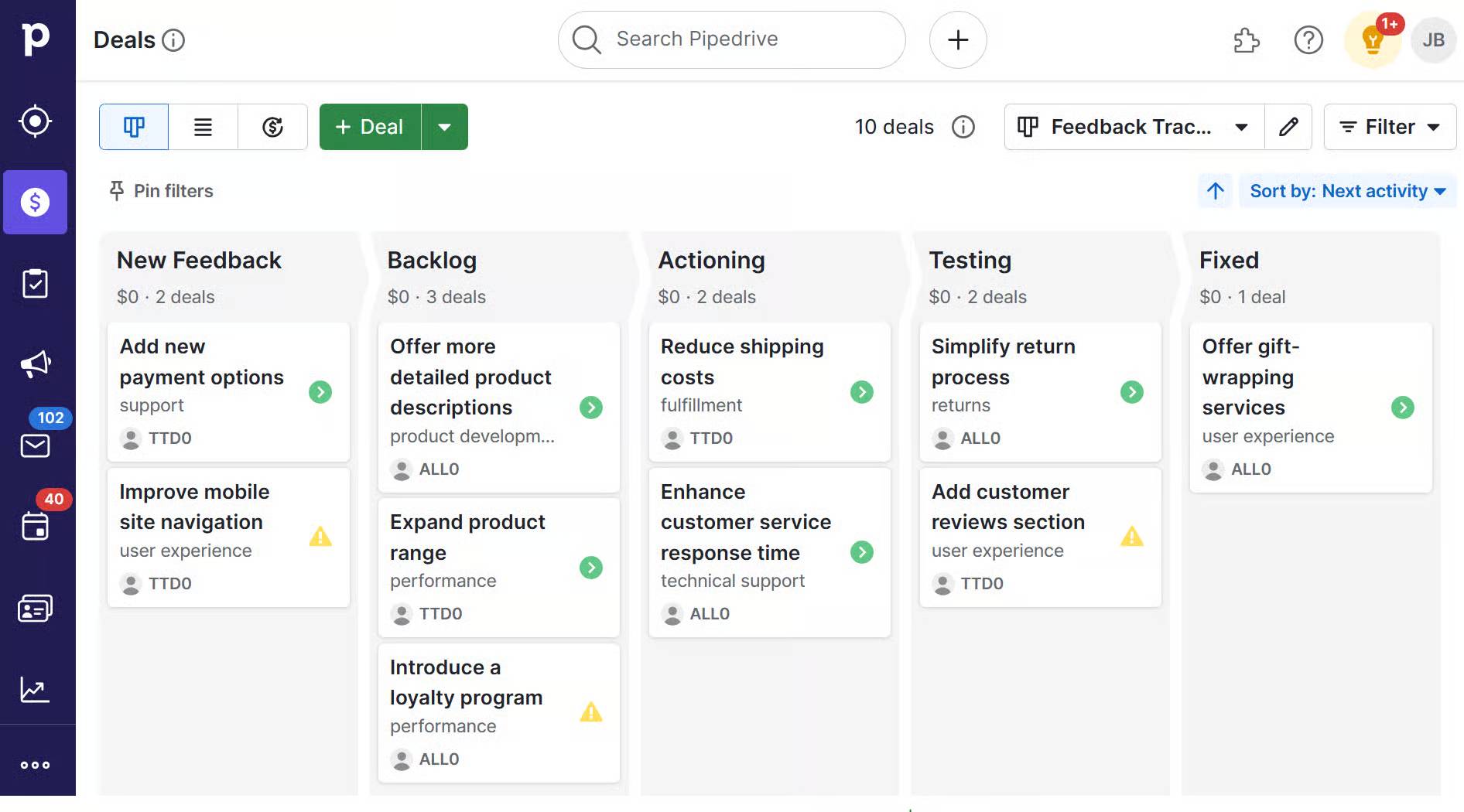
The image below shows a typical pipeline view in Pipedrive:

data flow diagram Pipedrive pipeline view

Use it to map out key processes, identify external entities (like email capture forms or webhooks) and define what information flows in and out of each stage.

From there, follow the steps below to build your custom DFD.

1. Pick the process you want to map out

Choose a single business process that involves multiple steps, systems or data exchanges. The process could be client onboarding, a support ticket workflow or handling product returns.

Be clear on what you want to understand. Maybe it’s where delays happen or how data moves between teams.

For example, a B2B sales team might map how it requests, reviews and delivers pricing quotes. Starting with focused sales goals helps keep the DFD relevant and manageable.

2. Find a template

Templates save time and help maintain consistency in layout and symbol usage. Most data flow diagram templates come with standard shapes:

Use digital tools like Lucidchart, Draw.io or Visio to get started. These platforms often include editable templates you can adapt to your process. Just swap out placeholder text and update the flow based on your real system.

3. Start at Level 0

Begin by drawing a Level 0 DFD, or context diagram. Represent your entire system as one process and connect it to external entities like users, vendors or tools. This step helps define the system boundary and gives everyone a clear starting point.

For instance, if you’re mapping a deal review process in Pipedrive, your Level 0 diagram might show “Manage Deal Pipeline” as one process connected to a sales rep (external entity) and a reporting dashboard (another external entity).

Once the overall flow is clear, move to Level 1 and break the process into steps like “Qualify Deal,” “Assign to Rep” and “Review Forecast.” You’ll gain a more comprehensive view of how data moves from initial entry to deal analysis.

4. QA your DFD with your team

A DFD is only valid if it reflects how things actually work. Share your draft with team members who run, manage or rely on the process. Walk through each step to confirm it’s correct and complete.

This step is crucial for catching missing stages, unclear labels or overly complex flows. For example, someone might notice a forgotten manual task, like confirming refund approvals. This feedback loop turns your diagram into a reliable planning tool, not just a static document.

Note: For ongoing process tracking and task coordination, Pipedrive’s project management software offers a great way to extend your DFD into daily execution. Break down each step of your diagram into actionable tasks, assign ownership and monitor progress in real time.

Data flow diagram best practices

A well-crafted DFD helps your team communicate clearly, spot issues and design systems that scale.

Below are some best practices that ensure your diagrams stay accurate and useful over time.

  • Start simple: Outline the entire system as a single process with a Level 0 DFD. It’ll help everyone understand the big picture before diving into subprocesses.

  • Use consistent labels: Keep process names, data flows and data stores the same across all levels. Consistency avoids confusion and makes it easier to trace the flow of data.

  • Validate with stakeholders: Review your diagram with team members and subject matter experts. Their feedback ensures you haven’t missed steps or misrepresented workflows.

  • Limit clutter: Each diagram should focus on a single level of detail. If it starts getting messy, break it down into lower-level DFDs to keep each one readable.

  • Stick to standardised diagram symbols: Use commonly accepted shapes for processes, entities and data stores. Your DFD will be easier to understand for both technical and non-technical users.

  • Label all data flows: Every arrow in your diagram should have a clear, descriptive label. Accuracy is key to showing exactly what information is moving through the system.

  • Avoid unnecessary repetition: Don’t show the same data flow multiple times across diagrams unless it adds clarity. Redundancy can make diagrams harder to follow.

  • Document assumptions: If your DFD includes estimated flows or planned features, note them outside the diagram. Keep the core diagram focused on confirmed details.

Following these tips helps you create diagrams that are clear, scalable and aligned with structured design principles.

Final thoughts

Data flow diagrams are useful visual representations that turn complex systems into clear, visual workflows. By mapping how data moves between complex processes and stages, DFDs help teams design systems that scale.

Pipedrive makes it easy to operationalize your DFDs by aligning sales and marketing workflows with real-time data movement.

Try our 14-day free trial to map and track your business processes using tools like pipeline management, email campaigns, project management and more.

5 Top Conversion Funnel Tips for SMBs

Software Stack Editor · July 21, 2025 ·

A conversion funnel maps how prospects move from discovering your brand to becoming customers. The process helps you pinpoint where potential buyers lose interest so you can improve each stage and increase sales.

For SMBs with limited time and resources, tracking conversion funnels and identifying where prospects leave the buying journey can be challenging.

In this article, you’ll learn how to map and optimize your conversion funnel effectively. You’ll learn practical steps to identify drop-offs, craft targeted content, improve the user experience and use technology to boost conversions.

What is a conversion funnel?

A conversion funnel maps the buying journey from discovering your brand to becoming a loyal customer. Understanding the conversion funnel helps you identify where potential customers are leaving the buying journey and how to prevent this from happening.

Say you operate an e-commerce business. You create a conversion funnel and notice that many users visit your product page but don’t complete a purchase.

Using these insights, you make changes to the product page to increase conversions.

For example, you can improve your call-to-action (CTA), simplify the checkout process or provide clearer product information.

By making these changes, you address customer pain points, reduce friction and increase your chances of making a sale.

Recommended reading

https://www-cms.pipedriveassets.com/sales-goals_2023-02-23-120955_tgra.jpg

How to set up an effective marketing funnel

Conversion funnel stages

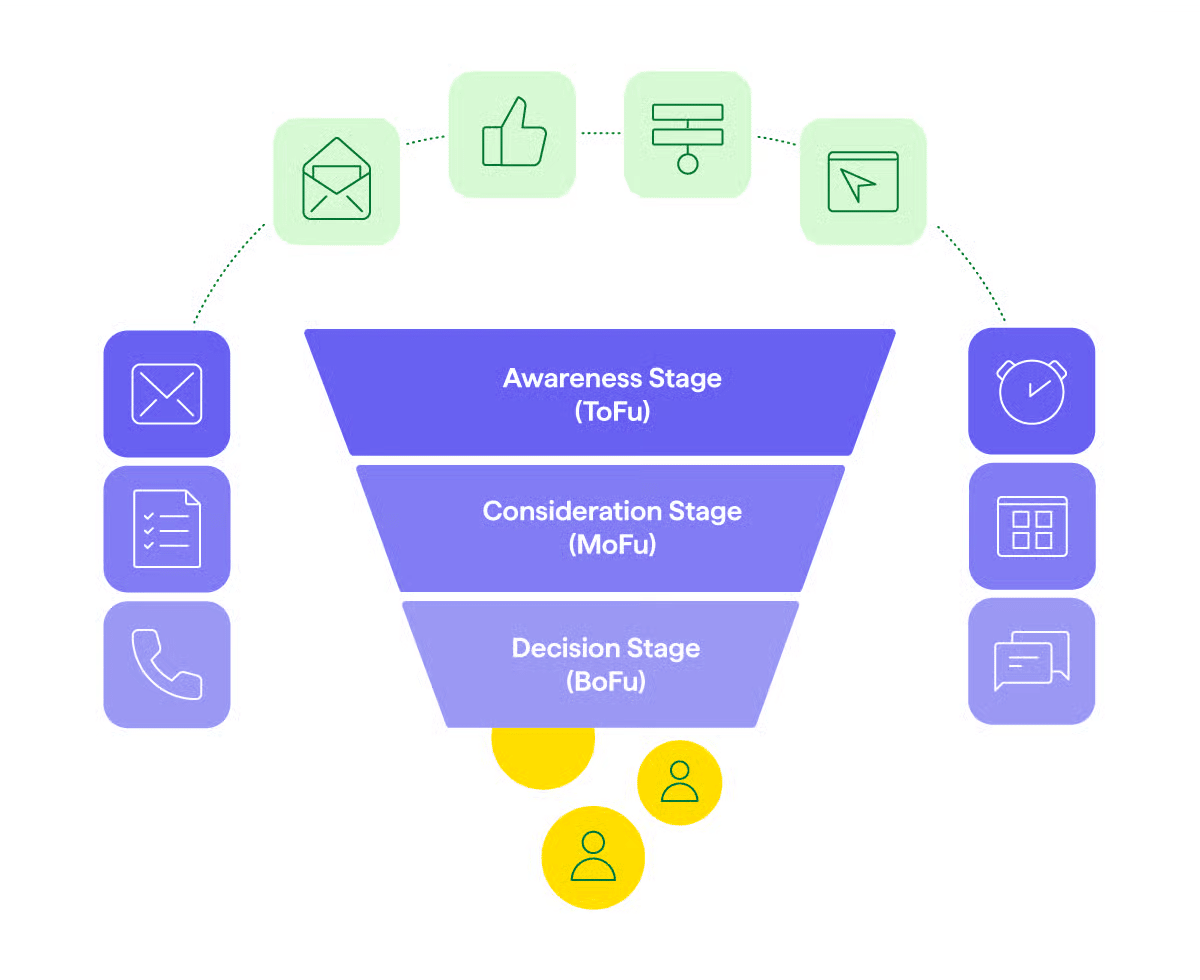
A conversion funnel includes all the key stages a potential customer moves through when deciding to make a purchase. Knowing what happens at each stage helps you guide prospects toward a desired outcome more effectively.

A typical sales conversion funnel includes the following stages:

  • Top of the funnel (awareness and interest stage). Prospects discover your business through ads, social media, search engine optimization (SEO) or word of mouth.

  • Middle of the funnel (consideration stage). Prospects engage with your brand by reading blog posts, downloading resources or attending webinars.

  • Bottom of the funnel (conversion stage). Consumers complete a purchase or take the key action you aim for, like downloading an e-book.

  • Post-purchase (loyalty stage). Happy customers become repeat buyers and brand advocates.

Conversion Funnel Stages

Here’s what a customer journey might look like in our e-commerce business example:

  • Top of the funnel. Sees a Facebook ad or finds your brand via Google while searching for “sustainable sneakers”.

  • Middle of the funnel. Browses your site, reads social proof, subscribes for a discount or reads a blog post on your eco-friendly materials.

  • Bottom of the funnel. Uses the discount code to complete their first purchase.

  • Post-purchase. Gets a thank-you email, leaves a review, receives a referral link and buys again with a loyalty discount.

Each stage is crucial in moving prospects closer to becoming repeat customers.

Recommended reading

https://www-cms.pipedriveassets.com/Lead-Funnel.png

How to build a high-performing lead funnel in 5 steps

5 tips to create a successful conversion funnel

A successful conversion funnel guides your ideal prospects seamlessly from awareness to action. Focus on clear messaging, data-driven targeting and continual optimization to turn interest into measurable results.

Here are five practical tips for effective conversion funnel optimization:

1. Understand the customer journey for your target audience

Building a high-converting funnel involves understanding how customers interact with your brand. Aligning your funnel with buyer behavior helps you remove friction, personalize engagement and guide prospects more effectively toward a sale.

Here’s how to understand how customers move through the buying journey:

  • Map the customer journey. Learn how prospects discover your business and the path they follow before purchasing. For example, analyze key traffic sources (like ads, social media and referrals) and key touchpoints (such as landing pages or blog posts).

  • Identify drop-off points. Look for signs that prospects are losing interest or no longer engaging, such as low email click-through rates or high bounce rates. These moments highlight where your funnel leaks potential customers and needs improvement.

  • Gather buyer insights. Talk with recent customers and review sales conversations to understand their motivations, concerns and objections. These observations help you align your funnel with real buyer behavior to improve messaging and the buying experience.

These insights help you build a funnel that reflects how your ideal customers move through the buying journey.

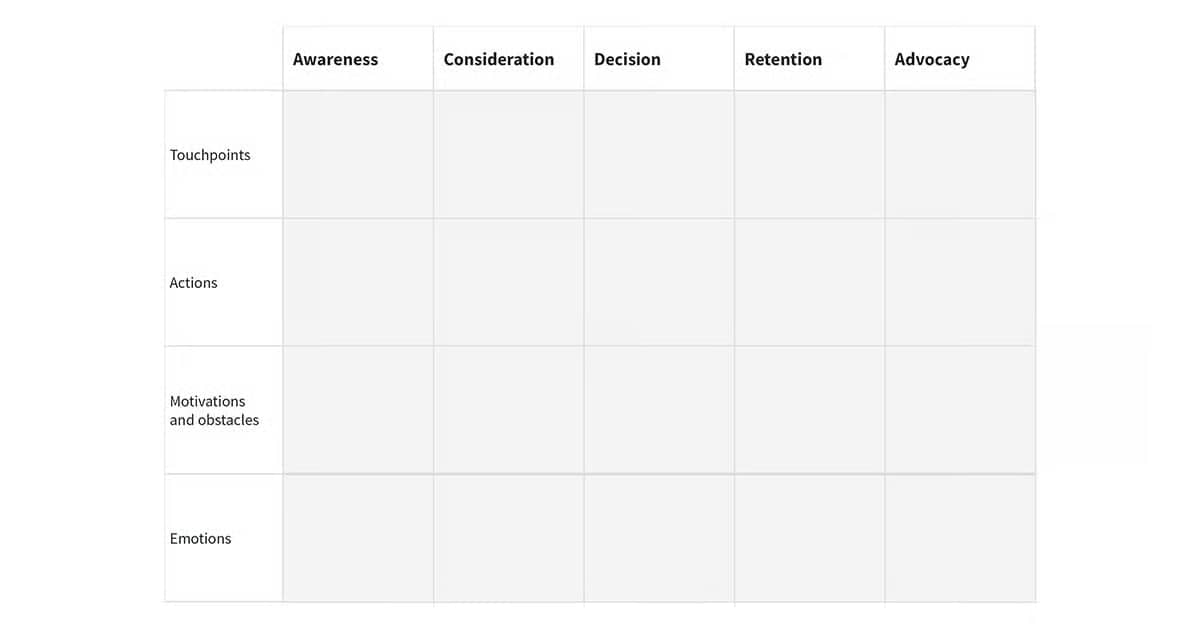
Download our customer journey map template

Start mapping your customer journey with our free customer journey template.

How Pipedrive helps businesses understand the customer journey

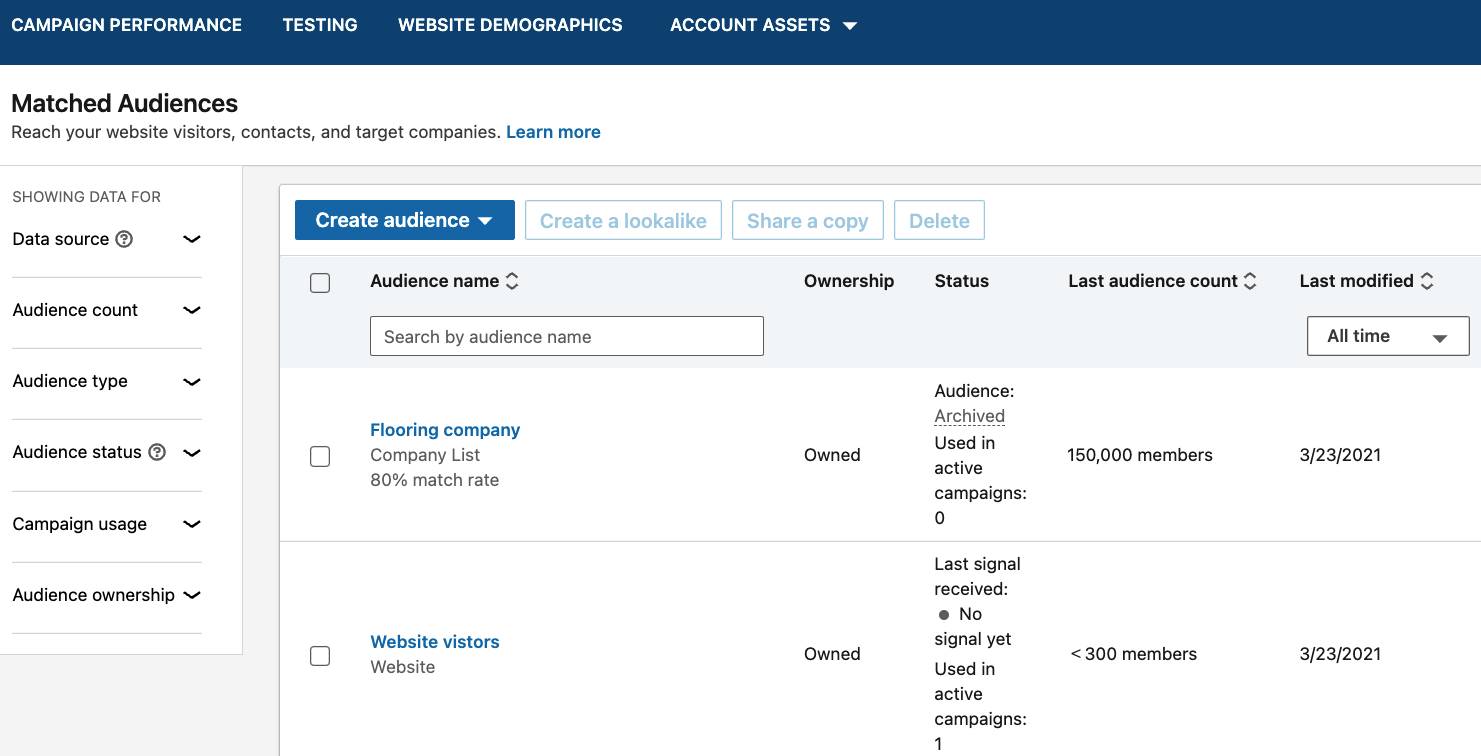
Pipedrive’s sales CRM makes this process easier by tracking every touchpoint in your sales funnel through detailed CRM analytics. Segment your audience by behavior, deal stage or traffic source, making it easy to identify patterns that show what’s working and what’s not.

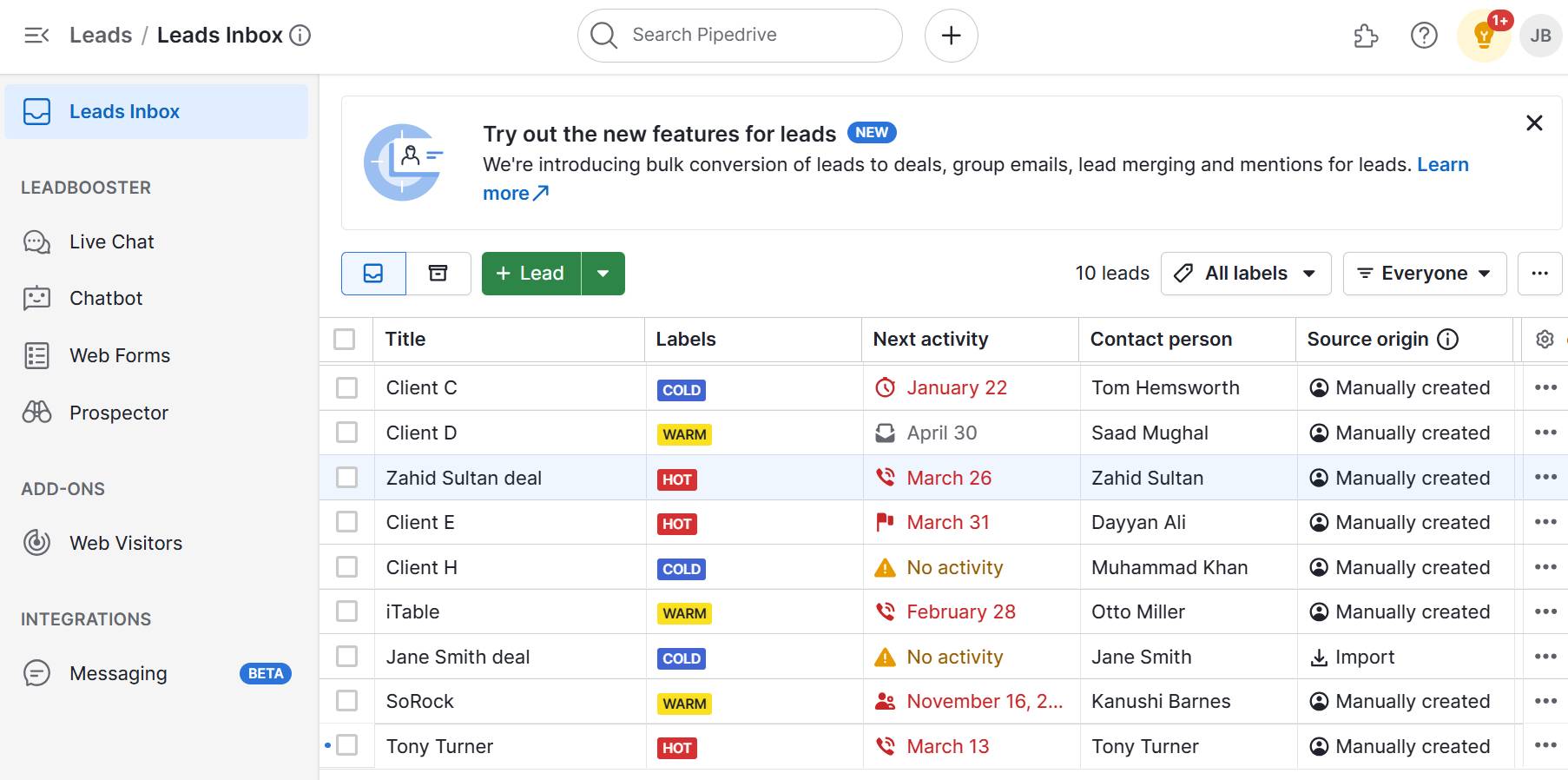
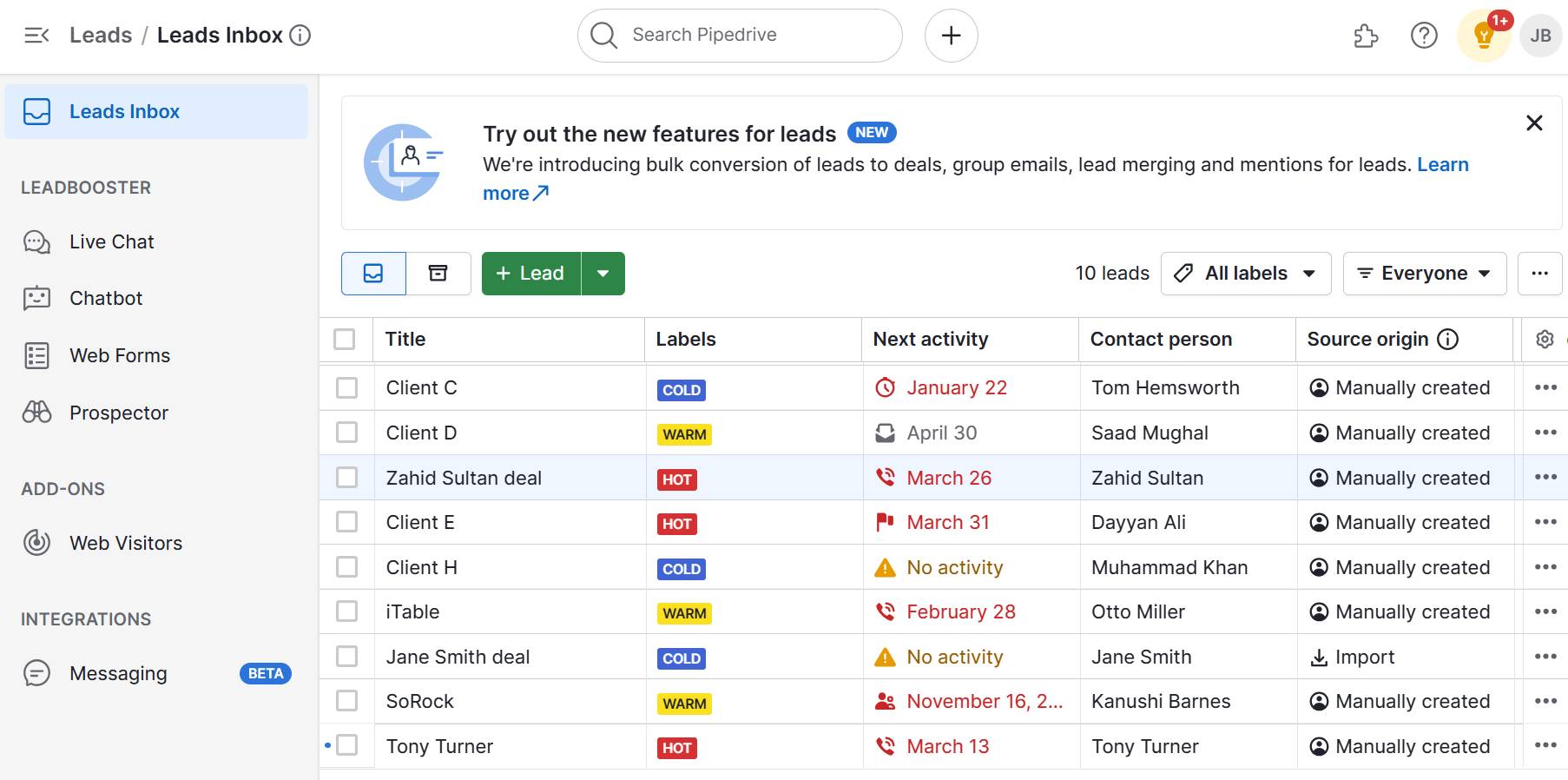
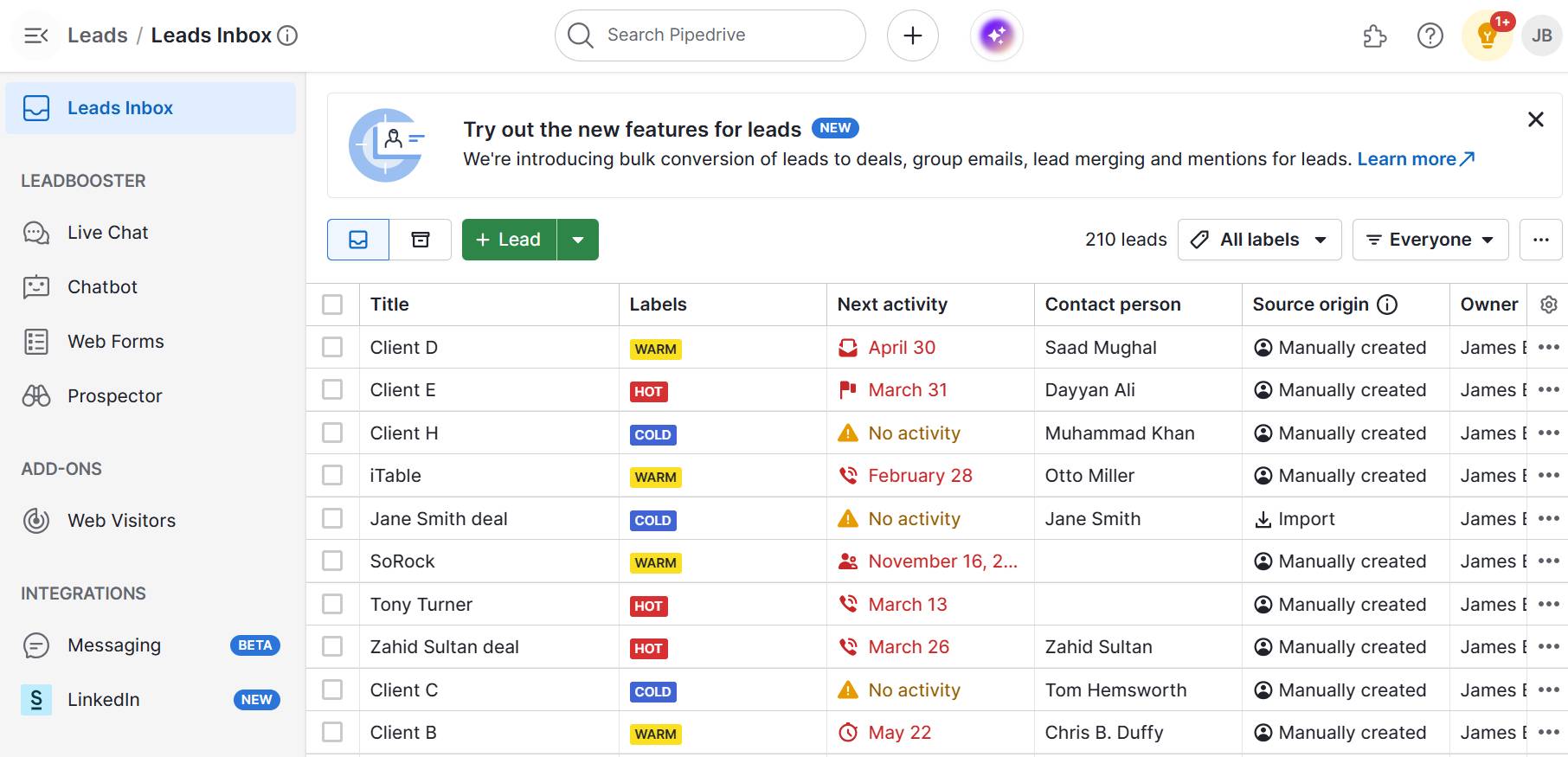
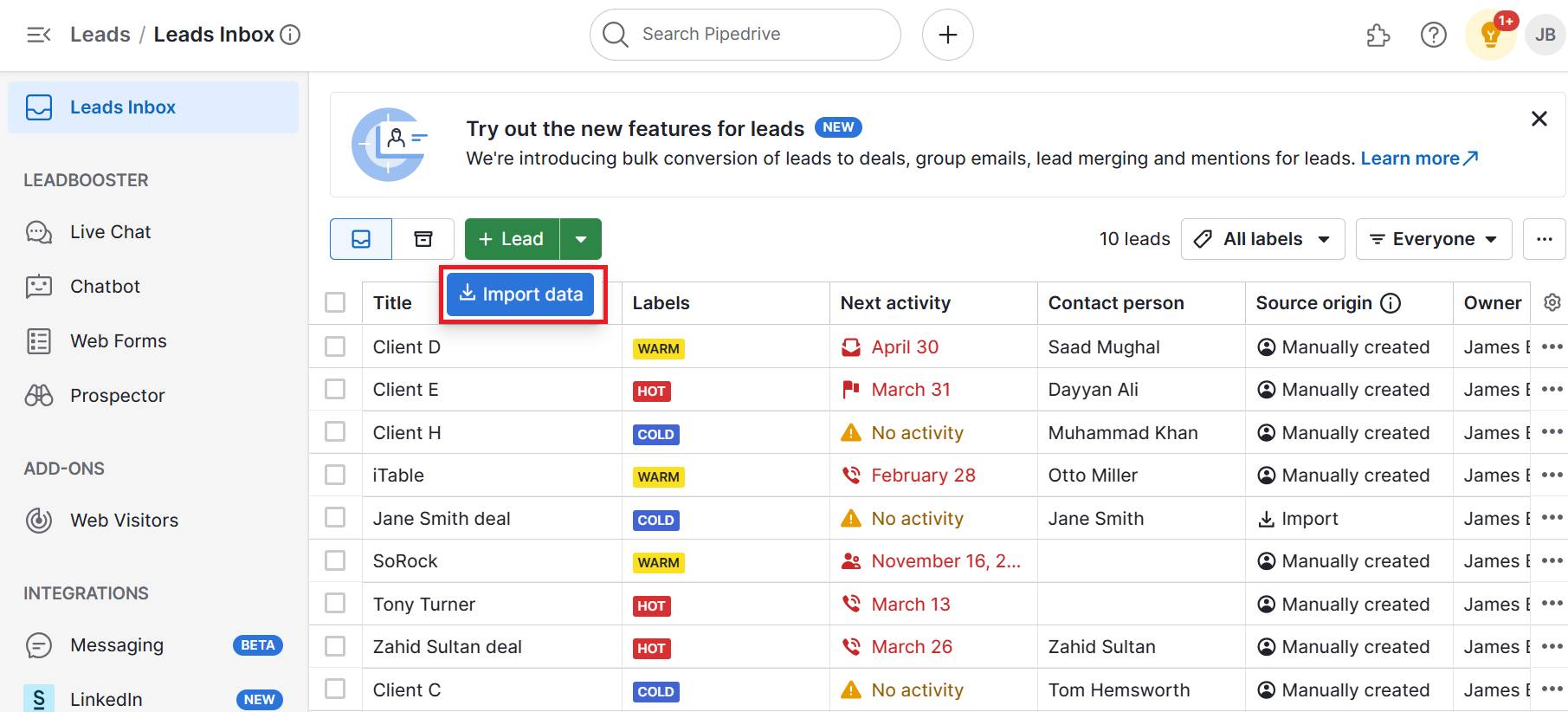
Here’s an example of how to segment an audience by categorizing leads as cold, warm or hot:

Conversion funnel Pipedrive leads inbox

With real-time insights and visual sales pipelines, you’ll spot drop-offs quickly and make informed decisions to optimize every stage of the journey.

2. Craft targeted content for each funnel stage

Tailor your content to match prospects’ intent at each funnel stage. Content that fits their journey reduces drop-offs and builds trust, making it easier to guide them forward.

For example, at the awareness stage, educational blog posts or social media content introduce your brand and spark interest. In the consideration stage, pricing guides or case studies help prospects evaluate your solutions.

Here’s a breakdown of the different stages and the content types that work best for each:

Conversion funnel stage

Purpose and type of content

Top of the funnel (awareness)

Focus on getting your brand noticed. Content should educate or entertain.

Examples:

  • Blog posts that solve common problems

  • Social media videos that showcase industry tips

  • Infographics or explainers that introduce your solution

Middle of the funnel (consideration)

Build trust and highlight how your solution meets their needs.

Examples:

  • Case studies showing results for similar businesses

  • Product comparison guides

  • Webinars or downloadable checklists

Bottom of the funnel (conversion)

Give leads the final push to convert. Reduce friction and make the offer clear.

Examples:

Post-purchase (loyalty)

Continue engaging with customers after the sale to drive repeat business and referrals.

Examples:

  • Onboarding emails and helpful usage tips

  • Exclusive discounts for repeat customers

  • Referral programs or loyalty rewards

  • Requests for reviews or testimonials

Aligning your content strategy with the conversion funnel creates a seamless buying experience.

How Pipedrive helps you craft targeted content

Pipedrive’s CRM platform shows how your content performs across every stage of the conversion funnel. You can see which content pieces drive the most interest and conversions by tracking email engagement, website interactions and deal progress.

When you visualize how leads move (or stall) through the funnel, it’s easier to pinpoint content that’s working and where gaps exist.

For example, if deals slow down at the consideration stage, you might need stronger case studies, clearer pricing information or more social proof to build confidence.

These insights help you craft targeted content that directly addresses buyer hesitations and increases sales.

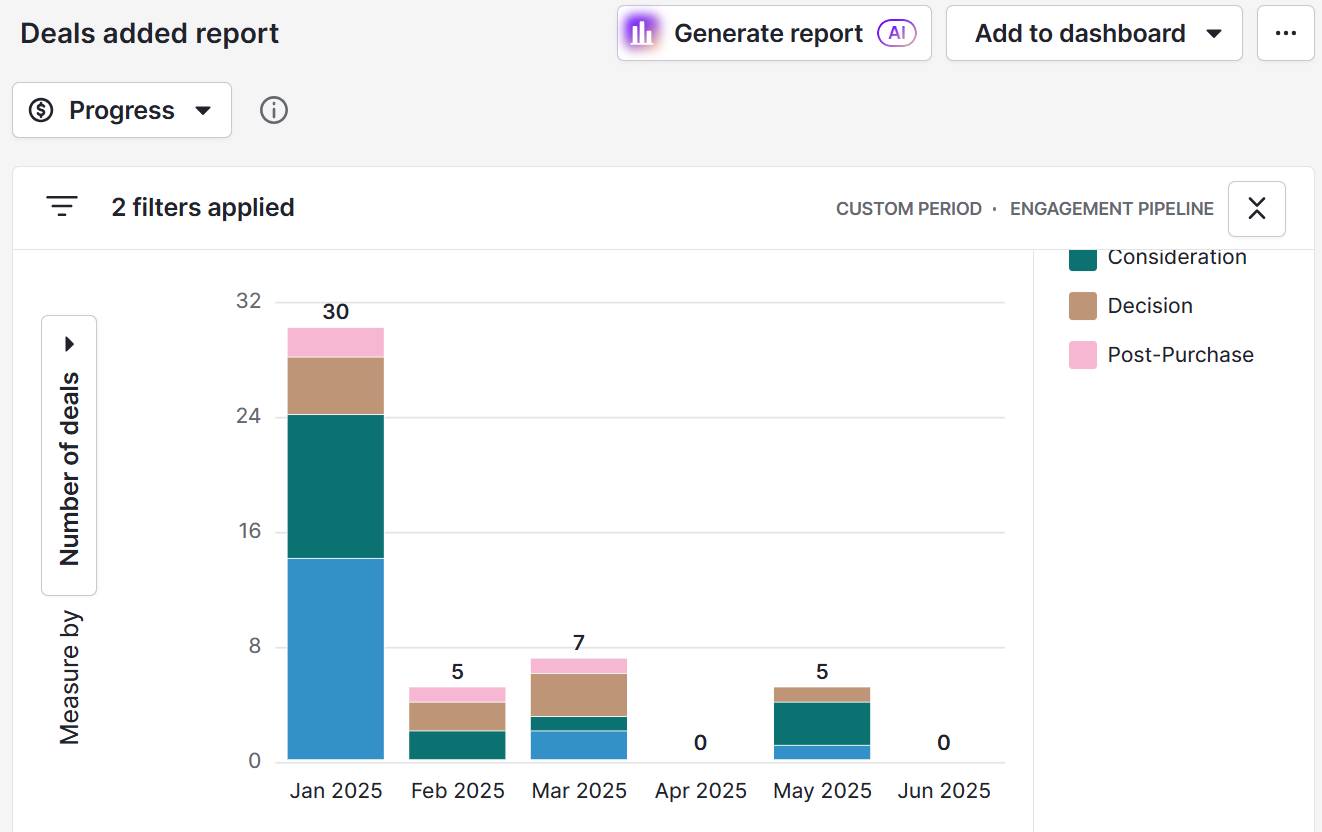
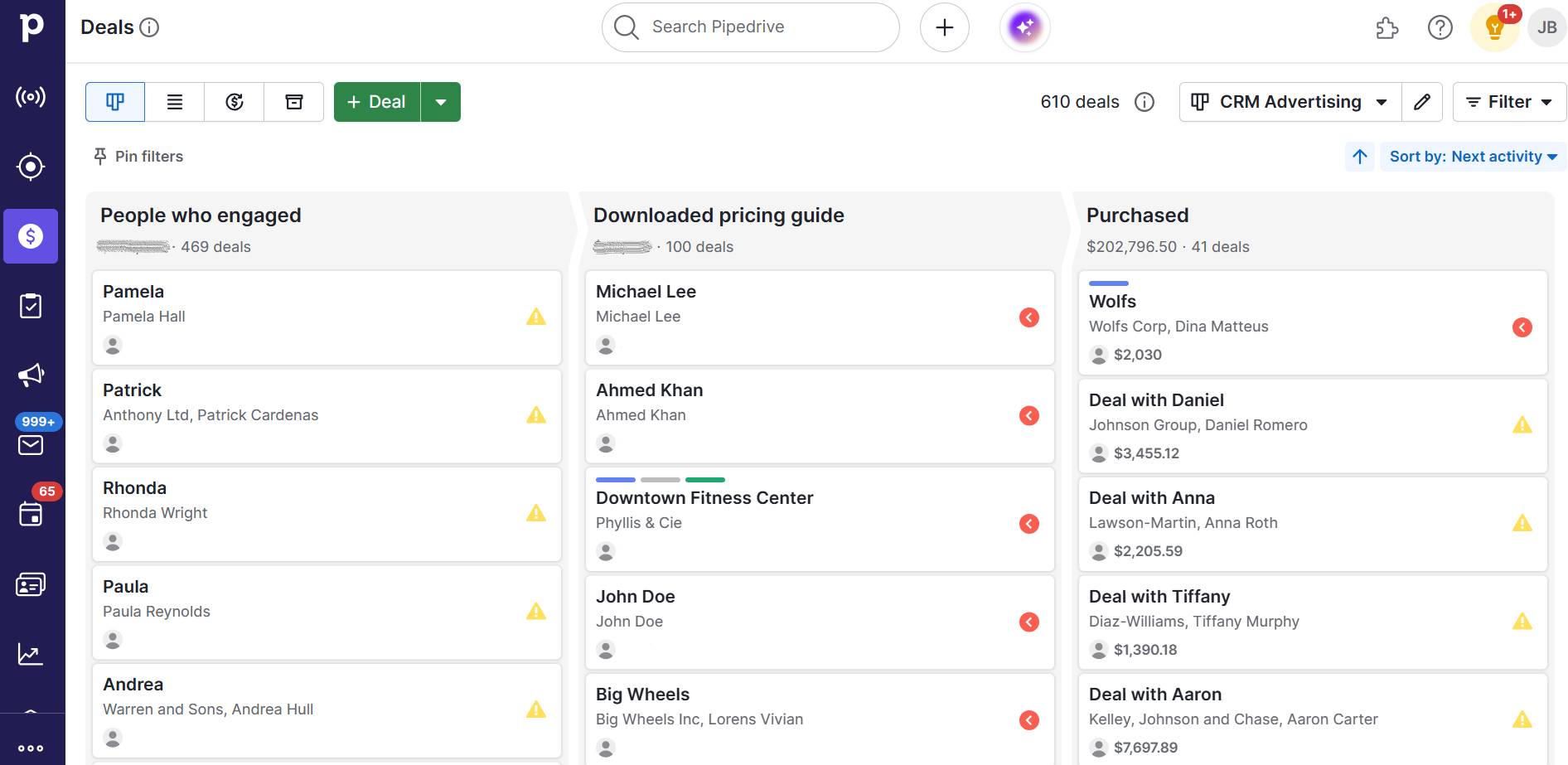
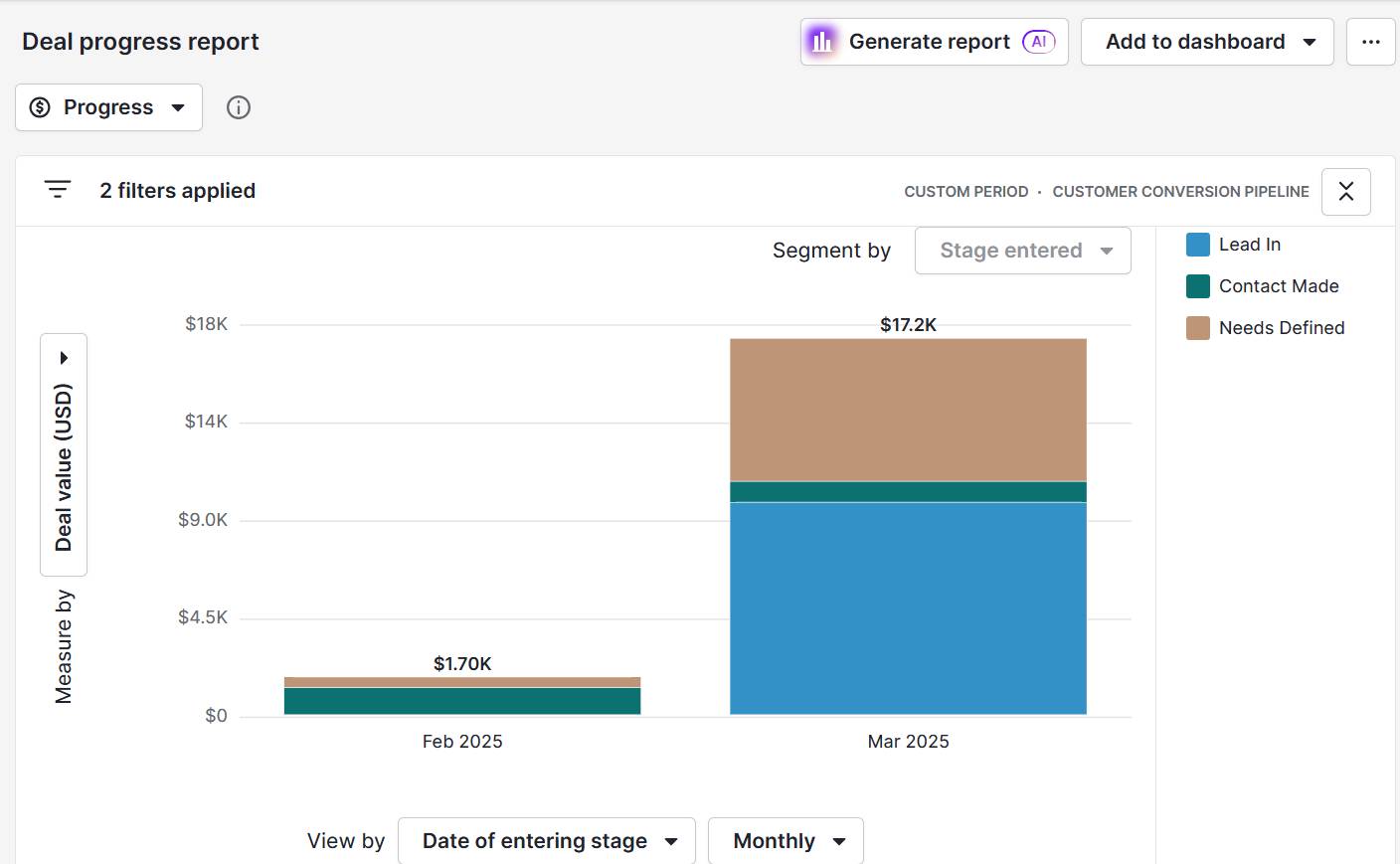
Here’s an example of how to view deal progress in Pipedrive:

Conversion funnel Pipedrive deal progress

With these insights, you can create relevant, high-converting content that aligns with each stage of the funnel and moves prospects closer to a sale.

Note: Pipedrive’s audience segmentation also lets you tailor follow-ups and messaging based on where leads are in the funnel. As a result, your content matches their current needs.

Learn more about Pipedrive’s email marketing software.

3. Simplify the user experience

A smooth, intuitive user experience keeps prospects engaged and increases the chances they’ll complete desired actions. When the buying experience is easy to navigate, people are more likely to stay on track, build trust and convert.

Imagine a visitor clicks on an ad and lands on a clean product page with a clear CTA. They fill out a short form and check out in under two minutes. The process is fast and simple.

Now imagine that the same user clicks on an ad but lands on a cluttered page with multiple CTAs, heavy text and a confusing layout. They’re unsure where to click. When they finally do, they’re taken to a lengthy form asking for unnecessary details.

The checkout process involves several steps, including account creation and email verification. Frustrated or distracted, they abandon the process before completing the purchase.

Here are some ways to avoid this scenario and create a smooth user experience:

  • Optimize landing pages. A focused layout helps visitors understand the next step instantly. Use clear CTAs to help users navigate the site and avoid overwhelming them with information.

  • Reduce friction in web forms. Long or complex forms create friction and can prevent potential leads from converting. Keep forms short and to the point, only asking for what you truly need.

  • Ensure mobile-friendliness. Optimizing your website for mobile means you create a user-friendly experience for the growing number of mobile users. The number of smartphone users is expected to grow by 1.8 billion between 2024 and 2029. Test pages and forms on mobile to ensure smooth navigation and responsive design.

  • Speed up load times. Fast-loading pages help users move through the buying process quickly, improving their experience and reducing bounce rates. Use tools like Google’s PageSpeed Insights to monitor performance and fix issues that cause slowdowns.

A simple, user-friendly funnel improves the customer experience and makes it easier for people to take action, boosting conversions with less effort.

4. Set metrics for success

Defining clear success indicators lets you see where your funnel performs well and where potential customers drop off. These insights help you make data-driven decisions, refine your approach and convert leads more efficiently.

Say you track your lead conversion rate. You notice that only 1% of site visitors become leads, which signals the need for improvement.

You decide to improve your call-to-action, use A/B testing on landing page layouts and simplify your website forms to increase conversions.

Here are some of the key sales funnel metrics for SMBs:

Metric

Definition

Visitor-to-lead conversion rate

Measures how many website visitors become leads. A low rate may indicate that your landing pages or CTAs need improvement.

Lead-to-marketing-qualified-lead (MQL) rate

Shows how many leads demonstrate genuine buying interest. If this number is low, you may need stronger lead nurturing or better qualification criteria.

MQL-to-customer conversion rate

Reflects how effectively your sales process converts qualified leads into paying customers. A poor rate may signal misalignment between sales and marketing or gaps in your sales and marketing strategy.

Customer acquisition cost (CAC)

Calculates how much you spend to acquire a new customer. Keeping this cost low is essential for sustainable growth and profitability.

Average sales cycle length

Tracks how long it takes to convert a lead into a customer. A long cycle suggests friction in the process or the need for more targeted follow-up.

Use these tips to identify the right metrics for your business:

  • Start with your business objective. Are you trying to increase lead volume, improve close rates or reduce acquisition costs? Choose the metric that best supports your business goals.

  • Look for bottlenecks. Identify where your conversion funnel stalls and track metrics that help you monitor improvements.

Tracking the right metrics prevents wasted sales and marketing efforts. Invest resources where they’ll have the most impact on growth.

5. Use technology to plot and track the funnel

Technology streamlines funnel management, making it easier for SMBs to organize sales data, track performance and act quickly. With limited time and resources, using the right tools ensures your funnel is efficient and measurable.

Consider marketing automation software as an example.

These tools help you nurture leads by automatically sending targeted emails, segmenting audiences and scoring prospects based on engagement. They track user behavior across your website and campaigns, providing valuable insights on where leads are in the funnel.

As a result, you can:

  • Pinpoint exactly which messages resonate at each stage

  • Identify where leads lose interest

  • Adjust your campaigns in real time

These adjustments keep prospects moving smoothly through the funnel, boosting conversions while maximizing your marketing ROI.

Take a look at some of the other technologies that can help you manage your conversion funnel:

Software

Definition

CRM systems (like Pipedrive)

Track leads, deals and communication in one place. Visualize your funnel stages and spot bottlenecks in real time.

Analytics platforms (like Google Analytics)

Monitor website traffic, user journeys and conversion rate optimizations (CRO) to see what’s working and where users drop off.

Form and landing page builders (like Typeform)

Create high-converting entry points into your funnel with easy-to-use, mobile-friendly designs.

Live chat and chatbot tools (like Pipedrive’s Chatbot software)

Engage visitors instantly, answer questions in real time and guide them to the next step in the funnel.

Here are some features and functionalities to consider when choosing technology for managing your conversion funnel:

  • Ease of use. Select software with an intuitive, user-friendly interface that your team can quickly learn and use effectively. A simple system minimizes training time and reduces the risk of mistakes.

  • Customization. Opt for tools that allow you to tailor pipelines, sales stages and workflows to reflect your unique sales process. These customizations ensure your funnel accurately matches how your business operates.

  • Automation. Look for platforms that automate repetitive tasks such as sending follow-up emails, assigning leads to sales reps or scheduling reminders. This functionality saves time, reduces manual errors and keeps prospects moving smoothly through the funnel.

  • Live tracking and sales reporting. Choose software that offers live reporting so you can perform conversion funnel analysis in real time. These insights help you quickly identify bottlenecks or drop-offs and take action.

  • Integrations. Pick tools that integrate seamlessly with your existing systems, like email marketing campaigns or accounting software. Integration ensures all your data flows smoothly across platforms, giving your sales team a complete view of customer interactions.

  • Scalability. Select a solution that can grow with your business. As your team expands or your sales process becomes more complex, your technology should support more users, features and advanced analytics without losing performance or usability.

Choosing the right tools lays the foundation for long-term growth by streamlining your funnel, improving efficiency and boosting results with less effort.

How Pipedrive helps SMBs manage conversion funnels

Pipedrive’s CRM gives small businesses a clear, real-time view of the entire sales funnel. It centralizes all customer data so you can act quickly and move leads through the funnel more efficiently, even with limited time and resources.

The software also allows users to create custom pipelines. Plot your unique funnel stages in the system so you always see exactly where each lead stands.

Here’s an example of a custom pipeline that outlines the key stages of a conversion funnel:

Conversion funnel Pipedrive custom pipeline

Users can also assign tasks, set deadlines and schedule follow-ups for every stage, keeping your team accountable and proactive.

Recommended reading

https://www-cms.pipedriveassets.com/blog-assets/how-to-create-a-sales-funnel-illustration.png

How to align your sales funnel with pipeline activity and why it’s important

Why an effective conversion funnel is essential for SMB success

A well-structured funnel gives you visibility into each stage of the customer journey so you can prioritize high-impact actions, reduce drop-offs and convert more prospects with less waste.

Take a look at these benefits (and others) in more detail:

  • Maximize ROI. A funnel helps you focus time and budget on the channels, content and offers that drive revenue so you don’t waste effort on tactics that don’t deliver.

  • Identify where you’re losing leads. By tracking each stage, you’ll see exactly where potential customers fall off, allowing you to fix weak points quickly.

  • Support smarter decision-making. With clear data, you’ll know what messaging, channels and offers are most effective, enabling you to double down on high-converting strategies.

  • Scale with your business. A conversion funnel gives you a repeatable framework to guide new leads, support sales teams and test scalable tactics across your business as you grow.

  • Build long-term customer relationships. Post-sale stages (including onboarding, retention and advocacy) ensure a positive customer experience, encouraging repeat business and turning happy buyers into referral sources who recommend you to other prospects.

An effective funnel gives your SMB the structure to grow sustainably, build loyalty and grow your business.

Conversion funnel FAQs

  • An email funnel is a sequence of automated emails that guide subscribers through the buyer journey. It nurtures leads by delivering targeted content based on their behavior or stage in the funnel, aiming to build trust and drive conversions.

  • A sales funnel focuses on turning leads into paying customers, often handled by sales teams. A conversion funnel is broader, covering the entire customer journey from awareness to action, including marketing activities that influence decisions before sales involvement.

  • The SEO conversion funnel maps how organic search engine traffic moves from discovery to conversion. It includes Top of Funnel content (like blog posts), Middle of Funnel pages (like guides) and Bottom of Funnel content (like product or service pages) optimized to convert visitors into leads or customers.

  • The goal is to turn qualified leads into customers. At this stage, prospects are ready to act, so your focus should be on removing friction, reinforcing trust and guiding them to complete the purchase.

  • Conversion funnel marketing uses content to guide potential customers through the buying journey. The goal is to drive them toward a desired action (like adding items to a shopping cart and making a purchase).

    By analyzing user behavior at every stage of the funnel, marketers can optimize messaging and offers to align with prospects’ needs, ultimately increasing sales and preventing cart abandonment.

  • Heatmaps show how visitors interact with your site by highlighting clicks, scrolls and attention areas. This visual data helps you spot friction points (like ignored CTAs or confusing layouts) so you can adjust design and content to guide users through the funnel better.

  • B2B SaaS benchmarks vary based on different factors, including industry, company size and business goals.

    However, benchmarks generally include the following:

    • 2–5% visitor-to-lead conversion

    • 10–20% lead-to-qualified lead conversion

    • 15–25% qualified lead-to-customer conversion

    These benchmarks help SaaS companies measure their funnel efficiency against industry standards.

Final thoughts

Understanding and optimizing the conversion process helps you guide prospects from awareness to action with less friction and more impact.

To get started, review your current funnel and look for areas where leads drop off. Use those insights to adjust your content, simplify the user experience and apply tools that help you work more efficiently.

With features like visual pipelines, custom stages and automated follow-ups, Pipedrive helps you streamline every part of the funnel and turn insights into results. Sign up for a free 14-day trial to see how Pipedrive can simplify your sales process and boost sales.

Digital Marketing Guide: A Quickstart for Beginners

Software Stack Editor · July 21, 2025 ·

Modern businesses rely heavily on digital marketing, which is a fundamental tool for growth. It allows brands to reach their target audience at the best possible time.

For small businesses, startups or marketers that are new to the space, this digital marketing guide offers a clear, actionable foundation for building a strategy that works.

With so many platforms and tactics available, it’s easy to feel overwhelmed. However, digital marketing doesn’t need to be complex. By understanding the core channels, setting clear goals and using the right tools, teams can build a sustainable strategy that delivers long-term value.

What is digital marketing?

Digital marketing refers to any promotional effort that uses digital channels to reach and engage customers. These channels include search engines, email, social media, websites and online ads. Unlike traditional marketing, digital offers real-time data, precise targeting and the ability to test and optimise continuously.

Note: According to MarketingCharts, by the end of 2024, digital channels made up an estimated 60% of total marketing spend, highlighting a continued shift away from offline media.

It’s not just about visibility. Digital marketing helps brands build trust, generate leads and convert interest into revenue. Whether the goal is brand awareness or revenue growth, digital campaigns can be tailored to meet a wide range of business objectives.

Why digital marketing matters

A significant portion of customers begin their purchasing journey online. They research products, compare prices and read reviews, all of which play a key role in shaping their decisions.

To remain visible and competitive, brands must build and maintain a strong digital presence. Being present at these early touchpoints increases the chances of capturing interest, building trust and guiding potential customers toward conversion.

What makes digital marketing especially powerful is its measurability. Unlike billboards or print ads, digital efforts provide clear performance data. Marketers can see what’s working, adjust campaigns in real time and clearly demonstrate the return on investment for each channel.

Recommended reading

https://www-cms.pipedriveassets.com/Sales-Guides.png

A sales guide for success: from prospecting to closing

Key digital marketing channels

Understanding the main digital marketing channels is essential to building a well-rounded strategy. Each offers different strengths, and together they create a powerful ecosystem for customer engagement.

Channel

Description

Search engine optimisation (SEO)

Focuses on improving website visibility in organic search results. Helps drive long-term traffic by aligning content with user intent.

Pay-per-click (PPC) advertising

A paid model where ads appear in search results or on platforms like Google Ads. Ideal for targeted, time-sensitive promotions.

Email marketing

Direct communication with subscribers. Great for nurturing leads, sending offers and building customer loyalty.

Social media marketing

Uses platforms like LinkedIn, Instagram and Facebook to build brand presence and engage communities.

Content marketing

Involves creating blogs, videos, guides or resources that educate and attract prospects.

Affiliate marketing

Leverages third-party partners to promote products or services in exchange for a commission.

Influencer marketing

Collaborates with individuals who have large followings to promote offerings authentically.

Display advertising

Uses banner ads across websites to raise awareness or retarget users who’ve visited a brand site.

How to create a digital marketing strategy

A strategy ensures that each campaign has a purpose and that every channel works in sync. It begins with a clear view of the customer journey and business goals.

Start by defining specific objectives and key results (OKRs). These might include generating leads, increasing brand visibility or growing ecommerce revenue. From there, identify which channels are most likely to reach that audience and which content formats will resonate most.

Budget and resources also shape the strategy. A smaller team may focus on one or two high-impact channels, like SEO and email, while a larger team might build an integrated multichannel approach.

Setting SMART goals

Digital campaigns work best when they focus on SMART goals. These goals keep the team on track and make results clear. Clear goals help form the plan and make sure each step leads to a specific result.

A SMART goal should be:

  • Specific: outline exactly what needs to be achieved

  • Measurable: include a way to track success or progress

  • Achievable: realistic based on available resources

  • Relevant: aligned with broader business objectives

  • Time-bound: tied to a clear deadline

Instead of setting broad objectives such as increasing website traffic, a SMART approach would define a quantifiable target, such as growing organic sessions within a set timeframe, providing clarity, direction and a measurable benchmark for success.

Note: Studies show that clear goals help teams do better. In a 2022 OKR impact report, 98% of companies said they had better visibility into performance after using clear goal systems. Clear goals are particularly important when working on digital marketing across different channels and teams.

Recommended reading

https://www-cms.pipedriveassets.com/Sales-Goals.jpg

How to set sales goals that improve team performance (with examples)

Creating content that delivers value

The foundation of digital marketing lies in its content. Whether it be in the form of a tutorial video, a written article or a downloadable manual, content is responsible for attracting visitors, establishing credibility and facilitating conversions.

The key is to create content tailored to the audience’s needs at each stage of the funnel. Top-of-funnel content might include educational blog posts, while bottom-of-funnel assets could focus on product comparisons or customer case studies.

Effective content not only provides information but also encourages action. To drive engagement, each piece should include a precise call to action (CTA), such as “download the guide”, “schedule a demo”, or “continue reading”.

Tools to support digital marketing

Choosing the right tools can simplify campaign execution and provide deeper performance insights. Below are examples of widely used, non-competitive tools that support different aspects of a digital marketing strategy:

Tool category

Examples and primary features

Email marketing

Tools like Pipedrive or Sender offer automation, templates and analytics for running campaigns.

CRM platforms

Pipedrive and similar tools help manage contacts, track campaign touchpoints and support targeted communication.

SEO and analytics

Platforms such as Semrush or Google Analytics help track traffic and identify opportunities for improvement.

Social scheduling

Buffer and Later allow content planning and scheduling across multiple social channels.

Content creation

Tools like Canva and Grammarly assist with designing assets and improving content clarity.

AI and automation

Tools like ChatGPT or WRITER support enterprise AI agents, content generation, email drafting and automation.

Recommended reading

https://www-cms.pipedriveassets.com/The-best-AI-marketing-tools-for-SMBs.png

Best AI for marketing: essential AI marketing tools for SMBs

Common mistakes to avoid

Many digital marketing campaigns fall short because of avoidable missteps. Overposting on social media, neglecting SEO basics or ignoring mobile optimization can all reduce campaign effectiveness.

It’s also important to avoid a one-size-fits-all approach. What works on LinkedIn might not translate to Instagram. Tailoring messaging by channel and audience segment is essential for engagement.

Another frequent issue is focusing too heavily on vanity metrics, such as impressions or likes, without considering conversion or return on investment (ROI). True success lies in aligning metrics with business goals.

How to measure success

Digital marketing offers detailed analytics, but knowing which metrics to track is key. For SEO, this might mean monitoring organic traffic and keyword rankings. For email, it includes open rates, click-through rates and conversions.

Performance dashboards can be used to monitor progress over time. Many marketing platforms now offer convenient reporting features that streamline this task.

Success isn’t just about numbers – it’s about outcomes. Did the campaign increase qualified leads? Did it lower customer acquisition costs? Focusing on business impact ensures that marketing efforts drive real value.

Personalisation and audience targeting

To be effective in digital marketing, it’s crucial to provide relevant content to audiences. Hence, the significance of personalization is growing more and more. As a result, personalization is becoming increasingly important.

Businesses can enhance engagement and achieve better results by personalizing emails with the recipient’s name or using their online behavior to guide ad placement.

Customer segmentation plays a crucial role in this procedure. It involves categorizing audiences according to their interests, previous actions or buying patterns, which leads to the creation of more fitting content and more effective campaign results.

Recommended reading

https://www-cms.pipedriveassets.com/Affiliate-Marketing-Guide_2025-06-25-102407_usrv.png

Affiliate Marketing guide for small businesses: A step-by-step starter playbook

Why Pipedrive fits into the digital marketing stack

In addition to being a CRM platform, Pipedrive serves as a central hub that connects marketing and sales efforts. By incorporating tools for email campaigns, lead monitoring and automated workflows, it enables teams to stay on task and effectively turn interest into action.

Pipedrive seamlessly connects every step of the customer journey, whether it’s nurturing leads, tracking outreach or creating data-driven campaigns. Monitoring touchpoints, evaluating lead involvement and automating follow-ups allows teams to efficiently guide customers from initial awareness to generating revenue.

Pipedrive’s visual dashboards and automation tools help businesses scale digital marketing while maintaining personalization and timing. Campaigns can be triggered by real-time activity to reach the right audience at the right moment. With insights across email, sales and lead management, teams can refine strategies and drive consistent, measurable results.

Final thoughts

A well-executed digital marketing strategy doesn’t just promote a product – it builds relationships, solves problems and supports business growth.

Whether starting from scratch or refining an existing setup, this digital marketing quickstart guide offers the clarity and structure needed to move forward with confidence. Focus on channels that align with business goals, measure what matters and use the right tools to scale effectively.

Effective Corporate Social Network Guide

Software Stack Editor · July 18, 2025 ·

Internal company updates often get buried in Slack threads or lost in inboxes. A corporate social network offers a more structured way to align everyone in your business in real time.

In this article, you’ll learn why a corporate social network is worth exploring for a small business and how to reap the benefits without overwhelming your team. You’ll discover common SMB use cases, practical alternatives and tips to boost adoption.

What is a corporate social network?

A corporate social network is a private, internal platform that helps employees communicate and collaborate effectively.

Corporate social networking tools include platforms like Microsoft Viva Engage (formerly Yammer). You can also use specialized tools like Jostle or Igloo Software (below).

Pipedrive corporate social network Igloo Software

Unlike public social media platforms like LinkedIn or Facebook, corporate social networks are only accessible to people within your company.

They differ from traditional enterprise intranets, which tend to be static, top-down communication tools. A corporate social network is a workspace built for real-time interaction, not just company announcements.

Most platforms include functions like:

  • Activity feeds for updates and discussions

  • Group chats and project-based channels

  • @Mentions and tagging to loop in the right people

  • Forums for topic-based discussions and Q&A

  • File sharing and commenting

  • Wikis or knowledge bases for searchable documentation

  • Integrations with standard workplace tools (like Google Drive or Microsoft Teams)

Many corporate social networks primarily target large enterprises. Still, smaller organizations are increasingly adopting them to streamline communication and strengthen corporate culture.

Note: Some people describe tools like Slack and Microsoft Teams as corporate social networks, but they’re primarily instant messaging and collaboration tools. True corporate social networks emphasize features like activity feeds and wikis rather than just chat functionality.

Use cases for corporate social networks in small teams

A corporate social network can support everyday teamwork in ways that go beyond traditional communication tools. Here are a few scenarios where small and medium-sized businesses (SMBs) use them to keep coworkers connected.

Download your guide to managing teams and scaling sales

The blueprint you need to find a team of superstars and build a strong foundation for lasting sales success

Make company-wide updates easier to follow

Company-wide updates can be hard to communicate well. They usually happen infrequently, making them easy to miss among other messages and emails.

Coworkers might not see the updates at all. Or, they might see them but forget the details when they need to reference them.

A corporate social network offers a structured place to share company updates, such as a specific channel, page or pinned post in a central news feed.

This real-time visibility is beneficial for teams in different time zones who aren’t always online at the same time.

Help new hires get up to speed

New employees absorb a lot of information during the onboarding process. They need to understand past project decisions, current workflows and who handles different responsibilities.

This information usually lies scattered across different channels and shared documents that can be hard to piece together.

Instead of asking repeated questions or trying to connect information from different sources, new hires can browse the corporate social network software to get context at their own pace.

They can read past project discussions and figure out who handles what without interrupting busy teammates.

Some platforms even include wikis or searchable discussion threads. These features make it easier to understand workflows and who to contact for specific help.

Strengthen team culture across locations

Remote and hybrid teams miss out on casual interactions that happen naturally in an office. People don’t overhear conversations about project wins, which can boost morale.

A social networking platform brings these moments back into view in the digital workplace. Employees recognize each other’s work, share project updates and celebrate milestones.

Creating a shared sense of what’s happening across the company improves the employee experience. This visibility is crucial for remote employees who might otherwise only interact with their immediate project teammates and miss the bigger picture of company culture.

Improve visibility without micromanaging

Managers often don’t know what their team is working on without asking for updates. To understand project progress, they must check multiple tools, scroll through chat histories or schedule meetings.

This extra work for management oversight can make team members feel like they’re being watched.

A corporate social network helps reduce business silos. It makes team updates more transparent without requiring constant check-ins.

Managers can scan recent posts and shared content to track progress. Team members post updates as part of their workflow instead of preparing formal reports.

Having one place to share information cuts extra status meetings and “where are we on this?” messages. Everyone stays informed without creating more admin.

Is a corporate social network right for your business?

Not every team needs a corporate social network. For some, it can be a functional layer that boosts visibility and avoids missed updates. For others, it just adds another place to check for information.

The key is identifying where your communication gaps are. Here’s a quick way to tell if a corporate social network is likely to support your small business:

A corporate social network might be a good fit if…

You probably don’t need one if…

Your team has 50+ people or multiple departments

You’re under 20 people and mostly located in the same place

Important updates often get missed or repeated

You already share updates consistently across tools

You’re hiring often, and onboarding is messy

New hires get up to speed quickly using existing docs or Slack

Managers struggle to get visibility into what’s happening

You already use dashboards or async updates effectively

There’s confusion about where updates should live

You have clear norms for what goes where

If you think a corporate social network might be a good fit, here are a few questions to ask before you evaluate specific platforms:

  • What specific communication problems are you solving? Get specific. Are people missing announcements? Do new hires ask the same questions repeatedly? Write down exactly what you’re trying to fix.

  • Are your current tools underused or genuinely falling short? If your team isn’t fully using Slack or email, adding another platform won’t help. But if essential updates get buried or information is hard to find, you might need something designed for the job.

  • Will your team actually adopt and sustain a new platform? Be honest about your team’s track record with new tools. Do people embrace changes, or do they tend to abandon platforms after a few weeks? Consider whether your team will see enough value to stick with it.

  • Do you have someone who can champion and manage it? Corporate social networks need someone to set the tone and encourage participation. Without a dedicated person to guide adoption, even the best platform can become a ghost town.

Take time to answer these questions before you start comparing features and pricing. Clarifying these fundamentals will help you choose the right network plan.

Recommended reading

https://www-cms.pipedriveassets.com/How-to-create-a-communication-plan.png

How to build a winning communication plan (plus free templates and examples)

Lighter alternatives to try before a corporate social network

Before you commit to a dedicated platform, test whether small changes to your existing tools can do the job.

Low-effort alternatives can help you build better communication habits without extra software or complexity. If they’re not enough, that’s a strong sign that a corporate social network might be worth exploring.

Here’s how to go about testing alternative tool options:

Try this…

To improve…

Use Pipedrive to leave deal notes, tag team members and create shared dashboards

Task management and sales team collaboration

Create a dedicated Slack channel for team updates or async check-ins

Reducing status meetings and centralizing updates

Use Notion or Confluence for searchable internal documentation

Onboarding, knowledge sharing and reducing repeat questions

Record Loom videos or write weekly wrap-ups for async leadership updates

Transparency from leadership without clogging inboxes

For example, if you’re an SMB sales manager, use Pipedrive’s Insights dashboards to align the team and leadership on progress without a social network.

Corporate social network Pipedrive Insights dashboard

Create different dashboards directly in the CRM to:

Customize each dashboard with relevant reports to display precisely what you need. Use Pipedrive’s sharing options to give access to specific internal team members or even external stakeholders (via a public link).

Corporate social network Pipedrive Insights dashboard sharing

Everyone who needs visibility can find the same up-to-date data without asking for updates or searching through chat threads.

Next, find out how to approach effective network adoption if you decide that your company would benefit from one.

Best practices if you move forward with a corporate social network

To increase the chances of successful adoption and avoid tool fatigue, take a thoughtful approach from the start.

1. Start with one or two clear use cases

Focus your rollout on simple activities like company-wide updates or major team wins to limit overwhelm. Encourage employees to ease into the platform without feeling pressure to use it for everything right away, making it easier to build habits.

A corporate social network is instrumental when collaboration goes beyond individual teams.

Say you want to facilitate ongoing interaction between sales and marketing, customer success and product teams. A dedicated social network platform fills that gap, reinforcing company culture and ensuring transparency across distributed teams.

You might not need a separate tool if your main goal is to coordinate sales activities alone. Pipedrive already offers simple ways for sales reps to collaborate directly within deals, contacts and projects through mentions and comments.

Corporate social network Pipedrive deal mentions

CRM notifications ensure nothing important gets missed, while permissions keep sensitive company data secure.

Ultimately, your use cases and business needs will determine how far you must go.

2. Make sure leadership participates and sets the tone

When leaders actively use the corporate social network, it signals the importance of the platform to the rest of the company. This practice encourages employees to join in and helps build a positive culture around the tool.

Offer practical suggestions for how to show up to make participation easy. Lists of content ideas or templates remove the guesswork. They help C-level executives and department heads post consistently, even when they’re busy or unsure what to say.

3. Define what content belongs on the corporate social network

A clear corporate social networking policy helps employees understand what to post on the network versus other platforms. Avoiding duplication and confusion keeps communication organized, especially as you add more use cases.

For example, you might decide to keep sales-specific comms within your CRM system. Pipedrive’s deal detail view lets sales reps track deal progress, log communication and find key documents in one place.

Corporate social network Pipedrive deal detail view

For bigger updates that benefit the wider company, like closing a deal, reps can share the news on the corporate social network so everyone can celebrate the win.

4. Train your team and encourage consistent usage early on

Provide training sessions to cover the basics and share clear examples of how the network platform supports employees’ day-to-day work. Regular refreshers help everyone feel confident using the platform.

Consistency in early usage increases the chances that the network will become part of daily work. The more employees see the platform’s value in their daily work, the more likely it is to become part of your company’s communication habits.

5. Review adoption metrics and adjust your approach as needed

Keep an eye on how actively employees use the corporate social network and what types of content get the most engagement. Look for signs of what’s working, like increased participation in discussions or positive feedback on updates. Also, look for areas where adoption is slower.

Use these insights to refine your approach. For example, if engagement is low, offer more guidance on using the platform or encourage leadership to post more regularly.

If certain posts drive more interaction, consider making them part of your ongoing communication strategy. Review the data regularly to make informed decisions that keep the platform valuable and relevant for your teams.

Focusing on these steps early creates a solid foundation that encourages lasting engagement. It also makes the internal social network a valuable part of the daily routine.

Corporate social network FAQs

  • Traditional intranets are static, top-down communication platforms. They’re mainly for company announcements and document storage.

    A corporate social network (or enterprise social network) is more like internal social media. It supports real-time interaction, collaboration and employee engagement.

    While intranets focus on sharing information one-way, social networking platforms encourage two-way conversations and help break down silos between team members.

  • Not exactly. Slack and Microsoft Teams are collaboration tools for instant messaging and project management.

    Enterprise social networking tools are more like social media platforms. They emphasize news feeds, company-wide updates and building company culture.

    Many organizations use both. For example, Teams or Slack assists with day-to-day work, while a social intranet enables broader communication and knowledge sharing.

  • Key functions include activity feeds, @mentions and notifications, document management, wikis for knowledge sharing, mobile app access and integrations with existing tools like Salesforce or other business processes.

    Look for platforms that provide a good user experience across different devices.

  • Collaborative platforms help foster a sense of belonging, especially for remote employees and new hires during onboarding.

    These networks streamline internal communication, making it easier for team members to share information across the digital workplace. They also help preserve company culture, even when people work in different locations.

    The real-time nature helps employees feel more connected to company-wide initiatives and teamwork.

  • Popular enterprise social networking options include those from Microsoft Viva Engage (formerly Yammer) and Jive.

Final thoughts

Effective internal communication drives team success, so make sure you implement tools that fit your company best.

A corporate social network provides a structured, real-time space for sharing updates and collaboration. If you decide to implement one, start small, involve leadership and set clear guidelines to boost adoption.

For a simpler way to improve teamwork and visibility across your SMB, try Pipedrive free for 14 days. It’s an easy way to keep teams aligned without adding complexity.

23 Extremely Common Logical Fallacies in Sales

Software Stack Editor · July 17, 2025 ·

Logical fallacies can quietly derail sales conversations with flawed reasoning that feels persuasive but lacks substance. When left unchecked, logical fallacies can lead to stalled deals and missed opportunities to address real objections.

In this article, you’ll learn how to spot common logical fallacies in sales conversations and respond in ways that keep deals moving forward.

What are logical fallacies in sales?

Logical fallacies are arguments rooted in flawed logic, hidden assumptions or an absence of evidence. In sales conversations, they often show up in objections from prospects.

There are two main types of logical fallacies:

  • Formal fallacies, which arise from errors in the structure of an argument

  • Informal fallacies, which arise from errors in the content of an argument

For customers, logical fallacies are a natural vehicle for expressing their doubts or hesitation in sales conversations. Although they often seem rooted in common sense, logical fallacies usually fall apart under scrutiny.

Note: A logical fallacy involves using flawed reasoning to support an argument. A cognitive bias is an error in reasoning that affects decision-making.

Why salespeople need to recognize common logical fallacies

When salespeople can spot faulty logic, they can respond strategically, guide the conversation back to facts and build more credible, trust-based relationships.

Buyers sometimes rely on flawed reasoning to justify hesitation, especially when they’re unsure or feeling pressured. When reps apply critical thinking, they can identify when an objection is based on emotion, assumption or a lack of logical reasoning.

This sales communication skill allows sales reps to qualify objections more accurately and keep the conversation focused on real value.

By addressing logical fallacies with confidence and empathy, salespeople build trust, improve customer relationships and reduce misunderstandings that could otherwise derail a deal.

Recognizing common logical fallacies helps salespeople respond more effectively to overcome sales objections and close more deals.

Download Your Guide to Preventing 5 Common Sales Mistakes

Always say the right thing with this guide to avoiding the frequently-made sales conversation mistakes.

23 common logical fallacies in sales conversations

Here are the most common logical fallacies in B2B sales and how to recognize them in conversations with sales prospects:

Common logical fallacies in sales conversations

Let’s break each argument down in detail. (We’ll explain how to handle logical fallacies in your sales conversations in the next section).

1. Straw man

The straw man fallacy involves misrepresenting your opponent’s argument to make it easier to attack or dismiss. It derails deals by forcing the sales rep to address the misunderstanding instead of focusing on the real value of the offer.

What the straw man fallacy sounds like from a prospect:

“Are you expecting us to scrap our current system completely?”

“So this is a magic fix for everything?”

In sales, customers may distort a proposition into something unreasonable or more extreme to justify saying no. Listen out for customers exaggerating, twisting or reframing your suggestions to make them sound radical or unrealistic.

2. Appeal to authority

The appeal to authority fallacy occurs when someone insists an argument is true simply because an authority figure said so, even if that authority isn’t an expert in the relevant area. It derails deals because prospects are unwilling to consider the solution without the authority’s approval.

What the appeal to authority fallacy sounds like from a prospect:

“Our CIO has already decided this won’t work for us.”

“My boss doesn’t believe in using this type of technology.”

In sales, customers might reject your solution because a senior executive or industry figure said it wouldn’t work for their needs. Listen for objections based only on what “someone important” has said, rather than facts or the proposal itself.

Another fallacy that relies on external validation instead of logical reasoning is the bandwagon fallacy.

3. Bandwagon fallacy

Also known as the ad populum fallacy, the bandwagon fallacy assumes something is true or better simply because many people believe it or do it. It derails deals by discouraging objective evaluation and creating resistance to new or innovative offerings.

What the bandwagon fallacy sounds like from a prospect:

“We don’t want to switch. Everyone else is using Brand X.”

“If your solution were any good, more companies would use it.”

In sales, customers may reject your solution because it’s not yet widely adopted. They might favor a competitor because “everyone uses them.”. Watch for comments that equate popularity with quality or dismiss your product because it’s not the market leader.

4. Appeal to emotion

The appeal to emotion fallacy happens when objections are based on feelings or fears rather than logical reasons. It derails deals by making it difficult to discuss your product or solution’s measurable value.

What the appeal to emotion fallacy sounds like from a prospect:

“I just don’t feel comfortable moving forward with this.”

“This seems like too much disruption for us right now.”

In sales, prospects dismiss your proposal based on gut feelings, anxiety about change or a vague sense of discomfort. Listen for emotional objections rather than objective concerns.

5. Appeal to pity

The appeal to pity fallacy involves trying to win support by exploiting someone’s feelings of sympathy or guilt. It derails deals by shifting the conversation away from the product’s value or fit, pressuring the rep to make concessions or walk away.

What the appeal to pity fallacy sounds like from a prospect:

“We can’t move forward right now. We’re barely staying afloat.”

“As a small business, we can’t afford your rates.”

In sales, customers may focus on difficult situations or challenges when considering whether to commit to a purchase. Notice when a customer focuses on hardship or makes an emotional appeal to you.

6. Ad hominem

The ad hominem fallacy attacks the person or company making an argument rather than addressing the argument itself. It derails deals by preventing meaningful evaluation of a product or service.

What the ad hominem fallacy sounds like from a prospect:

“You’re a startup, so your product can’t be reliable.”

“I don’t think your sales rep understands our business.”

In sales, customers might focus on factors like the company’s size or your team’s experience instead of your product’s capabilities. Listen for criticisms about your company or team rather than your proposal.

7. Red herring

The red herring fallacy introduces irrelevant topics to the conversation to divert attention from the main issue. It derails deals by making it difficult for you to address the prospect’s real concerns about your solution.

What the red herring fallacy sounds like from a prospect:

“Can you explain why your company hasn’t won any awards?”

“Why don’t you have more of a social media presence?”

In sales, prospects raise tangential concerns when discussing your core value proposition. Watch for sudden changes in topic that don’t relate closely to the key decision.

8. False dilemma

This false dilemma fallacy – also known as the false dichotomy fallacy – forces a choice between two options, ignoring other possibilities. It derails deals by limiting the discussion to extremes and making it difficult to explore flexible solutions.

What the false dilemma fallacy sounds like from a prospect:

“We either stick with what we know or risk everything on something new.”

“Either your solution handles everything we need, or it’s not worth considering.”

In sales, prospects present the buying decision as an all-or-nothing choice without looking for middle ground. Listen for statements framing the choice as “either/or” with no alternatives.

9. Hasty generalization

The hasty generalization fallacy involves drawing a broad conclusion from insufficient or isolated evidence. It derails deals by preventing a fair assessment of a product or solution.

What the hasty generalization fallacy sounds like from a prospect:

“I tried a similar tool once and it failed.”

“Platforms like this are too complicated for us.”

In sales, a customer might reject your solution based on one negative perception or a single feature that doesn’t work for them. Listen for sweeping statements based on limited information.

Want to Learn How to Influence Your Prospect’s Buying Decisions?

Get inside the head of your customers and take advantage of consumer psychology with this Psychological Selling Guide.

10. No true Scotsman

The “no true Scotsman” fallacy occurs when someone who broadly generalizes a group hears contradictory evidence about it. They arbitrarily redefine the group to exclude that evidence.

For example, a prospect might say that no startup founder would use a particular set of tools. Upon hearing evidence to the contrary, they might say, “Well, no true startup founder would use those tools”.

What the “no true Scotsman” fallacy sounds like from a prospect:

“No true IT manager would approve that.”

“Real business owners wouldn’t consider software like this.”

In sales, prospects dismiss your solution or success stories by redefining what constitutes a “real” or “legitimate” example in their industry or role.

The hasty generalization fallacy often combines with the “no true Scostman” fallacy to create a double barrier. Prospects first dismiss your solution based on limited data, then move the goalposts when you provide evidence contradicting their beliefs.

11. False cause

The false cause fallacy mistakes correlation for causation. It assumes that because two things are associated or tend to occur together, one must cause the other. The fallacy derails deals because it can lead to unfair judgments about your solution.

What the false cause fallacy sounds like from a prospect:

“We tried a similar tool last year and our productivity dropped, so this type of software doesn’t work.”

“Company X implemented your competitor’s platform and had layoffs, so these systems cause job losses.”

In sales, customers may assume your product causes certain outcomes simply because those outcomes happen alongside its use. Watch for statements that draw a causal link based on the co-occurrence of outcomes.

12. Post hoc

A particular type of false cause fallacy, the post hoc fallacy mistakes sequential timing for causation. It assumes that because one event followed another in time, the first event must have caused the second. The post hoc fallacy derails deals by creating resistance before the sales process truly begins.

What the post hoc fallacy sounds like from a prospect:

“We rolled out a platform like this at my last company, and a few months later, our CFO quit. I don’t want to trigger a leadership shake-up here.”

“Our board started cutting budgets shortly after we tried something like this last year. That can’t be a coincidence.”

In sales, prospects may object to your solution based on negative outcomes they experienced after using a similar tool. Listen for early-stage objections rooted in past experiences.

13. Circular reasoning

Circular reasoning occurs when someone uses their conclusion as evidence to support that conclusion, creating a logical loop with no independent justification. It derails deals by making identifying prospects’ genuine concerns difficult, leading to conversations feeling “stuck”.

What the circular reasoning fallacy sounds like from a prospect:

“We can’t switch vendors because we need to stick with our current provider.”

“This solution won’t work for us because it’s not suitable for our company.”

In sales, prospects defend their decisions by simply rephrasing their original statement rather than offering genuine reasons, data or evidence to support their position. Listen for responses that restate the prospect’s conclusion as the reason for their decision.

14. Begging the question

Begging the question occurs when someone assumes their conclusion is already true. It derails deals by making it difficult to explore prospects’ underlying assumptions.

What begging the question sounds like from a prospect:

“This solution won’t help because it’s not useful.”

“We can’t switch to another product because switching is always disruptive.”

In sales, customers present their assumptions as undisputed facts, then use those assumptions to justify their decisions, skipping the step of proving whether their initial premise is true. Look for statements where the customer treats an opinion as an unquestionable fact.

15. Equivocation

Equivocation uses ambiguous language to mislead or confuse the other person, shifting between meanings during the conversation. It derails deals by prompting salespeople to solve the wrong problem based on their interpretation of the customer’s words.

What equivocation sounds like from a prospect:

“Your solution isn’t enterprise-ready enough for us.”

“We need something more professional.”

In sales, customers either use ambiguous terms that could be interpreted in multiple ways or conflate distinct ideas under a single broad term. Listen out for vague or unclear language in prospects’ objections.

16. Affirming the consequent

Affirming the consequent assumes that because a result is true, a specific cause must also be true. It derails deals by persuading customers that changing their approach will make them less successful.

What affirming the consequent sounds like from a prospect:

“We’re profitable, so we don’t need your accounting software.”

“Our team is already meeting targets, so we don’t need your sales training.”

In sales, prospects assume that because they’ve already achieved success, their current approach must be optimal. As a result, they dismiss the potential value of other solutions. Listen for customers assuming their current success proves their current methods and systems are optimal.

17. Tu quoque

Tu quoque (Latin for “you too”) is a deflection that accuses the other party of hypocrisy instead of addressing the argument. It derails deals by blocking constructive dialogue.

What the tu quoque fallacy sounds like from a prospect:

“You say our current system is inefficient, but your own company’s website loads slowly.”

“How can you talk about improving our processes when your colleague was late to our last meeting?”

In sales, prospects reject your evaluation of their current situation by pointing out flaws with you, your company or your solution. Notice when a customer responds to perceived criticism by making similar comments toward you, your product or your company.

18. The “fallacy” fallacy

The fallacy fallacy assumes that if an argument contains a logical fallacy, then its conclusion must be false. It derails deals by ending discussions prematurely with the rejection of valid ideas.

What the fallacy fallacy sounds like from a prospect:

“You’re just name-dropping that big client to impress me, so I don’t believe any of your other claims.”

“You said your boss went to Harvard, but that’s not relevant to our conversation about your product, so I’m not sure we’re a good fit.”

Customers might dismiss your entire sales pitch because of one flawed point in your argument, even if your overall solution is solid. Listen for references to flawed reasoning in customers’ objections.

19. Genetic fallacy

The genetic fallacy dismisses a claim based on its origin rather than its merit. It derails deals by shifting the focus from a solution’s benefits to its origin factors.

What the genetic fallacy sounds like from a prospect:

“We can’t use software from a startup. We only work with established companies.”

“Our IT department recommended this solution, so it’s probably too technical for our needs.”

In sales, customers reject your product because of where it comes from, who created it or how they first heard about it. Notice when objections rely on the product’s origins rather than its capabilities.

20. Appeal to ignorance

The appeal to ignorance fallacy argues that a claim is true because it hasn’t been proven false – or vice versa – treating a lack of evidence as evidence. It derails deals by shifting the burden on sales reps from demonstrating value to providing absolute certainty.

What the appeal to ignorance fallacy sounds like from a prospect:

“No one has shown me our current process is broken, so we’re not going to change it.“

“You haven’t proven your solution improves efficiency, so we won’t invest.”

In sales, prospects reject your solution because you can’t prove it will work, or they defend their current approach because there’s no proof it’s problematic. Listen for decisions based on an absence of evidence.

21. Burden of proof

The burden of proof fallacy occurs when someone makes a claim and asks the other party to disprove it. It derails deals by requiring salespeople to prove a negative or defend against an unsupported assumption.

What the burden of proof fallacy sounds like from a prospect:

“Unless you can prove this will never cause downtime, we won’t move forward.”

“You say your solution integrates with our systems. But can you prove it works perfectly in every case?”

In sales, prospects make broad claims about risks or limitations and then ask you to prove those claims wrong. Watch for customers making unsupported claims and challenging you to prove absolute negatives.

22. Non sequitur

A non sequitur is an argument where the conclusion doesn’t follow logically from the premise. It derails productive sales discussions by making it difficult for reps to address the prospect’s real needs or valid objections.

What a non-sequitur sounds like from a prospect:

“I don’t think this will work. Our last vendor had terrible customer service.”

“We’re not interested. We just moved offices last month.”

In sales, prospects connect unrelated concepts to support their position in a discussion. Notice when a customer’s objection doesn’t logically connect to what you’ve presented.

23. Slippery slope

The slippery slope fallacy argues that a small step will inevitably lead to a chain of negative events. It derails deals by focusing on imaginary worst-case scenarios rather than realistic risks and benefits.

What the slippery slope fallacy sounds like from a prospect:

“If we switch to your product, we’ll be completely vulnerable.”

“Using your tool will cause endless problems down the line.”

In sales, prospects imagine a sequence of potential disasters, assuming each event will automatically trigger the next. Listen for exaggerated “what if” scenarios that jump to inevitable worst-case consequences.

Now you know some of the most common logical fallacies that can influence conversations with prospects, let’s consider how to respond.

Recommended reading

https://www-cms.pipedriveassets.com/blog-assets/4_Sales-Motivation.jpeg

6 ways to hack sales psychology and sell better

How to respond to logical fallacies in sales conversations

In sales, responding to fallacious arguments isn’t about calling out the flawed logic in your opponent’s position. It’s about guiding the conversation back to clarity and a sense of shared understanding.

Here’s how to do that without being confrontational.

Gently clarify emotional or vague language

Broad or emotionally loaded objections often stem from the “appeal to emotion” fallacy, where feelings or gut reactions take precedence over logical reasoning.

Responding with curiosity and compassion is often the most effective approach.

A buyer might say:

“This solution just seems risky.”

In response, you could say:

“Can you walk me through what feels risky to you?”

Exploring the objection in this way helps you better understand the prospect’s problem. As a result, you can respond with relevant, reassuring information to get the conversation back on track.

Download Your Guide to Sales Performance Measurement

The must-read guide for any sales manager trying to track, forecast and minimize risk. Learn how to scale sales with data-backed decisions.

Reframe cause-and-effect claims without dismissing them

Some objections are rooted in personal experience, but customers may incorrectly assume that because two things happened simultaneously, one caused the other.

The key is to gently explore the logical connections between their experience and the conclusions they’ve drawn.

A prospect might say:

“We used a CRM before, and our pipeline dried up.”

An effective response could be:

“It sounds like that experience left a mark. Do you think the issue was the tool or how it was implemented?”

This approach helps separate correlation from causation, opening the door for a more nuanced discussion.

Offer alternative perspectives to extreme choices

When buyers present two extreme options while ignoring more practical middle-ground solutions, the false dilemma fallacy might be at play. Rather than accepting the either/or scenario, suggest a third way grounded in their real priorities.

You might hear something like:

“We either need to completely overhaul our entire system or stick with what we have for the foreseeable future.”

In this scenario, you could respond with:

“I understand those feel like the only options. What if we looked at ways to improve your current setup gradually while addressing your biggest pain points first?”

Repositioning the conversation like this encourages a more collaborative problem-solving mindset, allowing the conversation to move forward productively.

Ask non-threatening, clarifying questions

Some objections feel off-base because they don’t follow on naturally from the main topic of discussion. These moments often point to confusion or assumptions on the prospects’ part that need unpacking.

A buyer might say:

“We’re not interested in sales automation because we just hired a new IT manager.”

You could ask:

“Can I ask how that relates to your current sales goals?”

This approach helps refocus the conversation on relevant priorities without challenging the customer outright.

Recommended reading

https://www-cms.pipedriveassets.com/Emotional-Selling.png

How to build stronger connections with emotional selling

How to navigate common logical fallacies in sales with Pipedrive

Here’s how sales teams can use Pipedrive’s sales CRM to track and address the influence of prospects’ logical fallacies throughout the sales cycle.

Use Pipedrive’s after-call reviews and notes features

Objections rooted in flawed logic often recur in multiple conversations. With Pipedrive’s call notes and custom data fields, reps can record specific objections.

For example, if a prospect repeatedly claims, “We tried something similar once and it didn’t work”, reps can record the objection in the call notes, as shown in the image below:

Common logical fallacies Pipedrive call notes

Reps can also record how they handle each objection they encounter.

Tracking this information makes it easier for reps to recognize patterns and prepare effectively for future conversations with prospects. It also allows for more accurate lead qualification.

Use CRM data to coach sales teams on objection handling

Sales leaders can use the customer data in Pipedrive to monitor objection trends and coach sales teams on responding more strategically.

Managers and coaches can also analyze the data in the call notes to identify the most common fallacies sales reps encounter and which methods of dealing with them were most effective.

Some sales coaching software, like Wingman, integrates with Pipedrive to import this data directly.

As a result, sales leaders can easily deliver targeted sales training to improve how the team thinks about customer behavior and objection handling.

Recommended reading

https://www-cms.pipedriveassets.com/Sales-Guides.png

A sales guide for success: from prospecting to closing

Final thoughts

Recognizing and addressing logical fallacies in sales conversations helps small businesses build trust, uncover real objections and close more deals. It also encourages clearer communication between sales reps and customers, fostering better relationships and building trust with prospects.

By learning to recognize flawed arguments and steer conversations back to facts and value, your sales team can turn confusion into confidence and hesitation into action.

A CRM like Pipedrive makes it easy to record insights from sales conversations, track objection patterns and improve training to address prospects’ real concerns. Start your free 14-day trial of Pipedrive today.

9 Expert-Backed CRM Trends in 2025

Software Stack Editor · July 16, 2025 ·

Customer relationship management (CRM) is both software and a growth playbook. To understand 2025 CRM trends, you must consider evolving technology and how real teams are changing the way they work because of it.

We analyzed insights across forums, podcasts, YouTube interviews and industry blogs to surface topics getting the most attention and adoption in the field.

In this post, you’ll learn nine current trends in CRM that experts are discussing and how to use them to encourage more sales from happy customers.

1. AI and automation free up your team to focus on selling

CRM technology trend: Most CRM software now includes artificial intelligence (AI) to automate documentation, scheduling, follow-ups and deal recommendations.

CRM activity shift: Reps spend less time on admin and more time having high-value conversations that move deals forward.

AI is transforming CRM systems from passive databases into active teammates, freeing humans to focus on what they’re uniquely able to do (e.g., building long-term relationships).

At its core, this trend is about embedding AI into daily workflows. Whether chatbots or voice assistants, these tools help small and medium-sized businesses (SMBs) scale their impact without increasing headcount.

For example, AI can draft emails, generate meeting summaries and set follow-ups. For salespeople, it can even recommend the next best move in a deal, like Pipedrive’s AI Notifications:

CRM trends Pipedrive AI-powered Sales Assistant

Rather than handling low-priority tasks, reps can focus on relationship-building activities like sales lunches and strategic conversations. Meanwhile, managers get instant insights from automated reporting and have more time to organize events and coach their teams.

While this isn’t a new trend in CRM, the conversation is shifting. As Jodi Searl, Chief Experience Officer of Medallia, told CRM Magazine in their 2025 predictions special edition, the question is no longer “Will AI steal people’s jobs?” but rather “How can it help us do our roles better?”:

In 2025, the market will shift focus from the shiny new object (generative AI) to the business impact and results AI is or isn’t delivering. The buzz around genAI will continue to be loud, but the pendulum will begin to balance on genAI being supplemental, not necessarily supplanting existing efforts of people, process and technology.

The best AI quietly embeds into your team’s daily rhythm and helps everyone get more value from the day. It’s no wonder Gartner’s research suggests that 92% of executives plan to boost spending on technology in the next three years.

For example, Pipedrive’s AI agents (in beta) turn your CRM into a team of around-the-clock digital experts:

Other helpful AI-powered CRM features for SMBs include:

  • AI Email Writer drafts personalized outreach with a click and summarizes threads in seconds

  • Marketplace AI search engine recommends best-fit integrations based on your company size, industry, apps you already use and companies like you

  • AI Notifications nudges reps with real-time suggestions based on past wins

  • AI report generator allows you to ask questions in your own words to create insightful sales reports

Together, these AI-driven automations save time and make every rep more effective. For growing teams, this technology is how you stay competitive without burning out.

Recommended reading

https://www-cms.pipedriveassets.com/Best-AI-CRM-tools-to-drive-sales.png

7 AI CRM tools to boost customer satisfaction and drive sales

2. Break down tool siloes to unify customer data

CRM technology trend: CRM solutions integrate seamlessly with customer service, marketing, product and billing platforms to create a shared view of each customer.

CRM activity shift: All teams work from the same record for faster handoffs, sharper personalization and more cohesive experiences.

One of the most significant shifts this year is the rise of unified customer records. Instead of scattering data across tools, businesses pull everything from sales, marketing and support into one place.

As your company grows, it’s easy for teams to drift apart. Marketing efforts run without sales team insights, and customer support resolves tickets without product team context.

Instead, use your CRM’s contact detail view to store information about email outreach, purchases and helpdesk tickets:

CRM trends Pipedrive contact view

For SMBs, unifying this customer information eliminates guesswork. A rep picking up the phone can see:

CRM platforms used to be solely tools for sales processes. In 2025, they’ve become cloud-based operating systems for every customer-facing team.

Companies still rely on enterprise resource planning (ERP) and email systems. However, founder Clint Oram believes the future of CRM blends them into one cohesive system:

There’s actually a large amount of data about your customers that isn’t in your CRM. And I think AI is going to knock down all those barriers. At some point in the future, I don’t think we’ll be thinking about CRM or ERP or even email systems. We won’t be thinking about discrete systems the way we think about them today. We’ll think about getting business done.

Until then, third-party integrations like Pipedrive’s Marketplace let you control marketing, support and analytics platforms from one dashboard:

CRM trends Pipedrive Marketplace

Choose from hundreds of apps to deliver faster responses, more relevant conversations and a smoother overall user experience (UX).

When everything about your customer lives in one place, reps spend less time searching for insights and more time solving problems.

3. Deliver hyper-personalization at scale

CRM technology trend: Real-time customer data from browsing, app usage and Internet of Things (IoT) devices powers hyper-personalized outreach.

CRM activity shift: Teams move from “blasting lists” to delivering the right message at the right time, based on real customer behavior.

Instead of pushing the same content to everyone, timely, behavior-based communication is becoming the norm.

Personalization is no longer about swapping someone’s first name in a bulk email. Today’s CRM solutions help you tailor messages based on users’ actions (e.g., visiting a pricing page, using a feature less often or abandoning a cart).

This effort pays off. According to Twilio research, 57% of consumers are willing to spend more on personalized experiences.

Even offline signals from IoT devices like smart sensors or wearable tech feed into some CRMs to pinpoint timely, relevant touchpoints. For example, a fitness company may notice a user hasn’t completed a workout in 7 days and automatically trigger a motivational email or special offer.

Platforms like Pipedrive make collecting this data easier than ever. Track customer interactions across emails, websites or apps and automatically send follow-ups based on that behavior.

Here’s where workflow automations live in the platform:

CRM trends Pipedrive workflow automations

For example, a software-as-a-service (SaaS) company could use CRM automations to:

Use these shortcuts to eliminate manual tasks, nurture leads and support customers without a huge team.

CRM Magazine’s 2025 predictions special edition featured insights from several industry leaders, including Tara DeZao, Product Marketing Director of Adtech and Martech at Pega. She noted that:

We’re going to see many brands finally submit to the facts that personalization is nuanced. [Customers] want personalization that adds value to their journeys. That can only be accomplished by leveraging first-party data that is fresh, well-organized and unified.

Hyper-personalization isn’t just a nice-to-have anymore. It’s how small teams stand out and scale meaningful customer relations.

4. Meet customers where they are with omnichannel CRM

CRM technology trend: Modern CRM solutions now streamline chat, voice, social media and SMS to manage all conversations in one place.

CRM activity shift: Sales and support teams engage customers on their preferred channels (e.g., Slack, WhatsApp and Instagram), with every interaction logged automatically.

In 2025, your customers want fast, personal responses on their terms. By embracing omnichannel CRM, you can manage communication across multiple platforms in one view.

Whether a prospect replies to a campaign via SMS or reaches out on LinkedIn, your team sees the whole thread and context in the CRM. Salespeople can interact when a prospect is most ready to buy on a channel they prefer.

For example, Pipedrive’s Messaging Inbox connects your Facebook Messenger and CRM:

Instead of switching between tools, you orchestrate seamless communication. Nothing gets lost, and no channel becomes a dead end.

As Jonathan Bean, CMO at Sinch and CRM Magazine Editor, explains in his interview:

The endless channel debates are finally over. Forget SMS vs. email. The future isn’t about choosing winners but about orchestrating a context-first strategy. Sophisticated decision engines and fall-back strategies are critical to ensuring smooth communication across platforms, keeping customer experiences front and center.

To stay connected across touchpoints, small business owners can choose a platform that:

  • Integrates WhatsApp, Messenger or live chat tools to create a social CRM

  • Offers automated workflows to trigger follow-ups based on conversations

  • Provides all data on the go with a mobile app

  • Maintains a central conversation timeline, regardless of channel

For SMBs, omnichannel CRM makes it easier to respond faster, personalize at scale and never miss a message.

5. Make data-driven decisions with predictive insights

CRM technology trend: Machine learning models built into CRM platforms now forecast deal outcomes, churn risk and next best actions.

CRM activity shift: Sales leaders coach reps using data-backed insights, while customer success teams proactively address risks before accounts slip away.

Predictive analytics features help teams forecast outcomes, surface high-risk accounts and prioritize deals most likely to close.

Instead of relying on gut feeling or manual spreadsheets, SMBs get data-driven guidance in real time.

For example, Pipedrive’s Pulse uses AI to spot leads most ready to buy and opportunities to engage with them:

CRM trends Pipedrive Pulse opportunities

Use these accurate customer engagement levels to tailor your outreach accordingly. A highly engaged lead will likely appreciate a relevant case study more than an educational blog post.

Compare that to a team using a basic CRM. They manually sort through emails and notes, hoping to guess which leads are warm.

Some CRM platforms offer tools to spot reps who need support. For example, let’s say someone consistently loses deals after the proposal stage.

Managers can dig into that pattern and offer targeted coaching (e.g., improving negotiation skills or refining pricing strategy).

With predictive analytics, your team can eliminate guesswork and focus on the deals and opportunities that matter most.

These insights help small businesses:

  • Identify which contacts need attention before they stall

  • Spot early signs of churn so customer success steps in sooner

  • Coach reps based on past win/loss patterns

  • Forecast revenue accurately to plan resources more confidently

Teams get real-time nudges (like which deals are slipping), so they focus their time where it counts.

Speaking to CRM Magazine for their 2025 predictions issue, Partha DeSarkar, CEO of HGS and CRM Magazine Editor, explains:

Generative AI and machine learning help organizations go beyond basic data analysis into predictive and prescriptive intelligence. This lets [organizations] stay ahead of market shifts, optimize operations and design innovative products and services with unmatched precision and speed.

Predictive analytics turns your CRM from a database into a revenue growth engine. Get more accurate sales forecasts, faster course corrections and stronger performance.

9 steps to creating the perfect sales strategy (with free template)

In this handbook, we’ll walk you through what your sales strategy needs, plus there’s a free strategy template to get you started!

6. Turn transactions into relationships with full-lifecycle CXM

CRM technology trend: CRM solutions go beyond lead tracking to cover onboarding, support, retention and journey mapping.

CRM activity shift: Teams shift from transactional thinking to journey design, guiding customers from first touch to long-term loyalty.

CRMs are becoming end-to-end customer experience management (CXM) platforms. Now, SMBs use them to manage every stage of the buyer journey (not just the moment someone purchases) in one place.

Customers today expect consistent, helpful interactions throughout their lifecycle. According to Shep Hyken’s research, 83% of customers trust companies that provide excellent experiences more.

With a connected system, touchpoints feel seamless and personal.

For example, instead of closing a deal and moving on, CRM platforms can:

  • Automate onboarding and check-ins

  • Trigger upsell and renewal outreach at the right moments

  • Map and monitor the full customer lifecycle

  • Identify friction points and proactively improve them

This evolution turns static records into dynamic experience engines that help you create repeatable, personalized journeys at scale.

For example, platforms like Pipedrive offer custom pipeline stages to track retention and loyalty:

CRM trends Pipedrive custom pipelines

Add custom fields to track experience milestones and metrics, like customer satisfaction (CSAT) or Net Promoter Score (NPS).

As Adam Justis, Senior Director of Product Marketing at Adobe Experience Cloud, puts it:

We spent a lot of time thinking about CXM and I think [CRM and CXM] are interwoven, two sides of the same coin and definitely related. I think of CRM as the capacity to sort of appreciate the state of being between a customer and your attempt to facilitate that experience management.

In other words, CRM isn’t just about logging contacts or managing pipelines anymore. It’s about actively shaping the quality of the customer journey in real time.

According to Adam, the tools for shaping that experience are evolving fast.

Other experts see an even more data-rich future. In the same CRM Magazine insider roundup, Radi Hindawi, SVP at InMoment, predicts:

In 2025, the concept of digital twins (virtual replicas of customers built from vast amounts of data) will become a cornerstone of customer experience strategy. These digital twins will allow organizations to simulate, predict and optimize customer experiences in ways that were previously thought impossible

SMBs that embrace CXM through their CRM gain a decisive advantage – stronger retention, deeper insights and more loyal customers.

7. Build trust with stronger privacy and compliance controls

CRM technology trend: Modern CRM platforms offer granular consent management, compliance workflows and data residency options.

CRM activity shift: Teams design privacy-first customer journeys and reduce legal risk without slowing go-to-market (GTM) efforts.

To build customer trust in 2025, you must handle personal information carefully to stay compliant. With tightening data security regulations, businesses face stricter rules for contacting leads.

According to Cisco research, 95% of security professionals say customers won’t consider purchasing from companies if their data isn’t properly protected.

As of January 27th, the FCC’s updated Telephone Consumer Protection Act (TCPA) states that brands must obtain explicit written consent before calling or texting prospects.

This massive shift demands better systems. However, it can pay off for brands. As Ryan Johnson, a senior manager of Verisk Marketing Solutions and CRM Magazine Editor, explains in his interview:

While brands will need to put new contact-level workflows and guardrails in place, individual, explicit consent will help ensure that consumers are more receptive to marketing outreach and more likely to be ready to engage.

In other words, privacy-first strategies in your workflows and CRM drive better results. People who know you play by the rules are more open to hearing from you. Plus, you’ll avoid fines and reputational damage.

For example, providers like Pipedrive offer multiple security certificates and comply with global standards like GDPR and ISO/IEC 27001. Learn more from the trust center:

CRM trends Pipedrive security certificates

Pipedrive also enhances login security with privacy features like single sign-on and two-factor email authentication.

When choosing software, look for CRM data protection features like:

  • Contact-level consent fields to track permissions clearly

  • Automated opt-in and opt-out tracking for email, SMS and calls

  • GDPR- and TCPA-ready templates to simplify outreach

  • Data residency controls so you choose where information is stored

These features protect your small business and help you reach leads who are ready to engage.

8. Customize faster with low-code CRM tools

CRM technology trend: Drag-and-drop builders, form creators and automation tools let non-developers build workflows and dashboards without engineering help.

CRM activity shift: Sales and marketing teams launch new playbooks, test automations and iterate faster than ever.

Low-code and no-code CRM tools let non-technical users build and modify workflows, emails and dashboards without coding skills. They give frontline teams the power to create resources they need on demand.

This accessibility means fewer bottlenecks, faster experimentation and less time spent waiting in line for developer resources.

Users benefit, too, in ways that go far beyond just convenience. They gain genuine ownership over their daily workflows.

For example, Pipedrive’s Campaigns offers an intuitive drag-and-drop email editor that lets marketers spin up custom campaigns in minutes:

Let’s say you need to:

  • Add a new deal stage for upsells

  • Test a win-back automation for lapsed leads

  • Build a custom email marketing campaign

  • Create a form that routes hot leads straight to sales

In modern CRMs, that’s all possible without writing a single line of code. This flexibility is compelling for SMBs.

Instead of relying on bloated enterprise systems or chasing technical support for every tweak, teams stay nimble and ship faster updates.

This self-service setup helps you adapt CRM workflows as the business evolves, whether launching a new product line or refining a lead scoring model.

As Kate Leggett, VP and Principal Analyst at Forrester, puts it, “CRMs have become over-engineered, with too many features that are too expensive and too difficult to deploy”. She continues:

[Strong performers] win by offering the CRM market something different, like composable architectures, low-code platform strength, scalable product-led-growth that drives real adoption or a new take on what CRM should be. These vendors are well aligned with the future.

Low-code CRM customization is becoming the foundation of agile go-to-market operations. In 2025, business speed comes from eliminating development bottlenecks, not adding more engineering capacity.

9. Consider CRMs built for your specific industry

CRM technology trend: Specialized CRM solutions are emerging with built-in templates, compliance support and automation for industries like real estate and legal.

CRM activity shift: Teams get up and running faster, with fewer workarounds and more time spent delivering customer satisfaction.

Vertical CRMs are platforms designed for one industry’s workflows, regulations and customer needs. Instead of customizing a generic platform from scratch, businesses start with the right tools from day one.

For example, Acculynx provides CRM software for roofing contractors:

CRM trends Acculynx homepage

It includes features like supplier catalogs and the ability to place material orders directly, turning the CRM into an operational hub rather than just a contact database.

This built-in functionality makes adoption smoother and saves training, setup and manual process time.

Other examples include:

  • Healthcare: HIPAA-compliant templates and patient intake workflows

  • Legal: Pre-built matter pipelines and case tracking

  • Real estate: Property listing syncs and buyer profile management

  • E-commerce: Inventory management, cart abandonment tracking and purchase automation

As founder Clint Oram also puts it in his interview:

Know my company. Don’t just deliver great software. Deliver great software for me – the size of company I am, the industry that I am, the challenges that I deal with.

He also powerfully reminds readers that people don’t want to buy software, but outcomes. Software just happens to be the path to get there.

That said, an industry-specific CRM isn’t always the best fit. It may not be necessary if:

  • Your workflows are unique or evolving

  • You operate across multiple verticals

  • You want more control over integrations and automation

In these cases, a customizable CRM like Pipedrive can offer more long-term value, as you can tailor it to how your team works and pivots.

The best CRM solution fits your business today but can evolve with it tomorrow.

Recommended reading

https://www-cms.pipedriveassets.com/Best-Practice-CRM.jpg

Best practice CRM: How to maximize your CRM investment

How to choose the right CRM industry trends to act on

You don’t need to adopt every market trend at once. The most innovative teams focus on what will drive the most immediate impact and align with how they work today.

For example, a five-person sales team at a startup might see the most significant lift from automating admin tasks and logging calls from a mobile CRM.

On the other hand, a 50-person business-to-business (B2B) team might benefit more from unifying data across tools and building personalized, behavior-based email journeys.

Here’s how to decide which of the latest trends in CRM to tackle first:

CRM trend

What it involves

Start with your bottlenecks

Pinpoint where your team is losing the most time or missing the most opportunities.

Example: AI can help if reps spend hours on manual data entry. CXM tools may be better if customers fall through the cracks post-sale.

Match trends to your growth stage

Your company size dictates the type of features you need in CRM software.

Example: Early-stage companies prioritize capturing leads and following up fast. Scaling businesses focus on consistency and visibility with unified data and predictive insights.

Look for quick wins

Some trends take months to implement. Others show results within days.

Example: Automated activity tracking or mobile sales tools may quickly prove return on investment (ROI) and build momentum.

Prioritize how your team works

Choose trends that enhance your team’s natural workflow.

Example: A marketing-heavy business might benefit from personalization features, while a field sales team cares more about real-time alerts.

Think adoption-first

The best technology is useless if no one uses it.

Example: Look for CRM tools that are intuitive, easy to set up and work alongside the software your team already uses.

Start with the one or two trends that solve real problems today. Test, learn and build to stay agile and competitive in the coming years.

Final thoughts

These recent trends in CRM reflect fundamental changes in how teams build relationships and drive revenue.

While some involve shiny new features, focus on what will help your business grow. Most crucially, ensure you’re starting with the right CRM platform.

Pipedrive gives companies of all sizes the tools to act on these trends. From AI-powered insights to world-class infrastructure, try it free for 14 days to save time and sell faster.

Comprehensive ERP vs. CRM Guide for SMBs

Software Stack Editor · July 15, 2025 ·

As your business grows, so does the amount of information you handle every day. Without a data management system, tracking business processes becomes needlessly complex.

Complicated data processes slow decision-making, reduce operational efficiency and impede profitability.

CRM and ERP data management systems can significantly streamline operations.

In this article, we’ll explain the differences and what to consider when debating ERP vs. CRM for your business needs. We’ll also discuss the merits of using both types of software together.

What is CRM?

CRM, or Customer Relationship Management, is a business strategy designed to help a business generate leads, streamline business operations, build strong relationships, improve the customer experience and close more deals.

CRM is also a term for the software companies use to implement their strategy.

A CRM system is a single source of truth for storing, managing and analyzing all of a company’s customer data in one centralized hub.

Who is CRM software for?

CRM software solutions typically help sales teams progress leads through the selling process. It’s a central hub for contact information and contact management. CRM features also do much of the heavy lifting by reducing repetitive tasks through automation and capturing, managing and analyzing key performance data.

Human resources and customer support departments also benefit from CRM. For instance, having access to communications between a company and its clients might help optimize resource management and better understand customer-related issues.

Marketing teams can review the number of qualified leads a campaign delivered to determine its success. They can also access marketing automations that streamline campaign creation and rollout.

Meanwhile, Senior management can use CRM software to check projected sales and forecast revenue.

When should you use CRM?

High-performing organizations use a CRM tool to carry out many of their key sales activities, such as:

  • Keeping track of who they’re selling to, logging all previous communications and future engagement activities with each lead

  • Using powerful built-in features, such as Pipedrive’s LeadBooster, to gain a better understanding of their leads and how best to approach them

  • Automating time-consuming manual jobs like email campaigns, call logging, form filling, lead qualification and more

  • Tracking metrics and producing sales data on the success of their selling techniques, which lets them test new strategies, collect results and forecast more accurately

How does CRM work, and what are the key benefits?

The first step to making your CRM work for you is to identify the stages of your sales pipeline – the stages each lead moves through on the way to becoming a closed deal.

Include leads you intend to cold-call, those who’ve expressed an interest in your product, any who are close to becoming a genuine prospect and existing customers you’re hoping to upsell or cross-sell to.

Note: CRM features such as Pipedrive’s Leads Inbox will help you capture leads from multiple sources (e.g., web forms, chatbots, LinkedIn), keep your leads separate from deals and assign them to specific team members.

With your pipeline laid out, you can build an actionable and repeatable sales process that guides your team through every customer interaction. You can also monitor the success of each stage in your sales process and identify areas for improvement.

Once you have a clear idea of the different stages of your pipeline, you can use your CRM software to expand your abilities within those stages.

Here are some ways using a CRM benefits your sales process:

  • better sales tracking and forecasting

  • streamlined communications (such as emails, calls and messaging)

  • enhanced reporting and analytics

In addition, these benefits will help your sales team feel more supported, resulting in improved efficiency, productivity and customer satisfaction.

How Pipedrive provides these benefits

Pipedrive is designed to give you all the benefits of top CRM software. Here’s a rundown of a few of its helpful features.

Workflow automations

Pipedrive allows you to automate large parts of the lead generation process. For example, you can create chatbots to talk to website visitors, starting the relationship with your lead immediately.

Once you’ve populated your pipeline with leads, you can automate the lead qualification process with tracked engagement activities.

You can also reach out to leads with automated emails personalized for each contact based on criteria such as job role, lead source and industry, tracking the click-through rate of your communications.

Once you’ve contacted your leads, your CRM will automatically record all your correspondence. These notes make it easy for anyone on your team with the right permission settings to check where leads are in the sales funnel and their specific needs.

To keep deals moving forward, Pipedrive’s AI-driven Sales Assistant sends inactivity alerts and nudges when deals haven’t been updated for a while.

CRM vs ERP Pipedrive Sales Assistant

Accessible data

Pipedrive’s easy-to-navigate Insights dashboard provides a comprehensive view of your sales data.

CRM vs ERP Pipedrive dashboard

Use this tool to generate tailored financial reports and share data between team members and departments. Easy data sharing makes handovers and escalating customer issues to external managers simple.

Charting your key sales metrics gives you valuable information about your pipeline, such as the percentage probability of a lead moving from one pipeline stage to the next.

When you combine this metric with the revenue created from a potential deal, you have the beginnings of a sales forecast. Pipedrive’s deal forecast view will show you expected revenue based on real-time data from your CRM.

Pipedrive data can also highlight traits your successful leads share. Use this information to optimize your lead qualification automations, updating chatbots and webforms to prioritize those leads most likely to convert to high-value customers.

Integration with your other favorite tools

CRM integrations connect your CRM software to third-party applications. These connections enable your sales team to communicate with leads, customers and other team members without constantly jumping between tools.

Pipedrive integrates with hundreds of apps, to seamlessly integrate with the apps your sales team already uses every day.

CRM vs ERP Pipedrive Marketplace

You can also use Pipedrive’s API (application programming interface) to integrate tools not currently in Pipedrive’s Marketplace to further enhance your CRM functionality.

Recommended reading

https://www-cms.pipedriveassets.com/Best-Practice-CRM.jpg

Best practice CRM: How to maximize your CRM investment

What is ERP?

Like CRM, ERP (enterprise resource planning) is a business strategy built around powerful software. While a CRM solution aims to maximize revenue, an ERP system focuses on reducing internal costs.

ERP software improves organizational efficiency by monitoring cash flow relative to the maximum level of productivity. It also shows users how company resources could be better used by highlighting high costs and spotting delays or bottlenecks in their workflow or production schedule.

Who is ERP for?

ERP requires input from the entire organization, as different departments’ responsibilities all affect a business’s internal workings.

The departments that benefit most from ERP are those that will use it to make data-driven decisions about day-to-day operations:

  • Finance benefits from easy-to-access metrics and time-saving automation of manual tasks (such as payables, receivables, billing and inventory management)

  • HR can streamline data management with powerful features such as performance tracking to predict potential staffing issues

  • Manufacturing can automate basic tasks and see real-time information relating to customer demands, resources and supply chain management

  • Procurement teams can automate purchase requests (with customizable content to match each business’s process)

  • Project management has a comprehensive real-time feed of data, ensuring they’re empowered to make decisions and monitor risks

  • Compliance teams can monitor the statistics they need to maintain industry standards

When should you use ERP?

ERP software solutions are primarily used by large (enterprise) companies, but smaller businesses can also benefit. Usually, the larger the company, the more it stands to save using ERP. Due to the numerous complicated factors involved, it can be almost impossible to coordinate a supply or value chain without a centralized hub.

Businesses often consider using ERP when seeing signs of growing complexity and inefficiency. Here are some indications your business might be ready for ERP software:

  • Clunky, disconnected systems. Different departments use separate basic tools (such as spreadsheets or paper), resulting in duplication, inconsistent data entry and reporting delays.

  • Poor visibility. Managers don’t understand what’s happening across the business, making informed decision-making impossible.

  • Unscalable systems. As the business grows, existing systems can’t cope with the volume or complexity of operations.

  • Low customer satisfaction. Delays and/or misunderstandings are beginning to impact customer feedback.

  • Inaccurate financial data. Managers might have no idea how much cash is in the business at any given time, making planning, budgeting and forecasting extremely difficult.

The key benefits of ERP

The goal of ERP is to collate data relating to the internal operations of the entire business.

With data from every team, ERP software can flag concerns such as delays, manufacturing issues or difficulties finding staff to fill certain roles. Ultimately, teams can address problems before they become serious issues.

ERP software provides to following benefits:

  • A constant feed of up-to-date information that lets you spot trends on an organizational level to help improve the running of the business

  • Automation of various processes, such as billing and fulfillment alerts, that reduces or eliminates the need for manual admin

  • Detailed information about each stage of an order, e.g., manufacturing or logistics, that provides greater visibility of operations

  • A central database of employee information, such as payroll and individual benefits

  • Risk assessment around implementing new processes using data from the existing process and a real-time assessment of the transition

Unlike CRM, ERP isn’t specifically targeted at fulfilling a few goals. It’s a localized information source for each department and location in a business. It tracks the company’s day-to-day operations, its ability to fulfill its deals and the underlying costs of running the business.

Get organized with your free sales pipeline excel template

Looking for a more streamlined way to manage your sales? Download this free sales pipeline template and test it out now.

CRM vs. ERP systems: the key differences and similarities

Both the CRM and ERP tools are used to increase profitability. ERP systems excel at identifying unnecessary expenses and inefficient processes, while a CRM focuses on increasing sales and revenue.

However, while each system has a different purpose, some of their functionality overlaps. Here’s how the two systems compare:

CRM

ERP

  • Used to help companies manage their relationships and improve sales and marketing processes.

  • Highly specialized features related to sales and marketing.

  • Helps users assess the potential of future deals.

  • Lets leadership plan budgets based on sales forecasts.

  • Helps sales reps understand their prospects and customers and how to best approach them.

  • Enables the sales team to use data-driven sales to boost productivity and efficiency by measuring key sales metrics and results from the sales process.

  • Saves time by automating repetitive manual tasks.

  • Provides information on every facet of the selling process, including automated tracking of all communications with leads.

  • Increases the ease of lead generation and qualification to help fill the sales pipeline.

  • Used to make sense of the entire internal workings of a business, with an emphasis on finance and productivity.

  • Offers uses for different teams company-wide.

  • Enables teams to assess the cost-effectiveness of processes.

  • Helps businesses understand how their departments affect and relate to one another.

  • Helps senior leadership in planning company-wide and departmental strategy.

  • Saves time by automating repetitive manual tasks.

  • Alerts relevant departments to issues that may affect them, giving them time to find solutions.

  • Provides teams with data to assess risks associated with making changes to the business.

How CRM and ERP can work together

Instead of thinking about which software you need in isolation (ERP system vs. CRM), consider how they might work as complementary systems. While the two share similarities, they focus on different fields and offer different results and data sets.

It’s not a case of determining which is better, but which is right for your business needs. You may benefit from having both.

We’ve already mentioned that a CRM can integrate with third-party apps. It’s worth noting that CRM software can also integrate with ERP software.

With an integration tool such as Zapier, for example, you can sync Pipedrive with Bind ERP.

CRM-ERP integrations boost your efficiency by letting you:

  • Create automated responses across your systems so that adding leads, communicating with customers and closing deals in your CRM are all recorded in your ERP

  • Access information from either system

  • Improve the efficiency of internal communication with easy data transfer between sales and fulfillment

  • Provide a real-time overview of the value in your sales pipeline for your finance team to improve financial management

  • Give your reps clear information on stock and costing so they can improve the accuracy of quotes

  • Eliminate report duplication by different teams, as data is visible in both systems

  • Ensure your financial forecasts are more accurate by giving salespeople all pertinent financial information

  • Provide your sales team with sales process efficiency data so they can be more cost-efficient

It’s not strictly necessary to integrate your CRM and ERP, but with integration tools making it easy, there are many reasons for doing so.

Recommended reading

https://www-cms.pipedriveassets.com/CRM-ERP-integrations.png

CRM ERP integrations: the definitive guide

Final thoughts

Rather than asking, “CRM vs. ERP – which do I choose?” consider that the answer may not be a single platform. ERP and CRM are not competitors; they’re systems that can be used alongside each other if the conditions are right.

Any team can benefit from implementing a CRM. If you want to see how a CRM can increase sales, sign up for Pipedrive’s free trial.

As with any software solution, shop around for the functionality you need. Analyze your issues and why you think CRM, ERP or both would help, then find the software platforms that fulfill your unique needs.

The Ultimate Guide to Psychographics in Marketing

Software Stack Editor · July 15, 2025 ·

To persuade a prospect to convert, you must go beyond knowing their job title and company size. You need to understand what makes them tick.

Psychographics in marketing add that missing depth. They help you deliver highly relevant interactions that inspire ideal customers to buy.

In this guide, you’ll learn how to collect psychographic data in your CRM and apply it to marketing for stronger targeting and more sales.

What are psychographics in marketing?

Psychographics in marketing are the traits that explain why someone buys a product or service or converts in another way, like signing up for an email newsletter. They include values, beliefs, lifestyle, personality and opinions.

The most straightforward interpretation of psychographics’ definition in marketing is knowing what makes your audience tick and using that to create content and offers they care about.

While demographic data might tell you a buyer is a 38-year-old VP at a SaaS company in Florida, psychographics explain that they:

  • Love innovation

  • Dislike long, avoidable meetings

  • Prefer self-serve content over sales calls

  • Put speed before perfection

With this insight, a marketer can make website content more relevant by highlighting innovative features. Similarly, a salesperson with access to this data type could skip cold calling and send a brochure instead.

These small, informed choices help both teams connect faster, persuade sooner and ultimately win more deals.

It’s like Peter F Drucker said:

The aim of marketing is to know and understand the customer so well the product or service fits him and sells itself.

That level of understanding comes from psychographic data. It helps you connect with your target market: what they value, how they think and why they act.

The 4 main types of psychographic data

Here are the key categories of psychographic data to look for:

1. Personality traits

Consistent patterns in how someone behaves or makes decisions.

For example, are they risk-averse or open to bold moves?

A prospect identified as innovative will likely try new, unproven tools, making them a potential startup customer.

2. Values and beliefs

What a person sees as important or valid, in or out of work.

Do they prioritize trust, security or relationships, for instance?

A buyer who puts efficiency first might respond well to automation benefits. One who believes long-term partnerships matter more could look for strong customer support.

3. Lifestyle choices and interests

How someone spends their time, energy and focus.

What are their work habits and professional priorities, for example?

If software buyers regularly attend SaaS events, they may respond well to deeper educational content and peer insights. Target their conscientiousness.

4. Attitudes and opinions

How someone feels about ideas or specific topics.

How do they view change? Are they receptive to new industry trends?

A customer who embraces new tools might respond to forward-thinking language or a challenger sales model posing fresh ideas. Skeptics tend to need more reassurance.

In practice, these categories often overlap. For instance, an innovator (values and beliefs) will likely enjoy trying new tools (lifestyle and interests) and see themselves as forward-thinking (personality trait).

Recognizing the connections helps you build a fuller picture of what drives each prospect, allowing you to market and sell products more effectively.

Demographics vs. psychographics: what’s the difference?

Demographics tell you who someone is in a very definitive way. Psychographics tell you what they care about and why they buy.

For example, two leads might share the same title and work at similar companies.

However, one is a data-driven decision-maker who values speed and automation, while the other prefers building relationships and personal referrals.

Here’s how the two data types compare in a more organized format:

Demographic profile

Psychographic profile

Position: VP of Sales

Values autonomy, avoids cold calls

Company size: 100-500 employees

Believes AI will disrupt their industry in three years and supports that

Industry: SaaS

Wants to be viewed as an early adopter

Location: Florida

Sees workplace efficiency as a way to spend more time at home

Marital status: Married

Proud of their social status

Household income: $250,000 per year

Trusts industry influencers

Neither data type is more important than the other, and both matter at different stages of the marketing and sales funnel.

Demographics help you find your audience. Psychographics help you connect with them.

Recommended reading

https://www-cms.pipedriveassets.com/User-Persona.png

How to create a user persona in 7 steps (with template)

Why psychographics matter to marketers and salespeople

The better you understand customer psychology, the more precise your marketing strategy becomes.

Instead of basic outreach based on job titles, you can build targeted campaigns that address real pain points and purchase reasons.

Here’s what you gain from using psychographics in your marketing.

1. Improved customer segmentation for targeted campaigns

What is psychographic segmentation in marketing, and how is it different from demographic segmentation?

  • Demographic segments assume that people in the same industry or age group think alike

  • Psychographic segments go deeper, grouping people on shared values and preferences

Take Bill Gates and Steve Jobs. Both were US tech CEOs with huge budgets and decision-making power. They were demographically similar but psychographically opposite. Gates was analytical and systems-focused, while Jobs led with emotion and design.

Psychographics in marketing Steve Jobs and Bill Gates

Now imagine you’re sending a marketing email to a list of 1,000 people. Half think like Gates, the other half think like Jobs.

With demographic market segmentation alone, you’d send the same content to all of them. It either resonates with half or misses the mark for both.

With psychographic segmentation, you’d send two different marketing messages. One appeals to logic, precision and ROI – perfect for the Gates-style thinkers. The other leans into vision and emotional impact for Jobs-style minds.

That’s the power of psychographic segmentation in marketing: you’re grouping people by how they’re likely to respond, not just what box they check on a form.

2. Better lead qualification beyond surface-level data

Psychographic information helps you see which leads align with your product, not just those in the right job or place. That makes it a powerful lead-qualification tool.

For example, Canva grows by targeting people who see themselves as problem-solvers and “doers”. That’s a psychographic group. If the brand focused on marketers and small business owners, it would solely target demographic groups.

Canva’s “how-to” social media content attracts a broad audience and also acts as a filter. Anyone watching tutorials on its Instagram page (below) shows initiative and self-reliance, which signal someone who’d likely succeed with Canva’s self-serve platform.

Psychographics in marketing Canva Instagram profile

In this case, psychographic behaviors are a strong qualification signal, even for someone outside Canva’s core buyer persona. The brand could target them with ads or direct contact and expect strong engagement.

Find more of the best leads fast with your lead qualification ebook

Learn how to find more of the right leads faster. This 22 page ebook will help you build a scalable lead qualification process for your team.

3. More effective messaging to resonate with real motivations

Psychographic characteristics help you understand why people act, not just what they do. That lets you craft messages that speak directly to what your audience cares about.

Harvard Business School professor Gerald Zaltman’s research found that 95% of consumer thinking happens subconsciously. That’s why messages rooted in fundamental psychological drivers are more likely to land and convert.

For example, Sage targets forward-thinking finance leaders. To address their growth goals, their messaging leans into progress and innovation, using phrases like “the future of finance” and “grows with you.”

Psychographics in marketing Sage AI content

If Sage’s target audience were more change-resistant, the same product would need a different angle. Messaging focused on stability, reliability and minimizing disruption would likely resonate more and convert better, even if the offering stayed the same.

Recommended reading

https://www-cms.pipedriveassets.com/Types-of-Customer.jpg

7 types of customers all sales reps meet (and how to sell to them)

How to collect psychographic data using Pipedrive

Psychographic research begins with data collection. There are a few ways to do this and Pipedrive supports each one. Here’s how you can start gathering the data that reveals what drives your customers.

Direct methods: customer surveys and questionnaires

The fastest way to learn what motivates people is to ask them directly. You can do that via surveys, questionnaires or customer interviews.

Start by using Pipedrive’s Web Forms to capture insights at the lead-gen stage. Its shareable links allow you to collect data from landing pages, emails, direct messages and social media platforms.

Web Forms’ design tool is straightforward to use. Here’s what the interface looks like:

Psychographics in marketing Web Forms designer

Stick to short, open-ended questions that are easy to answer. A high response rate makes it easier to spot patterns across your audience.

Here are some simple prompts to start with:

  • What’s most important when choosing a new solution?

  • What concerns you about trying new tools?

  • What makes a significant purchase successful for your business? (i.e., key metrics or KPIs)

  • How does your team typically make buying decisions? (e.g., number of people involved, timeframes, etc.)

Use the answers to segment contacts by mindset or values in your CRM so they’re ready for you to target with sales and marketing efforts later.

For example, if someone says speed is a top priority and prefers to make quick decisions, tag them as a fast-mover. That’s a signal to send short, action-focused content and follow up fast before momentum drops.

Note: Collect psychographic data more efficiently by arranging a focus group of previous customers or ideal buyers. These participants already know your offering, so they’re more able to explain the motivations and decision drivers that shaped their choices. That’s insight you can apply directly to your messaging and targeting strategies.

Indirect methods: behavioral analysis and social listening

Pay attention to buyer and consumer behavior to unearth values and motivations that don’t appear in form fields. This insight is as valuable as a direct answer and is often easier to scale.

Check the data in your sales CRM and other marketing tools (e.g., website analytics), focusing on:

  • Content consumption. Are prospects reading long-form guides or quick tips? Are they spending time on product pages or case studies? Long reads suggest curiosity or diligence, while product-centered behavior indicates buying intent.

  • Email and messaging habits. Do they open emails right away? How about clicking links? Fast responses signal decisiveness, while delays or no engagement point to caution or disinterest.

  • Deal behavior in Pipedrive. How do prospects move through your sales pipeline? Are they quick to book sales demos or stall at a particular stage? Smooth movement suggests confidence, while delays show indecision or internal friction.

  • Social media signals. What kinds of posts do they like or comment on? If they focus on leadership insights, they value professional opinions. If they prefer practical advice, they’re likely more self-sufficient.

Use social listening and website analytics tools to enrich your customer data. For example, Pipedrive’s Google Analytics connector helps you understand which marketing activities turn potential customers into deals, so you can see what motivates them.

Here’s an example of the website data you can pull through to your CRM:

Psychographics in marketing Google Analytics connector

Once you start finding behavioral patterns, group contacts based on how they think and buy. You’ll soon have what you need for more targeted marketing campaigns.

Integrating psychographic data into contact records in Pipedrive

Use Pipedrive’s custom fields to organize your psychographic insights.

Custom fields let you structure psychological characteristics like demographic or firmographic (the business equivalent) information, making them straightforward for any team needing them.

Create fields for things like:

  • Decision-making style (e.g., fast-moving vs. cautious)

  • Purchase motivators (e.g., ROI, innovation, team efficiency)

  • Preferred communication method (e.g., email, chat, self-serve content)

  • Core business values (e.g., sustainability, speed, customer service)

Use labels or tags to group contacts based on shared psychographic factors for fast filtering or campaign targeting. You’ll find the “Add label” option here when you add a person’s information to your CRM:

Psychographics in marketing add label in Pipedrive

Let’s say a contact loves efficiency and short-form content. You can create a segment in Pipedrive for “speed-focused buyers” and then focus sales and marketing efforts accordingly.

Recommended reading

How Reliability Maintenance Solutions streamlines conversions from web visitor to qualified lead

3 ways to apply psychographic data to marketing campaigns

Now, put what you’ve learned to work. Let the psychographics guide how, when and where you communicate with your audience. You’ll soon find every touchpoint feels more personal.

Here are three ways to build psychographics into specific marketing activities.

1. Email marketing with psychological insights

Use what you know about each segment’s mindset to tailor your email marketing messaging.

You don’t have to craft separate emails to boost your conversion rate. Start simple by tweaking subject lines, pre-headers and calls-to-action (CTAs). As long as your main content still matches what the preview promises, more people will open and click through.

Let’s say you’re announcing a new automation feature. The product stays the same, but the messaging doesn’t have to.

Here’s how the same email’s key elements might look for different types of buyers:

Psychographic segment

Email variations

Innovation-focused

Subject line: “Reimagine what your workflow can do”

Pre-header: “Our new automation feature helps you move faster than ever”

CTA: “Curious? Give it a go”

Risk-averse

Subject line: “Cut admin without losing control”

Pre-header: “A proven way to reduce errors and save time”

CTA: “Take a closer look”

Autonomy-seeking

Subject line: “Finally: automation that works your way”

Pre-header: “Choose how data flows through your business, skip the meetings”

CTA: “Try it now (no calls, no fuss)”

Purpose-driven

Subject line: “Save time, help your team”

Pre-header: “Less admin, more impact – here’s how to make it happen”

CTA: “See it in action”

They all lead to the same thing, but each one opens with a different angle. That small change can be the difference between someone clicking or ignoring it.

If you have the time and are only working on a few emails, you can go further by tweaking the main copy to match each segment’s mindset (e.g., formatting or tone of voice). Pipedrive’s email builder templates help you make these changes without rewriting everything.

2. Marketing content that speaks to mindsets

When you understand what motivates different groups, your content strategy reflects that. It’s not just about the topics, but also about how you present them and the tone you use.

Here’s how it might look in practice. We’ll use our earlier segment examples and real examples of Pipedrive marketing content:

Take the glossary guide, for example: it’s a no-frills resource for autonomy-seeking business owners who want to keep things tidy without outside support.

A single topic might click with more than one audience segment. You just need to deliver or frame it differently to resonate.

AI matters to both forward-thinking and more cautious buyers, even though they’re looking for different things.

An innovator might dig into the “State of AI in Business” report for its in-depth data and emerging trends, like this AI adoption barriers graph:

Psychographics in marketing AI adoption graph

Meanwhile, someone more risk-conscious might go for the more practical blog post, “5 straightforward AI sales enablement tools”.

3. Direct outreach that talks in their language

When you log psychographic insights in your CRM, your salespeople can put them to work too.

Knowing what someone cares about helps sales reps adjust how they start conversations, what they highlight and how they handle common sales objections.

It makes conversations feel more human and less like someone reading a pitch.

Here’s how that might show up across different buyer mindsets, based on our running psychographic examples:

Psychographic segment

Outreach hook and positioning angle

Innovation-focused

Hook: “We’ve just launched something that’s getting a lot of interest from early users”

Angle: Talk about speed, product development and being ahead of the curve

Risk-averse

Hook: “Let me show you how other teams in your space are handling this”

Angle: Focus on proven results, stability and smooth adoption

Autonomy-seeking

Hook: “Let’s have a two-minute demo and some pricing info – no signups, no sales calls”

Angle: Emphasize control, flexibility and self-serve options

Purpose-driven

Hook: “You might like this story about how one team used this to lift morale and free up their time”

Angle: Tie your product to people, values and long-term impact

Reps don’t need to reinvent their sales pitch. A few tweaks in tone or focus can make it feel more personal and more likely to get a reply.

Recommended reading

https://www-cms.pipedriveassets.com/Cold-Email-Guide.png

Cold email guide for small businesses: strategies to get noticed

Measuring the impact of psychographic marketing (with examples)

Once you’ve started using psychographics, the next step is proving it’s working.

The exact numbers you track will depend on your goals, but here are a few useful metrics to get going:

  • Engagement rate by segment. Which groups are paying attention to your content? Use tools like Google Analytics, Pipedrive Campaigns or social media management software to track clicks, opens and shares across custom segments.

  • Conversion rate by segment. Which types of people are more likely to take action, like signing up or booking a demo? Set up custom fields in Pipedrive to tag psychographic traits, then check conversion rates in the Insights dashboard.

  • Deal duration. If your new messaging hits the mark, leads should move through the pipeline faster. Pipedrive’s deal duration report (filtered by segment) will show if that’s happening.

  • Customer lifetime value (CLV) by profile. Export deal data from Pipedrive and custom fields or tags for psychographic traits into a dashboard tool like Databox or Google Sheets. From there, calculate average revenue per customer over time and compare across segments to identify your most valuable profiles.

Once you’ve got some results, share them. If your team sees that using psychographics leads to better engagement or shorter sales cycles, you’ll likely get more backing to scale it.

Reminder: Most tools won’t have psychographic filters out of the box. Psychographics are more personal and less standardized than demographics, so you’ll need to build custom fields and tags yourself.

Optimize your approach based on results

Psychographic marketing gets better the more you test and tweak it. Start simple, try different approaches and pay attention to what’s working.

Check the performance data on your psychographic groups every month. Look for patterns in the metrics:

  • Which mindsets are converting quickest?

  • What messages land best with each group?

  • Who’s staying loyal or buying again?

  • Do different buyer types prefer email, social or something else?

When an approach yields results, note it in your CRM. Over time, you’ll build a playbook you can reuse and share across the team.

For example, if your efficiency-focused segment responds better to direct email outreach with precise ROI data, the sales team can scale that approach across the buyer journey. Alternatively, reps can focus on social selling if relationship builders engage more through LinkedIn with personal stories.

People and markets change, which means psychographic profiles can shift over time. Review your approach quarterly to ensure your targeting aligns with prospects’ thoughts and actions.

Recommended reading

https://www-cms.pipedriveassets.com/blog-assets/sales-effectiveness.png

What is sales effectiveness? Metrics and improvement strategies

Final thoughts

Psychographic data helps you go beyond surface-level targeting to outperform demographic-obsessed competitors.

Relevant messaging, better lead qualification, stronger customer relationships – it all flows from knowing what truly matters to your audience.

Start by identifying the psychological traits most relevant to your customers. Use a mix of direct and indirect market research to build detailed profiles. Then centralize these insights in a CRM.

The more sales and marketing teams speak to what target customers care about, the more meaningful and persuasive every interaction becomes.

5 Steps to Customer Experience Transformation

Software Stack Editor · July 14, 2025 ·

Even if you know your customer experience (CX) needs improving, it can be difficult to know where to start. Customer experience transformation can seem expensive and overwhelming, but it doesn’t have to be.

Small businesses don’t need big teams or massive budgets to make real improvements. You just need a well-planned strategy.

This article will act as your roadmap to customer experience transformation. You’ll learn what it is and how digital transformation is driving customer experience. You’ll leave with actionable steps to take on your transformation journey.

What is customer experience transformation, and why should you care?

Customer experience transformation is the process of rethinking and redesigning how you interact with customers across every touchpoint.

It extends across departments, using technology, data and change management to deliver more personalized and meaningful interactions that delight the customer.

Other benefits include:

Transformation is also a way of mitigating CX issues before they lead to serious business consequences.

If you’re suffering from one of the five problems below, a CX transformation effort can stop customers from leaving for competitors who offer smoother and more personalized experiences.

In some cases, transformation efforts can make the customer experience the reason prospects choose your brand over a competitor.

For example, Fujitsu Europe used customer experience transformation to improve the B2B buying experience. In the four years from 2020 to 2024, the company saw an almost 30-point increase in its Net Promoter Score (NPS) for IT services and a 42-point increase in NPS for its digital transformation services, leading to contract renewals and extensions.

While a successful transformation requires expertise, strategy and company-wide buy-in, new technologies offer one of the easiest ways to improve the customer experience.

Recommended reading

https://www-cms.pipedriveassets.com/How-to-improve-the-B2B-client-experience-for-SMBs.png

How SMBs can enhance the B2B client experience in 6 steps

Tools and tech that power transformation without an enterprise budget

Tech is a core part of any customer transformation initiative, helping you automate processes and personalize interactions.

To see success, though, you don’t need to implement half a dozen new tools or have an enterprise-level budget. Use the information below to pinpoint the right tool for your customer experience needs.

A CRM to fix fragmented customer data

A customer relationship management (CRM) system centralizes prospect and interaction data, giving your teams a 360-degree view of each customer.

When you have all your customer data in one place, support staff can have more informed conversations, sales reps can follow up promptly and handovers can become smoother. In other words, no customers fall through the cracks.

For instance, Pipedrive’s customizable pipeline lets you easily see which customers are at each stage of your sales funnel:

Customer experience transformation Pipedrive pipeline

Pipedrive also integrates with hundreds of other business applications, including:

Integrating all these platforms ensures you capture and store data from every interaction across all touchpoints in one place.

Doing so helps companies like DashThis improve client relationships. The digital marketing reporting software provider’s account managers use interaction history to personalize every conversation and adapt responses to improve customer satisfaction.

By centralizing customer data, your CRM also lets you personalize customer interactions across multiple channels.

If a company integrates its CRM with an advertising platform, email marketing tool or e-commerce platform, it can use customer information to:

  • Run retargeting ads based on previously browsed products

  • Send personalized upsell emails that relate to a recent purchase

  • Serve up personalized product recommendations based on their recent purchase history

Customers feel known no matter the channel, and every interaction becomes meaningful and intentional.

AI and workflow automation to fix inconsistent engagement

Artificial intelligence (AI) and workflow automation use predictive analytics to forecast customer behavior and deliver information before they have to ask for it.

The technology lets you be proactive, saving your employees time while ensuring customers receive the support they need.

Compare a company that doesn’t use AI and automation when engaging customers to one that does:

Without AI, sales and support teams at the first company must remember to speak to customers at key points of the journey, like at the start of the onboarding process. If employees forget to message customers, customers will feel neglected or struggle to get started with the product. Both scenarios can erode customer trust and satisfaction.

With AI andautomation, staff at the second company can send automated welcome emails packed with useful tips. AI agents can even help sales reps prioritize their best customers and personalize messages according to each prospect’s needs.

For example, Pipedrive’s AI-powered Sales Assistant helps reps engage meaningfully with the prospects most likely to convert. It constantly analyzes each of your reps’ deals to identify the hottest leads and recommend actions that move deals forward.

Customer experience transformation Pipedrive Sales Assistant

Customers receive personalized and helpful messages that let them take action toward their goals. Sales reps are also more responsive, meaning customers don’t have to wait weeks for a sales demo or additional product information.

AI can even help your team create more relevant messages much faster.

Instead of referring to CRM notes when writing an email, sales reps can use Pipedrive’s AI email writer to create a highly personalized message from a simple prompt using generative AI.

Customer experience transformation Pipedrive AI emails

AI tools keep Spark Interactive’s sales reps focused, motivated and able to deliver effective sales communications. As a result, the company has averaged a 12% annual increase in its bottom line over the past few years.

Chatbots to fix long customer resolution times

Chatbots and self-service tools effectively reduce long customer resolution times – one of the biggest sources of frustration in the customer experience.

The technology works by allowing customers to solve their own customer support requests.

For example, small businesses can configure Pipedrive’s chatbot to:

You can tailor the chatbot to reflect your brand and offer different messaging on specific pages:

Customer experience transformation Pipedrive chatbot

Along with using chatbots in customer support, the Pipedrive team uses chatbots to qualify leads and schedule meetings.

Chatbots improve the CX by helping users achieve their goals faster, whether finding an answer or scheduling a product demo. Fast responses mean they’re less likely to seek help from a competitor and less likely to fall out of the funnel because a sales rep didn’t reach out to them in time.

Email sequencing to fix ineffective and unpersonalized messaging

Email sequencing automates personalized outreach at scale, ensuring every customer feels important when you interact with them.

If your email marketing software integrates with your CRM, you can use customer data to automatically personalize email templates.

With Campaigns by Pipedrive, for example, you can create a ready-made template using a drag-and-drop interface and add placeholders for customer data like their name, company and customer preferences.

Customer experience transformation Pipedrive email template

Create triggers to send emails automatically after pre-defined events, such as completing a sales demo, closing a sale or onboarding a customer.

Using a tool like Pipedrive to store customer data and send campaigns doesn’t just improve personalization, it also saves small businesses like Trainify money, simplifies their tool stacks and reduces human error.

Email sequencing keeps customers informed throughout their journey and ensures everyone receives the same high-quality, personalized experience. It also results in higher-quality conversations because reps aren’t rushing to send menial messages.

Technology is only one part of a digital transformation customer experience. Next, you’ll learn how to implement them effectively step by step.

Recommended reading

https://www-cms.pipedriveassets.com/Voice-of-the-customer.png

Voice of the customer: definition, best practices and examples

A 5-step roadmap to customer experience transformation

Customer experience digital transformation doesn’t require flashy tools or help from expensive consultancies. Every small business owner can make meaningful improvements that make things easier, faster and better for their customers.

Below is a step-by-step guide to delivering a successful digital transformation and customer experience strategy without hiring a consultant.

1. Map your customer journey

Your customer’s experience is shaped by their journey. Mapping that journey helps you identify customer needs, opportunities and touchpoints where you can improve engagement.

Without customer journey mapping, you risk delivering inconsistent experiences – telling a different story to customers on social media than through email.

You’ll want to identify all of the touchpoints customers can have with your brand from the moment they hear about your company to the point of purchase and beyond.

At each touchpoint, analyze customer behavior. Think about what they’re doing, how they feel and what might stop them from progressing further down the funnel.

Example: At the awareness stage, a customer finds Pipedrive by Googling “best CRMs for small businesses”.

They read product landing pages and blog posts to learn more about the CRM and how it can solve their problems.

They might be overwhelmed by the number of CRMs available or the range of features each tool has.

It’s a lot of information to track, so it’s useful to write everything down in a customer journey map template like the one below.

Download our customer journey map template

Start mapping your customer journey with our free customer journey template.

Here’s what the template looks like:

Customer experience transformation customer journey map

By the end of the process, you’ll clearly understand how customers act and what they think when they interact with your company. This understanding will make it easier to see what’s working and improve CX-based decision-making.

2. Collect and integrate customer data

A unified view of customer data is essential for delivering personalized experiences at every stage of the customer journey.

Imagine you’re struggling with a fragmented ecosystem, where data is siloed in marketing, email and social media platforms. You can’t use information from one interaction to personalize another.

Start by using a CRM like Pipedrive to consolidate all customer interactions into a single contact record. Centralizing this info will make it easy for marketing, sales and customer success teams to understand the context of a customer’s journey and tailor their messages accordingly.

For example, your team can use Pipedrive’s contact timeline to get a visual representation of activities over time:

Customer experience transformation Pipedrive contact timeline

Each contact has a detail view that contains essential information like:

  • Contact information

  • Deal status

  • Recent interactions

Customer experience transformation Pipedrive contact view

Pipedrive captures most of this data automatically, but employees can also add notes or files to each contact.

Connect your CRM with other key apps, such as your marketing platform, customer management software and accounting tools, to collect even more data. Pipedrive integrates with hundreds of these apps, allowing information to flow automatically between systems.

You can find relevant integrations by searching the Pipedrive Marketplace or using SmartApp recommendations, which will give you personalized integration suggestions based on your company size and industry.

Customer experience transformation Pipedrive SmartApp

Don’t be shy when it comes to integrating other apps. The more customer data you store in your CRM, the easier and more effectively you’ll be able to use technology to improve the customer experience.

3. Implement technology, automation and AI

AI, email marketing software and other tools let you use customer data to inform, automate and personalize customer interactions. Customers receive more frequent and meaningful messages that can increase sales and improve customer loyalty.

Once you know which type of software will solve your CX challenge, find the right tool by looking for the following features:

A user-friendly interface

Ensures your team can adopt and use the tool quickly without heavy training or tech support

CRM and other integrations

Keeps customer data synced across platforms, so teams stay aligned and workflows stay seamless

Real-time data tracking and reporting

Lets you track key metrics and uncover customer insights specific to the buyer’s journey

Team collaboration tools

Enables cross-functional alignment between sales, support and marketing to deliver seamless experiences

Scalability

Grows with your business, supporting more users, data and advanced CX functionality as you expand

Once you’ve chosen the perfect tool, combine it with your customer data to personalize every interaction.

For example, your sales reps can use customer data from Pipedrive alongside the platform’s workflow automation, email marketing and AI and machine learning features to quickly create a personalized follow-up email after a sales demo:

Customer experience transformation Pipedrive generate email

Sales reps can customize pre-built templates with information from your CRM, like the prospect’s name, goals and pain points.

Alternatively, they can use AI to write a personalized email using a short prompt.

Either way, the recipient receives a relevant message that speaks directly to their needs and makes them feel valued. As a result, the prospect is much more likely to move down the funnel.

4. Create customer feedback loops

Customer feedback provides vital information on the impact of your transformation efforts from the people who matter most. It doesn’t matter whether you think your CX improvements are great if your customers haven’t noticed a discernible change.

Feedback will naturally occur through customer support requests, but there’s no need to wait for customers to give their opinions.

Solicit feedback using the following methods:

  • Send customer satisfaction surveys. Send regular CSAT or NPS surveys via email to measure customer sentiment.

  • Request for feedback at the end of chatbot conversations. Add a persistent, low-friction feedback form to your website’s chatbot.

  • Ask for feedback during customer calls. Alternatively, assign customer success reps to contact a handful of customers every month.

  • Use in-app surveys. Place short, targeted surveys inside your app or website to catch users in the moment.

  • Send automated follow-up emails after purchases. Ask for feedback while the experience is fresh and customers are more willing and able to leave a detailed review.

Once you’ve collected customer feedback, store it in your CRM so every team member can access and analyze it.

You can create a custom pipeline in Pipedrive like the one below:

Customer experience transformation Pipedrive feedback pipeline

Use customer feedback to find more ways to improve the user experience (hint: the most pressing issues will be the ones customers complain about most).

Imagine a scenario where customers frequently speak to support teams after they’ve made a purchase or leave negative reviews about difficulties getting started with your software.

This feedback suggests that you should automate and optimize your sales onboarding process so that customers can get useful information without having to call customer service.

5. Measure your success

Use customer service metrics to measure your customer experience and digital transformation efforts. Tangible data makes it easy to track how your experience evolves over time, see what’s working and align teams on a common view of CX performance.

The KPIs also highlight new trends and identify additional problems to fix. Here are the metrics you should be tracking:

Customer satisfaction (CSAT) score

Shows how happy customers are with a product, service or interaction

Net Promoter Score (NPS)

Quantifies customer loyalty by asking how likely someone is to recommend your business

First contact resolution (FCR)

Measures how often your team solves customer issues in just one interaction, without the need for follow-ups

Customer engagement score

Reflects how actively and frequently a customer interacts with your brand across touchpoints like email, support and product usage

Customer churn rate

Tracks the percentage of customers who stop doing business with you over a given period

Time to first value

Measures how long it takes a new customer to experience the core value of your product or service after signing up or purchasing

Customer lifetime value (CLV)

Estimates the total revenue customers will generate during their entire relationship with your business

You’ll notice that many of these measurements use customer opinions, which is why creating a feedback loop is important.

Don’t just track these metrics. Turn insights into action.

Start by adding them to your sales and marketing dashboards to increase visibility. Many of your peers already do this, with Forrester finding a 55% year-over-year increase in CMO dashboards that include a customer health score.

Here’s what a CX dashboard might look like in Pipedrive:

Customer experience transformation Pipedrive dashboard

Make these metrics even more actionable by:

  • Setting clear benchmarks for each KPI – you’ll know what success looks like and can measure progress toward a specific goal

  • Reviewing them regularly – a monthly check-in with other stakeholders will help you spot trends

  • Implementing new initiatives – customer experience transformation is a continuous improvement, so use the data to find ways to streamline processes further

Tracking customer experience metrics helps you monitor the impact and ROI of your transformation efforts, ensuring you continue to spend budget wisely and make measurable improvements.

Recommended reading

https://www-cms.pipedriveassets.com/Customer-Sentiment.png

Everything you need to know about customer sentiment

Customer experience transformation pitfalls and how to avoid them

While success isn’t guaranteed when transforming the customer experience, you can make it more likely by identifying common pitfalls in advance.

Use the table below to see common customer experience challenges for small businesses and how to overcome them.

Pitfall

Solution

Fragmented or siloed customer data

Use a CRM or customer data platform to unify data across the customer journey, improve handovers between teams and deliver more consistent and personalized experiences.

Resistance to change and lack of buy-in

Build a customer-centric culture by involving employees early in the process and offering training and support.

Poor integration across channels

Adopt an omnichannel customer experience strategy to deliver more consistent experiences using multi-purpose tools like Pipedrive.

Lack of customer feedback

Gather feedback using multiple methods, including surveys, customer support tickets and in-app feedback prompts. Centralize information in a tool like Pipedrive so product, marketing and sales teams can see and act on customer sentiment.

Inability to measure CX impact or ROI

Track proven customer experience metrics like Net Promoter Score (NPS) and Customer Satisfaction (CSAT) in centralized dashboards to increase visibility and measure progress.

Addressing these pitfalls early ensures that your transformation efforts deliver measurable and profitable improvements without consuming your entire marketing budget.

Recommended reading

https://www-cms.pipedriveassets.com/AI-Customer-Experience.png

9 effective ways to use AI to improve customer experience

Final thoughts

Customer experience transformation doesn’t have to be the preserve of enterprise companies. Nor does it have to cost a fortune. With the right tools and CX strategy, every small business can take meaningful steps to deliver personalized and meaningful interactions.

You often don’t need to invest in new tools at all. Pipedrive has everything you need to centralize customer data, personalize messages and automate interactions.

Try Pipedrive free for 14 days to see how far one tool can improve your customer experience.

Smarter Workflow Automation with If/Else Conditions in Pipedrive

Software Stack Editor · July 14, 2025 ·

image

Say goodbye to endless linear workflows and third-party logic hacks. You can now build smarter, more flexible automations in Pipedrive using if/else conditions.

With this update, you can define different automation paths based on whether conditions are met – no more duplicating workflows or relying on external tools to handle branching logic.

Why did we build this

Until now, users had to build multiple workflows or pay for complex third-party integrations to achieve conditional logic in automation. This not only created unnecessary overhead but also made workflows harder to manage and scale.

With if/else conditions, you can now split your automations into two distinct paths based on whether a condition is true or not. For example:

“If an email is replied to, add a follow-up activity. Otherwise, send a reminder email.”

This update reduces friction, boosts efficiency and opens the door to more powerful automation strategies, without ever leaving Pipedrive.

How does it work

You can add an if/else condition to your workflow by selecting it from the “Next step” menu. Once selected, you’ll define which conditions must be met for the automation to follow the “true” path. If the conditions aren’t met, the automation follows the fallback “false” path instead.

You can:

  • Add conditions at any point after the trigger (even mid-workflow)

  • Choose where the existing steps go when inserting a condition mid-way

  • Delete an if/else condition and decide which path to keep

  • Scroll, zoom and navigate more easily within larger, branched workflows

Each workflow remains valid as long as it has a trigger and one action. If needed, a branch can be left empty, and the automation will simply stop at that point.

Track condition results with execution history

Curious how your automation ran? You can inspect evaluation results directly in the workflow’s execution history.

When viewing a workflow with if/else conditions, click on the condition to see whether it passed (true path) or not passed (false path), and which path the automation followed.

Tier-based availability

Each plan includes a different number of if/else conditions per workflow:

Plan

Limit

Lite

None

Growth

3

Premium

10

Ultimate

20

Your current usage will be shown while setting up the condition, along with a helpful tooltip and upgrade link if you’ve reached your limit.

Smarter limits, more flexibility

With this release, we’re also changing how we calculate limits for actions, delays and time steps – from whole workflows to the longest branch path. This means more flexibility when building workflows with multiple branches.

In addition, active automation limits are moving from user-based to company-based (starting July 1, 2025), making it easier to manage usage across teams.

Visit our Knowledge Base if you want to know more.

Explore New Features with Pipedrive’s Beta Program

Software Stack Editor · July 14, 2025 ·

image

Curious about what’s coming next to Pipedrive? Want to help shape the tools you use every day? Now’s your chance.

We’re launching the Pipedrive beta program – an exclusive way to get early access to new features, test them out and directly influence how they evolve. With just one opt-in, your entire company can explore experimental features before they’re publicly released.

Whether you’re eager to explore new features or want to contribute to the future of Pipedrive, this program puts you in the driver’s seat.

Why join the Pipedrive Beta Program?

Get instant access to beta features

No need to wait for a full launch – get a sneak peek into the future of Pipedrive. Once your company opts in, you’ll gain access to all current and future beta releases.

These features are experimental and may change over time, but that’s the exciting part: you’re shaping them.

Share your voice and shape what’s next

Your feedback has a direct impact. Suggest enhancements, flag issues and influence our product roadmap. Your experience helps us build a better Pipedrive for everyone.

One-click activation for all users

Once the program is enabled by someone with account settings access, all users in your company automatically get access – no need to opt in individually for each feature.

How does it work

1. Easy opt-in

A single click enables the beta program for your whole company. You’ll find the option in your Account > Company Settings or directly via the beta program page.

2. Features roll out automatically

Once activated, beta features will be added to your account. You’ll get in-app or email notifications when new ones arrive.

3. Full control, anytime

You can disable specific features or opt out of the program entirely whenever you choose.

4. Access requirements

Only users with account settings access can enable or disable the beta program. If you don’t have access, you can notify someone in your company who does by going to the beta program page.

Current beta features available

Here’s what you can explore right now:

  • AI Email Summarization: Skip the scroll. Get brief, AI-generated summaries of long emails for quicker decision-making and clearer inboxes.

  • AI Email Suggested Replies: Turn minutes of writing into seconds. Generate smart, contextual replies based on ongoing conversations.

  • Deal Summary: Keep your deals moving. AI-powered summaries help you stay on top of the latest interactions without digging through threads.

  • AI Sales Assistant: Get answers fast. Ask your CRM for insights, updates and data summaries – all powered by real-time context.

More features are coming. We’ll update the beta program page as soon as they become available.

How to join Pipedrive’s beta access program

  1. Visit the beta program page via your Pipedrive account or click the profile icon > Company settings

  2. Review the Beta Terms of Service

  3. Click “Get beta program” to enable it for your company

  4. Start exploring – features will roll out automatically

Don’t have access to company settings? You can notify those who do right from the beta program page.

Ready to explore what’s next?

Learn more about how to be among the first to discover and shape Pipedrive’s newest features.

7 CRM Advertising Tips for SMB Success

Software Stack Editor · July 11, 2025 ·

Many SMBs pour budget into Meta or LinkedIn ads yet struggle to see meaningful returns. Without the right strategy, tools or data, it’s hard to get a good ROI (return on investment).

CRM advertising offers a smarter approach. By leveraging customer insights from your CRM, you can create highly targeted, personalized campaigns that drive stronger results.

In this article, you’ll learn how CRM advertising works and how to use it effectively. We’ll explore seven actionable strategies to improve ROI, reduce wasted spend and build campaigns that perform.

What is CRM advertising?

CRM (customer relationship management software) advertising uses customer data to deliver targeted ads. Combining ads with CRM data allows sales teams to create relevant and personalized campaigns that speak directly to their customers or leads.

Take Hylete, an athletic clothing company, as an example. Working with marketing agency Tinuiti, the company created lookalike audiences based on analysis of existing CRM contacts and website behaviors.

This approach allowed them to reach potential customers with similar behaviors and preferences to their ideal audience, increasing the likelihood of engagement.

Hylete used creative testing to identify the messages and offers that resonated most with these audiences. As a result, it increased its e-commerce conversion rate by 580%.

Recommended reading

https://www-cms.pipedriveassets.com/Marketing-Management.jpg

Everything you need to know about SMB marketing management

How does CRM advertising work?

CRM advertising syncs customer data from CRM tools to external ad platforms. It uses this data to help you identify high-value audiences, personalize messaging and deliver ads at the right moment in the buyer journey.

Here’s a breakdown of the CRM advertising process:

Data collection

Your CRM collects and organizes information about your prospects, leads and customers – everything from basic contact information to buying behavior. This data helps you better understand your audience, tailor your marketing efforts and deliver more personalized experiences.

Imagine you run a small HR software company. Over the past month, 200 people visited your website and downloaded your pricing guide, but didn’t make a purchase.

Your CRM automatically tracks and stores all of the following information about the leads:

  • Names

  • Email addresses

  • The pages they visit

  • How many times they return

  • Whether they open your follow-up emails

  • Actions they take, like downloading the guide

This information lets you identify and target these warm leads with personalized follow-up campaigns, increasing the chances of converting their interest into sales.

Here’s how this type of data collection looks in Pipedrive’s sales CRM:

CRM advertising Pipedrive data collection

Pipedrive makes it easy to quickly identify hot leads and follow up with targeted ads.

Audience segmentation

Audience segmentation involves dividing your CRM contacts into smaller, targeted groups based on shared characteristics. These characteristics could be buying behavior, purchase history, lifecycle stage or engagement level.

Segmenting your audience allows you to increase engagement and conversions by addressing specific needs and interests for each group.

Using the previous example, say you create a list called “Requested pricing, no purchase” for the 200 contacts who downloaded your HR guide but didn’t proceed.

Here’s how this would look in Pipedrive:

CRM advertising Pipedrive audience segmentation

By narrowing your focus, you can speak directly to this group’s hesitations and needs rather than wasting budget on a broader, less engaged audience.

Ad targeting

Ad targeting means delivering ads to specific audience segments. Instead of showing the same ad to everyone, you use tools like Facebook Custom Audiences, Google Customer Match or LinkedIn Matched Audiences to target specific CRM contacts.

To do this, upload the segmented contacts to your chosen ad platform.

Let’s say you upload the “Requested pricing, no purchase” list to LinkedIn. The system matches your CRM contacts with their LinkedIn profiles to deliver ads exclusively to that audience. You can then start engaging with them and nurturing them toward a conversion.

Here’s how these lists appear in LinkedIn:

CRM advertising LinkedIn Matched Audience

You can also use CRM data to run coordinated marketing campaigns across multiple platforms.

For example, you might start by nurturing your “Requested pricing, no purchase” segment on LinkedIn, then retarget the same group with Google Ads.

This multi-touch approach helps you reach your audience at different touchpoints.

Imagine someone seeing your LinkedIn ad during work hours. When browsing Google at home that evening, they see another one of your ads.

This consistent presence helps reinforce your message, keeps your brand top of mind and guides potential customers through different stages of the buying journey.

Personalized ads

Personalized ads are tailored messages that reflect a user’s interests, behavior or stage in the buying journey. Rather than generic promotions, these ads speak directly to what the contact has already shown interest in.

Consider the “Requested pricing, no purchase” segment. You know that these users viewed your pricing guide but didn’t convert.

So, you run a campaign that references the pricing content directly and offers a limited-time discount to encourage action.

For example, the ad headline might read, “Still thinking it over? Here’s 10% off just for you”.

Here’s how this might look:

CRM Advertising personalized ad example

These ads create a personalized experience for users to keep them moving through the sales process.

How does CRM advertising help SMBs succeed?

CRM advertising helps sales and marketing teams succeed by turning customer information into targeted, cost-effective ad campaigns. These campaigns maximize limited resources, allowing you to reach the right people with the right messaging.

Here’s how CRM ads help SMBs improve ROI:

Maximize limited budgets

CRM marketing software lets SMBs focus time and budget on the people most likely to convert (such as past customers or high-intent leads) to maximize ROI.

Imagine an SMB targeting customers who made a purchase in the last 90 days with a loyalty discount ad. Because these customers have a recent buying history, the ad feels relevant and timely.

Here’s an example of how this ad might look:

CRM advertising retargeting ad example

Ads that build on the existing customer experience lead to higher engagement, more customer retention and better returns on the advertising spend (ROAS).

Track marketing ROI

Marketing ROI shows how much money you make from marketing processes compared to what you spend. The data shows exactly how much revenue comes from each campaign. With these insights, the company can measure the financial success of its marketing efforts.

Because CRM advertising is tied to customer data, SMBs can track performance in real time.

For example, say an e-commerce company runs the following Facebook and LinkedIn ad campaigns targeting trial users from its CRM:

CRM advertising ecommerce ad

Data tracking shows that 22% of LinkedIn users upgraded to a paid plan within two weeks, while only 13% upgraded from Facebook.

When a business can see which marketing channels get the highest engagement, it can refine its ad strategy for better sales results.

Download Your Sales and Marketing Strategy Guide

Grow your business with our step-by-step guide (and template) for a combined sales and marketing strategy.

Improve personalization

With access to rich, first-party data, CRM advertising lets you create ads based on customer actions, such as product views or abandoned carts. As a result, your outreach is specific and more likely to encourage action.

Consider Airbnb as an example. The company stores customer profiles in its CRM database. When people use the app to look for places to stay but don’t book anything, the company can use CRM data to target them with ads for places they’ve shown interest in.

Here’s an example:

CRM advertising Airbnb social media ad

This personalized incentive boosts the chance of re-engagement, improving the customer lifetime value (CLV).

Recommended reading

https://www-cms.pipedriveassets.com/blog-assets/how-to-create-personalized-emails.png

How to sell more with personalized emails in 2025

7 top tips for effective CRM advertising

Successful CRM advertising relies on using customer data strategically. This means organizing, segmenting and syncing it with the right ad platforms to reach the right people with the right message.

Follow these tips to drive better results from your CRM ads:

1. Clean and segment your CRM data

Cleaning and segmenting your data properly minimizes wasted ad spend on an uninterested audience and increases engagement from relevant leads and prospects.

Here’s how to clean and segment your CRM data:

  • Remove duplicate or outdated contacts. Clear out old leads and duplicates to avoid sending ads to the wrong people or paying for unnecessary impressions. Most CRMs offer filters to help with this. With Pipedrive, for example, you can use the merge duplicates CRM feature to identify and combine customer entries.

  • Label contacts by behavior. Use tags like “VIP”, “One-time buyer” or “Abandoned cart” to track customer actions. These labels help you deliver more relevant, action-based messaging that resonates with each contact. Use Pipedrive’s custom fields to create and apply these tags to leads in your pipeline.

  • Segment based on relevant data points. Organize contacts using key data points like purchase history, demographics and engagement level. For example, target recent buyers differently from lapsed ones, tailor ads by location or job role and re-engage inactive users.

When your data is clean and up to date, you can segment it effectively to deliver highly targeted ads.

Crush your manual admin with this sales automation guide

Learn how to take advantage of new sales automation tech so you can spend more time selling

2. Sync your CRM with ad platforms

Syncing your CRM with ad platforms keeps your audience lists current and accurate, helping you run timely, targeted campaigns without added manual work.

Connecting your CRM with ad platforms means linking customer data directly to ad tools like Facebook, Google or LinkedIn.

Say you run a B2B SaaS company. Syncing your CRM with LinkedIn Ads lets you automatically create Matched Audiences, like demo requests from the past 30 days.

The software pulls new leads in real time, making your ads relevant without manual updates.

Here are some tips for syncing your CRM with ad platforms:

  • Use built-in integrations. Many CRMs offer native or third-party integrations, letting you send contact segments directly to those channels. Pipedrive, for example, integrates with tools like Outfunnel, Zapier and LeadsBridge to connect your CRM with top ad platforms.

  • Export segmented contact lists to ad platforms. If integrations aren’t available, you can still export segments manually. Facebook, for instance, lets you create Custom Audiences by uploading a CSV or TXT file of your segmented contacts.

  • Set up automatic syncing. CRM automation ensures that your audience is always up to date, even as new customers enter your sales pipeline. The process usually involves enabling automatic syncing within the platform or using a third-party tool like Zapier.

  • Follow data privacy laws. Ensure your process complies with GDPR, CCPA and other regulations to protect customer privacy and avoid costly legal penalties. Research data privacy laws relevant to your region and industry and apply practices accordingly, such as using opt-in advertising and email marketing.

Make sure to sync your CRM with the platforms your audience uses to boost return on ad spend (ROAS). For example, B2B companies may see better results on LinkedIn, while B2C brands might focus on Meta or Google.

Research where your audience spends time to guide your strategy. Review website analytics for referral sources, monitor social media engagement and survey your existing customers about their preferred platforms.

3. Personalize ad messaging by segment

Personalizing ad content makes your messaging more relevant, increasing engagement, satisfaction and conversion rates.

Personalizing ads means tailoring the content to match customer needs, boosting customer satisfaction.

Say a customer has purchased your project management tool. Instead of showing them a generic product ad, you create one promoting your premium time tracking feature.

The ad demonstrates how the time tracking feature fits seamlessly with their current plan, making it more relevant and increasing the chance they’ll upgrade.

Here are some ways to personalize your ad messaging:

  • Match your message to each segment. Tailor content based on where contacts are in the customer journey. For new leads, you might share welcome offers or introductory content like how-to guides. For abandoned cart users, you might send product reminders, possibly with limited-time discounts.

  • Adapt visuals and tone. Use imagery, color schemes and language that match the audience’s preferences or demographics. For example, using a formal tone and clean visuals for professionals on LinkedIn, and a more casual style for audiences on Instagram.

  • Use dynamic content. Insert dynamic elements into your ads to make them feel personal and timely. Examples include showing the user’s name, location or the specific product they viewed in your ad copy or visuals.

The image below shows a personalized Facebook ad from Sprout Social:

CRM advertising Sprout Social Facebook ad

The ad targets users in the consideration stage of the sales process. At this point, potential customers are aware of social media management tools and are evaluating options. The ad copy speaks to these users by positioning itself as a solution.

4. Set goals for each campaign

Clear goals guide your ad strategy, helping you measure and improve performance across the funnel.

Setting goals means defining clear, specific objectives for your ad campaigns. These goals guide your ad strategy, helping you optimize campaigns and providing a clear way to measure success.

Suppose your goal is to increase sign-ups for a new product launch by 20% within a month. With this target in mind, you create ads highlighting the new product’s key benefits and using clear CTAs like “Sign up now” or “Get started today”.

A clear objective to increase sign-ups by 20% ensures that every aspect of the campaign drives that specific outcome.

Here are some key steps to help you set and achieve strong campaign goals:

  • Choose a specific goal for each campaign. Focus on one clear objective, such as winning back lapsed customers or driving sign-ups for a new product launch. This clarity helps shape your messaging and targeting efforts.

  • Align ad creatives and CTAs with your goal. Every element of your ad should drive toward your chosen objective. For example, if you want to upsell, highlight product benefits and include a strong “Upgrade Now” CTA.

  • Track relevant metrics across the sales funnel. Monitor top-funnel engagement metrics (like clicks and views) and bottom-funnel results (such as conversions and purchases). These insights help you understand how your target audience moves through the key touchpoints in the buying journey.

Setting and tracking goals lets you make data-driven decisions about ad campaign performance. Use these goals to refine your campaigns and maximize your ROAS for the best results.

5. Use lookalike audiences for business growth

Lookalike audiences help you grow by targeting prospects who resemble your best customers.

Lookalike audiences are groups of consumers who share traits with your best customers. Targeting these groups helps you reach people who are more likely to engage with your brand and convert into sales.

CRM data plays a key role by helping ad platforms identify and build these high-potential audiences.

Say your top 10% of customers are mid-sized tech businesses. By sharing this segment with ad platforms, you can target users with similar profiles.

Here’s an example of how lookalike audiences appear on Facebook:

CRM advertising Facebook lookalike audience

Here are some tips for how to use CRM data to create lookalike audiences:

  • Identify your highest-value customers. Find your most engaged or profitable users, such as the highest-value customers or users with the most repeat purchases. These customers represent your ideal audience for building lookalikes.

  • Upload the segment to ad platforms. Export the list from the CRM (usually as a CSV file) and upload it to platforms like Meta or Google Ads. The ad platforms use the list to identify high-potential users and strategically expand your reach.

  • Test different lookalike percentages. A lookalike percentage shows how closely a new audience matches your original customer segment. Test different percentages (1%, 3%, 5%) by running multiple ad sets, then track metrics like cost per conversion and ROAS to see which performs best.

When it comes to lookalike percentages, a lower percentage (like 1%) typically means the audience is similar to your ideal audience. This percentage usually provides higher-quality lead generation, but in smaller amounts.

A higher percentage (3%–10%) is broader and less similar to your source. It can increase reach but may lower relevance and conversion rates. Testing these different percentages helps you find the balance between volume and performance.

6. A/B test your creatives and segments

A/B testing lets you compare what works across creatives and segments so you can refine your campaigns based on data, not guesswork.

A/B testing means comparing two versions of an ad to see which one performs better. The process helps you learn what messaging, visuals or audiences generate the highest engagement and conversions.

If you’re running a CRM-based campaign targeting loyal customers, you might test two ads: one offering a customer loyalty discount, the other highlighting early access to a new product.

Based on the results, you can double down on the message that resonates most and drives more sales.

Here are some tips for A/B testing your CRM ad campaigns:

  • Test one element at a time. Keep your test clean by changing just one variable (like the headline, CTA or image) so it’s easy to see which element drives performance. For example, test “Get 20% off” alongside “Try it free” as your CTA.

  • Compare results between different audience segments. Use your CRM to segment audiences (for example, new leads versus repeat buyers) and run the same ad to each group. The results show how different marketing messages or offers perform across segments, helping you personalize them more effectively.

  • Track key performance indicators (KPIs). Monitor metrics like click-through rate (CTR), cost per click (CPC) and conversion rates to identify the winning version. Use these insights to make informed decisions about your ad content, placement and spend.

A/B testing removes any guesswork in CRM advertising and helps you fine-tune your campaigns.

7. Use AI to optimize targeting and creative

AI tools automate targeting, create graphics and visuals, optimize scheduling and help you work smarter to improve ad performance.

AI tools streamline CRM advertising by automating repetitive tasks, increasing targeting accuracy and predicting results. As a result, you can make smarter decisions about how to optimize ad performance.

For example, Pipedrive’s AI-powered Sales Assistant makes personalized recommendations based on deal progress, customer behavior and activity history. These insights can guide when to launch ad campaigns, who to target and how to allocate budget.

Here’s the Sales Assistant making a recommendation for a sales rep in Pipedrive’s mobile app:

CRM advertising Pipedrive AI sales assistant

Here are some of the ways to use AI to optimize your CRM advertising:

  • Automate ad targeting. Use AI in platforms (like Meta and Google Ads) to adjust targeting and bidding in real time. These platforms analyze your CRM data (such as purchase history or engagement levels) to find users who are most likely to convert and allocate your budget accordingly.

  • Generate and test ads. Use AI tools (like ChatGPT or Jasper) to create headlines, ad copy and visuals. You can quickly test and refine multiple variations based on performance data without building each ad from scratch.

  • Send ads at optimal times. AI-powered scheduling tools analyze user behavior and schedule ad delivery when engagement is highest. This functionality helps your ads reach people when they’re most likely to act.

Combining AI software with your CRM helps you create smarter, faster and more effective digital marketing efforts. Use AI to save time while driving better results across every customer journey stage.

CRM advertising FAQs

  • A CRM in advertising (also known as an advertising CRM platform) is a system that helps marketing agencies manage client accounts, campaign data and communication in one location.

    By using an advertising CRM, agencies can better manage client relationships and deliver more efficient, data-driven ad strategies.

  • The best CRM solution for advertising agencies varies depending on the type of ads the company wants to run.

    Most CRMs for an advertising agency offer client management, email campaign tracking and workflow automation.

  • Common ad platforms include:

Final thoughts

CRM advertising helps SMBs turn customer data into targeted, personalized ads that maximize limited budgets and boost ROI. To get the best results from your ads, clean your CRM data, define clear campaign goals and test different segments to refine performance.

Pipedrive’s CRM system makes this process easier by linking customer data with well-known ad platforms. The software also integrates with third-party syncing tools like Ads Workbench and Zapier to connect all your ad management activities in one location.

Sign up for a free 14-day trial to drive more sales from your CRM data.

4 Customer Conversion Tips to Boost SMB Revenue

Software Stack Editor · July 11, 2025 ·

Improving customer conversions is essential for SMBs’ sustainable growth and maximizing limited resources. Yet many struggle with knowing which conversion data to track and how to monitor it throughout the sales funnel.

In this article, you’ll learn how to overcome this hurdle and track the right conversion rates for your business. Discover how to set clear goals, qualify leads and use CRM tools like Pipedrive to gain real-time insights and drive more sales.

What is customer conversion, and why do SMBs get it wrong?

Customer conversion involves turning potential buyers into paying customers. Measuring conversions can indicate how well your business turns interest into revenue, helping you understand:

Better conversion rates mean more efficient resource use, faster growth and higher return on your marketing campaigns and sales investment. However, the challenge for SMBs is knowing how to monitor their process in a way that helps them boost conversions.

One reason for this difficulty is that the lead-to-customer conversion process can vary from business to business. For one business, a typical conversion path may look like this:

Demo request → meeting booked → meeting held → deal created → deal closed

For another, converting customers might follow a completely different path, such as:

Ad click → product page visit → item added to cart → purchase completed

Even within the same business, there can be multiple conversion pathways depending on the product, channel or customer segment. For example:

  • A new visitor might convert by signing up for a free trial after reading a blog post

  • A returning customer might convert by clicking a promotional email and making a direct purchase

  • An enterprise lead might convert after several sales calls and a custom demo

Even when companies are clear on their conversion path, the following practices can prevent them from measuring customer conversions effectively.

Unclear goals and metrics

Clear conversion goals help you measure what drives sales revenue and make better decisions across the funnel. When everyone tracks the same outcomes, optimizing campaigns, qualifying leads and forecast sales is easier.

Without clear goals, teams can get distracted by likes or traffic spikes that don’t lead to meaningful actions.

Solution: Set clear, measurable conversion goals that align with your business objectives.

Say that your business growth target is to increase monthly recurring revenue (MRR) by 15% over the next quarter. To support this objective, your conversion goals might focus on trial-to-paid conversions instead of trial volume.

Poor lead qualification

Well-qualified leads convert faster and make your sales pipeline more accurate, letting your sales team focus on the people most likely to buy.

Businesses can struggle to define qualified leads. Usually, this is due to a lack of historical data for spotting patterns or simply not having the time or knowledge to clarify their ideal customer.

Yet without a shared definition of “qualified lead”, teams waste time chasing prospects who are unlikely to convert.

Find more of the best leads fast with your lead qualification ebook

Learn how to find more of the right leads faster. This 22 page ebook will help you build a scalable lead qualification process for your team.

Solution: Analyze your past closed deals to identify common customer traits such as industry, company size, buyer role or budget range. Look for patterns in the types of customers who convert quickly and deliver long-term value.

Then, use a sales CRM to set up lead scoring based on factors like company size, budget or behavioral signals. This process helps you rank prospects based on their likelihood to convert.

Note: If you don’t have historical data, create a basic ideal customer profile (ICP) based on your product’s value proposition. Clarify who benefits from your solution and what problem you solve. Use this to define a starting point for qualification, then refine your criteria as you gather more data over time.

Manual, inconsistent follow-ups

Timely, consistent follow-ups keep prospects engaged and reduce the risk of losing deals. Many SMBs struggle to follow up effectively simply because they don’t have the time, resources or systems in place. As a result, leads fall through the cracks.

Automation ensures every lead hears from you without adding manual work to your team.

Solution: Use a CRM to build follow-up email sequences based on prospect actions, like scheduling a demo or downloading a PDF. The CRM will then send personalized email sequences to nurture leads and keep them moving through the sales funnel.

Take a look at Pipedrive’s CRM as an example.

Use workflow automation to send personalized emails when the system creates a deal or reaches a specific stage. These automated emails keep prospects engaged while your team focuses on high-priority sales activities.

Here’s a breakdown of how the automation works:

No visibility into pipeline performance

Without tracking where leads drop off in the buying journey, SMBs miss opportunities to improve the customer journey.

Say that leads consistently stall after a demo. This trend indicates unclear next steps, a weak follow-up process or gaps in promoting the product’s value.

Without visibility into the sales pipeline, businesses might never identify this trend. As a result, sales and marketing teams miss the opportunity to refine messaging and remove obstacles that slow conversions.

Solution: Monitor pipeline stages with CRM dashboards to spot bottlenecks early. With Pipedrive, for example, you can create custom dashboards that display essential performance data.

Here’s an example of a Pipedrive dashboard:

Customer conversion Pipedrive custom dashboard

With dashboards, you can see where deals get stuck, which sources convert best and where your sales process needs work. These key metrics help you prioritize the highest-impact improvements.

Recommended reading

https://www-cms.pipedriveassets.com/blog-assets/email-marketing-conversion-rates.png

6 top tips to boost your email marketing conversion rate

Does the conversion rate formula work?

The basic conversion rate formula creates a percentage that shows how well you turn leads into paying customers.

Here’s how the formula looks:

(Total number of conversions ÷ Total leads) × 100

It’s simple, quick to calculate and indicates whether your sales and marketing strategies are working.

For example, if your team generated 200 leads last quarter and closed 40 deals, your conversion rate would be:

(40 ÷ 200) × 100 = 20%

This kind of top-level metric helps you:

  • Compare performance across campaigns, channels or reps

  • Spot trends over time

  • Identify major drop-offs in your pipeline

However, the formula doesn’t always tell the full story.

Relying on one flat rate can be misleading because not all leads are equal. Some are unqualified, others are early-stage or not sales-ready.

The formula also ignores multi-touch attribution, meaning it doesn’t account for how different touchpoints (like ads, demos or content) influence the outcome.

The smarter way to use conversion rates: segment your data

Segmentation means breaking down conversions by categories like funnel stage, lead source or customer type instead of looking at one overall percentage.

This information offers a more detailed breakdown of sales performance based on where leads are in the buying journey.

For example, instead of tracking just the overall conversion rate, break it down by pipeline stages:

Using the right software makes monitoring and tracking these conversion rates in real time easier. Technology gives you clear visibility into your sales pipeline and performance at every stage.

Consider Pipedrive as an example. You can use Pipedrive’s custom reports to view segmented conversion rates in a central location.

Here’s an example of a campaign conversion report in Pipedrive:

Customer conversion Pipedrive campaign conversion report

With clear visibility and real-time updates, you can quickly track different conversion rates across your sales funnel and pinpoint the real source of any issues.

For example, you might see a low overall conversion rate but discover a 70% close rate from demos, indicating that your real challenge lies in lead quality, not sales effort.

Recommended reading

https://www-cms.pipedriveassets.com/MQL.png

Marketing qualified lead: a practical guide for SMBs

4 ways to optimize your SMB customer conversion rate

Targeting the right prospects, nurturing leads effectively and improving the customer experience can boost conversion rates, helping SMBs maximize resources and drive better sales outcomes.

Here are four practical ways to boost your conversion rates and accelerate growth.

1. Build a clear, repeatable sales process

A structured sales process aligns your team throughout the buying journey, ensuring every lead moves smoothly toward closing. A clear process helps you better oversee all leads, avoid missed follow-ups and capture more sales opportunities that lead to conversions.

Imagine a B2B IT services company struggling with inconsistent follow-ups and missed leads. It maps out its entire sales process by:

  • Defining key stages like initial contact, needs assessment, proposal and negotiation

  • Set clear criteria for when leads should move between stages, like receiving a signed proposal before moving to negotiation

  • Standardize follow-up tasks at each step, such as sending a proposal within 24 hours after a needs assessment call

With this structured approach, the sales team aligns on priorities and focuses efforts where they matter most. As a result, they reduce missed follow-ups, speed up the sales cycle and increase conversion rates.

Here are some ways to build a clear and repeatable sales process:

Plot the sales process

Defining the stages of your sales process (for example, “lead captured”, “demo scheduled”, “proposal sent and deal closed”) helps you create a consistent roadmap.

A clear map makes it easier to manage leads and replicate success.

Set clear criteria for moving leads between stages

Defining how leads move between stages (for instance, moving a lead from a demo scheduled to the proposal stage after the sales demo is complete) ensures that your team knows when to take action.

Standardize follow-ups

Establish consistent tasks for your team to complete at every step, like sending a personalized thank-you email within 24 hours after a demo.

When sales reps know exactly what follow-ups to send and when to send them, it’s easier to repeat the process.

As your business evolves, refine the stages of your sales process to ensure your sales and marketing efforts align with new customer needs, market shifts and growth goals.

Regularly analyze sales performance, consumer behavior and conversion rates. If you notice prospects dropping off at a certain stage, update your messaging, follow-ups or stage criteria to keep leads moving forward.

A CRM system like Pipedrive helps you track and monitor this data. Visualize each stage of your pipeline to spot drop-off points and see how deals progress.

Here’s an example of a deal progress report in Pipedrive:

Customer conversion Pipedrive deal progress report

Use filters to spot trends, measure stage-by-stage conversions and make data-driven improvements to increase conversions and boost customer retention.

2. Target the right people

Targeting the right people ensures your team spends time on leads most likely to buy. Salespeople can then move high-fit prospects through the pipeline faster, boosting conversion rates.

Say you discover mid-sized companies convert fastest and deliver the highest lifetime value. As a result, you shift your social media ad spend and outreach to similar companies.

These changes help you shorten the sales cycle, better use your sales team’s time and increase the conversion of customers.

Here’s how to identify and target the right audience for your business:

  • Define your ideal customer profile (ICP). Identify your best customers’ common traits, like industry, company size or pain points. A clear ICP helps you focus on leads who are more likely to convert.

  • Use lead scoring. Assign scores to leads based on high-value traits, such as job title, engagement level and likelihood to buy. These scores help you to prioritize prospects that fit your ideal profile and focus on the most promising opportunities.

  • Filter out unqualified leads early. Set up quick qualification questions on forms or during discovery calls to ensure you spend time on the right prospects. For example, disqualify leads who fall outside your target audience or budget range.

Aligning marketing and sales teams on the shared criteria will ensure everyone targets the right people. When both teams use the same ICP and lead scoring rules, they focus on attracting and nurturing the right prospects.

A CRM like Pipedrive centralizes this information so everyone stays on the same page. Define, score and segment leads directly within your visual sales pipeline, providing sales and marketing teams with a clear overview of who to target.

The image below shows how to label deals based on their lead score to identify top prospects:

Customer conversion Pipedrive lead scoring

3. Respond to leads quickly and consistently

Fast, consistent responses help capture attention when interest is highest, increasing your chances of converting leads. Delays can cause prospects to lose interest or turn to a competitor who replies faster.

Say that one company responds to a lead within two hours and another takes a full business day. If both businesses offer similar pricing or services, the prospect will likely continue with the faster responder.

Studies also show that you’re far more likely to reach and qualify a lead if you respond within the first hour. After that, your chances drop sharply – 10 times for contact and six times for qualification.

Here are a few effective ways to help your team respond quickly to every lead:

Set up instant alerts for new leads

Instant notifications ensure your team knows the moment a new lead comes in so they can act quickly.

Create automations in your CRM to trigger alerts via email, app notifications or task assignments when a lead is captured.

Use email and call templates

Pre-written templates for common questions or follow-ups save time and ensure consistency in messaging.

Sales reps can then send tailored emails within minutes rather than starting from scratch.

Schedule reminders for follow-up tasks

Reminders help reps stay on track with timely follow-ups, increasing the chance of moving deals forward.

For example, a reminder to call back after a demo ensures no opportunity slips through the cracks.

A CRM streamlines the process of delivering speedy replies, making it easier to manage.

Pipedrive, for example, instantly notifies your team when new leads arrive. You can automatically assign leads to certain sales reps, ensuring faster and more personalized responses that boost conversion rates.

You can also access ready-made templates to speed up email replies or create your own with the email builder.

Pipedrive’s AI email writer also streamlines email creation. The software transforms simple prompts into professional sales emails, saving time and allowing sales reps to focus on other areas of work, like closing deals.

Here’s an example of an AI-generated email in Pipedrive:

Customer conversion Pipedrive AI email writer

4. Nurture leads who aren’t ready to buy immediately

It’s easy to focus on ready-to-buy leads, but nurturing colder prospects keeps your pipeline warm and boosts long-term conversions. Instead of losing touch, you build trust over time and stay top of mind until leads are ready to make a decision.

Say that a SaaS company has an email marketing list of leads that haven’t engaged with the business in over 30 days. They send a monthly email series to these subscribers, including practical tips, product feature highlights and case studies that address common pain points.

Over time, some of these leads re-engage with the company by opening emails, signing up for webinars and booking demo calls.

Receiving emails with advice and seeing the product’s value made them feel more confident in taking the next step, bringing them closer to a conversion.

Here’s how to keep colder leads warm and ready to convert:

  • Segment leads by readiness. Group contacts based on their stage in the buying journey. For example, you might tag one segment as “researching solutions” and another as “comparing vendors” so you can tailor messages accordingly.

  • Create value-driven drip campaigns. Deliver educational content to build relationships with potential customers without being forceful or salesy. For instance, sending weekly tips on how to solve common industry challenges.

  • Track engagement and adjust nurturing. Monitor opens, clicks and replies to identify leads moving through the funnel. For example, if a lead consistently engages with product updates, you can move them to a more sales-ready sequence.

Using the right technology is crucial for monitoring lead behavior and personalizing communications. Pipedrive, for example, streamlines key elements of the lead-nurturing process.

Segment contacts based on customer behavior, deal stage or custom fields. Sales reps can then send timely and relevant messages to leads that aren’t ready to convert, but keep them in the pipeline and moving towards a sale.

You can also create custom pipelines to categorize leads and visualize where they are in the buying journey.

For example, you might build a pipeline with stages like “cold lead”, “engaged”, “requested demo” and “ready to buy”.

Here’s how that would look:

Customer conversion Pipedrive custom pipeline

This pipeline lets your team instantly see lead status and tailor outreach based on interest level. By matching follow-ups to each stage, reps can deliver more relevant messages, which helps move leads forward and increases the chances of conversion.

Customer conversion FAQs

  • A good conversion rate varies from business to business. Your goals, industry and traffic source can all influence what constitutes a “good” conversion rate.

    For example, an e-commerce store might consider 4% an average conversion rate. However, a high conversion rate for a niche B2B site might be 2%.

    Rather than chasing one fixed number, aim to improve your benchmark over time. Focus on optimizing your funnel and user experience to achieve a good conversion rate for your specific strategy.

  • A conversion is any meaningful action a visitor takes on your site that aligns with your business goals. Examples include signing up for a newsletter, downloading a guide, booking a demo or making a purchase.

  • ‌Focus your website design on desired actions to boost landing page conversions.

    For example, to increase purchases, you might use clear calls to action (CTAs), reduce friction at checkout and make navigation intuitive.

    You might also run A/B testing to find what resonates best with website visitors and helps your site appear higher on search engines like Google. A/B testing is a digital marketing tactic in which you compare two versions of a webpage or CTA to see which leads to more conversions.

  • Conversion rate optimization (CRO) involves improving your website or app to achieve a higher conversion rate. The process includes testing and tweaking content, layout, CTAs and user flows to encourage a higher number of visitors to complete a desired action, like buying a product.

  • Higher conversion rates mean you’re making the most of people already showing interest rather than spending extra time and money finding new leads.

Final thoughts

Improving customer conversions involves focusing on the right prospects, building repeatable processes and using data to refine every stage of your funnel. Start by qualifying leads effectively and nurturing them through the sales process toward a confident buying decision.

With the right CRM, you can monitor sales performance and conversion rates in real time. Use Pipedrive to track key performance indicators (KPIs), automate follow-ups and uncover insights that lead to smarter decisions.

Sign up for a free 14-day trial to qualify leads faster and convert more prospects into loyal customers.

Create an Audience Profile in 5 Simple Steps

Software Stack Editor · July 10, 2025 ·

An audience profile clearly describes your ideal customer. These profiles help you tailor messaging and sales efforts to the right people, leading to stronger engagement and better results.

For many SMBs, limited time and resources make gathering and analyzing customer insights hard, resulting in generic, inaccurate profiles that miss the mark.

In this article, you’ll learn how to build and refine audience profiles using real data and feedback so your targeting is sharper, your messaging lands and your sales improve. Get started quickly with our free customizable audience profile template, designed to simplify the process.

What is an audience profile?

An audience profile describes your ideal customer based on data like demographic information, ‌psychographics, interests and buying habits.

The profile helps you understand your target audience, allowing you to tailor your messaging, product offerings and marketing channels accordingly.

Say that you’re a SaaS company targeting small retail shops. You can target your audience effectively by understanding what they want, how they behave and their pain points.

When creating a profile, you’ll find that these consumers are most active on Facebook and LinkedIn. As a result, you run targeted ads on these platforms, leading to more qualified leads and higher conversions.

For SMBs with limited resources, profiling creates sharper focus and better return on investment (ROI) across sales and marketing efforts.

This focused approach becomes the foundation of your marketing strategy, ensuring every campaign and outreach effort targets people most likely to convert, increasing the chances of success.

Recommended reading

https://www-cms.pipedriveassets.com/smarketing.png

Smarketing: How sales and marketing alignment can boost your revenue

Free audience profile template

This free audience profile template helps you define your ideal customer by capturing key details like demographics, challenges and buying behavior.

Use this template to ensure your marketing and sales strategies resonate with the right audience for better results.

Use our free template to help make sure your sales and marketing strategies reach the right audience.

Download your template

The template is easy to customize so that you can tailor it to your specific business and audience.

How to create an effective audience profile in 5 simple steps

Audience profiling helps you understand your ideal customer’s needs and preferences. These insights help you target your marketing and sales efforts more precisely for better results.

Follow this step-by-step guide to build a target audience profile that drives engagement and leads to more sales.

1. Collect and analyze customer data

A strong customer data foundation lets you build a profile that reflects how real people think, behave and make purchasing decisions. This accuracy helps you find the key traits of your best customers and customize your approach accordingly.

Here’s how to gather meaningful insights:

  • Use CRM data. A CRM holds key details like customer interactions, purchase history and communication habits. This data helps you quickly spot patterns, even with limited time or resources. For example, Pipedrive’s CRM lets you track deal stages, view past conversations and group customers to uncover trends for your audience profile.

  • Analyze website data. Review your website data with platforms like Google Analytics to see where visitors come from, which pages they visit most and how they navigate your site. These insights reveal what matters to your audience and which channels drive traffic most.

  • Review social media platforms. Check social media analytics to uncover demographic info and engagement trends. This data reveals who interacts with your brand and what content resonates most. For example, if TikTok shows strong engagement from 25–34-year-olds, you could collaborate with an influencer to reach that audience more effectively.

  • Talk to sales reps. Ask your sales and support teams about recurring questions or common objections. Their insights help you uncover customer pain points and motivations that might not appear in the sales data, like emotional drivers behind buying decisions.

  • Send customers a survey. Run a short market research survey asking customers why they chose your business and how they found you. Use tools like Google Forms or Typeform to collect responses, then link the results to your CRM. For example, with Pipedrive, you can attach survey insights directly to customer records, giving your team real context when refining audience profiles or planning outreach.

Combining these data sources builds an audience profile based on real customer insights.

Download your ideal customer profile template

Download the ideal customer profile template to help your teams sell to the right people

2. Group similar customers into meaningful segments

Segmenting your audience involves organizing customers based on shared traits, like industry, role or buying habits. Categorizing users helps you deliver more relevant content, outreach and offers.

Use these tips to segment your audience effectively:

  • Start with simple, high-impact segments. Group customers by job title, company size, industry or how they use your product. These basic filters help you pinpoint quick wins, making it easier to spot patterns, test targeted messaging and build more advanced segments later.

  • Identify high-value groups of people. Look for segments that convert quickly, have a high lifetime value or consistently engage with your brand. Prioritize these for targeted campaigns and personalized follow-ups.

  • Give each segment a clear label. Use descriptive names like “busy business owner” or “growth-focused manager” to align your team on who each group represents and what they care about.

  • Use tags to stay organized. Add tags or custom fields in your CRM or email platform to track each segment. Tags make sorting, filtering and launching tailored campaigns easier without starting from scratch.

A sales CRM makes this process faster and more manageable by centralizing and organizing customer data.

With Pipedrive’s CRM, for example, you can easily segment your audience using filters, labels and custom fields. The platform lets you organize contacts by role, deal size, buying stage or engagement history.

Here’s what specific audience labels look like in Pipedrive’s interface:

Audience Profile Leads Inbox Pipedrive

You can create targeted email lists or sales workflows that match each segment’s behavior using these labels. The software allows SMBs to deliver personalized outreach at scale.

3. Build complete profiles

Creating complete audience profiles turns basic segments into clear snapshots of who your customers are, including what they care about and how they make decisions. This level of detail helps you write sharper copy, send more relevant emails and increase conversions.

Here’s how to build complete, actionable profiles:

  • Use a consistent template. Create or download a template that captures key details like demographics, goals, pain points and objections. A clear format helps your team move quickly, making it easier to scale your outreach.

  • Add behavioral notes. Capture personality raits or motivations like “wants expert help but needs flexibility” or “values speed and minimal back-and-forth”. These insights shape how you write and speak to each group.

  • List preferred channels. Clarify where the customer prefers to hear from you, whether email, social media, phone or live chat. Knowing their communication preferences lets you meet them where they’re most responsive.

  • Define the buying context. Note what prompts customers to act, like hitting a growth milestone, struggling with a task or switching from a competitor. Use this information to time your outreach strategically and position yourself as a solution.

Using a CRM to store and update these profiles allows your team to access and manage them as your audience grows.

In Pipedrive, you can attach these profiles directly to contacts using custom fields. Here’s an example of what that looks like:

Audience profile custom fields Pipedrive

Connecting profile details to contacts helps your sales team identify which leads align with each audience profile. They can then tailor their outreach, nurture the right leads and close more deals with less effort.

4. Validate with feedback

Check your profiles against honest customer feedback to ensure accuracy. For SMBs, this step reduces the risk of targeting the wrong people or misreading what they care about.

For example, you might interview several customers in your “growth-focused manager” segment. You discover that many prefer video tutorials over written guides.

With this insight, you update the profile to include this preference and tailor your content marketing strategy accordingly, boosting engagement and conversions.

Better understand your customers with our Buyer Persona Templates

Use these templates to ensure your solution always aligns with your customers’ interests and needs

Here are some ways to validate your profiles:

  • Perform customer interviews. Talk to existing customers to hear their experiences and perspectives in their own words. Ask open-ended questions to uncover motivations, pain points and decision triggers. These insights reveal nuances that data alone might not capture.

  • Request lightweight surveys. Use tools like SurveyMonkey or Typeform to gather structured feedback. Add questions that confirm key assumptions or test new ideas.

  • Compare feedback to profiles. Review customer answers to identify significant mismatches or new insights that challenge your assumptions. Identifying these gaps helps you avoid costly marketing mistakes and ensures your profiles are accurate.

Treat your audience analysis as a living document. Incorporate new feedback promptly and schedule periodic reviews to ensure its accuracy.

5. Put profiles into action

Use audience personas to drive more innovative marketing, sales and product decisions. This focus helps SMBs make the most of limited time and resources by prioritizing strategies that support business growth.

For instance, if one of your audience profiles is a “time-poor business owner” who values speed and a clear ROI, you might send shorter, benefits-led emails with a direct call-to-action.

However, your “growth-focused manager” profile responds better to in-depth case studies and feature comparisons.

By aligning your messaging to each profile, you create messaging and offerings that meet their needs.

Here are key ways to apply your profiles:

  • Email targeting. Personalize your email messaging and campaigns based on each profile’s preferences, pain points and buying behavior. Tailored emails increase engagement and response rates by discussing what matters most to each group.

  • Ad optimization. Customize ad copy and creative assets to match different audience segments’ tone, language and needs. This relevance improves ad performance and lowers cost-per-click (CPC) by attracting the right potential customers.

  • Sales enablement. Train your sales team to recognize different buyer types and adapt their approach accordingly. When reps understand each profile’s motivations and objections, they build trust and close deals more effectively.

  • Product strategy. Use profile insights to inform product development decisions, such as which features to prioritize, how to package offerings or how to set pricing that resonates with customer needs.

A CRM system implements these strategies by storing audience insights in one place, allowing your team to easily find and use them. For smaller teams with limited time and resources, centralizing this data reduces time spent hunting for scattered notes or files.

With a CRM like Pipedrive, you can:

  • Tag and filter contacts by profile attributes so marketing teams can send targeted emails to the right segments.

  • Log buyer behaviors and objections in one place, giving sales reps the necessary context to tailor their outreach.

  • Track engagement across marketing campaigns, helping you see which profile segments respond best to specific messages or offers.

Here’s an example of the campaign data you can visualize in Pipedrive:

Audience profile Pipedrive campaign insights

This shared visibility ensures that every department works from the same information, driving smarter, data-driven decisions. You can continuously refine your strategies based on what works best.

Recommended reading

https://www-cms.pipedriveassets.com/Customer-base-guide.png

How to define, grow and retain a customer base

3 audience profile examples you can adapt for your business

Reviewing example audience profiles gives you a clear starting point before creating your own. Seeing how to define goals, pain points and behaviors helps you structure your profiles more effectively.

Here are three sample audience profiles for different business scenarios.

1. Simple audience profile example

A simple audience profile covers the basics without providing excessive detail. It’s a lightweight version that can be started quickly, making it ideal for smaller sales teams short on time or resources.

Here’s an example of a simple audience profile:

Category

Description

Profile name

  • Time-strapped owner

Demographic data

  • Aged 35–55

Business details

  • 1–10 employees

Goals

  • Grow sales efficiently

Challenges and pain points

Buying behavior

Preferred communication channels

  • Email newsletters

  • YouTube tutorials

How your product or service helps

Common objections

A simple template is also great as a first draft before developing more complete profiles later.

2. Marketing audience profile

A marketing-specific profile helps you see how to translate customer insights into more targeted and effective campaigns. You can craft content that speaks directly to each segment’s concerns by mapping out motivations, objections, and preferred messaging.

Here’s a sample target audience profile for marketing teams:

Category

Description

Profile name

Demographic data

  • Aged 30–45

  • Mid-level manager

Business details

  • 20–50 employees

Goals

  • Streamline operations

Challenges and pain points

Buying behavior

Preferred communication channels

  • Comparison sites

How your product or service helps

Common objections

This profile gives your marketing team a clear picture of your audience’s needs, helping them create campaigns that address real challenges, goals and buying habits.

3. Sales audience profile

A sales-focused audience profile shows how customer insights can improve your team’s selling ability. By understanding common objections and buying motivations, reps can tailor conversations to efficiently close deals.

Category

Description

Profile name

  • Results-driven director

Demographic data

  • Aged 40–55

  • Senior decision-maker

Business details

  • 50–100 employees

Goals

Challenges and pain points

  • Poor lead quality

Buying behavior

Preferred communication channels

  • Industry events

How your product or service helps

Common objections

This audience profile helps sales reps focus on what matters most to the buyer, allowing them to showcase unique selling points (USPs) and address objections before they become an issue.

Final thoughts

Audience profiles help SMBs align messaging, sales tactics and campaigns with customers’ needs.

Start by downloading the free template, building a first draft and refining it using honest feedback. Then, store your profiles in a central place like your CRM.

A platform like Pipedrive makes this easy by letting you tag contacts, log behaviors and segment audiences in a central location. With clear profiles and the right tools, you’ll deliver more targeted outreach and drive consistent growth.

Sign up for a free 14-day trial to better understand your target audience and personalize outreach to close more deals.

10 Pipedrive Habits to Boost Productivity

Software Stack Editor · July 9, 2025 ·

Pipedrive helps many thousands of small business sales teams around the world organize their sales processes, resulting in increased efficiency and more closed deals. What’s more, onboarding is straightforward and the CRM tool’s interface is easy for all team members to use.

In this article, beginners and existing users will learn how to use Pipedrive to improve their own workflow, better manage their leads and deals and make the most of the best CRM software on the market.

1. Harness the power of AI

Artificial intelligence speeds up the sales cycle by automating tasks and turning sales data into invaluable insights. Pipedrive’s sales CRM uses the latest AI technology in several powerful tools, including the following.

AI Sales Assistant

This feature automatically highlights high-value opportunities and recommends next-best actions based on your sales pipeline activity.

Pipedrive’s Sales Assistant also provides performance tracking, alerts and app integration recommendations, keeping you on top of key metrics and eliminating the need for manual oversight.

The CRM learns from your habits and feedback thanks to AI, becoming more finely tuned over time.

AI email writer

The AI-powered email tool condenses long email threads into easily accessible summaries, highlighting action points. AI can also generate personalized email drafts from your prompts, saving time and effort.

Additionally, Pipedrive’s email tools can analyze your customer sentiment to show you who’s close to buying and who may need attention to keep relationships smooth.

All these features help you create effective messages and make useful decisions with less guesswork.

AI Chat

Pipedrive’s virtual assistant is always only a click away, so you don’t need to worry about searching for answers online or contacting customer support.

A chat widget responds to specific questions about using Pipedrive, such as ”Where is my pipeline view?” and “How do I start an email marketing campaign?”

Note: The AI chat feature is currently in beta and not yet widely available.

Automation

Set up automations to trigger tasks, emails or reminders for the leads identified by Sales Assistant.

AI will also highlight signs of a deal stalling or potentially missed follow-ups and respond appropriately. It might send an email or escalate or reassign the deal to other team members. The result is a sales pipeline that moves along seamlessly.

Recommended reading

https://www-cms.pipedriveassets.com/Pipedrive-AI-is-here.png

AI CRM | Pipedrive AI

2. Send and receive emails from inside Pipedrive

Pipedrive can connect email threads to any deals and/or contacts in your CRM, and its Smart BCC feature enables you to log emails in your Pipedrive account by manually sending them to a unique BCC address.

The feature automatically links your email conversations to the correct contact or deal, even if you send them from outside Pipedrive (e.g., from Microsoft Outlook or Gmail).

To simplify things, the email sync feature lets you sync your email directly to your Pipedrive inbox. View, send and receive email from your CRM. The tool will automatically determine which contacts and deals emails should be linked to.

Here are some other benefits of conducting communication from inside Pipedrive.

View client replies instantly

When your incoming email is synced to your deals and contacts, Pipedrive becomes even better at bringing everything you need into one place.

Having complete control over who has permission to see which emails, alongside Pipedrive’s world-class data security, means you can rest assured that confidential conversations stay that way.

Compose and reply to email from Pipedrive

Compose new emails and reply to incoming emails from Pipedrive without changing tabs or windows to stay focused on the sales process rather than hopping between email and your sales tool.

Sync with your favorite email service provider

Pipedrive CRM’s email sync functionality works with top email providers, including Gmail, Outlook.com and iCloud.

You can also connect with any custom account syncing via generic IMAP or domain registry, such as Yahoo! Mail, Microsoft Exchange, Outlook.com and iCloud.

Watch our email sync Pipedrive CRM tutorial to learn more:

3. Get activity reminders and updates

The success of a deal can depend on your ability to communicate with clients in a prepared, professional and punctual way.

Thanks to Pipedrive, you don’t need to invest in a personal assistant to stay on top of meetings, deals and calls. The CRM tool will take on this role for you.

How to use Pipedrive: Activity reminder

Activity reminder emails

With activity reminder emails, you’ll never drop the ball on a deal, because Pipedrive will remind you of your sales activities before they’re due. How soon before they’re due is up to you.

You can also choose when you want to be informed by email or your mobile device.

Activity mobile reminders

Pipedrive’s iOS and Android apps will keep you informed of upcoming activities so you don’t have to continually interrupt your busy schedule to check manually.

How to use Pipedrive: Activity mobile reminder

Customized updates

Pipedrive CRM’s notifications go beyond scheduled activities. Get timely updates on important deals through multiple sources such as desktop notifications, daily summary email reports and mobile notifications.

How to use Pipedrive Notifications

Because you can customize what you follow and how you’d like to be notified, you’ll never miss an important detail. Plus, you’ll avoid the noise of deal alerts you don’t need or want to receive.

Read our Pipedrive CRM tutorial on how to change notifications.

4. Use filters for sales management

As your sales process ramps up and leads pour in, your pipeline view might start to look cluttered. Filters can help you sift through information quickly to find exactly what you need.

You’ll always see deals with overdue activities at the top of your list, followed by those with due activities. Filters can help you further find deals that don’t have scheduled activities so you can plan ahead with ease.

Imagine you’ve just collected a wealth of contacts from various campaigns, maybe an event, a webinar and an e-book. Use Pipedrive’s custom fields to document the “lead source” of these new contacts for easy filtering later.

Say you want to look at deals brought in from an event your small business attended.

Using filters, you can narrow your search down to:

Pipedrive’s filters make it easy to find data that matches specific criteria. You can be as specific as you like.

Filters help you narrow down deals, people, organizations and activities based on custom criteria.

You can access filters in various views, including the pipeline view, list view and forecast view favored by salespeople and sales managers.

Pipedrive has several default filters, but you can also establish your own custom filters. These can be configured to search for specific combinations of fields.

Watch our tutorial on how to use Pipedrive filters:

Get everything you need in one list

In list view (more on this below), you can save specific column layouts to match each filter. When creating a filter, check the “Save selected columns with the filter” box at the bottom of the Edit Filter pop-up.

Checking this box ensures that the relevant columns will be shown automatically whenever you switch between filters, so you’ll always see the right data in the right format.

Make visibility private or publicConsider whether you’d like to share your custom filter with other team members. The default visibility setting is private, but you can change permissions to make a filter public or private at the click of a button.

5. Save time with list view

Moving away from managing the sales process via clunky spreadsheets frees up time for salespeople to focus on what’s important: lead generation and closing deals.

how to use Pipedrive list view

There may be occasions when you want to, say, find all the deals owned by a specific Pipedrive user and re-assign them to somebody else on the sales team.

List view is the best option when you want to make multiple edits across different fields.

This view lets you filter, sort, segment and bulk-edit your deals, contacts and activities.

Combining Pipedrive’s filters with the list view’s bulk-editing workflow automation provides a powerful alternative to time-consuming manual sales task execution.

The filters enable you to target the specific deals you want to edit, and the bulk editor lets you make changes to them.

Custom data columns

The columns in the list view can be removed or additional fields added. They can also be customized in any order you’d like, and you can customize the List view of each Pipedrive sales pipeline you manage.

Sorting data

You can sort all displayed data by any column in the List view by clicking on the column header. Let’s say you want to arrange this list by deals, with the highest value first.

Seeing your largest or smallest deal is as easy as scrolling over the “Value” header and clicking the up or down arrow. The arrow lets you select the column to sort, and also helps you to display the selected column in ascending or descending order.

6. Customize activities to your business needs

Aside from enabling you to understand who your sales team interacts with, Pipedrive is a management tool that can help you track how your employees interact with them.

Interactions with customers are tracked as activities.

Pipedrive comes with a generic but useful set of activity types, including “Call”, “Lunch” and “Meeting”. Your sales team may want to track activities such as calls and meetings. In contrast, your executive team may want to keep notes about lunches and other specific types of events they’ve attended that don’t fall into one of these generic activity types.

For example, if your small business is selling industrial satellite connections to construction crews, you’ll need a site survey to evaluate what type of equipment packages you can sell. Pipedrive doesn’t come with a “Site survey” activity type, but you can easily create one for future use.

Once you’ve done this, any Pipedrive user – not just admins – can begin scheduling activities using the new custom activity type. You can also track your custom activities in your company statistics, making Pipedrive the perfect platform for project management and activity-based sales.

How to create your own custom activity type

Click your account name on the right side of the top bar within your Pipedrive account, then choose “Company settings” from the left-hand menu. Click the “Activity types” tab, then the green “Add activity type” button on the far right side of the screen. Here, you can name an activity and assign it an icon to make it recognizable to you and your team.

You can also deactivate any standard or custom activity types, without deleting that data from your records. Select the “Deactivate” option next to the activity you’d like to deactivate. Deactivated activities can still be seen or reactivated on demand when you select the “Deactivated” view on the “Activity types” screen.

Crush your manual admin with this sales automation guide

Learn how to take advantage of new sales automation tech so you can spend more time selling

7. Make the most of integrations

Pipedrive’s CRM software integrates seamlessly with other popular tools in your tech stack to streamline workflows and centralize data across platforms.

Here are some ways to integrate with tools like Google Workspace and Zapier to help you boost your productivity.

Google integrations

Pipedrive doesn’t just integrate with all your favorite Google Applications, it expands on them. Here are some of the advantages:

  • Two-way contact or calendar sync ensures the most up-to-date information is present in both Google as well as Pipedrive, no matter where you update from

  • Sync specific contact groups to Pipedrive (no mixing of personal and professional contacts)

  • Sync specific activity types (see only the activities in your calendar that you want to see)

  • Automatically back up all files added to Pipedrive to Google Drive, categorized in its own folder.

  • Every physical address stored in Pipedrive links to Google Maps. Using geo-location data and with a little bit of planning, it’s easy to see your best route and estimated time of arrival directly from the Pipedrive app.

How to use Pipedrive: Google Calendar sync

Zapier integrations

Zapier is a user-friendly web service that enables you to automate actions among countless web apps you use every day (for instance, get notifications in Slack on movements in Pipedrive).

Zapier can also automate processes in Pipedrive. Imagine being able to drag a deal into the next stage of your sales pipeline and automatically schedule an activity and assign it to the right person; this is one of the many possibilities when you combine Zapier and Pipedrive.

How to use Pipedrive: Zapier activities

Access Pipedrive’s vast library of integrations

Pipedrive offers more than 500 integrations with popular tools, allowing you to streamline your workflow without switching platforms. These tools include calendars and scheduling (e.g., Google Calendar, Calendly), lead generation (e.g., LinkedIn, Prospect.io) and customer support (e.g., Zendesk, Intercom).

You can access these integrations via Pipedrive Marketplace, which also has customer reviews and setup guides.

8. Make projections and hit your revenue goals

Projecting revenue has an important role in helping your business grow.

There could be a number of reasons you’re interested in projecting revenue – perhaps you’re budgeting for a new office, refreshing your pricing or looking to hit a certain goal before hiring new talent. Or maybe you just want to get an idea of the value of all closed “won” deals, and how much additional revenue you need to win to hit your targets.

Forecast view

Ideal for both sales managers and salespeople, the Forecast view enables team members to see the revenue of ongoing deals arranged by their likely close date next to deals they’ve already closed – for easy comparison. It projects revenue using an “Expected close date” that most Pipedrive customers estimate for their deals. You can also set up your own custom date field (for example, “Delivery date”). The Forecast view will project revenue based on any date field you choose.

How to use Pipedrive: Forecast view

Once there, you’ll find a useful calendar view of your deals. In the headers of each column, you’ll find a summary of your projected revenue. There’s a total value of all currently open deals, a total value for all closed won deals and a projection of what the combined revenue of your closed won and open deals would be (should you happen to close them all during the relevant time period).

Custom fields

Custom fields add a layer of precision to the Forecast view, enabling you to segment deals by relevant criteria, such as region, product title or deal source, so you can project revenue with greater confidence.

Green status bar

The thin green status bar you see on your deals indicates what stage the deal is at in your sales pipeline. The further along the green status bar is, the further along the pipeline your deal is. Deals that are furthest along the pipeline are prioritized at the top of the Forecast view.

Drag and drop to update the expected close dateFor deals you definitely won’t close before the end of the sales period, simply drag and drop them from one column to the next in Forecast view so you can update the deal’s expected close date. The CRM will prompt you to add the new date.

9. Build and manage digital marketing campaigns

The CRM’s built-in email marketing tool, Campaigns by Pipedrive, is simple to use. Use it to create, send and track email marketing campaigns directly from your Pipedrive account. It’s designed to work seamlessly with your CRM data, making it easy to target specific segments of your contacts.

For instance, you can use filters based on custom fields such as contacts who came from LinkedIn. Once you’ve saved that filter, you can send personalized emails to those specific contacts only.

Campaigns by Pipedrive makes it a cinch to create customizable templates, schedule sends and monitor key performance metrics such as open and click-through rates – doing away with the need for a separate email platform.

How to use Pipedrive: Email campaign

10. Create unique web forms

When potential or existing customers want to get in touch, give them an easy way to send their information and answer any important pre-qualifying questions simultaneously.

Customize Pipedrive Web Forms templates on demand to suit your needs.

How to use Pipedrive: Web Forms

Establish a list of custom fields. Once a form is submitted, Pipedrive will parse all information into a new deal and contact in your sales pipeline.

Labeling deals generated from Web Forms is easy, and you can create as many unique forms as your operation needs.

Watch our Pipedrive CRM tutorial on configuring Web Forms:

Final thoughts

Pipedrive is a simple yet powerful tool for boosting your productivity. From lead generation to pipeline management, all the information you need is easily accessible and presented in a way that gives you more time to focus on getting the actual work done.

These 10 tips for how to use Pipedrive above will help your sales team make the most of the best CRM tool available. Try Pipedrive free for 14 days to take your customer relationship management to the next level.

5 Top AI Blog Writers

Software Stack Editor · July 9, 2025 ·

Blogging can feel like another full-time job when you’re already running the rest of your business. With the right artificial intelligence (AI) tool and a clear strategy, you’ll create more relevant content that educates and converts (without you burning out).

In this post, you’ll learn about five top AI blog writers and how to use them to turn your posts into a real growth engine.

5 top AI blog writing tools to maintain quality and consistency

AI blog writers help small-to-medium-sized business (SMB) owners publish content consistently and save hours weekly.

In fact, 79% of businesses in Pipedrive’s 2024 State of AI in Business report say they use AI mainly to improve productivity.

Whether you want to share product updates or customer stories, these tools prevent writer’s block and give your small business marketing efforts a comprehensive foundation.

Here are the five best AI blog post writers to help you post more and grow your business online.

1. Jasper: best for long-form blog content

Jasper is an AI writing assistant that creates long-form content. It turns ideas into drafts in minutes, making it ideal for juggling roles from sales to customer service.

Whether you’re writing how-to guides or thought leadership pieces, Jasper keeps content flowing with far less effort.

Pick a template and share your topic, tone of voice and key points (e.g., your goal and some context). Jasper will use this information to generate a structured, high-quality blog post:

AI blog writer Jasper templates

Let’s say you run an IT services firm and want to publish a detailed guide on protecting companies from cyber threats. The blog post assistant template turns that idea into a structured draft to share and build authority.

Jasper’s brand voice feature lets you train the AI to match your company’s tone and style. If your brand is conversational or more formal, it’ll reflect that in every post.
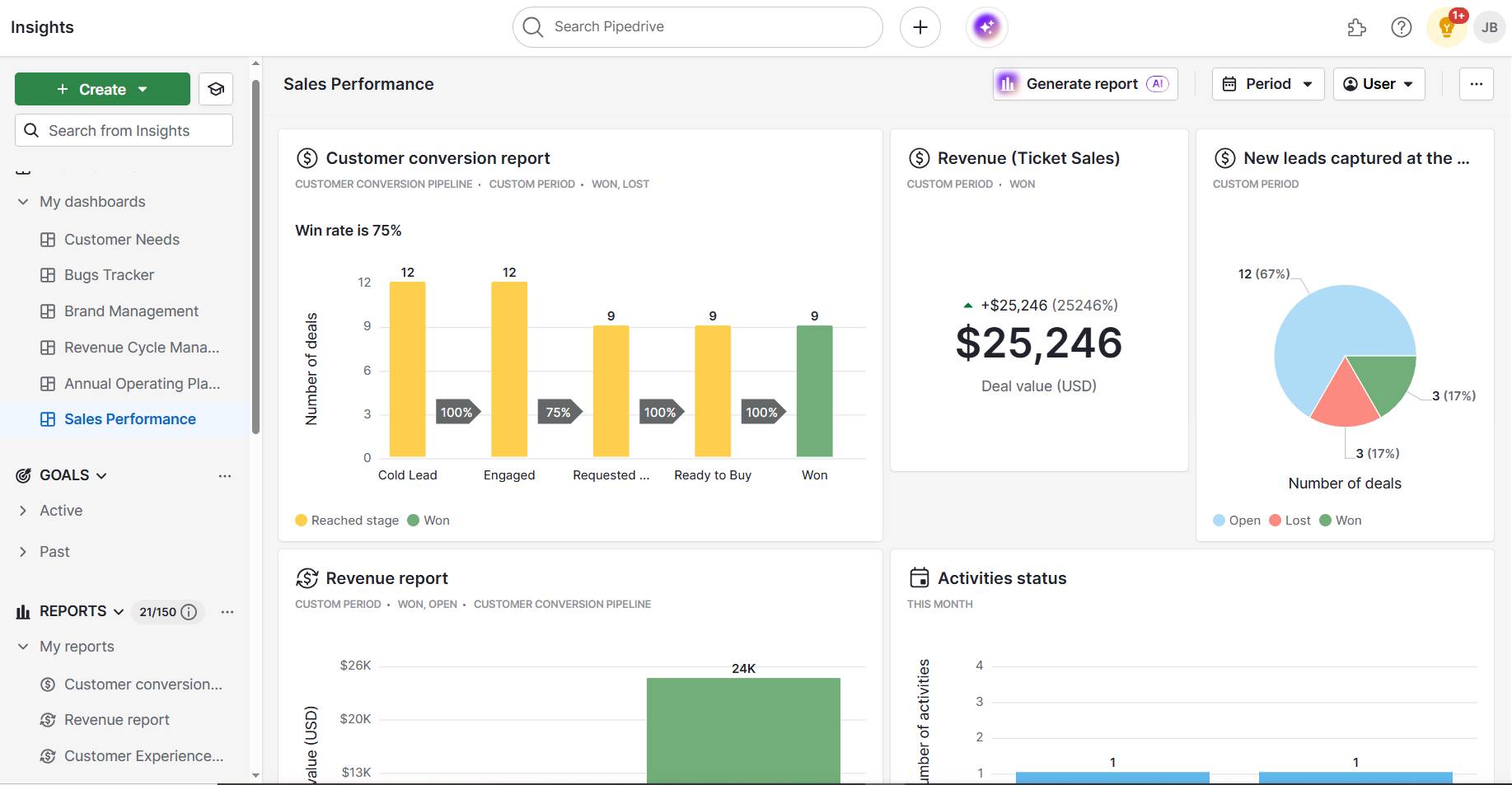
You can also set up AI workflows to automate processes. For instance, create blog outlines from projects using other tools (like Asana or Notion) and send them straight to Google Docs – no manual copy-pasting needed.

Five of Jasper’s main features streamline content creation:

  • Custom tone and voice matching

  • Blog post workflows with step-by-step guidance

  • A Chrome extension to use Jasper across Google Docs and content management systems (CMS)

  • Over 50 templates for everything from blog intros to full-length posts

  • Project organization tools for teams or solo users

Jasper creates quality drafts in your brand voice if you need to publish long-form content regularly but don’t have the time or team to do it all yourself.

Recommended reading

https://www-cms.pipedriveassets.com/AI-Tools-for-startup.png

9 AI tools for startups: which AI tools are worth it in 2025?

2. Copy.ai: best for short-form blog content

Copy.ai is an AI writing tool for generating quick, short-form blog posts. It’s perfect for product announcements, quick tips and FAQs, where you don’t need something long or in-depth.

In other words, use the workflows to generate content that keeps your blog fresh (and boosts its SEO potential) without considerable time investment:

AI blog writer Copy.ai workflow

Imagine you want to launch a new feature with a short announcement post. Copy.ai helps you distill top benefits clearly for a fast turnaround without sacrificing clarity.
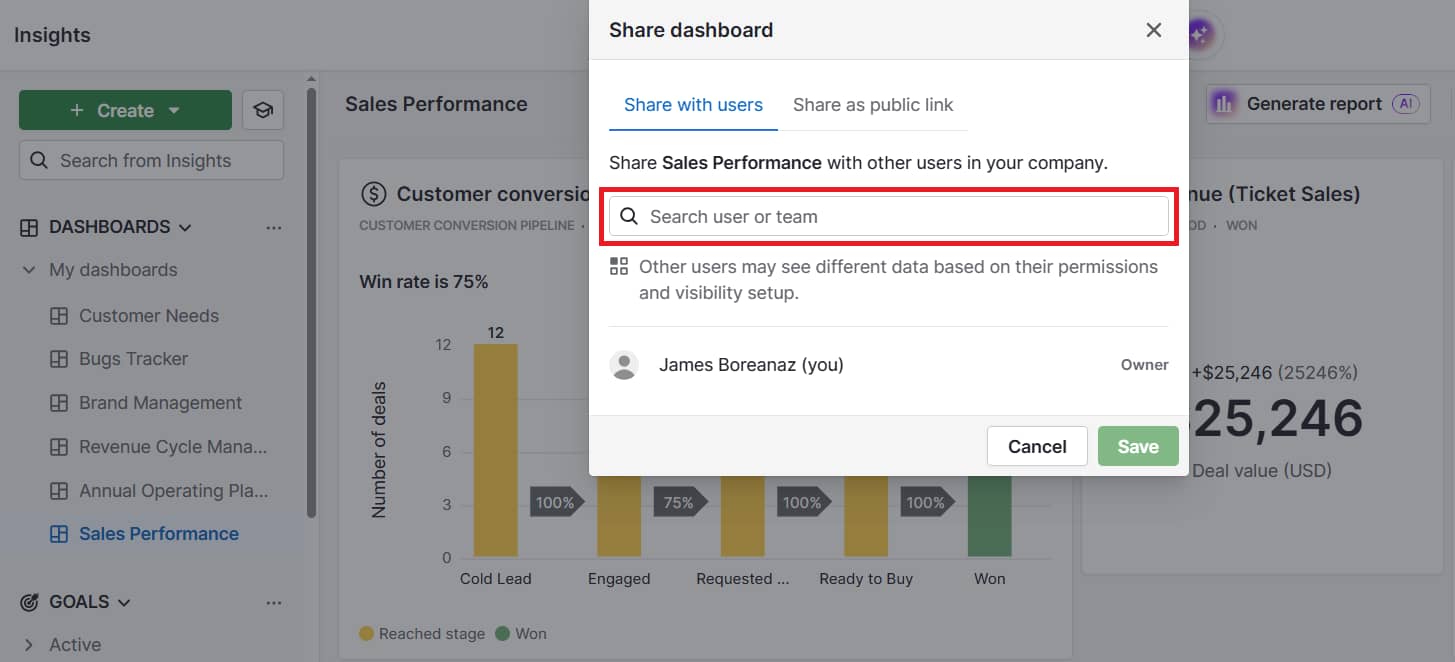
You can also request several drafts and choose the one that best suits you or your business and matches your brand voice.

Blog-specific templates for updates, listicles and how-tos make it easy to fill in the blanks. The Freestyle feature also lets you choose your content style and describe your idea in a few words to get a tailored short post in seconds (invaluable for last-minute content).

Here are five Copy.ai features that help you write more in less time:

  • Templates designed for short-form blogs, web content and copywriting

  • Flexible prompt-based Freestyle writer

  • Multi-language support for global audiences

  • Tools for repurposing content across email and social media

  • Option to set your brand tone and voice

Copy.ai keeps your blog active with fast, valuable content without overthinking every post. Use it to show up consistently online and stay relevant.
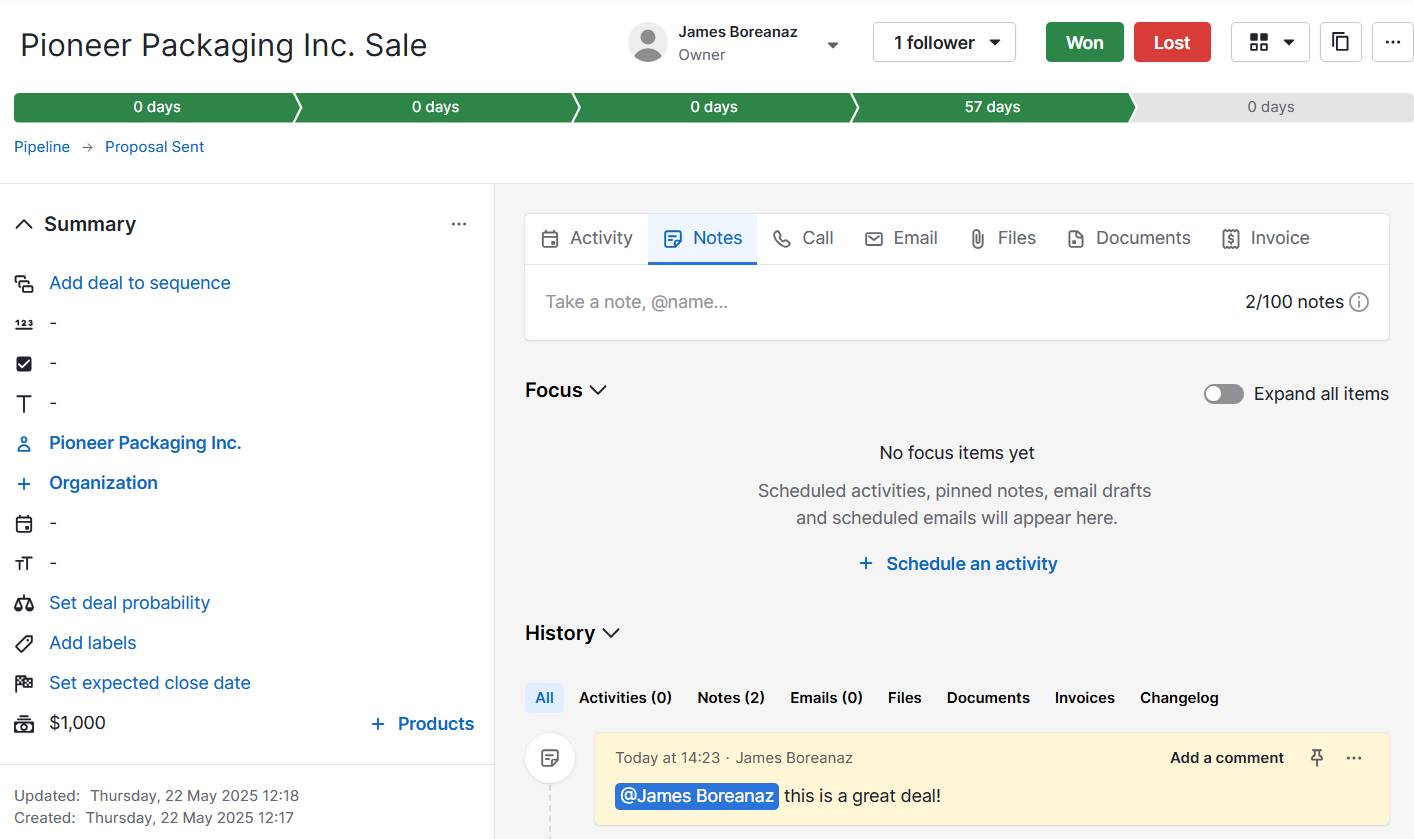
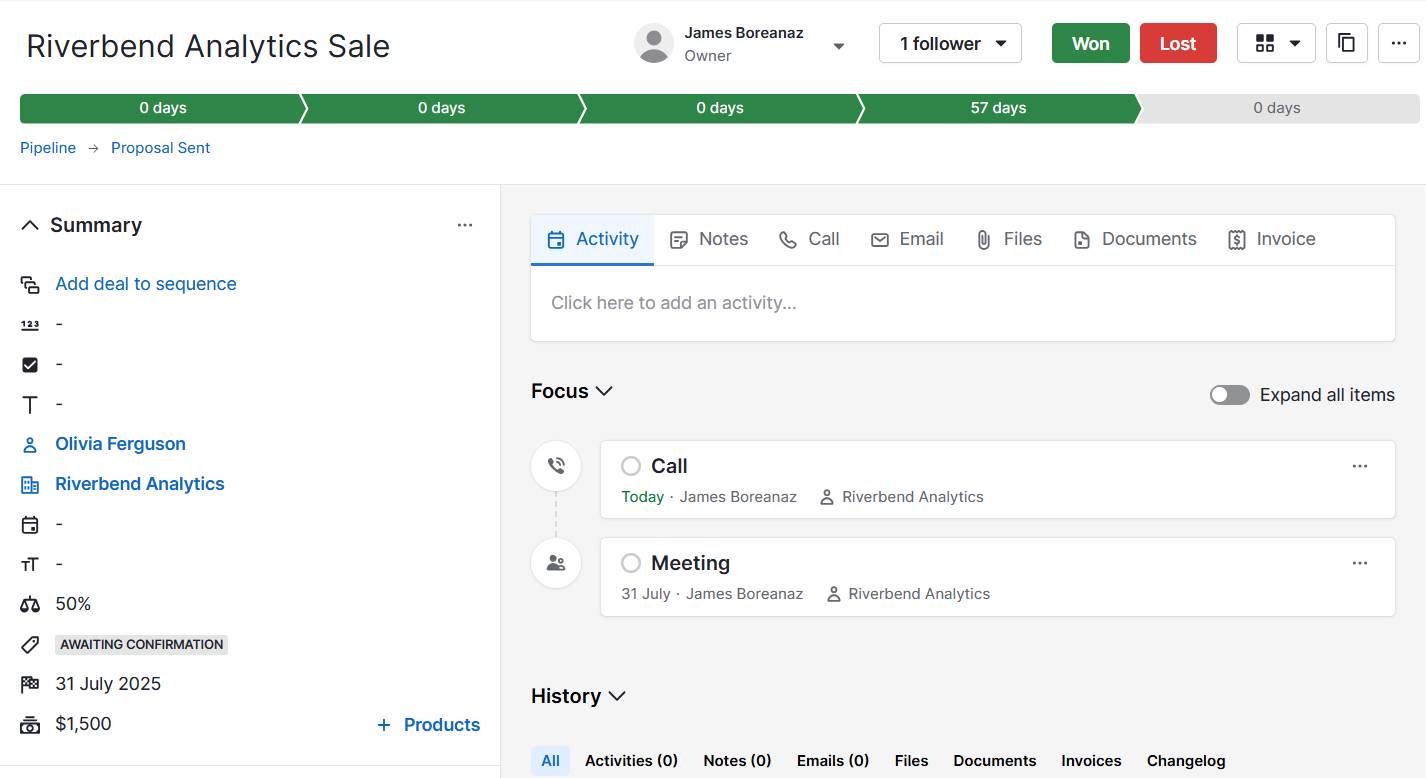
3. Writesonic: best for SEO-friendly posts in multiple languages

Writesonic creates SEO-optimized blog posts that rank well on search engines and resonate with global audiences. Use it to attract organic traffic and connect with customers across different languages (without hiring a multilingual content team).

If search engine optimization matters to your business, Writesonic’s built-in tools guide your writing based on keyword inputs, suggested outlines and competitive analysis:

AI blog writer Writesonic article

Let’s say you run an e-commerce platform. You could target German-speaking retailers by posting about best practices for inventory management in their native language.

Writesonic helps you go from a topic to a publish-ready post in just a few clicks while targeting long-tail keywords or answering common customer questions. Search-optimized suggestions in the content workflow also improve your chances of ranking without hiring an expert.

Multilingual support lets you write or translate content in over 25 languages to reach international audiences with less effort.

Five core Writesonic features help you appeal to more readers:

  • AI Article Writer for SEO-friendly long and short blog posts

  • Built-in keyword and topic research tools

  • Multilingual content generation (25+ languages)

  • One-click export to CMS platforms like WordPress

  • Brand voice settings for consistent tone across languages

Writesonic helps you grow traffic and expand your reach using quality content. Publish SEO-focused, multilingual blog posts without relying on extra tools or freelance content writers.

Recommended reading

https://www-cms.pipedriveassets.com/The-best-AI-marketing-tools-for-SMBs.png

Best AI for marketing: essential AI marketing tools for SMBs

4. Claude: best for human-sounding blog content

Claude is one of the most natural-sounding AI blog writers available. It’s especially useful for SMBs that want their content to sound approachable, not robotic.

The interface works like a back-and-forth AI conversation. Ask a question or request a heading or section, and Claude will respond:

AI blog writer Claude prompt

Let’s say you want to publish a blog post that explains your consulting process in an approachable way. Claude writes like a real person speaking (i.e., relaxed and friendly), so sales prospects feel more confident reaching out.

If you give Claude some background on your business or past posts, the contextual memory keeps these details relevant and consistent.

You can even add transcripts and prompt it to “sound like how we talk to customers over the phone”.

These five distinct Claude features make your content sound more human:

  • Smooth, conversational writing style

  • Understands nuance and matches brand tone

  • Revises and humanizes other AI-generated drafts

  • Strong at long-form and storytelling-based content

  • Easy to guide using clear instructions or past examples

If you want to build customer trust and sound authentic, Claude helps you write blog posts that feel personal (even if AI-generated).

Free ebook: How to tell your brand story

Get our ebook outlining the five steps to developing your brand’s unique story

5. ChatGPT: best for flexibility and idea generation

ChatGPT is a generative AI tool that overcomes the two biggest blockers in blog writing: getting started and staying consistent.

It’s like having a creative partner on call 24/7, whether you’re brainstorming topics, outlining a new post or rewriting content to sound better. According to Pipedrive’s State of AI report, it’s also the top tool that 86% of companies using artificial intelligence rely on.

You can also leverage specific versions of ChatGPT that other creators have “trained” for particular purposes.

Here’s one for writing blog posts:

AI blog writer ChatGPT prompts

Some days, you want a rough draft. Other times, you need help turning a customer’s question into an outline for a blog post. Flexibility matters for busy SMB owners, and ChatGPT adapts to your needs.
Write prompts in plain English and get a draft or headline rewrite in seconds. Tell it about your business or the sections you want to include in your copy. ChatGPT will generate a structured draft with an intro, headings, main points and a call to action (CTA).

You can also ask it to rewrite parts of your existing content or give you title ideas for your next post. Use the conversational format to exchange ideas – edit or rephrase until it sounds right for your brand.

Five ChatGPT strengths for more consistent blog writing include:

  • Easy idea generation from simple prompts

  • Great for outlining or reworking existing content

  • Fast drafting of intros, conclusions or full posts

  • Works well with other tools (e.g., Google Docs and Zapier)

  • Free and low-cost options to meet your needs

If you want a flexible tool for all parts of the blog creation process, ChatGPT turns blank pages into publish-ready posts in less time.

Recommended reading

https://www-cms.pipedriveassets.com/ChatGPT-For-Sales.png

7 best ways to use ChatGPT for sales (use cases, prompts and tips)

How to write blog posts with AI like a professional

Using AI blog writers doesn’t mean handing over your entire content strategy to a robot. Instead, it provides a solid starting point so you never have to stare at a blank page again.
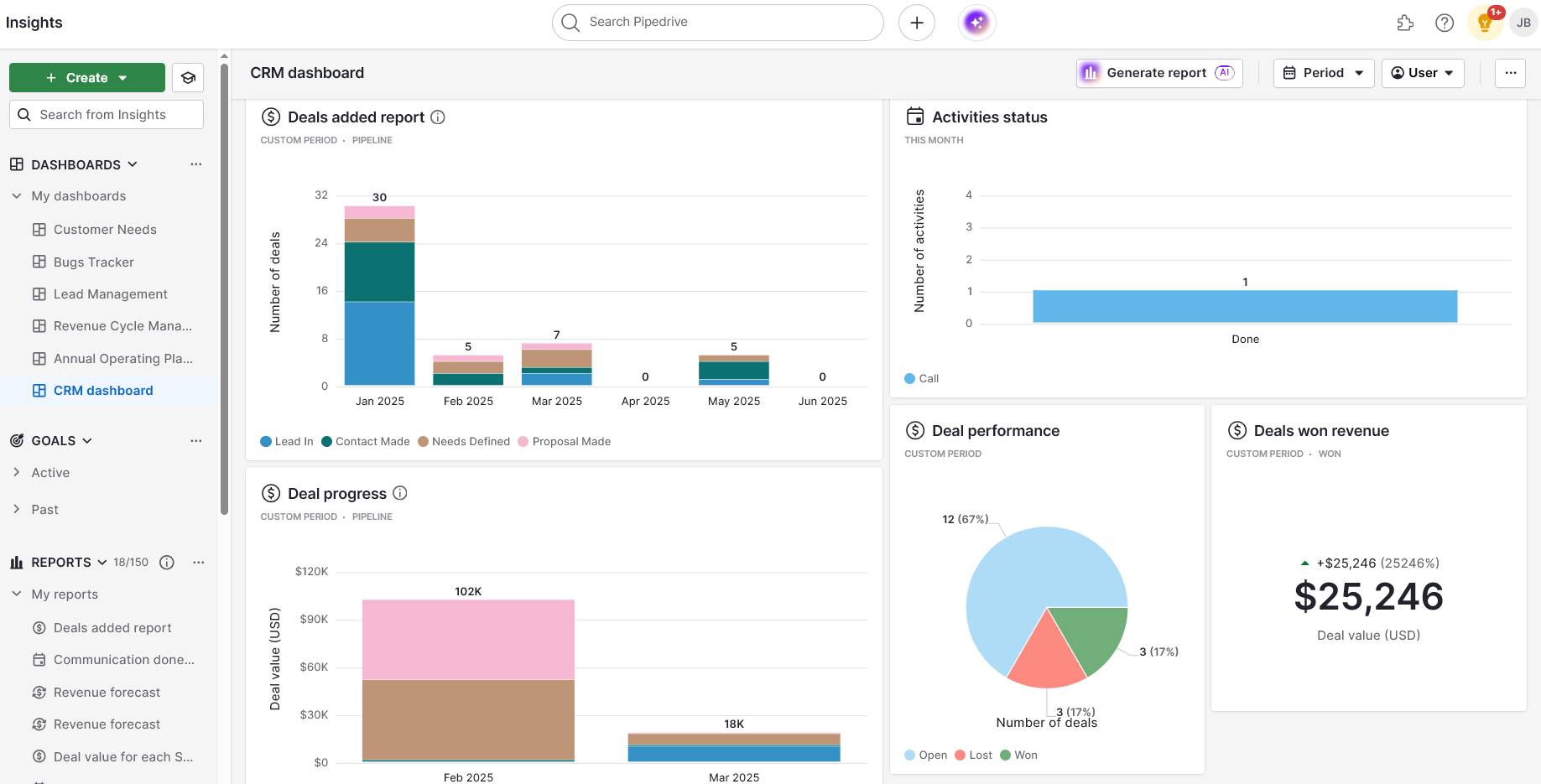
Save time and get more done while you run the rest of your business. Here are four steps to effectively use AI to write blog posts.

Choose the best tool for your use case

Pick a tool that matches your blog’s specific goal so you can use time and resources more wisely.

Ask yourself what you want to achieve as an SMB marketer or owner. For example:

  • More organic traffic

  • Quick updates for customers

  • Multilingual content for new markets

  • Solid blog post ideas to get started

Let’s say you offer accounting software and want to publish an in-depth blog post explaining new tax changes.

A tool like Jasper or Claude can help you create a polished long-form piece that sounds human and professional. If you’re posting a quick update or tip of the week, Copy.ai might be faster and more focused.

Before you start writing, define success for that post and match the tool to the job. Many platforms offer free content or trials, so test a few and see which one best fits your workflow and goals.

Input a clear outline and goal

AI blog writers are only as good as the direction you give them. Spend time defining each post’s structure and goal before clicking “Generate”.

Imagine you provide customer relationship management (CRM) software and want to write a blog post comparing it to a competitor’s.

If you ask your AI tool to “write a blog about our CRM”, you’ll probably get a decent but generic post. Instead, give it more details to build on, like:

  1. The target audience (e.g., “Sales managers at growing tech startups”)

  2. Your goal (e.g., “Help them understand how our CRM system solves X problem better”)

  3. The structure you want (e.g., “Please create an intro, problem breakdown, side-by-side comparison and CTA)

For example, your full prompt could be:

“Please help me write a blog post for sales managers at growing tech startups. The goal is to help them understand how our CRM solves the problem of scattered data better than spreadsheets or other entry-level tools.

Structure the post with an intro, a breakdown of the problem, a side-by-side comparison with spreadsheets and a strong CTA at the end.”

The more precise your input, the closer the pre-edited result will be to what your audience actually needs.

Review and edit manually

Review the post and edit it until you have a draft you’re happy with. Add your expertise (e.g., relevant insights, tone nuances and original data) to create unique, valuable content.

Let’s say you’re writing a blog post about improving delivery times for your logistics company. The AI writer generates a decent draft, but it doesn’t know that your team reduced turnaround by 40% using a new routing software system (unless you tell it).

Audiences are far more likely to trust real-world examples than generic advice they’ve seen elsewhere.

AI tools are also prone to hallucinations (i.e., creating factually inaccurate content). Editing helps you catch these and update off-brand phrases or filler content to push your narrative forward.

By reviewing the post yourself, you can:

Think of AI blog writers as project management and writing assistants, while you’re the editor-in-chief who guides the brand story.

Use AI again for polishing

Once you’ve reviewed and edited your post, AI can help with the finishing touches. This crucial step makes your blog clearer, tighter and more engaging.

After adding your insights, paste your draft into a tool like ChatGPT or Claude and ask for specific improvements like:

  1. Cutting down long sentences

  2. Improving transitions or flow

  3. Suggesting more compelling headlines

  4. Rewriting your introduction to make it punchier

  5. Creating meta descriptions or captions for social posts about the blog

Let’s say you’ve written a blog on choosing the right payment processor as a solo business owner. You’ve added your own experiences, tapped into customer stories, listed pros and cons and recommended a solution.

Now, use AI to tighten the intro, rephrase any clunky sections and suggest a better headline. For example, you could ask your AI blog writer:

“Please read through this post and create a punchier introduction, improve the flow and suggest a benefit-led title.”

This final pass helps your content feel more professional, which is crucial for building trust with potential customers.

Recommended reading

https://www-cms.pipedriveassets.com/Best-AI-tools-for-business.png

18 top AI tools for business productivity

6 tips to get the most from AI blog writers

Creating great content with AI blog writers involves understanding how to guide them to align with your business goals. A little effort behind the scenes results in more credible posts that engage your audience.

Here are six tips to improve your writing process and get the best results from AI:

AI blog writing tip

Why it’s important

Give the AI as much context as possible

The more detail you share (audience pain points, tone, word count and goal), the more accurate the output will be.

Example: “Please write a blog for entrepreneurs explaining how to build an email list, in a friendly and motivational tone.”

Use AI for structure, not just the main body

Try using AI to assess competing content, find gaps and create outlines.

Example: “Please create a blog outline on setting up a Shopify store, aimed at busy SMBs.”

Inject real stories or data

Add case studies, results or personal experience to make more credible, original content that people are more likely to trust.

Repurpose smartly

Ask your AI tool to turn your blog into multiple formats, like email tips or LinkedIn posts, so you don’t have to create something new for every channel.

Example: “Please turn this blog into three social posts for small business managers.”

Consider blending tools

Combine your AI writer with SEO tools, grammar checkers or analytics software to improve content quality and performance tracking.

Avoid publishing straight from AI

Always fact-check and proofread before hitting publish (AI can still get things wrong or sound repetitive).

With the tips above, you’ll use AI blog writers strategically and create high-quality content optimized for maximum impact across all channels.

How Pipedrive’s AI-generated tools support your blog writing

The overarching goal of blog posts is to boost sales. They should attract the right audience, answer real questions and guide readers toward becoming customers.

Pipedrive’s AI CRM ensures you always craft content that captures your audience’s attention and drives your business forward.

While AI blog writers create the content, Pipedrive can help you decide what to write. It also supplies data and tools to enhance and repurpose drafts for improved results.

For example, the AI-powered Sales Assistant flags high-potential deals and common questions your leads are asking:

AI blog writer Pipedrive Sales Assistant

Use these insights to fine-tune blog post content to answer objections, support active deals or double down on what top buyers care about right now.

When you’re ready to turn that blog into an email campaign, Pipedrive’s AI email writer makes it fast and easy.

Just drop in the generated content and ask it to draft a tailored email to re-engage cold leads or promote a new product:

AI blog writer Pipedrive email writer

Pipedrive’s Pulse also helps you choose your next blog topic.

By highlighting sales and performance patterns (e.g., which product features are converting best), you can write content that supports what’s already driving purchases:

AI blog writer Pipedrive Pulse engagements summary

The AI-powered sales reports also make it easy to include real numbers, highlight sales trends or confidently answer common customer questions in your blog posts.

Simply ask in plain English something like, “How is my sales team performing?” – or choose a suggested prompt:

AI blog writer Pipedrive Pulse sales report query

You’ll get instant, data-backed suggestions for the most relevant metrics to include in your report:

AI blog writer Pipedrive Pulse AI report creation

Then, let Pulse’s AI generate accurate insights for you.

When you combine an AI blog writer with Pipedrive’s sales-driven insights, you turn simple blog posts into powerful content that aligns with real customer needs – boosting your chances of creating loyal buyers.

AI blog writer FAQs

  • An AI blog writer is a tool that uses artificial intelligence algorithms to create blog content.

    It generates real-time text based on prompts you provide, helping you:

    • Write faster to streamline creation

    • Scale content marketing efforts

    • Maintain style and tone consistency

    Bloggers and business owners use AI content creation to market themselves and their services with less effort.

  • When assessing AI blog writers, look for tools that fit your content goals (e.g., SEO, post ideas or publishing cadence) and pricing budget.

    The best AI blog writers offer features like:

  • Pick an AI blog writer based on your company’s needs. If you’re focusing on ranking on the first search engine results page (SERP), use a tool with built-in SEO features.

    If you need help being more creative, choose one that’s great for brainstorming and idea generation.

    Test a few options to find the tool that best matches your writing style and sales objectives.

Final thoughts

These five AI blog writers help you publish content faster, reach the right audience and stay visible without needing a big team.

Whether you’re creating helpful how-to guides or SEO-friendly posts, a smart setup saves time and keeps your marketing consistent.

Combine your tool with Pipedrive’s AI CRM to align blog content with leads and sales insights. Try it for free for 14 days to write more blogs that grow your business more effectively.

4 Reasons to Migrate from Salesforce to Pipedrive

Software Stack Editor · July 8, 2025 ·

Choosing a CRM solution can be difficult, and you may not find the best fit right off. If you’re using Salesforce and discover its functionality is too complex and distracting your sales team from closing deals, consider switching CRM platforms.

While both Pipedrive and Salesforce streamline sales processes and enhance customer experience, users who switch to Pipedrive state a preference for its cost savings, user-friendly interface, easily customizable pipeline and sales-focused approach.

In this article, you’ll learn about the benefits of migrating from Salesforce to Pipedrive. We’ll also show you how easy the migration process is, so you can have your team up and running in no time.

Why sales teams are switching to Pipedrive

Pipedrive’s support and sales teams speak to customers every day. Feedback from these customers consistently points to one primary reason team managers migrate from Salesforce to Pipedrive: all the information they need is displayed simply, clearly and intuitively.

If you’re unsure whether to go ahead with CRM migration, consider the following key reasons others are making the move (for more information, see our Pipedrive vs. Salesforce comparison below).

1. Lower cost

Pipedrive customers report that the CRM is significantly more cost-effective than Salesforce out of the box.

Pipedrive’s speedy new system setup also means SMBs without dedicated admin or IT support can start closing deals quickly, without breaking the bank.

2. Data transfer from Salesforce to Pipedrive is easy

Pipedrive’s quick setup and straightforward interface make it ideal for teams that want to get up and running quickly. It’s a good fit for teams ready to move deals through the sales process without extensive training and for those who may have less technical experience.

There are multiple ways to migrate CRM data. Pipedrive offers a dedicated migration service using third-party tools such as Import2 (formerly Trujay Data Migration). You can also migrate your data by first exporting to a spreadsheet (CSV) file and then manually importing it.

Whatever process you choose, migrating data from Salesforce to Pipedrive is quick. Depending on the size and complexity of your data, it may take between a few hours and a couple of days.

To make the switch, follow these five steps:

  1. Prepare your data in Salesforce. Clean and organize your CRM data to eliminate duplicates and fix errors. Export data as CSV files or prepare API access if you plan to use a tool such as Import2.

  2. Import data. Instigate the data migration from within Pipedrive. Migrate via CSV or with the help of Pipedrive’s support team (available for Professional plans and above).

  3. Map fields during import. If you’re importing from a spreadsheet, you must manually match each Salesforce field (e.g., contact, deal stage, notes) to the relevant Pipedrive data field. Field mapping is handled within the platform if you’re using a third-party tool.

  4. Test before finalizing. Do a partial import first to ensure everything works as it should.

  5. Familiarize your team. Onboarding will be quick, thanks to Pipedrive’s training resources.

Here’s a video walking you through migrating data using Import2:

3. Pipedrive’s mobile app excels at real-time updates

Salespeople understand just how important it is to be able to record sales info on the go. An easy-to-use mobile app is another reason to consider Salesforce to Pipedrive migration.

App-savvy sales teams continually point to the value of having Pipedrive’s simple CRM system in their pocket wherever they go, making it quick and easy to upload customer data.

Pipedrive’s mobile app is designed to update deals, activities and notes during or after meetings. Users report Salesforce’s mobile app is more complex, slowing down navigation and taking up valuable time.

As a sales consultant at a payroll SaaS company told us:

Everything in Salesforce requires time, especially the mobile app. With Pipedrive I call businesses on-the-go and it’s logged. I upload business card data without even turning on my laptop. The app is perfect.

4. Ease of use

Pipedrive provides a faster, more straightforward workflow, especially for smaller businesses and teams focused on core sales activities.

Customers who closed their Salesforce account and moved their CRM data to Pipedrive tell us that managing Salesforce was often difficult and time-consuming. In some cases, this was due to, among other things, the need for manual data entry (setting up, testing and maintaining complex workflows) and troubleshooting as required.

In contrast, Pipedrive is designed to cut manual admin. Users can simplify sales tasks without needing a specialist. They can create and edit custom fields, set up filters to segment data and integrate with tools such as Microsoft Teams or Google Calendar with a single click.

As one customer told us:

Pipedrive has reduced team admin. We hired an interim contractor 10 hours a week when we used Salesforce. Now we do everything ourselves.

The ability to manage and adjust sales workflows saves valuable time and lets you move deals through the sales funnel quickly and easily.

Considering both directions: Salesforce to Pipedrive migration

Companies with complex sales processes and larger enterprise models may consider switching from Pipedrive to Salesforce as they scale.

While Salesforce is powerful, many businesses still find Pipedrive the smarter choice – especially when ease of use, speed and cost are priorities. Consider the above benefits when weighing your needs and options.

Pipedrive benefits large businesses as well as SMBs

While Pipedrive is optimized for small to medium-sized businesses, larger firms can and also benefit from its seamless functionality and smart dashboards.

Here are a few key considerations larger teams need their CRM to address:

  • More comprehensive reporting and forecasting for senior management

  • A technology stack spanning sales, marketing and operations

  • The challenge of managing multiple or larger sales teams

Salesforce has advanced capabilities in these core areas, but sometimes the administrative task of managing these complexities can rob a salesperson of precious selling time.

Many team leaders don’t realize that other tools can also meet these needs.

Sometimes simplifying the process gets the best results.

Better user interfaces and/or apps and integrations can be the foundation to inspire more modern ways of working.

Here are just some of the things Pipedrive can do for your business, whatever its size:

  • Hundreds of app Integrations

  • One-click integration installation

  • An open integration API

  • Advanced reporting

  • Customizable CRM

Download your guide to managing teams and scaling sales

The blueprint you need to find a team of superstars and build a strong foundation for lasting sales success

Pipedrive vs. Salesforce: how they compare

Pipedrive migration: Salesforce comparison

Recommended reading

https://www-cms.pipedriveassets.com/CRM-Basics.png

CRM basics explained: key features and benefits for your business

Final thoughts

Salesforce’s detail and complexity may work well for teams whose CRM is particularly highly integrated or works best alongside other systems in their information architecture.

However, businesses of all sizes want to be agile enough to compete with high-growth market disruptors and large corporations. Pipedrive can help.

If cost-effectiveness and freeing up time to close more deals are your priorities, it could be time to migrate your Salesforce data to Pipedrive. Start your 14-day free trial today.

  • « Go to Previous Page
  • Page 1
  • Interim pages omitted …
  • Page 4
  • Page 5
  • Page 6
  • Page 7
  • Page 8
  • Interim pages omitted …
  • Page 28
  • Go to Next Page »

Get your Software Stack together. softwarestack.tech

Software Stack

© 2024–2026 - Software Stack is a trading name of SouthwestCIO Limited ac ompany registered in England & Wales 11319049

  • Knowledgebase
  • Home
  • About Us
  • Contact Us