• Skip to primary navigation
  • Skip to main content
software stack logo

Software Stack

Get your Software Stack together

  • Knowledgebase
    • All Categories
    • Accounting Software
    • Automation & Workflow Software
    • Customer Relationship Management
    • E-Commerce Shopfronts & Payments
    • Marketing Automation
    • Online Courses & Membership
    • Project Management
    • Surveys & Forms
    • Web Hosting
  • Home
  • About Us
  • Contact Us
  • Show Search
Hide Search

Pipedrive

Top Attraction Marketing Strategies and Tips

Software Stack Editor · October 3, 2025 ·

Attraction marketing is a practical, powerful way to entice customers without pitching your product. With the right tactics, you’ll spark interest, build trust and position yourself as the brand people think of when they’re ready to buy.

In this post, you’ll learn how to create a successful attraction marketing formula, including seven strategies to engage and convert your target customers.

What is attraction marketing?

Attraction marketing earns your audience’s attention by offering real value upfront. Instead of pushing your product, you share helpful content that builds trust over time. When someone digesting all this content is ready to purchase, you’re already top of mind.

This approach can help small and medium-sized businesses (SMBs) without big ad budgets or teams stand out. Creating genuine connections and establishing a brand as the go-to authority naturally encourages sales.

For example, 360Learning’s CLO, David James, hosts “The Learning & Development Podcast”:

Attraction marketing 360Learning podcast

By consistently delivering valuable, relevant insights, the podcast positions 360Learning as a trusted voice in learning and development (L&D).

When listeners face a training challenge, they’re more likely to turn to the platform they already see as an expert.

Let’s say you run a small IT consultancy. Instead of cold-pitching to clients, you:

Instead of selling or being promotional, your attraction marketing makes potential buyers feel like you’re simply helping. Building this trust and authority leads to customer loyalty and long-term growth.

Recommended reading

https://www-cms.pipedriveassets.com/blog-assets/content-hub.png

Everything you need to know about content hubs

Typical types of attraction marketing content

Your company’s best attraction marketing tactics depend on where your audience spends time and what kind of content they value.

Whether a solo consultant or a small agency, you don’t need to be everywhere. Consistently show up where it counts with content that educates, supports or inspires your ideal customers.

Here’s a breakdown of content examples for each typical attraction marketing channel:

Attraction marketing channel

Content examples

Content marketing

  • Blog posts

  • How-to guides

  • Case studies

  • Whitepapers (research-backed reports that explore specific topics)

  • Checklists

  • Thought leadership articles (content that shares your unique insights)

Email marketing

Social media marketing

  • Quick tips

  • Carousel posts (multi-image social posts)

  • Behind-the-scenes content

  • Marketing infographics (visual content that simplifies concepts or processes)

  • Customer or audience polls

  • User-generated content (photos, videos or reviews your customers create)

Video marketing

  • Explainer videos (short videos that break down your product or service)

  • Product walkthroughs (step-by-step video or image guides of how to use your product)

  • Customer testimonials

  • Q&As (answering common customer or industry questions)

  • Webinars (live or recorded online presentations and workshops)

Influencer marketing

  • Guest posts (articles written by an external expert published on your blog or vice versa)

  • Expert collaborations (partnering with an industry pro to create content)

  • Co-hosted webinars (two brands or experts hosting together)

  • Channel takeovers (letting an influencer or partner post on your social account for a day)

Podcasts

While not a channel itself, search engine optimization (SEO) is a key strategy that helps potential customers discover your attraction marketing content through search.

Once your content is discoverable, the next step is making sure you deliver it in the right places. Start with the channels you’re already active on that feel natural for your business and audience.

Focus on being helpful (not salesy) and let the value you share do the heavy lifting.

Recommended reading

https://www-cms.pipedriveassets.com/Social-Selling_2024-02-26-184202_dczk.jpg

Social selling 101: How to build trust and grow sales

How to create a successful attraction marketing formula

Attraction marketing works best when there’s a plan behind your efforts. A successful formula involves knowing your audience, creating content they care about and using tools you already have to deliver it consistently.

Here’s how to implement attraction marketing step by step.

Identify your target audience and understand their needs

Clearly define your ideal customers and learn what matters most to them. Attracting new buyers means targeting the right people with content that helps them solve problems or achieve goals.

When you understand your audience’s needs and pain points, you’ll create relevant, helpful resources that people are far more likely to engage with.

Let’s say you provide payroll software for small companies. You discover that your ideal customer is frustrated by confusing sales tax laws, so you create simple guides and videos that explain them.

By addressing this real pain point, you become a trusted source (not just a software provider). When it’s time to choose a solution, you’re already top of mind.

Start by building buyer personas based on customers’ voices to guide your messaging. Interview current and prospective customers and segment them into group templates. For example, you may include:

  • Fictional names (e.g., “Evan the Entrepreneur”)

  • Roles (e.g., “Founder”)

  • Top challenge (e.g., “Spending too much time on manual payroll each month”)

  • Primary goal (e.g., “Automate payroll and stay compliant with minimal effort”)

  • Channels they frequently use (e.g., “LinkedIn and email)

Here are some examples of questions that’ll help you build rich templates:

Attraction marketing buyer persona questions

The more detail you have on your audience and buyers, the quicker you can craft content that speaks directly to the problems they’re trying to solve.

Here are four tips to get those insights:

  1. Use customer surveys or feedback forms to gather common challenges and pain points at scale

  2. Run short interviews or focus groups with current or past clients to dig deeper into their goals, hesitations and decision-making process

  3. Analyze customer relationship management (CRM) data in tools like Pipedrive to spot patterns (e.g., which industries you attract most and features that get more engagement)

  4. Review sales calls and emails to uncover recurring questions and turn them into helpful content

The better you know your current audience and customer base, the easier it is to build resources that attract the same type of people.

Better understand your customers with our Buyer Persona Templates

Use these templates to ensure your solution always aligns with your customers’ interests and needs

Map the customer journey to plan content and channels

Mapping the customer journey helps you understand where buyers are in the decision-making process and what information they need to move forward.

Attraction marketing is all about meeting people where they are. If someone’s just discovering they have a problem, they need education and reassurance (not a sales pitch, yet). On the other hand, someone comparing options wants proof you’re the right choice.

Break down your customer journey into three basic stages.

  1. Awareness: A potential customer is identifying a challenge or opportunity

  2. Consideration: They’re exploring solutions

  3. Decision/purchase: They’re ready to choose a provider

Attraction marketing funnel

Note: Retention and advocacy come after conversion, so focus on these three initial stages to improve attraction marketing.

Your goal is to create quality content that meets buyers at each stage. Let’s say you run a marketing automation tool for small businesses.

An early-stage prospect might search for “how to grow an email list”. At the awareness stage, a blog post or lead magnet on that topic would attract them. Later, a case study or product demo video could help them choose you when comparing tools.

Identify key touchpoints between your audience and brand before someone buys for each of these stages. For instance:

  • A Google search that leads to your blog post explaining a common industry challenge (awareness)

  • A social post shared by someone in their network that highlights a helpful comparison guide (consideration)

  • A free checklist they downloaded from your website to prep for buying (decision)

Here are some more examples of common touchpoints:
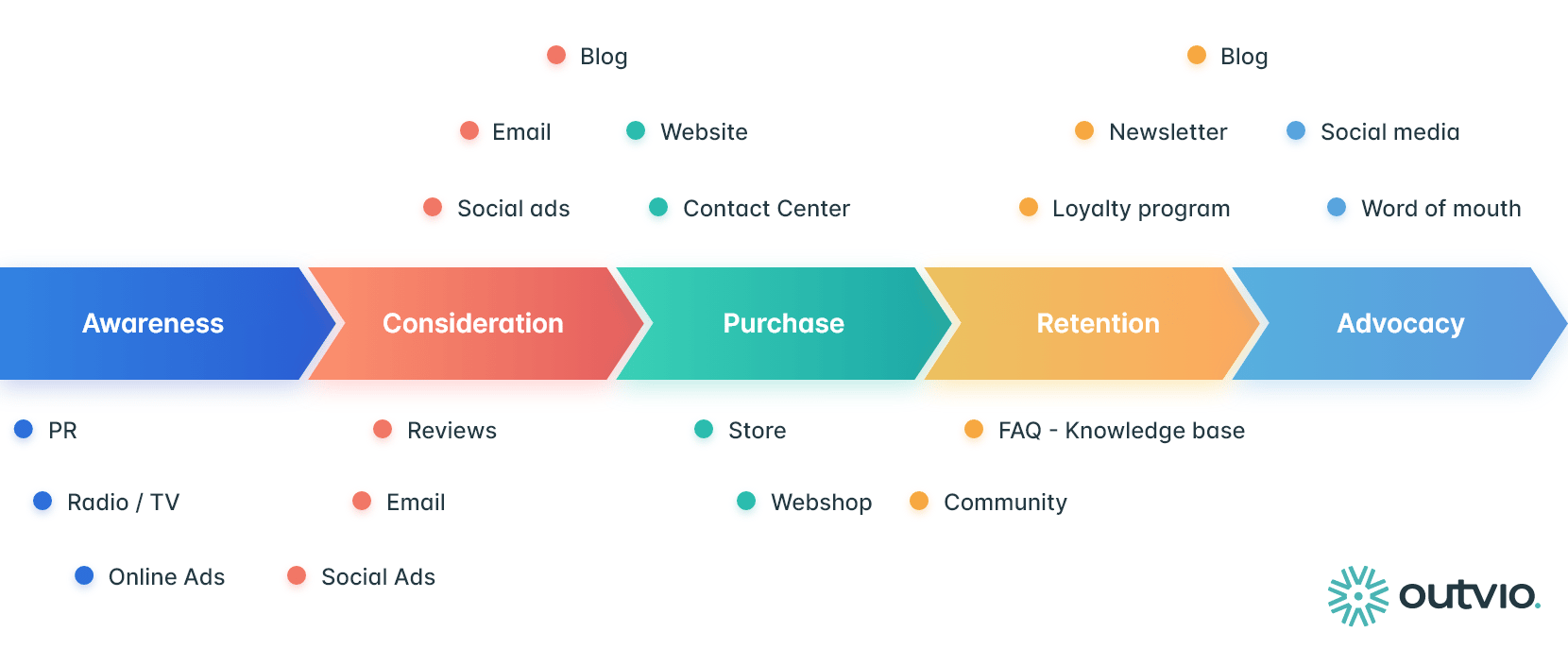
Attraction marketing digital touchpoints

Once you have this list, ask yourself these questions to start planning your content:

  • What questions do customers have at each stage and touchpoint?

  • Which channels are they using (Google, YouTube, TikTok, LinkedIn, email)?

  • What kind of content would build trust and move them forward?

When you map the journey first, attraction marketing feels more intentional because every resource has a clear role to play.

Download our customer journey map template

Start mapping your customer journey with our free customer journey template.

Assess the competition to uncover opportunities

Competitor analysis helps you see how similar brands engage your ideal audience, so you can find ways to stand out.

In attraction marketing, the aim is to grab attention but then hold it by delivering valuable information. Seeing what others are doing (or missing) gives you a clearer picture of where you can offer something better or more unique.

For example, you might share comparison tables to differentiate yourself from big-name brands:

Attraction marketing ButterDocs comparison table

Let’s say you run a project management platform for agencies. If most competitors focus on flashy features but don’t mention collaboration or onboarding processes, you have an opportunity.

You could create a blog series or video walkthroughs showing how your tool simplifies client communication – a key pain point no one else is talking about.

Here are five ways to start assessing your competition:

  1. Search your product or service category and note which brands rank on search engines and social media

  2. Review their blog, email content, social channels and ads to see what topics they cover and how they speak to their audience

  3. Identify gaps in their content to spot what’s missing and which questions go unanswered

  4. Pay attention to engagement (comments, shares, company reviews, etc.) to learn what’s resonating

  5. Highlight where you have a unique edge (e.g., better support, a more straightforward process or niche expertise)

Great attraction marketing differentiates your brand as more useful, relevant or trustworthy than your competitors.

Create a marketing calendar to execute your campaigns

Once you’ve planned your attraction marketing strategy, a clear calendar helps you stick to it consistently and purposefully.

This content works best when it feels natural and timely. In other words, it means showing up with the right message at the right moment (instead of posting anything just to stay active).

A scheduling or calendar app helps you plan and visualize your attraction marketing campaigns. For instance, Hootsuite or CoSchedule (below) both integrate with Pipedrive through Zapier.

Attraction marketing marketing calendar

Let’s say you want to attract new leads ahead of tax season for your payroll software. You might schedule:

  • A blog post titled “5 payroll tax mistakes small business managers make before April 15”

  • A downloadable “Essential SMB tax prep checklist”

  • An email series sharing weekly tips for staying compliant

  • Social posts that break down IRS updates or common tax pitfalls

This value-first content builds trust before sales conversations start. It also positions your brand as the helpful expert that customers want to work with.

Here’s how to build and manage a simple marketing calendar:

  1. Start with key dates like product launches, seasonal events, industry moments, etc.

  2. Work backward from these dates to plan supporting content by awareness, consideration or decision journey stages

  3. Assign content types to each campaign (e.g., blogs, emails, videos and social posts)

  4. Use a project management tool like Pipedrive’s Projects to track tasks, assign owners and meet deadlines

  5. Leave room for flexibility so you can create and add timely content based on marketing trends or audience questions

With a clear calendar, your attraction marketing becomes a consistent system that builds trust and brand loyalty over time.

Recommended reading

https://www-cms.pipedriveassets.com/Content-marketing-metrics-for-conversion.png

19 content marketing metrics to track and improve conversions

7 attraction marketing tips to delight your target audience

To be successful, attraction marketing content must feel genuinely helpful and thoughtfully tailored to your audience. With so much noise online, you need to put in the groundwork and stay consistent to stand out.

Here are seven top tips to be more engaging and memorable, with real-world examples of attraction marketing for each.

1. Show off your personality

Your brand personality is the tone, voice and vibe you give off in your content. In other words, how you sound consistently when people “hear” you online.

When your attraction marketing messages sound human, your audience connects with you naturally. As you become familiar, people are more likely to follow, engage with and eventually buy from you.

For example, AI productivity software Notion uses conversational copy and playful visuals to create a unique personality:

Attraction marketing Notion landing page

Everything feels cohesive and down-to-earth, whether it’s a YouTube tutorial or a product update. Learning the tool feels effortless and enjoyable – perfect for attracting creative professionals and small teams who may not be as tech savvy.

Here’s how to choose and show off your own brand’s personality:

  • Define 3–4 traits that describe how your brand should sound (e.g., approachable, helpful, witty)

  • Write like a person talking to another person (forget buzzwords and jargon)

  • Add little personality touches like emojis, humor or individual stories where appropriate

  • Use your chosen voice consistently across blogs, emails, social captions and videos

  • Test and refine your tone based on what your audience responds to

When your brand sounds like a real person with something interesting to say, people are more likely to stick around and listen.

Note: While brand voice is your consistently friendly or bold communication style, your tone shifts depending on the situation (e.g., sounding upbeat in social posts or serious in customer support replies).

2. Build trust with honesty

Potential buyers will only engage with brands that seem transparent and trustworthy, especially in the early customer journey stages where they know nothing about you.

Telling the truth about what your product can and can’t do addresses common objections head-on. This honesty builds credibility and helps you attract customers who are a genuine fit for your service.

For example, project management tool Basecamp is known for its no-nonsense approach to marketing.

On its homepage and blog, it openly admits who the tool is for (“smaller, hungrier businesses) and not (“big, sluggish ones”):

Attraction marketing Basecamp homepage copy

This honesty filters the right audience and stays top of mind for similar customers who aren’t ready to convert immediately.

Here’s how to build trust in your attraction marketing:

  • Be upfront about what your product does best (and where it may not be a good fit)

  • Use real numbers, behind-the-scenes content or customer quotes to tell your brand story

  • Create FAQs or myth-busting resources to address doubts early

  • Admit mistakes or share lessons learned when relevant (people appreciate vulnerability)

  • Focus on helpfulness first, not just conversions

When your brand leads with honesty, you’ll attract more of the right customers with less effort.

3. Use storytelling to create emotional connections

Storytelling helps your brand connect more deeply with customers by showing the human side behind the business.

Stories make your message more memorable and relatable. They help potential customers see themselves in the situations you describe, such as:

For example, social media management platform Buffer uses blog posts to tell stories about its remote work culture and team dynamics.

In one, it introduces its “Open Salary System”, which lays out how the company pays every role from admin to CEO:
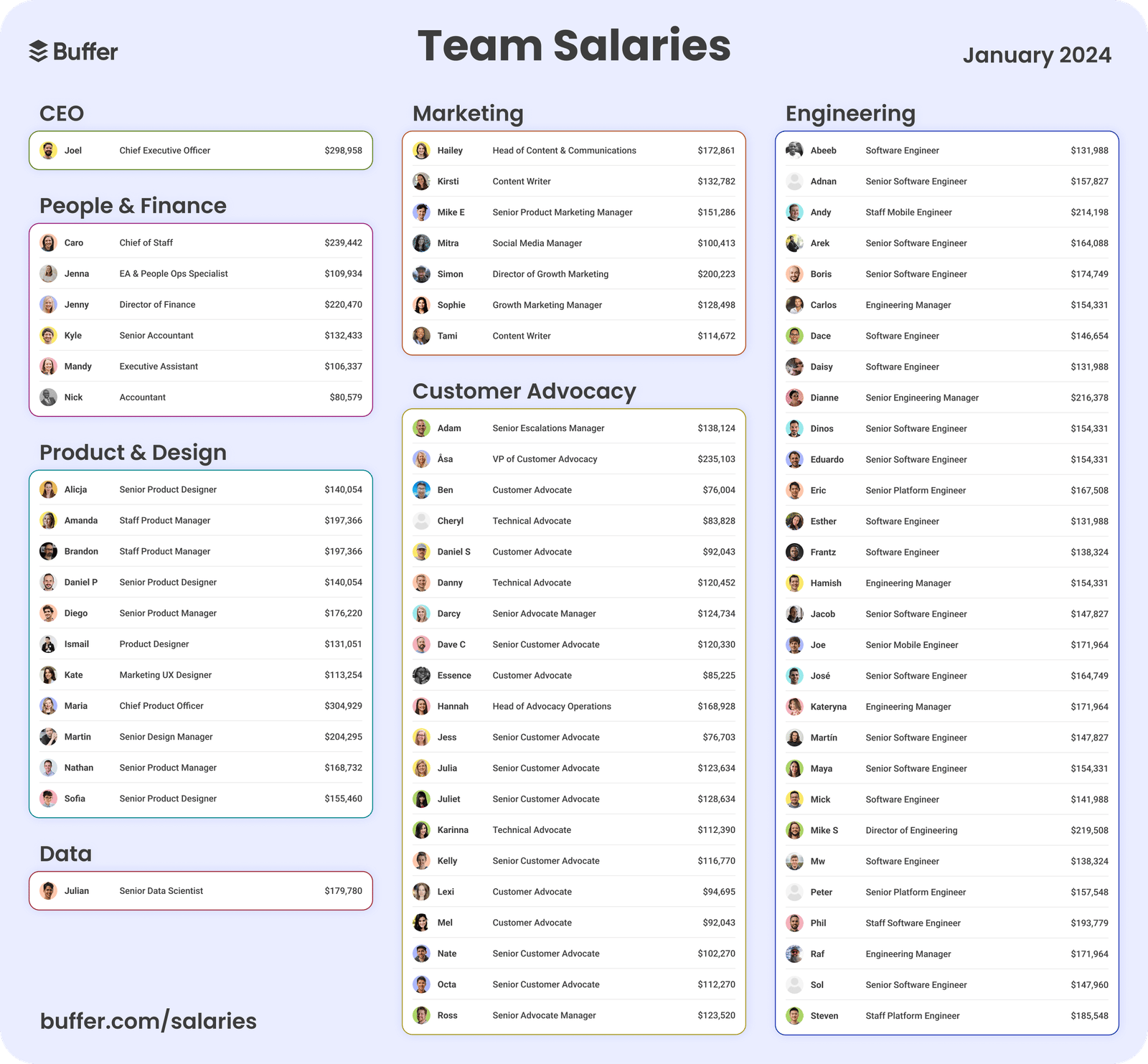
Attraction marketing Buffer salaries

These stories (especially when combined with honesty and transparency) build emotional connections with like-minded professionals.

When they need a tool to help manage their social media platforms, they’ll already feel aligned with Buffer’s values and be far more likely to choose it over a faceless competitor.

Here’s how to use storytelling in your attraction marketing:

  • Share real stories from your customers, team or journey as a business

  • Use emotion (e.g., frustration, joy, relief or pride) to create connections

  • Structure stories with a clear before and after (including a challenge, turning point and outcome)

  • Choose narratives that reflect your audience’s own experiences or aspirations

When your brand makes people feel something, there’s a good chance they’ll remember and think of you when they come to buy.

4. Establish authority with thought-leadership content

Thought-leadership content helps you earn credibility by sharing valuable perspectives, original insights or strong opinions on topics your audience cares about.

Attraction marketing works best when people see you as a trusted expert. Sharing unique knowledge shows you have something to say and a reason people should listen.

For example, revenue AI platform Gong has built a strong presence by publishing fresh, research-backed takes on modern selling:

Attraction marketing Gong Labs

Gong Labs reports challenge outdated tactics, offer actionable advice and portray the company as an authority on revenue intelligence.

This content attracts business owners and sales leaders who want to drive revenue more effectively and would be a good fit for Gong’s paid product.

In addition to publishing original research or data-backed insights, here’s how to create your own content that strengthens authority:

  • Get your CEO or founder to share lessons learned from unique, real-world experiences (and build their personal brand at the same time)

  • Take a stance on key industry topics (even if it’s a bit polarizing)

  • Tie your perspective back to common problems your audience is facing

  • Test different formats like blog posts, LinkedIn articles, webinars or podcast episodes to see what resonates best

When you consistently share sharp, original insights, you lead conversations instead of joining them to draw in the right audience.

5. Leverage customer stories to make your product relatable

Customer stories show your audience how real people use your product to solve problems, making your solution feel more tangible and results achievable.

In attraction marketing, these narratives help buyers imagine themselves succeeding with your product. When someone sees a person like them getting value, they’re more likely to believe they can do the same and sign up.

For example, graphic design platform Canva often shares how small businesses and creators use its tools to achieve their goals.

On its blog and social media platforms, you’ll find stories like “How Canva helped one agency land $10,000 projects”:

Attraction marketing Canva LinkedIn post

These stories are compelling because they’re personal, emotional and grounded in everyday wins. They inspire others while showing what’s possible with the product.

Here’s how to do the same with your content:

  • Choose relatable customers whose stories align with your target audience

  • Focus on transformation (what was life like before and after using your product?)

  • Use quotes, visuals and tangible outcomes to make it feel authentic

  • Test visual formats (e.g., short videos vs. carousels) to see which is most engaging

  • Highlight different types of success indicators like revenue, time saved or confidence gained

The more your audience sees people like them succeeding with your product, the more likely they are to believe they can, too.

6. Use high-value lead magnets

Lead magnets are valuable resources people get from you in exchange for contact information, such as a course, template or e-book. To attract the right people, this content should solve a real problem (not just aim to collect emails).

In attraction marketing, the best lead magnets teach something useful, build trust and show off your expertise. They make people think, “If the free content is this good, imagine what the product’s like”.

For example, marketing intelligence tool Ahrefs offers free courses about SEO and blogging that teach readers how to drive traffic that converts:

Attraction marketing Ahrefs Academy

These high-quality courses build goodwill as they’re educational and available without signing up.

Ahrefs attracts marketers, founders and content creators who get value upfront and learn how the tool can help them achieve even more.

Here’s how to make the most of high-value lead magnets:

  • Pinpoint and solve a specific problem your target audience struggles with

  • Pick a format your audience will actually use (e.g., a free template, checklist or short course)

  • Keep the content practical, skimmable and actionable

  • Make the lead magnet easy to access and promote it regularly in relevant channels

A great lead magnet aligns with your product’s strengths, so the next logical step for your audience is to try it.

7. Let data guide and power your strategy

The best brands use data to determine what’s working, what’s not and where to focus their attraction marketing efforts next. They also use the findings themselves as content to build trust.

Tracking and learning from how people engage with your content helps you make data-driven decisions. You show up where your audience spends time with content that meets real customer needs.

By using tools and databases you already have (e.g., Google Analytics or CRM reports), you can spot trends like:

  • Which blog posts or videos attract the most traffic

  • Which lead magnets convert best

  • Where drop-offs happen in your marketing funnel

  • What questions customers ask before converting

Use these findings to craft more engaging content and proactively address objections. When the time comes to buy, the decision then feels easy.

You can also use the data you uncover to market your product. For example, accounting software Xero uses a powerful statistic in its social media bios, “Over 4.2 million subscribers globally”:

Attraction marketing Xero Instagram bio

It’s short, clear and instantly communicates authority. The huge number tells potential customers they’re not alone and millions of other businesses trust this product.

While your user numbers may not be as high, smaller wins (like a “95% customer satisfaction rate”) can build credibility and show real value to potential buyers.

Here’s how to use data to improve your attraction marketing:

  • Set clear goals for each piece of content to measure its success (e.g., email sign-ups, time on page, demo requests)

  • Track performance with platforms like Google Analytics, your CRM’s reporting tools or analytics software like Hotjar or Optimizely (if you can afford them)

  • Regularly review which content performs best and what people are ignoring

  • Use audience feedback and FAQs to find new content ideas

  • Keep testing by changing formats, trying new channels and experimenting with messaging

Attraction marketing becomes far more effective when your strategy is shaped by real insights instead of assumptions.

Recommended reading

https://www-cms.pipedriveassets.com/Delight-the-Customer.jpg

10 reliable ways to delight the customer and amplify customer loyalty

How to use Pipedrive alongside your attraction marketing strategy

Pipedrive’s CRM system acts as a central hub to organize, track and optimize your attraction marketing efforts.

The software powers your strategy in two key areas:

  1. Understanding your audience

  2. Managing the customer journey

First, Pipedrive centralizes all customer data from forms, surveys and interactions, giving you a clear view of who your audience really is.

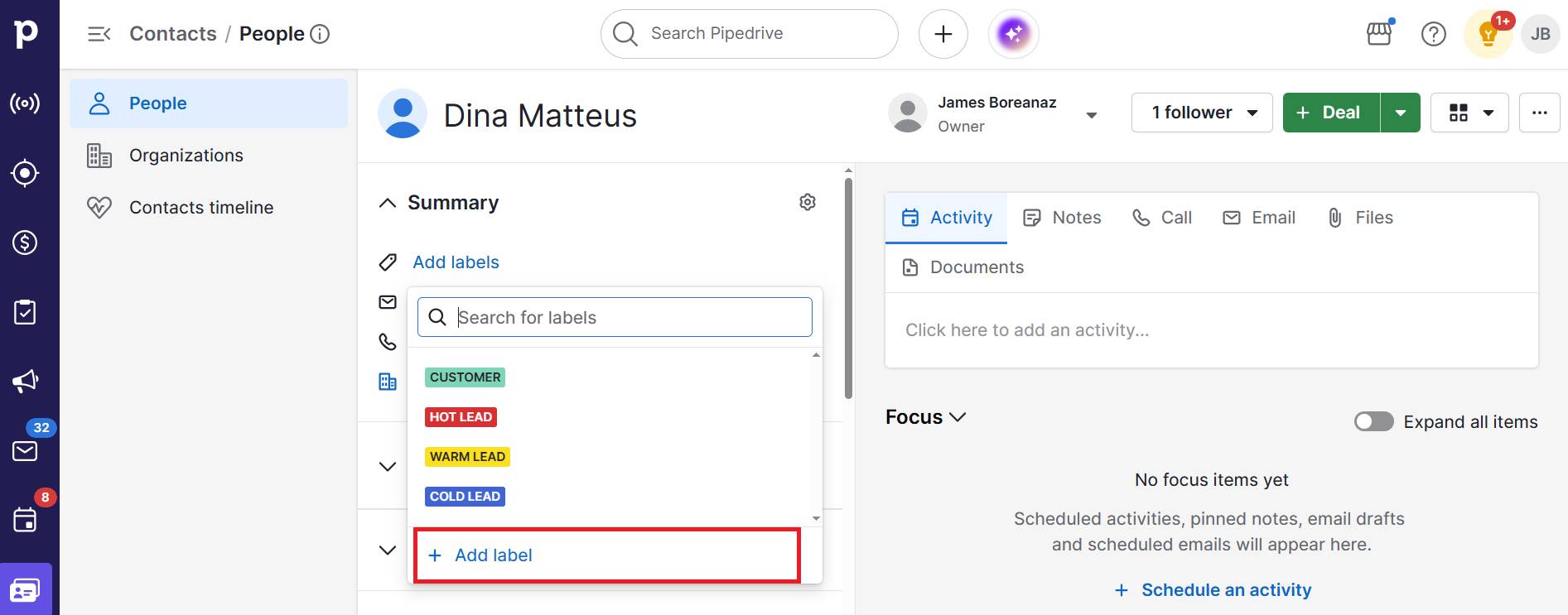
Use contact labels to tag people and businesses based on pain points, interests or behaviors to build sharper customer personas:
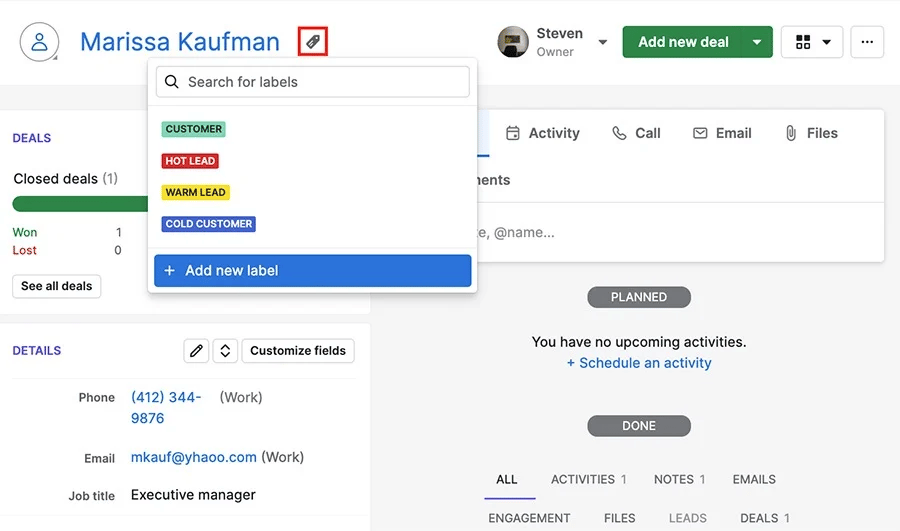
Attraction marketing Pipedrive contact labels

For example, you might add “Price-sensitive”, “Loves webinars” or “E-book downloaded”. These tags help you segment audiences and tailor attraction marketing content accordingly.

The more precise your insights, the more relevant and compelling your content will be. With everything stored in one place, it’s easier to spot patterns and personalize your messaging at scale.

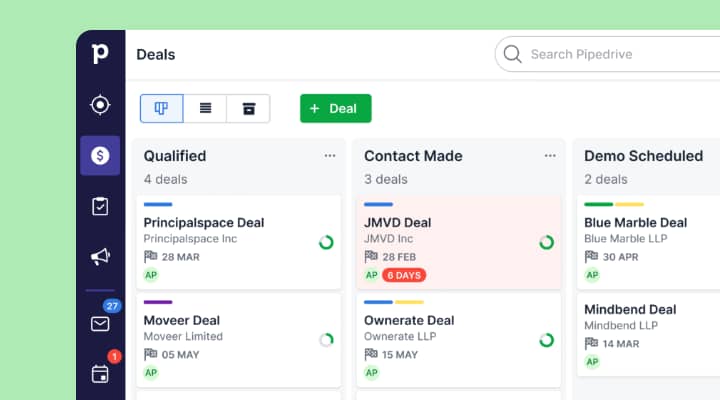
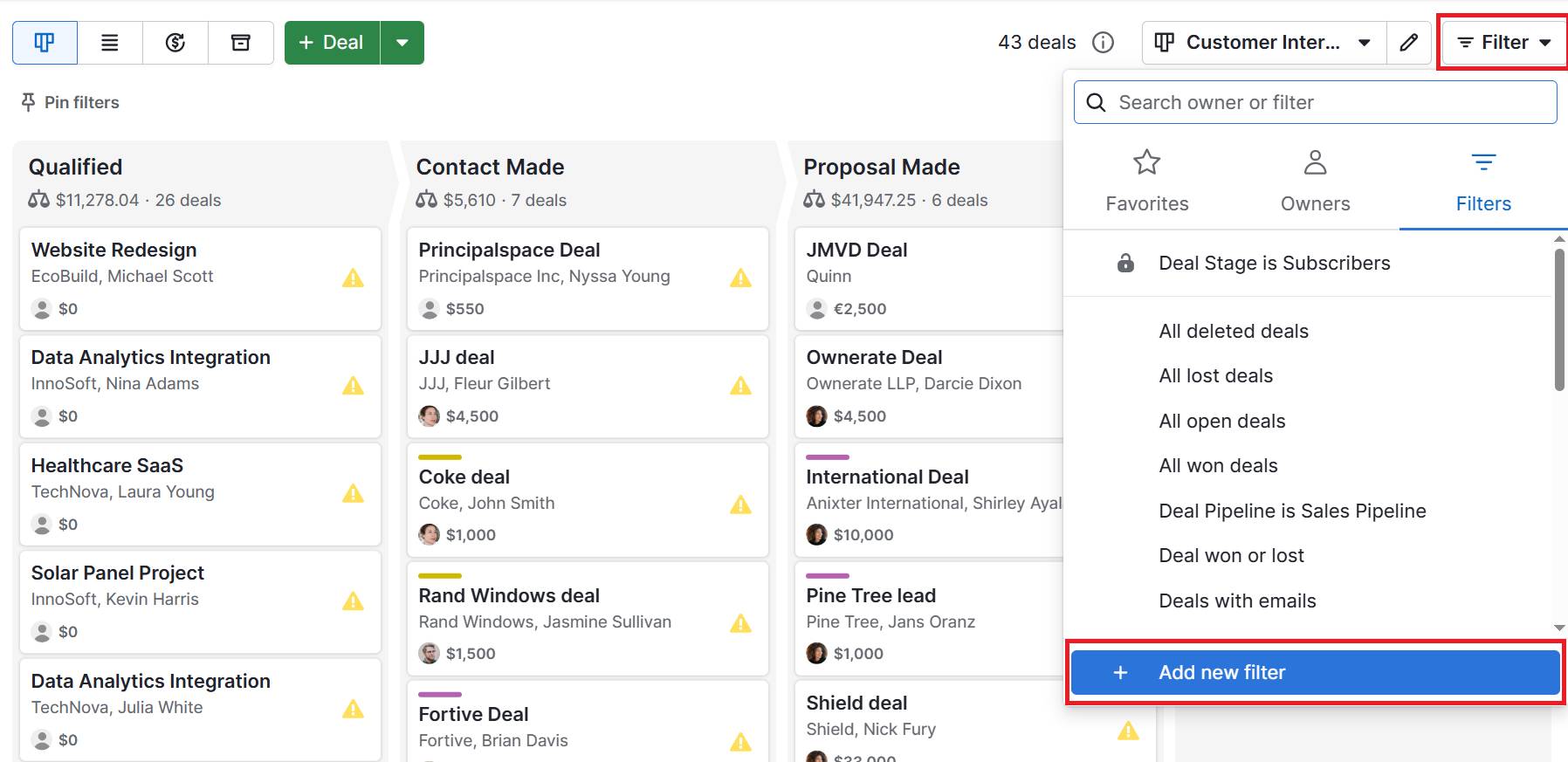
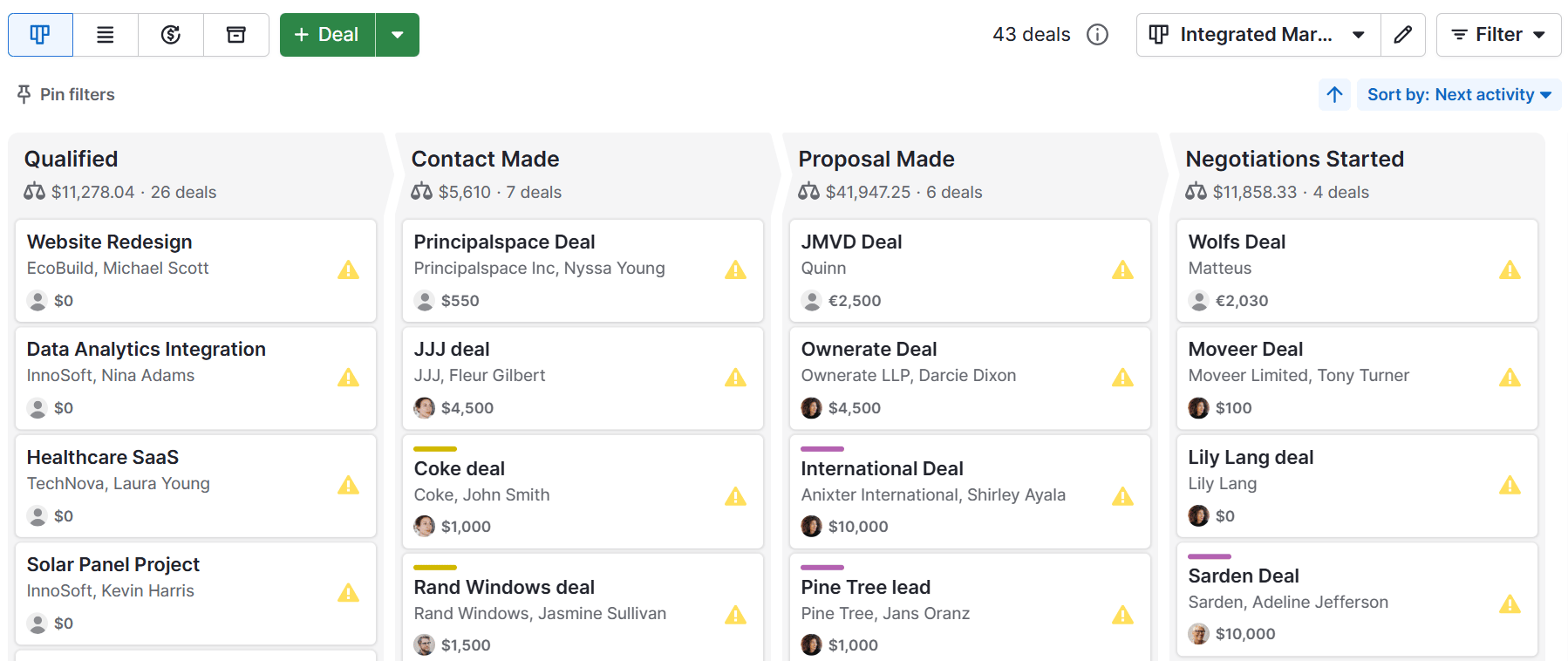
Pipedrive’s customizable deal stages also let you track where each prospect is, from initial brand awareness to decision-making.

Use them to build separate pipelines for different campaigns or segments:
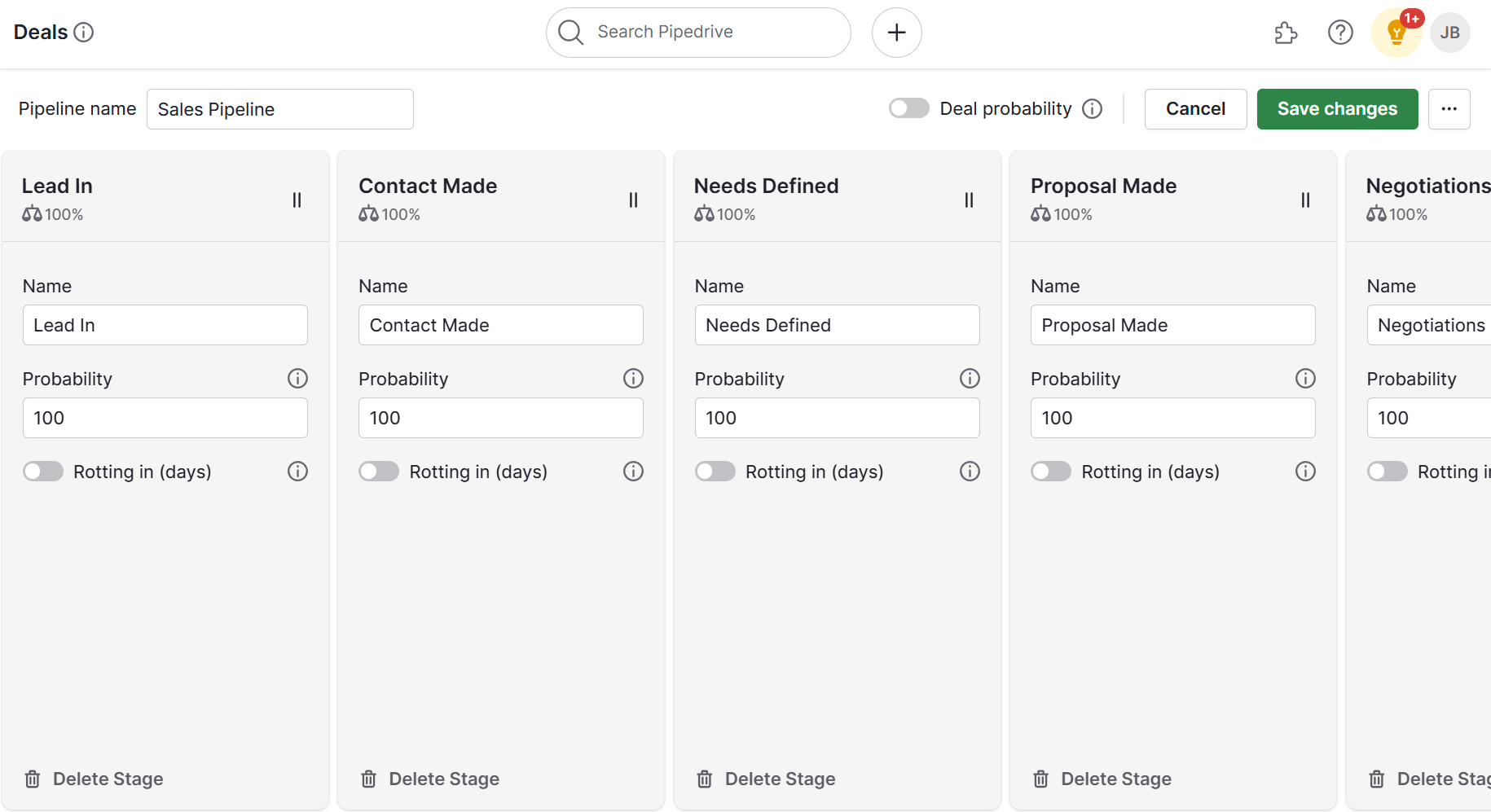
Attraction marketing Pipedrive deal stages

This visibility makes it easier to serve the right content at the right time – whether that’s a how-to guide for early-stage leads or a case study for those closer to buying.

Other helpful features include:

  1. Using Projects to plan and schedule your content calendar so campaigns stay on track

  2. Tracking engagement in Campaigns to see which emails or lead magnets spark interest and refine what you send next

  3. Automating follow-ups to keep leads warm with timely, personalized content based on behavior

  4. Scoring leads based on interactions (like email clicks or form fills), so you know who’s most engaged and where to focus your energy

By using Pipedrive alongside your attraction marketing, you’ll turn guesswork into a clear, data-driven process that grows your audience and boosts sales.

Attraction marketing FAQs

  • Attraction marketing aims to build trust and interest with leads before you try to sell to them.

    Attraction marketing’s definition also captures its purpose: sharing helpful, valuable content that draws in the right audience.

    By the time someone is ready to buy, they already know and trust your brand.

  • Here are a few attraction marketing examples that business-to-business (B2B) brands use effectively:

    • Blog posts that educate or solve problems

    • Social media tips, tutorials or behind-the-scenes content

    • Free tools or lead magnets (like templates, quizzes or courses)

    • Customer success stories that show real results

    These attraction marketing techniques all help entice potential buyers by offering value upfront.

  • While there’s no one-size-fits-all approach, try these proven strategies when building your attraction marketing plan:

    • Map the buyer journey to plan content that fits every stage

    • Create helpful resources that answer your audience’s questions

    • Use data and insights to guide what you create and share

    • Demonstrate honesty and transparency to build trust

    Together, these strategies help attract the right buyers and earn their trust over time.

  • Attraction marketing helps draw people to your brand through valuable inbound marketing content rather than pushing products.

    For online businesses, this approach is especially powerful for lead generation.

    By sharing helpful, relevant resources across your digital marketing efforts (e.g., search, social and email), you’ll attract new customers organically.

Final thoughts

Attraction marketing helps you build lasting relationships, attract higher-quality leads and position your brand as a helpful authority in your industry.

By understanding your customers and consistently delivering content that meets their needs, you’ll turn prospects into loyal customers more effectively.

With its easy-to-use CRM and project management features, Pipedrive helps you handle customer data and track every step of the buyer journey in one place. Try it free for 14 days to create marketing that delights your audience and grows your business.

The Essential Marketing Infographics Guide

Software Stack Editor · October 2, 2025 ·

As a small and medium-sized business (SMB) owner, your content must work harder to grab attention among big-name brands. Even without an in-house designer or large budget, well-planned marketing infographics can engage your target audience and get them to convert.

In this post, you’ll learn how to create visual content that keeps your sales pipeline flowing and moves the needle.

What is a marketing infographic?

A marketing infographic combines data, text and design to present information in a way that’s easier to digest and more memorable. This type of visual content communicates a brand’s message quickly and clearly.

Infographics help your busy SMB showcase its value faster. Speed and clarity are crucial for capturing audiences and standing out against more established companies.

For example, here’s part of a process infographic explaining email delivery:

Marketing infographic Pipedrive email delivery

It uses simple icons and short paragraphs to simplify and make the content more approachable for readers.

Marketers typically use infographics as top-of-funnel (TOFU) content. In this “awareness” stage of your marketing funnel, people are just learning about your brand:

Marketing infographic Pipedrive funnel

Your goal here is to grab attention and build interest (not go straight for the sale, as people aren’t ready to buy).

Infographics work well in this stage because they’re eye-catching, shareable and easy to digest. They allow potential customers to engage with your brand in a low-pressure way while still picking up useful information.

However, you can use infographics throughout your marketing and sales process to:

  • Explain a complex product or service

  • Highlight key stats or benefits of what you offer

  • Share the results of a customer story or case study

  • Recap insights from a blog post, webinar or workshop

  • Support a sales pitch or email with a quick visual summary

As this article shows, effective digital marketing infographics do more than just inform. They inspire people to act.

Recommended reading

https://www-cms.pipedriveassets.com/What-is-Marketing.png

What is marketing? 5 strategy tips every SMB should know

Why should SMB owners use marketing infographics?

The best infographics make your message easier to absorb, remember and act on. When every brand competes for audiences’ limited time and attention, thoughtful resources cut through the noise.

It’s no wonder Venngage reports that infographics are marketers’ most successful types of visual content:

Marketing infographic Venngage report

Infographics can be powerful assets in your content marketing strategy. They convey value instantly, whether you’re explaining your service or proving results.

According to Canva research, 91% of businesses use visual communication to be more efficient. Teams use it to explain ideas clearly, speed up decision-making and connect better with audiences.

Here are four key benefits of business infographics for SMB marketing:

Marketing infographic benefit

Why it works

Increase content engagement

Infographics make complex information visually appealing and highly shareable.

Build credibility

Sharing data-driven, visual proof of success (like ROI stats or case studies) builds trust and authority with prospects.

Create stronger calls-to-action (CTAs)

Infographics provide clear, compelling reasons for leads to move forward with decisions.

Save time in your sales process

Visually addressing common objections or questions helps you close more deals.

A single infographic can also deliver value across multiple touchpoints. They’re easy to repurpose across email marketing, sales presentations and your website.

Recommended reading

https://www-cms.pipedriveassets.com/Marketing-Management-Tools.png

The ultimate marketing management tools guide

5 simple steps to create a content marketing infographic

When created intentionally, infographics become powerful tools in your content marketing efforts.

You just need to clarify why you’re making one, who it’s for and what action you want people to take after seeing it.

Here’s a step-by-step guide for using marketing infographics more effectively.

1. Define your infographic’s goal

Before you start designing, clarify what you want your infographic to achieve. A clear aim (e.g., a specific sales goal) helps you stay efficient and align your content with tangible, intended business outcomes.

Without big budgets or endless resources, every piece of content needs to pull its weight. Decide if you want your infographic to:

Capture your core takeaway in one sentence. For example:

“This infographic will help potential customers understand our onboarding process, so they feel more confident booking a demo”.

Your goal aligns your team and makes every decision easier, from what data to include to where to share your infographic once live.

Here’s how to determine yours:

  • Identify which customer journey stage the infographic will support (e.g., brand awareness, consideration or decision) to shape the message and tone

  • Choose one clear objective to give it purpose (e.g., explaining a product benefit, showcasing a success story or simplifying a common process)

  • Decide how you’ll measure impact (e.g., through downloads, email sign-ups, click-throughs or time on page), so you know if the infographic is achieving its goal

By setting a target and success indicators, you’ll build strategic assets that support a broader marketing plan.

2. Identify the target audience

A compelling infographic speaks directly to specific customer needs, questions or pain points. For example, you may target decision-makers from specific company sizes or existing leads who have yet to convert.

When you know your customer, you can tailor every infographic component (i.e., language, tone, visuals and data points) to what matters most to them.

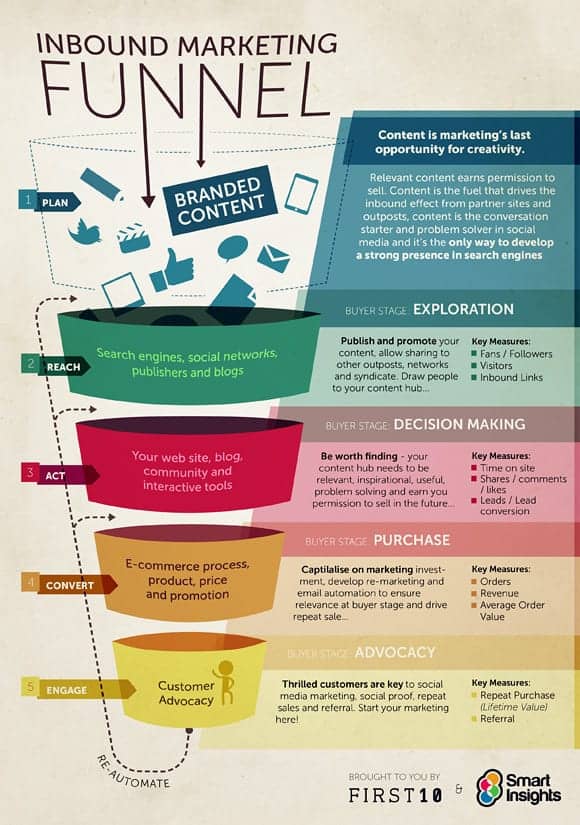
Narrowing your focus also helps make your message more effective and actionable. For instance, this Smart Insights infographic lays out the inbound marketing funnel:

Marketing infographic Smart Insights funnel

The company targets business owners at SMBs who want to drive downloads, demos and sales with their content marketing. By positioning itself as a trusted resource, Smart Insights increases the likelihood that readers will convert when they’re ready to invest in a membership.

Your customer relationship management (CRM) software is a goldmine for finding key audience information.

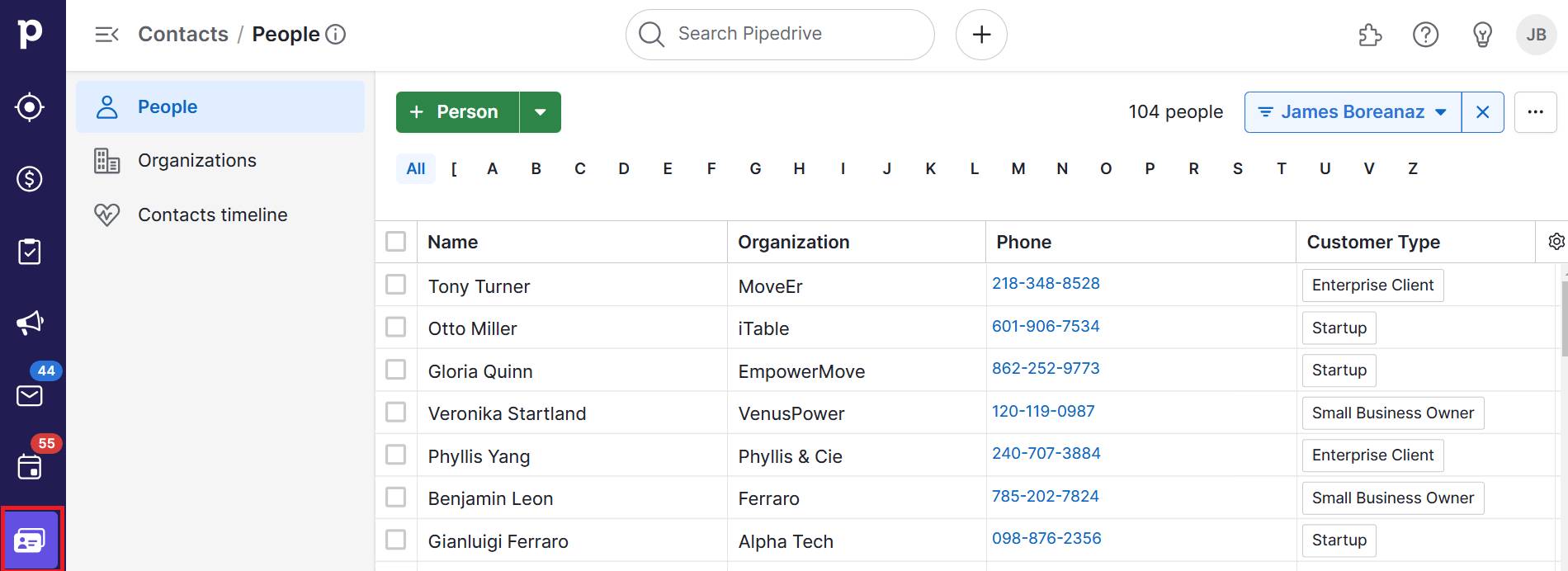
Let’s say you use Pipedrive to store key contact data.

Marketing infographic Pipedrive contact list

You can identify individuals by organization and customer type (as above) or even by job roles, industries, pipeline stages and interaction history. These details help you build clearer customer segments on which to base infographics.

For example, you might categorize:

Reviewing FAQs or sales conversations also helps you spot recurring questions or objections that could become infographics.

The more specific your target audience, the more likely your content is to resonate and drive results.

Better understand your customers with our Buyer Persona Templates

Use these templates to ensure your solution always aligns with your customers’ interests and needs

3. Collect relevant data

Your marketing infographic needs relevant, accurate information to attract and convince potential customers.

In fact, Venngage research also suggests data visualizations are marketers’ most popular type of visual content. The right stats give your infographics credibility, while also showing you understand readers’ real challenges.

In the example below, the project management tool Asana highlights stats from its original research:

Marketing infographic Asana report

Instead of reading through a wordy report, readers understand the story the data is telling at a glance.

Your segments guide the theme and content of your infographic. To find the best-fit data, think about what information each audience needs to take the next step. What’s holding them back?

Determine what data you can gather to:

  • Address common objections

  • Highlight a success story from the same industry

  • Break down how your product solves an operational pain point

Once you’ve pinpointed the type of insight you need, find it. You likely already have a lot of valuable data at hand – you just need to know where to look.

Here’s how to collect relevant customer and market information:

Where to look

What you can learn

CRM system (e.g., Pipedrive)

Identify sales trends, common challenges or successful outcomes you can showcase

Database notes and call recordings

Find real customer stories of feedback

Support tickets and FAQs

Spot recurring user issues or questions

Performance metrics

Demonstrate your product’s impact on customers (e.g., time saved or revenue growth)

Industry statistics or market research

Add context or topical authority

For instance, say you run a B2B software company that helps mid-sized logistics firms improve fleet efficiency.

Your sales team has been filtering won deals in your CRM for the past six months. It notices that 70% of successful clients had the same pain point: tracking fuel usage. Notes and call recordings also reveal that compiling reports was a major frustration.

To create an infographic, you gather:

  1. A customer quote from a recent demo about time savings

  2. Internal data showing a 30% reduction in fuel costs after three months

  3. Industry research about rising fuel prices in the logistics sector

Including this information validates your product’s value and directly addresses a high-priority concern for similar prospects.

Using data that matters to your audience makes your infographic feel trustworthy and persuasive. These two things help move leads closer to a decision.

4. Choose a tool with infographic templates

A tool with ready-made templates saves time and ensures your content looks clean, engaging and on-brand. You won’t need an in-house team or freelance designers to create polished and professional infographics.

For example, Canva offers a beginner-friendly drag-and-drop editor across millions of templates:

Marketing infographic Canva templates

It’s especially handy for social media marketing. Pre-set dimensions for every major platform and brand kits keep your visuals consistent.

Other popular design tools with infographic templates include:

  • Venngage – for more data-heavy visuals, with options to visualize charts and stats

  • Piktochart – offers templates designed for marketing, presentations and reporting

  • Visme – ideal for interactive infographics and more complex visual content

Templates can also inspire your own infographic designs, so you never have to sit staring at a blank page.

When choosing an infographic marketing tool, pick one that:

  • Offers templates for different content types (like timelines, comparison charts or process breakdowns)

  • Lets you easily customize fonts, colors, icons and layout

  • Allows collaboration if your team is working together on design and approvals

  • Provides download and sharing options for web, email or print

Start with a layout that fits your goal, then update the content and colors to match your brand style and audience needs.

5. Share through content marketing efforts

Sharing your infographic through the right content marketing channels helps you reach your audience and guide them further along the buyer journey.

Thoughtful distribution ensures your infographic gets the attention it deserves and drives real results.

First, focus on the channels where your audience is already active, such as your email list, blog or social media. Think about how your infographic fits into your existing marketing campaigns when choosing where to share it.

For example, see if it would work as part of a:

Before publishing, consider the best format and dimensions for each platform. A long, vertical email infographic that looks great as a newsletter might cut off or prove hard to read on Instagram.

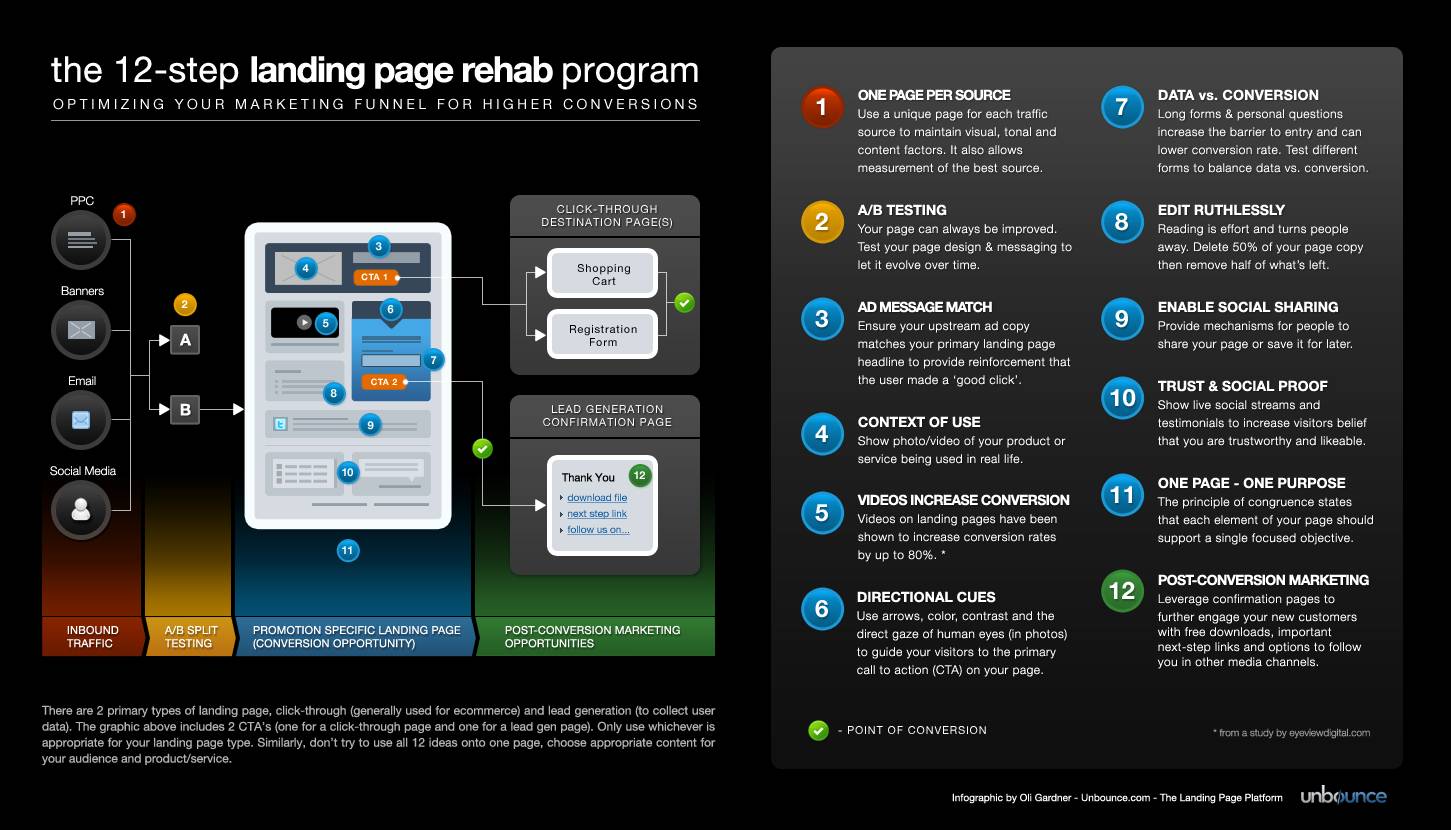
For instance, this horizontal Unbounce “landing page rehab” infographic is ideal for how-to guides and presentations:

Marketing infographic Unbounce tips

On the other hand, square or vertical formats perform better on specific social media platforms (like X) and smaller mobile screens.

Remember, one infographic can become an article, several social posts, a slide deck or a downloadable lead magnet. Repurposing drives more value from every piece of content.

Partner with influencers or other businesses to share your infographic. You’ll expand your reach and build credibility through trusted networks.

Recommended reading

https://www-cms.pipedriveassets.com/blog-assets/b2b-email-marketing-ideas-examples.png

5 high-converting B2B email marketing ideas [with samples]

How to use marketing infographics as part of your Pipedrive sales process

Marketing infographics can support your entire sales funnel, especially during the lead-nurturing phase. A CRM like Pipedrive provides the tools to deliver the right content at the right moment.

First, create contact labels to group people and organizations based on deal stage, interest level or past engagement:

Marketing infographic Pipedrive contact labels

This intent and behavioral segmentation lets you tailor your infographic content to speak directly to each group’s interests or concerns.

Next, build sequences of personalized emails using Campaigns by Pipedrive:

Marketing infographic Pipedrive Campaigns

For example, set up a series for warm leads with a comparison infographic that helps clarify your value over a competitor’s. Or design one to send alongside a customer success story from their industry.

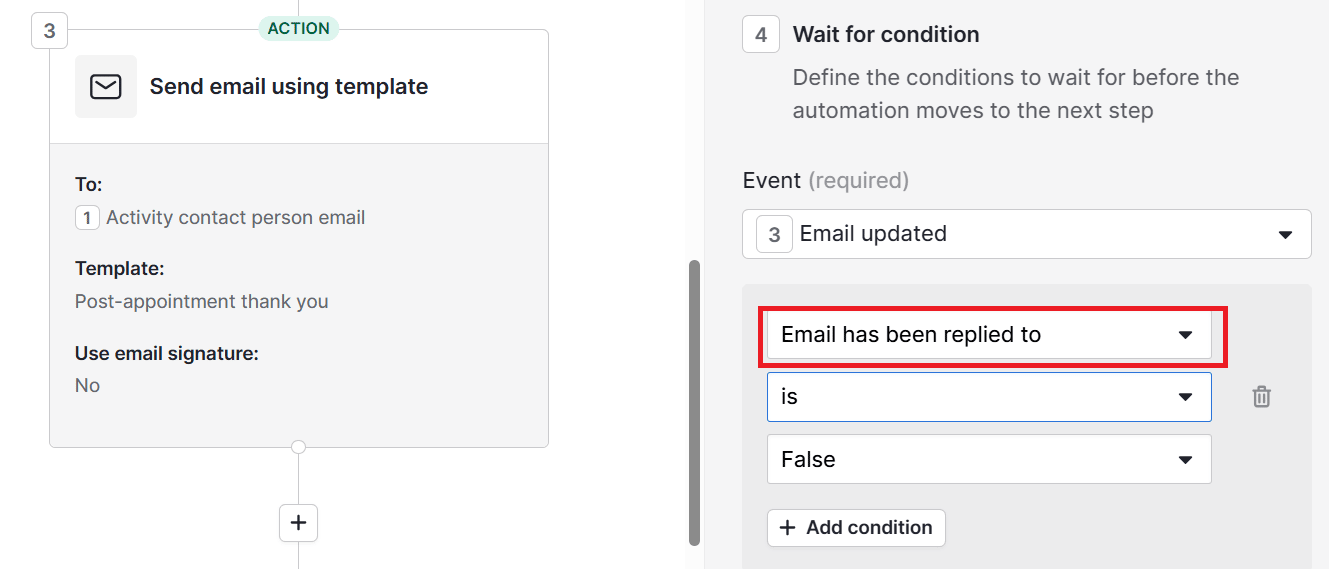
Then, let Pipedrive’s workflow automations send infographics at strategic points. A good opportunity is right after a product demo or consultation:

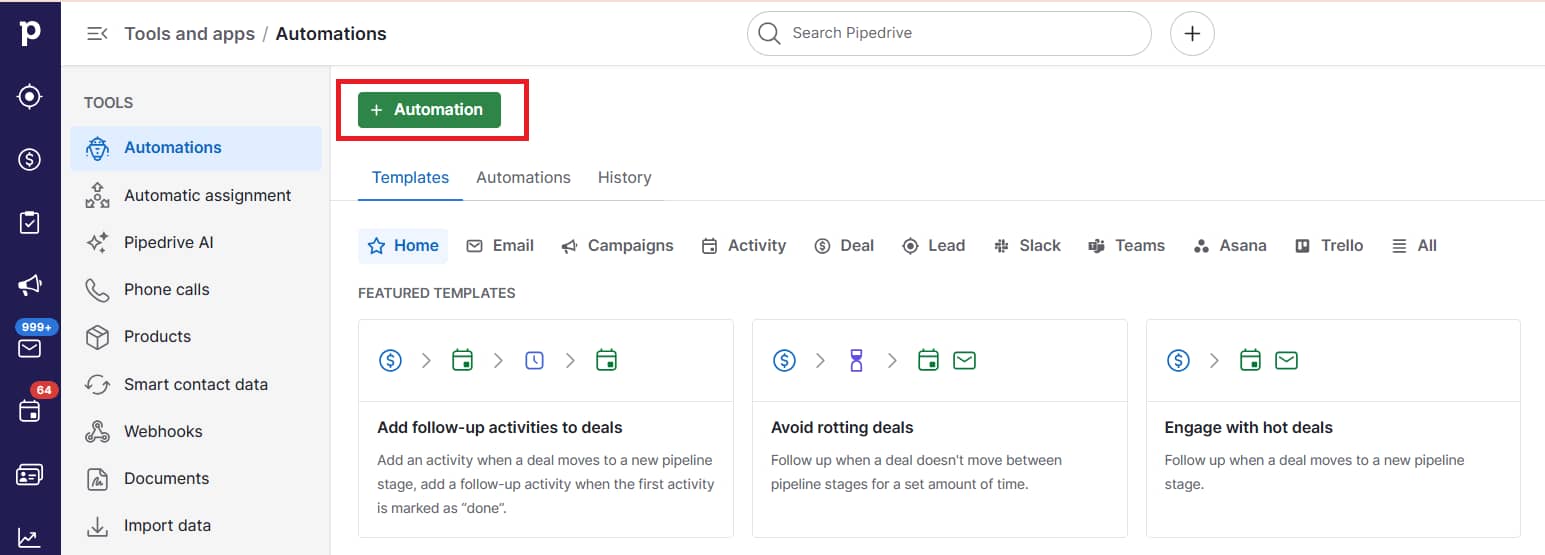
Marketing infographic Pipedrive automations

Reinforcing your message with a visual keeps your solution top of mind without manual follow-ups.

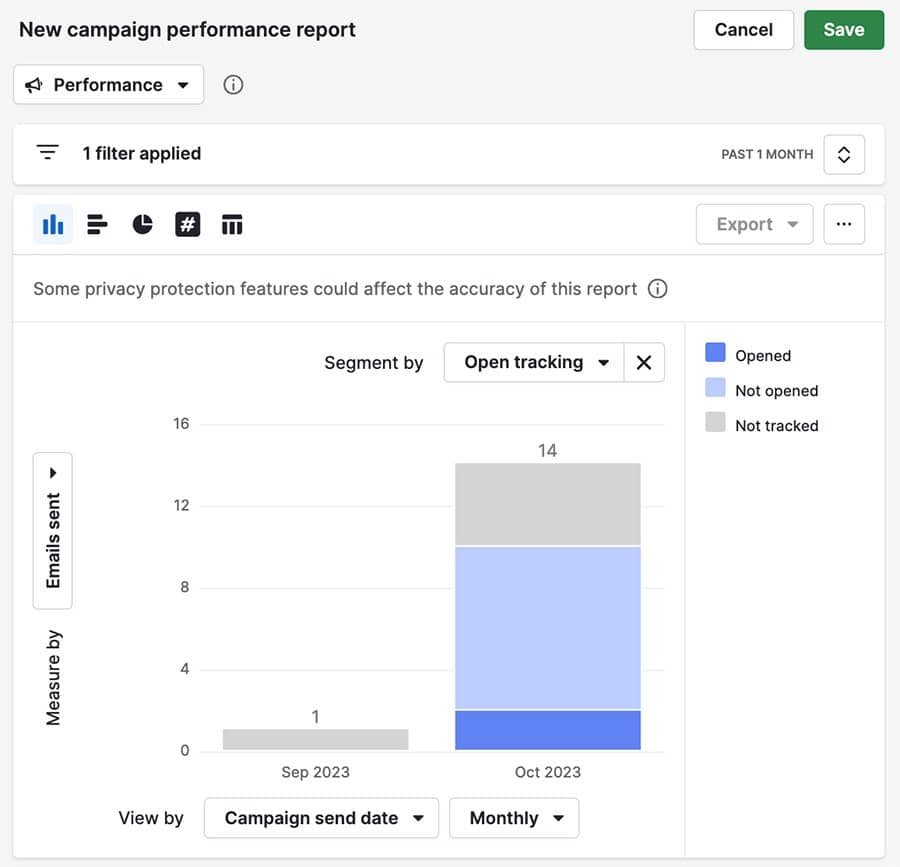
Once you send emails, track how leads engage with them using Pipedrive’s Insights for Campaigns:

Marketing infographic Pipedrive campaign reports

Look for improved (or declining) email opens, clicks and conversion rates tied to infographic content to guide your future efforts.

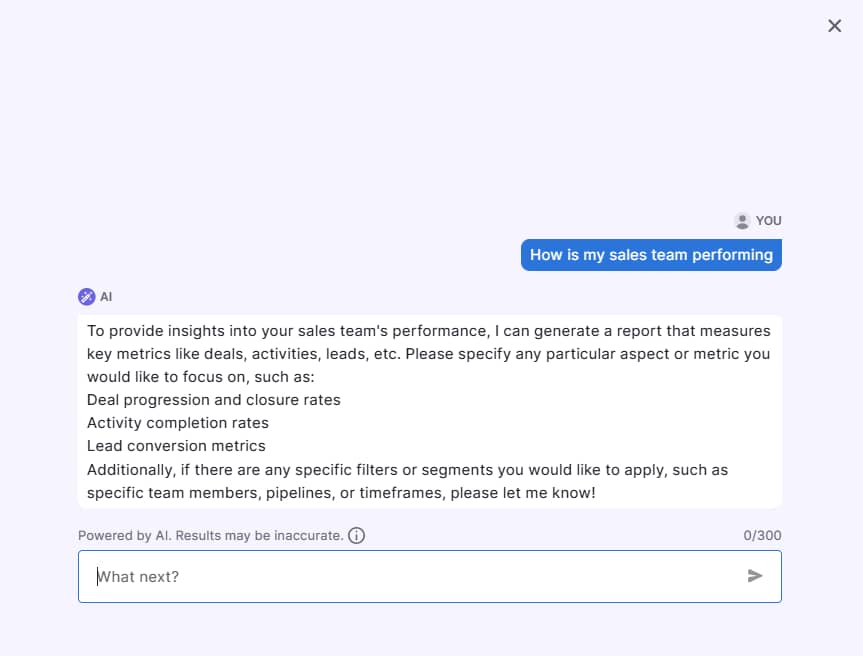
You can also run Pipedrive’s AI report generator to ask for insights in your own words:

Marketing infographic Pipedrive AI reporting

This easy-to-find data can help refine your message or timing for better results.

Pipedrive’s features help you create and share thoughtful, data-driven infographics that move leads closer to becoming customers.

Recommended reading

https://www-cms.pipedriveassets.com/Marketing-Reporting.png

Marketing reporting: how to create reports that inform decisions

9 best practices for creating high-quality marketing infographics

An engaging, informational infographic can be one of your most effective marketing tools. It has the potential to earn backlinks and boost your search rankings when shared widely.

Whether you’re creating a flowchart, process or timeline infographic, a few wise choices can ensure your content always delivers real value to your audience.

Here’s how to use infographics in marketing for the best results:

  1. Keep it simple – focus on one key message or idea to avoid overwhelming your audience

  2. Use plenty of white space – allow room for your visuals and text to breathe, making the infographic easier to digest

  3. Prioritize visual hierarchy – arrange elements so the most important information stands out first (e.g., use larger fonts, bold text or contrasting colors)

  4. Stick to a consistent color scheme – apply a limited palette that aligns with your brand to maintain visual harmony

  5. Use high-quality icons and images – select clear, relevant visuals that support your message (not distract from it)

  6. Include data-driven insights – include charts, graphs and statistics to back up your claims and make the infographic more authoritative

  7. Be concise – aim for clarity over complexity with short, punchy text and let visuals do the talking

  8. Test and optimize – monitor your infographics’ performance to see what resonates with your audience and adjust accordingly

  9. Consider search engine optimization (SEO) – when embedding infographic images, include keyword-rich titles, meta descriptions and alt text so searchers can discover them organically

Following these best practices helps your infographics look more credible and support your broader marketing goals.

Final thoughts

A well-designed marketing infographic can boost engagement, build trust and move leads closer to a purchase.

The right tools make the process faster and more effective. With easy-to-use templates, you don’t need a graphic design background to create something impactful.

Pair that with a CRM that helps you segment your audience and automate your outreach so infographics land where and when they need to. Try Pipedrive free for 14 days and see how your marketing can directly support your sales pipeline.

A Simple Guide to the Future of B2B E-Commerce

Software Stack Editor · September 30, 2025 ·

B2B e-commerce is evolving fast, fueled by digital transformation and new customer behaviors.

Competing amid all the change takes more than just keeping up – you need to get ahead.

This article explores eight key predictions shaping the future of B2B e-commerce, backed by expert research and insights. You’ll also learn practical ways to boost sales and earn long-term customer loyalty as the landscape shifts.

1. B2B marketplaces will gain on traditional channels

B2B marketplaces will reshape how businesses find and buy products from each other. They could eventually overtake conventional sales channels like direct websites and product catalogs.

The marketplace model involves B2B sales organizations allowing third parties like Amazon Business and Alibaba to sell directly on their digital platforms. The third party becomes the merchant of record (MoR), handling payments and legal duties. The B2B brand takes a share of the sales value as commission.

The streamlined procurement process means less paperwork and faster B2B transactions. Buyers can also evaluate and compare vendors side by side, so it’s easier to find the best fit.

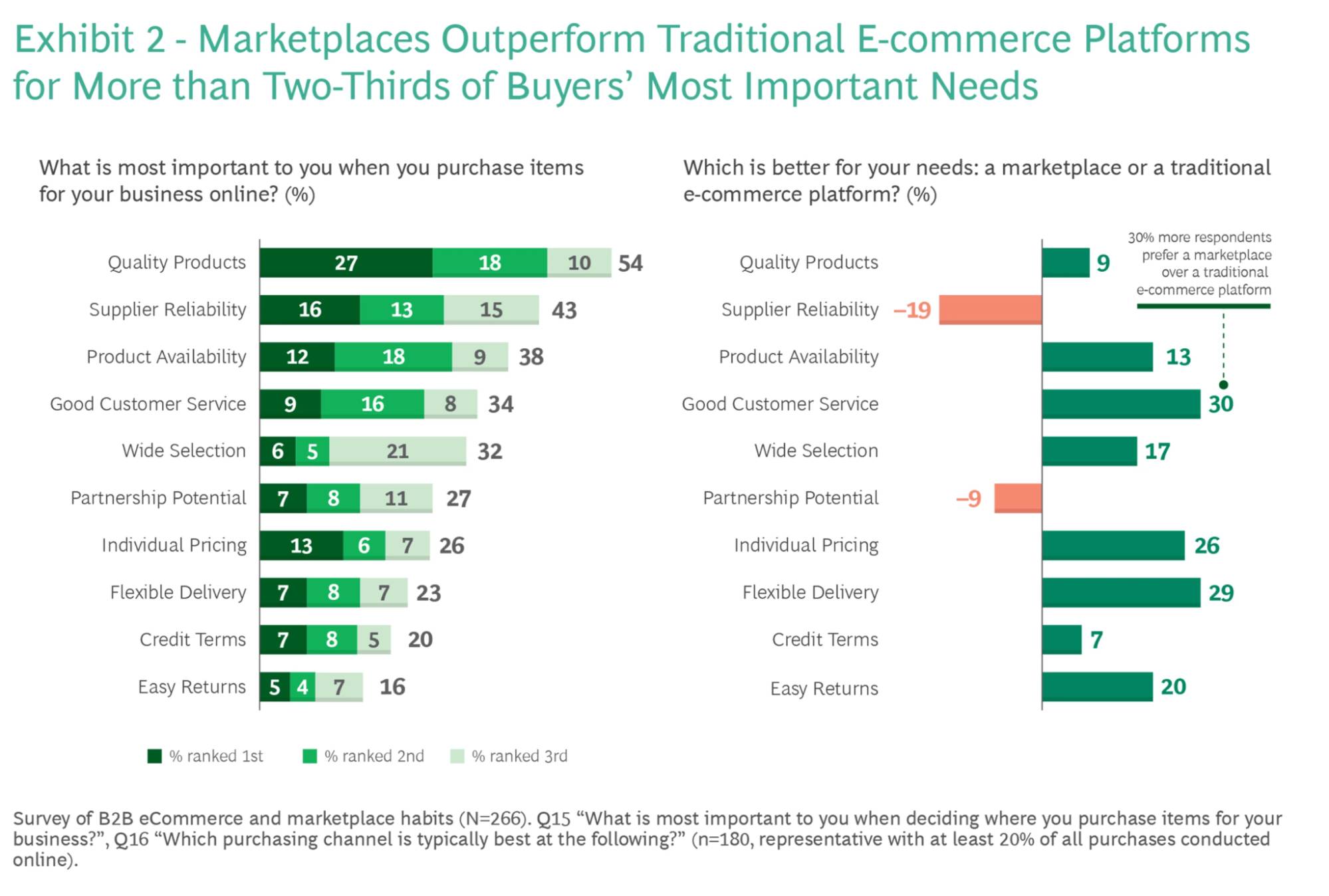
In a BCG survey, marketplaces outperformed traditional e-commerce platforms for eight out of 10 buyers’ most important needs, including product availability, selection and customer service quality.

Future of B2B ecommerce BCG graphs

In addition to meeting their audience’s key needs, B2B companies get to sell more without extra logistical effort. Sales negotiation, user experience (UX), fulfillment and returns are all taken care of, meaning more time for sales strategies and marketing initiatives.

What to do about it

Start evaluating B2B marketplaces close to your industry and explore listing opportunities.

For example, Amazon Business and Alibaba are ideal for selling general products at scale. Knowde (chemicals) and PartsSource (healthcare supplies) cater to specific verticals.

When building your shortlist, check where your competitors are active and consider traffic volume, fee structures and buyer demographics.

Recommended reading

https://www-cms.pipedriveassets.com/E-commerce-CRM.png

What is an e-commerce CRM and why do you need one?

2. Self-service buying experiences will become the norm

B2B buyers are becoming more independent, taking greater control of their purchasing journeys. They expect consumer-grade convenience throughout – including fast, easy access to product details, pricing and ordering.

However, self-service isn’t all about information. Customer experience is just as vital.

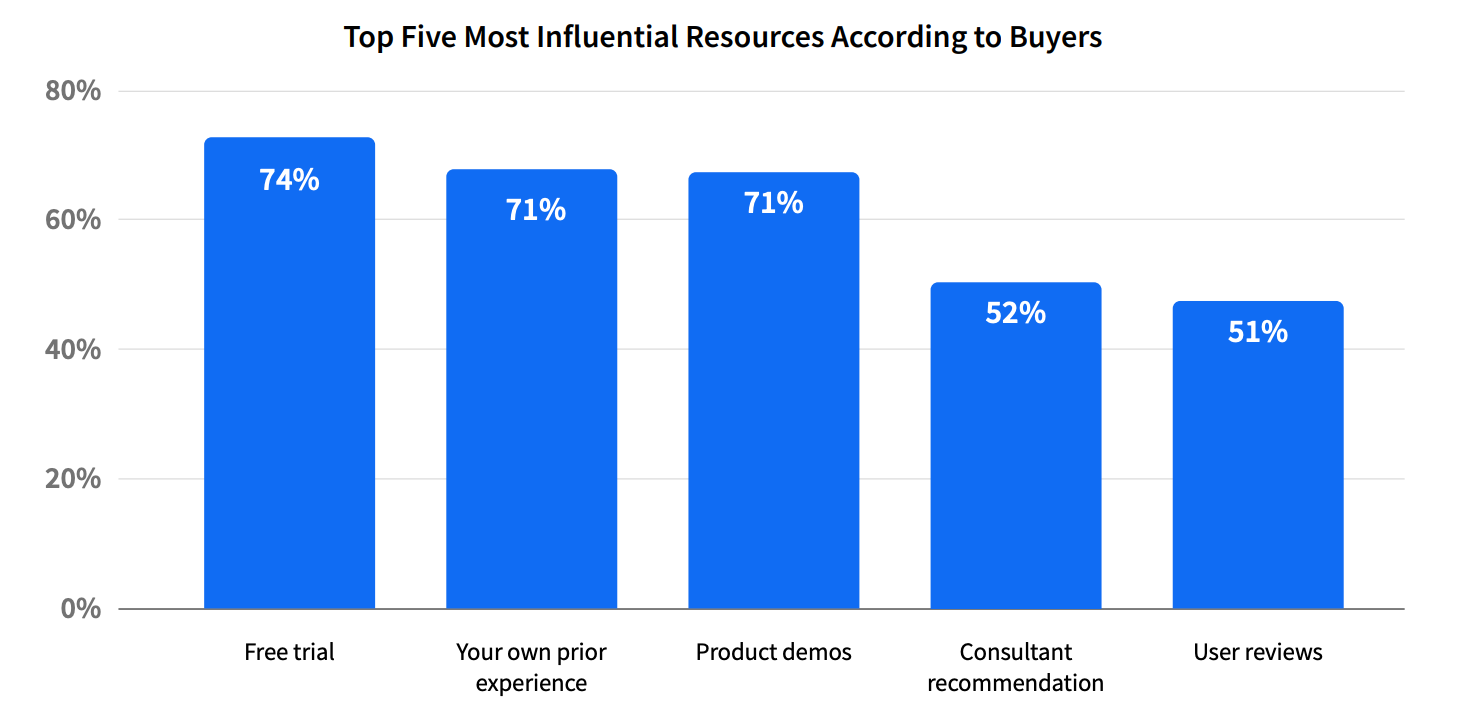
Free trials and product sales demos increasingly influence buyers’ decisions. Of the five most-used resources in 2024, the only one to increase year over year was “own prior experience”. Trials remained the most influential.

Future of B2B ecommerce TrustRadius graph

In other words, a growing proportion of your audience must try before they trust.

Trials and demos are already common in software-as-a-service (SaaS) circles. Forward-thinking brands in many other fields are getting products into sales prospects’ hands.

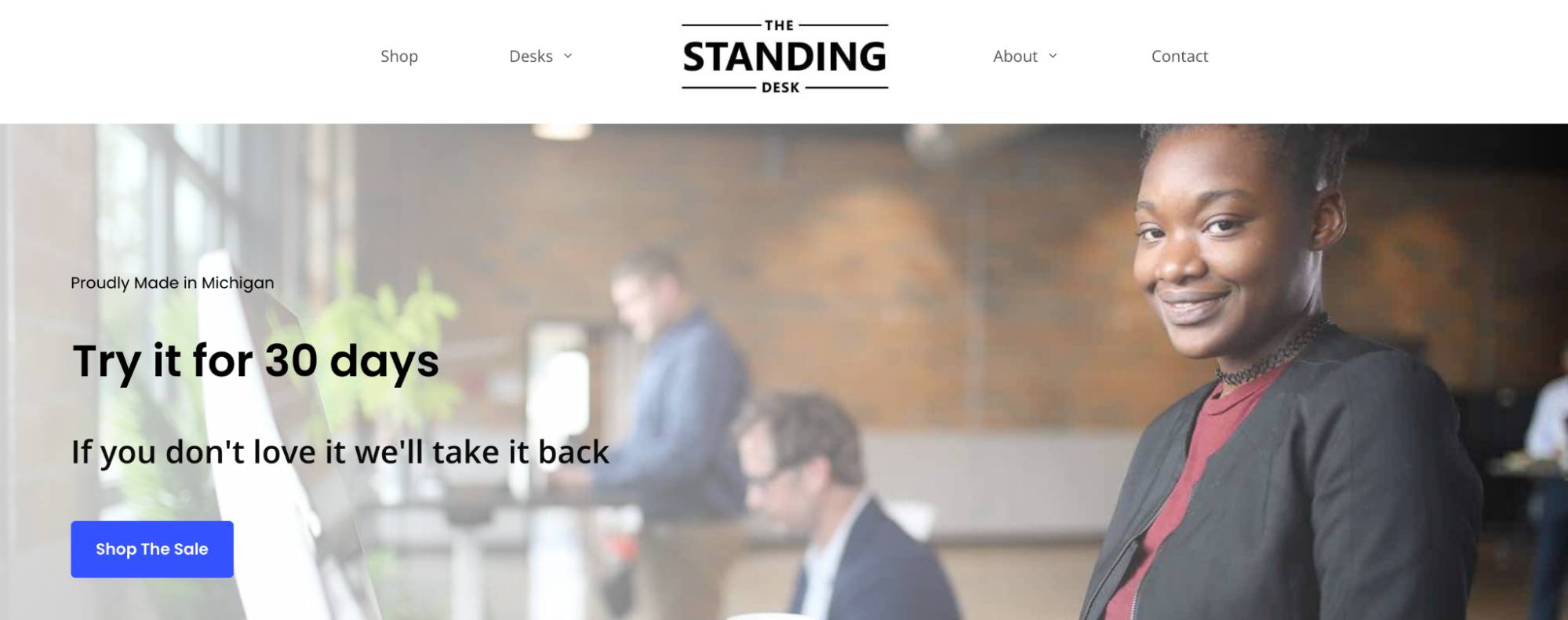
For example, the office furniture company The Standing Desk offers 30-day trial packages to US customers.

Future of B2B ecommerce The Standing Desk homepage

You’ll find risk-free trials on everything from coffee beans and machines to commercial cleaning services. These companies simply lower their entry barrier to build confidence early in the customer journey.

What to do about it

Make it easy for buyers to get hands-on experiences with your product or service.

Start by offering free trials or demos. If that’s not feasible, create interactive product tours or video walkthroughs tailored to different industries and use cases.

Support your self-service experience with intuitive product pages, transparent pricing and contextual help (like tooltips or chatbot guidance).

Recommended reading

https://www-cms.pipedriveassets.com/B2B-content-marketing-strategy-for-SMBs.png

How to create a B2B content marketing strategy for your small business

3. Personalized, omnichannel customer experiences will set the standard

Sales personalization has long been standard in B2C e-commerce. Now it’s becoming essential in B2B too, changing how companies deliver information and price products.

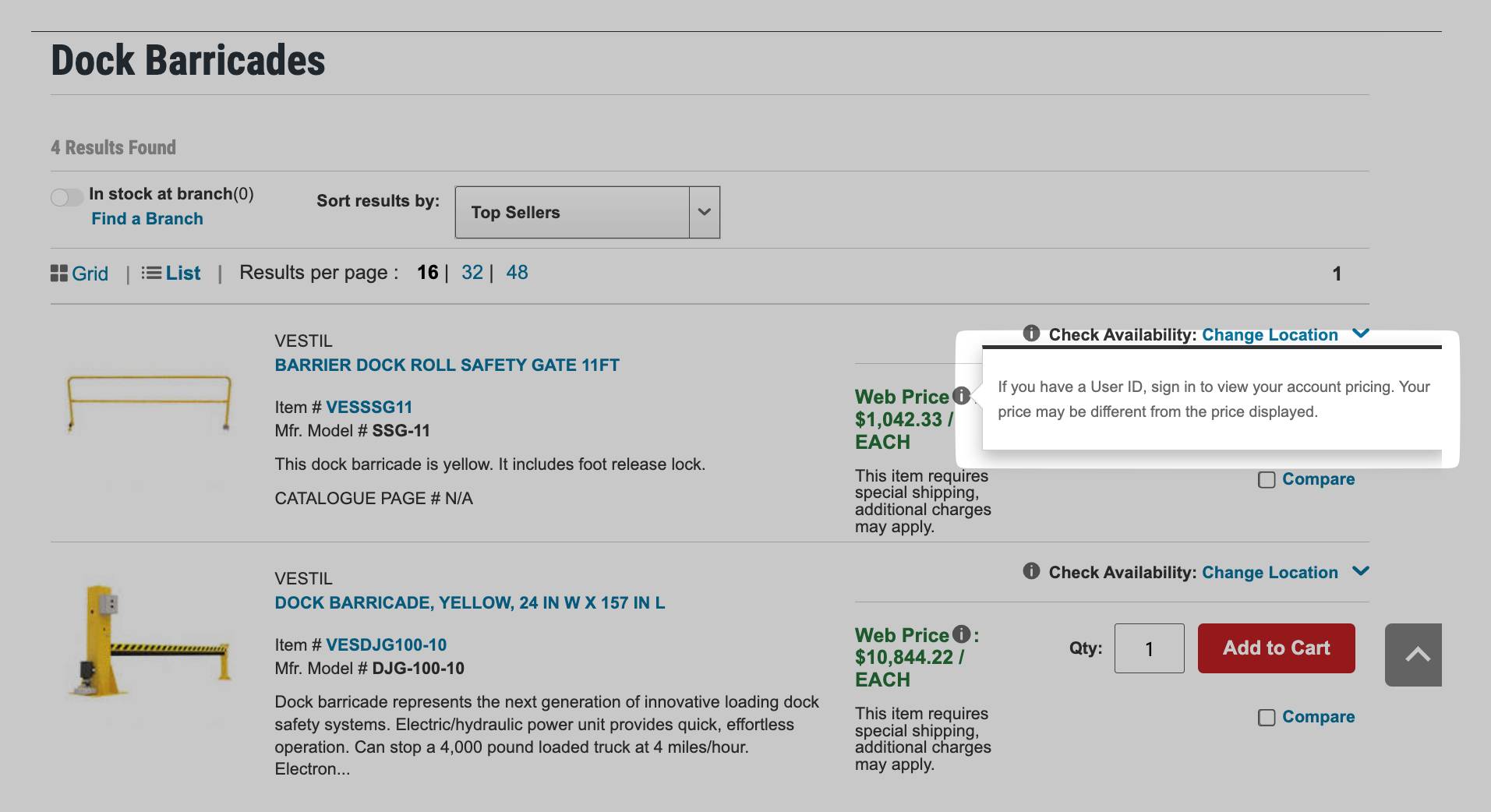
Adobe found that 57% of B2B companies offer customer-specific pricing in their digital channels, acknowledging each client’s unique needs. For example, the industrial supplies firm Grainger shows logged-in users personalized pricing based on account history and contract terms.

Future of B2B ecommerce Grainger product page

Personalized pricing helps to streamline procurement because buyers see the price they’ll pay in real time. They don’t need to inquire or wait.

Like consumers, B2B buyers expect seamless, consistent experiences across channels. Email, e-commerce sites, sales conversations and support interactions must all be customer-centric, with accurate personal information and data-driven product recommendations.

This kind of bespoke, joined-up approach pays dividends. In a Deloitte study, leading B2B brands estimated that customers spend, on average, 62% more when buying experiences are consistently positive.

What to do about it

Use your customer relationship management (CRM) system to segment B2B customers and tailor messaging to their needs.

For example, if hands-on help boosts sales engagement and conversions for one group, increase your focus on demo-driven emails or tools like product selectors.

If another segment prefers reading and research, share relevant use cases or links to industry-specific landing pages.

Recommended reading

https://www-cms.pipedriveassets.com/Types-of-Customer-Service.jpg

9 Types of customer service: Pros, cons and when to choose each one

4. AI and machine learning will drive smarter selling, not just marketing

Artificial intelligence (AI) is no longer just a tool for B2B marketing teams. It’s becoming crucial for e-commerce sales organizations, too.

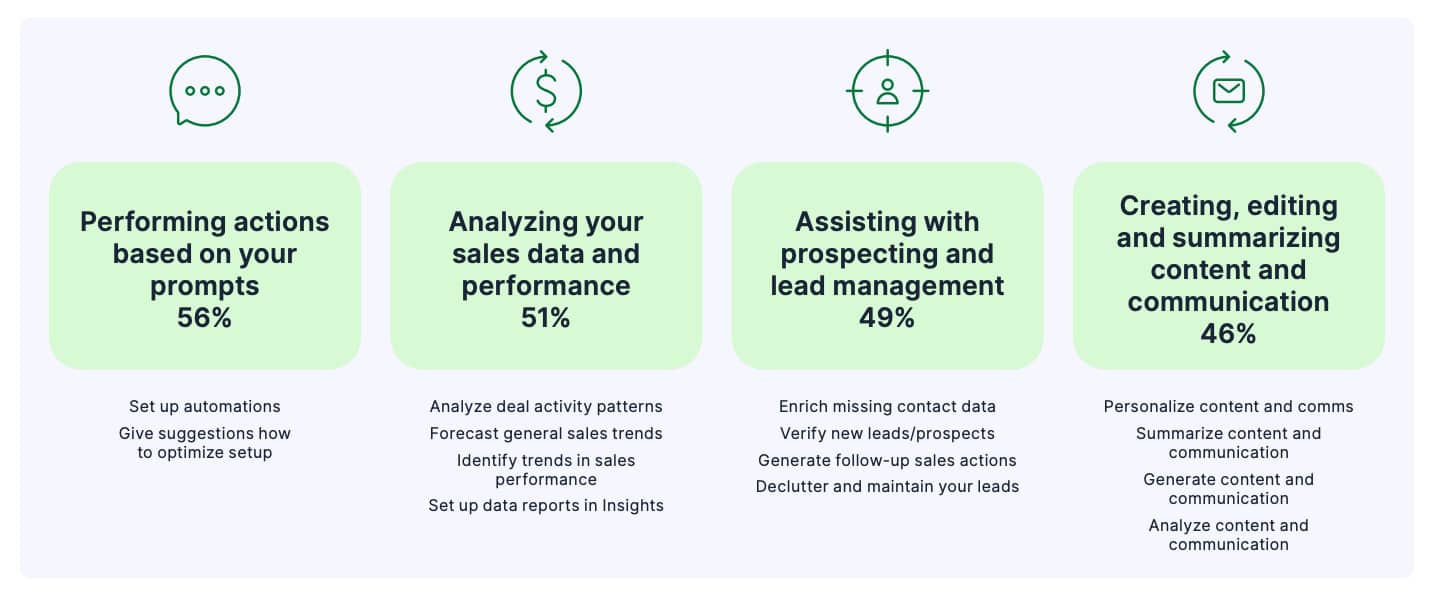
Pipedrive’s 2024 State of AI in Business report found that AI supports increased conversions and better cross-sell opportunities across the entire sales cycle.

Right now, the most common use cases are performing actions based on prompts, analyzing sales and performance data and assisting with prospecting and lead management – all are in the workflows of around half of the AI adopters Pipedrive spoke to.

Future of B2B ecommerce Pipedrive AI statistics

To get more specific, Pipedrive users are leaning on AI to:

Ultimately, these applications help sales teams focus their energy on meaningful interactions that win buyers’ trust, instead of repetitive admin like sending sales invoices.

For example, a sales rep could use Pipedrive’s AI to enrich a lead’s profile with a missing job title or company info, then get a nudge to follow up based on email engagement. Such smart suggestions make it easy to act fast without combing data or second-guessing priorities.

AI’s efficiency gains feed into our last B2B e-commerce trend of personalization. Reps will be more available to work closely on complex deals, giving high-potential leads the attention they need.

What to do about it

Identify repetitive sales tasks you can automate with AI and other sales tools.

Follow-ups, data enrichment and lead scoring are great starting points. Pipedrive can quickly help with all three.

For example, its AI-powered Sales Assistant flags when leads go cold or engage with your outreach. Meanwhile, the Pulse sales prospecting software uses enrichment data to help you prioritize accounts with the highest conversion potential.

Enterprise resource planning (ERP) software is also valuable for managing inventory, invoicing and order processing.

Then, work closely with reps to ensure these tools streamline their work. New technologies should support – not replace – the human touch needed to close complex B2B deals.

Crush your manual admin with this sales automation guide

Learn how to take advantage of new sales automation tech so you can spend more time selling

5. AI models will shape how buyers find and evaluate vendors

AI won’t just change how B2B sellers operate, it’ll transform how buyers discover and shortlist vendors.

As generative tools become more embedded in everyday workflows, buyers will increasingly rely on what they surface during AI research (much like how they use search engines now).

We’re not all the way there yet. TrustRadius found that only 21% of B2B tech buyers currently use generative AI (or gen AI) during the buying process, and 9% say the tools aren’t helpful yet.

However, this customer behavior will change rapidly as gen AI keeps advancing. For time-constrained buyers evaluating new software categories, AI’s insights will make unfamiliar topics digestible and buying decisions faster.

For example, when we ask Gemini to recommend a simple, easy-to-use sales CRM, it gives us the following information about Pipedrive:

Future of B2B ecommerce Gemini screenshot

Below it, Gemini profiles and compares other helpful products. It’s a quick and simple way to build a product shortlist and speed up decision-making.

You could even ask the app to reorder products based on a specific factor (e.g., price or social media connectivity), which you couldn’t do with standard search results.

As more buyers turn to generative AI for research, your product information’s visibility across public channels will matter more than ever. This information is where tools like the ChatGPT platform, Gemini and others source their “intelligence”.

What to do about it

Strengthen your brand presence by publishing comprehensive product guides, FAQs and other helpful content online.

Strong, publicly accessible content helps train AI models to represent your company accurately during AI-assisted research. What’s more, TrustRadius found that 90% of buyers click through to sources featured in AI overviews.

Recommended reading

https://www-cms.pipedriveassets.com/blog-assets/content-hub.png

Everything you need to know about content hubs

6. Sales teams will shift from order takers to strategic advisors

With more and more B2B sales interactions moving to digital channels, traditional sales roles focused on taking orders and providing basic information are becoming less valuable.

Gartner anticipates that 80% of B2B sales interactions will happen in digital channels in 2025, with younger buyers leading the transition. It found that 44% of millennials prefer rep-free buying experiences, compared with 33% across all age groups.

Future of B2B ecommerce Gartner research illustration

As buyers do so much research online, reps can’t afford to simply repeat what their websites say. They must evolve into supportive partners who add another layer of value to the purchase journey, giving experience-based strategic advice.

Gartner’s researchers explained:

“In a world of ‘everywhere customers’, where it’s even tougher to influence purchase decisions, sales needs to focus on helping buying groups feel more confident in their own decisions.

Instilling that confidence means positioning sellers as consultants rather than information sources. Customer-facing teams must help buyers make sense of everything they learn on their own, wherever they learn it.

What to do about it

Upskill your sales team to act as trusted advisors. Help them back up public information with real success stories, metrics and insights from customer journeys.

Equip reps with sales enablement tools, including:

Base all of these assets on customer data from your CRM.

7. ‘Headless’ e-commerce strategies will gain ground

B2B companies are shifting away from rigid digital commerce platforms toward headless setups that offer greater speed, flexibility and personalization.

Headless architecture is a composable way of building a website or app where the front end (what users see) is separate from the back end (where the data lives).

Linking the two using application programming interfaces (APIs) lets you change the design aspects and functionality customers see without reconfiguring the whole system. That means less work and fewer mistakes.

Adobe reports that 36% of B2B companies either already use a headless commerce solution or are in the process of implementing one. A further 29% are evaluating headless systems.

Future of B2B ecommerce Adobe pie charts

Popular commerce platforms for headless architecture include Shopify, BigCommerce and Adobe Commerce (formerly Magento).

Some platforms can share data with your CRM for smoother B2B sales workflows. For example, the Pipedrive-Shopify integration lets you manage sales, product catalogs and contact data in a single location.

What to do about it

Talk to your dev team about whether headless architecture could aid your site speed, design flexibility or integration capabilities. They’ll know if it’s the right fit for your B2B business.

If you have other stakeholders to persuade, discuss how integrating front- and back-office systems through APIs could make order management smoother (i.e., more profitable).

For example, linking e-commerce to back-office systems means an online order automatically triggers warehouse fulfillment, speeding up buyer journeys.

Recommended reading

https://www-cms.pipedriveassets.com/How-to-Increase-Sales.png

How to increase online sales: 14 proven techniques

8. Security posture will influence more B2B buying decisions

Online security is becoming a key part of the purchase journey, especially in tech.

According to a 2024 G2 survey, 97% of software buyers involved a security stakeholder in procurement, and 81% evaluated a vendor’s breach history before making a decision.

The heightened focus on security reflects the growing risks and fears around data breaches. These aren’t just the IT team’s concerns anymore; they’re business-critical.

ConnectWise reports that 78% of SMBs are worried a serious attack could put them out of business, yet 76% say they lack the in-house skills to deal with cybersecurity issues. They want products to keep their data safe.

Transparency around security practices is essential for e-commerce brands. Badges, compliance certifications and third-party security scores will become standard comparison points between vendors.

What to do about it

Promote your security credentials across the customer journey.

Four in five buyers say data security certifications are essential when selecting a provider, so weaving these into early touchpoints will help you win their trust.

Include badges, assessments and ratings in product listings and sales materials to build customers’ confidence and optimize your sales cycle.

Final thoughts

The future of B2B e-commerce will reward brands that offer flexible, buyer-centric and insight-driven experiences.

The traditional boundaries between B2B and B2C experiences continue to blur, with professional buyers up and down the supply chain expecting the same level of convenience they enjoy as consumers.

Adopting the right tools and strategies will put you ahead of the curve as customer expectations evolve. See how Pipedrive can support you on the journey by combining CRM, AI and automation in one simple platform.

Best Customer Transformation Guide for SMBs

Software Stack Editor · September 29, 2025 ·

Customer transformation is about shifting from firefighting problems to proactively shaping customer experiences to grow satisfaction and trust.

For SMBs, that means stronger retention and steadier revenue, even with limited resources.

This article gives you a five‑step framework for implementing customer transformation. You’ll learn how to map your customer journey, set up simple automations, personalize outreach and track the results.

Key takeaways

  • Mapping the customer journey, workflow automation and personalization are simple ways for SMBs to get started with customer transformation.

  • Clean, centralized customer data is the foundation for effective transformation and a better digital customer experience.

  • Measuring retention, engagement and response times helps SMBs track the impact of their transformation and identify areas for improvement.

  • For most SMBS, a good CRM is enough to put customer transformation into practice – try Pipedrive free for 14 days.

What is customer transformation (and why do SMBs need it)?

Instead of waiting for problems, you anticipate customer needs. Rather than treating everyone the same, you personalize interactions based on their history and preferences.

Example: Say a SaaS company loses many customers at subscription renewal. A reactive approach is to contact customers after the fact to find out why they canceled – or use initiatives like discounts to lure them back.

With a transformed approach, the sales team uses CRM insights to flag accounts with low usage and reach out weeks before renewal. Instead of losing revenue, they open conversations that lead to upsells and long-term contracts.

While most transformation advice assumes unlimited resources and dedicated teams, customer transformation isn’t just for enterprise businesses. Here’s why it matters for SMBs:

  • Building a sustainable competitive advantage. While larger companies can outspend competitors, SMBs are better able to adapt quickly and deliver more personal customer experiences. Customer transformation turns that SMB agility into an edge.

  • Retaining more customers. Transformation strengthens customer loyalty, which is cheaper and more effective than always relying on customer acquisition. Retention ensures sustainability for SMBs with limited sales and marketing budgets.

  • Doing more with the same team. Hiring is costly and slow. Transformation helps SMBs serve more customers and grow revenue without adding new roles.

SMBs need practical approaches that work with limited budgets. That’s why customer transformation for SMBs focuses on improving the use of existing tools rather than introducing new technology.

A strategic, step-by-step approach helps serve your SMB’s customer base while strengthening your market position.

Recommended reading

https://www-cms.pipedriveassets.com/AI-Customer-Experience.png

9 effective ways to use AI to improve customer experience

The 5-step customer experience transformation framework for SMBs

Customer transformation doesn’t have to mean a complete overhaul.

Pipedrive’s five-step framework breaks it into simple steps that your SMB can gradually roll out to drive results without disrupting day-to-day business.

5 step customer transformation framework

Learn how and why you should achieve each transformational step below.

1. Audit your current customer touchpoints to spot transformation opportunities

Start by defining how customers interact with your business now.

Create a simple customer journey map by tracking how people move from first contact to purchase.

If you use a customer relationship management (CRM) platform like Pipedrive, look at sales deals you made and the communication history to understand the timeline of customer relationships.

Market research like this helps you understand your target audience better. Look for these specific issues:

  • Communication gaps. Where do customers typically go silent or express frustration?

  • Response time delays. How long does your team take to respond to different types of inquiries?

  • Information silos. Do customer details live scattered across different team members’ notes?

  • Inconsistent experiences. Do different team members handle similar situations differently?

Document findings in a shared spreadsheet to easily spot patterns or pain points.

The goal isn’t perfection. A solid overview of your current baseline lets you pinpoint areas to optimize the customer experience.

Example: A small marketing agency audits its touchpoints and finds that new prospects often wait more than 48 hours for a response to discovery call requests. Documenting this in a shared spreadsheet highlights a high-priority area for improvement.

2. Centralize and organize your customer data to see the full picture

Consolidate all customer information into unified records so your team has a single source of truth.

For instance, store records in your CRM or a shared Google Drive.

While poor data quality sabotages transformation efforts before they start, organized data allows you to understand specific customer expectations and personalize outreach.

Here’s how to compile easily accessible customer data:

  • Decide what data matters. Focus on information that helps effective marketing decision-making, such as customer preferences, demographic and psychographic segments or buying history.

  • Standardize how you capture data. Create clear rules for entering information so everyone contributes consistently (e.g., always include next steps or tag by company size).

  • Segment and prioritize customers. Identify high-value, at-risk or expansion-opportunity accounts so your team knows where to focus.

Pipedrive’s duplicate detection feature merges scattered customer records and eliminates confusion.

Customer transformation Pipedrive merge duplicates

Use the custom label function for quick market segmentation. Tags like “high-value”, “at-risk” or “expansion-opportunity” help your team customize marketing tactics.

Customer transformation Pipedrive custom labels

The more thorough your data is, the more effective your customer transformation efforts will be.

Example: The same marketing agency centralizes all prospect data in its CRM and finds several leads duplicated across records. This error causes confusion about whether discovery calls have been scheduled. The team merges duplicates and tags prospects by priority to ensure timely follow-ups.

3. Automate routine customer interactions to free up your team

Workflow automation handles repetitive tasks so your team can focus on high-value customer conversations.

While more for customers is great, doing it consistently is what drives customer transformation.

For small teams in particular, automating tasks helps them stay customer-centric and respond quickly to customer needs, even when they’re short on time.

Use the customer segments you created in the last step to decide which tasks to automate first. Focus your marketing automation strategy on the groups where it will have the biggest impact.

Here are some examples:

  • Welcome email series – new customer onboarding that introduces your team, sets expectations and provides useful resources

  • Follow-up reminders – automatic tasks to make contact when deals stall or to check in with new customers

  • Renewal alerts – notifications before contract renewals so you can be proactive and confirm pricing with customers

  • Milestone celebrations – automated messages acknowledging customer anniversaries or achievements

Pipedrive has a range of automation templates to help you get up and running fast.

Customer transformation Pipedrive automations

Remember that automation should enhance human connection, not replace it. Prioritize personal outreach for difficult conversations and relationship building to maintain customer satisfaction.

Example: The agency sets up an automated email sequence for prospects who request a discovery call. This activity ensures that every lead receives a timely response.

Automation creates consistency, while personalization creates connection. Your next step is to make every interaction feel tailored to the customer.

Pipedrive in action: Real estate franchising network J’achète en Espagne used Pipedrive to automate personalized emails at different sales pipeline stages.

In addition to saving hours of admin time, automation contributed to a 20% increase in revenue. As founder Thomas Rouer explains:

“We have filters like prospects, customers who bought or did not buy and region. If you have a template that you just need to push, it saves so much time. My team can focus on selling.”

4. Personalize customer experiences to improve engagement

Personalization helps you build stronger relationships by showing customers you appreciate them and listen to their needs.

Transform generic interactions into personalized experiences using these methods:

  • Reference past interactions and purchase history in emails or calls. “Hi [First Name], I noticed you bought [Product A] last month. Here’s a tip on getting the most from it”.

  • Segment your email list by lifecycle stage or customer behavior to deliver targeted messaging. Send high-value customers an exclusive update, while new customers get onboarding tips.

  • Use insights from CRM data to suggest relevant new products or resources. If a customer frequently purchases [Product B], suggest a complementary add-on before they ask.

Artificial intelligence (specifically generative AI) makes it easier than ever to personalize messages.

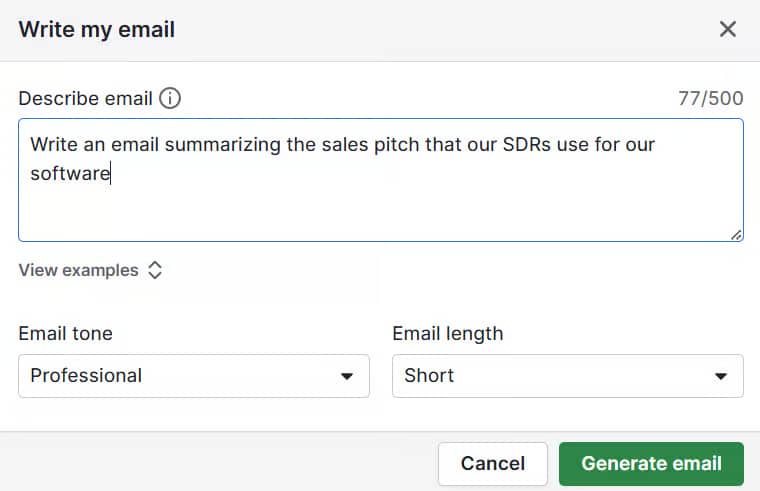
Pipedrive’s AI email writer summarizes customer conversations in just a few seconds. Once you’re up to speed, prompt the AI to include details specific to the customer.

Customer transformation Pipedrive AI email

Lastly, select the tone and length of email you need for an AI-driven email that’s professional, well-written and customer-focused.

Example: A marketing agency prospect ticks that they’re interested in social media management on their discovery call request form. The agency’s sales rep uses the AI email writer to suggest helpful resources, like their LinkedIn guide.

5. Measure the impact of your transformation efforts so you can improve

Remember: you can’t improve what you don’t track.

The right metrics show whether your customer transformation is impacting your business goals and revenue growth.

For SMBs, focus on simple, actionable data points:

Metric

How to measure it

Customer retention rate

Export your customer list from your CRM and compare the number of active customers at the start and end of a period.

Calculate: (active customers at end ÷ active customers at start) × 100

Customer response time

Use your CRM system or helpdesk to track timestamps for incoming inquiries and when your team first replied.

Average these across all inquiries to get your response time.

Customer engagement

Check email opens or clicks, content downloads or product usage reports in your CRM or marketing analytics tool.

Segment by customer group to spot who is highly engaged or at risk.

Pipedrive’s revenue forecast report shows the value of your open and expected deals over time. This data shows whether your improved overall customer experience translates to increased profitability.

Customer transformation Pipedrive revenue forecast

Review these metrics quarterly and adjust your marketing strategy based on what the data reveals. For example:

  • Customer retention rate is declining. Identify the point in the customer journey where churn occurs. If customers stop using a key feature after week two, send a targeted tutorial or schedule a check-in call at that stage.

  • Response times are slow. Check which channels or types of inquiries are lagging. If support emails take two days to respond, set automated reminders for the team and assign specific agents to high-priority questions.

  • Customer engagement is low. Compare engagement across segments. For inactive users, try adding interactive content like product demos or webinars. For active users, test A/B variations of emails to see which content drives more clicks.

  • Revenue from deals is below forecast. Analyze which customer segments are underperforming. For instance, offer bundle deals to mid-tier accounts with declining renewals. Create upsell campaigns for customers who recently purchased complementary products.

Customer transformation is iterative. Small improvements compound over time into significant competitive advantages.

Example: The marketing agency team notices prospects aren’t engaging with the LinkedIn guide in their email. When it tests a new AI-written email highlighting relevant social media case studies, click-through rates improve.

Following these steps drives steady gains in customer transformation. Additionally, SMBs should monitor their progress closely for anything that might undo it.

Recommended reading

https://www-cms.pipedriveassets.com/Essential-competitive-analysis-guide.png

The essential guide to competitive analysis (including template)

Customer transformation mistakes SMBs should avoid

Being aware of mistakes from the start of your SMB’s transformation strategy prevents costly missteps. Here are a few pitfalls to watch for.

Trying to transform everything at once

Transforming everything in one go overwhelms teams and slows down day-to-day work.

Instead, tackle one step at a time. Clean up your customer data first, then move on to automation. Only add personalization after you’ve completed these steps.

Taking transformation slow and steady ensures sustainable growth.

Ignoring data quality in CRM records

Tidying up data isn’t the most exciting task, but avoiding this step has a knock-on effect.

Automated emails with incorrect names damage relationships. Market segmentation based on outdated information lessens the impact of marketing campaigns.

Keeping your data clean gives you the biggest return on investment (ROI) for your efforts. Check your customer records periodically for duplicates or incomplete entries to ensure organization and accuracy.

Not asking for customer feedback

Transformation should improve customer experience, but you won’t know if you’re succeeding without asking customers directly.

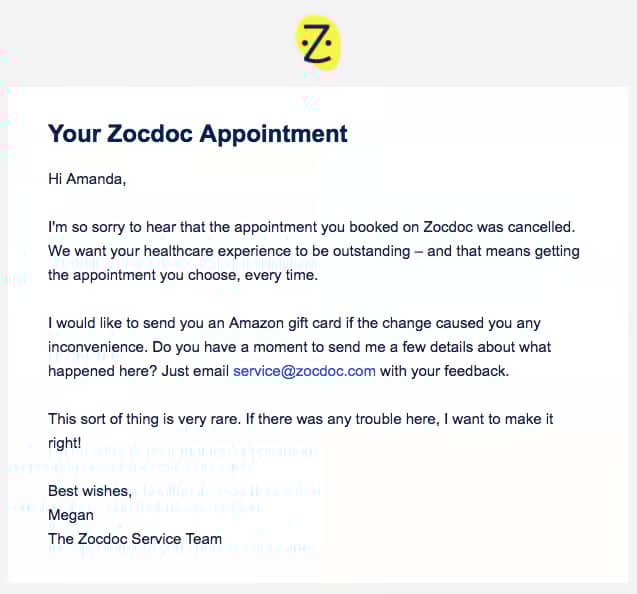
Send simple surveys after implementing changes via a website chatbot or email. Here’s a simple example from insurance company Getsafe:

Customer transformation feedback email

Use the customer feedback to optimize your approach.

Focusing on vanity metrics instead of business impact

Enterprise transformation often emphasizes metrics like “digital engagement score” or “omnichannel optimization”.

Large companies can afford to invest in these because they have complex ecosystems and dedicated teams to act on the insights.

For SMBs, tracking vanity metrics is a distraction. Instead, focus on metrics like retention that actively drive growth.

Set up a simple report on your CRM to track your metrics over time and see whether your actions are making a difference.

Recommended reading

https://www-cms.pipedriveassets.com/sales-dashboard-templates.png

Sales dashboard: How to monitor team performance (with free excel template)

Implementing transformation without team training

CRM tools and automation workflows only succeed when your team understands how to use them effectively.

Invest time in training team members on new processes. Explain how individual contributions support broader business goals. Remember that initiatives like workflow automation improve the employee experience too.

When everyone understands the “why” behind the tools, your team is more likely to stick to new processes.

Customer transformation FAQs

  • Customer transformation (CX transformation) is the process of shifting from reactive customer service to proactive, data-driven experiences.

    The goal is to improve loyalty, streamline customer interactions and deliver business value.

  • Customer transformation focuses specifically on improving customer experiences and relationships.

    Digital transformation covers technology adoption across all business processes.

  • The customer transformation timeline depends on the scope. By improving existing processes and using current tools, SMBs can see results in weeks.

    Introducing new digital technologies may extend the timeframe, as teams need time to learn and integrate them effectively.

Final thoughts

Customer transformation helps SMBs differentiate themselves and compete with larger businesses, even without a big budget.

Simple automation and personalization can be enough to begin a new era of your customer experience (and operational efficiency for your team).

Your CRM is key to making this transformation real. Pipedrive lets you centralize customer records, automate tasks, track engagement and monitor revenue in one place.

Start your 14-day free trial today.

5 Practical Customer Touchpoint Tips for SMBs

Software Stack Editor · September 26, 2025 ·

Every customer interaction with your business defines how buyers perceive your brand, shaping their loyalty and directly impacting sales.

The challenge is knowing where all customer touchpoints occur and how to optimize them for better results.

This article shows you how to identify, analyze and improve touchpoints across the customer journey. Learn practical strategies and examples to streamline processes, personalize communication and turn interactions into growth.

Key takeaways from customer touchpoints

  • For SMBs who struggle to manage touchpoints consistently, using a CRM can streamline communication and follow-ups.

  • Pipedrive’s CRM makes it easy to track, automate and personalize every touchpoint so you can drive long-term growth – sign up for a free 14-day trial.

What are customer touchpoints?

Customer touchpoints are the points of contact between a consumer and your business.

These touchpoints happen online or offline. For example, interacting with staff in-store or discovering your business online and becoming a loyal customer.

What are touchpoints for? Put simply, each touchpoint shapes how your target customer base perceives your business and influences their purchasing decisions.

Small and medium-sized businesses (SMBs) need reliable touchpoints to understand customer needs, tailor their products to the right market and boost sales effectively.

What are common SMB client touchpoints (with examples)

Customer touchpoints fall into three main stages: pre-purchase, purchase and post-purchase:

Customer touchpoints along the customer journey

Source: The Power MBA

Touchpoint mapping shows the full customer journey. The process identifies where you can improve engagement, reduce friction and deliver a better experience.

The following sections explain each stage more closely, with examples of customer touchpoints showing how they work.

Pre-purchase consumer touchpoints

Pre-purchase touchpoints occur before the customer buys from you.

Consistent, trustworthy and engaging pre-purchase experiences build the momentum that drives conversions.

For example, a prospective customer could:

Here’s an example of a paid social media ad from website builder SaaS Framer on LinkedIn:

Customer touchpoints Framer LinkedIn ad

Source: LinkedIn

By appearing in users’ feeds, this ad raises brand awareness and introduces Framer’s value proposition. It also highlights a solution to a common pain point: building and launching a website.

Here’s how the ad nurtures leads at the start of their journey:

In short, this touchpoint captures interest. It informs potential customers and sets the stage for future interactions that can lead to conversions.

Purchase touchpoints

Purchase touchpoints occur at the point of sale.

They directly affect how smooth and satisfying the customer’s experience is when making a purchase.

Common examples include customers:

Take a look at this confirmation email from vegan skincare brand Haoma:

Customer touchpoints Haoma purchase email

Source: Really Good Emails

This email engages the customer immediately after buying, reinforcing their decision and creating a positive emotional connection with the brand.

Highlighting the tree-planting initiative also enhances Haoma’s brand perception. Customers learn that their purchase has a meaningful impact beyond the product itself.

Post-purchase consumer touchpoints

Post-purchase touchpoints happen after the customer completes their purchase.

They’re key for building customer loyalty, ensuring repeat business and sales referrals.

Typical examples include existing customers:

Here’s another example from Framer:

Customer touchpoints Framer upselling email

Source: Really Good Emails

This post-purchase email suggests additional templates and features customers might like, keeping the brand top of mind after their initial purchase.

It also strengthens relationships and boosts loyalty and customer lifetime value (CLV) without a significant marketing spend.

Recommended reading

https://www-cms.pipedriveassets.com/Marketing-Management.jpg

Everything you need to know about SMB marketing management

Why customer touchpoints matter for SMBs

Monitoring and optimizing your SMB’s customer touchpoint strategy helps you deliver a seamless buyer journey, build better relationships and get more value from your limited resources.

The key benefits include:

Enhancing customer success

Smooth, consistent touchpoints grow trust and reduce friction.

As a result, it’s easier for consumers to move through the customer journey and make a purchase.

Shaping first impressions

A quick reply or smooth checkout sets the tone for the entire customer relationship.

Positive early interactions create confidence in your business and help you stand out from competitors.

Spotting bottlenecks

Monitoring customer interactions identifies where people drop off, such as abandoned carts, unanswered inquiries or confusing website pages.

Fixing these points improves the journey and prevents lost sales.

Stretching resources

SMBs often operate with limited sales budgets and staff.

Focusing on the most impactful touchpoints ensures efficient use of time and money, maximizing return on investment.

Driving referrals

Positive experiences, like quick issue resolution or attentive service, encourage customers to leave reviews and recommend your business to others, expanding reach at minimal cost.

Boosting loyalty

Thoughtful customer support, timely follow-ups and helpful communication show that you care.

These consistent experiences turn one-time buyers into long-term, repeat customers.

By paying attention to each touchpoint, SMBs can create a customer journey that satisfies buyers and drives growth for long-term success.

Recommended reading

https://www-cms.pipedriveassets.com/Customer-Sentiment.png

Everything you need to know about customer sentiment

5 simple but effective ways to identify customer touchpoints

Listing all possible customer interactions, gathering feedback and creating a customer journey map are some ways to identify touchpoints.

These five steps help your SMB pinpoint key interactions and optimize the customer journey.

1. Create a customer journey map

Identify customer touchpoints by tracking the key interactions across the entire customer journey.

Start by outlining the stages your customers move through so you can see where touchpoints naturally occur. To do this, create a clear framework of the buying journey for your ideal customer persona.

Here’s how the map might look:

  • Pre-purchase (also known as awareness and consideration). New customers discover your business through ads, social media posts, search engines or word-of-mouth. They research your products, read reviews and compare options.

Mapping these stages helps you understand where customers interact with your brand and the opportunities to improve their experience.

Download our Customer Journey Map Template

Start mapping your customer journey with our free customer journey template.

CRM systems like Pipedrive let you track and visualize the entire journey, making it easy to see where touchpoints exist and where additional customer engagement could help.

For example, create pipeline stages to align the process with your unique customer journey. Then, monitor leads and deals as you nurture them.

Here’s how these stages look in Pipedrive:

Customer touchpoints Pipedrive custom deal stages

With this oversight, you can nurture leads effectively, sharing information at the right time to increase the likelihood of conversion.

Pipedrive in action: Network Financial Planning uses Pipedrive to streamline client acquisition and management. Integrating lead creation, sales tracking and project management gives the business a full view of the customer journey.

Since adopting Pipedrive, the solo operation has expanded to a team of six, with 85% of its processes now running through the platform. The company also completes over 50% more activities.

2. List all possible interactions

Identifying every way a customer interacts with your business ensures you take every opportunity to influence and improve their experience.

Start by thinking broadly about how people might come into contact with your brand. For example, a customer might:

To capture all of these interactions systematically, follow these key steps:

Audit your channels

Action: List all online and offline platforms where customers can see or engage with your brand.

Purpose: Capture every touchpoint and provide a complete view of where potential customers first encounter your business.
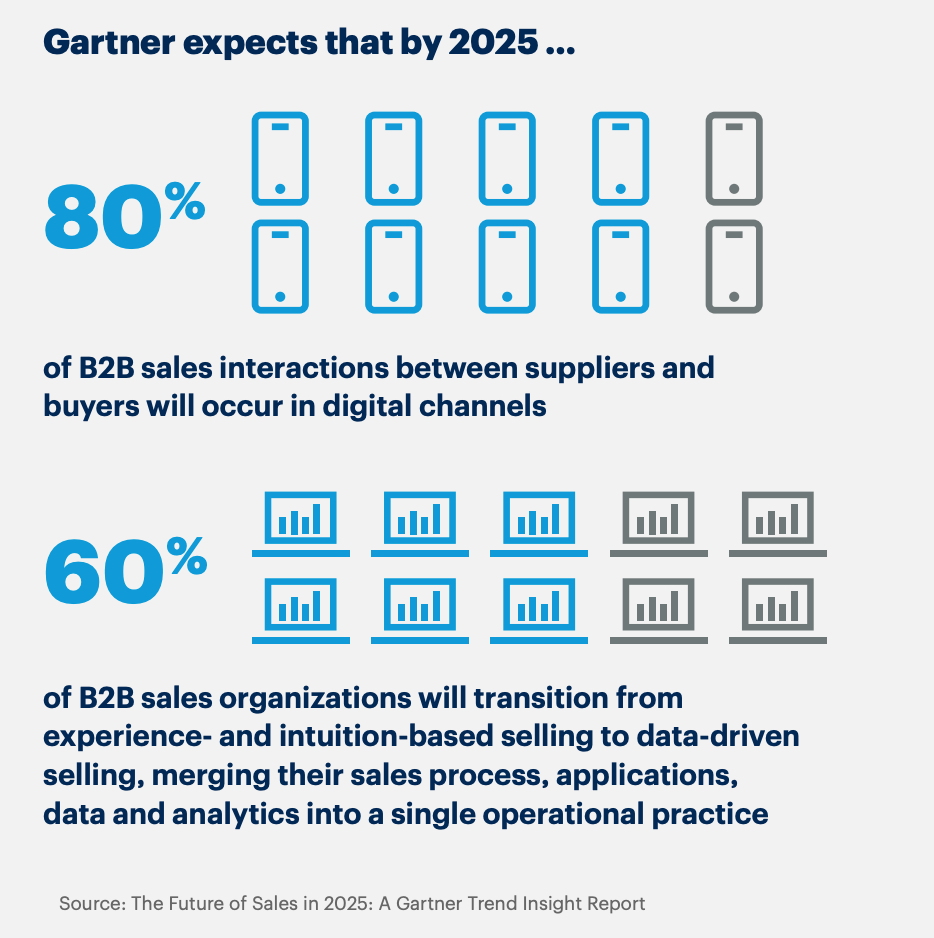
Track communication touchpoints

Action: Include emails, chatbot messages, phone calls and direct messages.

Purpose: Understand how customers ask questions, raise complaints or concerns and respond to your outreach, highlighting key engagement points.

Review marketing campaigns

Action: Identify every ad, social post or content piece that sparks engagement.

Purpose: Reveal which marketing efforts attract attention and create meaningful opportunities to connect with customers.

By listing all interactions, you create a comprehensive map of potential touchpoints to optimize engagement at every stage.

3. Gather customer feedback

Asking customers for feedback gives you direct insight into which touchpoints matter most and where you can improve the overall experience.

Example: A SaaS company sends a short net promoter score (NPS) survey after onboarding a new customer. It asks for feedback about ease of use, clarity of instructions and overall satisfaction.

Customer responses reveal that certain features are confusing or that in-app guidance is insufficient, highlighting touchpoints that need improvement.

This direct feedback allows the company to refine the product experience, increase user satisfaction and boost customer retention.

Apply these strategies to collect meaningful feedback from customers at every point:

Send online feedback surveys and forms

Action: Ask users targeted questions after key interactions like onboarding, feature use or support calls.

Purpose: Pinpoint which touchpoints work well and where users encounter difficulties.

Encourage reviews

Action: Request reviews on your website or review platforms.

Purpose: Reveal what users value most and expose friction points that may not appear in internal data.

Include feedback prompts in emails

Action: Add short, easy-to-complete questions in follow-up emails after product use.
Purpose: Gather more accurate and actionable insights.

Monitor social channels

Action: Track comments, messages and user discussions online.

Purpose: Collect more honest feedback than customer surveys or forms, revealing insights that users might not be comfortable sharing in direct responses.

Centralizing and analyzing this data is another key part of the process.

A CRM like Pipedrive allows you to see patterns, identify key touchpoints and understand customer behavior throughout the journey.

Use Pipedrive’s sales dashboards to view key customer data at a glance and quickly spot trends in engagement, drop-offs and conversions

Customer touchpoints Pipedrive insights dashboard

This visibility helps SMBs identify which touchpoints are working well and which need improvement.

By analyzing these patterns, you make data-driven business decisions to optimize interactions and enhance the overall sales cycle.

4. Check your analytics

Monitoring analytics lets you see exactly how customers interact with your brand and identify which touchpoints are effective.

Example: On reviewing its analytics, a financial services firm notices that many potential clients visit the “Investment Plans” page but abandon the process before scheduling a consultation.

This data highlights a key touchpoint where prospects hesitate. The business now has an opportunity to improve the user experience by clarifying plan benefits or simplifying the booking process.

Consider the following strategies to analyze your client touchpoints:

Track website behavior

Action: Monitor page views, clicks, bounce rates and navigation paths using tools like Google Analytics.

Purpose: Identify which web pages attract attention, which lose visitors and which touchpoints need optimization.

Monitor social media interactions

Action: Review likes, shares, comments and clicks across social platforms.

Purpose: Understand which posts or campaigns generate engagement and which touchpoints fail to resonate.

Analyze email marketing performance

Action: Measure email opens, click-through rates and conversions from newsletters, drip campaigns or promotions.

Purpose: Reveal how effectively your communications drive action and where customers disengage.

Track conversion paths

Action: Map how leads move from first contact to purchase using CRM data.

Purpose: Pinpoint areas of friction and make necessary improvements.

Centralizing and analyzing customer data is essential for understanding effective touchpoints. A single source of truth helps you see patterns and identify where leads drop off across the buying journey.

Pipedrive’s sales CRM consolidates all interactions (like website visits, emails, calls, social engagement and support requests) into one platform.

This data allows businesses to visualize customer behavior, identifying which touchpoints drive conversions and lose business leads.

Pipedrive’s custom reports and insights feature also make it easy to track key metrics at a glance, monitor trends over time and measure the effectiveness of specific touchpoints.

Customer touchpoints Pipedrive insights report

By analyzing the data, your SMB can make informed decisions to improve customer interactions and increase sales.

5. Involve your frontline staff

Frontline employees see firsthand how customers interact with your business, making them a valuable source of insight into which touchpoints work well and which need improvement.

Example: A consulting firm asks client-facing consultants to report which questions or concerns come up most often during client meetings.

These insights reveal recurring friction points, such as unclear onboarding instructions, confusing proposals or gaps in service explanations. Identifying these issues allows the firm to optimize these touchpoints and improve the overall client experience.

Follow the steps below to involve your staff in identifying and refining customer touchpoints:

Conduct sales team interviews

Action: Meet with sales, support or service employees to ask about common customer questions and complaints.

Purpose: Gain direct insight into which touchpoints influence customer satisfaction and conversion.

Create staff feedback forms

Action: Ask employees to log frequent issues or observations from their daily customer interactions.

Purpose: Identify key patterns across touchpoints.

Host workshops or brainstorming sessions

Action: Bring teams together to map the customer journey from their perspective.

Purpose: Uncover touchpoints by collaborative team sessions that analytics or surveys might not reveal.

Track anecdotal observations

Action: Encourage staff to note unusual interactions, exceptional experiences or moments where customers hesitate.

Purpose: Highlight opportunities to improve engagement.

Involving frontline staff gives SMBs a clear view of customer pain points and opportunities for improvement.

Recommended reading

https://www-cms.pipedriveassets.com/Feedback-tracker-best-practices.png

How to use a feedback tracker to drive sales and satisfaction

How SMBs can optimize customer touchpoints

Optimizing consumer touchpoints gives SMBs a practical way to improve the buying journey, increase sales and drive growth.

Here are some practical strategies for strengthening key touchpoints.

Map the customer journey with simple tools and methods

Mapping the customer journey helps SMBs see the big picture, making it easier to understand how customers move through the sales process and how to refine each stage for better results.

There’s a lot of complex software on the market for plotting and tracking customer journeys. However, smaller businesses with limited budgets don’t need to invest in expensive tools.

Here are some simple, cost-effective tools and methods for mapping purposes:

  • Create basic CRM pipelines. A simple and customizable CRM like Pipedrive lets you create deal stages that mirror the customer journey. Tracking leads as they move through stages highlights where customers stall and helps you prioritize improvements.

These tactics give SMBs a clear, actionable view of the customer journey to make improvements without a significant investment.

Focus on high-impact client touchpoints

Not all interactions carry the same weight, so SMBs can maximize resources by prioritizing touchpoints that require small changes for the biggest wins.

Example: A small consulting firm notices leads dropping off when booking a discovery call. By simplifying the booking process (removing unnecessary form fields and adding an automated confirmation email), the company can quickly improve the user experience.

These small changes lead to more consultations without draining time and resources.

Here’s how to identify high-impact touchpoints for your business:

  • Analyze conversion data. Review CRM metrics or analytics tools to identify touchpoints where leads stall but require minimal effort to fix. Focusing on these quick wins helps you boost conversions with low-effort improvements.

  • Collect customer feedback. Ask clients which interactions were confusing, slow or frustrating. Feedback highlights the touchpoints that affect satisfaction so you can prioritize improvements with the biggest impact.

  • Review support team insights. Consult frontline employees about common customer questions or complaints. Their observations reveal critical touchpoints that may not appear in data alone, helping you focus on critical changes that improve the overall journey.

Prioritizing these high-impact touchpoints ensures your SMB uses its time and resources efficiently. Your businesses will be able to deliver a smoother customer experience that drives conversions and builds brand loyalty.

Improve communication speed and clarity

Fast and clear communication reduces confusion, strengthens trust and ensures customers move smoothly through the buying journey.

Example: A small SaaS company notices that prospects often request a sales demo but don’t book a session unless they get a timely response. By responding quickly to their request, the company increases the likelihood of conversion.

Follow these tips to make your communication with customers more effective:

  • Automate routine messages. Use CRM tools like Pipedrive to send instant email confirmations, follow-ups and reminders. Email automation ensures customers receive timely updates without adding extra work for staff.

  • Standardize messaging. Create clear, concise templates for emails, chat responses or in-app notifications. Consistent messaging helps customers understand processes and expectations, minimizing confusion across touchpoints.

  • Monitor response times. Track how quickly staff respond to inquiries using CRM dashboards or analytics. Identifying slow points allows SMBs to adjust workflows or resources so that customers always receive prompt, reliable communication.

Clear and consistent communication helps SMBs build trust, engage leads and convert more prospects into loyal customers.

Personalize follow-ups

Personalizing follow-ups strengthens relationships, improves nurturing and increases the likelihood of renewals or long-term partnerships.

Example: A small manufacturer delivers a conveyor system to a food packaging company. After installation, the manufacturer emails a personalized maintenance schedule, troubleshooting video and recommended attachments.

This tailored follow-up helps the client maintain their equipment efficiently. It minimizes downtime and shows that the manufacturer understands their specific customer needs.

Here are some tips to make follow-ups more effective:

  • Send tailored thank-you messages. Include the customer’s name and reference their recent order or interaction. Personalized customer appreciation makes them feel valued, loyal and likely to buy again.

  • Offer relevant recommendations. Suggest compatible products, upgrades or services based on the customer’s purchase history. Targeted recommendations help clients get more value and drive additional sales.

  • Schedule timely reminders. Send follow-ups at the right moment, such as before scheduled maintenance or product upgrades. Timing messages to align with client needs ensures relevance and encourages action.

A CRM helps SMBs manage personalized follow-ups by planning, scheduling and automating communications.

Pipedrive, for instance, allows businesses to schedule follow-up emails and set automated reminders for sales reps to contact leads.

Here’s an example of an email automation sequence in Pipedrive:

Customer touchpoints Pipedrive email automation sequence

Writing compelling emails can be a time-consuming, laborious process that strains sales and customer support reps. When content quality starts to drop, conversions will too.

The Pipedrive AI email generator eases creative stress by turning natural language instructions on tone, style and length into high-quality email drafts.

Pipedrive AI email writer

This functionality ensures every follow-up is timely and relevant, turning each interaction into an opportunity to deepen engagement and drive conversions.

Customer touchpoints FAQs

  • Understanding customer journey touchpoints helps SMBs better understand where consumers engage with the business.

    As a result, they can optimize the buying experience, meet customer expectations and nurture leads more effectively in real time.

  • Customer touchpoints vary depending on the business and the target audience. They often sit within five stages of the buying journey:

  • Common examples of customer touchpoints include:

Final thoughts

Every customer touchpoint directly shapes satisfaction, loyalty and growth. To optimize every stage of the buying journey, SMBs must map all touchpoints, prioritize high-impact moments and personalize communication.

Use a tool like Pipedrive’s CRM to centralize interactions, automate reminders, schedule personalized follow-ups and track engagement performance.

Sign up for a free 14-day trial to transform every customer interaction into stronger relationships and higher conversions.

7 Best Marketing Agency Software Solutions

Software Stack Editor · September 26, 2025 ·

When marketing agencies use the right software stack, scattered projects and messy workflows become smooth, organized systems.

But with so many options available, knowing which tools are worth your time and budget can be hard.

In this article, you’ll discover seven must-have software solutions supporting different marketing agency needs and how to pick the best fit for your business.

Key takeaways from marketing agency software

  • The right marketing agency software stack combines CRM, project management, reporting, social media, email, content and accounting tools.

  • Start with tools that solve your biggest pain points – like client relationship management and project coordination – before adding specialized platforms.

  • Look for software designed specifically for agencies, like white-label reporting and multi-client management features, rather than generic business tools.

  • Pipedrive works as your agency’s CRM, project management platform and email marketing tool in one solution – try it free for 14 days.

What are key features to look for in marketing agency software?

The right marketing agency software combines must-have functionality and user-friendliness to boost productivity.

While every agency has unique needs, here are the core features to consider when evaluating your options:

Feature

Why it matters

Customer relationship management (CRM)

Project management

  • Delivers timely and on-budget marketing campaigns

  • Handles task assignment, deadline management, document sharing and approval workflows

  • Standardizes recurring project types with template functionality

Reporting and analytics

  • Automates custom report generation in real time, saving agencies valuable hours

  • Updates clients and stakeholders with professional, branded reports containing key data and insights

Time tracking and billing features

  • Captures billable hours, tracks project expenses and generates accurate invoices

  • Integration with accounting platforms like QuickBooks and Xero ensures seamless financial data flow

Collaboration tools

  • Streamlines teamwork for distributed staff and team members on the go

  • Provides team visibility through built-in messaging plus real-time commenting and editing capabilities

Integration ecosystem

  • Connects with existing workflows using extensive third-party integrations via application programming interfaces (APIs) or automation tools like Zapier

  • Adds tool functionality to ensure flexibility as your agency needs evolve

Security and compliance

Ultimately, knowing which features to prioritize and what you can add later as you scale is essential to investing in the right technology for your company’s needs.

How to choose marketing agency software for your SMB?

Follow these six simple steps to select software that aligns with your marketing business and growth plans:

  1. Audit your current workflows. List your pain points – think scattered client communications, manual reporting and project bottlenecks. Prioritize functionality that will have the fastest impact.

  2. Consider your team size. Small agencies benefit from all-in-one platforms combining CRM, project management and basic reporting. Larger agencies (20+ people) may need additional functionality through tools that integrate well together.

  3. Plan your total budget. In addition to software subscription and integration fees, account for any hidden costs, such as tool onboarding time and staff training expenses.

  4. Evaluate integration capabilities. Consider software that best fits your workflow and connects seamlessly with your existing tech stack to reduce manual effort and eliminate project, data and team silos.

  5. Try before you buy. Leverage free trials from reputable platforms before you commit to test-drive features on real workflows with your team.

  6. Focus on user adoption. Involve your team in tool evaluation and selection. Prioritize software that they find intuitive and valuable for their work.

Now that you have a clear picture of your marketing agency’s requirements, it’s time to navigate the best options on the market.

Top 7 marketing agency software solutions

The right marketing tool will transform your agency operations.

Here are seven platforms that address different aspects of marketing agency workflows, including an all-in-one solution and specialized software to address specific functions.

1. Best for CRM and end-to-end client communication: Pipedrive

Pipedrive is a customer relationship management (CRM) tool that helps marketing agencies communicate with their clients while tracking leads and deals in one place.

Marketing Agency Software Pipedrive sales pipeline

Potential clients often need several meetings and team approval before signing a marketing contract. The relationship changes completely once they become paying clients.

With Pipedrive, you can monitor exactly where each prospect is in your sales process. And communicate with them effectively at each stage of the marketing funnel.

Once you’re working together, all client marketing information (outreach, project history, email chains, renewal info, etc.) stays on the platform so nothing falls through the cracks.

Key Pipedrive features for marketing agencies

Here are the specific functionalities that make Pipedrive work well for marketing agency workflows:

  • Visual deal pipelines. See where each deal or client project stands with sales pipeline stages like “Discovery call” or “Campaign launch”. Customize steps to suit your unique workflows.

  • Client team management. Interact with multiple contacts at each client company, from the CMO who approves budgets to the project manager who needs weekly updates.

  • Campaign milestone reminders. Automatically schedule sales and marketing client follow-ups like “send monthly performance report” or “schedule quarterly strategy review”.

  • Email sync and notifications. See your full conversation and project history without digging through Slack or hunting down old email threads.

While these features are enough to help most marketing agencies stay organized and connected to their clients, remember that the best CRM for your business depends on your agency’s size and workflows.

How to know if Pipedrive is right for your marketing agency

Consider size, pain points and tech preferences to decide if Pipedrive is the best option for your agency.

Pipedrive is a good fit if…

Look elsewhere if…

You’re a small to midsize agency (five to 50 people) that’s losing deals in lengthy sales cycles.

You’re a large agency (100+ people) that needs custom integrations with specialized marketing tools.

Your team juggles multiple client contacts and campaign types without a clear system.

You want an all-in-one platform rather than connecting separate CRM and campaign reporting tools.

If you’re undecided, Pipedrive offers a 14-day free trial to experience the platform before you commit.

Pipedrive in action: Marketing agency CreativeRace set up customizable pipelines in Pipedrive to keep track of and reach out to leads. With a defined lead generation and sales process, it increased lead-to-opportunity conversion speed by 42%.

As Sales Director Oliver Lee says, “A lot of other CRM tools either aren’t user-friendly or are simply too expensive. Pipedrive is significantly better value than other CRMs, but still has an easy-to-use interface.”

Pipedrive integrations

Pipedrive’s Marketplace offers hundreds of out-of-the-box CRM integrations to slot easily into your tech stack, including:

Pipedrive also integrates with Zapier, opening workflow automation to more business apps.

Zapier’s automated workflows help you cut down on repetitive tasks. For example, if you’re a marketing agency for software companies, you could set up the following trigger:

“When a new SEO retainer deal closes in Pipedrive, automatically create an ‘SEO audit’ project in Asana and add the client to the ‘Monthly SEO Reports’ list in Mailchimp”.

Supercharge Your Sales with This Zapier and Pipedrive Guide

Learn how to combine Zapier and Pipedrive to automate hours worth of annoying manual tasks and spend more of your time selling

Pipedrive pricing

Pricing plans start at $14 for Lite and go up to $79 for Ultimate (all paid per user, per month when billed annually).

The tiered plans let you start small and add more features as your agency grows. You can enrich your plan with add-ons like:

You get everything you need to manage projects, clients and campaigns in one place.

Recommended reading

https://www-cms.pipedriveassets.com/Automation-Marketing-Definition.png

What is marketing automation?

2. Best for standalone client reporting and analytics: AgencyAnalytics

AgencyAnalytics allows marketing agencies to create automated client campaign reports and dashboards.

Marketing agency software AgencyAnalytics dashboard

Source: AgencyAnalytics

Pulling data manually from different platforms to create client reports can take hours. You jump between Google Analytics, Facebook Ads Manager and email platforms to compile basic campaign performance data for your presentations.

AgencyAnalytics puts your marketing data in one place for quicker reporting with less manual input.

Key AgencyAnalytics features for marketing agencies

Here are the specific features that help agencies streamline reporting workflows:

  • Customizable dashboards. See SEO rankings, PPC spend, social engagement and email performance in one view.

  • Automated client reports. Schedule weekly or monthly reports so clients get updates automatically.

  • White-label reporting. Reports show your agency branding instead of AgencyAnalytics’ for a professional look.

  • Campaign comparison functionality. Compare performance across different clients or periods to determine which strategies work best.

These features help marketing teams save time on reporting tasks. With this in mind, the best analytics tools depend on your client reporting needs and data sources.

How to know if AgencyAnalytics is right for your marketing agency

Consider your current reporting workload and client expectations to see if you need to add AgencyAnalytics to your tool suite.

AgencyAnalytics is a good fit if…

Look elsewhere if…

You manage campaigns across multiple platforms and create client reports manually.

You only need basic reporting from one or two platforms.

Your clients expect professional, branded reports with consistent delivery schedules.

You prefer simple Excel spreadsheet reports or your clients don’t need detailed analytics.

You’re a small to midsize agency (five to 20+ clients) that needs to scale reporting without hiring more staff.

You’re a very small agency managing fewer than five clients with simple campaign tracking.

AgencyAnalytics offers a 14-day free trial, so you can test whether it streamlines your reporting workflows effectively.

AgencyAnalytics integrations

AgencyAnalytics connects with the other marketing tools agencies use daily, including:

  • Google Analytics 4. Pull website traffic and conversion data directly into client reports.

  • Mailchimp. Track email marketing performance alongside other campaign metrics.

  • All standard social media apps. Report performance on Facebook, LinkedIn, Instagram and more.

With over 80 integrations, AgencyAnalytics gives you a comprehensive picture of your marketing efforts to share with clients.

AgencyAnalytics pricing

AgencyAnalytics’ Agency pricing is $179 per month, billed annually. The plan includes 10 clients, with each additional client costing $10 per month.

Recommended reading

https://www-cms.pipedriveassets.com/ESG-Report.png

How to write a stellar ESG report for stakeholders (with examples)

3. Best for social media management: Hootsuite

Hootsuite is a social media management platform that helps marketing agencies schedule posts, monitor mentions and track performance.

Marketing agency software Hootsuite analytics

Source: Hootsuite

Managing social media for several clients means constantly switching between apps. Bring different posting schedules and brand voices into the mix, and it gets chaotic fast.

Hootsuite provides a single dashboard to centralize client accounts.

Key Hootsuite features for marketing agencies

Here’s how Hootsuite helps agencies manage multiple social media accounts:

  • Multi-account posting. Schedule posts across Facebook, Instagram, Twitter and LinkedIn. No need to log in to each platform separately.

  • Content marketing calendar view. See all planned client posts and spot gaps or overlaps in content schedules.

  • Social listening. Monitor brand mentions and hashtags for all clients, so you can respond to comments or catch potential issues.

  • Team collaboration. Assign posts for approval, leave comments on content and manage who can access which client accounts.

As you consider how these features can help your marketing agency organize its social media strategies, remember that the tool depends on your team’s size and account volume.

How to know if Hootsuite is right for your marketing agency

Consider how many social accounts you manage and what your workflow needs are before opting for Hootsuite.

Hootsuite is a good fit if…

Look elsewhere if…

You manage social media for five or more clients with regular posting schedules.

You only handle social media occasionally or for one or two clients.

Your team members need collaboration tools for content creation and approval.

You need advanced social commerce features to track return on investment (ROI).

You want to monitor client mentions and engagement from one place.

You prefer simpler tools focused on just scheduling.

Hootsuite offers a 30-day free trial so you can see if its functionality matches your needs before you commit.

Hootsuite integrations

Hootsuite connects with popular platforms, including:

  • Asana. Link social media campaigns to your project management tool.

  • Slack. Get notifications when posts get published or need approval.

  • Adobe Creative Suite. Import graphics and videos directly into your content calendar.

  • Google Analytics 4. Track how social media traffic converts on client websites.

With over 100 integrations available, Hootsuite can likely slot easily into your existing marketing strategies and tools.

Hootsuite pricing

Hootsuite pricing starts at $99 monthly for the Standard tier (billed annually). The plan includes up to five social accounts.

For unlimited social accounts, choose the Advanced plan at $249 per month (billed annually).

Recommended reading

https://www-cms.pipedriveassets.com/Social-Selling_2024-02-26-184202_dczk.jpg

Social selling 101: How to build trust and grow sales

4. Best for marketing collaboration and project management: Asana

Asana is a project management platform that helps marketing agencies organize internal workflows and coordinate team tasks.

Marketing agency software Asana project overview

Source: Asana

Marketing campaigns can involve many team members and freelancers. Designers create assets, copywriters draft content and account managers review deliverables.

In addition, everyone has different deadlines. Clear project organization is essential to avoid creative work bottlenecks and campaign launch delays.

Marketing agencies can use Asana to break down campaigns into manageable tasks and keep internal teams coordinated.

Key Asana features for marketing agencies

Here’s how Asana helps marketing agencies keep campaigns on track:

  • Creative workflow management. Set up approval processes so nothing goes live without proper sign-offs.

  • Campaign task templates. Create reusable workflows for common projects like product launches or seasonal campaigns.

  • Resource allocation. See who’s working on what and when, helping you balance workloads and avoid overloading team members.

  • Internal team communication. Keep project discussions, file sharing and updates organized by campaign.

Good task management can remove a huge headache for agencies. Along with functionality, there are a few other things to consider to see if Asana is right for you.

How to know if Asana is the right marketing agency management software

Consider your current project organization and team collaboration needs:

Asana is a good fit if…

Look elsewhere if…

You manage campaigns with multiple team members and overlapping deadlines.

You’re a small agency with simple task lists.

Your team struggles with creative approval processes and project handoffs.

You need advanced time tracking or detailed resource management features.

You want to standardize workflows across different campaign types.

You prefer simpler tools focused just on basic task management.

Asana offers a free plan, so you can try the platform out and scale up if necessary.

Asana integrations

There are over 100 Asana integrations, including agency tools like:

  • Pipedrive. Automatically create a task or project when you start, close or move a deal. It’s ideal if you already use Pipedrive’s CRM and want to use it as your central marketing hub.

  • Mailchimp. Track Mailchimp email campaigns and key performance indicators (KPIs) in Asana tasks.

  • Slack. Turn ideas and action items from Slack into trackable tasks and comments.

With plenty of other options, you can sync your marketing agency project management software with your most-used tools.

Asana pricing

Asana’s free plan covers basic task management.

Most agencies will need to start with the Starter plan at $10.99 per month (billed annually). This tier includes features like project dashboards and universal reporting.

Note: If you choose Pipedrive as your marketing CRM, you can add Projects for just $6.67. It’s an ideal option for teams that work best with fewer platforms but still want the functionality of a project management tool.

You get an overview of all your tasks, draw data straight from your CRM and keep your team members and projects on track.

5. Best for search engine-optimized content creation: Surfer SEO

Surfer SEO is a content optimization tool that gives you data-driven guidance to create copy that can rank on search engine results pages (SERPs).

Marketing agency software Surfer SEO editor

Source: SurferSEO

Content that drives more traffic and generates SEO leads means understanding two things. First, what Google wants to see. Second, what competitors are doing better.

Surfer SEO analyzes the top-ranking pages for any keyword and tells you what your content needs to compete.

With this knowledge, you can deliver measurable traffic increases that justify your clients’ content marketing investment.

Key Surfer SEO features for marketing agencies

These Surfer SEO features help you create content that’s more likely to rank:

  • Content scoring. Get a real-time score as you write. See how well your content messaging matches what’s currently ranking for your target keywords.

  • One-click optimization. Use AI to improve content and add internal links.

  • Content structure guidance. Get recommendations for ideal word count, heading structure and how many times to use key phrases.

  • Automated SEO audits. Easily find opportunities to improve your client’s traffic.

These features help you create content faster and drive traffic. However, the best SEO tool will depend on how much content you produce and your clients’ goals.

How to know if Surfer SEO is right for your marketing agency

Content marketing is a core part of most agency services, but not every agency needs a content optimization tool. Here’s how to understand if Surfer SEO is for you:

Surfer SEO is a good fit if…

Look elsewhere if…

You regularly create blog posts for clients across multiple industries.

You only create long-form content occasionally or focus mainly on social media content.

You need to show measurable SEO improvements and ranking results.

You need a full SEO suite with backlink analysis (which sites link to your content) and technical audits (checking for site issues that impact SEO).

Your team wants data-driven guidance rather than guessing what will rank well on search engines.

You prefer simpler writing tools without SEO complexity or real-time optimization features.

Surfer offers a seven-day money-back guarantee for first-time subscribers so you can see if its content workflow fits your team.

Surfer SEO integrations

Surfer SEO connects with standard content creation tools, including:

  • Google Docs. Optimize content directly in Google Docs with real-time SEO suggestions.

  • Google Search Console. Analyze your existing content performance and find optimization opportunities.

  • Contentful. Create content within your content management system (CMS) to reduce copy-and-pasting between tools.

  • ChatGPT. Get search data while creating AI-generated content.

Surfer SEO also has an API that lets different apps share data.

You can use the API to connect Surfer SEO to your existing tools. Or can use it to build your own content marketing automations.

Surfer SEO pricing

Surfer SEO’s Essential plan is $79 per month (billed annually) and suits small businesses.

At $175 per month (billed annually), the Scale plan includes weekly content performance reports – which may be a better fit for most agencies.

6. Best for multi-client email marketing: Mailchimp

Mailchimp helps you manage email campaigns for multiple clients when you join its Mailchimp & Co program, designed for agencies and freelancers.

Marketing agency software Mailchimp dashboard

Source: G2

Managing email marketing for multiple clients usually means creating separate accounts for each one. Or mixing client data in often confusing ways.

Mailchimp & Co lets you connect all your client accounts to yours and manage them from one centralized dashboard.

You can switch between client campaigns without losing track of which audience or template belongs to whom.

Key Mailchimp features for marketing agencies

Here are the features that help agencies manage email marketing efficiently:

Switching email platforms later can be a pain and even mess with your email deliverability. It’s well worth comparing platforms and features before you make a decision.

How to know if Mailchimp is right for your marketing agency

Here are a few things to consider before choosing Mailchimp as your multi-client emailing platform:

Mailchimp is a good fit if…

Look elsewhere if…

You manage email marketing for many clients and need centralized account management.

You run simple newsletters for a small amount of clients.

You want to create landing pages to go with your email campaigns.

You want an email platform that will stay affordable as you scale.

You’re interested in getting listed in a partner directory to attract new clients.

You prefer working with an email platform that has a simple user interface minus unnecessarily complex functionality.

Mailchimp’s 14-day free trial lets you see if it’s the email marketing platform for you.

Mailchimp integrations

Mailchimp connects with hundreds of marketing and business apps, including:

  • Google Analytics. See which email campaigns drive the most traffic and customer conversions on client websites.

  • Pipedrive. Automatically add new clients to the right email list – ideal if you already use Pipedrive and want to streamline or scale follow-ups with minimal effort. Here’s how to integrate Mailchimp into Pipedrive’s all-in-one marketing automation toolkit.

  • Shopify. Track purchase behavior and send targeted product recommendation emails for your e-commerce clients.

These connections eliminate manual data entry between your email marketing and other agency tools.

Mailchimp pricing

Mailchimp’s Essentials plan allows you to send up to 10,000 emails per month with three audience segments. The plan costs $13 monthly if you have up to 500 contacts. Annual pricing is available through the sales team.

You join the Mailchimp & Co program when you sign up at no additional cost, or later when you have more email clients.

Tip: Pipedrive has its own email tool, Campaigns by Pipedrive, offering a solid alternative if you want your CRM and email marketing in one place.

The add-on enables you to tailor your marketing messages using your CRM data. The result is more relevant emails and even better conversions.

7. Best for billing and finance operations: Sage Intacct

Sage Intacct is a cloud-based accounting platform that helps marketing agencies manage their invoicing, expense tracking and financial reporting tasks.

Marketing agency software Sage Intacct

Source: G2

Marketing agencies have complex billing needs. Some clients are on retainer, while others pay per project.

You need to track profitability by campaign or service type. Plus, good forecasting to plan freelancer budgets.

Sage Intacct is for businesses with complex billing that need financial visibility to make informed business decisions.

Key Sage Intacct features for marketing agencies

Sage Intacct offers some features designed to simplify complex agency finances:

  • Project-based billing. Track billable time and expenses, then automatically generate invoices.

  • Multi-client financial reporting. See profitability by client, service type or time period to understand which parts of your business make the most money.

  • Automated invoicing workflows. Set up recurring invoices for retainer clients and automated payment reminders to improve cash flow.

  • Expense management. Track client expenses, team travel and overhead costs with approval workflows to keep spending organized.

Sage Intacct’s features cater specifically to agencies and project-based businesses looking to keep track of their financial management. You’ll need additional tools to manage different aspects of your marketing services.

How to know if Sage Intacct is right for your marketing agency

Consider your current billing challenges and financial reporting requirements to see if Sage Intacct is a fit.

Sage Intacct is a good fit if…

Look elsewhere if…

You bill multiple clients with different project types and payment schedules.

You’re a small agency with simple monthly retainer billing.

You need detailed profitability reporting by campaign or service.

You need basic invoicing, not complex project tracking.

You want automated billing.

You don’t have a big budget for accounting software.

Choosing the right billing and accounting software is a big decision. Before you commit, talk to Sage’s sales team to get your questions answered.

Sage Intacct integrations

Sage Intacct comes with hundreds of integrations to make accounting easier, including:

  • Time tracking apps. Connect tools like Harvest or Toggl to automatically sync billable hours into project billing.

  • Ramp. Link credit card transactions, reimbursements, payments and vendor bills in real time.

  • Payroll systems. Unify your payroll and financials without duplicate data entry or complex integrations.

  • Payment processors. Connect with credit card payment systems to automate invoice collections and improve cash flow.

When your systems work well together, you reduce the chances of billing errors that could become costly over time.

Sage Intacct pricing

Sage Intacct offers custom pricing plans specific to your business. Some sources report annual pricing starting from $9,000.

Recommended reading

https://www-cms.pipedriveassets.com/Corporate-finance.png

Corporate finance made simple: tips every SMB should know

Marketing agency software FAQs

  • Marketing agency software is a suite of tools that helps agencies efficiently manage clients, campaigns, reporting and internal workflows.

    The right marketing agency software works together to let teams focus on delivering results instead of juggling tools.

  • Focus on the marketing agency software solution that solves your biggest workflow challenges and integrates well with your existing stack.

    Consider factors like scalability, options and how the software supports collaboration.

  • Provide hands-on onboarding training and gradually set up the workspace to include your chosen marketing agency software.

    Rushing the rollout can lead to resistance from team members and productivity drops.

Final thoughts

There are hundreds of SaaS tools, but the best marketing agency software stack is what makes your life easier. One way to do that is to choose solutions that cover multiple bases.

Pipedrive is an all-in-one agency CRM, project management software and email marketing tool – ideal for handling all your sales and marketing efforts. Try the platform free for 14 days and see how it can transform your workflows.

The Ultimate Event Marketing Playbook for SMBs

Software Stack Editor · September 26, 2025 ·

Events are one of the best ways to get personal with potential customers, but you need a solid plan to get people to show up.

Effective event marketing is your playbook for promoting the event, filling every seat and creating genuine sales leads.

In this guide, you’ll learn how to make the most of your event marketing. You’ll discover how to build hype before your event and turn that energy into a packed sales pipeline.

Key takeaways for event marketing

  • Event marketing is promoting an event to fill seats and meet potential customers.

  • Brands use event marketing to turn in-person conversations into sales opportunities.

  • A strong event marketing plan covers how to promote the event, capture leads on the day of the event and follow up to close deals.

  • Pipedrive’s CRM helps you automate lead capture and follow-up, so you can nurture every prospect. Try Pipedrive free for 14 days and close more sales from your next event.

What is event marketing?

Event marketing definition: Event marketing promotes a brand by hosting or participating in an event.

It’s the entire process of communicating with your audience before, during and after the event to drive attendance and ensure it delivers a return on your investment. The goal is to engage customers and generate leads.

Marketers use different types of events to achieve specific business goals. Here’s a look at the most common events and why they’re valuable for your business:

Types of events

Why they matter for your small business

Webinars and virtual events

Webinars generate leads at a low cost. You can educate a large audience and establish your company as a thought leader in your industry.

Trade shows and conferences

These events put you face-to-face with your target demographic. They’re ideal for capturing high-quality leads at your brand’s pop-up and generating sponsorships.

Workshops and in-person training

Live event training delivers hands-on value, which builds trust. It’s perfect for demonstrating a complex product or upselling features to existing customers.

Product launch events

Launches create a surge of excitement and media attention around your new product. They help you drive initial sales and build market momentum.

Local meetups and seminars

Smaller, casual events build a stronger community around your brand in specific regions. They’re great for nurturing personal relationships with key customers and prospects.

The right event management plan turns event attendees into leads and customers. It builds a connection with your audience that a simple ad or email can’t match.

A quick example: Pipedrive’s webinar series

Pipedrive’s webinar program is a textbook example of how to turn educational content into highly qualified sales leads.

Event marketing Pipedrive webinar series

Here’s what Pipedrive’s marketing schedule generally looks like:

  • Before the event. Pipedrive advertises the webinar on sites like LinkedIn, using problem-focused titles to get the right people interested. Users sign up through a form, which gives Pipedrive their contact details.

  • During the event. Pipedrive’s team gives practical tips and shows how their tool solves the problem. They also hold a live Q&A session to answer audience questions.

  • After the event. A recording is posted on the Pipedrive website so people can watch it anytime. The company also sends follow-up emails to everyone who registered.

This model shows effective event marketing through a series of digital events rather than one large-scale conference or trade show.

Another example: Adobe MAX conferences

Adobe hosts an annual conference called Adobe MAX, which is a masterclass in building community and generating excitement through experiential marketing.

Event marketing Adobe MAX example

Here’s a look at Adobe’s marketing schedule:

  • Before the event. Adobe starts building hype months in advance. The company announces keynote speakers and launches engaging social media campaigns. It also starts creative contests to get the audience and influencers involved early.

  • During the event. The conference is an immersive hybrid event. It uses a mobile app for schedules and hosts hands-on training workshops. Adobe live-streams the main keynotes to include a global audience that couldn’t attend in person.

  • After the event. Adobe uploads session recordings for on-demand viewing. It sends out highlight reels and post-event surveys, and uses themes from the event to guide its content marketing for future events.

Adobe’s strategy makes MAX a conference that inspires and energizes its user base.

Recommended reading

https://www-cms.pipedriveassets.com/The-SMB-guide-to-influencer-marketing-to-building-trust-authority-and-reach.png

The SMB guide to influencer marketing strategies: how to build trust, authority and reach

How to create an event marketing strategy in 4 steps

A solid event marketing strategy ensures that every dollar you spend contributes directly to your sales pipeline.

These four steps will guide you through the event lifecycle, from planning to measuring your final ROI.

1. Pre-event planning: laying the groundwork for a high ROI

Your goal before any event is to get the right people to show up on the day.

Success hinges on choosing the best promotional plays for your audience.

Before you send an email invitation, there are a few things you need to do:

  • Define some specific, measurable marketing goals (e.g., book 20 qualified meetings or register 150 webinar attendees)

  • Identify the ideal customer profile you want to attract or meet

  • Set a clear budget for your promotional activities, including any ad spend

If you have those basics covered, you can start building your strategy. Once you have a shortlist of promotional methods, compare what each one offers.

Here are some key approaches to consider:

Marketing channel

Why it works

Broad email marketing campaigns

Email campaigns are an easy way to drive registrations for events where a large audience is the main goal. It’s the most direct way to reach your existing contacts.

Targeted social media ads

Ads let you reach a highly specific new audience. Use platforms like LinkedIn to find potential attendees based on their job titles, industries or professional interests.

Partnership marketing (or co-marketing)

Brand collaboration with another relevant, non-competing company gives you a warm introduction to its audience. It adds credibility and can expand your reach.

One-to-one marketing

Direct marketing is an effective way to secure meetings with high-value targets at your event. A well-researched message shows you’re serious about connecting.

Here are some tips to get the most from these methods.

  • When running email campaigns, don’t rely on a single announcement. A sequence that builds from awareness (“We’re excited to announce…”) to urgency (“Last chance to register!”) is more effective.

  • If you’re using social ads, target people who follow the event organizer’s company page on LinkedIn and use the event’s official hashtag to join the online conversation.

  • Likewise, if you decide to work with a partner, make it as easy as possible for them to promote you. Give them a promo pack with pre-written email copy, social media posts and images.

The best strategies blend these methods. When you mix channels, you create multiple touchpoints and can reach your ideal attendees in different contexts.

How Pipedrive can help turn strategy into action

A customer relationship management (CRM) system makes executing these marketing strategies much easier.

Pipedrive’s Campaigns add-on gives you tools to run a professional email campaign that drives registrations.

Use a three-part email sequence to build interest and urgency:

  • Announcement. Include details about the event (what, when, where), the key benefit for attendees and a clear call-to-action to register.

  • Value add. Send a follow-up email that shares more value, like a speaker spotlight or the session agenda.

  • Final reminder. Finish with a short, urgent email sent a day or two before the event (or before early-bird pricing ends) to drive last-minute decisions.

To build your sequence, go to the Campaigns tab in the main menu and click “+ Campaign” to open the email builder.

Event marketing Pipedrive create email campaign

Now, use Pipedrive’s AI email writer to draft the copy for your announcement email. In the editor, select the “AI writer” icon in the toolbar.

Give it a simple prompt about your event to generate a strong first draft quickly.

Next, edit your draft as needed and go to the Recipients section and choose the filtered email list you want to target.

Rather than sending it immediately, schedule the campaigns to send at a specific time that’s best for your audience.

When the first campaign is complete, return to the Campaigns dashboard and create your value-add email.

Update the copy and schedule it for a few days after the first one. Repeat the process for your final reminder email to complete the sequence.

Recommended reading

https://www-cms.pipedriveassets.com/FOMO-Marketing-Strategies.png

7 FOMO marketing strategies for SMBs that convert browsers into buyers

2. During the event: making every conversation count

The pre-event plan gets people in the door, but the sales conversations you have on the day drive sales revenue.

The event itself can be chaotic, with many booths and brand activations. You need event marketing tools to cut through the noise and find the best sales opportunities.

Your team’s on-site success comes down to a few core event strategies:

  • Use a digital lead capture system and ditch the business card fishbowl

  • Ask questions to qualify leads before you start pitching

  • Focus on the quality of conversations, not the quantity

  • End every promising conversation with a clear and agreed-upon next action

The biggest mistake teams make at events is inconsistent lead generation.

When one person writes notes, another collects business cards and a third sends themselves emails, leads will fall through the cracks.

The solution is having a single event platform your team uses for every lead. It could be your CRM’s mobile app or a simple QR code at your booth that directs visitors to a lead form or landing page on your event website.

Here’s an example of what this looks like in practice:

Event marketing Unlicensed Orchestra example

A unified system means you capture leads in the same way. They’re ready for immediate follow-up as soon as the event is over.

Once your capture system is in place, you can focus on the quality of your conversations. The goal is to determine if a prospect is a good fit as quickly as you can.

Asking a few targeted questions can help you qualify leads on the spot. Here are some simple discovery questions to guide your discussions:

Goal

Example question

Uncover a need

“What’s the biggest challenge your team faces right now with [their area of work]?”

Understand the timeline

“What does your timeline look like for finding a solution to [their challenge]?”

Identify authority

“Who else on your team is usually involved when you look at new tools or services?”

The answers to these questions are gold. Capture them as notes in your CRM. This context allows you to send a personal and relevant follow-up message instead of a generic template.

Finally, never end a good conversation with a vague “we’ll be in touch”. A strong conversation always ends with a concrete next step you both agree on. It turns a casual chat into the first stage of your sales process.

How Pipedrive can help automate lead capture

A successful on-site lead workflow includes three quick actions that vastly improve the event experience for marketers:

  1. Scan business cards. Capture a new prospect’s contact information in the moment.

  2. Add qualifying notes. Record the answers to your questions for personalized follow-up.

  3. Tag leads. Apply a unique label to group your event contacts for easy tracking later.

Pipedrive’s mobile functionality lets you digitize every conversation as it happens.

To manage your conversations at the event, open the Pipedrive mobile app. From the main menu, select “Contact scanner” to record a prospect’s details using your phone’s camera.

Event marketing Pipedrive business card scanner

After scanning, Pipedrive creates a contact.

Before you save it, scroll down to add notes and apply a specific event label to keep everything organized.

Event marketing Pipedrive contact notes

Finally, if you agree on a next step during your conversation, schedule it immediately.

In the new contact’s profile, choose “Add activity” and create a follow-up task.

Event marketing Pipedrive add activity

For a more hands-off approach, create a Web Form (you’ll need to add the LeadBooster feature to your plan).

Go to the Leads tab and select “Web Forms > New Web Form”.

Event marketing Pipedrive Web Forms

Choose “Registration” and set up important fields in the form builder. When you’re finished, use a free online tool to turn your form’s URL into a QR code for visitors to scan.

Recommended reading

https://www-cms.pipedriveassets.com/Event-checklist-templates-for-small-businesses.png

Event checklists explained: templates and tips for revenue generation

3. Post-event follow-up: turning conversations into customers

The conversations at an event get you in the door, but you need a solid follow-up strategy to convert prospects into customers.

An effective follow-up strategy should look something like this:

Speed is your greatest advantage. The enthusiasm from a great conversation fades quickly, so sending a prompt email the next day shows you’re organized and keeps the momentum going.

Your email also needs to be personal. Avoid sending a generic “Thanks for visiting our booth” blast to everyone.

A better approach is to segment leads into tiers based on the notes you took at the event. For example, you can group your new contacts into hot, warm and cool leads:

Lead quality

Who they are

Hot leads

Highly interested people who asked for a sales demo or meeting. Email them within hours to schedule that next step.

Warm leads

Qualified leads with a longer timeline. Send them a personal email that references your chat and gives relevant information (like case studies) about what interested them.

Cold leads

Contacts you scanned but barely spoke with. Add them to a general, automated email nurture campaign to track their engagement over time.

Here’s what it looks like to label your contacts in Pipedrive’s CRM:

Event marketing Pipedrive lead labels

For your hot and warm leads, mentioning a detail from your chat makes a huge difference. A simple reference separates your message from the dozens of other follow-ups they’ll get.

Remember that most leads from an event aren’t ready to buy immediately. Don’t discard them if they don’t reply to your first email.

Entering your warm and cool leads into a long-term nurturing plan helps build brand awareness. When they’re ready to make a decision, you’ll be the first person they think of.

How Pipedrive automates your post-event follow-up

Pipedrive’s automation tools let you segment your new contacts and send the right message as soon as possible.

Here’s how Pipedrive helps with each step of your follow-up strategy:

  • Creating email templates. Prepare personalized messages in advance to save time.

  • Building automations. Trigger emails and tasks for your hottest leads.

  • Segmenting event leads. Use filters to create hot, warm and cold email lists in real-time.

  • Launching nurture campaigns. Keep in touch with your long-term prospects.

To get started, write your messages in Pipedrive. Go to Company settings and select “Email templates”.

Create templates for your hot and warm leads, using merge fields to add personalization.

Event marketing Pipedrive merge fields

Go to the Workflow Automation tab to build your workflow.

Set the trigger for when Pipedrive creates a new contact and add a condition that the person must have your event label, like “Q4 Summit 2025”.

Add an “If/else condition” that checks the person’s labels.

Set the condition for the “Yes” branch to be “Person > Label > is > Hot”. The “No” branch will apply to warm leads.

Event marketing Pipedrive workflow automation

Last of all, assign the correct email to each branch.

In the “Yes” branch, add an action to send your hot lead template. In the “No” branch, add an action to send your warm lead template. Pipedrive will send the right follow-up based on the label your team applied on-site.

You can build automations for each segment based on their event label – one for hot leads, another for warm – and trigger personalized follow-ups automatically. For a more in-depth look at Pipedrive’s Automations, check out the video below.

4. Measuring your success: calculating true event ROI

Tracking your event ROI lets you measure the financial impact of your efforts as new leads move through your sales pipeline.

The trick is to use the contact labels you created for each lead during the event. These tags let you filter your main pipeline to see only the deals from that specific event.

Event marketing Pipedrive event labels

You’ll see your event leads’ performance in real-time. You can track the number of deals and their combined value, separate from all your other sales activities.

Use this data to work out your ROI and report your marketing results to stakeholders.

To calculate your ROI, you first need the total event cost. Make sure you include all expenses for an accurate result.

The formula for ROI is the total revenue minus the event cost, all divided by the cost.

For example, say the event cost $5,000 and you’ve closed $20,000 in deals. Your current ROI is ($20,000 − $5,000) / $5,000 or 300%.

The best way to monitor these numbers is with a dedicated sales dashboard that pulls all your key event marketing metrics into a visual report.

Your sales dashboard should show your total leads, pipeline value, deal win rate and total revenue closed from the event. It gives you a live look at the event’s ongoing performance.

Event marketing Pipedrive event dashboard

With this detailed context, you can optimize your next event’s digital marketing efforts.

How Pipedrive improves your event reporting capabilities

A CRM gives you the hard data to track your sales KPIs and prove an event’s value.

Pipedrive’s reporting tools track every deal from your event to calculate your ROI.

To start, you need to see all the deals from your event. Go to the Deals view and filter deals for your event label.

Event marketing Pipedrive label filter

Next, go to the Insights tab, click the “+” icon and select “Dashboard”. Give your new dashboard a clear name to create a space for all your event reporting.

Event marketing Pipedrive create dashboard

Inside the dashboard, click “+ Add report”. Choose a Deals started report to see the total number of leads and pipeline value from the event.

Event marketing Pipedrive add report

Add another report to your dashboard, this time for Deals won. This report will show you the total revenue you’ve closed from the event.

Use the live data to calculate your ROI. Take the total revenue from your “Deals won” report and apply the formula above to get your ROI percentage.

Download Pipedrive’s general event checklist template

Use this comprehensive template as your go-to guide for planning and successfully executing any business event.

4 advanced tactics to maximize event conversions

Once you have the fundamentals of event marketing down, you can use additional tactics to stand out from the crowd.

Here are four event marketing best practices top performers use to make the most of every event:

Advanced marketing tactic

Why it maximizes conversions

1. Host an exclusive side-event

Something like a private dinner for your top prospects creates a relaxed environment away from the noisy event.

It makes your guests feel valued and gives your sales team uninterrupted time to build relationships.

2. Secure a speaking slot

Presenting on a panel or hosting a workshop positions you as an industry expert.

It builds massive credibility and attracts a pre-qualified audience already interested in your expertise.

3. Run a pre-event reconnaissance campaign

If it isn’t your event, use LinkedIn and the event’s agenda to find leads that match your target audience profile weeks in advance.

Sending hyper-personalized outreach to book meetings before the event starts means you’ll spend the time in high-value conversations.

4. Create a targeted post-event content piece

Create a valuable report like “The top 5 takeaways from the summit”.

Sending this to new leads reinforces your expertise and gives you a natural reason to re-engage them.

Use these tactics to move beyond just attending events and start creating memorable experiences for your most important prospects.

Recommended reading

https://www-cms.pipedriveassets.com/Event-Ticketing-Software.png

11 best event ticketing software systems: use cases, key features and pricing

Event marketing FAQs

  • The 5 Ps of event marketing are plan (goals), place (venue/platform), people (audience), promotion (marketing) and process (attendee experience).

  • Social media builds buzz before an event with ads and user-generated content. It engages attendees during the event with live content and extends its value after with highlight content.

Final thoughts

Successful events are a powerful way to generate revenue, and a solid event marketing plan is what turns conversations from the event floor into closed sales.

A sales CRM gives you the control to execute that plan at every touchpoint. It organizes your leads, automates follow-up and tracks results so you always know your ROI.

Try Pipedrive free for 14 days and see how it can streamline your event workflow and help you close more deals.

B2B Social Media Marketing, Strategy & Services

Software Stack Editor · September 26, 2025 ·

Buyers research in public. They compare vendors, ask peers for advice and react to expert posts long before they speak with sales. B2B social media marketing meets that intent where it happens and turns attention into qualified conversations.

A focused B2B social media marketing strategy builds credibility with the decision-makers involved in a purchase, from evaluators to budget owners. Customer proof, product walkthroughs and clear points of view reduce uncertainty and lift meeting acceptance rates.

Capture clicks, comments and direct messages with forms or integrations and send them to your customer relationship management (CRM) system with a defined next step so social interactions turn into scheduled meetings and trackable opportunities in your sales pipeline.

Speed and consistency close the loop. Capturing UTM data, auto-assigning owners and setting service level agreements (SLAs) on social leads ensures fast follow-up.

Key takeaways for B2B social media marketing

  • Build a focused strategy around your ideal customer profile (ICP) and buying committee, using clear content pillars (proof, product, POV) and CTAs that route to meetings or trials.

  • Pick two core platforms (often LinkedIn and YouTube) and one to test, then judge performance by meetings, opportunities and pipeline in your CRM.

  • Capture every click, comment and direct message (DM) with UTMs, assign owners with SLAs for fast follow up and log context to keep handoffs clean.

  • Use Pipedrive to centralize social-sourced leads, automate assignments and follow ups. Report meetings, opportunities and pipeline so you invest where ROI is proven, try Pipedrive free for 14 days.

What is B2B social media marketing?

B2B social media marketing is the use of channels like LinkedIn, YouTube, X, Reddit and industry communities to reach defined accounts, educate buyers and generate sales-ready interest. It blends organic and paid programs to influence awareness, consideration and meeting creation.

The work spans content marketing and conversion. Content demonstrates outcomes with proof and practical guidance. Conversion paths move prospects to a clear next step, book a call, start a trial, join a webinar or request pricing, with tracking that ties every interaction back to the pipeline in your sales CRM.

Done well, it’s a coordinated motion across marketing and sales: consistent messaging, clean handoffs from social to reps and measurement that goes beyond vanity metrics to meetings, opportunities and revenue.

B2B buyers now prefer a self-directed journey of digital discovery

– Edelman & LinkedIn, 2024 B2B Thought Leadership Impact Report

How do I build a B2B social media marketing strategy?

Start with the buying committee. Define ideal customer profile (ICP), roles and recurring questions by stage. Map content to those moments: customer proof for risk reduction, product snippets for evaluation and POV posts to frame the problem you solve.

Choose clear conversion paths. Every post should point to a next step that sales can act on, book a call, start a trial, register for a webinar or download a playbook. Track with UTMs and capture sources in your CRM so sales meetings and opportunities are attributable.

Set a publishing rhythm you can sustain. Establish content pillars (proof, product, POV), assign owners and create an approval flow that protects voice without slowing you down. Review performance weekly and adjust topics, formats and CTAs based on reply quality and meetings created.

Align with sales early. Share a calendar of upcoming posts, enable sales reps with short reply guides and route high-intent comments or DMs to owners with an SLA. The strategy works when content, conversion and handoff operate as one motion.

Recommended reading

https://www-cms.pipedriveassets.com/B2B-content-marketing-strategy-for-SMBs.png

How to create a B2B content marketing strategy for your small business

What are the best social media platforms for B2B marketing and how to choose?

Use the platforms your buyers already trust, then judge each by reach in your ICP, format fit and ability to create meetings and pipeline.

  • LinkedIn: Primary B2B network for reach, targeting and credibility, best for thought leadership, customer proof and direct meeting CTAs.

  • YouTube: Searchable sales demos, tutorials and case study videos that sales can reuse, great for long-tail discovery and enablement.

  • X (Twitter): Real-time industry conversation and expert distribution, useful for founders and product leaders to build authority.

  • Reddit and niche communities: Authentic research moments, participate helpfully, collect insight and route qualified interest.

  • Facebook and Instagram: Retargeting, sales events and broad-audience industries, pair with clear offers and tracking.

  • TikTok: Viable if your ICP is present, short product walkthroughs and tips can earn low-cost attention.

Recommended reading

https://www-cms.pipedriveassets.com/Sales-Enablement.png

Sales enablement: definition, benefits and how-to guide

What are B2B social media marketing best practices that drive sales?

Start with a clear, consistent message. Pick three or four themes that match buyer questions, customer proof, product walkthroughs, practical tips and a leadership point of view, stick to them across channels.

Lead with outcomes, then show how. Use short clips or carousels to demonstrate the result, followed by a simple next step (book a call, start a trial or register for a demo). According to the Content Marketing Institute’s 2025 B2B research, 58% of marketers say video delivers the best results.

Repurpose with intent. Turn one case study into a 60-second video, a short post thread and a one-pager for sales. Make it easy to pass along, according to Demand Gen Report’s 2024 study, 72% of B2B buyers share content with teammates.

Bring experts to the feed. Feature product managers, solution engineers and customers in simple, repeatable formats. Familiar faces build trust and sales can reuse those clips in outreach.

Measure what moves deals using sales dashboards. Review reply quality, meetings booked and opportunities opened each week. Cut formats that earn likes without conversations and double down on posts that lead to sales meeting bookings.

Turning social into revenue: attribution and handoffs

Forrester’s Buyers’ Journey Survey (2024) found that buyers see social media as meaningful and impactful throughout the purchase process, therefore, make every interaction attributable and handoffs fast and consistent.

Capture source data at the edge. Add UTM parameters and campaign IDs to every link and map them in your CRM with campaign and UTM tracking. For comments and direct messages, capture details through web forms or live chat and chatbot, then route them to an owner with lead routing rules.

Set ownership and speed standards. Assign social-sourced leads automatically, enforce response targets with SLA reminders and use email templates to keep replies consistent. Make it easy to book time directly from the thread with a meeting scheduler.

Log context sales can use. Record the post, topic and pain point that sparked the interaction, plus the next step and date, use custom fields so the story travels with the record.

Report beyond vanity metrics. Track meetings, opportunities and revenue with pipeline reporting and compare results by platform and message in source and channel dashboards so budget moves to what creates sales conversations.

How to choose between B2B social media marketing services and an agency

Choose the model that fits your goals, pace and internal capacity. Use this quick comparison to decide how to staff and scale without losing sales alignment.

Option

When it fits

What’s included & cautions

In-house and services

You own strategy, need help with production, paid or community.

Content production, paid setup, analytics and community.

Caution: cadence can slip and accountability can blur.

B2B social media marketing agency (managed program)

You want an end-to-end program tied to meetings and pipeline.

Strategy, content, paid, community and reporting.

Caution: requires strong governance and CRM/source tracking.

Hybrid (internal lead and specialist partners)

You keep strategy/voice, outsource execution at scale.

Creative pods, paid media, influencer marketing ops and analytics.

Caution: coordination overhead, set SLAs and a single owner.

Recommended reading

https://www-cms.pipedriveassets.com/B2B-customer-acquisition-tactics-tools-and-metrics.png

9 B2B customer acquisition strategies to try in 2025

How to choose a B2B social media marketing agency

Here are some steps for choosing the right B2B social media marketing agency:

  1. Define success. Set targets for meetings, opportunities and pipeline from social, do not focus on just impressions or followers.

  2. Check domain fit. Ask for case studies in your industry, sample assets and example creative campaign briefs.

  3. Audit measurement. Confirm UTM discipline, CRM mapping and cohort reporting by platform, message and audience.

  4. Test the operating model. Review their cadence for planning, approvals, posting and rapid iteration.

  5. Validate creative and POV. Run a small creative test to assess voice, proof usage and narrative consistency.

  6. Confirm paid media chops. Look for clear learning agendas, audience design and budget pacing controls.

  7. Run a pilot with exit criteria. 60–90 days, one ICP, one offer, agreed SLAs and a go/no-go based on meetings and early pipeline.

How Pipedrive supports B2B social media marketing (sales alignment)

Pipedrive turns social engagement into qualified leads you can act on. Web Forms and live chat and chatbot help in capturing contacts from LinkedIn, YouTube, X and communities with integrations, campaign management solutions and UTM tracking.

Context travels with the lead. Use custom fields to store the source platform, post and offer, then route new leads with lead routing rules to the right owner. Add a direct path to book time with the built-in meeting scheduler to convert interest while it’s fresh.

Speed and consistency come from workflow automation. Assign owners automatically, start follow-ups when a form is submitted or a meeting is booked and use SLA reminders to keep response times tight. Teams reply with email templates and stay on track with activity sequences.

Revenue impact is visible in one place. Pipeline reporting shows meetings, opportunities and value from social cohorts, while source and channel dashboards compare performance by platform, message and audience.

Managers coach on what works, marketing sees which posts drive conversations and teams stay accountable with activities and goals to track follow-ups and hit targets.

FAQ for B2B social media marketing

  • Using platforms like LinkedIn and YouTube to reach a defined ICP with proof, product education and clear CTAs that create meetings, opportunities and pipeline.

  • Start with LinkedIn for reach and targeting, add YouTube for searchable demos, then test a third channel based on your ICP, judge platforms by meetings and pipeline created in your CRM.

  • Map content to buyer questions by stage (proof, product and POV), set conversion paths (demo, trial and webinar) with UTMs and align handoffs to sales with SLAs for fast follow-up.

  • Use services if you own strategy and need execution help, choose a B2B social media marketing agency for an end-to-end program tied to meetings, opps and clear reporting.

Final thoughts

B2B social media marketing works when it’s built for outcomes: the right message on the right platform, a clear path to act and a fast, consistent handoff to sales.

Keep the program small enough to run well, measure it against meetings and opportunities, then scale the formats and channels that move deals.

Use Pipedrive as the operating layer, social is more than awareness. Leads are captured with context, follow-ups happen on time and revenue from social cohorts is visible.

Customer Experience Outsourcing | CX Management & Outsourcing

Software Stack Editor · September 26, 2025 ·

Customer experience (CX) outsourcing gives revenue teams a way to meet rising demand without adding permanent headcount. Buyers expect fast answers across chat, email, voice and social, whereas trials create a spike in product questions.

Renewals and expansions depend on timely help. An outsourced model can extend coverage to 24/7, add languages and protect response speed so qualified intent inquiries turn into scheduled sales meetings and stage-tracked opportunities in your sales pipeline.

With the right setup, outsourced CX fits your sales motion through clear service level agreement (SLAs) and defined handoffs. Align on three metrics: first response time (FRT), time to qualified transfer (TQT) and appointment set rate (ASR) to protect speed, context and conversion.

Conversations are captured in your customer relationship management (CRM) software, so notes, next steps and qualification data stay with the account. The guide covers operating models, omnichannel management, service levels tied to revenue, partner selection and a 90 day rollout.

Key takeaways for customer experience outsourcing

  • Customer experience outsourcing gives revenue teams 24/7 coverage, added languages and faster response without permanent headcount.

  • Tie outsourced omnichannel customer experience management to revenue outcomes with clear routing, shared playbooks and CRM captured context.

  • Set and review SLAs that move sales, first response time, time to qualified transfer and appointment set rate, to protect intent and lift meeting rates.

  • Select partners with sales literacy, native integrations, robust QA and transparent reporting, then pilot narrowly with clear exit criteria and scale on results.

  • Roll out over 90 days and use a CRM like Pipedrive to centralize interactions, automate SLA timers and report pipeline from outsourced channels, explore how it works and try Pipedrive free for 14 days.

What is customer experience outsourcing for sales?

Customer experience outsourcing is a managed service where a partner handles customer interactions under your brand across channels like chat, email, voice, in-app and social, while feeding context into your CRM and handing qualified opportunities to sales.

In a sales context, scope often includes appointment setting, pricing and trial support, light qualification, warm transfers to reps, renewal assistance and routing expansion signals to account owners.

Unlike generic call coverage, outsourced customer experience is governed by playbooks, QA and service levels tied to revenue outcomes. You define the audience, scripts, brand standards and escalation paths.

The partner provides trained agents, workforce management, multilingual capacity and reporting. Together you operate one knowledge base, one qualification rubric and a cadence of calibrations so pre-sale conversations create momentum instead of friction.

Outsourcing, once viewed primarily as a way to reduce costs, is increasingly seen as an effective source of additional skilled capacity and innovation capabilities.

– McKinsey, 2024

How outsourced CX supports revenue across the funnel

Outsourced customer experience can absorb inbound demand at the top of the funnel. Agents handle first responses via chat and email as part of inbound lead management, answer basic questions and route qualified interest with lead routing rules to the right sales rep. Speed here protects intent and lifts meeting rates.

Note: The Lead Response Management Study found that replying within 5 minutes makes teams 21x more likely to qualify a lead than waiting 30 minutes, staffing chat/email via outsourced CX helps you hit that mark.

During trials, partners guide activation, remove friction and capture product feedback. Conversations are logged in your CRM so notes, blockers and next steps travel with the account. That context shortens discovery and improves forecasting.

Near renewal, a save desk can surface risk early. The sales team escalates usage concerns, aligns on remediation steps and books time with the account owner. For expansion, agents flag new stakeholders or use cases and trigger warm transfers to sales.

The model works when qualification is consistent. Use one set of criteria for fit and intent, define warm transfer standards and review a sample of interactions weekly.

Recommended reading

https://www-cms.pipedriveassets.com/Customer-Service-management.jpg

Everything you need to know about customer service management

Outsourced omnichannel customer experience management

Omnichannel CX spans chat, email, voice, social DMs and in-app messaging. Each sales channel should serve a specific outcome: chat moves pricing questions to a meeting link, voice handles complex use cases and books a consult, email confirms decisions with a brief recap and next steps.

Routing rules protect intent. Simple questions stay in the CX queue. Qualified interest transfers to sales within a defined time and edge cases escalate to a specialist with a clear handoff path.

Brand voice and knowledge stay consistent. The partner works from your knowledge base, scripts and macros. Release notes flow into enablement and sales agents tag recurring themes so marketing and product see what prospects ask most.

Measurement and key performance indicators (KPIs) ties channels to revenue. Track first response time (FRT) by channel, time to qualified transfer (QTQ), appointment set rate (ASR) and customer satisfaction (CSAT) for pre-sale interactions.

As KPIs improve, meeting volume and qualified opportunities rise. Include first contact resolution (FCR) too: according to SQM Group, every 1% improvement in FCR drives a 1% rise in CSAT and about 1% lower support costs, linking channel KPIs directly to loyalty and margin.

Customer experience outsourcing service levels that move revenue

Set service levels that support revenue moments. Focus on first response time (inbound sales), time to qualified transfer, appointment set rate and pre-sale CSAT. Add a quick data check so each transfer includes the essentials: what was discussed, who owns it and the next step with a date.

Set targets by channel and intent. During business hours, reply to chat in under a minute and to sales emails within the hour. Create fast lanes for high intent signals. Align incentives to these sales targets and review a small QA sample each week to lift both speed and quality.

Monitor downstream impact. Track no show rates and time to first meeting after transfer. If bookings don’t hold, improve the handoff and confirmation steps. Treat service levels as a living agreement and recalibrate monthly based on volume, channel mix and results.

Note: Forrester reports that 53% of US online adults abandon purchases if they can’t find a quick answer and 73% say valuing their time is the most important part of good service. Set tight service level agreements, sub-minute chat and under-hour email and create fast lanes for high-intent signals.

Recommended reading

https://www-cms.pipedriveassets.com/Sales-Enablement.png

Sales enablement: definition, benefits and how-to guide

Build vs. buy: when customer experience management outsourcing makes sense

Outsourcing works when demand outpaces coverage, especially during trials, launches or seasonal peaks. It also helps when you need 24/7 or multilingual support, but can’t justify permanent headcount. The goal is faster responses without diluting brand or qualification.

Organizations are increasingly focusing outsourced work on front-office and core capabilities like sales and marketing to unlock incremental value.

– Deloitte, Global Outsourcing Survey 2024

Keep core strategy and governance in-house. Own the knowledge base, qualification rubric, CRM fields and sales reporting. The partner supplies trained agents, workforce management and capacity across channels.

Anchor the decision in cost per qualified transfer versus your fully loaded internal cost (including delays).

How to select an outsourced CX partner

Use this checklist to vet vendors for revenue impact:

  • Proven outcomes. Appointment setting, trial support and renewals – ask for vertical case studies and outbound call samples.

  • CRM/help desk fit. Native integrations, clear field mapping and reliable activity logging, confirm data ownership.

  • SLA readiness. Agree service levels and a simple handoff checklist: owner, timeframe, context and next step.

  • Quality review and coaching. Hold weekly review sessions of a sample of calls and chats, use a simple scorecard and check that required fields and next steps are recorded.

  • Security and data protection. Document how customer data is handled, confirm security certifications and sign a data-processing agreement, keep logs of who accessed what.

  • Coverage and staffing. Define hours and languages, how quickly new team members are trained and a staffing plan for busy periods and launches.

  • Reporting visibility. Provide easy-to-read reports by channel and by audience or message, with shared access for your team and the partner.

  • Pilot design. Target a narrow audience with one offer for 30–60 days, with clear success criteria tied to meetings booked and opportunities created.

Recommended reading

https://www-cms.pipedriveassets.com/Outsource-cold-calling.png

How to outsource cold calling services: scale your sales without hiring

Implementation plan: a 90-day rollout for revenue teams

The following CX outsourcing plan lowers risks, keeps messaging consistent and proves improvements in response time, sales handoffs and meetings booked, with clear actions and checkpoints at every phase.

  1. Days 0–30 (foundations): Align scripts, tone of voice with sales mirroring (matching buyer language and pace) and qualification criteria. Map CRM fields, build a shared knowledge base, set channel-specific service level targets, set up test queues and create baseline reports.

  2. Days 31–60 (pilot): Open limited hours and a small set of channels. Handle first responses, apply the qualification criteria and record structured notes. Hold weekly quality reviews with sales managers, refine the handoff and confirmation steps. Track first response time, time to qualified transfer and meeting rate.

  3. Days 61–90 (scale): Expand hours, languages and channels based on the pilot. Set a simple cadence: daily check-ins, weekly quality reviews and a monthly service-level review. Finalize reports for first response time, time to qualified transfer, meeting rate, customer satisfaction and pipeline from outsourced channels, then publish a short improvement plan.

How Pipedrive supports outsourced CX for sales

Pipedrive gives revenue teams a clear, shared view of every interaction. Email sync, sales call tracking and custom fields keep customer history, qualification notes and next steps in one place, so handoffs to sales include the context that moves deals forward.

Sales automations route conversations to the right owner, apply SLA timers and trigger warm transfer tasks with the details a rep needs to act quickly. Alerts surface risks when response times slip or required data is missing, helping managers coach in real time.

Sales dashboards track the metrics that matter for outsourced channels: First Response Time, Time to Qualified Transfer, Meeting Rate, CSAT and pipeline created from the cohort. Shared views keep your partner accountable and make it easy to compare performance by channel, message and segment.

With Pipedrive as the operating layer, outsourced CX stays aligned to revenue goals: consistent qualifications, faster handoffs and measurable impact across the funnel.

  • A partner handles pre and post sale interactions under your brand, then passes qualified opportunities to sales with notes logged in your CRM.

  • Coverage across chat, email, voice, in-app and social, using shared playbooks and one knowledge base with clear routing to sales.

  • First response time, time to qualified transfer, appointment set rate and CSAT, review weekly with QA samples and 14–30 day stage checks.

  • When you need 24/7 coverage, new languages or seasonal scale without headcount, compare cost per qualified transfer and keep governance and data ownership.

Final thoughts

Customer experience outsourcing can unlock faster response, cleaner handoffs and more meetings without expanding headcount. The model works when it’s governed like a revenue program: one knowledge base, clear qualification rules, omnichannel coverage and service levels tied to outcomes.

Make visibility the standard. Operate from your CRM, review SLAs and QA every week and tune routing and scripts based on what moves prospects forward.

With the right partner and operating cadence, outsourced CX becomes a repeatable way to capture intent, protect renewals and create pipeline.

5 Ways SMBs Can Boost Cross-Team Collaboration With AI

Software Stack Editor · September 25, 2025 ·

Cross-team collaboration encourages employees to align their efforts and contribute meaningfully to shared company goals.

Creating a culture of open communication and information sharing is particularly important in SMBs where lean teams and tight resources make every contribution matter.

In this article, you’ll learn what effective cross-functional collaboration looks like and how to improve it. You’ll also discover the role of technology and how tools like Pipedrive and AI keep teams on track and boost productivity.

What is cross-team collaboration?

Cross-team collaboration happens when employees from different departments work together towards a shared goal using open communication, shared responsibility and collective problem-solving.

This approach is mission-critical in small businesses and remote teams where resources may be limited and workflows are naturally decentralized.

Here’s what cross-team collaboration looks like at a startup SaaS company where employees hold multiple roles:

  • The founder or tech lead provides technical expertise, showing customer-facing employees how clients can use the product’s features to solve specific pain points

  • The lone member of the sales team collaborates with a marketing agency to explain customer needs and refine messaging

  • The sales lead shares sales objections with the founder to shape the tool’s value proposition and development roadmap

  • The customer success lead, who is also responsible for billing, meets with the founder every month to run through churn rates and payment queries

Open communication and teamwork prevent information siloing, helping everyone juggle multiple responsibilities successfully.

Recommended reading

https://www-cms.pipedriveassets.com/smarketing.png

Smarketing: How sales and marketing alignment can boost your revenue

What are the benefits of cross-team collaboration?

Increasing teamwork between departments helps small businesses boost productivity, improve workplace culture and deliver better, more consistent customer experiences.

Here are three benefits of cross-team collaboration for SMBs.

1. More open communication, fewer siloes and higher productivity levels

According to McKinsey research, collaborative teams complete projects 20% to 25% faster. They share knowledge, solve problems and are more productive by using technology to enhance collaboration.

cross team collaboration worker productivity

Clear communication breaks down information siloes, making departments less likely to duplicate their work and better able to keep cross-functional projects moving forward.

Shared data also improves decision-making by ensuring all teams can access the same insights.

For example, when the marketing department shares lead reporting data with sales reps, they won’t waste time on unqualified prospects. Similarly, customer support teams that relay customer feedback to developers help them inform and accelerate product roadmaps.

2. Happier workplaces and higher talent retention rates

Employees thrive in workplaces that encourage cross-team collaboration. Like team-building activities, cross-team collaboration efforts boost employee engagement, build trust and create a better corporate culture.

A strong workplace culture will help you hang on to employees, too. Research by MIT Sloan finds that corporate culture is a more reliable predictor of employee attrition than wages.

cross team collaboration workplace culture

Culture is also a compelling factor for younger employees. An EY survey of US workers found that nearly four in 10 Gen Z and millennials say it significantly impacts their intent to stay at their current workplace.

Cross-team collaboration directly improves culture by breaking down departmental barriers and creating shared wins, which younger workers value.

The benefits of collaborating with cross-functional teams also add up over time. Long-time employees find collaborating easier, improving workplace happiness and retention rates.

3. Better alignment and more consistent customer experiences

According to research by Forrester, a lack of organizational cooperation is the biggest impediment to improving the customer experience.

When different teams work together towards a shared goal and communicate openly, they’ll naturally deliver a consistent customer experience that contributes to your brand story, increases customer trust and boosts sales.

When sales and marketing align on their target audience’s pain points, they deliver consistent and relevant messages that reduce friction and keep prospects moving through the sales funnel.

Recommended reading

https://www-cms.pipedriveassets.com/blog-assets/optimize-sales-team-collaboration.png

Fine tune your pipeline by optimizing sales collaboration

5 ways to achieve cross-team collaboration

To enjoy the benefits of cross-team collaboration, you must align teams, increase communication and improve knowledge sharing throughout your small business.

Use these five cross-functional team collaboration strategies to build cooperative teams without tearing up your existing workflows or hiring expensive outside consultants.

1. Create shared goals to align teams

Start every cross-departmental project or initiative by clearly defining what you want to achieve. A common goal helps teams work together and align their work with company objectives.

Uniting behind clear goals also eliminates territorial behavior and cross-departmental competition. Rather than competing to find the right prospects, marketing and sales work together to close sales.

How to achieve it

Use the objective and key results (OKRs) framework to create a big-picture business goal and smaller milestones or sales metrics that let each department track its progress.

For SMBs, OKRs focus scarce resources on the most valuable business activities.

For example, a software company that wants to expand its business by launching a new product might set key results, such as generating 50 new leads per quarter.

Since they rely on marketing to drive growth, they also aim for 75% of those leads – marketing-qualified leads (MQLs) – to be validated by the sales team as sales-qualified leads (SQLs). The company might also target 95% customer satisfaction to maintain quality as it scales.

In action, creating relevant OKRs means:

  • Breaking down your big vision into a set of short-term tasks and objectives for each department to make progress visible and more realistic

  • Making the process even more collaborative by involving each team at the start of the process to ensure you get buy-in

  • Setting individual and departmental goals (like sales commission), while also creating company-wide initiatives like a bonus scheme that rewards all employees fairly

Remember to celebrate each department’s achievements across the business to boost teamwork and reinforce each department’s role in helping your company meet its goals.

Download your guide to managing teams and scaling sales

The blueprint you need to find a team of superstars and build a strong foundation for lasting sales success

2. Invest in tools to boost communication and collaboration

Long email chains, project bottlenecks and missed deadlines happen in businesses of every size. Collaboration tools stop them from becoming major roadblocks for small teams that might otherwise struggle to play catch-up.

Technologies like project management software and video conferencing let small teams be even more agile than larger competitors and complete every project on time.

For example, a shared project dashboard like the one below makes it easy to see each task’s owner and status:

cross-team collaboration project dashboard

Here are three essential collaboration tools for small businesses seeking to eliminate data silos and enhance their communication plan.

Technology

Role

CRM software

A customer relationship management (CRM) system creates a single source of truth that eliminates confusion and accelerates processes through automated workflows.

Communication channels

A dedicated messaging app like Slack eliminates messy email chains and keeps everyone in the loop.

Video conferencing software like Zoom makes internal meetings more practical, particularly for remote companies.

Teams working across different time zones can use Loom for asynchronous communication.

Project management tools

Employees use task management tools like Asana to check project statuses quickly, see who’s responsible for a task and access files other departments upload.

SMBs can purchase tools on subscription, meaning they don’t have to invest in expensive one-off solutions to improve collaboration.

How to achieve it

Choose the best collaboration tools for your company by considering:

  • Ease of use. Does the tool have a clean navigation and a simple interface that every employee can use?

  • Scalability. Will the tool grow with your business and adapt to evolving workflows?

  • Integrations. How well does the tool integrate with your existing business apps?

  • Support. What support is available, and what does the onboarding process look like?

However, be careful when implementing too many tools simultaneously, as it may make it harder for teams to keep track of tasks.

Note: Make collaboration even easier for your team by choosing software that integrates with other apps. For example, Pipedrive is a CRM with project management features and integrates with tools like Slack, helping small businesses centralize work and minimize software subscriptions.

3. Systematize and automate workflows

Everyone has different perspectives and working styles, but systematized and automated workflows remove ambiguity from cross-departmental tasks.

By clearly defining processes and responsibilities, there’s less risk of duplicated work or essential tasks falling through the cracks. Teams can leverage diverse skill sets while everyone takes responsibility for tasks, and work progresses smoothly.

Workflow automation streamlines processes, handling monotonous tasks like notifying someone that a piece of work is ready for your review.

Project management tools often let you create automations using pre-defined triggers. Here’s what it looks like in Pipedrive:

Cross-team collaboration Pipedrive automation workflow

GP Law Group, an LA-based personal injury and mass tort litigation firm, shows how automation transforms collaboration. Since centralizing work in Pipedrive, they’ve increased their caseload by 160% and doubled team size.

Their automated workflows ensure they never miss filing deadlines by:

  • Populating each new deal with pinned notes for maximum visibility of important case information, like treatment plan, status of medical records and status of negotiations

  • Creating calendar events when the team adds essential dates, like the Statute of Limitations (SOLs), to deals

  • Pushing important activities to Slack, where the team holds each other accountable

Centralizing and automating work on the platform improves collaboration and speeds up client onboarding.

How to achieve it

Start systematizing processes by identifying critical and repeatable workflows. For every department:

  • Document the process. Write down each task employees must complete, including step-by-step instructions that make it easy for a new hire to complete the task.

  • Standardize procedures. Add templates, best practices and examples that help employees complete tasks similarly.

  • Automate repetitive tasks. Use existing software to automate manual processes, such as assigning a task to an employee or creating a due date.

  • Assign roles and responsibilities. Add job titles and names next to every task in your workflow.

You now have a set of standard operating procedures (SOPs) that employees can use to complete a task or learn how another department works.

4. Make resources accessible to everyone

Assets like your SOPs are only helpful if everyone can access them. A knowledge management system (KMS) can organize internal information into an easily accessible repository where teams can find and share it.

This central hub removes information barriers between departments, aligning everyone around the same playbook for a consistent customer experience.

As well as SOPs, a KMS holds all your organization’s most important data:

For example, adding buyer personas and ideal customer profiles (ICPs) to your KMS ensures marketing and sales teams focus their messaging on similar topics relevant to your target audience’s needs.

How to achieve it

Several dedicated knowledge management software solutions, like HelpScout, and cloud-based storage solutions, like Google Drive, are available. However, any platform that stores or organizes information works as a knowledge repository.

For example, create a KMS using Pipedrive Smart Docs. It integrates with your CRM, meaning you can autofill documents with sales data, and it comes with user access permissions, so you can decide exactly which documents each team views.

Whichever tool you use, make your system as intuitive as possible using document hierarchies and hyperlinks to help users quickly find the necessary information.

5. Collect and action employee feedback

Frontline employees are often the first to spot collaboration issues like redundant meetings or overly complex workflows. Get their opinion to find and fix roadblocks that stop your team from working together efficiently.

Employee feedback systems, such as surveys and suggestion boxes, foster open communication and help create a culture where everyone feels heard.

How to achieve it

Gather employee input with:

  • Employee surveys. Use a tool like SurveyMonkey to create a collaboration-based questionnaire that gets sent to staff automatically every month

  • In-person meetings. Hold regular check-ins with employees or team meetings to discuss ways they think collaboration can improve

  • Suggestion boxes. Encourage team leaders to create an anonymous suggestion box in their department where employees can leave feedback and propose ideas

Employees are more likely to provide feedback if it leads to fundamental changes. Share your improvement plans every month or quarter and follow through promptly to demonstrate your commitment to collaboration.

Recommended reading

https://www-cms.pipedriveassets.com/Employee-Management-Software.png

8 best employee management software (use cases, key features and pricing)

How to boost collaboration efforts with Pipedrive

Pipedrive is a CRM that centralizes all of your sales and customer data, increasing accessibility and making it easier for separate teams to work together towards shared goals.

For example, Pipedrive’s Contacts timeline, shown below, offers a complete history of customer interactions that sales and customer success (CS) teams use to align themselves during the customer onboarding.

Cross-team collaboration Pipedrive contacts timeline

The timeline gives CS teams access to every interaction, allowing them to learn which features customers care about and tailor the onboarding process. It’s easy to see which sales rep to contact if customers need clarification.

Pipedrive does more for collaboration than centralizing sales data, though. Here are three other ways to use the platform to help teams in your small business work more effectively together.

Optimize post-sales delivery processes using project management tools

Projects by Pipedrive is a project management software available on Power and Enterprise plans and as an add-on for Professional accounts and lower.

Companies use it to bridge the gap between sales and delivery teams, helping with onboarding and project completion as soon as they finalize a deal.

For example, a digital marketing agency can use Projects to set up a new client workflow every time its sales team closes a deal. It can assign, track and complete regular marketing tasks, like creating blog posts and social media assets, without using another tool.

Cross-team collaboration Pipedrive Projects

Pipedrive’s Projects has several features that increase cross-team collaboration, including:

  • A centralized workspace that brings all project-related information, such as tasks, documents and timelines, into one place

  • A kanban-style board so team members see the status of live projects at a glance, increasing visibility and accountability

  • Task assignment and tracking capabilities so everyone knows their responsibilities and how their tasks contribute to the bigger picture

  • Communication tools like notes, comments and mentions to encourage in-app knowledge sharing and reduce context switching

  • Project templates that ensure standardized workflows and save time at the start of projects

This project management tool also syncs with Pipedrive’s CRM, meaning your team doesn’t have to switch between different tools. This integration simplifies small business workflows while reducing the risk of tool fatigue and data loss.

Streamline hand-offs between departments with workflow automation

Pipedrive’s Automations feature helps you automate the repetitive manual parts of your processes to reduce errors, increase productivity and ensure work moves smoothly from one department to the next.

For example, create an automation that automatically transfers the ownership of a deal between marketing and sales teams once it reaches a certain point in your sales pipeline. Another trigger can then transfer ownership from sales to customer success once you sign the contract.

Here’s what creating a trigger in Pipedrive looks like:

Cross-team collaboration Pipedrive Workflow

Automating hand-offs ensures that no deal slips through the cracks and every team member has the information they need to complete their task.

Increase collaboration and communication with tool integrations

Pipedrive integrates with hundreds of business apps to eliminate data silos, automate processes and increase team communication.

Here are a few examples of how to use three popular communication and collaboration tools with Pipedrive:

  • Asana – keep teams up to date with sales developments by automatically updating tasks when a deal’s status changes

  • Trello – increase information flow and eliminate human error by automatically attaching customer information from Pipedrive to task cards

  • Slack – improve communication by creating automatic alerts about important activities, like a new deal

Use SmartApps, Pipedrive’s AI-powered recommendation engine, to suggest relevant integrations based on your existing workflows.

Cross-team collaboration Pipedrive SmartApps

You can also manually search for apps. Pipedrive’s AI-powered search feature will recognize natural language queries to find the perfect tool integration, even if you don’t use the exact terminology.

Recommended reading

https://www-cms.pipedriveassets.com/Best-AI-tools-for-business.png

18 top AI tools for business productivity

Why AI should be part of cross-team collaboration

AI solves cross-team collaboration challenges in small businesses by breaking down communication silos, enabling real-time insights and automating routine tasks to increase efficiency and alignment across various departments.

Here’s how AI can be part of cross-team collaboration.

Keep teams on track with AI project managers

AI agents act as project managers, automating routine tasks, sending reminders and automatically scheduling work. They reduce manual workload and human error, ensuring cross-team projects stay on track.

Here are some of the ways AI improves project management:

  • Analyze project data to identify potential delays and bottlenecks

  • Send reminders and suggest actions when employees miss task deadlines

  • Summarize project information, allowing employees to grasp essential details quickly

Pipedrive’s Sales Assistant acts as an all-in-one sales-focused AI agent. It does everything from recommending actions on deals to summarizing lengthy email threads.

For example, customer success teams use the email summarization tool to quickly understand what customers liked during the product demo and help them achieve their goals:

Cross-team collaboration Pipedrive email summary

Sales Assistant improves task management and increases productivity, meaning fewer bottlenecks and delays in sales-focused workflows.

Increase information flow with AI insights

AI-powered analysis improves cross-team collaboration by unlocking insights and increasing access to information. Artificial intelligence analyzes data sets much faster than humans, spotting trends they might miss.

It also makes sharing and consuming those trends easier using AI dashboards and reports. For example, Piperdrive’s AI report generator lets teams ask simple questions about vast data sets.

This automation means marketing teams don’t have to wait for sales to discuss lead quality. Using a text-based prompt like the following gives a real-time answer from Pipedrive Insights instead:

Cross-team collaboration Pipedrive AI reports

By automating information retrieval and accelerating analysis, AI keeps information flowing across departments, ensuring each team completes tasks on time and to a high standard.

Boost productivity with generative AI

A novel way to strengthen cross-team collaboration is by using generative AI as a virtual teammate that helps with supporting tasks, such as brainstorming ideas and creating content.

AI handles tasks others don’t have time for, reducing bottlenecks and freeing up teams to focus on higher-value tasks.

For instance, if sales teams are always waiting on marketing for outreach emails or one-pagers, ChatGPT can help generate content quickly, freeing up marketing’s time and accelerating sales.

Pipedrive’s AI email writer takes this further by crafting engaging and personalized messaging that sales reps can send without waiting for input from other teams.

To reach out to a sales prospect, they can simply give the tool a short prompt:

Cross-team collaboration Pipedrive AI email writer

The employee can then tweak the output to get the desired effect and personalize it with data from Piperdrive’s CRM.

Recommended reading

https://www-cms.pipedriveassets.com/AI-Tools-for-startup.png

9 AI tools for startups: which AI tools are worth it in 2025?

Cross-team collaboration FAQs

  • An example of cross-team collaboration is when a small software company’s sales and development teams prioritize feature requests based on customer feedback, ensuring the product roadmap aligns with market needs.

  • Facilitate cross-team collaboration by:

    • Aligning separate departments on a single shared goal

    • Investing in communication tools like Slack and project management tools like Asana that improve collaboration

    • Systematizing processes so everyone knows their responsibilities

    • Increasing access to shared resources through a knowledge management system

    • Collecting and acting on employee feedback

  • Cross-team collaboration fails due to poor stakeholder leadership, competing KPIs and poor communication.

  • Technology improves cross-team collaboration by streamlining communication, centralizing information and automating routine tasks.

  • The benefits of cross-team collaboration include:

    • Open communication

    • Fewer information silos

    • Higher productivity levels

    • A happier workplace

    • Higher employee retention rates

    • Better customer experiences

    • More consistent messaging

Final thoughts

Cross-team collaboration helps small businesses stay aligned and productive, even with limited resources. With the right tools and a culture of open communication, teams tackle and achieve ambitious goals together.

With AI, it becomes even easier to streamline workflows, share insights and improve productivity.

Pipedrive combines AI and collaboration tools into a single platform that gives small businesses everything teams need to work well together. Improve collaboration in your SMB by signing up for a 14-day free trial.

The Ultimate Guide to Integrated Marketing for SMBs

Software Stack Editor · September 25, 2025 ·

One of the core goals of marketing teams is to reach their target audience with messages that feel personal across every channel.

Integrated marketing helps brands cut through the noise, align teams around a strategic approach and deliver a seamless experience from the first ad to the final purchase.

In this article, you’ll learn what integrated marketing is, why it matters for SMBs and how to build an integrated marketing plan that drives real results.

Key takeaways from integrated marketing

  • Integrated marketing unifies your brand image across different channels for a stronger impact.

  • A customer-centric, data-driven approach helps optimize campaigns and build brand loyalty.

  • Measuring KPIs like reach, engagement and conversion rates proves ROI and guides future efforts.

  • Pipedrive gives marketing teams a central hub to manage integrated marketing campaigns. Try it free for 14 days.

What is integrated marketing?

Integrated marketing is the practice of delivering consistent messaging across all customer touchpoints to create a unified brand experience.

Instead of treating each channel as a separate initiative, an integrated marketing strategy combines digital marketing, social media marketing, email marketing and even offline tactics like billboards or events into one cohesive plan.

The goal is to eliminate silos within a marketing team so that every campaign feels connected, reinforces the same brand identity and builds trust with the target audience.

For example, a small business launching a new product might:

This integrated marketing approach ensures that customers encounter unified messaging no matter where they engage.

Are integrated marketing and multichannel marketing the same?

Multichannel marketing and integrated marketing are often interchangeable, though not the same.

integrated marketing vs multi-channel marketing
  • Multichannel marketing means using different channels, such as social media, email marketing and TV ads. Each channel runs independently. For example, a company might launch LinkedIn ads and send email promotions, each with different messaging.

  • Integrated marketing also uses multiple channels, but coordinates them under one marketing plan. In this case, the LinkedIn ads and emails would all deliver the same messaging and brand experience.

Recommended reading

https://www-cms.pipedriveassets.com/Campaign-management-best-practices-for-SMBs.png

Campaign management for SMBs: benefits, best practices and top tools

Why integrated marketing matters for SMBs

Marketing teams operate in an environment where customers engage with brands through more touchpoints than ever, including social media platforms, webinars and industry events.

The challenge is that showing up across multiple channels isn’t enough. Gartner research shows that while 86% of customers appreciate personalized communication, 55% will disengage if it feels invasive, and 40% will leave if it’s irrelevant.

Customers expect every touchpoint to align with their needs, interests and behaviors. By unifying campaigns, SMBs can cut through fragmentation and deliver seamless customer experiences at every stage.

Companies that master integrated marketing communications have clear advantages: stronger brand recognition, higher conversion rates and more loyal customers.

This approach ties every sales channel together under a single brand identity.

Download Your Sales and Marketing Strategy Guide

Grow your business with our step-by-step guide (and template) for a combined sales and marketing strategy.

Core principles of integrated marketing

Integrated marketing only works when teams align around a few core principles. The following table gives a quick summary of what those principles are and why they matter:

Principle

Description

Consistent brand messaging

What it means: Every channel reinforces the same brand message.

Why it matters: Builds trust and strengthens brand identity.

Channel coordination

What it means: Plan and roll out all marketing channel content simultaneously.

Why it matters: Creates a seamless experience across the customer journey.

Customer-centric approach

What it means: Campaigns address customer needs and pain points.

Why it matters: Improves messaging relevance and increases sales engagement.

Data-driven optimization

What it means: Track and adjust marketing efforts in real time.

Why it matters: Increases ROI by driving better conversion rates.

Together, these principles form the foundation of an integrated marketing approach that scales across platforms and delivers unified messaging at every touchpoint.

Recommended reading

https://www-cms.pipedriveassets.com/Brand-Story.png

How to engage buyers with the ultimate brand story

How to develop an integrated marketing plan

An integrated marketing plan gives your team a clear framework for coordinating campaigns.

Below is a four-step process to help teams align on priorities and measure the impact of your campaigns.

1. Choose the right marketing channels

The first step in building an integrated marketing plan is deciding which channels to invest in.

Base this on where your target audience spends time and how they prefer to engage with your brand.

To make the right choices, start by analyzing:

  • Customer demographics and pain points

  • Existing channels’ website traffic and conversion rates

  • Past campaign metrics such as reach, engagement and sales promotion performance

  • Competitor activity across social media platforms, email marketing and other digital marketing channels

By identifying which channels matter most, your marketing team can focus resources where they drive the greatest impact.

Tip: Run small pilot campaigns on two or three channels before scaling. Testing early helps confirm where your audience responds best and prevents wasted spend.

2. Create unified assets and messaging

Once you’ve identified the right channels, the next step is to ensure that every piece of content reinforces a single brand message.

Email campaigns, social media ads and landing pages should all share the same tone, visuals and value proposition.

To make this happen, marketing teams should:

  • Develop a clear brand message and brand positioning statement

  • Use shared design templates and brand guidelines

  • Align campaign messaging with customer needs and pain points

  • Ensure every asset supports a consistent brand identity

Consistent messaging increases the chances that your target audience will remember your campaigns.

Tip: Build a central content hub that stores approved copy, images and design templates so different teams can pull from the same source, reducing duplicate work and preventing off-brand messaging.

Project management tools like Asana or ClickUp can help with this, or you can use a simple Google Drive folder.

3. Assign clear ownership across the marketing team

Every campaign should have defined ownership at each stage.

Assigning specific people to manage campaign strategy, content creation and performance avoids overlap and confusion.

For example, a software company running an integrated marketing campaign for a new product launch might assign:

  • The content team to create assets

  • The demand generation team to manage paid media

  • The communications team to handle public relations

  • The marketing manager to oversee reporting

Smaller teams may need to wear multiple hats. For example, the content team handles both assets and PR while demand generation runs paid media, reporting and campaign analysis.

Tip: Run a kick-off call before each integrated campaign to review the plan. Assign ownership and clarify deadlines and expectations across the marketing team.

4. Launch campaigns with coordinated timing

Now it’s time to launch campaigns in a coordinated sequence across channels.

Timing matters because launching assets in isolation can confuse the target audience. Coordinated rollouts create momentum and reinforce the brand message.

To align timing, marketing teams should:

  • Map out a campaign activity calendar that schedules launches across all chosen channels

  • Sequence assets so that awareness content (like PR and billboards) supports demand-focused efforts (like email marketing and landing pages)

  • Align timing with customer journey stages to move prospects smoothly from awareness to conversion

For example, say a real estate agency issues a press release to announce the release of a new report. It immediately follows the announcement with social media marketing via LinkedIn and Instagram. Finally, it pushes email marketing to leads.

The company takes all these steps within the same week to maximize impact.

Tip: Use shared calendars or project management tools to keep teams aligned on launch dates and prevent overlaps, gaps and missed opportunities.

How to measure integrated marketing campaign performance

Once you’ve created and launched your integrated marketing plan, the next step is proving its impact.

You need the right key performance indicators (KPIs) to measure performance accurately. These metrics should show how campaigns drive engagement and revenue across different channels.

Below is a table briefly explaining some of the most important KPIs to track.

Key performance indicator (KPI)

Description

Impressions (aka reach)

What it is: The number of people exposed to your marketing messages.

Why it matters: Shows campaign visibility and how well your marketing channels are building brand awareness.

Engagement

What it is: Actions your target audience takes, such as clicks, shares or comments.

Why it matters: Shows whether your marketing efforts resonate with customer needs.

Conversion rates

What it is: The percentage of users who complete desired actions like signing up or booking a demo.

Why it matters: Proves how effectively campaigns guide prospects through the customer journey.

Revenue attribution

What it is: Assigning sales outcomes to specific touchpoints in an integrated marketing campaign.

Why it matters: Helps marketing managers justify spending and demonstrate ROI.

Website traffic

What it is: The volume and quality of landing page or website visits.

Why it matters: Reveals how campaigns drive interest so you can optimize your marketing strategy.

Tracking these KPIs allows marketing teams to move beyond vanity metrics and make data-driven adjustments that improve performance and return on investment (ROI).

Multi-touch attribution models

While the KPIs above are essential for tracking performance, they often treat each channel in isolation, which creates a partial view of campaign impact.

In integrated marketing, no single channel carries the entire weight of conversion. That’s why multi-touch attribution is important.

integrated marketing Pipedrive multi-touch marketing attribution

Multi-touch attribution models assign value to every touchpoint a customer engages with along the journey, whether that’s a social media ad, an email campaign or a landing page.

Example: an accountancy firm might see strong email click-through rates and assume email marketing drove most conversions.

With multi-touch attribution, the data could reveal that initial awareness came from a LinkedIn ad and the final push came from a webinar follow-up.

Using a multi-touch attribution model, marketing managers can see how different platforms contribute to conversion rates and allocate budgets more effectively.

This data-driven approach ensures integrated marketing campaigns are optimized across the entire customer journey rather than overvaluing one channel.

Recommended reading

https://www-cms.pipedriveassets.com/Marketing-Attribution-software.png

Marketing attribution software: 7 tools to help you track what really works

Successful integrated marketing examples

Integrated marketing is most effective when campaigns combine multiple channels in a cohesive, impactful way.

The following real-world B2B integrated marketing examples show how two small businesses managed this successfully.

UserEvidence

In 2023, customer feedback platform UserEvidence launched The Evidence Gap report, a research-driven piece designed to spark conversation about how B2B companies use proof in their marketing.

integrated marketing example user evidence report

The campaign combined influencer marketing, employee advocacy on LinkedIn and coordinated social media activations, ensuring the report’s insights reached the right target audience.

The campaign fueled UserEvidence’s social media marketing for months, extending its life beyond the initial launch

integrated marketing example user evidence employee advocacy

This integrated marketing approach worked because every touchpoint reinforced the same brand message – that proof is critical to closing the gap in B2B marketing.

Key takeaway: UserEvidence showed that a single piece of cornerstone content can sustain engagement and build brand authority over time when amplified across social media platforms and employee networks.

Clay

Prospecting tool Clay’s integrated marketing engine uses partners, creators and customers to drive reach across social media.

integrated marketing clay example

The product is flexible and horizontal, so agencies and experts can build novel workflows like waterfall enrichment, then publish tutorials and demos that Clay amplifies across LinkedIn.

For Clay, partners are an extension of the brand. Advocates congregate in a large Slack community of about 27,400. Clay seeds playbooks, collects feedback and turns the best examples into content marketing that powers a steady drumbeat on search engine-friendly pages and social media platforms.

Key takeaway: Clay shows how an ecosystem-first, integrated marketing approach turns third-party voices into a unified message. This unity builds trust, accelerates brand recognition and compounds results across channels.

Power your integrated marketing strategy with Pipedrive

Pipedrive is a CRM software for marketing and sales teams that gives your team a single place to plan campaigns, track sales and unify messaging across touchpoints.

Here are some ways Pipedrive can help.

Visual pipelines for connected campaigns

One of the biggest blockers for integrated marketing is the lack of visibility between marketing campaigns and sales activity.

If each team works in separate systems, you lose track of how leads flow from the first campaign touchpoint into the pipeline.

Pipedrive’s pipeline management software gives both teams a single view of the customer journey.

You can set up multiple pipelines for different campaigns, products or markets, then track how prospects move from initial awareness to closed deals.

integrated marketing Pipedrive's Pipeline Management software

For example, a SaaS company might use one pipeline for inbound leads from email campaigns and another for outbound efforts, keeping progress and performance clear in both streams.

With everything visible in one place, marketing can see which campaigns are creating momentum and sales can see exactly where each lead came from.

Automation for consistent follow-ups

Even strong campaigns can lose their impact if follow-ups are delayed. When leads wait too long for a response, they forget your message and move on to other options.

Pipedrive helps by automating follow-ups so every prospect hears from you at the right moment.

Set emails or tasks to trigger when someone takes an action or reaches a new stage in the pipeline.

integrated marketing Pipedrive email automation

Triggers ensure a consistent experience and allow your team to spend less time on repetitive work.

Integrations for a seamless workflow

Integrated marketing only works when your tools connect smoothly. If your CRM and campaign platforms don’t sync, data gets messy and customers end up with a fragmented experience.

Pipedrive’s Marketplace offers over 500 integrations with sales and marketing tools that tie your workflow together. For example:

  • Trello. Track campaign creation tasks as Trello cards so marketing teams can manage progress in one place.

  • lemlist. Send personalized email sequences from lemlist while keeping engagement data in Pipedrive.

  • Jotform. Capture leads through forms and send them straight into your CRM without manual entry.

  • Zapier. Automate repetitive marketing workflows, like adding new leads from form submissions into Pipedrive or triggering nurture emails.

Integrations let you streamline your tech stack by combining multiple tools into one access point.

Recommended reading

https://www-cms.pipedriveassets.com/Top-10-Pipedrive-Integrations-2023.png

Top 10 Pipedrive integrations to boost productivity

Case study: how Trainify unifies CRM and email marketing

Trainify combined Pipedrive’s CRM with the Campaigns add-on to manage email marketing and sales in one place, reducing tool sprawl and saving two hours per week.

The team created 28 targeted campaigns from within Pipedrive, tying messages to deals and stages so outreach stayed consistent across touchpoints.

How Trainify used Pipedrive:

  • Built and sent emails with Campaigns using CRM data for segmentation and personalization

  • Linked campaign activity to the pipeline to monitor movement and adjust messaging in real time

Result: One system for CRM campaign management that keeps integrated marketing communications aligned and measurable

It’s the best and most cost-effective way to reach your audience with a targeted message. I segment the audience to send them news, sales, reminder or value messages. Since we were a new company, we needed a lightweight tool for sales management.

Viktors PedčenkoCEO, Trainify

Read the full case study.

Recommended reading

https://www-cms.pipedriveassets.com/Marketing-Calendar-2023.png

Marketing calendar template and list of 2025 holidays

Integrated marketing FAQs

  • Integrated marketing is consistent messaging and coordinated execution across all marketing channels and touchpoints to create a unified brand experience.

    Also known as “integrated marketing communications”, this approach keeps every campaign aligned with one brand message.

  • Traditional marketing often runs in silos, with each channel acting alone.

    Integrated marketing orchestrates those channels under one plan so content, timing and creative work together as a single campaign.

  • An integrated marketing strategy strengthens brand awareness and improves conversion rates by delivering a seamless customer experience.

    It also helps teams optimize spend with data-driven decisions tied to shared KPIs.

  • Integrated marketing gives you clearer attribution, higher quality leads and better ROI because unified messaging compounds across social media and email.

    This approach helps teams move faster, eliminate rework and protect brand identity across different channels.

Final thoughts

Integrated marketing is essential for teams that want to grow. Consistent messaging across channels builds trust and keeps the customer journey smooth.

The key is having a plan that connects your channels, aligns your team and shows you what’s really driving results. With the right KPIs in place, you cut wasted effort and double down on what works.

Try Pipedrive free for 14 days to see how it can simplify your integrated marketing campaigns and help you grow smarter.

5 Essential Conflict Resolution Skills for SMBs

Software Stack Editor · September 25, 2025 ·

For small businesses, solid conflict resolution skills can turn potential disputes into stronger team and client relationships.

Resolving conflicts effectively helps protect your revenue and builds trust, giving your business a long-term advantage.

In this article, you’ll learn the essential conflict-resolving skills SMB leaders need and conflict resolution strategies for common business scenarios. You’ll also discover actionable systems and processes to stop conflict before it happens.

Key takeaways from conflict resolution skills

  • For SMBs, conflict resolution skills protect client relationships and revenue by preventing minor issues from spiraling into costly disputes.

  • Active listening, emotional intelligence, clear communication and mediation skills form the foundation of effective conflict resolution.

  • Processes like client check-ins and team retrospectives reduce the risk of recurring disputes.

  • Pipedrive helps you monitor customer relationships and build conflict-resistant systems into your workflows – try it free for 14 days.

1. Active listening to defuse tension

Active listening means listening to understand, not just reply.

When you listen, you give your full attention to what someone says. This skill stops conflicts from escalating between team members or with customers.

Active listening slows the conversation down, ensuring all parties feel heard and understood.

Here are some active listening skills with responses you can tailor to your situation:

  • Paraphrase what you heard. “So you’re saying the project timeline feels unrealistic because…”.

  • Ask clarifying questions. “Help me understand what you mean by ‘unfair workload’”.

  • Reflect emotions back. “You sound frustrated about the lack of communication”.

  • Summarize key points before responding. “Let me make sure I’ve got this right…”.

  • Be aware of your nonverbal communication. Wait three seconds before you respond and maintain eye contact when you do.

Practice this soft skill and you’ll find that you’re naturally less inclined to jump to conclusions. You’ll also save time by addressing the real issue from the start.

Example: A guest approaches the front-desk hotel staff, frustrated that their room isn’t ready.

The receptionist listens closely. They acknowledge the guest’s feelings: “I understand this is inconvenient and appreciate your patience”.

They ask clarifying questions: “Would you like to wait in the lounge or have us call you when your room is ready?”.

Active listening makes the guest feel heard while the front desk staff resolves the issue efficiently.

2. Emotional intelligence to understand what’s driving conflict

Emotional intelligence means recognizing and managing emotions (both yours and others’) during tense situations.

Strong emotional intelligence stops you from worsening team or customer conflicts through reactive, empathic responses. When you understand what’s driving emotions, you address the real problem instead of just the surface tension.

Here are key emotional intelligence skills and response techniques to consider:

  • Notice your body language and facial expressions. Tight shoulders or a furrowed brow signal rising stress. Use these signs as a cue to pause before you react.

  • Name emotions out loud. “I can see this situation is really frustrating for both of us”.

  • Take a pause when you feel triggered. “Let me think about this for a moment” buys you time to respond thoughtfully.

  • Match your tone to the situation. Use a calm, steady voice, even if others raise theirs.

  • Acknowledge others’ feelings before offering solutions. “I understand you’re worried about the deadline”.

Emotional intelligence helps you focus on solving team and customer problems instead of winning arguments.

Example: A prospective buyer reacts angrily after their offer on a property is refused.

Instead of matching the client’s frustration, the real estate agent replies calmly: “I understand this is disappointing”.

They give the client space to vent, then offer a solution: “Let’s look at similar properties that could work for you”.

By staying aware of their own emotions and acknowledging the client’s, the agent keeps the relationship manageable and on track.

3. Negotiation and problem-solving to find win-win solutions

Negotiation and problem-solving involve finding win-win solutions for both parties, where everyone gets something they need.

Smart sales negotiation protects both current deals and future sales opportunities. When you focus on mutual benefit instead of winning, you build a level of trust that leads to better partnerships and greater customer loyalty.

Prevent failure with your guide to handling tricky sales situations

Learn how to prevent and overcome failure for your sales team. This 18-page ebook will help you develop plans for hiring, firing, and managing a crisis.

Here are some examples of conflict management skills for successful negotiations between team members or customers:

  • Identify shared goals first. “We both want this project to succeed and stay profitable”.

  • Offer multiple choices. “We could extend the deadline, add resources or adjust the scope. What works best for you?”.

  • Be firm on priorities but flexible on methods. Protect the non-negotiables, like quality assurance, while exploring creative ways to meet deadlines or sales budgets.

  • Acknowledge trade-offs openly. “If we rush this, we might compromise quality, but if we delay, you’ll miss your launch window”.

  • Focus on future value, not past mistakes. “How can we prevent this issue on the next project?”.

Master this balance between assertiveness and flexibility, and you’ll not only de-escalate conflict but shorten your sales cycle.

Example: A customer calls his banking services provider, upset that he incurred incorrect fees for a wire transfer.

Two customer support agents blame each other for the mistake. One says the other should have checked approvals, while the other says the first misentered the details.

The team lead steps in and focuses on the shared goal: fixing the client’s issue quickly and correctly.

They suggest a plan: one agent corrects the transfer and fees, while the other contacts the client to explain what happened and apologize.

By dividing tasks based on speed and expertise, both agents feel involved in the client’s complaint resolution.

4. Clear communication to set expectations early on

Clear communication means expressing your needs and boundaries in ways customers or team members can easily understand and accept.

Effective communication prevents workplace conflict before it starts. When team members know exactly what’s expected and why, confusion and resentment don’t have room to grow.

Clear communication with customers also builds trust and prevents disputes. Stating expectations around timelines or deliverables up front reduces the chance of frustration later on.

Here’s how you can communicate to reduce and resolve conflicts:

  • Use “I” statements to express concerns. “I need the reports by Tuesday to meet our client deadline”. Not “You always submit things late”.

  • State boundaries with business reasons. “We can’t extend credit beyond 60 days because it affects our cash flow”. Not just “That’s our policy”.

  • Be specific about expectations. “Please update the project status every Friday by 3 PM” beats “Keep me informed”.

  • Choose neutral language over charged words. Say a project is “behind schedule”. Not that it’s “a disaster”.

  • Acknowledge different perspectives before presenting your point of view. “I understand you’re focused on quality, and we also need to consider the deadline”.

Strong communication skills help you create a work environment where issues get resolved through understanding rather than arguments.

Example: A client asks her travel agent for a last-minute hotel room upgrade.

The travel agent communicates clearly: “I can ask, but there’s a chance the hotel may be fully booked. If the room type you want isn’t available, you can stick with your current booking or I can look for similar accommodation at a nearby hotel”.

By using clear language and showing proactive customer service skills, the agent prevents misunderstandings while keeping the client happy.

5. Mediation and facilitation to find common ground

Mediation and facilitation means guiding conflicting parties toward solutions with an open mind and without taking sides.

Strong mediation skills turn you into a valuable asset when workplace conflict arises between team members or with customers.

Instead of letting disputes damage relationships and productivity, you become the person who helps involved parties find common ground. Here’s how:

  • Set ground rules at the start. “We’ll each speak for two minutes without interruption, then discuss solutions”.

  • Ask open-ended questions that reveal shared interests. “What outcome would make this project successful for both departments?”.

  • Redirect blame toward problem-solving. “Let’s focus on preventing this issue next time rather than what went wrong”.

  • Summarize each person’s perspective before moving forward. “Sarah needs faster approvals, Mike needs quality control, but both ultimately want to delight the customer”.

  • Stay neutral with your language. Use “the situation” instead of “your problem” or “their mistake”.

Developing dispute resolution skills is useful for anyone, and learning how to apply them in real-life work scenarios will help you feel confident when team or customer disputes arise.

Recommended reading

https://www-cms.pipedriveassets.com/Sales-Culture.jpg

When to change your sales culture: 9 tips for positivity

How to apply conflict resolution skills to common business scenarios

Conflict situations aren’t just unpleasant. They can derail sales activity and impact your team’s well-being.

Be prepared for everyday causes of conflict with the following tips to stop them from hurting your business.

When service delivery goes wrong

Service delivery failures, like a broken feature or delayed shipment, put customer connections and sales revenue at immediate risk.

Own up to the impact on your customer’s business right away with an apology email. Here’s a good example from Zocdoc:

Conflict resolution skills apology email

Next, create a plan with specific steps and deadlines so customers know exactly how you’re fixing things.

Offer a discount or account credits to say sorry. It’s a small gesture that shows you care about customer relations.

Send a follow-up email within 24 hours that spells out what happens next. Good follow-through shows accountability and often makes relationships stronger than if nothing had gone wrong.

Example: A SaaS company’s API (a connection between software programs) crashes for six hours.

A customer success manager calls affected clients right away to own the problem. She sends hourly updates about the fix and offers one free month of service to show customer appreciation.

The next day, she sends an email explaining how the company plans to prevent future breakdowns by conducting regular checks and adding a backup system.

Navigating pricing and scope disputes

Pricing and scope disputes can kill deals and damage client relationships if you handle them poorly.

When clients ask for extra work don’t just say no, as that can make them feel dismissed. Instead, explain how the new request affects timeline, quality or other priorities they care about.

Find middle-ground solutions that work for both sides. You might offer a basic version now and the full version later. Or even let them choose features to cut to make room for new ones.

Reset expectations early when budgets get tight. It helps to use language that connects costs to business goals. Instead of “This costs $5,000”, try “This feature will save your team 10 hours per week, which pays for itself in two months”.

Example: A marketing agency’s client wants to add social media management to their existing SEO contract without increasing the budget.

Instead of refusing outright, the account manager explains that adding social media would mean less time for SEO lead generation.

He offers three options: increase the budget by 30%, focus on two social platforms instead of five or wait until next quarter when the team can plan properly.

Resolving team conflicts that impact customers

Workplace conflict between team members can cause a lack of professionalism that hurts your company’s reputation and potential deals.

Address any tension fast before customers notice. Get both sides to explain their point of view. Focus on finding common ground around shared work goals, like customer satisfaction, then figure out how to deliver it together.

Stay neutral when conflict situations come up by focusing on the work impact, not who’s right or wrong. Ask questions like “How does this affect our client deliverables?” instead of taking sides.

Example: A software company’s sales rep promises a custom feature the development team says is impossible to build in time.

Instead of discussing the issue directly with the customer, the project manager acts as a neutral third party and brings both sides together privately. They ask what the client really needs and discover it’s better reporting.

The team finds an existing feature that solves the problem, keeping both the sales rep and the developers happy while delivering what the customer wanted all along.

Managing vendor and supplier disputes

Supplier problems can hurt your customer relationships (even when the mistake isn’t yours), as you’re ultimately responsible for the outcome.

Fix today’s problem for your customer. Sometimes, that means adjusting timelines. Other times, it’s about finding alternative suppliers. Occasionally, it requires eating into extra costs to keep everyone happy.

Know when to escalate issues and when to handle conflict management yourself. Let go of minor issues with good vendors.

Repeated failures need higher-level conversations about the relationship. When the conversation happens, approach the dispute as a shared problem to solve together rather than as a blame game.

Example: A marketing agency’s printing vendor delivers incorrect brochures two days before a client’s big trade show.

The account manager arranges rush printing with a backup supplier at double the cost.

She calls the original vendor to discuss how to improve delivery, maintaining the relationship while ensuring her client’s show goes to plan.

While knowing how to resolve common disputes is crucial, building systems that stop them from arising is even more powerful.

How to build a conflict-resistant business

The most effective conflict resolution strategies focus on preventing problems before they appear.

Here are three practical strategies for building prevention into your sales and customer success workflows.

1. Spot trouble early (and keep note of it)

Early warning signs help you address issues while they’re still small and fixable.

Most causes of conflict start as minor communication breakdowns or unmet expectations that grow over time.

Here are some warning signs to track for successful conflict mitigation:

Team warning signs

Customer warning signs

Changes in response time or communication style

Changes in response time or communication style

Shifts in eye contact, facial expressions or tone during video calls

Clients copy additional people on routine communications

Team members miss deadlines or avoid collaboration

Increased complaints about workload or project scope

Team members show decreased engagement in meetings

Escalating tone or frustration in emails or calls

Frequent miscommunication among team members

Requests for repeated clarification or missed expectations

A customer relationship management (CRM) platform like Pipedrive helps you track potential issues with employees you engage with and people you do business with.

Add a note to customer profiles whenever you notice changes in client communication or unusual behavior patterns. This oversight will help you keep your team aligned and proactive.

Conflict resolution skills Pipedrive notes

Create custom labels like “relationship risk” or “follow-up needed” to flag customer accounts that need extra attention.

Conflict resolution skills Pipedrive custom labels

To spot interpersonal conflict in your team, create safe spaces where people feel comfortable giving feedback to managers and each other.

Make it clear that employee feedback builds stronger personal relationships and prevents bigger conflicts that impact everyone’s well-being.

2. Set clear expectations from the start

Workplace and customer conflicts usually surface because people have different ideas about what was supposed to happen.

When you spell out exactly what everyone can expect, you remove the guesswork that leads to disappointment. Make sure to document:

  • Project deliverables with quality standards and deadlines

  • Communication preferences and response timeframes

  • Change request processes and approval requirements

  • Team member roles and decision-making authority

  • Payment terms and late fee policies

Use Pipedrive’s Projects to create a central database for each customer where you store important documents and notes.

Log activities like phone calls and emails, or set tasks with assignees and due dates.

Conflict resolution skills Pipedrive Projects dashboard

Documented expectations give you a shared reference point to return to whenever questions or disagreements arise.

Pipedrive in action: Mobility service provider Blulinc uses Projects to set checkpoints and spot potential issues early. By adding documented processes and automation, the project management team has freed up 30% of their time.

As founder Cihan Kandra explains, “In Pipedrive we have a tool that enables us to be hands-on if there are any issues. We don’t have delays and everyone has all the data when they need it.”

3. Build feedback and training into your business processes

Sometimes, workplace conflicts escalate because people don’t know how to address problems. Or, they lack the communication skills to resolve disputes constructively.

Systematic feedback and employee training fix both issues. Here’s how to integrate these activities into daily operations:

  • Weekly team retrospectives that identify stress points before they cause interpersonal conflict

  • Quarterly satisfaction surveys about customer service

  • Post-conflict reviews to update processes and prevent similar future issues

  • Regular training sessions with human resources that improve self-awareness

  • Team building activities to work on problem-solving skills and teamwork

Use Pipedrive’s automations to stay consistent with these conflict management strategies.

Conflict resolution skills Pipedrive activities

Set up automatic activities for customer check-ins or team retrospectives so everyone knows what’s coming up, keeping your team proactive and your corporate culture strong.

Conflict resolution skills FAQs

  • Conflict resolution in business addresses any disagreements between employees, teams or stakeholders to reduce tension, find common ground and keep work moving productively.

    Happier team members and customers positively impact your company’s overall health and financial success.

  • Examples include active listening, emotional intelligence, clear communication, negotiation and mediation.

    These skills help you manage emotions and guide disputes toward solutions that work for everyone.

  • Effective leaders use conflict resolution skills to make better decisions under pressure and maintain healthy relationships with team members and clients.

  • Unresolved conflicts damage client trust, reduce team productivity and can lead to lost revenue.

    Small unchecked issues often grow into bigger problems that will cost more time and money to fix later.

Final thoughts

Conflict resolution techniques turn potential disasters into stronger client and team relationships.

By integrating conflict-resolving skills into daily workflows, you can mitigate disagreements while nurturing healthy customer connections and fostering a positive team and company culture.

Try Pipedrive free for 14 days to monitor warning signs, organize your processes and strengthen your team’s ability to stop conflict in its tracks.

5 Essential Conflict Management Strategies for SMBs

Software Stack Editor · September 24, 2025 ·

Conflict is a natural part of working closely in small teams. Handle it constructively, and you turn conflict into a catalyst for better business outcomes.

Effective conflict management defuses tension and turns challenges into opportunities to improve teamwork, increase employee engagement and build a more innovative, collaborative workplace.

In this article, you’ll learn five conflict management strategies you can implement in the workplace, along with example scenarios. You’ll also discover how a collaborative CRM like Pipedrive helps reduce disputes and solve them faster when they arise.

What is conflict management?

Conflict management involves identifying and resolving disagreements between two or more employees.

It’s a part of personnel management that uses emotional intelligence, active listening, problem-solving and mediation to minimize negative incidents. It also promotes positive outcomes, such as stronger levels of trust and better working relationships.

There are many sources of conflict in small businesses, including:

  • Unclear roles – a chief sales officer and customer success manager both believe they own the customer onboarding process, leading to tension and duplicated work

  • Communication gaps – a remote development team blames a missed project deadline on the design team’s inability to answer emails promptly

  • Creative differences – two marketing managers have vastly different ways of creating campaigns, leading to intra-department tension and missed deadlines

Conflict resolution strategies resolve issues before they escalate and impact morale.

Imagine a mid-sized B2B SaaS company where project handovers consistently cause issues between designers and developers, delaying product launches.

A director holds a mediation session to solve the conflict. They actively listen to each team’s grievances. Then, they make them aware of the conflict’s impact on the business and help them create a collaborative handover management process that delivers clarity and accountability.

By encouraging teams to work together to solve the issue, the director improves collaboration and productivity and ensures products launch on time.

Now you’ve got an idea of what conflict management looks like, you’ll want to know why it’s so important when managing small businesses.

Download your guide to managing teams and scaling sales

The blueprint you need to find a team of superstars and build a strong foundation for lasting sales success

Why conflict management matters in SMBs

Conflict management is critical in small teams with fewer resources, where a single personality clash can derail entire projects. While intimate settings can heighten tensions and spotlight poor working relationships, they also make it easier to address the problem.

Here are the benefits your small business can expect when you apply effective conflict management strategies.

Lower costs and higher productivity

Conflict management stops workplace disputes from becoming enormous productivity drains, saving businesses millions.

Research finds that conflict costs US companies $3,216.63 per employee per year in productivity. That’s over $1.6m annually for a company with 500 employees..

Quick resolutions let people focus on their work rather than managing tension or ignoring employees. Work gets completed rather than delayed.

Effective conflict management also frees up managers’ time dealing with disputes, which averages over four hours a week, according to the Myers-Briggs Company.

Happier employees and higher retention rates

Conflict management stops disputes from becoming a leading driver of turnover by increasing employee engagement and boosting morale.

Studies show that those who rate their work environment as “uncivil” are three times more likely to be unsatisfied with their job and twice as likely to leave within a year. Conflict also causes 53% of people to feel workplace stress and 77% to disengage.

Solving issues openly and fairly gives your employees confidence that you will address their grievances. It empowers them, allowing them to contribute ideas without fear of backlash.

A more innovative and collaborative workplace

While disputes can damage relationships if left unmanaged, constructive conflict management fosters trust, cooperation and innovation.

The Myers-Briggs Company finds that the most frequently mentioned positive benefit of workplace conflict was the opportunity to increase collaboration and cooperation.

Conflict management benefits graph

Disagreements can even lead to innovative approaches, writes Amy Gallo, a cohost of the Women at Work podcast and the author of Getting Along: How to Work with Anyone (Even Difficult People):

When you and your coworkers push one another to continually ask if there’s a better approach, that creative friction is likely to lead to new solutions.

Conflict resolution skills and open communication prevent costly disruptions, transforming tensions into growth opportunities.

Next, discover how to improve your conflict resolution decision-making by knowing which conflict management styles yield the best results.

Recommended reading

https://www-cms.pipedriveassets.com/Conversational-Intelligence.jpg

How to improve your conversational intelligence in sales

What are the different conflict management styles?

The Thomas-Kilmann Conflict Model identifies five distinct conflict modes, each with different levels of assertiveness and cooperativeness.

In assertive styles, users address their own concerns. In cooperative styles, participants satisfy the concerns of others.

You can see the different types of conflict management styles explained in the following table:

Collaborating

  • A high-assertiveness, high-cooperativeness style

  • Individuals work together to find a win-win solution that satisfies all parties

Competing

  • A high-assertiveness, low-cooperativeness style

  • Specific people pursue their interests at the expense of others

Avoiding

  • A low-assertiveness, low-cooperativeness style

  • Participants withdraw from or sidestep conflict

Accommodating

  • A low-assertiveness, high-cooperativeness style

  • People yield to the needs of others over their own to preserve harmony

Compromising

  • A moderately assertive, cooperative style

  • Participants try to find a middle ground or solution that satisfies everyone

Another way to compare the styles is to use the level of assertiveness and cooperativeness to place them on the following matrix:

Conflict Management styles matrix

5 examples of workplace conflicts and how to manage them

Workplace conflicts are commonplace, with CIPD research suggesting that a quarter of employees face them every year. Disputes occur for various reasons, ranging from simple misunderstandings to significant differences in style and approach.

Handling conflict quickly and effectively requires a tailored approach that considers the issue and the employees involved.

To guide you, here are five common examples of conflict management and suggestions for resolving them.

1. Cultural misunderstandings

Cultural misunderstandings happen when employees from different backgrounds misinterpret a colleague’s language, behavior or communication style.

Conflicts aren’t malicious at first, but they can generate resentment, create rifts, cause good employees to leave and even lead to legal action.

Example: An employee from one cultural background makes an off-hand comment unrelated to work during a sales meeting, offending another team member. The colleague affected doesn’t react immediately. Instead, they take the matter to human resources, who must decide how to respond.

How to resolve the conflict:

The HR manager decides that a policy of mediation, open communication and listening is fundamental to solving the matter. They arrange the following:

  • A private meeting where one colleague explains why they found the comment so offensive

  • Establishing communication guidelines that encourage employees to discuss their perspectives on culturally sensitive topics

  • Mandatory diversity training that teaches employees how to navigate cross-cultural issues in the workplace

A successful meeting involves the offending employee apologising to their colleague, eliminating the need for disciplinary action. An honest conversation and ongoing training help both workers collaborate better moving forward.

2. Work-style clashes

Work style clashes are a type of interpersonal conflict that occurs when employees have differing approaches to completing tasks. They can erupt into arguments, lower employee morale and hinder productivity.

They’re the most common cause of conflict in the workplace, according to the above-mentioned CIPD study.

What issues did the most serious incident of conflict focus on?

Almost half (46%) of survey respondents said classes resulted from personality differences. The second most common cause was incompetence, responsible for 36% of conflicts.

Example: You’re a go-getting project manager who starts tasks immediately. Your colleague is more laid back, preferring last-minute bursts of effort. Things come to a head when their working style delays projects and impacts your team’s performance.

How to resolve the conflict:

Noticing the delays, the business owner steps in to mediate the issue and find a compromise between the two working styles that are unlikely to change significantly. Mediation steps include:

  • Facilitating a conflict resolution session where both parties share their working preferences and concerns

  • Building a hybrid workflow that strikes a balance between both working styles

  • Changing “due dates” to “start dates” to encourage employees to work on projects sooner

The business owner acknowledges that neither employee is willing to change their working style drastically. They find a middle ground that gives both some leeway while ensuring work gets done on time.

3. Power struggles

Power struggles happen when unclear roles or overlapping responsibilities mean senior leaders compete to own the same task. This lack of structure results in duplicated or unfinished work because each team thinks the other is responsible.

Ownership-related conflicts are prevalent in small businesses with limited teams and flat hierarchies.

Example: Imagine a small healthcare software provider where the head of sales and the customer success manager each think they should be responsible for onboarding customers. Neither wishes to cede control, forcing employees in both teams to complete onboarding work twice. The approach leaves customers in limbo, unable to start using the product and unsure who can help.

How to resolve the conflict:

Seeing how the power struggle is destroying the customer experience, the CEO makes intervening a priority:

  • Holding individual meetings helps the CEO to understand each leader’s perspective

  • Chairing a mediation session lets both parties air their grievances with the existing process and work together toward a solution

  • Creating a shared vision and strategy enables leaders to see that they both care about giving the customer a great experience

  • Building a collaborative workflow offers a compromise where both teams can have input over the process

Senior leaders rarely back down from a power struggle, so a win-win solution requires compromise.

By demonstrating that the heads of sales and customer success ultimately share a common goal, the CEO effectively turns the conflict into an opportunity to establish new workflows that improve customer experiences.

4. Performance-related issues

Underperforming colleagues commonly cause workplace conflict, as coworkers take on more work to complete tasks.

Whether due to laziness or unclear instructions, managers must resolve performance issues promptly before high-performing employees seek new roles.

How to resolve the conflict:

When high-performing SDRs complain to sales managers about the state of affairs, it’s up to them to have an honest conversation about the rep’s performance. The sales manager:

  • Uses CRM reports to compare the under-performing rep’s activity with the rest of the team

  • Sits down in private with the rep to show the disparity and uncover the reason behind it

  • Realizes the rep’s underperformance wasn’t due to laziness but a lack of training

  • Arranges for the rep to redo the company’s onboarding process and have one-on-one sales coaching

Performance-related issues don’t have to escalate into an argument or disciplinary action. Difficult conversations can uncover the root cause, improve productivity and boost team morale without having to let a team member go.

5. Resistance to change

Some conflict situations occur when employees are unable or unwilling to adopt new policies. They can cause resentment among team members who go out of their way to learn new practices, and lead to incomplete work due to poor communication.

Example: A web design agency mandates Slack for all team communication. A remote developer refuses to use the platform, meaning they’re uncontactable for large chunks of the day. They miss important project updates and deadlines change as a result. The rest of the team is unhappy about one developer holding them back.

How to resolve the conflict:

The development lead acknowledges their team’s concerns and speaks to the developer in private to resolve the situation. They:

  • Ask why the developer doesn’t want to use Slack, validating the person’s feelings rather than dismissing them

  • Communicates the reasons for the change clearly and honestly, showing them how their work life will improve by using the tool

  • Provide training and support to get up to speed with Slack

  • Offer to meet regularly with them to see how they’re getting on and whether they can improve workflows further

By addressing the developer’s resistance with empathy and involving them in the change, the manager reduces tension, encourages adoption and builds a more collaborative remote team.

Recommended reading

https://www-cms.pipedriveassets.com/Resource-Management.png

An SMB’s guide to resource management

How Pipedrive supports conflict management

Pipedrive is a sales-focused customer relationship management (CRM) tool that small business owners can also use to mitigate workplace conflict.

The platform can help SMBs overcome some root causes of power struggles, performance problems and work-style clashes through effective collaboration, communication and accountability practices.

Here’s how to manage conflict in the workplace using Pipedrive’s core features.

Centralize sales and customer data to increase visibility

A CRM system acts as a company’s single source of truth, centralizing customer data, contact information and interaction history. The software ensures everyone in your business works from the same set of accurate information, reducing silos and increasing transparency.

Features like activity tracking and communication logs minimize misunderstandings and reduce disputes about responsibilities.

For example, employees can use Pipedrive’s contacts timeline feature to see who contacted a lead and when:

Conflict management Pipedrive contacts timeline

If performance or work-related issues crop up, managers have the data to address and fix them quickly and effectively.

Use project management features to set deadlines and assign responsibility

Projects by Pipedrive is a project management tool that lets you map out projects, delegate tasks, set deadlines and track progress.

Here’s what a typical dashboard looks like in Projects:

Conflict management Pipedrive Projects

Use the following features to reduce conflicts within and across departments:

  • Set task ownership and deadlines – assign tasks and subtasks to specific team members with due dates, ensuring everyone knows their responsibilities and timelines

  • Centralized communication – add notes, share files and mention team members directly within specific projects to centralize information and minimize communication issues

  • Progress tracking – create customizable dashboards to track project statuses and bottlenecks, allowing you to resolve conflicts before they escalate

Centralizing your small business’s tasks in Projects reduces power struggles and other conflicts that stem from project ownership or communication issues.

Run reports to solve performance-related conflicts

Use Pipedrive’s Insights feature to address conflicts about performance by tracking real-time sales activity.

Insights lets you break down rep performance in the following ways:

  • Activity reports – the number of sales activities reps complete

  • Email reports – the performance of emails that reps send

  • Lead conversion – how well reps convert leads into deals

You can monitor everything through customizable dashboards like the one below:

Conflict management Pipedrive Insights dashboard

Regularly reviewing reports helps sales managers identify underperforming salespeople before their poor performance leads to team unrest.

Conflict management FAQs

  • A workplace conflict is a disagreement between colleagues and teams, such as:

    These situations can quickly become hostile if you fail to manage them.

  • There are five conflict management styles, according to the Thomas-Kilmann Conflict Model:

    • Accommodating

    • Avoiding

    • Compromising

    • Collaborating

    • Competing

    Each style varies in team member assertiveness and cooperativeness.

  • Typical causes of conflict within teams include communication breakdowns, creative differences and competition over promotions.

    Other common issues include unclear work roles and poor team management.

  • Effective conflict resolution enhances organizational culture. It fosters open communication, improves trust and boosts employee engagement, creating happier and more productive teams.

  • Practical techniques for conflict management include:

    • Encouraging open communication

    • Active listening

    • Focusing on problems, not personalities

    • Using mediators

    • Finding a common ground

    • Working together to develop resolution plans

    Choosing the appropriate management style for a conflict is key to solving it quickly.

  • Improve conflict management by actively listening, improving your communication skills, increasing empathy and learning to read body language.

    Enroll in conflict management training to learn practical techniques and boost your confidence in resolving disputes.

Final thoughts

Effective conflict management turns disputes into growth opportunities. Increasing collaboration in your small business boosts employee satisfaction and cultivates a positive, results-driven workplace.

A CRM like Pipedrive enhances transparency and communication to fix your conflicts fast. It prevents clashes over responsibilities and priorities, centralizes work efforts and stops tasks falling through the gaps.

Discover how Pipedrive’s collaborative features can improve your team’s collaboration and reduce workplace conflicts with a free 14-day trial.

7 Proven B2B Market Penetration Strategies

Software Stack Editor · September 24, 2025 ·

Increasing market share is an easier growth strategy for small business-to-business (B2B) companies than chasing new territories or innovating new products.

You can use several strategies to increase market share, like optimizing pricing and improving sales efficiency.

In this article, you’ll learn seven market penetration strategies, why increasing market share matters and how to calculate your current penetration rate.

Key takeaways for market penetration

  • Market penetration measures how much of your total addressable market currently uses your existing product or service.

  • Higher penetration directly correlates with profitability, economies of scale and wide competitive moats.

  • Increase market penetration by refining your pricing, enhancing product-market fit or pursuing sales strategies like account-based marketing.

  • Pipedrive increases market penetration by streamlining sales processes, centralizing data and increasing efficiencies – try it free for 14 days.

What is market penetration?

Market penetration measures how much your target market uses your product or service.

In other words, it’s how well your product sells.

Market penetration is calculated as a percentage of your total addressable market. Use this metric to benchmark your performance, analyze competitors and find business expansion opportunities.

Market leaders have high penetration rates – think Apple and the smartphone market.

Startups and small-to-medium businesses (SMBs) may have less penetration, but can win a larger market share through a solid market penetration strategy.

Successful market penetration leads to more brand recognition and higher sales without launching a new product or entering a new market.

It can also lead to greater market share, a term people commonly confuse with market penetration.

Download Your Sales and Marketing Strategy Guide

Grow your business with our step-by-step guide (and template) for a combined sales and marketing strategy.

Market penetration vs. market share vs. market expansion

Market penetration, market share and market expansion are similar terms with slightly different meanings:

  • Market penetration measures customer adoption rates within your defined target market. It tells you what percentage of your target market you’re serving.

  • Market share calculates your revenue as a percentage of total industry sales, so you know how much of the total market you control.

  • Market expansion is the process of entering new potential market segments, customer segments or product categories. It encompasses strategies for growing beyond your current market.

While increasing product market fit can increase market share and penetration, it’s not a market expansion strategy as it doesn’t increase your total addressable market.

Is customer penetration the same as market penetration?

Customer and market penetration are related but distinct concepts that measure different things in marketing and business analysis.

  • Market penetration: The percentage of the total addressable market using your product. E.g., if there are one million potential smartphone users in a region and your company sells to 100,000, your market penetration is 10%.

  • Customer penetration: The percentage of your existing customer base that uses a specific product or service, or the average number of products adopted per customer. E.g., if you have 1,000 customers with 200 using your premium service, your customer penetration for that service is 20%.

Now that you know the difference between all these terms, it’s time to learn why increasing penetration matters for SMBs.

Recommended reading

https://www-cms.pipedriveassets.com/How-to-Grow-Your-Business.png

8 tips to help you grow your business

Why high market penetration matters for small B2B brands

Deeper market penetration creates advantages rival companies find difficult to replicate.

It’s why small business leaders often prioritize penetration over market expansion or product diversification strategies.

Here are the full benefits of market penetration.

Increase sales and market share

Greater market penetration means more sales, a bigger market share and a larger company without investing heavily in product development or new market expansion.

That means higher profits. The Harvard Business Review identified market penetration as a key determinant of profitability as far back as 1975:

Market penetration HBR table

Source: The Harvard Business Review

More recent research by McKinsey finds that a 5% increase in revenue per year results in an additional 3% to 4% increase in total shareholder returns. That’s like increasing your market cap by 33% to 45% over a decade.

Leverage economies of scale

Higher market penetration rates allow you to spread fixed costs like salaries and equipment across more accounts. It lowers per-unit costs and improves profit margins.

SMBs with bigger customer bases often enjoy more supplier bargaining power. You could negotiate better rates with volume discounts to further increase your margins.

In a SaaS business, this could involve negotiating better rates on cloud infrastructure and operational tools like employer of record (EOR) software.

Build a competitive moat

Strong market penetration builds a competitive moat, which Warren Buffett calls the sign of a “truly great business”.

“A truly great business must have an enduring ‘moat’ that protects excellent returns on invested capital. The dynamics of capitalism guarantee that competitors will repeatedly assault any business ‘castle’ that is earning high returns.

Higher penetration rates create a flywheel model. The more people who use, review and talk about your products, the stronger your word-of-mouth marketing. The result is even more customers without higher marketing costs.

You may even enjoy network effects if you’re a community-based B2B business like Slack and G2. As more customers adopt your platform, it becomes more valuable for everyone and more consumers will be interested in it.

Increase customer data

A bigger customer base generates more customer data. Small businesses can use the data to improve personalization efforts and keep pace with larger, more advanced competitors.

Consumers prefer brands that make them feel understood and unique. Research by Deloitte finds that brands that excel at personalization are 48% more likely to exceed revenue goals and 71% more likely to improve customer loyalty.

Market penetration Deloitte statistics

Source: Deloitte

Your data advantage will compound over time. It can lead to even greater personalization efforts, stronger customer success programs and more accurate sales forecasting.

Before you can look at increasing penetration, learn to measure your current penetration rate.

How to calculate your market penetration rate

To calculate your market penetration rate, you must know the number of customers you currently serve (your total sales) and the target market size.

You’ll find the first figure in your customer relationship management (CRM) system and the second in market research reports. Many reports are available from market research firms like Mintel, Statista and IBISWorld.

The market penetration rate calculation is simple:

Market penetration rate = (number of customers ÷ total addressable market size) × 100

Consider an e-commerce software company targeting mid-market retailers with 500–2,000 employees.

If its total addressable market contains 5,000 companies and there are 400 current customers, market penetration equals 400 ÷ 5,000 × 100 = 8%.

Once you have your market penetration rate, proceed to implement strategies to improve it.

Recommended reading

https://www-cms.pipedriveassets.com/blog-assets/how-to-scale-a-business-globally.png

6 key lessons for scaling your business globally (and quickly)

7 B2B market penetration strategies

The Ansoff Matrix, a strategic model that helps leaders choose business growth strategies, depicts four main ways to grow a company.

Here’s what the matrix looks like:

market penetration and Ansoff matrix

Most businesses view market penetration as the lowest-risk option. Product development, market development and diversification often require significant upfront investments in new ventures without a guaranteed payoff.

It’s a safer bet for small businesses to do more of what works.

Here are seven proven SMB market penetration strategies you can use individually or in combination to win more of the market.

1. Manage everything in a CRM

Centralizing all your sales data into a single platform, like a CRM, makes it easier for sales reps to address your target market.

Your team can access all relevant data in one place, eliminating silos and ensuring consistent and personalized interactions across every touch point.

The result: a faster and more responsive service that prioritizes customers and closes more deals.

Pipedrive’s visual sales pipeline and in-depth customer profiles are a great way for sales teams to find customer information, track deal progression and identify bottlenecks.

Here’s what your team’s sales process could look like in Pipedrive:

Market penetration Pipedrive sales pipeline

Reps can add notes to customer profiles and refer to them to stand out in future conversations. For instance, if a client loves to travel, a salesperson can make a note to ask about upcoming trips.

Notes feature in Pipedrive

Pipedrive’s workflow automation features let you further streamline processes. You can create triggers that send personalized follow-up emails, move deals along pipeline stages and update customer contact cards.

Market penetration Pipedrive automations

These combined features help sales teams manage more deals at once, improve customer relations and finalize more sales.

Pipedrive in action: B2B lead generation agency Belkin uses Pipedrive to manage over 500 concurrent deals across multiple client verticals.

Since adopting Pipedrive, it has doubled sales effort every year, reduced email creation time from 15 minutes to two minutes and saved 50 hours per week.

2. Optimize your pricing

Pricing is a powerful market penetration strategy that helps you gain market share by undercutting competitors and removing barriers to adoption.

Here are four effective sales pricing strategies to increase penetration:

Penetration pricing

Set a low initial price to quickly attract customers and gain significant market share.

The goal is to entice customers away from competitors by offering a better deal, encouraging rapid adoption and brand loyalty.

Tiered packaging

Create entry-level options that reduce initial barriers while providing upgrade paths:

  • Starter packages with lower prices for budget-conscious SMBs

  • Professional tiers for mid-market companies

  • Enterprise pricing for companies requiring additional features or high product usage rates

Pipedrive’s pricing page is an excellent example of this approach.

Volume pricing

Reward larger commitments from companies with:

For example, a software company charges $20 per user for up to 10 seats, with a discounted rate of $15 per user for teams of 50 or more.

Market-based pricing

Adjust pricing based on consumer willingness to pay and competitive positioning.

For example, a B2B wholesale e-commerce platform with dynamic pricing that changes based on competitor activity, sales trends and inventory levels.

Zoom’s pandemic pricing strategy shows how you can rapidly gain market penetration.

Real-life example: Zoom made the following pricing adjustments to win more customers:

– Removed the 40-minute meeting limit for primary and secondary schools, but kept it for other free users to maintain upgrade incentives

– Added security features to the free tier in response to privacy concerns

– Kept prices stable for paying customers, despite the potential to dramatically increase revenue

Zoom’s pricing decisions increased market share in a rapidly growing and competitive B2B space. It increased by 367% year-over-year to $882.5 million in Q4 2020 and increased customer retention by over 130%

3. Find and increase product market fit

Better product-market fit increases customer satisfaction and makes it easier to grow.

Sales reps will face fewer objections and convert more deals, faster. Happy customers will tell their friends about a great product, creating organic growth through customer referrals.

Achieving all these benefits requires systematic feedback collection and rapid product development. Start by collecting feedback throughout the customer journey:

  • Hold individual or group customer research sessions

  • Run in-product surveys and feedback widgets to gather real-time, contextual input

  • Deliver automated NPS surveys at key touchpoints

  • Organize focus groups or beta testing sessions to observe user interactions

Once you’ve collected all that feedback, you’ll need a place to store it.

Pipedrive lets you create a customer feedback tracker to store, review and action customer suggestions.

Market penetration Pipedrive Feedback Tracker

From there, it’s a case of implementing feedback to improve product-market fit.

Real-life example: As a startup trying to find space in a highly competitive market, email client Superhuman stood out by obsessively focusing on a small customer segment: email power users. It conducted over 500 user interviews to understand customer frustrations, then built prototypes to test extensively.

Superhuman held closed beta testing, which required a 45-minute onboarding call to ensure users matched its ideal customer profile. The company iterated rapidly with new features such as AI triage based on real user behavior.

The combination of in-depth research and rapid development helped Superhuman create a premium email experience, valued at $825 million in 2021.

4. Implement account-based marketing to drive demand

Account-based marketing (ABM) is a sales strategy that concentrates sales resources on high-value prospects within your target market.

Instead of trying to sell to everyone, you take a personalized approach that addresses key decision-makers’ unique pain points and goals.

A high-touch service accelerates sales processes, increases deal sizes and boosts conversion rates. Increase your ABM success using the following tips:

Data platform Snowflake has achieved remarkable success with its account-based marketing efforts.

5. Use AI to increase sales efficiency

Artificial intelligence can dramatically boost your sales productivity and sales efficiency. It helps teams close more deals in their existing markets with less effort.

For example, Pipedrive is an AI-powered CRM that helps sales teams automate repetitive tasks, find high-value prospects and create engaging sales messages faster.

Pipedrive’s AI Sales Assistant monitors your pipeline and sales data. It highlights at-risk deals and suggests which prospects reps should focus on instead. Sales teams spend more time on the deals that are most likely to convert as a result.

Pipedrive sales assistant

The AI email writer helps reps create high-quality, personalized emails at scale, including choosing the type, tone and length of content

Pipedrive AI email assistant

Pipedrive in action: Full-service digital agency Spark Interactive has used Pipedrive’s AI and automation features to grow annual revenue by 12% without expanding its sales teams.

That’s because Pipedrive’s AI features, like Sales Assistant, automate a lot of the extra work. It offers personalized recommendations and timely reminders that help Spark’s sales team focus on the best leads.

6. Run marketing campaigns

A comprehensive marketing campaign increases market penetration by rapidly raising brand awareness and attracting new customers.

Use targeted placements, engaging sales messaging and high-impact offers to stand out and capture more of the market’s attention.

For example, a software company could:

These efforts can be costly, but they can significantly accelerate market capture while increasing brand recognition and driving higher sales volumes.

Real-life example: Clothing retailer Gymshark started life as a garage-based startup. To boost market penetration, it ran aggressive influencer marketing campaigns on Instagram and YouTube, partnering with fitness micro-influencers with highly engaged audiences.

Gymshark’s focus on social-first campaigns, viral challenges and limited-time drops rapidly grew brand awareness among its target market, helping it become a global brand valued at over $1 billion in under 10 years.

7. Leverage partnerships and loyalty programs

You can reach more of your sales prospects with the help of partner companies and platforms.

For example, a project management platform might partner with productivity consultants to reach more of its addressable market.

By carefully selecting and supporting these partnerships, you can reach the same customer demographics and grow market share without investing a lot of your own team’s time or resources.

Here are three ways you can expand your distribution channels:

Reseller networks

  • Partner with specialized vendors serving your target market

  • Consider resellers providing implementation services or technology consultants recommending solutions to their clients

B2B marketplaces

  • List your product on relevant B2B marketplaces and vendor directories

  • Look for industry-specific marketplaces where buyers research solutions, e.g., G2

Referral and loyalty programs

  • Turn current customers and partners into advocates who actively promote your product to their networks

  • Reward referrals with incentives such as discounts, free credits or exclusive offers

Pipedrive Marketplace is a great example of this strategy.

Pipedrive marketplace

By creating an ecosystem for third-party apps, Pipedrive accesses new target audiences and markets without direct sales effort. The CRM also benefits from increased product adoption, deeper brand loyalty and better platform functionality.

Recommended reading

https://www-cms.pipedriveassets.com/blog-assets/growth-hacking-illustration.png

What is growth hacking? A guide with examples

Market penetration FAQs

  • Market penetration measures the percentage of your addressable market using your product.

    It shows how effectively you convert prospects that meet your ideal customer profile.

    Unlike market share, which compares your performance to competitors, market penetration focuses on your absolute performance within the market.

  • Market penetration strategies generally fall into four categories:

    • Price penetration – competitive pricing attracts potential customers and encourages trial adoptions

    • Product penetration – improving product features, quality or positioning to increase customer adoption

    • Promotional penetration – using marketing and advertising campaigns to increase awareness and drive conversions

    • Distribution penetration – expanding sales channels and making current products more accessible to target customers

  • A software company identifies 10,000 qualifying companies in its addressable market.

    After two years of focused sales efforts, it has 800 existing customers with a penetration rate of 8% (800 ÷ 10,000 × 100).

    There is room for growth within their current target market before expanding into new segments or geographies.

  • Measure market penetration by comparing your customer base as a percentage of your total addressable market.

    Here’s the formula:

    Market penetration rate = (active customers ÷ total addressable market) × 100

Final thoughts

Market penetration strategies like price optimization and ABM can increase market share without the need to launch new products or enter new markets.

Market penetration strategies can also build brand recognition, stronger relationships and economies of scale for your SMB.

Pipedrive gives you the tools to streamline your sales process, improve your sales efficiency and convert more leads. Start a free trial today to see the AI-powered CRM in action.

The Beginner’s IDX in Real Estate Guide

Software Stack Editor · September 23, 2025 ·

Before home buyers pick up the phone, they spend weeks browsing listings online.

An internet data exchange (IDX) integration lets you add those listings to your website, capturing leads before they bounce to a competitor.

In this guide, you’ll learn how IDX works, which features matter most and how to set it up on your own site. You’ll see how to turn your website into a lead-generation tool that keeps buyers engaged.

IDX in real estate key takeaways

  • IDX in real estate is a system that shows live property listings from the multiple listing service (MLS) on your website.

  • When visitors search your site, the IDX system pulls up the latest property data and displays it under your brand.

  • To add IDX to your website, choose a plug-in solution or an all-in-one provider and get approval from your local MLS.

  • Pipedrive’s CRM helps real estate agents automate lead capture and nurture long-term prospects. Try it free for 14 days.

What is IDX in real estate?

IDX is a system that enables real estate agents to display live property listings on their own websites, whether they’re part of a large brokerage or working independently.

When someone searches for homes, they see the same fresh information that appears on major syndication portals like Zillow and Trulia. The difference is, they’re doing it on your site, where you can capture their details and build rapport.

Here’s what it looks like in practice:

IDX in real estate example

So what does IDX mean in real estate?

Think of it like a news feed. Instead of visiting different websites for updates, users can see all the latest stories through your personalized feed.

Here’s why IDX makes sense for your business:

Benefit of using IDX

Why it matters

You generate exclusive leads directly from your website.

Every visitor who registers to save searches or view contact details becomes your lead, rather than coming from a portal where other agents compete.

You keep real estate prospects in your ecosystem, rather than on third-party portals.

Instead of sending buyers to Zillow, where other agents’ listings might distract them, they stay on your site and associate you with their search.

You automatically route real estate leads into your sales CRM.

When someone registers or submits an inquiry, their details can flow straight into your real estate CRM so you can follow up immediately.

You gain an SEO lead generation advantage on your website.

Each property listing is a unique page Google can index. You’ll start generating steady organic traffic and leads, which is a huge competitive advantage.

You track client search activity to understand their needs before the first cold call.

You’ll see which properties each lead views, showing you their budget, preferred areas and must-have features.

Before setting up your own IDX feed, make sure you really understand how it works.

How does IDX work in simple terms?

IDX works by creating a direct connection between your local property database and your website.

Here’s the basic process:

  1. In the real estate industry, realtors list properties on a shared database called the multiple listing service. The MLS is like a central filing service that all licensed agents in an area can access.

  2. IDX providers then convert the MLS data for websites, making sure search filters work and every real estate listing shows up correctly.

  3. When someone visits your website and searches for homes, your IDX system checks the MLS database. The results appear on your site as if you maintain all those listings yourself.

Here’s what an MLS listing looks like, showing all relevant information about the property:

IDX in real estate MLS example

When one agent lists a house on the MLS, every other agent can see it and show it to their buyers. You’ll need the listing agent’s permission and follow the rules about sharing the sales commission.

What’s the difference between IDX, Zillow and the MLS? The MLS is the official database where agents list properties. Zillow takes MLS data and shows it online, but they control the visitor relationship. An IDX lets you take control of all of this on your own website.

Now that you know how IDX works, it’s time to put it to use. Adding IDX to your real estate website takes a few steps, and the result is worth it.

How to add IDX to your real estate website

Adding an IDX feed to your website transforms it from an online brochure into a lead-generating machine.

Displaying live property listings gives buyers a reason to stick around, search for properties and connect with you.

Here’s how to add IDX to your own website in four easy steps.

1. Check your local MLS rules and requirements

Before you display any IDX listings, you need official permission from your local MLS. It guards data carefully to ensure only licensed real estate professionals use it.

Each MLS has different rules about displaying listings. The National Association of Realtors (NAR) influences many of these policies.

Some standard requirements include:

  • You must be an active MLS member in good standing

  • Your agent website needs to display specific disclaimers or attribution text

  • You might need MLS approval before going live with IDX

  • Some MLS systems require specific data refresh rates or search limitations

First, contact your local real estate board or MLS provider and ask it about its process for getting an IDX data feed. You’ll need to fill out paperwork, agree to the terms of use and pay an access fee.

Just make sure you have the right MLS. There are over 500 independent, regional MLSs in the US. An agent working in a large metro area might need data from more than just one.

2. Choose your IDX solution

Once you have approval, you need the right real estate sales stack to get listings from the MLS onto your website.

There are two main choices: an all-in-one provider or a plugin for your site.

An all-in-one provider is the easiest, most hands-off approach. These companies specialize in building real estate websites with IDX fully integrated from the start. They handle the technical setup, design and any ongoing maintenance.

Companies like IDX Broker provide hosting, website design and IDX functionality as one package. Here’s what one of IDX Broker’s hosted websites looks like:

IDX in real estate IDX Broker example

While it costs more monthly, it removes the headaches of managing hosting and plugins separately.

If you already have a website that works well for you (like one using WordPress), a plugin is your best bet.

You can add plugins to your website to connect the MLS feed and show active listings. While it’s more flexible, you’ll need some technical know-how to set it up yourself.

Note: You’ll need robust hosting to handle the extra load since IDX systems run constant queries and save many images. Double-check with your hosting provider about your plan’s capabilities.

3. Select the right provider or plugin

IDX solutions offer different features, perks and pricing.

Here are a few things to investigate:

  • Call the provider and confirm they have a feed from your local MLS board

  • Ask about how often they refresh data from your MLS

  • Find out if they’ve had any recent outages or issues

  • Confirm they support all property types you want to show

If everything looks good, make a note of that IDX solution. Once you have a shortlist of options, compare features.

What to look for in an IDX solution for real estate

Here are the key IDX features to consider and how they’ll benefit your real estate

website:

IDX feature

Why it matters

Mobile-first design

The majority of your potential clients will search on their phones. Your IDX should provide a flawless user experience on any screen to prevent leads from falling off.

Smart lead capture forms

Your IDX system should prompt visitors to register to save searches, favorite properties or request viewings. It’ll help you create a lead funnel to turn traffic into leads.

CRM integration

Your IDX is only useful if you keep your leads. Connect it to your CRM to add lead information straight into your sales pipeline.

Advanced search filters

Buyers want to search by map, school zones, prices or specific features. The better your property search tool, the longer web visitors stay on your site.

Visitor activity tracking

The best IDX solutions show you which properties registered leads view and save. You can understand client needs before you call them.

SEO-friendly URLs

Look for providers that create unique, search-engine optimized URLs for property pages.

Load time optimization

Property pages should load in under three seconds. Ask the provider about image compression and caching capabilities to confirm what’s possible.

Beyond the core features, consider what other marketing tools the provider offers. Some include built-in features for creating property landing pages or sharing listings on social media, adding more value.

Most importantly, they should have a reliable connection to your specific MLS.

Some providers claim to work with hundreds of MLSs but actually get data through third-party feeds that can be slower or less reliable.

Additionally, customization options vary between providers. Some give you total control over colors and layouts, while others only provide basic branding options.

If you have a particular design in mind, ensure your chosen solution supports that customization.

4. Integrate your IDX solution and check compliance requirements

Once you’ve chosen a provider, all you need to do is integrate it with your website.

The process will differ depending on whether you used a plugin or a complete solution.

  • If you chose an all-in-one provider: It will handle most things. It’ll use the credentials from your MLS to connect the data feed, build the search pages and let you know when it’s ready to launch.

  • If you chose an IDX plugin: You or your web developer will install the plugin on your website. Enter your MLS credentials to activate the feed and change the settings to match your brand positioning.

Either way, you’re probably looking at around 1–3 weeks for full setup and testing.

Upload high-quality versions of your logo and any brand elements. Your IDX pages should feel like part of your website, not like a completely different site that happens to share your logo.

Once you set it up, test everything:

  • Run searches for different property types and price ranges

  • Test the mobile experience

  • Save favorites and ensure they remain on your profile

  • Fill out inquiry forms to verify leads flow to your CRM

  • Check that all required MLS attributions display properly

  • Verify property images load correctly and aren’t distorted

  • Test search filters to ensure they comply with fair housing requirements

Remember: MLS compliance isn’t optional. Getting it right means you’ll have no problems displaying the feed on your website. Use the MLS’s exact wording for attribution and show it on every page that has listing data.

It’s usually something like “Listing information courtesy of Regional MLS” with the current date and time. Some MLSs want this in a prominent spot, while others are fine with a smaller font at the bottom of the page.

Also, double-check whether your MLS needs you to show agent contact information alongside each property. Some boards mandate this and others let you show only your own details.

Recommended reading

https://www-cms.pipedriveassets.com/blog-assets/real-estate-task-management.png

The definitive guide to real estate task management

How IDX and a CRM can work together for your real estate business

You can turn website visitors into lifelong clients by connecting your IDX listings to your CRM’s real estate sales process.

An IDX website acts like your digital storefront, attracting buyers with a live feed of every property for sale. The CRM is your command center, managing your contacts and deals.

On their own, they’re both useful tools. When you connect them, you create an automated sales system that guides sales prospects from their first click to a closed real estate transaction.

Using Pipedrive as a CRM example, here are three ways this integration can transform your business to close more deals.

1. Automate lead capture for instant follow-up

Automating your lead capture means you spend less time manually entering data into your CRM.

Speed matters most when converting customers. When you automate real estate lead generation in Pipedrive, you get instant notifications to follow up within minutes. You can even set up welcome emails that send the second someone registers. Here’s how to do it.

First, log in to your Pipedrive account and click your profile picture at the top right corner. Select “Personal preferences” > “API” from the menu on the left.

IDX in real estate Pipedrive API token

Copy your CRM API token (a long string of letters and numbers) to connect Pipedrive to your IDX system.

Next, create your real estate pipeline stages. Click the gear icon to open “Settings”, then select “Pipelines”. Choose “Add stage” and create pipeline stages like “New website lead”, “Qualified lead” and “Deal won”.

IDX in real estate Pipedrive pipeline

Now connect your IDX provider. Go to your IDX dashboard and look for a setting like “Integrations” or “CRM”. Every IDX software will be different, so check the guides or contact customer support if you have trouble.

Paste your API token and choose which pipeline receives new leads. Select the starting pipeline stage and save your settings.

Next, set up workflow automation for your welcome emails. In Pipedrive, go to “Settings” > “Automations”. Choose “+ Create automation” and set the trigger as “Deal created”.

IDX in real estate Pipedrive automation

Add the action “Send email” and write an email template that greets your lead and gives them a heads up that you’ll call them soon. Use merge tags for the lead’s name and property address to personalize your messaging.

You can also use Pipedrive’s AI email writer to fine-tune your sales email template. Give it a simple prompt and it’ll generate an email template that helps you enrich leads.

IDX in real estate Pipedrive AI email writer

Finally, test your setup. Visit your IDX website and register as a new user with a test email address. Save a property or request information, then check Pipedrive to confirm the new deal appears in the correct pipeline stage.

Pipedrive in action: Real estate network J’achète en Espagne struggled to manage its leads. The team integrated Pipedrive with Zapier to automate lead filtering and personalized follow-ups, saving significant time. As a result, it increased revenue by 20% in just half a year.

2. Gain deeper insights for smarter conversions

One of the advantages of an IDX and CRM integration is the data it gives you.

Instead of making blind calls, you can have value-driven conversations based on a lead’s search behavior.

This data is the key to faster conversions. Here’s how to find these insights in Pipedrive.

First, find the lead’s activity log. Open the new deal that Pipedrive created in your pipeline. Some IDX integrations will add the lead’s browsing activity as a note or custom field inside the deal’s detail view.

Look for details like:

  • Properties viewed – list of the specific addresses they clicked on

  • Searches saved – the exact criteria they’re using (e.g., “4 bedrooms in Denver, CO,” “Price < $850,000”)

  • Properties favorited – the listings they have saved, which indicate a high level of interest

IDX in real estate Pipedrive AI custom notes

Next, analyze this data to build a client profile. Before you call, you can identify their preferred suburbs, budget and must-have features.

Now, use this information to have a smarter first conversation. Instead of a generic introduction, you can provide immediate value.

  • Generic approach: “Hi, I saw you signed up on my website. Are you looking to buy a home?”

  • Insight-driven approach: “Hi, I saw you saved a few 3-bedroom homes in the Capitol Hill area. I know that neighborhood well and a great property just came on the market that isn’t on the portals yet. Do you have a minute to chat about it?”

Finally, use custom filters to prioritize your hottest leads.

If your IDX provider can sync data like “Last Seen” or “Number of Properties Saved” to Pipedrive, you can create custom fields for this information under Settings > Data fields.

Then, go to your “Deals” view and create a new filter to show you leads who have been active in the last seven days and have saved more than five properties. You’ll focus your energy on buyers who are actively searching and most likely to convert.

Note: Every IDX solution is different, and some don’t automatically link lead data to your CRM. Check with your provider to make sure they offer this feature.

3. Nurture long-term leads with targeted real estate marketing

The key to converting leads is to build trust and nurture them through consistent, relevant real estate marketing.

Most of the leads from your website won’t be ready to buy a home immediately.

In Pipedrive, you can create custom fields to store IDX search criteria. Go to Settings > Data fields and select “Add custom field”.

Set up fields for the data you want to track, like preferred city, price range or number of bedrooms. Your IDX might be able to send these to your CRM automatically, but if not, you’ll need to add it manually.

Next, build a targeted filter to segment your contacts. Go to the “People” tab in the left-hand menu. Click on the filter dropdown menu and select “+ Add new filter”.

IDX in real estate Pipedrive filters

Now, create a condition that targets a specific group. For example, you can filter for all contacts whose “Preferred city” is Denver and “Target price range” is $750k–$900k.

Then, send a group email with hyper-relevant real estate marketing content. With your new filter active, you have a curated list of best-fit prospects with the same goals.

Select all the contacts in the filter, click the “…” button and choose “Send group email”. (This requires Pipedrive’s Campaigns add-on).

The complete guide to real estate sales

When it comes to Real Estate Sales, process is king. Optimize your process with our free ebook guide.

Send them a targeted message, like a quarterly market report for Denver or a new listing that just came up. It’ll prove you’re an expert who pays attention to their needs

IDX in real estate FAQs

  • The MLS is the private database where agents list properties. IDX is the technology that displays those listings on an agent’s website.

  • IDX aims to attract home buyers to your website by showing live property listings, allowing you to capture them as your own leads.

  • While it isn’t strictly required, IDX is essential for turning your website into a lead-generation tool that can compete with larger property portals.

Final thoughts

IDX turns your website into a property search tool for your local market. Instead of sending potential buyers to large portals, you provide everything they need under your brand.

A successful IDX website means more leads to manage. The challenge is giving everyone the attention they deserve without letting anyone slip through the cracks.

Try Pipedrive’s CRM free for 14 days and see how it can help you organize every lead into a visual sales pipeline, so you always know who to follow up with next.

Customer Adoption Process

Software Stack Editor · September 23, 2025 ·

Customer adoption is more than just getting someone to sign up, it’s about helping them realize the full value of your product as quickly and smoothly as possible. When users understand how to use your solution and see results early, they’re far more likely to stay, succeed and advocate for your brand.

The customer adoption guide breaks down the process into clear, manageable stages. You’ll learn how to identify friction points, track the right metrics and apply proven strategies to improve onboarding, engagement and long-term retention.

Whether you’re launching a new SaaS product or refining your customer success strategy, strong customer adoption is key to driving growth and loyalty.

What is customer adoption

Customer adoption refers to the process of turning new users into active, long-term customers. It focuses on how people begin using a product, discover its value and integrate it into their workflows.

The adoption process often starts after the initial sale. Key stages include onboarding, first use, feature engagement and routine usage. Each step builds familiarity and confidence, ensuring customers not only understand the product but continue using it to solve real problems.

Successful adoption reduces churn, increases lifetime value and boosts referrals. It also strengthens alignment across marketing, sales and customer success by shifting the focus from acquisition to sustained impact.

Recommended reading

https://www-cms.pipedriveassets.com/ways-to-foster-crm-adoption.jpg

5 Ways to Foster CRM Adoption

Why customer adoption matters

Customer adoption reflects how successfully users integrate your product into their daily operations. It’s not just about activation, it’s about continued usage, growing confidence and expanding value over time. When adoption is high, customers are more likely to renew, upgrade to higher tiers, refer peers and explore new features.

Low adoption, on the other hand, signals deeper issues. It often stems from confusing onboarding experiences, unclear value messaging or a lack of support post-signup. Even the best products can struggle if users don’t understand how to use them or why they matter, creating churn risk and reducing the long-term return on investment (ROI).

A well-defined adoption process helps users reach outcomes faster. It turns signups into long-term success through clear onboarding, support and engagement.

As Satya Nadella put it, “We’ve seen two years’ worth of digital transformation in two months,” highlighting how quickly customers must adapt and why guiding that journey matters.

The customer adoption process explained

Customer adoption typically unfolds in three phases: onboarding, engagement and retention.

Each stage builds on the last, starting with the first login, progressing to core feature use and ultimately driving habitual usage. Setting clear milestones helps track where customers are in their journey and where support may be needed.

Visualizing the adoption process in a customer relationship management (CRM) tool or customer success platform gives teams a real-time view of user behaviour. Users can quickly spot drop-off points, delayed activations or high-performing segments.

Refining each stage based on feedback, usage data and lifecycle triggers creates a more personalized and efficient experience. Small adjustments, like tailored onboarding content or targeted follow-ups, can significantly improve adoption rates and long-term retention.

Note: According to McKinsey’s 2024 B2B Pulse Survey, buyer preferences are evenly split across in-person, remote and self-service. Reflecting this in your adoption strategy, by offering guided, virtual or self-led onboarding helps users engage on their terms and improves retention.

Stages in the customer adoption process

The customer adoption process moves through several distinct stages. Each one plays a critical role in building user confidence and encouraging long-term usage.

Stage

Description

Onboarding

The first phase introduces the product and sets expectations. Effective onboarding includes guided setups, walkthroughs and access to help resources.

First value

Users achieve an early, meaningful outcome. The moment is pivotal. Those who see value quickly are far more likely to continue and explore further.

Ongoing engagement

After early wins, users begin to discover features that align with broader goals. Timely nudges and in-app prompts help maintain momentum and deepen usage.

Adoption maturity

The product becomes part of the user’s daily workflow or routine. This phase benefits from retention strategies, proactive support and advanced education to drive loyalty and upsell potential.

Knowing which stage a user is in allows your team to tailor communication, support and product experiences to maximize adoption at every touchpoint.

How to accelerate adoption

Effective customer adoption starts with personalization. Tailor the onboarding experience based on user role, use case or behavior. Welcome emails, product walkthroughs and in-app checklists should guide new users through the product’s most valuable features.

It’s recommended to use behavior-based triggers to encourage engagement beyond the first login. For example, if a user completes a key action, surface a relevant next step or offer a tip to deepen usage. Timely check-in emails or customer success calls can also help reinforce value and quickly resolve any confusion or roadblocks users may face.

Finally, highlight milestones and outcomes that matter to the user. Whether it’s hitting usage goals, inviting team members or automating a task, celebrating progress makes the product feel valuable.

Recommended reading

https://www-cms.pipedriveassets.com/Performance-Objectives.png

How to use performance objectives to achieve business success

Common adoption challenges and solutions

If users feel overwhelmed during onboarding, break the experience into smaller, guided steps with clear progress indicators. Rather than introducing every feature at once, focus on showing the most relevant tools first based on the user’s goals or role.

Many teams rely too heavily on email nudges to encourage adoption, but these can be easy to overlook or mistimed. Embedding in-product prompts or scheduling outreach based on usage patterns and real-time customer observations helps reduce drop-off and improve long-term adoption.

We won’t implement a piece of technology unless our guests say that’s what they want.

– Richard Tallboy, CIO, Wagamama

With B2B buyers now engaging across an average of 10 channels during their journey, supporting adoption through multiple touchpoints is no longer optional. Teams that build seamless, omnichannel experiences are better equipped to maintain engagement and reduce drop-off.

Why strong adoption benefits growth

Well-executed customer adoption increases customer lifetime value, reduces churn and boosts referral rates. When users see value early, they gain confidence, trust the product and are more likely to stick around. That early success lays the groundwork for long-term loyalty and ongoing engagement.

For subscription businesses, adoption is central to sustainable and scalable growth. Products that are embedded in daily workflows create habits, not just usage. Satisfied users convert, renew and become powerful advocates who drive organic growth through word-of-mouth and referrals.

How to drive successful customer adoption

Turning signups into active users requires more than onboarding flows. Success depends on guiding users to value with coordinated support across the customer journey.

Start with clear success criteria: what should the user achieve in week one, month one and beyond? Track progress and adjust messaging based on behavior, not just time-based triggers.

Cross-functional alignment makes a difference. When product, sales and success teams operate from the same data, they can proactively engage users, address blockers early and deliver a more consistent experience.

Common adoption roadblocks and how to solve them

Successful customer adoption often stalls due to a few repeatable issues. Spotting and addressing these early helps boost retention and long-term satisfaction.

  • Unclear onboarding paths: When users are unsure what to do next, engagement drops. To create momentum, use structured checklists, welcome flows and step-by-step onboarding.

  • Feature overload: Presenting too many options at once can overwhelm new users. Instead, introduce key features first, then gradually reveal more advanced functionality.

  • Lack of follow-up: Without timely check-ins or nudges, users may disengage. Use automated reminders, milestone notifications or invite-only training to re-engage at key points.

  • No success metrics: If teams don’t track adoption key performance indicators (KPIs), it’s difficult to measure progress or spot friction. To stay aligned, assign adoption tasks and track milestones using tools like Pipedrive.

Proactively resolving these blockers leads to higher product satisfaction, stronger user outcomes and scalable growth over time.

How Pipedrive supports stronger customer adoption

Pipedrive gives teams the tools to manage every stage of the customer adoption journey, from initial onboarding to long-term engagement.

The tool’s visual pipelines make it easy to track onboarding milestones, usage triggers and support interactions – all essential parts of effective customer management. By assigning activities to each phase of adoption, teams can standardize the process while staying responsive to individual user needs.

Pipedrive also integrates with email, scheduling and automation tools, ensuring timely follow-ups, engagement campaigns and support check-ins happen without delay.

As adoption data flows into the CRM, businesses gain a real-time view of user health, helping reduce churn and improve retention.

Final thoughts

Customer adoption is the bridge between delivering a product and creating a sustainable, revenue-driving ecosystem. A structured process, data-led engagement and value-driven onboarding transform casual users into dedicated customers.

Improving adoption strengthens retention and deepens customer lifetime value. A well-planned and measurable adoption process helps turn day-one value into long-term growth.

CRM for Videographers | Best CRM for Video Production

Software Stack Editor · September 23, 2025 ·

In video production, building strong client relationships is as important as producing high-quality content. From corporate shoots to wedding films and documentaries, staying on top of leads, contracts and communication can quickly become overwhelming without the right tools in place.

A customer relationship management (CRM) for videographers helps centralize workflows, streamline daily operations and support long-term business growth. Whether working solo or managing a small production team, the right platform turns a creative business into a more structured and scalable one.

What is a CRM for video production?

CRMs can capture incoming inquiries from email, social media or website forms, helping videographers quickly log potential projects and qualify leads without manual data entry.

A CRM also simplifies tracking production timelines, storing client information and automating tasks like follow-ups or invoice scheduling. With a central hub in place, it becomes easier to manage workloads, maintain consistent communication and deliver a smoother client experience from inquiry to the final cut.

Note: According to Forrester, in 2023 75% of organizations using CRM software have seen a significant improvement in customer satisfaction metrics – highlighting the benefits of utilizing a CRM for videography.

Why videographers benefit from a dedicated CRM

Many traditional CRM systems are built for sales teams, making them too rigid for creative workflows. Videographers need a CRM that supports planning, shooting and delivery – without adding complexity.

Rather than switching back and forth between various tools, a CRM brings together all aspects such as leads, client information, shoot schedules and file links into one central location. Using this system results in quicker response times, improved team collaboration and a streamlined client experience.

Even on the go, mobile access ensures that shoot details or task updates are always within reach. Integration with tools like Google Calendar or file storage systems also reduces the need to duplicate work across platforms.

A CRM isn’t just a tool; it’s a strategic advantage when used properly. By focusing on clean data, personalisation and continuous learning, you can turn your CRM into a competitive edge

– Bonisile MgidiBonisile Mgidi, Commercial Insurance Broker

Key features to look for in a CRM

Not every CRM is designed with creative businesses in mind. Choosing one that supports the unique pace and structure of video production makes daily tasks smoother and client interactions more professional.

Feature

Description

Custom pipelines

Visualize project stages from inquiry to delivery, tailor stages to match production workflows like planning, filming and editing.

Workflow automation

Automate repetitive actions like follow-ups or reminders, trigger tasks based on project stage changes to stay on schedule.

Centralized records

Store all communication, client history and project notes in one location, reduce the risk of losing critical details across emails or files.

Mobile app

Make updates or check information while on location, stay connected to tasks, shoot schedules or client messages from anywhere.

Calendar integration

Sync schedules to avoid shoot conflicts, connect with tools like Google Calendar for real-time availability.

Email marketing

Send personalized campaign updates or promotions to past clients, track engagement to identify warm leads for future projects.

These capabilities help streamline day-to-day tasks while supporting creative work, making it easier to manage projects, clients and communication in one place.

How a CRM supports video production workflows

A CRM improves each stage of the production lifecycle, starting with lead capture. Inquiries from web forms or social media can be automatically logged and qualified by budget, location or shoot type. Proposal templates simplify the booking process and help maintain a professional, timely flow of communication.

Once a project is confirmed, production moves through clearly defined stages – planning, filming, editing and delivery. Within the CRM, tasks can be assigned to team members, shoot dates tracked and status updates logged, keeping everything transparent and aligned.

According to Rentman, many video professionals also benefit from mobile access, which allows quotations, task updates and timelines to be viewed or updated on the go – ensuring real-time coordination, even during busy shoot days.

After delivery, the CRM can prompt follow-ups for testimonials, reviews or future bookings. Tracking long-term client data also supports retention and referral opportunities, helping maintain momentum even between projects.

Recommended reading

https://www-cms.pipedriveassets.com/B2B-Video-Marketing.png

How to get started with B2B video marketing for SMBs

Onboarding new clients with consistency

A CRM enables videographers to effectively convert new inquiries into confirmed projects by following a systematic approach.

Right from the initial contact, automated emails and intake forms can gather important information, such as event dates, shoot locations and project objectives, without the need for constant communication.

As the project moves forward, the CRM acts as a central hub for contracts, payment timelines and production notes. Using templates for quotes and agreements keeps communication consistent, while reminders help track next steps without relying on memory.

When managing multiple shoots, a consistent onboarding system ensures nothing is missed. CRMs give teams visibility into what’s confirmed, what’s pending and what’s needed – so every client receives a timely, professional experience.

Note: DemandSage reports that 47% of businesses see higher customer retention rates after adopting CRM software – highlighting its long-term value for client-focused work like video production.

Common CRM mistakes in creative businesses

When properly utilized, a CRM can enhance efficiency and organization in creative tasks, but if not implemented correctly, it can hinder progress and cause unwanted challenges for videographers.

A common problem is trying to do too many things at once. Using complex processes, many automated tools and custom categories can make getting started harder. Starting simple and adding more processes over time leads to better results in the long run.

Automation is often underused. Many teams still manage follow-ups and reminders manually, making project tracking harder than it needs to be. Simple automations‌, ‌like scheduling follow-ups after proposals – ‌can save hours each week and keep projects on track.

Disorganized records make it harder to deliver consistent service. Missing details or scattered notes can lead to confusion and delays. Storing communication, preferences and documents in one place keeps the team aligned and reduces miscommunication.

Lastly, skipping regular reviews can cause the system to feel cluttered or outdated. Without maintenance, pipelines fill with inactive leads and outdated projects. Reviewing and updating the CRM monthly keeps it focused and useful.

Recommended reading

https://www-cms.pipedriveassets.com/blog-assets/Blog_What-is-a-sales-pipeline-and-how-do-you-build-one.png

What is a sales pipeline and how do you build one?

Using CRM insights to improve business decisions

In addition to managing daily tasks, a CRM can provide valuable insights to inform larger decisions. Analyzing patterns in lead generation, deal duration and project scope enables the CRM to identify successful and unsuccessful strategies.

For instance, if most bookings are made through Instagram, direct messages or referral emails, marketing strategies can be adjusted accordingly. Similarly, monitoring the conversion rates for different types of shoots can assist in improving the services offered or pricing strategies.

Custom fields allow teams to track details like shoot location, gear required or editing time. Over time, these data points can be used to estimate timelines more accurately or plan resourcing more efficiently.

CRMs also help measure client satisfaction. Tracking repeat bookings, testimonial requests or response times can highlight areas to improve client experience, which is key to long-term growth.

Building a CRM habit across the team

For production teams, the CRM becomes more powerful when it’s part of the daily routine. CRM Adoption often fails when only one person uses it or when updates happen sporadically.

Integrating CRM use into onboarding, weekly meetings or shoot planning helps ensure everyone is aligned. Team members should know how to log updates, tag contacts and complete tasks consistently.

Setting up shared views, project dashboards or task queues keeps responsibilities visible and ensures nothing slips through. Clear ownership of each CRM stage – from lead intake to delivery helps maintain momentum across projects.

A CRM isn’t just a tool for producers or managers. Editors, assistants and freelancers can all benefit from visibility into timelines, shoot details and client preferences, especially when schedules are tight or shoots run back to back.

Why Pipedrive works for videographers

Pipedrive provides a visually appealing interface that caters to the workflow of video production teams. Its drag-and-drop pipelines simplify the process of planning and monitoring various stages of a shoot, including discovery and editing, across multiple projects.

The built-in workflow automation feature takes care of repetitive tasks such as sending contracts, assigning editors and reminding clients of delivery dates. With the use of custom fields, users are able to record shoot locations, equipment requirements and preferred video formats, ensuring that the entire team is well-informed and maintains consistency.

Pipedrive also supports campaign management, showing which marketing channels generate the most qualified leads. With integration options for tools like Google Workspace, Zoom and invoicing software, it becomes a hub for both client communication and internal coordination.

For videographers looking to scale without losing creative control, Pipedrive offers a practical and flexible solution.

Final thoughts

A CRM for videographers is more than a tool for storing contact information. It serves as a central platform for managing client relationships, tracking projects and supporting business growth. From lead capture to production planning and follow-up, it brings structure to every stage of the process.

Pipedrive’s adaptability, automation and user-friendly design make it a strong choice for production professionals who want to improve workflows while focusing on what matters most – creating great content and building strong client partnerships.

9 Powerful Brand Identity Strategies for SMBs

Software Stack Editor · September 19, 2025 ·

Your brand identity does the heavy lifting regarding customer recognition and trust. Get it right, and people will remember your business and return when they’re ready to buy.

Building a brand identity takes some planning, but it’s one of the best investments you can make to ensure people will recognize your brand.

This guide provides nine practical steps for creating a brand identity that connects with your target audience and supports your business goals.

What is brand identity?

Your brand identity is everything that makes your business recognizable. It includes visuals (like your logo and colors) and how you communicate with customers.

When brand identity elements work together, they create a clear picture of what your business stands for. Customers know what to expect, and your team knows how to represent your company.

Take Red Bull, for example. The company built a memorable brand around high-energy advertising and sponsorship of extreme sports.

Brand Identity Red Bull promotion

Every piece of marketing reinforces the idea that Red Bull “gives you wings”, fuelling adventure. When you see a Formula 1 car or a skydiving video, you expect to see Red Bull’s logo.

For small businesses and startups, a great brand identity builds trust with potential customers. Every touchpoint reinforces who you are and why customers should choose you.

Some companies go bold and playful, while others choose serious and professional. The key is making sure all of the pieces fit together and reflect what your business is really about.

Recommended reading

https://www-cms.pipedriveassets.com/Brand-awareness.png

The essential guide to brand awareness for small businesses

How to create a brand identity that drives engagement

Developing a brand identity helps you build the customer relationships necessary for growth. It provides a clear framework for your customer service, marketing and sales.

Here’s a nine-step brand identity development process for your small business.

1. Define your brand’s core personality and values

Before you pick colors or design logos, you need to know what your brand stands for and how it should feel to customers.

Your brand’s values are the foundation of your identity. They guide every decision, from the products you sell to how you interact with customers.

Patagonia is a solid example of a good brand with strong values. It built its brand around the mission “We’re in business to save our home planet”.

Brand identity Patagonia example

The company’s personality is rugged and rebellious, encouraging customers to buy less and repair their gear.

Start defining values by answering a few core questions about your business:

Brand identity questions

What to consider

What is your purpose?

Look beyond profit. What problem do you solve for your customers?

What positive change does your business create?

What are your core values?

List three or so guiding principles for your company.

Examples include a commitment to green growth or technical innovation.

What is your personality?

How do you want customers to feel about your business?

Imagine your brand as a person at a networking event. How would they talk to people? What would they care about?

A useful way to categorize your brand’s personality is with Aaker’s “Five Dimensions” framework:

  • Sincerity: down-to-earth, honest and cheerful

  • Excitement: daring, imaginative and modern

  • Competence: reliable, intelligent and successful

  • Sophistication: upper-class, charming and luxurious

  • Ruggedness: outdoorsy, tough and resilient

For example, a new accounting firm might use a mix of competence (to build trust) and sincerity (to feel approachable). Its choice informs future branding decisions, steering them toward a design that looks both professional and welcoming.

Write down your answers to these questions. You’ll reference them during the next steps and when making future decisions.

Recommended reading

https://www-cms.pipedriveassets.com/Brand-Positioning.png

What is brand positioning: The ultimate guide with 4 examples

2. Research your target audience’s visual preferences

Once you know your brand’s personality, you must understand what appeals to the people you want to reach.

When your visual identity matches your audience’s expectations, you’ll see stronger engagement and higher conversion rates. Mismatched branding can make potential customers uncertain about your business, causing them to look elsewhere.

Start by gathering basic information about your target customer personas. If you’re just starting out, look at your current customer base or research your ideal customer profile.

Here are the main areas to research:

Brand building research area

What to look for

Customer demographics

Age, location, income level, job roles

Visual elements

Colors, styles and designs they respond to

Brand interactions

Which companies they follow and buy from

Communication style

Formal vs. casual, technical vs. minimalist

To gather this information:

Finally, review the websites and marketing efforts of other businesses in your field. Note the colors, logos and overall tone they use.

Analyze your competitors and look for opportunities to differentiate your business. A more friendly approach could help you stand out if they all use a corporate style.

Note: Try collecting ideas on a mood board. Gather color schemes and designs that align with the aesthetic of your target audience. Reviewing this collection will reveal themes and give you a clear direction for your style.

3. Choose your brand colors using psychology principles

Colors trigger emotional responses and influence how people see your business. Understanding psychology helps you pick shades that support your brand personality and appeal to your target audience.

For some companies, color becomes a crucial part of their brand image. Take Tiffany & Co., which has used its signature “Tiffany Blue” since 1845.

Brand identity Tiffany & Co. blue example

The robin’s egg blue appears on everything from store interiors to jewelry boxes, creating an emotional connection and driving brand loyalty.

Pipedrive uses this same strategic thinking with its color choices. Its vibrant green reflects the company’s goal of driving growth for small businesses.

Brand identity Pipedrive example

It balances this with pops of purple to create an energetic yet professional feel.

The right color palette can make customers feel more confident buying from you. Marketing studies frequently show how people associate certain colors with specific emotions.

Here are some common color associations to consider, according to a recent review of the research:

Color (emotions and associations)

Where it works best

Blue (trust, reliability, professionalism)

Financial services, healthcare, tech (e.g., PayPal)

Red (energy, urgency, excitement)

Food, entertainment, sales (e.g., Coca-Cola)

Green (growth, nature, money)

Environmental, financial, health brands (e.g., Whole Foods)

Orange (creativity, enthusiasm, affordability)

Creative services, children’s products (e.g., Nickelodeon)

Purple (luxury, creativity, wisdom)

Beauty, premium products (e.g., L’Oréal)

Black (sophistication, power, elegance)

Luxury goods, professional services (e.g., Uber)

Yellow (optimism, happiness, attention)

Food, children’s products, warnings (e.g., McDonald’s)

To build a balanced palette, use the 60-30-10 rule:

  • Use your primary color 60% of the time. The color that best represents your brand’s core personality.

  • Use your secondary color 30% of the time. This one should support your primary color and provide contrast.

  • Use an accent color 10% of the time. Use this shade sparingly for essential elements like call-to-action buttons.

When you’ve settled on a palette, run a focus group, show the colors to your target audience and ask what comes to mind. Their responses will tell you if your colors send the right message.

Colors can look different on screens versus printed materials. Always test your colors across the platforms where your audience sees your brand most often.

4. Design a memorable logo that tells your story

Your logo is often the first thing people notice about your brand, but a strong design doesn’t have to be complex or expensive. Simple logos work better because they’re easier to recognize.

Zoom’s logo design shows how effective basic visual branding can be:

Brand identity Zoom example

It’s just a simple camera icon, yet it became instantly recognizable during the remote work boom.

The most common types of logos include:

Logo types

What it is (with examples)

Wordmark

A logo that uses the brand name in a stylized font. Works well for businesses with a catchy, unique name.

Examples: Google, Coca-Cola

Lettermark

A logo using the company’s initials. A good option for businesses with long names that are catchier as an abbreviation.

Examples: IBM, HBO

Combination mark

A logo that pairs a symbol with a wordmark. A versatile and flexible choice for companies that want to use both types of logos.

Examples: Pipedrive, Adidas

Emblem

A logo with the company name inside a shape. Can have a more traditional, established feel.

Examples: Starbucks, Harley-Davidson

A high-quality logo should:

  • Work in black and white (not just color)

  • Look clear when small (like a social media profile picture)

  • Work in different sizes for different types of marketing content

  • Reflect your brand personality and leave a lasting impression

  • Stand out from competitor logos

  • Be easy to reproduce both digitally and physically

  • Be visible on different colored backgrounds

If the budget is tight, start with simple text-based logos using clean fonts. Tools like Canva can help you create something professional-looking for free. As your business grows, consider investing in a graphic designer.

Skip trends that might look dated in a few years. Instead, focus on timeless design principles rather than popular ones to avoid rebranding early.

Finally, save your final logo in multiple formats (PNG, JPG, SVG) so you can use it everywhere from business cards to billboards.

Free ebook: How to tell your brand story

Get our ebook outlining the five steps to developing your brand’s unique story

5. Select typography that matches your brand voice

The fonts you use help define your brand’s voice. Good typography makes your written material more readable and adds personality to your communications.

Spotify shows how typography reinforces its voice. It uses a custom font called “Spotify Circular” with rounded letters that feel modern and accessible.

Brand identity Spotify typography example

This typeface matches their personality as a platform that makes music discovery easy and enjoyable.

You’ll need two fonts: one for headlines and another for body text. Your primary font should be distinctive, while your secondary font keeps text clean and easy to read.

For example, pair a serif or sans-serif font with a script one. Here’s how they differ:

  • Serif fonts like Times New Roman have small decorative lines on the letters. They’re more traditional and authoritative.

  • Sans-serif fonts like Arial lack these lines. They look modern and are very easy to read on screens, making them the best for email.

  • Script fonts like Pacifico imitate digital handwriting. They’re elegant and personal, but better for accents because they’re less legible.

When choosing fonts, make sure they’re readable at small sizes (12 pt and smaller), readily available on different platforms and devices and work well in digital and print formats.

Google Fonts offers hundreds of free options. Two popular combinations are Montserrat (headlines) with Open Sans (body text) or Playfair Display (headlines) with Source Sans Pro (body text).

Recommended reading

https://www-cms.pipedriveassets.com/Email-design-2023.png

Email design trends in 2025 (and common mistakes to avoid)

6. Develop your brand voice and messaging framework

Your brand voice is how your business sounds when it communicates. It should feel consistent whether someone reads your website, social media posts or sales emails.

Consider the difference between how a bank talks to customers and how a coffee shop does. The bank uses formal language, while the coffee shop uses casual terms that make customers feel welcome.

Both approaches work, but they serve different brand personalities.

To create a consistent brand voice, you need a strong messaging framework to guide you. It’ll define the key points you want to communicate and how you do it, so your brand always sounds the same.

For example, Pipedrive built its brand around the idea that it’s “a tool created by salespeople, for salespeople”. This concept guides everything from product development to marketing, ensuring every customer interaction reinforces its expertise in sales.

Here are some messaging takeaways to consider (with examples from Nike):

Essential messaging elements

How they work

Value proposition

What makes your business different and valuable.

Example: Nike inspires athletes to push their limits through innovative sports products

Tagline

A short, memorable phrase that captures the essence of your company and drives brand recognition.

Example: Nike’s “Just Do It”

Key benefits and talking points

Three to five main pain points you solve for customers.

Example: Nike offers performance enhancement, motivation and athletic style

Proof points

Facts, features or credentials that support your claims.

Example: Top athletes endorse Nike and it advertises proprietary tech like Air Max cushioning

Brand story

Why your business exists and what drives you.

Example: A coach and runner founded Nike to help athletes perform better

Once you’ve defined these elements, draft responses to common customer questions using your brand voice. It’ll give your team examples to follow when talking to prospects.

Write down specific words and phrases your brand will use or avoid. For instance, you might use “affordable pricing” instead of “cheap” to position your product as valuable rather than low-quality.

With a clear outline, you ensure everyone in your company talks about the brand similarly.

Recommended reading

https://softwarestack.tech/wp-content/uploads/2025/02/Consultative-selling-v1.gif

Consultative Selling: How to build deeper, personalized relationships with prospects

7. Create brand guidelines that your team can use

Brand guidelines explain how to use your branding. They’re a document that keeps your brand representation consistent as your business grows and you create more content.

Your guidelines should answer the questions after establishing a brand identity, like when someone creates marketing materials.

For example, Pipedrive uses a detailed style guide to ensure consistent branding. It uses simple phrases like “easily manage leads and deals” to showcase how its CRM provides key features that sales teams need.

Brand identity Pipedrive messaging

Its action-oriented messaging reflects the brand’s commitment to empowering sales teams.

Start building your brand guidelines with a short deck slide, like this example from OntraPort:

Brand identity ContraPort guidelines example

It’ll be more practical and easier to use than a long document. Make sure to include everything you’ve created up to this point:

Brand guideline elements

What to include

Logo usage

Show your primary logo and alternative versions. Provide clear rules for using it (e.g., don’t stretch or re-color).

Color palette

List your primary, secondary and accent colors. Include the specific digital (HEX) and print (CMYK) codes.

Typography

Show your fonts. Explain when to use each and provide an example of text hierarchy (e.g., Heading 1, Heading 2, paragraph).

Brand voice examples

Include a summary of your brand voice and key messaging points for easy reference. Show actual email responses and social posts.

Design elements

Provide examples of imagery, icons and photography you’ll use (or have already used).

It’s also a good idea to include a “what not to do” section with examples of incorrect usage. Explicit visual references help your team avoid off-brand messaging.

Create your guidelines in an easily shareable format, such as a PDF or Google Docs, and store them somewhere your team can always access the latest version.

Introduce the document to key team members and make the guidelines part of your onboarding process for new hires and freelancers.

Treat these guidelines like a living document. Update them regularly as your brand evolves from an unknown startup to a recognizable company.

Recommended reading

https://www-cms.pipedriveassets.com/How-to-Guide.png

How-to guide essentials: from concept to completion

8. Apply your new brand identity across all touchpoints

Now that you have your brand identity design, use it everywhere customers encounter your business.
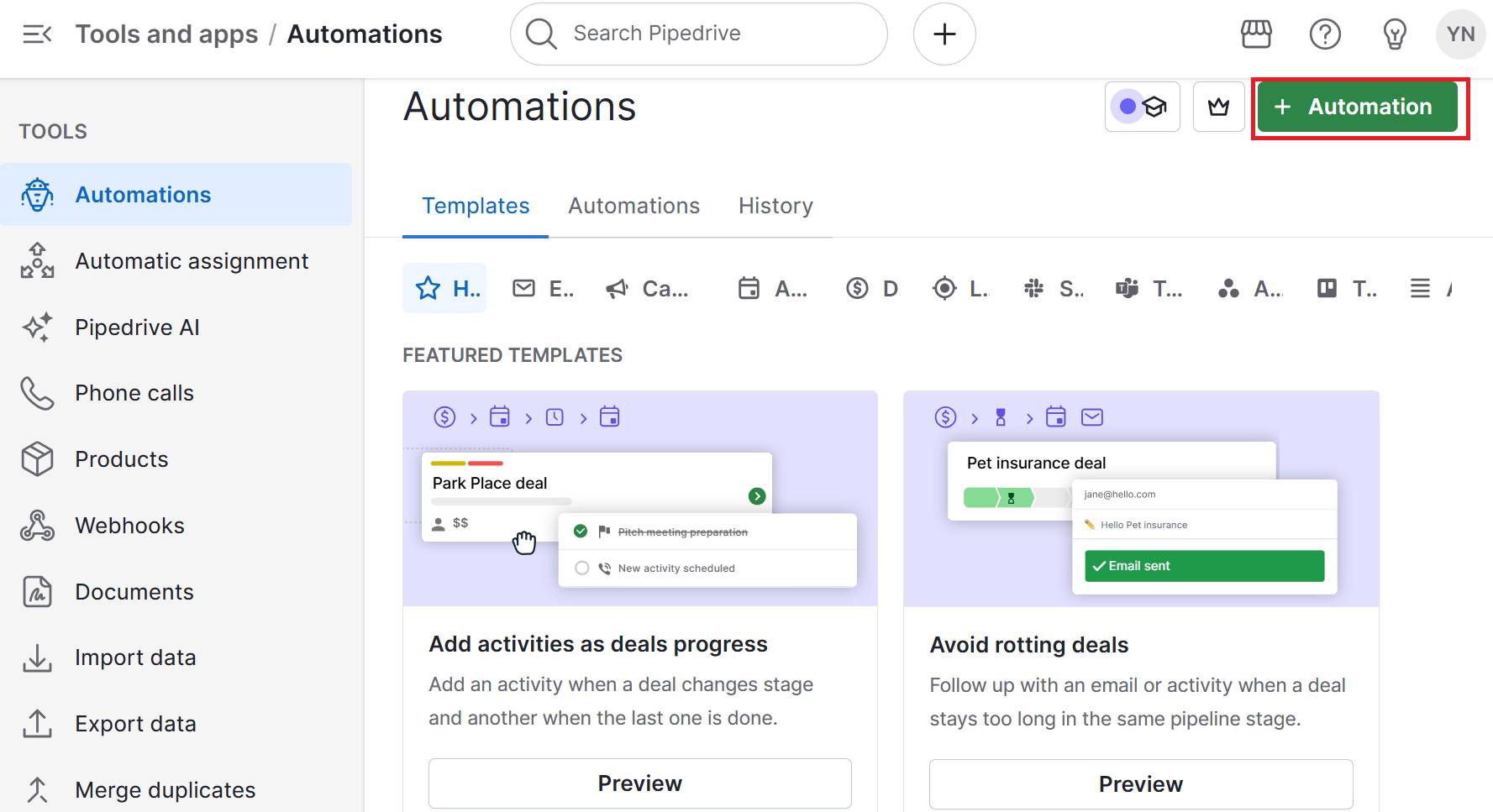
Consistency across the customer journey helps them recognize you immediately, whether they visit your website or receive a package from you.

Start with the touchpoints your customers see most often. If you do most of your business online, prioritize your website and social media profiles. If you meet customers in person regularly, focus on business cards and printed materials first.

Here are the main touchpoints to consider:

Brand touchpoints

Key elements to update

Website

Logo, colors, fonts, tone of voice

Blog posts

Layout, article images, typography

Business cards and letterheads

Logo, contact info design, color scheme

Email signatures

Logo and consistent formatting

Email marketing templates

Newsletters, promotional emails

Social media profiles

Profile photos, cover images and bio copy

Don’t overlook the less visible touchpoints like packaging materials and your office space (if customers visit). Your email auto-responses, voicemail messages and customer support scripts should also reflect your brand voice. These small details add up to create a cohesive brand experience.

Tackle brand elements step by step. If you have existing materials, use them before ordering new ones with updated branding. When you reorder, make sure everything follows your brand guidelines.

Recommended reading

https://www-cms.pipedriveassets.com/blog-assets/customer-journey-map-templates-1.png

Customer journey map templates: Free downloads and examples

9. Maintain brand consistency in your sales process

Your sales process is where prospects become customers. When every customer interaction reinforces your branding identity, prospects are more likely to see you as organized and reliable.

Slack is a good example of how to make a brand strategy consistent across sales and marketing.

The brand’s marketing strategy incorporates the same friendly voice into every sales touchpoint. Pointers like “don’t make me think” and “be compelling” guide writing across Slack interfaces and materials, including sales demos and emails.

Here’s an example:

Brand identity Slack sales example

As a result, when reps step in, they speak the same language as users, both in the app and on the website.

To develop your branded sales process, start with email templates for your most common sales conversations. Write templates for initial outreach and follow-up messages that follow your brand style guide.

Next, create proposal templates that use your brand colors for section headers and keep the same tone throughout.

Brand consistency isn’t just about looking polished – it builds trust. When every email, proposal and interaction feels like it’s coming from the same company, leads are more likely to feel confident in your offer.

But as your team grows and juggles a dozen deals at once, maintaining consistency becomes harder. Different reps may use different wording, forget to update files or skip the brand guidelines altogether.

That’s where a central system becomes essential to keeping everyone aligned.

A customer relationship management (CRM) system organizes your sales process. It stores customer data, tracks interactions and keeps your sales playbook in one place.

With Pipedrive’s CRM, you can:

The result is a sales experience that reinforces your brand at every step, giving prospects confidence and driving customer loyalty.

Final thoughts

Learning how to build a brand identity is an investment that’ll help you connect with your ideal customers and build trust for long-term growth.

Define your brand’s values, then build your visuals and messaging. Stay consistent across your marketing and sales so every customer interaction feels the same.

A CRM helps you create a successful brand with a consistent sales process. Start a 14-day free trial to see how Pipedrive enables you to find more leads and close deals faster.

9 Great Sales Management Courses Online & How to Choose One

Software Stack Editor · September 19, 2025 ·

The right sales management course gives you the skills to develop and empower your sales team to hit their targets and close high-quality deals.

With so many management courses available online, it can be difficult to choose one that matches your circumstances, budget and learning needs.

In this article, you’ll learn how sales management training can help salespeople at all career stages, explore seven of the best online courses to consider and choose the one that’ll best equip you to lead and sell more effectively.

Key takeaways from management courses online

  • Management courses online help new and seasoned leaders keep up with shifting customer demands, employee expectations and sales trends and technologies.

  • Effective sales management training combines data-driven decision-making with strong people management to coach high-performing teams effectively.

  • The best course choice depends on your career stage, time availability and intended outcomes: new managers benefit from foundational learning, while senior leaders gain most from strategy-focused training.

  • For managers looking to put leadership skills into practice with a smart CRM, Pipedrive Academy courses are a strong place to start online – sign up for a 14-day Pipedrive trial.

Why sales management training is critical for sales leaders in 2025

New and aspiring sales leaders aren’t the only ones who can benefit from online sales management training programs.

With buyer behaviors constantly evolving, even highly experienced sales managers must keep updating their skillsets to succeed. Here are three main reasons why:

  1. The current shift toward digital-first selling, data-driven decision-making and remote team management means today’s sales leaders need both traditional people management skills and technological fluency.

  2. Modern consumer attitudes toward corporate social responsibility, omnichannel shopping and brand loyalty mean sales teams have new expectations to meet. It’s a leader’s job to go beyond traditional coaching to ensure every rep is closing sales deals in line with customer needs.

  3. Employees’ expectations and priorities in flexible working, sustainability and diversity are changing. Sales managers must account for this changing landscape and embrace new sales models and technologies to be effective leaders.

management courses online flexible work perceptions

With all this in mind, great sales management courses can teach you how to:

Become a better coach for developing salespeople to build high-performing teams

Recommended reading

https://www-cms.pipedriveassets.com/Manage-sales-team.jpg

How to manage a sales team effectively: A complete guide

Best 9 sales management courses to hone your skills in 2025

To simplify your search for the perfect course, this article has built a list of starting points to consider.

Here are nine of the best sales management courses online in 2025, covering a range of leadership styles, skill levels, teaching methods and time demands.

First, explore this handy table summarizing all nine course recommendations – starting from beginner-friendly, freely accessible options and moving on to more advanced leadership courses to support more comprehensive business strategies.

Course name & key details

Who it’s best for and when

LinkedIn Learning – Transitioning to Management for Salespeople

Cost: Subscription-based ($29.99 with 1-month free trial)
Duration: ~1 hour

New managers or reps stepping into management roles and looking for a quick, digestible introduction to leadership fundamentals.

Udemy – Sales Management: Creating a Solid Foundation

Cost: Free
Duration: 46 minutes

Beginners in the management field, looking for basic knowledge to help them transition from salesperson to sales leader positions.

Pipedrive Academy – Master Sales Management: Leading Sales Teams with Confidence

Cost: Free

Duration: ~6 hours

Sales managers using or considering Pipedrive who want actionable, CRM-linked strategies and best practices.

Ideal for new or existing managers seeking hands-on, tool-specific leadership skills.

ASLAN – Catalyst

Cost: Custom pricing

Duration: 2 days plus 90-day certification path

New or recently promoted managers who want practical, hands-on leadership frameworks to develop a repeatable leadership and sales coaching system.

RAIN Group – Sales Management

Cost and duration: Custom

Leaders needing modular coaching on sales hiring, team performance and execution to strengthen mentoring and team accountability skills.

eCornell – Sales Growth Certificate Program

Cost: ~$3,900

Duration: ~3 months, 3–5 hours per week

Sales leaders looking for an in-depth, structured program to build actionable sales growth strategies – accompanied by formal, professional credentials.

Harvard Online – Strategic Sales Management

Cost: $2,950
Duration: 4 days

Leaders requiring in-depth training on personal professional growth and purpose, tailoring team coaching and fostering a championship culture

West Virginia University (Coursera) – Sales Operations/Management Specialization

Cost: Coursera Plus subscription ($59–$399)

Duration: 18–19 weeks

Managers aiming to formalize sales ops knowledge and team oversight.

Helpful for those seeking comprehensive, self-paced operational knowledge to delegate team efforts.

Sandler – Negotiating Mastery

Cost and duration: Custom

Managers handling deals in complex sales environments or negotiating with enterprise-level clients.

Next, delve into the specifics of each course to help you plan and incorporate your learning efforts into your time management system.

Recommended reading

https://www-cms.pipedriveassets.com/blog-assets/asset-60af6488231a1.png

The 11 Biggest Challenges for Managers Handling Fast Team Growth

1. Best for basic leadership knowledge: Udemy – Sales Management: Creating a Solid Foundation

This “fast-track overview” tailors sales leadership foundations for beginners transitioning into managerial positions. The no-frills taster course uses simple terminology to give salespersons a solid understanding of sales management roles.

The short course includes

  • Seven best-practice frameworks for effective team management

  • Hands-on tips for solving common, day-to-day sales team challenges

  • A downloadable workbook and personal action plan to reinforce key learnings

There are five modules with 14 self-contained lectures that learners can follow in any order, followed by a final five-question test to reinforce the newly gained knowledge.

Course details:

Format: Online, self-paced

Cost: Free

Duration: 46 minutes of on-demand video

Teaching method: Video tutorials with a supporting workbook and a short quiz at the end

Certification: No formal badge or certificate provided (the course focuses on practical learning rather than credentials)

2. Best for developing your leadership skills: ASLAN – Catalyst

As well as offering training for sales managers in inside sales, call center sales and field sales, ASLAN provides a sales leadership training program called Catalyst.

The course consists of three core modules: Lead, Manage and Coach.

management courses online ASLAN Catalyst Methodology

Throughout, learners can leverage the cloud-based Catalyst Dashboard to manage 200+ developmental activities for reps and track results, productivity, competency and engagement levels.

Upon completion of the workshop, a post-training certification path helps leaders integrate newly acquired skills into their daily practices and initiatives.

One of this course’s biggest selling points is its focus on changing how you see and approach leadership. If your one-size-fits-all management approach isn’t getting results, you’ll find ASLAN’s Other-Centric leadership philosophy valuable and insightful.

Course details:

  • Cost: Varies based on cohort, individual or group sales and management training requirements. – Contact ASLAN for a quote.

  • Duration: The core training is a concentrated two-day workshop, with customized pacing also an option. Post-training certification typically lasts 90 days.

  • Teaching method: Online or in-person interactive workshops with skill development activities and a dashboard for tracking results.

  • Certification: Learners complete a structured assessment and receive ASLAN Leadership Certification on completion.

3. Best for driving sales growth: eCornell – Sales Growth Certificate Program

Based on the 2016 book Sales Growth: Five Proven Strategies from the World’s Sales Leaders (authored by McKinsey experts), this five-stage course by Cornell University helps managers build actionable roadmaps for driving sales growth.

While it’s useful for salespeople at all levels, managers are eCornell’s main focus. In the course’s five units, you’ll learn how to:

  • Discover sales growth opportunities

  • Get the most from your sales efforts

  • Win with your key customer accounts

  • Negotiate effectively to maximize the value of every sale

  • Manage sales performance for team and business growth

Renowned faculty members teach the unit and the content is authored by a host of senior sales specialists from McKinsey & Company, including Director Maria Valdivieso, Senior Partner Homayoun Hatami and Chief Business Development Officer René Langen.

This lineup means you’ll gain access to a goldmine of experience-backed insight from industry leaders.

Course details:

  • Cost: $3,900 or $830 per monthly instalment

  • Duration: 3–5 hours per week for three months, with each unit lasting two weeks

  • Teaching method: Online, instructor-led videos and supporting texts, with a maximum class size of 35 students

  • Certification: Learners receive the Sales Growth Certificate from Cornell Johnson Graduate School of Management upon completion

4. Best for beginner sales managers using a CRM: Pipedrive Academy – Master Sales Management

Part of the Pipedrive Academy’s free resource library for everything sales- and CRM-related, this beginner-friendly course teaches practical leadership skills that integrate directly with Pipedrive’s CRM workflow for effective sales enablement.

management courses online Pipedrive Academy sales management

Master Sales Management: Leading Sales Teams with Confidence equips novice sales managers with actionable, tool-specific strategies they can implement immediately, including guidance on:

  • Managing and motivating a sales team within a CRM environment

  • Tracking sales pipelines and team performance effectively

  • Implementing structured sales processes

  • Coaching reps to improve their sales deal results

While the course is specific to Pipedrive, all managers can apply the leadership and coaching frameworks learned to their specific roles or sales scenarios.

Course details:

  • Cost: Free (all Pipedrive Academy content is free to access)
  • Duration: Self-paced, 11 lessons of around 35 minutes
  • Teaching method: Video tutorials, walkthroughs and CRM-integrated lessons with practical examples
  • Certification: Learners receive a badge of completion from the Pipedrive Academy

Download your guide to managing teams and scaling sales

The blueprint you need to find a team of superstars and build a strong foundation for lasting sales success

5. Best for inspiring team performance: RAIN Group – Sales Management

RAIN’s Sales Management training course gives managers the skills to keep their teams motivated, accountable and hitting performance objectives.

Recognizing some of the role’s biggest challenges, it promises to help leaders host more valuable team meetings, forecast performance more effectively, hire great new talent and coach reps to consistently exceed sales targets.

RAIN’s modular approach means participants and their employers can get a more personalized learning experience by focusing on the topics most relevant to their needs to become effective managers.

There are various modules within the leadership course, including:

  • Sales Forecasting and Pipeline Management

  • Interviewing and Hiring Sales Superstars

  • Leading Exceptional Team Meetings

Course details

  • Cost and duration: Both vary based on business and learner requirements, and you can contact RAIN Group for a consultation

  • Teaching method: Each course comprises online classroom or in-person sessions, online resources and application coaching

  • Certification: n/a

6. Best for stepping up to management: LinkedIn’s Transitioning to Management for Salespeople

LinkedIn Learning is a great place to upskill in many professional fields, including sales and marketing management.

At the time of writing, there are 55 courses in the Sales Management section of the platform

management courses online LinkedIn sales management topics

The Transitioning to Management for Salespeople course specifically targets new and aspiring sales leaders.

Led by sales consultant and author of Selling with Noble Purpose, Lisa Earle McLeod, this well-reviewed mini-course gives learners an idea of what to expect when switching from team member to team leader.

McLeod focuses on the areas in which new sales managers typically get stuck, including:

  • Sales pipeline management

  • Sales strategy

  • Coaching

  • Reporting

  • Sales forecasting

  • Attracting and retaining talent

  • Holding sales meetings

  • Working with other departments

  • Dealing with failure

It’s a short course, but the points raised here should set the groundwork and inspire your next steps in sales management education.

Course details

  • Cost: $29.99 or free with a one-month trial to LinkedIn Learning

  • Duration: One hour and 15 minutes (self-paced)

  • Teaching method: A series of video tutorials, slideshows and real-life examples presented by Lisa Earle McLeod, with quizzes to test your knowledge

  • Certification: Learners receive a LinkedIn “Certificate of Completion” after finishing the course

7. Best for a big-picture view of sales leadership: West Virginia University – Sales Operations/Management Specialization (Coursera)

This Coursera “Specialization” is a five-course series using a mix of theoretical and practical methods to teach students about sales management.

Three highly qualified West Virginia University professors speak on all areas of sales management, including organizing, selecting, training, motivating and compensating team members.

You’ll learn how to:

  • Develop a plan for organizing, staffing and training a sales force

  • Identify the key factors in establishing and maintaining high morale in the sales force

  • Develop an effective sales compensation plan

  • Evaluate the performance of a salesperson

  • Organize sales territories to maximize selling effectiveness

  • Evaluate sales ethics and sales management strategies in relation to current legal standards of practice

Students also get to meet practicing sales managers and build up to an “Applied Learning Project”, which involves analyzing the sales function of a real business.
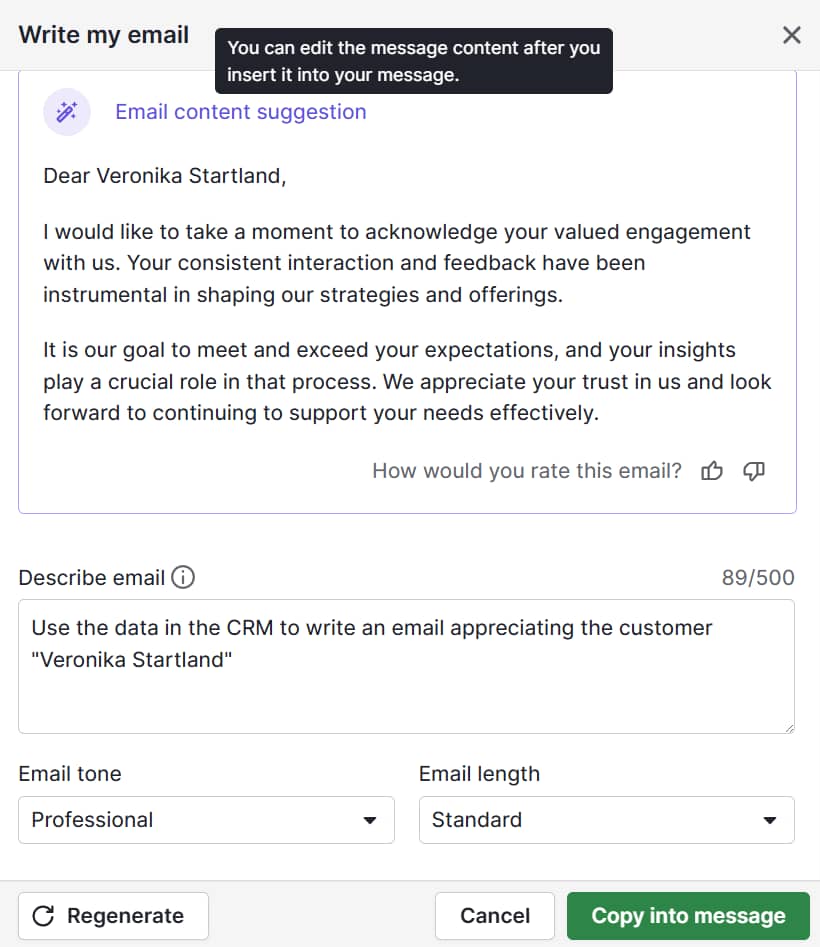
Course details:

  • Cost: Requires a Coursera Plus subscription at $399 per year or $59 per month (includes a seven-day free trial and access to 7,000+ other certificate programs). You can access the course materials for free, but not the assignments, support or certification.

  • Duration: This specialization contains one course of five weeks, three courses of four weeks and a final capstone project, for a total of 18–19 weeks.

  • Teaching method: A mix of instructor-led course videos, supporting text, graded quizzes and a hands-on assessment project.

  • Certification: Learners earn a shareable certificate from West Virginia University on completion.

8. Best for exec-level, strategic management: Harvard – Strategic Sales Management

Unlike entry-level courses, Harvard’s Strategic Sales Management course focuses on strategic decision-making and performance management. Interactive online sessions help learners to master key aspects of sales leadership.

Participants in this intensive four-day course will explore:

Management Essentials also applies strategic theory to real-world business scenarios using interactive exercises and real-world case studies.

Course details:

  • Cost: $2,950
  • Duration: Two consecutive Tuesdays and Thursdays
  • Teaching method: Online instructor-led sessions
  • Certification: Certificate of completion from Harvard Division of Continuing Education

9. Best for more win-win outcomes: Sandler – Negotiating Mastery

Sandler’s Negotiating Mastery course emphasizes the power of relationships in sales. As a sales manager, you’ll:

  1. Become a stronger negotiator for your own deals

  2. Be better positioned to coach reps in sales negotiation styles and best practices

The nine-lesson course includes modules like:

  • Understanding and Dealing with the Professional Negotiator

  • Sources of Negotiating Leverage

  • Personality, Style and Persuasion

  • The Most Common Negotiating Mistakes

  • Top 12 Gambits Buyers Use and the Countermeasures

Sandler’s teaching methodology is all about reinforcement. As well as providing plenty of theory-based content, it encourages learners to practice new leadership skills through role-play, simulations and other low-risk situations before transferring them to the field.

Course details:

  • Cost and duration: Dependent on business and learner requirements – contact Sandler for a custom quote

  • Teaching method: A mix of video content and supporting texts, with access to the Sandler Resource Library of podcasts, whitepapers, reports, webinar recordings and e-books

  • Certification: n/a

How to choose the right sales management course

All sales management courses have their own focuses, methods and credentials. The following factors should help you make the best decision for your problem-solving and leadership requirements:

Factor

What to consider

Sales-specific focus

Ensure the program addresses sales leadership aspects and challenges, not just general management positions.

Question to ask:
Does this course specifically cover pipeline management, sales team coaching and rep performance management?

Course content

List the competencies you’re currently missing and cross-check them with course modules.

Questions to ask:

Does this course cover sales-specific leadership vs. general business management?

Will I learn real-world application techniques?

Course duration

A longer program will naturally provide more detail, but it needs to align with your professional and personal commitments.

Your employer may be flexible if they can see the course’s value. Self-paced, asynchronous courses provide more flexibility if you need it.

Questions to ask:
Can I learn at my own pace?
Does the time investment match my career development timeline?

Cost

Your course’s pricing must fit within your or your employer’s budget. While free online management courses are attractive, paid sales management training that helps you or your team sell more has a high ROI.

Questions to ask:
Will my employer support this professional development?
Can I justify the cost through measurable sales improvements?

Teaching methods

Most online courses use a mix of text and visual content to teach. Some go further by providing access to online communities that allow you to chat and collaborate with faculty and peers.

As for assessments, you might find yourself answering quiz questions or taking full-blown exams. Both will help reinforce your new skills.

Questions to ask:
Do I need live interaction or does self-paced learning work better?
Are there practical exercises and real-world applications?

Certification

Do you need formal recognition from your course? Sales management certification might boost your career path, improve your reputation and convince your employer to invest in your personal development.

If you’re looking to refresh an old skill or fill a knowledge gap, proof of success may not be necessary.

Questions to ask:
Will this certification be recognized in my industry?
Does it provide continuing education credits?

Unsure where to start? Take a shorter and broader fundamentals course to get some basic ideas on what you want to pursue in depth as you scale your management efforts.

Management courses online FAQs

  • New managers can start with an introductory course that covers all the basics.

    An example like LinkedIn’s Transitioning to Management for Salespeople helps you build foundational skills to further develop your leadership qualities.

  • Yes, sales management learning is worth investing in.

    Free options initially give you the basic knowledge you need, while paid programs offer more comprehensive coverage for intensive learning – alongside key shared insights from instructors and sales peers.

  • Costs vary widely, with free courses, subscription-based programs and premium professional certificates available.

    The price often reflects the learning level, course depth, instructor availability and the inclusion of certification.

  • Sales training focuses on individual selling skills.

    Meanwhile, management training teaches aspects such as rep coaching, team leadership, performance forecasting and strategic oversight.

Final thoughts

The best sales management training courses allow you to refine old skills, learn new ones and keep up with evolving trends to close deals successfully and stay ahead of your competition.

With such a broad range of sales management training programs available, you should have no trouble finding one that matches your ambitions, schedule, learning style and budget.

Pipedrive Academy courses include sales management and many relevant topics to help you lead teams and sell more effectively. Develop your sales skills and learn how to seamlessly apply them to your CRM processes with a free 14-day Pipedrive trial.

5 Key Differences Between IaaS, SaaS and PaaS

Software Stack Editor · September 16, 2025 ·

Cloud systems like IaaS, SaaS and PaaS help SMBs create custom applications, manage business operations and drive revenue growth.

The key is knowing which model fits your needs – whether that’s full infrastructure control, a flexible platform for developers or ready-to-use business tools. Using the right option helps you reduce costs and maximize resources.

This article breaks down each system to show differences, benefits and best use cases, so you can confidently choose what works for your business.
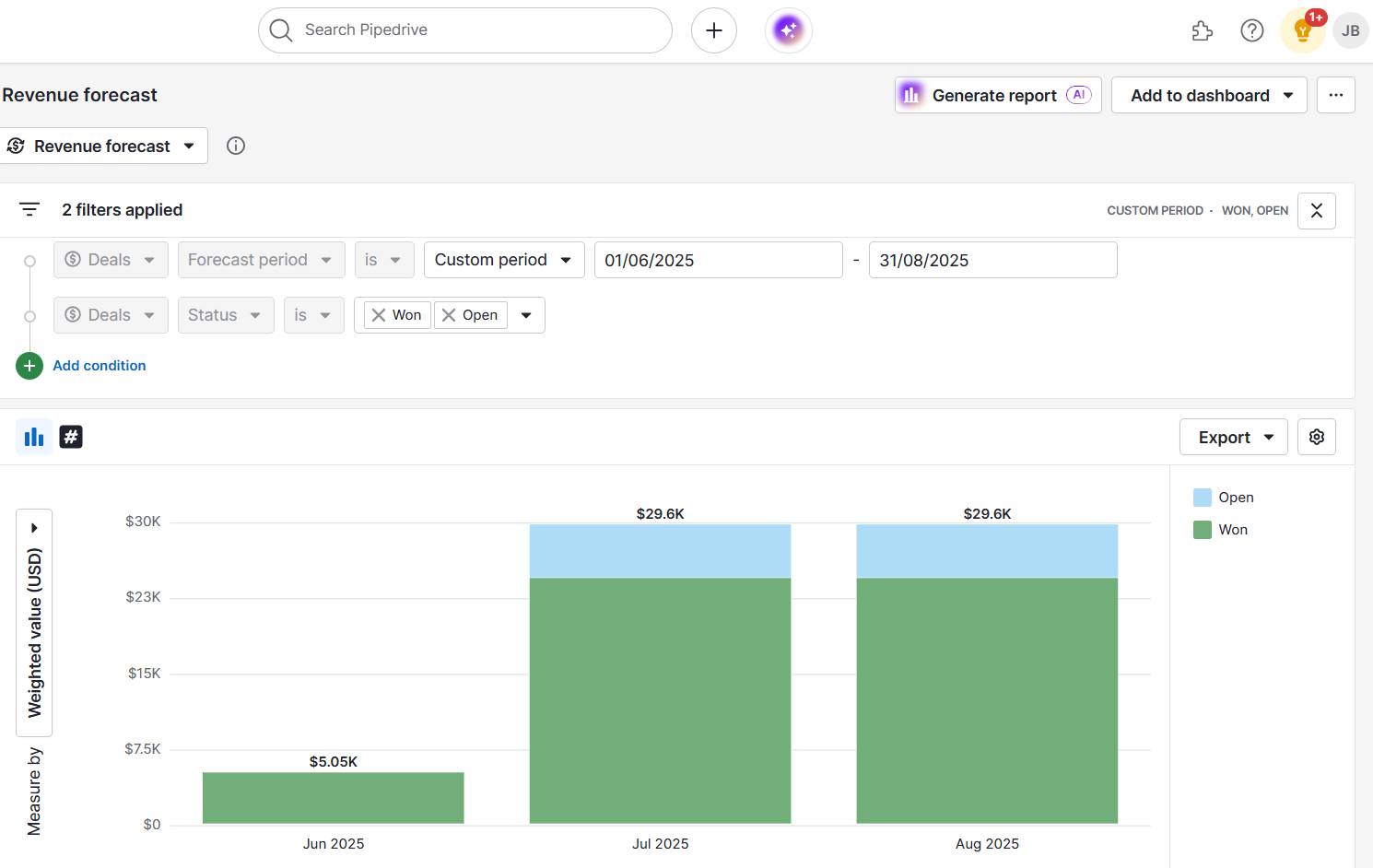
Key takeaways about IaaS, SaaS and PaaS

  • PaaS (platform as a service) delivers a full app development environment, suiting developers who want to build quickly without managing hardware.

  • Pipedrive’s SaaS CRM helps SMBs automate sales tasks, centralize customer data and access clear dashboards to drive smarter decisions – sign up for a free trial today.

What is IaaS, SaaS and PaaS? A simple breakdown

IaaS, SaaS and PaaS providers are cloud computing service models that offer different levels of control and management for business operations.

Note: Cloud computing service models are different ways of delivering IT resources online, ranging from raw infrastructure to app-building platforms to ready-to-use software.

Choosing the correct type of cloud computing ensures you have the right balance of control, cost and convenience.

For small and medium businesses (SMBs) with limited resources and budgets, selecting the best tool is crucial to avoid overspending and free up time and money without unnecessary technical overhead.

Here’s a breakdown of each type and what it offers.

Infrastructure as a service

IaaS provides the basic building blocks of cloud computing, like virtual servers, storage and networking.

Instead of buying and maintaining physical hardware, businesses rent IaaS resources from a provider and scale them up or down as needed.

This flexibility allows companies to:

  • Host websites and applications. Companies can deploy websites, e-commerce platforms or software applications with minimal setup, while the provider handles server maintenance and uptime. IT teams can then focus their efforts on development and user experience.

  • Amazon Web Services (AWS) and Microsoft Azure are popular examples of IaaS platforms, providing:

Here’s an example of the AWS interface:

IaaS SaaS PaaS Amazon Web Services (AWS) interface

These platforms offer ready-to-use cloud infrastructure with advanced security, monitoring and compliance tools – letting businesses focus on running applications rather than maintaining hardware.

Software as a service

SaaS delivers software applications over an internet connection, allowing users to access tools directly through a web browser without needing installation, maintenance or updates.

This format makes it ideal for businesses that want fast, reliable access to tools without the technical overhead.

Teams use SaaS systems to manage business processes, communicate and collaborate efficiently. The SaaS provider handles updates, security and backend maintenance.

This setup enables companies to:

  • Access tools instantly. Employees can log in from anywhere on any device without complex installation, boosting productivity.

  • Simplify IT management. The provider handles updates, security patches and infrastructure. Internal IT teams can focus on strategic planning and tasks rather than routine maintenance.

Pipedrive is a good example of a SaaS cloud platform. The sales CRM lets growing businesses manage leads, track deals and organize customer interactions entirely online.

Sales teams can access dashboards from anywhere, automate repetitive tasks like follow-ups and gain insights from real-time reports.

Sales reps can focus on closing deals instead of managing the system itself.

This is what a sales dashboard looks like in Pipedrive:

IaaS SaaS PaaS Pipedrive sales dashboard

Here are some other features that make Pipedrive a useful SaaS tool:

  • Automatic updates and security maintenance. Pipedrive handles all system upgrades and data protection in the background, so businesses always work with the latest features while keeping sensitive information secure.

SaaS systems like Pipedrive save time on technical management, reduce infrastructure costs and give teams more freedom to focus on growth and customer relationships.

Instead of worrying about servers or updates, SMBs can focus their energy on winning new customers and building stronger relationships to drive growth.

With ready-to-use tools, SaaS gives smaller businesses the kind of efficiency and agility that helps them compete with larger players without stretching their budgets or resources.

Platform as a service

PaaS offers developers a ready-to-use platform, combining IT infrastructure with tools like databases, frameworks and runtime environments.

Side note: A runtime environment is part of a system that lets your code run. It provides the necessary software, libraries and settings so applications can operate without needing developers to configure the underlying system.

Teams use PaaS systems to build, test and deploy applications without worrying about managing servers, operating systems or backend maintenance.

This setup enables companies to:

  • Test and iterate efficiently. PaaS provides pre-configured environments for testing new features, launching prototypes or running pilot programs – reducing setup time and minimizing technical errors.

  • Deploy apps seamlessly. Once development is complete, the system quickly deploys applications across multiple environments. The provider also handles scaling and resource management, ensuring reliability and performance.

Popular examples of PaaS providers include Google App Engine and Heroku, which provide:

  • Developer tools such as application programming interfaces (APIs), libraries and deployment pipelines

Here’s how the Google App Engine appears in the Google Cloud:

IaaS SaaS PaaS Google App Engine

SaaS platforms remove the operational burden of managing infrastructure, so developers have more time to focus on creating value for users.

What are the benefits of IaaS, SaaS and PaaS for SMBs?

As SMBs transition from on-premises data centers toward cloud-based solutions, they can leverage IaaS, SaaS and PaaS in different ways depending on their goals and resources.

Each model offers unique advantages that support businesses at different stages:

IaaS

  • Provides access to enterprise-level infrastructure without heavy upfront investment, avoiding the expense of servers and staffing costs.

  • Offers flexible, pay-as-you-go resources that scale up or down to match demand.

SaaS

  • Improves productivity and workflows without needing technical expertise.

  • Ensures predictable subscription costs, automatic updates and cloud access to keep teams productive from anywhere.

PaaS

  • Innovates new apps and features quickly by offering a ready-to-use environment for building and deploying apps.

  • Reduces IT costs, enables easy integrations and frees up resources for other strategic initiatives like nurturing leads or closing high-value deals.

Here’s a real-world example of how a cloud-based SaaS application helped an SMB reach tangible outcomes.

Pipedrive in action: Leadership and training brand Combat Ready used Pipedrive’s CRM to guide projects through key milestones, giving teams a clear visualization of each deal’s progress. The company identified patterns in leads, attendance and logistics, helping the team optimize workflows and deliver more value to customers.

5 key differences between IaaS, SaaS and PaaS

Understanding the differences between IaaS, SaaS and PaaS helps businesses choose the right cloud solution.

Each model balances control, flexibility and technical expertise differently, shaping how companies build and use technology.

Here are five key differences that highlight how these services compare.

1. Level of control

Different cloud models offer varying levels of control, which affects how much technical expertise you need and how quickly you can create or customize new features.

Here’s a breakdown of the control you get with each type of cloud services provider:

IaaS: Maximum control

You manage operating systems, apps and data.

Example: An SMB using AWS configures its own security rules, installs custom software and sets up virtual servers exactly as needed.

PaaS: Moderate control

You focus on code and apps, while the provider manages the backend.

Example: Developers on Google App Engine write and deploy code without worrying about server configuration or runtime management.

SaaS: Least control

You use the software as delivered, with all infrastructure, updates and maintenance handled by the provider.

Example: A sales team using Pipedrive customizes dashboards and sales workflows, but the provider manages servers, security and software updates.

IaaS provides full control for highly customized setups, while PaaS develops apps without managing the backend. SaaS provides ready-to-use software with minimal technical overhead.

2. Primary use case

Each cloud model supports different business needs, so picking the right solution depends on what you want your business to achieve.

Take a look at some of these use cases to see which cloud services are right for your business:

IaaS: Flexible infrastructure for IT teams

Ideal for hosting websites, storage, backup or running virtual machines ( software-based computers that run independently on a physical server, like a Windows VM on AWS).

Example: An e-commerce SMB uses AWS to host its website, securely store customer data and run virtual servers during peak shopping periods.

SaaS: Ready-to-use tools for business users

Great for using business tools like email, CRM or collaboration apps.

Example: A sales team uses Pipedrive to manage leads, track deals and automate email follow-ups while the provider handles updates and security.

PaaS: Rapid development for software teams

Perfect for developing, testing and deploying applications quickly.

Example: A tech startup uses Google App Engine to launch a new mobile app, testing features and iterating quickly without worrying about backend infrastructure.

To sum up, IaaS supports flexible infrastructure needs, SaaS delivers ready-to-use tools for everyday business operations and PaaS speeds up app development.

3. Who uses it

Each cloud model serves different users depending on their technical expertise and business needs.

Here are some examples and use cases of who might use the different cloud services within SMB settings:

IaaS: IT administrators and DevOps teams

These users directly manage servers, storage and networks, configuring systems to meet specific technical requirements.

Example: An IT team at a growing SMB uses AWS to set up virtual servers, manage backups and configure network security.

SaaS: End-users, employees and entire organizations

Anyone in the business can use the software without technical skills, while the provider handles maintenance and updates.

Example: An accounting firm uses QuickBooks Online to manage client invoicing, track expenses and generate reports. The provider handles updates, security and server maintenance.

PaaS: Software developers and engineering teams

Developers focus on building, testing and deploying applications while the platform handles the infrastructure.

Example: A development team uses Google App Engine to create and launch a new web app without managing the backend servers.

IaaS suits technical teams that need full control, while SaaS is ideal for general business users who need ready-to-use tools. PaaS supports developers as they build and deploy apps.

4. Maintenance responsibility

Different cloud models require varying levels of maintenance. This maintenance affects how much time, effort and technical expertise your team needs to invest.

More involvement often allows for greater customization, while less involvement reduces operational overhead.

Here’s how much maintenance each cloud service requires:

IaaS: Full maintenance responsibility

You’re in charge of software updates, patches, security and configuration.

Best for: Businesses that want complete control over their systems and have the technical expertise to manage servers and software.

Example: An SMB using AWS regularly updates its virtual machines, installs security patches and manages software configurations to meet business requirements.

SaaS: Provider handles all maintenance

The provider handles everything, including updates, security and backend systems.

Best for: Businesses that want ready-to-use tools without technical upkeep.

Example: A manufacturing company uses Pipedrive to manage sales pipelines and customer relationships while the provider handles software updates, security patches and server maintenance.

PaaS: Shared maintenance

The provider manages infrastructure and runtime, while you handle your applications.

Best for: Teams that want to focus on building and deploying apps without worrying about backend systems.

Example: Developers on Google App Engine write and deploy code, while the platform automatically maintains the servers, runtime environment and scaling.

IaaS gives full control but requires hands-on maintenance. SaaS removes almost all maintenance responsibilities so teams can focus entirely on using the software. Meanwhile, PaaS reduces technical burden by handling infrastructure while you manage apps.

5. Cost structure

Each cloud model has a different pricing structure, which affects sales budgeting, scalability and how much you pay upfront versus pay-as-you-go.

Understanding the cost structure helps you choose the most cost-effective solution for your needs.

Here’s what to expect when it comes to pricing for IaaS, SaaS and PaaS solutions:

IaaS: Pay for resources consumed

Costs depend on the computing resources you use, such as data storage or network bandwidth.

Best for: Businesses with variable workloads or seasonal demand that want to scale computing infrastructure without large upfront investments.

Example: An e-commerce SMB using AWS pays only for the virtual servers, storage and bandwidth it needs during peak shopping.

SaaS: Pay per subscription or user license

Businesses pay a recurring fee for each user or subscription plan, often monthly or annually.

Best for: Teams that want transparent pricing with minimal setup or infrastructure costs.

Example: A consultancy firm using Pipedrive pays a per-user subscription for its sales team, giving them access to CRM features without worrying about servers or updates.

PaaS: Pay for development environment usage

Pricing depends on the tools and runtime resources your team uses to build, test and deploy applications.

Best for: Development teams who want predictable costs while iterating quickly on apps or prototypes before a product launch.

Example: A startup using Google App Engine pays for the runtime and services used while testing and launching a new mobile app.

IaaS lets you scale resources with usage-based costs while SaaS provides predictable subscription pricing with minimal operational overhead. PaaS ties costs to development activity.

Recommended reading

https://www-cms.pipedriveassets.com/Business-guides.png

Unlocking success: how business guides can transform your operations

When should SMBs use IaaS, SaaS and PaaS?

Knowing when to use IaaS, PaaS or SaaS helps SMBs choose the right cloud solution, saving them time, money and technical headaches.

Below are common use cases for each type of cloud service.

Use IaaS for flexible and scalable infrastructure

IaaS providers give SMBs access to powerful infrastructure without the cost of buying or maintaining physical servers, making it easy to scale resources up or down as business needs change.

For example, an online retailer can increase server capacity during holiday shopping periods and scale back afterward.

This flexibility makes IaaS ideal for several use cases:

Although IaaS offers flexibility, it only works well for companies with some in-house technical expertise to manage configurations and security settings. Monitoring usage is important to prevent unexpected costs from scaling resources too quickly.

SaaS for ready-to-use systems

SaaS products give SMBs access to fully managed software tools that require no installation, maintenance or updates, allowing teams to focus on running the business.

For example, a small financial services firm can use a cloud-based CRM to track client interactions, automate follow-ups and generate reports without needing an in-house IT team.

SaaS works well for several key business needs:

  • Handling accounting, payroll and HR tasks with cloud apps. SMBs can streamline operations while keeping sensitive data secure.

  • Using project management platforms to coordinate teams. Cloud tools allow team members to collaborate, track progress and meet deadlines efficiently.

Download your guide to managing teams and scaling sales

The blueprint you need to find a team of superstars and build a strong foundation for lasting sales success

Typically the most cost-effective option for SMBs, SaaS offers less customization than IaaS or PaaS.

Platforms like Pipedrive, however, let you personalize dashboards, workflows and processes by:

Here’s an example of a custom sales workflow in Pipedrive:

IaaS SaaS PaaS Pipedrive deal workflow

This flexibility lets SMBs tailor the platform to their workflows rather than adapting to a one-size-fits-all system.

Users can also access the Developers’ Corner for advanced integrations. This space provides access to APIs (application programming interfaces) that let your team connect Pipedrive with other software or build custom features.

For example, you can automatically sync data from your accounting system, trigger alerts in your messaging app or create tailored reports that fit your business processes.

This means teams can extend Pipedrive’s functionality to match their workflows without having to manage servers, software updates or backend infrastructure.

PaaS for customizing applications

PaaS lets SMBs build and customize applications without managing the technical backend, making it easier to innovate quickly while managing costs.

For example, a startup can use Google App Engine to test a new mobile app, revise features and launch updates without worrying about server setup or maintenance.

PaaS is ideal for several use cases:

Although PaaS reduces technical burden, there’s a risk of vendor lock-in if you switch service providers later.

“Vendor lock-in” means that once you’ve built your applications or workflows on a particular PaaS provider, it can be difficult or costly to move them to a different provider. This happens because each platform has its own tools, frameworks, APIs and ways of managing data.

Switching might require rewriting parts of your application, retraining staff or adapting integrations, which can be time-consuming and expensive.

Costs can also increase if the platform scales heavily or usage grows unexpectedly.

Recommended reading

https://www-cms.pipedriveassets.com/SaaS-Account-Management.jpg

A complete guide to SaaS account management

IaaS, SaaS and PaaS FAQs

  • A hybrid cloud combines private and public cloud environments so businesses can move workloads between them for flexibility, scalability and cost efficiency.

    Users can deploy IaaS, SaaS and PaaS services across private, public or hybrid cloud environments, depending on their needs.

  • In IaaS, virtualization uses a hypervisor to run multiple virtual machines (VMs) on one physical server. Each VM has its own operating system and apps. For example, a business can host a website, database and test environment on the same server.

    This maximizes hardware use while giving customers scalable, flexible computing resources on demand.

  • AWS Elastic Beanstalk is a platform as a service (PaaS). The solution lets developers deploy and manage applications without handling infrastructure setup or maintenance.

  • A compute engine is a virtual machine service that delivers scalable computing power in the cloud.

    SMBs can use compute engines in IaaS or PaaS to host applications or run analytics without managing physical servers.

  • The Internet of Things (IoT) connects everyday devices to the Internet, allowing them to collect and share data.

    IoT applications typically rely on IaaS, SaaS and PaaS cloud services to process and analyze this data.

  • Load balancing distributes network or application traffic across multiple servers to ensure high availability, prevent overload and improve user performance.

    Load balancing in IaaS, SaaS and PaaS environments helps manage virtual servers and optimize cloud applications and deployments

Final thoughts

IaaS, SaaS and PaaS offer unique advantages, from building infrastructure and developing apps to running everyday operations with minimal technical effort.

Choose the right model by focusing on whether you need maximum control, faster innovation or user-friendly tools.

For many SMBs, SaaS provides the quickest path to value. Pipedrive’s CRM offers instant access to customizable pipelines, dashboards and automation to improve sales processes and close more deals.

Start your free 14-day trial today to simplify sales management without added technical overhead.

  • « Go to Previous Page
  • Page 1
  • Page 2
  • Page 3
  • Page 4
  • Interim pages omitted …
  • Page 28
  • Go to Next Page »

Get your Software Stack together. softwarestack.tech

Software Stack

© 2024–2026 - Software Stack is a trading name of SouthwestCIO Limited ac ompany registered in England & Wales 11319049

  • Knowledgebase
  • Home
  • About Us
  • Contact Us