• Skip to primary navigation
  • Skip to main content
software stack logo

Software Stack

Get your Software Stack together

  • Knowledgebase
    • All Categories
    • Accounting Software
    • Automation & Workflow Software
    • Customer Relationship Management
    • E-Commerce Shopfronts & Payments
    • Marketing Automation
    • Online Courses & Membership
    • Project Management
    • Surveys & Forms
    • Web Hosting
  • Home
  • About Us
  • Contact Us
  • Show Search
Hide Search

Pipedrive

Effective Net Credit Sales Formula

Software Stack Editor · January 8, 2025 ·

Credit sales are a great way to entice more customers to buy from your business, enabling them to buy now and settle payments later. Knowing how to do it right helps you boost sales and prevent your company from taking significant financial hits.

In this article, you’ll learn how to define and calculate credit sales, how credit sales work, when to use them and ways to mitigate and prevent common risks.

What are credit sales?

Credit sales definition: credit sales allow customers to purchase goods or services on credit. You (the creditor) let your customer (the debtor) pay later, agreeing on the payment date at the time of purchase.

Typical sales credit payment terms range from 30 to 90 days but can be longer. The terms must be in writing and agreed upon by both parties, and a contract must confirm the details.

Other names for credit sales include sales on account, credit transaction, buy now, pay later (BNPL) and sales on credit, all meaning the customer pays for the product after acquiring it.

By offering flexible credit, you increase your chances of making a sale by appealing to new customers across a broader range of financial situations. It allows customers who are struggling with cash flow problems or tight budgets to buy from you without a significant upfront cost.

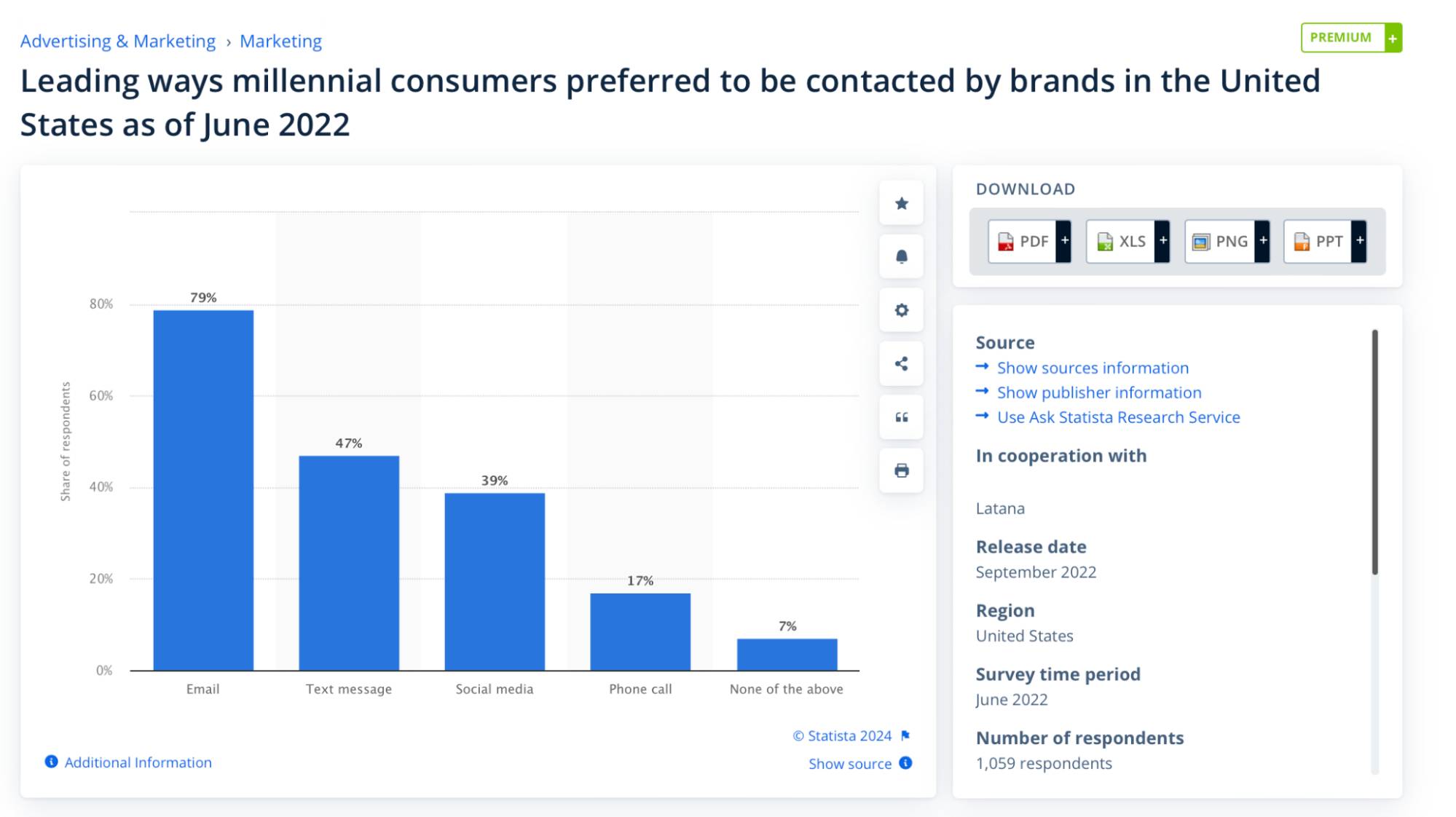
Studies show that customers value flexible payments. 41% of adults in the US have used “buy now, pay later” services in the past 12 months, and another 22% say they haven’t yet but could in the future.

How people use ‘Buy Now, Pay Later’ in the US

What about accrued revenue?

Accrued revenue is the revenue a company earns by delivering goods or services before invoicing or receiving payment. Similar to the credit sales meaning, you recognize this revenue before receiving cash.

However, there are some key differences between credit sales and accrued revenue:

Accrued revenue

Credit sales

You record accrued revenue when you earn it but haven’t issued an invoice.

You record credit sales when you sell goods or services and issue an invoice for payment at a later date.

You record accrued revenue in an accrued revenue account, which is a subset of accounts receivable.

You record credit sales directly in accounts receivable.

Say that a consulting firm completes $5,000 worth of services.

With accrued revenue, the firm records the revenue as soon as they deliver the service and before sending an invoice. With a credit sale, the firm records revenue at the time of sale and sends an invoice simultaneously.

Next, you’ll learn the formula for working out your business’s net credit sales.

How to calculate net credit sales

Calculating net credit sales helps you analyze actual earnings from credit transactions and assess your financial health by closely monitoring your cash flow.

Net credit sales are the total revenue of credit sales after deducting:

  • Sales returns. Funds you reimburse customers if they change their minds and return your product or service. Say you sell an item for $100 on credit, and the customer decides to return it. You cancel the $100 receivable and deduct it from the total credit sales.

  • Sales allowances. You reduce the selling price when customers report defects, damage or dissatisfaction. For example, if a product has minor damage but the customer chooses to keep it, you offer a 10% allowance. You send them a 10% refund and deduct this amount from your total credit sales.

  • Sales discounts. You lower the price upfront to encourage customers to pay early or buy during a promotional period. For instance, you offer customers a 2% price reduction if they pay the invoice within 10 days, subtracting the 2% from the total credit sales.

How do you find net credit sales? You can do so using the net credit sales formula:

Net credit sales = total credit sales − (returns + allowances + discounts)

Say that a company has the following sales and deductions:

Here’s how the above formula applies to these figures:

$100,000 − ($5,000 + $2,000 + $3,000) = $90,000

The company’s net credit sales amount to $90,000.

Download Your Guide to Sales Performance Measurement

The must-read guide for any sales manager trying to track, forecast and minimize risk. Learn how to scale sales with data-backed decisions.

How to record credit sales on your income statement

You record a credit sale as a journal entry on your income statement by:

  • Debiting the account receivables entry

  • Crediting the sales revenue account

The process, known as double-entry bookkeeping, involves recording both debit and credit transactions. You record credit sales this way because:

  • You recognize revenue at the point of sale. You record the sale income because the customer already has your product or service. This is known as accrual accounting, meaning you record revenue when you earn it, regardless of when you receive payment.

Here’s an example of how credit sales appear on an income statement:
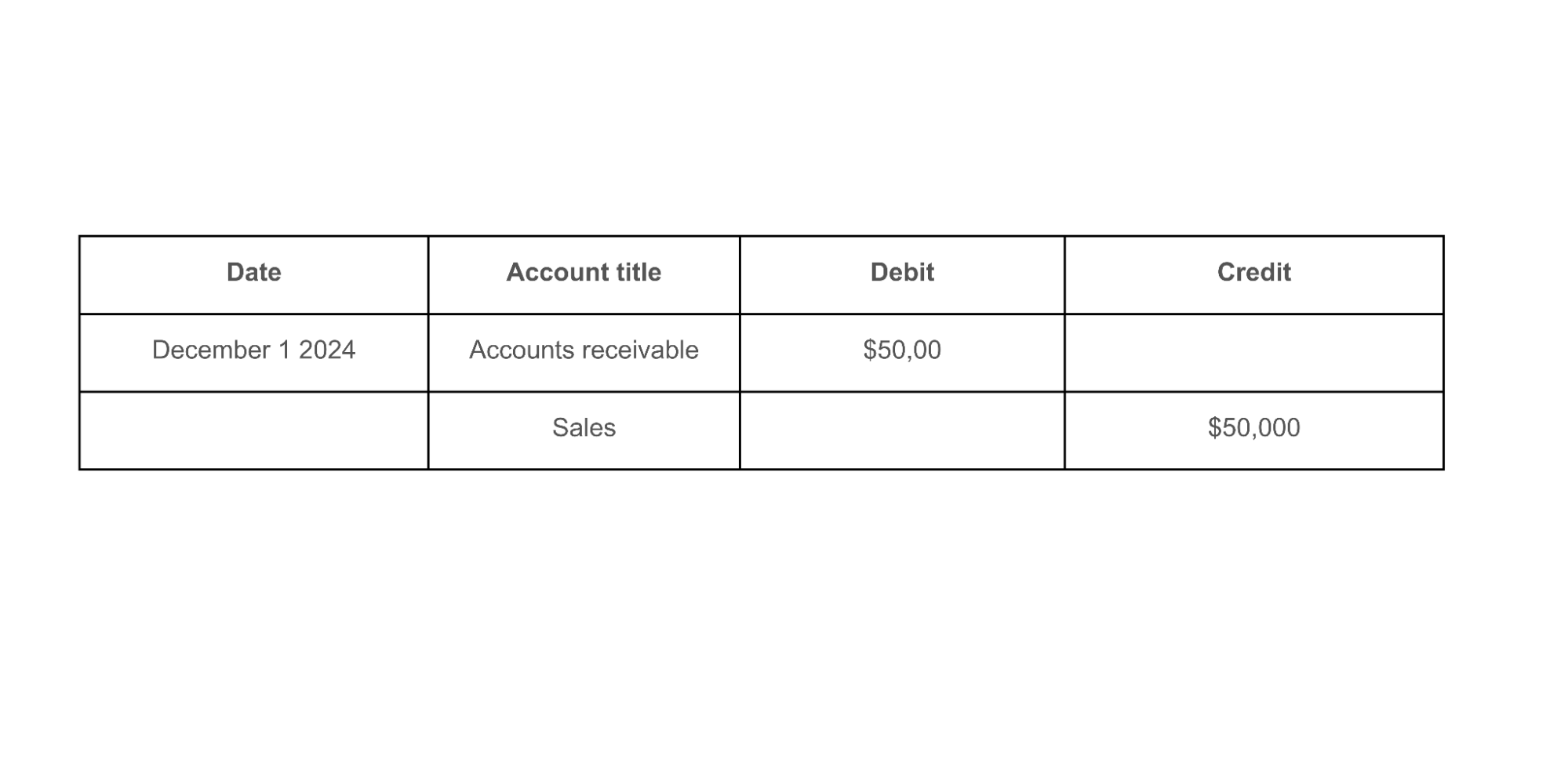
Credit sales Pipedrive income statement

By debiting the receivables account and crediting sales revenue, you record:

By doing so, you balance your accounts to get a more accurate picture of your financial health. If the sides don’t balance, it signals an error somewhere along the way.

Recording transactions in at least two accounts also shows where your money comes from and where it’s going. As a result, you can quickly assess your company’s financial position, identify trends and spot potential issues early.

What about your balance sheet?

Credit sales appear in the short-term assets section of your balance sheet, under accounts receivable (similar to the income statement).

Here’s an example of how that looks:

Current assets

Amount

Cash and cash equivalents

$50,000

Inventory

$30,000

Accounts receivable

$75,000

Prepaid expenses

$5,000

Total current assets

$160,000

Accounts receivable ($75,000) represent outstanding credit sales in the above format.

Note: Credit sales also appear in the “total sales revenue” section of a profit and loss statement, a report that summarizes your income and expenses over a certain period. They also appear on cash flow statements by adjusting the net income to recognize revenue as you earn it.

How to use the percentage of credit sales method

The percentage of credit sales method estimates bad debt expenses based on credit sales.

Bad debt refers to amounts your business is unlikely to collect because the customer can’t or won’t pay.

Also known as the income statement approach, the percentage of credit sales method helps businesses assess previous sales (or industry benchmarks) to make informed projections for the future.

For example, if you have $100,000 in credit sales and estimate that 5% is uncollectible, you can record a bad debt expense of $5,000 (5% of $100,000). Knowing this, you can make informed decisions about your future business activity, such as:

  • Adjusting your budget to account for potential losses

  • Limiting expenditures in areas that may impact cash flow

  • Setting reserves aside to cover business costs

Follow these three steps to use the percentage of credit sales method:

1. Determine the percentage

Review historical data to calculate the percentage of credit sales that typically result in bad debts over a certain period.

For example, if you analyze past sales and find that 3% of credit sales usually result in uncollectible amounts, use this percentage to estimate future bad debt expenses (which the final step explains).

Note: If no historical data is available, use industry benchmarks or averages. Read industry reports and research from reliable sources like PwC and Deloitte or financial reports from competitors.

2. Identify total credit sales

Calculate the total credit sales for the period under consideration – usually monthly, quarterly or annually.

Say that you’re predicting bad debt for the previous month. The total amount of credit sales was $100,000, so this is your base figure.

3. Calculate bad debt

To calculate your bad debt, multiply the total credit sales by your estimated percentage of bad debts. Here’s the formula:

Bad debt expense = total credit sales x percentage of bad debts

Using the figures from the previous steps, here’s how it works:

$100,000 x 0.03 = $3,000 of bad debt

You now have a fairly accurate idea of how much bad debt to expect from last month’s credit sales. With this insight, you can plan for potential losses and adjust your financial forecasts accordingly.

When to use credit sales

Credit sales provide benefits for businesses and customers alike. People buy products or services without a high upfront cost, and companies secure more sales through flexible payment options.

Read through the following benefits to determine when to use credit sales for your business (there are also drawbacks to consider, which this article covers in more detail later).

Note: While this list of benefits can be a helpful guide, it’s not exhaustive. You might want to do additional research to determine if credit sales are the right option for your business.

To boost your sales volume

Credit terms make products or services more accessible to customers without immediate funds. As a result, you increase the likelihood of securing sales from a broader customer base.

Say you approach a new lead about your services, and they’re keen to move forward. However, they’re coming to the end of their financial year.

There’s little room in the budget to pay for your services, so they take advantage of your 90-day payment option. You secure the sale, and the customer can access your service. It’s a win-win for both parties.

Customers may also feel more confident making larger purchases, knowing they can spread the cost over time by purchasing more items or upgrading to a more expensive product or service.

For instance, an electronics retailer may see higher sales of its more advanced laptops when offering a 90-day interest-free payment plan. As a result, the business achieves a higher average sales transaction value (or average order value).

To gain a competitive advantage

Offering credit terms sets your business apart from competitors accepting only upfront payments. This flexibility is essential for potential customers working with a strict budget or poor cash flow.

According to Statista, “Buy Now, Pay Later” is a major draw for consumers for the following reasons:

Imagine two companies that offer the same service for the same price. The only difference is their payment terms:

Faced with these two options, which one do you think your typical customer would choose?

Note: Consider your product and demographic when offering credit sales. Credit sales are more critical if you sell pricier items to younger demographics (like smartphones to students). If you sell a high-end product (like vintage watches) to an older and wealthier target consumer, you might not need flexible payment options to secure sales.

To increase customer retention

Credit sales can boost customer retention in addition to attracting new buyers. If your competitors require upfront payment but you offer flexible payment terms, your existing customers have less reason to look elsewhere.

Providing flexible payments also shows you trust your customer’s ability to pay. You create a sense of mutual respect, which leads to stronger, longer-lasting customer relationships.

Credit options also help buyers manage their cash flow more effectively, enhancing their purchasing experience.

Customers who have a good buying experience are more likely to return. PwC research shows that 54% of business executives prioritize the buyer experience as a critical strategy for building customer loyalty.

To enhance market penetration

Credit sales can help you establish a strong presence when entering a new market.

Imagine a software company launching into a new industry, such as healthcare. To differentiate itself from competitors and appeal to potential clients, it offers the best credit terms on the market.

For example, the company offers a subscription model in which healthcare organizations pay for the software in quarterly installments – while industry leaders require upfront payment. The company stands out in the market for its unique credit terms.

To increase flexibility in closing deals

Offering credit terms can help address price objections, making it easier to close deals with hesitant customers.

Consider a lead uncertain about committing to a $30,000 contract because of cash flow concerns. Your sales team offers a credit sale as an alternative, meaning the final payment date is 90 days.

Your service immediately becomes more accessible and addresses the client’s concerns about cash flow. As a result, you secure the contract. The credit sale eliminates the risk of losing the deal.

Recommended reading

https://www-cms.pipedriveassets.com/How-to-Sell-a-New-Product.png

How to sell a new product: 6 tips to drive new product sales

Disadvantages of credit sales: what are the risks?

Credit sales are a powerful tool for building customer loyalty and boosting sales, but they require careful management to minimize the risk of bad debts and maintain healthy cash flow.

Let’s walk through the challenges of credit sales and some strategies to mitigate them.

Developing debt

Businesses risk falling into debt if customers fail to settle invoices.

Say you agree to a 30-day credit policy with multiple customers who delay payment by several months. As a result, you go into debt. You’re unable to pay suppliers and employees on time. With each month that passes, your debt incurs interest and late payment fees. On top of this, your credit rating takes a hit.

To stay afloat, you must secure loans (if your credit rating doesn’t get in the way) or reduce operations.

How to minimize the risk of debt:

  • Clearly define credit terms. Specify payment deadlines, interest rates for overdue accounts and any additional conditions upfront with every customer. Put it in a sales contract, make sure it’s legally binding and get all relevant parties to sign it to protect your business if payment fails.

  • Offer sales incentives for early payment. Encourage timely payments by offering discounts or other incentives for customers who settle invoices ahead of schedule. For example, give a 2% discount on the total invoice amount if a customer pays within 10 days. These incentives motivate customers to pay early, reducing the risk of delayed payments.

  • Strengthen your collection process with CRM technology. Use a customer relationship management (CRM) system like Pipedrive to automate reminders, track payment statuses and flag overdue accounts for immediate follow-up. Doing so reduces the administrative burden and ensures that you regularly remind customers about upcoming deadlines.

  • Perform credit assessments. Use credit-scoring tools or request financial statements to conduct a thorough credit assessment and evaluate the customer’s economic stability. This will reduce the likelihood of extending credit to high-risk customers.

Note: You’ll need to allocate funds and resources to perform credit checks. Pricing may vary depending on the credit check provider and the level of detail in the report.

Impacting cash flow

Credit sales reduce the company’s cash availability for day-to-day operations. Businesses rely on timely customer payments to maintain liquidity. They risk missing out on opportunities (like supplier discounts) if cash flow is impacted by overdue credit purchases.

How to alleviate the impact on cash flow:

  • Balance the types of sales. Encourage a mix of credit and cash sales to ensure a steady cash flow while still offering customers credit. For example, you might provide full payment options first instead of opening with credit terms. You can then refer to credit terms if the customer is apprehensive about paying in full.

  • Negotiate extended payment periods with suppliers. Ask to renegotiate payment terms with your suppliers to relieve pressure if customer payments are late. If you offer 30-day payment terms to your customers, you might ask for 60-day payment terms with your supplier.

  • Budget for delays in your financial planning. Account for payment delays in your cash flow projections and budgeting to prepare for cash shortages. For example, use the percentage of credit sales method to predict how many customers won’t pay invoices and adjust budgets accordingly.

Increasing administrative work

Offering credit sales can lead to higher administrative work. These tasks often demand time and effort you could otherwise spend on revenue-generating activities, like nurturing high-quality leads.

Here are some additional administrative tasks that credit sales require:

  • Creating and updating payment terms

  • Monitoring payment deadlines

  • Issuing payment reminders

  • Performing credit assessments

The right tools, including Pipedrive, help you automate routine admin jobs and monitor progress – so you can focus on customer and business growth.
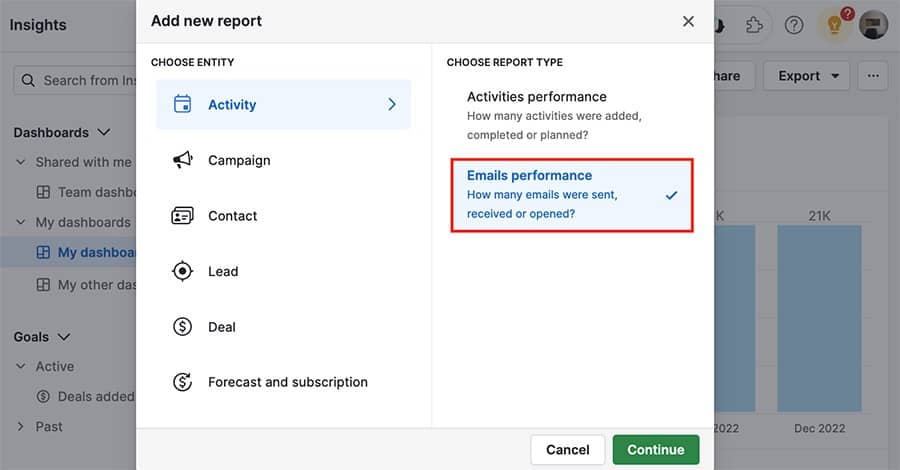
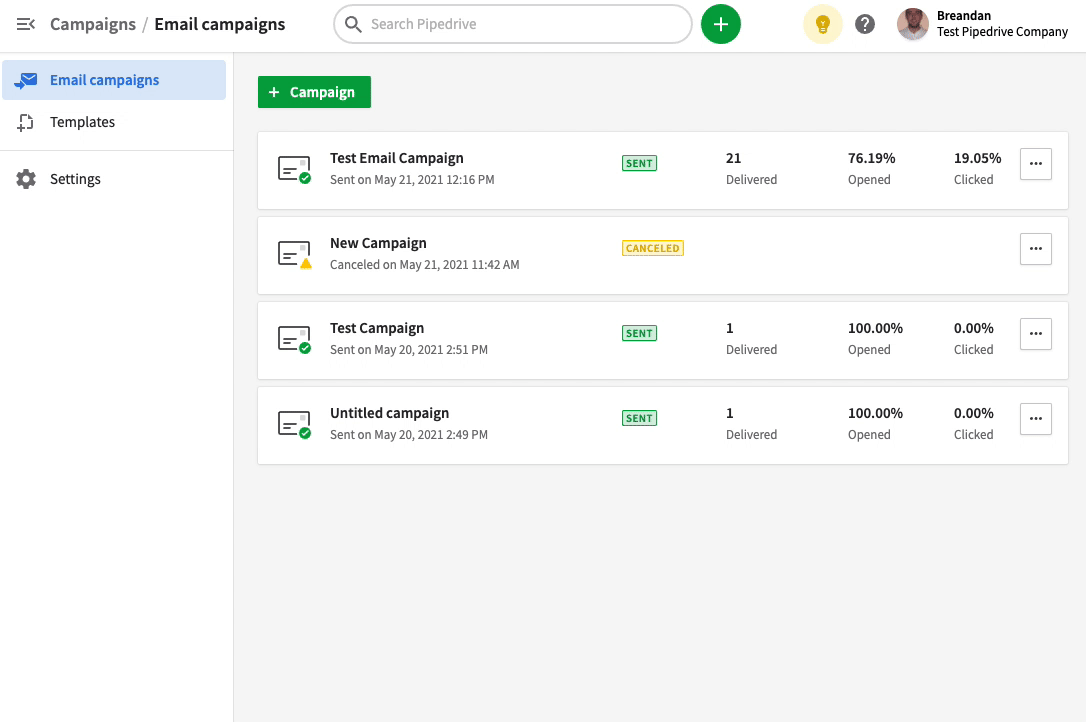
Credit sales Pipedrive email report

How to reduce additional administrative work:

  • Use technology to manage repetitive accounting tasks. Implement accounting software like QuickBooks or Xero to automate invoicing, track payments and centralize customer records. With repetitive tasks under control, you can focus more on crucial work areas, like generating leads.

  • Automate payment reminders. Set up automatic reminders for due payments to notify customers of upcoming deadlines and reduce the need for manual follow-ups. For example, use Pipedrive’s email automation to schedule reminders at specific intervals (using the Delay step).

  • Create real-time revenue reports. Generating financial reports makes tracking upcoming payments and monitoring cash flow easy. In Pipedrive, for example, the Insights feature lets you create reports to track scheduled payment revenue and dashboards to view insights at a glance.

  • Use payment gateways. Integrate secure payment gateways like Stripe into your CRM to fast-track secure payment collection and processing. You’ll spend less time manually processing customer payments and more time building leads and closing deals.

Recommended reading

https://www-cms.pipedriveassets.com/Online-Payment-Processing.png

14 online payment solutions and methods to use them

Final thoughts

Credit sales are a powerful tool for boosting sales, increasing customer retention and expanding your market presence. While there are some risks, you can minimize them with proper preparation, planning and technology – reaping benefits like winning more deals.

Pipedrive reduces the administrative burden of managing credit sales. You can integrate accounting systems directly into the CRM to centralize all your financial activity, automate payment reminders and track customer payments.

Sign up for a free 14-day trial to see how Pipedrive can support your business’s sales efforts.
SMB Guide to Microeconomics

Software Stack Editor · January 8, 2025 ·

Ever wonder why some companies can raise prices without hurting demand and others must keep them low to remain competitive? It’s a matter of microeconomics.

Microeconomics explains why businesses and customers behave the way they do. Understanding this economic theory helps business owners improve productivity, make pricing decisions and increase profits.

In this article, you’ll learn about microeconomics and its key concepts, how to define your market and how to apply microeconomic principles to your business.

What is microeconomics?

Microeconomics definition: Microeconomics is the study of individual behavior within an economy. It analyzes why consumers, households and businesses take specific actions and how economic decisions like incentives and price increases impact the economy and create externalities. (Externalities are indirect costs to third parties not involved in the initial action. For example, air pollution is an externality of driving a car).

Many microeconomic theories study the impact of decisions and incentives on the supply and demand model.

For example, a small business owner can use microeconomic principles to analyze the impact of a price increase on customer demand.

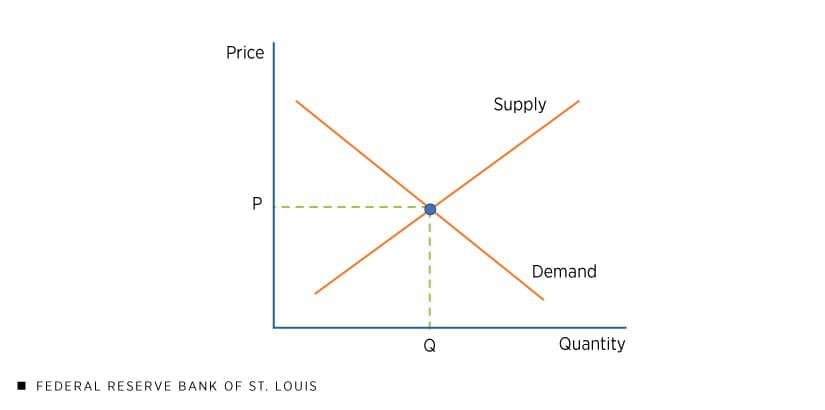
According to the law of supply and demand, demand will fall if prices rise, all other things being equal. Conversely, demand will increase if prices fall.

This graph from the Federal Reserve Bank of St. Louis shows the relationship between the supply curve and demand curve:

Microeconomics Pipedrive supply and demand

In the real world, you can see this concept in action with things like gas prices.

  • When gas prices rise, fewer people go to the pumps. People drive less, and the demand for gas falls.

  • When gas prices fall, demand rises because consumers are more willing to take the car than catch public transport.

The point on the graph where supply perfectly meets demand is called price equilibrium or general equilibrium.

Microeconomics is a way for business owners to understand how their decisions may impact economic outcomes.

Microeconomics is closely related to the field of study known as macroeconomics. While both are forms of analysis to help understand economic outcomes, there are some differences.

Microeconomics vs macroeconomics

Microeconomics studies the interactions among individuals and businesses. Macroeconomics, on the other hand, examines collective behavior within an entire economy.

It analyzes factors such as international trade, unemployment, inflation and GDP. It also studies national and international policies related​​ to these issues and major financial events such as market failures or financial crises.

For example, if a government imposes tariffs, business owners would use macroeconomic principles to estimate the impact on their business.

Here’s a table that showcases the differences between the two social sciences:

Microeconomics

Macroeconomics

  • Focuses on individual markets

  • Measures supply and demand in specific markets

  • Assesses products, labor markets and pricing

  • Focuses on the entire economy

  • Measures global supply and demand

  • Assesses unemployment, inflation and free trade

Note: Microeconomics also analyzes the impact of public policy on public goods, but this occurs at a smaller scale – often at the industry or business level. For instance, you can use microeconomics to analyze the impact of an increase in sales tax on a particular industry.

These two economic theories work together to help you understand the economy as a whole. For example, you can use macroeconomics to see how global factors like inflation will impact your market and microeconomics to make decisions about specific products or hires.

Analyzing your microeconomic market

Your market structure determines consumer and corporate behavior. If you want to predict how consumers will react to your decisions, you must factor market type into your calculations.

Here are the most common microeconomic markets:

Perfect competition

Perfect competition, also called “pure competition”, is a market where many small companies compete equally.

Businesses can easily enter and exit a perfectly competitive market and sell similar goods. Individual companies can’t influence prices. There’s no information asymmetry, either. Consumers are aware of the location and prices of every seller.

Note: Perfect competition markets exist only in theory. However, they help you compare other market structures. All of the markets below are examples of imperfect markets.

Monopoly

In a monopoly, a single company controls supply. No other businesses can enter the market, and the monopoly owner can set any price they wish.

This situation rarely happens in reality, but it is not unheard of. Utilities often fall into this category. For example, in North Carolina, Duke Energy operates a state-granted monopoly. Residents can only purchase electricity from a single local supplier.

Note: Many countries, like the US and the UK, define monopolies differently for legislative reasons. In these cases, monopolies occur when one company has a specific share of the market – typically around 70%–75%.

Monopolistic competition

Monopolistic competition occurs when many firms offer similar but not identical products. The market’s barriers to entry are low, and businesses compete on product differentiation, pricing and marketing.

Most consumer markets have monopolistic competition. For example, restaurants offer similar products and differentiate themselves through branding, customer service and price.

In monopolistic competition markets, demand is often very responsive to price. For example, companies can reduce prices to increase demand and gain market share. Big box retailers use this tactic to force smaller competitors that can’t compete on price out of business.

Oligopoly

In an oligopoly, a handful of companies control the market. The firms are interdependent – meaning the actions of one impact the actions of others – and they can choose to collaborate or compete.

OPEC is an example of an oligopoly. The oil-producing countries of Iran, Iraq, Kuwait, Saudi Arabia and Venezuela, among others, control a large percentage of the world’s oil supply. They coordinate the supply of oil to ensure a strong return.

Note: The minimum number of participants in an oligopoly is two. A two-party oligopoly is called a duopoly. There are several global duopolies, the most well-known being Coca-Cola and Pepsi.

Contestable markets

A contestable market is one with low barriers to entry, in which existing businesses face pressure to keep price levels low.

The constant risk of new entrants means existing businesses focus on boosting sales rather than profit maximization. If existing businesses are too profitable, newcomers can easily undercut them.

Examples of contestable markets include low-cost airlines, grocery stores and coffee shops. A contestable market doesn’t stop big brands from forming, but consumer choice will always exist.

Note: It’s harder for existing businesses to consolidate power and form a monopoly in contestable markets. Even if a monopoly does form, it’s in the monopoly’s interest to keep prices low to stay competitive.

Monopsony

In a monopsony, there is one buyer and many sellers. The buyer has all the power. They set the demand and control the price. Sellers have little influence and no incentive to innovate.

Businesses are monopsony employers if they’re the major supplier of jobs in a local area. This power lets them set wages and working conditions as long as they comply with regulations like minimum wages.

Some experts consider Amazon a monopsony in the retail book market because its purchasing power allows it to dictate market factors like price and product differentiation.

Oligopsony

An oligopsony is a market with a small number of buyers and a large number of sellers. The buyers hold significant control, allowing them to dictate prices, often to the detriment of sellers.

Many agricultural markets are oligopsonies. In the cocoa market, for example, three companies – Cargill, Archer Daniels Midland and Barry Callebaut – buy the majority of cocoa beans from small farmers in the third world.

Recommended reading

https://www-cms.pipedriveassets.com/blog-assets/crm-financial-services.png

The Financial Services Sales Stack

What are the advantages and challenges of microeconomics?

Microeconomics helps business owners analyze customer behavior, predict the impact of incentives like a sales promotion and decide how to allocate resources.

Several benefits make this method of analysis particularly useful, including:

  • Insight into specific behavior. Microeconomics’ granular detail analyzes the behavior of specific individuals and businesses. For example, you can zero in on your existing customers’ buying patterns rather than studying the patterns of consumers in general.

  • Improved resource allocation. It highlights how business owners can best spend resources. For example, you can use microeconomics insights to decide how to distribute your marketing budget between channels.

  • Optimized pricing. Microeconomic theory helps you set the highest prices that demand will support. For instance, you can determine how much of the cost of inflation you can pass on to customers before they start buying fewer goods.

While microeconomics offers several advantages, there are also challenges to consider. These include:

  • Limited scope. Microeconomics only analyzes one business or market, not the wider economy, so your view can become narrow.

  • Lack of aggregate data. The theory doesn’t take macroeconomic information into account. You’ll need to incorporate both theories to achieve a broader analysis.

  • Assumption based. Microeconomics relies on simplistic assumptions – such as consumers behaving rationally – which don’t always hold true in the real world.

Here’s a table summarizing the benefits and drawbacks:

Benefits

Challenges

  • Limited scope

  • Lack of aggregate data

  • Assumption based

Bear these challenges in mind when using microeconomic analysis to inform your decisions.

For example, rather than relying on economic theory alone, test the impact of a price increase on a single product line in the short run before implementing the change across your entire offering.

Recommended reading

https://www-cms.pipedriveassets.com/blog-assets/financial-services-reporting.png

How to use reporting to optimize your financial services sales process

How to apply the principles of microeconomics to your business

You’ll need to learn the fundamental principles to apply microeconomics to your day-to-day business decisions.

Here are four ways these principles of economics can help you quickly analyze decisions and predict outcomes.

1. Optimize pricing with price elasticity of demand

Price elasticity of demand measures the change in demand for a product compared to a change in its price. If a price increase significantly changes demand, then demand is elastic. If the change in demand is small, demand is inelastic.

Understanding your product’s price elasticity of demand will show you how much you can raise prices without impacting demand.

If you’ve previously changed the price of your product, you can use your sales data to calculate the change in demand. You can then use the following formula to calculate elasticity:

Price elasticity = percentage change in demand/percentage change in price

Your answer will tell you how elastic your price is, as shown in the following table:

Calculation

Type of elasticity

More than 1

Elastic (significant change in demand)

Less than 1

Inelastic (slight change in demand)

0

Perfectly inelastic (no change in demand)

Imagine you raised prices by 10% at the start of 2023. Comparing Q1 2023 to Q1 2022, sales data shows that demand fell by 5%.

The elasticity of demand for your product is 0.05/0.10 = 0.5.

The result means your product is inelastic. Even when prices rise, consumer buying habits will remain roughly the same.

Essential items like medicine tend to be price inelastic, whereas luxury goods are usually price elastic. Consumers can’t go without medicine, even if prices rise, but they’ll forgo a European vacation.

2. Make better decisions by calculating opportunity cost

Consumers don’t have unlimited resources. When someone chooses between several mutually exclusive options, the opportunity cost is the value of the next best alternative.

Imagine you buy a new electric car. You’re choosing from several brands: a Tesla (your favorite option), a Kia (your second favorite) and a Hyundai (your third choice). If you choose the Tesla, your opportunity cost is the Kia – it’s the next best option you don’t choose.

Every business decision has an opportunity cost. For instance, if you have a limited marketing budget, the opportunity cost of investing in a digital marketing campaign might be the cost of forgoing a direct response campaign.

If you determine that digital marketing will generate $10,000 in new business and a direct response campaign will generate $5,000, then digital marketing is the best choice.

You can also use opportunity cost to compare different options, from purchasing a new piece of machinery to hiring new salespeople. The key to making better decisions is to compare the expected returns of a decision and prioritize accordingly.

3. Improve your product offering with the law of diminishing marginal utility

This economic principle states that additional satisfaction from a product decreases as consumption increases.

For example, a consumer might enjoy one ice cream sundae. However, they probably won’t enjoy eating a second sundae in the same sitting and might entirely dislike eating a third.

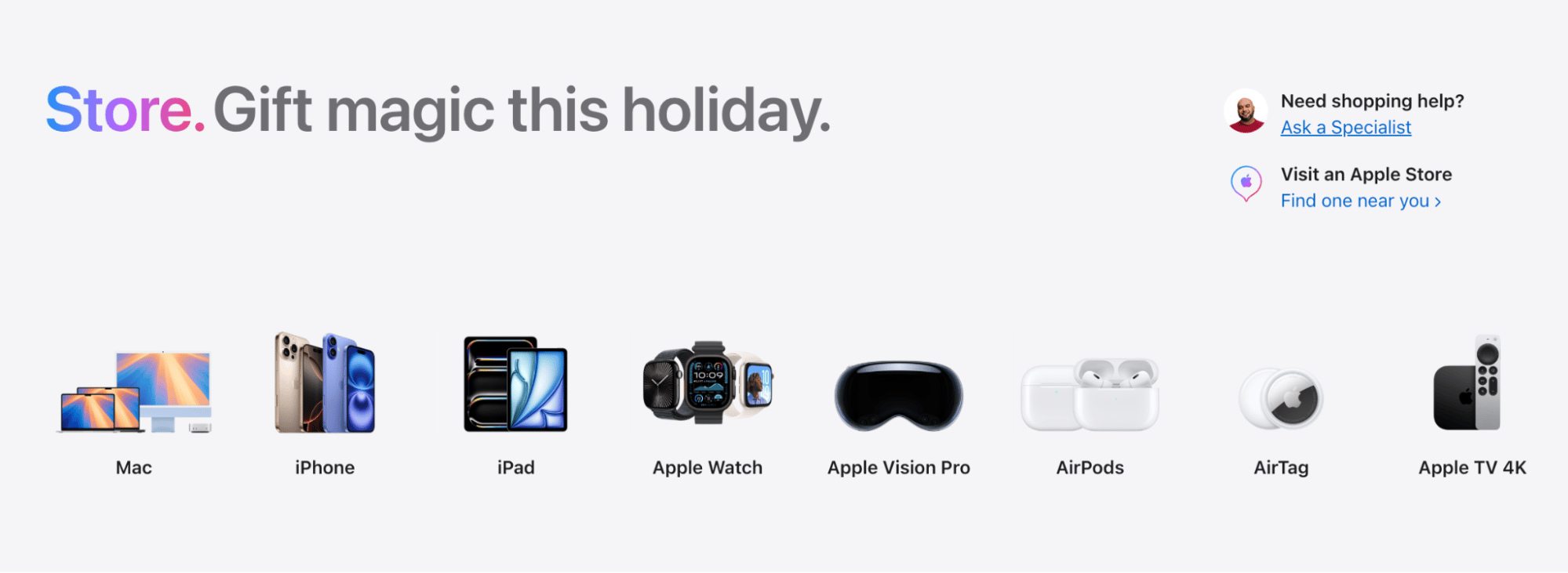
Understanding how the law of diminishing marginal utility impacts your business can help you diversify your product offering. For example, if you find consumers get significantly less value from repeated purchases of one product, offer a diverse range of products they’ll continue to buy.

Apple is an excellent example of this. Most consumers don’t need several iPhones but are happy to buy an iPhone, iPad and MacBook from the Apple Store.

Microeconomics Apple offerings

The diverse offerings keep satisfied customers coming back for more.

Note: You can also apply this theory to structure your workforce. For example, a small business with a dozen employees will benefit from hiring an HR manager. Hiring a second may be beneficial if the company doubles in size, but it probably won’t see a marginal benefit from hiring a third until they have over 100 employees.

4. Create positive outcomes with incentives

In microeconomics, an incentive is a financial motivation that influences decision-making. Real-world incentives include the following:

Bonuses

Incentivize employees to work hard and hit sales targets

Tax reductions

Incentivize businesses to invest in areas like research and development

Subsidies

Incentivize consumers to purchase a specific product, like an electric car

Use incentives to boost employee productivity, improve customer service and increase consumer demand for goods.

Recommended reading

https://www-cms.pipedriveassets.com/What-is-Bookkeeping.png

What is bookkeeping? A beginner’s guide to the basics

How to stay informed on economic trends and analysis

Keeping up with the latest financial and economic news is essential to applying microeconomic principles to your business.

The sooner you know about changes in economic factors like unemployment levels, government incentives or tax increases, the quicker you can calculate their impact on supply and demand.

Regularly browse dedicated publications like the following to get a high-level overview:

  • CNBC

  • Bloomberg

  • MarketWatch

  • Yahoo Finance

Learners looking for more detailed analysis can listen to finance and economic podcasts. For example, EconTalk is an award-winning weekly podcast that analyzes trending macro- and microeconomic factors. Planet Money regularly explores microeconomic issues and trends.

microeconomics Planet Money example episode

You can also create customized Google Alerts to get updates on a particular topic. For instance, you can set up a Google Alert for each of your competitors to stay informed about product launches, sales promotions and anything else that may impact your business and market.

Recommended reading

https://www-cms.pipedriveassets.com/blog-assets/sales-trends-decade.jpg

11 sales trends to track over the next decade

Use Pipedrive alongside microeconomics for better business decisions

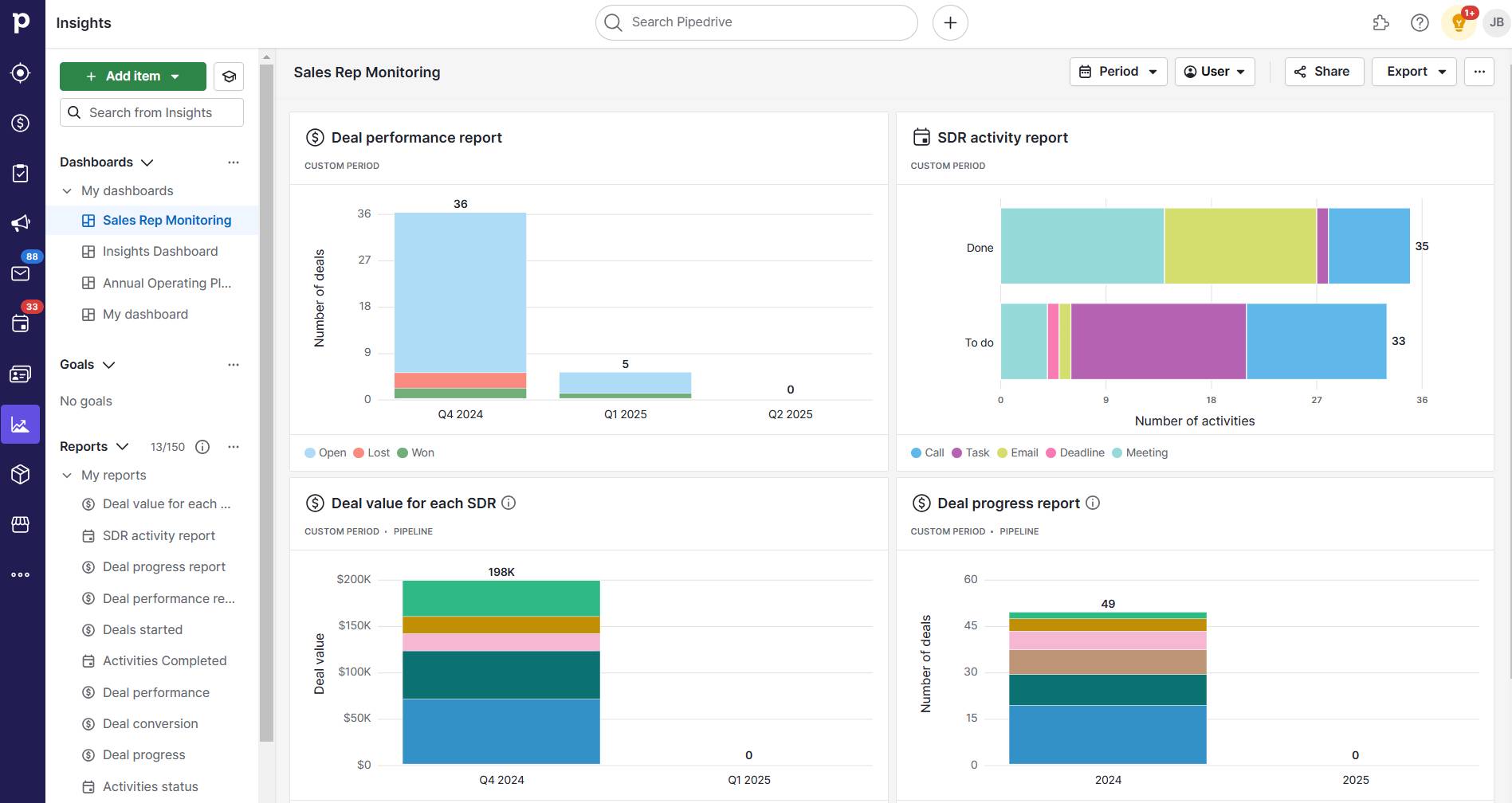
You don’t need to be an economist to make smart business decisions, but you need access to the right data. A Business Intelligence reporting tool can collect, analyze and present key information through charts, graphs and dashboards.

Pipedrive, for example, is an affordable and powerful choice for collecting and analyzing sales, marketing, customer and productivity data. Use Pipedrive’s Insights feature to:

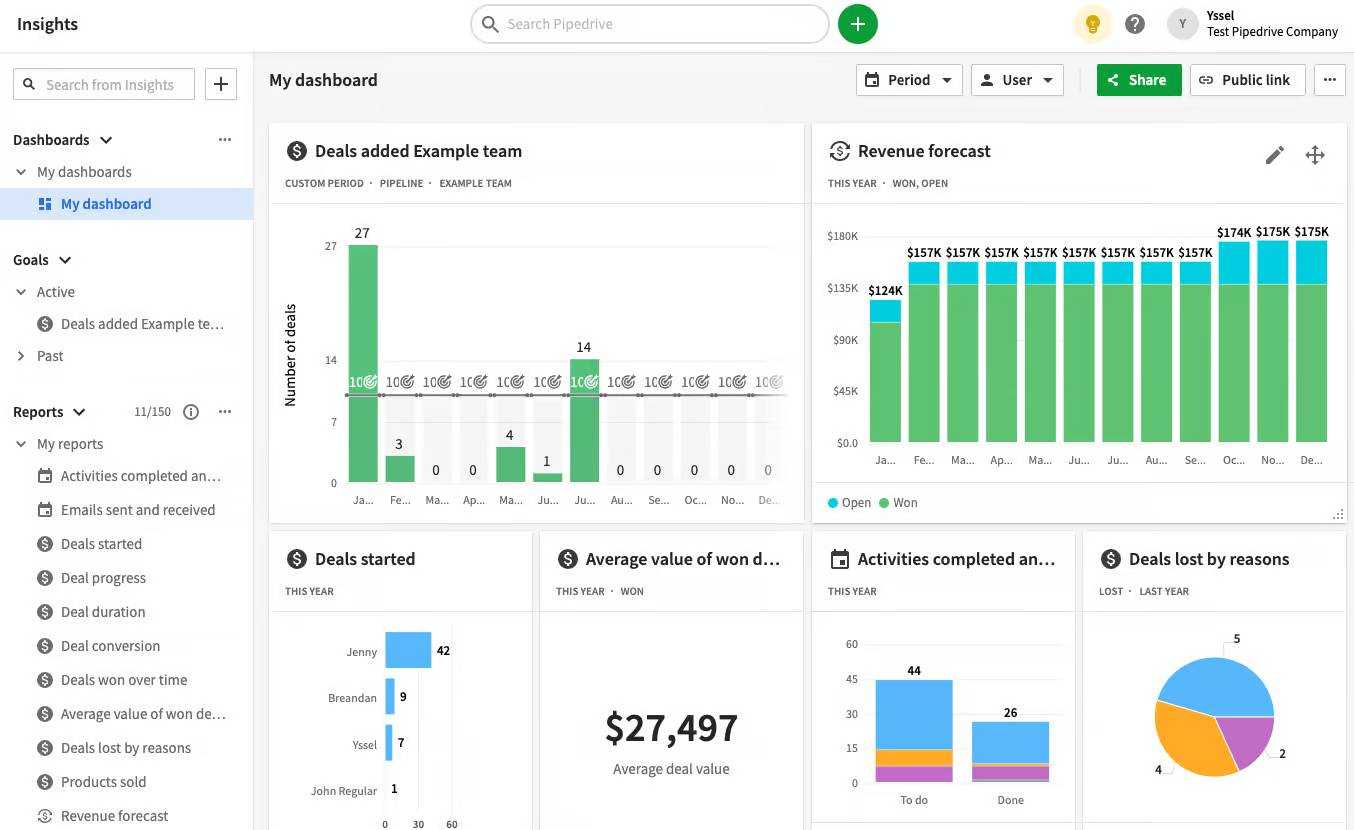
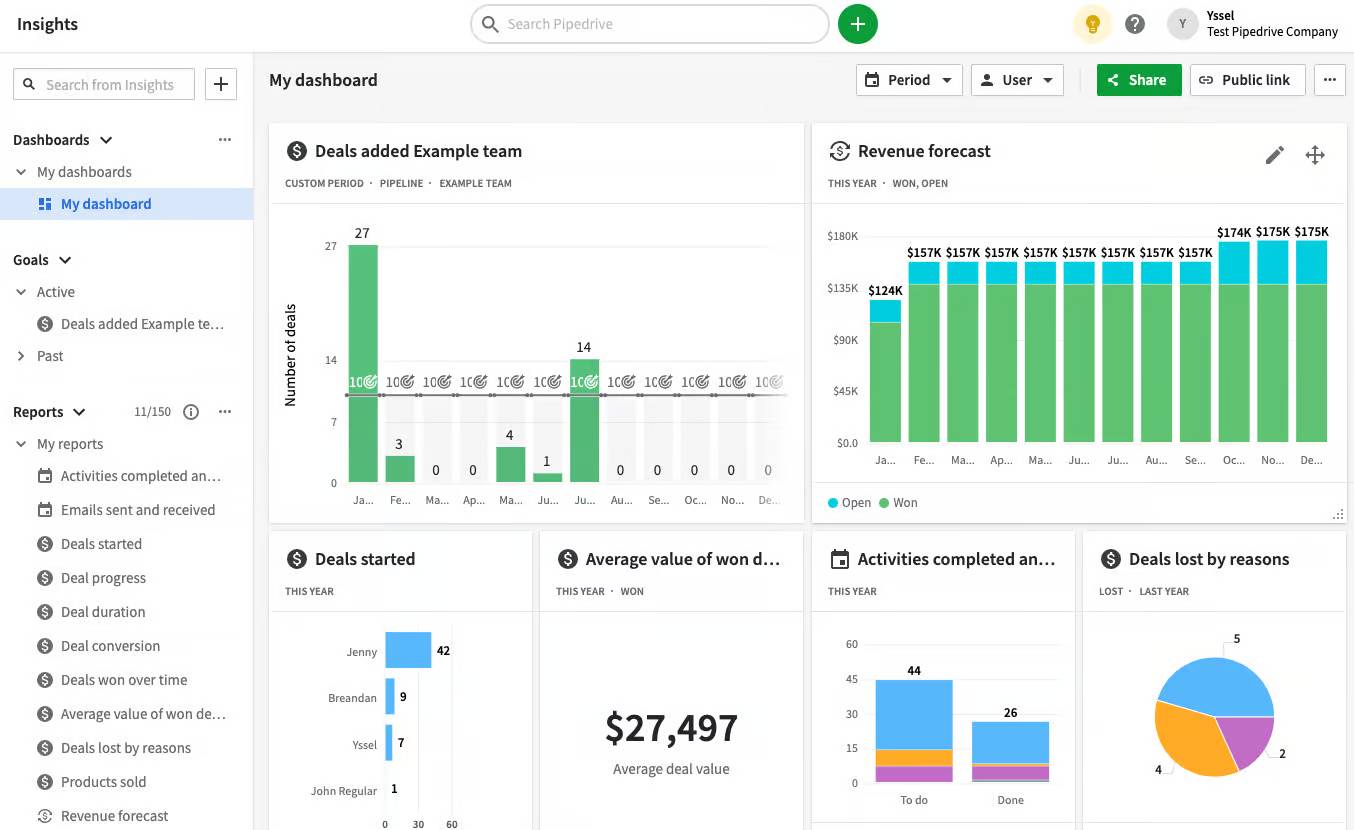
You can tailor everything to your needs. For example, create customizable dashboards that track your most important KPIs.

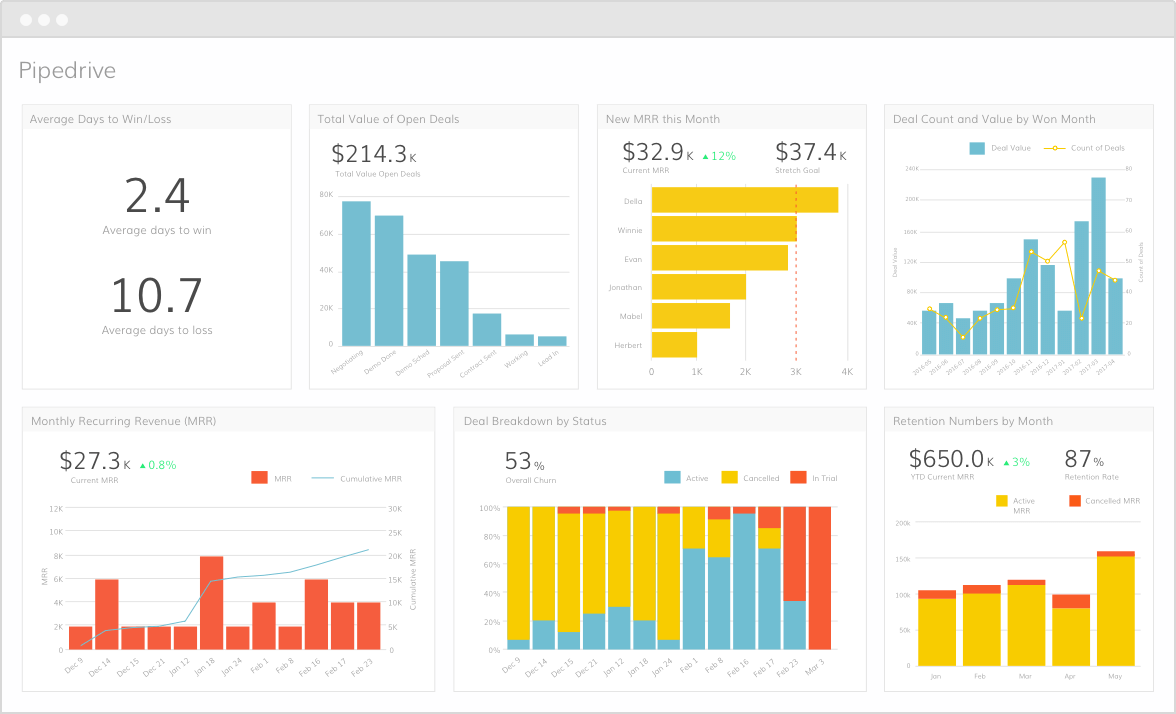
Microeconomics Pipedrive dashboard

Your data is always accessible. Pipedrive stores everything in the cloud, so you never have to search through dozens of spreadsheets again.

Final thoughts

Economic metrics are essential in helping small business owners understand their market, price products competitively and make hiring and resource allocation decisions.

Apply microeconomics principles more successfully using high-quality data. Use Pipedrive to collect and analyze business intelligence data. It provides automated insights, customizable reports and forecasting tools. Try Pipedrive free for 14 days.

Complete Business Lunch Guide for SMBs

Software Stack Editor · January 7, 2025 ·

Business lunches seem simple enough. You pick a nice restaurant, have a pleasant conversation and hope for the best. However, if you ever walked away from a business lunch wondering if you could’ve done better, you’re not alone.

From choosing the right restaurant to knowing when to transition to business talk, these meetings require careful consideration to be effective.

In this article, you’ll learn how to shift business lunches from uncertain meetings to opportunities. Whether you’re meeting potential clients and partners or networking, you’ll know what to do before, during and after your business lunches to reach your business objectives.

What is a business lunch?

A business lunch is a business meeting in which you build relationships or discuss professional matters over a meal to advance business objectives. It’s a more informal way of discussing business outside the traditional office environment.

Unlike casual lunches with coworkers, business lunches have a clear strategic objective. The objective can be negotiating a deal, exploring potential partnerships or strengthening customer relationships. Sharing a meal reduces barriers and makes people more open to discussions.

Types of business lunches

Business lunches require different approaches based on your objectives and lunch companions. Meeting a potential client demands more preparation than a networking event.

Here are the main types of business lunches:

Business lunch type

Explanation

Client business lunches

Sales meetings with current or potential clients. When meeting new potential clients, the conversation flows from general to light business topics to assess compatibility. For existing clients, business lunches strengthen or maintain the relationship.

Partnership business lunches

Meetings focusing on building a relationship between organizations that work together or plan to collaborate. Parties usually have aligned interests, which allows for more open conversations about challenges or negotiations.

Networking business lunches

Meetings involving professionals from multiple companies, industries or roles occur during industry events or conferences. Network business lunches don’t have a clear objective other than to make valuable connections or identify future opportunities.

Internal business lunches

Meetings between department heads or executives from the same company to align on important initiatives or solve particular challenges. Internal business lunches can also help break down any silos.

Business lunch timeline step-by-step

Planning a business lunch involves much more than picking a restaurant and showing up. Sending an invite, making a reservation and following up might seem straightforward, but there’s more to ensuring a successful lunch meeting.

The following steps will help you create a memorable experience – whether you’re meeting a potential client or strengthening an existing relationship.

Step 1: Preparation

Business lunches usually start with an informal invite, which can be made in a casual conversation or via email. For example, you might suggest discussing a topic further over lunch to gauge interest and availability. Once you get confirmation, you can dive into specific details.

Choose a restaurant

Find a lunch spot with a quiet ambiance (so you can talk), good service (so you won’t have awkward interruptions) and a menu that accommodates different dietary preferences.

If you’re in a major city, business midtown locations have the best restaurants as they’re used to handling business clientele. The central location also means you’ll likely have a variety of cuisine options for every preference (e.g., American, Italian, French, Mediterranean, Asian, Greek, Indian, Mexican, bistros and steakhouses).

Note: Make reservations at your restaurant of choice as early as possible. Popular business lunch restaurants, especially those suitable for client meetings, can be fully booked during lunch hours if you don’t plan ahead.

Send the invite

When sending your business lunch email invite, give your guest enough time to plan. The invite should include these essential details:

For example, use the following email template:

Subject: Lunch meeting – [Date and time]

Hi [Name],

Following our conversation about [brief context], I’d like to confirm our lunch meeting for [Date and time]

I’ve made a reservation at [Restaurant name] at [Restaurant address].

The restaurant is known for its [type of cuisine], and they offer a quiet setting to discuss [brief mention of topic].

Please let me know if you need directions or have any dietary preferences so I can inform the restaurant when confirming our reservation.

Looking forward to our meeting,

[Your name]

[Your contact information]

Research your guest

Look up your guest’s LinkedIn profile and check their company website. Understanding your guest’s role and company allows you to ask more relevant questions.

Confirm the reservation

Call the restaurant two or three days in advance to confirm the reservation. Use this opportunity to request special arrangements – such as a quiet table – or to remind them of any dietary restrictions.

Step 2: Arrival and seating

Arrive 15–30 minutes before the agreed hour, giving you enough time to check if your reservation is ready and prepare to greet your guest.

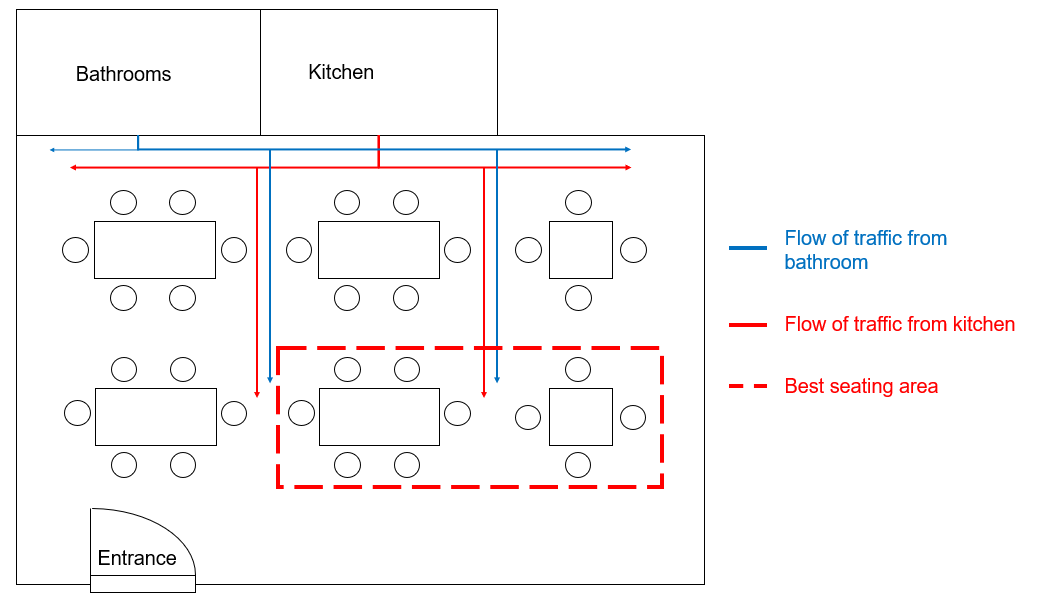
Request a quiet spot away from the kitchen or high-traffic areas if possible. A best practice is to offer your guest the most comfortable seat, typically the one facing into the restaurant rather than facing a wall.

business lunch seating chart

While a business lunch’s focus is to establish a conversation with your guest, bringing the following materials can help you be prepared:

When your guest arrives, stand to greet them, make eye contact and offer a firm handshake.

Note: Dress appropriately for the occasion. For most business settings, that means business professional or business casual. As a rule of thumb, dress slightly more formally than you would on a regular day at the office.

Step 3: During the meal

Start by making small talk or addressing light topics. Discuss the restaurant’s lunch menu, your professional background, mutual connections or even industry trends.

Conversational intelligence helps you ensure the conversation is professional without turning it into a sales pitch. Avoid personal topics (e.g., family life, relationship status, political views or religious beliefs).

Start business discussions after ordering to ensure you’re not interrupted by servers or your guest isn’t distracted reviewing the menu.

To ensure a professional dining experience:

  • Wait until your guest is served before you start eating

  • Match your eating pace with your guest

  • Avoid messy or hard-to-eat foods

  • Only order alcohol if your guest does (if appropriate, review the wine list)

  • Set your phone to “do not disturb”

While you want to progress in business matters, the goal of this dining experience is building relationships. Balance the conversation between business and professional topics and always read your guests’ comfort levels.

Step 4: Wrapping up

As you finish the meal, wrap up without rushing your guest. However, don’t linger too long after your servers pick up your plates. Start wrapping up about ten minutes after the server removes the main course.

A business lunch typically follows this sequence after the main course:

  • The server clears your entree plates

  • They offer dessert or coffee

  • You and your guest either accept or decline dessert

  • You begin wrapping up the conversation

Finish a business lunch by summarizing the main points of your discussion and setting the next steps to maintain momentum. For example, you can set the next meeting, establish timelines for a deliverable or tell them you’ll follow up through email.

Note: Never end a business lunch by promising to “keep in touch” – be more precise. For example, say, “I’ll send you that proposal by Friday afternoon”.

Step 5: Follow up

After saying goodbye to your guest, find a quiet place to take notes on the topics you discussed. It can be your car, a nearby cafe or back at the office. Just don’t let too much time pass, as the details from your conversation may fade.

Once you have your notes, craft your follow-up email. Consider the following questions to add value:

  • Did you promise any resources or deliverables?

  • Are there any action items you need to confirm?

  • Were specific dates or deadlines mentioned?

  • Do you need to schedule a follow-up meeting?

  • Do you need to clarify any points from your conversation?

Answering these questions ensures you’re not just sending a courtesy email but moving business decisions forward.

Here’s a follow-up email template you can use:

Hi [Name],

Thank you for meeting me over lunch to discuss [specific topic]. I enjoyed our conversation and learning more about [their company/project/challenge].

[Here, include the value points from the questions above: attach a deliverable or clarify details about specific points of the conversation]

To summarize our next steps:

[Action item 1]

[Action item 2]

[Action item 3]

I’ll [specific action you promised] by [deadline].

Would [specific date/time] work for our follow-up meeting to discuss [specific topic]?

Looking forward to continuing our conversation.

Best regards,

[Your name]

[Your contact information]

Send your follow-up email the day after the business lunch, preferably in the morning. If you don’t have the requested deliverables ready, send a follow-up email anyway. Thank them for their time, confirm specific points of the conversation and set expectations for when they’ll get the deliverables.

Turn Maybe Into Yes With These Killer Follow Up Email Templates

These customizable follow up email templates will help you boost your chances of breaking through to your busiest prospects.

How to make the most of your business lunch: 4 principles

Now that you understand how to plan and execute effective business lunches, here are four principles that will help you get the most from them.

1. Setting clear objectives

Only propose a business lunch when you have a clear objective in mind. Business lunches are strategic meetings to move business forward. The objective you set depends on the type of business lunch you’ll have.

Here are some examples of objectives for different business lunch types:

Business lunch type

Objective

Client business lunches

With first-time clients:

  • Understand their top three business pain points for the next six months

  • Learn about their current solutions and why they’re considering alternatives

  • Identify who makes purchasing decisions in their organization

With existing clients:

  • Learn about their upcoming projects and growth plans

  • Understand their satisfaction level with your current services

  • Identify opportunities to provide additional value through your other solutions

Partnership business lunches

  • Understand partners’ specific organizational strategies (how they handle projects, communications and, timelines)

  • Learn how their technology or systems would integrate with yours

  • Identify any potential roadblocks to collaboration (like conflicting processes or timelines)

Networking business lunches

  • Gather insights about current market trends from others’ perspective

  • Identify potential referral opportunities

  • Learn about upcoming industry events or initiatives where you could collaborate

Internal business lunches

  • Align on specific goals for cross-departmental projects

  • Identify bottlenecks in current processes between teams

  • Develop concrete solutions for ongoing operational challenges

Ask questions related to these objectives within the flow of conversation. Your objectives should guide how you shift the conversation but shouldn’t turn it into an interrogation.

2. Moving business forward

Moving business forward means achieving results that bring you closer to your objectives. It’s about relationship selling, so you can act on opportunities that arise during the conversation.

For example, say you’re having lunch with a potential client. During your conversation, they mention a challenge they face that your software could solve. You start asking follow-up questions to understand their situation and how you can help. Once you assess the situation, you propose your software as a solution.

In this case, moving the business forward would mean getting an introduction to their CTO, who makes purchasing decisions.

Each business lunch objective you set requires specific outcomes. Keep these outcomes in mind to naturally guide the conversation toward them.

3. Maintaining professionalism

In business meals, you want to be personable enough to be likable and create a connection but professional enough to be taken seriously.

Here are the three things that determine your level of professionalism:

  • Your behavior. Be aware of how you present yourself throughout the lunch – how you treat the restaurant staff, handle distractions (like your phone) and engage in conversation.

  • Your conversation. Know what topics are appropriate and how to discuss them. If your guest mentions a competitor, acknowledge them but don’t criticize them. If the conversation shifts to personal topics, bring it back to business topics.

  • Your reactions. Maintain your composure regardless of what happens. Responding based on emotion can lead to poor decision-making. If your guest criticizes your product, don’t be defensive, thank them for their honesty and ask specific questions about how you could improve.

Consistency in these three areas is the key to maintaining professionalism. It shows that you’re reliable and clients can trust you with future business negotiations.

4. Managing time effectively

As the host, you should use your time strategically while making it feel natural. Don’t lay out all your most important conversational points before the food arrives. Don’t keep rehashing those same points during dessert either.

Your business lunch should roughly flow as follows:

  • The first 15 minutes set the tone (e.g., arrival, greetings, order)

  • The following 30-45 minutes are for business discussion

  • The last 10-20 minutes should be the wrap-up

Read the situation and adjust the pace according to your guest’s engagement.

For example, if your guest is interested in a specific topic, you can spend more time on it and accelerate other parts of your discussion. If you sense they’re ready to move on to the next topic, progress more quickly.

Recommended reading

https://www-cms.pipedriveassets.com/Meeting-Productivity.jpg

Time well spent: 11 productivity hacks for team meetings

How to use Pipedrive’s CRM to manage business relationships

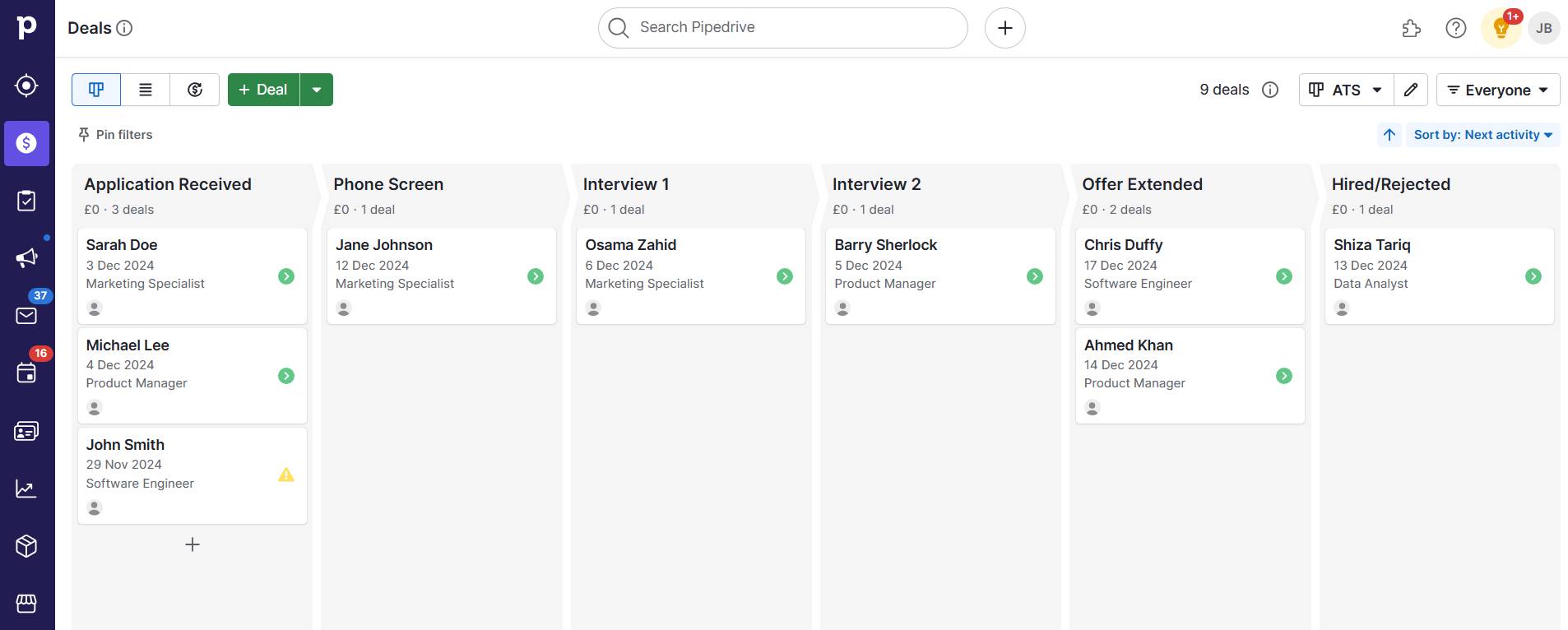
Nurturing relationships is at the core of Pipedrive’s CRM. It can help you organize and follow up with your contacts effectively so you don’t lose business opportunities.

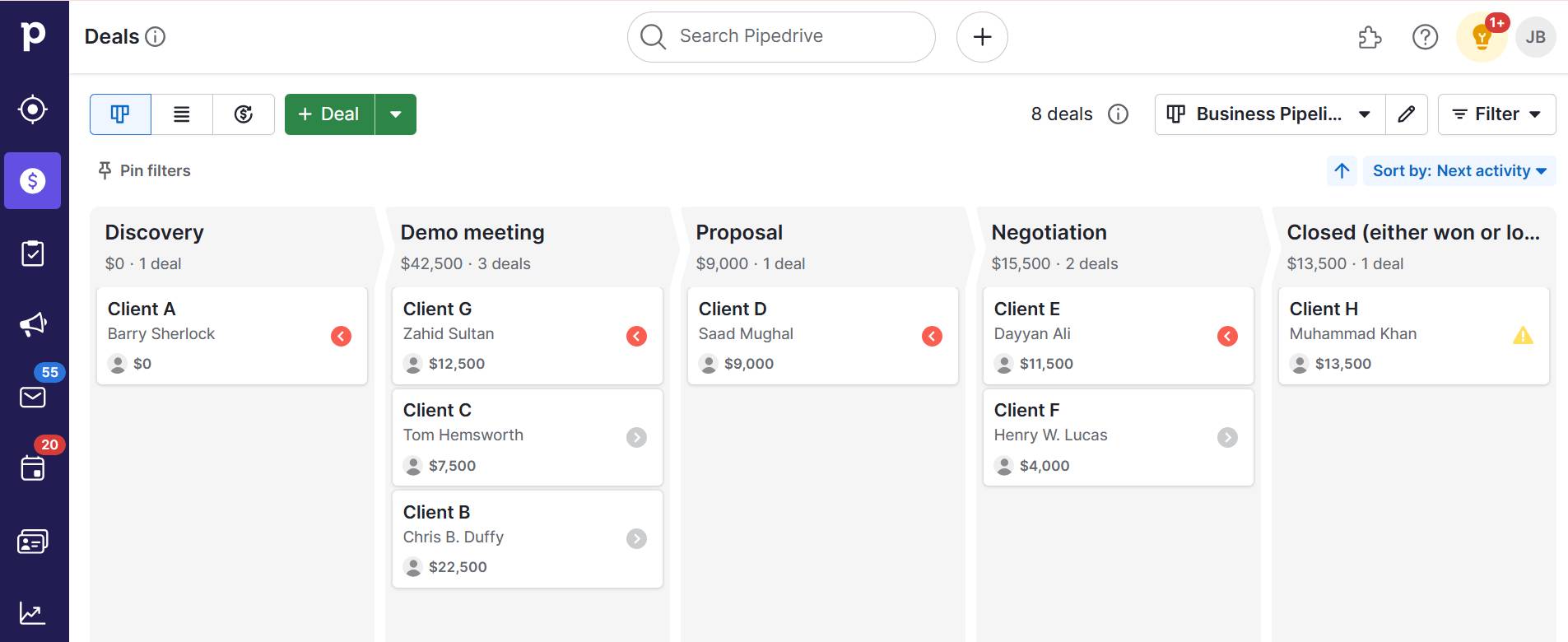
Your standard sales pipeline in Pipedrive might look something like this:

Business lunch Pipedrive pipeline

In most sales processes, business lunches occur during discovery (when building the initial relationship), proposal (when discussing solutions) or negotiation (when working on the final details).

Before the business lunch

In the deal detail view, check guest or customer data you’ve saved from past interactions (e.g., specific challenges, ongoing projects, growth initiatives). Being prepared with this information shows that you understand the customer’s business and helps build trust.

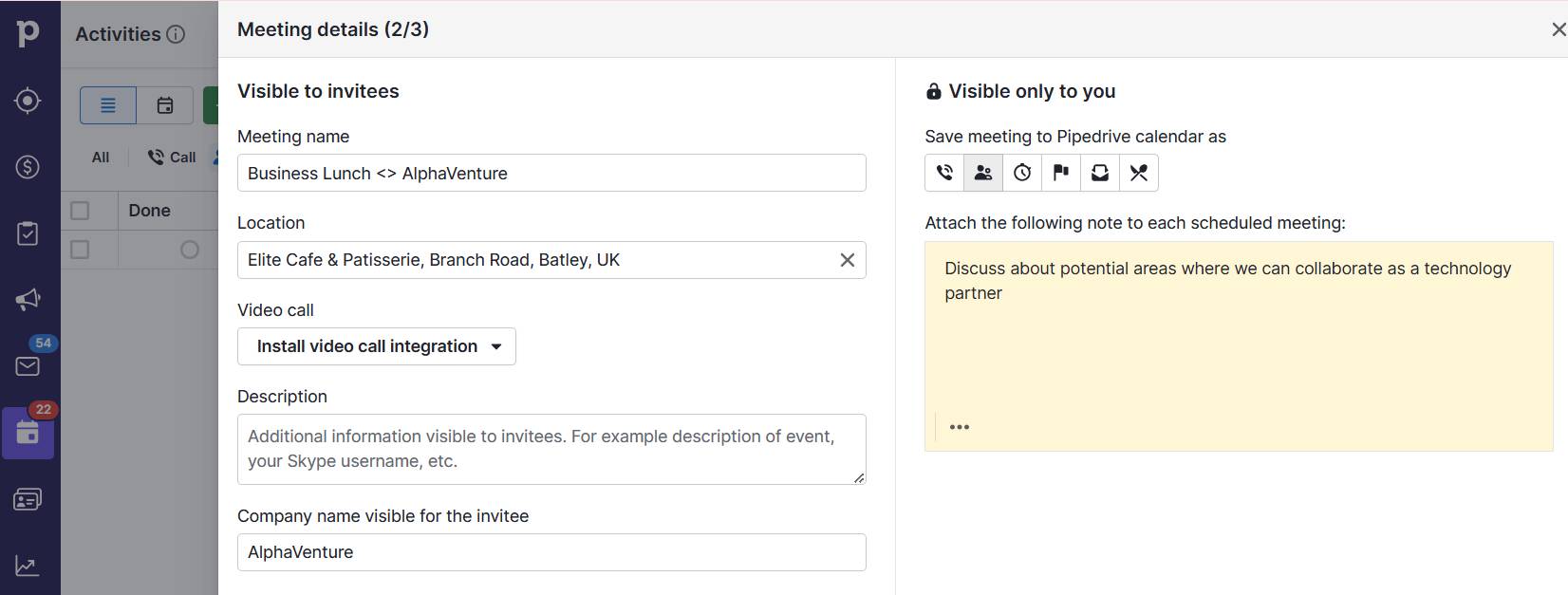
When setting up the lunch, use Pipedrive’s scheduling tool to schedule and send invites.

business lunch pipedrive scheduling tool

The platform automatically syncs with your calendar, preventing double bookings and ensuring everyone has the correct time and date. You can also include meeting details like location, video call links and any additional notes for attendees.

During the business lunch

Immediately after the working lunch (or when your guest steps away), use Pipedrive’s mobile app to record your sales activities and take notes about opportunities, challenges discussed or personal preferences. The notes will automatically sync with your deal in Pipedrive.

After the business lunch

Pipedrive’s task management feature allows you to create follow-up tasks with specific deadlines and reminders. For example, if you promised to send a proposal by Friday, you can create a task to ensure you do so.

The platform’s email integration helps you track when your client opens and responds to follow-up messages. It automatically logs these interactions in the deal’s history, which creates a complete record of your relationship’s progression.

Recommended reading

https://www-cms.pipedriveassets.com/Follow-up-email-automation.png

Tips and advice for successful follow-up email automation (plus free templates)

Business lunch FAQs

  • The person who proposes the business lunch (the host) should handle the bill. If you’re the host, pay discreetly by giving your credit card to the server before your guest arrives or stepping away briefly to avoid awkward situations.

  • A business lunch usually takes 60-90 minutes. However, it can take longer if both parties are engaged and their schedules are flexible. Pay attention to your guests’ scheduling cues.

  • The key to handling unexpected situations is to remain calm and stay focused. For example, guests might run late, restaurants could lose reservations or you might forget important documents. If the unexpected becomes an issue, look for a viable solution and handle it professionally without letting it derail your business meal.

  • Choose from the best restaurants that balance an upscale atmosphere with reasonable pricing. For business lunch midtown locations, select restaurants offering a quiet setting for conversation and convenient accessibility.

    While these venues might also serve as special-occasion restaurants, business casual establishments or fine dining spots with diverse menus are also great options.

  • The best time for a business lunch is between 12:00 PM and 1:30 PM on weekdays. Meeting during standard lunch hours allows you and your guest to attend the business lunch without disrupting the workday. Also, restaurants are fully staffed and ready for business clientele.

Final thoughts

Business lunches are about finding the right balance between building relationships and strategic thinking. Keeping it professional, setting clear goals and knowing when to end a meeting help create opportunities for your business.

With Pipedrive’s CRM, you can track every interaction, manage follow-ups and turn lunch meetings into closed deals. Start maximizing the value of your business lunches today with a free 14-day trial of Pipedrive.

Top Workforce Management Strategies and Resources

Software Stack Editor · January 7, 2025 ·

There are a lot of spinning plates when you’re a small business owner in charge of a growing workforce. It’s a win if you’re keeping on top of recruitment, payroll and compliance, let alone thinking about how to make your team as productive as possible.

Workforce management can help. This set of strategies improves your team’s productivity, streamlines operations and enhances the overall employee experience.

In this article, you’ll learn what workforce management is, how it benefits your business and what to look for when building a workforce management system. You’ll even find reviews of five leading workforce management software providers.

What is workforce management (WFM)?

Workforce management (WFM) is the process of building and maintaining a productive workforce.

It implements a set of processes, strategies and tools that help business owners improve productivity, track attendance, allocate people and resources and follow business laws and regulations.

WFM shares similarities with HR management, encompassing many of the same activities, including:

The difference is that HR management approaches these tasks from an employee perspective. WFM approaches them from a business perspective.

You don’t need hundreds of employees to use workforce management. Many small and medium-sized businesses use WFM to improve their schedules and manage payroll.

Recommended reading

https://www-cms.pipedriveassets.com/4_Sales-Motivation.png

Sales Motivation: 18 Tips to Keep Your Salespeople Happy

What does workforce management look like in a small business?

Workforce management isn’t a new concept. Businesses have long used timesheets and rosters to improve productivity. You may already be implementing aspects of a workforce management practice yourself.

Here are some common examples of what workforce management looks like:

  • Setting rosters and managing vacation time. Most businesses have a system for requesting, approving and tracking vacations, ensuring that the company always has enough staff.

  • Recruiting new staff. Employing the right talent is key to maximizing workforce productivity. Workforce management often involves thinking proactively and solving future bottlenecks.

  • Measuring employee performance. Setting goals, tracking performance and conducting regular performance reviews are all part of a workforce management practice. They keep employees engaged and help them reach their full potential.

Many of the tools you use have WFM features baked in. Pipedrive, for example, tracks individual sales performance through customizable dashboards.

workforce management Pipedrive sales performance dashboard

The dashboard makes it easy to see employee activity data at a glance, streamlining performance review preparation.

Recommended reading

https://www-cms.pipedriveassets.com/Personnel-management.jpg

Personnel management: definition, importance and emerging trends

What are the benefits of workforce management?

Workforce management encourages owners and HR managers to consider how to get the most out of their employees. The changes they implement lead to significant increases in performance, lower costs and a better working environment.

Here’s a closer look at the benefits of adopting workforce management.

Boosted productivity and performance

Workforce management encourages teams to take a strategic approach to resource allocation. Creating schedules and rosters maximizes employees’ time and helps them meet goals.

For example, managers can use employee performance and call center data in a contact center to ensure enough staff are on call to manage customer service requests.

WFM’s focus on activity monitoring also makes spotting performance issues and development opportunities easier. Say you notice a salesperson who struggles to turn cold calls into meetings. You might implement a sales training program that makes them more confident on the phone.

Labor laws and regulations compliance

Workforce management isn’t just about getting more from your team; it also helps you comply with local, state and national labor laws. Non-compliance can result in fines and reputational damage that cost far more than a drop in productivity.

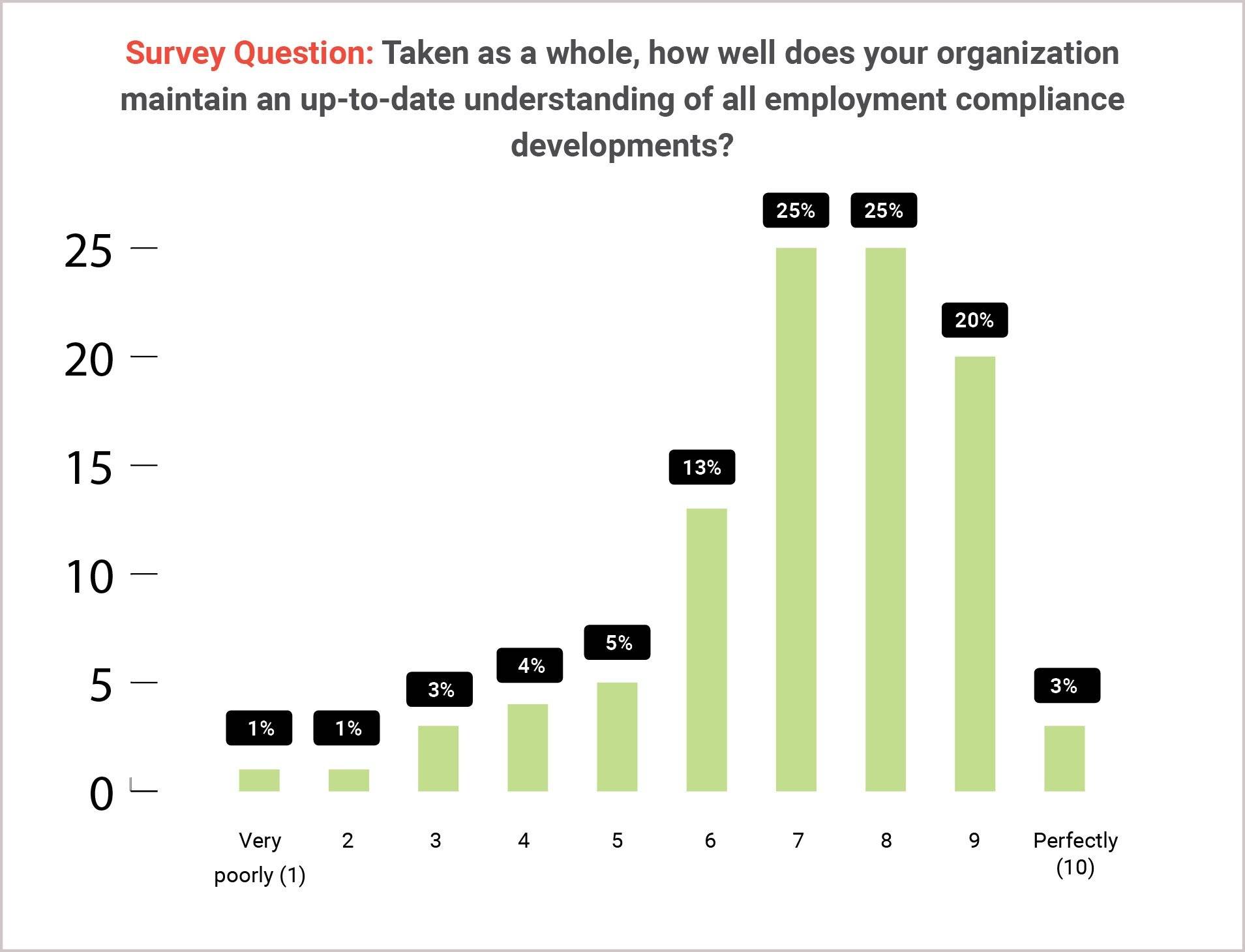
According to HR.com’s State of Legal, Compliance and Employment Law 2023-24 report, only 48% of respondents say their organization is good at keeping up with employment compliance changes. More than a quarter rated their company as a 6 out of 10 or lower.

Workforce Management  HR.com data

Accurate record-keeping and compliant schedules make it easier to navigate laws. Workforce management solutions automate compliance tracking and generate violation alerts.

Improved employee engagement

WFM increases employee engagement through training and engagement strategies. Tracking productivity and performance ensures employees have what they need to do their jobs and progress in their roles.

WFM systems also help employees build a healthier work-life balance and contribute to a positive organizational culture. For example, a staff scheduling solution that optimizes employee resources will prevent you from overworking your team.

Combating burnout is increasingly essential. According to Future Forum Pulse, there was a 2% rise in the number of Americans suffering from burnout between 2021 and 2022, alongside a global increase of 4%.

Workforce Management burnout data

Happier, less stressed employees will provide better customer service, improving the customer experience.

Strategic hiring

WFM helps small business owners stop fighting fires and start thinking strategically about their long-term needs.

You’ll forecast future staffing needs based on your growth and identify potential recruitment bottlenecks that may prevent you from meeting goals. Additionally, a strategic approach to recruitment ensures you hire staff with skills that align with your ambitions.

Workforce management also encourages business owners to invest in training staff. Prospective candidates consider employee development a key benefit. Offering it will make you more attractive as an employer.

Remote working facilitation

Remote workforce management helps employers facilitate flexible working schedules and manage remote and hybrid working.

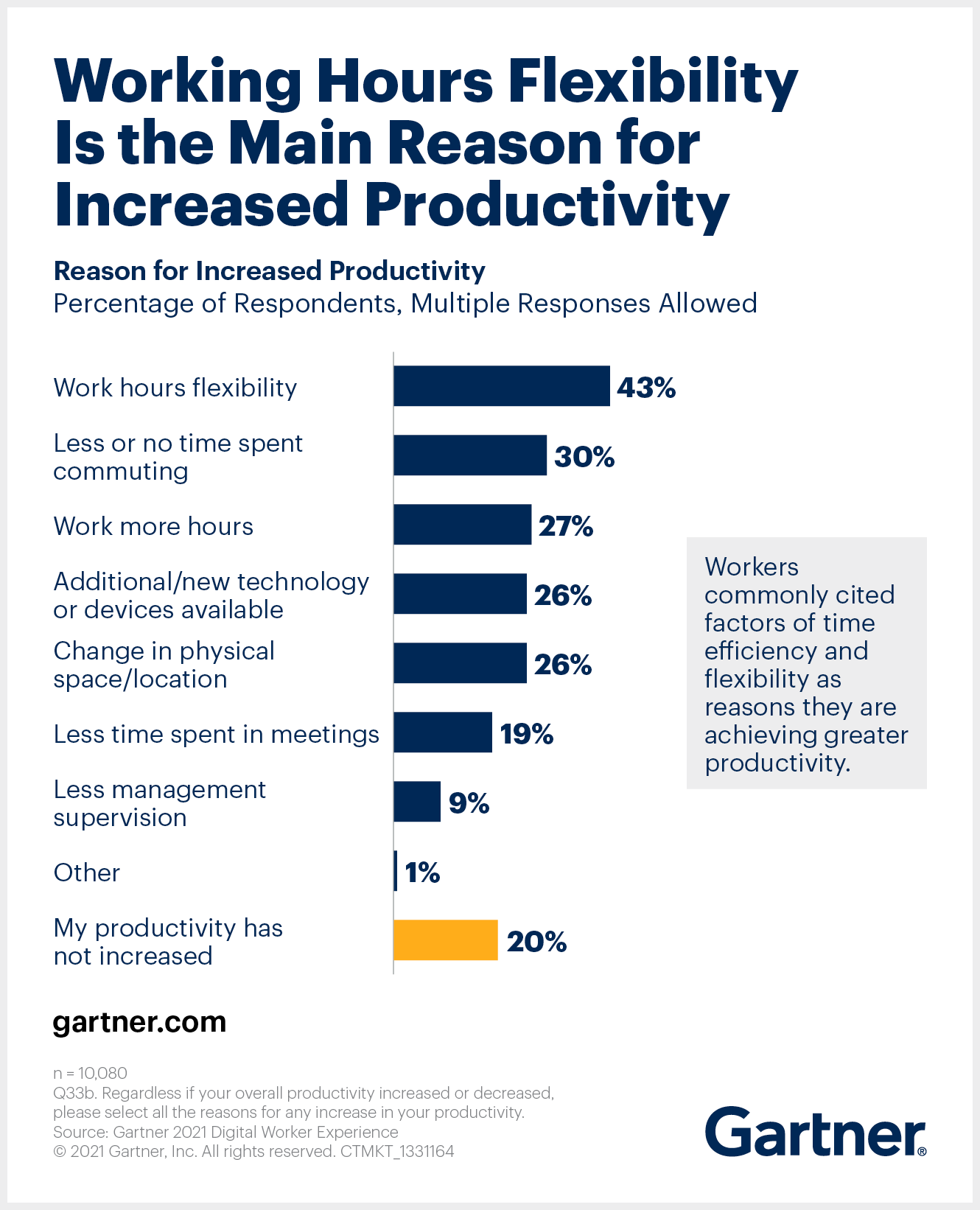
According to a Gartner survey, flexible working schedules are directly responsible for increased productivity.

Workforce Management Gartner flexible work data

Good WFM helps companies support flexible work models by providing centralized communication resources and tools that promote productivity and work-life balance.

For instance, cloud-based productivity or project management tools give employees access to company documents and let managers schedule work remotely. Some software solutions have self-service portals that provide employees access to payslips, contracts and tax documents.

Download your guide to managing teams and scaling sales

The blueprint you need to find a team of superstars and build a strong foundation for lasting sales success

Why you should use software to implement a workforce management solution

It’s much easier to implement a WFM strategy using software. It can automate tasks, forecast your HR needs and centralize data. It also makes tracking your efforts and sharing initiatives with colleagues easier.

Here are the benefits of workforce management software in more detail:

  • Workflow automation. Workforce management software can automate attendance tracking and eliminate the need for timesheets, reducing your administrative workload and the risk of errors.

  • Lower costs. A workforce management solution reduces costs by cutting down your HR team’s administrative load, freeing them up to focus on high-value activities. Some software also optimizes work schedules to limit overstaffing and overtime.

  • Improve regulatory compliance. Some WFM solutions stay up-to-date with the latest labor laws and automatically track your compliance. Scheduling features make it easy to comply with legislation and ensure your rosters don’t breach employment contracts.

  • Boost collaboration. WFM software provides a cloud-based platform to share workplace initiatives. If the software has self-service portals, remote employees will have increased access to important documents like payslips.

  • Increase employee satisfaction. WFM software digitizes the employee experience and makes it easier for people to access their schedules, request shift changes, book time off and access their documents.

Note: If you’re uncertain about the benefits of WFM for your business, manually implement one or two workforce management strategies. Doing so will let you understand if you want to continue the initiatives before you commit to a monthly software subscription.

Key features of a workforce management system

WFM systems come in many different shapes and sizes. However, many top platforms have the following core features:

Feature

Description

Real-time analysis

Workforce management software can give business owners real-time updates on task and activity progress, helping them analyze employee productivity.

Performance management

WFM software centralizes performance management processes, putting goal setting, performance monitoring and reviews in one place.

Automated scheduling

Scheduling features can automatically create optimal weekly rosters, taking into account shift schedules, vacation days and other absences.

Forecasts and predictive modeling

AI algorithms can analyze employee activity, schedules and other data to predict your future employment needs. For example, they can predict how many store assistants a retailer will need for the holiday rush.

Payroll management

Some software can use time-tracking tools to calculate employee pay and deductions automatically. Analytics features analyze labor costs for future hiring decision-making.

Compliance management

Dashboards and alerts can help you track compliance with labor regulations, stay on top of ever-evolving laws and flag compliance risks.

Recruitment and onboarding

Many tools let you manage the recruitment process from a single dashboard. Software may also integrate with dedicated recruitment solutions, schedule interviews and facilitate employee onboarding.

Reporting and analytics

Customizable dashboards consolidate KPIs and other employee metrics. Managers gain insights into workforce trends, enabling them to spot performance or resourcing issues faster.

Finding the best workforce management software

Use the following criteria to discover the right workforce management software for your business :

  • Relevant features. Workforce management software often focuses on a specific solution (like payroll), but many tools have features that solve multiple workforce management needs.

  • Ease of use. Your HR team will use the software daily, so choose an intuitive platform.

  • Scalability. The software should scale with your needs, letting you add additional features when your company is ready.

  • Integrations. Look for WFM solutions that integrate with your existing tech stack.

  • Price. Look for software with a range of pricing tiers so you don’t pay for unwanted features.

We’ve used the above factors to shortlist the following five options.

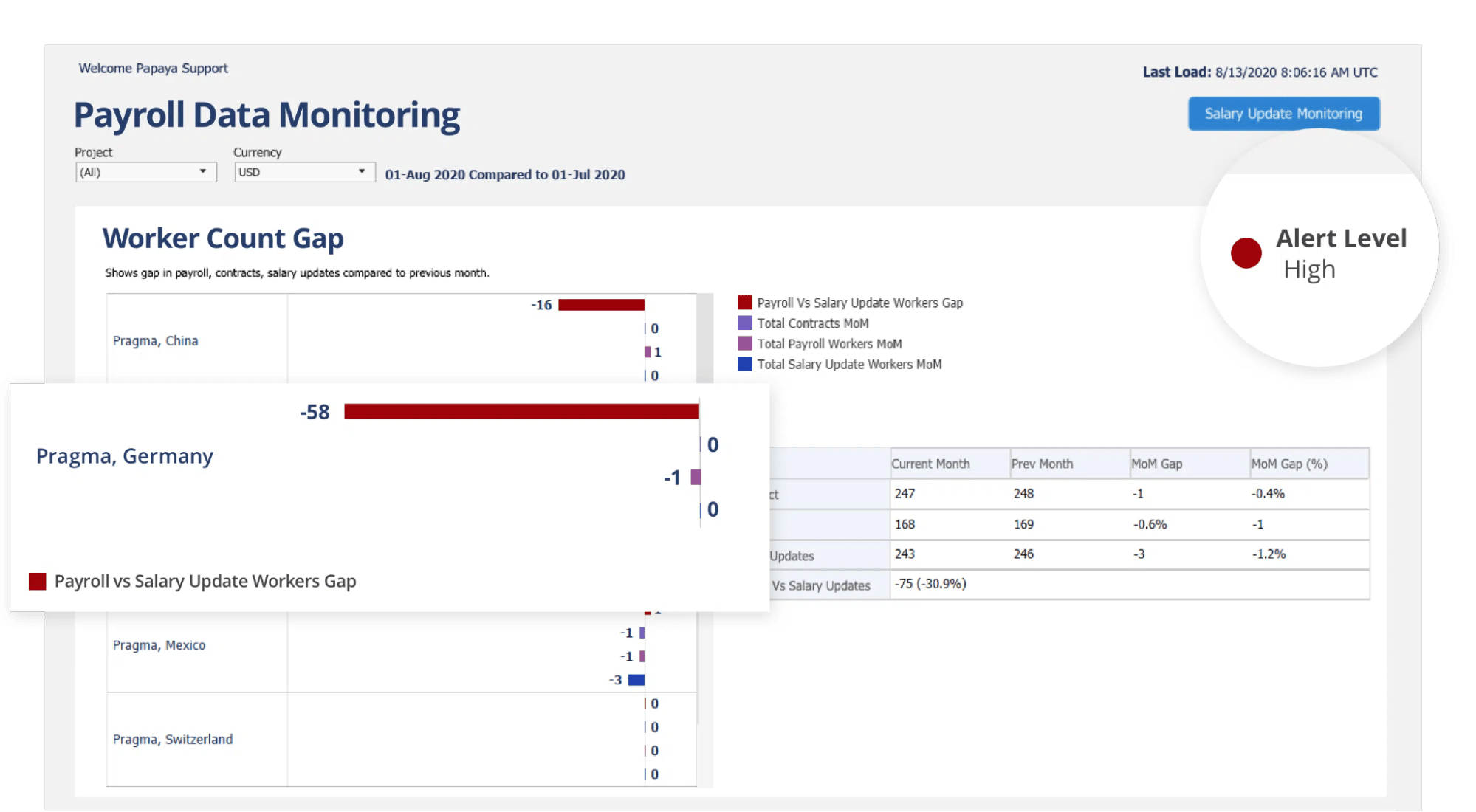
1. Papaya Global: best for global teams

Papaya Global is a payroll-focused workforce management solution. It helps international companies manage cross-border workforces, meet local employment laws and manage and monitor payroll. It also acts as an employer of record (EOR), employing foreign workers on behalf of companies.

Workforce management Pipedrive Papaya Global

Other features include:

  • Global payroll management and payment

  • Self-service employee portal

  • Time and attendance tracking

  • Localized employee benefits management

Pricing: Starts from $5 per employee per month.

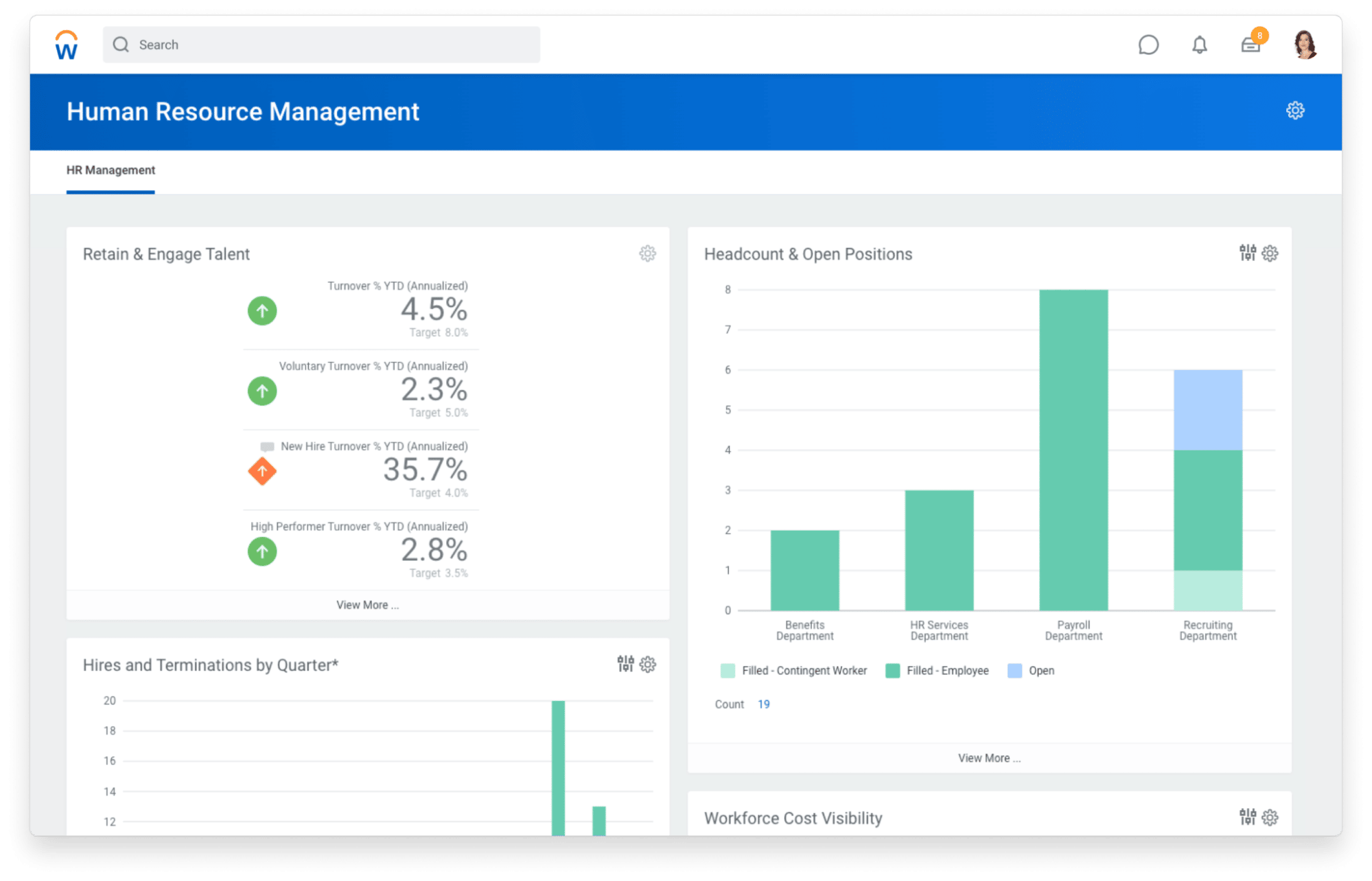
2. Workday: best for enterprises

Workday is a financial and human capital management platform. It provides medium to large companies with an all-in-one platform to manage their workforce needs. It centralizes all human resource data, making it easier for HR to manage global teams.

Workforce management Pipedrive Workday

AI analysis enables forecast and prediction modeling, too, so you can anticipate the impact of hiring decisions.

Other features include:

Pricing: A quote is available on request, but there is a 30-day free trial.

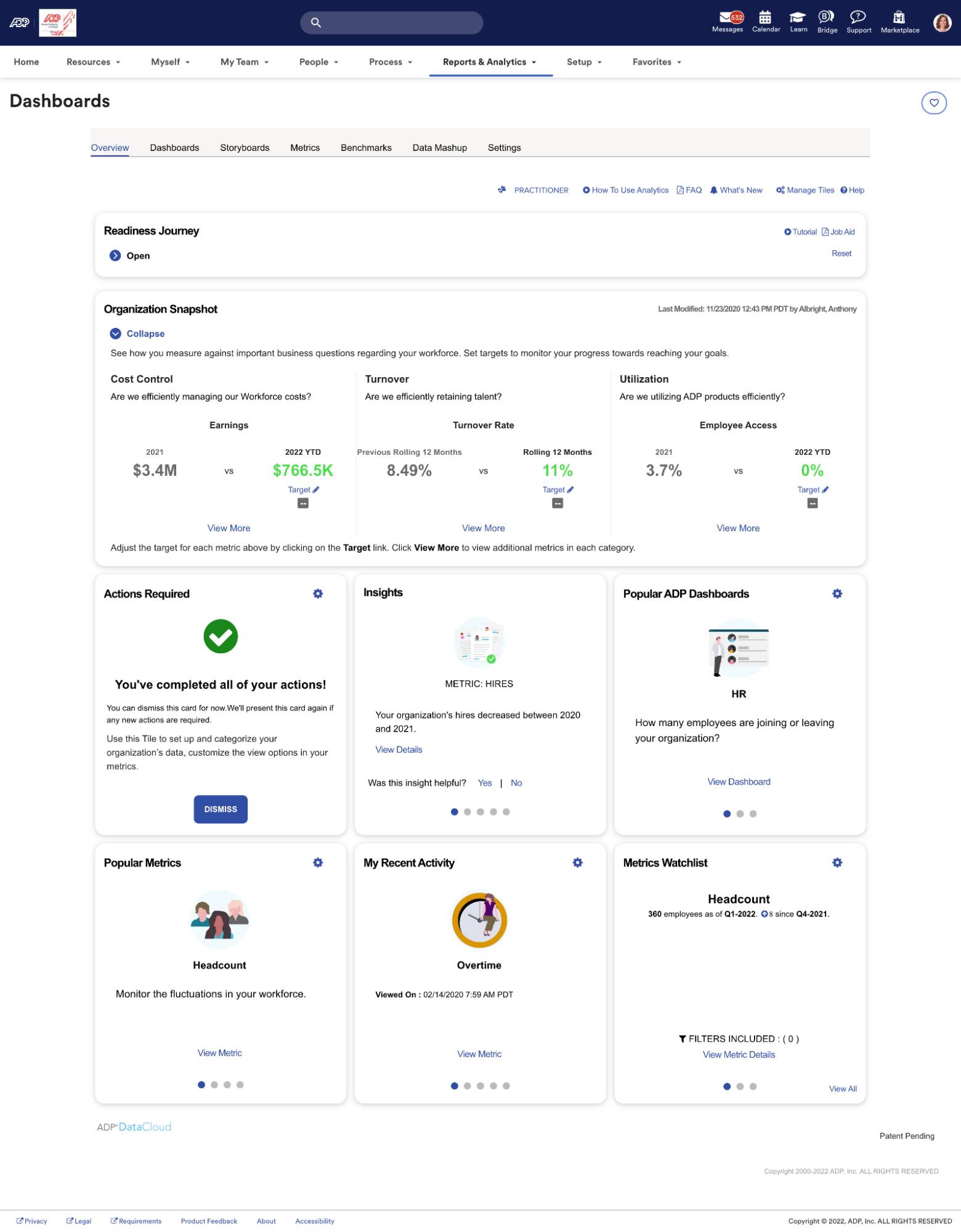
3. ADP Workforce Now: best all-in-one HR tool

ADP Workforce Now is a cloud-based HCM platform. It offers HR tools for every workforce management activity, including time management, payroll, talent acquisition and employee performance monitoring.

Workforce management Pipedrive ADP

Choose from almost 200 reports or create your own customizable dashboard to track key HR metrics at a glance. Draw in data from your other platforms using hundreds of custom integrations.

Other features include:

Pricing: A quote is available on request. A self-guided demo is available on the platform’s website.

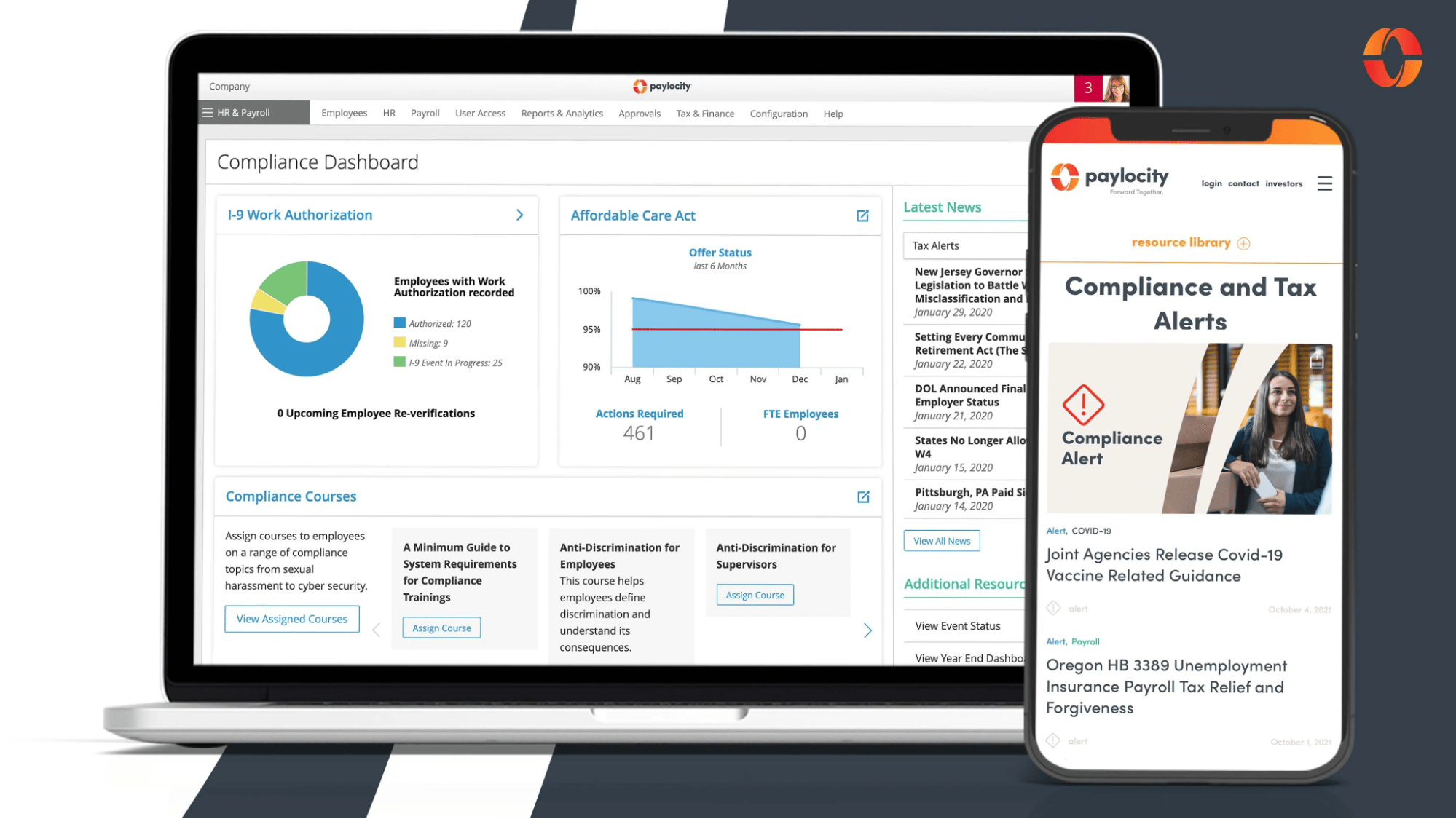
4. Paylocity: best for staying compliant

Paylocity is a cloud-based HR and payroll solution that simplifies payroll for small businesses. It helps companies of any size manage their workforce. For example, compliance features ensure you meet state and national laws, and self-service portals empower employees to manage their data and file taxes.

Workforce management Pipedrive Paylocity

Other features include:

Pricing: Quotes and demos are available on request.

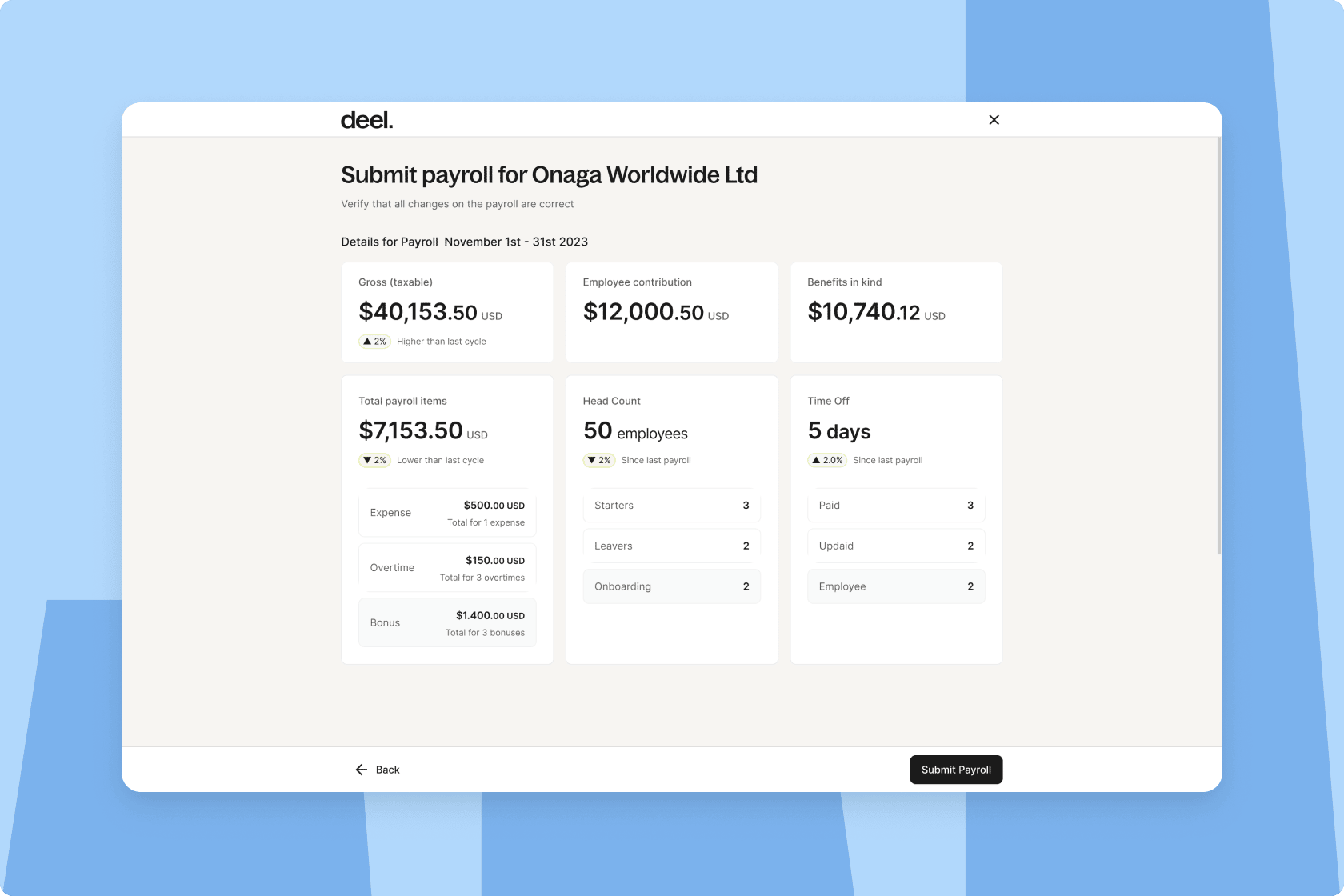
5. Deel: best for managing cross-border payroll

Deel is a payroll platform built for global teams. It simplifies payroll administration in hundreds of countries by handling compliance, tax deductions and filings. Analytics help you understand your spending at a glance, compare employer costs across offices and manage everything in one currency.

Workforce management Pipedrive Deel

Deel also integrates with major accounting, bookkeeping and HR platforms to consolidate data and streamline workflows.

Other features include:

  • Talent acquisition and retention

  • Employment law compliance management

  • AI-powered automation and insights

Pricing: Deel’s US payroll service starts at $19 per employee per month.

Note: Use demos and free trials to test potential workforce management software. Demos tend to be more focused and led by sales professionals. They’re a solid entry point and will teach you how the platform can solve your problems. Free trials let you try out all of the features for a week or more.

How to use Pipedrive to manage your workforce

You don’t need a new software subscription to implement WFM practices in your small business. Pipedrive is a customer relationship management (CRM) solution with workforce management functionality.

Here’s how you can extend Pipedrive’s use case beyond sales management.

Create a recruitment pipeline

Use Pipedrive’s recruitment CRM features to improve your hiring process and increase recruiter productivity.

Build a custom hiring pipeline in Pipedrive to track applicants as they move through each stage of the process.

For example, assign process stages (e.g., applied, interviewed, offered, accepted, etc.) to different pipeline stages and create a new deal for each applicant.

workforce management pipedrive recruitment

Then, use Pipedrive’s automation features to create follow-up reminders. Integrate online meeting tools like Zoom and Teams so staff can schedule interviews without leaving the platform.

Track performance and run reviews

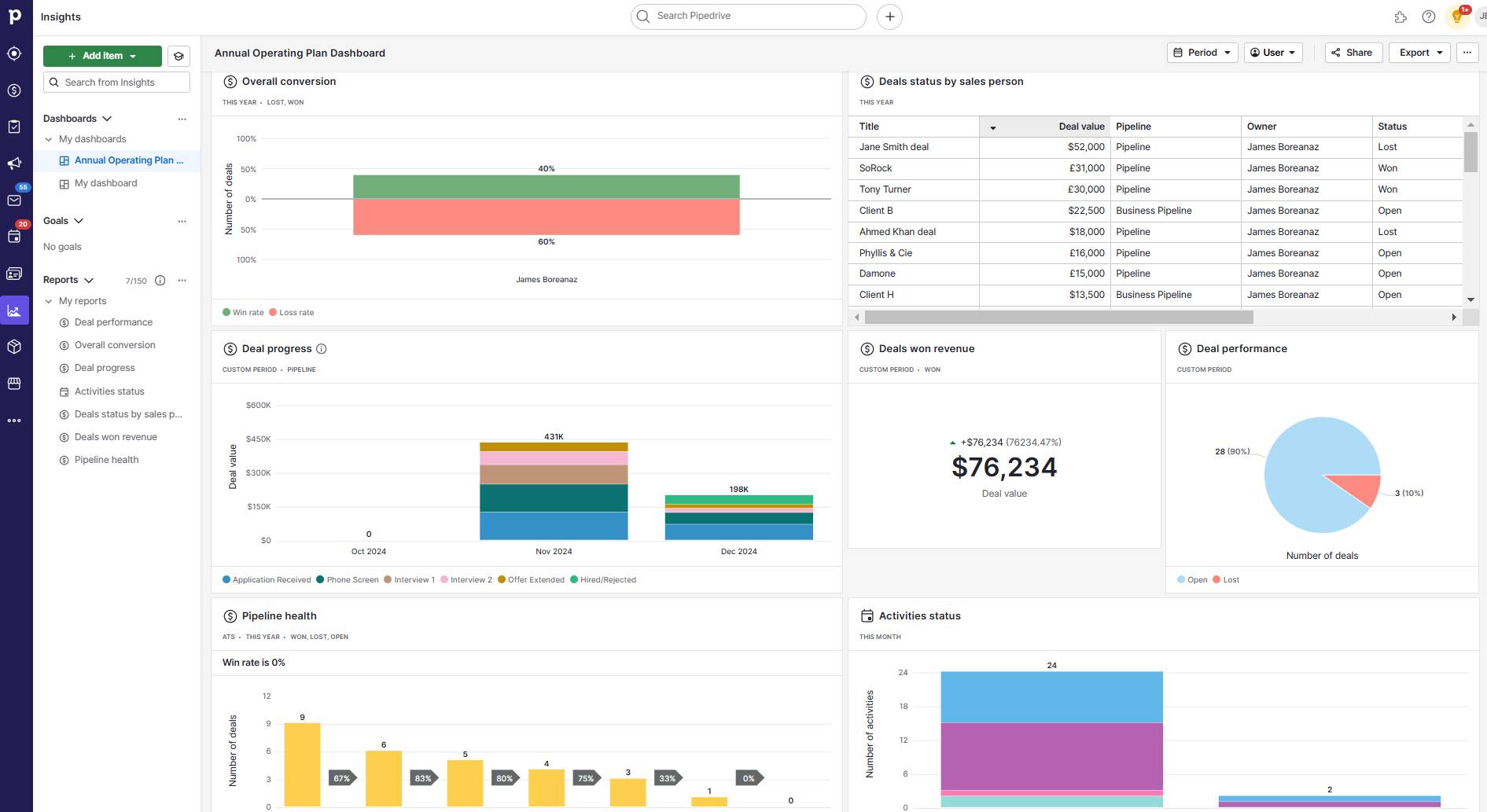
Use Pipedrive’s customizable dashboards to track individual and team performance. For example, here’s what managers might see when monitoring a sales team:

Workforce management Pipedrive dashboard

Use the dashboard’s data to fuel performance reviews and ongoing coaching opportunities. For example, you can identify team bottlenecks and find employees who need coaching.

Note: Create a performance review pipeline like the recruitment CRM example above for one-on-one reviews. Use Pipedrive to schedule meetings – and collect feedback through Pipedrive’s Web Forms.

Schedule work and track productivity

Use Pipedrive to schedule work, assign tasks and track productivity. It acts as a remote workforce management tool that keeps distributed and in-house teams aligned across many projects without face-to-face meetings.

Tasks appear in a Kanban-style pipeline your team will be familiar with. Drag-and-drop functionality lets you change their status.

Companies with advanced project management needs – like overseeing multiple projects or clients – can use Projects, Pipedrive’s all-in-one project management tool. It offers advanced features like custom fields, cross-team collaboration and customizable dashboards.

Workforce management Pipedrive Projects

To keep everything on schedule, assign tasks and subtasks to individual employees and set due dates. Integrate a real-time tracking tool like Timely to automatically track time spent on a given project.

Store employee information with Smart Docs

Use Pipedrive’s Smart Docs to create and manage employee contracts and other data. Similar to the self-service employment portals of dedicated WFM software, Smart Docs integrates with Google Drive to let you seamlessly access and edit files.

Workforce management Pipedrive Smart Docs

Smart Docs is useful the moment a prospective employee accepts your offer. The software’s eSignature functionality lets them sign contracts remotely.

You can also use advanced sharing permissions to give new hires access to your knowledge base and training information.

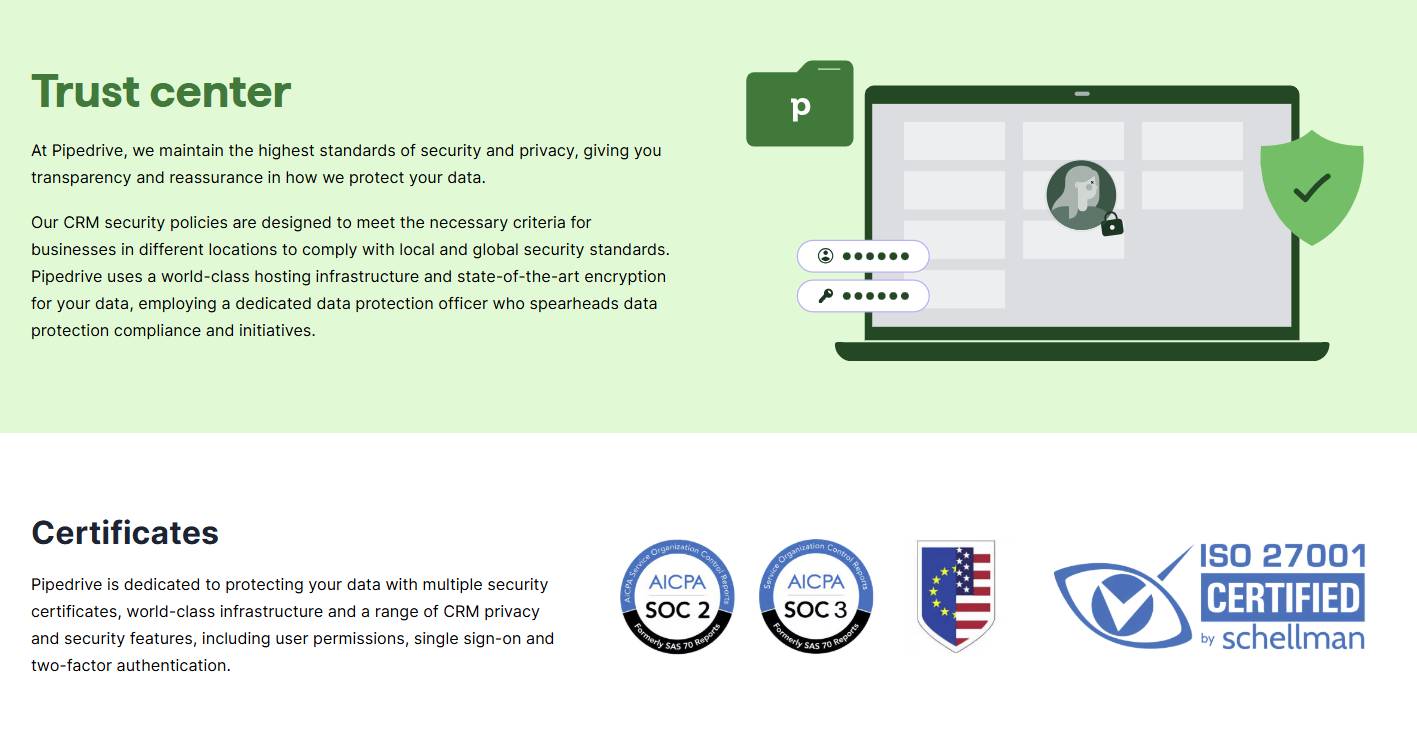
Note: Security is paramount when it comes to sensitive employee information. Pipedrive complies with GDPR and adheres to SOC 2, SOC 3 and the EU-US Data Privacy Framework.

Final thoughts

Workforce management helps you get the most out of your existing team and think strategically about your future HR needs. Software reduces the administrative burden these strategies place on your team.

Rather than add a new tool to your tech stack, use Pipedrive’s workforce management capabilities to track performance, schedule work and manage employee documentation. Sign up for Pipedrive’s 14-day free trial to test the platform’s features today.

What is MRR? | How to Calculate MRR

Software Stack Editor · January 6, 2025 ·

For SaaS and subscription-based businesses, MRR is one of the most important financial metrics for understanding your income’s stability and growth.

Whether you’re a business owner, manager or investor, knowing how to calculate and analyze MRR is essential for tracking performance, forecasting revenue and making data-driven decisions.

In this article, you’ll discover what MRR is, why it’s crucial for your business and how to calculate it. You’ll also learn actionable strategies to boost your MRR and unlock sustainable business growth.

What is MRR in sales?

What does MRR stand for? MRR is monthly recurring revenue, a key sales metric for subscription-based businesses looking to track income regularly.

What does MRR mean? MRR measures the consistent, predictable income a business earns per month. The meaning of MRR focuses solely on recurring revenue streams and excludes one-time payments like setup fees, onboarding costs or custom projects.

MRR is the backbone of any SaaS or subscription-based business model, giving you a clear snapshot of your business’s financial health. You can use MRR to analyze past performance, forecast future revenue and identify areas for improvement.

MRR differs from annual recurring revenue (ARR), a closely related SaaS metric showing revenue across the year suitable for yearly subscriptions. MRR is more granular and provides insights into how growth rate, churn rate and financial performance change over a shorter period.

Here’s how MRR, ARR and other similar key metrics compare:

Metric

Definition

Monthly recurring revenue (MRR)

Monthly income from recurring revenue, ideal for short-term insights and trend analysis

Annual recurring revenue (ARR)

Annualized value of recurring revenue, ideal long-term contracts and forecasting

Average revenue per user (ARPU)

Tracks average revenue from customers over a given period of time (e.g., week, month, year, etc.)

Annual contract value (ACV)

The average annual value of a customer’s contract

Customer lifetime value (CLV)

Total revenue expected from a customer over their lifetime

Customer acquisition cost (CAC)

The average cost incurred to acquire a new customer, including marketing and sales expenses

While the MRR meaning in business aligns closely with subscription models, its principles can apply to any activity with recurring income.

For example, professional services like consulting, marketing agencies and law firms often work on monthly retainers they can track as MRR.

Similarly, businesses like gyms, coworking spaces and real estate firms rely on monthly payments that mimic subscription revenue, making MRR tracking relevant.

Recommended reading

https://www-cms.pipedriveassets.com/blog-assets/arr-vs-acv-sales-meaning.png

ACV (annual contract value) vs. ARR (annual recurring revenue): A guide for SaaS companies

How to calculate MRR

While calculating MRR is straightforward, you need accuracy to ensure the metric reflects your business’s actual performance. The following formula will enable you to calculate your MRR precisely.

MRR formula: MRR = total number of customers x average revenue per user (ARPU)

For example, if your business has 200 subscribers paying an average of $50 per month, your MRR is $10,000 (200 x 50).

If you have customers on annual plans, break down their payments into monthly equivalents (excluding any one-off charges) to include them in your MRR calculation.

Let’s say you bill a customer $1,200 annually. Divide this by 12 to get the monthly equivalent of $100, which you can add to your MRR. By including annual plans, your MRR reflects the true recurring income generated monthly.

How to calculate MRR using Pipedrive

Using the right software, such as Pipedrive, simplifies calculating your MRR.

Pipedrive’s customer relationship management (CRM) solution helps customer-facing teams manage leads, track sales activities and streamline the sales process. Among its many features, Pipedrive enables you to manage all your sales revenue (whether it’s one-off deals or ongoing monthly subscriptions) along with customizable sales dashboards and advanced reports to track your total MRR.

Here are three easy steps for monitoring MRR with Pipedrive’s functionality.

1. Set up your revenue tracking

The first step is to track every deal that goes through your sales pipeline accurately. Set up the recurring products feature (available on Advanced plans and higher) in your Pipedrive account to record how often you bill a particular product or service.

MRR Pipedrive recurring products

Users on all plans can create custom fields to track revenue associated with each deal. Simply set up a custom field labeled “monthly revenue” to capture recurring income for each deal. For better reporting, you can also use additional custom fields to categorize deals as new customers, expansion deals or reactivations.

MRR Pipedrive custom fields

Remember to calculate the monthly equivalent for customers on annual plans and record this value in the field.

Note: You can create proposals and quotes with recurring products with the Smart Docs add-on. Include the recurring product fields in your template, and the finished document will automatically add the relevant information to each deal.

2. Generate revenue reports

After recording all the deal information, you need to set up reports to track the MRR. If you used the recurring products feature, you can now see the MRR (along with other important metrics) per deal.

MRR Pipedrive recurring revenue

To get an overview of your MRR and other metrics, set up a product report using Pipedrive’s Insights feature. The different filters let you segment data to show all your product fields.

MRR Pipedrive product insights

3. Monitor how MRR changes over time

Once you’ve created the report, add it to your sales dashboard and share it with your team.

MRR Pipedrive dashboards

Visualizing your MRR and seeing how it relates to your other sales KPIs makes it easier to spot trends and take appropriate action.

For example, you can track MRR changes depending on your sales activities by individual salespeople and overall team performance. You can also see whether your MRR matches your previously forecast revenue, so you can double down on your current strategy or pivot to a different approach.

By using Pipedrive to calculate and track MRR accurately, you gain greater insight into your business’s revenue streams and can make smarter decisions to drive profitability.

Recommended reading

https://www-cms.pipedriveassets.com/Revenue-Report.png

The best tips and techniques for building an effective revenue report

Why is MRR important?

Whether you’re a manager trying to measure sales performance or an investor evaluating potential acquisitions, MRR plays a vital role in understanding company growth. Here are four main reasons to keep monitoring MRR.

1. Tracks financial performance for data-driven decision-making

MRR gives you a clear view of how much predictable revenue your business generates in a given month. A consistent MRR is an excellent indicator of your company’s overall financial health.

By breaking MRR into its different types (which we’ll look at in the next section), you can track exactly what’s driving your revenue growth or holding it back.

For example, a sudden spike in churn MRR might point to customer dissatisfaction, while a strong expansion MRR suggests your upselling strategies are working.

Without a reliable way to track monthly revenue, it’s harder to identify trends or measure progress. MRR simplifies the process, offering clarity and actionable insights.

2. Simplifies forecasting for improved planning

Because it focuses on recurring revenue, MRR makes it easier to estimate cash flow and plan for business growth.

Imagine your MRR has grown steadily by 10% each month. You can project how much revenue you’ll have in six months so you can make decisions like hiring new team members or launching a major marketing campaign with confidence.

MRR also smooths out the unpredictability of one-time payments, giving you a more accurate foundation for planning. Whether you’re scaling your business globally or navigating leaner times, MRR keeps you focused on what’s coming next.

3. Attracts investors by demonstrating predictable growth

For investors, MRR is a sign of stability and growth. A healthy MRR growth rate shows your business is generating consistent, predictable income, which is what investors look for when evaluating potential acquisitions.

Strong MRR also indicates a scalable business model. Investors want to see that your revenue isn’t reliant on one-time deals but instead comes from customers who will stick around month after month. Highlighting your MRR (especially components like expansion MRR) can make your business a much more attractive investment.

If you’re planning to raise funds or sell your business, tracking and improving MRR is one of the best ways to impress potential backers.

4. Aligns teams around key goals for improved collaboration

MRR serves as a unifying metric for SaaS companies that connects your teams.

For example:

  • Marketing teams can drive campaigns to boost reactivation MRR or promote add-ons

  • Sales teams can focus on acquiring new customers and increasing new MRR

  • Customer success teams can work to reduce churn MRR and improve customer retention

When everyone understands how their efforts contribute to MRR growth, it fosters collaboration and keeps your team motivated.

Download Your Sales and Marketing Strategy Guide

Grow your business with our step-by-step guide (and template) for a combined sales and marketing strategy.

The 5 different types of MRR

Understanding the different types of MRR is essential for accurately tracking your business’s recurring revenue. Each MRR type provides unique insights into the performance of your revenue streams and helps identify areas for improvement.

Type of MRR

Description

1. New MRR

  • The additional MRR gained from new customers who subscribed in the previous month

  • A direct indicator of your business’s ability to attract and convert new sales prospects

Example: using the MRR formula, if 20 new customers sign up for your $30/month plan, your new MRR is $600.

2. Expansion MRR

  • The additional revenue earned from cross-selling or upselling to existing customers

  • Shows how effectively you’re increasing the value of your customer base

Example: if 10 current customers upgrade to a higher-priced plan, adding $20 each to their subscription, your expansion MRR is $200.

3. Contraction MRR

Example: if five customers downgrade their plans by $15 each, your contraction MRR is $75.

4. Churn MRR

  • The revenue lost when customers cancel their subscriptions

  • Specifically shows the impact on your revenue and highlights any customer retention challenges

Example: if three customers who were paying $50/month cancel their subscriptions, your churn MRR is $150.

5. Reactivation MRR

  • The additional revenue from customers who previously canceled their subscriptions but decided to return

  • Measures your re-engagement strategies’ effectiveness and impact on your bottom line

Example: if four returning customers subscribe to a $40/month plan, your reactivation MRR is $160.

Net new MRR

You can combine all the above types of MRR into a single measurement to track how your MRR changes each month. Use the formula below to calculate it.

Net new MRR = New, expansion and reactivation MRR (revenue from new, upgraded and returning customers) − churn and contraction MRR (lost revenue due to subscription cancellations or downgraded plans)

For example, say you have:

  • New MRR from 10 new customers at $50/month at $500

  • Expansion MRR from upselling existing customers at $300

  • Reactivation MRR from returning customers at $150

  • Churn MRR from canceled subscriptions at $200

  • Contraction MRR from downgraded plans at $100

Your net new MRR is (500+300+150) − (200+100) = $650, meaning your total MRR has grown by $650 that month.

Tracking these types of MRR individually helps you make more informed decisions about specific areas needing attention. Net new MRR gives you an overall picture of your revenue health.

What is a good MRR rate?

MRR rates can vary significantly depending on your company’s size and the market. A brand-new SaaS platform in a niche industry will have a lower MRR than an established company serving a wider range of customers.

Still, specific benchmarks can help you assess your business’s performance. In particular, pay attention to how your MRR changes over time (i.e., the net new MRR) rather than the MRR itself.

In its 2023 SaaS Benchmarks report, OpenView shared benchmarks for how ARR growth (and therefore MRR growth) varies depending on a business’s annual recurring revenue:

Annual recurring revenue

Median year-on-year growth rate

<$1m

90%

$1-5m

58%

$5-20m

35%

$20-50m

24%

>$50m

25%

The data shows that MRR growth rates vary by company size, with smaller companies enjoying a much higher growth rate.

However, these figures can fluctuate from year to year. The same report shows that the 2023 median growth rates for all companies of all sizes were lower than the 2022 figures.

For example, while companies with $5–20m ARR grew revenue by a median of 61% in 2022, this dropped to 35% in 2023.

5 strategies to boost MRR

We’ve looked at what MRR is and how to calculate it, but what if your MRR isn’t as high as you’d like it to be? Growing your MRR is a top priority for any SaaS business, and these actionable strategies will help you do just that.

1. Increase revenue streams

If you’re looking to grow MRR, one of the first places to start is by looking at your existing revenue streams. Think about how you can generate more income from your current customers.

Are you able to upsell customers to your next product or service tier? If you have a basic plan, you could create an advanced tier with sought-after premium features. Customers who see the additional value are more likely to pay more willingly.

For example, when Google users get close to using up their free 15GB storage for Drive and Gmail, they get a prompt to sign up for a Google One plan. The prompt explains why additional storage is essential and offers a discount as an incentive.

MRR Pipedrive Google One upsell

Google One now has over 100 million subscribers. The company’s whole subscription business generates $5 billion in annual revenue – up fivefold from its 2019 revenue.

Another option is cross-selling. Add-ons are a great way to offer related products or services that complement what the customer already uses. For instance, if you run a project management tool, you might offer an advanced time-tracking feature as a paid add-on.

Bundling products can also work. Packaging multiple features or services at a discounted rate encourages your customers to increase their monthly spending.

2. Optimize your pricing plans

Pricing significantly impacts MRR, so it’s worth reviewing your pricing strategy regularly. Have you aligned your current plans with the value your product provides? If not, it might be time to make some adjustments.

Look at how you structure your pricing tiers. Clear distinctions between plans help customers see the value of upgrading.

You could also experiment with value-based selling, which ties the cost of your product to the value it delivers. Customers are more likely to pay a higher price if a feature promises exceptional results.

If you run a freemium model, focus on converting free users into paying customers. Limited-time discounts and exclusive features for paid tiers effectively encourage upgrades.

Alternatively, consider removing your free plan. Free tiers can help attract new users, but the resources required to support them might outweigh the benefits.

For example, when Snooz.io removed its free plan, its revenue growth rate doubled and the amount of work required to maintain the app fell.

Evaluate your specific audience and goals and ensure your pricing model reflects them effectively.

3. Improve customer retention

While acquiring new customers is fundamental to any business, keeping the ones you already have is just as crucial. Retention is a primary driver of MRR, and minor improvements here can have a big impact.

Start by identifying why customers churn. Is it due to pricing, product fit or poor customer experience? Once you know the problem, you can take steps to address it.

For instance, if customers leave because they don’t understand how to use your product, focus on improving your onboarding and customer support.

Building stronger relationships and finding ways to delight your customers is another way to boost retention.

For example, B2B podcasting agency Sweet Fish Media had lost 15% of its MRR. By introducing an account review process and helping clients find fresh opportunities, it reduced revenue churn to 3%.

Personalized communication, good customer service and a strong community are all effective ways of reinforcing customer loyalty, leading to repeat purchases and a higher customer lifetime value.

4. Reactivate dormant customers

Sometimes, customers leave despite your best efforts, but that doesn’t mean they’re gone for good. Reactivating dormant customers can be a quick win for increasing your MRR.

To get started:

  • Reach out to churned customers with personalized offers and sales promotions

  • Highlight any new features or updates they might have missed

  • Consider offering a time-sensitive discount to encourage them to return

For example, if a customer canceled six months ago because they felt your product was missing a key feature, let them know it’s now available. Pair that update with a reactivation offer, like a 20% discount for the first three months of their renewed subscription.

Staying in touch with former customers and showing them how your product has evolved increases your chances of winning them back.

5. Use automation

Workflow automation can be a game-changer when it comes to boosting MRR. Automating repetitive tasks like subscription plan renewals and outreach sales campaigns frees your team to focus on high-value, high-touch activities.

You could set up automated email sequences in Pipedrive to reach customers nearing their renewal dates with incentives for upgrading to a higher tier. Similarly, by identifying customers who might be at risk of churning, you can automate personalized outreach to re-engage them.

MRR Pipedrive automated email sequences

To fully benefit from automation, keep all your tools connected with software integrations. Pipedrive users get access to Marketplace, which enables you to connect your CRM with your billing software, analytics platforms and other tools for more accurate data.

As a result, you get a complete picture of your MRR and can set up useful automations that leverage your connected data.

Final thoughts

Understanding and regularly tracking your MRR gives you invaluable insights into your business’s financial health, helping you identify growth opportunities and address potential challenges.

Your next step is to apply what you’ve learned. Start by consistently calculating your MRR, breaking it down into its components and using tools like Pipedrive to monitor trends over time. Analyze the data to uncover patterns and refine your strategies to get the most value out of your customer relationships.

By maintaining a clear focus on tracking and improving your MRR, you’ll build a stronger, more sustainable business and position yourself for long-term growth.

The Complete Guide to Know Your Customer (KYC)

Software Stack Editor · January 6, 2025 ·

If you’re responsible for regulatory compliance in your organization, you might have encountered the “Know Your Customer” or “KYC” regulation. This anti-money laundering regulation helps prevent financial crimes.

However, some businesses are unsure of the KYC rules, how to comply with them or whether they apply to them.

In this article, you’ll learn what Know Your Customer is, which businesses need to comply and how the KYC process works.

You’ll also discover how to incorporate KYC checks into your customer onboarding process and what emerging technology means for the future of KYC.

What is Know Your Customer?

Know Your Customer ( KYC) is a set of regulations and standards for verifying customer identity to safeguard against financial crime. Sometimes known as “Know Your Client”, the rules focus on assessing the risk customers pose to a business.

KYC is part of a broader compliance set known as anti-money laundering (AML) regulations. AML aims to combat terrorist financing, fraud and other illegal activities by preventing money laundering.

Note: Money laundering is the criminal practice of concealing the origins of illegally obtained money through transactions involving legitimate entities.

The Financial Action Task Force (FATF), an intergovernmental organization, sets the international standards for KYC and other AML laws in its member states. These include the US, Canada and most European countries.

Note: In the US, the Financial Crimes Enforcement Network (FinCEN) enforces KYC and other AML regulations. Under the USA PATRIOT Act 2001, mandated businesses must comply with these rules.

Business owners must vigorously assess risk and verify identities to meet KYC regulatory requirements. Compliance means performing KYC checks on new customers, conducting due diligence and continuously monitoring risk.

Which types of businesses need to know about Know Your Customer?

Know Your Customer and other AML regulations apply to any business vulnerable to money laundering or fraud.

KYC requirements apply to banks, building societies and credit unions. Cryptocurrency exchanges and wallet providers must also comply with the regulations.

The rules also apply to many other financial services institutions, including:

  • Asset managers

  • Pension providers

  • Consumer credit services

  • Money transfer services

  • Payment institutions

  • Safety deposit services

It doesn’t stop there. Any business that handles large sums of money from individuals or organizations is vulnerable to money laundering or fraud. Therefore, it must comply with KYC rules.

Mandated businesses include accountants and auditors, tax advisors and independent financial advisors (IFAs), as well as other types of companies from outside financial institutions, such as:

It’s vital for all businesses to know whether KYC and other anti-money laundering regulations apply to them and to take the necessary steps to comply.

If you’re unsure whether your business needs to follow the rules, check with the relevant regulatory agencies in your region to be certain.

Recommended reading

https://www-cms.pipedriveassets.com/blog-assets/data-protection-rules-regulations.png

B2B data protection rules and regulations

The KYC process explained

Know Your Customer compliance involves assessing the level of risk new customers present, verifying their identities and continuously monitoring their activities. Here’s a detailed breakdown of the KYC process.

Customer Identification Program

The Customer Identification Program (CIP) requires businesses to obtain four pieces of identifying information at the beginning of their working relationship (e.g., when customers apply to open accounts):

Businesses usually require a government-issued identity document – such as a passport – as proof of customer identity. In some cases, they also ask customers to provide an additional form of ID, such as a driver’s license or birth certificate.

Customers can provide an official document, such as a bank statement or utility bill, as proof of their address.

Due diligence

Once a business has obtained a customer’s identifying information, it conducts due diligence based on the risk the customer poses to the company.

This risk-based approach to due diligence means that all customers are subject to standard KYC checks. However, customers at a higher risk of infiltration, terrorism financing or money laundering face stricter due diligence.

Several factors can influence customer risk profiles and the level of due diligence businesses must perform under KYC regulations. These factors include:

  • How much the customer earns in salary or annual sales

  • Who the customer’s customers are

  • What the customer’s reputation is in the local market (based on credible media sources)

Customers with a higher risk profile can also include “politically exposed persons” and individuals on sanctions lists and government watchlists.

Note: A politically exposed person (PEP) is someone who holds a prominent position in public life. Government officials, military officers and judges are all examples of PEPS.

Customers with addresses in “high-risk jurisdictions subject to a call to action” are subject to a higher level of due diligence. These are countries that – according to the FATF – have “significant strategic deficiencies in their regimes to counter money laundering, terrorist financing and financing of proliferation”.

Here’s a breakdown of each due diligence level.

Customer due diligence

At a minimum, the standard level of customer due diligence (CDD) requires businesses to use the information customers provide to:

If the customer is a business with more than one ultimate business owner (UBO), due diligence also involves verifying the identities of each UBO and assessing the purpose of their relationship with the business.

Enhanced due diligence (EDD)

Enhanced due diligence (EDD) for higher-risk customers adds some steps to standard customer due diligence.

EDD measures usually involve asking the customer to provide additional documentation. This documentation might include evidence of their source of funds or a notary’s certification of their identity and address.

Companies may also obtain internal sign-off on the KYC check from a business director or a money laundering reporting officer (MLRO).

Continuous monitoring

KYC isn’t only about performing checks during the customer onboarding process. It’s about assessing risk continuously throughout the business relationship.

Continuous monitoring involves checking that customer documentation remains valid and up to date over time. It also requires businesses to have systems to highlight suspicious customer activities or new types of risk. Signals to monitor might include:

  • Unusual spikes in financial activities

  • The customer doing business with individuals on sanction lists

  • The customer conducting unusual cross-border activities

  • Adverse mentions of the customer in the media

Ongoing monitoring is especially critical for high-risk customers who are subject to enhanced due diligence.

Reporting and ongoing compliance

If your ongoing monitoring activities uncover any signs of potential criminal activity, report it to the relevant governing body. In the US, for example, you must file a Suspicious Activity Report (SAR) with the Financial Crimes Enforcement Network (FinCEN).

When it comes to KYC reporting, time is of the essence. You should file a SAR or equivalent report as soon as you discover any suspicious activity.

Those responsible for AML compliance must stay current with the latest rules to ensure the business continues to follow KYC rules correctly.

Recommended reading

https://www-cms.pipedriveassets.com/blog-assets/mejores-clientes-potenciales-datos-contacto-inteligente.png

Get to know your leads with Smart Contact Data

What does KYC mean for your business?

If Know Your Customer regulations apply to your business, you must comply with them by:

  • Assessing the level of risk that new customers present

  • Conducting KYC checks as part of your customer onboarding

  • Following the rest of the KYC process to ensure ongoing compliance

Failing to follow KYC and other AML rules can have serious consequences. These include financial penalties, reputational damage and, in some cases, criminal prosecution.

Compliance management may already be high on your agenda. For instance, if you handle personal data about EU residents, you must follow other rules, such as GDPR compliance. Consider KYC an additional activity to include in your compliance management routine.

Download your guide to managing teams and scaling sales

The blueprint you need to find a team of superstars and build a strong foundation for lasting sales success

How to incorporate KYC checks into your customer onboarding

Incorporating KYC checks into your customer onboarding process might seem daunting, but it can be relatively straightforward with the right approach. Ultimately, it comes down to three key factors: systems and processes, customer communication and staff training.

Systems and processes

Implementing robust KYC procedures relies on having equally robust processes in place. From collecting customers’ KYC documentation to verifying the information and assessing risk, each stage requires a system to use and a process to follow. You and your customers should be clear on the following:

  • What each stage of the process involves

  • What method you’ll use to complete the process

  • When to move on to the next stage of the process

  • How to indicate that the process is complete

There’s a wide range of software and cloud-based technology that can help establish KYC systems and processes. For example, Pipedrive’s customer relationship management (CRM) software includes functionality for recording a customer’s KYC verification status.

Know Your Customer Pipedrive Custom compliance field

Simply create a custom field for “Compliance” and mark it as complete when a customer’s KYC checks are complete.

Customer communication

Putting the customer experience at the heart of your KYC procedures allows you to build customer trust as you comply with the rules.

Be transparent about your processes and why you have them in place. Be clear about how you use customer data and the steps you take to handle it securely.

To make it easy for customers to access this information, consider publishing it online – ideally on a dedicated page on your company website. Pipedrive’s Trust Center is a good example.

Know Your Customer Pipedrive Trust Center

Making the information readily available shows that you take compliance and customer information security seriously.

Staff training

Staff training is essential for successfully incorporating KYC checks into your customer onboarding.

Anyone involved in the onboarding process – including sales and marketing teams – should understand KYC regulations. Team members must know exactly what to do to support the business’s compliance with KYC, including the systems and processes they should use.

Include AML regulations – and KYC specifically – in your company’s compliance training.

Here are some tips for making the training engaging and relevant to each person’s role:

  • Use real-world scenarios to make policies tangible and relatable

  • Make resources easy to access for quick and convenient reference

  • Promote open communication about compliance challenges

  • Offer ongoing or on-demand learning rather than one-off sessions

In addition to KYC’s role in customer onboarding, staff should also be aware of the importance of ongoing monitoring for regulatory compliance and how to report suspicious activity.

Recommended reading

https://www-cms.pipedriveassets.com/Essential-guide-to-operations-management.png

What is operations management and how can it help your business?

What does the future hold for Know Your Customer?

Thanks to emerging technologies like the following, KYC compliance will become quicker and easier.

Electronic KYC (eKYC)

Electronic KYC (eKYC) solutions allow businesses to request and verify KYC documents digitally on a desktop or mobile device. With no in-person meeting or document exchange required, eKYC offers a convenient alternative to manual KYC checks.

Electronic KYC solutions verify customers’ identities electronically, automatically alerting businesses to potential high-risk customers. The platforms use a range of technologies to do this, including biometric data, documentation recognition and digital breadcrumbs.

EKYC providers rely on trusted data sources like government registries and allowlists. To operate as securely as possible, they employ measures like two-factor authentication and digital breadcrumbs.

Many eKYC solutions integrate with companies’ existing systems, including their CRM. For example, AIRR integrates with Pipedrive.

Know Your Customer Pipedrive AIRR integration

The integration allows private equity and venture capital (VC) firms to automatically record their customers’ KYC verification status in their CRMs.

Mobile KYC

Mobile KYC is a type of eKYC technology that conducts identity verification exclusively on a mobile device like a smartphone. It uses similar technology to eKYC to verify customers’ identities remotely and securely.

Mobile KYC technology can also include “selfie” verification. Customers take a photo of themselves on their smartphone and upload it to a mobile app or a website on their mobile browser. The technology compares the selfie against the image in the customer’s photo ID to verify their identity.

As technology continues to evolve to support a digital-first approach to business, more eKYC providers are likely to emerge in the coming years. Electronic and mobile identity verification may become the norm in the future.

Crush your manual admin with this sales automation guide

Learn how to take advantage of new sales automation tech so you can spend more time selling

Final thoughts

For businesses handling large sums of money from individuals and organizations, Know Your Customer is vital to anti-money laundering compliance.

If you work in financial services or another regulated industry, assessing customer risk factors, conducting KYC checks and performing ongoing monitoring should already be part of your approach to compliance management. To improve accuracy and efficiency, consider using technology to automate some of these processes in the future.

If you’re looking for a CRM with functionality for tracking your KYC activities and recording your customers’ identity verification status, consider Pipedrive. Sign up for a free 14-day trial.

Ultimate Guide to Annual Operating Plan + Template

Software Stack Editor · January 6, 2025 ·

Even the strongest growth strategies can stall at the execution stage without a solid plan. Success relies on a clear, strategic operations approach that integrates all parts of the business.

In this article, you’ll get a step-by-step template for building an annual operating plan that delivers results. You’ll learn how to assess your position, set achievable targets and create tracking systems that keep growth on course.

What is an annual operating plan?

An annual operating plan (AOP) translates your long-term business strategy into concrete actions for a specific fiscal year.

For example, if a software company aims to achieve $10M in revenue, its AOP outlines the exact steps to get there. The plan could include:

  • A goal to develop an enterprise-level feature to increase their average contract value, with a deadline of the end of Q2

  • A budget of $500,000 toward the goal and guidelines for how the company will split the budget between user research, design and engineering

  • The action steps needed to reach the goal, such as starting the hiring process for an additional senior engineer by the end of January

Documenting specific initiatives, timelines and resource allocations provides a detailed blueprint to achieve long-term ambitions.

Recommended reading

https://www-cms.pipedriveassets.com/Components-of-a-lean-business-plan.png

9 crucial components of a lean business plan: the SMB guide

What to include in an effective annual operating plan

No two AOPs look exactly alike. They’re shaped by each company’s unique needs and organizational culture.

While an AOP is not as rigid as a financial statement or legal document, an effective AOP includes the following five core elements to keep teams moving toward clear goals.

  1. Objectives and metrics: Divide annual targets into quarterly goals. Define the key performance indicators (KPIs) showing progress toward your targets.

  2. Resource and financial planning: Map essential investments and their timing. Include human resources needs, training programs and major purchases with clear delivery dates.

  3. Action plans: Create detailed quarterly roadmaps for each department. Show exactly what teams will deliver, when they’ll deliver it and how their work supports company targets.

  4. Timeline management: Build schedules that show connections between major initiatives. Account for dependencies between teams to prevent bottlenecks and delays.

  5. Performance monitoring: Define monthly review cycles with early warning indicators. Create clear reporting structures that show precisely how success gets measured.

Keep your AOP focused on actionable plans and measurable targets. Save vision statements for strategic planning and technical specs for product documentation.

Recommended reading

https://www-cms.pipedriveassets.com/Performance-management.jpg

Performance management: Tools, tips and best practices

5 reasons every business needs an annual operating plan

A well-designed AOP bridges strategy and execution, turning high-level goals into practical short-term and long-term actions.

This plan is especially important for SMBs and startups. It provides clarity, structure and focus in environments where resources are often limited and competition is fierce.

Here’s how an effective AOP empowers better business decision-making and stronger performance in five key areas.

1. Drive strategic alignment across different teams

An AOP ensures that everyone in the organization moves in the same direction, with a shared understanding of priorities and objectives.

Connecting day-to-day activities with the company’s broader vision fosters collaboration across departments and helps employees see how their contributions drive the business forward.

Without this alignment, teams can pursue disconnected objectives, leading to inefficiencies and poor overall progress. An AOP ensures you focus resources and coordinate efforts toward achieving meaningful outcomes.

2. Track performance with clear metrics and accountability

A robust performance measurement framework turns strategic objectives into trackable results by defining specific KPIs, success thresholds and review cycles.

A well-designed AOP sets measurable targets at every level. Effective annual operation planning creates progress transparency, enabling you to identify successes and challenges.

Regular performance reviews guided by AOP metrics help teams focus on key deliverables. They also give business leaders insights to make timely strategy adjustments.

Without an AOP, performance management becomes scattered and reactive. Teams lack clear success metrics, issues go unnoticed and management struggles to identify what drives success and failure. Reactive management makes it difficult to make informed decisions or systematically improve performance.

3. Maximize the impact of business resources

An AOP transforms resource allocation from reactive to strategic, ensuring every dollar and hour invested helps your business grow.

Without structured resource management, businesses often spread resources too thin or overcommit to less important initiatives. An AOP establishes clear priorities and success metrics so leaders can make informed decisions about where to allocate limited resources.

This systematic approach enables businesses to evaluate trade-offs and identify resource gaps. It enables them to adjust allocation based on changing market conditions or business needs.

4. Build trust through strategic planning

Stakeholders invest in a vision backed by execution. A comprehensive AOP demonstrates both, showing a clear path from strategy to results.

Beyond tracking metrics, an AOP signals management maturity and operational discipline. It provides evidence that the business can set ambitious goals, create detailed execution plans and deliver measurable outcomes.

This structured approach to planning reduces perceived risks for investors, board members and partners. Clear risk management builds confidence in the business’s ability to achieve its objectives.

5. Drive financial performance with clear targets

An AOP translates sales objectives and financial goals into specific revenue targets and cost controls, giving teams concrete numbers to work toward.

An AOP helps leaders track financial health in real time with detailed revenue forecasts and spending limits. It also helps them make data-driven decisions about investments and cost management. Regular financial reviews ensure spending stays aligned with strategic priorities.

Without an AOP, businesses can struggle with unpredictable cash flow and reactive spending. Revenue opportunities get missed while costs creep up without a clear connection to business value, putting financial stability at risk.

Recommended reading

https://www-cms.pipedriveassets.com/sales-forecast_2023-03-08-164101_vxze.png

Sales forecasting 101 (with free sales projection template)

How to create an annual operating plan: a step-by-step template

A strategic approach to creating your AOP will ensure it’s comprehensive, focused and aligned with your business goals.

Follow the steps in this annual operating plan template to build an actionable plan for the year ahead.

Step 1: Assess your current position with a SWOT analysis

Analyze your current performance to guide realistic target-setting and establish a strong foundation for prioritizing goals and allocating resources.

A SWOT analysis helps organize your findings into actionable insights by examining four key areas: strengths to build on, weaknesses to address, opportunities to capture and threats to manage.

annual operating plan Pipedrive SWOT analysis

To build your analysis, combine performance metrics from the previous year with focused team discussions. Your metrics reveal trends while your teams explain the “why” behind the numbers.

Remember our software company example? Here’s how they might use this data-driven approach to assess their current position for annual planning:

  • Strength: High user engagement across products. Customers average one hour of daily active use, demonstrating strong product-market fit.

  • Weakness: Enterprise sales cycles are 60% longer than mid-market deals, indicating a need for specialized sales capabilities.

  • Opportunity: Market research shows 40% growth in enterprise segment spending, suggesting room for expansion.

  • Threat: The customer success team reports increasing requests for compliance certifications, with three major enterprise deals paused until these are in place.

This structured assessment reveals clear priorities for their AOP: building a specialized enterprise sales team, developing required compliance certifications and using their high engagement rates to attract enterprise customers through case studies and testimonials.

Step 2: Set clear objectives with the SMART framework

Breaking down your goals into actionable objectives gives every team a roadmap to follow and concrete milestones to work towards.

Goals that follow the SMART framework (specific, measurable, achievable, relevant and time-bound) transform vague aspirations into clear steps. Defining what success looks like, when the objective should be accomplished and how it will be measured enables teams to focus their efforts on meaningful outcomes.

Annual operating plan Pipedrive SMART goals

Take our software company’s priority of “building a specialized enterprise sales team”. This team expansion is a valuable business goal, but it says nothing about how to achieve it, who is responsible for it or when it should be completed.

To transform it into a SMART goal, the company might say:

“Hire and onboard four enterprise account executives with a minimum of five years of B2B SaaS experience and proven enterprise deal closure rates, completing all hires by the end of Q2 2025.”

This SMART goal:

  • Specifies what success looks like (hiring 4 AEs with a minimum of five years of B2B SaaS experience)

  • Measures progress through concrete deliverables (number of completed hires)

  • Achievable targets based on typical hiring timelines and market availability (“two quarters allows” adequate time for recruiting, interviewing and onboarding at a reasonable pace)

  • Remains relevant to the strategic goal of enterprise expansion (hiring experienced enterprise AEs supports growth in enterprise sales)

  • Time-bound with a clear timeline for implementation (explicit deadline of end of Q2 2025)

While your AOP covers an entire year, different objectives will have varying timelines. In our example, the initial enterprise AE hiring and onboarding might take two quarters. However, achieving the new team’s full effectiveness might require significantly more time.

To set realistic timelines for your objectives, examine how long similar initiatives have taken in your company’s past. Consider your organization’s current capacity, competing priorities and key dependencies between initiatives.

Create a contingency plan for significant changes. Build a 30-50% buffer beyond your initial estimates to account for unexpected challenges and learning curves. Planning for different timelines will help you sequence initiatives effectively throughout the year while maintaining clear progress markers.

Step 3: Plan how you’ll allocate your resources

The difference between achieving your objectives and falling short often comes down to identifying and securing the right resources at the right time. A thorough resource assessment helps you spot potential bottlenecks early and make strategic trade-offs in your annual plan.

For instance, our software company’s goal of creating an enterprise sales team requires more than just a recruitment budget. They’ll need to consider sales enablement resources, expanded CRM licenses and potentially new sales intelligence tools.

Create a detailed inventory of what each objective requires versus what you currently have. Break this down into specific categories.

  • People: Map out both the headcount and specific skills/experience levels currently in your teams versus what you’ll need in the coming year

  • Technology: List your existing systems and tools against any new or upgraded technology requirements

  • Budget: Compare your current departmental budgets against projected costs for new initiatives

  • Processes: Document which existing workflows you can use and where you can build new processes

  • Training: Identify gaps between current team capabilities and required skills

Use the Eisenhower matrix to prioritize your resource gaps based on urgency and importance.

Annual Operating Plan Pipedrive Eisenhower Matrix

For our example software company, hiring enterprise sales leaders would be both urgent and important since it’s essential for building the team and hitting revenue targets. Less critical resource gaps can be delegated or deprioritized for future planning phases.

Find the best new hires with this Sales Interview Checklist

Download this checklist complete with all of the best questions to ask during an interview with a sales candidate.

Step 4: Drive cross-team alignment and accountability

The most carefully crafted plans fail without strong team alignment and clear accountability. Teams need to understand their objectives and how their work connects to and depends on different departments’ efforts throughout the upcoming year.

Begin with a company-wide kickoff meeting where leadership presents the annual plan’s big picture. Follow this with department-specific planning sessions where teams can dive deeper into their specific roles within the objectives.

Tip: Use collaborative tools like Miro, FigJam or physical whiteboards to keep these sessions engaging and capture ideas visually.

Communication needs to go beyond simply sharing the plan. Department heads and team members should understand the “what” and the “why” of key initiatives to help them prioritize their day-to-day work.

For the software company in our example, the product team needs to know why enterprise features are taking priority. Likewise, marketing needs to understand how its content calendar should align with the new enterprise sales motion.

Accountability is equally crucial to prevent important initiatives from falling through the cracks. Assign clear ownership for each initiative and establish regular check-ins. This accountability helps prevent silos and keeps everyone aligned throughout the year.

Resistance often emerges when teams feel leaders displace their priorities or lack resources to support them.

Proactively address these concerns by:

  • Ensuring resource allocation matches the priorities you’ve set

  • Creating forums for teams to raise concerns and suggest improvements

  • Adjusting timelines or scope when pushback from stakeholders reveals genuine constraints

Fostering open communication ensures your team is fully aligned and empowered to execute your AOP effectively.

Download your guide to managing teams and scaling sales

The blueprint you need to find a team of superstars and build a strong foundation for lasting sales success

Step 5: Create a sustainable tracking system

A robust tracking system helps you keep your AOP on course, but collecting too many metrics creates unnecessary overhead that teams won’t maintain. The key is finding the right balance of meaningful measurements that teams can consistently track without getting buried in reports.

Start by selecting Key Performance Indicators (KPIs) that measure progress toward each department’s objectives. Rather than overwhelming team members with metrics, focus on those that provide actionable insights aligned with your strategy.

For our software company’s enterprise expansion, the sales team might monitor pipeline composition, deal qualification rates and time-to-close for enterprise clients. Marketing will be more concerned with engagement and conversion rates for its enterprise campaigns.

To track progress effectively:

  • Set up automated data collection from your core systems (like your CRM for sales data or HR system for hiring metrics)

  • Create custom dashboards in tools like Pipedrive (for sales), PowerBI or Tableau for each team to track their unique metrics

  • Establish clear thresholds that trigger alerts when metrics deviate significantly from targets or benchmarks

How Pipedrive supports performance tracking

Pipedrive’s reports and insights give you real-time data and custom analytics to track your sales team’s progress toward your AOP goals.

annual operating plan Pipedrive insights dashboard

By integrating Pipedrive’s insights, you gain visibility into key metrics like month-over-month revenue, deal velocity and sales cycle length. This actionable data ensures transparency, empowering you to course-correct quickly and celebrate successes as you execute your strategic plan.

Get organized with your free sales pipeline excel template

Looking for a more streamlined way to manage your sales? Download this free sales pipeline template and test it out now.

Step 6: Keep your AOP dynamic with regular reviews

Monthly review meetings keep your annual plan on track, but only if they drive decisions and actions rather than becoming status updates.

During each monthly review:

  • Compare actual results against planned milestones and identify targets over 10% behind schedule.

  • Track whether resource usage aligns with allocated budgets. Flag any departments approaching 80% of their budget ahead of schedule.

  • Review the status of cross-department dependencies. Identify any teams blocking others’ progress.

  • Document and assign owners for specific action items that emerge.

Monthly review meetings help you evaluate progress against your plan and whether the plan itself is still the best path to your business objectives.

Watch for signals that your plan needs adjustment. For our software company, if enterprise sales candidates consistently cite better offers elsewhere, that’s a clear trigger for revising their compensation strategy. Other warning signs might include missed deadlines, unexpected resource constraints or shifts in market conditions.

When making plan adjustments, maintain the through-line to your strategic goals. Changes should solve real problems without compromising your core objectives. Communicate plan updates promptly and clearly, explaining what’s changing and why.

Help teams understand how the adjustments affect their priorities and resources and give them a chance to raise concerns about knock-on effects. This transparency helps maintain alignment and momentum even as plans evolve throughout the year.

Final thoughts

Creating an effective AOP requires dedication, but the return on investment makes it worthwhile. By following the steps outlined in this guide, you’ll develop a strategic framework that aligns teams, allocates resources efficiently and drives measurable business growth next year.

Pipedrive’s customizable dashboards and reporting tools provide the real-time insights you need to track progress against the sales goals in your AOP. Start your 14-day free trial today to see how Pipedrive can help turn your sales strategy into measurable results.

Ultimate Timesheet Guide for SMBs

Software Stack Editor · January 6, 2025 ·

Small business owners track everything from their financial accounts to marketing analytics. As insightful as these reports are, you’ll get even more benefit by tracking your most important resource: time.

Enter timesheets. These simple yet powerful records increase productivity and optimize workloads while helping you bill clients accurately.

In this article, you’ll learn what to include in a timesheet, why they’re so valuable, whether to choose paper or digital and which employee timesheet software is best. We’ll even cover how your sales team can use timesheets.

What is a timesheet?

A timesheet is a log of your employee’s work hours. It records the time they spend on each project, client and task.

Employees complete timesheets daily, weekly, biweekly or monthly. Some companies use paper timesheets, but many use timesheet software to automate and centralize the process. Here’s an example of a digital timesheet from Clockify:

Timesheet Pipedrive Example Clockify

Timesheets are commonplace across industries, including:

While timesheets look the same across industries, companies use them differently. For example, marketing agencies use timesheets to track project progress and allocate resources. Law firms, on the other hand, use timesheets to track billable hours and invoice clients.

Sales teams use timesheets to track sales activity, tweak sales processes and uncover what top-performing reps do differently.

Spend More Minutes Selling With These Time Saving Sales Hacks

Take control of your workday with these time saving sales tactics that will focus your meetings and calls, and help you tackle admin tasks.

What to include on a timesheet

Timesheets are adaptable. Tailor them to your needs by changing the information employees must record.

You’ll know the things that matter most to your business, but here’s a list of standard timesheet fields to get you started:

  • Employee data like name, job title and employee ID

  • Client, project and task information

  • Time entries, including start and end times

  • Hourly rate

  • Total hours worked

  • Signatures of the employee and manager

Note: Alter the level of detail you request based on how often you ask employees to fill out timesheets. Daily timesheets can be extensive since employees’ work is fresh in their minds. However, limit the information you request on weekly employee timesheets since they may struggle to remember details at the end of the week.

Why use timesheets?

Whether you use daily or weekly timesheets with two fields or 20, they have a range of benefits.

Improve productivity

Timesheets are an effective motivator. People work harder when they have to justify how they spend their time.

Employees also use their time more effectively when filling out timesheets. They tend to focus on high-value, billable tasks since no one wants to admit to spending six hours a day on admin.

Where administrative work is unavoidable, timesheets highlight low-value tasks to managers. Once you identify these timesinks, automating or eliminating them becomes more manageable.

For example, a sales leader may need timesheets to learn how long employees spend personalizing sales content. Once a timesheet clarifies this, installing a generative AI tool that automates the process is simple.

Optimize project management

Timesheets are every project manager’s secret weapon. They inform them who’s working on each project, how long it takes and whether they completed it on time and within budget.

Timesheets also let project managers:

  • Identify worker availability when assigning a project

  • Track project progress and anticipate delays

  • Estimate timescales and costs for future projects

Timesheet data improves estimations for future projects and increases business profitability. It ensures you give clients accurate quotes and don’t go into the red because of inaccurate estimates based on assumptions or hunches.

Automate client billing

Timesheets bring speed and accuracy to invoicing. With timesheet software that logs how long employees spend on each account, it’s virtually impossible to under or overbill clients.

Invoices go out the door faster because account managers don’t waste time chasing employees for their time at the end of each month. Integrating timesheet software with your accounting platform allows you to automate the entire process.

Manage payrolls

Timesheets streamline payroll processing by giving HR an accurate tally of your team’s work, PTO and overtime hours. For example, use a simple setup (like this one from ClickTime) to track time off:

Timesheet Pipedrive Payroll ClickTime

If you work with freelancers or contractors, use a template that includes their hourly rate. The timesheet calculates the amount you owe weekly, so that’s one less task for your team.

Track remote and flexible working

Make timesheets part of your remote team management process to monitor the productivity and workload of employees on flexible schedules.

Use timesheets alongside other strategies like regular check-ins and a cloud-based project management tool to keep a virtual eye on employees and ensure you aren’t overworking them.

A cloud-based time-tracking tool can check how long your team spends serving clients each week, so you don’t need to hop on a Zoom call and ask them one by one.

Recommended reading

https://www-cms.pipedriveassets.com/Flexible-Work-Schedules.png

8 flexible work schedules that keep your team’s inboxes uncluttered

Paper vs. digital timesheets

There are two ways to create employee timesheets: manually (with paper) or digitally using timesheet software. Here are the benefits and challenges of each method.

Paper timesheets

Paper timesheets are easy to create and use, whether a time card employees punch to clock in or a form.

The best thing about paper timesheets is that they can be used immediately. They are also cost-efficient, especially if you use an employee timesheet template to create them. There are no ongoing costs either, save for the paper.

However, paper timesheets can increase your team’s workload. For example, a project manager must compile data from individual timesheets, total the time spent on each project and calculate billable hours. As a result, it can take longer to analyze timesheets and gain insights, such as which low-value tasks to automate.

Think about human error, too. Anyone can make typos, but mistakes are harder to spot on paper than in a software program that flags issues. The risk of error also increases if HR teams copy hours into an online timesheet app, which further muddies insights.

Digital timesheets

Digital timesheets are employee management software that tracks billable hours and provides interactive reports or dashboards.

Create a Microsoft Excel timesheet or use purpose-built employee timesheet apps and platforms. Using an app is a better choice for most companies because of these advantages:

Feature

Benefit

Data storage in the cloud

Retrieve timesheets more easily by using a digital solution

Real-time dashboards and automated reports

Analyze productivity and spot inefficient processes

Software integrated with other apps and tools

Automate workflows

Automatic employee time tracking

Reduce the cognitive demand on employees to track their time

Automatic time-tracking tools are compelling because they facilitate a fundamental time-saving principle: eliminating multitasking. Reps don’t lose focus by switching between apps at the end of every task or logging hours on a paper timesheet.

Recommended reading

https://www-cms.pipedriveassets.com/Time-Blocking.png

How to get more done with time blocking

What to look for in timesheet software

There are plenty of timesheet software solutions to choose from. Find the right one for you by assessing these factors:

  • User interface. Increase adoption and usage rates by choosing a great-looking and intuitive tool.

  • Reporting functionality. If an app only tracks time, it’s not timesheet software. It must have reporting capabilities that let managers analyze how their team spends its time.

  • Integrations. Look for apps that integrate with the rest of your tech stack.

  • Customization. Consider how much you can adapt the software to your needs. Does it have custom fields, for example?

  • User reviews. Check out review sites like G2 and TrustRadius to learn what other users think about the app. Pay particular attention to reviewers working at companies of a similar size or in the same industry.

  • Pricing. Timesheet software may not require another subscription. Several options offer generous free plans that will be enough for small teams.

Note: Research timesheet software and compile a list of options that meet your criteria. Schedule a demo or access a free trial to get hands-on experience with each platform before making your final choice.

5 of the best timesheet tools

To help get started, we’ve compiled five of the best timesheet apps based on the above factors:

1. Timely

Timely is a time-tracking app that works in the background to record how your team spends its time. Its aim is to free employees from administrative work and let them focus on the tasks that matter. The app also increases accuracy and ensures you track every minute.

A billable rates feature helps team members maximize profitability and simplify running payroll. Here’s what Timely’s dashboard looks like:

Timesheet Pipedrive Timely

Timely’s Pipedrive integration tracks your team’s time on the platform. It also:

  • Determines your sales team’s lead time

  • Monitors your company’s communication burdens

  • Optimizes team productivity and sales efficiency

Timely integrates with Asana, Basecamp, ClickUp and other popular tools.

Timely pricing: Plans start at $9 per user per month, billed annually.

2. Taliscape

Taliscape is a project management and timekeeping tool that helps you estimate projects, forecast staffing, manage financials and track time.

It features a staffing grid that tracks your team’s availability in real time, so you can see each employee’s spare capacity. Here’s what Taliscape’s dashboard looks like:

Timesheet Pipedrive Taliscape

Taliscape’s timesheet tool is clear and straightforward. Employees bill time for pre-defined projects, and managers can see when forecasts don’t match reality.

Taliscape pricing: Taliscape is free to use for up to three members. Paid plans start at $20 per month, billed monthly.

3. Toggl Track

Toggl Track is a feature-rich time-tracking software. Its intuitive interface makes it easy to read and analyze reports.

A background time clock tracks how employees spend their time, and the platform uses the data to populate timesheets. Here’s what Toggl Track’s dashboard looks like:

Timesheet Pipedrive Toggl Track

Employees can access their account through a browser, desktop or mobile device and record time away from their computer. Toggl Track integrates with productivity tools like Asana, Evernote and Google Calendar.

Toggl Track pricing: A free plan is available for up to five users. Paid plans start at $9 per user per month, billed annually.

4. Clockify

Clockify is a free time tracking software that millions of businesses use to create timesheets and manage client projects.

The one-click time tracker makes it easy for employees to track time. It also facilitates popular time management methods like the Pomodoro technique. Here’s what Clockify’s dashboard looks like:

Timesheet Pipedrive Clockify Dashboard

Detailed reports make it easy to analyze how employees spend their time and who hasn’t logged any work. Export reports as PDF or CSV files or share them via links.

Clockify is available as a macOS or Windows desktop app in every major browser and as an Android or iOS mobile app.

Clockify pricing: A free time tracking plan is available. The Standard plan costs $5.49 per month, billed annually.

5. Everhour

Everhour is a team time-tracking tool that lets you create timesheets, manage projects and invoice clients.

It has a team timesheet feature that centralizes individual employee information, showing your team’s workload at a glance. Dive into detailed individual reports to see how each employee spends their time across projects, then approve or reject timesheets with the touch of a button.

Here’s what Everhour’s dashboard looks like:

Timesheet Pipedrive Everhour Dashboard

Everhour is a standalone product available as a web app, iOS app and browser extension. It integrates with project management tools like Jira, Asana and Monday.

Everhour pricing: Up to five users can use Everhour for free. The team plan costs $8.50 per month, billed annually, and requires a minimum of five seats.

Recommended reading

https://www-cms.pipedriveassets.com/Sales-Planning-Software.jpg

Top 7 sales planning software for streamlining your sales strategy

How to use timesheets to enhance sales performance

The sales industry demands exceptional time management skills. Activity correlates with outcomes; the more time reps spend on the phone, the better their numbers. With that in mind, here are three ways to use timesheets in sales.

Hone your team’s sales processes

Use timesheets to fine-tune your organization’s processes, measure sales performance, improve productivity and better allocate resources.

For example, track where reps spend too much or too little time and adjust as needed. Cold calling is important, but it can derail your process if your team spends three-quarters of the day making cold calls without following up on leads.

Encourage them to balance time spent prospecting, nurturing and closing by creating an ideal timesheet that illustrates how reps should spend their days.

That plan could entail spending two hours in the morning following up on leads from the previous day, two hours cold calling new prospects after their lunch break and several hours running product demos in the afternoon.

If they still spend too long on tasks, implement workflow automation to eliminate repetitive activities. With Pipedrive:

Check in several months after implementing these solutions to see how productivity has improved. Your reps should be spending less time on administrative tasks than before.

Identify and fix areas of weakness

Sales managers can use timesheets to measure sales activity and spot improvement areas.

For example, compare a rep’s input (the time they spend on each activity) with their output (opportunities, pipeline and closed revenue).

If a rep’s timesheet shows they spend a lot of time making calls but they don’t have many meetings to show for it, it’s a sign their cold calling might need work.

Go over cold calling tips in a coaching session, then use timesheets to track performance increases. If reps spend the same amount of time making sales calls after the coaching session, they should book more meetings. If booking rates don’t increase, run another coaching session or investigate further.

Uncover how top-performing reps differ

Some high-performing sales reps are better salespeople. However, others may have better time management strategies.

These reps plan their days and manage their workloads so they can follow up promptly, meet with clients, reach out to new leads and exceed sales targets.

Use timesheets to understand how your top-performing reps spend their time compared to the rest of your team.

They may call prospects at different times or give more attention to another part of the sales process. Whatever it is, timesheets help you uncover these time management strategies and share them with the rest of your team, boosting revenue numbers across the board.

Note: When reps understand the benefits of recording their time, they’ll be more willing to spend five minutes filling out a timesheet at the end of their day. Explain these benefits to increase adoption.

Final thoughts

Timesheets are valuable for tracking employee productivity, optimizing internal processes, billing clients and managing remote teams.

Software-based solutions are the way to go, but you may not need an add-on or new tool in your tech stack to get started.

If you want to track and manage sales activity, try Pipedrive’s built-in activity calendar. It lets you schedule your week in advance. Choose which calls you make daily and use integrations with Google Calendar and Microsoft Outlook to invite prospects, write notes and send agendas. Link activities to deals or leads in your pipeline and keep everything connected in one place.

Start managing your time by trying Pipedrive free for 14 days.

Profit and Loss Statement Example + Guide

Software Stack Editor · January 6, 2025 ·

A profit and loss statement measures your company’s financial health. Creating one at the end of every financial year is like giving your company an annual physical. See whether you’re profitable and how revenue and expenses change.

This article teaches you how to create and read a profit and loss statement. There’s also a free template to get you started.

What is a profit and loss statement?

A profit and loss (P&L) statement is a financial report that summarizes a company’s revenue and expenses over a given period of time. As the name suggests, it shows whether your business made a profit or loss.

P&L statements are also known as income statements or statements of operations. Companies typically create them every financial quarter or year, but some do so monthly.

Profit and loss statements are valuable for small business owners looking to increase profitability. They’re also a legal requirement for public companies filing with the Securities and Exchange Commission (SEC).

For example, here’s what Nike’s profit and loss statement looks like on Yahoo Finance:

Profit and loss statement Nike example

A P&L statement is one of three financial statements public companies issue quarterly or annually. The others are a balance sheet and a cash flow statement.

This table shows how the three report types differ:

Financial document

Purpose

Profit and loss statement

Summarizes income, costs and expenses

Balance sheet

Details a company’s assets, liabilities and shareholder equity

Cash flow statement

Tracks the inflow and outflow of cash through a company’s accounts

Together, these statements summarize your business’s financial activities, performance and position over a specific period. They help you and your stakeholders understand the company’s financial standing and make informed decisions.

Note: Public companies must follow generally accepted accounting principles (GAAP) when preparing these statements. While private companies aren’t obligated to comply, doing so can maintain consistency and accuracy.

Why are profit and loss statements important?

Profit and loss statements provide financial insights to help business owners make investment, growth and budgetary decisions. There are several reasons small business owners should create and analyze profit and loss statements:

They help you analyze business health and make decisions

A P&L statement and other financial reports enable you to measure and track your business’s financial position. A P&L statement tells you:

  • Whether you’re profitable

  • How revenue and expenses change over time

  • To what extent you’re meeting business goals

Use this information to make data-backed decisions. For example, if the cost to create a product rises, increase prices or discontinue it. If revenue exceeds forecasts, invest in a new geographic area or hire new sales reps.

They attract investment

A P&L statement showcases your company’s profitability and financial health for potential investors. Banks can compare your P&L to public statements and determine risks before approving a loan.

They help you prepare for tax season

Regular and detailed P&L statements make preparing relevant documents easier during tax season. They show your total revenue and income figures for the year, meaning you’re less likely to make a mistake that could result in an audit or penalty. This clear record of expenses allows tax professionals to determine what’s deductible.

Keeping regular statements can also lower your tax liability. For example, if you keep track of your taxable income throughout the fiscal year, take steps to reduce it before April 15 by buying new equipment.

Recommended reading

https://www-cms.pipedriveassets.com/blog-assets/return-on-sales-ratio.png

How to calculate your return on sales ratio: formula, definition and more

Download our profit and loss statement template

To get started, download our profit and loss statement template. Refer to it as you read this guide and use it to create your report. Use the template in Google or Microsoft and customize it as you see fit.

A multi-step profit and loss report categorizes revenue and expenses. To create a single-step profit and loss statement, list revenue and expenses as single line items and delete the redundant rows.

Download Pipedrive’s profit loss statement template

Use this template as a guide to make it easier to create your profit loss reports.

Alternatively, you can use digital accounting software like Quickbooks and Xero to create a profit and loss statement from your bookkeeping.

How to create a profit and loss statement

Generate a profit and loss statement using software or by downloading our template and following the steps below. Before you start:

  • Choose your reporting period. P&L statements focus on financials for a specific period. Your last financial quarter or year is a good place to start.

  • Access financial data. Gather all the info you need on your revenue and expenses. Find most of your sales data in a revenue report, which you can generate from accounting software or a customer relationship management (CRM) tool like Pipedrive. Locate expense data in your bookkeeping software or through receipts and bank transactions.

Now, let’s get to work.

1. Choose the right accounting method

There are two accounting methods for preparing your statement. The cash-based accounting method (cash method for short) recognizes revenue and expenses when they enter or leave your bank account. It’s the most straightforward method and a favorite of small businesses.

The accrual-based accounting method (accrual method for short) records revenue as you earn it but before it enters your bank account. The accrual method offers a more comprehensive and accurate view of a company’s profitability. It’s better for quarterly or monthly P&L statements since revenue and expense figures will be accurate.

Your statement’s figures and how you interpret them will change depending on which method you use.

2. Add your revenue

Revenue sits at the top of every profit and loss report. List your revenue under these categories:

Break your revenue into subcategories (for example, product line or service), and list gross revenue if you wish. Gross revenue is the total of all your business’s income over the period.

Next, list the cost of any returns, refunds and discounts. Subtract these deductions from your gross revenue to calculate net revenue.

Net revenue = Gross revenue − returns, refunds and discounts

Add your net revenue to the statement.

3. Add your cost of goods sold (COGS)

Cost of goods sold (COGS) sits under revenue in the P&L as the direct cost of making products or services. It includes expenses like

If you only sell services, your COGS will include the cost of labor and tools to deliver that service. For example, an outsourced sales development representative (SDR) agency would list the price of a sales CRM and other sales tools like Prospector or DocuSign.

Add up your COGS for the period and enter them on the statement.

4. Calculate gross profit

Gross profit is the amount you earn after subtracting the cost of producing goods or services. Calculate it using this formula:

Gross profit = Net revenue − COGS

5. Tally your expenses

The expenses category lists all the other expenses your business incurs. The template splits expenses into two categories: operating expenses and non-operating expenses.

Operating expenses are the costs of running a business. They include:

Non-operating expenses are costs that don’t relate to your operations. They include:

The template provides space for all the above expenses, but add as many rows as needed.

6. Calculate operating income

Calculate your operating income by subtracting both types of expenses from gross profit. Here’s the formula:

Operating income = Gross profit − Operating expenses − non-operating expenses

The result is your total earnings before interest, taxes, depreciation and amortization (EBITDA).

7. Calculate net earnings

Net earnings (or net income) sit at the bottom of the P&L statement. They are your company’s profits or losses after deducting taxes and other expenses from your operating income.

You’ll need to know your business tax rates to calculate net earnings. Since 2018, the business income tax has been 21% for C corporations. Corporations can calculate taxes as follows:

Taxes = Operating income x .21

Sole proprietorships, partnerships and S corporations use the business owner’s personal tax rate, which is between 10% and 37%.

Subtract your taxes and other non-operating expenses (e.g., legal fees or interest) from your operating income.

Here’s the formula for calculating your net earnings:

Net earnings = Operating income − (Taxes + other non-operating expenses)

8. Review your work

Manually creating a profit and loss statement improves your understanding of revenue and expenses but can also make you more susceptible to mistakes. Double-check every entry and review formulas.

How to read a profit and loss statement

Profit and loss statements may look complex, but learning how to read and analyze them is straightforward.

Work through the report section by section and compare it to previous periods, as shown in the steps below.

1. Evaluate your bottom line

First, look at your statement’s bottom line to determine profitability. If your business is profitable, it’s in the black. If it’s at a loss, you’re in the red.

Everyone wants their business to be in the black, but sometimes a loss is acceptable. For example, buying expensive machinery may tip you into the red. However, increasing your output will make you more profitable in the long run.

Next, determine your net income as a percentage of sales to make it easy to compare your profit across different periods. It is also known as net profit margin and uses this calculation:

Net profit margin = (net profit / total revenue) x 100

Do this for each of your P&L reports to see whether profit margins are going up, down or staying the same. If you have access to the P&Ls of other companies, use this data to benchmark your company against competitors.

Understanding your bottom line is a great way to identify areas for improvement. If your margin is smaller than your competitors, analyze expenses and revenue to decide whether to decrease costs or raise prices.

2. Analyze income

Now that you know if you made a profit, turn your attention to revenue streams. Ask yourself questions like:

  • Did you generate as much revenue as expected?

  • Did the bulk of revenue come from one or two products or services?

  • How did revenue compare to the previous period?

Categorize your P&L’s revenue by individual products or services if you sell more than one to see which sources are most profitable. Consider how to optimize your offering.

For example, you could invest more in your most profitable products or discontinue underperforming ones.

Finally, measure your sales volume variance (the change in sales over a period of time) to determine the accuracy of your forecasts. Did sales match estimates for the year or quarter?

Exceeding your forecast suggests a higher demand for your products than you thought. Failing to meet targets means you may need to reassess your sales process.

Note: Consider your accounting method when analyzing income since it needs more work. For instance, if you use cash-based accounting (logging revenue when it comes in rather than when you made the sale), a month’s income may come from work completed several months earlier.

3. Check expenses

A close look at your expenses can highlight whether you need to make budget cuts or raise the price of your products to keep up with increasing costs.

If your business suffered a net loss, see if there’s an opportunity to profit next quarter by reducing expenses. For example, you could trim the marketing budget or eliminate a non-essential software product.

Rising expenses aren’t necessarily a concern if revenue is increasing, however. Check if your cost of goods sold (COGS) growth correlates with increased revenue.

If you’re generating more revenue, COGS should increase. The opposite is also true: if you’re making less money, COGS should fall. If either of those scenarios doesn’t happen, that’s a cause for concern meriting further investigation.

4. Compare to previous periods

Compare this period’s P&L to previous accounting periods to highlight changes in revenue, operating costs and profit.

For example, see if certain expenses grow faster than others or if total expenditures exceed revenue growth. A sudden change from one year to the next may have an obvious cause (like the pandemic, for example), but try to mitigate the impact of long-term issues.

Ensure you’re making like-to-like comparisons. For example, compare a P&L from April 2022 with a P&L from April 2023 or a Q1 report from 2020 to a Q1 report from 2021. Doing so accounts for seasonality and other factors that cause quarterly reports to fluctuate.

5. Review your budget vs. actual profit and loss

Compare current profit and loss statements against your forecasts from the start of the year to see whether you’re aligned to hit targets.

Calculating it every month or quarter lets you adjust your budget if you aren’t on track to meet goals. For instance, you might invest more in marketing if revenue is down.

Finally, account for seasonal fluctuations when making budget comparisons. If Q3 is always your best-performing quarter, don’t redo your budget because of a less-than-stellar Q1 and Q2.

Final thoughts

A profit and loss statement is a vital financial tool. It summarizes revenue, costs and expenses over a given period.

Profit and loss statements are only as accurate as your data, however. Use tools and software to monitor your revenue and expenses.

A CRM can help you track revenue to run efficient, error-free reports. Get started today by trying Pipedrive’s CRM free for 14 days.

Top Sales Calendar Events to Attend in 2025

Software Stack Editor · January 6, 2025 ·

Lots of in-person sales events are on the horizon in 2025. These sales enablement conferences, conventions and trade shows are an ideal time for salespeople to hone skills, learn new tactics and meet industry peers.

A sales calendar will help you track upcoming US events in 2025, marking relevant dates so your group can arrange tickets, travel and accommodations with plenty of notice.

In this article, we’ll explore the benefits of attending sales events and list the key dates to include in your sales activity calendar for 2025.

Why attend sales conferences in 2025?

Consumer preferences and marketing technologies are constantly evolving, and your sales strategies must change, too. Sales conferences are the answer.

It’s easy to dismiss sales events as an avoidable business expense, especially when budgets are tight, but they can benefit your business in various ways:

  • Develop sales abilities in an informal, relaxed environment. Sales courses and books are helpful training tools but don’t suit all learning styles. The buzz and excitement of an event, with plenty of different activities on offer, will keep some reps more engaged.

  • Compare strategies and performance with industry peers. While salespeople often spend time with prospects, customers and colleagues, they rarely interact with others from their field. They can gain fresh perspectives on daily challenges at sales events while comparing tactics with other reps and managers.

  • Make useful contacts. Sales events don’t only draw salespeople. Attendees can also meet marketers, business owners, executives and other revenue professionals who could be useful to future deals and hiring efforts.

  • Build rapport with teammates. Events allow team members to step away from daily duties to spend time with their colleagues, learn how others work and remind themselves they’re part of a bigger mission. Even away from the event, reps can bond during downtime in a new city before returning to work refreshed.

While sales events bring all these benefits, you must choose the right ones. The links and descriptions below will help.

Note: While all our information is correct at the time of publishing, sales calendar events and special offers may change at any time. Check the latest travel and conference information before making arrangements.

January 2025

D2DCON 8 (January 7 – 9)

Where: Salt Lake City, Utah

Cost: Prices start at $450* (with discounts for group bookings)

The eighth D2DCON is among the first major direct sales events of 2025. It will focus on door-to-door sales, with industry leaders and other relevant figures imparting leadership, recruitment and sales insight via in-person workshops.

*Rates will rise on January 1

Customer Contact Week (January 27 – 29)

Where: Orlando, Florida

Cost: General admission starts at $1,699*

This conference, aimed at customer contact and CX leaders, will focus on optimizing customer experiences with AI. Participants can attend sessions on digital transformation and aligning technology with business goals. There’s even a full-day certificate program for those wanting practical insights and scalable strategies.

*Rates will rise on January 6

February 2025

Product Marketing Summit (February 11 – 12)

Where: Austin, Texas (and other locations throughout 2025)

Cost: Prices start at $299 per person for the livestream, $995 for individuals attending live and $795 per person for teams attending live*

The first Product Marketing Summit of the year brings together industry experts from brands like AWS, IBM and Lenovo to share best practices. Talks and workshops will cover topics like technical B2B marketing, cross-functional collaboration and go-to-market strategies.

*Rates for individuals attending live will rise on December 20

Sales Enablement Summit (February 11 – 12)

Where: Austin, Texas (and other locations throughout 2025)

Cost: Prices start at $299 per person for the livestream, $995.50 for individuals attending live and $795.50 per person for teams attending live*

Sales enablement leaders from companies like Google, Hitachi and Wells Fargo will share their successes, experiences and challenges at 2025’s first Sales Enablement Summit in Austin. The organizer hosts events across North American locations throughout the year, each involving insightful talks and interactive sessions on sales and marketing alignment and go-to-market strategies.

*Rates will rise on December 20

B2B Marketing Exchange (February 24 – 26)

Where: Scottsdale, Arizona

Cost: Prices start at $1,595* (with 30% discounts for a group of 3 or more)

Despite its name, the B2B Marketing Exchange fits nicely into the 2025 sales calendar, with plenty of keynotes, breakouts and workshops for both sales leaders and reps.

Sessions on brand conversations, growth marketing and lead generation will teach you the latest tactics and technologies to strengthen customer relationships. They’ll also help you collaborate more effectively with your company’s marketers.

*Rates will rise on January 10

March 2025

Product Marketing Summit (March 13 – 14)

Where: New York City, New York

Cost: Prices start at $299 per person for the livestream, $995.50 for individuals attending live and $795.50 per person for teams attending live*

The Product Marketing Summit will bring leading professionals who work at the intersection of product marketing and sales to cities across the US throughout 2025 (see February’s listings for more information).

*Rates for individuals attending live will rise on January 7

Sales Enablement Summit (March 13 – 14)

Where: New York City, New York

Cost: Prices start at $299 per person for the livestream, $995 for individuals attending live and $795 per person for teams attending live*

The Sales Enablement Summit will bring world leaders in sales enablement to different cities across the US throughout 2025 (see February’s listings for more information).

*Rates will rise on January 18

Enterprise Connect 2025 (March 17 – 20)

Where: Orlando, Florida

Cost: Half-day passes start at $699; full conference passes start at $2,449*

Enterprise Connect focuses on customer experience and digital transformation in an AI-powered future. Speakers will come from Google, Zoom and enterprise IT. Half-day training courses on topics like cybersecurity will also be available.

*Rates will rise on January 17

National Conference in Sales Management (NCSM) (March 19 – 21)

Where: Greater Cincinnati, Ohio

Cost: TBC

The National Conference in Sales Management (NCSM) is an annual gathering of scholars, instructors and practitioners interested in professional selling and sales management research and development. It will feature competitive papers, awards (with cash prizes) and networking opportunities.

Forrester B2B Summit North America (March 31 – April 3)

Where: Phoenix, Arizona and virtual

Cost: Prices start at $3,995 (Forrester account required for registration)*

Forrester’s conference focuses on helping go-to-market teams drive growth and transformation. There will be eight tracks to choose from, with 50 interactive sessions and the chance to have 1:1 meetings with Forrester analysts.

*Rates will rise on December 31

April 2025

2025 Sandler Summit (April 2 and 3)

Where: Orlando, Florida

Cost: $1,149

The Sandler Summit is a hybrid event combining sales and leadership. Its target audience is sales professionals, managers, business leaders and executives. You’ll share ideas with others in your field while learning new tactics and strategies to strengthen your company’s sales processes.

Sales Enablement Summit (April 9 – 10)

Where: Denver, Colorado

Cost: Prices start at $299 per person for the livestream, $995 for individuals attending live and $795 per person for teams attending live*

The Sales Enablement Summit will bring world leaders in sales enablement to different cities across the US throughout 2025 (see February’s listings for more information).

*Rates will rise on February 15

Product Marketing Summit (April 9 – 10)

Where: Denver, Colorado

Cost: Prices start at $299 per person for the livestream, $995 for individuals attending live and $795 per person for teams attending live*

The Product Marketing Summit will bring leading professionals who work at the intersection of product marketing and sales to cities across the US throughout 2025 (see February’s listings for more information).

*Rates will rise on December 21

DigitalNow Revenue Summit (April 15 – 17)

Where: Denver, Colorado

Cost: Prices start at $900*

As its name suggests, the DigitalNow Revenue Summit focuses on B2B selling in digital-first environments. It targets revenue professionals, including salespeople and those who work in marketing, enablement and customer success. The agenda has six unique learning tracks, each focusing on different sales or retention challenges, such as AI and modern leadership.

*Rates will rise on December 31

May 2025

Sales Innovation Expo 2025 (May 7 – 8)

Where: Miami, Florida

Cost: Free with registration

The Sales Innovation Expo allows industry experts to discuss the latest advances in sales. Keynotes, panel sessions, innovation awards and hands-on learning sessions will give attendees practical knowledge that they can apply to sales strategies.

Gartner CSO & Sales Leader Conference (May 20 – 21)

Where: Las Vegas, Nevada

Cost: $3,700, rising to $4,200 on March 21

Gartner’s conference explores the key challenges facing sales leaders in 2025. It has 16 learning tracks focused on sales strategies, pipeline growth, demand generation and operations. Expect the presence of some Gartner-endorsed tech providers.

June 2025

Product Marketing Summit (June 4 – 5, 11 – 12)

Where: Atlanta (June 4 – 5), Seattle (June 11 – 12)

Cost: Prices start at $299 per person for the livestream, $995 for individuals attending live and $795 per person for teams attending live

The Product Marketing Summit will bring leading professionals who work at the intersection of product marketing and sales to cities across the US throughout 2025 (see February’s listings for more information).

*Rates will rise on February 21

Sales Enablement Summit (June 4 – 5, 11 – 12)

Where: Atlanta (June 4 – 5), Seattle (June 11 – 12)

Cost: Prices start at $299 per person for the livestream, $995 for individuals attending live and $795 per person for teams attending live*

The Sales Enablement Summit brings world leaders in sales enablement to different cities across the US throughout 2025 (see February’s listings for more information).

*Rates will rise on February 21

Outreach Unleash (June 9 – 11)

Where: Hollywood, Florida

Cost: Prices start at $899*

This conference, aimed at sales and revenue teams, will have over 60 breakout sessions covering topics like integrating AI and taking advantage of go-to-market (GTM) strategies. There are tracks for admins, sellers, sales leaders and executives.

*Rates will rise on January 1

July 2025

DigiMarCon America 2025 (July 17 – 18)

Where: Washington, DC and virtual

Cost: $147 for virtual attendees, starts at $547 for in-person attendees*

Digital marketing is, unsurprisingly, this event’s focus, but there’s plenty for sales professionals to learn. The 2025 agenda isn’t posted yet, but past events covered smarketing, customer experience, big data, personalization, privacy and sales automation.

*Prices increase on May 10

August 2025

National Sales Network Conference 2025 (August 5 – 8)

Where: Las Vegas, Nevada

Cost: Early bird pricing is $399–$599*

This event is still in the planning stages, but it promises 60 companies recruiting at a sales and marketing career fair and 30 workshops led by industry experts. The planned keynote speakers are Van Jones, Daymond John and Shannon Sharpe.

*Prices increase on February 28

September 2025

Revenue Operations Summit (September 3 – 4)

Where: San Francisco, California

Cost: Prices start at $795 (per person) for groups of three or more, $995 for individuals

At this event, you’ll learn how to implement revenue operations strategies and align with your C-suite. The agenda is still in progress, but it promises attendees and speakers from senior management at companies like Meta, LinkedIn and Google.

Product Marketing Summit (September 3)

Where: San Francisco, California

Cost: Prices start at $299 for the livestream, $995 per person for teams attending live and $1,295 for individuals attending live

The Product Marketing Summit brings leading professionals who work at the intersection of product marketing and sales to cities across the US throughout 2025 (see February’s listings for more information).

Sales Enablement Summit (September 3 – 4)

Where: San Francisco, California

Cost: Prices start at $299 per person for the livestream, $995 for individuals attending live and $795 per person for teams attending live

The Sales Enablement Summit brings world leaders in sales enablement to different cities across the US throughout 2025 (see February’s listings for more information).

International Conference on Customer Relationship Management Models and Applications (ICCRMMA) 2025 (September 27 – 28)

Where: San Francisco, California

Cost: Starts at €250*

As one of the more research-focused conferences on our list, ICCRMMA 2025 will appeal to sales professionals interested in the science of customer relationship management (CRM). The event will feature academic scientists, researchers and research scholars sharing their experiences and findings on topics like B2B marketing, existing and new customer retention and customer behavior.

*Prices increase on August 26

October 2025

Product Marketing Summit (October 1 – 2)

Where: Boston, Massachusetts

Cost: Prices start at $299 for the livestream, $995 per person for teams attending live and $1,295 for individuals attending live

The Product Marketing Summit brings leading professionals who work at the intersection of product marketing and sales to cities across the US throughout 2025 (see February’s listings for more information).

Sales Enablement Summit (October 1 – 2)

Where: Boston, Massachusetts

Cost: Early bird prices start at $299 for the livestream, $795 per person for teams attending live and $895 for individuals attending live

The Sales Enablement Summit brings world leaders in sales enablement to different cities across the US throughout 2025 (see February’s listings for more information).

Sales Success Summit (October 13 – 14)

Where: Austin, Texas

Cost: $1,099*

While the agenda is still in progress, this conference for sales professionals is an offshoot of the Sales Success Stories podcast. It’s geared toward leaders in sales organizations who want to hone their skills.

*Prices increase on the first of each month until sold out

Recommended reading

https://www-cms.pipedriveassets.com/blog-assets/Pipe_Blog_How-to-establish-an-effective-on-the-road-routine-1.jpg

The Ideal On-The-Road Routine For Traveling Sales Jobs

Final thoughts

Attending sales events is a great way to learn new skills, network with your industry’s best and break the year up to keep your team engaged.

If you’re new to sales events, pick one or two in a city nearby to test the waters. Based on the value you get from those, consider how far you’re ready and able to travel. Opening up to events in other states will give you access to the most relevant and inspiring speakers.

The events calendar evolves throughout the year, with organizers adding, amending and occasionally canceling shows. Late changes have been more common in recent years, so it’s worth revisiting your schedule regularly to stay current.

7 Key Sales Acumen Skills to Improve in Your Team

Software Stack Editor · December 23, 2024 ·

Sales acumen bridges the gap between knowing what you sell, who you’re selling to and in what context. It’s what turns the average rep into a trusted partner who helps clients find the best solution for their needs.

In this article, you’ll learn what sales acumen is and how it differs from general business acumen. We’ll also highlight the key qualities of employees with strong sales acumen and share practical tips for developing these skills in your team.

What is sales acumen?

Sales acumen definition: Sales acumen is the combination of analytical thinking, market awareness and interpersonal skills that helps you understand your customers, communicate value and close deals more effectively.

If you have strong sales acumen, you can confidently connect the dots between:

  • What’s happening in the industry

  • What truly matters to your customers

  • How your product or service can help

This insight helps you tailor your approach to build trust, solve problems and deliver value at each step of the buying process.

What is the difference between sales acumen and business acumen?

Business acumen and sales acumen are two distinct (but interrelated) qualities.

Business acumen is your ability to understand how companies generate revenue, manage costs, compete and adapt to economic changes. Someone with strong business acumen can analyze financial reports, spot market opportunities and make sound business decisions.

Sales acumen focuses on the sales process itself. It involves identifying the right prospects, uncovering their needs and strategically positioning your solutions to drive sales.

Top sales professionals use both skills to sell with purpose and perspective, which helps them consistently win high-quality deals.

Author and CEO Colleen Stanley says:

Sales acumen, combined with business acumen, is being hyper aware of trends going on in the world and connecting them to your product, service and solutions.

Let’s say you sell coffee machines to offices. If you have good business acumen skills, you might notice that companies are looking to attract employees back to the office and are willing to invest in amenities to improve workplace satisfaction.

With strong sales acumen skills, you’ll use those insights to tweak your sales conversations. When talking to office managers, for example, you might focus on how a premium coffee station can create an inviting workplace at a much lower cost than other office perks.

While business acumen helps you understand how your company operates in a larger context, sales acumen is about using that knowledge to tune your sales approach.

Recommended reading

https://www-cms.pipedriveassets.com/blog-assets/learn-sales.jpg

Learn sales by mastering these 13 skills

7 characteristics of employees with strong sales acumen

While most salespeople focus on selling techniques and strategies, top performers with strong sales acumen share fundamental traits that make sales success almost inevitable.

These characteristics are repeatedly found in sales leaders across every industry. Here are seven qualities to look for (and cultivate) when building an unstoppable sales team.

1. Emotional intelligence

Emotional intelligence (EI or EQ) is a salesperson’s ability to read the room, manage their own emotions and respond effectively to how others are feeling.

Salespeople with high EI typically display strong levels of:

  • Empathy to understand customer needs and frustrations on a deeper level

  • Self-awareness to regulate their responses and manage difficult conversations

  • Self-motivation to keep pushing toward their sales goals even if it gets challenging

Reps with sales EQ land more deals because they genuinely connect with buyers. They sense when a prospect is hesitant, excited or concerned and quickly adapt their pitch.

Customers who feel understood rather than sold to are more likely to convert.

Sales expert Shawn Casemore shares how he applies this skill in sales interaction:

f I was to meet with a CFO and they seemed very focused on the details of our work, then I would slow down the conversation and share details that seemed appropriate. If a meeting planner called me in a panic looking for someone to speak at her event, I would respond quickly and ensure the process of working together was seamless.

The value of emotional intelligence in sales isn’t just speculation. A case study of pharma company Sanofi Aventis revealed that salespeople with EI training drove 13% more sales on average than those without the training.

Sales reps with high EI are also more likely to own up for their mistakes, reflect on past actions and take steps to improve future sales interactions. Sales expert and noted sales researcher Steve W. Martin points out how a lack of self-awareness can affect sales performance:

Underperforming salespeople lack the self-awareness to know that buyers don’t value them, nor do they understand why. They don’t take the time to figure out why they lost a deal or longtime client. They either don’t know why they weren’t selected or they reflexively blame it on factors out of their control.

2. Deep product knowledge

Employees with high sales acumen understand exactly what their product does and why each feature matters to different types of customers. They can confidently:

  • Answer technical or tough questions

  • Highlight unique product or service benefits

  • Connect those benefits to specific problems or use cases

Reps who really know their product help customers make faster (and better) purchase decisions. They’re also likely to bring in more high-value deals because buyers trust their expertise and fully understand the product’s value at the time of purchase.

For example, say a salesperson is selling point-of-sale (POS) software. When a potential client mentions staff turnover as a problem, the rep’s expertise with their POS system helps them demonstrate exactly how the training mode works, where the built-in tutorials appear and how the smart interface adapts to each employee’s experience level.

3. Business acumen

Business acumen is separate from sales acumen but complements it.

Salespeople with strong business acumen understand how industry trends, business models, competitive dynamics and financial decisions impact a company’s operations and profitability.

They can effectively use this insight to improve their selling approach while aligning outcomes with your company’s strategic goals.

Financial literacy is a key aspect of business acumen, especially for salespeople.

Understanding financial concepts like ROI, cash flow, profit margins, taxes and pricing structures can help reps connect each sale to real business value.

For example, a salesperson with tax knowledge can explain to prospects how your accounting software can help them save money by minimizing errors and staying compliant.

They might even study the client’s financial statements and point out how they can reduce tax by documenting certain expenses.

4. Critical thinking

Critical thinking is looking at information objectively before making a judgment or decision.

When you apply critical thinking in sales, you’re doing more than just presenting features and benefits. You’re analyzing each prospect’s unique situation, goals, pain points and industry context to offer tailored solutions.

For example, if two companies in the same industry show interest in your software, critical thinking prevents you from giving them the same pitch.

One might need your product to improve customer satisfaction, while the other might want to reduce operational costs.

By thinking critically, you’ll recognize these differences and adjust your approach.

Critical thinking also helps you:

  • Question your assumptions about what a prospect needs

  • Analyze feedback and objections more deeply

  • Identify underlying problems that prospects might not see themselves

  • Make better decisions about which opportunities to pursue

The most successful salespeople use critical thinking to move beyond surface-level conversations and create real value for their prospects. They know every sale is unique and requires fresh analysis rather than recycled solutions.

While average sales reps focus on basic stakeholder mapping and needs analysis, top performers walk the extra mile. As Matthew Dixon explains in his book The Challenger Sale: Taking Control of the Customer Conversation:

High performers do something very different. They extend this part of the sales process by digging into these individual stakeholders’ varying goals and biases, as well as business and personal objectives.

5. Resilience and persistence

Rejection is a huge part of sales, but a good salesperson quickly recovers without letting setbacks affect their performance or attitude. In other words, they’re resilient.

A resilient salesperson doesn’t take rejection personally. They analyze what happened, learn from it and move forward with renewed energy.

Resilience goes hand in hand with persistence. The best salespeople continue to find new opportunities to win clients over time, even after hearing “no” the first time.

For example, let’s say your logistics company’s prospect decides to go with another shipping provider. Rather than give up, your rep sets up quarterly check-ins to share industry reports and insights with the prospect.

When the competitor’s delivery times start slipping after a year, the prospect calls your rep first because they’re top of mind and have maintained helpful, professional contact without criticizing the competition.

Note: Keep in mind that persistence does not mean being pushy or refusing to take no for an answer. It simply means handling rejection strategically and not giving up on potential sales prematurely because you feel bad.

6. Communication skills

Effective communication is one of the most important sales skills to develop in your team. It helps you learn about your buyers, strengthen relationships, demonstrate your product’s value and guide sales conversations toward mutual goals.

Salespeople who are strong communicators excel in these key areas:

  • Actively listening to customers. Active listening means genuinely focusing on what your prospect has to say. When a CFO mentions concerns about ROI, a good listener digs deeper by asking what specific metrics matter most to their finance team.

  • Asking the right questions. Challenging questions help you uncover real needs beyond surface-level information. Instead of asking, “What’s your budget?” you could ask, “How do you measure the financial impact of this challenge on your business?”

  • Providing clear explanations. Good communication involves sharing complex information in simple, relevant terms without jargon. For example, when speaking to a CEO, you’d focus on bottom-line impact rather than technical details.

  • Picking up on verbal and non-verbal cues. Skilled reps can often understand clients’ feelings by reading between the lines or analyzing their body language or facial expressions. They use this insight to tweak their approach and connect more deeply with their buyers.

  • Being assertive when needed. Assertive reps can confidently challenge assumptions, redirect conversations, move deals forward and even say no to bad-fit deals – without being aggressive or pushy. For example, if a prospect is focusing on a minor feature concern, an assertive rep might acknowledge the concern but firmly redirect the conversation back to the core business value.

7. Tech fluency

Using technology to fuel sales efforts is a non-negotiable skill for your team. Salespeople who are good with tech are quick to learn new software and use it to sell better.

In fact, research consistently shows how important tech skills have become in modern sales. According to LinkedIn’s Head of Thought Leadership Amanda Van Nuys:

When we asked sellers globally about the skills that they need to succeed in the future – from a list representing both human and technology options – the top three were all technology-focused.

According to LinkedIn, the top three skills identified as vital by sellers globally in the next couple of years are:

  1. Understanding and leveraging AI tools and insights
  2. Adapting to new technologies
  3. In-depth product knowledge and technical proficiency

Tech-savvy salespeople use sales technology to:

  • Store and organize customer information in one place

  • Track and analyze prospect behavior at each stage

  • Automate routine tasks to focus on strategic selling

  • Generate insights from past customer interactions

  • Use data to personalize emails and conversations

In the next section, we’ll dive deeper into the different types of tools and how to find the right sales tech for your team.

Recommended reading

https://www-cms.pipedriveassets.com/Sales-Tools.png

20 sales tools for better conversions in 2025

How to build and improve sales acumen skills in your team

While some salespeople may naturally possess sales acumen, you can actively build some of these traits in your existing team through deliberate and structured practice.

Here are five strategies for improving your team’s sales acumen and equipping them with the tools and skills they need to sell better.

1. Invest in the right technology

Equipping your team with new and powerful tools can improve their productivity and make them feel more confident in selling.

Customer relationship management (CRM) platforms, AI and sales intelligence tools, analytics and reporting software, pipeline trackers and sales prospecting tools can boost your team’s productivity, give them a competitive edge and help them close more deals faster.

To ensure you invest in the right sales technology, start by looking at where your sales process gets stuck. Where do reps waste time? Where do they struggle to get the information they need?

For instance, you might find your reps are losing track of follow-ups because information is scattered across multiple files. Using a CRM like Pipedrive can solve this problem. It helps you store, organize and visualize all your data in one place.

You might also discover they’re spending too much time updating spreadsheets with deal information. With Pipedrive’s workflow automation, you can set up triggers and actions to manage your data.

For example, when a new deal is added, Pipedrive can automatically assign tasks, send emails and update deal stages, so there’s no need for manual data entry.

While a CRM is the foundation of your sales tech stack, you might also need tools to streamline specific tasks. Beyond CRM and automation, Pipedrive’s all-in-one solution lets your team:

Instead of spending hours learning different software, your team can focus on what they do best: selling.

2. Get customer-obsessed

The best sales training won’t help if you push reps to prioritize quotas over customers. Top-performing sales teams put the customer at the center of every decision.

When you’re obsessed with your customers, you go beyond basic research – you care deeply about their success. Instead of knowing a prospect’s revenue, you discover how your solution could help them grow that revenue.

LinkedIn’s B2B sales research shows that the top three things sellers need to do to drive more purchases (according to buyers) involve having deep knowledge about a prospect’s business needs, industry, competitors and buying stage.

What sellers need to increase purchase likelihood, according to buyers

For example, imagine two reps selling HR software:

  • Rep A researches the prospect’s company size and current HR tools

  • Rep B asks about their hiring plans, understands their retention challenges and explores how better HR processes could help them scale faster

Rep B is more likely to win because they’re focused on the customer’s business goals, not just their sale.

Here’s how to make this mindset shift practical for your team:

  • Use a CRM to collect data at every touchpoint. Track and analyze every customer interaction – from first contact to after-sales support. Encourage your reps to tailor their conversations based on customer behavior and engagement patterns.

  • Review deals based on customer value created, not just deal size. Look beyond the dollar amount and examine how each deal will improve your customer’s business. When reps understand their sale’s impact, they naturally focus on problem-solving.

  • Reward reps who walk away from bad-fit deals. Reward them even when it costs short-term revenue. Encourage long-term thinking over quick wins that might drain resources later on.

  • Build commission structures that reward customer retention. Split compensation between closing new deals and sustaining existing ones (e.g., subscription renewals).

  • Implement a voice of the customer (VOC) program. Regularly gather and analyze customer feedback to stay connected to customer needs and frustrations. LinkedIn’s research shows 89% of deep sellers (i.e., top performers) ask buyers for feedback after almost every interaction – compared to only 53% of “shallow” sellers.

Customer centricity builds sales acumen because reps learn to think like business advisors rather than product sellers. They develop deeper industry knowledge, better judgment and stronger relationship skills – all integral to modern selling.

3. Prioritize employee training

Sales acumen is built through continuous learning (and unlearning of bad sales habits). Go beyond basic sales strategies and equip your team with deep product knowledge and industry insights.

Give reps regular hands-on time with your product. Have them test every feature, offer feedback and meet with your product team weekly to learn about new capabilities and potential customer use cases.

Regular training sessions upskill your team and help them adapt to changing market conditions and customer needs.

Here are some areas to focus on in your sales training programs.

  • Starting sales conversations and building rapport

  • Listening to customers and asking the right questions

  • Handling objections or rejections from potential clients

  • Analyzing competitor strategies and industry trends

  • Using sales and CRM tools to achieve specific goals

  • Leveraging social media for prospecting and selling

Training programs with hands-on practice, case studies and real-world applications are particularly effective in improving sales performance. For example, a global pharma company saw win rates increase by 27% after implementing AI-powered role-play training.

Finally, tailor employee training to individual skill levels and career goals. For example, newer reps might need foundational sales skills, while experienced reps could benefit from advanced training in negotiation or data-driven selling.

Download Your Guide to Sales Performance Measurement

The must-read guide for any sales manager trying to track, forecast and minimize risk. Learn how to scale sales with data-backed decisions.

4. Facilitate cross-departmental collaboration

Successful sales depend heavily on alignment between departments. Unfortunately, as many as 75% of companies struggle with data silos that hurt performance.

When your sales team works closely with marketing, product and customer success, they can close deals faster and retain customers for longer.

A Gartner study shows that sales organizations with marketing alignment are nearly three times more likely to exceed their customer acquisition targets.

Sales acumen Gartner alignment statistic

Here’s how to enable cross-departmental collaboration within your company.

  • Create shared goals and KPIs that motivate teams to work together. Some examples of shared KPIs include total qualified opportunities that convert (sales + marketing), new customer feature adoption rates (sales + product) and time from proposal to signed contract (sales + legal).

  • Use integrated sales tech (e.g., a CRM) to enable collaboration and data visibility between departments. For example, Pipedrive keeps information in one place so all customer-facing teams can make data-driven decisions. You can also create shareable dashboards and reports that display key metrics in real time.

  • Get all customer-facing teams in one room. Sales can share what they’re hearing from prospects, marketing can explain what messages are working and product support can preview what’s coming next. You can also map out the buyer journey to understand how each team’s work impacts the customer experience.

Building a corporate culture that values (and rewards) cross-team collaboration can improve your team’s sales acumen and drive higher performance for your company in the long run.

5. Create a supportive work environment

Your organizational culture has a huge impact on your sales team’s performance. One study shows that companies with high culture scores consistently outperform those with low culture scores, especially in terms of sales growth.

When your reps feel valued and supported, they’re more likely to take initiative, collaborate openly and delight customers at every step. A supportive environment also boosts their confidence and helps them commit to your organization’s success.

Here’s how to improve your team’s sales acumen with a supportive work environment.

  • Provide autonomy. Employees thrive in autonomous work environments. Give your reps the freedom to manage their time and approach. For example, trust them to choose when to disqualify prospects or how to structure their follow-ups.

  • Encourage sales coaching and mentoring. Create opportunities for your best reps (and managers) to share what works. If a rep consistently aces their discovery calls, have them share their exact process with the team.

  • Offer transparency into corporate goals and processes. Inform reps about strategic company priorities so they can align their sales approach. For example, understanding year-over-year growth goals can help your sales team strategize which accounts to pursue.

  • Build psychological safety. Your reps should feel comfortable asking questions, admitting mistakes and seeking help. For example, when a rep loses a deal, focus the discussion on learning rather than blame.

  • Allow room for experimentation. Encourage your reps to try new techniques to drive innovation, build confidence and sharpen their skills. For example, let them test different sales pitches, emails or cold-calling tactics with a subset of their prospects and share results with the team.

Sales expert and CEO Lori Richardson says:

Let employees know it is okay to make a mistake, and by doing this, all team members will understand that with innovation comes both failure and success. A culture of innovation that includes the ability to iterate until a better solution is found will empower everyone, including executives.

Final thoughts

Developing sales acumen in your team lets you consistently close more high-quality deals and accelerate your growth.

The strategies above will help you develop key qualities in your sales team, such as the ability to connect with customers, think critically and offer tailored solutions that align with customer needs.

Part of developing strong sales acumen is learning to use the right sales technology. Pipedrive’s CRM empowers your team to sell better by centralizing customer data, automating repetitive tasks and generating insights that help them make informed, data-driven decisions.

Sign up for a free 14-day trial today or learn how Pipedrive can help you manage your sales team better.

Effective Sales Budget Creation in 7 Simple Steps

Software Stack Editor · December 23, 2024 ·

A sales budget improves financial planning, revenue forecasting, goal creation and resource allocation.

It’s not easy to predict future sales and create an accurate budget. There’s a lot of financial documentation to wade through, including income statements and balance sheets.

In this article, you’ll discover how to use this information to create a compelling sales budget. You’ll also see how a sales budget benefits your business, learn the steps for building a sales budget and get a sales budget example.

What is a sales budget?

A sales budget is a plan that estimates how much your business expects to sell and earn over a specific period. It allows you to manage resources and profits based on these expected sales.

Say you operate an online clothing company. Once you create a sales budget and forecast sales revenue, you can:

  • Plan inventory accurately. Knowing how much you expect to sell over a given period ensures you have enough inventory to meet customer demand

  • Set clear goals. Creating a sales budget allows you to set clear sales goals for the sales team, telling them exactly what they can achieve over time

  • Control costs. Track and manage expenses by comparing actual costs against your budget, ensuring profitability

Recommended reading

https://www-cms.pipedriveassets.com/Sales-Goals.jpg

How to set sales goals that improve team performance (with examples)

What’s included in a sales budget?

A sales budget includes this information:

  • Sales volume forecast. The number of units or services you expect to sell during the budget period

  • Pricing strategy. The sale price of each product or service to help calculate your total revenue

  • Total revenue projection. The revenue you expect to make as calculated from the sales volume and the price per product or service

  • Cost of goods sold (COGS). The cost of producing or delivering the goods and services sold, like labor costs and raw materials

  • Operating expenses. The cost of running the business, which includes marketing spend, employee salaries and administrative costs

  • Profit margin. The profit after subtracting all outgoing costs from total revenue

We explore how to create a sales budget in more detail later.

Recommended reading

https://www-cms.pipedriveassets.com/Sales-Revenue.png

Sales revenue basics: what it means and how to calculate it

How does a sales budget benefit your business?

Creating a sales budget can be time-consuming and complex, but it’s worth it. Here’s why:

Better business performance prediction

A sales budget predicts business performance by estimating future sales, revenue and costs. This information allows you to anticipate income and create a realistic sales budget.

Say you expect to sell 500 units at $100 each. The sales budget projects a total revenue of $50,000. Operating costs are $10,000, leaving you with a profit of $40,000.

If you meet or exceed these sales and profit figures, it indicates strong business performance. If sales fall short of the budget, it highlights areas needing improvement. Address these issues by altering pricing strategies or production efficiency.

More effective resource allocation

Understanding expected sales will help you divide resources as efficiently as possible. Say you forecast 2,000 units sold in the next quarter. You allocate your budget to buy the right amount of inventory to meet demand. As a result, you reduce the risk of purchasing excess stock, which ties up cash flow and limits spending in other areas.

In the process, you align marketing costs with sales forecasts. For example, you might spend more on promotion during periods of high demand while reducing spending during slower sales periods. This strategic resource allocation helps you stay within budget, increase profitability and meet targets without unnecessary costs.

Download the Ultimate Sales Process Guide

Learn how to use an activity-based selling model to simplify sales and help your team scale.

Improved cash flow management

Sales budgets help business owners manage cash flow by projecting when funds come in and out of the business. As a result, you can cover expenses, avoid shortfalls and prepare for future investments.

Imagine you forecast $10,000 in sales over the next quarter. You expect to receive 60% of payments upfront and 40% within 60 days.

Based on this projection, you anticipate $6,000 in immediate cash inflows and an additional $4,000 later in the quarter. Knowing this, you plan to cover expenses like payroll, raw material costs and other overheads with the initial cash to avoid shortfalls.

Better business decisions

A sales budget offers data-driven insights that guide strategic decisions. For example, you can evaluate business performance, identify underperforming areas and adjust sales strategies or marketing efforts.

Say your sales budget predicts $50,000 in revenue for the quarter. Your actual sales are only $40,000, showing a shortfall of $10,000.

Identifying this variance helps you pinpoint underperforming areas, such as a particular product line or sales region, and investigate why they aren’t meeting expectations. Issues could include low customer demand, ineffective marketing campaigns or inadequate sales tactics.

With these insights, make strategic decisions to improve business performance. For instance, you can reallocate marketing budgets to more successful products or revise pricing strategies. This approach allows you to realign your efforts, enhancing sales performance and profitability.

Note: Variance is the difference between what you expect to sell (sales forecast) and what you sell. Understanding this difference is crucial for performance evaluation. It allows you to identify underperformance and make fast decisions to boost sales revenue.

More realistic and achievable targets

Sales budgets are invaluable for setting realistic targets. They manage expectations by considering historical performance and external market conditions.

Say a sales team wants to increase customer subscriptions by 70% next year. Past growth trends and market conditions show a 70% increase is unachievable in 12 months.

The sales budget levels expectations by reflecting an annual increase of 35%, reaching 70% over two years instead of one. This realistic target allows for better resource allocation and

prevents overextending sales rep capacity. As a result, you minimize stress and boost employee motivation.

7 steps for building a successful sales budget

Take these steps to create an accurate sales budget for your business.

1. Determine the budgeting period

Start by clarifying the time frame for your sales budget. Typical periods are monthly, quarterly or annual. The ideal duration varies depending on your business’s sales and needs.

Say your business experiences frequent changes or quick turnover, like in the retail and food service industries. A monthly sales budget would make you more responsive to changes than an annual sales budget.

For businesses with longer sales cycles, like manufacturing or B2B services, an annual budget with quarterly reviews might be better for long-term planning.

2. Prepare the relevant financial documents

You’ll use several documents to help you prepare a sales budget, including:

  • Income statement. An income statement summarizes your revenue, costs and expenses over a certain period. Also known as a profit and loss statement (or a P&L), this form helps assess profitability by subtracting expenditures from your total revenue.

  • Balance sheet. A balance sheet provides a snapshot of your financial position, listing assets, liabilities and equity at a specific date. It paints an accurate picture of your financial health.

  • Cash flow statement. A cash flow statement tracks cash inflows and outflows. It summarizes cash flows from operations (like sales and expenses), investing (like purchases or sales of assets) and financing (like loans or dividends). It helps you understand whether your business has enough money to stay afloat and grow.

Ensure all these documents are current to create an accurate sales budget.

How to prepare financial documents in Pipedrive

To prepare these documents in Pipedrive, integrate them with accounting tools like QuickBooks and Dryrun. Each of these accounting systems generates financial statements automatically.

Here’s an example of the cash flow data in Dryrun:

Sales budget Pipedrive Dryrun interface

To access these integrations, sign up for a Pipedrive account and follow the steps on the integration pages linked above.

3. Analyze past sales data

Review historical sales data from the same period to create a realistic and informed budget.

Say you’re creating a sales budget for July, aiming for a 10% increase in sales. The two previous Julys each show a 2% increase in sales. This data indicates it’s unreasonable to predict a 10% increase for this July.

However, other external factors, such as economic growth, consumer preferences and regulatory changes, make you think a 10% increase is reasonable.

Review this sales data as part of the process:

  • Year-over-year (YoY) sales growth (or decline)

  • Sales by product or service

  • Sales by customer segment

  • Sales by channel

  • Pricing trends

  • Conversion rates

  • Cost of goods sold

Note: The data worth analyzing for your business’ sales budget may vary. Consider all the useful information to predict future sales in your specific company.

How to analyze sales data in Pipedrive

Use Pipedrive’s insights and reports to access metrics from past sales. Analyze data like deal values, conversion rates, revenue trends and sales activities to identify sales patterns.

Display this information in a dashboard for easy analysis.

4. Compare your sales data with industry trends

Current market trends and industry performance can influence your sales budget. For example, if consumer preferences shift to eco-friendly products, a clothing company might expect a higher demand for sustainable items.

In response, the company adjusts its sales budget. It allocates more resources to eco-friendly lines, forecasts increased sales and sets higher sales targets for those items. The adjustments align the sales budget with market conditions.

Here are a couple of the ways to compare industry-wide sales trends with your data:

  • Identify metrics across your industry. Review data like average sales growth rates, pricing trends, customer acquisition costs (CAC) and conversion rates across your industry. To find this information, look at industry reports and market studies from reliable sources. For instance, look at sources like Statista or the US Bureau of Labor Statistics.

  • Perform competitor analysis. Study competitor performance to identify similarities and differences with your sales performance. Gather sales figures through financial reports and market research tools. Compare their performance with yours to identify differences and similarities. Find out more about how to perform a competitor analysis.

Note: Comparing data with industry trends can also be reassuring. You may panic because sales dropped last year, but it could be an industry-wide dip. Attributing the slowdown to external factors rather than internal issues allows you to make informed decisions and boost sales going forward.

How to compare sales data with industry trends in Pipedrive

There are a couple of ways to compare internal sales data with industry trends in Pipedrive:

  • Analyze deal performance by segment (like region or product type) and compare it with industry trends. Identify where your business aligns or deviates from the market.

  • Generate reports based on your sales metrics and compare them with external benchmarks. Here’s how these reports look in Pipedrive:

Sales budget Pipedrive reports

Find out more about the different report types in Pipedrive.

5. Calculate your sales budget

Use all this information to create your sales budget. Multiply expected sales volume by pricing to estimate total revenue. Subtract your estimated costs to finish your sales budget.

Here’s how that looks as a calculation:

Expected sales volume x pricing = total revenue

Total revenue − estimated costs = sales budget

Let’s use a real example to show how this sales budget formula works.

Your company expects to sell 5,000 units of a new product at $50 per unit. The estimated total revenue for selling this number of products is $250,000.

5,000 x $50 = $250,000

The estimated cost for producing and selling these units is $150,000. Subtract the estimated costs from the total revenue, leaving you with $100,000.

$250,000 − $150,000 = $100,000

6. Share the budget with relevant stakeholders

After finalizing the sales budget, share it with the necessary stakeholders to gather input, feedback and approval. These stakeholders typically include:

  • Sales managers

  • Finance teams

  • Executive leaders

You can share the budget virtually, ask people to review it and leave comments. You could also host an in-person meeting (or a video call for those working remotely) to discuss the budget.

7. Monitor sales performance

A sales budget isn’t set in stone. You must track sales performance to ensure it aligns with your predictions. If there are variances between actual sales and budgeted sales, adjust to get things back on track.

Say you predict $250,000 in sales for Q1 but only achieve $200,000. Analysis shows the shortfall results from lower customer demand and a higher number of competitors. Based on this analysis, reassess sales projections and revise your target to $220,000 for the next quarter.

With these adjustments, your budget aligns with market performance and ensures accuracy in other business areas, such as allocating resources more effectively to achieve your sales target.

How to track sales performance with Pipedrive

Here’s how to use Pipedrive to track sales performance:

  • Create custom reports on deals, revenue and conversion rates. Open these reports to see real-time performance and ensure sales progress is in line with your forecast

  • Set sales goals to track your sales targets. If progress falls behind, you can make adjustments and get things back on track

  • Manage your sales pipeline. Check the status of deals in each stage of the pipeline, identify bottlenecks and ensure a smooth transition from nurturing to conversion

  • Track team activities. Monitor team calls, meetings and emails to measure how efforts impact sales results

  • Review deal reports. Analyze won, lost and pending deals at the end of your sales budget period to analyze performance and make improvements for the future

Download our sales pipeline course e-book

In the Sales Pipeline Course, Timo Rein, co-founder of Pipedrive, teaches you how to make more sales with exclusive advice and insights in 11 valuable lessons.

Sales budget example

Here’s an example of a sales budget. Feel free to use this example as a sales budget template.

Sales budget for Q1 (January − March)

Expected sales volume

Amount

Product A (500 units @ $50)

$25,000

Product B (300 units @ $30)

$9,000

Total sales revenue

$34,000

Expenses

Amount

Marketing

$3,000

Sales team commissions

$2,500

Operational costs

$1,500

Total expenses

$7,000

Total sales revenue ($34,000) − total expenses ($7,000) = sales budget ($27,000)

  • Here’s how to calculate a sales budget:

    Suppose you expect to sell 800 units at $25 per item for a total revenue of $20,000.

    Your estimated outgoing costs are $12,000. Subtract your outgoing costs ($12,000) from your revenue ($20,000). Your final sales budget is $8,000.

  • No, the sales budget is different from revenue. Revenue is the actual income you make from sales.

    A sales budget is a financial plan that outlines the expected volume, pricing and projected revenue for a specific period of time and the cost of achieving those sales. It’s a tool for planning and controlling sales operations.

  • The formula to compare actual sales against budgeted sales is:

    Actual sales − budgeted sales = variance

    Use this formula to assess performance relative to your sales budget and identify areas for improvement.

  • A sales target is a specific goal for the sales department within a defined period (for example, increasing conversions by 15% in the next quarter). It motivates the sales team to achieve a specific outcome.

    A sales budget is the financial plan that helps you achieve this target.

  • The critical elements of a sales budget include:

    • Sales volume forecast

    • Pricing strategy

    • Total revenue projection

    • Cost of goods sold

    • Operating expenses

    • Profit margins

Final thoughts

Creating an effective sales budget is essential for business success and growth. Set clear revenue goals, allocate resources efficiently, track performance against targets and improve decision-making.

Use a sales CRM like Pipedrive to manage your budget and track sales performance. Our real-time insights let you make fast and informed decisions to increase sales and help your business thrive. Sign up for free to try it.

Does Sales Still Have a Hustle Culture?

Software Stack Editor · December 20, 2024 ·

Pipedrive’s The State of Sales and Marketing Report 2023/24 contains a major finding: employees who work extra hours are significantly less likely to hit their sales targets. Is this proof that ‘hustle culture’ is no longer a route to success for sales teams?

What is “hustle culture”?

At the heart of hustle culture is a mindset that prioritizes success at work. High performance and financial growth are valued strongly, and the rewards for employees can be great.

Hustle culture often manifests in sales environments for a number of reasons, including:

  • The drive to meet monthly or quarterly financial targets

  • A fast-paced, competitive atmosphere with tight deadlines

  • Promotions and bonuses based predominantly on performance

  • Visible markers of how many deals have been closed and how much money each individual team member is contributing

The positives and negatives of hustle culture

“The opportunity for success and financial reward can certainly have a positive impact on wellbeing,” says Lou Campbell, an employee counselor, wellbeing coach and Programmes Director of Wellbeing Partners. “Greater personal security, increased confidence, a stronger sense of purpose, a feeling of belonging and healthy camaraderie are all examples of this.

“However, the long hours, intensity and always-on way of working have a potential downside for employee health. Exhaustion is common in hustle culture, particularly for those who don’t prioritize rest and recovery in non-working hours. Prolonged exhaustion can lead to burnout, which is a risk factor for common mental health issues such as anxiety, depression and insomnia. Physical health issues can also be triggered, particularly those which are exacerbated by stress-related inflammation.

“Rest, recovery and equilibrium of work-life balance are vital. For those who don’t take time to reduce stress and foster their sense of self and personal identity outside of work – via hobbies, self-care and maintaining personal relationships – a lack of fulfillment can also have a negative impact on well-being.

“Furthermore, a competitive working environment can lead to comparisons and an impact on self-worth for employees who may not be performing as well as their peers.”

Could working fewer hours be better for business?

Published in July 2024, Pipedrive’s The State of Sales and Marketing Report 2023/24 included the results of surveys conducted with salespeople, founders and CEOs worldwide. The study identified a number of important considerations for sales environments grappling with hustle culture, notably:

Working extra hours did not necessarily contribute to hitting sales goals. In fact, the results showed the opposite: just 34% of those who worked additional hours reported reaching their personal sales target, compared to 66% of those who did not.

The percentage of people who reached their personal sales target

Of those who did not work additional hours, 42% reported their work-life balance as being ‘very good’, with the figure at only 11% for those working up to 15 additional hours and 13% for 15 additional hours or more.

Since my workplace started providing flexible work models and/or remote options, my mental well-being has…

The vast majority (77%) of respondents whose workplaces offer remote or flexible work models said these measures have supported their performance. In addition, 28% stated that their mental wellbeing has significantly improved since remote options were introduced.

To what extent do you agree with the following statement: “Remote or flexible work models have positively impacted my performance”?

Only every third respondent claimed not to work additional hours, while 10% of respondents did more than 16 additional hours every week, meaning that for some people, the working week can be up to 60 hours long, or even longer in some countries.

What is ‘techno-stress’ and is it a concern?

The UK’s Chartered Institute of Personnel Development is a professional membership association that provides training and qualifications for people working in HR. Its Good Work Index 2024 found that a significant proportion of British workers, around a quarter, felt exhausted and/or under excessive pressure at work.

The same number of employees felt that work impacts their mental health negatively. However, 70% of respondents found it easy to take an hour or two away from work to deal with a personal or family issue, a rise from 64% in 2019.

Other CIPD research looked at the issue of techno-stress – i.e., whether working remotely is inherently stressful as it leads to poor work-life balance and pressure to be “always on”. It also measured whether digital (virtual) working, when combined with flexible working, can liberate employees to have a better work-life balance.

Jake Young, Senior Policy and Practice Adviser at the CIPD, comments: “The evidence suggests there’s no clear link between digital working and wellbeing, but digital working does raise risk factors for our mental health where staff feel pressure to work longer hours and struggle to switch off from work.

”The key to dealing with this is giving staff autonomy over how, where and when they work, and helping to create a template for remote working. Where possible, senior leaders and managers should also encourage and role-model behavior like working flexibly and switching off.”

Employers are urged to adapt to flexible working

Commenting on Pipedrive’s latest research, Tanya Channing, Chief People & Culture Officer at Pipedrive, says: ”The key to a good work-life balance lies in flexibility. To remain or become an attractive employer in today’s working world, offering hybrid work possibilities is essential.”

This view is echoed by Alex Dick, CEO of Alexander Lyons Solutions, a recruiter of salespeople worldwide. ”The war on talent is currently being won by companies who are taking into account that humans are more than just workers. Those who haven’t adapted are struggling to hire, and those focused on wellbeing measures and flexible working methods are finding it a lot easier.

”Money always used to be the main motivator, and it still is a big draw – but especially since Covid, people have begun to realize that money doesn’t buy time. You could have all the money all in the world but what’s the point if you can’t spend time with your loved ones? That time is perhaps worth more than an extra five or 10 grand.

”For companies struggling to move away from hustle culture, my advice would be to start to look at efficiency and encourage people to work smart, not hard. Unless you’ve built in efficiencies or supported them, they’re going to look for an environment that better serves their needs. If you don’t do that, you end up with a very disillusioned workforce or employees talking to people like me about finding a new home. You’re essentially driving down a tunnel with a wall at the end of it, saying, ’I’ll enjoy the run until I hit the wall.’”

Gen Z, Gen A and hustle culture?

Published in December 2024, the CIPD’s Changing Face Of The Youth Labour Market report looked at the attitudes of generations entering the UK workforce in 2024. Out of UK employers who had recruited 16 to 24 year-olds in the past year, there was a strong consensus that young workers value flexible working more than previous generations (78% agreed) and that a work-life balance is more important to them compared with previous generations (82% agreed).

Alex Dick says this matches his experience. But, he adds, while younger workers are generally more likely to reject workplaces that champion the ‘daily grind’, they’re susceptible to another kind of hustle culture when it comes to career progression.

”With Gen Z specifically, there’s been a shift to this belief that to progress in your career, you need to move all the time. Five years ago a short period of time on a resumé would be two years. Now I’m seeing three months, then another three months, then another… Employers need to help younger workers understand that by sticking at things, they’ll get better at their niche, through more experience and better relationships with stakeholders.

“Part of the problem is that certain online influencers have told young people that to be successful, they need to be a freelance copywriter, a website developer, a crypto trader and so on, all at the same time. This is hustle culture in the extreme – and it’s simply not true. In reality, more people who do this fail and end up living back with their folks than those who learn a trade or skill that’s advantageous. If you’re in the right company, you can still progress very effectively.”

Recommended reading

https://www-cms.pipedriveassets.com/Small-Business-Ideas.jpg

11 profitable small business ideas for aspiring entrepreneurs in 2025

How Pipedrive can help sales teams

Pipedrive’s The State of Sales and Marketing Report 2023/24 report revealed that 63% of respondents who felt supported by their company reached their sales targets in 2023. In contrast, respondents who did not receive professional support in some form were 13 percentage points less likely to meet their targets.

The research also found that those who use automation tools in their work and have CRM software in place feel happier on average. Asked to rate their work-life balance on a five-point scale, respondents who personally used such tools gave higher scores than those who didn’t (averaging 3.8 versus 3.6).

Pipedrive can play in important role in supporting sales teams. Its customizable products are designed specifically to reduce the burden of manual work for small businesses, meaning Pipedrive customers can have peace of mind that they’re maximizing opportunities for sales success while reducing – or even eliminating – the problems associated with hustle culture.

”Being well-informed about the things that matter and making decisions in the right order enables prioritization of leads, identification of the best times and formats for follow-ups, and management of every deal in your pipeline,” comments Sean Evers, VP of Sales & Partner at Pipedrive. ”As a result, sales professionals have more capacity for building invaluable personal relationships and effectively closing deals. This is an essential facet of a great CRM, and Pipedrive excels at this.

”In today’s business world, sales success is directly tied to the implementation of digital tools. Staying on top of everything, especially productivity and follow-ups, is crucial. Using digital tools not only helps to automate repetitive tasks but also allows for increasingly smart sales processes.”

What you can do now to boost employee wellbeing

While investing in tech and employees’ well-being and personal development is key in the long term, there are changes that companies can implement immediately to demonstrate their commitment to work-life balance. Lou Campbell of Wellbeing Partners suggests industry leaders incorporate 10 golden rules into their behavior at work, and encourage employees to follow their lead:

  1. Finish work on time most, if not all, days

  2. Factor in time to complete an end-of-work routine each day which includes making a to-do list for the following day

  3. Take a screen-free break every lunchtime and go outside into daylight to facilitate serotonin production

  4. Do cardio exercise for a minimum of 30 minutes per day – brisk walking is an excellent cardio exercise, as is cycling or running

  5. Resist the urge to check work messages within the two hours before bedtime

  6. Make time for hobbies, passion projects and time with friends and loved ones outside of work hours

  7. Spend a couple of hours each week in nature – countryside, woods, parks, seaside, mountains and environments that inspire a sense of awe

  8. When stress is overwhelming, practice mindfulness techniques

  9. Regularly reflect on life outside work and what other goals you’d like to achieve, particularly those not related to financial gain

  10. Use your annual leave allocation – it’s there for a reason

Final thoughts

Hustle culture is by no means all bad. The key is to develop a working environment that finds the right balance between short-term performance and long-term success. While this is likely to manifest differently according to each sales team’s unique needs and pressures, the benefits of flexible working, monitoring employees’ health and providing support where necessary can’t be underestimated.

Talk to Pipedrive today about how its award-winning sales CRM can reduce the burden on your sales team while driving business growth.

Break Even Point Formulas & Examples

Software Stack Editor · December 19, 2024 ·

If you’re trying to determine when your new business will start making a profit, then the break-even point (BEP) is the crucial metric for you, as it serves as a basis for profit planning and control within a company. To calculate your BEP, you need to conduct a break-even analysis.

Read on to discover the formula for the break-even point, what you should pay attention to in a break-even analysis, and why production can sometimes be worthwhile even if you don’t surpass the break-even threshold.

Break-even point: definition

The break-even point (BEP) is also known as the cost-covering point or the profit threshold. As a key performance indicator (KPI), it represents the point at which a company’s total revenues (including sales revenue) and expenses balance each other out. At the break-even point, total revenue and total costs are equal: no profit is generated yet, but losses are no longer incurred.

For entrepreneurs or new product providers, the break-even point is an important metric to determine when a new economic venture becomes profitable. If the break-even point is surpassed, you start to generate a profit. If the profit threshold is reached too late or not at all, the project may not be viable, so it’s important to understand your gross and net profits and revenue targets.

Break-even point: a graphical representation

At the break-even point, revenue and costs are equal. This can be visualized graphically: total costs, consisting of fixed and variable costs, can be drawn as a straight red line. Revenue is also represented as a line, this one green. The point where both lines meet is your break-even point.

Break even point diagramm

The break-even point indicates the sales volume at which your revenue exactly matches the costs you have invested. For the period considered, the result is zero, meaning that there is neither profit nor loss.

Costs are divided into fixed costs and variable costs.

  • Fixed costs are incurred to enable the general offering of the product or service.

  • Variable costs depend on the output quantity, i.e., how many units of your product you produce.

To reach the break-even point, the selling price must exceed the variable costs. Then, each unit sold contributes, minus the variable costs, to cover the fixed costs – this surplus is the contribution margin and the proportion it makes up of costs is the contribution margin ratio.

The break-even point, therefore, marks a specific minimum sales volume or a certain number of goods sold. Alternative terms for the break-even point include:

  • Cost threshold

  • Profit point

  • Profit threshold

  • Cost-covering point

Why you need to calculate your break-even point

Before founding a startup, investing in a product, or starting a business idea, you need to estimate when your venture will pay off. This serves both to assess your own risk and to secure financing. The break-even analysis is the first of three steps in this process.

  1. First, you determine the sales volume needed to cover the costs of production and to enter the profit zone through the break-even point.

  2. Then, with a market analysis, you can assess how realistic it is to achieve this projected sales volume. What marketing and advertising efforts are necessary? What partners and intermediaries do you need, and what portion of your profit margin will you give up?

  3. Any costs and revenue reductions that arise change the calculation of the break-even point once again.

The break-even point is a fundamental piece of information for your price calculation. Even a small change in the selling price, depending on the sales volume, can significantly lower the break-even point and increase the profit considerably.

The exact information on when and how you reach the break-even point is crucial for a business plan. Banks, venture capitalists and funding institutions require these details when companies apply for financing.

Entrepreneurs should be able to explain precisely when they’ll reach the profit zone in different scenarios and with what measures and under what conditions, chances and risks this can be achieved.

The break-even point formula: calculating the profit threshold

You calculate the break-even point using a simple formula. You need the following information:

  • Fixed costs

  • Variable costs

  • Selling price

The following formula is what you would use to calculate the break-even point:

x = C(f) / P – C(v)

Where:

  • C(f) are fixed costs

  • C(v) are variable costs

  • P is the selling price

By inserting the specific values, you calculate x, the exact sales volume at which you reach the break-even point. You can use a simple Excel spreadsheet for your own calculations.

The break-even analysis

Calculating without special cases is straightforward. However, the reality of running a business is rarely simple. There are usually many factors that influence the break-even point and each other.

To get a clear picture, you can conduct a comprehensive break-even analysis, where you consider various scenarios, the fixed costs, variable costs and the impact of different selling prices. Conducting this analysis will help you find different ways to reach the profit zone with minimal risk.

Analyzing fixed costs

The most significant fixed cost item is often personnel costs. If you’re self-employed, be sure to include your own salary. It’s a common mistake for inexperienced entrepreneurs to underestimate what they need for personal expenses including health insurance, retirement savings and reserves.

Other fixed costs vary depending on the product. For solo self-employed people, investments are often limited to a laptop, essential software subscriptions and an internet connection. An industrial company pays for production and storage facilities, machinery and technical equipment. Retail brands often have very high advertising and marketing budgets.

Step-fixed costs make calculating the break-even point more complex. These costs arise when you need to make additional investments after reaching a certain production volume, e.g., for larger production areas, additional equipment, or more staff.

Allocating fixed costs isn’t always straightforward, especially if your company has a broader range of offerings. Some fixed costs can be clearly assigned to individual products. Others, such as personnel costs, brand development or the costs of corporate headquarters, are fixed costs at the corporate level. These costs can be allocated to individual products proportionally, based on the product’s share of total sales.

Analyzing variable costs

Variable costs are incurred per unit or product. These might include labor, parts and raw materials, as well as other expenses related to service delivery such as packaging and shipping or travel costs.

Variable unit costs are not always stable. Scale effects can lower unit costs, making high volumes more economical than small series. For large quantities, alternative production technologies can become economically viable and abruptly reduce unit costs.

A regular break-even analysis

You shouldn’t perform this analysis just once and rely on the results indefinitely. You should reassess the profitability of individual products periodically, especially if:

  • Sales volumes or significant cost positions change

  • Your product portfolio changes

  • The shares of each product in total sales shift

With this approach, you always know the sales volumes you need to achieve to operate economically.

Recommended reading

https://www-cms.pipedriveassets.com/blog-assets/sales-metrics.png

Sales metrics: Definition, examples and recommendations

Not every product must reach the break-even point

Ideally, from an economic perspective, you wouldn’t offer products that won’t reach the break-even point. However, sometimes this may still be sensible.

For example, customers might only buy from you if you offer a full range of industry-standard products. This range often includes items that make you no profit. If you consistently delist these items, you become less attractive to your target audience, which could also reduce sales of profitable products.

Another example is the mixed calculation common in the publishing industry. A rule of thumb is that out of ten books, seven will flop, two will break even, and one will become a bestseller that alone finances the entire program.

Why then, do publishers not produce only bestsellers? Because it’s not foreseeable which title will perform well. Also, long-term thinking publishers cultivate their own market by also promoting exotics and emerging authors, giving space to unusual ideas and thus preparing the field for the next unexpected bestseller – many famous authors didn’t achieve success with their first novel, or even their second or third.

The break-even point: a practical example

Let’s use the example of a small business owner’s coffee stand to provide a practical example of how you use the break-even point to ensure cash flow.

The entrepreneur has paid off her loan and serves an average of 150 customers per day. She sees an opportunity to offer cake with a coffee. To do this, she plans to hire a baker part time for $520 a month.

The entrepreneur wants to run a break-point analysis to evaluate whether this step is worth it for each of the two cakes she wants to offer.

To do this, she first records the price data of the cakes in sales dollars:

Cake Chocolate Cake Red Velvet Cake
Sales price per unit $3.10 $3.40

Variable costs per unit

$0.33 $0.41
Total fixed costs $520 $520

The break-even point chocolate cake for the chocolate cake:

$520 / ($3.10 − 0.33) = 188 units/month

The number of units that this corresponds to is 11.75 per day (for 16 working days per month).

The break-even point for the red velvet cake:

$520 / ($3.40 − 0.41) = 174 units/month

The number of units that this corresponds to is 10.88 per day.

The business owner assumes that around a fifth of her customers would buy a piece of cake with their coffee. If she achieves her estimated sales volume of 30 units per day, she’ll achieve well above the break-even point for both types of cake.

She decides to hire the baker. First, she decides to offer the cake with a lower break-even point to check whether her assumptions about sales are correct.

Recommended reading

https://www-cms.pipedriveassets.com/blog-assets/1164x609-1.jpg

How to track, measure and improve your team’s sales performance

A simple calculation example without step-fixed costs

Let’s continue with the example of a mobile coffee stand. Fixed costs in dollars incurred monthly include equipment financing and the entrepreneur’s salary:

Thus, the annual fixed costs are $32,400.

For simplicity, there is only one product variant. The variable costs amount to 50 cents per serving.

The net selling price is $2.50 per serving.

Thus, the simple calculation is:

Break-even point = 32,400 / 2.50 − 0.50 = 16,200

Assuming she operates 16 days per month, on average, over 12 months that’s 192 days. She would need to sell an average of 85 servings per day.

With this information, the entrepreneur can now assess her business idea based on industry-standard figures.

FAQ: Everything about the BEP

  • You calculate the break-even point using the fixed costs, variable costs and selling price:

    Profit threshold = Fixed costs / Price − Variable costs

  • Calculating the break-even point is crucial for assessing the viability of products and investments. The break-even analysis, combined with a sales forecast, helps you evaluate the risks associated with a business idea or startup. The profit threshold is also critical for price calculation.

Final thoughts: Calculate profitability and assess risks

Using the break-even point, you can determine at what sales volume a product starts to generate profit. This will help you evaluate whether a business idea is economically viable and whether it’s worth taking an investment risk. The basic formula uses fixed and variable costs and the selling price. Step-fixed costs, scale effects and a broad product range make the calculation more complex.

With the break-even point, you can strategically plan and forecast the financial health of your business or new ventures. It serves as a vital tool in financial planning, helping to ensure that investments are sound and aligned with business goals. Regular review and adjustment based on changes in the market or business model are essential to maintain accuracy and relevance.

By effectively utilizing the break-even analysis, companies can make informed decisions that enhance their operational efficiency and profitability. Whether adjusting pricing strategies, optimizing cost structures, or exploring new markets, the insights gained from break-even calculations are indispensable for sustained business success.

This strategic approach not only secures financial stability but also supports dynamic business growth, ensuring that companies can adapt to changing market conditions and seize opportunities as they arise.

SMB Guide to Applicant Tracking System Success

Software Stack Editor · December 19, 2024 ·

An applicant tracking system (ATS) might sound like something only large companies need. However, even small companies can get overwhelmed with emails, resumes and trying to remember each candidate during the hiring process.

In this guide, you’ll learn how an ATS can streamline and organize your hiring process. We’ll also provide a simple framework to help you choose the right ATS solution.

What is an applicant tracking system?

An applicant tracking system (ATS) is software that helps recruiting teams track candidates and job posts. An ATS enables companies to search, filter and sort candidates to find top talent and keep the recruiting process moving.

By definition, an applicant tracking system is a tool for handling everything from posting a job to sending an offer.

Each ATS offers a range of features, and depending on which you choose, may help you:

  • Scan resumes to extract skills, experience and qualifications that match your job requirements

  • Manage interview schedules by syncing with stakeholder calendars and automating booking

  • Send candidate assessments to evaluate skills and monitor completion status

  • Generate reports on hiring metrics to improve your recruitment process

  • Record notes from every interaction to keep all feedback in one place

  • Submit feedback through forms to keep the evaluation process consistent

Think about a typical recruitment process: you post a job on various websites, check multiple email accounts for applications and try to remember which candidates you’ve contacted.

An ATS acts as a central hub to streamline this process. When job seekers apply through your company website, Indeed or LinkedIn, their information automatically goes to your ATS. You get review-ready candidate profiles, making it easier to move them from the “application received” to “phone screen” to “interview” stages.

Recommended reading

https://www-cms.pipedriveassets.com/Human-Resource-Management.png

Effective human resource management: essential tips for business owners

ATS vs. CRM: what’s the difference?

While an ATS focuses on keeping track of job applications and the hiring process, customer relationship management (CRM) software helps you maintain long-term relationships with candidates and potential clients.

A CRM system acts as a networking tool in recruitment, but its main strength is in sales processes. It can track leads through every stage of the sales funnel and analyze sales performance data to help your team close deals.

Here are the key differences between ATS and CRM software:

Applicant tracking system software

Customer relationship management software

Purpose: To manage job posts across different platforms and move candidates through the hiring pipeline while keeping track of day-to-day recruitment tasks

Purpose: to nurture relationships over time, creating sales opportunities (with potential clients) or filling future job openings (with passive candidates in the system) by tracking your interactions with them

Features:

  • Resume parsing and keyword matching

  • Job posting distribution

  • Interview scheduling

  • Candidate assessment forms

  • Compliance documentation

  • Onboarding workflow management

  • Candidate sourcing

  • Reporting

Features:

Primary users: Hiring managers, recruiters and interviewers who make key decisions in the hiring process

Primary users: Recruiters, account managers or salespeople who need to nurture relationships over time

Integration capabilities: An ATS may integrate with job boards, sync to your calendar system and connect to your email to easily manage the hiring process

Integration capabilities: Many CRMs can integrate with LinkedIn, email marketing tools and analytic tools to help nurture candidate relationships

While both solutions integrate with other tools, they can also work together to create a complete recruitment ecosystem.

Integrating ATS and CRM systems enables you to create powerful workflows. For example:

  • When you close a position in the ATS, it’s easy to automatically transfer promising candidates you didn’t select to your CRM for future opportunities

  • If a candidate in your CRM is a strong match for an open role, you can move their information back to your ATS

  • Both systems can sync and share candidate interaction history, giving you a complete view of all touchpoints with potential hires

Suppose you interview a highly qualified software developer but don’t have the right position available. In that case, you can set up automated check-ins to nurture the relationship until an opportunity arises.

Recommended reading

https://www-cms.pipedriveassets.com/Building-a-Sales-Team.png

Building a sales team: How to set your group up for success

Benefits of an applicant tracking system

Using recruiting software like an ATS has several benefits besides streamlining the hiring process and communicating with candidates.

According to Jobscan, 98.4% of Fortune 500 companies use an ATS. That level of consensus indicates these systems have become indispensable for efficient recruitment in today’s competitive market.

Here are some top benefits of using an ATS:

  • Time savings. Manual resume screening can take hours per position. An ATS reduces this time and the overall time-to-hire by using intelligent parsing technology that organizes information from resumes into easily scannable fields (e.g., education, skills, work experience).

  • Improved candidate experience. According to CareerPlug, 52% of candidates have declined a job offer due to a poor candidate experience. Weeks of silence can hurt engagement. Candidates get automatic updates with an applicant tracking system, meaning they feel seen and valued throughout the hiring process.

  • Better quality hires. An ATS recognizes skills and keywords and can compare candidates’ resumes against the job requirements. Consistent evaluation criteria enable you to make hiring decisions based on qualifications rather than gut feelings or biases.

  • Documentation. An ATS can help you comply with Equal Employment Opportunity Commission (EEOC) guidelines. It automatically saves detailed communication records, giving you complete interaction histories and evaluation criteria to support your decisions.

  • Reduced costs. The average cost-per-hire decreases with an ATS. Automating time-consuming tasks cuts down on hours spent on resume screening, application tracking and back-and-forth communications.

Now that you understand the key benefits of using an ATS, let’s examine how these systems support your talent acquisition.

How does an applicant tracking system work?

If you want to use ATS to boost your hiring efforts, you must understand how it fits into your recruitment process.

Here are the six simple steps for using an ATS in recruiting:

1. Job post creation and release

In this step, you create and distribute the job post. The ATS has customizable templates with basic information fields.

An ATS usually provides a framework you can follow to create complete job posts with sections for:

  • Company overview

  • Job title

  • Job description

  • Key responsibilities

  • Required qualifications

  • Preferred qualifications

  • Salary range

  • Benefit and perks

Once your job post is ready, the ATS can help you distribute it. Your system should have preexisting integrations with career sites like LinkedIn, Indeed or ZipRecruiter. Select which job boards you want to post to and how long the posting should stay live.

In the image below, you can see how a job post for a position at NexRev looks on LinkedIn and the company’s site:

applicant tracking system job boards

Each job board has associated prices for posting a job. Some posts are free, some require payment per job posting and some have premium posting options. You can pay these job board fees directly through your ATS interface.

When you click “publish”, the ATS will create a unique URL for each job board to track from which platform you’re getting the most applications among other metrics.

2. Application collection

When job seekers begin the application process, the ATS acts as a centralized hub for all applications. It scans each resume and categorizes information into standardized fields (e.g., contact information, languages, experience and certifications).

For example, this dashboard in the ATS Mighty Recruiter tracks applicants by source and shows which source is the most effective.

Applicant tracking system candidate sources

The ATS’s parsing technology ensures that information is standardized so you can easily compare candidates. For example, if you receive one resume in PDF format and another in Microsoft Word, the ATS converts both into your database format.

The ATS dashboard for application collection typically shows you the following:

  • A real-time feed of new applications

  • The total number of applications for each position

  • The source of each application (which job board or platform)

  • The status of each application (new, reviewed, in progress, etc.)

Also, the system will automatically send a confirmation email to candidates and alert you of new applications.

3. Candidate screening

The system creates different tiers of candidates according to how well they meet the requirements. Rather than reject or accept candidates, the ATS organizes the best candidates according to what you defined as “must-have” and “nice-to-have” qualifications.

Your ATS dashboard might show you qualified candidates organized into different match levels:

Match level

Qualifications or requirements

Strong matches

Meet all “must-have” requirements and most “nice-to-have” qualifications.

Good matches

Meet all essential requirements but less “nice-to-have”.

Potential matches

May miss one must-have requirement but compensates with experience in other areas.

The screening interface of an ATS can typically allow you to:

  • Adjust screening criteria weights to prioritize different qualifications

  • View side-by-side comparisons of candidates against your requirements

  • See breakdowns of why candidates received their match scores

  • Set up knockout questions for absolute requirements

Note: You can add notes in some systems to explain why you want to consider some candidates even if they have low match scores.

4. Interview management

When you decide to interview a top candidate, you select the type of interview you’ll be conducting (phone screen, technical interview, panel interview, etc.). The ATS will check the availability of all participants through Microsoft Outlook or Google Calendar.

Here’s a look at Workable’s Google Calendar integration:

Applicant tracking system calendar integration

Integrations like this mean that if you select a panel interview for a salesperson, the system will check participants’ calendars.

Once you select the time slot, the ATS will send calendar invitations to all participants with a unique video conferencing link (through Zoom or Teams) and any other details. The system can also help you manage follow-up emails to keep candidates informed throughout the interview process.

Find the best new hires with this Sales Interview Checklist

Download this checklist complete with all of the best questions to ask during an interview with a sales candidate.

5. Evaluation of candidates and selection

After each interview, the system automatically follows up with interviewers and hiring managers for evaluations. When they submit their feedback, the ATS compiles all this information in your candidate’s profile.

The evaluation dashboard typically indicates which candidates stand out by showing side-by-side comparisons of their competencies. The system weighs overall scores according to your predetermined criteria. For example, if technical skills are 40% of the evaluation, soft skills are 30% and experience is 30%, the system will compute a score automatically.

The ATS might even include visual elements to make the evaluation more intuitive. For example, here’s how a job dashboard appears in Greenhouse ATS:

applicant tracking system software job dashboard

The image above shows application trends and a pie chart of how many applications you’ve received and their sources. The pipeline view on the right indicates how many top applicants are in each stage of the hiring process.

6. Onboarding

When you choose a candidate, the ATS can help handle your onboarding process. It will send an offer letter based on one of your pre-approved templates with customizable fields for salary, start date or other details.

The onboarding module creates a structured timeline with tasks for the new hire to complete before and during the first few weeks of employment.

For example, the system may automatically trigger the following actions:

Trigger

Action/Task

Two weeks before the start date

  • Sends welcome emails with first-day instructions

  • Initiates background check processes

  • Triggers IT requests for equipment and system access

One week before the start date

  • Sends forms for direct deposit and tax information

  • Distributes company policy documents for review

  • Provides access to pre-boarding materials like company culture guides

  • Sends schedule for first-week orientation

On the start date

  • Activates new employee profile in HR systems

  • Provides access to training materials

  • Schedules check-ins with team members and managers

Many ATS platforms integrate with other HR tools to automatically transfer a new hire’s information into other systems (payroll, benefits, IT).

Note: While your ATS handles the initial onboarding process, effective HR management and employee management software are crucial for long-term success. These tools help you transition smoothly from recruitment to ongoing employee development.

How to choose an applicant tracking system: a 4-step framework

Now that you understand how an ATS works, let’s break down how to choose the right one for you into four practical steps:

Step 1: Understand your hiring volume

To choose the right ATS, you must know the volume of candidates you’ll handle. Start by determining:

  • How many hires you made last year

  • How many hires you plan for this year

  • How many open positions you typically have

If the average indicates you’ll hire fewer than 10 positions in a year, basic ATS functionality is enough. You may need a mid-range system if the number is between 10 and 50. Hiring over 50 would require an advanced system (typically for large companies).

Step 2: list your pain points

Listing your pain points will help you prioritize the features you need versus the nice-to-haves. To determine what you need, take a minute to answer these questions:

  • Where do you spend most of your time in hiring?

  • What tasks do you wish you could automate?

  • Which part of hiring causes the most headaches?

  • What feedback do candidates give about your process?

For example, if you spend hours scheduling interviews, you should prioritize an ATS that syncs with your calendar and schedules meetings automatically.

Step 3: Calculate your budget

Don’t focus solely on the monthly subscription fee. Factor in resource management by planning for the total investment you’ll need to make, from implementation to ongoing support costs. The real cost of an ATS typically includes:

  • Direct costs (monthly subscription)

  • Implementation costs (setup, data migration)

  • Training costs (getting your team up to speed)

  • Ongoing support costs (maintenance and updates)

While setup fees are less common for basic ATS aimed at small companies, mid-range ATS systems for medium-sized businesses often charge them. To calculate your investment, use this formula:

ATS cost = monthly cost per user × number of team members who need access

Then, add 25% for the first year’s setup and training costs.

For example, if an ATS costs $100/month and 3 team members need access: ($100 × 3) + 25% = $375 monthly budget needed.

Step 4: Audit your current tools

Check whether the ATS you’re considering integrates with the tools and technology you currently use. Integration will make your tech ecosystem more efficient – the main purpose of having an ATS in the first place.

An audit helps you create a “must-integrate-with” list. For example, if your team heavily uses Google Workspace, choosing an ATS that only integrates with Microsoft tools would create immediate friction.

How to use Pipedrive’s CRM as an ATS

Investing in applicant tracking software might not make sense when you’re just starting or running a small business. If you’re hiring a few people per year, managing applications with simple tools like Google Forms, Excel and your CRM should be easy.

If you’re already using Pipedrive for sales, you can adapt it to handle your recruitment process, which saves you money and the effort of learning a new system.

Start by creating a pipeline that follows the steps of your recruitment process. Instead of sales stages like “Discovery call” and “Negotiation”, you’ll have:

  • Application received

  • Phone screen

  • Interview 1

  • Interview 2

  • Offer extended

  • Hired/Rejected

applicant tracking system Pipedrive pipeline

Each candidate becomes a “deal” in your pipeline. In the deal detail view, you can include all their information (e.g., resumes, interview notes, email threads, links), eliminating the need for multiple spreadsheets for each candidate’s information.

As your top candidates move through the pipeline, you’ll instantly see where every candidate stands in the process.

Reporting for recruitment with Pipedrive’s CRM

Pipedrive’s reporting tools can offer valuable HR analytic insights into your hiring process. For example, you can see how long candidates spend in each stage of your hiring pipeline, which can help you find bottlenecks.

If candidates spend too much time in “Interview 1”, you may be taking too long scheduling interviews and need to streamline the process. You can also check the conversion rates from one stage to the next and the number of candidates per stage.

Integrations for recruitment with Pipedrive’s CRM

Pipedrive can likely integrate with tools you’re already using in your hiring process. For example, you can connect Pipedrive to Google Calendar or Outlook. When you schedule an interview with a candidate from their deal detail view, Pipedrive sends calendar invites automatically.

Collaboration with hiring teams in Pipedrive’s CRM

When an interviewer adds notes about a candidate, everyone involved in the hiring process can see them. You can assign tasks to different team members (e.g., “check references” or “provide feedback”), and everyone can see what needs to be done and when.

Recommended reading

https://www-cms.pipedriveassets.com/case-studies/Recruitment-Sales.jpg

Mastering recruitment: How sales techniques can help you excel

Applicant tracking system FAQs

  • It depends on your hiring needs. If you spend several hours per week managing applications through email and spreadsheets or missed good candidates because they got lost in the shuffle, an ATS might be worth the investment.

  • The implementation timeline depends on the complexity of the ATS. For most small businesses, you can get a basic or medium-range ATS up and running in 2-4 weeks.

  • Having an ATS doesn’t depend on your company size. It depends on your hiring activity and staffing needs. A 20-person company that hires 15 employees annually might need an ATS more than a 50-person company that hires just 2-3 people annually.

    As a rule of thumb, you should start using an ATS when you have:

  • Yes, most ATS providers offer tiered pricing with features you can upgrade as your needs change.

  • ATS are fairly easy to learn as they’re designed with non-technical users in mind. Some advanced features might require basic configuration skills, but most providers offer resources and training.

Final thoughts

Ultimately, the best ATS is the one that aligns with your hiring needs and removes administrative headaches. What makes these systems particularly valuable is their ability to combine multiple recruitment tools into a user-friendly platform.

If you’re ready to structure or streamline your recruitment process, Pipedrive’s CRM can help you manage candidates without investing in a dedicated ATS. Start transforming your recruitment process today with a free 14-day trial.

Top Email Thread Management Tips

Software Stack Editor · December 19, 2024 ·

Email threads streamline communication by organizing related messages in a single view. You can easily see all the messages in a conversation, allowing you to build relationships with prospects and nurture leads effectively.

However, email threads can easily get out of hand. Involving too many messages and people can lead to confusion or missed opportunities.

This article covers what email threads are, their benefits and disadvantages, and how to use them effectively in sales. You’ll also explore best practices and simple templates to set you up for success.

What is an email thread?

An email thread is a series of emails that records all responses to an original email message.

Here’s an example of an email thread between a sales rep and two decision-makers at a potential client company. In the first email, the sales rep follows up on a proposal:

Email thread Pipedrive proposal follow-up

In the second email, the client company asks for more information:

Email thread Pipedrive information request

In the final email, the sales rep puts the client company in touch with someone who can answer their questions:

Email thread Pipedrive sales rep reply

All recipients see the entire conversation in one location – including who sent specific emails and when.

Email thread Pipedrive inbox thread view

As a result, it’s easier to nurture leads, avoid repetition and ensure communications are relevant and timely.

Is it always referred to as an email thread?

Other phrases are similar to “email thread”, although they don’t indicate a sequence of related emails, often in chronological order, under a single subject line.

Here are some common terms and their definitions:

Type of email

Definition

Email trail

The entire historical sequence of emails, regardless of topic, subject line or recipients.

Email chain

A series of forwarded or linked emails that don’t necessarily follow a single topic.

Email string

A term to describe connected or linked emails within an email history.

Often, people will still use these phrases to describe email threads. Exercise caution before assuming what people mean – for example, ask employees to clarify why they’ve used any of the above terms.

You could also update team members on the definitions to ensure clarity in communication.

5 advantages of email threads

Email threads help streamline communication and keep everyone in the loop. Let’s take a look at some of the reasons why email threads are particularly useful in a sales workplace:

  1. Organize related conversations. Email threads group all related messages under the same subject line or header, centralizing topic discussions in a single conversation view. Salespeople can quickly reference key details of past conversations with prospects or leads without searching through scattered emails.

  2. Track context and previous communications. Threads save conversation history, ensuring everyone can see past discussions. Sales teams avoid frustrating prospects by repeating questions or proposals.

  3. Reduce inbox clutter. Consolidate all related messages into one expandable view with email threads. Sales reps can quickly identify important deals without sifting through a crowded inbox.

  4. Facilitate collaboration. Email threads provide team members and stakeholders with access to the same information. Keeping all replies in one place prevents communication silos and aligns teams on customer expectations, ensuring smoother collaboration.

  5. Maintain a clear timeline of interactions. Threads display email sequences chronologically, making it easy to skip irrelevant emails or locate the most recent message. Reps can use this timeline to track deal follow-ups, deadlines and milestones, ensuring leads and prospects receive timely and personalized communication.

Note: Email automation ensures you communicate with the right leads at the right time. For instance, Pipedrive’s automated email campaigns let you schedule personalized messages to help you close more deals.

Are there any disadvantages to email threads?

Email threads can quickly get out of hand. Discussing multiple topics in a single thread and replying to the wrong people make it hard for participants to keep track of key information.

Let’s look at these challenges in more detail.

Losing track of key details

Email threads can quickly become lengthy and tricky to follow, particularly in extensive discussions with many participants. Tracking key points or decisions becomes difficult, leading to inefficiencies, delayed follow-ups and overlooked important details.

For instance, say a sales team reaches out to a potential email client, involving the client’s procurement team, legal department and IT manager.

The thread begins with a proposal from the sales rep and evolves into a complex discussion about pricing, contract terms and technical integration. They exchange over 20 replies, with each group addressing different email topics. A critical question from the client’s IT manager about integration requirements gets lost in the noise and goes unnoticed.

The delay in addressing the IT manager’s concern slows the negotiation process, causing frustration (on both sides) and potentially jeopardizing the deal.

Solutions:

Struggling to keep up as a new participant

New participants will need time to catch up with long threads, particularly when joining a conversation midway through.

Imagine a solutions engineer joining an email thread to address a customer’s technical questions about integrating a software solution. The thread contains 30 emails discussing pricing, contract terms and technical concerns.

The engineer struggles to sift through the lengthy thread, overlooking key questions and preferences from the customer. Frustration and delays ensue.

Solutions:

Veering off course from the original topic

As email threads develop, it’s natural for new conversations and topics to arise. As a result, subject lines may no longer reflect the actual content of the email.

Imagine that a sales rep starts a single thread to discuss pricing. Over time, the thread evolves into a discussion about technical integration, onboarding timelines and support options.

The subject line remains the same, but the content has shifted, making it difficult for team members and customers to track relevant details.

Solutions:

Start planning your email marketing campaign now

Click the button to receive a free email marketing campaign planner ebook

Overusing “reply all”

The “reply all” button lets you respond to everyone in the email thread. However, replying to everyone isn’t always necessary and can overwhelm participants.

Team members in the thread get notifications with every email, which clutters their inboxes and makes it harder to prioritize critical tasks.

“Reply all” can also result in sharing sensitive information with unintended recipients. For example, instead of sending private information to the HR manager (like someone’s personal phone number or salary information), you accidentally share this information with the entire email thread.

Solution:

Before you hit “reply all”, ask yourself the following questions:

  • Does everyone in the email thread need to hear this information?

  • Can you reply directly to one person instead of everyone?

  • Is everyone “allowed” to see this response?

Answering these questions will help you send emails to the right people. Take a look at these handy reply tips:

When to use “reply all”

When to respond individually

When updates affect all participants (for example, meeting schedules or team-wide decisions)

When the response is only relevant to a specific recipient (for example, answering a technical question)

When responding to a group email request or query

When providing sensitive or confidential information

3 best practices for using email threads effectively

Although email threads have their challenges, there are best practices you can follow to mitigate hurdles and manage them better.

For example, it helps to know when it’s the right time to use an email thread and whether email threads are the best communication method for your colleagues.

Let’s explore these best practices in more detail.

1. Know when to start an email thread

Sometimes, more effective communication methods exist than email threads. For instance, consider a sales team creating a sales pitch for a new client.

The email thread grows to 25 messages, with team members suggesting ideas, critiquing suggestions and debating pricing structures. The conversation becomes fragmented, and some vital ideas may be overlooked.

A face-to-face or virtual meeting would be a better choice in this case.

Here are a couple of situations where an email thread may be useful.

To discuss a new topic or subject that’s unrelated to the current conversation

Imagine you’re in an email thread with colleagues when a new topic emerges. Creating a new email thread could be a good course of action. Focusing each thread on a single topic makes it easier for recipients to follow, ensuring they don’t miss key information.

Here’s an example:

Original message in the email thread

From: Sarah Lee ([email protected])

To: Alex Johnson ([email protected]), John Carter ([email protected])

Subject: Proposal follow-up for SmithTech

Hi John,

Thanks for confirming the pricing details. To address your question about implementation timelines, we’ll need input from our technical team. I’ve looped in Alex to guide this discussion.

Alex, could you provide more information about onboarding schedules?

Best regards,

Sarah

New message in a new email thread

From: Alex Johnson ([email protected])

To: Sarah Lee ([email protected]), Lisa Brown (it manager, SmithTech)

CC: John Carter ([email protected])

Subject: Onboarding timelines for SmithTech

Hi Lisa,

To ensure clarity, I’ve started a new thread to discuss implementation and onboarding timelines for SmithTech.

Here’s what we’re looking at currently:

Estimated start date: March 15

Timeline for key phases:
Phase 1: Initial setup – March 15–20
Phase 2: Training – March 21–25
Phase 3: Full launch – March 30

Please let me know if these align with your team’s expectations or if adjustments are needed. If necessary, we can set up a quick call to discuss further.

Sarah, feel free to share any additional context you think would be helpful here.

Best regards,

Alex

Creating a new thread also helps recipients locate discussions about a particular topic without sifting through unrelated details, saving them time.

To keep a team or group updated about a project or event

A new email thread provides immediate context, letting team members know exactly what’s happening with a specific project or event. With this new conversation thread, updates are easier to identify.

Here’s an example of how the first update email might look:

Hi team,

Here’s the latest update on the marketing campaign for client ABC:

Progress highlights:

Completed the initial design mockups

Client approved the color scheme and layout on December 4

Upcoming deadlines:

Final presentation of the full campaign to the client on December 15

Next steps:

Finalize content creation

Owner: Sarah Lee, [email protected] – due by December 10

Prepare final presentation

Owner: John Smith, [email protected] – due by December 13

Let me know if you have any questions or need additional details.

Best regards,

Alex Johnson

This email thread also consolidates updates in one place, making it easier for the group to review progress, reference previous updates and stay aligned.

Note: Start a new message thread when the topic changes to help organize inboxes. Use clear and concise subject lines to avoid confusion and clarify the email thread’s topic.

2. Determine if email threads are right for your audience

Email threads are ideal for some demographics but not for others.

Think about younger professionals as an example. They’ve grown up with faster, more dynamic tools at their fingertips – like messaging apps or collaborative platforms. For this demographic, lengthy email threads can feel inefficient and overwhelming.

Take the IT firm Wipro as an example. Thierry Delaporte, chief executive, says he uses Instagram and LinkedIn to talk to staff:

They’re 25, they don’t care. They don’t go on their emails, they go on Snapchat, they go on all these things.

In the same article, Farhad Divecha (owner and managing director of the digital marketing agency Accuracast) says that instant communication platforms are better platforms for keeping in touch with younger employees:

I tend to send a [Microsoft] Teams message, or even WhatsApp if it’s really urgent. I might send an email with details, but over the past three to five years I’ve learned that email’s just not good enough if you want something done quickly.

There is also a certain “email etiquette” within threads that young people entering the workforce need to learn.

For example, one must ensure that email threads follow the same topic of conversation. Struggling to identify these “rules” can lead to stress during an already stressful time (working in their first professional role).

There are a couple of ways to use the proper method of communication for your audience.

The first is to understand their ideal communication methods. Identify recipient demographics and research studies that indicate which forms of communication they prefer. Reliable sources like Statista, for instance, show that millennials prefer email communication (79%) considerably more than Gen Z (57%).

Leading ways millennial consumers preferred to be contacted by brands

The second is to offer an alternative method of communication when sending your first email. Here’s how that email message might look:

Hi [recipient’s name],

I hope this email finds you well! My name is [your name], and I’m part of the sales team at [your company].

I wanted to introduce myself and learn more about your goals to see how we might support you with [specific benefit your product/service offers, e.g., streamlining your project management processes].

If it’s easier for you, we could move this conversation to Slack, set up a quick video call or use any platform you prefer to discuss your needs further. Just let me know what works best for you!

Looking forward to your thoughts.

Best regards,

[Your name]

[Your job title]

[Contact information]

3. Use automation to streamline email thread management

Automation maintains consistency when managing email threads, ensuring you don’t miss opportunities. For instance, if a prospect doesn’t reply to an initial email, you can schedule an automated follow-up email to keep the conversation active without manual intervention.

Here’s how that email thread might look:

Initial prospecting email

Hi [recipient’s name],

I’m [your name] from [your company]. I wanted to reach out because I noticed [specific insight about their business or industry, e.g., “you’re growing rapidly in the tech space”]. We specialize in helping companies like yours [specific benefit or value proposition, e.g., “streamline project management and improve team efficiency”].

Would you be open to a quick call to discuss how we might support your goals? Let me know what works best for you, or feel free to suggest a time that suits your schedule.

Looking forward to hearing from you!

Best regards,

[Your name]
[Your job title]
[Your contact information]

Automated follow-up email (after one week of no response)

Hi [recipient’s name],

I hope this message finds you well! I wanted to follow up on my previous email to see if you had a chance to review my message. We’d love to explore how [your company] can help you [specific benefit or solve the mentioned problem].

If email isn’t the best way to connect, I’m happy to move the conversation to a platform that works better for you, like Slack or even a quick video call. Let me know how you’d like to proceed, and I’ll make it happen!

Looking forward to your response.

Best regards,

[Your name]
[Your job title]
[Your contact information]

By automating this follow-up, sales reps can spend more time on other tasks, such as qualifying leads and closing deals.

You can use email marketing software to automate parts of your email thread. With Pipedrive’s Campaigns feature, for example, you can create triggers based on changes to your Pipedrive data (for instance, if a deal moves to a specific stage in your sales pipeline).

Recommended reading

https://www-cms.pipedriveassets.com/Email-Management.png

How to boost productivity with effective email management

Manage email threads with ease in Pipedrive

Pipedrive’s sales CRM can support and centralize your email thread management – from starting new email threads with outbound prospects to closing deals with qualified leads.

Email thread Pipedrive email templates

Here’s how different Pipedrive tools can help you build and manage your email threads with ease:

  • Integrate your email account with email sync (available on Advanced and higher pricing plans). Any emails sent and received through your email account will automatically appear in your dashboard. Pipedrive determines which contacts, leads and deals your email conversations belong to based on the recipient’s email address.

  • Use Smart Bcc to manually import email threads from your email inbox (like Gmail or Microsoft Outlook) into your Pipedrive CRM inbox. Then, you can link the thread to any relevant deals, leads, projects or contacts in your Pipedrive account.

  • Create emails directly in the CRM with the intuitive email builder (pictured above). Choose from a range of email templates, using the drag-and-drop blocks to rearrange the layout to create your own custom templates.

  • Get email notifications and updates from the AI Sales Assistant. Track email opens, monitor discussions and receive recommendations on the next steps to nurture leads and finalize deals.

Find out more about tracking and managing emails with Pipedrive.

Email thread FAQs

  • Yes, you can remove someone by either starting a new email thread without them or forwarding the email without their address.

  • Subject lines appear at the top of each email, telling participants what the email threads are about. You can update a subject line in a thread before sending the email.

    Changing the subject line mid-thread makes tracking key information and updates hard. If you want to create a new subject line, consider starting a new thread instead.

  • Email threads typically include CC (carbon copy) and BCC (blind carbon copy) recipients. These recipients usually need to know the information in the email but aren’t active participants – like C-suite employees.

    Other participants can see CC recipients but not BCC recipients. BCC hides people’s identities to protect privacy.

Final thoughts

Email threads are an effective way to streamline communication around a specific topic. They keep everyone in the loop, centralize key information and ensure all participants are part of the conversation.

By following best practices and using the right software, you can overcome the everyday challenges of email threads. Pipedrive’s email features help you monitor your threads closely, ensure they stay on topic, automate replies for timely follow-ups and spot key opportunities to nurture leads and close deals.

Sign up for a free 14-day Pipedrive trial to see how the tool supports your email processes and sales activities.

11 Best Email Signature Examples for SMBs

Software Stack Editor · December 19, 2024 ·

Small-to-medium-sized businesses thrive on making personal connections and standing out early in crowded markets. A well-designed email signature is a simple, cost-effective way to show professionalism, build your brand and drive engagement.

In this post, you’ll learn from 11 of the best email signature examples to enhance your communications, reflect your values and drive tangible results.

11 professional email signature examples and why they work

Email signatures are more than just a formality. They’re an opportunity to showcase your brand, enhance sales and marketing communications and build trust.

For small businesses, the right signature can make a big difference in how recipients receive and remember you.

Below, you’ll find examples of 11 types of sign-offs, including our best examples of email signatures from both real and fictional brands.

1. Basic email signature

Basic email signatures include essential details only. For example, you may include your full name, job title, company and contact information.

This simple format is quick to set up and doesn’t require any fancy design skills or additional elements.

Here’s what a basic email signature looks like.

Email signature examples basic version

This signature style is cost-effective and easy to implement, making it ideal for SMBs that need to focus resources on growing their business.

Why it works:

  • It looks professional, as it’s straightforward and to the point

  • It’s ideal for startups or small teams who may not yet have complete branding resources

  • Potential clients or partners instantly see who you are, what you do and how to reach you

Key takeaway: A basic signature can be clean and practical, letting your name and title do the talking without overloading extra elements.

2. Brand-focused email signature

A brand-focused email signature highlights your company’s identity in every communication. For example, you may add a company logo, brand colors and perhaps a tagline or mission statement.

For SMBs looking to grow brand positioning, this type of email signature can help you stand out in crowded inboxes.

Here’s what a brand-focused signature looks like.

Email signature examples brand-focused

This signature style is an easy way to reinforce your company’s image while building trust and credibility in email exchanges.

Why it works:

  • Including a logo and tagline helps build familiarity with your company

  • Cohesive branding elements make even new businesses appear more established

  • Adding a tagline or mission statement communicates your company’s ethos and helps you connect with recipients on a deeper level

Key takeaway: For SMBs, a brand-focused signature can help you appear more professional and strengthen your identity with minimal design investment.

3. Design-led email signature

A design-led email signature prioritizes aesthetic appeal. For example, you can include custom graphics, a colorful layout and modern fonts.

A polished, visually appealing signature signals that you bring the same attention to detail to your work.

Here’s what a design-led email signature looks like.

Email signature examples design-led

An eye-catching signature can also subtly showcase your brand’s creative capabilities.

Note: You can use graphic design platforms like Canva or Adobe Express to create your own.

Why it works:

  • Creating a premium look helps position your business as a contender in your niche (even if you’re a startup)

  • Showing an eye for detail can impress potential customers and partners

  • Email signature design represents expertise for creative SMBs like agencies or designers

Key takeaway: A design-led signature can help your brand look more polished or act as a mini-extension of your portfolio.

4. Impactful CTA email signature

An impactful call-to-action (CTA) email signature ends with an action-based statement and hyperlink. For example, you may write “Schedule a consultation” or “Download our guide”.

While all businesses aim to drive actions that support their goals, newer ones face more significant pressure to generate leads and boost engagement.

Here’s what an impactful CTA email signature looks like.

Email signature examples impactful CTA

A clear and compelling CTA encourages email list recipients to take the next step, whether booking a sales meeting or exploring your services.

Why it works:

  • Allows you to drive engagement directly from emails to build leads or customer connections

  • A strong CTA offers the chance to increase your email conversion rate

  • A simple and cost-effective way to align your emails with your goals (e.g., offering a service or requesting feedback)

Key takeaway: A CTA email signature is a simple way to support your growth by encouraging engagement for desired actions.

5. Quote email signature

A quote email signature includes a short, meaningful quote that reflects your company’s mission, values or philosophy.

For example, you could use a motivational quote that aligns with your brand or a phrase that highlights your business’s core beliefs.

Here’s an email signature with a Winston Churchill quote at the end.

Email signature examples quote

A well-chosen quote helps reflect your organization’s culture and ethos, giving prospects and customers a deeper understanding of your values.

Why it works:

  • Gives your contacts insight into what your business stands for

  • Helps differentiate your brand by adding a unique, personal element

  • Can evoke emotion, inspire or resonate with recipients to build deeper connections

Key takeaway: For value-driven SMBs, a quote can deepen brand identity and leave a more memorable impression.

6. Handwritten email signature

A handwritten email signature uses an electronic signature or stylized font to simulate a personal sign-off. Both options mimic the feel of a handwritten note.

These personal email signatures are an easy way to add an intimate, humanized touch to your communications. Pair them with a headshot to reinforce trust and put a face to the name.

Here’s what a handwritten email signature looks like.

Email signature examples handwritten

This signature style adds authenticity and warmth, making your emails feel more approachable and personal rather than automated.

Note: You can use free email signature generators like WiseStamp to draw, download and attach your own signature.

Why it works:

  • Adds a unique, personalized touch to make emails feel less corporate

  • Ideal for client-centric SMBs (e.g., real estate agents or consultants) where relationship-selling matters most

  • A signature that mimics a handwritten note can make an electronic exchange feel more human

Key takeaway: A handwritten font can create a warm, personal touch that enhances your company’s approachability.

7. Disclaimer email signature

A disclaimer email signature includes a legal disclaimer, often for confidentiality, data protection or industry-specific compliance.

For example, you may need to consider HIPAA in healthcare or attorney-client privilege in legal services.

Here’s what a disclaimer email signature looks like.

Email signature examples disclaimer

A disclaimer signals to clients that, even as a small business, you’re responsible with sensitive information and adhere to necessary legal standards.

Why it works:

  • Companies in regulated industries (e.g., healthcare or finance) need to meet strict requirements

  • Shows clients and partners that you take privacy and compliance seriously

  • Helps safeguard your business against potential legal issues (e.g., accidental disclosures or miscommunications)

Key takeaway: Many SMBs in specific industries need disclaimers to build trust, protect privacy and meet regulatory requirements.

8. Humorous email signature

A humorous signature adds a touch of personality to corporate emails. For example, you may include a witty tagline or lighthearted sign-off that reflects your company culture and tone.

Humor can break the ice and make interactions feel less formal, which helps build rapport and trust with clients and customers.

Here’s an example of a humorous email signature.

Email signature examples humurous

A bit of humor can help your emails stand out and give recipients something to smile about. You can also add GIFs and memes for a similar effect.

Why it works:

  • Adds a unique touch to make emails more memorable and personable when competing in a crowded market

  • Conveys warmth and approachability, making clients feel more at ease

  • Works well in fields where relationships are more personal (e.g., hospitality or consulting)

Key takeaway: A touch of humor can leave a lasting impression when building more personal client relationships.

9. Inclusive email signatures

Inclusive email signatures include pronouns, name pronunciation and disability statements (e.g., #MadeByDyslexia) for clarity, inclusivity and awareness.

Incorporating inclusive elements shows recipients that your business values diversity, creating a positive reputation as a considerate brand.

Here’s what an inclusive email signature looks like.

Email signature examples inclusive

Including these personal details helps build a sense of respect when trying to form trusting and mutually understanding relationships.

Why it works:

  • Demonstrates a commitment to inclusivity and accessibility to set your company apart as progressive and aware

  • Adds a personal touch that can make clients and partners feel seen and appreciated (especially if diversity and inclusion are core values)

  • Offers a way to bring awareness to disabilities, normalizing conversations around neurodiversity

Key takeaway: Including inclusive elements positions your business as socially aware and respectful to enhance people’s trust.

10. Event promotion email signature

Event promotion email signatures feature a temporary link or visual promoting an upcoming in-person or virtual event (e.g., a webinar, workshop or conference).

Instead of spending extra on ads, your small business’s lead generation strategy can leverage email communication to promote events at no additional cost.

Here’s what an event promotion email signature looks like.

Email signature examples event promotion

By featuring event invitations in your email signature, you can easily promote them to your existing audience and increase the chances of attracting attendees.

Why it works:

  • Great for small businesses hosting webinars or workshops to drive attendance and awareness

  • A cost-effective way to advertise events directly in emails

  • Including an event link ensures that everyone who interacts with your emails is aware it’s taking place

Key takeaway: You can use an event email signature as a mini-marketing tool to reach more attendees without added cost.

11. Seasonal email signature

Seasonal email signatures temporarily add an extra element, like a holiday greeting or Halloween-themed colors.

Adding this personal, cheerful touch can enhance your emails during festive seasons, making them more engaging and memorable.

Here’s what a seasonal email signature looks like.

Email signature examples seasonal

Including a festive element in your emails allows you to share good wishes while adding a touch of fun.

Why it works:

  • Demonstrates festivity and creativity, which recipients appreciate in holiday communications

  • Helps SMBs build goodwill and engagement with clients around special occasions

  • Seasonal elements make your business appear more approachable and humanized

Key takeaway: Seasonal signatures add charm and show recipients that your business doesn’t take itself too seriously.

How to create email signature templates using Pipedrive

Pipedrive is a customer relationship management (CRM) tool. SMBs use it to manage sales pipelines, track leads and streamline customer interactions.

Managing email communication directly from your CRM helps small businesses centralize outreach, save time and ensure consistent professionalism.

With Pipedrive’s email sync feature, you can create signature templates to keep your team’s branding cohesive.

Note: You can also create basic signatures within your own email provider (e.g., Gmail, Microsoft Outlook or Apple Mail).

In your Pipedrive account, head to Personal Preferences > Email Sync > Signatures and click “+ Add signature”.

Email signature examples Pipedrive sync

You can add up to 10 customizable signatures, so you must choose a name for each at this stage. From the same screen, you can also edit, delete and select which will be your default.

Note: To avoid errors and HTML inconsistencies, create signatures directly in Pipedrive (rather than copying and pasting).

Use the composer tool on the following page to create and save your new email signature.

Add email signature

You can also access the email sync feature (to add or edit signatures) from the mail tab or the “Send email” function in the detail view of a deal or contact.

Your default signature will automatically appear in every mail you compose within Pipedrive on desktop and mobile devices.

Recommended reading

https://www-cms.pipedriveassets.com/blog-assets/email-marketing-tips-small-business.png

19 small business email marketing tips for successful campaigns

4 components that make a great professional email signature

A good email signature can increase brand awareness and begin to build trust with recipients.

Here are four components that all company email signature examples should include:

1. Include crucial information

Your email signature is like an electronic business card, so it should always include the essentials (e.g., name, company name, job role, website and social media links).

For small businesses where team members juggle multiple roles, selecting a title that clarifies your authority is crucial. The recipient should always know who they’re dealing with, whether that’s the founder, a sales manager or a customer service lead.

Including these essential details ensures professionalism and avoids confusion about your position.

Free ebook: How to build a great email list

Click the button to receive 18 tips on ramping up your email list building

2. Use visuals like logos and social media icons

SMBs must create brand recognition with every interaction. Adding a logo or visuals to your business email signature is an easy way to do this.

Social media links (e.g., LinkedIn or Instagram) allow recipients to connect with your business on multiple platforms to learn more about your work. Fonts also matter – a clean, readable font ensures your email signature looks professional and polished.

You can even elevate basic signatures with icons for phone numbers or websites, making them visually appealing and easier to navigate.

3. Add 2–3 types of contact information

Accessibility is often a selling point for smaller businesses. Multiple contact options (e.g., email address, phone number and links to professional social media profiles) make it easier for recipients to choose an outreach channel.

This flexibility can set SMBs apart, especially for clients or partners who value quick and personalized responses through phone calls, emails or connecting on LinkedIn.

4. End with a call to action (CTA)

The end of an email should always include a CTA. A well-chosen request can help drive interactions that support your company’s growth, from booking a consultation to visiting your website.

For small businesses, specific CTAs can encourage engagement and help build your brand:

This approach ensures your signature also works as a subtle marketing tool when you email clients or potential customers.

Final thoughts

By learning from these 11 email signature examples, businesses can ensure every element of their outreach reflects their brand and engages clients.

With Pipedrive’s CRM, managing your customer interactions becomes even easier. The email sync feature allows you to create consistent, on-brand signatures for your team to save time and appear professional.

Try Pipedrive free for 14 days to help your SMB stay organized and enhance sales and marketing communication.

12 Best KPI Software to Track Performance in 2025

Software Stack Editor · December 19, 2024 ·

Successful businesses consistently monitor and act on performance data. However, if you’re still using spreadsheets to track your metrics, you’re missing insights that could help you grow.

KPI software transforms how you understand and manage your business performance through real-time metrics, visual dashboards and automated reports.

Below, we’ll review 12 of the best KPI software for small businesses and their relevant use cases. These tools are powerful, affordable and simple to use without a dedicated analyst on your team.

How to choose the right KPI software for your business

Many companies rush into buying the flashiest tool with the most features only to find out it’s too complex for daily use.

Here’s what really matters when choosing KPI software that’ll become a valuable part of running your business, not just another monthly expense:

  • Ease of use. The best KPI software is the one your team can use every day without constant training. Look for drag-and-drop functionality and clean, intuitive dashboards that help you understand performance at first glance.

  • Customization. Good KPI software lets you build custom dashboards that focus solely on metrics that matter to your business. For instance, if you want to track sales KPIs, you’d want to create custom sales dashboards with metrics like revenue, conversion rate and average deal size.

  • Integrations. You need KPI software that seamlessly integrates with your existing tech stack. Integrations (especially native ones) make it easy to sync performance data from other tools, such as your CRM, accounting and email marketing platforms and visualize all important metrics in one place.

  • Affordability. Look for KPI software that provides all the necessary tools at a price that fits your budget. Free trials can familiarize you with the interface and features before purchasing a monthly or yearly subscription.

  • Scalability. Buying KPI software that adapts to your growing needs can save you valuable time and effort, which you could otherwise spend switching platforms once your priorities change. Look for pricing tiers that align with your plans.

The best KPI software for your business will depend on its needs, but the tips above will help you choose one that works.

Recommended reading

https://www-cms.pipedriveassets.com/Reporting-Tools.png

6 best reporting tools (and how to choose the right one)

12 best KPI software and reporting tools in 2025

There are hundreds of KPI software options for varying business needs and budgets. We’ve compiled a list of 12 options.

To help you pick the right tool for your company, we’ve evaluated each KPI software across the following key factors:

  • How easy it is to set up and use

  • Which tools it connects with

  • How it displays and reports data

  • What existing users have to say

  • Who it’s best for and why

Here are 12 KPI tools to help you track, analyze and optimize your performance and make data-driven decisions.

Best sales KPI software: Pipedrive

Pipedrive is a CRM platform that offers powerful KPI tracking features, especially for businesses focused on sales performance.

Pipedrive automatically transforms complex data on all your activities into clear, actionable metrics in an exportable file.

Your team can monitor sales KPIs that directly impact your bottom line in Pipedrive, such as:

  • Deals added, closed or lost

  • Average deal value

  • Conversion rates

  • Team activities and performance

  • Revenue forecasts

Track all your metrics through real-time data, interactive dashboards and custom reports.

KPI software Pipedrive dashboard

Pipedrive also connects to 500+ apps to maximize your CRM data.

For example, you can pull data from your accounting or lead generation software or sync your sales data with BI reporting tools to get a more accurate picture of your business performance.

Oliver Lee, Sales Director at Creative Race, says:

Overall, Pipedrive has improved our targeting and accuracy in data. Using the customized fields has helped us to create relevant lists to target, as well as maintaining the most up-to-date data that feeds through to our dashboards and reporting.

Pipedrive’s top KPI software features

Pipedrive contains powerful sales features such as workflow automation and pipeline visualization to track and optimize your entire sales cycle.

The platform also has excellent KPI reporting features, such as:

  • Sales dashboards. Pipedrive’s dashboards transform static sales data into interactive charts, graphs and tables. Apply custom filters to visualize performance clearly, track progress and identify winning tactics or bottlenecks in real time.

  • Customizable reports: Generate personalized sales, CRM and lead reports with custom fields and metrics relevant to your business goals. Filter and group results and leverage predictive analytics to forecast revenue.

  • AI recommendations. Pipedrive’s AI Sales Assistant analyzes your data to predict deal outcomes and aid decision-making. It shows you which opportunities will likely close, tracks team performance and turns sales data into clear action steps.

  • Add-ons and integrations. Go beyond basic KPI tracking by integrating with 400+ apps and using built-in Pipedrive add-ons. Connect with BI reporting tools and sync performance data with accounting, marketing and customer service software.

  • Project management tools. Launch strategic initiatives by organizing projects and tasks in a Kanban board view. Assign tasks, set deadlines, track progress, share files and keep your team in sync.

Pricing

Starts at $14/user/month (billed annually). Free trial available.

Who is Pipedrive best for?

Growth-focused businesses that want to track sales and marketing KPIs within their CRM.

Best email marketing KPI software: Campaigns

Campaigns is a Pipedrive add-on that helps you design, send and monitor email marketing campaigns alongside your sales efforts.
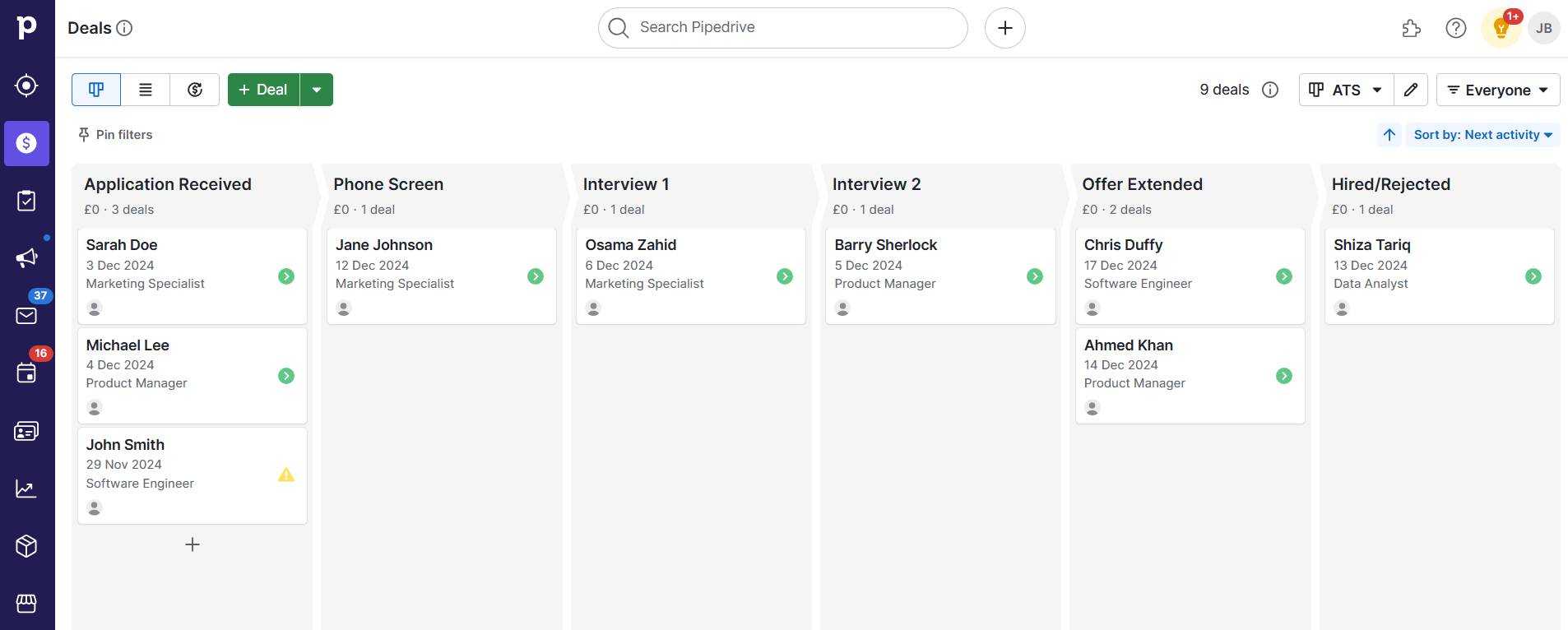
By embedding an email marketing tool into your CRM, you can segment leads by sales activity, past interactions or deal stages and personalize your campaigns. You also get a clear picture of how email performance impacts your broader sales KPIs.

Reporting tools Pipedrive campaigns

Campaign’s email KPI reports show you how your emails perform in real time. They track email marketing metrics like opens, clicks and which messages get the best response.

Sharing these reports with your sales team and giving them visibility into your marketing campaigns can help them sell better.

For example, sales reps can follow up more effectively with leads who clicked on specific links in your email or tweak sales conversations based on subscriber behavior.

Philip Cantor, Head of Revenue at Orbica, says:

With Campaigns, we can design it, we can measure it, we can see who’s opening it each day. We can see people that moved companies in the bounce list – it’s all there in front of us. We’re always refreshing and improving our contact list and getting better messages to more people because we can see the impact of our email marketing campaigns.

Campaign’s top KPI software features

Campaigns lets you create beautiful, interactive email campaigns aligned with your CRM data using a no-code, drag-and-drop builder. It also offers powerful email KPI tracking and optimization features, such as:

  • Real-time email analytics. Track metrics like open rates, click-through rates and delivery success to understand your email performance.

  • Customizable reports. Generate campaign-level reports to measure the performance of individual marketing emails and analyze recipient behavior.

  • CRM integration. As a Pipedrive add-on, Campaigns plugs directly into your CRM data, making segmenting and nurturing leads easier. Automate follow-ups, send newsletters and run promotions – all while keeping your sales and marketing efforts in sync.

  • Contact segmentation. Use built-in filters such as subscription status, send date, unsubscribe date and more to segment leads and personalize your emails.

Pricing

Starts at $13.33/month. Free trial available.

Who is Campaigns best for?

Pipedrive users who want to integrate email marketing with their sales processes.

Best social media KPI software: Reportei

Reportei makes it easy to build marketing reports and KPI dashboards automatically. It pulls data from social media platforms like Instagram, Facebook and LinkedIn, as well as Google Analytics, Google Ads and other sources.

KPI software Pipedrive Reportei Facebook KPI report

Users can also connect Reportei with Pipedrive to visualize CRM data and sales KPIs alongside marketing metrics, which helps them make better business decisions.

Reportei is a great KPI software for marketers but offers limited customization options compared to other tools in this list.

For example, a Capterra review points out that it has limited customization options, and it may be difficult for agencies or consultants to manage multiple clients using it:

“I don’t like not being able to customise [sic] element headings, integrate several Google Business Profiles into a single client’s space (for multiple physical locations) without having to reach out to support, and I don’t like that common integrations are missing

Reportei’s top KPI software features

Reportei is a powerful reporting tool built specifically for marketers. However, it offers several features for tracking KPIs and projects that all teams can use:

  • Customizable templates. Use pre-built dashboard and report templates for different scenarios or sales and marketing channels.

  • Automated reports. Generate and send reports automatically via email. Set the frequency, analysis period and other controls.

  • AI-driven insights. Quickly spot trends in marketing and sales metrics and access personalized recommendations for improving performance.

  • Timeline. View project dates, events and major milestones chronologically to understand progress and historical context.

  • Goals and alerts. Set specific campaign goals (e.g., reach or engagement targets) and get notified when performance deviates from expectations.

  • Social media integration. Connect Reportei to Instagram, Facebook, YouTube, TikTok, X (Twitter) and LinkedIn to automatically pull likes, shares, impressions and other metrics into its dashboard.

Pricing

Starts at $16.80/month. Free trial available.

Who is Reportei best for?

Digital marketers and agencies that want to track marketing and sales KPIs.

Best KPI software for data integration: ClicData

ClicData is a business intelligence platform that helps users visualize data through interactive dashboards.

The platform connects seamlessly to various data sources to track KPIs from different departments or systems in one place.

KPI software Pipedrive ClicData SEO dashboard

ClicData is a powerful option for data-driven companies, but some users report a steeper learning curve for beginners.

For example, Capterra reviewer Parth K., explains:

In ClicData, there is a severe learning curve. For all different types of data modelling [sic] purchases, there is a tonne of customization capabilities and visualisation [sic] possibilities.

Its higher starting price means it can also be expensive for smaller teams or those with basic reporting needs.

ClicData’s top KPI software features

ClicData offers robust data management tools for storing, prepping, transforming and visualizing data. When it comes to KPI reporting, here are some relevant features to know:

  • Interactive dashboards. Use a drag-and-drop interface to create KPI dashboards that users can explore and interact with for deeper insights.

  • Multi-channel reports. Aggregate KPIs and metrics from various sources into unified reports for a more holistic view of business performance.

  • Predictive analytics. Use statistical models to forecast future trends and performance, such as revenue or sales targets.

  • Mobile KPI tracking. The dashboards work well on all mobile devices, so users can check business performance wherever they are.

Pricing

Starts at $275/month. Free trial available.

Who is ClicData best for?

Companies with advanced data storage, visualization and integration needs.

Best KPI software for dynamic dashboards: Grow

Grow lets users create dynamic KPI dashboards to track performance. Users can switch between different types of charts and graphs to show data more effectively.

BI-reporting-Pipedrive-Grow-integration

The platform automatically updates reports with fresh data, pulling information from multiple sources to keep everything current. Users can also add company branding to make reports look more professional.

Grow is generally user-friendly, but some users have found adding data sources complicated, especially when working with spreadsheets.

Reviewer Todd J. says:

We have experienced some difficulties adding some data sources (particularly with spreadsheet functionalities). The onboarding process made us feel like we were on the clock, which is understandable but not ideal for the level of depth required to learn a new platform.

Grow’s top KPI software features

If multiple team members work with data, Grow gives them plenty of tools to personalize each user’s KPI tracking experience. Some of its best features are:

  • Dynamic dashboards. Create dashboards that automatically filter and display data based on who’s logged in to the account for personalized insights.

  • Automated reports. Set up a schedule to deliver reports to clients or stakeholders in PDF format via email.

  • Alternate views. Change chart types of individual metrics to display data differently or switch between chart and table views to scrutinize numbers.

  • Native integrations. Connect to popular accounting, marketing, social media and ad platforms, databases and CRMs (including Pipedrive) to import live data.

  • Custom branding. Personalize the Grow dashboard by adding the brand logo, colors and favicon, and set up a custom domain and login screen.

Pricing

Contact sales for a quote. Free trial available.

Who is Grow best for?

Teams with multiple high-level users that want to create dynamic, personalized dashboards with diverse data sources.

Best KPI software for TV dashboards: Geckoboard

Geckoboard lets users build TV-ready custom dashboards by dragging and dropping elements such as data visualizations, KPIs and targets.

KPI software Pipedrive Geckoboard sales dashboard

It’s built for businesses that need to move quickly. Users can cycle through different dashboards automatically and get alerts about important changes.

Geckoboard connects to other tools (e.g., Pipedrive) to sync performance data from different areas, like sales, marketing and customer service.

On the downside, user reviews show Geckoboard’s integrations can be tricky to set up due to a technical process and lack of documentation.

Capterra reviewer Mizanur Rahman M. explains:

Some of the integrations do not have enough support. We’re working on the documentation for pushing our own data in, but it’s a little hit-and-miss, but it seems to be going ok.

Some users also feel the integrations offer limited functionality.

Geckoboard’s top KPI software features

Geckoboard might sound like a simple tool for connecting dashboards to your TV. It also comes with several features for tracking and sharing KPIs, such as:

  • Drag-and-drop builder. Easily build custom dashboards that look good with elements that snap to size. Users can move, resize or group visualizations.

  • TV dashboards. Use built-in tools to display and manage dashboards remotely on large screens, such as monitors and TVs.

  • Snapshots and reports. Automatically share reports or dashboard snapshots with team members via Slack or email regularly.

  • KPI notifications. Get instant KPI alerts via Slack or with status indicators when a specific metric drops or when the team hits sales targets.

  • Dashboard loops. Cycle between multiple KPI dashboards (e.g., marketing, sales or customer service dashboards) automatically.

Pricing

Starts at $44/month. Free trial available.

Who is Geckoboard best for?

Teams prioritizing visibility who need to display key metrics on live TV dashboards.

Best KPI software for revenue attribution: HockeyStack

HockeyStack helps users understand how customers interact with the business. It shows who prospects are and how they move through the funnel by visualizing their entire journey.

KPI software Pipedrive HockeyStack marketing dashboard

HockeyStack is ideal for businesses looking to improve their customer acquisition and retention. The platform also offers powerful KPI dashboards, connectors and AI tools for uncovering insights and generating granular reports.

Unfortunately, HockeyStack only works on desktops. It doesn’t have a mobile app, so users can’t track their KPIs and metrics on the go.

HockeyStack’s top KPI software features

HockeyStack is a powerful retention platform that does more than just build KPI reports. For businesses interested in digging deep into their analytics to optimize specific touchpoints, here are some relevant HockeyStack features:

  • Custom dashboards. Create personalized, no-code dashboards to monitor specific KPIs and metrics relevant to the business.

  • Multi-touch attribution. Analyze the impact of each customer interaction across multiple channels on conversions and revenue.

  • AI text-to-report. Ask Odin (HockeyStack’s AI assistant) to create reports based on specific insights or questions quickly.

  • Buyer journeys. Visualize every touchpoint, track activity at each one and match it to revenue to understand and optimize the customer journey.

  • CRM sync. HockeyStack’s Pipedrive integration shows users how their leads turn into customers and what they do after buying. Track who makes the buying decisions, how long sales take and which customers stay engaged with the product.

Pricing

Starts at $2,200/month. No free trial.

Who is HockeyStack best for?

Companies interested in customer journey analytics and revenue attribution.

Best free KPI software: Google Analytics

Google Analytics is a free KPI software that lets users see what’s happening on their website in real time and create custom dashboards to monitor their most important metrics.

It’s especially good at showing how visitors become customers by tracking their journey through a site. Users get a complete picture of their marketing metrics since it works with other Google tools like Ads and Search Console.

KPI software Pipedrive Google Analytics user acquisition report

Google Analytics is a free option, but it can be difficult for a newbie to install and use. Finding the right information can be time-consuming, as they need to dig deep into layers of data.

A TrustRadius review by Hash Moody, CEO at Azoora, also points out that GA offers too many advanced features for small (or non-technical) teams who are often looking for a straightforward KPI tracking solution:

It’s complex, a lot of features make it very hard to use if you’re new to it, a large set of features isn’t that useful for SMEs.

Google Analytics’ top KPI software features

Google Analytics might be a free KPI software, but don’t take it lightly. Like other Google products, it’s a powerful tool for tracking website activity, conversions and other metrics. Here are some of the best Google Analytics features for KPI reporting:

  • Real-time reporting. Track user activity on the site to get instant insights into performance.

  • Customizable dashboards. Create tailored dashboards that display key metrics and visualizations relevant to the current focus.

  • Conversion tracking and goals. Track specific user actions (e.g., form submissions or purchases) to analyze the effectiveness of a website and marketing efforts.
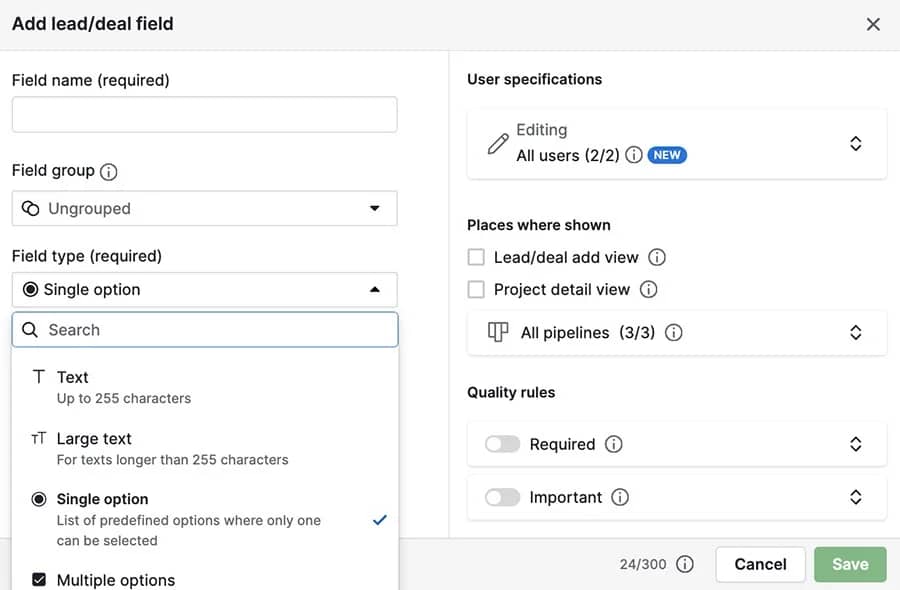
  • Integration with other Google products. Seamlessly connect with Google Ads, Search Console and more to consolidate business data and streamline workflows.

Pricing

Free.

Who is Google Analytics best for?

Website owners and marketers interested in tracking traffic data and user behavior.

Best KPI software for business intelligence: Tableau

Tableau helps users create detailed visualizations and explore data dynamically without needing advanced technical skills. Features like forecasting and AI insights allow users to quickly uncover trends in performance data.

KPI software Pipedrive Tableau shipping KPIs dashboard

Tableau is popular with enterprises, but it can be expensive for startups that want to purchase multiple viewing licenses or use additional features for exploring data.

G2 reviewer Disha M. says:

Tableau can be costly, particularly for startups. Even with its flexibility, the licensing model still adds cost, especially when you extend usage across teams or a complete company.

Tableau’s top KPI software features

Tableau is often considered the industry standard for complex visualizations and advanced data analytics. Teams of all sizes use the tool to explore trends, forecast outcomes and present data clearly. Here are some top Tableau features for KPI reporting:

  • Interactive dashboards. Create dynamic dashboards with advanced filters, drill-downs and responsive visualizations.

  • AI-powered insights. Tableau’s integration with Einstein Discovery lets users access recommendations and predictions directly within their visualizations.

  • Predictive modeling. Forecast performance and identify future trends to set realistic targets and plan for growth.

  • Embedded analytics. Incorporate KPI dashboards and visualizations into websites and apps.

Pricing

Starts at $15/user/month. Free trial available.

Who is Tableau best for?

Large teams and enterprises that need advanced data visualization and BI capabilities.

Best KPI software for Microsoft users: Power BI

Microsoft’s Power BI is an affordable yet powerful KPI software that integrates seamlessly with other Microsoft products, such as Excel, Teams and Azure.

The tool is packed with advanced data analysis features. It helps businesses of all sizes understand their performance better through interactive dashboards and AI insights.

KPI software Pipedrive Microsoft Power BI sales dashboard

Users can also check their KPI reports on mobile and track performance on the move.

Power BI is an advanced analytics platform, but users have expressed frustration with its slow and clunky interface, which can often worsen as they connect more data sources.

Reviewer Graeme C., explains:

It can be a little clunky at times when loading the data into the system.

Power BI’s top KPI software features

Power BI is a good option for users familiar with Excel sheets who want to seamlessly transition to data visualization and AI-powered analysis within the Microsoft ecosystem. Here are some of the software’s best KPI reporting features:

  • Interactive KPI dashboards. Create dashboards with drag-and-drop tools, drill into data, apply filters and customize visualizations to see key metrics clearly.

  • Integration with data sources. Connect to 100+ data sources, such as SQL, Excel and Azure, for seamless and unified reporting across an organization.

  • Mobile-optimized reports. Use Android, iOS and Windows apps to view dashboards and reports on the go. Mobile users can also enable push notifications to stay updated with important data changes.

  • AI data analysis. Use built-in AI tools to automatically detect patterns, generate predictive models and ask questions about data in natural language.

Pricing

Starts at $10/user/month. Free plan available (with limited features).

Who is Power BI best for?

Teams already using Microsoft products.

Best KPI software for beginners: Databox

Databox simplifies KPI tracking with ready-made dashboard templates and a drag-and-drop interface. Non-technical users can quickly set up dashboards and start monitoring key metrics.

KPI software Pipedrive Databox dashboard builder

The platform offers predefined metrics and native integrations that let users instantly visualize performance in specific business areas. Users also get benchmarks and actionable insights for each metric to improve their data analysis.

Databox is user-friendly but has limited customizability compared to other tools. Its free plan can be restrictive, especially for businesses that need to track KPIs from multiple sources.

Reviewer Mizanur Rahman M., says:

When we create custom dashboards and reports in Databox, Databox doesn’t offer as much customization as other tools. This could be an issue for users who want to create highly specific or customized views of their data.

Databox’s top KPI software features

Small businesses just getting started with data visualization often turn to Databox, due to its no-fuss, beginner-friendly tools for building dashboards and reports.

Here are the top Databox features for monitoring business performance:

  • Custom KPI dashboards. Drag and drop metrics, switch between visualizations easily and customize the dashboard’s design to match company branding.

  • Pre-built metrics library. Quickly create visualizations by browsing through a searchable library of predefined metrics from 100+ integrations.

  • Scorecards and alerts. Set up automated scorecards to receive regular updates on critical metrics and get notified when changes occur.

  • Performance forecasts. Use predictive analytics to forecast performance between 1 and 24 months. Users can also get a score to see how reliable their forecasts are.

Pricing

Start free. Paid plans from $47/month. Free trial available.

Who is Databox best for?

Non-technical teams looking for an easy-to-use KPI dashboard software.

Best KPI software for custom visualizations: Klipfolio

Klipfolio is a powerful KPI management software that helps businesses monitor and optimize performance in real time. It offers two main products: Klips and PowerMetrics.

Klips lets small businesses build and share customizable KPI dashboards with charts, tables and other visualizations.

KPI software Pipedrive Klipfolio campaign dashboard

PowerMetrics is ideal for bigger companies with large datasets, offering advanced features like semantic layers, data warehousing and cloud APIs.

Klipfolio has many useful features. However, speed can sometimes be an issue, such as when loading dashboards with custom filters or connecting to multiple data sources.

Reviewer Kiersten N., a software engineer, explains:

Dashboards with custom date filters are pretty slow to load, even with defaults selected. Data refresh queries time out pretty quickly and I have noticed in several cases that the query will time out on Klipfolio’s side, but the connection to the database is never terminated. So if a query times out in Klipfolio, the query will keep running against our database for no reason. I wish there was a setting to increase the timeout.

Klipfolio’s top KPI software features

Two separate products tailored to unique business needs means Klipfolio offers some great features for managing metrics and reporting on KPIs. Here are some of its best features:

  • Custom KPI dashboards. Design personalized dashboards that display key performance indicators in real time.

  • Metric management. Browse and access all metrics through a catalog with a scorecard view that quickly shows users how each metric is performing.

  • Advanced customization. Use HTML, CSS and JavaScript to create unique visualizations and modify dashboards beyond standard templates.

  • Automated reports. Share dashboards and reports with stakeholders as PDFs or images via email on a set schedule.

Pricing

PowerMetrics: Start free

Klips: Starts at $80/month

Who is Klipfolio best for?

Organizations looking for flexible KPI software with fully customizable dashboards.

Final thoughts

As a leader, you must stay updated with your company’s performance.

KPI tracking software helps you visualize metrics from different areas of your business, keeping you in the loop and allowing you to make quick, informed decisions.

There are many options, but Pipedrive is one of the best KPI dashboard software for small and growing businesses.

Along with interactive dashboards, customizable reports and predictive analytics, you get a fully functional CRM that lets you instantly act on your insights.

Sign up for a free Pipedrive trial or learn more about our insights and reporting features.

The Definitive Engagement Score Guide

Software Stack Editor · December 18, 2024 ·

Engagement score metrics help businesses measure how involved and committed leads, customers and employees are.

While there’s no one-size-fits-all approach, knowing the right software and formulas can help you pinpoint the information you need to determine yours.

In this post, you’ll learn how to calculate and leverage three types of engagement scores to close more deals, improve customer satisfaction and solve critical workforce issues.

What is an engagement score?

An engagement score is a metric companies use to measure the involvement and interaction of leads, customers and employees. Every business calculates this metric differently depending on its focus, industry, product and team.

For example, a software-as-a-service (SaaS) company may calculate customer engagement scores based on login frequency, feature usage and support interactions.

On the other hand, a sales team may use email responses, social media messages and meeting attendance to work out lead or customer engagement.

Engagement score Pipedrive Pulse

While there are many different types of engagement scores, this post will cover three of the most common in business:

  • Lead/deal engagement score. Measures how much leads engage with salespeople and indicates how likely they are to convert into a customer

  • Customer/user engagement score. A SaaS metric that reflects how engaged customers are with a product or service

  • Employee engagement score. Tracks team involvement, satisfaction and motivation at work

Understanding these scores can provide critical insights into your business’s health and growth potential.

Recommended reading

https://www-cms.pipedriveassets.com/Sales-Engagement.jpg

What is sales engagement? How to choose a platform

Why should you calculate engagement scores?

Engagement scores can help you target problem-solving and improvement areas.

Here are four ways calculating them can help.

1. Improved decision-making

Engagement scores provide clear, data-driven insights that help you prioritize where to focus your efforts. This clarity allows you to allocate resources more effectively, create accurate action plans and drive better results.
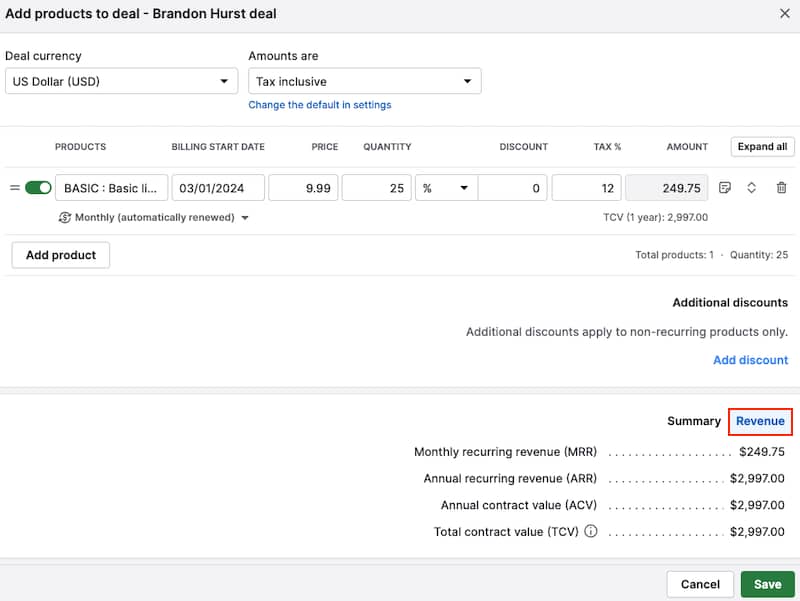
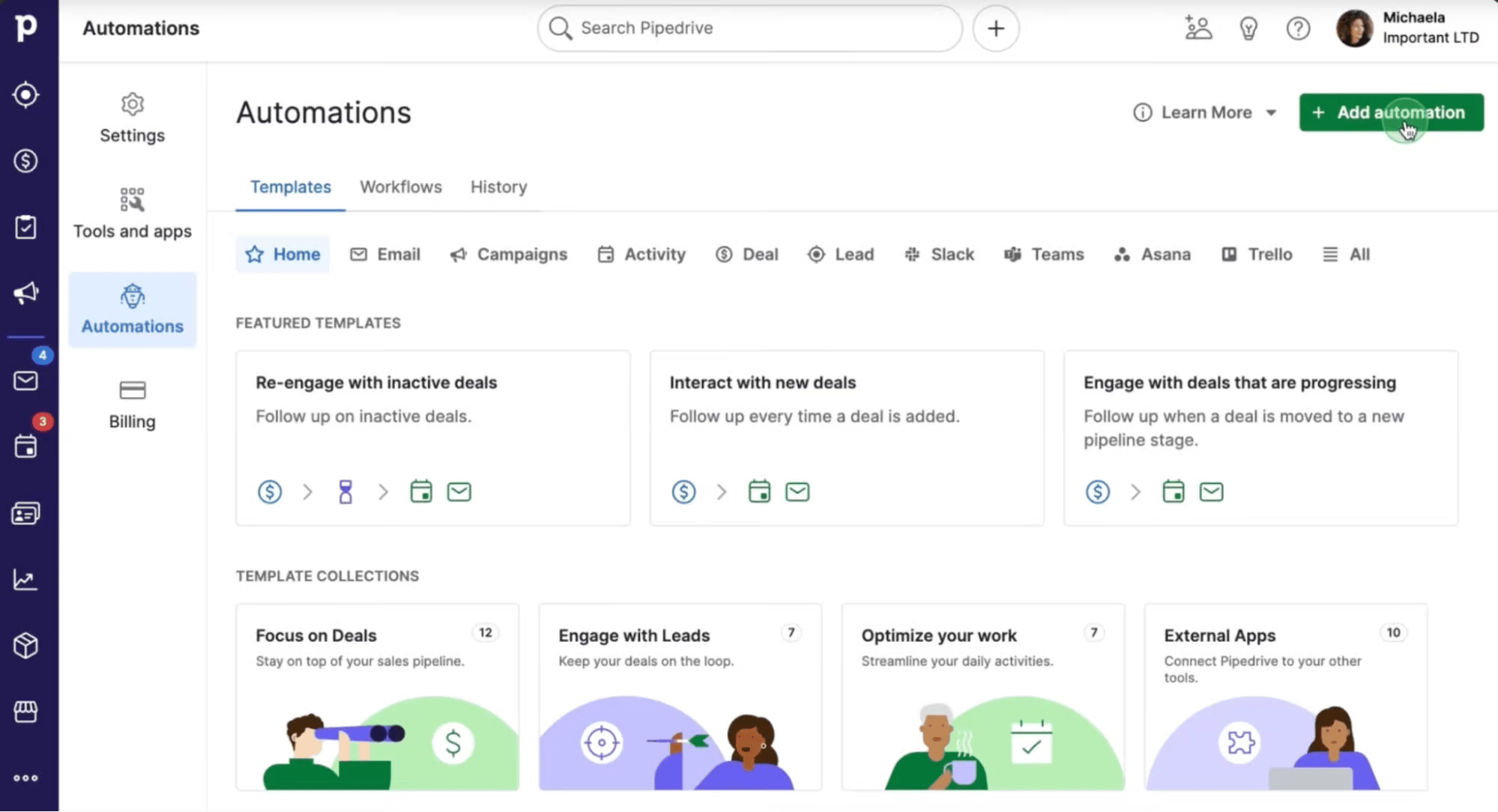
For example:

  • Sales reps can use lead engagement scores to target high-potential prospects and close more deals

  • Customer success managers can identify top users for upselling to drive revenue

  • Human resources (HR) can recognize highly engaged employees for leadership opportunities to provide career growth pathways and reduce turnover

2. Proactive problem-solving

Tracking engagement scores enables you to detect early signs of declining interest and take action before it’s too late.

For example, if a lead stops opening emails, you can adjust your approach with a personalized follow-up. If customers disengage with your product, you can offer onboarding or new feature refreshers.
A drop in employee engagement can also prompt workload discussions or highlight morale issues to prevent more significant problems later.
Download our sales pipeline course e-book

In the Sales Pipeline Course, Timo Rein, co-founder of Pipedrive, teaches you how to make more sales with exclusive advice and insights in 11 valuable lessons.

3. Personalized strategies

Every lead, customer and employee is different. Engagement scores help you tailor your strategies to suit their needs.

For example:

  • Salespeople can design pitches based on each lead’s interests

  • Customer experience teams can recommend relevant product features based on the user preferences your data reveals

  • Managers can customize recognition or development plans for employees based on survey answers when calculating scores

These personalized approaches make people feel seen and valued, leading to more genuine, long-lasting relationships.

4. Enhanced performance metrics

Scores provide measurable benchmarks that show whether your engagement strategies are working.

For example, you can track how lead scores correlate with closed deals, how engagement affects customer retention or how employee engagement impacts churn rate.

With these actionable insights, you can make more informed decisions, address challenges earlier and build stronger connections with the people who matter most to your business.

Recommended reading

https://www-cms.pipedriveassets.com/blog-assets/email-engagement-metrics.png

15 email engagement metrics to know and how to improve them

How to calculate lead engagement scores using Pipedrive

Before leads become customers, tracking how likely a deal is to close can help sales teams focus their efforts effectively.

Pipedrive’s customer relationship management (CRM) software streamlines sales processes by helping reps organize and optimize their deals. One standout feature is the AI engagement score, designed to simplify prioritization.

This functionality analyzes sales data and provides a likelihood score based on patterns from previously won or lost deals.

AI engagement score evaluates deals using factors like:

  • Email interaction history. The number and timing of emails sent, received or exchanged

  • Deal characteristics. The value, pipeline stage and time since the deal’s creation or last stage change

  • Activity metrics. Sales activities (e.g., calls or meetings) logged and completed

  • Contact history. Patterns in past interactions with the person or organization associated with the deal

Pipedrive combines these factors to generate an engagement score indicating whether the deal has a high, medium or low likelihood of success.

Engagement score Pipedrive win likelihood

Note: Scores are updated daily, but you can also regenerate them manually to ensure accuracy.

Within Pipedrive’s deal view, you’ll find a dedicated section for AI engagement scores. This area also includes a high-level summary of the deal’s engagement events (e.g., activity counts, email interactions and stage progress).

Engagement score Pipedrive summary

Note: You can also monitor engagement scores in the “Pulse” feed under “Opportunities”.

Your team should immediately address deals with high engagement scores (as they’re most likely to close). On the other hand, deals with medium or low engagement may require additional outreach or tailored strategies to get them over the line.

Regularly updating your deal activities and interactions will give you the most reliable insights to guide decision-making.

Recommended reading

https://www-cms.pipedriveassets.com/AI-Customer-Experience.png

9 effective ways to use AI to improve customer experience

How to calculate customer engagement scores (CES)

Customer engagement scores (CES) can provide valuable insights into how users interact with your product or service.

You can calculate CES using customer surveys or specialized tools like Mixpanel or Pendo. Alternatively, you can create a manual scoring system tailored to your needs.

Here’s how to do it in four steps:

Step 1: Choose your engagement metrics or events

Start by identifying the customer interactions, actions or behaviors that define engagement for your business.

Tracking the metrics that truly reflect how customers use your product or service will help you focus on what drives loyalty and growth.

Let’s say you offer project management software. Your user engagement metrics might include:

  • Login frequency. How often users log in to your platform

  • Feature adoption. The number of key features a customer has used (e.g., task management, in-app messaging, note-taking, RAID logs)

  • Session duration. The average time a customer spends on your platform during a session

  • Churn indicators. Events like reduced activity or extended periods of inactivity

  • Net promoter score (NPS). A percentage score that suggests how loyal customers feel about your company

These metrics capture positive and negative engagement behaviors to provide a comprehensive overview of your scores.

Step 2: Assign numerical values to each

Assign weights to each metric based on its importance to customer success and retention. Doing so ensures that the final score reflects the most critical aspects of engagement.

For example:

Customer engagement metrics

Metric weight

Login frequency

Add 50 points for daily logins

Add 25 points for weekly logins

Add 10 points for monthly logins

Feature adoption

Add 10 points per feature used (up to 50 points)

Session duration

Add five points for every 10 minutes (up to 25 points)

Churn indicators

Deduct 50 points for 30 or more days of inactivity

Net Promoter Score (NPS)

Promoters (scores 9–10): +25 points

Passives (scores 7–8): 0 points

Detractors (scores 0–6): −25 points

In this example case, your most engaged customers would have a maximum score of 150 points.

Step 3: Calculate your scores

Combine the weighted values into a single engagement score for each customer. Add all totals and divide by the number of customers to find your average score.

At this stage, you should also create a range for high, medium and low scores to help you categorize responses clearly and quickly interpret the results. For example, 100–150 (high), 50–100 (medium) and 0–50 (low).
Let’s say one of your customers:

  • Logs in weekly

  • Uses three key features

  • Spends 30 minutes per session

  • Provides an NPS score of 9

  • Has one unresolved support ticket

That customer’s engagement score might look like this:

Login frequency

+25 points

Feature adoption

+30 points

Session duration

+15 points

Net Promoter Score

+25 points (Promoter)

Support interactions

−5 points

Total engagement score

90/150

With a score of 90, this customer is at the higher end of the medium engagement range.

Step 4: Analyze the data

Once you’ve calculated all your scores, you can use the insights to uncover trends, identify gaps and guide improvements.

For example, you may want to:

  • Celebrate loyal customers with higher scores and look for upsell opportunities (e.g., offer plans with a free API for greater customization)

  • Re-engage those with medium scores with targeted campaigns or offer personalized feature and integration training

  • Identify at-risk customers with low scores and intervene with tailored outreach (e.g., pricing discounts or check-ins)

Your engagement scoring system can give you a deeper understanding of customer satisfaction and loyalty levels. These insights allow you to strengthen relationships and improve retention over time.

Recommended reading

https://www-cms.pipedriveassets.com/blog-assets/re-engagement-email-examples.png

9 re-engagement emails to win back inactive subscribers

How to calculate employee engagement scores

Employee engagement scores measure how connected and motivated your team members feel.

You can calculate these real-time scores using tools like SurveyMonkey and Culture Amp. You can also create and analyze your own surveys manually.

Here’s how to do it yourself in four steps:

Step 1: Create a survey

You want to design a survey that covers the most crucial aspects of employee engagement. Gathering your team’s feelings about their work, environment and growth opportunities helps you identify meaningful improvement areas.

For example, write down areas you’d like to cover and questions or statements that relate to each:

  • Job satisfaction (e.g., “My job provides me with a sense of accomplishment”)

  • Enthusiasm for daily tasks (e.g., “I feel motivated to do my best work every day”)

  • Alignment with the company’s mission (e.g., “My work contributes meaningfully to the company’s goals”)

  • Relationships with team members and managers (e.g., “I feel supported by my manager in my professional growth”)

  • Opportunities for growth and development (e.g., “I see a clear path for advancement in my career within this company”)

Using a Likert scale (1–5 response options from “Strongly disagree” to “Strongly agree”) makes it easy to quantify responses.

Here’s what a Likert scale looks like.

Engagement score Likert scale

You can also offer space for additional comments for each question. These extra insights won’t help you calculate engagement scores but can help you spot shared pain points.

Step 2: Collect responses

Distribute your engagement survey to employees through your chosen tool or platform. Emphasize the importance of honest feedback and ensure anonymity to encourage transparency.

You can encourage your team to participate by:

  • Clearly communicating the survey’s purpose and how the results will benefit them

  • Making the survey short and easy to complete (e.g., under 10 minutes)

  • Emphasizing confidentiality to build trust

  • Offering incentives (e.g., a small reward or recognition) for completing the survey

  • Setting a deadline and sending friendly reminders as it approaches

The higher the response rate, the more accurate your overall picture of engagement levels will be.

Step 3: Calculate your scores

To calculate your employee engagement score, assign points to each answer, add them up and divide the total by the number of survey questions.

This formula will give you each employee’s score:

Total score ÷ number of survey questions = employee engagement score

Let’s say you used the five-point Likert scale. A “Strongly agree” response counts as five points, while “Strongly disagree” is one point.

If an employee’s total score is 42 and your survey has 10 questions, their engagement score is 4.2.

Total score (42) ÷ questions (10) = 4.2 employee engagement score

For this survey, you may determine a score of 0–2 is low, 2–4 is medium and 4–5 is high. You can also calculate the average engagement score across the team or company by averaging individual scores.

Step 4: Analyze the data

Once you have your scores, look for trends and patterns in the responses.

For example:

  • High scores indicate your team strongly aligns with company goals or is satisfied with growth opportunities

  • Medium scores suggest there are aspects you could improve with minor adjustments (e.g., communication frequency or team bonding activities)

  • Low scores require you to pinpoint and solve critical issues (e.g., a lack of recognition or poor work-life balance) using urgent initiatives (e.g., introducing an employee recognition program or flexible work arrangements)

By segmenting scores by team, department or other demographics, you can also uncover specific groups needing attention.

You can also save your survey as a template to use again in the future and see how engagement scores compare.

Final thoughts

Tracking lead, customer and employee engagement scores is crucial to growing your business. These scores help you focus on the right deals, improve customer loyalty and motivate your team.

Try Pipedrive free for 14 days to input your customer data and learn how to quickly spot which leads are most likely to close. Start using engagement scores today to work smarter and grow faster.

8 Effective Resignation Letter Templates

Software Stack Editor · December 18, 2024 ·

A clear, concise and respectful resignation letter ends your employment well. It clarifies your departure details and preserves your professional relationship, setting a positive tone for future interactions.

In this article, you’ll learn how to write a successful resignation letter, including what to avoid. We’ll also share some examples for inspiration.

What is the typical structure of a resignation letter?

At the start of the letter, list the date, your full name, address, email address and phone number.

After that, add your employer’s name (including a salutation like “Dear Mr [surname]”, “Dear Mrs [surname]” or “To whom it may concern”). Follow with a clear statement of resignation, your notice period and your last day of work.

In the middle of the letter, outline your reason for leaving and express gratitude for your career opportunities with your current employer. Depending on the circumstances, these elements are optional (more on that later).

At the end of the letter, wrap things up with a polite closing statement and sign off with your full name.

Note: If you’re sending your letter via email, you can omit the contact information and date. However, you’ll want to ensure the subject line states the purpose of your message. Include the word “resignation” and your full name.

Here’s an example of how this structure looks in a letter format:

[Your full name]
[Your address]
[Your email address]
[Your phone number]
[Date]

Dear [employer’s name],

I’m writing to resign from my position at [company name], effective [last working day]. This notice period aligns with the [duration] required by my contract.

Optional: While this decision was difficult, I am leaving because [add reason for leaving].

I appreciate the opportunities, support and growth I have experienced at [company name].

Please let me know how I can assist during the transition.

Sincerely,

[Your full name]

How do I write a good resignation letter?

Resigning is a personal experience, meaning the ideal resignation letter looks different to everyone. Your role, the working environment and reason for leaving can all impact how you write your formal resignation letter.

However, there are some best practices you can use to write a clear resignation letter.

Resignation letter best practices checklist:

Review your contract to verify the notice period

Keep it concise and professional

Avoid negativity

Express gratitude

Offer to help with the transition

Submit the letter to the right person

Review your contract to verify the notice period

Review your employment contract to confirm your notice period so you can add your last working day to your resignation letter. For example, are you required to offer two weeks’ notice?

When managers and colleagues know your last working day, they can take the appropriate measures to ensure a smooth transition, such as arranging a handover or hiring your replacement.

Sometimes, you may leave before your agreed notice period. For example, if a new employer wants you to start before the end of your notice. You’ll need to address this in the letter, saying something like:

“I request an earlier last working day of [proposed date] due to [reason]. I’m happy to assist in ensuring a smooth transition.”

Keep in mind that early departures need your employer’s agreement. If they’re unable to let you leave early, you may have to adjust your plans.

Note: Contracts also outline any conditions related to resignations, such as payment of unused leave or restrictions like non-compete clauses, so they’re worth reading in full before submitting your resignation.

Keep it clear and concise

A clear and concise letter ensures your intentions are clear, leaving no room for ambiguity or misunderstanding.

Say you write the following:

Dear [manager name],

I enjoy my role at this company and am grateful for the guidance and professional support I’ve received. Thank you for the opportunity.

Sincerely,

[Your name]

This letter doesn’t state that you’re resigning, so the manager receiving it will need further clarification.

Conversely, providing too much detail can be overwhelming for managers. Writing multiple paragraphs about your experience at the company, your reasons for departing and your hopes for the future makes it hard for managers to identify information, such as when you’re leaving.

Generally, keep the letter a single letter-sized page. Use simple language and short sentences, following the structure listed at the start of this article to cover all the points.

Avoid negativity

Even if you’re leaving due to dissatisfaction, keep the tone neutral or positive. For example, instead of saying, “I was unhappy with the lack of opportunities”, reframe it as “I’m pursuing opportunities that align more with my career aspirations”.

Negative comments about the company, management or colleagues could harm your prospects. Remaining neutral opens the door to future references within the same network.

Note: If there are issues you want to discuss with the company before leaving, ask for an exit interview to discuss them in more detail.

Express gratitude

To end your working relationship positively, you may want to acknowledge things you liked about working at the company.

Here’s an example: “I’m grateful for the opportunities I’ve had at [company name], especially the chance to lead [specific project] and develop [specific skills].”

Thank the people at the company who helped you grow and develop in your position, from career opportunities to learning and development (L&D). After all, you’re taking these skills with you into future roles.

Offer to help during the transition

Show your professionalism by offering to assist during the transition period. Leave this open-ended by saying, “Let me know how I can assist during this transition. I’m more than happy to help”, or you can be more specific.

For example, you might outline how you can help with these activities:

Offering support builds a good relationship with the company before leaving.

Submit the letter to the right person

Sending your resignation letter to the correct person (or people) is essential for several reasons.

The first is to help manage staff resignations. The right person must store your resignation letter for the company’s official records. Doing so ensures the company processes your departure in line with company policies, such as submitting your final pay, handling benefits and scheduling exit interviews.

4 free sales feedback templates

Use these sales feedback templates to measure employee performance and gauge morale.

The second is to avoid future issues. If you send the letter to the wrong person, it could delay processing your resignation, affecting payroll, your final day or your exit process.

Who you send your resignation to varies from company to company, but it tends to be either a human resources (HR) manager, your direct line manager or both. Your contract should confirm who to send it to, or you can contact HR for clarification.

Recommended reading

https://www-cms.pipedriveassets.com/Goodbye-Email-to-Coworkers.png

How to write a goodbye email to coworkers (plus 7 templates)

5 standard resignation letter templates

Use these resignation letter templates as a guide and starting point for your resignation letter. Customize them to your specific situation.

1. Simple resignation letter template

The simple resignation letter template is ideal if you want a no-fuss resignation. It’s straightforward and doesn’t provide extra information.

It’s also helpful if you’ve only briefly been with the company and don’t have a rapport with your manager. In this case, a simple letter will suffice.

[Your full name]
[Your address]
[Your email address]
[Your phone number]
[Date]

Dear [manager’s name],

I’m writing to resign from my position as [job title] at [company name], effective [last working day].

Thank you for the opportunities I’ve had during my time here. I’m grateful for all the support, guidance and training you’ve provided.

Please let me know how I can assist with the transition process. I’m happy to help in any way I can.

Sincerely,

[Your full name]

2. Resignation letter template prioritizing relationships

With this template, you leave the company on good terms to preserve relationships. These positive relationships will put you in good stead if you need a reference in the future or want to return to the company in another position.

[Your full name]
[Your address]
[Your email address]
[Your phone number]
[Date]

Dear [manager’s name],

I’ve decided to resign from my position as [job title] at [company name]. My last working day will be [last date].

I’m grateful for my opportunities here, especially for [mention a positive experience or opportunity]. Working with you and the team has been a pleasure, and I appreciate all the support and mentorship.

I’ll do everything possible to help during the transition and ensure a smooth handover.

Regards,

[Your full name]

3. Resignation letter template due to a toxic workplace

Even if the workplace has been challenging, don’t burn bridges. You never know what opportunities will come your way, and you may need a reference or advice from someone at this workplace.

Use this template to explain your reason for leaving without offending or upsetting the recipient:

[Your full name]
[Your address]
[Your email address]
[Your phone number]
[Date]

Dear [manager’s name],

I’m writing to submit my resignation from my role as [job title] at [company name], effective [last day of employment].

While I appreciate my experiences here, I’ve decided to pursue other opportunities better aligned with my long-term career goals and well-being. Please understand that I did not make this decision lightly.

I’m committed to ensuring a smooth transition and will do what I can to assist before my departure.

Sincerely,

[Your full name]

4. Resignation letter template for a better opportunity

You’ve found a new job offering a better career opportunity. Use this template to explain this to your employer in a respectful way.

[Your full name]
[Your address]
[Your email address]
[Your phone number]
[Date]

Dear [manager’s name],

Please accept my formal resignation from my position as [job title] at [company name], with my last working day being [last working day].

I’ve accepted an offer for a new opportunity that will help me further my career development and provide growth that aligns with my professional goals. I appreciate the experiences I’ve had here. Your support has helped me grow both personally and professionally.

I’m happy to assist in the transition process during my remaining time here.

Thank you again for everything.

Sincerely,

[Your full name]

Remember: you don’t have to explain your reason for leaving. However, this template provides context around your decision if you want to share it.

5. Urgent resignation letter template without giving notice

Urgent circumstances can arise without warning. For example, traveling to a different city to care for a sick family member. In this situation, you may be unable to work your standard notice period.

Use this template to ask employers to waive your notice period, explaining your urgent circumstances.

[Your full name]
[Your address]
[Your email address]
[Your phone number]
[Date]

Dear [manager’s name],

I regret to inform you that I must resign from my position as [job title] at [company name] immediately due to urgent personal reasons.

Unfortunately, I’m unable to provide the standard notice period due to the nature of the situation. [Add an explanation of why these circumstances require your immediate resignation].

I apologize for any inconvenience this may cause and will ensure I complete all necessary tasks before departure. Contact me at [add email address and phone number] if you have questions after my departure.

I appreciate your understanding, and I hope to work with you again in the future.

Sincerely,

[Your full name]

3 role-specific resignation letter examples

These templates reflect the level of responsibility and tone appropriate for each type of role: entry-level, mid-level or senior positions.

Here’s a quick rundown of how these types of roles influence the content of a resignation letter:

Entry-level employee

  • Help offered: Minimal

Mid-level employee

  • Audience: Direct manager

Senior employee

Let’s look at some sample resignation letters to see them in action.

1. Entry-l​​evel employee resignation template

Entry-level employees get to the first step on the career ladder because an employer takes a chance on them. As a result, entry-level resignations often thank employers for hiring them despite their limited experience.

Look at this resignation template as an example:

[Your full name]
[Your address]
[Your email address]
[Your phone number]
[Date]

Dear [manager’s name],

I’m writing to resign from my position as [entry-level job title] at [company name], effective [last working day].

I’m grateful I had the opportunity to work with the team, especially considering my limited experience. Your support and guidance have been invaluable in my professional development. I’ve learned a lot here and am thankful for the chance to grow in such a welcoming and collaborative environment.

Please let me know how I can assist with the transition in my remaining time.

Thank you again for this fantastic opportunity.

Sincerely,

[Your full name]

2. Mid-level professional resignation template

Most mid-level employees resigning from their positions are moving to a new company to perform a similar or more advanced role. As a result, these letters often strike a balance between appreciation for the past and excitement for the future. Here’s an example:

[Your full name]
[Your address]
[Your email address]
[Your phone number]
[Date]

Dear [manager’s name],

I’m writing to resign from my position as [job title] at [company name], with my last working day being [last working day].

I appreciate the opportunities for growth and development I’ve had here, and I’m thankful for everything I’ve learned from you and the team. This role has been instrumental in preparing me for the next step in my career, where I’ll be taking on more responsibility.

Please let me know how I can assist during the transition period. I want to ensure a smooth handover of my responsibilities.

Again, thank you for the opportunity to be part of such a talented and supportive team.

Regards,

[Your full name]

3. Senior executive resignation template

Senior executives are writing to board members and C-suite employees. Their resignation letters express pride in the company’s accomplishments and a commitment to facilitating a smooth transition.

Look at this professional resignation letter template as an example:

[Your full name]
[Your address]
[Your email address]
[Your phone number]
[Date]

Dear [board members/CEO/manager’s name],

I submit my resignation from my role as [job title] at [company name] with mixed emotions, effective [last working day]. After much thought and consideration, I’ve decided to pursue new opportunities.

I’m proud of what we’ve accomplished together at [company name] and grateful for the trust, support and leadership I have experienced here. The team has been instrumental in shaping my career, and I’m confident the company will continue to thrive.

I’ll ensure a smooth transition by helping to identify my successor and providing the necessary support during the transition period.

Thank you for this incredible experience. I look forward to remaining in touch.

Sincerely,

[Your full name]

  • A simple resignation letter includes a clear statement of intent to resign, your last working day and a brief note of appreciation.

    You might outline your reason for leaving, but it’s not essential. Address your manager professionally, be concise and keep the tone respectful.

  • Here are some tips to ensure a graceful resignation letter:

    • Show gratitude for the opportunities you’ve had while working in the role

    • Avoid negativity and focus on the positive aspects of your time at the company

    • Offer to help during the transition

  • Yes, artificial intelligence can draft resignation letters, but you should edit the response before sending it. Customizing the letter to your situation ensures it remains personal and professional.

  • No, a cover letter isn’t necessary.

    A cover letter introduces your qualifications for a role and why you’d be a good fit for an open position. A resignation communicates your intent to leave, specifies your last working day and expresses gratitude for the professional opportunity.

  • Schedule a private meeting with your manager to ensure no interruptions. Use Pipedrive’s Scheduler to plan the meeting.

    Plan what to say before the meeting. Explain that you’re handing in your notice and confirm your last working day. All this information will also be in your letter, but it’s helpful to reiterate if you’re meeting face-to-face.

    After the discussion, follow up by submitting your letter of resignation as outlined in your contract.

Final thoughts

Handing in your formal notice can be challenging, awkward and difficult, especially if your managers and colleagues don’t see it coming.

When done well, a compelling letter can positively end your professional relationship. Follow best practices and use these templates to provide a clear, concise and respectful resignation letter.

Pipedrive’s recruitment CRM software helps your team hire your replacement. Attract quality applicants, strengthen candidate relationships and enhance your recruitment process, all in a single platform. Sign up for a free trial today.

  • « Go to Previous Page
  • Page 1
  • Interim pages omitted …
  • Page 14
  • Page 15
  • Page 16
  • Page 17
  • Page 18
  • Interim pages omitted …
  • Page 28
  • Go to Next Page »

Get your Software Stack together. softwarestack.tech

Software Stack

© 2024–2026 - Software Stack is a trading name of SouthwestCIO Limited ac ompany registered in England & Wales 11319049

  • Knowledgebase
  • Home
  • About Us
  • Contact Us