• Skip to primary navigation
  • Skip to main content
software stack logo

Software Stack

Get your Software Stack together

  • Knowledgebase
    • All Categories
    • Accounting Software
    • Automation & Workflow Software
    • Customer Relationship Management
    • E-Commerce Shopfronts & Payments
    • Marketing Automation
    • Online Courses & Membership
    • Project Management
    • Surveys & Forms
    • Web Hosting
  • Home
  • About Us
  • Contact Us
  • Show Search
Hide Search

Xero

Xero to retire the Planday product in Australia; enters new Deputy Australia partnership

Software Stack Editor · April 28, 2024 ·

We know how important time, attendance and scheduling (TAS) needs are for any small business. And for Australian employers, we know it is even more important because Australia has some of the most complex payroll compliance requirements in the world.

Following a careful review of our current TAS solution, we have made the difficult decision to retire our Planday product on 30 September 2024. These changes have been made to enable Planday to focus on its core business in Europe.

 In light of this decision, we conducted a detailed review of how we can best serve our Australian customers with their time, attendance and scheduling compliance requirements.

New partnership with Deputy

That’s why today, we have also announced a new strategic partnership with Australia’s leading workforce management platform, Deputy, to help serve our Australian customers with their time, attendance and scheduling compliance requirements.

Founded in Australia, Deputy currently serves over 340,000 workplaces worldwide and was recently named Best Overall Employee Scheduling Software of 2023 by Forbes Advisor. Deputy’s intuitive platform, robust awards engine and seamless integration with Xero means we are confident this partnership will enable Xero to provide our Australian customers with a leading time, attendance and scheduling product.

As part of our new strategic partnership with Deputy, Deputy’s workforce management capability will be integrated into the Xero platform. This will provide a seamless, all-in-one payroll, accounting and workforce management solution to Xero’s Australian customers.

What do Planday Australia customers need to do?

We deeply appreciate the support that Australian Planday customers have given the product and understand there may be some disappointment with this news.

We wanted to provide plenty of notice prior to 30 September 2024 to find alternative solutions and have time for a smooth transition. Customers can check out our preferred partner Deputy, or there are alternate options in the Xero App Store.

For those interested in hearing more about Deputy’s product, they will be running a dedicated  webinar for any Planday customers, including details about the onboarding process. The webinar will focus on setting up a Deputy account to best reflect how you schedule and manage your team in Planday today. To sign up for a webinar time that is most convenient for you, please visit this link.

We will continue to fully support the Planday product until the retirement date. Planday customers can export their data at any time to manage their record keeping obligations by following the instructions on the Planday help centre. Customers can also contact the Planday support team by logging in to their Planday portal or on the website to chat to the team.

This news doesn’t impact any of Planday’s customers in other locations, and Xero continues to offer an integration with Planday in the UK through the Xero App Store.

For Xero customers interested in the new Deputy integration

Xero integrates with Deputy today and you can contact them to find out more via their website and check them out on the Xero App Store.

The more deeply embedded experience will take time to build, but we’ll be sharing more when the development is further along.

We want to reaffirm our commitment to help small businesses run more effectively and we’re excited to partner with Deputy to bring its workforce management technology to Xero’s Australian customers, all in one platform.

Xero will have an ongoing revenue share agreement with Deputy in connection with this partnership.

The post Xero to retire the Planday product in Australia; enters new Deputy Australia partnership appeared first on Xero Blog.

Why we’re calling 2024 ‘the year of the US bank feed’

Software Stack Editor · April 28, 2024 ·

Bank feeds are a great way to import transactions from your financial institution directly into Xero, so you can easily complete the reconciliation process. But the US is a pretty challenging market when it comes to providing high-quality bank feeds. There are more than 4,000 financial institutions, each with their own capabilities and nuances.

To address this and help you get transactions into Xero more easily, we’ve been focused on improving the coverage and quality of our bank feeds. In fact, we’re calling it 2024 ‘the year of the US bank feed’. Here’s an update on all the exciting progress we’ve made in this space recently.

We’ve extended our reach with direct bank connections

We’ve given you improved access to more reliable bank feeds with better data quality, and a better customer experience. 

Over the past 12 months, we’ve increased our high-quality direct bank feeds in the US from around 20 to more than 600 (which includes both Xero-built and aggregator-supplied). These include US Bank, TD Bank, Charles Schwab, Capital One (sub brands), USAA Bank, banks powered by Jack Henry, SouthState Bank and NFCU.

As other major banking platform suppliers make secure bank feeds available, we are optimistic that this number will increase in the coming year. Check out our complete list of all bank feeds available (including direct feeds).

We’ve partnered with bank feed aggregator, Flinks, for US and Canadian feeds

We’re expanding access to reliable bank feeds with our new Flinks partnership. Having an additional bank feeds aggregator is already helping us increase the number of high-quality bank feeds, as well as expanding our additional network of credential-shared feeds.

This will allow us to select feeds with the best available reliability, data quality and customer experience. We went live with our first aggregator-supplied direct bank feed from Flinks in March 2024, which was a huge win.

We’ve made it faster and easier to find your bank

There’s a new regional search filter and a mechanism to recognize acronyms and typos in the search bar. We’ve also added additional bank URL information for extra comfort that you’re choosing the right bank, with fewer steps needed.

“We’ve always understood how important bank feed data ingestion is to the customer experience, and are excited about how much progress we’ve made just in the past year. But we aren’t stopping there — we have a number of key advancements in store for the remainder of 2024 that will fuel efficiency and accuracy within the process.”

Ben Richmond, US Country Manager at Xero

We’re building stronger partnerships with our bank feed partners

We’re working closely with our bank feed partners to identify disruptions to their bank feeds as early as possible, and proactively resolve them with minimal inconvenience to you. We closely monitor the time taken to resolve all customer questions posed to Xero, have made many changes to our processes and will continue to make improvements going forward. If you do have any issues, don’t forget to raise a case in Xero Central so we can get right on it.

You can now upload PDF statements and extract data quickly

In addition to being able to import bank transactions using CSV, QIF, OFX, QBO and QFX file formats, we now offer PDF statement imports directly into Xero. This means access to faster data import for PDF statements, since third-party software isn’t required and the import can be done in one place. 

The data extraction is also faster — on average, data is extracted from the PDF in 35 seconds compared to other extraction software solutions, which can take up to 24 hours. This is ideal if you don’t want to use a bank feed (or can’t for some reason) and want to save time and reduce errors.

There’s plenty more we want to tackle in this space, but we’re excited about all the progress we’ve made so far and the benefits it offers you. If you haven’t set up bank feeds in Xero yet, I encourage you to give it a go. It’s really easy and can help you simplify your admin in your business or practice.

The post Why we’re calling 2024 ‘the year of the US bank feed’ appeared first on Xero Blog.

Reasons to come and visit Xero at Accountex London 2024

Software Stack Editor · April 25, 2024 ·

Nothing beats an in-person event. Especially one like Accountex, where the curated speakers, exhibits, and masterclasses mean you can build both your knowledge and industry friendships – all in one place. 

This year, we’re bringing our popular masterclasses back, along with a whole team of Xero experts to help you cultivate an efficient and rewarding practice.

Here’s why you should join us on 15-16 May at Accountex 2024. 

From tax to payroll – our masterclasses have you covered 

Our education team is bringing you masterclasses on the topics that matter most in your practice. We’ve popped the schedule below, but you can expect sessions on using the right tech to do more of what you love, payment solutions that boost your cash flow, and integrating your tools for a smoother practice workflow. 

These sessions were popular last year, so make sure you check out the timetable and secure your spot. 

Day 1 masterclass schedule:

10.00 – 10.20am – What’s new in Xero

10:30 – 10:50 – How to effortlessly run payroll using Xero

11:00 – 11:20 – Boost cash flow with Xero’s payment solutions

11:30 – 11:50 – Enhance your end to end accounts production using Xero Tax

12:00 – 12:20 – Simplify self assessments with Personal Tax

12:30 – 12:50 – Discover the benefits of an integrated practice platform with Xero

13:00 – 13:20 – Save time with Xero’s X Hacks

14:00 – 14:45 (Main Stage) – How to use AI and emerging tech to help you reach your purpose

15:00 – 15:20 – Beautify reports with Xero

15:30 – 15:50 – How to effortlessly run payroll using Xero

16:00 – 16:20 – What’s new in Xero

16:30 – 16:50 – Boost cash flow with Xero’s payment solutions

Day 2 masterclass schedule

10:00 – 10:20 – What’s new in Xero

10:30 – 10:50 – Save time with Xero’s X Hacks

11:00 – 11:20 – Discover the benefits of an integrated practice platform with Xero

11:30 – 11:50 – Simplify self assessments with Personal Tax

12:00 – 12:20 – How to effortlessly run payroll using Xero

12:30 – 12:50 – Enhance your end to end accounts production using Xero Tax

13:00 – 13:20 – Beautify reports with Xero

13:30 – 13:50 – What’s new in Xero

14:00 – 14:20 – Boost cash flow with Xero’s payment solutions

14:30 – 14:50 – How to effortlessly run payroll using Xero

15:00 – 15:20 – Simplify self assessments with Personal Tax

15:30 – 15:50 – Discover the benefits of an integrated practice platform with Xero

Improve your practice efficiency

One of our key focuses for 2024 is helping partners build a more efficient practice. We’re working with partners to choose the right tools for their teams and clients, refining clunky processes, and integrating all apps and platforms so that every process and task is joined-up. 

Join us at Accountex to learn how you can use Xero tools not just for your clients’ benefit – but for your practice, too. We’ll show you how the same features you know and love could be working hard for your practice.  

Speak to Xero experts

The right conversation can foster unity, shift your perspective, and inspire new ways of working. You’ll find plenty of Xero experts at Accountex this year, and they’ll be ready to answer your questions and offer advice and solutions for your practice. 

Join our speaking slot on AI

When OpenAI’s ChatGPT burst onto the scene, it felt like an overnight shift. And practices have plenty to gain from adopting emerging technologies like AI. 

Xero’s UK Country Manager, Kate Hayward, will be walking you through some of the exciting new initiatives in technology that will soon transform the accounting and bookkeeping industry. Learn how to use these technologies in your practice to achieve your ambitions and help clients reach theirs. You’ll hear an overview of Xero’s business strategy and strategic priorities, and how we’re applying these to benefit our partners. 

Come and see us at stand 640

We can’t wait to see you at Accountex and help you build a thriving practice. 

It’s all on at Xerocon!

Don’t forget Xerocon London is just around the corner and you don’t want to miss it. Join us on 12-13 June at ExCeL London, for our two-day festival of keynote speakers, thought-provoking panels, educational breakouts, and of course the famous Xerocon party!

Uncover the full value of Xero with the insight you need to manage your practice amid ever-changing demands, along with inspiring guest speakers and breakout sessions. Secure your ticket now.

The post Reasons to come and visit Xero at Accountex London 2024 appeared first on Xero Blog.

Small businesses are hiring: what to consider when growing your workforce

Software Stack Editor · April 23, 2024 ·

The latest Xero Small Business Insights (XSBI) data is a good reminder about the important contribution your small business makes to your local community, particularly  around job opportunities. There are more people working in small businesses than a year ago in the three countries where we track jobs (Australia, New Zealand and the UK). In fact, jobs growth is either already well above average, as seen in New Zealand, or accelerating. This suggests there is a renewed confidence among small business owners about hiring new staff. 

What is the latest XSBI jobs data showing?

In Australia, jobs rose an average of 3.7% year-on-year (y/y) in the March quarter, slightly up from 3.5% y/y in the December quarter. The monthly March result (+4.3% y/y) was the largest rise since October 2022 and above the long-term trend of 3% y/y. 

In New Zealand, jobs rose 7.0% y/y in the three months to March, the same result as the December quarter. In fact, it’s the 15th consecutive quarter that growth has been above the long-term average of 3% y/y.

The UK jobs recovery has been slower than in the other two countries, but at least it is moving in the right direction. Jobs rose 1.4% y/y in the March quarter, up from 1.3% y/y in the December quarter. The March quarter rise is the largest quarterly gain in two years, although is still below the long term average of 3% y/y. 

However, the positive jobs story isn’t the same in every industry. Healthcare and social assistance, which includes aged and disability care, is performing well above the national average in both Australia (+9.2% y/y) and the UK (+6.7% y/y).

At the other end of the scale, the hospitality industry had fewer jobs than a year ago in the March quarter in Australia (-1.4% y/y) and below national average growth in New Zealand (+4.5% y/y). In more positive news, hospitality did a little better than the national average in the UK (+1.8% y/y).  

What do you need to think about when hiring new staff?

If you’re thinking about growing your workforce, there are lots of things to consider – especially if you’re hiring people for the first time.

This is where you can benefit from expert advice. An accountant or bookkeeper can help you answer many of the important questions around hiring. Questions like:

  • Is your business busy enough to justify hiring more staff?
  • What new systems do you need in your business e.g. registration needs, payroll capability, insurance, onboarding process, training?
  • What salary will you need to offer to not only meet your legal obligations but also attract the right candidates?
  • What non-wage benefits could you potentially offer instead, for example, extra annual leave or flexible work agreements?

Xero has put together some handy guides to help you with hiring, whether your business is in Australia, New Zealand or the UK. Across eight important chapters, these guides will help you learn how to hire employees and how to handle the admin that goes with it.

If you’re interested in finding out more about how small businesses are performing, visit Xero Small Business Insights for more data and analysis.

The post Small businesses are hiring: what to consider when growing your workforce appeared first on Xero Blog.

So… what is carbon accounting?

Software Stack Editor · April 17, 2024 ·

Understanding the environmental impact of your business is critical in today’s business environment — and carbon accounting is a fundamental step in this process. With carbon accounting increasingly becoming another compliance measure mandated by regulators, businesses of all types and sizes need to get their emissions numbers in order.

This is particularly true if you’re a small business that provides goods and services to a larger organisation. Many large companies are scrutinising their entire business operations in line with new compliance requirements, including product life cycles and supply chain. Suppliers that are unable to provide this information may find themselves locked out of contracts and supply chains as a result.

Luckily, Xero is connected with a number of powerful carbon accounting apps that can help you and your clients get started on your carbon accounting journey. What used to be time consuming and cost-prohibitive is now quick and affordable, and readily available to businesses of all kinds.

What is carbon accounting?

Carbon accounting is the name given to the process of assessing an organisation’s impact on the environment, by calculating its emissions of carbon-based greenhouse gases (GHGs). Essentially, carbon accounting is just maths: emissions are calculated by multiplying business data (such as employee travel data or an office electric bill) by an ‘emissions factor’, or the average emissions generated by that activity.

Working through this process for your firm’s entire operation will leave you with the output of the carbon accounting process, referred to as your carbon footprint.

Understanding your carbon footprint

A carbon footprint captures and summarises the total amount of GHG’s that are generated as a result of your operations. Up until recently, carbon footprints have typically been calculated and recorded on large, complex spreadsheets. However, we’re now seeing streamlined software solutions, such as Greenly, Ecologi (UK only) and Sumday, managing this process from start to finish.

Within your carbon footprint, emissions are broken down and reported into three scopes based on ownership and control:

  • Scope 1: Direct emissions that occur from sources owned or controlled by the company. This includes driving a petrol vehicle, powering a diesel generator or operating a fuel-powered forklift.
  • Scope 2: Indirect emissions from the generation of purchased electricity. 
  • Scope 3: Indirect emissions that occur as a result of your operations, that are generated by the goods and services in your supply chain. Examples include business flights, third party delivery services, cloud hosting services or even employee commuting.

What are GHGs and why should you measure them?

Greenhouse gas (GHG) emissions – the atmospheric gases responsible for causing global warming and climatic change – are critical to understanding and addressing the climate crisis. While most GHGs are naturally occurring, human activities have also been leading to a problematic increase in the amount of GHGs emitted and their concentration in the atmosphere. This increased concentration, in turn, has and will continue to lead to adverse effects on the climate. Effects include increases in the frequency and intensity of extreme weather events – including flooding, droughts, wildfires and heat waves – that affect millions of people and cause trillions of dollars in economic losses.

What methodologies should you align to? 

Carbon accounting can be a complex process, but thankfully global standards have been developed to help ensure that the way that businesses measure and account for carbon emissions is consistent and comparable. The most widely used global framework has been developed by the Greenhouse Gas (GHG) Protocol. They’ve developed a corporate standard that provides guidance on the methodology and process to follow when setting off on this journey.

Why is this important to your business?

We’re seeing a global shift towards a low carbon economy, driven by legislation as well as consumer, business, and investor preferences. At its core, carbon accounting is an important step to better understand and be transparent about your business’s environmental impact. A company’s carbon footprint is increasingly becoming a key indicator for external stakeholders that may be assessing your company as a potential customer, business partner or investor.

An example is in Australia, where the federal government is signalling a mandatory disclosure regime for the reporting of climate-related financial information. While small businesses won’t have to report themselves, many will be caught in the requirements because they’re part of the supply chain of larger businesses that are required to report.

The time is now to get ahead of this process, to future proof your position in low carbon supply chains and the broader green economy.

How can you start carbon accounting?

One of the easiest ways to get started is by using a carbon accounting app from the Xero App Store. Carbon accounting apps securely connect to you or your client’s Xero account and analyse business data to calculate your carbon footprint. They’ll guide you and your clients along the way, help simplify a complex process, and answer any questions that arise.

Make Earth Day count: limited time promotion

As part of Earth Day (22 April 2024), we’ve worked with carbon accounting app partners Greenly, Ecologi and Sumday to create some special sign up offers:

  • Greenly – 20% discount for all Xero customers who sign up through the campaign using promo code: EARTHDAY. This discount will be available for all of Greenly’s GHG reporting packages. (Offer is available from 18 April 2024 and ends 30 June 2024).
  • Ecologi (UK only) – Get 20% off for two months using promo code: XEROEARTHDAY20. (Offer is available from 22 April 2024 and ends 30 April 2024).
  • Sumday – 50% off for 3 months for all Xero customers who start a free trial via the Xero App Store by 30 May and subscribe by 30 June 2024. (Offer is available to those customers that start a free trial between 18 April 2024 – 30 May 2024, and subscribe by 30 June 2024).

 Learn more about our approach to sustainability.

The post So… what is carbon accounting? appeared first on Xero Blog.

What is labour productivity and how does it impact your business?

Software Stack Editor · April 9, 2024 ·

If you or your clients are looking for ways to grow profits, drop prices or pay staff more, then one strategy is to lift productivity in your business. But what is productivity exactly (hint: it’s not about working longer hours), and how can you lift it in your small business or practice?

What is small business productivity?

Small business productivity is the measure of how much value a business can produce using the resources it has at its disposal (ie staff, capital, materials). It’s usually measured using the dollar-value of outputs per hour worked or per employee. To put it more simply: sales/hour or sales/employee. Generally, the higher the sales/hour, the more productive a business is.

New insights on small business productivity

We’ve released a new Xero Small Business Insights (XSBI) report, Small business productivity: Trends, implications and strategies, looking at recent small business productivity trends across Australia, New Zealand and the United Kingdom. In addition to trends and insights, the report also provides some tips on how you can lift productivity in your business and for your clients.

Measuring labour productivity isn’t new, but what’s out there is generally broader, slower to be released and covers longer periods of time (quarterly or annual). Methodologies also tend to differ. From what we can tell, this XSBI data is the first time that small business labour productivity has been measured using anonymised and aggregated data (not surveys) for small businesses only, on a monthly basis, and using the same methodology across each country. 

Technology can improve productivity

One of the main findings of the report was evidence of the productivity boost small businesses can get from embracing digital tools. 

General economic wisdom is that small businesses tend to have lower productivity than large businesses. But our study found that, particularly after the pandemic, small businesses tended to have higher productivity growth when compared with data covering all businesses in a country.

One reason for this result is down to a key characteristic of the small businesses in the XSBI data set – by definition they all use at least some form of technology (like Xero) to help run their business, and they have an accountant or bookkeeper too. This finding really highlights the benefits that digital technology (or digitalisation) can deliver to small businesses that embrace it, especially with the help of their advisors.

It also highlights the huge opportunity available to governments from policies that encourage all small businesses to embrace digitalisation in their operations.    

How did the pandemic impact productivity?

Unsurprisingly, productivity in all three countries took a hit during the peak pandemic years of 2020 and 2021. Many small businesses were forced to temporarily close but still paid their staff, thanks to government wage subsidy schemes. This meant that even though businesses were paying staff, they were producing or selling much less, resulting in much lower productivity.

Once economies re-opened, sales took off but small businesses struggled to find more staff. Existing workers had to step up and lift their productivity to keep up with the surge in customers. As things settled down, this post-pandemic ‘productivity spike’ unwound due to slowing sales growth and the need to train some of the newly hired staff. Come December 2023, all three countries’ productivity has slipped below pre-pandemic averages. 

This softening of productivity over 2023 adds to the economic challenges we face: how to lift economic growth and get inflation back to normal as quickly as possible. Boosting productivity is a great way to do both of these.

What does this mean for your business?

Productivity is about working smarter – it’s not about working longer hours. If you and your clients already use tech tools in your businesses, then you’re already ahead of your competitors that aren’t. But that doesn’t mean your businesses are as productive as they could be. To help understand how to lift productivity in your businesses, we’ve put together a handy guide: Increasing productivity in small business.

The steps you and your clients can take fall into four broad areas:

  • Find tools that amplify your work and invest in them. You could start this by simply finding out which Xero App Store apps might be useful to add to your stack and help you run your business better
  • Reevaluate your current processes: are they really working?
  • Set your workers up for success through upskilling and training
  • Harness your entrepreneurial skills to build a business that operates at its full potential

What’s next?

Wondering how your industry’s productivity compares to others? Or are the clients you serve more or less productive than those in neighbouring regions? Then stay tuned for the second part of this series, to be released later this year. It takes an even deeper dive into productivity data by looking at industry and regional level performance.

If you’re interested in finding out more about how small businesses are performing visit Xero Small Business Insights for more regular data and analysis.

The post What is labour productivity and how does it impact your business? appeared first on Xero Blog.

Looking for fresh ideas in your business? Why not try a hackathon?

Software Stack Editor · April 9, 2024 ·

As nearly a thousand of our employees around the globe down tools this week for one of our twice-yearly hackathons, I’ve been reflecting on the purpose and benefits of this practice.

Hackathons have been a fixture in the tech world for decades. But today the concept is widely utilised in fields as diverse as businesses, healthcare, education and social impact to solve some of the world’s most pressing issues. 

Hackathons – which signifies the act to hack by applying one’s technical and creative skills in bursts of continuous and intensive efforts as one would in a marathon – are popular for a number of reasons. 

The benefits of hackathons

Firstly, they’re a great and proven way to solve problems. According to Mckinsey, when done well a 24-hour hackathon can shave the time it takes to bring a new product to market by up to 50%. In some instances, hackathons have led to massive breakthroughs – the eureka moments – that only  occur with the pressure of a dedicated code-a-thon. For Facebook, it was the breakthrough idea of today’s ubiquitous ‘like’ button. 

They also create moments for genuine connection and collaboration. Microsoft CEO Satya Nadella has accredited internal hackathons as a core driver of culture since taking over the business in 2014. Hackathons that encourage participation across all levels of the organisation to tackle a collective challenge can inspire creative thinking and collaboration. Employees who participate in hackathons also report positive effects on their career paths, networks and skills development. 

But, perhaps most importantly, they generate lots and lots of ideas. While some of these ideas may not be immediately feasible or tangible to the business, they can help to inspire future projects or directions for the company. In many hackathons, there is an acceptance of failure as a natural part of the creative process. Participants are encouraged to take risks and explore the bold ideas that they might hesitate to do in more formal work settings. 

Top hacks for hackathons

We’ve run regular Hackathons at Xero since we were founded in 2006. They’re one of the ways that we look to solve problems for not just our customers and partners, but internally, too. At Xero, hackathons are not restricted to just our product and technology teams, but open to everyone across the business. In fact, last year, one of the winning ideas was from our People Experience team, who created a hack for building connection and driving improvement across our people processes.

Twice a year, we invite our teams to take part in a hackathon week. The challenge is simple: first, find a small, specific problem. It could be a niggling issue that our customers face or an internal system within our company that’s causing a pain point.  Then, teams work together to come up with an innovative solution that can be built and released to customers in a short period of time.

We encourage Xero employees participating in hackathons to think outside their comfort zone and area of expertise. We give them the whole week to experiment with new skills and technologies, collaborate with others across regions and functions, and of course have lots of fun! The most recent Hackathon late last year saw over 650 employees participate. We were able to make over a dozen improvements to existing products, and teams unearthed new features that have a direct impact on our customers’ productivity.  

Each company will have its own formula for hackathons depending on its goals and objectives, but there are a few characteristics that can help to make hackathons a success, which we’ve seen over the years at Xero.

A clearly defined problem

A clearly defined problem has three elements:

  • An understanding of your customer (either internal or external), and what their needs, desires and challenges are
  • It must be aligned to the company strategy
  • There needs to be flexibility for moonshots or left of field ideas

Remember, a hackathon is not a brainstorm – it’s a process designed to generate novel solutions for real-world problems that the company is trying to solve for its customers.

Who should be involved?

Some companies, such as Xero, open up hackathons to multi-disciplinary teams, with individuals from diverse backgrounds and areas of expertise. Some hackathons may strictly involve participation from developers or engineers, for more technical goals. Others like the United States Air Force may open up hackathons for community participation. 

Internally, leveraging input from customer facing teams, such as  customer experience and go-to-market teams provides critical insight into the issues that customers and partners face. Employees from teams such as Finance, Legal, People Experience and Security can all add expertise to ensure a well-rounded approach to a hack. And, it’s not just internal teams that can add value to hackathons. Making the most of key external partners to help hackathon teams get the best out of the tools available to them can play a huge part in a team’s success. Partners providing key platform services can provide essential training and support.

The right tools are vital

Teams need to have the freedom to experiment as they iterate on their ideas throughout the week. Having access to technical sandboxes that allow for low risk experimentation, especially when it comes to newer technologies like GenAI, are really important.

Celebrate and follow up

It’s important to acknowledge the efforts and contributions of all participants, as well as share the actions you plan to take to implement the successful ideas. Seek feedback and suggestions on how to improve future hackathons, and capture all ideas, no matter how big or small. 

Hackathons are here to stay

Hackathons have expanded far beyond their tech origins and are here to stay. They are a proven way to break down organisational silos, challenge ways of working, flex the creative muscle of the workforce, and solve customer challenges, while also empowering individuals and small teams to choose what they want to hack, strengthening a sense of ownership and commitment. 

They can also be a nice change of pace for teams that are constantly delivery or deadline focused. Being able to work on a passion project a couple of times a year has really wide-reaching benefits, allowing our people to stretch their figurative legs a little, and fill their cup with some variety, teamwork, and a change of focus.

The post Looking for fresh ideas in your business? Why not try a hackathon? appeared first on Xero Blog.

Make the most out of your Xerocon London trip

Software Stack Editor · April 4, 2024 ·

It’s with great excitement and anticipation that we announce the winner of Xero Australia’s Xerocon London partner competition. One lucky partner and a guest of their choosing will be treated to flights and accommodation to London and tickets to attend this year’s Xerocon London on 12 – 13 June. So, the moment of truth.

The winner is… A. Kirk (postcode 2340)! Congratulations to you, and we can’t wait to see the fun you’ll have across the pond. To provide some trip inspo for our winner and those of you in Australia also attending Xerocon, here’s how you can plan out your week abroad.

Day 1: Tourist mode activated

Picture this: You step off the plane, greeted by the crisp London air and the unmistakable buzz of a city brimming with possibilities. From the iconic red buses to the historic landmarks dotting the skyline, every corner of London is bursting with promise and excitement. As you make your way from the airport to your accommodation, we recommend settling into your accommodation, ideally located in the heart of the city, to recharge for the exciting days ahead.

Day 2 – 3: Exploring London’s icons

Prepare to set out and explore London’s iconic landmarks. From the majestic Buckingham Palace to the historic Tower of London, this is your chance to seize the day and immerse yourself in the postcard perfect attractions of this bustling city. If crowds aren’t your thing, why not take a leisurely stroll along the South Bank of the River Thames, taking in the views of the London Eye and Shakespeare’s Globe – which  is a must for any first-time visitor! With each step, across these two days, you’ll uncover layers of history and culture. Immersing yourself in the timeless charm of London.

Day 4 – 5: It’s time to kick off Xerocon London!

It’s finally time to dust off your comfiest pair of conference shoes and get ready for a day of inspiration and fun at Xerocon London! It’s here you’ll find yourself among fellow like-minded innovators and thought leaders. Get inspired by leaders in tech, business and beyond who’ll help you think bigger and outside the box. Xerocon London is also your first look at the future of accounting technology, as Xero leaders and experts announce and demo upcoming products ranging from global updates to features specific to our UK customers. Oh and you can’t forget the Xerocon after party which is certain to put those dancing shoes to good use! 

Day 6: Beyond Xerocon London

As you reflect and recoup from the connections and insights gained off the back of a stellar Xerocon, you may find yourself contemplating the possibilities that lie ahead for you both professionally and personally. It’s from here you could choose to return home,  or you may find this is the perfect time to continue relishing in the vibrancy of the city and tacking on some additional days to get stuck into how you can take your Xerocon learnings and apply them to your practice. It’s not everyday you get to do that new FY planning with no distractions and in a new city! This is also a great time to check out a quintessential British pub for a classic roast dinner. As the old saying goes, eat like a local.

Now if all of this sounds like you, you can purchase your Xerocon London tickets today and start planning your itinerary! And keep an eye out as we’ve got another exciting competition in the wings.

The post Make the most out of your Xerocon London trip appeared first on Xero Blog.

Five ways to work smarter in Xero this FY25

Software Stack Editor · April 2, 2024 ·

With the new financial year officially upon us, now is your chance at a fresh start. This means it’s time to revisit goals, set intentions, and level up in order to make the most of the next 12 months. A good place to start? By optimising your systems and processes to create more seamless workflows and win back time. 

To help you set off on the right foot, we’ve rounded up a list of ways to work smarter in Xero. Take what you need from these tips and tricks to stay on top of your numbers, and remember, your financial advisor is always there for more support should you need it.

1. Automate data entry with Hubdoc 

If you’re looking to save time and streamline data entry, Hubdoc could be the tool for you. The data capture software makes it easy to keep track of bills and receipts and automates the process of entering them in Xero.

You can email, scan or take photos of documents via the Hubdoc mobile app to store in Xero. It will then extract key data, like a supplier’s name, tax rates, invoice numbers, amounts, and due dates. You just need to tell Hubdoc how you want to publish the information in Xero to easily match it in your bank feed. Plus, Hubdoc helps you go paperless by storing bills and receipts digitally, and in one central place. 

2. Pay invoices faster with batch payments in Xero

When it comes to paying bills, traditional methods (like manual bank payments) can be slow and monotonous, especially when you need to make several payments. So, why not try batch payments in Xero to speed up the process?

With batch payments, you can bundle several bills into one payment file before importing it into your bank account for processing. You can schedule payment dates in Xero and customise what details you want to appear on both your bank statement and your supplier’s. If their bank account details are saved in their contact record, this information will carry across automatically. If not, simply enter the account details manually where they’ll be saved for the next time you schedule a batch payment, minimising the need for manual data entry. To learn more, check out Xero Central.

3. Get paid up to twice as fast with online invoice payments

Did you know that up to 45% of invoices from Kiwi small businesses are paid late? An easy way to minimise this risk in FY25 is by adding a ‘Pay now’ button to your online invoices. This will give customers more ways to pay – be it via credit or debit card, direct debit, or Apple Pay and Google Pay – so that you can spend less time chasing payments.

Start by connecting to your preferred payment providers. Once connected, they will automatically add to your existing Xero branding themes (also known as invoice templates), or you can manage them directly from your invoices. The best part? Online invoice payments can help you get paid up to twice as fast. Plus, the setup is simple, quick and free. 

4. Make data-driven decisions with Xero Analytics

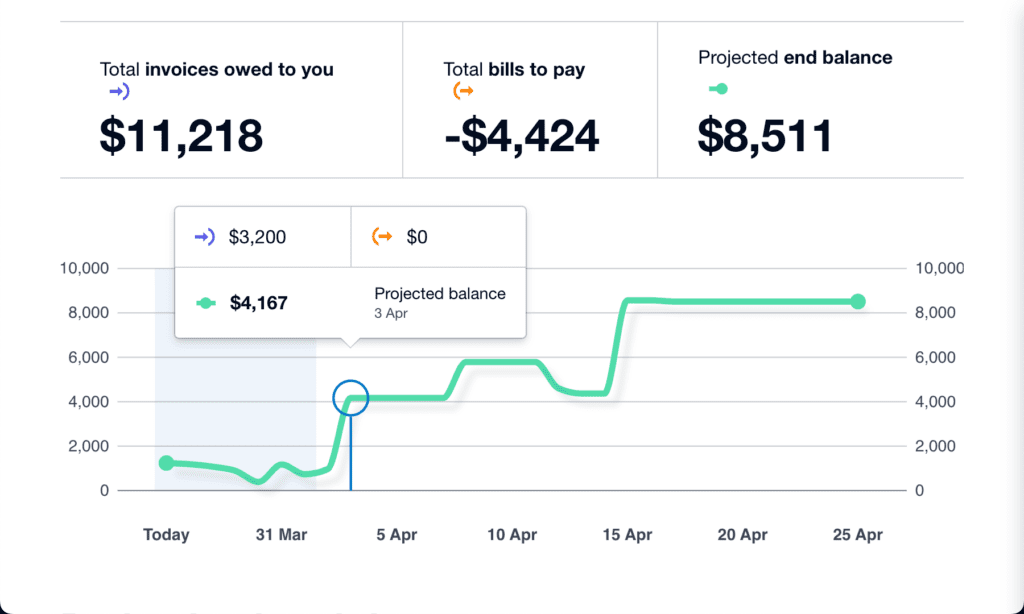
If tracking cash flow wasn’t a priority last financial year, now’s the time to make it part of your routine. Here’s where the Xero Analytics short-term cash flow tool can help. It draws on the balance of your selected bank accounts and the upcoming bills and invoices you’ve entered into Xero to generate a cash flow projection for the next seven to 30 days. This big-picture view can help you make smarter financial decisions. 

The Business snapshot dashboard is another tool in Xero Analytics for an instant, one-page overview of your organisation’s financial wellbeing. It tracks information like profitability, income, largest operating expenses, key financial metrics, and more to evaluate how well your business is running so that you can have more informed conversations with your advisor. 

If you want to take your data-driven decision making to the next level, there’s also Xero Analytics Plus, enabling deeper insights like cash flow projections of up to 90 days, and much more.

5. Streamline reconciliation with bank rules

To save time and minimise errors in the reconciliation process, consider creating bank rules for recurring cash transactions. Whether it’s a regular expense like filling your work vehicle with petrol or paying a monthly bank account fee, you can create bank rules that are targeted enough to identify these transactions, and tell Xero how you want to code them.

When a transaction comes through your bank account in Xero that fits the bank rule’s conditions, you can reconcile it in just one click. You can also create bank rules from existing transactions to give you a head start in setting them up. Useful, right? 

Check out this guide for more ways to win back time this financial year. Xero’s EOFY hub also has some valuable resources, webinars and tips, so be sure to take a look at what’s on offer. Here’s to making FY25 your best year yet! 

The post Five ways to work smarter in Xero this FY25 appeared first on Xero Blog.

Empowering women’s football through Coach Education Scholarships

Software Stack Editor · April 1, 2024 ·

To further support women’s football worldwide, FIFA has provided 14 Coach Education Scholarships for aspiring female coaches in Aotearoa New Zealand.

The scholarships were backed by Xero as part of its global women’s football partnership with FIFA, and ongoing commitment to support the growth of the game and uplift the wahine involved.

The 14 female coaches took the first steps on their coaching pathways this month when they joined a female-only OFC C Licence course in Auckland. The course, run by New Zealand Football, took place from 22-25 March at Bruce Pulman Park.

Xero Country Manager Bridget Snelling says supporting this initiative is an important part of Xero’s wider mission to encourage growth of the game and support the women who make it what it is.

“There’s no denying that coaches have a monumental impact on their team and the wider community. With only five percent of coaches being women, it’s clear more support is needed to uplift our female coaches and provide them with the resources and guidance they need to excel.

“We see this as a crucial area for further growth for women’s football and we are so proud to be a part of it,” says Snelling.

Annalie Longo, Women’s Development Manager at NZ Football says, “One of New Zealand Football’s strategic priorities is about strengthening capability and leadership across women’s football. Part of this is building club capability but it’s primarily to be able to create an environment to develop female talent.”

Having a female-only C Licence course is about building the base and then having the right support structures in place to help our female coaches progress through their coaching journey. Our priority is removing as many barriers to entry as possible so that female coaches are appropriately supported – which is crucial for building and developing the game.

FIFA Head of Women’s Football Development, Arijana Demirovic, explained that FIFA’s Coach Education Scholarships are provided to empower more female coaches to gain further coaching qualifications. 

“In May 2021, FIFA launched the Coach Education Scholarship Programme as part of an ongoing commitment to increase opportunities within football for female coaches. Through this programme, FIFA aims to create a network of coaches and ultimately increase the number of female coaches in football.”

Xero and FIFA Women’s Football will continue to work together to support the growth of the game.

The post Empowering women’s football through Coach Education Scholarships appeared first on Xero Blog.

Xero invoicing: how we’re building a smarter, more flexible future

Software Stack Editor · March 26, 2024 ·

We recently announced that we’ll be retiring the older version of our invoicing product — classic invoicing — on 2 September 2024. We know you have plenty of questions and concerns about this change, so we thought we’d share an update on what’s happening behind the scenes.

The good news: our teams are busy building a new invoicing product that is going to give you far more flexibility and customisation in the future, with beautiful checkout experiences and unlimited payment methods. It’s also built using the latest technology, so we can roll out more of your Xero Product Ideas over time.

Building new features you love

We’re seeing so many great ideas about what invoicing features you’d like to see in Xero. Unfortunately, we can’t roll them out in classic invoicing because of the limitations that we face with the older technology (think of it like trying to plug an electric charger into a classic car).

Our new invoicing solution is a flexible and scalable solution that’s built on the latest technology, so our teams can build the features you need now and in the future. And believe me, we’re really focused on delivering these for you! Some of the features we’re working on at the moment include:

  • adding multiple delivery addresses on an invoice
  • requesting partial payments and deposits via invoicing
  • more customisation of invoicing templates and on repeating invoices
  • improved control and smarter scheduling of reminders
  • easier statement creation and statement payment capability

The changes we’ve made so far (and what’s next)

In addition to this list of features exclusive to new invoicing, there are a number of features from classic invoicing that we’re planning to bring across to the new version. We know these are extremely important to you, and want to reassure you that many of these will be available before September.

So far, we’ve already introduced the following improvements to new invoicing:

  • Copy information from invoices to quotes
  • Option to ‘Create another invoice’ once an invoice is approved
  • Add ‘Reference’ when adding a payment without an extra click
  • Option to ‘Send receipt’ after a payment is added to an invoice
  • Quickly create and save a contact on the fly without extra clicks 
  • View item code on the ‘View invoice’ page
  • Paste numbers with commas or dollar signs into line items 
  • Delete line items in just one click

Many of these changes are in response to your feedback about the design and usability of new invoicing, and our teams are working hard to make sure these will improve your processes and workflows.

We’ve given you plenty of time to keep exploring new invoicing, as we roll out new functionality. Remember, you can keep switching between the two versions until classic invoicing is retired on 2 September 2024.

Keeping you informed, every step of the way

As members of our community, your feedback is extremely important and we are committed to keeping you updated on our progress as we move towards September, including a release log on Xero Central (coming soon).

As always, we encourage you to share your ideas in Xero Product Ideas, and our team is also here to give you a hand if you have any questions or need support.

The post Xero invoicing: how we’re building a smarter, more flexible future appeared first on Xero Blog.

To franchise or not to franchise: What should a business consider before taking the leap?

Software Stack Editor · March 21, 2024 ·

Dive into the world of franchising in this Q&A with Lime Licensing’s CEO, Andy Cheetham, as he shares his expertise, insights, and advice for businesses looking to franchise. 

How can a business determine if its model is suitable for franchising? 

Franchising is all about replication. If your current business can create a clone of itself in another location then it’s likely that your clone could be a franchise, provided it can be profitable of course! 

I like to see a business that has gone through its learning curve already, and whilst no business is ever the finished article, a bonafide franchise should be a developed format that has already got most of the wrinkles ironed out of it.

What are the legal considerations businesses need to be aware of when venturing into franchising? 

At Lime Licensing Group we concentrate on Intellectual Property first, and get that in the right hands at the outset. Then there’s confidentiality agreements, deposit agreements for franchisees who wish to secure a franchise option, franchise agreements to lay out the terms of engagement, and sometimes other supporting legals from side letters, through to development or master agreements. 

What financial factors should businesses evaluate before deciding to franchise? 

Businesses that are ready to scale have three options.The first is growing organically, the second is growing through acquisition, and third is scaling through franchising or licensing. A savvy potential franchisor will have considered the relevant capital requirement of each before choosing franchising. Assuming that they then progress as franchisors, what matters above all else is that the franchise owner’s business can be profitable with territorial restrictions in place and the presence of a royalty. 

In simple terms, a new franchisor should ask themselves if they could replicate what they are doing in a defined region, and with a discount off their net VAT turnover of at least 10%. If the answer to both of these is yes, then franchising is a possibility. A new franchisor can get a 100% return on investment with the sale of the first franchise, so the business case  is extremely viable.

How can a franchisor provide ongoing support to maintain consistency across franchise locations? 

Franchisors should inspect what they expect. I am used to seeing franchisors trying to manage everything in-house, but often external suppliers can do just as good a job. Either way, the rules of engagement are set out in each franchisee’s operational manual and then it’s the job of the franchisor to ensure that standards of delivery from franchisee to customer are consistent with the guidelines.

How can businesses tailor their marketing strategies to promote their franchise model? 

By keeping the characteristics and core brand message, a new franchisor can focus on how best to convey the business opportunity of joining them. Most owner operator franchise buyers are in a career change, so existing contacts might not be the best place to roll out franchise marketing. At Lime Licensing Group we have around 50 different media channels that can work. It’s always a challenge to determine which media or strategy will generate franchise enquiries, but that’s something we as consultants can help new franchisors with.

How can a business ensure that potential franchisees align with the brand and values? 

We never sell franchises over zoom or the telephone alone. Instead we aim to get them into the environment they may be working in and interacting with clients at some level. If you’re a care based business, can you set something up to observe them in a care environment? HQ visits can work well too and we have a number of clients who do psychometric tests to supplement their judgement. 

How should businesses conduct market analysis to identify potential franchise locations? 

Any good franchisor knows how to assess a new region or criteria for a new outlet, but it’s important that the franchisee ensures a satisfactory commercial environment exists in the proposed area. So they need to find the competition they might encounter. This results in new franchisees being proactive and showing the franchisor they understand that in many cases, due to their proximity to their actual franchise, that they are best placed to find a location or assess local demand for a product or service. 

How can technology be leveraged to streamline franchise operations? 

Unified technology – both hardware and  software is always beneficial. It makes support , implementation, and upgrades easier. Having everyone using the same tech results in consistency whether it’s the CRM, bookkeeping software like Xero, or POS Systems for retail. 

Franchising is a strategic leap that requires meticulous planning. Assess your business readiness, establish a robust system, navigate legalities, and prioritise transparent communication with franchisees. Success hinges on adaptability and a commitment to excellence. To find out more about how Xero can help you on your franchising journey, visit our dedicated franchising homepage here.

The post To franchise or not to franchise: What should a business consider before taking the leap? appeared first on Xero Blog.

We’re paying back time with new changes in Xero Payroll

Software Stack Editor · March 20, 2024 ·

If you’re running a small business that employs staff, you know the administrative ‘to-do’ list can be quite lengthy. Onboarding, managing timesheets, setting wages, processing payroll, preparing for end of financial year… it can all take up valuable time. Pay runs in particular need to be easy and efficient for you, as well as your accountant and bookkeeper. 

We’ve been listening to your feedback about Xero Payroll and excited to share some great new enhancements in the UK, marking the beginning of more improvements to come. These will automate processes and reduce the risk of manual calculation errors, so you can stress less about payroll compliance and get more time back to do what matters most: running your business.

You can now switch to Xero Payroll in a few easy steps

Moving payroll data from one software system to another can be complex and time consuming, and there’s no room for error. If you love using Xero but haven’t tried Xero Payroll yet, we’ve made it super easy to get set up. 

Simply upload your latest government filing (full payment submission) into the payroll switching wizard and Xero will facilitate the automatic transition of these records, streamlining the migration of your data and guiding you step by step through the process. In a few steps, you’ll be set up in Xero Payroll and ready to go.

Learn more about the payroll switching wizard

Tailor your employee working patterns and reduce manual workarounds

In an increasingly flexible world, the idea of working the traditional hours from Monday to Friday is an outdated concept. To reflect this flexibility, we’ve created new employee working patterns templates.

If you’re a Xero Payroll Admin, you can now enter more information about your employees’ contracted working patterns. This is especially useful for annual salaried employees who are working non-traditional hours (for example, a four-day work week). 

Payroll Admins can easily create templates, as well as set multiple weeks for salaried employees who work different hours each week. To set up a new template, navigate to the ‘Working Patterns’ tab within Payroll settings.

We’re excited to roll out this improvement, which was ranked as the second most requested feature in Xero Product Ideas for UK Payroll.

Learn more about working pattern templates

More guidance to set up employee pensions

We’ve also released the new and improved Pensions setup experience, with additional built-in guidance, and interactive steps which only display the relevant details to each employee’s record.  This improvement supports accurate setup and makes the best use of Xero Payroll’s automation on pension assessments.

We’ve also simplified how you manage your auto enrolment obligations with increased flexibility to edit and update fields.

There’ll be more updates to come, but in the meantime if you’d like to learn more about confidently managing your accounting and payroll in the one place, don’t forget to register for one of our Xero Payroll webinars.

Register for a Xero Payroll webinar

The post We’re paying back time with new changes in Xero Payroll appeared first on Xero Blog.

How Xero can support you with Basis Period Reform

Software Stack Editor · March 18, 2024 ·

The start date for Basis Period Reform is fast approaching. From April 2024, your sole trader and partnership clients will need to follow a tax year basis for Income Tax as part of HMRC’s Basis Period Reform. 

The reform is only expected to impact 7% of sole traders. However, 33% of partnerships are likely to be affected. 

The 2023/24 tax year is a transitional period, and you’ll need to do some extra admin to make sure your sole trader and partnership clients are compliant. We explore how to prepare for Basis Period Reform and how Xero can support you. 

What is Basis Period Reform and who’s affected?

As outlined above, Basis Period Reform is a change to the reporting period used for Income Tax purposes. The measure impacts sole trader and partnership clients who use their own accounting year for Income Tax reporting. 

Going forward, you’ll need to report the profits clients generate in the tax year on their Income Tax Return, instead of the profits they generate during their accounting year. Clients who already use the tax year basis won’t need to make any changes. 

Some of your clients might decide to change their accounting date, in order to simplify Income Tax reporting. HMRC counts any date between 31 March to 5 April as tax year-aligned, but clients can still keep their original accounting date if needed. For instance, if your clients work in seasonal industries such as farming, they may choose to keep a September accounting date because this is their quietest period. 

Note: businesses that begin operating from 6 April 2024 will automatically use the tax year basis.  

Why is the new basis period coming into place?

Basis Period Reform will mean profits are taxed closer to the time they’re earned. According to HMRC, this will make tax planning easier for businesses, improve compliance, and reduce tax debt write-offs. It means all sole traders and partnerships will be taxed within the same period. 

Property income, interest, and dividends are already taxed on this basis. Through Basis Period Reform, the Income Tax system will be aligned with these other income types. You’ll use the same reporting period for your clients, for all of these income types. 

There’s an additional benefit to adopting a tax-year basis now. When Making Tax Digital (MTD) for Income Tax comes into place, sole traders and landlords will be required to submit quarterly updates in line with the tax year. By shifting to a tax-year basis now, you and your clients can get comfortable with tax-year reporting ahead of time. 

What are the two phases of Basis Period Reform? 

First, a transitional period for the 2023/24 tax year. Clients with a year-end date that doesn’t align with the tax year will have an extended basis period for their 2023/24 tax year. You’ll need to apportion profits from two sets of accounts that make up the tax year to file their Income Tax Return. 

Then, Basis Period Reform will take full effect in the 2024/25 tax year. All sole traders and partnership clients must use the tax year basis. Some of your clients might choose to align their accounting dates with the tax year to simplify their reporting requirements. For clients who wish to keep their accounting date, you’ll need to continue apportioning profits as you did in the transitional year. 

How does the transitional period work? 

For clients who aren’t already following the tax year basis, you’ll need to apportion profits from two sets of accounts to complete their 2023/24 Income Tax Return. Let’s look at an example: 

Your client, Maria, has a 31 December year-end. 

Her basis period for the 2023/24 tax year has two parts: 

  • Her accounting year: 1 January 2023 – 31 December 2023 
  • Plus, the transitional part: 1 January 2024 – 31 March 2024

In total, Maria will be taxed on 15 months’ profit for her 2023/24 Income Tax Return. For an in-depth guide on calculating transitional profits, check out the HMRC website. 

During this transitional period, tax bills are likely to be higher for clients who don’t already use the tax-year basis. To accommodate higher tax bills, HMRC is allowing taxpayers to spread these overlap profits over five years and cushion the impact on their cash flow.

Some of your clients may also be entitled to overlap relief if they started trading with a non-tax year-aligned accounting date. You can claim this on their behalf during the transitional year if you have access to the additional tax amounts. HMRC is also working on an online form to request clients’ overlap profit figures directly. 

Managing transitional profits might sound like an added layer of complexity. But we’ve made updates to Xero Tax which means you’ll be able to include transitional profit claims and basis period adjustments on self-employment and partnership income worksheets. 

How can you prepare your practice and clients for the new measure? 

Clients will look to you in the coming months for advice and guidance on the measure. They’ll need your help with apportioning profits, switching accounting dates, and understanding the legislation. 

Your practice will also see an increase in admin. For clients who aren’t using the tax year basis already, you’ll need to apportion profits from their two accounting periods that fall within the tax year. If they decide to keep their accounting date, you’ll need to do this for every Income Tax Return going forward. That could mean preparing multiple sets of accounts for clients, every year. 

And for those who have an accounting date that falls after September, you might struggle to finalise figures ahead of the 31 January deadline. Instead, you’ll need to submit provisional figures to HMRC and confirm these estimates when you submit clients’ following Tax Returns. This essentially means you’re filing two returns per client, each year. 

If this sounds overwhelming, rest assured that there are tools to help you tackle the admin. Cloud-based software for accountants and bookkeepers can automate daily bookkeeping tasks and provide you with accurate and reliable transaction data for clients. This can then be used to apportion profits, report income, and provide provisional figures. 

Xero is now fully prepared to support you with any Basis Period Reform adjustments. You can easily extend your financial year-end date without any disruption to fixed asset depreciation. Enjoy clear, streamlined tracking and reporting of transitional data, including transitional profit claims and basis period adjustments.

For more guidance, watch our latest on-demand webinar that outlines how to manage Basis Period Reform changes in Xero or take a look at our complete guide to Basis Period Reform and Xero Central page on Basis Period Reform. 

The post How Xero can support you with Basis Period Reform appeared first on Xero Blog.

Summer Series reflections: making the most of XSBI in your practice

Software Stack Editor · March 17, 2024 ·

Recently, small businesses have had to navigate some pretty significant headwinds in the macroeconomic environment. Persistent inflation has led to rising interest rates, flowing through to slowing economic growth. The unemployment rate is still low, which is great news… except if you’re a small business looking for staff.

Yes, these issues are all featured widely in the media. But what’s often missing from this coverage is how these trends are affecting small businesses.

To be an effective advisor, it’s critical to understand what’s happening in the economy and how it’s impacting your clients. Not only does it help you identify what challenges they’re facing, but it also gives you an insight into the opportunities available to them.

That’s why I took the stage at the recent Xero Summer Series to talk to advisors like you about Xero Small Business Insights (XSBI) — covering the latest data and how it can be used by accounting and bookkeeping practices.

What’s the latest XSBI data telling us?

The latest XSBI data was released on March 5, 2024 and shows that after coping reasonably well for much of 2023, small businesses came under pressure in December.

The combination of multiple interest rate rises and ongoing higher-than-usual inflation appears to have reached a tipping point in the final month of the year, with the Xero Small Business Index falling 37 points in December to its lowest level since September 2020. You can read the full Australian XSBI report and explore the data yourself.

How can you use XSBI in your practice?

I loved talking with you at Xero Summer Series, hearing all the wonderful ways you’re using the XSBI data in your practice. Here’s a snapshot of what I heard.

  • Staying informed about small business trends: XSBI gives you great awareness of how small businesses, in aggregate, are performing. It helps give valuable context when thinking about how to best assist your clients at any given point in the economic cycle. 
  • Having deeper client conversations: XSBI is a useful conversational tool with clients, and provides a solid benchmark when assessing performance. For example, do you need to give a client advice on how much they need to lift wages in their hospitality business? You can easily refer to the XSBI data, and see how hospitality wages are tracking nationally, and also investigate specific state wage data. 
  • Sharing information with clients: The data is completely free to use in communication with clients, such as newsletters or social media (all we ask is that you credit XSBI as the source). Sharing the data can help clients understand how small businesses are performing, and positions you and your practice as an expert in the small business environment. 

Take a deep dive into XSBI data and research

XSBI uses anonymised and aggregated data (it’s not a survey!) from over 600,000 small businesses across Australia, Canada, New Zealand, the UK and US. XSBI also has data on all Australian states and the ACT, as well as 17 different industries. You can easily explore all the latest XSBI findings, including downloading the anonymised and aggregated data.

The program not only includes a quarterly release of data, but also regular blogs about small business issues and XSBI special reports on topics like cash flow or technology use. If your interest lies in what is happening in a particular country, you can also check out the specific research we have on Australia, Canada, New Zealand, the United Kingdom and United States.

The post Summer Series reflections: making the most of XSBI in your practice appeared first on Xero Blog.

Your 10-step checklist for end of financial year in 2024

Software Stack Editor · March 14, 2024 ·

We know end of financial year is a busy time, so we’ve prepared a quick 10-step checklist to help you cover your bases at the end of FY24 and start the new financial year off strong. 

If you’re using Xero, you can find more helpful information in our handy guide for getting ready for financial year end.

End of financial year checklist for business owners

In no particular order, here are some tasks to tick off to set yourself (and your business) up for a successful FY25. 

1. Get on top of your outstanding payments & invoices

Got any outstanding bills to pay, or money to receive? Get up to date on your income by chasing any invoices from customers who haven’t paid yet, and square up anything you still owe.

Save time on sending invoices and reminders in the new year by using an accounting software that does it for you. If you’re using Xero, there’s apps in the Xero App Store that can help with this too.

2. Evaluate your business expenses

You may be able to claim business expenses in your tax return to reduce the total tax you need to pay. 

Go over your business expenses to understand where money was spent and identify where you can potentially claim expenses against your taxable income. There are digital tools available that automate your expense management so that it’s less of a headache by the end of the year.

You can also find opportunities to reduce costs, plan your upcoming expenses and make sure you stay profitable in the new financial year.

3. Get up to date with GST

If your business is GST-registered, you’ll need to sum up and pay any GST you owe at the balance date for the end of the financial year. You can do this online, with accounting software or through your myIR account with Inland Revenue. You may want to consult an accountant or bookkeeper for this step.

See our GST guide for business to make sure your bases are covered for filing and paying GST. 

4. Take advantage of credits

Depending on your business, you could be eligible for credits that can lower your tax bill. You may want to seek advice on what you could be eligible for.

For example, if your business invested $50,000 or more in certain research and development activities, you could be eligible for a 15% R&D tax credit. Or, if some of your income has come from overseas, you could receive a credit for any foreign tax paid abroad.

5. Review your inventory or services

As part of your year-end review, consider your physical inventory and/or services. This helps confirm what you still have on hand, and that your assets are accurately recorded. 

Plus, you can plan for a more profitable FY25 by focusing on what’s selling by:

  • Reviewing what was in high-demand in FY24, and what was the most profitable
  • Setting a budget for ordering in more products, or promoting the most profitable services
  • Retire goods or services that haven’t served the business well – you could offer discounts on discontinued goods, or use them for future promotions 
  • Consider any new goods and services to offer, based on customer enquiries and what’s already selling well

6. Take a good look at your financial records

Take stock of your payroll, profit and loss statements, balance sheets, and cash flow records at the balance date. This helps you to understand how much profit you might’ve made, view your overall performance for the financial year, and get ready to file tax returns.

Check and fill any missing records or gaps in financial information before closing off your books.

7. Assemble your tax documents

To file your end of fiscal year tax return, you’ll need to finalise payroll and gather your income statements and business expense records. 

With this information, you’ll declare the profit your business earned and any expenses you can claim as a deduction to Inland Revenue. You might want to consult an accountant or bookkeeper for this step.

8. Check in with your people

It’s a great idea to connect with staff, customers, and business partners. Ask for feedback on what’s working, what people would like to see more of, and any processes or operational kinks that need smoothing out.  

You could do this through surveys and meetings with staff and stakeholders. Be sure to share how you’ve incorporated their feedback.

9. Set yourself some goals for the new financial year

Now that you’ve reflected on the year that’s been, it’s time to set objectives for the year ahead. 

Consider your business’s accomplishments and how you could build on those. Set clear, realistic goals for growth opportunities you’ve identified, and identify solutions for challenges the business faced this year. 

10. Give yourself time to breathe

Finally, take time to look after yourself. The end of the financial year brings a surge in work to-dos, and it’s important to move into FY25 with strength. Caring for your wellbeing ensures you’re at your best to care for the business.

Take the pressure off with Xero

Feeling the end of financial year stress? Xero’s accounting software can help take the pressure off by automating unloved and tricky tasks, and make it easier to manage your finances throughout the year. 

You can even collaborate with your accountant or bookkeeper through the tool, so they stay informed on your business and are in the best position to help.

There’s also a range of apps that connect to Xero, covering everything from debtor management to reporting, payroll and payments in the Xero App Store.

The post Your 10-step checklist for end of financial year in 2024 appeared first on Xero Blog.

Get set up for the new tax year with Xero Payroll

Software Stack Editor · March 14, 2024 ·

The end of the financial year is around the corner, so it’s time to review the latest changes and start getting ready to complete your payroll year end. Here are some key updates you need to know about, as well as our tips for a smooth transition into the 2025 financial year.

Latest changes

Payroll is always evolving, but there were a few little surprises this year. These include changes to National Insurance (NI) contributions effective from 6 January (followed by a second change effective 6 April), a new Scottish tax band and holiday pay reform.

The holiday pay reform, along with updated HMRC reporting requirements for employee hours coming into effect in FY26, means that it’s never been more important to ensure your employee’s records are up-to-date — especially the number of hours they’ve worked.

Investment Zone NI categories

From 6 April 2024, HMRC are introducing new NI categories for employees that work in the specified Investment Zones. Any employees who meet the criteria will need to be processed and reported to HMRC under the new category letters. 

Xero has included these new category letters for you to select and apply to eligible employees, to receive the employers NI relief available within the scheme. There will be a notification in the pay run when an employee’s eligibility period for these new NI categories come to an end.

Further reduction to NI

As announced in the Spring Budget on 6 March, HMRC are applying a further reduction to employee class 1 NI contributions from 10% down to 8% as of 6 April. Once passed through Parliament, all new pay runs processed in FY25 will apply the new rate.

Updates to paternity leave

Employees will be able to provide 28 days’ notice prior to the dates they wish to take their paternity leave. They will also be able to request their paternity leave in two non-consecutive periods of one week, or a two-week block. They will be able to take their paternity leave within 52 weeks of the birth of the child, or placement for adoption.

Other updates

In addition to the changes we’re automating in Xero Payroll, there are some other updates to keep an eye on. Here’s an overview of these changes.

National Minimum Wage and National Living Wage

Here are the latest updates to the National Minimum Wage and National Living Wage rates:

  • Aged 21 and above (national living wage rate) £11.44
  • Aged 18 to 20 £8.60
  • Aged under 18 (but above compulsory school leaving age) £6.40
  • Apprentices aged under 19 £6.40
  • Apprentices aged 19 and over, but in the first year of their apprenticeship £6.40

Holiday entitlements

The Government has introduced reforms to simplify holiday entitlement and holiday pay calculations in the Working Time Regulations, for leave years beginning on or after 1 April 2024.

Part-year and irregular hours workers are legally entitled up to a maximum of 5.6 weeks of paid statutory holiday entitlement per year, calculated according to actual hours worked using the 12.07% accrual method. 

Employers are also able to use rolled-up holiday pay as an additional method for calculating holiday pay for irregular hour and part-year workers only.

Our tips for payroll year end

Just like last year, we’ve created an end of tax year checklist to guide you through reviewing and updating your settings for the 2025 financial year. Our payroll specialists are also here to support you at any time. Reach out to them via Xero Central support, or check out our support articles and webinars. 

1. Get prepared

Before you process your final pay run for the 2024 financial year, you’ll need to approve any remaining leave requests, timesheets and overtime, to ensure the employee’s final pay values are correct. 

Even though you regularly reconcile your posted pay runs, now is a good time to also check reports such as the P32, P11s, Gross to Net and Account Transactions to make sure there are no discrepancies.

If your business is in the construction industry, we recommend you review and reconcile your Construction Industry Scheme (CIS) Suffered report for the tax year. 

2. Complete your final pay run

Next, onto completing the final pay run. You’ll need to make sure the payment date is between 6 March and 5 April 2024. If you process weekly pay runs, you’ll likely have a week 53 pay run this year. Xero takes care of this for you and will adjust the tax calculation automatically. 

Xero will submit an Employer Payment Summary (EPS) to HMRC to confirm that your final pay run of the year has been processed. If you have no employees to pay, you’ll need to post a NIL pay run to trigger the EPS.

If you need to make any changes after processing the pay run, you’ll need to make these adjustments by 19 April 2024. Once you’re happy with the final figures and you’re ready, review the P60 reports. 

You can also share P60s with your employees through Xero Me. P60s need to be provided to your employees by 31 May 2024. 

3. Update your payroll for the new tax year

Before starting your first pay run for the new tax year, you’ll need to update your payroll by checking the following.

  • Employment allowance: Check if you are eligible. If you are, you’ll need to activate this allowance for the new tax year within the HMRC tab under payroll settings.
  • National Insurance: Review director NI calculation methods and employees NI categories, keeping an eye out for any deferment certificates. Remember to check if you have any employees who are operating in a UK freeport or are qualifying veterans, as you may be entitled to claim relief by updating their category letter.
  • Tax codes: Xero automatically resets any previous W1/M1 calculation methods to cumulative for the new tax year. Any P9X tax code changes received from HMRC will also be applied for you to review.
  • Payroll benefits: If this is something that you offer or are considering, then you need to register with HMRC before the start of the new tax year. For any existing benefits in kind that you’re processing through Xero Payroll, review the benefit value and availability dates for the new tax year. For cars and vans, make sure you keep the ‘available to’ date blank if you’re rolling the benefits forward. Xero Payroll will automatically insert the new benefit line, ready for you to process in your first pay run. Make a note of 6 July 2024 to complete and submit your P11D(b) for any employer class 1A NI due.
  • Corporation Tax UTR for CIS suffered – If you’re claiming CIS suffered, you’ll need to enter the Corporation Tax UTR reference on the HMRC tab in payroll settings. If this isn’t currently entered, you’ll be asked to add this when scheduling your next EPS and entering an amount of CIS suffered.

The post Get set up for the new tax year with Xero Payroll appeared first on Xero Blog.

UK mobile app, Xero Go, to be retired

Software Stack Editor · March 11, 2024 ·

Over a year ago, we launched an early version of Xero Go to see how a purpose built app could help cater for the entry-level accounting needs of the self-employed in the UK.

We have spent the last year testing and refining Xero Go and after completing a careful review to understand the future of the product, we found greater investment was required to meet the changing customer needs and expectations around the product. 

By putting those resources into our core Xero accounting platform, payroll and our mobile app, it will allow us to better meet our customers’ needs over the long term.

As a result, we will be retiring Xero Go on 12 September 2024 and will reallocate these resources, capabilities and expertise as we sharpen our focus on delivering to customer needs. 

We really appreciate the support of the sole traders and our accounting and bookkeeping partners who have been using the app during this free period. 

What do Xero Go customers need to do?

All Xero Go customers can continue to use Xero Go for free until 12 September 2024. We recommend exploring alternative solutions to start using at the beginning of the new financial year (i.e. from 6 April) so all your data for the next financial year is in one place. 

The paid Stripe add on will continue to be available during this time, after which customers may choose to use their Stripe account separately.

For those that want to export their data, we’ve added a simple button in the app allowing users to instantly download data stored in Xero Go. The data can be downloaded as many times as required between now and 12 September. Users will need to upgrade to the latest version of the app, to utilise the export feature. 

What does Xero offer as an alternative

Xero offers Starter and Standard plans which are suitable for small businesses, and also have a companion mobile app. Additionally, these plans have some important features like bank feeds reconciliation that weren’t available in Xero Go. All current users of Xero Go can sign up via the latest version of the Xero Go app to receive six months free on either one of these plans, and we’ll work with you to migrate your data from Xero Go into your new Xero solution.

Current Xero Go users can register for a free webinar on alternate Xero Solutions here.

We want to reaffirm our commitment to supporting UK businesses and their advisors with digital solutions. We believe this decision will help us focus our efforts on the future, and deliver more value in the long term.

The post UK mobile app, Xero Go, to be retired appeared first on Xero Blog.

Four steps to a seamless payroll year end with Xero Payroll

Software Stack Editor · March 11, 2024 ·

As the summer days become a memory, it signals the onset of a crucial period for payroll professionals in New Zealand. With the approaching new tax year on 1 April 2024, regulatory changes are set to impact payroll calculations across the country. Staying informed and getting prepared is essential. 

In this article, we delve into these updates and provide four steps to help navigate the upcoming year-end period seamlessly, with Xero Payroll. Whether you’re a seasoned payroll manager or new to this all, arming yourself with this knowledge will be instrumental to maintaining accuracy and efficiency within your payroll operations.

Important upcoming changes for New Zealand payroll compliance

There are four key changes in New Zealand payroll calculations coming up for the new tax year:

  • Adult minimum wage will increase to $23.15 per hour from 1 April, 2024
  • The annual ACC earner levy rate is increasing from 1.53 percent to 1.60 percent 
  • The annual ACC earner levy threshold is increasing to $142,283
  • The student loan threshold is increasing to $464 per week. See table below:
If you are paid… Your student loan repayment threshold is…
Weekly $464
Fortnightly $928
Half-Monthly $1,005.33
Four-weekly $1,856
Monthly $2,010.67
Student loan repayment thresholds are updating

In Xero Payroll, the above rates are automatically applied to any pay runs with a payment date on or after 1 April. Your employees may see slight variations in their payslip.

With this in mind, below are some steps to get you smoothly through the year end period.  

Step one: Post the last pay run

Make sure all your pay runs for the financial year have been posted. If you’re using payday filing through Xero, you’ll also need to make sure these have been filed. To make sure these pay runs are reported in the 2023 – 24 financial year, the payment date will need to fall on or before 31 March 2024.

Step two: Review and reconcile

Go to payroll settings to review all the information that impacts your payroll reporting. If anything is incorrect, you can update this before processing your first pay run for the new financial year. You can also take this opportunity to check that any final employee payments and changes have been put through.

You’re likely already regularly reconciling posted pay runs, but it’s always a great idea to run your eyes down reports like pay history and leave transaction reports to make sure there are no surprises. Here are some tips that may help:

  • If multiple expense accounts have been used for earnings and KiwiSaver, make sure the totals are added together and compared against the pay history report.
  • Check for any transactions incorrectly reconciled against your expense accounts. You can check this by running the Account Transactions report in Xero.
  • If your totals don’t look correct, this could be due to some manual journals. Check the amounts by running the Journal report in Xero, and then click manual journals.
  • If you’re having trouble locating the source of a discrepancy, run your reports for a smaller date range (like monthly) or by each pay period.

Step three: Make any amendments

Any errors made throughout the financial year (such as missed or incorrectly posted pay runs) can be corrected using an unscheduled pay run.

Simply create the pay run for the required period, and enter the adjustment amounts. These adjustments will be filed with Inland Revenue (IR). You can even enter negative values, if needed. If you do this, you will need to use myIR to manually adjust the returns for the employee. In myIR you can edit previously returned files, however, if the adjustment is for a period before the current tax period it might be worth contacting IR to discuss.

Once any amendments are made, check the payment date of the unscheduled pay run falls within the correct financial year, so it’s reported correctly.

Step four: Review and update employee details

  • With the increased minimum wage, don’t forget to check and update the salary and wage details for any impacted employees.
  • You should also review current leave entitlements and make any adjustments as necessary – especially if work patterns have changed recently.
  • Finally, remember that you need to review and update the ESCT rate for each employee when they start working for you and at the start of each tax year. If your employee’s salary or wages change during the tax year, do not change the ESCT rate during the year. Instead, change it at the start of the next tax year.

You’re done! Sit back and relax

That’s it! There should be nothing else you need to do to finalise payroll year end. Your payroll accounts should now be in good shape for the new financial year. Any pay runs with a payment date on or after 1 April 2024 will fall within the new financial year.

In the meantime, check out Xero Central for more information on how to prepare payroll for the new financial year. Our friendly support team is also available if you need a hand.

The post Four steps to a seamless payroll year end with Xero Payroll appeared first on Xero Blog.

  • « Go to Previous Page
  • Page 1
  • Interim pages omitted …
  • Page 6
  • Page 7
  • Page 8

Get your Software Stack together. softwarestack.tech

Software Stack

© 2024–2026 - Software Stack is a trading name of SouthwestCIO Limited ac ompany registered in England & Wales 11319049

  • Knowledgebase
  • Home
  • About Us
  • Contact Us