• Skip to primary navigation
  • Skip to main content
software stack logo

Software Stack

Get your Software Stack together

  • Knowledgebase
    • All Categories
    • Accounting Software
    • Automation & Workflow Software
    • Customer Relationship Management
    • E-Commerce Shopfronts & Payments
    • Marketing Automation
    • Online Courses & Membership
    • Project Management
    • Surveys & Forms
    • Web Hosting
  • Home
  • About Us
  • Contact Us
  • Show Search
Hide Search

Freshbooks

Accountants: How To Get Your Clients Behind Collaborative Accounting

Software Stack Editor · August 6, 2024 ·

As an accounting professional, you know your clients best. You understand their business model and structure, the tax and labor laws they need to comply with, and their unique financial challenges.

With your guidance and user-friendly general-ledger software like FreshBooks, they can (and should!) manage pre-accounting tasks like:

  • preparing estimates
  • sending invoices
  • setting up online payments
  • employee time tracking for payroll

That’s the process, which allows you to provide value to your clients through advisory services. Especially since you know things about their business that they may not be aware of just yet. But with your guidance, they’ll get there.

That’s why you have to get your clients on board. Here are some considerations and steps to take that will bring everyone together.

Table of contents icon

Table of contents iconTable of Contents

    Explain The Benefits of Collaborative Accounting

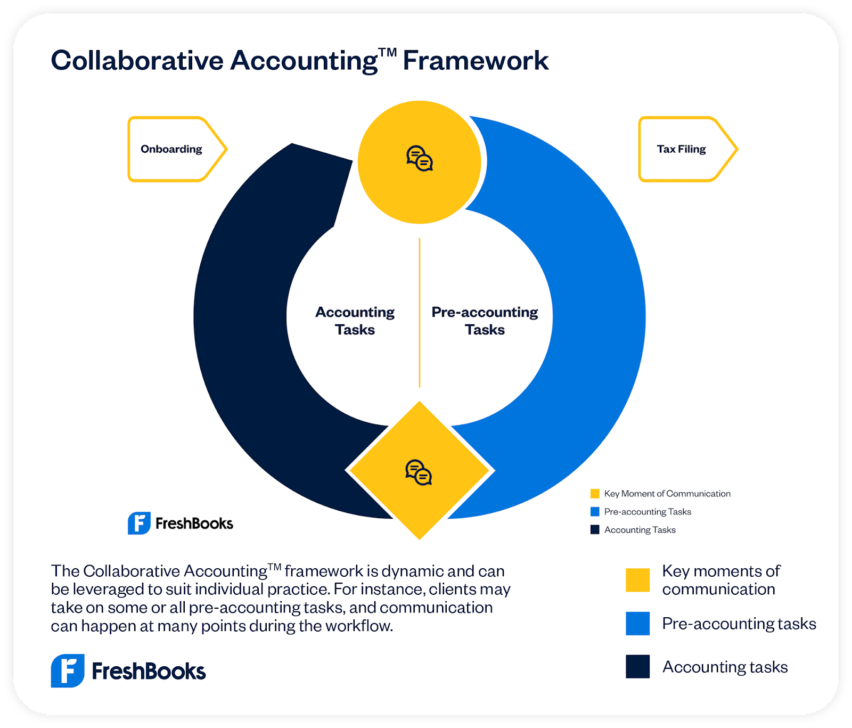
    Collaborative Accounting is anchored around a shared accounting workflow between accountants and clients. You both work together, with full transparency, in a single
    client-friendly platform. Each of you takes on key elements of the business’s financial operations, so your client is empowered, and no one is left uninformed.

    When following the Collaborative Accounting framework, your clients can expect:

    Smart financial advice when they need it
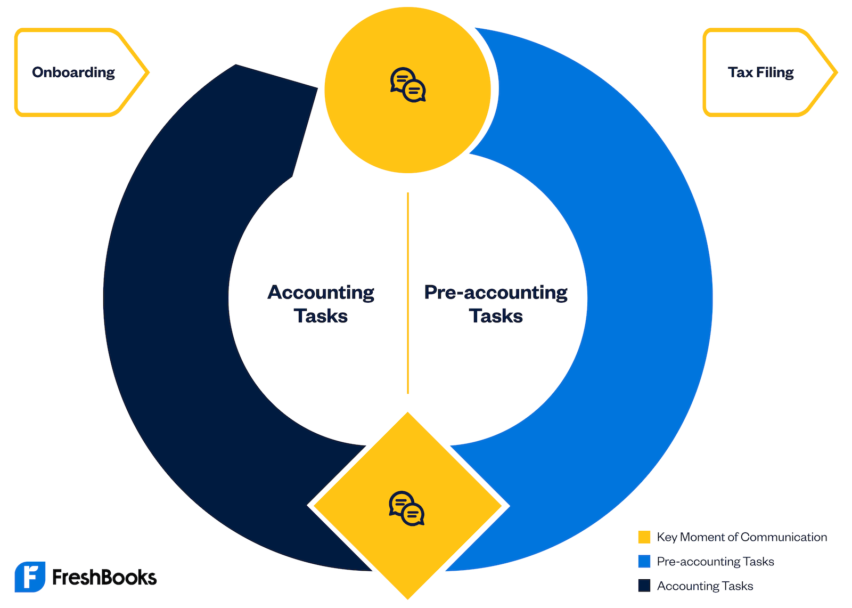
    While the client handles pre-accounting tasks like creating estimates and proposals, sending invoices, and tracking time and expenses, you pick up where they leave off with accounting tasks that require your expertise.

    Peace of mind knowing they’re on top of their finances
    Your clients will now have more agency over their own business and a deeper understanding of their financials—freeing up your time to do more astute analysis that can help them make those big-picture business decisions.

    A stronger partnership with you, their accounting professional
    You can meet regularly to discuss the financial insights you’re observing so that your client can optimize their business and prepare for sustainable growth.

    Clean, organized, and compliant books
    When either you or your client wants to share information or ask questions, you can communicate in one simple, and easy place—right in the FreshBooks platform.

    Empower Your Clients to Do More

    For some clients, taking more responsibility for their finances may seem intimidating. After all, they have a relationship with you because they recognize they could use professional assistance.

    They may need to be reminded that, as business owners, they know their products, services, expenses, and workflows better than anyone. They can make real-time decisions about what should go on an invoice (or into a proposal), to which project an expense should be assigned to, and or how much time they or their team members spend on a particular project.

    When they take responsibility for these tasks, they’ll have a better handle on the efficiency of their workflows and the real-time financial realities of their business. Delegating them to an accounting professional means they won’t be aware of the details that could help them make smarter short- and long-term business decisions.

    In short, managing their own pre-accounting tasks will keep them informed and allow them to make more confident decisions.

    Show Your Clients How Your Insights Will Help Them Grow

    When clients keep up with their pre-accounting tasks, their accounting reports will offer you insights that can help them understand things like:

    • which projects/services are most profitable through comparisons
    • how to price a project or service properly
    • how to assign the right people to projects
    • which project pipeline can better handle cash flow in the future
    • which services cost the most and are lowering margins
    • how the project is tracking against the original estimate

    These are the insights that can help an astute business owner find efficiencies, develop growth strategies, improve cash flow, and much more. And it’s all part of Collaborative Accounting.

    Resources to Help You Get Your Clients Behind Collaborative Accounting

    You’re not alone in introducing Collaborative Accounting to your clients and getting them on board with this new way of working. Here’s how we can help:

    • : Get certified in under 4 hours to master product features and practice advisory conversations, enabling you to work more effectively with your clients.
    • 1:1 meeting with a partner consultant: When you complete your certification, you have access to a partner consultant who can answer your questions and walk you through how to introduce Collaborative Accounting to clients.
    • An Owner’s Guide to FreshBooks Collaborative Accounting: You lay the groundwork in your client meeting and this user-friendly guidebook will detail everything they need to know about Collaborative Accounting.

    Embracing Collaborative Accounting can change how you and your clients work together. You’ll build a partnership based on transparency and mutual support.

    And ultimately, Collaborative Accounting not only strengthens your client relationships but also positions you as a valued mentor and advisor capable of guiding them toward long-term success.
    The Ultimate Guide to AI for Small Businesses: Tools, Tips, and Real Results

    Software Stack Editor · July 11, 2024 ·

    You’ve definitely heard the buzz: Artificial intelligence (AI) is everywhere, transforming everything from social media posts to the job market. But as a small business owner, you might still be wondering, “How can I actually use AI technology to help my business grow?”

    Well, you’re in luck! In this post, we’ll unpack exactly what AI is, explore how AI tools can empower small businesses, and introduce some fantastic, user-friendly, and even free AI tools to get you started. Let’s dive in.

    What exactly is artificial intelligence (AI)?

    Artificial intelligence, or AI, essentially gives machines the ability to mimic human intelligence. AI technology enables computers to analyze vast amounts of data, recognize patterns, make data-driven decisions, and even create content. Oh, and it all typically takes just a few seconds.

    You probably already interact with AI-powered features daily, from Siri and Alexa to the personalized recommendations Netflix makes based on your user behavior. Recently, however, generative AI—a type of AI that generates original content, such as images, videos, text, and even music—has taken center stage. Tools like ChatGPT, DALL-E 2, and Jasper.ai are popular examples that small businesses can leverage to enhance efficiency, creativity, and customer experience.

    Types of AI for small businesses

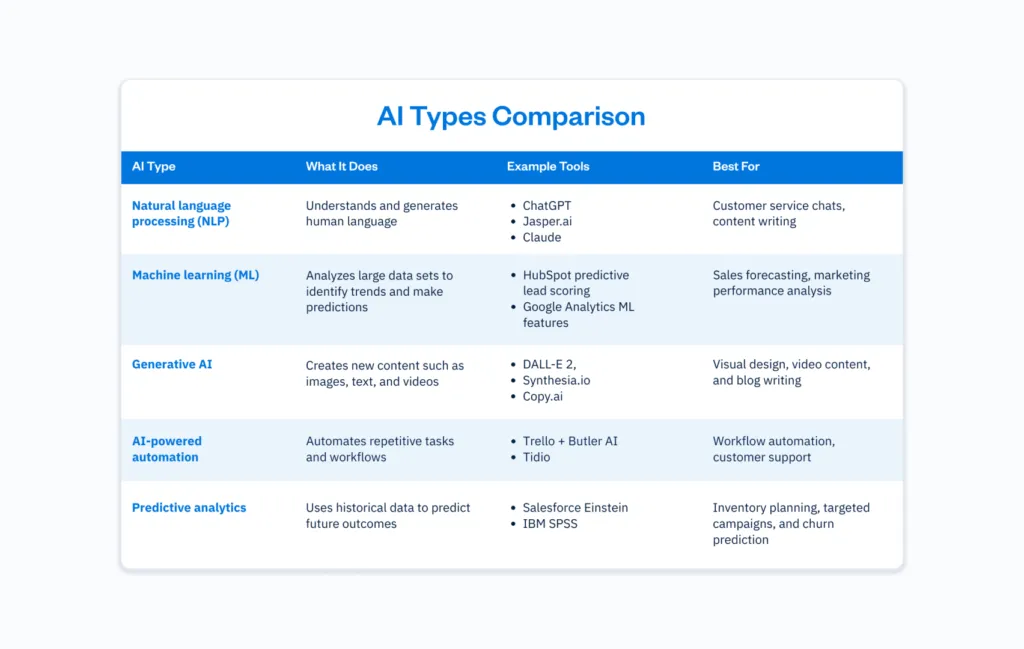
    AI isn’t just about creating viral images or writing catchy captions. Behind the scenes, different types of AI are quietly transforming how small businesses operate day in and day out. From tools that understand human language to systems that predict future trends, each type of AI offers unique AI-powered features to make running your business faster and more efficient.

    Here’s a quick overview of the main types of AI technology you’ll likely come across, and how they can support your growth.

    From marketing and sales to customer service and productivity, AI capabilities are transforming how small businesses operate.

    According to a recent U.S. Chamber of Commerce and Teneo survey, a staggering , while 40% leverage generative AI tools like chatbots and image creators to automate marketing and customer support.Here’s how you can start implementing AI to boost your business operations:

    Marketing: Turbocharge your touchpoints

    AI marketing tools can significantly enhance efficiency and improve customer insights. Here are some standout use cases:

    • Market research and competitor analysis: AI can swiftly analyze more data about your target audience and competition, helping you identify trends and opportunities.
    • Content creation: Generative AI can help brainstorm ideas, write compelling social media posts, create blog posts, and even produce eye-catching visuals, quickly simplifying your content creation process.
    • Social media management: Monitor conversations across multiple channels, respond promptly to customer inquiries, and refine your messaging to better resonate with your target audience

    Sales: Close more deals faster

    AI can enhance your sales process and lead generation efforts.

    • Lead generation: AI lead generation tools identify and nurture leads by analyzing customer data and online behavior, significantly improving your marketing efforts.
    • Email campaign automation: Tools equipped with AI technology allow you to automate follow-ups, personalize messaging, and ensure consistent customer interactions.
    • Predictive sales analytics: AI analyzes historical data to help forecast sales, streamline inventory management, and optimize pricing strategies, directly contributing to improved profitability.

    Customer service: Elevate customer satisfaction

    AI-powered chatbots are revolutionizing customer service, helping businesses deliver faster and better customer experiences.

    • 24/7 customer service: AI-powered chatbots handle customer inquiries instantly, reducing response times and increasing overall customer satisfaction.
    • Automated issue resolution: NLP helps AI tools understand and respond to customer queries, solving common problems without human intervention.
    • Message prioritization: AI identifies urgent messages, ensuring your team addresses critical customer interactions promptly.

    Automation and productivity: Do more with less

    Small business owners know the value of efficiency. AI-driven automation can streamline your business processes and enhance efficiency.

    • Reduce operational costs: Automate repetitive tasks such as scheduling and customer follow-ups, giving your small team more time to tackle higher-value activities.
    • Improve decision-making: AI easily analyzes vast data pools fast, providing actionable insights to make smarter, data-driven decisions.
    • Enhance project management: AI-powered project management tools help manage resources effectively, predict project timelines accurately, and easily optimize workflow management, significantly reducing operational costs.

    With countless AI solutions flooding the market, selecting the right tools can feel daunting. To simplify your decision-making process, consider the following, but also talk to your network about what works and doesn’t work for them:

    • Business needs: Clearly identify your pain points. Are you looking to improve customer service, streamline your sales process, or enhance marketing campaigns?
    • Ease of integration: Choose AI tools that easily integrate with your existing tech stack, processes, and systems to ensure smooth implementation.
    • Cost efficiency: Look for affordable or free AI tools that align with your budget and offer clear cost savings and value over time.
    • User-friendly interface: Opt for solutions with an intuitive, user-friendly interface, requiring minimal technical expertise.

    How to implement AI in your small business (step-by-step guide)

    1. Identify your goals: Decide exactly what you want AI to achieve for your business–is it faster customer responses, better social media content, or automating data entry?
    2. Audit your existing tools and processes: List where you spend the most time and identify repetitive tasks AI could handle or support.
    3. Research and choose the right AI tool: Use the selection criteria in this blog to compare options and start with free trials where possible. Read forums (Reddit) and talk to people in your network to learn how AI has helped them, and which tools they use.
    4. Train your team: Once you narrow things down and choose a tool, host a quick lunch-and-learn or demo session to show how the tool works and set clear expectations for usage.
    5. Start small and pilot: Test AI with one process or team before rolling it out business-wide to refine workflows safely.
    6. Monitor and measure results: Set goals like time saved, leads generated, or improved customer satisfaction to evaluate ROI.
    7. Optimize and scale: Review AI usage regularly, gather team feedback, and expand into new areas or upgrade plans as your needs grow.

    Now that you understand AI’s potential impact, let’s explore some fantastic tools you can start using today. Here’s an updated, categorized list of user-friendly and powerful AI tools tailored specifically for small businesses.

    Marketing and content creation AI tools

    According to a U.S. Bank survey, are currently using generative AI tools, while another 21 % plan to adopt one within 12 months, particularly for content creation, data analysis, and marketing.

    1. ChatGPT

    Meet ChatGPT (although you’ve probably heard of it already), your versatile AI writing buddy that can brainstorm ideas, draft content, and even crack a pun or two to lighten your workday.

    Type: NLP chatbot.

    Use cases: Brainstorm ideas, generate keyword-rich content, write engaging emails.

    • A freelance graphic designer uses ChatGPT to draft proposal emails tailored to each client’s style and brand voice.

    Cost: Free (premium $20/month).

    Pros: Easy to use, excellent at idea generation.

    Cons: Limited knowledge after 2021 (although it can still search for current info).

    2. Jasper.ai

    Jasper.ai is like having a speedy copywriter on call 24/7, ready to generate high-converting marketing copy in any tone you need.

    Type: AI-powered content writer.

    Use cases: Create blog posts, product descriptions, and social media posts.

    • An online pet store uses Jasper.ai to write SEO-rich product descriptions that improve organic search rankings and increase sales.

    Cost: Starts at $39/month.

    Pros: Fast content generation, versatile writing styles.

    Cons: Costs can add up for extensive use.

    3. Copy.ai

    Copy.ai takes your prompts and transforms them into catchy headlines, social posts, and emails – perfect for small businesses short on time.

    Type: AI content generator.

    Use cases: Write ad copy, emails, and social media posts.

    A personal trainer uses Copy.ai to generate daily motivational social media captions aligned with client goals and trending fitness hashtags.

    Cost: Free option available, paid plans for teams start from $36/month.

    Pros: Versatile tones, no word limits on paid plans.

    Cons: Free tier can be limited.

    4. Claude

    Claude is Anthropic’s conversational AI assistant, designed to be helpful, harmless, and honest. It’s perfect for businesses that need an AI chatbot to brainstorm, draft content, answer customer questions, or analyze complex topics with a natural, human-sounding tone.

    Type: AI conversational assistant and chatbot.

    Use cases: Drafting content, summarizing research, answering customer inquiries, and generating ideas.

    • A tech startup founder uses Claude to summarize dense technical whitepapers into digestible LinkedIn posts to grow thought leadership.

    Cost: Free with limited features, pro plan $20/month.

    Pros: Safe conversational design, broad general knowledge, and natural and human-like responses.

    Cons: Less specialized integrations compared to some niche AI business tools.

    5. Grammarly

    Grammarly is more than a spellcheck, it’s your AI-powered writing coach, ensuring every email, caption, and proposal is clear and confident.

    Type: AI-powered writing assistant.

    Use cases: Proofreads emails, blog posts, and social media posts with advanced suggestions for clarity and tone.

    • A sports apparel e-commerce brand uses Grammarly’s tone suggestions to ensure product page copy feels relatable and friendly for their target audience.

    Cost: Free basic plan, premium plans from $12/month.

    Pros: Improves customer interactions by polishing written communication.

    Cons: Sometimes suggests overly formal phrasing that doesn’t match a casual brand voice, leading to inauthenticity.

    Visual and video content AI tools

    Marketing departments using AI for video and visual content experience at least a in campaign turnaround times due to AI-generated video solutions.

    6. DALL-E 3

    DALL-E 3 is your AI art generator that turns text prompts into stunning, original images to wow your audience and upgrade how fast you can deploy visuals for marketing.

    Type: AI-powered image generator.

    Use cases: Create unique visuals and graphics.

    • A custom bakery creates unique cake topper designs with DALL-E 3 illustrations for client mockups.

    Cost: Accessing DALL-E 3 through a ChatGPT Plus subscription (which includes access to other OpenAI features like GPT-4) costs $20 per month.

    Pros: High-quality images, easy to use.

    Cons: Limited free usage.

    7. Synthesia.io

    With Synthesia.io, you can create professional AI-generated videos featuring avatars that speak your scripts in multiple languages, no studio needed.

    Type: AI video creation.

    Use cases: Professional videos, training materials, marketing campaigns.

    • An HR consultancy produces onboarding videos in multiple languages for global clients without hiring voice actors or video crews.

    Cost: Starts at $18/month.

    Pros: Multilingual, professional-quality videos.

    Cons: Premium features require higher subscription tiers.

    8. Pictory

    Turn long videos into short, shareable clips perfect for social media with Pictory’s AI video summarizer and editor.

    Type: AI video summarizer and editor.

    Use cases: Turns long-form video content into short, social-media-friendly clips.

    • A coaching business turns hour-long webinars into short teaser clips with captions to promote on Instagram and LinkedIn.

    Cost: Starts at $19/month.

    Pros: Great for marketing campaigns and repurposing webinars.

    Cons: Editing customizations can be limited.

    Customer service and experience AI tools

    AI chatbots are one of the biggest customer-facing instances of AI, and can help streamline the buying process and .

    9. ManyChat

    ManyChat turns your social DMs into automated conversations, helping you engage customers and generate leads while you sleep.

    Type: AI chatbot builder.

    Use cases: Builds automated chatbots for messaging apps like Facebook Messenger and Instagram to improve customer service.

    • A local hair salon uses ManyChat on Instagram to automatically answer appointment availability questions and collect booking info.

    Cost: Free basic plan, pro plans start at $15/month.

    Pros: Great for lead generation and customer inquiries on social media platforms.

    Cons: Limited to supported messaging channels.

    10. HubSpot Chatbot Builder

    HubSpot’s Chatbot Builder integrates seamlessly with your CRM to qualify leads, book meetings, and answer FAQs, all automagically.

    Type: AI chatbot integrated within HubSpot CRM.

    Use cases: Qualifies leads, books meetings, and answers customer inquiries automatically.

    • A B2B SaaS company implements HubSpot’s chatbot to pre-qualify leads by industry and company size before routing them to sales reps.

    Cost: Included in HubSpot’s free CRM, advanced features require paid tiers.

    Pros: Tied to CRM data, improves customer satisfaction, and boosts lead conversion.

    Cons: Full functionality requires integration with HubSpot’s ecosystem.

    11. Tidio

    Tidio combines live chat and AI-powered chatbots to create seamless customer service experiences across your website and social channels.

    Type: AI-powered customer service platform.

    Use cases: Combines live chat and AI-powered chatbots to handle customer interactions efficiently.

    A Shopify apparel store integrates Tidio to answer sizing FAQs instantly, increasing customer confidence and reducing abandoned carts.

    Cost: Free basic plan, premium plan from $19/month.

    Pros: Enhances efficiency and customer experience across multiple channels.

    Cons: Free version limits active chats.

    Specialty AI tools for small businesses

    A whopping that have tried AI tools say they’re effective at streamlining daily tasks. Whether that’s handling scheduling, expense reports, or project workflows, these tools help small teams work smarter, not harder.

    12. Otter.ai

    Otter.ai is your AI-powered notetaker, transcribing meetings and brainstorming sessions so you can stay focused and never miss a detail.

    Type: AI transcription tool.

    Use cases: Transcribes meetings, interviews, and brainstorming sessions for quick documentation and project management.

    • A legal assistant records client calls and uses Otter.ai to efficiently create time-stamped summaries for case files.

    Cost: Free basic plan, premium plan from $8.33/month.

    Pros: Saves time on note-taking, searchable transcripts enhance productivity.

    Cons: Accuracy may vary depending on the clarity of speech.

    13. Trello + Butler AI

    If you already love Trello, adding Butler AI will feel like having a virtual assistant that automates your boards and keeps your projects humming smoothly.

    Type: Project management tool with AI automation.

    Use cases: Enhances Trello boards with AI-powered features to automate task assignments, due date reminders, and workflows.

    • A boutique marketing agency automates repetitive board updates, such as tagging cards as “Ready for Client Review” when drafts are attached.

    Cost: Butler automation is included in Trello premium plans starting at $10/month.

    Pros: Great for small teams and improves project management efficiency.

    Cons: Requires understanding of command building for advanced automation.

    14. Looka

    Need a logo fast? Looka uses AI to design sleek, professional logos for your brand in just minutes.

    Type: AI logo design tool.

    Use cases: Designs brand logos with minimal technical expertise required.

    • An Etsy jewelry seller designs a professional-looking logo with Looka in one afternoon to upgrade packaging and social media branding.

    Cost: From $65 per logo download.

    Pros: Cost-effective for branding small business AI initiatives quickly.

    Cons: Less custom than a human designer.

    15. Lumen5

    Transform your blog posts or scripts into engaging videos for social with Lumen5’s easy-to-use AI video creation platform.

    Type: AI video creation platform.

    Use cases: Creates videos from blog posts or scripts for social media posts.

    • A real estate brokerage turns blog posts about neighbourhoods into short highlight videos to attract clients on Facebook.

    Cost: Free basic plans, premium plans from $19/month.

    Pros: Easy content repurposing, no editing skills needed.

    Cons: Limited customization on lower tiers.

    Legal, ethical, and privacy considerations when using AI

    AI tools are powerful, but they come with responsibilities. Here are key considerations for small businesses when using AI tools:

    • Data privacy: Ensure AI tools comply with data protection laws like GDPR or CCPA, especially when handling sensitive customer data.
    • Intellectual property rights: Check licensing for AI-generated content, such as images or videos, to avoid copyright issues.
    • Bias and fairness: AI can inherit biases from its training data. Review outputs critically, especially for hiring, customer messaging, or decision-making.
    • Transparency: Be upfront with customers when they’re interacting with AI-powered chatbots instead of human reps.
    • Security: Confirm vendors use strong encryption and security protocols to protect customer data and your business information.

    AI usage is booming, but it’s not a magic wand. Here are some thoughts on when it makes sense to add to your tech stack and workflows, and when you might want to think twice.

    Use AI tools when:

    • You’re buried under repetitive tasks like data entry or scheduling.
    • Your customer inquiries are overwhelming your small team.
    • You want to improve customer service and satisfaction through faster responses.
    • You need data-driven decisions for your business plan or marketing campaigns.
    • You want to reduce operational costs and embrace AI for cost savings.

    Avoid AI tools when:

    • Tasks require deep human intelligence, empathy, or complex creative nuance.
    • You handle highly sensitive data where the risks of data breaches outweigh the benefits of automation.
    • Your existing systems don’t easily integrate with new AI tools.

    Best practices for adopting AI initiatives

    Implementing AI in your business isn’t just about picking a tool and hitting ‘go’. To truly embrace AI and see real results, it helps to follow a few best practices. These will keep your workflows efficient, your team confident, and your AI initiatives aligned with your goals. Here are some essential tips to help you integrate AI technology smoothly and successfully into your daily operations.

    • Start small: Test free AI tools for basic functions like content creation or social media scheduling.
    • Train your team: Ensure everyone understands how to use AI tools effectively and responsibly.
    • Review AI outputs: AI-generated content is fast but requires a human review to ensure accuracy and a consistent brand voice.
    • Monitor data security: Choose software solutions that prioritize protecting customer data and integrate secure AI capabilities.
    • Measure results: Use predictive analytics to track how AI improves customer satisfaction, sales process efficiency, or marketing efforts.
    • Assign an AI champion: Appoint someone on your team to own AI tool onboarding, training, and performance monitoring.
    • Test with low-risk tasks first: Before automating customer-facing communications, trial AI on internal workflows like meeting summaries or internal communications.
    • Combine AI with human review: AI speeds up drafts, but human oversight ensures outputs match brand voice and quality standards.
    • Continuously reassess tools: The AI landscape evolves rapidly, so it’s important to review subscriptions and the effectiveness of tools every quarter.
    • Document AI processes: Write clear documentation for AI tool usage so any team member can follow workflows confidently.

    The future is AI-powered (but still human-centered)

    Adopting AI tools can empower small businesses to automate tasks, improve customer service, and reduce operational costs. However, AI technology should complement, not replace, your team’s creativity, strategy, and personal touch.

    AI for small businesses FAQs

    Jumping into AI for small business? Ask these questions first.

    How much does it cost to implement AI in a business? Are there any free AI tools I can use?

    Yes! Tools like ChatGPT, Copy.ai (basic), Grammarly, and Otter.ai offer free plans that empower small businesses to automate tasks and enhance efficiency without upfront costs.

    For paid tools or plans, costs vary. Premium AI business tools can range from $10 to $100+/month, depending on features and usage volume.

    The majority of owners using generative AI tools have found that adoption doesn’t require a massive investment. Nearly 7 in 10 (68%) Gen AI users report spending less than $50 a month on it, and nearly 1 in 5 (18%) are using free tools or subscriptions.

    What are the biggest risks of using AI tools for small businesses?

    While AI offers incredible benefits for small businesses, there are a few risks to keep in mind. These include inaccurate outputs or “hallucinations” (when AI confidently gives false or made-up information), especially in content creation. There are also data privacy concerns if customer data isn’t securely handled, potential biases in AI-generated decisions, and overreliance on automation, which could reduce your brand’s human touch. Always review AI outputs carefully and choose tools with strong data security protocols.

    How can AI tools improve customer service for small businesses?

    AI tools can improve customer service by automating responses to common customer inquiries with AI-powered features like chatbots and virtual assistants. Using natural language processing, these tools understand and answer questions in real time, freeing your team to handle complex tasks that require a human touch. For example, a small café could use an AI chatbot to confirm reservations while staff focus on in-person customers.

    Can AI technology help with my small business plan and online reviews?

    Absolutely. AI technology can analyze online reviews to identify trends in your products or services, giving you insights to refine your small business AI strategy and business plan. Some AI tools even help with building custom review summaries so you can quickly spot opportunities for improvement and enhance customer satisfaction. Just remember, AI outputs still need a human review to ensure accuracy and brand alignment.

    What are some of the most popular AI tools for small businesses?

    The great thing about AI is that there are now so many great tools available. So, we went ahead and asked AI for a list of some of the most popular tools for small businesses. Here’s what it told us:

    • Canva
    • DeepL
    • ChatGPT
    • QuillBot
    • Remove.bg
    • Gemini
    • Grammarly
    • Character.ai
    • Quizizz
    • Zapier
    • Microsoft Copilot
    • CapCut
    • Midjourney
    • Stable Diffusion
    • Claude
    • Perplexity AI

    Want to Get Paid Sooner? Add FreshBooks Payments to Your Invoices

    Software Stack Editor · July 9, 2024 ·

    Imagine this: You’re selling yard maintenance services, and someone wants to book you for lawn aeration. And they want it done super quickly. So you email them an invoice, and…you wait. And wait.

    When you follow up, you realize they wanted to pay online but couldn’t, and then they forgot to send a check. In the meantime, they thought you’d ghosted them and moved on to a competitor.

    Opportunity lost.

    What if, instead, you sent them an invoice with a payment link, they paid the invoice immediately, and you received the money in your bank account and aerated their lawn a few days later? How much easier is that? (For both of you!)

    With FreshBooks Payments powered by Stripe, your clients can pay instantly on the invoice or checkout link, using their preferred payment method, so you can get paid quickly and get the job done.

    What Is FreshBooks Payments?

    FreshBooks has partnered with Stripe, a trusted and secure payment processor, to offer more payment options. The two have been partners since 2016, and this expansion leverages the newest payment technology and builds upon a shared vision of FreshBooks as an all-in-one accounting solution for owners and accountants.

    FreshBooks Payments allows customers to pay online directly on the invoice using various payment methods, including major credit cards, debit cards, and Apple Pay. It also processes payments through bank transfer (ACH).

    What Are the Benefits of Using FreshBooks Payments?

    FreshBooks Payments has many benefits—for both you and your clients.

    1. Your customers can use multiple payment options. Instead of writing a check or taking cash out of the bank, they can simply click a link in the invoice or you send them, enter their payment info, and voila! Payment is en route to your account.
    2. Your clients can pay on the go with mobile wallets (Apple Pay and Google Pay) and credit and debit cards.
    3. Charge clients instantly over the phone, in person, or on the go with a that safely stores client credit card information and processes payments on the spot.
    4. Collecting payments online makes bookkeeping easier since your payments are automatically marked as paid and will be reflected in your reports. You’ll reduce admin tasks and simplify your manual work. Because everything happens digitally, there’s an automatic record of every transaction, refund, and sale, which makes staying on top of business finances easy.
    5. Payments are secure. FreshBooks Payments uses real-time card validation, fraud detection, and encryption to process and store payment details safely. While checks can get lost in the mail, FreshBooks Payments is reliable and secure.
    6. Get fraudulent activity alerts. You’re alerted when a dispute occurs so chargebacks can be resolved quickly, and any suspicious fraudulent activity will be brought to your attention.

    How Does FreshBooks Payments Work?

    FreshBooks Payments allows your client to pay invoices using their credit card, debit card, or mobile wallet (like Apple Pay and Google Pay). The payment is processed for a small fee and deposited into your bank account. The entire process should take a few business days, and all transaction fees are automatically tracked in your FreshBooks account as an expense.

    How Secure Is FreshBooks Payments?

    FreshBooks employs industry-best online payment security practices through PCI (Payment Card Industry) compliance. PCI is the security standard for organizations that handle credit card transactions. Credit card companies mandate PCI compliance, and the Payment Card Industry Security Standards Council administers it.

    How Easy Is It to Turn on FreshBooks Payments?

    You can set up FreshBooks Payments yourself in just a few minutes, right inside your FreshBooks account.

    To set up FreshBooks Payments in your account:

    1. Click on Settings on the left blue navigation and select Online Payments.
    2. Follow the simple steps on the screen.
    3. You’ll have to link to your bank account to receive payouts.

    *Note: The first payment can take up to 7 business days to process; after that, you can expect payments to take 2 to 5 business days, depending on the type of payment.

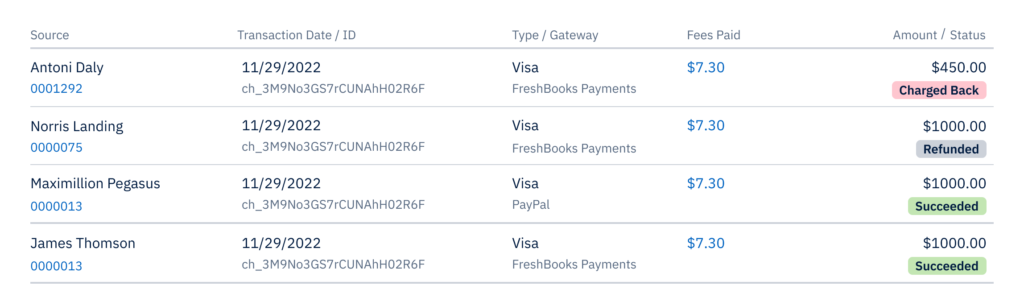
    This is what your dashboard might look like:

    FreshBooks Payments in-app UI screen

    FreshBooks Payments in-app UI screen

    How Much Does FreshBooks Payments Cost?

    Pricing is simple and transparent:

    • Visa/Mastercard/Discover/Apple Pay: 2.9% of the payment amount + $0.30 per transaction
    • Amex: 3.5% + $0.30
    • Bank transfers (ACH): 1% bank transfer fees (only available in the U.S.)

    There are no setup fees, monthly fees, minimum charges, or costs associated with validations or client refunds. Plus, clients can save their credit card information for recurring payments, and even if a card expires, our card updater will automatically update the information so that owners and clients don’t need to worry about payments not going through.

    Do I Have to Use FreshBooks Payments?

    No, you don’t! If you have payment methods that work well for you, you can keep using them.

    However, if waiting for checks to clear is challenging your cash flow, or you’d like to add an online payment method option for your clients, you may want to consider adding FreshBooks Payments. Payments happen faster because the payment option is available directly on the invoice, and your records are automatically updated.

    We Are Excited to Show You What the Future Has in Store for FreshBooks Payments

    As FreshBooks Payments grows, we will continue to listen to your feedback, innovate, and launch more features that will help you get paid faster so you can maximize your cash flow and grow your business.

    If you need help, FreshBooks is here. If you have questions about this feature, please . We’re here to help!

    How to Help Your Team Build Their Advisory Skillset

    Software Stack Editor · July 4, 2024 ·

    software solutions make it easier for your clients to automate things like accounts receivable processes and expense management, fewer of them may choose to outsource that kind of compliance work to accounting professionals.

    But that doesn’t mean your clients don’t need you. In some ways, they need you more. All the accounting tools in the world won’t give them the expertise and experience to interpret financial reports, spot patterns, and provide forecasts that inform big-picture business decisions.

    That’s where their accounting advisor comes in—aka you and your team!

    Becoming an expert advisor is more about developing those soft skills that can build relationships with clients than it is about gaining credentials and certifications. (Though the FreshBooks Collaborative Accounting™ certification can help!)

    Here are some considerations as you bring your team up to speed.

    Table of contents icon

    Table of contents iconTable of Contents


      Related Articles


      3 Skills Every Accounting Advisor Needs

      As you grow into providing advisory services, it’s important to ensure your team is as comfortable building rapport with clients on an advisory level as they are with compliance work. That involves 3 critical skills

      Problem-Solving

      If your clients are running a robust business, the number of issues likely to arise is endless. From tax to labor to cash flow challenges, these problems are often beyond their ability to manage on their own.

      When your team members come to the table with clients willing to listen, understand the nuances of the issue, and help them devise a reasonable solution, they provide an invaluable advisory service. As accounting professionals, you have insights and financial knowledge that can shed new light onto business problems—from the basic to the more complex—which can help your clients resolve a current issue and but prevent future ones from happening.

      Help your team brush up on their problem-solving skills by tackling theoretical business challenges together. This will highlight the importance of carefully listening to concerns while inspiring one another to develop solutions for future clients. Luckily, sample advisory conversations are provided in the , allowing you to practice before putting your skills to the test.

      2. Communication

      There’s a good chance that great communication skills are one reason you hired your current team members. After all, these strong skills are especially critical when offering advisory services. Being friendly, open, and adept at receiving and sharing information is important for any type of customer-facing role.

      Your clients are experts in their fields but not always in accounting. Encourage your team to bridge that knowledge gap with clear explanations. Ditch the jargon and adopt language they’ll grasp. This way, clients actually understand the valuable insights you’re sharing.

      As the owner of a firm, you can help your team members build their communication skills by modeling what you’d like to see and giving them feedback on their interactions with clients. It’s also helpful to provide written guidance on the kind of communication style you’d like to see. Create a one-pager style guide on features that are important to you, like making eye contact, smiling, and using plain language in communications.

      Presentation

      When you provide advisory services, meeting regularly with your clients is a good practice. This will help you understand their day-to-day realities, spot a financial problem in the making, and understand their vision for their business.

      These review meetings are also good opportunities for you and your team members to present insights and advice in a clear and engaging way. Whether they’re putting together a slide deck or verbally providing guidance, your team members need professional presentation skills.

      Help your team hone their presentation skills by giving a branded template for their formal presentations. You may also have some tips or guidance on what to include in review meetings with their clients. Finally, ask team members to share their most effective presentation strategies in team meetings so they can learn from one another.

      Expand Your Team’s Professional Ethos

      Moving into advisory services may require a mindset shift for you and your team. Compliance services are all about accuracy and timeliness. On the other hand, giving sound financial management advice requires a more collaborative approach.

      You can build on the mission of your firm by adding a few new values, including:

      Curiosity

      Guide your team to ask open-ended questions and use open-ended statements to help their clients articulate their thoughts, concerns, pain points, and wins.

      How would you…?
      Tell me more…

      Provide Space

      Remind your team to give clients time to reflect and respond to questions during conversations. They should listen carefully to ensure they understand what’s being said and verify that their interpretation is accurate

      Let me play that back to you…
      So what I’m hearing is…

      Share Responsibility

      As advisors, your team should avoid simply telling clients what to do. Instead, encourage them to raise awareness with their clients of how they can increase efficiency and educate clients on the benefits of an approach. The advisor can then make suggestions and recommendations based on their experience and insights.

      Did you know that FreshBooks can…?
      What do you think about doing…?

      Advisory Services Are a Natural Add-on for Existing Services

      It may be helpful to reassure your team members that offering advisory services doesn’t mean you’re completely uprooting how they serve their customers. Being an advisor is a natural extension of bookkeeping and compliance work. that you may already offer.

      With existing customers, your team already has the financial reports and data available. Adding advisory services is simply a matter of transforming that data into helpful information for your clients.

      This “new” service may also change how you and your team assess prospective customers. Rather than avoid business owners with complex needs or requiring additional assistance beyond bookkeeping, your firm may seek them out. A allows you to attract and build trust with clients who want to remain fully engaged with their financial data—giving you the bandwidth to provide ongoing advisory insights that will move the needle for them.

      Consider Shifting to a Value-Based Pricing Model

      Transitioning to offering advisory services can be liberating in several ways. Not only are your team members less burdened by administrative bookkeeping and compliance tasks, but your firm can build a reputation rooted in financial expertise, especially when moving away from hourly billing and switching to a .

      Rather than commodifying your time in hours, the focus is on your team’s deep knowledge and experience. You can offer flat-rate packages that include an array of advisory services to serve business owners holistically. Not only will you have the potential to help your clients make smart, sustainable choices, but you can also charge fees that match the value of your advice.

      Your firm can even take the opportunity to differentiate itself by in an area aligned with your ideal clients. You may see your book of business improve.

      Advisory Services Are the Future of Accounting

      To ensure your firm thrives in an evolving industry, it’s important to be adaptable to your clients’ needs. Many business owners are looking for accounting professionals who will listen to their concerns and goals and give them tailored advice to help them grow.
      With your financial expertise and experience, you and your team are in the perfect position to become strategic partners, and set the stage for long-term success.
      Understand Key Changes for Small Businesses in the 2024 Canadian Federal Budget

      Software Stack Editor · April 30, 2024 ·

      As we move deeper into 2024, the conversation around the economic environment for small businesses in Canada is continuing to grow in depth and complexity. At FreshBooks, we are committed to understanding and communicating public policies that affect you and your business.

      The ongoing changes and challenges faced by small business owners require a proactive approach to advocacy and support, which is why the role of policymakers is more critical than ever before. It’s equally important for small business owners to remain informed about the various ways these measures can shape their own long-term plans and growth.

      The recently tabled introduces several changes aimed at fostering the growth and resilience of small businesses across the country.

      As small businesses continue to navigate economic pressures, we wanted to highlight a few of the more notable measures from the budget as you prepare for the year ahead.

      Table of contents icon

      Table of contents iconTable of Contents


        Related Articles


        Capital Gains Taxation Adjustments

        One of the significant highlights of this budget is the modification of capital gains taxes, which directly affect small business owners.

        The has increased from $1 million to $1.25 million, allowing many entrepreneurs to realize more tax-free income upon the sale of their business.

        Additionally, the introduction of the offers a lower capital gains inclusion rate of 33.3% on the next $2 million in gains, but only for certain sectors when fully implemented.

        However, not all industries and job types will have full access to these benefits. While the capital gains inclusion rate has been raised to 66.7% for some sectors, other industries like professional corporations, financial services, and the hospitality sector are not part of the new incentive​ at this time. If you have questions about this initiative and how it might impact your business, speak with your tax advisor.

        Carbon Tax Rebates

        The budget also addresses the long-standing issue of for small businesses. A total of $2.5 billion has been earmarked for carbon tax rebates, targeting an estimated 600,000 small and medium enterprises (SMEs).

        This initiative aims to assist businesses with fewer than 500 employees by issuing rebate cheques based on the number of workers they employ. More details will be released in the coming months.

        Support for Innovation and Employee Ownership

        In a move to encourage innovation and investment in productivity-enhancing assets, the budget introduces an (CCA). This allows businesses to write off the full cost of certain assets, like computers and data infrastructure, effective immediately up to January 2027.

        Additionally, the budget promotes (EOTs), providing a special capital gains exemption of up to $10 million for business owners selling their businesses to their employees. This could foster more sustainable business transitions and enhance employee engagement and investment in the businesses they work for.

        Broad Implications for Small Business Owners

        Overall, the 2024 Federal Budget presents a nuanced suite of measures intended to bolster small businesses in Canada. While the increased exemptions and rebates offer a welcome relief, business owners will need to navigate these changes carefully, potentially seeking financial advice to best leverage the new policies for their growth and sustainability.

        We at FreshBooks will continue engaging with policymakers at all levels of government on small business owner initiatives. If you are a small business owner or entrepreneur, we will continue to be your advocate on the issues that matter to you and your business.

        How Laura Leveled Up Advisory Services With Collaborative Accounting™

        Software Stack Editor · April 25, 2024 ·

        You might say that Laura Blackburn was born to be a bookkeeper.

        Before she could even read or write, she was poring over the columns in the big, green ledgers her mother—a bookkeeper—was always working with. But after earning a degree in economics, her career took a left turn.

        “I knew I was meant for numbers, but I was drawn to my creative side after college. I became a wedding planner for 10 years before deciding to get into bookkeeping, so I know what it’s like to do accounting as a business and for a business,” she said.

        Her business, Blackburn Advisors, specializes in bookkeeping for creative service providers, including professionals in marketing, content creation, and consulting. She does all levels of accounting, from AP to AR to payroll.

        We spoke with her about how she uses the platform, why the has been a game changer for her business, and the reason she never misses a monthly Accounting Partner Program meeting.


        Related Articles


        Why did you decide to start your own firm?

        I’m an entrepreneur at heart. It makes sense for me because I want to be home with my kids. Starting the firm was a full circle moment for me because my mom was home with us while she ran a bookkeeping business and I feel like I’m meant to do that too.

        Who and where are your clients?

        I like my clients to be good listeners. I want someone to take the time to have meetings with me and work to understand their accounting.

        My clients are mainly creative service providers, in fields like marketing, consulting, and content creation. My ideal client is a woman-owned business, a mompreneur like myself. A lot of my clients are at home with children like I am, and we want to support one another.

        My clients are based all over the country. The beauty of using FreshBooks is that we can use all the remote features. I can do everything for them—and with them—from anywhere.

        The beauty of using FreshBooks is that we can use all the remote features. I can do everything for them—and with them—from anywhere.

        Why is FreshBooks such a good fit for your clients?

        I find that creative people really like FreshBooks. The number one thing that’s the draw is the look of it; the platform is not intimidating, and it’s very user-friendly. Everything they need is laid out for them on the left side in language that business owners use. Features like Invoices, Estimates, Expenses, and Projects are at the top for them, and the accounting reports are further down. Using those tools on the left side helps them follow the path.

        What problems has FreshBooks solved for your clients?

        One example is my marketing consultant client Jackie. She faithfully uses Time Tracking for her hourly projects, so her records are always up to date. She has a team set up in FreshBooks to do it as well so it flows the way it should into Projects. And then she has monthly retainers set up as well.

        Her good record-keeping allows her to see her profitability over time. She loves the dashboard that shows her at a glance whether it’s red or green. (Creatives love color!) We try to go over client profitability each quarter as well.

        When clients use all of the FreshBooks features consistently, it flows into the accounting process better. For people like Jackie, who code products and services to the right revenue accounts, they can get very accurate .

        How has Collaborative Accounting benefited your practice?

        It’s been a great way to position myself as an advisor. I felt like I was already providing that advisory role, but I never called it that. I don’t want to be just some vendor you pay or a professional who you ask a question to once a year. I want to partner with my clients and hold their hands as much as they want. The terminology has helped my clients feel like we’re in this together. It’s a partnership. They’re in business for themselves but not by themselves.

        Explain a typical Collaborative Accounting workflow with your clients.

        We train my clients to use templates to help them understand what it means for their business.

        If they know what’s going on in their books, they can make better business decisions. Especially if they’re in there from the invoice stage, they’re not surprised when they see what’s been spent.

        My client Jackie, who I mentioned, learned how to use Invoices and Time Tracking, which feeds into her understanding of client profitability.

        Although the amount of collaboration differs for each client, I meet with most clients monthly or quarterly. I like to prepare a pretty presentation showing them where their numbers are. I bring up their P&L report and balance sheets, and I make graphs based on the FreshBooks reports to show them how things have changed over time.

        We also talk about key performance indicators and then I share the trends and insights that I’m seeing. I try to have fun and keep it lively.

        What features do your clients mainly use?

        My clients tend to use Invoices, Time Tracking, Projects, Estimates, and Proposals. And I’m training them to turn their estimates and proposals into invoices to make things quicker for them.

        The favorite feature is probably Invoices, especially since business owners can set up recurring or monthly retainers. And they can get paid right in FreshBooks, which they love.

        I advise them to use the mobile app for things like receipt capture, tracking mileage, and time tracking. It’s been great for many clients because they’re keeping up on the go rather than sitting down at the end of the week or month and trying to remember who to invoice. Getting invoices out the door regularly helps with cash flow.

        Do you notice a difference when working with clients who are handling their day-to-day business admin themselves?

        Yes. If they’re doing their own invoices they’re not surprised at the end of the month. It’s a lot better when they’re in FreshBooks every day and know what’s going on in their business. This allows us to have more productive conversations in our monthly meetings. I can share big-picture observations that they don’t see, which helps them make forward-thinking business decisions.

        Two-Factor Authentication (2FA) Is the Protection You Deserve

        Software Stack Editor · April 25, 2024 ·

        Get peace of mind and secure your financial data with two-factor authentication (2FA) for your FreshBooks account.

        In the age of rampant phishing, ransomware, and identity theft schemes, one thing is clear: You cannot put a price on safety. But sometimes, it’s hard to make it your top priority.

        You shouldn’t have to balance your daily business tasks against your data safety. And now, you don’t.

        FreshBooks has just announced a new update for all users: Two-factor authentication (2FA). The goal is to make protecting your accounts feel as simple as deadbolting your front door. Your username and password are a single lock, and over time, a professional could pick them. Adding 2FA throws an additional layer of protection to keep your business safe, even if your first line of defense is cracked.

        With this extra layer of security, you’ll be able to safeguard your business without having to endure any big changes to your usual FreshBooks experience.

        Over the next few months, you can expect to see this feature roll out across the platform, but you don’t need to do anything special to prepare: If your email information is up-to-date in your FreshBooks account, you’re all set.

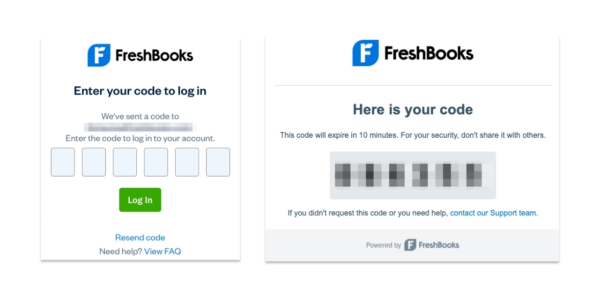
        FreshBooks UI 2FA - two-factor authentication

        FreshBooks UI 2FA - two-factor authentication

        Check Out These 2 Big Benefits of 2FA

        1. Double your digital defense: Even the strongest passwords can be compromised. 2FA adds an extra-tricky layer of security behind your password, making it exponentially harder for anyone to hack into your account.
        2. Set it and forget it: Knowing your data is secure allows you to focus on what matters most—running your business. With your data security in good hands, you can use that time to think about literally anything else.

        Secure Your Data Today, Grow Safely Tomorrow

        As your business continues to grow and thrive, you’ll most likely start leaning into different features of FreshBooks to meet your changing needs. But getting the most out of any online tool involves handling even more sensitive information for both you and the people you work with.

        2FA paves the way for these advancements, ensuring your data remains protected going forward, so you won’t be left scrambling for more security later. When it comes to security, it’s much better to prevent than to react. And who doesn’t just love it when a plan comes together?

        Questions? Support Has Answers.

        Over the coming months, 2FA will be slowly rolled out to all FreshBooks accounts. Once this is rolled out to your account, you will only need to log into your email associated with your FreshBooks account to access the 2FA code.

        In the meantime, feel free to give yourself a refresher on how to or how to if it’s been a while.

        If you have any further questions or concerns, has your back.

        You can’t put a price on safety—and now, you don’t have to.

        11 Advisory Services You Should Be Charging For—and Why

        Software Stack Editor · April 24, 2024 ·

        When you’re an accounting professional with a can-do customer service ethos, it’s hard to cut off a client when they call with a “quick question”. (Spoiler: It’s never a quick question.)

        The truth is, you want your clients to be curious about their business finances and make use of the valuable insights you are uniquely positioned to provide. This allows them to make better business decisions instead of only thinking about their accounting at tax time.

        But when you’re answering ad hoc questions without boundaries (or billable hours), there’s a good chance you’ll find yourself overworked, overwhelmed, and underappreciated. Your guidance won’t have the same impact if your clients only seek it out around tax time or during a crisis.

        This is why you should charge for the advisory services that empower your clients to take their business to the next level.

        Table of contents icon

        Table of contents iconTable of Contents


          Related Articles


          What Are Accounting Advisory Services?

          In a nutshell, are higher level (and higher value) than more compliance-based tasks like generating financial reports, filing taxes, and doing bank reconciliations. Compliance services can be completed by anyone with the right accounting training.

          In contrast, accounting advisory services require the expert touch of an accounting professional who is innovative, forward-thinking, and eager to deepen client relationships. Advisory accounting provides proactive and predictive findings about a client’s business. It considers their business goals, patterns, and financials to provide tailored insights that allow them to take constructive next steps and avoid pitfalls. It’s like being a partner to your clients, not an annual service provider.

          Bonus: When you focus on advisory services, you’re more likely to attract higher-value clients. They recognize the importance of a partnership with their accounting professional and are willing to invest in it.

          Identify the Advisory Services You Should Charge For

          Here are some examples of advisory services that you could charge by the hour to conduct—or that could be part of an overall partnership package:

          1. Interpreting profit & loss: variance, comparative analysis
          2. Internal changes/decisions like staffing or opening a new service line
          3. Applying for loans for expansion, lines of credit
          4. Cash flow issues and how to resolve them
          5. Operations reviews
          6. KPIs and metrics
          7. Tax planning
          8. HR, payroll and employee benefits
          9. Technology training
          10. Improving workflows
          11. Acquisition or mergers

          Why You Should Sell Value, Not Time

          No discussion about advisory services is complete without considering how to charge for them. Some accounting professionals have an hourly rate and bill accordingly. While that works for many, if you’re considering a focus on advisory services and reducing compliance tasks, you should weigh the benefits of .

          Like advisory services, it focuses on the value you bring to your clients, not the tasks or time it takes to complete them. Rather than commodifying your time, you and your clients can take a holistic view of what they want to achieve and how you can contribute to their business goals. Then, you can outline all of the services you will provide over a quarter or a year and offer a flat-rate price.

          This approach allows you to set expectations around how often you’ll meet and create boundaries so that you’re not overwhelmed with spontaneous phone calls or emails. It also gives you breathing room to apply your finely-honed accounting skills to bigger- picture issues rather than the minutiae associated with compliance tasks.

          Make Advisory Efficient: Work in the Same Platform as Your Clients

          If you’re freeing yourself of the busy work of accounting, who will take on some of those low-skill tasks? Ideally, your clients.

          There’s no reason a business owner or a team member can’t take on simple pre-accounting work like invoicing, filing expenses properly, and doing bank reconciliations. This gives them more day-to-day insight into their financials, which means they’ll come to your conversations more tuned in to reality.

          Here at FreshBooks, we’ve developed a framework that facilitates this co-operation between client and accountant: . A model designed for accounting professionals who want to focus on advisory services and sustainably grow their business. Your clients can have more “skin in the game” when it comes to their financials, and you can minimize the time spent fine-tuning client accounting and maximize the time guiding your clients as they grow.

          Curious? Check out the , an online, self-paced training program designed to help you align your firm’s goals, workflows, and technology behind the Collaborative Accounting strategy and platform that fosters trust and creates efficiencies. All members of the have free access to this training.

          Advisory Services: A New Frontier for Accounting Professionals

          Embracing advisory services could mark a significant shift towards a new business model for you—or become another offering you provide to your clients. By offering tailored insights and guidance beyond traditional compliance tasks, you can position yourself as an indispensable ally in your clients’ business journeys.

          Using a value-based fee mechanism for advisory services reflects your expertise and fosters a culture of mutual investment and growth.

          And through collaborative platforms like FreshBooks, you can streamline your processes and empower clients to take a more active role in their financial management.

          As the accounting industry continues to evolve, embracing advisory services is not just a strategic choice; it’s a commitment to shaping a more meaningful and efficient future for all accounting professionals and their clients.

          A Guide to Stress-Free Client Communications Best Practices, for Accountants

          Software Stack Editor · April 2, 2024 ·

          Like any relationship, the one between accounting professional and client requires mutual respect, honesty, and open communication. Establishing that begins with laying the groundwork for regular, transparent connections. 

          Here are 7 steps to consider as you create a communications strategy for your valued clients.

          Table of contents icon

          Table of contents iconTable of Contents

            1. Define Expectations

            At the outset of your relationship, create a document that outlines your process and the terms of your engagement. Be clear about things like:

              • Who is responsible for which accounting tasks?
              • When you will need specific information, e.g. documents ahead of tax season
              • How will you share financial insights?
              • How often will you meet?
              • An overview of the kinds of things you’ll discuss when you meet

            If you’re using the FreshBooks Collaborative Accounting™ model, onboarding is the perfect time to introduce a that empowers your clients to take responsibility for the pre-accounting tasks. This will give them more insight into their day-to-day business operations while enabling you to provide high-level advisory services.


            Related Articles


            2. Set Boundaries

            Accountant Megan Justice, owner of , establishes clear communication boundaries with her clients to ensure mutual expectations are understood and maintained throughout their partnership.

            She affirms these boundaries by having key information available on a client portal and providing timely links in an email auto-response.

            “My general formula for my auto-responder is:

            1. What do clients most need to know right now? This might include an upcoming due date or approximate status of what I’m working on/through.
            2. What question(s) am I bombarded with lately?
            3. Remind clients to go to the portal.
            4. Remind clients books need to be reconciled, and transactions need to be categorized before I can do anything (and that I need statements if I’m the one doing it).
            5. Remind clients there are no tax emergencies.”

            Although she encourages clients to ask her questions at any time, she finds the auto-responder and the library of frequently asked questions are effective ways for them to serve themselves.

            “This year, I added in a with the intention of keeping a link to that in my auto-responder. It keeps my autoresponder a little bit shorter and still gives clients access to the most commonly requested information, so we’re speaking the same language. When I use these tools to set and remind them of boundaries, I can stay focused on getting work done and providing quality service to my clients.”

            3. Understand How Your Clients Like to Communicate

            Communications preferences vary across industries, workplaces, and personalities. While some people live in or their inbox all day long, others are more reachable by text or phone. It’s important to understand how each of your clients likes to connect from the outset so you can tailor your communications to the way they work.

            In addition to managing communication logistics, take the time to understand each client’s needs, expectations, preferences, and values. This insight will help you tailor your messages and choose the appropriate channel of communication if they don’t initially state a preference.

            Investing time in this upfront will also enhance your rapport-building efforts and bolster your credibility.

            4. Set the Right Tone

            No matter how you and your clients choose to connect, it’s helpful to be intentional about the tone of your communications. As an advisor, you can build trust by demonstrating a friendly and open nature that invites questions and concerns.

            In our , we offer 3 principles of a collaborative conversation:

            1. Be curious: Ask open questions and use open statements that help your clients articulate their thoughts, concerns, pain points, and wins.
              • How would you…?
              • Tell me more…
            2. Provide space: Leave room in the conversation for your clients to think about and respond to your questions. Listen carefully and reflect back to them what you heard so you can verify that your interpretation is correct.
              • Let me play that back to you…
              • So what I’m hearing is…
            3. Share responsibility: Avoid simply telling clients what to do. Instead, raise awareness of strategies and tools that can increase efficiency. Educate them on the benefits of different approaches, and make suggestions based on your experience and insights.
              • Do you know about this tool…?
              • What do you think about doing…?

            5. Establish a Communications Schedule

            Many accounting professionals like to set up recurring meetings with their clients to ensure consistent touchpoints. Without an agreed-upon cadence of meetings, it’s easy to fall into the rhythms of your own workflows and miss key moments to connect. Often, this results in losing opportunities to make real-time insights that can inform critical business decisions.

            Establishing a consistent communication schedule could involve scheduling a meeting on the last Monday of every month or quarter. Or, if schedules fluctuate, you might touch base at the start of each month to schedule a mutually convenient time in the following weeks. Since you already know how your clients like to communicate, you’ll know who wants a phone call, who wants a text, and who prefers a invite or an email.

            6. Use Technology to Automate Communications

            There are many ways to streamline communications with your clients. Consider tech that will help you get in touch, stay connected, and schedule meetings quickly and easily.

            Some helpful apps that integrate with FreshBooks include:

            • : Automate your client bookings, cancellations, reminders, and payments.
            • : Send meeting invitations and sync appointment data with FreshBooks for easy time tracking and invoicing.
            • : Allow your clients to see your availability and self-book.

            7. Be Relevant, Clear, and Concise

            With the volume of emails, texts, and other communications we all get every day, your clients need to know that when they receive a message from you, it contains pertinent information they require—and nothing more.

            Whether you’re popping into an individual’s inbox with a quick check-in or sending a quarterly newsletter to all of your clients, it’s critical to be clear and concise. After all, business owners tend to receive a lot of information, so you want to cut to the chase and prioritize delivering clear and relevant information.

            Some tips on being concise in email or other messages:

            • Make your text scannable by avoiding long sentences and dense paragraphs.
            • Use bullet points and keep them short.
            • Add bold text as a headline to highlight a paragraph.

            If you find yourself sending the same type of communications to various clients, you might consider writing templates that you can tailor. If you’re looking to receive clear, concise, and relevant information, consider sharing pre-set templates for your clients to fill out and submit by email or upload to your client portal. This can cut down on the time it takes to sift through unnecessary information.

            Build Strong Client Relationships with Effective Communications

            Establishing a seamless and stress-free channel of communication tailored to each of your valued clients may seem like an effort at the outset, but it will quickly become a process just like any other. Creating a repeatable communications procedure will help ensure both you and your clients get the information you need at the right time and in the right way while positioning you as a trusted advisor.

            12 Best FreshBooks Apps for Accountants

            Software Stack Editor · March 5, 2024 ·

            As you evolve your accounting business, you may be looking to spend more time on valuable tasks like advisory services that enhance client experience and less on manual entry and other administrative drudgery.

            One way to make that happen is to advise your clients to explore apps that can integrate with their FreshBooks accounts. These can simplify everything from payroll to scheduling to forecasting. What’s in it for you? You’ll get better data and spend less time untangling errors.

            We’ve rounded up 8 FreshBooks apps that you can advise your clients to consider that will make your accounting relationship more productive.

            And we didn’t forget about apps that can create efficiencies in your business and advisory services. Keep reading for 4 tools that work with FreshBooks, which can also help you level up your business.

            Table of contents icon

            Table of contents iconTable of Contents

              Best Apps for Your Clients

              Offer your clients advice on tools they can to simplify and streamline their accounting tasks.

              FreshCurrencies

              This solution is helpful for businesses that invoice in multiple currencies. Business owners can combine invoice details, expenses, general ledger, and from multiple currencies into one selected currency.

              How it works with FreshBooks:

              The plug-in pulls reports from Freshbooks and converts taxable income into the currency of choice.

              ➡️

              Cash Flow Frog

              This cash flow forecasting and scenario planning tool helps business owners determine when to pay bills and which invoices to collect first. They can also run simulations to see the impact of changes in staff, inventory, new customers, and other variables to track and analyze planned cash flow vs. actual cash flow results.

              How it works with FreshBooks:

              The app pulls reports from FreshBooks, analyzes the data, and generates a real-time cash flow forecast.

              ➡️

              Approveit

              Business owners who want to bring more organization to their organization can use Approveit to create smooth, multi-step workflows that direct bill approval requests to the right person. Features include adding conditional rules to call attention to large-sum purchases, setting reminders, creating approval requests, and seeking approval directly in Slack or email.

              How it works with FreshBooks:

              Bills are approved before they are created in FreshBooks to ensure that only authorized bills enter the business’s accounting system. The data on vendors, accounting category, and taxes is taken directly from the FreshBooks account. If the bill is approved, it’s automatically entered as an expense in FreshBooks.

              ➡️

              Tallyfor

              This app empowers independent contractors and tax professionals to automate the tax trial balance and flow data straight from book to trial balance to U.S. tax forms quickly and easily. Available for U.S. customers only.

              How it works with FreshBooks:

              Tallyfor pulls reporting information from FreshBooks, including Chart of Accounts, and helps users , including 1065, 1120S, 1120, 1040, Schedule C, and Schedule E.

              ➡️


              Related Articles


              Syft Analytics

              An interactive and collaborative financial reporting tool, this app allows users to visualize, analyze, and forecast financial data via visual reports.

              How it works with FreshBooks:

              Syft seamlessly integrates with FreshBooks and creates reports, graphs, and dashboards from the available financial data. Users can create key performance indicators (KPIs) and build integrated forecasts for the future.

              ➡️

              Payroll

              Do you have clients who are looking to add employees? Payroll isn’t always an intuitive exercise for many business owners. These payroll solutions that integrate with FreshBooks make the process easier for your clients—and you.

              FreshBooks Payroll 🇺🇸

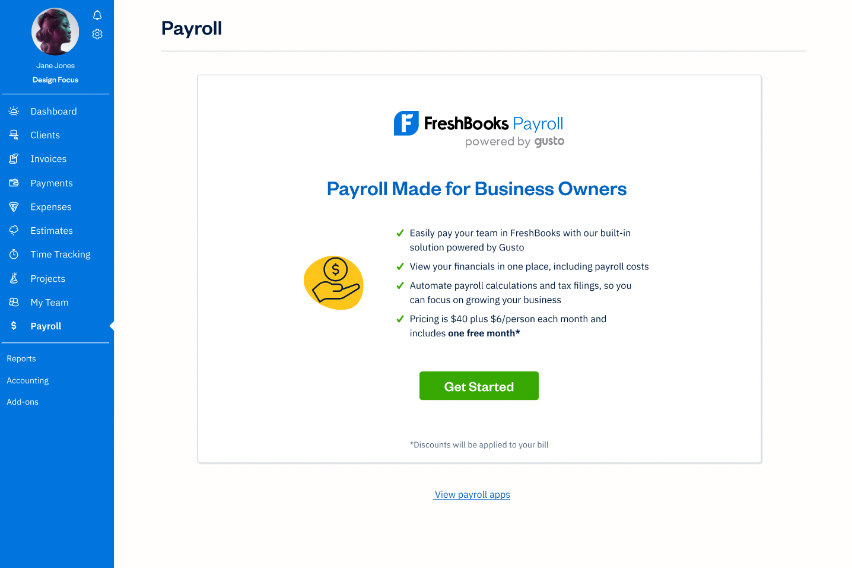
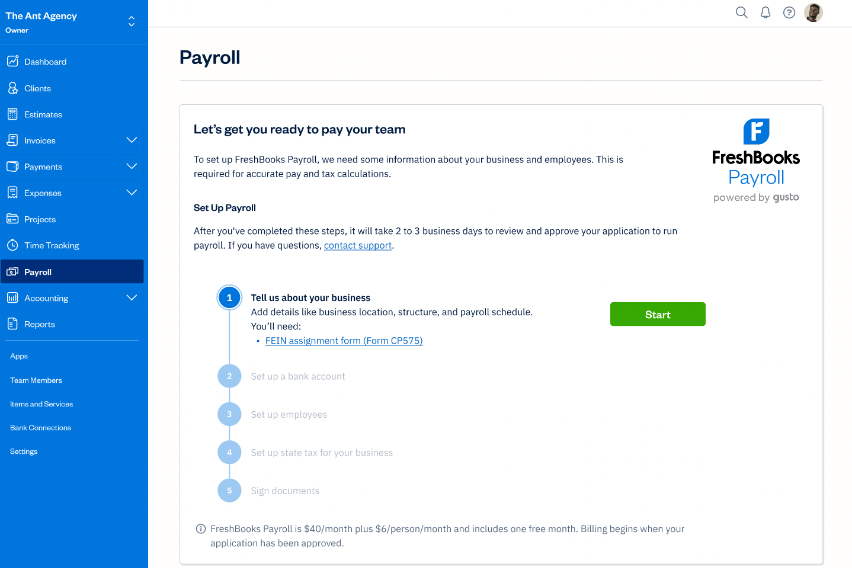
              FreshBooks’ fully embedded payroll option was launched to all U.S. customers in 2024. Set up payroll right from your client’s account with , powered by Gusto. Payroll tax filings, W-2s, unlimited payroll runs, and direct deposit all come standard. Manage billing, accounting, and payroll all in one platform.

              ➡️

              Gusto 🇺🇸

              Do you need benefits management or have contractors to pay? The simplifies and automates the time-consuming tasks that come with more complicated payroll. Available for U.S. customers only.

              How it works with FreshBooks:

              When payroll is run in Gusto, an expense is created in FreshBooks. If a payroll is canceled in Gusto, the expense is also removed from FreshBooks. Business owners can also see payroll reports in FreshBooks.

              ➡️

              SurePayroll 🇺🇸

              Ideal for small businesses, this solution automates the payroll journal entry process. It’s available for U.S. customers only and costs an additional $4.99 per software connection.

              How it works with FreshBooks:

              SurePayroll automatically exports and shares payroll data as a journal entry in FreshBooks’ Chart of Accounts, ensuring all information is accurate and up to date in both systems. Note: it does not create an expense entry, but the profit and loss report will show the correct information.

              ➡️

              Payment Evolution 🇨🇦

              Canada’s largest cloud payroll and payment service offers a variety of ways to pay employees and track payroll. Available for Canadian customers only.

              How it works with FreshBooks:

              When you run payroll in Payment Evolution, an expense is created in FreshBooks, synchronizing payroll in both systems. It also syncs time entries from FreshBooks to track hours for payroll. If payroll is canceled in Payment Evolution, it’s removed from FreshBooks.

              ➡️

              Best Apps for Accounting Professionals

              Accountants need apps, too! We’re always looking for integrations that make running an accounting advisory business more efficient. Here are a few that fit the bill.

              NiceJob

              Many accountants want to be able to ask for reviews from their clients so they can earn more credibility and trust and higher rankings on search engines. NiceJob is an effortless way to collect the kudos you deserve.

              How it works with FreshBooks:

              When an invoice is sent to a client, NiceJob will send automated emails and follow-ups asking for a review. All reviews are stored in NiceJob.

              ➡️

              Acuity Scheduling

              Wouldn’t it be nice if you could schedule meetings and then invoice for them straight from the scheduling app? That’s how Acuity works—you can automate your client bookings, cancellations, reminders, and payments in a couple of clicks.

              How it works with FreshBooks:

              The integration allows you to create and send invoices for appointments booked in Acuity and record payments made through Acuity to invoices in FreshBooks.

              ➡️

              Email App Add-Ons

              Want to add a client or invoice them directly from your inbox? FreshBooks integrates with 2 email providers to save you time and effort.

              Gmail

              If your email address ends in @gmail.com, integrate it with FreshBooks so you don’t have to toggle between Gmail and FreshBooks to create, draft, and send invoices directly from Gmail. All the changes to clients and invoices you make through Gmail will be automatically reflected in your FreshBooks account.

              ➡️

              Microsoft Outlook App

              If you run your business with Microsoft—and your email address ends in @outlook.com @hotmail.com, or @live.com—you can sync with FreshBooks to pump up your productivity. The integration allows you to easily create, manage, and invoice clients right from Outlook and get quick access to billing status for every client.

              ➡️

              You’re on Your Way to More Productivity

              Reserve your brain and your time for the work that needs your expertise. It’s all about using the right tools to streamline certain functions so you can focus on the bigger picture for your business and your clients’ businesses.

              To see the full list of productivity apps, visit the . Productivity is yours to claim!

              What’s New in FreshBooks – 2024

              Software Stack Editor · January 9, 2024 ·

              image

              A roundup of all the newest features launched in FreshBooks in 2024. Check back in every month for regular updates.

              FreshBooks releases new features and updates every month – designed to make accounting even easier for your business. And this post is the best place to check in on all the latest changes.

              January 2024

              FreshBooks Payroll powered by Gusto

              Businesses in the US can sign up for  and payroll for employees, file payroll taxes, and maintain labor compliance.

              Journal Entries Section

              See all manually created journal entries in a .

              FreshBooks in English (United Kingdom)

              In your , you can now choose to use your FreshBooks account in English (United Kingdom) which will automatically rename Estimates to Quotes instead.

              February

              Welcome Video for Accountant Hub Users

              Accountant Hub users now have the option to view a welcome video walking through key features in the Accountant Hub.

              March

              Dashboard Improvements

              You can now hide  and customize the order of your dashboard graphs, including the newly added Revenue and Expenses graph.

              Simplify Your Payroll: Pay Your People Right From FreshBooks

              Software Stack Editor · January 9, 2024 ·

              Running payroll for your business is hard enough. Switching back and forth between multiple systems makes it that much more difficult.

              Having disconnected systems is time-consuming, whether you’re trying to pay (or file) payroll taxes (and stay up to date on compliance), pay your employees, view payroll expenses, or simply get a complete picture of your business finances.

              Wouldn’t it be nice to have a single platform for all your billing, accounting, and payroll needs?

              Enter FreshBooks Payroll, the answer to your payroll headaches.

              Table of contents icon

              Table of contents iconTable of Contents

                What Is FreshBooks Payroll?

                FreshBooks Payroll is powered by Gusto, an industry-leading HR and payroll technology provider. It’s a full-service payroll solution for U.S. business owners: A one-stop shop for billing, accounting, and payroll needs. Every payroll transaction is automatically recorded in FreshBooks, ensuring you see the whole picture of your business, all in one easily accessible platform.

                What does that all mean? Well, when you process payroll with us, automatic payroll tax filings, W-2s, unlimited payroll runs, and direct deposit all come standard. And with all your payroll information documented in one place, you can keep more accurate books and see the full scope of your business’s health.

                Why Gusto?

                Gusto is one of the most popular payroll solutions for small businesses in the U.S. It goes beyond being just a payroll provider: It’s an all-inclusive platform that covers hiring, onboarding, benefits, and compliance support.

                In a nutshell, it’s exceptional software.

                Since 2017, FreshBooks and Gusto have been working together to empower businesses with the technology to make payroll and accounting easier and more efficient. And now you need only one tool—FreshBooks—to keep your books in order and take advantage of Gusto’s payroll features.

                Gusto has served more than 200,000 businesses like yours. So you can trust that you will have access to a comprehensive solution for your payroll needs.


                Related Articles


                Who Is FreshBooks Payroll For?

                FreshBooks Payroll is available for U.S. business owners looking to tackle their payroll headaches. Because payroll can be just that—a major headache—especially when split up across multiple platforms.

                Now, more than ever, business owners are looking for a simple, embedded payroll solution—which is where we come in, because FreshBooks Payroll is for business owners who:

                • Are looking for the convenience that most payroll providers don’t offer
                • Want an easier way to pay employees the right way
                • Are concerned about payroll compliance
                • Want world-class support with no hidden fees

                It’s for business owners just like you.

                And luckily, FreshBooks isn’t just a pretty face. We deliver on all 4 reasons business owners are looking for payroll. Check. Check. And check.

                How Can I Use FreshBooks Payroll?

                Excellent question. Glad you asked.

                U.S. business owners can sign up for FreshBooks Payroll directly through their FreshBooks account. (You’ll also find pricing there.)

                Step 1: Log Into Your FreshBooks Account

                1. Select Payroll in the left sidebar.
                2. Select the green Get Started button to begin.

                How to use FreshBooks Payroll - Step 1

                How to use FreshBooks Payroll - Step 1

                Step 2: Get Payroll-Ready

                You will need to fill in the required company and employee information. This allows FreshBooks Payroll to calculate pay and tax requirements accurately.

                1. Add details about your business—i.e., business structure, location, and payroll schedule. You will need to complete a FEIN Assignment Form (Form CP575).
                2. Set up a bank account.
                3. Add your employees.
                4. Set up state tax for your business.
                5. Sign and select Start.

                How to use FreshBooks Payroll - Step 2

                How to use FreshBooks Payroll - Step 2

                Please note that it will take 2–3 business days to review and approve your application after it’s submitted.

                Step 3: Run Payroll

                Once your application has been approved, log back into your FreshBooks account and follow these steps:

                1. Select Payroll in the left sidebar to access FreshBooks Payroll.

                This page will give you a complete picture of your payroll history that has been run through FreshBooks.

                2. Select the More Actions dropdown in the right-hand corner.

                This dropdown will allow you to choose from three options to view:

                • Payroll Reports — this will allow you to see your Payroll Journal report (more on that later)
                • Tax Filings — will allows you to see your payroll tax filings and documents
                • Payroll Settings — to edit company information.

                Choose one of the selections from the dropdown to see your payroll tax filings and documents, payroll reports, all payroll history run in FreshBooks, and Payroll Settings to edit company information.

                How to use FreshBooks Payroll - Step 3

                How to use FreshBooks Payroll - Step 3

                3. Select the green Run Payroll button to begin.

                How to use FreshBooks Payroll - Step 4

                How to use FreshBooks Payroll - Step 4

                4. Select a pay period based on the first pay date and pay schedule you set for your company to see your employees’ pay rate, hours, additional pay, reimbursements, and gross pay.

                How to use FreshBooks Payroll - Step 5

                How to use FreshBooks Payroll - Step 5

                This will take you to the Hours and Earnings page, where you can see a list of your employees, pay rate, hours worked, overtime hours worked, additional earnings, reimbursements, and gross pay.

                How to use FreshBooks Payroll - Step 6

                How to use FreshBooks Payroll - Step 6

                5. You can edit the information by selecting the employee.

                NOTE: Changes will automatically update, and certain employees won’t be editable (i.e if an employee’s pay type is marked as Salary / No Overtime).

                6. Once done, select the green Confirm button.

                How to use FreshBooks Payroll - Step 7

                How to use FreshBooks Payroll - Step 7

                7. When done with the Hours and Earnings page, select the green Save and Continue button in the bottom right corner.

                Please note that it will take 1–2 minutes to calculate total payments, payroll taxes, deductions, and reimbursements.

                8. Review the calculated data.
                9. To preview an employee’s draft pay stub, click on the employee name
                10. Once done, select the green Submit Payroll button in the bottom right corner.

                How to use FreshBooks Payroll - Step 8

                How to use FreshBooks Payroll - Step 8

                NOTE: Users must submit payroll 4 days before the payout date

                11. To see your submitted payroll, return to your Payroll tab in the dashboard.
                12. Select your submitted entry to see the item page for access to employee pay stubs.

                How to use FreshBooks Payroll - Step 9

                How to use FreshBooks Payroll - Step 9

                13. Select Payroll Receipt for a breakdown of total debits, U.S. taxes, and employee breakdown.

                How to use FreshBooks Payroll - Step 10

                How to use FreshBooks Payroll - Step 10

                NOTE: You can cancel an entry still in the Submitted status.

                Once the payroll entry hits the pay date, it will automatically change to Paid status. The pay stubs will be sent to the employees via password-protected email.

                And just like that, you’ve paid your team.

                Step 4: View Payroll Expenses and Access Reports

                The FreshBooks Payroll Journal report gives a detailed breakdown of employee payrolls per pay period.

                1. Log into your Freshbooks Account.
                2. Select Reports in the left sidebar.
                3. Scroll down to Payroll and select Payroll Journal.

                How to use FreshBooks Payroll - Step 11

                How to use FreshBooks Payroll - Step 11

                4. Select your date range and click the green Download CSV button.

                This report will include all the payrolls with a pay date that falls within the range you selected, which includes any off-cycle payrolls like bonus pay or tax reconciliations done directly in Gusto.

                There you have it. Now, you’re ready to pay and file payroll taxes directly in FreshBooks.

                Get Started With FreshBooks Payroll

                If you have any questions about how to use FreshBooks Payroll, don’t hesitate to .

                If you have questions about adding FreshBooks Payroll to your account, please .

                Accountants: Best Practices for Client Onboarding to FreshBooks

                Software Stack Editor · January 5, 2024 ·

                Client onboarding is a big deal. Once you’ve for your firm, onboarding is their first impression of how it will be to work with you and the first step in (hopefully) a long and lucrative relationship for everyone involved.

                To help you start off on the right foot, we’ve outlined a client onboarding process you can use for the business owner clients you’re setting up in FreshBooks for the first time or for clients you’re introducing to the Collaborative Accounting™ framework.

                If you aren’t familiar with the term, ™ is the methodology we recommend using with your client year-round so you can both get the most out of FreshBooks. But it’s not a requirement for onboarding your client in FreshBooks. The guidelines and resources are flexible, so they work for clients with different needs and can be tailored to your firm’s process. Let’s go!

                Table of contents icon

                Table of contents iconTable of Contents

                  But First, Are You FreshBooks-Certified?

                  Before jumping into onboarding, make sure you’ve got all the tools you need to support your clients in FreshBooks. The gives you the foundation you need to help your clients navigate the software and establish collaborative workflows with them. Once you complete it, you’ll be a member of the FreshBooks Accounting Partner Program.

                  In the certification, you’ll find guidance on how to break down roles and how to coach clients on tasks within the framework, including:

                  • Recommendations of what your client should take on in FreshBooks
                  • Benefits to the business owner of handling this task
                  • Training guidelines for each task
                  • How-to videos for each task
                  • Detailed workflows and scenarios for each task
                  • Practical case studies
                  • Downloadable

                  The certification is free, takes just 4 hours or less to complete, and is entirely online and self-directed, so you can do it anytime. Plus, it includes hands-on training and downloadable resources to use for onboarding and beyond.

                  After completing the certification, bookkeeper and advisor Kristen Nies Ciraldo of The Friday Guide told us: “This is the best certification course I’ve ever seen in the accounting space. [It] actually provided a philosophy rather than just ‘[this] is how you use the platform’.”

                  Once you complete the certification, you’ll have access to dedicated support for FreshBooks Accounting Partners, too. There’s no better place to start!

                  What to Cover in the Onboarding Meeting

                  Whether you’re holding a first meeting with new clients or an introduction to the FreshBooks accounting software with existing clients, the onboarding meeting is your opportunity to introduce your clients to how the collaborative relationship will work, set expectations, and discuss roles and responsibilities.

                  The goal? You and your client both leave the onboarding meeting clear on what you need to do, when you need to do it, how and when you will communicate and check in with each other and why the process and workflow you’re using together are important to help them meet their business goals.

                  Following are some key points to cover in this meeting.

                  1. Identify Business Goals

                  “Why” is always a great place to start. Talk about the business goals your client is aiming for to develop that’ll keep tabs on their progress. Understanding their goals will also help you determine what they need from the FreshBooks software and from you as an accounting partner.

                  2. Introduce the Collaborative Accounting™ Workflow

                  A could be pretty different from what your client is used to, and you’ll probably need to walk your client through it to get them on board, both mentally and logistically. And you can start small: Collaborative Accounting isn’t all or nothing. Try adopting a few elements of the collaborative workflow and customize it to suit both your needs and those of your client.

                  Use the onboarding meeting to talk about the benefits of Collaborative Accounting and getting more hands-on with their business financials. Explain how being involved and educated in the process—and paying you for advisory-level guidance instead of paperwork—can and give them the insights they need to grow.

                  Shared Accountant-Client Workflows: A Case Study

                  Worried about handing the reins of certain tasks over to your clients? FreshBooks was literally built for this! FreshBooks customer and communications coach told us she was “completely overwhelmed” by other software. She said, “I wanted something far more user-friendly, and that’s why I chose FreshBooks. It wasn’t intimidating, and I could see myself using it.” Her accountant, , can access her FreshBooks account and step in where needed.

                  Rebecca sees the benefits for Alexis, too: “Business owners who are more involved with their accounting systems have a better understanding of their finances and their cash flow.” They make better decisions based on the real-time financial information they see in their account.

                  Alexis agrees: “I’m far more confident making financial decisions for my business now that I’m using FreshBooks and have Rebecca as my financial partner.”

                  The Collaborative Accounting Framework

                  If you’re a FreshBooks-certified Accounting Partner, download the detailed Collaborative Accounting™ framework provided in the FreshBooks to share with your client. This will serve as a teaching tool and a starting point to explain who is responsible for what throughout the accounting cycle.

                  FreshBooks Collaborative Accounting Framework™ diagram

                  FreshBooks Collaborative Accounting Framework™ diagram

                  In the Collaborative Accounting framework, your client handles some (or all) of their day-to-day pre-accounting tasks in FreshBooks. How much or how little depends on each unique business owner. For example, they may create and send estimates and invoices, track time and pay people, chase payments, upload receipts, and track expenses. You, in turn, focus on more complex accounting tasks like bank reconciliation, journal entries, generating reports, and interpreting financial data.

                  This benefits you and your client. FreshBooks Accounting Partner Kenji Kuromoto agrees: “In many cases, it’s more efficient for the client to be doing these things. How does it make sense for a client to be sending us a big spreadsheet and saying, ‘Here’s everybody’s time. Can you enter it in FreshBooks for us?’ Well, what if you just entered the time yourself and generated the invoices? You’re actually being more efficient, more effective. You’re keeping the spending and the accounting function down, too.”

                  3. Establish Your Process

                  Once you get a sense of your client’s goals and you’ve discussed the benefits of a collaborative relationship, you can start to talk about how you’ll work together. Getting on the same page about who owns which tasks helps ensure that you get the data you need.

                  Here’s what to establish with them:

                  • Who will take on which responsibilities
                  • How and when to complete the handover document (FreshBooks-certified Partners can download this from the certification)
                  • How you’ll share financial insights (the meeting agenda template in the certification is a great starting point)
                  • How regularly you’ll meet (monthly? quarterly?) and in what format (video chat? in person?)

                  Here’s how it might work: Your client carries out their tasks (e.g. invoicing monthly) and completes the handover document each quarter. Once you receive it from them, you do your quarter-end review, gain insights, and fill out your meeting agenda template ahead of the client meeting.

                  4. Review Their Tech Stack

                  Take a look at the apps and tools the business uses now, and ask your client how comfortable they are with each one. Use your knowledge of their business goals to demonstrate your expertise and advise them on how they can work more efficiently.
                  You may be able to recommend they streamline their tech stack and bring some workflows inside the FreshBooks platform. For example, you might suggest they send their proposals directly from FreshBooks, so they can be automatically converted to Projects or invoices to send to their customers.

                  5. Create Expense Categories

                  Keeping tabs on expenses is a common stumbling point for many business owners, leading to bad data, inaccurate reports, and tax compliance headaches. That’s why it’s important to talk about the importance of expense tracking from the start, establish your approach to categorization, and provide your client with helpful tools.

                  Share a sample list of expense categories they can use and show them how to apply an Ask My Accountant category for anything they’re unsure about. You may not pin down all expense categories in your initial onboarding meeting, but you can touch on them again at your next client meeting. Especially if clients are taking on expense management themselves, it pays to invest time in educating your client so you can avoid expense chaos at year-end!


                  Related Articles


                  6. Identify the Best FreshBooks Plan

                  Once you’re clear on how your client’s business operates, what they need, and what their aspirations are, you can that has the right features and functionality for them. You’ll want to get them on either a Plus, Premium, or Select plan since all 3 have a dedicated (free) Accountant Role that allows you direct access to the chart of accounts, reports, and other features you need.

                  Discuss with your client whether you or they will handle paying for the account, along with the next steps. If they handle payment, then they will set up the account and invite you to the Accountant role. If you are bundling the cost of their software into your fees, you can set up their account so they’re ready to go and then invite them from your Accountant Hub.

                  Next Step: Set Up the Client Account in FreshBooks

                  The final step in onboarding your client to FreshBooks is setting up and customizing their account in the software itself. The best way to do this is via your dashboard. (Don’t have access to that? Wondering what it is? )

                  From the Accountant Hub, you can create and access their FreshBooks account in order to set up the following:

                  • Chart of accounts
                  • Payment gateways
                  • Connected apps
                  • Expense categories (optional)

                  Now, you can invite the client to their new account.

                  If your client is already a FreshBooks user, we can help you connect their account to your dashboard. Just reach out to a partner consultant at .

                  Keep It Going: Streamline Client Onboarding

                  Onboarding isn’t a one-and-done thing. You’ll want to make sure it’s sustainable for the long haul. That means having a system in place. Just because every client is different doesn’t mean every client needs a different onboarding process. Some standardization will save you valuable time with onboarding and allow you to get up and running with a new client immediately.

                  To do this, it helps to identify clients by type and start there. Nayo Carter-Gray, CEO of 1st Step Accounting, says, “When I decided the type of clientele we were going to serve…I was able to create a template of emails, data requests, and tutorials.”

                  This might sound daunting, but it can be as simple as:

                  • Creating some communication templates
                  • Organizing the materials you plan to share with your clients
                  • Storing them in a central location
                  • Customizing the Collaborative Accounting™ framework diagram to suit your niche and onboarding approach

                  Training, Education, and Resources

                  After completing the 4-hour FreshBooks , you’ll get access to all the resources mentioned here to share with your team and your clients.

                  Here’s what’s included in the Client Onboarding Pack:

                  • Full Collaborative Accounting™ framework diagram
                  • Workflow checklists for:
                    • Data
                    • Estimates and Proposals
                    • Expenses and Bills
                    • Invoices and Payments
                    • Projects
                    • Time Tracking
                  • Handover document checklist
                  • Meeting agenda template

                  Stay Connected: Post-Onboarding Pro Tips

                  Onboarding your client to FreshBooks is just the start of your journey together. Keep building on the you provided in onboarding to deepen your client relationships. Some ways to do this include:

                  • Regularly review your client’s usage of FreshBooks for things like invoices, payments, and expenses to make sure they’re on track
                  • Get a sense of their level of comfort and engagement
                  • Collect feedback for continuous improvement
                  • Adjust strategies based on your client’s progress and needs

                  As a FreshBooks Accounting Partner, you’ll have access to all the materials mentioned here, along with accountant-specific support for onboarding beyond as you grow your advisory practice. Plus, it’s free to join.

                  New Year’s Resolution? Fix the Way We Do Payroll

                  Software Stack Editor · December 12, 2023 ·

                  How do you solve a problem like Payroll?

                  As a business owner, you have enough on your plate — but payroll is simply a fact of business life. Like the moon, it rises and falls every month. Sometimes it sneaks up on you, leading to late nights spent plugging numbers into a spreadsheet or digging through old inboxes and invoices to pay your team. While you’ve probably found a system that’s good enough to get the job done (and get your team paid), we believe you deserve something better than “good enough.”

                  That’s why we’re kicking off 2024 by being the change we’ve all been waiting for. FreshBooks has built the perfect cure for your payroll pains: An intuitively all-in-one solution where all the tools you need are in one place.

                  But first things first…

                  Table of contents icon

                  Table of contents iconTable of Contents

                    Why is Payroll Such a Pain?

                    The ability to pay your team on time (and in full) and to file your payroll taxes is the mark of any professional business owner.

                    Therefore, you’d think it wouldn’t be such a hectic process, right? Wrong! Many business owners still find payroll a hassle.

                    The question is: Why?

                    Well, first things first, business owners can have a difficult time figuring out how to pay their team the right way. And that can be a time-consuming process. As an owner, you are responsible for ensuring that your employees are paid fairly and accurately, as small mistakes can lead to significant accounting issues and unhappy employees.

                    In the ever-changing world of U.S. payroll tax laws, regulations, and compliance standards, owners must keep up to date with all changes to avoid getting into trouble with the IRS.

                    On top of all this, if owners don’t have all accounting and payroll information available in one place it can be difficult to see an overall picture of business health — leaving room for potential errors and discrepancies in business planning.

                    If only there were a simple (yet intuitive) way to run all your payroll tasks in one place — making the process as painless as possible.

                    Well, you asked. And FreshBooks answered.

                    In 2024, U.S business owners can ring in the new year with a full-service payroll solution in one single platform.

                    Say Hello to FreshBooks Payroll

                    In January 2024, FreshBooks is launching an embedded, that U.S.-based business owners can add to their monthly subscriptions. FreshBooks will expand its payroll capabilities in partnership with Gusto, an industry-leading provider of HR and payroll technology.

                    All the tools you need for payroll and beyond, effortlessly contained in one place.

                    Since 2017, FreshBooks and Gusto have worked side-by-side to empower businesses with comprehensive, integrated solutions that are both time-saving and problem-solving for users. And we’re bringing that same energy into 2024.

                    We’ll see you there.

                    Year in Review: Best New FreshBooks Features and Updates for Accountants in 2023

                    Software Stack Editor · December 7, 2023 ·

                    What a busy year it has been for the FreshBooks Accounting Partner Program! From start to finish in 2023, we’ve dedicated ourselves to building out the software platform with innovative features and enhancements for everyone who uses FreshBooks, but with a particular focus on what accounting professionals want and need.

                    How did we know what you needed? Well, we asked. We’ve been all over the U.S. and Canada, in person and virtually, to talk to accountants, bookkeepers, and other financial professionals to find out what they (you!) need and want.

                    Then, we got to work delivering new and improved features. Each one has been thoughtfully designed with clear goals in mind: To nurture the growth of your accounting practice, streamline your workflow, and elevate your collaboration with small business clients.

                    And the best part? This is just the beginning. There’s so much more on the horizon for 2024!

                    But first, let’s recap some key launches and updates you might have missed.

                    Table of contents icon

                    Table of contents iconTable of Contents

                      Collaborative Accounting™ Certification

                      In October, we launched , a game-changing way of working that builds trust between you and your clients. By integrating technology and workflows, this framework empowers your clients to handle pre-accounting tasks like project management and invoice and payment tracking and enables you to focus on providing high-value advisory services.

                      The new Collaborative Accounting™ certification program is a unique opportunity to elevate how you work with your clients. It offers hands-on experience using FreshBooks and includes practical strategies and resources for you and your clients.

                      Dive into the engaging, 4-hour self-directed and earn valuable CPE credits. Once you complete it, you’ll be a FreshBooks-certified Accounting Partner, with access to exclusive perks like discounts on plans for new clients, priority support from our dedicated team, and more.

                      FreshBooks Academy

                      The brand-new is your personalized center for continuous professional growth. You’ll discover a wealth of resources there, including the Collaborative Accounting™ certification program, office hours events, and product resources.

                      And there’s more in store for 2024. We’re already working on adding even more interactive events and e-learning sessions to enrich your Collaborative Accounting experience and keep you at the cutting edge of accounting and financial management.

                      The Accountant Hub

                      Meet the , a new command center just for accounting professionals within the FreshBooks platform, designed to simplify how you manage your FreshBooks practice and make your client setup and onboarding a breeze. The Accountant Hub is available to all accounting professionals at no extra cost—all you need is a FreshBooks account.

                      Inside the Accountant Hub, you have a dashboard where you at a glance and easily invite clients and their teams. You can create your client’s FreshBooks account from the Accountant Hub, set up their customized chart of accounts and expense categories, and much more. It’s everything you need to streamline your workflow, all in one place.


                      Related Articles


                      New Chart of Accounts

                      The FreshBooks chart of accounts saw some massive upgrades this year that have the potential to transform how you work with clients.

                      Customizable Chart of Accounts

                      No two clients are the same, and neither is their chart of accounts. Within FreshBooks, you can now precisely how you need it so it aligns with each of your client’s unique needs. Following a successful beta in 2022, we went all in and launched this feature for everyone in February 2023.

                      Journal Entry Report

                      A comprehensive list of all manual journal entries recorded to the chart of accounts is key for reconciling transactions and performing detailed financial analysis. Now, you can run a Journal Entry Report for any specified date range at the click of a button.

                      Multiple Income Streams

                      We’ve added something special for FreshBooks Plus, Premium, and Select plan users. (Need to upgrade your client’s plan? Do it easily in the Accountant Hub.) You can now , diving into the nitty-gritty of the P&L and balance sheet, giving you and your clients a clearer picture of where their business stands.

                      And another little gem: You can directly assign specific items or services to individual income accounts. It’s a fantastic way to uncover which income streams are the real moneymakers, enabling you to offer strategic, data-driven advice to your clients.

                      Cash-Based Balance Sheet

                      Understanding the diverse needs of your clients, we’ve added a cash-based filter to the FreshBooks Balance Sheet report. This much-requested feature is a major improvement for businesses that operate on a collected or cash basis, allowing for accurate financial reporting and making tax time less stressful.

                      FreshBooks cash-based balance sheet UI screen

                      FreshBooks cash-based balance sheet UI screen

                      Enhanced Transaction Management

                      Based on feedback from our Accounting Partners, reconciling transactions is no one’s idea of a party. So, we’ve implemented two big changes that are huge time-savers for transaction management.

                      Automated Expense Matching

                      Reconciling transactions from multiple sources was once a challenge, but not anymore with our updated Receipt Scan and Bank Transaction Matching feature. Now, transactions from bank imports and are synchronized. No matter what the source, when you upload an expense that matches an existing expense or bill, FreshBooks immediately displays potential matches. This effectively removes the inconvenience of duplicate transactions, making your accounting workflow smoother and more efficient.

                      AI-Powered Expense Categorization

                      We’re also using machine learning to revolutionize expense categorization. A new AI model for expense categorization helps to minimize errors and mismatches in bank reconciliation—especially useful if you rely on bank imports. At this writing, this new feature is in performance testing and rolled out to 10% of our users. We’re excited about its potential and plan to roll it out to all users soon, following successful performance testing.

                      FreshBooks in Spanish

                      ¿Habla español? In 2023, we added a new language setting to provide a translated version of FreshBooks into Latin American Spanish. This update transforms the FreshBooks user experience for Spanish speakers, for everything from in-app navigation to client email communications.
                      It’s a significant step towards providing a seamless and fully integrated experience for Spanish-speaking accounting firms and their clients, allowing them to handle accounting tasks with greater confidence and efficiency.

                      FreshBooks in Spanish UI screen

                      FreshBooks in Spanish UI screen

                      We’ve also introduced an advanced layer of language customization exclusive to our Premium and Select plan users. This new feature allows you the flexibility to personalize the Spanish defaults directly in the Email Templates section under Email Customization. This feature is all about making FreshBooks even more user-friendly and adaptable to your unique business needs.

                      FreshBooks Spanish email template selection screen

                      FreshBooks Spanish email template selection screen

                      FreshBooks Spanish invoice selection screen

                      FreshBooks Spanish invoice selection screen

                      Syft Analytics Integration

                      FreshBooks is dedicated to expanding our suite of integrations so you have the tools and resources you need to improve workflow efficiency for both you and your clients.

                      A key addition this year was an , a move that upgrades your data analysis and reporting capabilities. This integration unlocks all functionalities within Syft, providing you peace of mind with robust security measures and enhancing your ability to deliver valuable insights to your clients.

                      Syft Analytics offers a range of features, including everything from detailed report generation to intuitive data visualization with graphs and dashboards. It enables you to create key performance indicators (KPIs) and build integrated forecasts, further bolstering your strategic planning abilities. Its consolidation tool is particularly noteworthy, allowing the merging of multiple entities, managing eliminations, and supporting an extensive range of currencies (170+ to be precise).

                      What’s Next? Look Forward With Us

                      As we turn our gaze toward the upcoming year, our commitment to being more than just an accounting platform continues to strengthen. At FreshBooks, we see ourselves as your dedicated partner, fully invested in evolving to support every aspect of your growth. Our aim? To be here for every milestone in your accounting firm and every client you collaborate with.

                      We want to make FreshBooks the best solution possible for you and your clients. But we can only do that with feedback from accounting professionals like you. Or, even better, with feedback from you! Learn more about the benefits of the , and join a community of progressive accountants and bookkeepers changing the industry.

                      Here’s to growing together in 2024 and beyond!

                      Multiple Income Streams? Now You Can Track Them Independently

                      Software Stack Editor · October 23, 2023 ·

                      Imagine you are a salon owner planning on expanding your hair salon. You have limited space, and you aren’t sure whether to add another chair or add more space for hair care and other product sales.

                      So, what do you do? Let the data decide! Take a look at your income statement to see which income category generates the most revenue. With a quick glance, you see that service sales vastly outpace product sales. Bingo. Expanding your team and adding another chair is the way to go.

                      You can then decide to expand your product line because product sales are easily outpacing service sales.

                      When you can quickly and accurately assess how each of your income categories is performing and adding to your bottom line, you can make more informed decisions for your business.

                      To help with that, we’ve improved our feature set to allow customers to easily categorize their invoice income. It gives you and your accountant more control over your income accounts so you can refer to them when you need more detailed information on revenue.

                      What Is an Income Statement?

                      An Income Statement (also called a Profit and Loss report) is a snapshot of your organization’s financial performance. It shows your revenues, expenses, and net income over a period of time. With the correct details, the income statement can be a valuable tool for your business by providing insights into what areas you can improve and where your business excels.

                      An Income Statement shows your organization’s:

                      • Revenue from selling products or services
                      • Expenses to generate revenue and manage your business
                      • Net income (or profit) that remains after your expenses

                      What Are the Benefits of Multiple Income Categories?

                      The more complex your business, the more important it is to add multiple categories to your Income Statement.

                      If your organization has many products and services or multiple locations, your reporting should be more granular, with different income categories.

                      For example, A Breath of Fresh Hair is a salon. Its Income Accounts might be:

                      • Product sales
                      • Services sales

                      The Write Stuff, by contrast, sells one thing—copywriting services. They are just fine with the default Income Category and don’t need to break down their income into more detail.

                      How Can You Edit Your Income Accounts?

                      You can add income accounts in FreshBooks through your Chart of Accounts, which is available on Plus, Premium, and Select plans. If you’re not on one of these plans but want to customize your Chart of Accounts, you can easily and quickly .

                      Below, you will find steps on how to add an income account.

                      To Turn On Advanced Accounting

                      1. Log into your FreshBooks account
                      2. Click on Settings in the left navigation
                      3. Click on Accounting under Advanced Preferences
                      4. Toggle on the Turn on/off Advanced Accounting toggle

                      To Add an Income Account

                      1. Click on Accounting in the left navigation. Then click on Chart of Accounts underneath.
                      2. Click on More Actions and add New Account.
                      3. Select Account Type and Account Subtype.
                      4. Enter an Account Name and edit the Account Number if desired. You can also include a description to clarify what you will use this account for.

                      *Owners don’t need to turn on Advanced Accounting to categorize their items and services in custom Income Accounts. Their accountants create a custom income account, and the owner can then categorize their item/service in that income account.

                      FreshBooks UI

                      FreshBooks UI

                      To Assign an Item or Service to an Income Account

                      To assign an item to an Income Account:

                      1. Go to Items & Services
                      2. Click on an existing item or service
                      3. Choose the Income Account that’s applicable

                      Do You Have to Add Multiple Income Categories?

                      Nope, you don’t! You may find the pre-populated default income category is all you need for your specific business, which is fantastic!

                      However, as your business expands or changes, you may need more flexibility in how you report your income. You or your accountant may want to add income categories to report how well each aspect of your business is performing so you always know what’s the most profitable.

                      FreshBooks UI

                      FreshBooks UI

                      If You Need Help, FreshBooks Is Here

                      If you have any questions about this feature, don’t hesitate to . We’re here to help!

                      Collaborative Accounting™ Is a Better Way to Work for Accountants and Clients

                      Software Stack Editor · October 3, 2023 ·

                      The problem: You want to serve your clients well and offer them higher-value accounting , but you and your team don’t have time or capacity.

                      But what if you could take back some of that time spent on all the data entry and pre-accounting work you do? Or the back-and-forth with clients to get the information you need?

                      We have a solution. It’s called Collaborative Accounting, a new way to work with your clients that elevates your client experience and gives you the space to deliver advisory solutions at scale.

                      Table of contents icon

                      Table of contents iconTable of Contents

                        [embedded content]

                        What Is Collaborative Accounting™?

                        Collaborative Accounting is a technology-enabled accounting model anchored in a shared workflow between accounting professionals and their clients. It focuses business owners on completing front-end tasks in an easy-to-use software platform and frees up accountants to apply their expertise to more in-depth advisory work that has increased value for clients.

                        For too long, accountants and their clients have been operating out of alignment. Workflows and technology designed for accountants leave clients out of the loop about their own financial well-being.

                        The result? No one is winning. As business owners feel more and more lost, financial admin falls on accounting professionals’ shoulders. Accountants have less capacity to give the expert guidance that their business-owner clients need.

                        In contrast, Collaborative Accounting is anchored around a shared accounting workflow. Accountants and clients work together in one client-friendly platform, FreshBooks, with each taking on key elements of financial operations, so both are empowered, and no one is in the dark.

                        Who Is Collaborative Accounting™ For?

                        How do you know if Collaborative Accounting is right for you and your clients? It’s less about where you are now and more about where you want to go.

                        Collaborative Accountants™ are:

                        • Innovative, forward-thinking, and prepared to try new methodologies
                        • Client-focused, and want to deepen client relationships and attract higher-value clients
                        • Ready to say goodbye to the busywork of chasing data and start delivering more valuable advisory services

                        Collaborative business owners are:

                        • Looking for support and guidance from an accounting professional
                        • Open to being involved in and educated about their business’s finances so they have the insights they need to grow

                        But Collaborative Accounting isn’t for everyone. If your growth strategy is high-volume, done-for-you compliance work, for example, then it may not be for you. Or if your clients demand a completely hands-off approach to their end-to-end accounting.

                        Collaborative Accounting™ Model in Action

                        So, how does it work?

                        The framework shown here gives you a high-level look at how Collaborative Accounting can be applied to real-life accounting processes.

                        For the complete framework and hands-on training to implement the Collaborative Accounting framework in your own firm using FreshBooks, sign up for the .

                        infographic: FreshBooks Collaborative Accounting™ framework

                        infographic: FreshBooks Collaborative Accounting™ framework

                        Start With the Right Technology

                        You might wonder, do you have to use FreshBooks to implement Collaborative Accounting into your firm? The short answer is: Not necessarily. But, this model was designed around a workflow where your clients are active participants in their day-to-day finances, and you work together in a single accounting system. FreshBooks is the ideal software choice for the Collaborative Accounting model because it’s designed for seamless, shared workflows between accountants and business owners. It’s yet still robust enough for you to and provide real accounting, tax, and reporting insights.

                        “Collaborative Accounting not only gives the clients transparency into our tasks but it gives us transparency into the client’s workflow and how they’re going to earn money. And so, that can now help us to advise them on how to get paid,” says Kristen Keats, CPA, of Breakaway Bookkeeping & Advising.

                        Collaborative Accounting gives us transparency into the client’s workflow and how they’re going to earn money, [which can] help us to advise them on how to get paid.

                        Kristen Keats, CPA

                        Breakaway Bookkeeping & Advising

                        Step 1: Client Onboarding

                        The Collaborative Accounting process begins with client onboarding. Right from the start, you set up clients for success with an introduction to Collaborative Accounting and how it can benefit them, along with resources and training. These are provided for you inside the .

                        Step 2: Clients Complete the Pre-Accounting Tasks

                        The key to a collaborative workflow? You both get hands-on. That means your tasks—at least in part. Meaning things like invoicing, project management, billing, and managing expenses.

                        That might sound scary, especially if you’ve been stuck untangling a mess of DIY bookkeeping in the past. (Been there, done that!) But small businesses can manage these pre-accounting processes—as long as they have the right tools. That means:

                        • Software that’s easy to use, has (only) the features they need, and has responsive, always-on support
                        • Comprehensive onboarding and resources to guide them through
                        • Communication touchpoints to make sure they’re on track

                        Having your client share the workflow can save you time, but that’s not all it’s about.

                        Michael Ly, CEO of , says, “I don’t think it’s really focused on how we can get the client to do more work. That’s not really what it is. It’s really, how can we get both sides in the relationship to do the things that are most valuable in the relationship that we’re building with our clients.”

                        Step 3: Accounting Professionals Do the Accounting Tasks

                        Novel idea, right? In the real world, though, you probably end up doing things that are admin-heavy, which has a huge opportunity cost.

                        When you work together with your clients in a platform that gives you accurate and timely financial information, this starts to turn around. You avoid getting lost in their day-to-day admin. Now, you can step in when it’s time for those more complex accounting tasks: Reconciling accounts, closing the books, and advisory services like tax strategies and financial analysis.

                        This is where your expertise can shine. “It’s not just us delivering the report,” says , CPA, CVA, “It’s us actually having a conversation and understanding these are the things we need to change, these are the decisions that we think, you, the business owner, need to make in order to move your business to whatever that end state is.”

                        Add Communication Touchpoints

                        There is no collaboration without communication. At different phases of the accounting cycle, there are key moments for important conversations to keep work on track, maintain , and look at reporting and insights.

                        Within the Collaborative Accounting framework are two regular conversation points: The handover from pre-accounting to accounting tasks and the interpretation of financial information with forward-looking insights after a period close.

                        But advisory isn’t one-size-fits-all. Listen to your clients so you can determine what they’ll value most based on their company and its needs.

                        3 Benefits of Collaborative Accounting™ for Your Practice

                        Let’s look at the impact this new way of working can have—for you and your clients.

                        Our skillset really gets to shine on top of a tool like FreshBooks.

                        Kenji Kuramoto

                        CEO and Founder, Acuity

                        1. Enhanced Client Experience

                        When you develop a real partnership with your clients and give them the tools for more agency over their business, it builds trust and helps you longer-term.

                        A shared workflow in a single system is also more efficient and removes from your client interactions the friction of following up on missing info and managing day-to-day bookkeeping.

                        Kristen Keats agrees, “Having that transparency and visibility is huge, and that real-time access that a program and product like FreshBooks gives us. Because if [clients] get stuck at any point in the process, we’re able to jump in, in real-time, and help them get through the tasks that they need to be doing.”

                        2. More Valuable Services

                        Are you struggling to find a way to offer clients ? Collaborative Accounting makes it attainable. It empowers you to focus on advisory or work that has real value for your clients and can bring in more revenue for your practice.

                        “Our skillset really gets to shine on top of a tool like FreshBooks because [the] insights are pulled out for us; we can work with them, we can go talk to our clients about what we’re seeing [and] how we can make decisions that could impact their business,” says accountant Kenji Kuramoto of .

                        3. A Sustainable Way to Scale

                        The old way of working—accountants and clients siloed in their separate workflows—just isn’t sustainable. Especially with current accounting recruitment challenges, most firms don’t have the capacity to scale by simply adding more compliance services.

                        With the technology-enabled Collaborative Accounting methodology, you can expand advisory services without adding more team members.

                        Nicole Davis, CPA, of , says: “Collaborative Accounting will empower me to scale my firm because I don’t have to worry about going back and cleaning up books. The client and I can work together from the start. It allows me to do more of the advisory-type services versus the compliance or the data entry.”

                        Get Started with Collaborative Accounting™

                        FreshBooks has designed the  so you can begin adopting and integrating this new way of working into your practice.
                        The certification includes hands-on training with real-life examples and a comprehensive client onboarding pack to get your clients up to speed, too.

                        As a certified Collaborative Accountant™, you’ll get all the benefits of being a FreshBooks certified partner, including resources, exclusive discounts for your clients, dedicated accountant-specific support, and membership in a community of like-minded professionals, plus 3 CPE credit.

                        Today, we have what we need—the technology and tools—to drastically increase efficiency and provide more value at scale, but we need to change how we work to make it happen.

                        So, are you ready to join the Collaborative Accounting revolution?

                        Looking to Move Your Client’s Books? Here’s Why FreshBooks Is Right for Them

                        Software Stack Editor · September 8, 2023 ·

                        The FreshBooks platform has 2 primary benefits: First, it’s built to be intuitive enough for a business owner to complete day-to-day bookkeeping tasks easily and accurately. Second, it’s robust enough to satisfy the reporting and tax requirements for most small businesses.

                        But it’s not for everyone. For example, businesses with complex inventory management needs may need a different solution.

                        How can you decide which business owners will thrive with FreshBooks and which won’t? Here are some questions to ask.

                        1. What’s the Size of Their Business?

                        The platform is particularly suited to business owners looking to grow–whether that means adding more employees or bringing in more revenue.”Small” might mean a self-employed individual with no employees, a sole proprietor with contractors, or a small team of full-time or part-time employees. In some cases, even businesses with have found FreshBooks works for them.

                        Freelancers can dip a toe in with a plan that includes 5 clients per month and the ability to track expenses, accept payments, and run simple reports.

                        As they progress, they can move up to more comprehensive plans with unlimited clients, automated billing and invoicing, and advanced reports.

                        The emphasis on small businesses is what prompted accountant to get . “I really like that it’s focused on the same type of person I enjoy working with—small business owners, solopreneurs, and creative individuals.”

                        2. Do They Have a Service-Based Business?

                        FreshBooks is well-suited to businesses that provide services to clients—whether that’s short-term jobs or longer-term projects. Businesses like this include plumbers, tree removal companies, or career coaches providing a one-and-done service, as well as marketing agencies, general contractors, and other businesses that work on ongoing or long-term client projects.

                        Less ideal are businesses with lots of physical inventory or operational assets, such as machinery.

                        Some of the many industries that these FreshBooks users fall into include:

                        • trades and home services
                        • marketing and creatives
                        • development and IT
                        • legal and consulting services
                        • health and wellness
                        • education
                        • professional services

                        Best Features for Service-Based Businesses

                        For businesses with billable clients, FreshBooks offers anything-but-basic accounting features that come standard with all except the Lite starter plan. For example, unlimited invoicing, unlimited expenses, time tracking, and .

                        As they grow, business owners can add even more powerful invoicing and double-entry accounting features, like recurring invoices, recurring billing, client retainers, mobile mileage tracking, advanced reports, and customizable chart of accounts.
                        Here are some accounting features in FreshBooks that are perfect for small service-based businesses:

                        • estimates and proposals
                        • professional invoices
                        • online payments
                        • expense-tracking and categorization
                        • time-tracking
                        • flat-rate and hourly-rate projects
                        • operational and financial reports

                        Other bookkeeping software is built to serve big enterprises that need a lot of bells and whistles. [For] small businesses…it’s too overwhelming.

                        Kate Josephine Johnson

                        Bookkeeper and owner, Heritage Business Services

                        3. Do They Struggle With Accounting?

                        You likely have one (or many) clients who struggle with tasks like tracking expenses, categorizing business expenses properly, keeping on top of billable hours, and understanding their business finances.

                        Most accounting software is for the average small business owner, but FreshBooks is different. It’s designed to be painless even for . And yet, still provides powerful features for accountants to support their clients’ reporting, tax, and advisory needs.

                        is a bookkeeper who specializes in FreshBooks customers specifically because it’s a great fit for solo entrepreneurs and small business owners. “Other bookkeeping software is built to serve big enterprises that need a lot of bells and whistles. When small businesses try to implement those bells and whistles, it’s too overwhelming.”

                        With FreshBooks, business owners who struggle with pre-accounting tasks can successfully manage day-to-day bookkeeping, including invoicing, payments, proposals, team time tracking, project profitability, and payroll.

                        For you, having clients successfully can pay off in big ways. Here are a few:

                        • Your clients won’t as many of the necessary day-to-day tasks as they’ll begin to find them more manageable.
                        • It empowers your clients to take part in their business finances
                        • It gives your clients the foundational knowledge they need so you can work with them in a higher-value

                        As a bonus, FreshBooks offers responsive, for business owners. This means you can spend less time troubleshooting and fielding client questions.

                        4. Do They Need Easier Workflows?

                        Who doesn’t? But small business owners in particular need friction-free processes to build good habits around bookkeeping.

                        FreshBooks integrates with that small business owners use to manage customers and manage teams, book appointments, nurture customers, run payroll, and more.

                        When your client can connect their account data with apps they already use, it saves them the pain and time associated with . It saves time for your clients. too. For example, if they work on an hourly rate and track time, they can use the FreshBooks Chrome extension to pull their hours into FreshBooks from any tool they use across the web or automatically record minutes in Zoom meetings as billable hours.

                        If your clients use the Square POS, they can automatically import transaction data into FreshBooks. And e-commerce businesses can connect with a Magento integration to automatically import orders as invoices and import payment fees as business expenses.

                        Instead of paying me to do data entry, [my clients] are paying me to actually do what I’m good at doing.

                        Megan Justice, EA

                        Owner, Crayon Advisory

                        5. Do They Need Your Expertise (Beyond Just Bookkeeping)?

                        Sure, your clients may need you to clean up their expenses, do a bank reconciliation, or run financial reports.

                        But that’s not where you can provide the most value. What small business owners really need—even if they don’t know it—is longer-term financial insight and guidance from an accounting professional.

                        When you can offer those higher-level services, it results in deeper client relationships that are and for your clients.

                        When business owners use a no-nonsense accounting software that they can understand, they can take on some of the administrative burden.

                        “Our goal is to put most of our service-based business, Schedule C clients on FreshBooks because it’s something they can manage on their own,” says CPA and firm owner . For example, with one client, Nicole’s firm takes on reports and tax returns while the client takes care of 100% of the bookkeeping in FreshBooks.

                        “Estimates and time tracking and getting the bill out the door are all very easy to understand,” says Megan Justice, “So my clients aren’t relying on me to do the work, but to be a kind of coach instead. Instead of paying me to do data entry, they’re paying me to actually do what I’m good at doing.”

                        What’s more, when your client is comfortable working in the same platform with you, there’s a . You have immediate access and insight into their data and real-time financial reports so you’re always on the same page and it’s even easier to give them valuable financial guidance.

                        The customer service is fantastic. Anytime I have a query, someone is always on hand.

                        Samantha Simms

                        Attorney and digital tech consultant

                        6. Do They Need 1:1 Support?

                        Most small business owners are not accounting experts. The upside is that if they were, they wouldn’t need you. The downside? You can spend all your billable hours explaining the basics of accounting to them and helping them figure out their accounting software.

                        Choosing an accounting software with excellent customer service for your clients takes the pressure off of you. FreshBooks is known for its highly responsive, 1:1 real-human phone and email support.

                        “That’s something I liked about FreshBooks from the very beginning,” says FreshBooks’ customer and software digital compliance specialist Samantha Simms. “I work with a lot of software companies. That customer care is not something that you often see in the software business.”

                        “When I called and talked to FreshBooks, reaching someone right away who was knowledgeable was very comforting to me,” says glass services professional . “FreshBooks’ support people have been really helpful in finding solutions to help me do what I was trying to accomplish.”

                        What Business Owners Say

                        If the answer to the questions posed here is yes, FreshBooks is probably a fit for your client. The advantages for a small business owner boil down to these points:

                        • It’s easy to use and understand
                        • I know how my business is doing at a glance
                        • I’m saving time on invoicing, expenses, and chasing down payments
                        • I’m more organized
                        • My accountant is happier with me 🤩

                        But don’t take it from me. Hear from some of our customers instead:

                        It Saves Me Time and Money

                        “Invoicing that used to take many, many hours (2 full days, at least) is now down to about half a day.” –, owner of Shannon Eddings Interiors

                        “I wanted something far more user-friendly [than QuickBooks], and that’s why I chose FreshBooks. It made sense visually. It wasn’t intimidating.” –, communications consultant and coach

                        It Gives Me Better Insight Into My Business

                        “FreshBooks has the best user interface, in my opinion. I enjoy the automated report section. It’s one click, and I can get a pretty good understanding of where I’m at.” –, owner of marketing agency The Influence Agency

                        “We did a lot to compare software features, and I think just hands down FreshBooks was the most approachable; it gave us the most visibility on our business and allowed us to do a lot on the scalable side.” –, owner of health tech business ORDRS

                        “The peace of mind I get from seeing the profitability of every project right in front of me is just something you can’t put a price tag on.” –, owner of marketing agency zamartz

                        It Makes Me Look Good

                        “Customers make so many positive comments about estimates [in] the FreshBooks platform. It really stands out. I think having FreshBooks makes us look even more professional.” –, owner of F.B. & Sons, Lawns & Lanscapes

                        “Anybody that I talk to that has a business, if they don’t have an accounting background, I tell them FreshBooks is the thing. I love it.” –, Certified Professional Organizer

                        How Does FreshBooks Serve Accounting Professionals?

                        Your clients aren’t the only ones who benefit from collaborating in FreshBooks with you, their trusted accounting advisor. It frees you to do your best work, too. With a model that makes workflows more efficient, you’ll be able to focus on your areas of expertise with your clients, build stronger relationships with them, and maybe increase your prices, too.

                        My favorite part [of FreshBooks Collaborative Accounting Certification] was the sample convos between accountants and business owners.

                        Laura Blackburn

                        Owner, Blackburn Advisors

                        Benefits for Accounting Professionals

                        You’ll have access to the Accountant Hub, explicitly designed for accountants to streamline workflow and manage clients efficiently. With 1-click access to client account information, a centralized location to oversee clients, and a client setup process that takes just seconds, you’ll find everything you need to elevate your accounting practice in one convenient place.

                        And let’s not forget , where you’ll experience hands-on training with real-life examples and a comprehensive client onboarding pack to get your clients up to speed.

                        As a certified Collaborative Accountant, you’ll get all the benefits of being a FreshBooks certified partner, including resources, exclusive discounts for your clients, dedicated accountant-specific support, and membership in a community of like-minded professionals, plus 3 CPE credit.

                        This post was updated in August 2024.

                        Accurately Track Meetings and Maximize Profits with Google Calendar

                        Software Stack Editor · June 13, 2023 ·

                        Google Calendar helps you track, log, and bill for client meetings automatically.

                        Time tracking and billing clients for meetings is good for business. But it’s also a dreaded chore. Recording the number of minutes on a spreadsheet, adding them to an invoice, and sending them to your client can feel like more trouble than it’s worth.

                        To help, FreshBooks created a new Google Calendar integration that allows you to connect your calendar to FreshBooks and import events as time-tracking entries.

                        What Is the Google Calendar Integration for FreshBooks?

                        The Google Calendar integration has one job: To sync your meetings as time-tracking entries so you can bill properly for each meeting.

                        Why Should I Use Google Calendar?

                        In two simple words: Save time. Integrating FreshBooks and Google allows you to import and sync information, such as duration, date, and client. You can then invoice your clients for time spent during meetings using the FreshBooks invoices import tool.

                        Here’s what it looks like:

                        Google Calendar

                        Google Calendar

                        How Do I Get Started with Google Calendar?

                        Setting up Google Calendar to work with FreshBooks is easy.

                        1. Connect Google Calendar
                        2. Select ‘Allow’ to allow Google Calendar and FreshBooks to share the information needed to sync time entries and events
                        3. Make note of the permission boxes required and select “Continue to Google Permissions”
                          Google Calendar
                        4. In the Google pop-up that appears, select the required permissions and click “Allow’
                        5. Press “Sync Calendar Events”
                        6. Select the FreshBooks Business and Google Calendar you would like to sync to
                        7. Press Next
                        8. Select the date range you would like to import
                        9. Check the entries you would like to import or press select all
                        10. Press Sync EntriesGoogle Calendar

                        So, Do I Have to Manually Sync Entries in the App?

                        Yes, you do need to manually sync your entries. All you have to do is click the “Sync” button and voila! This makes it easier to ensure you’re only syncing the entries that you want to be billed.

                        Why Are My Time Entries Showing Up as Non-Billable After Being Synced to FreshBooks?

                        To ensure that FreshBooks correctly identifies your time as billable, make sure that the name of the Google Calendar event you use to track your time matches the name of the service in FreshBooks. This helps FreshBooks apply the appropriate billing settings.

                        The reason you need to match the name of the Google Calendar event to the name of the service in FreshBooks is that FreshBooks uses the settings for the service or project to determine if your time entry is billable or not.

                        If You Need Help, FreshBooks Is Here

                        If you have any questions on how to use the Google Calendar app or have feedback on how it can be improved, feel free to .

                        Small Business, Big Stress: How to Support Your Mental Health as a Small Business Owner

                        Software Stack Editor · May 10, 2023 ·

                        Owning a business can bring you freedom, flexibility, and higher income potential. But it can also be stressful and challenging. Those stressors and challenges can take a toll on your mental health. According to , 65% of small business owners have struggled with anxiety, while 52% have dealt with depression.

                        COVID certainly didn’t help. According to a 2020 , more than 50% of small business owners experienced symptoms of poor mental health for the first time in their careers in response to the pandemic. And a whopping 85% of those entrepreneurs reported their day-to-day work suffered as a result.

                        If you want to be healthy, happy, productive, and successful, taking care of your mental health as a business owner is an absolute must. But how, exactly, do you do that?

                        Table of contents icon

                        Table of contents iconTable of Contents

                          Major Mental Health Challenges for Small Business Owners

                          Before we jump into how to navigate stress and take care of your mental health, let’s touch on what is stressing out business owners to begin with.

                          So, what do small business owners struggle with the most?

                          All Things Financial

                          Hands down, finances are the biggest stressor for small business owners. According to our report, 44% of small business owners say they experience financial stress and fear about the future of their business.

                          “The ebbs and flows of owning a small business can be anxiety-provoking, especially if cash flow fluctuates dramatically each month,” says Nicole Arzt, a licensed marriage and family therapist and writer at .

                          And while the fear of not making enough money can affect stress levels, other financial challenges—like overhead, chasing down client payments, and trying to manage taxes—can be equally impactful on your mental health.

                          Loneliness

                          Loneliness is extremely detrimental to your health, both mental and physical. In fact, that loneliness can have the same impact on your health as smoking 15 cigarettes a day.

                          And unfortunately, business ownership can be a lonely experience. “Being a small business owner can be isolating,” says Maryam Elbalghiti, a licensed clinical social worker, therapist, and owner of .

                          That isolation can be hard. According to our report, 29% of small business owners say working alone most of the time has a negative effect on their mental health.

                          Managing Clients

                          Just because small business owners don’t have a boss doesn’t mean they don’t have anyone to answer to.

                          “When you have no boss, your customers, in a sense, all become different bosses,” says Arzt.

                          And dealing with clients and their demands every day (particularly challenging clients) can cause prolonged stress, ultimately leading to mental health problems.

                          Crushing Responsibility

                          When you’re the boss, everything falls on your shoulders.

                          “Unlike having an employer, small business owners are [often] the admin, payroll, HR, marketing, and sales [for their business],” says .

                          The weight can feel even greater for small business owners with employees. “If the business has employees, that increases the stress on the owner,” says Pilloto. “Not only do they have to worry about their own livelihood and well-being, they worry about the well-being of their employees, too.”

                          All of that pressure can take a toll, causing worry, anxiety, panic attacks, and more.

                          Imposter Syndrome

                          Many entrepreneurs struggle with imposter syndrome—feeling like they’re not qualified to run their company. Not only can this lead to anxiety, depression, and other mental health conditions, but it can also lead to unhealthy coping mechanisms. For example, according to the FreshBooks report, 27% of entrepreneurs say they feel like they can never show vulnerability or weakness.

                          Too Much to Do (In Too Little Time)

                          Ever wish you could clone yourself or stop time? You wouldn’t be alone. Our report revealed that 28% of owners are concerned about having too much work to do in too little time.

                          This perpetual time crunch can lead to overwork, burnout, and anxiety. (“So many small business owners feel like they can’t ever stop working,” says Pilloto.)

                          9 Small Business Mental Health Strategies

                          If the challenges above are familiar and you feel depressed, overwhelmed, or stressed, it may be time to employ some actionable tips to help you take care of your mental health as you run your business.

                          1. Establish Personal-Professional Boundaries

                          “The ability to set your own schedule is a blessing and a curse,” says Elbalghiti. “Many business owners find themselves working around the clock.”

                          When there’s no separation between your work and personal life, it can feel like you’re always working. And what’s more stressful than feeling like you’re working 24/7?

                          Setting clear boundaries around work is an absolute must to keep stress at bay, avoid burnout, and support your mental health.

                          This means:

                          • Setting start and end times for work each day (and sticking to them as much as possible)
                          • Keeping work contained to a specific space (rather than working in your bedroom, on your couch, or in other living spaces)

                          “It’s crucial to set hours for your work as well as designate certain spaces—like your home office [or on-site at your business]— for work to keep your business from bleeding into other parts of your life,” says Elbalghiti.

                          2. Learn to Say No

                          Saying “yes” to everything—working with a client you find difficult, taking on a new project you don’t have the capacity to handle, or agreeing to lower your rate—can lead to increased stress and put your mental health at risk. To protect your mental health, you have to learn how to say no.

                          Saying no comes more naturally to some business owners than others. If you struggle with saying no and/or setting boundaries, give yourself the chance to practice. Start by saying no to small things in your professional and personal life. As you become more comfortable flexing your “no” muscles, start flexing them in larger, more impactful situations—like turning down a client or project you don’t really want to work with.


                          Related Articles


                          3. Don’t Be Afraid to Delegate

                          Speaking of saying no, sometimes, if you want to support your mental health as a business owner, you must also say no to yourself.

                          More specifically, you have to say no to doing everything yourself.

                          “Many small business owners assume they need to do everything themselves,” says Arzt. “[But] it’s unlikely that you can do every task efficiently—and the more time you spend on tasks that don’t ultimately nourish or grow your business, the more drained and resentful you risk becoming.”

                          Instead, “learn to delegate,” says Artz.

                          Figure out what tasks in your business can be managed by someone else (for example, administrative or customer service tasks), and then get those tasks off your plate, either by passing along the responsibility to an employee or business partner or outsourcing it to a freelancer.

                          Delegating tasks that you (a) don’t want to do, (b) aren’t good at, or (c) don’t have time for can alleviate a huge amount of stress in your business.

                          4. Stay Productive

                          There’s an old saying: “An idle mind is the devil’s playground.” In other words, if you don’t have enough to do and accomplish, your brain could fill the space with stress, anxiety, or other mental health issues.

                          So, if you want to take care of your mental health, make sure you’re staying productive and continually working towards the goals you’re excited about.

                          Now, make sure not to go overboard and overwhelm yourself. That will have the opposite effect. Instead, find the sweet spot between not having enough to do and having too much to do—or, in Goldilocks terms, a “just right” amount of work, tasks, and goals.

                          “If you begin to think about the future and everything you need to do to be successful, you will become overwhelmed and begin to feel panic,” says , a licensed professional counselor with a mental health services provider designation. “Instead, change your mindset to only focus on one day at a time by setting manageable goals.”

                          Not sure where to focus your energy? Consider the 80/20 rule, a framework that says that 80% of your results come from 20% of your efforts—and figure out where to put 20% of your efforts to deliver the 80% of results you’re looking for.

                          You might also find it helpful to maintain a schedule. For many business owners, the predictability of having a consistent schedule can make it easier to stay on task, achieve their goals, and stay productive.

                          5. Take Time Off

                          If it’s working too much that’s stressing you out, the best thing you can do for yourself and to improve mental health? Take time off.

                          Mental health days—whether you take time off to spend with family and friends, go on vacation, or catch up on sleep—can be just what you need to reset, recharge, and come back to work feeling your best. (Taking time off is also essential to avoid burnout.)

                          “Your business is important—but it is not your identity,” says Gateley. “Take a step back to make time for family, friends, hobbies, or resting. The less fused you are with your business, the less you will be putting at risk.”

                          6. Try Mental Health Tools

                          If the stress of owning a business is negatively impacting your mental health, there are mental health tools that can help.

                          If you’re experiencing anxiety, you might consider trying a meditation or breathwork app. (“Mindfulness practices, such as meditation and deep breathing, are proven techniques to reduce stress and improve focus,” says clinical specialist and therapist .)

                          If you’re struggling with loneliness, you might consider a therapy app. These apps can connect you to mental health professionals that can help you come up with strategies for fostering community.

                          7. Take a Break to Move

                          Increasingly, supports the mind-body connection. The feel-good endorphins you release during physical activity can be incredibly supportive of your mental health, so you feel happier, more energetic, and better equipped to tackle the rest of your to-do list.

                          So, if you find yourself feeling stressed throughout the day, take a break and move your body!

                          As mentioned, mental health can be adversely affected by the loneliness of running your own business.
                          That’s why finding a community and building support networks is so crucial. “Social support is vital for small business owners, as running a business can be isolating,” says Maggio. “Networking with other entrepreneurs and seeking guidance from family, friends, and colleagues can provide a much-needed support system.”

                          If you’re dealing with loneliness or isolation, start fostering more connections in your day. Reach out to a friend and ask to meet for coffee. Call a family member to catch up. Attend networking events to meet other local business owners. It might feel uncomfortable at first, but making a conscious effort to drive more connection is key to fighting loneliness and building community as a small business owner.

                          9. Lead With Positivity

                          If you manage a team, it’s not just your own mental health struggles you have to think about; you also want to provide mental health support to your employees. Ensure your team can access the mental health resources they need to feel their best.

                          That might include providing information about local mental health support groups or contact information for local clinicians and therapists. Or it might mean building mental well-being into your workplace through benefits and other supports.

                          One simple and effective way to support your team members is to change how you speak about mental health by eliminating stigmatizing language, listening with empathy to employees dealing with mental health issues, and offering mental health days.

                          On an even broader scale, you could support mental health initiatives as a whole by donating to organizations.

                          Figure out how you want your business to make a difference—both for your team and for improving mental health in general—and then invest your time and resources into making that difference.

                          • « Go to Previous Page
                          • Page 1
                          • Page 2
                          • Page 3
                          • Go to Next Page »

                          Get your Software Stack together. softwarestack.tech

                          Software Stack

                          © 2024–2025 - Software Stack is a trading name of SouthwestCIO Limited ac ompany registered in England & Wales 11319049

                          • Knowledgebase
                          • Home
                          • About Us
                          • Contact Us