• Skip to primary navigation
  • Skip to main content
software stack logo

Software Stack

Get your Software Stack together

  • Knowledgebase
    • All Categories
    • Accounting Software
    • Automation & Workflow Software
    • Customer Relationship Management
    • E-Commerce Shopfronts & Payments
    • Marketing Automation
    • Online Courses & Membership
    • Project Management
    • Surveys & Forms
    • Web Hosting
  • Home
  • About Us
  • Contact Us
  • Show Search
Hide Search

accountancy-software

Xero wins IDC 2024 SaaS CSAT Award for Finance

Software Stack Editor · January 15, 2025 ·

We’re thrilled to share some exciting news! Xero has just been awarded the IDC 2024 SaaS CSAT Award for Finance. Xero placed in the highest scoring group for vendors serving the financial application market. 

International Data Corporation (IDC) is the premier global provider of market intelligence, advisory services, and events for the information technology, telecommunications, and consumer technology markets. The CSAT Awards are IDC’s annual customer satisfaction awards, which recognise leading software-as-a-service (SaaS) vendors in each application market who receive the highest customer satisfaction scores based on IDC’s SaaS Path Survey. IDC surveyed 2900 organizations across all geographic regions and company sizes, where customers are asked to rate their vendor on more than 30 different customer satisfaction metrics.

Read the report

How Xero helps you shine

We believe this award is a testament to our commitment to helping our small business customers and our  accounting and bookkeeping partners succeed. You’re the ones who inspire us to innovate and push the boundaries of what’s possible with our product and customer experience. We’re constantly striving to make Xero the best it can be, so you can work on your business and focus on what you love. 

Thank you for being a part of the Xero community! We couldn’t have achieved this without you.

The post Xero wins IDC 2024 SaaS CSAT Award for Finance appeared first on Xero Blog.

From hype to habit: Where AI is headed in 2025

Software Stack Editor · January 14, 2025 ·

Remember when the world shifted from paper to computers? Or from desktops to mobile devices? 

We’re on the cusp of a similar revolution with AI. What once felt like a futuristic, magical tool is quietly weaving itself into our daily lives. In the same way we now wonder how we ever lived without the internet, soon we’ll wonder the same about AI.

While there’s still plenty of buzz surrounding the latest AI advancements, the real revolution lies in how AI is steadily becoming embedded into our daily tasks. It’s increasingly seamlessly enhancing our productivity, learning, and decision-making. What we’re seeing today isn’t just a phase of hype but the groundwork for a future where AI is as commonplace as the internet itself.

In 2025, AI will no longer be something we discuss in abstract terms. It will be something we interact with as naturally and routinely as checking an email or getting directions. It will become the new normal, so embedded in our lives, humming along in the background, that it will hardly be noticed.

Here’s how I see AI playing out for small businesses in 2025.

AI becomes invisible

Think about the early days of GPS, when it changed how we get around. Remember the sense of wonder at being able to navigate without pulling out a physical map or stopping to ask for directions? Now, seamless navigation is an invisible tool we rely on constantly – a quiet but essential part of our daily routines. 

AI is on the same path. Tasks that were once seen as futuristic, like automatic meeting summaries or real-time suggestions to improve our emails, are now everyday conveniences and increasingly commonplace. And, instead of engaging with AI through dedicated chatbots, we’ll encounter it passively, woven into conversations and experiences across our devices, applications, and workflows. 

AI is moving from a tool that stands out to being one that just works, improving our experiences without drawing attention to itself. The shift will be gradual, but next year, AI will become so seamlessly integrated into our lives we won’t think twice about its presence. It will simply be a tool that helps us get things done – like turning on the lights or autocorrect – without a second thought.

For small businesses, this could mean AI is embedded in their accounting software, automatically reconciling transactions or flagging anomalies in real time, without requiring direct input. It will work quietly in the background, providing insights, making decisions, and taking actions, all while letting us focus on what matters most.

This evolution marks a pivotal moment, where AI isn’t just a tool we use, but how we live and work just becomes more naturally artificially intelligent.

Value over specifications

In the tech world, we’ve traditionally been obsessed with specs: processing power, storage capacity, or in the case of cameras, megapixels. But over time, we’ve come to realise these only tell part of the story. What really matters is how a device fits into our lives and helps us achieve our goals. When was the last time you considered the number of megapixels on a camera? Now, we care more about the photos it takes and the memories it helps capture.

Similarly, AI will shift from being judged by its technical specifications to the real-world value it brings. It won’t matter if your AI uses the latest LLMs; what will matter is whether it makes your life easier. That’s the new benchmark. 

For businesses, this means shifting focus from AI’s flashiness to its outcomes; asking questions like, how can I use AI to improve customer service? How can I save time in administrative tasks? How can I use AI to streamline workflows and reduce costs? 

Return on investment (ROI) isn’t just about dollars and cents. For small businesses, AI’s non-financial ROI – like freeing up an hour to watch your kid’s soccer game or reducing the mental load of repetitive work – can be just as valuable. 

The question for small businesses isn’t just ‘Does this save money?’ but also ‘Does this help me live and work better?’ AI’s true value lies in its ability to do both. 

Regulation finds its balance

As with any major technology shift, regulation will start to catch up. Building trust and striking a balance between protecting users and empowering them is the foundation for AI’s adoption as the new normal. For AI, this will mean addressing significant concerns around privacy, bias, and misuse. 

There is broad agreement that AI harms should be mitigated and innovation should be supported, but no jurisdiction or country has completed its legislative efforts yet. The European Union leads the way with its AI Act, adopting a risk-based approach to ensure high-risk applications meet stringent safety and fairness standards. In 2025, we can expect AI regulation to address critical issues like bias, disinformation, copyright infringement, and job displacement. 

Businesses will need to prioritise transparency in their AI use, such as disclosing AI-generated content or customer interactions, while keeping pace with new compliance requirements. Staying compliant means auditing AI tools for bias, ensuring ethical data practices, and selecting vendors with robust governance frameworks. Proactive measures, like embedding ethics into workflows and investing in employee training, can not only mitigate risks but also build trust with customers and employees, turning compliance into a competitive advantage.

Throughout 2025, AI will still make headlines, thanks to the massive investments fuelling innovation in the industry, but the way we use it will evolve from novelty to routine. It won’t feel like the future anymore; it will simply be part of our everyday lives, quietly enhancing our days with the same ease as checking the weather or flipping on a light. This shift from hype to habit will be subtle, but its impact will be undeniable.

The post From hype to habit: Where AI is headed in 2025 appeared first on Xero Blog.

How to turn your New Year’s resolutions into solutions with apps

Software Stack Editor · January 13, 2025 ·

Got aspirations for your small business in 2025? The most important part of making New Year’s resolutions is creating a plan on how you will achieve them – and then taking action. 

Whether you want to grow your business or take a step back and spend less time at work, apps might just be the secret weapon to reaching your goals. This year, turning your business resolutions into solutions might be as simple as connecting a new app to Xero. 

Resolution 1: Spend less time on admin

Whether you’re trying to free up time to invest back into your business or spend more time outside of work, you’re not alone if you want to cut down the hours of your week spent on administrative tasks. 

Apps that connect to Xero can help small businesses spend more time on what matters by automating processes like filing documents, reconciling expenses, tracking project costs and even managing employees. With apps, you may even find you have better visibility over your business and improved accuracy. 

Discover apps that can:

  • Streamline your processes and paperwork
  • Simplify employee scheduling, leave, and HR
  • Easily manage projects and jobs

Resolution 2: Grow my business

Ready to expand in 2025? Whether adding new sales channels, locations or focusing on customer loyalty, growth can be important for a small business to stay competitive. 

With growth comes complexity – and that’s where apps can make this resolution more manageable. You can launch an online store, open a new location, or expand your marketing, using apps that sync with Xero to keep your accounting simple and streamlined. 

Discover apps that can:

  • Boost your sales and manage your inventory
  • Amplify your brand and customer experience
  • Easily manage multiple entities

Resolution 3: Control my cash flow

Whether you’re thinking about spending more this year to fund a new development, bringing on new staff, or if you’re wanting to get paid faster, getting a good grasp on your cash flow will give you more control over your business. You’ll also gain more confidence when making financial decisions. 

Apps can automate payment workflows with Xero to help reduce late payments, and can even help you get finance for new opportunities. With apps that connect seamlessly and send data to Xero, you can generate detailed, accurate reports and cash flow forecasts in just a few clicks. 

Discover apps that can:

  • Give you actionable cash flow insights
  • Get you paid faster
  • Finance your next move

Will you be making any of these resolutions for your business this year? Explore the Xero App Store to find more ways to kick your New Year’s goals into action.

The post How to turn your New Year’s resolutions into solutions with apps appeared first on Xero Blog.

Your ultimate payroll year-end 2024/25 checklist: steps and deadlines

Software Stack Editor · December 17, 2024 ·

It’d be one thing if payroll year-end meant a single last pay run. But this busy period involves meeting multiple deadlines and submission dates, all while following HMRC rules. Whether you’re a seasoned payroll manager or doing it for the first time, payroll year-end can be tricky. Here’s a step-by-step guide to the process. 

What is HMRC payroll year-end?

Payroll year-end is when a business finalises payroll records for the tax year. Think of it as closing out your payroll for the period: you’re reporting to HMRC the total amount you’ve paid your employees and the deductions you’ve made, which is necessary admin before starting a new tax year.

Every twelve months following your final pay run, you’ll need to send specific information to HMRC: a Full Payment Submission (FPS) and possibly an Employer Payment Summary (EPS). You’ll also need to issue P60s to your employees and make any adjustments to tax codes for the new tax year.

A step-by-step guide to year-end

1. Check when your payroll ends

The usual payroll year-end date falls on 5 April. However, each business pays their staff over pay periods that work for them, meaning that some pay monthly and some weekly, or within a weekly multiple. You can do payroll year-end before 5 April. You must submit reports to HMRC on or before your employees’ final pay day of the year (which will most likely be before 5 April). 

Keep in mind: it’s better not to rush these processes. Make sure you have the right, complete information so you don’t need to make adjustments after submitting.

2. Verify leavers and new starters

New employees might have joined the business, and others might have left. Now, more than any other time in the year, is the time to know exactly who is on the payroll. Make sure to communicate clearly with managers so that nobody gets missed or any dates confused. 

Timing is important. This task needs to be done before submitting your Full Payment Submission (FPS) or Employer Payment Summary (EPS) or else you’ll likely tie yourself in knots trying to go back and change these details. 

3. Conduct your final pay run

Just as you’ve been doing throughout the tax year, you’ll need to complete a final pay run. If you no longer have employees to pay, you must process a pay run for nil payments. 

It’s worth noting: the payment date must fall in month 12 (generally between 6 March and 5 April). 

Once you’ve done your final pay run, and made sure you’re up-to-date on your starters and leavers, you need to send the final FPS and, if needed, EPS by 19 April. Double check your submissions before the deadline to try and avoid any possible errors. 

4. Finalise your payroll year-end process

Most payroll software will help process your year-end. For example, if you’ve done your final pay run before 19 April, Xero will automatically submit your final EPS to HMRC for you. This will happen between days 12 and 19 of the month, in time to meet the 19 April deadline. When you set a cease date, Xero will record this in your EPS. 

If you need to make a correction or forget to make a claim, it’s important to do so by 19 April. See more info here.

5. Prepare and give out P60s 

A P60 is a document that summarises how much an employee has earned, plus how much tax and National Insurance Contribution they have paid, in a year.

All employees who worked for a business on the final day of the tax year must receive a P60 by 31 May. It’s the employer’s legal duty to provide the document by this deadline. Once the final payslip and any corrections are complete, it is time to issue P60s.

P60s will be available in Xero payroll from the end of March. 

6. Transition to the new payroll year

So you’ve taken care of your HMRC submission and P60s. Now you can prepare for your new payroll year by looking at the P9X. This government document tells you the latest personal allowance and tax codes so you can update your processes starting from 6 April. 

It’s a good idea to check certain thresholds and processes, even if these are included in your software. That way you can feel confident everything is under control. For example, pay attention to the following:

  • The threshold for student loan and postgraduate loan repayments
  • CA2700 certificates for deferred National Insurance which must be renewed each year before you can process an employee’s pay for the next tax year
  • Childcare vouchers that might need to be reviewed – double-check employees don’t need a change in the value they are eligible to receive. HMRC asks employers to complete a Basic Earnings Assessment (BEA) in advance of each first pay period in a new tax year

Key dates and deadlines for payroll year end 2025

Calendar reminders can save a lot of stress when keeping track of important deadlines. Consider setting up alerts to give yourself enough warning for the following:

  • 5 April 2025: 2024/25 tax year-end 
  • 5 April: The last day to update your employee payroll records and your payroll software
  • 6 April: The new tax year for 2025/26 begins
  • 19 April: The deadline for the final submission of the 2024/25 tax year
  • 22 April: The deadline for month 12 PAYE
  • 31 May: The deadline to send your employees their P60s
  • 6 July: The deadline to report on expenses and benefits (using your payroll software if applicable)
  • 6 July: The deadline to submit your P11D and P11D(b) forms
  • 22 July: The deadline for payments of class 1A National Insurance Contributions on benefits in kind to HMRC (If you’re not using digital systems, the deadline is 19 July)

Streamline year-end payroll 

Navigating year-end payroll requires preparation. Understanding common challenges and knowing how to overcome them for a smoother year-end process can be a big help in getting started. 

Using software that is HMRC-recognised, like Xero, can streamline payroll and simplify compliance. Features such as automated RTI submissions, simple adjustments and automated payroll calculations keep records accurate and up-to-date. With all necessary data securely stored in one place, you and your team can access it anytime, from anywhere, for seamless collaboration. This results in a smoother payroll process with less stress and greater confidence.

​​For more info, check out our payroll software for small businesses.

The post Your ultimate payroll year-end 2024/25 checklist: steps and deadlines appeared first on Xero Blog.

FreshBooks for Accountants: 7 New and Updated Features for 2025

Software Stack Editor · December 12, 2024 ·

At FreshBooks, we’re dedicated to continuously improving our software to make it more powerful and user-friendly for accounting professionals. This includes adding and refining new features, guided by user feedback, rigorous testing, and evolving industry standards.

To catch you up on what you might have missed in 2024, we’ve rounded up some of FreshBooks’ latest updates. Each enhancement was designed to improve financial accuracy, provide better client service, and streamline your accounting workflow to help you save time.

Table of contents icon

Table of contents iconTable of Contents

    1. New Audit Log Report

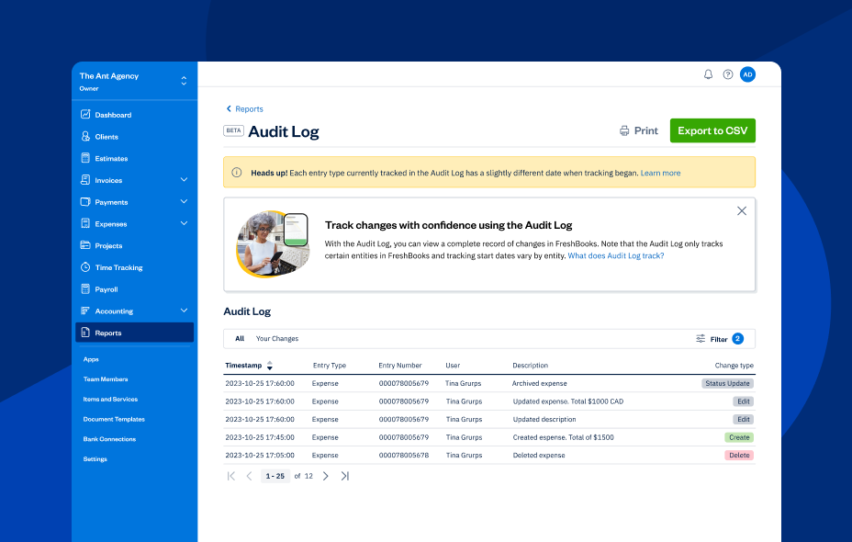
    FreshBooks UI screen for audit log

    FreshBooks UI screen for audit logFreshBooks Audit Log is a dynamic, sequential record that tracks the history of financial transactions back to their origins. You can track all changes made to expenses and invoices by filtering by client, change type, entity type, or user to get a customized view of the changes. This report is an essential part of robust financial management and governance. Additionally, the Audit Log Report can help manage cash flow by providing a detailed history of financial transactions.

    The Audit Log report provides a detailed, chronological history of financial transactions, ensuring transparency and strengthening financial management and governance.


    Related Articles


    Some key features of the FreshBooks Audit Log report:

    • It provides transparent, traceable, and reliable documentation of all financial activities.
    • It ensures accountability and accuracy in financial reporting.
    • It helps meet financial regulation requirements (particularly in Canada, which has specific rules about record-keeping).
    • It helps resolve disputes by providing a clear timeline and details, making it easier to determine any issues a client may present.

    2. Enhanced General Ledger Report

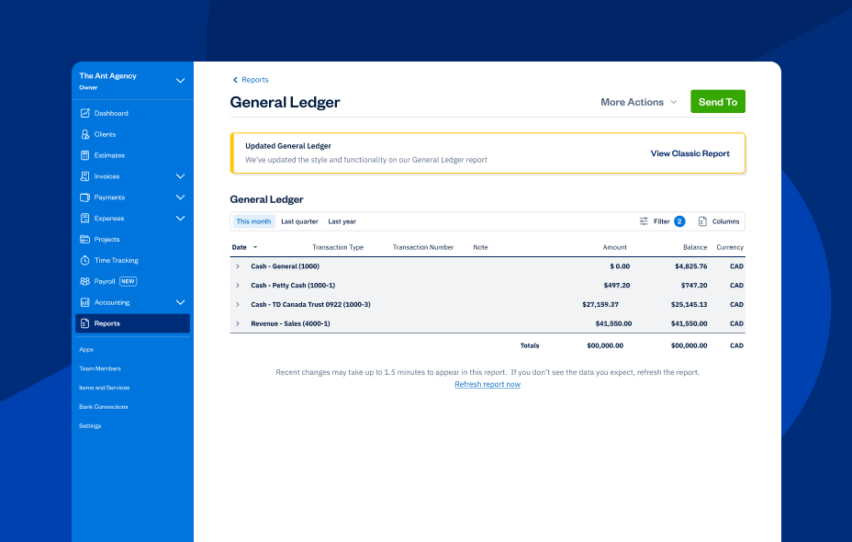
    FreshBooks UI screen for general ledger

    FreshBooks UI screen for general ledgerThe is a key feature of FreshBooks accounting software. It shows details of every transaction going in and out of your clients’ accounts on an accrual basis. These transactions are generated from the activity in FreshBooks, including sending invoices, tracking expenses, accepting payments, and logging other income.

    The updated General Ledger includes:

    • An updated compact view that allows you to review more data more quickly.
    • A new summary views that show top-line numbers, with the option to switch to a detailed view.
    • More comprehensive drill-down functionality that allows you to investigate and deep dive into every number on your report.
    • New customization features allow you to organize and view your report data exactly the way you prefer.

    3. New FreshBooks Payroll

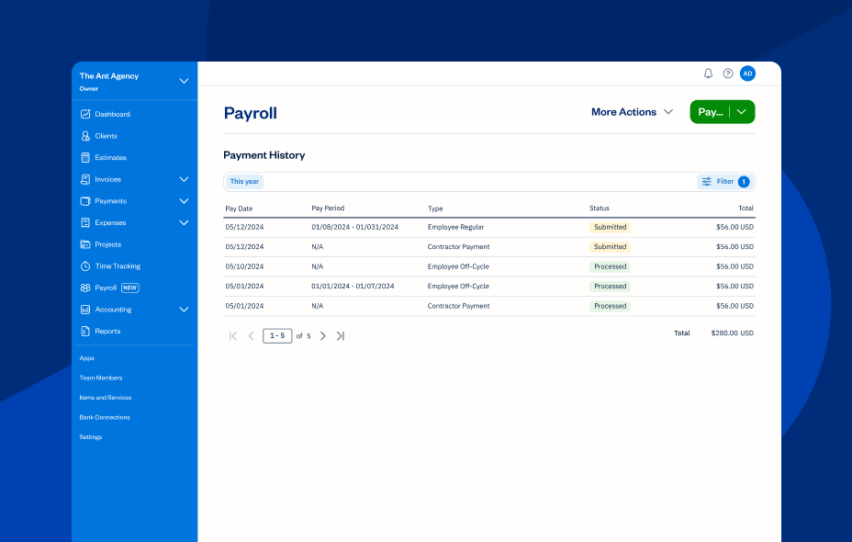
    FreshBooks UI screen for payroll is a paid add-on that allows small businesses in the U.S. to run payroll for employees and contractor payments, file payroll taxes automatically for each particular tax, and maintain labor compliance.
    Launched in 2024, FreshBooks Payroll now includes exciting new enhancements, such as:

    4. Payments Updates

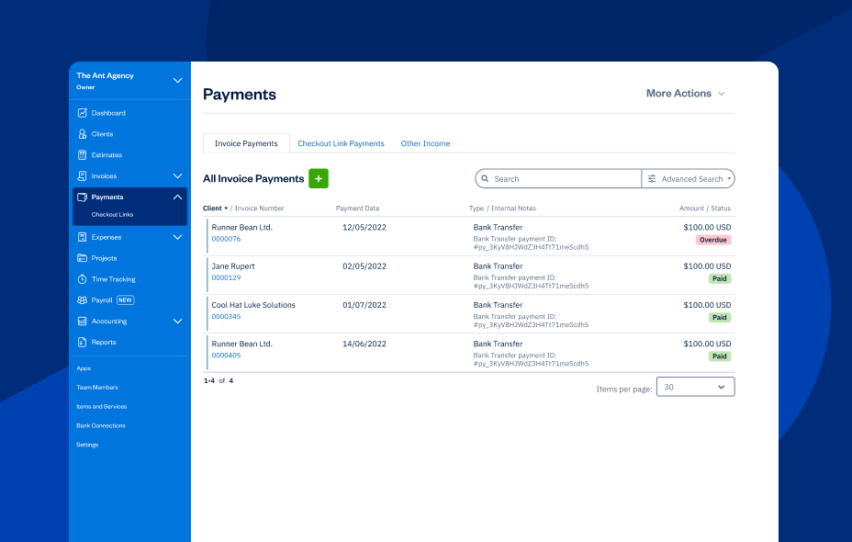
    FreshBooks UI screen for payments

    FreshBooks UI screen for payments allows business owners to offer their customers the option of paying directly through invoices. The feature automatically records each payment in their FreshBooks account. FreshBooks Payments can help manage cash flow by providing various payment options.

    , also known as a virtual terminal, is an add-on that can be included in a business owner’s subscription. It allows them to proactively charge their customers’ credit cards with the details they’ve provided.

    Using Advanced Payments, business owners can quickly process client credit card payments on invoices, over the phone, or in person. For repeat clients, card information can be securely saved for future invoices and recurring payments, streamlining the process.

    • Clients can accept payments directly from invoices, with options like credit cards, ACH, Apple Pay, and Google Pay.
    • You can use filters to create custom views of and see payment details for any transaction.
    • Users can select any  processed by FreshBooks Payments or Stripe Standard to review the reason.

    5. Accountant Hub Improvements

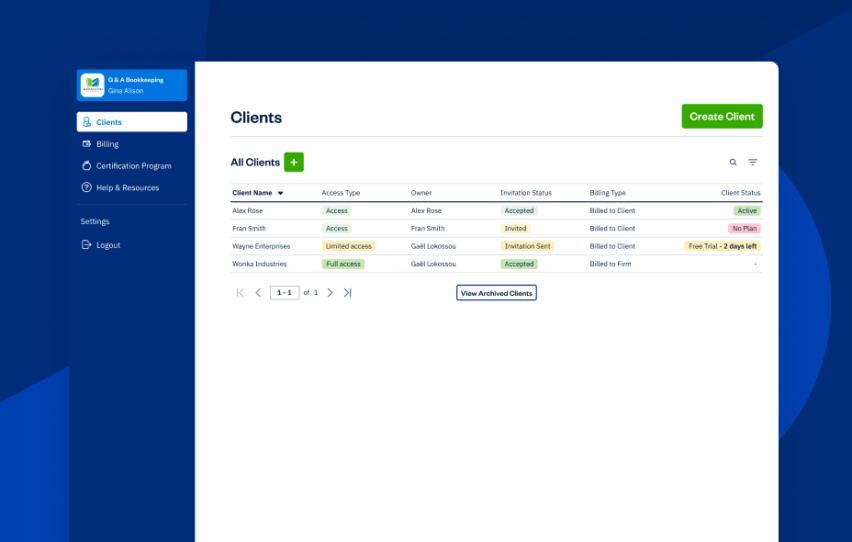
    FreshBooks UI screen for accountant hub

    FreshBooks UI screen for accountant hub is a centralized dashboard designed for our members. It provides seamless access to all their clients’ accounts, making it easy to switch between them. Key features of the include:

    • Set up your accounts and invite your clients. Once you’re in, you have one-click access to your client’s information and bookkeeping.
    • Manage everything in one place, from financial reporting and journal entries to a customizable chart of accounts.
    • Tailor workflows for each client.
    • Get discounts and dedicated, accountant-centric support from real humans.

    The improved features to the include:

    • The Accountant Hub includes a welcome video that walks through its key features.
    • Clients can access a trial countdown and an onboarding checklist to guide their setup.
    • Users can filter for easier account management.

    6. Updated Journal Entries

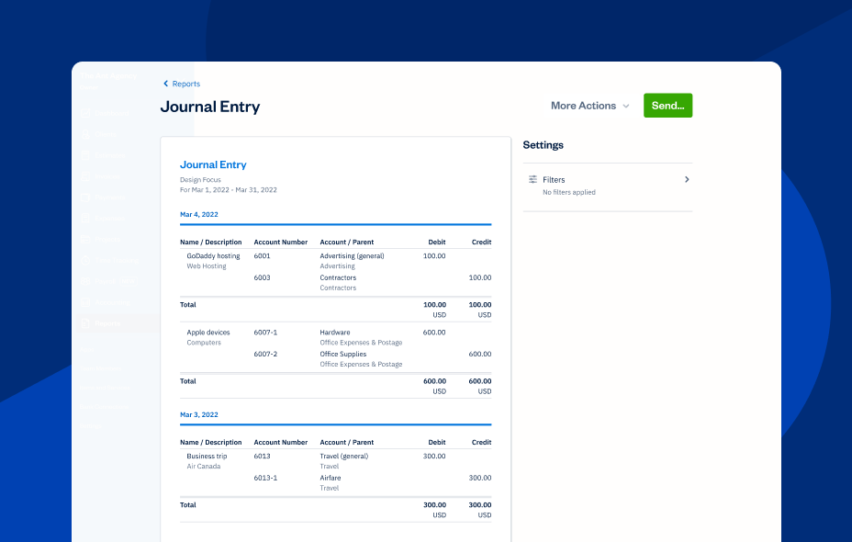
    FreshBooks UI screen for journal entry

    FreshBooks UI screen for journal entry automatically record all client transactions, capturing activities like sending invoices, accepting payments, and creating credits or expenses.

    With journal entry enhancements in FreshBooks, you can:

    • See all manually created journal entries in a dedicated journal entries section.
    • Create manual journal entries for more complex transactions like depreciation, fixed assets, and loans.

    7. Modified Bank Connections

    FreshBooks UI screen for bank connections

    FreshBooks UI screen for bank connections link business owners’ bank and credit card accounts to their FreshBooks accounts. This allows for easy payments, bank reconciliations, and expense categorization.

    By linking bank accounts to FreshBooks, business owners can also manage cash flow more effectively through comprehensive financial reporting options.

    Here’s what the new bank connections modifications can do:

    Get Ready to Be (Even) More Efficient

    FreshBooks exists to make accounting easier and more streamlined for accountants and their clients. That’s why we’re always dreaming up and integrating enhancements and updates. can provide specialized support and tailored recommendations, ensuring a smooth and effective accounting process.

    Elevate your practice and deliver exceptional value to your clients by joining the FreshBooks Accounting Partner Program. This program empowers you to grow your advisory practice with innovative, collaborative tools, streamlined workflows, and ongoing education. As a Partner, you’ll enjoy exclusive perks and dedicated support, ensuring you have everything you need to succeed. FreshBooks’ intuitive platform is fully loaded with features that make it easy to streamline your accounting processes and collaborate seamlessly with clients. Take your practice to the next level—.

    FreshBooks for Accountants: 7 New and Updated Features for 2025

    Software Stack Editor · December 12, 2024 ·

    At FreshBooks, we’re dedicated to continuously improving our software to make it more powerful and user-friendly for accounting professionals. This includes adding and refining new features, guided by user feedback, rigorous testing, and evolving industry standards.

    To catch you up on what you might have missed in 2024, we’ve rounded up some of FreshBooks’ latest updates. Each enhancement was designed to improve financial accuracy, provide better client service, and streamline your accounting workflow to help you save time.

    Table of contents icon

    Table of contents iconTable of Contents

      1. New Audit Log Report

      FreshBooks UI screen for audit log

      FreshBooks UI screen for audit logFreshBooks Audit Log is a dynamic, sequential record that tracks the history of financial transactions back to their origins. You can track all changes made to expenses and invoices by filtering by client, change type, entity type, or user to get a customized view of the changes. This report is an essential part of robust financial management and governance. Additionally, the Audit Log Report can help manage cash flow by providing a detailed history of financial transactions.

      The Audit Log report provides a detailed, chronological history of financial transactions, ensuring transparency and strengthening financial management and governance.


      Related Articles


      Some key features of the FreshBooks Audit Log report:

      • It provides transparent, traceable, and reliable documentation of all financial activities.
      • It ensures accountability and accuracy in financial reporting.
      • It helps meet financial regulation requirements (particularly in Canada, which has specific rules about record-keeping).
      • It helps resolve disputes by providing a clear timeline and details, making it easier to determine any issues a client may present.

      2. Enhanced General Ledger Report

      FreshBooks UI screen for general ledger

      FreshBooks UI screen for general ledgerThe is a key feature of FreshBooks accounting software. It shows details of every transaction going in and out of your clients’ accounts on an accrual basis. These transactions are generated from the activity in FreshBooks, including sending invoices, tracking expenses, accepting payments, and logging other income.

      The updated General Ledger includes:

      • An updated compact view that allows you to review more data more quickly.
      • A new summary views that show top-line numbers, with the option to switch to a detailed view.
      • More comprehensive drill-down functionality that allows you to investigate and deep dive into every number on your report.
      • New customization features allow you to organize and view your report data exactly the way you prefer.

      3. New FreshBooks Payroll

      FreshBooks UI screen for payroll is a paid add-on that allows small businesses in the U.S. to run payroll for employees and contractor payments, file payroll taxes automatically for each particular tax, and maintain labor compliance.
      Launched in 2024, FreshBooks Payroll now includes exciting new enhancements, such as:

      4. Payments Updates

      FreshBooks UI screen for payments

      FreshBooks UI screen for payments allows business owners to offer their customers the option of paying directly through invoices. The feature automatically records each payment in their FreshBooks account. FreshBooks Payments can help manage cash flow by providing various payment options.

      , also known as a virtual terminal, is an add-on that can be included in a business owner’s subscription. It allows them to proactively charge their customers’ credit cards with the details they’ve provided.

      Using Advanced Payments, business owners can quickly process client credit card payments on invoices, over the phone, or in person. For repeat clients, card information can be securely saved for future invoices and recurring payments, streamlining the process.

      • Clients can accept payments directly from invoices, with options like credit cards, ACH, Apple Pay, and Google Pay.
      • You can use filters to create custom views of and see payment details for any transaction.
      • Users can select any  processed by FreshBooks Payments or Stripe Standard to review the reason.

      5. Accountant Hub Improvements

      FreshBooks UI screen for accountant hub

      FreshBooks UI screen for accountant hub is a centralized dashboard designed for our members. It provides seamless access to all their clients’ accounts, making it easy to switch between them. Key features of the include:

      • Set up your accounts and invite your clients. Once you’re in, you have one-click access to your client’s information and bookkeeping.
      • Manage everything in one place, from financial reporting and journal entries to a customizable chart of accounts.
      • Tailor workflows for each client.
      • Get discounts and dedicated, accountant-centric support from real humans.

      The improved features to the include:

      • The Accountant Hub includes a welcome video that walks through its key features.
      • Clients can access a trial countdown and an onboarding checklist to guide their setup.
      • Users can filter for easier account management.

      6. Updated Journal Entries

      FreshBooks UI screen for journal entry

      FreshBooks UI screen for journal entry automatically record all client transactions, capturing activities like sending invoices, accepting payments, and creating credits or expenses.

      With journal entry enhancements in FreshBooks, you can:

      • See all manually created journal entries in a dedicated journal entries section.
      • Create manual journal entries for more complex transactions like depreciation, fixed assets, and loans.

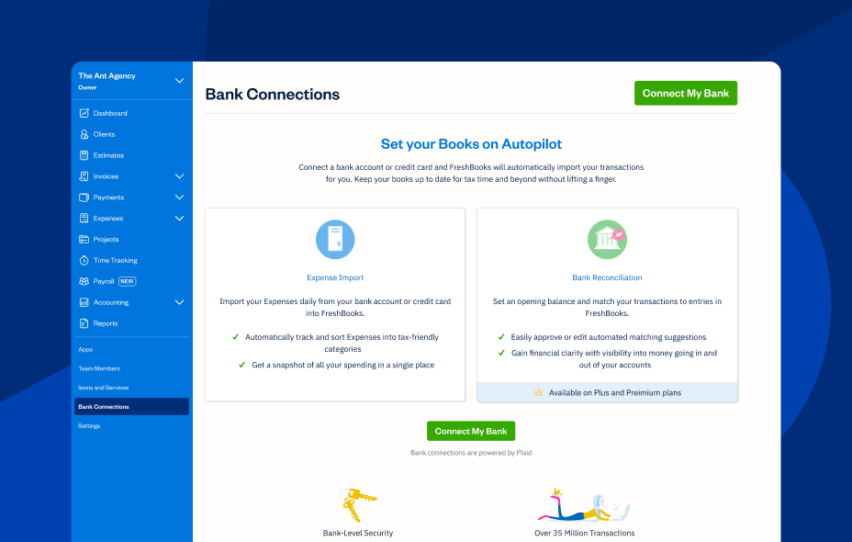
      7. Modified Bank Connections

      FreshBooks UI screen for bank connections

      FreshBooks UI screen for bank connections link business owners’ bank and credit card accounts to their FreshBooks accounts. This allows for easy payments, bank reconciliations, and expense categorization.

      By linking bank accounts to FreshBooks, business owners can also manage cash flow more effectively through comprehensive financial reporting options.

      Here’s what the new bank connections modifications can do:

      Get Ready to Be (Even) More Efficient

      FreshBooks exists to make accounting easier and more streamlined for accountants and their clients. That’s why we’re always dreaming up and integrating enhancements and updates. can provide specialized support and tailored recommendations, ensuring a smooth and effective accounting process.

      Elevate your practice and deliver exceptional value to your clients by joining the FreshBooks Accounting Partner Program. This program empowers you to grow your advisory practice with innovative, collaborative tools, streamlined workflows, and ongoing education. As a Partner, you’ll enjoy exclusive perks and dedicated support, ensuring you have everything you need to succeed. FreshBooks’ intuitive platform is fully loaded with features that make it easy to streamline your accounting processes and collaborate seamlessly with clients. Take your practice to the next level—.

      An update on payroll in our new plans

      Software Stack Editor · December 12, 2024 ·

      I wanted to give you a quick update on a decision we’ve made about payroll after listening to customer feedback.

      Earlier this year we launched our new plans: Ignite, Grow, Comprehensive and Ultimate.

      We designed the plans to give everyone more access to some of the most useful tools for running a business. For employers, payroll is obviously one of those critical tools. So we decided to build it in as an integral part of the package. 

      That was the thinking and, as a result, many customers now have access to payroll for the same or lower price. However, we acknowledge this wasn’t right for everyone.

      We listened to the feedback: bundling of payroll doesn’t give you the flexibility you need for additional employees, and we know that has meant some large jumps in pricing. Thank you. Your feedback is critical in helping us get it right for you.

      We’re changing things so that you can add employees to any plan for £1.50 per employee, except for Ultimate which will remain at £1.

      This decision has just been made, and we’re now working through the technical adjustments needed.

      We’ll be in touch in the new year when timing is confirmed.

      Nothing changes for now. Your existing migration plan still stands. If this still works for you and you want access to the full suite of features within that plan, you don’t need to do anything.

      However, if you want to move to a different plan and add further employees for payroll, you’ll have the flexibility to do so. We’ll be in touch in the new year as to when this will be possible.

      Thank you for your patience as we work to get this right, and thank you again for your feedback, and for being a Xero customer.

      The post An update on payroll in our new plans appeared first on Xero Blog.

      What Canada’s GST/HST Holiday Tax Break Means for Small Businesses

      Software Stack Editor · December 10, 2024 ·

      The federal government has introduced Bill C-78, the Tax Break for All Canadians Act, which brings a temporary GST/HST exemption on essential items during the 2024 holiday season. For small business owners, this means adjusting to these temporary changes during peak season – . It’s a busy time, but with the right planning, here’s everything you need to know to handle these exemptions like a pro.

      Key Details About the GST/HST Holiday Break

      The GST/HST holiday tax break waives the goods and services tax (GST) and harmonized sales tax (HST) on specific categories of goods. This holiday season tax break aims to reduce consumers’ financial burden during one of the busiest shopping periods of the year.

      The CRA has outlined several key components of the policy:

      1. Eligible goods: Only specific items are exempt from GST/HST during the relief period. These include:

      • child and baby items, such as receiving blankets, children’s clothes, and disposable diapers
      • certain recreational goods, including board games, video game consoles, and sports clothing
      • prepared foods, restaurant meals, beverages sold for human consumption, and catering fees for qualified meals
      • miscellaneous items such as street or road maps, plush toys, comic book versions, and children’s toys
        both natural Christmas trees and artificial Christmas trees

      2. Point-of-sale adjustments: Businesses are required to update their systems to ensure that eligible items are automatically processed as tax-exempt.

      3. Documentation: Receipts and invoices must clearly separate exempt items from taxable ones, ensuring transparency for both customers and CRA audits.

      For a comprehensive list of qualifying goods, . We encourage everyone to familiarize themselves with this guidance to ensure full compliance and avoid potential penalties.

      What’s Not Covered by the GST/HST Holiday

      While the GST/HST holiday tax break provides relief on select items under Bill C-78, not all goods and services qualify.. The Canada Revenue Agency (CRA) has defined categories of items that remain taxable during the relief period. Misclassifying these products as tax-exempt could lead to costly penalties for small businesses or frustrated customers. (To find these exemptions, click on “details, examples, and restrictions” for each item type in the .)

      Here’s a closer look at the types of ineligible items, with examples to help you avoid confusion:

      • Adult clothing and accessories: Unlike children’s clothing, adult apparel remains fully taxable. Businesses selling both must ensure their point-of-sale systems distinguish between tax-free and taxable items to avoid errors.
      • Luxury and collectible items: Luxury items or collectible products, including those marketed as holiday gifts, do not qualify for the GST/HST exemption.
      • Media and publications: Although printed books and newspapers qualify for the tax break, other forms of electronic media and magazines remain taxable.
      • Recreational and sporting goods for adults: While certain children’s sports or dance equipment may qualify, adult-oriented recreational goods remain taxable.
      • Food and beverage limitations: Although pre-made meals and beverages sold for immediate consumption may qualify for the GST/HST exemption, several exceptions apply.

      GST Holiday Challenges for Small Business Owners

      While the tax holiday is meant to be a consumer-friendly initiative, implementing it is not without hurdles for many small business owners:

      • System overhauls: Adjusting point-of-sale (POS) systems to handle GST-free transactions can be technically challenging, especially for businesses without dedicated IT support. Errors in setup could lead to overcharging or undercharging customers, resulting in compliance risks.
      • Administrative complexity: Businesses need to track eligible items meticulously, update inventory records, and generate reports reflecting the GST exemptions. The administrative burden increases for companies that sell a mix of taxable and non-taxable goods, such as stores offering both children’s and adult clothing.
      • Customer communication: Explaining why some items qualify for the tax break while others do not—such as children’s car seats being tax-exempt but adult car accessories remaining taxable—requires clear and consistent messaging.
      • Reversal planning: When the holiday ends on February 15, 2025, businesses must promptly revert their systems and processes to regular tax settings, adding another layer of complexity.

      GST Holiday Opportunities for Small Businesses

      Despite the challenges, the GST/HST holiday opens the door to significant opportunities:

      • Increased sales: By promoting tax-free items like audiobooks, children’s toys, and qualifying food, businesses can attract budget-conscious customers looking to maximize their holiday shopping budgets.
      • Customer loyalty: Providing a smooth and transparent shopping experience during the tax break period can help businesses strengthen customer relationships and encourage repeat visits.
      • Competitive edge: Small businesses that quickly adapt to the policy can stand out from competitors who may struggle with the transition.

      Related Articles


      How to Prepare for the GST/HST Holiday Tax Break

      To successfully navigate this tax relief period, small business owners should adopt a proactive approach. Here are some practical steps to consider:

      1. Understand the Policy

      Familiarize yourself with the CRA’s guidelines, including the full list of and the requirements for documenting tax-free transactions. Pay attention to nuanced categories, such as:

      • Sports or dance activities: Equipment and clothing designed specifically for these activities may qualify
      • Prepared foods and beverages: Items like pre-made meals, snacks, and non-alcoholic beverages for immediate consumption are exempt
      • Printed and media materials: Books (including press-out books and comic book versions), musical scores, and physical audio recordings are eligible, while online-only games and unpublished manuscripts remain taxable

      2. Update Your Systems

      Ensure that your accounting and point-of-sale systems are equipped to handle GST exemptions. If you use FreshBooks, you can easily:

      • customize tax settings for specific products
      • generate accurate invoices that reflect tax-free status
      • track the financial impact of the GST/HST holiday tax break using detailed reporting tools

      Learn more about how FreshBooks can simplify your tax management and reporting by understanding the .

      3. Train Your Team

      Your employees play a critical role in implementing the GST holiday tax break smoothly. Conduct training sessions to:

      • teach staff how to identify tax-exempt items, such as baby clothes and children’s toys
      • equip them to answer customer questions about why some items qualify while others, like alcoholic beverages or adult clothing, remain taxable

      4. Communicate With Customers

      Transparency is key to managing customer expectations. Use multiple communication channels to share information about the GST holiday:

      • Signage: Place clear notices at your store entrance and checkout counters.
      • Social media: Create posts highlighting popular items that qualify for the tax exemption, such as car seats sold for children or catering services.
      • Email campaigns: Send newsletters explaining how customers can save during the GST holiday.

      5. Prepare for the End of the Holiday Tax Exemption

      Plan a timeline for reverting to regular GST/HST settings after February 15, 2025. Document the changes you make during the holiday to ensure a smooth transition.

      Maximizing the Federal Tax Exemption

      To make the most of the GST/HST holiday tax break, consider these strategies:

      • Bundle tax-free items: To attract customers looking for savings, create promotional bundles featuring tax-exempt goods like receiving blankets and plush toys.
      • Leverage advertising: Highlight the tax savings in your marketing materials. For example, emphasize that “All children’s clothing is tax-free this holiday season!”
      • Track the impact: Use analytics tools in FreshBooks to measure the financial effects of the tax holiday, such as increased sales volume or changes in customer demographics.
      • Engage customers: Encourage feedback from customers about their experience during the tax exemption period. Use this insight to refine your operations for future campaigns.

      How FreshBooks Supports Small Businesses

      Navigating tax changes can be overwhelming, but FreshBooks simplifies the process with its user-friendly accounting software. With FreshBooks, you can:

      • adjust tax settings to align with the GST/HST holiday tax break
      • automatically apply exemptions to invoices and receipts
      • generate real-time reports to evaluate the policy’s impact on your business
      • access dedicated customer support for any questions or issues

      To explore how FreshBooks can help you during the GST holiday exemption period, .

      Final Thoughts on This GST/HST Relief Period

      Bill C-78, the Tax Break for All Canadians Act, represents a significant opportunity for both consumers and businesses. By waiving GST/HST on qualifying goods during the holiday season, the federal government aims to ease financial pressure and encourage spending.

      For small business owners, careful preparation is essential. By understanding the policy, updating systems, and leveraging tools like FreshBooks, you can turn this temporary tax break into a chance to grow your business and strengthen customer relationships.

      Don’t wait—start preparing for the GST/HST holiday today with the resources provided by the CRA and the accounting solutions offered by FreshBooks.

      Oh, and don’t forget you’re also a consumer! So head out for dinner because restaurant meals and catered meals are on the approved list.

      Ready to simplify your tax management? now and make this holiday season a success for your business.

      Malaysia’s National E-invoicing Initiative: What SMEs need to know

      Software Stack Editor · December 10, 2024 ·

      With the Malaysian government’s push towards a digital economy, small and medium enterprises (SMEs) must adapt to new requirements. One key development is the National E-invoicing Initiative. This initiative aims to modernize how businesses manage invoices, helping to streamline operations, improve compliance, and enhance efficiency across industries.

      If you’re an SME in Malaysia, here’s what you need to know to prepare for the transition.

      What is the National E-invoicing Initiative?

      The National E-invoicing Initiative is a government-led project designed to implement a nationwide electronic invoicing (e-invoicing) system. It’s part of Malaysia’s broader digital transformation strategy to promote transparency, reduce tax evasion, and improve the efficiency of financial processes.

      At its core, e-invoicing replaces traditional paper-based invoices with digital versions that are transmitted in real-time between suppliers, customers, and the Inland Revenue Board of Malaysia (IRBM).

      Key benefits for SMEs

      Adopting e-invoicing offers several advantages for SMEs:

      1. Improved cash flow: Faster invoice processing means quicker payments from customers. By reducing manual errors and delays, your business can maintain healthier cash flow.
      2. Reduced administrative burden: Automating the invoicing process frees up valuable time for your finance team, allowing them to focus on more strategic tasks.
      3. Enhanced compliance: E-invoicing ensures that all transactions are recorded and reported accurately, helping SMEs stay compliant with tax regulations and avoid potential penalties.
      4. Cost savings: By eliminating paper-based invoices, businesses can reduce printing, postage, and storage costs.

      Timeline for implementation

      The rollout of the National E-invoicing Initiative will occur in phases based on annual turnover:

      • Phase 1: Mandatory e-invoicing begins on 1 August 2024 for businesses with an annual turnover exceeding RM100 million.
      • Phase 2: Businesses with an annual turnover between RM25 million and RM100 million will need to comply starting 1 January 2025.
      • Phase 3: The initiative will extend to all taxpayers on 1 July 2025.

      SMEs should start preparing now to ensure a smooth transition when it becomes mandatory for their business size.

      How to prepare for e-invoicing

      Here are a few steps you can take to get ready:

      1. Evaluate your current invoicing system: Assess whether your current software can handle e-invoicing. Cloud-based accounting solutions like Xero offer seamless e-invoicing capabilities, ensuring compliance with new regulations.
      2. Train your yeam: Make sure your finance and accounting teams are familiar with the new e-invoicing requirements and how to use the necessary tools effectively.
      3. Engage with your suppliers and customers: Inform your business partners about the upcoming changes and work together to ensure a smooth transition to e-invoicing.
      4. Consult with experts: If you’re unsure about how the initiative will impact your business, consider seeking advice from a tax advisor or accounting professional.

      How Xero can help

      At Xero, we understand that regulatory changes can be challenging, especially for SMEs. Our cloud-based accounting platform is designed to simplify financial management and help businesses adapt to new requirements like e-invoicing.

      With Xero, you can:

      • Generate and send e-invoices effortlessly.
      • Track payments and manage cash flow in real-time.
      • Ensure compliance with the national e-invoicing mandate through automated reporting.

      Final thoughts

      The National E-invoicing Initiative is a significant step towards a more digital and transparent economy in Malaysia. While the transition may require some effort, the long-term benefits for SMEs are undeniable. By starting your preparations now, you can position your business for success in this new era of digital finance.

      Ready to embrace e-invoicing? Explore how Xero can help your business stay ahead of the curve.

      Disclaimer: This article is for informational purposes only and does not constitute financial or legal advice.

      The post Malaysia’s National E-invoicing Initiative: What SMEs need to know appeared first on Xero Blog.

      Ditching the stress of year-end payroll 2024/25

      Software Stack Editor · December 10, 2024 ·

      Payroll year-end can be a busy time for businesses as they navigate deadlines, submission dates, and HMRC rules. Without enough planning, year-end has the potential to be highly stressful. Learn the essentials of payroll end-of-year submission, including common challenges and ways to tackle them.

      What is HMRC payroll year end?

      Payroll year-end sees a business wrap up the tax year for payroll purposes. Every twelve months, following your final pay run, you’ll need to send specific information to HMRC: a Full Payment Submission (FPS) and possibly an Employer Payment Summary (EPS). You’ll also need to issue P60s to your employees and make any adjustments to tax codes for the new tax year.

      Think of it as drawing a line under your payroll for that period. You’re telling the government the total amount you’ve paid your employees as well as the deductions you’ve made, and taking care of necessary admin before you can embark on a new tax year. 

      This is in contrast to your usual payroll which happens every payday – usually weekly or monthly – rather than just at the end of the tax year. 

      If you’re new to payroll, read about what is it and how it works.

      Tackle common year-end payroll challenges

      Manage large quantities of complex data

      When a business grows, the amount of employee information also grows. It can be difficult to keep accurate records when employees earn fluctuating amounts of money, receive different benefits, or come and go throughout the year. 

      That’s where Xero accounting and payroll software helps. It accurately stores information in one place and does the complicated calculations for you. 

      Avoid lack of communication

      In a busy workplace, it can be hard to keep each other updated on employees. Somebody might have been paid a bonus or had a change in status, such as becoming eligible for more childcare vouchers. 

      Put in processes where the person or team in charge of payroll is told about anything relevant. This might mean regular meetings or using HR checklists.

      Keep up to date with changes in legislation

      It’s crucial to stay in the loop with changes to HMRC’s rules and deadlines. 

      The gov.uk website is your best first stop for such information. 

      Be aware of hard deadlines

      Not only does a business need to do its final payroll, it must also perform the other year-end tasks, all to set deadlines. 

      Having the right software can keep this on track. When more work is automated – and all done in a single place – you’re freed up to focus on other tasks.

      For payroll year-end 2024/25, key dates are the following:

      • 5 April 2025: 2024/25 tax year-end 
      • 5 April: The last day to update your employee payroll records and your payroll software
      • 6 April: The new tax year for 2025/26 begins
      • 19 April: The deadline for the final submission of the 2024/25 tax year
      • 22 April: The deadline for month 12 PAYE
      • 31 May: The deadline to send your employees their P60s
      • 6 July: The deadline to report on expenses and benefits (using your payroll software if applicable)
      • 6 July: The deadline to submit your P11D and P11D(b) forms
      • 22 July: The deadline for payments of class 1A National Insurance contributions on benefits in kind to HMRC. (If you’re not using digital systems, the deadline is 19 July)

      Use a checklist to stay on track

      With multiple deadlines and tasks to manage, a year-end checklist is essential for staying organised. Look out for our soon-to-be released step-by-step guide, which breaks down each task and its timeline to help keep you on track.

      Embrace payroll software for year-end tasks

      Xero cloud-based accounting software can streamline your payroll and make year-end reporting easier to tackle.

      HMRC-recognised, Xero simplifies your compliance with automated RTI submissions and easy adjustments. Payroll calculations are also automated, so your records stay correct and up-to-date. Likewise, pension re-enrolment is a speedy process, meaning it’s easier to meet your obligations.

      So then, when it comes to year-end, you’ll be in good shape to hit the deadlines. All the relevant reports and information will be waiting in one, secure place – ready for team members to work alone or collaboratively, from wherever they are in the world. That means less stress and more confidence that you’ve nailed the payroll process. 

      Get more info about payroll in Xero here. 

      The post Ditching the stress of year-end payroll 2024/25 appeared first on Xero Blog.

      What’s new in Xero – December 2024

      Software Stack Editor · December 9, 2024 ·

      Welcome to our monthly roundup of what’s new in Xero. This month, we’ve introduced updates designed to help you to get paid faster, streamline tax rules and regulations compliance, and manage your sales tax with ease. With enhancements from the ability to send invoices via SMS to improvements in Xero Tax and sales tax reporting, we continue to make Xero even better. Read on to learn more about the latest features and enhancements.

      AU: Get paid faster with SMS invoices [Product Idea💡]

      You spoke, we listened! You can now send invoices via SMS. Give your customers a convenient way to pay, no matter where they are thanks to the arrival of send invoices via SMS . This was a popular Xero Product Ideas request, and we’re thrilled to deliver this time-saving, payment-boosting feature. 

      UK: Save time and manage all your clients’ compliance needs in one place with Xero Tax [Product Idea💡]

      For UK accountants and bookkeepers, you can now use Xero Tax to prepare and file partnership tax returns with HMRC. This means you can manage the vast majority of compliance tasks and all in one place. It will help you save time and money, as well as provide a better service to your clients. This enhancement is a result of our work to bolster  Xero Tax so that accountants and bookkeepers can serve even more clients in one place. Read the blog post to find out more. 

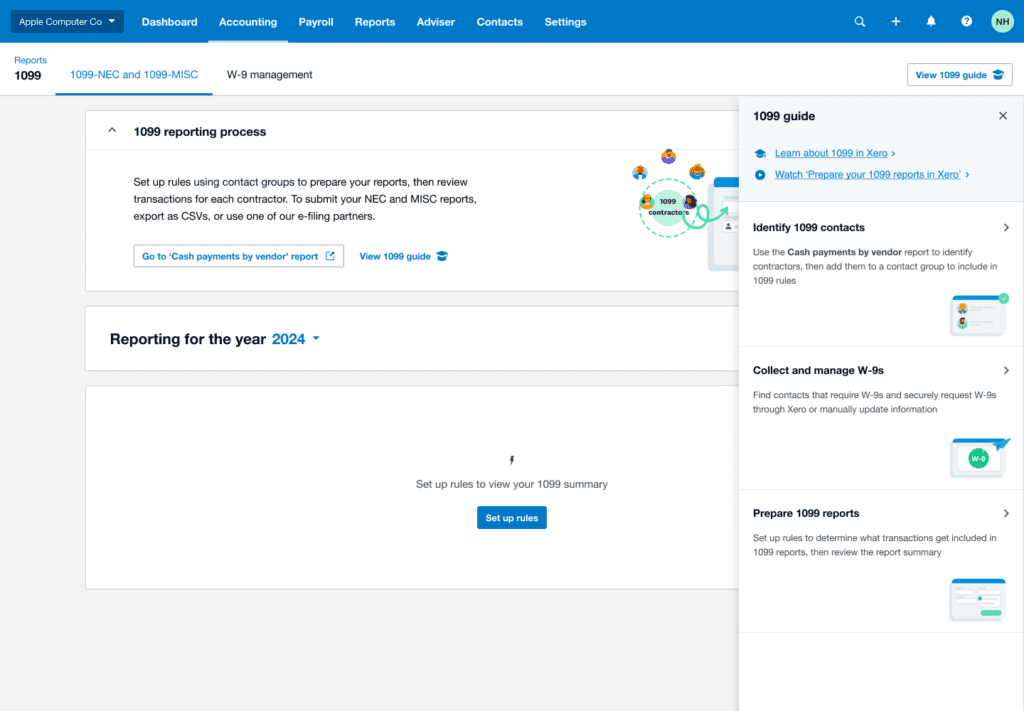
      US: 1099 just got easier 

      We’ve made some changes to managing your 1099s in Xero, to make onboarding easier and more intuitive and help you to get up and running quickly. During tax time this year, you’ll notice that preparing your 1099 will be easier and feel more intuitive. These changes were based on customer feedback, and we’re confident it will make a big difference during tax time.

      These are just some of the updates that have rolled out in Xero this month. Check out the full list of what’s new this December in the product release notes on Xero Central, and view the previous product update on the Xero Blog.

      The post What’s new in Xero – December 2024 appeared first on Xero Blog.

      Climate reporting legislation: What it means for small businesses and accountants

      Software Stack Editor · December 4, 2024 ·

      From January 2025, new climate reporting legislation will be introduced. It will require big businesses in Australia to track their carbon emissions and include the results in sustainability reports, which they’ll need to submit alongside their other annual reporting obligations.

      While this law directly targets businesses with more than 100 employees, the impact will inevitably trickle down to their suppliers, who may need to provide emissions data to them. 

      The requirements for small businesses and their accountants are due to be phased in over 2026 and 2027. However, mandatory climate-related financial disclosures, which will bring both challenges and opportunities, may begin much sooner.

      As we head towards the new year, here’s what this legislation means for you, and how you can prepare your business or practice ahead of the change.

      What this means for small businesses

      While small businesses aren’t directly impacted by the legislation at this stage, they may still need to provide emissions data to larger clients who are subject to the reporting requirements. 

      If you’re a small business, you may need to invest time and resources in measuring and reporting your emissions, even though you aren’t legally required to. That’s because large businesses may favour suppliers who can provide climate-related reporting to help them meet their own obligations.

      It’s also a great opportunity to decrease your carbon footprint, because once you measure it, you can reduce it. Savvy consumers are becoming increasingly aware of businesses that exaggerate their sustainability efforts, so if you have robust data about your emissions, you can also protect your business from accusations of greenwashing.

      By proactively managing your emissions and demonstrating a commitment to sustainability, you can gain a competitive advantage and strengthen your relationships with customers and partners. Research from Deloitte found that roughly two-thirds of Gen Zs and millennials will pay more for sustainable products and services, while around a quarter have stopped supporting businesses with unsustainable practices.

      What this means for accountants

      Accountants can play a crucial role in supporting businesses as they comply with the new climate reporting requirements. The introduction of this legislation presents a great opportunity to get ahead of the game and offer new services to your clients early.

      If you’re an accountant with small business clients, you’ll need to:

      • understand the legislation 
      • help clients accurately calculate their carbon footprint
      • provide assurance (through an audit) on climate-related disclosures

      This is a new area for many, but you don’t need to be a sustainability expert to provide carbon accounting services. In the end, it’s just maths. With the right tools, you can help your clients track and measure their emissions.

      Luckily, there are lots of resources out there to help you get started. Check out the Sumday Academy for a range of courses and learning tools.

      How Xero can help

      We’re committed to helping small businesses and accountants transition to mandatory climate reporting. For small businesses, the good news is that the data you already have in Xero can be used to understand your carbon footprint. 

      You can find carbon footprinting apps in the Xero App Store. These apps connect to Xero and use your Xero data to measure your emissions.

      Xero partner Sumday provides accountants with an easy-to-use tool for measuring and reporting emissions to an auditable standard. So check out Sumday, along with Greenly and a range of other apps at different price points. There’s something for everyone.

      The climate reporting legislation is a significant step towards greater transparency and accountability in corporate Australia. While it presents challenges for small businesses and accountants, it also offers opportunities to drive positive change.

      Whether you need to start reporting now or not, it’s a great time to take a step towards a greener future.

      The post Climate reporting legislation: What it means for small businesses and accountants appeared first on Xero Blog.

      Using Caseware and Wagepoint to streamline your EOFY

      Software Stack Editor · December 4, 2024 ·

      We’re excited to share some new apps in the Xero App Store: Caseware and Wagepoint. These apps bring key capabilities into the Xero platform, to simplify your year-end workflows, payroll and compliance. It’s all part of our work to make life better for people in small business and their advisors across Canada.

      Complete year-end compliance work faster with Caseware

      Caseware is a Canadian-born, global provider of audit, financial reporting and data analytics solutions for accountants and bookkeepers.

      It seamlessly integrates with Xero, helping you complete year-end compliance work faster by reducing the need to manually export and import files between Xero and Caseware. You can also save time on manual data entry, by importing trial balances and general ledger data from Xero into Caseware’s cloud suite of assurance and financial reporting solutions.

      The new Caseware Working Paper integration is now available – jump into the MyCaseware portal to give it a try and see how it might help you free up time to serve your clients and grow your practice.

      Try MyCaseware

      See cash flow in real time with Wagepoint

      Wagepoint’s new integration with Xero connects your clients’ payroll and accounting, so you can see cash flow in real time, do bank reconciliations, create and send invoices, and more.

      To save you time, we’ve added the ability to automatically map your chart of accounts and export your payroll and subscription invoice transactions to Xero. If you want even more customisation, you can set custom mapping for child accounts under ‘Wages & earning expenses’, ‘Wages & earnings liabilities’, and ‘Employee benefit expenses’.

      Wagepoint has been available in the Xero App Store since 2017, so we’re thrilled that we can enhance their existing tools for you and make it even more powerful for your practice.

      Try Wagepoint

      The Xero App Store features hundreds of connected apps, which are all certified by Xero to make sure the way they bring data into Xero is accurate and aligns to accounting standards. Our AI-powered recommendation engine makes it easy to find the right apps for your practice, and try or buy the app in a few clicks.

      We can’t wait to hear what you think about our new Caseware and Wagepoint integrations, and look forward to continuing to deliver more for our Canadian customers. For example, earlier this year we launched a partnership with Jobber, a Canada-based app developer and the top player in the field services space.

      For a quick glance at other apps designed for Canadian partners, check out this collection of apps for advisors in the Xero App Store.

      The post Using Caseware and Wagepoint to streamline your EOFY appeared first on Xero Blog.

      Three ways to build a stand-out customer experience

      Software Stack Editor · November 29, 2024 ·

      Customer experience (CX) is more than a buzzword – it’s pivotal to building solid relationships with your customers and gaining a competitive edge. It’s often discussed in the context of large businesses like airlines or banks, but CX is equally important for small businesses, where things like recommendations and positive reviews can make a huge difference. 

      Here, we’ll explain why building a positive, memorable experience for your customers can boost your success. We’ll also break down three core components of stand-out CX.

      Why does customer experience matter for small businesses?

      When consumers have seemingly infinite choices, two key factors can set you apart from the competition: 

      • your product or service  
      • the experience customers have with your business 

      Unlike larger corporations, small businesses often cultivate a more personal, one-to-one relationship with customers. This can be an asset in creating unique and memorable experiences. 

      When you focus on creating positive interactions, these experiences can turn satisfied customers into advocates who can help attract new clients – often at a much lower cost than traditional advertising.

      What does customer experience look like in a small business?

      CX looks different for every small business, but there are three things that  will set you up for success, no matter what industry you’re in. 

      1. Understanding your customers, their needs and wants

      The foundation of a great customer experience starts with understanding who your customers are and what they truly need and want. Get to the heart of what motivates your customers, their pain points and their goals. 

      Start by gathering insights through surveys, feedback forms, and data analytics. Regularly analysing this data helps uncover trends in behaviour and preferences. This allows you to make informed improvements that genuinely meet customers’ expectations, ease friction, or solve a problem they may be facing. 

      Ask yourself: 

      • What problems do our customers face in their lives?
      • How does our product or service help solve them?

      2. Meeting customers where they are

      Today’s customers expect a certain level of personalisation and convenience, and they’re more likely to stay loyal to brands that meet their expectations. So consider whether you’re delivering service in a way that aligns with your customers’ preferences and habits, and making life easier for them. 

      Ask yourself: 

      • What problems do our customers face when finding, using or buying our product or service? How can we make it easier?
      • Where are our customers? How can we bring our product, service or process to them, rather than making them come to us?

      How can you deliver this kind of experience with limited time and resources? Automation can power timely and personalised communication at scale. Whether it’s scheduling invoice reminders, letting customers choose their preferred way to pay, or reaching out to customers on their favourite social media platform, these simple yet impactful touches show customers that you value their business. 

      Tips: 

      • Set up automatic invoice reminders in Xero to give your customers a friendly nudge when payments are due or overdue. Try the Paidnice app  to send SMS reminders, apply prompt payment discounts and more. 
      • Payment apps like Stripe, Square and Airwallex give customers more ways to pay, allowing them to choose the method most convenient to them. 
      • Connect a job management or customer relationship management (CRM) app to Xero. This kind of software makes it easy to deliver highly personalised communication in a streamlined way. 

      3. Measuring success and improving

      No customer experience strategy is complete without regular evaluation. Metrics such as customer satisfaction scores, net promoter scores (NPS), and retention rates offer insight into how well you’re meeting customer needs and what might need adjustment.

      But feedback isn’t limited to numbers. Qualitative insights can be just as powerful, especially public ratings and reviews that can drive word-of-mouth referrals. 

      Tip: Try the NiceJob app to gather reviews and referrals directly from customers and turn your reputation into a growth engine. You can create automatic, set-and-forget campaigns to collect a steady stream of reviews. At the same time, you’re meeting the customer where they are and making the process easy for them. 

      Once you have this information, it’s time to make some improvements. Customer preferences and market trends are always shifting, so it’s crucial to stay adaptable. By consistently refining your tactics, you can keep the customer experience fresh, relevant, and responsive to changing needs.

      Ready to build a stand-out customer experience?

      Mastering these three pillars – understanding needs, meeting customers on their terms, and continuously measuring success – can create a customer experience that not only attracts new clients but helps build long-term loyalty, driving growth for your business.

      The post Three ways to build a stand-out customer experience appeared first on Xero Blog.

      How Xero is supporting digital transformation at Xeinadin Sittingbourne

      Software Stack Editor · November 28, 2024 ·

      We recently announced a strategic partnership with Xeinadin that builds upon years of working together. Ellie Redfern, Enterprise Account Manager at Xero, recently spoke with Symon Barkway, a partner at the Xeinadin Sittingbourne office and the area managing partner of the North Kent region, on his journey with Xero and why he’s passionate about helping other accounting firms embrace change. 

      Tell us about your firm? 

      At Xeinadin Sittingbourne, our team of 30, mostly Xero-certified advisors, supports small and medium businesses across various industries, including construction, healthcare, and non-profits. We were an early adopter of Xero, and over the years we’ve helped many clients transition from manual bookkeeping to digital solutions like Xero, especially with Making Tax Digital. Our healthcare clients, in particular, benefit from Xero’s features like tracking categories, and we also serve foster carers, schools, and non-profits.

      What’s your role at Xeinadin? 

      I’ve been with Xeinadin Sittingbourne (as it’s now called) for 12 of its 30 years. I’ve spent most of that time working with small business owners getting them onto Xero. Now, as the area manager for North Kent, my focus is on growth, learning from other firms’ use of technology and sharing that knowledge to help others.

      What’s the most rewarding thing about the work you do? 

      Helping people interpret their financial data and reach their goals is the most rewarding part of our work. Many new clients are surprised when we ask about their aspirations, but our team is really there to support them in achieving their goals. Ultimately, our success is tied to theirs, and it’s fulfilling to be part of their journey and see them and the people around them grow. 

      How long have you been using Xero?

      When I joined the firm, they had started using Xero as early adopters. I was amazed at how much it could do compared to other accounting software. Xero does everything well. Over the years I’ve seen core accounting continually improve, and I can see that Xero listens to feedback and makes meaningful changes. We’ve gone from a very small number of clients using Xero to nearly all of our bookkeeping clients on the platform. 

      What have been the biggest benefits of using cloud technology in your firm? 

      Cloud technology has transformed the way we work, especially since the pandemic, offering greater flexibility and saving time.

      With cloud accounting, we can access client data at the same time as them, allowing us to work more efficiently, and guide them on how to understand their numbers. Many of them have become more engaged with their data through learning how to use cloud accounting software, quickly seeing the benefits. For example, builders who learn to invoice customers directly from their phones while on-site, realise how much time it saves, how quickly they get paid, and how it helps them stay on top of their finances.

      What do you see as the biggest trends happening in the accounting industry right now?

      Number one is the shift from compliance to advisory, largely driven by advancements in technology, particularly AI. As automation takes over many data processing tasks, especially as MTD comes into force, we need to focus more on interpreting financial data as opposed to inputting. This change is exciting as it allows accountants to provide deeper insights and more value to clients.

      Secondly, as accountancy is an ageing profession, attracting talent is becoming more important.  We need to understand and appeal to younger generations to make accounting an industry they want to work in, for instance things like offering flexible working and using the latest technology. There’s some great opportunities to attract engaged young people that think differently and are future-focused.

      What does the strategic partnership between Xero and Xeinadin mean to you? 

      We believe in strength in numbers. Xeinadin is a fast-paced environment with lots of change, and with that comes some fear and uncertainty. Our partnership with Xero is about working together to alleviate some of the fear around change and supporting firms with digital transformation. It’s about providing a strong support network, showcasing Xero’s capabilities that enable them to give the best experience to their clients, and connecting firms with a community for shared learning.

      What’s your advice for other firms who are on their own digital transformation journey? 

      Don’t let the scale of change discourage you. The process will be challenging and there will be setbacks, but staying focused on overcoming these hurdles will ultimately result in a solution that’s fit for purpose for years to come. Investing time now will make things easier for you and your clients, and it will absolutely be worth it in terms of the service you can offer and the engagement you get from your clients. 

      The post How Xero is supporting digital transformation at Xeinadin Sittingbourne appeared first on Xero Blog.

      We’ve updated our responsible data use commitments

      Software Stack Editor · November 25, 2024 ·

      We use data to create innovative products and features for our customers. These help small businesses save time and make better decisions, and give advisors the information they need to help their clients thrive. Data is critical to innovation, and the opportunities to put it to work for the benefit of our customers are exciting.

      With these opportunities, comes an obligation to use data responsibly, which we take very seriously. In 2020, we made a company-wide pledge to responsible data use and introduced a set of commitments into our business. These were updated in 2024, to ensure that as technologies continue to evolve, we keep pace with how we manage and use data.

      Our latest responsible data use commitments ensure we continue to meet the expectations of our community, and remain a trusted and insightful small business platform.

      What’s changed?

      Our responsible data use commitments remain substantially the same. We’ve streamlined our commitments, grouping similar ones together. We’ve also clearly outlined how we meet each commitment, so we continue to be transparent about how we use and store your data.

      Our updated commitments bring together the strong practices we’ve put in place over the years, and help address what we know our customers care about. This includes how we’re using technology like artificial intelligence in a responsible way to make customers’ lives easier.

      What hasn’t changed are the values that underpin our approach to data use. We believe the updated commitments allow us to continue to innovate safely, and provide our customers and partners with assurances about how we keep their data safe and secure.

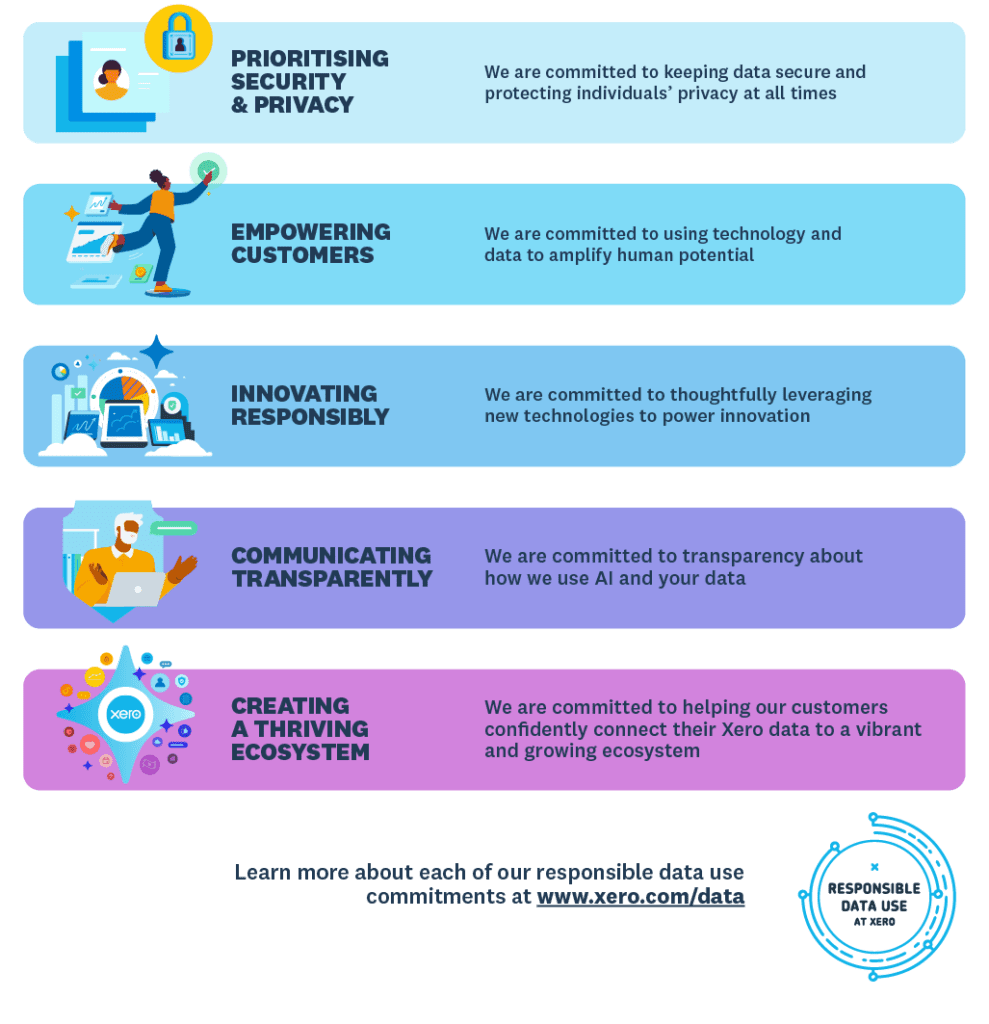
      Our updated commitments

      Here’s what our updated responsible data use commitments look like, at a high level.

      You can find more information about how Xero uses and stores data responsibly, by visiting the responsible data use commitments page on our website. You can also see our terms of use, privacy notice and data processing terms.

      The post We’ve updated our responsible data use commitments appeared first on Xero Blog.

      Now You Can Pay Your Entire Team, Including Contractors, Using FreshBooks Payroll

      Software Stack Editor · November 25, 2024 ·

      Say hello to an easier payroll day when you pay your employees and contractors right from FreshBooks.

      Paying your contractors can be slow, expensive, and clunky. Not only do you have to verify the information, but you have to manage payments—sometimes from multiple contractors, each using different banks.

      What if, instead, you had a way to pay your contractors as easily as you pay your employees? And what if that payment came through your FreshBooks account and was automatically entered as an expense?

      Well, now you can pay both your employees and your contractors using FreshBooks Payroll.

      What Is FreshBooks Payroll for Contractors?

      FreshBooks Payroll is powered by Gusto, a full-service payroll provider. Because it’s an embedded add-on to your FreshBooks account, you can pay your employees (W-2s) and contractors (1099s) right from your invoicing and accounting platform.

      With FreshBooks Payroll, payroll takes minutes (instead of hours!). So you can spend your time on what matters most to you and your business.

      Why Should You Use FreshBooks Payroll to Pay Your Contractors?

      With FreshBooks Payroll, onboarding and paying your contractors takes just a few clicks. Plus you can:

      • pay your team quickly and efficiently, with fewer manual processes and delays
      • automatically file your payroll taxes every time you run payroll
      • stay up-to-date with payroll compliance, as FreshBooks Payroll monitors changes in laws and regulations
      • ensure compliance when federal, state, and local taxes are taken care of.
      • automatically track transactions for every pay run so your reports and books stay accurate and organized

      What’s the Difference Between Paying Employees and Paying Contractors?

      With your W-2 employees, you have to withhold and remit state and federal income taxes and manage benefits, including overtime and vacation pay. With contractors, they are their own employers, so they are responsible for managing those items on their own.

      Get Started With FreshBooks Payroll

      Learn how easy it is to pay your entire team, including contractors, with this .

      If you have any questions about how to use FreshBooks Payroll, don’t hesitate to .

      If you have questions about adding FreshBooks Payroll to your account, please .

      How Mackenzie and Natasha Bring Order to Chaos With FreshBooks, One Client at a Time

      Software Stack Editor · November 21, 2024 ·

      In two years, the Fluharty Group has built a successful business by bridging the gap between small business owners and their accountants.

      “Most tax accountants don’t want to do bookkeeping. And most small businesses with 10 or fewer employees can’t afford a full-time accountant or administrative assistant to help them do things like keep track of income, expenses, and revenue, run payroll, and get tax reports done,” she said.

      “That’s where we come in.”

      Mackenzie Fluharty Stephens and her sister, Natasha Fluharty Bledsoe, support a diverse range of business clients who need administrative and bookkeeping support. And from the very beginning, FreshBooks has been a critical component of the business.

      “Some of my first clients when I was still doing this as a side hustle were business owners who hired me to do a FreshBooks or QuickBooks data cleanup.”

      As time continued, Mackenzie began to switch her clients from QuickBooks to FreshBooks, drawn by its user-friendly interface. This was especially the case after she became a FreshBooks-certified Accounting Partner. Now, Mackenzie looks for ways technology can improve clients’ processes. Here’s what she says about bringing fresh solutions to life using a .


      Related Articles


      Why did you decide to start your own firm?

      Mackenzie: I did bookkeeping and accounting work in my job as a manager of operations for many years before I decided to start a bookkeeping side hustle. It became a full-time business for me when I realized that there was a gap in the market I could fill.

      Natasha: Mackenzie had been doing it for a few years before I joined her. I have a background in finance and worked in commercial banking for 10 years. So, I focus on bookkeeping and finances, while she tackles more client-facing roles to meet with them and answer their questions.

      Mackenzie: We work well together because we have similar knowledge capacities but with different experience in different industries.

      Who and where are your clients?

      Mackenzie: We work with a wide range of clients, including event planners, engineers, social sports associations, retailers, and non-profit organizations. No two clients are alike, but they all have fewer than 10 employees.

      For some, we provide overall bookkeeping, accounting, and administrative support. For others we help on specific projects during busy times.

      We work with more than 10 clients on a monthly basis, and have a few clients who have switched to FreshBooks for a new start.

      What’s your typical client workflow?

      Mackenzie: When we work with a client, we typically send out all customer invoices for them if they don’t use an automated system or sell their product instantly at a brick-and-mortar store. We manage bill paying, help set up automated payments, help them with payroll, and do monthly bank- and credit card reconciliations.

      We’ll also work with their tax advisor on filing quarterly payroll or sales or business taxes, depending on the city and state they live in. We take bookkeeping tasks off their plate—and the plate of their accountant—while deferring to the accountant for tax strategy. At the end of the year, all the accountant has to do is reconcile what we gave them, send over things like depreciation, and the reports are ready to go. It really takes the year-end manual labor off the client and the accountant.

      How did you get started with FreshBooks?

      Mackenzie: Online recommendations from other bookkeepers turned us on to FreshBooks as a great solution. I looked into it and got certified as a FreshBooks Accounting Partner immediately. Plus, Natasha is certified as well.

      Why do you recommend FreshBooks to your clients?

      Natasha: One thing I’ve enjoyed about FreshBooks is that it’s the opposite of intimidating for folks who don’t do what we do. For folks who are in a totally different type of work. FreshBooks is more approachable, and it’s been easier for us to get the information that we need to do our job and keep things moving efficiently.

      Mackenzie: It’s a much easier interface for them. FreshBooks uses words that everybody understands. It has all the same features as other accounting software but removes the behind-the-scenes layers, so clients only have to work on income, expenses, matching transactions, and reporting. They’re still doing everything a CPA needs without seeing that extra layer of complexity.

      It’s a much easier interface for our clients. FreshBooks uses words that everybody understands.

      Have you migrated any clients to FreshBooks from a previous system?

      Mackenzie: Two of our clients switched from QuickBooks to FreshBooks because it was a better fit for their needs and a bit more affordable. FreshBooks has all the financial tools they rely on, plus a more user-friendly interface.

      Both migrations went great. We had a few tickets to FreshBooks Support and found them to be incredibly helpful and responsive. They answered our questions in a way we could easily relay back to our client.

      Natasha: For one client, the switch helped us detect some bad data. FreshBooks doesn’t want you matching things that aren’t right, and it was helpful in identifying what needed to be fixed.

      Do you use a Collaborative Accounting™ workflow with any of your clients?

      Mackenzie: Yes, we have a healthcare consultant client that manages 90% of their bookkeeping in FreshBooks. We really just do the final checks for them, verify that reconciliations are done, skim through financial reports, and go over anything that stands out to us.

      What impact has the Collaborative Accounting™ model had on you and your clients?

      Mackenzie: The year-end process is more straightforward with clients who regularly schedule calls with us. We’re not looking at a year’s worth of data.

      Before, they were using so many different pieces: QuickBooks for their finances, payroll software for paychecks, and a completely separate time tracking system. That was a lot to keep track of every month.

      Now that they use FreshBooks time tracking, they can invoice easily. Their financial accounts are linked, so expenses are simple. They use the , which automatically integrates into FreshBooks, and their HR consultant and accountant both have access. Syncing things together has reduced manual data entry and improved accuracy. It was a huge relief and a burden off their shoulders.

      Being more collaborative also helps us identify process improvements for our clients. We’re able to say things like, “All your staff is using a spreadsheet to track time? Let’s look at a timekeeping system.” “You’re wiring the same check every week? Let’s set up a recurring expense.” “You have all these bills paying from your credit card? Let’s set up autopay.”

      How does the FreshBooks certification compare to other certifications you’ve done?

      Mackenzie: So much better. It’s more user-friendly and way easier to stop and start. The videos have a lot of information and no fluff.

      I liked that the content in the videos includes things you’re going to use, with real-life applications. It made it much easier to use the information with clients right away.

      We also got a complimentary FreshBooks subscription, so while we watched the videos, we could log in to the software, poke around, and make fake invoices to see how it worked. It was great to have access to practice with it.

      How has FreshBooks Support kept you from exploring other software options?

      Natasha: Here’s the thing: FreshBooks is on it when we need help. You can always get in touch with a person or get a support ticket right away. Different software might take a good chunk of time to resolve the problem, but not with FreshBooks. Overall, the value of our customers’ time is tremendous, and that’s what’s important.

      The truth about bank feeds: Busting the top three myths

      Software Stack Editor · November 19, 2024 ·

      Bank feeds have transformed how small businesses manage their bookkeeping. Gone are the days of manually comparing bank statements with accounting records. Today, with cloud accounting, you can securely and automatically import bank transaction data and easily reconcile it, so you have a single, up-to-date view of your transactions and cash flow.

      Bank feeds reduce manual admin and automate data entry. They make reconciling easy which enables you to use up-to-date information when making business decisions. Bank feeds truly unlock the power of Xero for a small business.

      But misconceptions about bank feeds are still holding some people back from experiencing the benefits. Here, we set the record straight and bust the top three myths about bank feeds.

      Myth #1: Bank feeds are unreliable

      The UK has some of the best bank feeds in the world, thanks to UK Open Banking and the continuous enhancements being made.   

      Thanks to UK Open Banking, bank feeds today are more stable than ever. At Xero, we’ve been embracing open banking concepts for over 10 years, but the launch of UK Open Banking in 2018 accelerated the coverage and quality of direct bank feeds. Among the raft of new benefits it has brought, open banking has made it easier for business owners to connect their bank feeds in Xero through a completely digital process. 

      Yes, there were some teething issues with bank feeds when UK Open Banking was first introduced, but as an industry we worked closely with banks to develop a seamless experience over time. Xero now monitors performance through metrics like set-up consent success rates and connectivity rates on a bank-by-bank basis, and works with financial institutions to address the rare performance issues that arise. 

      In April 2023, the Joint Regulatory Oversight Committee (JROC) was formed to help improve the availability and performance of bank feeds across all service providers. JROC has set up a new data collection framework to track and analyse API performance from both banks and third-party providers like Xero. While this reporting is optional for now, it aims to boost API performance by enhancing transparency and accountability in the UK’s open banking system.

      Henk Van Hulle, CEO of Open Banking UK said: “Open banking’s success is testament to the collaboration with the fintech industry and sectors such as accounting. One in five small to medium-sized enterprises (SMEs) in the UK now benefit from open banking, and our research has shown that firms are increasingly utilising open banking-driven cloud accounting services to understand and manage their cash flow in near real-time, speed up settlement times, and to help avoid late payment fees. 

      Myth #2: Bank feeds aren’t secure

      Xero is regulated by the Financial Conduct Authority, and we use bank-level encryption and rigorously tested software and systems to keep your data secure.

      Worried about security? You’re not alone! Many people think automated bank feeds mean opening up your bank data to everyone on the internet. But in reality, Xero bank feeds are protected by multiple levels of security. Xero is regulated by the Financial Conduct Authority (FCA), and we use high-level encryption and rigorously tested software and systems to keep your data secure. Xero provides security assurance for every method used to import your bank transactions, so you can have peace of mind that your financial data is in safe hands.

      What’s more, the days of entering your bank details every 90 days are behind us. Re-authentication is now quick and hassle-free, with the option to ‘renew’ the bank feed in Xero. Accountants with standard or adviser permissions can also do this on behalf of their clients.

      Myth #3: Digital bank feeds won’t save me any time

      Xero users report saving up to 5.5 hours per week with bank feeds and automated bank reconciliation matches.*

      We get it, setting up and finding your way around another feature can seem complex and time-consuming. The truth is, setting up a bank feed is a simple and intuitive process that can be done in a few clicks. In fact, the majority of Xero customers have already done so, which is well above industry norms.

      By linking your bank directly to your accounting software, you avoid manual data entry, reduce human error and save yourself hours every week. Xero users report saving up to 5.5 hours per week with bank feeds and automated reconciliation matches.* Less time on bookkeeping means more time growing your business – or maybe just having a coffee in peace!

      So, there you have it. Bank feeds aren’t just reliable and incredibly secure, they can save you precious time too. Ready to ditch those myths and embrace the future of hassle-free accounting? Why not get started connecting your business banking account to Xero. You can see all the bank feeds that are available in Xero Central. 

      *August 2023 survey average across 180 customers globally

      The post The truth about bank feeds: Busting the top three myths appeared first on Xero Blog.

      Streamline tax time: Xero now supports partnership tax in the UK

      Software Stack Editor · November 18, 2024 ·

      We’re excited to announce that partnership tax has arrived in Xero Tax. You can now manage most of your clients’ tax needs – corporate, personal, and ordinary partnerships – in one simple, secure platform. No more juggling multiple tools or battling complicated software. By managing partnership tax in Xero, you can remove some of the stress around tax time for your practice and your clients.

      Unlocking the benefits of Xero Tax 

      Partnership tax can be quite complex, with various rules and regulations regarding profit-sharing, individual partner tax liabilities, and filing requirements. This can be a headache for businesses, and a very manual process for you as their advisor. For example, partnership tax often involves manual data entry, calculations, and reconciliation across different platforms. This takes valuable time away from core business activities and using multiple tools or relying on spreadsheets creates inefficiencies and potential for data discrepancies.

      Your practice can now gain all the benefits of Xero Tax across your ordinary partnership clients. The benefits of this addition include:

      • Saving time: reduces manual data entry by pulling directly from your client’s bookkeeping data in Xero.
      • Simple and efficient: Xero streamlines partnership tax management by bringing everything into one platform, making it easy for the whole team to use and collaborate on tax returns together.
      • Use Xero Tax for more of your clients: Xero Tax is designed to make it easy to prepare accounts and tax where your clients are using Xero. However, if a client is not using Xero, you can still prepare company accounts and tax and partnership tax by adding their data to a Xero ledger and connecting to Xero Tax.
      • Better job planning and timely submissions: You can now more holistically view and manage tax obligations across your client base, giving you a quick snapshot of when your client obligations are due or yet to be filed.
      • Enhance your client reporting: You can add more value by creating professional, customised annual accounts at both client and practice level with flexible formatting options to match your service offering.

      Don’t just take our word for it

      Accountants and bookkeepers have been benefiting from using Xero Tax for some time. And practices that will also use it for partnership tax will now be able to reap these benefits. 

      Emma Reid, Partner at Cottons Group implemented Xero Tax in their practice earlier this year, and has already seen the impact of increased efficiency. 

      “Since rolling out Xero Tax and reviewing our systems and processes, we are now at least one month ahead in tax return preparation compared to last year. Our improvements have not only enhanced efficiency but also positioned us to meet deadlines while fully addressing client needs. As we approach January 31st, our workload feels manageable, last-minute pressures seem avoidable, and our staff can focus on our growth initiatives.” 

      Andy Housley, owner of Square 1 Accounting, has always harnessed the power of digital tools in his practice to help make life easier for him and his clients. He explains how with Xero Tax, he already had a one-stop solution for company and personal tax, but now he no longer has to flip between different tools or spend money on extra software to serve partnership clients.

      “The thing I’ve always liked about Xero is that it’s simple and it works. Everything is very user-friendly. Before I used Xero Tax, it could take an hour just to get to the point where I could start producing the tax return. Now I can do the whole thing in 20-30 minutes.” he says.

      He found filing his first partnership tax return a breeze, too. “The way Xero has structured it is brilliant. It’s clean, it’s simple, it works.”

      The first partnership tax returns he completed using Xero Tax were so straightforward he initially thought he must have missed something. “It was that fast, I had to go back to make sure I’d done it right.”

      How to get started using partnership tax 

      Partnership tax is available to all Xero partners at no additional cost to you or your clients. If you haven’t yet tried Xero Tax, with the addition of partnership tax now is a great time to give it a go and avoid juggling multiple systems – and reduce the urge to tear your hair out this  tax season. 

      To find out more about becoming a Xero partner, visit our partner programme page, or to access partnership tax see our help article about how to get started. 

       Visit the Xero Tax page for partners to find more resources, like our case studies and downloadable all-in-one tax guide, to see how everything works together in Xero.

      The post Streamline tax time: Xero now supports partnership tax in the UK appeared first on Xero Blog.

      • « Go to Previous Page
      • Page 1
      • Page 2
      • Page 3
      • Page 4
      • Page 5
      • Page 6
      • Interim pages omitted …
      • Page 10
      • Go to Next Page »

      Get your Software Stack together. softwarestack.tech

      Software Stack

      © 2024–2026 - Software Stack is a trading name of SouthwestCIO Limited ac ompany registered in England & Wales 11319049

      • Knowledgebase
      • Home
      • About Us
      • Contact Us