• Skip to primary navigation
  • Skip to main content
software stack logo

Software Stack

Get your Software Stack together

  • Knowledgebase
    • All Categories
    • Accounting Software
    • Automation & Workflow Software
    • Customer Relationship Management
    • E-Commerce Shopfronts & Payments
    • Marketing Automation
    • Online Courses & Membership
    • Project Management
    • Surveys & Forms
    • Web Hosting
  • Home
  • About Us
  • Contact Us
  • Show Search
Hide Search

Webflow

Why you should attend Webflow Conf 2025

Software Stack Editor · May 9, 2025 ·

image

Webflow Conf isn’t just another industry event.

I know, I know — your calendar is probably bursting at the seams, and I have to craft my best pitch to convince you to carve out a special hold just for us. But the truth is, some events truly do stand out from the rest and are worth putting a “Do not disturb” block on your calendar for. They’re the ones where you’re able to leave with more insights and learnings than just what you can read in a recap blog post or a handful of tweets. Instead, you walk away feeling invigorated, inspired, and with new ideas that actually stick. They’re also the ones that foster a sense of real community, facilitating real-time or future opportunities for genuine connection with fellow attendees.

Webflow Conf checks these boxes and more, but rather than taking my word for it, I sat down with two members of our community — Florian Bodelot and Alexander Diner — who have attended the event in years past to share a bit about their unique experiences as attendees, how the event has influenced how they build websites and collaborate with teammates and customers, and what they are most excited for at this year’s conference.

Can you share a little bit about yourself — your background, a bit about your career journey, and how long you’ve been a member of the Webflow community?

Florian: I’m the cofounder of Digidop, an award-winning Webflow agency with a business-first approach.

We launched Digidop when I was 24, during my last year of business school. We mainly learned everything related to the web — from design to development — online, supported by Webflow University and the Webflow community.

Alexander: I’m a formally trained designer who started designing websites and taught myself custom code while I was in design school. I worked in small startups, had my own small studio building WordPress sites, and hopped around between in-house and freelance gigs for a bit before starting my brand consultancy, Shapemaker, in 2017. 

That’s when a friend of mine introduced me to Webflow. I was cautious at first, but I gave it a try on a project for a client and it blew my mind, quickly becoming a favorite tool of mine. We became one of the earliest partners in the Partner Program, and worked our way up to an Enterprise Partner. I eventually went on to work for one of my clients, who is a Webflow Enterprise customer before joining Webflow’s Creative team this year.

In your own personal experience, what does it mean to be part of the Webflow community?

Florian: It means a lot to me — and to our entire team here at Digidrop — because we’re basically “born” from this community. We’ve built a profitable agency of 10+ full-time people, and that would not have been possible without learning from the Webflow community.

Alexander: I found Webflow at a point in my career when I really needed it because it enabled me to ship great experiences for my clients at a faster rate, putting me on a path toward greater profitability. And because Webflow really leaned into empowering creators in those early days of low-code code and no-code by building resources like Webflow University, the community just formed organically. Today, there are so many folks with similar stories like me — people who have built companies on the back of Webflow — who I know well and am able to still learn from and connect with regularly.

As an attendee of past Webflow Confs, what has been the most impactful part about participating in the event and any associated programming?

‍Alexander: Last year, as someone who was now leading a team in-house, I really went into the event with the mindset of wanting to sharpen my marketing skillset. I leaned into the unique learning opportunities for marketing teams and discovered innovative website strategies from companies doing cutting-edge work using experimentation and AI. This helped me feel more empowered in my new role as a leader, and I was also able to learn more from a technical perspective simultaneously, too.

How is Webflow Conf different from other industry events you’ve attended?

Florian: The energy at Webflow Conf just feels different. That, along with the people you are able to connect with, makes it the one industry event every year that has the most direct positive impact on our business. It always presents great learning opportunities and you feel inspired by its conclusion, which is why I always recommend it to fellow community members.

Additionally, some of my favorite memories with my team have been forged at Webflow Conf, like when we became the first French Webflow agency to win a Webflow Award (which we vlogged when some of us traveled to San Francisco in 2023). These moments are really special and are ones I’ll remember for years to come.

Were there any particular content sessions from last year’s Webflow Conf that really stand out?

‍Alexander: There were so many sessions last year that I still think about. Carla at Docusign’s session with BASIC/DEPT® about building their brand site has been a huge source of inspiration for me, especially as I’ve stepped into this new role here at Webflow and work on big projects that we’ve brought agency partners in for. The team from Greenhouse’s session about experimentation was another one I really enjoyed, especially since I was working on a team that was an early adopter of Webflow Optimize. 

Chuck Gahun from Forrester’s talk about CMS’s also stands out. Being able to hear an analyst discuss how Webflow fits into the future of the CMS landscape was fascinating, especially as someone was working for a company that was both a Webflow customer and also interacted frequently with their own industry analysts. 

Do you have any tips or strategies for first-time virtual attendees or new members of the Webflow community?

Florian: Show up! Attend as many sessions as you can, actively pay attention, and try to attend any local events organized by community members to connect with people in close proximity to you even if you’re attending the programming virtually (I recommend engaging with community members on X to follow what’s happening). Most importantly, appreciate it and have fun — it goes by fast!

Alexander: I’ve found this community to be so open and welcoming — my advice is to be open to forming connections with people. This presents both an opportunity to learn from people, and help people learn. This is a mindset that has been incredibly rewarding and has helped me advance my career.

What are you looking forward to the most during this year’s event?

Florian: I’m really excited to reconnect with fellow Webflow community members! It’s always great to have these opportunities to learn, share, and meet new people. I’m also looking forward to seeing where Webflow is investing in new features and getting a preview of their latest product vision.

Alexander: I’m excited to see the event come to life because now I’m on the other side! My team is responsible for much of the physical and digital experience at Webflow Conf, and I’m looking forward to seeing how we are able to mature the way we connect with our audience. 

I’ve also gotten a sneak peek of the agenda and can’t wait to hear some incredible speakers dig into topics like hyper-personalization and what the future of the web looks like in the age of AI. And honestly, I just love Webflow Conf — the speakers, the learning, the energy, so I’m just excited for the whole event.

Register for Webflow Conf today!

Webflow Conf 2025 is a can’t-miss gathering of the visionaries and changemakers shaping the future of the web in the age of AI — from designers and devs to marketers and execs. Taking place September 17th and 18th, attendees can join our online event from anywhere in the world, for free. 

Don’t wait — register today to save your spot, and stay up-to-date on key announcements like agenda launches, Webflow Awards, and more! 

8 top font pairing examples for eye-catching web design

Software Stack Editor · May 8, 2025 ·

A great font pairing can make all the difference in establishing your website’s unique style.

The best font pairings use varying sizes and styles to complement web layout. By carefully selecting the right pairings, designers make their websites easier to navigate and more compelling to read. 

Because there are so many typefaces and font families to consider, creating a clear visual style can be difficult. This guide will provide eight great font pairing examples and explain everything you need to know when selecting your own font combinations.

Typefaces to consider when coming up with font combinations

The first thing you’ll need to do when pairing fonts is to choose the typefaces you want to use. Typefaces are categories that describe some basic elements most fonts share, such as the following:

Serifs

A serif font includes embellishments on each letter that make them resemble cursive, handwriting, or script. These details add a touch of flair to your text. They work best for website designs that use a lot of detail and styling. 

Sans serifs

As the name implies, sans-serif fonts don’t have any embellishments on their letters. They’re usually plain and generously spaced. That makes them great fonts for legibility, so you’ll usually find them on text-heavy websites like blogs.

Display fonts

Display fonts can be either serif or sans serif. Designers use them as a primary typeface for large headings and titles. 

When selecting a display font, consider how well it contrasts with the other fonts you use and ensure it suits your brand’s overall style. For example, an elegant font like Josefin Sans might not work well for a brand that prioritizes edgy, bold designs.

Monospaced typefaces

Monospaced typefaces are usually sans-serif fonts in which every letter takes up precisely the same amount of space. Roboto Mono is a popular example, and designers typically reserve it for code snippets or quotes that need to stand out from the surrounding text.

8 font pairing examples

Here are eight examples of the best font pairings for legibility and style. Use them as-is in your next web design, or consider how you might mix them up to create new font combinations.

1. Roboto and Open Sans

Sample text where the heading uses Roboto, and the body text uses Open Sans.

This font combination appears in everything from white papers to websites. It may be standard, but it’s very readable, approachable, and clean. Roboto has several weight options that can be adjusted for different heading sizes, and Open Sans is the epitome of legibility. This plain but useful combination makes a great font pairing for technical documentation, knowledge bases, or support FAQs.

2. Montserrat and EB Garamond

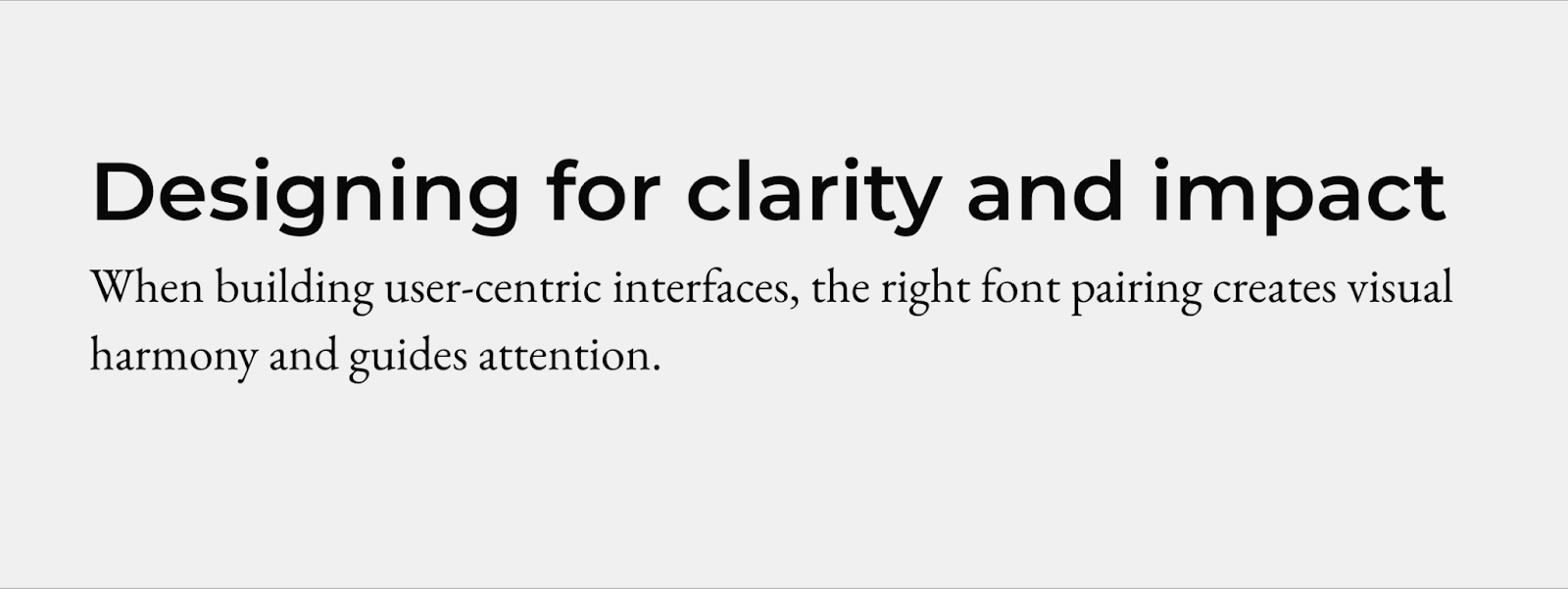
Montserrat is a neatly spaced sans-serif font. This semi-bold version contrasts with the elegant linework of EB Garamond, which has a classic typewriter appeal. The headings in this font combination are especially easy to pick out, making it great for news articles that readers might want to scan through.

3. Alfa Slab and Source Code Pro

Use this font combination if you really want to break away from the norm. The Alfa Slab font is bold, serifed, and heavy, while Source Code Pro is light and spacious. This monospaced version of Source Sans Pro is useful for code examples, quotes, and long text blocks like the above excerpt. It’s a great font for scripts, too, and when you pair it with a slab font like Alfa Slab, you have a stark contrast that’s pleasing to the eye.

4. Abril Fatface and Bad Script

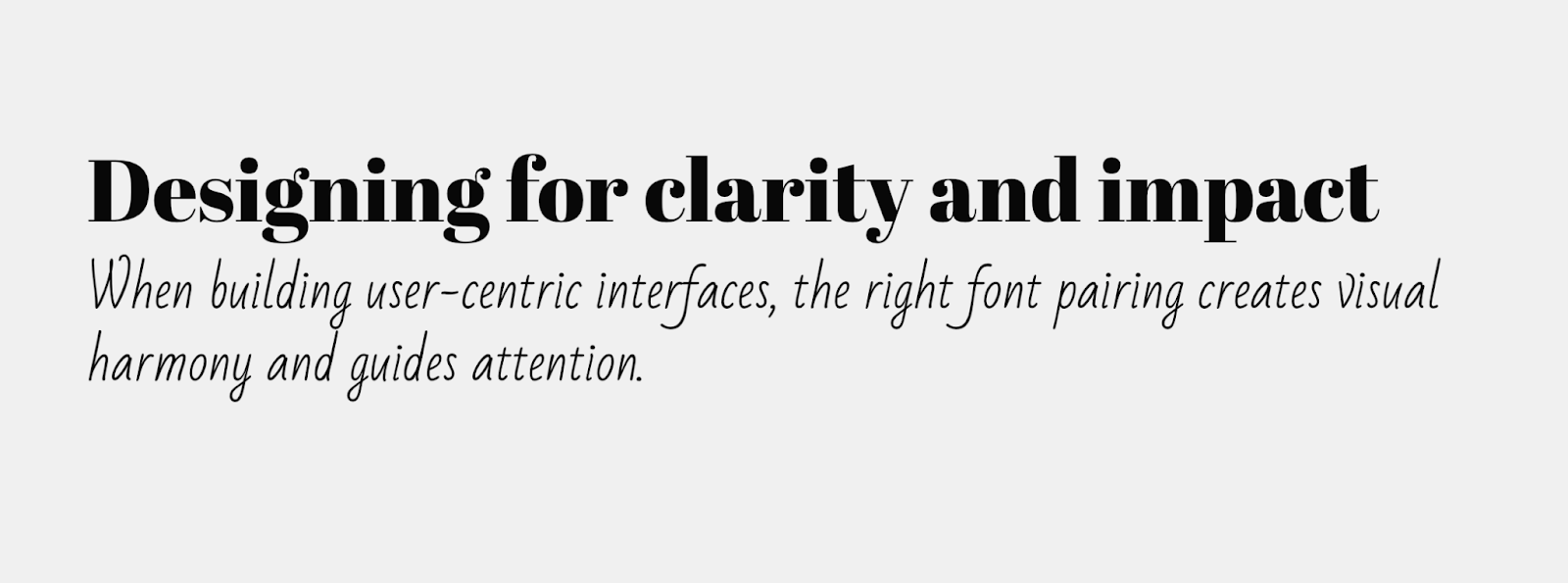
This all-serif font pairing combines the classic appeal of old-school typography with the handwritten look of script fonts. It’s a great font pairing for printed products like wedding invitations or playbills. The bold, slab appearance of Abril Fatface clearly marks all your headlines, while the scrawled handwriting of the Bad Script font provides a unique look.

5. Playfair Display and Montserrat

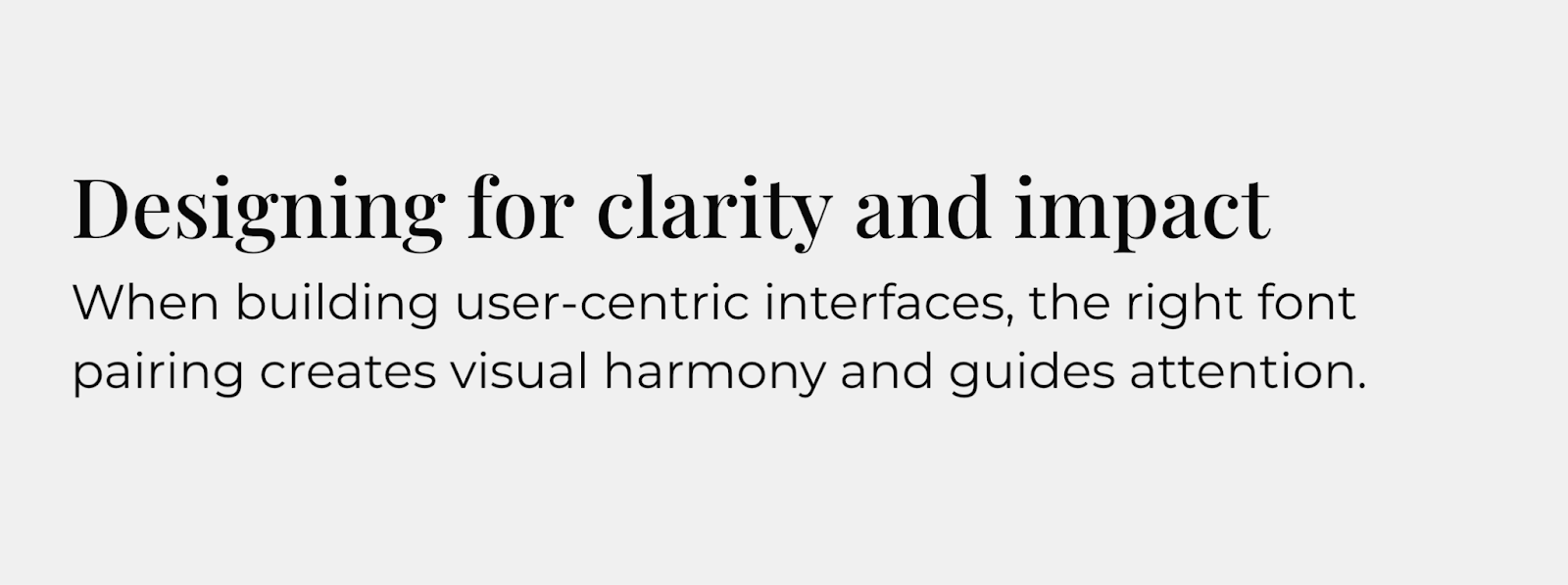
Playfair Display is an elegant, modern font that resembles newspaper typography. The medium-weight version adds enough bolding to make the headings distinct from the body text without losing its sharp serifs. Playfair delivers a bold, modern statement when paired with the spacious and consistent Montserrat.

6. Josefin Sans and Lato

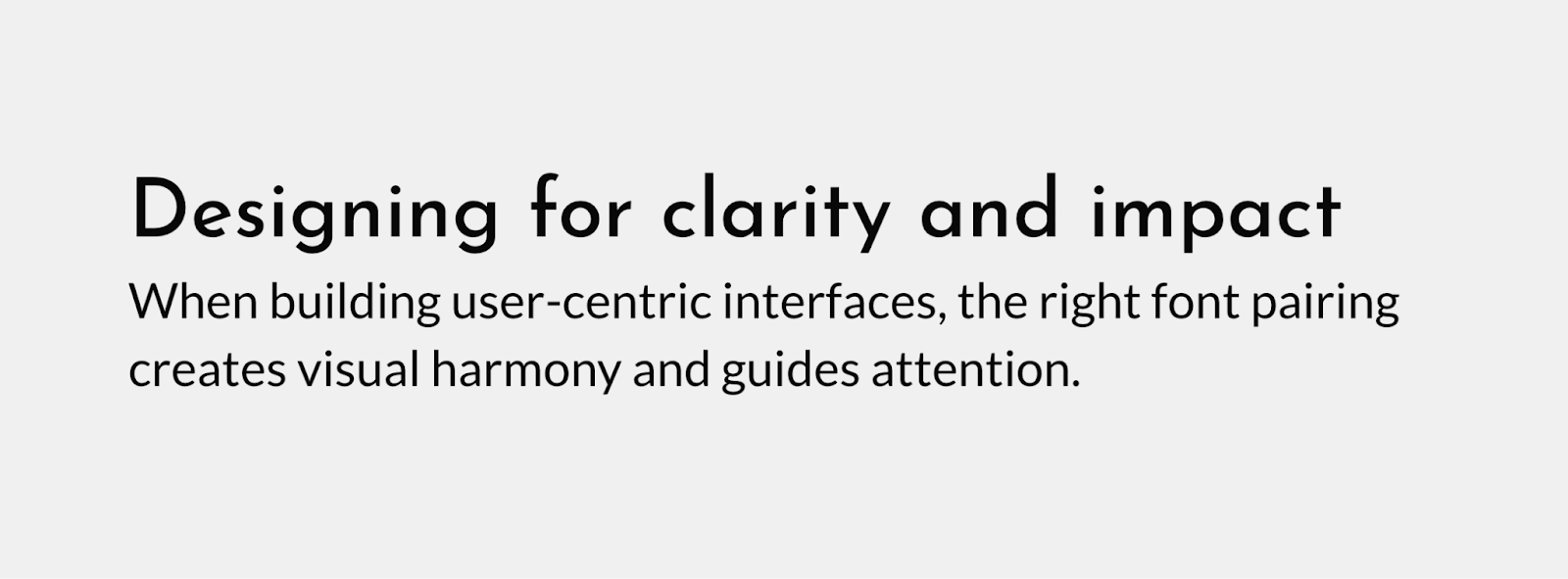
Sample text where the heading uses Josefin Sans, and the body text uses Lato.

Josefin Sans resembles handwriting, and this sans-serif version is the best font for landing pages or homepages where you want the text to appear inviting. If you follow it up with the equally inviting and readable Lato, you get a consistent text block with just enough subtle contrast to draw attention.

7. Open Sans and Lato

Pairing two sans-serif fonts is a great choice that prioritizes readability, or for sites that use a minimalist design style. Open Sans is familiar to most readers, and when paired with the tight spacing of the Lato font, you get strong headings followed by body text that maximizes use of the page. 

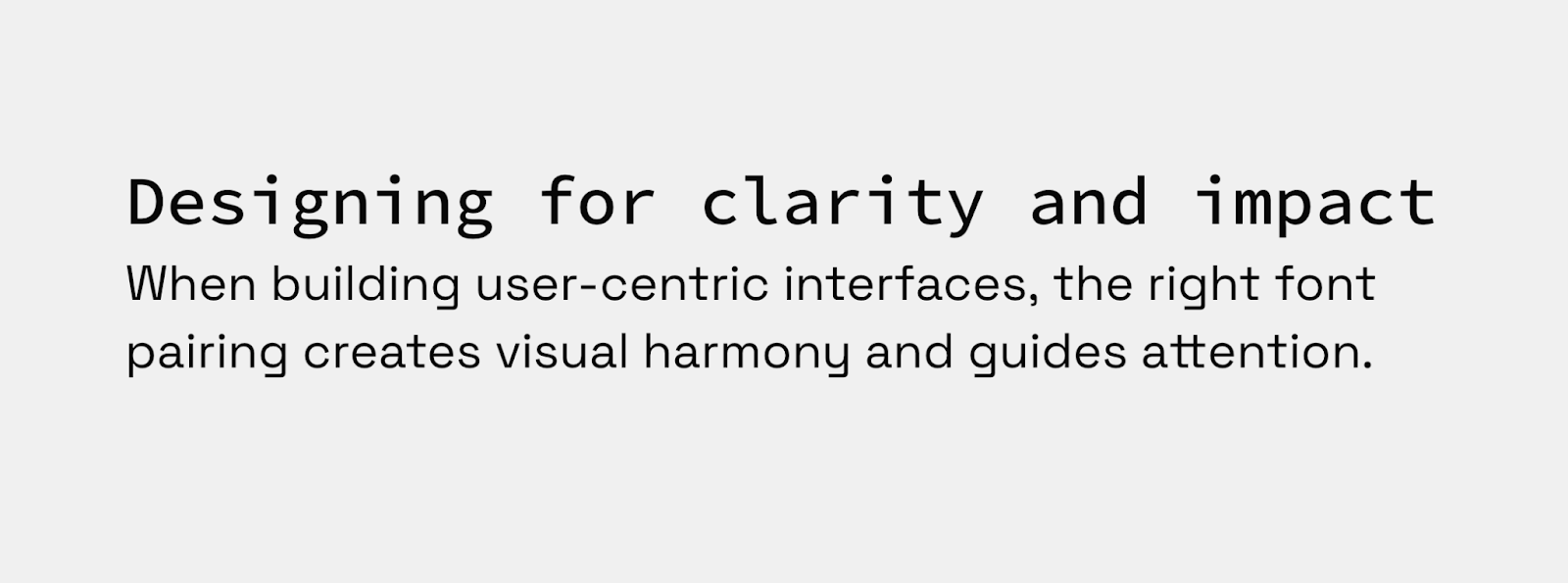
8. Source Code Pro and Space Grotesk

If you’d rather put a monospaced font in your headings, try pairing Source Code Pro with Space Grotesk, a generously spaced sans-serif font that’s easy to read. This font pairing works perfectly for tech and science blogs where a monospaced font will be familiar to the audience, while the body text is ideal for long, highly detailed papers and case studies.

Tips for combining fonts in your web design

Consider the following ideas if you’d rather make your own combinations:

Use fonts that have different tones

Every font adds its own personality to the text, and you should select ones that enhance the tone you’re trying to achieve. For example, cursive script fonts like Lucida are great for conveying elegance on a wedding planner’s website, while slab fonts like Alfa Slab are usually better for a disruptive tech brand. 

Create the right amount of contrast with typeface pairs

Your main objective is to keep body text legible and headlines eye-catching, but that doesn’t mean any combination that achieves those goals is the right choice. You don’t have to stay in the same font family or even typeface category, but you should look for commonalities like stroke weights, spacing, and style that make different fonts compatible.

Limit different typefaces to three or fewer

As with color palettes and page layouts, you should stick to a small selection of fonts on your site. Too much variation throughout your page increases the cognitive load required to interpret it, which could cause frustration that leads readers to bounce out of your website. 

Communicate visual hierarchy through font pairing

Your font pairings should clearly distinguish between titles, headings, and body text. If you keep those differences consistent, readers will naturally learn how to navigate through your website. Here are a few ways to achieve this effect:

  • Use font size to imply order. Scale your font size down as you move from titles to headings to body text. Somewhere between a 20–30% reduction for each step is usually best, such as 20pt, 16pt, and 12pt. 
  • Experiment with different weights. Different weights, such as medium and semi-bold, provide noticeable visual cues for readers. Lean into that behavior by using bold weights for headlines and titles and medium or normal weights for body text.
  • Vary font color shades. Your body text should usually be flat black to make it readable, but you can play around with the shades of your heading fonts. For instance, you could increase the saturation of the font color as the headings get bigger to create an obvious visual hierarchy.

Use a font generator

Try font pairing tools to browse hundreds of unique fonts. Notice which ones catch your eye immediately, and then try different font combinations to determine which ones you like most.

Transform your web designs with perfect font pairings

The perfect font combination can make all the difference in website design. Whether you want to leverage the familiar simplicity of Roboto and Open Sans or the elegant readability of Playfair Display and Montserrat, you’ll need a keen eye for detail and a platform that encourages experimentation. 

Start by experimenting in Webflow, testing font pairings side by side on a visual design canvas. Once you’ve locked in the pairing that best fits your brand, use components and global styles to apply them consistently across your entire site — no need to manually update every text class.

The ultimate pre-launch checklist for your website: 6 essentials

Software Stack Editor · May 7, 2025 ·

After pouring time and energy into developing a website, you’re likely keen to see it go live — but complete a final review first.

You owe it to yourself to check (and double-check) your site to prevent complicated fixes down the road.

Don’t know where to start? We’ve compiled a six-part website launch checklist to help developers like you cover the key details of a stunning website ready for publishing.

Planning your website checklist

Before diving into design and development, establish a solid foundation for your website with these essential planning steps. A thoughtful strategy at the beginning prevents headaches later and ensures your site will effectively serve its purpose.

Clarify goals and audience

Define your website’s objectives and identify your primary audience to guide the entire development process.

Choose domain and hosting

Decide on a memorable domain name and reliable hosting service during the initial planning phase.

1. Design and build

It’s all too easy to miss (or break) something during design iterations and feedback sessions with clients. Here’s a design checklist to ensure everything’s in order before launching:

  • Spacing: Is spacing consistent across the site? Do all elements have enough breathing room?
  • Colors: Is there a consistent, harmonious color palette? Do you have clearly defined brand colors?
  • Shadows: If you used drop shadows, is the light source consistent across each one? Do they have the same blur, opacity, and spread values?
  • Typography: Is the font stack logical and consistent? If fonts are italic or bold, is it obvious why? Are heading sizes consistent? Is all text readable and web safe?
  • Imagery: Do any images look blurry or pixelated? Are any images broken or a drastically different file size? Do all non-decorative images have alt-text?
  • Logo: It’s an image, but it’s so important it warrants its own step. Is  the latest and most up-to-date version used throughout the site? Does it appear crisp and sharp (not blurry or pixelated)?

Consider implementing a design system to maintain consistency across your site. A well-documented design system serves as a single source of truth for your design elements, component styles, and usage guidelines — making it easier to ensure visual coherence and streamline future updates.

Cross-browser and cross-device checks

Beyond those initial visual checks, verify your site delivers consistent experiences and functionality across all browsing environments.

Each browser (Chrome, Firefox, Safari, Opera, Edge) interprets and renders designs with subtle differences, making thorough cross-browser testing non-negotiable. Testing on just your preferred browser or two leaves you vulnerable to display issues that could frustrate users and damage credibility.

When testing across browsers, pay special attention to:

  • Layout integrity
  • Font rendering
  • Color accuracy and gradient smoothness
  • Image display quality
  • Logo clarity and positioning

Your site needs to flex and adapt to countless screen dimensions through thoughtful responsive web design. Navigation becomes particularly critical here — visitors should flow naturally between pages, finding information without friction or confusion.

After you’re confident in your development environment, run real-world tests across desktop, smartphone, and tablet to confirm the experience remains cohesive and functional across the device spectrum.

Image optimization

Images and graphics enhance user experience, improve SEO, and affect a site’s loading times.

Mobile devices now have ultra-high-definition displays with high refresh rates, so having high-quality graphics is crucial. Grainy images look unprofessional.

Upload graphics at twice the size they display on your site. If your site is equipped to optimize images — like sites created on Webflow — you can resize and compress images for lower-resolution devices while maintaining larger files for high-resolution devices. This approach maintains high-quality imagery plus support with slower devices or internet speeds.

Check out our responsive images and read our article on site performance to learn more about the impact of image optimization.

2. Edit content

Quality content engages visitors and encourages conversions. Visitors are also more likely to share content if they find it valuable.

Content testing typically involves combing through all content on the site to ensure it’s accurate, free of typos, and up-to-date. Be thorough — you don’t want a section of your website to have a lorem ipsum paragraph still lying around or your brand name spelled incorrectly. Spelling and grammar mistakes lower the value of content, so if you’re not a strong editor, outsource this to a professional.

It’s perfectly fine to change content after the site goes live. You or the client can continuously adjust text and images through a content management system like Webflow even after a site’s been published. Content testing ensures the first batch of content presents the website and brand in a professional way.

Consider performing competitor analysis to identify content gaps or opportunities for improvement as you refine your text and visuals.

3. Test website functionality

It’s key to strike a balance between design and usability to ensure your website looks like you imagined and performs as intended. Otherwise, you could end up with an aesthetically pleasing website that doesn’t function smoothly or a well-functioning site that looks unprofessional. Neither option provides a positive user experience.

Functionality testing usually involves two aspects: integration and link testing.

Integration testing

Website integration is when your site shares information with another application, system, or website. Integration testing analyzes the individual integrations of your website as a group to make sure they’re all functioning. How long this testing takes depends on how many integrations you have.

Some common integrations to test include:

  • Web forms: Web forms collect volunteered user information, like a visitor’s name, number, and email address.
  • Autoresponders: Autoresponders automatically reply to incoming messages and emails collected through a site.
  • Ecommerce tools: These integrations enable a website to connect multiple tools together such as product listings, cart additions, and payments to manage ecommerce functionality.
  • CRMs: Customer relationship management (CRM) tools monitor interactions between an online business and its clients with the aim of improving customer relationships for growth.
  • CMS: A content management system (CMS)  allows authors to create, edit, and maintain digital content on a website.

We recommend keeping a list of any integrations during the design stages so that you don’t forget to test any later.

Link testing

Checking links can be tedious due to the number of links on an average web page. An ecommerce site, for example, requires links on calls-to-action (CTAs), navigation, and to all product pages. It’s common to find a link or two that goes nowhere, but it’s important to find these before customers do, as broken links negatively impact both SEO and user experience.

Some of the most important links to check are:

  • Top navigation links
  • Footer links
  • Links to social media profiles
  • Links placed on logos

Rather than performing each check manually, use a link crawler like the W3C Link Checker, the Chrome plugin Check My Links, or Screaming Frog. These crawlers work through your site and flag broken links for you to double-check and repair.

Performance checks

Evaluate your site’s speed and responsiveness to give visitors a fast, efficient user experience.

Elevate your web strategy

In our ebook, experts from Slalom, HubSpot, Microsoft Clarity, Zapier, and more weigh in on the marketing strategies and Webflow Apps teams can integrate across the customer journey to build powerful web experiences.

Read now

↗

Elevate your web strategy

In our ebook, experts from Slalom, HubSpot, Microsoft Clarity, Zapier, and more weigh in on the marketing strategies and Webflow Apps teams can integrate across the customer journey to build powerful web experiences.

Read now

↗

Read now

4. Optimize your site for search

Search engine optimization (SEO) is the process of optimizing the quality and quantity of website traffic driven to a site by search engines. Appearing higher on result pages improves your website’s visibility, which can increase visits and conversions.

Analyzing and optimizing your website after publishing is a never-ending process, but considering semantic site structure and content quality before launch reduces the amount of tweaking required later on.

Proper semantic structure

Web crawlers scan your site to understand its content and determine when to show it in search results. Help these crawlers navigate by using semantic HTML — code that clearly defines what each element on your page represents.

Start with these essential semantic tags:


  • to

    for headings

  • for paragraphs

    • /

    for lists

Elevate your SEO with these powerful HTML5 semantic elements:


  • ,

    , and

    for page structure

  • and

    for primary content


  • and

    for content organization


  • and

    for visual content

These tags help search engines connect searchers with your content. The good news? Webflow automatically handles much of this semantic structure for you, no manual coding required.

SEO meta tags

Aside from on-page structure, you can help web crawlers understand a site by titling and describing its pages.

Meta title

A page’s meta title is the linked text that appears on search engine result pages (SERPs). It usually displays on the browser tab when users click through to the page, unless you choose to code a separate title for blog content.

A stellar meta title:

  • Defines the page’s central topic
  • Is under 70 characters in length (including spaces)
  • Uses relevant keywords
  • Appeals to and engages a searcher

Meta description

The meta description is a short snippet that describes what a site’s page has to offer in more detail than the title. It appears below the meta title on a SERP, unless the search engine selects an excerpt from the page it finds more relevant. Google rewrites 70% of meta descriptions to offer searchers a more accurate summary of the site.

An effective meta description:

  • Uses relevant keywords to describe the page and its value
  • Stays within 135-160 characters (including spaces)
  • Appeals to people, not web crawlers

Open Graph settings

Social media plays a crucial role in your SEO strategy. To maximize visibility and engagement across platforms, implement proper Open Graph (OG) tags that transform plain links into rich, compelling previews when your content is shared. These metadata elements ensure your brand’s first impression remains under your control, even when others are doing the sharing.

Indexing and structured data

Consider submitting your sitemap to search engines and implementing structured data markup for richer search results.

5. Set up analytics

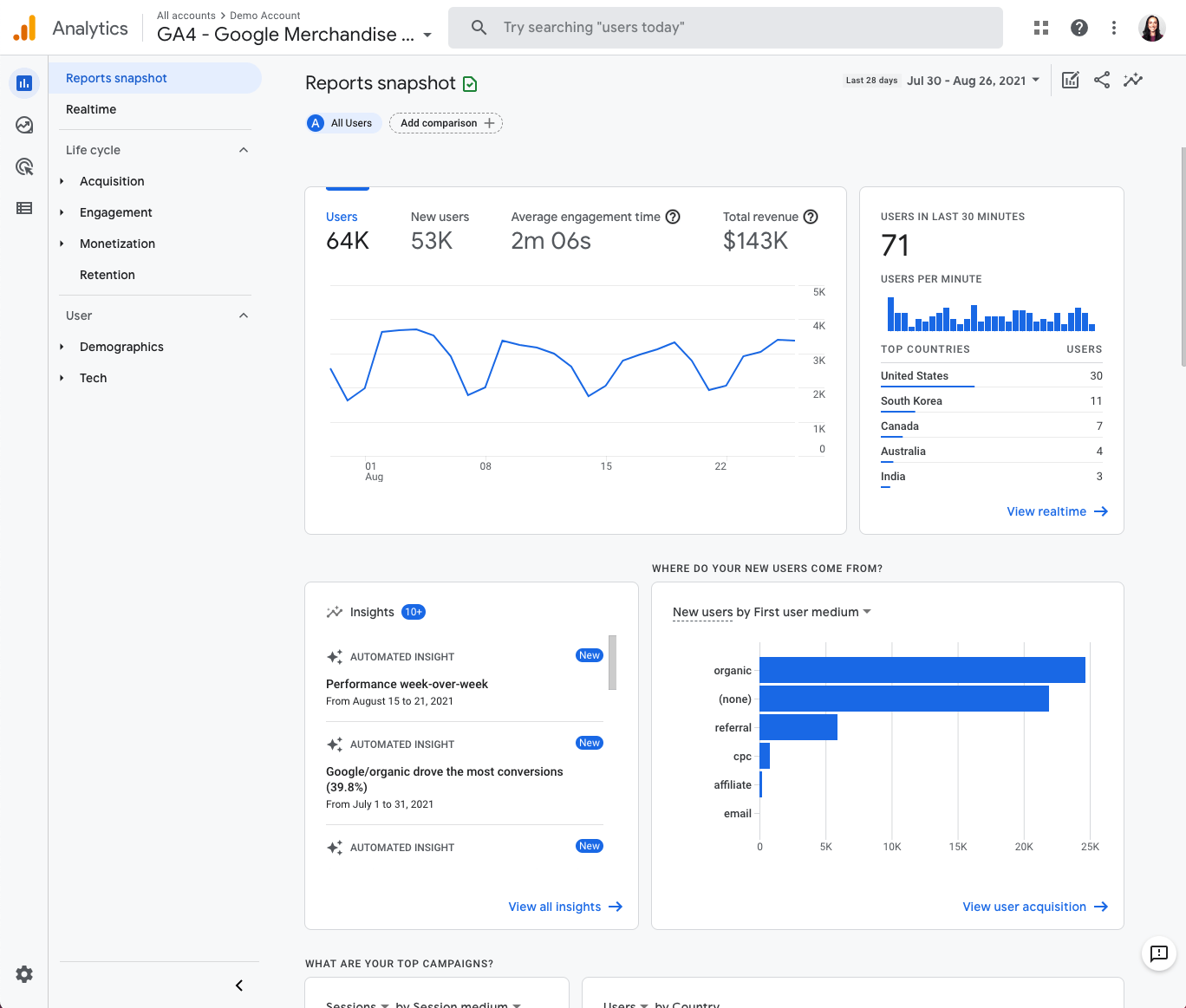
A screenshot of a company’s Google Analytics dashboard.

Connect your site to an analytics tool before launch to gain immediate insight into your website’s performance. Setting up a Google Analytics account is free and seamlessly integrates with Webflow, allowing you to track visitors and engagement from day one.

Analytics, performance, and SEO work together as a powerful trio. Google prioritizes sites that deliver exceptional user experiences, with factors like hosting speed, size, and responsiveness directly impacting your search rankings. Today’s users expect instant loading — slow sites lead to high bounce rates and search engine penalties.

Take advantage of tools that help you measure performance and identify improvement opportunities. For a deeper dive, explore our guide to website performance test tools and put analytics to work for your site’s success.

6. Test your site before and after launch

Once you’ve checked the site’s design, functionality, content, and SEO elements, take on the final step: testing your site. We recommend three testing phases: before, during, and after. Testing in waves makes it easier to pinpoint mistakes and when they occurred. Plus, it keeps testing more organized.

Before launch

Before hitting “publish,” browse through the website yourself to search for any bugs or other issues with performance you may have missed. Have colleagues and the client click through, too.

Once you, your team, and the client are happy with the pre-launch tests, make the website live.

During launch

As soon as you publish the website, immediately look for any glitches or mistakes that might have crept in due to technical errors. Once again, involve other members of your team in this process to catch anything that you may have missed.

Check your notes and the site blueprint to ensure your live website runs the same way as your pre-launch tests did, and double-check navigation and functionality.

Once live, it’s also vital to keep your website’s security intact. The minimum is to install a Secure Sockets Layer (SSL) certificate — which enables a site to move from HTTP to the more secure HTTPS — before upgrading to higher defense protocols as your traffic grows.

Post-launch

Remember, maintaining your website is just as important as creating it.

  • Maintain design consistency across your entire site
  • Regularly update content to keep visitors engaged
  • Track performance metrics to guide improvements
  • Implement robust security measures and backup routines

Consistently verify if your site is working properly or needs maintenance. Run regular checks for bugs or security breaches, and ensure webpages load as quickly as they did on day one. Adapt to changing SEO strategies by tailoring new and existing content to provide more value to visitors to stay relevant.

Gather feedback and fix issues

Encourage users to share their feedback after launch and address any issues promptly. It’s also a good idea to schedule regular site backups so you can quickly recover from unexpected data loss or technical issues.

Launch day: Time to celebrate your success

Creating a website involves considerable collaboration and careful attention to detail. When your site finally goes live, take a moment to celebrate this achievement with your team and client.

Consider holding a website retrospective to reflect on the process and identify opportunities for improvement in future projects. Then maintain your momentum by regularly monitoring analytics to guide ongoing optimization.

Webflow simplifies your pre-launch process with built-in tools that streamline development and testing. Our visual web development platform lets you preview your site across devices without complex coding, while automatically optimizing images for performance across all screen sizes. Experience how Webflow can transform your web development workflow — start building your next project with us today.

Build websites that get results.

Build visually, publish instantly, and scale safely and quickly — without writing a line of code. All with Webflow’s website experience platform.

Start building for free

↗

Build websites that get results.

Build visually, publish instantly, and scale safely and quickly — without writing a line of code. All with Webflow’s website experience platform.

Start building for free

↗

Start building for free

Last Updated

May 7, 2025

The art of optimizing conversions for growth

Software Stack Editor · May 6, 2025 ·

Marketing budgets are under the microscope. Again.

Customer acquisition costs (CAC) are on the rise, for both paid and organic channels. Digital ad costs keep climbing as privacy changes make targeting harder, reducing conversions. And many organizations are pre-emptively tightening their belts to weather yet another period of economic uncertainty. 

As marketing leaders face mounting pressure to prove the value of every dollar spent, one proven strategy can help improve return on investment (ROI) across campaigns and channels: website conversion optimization.

Conversion rate optimization captures more value from every visitor

Every visitor who lands on your website represents an investment. You’ve already paid for them through ads, content creation, public relations, SEO, or other channels. But an ineffective conversion path turns that investment into wasted spend.

Conversion rate optimization (CRO) flips this equation. Instead of chasing more traffic, you capture more value from existing visitors — capitalizing on the demand that other channels are driving to your website. 

Optimizing your site for conversions involves tactics like addressing speed and performance issues, personalizing content, refining messaging, optimizing layout and navigation, and tailoring CTAs. It’s all about reducing friction and making it as easy as possible for your audience to convert, whether that’s making a purchase, subscribing to a newsletter, or requesting a demo. 

Pulling this strategic lever is the fastest way to improve ROI from your website, but also creates a multiplier effect across your entire marketing strategy.

How CRO drives results beyond the website

Website optimization isn’t just about changing button colors or tweaking headlines. It’s about building a discipline of constant testing, iterating, and analysis that:

  • Improves marketing efficiency across all channels
  • Prioritizes audience research and customer understanding
  • Promotes a culture of data-driven decision-making 

Increasing conversions is always a good idea. But when marketing budgets are scrutinized and ROI dominates conversations, the broader impacts of optimization help leaders speak to measurable, meaningful results.

1. Make the most of your entire marketing budget

Website optimization can drive big results. For every second a site loads faster, conversion rates improve by 17%. Personalizing content can increase revenue by 5-15%. 

When more website visitors convert, every marketing dollar works harder. It’s simple math: double your conversion rate, and you’ve effectively cut acquisition costs in half without changing your spend.

These improvements cascade throughout your entire marketing ecosystem. Paid campaigns become more profitable. Content marketing delivers higher ROI. Email marketing drives more revenue. All because you’re maximizing the value of traffic you’ve already acquired.

2. Understand your audience and refine lead quality

Conversion optimization also turns your website into a powerful research tool. Every test reveals more about what your audience wants, how they behave, and what motivates them to act.

For example, testing different messaging reveals which value propositions resonate, while experimenting with content types shows what formats drive engagement. This continuous learning cycle creates a feedback loop that informs the rest of your marketing strategy. 

And as you better understand who converts on your site, you can refine your target audience and tailor your content to reach high-quality, likely-to-convert leads.

3. Rely on data, not opinions, for decision-making

Marketing has always balanced art and science. Conversion optimization tips the scale toward evidence without sacrificing creativity. Instead of making decisions based on hunches or opinions, you build a culture of testing and learning. 

Data-driven optimization also aligns every team’s goals around concrete, measurable business outcomes. Designs and copy aren’t judged solely by opinion, but by their ability to drive results. 

Especially when resources and headcount are limited, data-driven optimization keeps teams focused on making changes that drive measurable improvements, not one-off suggestions or personal taste.

How Walker & Dunlop drove ROI with conversion optimization

One other advantage of conversion optimization: it’s gotten a lot easier in recent years. With the right tooling, website teams can autonomously set up multiple experiments and get results quickly — avoiding the need for development resources or dedicated CRO specialists.

Let’s see what this actually looks like — here’s how the team at Walker & Dunlop is using Webflow Optimize’s AI-driven testing and delivery to improve conversions across their site. 

Commercial real estate services firm Walker & Dunlop chose Webflow to transform their rigid, developer-dependent website into a dynamic, scalable marketing asset that could keep pace with their expanding business lines.

“Combined with Webflow’s visual-first platform, Optimize and Analyze empower our teams to evolve with our clients, experiment and pivot quickly, and, ultimately, create more personalized digital experiences,” says Kokko Tso, Vice President of Digital Marketing.

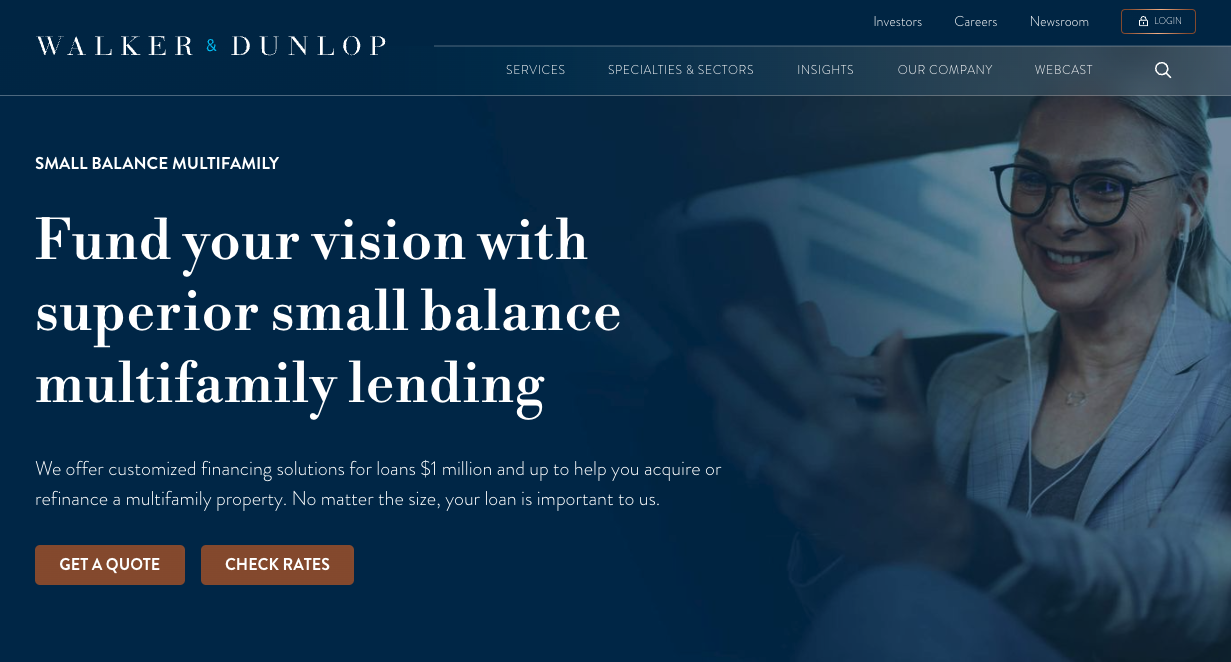
Walker & Dunlop website banner promoting small balance multifamily lending, featuring a smiling professional woman using a smartphone.

After launching their new site and implementing Webflow Optimize and Webflow Analyze, Walker & Dunlop saw a 56% increase in form fills, 23% growth in YoY organic search traffic, and the ability to push 10-15 content updates daily. The marketing team now leverages real user data to track conversion paths and runs tests to understand exactly how to optimize content for engagement, increasing quote requests and driving more leads.

Unlock the long-term value of website optimization

Conversion rate optimization can deliver fast results, but it’s not a quick fix or a one-time project. It’s an ongoing practice. Each improvement creates a new baseline to improve on, and each test delivers insights that inform your broader marketing strategy. 

To get started, learn how Webflow Optimize helps teams achieve always-on optimization — testing, learning, and improving conversions while connecting website performance directly to business outcomes.

Why is content mapping crucial for website building?

Software Stack Editor · May 6, 2025 ·

image

A content map guides visitors step by step, ensuring they find the right info and take action. Align your site with user goals to see real results.

It pairs every step of a website’s structure with the content a visitor needs to continue their journey. Without it, users often get lost, failing to reach — or even find — the destination you want them to get to.

A content map aligns content with your business objectives, guiding users toward the information they need. Creating content with goals in mind helps nudge users toward desired areas, leading them toward additional information about a product or your checkout flow.

Learn more about why content maps matter and how to create one with the right tools and templates.

What is a content map?

Content mapping is a user experience (UX) design technique. Visitors need varying information — product images, FAQs, customer reviews — at each stage of the user journey. Pairing site content with user intent creates a more valuable, relevant, and engaging experience for your target audience.

Content on a website’s landing page, for example, tells visitors about the brand. It directs them to other pages that are closer to a conversion goal, such as “Products” or “Services” pages.

From there, they can get the necessary information before deciding whether this is the product or service they’re after. And if they don’t complete a sale, they leave valuable data to show where they dropped off in the process — giving designers and analysts clues about areas they can improve.

Why do you need a content map?

Content mapping gives users the best possible experience by presenting the right content at the right time. For example, the size chart for an online clothing store isn’t on the homepage — it’s on individual product pages. Customers generally aren’t interested in sizing information before they’re interested in buying.

Next, consider what each page actually needs, versus what you’d like it to have. If you are an apparel brand that has both a physical and online store, for instance, your physical address and a well-designed navigation bar should be on the homepage rather than a size chart that could instead be included on a product page.

How to build a content map: 4 steps

Even in 2025, businesses continue to refine how content leads visitors from discovery to purchase. A content map helps you focus on meeting users where they are in their journey.

A practical website content map increases your understanding of buyers’ interests and uses content to drive them toward solutions. This step-by-step guide to content mapping will help you get started.

1. Develop buyer personas

Identifying different personas is one of the first tasks for a content map. Understanding distinct user profiles helps pinpoint the messaging and resources each group needs.

There are two primary methods to identify buyer personas:

  • Reach out directly to potential customers: Run polls on platforms like Instagram and LinkedIn or use survey tools like SurveyMonkey to learn who is and isn’t interested in your product. This is a great time to reach out to your email list if you have one.
  • Use competitor analysis: If you can’t implement a hands-on approach, consider analyzing competitors to find out more about what they’re doing. Search for data on their strategies, website functionality, social media campaigns, and more. Someone with a similar product likely targets similar personas as those you’d be interested in.

2. Monitor consumer interests in your industry

Use forums, social media, publications, and blogs to see what people are saying about your niche. You might find a whisper of a potential trend or a new angle you can try in your next ad campaign. Watching your target audience could help you be among the first to offer something new, giving you a competitive advantage when you make these connections.

When you find gaps in the market, include them in your map and create content that fills the void.

3. Learn about the buyer’s journey

Creating buyer personas is just one step of a comprehensive content marketing strategy. After identifying interested personas, analyze how close they are to making a purchasing decision. This is also known as the customer lifecycle.

There are three stages in the customer lifecycle that are also part of a marketing funnel:

  • Awareness: A potential buyer likely knows what they want or need. In this stage, your goal is to grab attention and offer a solution. This part of your content map includes advertising or search engine marketing. Your goal is to find and attract.
  • Consideration: A potential buyer is looking for a solution to their problem. In the consideration stage, steer your marketing efforts to more product- or service-oriented content so customers can better understand what you are offering and how it can help them.
  • Decision: A potential buyer decides to take action. Demonstrate that you can satisfy their needs by using content to address concerns and make it easy for them to complete the purchase.

Each buyer persona moves through a content funnel: Awareness, Consideration, and Decision. Your content map should list which pages and resources best match each funnel segment.

4. Identify the best type of content for each stage

Content maps are all about the customer journey. Map out the journey through the marketing funnel first, then decide what content you need to pair with each stage.

Consider the information a potential customer needs at each point in the marketing funnel. During the decision stage, for example, customer reviews and FAQ pages can answer customers’ questions, address their concerns, and lead them to convert.

During the awareness stage, on the other hand, an FAQ won’t be as helpful because potential customers are not yet familiar with who you are or what you offer.

Different use cases call for different content types. For example, a short infographic might perform better on Instagram than an ad for an ebook. Meanwhile, an ebook could perform well in an email campaign where your established audience is prepared to spend more time reading.

It’s important to consider not just the type of content, but also who it is presented to and when. A short infographic might work well in the awareness stage because it does not deliver too much information at once. An ebook, on the other hand, could be effective during the consideration stage when buyers are looking for more details.

Tools to build and refine your content map

Whether you’re a freelancer, small agency, or large corporation, here are some tools for your next content map.

  • SEO tools. SEO tools like Ahrefs help you discover what people search for and what keywords they use. Combining these tools with the best SEO practices can improve site traffic and lead customers to your content.
  • Diagramming tools. Tools like Lucidchart and MindMeister help create user flows that visualize the customer journey. With the journey in front of you, think of relevant content ideas for each stage.These insights not only help build a structured content map but also strengthen your overall content strategy.
  • Survey tools. Survey tools like SurveyMonkey and Google Forms help you learn more about your target audience. Create a survey about what products, services, and content interest them to align with their expectations.
  • Google Workspace. The tools in Google’s professional suite have specialized functions for various stages of content mapping. With Google Docs, you can create diagrams based on surveys and user behaviors. Plus, Google Workspace is collaborative, meaning everyone on your team can work on the same document in real time.

When choosing tools, consider how each platform enhances both your buyer personas and overall content strategy for a seamless user journey.

Even a quick draft of a content map can give you new insights. Try sketching your site’s main pages, noting how each connects to user goals, and list specific content pieces that match each step in the funnel.

Optimize your content map and website with Webflow

Content mapping is one aspect of a broader strategy to get visitors where they need to go. There are lots of factors to consider before launching or updating a website.

More creators than ever use content maps to shape their online presence. By pairing a clear content map with Webflow’s content management system, you can organize your site structure faster and keep your audience engaged. Webflow offers resources and templates to help you create effective and stunning websites.

Introducing Webflow Cloud: Bring full-stack web apps to your website experience

Software Stack Editor · May 5, 2025 ·

The future of the web is composable, connected — and hosted on Webflow Cloud.

Last October, we unveiled our evolution from website builder to the Website Experience Platform — a unified, end-to-end solution that empowers teams to build, manage, and optimize beautiful, on-brand websites that drive meaningful growth, customer engagement and conversion.

Today, we’re excited to introduce the latest addition to that platform: Webflow Cloud. 

Webflow Cloud extends the Webflow platform beyond visual development, content management, and optimization. It leverages our robust, native hosting infrastructure, powered by Cloudflare, to empower developers to deploy full-stack web applications and dynamic web experiences on Webflow – from booking engines, to dynamic SEO pages, to custom integrations with top LLMs.

Webflow Cloud is now available in private beta, with support for the JavaScript + React ecosystem including Next.js and Astro. Over time, our vision is for Webflow Cloud to be agnostic across JavaScript frameworks and libraries to ensure developers can work in the tools that best support their use cases. You can learn more about the beta and request access here.

[embedded content]

From websites to full-stack solutions

As customer expectations grow and digital touchpoints become more complex, we’ve seen some of our largest customers push the limits of what’s possible in Webflow — powering full-stack, best-in-class digital experiences through custom code and intricate routing workarounds. And while we’ve loved watching teams push the platform to new levels, we also saw an opportunity to make this easier and more scalable.

By unlocking the ability to host full-stack web experiences natively within Webflow we’re making it easier than ever for technical teams to integrate with third-party APIs, build bespoke logic, or deploy real-time data experiences by bringing their Next.js or Astro project right into Webflow, or using the Webflow CLI in their IDE. 

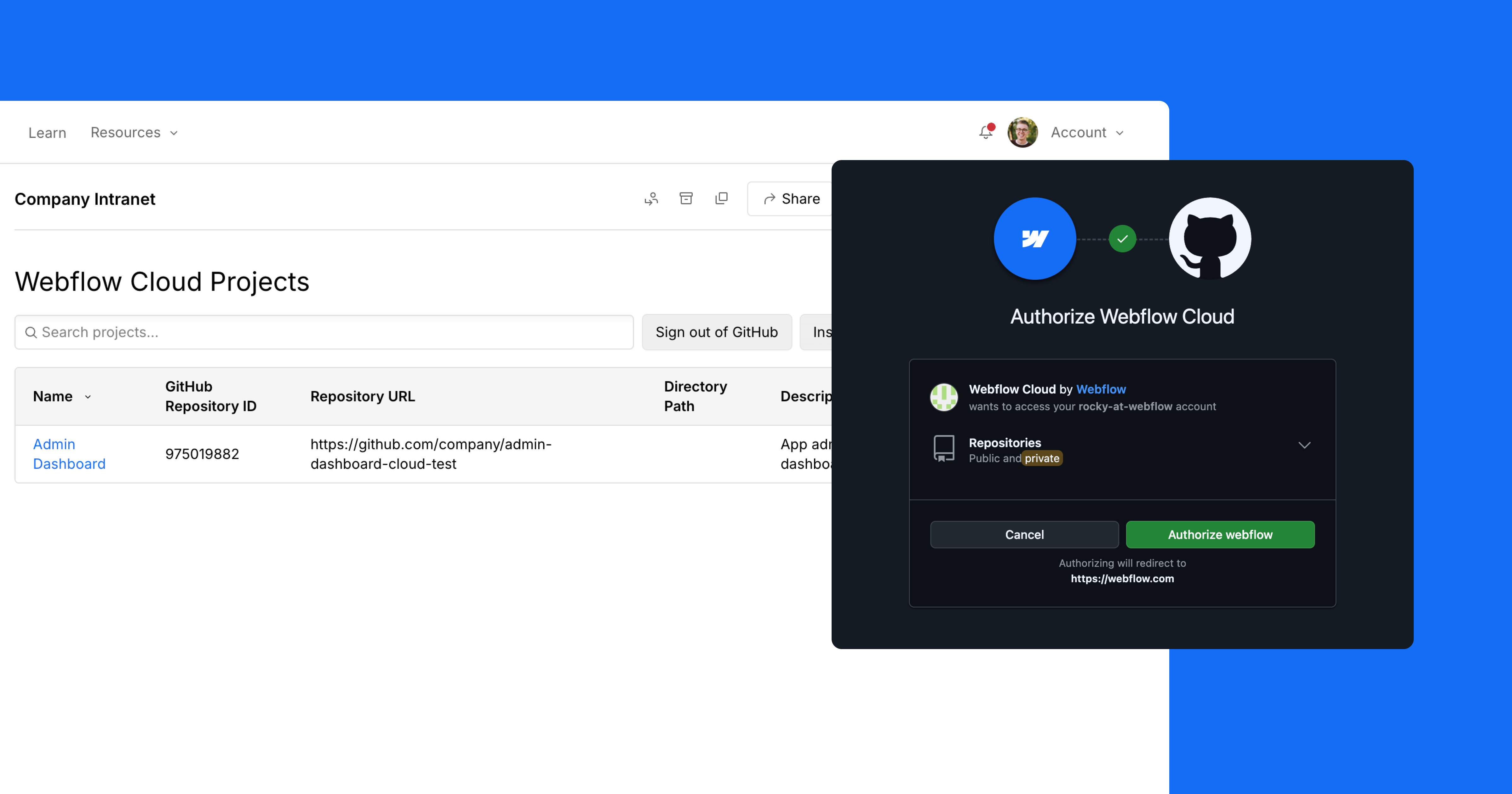
Screenshot of the Github connection / dashboard experience with Webflow Cloud.

​​And because we know how critical it is for brands to show up consistently across every touchpoint, Webflow Cloud beta users can use the same components from their Webflow site in their Webflow Cloud apps to ensure that their brand shines across their entire digital experience.

Together, we believe these additions to our growing platform eliminate the need for separate infrastructure or fragmented workflows by providing teams with a unified, efficient way to build and manage all your web experiences — with one vendor, one platform, and no compromises.

While this beta is just getting underway, here are some ways we expect to see customers extending their Webflow sites with this new addition to the platform:

1. Highly-customized, full-stack experiences

Orangetheory Fitness's website homepage, displaying people working out on a rower machine with the headline text

Webflow Cloud lets technical teams deliver advanced functionality alongside the same level of design control and performance your less technical teams love in Webflow. Connect your Webflow sites directly to GitHub to build and deploy directly to Webflow’s hosting environment so you can create more dynamic, interactive experiences, all without leaving the platform.

Use it for:

  • Booking engines with dynamic availability and user authentication
  • Custom pricing calculators that pull real-time data from APIs
  • Custom integrations with top LLMs
  • Headless ecommerce storefronts
  • SaaS product sign-up flows or onboarding journeys

By combining visual-first design with developer-grade tools, Webflow Cloud empowers teams to ship high-impact features faster — without breaking the customer experience into disconnected pieces. That means better experiences for your users, higher conversion rates for your business, and tighter collaboration between developers, designers, and marketers working from a single source of truth.

2. Programmatic SEO and scaled content marketing 

An integrations library web page displaying blocks of different integration organized by category.

For content and growth teams investing in SEO at scale, Webflow Cloud unlocks a whole new level of automation and flexibility. Instead of manually creating hundreds (or thousands) of landing pages, teams can now programmatically generate dynamic pages based on structured data – without sacrificing design consistency and site performance.

Teams can connect to external data sources like product catalogs, location data, or long-tail keyword sets and deploy high-performance pages that are server-rendered, indexable, and fully customizable. And because these programmatically generated pages live within the same platform as your marketing site, you maintain a unified brand experience across static and dynamic content alike — without needing to utilize a subdomain.

Use it for:

  • Location-based landing pages
  • Long-tail SEO keyword campaigns
  • Dynamic landing page for pay-per-click campaigns
  • Dynamic pages to power your account based marketing campaigns

With Webflow Cloud, what once required a separate codebase, dedicated infrastructure, and siloed engineering efforts can now live directly on your Webflow domain.

3. Internal tools & admin interfaces

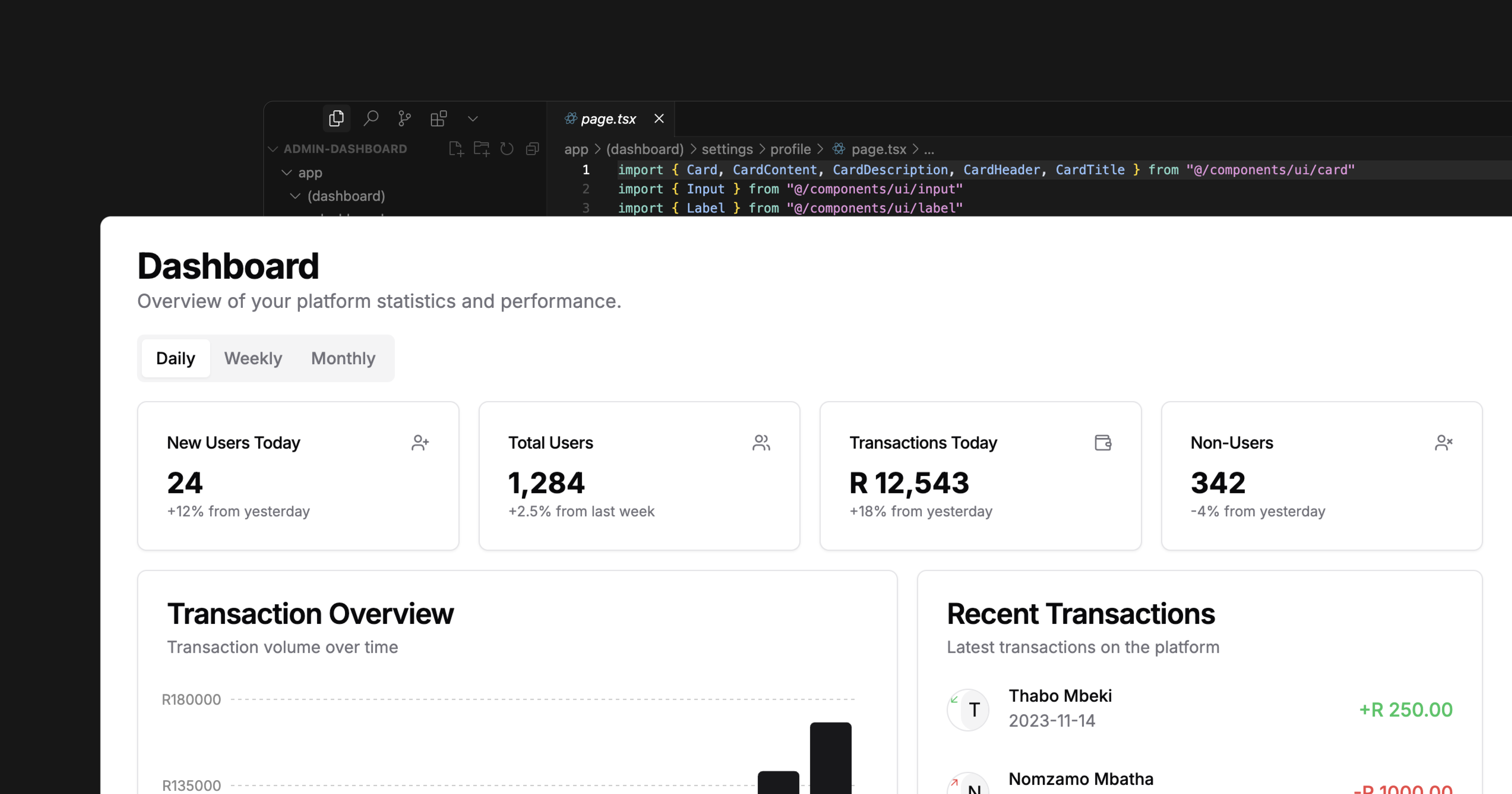
A platform dashboard displaying an overview of statistics and performance metrics.

Every business needs internal systems — but building them often means settling for clunky software or expensive custom development. With Webflow Cloud, teams can quickly build and integrate internal tools with your Webflow site. 

Use it for:

  • Employee directories and internal HR portals
  • CRM-style lead management systems
  • Custom analytics and reporting portals
  • Content moderation and review tools

One platform, endless possibilities

We’re just getting started, and as we continue expanding the Website Experience Platform, our mission remains the same: to bring development superpowers to everyone.

Quote from Dane Knecht:

We’re releasing Webflow Cloud today in private beta and will be giving customers who sign up for the beta access over the coming weeks. During the beta, Webflow Cloud will be available on all site plans. We will be sharing more about our pricing during the beta. You can request beta access now, and start exploring our developer documentation to get familiar with the platform’s full-stack capabilities.

Over the coming months, you can expect to see continued investment in new tools and infrastructure for developers in Webflow – from expanding framework support to enhanced deployment workflows and improved code management, we’re building toward a future where anyone on your team can contribute to exceptional digital experiences that move the needle for your business.

UX design process: A simple (but complete) guide

Software Stack Editor · May 5, 2025 ·

When you understand UX design, you help your audience connect with your brand more naturally.

The UX design process begins at understanding the objectives of a business and how best to serve a target audience. By comprehending the psychology of a user, as well as applying widely accepted methods, it’s possible to provide them with a positive and memorable experience. We’ve put together this guide to help you with the UX design process — every step of the way.

What is a UX design process?

What is a UX design process? A UX design process provides a strategy for organizing how you research, design, and iterate to craft a seamless experience. It aligns your business objectives with what people truly need.

The UX design process aims for better web experiences

User experience design influences the entire structure of a website — guiding people through its expanse, and giving them something that affects how they feel. Visuals, content, structure, and navigation all come together to give someone a memorable experience.

End users are at the center of the UX. If someone is able to easily find the information they’re looking for, they’ve accomplished their goal and may return again.

UX concerns itself with an end users’ motivations. Why did they decide to check out a website? What information are they seeking? And what solutions are they after to the problems they may be facing? UX looks into the mind of a user, tailoring an experience that’ll give them what they’re after, in the least complicated way.

The elements of a design like navigational options, buttons, calls to action, and other interactions shuttles a users journey through a design — with content filling out the substance. UX design provides the intent for all of these in leading a user to where they need to go and what they should learn.

Any discussion about user experience must also mention user interface design. UI (user interface) concerns itself with the specifics of a design, touching everything from the typography used, to the look and feel of buttons and other interactions. UX design, unlike UI design, pulls itself back from these details and focuses on how someone will connect and engage within the product design. User experience designers take into account what people want from a web design and build an experience during the design phase that’ll meet these expectations.

Related reads: UX vs UI: What makes them different?

Key steps in the UX design process

User experience and branding go hand in hand

Branding and UX share a symbiotic relationship. Well established brands may have their reputations tarnished by a website with a terrible user experience. Conversely, an up and coming company can get a boost from an easy to navigate and functional experience. Branding and user experience are about perception, and both must be consistent for a business to succeed. Interaction design

Mailchimp’s branding revolves around quirkiness, combined with the straightforward practicality of their products. Their website captures the duality of their brand identity striking just the right balance of fun and information.

gif of mailchimp homepage

At the beginning of the UX design process, and throughout the product development process, UX designers must keep sight of a businesses’ branding and how it’s going to be communicated in a design.

Business goals are a part of the UX process

A new business website or redesign must fit into a business strategy. Both content and functionality must come together to develop a memorable brand. There must be reasons that guide the ux design process and an understanding of why this work needs to be done. A design team, and development team, needs to not only be experts in design thinking, but also understand the larger marketing goals of a company.

If it’s a redesign, look at what works and what needs improvement. Take into consideration what’s lacking, and how designing an improved user experience can help address these problems.

And for any website, whether it’s one that’s brand new or a pre-existing page that needs tweaking, identify the type of actions you’d want a user to take, whether it’s purchasing a product, signing up for a service, or requesting more information.

Design thinking plays a valuable role here because it frames every decision around genuine user needs, helping you maintain each business initiative aligned with real customer goals.

UX puts the user in usability

Intuitive navigation, onboarding UX, and a logical structure allows someone to interact and find their way through a design without obstacles. UX provides the guides that allow for a smooth flow, rather than one that’s complicated and frustrating to get through.

The wide range of design skill sets a UX designer has allows them to architect the structure that real users will follow. Usability concerns the who, what and when. Who, being the user, what being the content, and when being the order and logic in experiencing the web design.

A user’s experience should be guided by empathy

Before even starting the development process of a project, a UX designer needs to put themselves in the shoes of the end user. They must know the motivations and pain points that users have. Designers must be able to see a website through a user’s eyes, and anticipate the best ways that they should move through it. They need to take the multitudes of pieces and assemble them in a way that makes sense for those navigating through it.

UX designers understand how all of the pages fit together holistically, while never overlooking at the microscopic level how each page functions in helping people meet the users’ goals.

Understanding an audience means crafting an experience that they’ll find valuable and enjoyment when scrolling through.

User research within the UX process

“You can only understand people if you feel them in yourself.”

–John Donne, “An Anatomy of the World,” 1611

The people you want to bring in are more than just “users.” It’s important to understand their problems and the journey they’re on to getting to where they want to go. Never just assume the wants and needs of others. We may be able to gather a cursory understanding, but doing UX research will give us a more accurate understanding of their actual interests and desires.

User research and identifying the different user types allows for a more laser focused development process. Instead of making assumptions, actual data informs how a website design will be put together and what features need to be integrated.

User research takes out the guesswork, allowing us to see the challenges and expectations that real people have. True empathy can’t exist when companies don’t know those that they want to reach.

User research should be ongoing

User research provides an important starting point, allowing a design to be built around people’s hopes and circumventing potential frustration with an experience custom made to meet their needs.

User testing and research never ends. Shifting objectives from stakeholders, changing consumer habits, and the competition may all change how people perceive a design. A website that left people satisfied two years ago, may now be less effective. User research needs to be ongoing to see if a design is still relevant to those using it.

Determine what answers you’re looking for from user research

Maximizing user research means knowing what questions and information you’re after. Like any process, success needs to be defined. Without any sort of limitations or measures, user research can get out of control and become its own form of scope creep, bogging down the design process.

A website is a product. You must determine what people want out of it.

Interview actual people

What’s a better way to connect with your audience then to be in the same room as them? User interviews generally seat a few people and have them go through a website while members of the team observe. Seeing how people interact, and having them give you feedback in real time can pinpoint problems a design may have, and inform any changes that need to happen before it goes live.

User interviews let others expose things you may have missed from having looked at and worked on the same project for weeks or months. Maybe navigation isn’t as easy as you thought, or people are missing out on the CTAs. Outside perspectives will let you know the problems everyday users may experience when trying to complete the tasks you want them to do.

Create user personas

A persona constructs a rough approximation of who a typical user may be — based on your user research.

This user persona, example by Vimala on Dribbble, for a travel service lays out all of the important statistics of who might be an average user. Not only do we get background information of who they may be, but we also see what type of travel products or services they’re interested in.

user persona diagram

A persona isn’t an average of all users, but represents a slice of your likely audience. Defining personas will help you create an optimal experience for how you want a particular individual, or team, to perceive your brand.

Conduct surveys

User surveys and questionnaires are also an effective way to gather important data. They give the opportunity to ask very specific questions about what people are looking for or to get feedback about a particular design and whether or not it’s delivering what they want.

Surveys can gather specific data — with yes/no answers, ratings, and other clear cut answers that can be compiled and analyzed.

But along with these data points, surveys are also used to gather more qualitative information. Users may be presented with a blank slate to fill with their thoughts and opinions. This long-form information complements the quantitative information compiled, and can bring light to issues that hadn’t been considered.

When coming up with those questions, keep in mind that you don’t want to lead people to the answers that you want. Keep the questions neutral, free from your own biases. Let them provide an answer with their own bias, not yours.

Construct user flows

When figuring out the blueprint of a web design, you need to know what you want people to do and what steps they need to take. User flows provide a guide, showing the succession of interactions users should take from a landing page to other sections of a website. Knowing the roads you want a user to take inform how a design needs to be structured, which you’ll need to build wireframes and prototypes.

Whether you want to illustrate the steps someone will take in adding a product to a cart and checking out, or how they’ll access additional information about a given topic, user flows show each point along these paths. There are plenty of UX design tools like FlowMapp, Stormboard and Whimsical that can help you sketch out these ideas. Or, you can always go the analog route with pen and paper.

This Dribbble user, Seabass, shows how someone would interact with a medical app, and the paths and actions they would take when navigating.

user flow through a website

Understand information architecture

Our brains prefer order over chaos. Whether it’s a book we’re reading, movie we’re seeing, or website we’re navigating, we need to understand what’s being communicated. Information architecture takes the components of a web design and puts them in an arrangement that’ll make sense to someone experiencing it.

Imagine your content is like blocks in a bag. Opening it up and pouring these out results in a jumbled mess. By analyzing, grouping, and stacking them, you can put these together in a way that makes sense. Information architecture takes content, classifies it, and assembles it together in a way that makes sense to you and your end user.

Information architecture can be broken down into these parts:

  • Identify: What content do you need to tell your brand’s story? Determine every piece necessary in communicating what you want to relay to your audience.
  • Classify: Categorize content and figure out how it will be divided off into the organization of the design.
  • Map: Structure and organize the ideas, showing how each concept or block of content will lead to the next.

Information architecture arranges content into a manageable hierarchy. This framework lays out how people will take in the ideas presented in a logical succession.

One of the most common ways to do this is through card sorting, which can be done the old fashioned way with paper and pen, or through software like Optimal Sort and UserZoom.

Related reads: Why your design process should start with content

Creating wireframes

Creating a wireframe provides the blueprint for each page, with visual indicators like lines, grids, and boxes showing where content, images, and other elements are going to go. They can be high resolution, full of detail, or they may be low resolution with a sparse, minimal layout for each individual page. Whether it’s a simple map of boxes, lines, and placeholder text, or a more sophisticated representation, wireframes provide developers the structure they’ll need to follow in building out a website.

website wireframe

The wireframe from Dribble user Michal Roszyk shows in a clear and simple way the organization of website layout.

Wireframing also serves another important function and that’s communication. They’re a visual tool, making it possible to show everyone, no matter their role, how pages will be structured.

Prototyping and mockups

Some people get mixed up between what’s a wireframe, mockup, or prototype. Prototyping is never a single-step exercise. Design iteration, informed by ongoing testing, helps perfect the usability and overall feel.

A wireframe communicates in a basic manner the layout and organization of each individual page within a design. Though they may have varying levels of sophistication they generally don’t have functioning interactions, or artistic embellishments. They exist to show how each page will look from a general perspective.

Mockups are one step above a wireframe. If you’re using a platform like Webflow, which generates code while you design, you won’t have to bother with this step, as you end up with a fully functioning website. Mockups take what’s been established with wireframes and offer a graphic representation of the design. There may be some functionality like with navigation, but the focus here is to show what the design will look like.

Prototypes function an almost fully realized version of a design. Navigation, interactions, and all of the major visuals and blocks of content will be in place. It isn’t necessary to have every single element, but everything that a user will want to interact with and experience should be there. This means that features like call to action buttons, animations, and other dynamic elements that you want a user to experience have been integrated. Prototypes let you get the necessary feedback and to make tweaks and edits before going live. With prototyping, you have both low fidelity and high fidelity prototypes. Low fidelity prototypes focus on function over visual design, while high fidelity prototypes focus on what the final version will look like.

Usability testing

Once you have a functional prototype, it’s time to do usability testing. This means taking someone who has never seen the design before, and letting them loose in going through it.

Usability testing often happens in person or can be done remotely. Having people in the same room as you gives the opportunity to see how people are emotionally reacting to their web experience. It lets you get unfiltered feedback and see what’s working in a design and what isn’t.

People need to be given specific tasks that you want them to perform. If it’s an ecommerce website, you might have them go through the process of adding items to a cart and following them through check out. Or maybe you want them to find an answer to a common question that people may have about your product or service(s). Seeing how easy or difficult it is for a user to navigate through the content will give you a wealth of information about how effective the design may be and any edits or changes that need to happen.

Usability testing can happen at any point during the design process, but can be more valuable at the beginning stages. Major changes are easier to make early on, rather than later when it’s more fully built out. Taking care of changes in the structure, navigation, and information architecture are less labor intensive at the early stages compared to trying to do all of this at the final stages of a design.

Launch and continuous iteration

Once you’ve thoroughly tested your UX design, it’s time to launch. But the work doesn’t end here. Gather user feedback, monitor metrics, and keep refining the user journey to maintain alignment with your business goals.

If you’re looking for a platform that empowers both designers and their teams to bring these UX insights to life, consider exploring Webflow’s visual web development approach.

Keep your users at the center of the UX process

Design should never lose sight of the people it serves. Every decision — whether it’s color, navigation, or content — should support a straightforward user journey. It’s easy to get caught up in the latest trends and fads that pop in and out of web design. But rather than try and have the hippest and coolest of web designs, it’s better to create something that never falls out of touch with what end users want.

Ease of use, organization, and consistency all factor into how someone will experience a design. If there’s one take away, user experience concerns itself with empathy — making sure users are given what’s required to have a positive and fulfilling experience.

7 top appointment scheduling apps to simplify booking in 2025

Software Stack Editor · May 5, 2025 ·

Whether you’re an independent freelancer or running a service-based business, you likely need a simple way for people to book time with you.

Scheduling apps automate appointment booking, eliminating the need for emails or phone calls.

With everything that’s out there, picking the best scheduling systems and tools can feel overwhelming. The good news is that you have options. Here’s a closer look at some apps that might make appointment booking straightforward for you.

What are appointment scheduling apps?

Appointment scheduling apps let you manage booking requests online without endless email chains or phone calls. They streamline your schedule by showing real-time availability to clients, saving you effort while improving their experience.

Top appointment scheduling apps for booking client meetings

Here’s a quick overview of each tool’s main features and price points:

  • Google Calendar: Straightforward scheduling, free for personal use, booking page with Business plan at $12/month
  • Calendly: User-friendly interface, free basic plan, more features from $8/month
  • Square Appointments: Customization, free for basic features, advanced options from $29/month
  • Doodle: Fast setup, free with ads, Pro tier at $6.95/month
  • Zoho Bookings: Advanced scheduling, $6/month Basic plan, $9/month Premium plan
  • SimplyBook: Multiple booking channels, free for up to 50 bookings/month, paid plans start at $8.25/month
  • Calendar: User-friendly, free basic plan, Standard plan $6/month

1. Google Calendar

If you’re already using Gmail, Google Calendar comes with a suite of tools built into your account. It’s the go-to scheduling tool for many teams and freelancers, offering an intuitive interface that makes setting up one-time or recurring client meetingsfast.

The system is flexible. You can create and view multiple client calendars, automatically set up video conferences with Google Meet or another platform, and sync appointments and tasks to one main calendar.

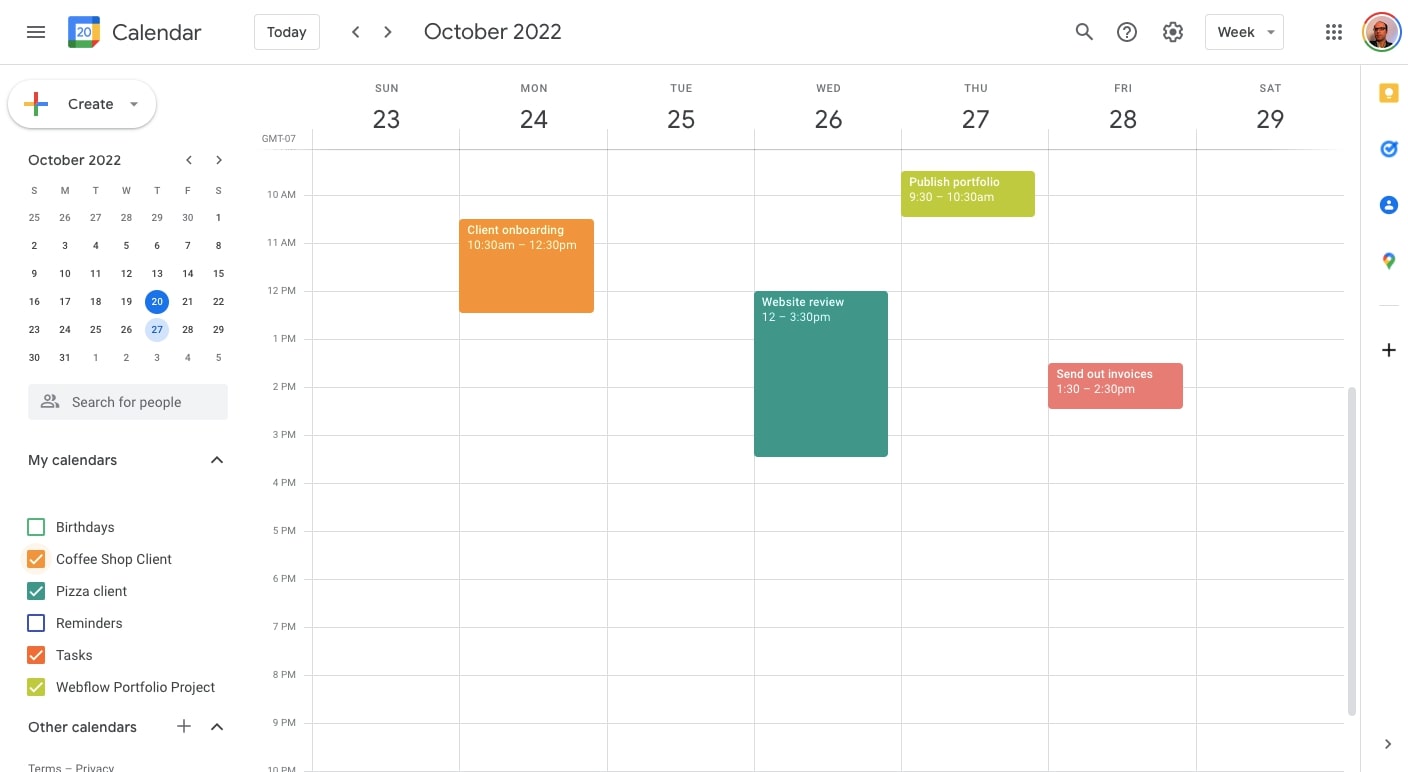
Google Calendar week view showing appointments in different colors.

Google Calendar is incredibly user-friendly. If you’re looking for a tool that lets you set up appointments with a select group of contacts, it’s probably all you need. However, if you want a dedicated booking page, you’ll need a Google Workspace account and a paid Business plan.

Pricing: Google Calendar is free to use. Appointment booking pages are only available with the Google Workspace Business plan, which is $12 a month per user.

Takeaway: If you already rely on Gmail, Google Calendar is a straightforward option for basic scheduling.

2. Calendly

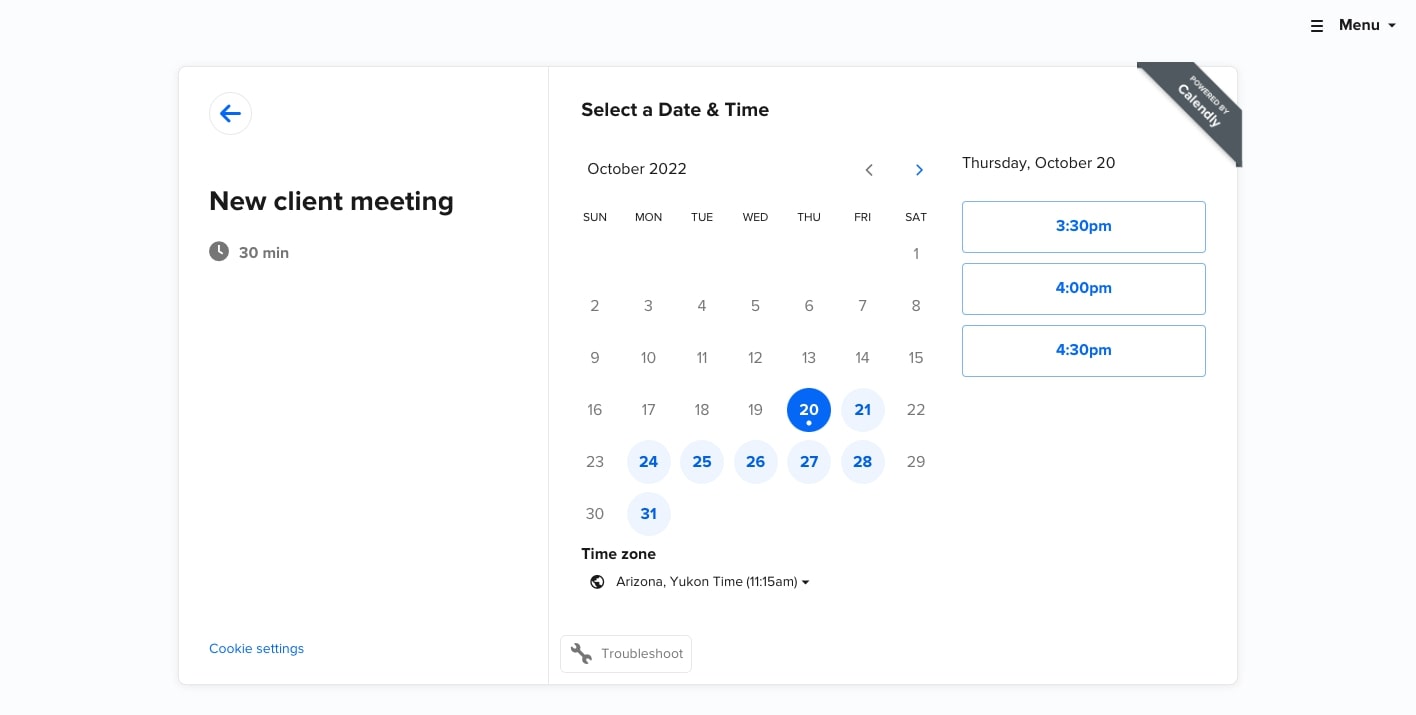
Calendly stands out with its user-friendly design. This appointment scheduling app lets you create a booking page that you can share or embed on your own website in minutes. The app has ameticulous layout, with a user-friendly interface that makes online scheduling a breeze, and it excels at time management too.

Calendly full month calendar view, showing available time slots for a 30 minute meeting

Along with its main booking system, Calendly offers workflows for client communications through its paid plans. One feature you might appreciate is Calendly’s automated email reminders and follow-ups, which saves you the time you’d spend reaching out yourself.

Pricing: Calendly has a free Basic plan that lets you set up an online scheduling calendar with a customized booking link and automated event notifications. If you need more features and customization, there’s an Essentials plan for $8/month and a Professional level for $12/month.

Takeaway: If you want a quick, user-friendly booking page with flexible integrations, Calendly is a solid choice.

3. Square Appointments

Square’s free scheduling app provides all the features that most freelancers and small businesses would need for an online appointment booking system.

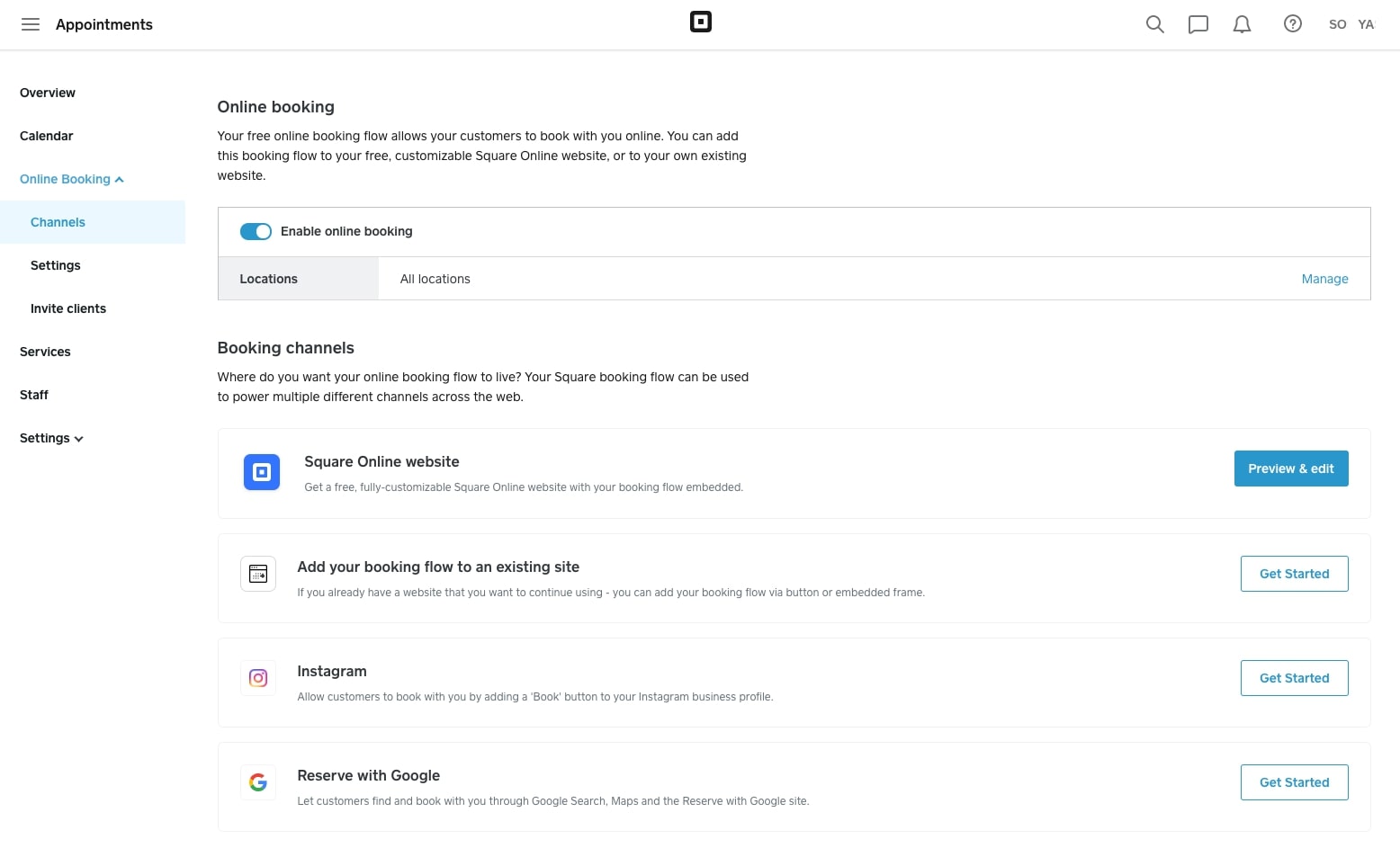
If you’re looking for personalization, Square Appointments offers plenty of options. Color schemes, typography, and layout options can all be customized, giving you everything you need to create a booking page in line with your brand. Given the creative freedom and features, there’s a bit of a learning curve.

Square Appointments, Online Booking view with options to add online booking to a website, social media channels, and google search

Pricing: The free plan likely has everything a freelancer needs, including automated SMS reminders and a mobile app for tracking bookings. It also includes a Book Now button that easily integrates with an Instagram business page. If you’d like Google Sync or text and email booking confirmations, you’ll need to sign up for the Plus plan at $29/month.

Takeaway: If brand customization is important and you don’t mind a learning curve, Square Appointments can fit your needs.

4. Doodle

Doodle offers a fast setup, guiding you through a few prompts to generate a booking page with a shareable URL. Its calendar sync lets you connect with Google Calendar or Office 365, so you can see upcoming bookings without confusion.

Free Doodle account view, showing a full month view with available time slots for a 1 hour meeting

One drawback is the amount of ads with the free plan. Both your admin panel and booking page have ads, which can feel distracting.

Pricing: The Free plan is enough to get you started, but you’ll have ads on your booking page. The Pro tier is $6.95 a month, ad-free, offers unlimited booking pages with custom branding, and includes conferencing through Microsoft Teams, Webex, and Zoom.

Takeaway: If you need a quick setup and don’t mind ads in the free version, Doodle’s straightforward approach could work for you.

5. Zoho Bookings

Zoho Bookings is a solid option for those looking for a more advanced scheduling tool. Its industry-specific templates are visually appealing and offer user experiences geared toward different audiences. They also let your clients pay you ahead of time through Stripe, PayPal, and several other payment processing options if you sign up for their Premium plan.

Zoho Bookings template for booking a general consultation

Another advantage is the features discouraging no-shows and cancellations. You can set time limits for canceling or changing appointments and require a deposit. If you’ve dealt with the hassle of last-minute cancellations, you’ll appreciate these features.

Pricing: Zoho Bookings’ Basic plan of $6/month offers color customization, Zoom and Zoho video conferencing, and a Zapier integration. If you want to accept online payments, sync with Zoho’s CRM, or need three or more workspaces, go with their Premium level for $9/month.

Takeaway: If you deal with frequent cancellations or want industry-specific templates, Zoho Bookings might be your best bet.

6. SimplyBook

SimplyBook offers quick setup, along with several well-designed themes that will work for almost any type of business. Instead of a one-size-fits-all approach, SimplyBook provides booking pages tailored for a wide range of industries, including beauty and wellness, sports and fitness, medical and health, and more.

SimplyBook also lets you accept bookings through Facebook and Instagram or through your own website via an embeddable widget. Having diverse ways to display your booking page can help you reach more potential clients.

SimplyBook design consultants booking template

Pricing: If all you need are 50 bookings a month, the free plan will suffice. If you have multiple people on your team and need more bookings, you’ll have to go with one of their paid plans starting at $8.25/month.

Takeaway: If you want multiple ways for people to book with you, SimplyBook can be a flexible choice.

7. Calendar

Calendar is well established, with over 80,000 companies in its user base. It’s a booking system with plenty of features, all in a lightweight interface.

Calendar full month view,

Scheduling appointments based on mutual availability is simple. Calendar factors in all your linked calendars to keep your availability updated. You send one link to clients, and they choose a slot from a standard calendar layout.

Pricing: The Free plan works well for individuals or small teams. It lets you sync one calendar (Google, Office 365, or Outlook) and invite up to five people per event. The Standard plan at $6/month expands these options and adds analytics and Zapier integration.

Takeaway: If you want a single link to share for scheduling, Calendar offers a simple approach with options to scale.

How appointment scheduling apps help you run a better business

Trying to juggle multiple appointments and email exchanges can waste your valuable time. Appointment scheduling apps let your clients choose a time that also works for them, helping you grow your business without extra hassle.

With so many aspects to running a business, you shouldn’t have to worry about repeated back-and-forth. The right solution frees you to focus on what you love.

How to get started

Pick the scheduling app that best fits your needs and sign up for an account. Set your availability, integrate it with your calendar, and add the booking page to your website or social media channels. Test your booking flow, then share the link so clients can schedule without hassle.

How growth marketers can boost conversions with a modern CMS

Software Stack Editor · May 1, 2025 ·

Websites drive more revenue than any other channel, yet most content management systems (CMS) fail growth marketers at critical moments. 

While there are several CMS categories to choose from — headless, open-source, no-code, and DXPs, to name a few — they all share fundamental limitations for growth-focused teams around scalability, speed-to-market, optimization, and martech integrations. 

Solutions like Webflow’s visual-first, composable CMS give growth marketers — sometimes referred to as performance marketers — the independence to drive results on their own terms. Webflow prioritizes experimentation and speed in recognizing that effective websites must balance compelling storytelling with conversion optimization and operational efficiency. This empowers growth marketers to continuously refine marketing channels and comprehensive customer journeys — driving accelerated growth without technical limitations standing in their way.

How growth marketers use — and want to use — CMSs

Growth marketers use content management systems as their command center for digital engagement — rapidly deploying, testing, and optimizing websites, landing pages, and promotional assets. 

These platforms serve as both a creative canvas and an analytical engine, allowing marketers to execute multichannel strategies. Through streamlined workflows and experimentation capabilities, CMSs allow growth teams to identify winning approaches and scale them across the customer journey.

For growth marketers, a truly effective CMS includes:

  • Content creation and management that centralizes and streamlines production workflows, enforces brand standards, and orchestrates content across the entire lifecycle without constant engineering intervention, ensuring consistency while reducing time-to-market.
  • Digital strategy activation that powers marketing execution, enabling rapid campaign iteration, content distribution, and audience engagement. This can include SEO, personalization, localization, and interactive experiences that convert visitors into customers.
  • Growth and performance martech integrations that connect marketing activities to measurable outcomes. With a cohesive tech stack, growth teams can gain insights into content performance, user behaviors, and conversion pathways. This feedback loop enables data-driven optimization through experiments like A/B testing.

However, not all CMSs check every box for growth marketers. Built primarily as publishing tools rather than marketing engines, they lack the agility, connectivity, and marketer-centric functions needed to deliver and scale sophisticated growth strategies. 

Common CMS challenges for growth marketers

Growth marketers consistently face challenges with traditional CMSs, including costly technical dependencies, inadequate marketing functionalities, and slow implementation cycles that diminish campaign impact.

Inefficient speed-to-market and scalability

Growth marketers are on a mission to move fast and scale what works quickly. Managing high volumes of content and campaigns across different channels, markets, or customer segments becomes unwieldy without proper taxonomy and organization. 

Performance issues from bloated code hurt search rankings and conversion rates. Technical debt accumulates through legacy code and outdated plugins, creating security vulnerabilities and maintenance headaches. Even basic SEO adjustments to metadata, schema markup, and URL structures typically require developer intervention, creating bottlenecks in optimization cycles.

Limited experimentation and optimization capabilities

Many CMSs lack native A/B testing functionality and dynamic content features essential for conversion rate optimization. Not only are growth marketers missing the power to create and update content at scale, they don’t have the tools to test, iterate, and learn from their experiments. 

Marketers also face difficulty implementing tracking codes such as pixel tracking, which typically requires developer assistance, creating bottlenecks. And from email marketing and CRM to marketing automation and analytics, poor integration with other marketing tools creates disconnected data silos that prevent thorough analysis and audience understanding.

Rigid content structures

One thing growth marketers need in CMSs is creative flexibility to build and manipulate landing pages and conversion-focused content. However, today’s CMSs are sometimes barriers to progress — clunky templates and content models often need developer support for customizations, undermining marketer agility and autonomy. 

Complex approval workflows introduce delays that compromise time-sensitive campaigns. These constraints conflict with growth marketing’s core principles of rapid testing, iteration, and optimization needed to maximize conversions and ROI.

Webflow named a Strong Performer

Learn why Webflow has been named a Strong Performer in a rapidly shifting CMS market and how Webflow is a best fit for price-conscious enterprise buyers.

Read now

↗

Webflow named a Strong Performer

Learn why Webflow has been named a Strong Performer in a rapidly shifting CMS market and how Webflow is a best fit for price-conscious enterprise buyers.

Read now

↗

Read now

How growth marketers can harness the power of Webflow

In today’s digital landscape, growth marketers need tools that can keep pace with rapid campaign demands while delivering measurable results. Webflow stands out as a powerful visual-first, composable CMS that addresses the core challenges growth marketers face daily. 

By eliminating developer tickets and technical bottlenecks, Webflow enables marketers to launch quickly and experiment continuously — transforming how marketing teams operate, test, and scale their efforts.

Solving for speed and scalability

Speed-to-market often determines campaign success, and waiting for development resources can cripple growth initiatives. Webflow’s visual editor allows growth marketers to create and iterate without code dependencies. 

“Growth marketers need to move fast and scale what works and that’s where things like components, page builder, and templates are a huge solve. Being able to create brand-approved pages quickly and programmatically gives much more power and ability to drive impact,” says Elliott Chapman, Director of Growth Marketing at Webflow.

Rather than submitting tickets and waiting in development queues, growth marketers can directly build landing pages, implement A/B tests, and launch campaigns in hours instead of weeks. With Webflow, growth marketers can: 

  • Access designer-built and approved shared component and design libraries, giving building blocks to quickly assemble new pages and experiences — ensuring brand consistency while accelerating production
  • Implement SEO optimizations directly in Webflow without technical dependencies, including metadata adjustments, schema markup, and URL structures
  • Avoid technical debt and security issues that plague traditional CMS platforms with plugins and legacy code
A screenshot of Webflow's asset management interface showing a left sidebar with various file categories and thumbnails of design assets. The main panel displays a large illustrated image of a person with sunglasses wearing a yellow jacket holding a coffee cup at what appears to be a cafe counter. A portion of a webpage design is visible on the right side with text about increasing sales.
Webflow’s Shared Libraries

Enhancing optimization capabilities

Growth marketing thrives on the ability to identify what works and rapidly scale it. Webflow’s component-based approach creates systems that make this possible, eliminating the repetitive creation of common elements while ensuring brand consistency.

Growth marketers can also launch and iterate on A/B tests directly within their website workflow — no coding required. With Webflow Optimize, marketers can test everything from headline variations to complete page redesigns without developer dependencies and see results that directly tie to their goals, like conversion rates.

With Webflow, growth marketers can: 

  • Deliver AI-powered personalized experiences with dynamic content that adapts to user behavior, preferences, and context 
  • Leverage region-specific messaging without maintaining separate websites
  • Boost conversions with data by learning how specific content performs, which pages work best for certain audiences — even which variations convert best in specific channels 
A screenshot of Webflow Optimize showing a dropdown menu of optimization experiments for a website called
Webflow Optimizations

Integrating with marketing tech stacks

Growth marketing relies on connected systems that share data and trigger actions. This level of integration creates continuity between ads, landing page experiences, campaigns, and more, ensuring visual content and user experiences remain optimized across all touchpoints.

With Webflow, growth marketers can:  

  • Complement existing analytics tools like Google Analytics or Optimizely with Webflow Analyze for quick visibility into basic visitor behavior to make initial data-driven decisions without switching platforms
  • Connect to third-party apps, CRMs, email platforms, and other marketing tools
  • Embed custom attributes to tag elements for easier tracking and analysis of user behaviors and conversion paths
  • Gather site and page insights within Webflow, done with one-click setup and automatic event capture
  • Support multi-language campaigns to expand international reach
A screenshot of Webflow's analytics dashboard for a site called
Webflow Analyze

Breaking down team silos

One of Webflow’s most transformative impacts comes from how it bridges traditional gaps between marketing, design, and development teams. Marketers can create and publish content directly in Webflow without developer help. Designers can work with live content without writing code or managing complex databases. Developers can easily manage content and seamlessly integrate with tech stacks. And they can do it all in Webflow’s centralized environment. 

With Webflow, growth marketers can access: 

  • Collaborative workflows with creative teams to build and share component and design libraries that empower marketers and ensure brand consistency
  • Granular editor permissions that assign access levels based on team roles
  • Staging environments for testing changes before publishing, enabling quality control without bottlenecks
Webflow’s editor permissions

The growth marketer’s advantage in Webflow

For growth marketers who master Webflow’s capabilities, the advantages compound over time. Campaigns reach the market faster, more experiments can be run simultaneously, and successful approaches scale more efficiently. Webflow eliminates technical debt concerns that plague traditional CMSs, freeing growth marketers, designers, and developers to focus on strategy and innovation rather than maintenance.

By removing the technical barriers that traditionally slow marketing execution, Webflow transforms growth marketers from requestors into creators. This shift doesn’t just improve campaign metrics — it fundamentally changes how marketing teams approach their craft, fostering experimentation, iteration, and continuous improvements that drive sustainable growth.

Last Updated

May 1, 2025

Webflow makes GSAP 100% free — plus more exciting updates

Software Stack Editor · April 30, 2025 ·

Webflow makes GSAP 100% free for the web community, giving developers more freedom to harness the full breadth of GSAP-powered motion.

As the first Website Experience Platform, our goal at Webflow is to empower modern teams to create engaging, brand-differentiated experiences that turn visitors into customers — and the best-performing sites we see are interactive and use animation to stand out.

This is why in the fall of 2024, Webflow acquired the industry-leading JavaScript animation library, GreenSock Animation Platform (GSAP), to take our Interaction solutions to the next level. We’re honored to be able to partner with GSAP on this journey to give web animation superpowers to everyone — whether you want to bring your ideas to life visually or through code.

Today, we’re excited to share some major updates to GSAP and Webflow, made with the broader GSAP community and our shared customers in mind.

GSAP is now 100% free — here’s why

We’re fully committed to investing in GSAP’s future, guided by your feedback and the expertise of the original GSAP team who brought this technology to life. And that investment starts with making GSAP 100% free for all users. 

This means everyone — whether or not you’re a Webflow customer — will be able to leverage all of GSAP’s tools completely free of charge, including the previously paid Club plugins. We’re also expanding the standard license to cover commercial use, so you’re fully empowered to use GSAP anywhere, at no cost to you.

The GSAP team has always strived to make their offerings free to as many people as possible while maintaining high quality standards that benefit the entire community. That’s why Webflow is excited to be able to help them achieve this goal of becoming 100% free. With Webflow’s support, the GSAP team can continue to lead the charge in product and industry innovation while allowing even more developers the opportunity to harness the full breadth of GSAP-powered motion. 

What’s new from GSAP and Webflow

In addition to making GSAP 100% free, we’re excited to release a series of improvements for GSAP developers and our shared Webflow customers. Here’s what we’ve been working on together: 

Major upgrade to GSAP’s SplitText plugin

As part of our ongoing investment in GSAP, we’ve honed in on making one of GSAP’s most popular plugins even better. SplitText has been completely rewritten from the ground up with exciting improvements that include:

  • 50% file size reduction for faster load times and improved performance 
  • Baked-in accessibility for screen readers
  • Easy masking for advanced “reveal” effects
  • New deepSlice feature that intelligently handles nested elements that spill onto multiple lines
  • New responsive features allowing for cleaner reflows and more seamless animations
  • And more!
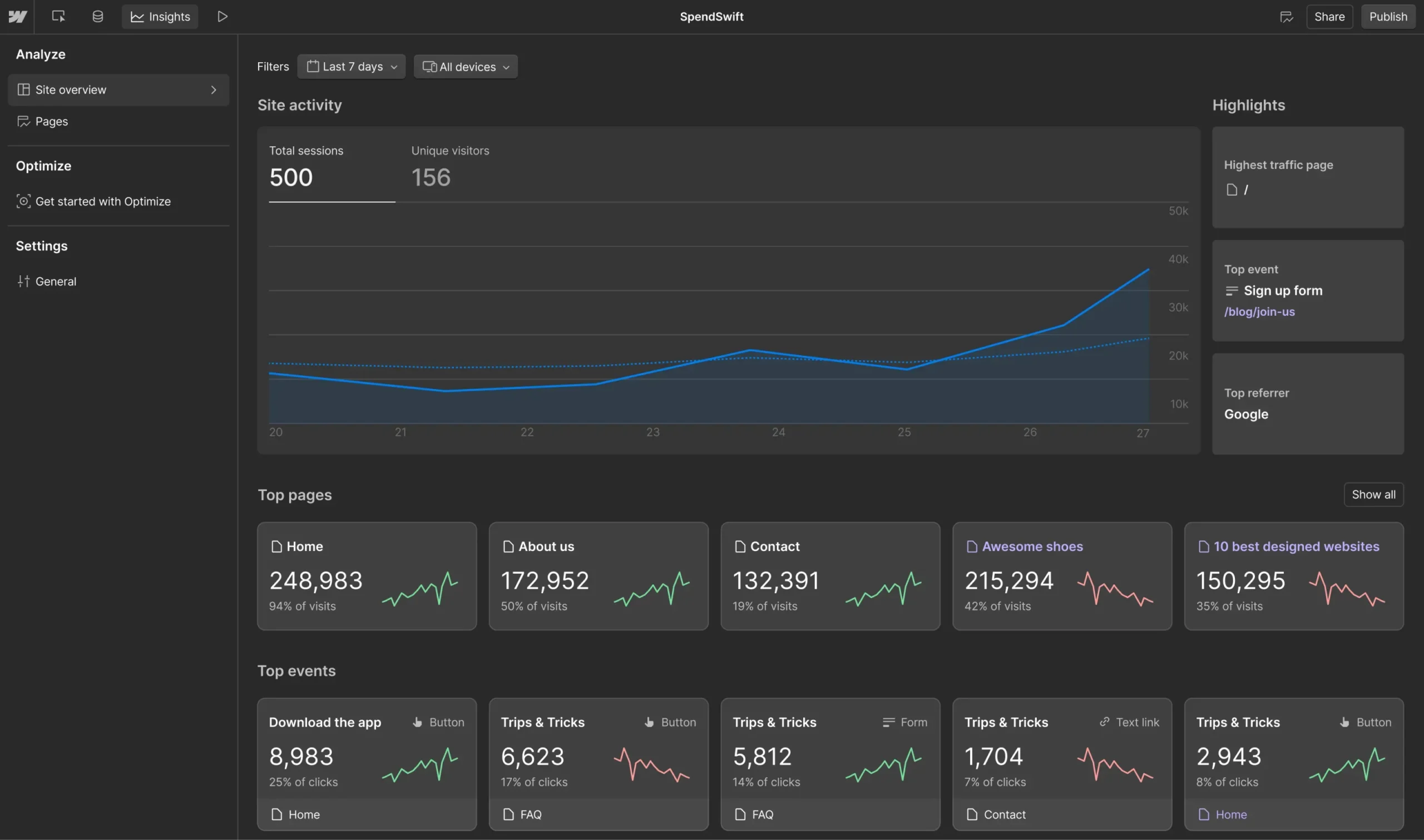
With 14 new features in total, we’re excited to see more community members leveraging the improved — and now free — SplitText plugin. To get started, see GSAP’s updated documentation on SplitText.

Easier GSAP plugin integration in Webflow

Screenshot of Webflow's GSAP animation settings panel, showing options to enable the GSAP animation library. The interface displays that GSAP Core is enabled on the site, with a section for GSAP Plugins where users can select additional animation capabilities. The
All GSAP plugins are now directly available in and hosted by Webflow.

Previously, using GSAP Club plugins in Webflow was often a cumbersome process. We’ve made it easier by making all GSAP plugins directly available in and hosted by Webflow. Here’s how it works: 

  1. Go to Site Settings and toggle on the GSAP Core library and plugins you want to include on your site.
  2. Create your animations with custom code. 

And that’s it! To learn how to get started, check out GSAP’s Webflow guide. 

Preview custom code in Webflow before publishing

Screenshot of a Webflow editor interface with a space-themed website design. The interface shows a toggle for
You can now preview your Webflow site with custom HTML, CSS or JavaScript applied —including animations written with GSAP!

To give you more confidence and control in your deployment, we launched site previews with custom code. This allows you to preview the effects of any custom code before publishing it on your Webflow site — including animations written with GSAP.

What’s next 

In the coming months, we’ll be expanding our native Webflow Interactions with:

  • Popular GSAP features, so you can start building GSAP-powered animations visually
  • The ability to create with and preview your Interactions on a horizontal timeline for a more intuitive motion development experience
  • The ability to reuse any Interaction across your site, resulting in increased workflow efficiency and design consistency

These updates unlock the ability for anyone — regardless of coding knowledge — to build GSAP-powered motion into Webflow sites. It also sets the foundation for the next generation of native Webflow Interactions. This will be entirely replatformed on GSAP and deeply integrated with our Website Experience Platform — from design systems to collaboration workflows and much more.

We can’t wait for what’s to come. Together, GSAP and Webflow are committed to shaping the future of web animation and continuously raising the ceiling on what developers, designers, marketers, and agencies can build — visually or with code.

Stay connected with us:

  • Learn more during our announcement video: Join us on May 9 at 9 AM PT on YouTube to hear from myself (Rachel Wolan, CPO of Webflow), Cassie Evans (GSAP Developer Education Lead), and Keegan O’Leary (Webflow & GSAP Developer) as we share more about these Webflow and GSAP updates, including live demos. Subscribe to Webflow’s YouTube channel to get notified.‍
  • Participate in our community challenge: In partnership with Codepen, we’ve kicked off an exciting Webflow and GSAP community challenge running throughout May. We invite all GSAP developers — Webflow customer or not — to participate. We can’t wait to see what you build — learn more about the challenge.

How we built AI-powered website optimization

Software Stack Editor · April 25, 2025 ·

Creating a beautiful, functional website is only the first step.

The real challenge begins when it’s time to optimize for conversions, engagement, and business outcomes. Teams pour countless resources into attracting visitors, but what happens next? How do you ensure every click counts?

At Webflow, we set out to answer that question with Webflow Optimize – an AI-powered tool designed to help customers test, analyze, and improve their websites. Our approach follows a structured cycle: idea generation → testing → actionable insights → iteration.

Idea testing circle. Create an idea. Test the idea. Get actionable insights. Repeat.
Idea testing cycle

Webflow Optimize streamlines the user experience for marketers to create, test, and analyze their website content, saving them valuable time. This innovative solution leverages a sophisticated system that combines proprietary neural network models and generative AI.

This blog post will delve into the engineering choices, trade-offs, and solutions that drive Webflow Optimize’s optimization engine and illuminate how AI is harnessed to empower marketers.

AI suggestions: Accelerating idea creation

Generating high-impact website improvements – such as headlines, layouts, calls to action (CTAs) – is often slowed by creative blocks and time constraints. To address this, we built generative AI tools like Suggest Copy and the AI Landing Page Generator.

Suggest Copy helps marketers craft compelling headlines, CTAs, and other types of variations. The AI Landing Page Generator goes a step further, proposing both text and precise placement suggestions tailored for new landing pages.

As with many applications built on large language models (LLMs), a key challenge is ensuring that outputs are not only inspiring, but also highly relevant to the user’s context. For the AI Landing Page Generator, this also meant ensuring that the proposed placements could integrate seamlessly into the structure of an existing page.

To tackle these challenges, we built a webpage “crawler” to collect metadata about the target webpage, including detailed context around the areas being tested. We also retrieve live testing information from our internal system to give the model a complete view of the environment. Because relevance to the context is essential, we created interactive playgrounds where users could test suggestions and provide feedback. That feedback was distilled into our prompts.

To validate the outputs from the AI Landing Page Generator, we use our placement validators to ensure the AI responses are legitimate. In some cases, a final touch is inevitable – specifically, correcting common errors in AI-generated code using specialized programs. Doing this final validation for part of our “last mile” approach greatly boosted the accuracy of the output.

Below are some screenshots that present an example of our solutions.

We prompted the AI Landing Page Generator to create an updated webpage with the instruction: “Update this page to appeal specifically to college students.” In response, it suggested five changes in a list format.

AI suggests copy changes

In the two screenshots below, we see that the updated text explicitly refers to “university students” rather than the more generic “students.” The AI’s output was contextually relevant, aligning well with both the surrounding page content and the original request.

Original text: Students, booest your Webflow knowledge with a free annual CMS site plan. Educators, get access to a free workspace account to teach Webflow in your classroom.
Original text
Optimized suggested text: University students, level up your project work with a free annual CMS site plan. Apply the knowledge you learned in your classroom.
Optimized suggested text

We can also see that AI suggested updates to two heading items separately, showing that different headings are uniquely identified.

Heading: Why should university students choose Webflow?
First heading
Heading: Join the Webflow community and excel in your studies
Second heading

AI-optimized tests: Engineering for dynamic traffic allocation

Traditional A/B testing splits traffic randomly across variations, which works, but it can be inefficient. Poor-performing variations waste traffic. Moreover, the method assumes a static environment, but in reality a winner identified over a specific period might not remain the best option in the future.

Webflow Optimize takes a smarter approach. Using Bayesian neural networks, we dynamically allocate more traffic to better-performing variations as the test progresses. Initially, traffic is distributed evenly across all variations. But as data accumulates, the model begins to predict the probability of each variation being the best. Based on these estimations, more traffic is steered towards the stronger variations – while still continuing to explore others to avoid overconfidence. When performance trends shift, traffic allocation shifts accordingly, ensuring that emerging winners receive greater exposure.

Characteristics of web traffic

It is the dynamic and continuous optimization nature of our approach that sets it apart from the traditional multi-armed bandit algorithms. Why is dynamic and continuous optimization so important? Because a website is never static. In practice, we see this play out in many ways. Content frequently changes to support new product launches, time-limited promotions, or event-based campaigns. The sources of incoming traffic shift regularly as ad campaigns evolve. Even patterns in traffic volume vary throughout the week, with clear differences between weekdays and weekends.

To account for these domain-specific dynamics, our training processes are designed with several technical considerations in mind. First, we apply weighted sampling to ensure that traffic patterns are balanced over a longer time horizon. Second, we include contextual features such as ad campaigns, traffic source patterns, and device types into our models to help us tease apart confounding factors that might otherwise skew variation performance.

Why Bayesian neural networks?

Bayesian neural networks (or neural networks trained through Bayesian methods) are a well-known framework with extensive literature and broad applications [reference 1, reference 2]. They offer two key advantages that make them especially suitable for our setting: quantifying uncertainty and preventing overfitting.

Quantifying uncertainty helps the system balance exploration (trying all variations) with exploitation (focusing on strong candidates). Preventing overfitting is particularly useful in domains where data is scarce. While web traffic may seem large, the number of samples for any specific combination of feature values is often quite limited.

Taken together, these benefits make Bayesian neural networks particularly well-suited to the volatile nature of web traffic, especially when models must account for many interacting and impactful features.

Training

Whenever you train a neural network model with a large number of samples, efficiency is a major concern. Here are some tactics that we use in our training pipeline to boost efficiency:

To accelerate training, we use Apache Spark on AWS EMR (Elastic MapReduce) for efficient and scalable feature preparation. AWS EMR dynamically scales compute resources, enabling us to process large datasets quickly and cost-effectively. Once the features are prepared, we leverage AWS Batch for TensorFlow model training, allowing us to run up to 10,000 training jobs in parallel for individual customers.

In training a Bayesian neural network, we need to sample the weights based on their estimated distributions. It would be prohibitively expensive if we did this naively for every sample. The Flipout trick [reference 3] provides an efficient implementation of the equivalent group sampling, so that’s what we used in training.

The Flipout trick
The Flipout trick

When we examined memory usage during training, we found that it clearly increased as training batches/iterations progressed. That indicated a memory leak. The root cause was a bug in TensorFlow’s tf.py_function, which is not an issue for tf.numpy_function [reference 4]. We refactored our code to use tf.numpy_function when necessary.

In general, training a neural network involves a great deal of detailed tuning – not only for the model’s performance, but also for training efficiency. There’s no shortcut; you must test extensively.

AI insights: Turning data into insights

Running tests is one thing; interpreting the results is another. Experiment results often include complex metrics and a great deal of information from various dimensions, making it difficult to identify clear, actionable insights.

To simplify this, we built the AI Insights feature, which uses LLMs to analyze test outcomes. This LLM-powered tool highlights key patterns, answers questions, and summarizes the experiment results, saving teams time and effort.

AI Insights dashboard
AI Insights

Using LLMs

From an engineering perspective, this feature posed challenges similar to those in AI suggestions, though with different details. These included:

  • Context management: LLMs need a structured understanding of the experiment data to provide accurate answers.
  • Performance optimization: Reading and synthesizing large datasets is challenging.
  • Professional jargon: The insights should be in language that marketers understand.

To address these issues, we adopted several engineering strategies. We leveraged assistant and thread APIs for AI Insights, following a chatting format with chat history maintained in the threads. Since the UI alone doesn’t carry all necessary background information, we equip the assistant with product “manuals” by placing them in its system context, enabling more grounded and relevant responses.

Instead of trying to load and summarize all data at once – which is infeasible at scale – we take a multi-stage approach. When a session begins, the assistant preloads information shown in the default dashboard view. To enrich the initial response, we also preload several frequently referenced stats, even if they are hidden in the default view.

As the conversation continues, the assistant can dynamically fetch additional statistics through function tool calls. These stats are the same ones surfaced through our server APIs, but we expose a simplified version specifically for the LLM. This design helps reduce token usage and makes the data easier for the model to interpret, given its limited visibility into our internal systems.

To round out the experience, we carefully prompt the assistant to communicate in language that resonates with marketers, making technical insights easier to understand and act on.

Evaluations

Robust evaluation is critical for any LLM application, and we’ve built a multi-layered system to assess quality and guide improvements.

We begin with tool-level accuracy, where it’s straightforward to determine whether the assistant triggered the correct functions. On top of that, we use a custom “LLM judge” – an assistant prompted to act like a savvy marketer – to provide automated quality assessments of generated responses.

Finally, we incorporate human feedback. Internal reviewers from across the company regularly evaluate outputs, providing scores and comments that help calibrate both the assistant and the automated judge. Post-launch, we continue improving through real-world signals: customer feedback helps us evolve both the product and the evaluation criteria, including how the LLM judge itself is tuned.

UI/UX

We also want to emphasize the critical importance of UI/UX design. Effective UX techniques are pivotal in addressing common challenges associated with using LLMs, such as lengthy response times for data analysis, inconsistent analysis quality, and limited user engagement. The use of conversational dialogs – rather than static summary reports – combined with suggested initial and follow-up questions, is particularly impactful.

This approach not only mitigates the challenges mentioned above but also delivers a significantly enhanced, interactive user experience. It feels as though the user is consulting with an expert, guiding them to iteratively refine their questions for deeper, more precise insights.

Engineering for speed, scalability, and accuracy

At the heart of Webflow Optimize is a deliberate focus on handling massive data loads in real time without compromising the quality of insights. We achieve this by using generative AI to inspire new test ideas, Bayesian neural networks to dynamically adjust traffic distribution, and LLMs to transform raw metrics into clear recommendations. Together, these technologies empower marketers to optimize their websites quickly and effectively, all while supporting tens of thousands of tests across diverse traffic patterns.

Looking ahead

Webflow Optimize is just getting started. As AI technology evolves, our goal is to continue building tools that empower teams to optimize websites effortlessly, making every visitor interaction count. Behind every AI-powered tool lies a series of engineering challenges: balancing speed with scalability, inspiration with accuracy, and creativity with structure. In Webflow Optimize, we’ve brought together proprietary models and LLMs to deliver a robust solution for website optimization. We will continue training our own models and leveraging state-of-the-art multimodal models alongside agentic frameworks.

References

  1. Probabilistic Backpropagation for Scalable Learning of Bayesian Neural Networks
  2. A Survey on Bayesian Deep Learning
  3. Flipout: Efficient Pseudo-Independent Weight Perturbations on Mini-Batches
  4. Unbounded Memory leak when using tf.py_function in tf.data.Dataset.map()

How content marketers can unlock greater creative potential with a modern CMS

Software Stack Editor · April 24, 2025 ·

Today’s content marketers face a unique set of challenges: producing high-quality content at scale, maintaining consistency across channels, and efficiently distributing that content to the right audiences.

What was once a straightforward job has evolved into a complex orchestration of strategy, creation, distribution, and analysis.

Content management systems (CMS) have evolved alongside these changing demands. Once simple publishing tools, today’s CMS platforms have become the central, technical anchor that supports the entire content lifecycle. This evolution represents a fundamental shift in how we approach content technology – from basic infrastructure to production, publishing, and distribution.

Platforms like Webflow’s visual, composable CMS exemplify this shift toward next-gen content solutions that don’t simply solve technical problems but actively expand creative possibilities. By removing traditional barriers that stunted marketers’ ability to have autonomy over how content is managed and published, solutions like Webflow are transforming content marketing workflows and unlocking new potential for teams of all sizes.

The content marketer’s relationship with a CMS

Content marketers today often wear multiple hats – strategist, creator, editor, distributor, and analyst. They develop comprehensive content strategies, create engaging stories across multiple formats, manage production workflows, and analyze performance to continuously refine their approach.

DXPs, as well as traditional, open-source, and headless CMS platforms, often create friction for content marketers managing these processes. Common pain points include:

  • Rigid pre-built templates that limit content editing and authoring and require developer intervention for minor changes
  • Publishing processes dependent on technical resources delays content distribution
  • Time-consuming set up and ramp up periods
  • Visibility into content performance is dependent on third-party plug-ins

A truly marketer-friendly CMS addresses these challenges by enabling content marketers’ workflows and reserving precious development resources for the highest-impact initiatives.  “AI has had a particularly large impact on content marketers,” explains Michael Huard, Sr. Manager of Content Marketing at Webflow. “Since the speed of production has increased exponentially, a smooth workflow in your CMS can be the make or break piece to maintain momentum.”

Modern platforms like Webflow’s visual, composable CMS provide:

  • Structured content collections that allow for consistency while maintaining flexibility
  • Intuitive, embedded SEO tools that maximize organic content visibility and discoverability
  • Visual-first content editing and authoring, empowering marketers to make changes and publish independently
  • Integrated workflows that streamline review and approval processes
  • The ability to edit content in a visual canvas and see changes rendered in real time 

With the right systems in place, content marketers can transform more content into strategic business assets autonomously, faster than ever. 

Simultaneously, the right CMS can expand the role of the content marketer far beyond production. With analytics at their fingertips, they can dig into content performance and discover what is and isn’t working. This allows them to not only prove the value of their work, but also become better strategic partners who can embed themselves deeper into the end-to-end orchestration of content.

How content marketers can stretch the power of Webflow’s CMS

Forward-thinking content marketers are discovering that next-gen CMS platforms offer far more than operational efficiency — they enable entirely new approaches to content strategy and execution. Below are a couple of ways teams can creatively push the limits of Webflow’s visual-first, composable CMS.

Leveraging integrations and content modules

While DXPs, open-source, and headless approaches require developer support to script out every future marketing need into rigid content blocks, a visual CMS like Webflow that integrates your design system means marketers can leverage reusable systems to build and publish content. Webflow’s component-based architecture allows teams to:

  • Create libraries of approved content blocks that can be used across the website
  • Maintain consistency while dramatically accelerating content production
  • Leverage dynamic content, allowing them to update content in one place and see changes reflected everywhere it appears
  • Integrate with other marketing tools, APIs, and apps to create seamless content experiences
Resources section on a Solutions page

Here at Webflow, one of the ways we leverage integrations is to surface relevant content across various site pages. “By connecting Airtable to the Webflow CMS, we are able to automatically display a variety of fresh content — blog posts, webinars, reports, ebooks, case studies — across our website that the content team creates, tags, and publishes autonomously in the CMS,” explains Corey Moen, Web Design Manager at Webflow. “That’s the power of composability — it allows teams to seamlessly integrate apps to the Webflow CMS, enhancing content management and stretching the impact of web experiences every day.”

Personalizing experiences with AI

Today’s audiences expect content experiences tailored to their specific needs and contexts. Static, one-size-fits-all content won’t dazzle savvy consumers, who expect more from brand experiences and increasingly difficult to keep engaged.

Webflow’s AI-powered personalization capabilities allow marketers to:

  • Let AI choose the variation of your page most likely to convert for each unique visitor 
  • Personalize pages for anonymous traffic and first page views
  • Supercharge your testing by having AI test multiple page combinations

Recommendations for effectively managing content at scale

As content operations grow in both volume and complexity, the systems and processes supporting them require thoughtful planning and management. Here are a few tips for content teams looking for best practices to set themselves up for long-term success.

Set strong foundations

The foundation of sustainable content scaling begins with thoughtful architecture. Invest time upfront to:

  • Map out content types and taxonomies
  • Establish organizational structures
  • Collaborate with web and design teams to build templates that meet both current needs and future ones
  • Documenting your content architecture for knowledge transfer

One specific strategy to consider when mapping out specific content topics is a content matrix: “A content matrix built on audiences and core topics — whether thought leadership or product-based — helps keep your content strategy on track,” says Huard.

These types of initial investments will pay dividends as your content operations expand and evolve.

Train and empower content team members

Technology alone cannot transform content operations without investing in the teams that use the tools regularly. Effective training goes beyond basic demos. To build true content capabilities:

  • Define clear responsibilities by role and develop role-specific trainings that address different team members’ needs
  • Create clear documentation with examples relevant to your business
  • Create Slack channels where teams can troubleshoot questions or ask more complex technical questions
  • Identify power users who can become internal champions and resources

Establish clear governance

As content operations scale, governance becomes increasingly critical to maintaining both efficiency and quality. Provide air cover by:

  • Assigning different access roles and permissions within your website platform to better manage collaborative publishing workflows and approvals
  • Creating QA processes that ensure new pages are functioning as desired
  • Tracking site activity to keep up with site changes and if you need to diagnose a site issue

With Webflow, you can manage team members’ access to sensitive controls with roles and permissions. For a full overview, read more here, and for our latest update in custom and advanced governance, read our blog post.

Enable strong cross-functional collaboration

Effective content scaling requires breaking down traditional silos between content, design, and technical teams. Promote cross-functional collaboration by:

  • Establishing clear processes for requesting technical support for content initiatives
  • Communicating content goals to create a shared understanding of the objective at hand and to inform prioritization of any initiatives that require cross-functional support
  • Holding regular cross-functional sessions focused on shared outcomes

Without strong cross-functional workflows, requests can create bottlenecks, eating away at engineering bandwidth or stifling marketing’s ability to act quickly and creatively. “The core challenge for a content team is getting engagement and awareness of what you’ve created,” says Huard. “It’s important to collaborate early and often with your web team to identify what’s possible from a format perspective and how production workflows can be optimized to not slow either team down.”

Modern CMSs are transforming the role of content marketers

The content marketer’s role continues to evolve beyond the production line. Today’s most effective content experts are architects who design and orchestrate complex content ecosystems to deliver cohesive customer journeys.

This evolution requires a corresponding shift in how we think about technology that enables content marketers to do their best work at scale. Rather than treating CMS platforms as mere publishing systems or writing them off as overly-complex solutions that require endless developer support, the most forward-thinking organizations recognize modern solutions as critical to their ability to expand their creative and operational possibilities.

By embracing a modern CMS like Webflow and the workflows it enables, content marketers can focus less on technical limitations and more on what truly matters: creating compelling content experiences that engage audiences and drive business results.

What is a design sprint? Your 5-day sprint plan + 4 tips for success

Software Stack Editor · April 24, 2025 ·

image

Design sprints fast-track creating impeccable design without sacrificing quality.

Design sprints, sometimes referred to as the GV sprint method created by Jake Knapp, offer a targeted approach to innovation that lets teams rapidly explore and test ideas. Pioneered by a team at Google Ventures, this method condenses the basic design thinking process — empathize, define, ideate, prototype, test — into a fast-paced, focused effort with a tight deadline.

Whether they’re used for crafting new product designs or strategizing marketing campaigns, design sprints offer quick, high-quality results. But the true power of a sprint isn’t in immediate perfection — it’s in the rich insights and knowledge the team amasses. Each sprint, irrespective of its outcome, paves the way for refined and improved future endeavors.

Why are design sprints important?

Design sprints enable teams to focus on identifying and understanding users’ needs, then quickly build a prototype that aims to solve their challenges. Plus, designers can start getting feedback on that prototype right away from user testing.

Teams typically allow five days for the process, but some opt for a condensed two- or three-day sprint if deadlines are tighter or they want more intense bursts of creativity.

Beyond the immediate benefits of rapid concept validation and collaborative ideation, design sprints also nurture a cohesive interdepartmental culture by fostering open communication and breaking down team silos. This encourages diverse teams to share unique perspectives, ensuring a holistic problem-solving approach that can benefit future projects.

Here’s what you can achieve with this five-day process:

  • Develop new products: Bring your ideas to life and see if they’re viable in a short time
  • Add new features to existing products or services: Improve current features fast, without drawn-out development cycles
  • Design and redesign websites: Overhaul or fine-tune your site quickly
  • Design or redesign brands: Develop a new identity or refresh your existing one
  • Improve UX and UI design: Rapidly iterate on user experience and interface designs
  • Create marketing campaigns: Launch targeted campaigns quickly in response to market changes

It’s imperative that the design problem’s circumstances align with the design sprint methodology of rapid ideation, prototyping, and testing. If the design challenge lacks definition or a resolution already exists, the sprint isn’t as valuable. This process shines when there’s clear room for exploration and refinement.

The design sprint team

A design sprint team works best with four to seven members, and creativity plus efficient decision-making relies on getting the right mix of people. Your team should include a selection of the following roles to help everyone stay on the same page:

  • High-level decision-maker: Holds the authority to make final calls on designs for quick decisions
  • Facilitator: Uses their design sprint know-how to guide the process and keep everyone focused
  • Product manager: Brings a clear view of product goals so the sprint supports broader business objectives
  • Designer: Shapes the look and feel of the solution through creative input
  • Engineer: Confirms ideas are technically feasible and align with the current tech stack
  • Business strategy expert: Provides a macro view, anchoring sprint outcomes within the broader company strategy

The 5-day design sprint process

According to the original Google formulation, there are six design sprint phases: understand, define, sketch, decide, prototype, and validate. Since most sprints last for one business week, experts recommend a five-stage plan to keep things smooth.

Here’s our step-by-step guide to the five-day design sprint process.

Day 1: define the problem

  • Day 1 focus: Setting goals and problem statements
  • Key deliverable: Aligned sprint objectives

On the first day of a design sprint, the focus is on understanding and clearly stating the long-term goal. Participants work together to define the business problem, set success metrics, and outline the deliverables. This sets the tone for the rest of the sprint, helping everyone move in the same direction.

Activities for Day 1 include:

  • Lightning talks. Brief five-to-15-minute presentations on key issues. For example, the product manager might share market insights, or a legal expert might outline compliance.
  • User journey mapping. During Day 1, you’ll create a user journey map to clarify potential pain points and opportunities for improvement. This visual representation helps the team align on user experience goals and sets the stage for great solutions.
  • How might we… (HMW). Individually brainstorm problems and user pain points, then reframe them as “How might we…” questions. Team members write each phrase on a sticky note, then vote to decide the main focus.
  • Focus point identification. Link the winning HMW statements to the user journey. This becomes the main focus of the sprint.

Day 2: generate possible solutions

  • Day 2 focus: Expanding brainstorming to generate solutions
  • Key deliverable: A list of promising ideas to explore

On Day 2, the team picks up from the focus point identified on Day 1. Before diving into solutions, make sure everyone understands the challenges you’re solving. The emphasis then shifts to individual creativity and exploring potential fixes.

Possible activities for Day 2 include:

  • Crazy 8s. (Commonly recognized by this term but may also go by other names in inclusive design contexts.) Each person folds a sheet of blank paper to create eight squares. You have eight minutes to fill each square with a quick sketch of a different solution, encouraging outside-the-box thinking.
  • Developing one solution each. After sharing Crazy 8s, each member picks the most promising idea (their own or someone else’s) and sketches it further. This usually takes 15–30 minutes and helps refine a single concept.

Day 3: choose the best solution

  • Day 3 focus: Narrowing ideas and finalizing a single solution
  • Key deliverable: A storyboard that outlines the user experience

On Day 3, the team moves from the solutions crafted on Day 2 to refining and validating ideas as a group. Everyone shares, analyzes, and decides how the ideas fit into the user journey. Make sure to discuss potential pros and cons so you can settle on the strongest approach.

You’re setting the stage for rapid feedback and meaningful experimentation, so don’t hesitate to gather multiple perspectives before making a final call.

Activities for Day 3 include:

  • Presentations. Each person presents their sketch in about three minutes. Reserve two minutes for clarifying questions.
  • Voting. Everyone votes for the best solution. Give each member one sticker for voting and key decision-makers three stickers to ensure a balanced outcome. Use a private ballot if you’re worried about bias.
  • Storyboards. The group creates a series of sketches showing how users interact with the chosen design. Start with the context in which users discover your product and end with a successful outcome.

Day 4: design and build a prototype

  • Day 4 focus: Creating a working prototype
  • Key deliverable: A functional model ready for testing

Day 4 is all about prototyping. The goal isn’t to build a polished product, but to have something workable to test and learn from. If you’ve got extra time, give it a bit more polish.

  • Prototype building. Start with a tool you’re comfortable with to make a functional version of your chosen solution. If it’s a website, a template can save you time. To accelerate your prototype-building phase, consider leveraging Webflow’s visual web development platform for quick, code-free iterations.
  • Preparing for user testing. While prototyping, craft the script for Day 5’s user tests so you’re ready to gather feedback.

Day 5: conduct user testing

  • Day 5 focus: Validating your prototype with real users
  • Key deliverable: Actionable feedback for next steps

On Day 5, the team validates the prototype with real users. This is where you uncover usability issues and gather crucial feedback. Web usability expert Jakob Nielsen suggests five users as an optimal number to balance diversity of input with diminishing returns.

  • User research. Recruit five participants who represent your target audience. As they explore the prototype, ask them to voice their expectations and surprises. Capture notes or record sessions to gather insights.
  • Stakeholder consultations. Bring in decision-makers and other stakeholders for their perspective on market trends or revenue impact. This helps everyone stay on the same page with bigger business goals.
  • Technical check. Have a tech expert confirm the prototype is feasible to implement with your current stack.
  • Wrap-up. End the day with a debrief summarizing feedback and next steps. Identify areas for improvement, decide if more testing is needed, and plan your next move.

After the sprint concludes, you can schedule additional design iterations or further testing if the prototype fell short in certain areas. If the prototype meets its objectives, move on to development by creating detailed specs, working closely with developers, or setting a development timeline. When you wrap up, take time to reflect on your newfound insights. This helps your team level up for future sprints.

4 tips to get the most out of your design sprint

The value of a design sprint hinges on understanding the process and tailoring it to your team’s dynamics and organizational needs. As you delve deeper into these intense brainstorming sessions, keep these foundational tips and best practices in mind to maximize their impact.

1. Educate yourself

Understand the process by reading resources like Sprint: How to Solve Big Problems and Test New Ideas in Just Five Days by Jake Knapp, John Zeratsky, and Braden Kowitz, inventors of the technique. Complement this with case studies to see how other companies conduct their design sprints.

2. Plan ahead

Organize the sprint well in advance so participants can clear their schedules. Also, choose a distraction-free environment to help everyone stay focused and productive.

3. Involve decision-makers

Include a high-level decision-maker in as many sessions as possible. While they may step out if needed, having them present helps the sprint stay on track and aligns with broader organizational goals.

4. Adhere to the schedule

If something delays the team for more than a set buffer (like 30 minutes), table it for later. This keeps momentum strong and ensures the plan stays purposeful.

Finally, every design sprint builds collective knowledge that helps your team refine its future efforts, even if the prototype doesn’t go into full production.

More resources

For more on turning ideas into prototypes, check out the GV Sprint website or explore Webflow University for step-by-step tutorials.

Try a design sprint on your next design project

In the face of pressing design challenges or limited time, a design sprint is an ideal approach. Sprints can adapt to different business sizes and contexts, offering valuable processes within a condensed timeframe. The next time you face a tricky design problem or a tight deadline, consider a sprint — you might be surprised at how much you can accomplish in just five days.

Beta vs. alpha testing: Key differences explained

Software Stack Editor · April 23, 2025 ·

image

Understanding the difference between alpha and beta testing is crucial for improving the software development process and creating a standout product.

Among the many tests employed throughout the product development process, alpha and beta testing play pivotal roles. By distinguishing these tests’ unique attributes and applications, development teams can better plan their steps through the product’s journey to deliver an outcome that matches real expectations.

What is alpha testing?

Alpha testing evaluates the functionality and performance of a product within a controlled prelaunch environment. It involves inspecting individual features and user workflows to expose potential bugs or hitches that need to be fixed.

An alpha test falls under the category of structural testing(white box testing), which means testers know the product’s internal code structure. This familiarity empowers testers to deliver in-depth technical insights, a perspective distinct from a typical end user’s. Alpha testers evaluate the product’s operation under various simulated conditions, such as high-load situations, unusual user inputs, or irregular system states, to ensure the product delivers optimal results, even under challenging conditions.

Alpha testing also scrutinizes a product’s usability. Even if a feature’s technically sound, it can still be confusing for users. By providing early feedback on the user interface (UI) and user flow, alpha testing helps developers further refine the product.

Key characteristics of alpha testing include:

  • A closed environment. Alpha testing unfolds within a closed environment, allowing a limited group of users to experiment with the product on the developer’s domain. With this control, you can isolate variables, track outcomes in real time, and document findings systematically.
  • Limited testers. The user pool for alpha testing is intentionally small, usually internal employees and stakeholders who provide nuanced feedback that external users might miss.
  • Quality assurance checks. The main objective of alpha testing is to confirm that the product operates and responds as designed. Testers proactively uncover bugs, glitches, and potential hiccups before the public launch, ensuring early detection of technical flaws, usability concerns, and performance bottlenecks. This stage transforms feedback into actionable insights to refine the product and elevate the user experience (UX).
  • Debugging. Teams use debugging software to uncover hidden errors and verify functionality against business objectives.

Types of alpha testing

Usability testing

Usability testing is more than ensuring user ease. It’s about creating a relationship between the user and the product to understand and accommodate different user behaviors, needs, and motivations. By simulating real-world scenarios, usability testing identifies challenges — such as navigational difficulties, confusing interface elements, or counterintuitive workflows — that can impede the user journey.

Acceptance testing

Acceptance testing establishes a clear line of communication between developers and clients. It tangibly demonstrates the product’s capabilities and adherence to project and business specifications. After verifying all acceptance criteria, the next key phase is exploring what beta testing involves.

What is beta testing?

Beta testing sits between the alpha testing phase and product launch and is a key stage in alpha versus beta testing, providing an opportunity to gather unbiased user feedback and insights into usability. Unlike the clear box nature of an alpha test, beta tests are closed box: the participants involved are unaware of the system’s structure or code, much like the final end users of the product. Their perspective as typical users allows development teams to glean how their product works in a realistic environment.

Beta testing is the final checkpoint that ensures the product is ready for public launch. It conducts several examinations to prepare it for real-world use: security tests to evaluate the product’s defenses against potential cyber threats, robustness checks to assess its ability to perform under stress and recover from failure, and trials of new features to gauge how real users interact with and respond to them. Beta testing covers functionality, user experience, and a product’s reliability, resilience, and responsiveness to diverse user behaviors and conditions.

Beta testing includes:

  • Expanding user testing. Beta testing broadens the pool of participants beyond internal teams, ensuring many perspectives. This diversity mimics real-world conditions, revealing overlooked issues and validating performance across various use cases.
  • Gathering feedback and iterating. External users provide unbiased insights that help spot overlooked bugs, refine usability, and shape the product to meet real-world needs.
  • Assessing practicality. The main difference between alpha versus beta tests lies in real-world applicability. Beta testing moves the product into an unpredictable user environment, surfacing design nuances that might hinder everyday use and letting developers refine the product for its target audience.

Types of beta testing

Closed beta

Closed beta uses a handpicked group of external users, often representing target audience segments, to capture a more user-centric perspective. As the product moves outside the confines of the development team and into closed beta, users rigorously interact with the product’s features, menus, and interfaces from an impartial position. This scrutiny allows developers to refine the product before broader exposure in the open beta phase. Data gathered in closed beta also helps development teams decide on things like feature enhancement or removal, shaping the project’s release trajectory.

Open beta

Open beta testing expands user involvement by inviting individuals — novice users to seasoned veterans — to try the product and provide feedback. This unpredictable environment provides the most diverse and robust testing of the development process. The extensive feedback is invaluable for exposing edge cases or lesser-seen bugs, showing how the product performs on different hardware configurations, and observing how users with various skill levels navigate its features.

Alpha versus beta testing: main differences.

  • Participant involvement. Alpha testing enlists a select group of internal testers from the organization’s development team, while beta testing expands to include a larger, external group of participants through invitation or opt in.
  • Testing environment. Alpha testing occurs in a restricted, controlled environment, often on the developer’s premises or under their supervision. Beta testing unfolds in real-world conditions and subjects the project to everyday usage scenarios.
  • Primary objectives. Alpha testing identifies and fixes glaring bugs and significant issues. In contrast, beta testing catches remaining bugs while gathering user feedback and assessing product performance under standard conditions.
  • Timing of execution. Alpha testing is the initial examination phase conducted in-house before the product is open to a broader group of users in beta testing. Beta testing follows successful alpha testing and occurs right before the final product launch when it’s almost ready for market release.
  • Scope. Alpha testing centers around internal quality assurance, repeatedly testing after every fix or update to solve the issue before introducing new features or updates. Depending on the project’s size, these cycles can take months to complete. In contrast, beta testing focuses on external user experience and acceptance testing and typically spans a few weeks.

Which testing phase works best for you?

Choosing between alpha or beta testing isn’t about picking one over the other — it’s about understanding their value in different phases of the development cycle.

Although both tests provide invaluable information, one might better suit your team’s needs depending on your product and resources. For example, if your product requires intense internal review before any user interaction, you may benefit more from alpha testing. Alternatively, if immediate user feedback on a nearly finished product is your priority, beta testing is the better choice. Consider your timeline and feedback requirements: if you need in-depth technical insights early on, alpha testing is ideal, whereas if you want broader user input closer to launch, beta testing may better suit your schedule.

Optimize your testing process with Webflow

Both alpha and beta testing serve critical roles in refining your product before launch. Whichever testing phase you prioritize, having a professional online presence is essential for gathering feedback and showcasing your work. If you’re designing a website — or if you need a digital hub for your product development journey — Webflow offers an all-in-one platform.

With its intuitive visual development platform and CMS, you can create stunning, responsive websites without writing code. Ready to elevate your testing process with a professional web presence? Get started with Webflow today.

The next generation of CMS: A Website Experience Platform

Software Stack Editor · April 22, 2025 ·

image

On average, 93% of companies feel restricted by their content management system (CMS).

The majority of businesses agree that their webstacks are not meeting expectations, unable to accommodate even slight changes to their websites easily. While diverse in their offerings, today’s CMSs share the same underlying problems: an overreliance on technical teams, lack of marketing and design autonomy, and slow time-to-market that cuts into budgets and content optimization. Businesses need better options.  

By bringing together the best parts of headless, open-source, no-code, and DXPs, Webflow’s Website Experience Platform (WXP) offers the next generation of CMS — one that prioritizes every discipline growth-minded teams need to meet their objectives. 

The state of CMSs today

The web development world is moving fast, and the CMS landscape has exploded with options. When these systems first appeared, they were exactly what businesses needed. But our teams and industry have evolved dramatically since their inception. 

Now businesses are stuck with tradeoffs they shouldn’t have to be making. Want something developer-friendly? Prepare for your marketing team to struggle. Need something easy for content creation? Your developers will be wasting hours stuck in the same cycles. Businesses keep adapting their workflows to fit their tools, when it should be the other way around.

Let’s explore what’s working with the CMSs in today’s market — and what’s not:

  • No-code CMS: While they empower non-technical users with speed-to-market and creative freedom, they forgo developer control and scalability. As projects grow, they struggle with flexibility for custom development and content management sophistication. 
  • Digital experience platforms (DXP): While DXPs can support omnichannel delivery and interoperability with single-vendor simplicity, they also burden developers with code-first, lengthy implementations and ongoing support. DXPs limit both marketing agility and design creative freedom, while struggling with external martech integration. This creates financial strain through vendor lock-in and impedes rapid deployment of tests, designs, and optimizations.
  • Open-source CMS: They offer collaborative flexibility through add-ons, plug-ins, and templates. However, the “plugin for everything” approach — where essential functionality may be built by a sprawling third-party ecosystem — can create challenges over time. This often leads to inefficiencies requiring developer intervention, resulting in bottlenecks, code bloat, performance issues, security risks, and high overhead costs as technology evolves.
  • Headless CMS: They provide more front-end freedom and content flexibility but demand continuous developer resources for custom builds, forcing a costly reliance on engineers. Marketing teams encounter difficult interfaces that undermine the promised agility and speed-to-market. 
  • AI site-generation tools: They accelerate and simplify content creation and design processes through automation. However, without visual-first creative freedom for designers, these tools struggle to find balance — they slow development and are unable to ensure design integrity, streamline code iterations, and maintain accuracy over the final product. 

These content management systems are hindered by their cumbersome code-first approach. As web development and design worlds continue to evolve rapidly, teams relying on such CMSs inevitably fall behind. The next generation of CMS is in demand — and it’s already available with Webflow. 

The next generation of CMS: A Website Experience Platform

Businesses today face three critical challenges with CMSs: engineering dependencies that create bottlenecks and sunk costs, marketing teams unable to fully own website experiences, and slow time-to-market that prevents rapid content iteration and optimization. The industry demands a more visual, flexible, and composable approach. 

Moreover, many of today’s solutions operate on a code-first infrastructure — the idea that developers can anticipate and pre-code every future marketing need. Despite promising flexibility, this approach can’t match the rapid evolution of modern website experiences or meet the dynamic needs of today’s cross-functional teams. 

Webflow represents the next evolution — a Website Experience Platform that transcends existing CMS limitations. By combining marketing agility with developer flexibility, it creates the sweet spot where creative speed and technical control intersect, eliminating the compromise businesses have been forced to accept. 

How Webflow addresses CMS challenges

As a Website Experience Platform, Webflow’s visual-first, composable platform provides a modern-day solution to the critical challenges of today’s CMSs:

Unblocking engineering flow

Unlike systems that create endless handoffs across developers, marketers, and designers, Webflow: 

  • Generates SEO-optimized HTML, CSS, and JavaScript in real-time as you interact with the visual canvas
  • Offers native hosting and security infrastructure that eliminates the need for technical teams to evaluate, implement, and manage hosting solutions, freeing them from security vulnerabilities that could take down their website
  • Empowers developers with MACH-certified APIs to build custom solutions that programmatically control data and content moving through Webflow and integrate  your tech stack
  • Empowers designers to build sophisticated websites directly, reducing engineering needs and freeing technical resources for strategic initiatives 

Empowering marketing ownership

Where CMSs have typically slowed down marketers and created bottlenecks, Webflow puts them in the driver’s seat. Marketing teams can generate, modify, and optimize content independently using design-approved components and built-in AI tools, gaining complete ownership of the web experience without compromising quality. This self-sufficiency means faster campaign launches and the ability to respond instantly to market opportunities.

‍“With Webflow, we’ve significantly improved organic traffic, SEO, and conversions. From my perspective as CMO, that’s a huge win because our brand is reaching more people.”

– Elizabeth Walton Egan, Chief Marketing Officer at Lattice

Accelerating time-to-market

Webflow eliminates the slow iteration cycles that plague other CMSs. Our intuitive visual development tools empower teams to break free from rigid templates thanks to the ability to quickly create new layouts and design elements. This allows teams to rapidly create content, publish instantly, and leverage built-in optimization tools, so they can seamlessly test, refine, and scale their digital presence while maintaining efficient developer collaboration. In fact, Oyster achieved a 6x faster time-to-market with Webflow.

With the addition of Webflow’s AI Optimize, businesses can leverage dynamic personalization to experiment, test, and learn faster — creating a continuous improvement cycle that some CMSs cannot match. 

This integrated approach doesn’t just solve the challenges of existing CMSs — it transforms them into strategic advantages, enabling businesses to deploy high-performing website experiences faster, more cost-effectively, and more personalized than ever before. 

Setting the stage for new web experiences

Webflow was designed to empower every role in the website creation process, regardless of their technical background. Designers get powerful visual tools that preserve their creative vision. Marketers gain the independence to create and optimize without bottlenecks. Developers retain the flexibility to customize code when innovation demands it.

This inclusive approach means no one needs to compromise their workflow or capabilities, creating an environment where cross-functional teams can finally collaborate at their full potential. Learn more about how to supercharge your website with a scalable CMS like Webflow. 

301 redirects: What they are and how to use them correctly

Software Stack Editor · April 21, 2025 ·

image

301s help your website visitors — and search engines — find their way when your website changes.

As your website grows and evolves, changes are unavoidable. You’ll likely need to move, archive, combine, or delete certain pages — or possibly your entire site.

That’s where 301 redirects come in. They’re a helpful tactic to keep traffic flowing to the right pages on your site, but you’ll want to use them correctly.

In this post, we’ll cover what 301 redirects are, why they matter for SEO, when to use them, the difference between 301 vs 302, and best practices for SEO.

What is a 301 redirect?

A 301 redirect is a type of HTTP status code. Web browsers and site servers use these three-digit codes to communicate information about the status of a website or page. For example, when you go to visit a website, your browser requests access from the site’s server, and the server responds with a HTTP status code.

The 301 status code is for permanent redirects, meaning that a page has been permanently redirected to another URL, and all visitors and bots will be automatically sent on to the new location. As a visitor, this usually happens almost instantaneously, though you may notice the target URL in your browser changing to the new page.

You can manually set or remove 301 redirects for your website to help keep traffic flowing to the right pages, which creates a more fluid and positive experience for site visitors. When you skip the step of setting a 301 redirect, you can end up with “dead ends” on your site — leaving your visitors stranded.

Why are 301 redirects important for SEO?

301 redirects send visitors and search engines to the correct new location, which protects your ranking signals from being lost or diluted. 301 redirects are a key part of search engine optimization (SEO) because they help keep your website indexed accurately.

Additionally, when you move a page for any reason, you want to confirm that any backlinks to your page remain intact. 301 redirects help keep external links taking visitors (and Google crawlers) to a relevant page on your site, continuing to drive traffic and retain the SEO value of your hard-earned backlinks.

And when you need to move a page that ranks for certain keywords, a 301 redirect will maintain the page’s link equity (or “SEO juice”) by passing it onto the new URL. This means content teams can use 301 redirects strategically to optimize search rankings. For example, you could choose to combine similar pages that may rank for the same keyword into one consolidated page — and ideally combine the ranking potential of each individual page at the same time. 301 redirects remain the standard for preserving SEO value and user experience when changing URLs permanently.

When to use a 301 redirect

301 redirects can be used across several scenarios, including:

  • Moving a page to a new URL
  • Combining similar pages that target the same keywords
  • Migrating from HTTP to HTTPS

Moving a page to a new URL

This is the simplest use case for a 301 redirect: moving an existing page from one URL to another. This happens for all kinds of reasons, such as renaming a product or recategorizing a blog post. Using a 301 redirect will deliver a seamless user experience and helps keep Google and other search engines indexing your new page accurately while passing on any ranking power from the previous page.

Migrating a website from an existing domain to a new domain

If you’re moving your brand’s domain, use 301 redirects to direct every old URL to its new address. This process helps you keep the traffic and rankings from your previous domain.

Deleting pages

If you delete a page from your site and take no other action, your site will send traffic to a 404 error page, which indicates that the content they were looking for can’t be found. This is frustrating for users, and not ideal for SEO.

Before deleting a page, consider which other pages on your site might be good substitutes. If you have one that makes sense, set up a 301 redirect so visitors can still find what they’re looking for.

If there isn’t a relevant page on your site, you can choose to let traffic dead-end on a 404 (not found), which indicates a page has been permanently removed. This may be a better experience for your visitors than sending them to your homepage, which could be confusing or annoying for visitors.

Redirecting an entire domain from HTTP to HTTPS

Modern best practices call for websites to use the more secure HTTPS protocol over HTTP. HTTPS delivers an extra layer of security by using SSL (“secure sockets layer”) to encrypt data that passes between a web server and a browser.

Switching your URLs from HTTP to HTTPS is usually straightforward, but you’ll want to use 301 redirects to confirm Google indexes the right content and traffic is sent to the right pages.

Resolving duplication issues

Having search engines index different variations of your site isn’t ideal for SEO. But certain technical scenarios may result in having more than one version of your pages — or even your entire website — published by mistake. It’s important for Google to always understand which content to crawl and catalog. Using 301 redirects can help resolve duplication issues in the following situations:

Moving from non-www to www URLs

To avoid duplication, you want to confirm your site is consistently using either non-www URLs (https://yoursite.com) or www URLs (https://www.yoursite.com). It doesn’t matter which format you choose, but stay consistent and use 301 redirects to point all traffic to your preferred version.

Handling trailing slashes in URLs

Google views URLs with trailing slashes ( https://www.yoursite.com/) and without them ( https://www.yoursite.com) as different pages. Use 301 redirects to standardize all your URLs to either include or exclude trailing slashes to prevent duplicate content issues.

Resolving uppercase vs lowercase discrepancies in URLs

The same principle applies to URLs that use uppercase (https://www.yoursite.com/About) and lowercase letters (https://www.yoursite.com/about). Different versions of the same page will be seen as duplicative, so use 301 redirects if you find this is happening on your site. Most web pages use lowercase for URLs.

Consolidating content to improve search rankings

As we mentioned earlier, 301 redirects can play a key role in strategic changes to your content that can optimize your SEO rankings on search engine results pages (SERPs).

Combining pages can help you rank better for a specific keyword by passing authority from multiple URLs to one stronger page.

You can also use 301s during SEO pruning: identifying thin or underperforming pages and merging them into one, or simply removing the content and redirecting those URLs to higher-performing pages.

Changing your site structure

If you want to change your subfolder structure on your site, you can use 301 redirects to move traffic from the old URL to the new. For example, you may choose to reorganize your blog or ecommerce categories, and move pages like https://www.mysite.com/outdated/post/ to https://www.mysite.com/updated/post/.

Or, you may decide to make a change like removing publishing dates from blog URLs. In that case, you’d want to use 301 redirects to ensure no traffic gets dropped along the way.

How to set up a 301 redirect: implementation basics

Depending on your hosting environment, you can create 301 redirects through .htaccess on Apache servers or via your platform’s settings. For instance, many CMSs have built-in redirect tools. Double-check everything by testing the old URL to confirm it lands on the intended new destination.

For example, on an Apache server, add this line to your .htaccess:

Redirect 301 /old-page.html https://www.yoursite.com/new-page.html

301 vs 302 redirects

One quick note: there are multiple HTTP status codes in the 300 category, each of which indicate some type of redirection. 301 redirects indicate a permanent change, while 302 redirects indicate a temporary change.

302 redirects are used when you need to move a page temporarily, but intend to move it back to the original URL. This can happen during A/B testing, phased website launches, or when using a temporary holding page.

While Google representatives have said that 302 redirects receive the same page ranking benefits as 301s, some SEOs believe a 301 passes on stronger signals to Google. So unless you know for certain you’re moving the page back to the original URL, use a 301 redirect instead of a 302.

There are a few other types of redirects to be aware of:

  • 307 redirects are another kind of temporary redirect, similar to a 302
  • Meta refreshes use meta tags to send users to a new URL, but Google doesn’t recommend using them
  • Javascript redirects use scripts on the page to move users to a new page, but most SEOs (and Google) don’t recommend using them

Common mistakes to avoid

When handling redirects, watch out for missteps such as using a 302 when you need a permanent redirect, creating multiple redirect chains, or forgetting to update internal links.

Ignoring existing internal links

Even if your 301 redirect is correct, outdated internal links can lead to unnecessary redirect hops and slow load times. Update internal links for a smoother site experience.

Using the wrong redirect code

A 302 or 307 is temporary. If the move isn’t temporary, using 301 ensures you keep SEO value intact.

301 redirect best practices for SEO

Match the intent of your redirected pages

Always have your user in mind when you set up a 301 redirect. If the link they click on or the URL they type into their browser ends up taking them to a new page that doesn’t match up with what they were expecting to see, that creates a negative experience and may lead them to leave your site altogether. Only redirect to similar pages with a similar intent.

Update your sitemap when you implement 301 redirects

Your sitemap helps search engines know how to navigate and index your pages. And while Google may seem all-powerful, even their search engine crawlers have limited resources, so you don’t want to waste their time attempting to crawl pages that don’t actually exist anymore.

So when you implement 301 redirects, update your sitemap accordingly. Or, if that’s impractical for your team, create a recurring task for the right specialist to audit your site for 301s and update your sitemap on a regular basis.

Don’t create redirect chains or loops

If you have multiple pages redirecting from one URL to another to another, known as a redirect chain,  it adds unnecessary complexity for search engine crawlers and could slow down your site. Whenever you redirect a URL, double-check any previous 301s to the new destination page.

Also be mindful of creating redirect loops, where multiple 301s send users or bots on an infinite cycle of redirects that eventually ends in an ugly error page.

Redirect 404 pages whenever possible

If you audit your site and find 404 pages, take the time to look at the original URL and figure out the next best page for those links to point to. Then set up the 301 redirects to reduce the chances of traffic dead-ending on your site.

But remember, confirm that page has matching intent. If there really is no better place for visitors to go, a creative 404 page may deliver a better experience than a page that doesn’t match their expectations.

Check organic traffic for redirected 301 pages

If your analytics tools are telling you that Google is sending traffic to a page with a 301 code, that means the redirect hasn’t been indexed by Google. While it should update automatically the next time Google crawls your site, you can speed things up by removing the page from your sitemap as described above and submitting the change to Google Search Console.

Update broken links. Don’t rely on redirects alone

Finally, while 301s are incredibly handy to avoid broken links pointing to your old pages from external sites, you don’t want to over-rely on them. Take the time to update your own internal links to new URLs to provide the best possible experience for visitors and search engine crawlers.

If you’d like more ways to optimize your site, explore our SEO checklist in Webflow University.

What is SaaS? Everything you need to know

Software Stack Editor · April 18, 2025 ·

image

SaaS applications reshape how companies provide services and users engage with software.

Short for “Software as a Service,” SaaS sidesteps traditional software processes that involve cumbersome downloads, installations, and updates. Instead of relying on localized client servers, this software framework uses cloud computing to provide instant access, automatic updates, and secure data storage.

Whether you’re a student or an experienced professional, these applications make technology more accessible and intuitive. Here’s everything you need to know about SaaS.

How does SaaS work?

With SaaS, your provider hosts each application in the cloud, delivering instant updates and centralized security patches. You can access SaaS solutions directly from your browser without tedious installations. This approach helps you reduce maintenance overhead, simplifies security management, and provides browser-based accessibility.

Hosting and updates

SaaS applications live online — you don’t need software installations or individual device updates. Providers shoulder these responsibilities, hosting applications on their servers or collaborating with third-party hosting services or Platform as a Service (PaaS) companies. This setup helps devices remain clutter-free, with software and application data residing in the cloud. Cloud computing seamlessly delivers updates, eliminates manual installations to save you time, reduces operational costs, and helps you always have the latest features and security patches.

Accessing SaaS applications

Imagine needing a word processor for your small business documents. Instead of downloading a program from the internet and going through a cumbersome installation process, SaaS applications let you access the software directly from your browser. This modern approach saves you time, making software access more efficient and hassle-free.

The shift toward SaaS

Before the ’90s dot-com boom, the client-server model dominated the software industry, requiring you to purchase and use applications on local devices and client servers. This approach saved storage but relied heavily on sending data to a central server over the internet. Growing demand for more efficient, centralized software access highlighted the limitations of the client-server model, eventually giving rise to Application Service Providers (ASPs). ASPs served as an early iteration of SaaS by bridging the gap between traditional software usage and centralized access, allowing you to operate software without local installation and maintenance.

The late ’90s and early 2000s saw the internet’s widespread adoption redefine software delivery, driving online transactions, marketplaces, and cloud computing into mainstream prominence. Companies like Salesforce led the way by licensing enterprise software through browsers without requiring individual installations.

Businesses quickly recognized the benefits of SaaS: centralized updates let the provider implement changes in one central location without requiring you to update software versions yourself. This feature, alongside scalable infrastructure, a subscription-based revenue model, and the ability to offer software access from any internet-connected device, skyrocketed SaaS adoption rates across industries. Later advancements in internet technology — faster broadband speeds and enhanced data encryption — bolstered SaaS offerings further and highlighted the shortcomings of traditional software delivery methods. To fully grasp the impact of the SaaS shift, you should understand its architecture and functionality.

Differences between SaaS, PaaS, and IaaS

In addition to SaaS, there are two other main cloud service models you may encounter: Platform as a Service (PaaS) and Infrastructure as a Service (IaaS). PaaS provides you with a platform for building, running, and managing applications without the burden of overseeing the underlying infrastructure. IaaS, however, delivers virtualized computing resources over the internet, giving you control over operating systems and storage while the provider manages the servers. Understanding these distinctions helps you select the right approach for your needs — whether you want a fully managed software solution (SaaS), a robust development environment (PaaS), or a customizable infrastructure (IaaS).

The basics of SaaS architecture

SaaS caters to diverse industry needs with its multi-tenant architecture, where a centralized unit actively manages a vast end-user network. As demand for services like marketing, customer relationship management (CRM), and accounting rises, SaaS leverages horizontal scaling by adding servers to distribute growing user demands for responsiveness and stability. This diffused approach helps prevent any single server from becoming a bottleneck, reducing slowdowns and service interruptions.

SaaS also uses vertical scaling, optimizing server resources to enhance performance and capacity. Instead of adding more servers, as with horizontal scaling, vertical scaling maximizes the capabilities of existing infrastructure and resources to handle more complex tasks or larger data sets. This approach customizes solutions to meet the unique demands of specialized sectors. For example, vertical scaling can optimize server resources to handle complex data processing for healthcare systems, such as patient records and medical imaging, or support multimedia-heavy components of Educational Technology (EdTech) platforms.

Together, horizontal and vertical SaaS architectures empower service providers to meet general and niche demands efficiently.

Common SaaS challenges

When you adopt SaaS solutions, you may face challenges surrounding data governance, network reliability, compliance standards, and backup measures. It’s important to maintain a clear framework for data governance by monitoring where your data resides and who can access it. You also need a reliable network to handle bursts in traffic and ensure consistent performance. Compliance standards like GDPR, HIPAA, or PCI-DSS may apply depending on your industry, so make certain you understand and follow these regulations. Finally, regular backups are critical for minimizing data loss and enabling swift recovery if an issue arises.

The 3 main advantages of SaaS

SaaS offers more than a new approach for software delivery — it changes how you engage with technology. It benefits your digital world by bolstering security, improving accessibility, and saving you money.

1. Security

In financial services, some organizations let their staff access over 1,000 confidential documents, while many use passwords that never expire. These behaviors put them at risk of brute-force attacks, where hackers try various password combinations until they find the right one, leading to unauthorized access and data breaches.

SaaS applications help you counter these vulnerabilities by incorporating advanced password protocols, requiring complex combinations of uppercase and lowercase letters, numbers, and special symbols. They also prompt regular password updates, reducing the time window for unauthorized access. Platforms from Google Workspace to Microsoft 365 enforce these protocols, setting robust security benchmarks for the industry.

SaaS platforms also provide frequent, automated updates. Instead of relying on you to manually install security patches, they push timely updates to proactively defend against new threats. By centralizing security, they give you an added layer of protection and peace of mind.

Even so, this security model isn’t foolproof. A centralized flaw can expose everyone to risks, demanding continuous security efforts and quick responses to maintain your trust and safeguard critical data.

2. Accessibility

SaaS architecture makes it easy for you to access enterprise software from any internet-connected device. After you receive the proper permissions, you can engage with any SaaS application on multiple devices, avoiding tedious installations and benefiting from seamless platform access wherever you are.

Another advantage SaaS holds over conventional software is its robust data analytics. Because SaaS applications run centrally in the cloud, everyone accesses the same updated version. This strategy helps maintain consistency and simplifies data collection and analytics from different devices and locations.

These insights into user behaviors, patterns, and preferences allow you to optimize applications and boost overall user satisfaction. For instance, you can study how people navigate your SaaS tool to streamline workflows or redesign specific features for a faster, more intuitiveexperience.

3. Cost savings

Because SaaS applications rely on subscription-based pricing, you can choose from flexible plans (weekly, monthly, or yearly) rather than committing to a hefty upfront purchase. This lowers the barrier to entry, making premium software accessible to freelancers, small teams, and large enterprises alike. The web-based nature of SaaS also eliminates the need for costly hardware investments, making it easier to budget for software expenses and plan for future updates.

Since SaaS providers handle maintenance, updates, and security, you don’t need a large IT department to fix software problems. This frees you to redirect your resources elsewhere, reducing expenses on hardware and IT staff.

Along with hardware and maintenance savings, SaaS opens the door to remote collaboration, letting you work from anywhere without an on-site office. You also save on training and onboarding costs because these platforms often offer intuitive interfaces and user-friendly documentation.

When it comes to SaaS pricing, you can often try free trials or demos before committing to a subscription-based plan. This approach helps you evaluate features, usability, and overall value in a low-risk environment. Many vendors provide flexible options, such as monthly or annual billing, so you can focus on the service level you need without making a major upfront investment. These models help you reduce adoption risks and give you the freedom to scale your subscription up or down as your requirements change.

Explore more opportunities with SaaS

SaaS innovations offer efficiency, collaboration, and scalability. They also bring wide-ranging benefits that can help you, whether you’re an industry giant, a small enterprise, or an independent entrepreneur, emphasizing cost-efficiency and bringing advanced technology within reach.

Whether you’re a startup or a leader in your field, the Webflow blog has many guides to help you market your SaaS applications and monitor your company’s growth.

Webflow Conf 2025 registration is now open

Software Stack Editor · April 17, 2025 ·

image

We’re thrilled to announce that registration for Webflow Conf 2025 is officially open!

This year’s event will be a can’t-miss gathering of the visionaries and changemakers shaping the future of the web in the age of AI — from designers and devs to marketers and execs, taking place on September 17-18, 2025.

We’re so excited to connect with our global community to share the latest web trends and best practices, game-changing growth strategies, and Webflow product announcements that will help you unleash creativity and accelerate impact. You won’t want to miss what we have in store, so read on to learn more about this year’s event and how to save a free seat today!

A brief overview of Webflow Conf 2025

Building on the success of last year’s event, which featured over 30 content sessions for executives, leaders, and practitioners attending virtually, in San Francisco, and London, this year, we’re prioritizing accessibility, inclusivity, and sustainability to execute the best event possible.

How to attend

Webflow Conf 2025 is built to bring our global community together through an online experience — with an in-person event in NYC for those who want to connect in real life.

You’ll need an invitation code to register for our in-person event. Don’t have one? You can request an invite when you register for the online event — our team will reach out if a spot is available.

Who should attend

Webflow Conf 2025 is designed for everyone who contributes to the art, science, and strategy behind digital experiences. Specifically, this includes: 

  • Designers and developers looking to hone their craft, grow their Webflow skills, and shape the future of the web through boundary-pushing work. 
  • Marketers who want to stay ahead of AI search trends, optimize their web experiences, and redefine how digital experiences drive growth.
  • Agencies who are eager to deliver great client work even faster, keep their tech stack cutting-edge, and grow their book of business without sacrificing quality.

We’re excited to feature industry leaders from ABM Industries, Lattice, Whiteboard, and many more in our programming to be announced in the coming weeks.

What you’ll walk away with

Webflow Conf provides attendees with an opportunity to network with and learn from industry pioneers and fellow designers, developers, marketers, and executives. Those joining us online or in New York City can expect to walk away from this year’s programming with a number of learnings, including:

  • Firsthand accounts of how industry experts are navigating and shaping the future of the web
  • The latest from Webflow, ranging from product launches to tips for fine-tuning your web development skills
  • Specific use cases for turning innovation into impact through digital experiences

Join us in September

We have so much in store for this year’s Webflow Conf, and we’ll be sharing more in the coming weeks — including our speaker line up, full agenda, and Webflow Awards nominations — so stay tuned.

Register today to secure your spot for this year’s event, and stay up-to-date on all things Webflow Conf by visiting webflowconf.com. We can’t wait to see you there!
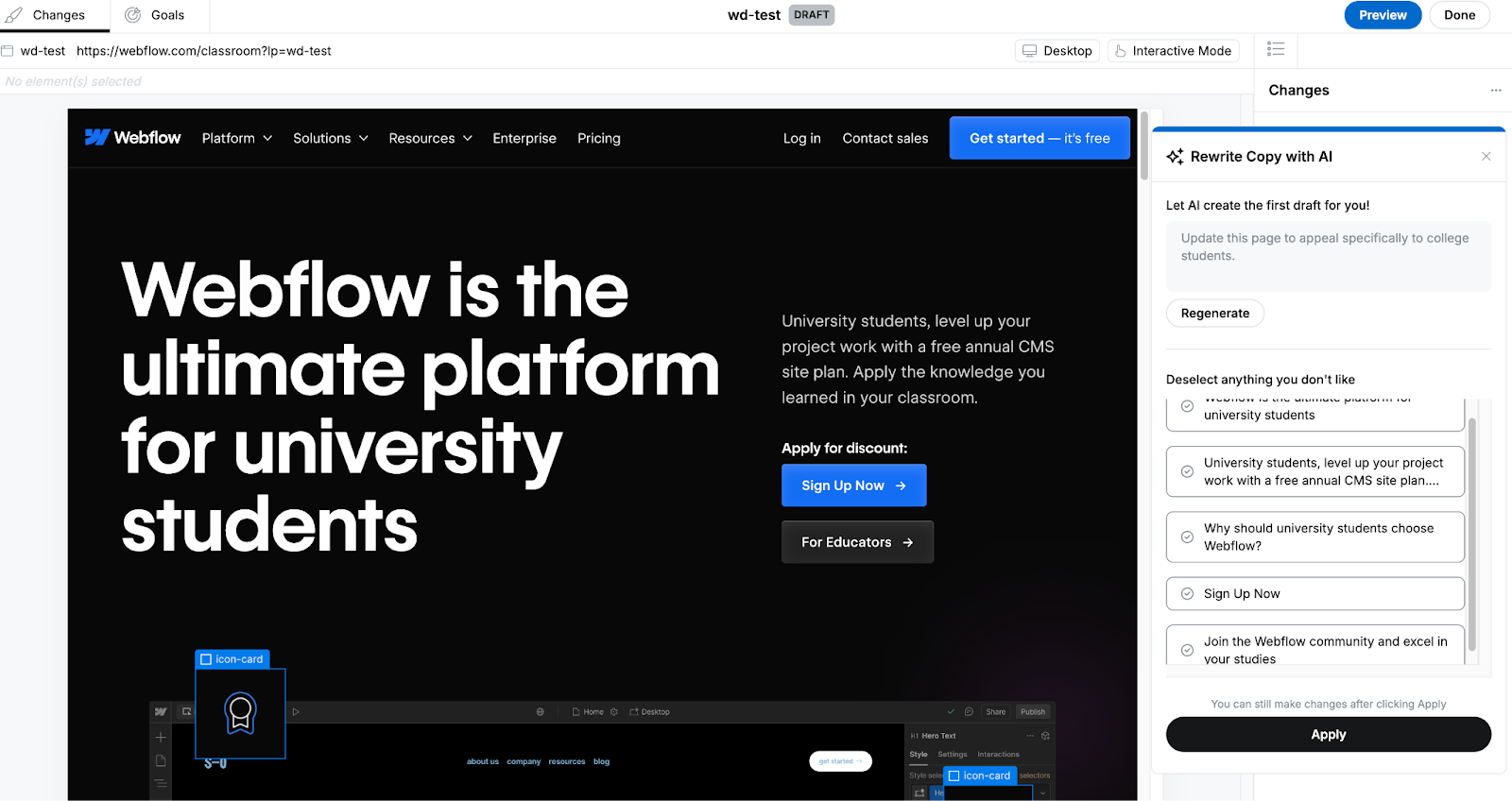
Freelance contracts: Dos and don’ts to protect your work

Software Stack Editor · April 16, 2025 ·

image

You need to protect yourself and your work with a formal contract — especially if you’re a freelancer.

At many companies, you’re required to sign a contract that covers job responsibilities, workplace policies, and compensation. It’s a clear agreement that lays out everyone’s expectations from the start.

While you’re not a full-time employee, you can still ask clients to sign a freelance contract before starting a project. This contract defines expectations for both sides, fosters trust, and sets the stage for a healthy working relationship.

If you don’t have contracts in place already (or don’t know how to make a contract), we’re here to walk you through the process.

What is a freelance contract, and why do you need one?

A freelance contract is a legal document that outlines your project terms with clients, covering everything from payment and deadlines to intellectual property rights. It serves as your protection when working with businesses or individuals, establishing clear expectations from the start.

When you have a contract, it protects both you and your client throughout the arrangement. A freelance contract:

  • Is a legally binding agreement that ties both you and the client to its terms
  • Makes sure both parties know their responsibilities
  • Clarifies payments, timelines, and deliverables
  • Reduces disagreements about the arrangement
  • Safeguards your rights as a freelancer
  • Protects your work from misuse

Even with trustworthy clients, a formal agreement prevents misunderstandings and gives you legal backing if problems arise. Think of it as insurance for your freelance business — something you hope you won’t need but will be grateful to have if things go sideways.

What are common problems if you skip a contract?

You might feel like you don’t need a freelance contract if you’ve never had issues with clients. Unfortunately, waiting until something goes wrong leaves you open to exploitative behavior. Regardless of your past experiences, you could face problems like:

  • Unpaid invoices or late payments
  • Scope creep (unexpected additions to a project’s scope that weren’t initially agreed on)
  • Stolen work and intellectual property issues
  • Missed deadlines

Starting any freelance project without a contract puts you at risk. They are critical for legal backing, so confirm yours includes all relevant clauses.

Key terms for your freelance contract

Each contract is unique to your project, but it should still include terms that set clear expectations for both sides. You might already have a go-to template, but review these key clauses to see if you need to add anything.

Here are eight key terms to include in your contract.

1. Names and personal information

The first thing to include is your legal name and the client’s legal or company name, plus phone numbers, emails, and addresses. Use official names from IDs and tax forms.

Using legal names, work numbers, and professional emails shows you’re conducting business, not simply working with an individual. Ask for the client’s physical business address unless it’s the same as their residential address.

If you’re offering services to an organization, identify the person who will be your point of contact for the project’s duration. Having a primary contact helps both parties avoid confusion and streamlines workflow.

2. Project overview and scope

Start with a brief project overview: one or two sentences describing your services and the client you’re serving. Then introduce the project scope, which explains the details of your work.

A good project scope describes the exact terms of your contract and clarifies the time or bandwidth you’ll commit. Stay clear and thorough to avoid scope creep and surprise tasks. For instance, you might build a website but not handle domain registration or publishing.

A project scope should include the following:

  • Your start date
  • Your overall timeline
  • A detailed list of services you’ll provide
  • Your end date
  • Payment schedule and rates

3. Deliverables

Deliverables are the specific items or tasks you must complete for the client. They can include drafts, final submissions, or anything else you agree to provide.

When creating your contract, list each deliverable in detail along with due dates. Decide if you’ll send drafts for feedback to clarify expectations.

Deliverables help you and the client share the same vision of “quality.” Clear details also prevent excessive revisions.

For example, if you’re designing a website over four weeks, you might follow this schedule:

  • Week 1: Choose typography
  • Week 2: Select a color palette
  • Week 3: Curate images and videos
  • Week 4: Deliver final site

If you’re a web designer and need a little help, check out our dedicated guide on contracts for web designers to see what to include in your freelance agreement.

4. Deadlines

Deadlines help you and your client structure the project. Define them for each deliverable as well as the final handover.

Figure out how long each task should take, then add a buffer of a few days. This cushion helps if surprises like illness or time off slow you down.

You also need to account for revisions. If a client gives late feedback, the overall timeline should adjust accordingly.

For instance, if your client is two days late with feedback, extend the project deadline by two days. Also clarify what happens if you miss a deadline, which is why a small buffer is helpful.

5. Intellectual property

Intellectual property rights matter most if you produce creative work, such as writing, design, or photography. Your contract should address who owns the final material and how it can be used.

  • Your client gets explicit rights to each paid deliverable.
  • You keep rights to anything they haven’t paid for.

Think of it as granting a license rather than full rights. If you haven’t licensed certain uses, the client can’t legally use your work for those purposes.

For example, if you ghost write an autobiography, your client only has the right to publish it as a book. Without an added license to create an audiobook, they’re not legally allowed to produce it in that format.

6. Payment terms

It’s frustrating if you don’t get paid soon after finishing a project, so include payment terms in your contract. That way, you have recourse if your client doesn’t pay.

  • Are you charging an hourly or project-based rate?
  • Will you set a minimum or maximum number of hours?
  • When will you get paid? Will you invoice for the entire projector after each deliverable?
  • Will the client pay a deposit before you start?
  • Is there a late fee if payment is overdue?
  • Will the client cover project expenses if needed?
  • Which payment methods will you accept (cash, wire transfer, PayPal)?

Payment terms protect you if the client disappears. Ideally, that never happens, but you should still be prepared.

7. Termination clause and kill fees

A termination clause gives you or your client a way to end the agreement if it isn’t working. It covers issues like missed deadlines, poor communication, or disagreements about deliverables.

Either side might spot problems during the project, like communication breakdowns or missed due dates. A termination clause lets you amicably end the agreement under these circumstances.

Your contract should state clearly when services can end and include kill fees. Kill fees ensure you’re paid for completed portions of work if the project ends early. This protects you from losing income if the client changes their mind or circumstances.

Dos and don’ts for your contracts

With those key sections covered, let’s review the dos and don’ts for your freelance contracts. Use them to shape a strong, professional agreement.

Do: Include an NDA

NDAs, or non-disclosure agreements, are legally binding and create a confidential partnership. They limit how much info you can share with people outside the agreement.

  • Internal data
  • Financial details
  • Trade secrets

You might receive sensitive client info like customer lists, financial data, or expansion plans. An NDA covers these topics and assures your client you’ll keep them confidential.

Do: Consult a legal expert

This article offers general guidance but doesn’t replace professional legal counsel. Always review local laws or consult a licensed attorney if you need specialized advice. Remember that this is general information, not a legal substitute.

A contract is legally binding and can be used in court if someone violates its terms. Since laws like copyright can be tricky, consider having a lawyer review your contract.

Don’t: Skip setting boundaries

You have plenty of flexibility as a freelancer, but you still need clear boundaries. Clients shouldn’t assume you’re available at all times or can do endless revisions.

  • Communication boundaries. Decide whether phone, email, or Slack is best. Let clients know your preference so they’re not guessing.
  • Working hour boundaries. Include off hours, weekends, and holidays in your schedule. Let clients know your availability so they won’t overstep.
  • Project-related boundaries. Decide how long you’ll need for changes and how many revisions you’ll allow. Clarify if additional edits cost extra.

Don’t: Start without a percentage of upfront payments

Always request a portion of your fee before you begin a project. It can cover equipment, travel, or other expenses.

If your project spans several months or works on a retainer, make sure you have enough funds to avoid cash-flow issues. A small deposit underscores commitment from both sides, minimizing misunderstandings and payment delays down the line.

How to finalize your freelance contract

Once you’ve drafted your contract, review it carefully with your client to confirm all terms. Make sure both of you sign, either electronically or in person, and keep a copy on file. It’s a good idea to store a digital version in a secure location for easy reference.

Protect your freelance business

Freelancing gives you freedom that traditional jobs don’t offer. But you should still balance passion with profit so no one exploits you.

Freelance contracts shouldn’t intimidate you. They exist to support and protect your work, making them worth the time investment.

At Webflow, we’re here to help you elevate your freelance work. Find resources on building professional websites, marketing your services, and safeguarding your projects.

Check out our article on the best freelance platforms to see how they protect freelancers and ensure you get paid. You’ll also find plenty of potential clients on these platforms, so it’s a great place to start promoting your services.

Freelancing for web designing: What to know and how to start

Software Stack Editor · April 11, 2025 ·

image

In today’s digital-first world, aspiring web designers have unprecedented opportunities to build rewarding freelance careers.

The demand for web design services continues to grow exponentially. According to a 2023 Zippia study, 27% of small businesses don’t have a website, representing thousands of potential clients waiting for your expertise. Even as more businesses come online, the need for professional design services remains strong as companies seek to stand out in an increasingly crowded digital landscape.

For beginners, freelance web design offers remarkable benefits: flexible schedules, location independence, diverse projects, and unlimited earning potential. You’ll develop valuable skills while helping businesses establish their digital presence, creating visually appealing websites that convert visitors into customers.

If you’re considering a career in web design, freelancing provides an accessible entry point with minimal startup costs. This guide will walk you through everything you need to know about freelancing for web design, giving you the confidence and knowledge to launch your independent career.

What is a freelance web designer?

A freelance web designer is an independent professional who creates websites for multiple clients without being tied to a single employer. Let’s break this down further.

Web design is the creation of websites and pages that reflect a brand or company’s identity and provide a platform to inform the viewer of their products and services. It involves blending aesthetics and functionality to create a website that’s both useful and visually appealing.

Freelancers typically do not work for a single employer and are free to take on short-term contractual projects. Freelancers choose their work and often set their own rates.

Why freelance as a web designer?

Over 70 million people took on freelance work in 2022. Though that figure was reported a few years ago, the overall freelance trend remains strong in 2025. This number is expected to go up another 20 million by 2028.

But why are so many people choosing freelance work? Isn’t it risky when you don’t know where your next paycheck comes from? Sometimes, sure. But we’ll let you decide if the benefits outweigh the risks. Here are three reasons why freelance work is attractive:Freelancing can also fit your personal goals, whether that’s shaping your schedule around family life or dedicating time to passion projects.

It allows flexibility and freedom

Freelancers often negotiate deadlines with their clients. Freelancers often plan a schedule around personal commitments, ensuring there’s time for family, hobbies, or other obligations.Once you begin a project, you’re responsible for getting the job done and turning in your deliverables on time. Because of this, freelancers have the freedom to choose their hours and workplace. You could travel to new locations and work in new timezones all while managing a few projects. The world is your office if you’ve a laptop and a reliable internet connection.

It lets you be your own boss

You’ll enjoy the freelance life if you can stay disciplined and honor your deadlines. Freelancers aren’t company employees, so you won’t have to attend countless meetings, report to managers, or worry about performance reviews. That said, you still have to meet your clients’ expectations. Keep in mind that being your own boss makes you solely accountable for wins and losses.

It allows you to scale up to earn more

With the pace of technological advancements and the popularity of freelancing platforms like Fiverr and Upwork, your earning potential and client opportunities are always growing. Freelancers can find clients worldwide to earn in currencies with higher exchange rates, too.

As a freelancer, you aren’t confined to a single project or skill. A Fiverr study revealed that 70% of freelancers juggle 2-4 projects simultaneously and 61% offer 2-3 skills as part of their pitch. For example, a web developer skilled in Photoshop can offer clients both website development and the corresponding graphic design work. Creating graphics for the site you’re building streamlines the process and means companies sign fewer invoices.

Where to find projects

Below are some top freelance platforms where you can find web design projects, each with its own pros and cons:

  • Upwork: Large client base but often high competition that requires frequent bidding.
  • Dribbble: Design-focused community, though it can be challenging to stand out without a Pro membership.
  • Behance: Visually oriented platform perfect for showcasing portfolios, but it can be tough to rank among an abundance of talented designers.
  • We Work Remotely: Specializes in remote opportunities, giving you access to a global talent pool. However, some roles may demand niche expertise.

How much do freelance web designers make?

According to the US Bureau of Labor Statistics (BLS), the average annual web designer salary in the US based on 2024 data is approximately $98,090. Web designing remains a highly in-demand profession, with jobs in the industry now projected to grow 8% by 2033, much faster than the average for all occupations. As of 2025, demand for freelance web design continues to accelerate, particularly as more businesses prioritize their digital presence in an increasingly online marketplace.

Freelance earnings depend on your experience, the industries you cater to, and the complexity of your clients’ designs. Pay can also be influenced by charging hourly versus project-based fees for web design services.

Hourly rates ensure you’re getting paid for the work you’re doing. If you go over your quoted hours, you’re compensated for that time. But you’re also constrained to billing by the hour, so completing projects faster means earning less.

More experienced freelancers opt for project-based rates, which typically earn more per hour. If a $500 project takes you five hours, you’re looking at $100 an hour. That’s a rate clients may not be willing to pay when pitched as by-the-hour work — especially if you’re less experienced. However, if a project is harder than expected, your extra hours might significantly decrease your pay rate.

Keep in mind that freelance work may not be consistent, so the number of projects you’re working on can fluctuate, changing your income with it.

5 steps to take to become a freelance web designer

If you’re ready to take on projects you’re passionate about, here are five things to do before you start your freelance career.

1. Build your design expertise

While some industries require degrees, freelance web designers are often hired based on their knowledge, portfolio, and expertise rather than their educational background.

If you want to get into freelance web design, you’ll need the skills for it. While you don’t necessarily need to become an expert in HTML, CSS, and JavaScript, it’s helpful to be familiar with them to understand the basics of back end development. This guide is a good starting point. Try designing mock sites for recognizable businesses — it’s a risk-free way to hone your talent and gain confidence.

For design skills, become familiar with color theory, graphic design, design principles, and web typography. Figma is an incredible tool for everyone from beginner to advanced designers — you can even move Figma designs into Webflow to create your website.

To build your experience, work with clients from multiple industries. This will also boost your exposure to new jobs and demonstrate your versatility.

2. Research the field

Once you’ve built up your skills, scan the market. A few vital things to consider are costs, rates, resources, and clients. Check out what other freelancers with similar skills and experience charge for their work before you set your rates.

What does it cost you to cater to a client? Do you need to buy specialized software? How much time will the project take? Do you have the resources to deliver quality work on time?

Factoring in these additional costs will inform your prices. Your skills and experience also allow you to adjust hourly or project-based rates as your business grows. Depending on the size of the project, you might even be able to negotiate lucrative contracts with big companies.

Exploring competitors’ portfolios can reveal industry trends and set benchmarks for your own rate-setting and design style.

3. Create a portfolio website

Once you’ve set your pricing, it’s time to design an online portfolio. As a freelance web designer, this is the most important way to market yourself. You’re asking clients to pay you to design their websites, so yours has to be top-notch.

Our 21 day design portfolio course is a free resource that’ll take you through the full build in just 3 weeks.For instance, imagine designing an e-commerce site for a local shop that needs a modern look and user-friendly checkout process; showing a tangible redesign can foster trust with future clients.

4. Promote your work

Promote yourself on various platforms, especially social media, to attract your first clients. Don’t overlook email marketing or local meetups as additional ways to share your portfolio and connect with potential clients. Making a solid first impression is important, so having previous projects in your portfolio is a must. Clients won’t want to buy your work if they don’t know what to expect.

Create an account and showcase individual web design projects on sites like Webflow, Behance, and Dribbble. We recommend adding tags and attractive cover images to all your projects. Tags help potential clients find your work in an oversaturated marketplace, and cover images are what clients see first while scrolling— so make sure yours stand out. Study other designers’ work to see where you can contribute something new.

5. Tap into connections closer to home

Offer your skills to local businesses, from neighborhood coffee shops to small retail stores, and gather valuable testimonials to refine your proposals.

Consider doing freelance design jobs for charitable organizations near you or taking on projects for friends and family at discounted rates before setting up accounts on freelancing sites. These projects will build up your portfolio and showcase your experience.

Set up social media profiles on Instagram and LinkedIn where you can share screenshots of your designs. These sites are powerful marketing tools for freelancers — they contribute to your personal brand. Make your brand profiles cohesive and recognizable by using the same logo, color scheme, and fonts. If you’ve the budget, try buying ads to push your portfolio and increase your reach. The more people who see you and your work, the higher your chances of landing new clients.

By applying these steps, you’re not only perfecting your craft but also building trust among potential clients. Clarity on your skills and focus areas directly impacts your ability to stand out in a crowded market.

Kickstart your freelancing career

If you’re ready to dive into freelance web designing, check out our large collection of free lessons and courses in Webflow University. Learn from courses like the Ultimate Web Design course or create your own learning path.

Consistently refresh your portfolio with recent projects to highlight your evolving style and expertise.

If you’re looking for a platform to design captivating websites for your clients, explore how Webflow can empower your freelance journey.

  • « Go to Previous Page
  • Page 1
  • Interim pages omitted …
  • Page 3
  • Page 4
  • Page 5
  • Page 6
  • Page 7
  • Interim pages omitted …
  • Page 29
  • Go to Next Page »

Get your Software Stack together. softwarestack.tech

Software Stack

© 2024–2026 - Software Stack is a trading name of SouthwestCIO Limited ac ompany registered in England & Wales 11319049

  • Knowledgebase
  • Home
  • About Us
  • Contact Us