• Skip to primary navigation
  • Skip to main content
software stack logo

Software Stack

Get your Software Stack together

  • Knowledgebase
    • All Categories
    • Accounting Software
    • Automation & Workflow Software
    • Customer Relationship Management
    • E-Commerce Shopfronts & Payments
    • Marketing Automation
    • Online Courses & Membership
    • Project Management
    • Surveys & Forms
    • Web Hosting
  • Home
  • About Us
  • Contact Us
  • Show Search
Hide Search

Webflow

The marketer’s guide to zero-party data

Software Stack Editor · March 27, 2024 ·

image

Third-party cookies have been going stale for years, and marketers (and website owners) need a more reliable way to gather customer data.

That’s where zero-party data comes in handy—it’s a goldmine of insights straight from the source (without all the data privacy concerns).

Imagine sitting down for coffee with your favorite customer. As you chat, they share bits and pieces about what they love, what they’re looking for, and how you can improve their experience. This is a real-life example of gathering zero-party data as rich as your coffee.

Zero-party data lets you get to know your customers by empowering them to voluntarily share their preferences, desires, and needs directly with your brand. You don’t have to dig through analytical tools or buy reports for this data—your customer willingly hands it over to you.

Below, we’ll explain everything you need to know about zero-party data, including what it is, why it’s important, how to collect it, and ways to use it.

What is zero-party data?

Zero-party data is a direct line of communication where customers intentionally and proactively share their information with you. Think of it as the most straightforward conversation you could have with your audience—no reading between the lines, no assumptions.

Whether through engaging surveys, fun quizzes, or straightforward preference settings, customers willingly share every piece of information to enhance their experience with your brand.

Imagine you’re at a party, and instead of guessing everyone’s favorite drink, you simply ask—and they tell you. Armed with this information, you get everyone exactly what they want. No wasting time or money on the wrong assumptions, and you can deliver on people’s needs faster than ever. It’s a win-win for everyone (including you).

Unlike first-party data—where you collect insights based on how customers interact with your website, application, or social media accounts—zero-party data doesn’t rely on guesswork or analysis. It’s like your customer spelling it out for you.

This makes zero-party data incredibly accurate and relevant. And with superior data, you can better segment, target, and personalize your messaging to boost customer engagement and conversions.

Benefits of zero-party data for your business

Zero-party data changes the way we collect and use customer insights. It’s more than just a collection method, though. It changes how we interact with customers and turns our dialogue into two-way conversations rather than one-way messaging.

Here are a handful of benefits that come with using zero-party data for your business. 

Greater trust and transparency

Zero-party data switches the collection from behind-the-scenes tactics to upfront requests. Customers share their data because they believe in your brand. This openness fosters a transparent customer relationship where customers know their information is collected and used ethically, and businesses can be confident in the accuracy and reliability of the data they’re using. It also lets you collect different types of data that go beyond just demographic information, purchase history, or customer behavior.

Enhanced personalization

Tailoring customer experiences with zero-party data lets you create custom messages for each customer profile. These messages fit perfectly because they’re based on their direct inputs, leading to higher satisfaction and stronger loyalty. Every interaction feels personal, making your customers feel seen and valued.

Increased relevance

With zero-party data, every message you send hits closer to home. Marketing campaigns resonate more deeply because they’re built on the solid foundation of your customer’s desires and interests, boosting engagement rates.

Improved compliance 

Zero-party data paves a clear path to compliance. Since the data is given with consent, businesses can easily navigate the regulatory environment and ensure peace of mind for both the brand and its customers.

Better decision-making

Zero-party data provides valuable insights into what your customers truly want, allowing for more informed decision-making. Whether it’s product development, service offerings, or marketing strategies, this data ensures your decisions are guided by real (rather than perceived) customer desires.

Cost savings

Targeting and personalization driven by zero-party data save your brand money by improving conversion rates. Knowing exactly what your customers want helps you better allocate your resources and reduce waste on broad, unfocused marketing efforts.

How to collect zero-party data

Collecting zero-party data is relatively straightforward, especially compared to more advanced first-party and third-party data collection methods. It’s simply asking your customers questions and listening to their answers.

With this method, you don’t have to worry so much about consumer privacy or the reliability of second-party data. Privacy laws like the General Data Protection Regulation (GDPR) or California Consumer Privacy Act (CCPA) don’t play as much of a part because your customers are already providing upfront consent. Though, you still need to safeguard the personal data you collect and store in your customer relationship management (CRM) tool.

Now, that’d be pretty straightforward for most brick-and-mortar stores—but what do you do when you need to collect data from your online audience? How can you start these conversations with website visitors or application users?

Here are a few tried-and-true ways to go about zero-party data collection:

Interactive experiences

Use interactive elements like quizzes, polls, and games to learn more about your customers. These experiences give you a treasure-trove of data and can also be fun (and helpful) to your customers.

For example, your customer might take a pop-up quiz to find out which product fits their tastes. You get a bunch of valuable data from their quiz responses, and they get a shortcut to personalized experiences and recommendations.

Customer surveys and feedback forms

Surveys and feedback forms are direct lines to your customer’s thoughts and feelings. Inviting them to share their experiences and preferences creates a space for honest feedback. This isn’t just about what you’re doing right or wrong—it’s about understanding their needs deeper.

Chatbots

Chatbots offer a unique, real-time method for collecting zero-party data. Your friendly virtual assistant (on your website or application) asks and responds to questions to guide your customers and offer help with specific queries.

These interactions help your chatbot gather insights on customer preferences, problems they’re trying to solve, and feedback on the browsing experience. Your chatbot goes beyond providing immediate assistance—it becomes an ongoing conversation where every question and answer helps you understand and cater to your customer’s purchase intentions and needs more effectively.

Customer support and sales calls

Customer support and sales calls are often overlooked as data collection opportunities, yet they’re incredibly rich sources of zero-party data. These interactions are as personal as they get—customers are in the middle of an experience with your brand, whether they’re seeking help or interested in making a purchase.

Your team can actively listen and ask the right questions to gather priceless insights directly from the customers. This data isn’t just reactive—it’s a proactive step towards understanding the customer’s journey, their pain points, and what they truly value. It can even inform your product and functionality development.

Preference centers

Preference centers empower your customers to customize their interactions with your brand. These account settings or subscription preferences allow customers to set expectations for communicating with your brand.

It’s a proactive approach to privacy and personalization, showing your customers that you respect their choices and are committed to tailoring their experience to their liking. Beyond collecting data, preference centers build trust, showing that you listen and respond to your customer’s needs.

Encourage your team to document and use these insights to inform your strategies. This guarantees that every call (whether it leads to a sale or not) results in a deeper understanding of your customer base.

Using zero-party data for personalization

Customers want experiences that resonate with their unique wants and needs. Zero-party data is the key to unlocking this level of personalization, allowing businesses to tailor every interaction to the person behind the screen.

Here’s a short list (far from comprehensive) of ways you can use zero-party data to better engage your customers:

  • Customized recommendations: Use zero-party data to offer personalized product or content recommendations, making every suggestion feel tailor-made for the individual customer.
  • Tailored marketing campaigns: Segment and target your marketing efforts based on specific customer data, crafting messages that resonate personally and drive higher engagement. This could be through email, SMS, webinars, or social media.
  • Personalized customer experiences: Adjust websites or apps to reflect individual preferences in theme, layout, and content, creating a user experience that feels intuitively customized for your customer segments.
  • Dynamic content creation: Use your zero-party data strategy to inform your content marketing strategy, using the learning to inform what articles, videos, and posts to create in order to directly address your audience’s interests and questions.
  • Enhanced customer service: Equip customer service representatives with zero-party data to personalize 1:1 support interactions.
  • Loyalty programs: Design loyalty programs that leverage personal preferences and behaviors, offering rewards, discounted pricing, and perks that resonate and encourage ongoing engagement.
  • Relevant sales calls: Most of the time, customers ignore proactive sales outreach. However, when your sales reps know what to say (and when) based on actual customer data, they’re better positioned to initiate valuable conversations.

Build better customer experiences with Webflow

Zero-party data equips you to personalize your interactions to make your customers feel seen and valued, but now you need a partner to bring these experiences to life—and that’s where Webflow comes in handy.

From data collection to personalization, Webflow powers end-to-end digital engagement with your customers.

Whether you’re collecting feedback, preferences, or specific interests, Webflow forms are designed to integrate seamlessly into your website, providing a smooth experience for your users. For those with specific needs or preferences for data collection, Webflow also offers seamless integrations with third-party form tools.

However, personalization doesn’t end with data collection.

Webflow empowers you to use the zero-party data you’ve gathered to edit every detail of your site, ensuring that your offerings, messaging, and user experience align perfectly with your customers’ wants and needs. From customized emails to tailored site content that speaks directly to individual interests, your Webflow site helps companies of all sizes evolve with their audiences.

Ready to build better customer experiences with Webflow? Get started today for free or get in touch with our team. 

How to create a business style guide to boost branding consistency

Software Stack Editor · March 27, 2024 ·

A business style guide is your company’s north star, orienting your brand’s look and feel.

Effective and consistent style helps users instantly familiarize themselves with a brand — think Spotify’s green hues and Apple’s sleek design language. The same goes for companies like Mercedes-Benz and Starbucks. Each of these businesses is in a different industry, but all four evoke specific emotions and imagery through their branding — Apple and Mercedes-Benz exude luxury with their smooth and minimalist aesthetics, while the earthy green and brown tones of Starbucks suggest the warmth and comfort of coffee.

Like these giants, all companies must build their unique branding from a fundamental business style guide. These playbooks bring together carefully thought-out messaging and well-crafted design to create the foundation of a company’s visual identity.

What’s a business style guide?

A business style guide, or brand guideline, is a document that outlines a company’s specific elements and rules for visual and communicative identity. It tells you how to use logos, color schemes, typography, imagery, and other design components across all channels. The guide also extends to tone and voice, messaging, and greater brand personality.

Consider this brand guideline example from Nike, one of the world’s most successful companies.

The sports apparel giant’s style guide brilliantly captures the company’s dynamic and energetic nature. Nike’s identity — from the iconic swoosh logo to the “Just Do It” tagline — conveys a sense of movement and athleticism, which is precisely what the brand stands for. The company has also used the Futura font for decades, which you can find across marketing materials like advertisements, social media content, and the popular orange or red shoe boxes. This makes their products and content instantly recognizable to consumers.

Among Nike’s many branding lessons, their business style guide is the gold standard for those looking to carve a timeless and distinct identity.

Why is a brand style guide important?

At its core, a style guide defines your brand’s overall aesthetic and persona, making it an essential tool for creating and maintaining a consistent and recognizable identity. Here are a few reasons this benefits companies in the long run:

  • Multichannel consistency. A style guide ensures that your company’s branding and content look and sound consistent across multiple channels, from digital platforms like social media and your website to offline marketing like print materials and merchandise.
  • Credibility. Using consistent visuals and messaging portrays your brand as professional, legitimate, and reliable, encouraging customers to trust your company.
  • Internal guidance. A business style guide is a reference point for internal design and marketing teams. It provides clear instructions on representing your company visually and textually.
  • Streamlined design processes. Having predefined design elements, color palettes, and copywriting styles reduces the development learning curve by providing designers with a clear reference for direction. Helping team members get up to speed quickly saves time spent on training efforts without sacrificing quality of production.
  • Brand protection. A style guide prevents unauthorized representation of your brand and protects its identity and integrity. By establishing guidelines for logo usage, color combinations, and trademarks, you can ensure other organizations can’t falsely masquerade as your company.
  • A competitive edge. To effectively develop a style guide, you’ll need to conduct competitor research and ensure your brand’s aesthetic and identity stands out. A unique business style guide can carve a distinct and memorable image in a competitive market, helping set your company apart and attract customers.

Key elements of a style guide

Brand identity guidelines are highly unique and vary between companies. But the following elements exist in most guides.

Mission statement

A mission statement is often a brand guideline’s first element and clarifies your organization’s purpose and personality for designers and marketing teams. This statement should holistically describe your organization’s core beliefs and objectives. For example, Google’s mission statement is “to organize the world’s information and make it universally accessible and useful.”

Clearly defining your mission statement allows you to create a style guide that accurately captures your brand identity. This is a public-facing declaration, but it also helps employees understand the company’s broader vision and their role in achieving it.

Logo

A logo is the face of any company and its style guide. This visual symbol, such as an image, graphic, or typeface, represents the brand’s identity.

In your style guide, include a section describing how to use the logo, such as rules for its size, color variations, and the minimum white space required. A recognizable logo is the first thing customers typically see, so a brand guideline must ensure its accurate representation across various contexts and platforms.

Color schemes

Color is a powerful communicator that subtly evokes different emotions and feelings. Warm colors like red, orange, and yellow are associated with energy and happiness. Cooler shades, like blue and green, translate to calmness, stability, and growth.

Style guidelines detail your brand’s primary and secondary color palettes by specifying the exact color codes for digital and print media. Using consistent colors reinforces brand recognition and ensures your company visuals produce the same impact across multiple platforms.

Typography

Typography involves structuring letters and text to create readable, legible, and aesthetically pleasing copy. It involves manipulating font styles and appearances to represent your brand and accurately convey your intended messaging.

Brand style guides specify your unique font (or fonts), size, line spacing, and character styles. By choosing a distinct typography, you can bring regular text to life and add a layer of visual appeal to your written identity.

Slack’s style guide, made by Webflow partner Zabal Media, has a dedicated typography section with visual examples of the correct heading, paragraph, and localization styles. It includes mockups showing how text should appear in real-world usage.

Slack’s brand style guide’s typography section.
Source: Slack

Images and icons

The imagery and iconography sections of a business style guide describe the visual style and content of images and icons associated with your brand, including photos, illustrations, and graphics. With images, you can include guidelines on preferred subjects, image treatments, and overall aesthetic. For example, you may prefer product shots set against a solid background or favor images of people in nature-related settings, like parks and trails.

Depending on your brand’s visual themes, you can also specify icon styles, sizes, and context. If you adopt a minimalist design language, you might use flat icons and avoid 3D textures.

Establishing the correct specifications ensures icons seamlessly integrate into various design elements, like mobile apps and packaging, and this consistency strengthens your brand’s identity and presence across online and offline channels.

Tone and voice

Tone and voice define how your brand conveys meaning and intention through language. So your brand tone might be formal or casual depending on the platform, but you always maintain a professional and knowledgeable voice.

Language is a powerful tool for expressing a brand’s personality. This brand guidelines section ensures a consistent communication style across various channels, be it offline billboards or targeted email campaigns.

How to create a style guide for your brand: 8 tips

From massive brands like Nike to the popular local coffee shop on the street corner, successful businesses create cohesive and consistent brand rules for their team. These guides express their unique style and offer tips on practical use.

Here are eight tips to follow when building your business style guide.

1. Create a mission statement

Start your guide by outlining your company’s mission statement, core values, and overarching long-term goals. This section sets the tone for the rest of the brand style guide by providing a clear understanding of your brand identity.

If you own an eco-friendly fashion label, your mission statement could be, “Empowering customers to make sustainable lifestyle choices for a cleaner, greener future.”

2. Add target audience information

The end goal of creating a brand guide is to build a company reputation that attracts customers and improves your bottom line. To accomplish this, you need to identify and appeal to the right audience. The target audience section provides insights into your ideal customer base, including demographics (age range, gender, location), preferences, and pain points. You then explain how your content, product, or service addresses these consumer needs.

Understanding your target audience is crucial to tailor your messaging and design language to resonate with their demands and interests. A gym company targeting millennials might highlight how its target audience values convenience and personalized fitness solutions to accommodate their hectic schedules.

3. Specify logo guidelines

Here, you should specify branding standards for the proper and uniform application of your logo. Include variations, brand colors, minimum dimensions, and white space requirements. It’s best to provide visual examples and mockups to illustrate correct and incorrect usage in real-world and digital environments.

For example, Mural’s brand assets, designed by Zabal Media, show how the logo appears as a wordmark or symbol. The guidelines also provide product image mockups showing how the logo exists within Mural’s ecosystem.

A screenshot of Mural’s style guide’s logo page.
Source: Mural’s brand assets and guidelines

4. Define tone and voice

Determine the desired tone and voice that people should use for brand communication. A good question is: If your brand were a person, what would they sound like? Whether it’s firm or friendly, choose a tone that aligns with your company’s personality, and add examples to demonstrate.

If your brand voice is purposeful, warm, and welcoming, mention that emails and social media copy should be conversational and avoid overly formal language with technical jargon. Then, provide some contexts, like marketing materials, social media, and customer support, to show how to use the tone and voice in various situations.

5. Talk about typography

For your brand to have a voice, you need a typeface to go with it. There are many free and paid fonts available, or you can use a custom font created specifically for your brand. Either way, try not to use more than three fonts, which creates confusion and dilutes the brand identity.

In this section of your style guide, define the fonts, styles, and sizes for headlines and body text. Then, establish a typographic hierarchy to ensure intuitive readability and legibility. You might use a bold font for headings, with a thinner, more compact font for paragraphs.

6. Determine an editorial style guide

Establish your brand’s editorial rules for consistent grammar, word usage, and formatting. You can also use external style guide templates like the AP Stylebook or the Chicago Manual of Style for specific writing conventions.

Adhering to these widely recognized writing standards ensures familiarity for readers and gives your brand a professional and consistent voice, especially for publications and external communications like blogs and whitepapers. For example, you can choose to use the Oxford comma (“one, two, and three” versus “one, two and three”) for your written content or omit it, depending on your preferences.

7. Identify your core brand colors

Choose the primary, secondary, and tertiary (if applicable) color palettes, along with their corresponding color codes. For example, #FF0000 is the hex code for red. These codes are binary values that allow web developers to understand colors and add them to HTML documents while coding. They also help with offline branding, such as food packaging and T-shirt prints.

For instance, Discord’s style guide provides a color palette showing the company’s seven usable colors. Each has a visual reference block with hex codes for easy copying and pasting.

A screenshot of Discord’s style guide’s color section.
Source: Discord’s style guide

Selecting precise colors is essential to creating a visually cohesive brand identity across multiple channels. If you have various colors, use this section of your guide to show examples of using them together. Avoid clashing colors — complementary shades work best for legibility and visual appeal.

8. Include images and icons

Outline the rules for capturing or choosing images and creating icons. A tech company might choose images that highlight sleek, modern design features and minimalist icons. A food company, on the other hand, may prefer vibrant imagery with maximalist icons to convey energy and excitement.

Remember to consider your established color palette when selecting images to ensure visual cohesion and avoid unappealing clashes. And define the spacing rules between icons and pictures so the placement and layout appear logical and visually appealing.

Build a unique brand story with Webflow

A business style guide is only as impactful as a company’s online presence. Webflow’s blog teaches you all about design, while Webflow Enterprise gives you the platform you need to bring those ideas to life.

Our guides also cover best practices to increase brand recognition, establish marketing goals, and implement strategies to set your company apart and scale effectively.

Start learning and building with Webflow to grow your business today.

Multi-touch attribution models: A complete guide

Software Stack Editor · March 26, 2024 ·

image

Take a deep dive into customer interactions with multi-touch attribution and analytical models.

Understanding customer behavior is crucial to any marketing campaign or web development effort. When you understand customer behavior, you can make informed decisions about how to focus your efforts and resources — and better meet user needs. 

When you have multiple ideas or competing needs, looking at conversion insights can guide you on how to prioritize projects. For example, let’s say you have the budget to either overhaul the call-to-action (CTA) button on your landing page or create a new hero image section. Multi-touch attribution (MTA) models can generate critical customer data to help you determine which option is more likely to boost user engagement and improve conversion rate.

What are multi-touch attribution, last-touch attribution, and first-touch attribution models?

A form of conversion analysis, using attribution models is a  way to track and trace one or more customer touchpoints along the path to purchase. The most common types of attribution models are multi-touch, last-touch, and first-touch. 

Multi-touch attribution

Multi-touch attribution helps you trace and understand the various touchpoints along a customer’s purchase journey, from finding your website to making a purchase. 

Unlike traditional single-touch attribution models that credit a conversion solely to the last interaction, multi-touch attribution considers the entire customer journey. By analyzing each touchpoint, you gain a more holistic view of buyer behavior.

Last-touch attribution

Traditional single-touch attribution models are generally last-touch, meaning that the model focuses on the final interaction a customer has with your site, since that’s the moment of conversion. So, last-touch models focus on marketing efforts at the bottom of the sales funnel.

Though it’s helpful to know when conversion happens, it’s not very beneficial to only know when it happens. Let’s say you run an ecommerce shop. The moment of conversion occurs when a customer clicks a button to confirm their purchase — the last touch. By itself, this information might help you gauge the percentage of customers who clicked through versus the number of visitors to your site. But you’ll have no insight into when or why customers dropped off.

First-touch attribution

The first-touch attribution model focuses on the first interaction a potential customer has with your website. Usually, this happens when someoneclicks on an advertisement and discovers your site, visits your homepage, or engages with your content for the first time. This model provides insight into where people enter the customer journey. It’s good for showing how top-of-the-funnel marketing efforts generate brand awareness.

While understanding the first interaction is valuable, it overlooks the subsequent touchpoints that influence the potential customer’s decision-making process and contribute to the final conversion. Without insights into the middle and later journey stages, you may miss critical opportunities to optimize your marketing and design strategies and enhance the overall customer experience.

Multi-touch attribution fills this knowledge gap by considering the entire spectrum of touchpoints. It acknowledges that customer journeys are often complex and involve multiple interactions before a conversion occurs.

What are the benefits of multi-touch attribution?

Multi-touch attribution provides insights into customer behavior, which empowers you to make data-driven decisions about your web design and marketing strategies, budgeting plans, and product design. Here are a few benefits of using this attribution model to evaluate how to move forward with your marketing and budgeting plans.

Better customer journey understanding

A multi-touch approach helps you better understand customer behavior. Unlike single-touch models, you’ll record every touchpoint along the customer journey. By examining this data, you can identify crucial points that contribute to conversions and, in turn, focus your efforts on them. Say 75% of your customers are falling off just after they follow your CTA to a series of registration pages. This is a clue. You might want to focus on updating this touchpoint to reduce bounce rate and improve conversion metrics.

Improved budget allocation

Multi-touch attribution empowers teams to allocate budgets more effectively. By recognizing the impact of various touchpoints on the conversion process, you can make informed decisions about where to invest resources for maximum return on investment (ROI). This insight is particularly valuable for optimizing marketing spend across different channels and campaigns. Instead of relying on a single attribution point, you can distribute credit proportionally to the touchpoints that truly influence customer decisions.

More accurate measurements

Traditional attribution models often oversimplify the customer journey by focusing only on the first or last interactions. This leads to skewed site performance metrics. But multi-touch attribution provides a more accurate representation of the customer’s interactions with your brand. Considering each touchpoint gives you a clearer picture of which marketing channels and strategies contribute most to conversions. The result is a more reliable and data-driven foundation for evaluating the success of your website and marketing campaigns.

Types of multi-touch attribution models

Since multi-touch attribution models dissect the customer journey and map out various touchpoints, they accurately represent how these contact points collectively contribute to customer conversion. There are a few types of multi-touch attribution models you can use, which differ in terms of how much sales credit they give to each touchpoint. By seeing the overall score for each touchpoint, you can determine which are most important to your conversion process.

Here are the most common multi-touch attribution models.

Linear attribution

The linear attribution model assigns equal credit to each touchpoint throughout the customer journey. Distributing value evenly across all interactions provides a balanced view of buyer engagement. 

Suppose a visitor discovers your site through a blog post, engages on social media, and then completes a purchase. A linear multi-touch attribution model assigns equal weight to the blog post, social media interaction, and final conversion.

Benefit: This model is best suited for situations where each touchpoint plays a crucial role in the customer’s decision-making process.

U-shaped attribution

Also known as the “bathtub” model, this approach recognizes initial awareness and final conversion as critical moments. It allocates 40% credit to the first and last touchpoints to account for this. Any remaining contact points split the remaining 20%.

Say a user first discovers your website through a Google ad, explores various pages, and then converts after clicking on a promotional email. U-shaped attribution assigns 40% credit each to the Google ad and email click. Then, the individual pages collectively split the remaining 20%. 

For another example, imagine a user discovers your site through a social media link. After exploring several pages, they convert by clicking on a promotional email. In this case, the social media link and email click get 40% each, and the other pages split the remaining 20%. 

If these two users represent your whole customer base, you could say that Google ads accounted for 20% of all conversions. Your social media link contributed 20%, and your content pages contributed 10%. Lastly, the most important factor for conversion was the email click, which accounted for 40%.

‍Benefit: The U-shaped attribution model is best suited to highlight the importance of both the initial and closing interactions in the customer journey.

Time decay attribution

This approach gives more credit to touchpoints closer to conversion. It recognizes that interactions closer in time to the final action hold a greater influence on a customer’s decision.

For instance, say a customer visits your website through an online ad, browses product pages, and converts after receiving a time-sensitive discount email. Time decay attribution assigns more importance to recent activity, like the discount email. 

Benefit: This model is best used when you believe recent touchpoints have a higher significance in conversion decisions.

W-shaped attribution

The W-shaped model allocates the highest credit to three key touchpoints: the first interaction, a touchpoint in the middle of the journey, and the final conversion. These points signify the awareness, consideration, and decision stages. This model assigns each stage with about 30% of the sales credit. The remainder is split between the remaining touchpoints.

Consider this: A user discovers your website through organic search. They browse your content, but lose interest. Then, they watch your webinar, browse around a bit more, and finally convert after experiencing a personalized demo. W-shaped attribution assigns credit to the organic search, webinar interaction, and personalized demo.

Benefit: The W-shaped attribution model identifies the specific interactions that contribute to moving customers from initial interest to a conversion-ready state.

Full-path attribution

While similar to the W-shaped model, full-path attribution gives additional weight to the following four touchpoints: 

  • First contact
  • Lead creation point
  • Opportunity creation point
  • Last touchpoint

The lead creation point is when your team first realizes a customer has become a qualified lead. And the opportunity creation point is when a customer signifies their readiness and willingness to make a purchase, like if they request a quote or add items to their cart. 

The full-path attribution model assigns 22.5% credit to each of these four points, with the remainder split amongst any additional contact moments.

Benefit: This model provides a nuanced understanding of the customer journey by meticulously acknowledging each critical stage. And this level of detail enables you to identify the specific points that contribute most to the entire conversion process.

Measuring data and results of multi-touch attribution

Multi-touch attribution models are as effective as the customer data you collect and measure — and the way you do this depends on your team’s specific needs and goals. You’ll need to consider factors like your industry, target audience, and the complexity of your customer journey to decide how to best measure data and results for your multi-touch attribution framework.

Here are a few common MTA measurement approaches that might suit your needs. 

Customer rewards program

This method involves offering incentives, like discounts and exclusive access, that are tied to specific interactions. By monitoring the uptake of these incentives, you can gauge the impact of different touchpoints on customer loyalty and conversion.

Online performance analytics

Use web performance tools, like Google Analytics, to get an overview of user interactions on your website and social platforms. This data includes website visits, click-through rates (CTRs), and conversion rates.

Monitoring solutions

Monitoring solutions are tools that track customer journeys in real time. These solutions include customer journey mapping tools, customer relationship management (CRM) systems, and marketing automation platforms.

Integrated control panels

Consider using integrated control panels, like Google’s Ad Data Hub, which centralize data and insights from various marketing channels. This consolidated view enables you to analyze the performance of different touchpoints within a unified interface. This streamlines the measurement process and facilitates cross-channel comparisons.

How to get started with multi-touch attribution: 6 steps

Implementation is an iterative process that involves more than just choosing a model and aligning it with your objectives. Here are six crucial steps to get you started.

1. Establish your goals

Start by clearly defining your business goals for implementing multi-touch attribution. Identify the key metrics and outcomes you aim to improve, such as conversion rates, customer engagement, or ROI.

Let’s say your business objective is to increase online sales. You might use conversion rate as your key metric and set a goal of a 15% improvement in conversion rates over the next quarter.

2. Monitor every touchpoint

After you’ve set goals, implement robust tracking mechanisms to monitor and record every touchpoint. To do so, you might implement tracking pixels on your website, integrate CRM software, and set up UTM parameters for social media campaigns. This ensures you’ll capture every point of contact — from website visits to social media clicks — for analysis.

3. Select your attribution model

After collecting and analyzing data, choose the attribution model that’s most suitable for your business goals and the nature of your user journeys. Review the various models above with your team to decide which customer contact points should be given the most weight. 

4. Put the model into action

Next, implement your chosen attribution model across marketing, analytics, and web platforms. Configure settings, integrate tools (like Google Analytics and HubSpot analytics features), and ensure your data collection methods align with your selected model. 

Let’s say you chose the time decay attribution model. You’ll want to ensure touch points closer to conversion — like a site visitor directly contacting you or filling out a contact form — are monitored by your chosen analytics tool. Test these touchpoints to ensure your CRM (or other platforms) clearly showcase this information. 

5. Evaluate the gathered data

Analyzing your data isn’t a one-and-done process. Regularly assess the performance of each touchpoint and identify patterns to gain insights into the customer journey. This could involve downloading monthly reports and evaluating them with stakeholders, like site design and development, sales, and marketing teams to identify hot spots and improvement areas.

6. Fine-tune and improve

Finally, use report insights to fine-tune and improve your marketing strategies. You can adjust resource allocations, refine messaging, and optimize campaigns based on the performance of specific touchpoints. Remember, continuous improvement is key. Multi-touch attribution models are most effective when you regularly apply the insights that they gather.

Let’s say you notice email interactions tend to precede conversions. You could adjust your email marketing strategy by refining content, experimenting with timing, enhancing personalization, and optimizing CTAs. After implementing these changes, you can review the latest analytics report to assess the impact of your adjustments. Then, you can continue to iterate.

Achieve marketing precision with Webflow

With multi-touch attribution, you can pinpoint ways to improve your website’s design elements, strengthen marketing strategies, and improve conversions.

With Webflow Enterprise, you can bring your data-informed website designs to life. Shape the customer experience every step of the way — without writing a single line of code. Plus, learn more about organic conversion strategies and how to use analytics to meet website goals.

Sustainable growth rate: Why it’s critical for business success

Software Stack Editor · March 24, 2024 ·

image

All growth comes at a cost, but achieving a sustainable growth rate (SGR) can help you expand without falling into debt or facing additional out-of-pocket costs.

When you achieve an SGR, your company can continue to expand without taking on unnecessary financial risks.

SGR refers to the rate at which your company expands its operations over time without compromising financial stability. It relies on your ability to increase revenue, manage costs efficiently, and maintain a healthy balance between debt and equity. Learning how to calculate your sustainable growth rate and implement a strong growth strategy can propel your business to its full potential by promoting long-term profit and scaling.

Why is a sustainable growth rate important?

When you establish an SGR, you ensure your company can continue expanding without relying on excessive external financing like bank loans and investors. While external financing may seem like an attractive option to keep your company afloat, it can lead to high interest payments and potential debt burdens. And you might risk diluting company shares and thus lose control over your business’s direction.

Say you’re running an ecommerce platform. If you can consistently attract new users, generate revenue through online advertising, and manage your expenses, you can sustainably grow your user base and profitability over time without jeopardizing your financial health. Conversely, if you can’t expand without excessive external financing, you may face financial instability and struggle to meet debt obligations.

Sustainable growth rate vs. PEG ratio

To assess your company’s performance and growth prospects, you can also use a metric related to an SGR known as the price/earnings-to-growth (PEG) ratio. To calculate this valuation metric, you divide the P/E ratio by the expected earnings growth rate.

Businesses primarily use the PEG ratio as a company valuation tool that considers the relationship between an organization’s current valuation and its expected growth. For instance, a PEG ratio below one is considered undervalued, while a ratio above one may suggest an overvalued business. This makes it an invaluable data point for investors.

In contrast, an SGR measures a company’s ability to grow its operations at a consistent rate without relying on excessive additional funding. It considers factors like revenue growth, cost management, and financial stability.

As opposed to the PEG ratio, the SGR is more concerned with a company’s internal capabilities to support growth while maintaining financial stability. This makes it a great tool for external investors and internal team leaders alike because it can both assess company viability and determine an expansion strategy.

The sustainable growth rate formula

The SGR formula takes into account a company’s return on equity (ROE) and retention rate. You can calculate it like this:

SGR = ROE × retention rate

To use the formula, first determine your ROE, which measures the profitability of a company in relation to its shareholder equity. It represents the percentage of return earned on shareholder investments.

Calculate ROE with the following formula:

ROE =Net income / Shareholder’s equity

Next, calculate the retention rate. This number reflects the portion of earnings that a company reinvests in the business rather than distributing that income as dividends.

Calculate retention rate with the following formula:

Retention rate = 1 − dividend payout ratio

Consider a company specializing in software sales. To apply the SGR formula, let’s assume the following:

  • Net income: $500,000
  • Shareholder’s equity: $2,000,000
  • Dividend payout ratio: 0.40 (40%)

We can calculate the ROE as:

ROE = 500,000 / 2,000,000

Based on this calculation, ROE is 0.25, or 25%.

We can calculate the retention rate as follows:

Retention rate = 1 − 0.40

Based on this, the retention rate is 0.60, or 60%.

Then, we can calculate the SGR with the following:

SGR = 0.25 × 0.60

In this example, the SGR is 0.15, or 15%. The rate indicates that the company can grow its operations by 15% annually without relying heavily on external financing. You can use this insight to plan your growth strategies and attract potential investors.

Interpreting sustainable growth rate

The SGR serves as a compass that guides internal decisions on the pace of business expansion and how to limit financial health risks.

For investors, your SGR is a window into your business’s long-term viability and resilience. A robust SGR shows you’re capable of reinvesting earnings wisely and suggests that you’re less reliant on external funding — showcasing a blend of growth ambition and fiscal prudence. In other words, you’re a good investment.

A higher SGR also means you have a more potent ability to leverage retained earnings for rapid and sustainable growth. This empowers you to set ambitious yet realistic growth targets, align internal resources efficiently, and fortify your strategic planning for the future. A lower SGR means you may be at financial risk if you wish to expand.

The definition of a “good” SGR varies across industries and depends on several factors, like your company’s business model, market conditions, and development stage. Typically, a higher SGR is considered positive as it implies a company’s ability to grow sustainably and independently. But an excessively high SGR could mean your company is growing too fast and may raise concerns about the company’s risk appetite and potential overexpansion.

But generally, a strong SGR aligns with your company’s growth goals and maintains a balance between expansion and financial stability. To determine whether your SGR meets this description, consider industry benchmarks, historical performance, and your company’s specific circumstances. If your SGR is consistent and stable over time, that indicates that you have an effective management strategy and a realistic trajectory.

Limitations of using the sustainable growth rate metric

While SGR is a valuable metric to assess your company’s capacity for self-sustaining growth, it does come with the following limitations.

False assumptions

The SGR assumes a constant retention rate, implying that the proportion of earnings that you retain for reinvestment remains stable over time. In reality, companies may need to adjust their dividend policies or face varying capital expenditure requirements. This leads to fluctuations in the retention rate.

Overlooked external factors

Additionally, the SGR doesn’t account for all external factors, like changes in market conditions, economic downturns, and shifts in consumer preferences. These can significantly impact a company’s growth potential. While an SGR provides valuable insights, you should pair it with a comprehensive analysis of the broader business environment and potential external influences.

Oversimplification

The SGR may oversimplify financial management complexities by assuming a linear relationship between ROE and growth. In dynamic business landscapes, achieving a higher growth rate can require increased leverage or pose financial risks that the SGR alone may not adequately capture. So relying solely on this rate for strategic decision-making might lead to suboptimal outcomes, like overly ambitious investment in initiatives whose success relies heavily on expected growth.

To address these limitations, supplement your SGR analysis with a holistic examination of your company’s financial statements, market dynamics, and risk factors. A comprehensive approach gives you a more nuanced understanding of growth prospects and helps you formulate well-informed, resilient business strategies.

Achieve sustainable growth with Webflow

Success isn’t simply a matter of scaling — it’s a matter of doing so sustainably.

Kick-start your sustainable growth model with Webflow, a powerful visual web development platform that scales with your business. Webflow’s reliable traffic management features, scalable content management system (CMS), and real-time marketing support guide you through every growth stage. And our world-class globalization features help you stay on top of your game as you expand.

Learn more about how companies grow with Webflow and get started with Webflow Enterprise today.

Tips from leading agencies on creating localized websites

Software Stack Editor · March 21, 2024 ·

image

When a website is localized — it allows you to reach untapped audiences — and subsequently, expand and grow your business.

And localization doesn’t just mean translation. Like we outlined in our guide to effective website localization — effective localization is all about creating a site that fosters meaningful and authentic connections with a target audience in each locale. 

We talked to Jack Redley and Arnau Ros from Macu Studio and Scott Ruigrok from Agency Leroy to hear their top tips and pieces of advice for creating localized sites — from start to finish. 

Here’s what they had to say. 

Deeply understand your target market

When building localized sites, it’s vital to deeply understand each regional market and the target personas attached to each market. 

According to Jack Redley of Barcelona-based Macu Studio, the first question you need to ask when it comes to understanding yours or your client’s market fit is, “Who are the 10 most valuable customers in each region?” By doing so, you will be able to clearly work out who benefits and values the most in each region — and be able to craft clear personas from that. 

If you’re speaking directly to consumers and are a B2C company, Jack recommends identifying key factors like age, gender, income level, education, and marital status. For each different customer, you also want to ask questions around their behavior like: “What do they value?” “What are their interests?” and “What is their personality like?” 

If your business is B2B — key things to understand here are the responsibilities of your target customer, the scope of their role, their focus areas, how they measure success, and pain points. 

Perhaps most importantly, you also want to identify the specifics about this region or locale that these customers reside in. Taking deeper looks into the cultural nuances, a region’s history, and practices — is key to truly understanding the background of your target customer’s behaviors, desires, and needs.

With all of this information, Jack says that you’re not only able to foster “more precise and emotionally resonant marketing strategies,” but you’re also able to “segment audiences in a more structured manner and narrow down target groups based on quantifiable characteristics.” 

Now, you can craft your different personas for each region. Jack’s number one recommendation for crafting personas is to “keep it real and relatable.” He notes: “Ideally your personas should be so well-understood that it feels like you know them personally.. and you do, because they’re based on your real customers.” 

“At the end of the day, connecting with your global audience through localization is about understanding and appreciating their unique stories and perspectives,” Jack concludes. 

Engage audiences with truly tailored localized experiences

We’ve said it before, and we’ll say it again — it’s easy to perceive a localized site as just a translated site — but it’s so much more than that. Jack perhaps puts it best: “Localizing goes beyond language; it involves acknowledging and respecting cultural subtleties and preferences.” 

From the images you use, to the content of your site, and everything in between, every content or design choice will have a different meaning and perception to a locale or region. 

The wrong choice can often end up alienating an entire target audience group. The right choice — by contrast — can increase site engagement, create a loyal customer base, and drive conversion rates. 

Jack explained to us that  your site content and design is vital when localizing a site and reaching regional audiences. For him and his team, they try to meet the audience where they’re at before presenting them with the information they want them to consume, or the action they want them to perform. 

Maximize global traffic with international SEO 

“Search engines like Google favor content that aligns with the searcher’s language and cultural context,” says Jack.”When a site is properly localized, including its metadata and SEO strategies, it is more likely to rank higher in search results in different regions.” 

Google and other search engines want to provide searchers with the most relevant information to them. For example, providing a Japanese searcher with an English site and American cultural references can be alienating, and so much can get lost in translation. 

And this is supported by the stats. When surveyed, a CSA research study found that 76% of consumers prefer purchasing products with information in their own language. So, naturally Google’s algorithm — and that of other search engines like it — factor in the location of the searchers a huge reason for showing one result in search over another. 

According to Jack: “improved search engine ranking drives more traffic to the website from international audiences seeking information or products in their native language.” He continues: “By catering to a wider range of linguistic groups, businesses expand their reach and potential customer base, ultimately increasing their global presence and website traffic.” 

For the Macu Studio team, a solution that made it easy for them to localize sites and rank highly in search results was key when finding the right one to go with. 

For them, they found it in Webflow: “We’re excited to start implementing Webflow’s localization solution for our clients because its out-of-the-box SEO features let you maximize visibility in your target locales,” said Arnau Ros. “From customizable sub-directories and URLs, to metadata translations and auto-generated sitemaps with HREF lang tags, the native solution makes it easy for search engines like Google to crawl site pages and understand how various locale pages are related to one another.”

If you’re building for a client, set them up for success post-launch

When you’re building for a client — they are the sole owners of the site. Sure you might be the one who created it, but once your work is complete, you want the process of maintaining and updating their brand new site to be all up to them. 

With localized sites, having clear handoffs and empowering your clients to be able to manage minor, iterative changes to the design or content on their own is particularly important. Because a localized site essentially is additional new sites on top of the original website — there’s a lot more to manage — and you don’t want to have your client rely on you for everything. 

What’s worked best for Scott Ruigrok from Finland-based Agency Leroy has been setting up projects at the very beginning that fosters a clear handover procedure. 

Scott and his team make sure that there’s clear ownership by their client from the jump. “We always start off with helping them set up their own account [in Webflow],” Scott says. This way, they’re able to ensure that the finished site is solely under the client’s control and domain.  

In addition, when you’re prototyping and building the localized sites, Scott explained that it’s also important to maintain a collaborative relationship between you, your team, and your client. Giving them the ability to see and react first-hand to the site building process allows them to understand its inner workings and be able to fully own the decisions and changes that are made. 

On top of all of this, Scott also emphasizes the importance of empowering your clients through resources, and throughout the building process recommends creating screen recordings, or hopping onto live video calls to help create meaningful guidance for your clients for their localized site. 

“I create videos on everything from how to edit static page content, how to swap out an asset, to how to navigate the CMS or how to show or hide CMS items for certain locales, to switching between locales …the list goes on and on.” 

Even though these videos may take extra work — Scott has found that giving Agency Leroy’s clients the ability to own straightforward updates and iterative changes to their localized sites has been incredibly valuable in the long run. 

“[It usually just takes] three or four or five screen recordings of how to perform specific actions with all of the steps,” he says. “After that, they’re able to make iterative changes and inputs all on their own.” 

Webflow Localization: the better way to build a localized site

Webflow Localization is an end-to-end solution that empowers users to design and build brand-differentiating, localized, sites — directly in the Designer.

From customizing images and alt text to specific locales, to out-of-the-box SEO features that make your site stand out, to collaboration tools and more — Webflow Localization allows you to extend the power of Webflow’s visual development platform to create digital experiences that resonate with audiences anywhere in the world. 

To learn more, and get started click here. 

Use real-time marketing strategies to foster your business’s growth and agility

Software Stack Editor · March 20, 2024 ·

Real-time marketing dynamically adapts to your target audience’s immediate feedback, transforming traditional marketing approaches into responsive, interactive experiences.

Traditional marketing often feels like casting messages into the void, relying on assumptions about what might resonate with your audience. It’s a waiting game, as teams cross their fingers hoping that billboards, posters, and advertisements translate into sales or conversions.

With real-time marketing, you’re no longer shouting into the void. Instead, you’re actively listening and responding to your audience’s reactions, turning every marketing effort into a two-way conversation. This shift enhances customer engagement and allows for more effective and agile marketing strategies.

Read on to learn how to create real-time marketing initiatives.

What exactly is real-time marketing?

Real-time marketing is a dynamic inbound marketing strategy that attracts audiences to your brand with tailored content. In contrast to outbound marketing, which broadly disseminates content in hopes of reaching potential customers, real-time customer marketing focuses on responding to your target audience’s immediate needs, encouraging them to actively seek you out.

By monitoring customer responses to brand messaging and marketing materials like blogs, web content, and advertisements and then adapting them in real time, this approach lets you swiftly adapt your strategies on the fly to maximize their effectiveness.

2 real-time marketing examples in action

Famous real-time marketing examples include the ice bucket challenge, Wendy’s witty social media responses, and Peloton’s “And Just Like That” advertisements. Below, we’ll explore two real-time marketing campaign examples to understand their methods and impact.

JetBlue Airways

Living up to their slogan “You above all,” JetBlue Airways brilliantly engages with customers through real-time marketing.

On one occasion, a passenger tweeted about their flight experience on X (formerly known as Twitter), thanking JetBlue for their services. The tweet — “Goodbye, California! Thanks @JetBlue for the #flyfi!” — sparked an interactive exchange and culminated in the passenger humorously expecting a greeting upon landing. Seizing the opportunity, JetBlue’s team welcomed the passenger at the airport with personalized signboards. They also turned the stunt into a viral sensation by posting the updates online, showcasing JetBlue’s commitment to customer engagement and service.

DICK’s Sporting Goods

Responding to COVID-19 disruptions, DICK’s Sporting Goods adapted their DICK’s Pro Tips hub to align with evolving customer needs during the early days of the pandemic. As gyms closed, DICK’s closely monitored emerging fitness trends, customer queries, and social media conversations about home workouts. They swiftly incorporated these insights into their content hub to keep it relevant and valuable to customers seeking home fitness solutions. This responsive and proactive approach propelled the DICK’s Pro Tips hub to the first page of Google search results, significantly boosting organic traffic to their site.

5 technical capabilities you need to implement real-time marketing

Real-time information and process adoption across multiple sectors — like navigation and telecommunication apps like Google Maps and Zoom, and ecommerce and social media platforms — have shaped consumer expectations for immediate, responsive interactions. This widespread integration has naturally led to the assumption that real-time marketing should be standard practice for all businesses.

But shifting to real-time marketing strategies can be challenging because marketing decisions often require unilateral approval from key decision-makers. To start, you’ll need the following technical abilities to implement real-time marketing effectively.

1. Unified customer profiles

A unified, detailed customer profile gives you a holistic understanding of each customer’s journey. Such profiles enable real-time targeting strategies that pinpoint and resonate with customer preferences and needs.

Developing this profile involves merging customer data from various sources, including website interactions, purchases, customer service contacts, and social media activity. This integrated database compiles basic demographic data and tracks customer behaviors, preferences, and feedback, forming the foundation for personalized marketing approaches.

For example, an online bookstore might compile data from a customer’s previous purchases, website browsing history, and customer service interactions. This data reveals that the customer prefers science fiction novels and frequently purchases books late at night. The bookstore then uses this profile to send personalized recommendations and special late-night sale alerts to the customer to align with their reading interests and buying habits.

2. Predictive customer modeling

Predictive customer modeling transforms marketing strategies by forecasting customer behaviors from past interactions. This advanced approach allows businesses to optimize their marketing to individual customer preferences and anticipated actions, shifting their efforts from reactive to proactive.

To leverage this method, employ machine learning algorithms and statistical methods to analyze historical customer data. These advanced analytics tools are essential for real-time campaign management because they detect patterns, trends, and correlations that may escape human analysis.

Consider a fitness app company using predictive customer modeling to analyze user workout patterns, app usage frequency, and feedback submitted through the app. By applying machine learning algorithms, the company predicts that one user segment is likely interested in yoga. They tailor their marketing efforts to these users by sending targeted notifications about new yoga-related features and content resonating with their users’ anticipated interests.

3. Real-time customer activity tracking and trigger detection

Real-time customer activity tracking and trigger detection empower you to engage with customers at the optimal moment. These processes help you create timely, relevant content and incentives tailored to customers’ current behaviors, ensuring a personalized experience.

Implementing this strategy involves establishing a robust tracking system using cookies, tags, and real-time monitoring tools to track customer interactions across digital platforms instantly. Following this, the focus shifts to trigger detection. This encompasses outlining predefined events or actions that, when detected, automatically initiate marketing responses.

Consider an online clothing retailer using real-time customer activity tracking to monitor a shopper’s website browsing behavior. The system might note that the customer spends significant time looking at winter coats but leaves the site without purchasing.

Using trigger detection, the retailer automatically sends a personalized email to the customer sometime later, featuring a special 10% discount on winter coats. This timely and relevant response, tailored to the customer’s recent browsing behavior, aims to reengage the customer and encourage a purchase. It enhances the shopping experience and potentially boosts sales.

4. Automated multichannel message delivery

Implementing automation across multiple marketing channels ensures consistency and optimal delivery across your messaging. By adopting this approach, you maintain a unified brand voice across all channels and deliver a uniform experience to all users whether they interact with your website or Instagram account.

To execute this strategy, implement marketing automation platforms like HubSpot and Mailchimp into your workflow. These platforms streamline multichannel communication, including email, social media, and SMS to enable seamless and efficient message flow.

A lifestyle brand might use an automation platform to coordinate its campaign for a new product launch. When the product launches, the platform sends an announcement email, posts on social media channels, and triggers an SMS alert. This coordinated effort ensures that all subscribers and followers receive the information simultaneously, irrespective of their preferred channel, which reinforces the campaign’s message and maximizes its reach.

5. Campaign analysis and enhancement

Immediate campaign data access lets marketers make on-the-spot, data-driven decisions for campaign refinement. These adjustments include fine-tuning targeting parameters, enhancing messaging, and reallocating budget resources. To harness real-time website analytics, integrate tools that instantly monitor key metrics like click-through rates, conversion rates, and customer engagement.

Previously, real-time marketing technology was often expensive and challenging to integrate into a cohesive system. But modern advancements enable brands to monitor consumer responses to marketing initiatives and adapt their campaigns accordingly. Often, these tools may already be part of your existing workflow.

For example, many businesses already use customer relationship management (CRM) tools like Salesforce CRM or Adobe Analytics or enterprise marketing automation systems. These platforms offer real-time analytics, customer insights, and automation capabilities that are all crucial for implementing effective real-time marketing strategies. Their integration allows for a seamless transition between monitoring campaign performance and making necessary adjustments to optimize results.

How real-time marketing fosters growth

Real-time marketing fosters an adaptive environment in which team capabilities and technological skills thrive. Here are some key ways this strategy contributes to growth.

Enables incremental optimizations

When you conduct real-time marketing, you regularly make small-scale adjustments, updates, and optimizations. It’s an approach that focuses on enhancing major campaign initiatives with daily manageable actions rather than trying to compress extensive work into a short period. In doing so, you encourage teams to identify and implement minor yet impactful modifications, like repositioning call-to-action (CTA) boxes or refining the language used.

Take your website, for example. Although it’s often the first asset developed when starting a business, infrequent updates are common. Real-time marketing changes this dynamic by promoting a more consistent, ongoing improvement approach.

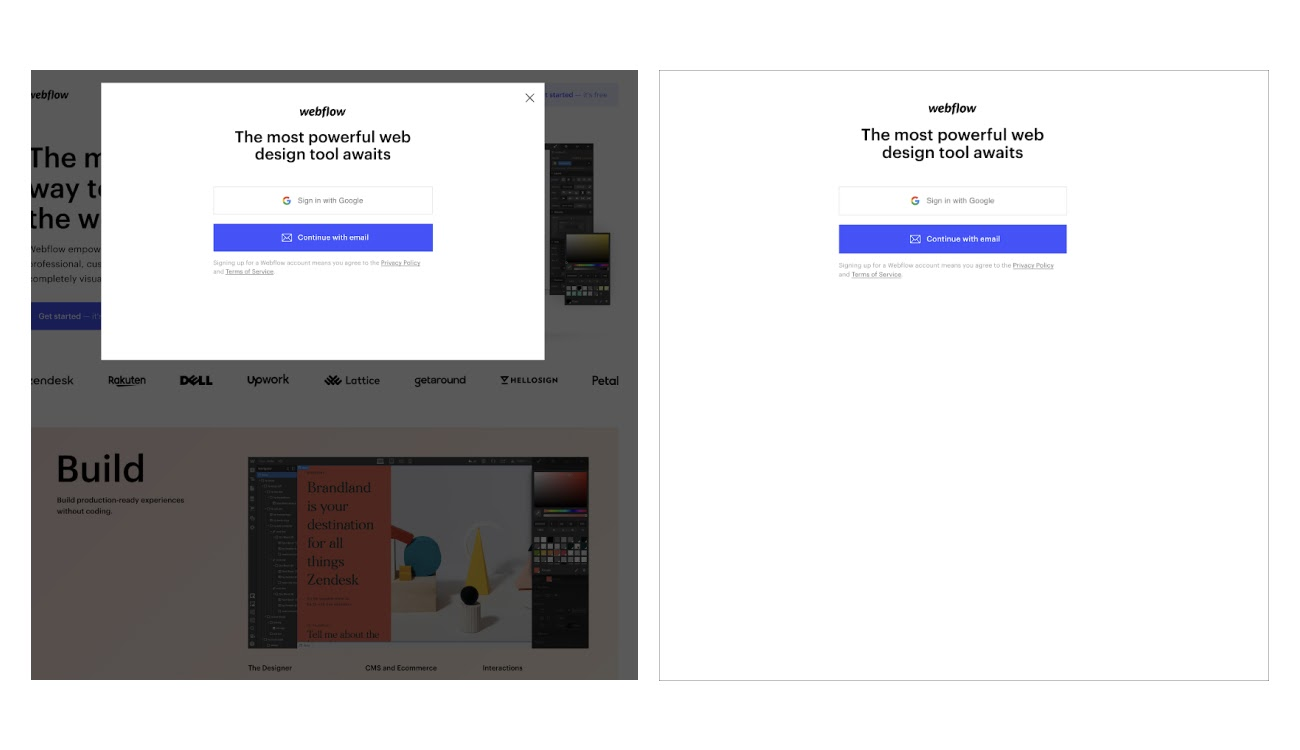
At Webflow, we experienced this firsthand with an incremental adjustment concerning overlay opacity. We speculated that a CTA box’s background was too distracting and potentially hindering conversions. By removing this background noise for a subset of viewers and monitoring the response over several days, we observed significant improvements. This minor change produced statistically significant results — and actionable insights on small visual changes we could make to create a better user experience.

An image of two screenshots showing Webflow’s old lightbox CTA with a background overlay on the left and its new lightbox CTA without an overlay on the right.
The two styles of sign-up modals tested differences in overlay opacity.

Improves agility

Real-time marketing enhances your brand’s marketing agility and enables businesses of all sizes to respond swiftly to current events and unforeseen challenges. Its flexibility makes it easier for you to release concepts that are still in development because you know you can continuously refine them after launch.

For example, when the COVID-19 pandemic emerged, our team at Webflow recognized an opportunity to assist businesses struggling with digital presence. So, we quickly offered Webflow for free for three months. We built a campaign around this initiative and launched it within days, then leveraged the adaptability of real-time marketing to make changes later.

While initially “good enough,” we knew the campaign wasn’t perfect. Post-launch, we evaluated user interactions and identified missing elements. One such addition was linking the campaign to our Webflow Experts program, which enabled small business owners with limited technical expertise to get help from Webflow professionals.

When faced with a pandemic — or any real-life situation where you want and need to be there for your customers — having the flexibility to adapt on the fly is vital. Here’s what this looks like for different organization sizes.

‍Smaller businesses and startups. These businesses can leverage real-time marketing analytics for frequent modifications and A/B testing. Consider an ecommerce clothing company assessing a product video’s impact on their website and social platforms. By showcasing four different video versions to separate visitor segments and monitoring the real-time responses, the company can quickly determine the most effective format.

‍Midsize companies. Midsize firms often experiment with ideas on a smaller scale. At Webflow, we typically trial marketing initiatives with just 10% of our user base. Timeboxing — or allocating a fixed, often short, period for trialing a campaign or strategy — is another approach we use to manage trial duration effectively. This controlled launch strategy optimizes resource allocation for testing more innovative ideas. It also makes gaining stakeholder feedback and approval more feasible because it demonstrates the impact and effectiveness of new initiatives in a measurable, manageable way.

‍Large corporations. Large companies, often with multiple key stakeholders, can adopt similar control methods, such as selective rollouts and timeboxing, to mitigate marketing trial risks. Rapid movement is challenging for these organizations given their size, so using microsites or less trafficked URLs can be more effective. This approach lets them experiment with marketing strategies in a more manageable, lower-risk environment, providing valuable insights before broader implementation.

How B2B marketers can incorporate real-time marketing

To implement real-time marketing strategies effectively, B2B marketers should identify areas with the highest potential impact. Here are a few key questions you might consider:

‍What pages attract the most users? Analyze your website’s most popular pages to understand what content resonates with your audience. Use this insight to focus your real-time marketing efforts on enhancing and promoting content that already draws significant attention. This approach capitalizes on existing user interest to maximize the impact of your real-time strategies.

  • What queries do visitors have? Actively monitor and respond to user questions in real time to enhance their experience and potentially increase your conversion rate. Prompt responses to inquiries not only address visitors’ immediate needs but also demonstrate your commitment to customer engagement.
  • Who mentions your brand on social media? If you keep tabs on your brand’s social mentions, you can seize opportunities for positive engagement, just like JetBlue Airways did. Addressing concerns or negative comments promptly also shows your dedication to customer satisfaction and helps mitigate any adverse effects while reinforcing your brand’s transparent communication.

6 steps for getting started with real-time marketing

Embarking on your real-time marketing journey requires a foundation of real-time analytics and a flexible process that responds to that information effectively. Here are six tips to help you start the journey.

1. Create a basic framework

While real-time marketing emphasizes adaptability, establishing a general plan is crucial. This means defining your overall marketing goals, identifying your target audience, and solidifying your key messages. Next, align your content calendar with broader business objectives. This step doesn’t limit spontaneity — rather, it creates a strategic baseline that lets your team quickly react to market changes while aligning your efforts with overarching goals.

For example, a tech company might aim to enhance brand awareness among small business owners. Their content calendar could include planned posts and themes but have the flexibility to incorporate trending topics or respond to industry news. This helps keep their marketing dynamic yet focused.

2. Monitor real-time analytics

To implement real-time marketing, you need real-time data. This means monitoring responses to your marketing initiatives as they happen. Check out these analytics tools to gain insight into your customer’s journey from initial interaction to post-purchase behaviors.

Google Analytics

Google Analytics gives you a comprehensive view of user interactions with your website. It tracks traffic sources, identifies high-performing pages, and provides other valuable data like insights into user demographics and interests. Think of this as your jumping-off point for real-time marketing.

Google Analytics is free, so it’s available to businesses of all sizes. Learn more about how to connect Google Analytics to your site on Webflow University.

Ahrefs

Ahrefs is a powerful keyword and backlink monitoring tool. If your marketing initiatives involve search engine optimization (SEO), Ahrefs will help you identify keyword opportunities, gauge your domain authority, and understand competitor strategies.

3. Stay ahead of trends

Effective real-time marketing hinges on deeply understanding current trends, ongoing discussions, and customer sentiments. To stay on top of these dynamics, monitor industry news, social media buzz, and emerging topics relevant to your audience, and consider employing social listening platforms like Hootsuite and HubSpot to track conversations about your brand and industry. This awareness lets your team engage in timely discussions, which ensures your marketing initiatives align with prevailing interests and maintain relevance.

For instance, JetBlue Airways’ prompt engagement with a customer’s post on X escalated into a viral thread, leading to nationwide exposure — for free!

4. Prioritize speed

Speed is fundamental to real-time marketing, so act swiftly when spotting opportunities or addressing challenges, formulating responses, and applying changes. Any delay risks missing opportunities or less effective responses.

By leveraging real-time insights from analytics tools, you can adjust content quickly, respond to social media trends on time, and fine-tune your campaigns. This ensures your marketing strategies capture attention and captivate when it matters most.

Consider a software company monitoring industry-related discussions on social media. Upon noticing an emerging trend in remote collaboration challenges, they quickly create and share content offering solutions through their software. By acting promptly, they not only engage with the current conversation but also position their product as a timely solution, capitalizing on the trend to drive engagement and potential leads.

5. Adjust strategies based on data insights

After setting up tools like Google Analytics, Hootsuite, or Ahrefs, experiment with minor changes and observe user reactions. Real-time marketers typically follow these steps to refine their initiatives:

  • Understand your baseline. Determine a benchmark for your metrics to provide a clear starting point that lets you accurately measure the impact of your changes. In an SEO campaign, the baseline might include current metrics like page views, organic traffic, and conversion rates. If you alter the design of your CTA buttons and see an increase in conversion rates compared to this baseline, you can attribute this improvement to your recent changes.
  • Make a hypothesis. Analyzing website performance data — like heatmaps, page speed, and bounce rate, for example — helps you develop theories on why certain assets perform better than others. In the SEO campaign example, if top-converting blogs have more visible CTA buttons, your hypothesis might be that visual prominence drives conversions. This step guides your experimentation and grounds your changes on informed assumptions rather than guesswork.
  • Implement and test. Test your hypothesis by applying changes to a controlled group of assets first. This lets you observe the real-world effects without risking your entire campaign or marketing initiative. Following the SEO campaign example, you might select a few underperforming blogs and modify their CTA boxes to be brighter and more noticeable. This test marketing approach lets you experiment safely without overhauling successful elements so you can minimize risk while exploring potential improvements.
  • Draw an informed conclusion. Observe the real-time impact of your changes to validate or refute your hypothesis. This provides concrete evidence of what works and what doesn’t, guiding future marketing strategies. If the new CTA design increases conversions, you can confidently apply these changes more broadly. Conversely, if no changes exist, you gain valuable insights for future hypotheses.

The beauty of real-time marketing is that if something doesn’t work, you can always go back to what you had before or simply stop your testing. So, don’t be afraid to try new things and be curious.

6. Stay engaged after publishing

Real-time marketing thrives on active engagement. After publishing content or implementing changes, stay involved with your audience’s reactions. Regularly monitor comments, track website metrics, and be ready to adjust your strategy as needed. Remember, real-time marketing is a continuous conversation, and actively participating in it enhances your ability to refine your efforts.

For example, you might have a blog post that gains traction and ranks first in the search engine results pages (SERPs) for a high-traffic keyword. Suppose this post ends with a link to a related article, driving substantial organic traffic. In response, you might strategically replace the “Read more” link with a CTA for a free trial or demo sign-up to leverage the traffic surge to potentially increase conversions.

Real-time marketing, real-world impact

Real time marketing empowers teams to be more creative, push boundaries, and achieve growth in new ways. And not all of this growth comes from A/B testing. You can also use real time insights to further your impact when a particular asset is performing really well. 

Webflow enables you to unlock the power of real-time marketing data and transform your website’s user experience. With Webflow, you can track your site’s performance, visualize user behavior with data visualization, and tailor content to align with current trends and user preferences. Keep your content fresh with instant updates, and swiftly optimize engagement and conversion rates based on real-time insights.

Embrace the dynamic possibilities of real-time marketing with Webflow Enterprise and take your website to the next level.

Design systems: What it is, examples, & how to create one

Software Stack Editor · March 19, 2024 ·

Design systems are how teams create products and digital experiences that feel consistently on-brand.

Teams use design systems to create products and digital experiences that feel consistently on-brand. They are the key to streamlining a team’s approach to design and empowering designers to bring a brand’s full essence to life.

Every design element (from the smallest button to the overarching layout) should be in harmony with your brand’s ethos, but making that happen is often easier said than done. Different teams, design preferences, muddled guidelines, interface designs, and touchpoints often lead to inconsistent brand experiences — and what’s a brand when it’s not consistent?

Design systems aren’t just web design tools; they are the scaffolding you need to build your brand. They streamline your team’s approach to design and empower designers and developers alike to manifest the full essence of your brand in every interaction.

It’s about embracing a bold vision for consistency and scalability in web and product design, underpinned by a deep commitment to bringing every member of your team on board.

Design systems can bring new levels of consistency and scalability to product and web design. But your journey to taking advantage of this power starts with alignment — a shared understanding of what design systems are, why they are essential, and how to craft them with purpose. 

Below, we’ll explain everything you need to know about design systems to fully utilize them and build more consistent on-brand experiences.

What is a design system?

Design systems are ever-evolving sets of reusable components, principles, and guidelines that give designers and engineers a shared language for consistent product and web design.

It’s a common misconception that design systems are synonymous with pattern libraries or style guides. While these UI element guides and UX design patterns are certainly important components of the overarching system, they’re just that — key pieces of a more robust whole. 

The real value of a design system lies in its ability to give designers and engineers the guidance they need to create smoother user experiences and digital products. Good design systems help designers understand what to make and how to make it, but they also provide the rationale and motivation behind the design.

Common elements of a design system

There’s no standard list of design system components to include, but there are common elements that the most effective design systems tend to feature:

  • Design principles or the rules and values that drive your design team. For example, when Quartz redesigned its website in 2014, their team based their work on design principles, such as “Stay out of the users’ way,” “Let the stories shine,” and “Make sure it works on mobile.” Design principles will differ from company to company, and they will likely reflect the brand’s core values.
  • Design pattern library or a central repository of approved and commonly used patterns. According to the Interaction Design Foundation, a pattern is “a repetition of more than one design element working in concert with each other.” Those elements can be shapes, lines, colors, etc.
  • UI kit/component library or a collection of UI-focused components like buttons, widgets, and more. These assets allow teams to create consistent, UI-friendly designs more quickly.
  • Design process guidelines help designers interpret design principles as they execute a task.
  • Accessibility elements and guidelines or key rules and recommendations that help teams create designs that are more accessible to all users and that comply with the Web Content Accessibility Guidelines.

Key benefits of a design system

Creating a design system isn’t just a step toward better design practices — it’s a leap toward redefining how your business approaches creation, collaboration, and innovation. That might sound like hyperbole, but it’s not. A well-thought-out design system can transform and influence every design element of your brand (for the better).

There are a handful of main benefits that make building a design system worthwhile for your business:

  1. Consistency to product and web design: A consistent approach makes work easier for your team, builds brand recognition, and creates a better experience for your customers. 24.5% of respondents in a 2019 Lucidpress survey reported that “inconsistent branding creates confusion in the market,” and 18.6% said that inconsistency could be detrimental to a brand’s reputation.
  2. Cross-functional collaboration: A good design system helps you say goodbye to operational silos. With a comprehensive approach to design and execution, your design and product teams can collaborate cohesively from start to finish on each new project.
  3. Speed and scalability: A design system mitigates duplicative work — like repeatedly creating the same elements and concepts — so your team can move more quickly and stretch their creative muscles.
  4. Cost efficiency: Reducing the need for brand-new designs for every new project minimizes costly inconsistencies, editing, and redesigns. They streamline production processes, allowing for more efficient use of resources. 
  5. Design quality: Design systems raise the bar for design quality by providing a framework of best practices and proven design patterns. This leads to higher-quality outputs that are not only aesthetically pleasing but also functionally superior.
  6. Easier onboarding: For new team members, a comprehensive design system acts as a valuable learning resource, shortening the onboarding process and enabling them to contribute more effectively. It also simplifies collaboration with external partners by offering clear guidelines and expectations.
  7. Future-proofing: As digital standards and technologies evolve, having a design system in place makes it easier to adapt and update your products. This flexibility ensures your brand remains relevant and can quickly embrace new opportunities or changes in the market.

How to create a design system (7 steps)

While every design system will have its differences, there are a few steps you’ll want to follow to make sure it’s the right fit for your brand and designs. Here’s the step-by-step process for how to create a design system that’ll work (and last) for your organization:

1. Get stakeholders involved

Creating a design system is a strategic choice that transforms the way your brand designs, develops, and maintains its digital products. An investment like this requires a clear roadmap and buy-in from your entire organization. Your design systems won’t do you much good if certain departments refuse to use them.

Before building your design system, bring together stakeholders from across your organization to form a design systems team. This should include product managers, marketing professionals, content creators, and even executives to create a multidisciplinary team that represents the full spectrum of your business.

When everyone has a stake in the game, the commitment to maintaining and evolving the system is stronger, making it more likely to succeed and deliver value over time. Plus, this collective engagement can help you uncover unique insights and perspectives that help shape your design system.

2. Audit the existing product

Go through your product and review all of its various front-end design elements. From there, you can build a catalog of UI components and visual elements that will form the foundation of your design system. Moreover, you can identify any inconsistencies that may have emerged and make the appropriate design decisions for the future.

3. Define your design language

Establish clear principles on how you think about your product, and create guidelines on how you’ll bring those principles to life. Design principles lay out the branding vision for your product, including how you want customers to feel while using it. Do you want customers to feel calm? Excited? Curious? Do you want your brand to feel friendly? Quirky? Cerebral? Your design system should lay out how you can make customers feel the way you want with your design.

The visual design language you choose for your overall design system includes guidelines for color palettes, typography, iconography, and imagery. These elements work together to create the feel of your brand — and instill the desired emotion in your customers.

4. Build a pattern library of common design elements

Your pattern library is a collection of reusable UI components that will streamline design in the future.

There are two main types of patterns — functional and perceptual — that work together to form the building blocks of your designs. According to VIA Studio, “[f]unctional patterns define the structure of your design, like the backend layout, while perceptual patterns define the visuals like typography, spacing, interactions, etc.” Together, these patterns form a library that is structurally sound and evocative of the appropriate emotion and brand aesthetic.

5. Document guidelines on how and when to use design elements

Without clear guidelines on how and when to use design elements, you don’t have a true design system — rather, you have a collection of elements and libraries. As you create your design system, be sure to document shared practices on how teams can effectively use and maintain it. Key guidelines to incorporate into your documentation include instructions on:

  • How team members can contribute to the design system
  • How to report an issue with the design system
  • How the team plans to address ongoing maintenance issues
  • How you will govern consistency between the design side and the production code side

Clear guidelines and recommendations allow teams to work more quickly and efficiently right away.

6. Provide design system examples and resources

Add real-world examples and resources to illustrate the practical application of your design systems. Direct users (and people brand-new to your systems) to look at these examples and model their own designs after them. Visual examples can provide much-needed guidance over text-based documentation, especially for visual learners. 

7. Regularly review and update your design systems

Your design system isn’t a one-and-done project. You should regularly review your design systems and update them to evolve with your brand, processes, and trends. Here’s how to make it happen:

  • Schedule periodic audits: Establish a regular schedule for auditing your design system. This could be semi-annually, annually, or aligned with major product release cycles. Use these audits to assess the system’s current efficacy, relevance, and alignment with user needs and business objectives.
  • Gather and incorporate feedback: Create channels for collecting feedback from designers, developers, product managers, and users. This feedback helps identify pain points, emerging needs, and opportunities for enhancement.
  • Monitor industry trends and technologies: Stay updated on the latest design trends, technologies, and best practices. This ensures your design system remains cutting-edge and can leverage new tools or methodologies that enhance efficiency and creativity.
  • Implement a governance model: This includes defining roles and responsibilities, setting standards for proposing and reviewing updates, and establishing a process for integrating and documenting these changes.
  • Document and communicate updates: Every update or change to the design system should be thoroughly documented and communicated across the organization. This ensures all team members are aware of the latest guidelines and can apply them consistently in their work.
  • Leverage version control: Use version control tools to manage changes to your design system. This allows you to track updates, revert changes if necessary, and maintain a clear history of the system’s evolution.

Common challenges of building a design system

It’s not easy to build a single source of truth design system, and there are a few common challenges that cause many initiatives to fail. Here are some of the obstacles you can anticipate (and ways to overcome them):

Choosing a starting point

The scope of a design system initiative can be overwhelming, and it’s tough to know where to start. If you don’t have a clear plan of attack, leaders may not buy into the process. That’s why it helps to outline your approach and know where you plan to begin well before you get started.

Organizing the team

In the early stages, you need to assemble the right combination of designers and engineers to champion the initiative and drive it forward. Don’t invite too many cooks into your proverbial kitchen — begin with a core group whose work you trust and who will advocate for the design system.

Managing documentation

Clear documentation on how to use various elements of the design system saves your team time and ensures consistency. Managing documentation, however, can be a challenge. As you’re getting started, make sure you don’t separate the codebase from your documentation, as this can lead to duplicate work and inconsistencies that could derail your entire design system.

Bridging the gap from design to development

Your design system may look and feel beautiful, but it must also be easy for engineers to bring to life. The handoff from the UI designers to the engineers is a common friction point that reveals flaws in a design system. As you’re building your system, be sure to keep the end users — both your engineers and your customers — front of mind. You can make your design system part of your workflow by building it in a visual-first environment like Webflow’s. For example, when you change the color of a button in Webflow’s Style Manager, that change will ripple across the CSS behind the scenes and change other buttons with the same class too — it’s your design system in action.

Our favorite design system examples

Check out these design system examples to inspire your own.

Atlassian

Atlassian’s design system is often cited as exemplary, and for good reason: it includes everything a design team could possibly need, from component and pattern libraries to in-depth insights on Atlassian’s brand, stylistic foundations, and content.

Atlassian's design system web page

Salesforce

Salesforce’s Lightning Design System puts the company’s design principles front and center. The system is easily searchable, and it provides all necessary assets and components, as well as articles, downloads, and FAQs, so designers can work efficiently.

Salesforce's Lightning Design System webpage

GOV.UK

The GOV.UK design system is clear, concise, and comprehensive. The system stresses its community focus and encourages contributions of new components and patterns. This, in turn, helps democratize the design process.

GOV.UK's design system web page

Google

A Webflow team favorite, Google Material Design, keeps things clear and simple. The system is divided into three main parts: Principles, Components, and Theming, which helps designers of Google products learn the thought process behind its designs, understand when to use various components, and learn how to customize designs appropriately.

Google Material Design's design systems web page

Shopify

Shopify Polaris offers practical guides that help designers get started on the range of tasks needed to design for Shopify. The system also includes content and design guidelines, as well as a component library and guidance for creating Shopify-specific experiences.

Shopify Polaris' design guidelines web page.

The best design systems are always evolving

Good design systems are dynamic entities that adapt seamlessly to a company’s growth and changes. The real magic of a design system is in minimizing the duplication of effort by the designers and engineers who bring a product to life. That’s why the future of design systems is bright when built and managed in web tools like Webflow — one where the roles of designers and engineers are blended, eliminating the friction of the traditional handoff.

Six essential software tools for enterprise businesses

Software Stack Editor · March 18, 2024 ·

image

Unlock your business potential with enterprise software tools for large-scale operations.

As your business grows, managing operations becomes increasingly complex. Simply scaling your current toolset won’t necessarily address this complexity. Instead, your team will need to adopt software that’s strategically designed for enterprise-level needs. 

Enterprise software tackles large-scale priorities, like cross-location collaboration and resource management. Adopting these tools allows teams to turn operational challenges into opportunities for innovation and growth.

What’s enterprise software, and why is it important?

Enterprise application software are purpose-built solutions for growing businesses. These organizations, characterized by vast workforces, diverse operations, and substantial revenue streams, require the robust and scalable features of enterprise software to run efficiently. 

These software tools act as an enterprise’s foundation, centralizing vast datasets and fostering inter-departmental collaboration. Think of a multinational corporation with suppliers, customers, and employees spread globally. A well-integrated enterprise resource planning (ERP) system consolidates data from different regions, offering real-time insights. This single source of truth also helps decision-makers detect patterns, predict market shifts, and respond to any changes.

Adopting the right software revolutionizes how enterprises harness data to make better-informed decisions. Here are a few more benefits of employing enterprise-focused software:

Enhanced efficiency

Enterprise software provides tailored tools that boost efficiency by automating routine tasks. By eliminating manual oversight, which often leads to delays and mistakes, businesses can achieve faster, more accurate results. 

Take inventory management. Using a specialized enterprise tool, you can auto-adjust stock levels as items sell. This real-time automation streamlines the inventory process, preventing shortages and overstocking. As a result, you free your team to focus on more strategic tasks, such as developing new products and creating engaging content. They no longer waste time manually checking inventory, reducing the chance for errors and enhancing overall business efficiency.

Streamlined processes

Enterprise software optimizes organizational processes by ensuring uninterrupted data flow and clear communication across different departments. For example, enterprise project management software (PMS) centralizes task management and provides insight into task interdependencies. When a project manager modifies a task, the PMS instantly recalibrates dependent tasks and the overarching project timeline. It also automatically notifies relevant team members of these changes. 

By using PMS tools, you remove the burden of tracking task dependencies from managers, eliminating the need to manually calibrate timelines or individually notify team members about shifted timelines. Such tools also integrate seamlessly within your organizational workflow, streamlining processes to eliminate potential bottlenecks and move tasks along without hiccups. This efficiency translates to faster execution, reduced errors, and more agile responses to changing project conditions.

Improved data management

Enterprise software solutions streamline data management for large-scale businesses. With vast amounts of critical data generated daily, these tools offer a centralized hub that efficiently stores, retrieves, and analyzes data, bolstering data security and minimizing potential breaches. 

Take enterprise customer relationship management (CRM) tools as an example. By consolidating every customer interaction and corresponding data into one database, CRMs provide sales, marketing, and comprehensive customer support whenever and wherever required.

This accessibility fosters collaboration, sharing accurate information across teams and allowing for immediate problem-solving. A comprehensive view of customer interactions empowers sales teams to tailor their pitches, marketing departments to create targeted campaigns, and support teams to offer consistent, timely assistance. Such cohesion enhances the overall customer experience and boosts efficiency.

Compliance

Enterprise software actively ensures compliance through stringent access controls and audit trails. These mechanisms bolster data security by only allowing authorized individuals to access sensitive information. 

Enterprise software also automatically aligns its processes to meet regulations such as the European Union’s General Data Protection Regulation (GDPR) and the California Consumer Protection Act (CCPA). 

For example, the software can anonymize data to meet GDPR requirements or provide specific tools that support CCPA’s consumer rights. By automating these compliance measures, enterprise software not only strengthens data security but also streamlines the process of adapting to changing laws. This feature reduces the risk of costly financial penalties and enhances your company’s reputation for responsible data handling.

Six essential enterprise software solutions

Enterprise software isn’t a universal fix — it’s a tailored toolkit. Large businesses need to leverage a suite of specialized tools, each tackling distinct challenges. 

Below, we’ll explore six types of enterprise software and how they address business requirements.

1. Content management system (CMS)

Enterprise content production requires a seamless system for creation, storage, and distribution. Enterprise CMS address this demand, providing robust frameworks tailored for organizations that produce large amounts of content. They enable: 

  • Content organization — Streamlines access by categorizing each piece of content, from blog posts to video reels. With quicker retrieval of past work, content teams have more time to concentrate on crafting fresh, engaging material.
  • Version control — Tracks content edits and updates, ensuring team members work on the most recent version. This feature minimizes the risk of publishing outdated or conflicting information, maintaining content integrity and consistency. 
  • Unified collaboration — A CMS isn’t just a storage system, it’s a collaborative hub. A CMS lets everyone work on content pieces simultaneously by integrating real-time editing and commenting features. This cohesion shaves off time from review cycles, expedites content approval, and upholds quality.

2. Customer relationship management (CRM)

CRMs empower enterprise-level businesses to collect, analyze, and use data from customer interactions. Popular examples include HubSpot and Zoho.

Key benefits include:

  • Comprehensive customer profiles — Constructs in-depth profiles for each customer by aggregating information on past interactions, buying habits, and specific preferences. This data lets you tailor your content strategy to meet your audience’s unique needs and pain points. This curated approach fosters brand loyalty and repeat business.
  • Sales automation — CRMs automate vital parts of the sales journey, from tracking prospective leads to orchestrating timely follow-ups. By eliminating manual lead and prospect management, they reduce the chance of overlooking a potential sale, optimize the sales funnel, and enhance conversion rates.
  • Informed decision-making — These tools don’t just collect data — they transform it into actionable insights. By identifying patterns in customer behavior, CRMs help you anticipate market trends, tailor your offerings, and align with customer expectations.

3. Enterprise resource planning (ERP)

ERPs optimize and automate traditionally tedious business processes, such as procurement, production scheduling, and financial reconciliation. Notable examples include SAP ERP, which offers modules for finance, human resources, and supply chain management, and Oracle ERP Cloud, which provides scalable and flexible cloud-based solutions to enhance operational adaptability. 

Key ERP functions include: 

  • Detailed financial management — ERPs have tools for comprehensive accounting, precise budgeting, and detailed financial reporting. These accurate financial records promote well-informed financial decisions, ensure compliance with regulations, and offer a transparent view of your company’s fiscal health.
  • Automatic payroll processing — An ERP can automate payroll processing, providing accurate and timely compensation for employees. For example, it can integrate time-tracking systems to automatically calculate pay based on hours worked, including overtime and holiday pay. This accuracy reduces payroll errors, improving employee satisfaction.
  • Streamlined recruitment — By managing job postings, tracking applicants, and scheduling interviews, ERPs revolutionize recruitment. For example, when a new position opens, the system can automatically post the job on multiple job boards and track incoming applications, allowing HR teams to identify and engage with top candidates quickly.

4. Business intelligence (BI)

BI tools extract valuable insights from data. Power BI (developed by Microsoft) is an excellent example, helping businesses aggregate data from diverse sources into a cohesive and analyzable format to drive strategic decision-making.

BI tools add value to your organization through:

  • Advanced data visualization — BI tools transform raw, complex information into interactive data visualizations such as charts, graphs, and dynamic dashboards. These visualizations make it easier to understand data and highlight actionable insights, accelerating decision-making processes. If you wanted to see sales trends over the past year, for example, instead of looking through lines of numbers on a spreadsheet, BI tools represent that data as a line graph, showing you peaks and valleys.
  • Efficient report generation — Instead of manually collecting and interpreting data, BI tools automate report creation. The software can generate a comprehensive report at the click of a button, saving you time compiling and analyzing sales figures. This efficiency conserves time and provides your team with accurate information, helping them make well-informed decisions.
  • Predictive analysis — Using historical data, BI tools can predict future market trends. By analyzing past holiday sales, for instance, these tools might forecast a surge in certain products for the upcoming holiday season. Anticipating these market movements means you can strategically stock up on inventory, adjust marketing campaigns, and reallocate resources to stay ahead of competitors and respond quickly to customer demand.

5. Marketing automation tools

Marketing automation software streamlines the efforts of both marketing and content teams. By reducing the manual effort needed to complete tasks, these tools help teams focus on higher-impact activities that require a human touch. 

Here are two ways marketing automation tools lighten your team’s workload:

  • Email marketing automation — Marketing automation tools like Mailchimp enhance email campaigns. Instead of manually crafting and scheduling each email, the software can tailor content using customer data, ensuring recipients receive relevant messaging. For instance, a customer who recently browsed winter apparel on a website might receive an email highlighting a winter sale. Such personalization, combined with optimal send times the software determines, improves email engagement, click-through rates, and customer loyalty. 
  • Efficient content distribution — These tools elevate your content marketing strategy by automating distribution. Imagine launching a new blog post. Instead of manually sharing it across various platforms at different times, you can set these tools to distribute content to specific audience segments based on behavior, interest, or demographics. Additionally, the software also tracks performance metrics and analytics, like views or shares, showing how effective your content is. These features help you craft content that not only reaches but also resonates with your target audience. 

6. Project management software

As we mentioned above, project management tools like Asana and Trello streamline project-related processes. These tools do the heavy lifting for your project workflows through:

  • Smooth task allocation — PMS platforms offer user-friendly interfaces that help project managers create, delegate, and manage tasks effortlessly. For example, when initiating a new marketing campaign, a manager can detail tasks like “draft landing page copy” and “design campaign graphics.” They can then assign these tasks to specific team members, complete with due dates. Embedded calendars and notification systems inform everyone of upcoming deadlines, fostering accountability and purpose. By clearly defining roles and responsibilities, PMS ensures all team members work collaboratively toward broader project and organizational goals.
  • Dynamic progress monitoring — Through interactive dashboards, leaders and managers gain an immediate snapshot of current project progress. If a website development project is in progress, for instance, the dashboard might show that coding is 75% complete, with user testing yet to begin. These insights are invaluable, highlighting areas that might be lagging and need additional resources or attention. Continually assessing progress and making informed adjustments helps you anticipate and deal with potential hurdles, ensuring timely project delivery and quality control.

Add Webflow to your enterprise software suite

Enterprise-level businesses require enterprise-level software — and Webflow Enterprise is a powerful visual development platform designed with large-scale organizations in mind. With Webflow, you can manage websites and launch campaigns with unparalleled flexibility in a secure hosting environment that protects your digital presence and visibility. 

Webflow is more than a web design tool — it’s a comprehensive solution that streamlines your digital business needs. Get started with Webflow Enterprise today.

Improving team effectiveness: 7 models to guide you

Software Stack Editor · March 17, 2024 ·

image

Cultivate a high-performing team by understanding and implementing team effectiveness models.

These models offer profound insights that help teams streamline existing processes, alleviate bottlenecks, and boost productivity.

Plus, in a crowded digital space where having a website that stands out is key to your company’s success, you need an ace team to craft seamless and innovative online experiences. A cohesive and high-performing team helps you deliver projects on time, address changing user needs, and capitalize on emerging technologies, like artificial intelligence (AI).

Read on to learn how to build a great team using team effectiveness models.

Understanding team effectiveness models

Effective work teams consist of skilled individuals who function as a cohesive whole.

It’s easy to gather a collection of talented individuals, but without cultivating great team dynamics, that’s all they are: a collection of individuals. To transcend this, you need to align each team member with overarching team objectives, deploy their strengths so they can effectively balance out others’ weaknesses, and create a culture of open communication.

Team effectiveness models encourage this alignment. They’re organizational systems that enable a company to build teams for specific projects or goals by promoting cohesion and often relying on good leadership. To measure team effectiveness, these models also stipulate key performance indicators (KPIs) based on team member performance or production rate and quality.

Why is team effectiveness important?

Team effectiveness is crucial for individual team members and the group as a whole, with benefits first influencing the group and eventually trickling down to individuals.

Effective teams:

  • Are more resilient to arising challenges. A cohesive and effective team is better equipped to navigate and overcome challenges because they can leverage their collective strengths to balance out individual weaknesses and find innovative solutions. And their clear communication habits reduce conflicts and misunderstandings that might slow the issue resolution process.
  • Experience positive synergy with coworkers. Effective communication and the reduced conflict that results also lead to better overall team synergy. Everyone feels empowered to combine their skills and achieve collectively.
  • Encourage company-wide growth. Great teams clearly understand the bigger picture — and their unique value in accomplishing these high-level goals. These groups are focused and committed to contributing meaningfully toward the company’s long-term vision.

Thanks to the benefits above, individuals often enjoy the following advantages to team effectiveness:

  • More professional empowerment. A sense of empowerment emerges when team members feel their contributions are valued. This can lead to increased job satisfaction and motivation.
  • More focus. When working on an effective team, everyone clearly understands their role and responsibilities. This enhances individual focus and reduces errors and wasted time working unproductively.
  • Productivity. Because each person’s strengths are leveraged, project work is optimized and efficient. This increases overall productivity for individuals and the whole.

7 team effectiveness models

There’s no one-size-fits-all solution to choosing between team-building models. Each approach below works best for different team dynamics, industries, and workspaces.

To help you find the right approach, we’ve put together a list of seven team effectiveness models and why they might be a good fit, given a team’s characteristics, challenges, and objectives.

1. Katzenbach and Smith model

The Katzenbach and Smith model emphasizes the importance of team roles and how they impact team performance. This model categorizes teams into four types based on their primary focus:

  • Working teams that produce tangible outputs
  • Management teams that are responsible for coordinating activities
  • Parallel teams that provide recommendations
  • Action teams that make immediate decisions

This model works best for teams with distinct roles and tasks that require specialized focus. Teams with clear roles are efficient because each member focuses on their expertise, which reduces redundancy and promotes specialization. This ensures that individuals complete tasks with precision, contributing to overall team efficacy.

2. Tuckman’s FSNPA model

Tuckman’s model highlights the stages of team development:

  • Forming
  • Storming
  • Norming
  • Performing
  • Adjourning

It recognizes that teams go through these stages in their journey toward high performance and productivity.

Let’s say you’re part of a newly formed website design team. Initially, members may be polite and cautious (forming), then conflicts might arise (storming), followed by the establishment of norms (norming), leading to optimal performance (performing), and finally, the project’s completion (adjourning).

This model is best for teams undergoing significant changes or embarking on new projects because it provides a road map for navigating different developmental stages. By acknowledging the natural stages of team development, teams can anticipate challenges and better understand the group dynamic while leaders quickly enable effective adjustments at each stage.

3. LaFasto and Larson model

The LaFasto and Larson model emphasizes five elements that are crucial for team success:

  • Clear goals
  • Defined roles
  • Effective processes
  • Solid relationships
  • Supportive context

By addressing these fundamental aspects, leaders ensure that teams have a shared purpose, structured processes, and a positive environment — so, a cohesive and productive work atmosphere.

This model best suits cross-functional teams with diverse roles where clarity, processes, and relationships are pivotal for success. For instance, designers, marketers, and developers might all work on the same website project. By adhering to the five elements of the LaFasto and Larson model, you can focus on:

  • Setting clear goals to deliver a fully functional website by a certain deadline
  • Defining roles so each team member is clear on their responsibilities and how their work affects one another
  • Dictating effective, collaborative workflows that streamline development and remove bottlenecks
  • Building solid relationships between team members to drive collaboration
  • Creating a supportive environment to encourage innovation

4. T7 model

The T7 model focuses on seven characteristics of effective teams:

  • Purpose
  • Talent
  • Buy-in
  • Performance goals
  • Approach
  • Accountability
  • Results

This comprehensive approach ticks all the boxes to ensure every teammate is ready and willing to hit both individual and team goals — and that these goals are relevant and purposeful.

Teams tackling complex projects will enjoy this broad and holistic method as they try to align everyone’s efforts and achieve various collective goals.

5. Hackman’s 5-factor model

Hackman’s model considers team efficacy based on five factors:

  • A compelling direction
  • An enabling structure
  • A supportive context
  • The right team composition
  • Competent coaching

Hackman’s model works best for teams facing structure, composition, or leadership challenges because it provides a systematic approach to enhancing these critical aspects.

6. Lencioni’s model

Lencioni’s approach focuses on overcoming five common team dysfunctions:

  • Absence of trust
  • Fear of conflict
  • Lack of commitment
  • Avoidance of accountability
  • Inattention to results

This model functions as a diagnostic tool that guides teams in recognizing and tackling specific dysfunctions that might impede performance. It provides a structured framework for teams to address these challenges head-on and fosters a healthier team culture characterized by trust, open communication, commitment, accountability, and a collective focus on achieving results. Through targeted interventions and a commitment to continuous improvement, teams can transform identified dysfunctions into strengths, driving overall team effectiveness.

This model works best for groups that are struggling with interpersonal dynamics and communication issues. For instance, to overcome the fear of conflict, you might actively foster an environment where diverse ideas are encouraged and openly discussed to enhance creativity and innovation.

7. Google model

The Google framework focuses on:

  • Psychological safety
  • Dependability
  • Structure and clarity
  • Meaning of work
  • Impact of work

These factors create an environment where team members feel safe to take risks and be vulnerable. This, in turn, encourages the group to innovate, voice opinions, and grow.

The Google model best suits innovation-focused and research-oriented groups where fostering a psychologically safe environment is crucial for creativity. For instance, in an agile web development team, psychological safety ensures that team members feel comfortable proposing and experimenting with new ideas that lead to breakthrough website solutions.

How to implement a teamwork model

A high-performing team is built, not born. You’ll need to put in some effort to bring together a group of individuals with unique skill sets and traits into a cohesive, functioning whole.

Here are a few things to consider when implementing a teamwork model.

Select a team effectiveness framework

Start by choosing a team effectiveness model that aligns with your organization’s goals and values. You might consider established models like those discussed above or work with fellow company leaders to define one specific to your team.

Engage and align your team

Once you’ve chosen a model, loop in your team. Introduce the model, emphasize its relevance for achieving collective goals, and explain how it helps boost team performance.

To reduce friction, actively involve team members in the adoption process. You might conduct workshops and training sessions to ensure everyone grasps how their individual roles contribute to the team’s success within the framework.

Cultivate a culture of collaboration

While creating a culture of trust and collaboration is generally a good practice, a collaborative, open environment is especially crucial for implementing team effectiveness models. By establishing open communication channels, you encourage the free exchange of ideas and build a team in which diverse perspectives are not only welcomed but valued.

To do so, you can use collaborative tools like Slack or Microsoft Teams to facilitate real-time communication and file sharing. You also might establish platforms or forums where team members can openly share insights or use collaborative design tools that help team members communicate seamlessly.

Maintain consistent team check-ins

Regular check-in sessions help you assess how closely your team is adhering to the teamwork model, address challenges before they escalate, and celebrate achievements for both individuals and the group. These sessions should serve as a platform for continuous improvement.

To implement this, conduct weekly or biweekly retrospectives where the team reflects on recent projects, discusses what went well, suggests improvement areas, and reiterates how the teamwork model contributed to success. Then, you and your team can use this feedback to make informed adjustments and ensure ongoing framework efficacy.

The right tools for encouraging effective teamwork

Team effectiveness models provide the road map to better cohesion. They encourage groups to address common dysfunctions, establish clear roles and responsibilities, and foster a culture of trust and collaboration. And all this leads to greater collective success — what more could a team ask for?

Webflow Enterprise takes this transformation to the next level by providing a powerful web design platform that facilitates seamless collaboration. With Webflow, team members can work concurrently without stepping on each other’s toes. It also empowers cross-functional team contributions. Check out one example of how Webflow empowered a marketing team to effectively contribute to web development.

10 stunning web design portfolio examples in 2024

Software Stack Editor · March 16, 2024 ·

A well-crafted web design portfolio shows your skills in action and encourages potential clients to get in touch.

A web design portfolio expresses your branding, personality, and skill. It’s likely the first hub an interested viewer finds, so you want to make a great impression to encourage them to contact you. 

Read on to discover what a web design portfolio should include and the 10 portfolio examples that create an excellent first impression.

Why do web designers need a website portfolio?

You can only say and show so much on networking platforms like LinkedIn. Your portfolio does the rest of the pitch-work for you, highlighting your design skills and social proof. You might use this page to emphasize your proficiency in various design disciplines, like graphic, interactive, and UI/UX design. You could also include case studies that show how your work helped companies achieve strategic goals like improved click-through rates.

Your website is a controlled environment where you can experiment with new techniques, showing your commitment to staying current with modern design trends. In a field like web design, where markets and demands constantly change, having the ability to innovate significantly boosts your appeal to prospective clients and employers.

What to include on your design portfolio website

A web design portfolio website must represent you and your work. The color scheme, fonts, typography, layout, and images should emphasize your personal brand throughout several key pages.

Homepage

Your homepage should immediately hook potential clients with eye-catching visuals and project work that sparks curiosity. This page is also where you’ll introduce yourself, whether with graphics, a photo, or fun animations. Whatever you choose, make sure it represents what sets you apart from the rest.

If you have a design niche, like 3D effects or interactive web pages, make that skill evident immediately.

About

On this page you can go into personal details, discussing your background, working style, and professional experience. Include links to social media pages that provide more information about you or your online work, like LinkedIn, Behance, or Dribbble.

Portfolio

The portfolio page highlights your most impressive projects. Select a diverse selection showing off various skills across the industries you specialize in. Provide a description of each, covering your key role in the project, the challenges you solved, the skills you used, and your thinking behind the strategy. That way, potential clients can see what you excel at and how you approach your work.

Contact

The contact page often meshes with the “About” page, but either way, providing contact information is necessary so potential clients can get in touch. 

If you want to list your available services and rates, this page is the ideal place to do it so clients can check the costs before reaching out.

How to make your web design portfolio stand out

Yes — a portfolio is often the visitor’s introduction to your work. But it shouldn’t be your first introduction to them. 

Before filling out a template or building your portfolio online, consider the types of clients and brands you want to work with. This data influences which skills and experiences you’ll highlight.

For example, if you want to attract SaaS website clients, clean, modern designs with interactive elements might be more appealing. But if your target audience is local businesses, designs with local cultural elements could be more persuasive. Strategically curating your portfolio improves its relevance to the viewer and highlights your versatility as a designer.

10 of the best web design portfolio website examples

Here are the 10 best portfolio websites covering different skill sets, personalities, and specialties in web design.

1. Ivette Felix Uy

Ivette Felix Uy’s portfolio opens with a clean and simple homepage showcasing the introduction, “ivette felix uy is a product designer based in brooklyn, new york” against a cream-colored background.
Source: Ivette Felix Uy

Brooklyn-based product designer Ivette Felix Uy’s landing page showcases six projects, working well as a homepage for a designer with a niche skill set. The cream-colored background makes her colorful imagery stand out, and the case study structure means those quickly scrolling through get an idea of what she offers while more time-invested visitors can learn more.

2. Empathy template

The Empathy web design portfolio template shows three people walking with the words “Creative studio” and “Based in New York” across the page.
Source: empathy-path-eleven.webflow.io

This Empathy template by Ty Hughey is a solid base for an agency or studio web design portfolio. With consistent layouts and built-in mobile responsiveness, Empathy delivers bold, beautiful, and professional design. 

Scrolling through the template reveals sections where you can add high-quality images. Each image pairs with a box to add copy and a title so you can describe the projects and draw potential clients further into the site. 

With its built-in pages for your projects and services, you can transform this template into a highly customized personal portfolio.

3. Milli

Milli’s portfolio uses interconnected rectangles to structure the sections “Work,” “Connect,” “About,” and “Community.”
Source: Milli

Milli is a creative design agency with impressive skills and credentials, having worked with high-profile brands like Microsoft, Meta, Netflix, and Red Bull. This portfolio is an immersive browsing experience, containing rectangles for each section and moving text around all the boxes. Each side focuses on different text streams:

  • The right adds personality to the site by discussing Godzilla Minus One
  • The top says, “We’re an award-winning, purpose-driven, creative agency, but you can just call us Milli.”
  • The left repeats “Have you considered instead of whatever you do pursuing the art of fingertutting? Well, have you?”
  • The bottom text lists skills like video production, web design, and branding

The key sections Work, Connect, About, and Community come to life with a yellow highlight and enlarged text when hovered over. These microinteractions encourage visitors to click on the grids and learn more about Milli.

4. Colin Moy

A yellow, black, and white homepage that says “Colin Moy, graphic design, creative problem solver, art” with the Os turned into eyes.
Source: Colin Moy

Designer Colin Moy created a bold, immersive web design portfolio showing his talents. The website itself is part of Colin’s work samples — he even encourages you to clone it and dig into the details.

Colin’s portfolio greets visitors with a visual trick, replacing letters in his name with eyes. Clicking on those eyes activates dark mode and triggers an animation, with the eyes becoming cat-like slits. The eyes keep watching as you navigate Colin’s site, swapping the Os in About, Portfolio, and Contact to expandable sections you can click to see more. It’s an excellent strategy for engaging visitors and encouraging them to explore.

5. MN STUDIO

MN Studio’s web design portfolio highlights selected projects that cover crafting interactions, custom code, and complex CMS systems. 
Source: MN STUDIO

MN STUDIO’s portfolio highlights founder Mark Noble’s background in motion design and web development. The studio gravitates toward projects that involve animations and movement, hoping potential clients do as well.

As you scroll and hover, animations reveal past projects sliding across the screen and encouraging clicks. The interactivity emphasizes the agency’s skill set. Every page includes movement, from horizontal sliding text to popup images and interactive elements. These immerse site visitors in the content, giving MN STUDIO more time to show off and sell its services.

6. Ali Saeed

Ali Saeed’s portfolio immediately shares his location, his expertise, and what he offers clients with the text, “Build Your Brand’s Potential in Kuwait with Web Design & Branding Solutions.”
Source: Ali Saeed

‍Ali Saeed is a Kuwait-based graphic designer and Webflow developer. He works primarily with startups and corporations on web design, branding, and presentations, as highlighted by the interactive case studies and insights neatly stacked next to each other on the homepage.

Each project sample develops a gradient, changes color, or moves as you hover over it. This subtle animation brings the active element to the fore, encouraging you to click and read more. 

7. You X portfolio template

A screenshot showing the You Ux web design portfolio template.
Source: You X

‍You X is a web design portfolio template from BRIX templates. It’s fully customizable and offers About, Portfolio, and ecommerce pages. You can also access an editable Figma file after buying the template.

This portfolio website template is the perfect blank canvas. It follows current design trends regarding typography, whitespace, and general UX design portfolio-building while allowing users to make it their own. Plus, the “Pages” option in the navbar offers utility web pages like a style guide, 404 error pages, and password-protected pages.

8. Side Scroller template

The Side Scroller web design portfolio template uses an off-white background, black text, and bold blue CTA buttons to direct viewers to the most important information. 
Source: Side Scroller

‍Aaron Grieve’s Side Scroller template offers a unique presentation approach: scrolling horizontally rather than vertically. Scrolling brings new content into view from the right rather than from the bottom of the page, creating an immersive experience, like turning a brochure’s pages. 

This template is fully responsive and reviewed for accessibility by Webflow’s Audit panel. 

9. Eve Kayser

Eve Kayser’s web design portfolio uses a black, green, and white pallet and highlights the headline, “Agency-level web development services at freelancer rates.”
Source: Eve Kayser

‍Eve Kayser’s web design portfolio immediately catches the eye with gradient effects on the logo and either side of the screen in a greenish-teal color combination. As you scroll, a luminescent navigation slider to the left guides you through Eve’s “About me” section, with each point revealing itself as you move further down.

Colors start to pop when you reach the “Work” section, highlighting all the satisfied customers Eve created websites for before transitioning back to teal tones. Not only does this layout effectively show Eve’s clientele, but it also maintains a consistent visual identity.

The floating menu at the top also links to each section, skipping the page scroll to deliver a quick look at Eve’s graphic design portfolio. This cut-to-the-chase approach takes potential clients to the samples to satisfy their curiosity and speed up the site experience.

10. Karlis Kah

Karlis Kah’s site places KAH in white against a dark blue background to create a strong brand identity from the start. 
Source: Karlis Kah

Before scrolling, you’ll immediately notice Karlis Kah’s expertise lies in interactive, animated, and motion designs. The portfolio’s homepage has a 3D embossed “KAH” above a clean white “KAH,” seamlessly combining minimalism with maximalism.

A quick scroll highlights a brief “About me” section before moving to Karlis’ prominent projects. Hovering over any project brings up a square-style animation, providing a glimpse of each campaign without disturbing other design elements. This theme continues if you click on the “Misc” button in the navbar at the top, which takes you to a mood board of colorful squares.

Finally, bold “Let’s Talk” text repeats itself at the bottom of the page, acting as a compelling CTA for anyone interested in hiring Karlis.

Feeling inspired? Create your own portfolio with Webflow

A well-designed portfolio isn’t just a collection of your best work — it communicates who you are and why potential clients should choose you among others. If you want to create a portfolio that reflects your style, explore Webflow’s visual web development platform, or use readymade templates to save time.

You can also visit the Webflow blog to learn what makes design portfolios unique or find more examples of personal websites and graphic designs to inspire your own.

Operational planning: 5 steps to create a better business operational plan

Software Stack Editor · March 14, 2024 ·

image

Operational planning enhances collaboration and streamlines workflows to unlock peak efficiency.

Transforming a strategic vision into business success demands meticulous planning. It requires navigating unexpected obstacles, coordinating team activities with long-term goals, and implementing practical steps to realize organizational objectives.

Organizational planning plays a pivotal role in this context by translating high-level strategies into actionable day-to-day tasks.

But an operational plan is more than a structured to-do list — it’s a comprehensive framework that outlines roles, responsibilities, and timelines. By breaking down grand strategies into executable actions, operational planning ensures cohesive teamwork and transforms ambiguous business strategies into achievable realities.

What’s operational planning?

Operational planning is how companies organize day-to-day tasks to align with broader strategic goals. It’s a road map guiding teams through operational decisions about daily operations, ensuring every task contributes to the company’s long-term and high-level objectives. This typically involves setting short-term objectives, defining key activities, and establishing clear timelines.

In practice, operational planning often blends traditional and innovative methods to maximize efficiency. Conventional strategies like Gantt charts and flowcharts help leaders visualize data, tasks, and timelines to make complex projects more manageable. And digital tools like enterprise project management software introduce automation, real-time collaboration, and data analytics into the mix. These platforms enable agile plan adjustments and offer insights through predictive analytics.

By integrating these mixed methodologies, operational planning helps enterprises build a system that’s efficient and responsive to evolving business needs. It bridges the gap between meticulous organization and the agility needed in a fast-paced business environment.

Benefits of operational planning

Operational planning offers a structured approach to decision-making, but its advantages extend beyond planning. Here’s why it’s a crucial tool for achieving organizational goals.

Clarifies goals

Operational planning turns abstract ideas into concrete objectives. It encourages setting explicit goals with definitive timelines. This clarity benefits leadership and the entire team, ensuring everyone understands what needs doing, who’s doing it, and by when.

Enhances productivity

An operational plan enhances productivity by establishing timelines, outlining objectives, and allocating resources. This structure helps team members prioritize their work and manage their time efficiently because they have clear deadlines to guide them.

By defining precise objectives, the plan ensures every team member understands their specific tasks and expected outcomes, preventing unnecessary work and deviations from the plan. And knowing what resources are available helps team members prepare realistically for their taskwork.

Improves efficiency

A well-crafted operational plan boosts efficiency by optimizing workflows and streamlining organizational processes. By mapping out immediate and long-term objectives, the plan establishes a clear blueprint for task execution. As team members better understand their roles, task sequence, and the rationale behind each, they can execute them more seamlessly. This clarity and structure are also invaluable for onboarding new team members and allow them to integrate and understand the workflow with less friction.

Strategic planning vs. operational planning

Both plan types are distinct yet essential components of an organization’s overall planning process. Let’s break down the primary differences:

  • A strategic plan defines your company’s “what,” outlines your business’s direction, and sets broad, long-term objectives. It’s a high-level overview that articulates your mission statement, establishes key business objectives, and outlines strategies for achieving them. This plan typically spans several years into the future and aligns the company’s efforts with its overarching vision.
  • An operational plan focuses on the “how” by detailing how to execute the strategies and goals laid out in the strategic plan. This is where you get into the specifics — setting milestones, crafting a detailed road map, and establishing short-term, incremental goals that steer your company toward achieving strategic objectives. And at this point, you’ll focus on more immediate factors, like dealing with daily management and task implementation, that are necessary to achieve strategic organizational goals.

Types of operational plans

Departmental goals and needs vary significantly, and tailored operational plans ensure you optimally manage each area. While a sales department might need a plan focused on customer engagement and retention, an IT department might emphasize technology upgrades and cybersecurity. Combining various plan types — like a couple of those that follow — ensures optimal management and effectiveness in each area, aligning departmental activities with broader objectives.

Project operation plans

Project operation plans are indispensable documents for breaking projects into actionable milestones and assigning teams to relevant tasks. A well-developed project plan organizes tasks and anticipates resource requirements such as personnel, infrastructure, and time. By identifying these requirements early on, project operation plans provide planning foresight that helps avoid resource shortages and last-minute scrambles to ensure projects progress smoothly and stay on track.

Say you’re designing a website. Your project operation plan will outline key steps, such as user research, wireframing, user testing, and launch. Each step would have assigned teams, deadlines, and specific objectives, like establishing focus groups by a certain date and finalizing prototypes. The project manager would monitor progress to ensure resource availability and timeline adherence.

Enterprise operation plans

Enterprise operation plans translate broader strategic goals into smaller, manageable milestones. They involve assigning responsibility for these milestones to department directors to ensure accountability for each plan segment.

When creating an enterprise operational plan, it’s vital to identify resource gaps, dependencies, and other potential obstacles to ensure seamless execution. This lets you set realistic, achievable milestones and achieve smooth interdepartmental coordination. Involving directors from the start is also crucial because their insights can reveal critical aspects you might otherwise overlook.

Consider a web design agency planning to expand their service offerings to include mobile app development over the next year. The enterprise operational plan might include milestones such as hiring app developers, training current staff in responsive mobile design, and marketing these new services to potential leads. You might also ask the development head to oversee recruitment and training and involve the marketing director in developing strategies to promote the new services.

IT operation plans

IT departments confront unique challenges due to rapid cybersecurity threats and their critical role in every business sector. Unlike other departments focusing on sales and marketing, IT departments must ensure the organization’s technological structure is robust, secure, and current.

IT operation plans typically outline how the department will adapt to business changes, like scaling up for new hires, migrating from a legacy system to a new one, and safeguarding the organization against evolving cybersecurity threats.

If you’re preparing for a major server infrastructure upgrade, for instance, an IT operation plan will outline steps like evaluating current server and hosting capacities, selecting new hardware and infrastructure, and scheduling website migration to new servers. The plan would include specific timelines — such as completing server evaluations by the end of the first quarter and starting the migration in the second quarter — to ensure minimal downtime and a smooth transition for all hosted websites.

Key elements of an operational plan

No matter the type you’re creating, most operational plans include the following core traits.

Concision

Operational plans should be clear and to the point. While comprehensive coverage is important, elaborating too much risks misinterpretation and becoming bogged down in the details. Focus on concise, direct explanations and allow the details to unfold during project execution.

Buy-in

Team buy-in is essential for success. Instead of leaving the executive team to dictate the plan exclusively, involve team members in its creation. A collaborative approach helps garner buy-in and fosters feelings of ownership and responsibility toward the plan’s objectives. This involvement translates to increased motivation and commitment because team members feel more likely to invest effort in a plan they helped shape.

Consistency

Consistency in operational plans is crucial for their effectiveness and for establishing organizational trust. It involves applying the same standards and procedures uniformly across all departments and teams. By consistently applying rules and policies, you ensure every organizational element operates under the same guidelines, enhancing fairness and reducing confusion. Consistent execution of your operational plan also streamlines progress and success tracking because the criteria and methods used for each remain uniform.

Processes

Specify the processes and methodologies each department should use. If the design team uses an agile, iterative process, for instance, implement similar practices in other departments like IT. This standardization enables smoother collaboration and operational harmony.

Key performance indicators

Every operational plan needs well-defined key performance indicators (KPIs) from the outset. These should include:

  • Leading indicators provide early insights into your strategy’s effectiveness by signaling shifts and trends ahead of their full realization. By monitoring these indicators, you can gauge your strategy’s immediate impact and proactively adjust your approach. Indicator examples include customer satisfaction levels, changes in market share, and fluctuations in sales figures.
  • Lagging indicators reflect the outcomes of your operational efforts by providing historical data on your plan’s efficacy after execution. Key lagging indicators include metrics like the time taken to complete projects, support ticket volumes, and total expenses incurred. Analyzing these metrics also helps identify improvement areas, like optimizing resource allocation, enhancing customer support processes, and streamlining operational workflows.

Constraints

Acknowledge any assumptions and constraints within your plan, such as technological limitations, tight deadlines, and regulatory requirements. Being upfront about these factors is essential for setting realistic expectations and guiding effective task execution. And it ensures everyone involved understands the framework they’re operating in.

Say you’re building an agency website in the European Union (EU). A critical constraint would be compliance with data protection regulations like the General Data Protection Regulation (GDPR). You must keep this constraint in mind as you develop your operational plan because it affects the technology and processes used for data handling and shapes your website’s design and functionality. For instance, you’ll likely need to integrate clear consent mechanisms for data collection, prominent user data management tools into the website’s layout, and GDPR-compliant technologies for data processing and storage.

The 5 steps of the operational planning process

Enterprises develop operational plans through five strategic steps, each essential for shaping an actionable and effective strategy. Let’s explore what this planning process looks like.

1. Set goals

Establish specific, immediate business goals that align with your strategic plan. This might include launching a redesigned website, increasing online sales by a specific percentage, or reducing digital marketing expenses.

Make these goals ambitious yet adaptable, allowing for flexible responses to unexpected challenges. This step lays the foundation for your operational strategy and aligns every subsequent action toward these well-defined objectives.

2. Allocate resources

After establishing your goals, evaluate your capacity to achieve them. Analyze your current resources and identify what additional expertise, technology, and budget you require. This step isn’t just about highlighting what’s missing — it’s about strategizing how to scale your business to accommodate these needs.

3. Define KPIs

Select KPIs that align closely with your operational goals and ensure they reflect key aspects of your strategy. These KPIs should include leading indicators, like website traffic and user engagement rates for predictive analytics, and lagging indicators, such as satisfaction scores post-launch, to evaluate past performance. Consistently apply these KPIs throughout your project to monitor progress and keep the team focused on core objectives.

Consider using digital analytic platforms like Google Analytics to track KPIs. These tools offer detailed insights into traffic and user behavior. And you can set up dashboards to visually represent these metrics to help spot trends and patterns without combing through data.

Suppose you notice rising bounce rates on a specific webpage — this might indicate user disinterest or navigational issues. In response, you might pivot to revise the page’s copy, restructure its visual hierarchy, or simplify the navigation structure to make it more engaging and user-friendly.

4. Prescribe processes

Develop clear and detailed plans for how your teams should execute tasks. This clarity guides them through each stage, reducing confusion, ensuring consistency, and enhancing productivity.

To communicate these procedures to your team, use tools like flowcharts. They simplify and clarify each operational plan phase and help ensure everyone understands their responsibilities.

For large-scale projects, consider using project management software like Asana, Trello, or Jira. These platforms offer features like task assignment, deadline tracking, and real-time communication, and they provide a centralized platform for monitoring progress and maintaining team alignment.

5. Determine milestones

Create a road map that outlines clear, measurable goals and specific objectives. This map transforms your operational plan into achievable targets, helping teams visualize where they’re headed and the benchmarks they need to hit. Host regular meetings when outlining your milestones — this consistent evaluation ensures everyone moves forward in sync, maintaining the necessary momentum to achieve the plan’s goals.

In a web development project, for example, these evaluations might reveal if certain phases, like design or development, have too few or surplus resources. Identifying these imbalances lets you efficiently reallocate resources to ensure each department has what it needs to meet its milestones effectively and on schedule.

Get started with Webflow

Operational planning thrives on agility, and Webflow has the tools you need to effectively navigate this dynamic environment. With Webflow, you can build flexible websites that keep pace with your operational goals and integrate with analytics and targeting tools for informed operational decision-making.

Learn how Webflow Enterprise can be a part of your operational strategy, and harness a visual-first design platform that lets you create and adapt web content in real time.

A guide to BI reporting: Top business intelligence tools for enterprises

Software Stack Editor · March 13, 2024 ·

image

Business intelligence (BI) reporting enables organizations to make effective, data-driven decisions.

In an increasingly data-driven world, data visualization is crucial to getting and staying ahead in every industry. It’s essential for measuring performance, demonstrating value, and optimizing strategies.

And as data acquisition methods and the results become increasingly sophisticated, so must your reporting methods. That’s why business leaders invest in modern, cutting-edge BI reporting tools that enable them to make better high-level and forward-thinking decisions.

What’s BI reporting?

Business intelligence, or BI, reporting involves translating business analytics reports into intuitive, understandable visuals. These might be graphs, tables, and infographics. The goal is to make the data easier to interpret so business leaders can use it to inform their decision-making.

Typical examples of BI reporting include:

  • Performance charts
  • Sales graphs
  • Predictive models
  • Profit and loss statements

Companies have used BI reporting for years, but recent advancements in artificial intelligence (AI) and machine learning (ML) have unlocked new levels of sophistication. Now, BI tools can track many more metrics, combine them into comprehensive reports, and even predict outcomes.

For example, web development teams can track traffic sources, time spent, and conversions. Then, AI tools can combine these metrics into a single report and predict how changes in traffic sources or time spent might affect conversions.

Benefits of BI reporting

Comprehensive BI reporting has become a mainstay in almost every industry, with companies choosing to gather more data than ever. With all these added data points, your analytics will quickly become difficult to read and, therefore, difficult to act on. Good BI reporting translates all these newfound data points into easy-to-read data visualizations.

Here are some more benefits that businesses enjoy after implementing a robust BI reporting process:

  • More strategic decisions. A comprehensive dataset including key indicators like shares, customer satisfaction, and market penetration equips you with the knowledge you need to make stronger long-term choices. These real-time and historical data points provide much-needed context for every strategic decision you make.
  • Precision. BI reporting is an excellent way to quantify your team’s strengths and weaknesses. Vital information like when individuals are most productive and how efficiently teams work together enables you to correct problems and encourage growth precisely where needed.
  • Streamlined operations. The best BI tools, like Tableau and HubSpot, can aggregate all your data into one central platform and help you interpret it. This reduces wasted time setting up meetings or sending emails to request reports from various business units.

3 types of BI reporting

There are three main categories of BI reports: performance reports, predictive forecasting, and augmented analysis. The first two work hand in hand, and it takes a healthy serving of both to make for a robust dataset. The third — augmented analysis — is a relatively new term. Let’s explore how they all work together.

1. Performance reports

Performance reports focus on the past and present to measure how well your business achieves its goals. They showcase historical and real-time data to give business leaders an understanding of trends in areas like spending, profits, and growth.

Typical performance report examples are website performance monitors, hiring or turnover rates, and market share analytics.

Most BI reports fall into this category and provide the metrics necessary to form the other two reporting types.

2. Predictive forecasting

Predictive forecasts focus on the future. They rely on performance reports to predict a given strategy’s potential outcome. Many predictive forecasts track marketplace competition and economic changes because these provide crucial, high-level context for strategic business decisions.

Typical examples of predictive forecasts include revenue forecasts, market penetration estimates, and investment potentials. Essentially, any report that relies on historical data to predict the future is a predictive forecast.

3. Augmented analysis

Augmented analysis represents a new frontier in BI reporting. It relies on ML and AI to collect, analyze, and interpret data. The goal is to remove bias and explore novel connections between data points that human analysts might overlook.

Typically, augmented analysis assists the predictive forecasting process, though you might also use it to create performance reports. In either situation, AI allows the reader to use natural language queries to search the data.

This report type is still in its infancy, and major companies like Microsoft and Sisense are still discovering the full potential of augmented analysis.

5 of the top BI tools on the market

Since BI reporting is so integral to business management, there are quite a few tools for it on the market. But the best tools are at the bleeding edge of analytics technology, AI development, and data collection. The following are our recommendations for top-notch data analysis platforms with the most impressive, reliable technology.

1. HubSpot

HubSpot is a customer relationship management (CRM) platform comprising six core products, or hubs, that serve the needs of marketing, sales, customer service, content management, operations, and commerce. Each hub is connected to an underlying CRM database with robust features like automated marketing, an intuitive content management system (CMS), and predictive reporting.

This platform is a powerful tool that you can integrate with Webflow to track web traffic, update your pages, and introduce new features such as a chatbot.

2. Tableau

Tableau is a visual analytics platform that lets you quickly combine data from different sources to create high-quality BI reports. Their software makes accessible yet comprehensive reporting that you can search with natural language queries.

With Tableau, you can analyze or aggregate data from cloud services and big data firms like Salesforce and Oracle. And Tableau was named a leader in the BI software industry by the Gartner Magic Quadrant report and has officially held this position for 11 consecutive years.

3. Sisense

Sisense is a data analytics platform that collects information from multiple sources and enriches it with AI and ML insights. If you’re interested in exploring augmented analytics, this is the platform to use. The 2023 G2 report named Sisense a leader in embedded BI software, and their user reviews are consistently positive.

4. Similarweb

Similarweb analyzes digital traffic to deliver critical insights about your online presence, especially when comparing metrics against competitors.

This platform specializes in measuring website traffic, tracking engagement, and performing market research, so it won’t help you with operational business metrics. But it’s an excellent tool to add to your toolbox if you already have a solution for measuring the things it doesn’t track.

5. Power BI

Power BI is a reporting tool from Microsoft that combines all your spreadsheets and databases into informative visualizations. It features natural language queries, AI capabilities, and enterprise-grade security.
Microsoft built Power BI to scale easily, and they made it compatible with other Microsoft products like Fabric, Teams, and OneLake. It’s an excellent choice if you already use other Microsoft services because it reduces time spent reformatting visuals and converting files.

How to choose the right BI tool

The best BI tools are secure, compatible, and accurate. Here are a few more things to consider when choosing the right tool for you:

  • If your business is exclusively online, choose a tool like Similarweb that specializes in tracking and forecasting digital traffic.
  • If you’re in an emerging market, a tool like Sisense might be your best bet since it leverages AI and ML to predict outcomes with less historical data.
  • If you have a massive dataset, pay close attention to the ingestion speeds of the tool you select. Tableau is an excellent example of one with high ingestion speeds.

Business intelligence reporting best practices

BI reporting is something of an art form. It takes creativity and imagination to visualize a perfect dataset and an understanding of the end user to make your reports relevant and valuable.

To be a data artiste, follow these best practices:

  • Be scalable. Always keep scalability in mind when putting together your visualizations. Automate as much of the collating process as possible and keep your formulas open to later additions.
  • Avoid overwhelming the reader. Your reports should be relevant, well-organized, and easily read. Avoid data dumping, or giving so much uncontextualized data that it overwhelms readers. Create visually intuitive reports that combine data sources into the fewest possible graphics and use clear headings to label everything. Check out some of our favorite data visualization tools to help.
  • Be adaptable. Fine-tune your reports to serve your intended audience’s needs. Ask for feedback and pivot your reporting techniques as needed.

From raw data to informed solutions

Harnessing the power of data is a great way to make intelligent, strategic decisions about your business. The best place to start is to gather the tools and resources you need early to make scaling your BI reporting methods more effortless and affordable later.

To create fast, reliable websites that grow to meet your reporting needs, try Webflow Enterprise. It can help you build scalable, visually stunning websites, and many popular BI reporting platforms integrate with it. Schedule a demo today to see what Webflow can do for you.

Building an effective enterprise UI: Core components and must-haves

Software Stack Editor · March 13, 2024 ·

An effective enterprise UI aligns technology with user expectations, ensuring a seamless and engaging digital experience.

While traditional user interface (UI) design might rely on static layouts and familiar design elements such as standard button shapes, enterprise UI is more dynamic and tailored. By implementing interactive elements, adaptive layouts, and personalized color palettes, you can use this approach to craft a more engaging and user-centric experience.

Enterprise UI design systems: An overview

An enterprise UI, tailored for large-scale projects, serves as a strategic framework for delivering a user experience (UX) that caters to broad customer segments. In large organizations, these interfaces must address complex requirements and consider diverse user needs, such as integrating multiple business systems and software, adapting to different user roles and preferences, and managing large volumes of sensitive data.

These requirements demand a comprehensive approach to UI design to ensure the interface meets immediate functional needs and enhances the overall experience for all users within the organization.

An enterprise user interface design system provides a structured framework to tackle these challenges, including comprehensive design principles, reusable components, and clear guidelines that ensure consistent and efficient development. It’s a centralized resource that provides teams with the tools and rules necessary to create a cohesive UX across different website areas.

4 stages of the enterprise design systems maturity model

As you create a UI design system that’s good for enterprise-level experiences, you’ll go through these four stages of the design systems maturity model, as outlined by UXPin.

1. Style guide stage

During this stage, teams use static style guides to establish product assets and brand visuals. Your team decides on fundamental principles to guide all future design decisions.

For example, rather than choosing individual colors for single projects, you’ll establish a color palette to ensure consistency across all digital platforms. This includes the main website, event landing pages, and the visual content you share on social media. Additionally, style guides define typography and other basic components — like icons, navigation elements, and form fields — to create a unified visual language.

While aimed at consistency, this approach can lead to inconsistencies at times. Since designers often download and store local design system versions, they risk complicating design handoffs as they merge local changes into the official guide. The style guide also risks design drift by offering guidelines without enforcing specific style usage.

Style guides also lack scalability. Any changes in the main guide require manual updates in the local versions. While some large businesses still rely on style guides, many enterprises are shifting toward more scalable systems like centralized design libraries and cloud-based design tools to avoid these limitations.

2. Code snippets

This second stage of design system maturity involves your team generating HTML and CSS code snippets to embody design elements. Here, static style guides evolve into dynamic web elements and give a practical shape to the visual principles established in the initial stage. For example, a code snippet might turn a color palette and typography defined in the style guide into a usable button style for web developers.

But code snippets alone don’t achieve a fully modular and reusable system. This code often lacks flexibility for diverse contexts, and manually tailoring code to specific situations can introduce errors. These errors risk becoming permanent system features, which could lead to inconsistencies and maintenance challenges in the design process.

3. Design and code components

When you reach the design system’s third stage of maturity, your team concentrates on developing reusable design and code components by deconstructing complex interfaces into modular elements such as buttons, forms, and navigation components. This integration lets designers and developers work together using a shared visual language and resources. It streamlines communication and minimizes the repeated creation of similar elements.

This integration also bridges the gap between design intent and technical implementation. When a designer creates a component, developers define its corresponding code to ensure the final web component reflects the intended design. Your team can now leverage these reusable, predefined elements across various interfaces to maintain visual and functional uniformity and accelerate new page and feature development.

Many organizations stay in this stage because it meets their design, maintenance, and scalability needs. But design systems of this maturity still require dedicated individuals to maintain the system and ensure the single source of truth is up to date and usable across all design interfaces.

4. Fully integrated design system

At the final design system maturity stage, your team fully integrates the system into your product development workflow. Since design systems sync automatically, design component changes immediately update across all your platforms and tools.

This synchronization ensures that developers, UI/UX designers, product team members, and marketers consistently work with the most current design elements. It also streamlines collaboration and eliminates discrepancy risks that may arise from using outdated design system versions.

The design system’s seamless integration into the project lifecycle is crucial for maintaining a cohesive and efficient design process. Supported by a robust version control system, this integration enables your team to manage design updates effectively and maintain consistency across applications, devices, and software versions.

By transitioning from synchronization to continuous improvement, this automated process empowers your team to iteratively refine the design system by incorporating feedback, adapting to new technologies, and aligning with changing business goals. This way, you ensure your enterprise UI design system remains agile and responsive in the face of evolving challenges and shifting market trends.

Enterprise UI design system benefits

Creating an enterprise-level UI design system requires dedicated resources and commitment. Here’s why the effort is worth it:

  • Consistency. UI design systems ensure uniformity in appearance and feel across all your digital touchpoints. They establish a visual language that seamlessly integrates your brand identity and story to present a cohesive image to users.
  • Scalability. To meet the demands of an enterprise-level company, you need an enterprise software design solution. These systems help create visually appealing designs and ensure scalability across various digital interfaces, enabling you to efficiently expand and modify your design in different ecosystems.
  • Collaboration. Enterprise design systems provide tools and documentation that enhance teamwork between design and development teams. This collaboration reduces errors and prevents design drift, ensuring a more streamlined process.
  • Accessibility. Design systems simplify how your teams adapt to interfaces by offering predefined components. This approach lowers the effort required to consistently design accessible elements, contributing to a more inclusive UX.
  • Ease of onboarding. Standardized tools, documentation, and predefined components in a design system accelerate the onboarding process. New team members can quickly acclimate to the organization’s design principles, and this shortens the learning curve and promotes a cohesive and collaborative environment from the outset.

Enterprise UI design challenges

Building an enterprise-level UI design system involves navigating both technical and nontechnical obstacles. Below, we highlight key issues you might encounter and offer strategies for addressing them.

Securing assets

Design systems serve as vaults for crucial, proprietary design assets, style guides, and components. And you must protect this digital repository from unauthorized access to maintain the integrity of your design elements and prevent misuse.

To achieve this, implement strong encryption protocols tailored to your design files to ensure they’re only accessible to authorized personnel. And conduct regular security audits of the servers and cloud services hosting your design systems to identify and address vulnerabilities. Holding team member training sessions on secure design practices, such as password management and common phishing scams, is also crucial to prevent unauthorized access and potential breaches.

Balancing complexity and usability

Creating a design system that accommodates all your design elements while remaining simple to navigate is a key challenge. To balance complexity and usability, apply user-centric design principles to your design system and keep the system manageable for your in-house team and freelancers.

For example, you might structure your design system with clear categorizations and a searchable database to streamline access for users searching for specific elements like buttons and color palettes. By organizing components logically and intuitively and providing tools like search functions and filters, you help users efficiently locate and use required resources, regardless of their familiarity with your system.

Managing high information volumes

In a design system, effectively organizing and presenting the abundance of components, guidelines, and assets is crucial for operational efficiency and usability. As the quantity of design elements increases, effectively curating these resources prevents user confusion and preserves the system’s effectiveness.

To maintain system usability, consider adopting an adaptive content delivery approach. This means presenting the most relevant information based on the user’s role or project stage. So a designer working on initial concepts or wireframing might see different tools and elements than a developer in the later stages of implementation.

By dynamically adjusting the information displayed based on user context, the design system remains streamlined and focused so it can reduce cognitive load and improve productivity.

Responding to change

Design systems operate within a dynamic digital landscape where you need to adapt to technological shifts, evolving user expectations, and changing business needs. To build a system that effectively responds to these changes, integrate version control to track changes in design assets and maintain open communication to incorporate feedback quickly.

For example, if user feedback indicates a need for more accessible navigation, an integrated version control system can track your navigation components’ evolution from initial design to the latest iteration. This tracking lets you understand how design changes impact UX over time and provides insight into which alterations enhance accessibility and which don’t. Maintaining open communication across design and development teams then ensures the design system quickly adopts these changes, which helps it remain agile and responsive to future update requirements.

Getting approval

Changes and updates are inevitable as your design system grows. To streamline workflows and keep your design components on track, you must clearly define who has the authority to make and approve these decisions.

Say you assign a design system manager or committee to oversee these changes. This team could include lead designers, developers, and project managers who collectively review and approve system updates. By having a designated group or individual in charge, you maintain consistency, avoid confusion, and align each change with your overall design strategy and business goals.

Supporting and maintaining the system

Design systems require ongoing attention, not just a one-time setup. You must develop a structured maintenance plan and allocate resources to continually support and improve your system. Providing regular training for design system users and maintaining an active feedback loop is also crucial in addressing any issues that arise.

You might schedule monthly review meetings where team members discuss the design system’s current state, propose improvements, and highlight any challenges they’ve encountered. During these sessions, you can also offer training updates to update everyone on the latest features and best practices. Doing so cultivates an environment of continuous improvement and iteration, which is vital for long-term design system success.

3 examples of effective enterprise UIs

Here are three examples that better illustrate how you might properly build and use an enterprise-level UI system.

1. St. Joseph Communications

screenshot of St. Joseph Communication's homepage, feature a headline that says
Source: St. Joseph Communications

The website for St. Joseph Communications (designed by Flow Sparrow) stands out with its content-centric UI design. A centered navigation menu greets visitors when they land, enticing users to click further upon hover by engaging them with microinteractions. When visitors scroll down, a sticky progress bar replaces the menu, showing users their scrolling depth within the site and enhancing navigation by indicating their page position.

Adding to the site’s innovative UI, the sticky hamburger menu on the top-right corner introduces an efficient way to access main pages and ensures key information is just a click away even as the main navigation disappears. This menu smartly disappears as users scroll down, maximizing screen real estate and focusing attention on the content, but it reappears with a simple hover. Adjacent to this, the English/French language toggle is inclusive of their Canadian audience and allows users to switch languages effortlessly.

2. BMTX

bmtx-screenshot
Source: BMTX

Mobile banking technology BMTX’s website exemplifies modern web design principles with its minimalist navigation menu and a user-friendly interface that prioritizes functionality and aesthetic appeal. By clearly separating options for customers and partners, the site tailors the UX and makes it straightforward for different audiences to quickly find relevant information.

To maintain its minimalist design, the website places less frequently accessed yet important resources — such as investor information, career opportunities, and security protocols — under a section labeled “More.” This approach keeps the main navigation uncluttered while still providing access to essential information. It also lets BMTX scale the website effectively because they can add more sections under this tab as needed.

And the “On this page” feature, which dynamically jumps to on-page content for certain audiences, introduces an interactive element that enhances discovery and engagement. By providing a clear and immediate overview of page contents, this feature clarifies what content visitors can find without navigating away and encourages deeper exploration.

3. Petal

petal-web-screenshot
Source: Petal

The website for Petal, a financial technology company, captivates users with its minimalistic and streamlined UI. The designer, Devin Fountain, uses a color palette limited to white, black, baby blue, bright green, and yellow, directly referencing the visual identity of the brand’s financial products — Petal 1 and Petal 2 credit cards.

Devin uses a sticky navigation menu, with buttons to log in and apply now on the right and tabs for cards, an about us page, and the app on the left. This clear and concise layout ensures that visitors can find the information they need and take action without unnecessary distractions and superfluous content.

Highlighting the user-focused design further, the cards tab reveals two options upon hover — Petal 1 and Petal 2 — and briefly summarizes their benefits with minimal copy (“Petal 1: build credit, simply.” and “Petal 2: all rewards, no fees.”). This interactive feature captivates users and outlines the unique benefits of each product with clarity, streamlining the decision-making journey for prospective clients.

5 enterprise interface design tips

While design systems should cater to each company’s unique needs, these five tips are universal for any enterprise-level UI design:

1. Prioritize intuitive design

Tailor your design to align with the expected user journey. An intuitive interface reduces user friction and strategically guides customers toward the desired outcome or action.

2. Maintain consistency

Develop instantly recognizable designs and use them consistently across all your digital ecosystems. This uniformity strengthens brand identity and enhances UX.

3. Think evergreen

Trends come and go, but good design endures. While it’s tempting to follow current trends, focus on creating relevant and effective visuals instead to minimize the need for major overhauls as trends evolve.

4. Ensure scalability

Design with future growth in mind. Your UI should accommodate expanding features, new content, and increased user traffic without losing functionality and aesthetic appeal.

5. Incorporate user feedback

Regularly seek and integrate user feedback. This practice helps refine your design to better meet their needs and expectations, keeping it user-friendly and effective.

Essential enterprise UI design tools

Selecting the right UI design tool depends on your design team’s preferences and specific requirements, such as collaboration, integration, and prototyping capabilities. To help you pick the right one, let’s explore several top enterprise UI design tools and how they might be the right fit for your team:

  • Figma excels in collaboration. Its cross-platform compatibility ensures consistent design system management across diverse operating systems. It also has an integrated prototyping capability to help you create and test components.
  • Adobe XD integrates smoothly into the Adobe system, which can enhance your design system’s cohesion within broader creative workflows. It also has prototyping and responsive resizing capabilities that add versatility and adaptability to your components, making it a strong choice for Adobe-centric teams.
  • Axure’s advanced prototyping capabilities allow designers to create intricate interactions within design systems. Its adaptive views and dynamic content support also contribute to building flexible and responsive design system components.
  • Webflow bridges the gap between design and development and lets you create reusable design components that ensure consistency and scalability. And our integration with content management systems (CMSs) supports managing content-heavy design systems and provides flexibility in designing and maintaining dynamic interfaces.

Elevate your design system with Webflow

Dive deeper into design systems with Webflow, a visual development platform that leverages reusable design components to empower design, marketing, product, and development teams to create powerful websites. Check out our blog to explore how to perfect UI elements, the best modern design techniques, and the difference between UI and UX design.

If you’re ready to take your design journey to the next level, Webflow Enterprise gives you everything you need to build and maintain fast, reliable websites that grow to meet your needs — and you can design it all without writing code.

A tech leader’s approach to driving innovation, productivity, and collaboration with digital tools

Software Stack Editor · March 13, 2024 ·

image

From cloud services to AI, new digital technology promises improved efficiency and productivity — but how do you choose the best tools for your team?

While technology has been transforming the workplace for decades, over the last four years, we’ve seen the rate of change vastly accelerate. Today, digital tools are ubiquitous in nearly every company, regardless of industry or size, and are often a key driver of a business’s growth strategy.

Gartner reports that 89% of all companies have adopted a digital-first business strategy or are planning to do so, and 91% are engaged in some form of digital initiative.

Technology, when used right, can deliver a treasure trove of benefits, including enhanced efficiency, productivity, and collaboration. McKinsey data shows that companies with advanced communication technologies have experienced up to a 25% boost in productivity, and research from Deloitte reveals that businesses investing in automation have reduced operational costs and increased productivity by up to 20%.

Yet, the endless proliferation of new technology in the workplace can make it difficult to choose the right tools for modern teams, creating a lot of noise and leading to tech overload — a surefire way to squash productivity. Additionally, a recent marketer survey found that nearly half of marketers (47%) feel overwhelmed with technology, mostly due to not having the skills or training needed to use the tools.

With all of this in mind, we were excited to chat with VMware’s Director of Unified Communications and Collaboration, Bryan Hope, during a recent episode of our Boundless series. In it, he shares his firsthand experience of how to get the most out of new tools and evaluate their ROI, and why sometimes less is more when building your tech stack.

Here are his four key pieces of advice for other decision makers looking to successfully bring on new tools that drive positive organizational change and results.

Evaluate tools – with budget restrictions in mind

Today’s uncertain economy means that most teams face restricted budgets and resources and feel the pressure to do more with less. 

“My advice is to actually lean in and embrace these pressures to help you solve some problems,” Brian says. “When we’re talking about budget restrictions, we’re talking about simplifying the portfolio.”

At VMware, Brian and his team regularly take stock of the apps in their ecosystem, zooming in on any category where multiple apps are being used to do the same thing, and eliminating those that are redundant or are not driving deeper team dexterity. “This creates an opportunity to both reduce costs and also increase alignment across the organization and productivity by having people work in fewer and the same platforms,” Brian says.

He adds that when deciding whether to expand or optimize your current tech stack, it’s critical to have a strategy in place outlining your company’s objectives and how your tools can help support them. For example, at VMware, the team sought to create a unified collaboration platform designed to break down barriers and reduce the use of multiple tools to accomplish the same task. 

“First look at what the company is trying to achieve and craft your strategy to support achieving those objectives,” Brian says. “This approach is really going to help you decide which tools are right for your ecosystem.”

Don’t ‘fear the red’ when creating Objectives and Key Results (OKRs)

During the pandemic, when everyone was working remotely, Brian says he and other company leaders were trying to figure out the best way to measure their teams’ productivity.

Eventually, Brian says the company moved away from focusing on productivity and shifted to an “outcomes-obsessed mindset.”

“This is where we leaned in and adopted OKRs, where we clearly define the outcomes we’re trying to achieve and then track progress to those outcomes,” says Brian, who describes the practice of creating OKRS (Objectives and Key Results) as a goal-setting methodology.

“Becoming outcomes-obsessed has also been a cultural change, affecting everything all the way down to the conversations we’re having,” Brian says. “It has also increased alignment and transparency because by default, our OKRs are visible company wide. Everyone can go into our platform and see who’s working on what, who’s working on the same thing, or something that’s complementary.”

He emphasizes that it’s important to build experimentation and the potential for failure into your OKR methodology, or what VMware calls “not fearing the red.” 

“We have ambitious OKRs, but we never expect to hit a hundred percent,” says Brian. “We know that organizationally, if we hit over 80 percent of our OKRs, we’re in the right range. So I would say, make ambitious goals, try new things, and don’t fear the red.” 

Design a framework for using AI

Like many tech companies, Brian says VMware is slowly introducing AI tools into its workflow. He’s mostly focused on using it to improve work quality, rather than quantity. 

“I’m not focused on productivity or eliminating jobs with AI,” Brian says. “I’m really asking myself, how can AI help my team produce higher-quality work and perhaps do it faster?”

When evaluating third-party AI tools for your team, Brian says it’s important to develop a framework to help you choose the right ones for your team. Here are just a few of the key considerations he recommends: 

  1. Define your purpose and objectives: First, clearly define the purpose of adopting the AI tool, ensure it aligns with your company’s overall objectives, and identify specific problems or tasks the AI tool will help solve. 
  2. Understand how tools will integrate with your existing systems: Whether you’re adopting tools offered by trusted platforms you’re already working with, or evaluating net-new technology, it’s important to ensure their compatibility and seamless integration with your existing tech stack. 
  3. Evaluate the granularity of controls: Rather than rely on broad, one-size-fits-all access controls for AI tools, Brian says it’s critical to have the ability to customize specific access policies for different users or groups. This allows teams to tailor the behavior of the AI system to their unique requirements, fostering better alignment with business goals.
  4. Explore data privacy and security implications: Examine the AI tool’s data handling practices and security measures to protect sensitive information. Make sure they’re compliant with relevant data protection regulations and industry standards.

Bridge the gap between marketing and IT

In order to create the best digital experience for your marketers, Brian says it’s critical to break down silos with your colleagues in IT.  

“First and foremost, marketing teams shouldn’t be afraid of IT. Proactively engage with them and help them understand your needs so they can connect them to the right solution,” says Brian. 

At VMware, the two teams often come together during informal coffee talks or attend each other’s department meetings, giving both sides an opportunity to share their roadmaps, ask questions, and provide feedback.

“Look for every opportunity to join in and be where those people are having conversations,” Brian says. “And get ready to be uncomfortable. For example, when you’re choosing between different tools, people can be really married to one and they might tell you it’s the only tool that works, while the other side disagrees. The feedback might make you feel uncomfortable, but that’s when you’re going to learn something interesting.”

To hear more about how Brian and VMware get the most out of their digital ecosystem, and to learn more insights from other business leaders in the world of tech, check out our Boundless webinar series.

4 experts on how AI will transform design systems

Software Stack Editor · March 12, 2024 ·

image

As design systems continue to evolve in the decade ahead, organizations will need to continue to establish a strong foundation to unlock scale.

This spans the processes driving these systems, the people building them, and the strategies implemented to continuously improve, iterate, and refine them. 

To look at the future and potential of design systems, we asked Dan Mall, founder of Design System University, Diana Mounter, Head of Design at Github, Brad Frost, author of Atomic Design, and Jon “Q” Quach, frontend engineer, here at Webflow, how they foresee artificial intelligence (AI) and emerging tech at large will impact and shape design systems in the future. Their answers, as you’ll read, run the gamut — from the business impact it can have, where they are witnessing interesting applications already, and how AI may start transforming the roles of designers and developers.

AI can unlock even greater efficiencies

“In many ways, I think AI is what we’ve been missing and waiting for when it comes to design systems.”

— Dan Mall, founder of Design System University

There is little doubt amongst our interviewees that there are certain things that artificial intelligence (AI) already handles well, and will likely get better at quickly. Unsurprisingly, handling repetitive tasks with efficiency is high on the list. Diana Mounter says that it will “enable you to do some…tedious tasks faster, and spend more time exploring those blue sky solutions.”

Mounter sees AI as a significant enabler in the design systems space. She anticipates that AI tools will accelerate the building and development of design systems, making it faster to generate new layouts and designs.

“You can imagine that it’s just going to get faster to build with systems and create new layouts and explorations and really generate a lot of different designs very quickly.”

— Diana Mounter, Head of Design, Github

For Brad Frost, one of the main selling points of design systems is that they improve efficiency by freeing up teams to work on more challenging problems. So where does that efficiency and increased velocity come from? He explains, “Well, in large part by freeing up human beings’ brains and hands to focus on solving more interesting problems than ensuring a button is 44px tall instead of 43px tall.” 

The untapped potential of integrating AI into design systems

Frost sees a future where AI becomes a consumer of design systems. He envisions AI not just as a tool within design systems but as an entity that can wield a design system effectively. This could involve AI making informed decisions based on the design system’s guidelines and standards, as well as the capability to generate source code for new components. His observations point towards a future where AI significantly contributes to the efficiency of design production, creating a synergy between human creativity and machine scalability.

Furthermore, our experts believe the integration of AI with existing design tools can be a pivotal enhancement for driving greater efficiencies. For example, AI’s ability to quickly process and apply design system rules and standards could drastically reduce the time spent on routine tasks like code generation, component resizing, and style consistency checks. These types of integrations can pave the way for a future where AI can learn and adapt to an organization’s specific design language — further personalizing and optimizing the design process.

Where AI is already playing a role in design systems

Jon “Q” Quach highlighted how AI can be used to not only perform repetitive tasks but also to establish foundational elements of a design system. He emphasizes the advancements made in AI-driven design tools, which exemplify AI’s capability to construct complex user interfaces from basic text prompts:

“You tell it, I want this particular look, or my [design system] currently looks like this, where it has these particular colors, these values for spacing, please generate for me the base level values for the spacing scale, typography scale, [etc].”

— Jon Quach, Staff Frontend Engineer, Webflow

By interpreting and executing design ideas, AI tools can start to simplify the process of UI creation, marking a significant leap in design efficiency. Such AI-driven systems can rapidly generate the structural underpinnings of design elements, including spacing, typography, and color scales. 

This automated generation of components can drastically reduce the time and effort required for initial design setup, allowing designers to focus on more nuanced and creative aspects of their work. 

AI as a co-pilot: a complement to human creativity

While our experts cited the many recent advancements in generative AI that can handle simple requests with incredible speed — think platforms like Midjourney and DALL-E — they note that there’s plenty of room for innovation before these types of emerging tech can handle the nuance and complexity of contemporary design requirements and consumer expectations. 

Dan Mall explains that while these types of systems can certainly come up with hundreds or even thousands of drawings/paintings/sketches in the time it would take a human to do just one at high-fidelity, AI has not reached the point where it can judge what’s good and what’s not, what might be emotionally resonant with a human audience, and what might just be junk. 

“To date, AI has little criteria on understanding what’s meaningful to me, or you, or us. Because, as humans, we’re really bad about understanding what’s meaningful to us, and why. We laugh and cry at the oddest things. We sometimes find pleasure in the mundane, and we’re sometimes apathetic at the pleasurable.”

— Dan Mall, Founder, Design System University

So while AI can produce a multitude of concepts quickly, it is the human designer’s task to sift through these ideas, refine them, and infuse them with quality and originality. “That’s exactly what generative AI is great at: remixing commoditized data into endless possibilities. And it’s even better than humans at transforming that data into combinations that may not have occurred to us,” he explains.

He concludes by explaining that if teams embrace AI as a co-pilot, “we can let it take care of the menial task of interface building — essentially, combining common components into a layout — with humans’ roles becoming the discernment of which interfaces best solve the problems in front of us.”

How designers’ and developers’ roles will start to transform

“How many millions of hours of wasted human life energy is going into rebuilding a date picker? It’s a tragedy.”

— Brad Frost, author of Atomic Design

The roles of designers and developers will undoubtedly change in the coming months and years as emerging technology like generative AI continues to improve. For those willing to learn to embrace AI as a co-pilot — but retain ownership of the human-level decisions around quality, for example — Frost believes a positive shift will take hold. He foresees the jobs of designers and developers becoming ones that are less monotonous and filled with more worthwhile challenges.

At the end of the day, the responsibility lies with designers and developers to guide new technologies like AI in a direction that uplifts the human experience, respects ethical boundaries, and nurtures creativity. For our experts, AI is not the end of creativity in design systems. Rather, it is a new beginning, offering a path to explore uncharted territories and new possibilities for the next generation of design at scale. 

Design systems must continuously evolve with the market

As teams look toward the future and explore new and nuanced methods that can enhance how design systems are created, managed, and maintained, it’s vital to recognize the expansive potential of these systems — especially when coupled with emerging tech. Beyond their immediate applications, design systems are poised to provide a critical lever to deliver powerful digital experiences — marking a significant shift in how creativity is facilitated by technology and how we ultimately shape the future of design and development. 

To hear more from these experts and read further on the strategies for building design systems and what’s in-store for the future, download our free ebook, Evolving Design Systems.

How to craft a successful lead generation strategy in 8 steps

Software Stack Editor · March 12, 2024 ·

image

Effective lead generation plays a pivotal role in your business’s growth, ensuring a steady influx of potential customers.

Having more leads translates into increased sales and directly impacts your business’s revenue and return on investment (ROI).

But perfecting how to generate leads involves more than just drawing in prospects — it includes strategically engaging and nurturing them. By refining this process, you proactively connect with your audience and cultivate a robust pipeline of potential customers.

This strategic focus ensures you’re regularly interacting with prospects who are interested in what you offer, which is crucial for long-term success and market relevance.

What’s lead generation, and why is it important in marketing?

A lead is someone who has shown interest in your product by sharing their contact details or engaging with your content. And lead generation is the process of finding these potential customers and guiding them through the customer journey from initial interest to conversion.

Lead generation allows businesses to effectively engage with their target audience, understand their needs, and cultivate a relationship that extends beyond just a single transaction. By capturing and nurturing leads, you increase your chances of converting potential customers into actual buyers and set the stage for lasting brand loyalty.

Different types of leads

Leads vary significantly in their interest level and readiness to purchase. Some leads may actively seek a solution, while others might be in the early exploration and discovery phase.

Understanding these distinctions and classifying leads into specific categories empowers you to tailor your marketing efforts to address the unique needs of each group. 

There are two general ways leads are categorized: by level of engagement (often referred to by temperature) and by qualification. We explore both approaches below. Worth noting is that these categories often overlap — you might have a hot marketing qualified lead, for instance.

Levels of engagement

Cold leads

Cold leads know about your business but haven’t shown immediate interest. You’ll need a strategic approach to reach out to cold leads, like providing informative, high-quality content and using engagement initiatives to warm them up gradually. Personalized email campaigns featuring target content or exclusive incentives can effectively spark their interest and encourage engagement.

Warm leads

Warm leads fall between hot and cold leads. They’ve shown interest in your brand by engaging with your content — perhaps by clicking on a website call to action (CTA) or commenting on a social post — but might not be ready to purchase immediately.

To nurture warm leads, offer valuable information to keep them engaged until they’re ready to buy. Sharing informative blog posts, hosting webinars, or providing product demos can address their needs and questions.

Hot leads

Hot leads are primed to make a purchase. They show high interest in your product or service and actively seek relevant information, like asking to contact a sales rep or get a product demo. 

Typically in the final stages of the buying process, hot leads require timely and personalized attention and often need specific answers to help them make their final purchasing decision.

Types of qualified leads

Information qualified leads

Information qualified leads, or IQLs, show interest in learning more about your offerings, often downloading whitepapers, subscribing to newsletters, and attending webinars. These leads actively pursue knowledge, which signals their early engagement in the buying process.

To effectively nurture IQLs, send out targeted email campaigns, offer educational content, and engage in personalized follow-ups. These strategies help transform their informational interest into a decision to purchase by guiding them smoothly along the customer journey.

Marketing qualified leads

Marketing qualified leads, or MQLs, engage with your marketing efforts by responding to email campaigns, interacting with social media posts, and clicking on targeted ads. These actions indicate a growing interest, but not to the point of purchasing.

To guide MQLs further down the marketing funnel, use targeted strategies like personalized email sequences, retargeting ads tailored to their interactions, and exclusive promotions. These approaches help nurture their interest and gradually lead them closer to a buying decision.

Sales qualified leads

A lead is sales qualified when the sales team confirms that this lead has a strong intent to purchase. The sales team might find SQLs through direct networking (perhaps messaging a potential client on LinkedIn or chatting them up at a conference), or MQLs might become SQLs as they move along the sales funnel. 

At this point, sales teams can approach these leads with formal purchasing pitches and product demos.

The lead generation process: 8 steps

The key to business success is attracting organic traffic and converting it into valuable leads.

For this transformation, you need a systematic approach to effectively identify, nurture, and convert prospects into loyal customers. Check out these eight key lead generation process steps below.

1. Examine and strategize

Begin by thoroughly analyzing your business goals and understanding your target audience. This initial step involves setting key performance indicators (KPIs), defining buyer personas, and crafting a comprehensive plan for your lead generation activities.

A software company might set KPIs that track lead generation and conversion rates and decide to target buyer personas like small business owners needing streamlined project management solutions. This targeted approach aligns the company’s lead generation efforts with their broader goals and the specific needs of their intended market segment.

2. Conduct research

After setting your strategy, conduct research to inform your decisions. This stage requires investigating market trends, analyzing competitors, and grasping your target audience’s changing needs and preferences.

That same SaaS company might use surveys, focus groups, and social media analytics for practical research. These user research tools help them understand consumer preferences and identify common project management qualms. They can then tailor product development to solve these issues and develop more personalized and effective marketing strategies.

3. Craft your communication

Moving forward, the focus shifts to crafting communication that genuinely connects with your audience. This means addressing customer pain points and zeroing in on what sets your offering apart. It’s about customizing your messaging to mirror customers’ specific preferences and aspirations.

Now, the software company can create content highlighting how their project management software solves common barriers to directly engage those looking for streamlined, efficient options.

4. Distribute content to identified leads

Identifying your target audience is one thing — effectively reaching them is another. To distribute content and engage warm leads, you’ll need to leverage multiple marketing channels, like social media, email marketing, and targeted ads.

Our example company might share content about issues with current project management tools with individuals who have previously browsed articles comparing various platforms.

5. Develop landing pages

Optimized landing pages turn interest into action. These pages act as dedicated spaces to impress leads and prompt them to take the next step, such as downloading a resource, signing up for a webinar, or purchasing.

The software company could create a free trial landing page that converts interested visitors into platform participants. This approach captures visitor attention and gives them a direct path to further engage with the company’s offering.

6. Initiate emails and phone outreach

Direct communication is crucial in lead generation. Targeted email campaigns and phone outreach enable personalized engagement and establish a direct connection between you and potential leads.

The SaaS company can design personalized email sequences that offer relevant content, exclusive promotions, or webinar invitations based on the recipient’s engagement history. Then, they can complement these emails with phone outreach to create an immediate, personal connection.

Follow-up calls after the email serve as an additional touchpoint to answer queries, receive feedback, and foster closer relationships. This multichannel approach ensures your communication stays personalized and responsive to each lead’s preferences.

7. Assess leads and transfer to sales

After engaging with a lead, evaluate their readiness for a sale. Effective assessment ensures that the sales team only nurtures qualified leads and streamlines sales lead generation and the conversion process.

Our software company might assess leads based on budget, software needs, and implementation timeline before transferring them to sales.

Here are two methods to qualify leads:

  • Gauging a lead’s interest level. Evaluate how much a lead interacts with your content and responds to communication. A lead who downloads a product guide, watches a demo, and visits the pricing page is more engaged than one who only visits a landing page.
  • Lead scoring. This method assigns numerical values to leads based on factors like website engagement, content downloads, and email interaction. A lead might score higher for attending a webinar and downloading a whitepaper, indicating a higher conversion potential than someone with minimal interactions. Lead scoring prioritizes leads more likely to convert and allows you to focus your efforts effectively.

8. Review outcomes and generate reports

Lead generation for business growth is an iterative process. You need to regularly review outcomes and generate comprehensive reports to refine your strategies.

Our SaaS company can continuously analyze their lead generation strategies’ performance by examining metrics like open, click-through, and conversion rates for an email campaign. Using these insights, they might discover that an email campaign that offered a free software demo was more effective than one that offered a subscription discount.

This ongoing assessment and adjustment process is key to maintaining a dynamic and successful lead generation strategy.

Lead generation strategy examples

Different lead generation strategies vary in their impact depending on your audience’s preferences and behaviors. By choosing a strategy that matches your business model and resonates with your target audience, you more effectively guide potential customers through the sales funnel.

Here are a few common lead generation strategies for guiding customers down the sales funnel.

Content marketing

Content marketing centers on crafting and distributing valuable digital content to captivate and engage your target audience. This includes developing blog posts that delve into industry trends, creating comprehensive guides, and producing informative videos. It’s an approach that’s particularly effective for businesses that rely on demonstrating expertise or providing solutions, such as consultancies, educational platforms, and technology firms.

By offering valuable and relevant content, you position yourself as an industry authority. This not only draws in potential clients seeking your expertise but also builds trust and credibility. It’s essential for businesses where knowledge and thought leadership are key to attracting and retaining clients.

You can also make your content gated so viewers can only access it if they provide their email address. This lets you capture leads through email form submissions and helps you build an audience that you can continue to nurture through email marketing. For example, a web development company might publish a yearly industry insights report for UI/UX professionals and collect emails from interested readers. The company can then send out a targeted email campaign to this email list of new leads.

Email marketing

Email marketing enables you to directly engage with your audience, making it a powerful tool for businesses that benefit from ongoing customer relationships, like ecommerce, service providers, and B2B companies. Your campaigns might feature newsletters with success stories, updates on industry advancements, or exclusive previews of new offerings.

Through emails, you maintain continuous contact with your audience and can add a personal touch by addressing specific information needs. This ongoing engagement nurtures your leads and keeps them connected and informed until they’re ready to decide. For businesses that rely on repeat customers or long-term client relationships, email marketing excels in building and sustaining these connections.

Social media marketing

Social media platforms provide a dynamic lead generation environment. They’re ideal for businesses that thrive on visual appeal and community engagement, like creative agencies, lifestyle brands, and startups. On platforms like Instagram and LinkedIn, you can share content that showcases your portfolio, client testimonials, and behind-the-scenes looks at your work. Engaging in conversations on these platforms allows you to connect directly with potential leads, understand their needs, and establish your brand as an industry leader.

Social media also enables your customers to share their experiences with your brand, offering social proof that can inspire their peers to become potential customers. This approach is especially effective for businesses aiming to build a community around their brand or those whose products or services benefit from visual storytelling and direct customer interaction.

Discounts and free trials

Offering incentives like discounts and free trials is a compelling lead generation strategy. It’s particularly effective for software providers and service-oriented companies because it reduces the financial risk for customers and allows them to experience the product’s functionality firsthand.

You could offer limited-time access to product demos, exclusive subscription discounts to loyal customers, and trial access to your premium services. These incentives attract leads and give them a tangible sense of your offering’s value.

Best practices for lead generation

Lead generation requires a thoughtful and consistent approach to yield optimal results. To enhance your lead generation strategy, integrate the following best practices.

Leverage data

Use the valuable insights from strategically collected data to inform and refine your lead generation efforts. Analyze customer behavioral data, preferences, and past interactions to tailor your strategy and content. If data shows higher engagement at certain times or with specific content types, schedule your outreach during these high-impact periods and produce similar content. This data-driven approach keeps your efforts targeted and relevant.

Stay consistent with messaging

Ensure your brand messaging remains consistent across all touchpoints. Consistency in language, tone, and visual elements strengthens your brand identity and helps leads recognize your offerings.

To stay consistent, consider building a style guide and using it as a reference for all your marketing efforts. This guide should detail your brand’s voice, color scheme, typography, and other visual and verbal communication elements. Adhering to this style guide helps you maintain uniformity, which fosters trust and reliability in your potential customers’ eyes.

Test and iterate strategies

Employ A/B testing to experiment with various lead generation strategy elements, such as email subject lines, calls to action (CTAs), and landing page designs. Determine which versions yield higher engagement and implement these findings in your strategy. Continuously testing and optimizing based on real-time feedback and audience preferences lets you refine and improve your approach to make it more effective over time.

From prospects to profits

Lead generation is the bridge that takes prospects to profits. It’s a strategic journey that begins with identifying individuals interested in your product. As you build trust and rapport through targeted communication, informative content, and personalized engagement, you guide leads along the sales funnel toward purchase. Through effective lead generation, you acquire customers and create lasting relationships.

Get started with lead generation by making a great first impression on potential leads. See how Webflow Enterprise, a powerful visual web development platform, can help you create landing pages that convert. Learn how to create websites that drive leads and the theory behind conversion-centered design. Or create localized and internationalized site experiences tailored to audiences worldwide. The possibilities are endless.

Navigate the 5 stages of business growth for ultimate success

Software Stack Editor · March 11, 2024 ·

image

Every business evolves through distinct stages, and understanding each one is vital to achieving sustained success.

Recognizing where your company stands in its growth cycle is like reviewing a road map of your journey’s progression. In business, this journey is full of twists and turns. But anticipating challenges and opportunities can make the difference between becoming an industry leader and succumbing to competitive pressure.

Common challenges that emerging companies face include market penetration, changing technologies, and employee management difficulties. When you successfully conquer these obstacles, you can establish an organizational foundation that supports your long-term objectives and set up a legacy for your name and brand.

Read on to familiarize yourself with the stages of business growth, from inception to maturity, and learn to make informed decisions so your company thrives at every step of the journey.

The 5 stages of business growth

By understanding the business lifecycle, you can identify where you stand and act according to challenges and opportunities. Here are the five critical stages of growth and how to navigate them.

1. Existence

Also called the startup phase, this is where the founder or owner does the heavy lifting and runs most operations. With a lack of investors and sponsors, owners also self-fund the business, rarely formally planning profits or expecting significant returns. For every venture in this phase, entrepreneurs grapple with finding a niche and brand identity, developing products and services, and securing initial customers.

Say a tech startup releases an innovative social media app. In the existence stage, the company focuses on proof of concept and gains user traction through marketing and beta testing. The startup also refines their offerings based on early responses and feedback to meet a newly acquired target audience’s evolving needs.

As you navigate this stage, prioritize adaptability, conduct thorough market research, and plan a sustainable business growth strategy that ensures a steady cash flow. Even if your company generates revenue, the likelihood of profits is low in its nascent stage.

To sustain existence, you must find investors and other funding sources while growing a small business from the ground up. Here are a few more tips to navigate this stage:

  • Market validation. Thoroughly research the market to validate your product or service. You might use minimum viable products (MVPs) to test concepts before developing them and refine your offerings based on customer feedback.
  • Lean methodologies. Adopt lean principles and agile development to minimize waste and focus on creating MVPs. Engage with potential customers through surveys, interviews, and A/B testing, and pivot if necessary before progressing to the next stage.

2. Survival

The survival stage marks a crucial juncture where the company transitions from existence to stability. At this point, they have a viable brand and are well-positioned to successfully deliver products and services to a dedicated customer base. Plus, the company now has a few employees, with the founder overseeing significant structural changes and decisions.

Following a breakthrough into the industry, the company’s focus shifts toward long-term survival, where the business must establish consistent and reliable revenue streams. These are still early company growth stages, so it’s unlikely you’ll make profits. Still, a realistic objective is to break even and earn enough to cover operational expenses and replace outdated assets like technology and resources. Without breaking even, the business risks running out of capital, which could force you to sell the company or its assets.

To maintain survival, you must create a robust business model that prioritizes cost-effective strategies, streamlines daily workflows, and diversifies revenue streams:

  • Cost-effective strategies. Identify areas where you can maximize output with the fewest possible resources. You can also leverage artificial intelligence (AI) for tasks like marketing and personalization, allowing employees to focus on growth.
  • Streamlined workflows. Consider developing a scalable enterprise web application tailored to your company’s specific needs. An in-house web app offers a centralized location for project management, communication, and collaboration that allows you to monitor and execute tasks in one place.
  • Diversified revenue streams. Explore additional income streams, like partnerships and complementary products and services, to reduce dependency on one revenue source. For example, a software-as-a-service business can expand into related applications or services.

3. Success

This is when the company starts to thrive and solidify their presence in the market with steady profits and growing customer acquisition. Now an established company, the organization has the reputation and assets to ensure a healthy financial future.

If the business progresses to this point, it has the resources to hire more employees and a few managers to acquire projects and assume some of the owner’s decision-making. You’ll also find an expanded structure, with accounting departments, real-time marketing strategies, and multiple teams working together.

Now, the emphasis is on retaining customers, training teams, and investing in scalable technologies:

  • Customer retention. Satisfied customers lead to repeat business and a positive reputation through word-of-mouth marketing. Implement loyalty programs, offer discounts, and address issues promptly to keep existing customers happy and appeal to potential target audiences.
  • Training employees. With more employees and expanding departments, there’s a risk of organizational silos forming and impeding progress. To avoid this, proactively encourage a culture of open communication and knowledge-sharing to enhance teamwork and innovation. Host regular workshops to develop skill sets and be transparent about the company’s current opportunities and challenges to help employees grow with the business.
  • Technology investments. These investments include connecting automation software, data visualization tools, and real-time analytics platforms to your digital channels. With the right solutions, you can effectively gather insights and make data-driven decisions to improve your content.

This stage often introduces several challenges, like quality sacrifices that cause customer dissatisfaction. But once you achieve stability, with risk-mitigation procedures and the know-how to weather turbulent times, you can continue cruising steadily.

4. Takeoff

In the takeoff stage, companies experience exponential growth, often propelled by innovative strategies, market trends, or breakthrough products. These situations allow you to leverage explosive expansion, but you must manage the increased demand and maintain an organizational culture amid scaling.

Also consider building your company’s network, perhaps by merging with another organization or acquiring a smaller business to expand your brand’s umbrella. Or you could develop new products and services or move into new markets.

For example, a streaming company introduces an appealing subscription-based model that achieves meteoric growth, resulting in the business receiving global recognition and becoming a dominant player in the entertainment industry.

Regardless of the industry, here are a few best practices to capitalize on in the takeoff stage:

  • Build scalable infrastructure. Leverage your success and increased demand by scaling operations and entering new markets. And after developing an enterprise website, consider exploring cloud solutions to accommodate employees globally.
  • Engage in strategic partnerships. Identify potential partners through industry events, networking, and market research. Forming strategic partnerships is an optimal way to expand reach and penetrate new markets. Ensure you collaborate with companies, sponsors, and investors whose ideas align with your business’s long-term goals.

5. Resource maturity

Finally, you have an established target market, loyal customers, and organizational structures that run like clockwork. As you approach the maturity stage, your primary goal is to optimize resources — like revenue, human capital, and partnerships — for long-term sustainability.

Whether snowballing into success or plateauing into stability, you must continue adopting new technologies and practices to thrive through industry fluctuations. Saturated and new markets both bring stiff competition, but planning while refining existing procedures can help you maintain a competitive edge and keep your business scaling.

Here are three ways to prepare to keep evolving maturely and sustain long-term success:

  • Build a positive working environment. Foster a culture of innovation to stay competitive and keep employees motivated. Encourage them to contribute ideas, invest in new and existing talent, and stay ahead of industry trends. For example, you might invite industry experts to conduct seminars and educate your workforce. With the right support, teams maintain high productivity levels for continued growth and expansion.
  • Diversify. Diversify product, service, and content offerings to adapt to your target audience’s changing needs and market dynamics. Regular industry analyses show new market opportunities, allowing you to exploit gaps and trends to solve pain points before competitors.
  • Focus on the long-term vision. As success unfolds and stabilizes, review and refine your company’s long-term vision. Set ambitious yet realistic goals and achieve them by investing in employee development, sustainable practices, and social responsibility to cement your position as a market leader.

The best tools for your business growth strategy

New technologies come in many shapes and forms, but a website is an indispensable tool for your company’s growth trajectory — it’s the face of your brand and the touchpoint that makes or breaks a potential customer’s first impression.

With Webflow Enterprise, you can create an intuitive interface that shapes brand perception, engages visitors, and kickstarts your brand’s digital ecosystem. Whether scaling a small business or maturing as an enterprise, Webflow provides the versatility to adapt and thrive.

From the startup stage and beyond, tell your story with Webflow and grow your business today.

Choosing from the top 7 real-time data analytics tools

Software Stack Editor · March 10, 2024 ·

image

Real-time analytics enable strategic adaptation, helping you effectively respond to user interactions and trends.

Market trends, design innovations, and cultural shifts constantly shape user behavior. In this ever-changing environment, adapting quickly isn’t just advantageous — it’s essential.

Real-time data analytics tools offer a powerful solution, providing immediate insights and enabling rapid design and functionality adjustments.

Unlike slower traditional analytics, live data streams align strategies and designs with current behaviors and preferences. They help you respond to user interactions with precision and agility, ensuring your digital experiences remain engaging, relevant, and resonant.

What’s real-time data streaming?

Real-time data streaming is a live feed of information, enabling instant processing and analysis as the data becomes available. Data streaming tools immediately transmit data without delay, unlike batch processing, where companies collect data over time and process it as a group. 

Organizations leverage real-time streaming to understand user behavior, system performance, and other data sources requiring urgent attention. This agile approach encourages quick decision-making, allowing developers and designers to quickly adapt strategies based on the most recent information.

Why is real-time data streaming important?

With real-time data streaming, you can handle data on the fly, analyze up-to-the-minute insights, and swiftly respond to threats and opportunities. Here’s why implementing it into your workflow is beneficial:

  • Immediate insights. Traditional batch data processing often involves delays, resulting in outdated information and missed opportunities. Real-time analytics enables you to monitor and react to events as they happen. This immediate response is invaluable in sectors like news, finance, and social media, where quick judgment and decisive action can set you apart from competitors targeting the same audience.
  • Faster response times. Real-time data analytics tools enable organizations to quickly adapt to changing consumer preferences and trends. Minimizing the delay between data collection, analysis, and decision-making allows you to respond rapidly to evolving situations and proactively address issues before they escalate.
  • Predictive analytics. Analyzing real-time data identifies patterns and trends, such as customer demands and purchasing habits. This insight is key to predicting future events and outcomes, enabling you to anticipate customer demands, allocate resources effectively, and make strategic, forward-thinking decisions.

Real-time data architecture

Well-designed real-time data architecture is crucial for extracting insights from rapidly changing data. This process involves the following key architectural components to guarantee effective information flow.

Compiling data from multiple sources

Gathering data from diverse sources like social media feeds, transaction logs, and app activity forms the foundation of real-time data architecture. Aggregating sources ensures you have a comprehensive and integrated dataset for thorough analysis.

An ecommerce website might compile real-time data from website traffic, browsing activities, and purchase histories, offering a holistic view of an average customer’s behavior.

Setting up a stream processor

This architectural component processes and analyzes data in real time. It facilitates application transformation (modernizing outdated programs) and enrichment (merging internal and external data), ensuring the data is immediately relevant and actionable.

You can use a stream processor to detect fraudulent activities, like unauthorized access or a cyber attack, by analyzing real-time transaction data and flagging suspicious activity. This capability helps maintain up-to-date and secure systems in a fast-paced data environment.

Running real-time queries

Querying involves processing data to extract meaningful and usable information. Real-time querying makes this process instant, providing immediate insights from streaming data for various applications.

Real-time queries can pinpoint trending topics or track key engagement metrics like comments and shares. This immediate data access speeds up the decision-making process and lets you dynamically respond to user interests and behaviors.

Supporting specific use cases

The final step is tailoring the processed data to specific applications, such as real-time dashboards or key performance indicators (KPIs). Then, you can trigger automated actions based on set criteria and conditions.

For example, real-time data can empower ecommerce platforms to adjust prices automatically and offer personalized discounts based on live customer behavior and demand.

Considerations when implementing real-time data

Effectively implementing a real-time data tool requires technical know-how and a strategic approach. Key considerations include:

  • Maintaining fast response times. Companies must optimize their systems for speed to ensure real-time updates, such as breaking news, stay relevant. This process involves reducing processing delays and minimizing latency, as any lag can result in missed opportunities.
  • Managing growth potential. As data volume and complexity increase, scalability becomes critical. To plan for future growth, stay on top of system architecture updates and ensure it’s ready to handle expanding datasets and increased processing demands.‍
  • Controlling costs. Legacy systems have outdated technology and software that can’t support the current demands of real-time data processing. As a result, you’ll have to invest in an analytics tool capable of analyzing continuous data flows in real time, balancing initial costs with long-term benefits. Migrating your website to a platform that supports these advanced tools can be a cost-effective strategy, helping you balance the upfront expenses with the long-term benefits of enhanced data capabilities.

7 real-time data streaming tools for insightful analytics

Despite the challenges, real-time analytics tools offer scalable solutions with a positive return on investment (ROI). Here are seven platforms with unique features that cater to various industries and workflows.

1. Google Cloud Dataflow

Google Cloud Dataflow streamlines the creation of data streaming and processing pipelines, removing the need to manage the underlying infrastructure. It automatically scales with your growing datasets, maintaining high performance with minimal manual intervention. This intuitive approach makes it a great choice for all organization sizes seeking a scalable, user-friendly real-time data processing solution.

Best suited for: Small to large enterprises requiring a straightforward, scalable real-time data processing solution without the complexity of infrastructure management.

2. Amazon Kinesis

Operating within the Amazon Web Services (AWS) ecosystem, Amazon Kinesis is a cloud-based data streaming analytics platform. It includes Kinesis Data Streams for real-time data processing, Kinesis Data Firehose for data storage, and Kinesis Data Analytics for real-time analytics.

This integration with AWS not only simplifies the data streaming process but also enhances the overall efficiency and effectiveness of data handling. Businesses already familiar with AWS can seamlessly integrate their real-time data analytics into existing workflows, benefitting from a cohesive, scalable, and powerful data processing environment.

Best suited for: Organizations using AWS services looking for a flexible, scalable, and tightly integrated solution for data processing and cross-functional workflows.

3. Apache Kafka

Apache Kafka is a popular tool known for its fault tolerance (ability to continue operating despite interruption or component failure) and scalability. It uses a distributed architecture to create reliable data pipelines, efficiently transmitting and processing data in real time.

As an open-source business analytics tool, Apache Kafka is free and benefits from a dedicated community that focuses on its ongoing development and improvement. This open-source nature also allows extensive customization to align with specific organizational requirements, like integrating with existing data systems, supporting large-scale data processing needs, and tailoring data handling for unique operational workflows and industry-specific demands.

Best suited for: Enterprises that value high fault tolerance and an open-source solution supported by an active and committed community.

4. Apache Storm

Apache Storm excels at low-latency response times, making it ideal for real-time analytics and fraud detection applications. Being open-source, it’s free and compatible with multiple programming languages, including Java and Python, offering versatility to developers of various skill levels.

This adaptability also allows organizations to tailor Apache Storm’s functionalities to different sectors and digital projects — from processing large streaming data volumes in telecommunications to real-time event handling in social media analytics. It’s particularly beneficial in environments where rapid data processing and immediate insights are crucial, making it valuable in sectors that demand quick, data-driven decisions.

Best suited for: Companies requiring low-latency data processing, especially in the finance, ecommerce, and cybersecurity industries.

5. Azure Stream Analytics

Microsoft’s Azure Stream Analytics offers an intuitive and user-friendly interface that seamlessly integrates with other Azure products and services. Its visual query language empowers users with less technical experience to create complex queries, broadening access across teams.

Best suited for: Businesses using Microsoft Azure Cloud services, especially those looking for a visual and user-friendly interface for real-time data processing and analytics.

6. StreamSQL

StreamSQL’s Structured Query Language-based (SQL) query language has a simpler syntax than other web development languages. This syntax reduces the learning curve, broadening usability for in-house teams and employees with less technical experience.

Beyond being user-friendly, StreamSQL also lets you seamlessly integrate existing batch processing systems with modern data streaming, ensuring no data loss. This feature is especially useful for immediate public relations, social media, and news insights, enabling quick analyses and responses to rapidly changing situations.

Best suited for: Web development and design teams that prefer SQL-based queries and working with real-time social media and marketing data.

7. IBM Stream Analytics

Like other analytics tools on this list, IBM Stream Analytics offers a seamless end-to-end data streaming workflow, greatly enhanced by its integration with other IBM services and advanced features like artificial intelligence (AI) and machine learning (ML).

Beyond efficient data handling, this tool comes with enterprise-grade security features, making it a top choice for organizations with strict data security and compliance requirements. Industries where data protection is paramount, such as finance, healthcare, and government, will find this tool especially useful.

Best suited for: Enterprises prioritizing advanced analytics, seamless integration with IBM’s advanced features, and robust security measures to meet stringent compliance standards.

Unlocking real-time insights with Webflow

From security to speed, real-time analytics platforms provide a solid foundation for output and scalability that you can add to your existing digital channels. One of these channels is your website — an essential source for measuring performance.

With Webflow Enterprise, you can build powerful websites without relying on code and use data visualization tools to simplify the complex data flowing through your site. Try Webflow Enterprise today to unlock your data’s full potential.

How to navigate business challenges when growing too fast: 7 tips

Software Stack Editor · March 8, 2024 ·

image

Recognizing the early signs of uncontrollable growth helps you transform an unsteady, upward trajectory into long-term triumphs.

Every organization strives to grow and stay ahead of the competition. But the journey is more like a marathon than a sprint — and an initial head start doesn’t necessarily translate to sustainable success.

While rapid expansion is exciting, it may pose unexpected challenges that stunt long-term growth. Instead, finding a sustainable growth rate is crucial to staying on the right track to achieve your goals and meet customer expectations.

Read on to discover the signs your company is in trouble when growing too fast and learn how you can take a proactive approach to scaling responsibly.

What does average business growth look like?

While the concept of “average” growth varies across industries and niches, there are a few general patterns to consider when looking at an organization’s typical growth trajectory:

  • Slow and steady expansion. Most companies experience a gradual rise in their early days, which is characterized by modest gains in revenue, employees, and market share. This stable phase lets you fine-tune operations to establish a reliable customer base and plan for future growth. This might include creating a style guide for the brand’s identity or cementing yourself in a specific niche with a unique selling point.
  • Inflection point. As your company matures, you’ll reach an inflection point where growth rapidly accelerates, and the upward trajectory is more pronounced. In this phase, you’ll see increased customer recognition, expanded product and service offerings, and a strongly established market presence.
  • Peak growth. At this stage, revenue soars, and you’re a dominant force in the market. Your company’s decisions often influence industry trends and set the tone for demand and supply. Peak growth stages are often linked to innovations, effective marketing, and a unique value proposition that resonates with target audiences, making a brand stand out among customers and competitors.
  • Plateau and stabilization. After reaching the peak growth phase, it’s common for businesses to plateau due to market saturation, increased competition, or temporary demand stagnation. It’s crucial to sustain the existing revenue and success levels or revitalize the company’s offerings for another growth cycle.
  • Adaptation and innovation. Whether facing a slump or sustaining a plateau, you must adapt and streamline processes to remain competitive in your industry. Companies that proactively embrace change, invest in research and development (R&D), and monitor demand developments can navigate challenges and commence new business cycles.

Regardless of industry, growth is rarely linear, with stagnation stints often following periods of expansion. But recognizing these signs helps you prepare for any obstacles that may come your way.

7 ways to keep growth in check

Scaling your business to success is extremely rewarding but has its fair share of challenges. Here are seven proactive measures that’ll help you better navigate potential drawbacks to rapid growth.

1. Maintain control of workflows

Rapid scaling and changing workflows can lead to increased stress, missed deadlines, and decreased employee morale. With an excessive focus on expansion, companies can neglect training or communication.

To counter these issues, invest in training programs, prioritize communication through regular meetings, and delegate responsibilities effectively without burdening teams. For example, if your design team is overwhelmed with project work, consider revisiting timelines and deadlines.

2. Implement scalable processes

If you’re growing too rapidly, current systems won’t be able to accommodate massive demand influx, leading to bottlenecks and inefficiencies. Workflows become outdated, and retaining obsolete technology shows a company’s inability to anticipate growth.

Strive to streamline and redesign processes wherever possible to keep pace. Invest in scalable tools like automation, and regularly review workflows to ensure they evolve and grow with the company’s changing needs.

Consider an ecommerce website experiencing a sudden spike in orders that overwhelms the manual order processing system. In response, the company automates its order fulfillment process to reduce bottlenecks and accommodate higher demand.

3. Monitor cash flow 

Your business can still struggle with cash flow despite increased revenue due to high expenses, slow-paying customers, or inventory challenges. The best way to maintain a steady cash flow is to conduct a thorough financial analysis of the company’s accounts and negotiate favorable terms with suppliers and vendors. Also consider securing additional financing, like a line of credit, if necessary.

Suppose an advertising agency experiences rapid client acquisition but faces several delayed payments that strain their cash flow and make it challenging to cover operational expenses and salaries. To avoid similar situations, the agency implements stricter invoicing policies with improved payment terms and clauses.

4. Allocate resources efficiently

Overworked teams, increased errors, and compromised product quality are all signs of a business pushing its infrastructure and human resources to their limits. Setting realistic expectations throughout the company goes a long way in avoiding these issues. Hire strategically and redistribute workloads to ensure employees aren’t swamped. You can also perform an audit to identify resource-consuming areas and outsource nonessential deliverables to reduce internal pressure.

5. Prioritize effective leadership

With an expanding network of employees, suppliers, and projects, the chance for leadership and communication breakdowns increases. Such issues can cause organizational silos and misunderstandings between and within departments.

Fostering outstanding leadership across your teams will help you avoid these breakdowns. Try investing in leadership development programs, delegating responsibilities, and establishing clear hierarchies. Forming dedicated departmental communication channels further helps prevent and solve these issues. It’s also essential to encourage feedback and a culture of accountability and approachability from all levels.

For example, a company’s founder finds it increasingly challenging to oversee all aspects of scaling. By bringing in experienced managers and entrusting capable team members with key responsibilities, they lead more effectively and guide the organization through its fast growth phase.

6. Strategize for growth support

Planning poorly, underestimating growth requirements, and misallocating resources can lead to a lack of working capital for increased workloads.

You can effectively sustain support by investing in design and management technology and hiring the right professionals for your short-, medium-, and long-term goals.

But before investing in talent and tech, consider conducting a comprehensive resource assessment and developing contingency plans to mitigate the risks of unforeseen challenges and circumstances.

Say a SaaS company experiencing rapid growth invests in server upgrades and hires additional employees to maintain service quality. They can outsource short-term projects to contractors and freelancers if they can’t hire.

7. Observe customer feedback

Negative customer feedback — including declining satisfaction rates, negative reviews, and a rise in product returns — are all telltale signs of a business growing too quickly. Whether business-to-business (B2B) or business-to-consumer (B2C), clients are most companies’ primary revenue source.

Implement feedback loops and quickly address issues to improve satisfaction and encourage consumers to explore your offerings. For example, a retail company faces backlash due to shipping delays and product quality issues. In response, they implement a feedback loop, revamp quality control, and openly inform customers about their efforts to improve so they can rebuild trust over time.

Boost investor confidence during fast growth

It’s essential to instill confidence in your investors and sponsors from the outset. They’ll appreciate clear demonstrations of your company’s ability to manage rapid growth and remain sustainable and profitable throughout the scaling process. Presenting a clear growth strategy and maintaining a healthy bottom line keeps investors assured and excited, helping you avoid a potential difficulty with finances. 

To accomplish this, be transparent about challenges and provide a detailed road map for managing and sustaining growth. Focus on short- and long-term scalability — with measures in place for the worst-case scenarios.

Set your business up for success with Webflow

Achieving sustainable growth requires more than just vision and ambition — you also need the right tools. With Webflow, you can create and host a visually appealing, functional, and secure website to track customers and advertise your brand.

From slow and steady scaling to managing explosive growth, Webflow Enterprise helps you streamline and optimize your digital ecosystem to expand effectively.

How team charters keep in-house teams on track and aligned

Software Stack Editor · March 7, 2024 ·

image

Communication, collaboration, and adaptability are key team efficacy components, but how do you bring them all together? With a team charter.

Just as a project relies on a project plan to define scope and objectives, a team charter is critical in bringing together essential teamwork elements like continuous communication and flexibility. It structures how leaders organize and manage these and other factors, such as accountability and motivation.

What’s a project team charter?

A team charter is a foundational document that shapes and directs a team’s activities. It typically lays out the group’s purpose, objectives, and established guidelines that govern its functioning.

During regular operations, a team charter is a reliable reference to assess whether the team adheres to defined parameters. And when faced with transitions and uncertainties, this charter is a guiding beacon that aids the group in navigating challenges.

Whether you’re forming a new team, introducing changes, or striving for continuous improvement, a team charter is a valuable guide for the group to fall back on.

Benefits of using a team charter

As part of project management, a team charter sets the tone for a productive, highly effective team. This document not only provides a road map for taskwork and deadlines but also delivers the following tangible advantages that contribute to the overall success of your collective efforts.

Enhanced connectivity

Team charters bring your team together with well-defined shared goals and individual responsibilities. By clearly outlining the overarching goal, members know what to focus on — even when deeply buried in personal taskwork. And clear individual roles and responsibilities ensure that everyone understands how their unique skills and effort contribute to these shared goals, promoting a well-connected and collaborative working environment.

Augmented team productivity

Teammates who are all on the same page — which a team charter encourages — don’t need constant reminders of their overall objective. They understand what to work on when and how others’ tasks overlap and contribute to their individual deliverables. This enhances productivity teamwide.

And when you establish clear communication channels early on through a team charter, you minimize uncertainties and delays in information flow. Clear and predefined communication channels mean team members know where to access relevant information, which person to contact for specific queries, and how to share updates. This preemptive organization prevents the group from experiencing bottlenecks, miscommunications, and the need for constant clarification.

More accountability

By detailing clearly defined expectations and accountability mechanisms, the charter ensures that each team member understands their contribution to the collective success. This transparency of roles and responsibilities fosters a sense of ownership and encourages individuals to take initiative and deliver on their commitments.

Moreover, the charter’s establishment of accountability mechanisms, like regular check-ins, creates an iterative process that enables team members to identify challenges early, address them collaboratively, and adapt strategies for better efficiency.

What to include in a team charter

This charter functions as a team’s north star and consists of distinct components that define and direct a group’s operations. Here’s a look at some of those key components.

Purpose, mission, and objectives

The team charter is a central document that defines the group’s purpose statement, mission statement, and objectives. These clarify a team’s purpose and ensure that every member understands shared goals and the broader organizational context. And by aligning individual efforts with a collective mission, the team charter fosters a sense of direction and cohesion.

Roles and responsibilities

Most team charters clearly define individual roles and responsibilities. This clarity fosters accountability over personal outcomes, reduces ambiguity and potential conflicts, and showcases how team members can support one another to reach their goals.

Operational norms

The charter sets out guidelines that govern how the team functions, including:

  • Ideal work processes
  • Communication protocols
  • Decision-making processes
  • Methods for conflict resolution

This creates a shared understanding of how the team ought to operate.

A team identity

By encapsulating shared core values, principles, and norms, this charter helps team leaders define a distinct group identity to foster a sense of belonging and unity among members. A strong team identity enhances collaboration and morale to create a positive and supportive work environment.

Best practices

The project team charter equips the team with a template for navigating change and overcoming challenges. It acts as a reference point that provides stability during transitions and guidance in the face of uncertainties.

How to make a team charter: 3 steps

Every team requires a unique guiding light. So, while your charter should contain the key components listed above and there are team charter examples and templates that can help get you started, your document’s exact nature will depend on your team’s needs.

Here are three key steps to guide you through the process.

1. Articulate your vision and goals

Clearly define the vision and goals of your team. To do so, describe what success looks like for the group and emphasize the shared values and principles that will guide your collective efforts. In a software project, for instance, you might articulate your vision and goals by defining the project scope and describing desired features.

2. Establish timelines, deliverables, and key milestones

Now, define the tasks, deadlines, and measurable outcomes to provide a road map for your team’s journey. This typically involves breaking down overarching goals into smaller, manageable tasks and setting clear deadlines for each. With this road map in hand, your team can navigate the project with clarity and avoid time-intensive setbacks.

3. Outline your monitoring and control mechanisms

To keep your project on track, you must develop and document monitoring mechanisms. You might identify key metrics to track productivity or implement regular code reviews. This creates a culture of continuous iteration and integration that allows you to assess team performance and make data-driven decisions.

Final tips to get the most out of your team charter

Once you craft the team charter, don’t waste this document’s immense potential to increase team success. Follow these best practices to truly leverage a team charter’s advantages.

Use your charter for accountability and guidance, not enforcement

Position the charter as a tool for empowerment rather than a set of rules to be enforced. For instance, instead of using the charter to strictly implement specific work hours, let it collaboratively define flexible working arrangements that suit the team’s collective needs. This approach fosters a culture of accountability in which team members willingly adhere to the charter’s principles because they understand how it guides rather than constrains their actions.

Foster transparency

Before finalizing the charter, seek approval from all team members and provide a way to share access to it. You might hold meetings that encourage open discussions, address concerns, and make necessary adjustments to secure unanimous approval. This ensures that every member understands and is supported by the charter’s purpose.

Treat your charter as a living guide

A team charter isn’t a static document. Treat it as a living guide that you regularly revisit and update to respect evolving team needs and new project challenges. By iterating on your charter, you ensure it remains relevant and always assists rather than hinders teamwork.

From vision to growth with Webflow

Team charters are foundational documents that keep everyone on track. These documents grow with the group as they face new challenges — so they’re essentially the foundation for team efficacy.

If you’re ready to launch your website project and want to give your team the tools to succeed, check out Webflow Enterprise. Our powerful visual web development platform helps teams collaborate in real time with group-focused design tools and workspaces. You can designate which teammates can design, edit, comment, publish, and more to ensure collaboration and align responsibilities with your team charter.

We also provide resources for how to run a design team or work in iterative sprints. Check out how Webflow can help you build, launch, and manage websites today.

  • « Go to Previous Page
  • Page 1
  • Interim pages omitted …
  • Page 22
  • Page 23
  • Page 24
  • Page 25
  • Page 26
  • Interim pages omitted …
  • Page 29
  • Go to Next Page »

Get your Software Stack together. softwarestack.tech

Software Stack

© 2024–2026 - Software Stack is a trading name of SouthwestCIO Limited ac ompany registered in England & Wales 11319049

  • Knowledgebase
  • Home
  • About Us
  • Contact Us