• Skip to primary navigation
  • Skip to main content
software stack logo

Software Stack

Get your Software Stack together

  • Knowledgebase
    • All Categories
    • Accounting Software
    • Automation & Workflow Software
    • Customer Relationship Management
    • E-Commerce Shopfronts & Payments
    • Marketing Automation
    • Online Courses & Membership
    • Project Management
    • Surveys & Forms
    • Web Hosting
  • Home
  • About Us
  • Contact Us
  • Show Search
Hide Search

Miro

How I do it in Miro: Streamline your sprint planning with Rosanna Knottenbelt

Software Stack Editor · May 13, 2024 ·

While sprint planning tools aim to streamline the planning process and enhance collaboration, they can also introduce challenges. Some tools lack flexibility, forcing teams to adapt their practices to fit the tool rather than supporting their preferred way of working. A lack of customization options can also hinder the effectiveness of these tools, leading to outdated data, information silos, and the need for workarounds. The result is poorly defined plans and wasted time. But sprint planning is an essential part of Agile development, so finding the right tool is paramount.

In this “How I do it in Miro” video, part of a series, we’ll learn from Miro product manager Rosanna Knottenbelt how her team solves a lot of their sprint planning challenges by using Miro.[embedded content]

Track your sprint tasks

Rosanna and her team use Miro to complete each step of the sprint planning process. Rosanna has created a helpful template, which you can download from Miroverse. She’s also included a Talktrack recording that walks you through the board before you begin. 

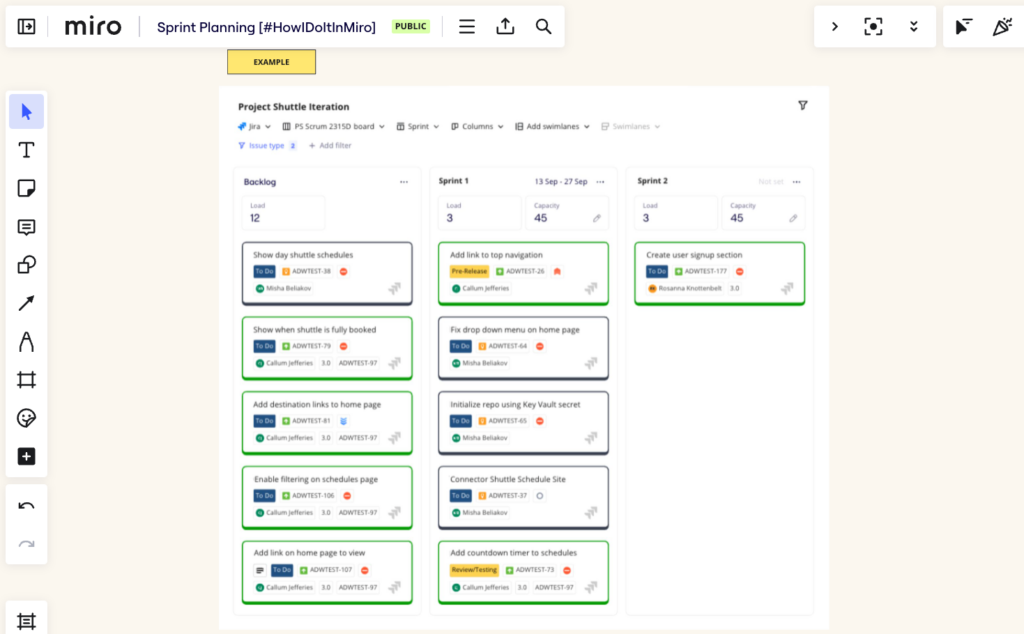
To transition from roadmapping to sprint planning, they use the Planner for Jira widget, which is synced with Jira. With this integration, they don’t have to manually copy and paste content from each Jira card. It’s great for sprint planning because they can take advantage of the collaboration opportunities offered by Miro to annotate and communicate with each other, even if some people are working remotely.

Planner lets them run and participate in planning events right on a Miro board, while also syncing updates to their Jira board in real time. This saves them hours of work.

Rosanna can move Jira cards directly from the team’s roadmap into the respective sprints, or move things from their backlog into future sprints. Adding sprints, dividing the work, and reviewing capacity is also easy.
Prepare for sprint planning

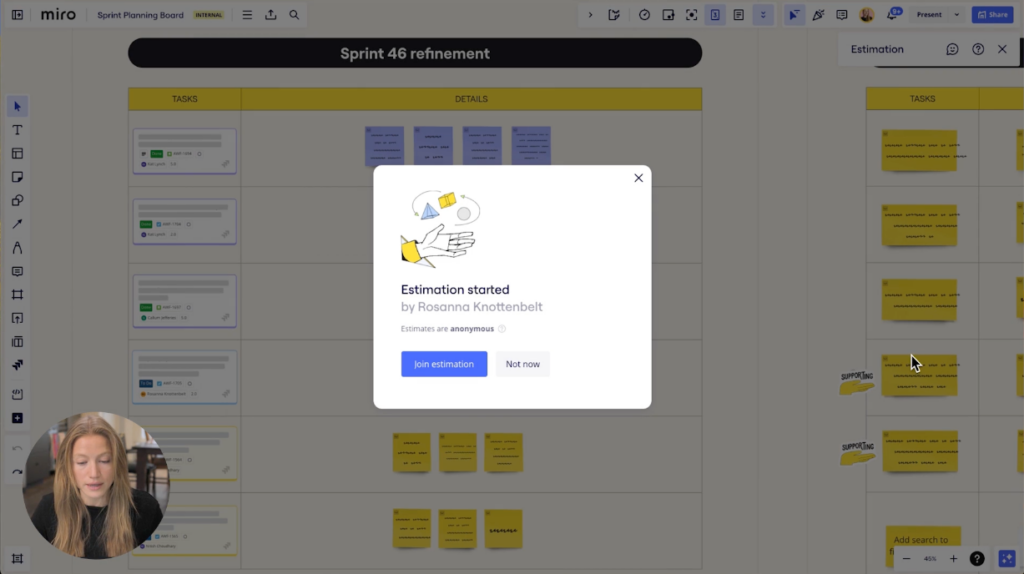
Rosanna can also look at the upcoming sprint to ensure the work is refined and appropriately sized. She can review Jira cards from the roadmap, or from an incoming request. For work not associated with a story point, she can easily bring them into the weekly refinement session.

For instance, here’s an example of one of her team’s sprints. They’ve brought in the Jira cards they want to size, and used Miro’s sticky notes and images to add context where needed. Miro’s estimation app helps them size tasks more efficiently.
Dive into sprint planning

When all the work has been mapped to story points, they’re ready for sprint planning. 
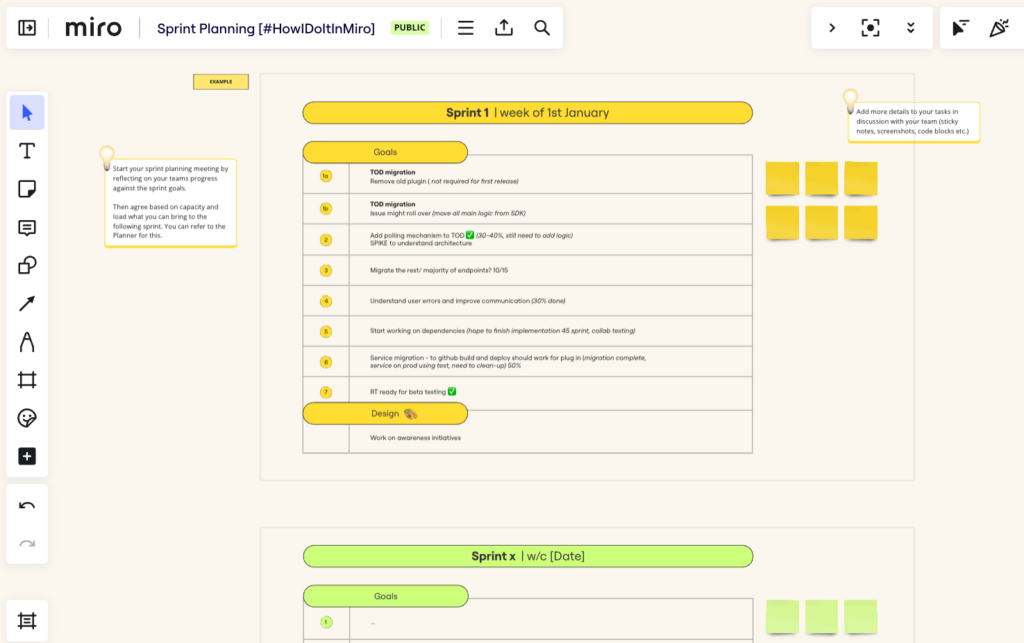
This is where they can reflect on the previous sprint, share goals and status updates, and demo any new functionalities they’ve worked on. In addition, they’ll determine what work to carry over into the following sprint, based on capacity and load. 

There you have it. As you can see, it’s easy to use the same Miro board for all your sprint planning needs, whether it’s sprint goals, refinement, sprint reviews, or retrospectives.

Be sure to watch the video to hear straight from Rosanna how to use her full-fledged, easy-to-use sprint planning template for your own team.
Innovation is…? What innovation means to product leaders today

Software Stack Editor · May 8, 2024 ·

What are three words that come to mind when you hear the word “innovation?” 

That’s exactly what we asked a dozen enterprise product leaders when conducting interviews with them earlier this year. Their answers — which included words like complexity, consumer, transformation, and fun — show just how unique and varied perspectives on innovation can be. 

While its exact meaning may defy boundaries, what’s clear is that innovation is woven into the very fabric of successful modern enterprises, appearing everywhere from business strategy to product development processes and company culture.

Here are a few of the key through-lines that emerged from our interviews.

Innovation is…challenging

Key words mentioned: unknown, hard, cost, legacy challenges, complexity, essential

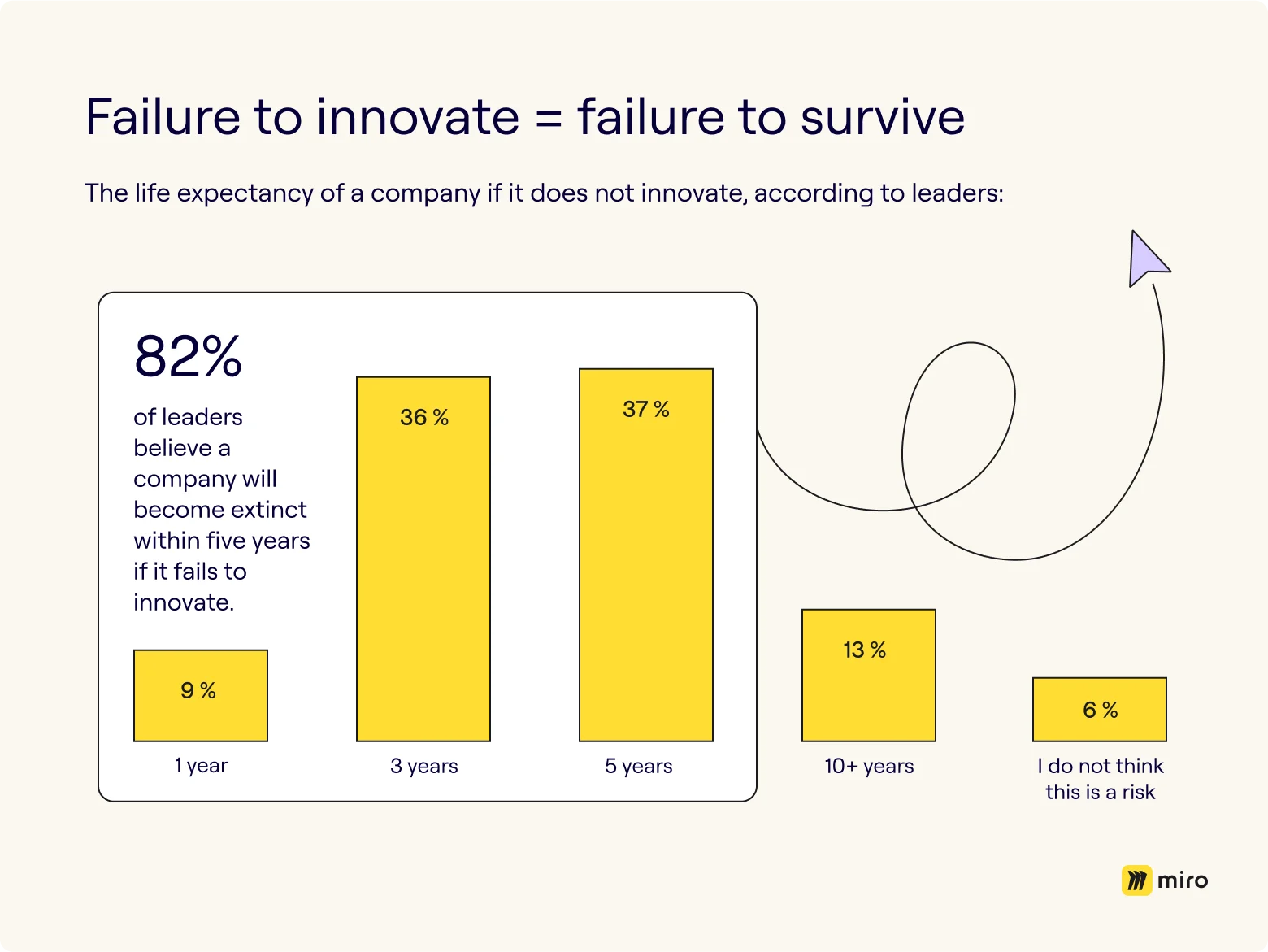
We know from our previous global research that enterprise leaders are nearly unanimous in their agreement that innovation is both urgent and crucial to survival, yet more than half of leaders see it as more of a luxury than a necessity. What gives?

In short: innovation is hard to achieve. The data suggests economic uncertainty, fear, and outdated technology as the main challenges businesses face when it comes to innovation. So it was fairly unsurprising that a number of our recently interviewed leaders would apply words such as “complexity, “hard,” and “legacy challenges” to define innovation.

The consistency reinforces this sentiment that fear of the unknown may lower an organization’s tolerance for risk and, ultimately, hinder innovation. If this sounds familiar, consider some simple principles for how to inspire innovation during uncertain times:

  • Keep innovation in conversations, always
  • Use that uncertainty as inspiration for innovation
  • Meaningfully support worker wellbeing

Learn more on how to inspire innovation during uncertain times → 

Innovation is…customer-centric

Key words mentioned: needs, customer-centric, problem, consumer, solution

Another recurring theme at the heart of recent innovation discussions is a steadfast focus on the customer. Perhaps it looks like diving deep to uncover true consumer needs, or using those pain points to inform, develop, and deliver more effective business solutions. At the end of the day, it’s all about the customer. 

So it’s no coincidence that organizations who seek to unlock their full innovation potential also put customer centricity at the forefront of their business strategy. In addition to “customer-centric,” several leaders interviewed surfaced the words “consumer,” “needs,” and “solution” in thinking about innovation.

But much like innovation itself, there’s no magic formula to achieving customer centricity overnight. Instead, it may require an overhaul of company culture or evaluating existing organizational mindsets. Some additional strategies to try:

  • Establish cross-functional teams to work together in sharing customer insights
  • Embrace Agile principles to boost organizational capabilities to respond to change
  • Build an organizational culture of continuous learning and development

Keep reading about how to overcome the roadblocks to customer centricity → 

Innovation is…a disruptive force

Key words mentioned: transformation, change, disruption, driven, imagination, creativity 

The aforementioned global innovation survey also shows that a whopping 80% of leaders agree that innovation helps their companies win against the competition, while 79% call it necessary to win against the competition. 

What’s key to outpacing your competition? Disruption. Needless to say, several leaders brought up the term — along with derivatives such as “change” and “transformation.” 

Also worth noting were the mentions of “creativity” and “imagination,” clear driving forces behind both disruption and innovation. While it may not be enough for an organization to simply be creative or imaginative, putting it together as a one-two punch with a more innovation-focused strategic business plan, like this 4-step roadmap to innovation, can help you get the job done. 

Ready for more? See how to overcome the top strategic roadblocks to innovation →

Innovation is…a world of potential and possibilities 

Key words mentioned: enablement, potential, fun, rewarding, portfolio, differentiated, latitude 

Innovation is good for business and people — and leaders echoed that sentiment with words like “rewarding,” “fun,” and even “latitude” as part of our “innovation is…” exercise.

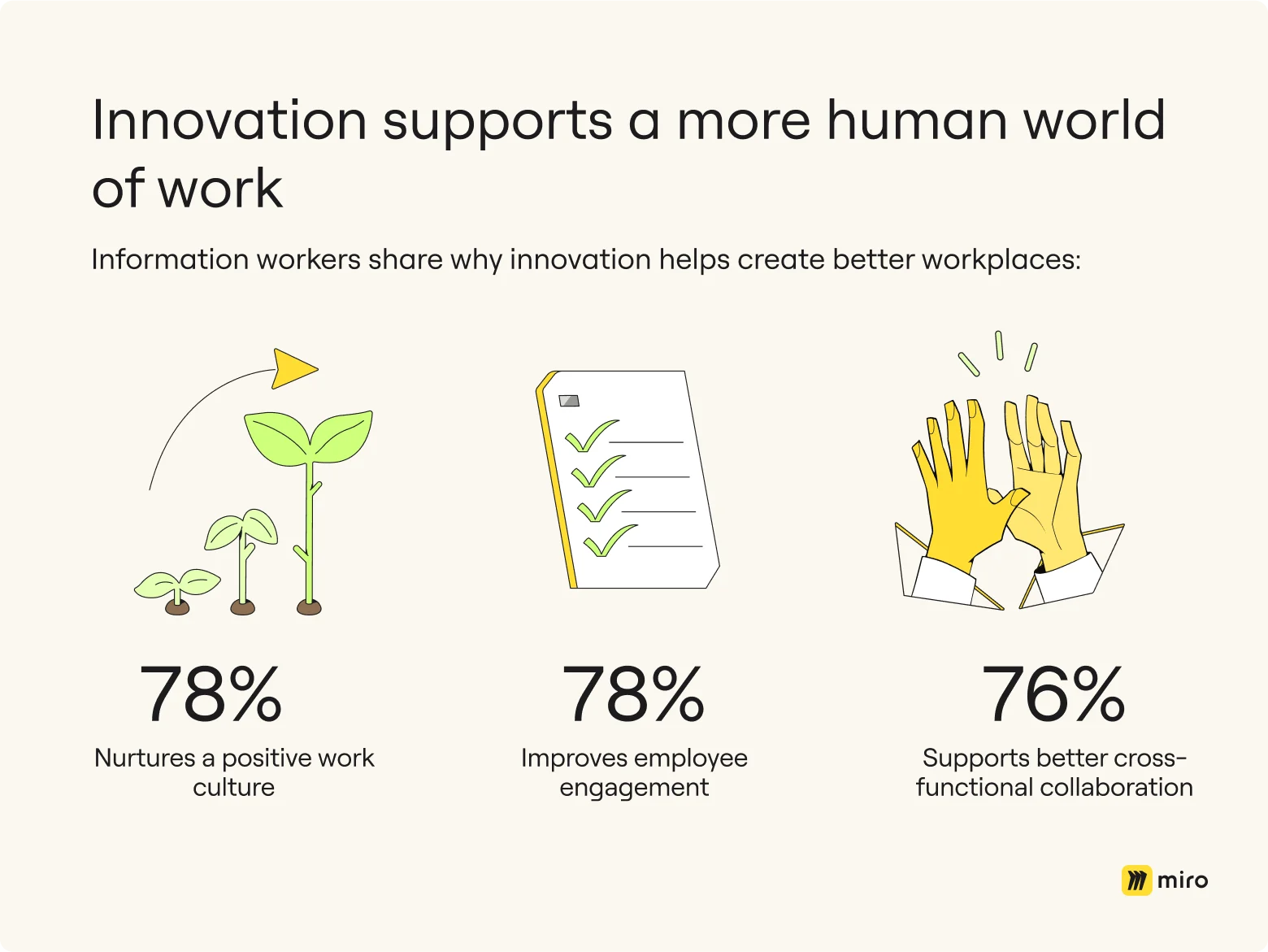
It can be all too easy for leaders to get caught up in making the business case for innovation without pausing to think about some of the major benefits it can offer from a more human perspective. Those include nurturing a more positive work culture, improving employee engagement, and supporting better cross-functional collaboration, among others: 

Additionally, a deeper dive into the data reveals that a focus on innovation contributes directly to employee satisfaction. Enabling workers to innovate as a means to enjoy themselves and their work can: 

  • Help businesses attract and retain talent
  • Drive a better workplace culture
  • Remove silos and enable employees to work better together

Discover more reasons why focusing on innovation benefits the whole team → 

Defining innovation is unique to an organization  

There’s (clearly) no single way to ascribe meaning to how innovation manifests in an enterprise. Instead of trying to mold your organization to fit someone else’s definition of what innovation is, experiment with some of the principles and strategies discussed to explore what it can — and already does — look like within the context of your business.  


Collaborate on system design with UML diagram templates in Miro

Software Stack Editor · May 8, 2024 ·

If you’re a software engineer who uses Miro, you might know that Miro is a great tool for retrospectives, sprint planning, and other software development practices. But did you know you can also use Miro to build UML diagrams? In this post, we’ll share several ready-made UML diagramming templates that will inspire, save you time, and help you build the next big thing.

What is UML?

In case you need a refresher, UML stands for Unified Modeling Language, and it’s a standardized way to visually represent the design of a system. UML diagrams serve as blueprints that help map out the structure, behavior, and interactions of a system before it’s time to dive into coding. 

By creating a high-level view of the system architecture, UML diagrams allow people inside and outside the software development team to understand, communicate, and align on the software being built. Technical stakeholders such as software developers and architects get a more granular view to understand the requirements, ensure design consistency, and reduce the risk of rework (coding) at the development stage.

But building UML diagrams can take hours, which is why you need a tool to help you create UML diagrams efficiently. Even better if you can work with your team to build the diagrams together. That’s why Miro’s collaborative visual workspace is the perfect canvas. 

How to build UML diagrams in Miro

There are a few ways to build UML diagrams quickly in Miro:

  1. Automatically generate UML diagrams with Miro Assist or use UML shape packs to get started from scratch. 
  2. Take advantage of text-to-diagram apps such as PlantUML and Mermaid.
  3. Or you can use one of our templates. 

In this case, let’s focus on templates. With a template, you can add examples of UML diagrams for common design systems to your Miro board with just a few clicks, then collaborate with your team in real-time or asynchronously to customize the diagram, reviewing everything together in one workspace. 

If you’re working from a Miro board, you can choose the template you want via the template picker. Or you can browse different kinds of UML diagram templates in the template library or via the user-generated template gallery, Miroverse. Miroverse has thousands of templates built by Miro users, including hundreds dedicated to diagramming. 

Whatever method you choose in Miro, your team can rapidly create professional UML diagrams that can be tailored to fit your specific requirements. Plus, since Miro boards update in real-time, your UML diagrams become living documentation where developers and other stakeholders can brainstorm designs together, leave feedback, and always find the latest version. 

Learn about the history of UML diagrams, why they’re useful, and what all the different types are.

Miro offers a variety of templates for the most commonly used UML diagrams. We’ve compiled templates for three types of UML diagrams — sequence, class diagrams, and use case — to help you document your systems faster than ever (although Miro offers more than just these). 

Sequence diagram templates

Think of a UML sequence diagram as a visual representation of how different components or objects in a system interact with each other over time. It’s like a step-by-step story of how messages are passed between these components or objects, showing the order of events and the flow of control. 

Here are a few UML sequence diagram templates to help you create a sequence diagram in seconds. But remember: Miro comes with all the shapes and features you need to customize the template or create a diagram from scratch.

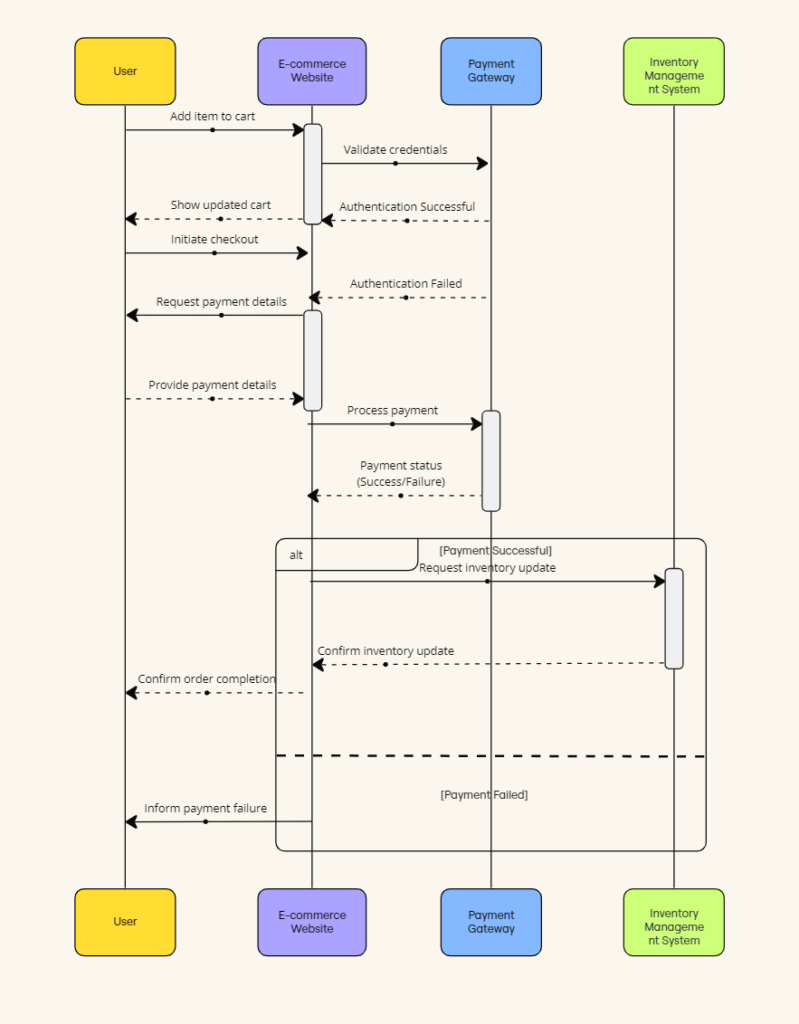
  • UML Sequence E-commerce Checkout — This template walks you through an e-commerce checkout journey. From adding an item to the cart to processing the payment, it visualizes who talks to who and when.
UML Sequence Diagram for E-commerce Checkout
UML Sequence Diagram for E-commerce Checkout (Click on image to use template in Miro)
  • UML Sequence Rental Booking System — This template illustrates the interactions within a car rental booking system. It maps out the communication between customer, user interface, payment service, and vehicle allocation system to ensure a smooth and efficient workflow. 
  • UML Sequence Registration Process — This template depicts the interactions among the user interface, server, and database during the registration of a new user on a website. 
  • UML Sequence Deployment Pipeline — This template showcases the sequence of steps in an automated deployment pipeline. It illustrates the flow from code commit all the way through the build, test, and deploy stages.

Class diagram templates

A UML class diagram serves as a blueprint for the structure of a system. It’s like a map that shows the classes or objects in a system, along with their attributes, methods, and the relationships between them. The connections between classes illustrate how they relate to each other, whether through inheritance, association, aggregation, or composition. 

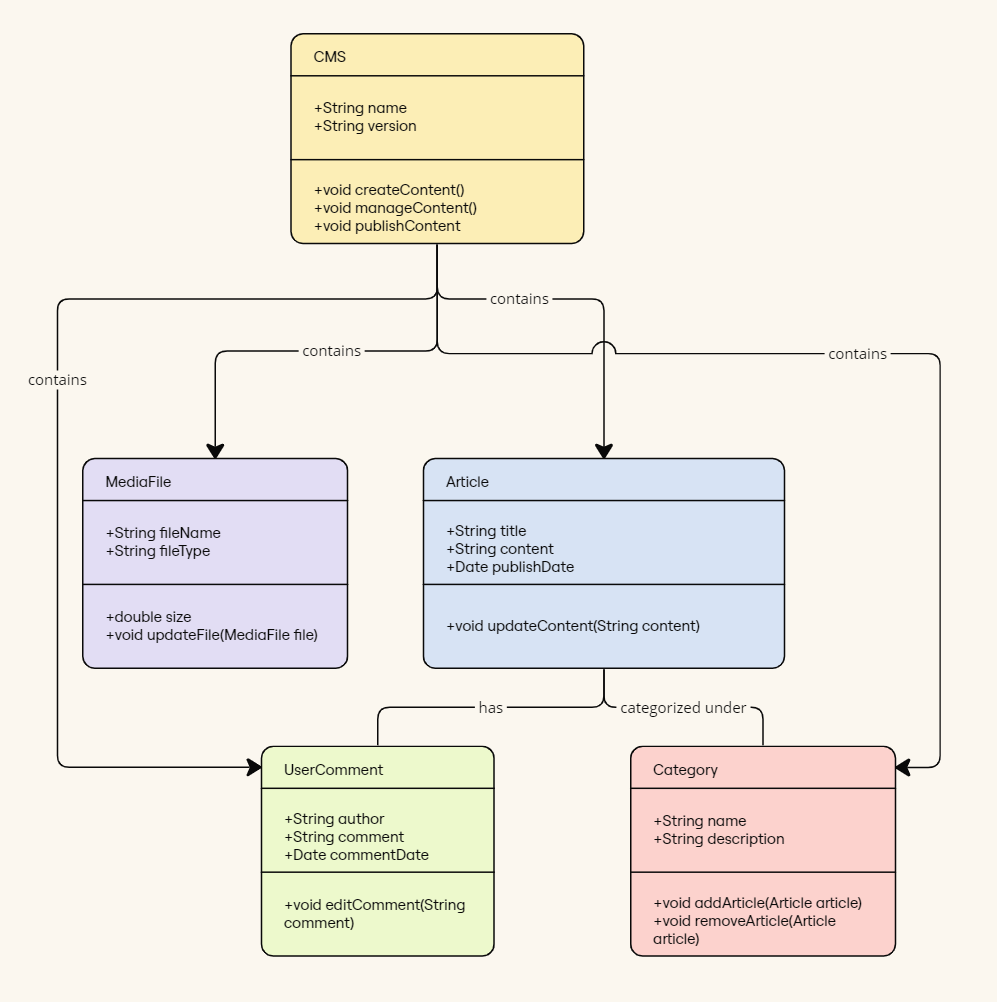
  • UML Class Content Management System — This template illustrates the key classes and their relationships within a Content Management System (CMS). It shows how users create, manage, and publish digital content such as articles, comments, and files. 
UML Class Content Management System
UML Class Content Management System (Click on image to use template in Miro)
  • UML Class E-commerce System — This template depicts the class structure of a typical online shop with features like product listings, inventory, shopping carts, orders, payments, and shipping details and how they interact during an online sales transaction. 
  • UML Class Messaging System — This template visualizes the functionality of a messaging system, including managing text messages, conversation threads, user contacts, notifications, and channels. It offers a visual representation of how all these elements interact within the system. 

Use case diagram templates

A UML use case diagram is a graphical representation used to model the interactions between users (actors) and various systems. They let you quickly visualize the functionalities or features of a system from the user’s perspective.

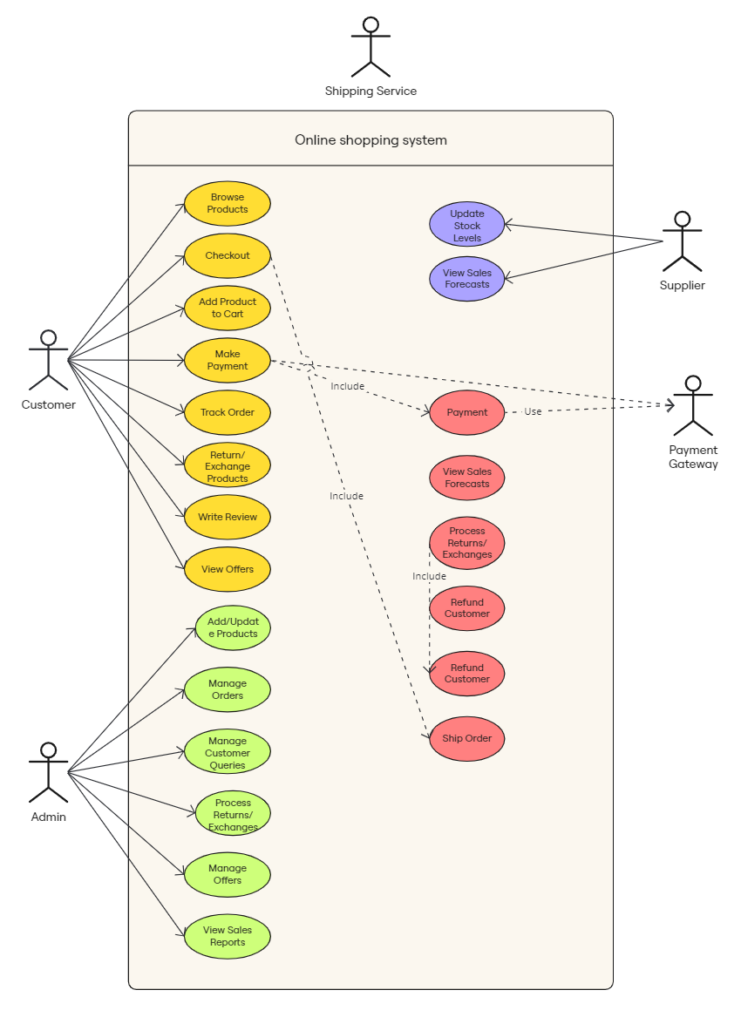
  • UML Use Case Online Shopping System — This template maps out the functionality and user interactions in an online shopping system. It clarifies how shoppers interact with the system to make purchases and how the system processes these requests.
UML Use Case Online Shopping System
UML Use Case Online Shopping System (Click on image to use template in Miro)

Build a UML diagram in Miro today

There you have it. Modeling your system designs in Miro using UML is a no-brainer for any software team wanting to improve the clarity of their software requirements and reduce development risks.

UML diagrams might look complicated, but building them doesn’t have to be. Miro’s pre-made templates let you quickly spin up the core structure, so you can focus your brainpower on the actual architecture and logic.

What AI advancements mean for product development teams

Software Stack Editor · May 6, 2024 ·

image

By providing access to vast amounts of data and increasing computational power, AI and machine learning are changing how we work. In product development, this new technology is creating an opportunity for Agile teams to overcome the limitations of traditional processes and instead focus on more meaningful work.

From supercharging iteration to amplifying creativity, here are a few ways AI will change product development for the better — and how teams can use new AI and machine learning tools to their advantage.

AI takes care of tedious tasks and frees time for high-value work

AI and machine learning algorithms have the ability to quickly and accurately synthesize large amounts of data, and recognize patterns or correlations that humans might miss. This makes them useful for automating manual, repetitive tasks, like sorting and grouping backlogs and filling out user stories. While AI handles mundane tasks, teams can focus on higher value activities like strategy..

Cross-functional Agile teams may look different as a result. A project that typically requires a team of ten may now only need two. Developers can divide and conquer by breaking out into smaller teams that work on different features or products simultaneously, allowing them to cover more ground with the help of AI.

This will make the pace of work even faster. Tasks that normally take a week, like achieving a sprint goal, could potentially be compressed into a day. Rapid development cycles means sprints can potentially become shorter, and the overall structure and purpose of meetings like Sprint Planning and Daily Scrum will likely evolve. Because of this, teams will need to take a more flexible approach to Agile frameworks.

AI makes iteration faster 

The swift pace of development will result in rapid prototyping and testing cycles, allowing you to quickly innovate, vet, and refine ideas. Instead of spending time and resources on mock-ups, the team can leverage AI to instantly produce design ideas and prototypes. This will ultimately lead to smaller, faster releases.

AI-powered analysis can also identify insights and areas for improvement, allowing product development teams to spend more time in deep exploration and problem solving. For instance, generative AI tools can run multiple simulations and analyze each outcome, allowing teams to iterate until the optimal solution to a design problem can be found.

AI amplifies creativity

AI can also be your brainstorming partner. AI-powered innovation tools help teams generate mindmaps, analyze patterns, and suggest design improvements. This empowers product developers to come up with new ideas and explore new ways of thinking. 

AI’s ability to instantly develop narratives, images, and video allows you to easily experiment with new formats so you can transform ideas into new structures to see what works best. For example, instead of manually creating user stories, you could use generative AI to try new formats that bring these narratives to life. By bringing the user’s point of view to the forefront, teams can brainstorm new ways to improve functionality. You can explore different formats like Jobs to be done (JTBD) and see if these improve understanding or introduce a better perspective. 

Deep learning helps you better understand customer needs

Customer insights typically contain qualitative, unstructured data, like social media chatter or focus group responses. Historically, this type of data has been difficult and time-consuming to analyze. Now, deep learning algorithms can synthesize feedback into usable insights that help you gain a sharper understanding of your market.

It can also identify trends, detect subtle patterns, and uncover hidden requirements that humans may miss. A more nuanced understanding of customer needs and pain points can then be translated into value-added product features that resonate with your market. Not only will you be able to go to market faster, your product-market fit will likely be better.

Human ingenuity and expertise is still needed for success

Despite advancements in AI and machine learning, human judgment and knowledge are still essential. Product development roles will evolve to focus on strategic thinking and innovative problem-solving rather than rote, task-based activities. Product developers will also need to draw on their expertise to direct how AI tools are applied, select data parameters, and discern if outputs are sufficient.

Rather than replace product development professionals, ultimately, AI and machine learning technology will enhance their abilities. Product development teams that harness both human ingenuity and these transformative technologies will be the ones who excel at developing groundbreaking product innovations in the future.

Want to master innovation? Start by validating ideas quickly with these tips from product wizard Ash Maurya

Software Stack Editor · May 3, 2024 ·

image

Ash Maurya is the acclaimed author of Running Lean and Scaling Lean. In 2009, a significant realization about the importance of developing products to meet real needs led him to the Lean Startup movement, which was pioneered by Eric Ries and Steve Blank. From there, Ash created several business modeling tools, including the Lean Canvas, Traction Roadmap, and Customer Forces Canvas. Today, his frameworks and methodologies are used by over a million people globally through his company, LEANSTACK.

I’ve been a fan of Ash’s for 15 years, and recently had the opportunity to catch up with him to discuss innovation, namely why it’s important to validate ideas quickly; how to focus on problems, not solutions; not just be a little better than the status quo; use metrics to track traction; and be cognizant of the Innovator’s Gift.

This interview has been edited for length and clarity.

In a recent talk, you brought up the concept of “good enough.” What does that mean in a corporate context?

Starting is probably the most important thing that we can do with any idea. Get started, then discover insights along the way and course-correct. When you’re moving really fast and with a lot of uncertainty, it’s impossible to create a perfect plan because we don’t know what we don’t know.  No matter how much research we do, some ideas don’t end up where we thought they would at the start. That’s why sometimes I say that a plan doesn’t need to be perfect. It needs to just be good enough to get to market where you can really learn something.

The lean startup is synonymous with “get out of the building.” What should you be doing before you get out of the building?

I usually recommend that people don’t rush outside the building. Yes, all the answers are eventually going to come from the market, but there is still quite a bit of planning and stress-testing work that needs to be done before we get out. So if we were civil engineers tasked with building a bridge, we wouldn’t take the plans and rush to go build a bridge and see what happens. We’d stress-test the bridge. We might use simulations, build models, load it up with 50 cars, and if the simulation fails, if the bridge collapses in our models, we would fix the model first. 

That gives us inputs that we can then go validate. If I know, for instance, that I’m trying to build a $100 million business, and I need to get a customer paying me $10,000 a year, I’m looking for a $10,000-a-year problem. That gives me inputs that I can use in my validation versus just going out and getting lost in all the noise. There are going to be lots of problems. We can get outside and find lots of problems, but the key is finding problems worth solving.

What are the principles behind lowering the friction to ideation?

Unfortunately, the way we work today is we ask certain people to talk to the customers and gather business requirements. Then there’s the Elephant Whisper game where by the time it gets to the people doing the work, it gets mangled, so what we end up building isn’t what the customer wants. One of the mantras in Lean is bringing the voice of the customer closer to the people doing the work. 

The idea of lowering ideation friction is a recognition that good ideas can come from anywhere. We want a diversity of ideas because the next big one could emanate from a customer service rep, a designer, or from an engineer, not just the business folks. We want to collect all these ideas and then double down on the ones that are really going to make our business model work.

With a lot of the Lean models, those ideas are very raw assumptions that we can start to score and ask “What evidence do we have?”. With that kind of inquisition, we can get to a confidence level that allows us to fund those early-stage ideas versus just focusing on the overpolished version of that story.

Where does the myth of luck concept play in the process of bringing ideas to fruition?

I think of it as timing. People have studied that timing is a big factor for ideas. But it’s very hard to time an idea because it’s hard to predict the future. For those reasons, I like to think of luck and timing from a different perspective, which is not to ask, “Is this the right time to start something?” I suggest that you just get started and then test with evidence whether this idea could get lucky in the next six months, and the evidence should come pretty quickly.

How does the innovator’s bias relate to the myth of luck?

Innovator bias is a human condition that takes us back to how people are not comfortable with problems. We’d rather gravitate toward solutions. And with innovators, with entrepreneurs, that is a very strong inkling. When we see a problem out in the world, even if it’s a real problem, we very quickly start imagining a solution. We spend every waking moment trying to bring the solution to life. But when you’ve decided you want to build a hammer, everything starts looking like a nail. That’s the innovator bias, and it happens unconsciously.

Daniel Kahneman, a great psychologist who won the Nobel Memorial Prize in Economic Sciences, says that the smarter we are, the easier it is for us to get biased. In the product sense: The more we love product, the easier it is to get enamored with solutions, and unconsciously we start making justifications for the solution, or the hammer, we want to build.

What is the “Innovator’s Gift” in the Leaner Canvas template you created for Miroverse? 

When we are trying to pitch an idea, it is very tempting to say, “I want to build this because,” and then rattle out a bunch of problems. A better way to think about this is not what we can do with a solution, but why we should build a solution. So the idea of the Innovator’s Gift is asking a different question, which is “What’s broken with the current status quo?” What’s broken with the existing alternatives that people are using?

AI is a great example. I run into lots of startups that are doing an AI thing, and they always rattle the benefits of AI. And I say, “Well, tell me what people do today.” So if it’s for copywriting and marketing, “what tools are they using and why is that broken?” And if we can latch onto problems there, then we can start talking about what could be better.

If an idea is worth solving, does there need to already be an existing alternative?

That’s a good thought experiment. I ask in my workshops, “Can you name a disruptive product at any time in history that didn’t have an existing alternative or competition?” The answer is no because there’s always an older way. It may not be a very optimal way, but there’s always an older way.

Is having an existing alternative that has lots of problems enough for an idea to be good?

So that’s the start. We always want to find evidence that something is broken for us to do better. When people come to me with problems, I ask the following questions: 

  • What evidence do we have? 
  • How many people have you seen struggle? 
  • How many people have you talked to? 
  • What kind of research has been done?

That’s the first step. The next one is what can we do that’s going to be significantly better to cause a switch? Because the incumbent always wins. Just think of this from a cell phone perspective. If I came to you and said that I could come up with a new cell phone that was 10% better than your current one, would you switch? The answer is probably no because the switching costs would be immense.

But if I came up with a new cell phone that was completely redesigned – it was not the multi-touch thing we now take for granted. But maybe it had AI and it had augmented reality and even virtual reality, and could make you 10 times more productive. Early adopters might want to give it a try. 

People have studied this switching trigger as something that can be measured as an order of magnitude. So think 2X, 3X, to 10X better. If you can start to craft a value proposition around that, that one gets attention. That opens the door for more testing, then seeing if you can deliver on the value promised.

Tell me about the Customer Forces Canvas.

Leaner Canvas is where we talk about what customers and early adopters are doing, what their existing alternatives are, their problems, and what’s broken. Then we take a leap to the unique value proposition, which is what we could promise customers that is three to 10X better. 

 The Customer Forces is where we begin to understand what’s pushing and pulling people toward this idea of better. How do they define “better?” Is it cheaper? Faster? More convenient? In the Customer Forces Canvas, we get into those levels of measurement. 

What are people looking for when you’re stress-testing an idea around inertia and friction in terms of a switch?

The best way to understand why customers buy products is to interview them. And so we want to understand how and in what context they hire certain products. So when they want to pass some time and they’re bored, what are the kinds of things they’re doing? What places are they going? What are they buying? Then what are the forces that get in the way? That’s what we call inertia. 

Inertia might be habits that they currently have that they have to break. For example, if somebody wants to get fit, what are things that hold them back? It could be that they don’t have a gym membership or that they haven’t worked out in years. Or they don’t live a very healthy lifestyle. All those are habits that get in the way.

Friction would be behaviors they struggle with as they try something new, like eating healthy or going to the gym. The best products reduce inertia, reduce friction, and have a compelling value proposition. So the ones that pull customers toward this idea of better are the ones that win.

What’s the next validation step?

The best way to really test if people will act is to actually make them act. So the next step I recommend is what we call building an offer. At this step, you put together an offer promising something better. That’s the unique value proposition. So I might talk about my fitness program and how it’s different from the alternatives. Maybe I’ll show a demo. And then we can talk about price. Then I’m looking for a tangible commitment. So are you willing to pre-order? Money exchanged for value or a promise for value is the best validation for an idea.

What do people look for?

One metric that stands out above all is traction. I measure traction in terms of customer engagement. And ideally, that customer is doing something that represents monetizable value.

If that number is going up and all other things hold true, traction goes up. At the end of the day, it’s about identifying one or two key metrics that align with value in the business model, because if we can generate value for customers, getting them to pay becomes a lot easier.

What are some of those derivatives?

If you are trying to sell anything, the first currency of exchange isn’t revenue. It’s attention. The way we do this is by making a promise. You could be walking down the street and see a new restaurant. They have a banner that promises all kinds of pizza or burgers. Something about it grabs your attention. So that’s the first currency. 

Then, we go in and there’s an activation moment where we need to make sure that this indeed could meet our promise. That’s the second currency: trust. Do people come to a product and use it for a little while and get value out of it? If that trust manifests, then that leads to ongoing value exchange. 

If I go into a burger stand and the burgers smell really good and I get a burger, then I’d be expected to pay. And I happily do that. When I leave, the final currency comes into play, which is referral. or word of mouth. If you generate a happy customer, they typically want to share that happiness with other people. And that’s a very powerful currency.

Watch the full interview with Ash Maurya here.

🚀 New Templates in Miroverse

Software Stack Editor · May 1, 2024 ·

April has delivered, bringing us over 190 incredible new templates. Below, we’ll shine a spotlight on the brilliant creators who’ve made this month one to remember. Let’s show them some love and support for their outstanding contributions to Miroverse in April! 💛

Do you have a Miro board that would make a good template? Submit it now! 

Curious about submitting your first template? Visit our Creator Toolbox for information and resources to get published on Miroverse.

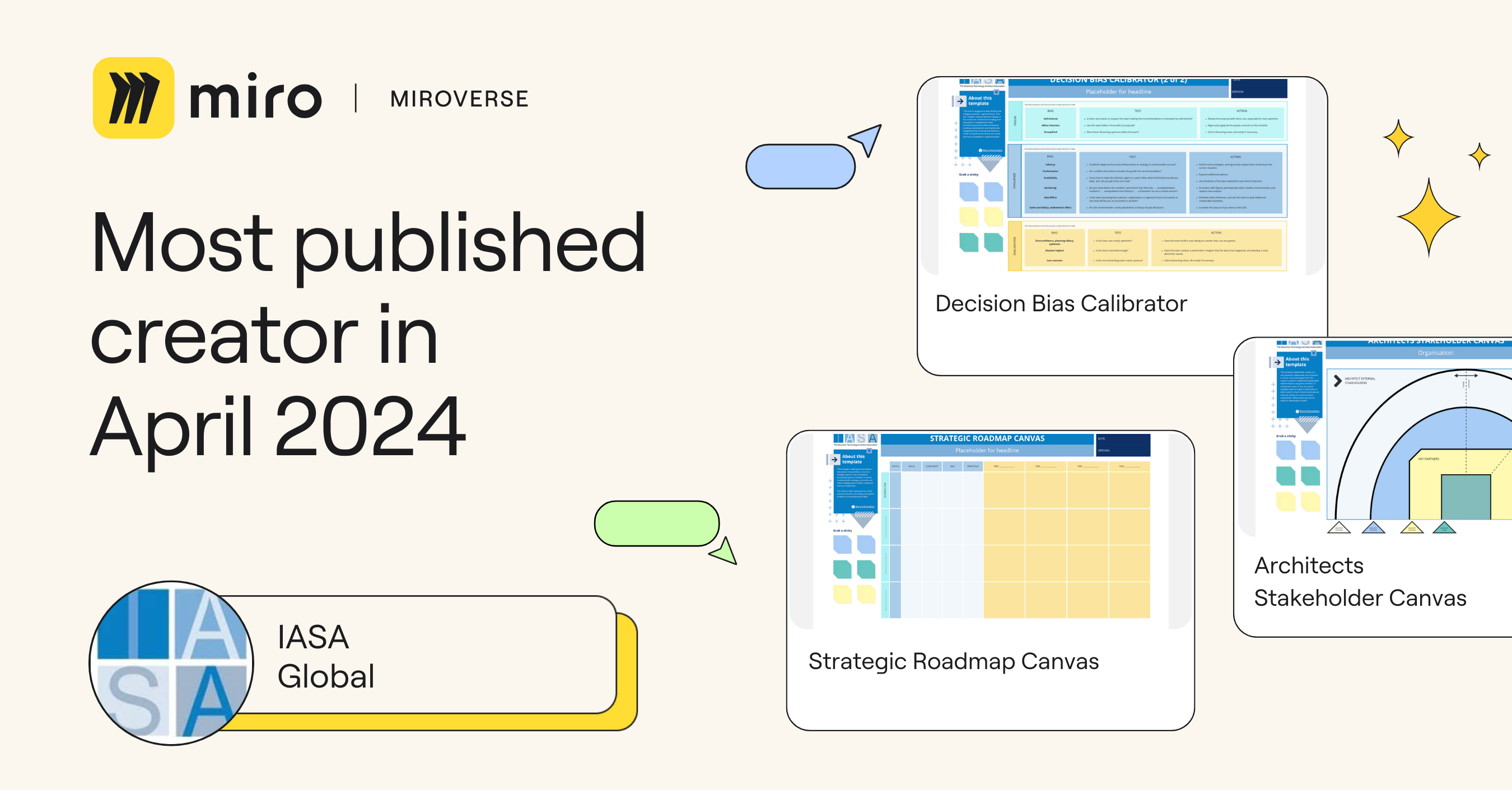
IASA Global | Most Published Miroverse Creator 🚀

Formerly known as the International Association for Software Architects, IASA Global is the go-to hub for all things tech architecture. They’ve been super productive, dropping 31 templates this March in Miroverse, earning them the title of Most Published Creator! Kudos! Dive into their profile to explore frameworks ranging from Strategic Roadmaps to Architects Stakeholders Canvas.

Matt Anderson | Most Copied and Liked Miroverse Creator 🚀

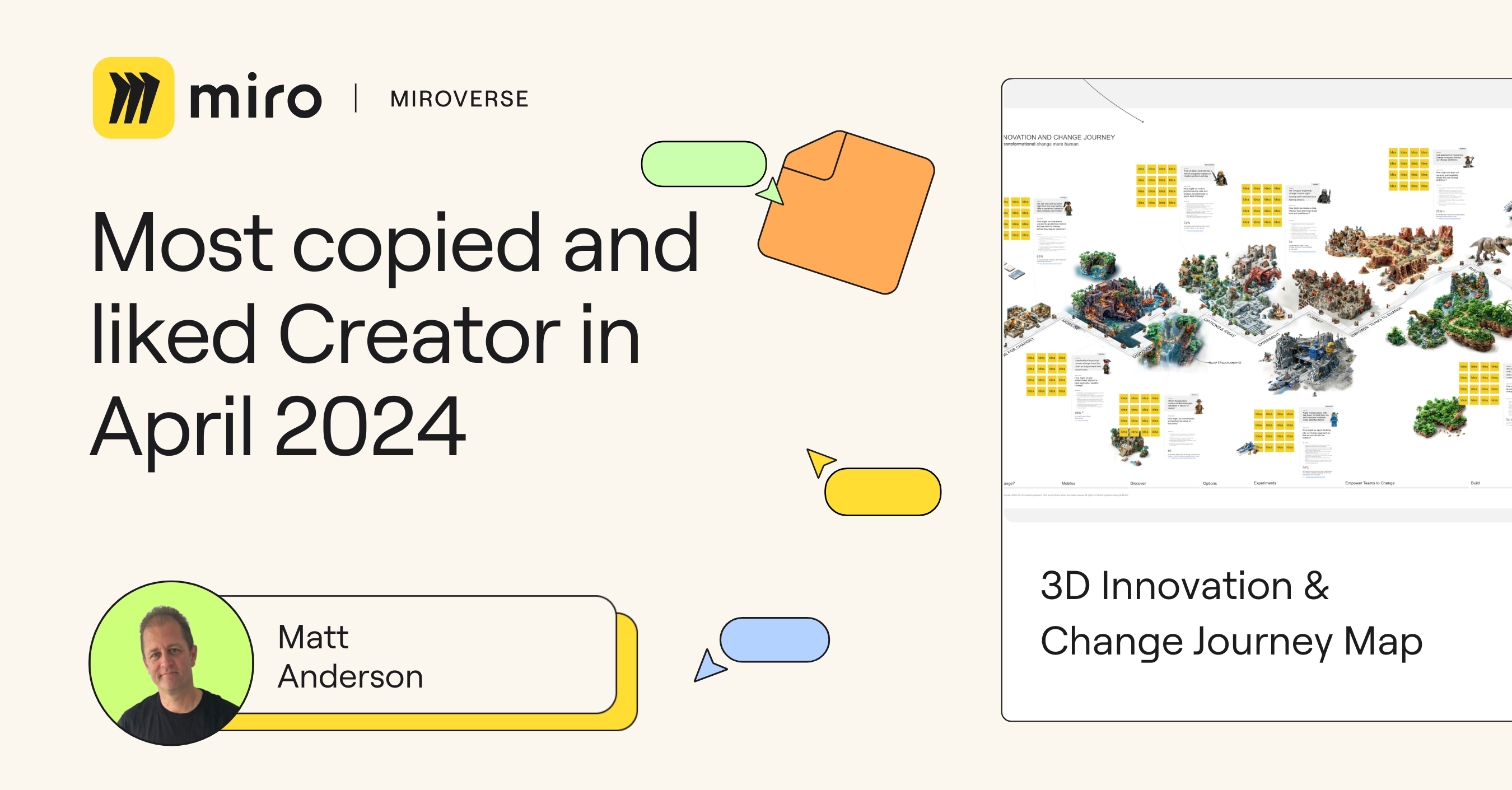
Over 220 Miro users are revolutionizing their customer journey designs with Matt Anderson‘s 3D Innovation & Change Journey Map template on Miroverse! Matt, the brain behind Think Startup, a strategic design firm, is changing the game. This template is an outcome of the most popular online webinar this month on crafting a 3D journey map in Miro with Midjourney. 

Want more events like this? Subscribe to our events calendar. To learn more about Matt’s approach, dive into his templates or contact him directly in the Creator Community.

Isa Serpa | Most Viewed Miroverse Creator 🚀 

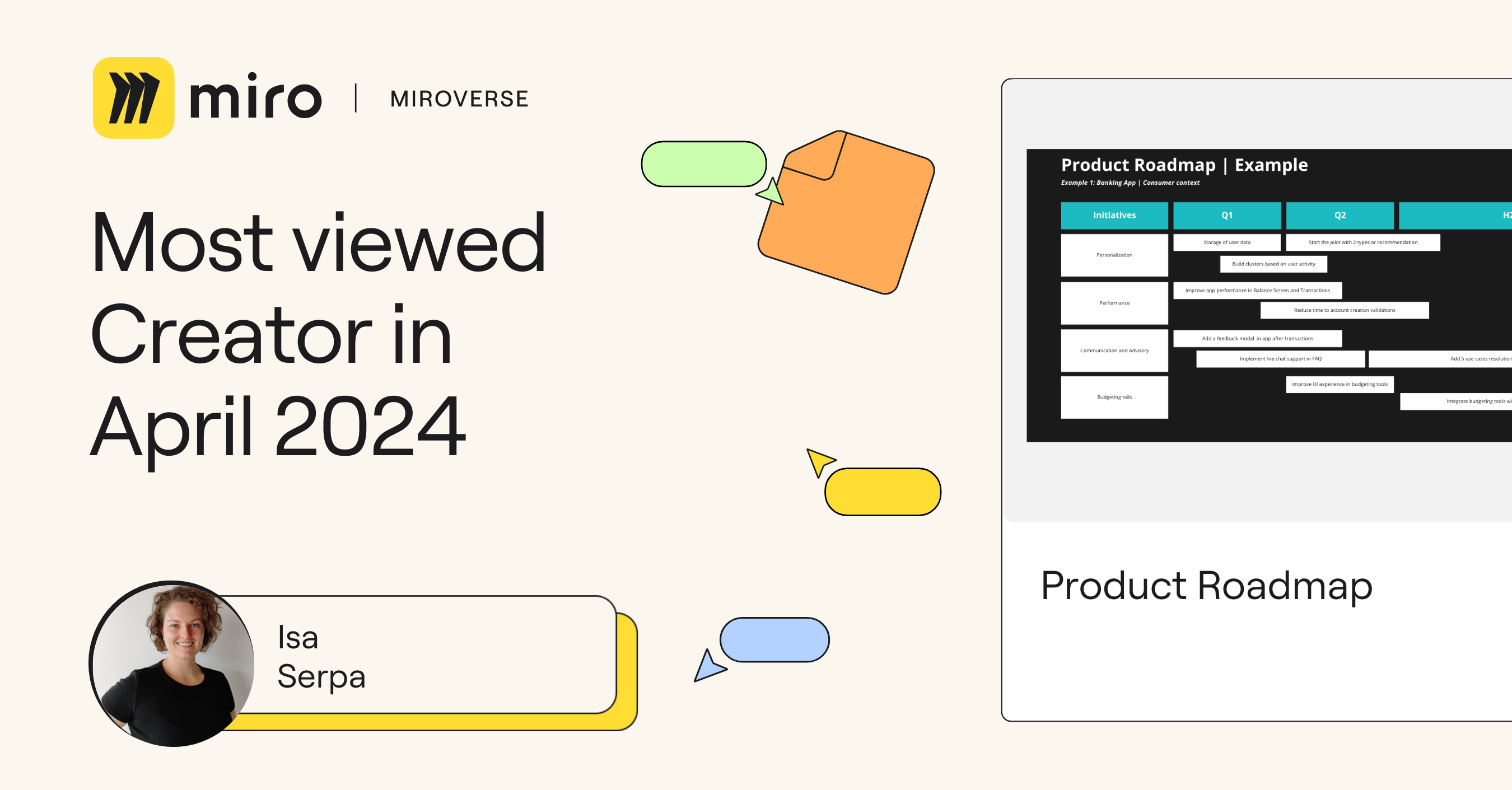
A round of applause for Isa Serpa for her Product Roadmap Framework, which garnered over 2.5k views this month! Isadora, a seasoned Senior Product Leader with 7+ years of experience, knows how to ship and launch products right. Her simple yet impactful framework underscores the importance of mapping out tactical plans to drive product value and achieve goals. Big thanks to Isadora for sharing her wisdom — we’re eagerly awaiting your next template!

Megan Lieu | Professional Spotlight 🚀

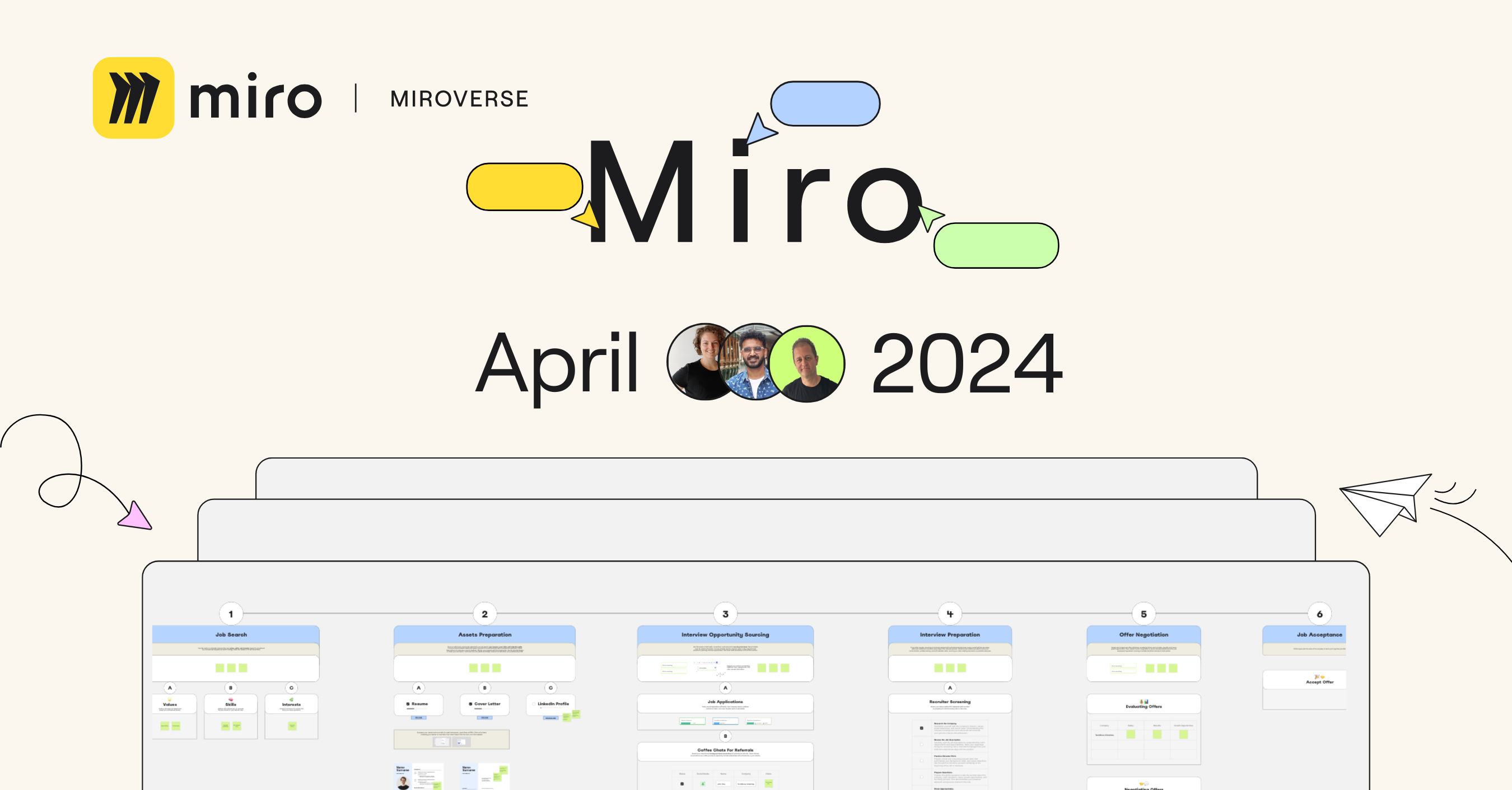
Megan Lieu, Developer Advocate at Deepnote, the AI data powerhouse, is in the spotlight! Megan recently published her Job Search Process Diagram to help you organize your job search. It’s packed with structured sections to streamline what can be a painful process, interactive zones for collaboration, plus expert tips to avoid common pitfalls and get the job. With over 100k followers on LinkedIn, Megan’s expertise is gold. Thanks for sharing your insights with the Miroverse community, Megan!

Clyde D’Souza | Social Impact 🚀

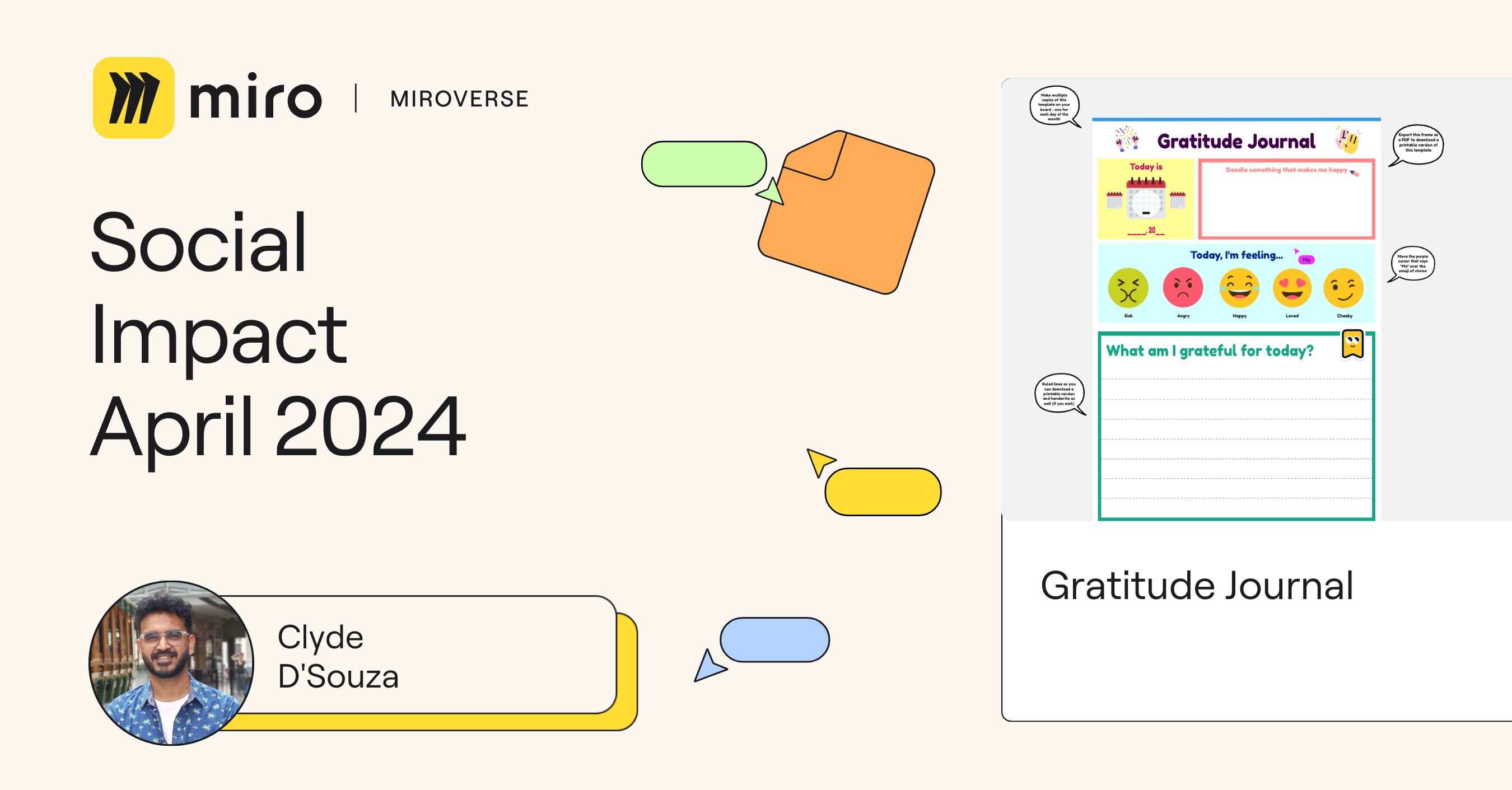
As Mental Health Awareness Month is upon us in May, we’re shining a light on a timely template published just this April by Clyde D’Souza — the Gratitude Journal template. Gratitude isn’t just a buzzword. According to Forbes, practicing gratitude boosts physical health, regulates emotions, and primes you for success. Check out Clyde’s template to kickstart your personal gratitude journey or level up your team retros during Mental Health Awareness Month!

Steve Morris | Staff Picks 🚀

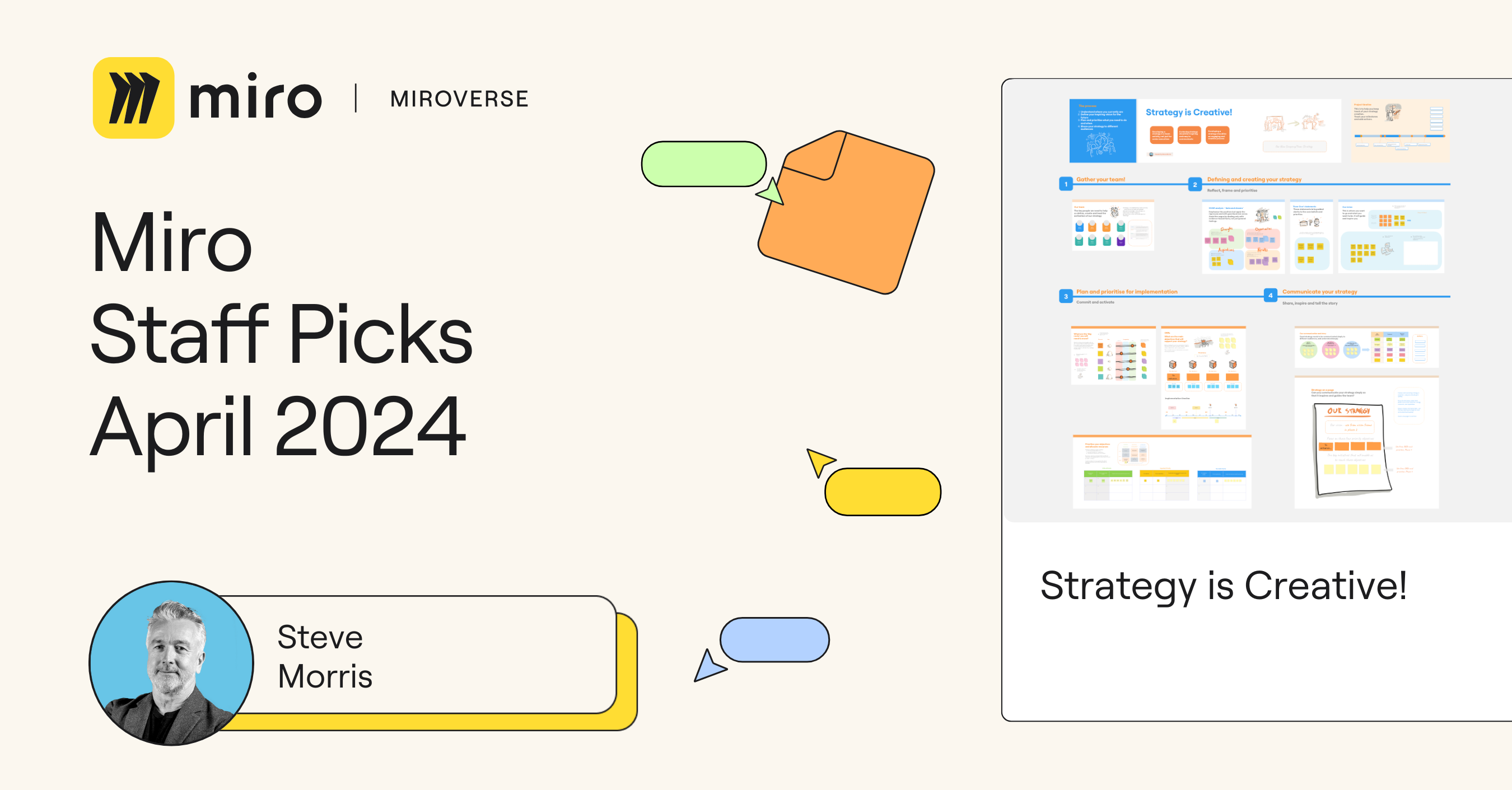
This month, the Miroverse team was inspired by Steve Morris, a seasoned designer, strategic thinker, collaboration coach, and workshop facilitator with over 25 years of expertise. The “Strategy is Creative!” template is his latest Miroverse masterpiece. Designed for guided collaborative workshops, it features SOAR analysis, OKRs, ‘Even Over’ statements, prioritization planning, and more. 

Steve’s template isn’t just a tool; it’s a collection of best practices. Dive in to discover a delightful yet clear board design, a comprehensive structure, valuable frameworks, and detailed descriptions. 

He’s also hosting a design workshop on May 18, so hurry up to RSVP to learn from him! Steve is a true gem in the Miroverse, and his contributions are not to be missed! 🚀

Explore thousands of templates created by and for the Miro community in Miroverse. Discover a new template you loved? Share what you’ve found in the thread below. 👇

If you can’t find the template you’re looking for, submit it in Template Requests.Feeling inspired? Join our community of creators and share your ideas with the world.

How I do it in Miro: Run retrospectives with software engineer Rob Hopps

Software Stack Editor · April 29, 2024 ·

Even if you’re not an engineer, if you work in tech, chances are you’re familiar with retrospectives. 

Some might argue that retros are a waste of time, emphasize the negatives, or can suffer from a recency bias. Despite these challenges, retros are an important part of development work. They help teams learn from past mistakes, celebrate the successes, and — when practiced long-term — can capture trends and patterns that foster more comprehensive insights. In addition, when done right, they provide a safe space for reflecting and help hold team members accountable.

In this “How I do it in Miro” video, part of a series, we’ll learn from software engineer Rob how his team conducts retrospectives using Miro. 

[embedded content]

Start with a proven template

Rob and his team like Miro because they can get a retro spun up in no time using pre-made templates designed for just the task at hand. The template picker in Miro allows you to easily browse hundreds of templates, including best-in-class templates made by Miroverse community creators. This way, your team can be inspired — while saving time.

Additionally, all the team’s retros from the past year are saved in this one Miro board. This centralized space fosters continuous collaboration and makes it easy to reference and learn from previous retros.

Have fun with your retros

With so many people working remotely, especially in tech, it’s important to keep the team connected and engaged. Miro’s flexibility means Rob’s team can bring in images and other files to create themed retrospectives, allowing them to be creative and have fun.

Another way to have fun with retros in Miro is to start with an icebreaker. For instance, in their “Frozen Fox”-themed retro, Rob included a game, inviting his teammates to guess where different types of foxes live around the world.

Stay on track with a built-in timer

Sometimes icebreakers and discussions can become lengthy or cause your group to veer off-topic. Miro’s built-in timer helps the team manage and track their time. Instead of navigating the toolbar to find the timer for each part of the retro, Rob can create a one-click shortcut on the board. This way, everything is already there and they can keep things running smoothly. 

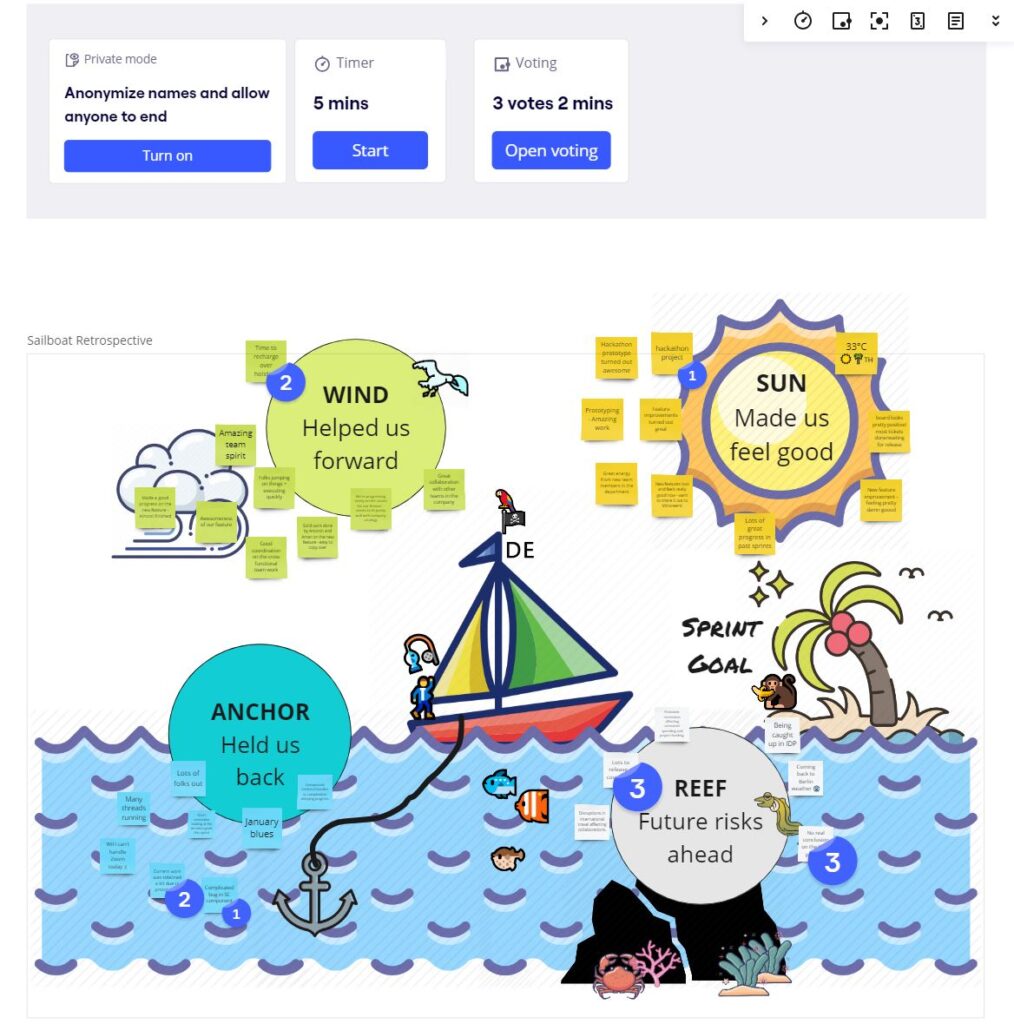
This specific template has four parts:

  • Wind:  What helped us forward?
  • Sun: What good results did we have?
  • Anchor: What held us back? 
  • Reef: What are the risks of going ahead?

Run the retro with private mode and voting 

Another way to maintain connection and engagement is to give everyone the chance to lead. Rob’s team rotates who runs each retro, so they can guide the discussion and ensure the topics they wish to discuss are covered.

For the reflection portion of the retrospective, Rob’s team uses Miro’s private mode. It helps reduce group bias and creates a safe space for everyone to share authentic feedback and privacy while they form their thoughts.

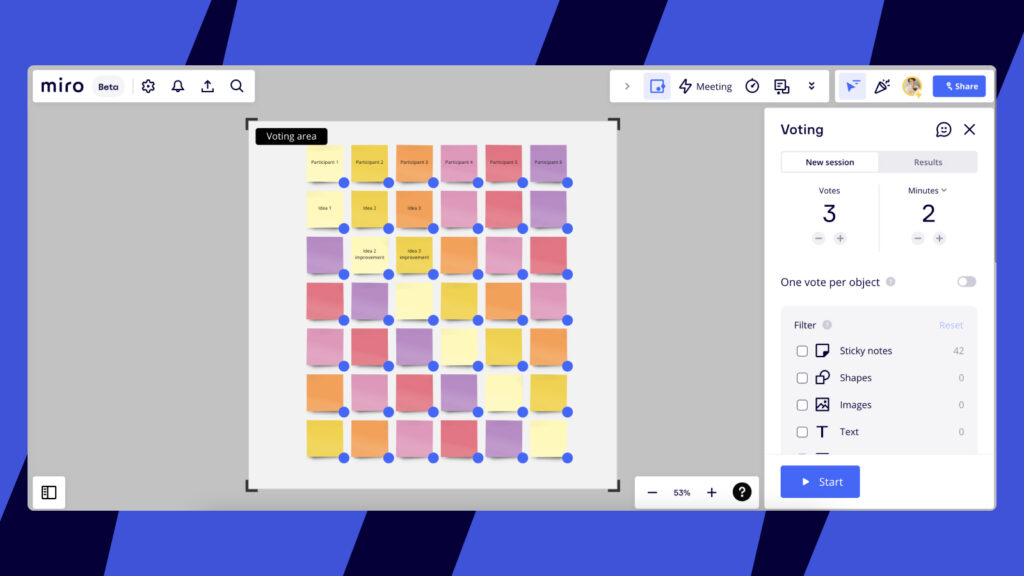
After everyone’s added their thoughts, Rob’s team holds a vote on the most important topics. Miro’s voting capability allows you to set up voting sessions where you can choose the number of votes each person is allotted, as well as how much time they get to vote.

Turn learnings into action

Once everyone has voted, Rob’s team creates action points on the highest-voted stickies. Miro integrates with Jira, so you can convert your sticky notes into Jira Cards.

With Jira in Miro, you can also include Jira Cards in story sizing, backlog prioritization, story mapping, and other collaborative team activities.  

As you can see, it’s easy to use the same Miro board for all your retrospective needs. Be sure to watch the video to hear straight from Rob how to use his templates, check them out in Miroverse, or tag Rob in the Miro community forum with any questions.

Happy retrospecting!

What’s New: What we launched in April 2024

Software Stack Editor · April 29, 2024 ·

image

In the ever-evolving world of product planning, staying ahead of the curve is essential. This month, we want to share with you a series of updates designed to streamline your process and enhance collaboration. We’ve fine-tuned the Planner app, turbocharged Azure DevOps collaboration, and built some more features to boost your diagramming experience. These and other enhancements are poised to elevate your productivity to new heights. Join us as we dive into the latest improvements and discover how they can revolutionize your approach to collaboration and innovation.  project management and visualization.

Product development workflows

Planner updates to fast-track your work in Miro 

We have two updates to elevate your experience in Miro: the option to explicitly save your favorite options in the Planner drop-down, and widget-level settings in Planner for Jira so you can control capacity and load fields.

With this Planner update, Miro will only update the columns, rows, and filters after you’re done selecting the fields you want., This helps ensure you have selected all the values you need before the Planner contents update.

With widget-level settings, you’ll have more explicit control over when and for which Planner widgets on your board the capacity and load fields are shown.

Issues in Jira now unassigned by default 

Previously when creating new Jira issues from Miro, the assignee defaulted to whomever reported the issue, unless it could be matched to someone else within Jira.  Now when creating a card, it is unassigned by default. This makes it easier for teams to ensure the right person is tasked with getting the work done. In addition, you can remove the assignee on a card as needed.

Azure integration just got faster and better

You may have noticed that your Azure cards are loading faster. That’s because we have improved the speed of loading and importing Azure cards by up to 30%. In addition, your dependencies should load and update faster now, too — up to 77% faster, in fact! 

Speaking of dependencies, you can now create Azure DevOps dependencies between Azure cards directly on Miro. Begin with a draft (only visible in Miro) and then convert it to a dependency in Azure when you’re ready. Last but not least, we’ve improved story points, meaning you can now see the story point field on Azure cards. If an Azure work item already has story points assigned, you’ll now see them on cards in Miro, and if you want to add story points to a card, the field is available in the card edit panel. 

Diagramming & process mapping

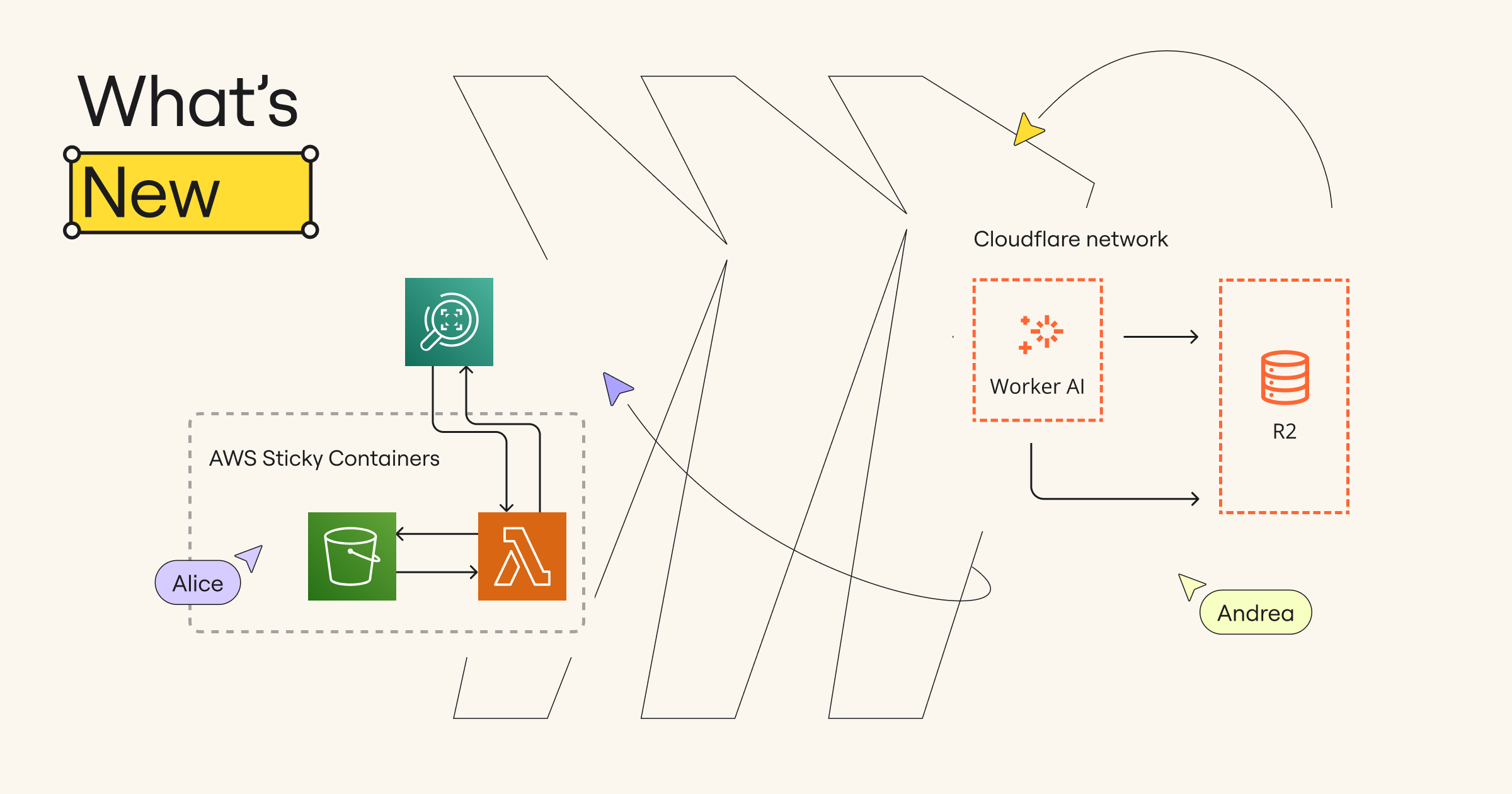
New Cloudflare architecture icon packs

Business, Enterprise, and Education plan customers now can use the Cloudflare diagramming icons to design Cloudflare infrastructures and identify areas of improvement. By visualizing your infrastructure in Miro, you can collaborate across teams and stakeholders to optimize performance, security, and cost.

Sticky containers for AWS and Salesforce icon packs 

While AWS and Salesforce icon packs have been available for some time, we’ve upgraded them so that  these smart containers are sticky, maintain the layout and size of elements, and can be nested. 

New Technical Diagramming course available in Miro Academy

Enhance your skills and boost your profile by becoming a Miro-verified diagramming expert. Explore how Miro serves as a unified workspace to visualize complex systems, ideas, and organizational structures. Complete the course, pass the quiz, and earn the exclusive “Technical Diagramming” Verified Badge to highlight your expertise on LinkedIn and beyond. 

A scalable & flexible platform

Fresh look and syncing capabilities in Miro mobile app

Collaboration also relies on staying connected while on the go. The good news is Miro mobile app users are even closer to experiencing parity across devices. Now you can easily spot other collaborators on a board, follow along with the moderator, and bring others to your frame — so everyone’s on the same page.  

Draw on shapes and objects on interactive displays

Did you know that you can bridge the gap between online and physical collaboration by combining the power of Miro and interactive displays? Well, this experience just got better. Now you can use an interactive display to directly draw on objects such as sticky notes and easily move the object along with what is drawn — enabling a frictionless drawing and brainstorming experience.

Ready-made templates for process mapping

Miroverse is a gallery of templates made by and for the Miro user community — browse the latest templates to jump-start your next project. This month, we’ve hand-picked three templates to help up-level your Miro mapping projects:

  • Teamform’s Strategy to Execution Map creates a simple visualization of your system of work, providing a starting point to improve how your teams work within that system.
  • Isa Serpa’s Product Roadmap Template emphasizes the importance of delineating tactical plans that specify how the product will provide value and achieve its goals.

Stay tuned for May

We hope you enjoyed this month’s updates and find value in these mighty features. Whether you’re tweaking your Planner setup, teaming up effortlessly in Azure, or getting creative with Cloudflare diagrams, Miro’s got your back for smooth sailing ahead. Want to stay in the loop? Visit our What’s New page for more updates!

Invest in winning ideas with assumption mapping

Software Stack Editor · April 26, 2024 ·

image

A healthcare tech team has an exciting new idea. They see an opportunity to integrate new app features that support patient care beyond telemedicine appointments, like how-to videos for home exercise programs prescribed by physical therapists and detailed dietary guidelines from nutritionists. So they send out user surveys and develop a beta version for early adopters, who enjoy the new additions. But when they roll out the final version, it’s a flop. What happened?

The importance of idea validation

Developing innovations that better serve your customers is rewarding for teams and great for business. But while it’s common to have a sense of urgency to turn your new ideas into reality, you could be setting yourself up for failure without the right process in place.

“Failure is the most likely outcome anytime anyone tries to do something new or different.”

— Alberto Savoia, author of The Right It

As you navigate the uncharted territory that comes with building something new, you’ll likely run into complications that block your release (a.k.a. “showstoppers”). Potential showstoppers can be missed in traditional user testing methods. For example, interviews and surveys often provide misleading results, paid testers typically don’t have a real stake or interest in the product, and your idea might resonate with early adopters, but not with early or late majority segments.

Not having a good read on your market is one of the most common showstoppers. Savoia writes: “Most new products fail not because of incompetence in designing, building, or marketing, but simply because they are not what the market wants. We build It right but we don’t build The Right It—a product that enough people want or need to justify developing it.”

In the case of the healthcare tech team, they discovered friction that didn’t show up in initial testing. For the majority of patients, it was easier to grab a pdf printout of exercises or nutrition guidelines directly from their doctor. While the idea to have healthcare how-tos featured in the app sounded good in theory, it just wasn’t a desire for most users.

Showstoppers like this can negatively impact team morale, not to mention the bottom line. At best, the project stalls, costs increase, and you miss targets. At worst, the idea (or even the business) could shut down.

The real challenge isn’t generating ideas — it’s validating them. You need to determine the riskiest assumption and find out if it’s true as fast as possible. Follow this assumption mapping framework to de-risk the ideas in which your enterprise invests and, ultimately, ensure that your team is working on innovations that benefit the business.

Run a brainstorming session

Tools like the Desirability, Viability, and Feasibility (DVF) Framework, Lean Canvas, and AI can help you determine what needs to be true for your idea to be successful.

Use the Desirability, Viability, and Feasibility (DVF) Framework

The DVF Framework comes from design thinking, which takes a human-centered approach to product design. Use this framework to brainstorm what makes your idea desirable to users, technologically feasible, and economically viable.

Consider the Lean Canvas

The Lean Canvas helps you quickly create a business plan so you can test your assumptions and identify what needs to be true for the model to work. In this exercise, you’ll determine your customers’ top problems, existing alternatives, possible solutions, key metrics, unique value proposition, unfair advantages, customer segments, channels to reach your customers, cost structure, and revenue streams.

Think about the change required for adoption

An important but often overlooked step is considering what change is required for adoption. You might run into inertia (the anxiety that stops users from wanting to change) and friction (the things that get in the way, like learning a new tool, paying for installation, or, in the case of the healthcare app, downloading and logging in to a new portal). Take these scenarios into account when working through your ideas.

Supercharge your brainstorm with AI

Leverage AI tools to expand your thinking and explore new ideas. For instance, you can use Miro Assist to instantly generate a mindmap from your brainstorm. This can help you quickly iterate on your initial idea based on learnings from the DVF Framework and Lean Canvas.

If the healthcare tech team had run a brainstorm session first, they may have identified other desirable features that also address gaps in the market, like tools to navigate insurance claims or schedule telehealth consultations in areas where there’s limited physician access.

Map requirements for success with the Market Engagement Hypothesis

Now that you’ve conducted divergent thinking (creating choices) you can move to convergent thinking (making choices). Synthesize the requirements for success gleaned from your brainstorm session using the Market Engagement Hypothesis (MEH), as outlined in The Right It. MEHs state key beliefs or assumptions about how your target market will respond to and interact with your product.

MEH statements include:

  • X%: the share of your target market
  • Y: your clearly defined target market
  • Z: the key action they will take to engage with the product

Use the MEHs to test the viability of your idea, then plot on an assumption map based on evidence (x-axis) and importance (y-axis). Those placed in the top right quadrant are your most risky assumptions. Now that you’ve mapped your hypotheses, you know where to focus your experimentation.

Design experiments to provide evidence

Leverage tools like LeanStack’s experiment report or Strategyzer’s Test Card. Frequently, companies will spend an entire quarter designing and running an experiment, or even build the product in full just to test it. Instead, these smaller yet effective experiments will give you the information needed to move forward.

“The Right It” outlines important factors to consider when running experiments:

  • Speed: Experiments should be designed to collect high-quality evidence in the shortest amount of time possible, ideally within hours rather than days or weeks. The faster you get the data, the better.
  • Cost: Experiments should be designed to be as low-cost as possible while still providing valid data. The goal is to minimize cost without sacrificing evidence quality.
  • Distance to data: For physical products, experiments should be run as close to the team as possible to save time and money. For digital products, minimizing the number of digital steps like emails or web pages can speed up testing.
  • Single experimentation: Multiple experiments are not always needed. A single, well-designed market validation experiment run within a day may be enough to gain high confidence on whether to pursue an idea or not, as long as it provides strong evidence. 

Focus on winning ideas with assumption mapping

Assumption mapping helps teams quickly quash ideas that don’t work so they can focus on the ones that do. The faster experiments can be run, the more experiments and ideas can be tested — which means you can de-risk and fund those with the most traction. Leverage these assumption mapping tools to ensure your team is working on winning ideas that solve real problems for your users and benefit your business.

This is the second in a series of articles from Miro’s innovation evangelist on how to get innovation done. Read the first article here.

Agile beyond software development: How to empower non-tech teams

Software Stack Editor · April 18, 2024 ·

image

What’s the first thing that comes to mind when you hear the word “Agile?” It’d be no surprise if your mind goes straight to software engineering, given Agile’s origins as a self organized way of working for developers in the early 2000s. But in recent years, its methodologies have become ubiquitous as a highly efficient way for all teams to work, with its frameworks used everywhere from marketing to HR, in military operations, and beyond. 

It’s easy to see why. Agile takes an iterative, less linear approach to traditional project management. Rooted in core values of collaboration, adaptability, and customer focus, Agile methodologies enable teams to prioritize continuous learning and easily account for things like customer feedback or market changes in real time. 

This ultimately gives teams a blueprint to deliver better and more effective products or services — faster. (Speaking of blueprints, imagine the possibilities if sectors like housing construction or even government would take a page from the Agile book!) 

With that, let’s take a closer look at how non-tech teams can use Agile practices to transform workflows, and how to cultivate an Agile mindset and culture within your organization. 

Agile’s adaptability beyond software development

Agile isn’t a singular, one-size-fits-all solution that’s going to work for everyone straight out of the box. In fact, it takes experimenting to figure out which practice(s) make the most sense for your team’s needs. 

Consider, for example, how easily customizable Agile practices can be to fit the specific needs of different business functions — even within the same organization:

  • The marketing team could elect to implement shorter sprint cycles to account for the fast-paced nature of their work
  • The business development team may choose to focus more on the continuous improvement aspect by scheduling regular retrospectives
  • The HR team thinks “user stories” sounds too technical and jargon-y for its department, so they re-frame the approach as “common employee situations” instead

Before you dive in, you’ll need to ensure that your team, if not the entire org, has aligned on goals, objectives, and success metrics. Doing this from the get-go will allow you much more freedom to play around, so you can pick and choose the frameworks that best suit your business or department functions. 

Miro User Spotlight: Thinking outside the (tech) box with Agile

Wayne Smallman is the founder of MilScrum, a development consultancy where Agile meets military capabilities. The name “MilScrum” is two-fold: Not only does Smallman use his military experience to inform his work as an Agile coach helping regular businesses grow and scale, he also teaches clients how to deploy Scrum and other Agile principles in day-to-day military operations to improve decision-making speed and autonomy.

Stacey Ackerman is a Partner and the Vice President of Marketing for professional training consultancy NavigateAgile. She built 4 Pillars to Agile Marketing Success, a practical framework showing marketers how to navigate Agile principles. Her coaching is aimed at helping marketers improve their speed-to-market and deliver measurable, outcome-driven marketing campaigns — must-haves for marketing teams seeking greater alignment, flexibility, and a more sustainable work pace.

Cultivating an Agile mindset and culture

Creating an Agile mindset takes time, effort, and intention. In order to truly foster a culture of continuous learning and improvement, one that values flexibility and experimentation, you’ll need support from leadership teams at the top. And as Ackerman astutely points out during a recent roundtable discussion at the Global Scrum Gathering in Amsterdam: “Innovation is really stifled by fear of failure. It’s really important that our leaders understand that failure is ok.” 

When it comes to swaying leadership teams, focus on highlighting the business value of your Agile investment. In addition to a cost-benefit analysis, look for ways to illustrate how the adoption of Agile principles offers your business a competitive advantage or aligns with your organization’s strategic goals. 

Finance

Minimize the risk of overspending with Agile budgeting and forecasting practices. Instead of creating a fixed budget when kicking off a project, teams can set a realistic, but flexible budget that’s meant to support an ongoing cycle of product iterations — and your bottom line. An example of this from SAFe is participatory budgeting, which involves the stable funding of prioritized value streams.

Marketing

Launch new campaigns even faster to outpace the competition. With an Agile mindset focused on continuing learning and improvement, teams can respond quicker to shifting market trends and changing consumer needs. An example might be launching an online campaign initially in a single market to test, learn, adapt, and optimize the messaging, before launching to other markets/geographies. Marketing teams who capitalize on those emerging opportunities can gain a serious competitive edge.

HR 

Streamline the recruitment and onboarding processes using Agile frameworks like Kanban. Multi-step workflows with a lot of data can be optimized with a more visual approach, which can reduce time-to-hire and improve the candidate and employee experience.

Client Services

Adopt an even more customer-centric approach with Agile principles. As product teams improve product and service offerings based on customer feedback and/or market changes, support teams are empowered to deliver better and more personalized support that can improve customer satisfaction and loyalty.

How to overcome challenges in adopting Agile

Once you’ve secured buy-in from leadership, there’s the challenge of achieving widespread adoption across the rest of your team. And yes: The transition can be hard. 

Some of the most common objections I hear include resistance to change, a lack of expertise, and skepticism of the long-term sustainability of these practices, among others. But it’s well worth your time upfront to identify and address what those pitfalls may look like within your organization before they manifest into actual pain points.  

Involve your team in the decision-making process from the start so that the transition to using Agile methodologies feels more like a mission accomplished than an overhaul of the familiar. The more specific you can be about how those practices will help you to achieve your team’s goals, the better.

During the transition period, it may be useful to engage with coaches like Smallman or Ackerman who have deep expertise using Agile in non-tech industries. Whether or not you plan to use external consultants, provide teams with plenty of training and support to help them learn how the principles can be effectively applied to their work.

Unlock greater possibilities with Agile 

Whether your campaigns lean more toward marketing, military, or somewhere in-between, embracing Agile methodologies in your non-tech business workflows can yield significant benefits for your product, productivity, and bottom line. 

The final secret to overcoming those adoption challenges? Remember the core values of Agile methodology itself: collaboration, adaptability, and continuous improvement. Think of the transition as a dress rehearsal, and you’ll be well on your way to implementing Agile in your daily business operations like a pro.

How I do it in Miro: Jumpstart journey mapping with product designer Maureen H.

Software Stack Editor · April 17, 2024 ·

Previously we launched a new “How I do it in Miro” video series hosted both by regular users and our very own Mironeers.

These videos are designed to help you learn — fast — how you can use Miro for your specific job. The first video featured Miro UX researcher Deniz Kartepe, who demonstrated how he uses Miro to run a research project end to end. You can read about it here.

In this next video of the series, we’re excited to introduce Miro product designer Maureen, who will walk you through how she does user journey mapping in Miro.

[embedded content]

Organize journey steps

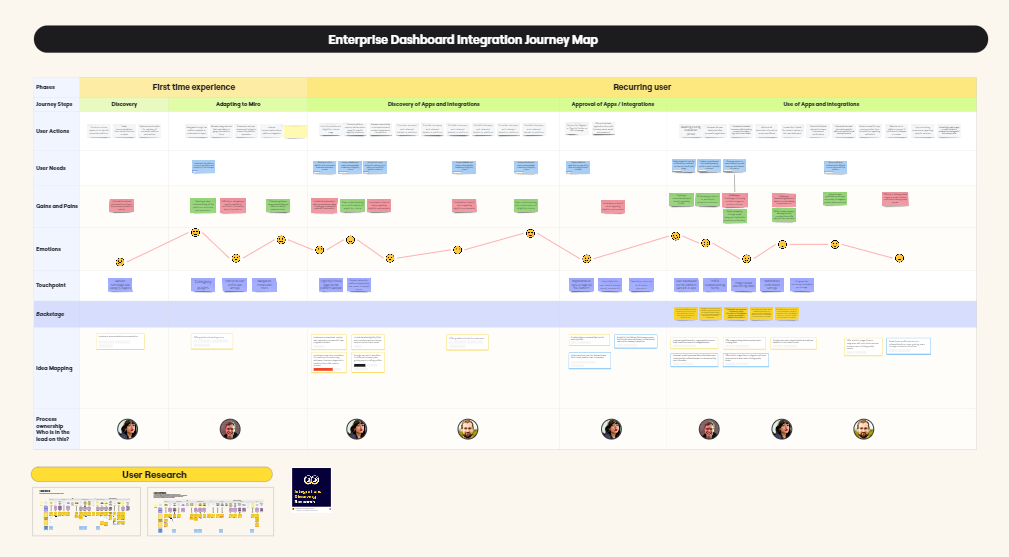
Maureen likes Miro because she can visually map out the entire journey on a canvas without any limits. In this example, she and her team held a journey mapping workshop to better understand the needs of customers who rely on business intelligence tools.

In this Miro board, the users will walk the team through each step of their journey, sharing how things work, what their needs are, their pains and gains, and the touchpoints they encounter.

Full view of a journey map in Miro

Collaborate with users 

Miro provides a painless process because Maureen can share this Miro board with their users, and together they can fill it out or make changes to the steps along the way.

All of this work is done in a table, and it’s easy to add a column or move things around. The content is also auto-fitted to the table, meaning the columns automatically adjust to the size of the content.

Consolidate research

To ensure the journey map accurately covers everything you know or have collected, you can easily add data from other places. This includes frames from other Miro boards, entire research boards, and even content from other tools altogether.

Miro integrates with a variety of apps and platforms, which means Maureen can add PDFs from user surveys, documents from Google Drive, and videos from Loom or UserTesting.

Miro board with content and files pulled in from other sources

Ideate with workshops

Maureen’s next step is to lead her team and stakeholders in a workshop to ideate how they can improve the experience in each step of the journey. 

She starts with presenting the objectives, and the team uses Miro to brainstorm ideas which can be bucketed into themes and topics.

In the past, Maureen had to switch between different tools for workshopping. But with Miro, she can present the workshop instructions and background slides by using Interactive Presentation Mode, and then switch to the pan tool when it’s time to collaborate.

Turn ideas into action points

The output of this workshop is a new “Idea Mapping” swimlane in the user journey table. This is where Maureen’s team collects ideas and turns them into actionable cards.

You can use Miro cards, Jira, or AzureDevops, depending on your preferences. No matter what, Miro makes it possible to convert ideas into action points that can be tracked for visibility.

Miro cards containing actionable tasks

Share findings with team

Now, Maureen has a complete and visual overview that shows the gaps and opportunities of the current user experience. To share the findings with her team in a digestible way and to provide more context, she records a Talktrack recording for others to watch later, in their own time.

There you have it. As you can see, it’s easy to use the same Miro board for all your user journey mapping needs. Be sure to watch the video to hear straight from Maureen how to use her full-fledged, easy-to-use journey mapping template for your own team.
And check out the template once you’re ready to dive into your own journey map.

Achieve continuous improvement with as-is and to-be process mapping

Software Stack Editor · April 16, 2024 ·

In 1952, brothers Richard and Maurice McDonald closed their BBQ restaurant for three months to focus on one small aspect of their business: hamburgers. Like many other restaurants at that time, their processes were slow and inefficient. They cooked menu items to order, used non-disposable dishes, and delivered meals via carhops. 

To cut costs and serve hamburgers faster, the brothers took their crew out to a tennis court. They mapped out the kitchen appliances in chalk and had their team practice cooking with a timer. Then they scrubbed the chalk out and adjusted the kitchen layout to optimize their cooking time. On the second day, it rained and they had to start over. 

When they finally re-opened, they introduced the world to the Speedee Service System, a process that would catapult McDonald’s into franchise history books. They achieved this system (and 15-cent burgers) all thanks to as-is and to-be process mapping on that tennis court. 

These process mapping techniques frame the opportunity for companies to improve by illustrating the gap between what is and what could be. 

Process mapping basics

Process mapping is a method of visualizing processes, workflows, and procedures. The maps themselves use shapes and lines to diagram the relationships between tasks, decisions, and people. 

Putting together these maps pushes teams to define roles and responsibilities, and align communications across silos. Once the map is created, it can help teams understand a complex process at a glance and give leaders the information they need to make strategic decisions. 

Below we’ll dive into how these distinct types of process maps serve different purposes. 

Learn how to make a basic process map via Miro’s guide to process mapping

What is an as-is process map?

An as-is process map represents a workflow or procedure as it currently functions — helping teams and leaders understand what’s happening now, at a glance. Here are some of the ways it can add value. 

Onboard and train new hires

It’s difficult and time-consuming to train new hires when your processes aren’t documented well (or at all). The presence of updated as-is process maps can get new employees up to speed faster and shorten their time to productive contribution. 

Identify bottlenecks and inefficiencies

Inefficient processes slow down production, which can lower profits and decrease employee and client satisfaction. Most companies know when a process is broken, but they don’t know how to fix it.

When you create an as-is process map, it’s easier to pinpoint which stages of a process are slowing things down or causing extra work.

When Amazon was trying to cut down fulfillment time in their warehouses, they noticed it took too long for one employee to walk across a warehouse to shelve lipstick in a cosmetics section and another employee to find and retrieve it. To save time, they adopted the practice of shelving an item wherever they could find available space and keeping track of the item’s location with a barcode. By spreading inventory throughout a warehouse and carefully tagging the location, employees no longer need to walk all over a large warehouse to fill one order. 

Collaborate better

Most processes require multiple people, often from across functional areas. Companies report that cross-departmental collaboration is a challenge. For example, Deloitte and MIT found that 75% of organizations are coordinating their workforces across functional areas, but just 41% say their organization has the right functions working together in the right way. With an as-is process map, even cross-functional teams can better understand roles and responsibilities, and align their priorities. 

As-is process map examples

Looking for inspiration? As-is process maps can be used to illustrate anything from workflows to organizational structures and user flows. 

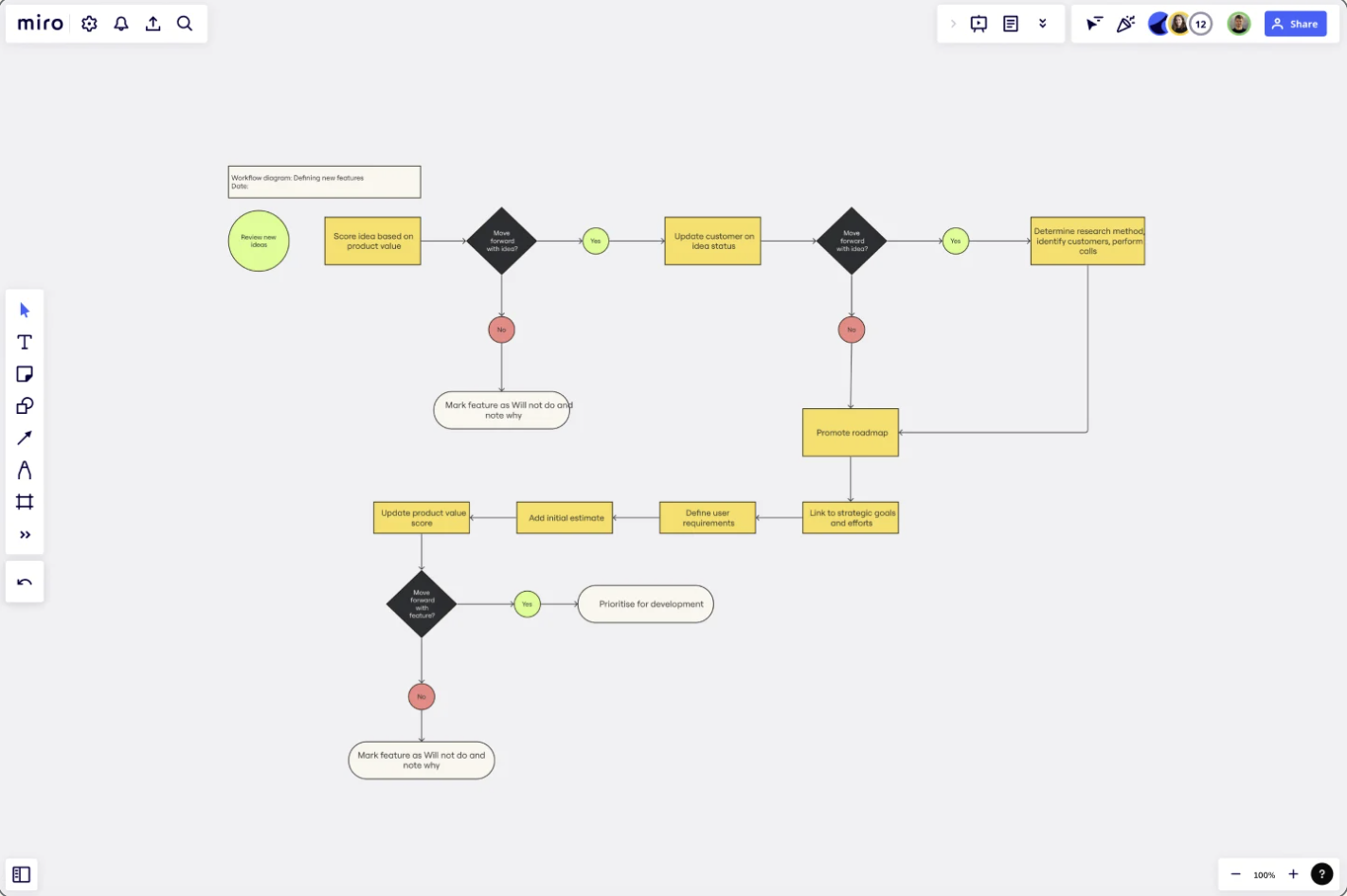
Workflow diagram

A workflow diagram is an as-in process map that illustrates a single workflow. You can use a flow structure to show a starting point, steps and decisions, and an endpoint. This helps teams pinpoint missing information, visualize end-to-end processes, and onboard new employees.

workflow diagram example

Use this template

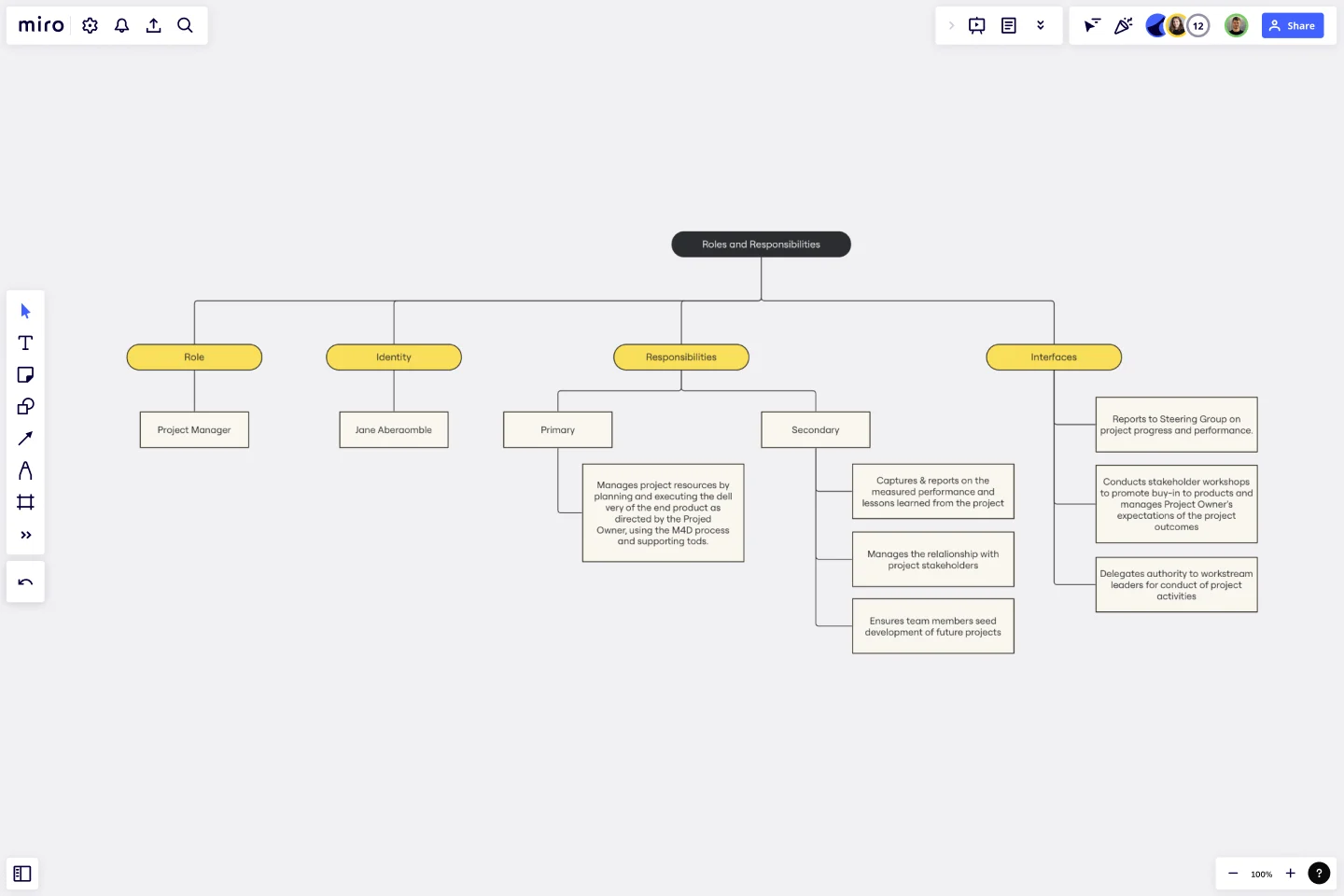
Roles and responsibilities

A roles and responsibilities chart maps responsibilities within a team (or project) to help teams stay focused and operate efficiently. The visual branching style shows relationships between managers and teams, which guides important conversations and enables teams to set boundaries and expectations. 

roles and responsibilities map example

Use this template

What is a to-be process map?

A to-be process is a process in a future or theoretical state. To-be process maps serve as a planning and strategy tool, illustrating a process that’s still in development and yet to be implemented. Here are some of their benefits. 

Plan and allocate resources

Process mapping isn’t just for refining existing processes. It’s a powerful tool for planning new initiatives. One example is a product roadmap, which is a strategy document outlining the steps needed to bring a product launch from concept to go-to-market. This visual representation of a future process lets companies budget appropriate resources and staffing to bring a plan to fruition. 

Facilitate scenario testing and assessments

Hypotheses and testing are important parts of the scientific method. A to-be process is essentially a hypothesis about how a new or improved process will work. Companies may build multiple to-be process maps so they can test and assess the effectiveness of each one, tweak their process, then try again. 

Improve productivity and team satisfaction

Inefficient processes lead to low morale and employee churn. This translates to a big price tag for businesses — McKinsey & Company estimates that employee disengagement and attrition costs a median S&P 500 company $228 million per year. 

When employees don’t understand their roles or feel like their work doesn’t matter, everyone loses. To-be process mapping helps teams align around a common purpose, communicate and contribute ideas, and feel valued as a part of the improvement process. 

To-be process map examples

You can turn any as-is process map into a to-be process map by simply adding the changes you want to test and implement. There are also unique process maps designed for strategic planning. 

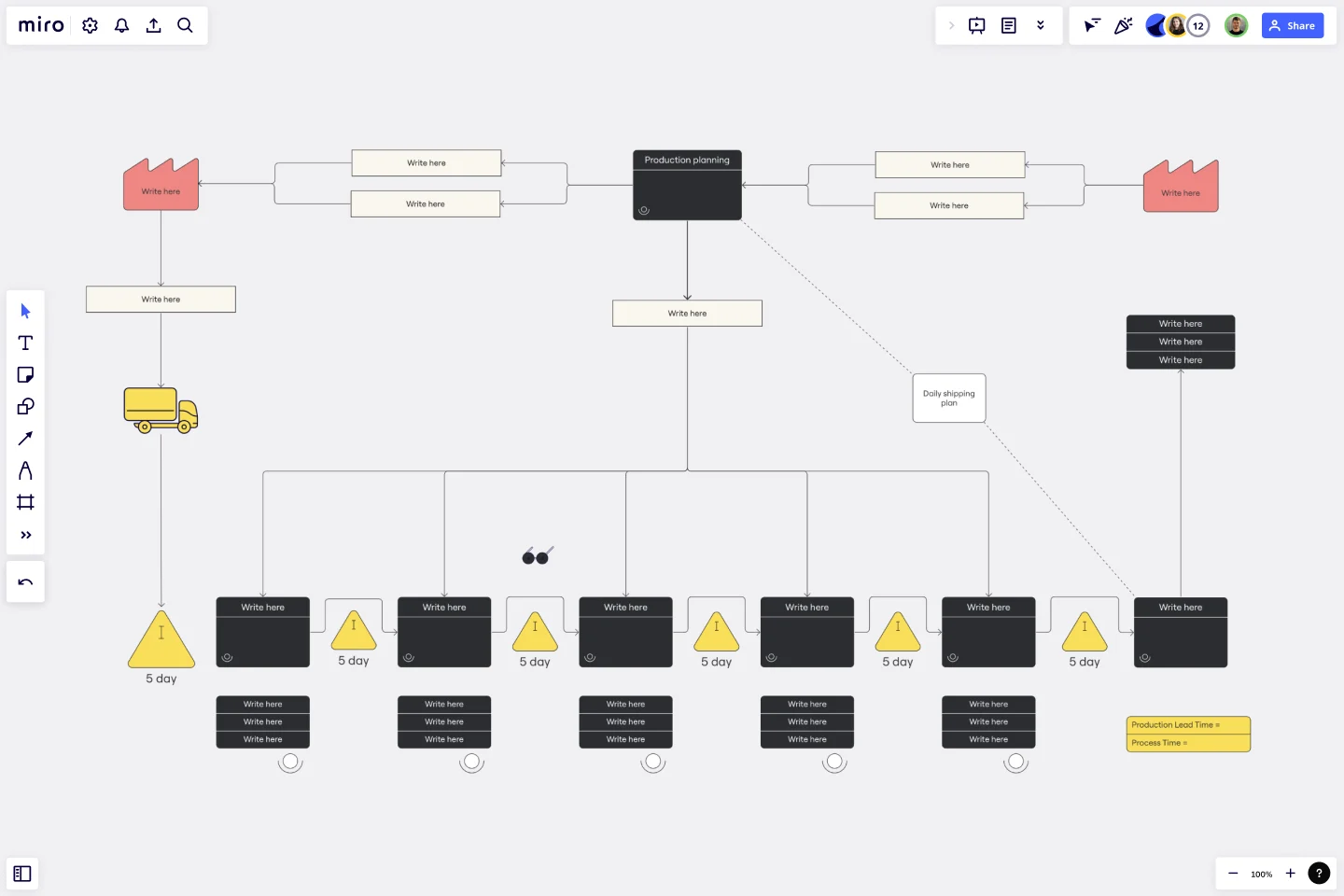
Value stream map

A value stream map is a diagram that illustrates the flow of materials and information in a process. This method was pioneered by Toyota, who created a just-in-time manufacturing process with continual processing to avoid excess production.

value stream map example

Use this template

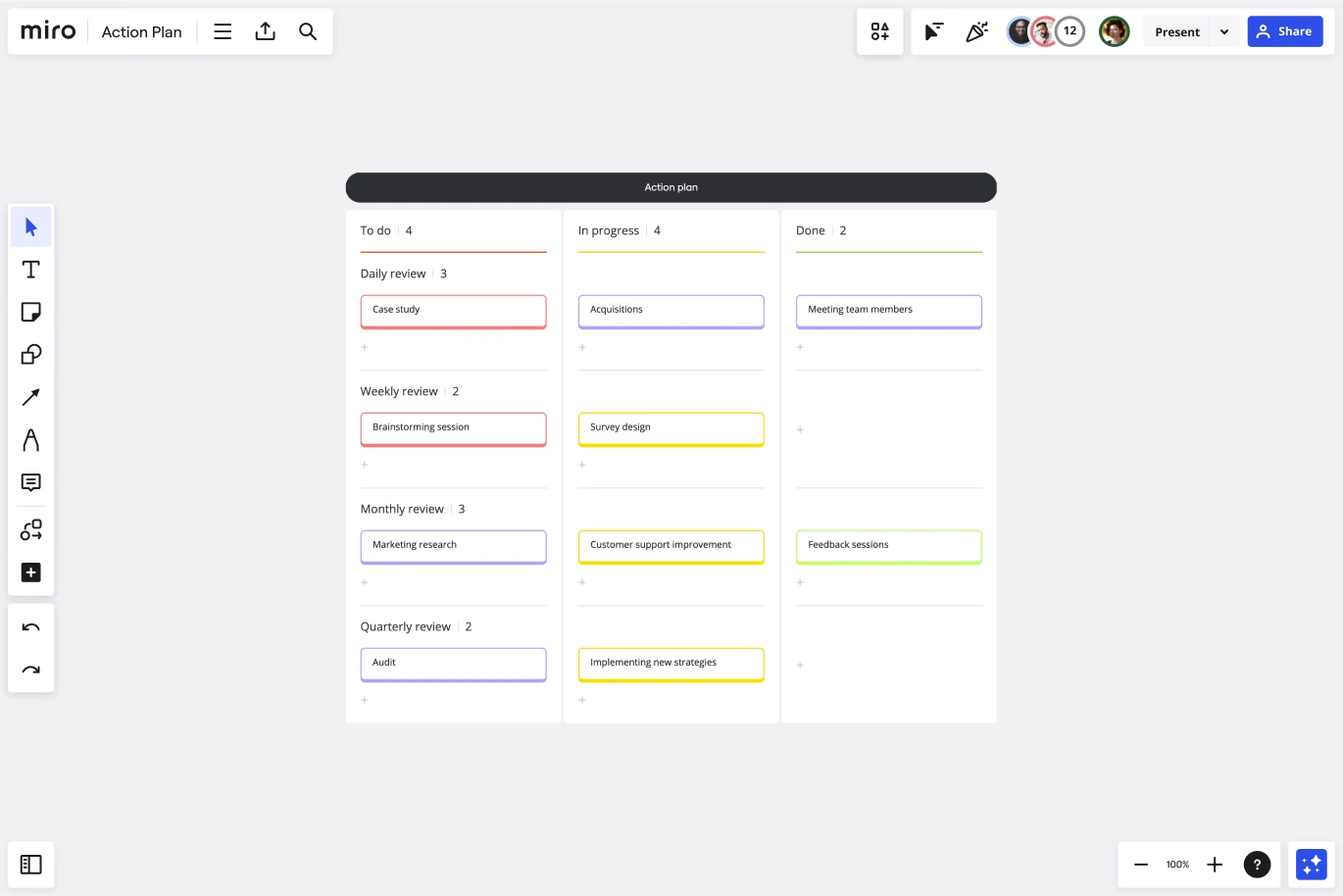
Action plan

An action plan is a list of tasks that details everything you need to do to complete a project. These plans can include dependencies, roles, deadlines, and instructions for assignees. Managers can create action plans for repeatable projects to save time and optimize productivity. While there are different formats for action plans, the one below is structured as a Kanban board. 

action plan template example

Use this template

How to create as-is and to-be process maps

Before creating your process map, take a page from a cartography textbook. Start by answering these three questions:

  • What is the purpose of the map? Articulate why the map is needed and the expected outcome. 
  • Who is the audience for this map? Consider who the map is for, what information they will care about the most, and the most effective communication method for them.
  • How will it be displayed? A process map that will be printed and hung in a manufacturing facility should be designed differently than one that will live in digital form. 

Once you know these three answers, you’re ready to dive in. 

1. Determine your stakeholders

Ask yourself who needs to be included in the process. While you don’t want the group to become too large, make sure that all important parties that might be impacted are in attendance. It’s much more difficult to sell people on a new process when they are left out of the conversation. 

2. Choose a diagram format and mapping tool

Next, choose the diagram format. A flow chart is the simplest process map and the easiest to pick up. However, a swimlane diagram or value stream process map may be appropriate for complex processes. 

The mapping tool that you choose also makes a difference. Choose one with preset shapes and connectors, and a template library to save time and deliver professional designs. A collaborative virtual tool like Miro enables stakeholders to converse, diagram, and adjust their maps live, cutting down on back-and-forth time over email. 

3. Document your process

Bring your group together to determine what information you have today, what you still need, and which details are the most important. 

For an as-is process, this is the most important step. Observe a process in action or ask different parties to share their version of a process to understand it better. For a to-be process, collect as much information as you can about what needs to be accomplished or case studies of what’s worked elsewhere. 

4. Diagram a high-level flow

Before you zoom in on the details, diagram a high-level flow of the main action steps of a process. Ask contributors for feedback before adding details to your diagram. 

5. Add in the details

Add details about inputs and outputs, and who is performing each task to make the process map complete. Even with a detailed view, be careful to avoid lengthy text. Instead, use color coding and symbols to convey concepts and responsible parties.

6. Have everyone sign off

This step is critical. Process maps need multiple perspectives to be the most efficient. The key part of collaboration is making sure all parties are in agreement, and if they aren’t, set aside time to get there. 

7. Assign action items and follow-up items

In an as-is process map, you may not have any action items following a map creation. A to-be process map, on the other hand, is a catalyst that will propel you forward. Keep your momentum going by assigning action items to individuals and turning your process map into a roadmap for implementation. Don’t forget to assign someone to take ownership of maintaining the map going forward.

8. Schedule time to review the map in the future

Whether you created an as-is map or a to-be map, it’s certain that the process will need to be modified at some point. Scheduling a time to review the map will keep teams accountable, ensure that process changes stay documented, and help teams identify long-term improvements. For an as-is process map, an annual review may be sufficient. For a to-be map, choose a review cadence appropriate for the speed of the project.  

From as-is to to-be: Closing the gap between the current state and the ideal state

Process mapping has come a long way from chalking a tennis court, but the basic concept is the same. To improve a process, it’s critical to understand the current state of affairs first. Involve stakeholders to diagram processes with an as-is process map, then brainstorm ways to improve with a to-be process map. Incorporating both these elements helps to train new hires, identify and remove bottlenecks, and improve productivity across the board.

How AI-powered tools can improve enterprise security

Software Stack Editor · April 12, 2024 ·

image

Developments in Generative Artificial Intelligence (GenAI) have had a huge impact on content creation, innovation, and collaboration. Everything from creating text, images, and videos, to sorting unstructured information, and generating or analyzing software code are easy to accomplish with the help of GenAI. But what can GenAI do when it comes to security?

When “AI” and “security” are used in the same sentence, there’s often a negative connotation. For example, we’ve seen attackers use GenAI to create deep fakes to scam people for financial gain, taking social engineering into a completely new dimension. What’s more, it’s never been simpler for threat actors to create content cheaply, quickly, and easily that imitates other companies or people for phishing purposes. GenAI can even create malicious code or look for security vulnerabilities within open sourced code to exploit.

While it’s important that all AI users — and especially leaders of organizations full of AI users — are aware of the technology’s security risks, there are also a number of ways in which AI-powered tools can improve enterprise security. This article focuses on those opportunities.

Classification and identification of different types of information

With recent developments in GenAI, it is now far simpler to identify and classify different types of information — and to impose protective measures for this information. While in the past we relied on matching static patterns of information, we can now distinguish unstructured information based on a much wider context, similar to the way a human mind can recognize information.

This will continue to have a significant impact on data protection and data leak prevention, especially when it comes to multi-modal types of information such as documents, emails, and canvases. It is even possible to see how distinct pieces of information might be sensitive in combination with other information. While previously only individual parts could be identified and classified, this distinction prevents the leaking of information that could be pieced together by an attacker to form a complete picture.

AI can also adapt to changes in the information and data based on input, so it can learn which information is considered sensitive. This is an advantage over models that need to be explicitly told and hard-coded, and it makes AI particularly well-suited to protect highly variable sets of information — which are common during innovation processes.  

Anomaly detection

Baselining for anomaly detection through statistical methods has been around for ages — detecting anomalies that are subtle or substantial against preset thresholds — but Machine Learning (ML) has enabled the learning of new patterns and the ability to include a wider range of data. With GenAI, we can much more effectively detect anomalies in more complex data (such as in texts or pictures) because its models are able to consume larger amounts of unstructured data and multimodal information. 

Hybrid approaches — GenAI-assisted anomaly detection with both supervised and unsupervised algorithms — have been shown to be more accurate and more effectively adjust to a higher variance of changes in the data (whereas traditional approaches need to be recalibrated). Most importantly, they can add more dimensions and forms of information into the anomaly detection which is a significant game changer.

These capabilities can be leveraged for everything from user anomaly behavior detection to identifying compromised accounts, network patterns, financial fraud detection, and much more. 

Threat intelligence

The introduction of Large Language Models (LLMs), as well as the image and speech analysis and translation capabilities of AI models, allows for significant advancements in threat intelligence processing.

More sources with more varying contexts can be processed and synthesized for easier consumption, making larger data sets more viable and actionable. Similar to anomaly detection, sifting through larger varying data allows AI to pick up subtle patterns that humans might otherwise easily miss. Effectively gathering threats allows enterprises to protect themselves against similar attacks that have occurred elsewhere. 

Contextual detection

Threat intelligence feed combined with anomaly detection creates an opportunity for the automation of contextual detection. Simply put, GenAI can take a large, rich data set from a threat intelligence feed and detect minute and subtle nuances in a smaller-scale environment that may otherwise go unnoticed.

Building data structures to gather data to better match other sources, such as vector databases, is a huge opportunity that newer AI models offer. Learnings from multiple sources can be collected and compared against a stream of different data, allowing a threat intelligence feed to be better operationalized in the future, similar to how GPTs or tuning of models based on one data set enables the analysis of other sets of information.  

Task automation

Another key strength of AI is its capacity to automate tedious, repetitive tasks, consequently freeing up skilled personnel for higher-level analysis. This is particularly impactful in the cybersecurity space, where the resources needed to take on the monumental task of protecting companies’ vast data and systems are often scarce.

GenAI reduces the need for expertise and experience when setting up a tasked automation or query. Natural language can be used to instruct a GenAI model to generate the query and iterate quickly towards a desired result. Prompting GenAI is undoubtedly a skill, but it’s still less complex and less dependent on strict syntax, in addition to not being limited by no/low code abstractions to accomplish the same task.

Perhaps AI’s greatest benefit is its adaptability. Just as the contextual aspects can be integrated with greater efficiency, so too the models can adjust and adapt to continuous changes or cater to higher degrees of variations. This can both increase the efficiency of security staff and reduce the required entry-level skills needed, while greatly improving coverage of preventative measures and reducing vulnerabilities and weaknesses.

Assistants

Assistants and copilots have been one of the biggest evolutions in GenAI. Now that programming tasks can be simplified, GenAI can use its models to better support engineers. Specialized tasks such as vulnerability patching are made simpler because the model provides a larger set of knowledge and expertise for developers to draw on to solve security challenges, while repetitive tasks can be performed over a larger set of code. 

Code and code analysis

With the advent of GenAI and, more specifically, Large Language Models (LLMs), we can now more easily comment or summarize code to be more accessible to engineers. What’s more, these models can boost capabilities to analyze code for security vulnerabilities, as well as suggest patches and mitigations.

Source code is usually vast for most monolithic systems and functions can be scattered across the code. There can even be dormant, unused code, which can confuse engineers unless appropriately commented or removed. AI-assisted analysis allows engineers to more effectively traverse a large code base.

While static code analysis has been around for a long time, it has often struggled with large amounts of false positives and equally false negatives. Due to the variating nature of source code, it has also been difficult to match where a vulnerability is introduced consistently. AI can sift through this vast amount of code, as well as deal with the high variance of ways to write the same function in the code. The result is a reduced rate of false positives and more accurate detection of previously unnoticed vulnerabilities in code scanning.

Security challenges with AI technologies

AI’s ability to process information makes it an attractive solution for addressing the growing volume and sophistication of cyber threats. However, organizations must approach AI-powered security with a clear understanding of its challenges. While this article focuses on the many opportunities that GenAI brings to the security space, it is important to also consider the challenges, such as:

  • Jailbreaking and Prompt injection 
  • Data poisoning and manipulation 
  • Model inversion and attackers inferring sensitive information from training data
  • Privacy risks of leaking personal information from training data
  • Bias and fairness
  • Supply chain risks 
  • Accuracy and faulty information 

To learn more about the security risks associated with LLMs and AI models, a good place to start is the OWASP Top 10 for Large Language Model Applications.

As you think about the next steps in securing your enterprise, consider using AI-powered security tools developed by trusted partners whose platforms are already integrated into your organization’s infrastructure. Be sure to take note of how they openly demonstrate their AI principles and practices. Enterprise Guard, for example, is an industry-first, advanced security and compliance layer for Miro that uses unique machine learning detection models to automatically find, classify, and secure sensitive and confidential content on Miro boards.

Ultimately, a balanced approach in which AI is deployed to augment the skills and judgment of human experts will be the most successful framework to harness the benefits of this transformative technology.

How to build resilient teams with Agile expert Diana Larsen

Software Stack Editor · April 12, 2024 ·

image

Diana Larsen is an international authority in Agile software development, leadership, and transformations. She’s also the co-author of Agile Retrospectives: Making Good Teams Great, Liftoff: Start and Sustain Successful Agile Teams, and The Five Rules of Accelerated Learning. Her most recent book, Lead Without Blame, is particularly relevant now, as it addresses the crucial need for enterprises to build resilient teams in today’s increasingly competitive and challenging landscape.

Diana and I recently spoke about her latest work and uncovered numerous strategies and insights for senior leaders. Here some of the learnings at a glance:

  • How to become learning leaders: modeling behaviors to unlock team potential and enhance resilience. 
  • Ways to conduct effective retrospective exercises: fostering constructive feedback and embracing healthy conflict to improve team dynamics. 
  • How to understand and leverage power dynamics: identifying and utilizing the team’s collective intelligence for maximum impact.

This interview has been edited for length and clarity.

Can you discuss your background, the origins of Lead Without Blame, and how you came to collaborate with your co-author, Tricia Broderick?

Retrospectives was about bringing in continuous improvement, and Liftoff was about how to charter teams and help them get started fast. Tricia and I were invited to write Lead Without Blame together. We hadn’t worked together much, though we knew of each other and really respected each other’s contributions to the community. 

The original request was that we write something about retrospectives for a broader audience. As Trisha and I started exploring what we felt like might be missing in the community and through that retrospective lens, we landed on healthy generative leadership: Leadership that fosters learning in their organizations and within teams. 

And it really hit a sweet spot because both of us are devoted to great teamwork. I’ve always been interested in how leadership can create the best possible work environment. I really believe that learning is the next big challenge for us as teams and organizations. Knowledge work is not the challenge. Learning work is.

Why is the concept of leading without blame so crucial in today’s work environments?

When you’re in an environment where there is blame, shame, judgment, and negative criticism — which for some reason or another people have been taught is the way to motivate people — it actually suppresses people’s desire to do good work, their ability to learn quickly, and their resilience. Because everybody’s looking over their shoulder. “Am I the one who’s gonna be blamed next?” 

Even if you haven’t experienced blame from a leader in your organization, you have seen it happen to other people, and then you’re on alert. And so some part of your productive energy is going toward protecting yourself from that, as opposed to creating really good work.

What are some of the common misconceptions that can contribute to a culture of blame?

I’ve always hated the word “empowerment” because it sounds like something you have to receive or get from someone else, when it really means power that comes from within. What we need to do is create a shift from “I’m going to hold you accountable” to “we” want to take responsibility for this. “We” want to be accountable for serving this customer in a really good way, and “we” want to do that together. Even the language around that shows you which one encourages you to become engaged and which one discourages you from becoming engaged.

Fear is an effective motivator in the short term. But it is very short term, and it ultimately builds resentment over time. There’s a lot of evidence that we don’t get to our best work that way. And yet, like the old saying goes, if all you have is a hammer, everything looks like a nail: If leaders only have ever been exposed to one way of leading, then that’s what they’re going to use. Because they don’t know what else is out there. So we wanted to encourage people to reflect on what might be out there. And we provided a number of ways to do just that.

What are the four Cs and how are leaders who embrace them more successful than those who lead with blame? 

Leaders need to look at their team as an entity as opposed to a collection of individual contributors. Dan Pink wrote a great book, Drive, about personal motivation. We wanted to take it from a different point of view — one of the collective. So we said, yes, purpose is a motivator, but it has to be a team purpose. Yes, autonomy is a motivator, but it needs to be team autonomy and collective identity. And then the last one is co-intelligence: what do we know, how do we know it, and what are our gaps as a team? 

Knowing that those are the three motivators and that our focus is on creating a better learning environment so that people can do better learning work, then courage means that the leaders need to model learning and give support for learning. 

Then compassion is understanding that learning is hard and that there’s always a learning curve. We need to have patience for people to learn their way through an issue or a dilemma, or learn new skills. For example, how do I learn about AI? How does AI fit into my work? That’s not going to happen overnight. 

Once you’ve supported learning publicly, and offered compassion to people for their learning, then the leader can have confidence that their team can do the learning they need to do. 

And then lastly, we have complexity. We live in such a complex world: the VUCA ideas – volatile, uncertain, complex, ambiguous. If leaders don’t understand and acknowledge that, then they’re going to have a very hard time working in the kind of conditions that come out of our current situations.

What is the core message you aim to convey through your book, and who do you believe will benefit most from its insights?

The book is for anyone who finds themself in a formal or informal leadership role. But in terms of who we would most like to influence, it’s the influencers in organizations, whether that’s the C-suite, the senior leadership, or the smartest technical person on your team. We want to encourage them to expand their skill set so that their leadership includes ways of leading without blame. And then be role models for other people, because we know that’s the most powerful way to learn. 
When you see somebody else doing something that’s really working, you want to try it out for yourself. And then when you get that internal feedback loop of, “wow, I’m getting much better results for this,” then you start modeling it for other people. We want to provide an opportunity for people of influence to show what it means to be a learning leader, meaning that you lead, you show yourself to be a learner, and you help others understand that they are learners too.

What was a surprising insight or lesson you learned about leadership and team resilience while writing this book?

While I already had a lot of respect for Tricia as a leader in the Agile community, over time I gained even more respect for her experiences as an executive leader. I came to it also with having written some other books. So I understood the book-writing process in a maybe more nuanced way than Tricia had expected it to be. It was that combination of our skills that led to the synergy and our greater understandings. Collaborations help me to remember the power of collaborations.

The book has reflection exercises for each chapter. Can you talk a little bit about the importance of reflection in the learning process? What’s the most important thing for leaders to do as they reflect?

We not only encourage reflection at the end of every chapter, but we also provide ideas about moving retrospectives beyond just a delivery team activity. We want to inspire people to use retrospectives to influence the broader organization and our leadership peer group. There’s a little chart that says here are all the possible places, issues, ideas, and groups they might want to use retrospectives with, so that people can get a little more information about them and how to facilitate them. 

Check out the Lead Without Blame Miroverse Template

Diana, thank you so much for your time. Any last thoughts that’d you’d like to share?

Be kind to each other. People sometimes call me a visionary pragmatist, and sometimes they call me a pragmatic visionary. I’m not sure which way you want to put your thumb on the scale, but I do want people to treat each other well and to have these wonderful human opportunities for learning. Being a leader in this way gets you better results.

Watch the full interview with Diana Larsen here.

Why sustainability needs to be every business’ top priority: an interview with Miro Principal Product Evangelist Bram Jonker

Software Stack Editor · April 11, 2024 ·

image

Whether it’s reported in the news or discussed in the boardroom, environmental concerns are top of mind these days — and sustainability is increasingly influencing how companies do business, what projects they’re prioritizing, and how they plan for the future. We spoke with Bram Jonker, Principal Product Evangelist at Miro, to learn how organizations are leveraging innovation to tackle this complex challenge. 

The following interview has been edited for length and clarity.

What is sustainability when it comes to business practices? 

I would expand the definition of “sustainability” to include environmental, social, and governance (ESG). When most companies talk about sustainability, they touch upon the environmental factors and leave out the other two, which is a missed opportunity. For instance, if you implement environmentally friendly production practices but don’t pay a living wage to your employees, you’re not fully contributing to a better, more stable society.

Why is sustainability a hot topic in business right now?

One of the big reasons sustainability is top of mind for businesses right now is new regulations, especially the European Union (EU)’s Corporate Sustainability Reporting Directive, which states that public and large private organizations with a presence in the EU must disclose how their business activities impact people and the environment. That means details about their carbon footprint, including that of their vendors, will be publicly reported.

Some corporations used to get away with greenwashing, making sustainability claims that bolstered their image without making a real environmental impact. These new regulations offer more oversight and require companies to disclose not just the impact of ESG initiatives on their bottom line, but on broader societal factors, like human rights, fair business practices, and the environment.

Besides regulatory compliance, what other incentives do businesses have to prioritize sustainability?

Businesses that don’t prioritize ESG risk harming their reputation, which hinders their ability to win customers and attract top talent. Employees want to be proud of their employer. Younger generations, in particular, want to work for businesses that make the world a better place, not those that have a reputation for treating people and the planet poorly. 

And just like consumers are making conscious decisions about what they’re buying and who they’re buying from, ethical companies want to partner with other ethical companies. It’s much easier to build a strong network of business partners and clients when you have a good ESG track record, especially in light of new vendor selection regulations.

But businesses don’t have to sacrifice profit for doing the right thing. If anything, it makes them stronger. A recent IBM survey of 5,000 C-suite executives across 22 industries and 22 countries found that organizations who embedded sustainability into their business operations were: 

  • 75% more likely to attribute great improvement in revenue to their sustainability efforts
  • 56% more likely to outperform their peers on talent attraction
  • 52% more likely to outperform their peers on profitability
  • Had a 16% higher rate of revenue growth

Which companies are leading the way in innovative sustainability practices?

Patagonia is famous for its dedication to making a positive environmental and social impact. As founder Yvon Chouinard says, “Earth is now our only shareholder.” They are well-known for their circular economy practices to keep their product out of landfills, like offering lifetime repairs and reselling used clothing. The clothing industry as a whole is known for its large carbon footprint, so Patagonia also transformed their supply chain systems and invested in innovative product engineering to reduce waste and stop the practice of using synthetic microfibers and forever chemicals in their clothing.

Deloitte NL, where I worked as the Director of Technology and Innovation before joining Miro, has thought strategically about how to make meaningful progress on ESG initiatives. Their Impact Foundation allows all employees to dedicate 1% of their time and expertise to making a positive societal impact. These employee-led initiatives include researching climate adaptation in the Netherlands, supporting The Ocean Cleanup, addressing teacher shortages, and scaling social programs that help people find meaningful employment. 

Innovation doesn’t just have to be about technological advancement. It can be about new ways of thinking or organizing resources to solve a problem, too — like allowing a global network of diverse subject matter experts to spend a portion of their working hours on addressing complex societal challenges.  

Should sustainability shape the future of innovation? 

While there are a few examples of companies channeling their resources toward sustainability initiatives, I don’t think we’re doing enough. The business world must take more responsibility and utilize their innovation power for good. 

At Miro, our mission is to empower teams to create the next big thing. I do hope more companies will make ESG commitments part of their next “big thing.” If innovative companies dedicate their talent and technology to solving some of our biggest problems, we could leave the world a better place for future generations. But I don’t think we’re there yet.

True innovators think beyond quarterly earnings. A sustainable company is one that can still exist in one hundred years, because a liveable planet is still there. How do we make sure that we’re still going to be around centuries from now? We won’t succeed if we’re not being innovative.

Unlock your innovation potential with these 8 AI-powered ideas from the Miro Community

Software Stack Editor · April 10, 2024 ·

image

From organizing ideation sessions to automating manual project management updates, the opportunities to supercharge product workflows with artificial intelligence (AI)-powered tools are virtually endless. 

At this point, it’s less of a question of if, but rather, how teams are harnessing the power of AI to unlock their organization’s full innovation potential. To learn more, we created a challenge, inviting the Miro Community of creators to share how they’re using AI (specifically, Miro Assist) to power each of the three critical stages of the product development process: discover, define, and deliver.  

We received submissions from all around the globe, showcasing the many creative and diverse ways users rely on Miro Assist to expand their thinking and product potential. While our three challenge winners were selected at random, we’ve handpicked a few of our favorite submissions below to highlight the innovative and even unexpected ways you can use AI to streamline work and focus on what matters most. 

Phase 1: Discover

The discovery phase can be well summed up by the classic question: “What problem are we trying to solve?” Product teams need to gather data to fully understand the problem, define what the end-user really wants, and identify opportunities for the product or service that’s being developed. 

Customer centricity is key here, whether you’re kicking off market and user research or diving into a team brainstorming session. Check out the following boards to support the discovery stage of product development, when your team needs to:

💡 Generate ideas

The ideas generator board (with an accompanying talktrack), created by Boris Petrovitch Njegosh of R SPRINT, provides a clean template with prompts to help your team leverage the power of generative AI. 

Use Miro Assist to generate idea sticky notes based on your prompt inputs, then sort the outputs by keyword or sentiment. A third voting module can be used as a landing spot for your team’s favorites, keeping your ideation session organized in a single (and well-sorted) workspace.

📊 Analyze data to identify and take action on ideas 

Robert Johnson’s From feedback to action board (and talktrack) is a useful template when sifting through customer feedback, user research, or any other large amount of data, and map out next steps. 

Once data is imported into Miro, you can use Miro Assist to easily sort by keyword or sentiment, then further expand on that data with more ideas, questions, or topics to get the creative juices flowing. 

Phase 2: Define

In this stage, the focus shifts toward refining and synthesizing all the ideas generated during discovery to determine what the actual solution(s) and scope of work look like. 

Whether you’re creating user personas and stories or goal-setting, it’s important to determine what your most significant challenges will be. Then, collaborate to prioritize them as a team when developing your product vision, strategy, and plan. 

🧪 Test product or service propositions 

When it comes time to refine, David Balkind’s AI proposition worksheet board and talktrack walkthrough make it a snap to evaluate feasibility and shape your product development plan, end-to-end. 

Using embedded AI widgets, expand on your ideas with mind maps and set context to build a strategy framework. From there, Miro Assist can help you generate personas, value propositions, objections, social media campaigns, summaries, and more, all without the guesswork.

Phase 3: Deliver

Finally, the delivery phase involves building and launching your product. From designing, coding, and testing product features to launch planning with marketing and sales, this final phase brings your hard work from the discovery and defining stages to life. 

But what happens after you go-to-market is just as, if not more important, than the launch itself. Teams who effectively deliver also know how to iterate, and can seamlessly pivot back to the discovery and defining phases as new customer feedback and signals present themselves.

📈 Craft an engaging brand narrative to foster loyalty and growth

Tirelle LM Barron’s Content Vision Board breaks down a full omnichannel content strategy into an approachable framework of tasks and prompts that makes content mapping a breeze. 

Miro Assist can be deployed in a number of ways here to summarize sticky notes, expand on ideas with more questions and topics, or even cluster and sort to stay organized. As explained in the various Talktracks, this board is useful for creative teams looking to get buy-in for ideas, facilitate sprints, streamline current initiatives, or align narratives across all content.

🗣️ Experiment with your brand’s character and tone

Too often, user personas get abandoned post-launch as user needs change or when feedback doesn’t align with expectations. Anastasia Lebedeva’s Circle of archetypes board helps teams evolve their brand’s character in real time, allowing users to plug in user archetypes to help build and rebuild a brand’s character, voice, and tone.

Don’t be overwhelmed by the volume of information on the board: Support from Miro Assist can be smartly integrated at each step to help users create new stickies, organize their ideas, and generate answers directly in the chat. 

Find additional inspiration for more use cases 

📖 Storytelling can be a powerful tool for brands in every stage of development. Indra Kusama finds smart ways to incorporate AI in this storytelling board to help map a story from beginning to end. Find detailed steps on how to use Miro Assist for storytelling here. 

✍️ Workshop or meeting prep can sometimes feel like a necessary evil, but Yehor Kachanov explains how to use Miro Assist to prepare icebreakers and other meeting tools without the fuss. 

🪞Retrospectives offer teams a chance to reflect on past work and ideate on future improvements. Colin offers helpful tips on how to use Miro Assist with the Stop, Start and Continue framework for more organized, actionable retros.  

Remember that this is only a small sampling of the limitless ways product teams can use generative AI–powered tools to rev up performance and unleash their innovation potential. Be sure to check out more peer examples from the Miro Community for additional use cases and inspiration! 


Should we scale, and if so, how?  Dissecting the Scaled Agile debate.

Software Stack Editor · April 10, 2024 ·

image

It’s been 23 years since the Agile Manifesto transformed software development. Frameworks like Scrum and Kanban and other Agile practices have allowed teams to move away from rigid, linear processes to more flexible ones that focus on delivering value to customers faster.

Since then, the world of Agile has expanded in scope. It’s no longer just for small, scrappy software development teams — it’s been embraced across industries and disciplines as an innovative way of working that puts the customer first and allows teams to self-organize.. But as Agile methods are used in ever larger and more complex organizations, how or if they should  implement Agile at scale has become a contentious debate.

The debate: Is Scaled Agile really Agile?

Purists believe that rigidly interpreted frameworks stray from Agile’s original intent, especially when it comes to scaled frameworks like SAFe (Scaled Agile Framework), S@S (Scrum at Scale), and LeSS (Large Scale Scrum).

SAFe in particular draws a lot of criticismbecause it’s viewed as incredibly prescriptive, heavyweight, and top-down — the opposite of what Agile values and principles are all about. Some even consider it a perversion of Agile ideals because of its command-and-control elements. Detractors argue that SAFe wraps itself in a lot of Agile terminology, but beyond the team level it’s very hierarchical.

While you may believe there’s some truth to this sentiment, SAFe is trying to solve a thorny problem: how to coordinate dozens or hundreds of teams that have to work together while still preserving autonomy at the team level. It intends to provide the structure needed for teams to collaborate, build a common understanding of the work that needs to be done, and identify cross-functional dependencies in large, complex organizations.

In my opinion, there’s no “wrong” Scaled Agile framework. Instead, it’s about finding what works for your organization. Frameworks like SAFe and others like it should be viewed as a starting point — not as an immutable, unchangeable law because there’s no single framework that makes sense for all organizations and in all contexts.

That being said, I understand the reflex to gravitate toward concrete answers. Early in my career I was the Scrum Police; I never wanted to deviate from what the framework prescribed. But over the 15 years I’ve worked in Agile, I learned you don’t have to be pedantic about the frameworks you employ. All-or-nothing implementations, where teams aren’t given autonomy or a voice to provide feedback, are the antithesis of Agile.

Scaled Agile frameworks should be flexible

Anyone who wants to implement Scaled Agile needs to approach it from an experimentation and growth mindset. If you’re not sure where to start, keep in mind the values and principles from the Agile Manifesto, which should guide any type of Agile transformation, scaled or otherwise.

With these principles in mind, think of Scaled Agile frameworks as toolkits rather than the letter of the law, selecting elements that are useful and discarding ones that aren’t. (Unless, of course, the full framework does work for you. If so, that’s great too!)

When selecting Scaled Agile tools and templates to try out, think pragmatically about how they fit into the context of your business, industry, company culture, and organizational structure. Give teams the agency and  empowerment to combine different tools in ways that aren’t necessarily what the framework prescribes, as long as they provide the flexibility you need as an organization to move forward.

Once you’ve landed on an effective process, don’t become rigid. If something isn’t working, pivot or create your own internal frameworks. Then test and experiment until you find a solution. That’s the beauty of Agile — it’s meant to be adaptive and iterative. Embracing ways of working that prioritize freedom, flexibility, and feedback loops ultimately leads to effective and happy teams, incremental product innovation and satisfied customers.

The future of Scaled Agile goes beyond frameworks

This mix-and-match approach is growing in popularity. Digital.ai’s latest State of Agile Report, for example, found that 34% of survey respondents “create their own enterprise Agile framework” or “don’t follow a mandated Agile framework at the enterprise level.”  

And PMI, developers of the Disciplined Agile (DA) framework, mapped an exhaustive list of Agile approaches in their “Ways of Working Spectrum” to help users select tools from different frameworks based on the problem they’re solving and the context they’re using it in.

Exciting new ideas and methodologies are also branching off from traditional Scaled Agile approaches. unFIX, created by Jürgen Appelo, isn’t considered a framework, but rather a pattern library, in which “nothing is essential and everything is optional,” whereas FaST (Fluid Scaling Technology) focuses on forming teams around the work rather than making the work fit the team. 
Scaled Agile is at a crossroads

The question is: Will we become more entrenched in our existing frameworks, or break away into brand new ways of working? 

I don’t think this debate has a binary, black-and-white answer. The evolution of Scaled Agile isn’t about new frameworks replacing old. Instead, I think of it as the roots of Scaled Agile growing new green shoots, offering a swath of complementary tools that Agile professionals can pick from based on their team’s self-organizational needs.

I believe the future of Scaled Agile isn’t about being beholden to a singular framework, unless that framework already works for you. After all, and not to be clichéd, one of the values of the Agile Manifesto is “Individuals and interactions over processes and tools.” You can respect the principles of Agile while offering room for experimentation and flexibility, which ultimately helps teams deliver value to customers faster. And that’s what Agile is all about.

Miro is Google Cloud’s 2024 Technology Partner of the Year in Productivity and Collaboration: Innovation

Software Stack Editor · April 9, 2024 ·

We’re thrilled to announce that Miro has won the Google Cloud 2024 Technology Partner of the Year Award in Productivity and Collaboration: Innovation, in recognition of our commitment to an excellent customer experience.

Today, Google announced all 2024 Google Cloud Partner Award winners, celebrating companies around the globe that play a key role in helping customers drive innovation with visionary technology. Miro included!

At Miro, we’re dedicated to helping our customers build the future, and our integrations with Google Workspace showcase just how critical collaboration is to business success. Miro was the first organization to integrate with Google Meet, co-building with Google to enable a platform strategy that drives innovation. For over two years, our companies have been closely partnering to improve the experience for our mutual users by developing best practices and principles around collaboration. 

With our Google Workspace integrations across Google Meet, Calendar, Docs, and unfurl of Google Sheets and Slides content in Miro, teams that use Google products are well supported to bring their work together and build great products.

Our Google Workspace integrations allow users to: 

  • Attach boards to Google Calendar events so teammates get automatic access
  • Open Miro boards right in Google Meet to drive engaging and interactive meetings
  • Edit Google Docs, Sheets, and Slides directly while working in Miro for more efficient workflows and quicker, easier coordination among distributed teams 

“We are honored to be named a 2024 Google Cloud Partner of the Year recognizing our innovation within the Productivity & Collaboration category,” says Andrew Edelman, Head of Partnerships at Miro. “From Google Meet to Google Calendar to Google Drive, our suite of integrations with Google Workspace have fundamentally changed the collaboration experience for our users, offering streamlined workflows and enhanced efficiency. This award and continued positive feedback from our user community fuels our shared commitment to innovation and the continuous evolution of our integrated solutions.”

Miro’s experience in cross-device integrations was integral to working closely with Google on a best in class solution for Jamboard users. If you’re migrating from Jamboard, we make it easy. Plus, using Miro across your hardware devices is easy across mobile, tablet, and interactive displays, thanks to best-in-class touch capabilities and stylus support. Miro is also embedded in Google Meet Series One Board 65 and Desk 27 by Avocor, enabling access right from within the Meet room experience. 

Miro allows for endless capabilities like diagramming, real-time data visualization, workshop facilitation, and built-in support for common product development processes, including Agile practices like estimation and retrospectives. We also integrate with over 130 popular apps like JIRA, Slack, Asana, Amplitude, and others. 

For developers, Miro and Google work together consistently to highlight best practices for building on our platforms. From speaking at Google Developer Summits to presenting at Google Cloud Next, we’re excited to move forward with strong hand-in-hand support for developers building into the Google and Miro platforms. 

“Google Cloud’s Partner Awards celebrate the transformative impact and value that partners have delivered for customers,” said Kevin Ichhpurani, Corporate Vice President, Global Ecosystem and Channels at Google Cloud. “We’re proud to announce Miro as a 2024 Google Cloud Partner Award winner and recognize their achievements enabling customer success from the past year.”

We’re thrilled to be highlighted as a Google Partner of the Year and our partnership is only growing stronger. Get going with our Google Workspace integrations today and see how collaboration can drive innovation at your company.

From pain points to progress: accelerating your Well-Architected Framework Reviews

Software Stack Editor · April 8, 2024 ·

Creating an architecture that not only supports your business, but enhances it, is not a one-and-done task. It requires continuous reflection, learning, and improvement. For organizations that build on AWS, Well-Architected Framework Reviews play a critical role in their success. Designed to enable teams to assess and improve their architecture, the process can enhance performance, ensure stability and security, and maximize cost-efficiency. This is why many organizations engage Well-Architected Partner Program members. 

But when teams are in the trenches of, or have just completed, a big migration or launch, the thought of participating in a Well-Architected Review can feel overwhelming. It’s not that they don’t want to look at their architecture through a critical lens. (The fact that they’ve engaged a Well-Architected Partner Program Member indicates the opposite.) But it’s the process they find challenging. 

Below we’ll dive into some of the hurdles reported by solution architects and their partners, and offer solutions to help you minimize friction, maximize performance, and complete reviews more efficiently — all while getting the most out of AWS.

Hurdles to participating in a Well-Architected Framework Review

There’s no single source of truth

One of the major frustrations we hear from review participants is the difficulty in keeping track of documentation, tasks, and progress. With critical information and data in various places, cross-functional teams waste a lot of time and effort simply trying to find what they need.

Siloed tools

Creating diagrams in silos can really inhibit collaboration. As teams go back and forth on multiple reviews with little visibility into changes (and the “why” of changes), creating a simple diagram can take valuable time away from bigger projects.  

Manual effort

A thorough review involves a lot of manual effort, including compiling well-architected risks, assigning tasks for the working team, and calculating the associated costs. This takes up time and subjects the tasks to unnecessary human error. 

No standardization or governance

When there isn’t any standardization or governance in the way that reviews are carried out, it’s even harder for teams to prepare for reviews, and for partners to scale their processes for carrying them out. 

3 solutions for accelerating Well-Architected Framework Reviews

Through our work with AWS to co-create solutions for Well-Architected Partner Program members, we’ve identified three areas where leaders can take the pain out of the process, with maximum impact. 

Create more visibility

Without a clear view of supporting documentation and artifacts, teams lose context and waste time searching for information across different systems and sources. Partners that work with Miro in their Well-Architected Reviews use their boards as a single living source of truth. With Miro’s bi-directional integrations with Jira, Asana, and other project management tools, teams can bring together documents, diagrams, and other data with tasks and project tracking.  

Automate manual tasks

Automating manual tasks saves time for partners and their clients, freeing up teams to focus on more valuable work. It also makes it easier to take action. For example, Miro’s Well-Architected Tool automatically categorizes risks by color and displays these on your board, along with mitigation suggestions. This helps teams identify and prioritize the medium and higher risk items to act upon.

Cost calculations provide another opportunity to leverage automation. These calculations form an essential part of the Well-Architected Framework Review process, as they help to identify opportunities for cost reduction and efficiency. Unfortunately, carrying them out manually is time-consuming. But with Miro’s AWS cost calculator, teams can quickly get an automated estimate of hourly, monthly, and yearly costs — saving time and enabling faster decision making.

Find tools that encourage collaboration

Working in silos doesn’t work. In order to create together, teams need to be able to collaborate quickly and easily in real time. Diagram creation has historically been particularly problematic for collaboration, with teams working in specialist tools that don’t allow them to work in sync. To get to the right solutions more quickly, teams need a tool that not only has special diagramming capabilities, but also allows them to work together all in one space. 

That’s where Miro’s AWS shape packs come in, which give your team the tools to quickly collaborate on creating AWS architecture diagrams all in one workspace. Miro is also integrated with draw.io, so that you can easily import existing architecture to leverage this new way of working.

From using tools that encourage collaboration to automating manual tasks, these solutions will enable partners to deliver AWS Well-Architected Framework Reviews faster and more efficiently — a win for both them and their clients.

What product teams need to build the future

Software Stack Editor · April 5, 2024 ·

image

The business world is full of contradictions. On one hand, everyone’s hungry for the next big thing. On the other, the thought of taking risks makes leaders sweat. Even though nearly all of them agree that companies have to innovate — 98%, to be exact — it’s not that simple. 

There’s no doubt about it: innovation and uncertainty go hand in hand. Teams take risks when pursuing new ideas. Leaders take risks when they give the green light. And companies take the risk that they’re bringing the right thing to market at the right time. But that’s also the beauty of it — and what makes the process so rewarding (and even fun). The key is to empower an organizational culture where everyone can weigh in to solve the problems at hand, minimize those risks where possible, and generate maximum impact. 

So how do we do that? At Miro, we want to help teams crack the code by showing them ways to work smarter, not harder. It’s about teamwork, making stuff that customers want, and cutting through the nonsense to get it done efficiently. We teamed up with AWS to put together a guide that lays out the moves for getting ahead, cutting through the noise, and setting new records in making cool things happen.

In this article, we’ll take insights from our latest Innovation in Product Development report and

break down product teams’ challenges, introduce solutions, share what successful teams do, and discuss the role of AI in innovation.

Collaboration (or lack thereof) is one of innovation’s greatest hurdles 

You can’t have innovation without collaboration. Collaboration may sound easy, but many (or even most) organizations struggle to get it right, both with their employees and their technology.

You need mutual understanding

Co-creating a new product requires a close partnership between specific functions. In organizations with collaborative cultures, teams work together by tapping into their unique skills and knowledge to create maximum overall impact. It isn’t just a creator and reviewer relationship, but one based on the understanding that each function is crucial to the project’s success. 

Transparency

For successful collaborations, all teams need to understand the ‘why’ and the ‘what’ of the project from the start — and this is an ongoing process, not a one and done. From kickoffs to updates and milestones throughout, transparency ensures that teams can stay focused, aligned, and on top of their game. This is key for both leaders and team members; the more inclusive the teams are, the better equipped they are to stay aligned on solving business problems. This also helps them stay open and flexible to any bumps in the road, rather than being overly prescriptive. 

Tools that help you work together, better

Now let’s turn to the tech side of collaboration. Growing organizations often need help bringing product design and engineering teams together, especially when using legacy tools not built for virtual collaboration — and this is even more challenging for distributed teams. 

Many business leaders we surveyed reported feeling that their companies are behind the times: 31% say technology is a barrier to innovation, and 40% say legacy tech stifles creativity and limits productivity. That’s why businesses need access to advanced diagramming tools and visual workspaces, which provide a shared space for laying out the big picture, and contextualizing data and processes. Showcasing complex systems in easy-to-understand formats, these tools can enhance understanding and promote agile decision-making across teams.

And what kind of Chief Product & Technology Officer would I be if I didn’t tell you that Miro has the best collaborative development tools on the market? Check us out if you aren’t already using us for work. If your company uses AWS, jump right in with our three month business plan trial.

To stay relevant, make AI work for you

AI has emerged as a powerful ally in product development, reshaping traditional methodologies and catapulting processes into new realms of efficiency and innovation. Today, 35% of product teams already harness AI to streamline their workflows, enhancing both the speed and quality of their outputs. 

Last year, Deepam Mishra, an AI expert and senior advisor to startups for AWS shared five key areas where AI and automation are making significant inroads: 

  • Fine-tuning product-market fit predictions through advanced data analytics
  • Accelerating the iteration cycle
  • Transforming customer feedback analysis
  • Expediting employee training
  • Fostering a culture of creativity by significantly reducing time spent on repetitive tasks

So, how can product developers and designers leverage AI for a competitive edge? Generative AI, in particular, is the most high-profile asset because of its ability to conduct thorough product analyses, offer ongoing usability enhancements, and refine the concept phase of product development. This is why tools like Miro Assist are so groundbreaking for helping teams and organizations become more efficient, productive, and innovative.

Put your people first 

To understand the future of innovation, we need to shift from a tools-first perspective to one that places teams at the center. While using the latest tools will certainly help support your innovation journey, it’s critical to remember that tools are only one piece of the puzzle. 

Timelines

Despite having the tools needed, our report found that 95% of product teams fail to ship new features on agreed-upon timelines due to organizational issues. If you’re facing this challenge, you don’t need to upgrade your systems, you need to rethink how your team is using them. 

The solution here is to adopt Agile project management best practices. When consistently implemented, they can improve operational processes and decision-making speed, and increase customer satisfaction and employee engagement. 

Data privacy

Product teams often need help maintaining data security and privacy while sharing workspaces across teams and stakeholders. That’s why trustworthy tools are essential throughout the development process. Enterprises need a solution that provides secure connections between multiple SaaS apps without coding, ensuring that customer data and proprietary information stay secure.

But tools are only part of the equation. In order to unlock innovation, teams must be able to work together freely without worrying about what information should be kept private. To facilitate this, organizations should empower teams to share openly and transparently — and give the peace of mind that there’s little risk in doing so.

Searchability

How long does it take you and others on your team to find data and project resources? Too long, according to our latest survey. 

Less than a third of leaders say they know exactly how and where to find the data to support their work. And get this: A quarter of product professionals told us it takes up to three hours to find what they’re looking for. That’s not okay. It’s time for shared, searchable knowledge hubs that integrate with data sources. This approach facilitates accurate decision-making based on up-to-date information necessary for building products.

What the future holds for product development

The future of product development will be shaped by an evolving work landscape, moving decisively toward distributed teams with hybrid and remote environments as the new norm. This transition necessitates an increased focus on cultivating a remote-friendly culture and enhancing collaboration by strategically deploying tools to keep everyone in sync. 

To meet the needs of increasingly dispersed teams, it’s more important than ever to use adaptable, flexible project management frameworks that can keep everyone aligned on goals, processes, and big-picture thinking. Collaboration is critical to success and AI will support us on this journey — and, while today’s cutting-edge tools support innovation in new ways, always remember that great work comes down to the people doing it.

Check out the full report for more insights on efficiency, privacy, customer feedback, and other top-of-mind topics for product leaders and teams.

  • « Go to Previous Page
  • Page 1
  • Interim pages omitted …
  • Page 7
  • Page 8
  • Page 9
  • Page 10
  • Page 11
  • Go to Next Page »

Get your Software Stack together. softwarestack.tech

Software Stack

© 2024–2026 - Software Stack is a trading name of SouthwestCIO Limited ac ompany registered in England & Wales 11319049

  • Knowledgebase
  • Home
  • About Us
  • Contact Us