• Skip to primary navigation
  • Skip to main content
software stack logo

Software Stack

Get your Software Stack together

  • Knowledgebase
    • All Categories
    • Accounting Software
    • Automation & Workflow Software
    • Customer Relationship Management
    • E-Commerce Shopfronts & Payments
    • Marketing Automation
    • Online Courses & Membership
    • Project Management
    • Surveys & Forms
    • Web Hosting
  • Home
  • About Us
  • Contact Us
  • Show Search
Hide Search

Airtable

Four tips for campaign planning: advice from marketing leaders

Software Stack Editor · August 31, 2023 ·

Four tips for campaign planning: advice from marketing leaders

Campaign planning is essential to meeting goals—but did you know it’s also good for your team’s culture, too? Instituting the right process can break down silos, help teams aligned on shared values, and empower everyone to work together.  

Our new ebook explores a variety of best practices for campaign planning. It includes strategies from four marketing leaders (and enterprise customers) who lend their expertise around goal setting, data sharing, managing requests, and more.

Here are a few tips from the marketing leaders—and be sure to download our ebook to read them in full.

Review your current processes–with everyone

To move as one, you should start planning as one. Make time for employees to ask questions, give and take feedback, and honestly examine the “why” behind past challenges and successes.

“There needs to be transparency into what’s really working and what’s not working, with very open, candid sharing of information across the team,” says Natalie Ocegueda, senior manager of integrated campaigns at Airtable.

These conversations are critical for shaping future campaigns, and they should occur during every planning cycle.

Instill a shared language

A lack of shared language often leads to misalignment within organizations. By standardizing processes, taxonomy, and more across marketing, you get one step closer to making sure everyone is on the same page.

At Equinox Media, publishing manager Meagan Nelson does this by ensuring all the metadata associated with fitness classes are consistent across bases.

“We ensure class metadata can only be entered into Airtable at one location,” she says. “If another base needs that specific piece of information, we’ll create a look-up field that syncs from the original source, instead of creating another field that people can write into.”

Create an avenue for requests

As a marketing project manager for Taylor Guitars, Nicole Dahl manages campaign timelines and planned deliverables. But without a clear way to handle requests, Nicole found her team was easily pulled into one-off tasks.

To solve this, Nicole streamlined marketing requests with Airtable forms. Now, if someone wants an asset created for a specific guitar model, they fill out a form and the information automatically populates the marketing team’s Airtable base, where they track work and share information.

“Airtable saves us four to five hours a week that we would otherwise spend tracking down things that lived in different places,” Nicole says. “Now, we get to spend more time on the creative output. We’re putting out better work because we have more time to do it.”

Use templated processes for customer-facing assets

According to Jenny Bodenlos, head of the enterprise program management organization at BlueOcean, customer-facing deliverables are the assets where you need templated (read: repeatable) processes–especially because they’re the most cross-functional. She uses Airtable to keep her team aligned.

“You have to line up activities from every different function to make sure they happen in the right sequence, and that they happen at the right time,” she says. “You’ve also got to clarify what tasks can happen simultaneously, and what tasks are reliant on dependencies.”

By building repeatable processes, your team can spend more time on the customer-facing asset itself, rather than wondering what to do next.

Download Airtable’s ebook today for 8 strategies to help your marketing team plan as one.
Powerful new features to govern and scale with ease

Software Stack Editor · August 23, 2023 ·

Powerful new features to govern and scale with ease

Organizations have been navigating two big, recent trends: boosting efficiency and understanding the impacts of generative AI. Many organizations are consolidating tools and implementing new ones—at the same time.

But finding the right balance of innovation, usability, and control is a tremendous challenge—and that challenge only gets more complex the larger your organization is. Organizations often must decide between tools that offer robust security and governance or user experience and flexibility.

What enterprises really need is a central platform that empowers their entire business to build powerful, customizable apps to drive their critical workflows.

Which is why we’re launching new scalability, governance, and AI capabilities to help organizations build more advanced, powerful apps to manage hundreds of thousands of pieces of data—all while maintaining security and control. And, we’ve updated our pricing and service packages to give organizations clearer and flexible options so they can have the right level of scale, functionality, and support to fit their needs.

Accelerate execution and productivity by embedding AI directly into your organization’s workflows

As organizations start to understand the transformative power of AI and consider ways to implement it in their day-to-day operations, they’re inundated with pitches about new tools that are either too narrow in scope or rigid in application. With Airtable AI, businesses can harness the power of generative AI within existing workflows—or build brand new workflows with AI built into each step.

Earlier this year, a small handful of customers helped us test Airtable AI, and saw huge productivity and efficiency gains in their operations. By embedding AI into their custom apps, organizations streamlined everything from drafting and reviewing content for marketing campaigns to analyzing customer feedback to inform their product roadmap—all within one single tool.

Today, we’re expanding our Airtable AI beta to users on our paid plans.

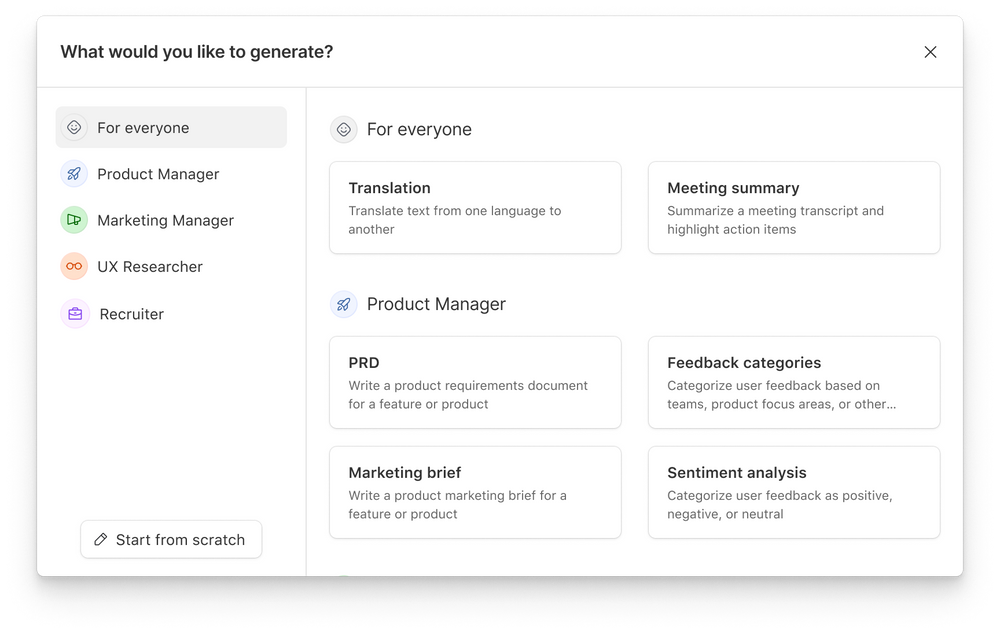
The first application of AI in Airtable is a new AI field type, which can easily be added to any app. With this new field, teams can choose from a library of pre-built, customizable prompts, or build their own from scratch. Teams can get started in seconds, regardless of their experience or aptitude with AI. Your teams can then edit and optimize each AI implementation in their evolving apps and workflows, continuously learning and iterating as they build their apps.

Powerful new features to govern and scale with ease

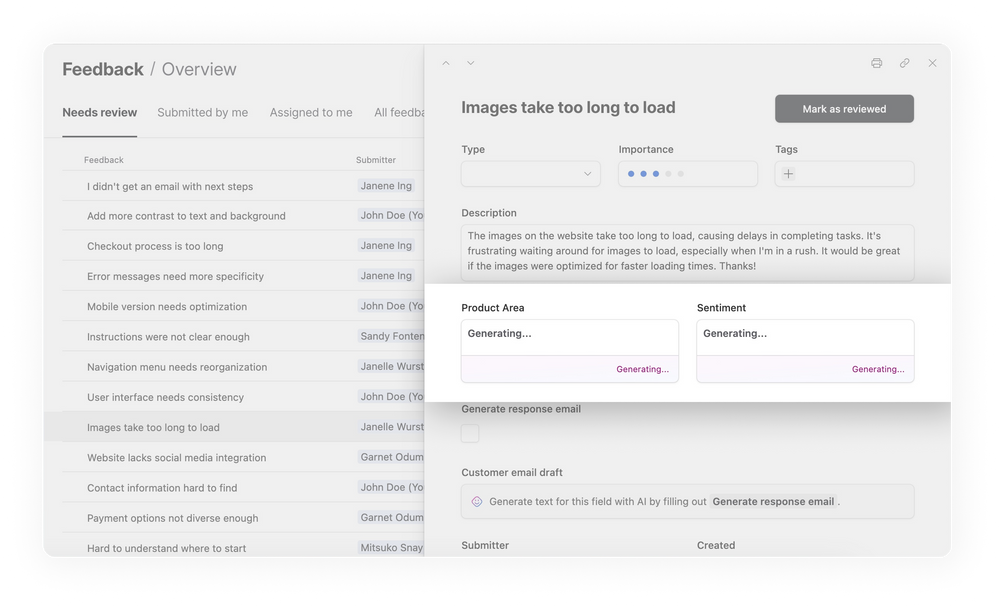
Rather than using AI in just one step of the process, Airtable AI can chain together multiple AI steps within an end-to-end workflow. For example, product teams can set up an AI field to automatically categorize customer feedback based on topic. They can then add another AI field to summarize the takeaways and sentiment from the customer feedback, for everyone across product, design, and research teams. Rather than spending hours reviewing and categorizing the feedback, those teams can jump straight into building the products their customers are asking for, faster than they ever could before.

Powerful new features to govern and scale with ease

Once Airtable AI is implemented, these same insights and productivity gains can spread across the organization. Marketing teams can use AI to speed up each part of their campaign-planning process and find efficiencies across their entire workflow. An AI field can be used to draft a blog post or social copy based on messaging themes and value propositions. The same AI field can be refined based on a variety of factors such as length, tone, phrases, etc. Now, teams have a powerful head start, while still controlling the quality and the output.

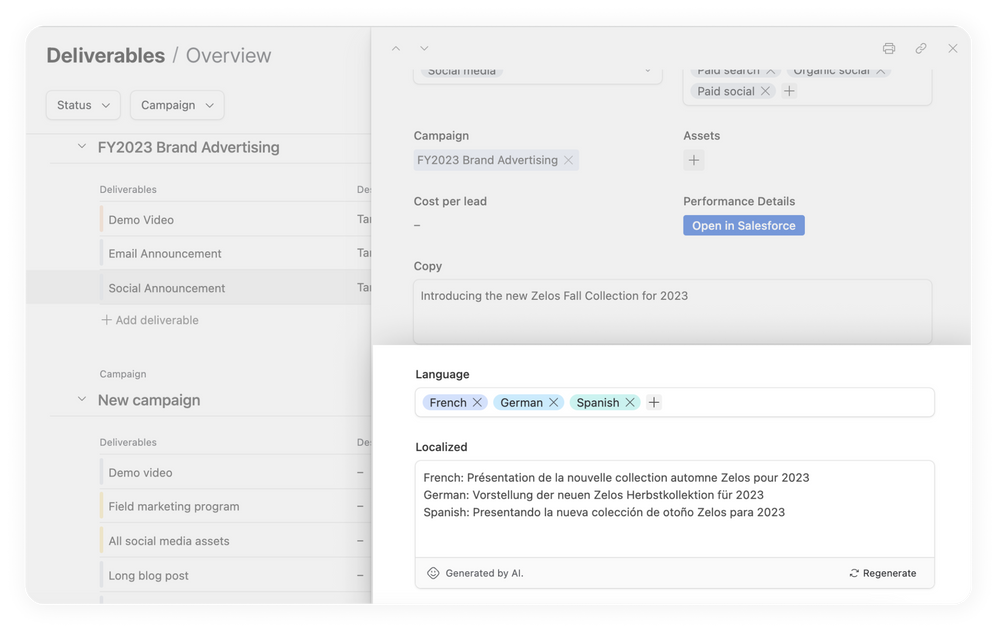
For global marketing teams, the AI field can speed up the localization process. Once copy for your campaign is approved—perhaps a blog or social post—Airtable AI can automatically localize into the key languages your organization operates in.

Powerful new features to govern and scale with ease

Airtable AI is built into your workflows, not layered on top of or focused on just one piece of the process. That means AI is continuously powering and making your work more productive at every step. Because it’s deployed from one centrally managed platform, organizations have better visibility and control over how their teams are using AI and they’re able to stay connected and execute together.

> Learn more about how to use Airtable AI

Airtable AI is currently in beta for paid plans. Airtable AI will be an optional paid add-on when generally available. If you’re interested in joining the beta, please fill out this form.

Manage your data, users, and apps at scale

Whether organizations are building research repositories that drive innovation in our everyday products, or managing end-to-end content and publication processes to keep up with the constant pace of change, they need secure, dynamic systems that are easily managed.

Today, we’re releasing a suite of new features to better help enterprises build business-critical apps and give IT teams greater oversight of their organization’s use of Airtable.

And that starts with increased record limits. Enterprise teams can now add up to 250,000 records per table (an increase from 100,000) and 500,000 records per base (an increase from 250,000). With greater data capacity, organizations can build more powerful and connected apps. Apps that can solve critical business challenges across teams, departments, and geographies—all without sacrificing performance.

These new record limits are now available as part of our new Enterprise Scale package. Contact our sales team for more information.

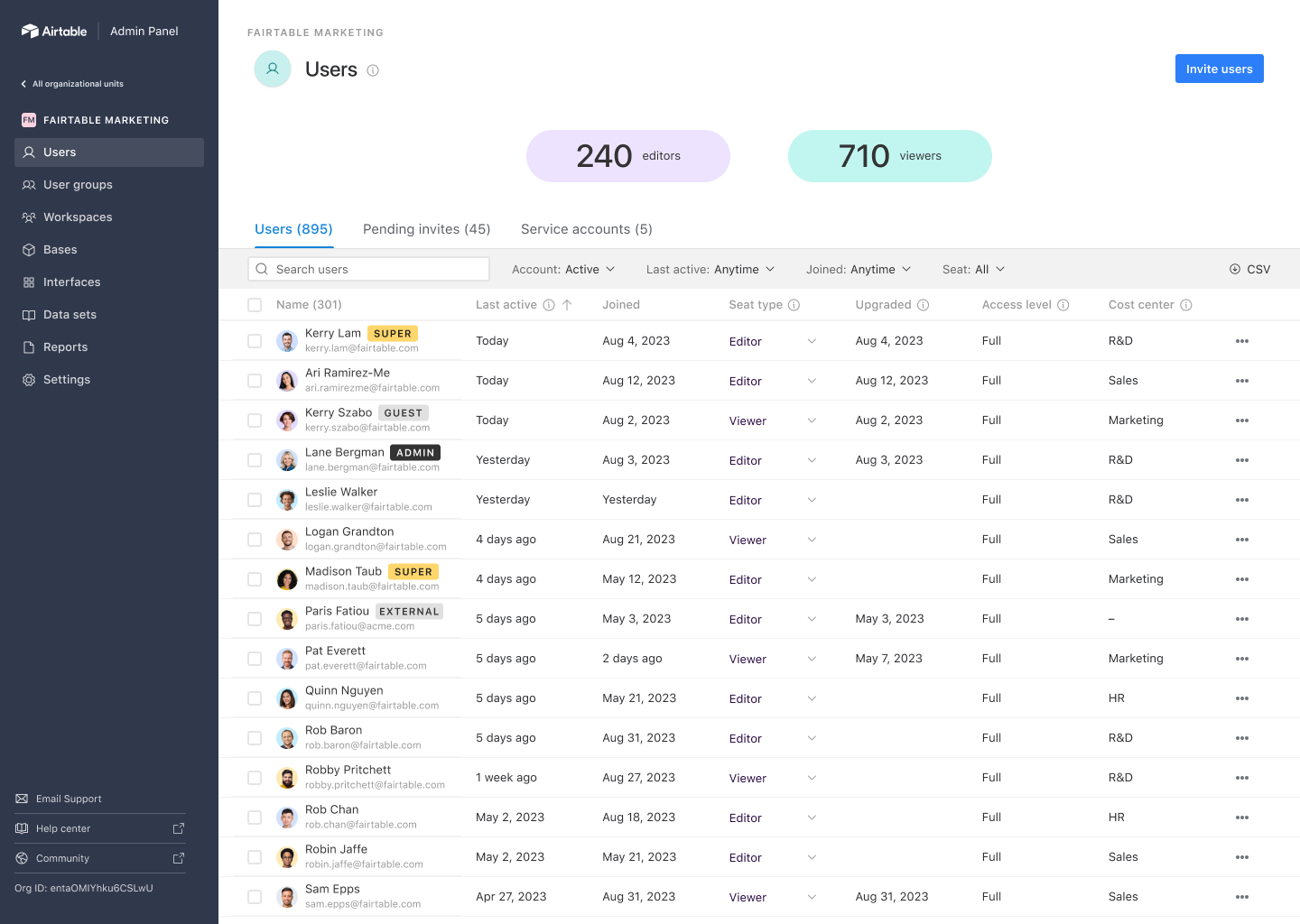
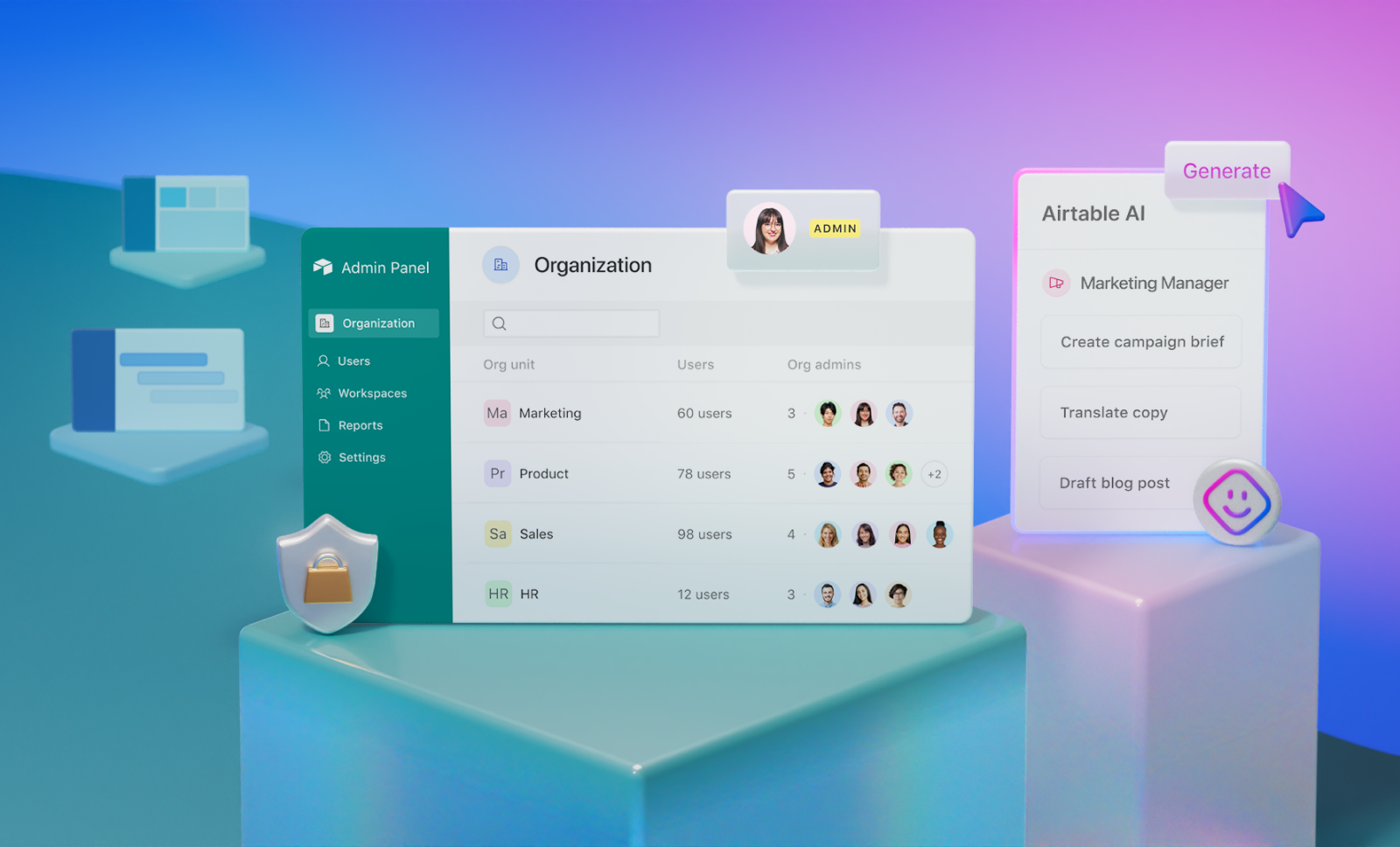
As your use of Airtable grows, permissions, visibility, and central control over user and data management become even more critical. To help you govern and administer your organization, we’re releasing a new way to manage Airtable across any team, department, or business unit with Enterprise Hub.

Powerful new features to govern and scale with ease

With Enterprise Hub, you can create unlimited “org units” that reflect different usage groups of Airtable within your organization. These org units could be teams, departments, subsidiaries, or any grouping that makes sense for your company. Give your IT teams super admin capabilities that allow them to standardize org-wide security policies and user management settings across your organization, but defer org unit administration to line of business owners. This gives your on-the-ground teams the autonomy and flexibility to make adjustments without getting slowed down by unnecessary processes, while IT maintains control over critical policies at the top level.

Enterprise Hub is available as part of our new Enterprise Scale package. Contact our sales team for more information.

Increased control and visibility over your data

We’re also releasing new features for organizations with advanced security and data protection requirements.

First is Enterprise Key Management (EKM), which gives organizations more control over their data through encryption keys that they own and manage.

EKM is now available as an optional paid add-on to our new Enterprise Scale package. Contact our sales team for more information.

With new Data Loss Prevention APIs, companies have even more control over unauthorized data in Airtable. Now IT teams can ensure sensitive data – like social security numbers or account numbers – is immediately removed and not recoverable by individual users.

And, when your security team needs to monitor activity in Airtable, they can quickly see critical events and changes with near real-time audit logs.

Data Loss Prevention and audit logs are now available as part of our new Enterprise Scale package. Contact our sales team for more information.

Choose the right plan for your organization and grow with confidence

We’ve updated our plans and services packages so you have the right level of scale, features, and control for your business needs. The new versions of our plans offer flexibility as your organization’s use of Airtable becomes more complex, mapping the features and functionality that you need with your stage of growth.

We’re excited to give smaller organizations easier ways to get access to more powerful features, while providing larger organizations more options and much more powerful offerings for their organization.

To learn more about our plans and features, visit our pricing page. If you’re an existing customer looking for support, see here for more details.

What’s new in Airtable: August 2023

Software Stack Editor · August 2, 2023 ·

What’s new in Airtable: August 2023

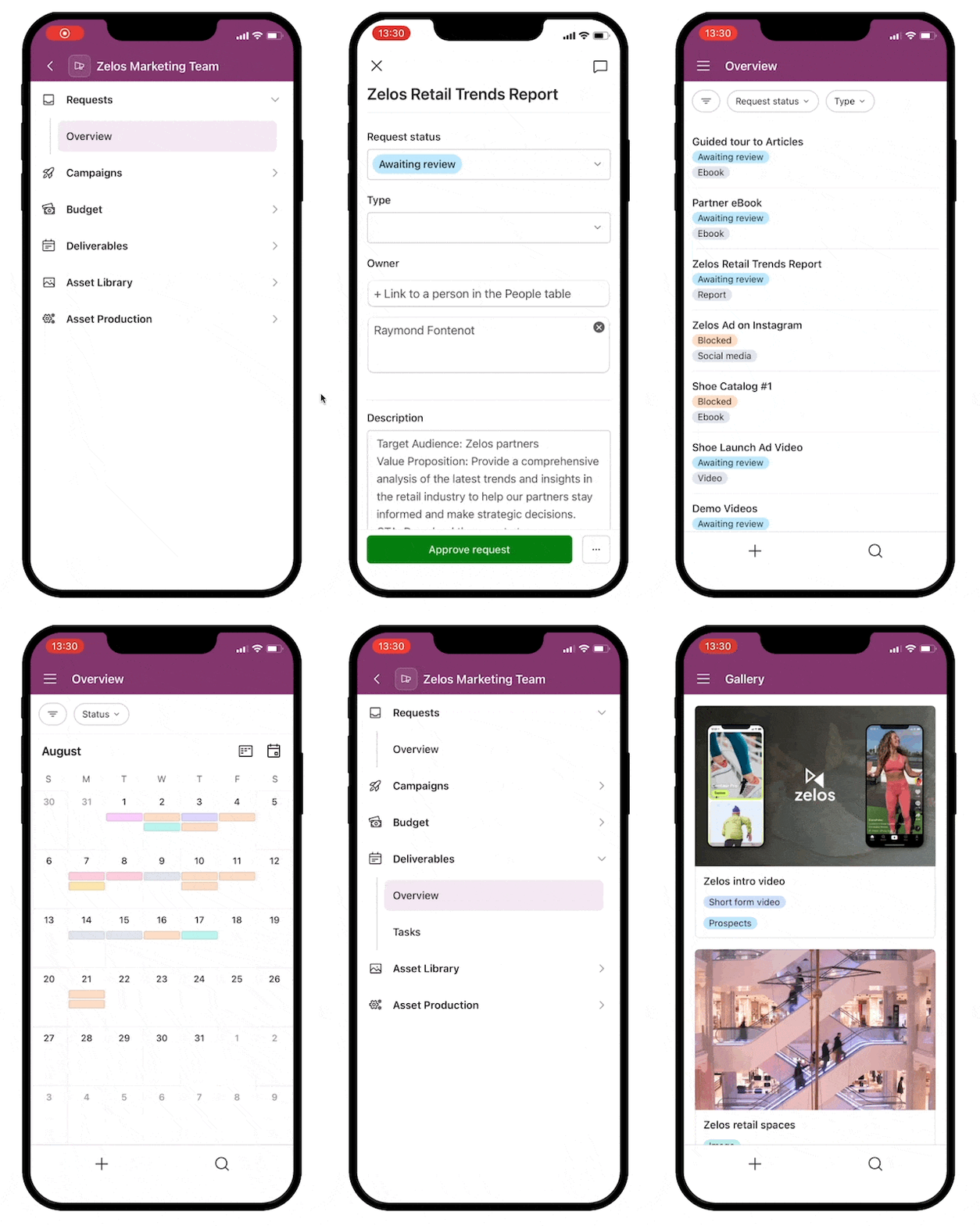
You asked, we listened: mobile interfaces are now available with our iOS update.

Whether you’re commuting, away from your desk, or simply prefer working on your phone or tablet, you can now effortlessly view and manage interfaces from Airtable’s iOS app.

You’ll also find new capabilities that make Airtable even more intuitive (scroll down for the details).

What’s new in Airtable: August 2023

Introducing mobile interfaces on iOS

What’s new in Airtable: August 2023

Our iOS update lets you manage interfaces on mobile. After updating your Airtable app, you’ll be able to:

  • View recently opened and starred bases and interfaces
  • Add comments
  • Update fields
  • Search for a particular base or interface
  • Navigate different views, including List, Gallery, Calendar, Kanban, and Form

Update your Airtable app now

Speed things up with these three features

What’s new in Airtable: August 2023

These new features make it even easier to get working in Airtable.

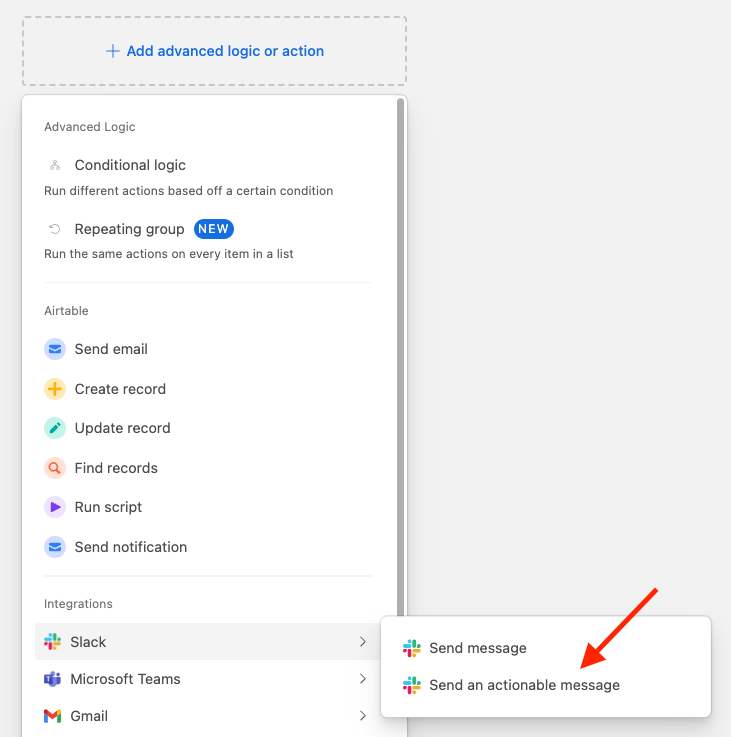
Send actionable notifications in Slack: Make quick changes to records–without switching between apps. Turn Slack notifications into buttons that let team members update Airtable records directly. Just add the “Slack: Send an actionable message” step to an automation to streamline your work.

Add groups to your List View: Add up to two groups to your List View so you can get more organized. Use the drag-and-drop function to move records between groups and better represent your data.

Filter for failed automations: Want to know where you went wrong in your automation? You can now identify all of your failed automations at once with a filter, then start debugging. You can also set a filter to show your successful runs.

Learn more from our experts

Want to learn more about interfaces? Check out our Interface Designer trainings now. Our webinars cover:

  • How to build a custom interface for your Airtable app, step by step
  • How to share your interface with the right people
  • How to combine the data, logic, and interface layers of Airtable to build apps designed to power essential workflows
  • A preview of how Airtable AI accelerates workflows when incorporated into an app

Watch them when you’re ready to take your app-building skills to the next level.

Intro to Interface Designer webinar

Advanced Interface Designer webinar

How to build a DAM in Airtable

Software Stack Editor · August 1, 2023 ·

How to build a DAM in Airtable

The more digital assets you create, publish, and share, the more challenging it can be to manage and organize them. And if you need to find a specific video or blog you published ages ago for a sales team member? Good luck.

Enter the Digital Asset Management (DAM) system, the ultimate solution for content marketing teams seeking to streamline their workflows and maximize the value of their assets.

In an earlier blog, we introduced the concept of a DAM and discussed why your content marketing team needs a hub to manage all of your assets (the centralized filing system saves you lots of time, for one).

Below, we’ll show you how to start building your DAM in Airtable. With the right DAM in place, your team can focus on what truly matters: creating exceptional content that resonates with your audience.

How to get started in Airtable

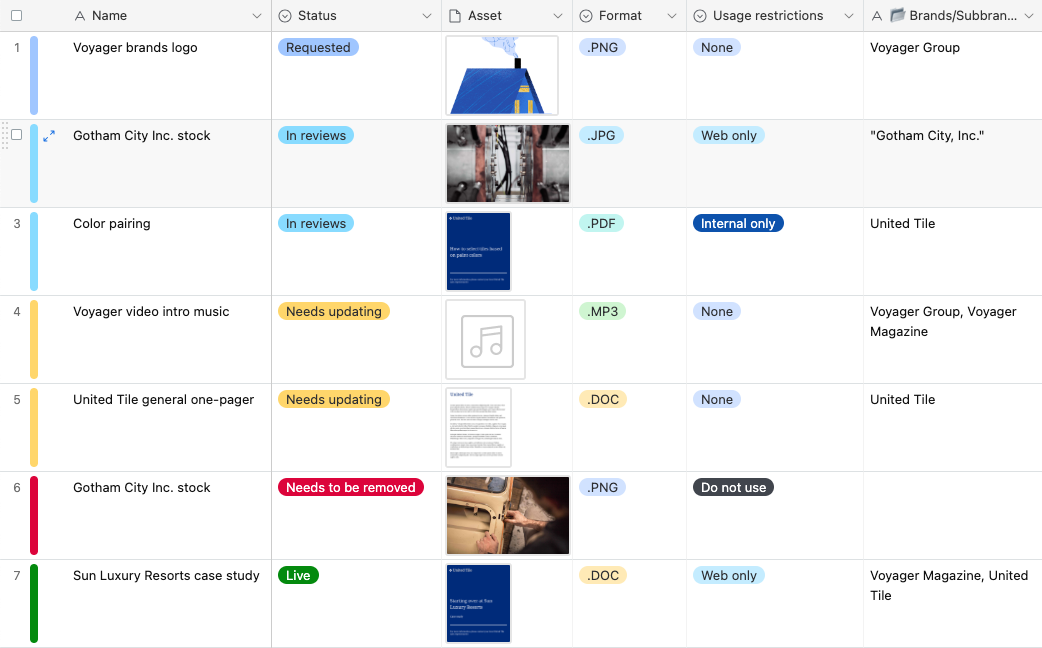
Getting started on your DAM is as simple as collecting and documenting your assets in an Airtable base (but if you want to hit the ground running, you can use our digital asset management template).

Add your graphics, guides, and other content as records. You’ll want to include some fields to capture basic information, like a description of the asset, the publish date, and the name of the person who owns the asset. It might not seem like much at first, but as you go from one record to 10 to 20, you’ll start seeing opportunities to make your assets more comprehensive and accessible.

A DAM is a shared resource! Make sure to have an owner assigned to each asset – they can help you add tags, make updates, and maintain your DAM over time. Not only will it spread out the work, it will also keep assets and metadata more accurate!

Elza Lambergs, Content Producer at Airtable

We recommend using these trips and tricks to make your DAM more collaborative as you go.

When it doubt, tag it out

The easiest way to help marketers find assets is by implementing tags. When files are categorized with relevant keywords and metadata, a simple search query can swiftly retrieve the exact asset you need. By using terms relevant to the asset, such as product names, campaign types, or target audience, tagging transforms the search process into a simple and intuitive experience.

How to build a DAM in Airtable

Some common tags you can add to your DAM include:

  • Asset type or deliverable type (ex. Image, video, blog)
  • Asset owner (people can be tags, too!)
  • Related marketing campaign or solution
  • Related company OKR

If your audience is sales-focused, you can also tag your assets by funnel and management level to make it easy for the sales team to search the DAM. In Airtable, you can add tags with the multiple select, single select, or linked record fields.

Tags eliminate ambiguity and enable you to discover the right files with just a few keystrokes.

Collect feedback via forms and insights

Your most valuable source of insight for your DAM improvement process is your own content marketing team, as well as other stakeholders who’d benefit from the DAM.

By actively collecting feedback from team members as they use the DAM, you can gain valuable perspectives, identify pain points, and drive impactful changes that elevate your DAM to new heights. The easiest way to do this is with Airtable forms.

A form is an Airtable view type that takes responses submitted by users and automatically turns them into records. While you can create a form in your base, we recommend adding a form to an interface that lives on top of your DAM. Interfaces make it easier to navigate and collect feedback in one spot.

> The best views for content marketing teams

When creating your form, consider capturing the following information:

  • Name and marketing role
  • How often they use the DAM
  • What types of assets they typically need

Then, you can get detailed insight about the current DAM experience with questions like:

  • Is there content you’d expect to find in the DAM but can’t?
  • Are there any duplicate assets in the DAM?
  • Are there additional metadata fields that would be helpful?
  • Do you see typos or inaccurate information in the DAM system?

Leave your form open to collect ongoing feedback and make incremental improvements to your DAM.

> Create a Form view

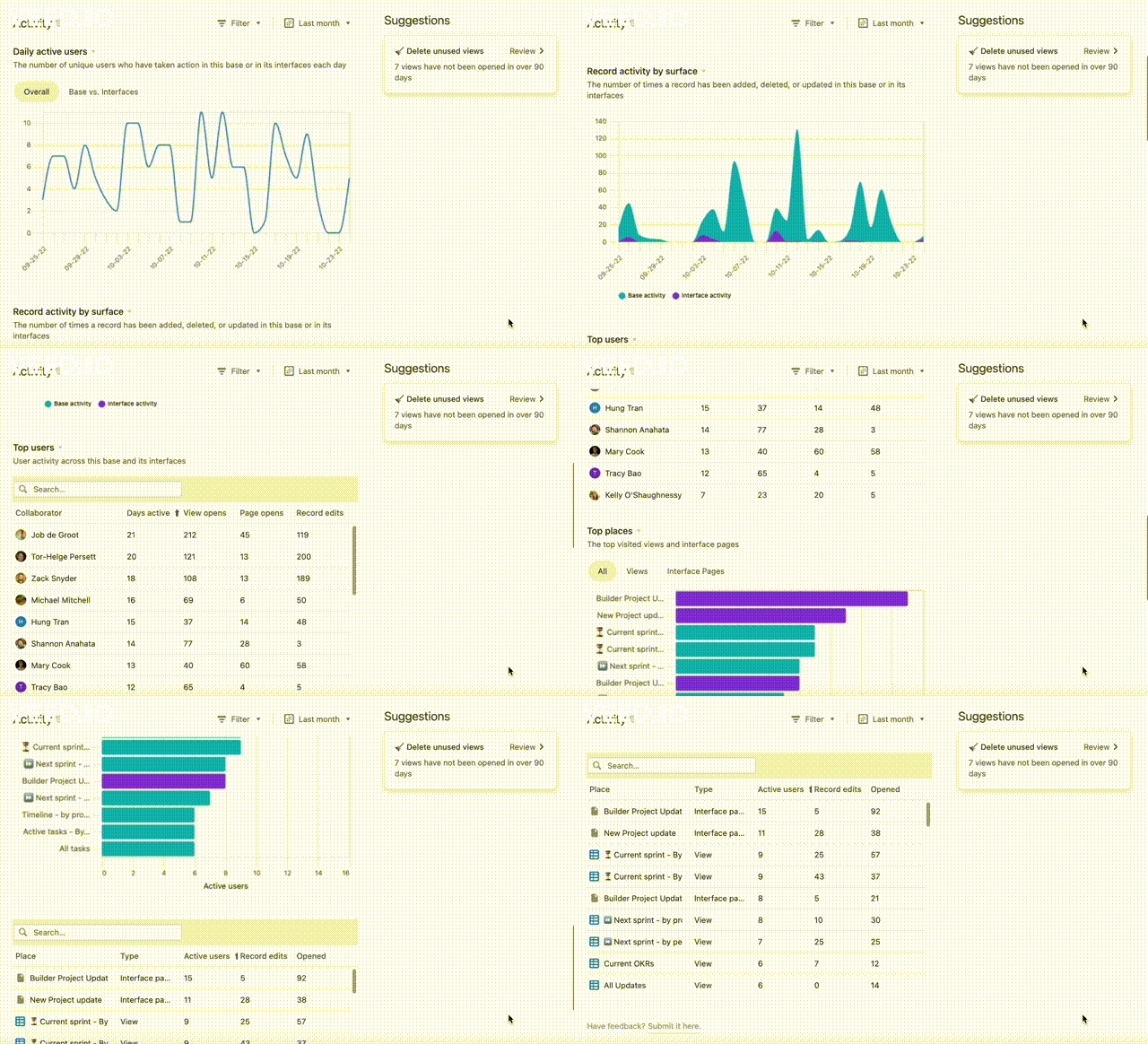
Another way to see how your DAM is being used is by deploying insights, a feature for Enterprise plans.

How to build a DAM in Airtable

Users with “owner” or “creator” permissions can open insights from the tools menu (located at the top of the base) to see metrics like top users, overall activity, record edits, and more. You can use these metrics to better understand how your team is using the DAM and identify opportunities to further optimize.

Make your assets shareable with AI (coming soon)

A final–and fast–way to make your DAM more collaborative is with Airtable’s AI field, which can be set up to automatically generate text.

Let’s say you have sales team members who want to leverage customer-facing assets in the DAM. You can configure the AI field to review the asset’s description and tags to provide sample outreach text or a short description they can use. Alternatively, you can use the AI field to generate short subheadings for social media managers looking to promote assets on LinkedIn or Twitter.

The AI field is just one of many Airtable features you can hone to make your DAM easy to navigate and pull assets from.


Continue to use and refine your DAM so it can evolve into a powerful tool that streamlines your content marketing team’s workflow, fosters collaboration, and maximizes the value of your digital assets.

For more info on DAMs, check out our blog for content marketing teams. Get a head start on your own DAM with our digital asset management template.

Why your content marketing team needs a DAM

Software Stack Editor · July 28, 2023 ·

Why your content marketing team needs a DAM

In the modern work landscape and especially in marketing departments, digital files reign supreme. Digital assets play a vital role in your content marketing team’s work, from informative launch videos to insightful research reports and ebooks.

But without a proper system to manage them, these assets can quickly become nothing more than digital clutter, making it challenging to find specific deliverables or the latest version of a file.

So what’s the solution? A digital asset management system (DAM). A DAM is a repository where you can quickly corral, organize, and share your growing collection of files, so teams can find the documents and published materials they need.

Why your content marketing team needs a DAM

And when you use Airtable to build your DAM, you have even more opportunities to point colleagues to the right assets in just seconds, from syncs that automatically update connected workflows in real time to tags that provide more metadata on each asset.

With a streamlined system for managing your assets, you can ensure everyone—from content marketing team members to stakeholders in design and sales—has access to the same, up-to-date information.

What is a DAM?

As mentioned earlier, digital asset management is the practice of storing, organizing, and sharing digital files of value to an organization. A DAM acts as a reliable central hub, eliminating the need to painstakingly search for files.

Content marketing teams should use a DAM to store all the content they’ve created and/or published. These asset types usually include:

  • Blogs
  • Videos
  • Social media posts
  • Guides
  • Support articles
  • eBooks
  • Documents
  • Raw footage
  • Imagery

A good DAM is an ever-evolving system that transforms with the business, is scalable, and should never be considered finished.

Lindsey Puccio, Content Operations Manager at Airtable

Ideally a DAM would store work from around your organization, so it would also include internal assets like messaging frameworks, enablement materials, and recordings from company all-hands meetings.

A DAM should also allow teams to search for assets, import and export files, tag files with relevant metadata, and integrate with other software to make it easy to share assets between platforms.

Why does your org need a DAM?

From saving time to enhancing productivity, a DAM system is a game-changer for content marketing teams aiming to stay competitive in the digital era.

Here’s a glimpse into the immediate benefits it brings:

  • Centralized file system: Say goodbye to the endless quest for that elusive file. With a DAM, all your assets—images, PDFs, Photoshop files, videos, or audio files—are stored in a single source of truth.
  • Streamlined workflows: Having all your digital assets at your fingertips unlocks the power of reusability and repurposing. Save time and effort by efficiently repurposing creative files and sharing assets with just a click.
  • Brand consistency: With a DAM, your brand assets, marketing materials, and diverse media files are presented consistently and are always up to date, ensuring a cohesive and professional image for your organization.

Embracing a DAM system empowers content marketing teams to excel in their endeavors, captivate audiences, and achieve marketing success.

> Digital asset management: what is it and why it matters

Why you should build your DAM in Airtable

So why make your DAM in Airtable versus another management tool?

It comes down to Airtable’s searchability, security, and scalability–all things your content marketing team will need if you’re at a growing company.

Find files in a flash: Airtable offers numerous ways to to locate digital files with lightning speed, from robust search functions to grouping and filtering capabilities.

Fortify your fortress: Security is paramount regarding your organization’s sensitive documents. Airtable goes the extra mile with top-notch security features like user permissions and two-factor authentication, providing an impenetrable shield for your digital assets. Rest easy knowing your files are safe and sound.

Scale without limits: As your content marketing team grows and your assets multiply, Airtable keeps up effortlessly. With its exceptional scalability and ample storage capacity, you can expand your content library without constraints.


No more sifting through endless folders or getting lost in a sea of scattered files. By building a DAM in Airtable, you can take control of your team’s digital realm, ensuring every asset has its place.

Get a head start by using our digital asset management template. For more ways your team can use Airtable, check out our content marketing blog.

How to choose interface layouts

Software Stack Editor · July 27, 2023 ·

How to choose interface layouts

New to the world of interface design?

With Airtable’s Interface Designer, you can choose from a list of layouts that are prebuilt to save you time, effort, and headaches.

How to choose interface layouts

Our layouts allow you to create apps that show users precisely the data they need–be it collaborators, stakeholders, or leadership. No more overwhelming your users with irrelevant information–present the right data, right when they need it.

> Create an interface

What interface layouts can I choose from?

Airtable’s Interface Designer offers a selection of predesigned layouts, all crafted around best practices drawn from valuable customer feedback. With these layouts, you don’t have to start from scratch–simply choose the one that best suits your needs and get to work.

Currently, you have the option to select from the following layouts:

  • List
  • Gallery
  • Kanban
  • Calendar
  • Timeline

These layouts might look familiar if you’ve used views in your data layer before.

When to use interface layouts

For occasions when executives seek high-level updates on projects or campaigns without delving into the finer details, turn to the List and Timeline layouts.

The List layout allows you to organize data from multiple tables, offering comprehensive context on projects. The Timeline layout, on the other hand, is perfect for visualizing data over time, like projects or campaigns.

Efficiently managing your team’s progress is made simpler with the Calendar and Kanban layouts.

Customized Calendar interfaces can be created for each team member, displaying all their assigned deliverables over a week or month. The Kanban layout, organized into columns, allows you to stack records by status. This visual arrangement enables team members to instantly identify tasks on their to-do list and those already completed.

Toggle between interface layouts

While choosing a specific layout provides a solid starting point, Airtable’s Interface Designer offers the flexibility to toggle between layouts within a single interface page.

No need to create separate pages for each layout type–you can seamlessly switch between different visualizations at any time. This feature allows your users to access the most relevant view for their needs.


With these Interface Designer layouts, it’s easy to create a highly functional and visually appealing app for your team.

Create an interface today, and be sure to check out our Tool Tips series on YouTube for quick and helpful ways to use Airtable.

  • « Go to Previous Page
  • Page 1
  • Page 2

Get your Software Stack together. softwarestack.tech

Software Stack

© 2024–2026 - Software Stack is a trading name of SouthwestCIO Limited ac ompany registered in England & Wales 11319049

  • Knowledgebase
  • Home
  • About Us
  • Contact Us