• Skip to primary navigation
  • Skip to main content
software stack logo

Software Stack

Get your Software Stack together

  • Knowledgebase
    • All Categories
    • Accounting Software
    • Automation & Workflow Software
    • Customer Relationship Management
    • E-Commerce Shopfronts & Payments
    • Marketing Automation
    • Online Courses & Membership
    • Project Management
    • Surveys & Forms
    • Web Hosting
  • Home
  • About Us
  • Contact Us
  • Show Search
Hide Search

Shopify

What Is Vendor Management? (+Top Tools & Tips) (2025)

Software Stack Editor · September 16, 2025 ·

image

During the early years of your retail business, you might make all your products yourself and be the only vendor. You may spend Sunday afternoons curating essential oils and handmaking soap.

As you scale your business, those late nights and weekends spent making soap take their toll. To keep up with customer demand, you may source custom-made soap from multiple vendors. 

But instead of making soap, now you stay up late manually handling orders, tracking inventory, and managing invoices. Your growing retail business deserves effective vendor management software. Ahead, you’ll learn how software can help, how to manage vendors effectively, and the top tools available.

What is vendor management?

Vendor management is the process in which retailers choose their suppliers, negotiate deals, and monitor their vendors’ performance. The goal is to secure quality products at competitive prices and maintain a reliable supply chain. Effective vendor management improves product availability, reduces costs, and improves customer satisfaction.

📚Learn more: What Is Vendor-Managed Inventory (VMI)? Definition & Benefits

Vendor management benefits 

Vendor management tools offer a central place for retailers to manage their suppliers. From boosting efficiency to lowering your costs, there are multiple benefits to using vendor management systems:

Improves vendor selection

Vendor management software automates everyday jobs like placing orders and tracking payments, saving you time and reducing mistakes. Once you start automating manual tasks, you’ll find more time to focus on more valuable business tasks.

More cost savings

When you automatically track your inventory and vendors, it’s much easier to see where your money goes and how you can save. 

You can also view detailed insights into spending patterns, helping you identify opportunities to cut costs and negotiate better deals. This visibility ensures that every dollar spent is an investment in more efficient operations, helping you manage your budget.

💡TIP: Inventory management software can also help you track stock in real time. 

Speeds up vendor onboarding

Using a central platform makes it easier to onboard new suppliers. You can quickly start working with new vendors without the usual delays, and with less hassle. 

The software stores all the important vendor details so retailers can offer new products faster and maintain high quality without extra stress.

Reduces supply chain risk

As you begin purchasing goods from vendors, you’ll need to identify ways to manage risk and ensure compliance. 

Using vendor management tools can help you gain a broader perspective and spot potential risks, such as supply disruptions or compliance issues with laws. This way, retailers can avoid problems before they happen, keeping their businesses safe.

Strengthens supplier relationships 

Most vendor management software comes with features to help you communicate with vendors. This means fewer misunderstandings and better teamwork, helping retailers and vendors solve problems quickly and work together smoothly. This leads to better relationships and can even help get you better deals and products.

Using the platform, you can view useful insights and data highlighting vendor performance. That way, it’s easier to see which suppliers are doing a great job and where you could make improvements. 

Shopify POS offers 22% lower TCO

See how Shopify POS reduces retail operating costs and increases revenue better than the competition, based on real data and research conducted by an independent consulting firm.

Get the report

The vendor management process

Learn how to create an effective vendor management process—from real Shopify merchants and their experiences managing vendors. 

Vendor selection

Before you start working with vendors, it’s important to carefully select those who fit your business. One way to do so is to create a review process. 

Josh Neuman, founder of custom T-shirt brand Chummy Tees, explains how a standardized review process helps him select and onboard vendors. 

“When I first started out, I spent a lot of time vetting potential printing vendors to understand their capabilities, costs, turnaround times, and quality. I developed a standardized review process to evaluate each vendor’s credibility and ensure they would be a good long-term partner for my growing business.”

Contract negotiation

Once you’ve selected the right vendors for your business, the next step is negotiating contracts that set clear expectations for both parties. A well-structured contract helps prevent misunderstandings, ensuring vendors deliver on time, meet quality standards, and comply with pricing agreements.

Consider negotiating the following:

  • Pricing and payment terms: Establish cost structures, volume discounts, and payment schedules that align with your budget.
  • Service-level agreements (SLAs): Define performance benchmarks, such as delivery timelines, order accuracy, and product quality.
  • Exclusivity and termination clauses: Specify whether the vendor has exclusive rights to supply your products and outline exit conditions if the partnership no longer serves your business.

Onboarding

A smooth onboarding process ensures vendors can integrate seamlessly into your supply chain. Vendor management software simplifies onboarding by centralizing documents, automating approvals, and streamlining communications.

To optimize onboarding, standardize documentation and communication. You might create a checklist that includes contracts, tax forms, compliance requirements, and payment details. Establish preferred contact methods and update vendors on order placement, invoicing, and reporting processes.

You’ll also want to train vendors on your specific business processes. Provide guidelines on packaging, labeling, and shipping requirements to avoid discrepancies.

Performance management 

You want to track vendor performance to make sure suppliers meet your expectations and deliver consistent quality. Performance tracking also helps identify top-performing vendors who you might want to do more business with, as well as pinpoint areas for improvement.

To manage vendor performance effectively, set measurable KPIs. Track metrics like order fulfillment rate, defect percentage, and on-time delivery. Conduct regular performance reviews—you could have quarterly or annual evaluations to assess vendor reliability and discuss areas for improvement.

It’s best to have open, two-way communication. Encourage vendors to share insights on how to enhance collaboration and efficiency.

Risk mitigation

Vendor relationships come with risks, from supply chain disruptions to compliance violations. Proactively managing these risks protects your business from financial losses and operational setbacks. 

For example, relying on a single vendor can be risky. Diversifying and having backup suppliers ensures continuity in case of shortages or delays. 

And remember to do your due diligence. Verify vendor credibility and compliance by checking references, certifications, permits, licenses, and financial stability.

Payment management 

Timely and accurate payments strengthen vendor relationships and keep your supply chain running smoothly. Managing vendor payments efficiently helps you avoid late fees, maintain trust, and secure favorable terms.

Vendor management best practices

To get the best out of your vendor partnerships, it’s worth following a few best practices:

Prioritize risk management 

Guillaume Drew, founder and CEO of Or & Zon, a luxury brand that curates sustainably produced artisanal products, shares that merchants need to consider their vendors’ compliance with regulations as well as their own. The laws and standards your business must follow will depend on your location and the type of goods you sell. 

“Risk management and compliance are paramount to us because we deal with culturally sensitive items. We ensure our products are ethically sourced, respecting local traditions and practices.” 

📚Learn more: How To Identify and Prevent Vendor Fraud

Communicate clearly 

Josh of Chummy Tees explains that regular check-ins with vendors help eliminate misunderstandings and keep everyone on the same page. 

“I like to overcommunicate with my vendors, providing weekly status updates on orders and monthly business reviews so we’re all on the same page. This helps eliminate issues down the road,” he explains. “I also gather feedback from my vendors on a regular basis to ensure we continuously improve our partnership.”

Guillaume of Or & Zon explains that solid communication sets the right tone for solid partnerships. 

“Communication is a two-way street. We ensure clarity about our expectations and are attentive to our vendors’ needs and feedback. This builds a solid foundation of trust, critical for long-term collaboration.” 

Set KPIs for each vendor

Setting KPIs helps your business and vendors meet realistic goals. At the start of any collaboration, agree on KPIs with each vendor. Depending on your business, these could include maintaining on-time delivery or product quality standards. 

Josh of Chummy Tees explains how he sets and tracks KPIs in a central dashboard.

“To monitor performance, I set key performance indicators for each vendor tailored to the services they provide. Some examples include on-time delivery percentages, quality defects per order, and average response times. I track these KPIs in an online dashboard to stay on top of how each vendor performs versus the targets. This holds them accountable.”

Guillaume of Or & Zon explains that Shopify helps the brand manage multiple global vendors, ensuring quality control and reliable delivery times. 

“Performance monitoring is essential, especially given the international diversity of our artisans. It’s not just about delivery timelines and quality control, but also about building an environment that helps them thrive. We use custom tech integrations on Shopify to facilitate this process and maintain real-time tracking of performance metrics.” 

Set business goals together

Successful vendor relationships often have shared business objectives. Instead of treating vendors as third-party service providers, involve them as collaborators in your long-term strategy. Aligning on goals—whether reducing costs, improving efficiency, or launching new products—ensures both parties benefit.

Early conversations should establish clear expectations and performance benchmarks. If you’re expanding into a new market, for example, your vendor might need to adjust packaging, comply with new regulations, or scale production. Collaborating on these challenges from the outset fosters trust and sets you up for long-term success.

Resolve disputes 

Disagreements are inevitable in any business relationship. It’s a good idea to address them quickly before they grow into bigger issues. 

Start by identifying the root cause of the dispute. It could be a simple miscommunication or a contract misinterpretation. Approach the vendor directly and with an open mind to discuss concerns in a solution-oriented manner—avoid taking an accusatory approach.

If direct communication doesn’t resolve the issue, refer to the contract. SLAs and other terms should clarify responsibilities and provide a framework for resolution. 

Record escalation processes 

When vendor issues escalate, having a documented escalation process ensures disputes are handled efficiently and fairly. A well-defined process also helps protect your supply chain from disruptions.

Here’s what you might include in your escalation process:

  • Initial resolution attempts: Outline steps for direct vendor communication and internal review before escalating.
  • Tiered escalation levels: Define when and how an issue is escalated to management, legal teams, or third-party mediators.
  • Time frame for resolution: Set deadlines for each escalation stage to prevent prolonged disruptions.
  • Final resolution actions: Specify the steps for terminating a contract or switching vendors if a resolution can’t be reached.

By documenting these processes, you create a clear framework for handling conflicts, reducing risk, and ensuring accountability.

The future of retail: why unified commerce is no longer optional

New research shows businesses using unified commerce platforms like Shopify POS see 22% better total cost of ownership and 20% faster implementation. Learn what this means for your retail strategy.

Get the report

Four best vendor management platforms

With so many vendor management system options available, it can be hard to choose the best one for your business. So, we’ve narrowed it down to four of the best options. 

1. Shopify

Shopify gives you basic vendor management tools right out of the box, making it easy to keep track of your suppliers alongside your products and inventory.

With Shopify’s built-in features, you can tag products with their vendor information, which helps you organize your catalog and quickly see which suppliers provide each item. This makes restocking popular products simpler and gives you a clear picture of your supplier relationships.

The native vendor features focus mainly on tracking which products come from which vendors. But here’s where Shopify really shines—you can easily add more powerful vendor management tools through the Shopify App Store when you need them.

Key features of Shopify’s built-in vendor tools:

  • Link vendors to products to track where your inventory comes from
  • Keep an eye on stock levels from different suppliers
  • Sort and filter by vendor to find information fast
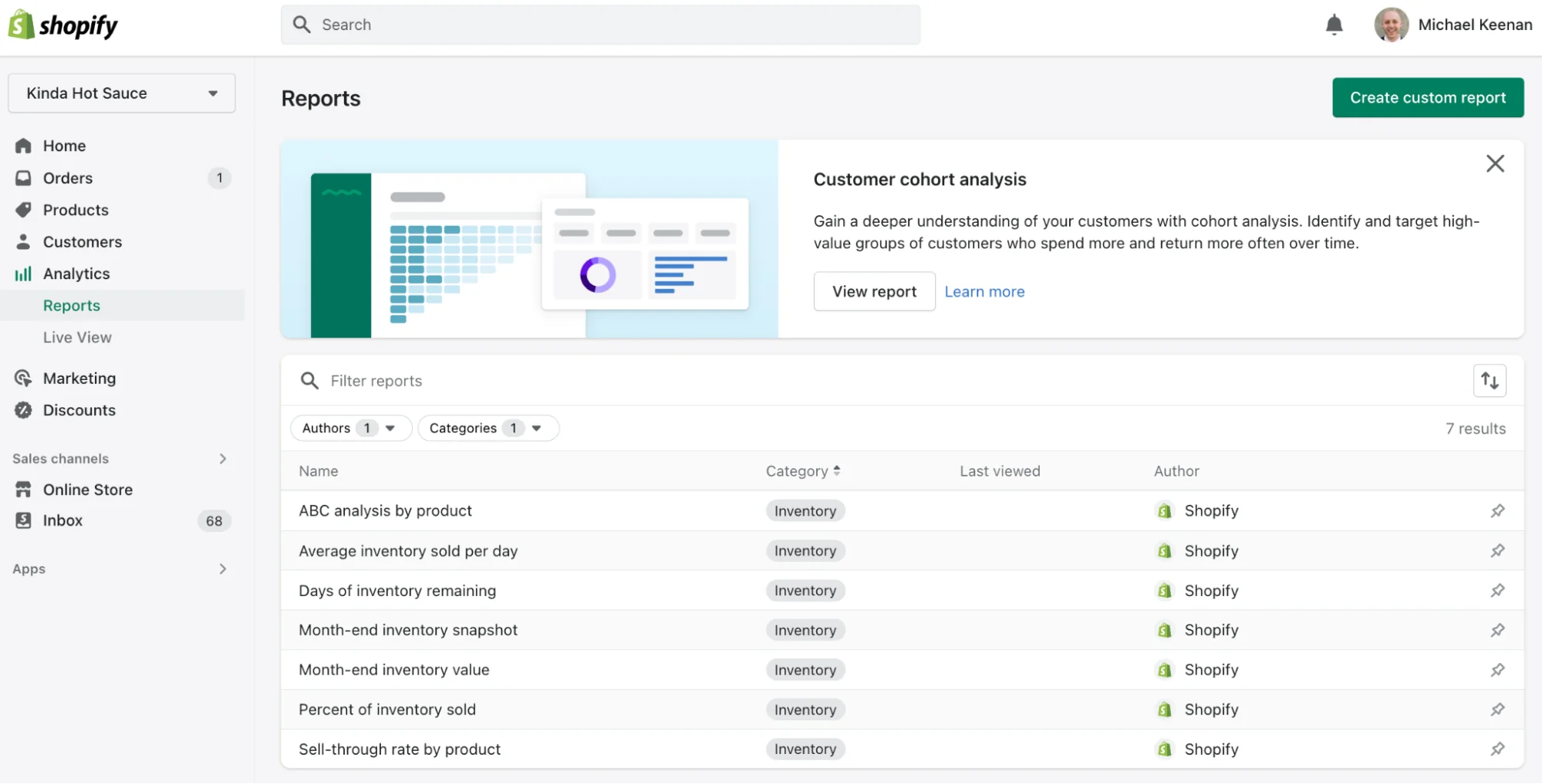
  • Create simple reports to see how products from each vendor are selling


Level up with Shopify Apps:

  • Create and track purchase orders automatically
  • Measure vendor performance with detailed analytics
  • Streamline communication with your suppliers
  • Sync inventory across multiple vendors
  • This mix-and-match approach lets you start simple and add more advanced vendor management tools as your business grows.

Pricing: Starts from $29 per month

2. Kissflow Procurement Cloud

Kissflow Procurement Cloud is designed for retailers who need a robust tool to manage their vendor relationships at scale. It automates the procurement process, making it easier to handle everything from purchase orders to vendor contracts.

Spend analytics are helpful for getting detailed visibility into spending across all departments so you can make informed purchasing decisions. Tired of all the admin that goes with new vendor relationships? When you’re onboarding new vendors, it’s easy to create custom approval workflows and a centralized contract repository. 

Key features:

  • Create, send, and track purchase orders with ease.
  • Gain insights into your spending patterns to better control costs and budget efficiently.
  • Keep all vendor information in one place and track interactions, performance, and compliance.
  • Automate the entire procurement process, from request to purchase, to save time and reduce errors.
  • Customize dashboards to keep important metrics front and center for better decision making.

Pricing: Starts from $1,500 per month

3. SAP Fieldglass

SAP Fieldglass is versatile procurement software that’s helpful for retailers who want to 

oversee and optimize their supplier relationships. This platform excels in managing everything from contract negotiation to performance evaluations. 

Highlights include a project management dashboard that governs your vendors’ statements of work. Detailed analytics let you monitor timelines and quality to help ensure products arrive on time and are high quality. 

Key features:

  • Use advanced analytics to gain insights into vendor activities. 
  • Track and analyze supplier performance to ensure quality and reliability.
  • Manage contracts with a centralized system that keeps track of terms and compliance.
  • Identify and mitigate risks associated with suppliers to protect your business operations.
  • Facilitate better communication and collaboration with vendors through integrated communication tools.

Pricing: Packages are tailored to each business. Contact SAP Fieldglass for more details.

4. Procurify

Procurify is user-friendly procurement software that simplifies retailer-vendor relations. It’s designed to streamline the entire procurement process and ensure that businesses can track their spending.

Helpful features include the ability to integrate external supplier catalogs into Procurify, which allows you to order items more quickly and easily. You can also store centralized vendor records so your team can make renewal decisions, negotiate terms, and conduct vendor risk management. 

Key features:

  • Submit and approve purchase requests quickly from the platform.
  • Keep all your vendor information organized and accessible, enhancing relationship management.
  • Monitor and control your spending with detailed insights into where your money goes.
  • Customize approval workflows to ensure purchases are always within budget and policy.
  • Access real-time data and reports to make better-informed decisions about your procurement strategies.

Pricing: Packages are tailored to each business. Contact Procurify for more details.

Instant demo: See Shopify POS in action

Discover how Shopify POS helps you manage in-store and online sales from one powerful platform.

Try now

Vendor management FAQ

How do I mitigate potential risks and ensure compliance when working with vendors?

To mitigate risks and ensure compliance when working with vendors, start by carefully selecting reputable vendors and clearly defining contract terms. Regularly monitor vendor performance and compliance with standards. Use a vendor management system to keep track of all activities and maintain detailed records. This will help you spot potential issues early and address them quickly, keeping your business safe and compliant.

What are some common challenges in vendor management and how can I overcome them?

Some common challenges in vendor management strategy include inconsistent product quality, late deliveries, and communication issues. To overcome these, establish clear expectations and contracts with your vendors. Regularly review their performance and maintain open lines of communication. Use a vendor management system to streamline processes and keep everything organized. This helps ensure smoother operations and better relationships with your suppliers.

How do I select the right vendors that align with my business goals and requirements?

To select the right vendors that align with your business goals, start by defining your needs and quality standards. Look for vendors with a proven track record, offer competitive pricing, and share your values and commitment to quality. Conduct thorough research, check references, and consider their customer service and reliability. Finally, choose vendors who can grow with your business and adapt to changing needs.

What are some best practices for effective communication and collaboration with vendors?

For effective communication and collaboration with vendors, follow these best practices:

  • Regular updates: Keep in touch often, sharing updates and feedback to avoid misunderstandings.
  • Clear expectations: Set and agree on clear expectations about timelines, product quality, and communication.
  • Use technology: Use vendor management tools to streamline communication, track progress, and manage documents.
  • Build relationships: Treat vendors as partners, showing respect and appreciation, which fosters good cooperation and loyalty.

What Is a Startup? Types and How They’re Funded (2025)

Software Stack Editor · September 16, 2025 ·

image

Many successful founders say that launching a startup is one of the most rewarding ventures you will ever take on, with both financial and personal rewards. However, startups also come with considerable risks, including financial uncertainty, demanding workloads, and potential burnout. However, if you have a strong product or offering, financial backing, and a solid support system or team in place, the eventual returns can outweigh the risks.

But what actually is a startup? Read on to learn how startups work and the types of funding that can take them from business plan to scale.

What is a startup?

A startup is an early-stage company with a business model designed for rapid growth. Startups typically pursue an innovative product, technology, or business model to disrupt an industry and rely on outside funding until profitable. Because speed matters, many startups focus on winning market share quickly and generating outsized returns. 

Startup vs. small business

Both startups and small businesses aim for profitability and growth, but their funding sources and operations tend to differ. Small businesses typically rely on business loans from banks or other lenders, pursue growth at a steady pace, and prioritize long-term ownership, stability, and consistent profit. Startups, on the other hand, tend to focus on outside funding, such as venture capital, and rapid expansion, often with the goal of an eventual exit, such as a sale or initial public offering (IPO).

Types of startups

Not all startups set the same goals or business model. There are three common buckets of startups, based on their likely growth path and outcome. 

Startups that IPO

Some startups are designed for rapid growth toward an initial public offering (IPO). For example, Ebay disrupted the collectibles resale and auction industry and went public in 1998, only three years after launching under the name AuctionWeb. Amazon and Uber are other examples of rapid-scale startup business models that led to IPOs.

Startups that are bought

Other startups achieve rapid growth in ways that make them attractive acquisition targets. One example is Zappos: it launched in 1999, gained millions of customers by 2008, and sold to Amazon for more than $1 billion in 2009. Strong growth in a short period caught the eyes of investors and companies who were interested in buying the product or service.

Startups that drive social impact

Some startups combine scale, profit, and purpose. A few examples are Tom’s Shoes, which launched in 2006 with a business model where the company donates a pair of shoes to someone in need for every pair bought, and Warby Parker, which opened in 2010 selling affordable glasses while donating a pair for each purchase. 

Ways to fund a startup

Here are common sources of startup capital:

Angel investment

Angel investors are wealthy individuals who provide early funding to startups, typically investing between $25,000 and $500,000 in exchange for equity. Angel investors are often entrepreneurs or executives of their own well-established companies who can advise founders and open doors to partnerships, media exposure, and future investors. Sometimes, friends and family members can offer angel investment. Angels provide capital at the earliest stage of company development, before a minimum viable product (MVP) has been developed and before venture firms get involved. 

Venture capital

Venture capital (VC) firms usually get involved after angel investors, at the seed or Series A stage. They tend to invest more than an angel and provide additional support and services such as recruiting support, marketing advice, and partnership opportunities. That being said, VC money comes in return for equity and board seats, meaning founders surrender some ownership and control.

Venture capitalists also often have higher expectations for returns than smaller investors. Venture capitalists usually look for proof of product-market fit and a clear path to profitability. 

Crowdfunding 

Crowdfunding platforms, like Kickstarter and Indiegogo, raise small amounts of money from a large number of people, often fans and prospective customers. In return for their investment, these individuals may receive products or other rewards from the company. In equity crowdfunding, investors receive an ownership stake in the company in exchange for their investment.

Crowdfunding can unlock capital without traditional investors, validate the market, and build a community around a product. It requires significant effort to run a campaign and doesn’t guarantee sufficient funding. With equity crowdfunding, founders also distribute ownership across many small investors. Successful campaigns can later attract interest from angels and/or venture capitalists.

Bootstrapping 

Bootstrapping uses personal savings or revenue to launch a business without outside investment. It lets you retain full ownership, but it concentrates risk. You might choose to bootstrap at the beginning, then raise capital later to accelerate growth. 

Marketplace capital

Marketplace capital refers to financing through ecommerce platforms or marketplaces—like Shopify Capital, Amazon Lending, or Etsy’s partnership with YouLend—bypassing traditional bank loans. Thousands of businesses have taken advantage of Shopify’s financing program since 2016, including Boe and Kennedy Brodhun of The Shop, who founded their forestry retail business in 2021 and have since expanded to international markets.

Marketplace funding gives sellers access to capital without requiring equity. However, securing loan approval often depends on your sales history within Shopify and your engagement with the Shopify platform. The user must already be a seller on the platform, so funding is not open to the public.

Get funding to run your business with Shopify Capital

Shopify Capital makes it easy to get funding quickly and use it for inventory, marketing, and more. Automatically make payments as a percentage of your daily sales. No compounding interest. No schedules. No surprises.

Explore Shopify Capital

Startup business loans

A startup business loan is debt financing to launch and expand a new business, whether for product development, hiring, marketing, or inventory. Lenders—such as banks, marketplaces, or corporations—often consider personal credit and experience rather than business revenue, which can make these loans accessible. But founders should keep in mind that debt requires repayment, may require personal guarantees, and typically carries interest or fees.

The Small Business Administration (SBA) is one of the well-known lenders for small business owners. The SBA doesn’t provide loans specifically for startups, but most of its loans can apply to startup ventures.

Small business grants

Federal, state, and local governments, as well as corporations and non-profit organizations, often offer grants to small businesses. Although small businesses differ from startups, many grantors don’t distinguish between them, so startups may be eligible. Grants don’t need to be repaid, but recipients must meet rigorous criteria, which may include business certification.

What is a startup FAQ

Are startups and small companies the same thing?

A startup company and a small company are not the same. Startups are typically designed for rapid growth by disrupting existing industries or introducing new technology; they often aim to scale nationally or globally and to exit via an IPO or sale. Small businesses focus on steady, sustainable growth, often serving a local or niche market without the same desire for massive scale.

Do you need a lot of money to launch a startup?

Not all startups require a large upfront investment. Some can launch on a lean budget by bootstrapping, using personal savings, or crowdfunding. However, high-growth startups—especially in tech—often need significant investment to scale quickly.

What is considered a startup company?

A startup company is a new business in its early stages, created to develop and bring a unique product, service, or business model to market. Startups often operate in uncertain conditions, focus on innovation, and aim for rapid growth, even if they have yet to turn a profit.

*Shopify Capital loans must be paid in full within a maximum of 18 months, and two minimum payments apply within the first two six-month periods. The actual duration may be less than 18 months based on sales.

What Is Google Merchant Center? Features + Tips (2025)

Software Stack Editor · September 12, 2025 ·

In brick-and-mortar grocery stores, brands pay extra for prime placements, like eye-level shelves or aisle end-caps. The logic is simple: If you want to sell products, it helps to be where shoppers are already looking. For ecommerce businesses, the prime real estate is Google.

Google platforms attract a staggering number of users. According to 2025 Statista data, Google handles more than 79% of daily desktop search traffic, while Gmail commands 75% of the American email market. And that’s not even counting YouTube’s 122 million daily active users.

Google Merchant Center is a centralized hub for managing your product ads on Google. You can use it to promote products across multiple Google platforms, helping improve your brand awareness and increase sales.

Here’s more on the relationship between Google Merchant Center and Google Shopping, Google Merchant Center’s features, and how to upload items to your product feed.

What is Google Merchant Center?

Google Merchant Center is a free tool that lets ecommerce and brick-and-mortar store owners create and manage their product listings and enable shoppable features across various Google platforms.

The Merchant Center provides the information Google uses to create featured product snippets—with images, pricing, and availability—that appear in Google search, maps, images, shopping, and ads. It also sends your information to YouTube so you can create ads there as well.

Google requires a valid Gmail account and an active business website to access Google Merchant Center. Creating an account is free, but you must pay to run ad campaigns.

Sell where people search with Shopify

Shopify comes with powerful tools that help you list, promote and sell products on Google. Get your product in front of new shoppers who are looking for what you’re selling, from one back office.

Start selling on Google

How to add products to Google Merchant Center

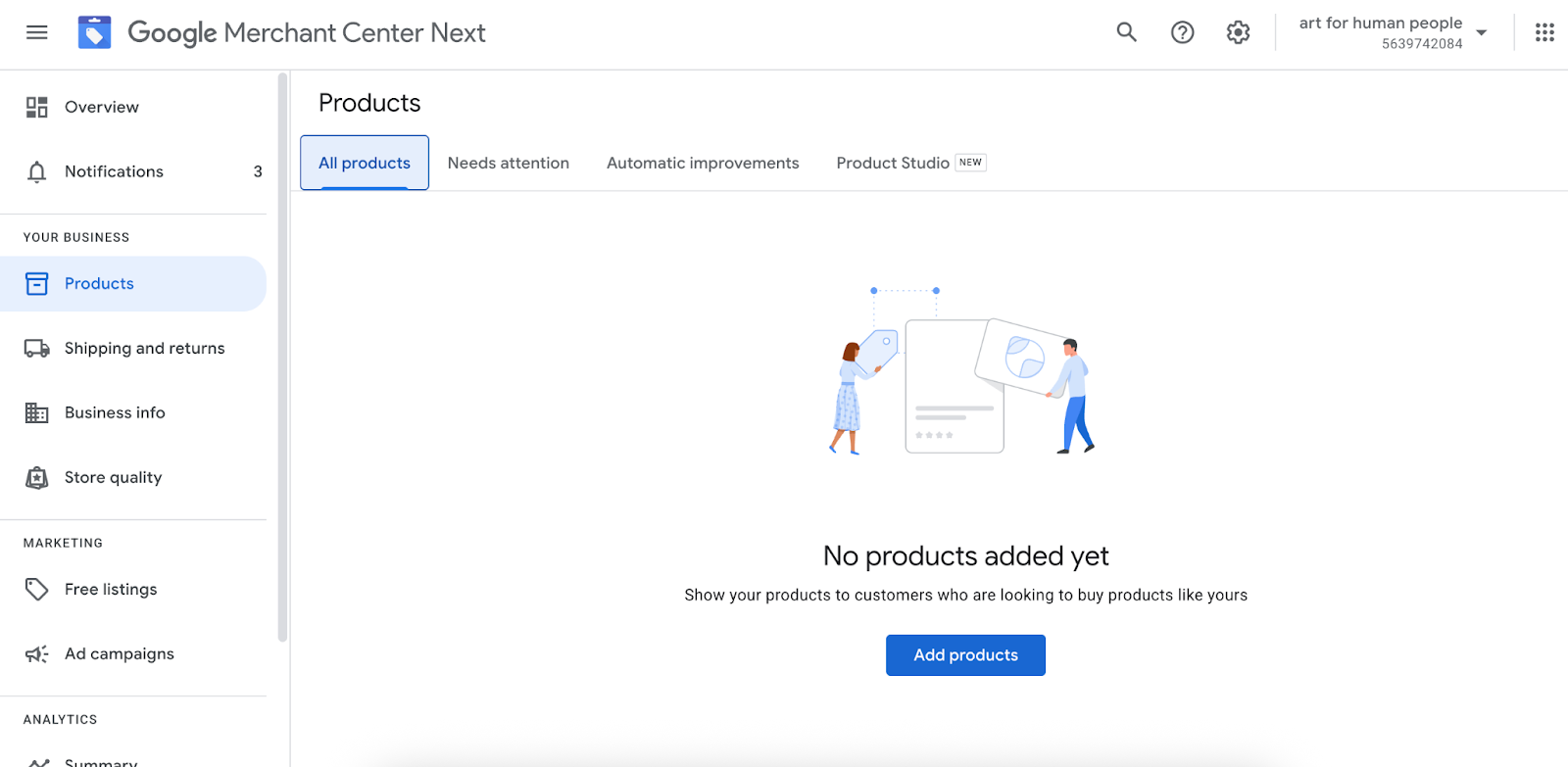
  1. Link your online store
  2. Sync your ecommerce platform
  3. Add products from an ecommerce website
  4. Upload product files (optional)

You can choose from multiple Google product uploading methods depending on where you sell (online, in store, or both) and your inventory techniques. Here’s how to get started:

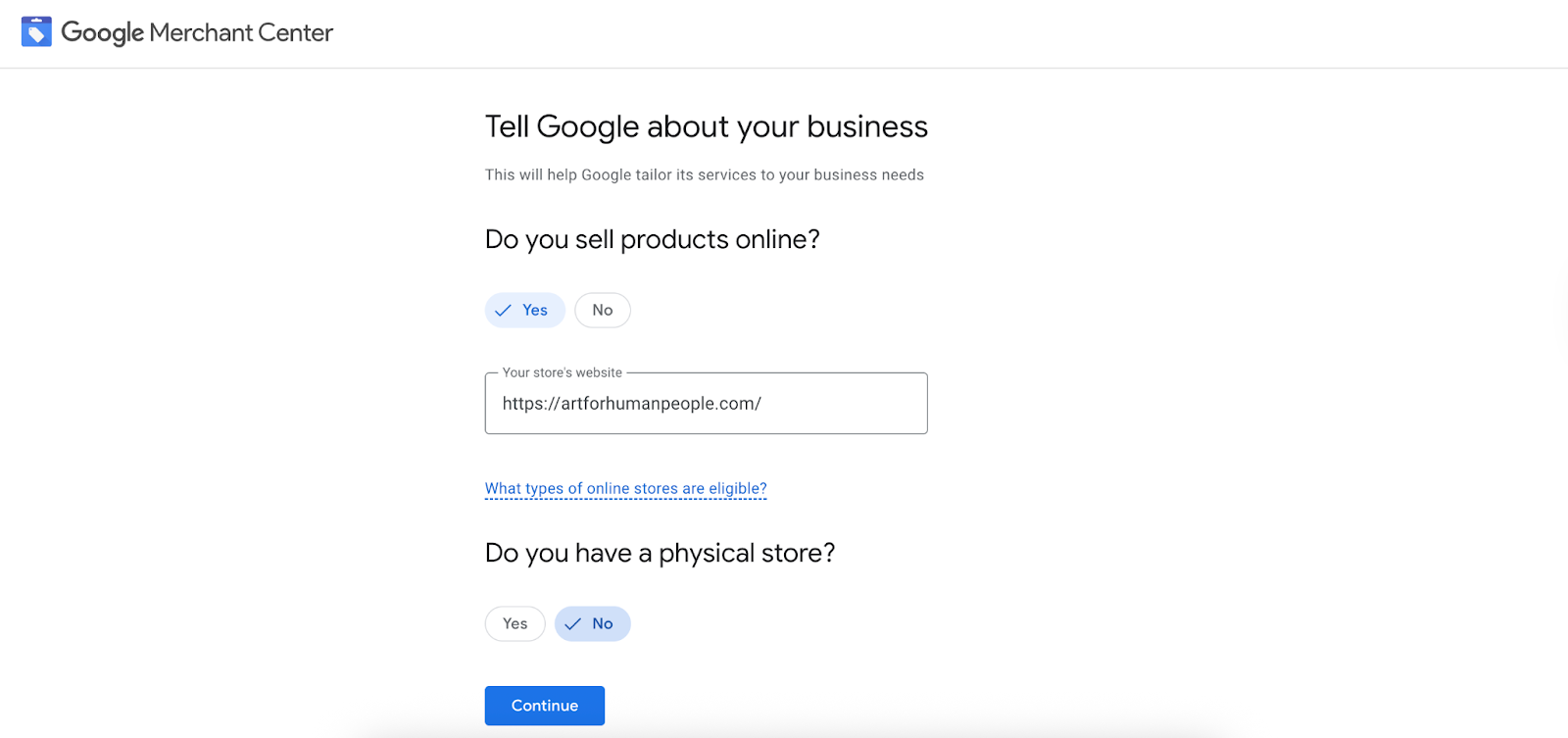
1. Link your online store

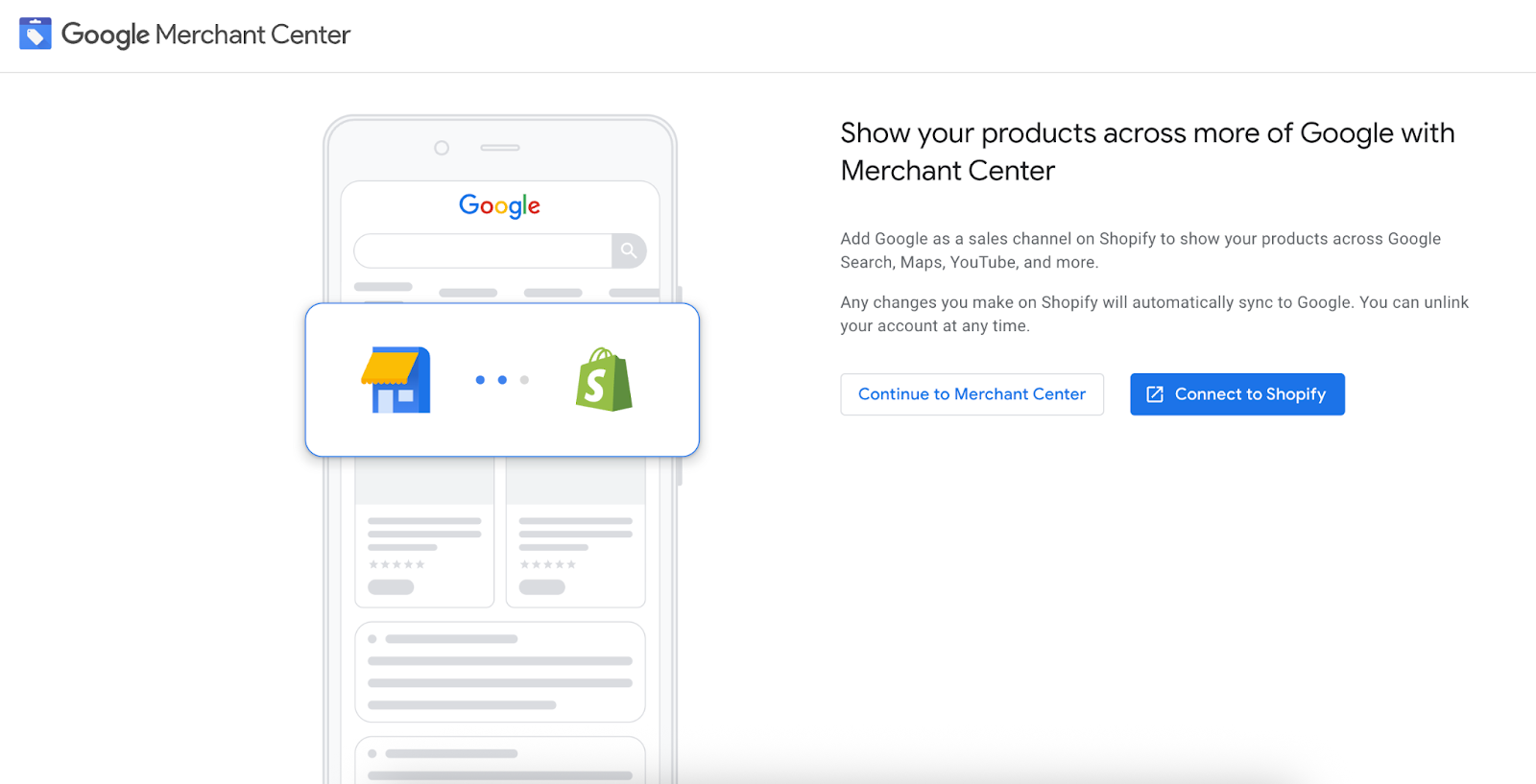
First step to create a Google Merchant account
Source: Google

First, create a Google Merchant account by linking your online store. You do not need to have a physical retail location to connect your ecommerce store to the platform.

2. Sync your ecommerce platform

Prompt to connect your Google Merchant account to Shopify
Source: Google

Google Merchant Center integrates with third-party ecommerce platforms like Shopify. To connect your accounts, install the Google & YouTube app in your Shopify dashboard (or the equivalent integration in your ecommerce platform), then follow the prompts to link your Merchant Center account. After connecting accounts, you can continue to manage product listings within your ecommerce platform; Google syncs information and applies updates to your product feed every 24 to 48 hours.

Prompt to get started with Google & YouTube in Shopify admin
Source: Shopify admin

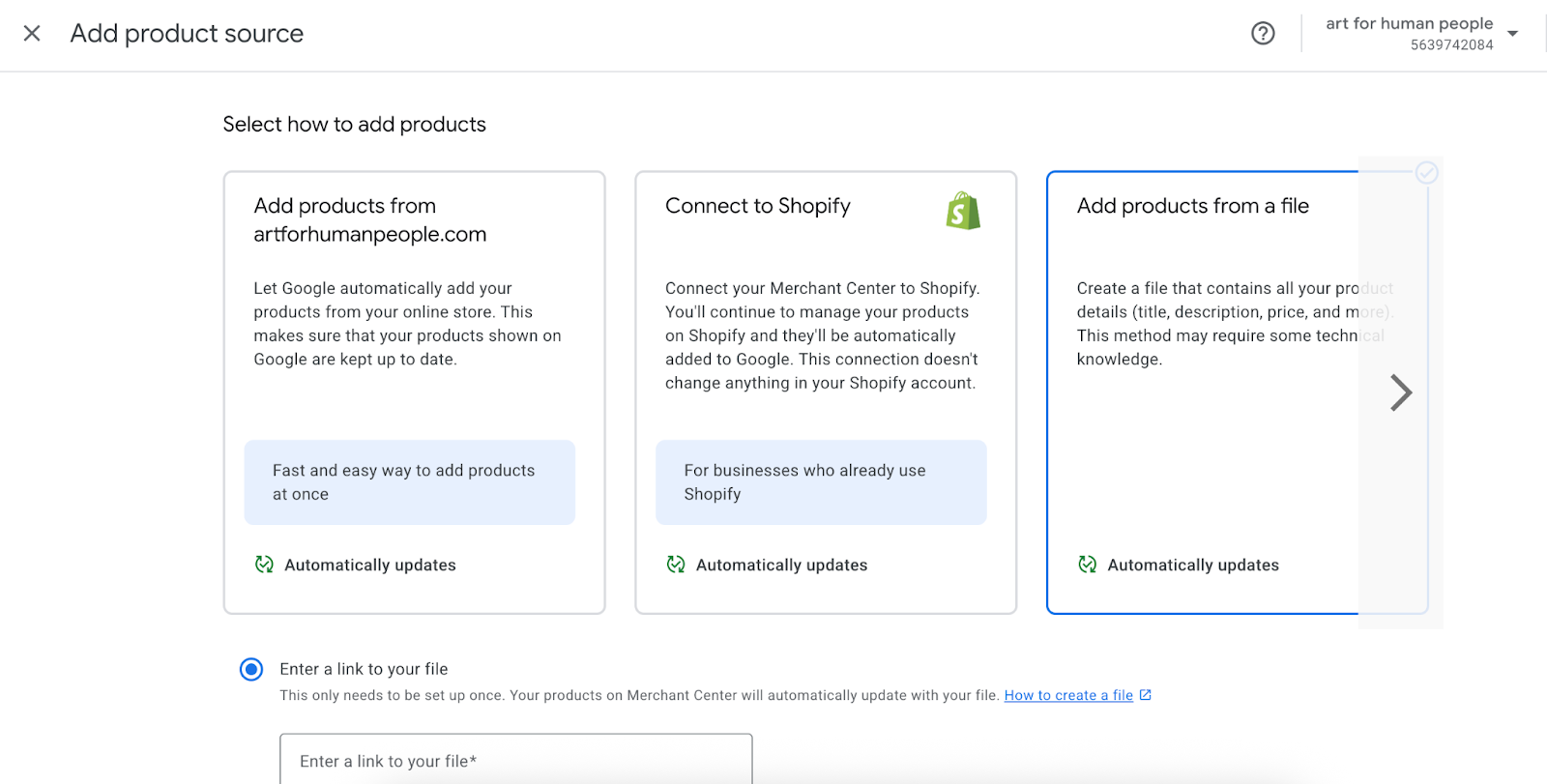
3. Add products from an ecommerce website

Field to add products in Google Merchant Center
Source: Google Merchant Center

You can let Google pull products straight from your ecommerce website by enabling automatic product detection in the Merchant Center. To make this work, your product pages need structured data markup (using ecommerce schema markups) so Google can read key details like price, availability, and descriptions. Once your site is verified and connected in the Merchant Center, Google can crawl those pages and automatically add items to your product feed.

After setup, Google will automatically add products to your feed. This method can save time if you regularly introduce new products. You’ll find full requirements and step-by-step setup instructions in Google’s help guide.

4. Upload product files (optional)

Fields to add products to Google Merchant Center automatically or manually
Source: Google Merchant Center

There are a few ways to add products manually:

  • Multiple products at once. To add multiple products at once, upload a tab-delimited spreadsheet or .xml file. When you log into the Merchant Center, there’s a Products section in the left-hand menu where you can choose Feeds and then add a new primary feed. That’s where you’ll select “Upload” as your input method, name your feed, and then upload your file. It’s efficient if you already manage your inventory in a spreadsheet.
  • Individual products. Select manual upload to add individual items to your product feed. With this method, you input product information directly into Google Merchant, one product at a time. This process may be inefficient for creating large product feeds, but it can be a convenient way to supplement your other uploading efforts. If one or more products failed during your initial upload, manual updates may be an easy way to add them to your feed.
  • Google Sheets templates. To use this method, click the “Use a Google Sheets template” option under the data sources menu, then follow the prompts and fill in the blanks for each product. You can use a single Google Sheet for ongoing inventory maintenance. After the initial setup, Google Merchant automatically updates and syncs any new products added to the document.

Note that manually updated files must follow Google’s product data specifications; missing info or inconsistent formatting can lead to delayed approval.

Core features of Google Merchant Center

After uploading products to Merchant Center, you can initiate and track performance for several different types of placements and ads. Here’s an overview:

Google Shopping ads

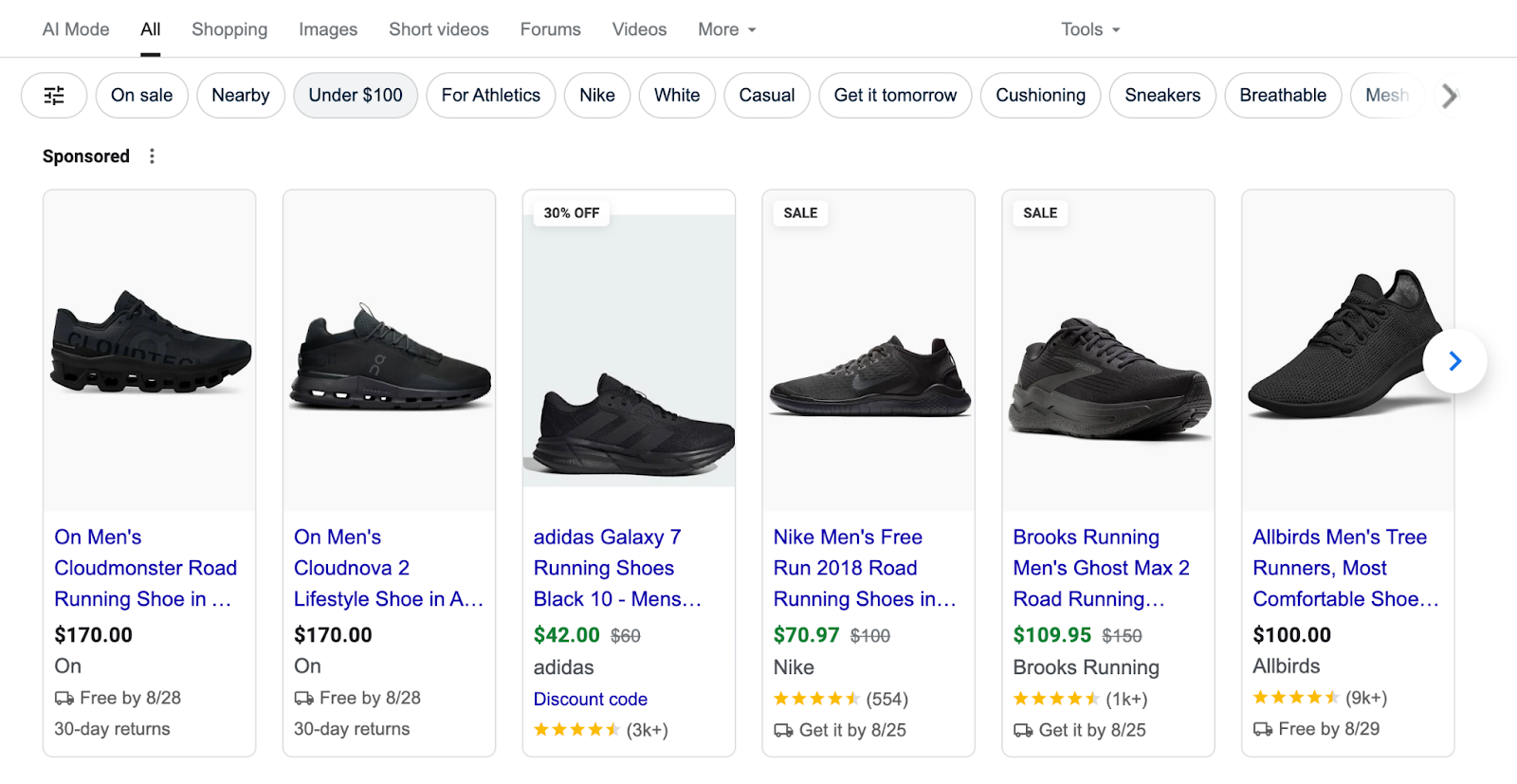
Google Shopping ads appear in the designated Google Shopping tab, on search engine results pages (SERPs), and in the shopping tab on YouTube. Google uses information stored in your Merchant Center account to determine ad placement, automatically displaying listings to relevant users based on keywords in the product description.

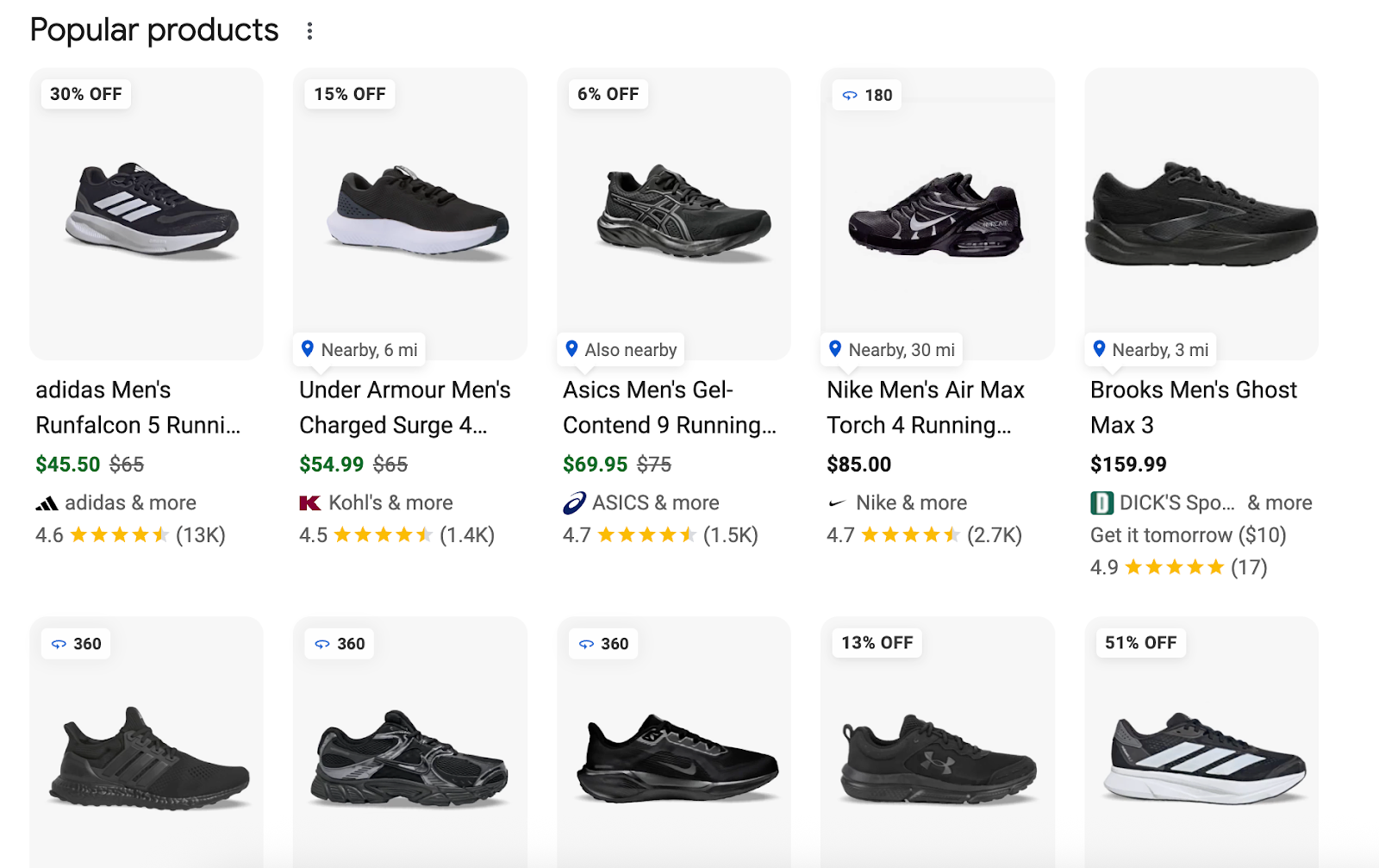
For example, suppose you’re an ecommerce company that sells shoes. When a user searches for “black running shoes men,” Google could automatically show your ad because it matches keywords in your product title and description, without you needing to manually target that specific search phrase.

Sponsored Google Shopping ads for 'black running shoes men'
Source: Google

Free listings

Free listings, similar to organic search results, are featured product snippets that appear in search results and on the Google Shopping tab when users input a relevant query. Google’s bots crawl product details stored in your Google Merchant Center account and surface results when the item description aligns with customer searches.

Free listings for relevant results for 'black running shoes men'
Source: Google

Local inventory ads

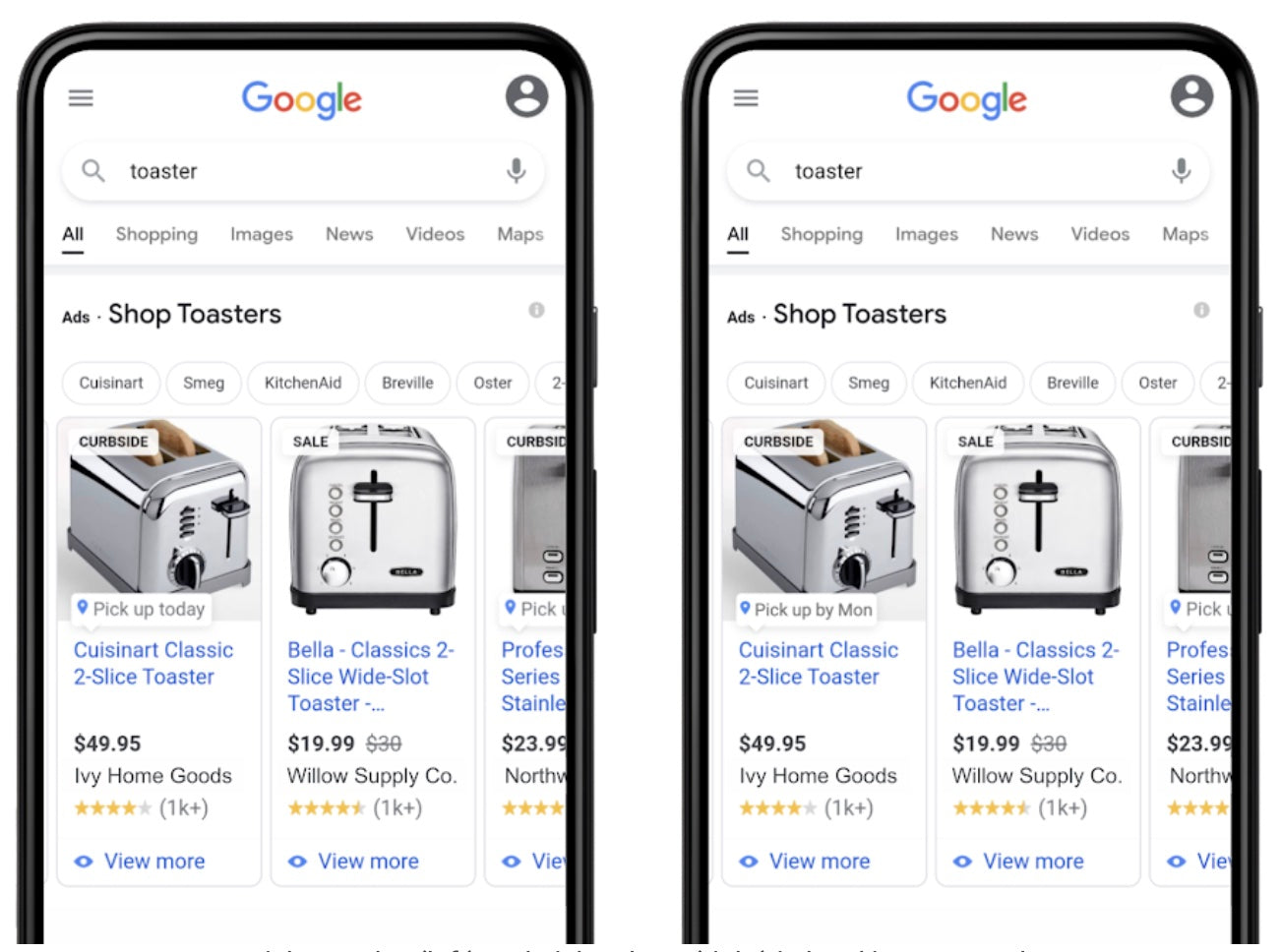
Local inventory ads are served to consumers located near your physical store location. They appear when a user conducts a product-related search query. Brick-and-mortar stores can use local inventory ads to promote their products online. These ads often display a message like “in store, 5 mi” or “pick up today.” Basic local inventory ads are free, but you can also pay for promoted placements.

Local inventory ads for 'black running shoes near me'
Source: Google

Performance Max campaigns

Performance Max campaigns serve ads across all Google touchpoints, including YouTube, Search, Maps, Images, Gmail, and display. This tool uses Google’s AI technology to customize ad placement and keyword bidding strategy based on owner-determined campaign goals. Launching a Performance Max campaign requires syncing your Google Ads account and Google Merchant Center account.

Dynamic remarketing for retail

With dynamic remarketing for retail, you can target specific users with product ads based on their past browsing behavior. This add-on is available to online retailers with linked Google Ads and Google Merchant accounts.

What is a Google Merchant Center product feed?

Your product feed is your primary product database. Google’s site crawlers use this data feed to understand what you’re selling. It helps determine relevance and placement by matching details from your product feed to user search queries. Google also uses product feed information to populate featured snippets, displaying the product title, price, and image from your feed.

Users upload merchandise data to create feeds. Following Google’s product specification guidelines ensures your listings are accurate and reach the right consumers. Each item must include a unique ID, name, description, landing page URL, and image link.

What are Google Merchant Promotions?

The Promotions feature lets you display special offers across Google by making a single update in the Merchant Center. If you apply a 10% discount, for example, Google Shopping Ads and Free Listings both reflect the new price and a description of this discount. This feature is available as an add-on if you meet the following criteria:

  • Product offers must be available in Australia, Brazil, Canada, France, Germany, India, Italy, Japan, Korea, the Netherlands, Spain, the UK, or the US.
  • You may not be affiliated with an ecommerce marketplace or platform where multiple independent retailers sell products.
  • You must maintain an active Merchant Center account with a claimed, live URL and at least one active product.

What is Google Merchant Center FAQ

What is the Google Merchant Center used for?

Use the Google Merchant Center to store product information, execute ad campaigns, and track sales performance. Google services like Google Shopping and local inventory ads rely on product information stored in Merchant Center accounts.

Is Google Merchant Center the same as Google Shopping?

Google Merchant Center and Google Shopping aren’t exactly the same, but they are connected. Google Merchant Center is a free tool that lets you upload and manage your product data. Google Shopping is a consumer-facing platform where users can discover products stored in the Merchant Center.

How much does Google Merchant Center cost?

Google Merchant Center is free to use. You can create an account, upload products, and export data without paying for services. Google Shopping and other paid ad campaigns operated via the Merchant Center use a pay-per-click fee structure.

Writing on Medium: Is It the Right Platform for You? (2025)

Software Stack Editor · September 12, 2025 ·

image

If your content marketing goals include establishing thought leadership in your industry, building an engaged audience, or earning money from content creation, Medium could be an incredibly powerful tool. This publishing platform comes with a built-in audience of 100 million monthly users, who you can reach through both Medium’s algorithmic and editorial distribution. Here’s how to start publishing on Medium and tips to get the most out of the platform.

What is Medium?

Medium is an online publishing platform where writers publish stories and essays, discover readers through recommendations and publications, and can monetize through its Partner Program. It emphasizes high-quality, human writing and community interaction across a wide range of topics.

Founded in 2012 by Twitter co-founder Ev Williams, Medium supports independent writers and high-quality, medium to long-form content, often including personal stories and essays. Medium’s ethos emphasizes building community, and hosts millions of users across different disciplines and backgrounds.

The platform has been through several iterations since its launch. Previously, it supported owned-and-operated publications that ran on the platform. It also previously offered suites of tools for brands, including paid distribution through native advertising. But today, the platform is tailored to individual writers and readers. It offers writers a path to monetization through its Partner Program.

Anyone can start publishing on Medium—all you need to do is create an account and start writing. Once you publish your first articles, readers can discover your writing through the site’s recommendations feed, search tool, and newsletter, and people can choose to follow you, much like on social media. 

How does Medium work?

Medium doesn’t sell member data or display ads in its membership content. Instead, it charges a membership fee for access to ad-free, unlimited stories for $5 a month. There is also a free subscription option to read three free articles a month that may include ads, but you can’t access member-only content with the free subscription.

If you have a Medium membership, you can also create a Medium publication, which functions like a blog or online magazine, allowing you to create a home for your written content. Medium publications can host multiple writers, feature a thematic collection of articles, and even send a newsletter. You can also connect a Medium publication to a custom domain or subdomain—for instance, to use Medium for your company blog.

Medium shares revenue with writers via its Partner Program. If approved for the program, writers earn money through writing paywalled articles exclusively available to members. Payout metrics include member reading time, claps, replies, highlights, and follows. Boosted member-only stories earn at a higher rate and earn a distribution payout.

Pros and cons of blogging on Medium

So what are the pros and cons of using Medium versus establishing a traditional blog or using another platform? Here’s a breakdown: 

Pros of writing on Medium

  • Built-in audience and distribution potential. Medium’s built-in social network allows contributors—even those without large followings—to have their content discovered through both algorithmic recommendations and editorial curation.

  • Thought leadership and credibility. Medium is an avenue for authentic, human, and authoritative content. If you publish regularly on Medium, you can build your reputation as a trusted expert—which might also help you build awareness for your brand. 

  • Monetization potential. Medium’s Partner Program pays writers for their work based on reader engagement, making it possible to turn that content creation into an additional income stream.

Cons of blogging on Medium

  • Limited analytics and marketing tools. Medium reports basic metrics, like views, reads, and reading time, but you can’t integrate tools like Google Analytics or email capture systems. A lack of in-depth reporting could make it more difficult for you to refine your content strategy on the platform.

  • Limited branding and design flexibility. There are limited options to control the look and feel of your blog through things like sidebars or widgets, even if you create a publication.

  • Content and audience. If you’re writing content to build an audience, that audience lives on Medium, not on your website. 

  • Monetization restrictions. If you are publishing content through the Partner Program, you can’t integrate display ads or create sponsored content. 

How to start writing on Medium

Medium makes it easy to sign up and share your ideas with its members. Here’s a step-by-step guide to getting started:

Create a free account

The first step is creating a Medium account. Medium allows you to sign up using your Google, Apple, or email login. A free account user can still build their own blog, write stories, follow writers, and engage with the community.

Become a Medium Member

Once you have an account, upgrade to a Medium membership to access publication features. Becoming a Medium Member costs $5 a month or $50 per year. Becoming a Friend of Medium costs $15 per month or $150 a year.

Medium membership will allow you to create a publication and link to a custom domain (like a company URL). Friend of Medium membership allows readers to share articles with non-members and support their favorite writers with a four-times higher giving rate.

Create a publication

You don’t have to create a publication to write on Medium, but if you want to build a blog or online magazine with multiple contributing writers, you’ll need to create your publication before you publish your first article. Once you have your publication set up, you can link it to a custom domain, launch a newsletter, and access publication-level analytics.

Publish your first article

Once you’re logged in and you’re on your homepage, you can write your first article. Medium’s simple interface allows for basic formatting like adding images, highlighting, and adding headings and subheadings. After you hit Publish, your Medium story will hit your profile page and may get in front of potential readers via Medium’s algorithm or curation team.

Add tags

After you hit Publish, you’ll be able to add up to five tags per article. Tags are an important part of content discovery on Medium—they help boost views and followers by connecting users with your content, which can help bring in a new audience. On Medium’s back end, you can see the popularity of a tag or if it is trending.

Here’s how to find and add tags: 

  • After you hit Publish, you can add topics (or tags) and preview your story. You can also add tags while a story is in drafts.

  • Once you begin typing a potential tag, Medium will show you related options and the number of posts associated with each, which indicates popularity.

Set up your socials for success

Schedule your posts and develop a sophisticated content strategy with this free social media calendar template.

Get template

Tips for writing on Medium

Medium has evolved into a platform that rewards content that fosters authentic interactions amongst its members. As long as your approach aligns with Medium’s distribution guidelines, a focus on high-quality writing and audience engagement will help you get the most out of the platform. Here are a few tips for writing on Medium:

Leverage tagging

Since Medium places value on industry expertise and thought leadership, tags can help you connect with users on very specific topics related to your business. Medium allows you to see which tags are trending. It also helps to research specific tags that might be more niche but active. Don’t just use tags because they’re popular; make sure they relate to your story.

Follow Medium’s best practices for story titles

Story titles matter too. Since Medium discourages users from producing clickbait, don’t use misleading headlines that might overpromise or rely on hyperbole. That’s an easy way to lose a reader’s trust. If your topic is specific, write a headline that reflects that. 

For example, one of the top posts in 2024 was titled, “The secret life of people with high self-control (it’s easier than you think).” The title is a little long, but it’s easy to understand and reflective of the article’s contents. 

Write with authenticity

Medium values personal essays, content that draws from the writer’s own personal experiences, and posts that are fresh or offer a new perspective. High-quality stories can get picked up by Medium’s human curation team, which selects stories that are then “boosted,” or prioritized for distribution, which means that they’re matched with more readers. Those editors give those particular posts more visibility across the Medium homepage and feature them in emails and on the app.

Don’t use AI

Medium—like many other content platforms—is having to deal with a deluge of content created by generative AI. Since Medium’s focus is on human storytelling, they are committed to ensuring that the articles recommended to its users are written by humans.

Although Medium doesn’t forbid members from making AI-generated content, it is banned from its Partner Program, unlikely to land in recommendations, and therefore cannot be monetized.

Use Medium’s formatting tools 

When publishing a post, use Medium’s formatting options, whether breaking up a post with headers and sections, or using high-quality images (make sure you think about usage rights and formatting).

Engage with the Medium community

One of the best parts of joining Medium is its built-in audience. But like other popular social media platforms, that audience can only deliver value if you engage with it. Take the time to follow, read, and engage with other people’s content on the platform. Those writers might then take the time to look at your content and engage with or follow you in return.

Writing on Medium FAQ

Do you get paid for writing on Medium?

You can get paid for writing on Medium if you are approved to write for its Partner Program, which pays writers based on reader engagement for a good story.

Is Medium a good platform for beginner writers?

Medium is a great platform for amateur writers because it makes it easy to publish and doesn’t require any vetting or experience to get started.

How is Medium different from Substack?

Substack, a growing, popular platform that has now hit five million paying users, focuses more on building email relationships between creators and their subscribers. Medium, on the other hand, focuses more on publishing on its website. On Substack you actually own your email list, while Medium does not allow for that.

It’s possible to publish on Substack and earn revenue without paying (although it takes 10% of your earnings). The amount you earn depends entirely on how many paying subscribers you have. In order to earn as a content creator on Medium, you need a paid membership and approval for the Partner Program. Once you start publishing, revenue can come only from posts behind Medium’s paywall and earnings are calculated based on engagement amongst members.

DSO Meaning: How To Interpret DSO For Your Business (2025)

Software Stack Editor · September 12, 2025 ·

image

Days sales outstanding, also known as DSO, is a fundamental financial metric a company can use to evaluate its efficiency and financial health. In its simplest form, DSO quantifies the average number of days a company takes to collect payment after making a sale on credit.

For any business, whether it’s a small startup or a large corporation, a firm grasp of DSO can help you maintain a healthy and steady cash flow. On an episode of the Shopify Masters podcast, Jean Wu, cofounder of the insulated bottle business Que, discusses the importance of financial vigilance.

“Not understanding financially how the business is doing, how the business is running, is pretty dangerous,” she says. Understanding metrics like DSO is necessary for a business to be “lean and healthy,” as Jean puts it.

Learn what factors can affect DSO, how to interpret this metric, and strategies for lowering it.

What is DSO?

DSO stands for days sales outstanding, and it measures the average collection period for credit sales. In a world where immediate cash sales are not always possible, especially in B2B transactions, companies extend credit to customers, allowing them to pay unpaid invoices later. DSO quantifies precisely how long that process takes.

Days sales outstanding is a key part of working capital management because it affects a company’s liquidity—its ability to meet short-term financial obligations. A consistently low DSO can be a competitive advantage. It demonstrates the company can convert sales into cash quickly, which can be used to fund operations, pay suppliers, or make investments. A rising DSO could be a red flag, pointing to possible issues with client credit quality, inefficiencies in billing, or a faltering collections strategy.

DSO formula

The standard formula financial professionals use to calculate DSO is:

DSO = (Accounts receivable / Total credit sales) x Number of days

  • Accounts receivable. This is the total amount of money owed to the company by its clients for goods or services already delivered. Accounts receivable represents all invoices at the end of a designated time period that are unpaid.

  • Total credit sales. This is all sales made on credit during the same time period. It is important to exclude cash sales from this figure to get an accurate representation of the credit collection cycle.

  • Number of days. This is the number of days in the given period you are analyzing, which could be a month (30 days), a quarter (90 days), or a year (365 days).

For example, if a small business has an accounts receivable balance of $500,000 and credit sales totaling $2,000,000 over a 90-day period, its DSO would be calculated as:

  • ($500,000 / $2,000,000) x 90 

  • 0.25 x 90 = 22.5 days

On average, it takes the company 22.5 days to collect receivables from a sale.

Factors that affect DSO

A company’s DSO is not a static number; a combination of internal and external factors influences it. Understanding these influences is the first step toward managing your cash flow effectively:

Credit terms

The payment terms a company offers its clients influence the expected time frame for payment. While generous terms (e.g., net 60 or net 90) could attract more credit sales and higher sales volumes, it inherently increases DSO. Another approach is to use standard terms like net 30, or payment within 30 days.

Some businesses offer discounts for paying early to incentivize prompt payment. A classic example is “2/10 net 30,” which means a client receives a 2% discount if paid within 10 days; otherwise, the full amount is due within 30 days. It’s possible for a company to lower its DSO using this strategy.

Industry standards

An acceptable DSO is highly dependent on the industry standards and the company’s business model. A DSO that is excellent for a software company could be a red flag for a retail business. This is due to variations in payment terms, sales volume, and the complexity of billing.

Here are some examples of DSO trends in various industries, based on how many days is generally acceptable:

  • Retail/ecommerce. These industries typically have a very low DSO that ranges from five to 20 days. This is because most transactions are either paid for at the point of sale (cash or credit card) or through automated, immediate online payments.

  • Software as a service (SaaS). A good DSO for software-as-a-service (SaaS) companies generally ranges from 30 to 45 days. This is often in line with their monthly or quarterly billing cycles as well as the payment terms they extend to their customers.

  • Manufacturing. This sector could have a higher DSO, usually between 45 and 60 days. Factors like longer production cycles, larger transaction values, and the practice of offering lenient credit terms to B2B clients can influence this.

  • Professional services. For firms like consulting agencies, law firms, and accounting services, a good DSO is usually between 30 and 60 days. The exact figure varies based on the complexity of the project, the size of the client, and the firm’s specific billing cycles (e.g., hourly versus retainer). 

  • Construction. This industry has one of the highest DSOs, often between 60 and 90 days, or even higher. This is due to the industry’s common use of project-based billing, which is often related to the completion of milestones and can involve complex invoicing and payment approval processes.

  • Health care. Health care providers face a high DSO, with averages frequently ranging from 45 to 70 days. This is primarily because they must navigate a system of third-party payments and insurance claims, often causing significant delays.

Internal collections processes

The most significant factor within a company’s control is its internal collections process. This encompasses everything from the moment it sends an invoice to its final collection of money. An efficient process includes prompt invoicing, clear internal and external communications, and consistent follow-ups.

Jean says her business, Que, uses Zoho, a tool designed for inventory tracking and invoicing. 

“You can invoice your customer … and you can also track your inventory, which is important,” she explains.

By automating the company’s cash flow management, Que is able to ensure it’s tracking its sales, sending every invoice, and keeping the entire system well-organized.

How to interpret DSO

When comparing DSO across your industry, you may notice your own metric is higher or lower than the standard. While a low DSO could indicate an efficient collections process, a high DSO might mean there’s room for improvement. Here’s more information about interpreting a low or high DSO:

Low DSO

A low DSO means a company is excellent at converting sales into cash. This means it has an efficient collections process, good credit policies, and healthy client relationships. A low DSO means liquidity has increased, which allows the business to reinvest its profits, pay off debts, and take advantage of new opportunities without needing to rely on external financing. It’s a clear sign of a well-managed and financially stable operation.

High DSO

It is possible that a high DSO is a symptom of underlying problems. It can indicate a lenient credit policy, inefficient invoicing, or even a client base that struggles to make payments. A consistently high DSO can create a dangerous cycle. It strains the company’s cash flow, which makes it difficult to pay bills, suppliers, or employees on time. This could lead to short-term borrowing, which adds interest costs and further erodes profitability. 

How to lower DSO

Lowering your DSO is a strategy to improve working capital. While it requires your dedication, the benefits are worth the effort:

Offer early payment discounts

This is a powerful incentive for clients. By offering a discount for paying early, a business encourages prompt payment. The small discount is often a worthwhile trade-off for getting the funds into your accounts sooner. For example, offering a 2% discount if an invoice is paid within 10 days on a $50,000 invoice is a $1,000 discount for the client, but it gives the company access to $49,000 in cash 20 days sooner than the standard net 30 terms.

Streamline invoicing

The collections process begins as soon as sales occur. To collect receivables efficiently, invoicing must be accurate and timely. An incorrect or late invoice can lead to an inability to collect payment. Automating the invoicing system, such as what Que does with Zoho, ensures invoices are generated and sent immediately upon the completion of a sale. This reduces human error and establishes a clear start to the payment clock.

Free invoice generator

Shopify’s online invoice generator makes your life easier when it comes to billing and collecting money.

Create invoices

Enforce credit policies

A robust credit policy is another consideration for maintaining a low DSO. This includes defining payment terms and applying them consistently. When bringing on new clients, consider performing a credit check. For all clients, ensure late payment consequences are clearly outlined in your agreements. This prevents any misunderstandings and gives your company leverage to collect outstanding receivables.

Improve the collections process

The process of following up on unpaid invoices should be systematic and professional. Proactive cash flow management can make the biggest difference in these areas:

  • Proactive reminders. Send gentle, automated reminders a few days before an invoice is due.

  • Prompt follow-ups. Follow up immediately after an invoice is past due.

  • Escalations. Establish a clear process for escalating delinquent accounts. This might involve a phone call from a senior staff member or, as a last resort, using a collections agency.

DSO meaning FAQ

How do you calculate DSO?

You calculate DSO using this formula: (Accounts receivable / Total credit sales) x Number of days. This returns the average number of days it takes for your company to collect payment from credit sales.

What is an acceptable DSO?

An acceptable DSO is one that is in line with your industry norms and your company’s payment terms. If your terms are net 30, a DSO of around 35 days might be considered good. A much higher DSO might signal issues, while a much lower DSO might mean you are being too restrictive with your credit policies and could potentially lose sales.

How can I reduce my DSO?

Strategies for reducing DSO include offering discounts for paying early, streamlining your invoicing with automation tools, and improving your internal collections process. These strategies can assist with collecting receivables more quickly and improving your overall cash flow.

What Is a Business Loan Broker & Should You Use One? (2025)

Software Stack Editor · September 12, 2025 ·

image

Securing a business loan isn’t always straightforward, especially if you’re short on time, operate in a niche industry, or don’t know which lenders are most likely to say yes. That’s where a business loan broker can help.

These financial pros act as a bridge between you and potential lenders, helping you find financing that fits your needs and guiding you through the application process.

A broker can be convenient, but their services come at a cost, and not all brokers operate the same way. Here’s what to know before you decide whether to work with one.

What is a business loan broker?

A business loan broker, also known as a commercial loan broker, is a financial professional who helps businesses find and secure financing by matching them with suitable lenders.

These loan brokers work independently but leverage their contacts to help you get a business loan that best fits your situation on competitive terms. When you need commercial financing, business loan brokers will contact lenders, negotiate on your behalf, and guide you through the loan application requirements and process.

But a broker charges fees and commission for their services, and in some cases, they may encourage you to take out pricey loans, particularly if their compensation is tied to the loan amount or its terms. 

Loan broker vs. loan marketplace

Loan brokers and loan marketplaces both provide small business owners with financing options, but they work in different ways.

A commercial loan broker is an individual with deep knowledge of the market for business loans and the lenders and banks that are seeking borrowers. Brokers guide clients through the procedure of determining financing needs, sorting through the various loan products, managing paperwork, and helping the company negotiate loan terms. 

A loan marketplace typically refers to an online platform that serves as a digital matchmaker. You provide information about your business and what you’re looking for, and the platform presents automated offers from its partner lenders. The lenders contact you directly to finalize terms. Fundera, Lendio, and LendingTree are all examples of loan marketplaces.

Get funding to run your business with Shopify Capital

Shopify Capital makes it easy to get funding quickly and use it for inventory, marketing, and more. Automatically make payments as a percentage of your daily sales. No compounding interest. No schedules. No surprises.

Explore Shopify Capital

Using an online loan platform could make sense if you:

  • Want more control over the process

  • Don’t operate in a high-risk industry, such as firearm or cannabis sales 

  • Have stable revenue 

  • Don’t want to pay a higher interest rate

Hiring a commercial loan broker could be helpful if you: 

  • Don’t have a lot of time to dedicate to the process 

  • Operate in a niche or high-risk industry

  • Need hands-on help with the loan application

A loan marketplace can also refer to the vast market of different lenders and loan options you can shop yourself. This entails researching banks, credit unions, and online lenders individually, then contacting the lender and applying for the loan that best fits your financial needs.

How to work with a loan broker

  1. Find a loan broker
  2. Have a two-way conversation
  3. Gather documents
  4. Review your broker’s proposal
  5. Negotiate with the lender
  6. Select your lender and loan product
  7. Receive funding and pay broker

If you’re new to working with a business loan broker, here’s how it usually works: 

1. Find a loan broker 

You can search online for a small business loan broker in your area for a quick and direct approach. Or, someone at your local Small Business Administration Development Center can help you find a broker or brokerage firm. You can also ask another business owner or a colleague for a referral. 

2. Have a two-way discussion

Once you contact a commercial loan broker, schedule a consultation to discuss your business financing needs. Let the broker know how you will use the loan proceeds and how much you want to borrow. They may ask questions about your business, such as your industry, years in operation, annual revenue or profit, and credit rating.

At the same time, ask the broker questions about their fee structure, credentials, and experience in your industry. If you’ll be responsible for paying their fee (rather than the lender paying it), make sure it fits with your budget.

3. Gather documents

The loan broker should give you a checklist of documents you need for the loan application. These may include:

  • Personal and business tax returns

  • Profit and loss statements 

  • Balance sheets

  • Bank statements

  • Business licenses and/or incorporation papers

  • Contracts or invoices if the loan is tied to a specific project

4. Review your broker’s proposal 

The broker takes your loan application and contacts lenders in their network who are likely to approve your loan request. Then the broker will present offers with details, such as:

  • Loan amount

  • Interest rate

  • Term length

  • Fees 

  • Total repayment cost

Your business loan broker should go through the main pros and cons of each option and answer questions about terms and obligations.

5. Negotiate with the lender

With several offers in hand, the business loan broker will negotiate on your behalf. They may try to get better rates and terms or lower fees. This step is more common for businesses that are borrowing a large amount or have strong credit and finances. 

6. Select your lender and loan product

It’s time to choose the lender you want to work with and the loan product you want. Your broker will coordinate with the lender for final underwriting and closing requirements. You may need to provide additional documentation, answer questions, and sign loan agreements.

7. Receive funding and pay broker

Once the lender approves your business loan, it will transfer funds to your business bank account. The broker gets paid either by the lender, by you, or both, depending on your arrangement.

Earn cashback rewards with Shopify Credit

Get up to 3% cashback on your eligible marketing spend, including on TikTok, Meta, and Google, using Shopify Credit—the business card designed for Shopify entrepreneurs. No fees, no interest, no credit checks.

Explore Shopify Credit

How to choose the right loan broker

Once you find a loan broker, consider the following before deciding to work with them.

Fees

A loan broker should be upfront about how they’re paid. Typically, brokers charge a fee that equals a small percentage of the total loan amount, typically 1% to 3%. Some brokers may also charge an upfront flat fee.

They should clearly explain whether their fee comes from you, the lender, or both, and whether the fee is a flat rate, a percentage of the loan, or built into the loan cost. Avoid brokers who dodge fee questions.

Certifications

Check if the broker is licensed or registered in your state. Some states require this. Membership in professional associations can also signal credibility, indicating that the broker has attended professional training programs. Look into: 

Experience

Choose a broker who understands your industry and has a track record of matching similar businesses with the right lenders. An experienced broker can save you time, steer you away from unsuitable products, and help you avoid hidden costs.

Red flags

Be wary of brokers who:

  • Push only one loan option without showing alternatives. This could mean they’re motivated by commissions, not your best interest.

  • Promise loan approval—no broker can guarantee funding.

  • Pressure you to act immediately without giving you time to compare terms.

  • Request large upfront fees before doing any work; reputable and successful brokers are usually paid once you secure funding at closing.

*Shopify Capital loans must be paid in full within a maximum of 18 months, and two minimum payments apply within the first two six-month periods. The actual duration may be less than 18 months based on sales.

Business loan broker FAQ

What do business loan brokers do?

A business loan broker facilitates the loan process between a borrower and a lender. They help your business find a lender, negotiate on your behalf, and help you submit the application.

What are the benefits of getting a loan through a broker?

Business loan brokers can potentially help you save time by handling most of the loan shopping and application legwork. They may also save you money if they negotiate better loan terms on your behalf.

Is it better to go directly with the lender or a broker?

It depends on your situation. Get quotes directly from a lender or use an online marketplace if you want more control over the process and you don’t want to pay a broker fee. But hiring a business loan broker could be beneficial if you’re pressed for time, operate in a high-risk industry, and want help throughout the application process.

What Is a Social Media CRM? Uses + Software Roundup (2025)

Software Stack Editor · September 12, 2025 ·

image

Social media has evolved into a powerful ecommerce engine that businesses can no longer afford to ignore. With users spending an average of nearly 2.5 hours scrolling social media per day, a social media CRM helps you turn that attention into conversations, leads, and sales rather than disconnected interactions. This engagement translates directly into purchasing behavior: Two-thirds of people surveyed by Adobe have purchased products they discovered on TikTok alone. 

As platforms like TikTok and Instagram dominate consumer attention and influencers shape buying trends, managing customer relationships has shifted beyond email and phone calls. Today’s customers find products through posts, comments, and DMs—so without a plan to capture these touchpoints, potential sales and service moments are easy to miss.

Social media CRM bridges the gap, turning scattered social interactions into organized customer data you can act on. In this guide, learn what a social media CRM is, when to use it, and software options to consider.

What is social media CRM?

Social media customer relationship management systems (CRMs) combine traditional customer relationship management with social listening and engagement tools. Instead of just tracking email addresses and phone numbers, social media CRM captures social media interactions, brand mentions, and customer sentiment across different platforms.

Social media CRM vs. traditional CRM

The core difference between social media CRM and traditional CRM lies in data sources. While conventional systems rely on traditional data (contact forms, sales calls, and email exchanges), social CRM pulls information from social media channels where customers naturally gather. This includes direct messages (DMs), public posts, comments, and even mentions of your brand by users who haven’t directly contacted you.

With a social customer relationship management tool, customer service requests through social channels get logged and resolved systematically rather than falling through the cracks. For example, when a potential customer asks about product availability via DM, the system can track that inquiry, assign it to sales teams, and follow up appropriately.

Traditional CRM systems fall into four categories: operational (automations, sales, and marketing), analytical (analyzing customer data), collaborative (sharing customer information across teams), and strategic (aligning customer strategy with business goals). A social CRM can encompass all four types depending on how it’s built and used—and creates a fifth category that incorporates real-time social interactions into customer relationship building.

When to use social media CRM tools

By turning social interactions into trackable sales opportunities, social media CRM helps you unlock real, measurable value from your online presence. Here are the most practical ways to integrate social CRM into your operations:

Customer service management across platforms

When customers reach out through multiple social media accounts, social CRM consolidates these conversations into a unified inbox. A customer might start a support conversation on X or Bluesky, continue it via Instagram DM, then follow up on email. Social CRM platforms track this entire conversation history, preventing support teams from asking customers to repeat information.

Consider a Shopify store selling hiking gear. A customer posts on Instagram about a blister they developed from their trail running shoes, then messages the company’s Facebook page for a replacement. Without social CRM, these appear as separate incidents. With it, support agents see the complete interaction timeline and can provide personalized service based on the customer’s full communication history. 

Social media marketing campaign tracking

Social CRM tracks how marketing campaigns perform across social channels and connects that performance to actual sales. Rather than just measuring likes and shares, it shows which social media posts drive website traffic, generate leads, or convert to purchases.

When the hiking business mentioned above runs a launch campaign for its new all-weather cargo pants, it can use social CRM to identify which social media channels produce the highest-value customers, which content type generates the most customer engagement opportunities, and which influencer partnerships deliver return on investment (ROI). The system tracks customer journeys, from initial social media interaction through final purchase.

Social selling and lead generation

Sales teams use social CRM to identify potential customers based on social media behavior and customer engagement patterns. The system monitors online chatter—like brand mentions, competitor discussions, and relevant hashtags—to find prospects showing purchase intent.

For example, when someone posts on X about needing a dry bag to protect gear while hiking, social CRM can flag this as a sales opportunity for the hiking company. Sales teams can then engage naturally in the conversation, providing helpful information that moves the prospect toward a purchase decision. This approach feels less intrusive than cold outreach because it responds to expressed customer needs. 

Brand reputation monitoring and customer feedback analysis

Social CRM continuously monitors social media platforms for brand mentions, tracking both positive and negative customer sentiment. This creates opportunities to address concerns before they escalate and amplify positive customer experiences.

The hiking company can set up monitoring for its brand name, product names, and relevant industry keywords. When negative feedback appears, customer service teams get immediate alerts to quickly respond. When positive mentions occur, marketing teams can engage to strengthen those relationships and turn satisfied customers into brand advocates. 

Customer relationship management across communication channels

Social CRM unifies customer interactions from traditional channels (like email and phone) with social media engagement, creating comprehensive customer profiles. This enables personalized communication regardless of how customers choose to contact your business.

When a long-time email subscriber starts following the hiking company’s Instagram account and commenting on posts, social CRM connects these activities to their existing customer profile. This context helps business owners tailor their responses and understand customers’ evolving relationship with their brand across preferred channels. 

Reach customers everywhere they are with Shopify

Shopify comes with powerful tools that help you promote and sell products on Facebook, Instagram, TikTok, Google, and YouTube from one back office. Make sales on multiple channels and manage everything from Shopify.

Explore Shopify’s sales channels

5 social media CRM software tools

When selecting a social media CRM tool for your business, the best option depends on your specific needs and available resources.

Some platforms—like Sprout Social, Hootsuite, and Buffer—are well-suited for growing businesses looking for cost-effective solutions (with social media marketing features). Zoho Social and Salesforce, on the other hand, are ideal for larger businesses that already use Zoho or Salesforce’s broader ecosystems for their other workflows.

Here’s an overview of some of the most popular tools:

Sprout Social 

Sprout Social CRM provides a holistic view of customer interactions, integrating with traditional CRMs (like HubSpot) and support tools (like Zendesk). The platform consolidates messages from all social platforms into a unified view, making it easier to track customer conversations across multiple channels.

Sprout Social’s “customer profile” feature automatically builds detailed profiles from social interactions, including engagement history and conversation timeline. Designed to prevent duplicate efforts and provide oversight, its shared “contact profile” view gives you access to a comprehensive customer history.

Pricing: Sprout Social CRM is included in the Standard plan, which starts at $200 per seat per month. 

Hootsuite

In addition to its marketing features, Hootsuite acts as a complete social CRM tool. You can access multiple social media accounts from a single interface, allowing you to maintain a consistent presence across platforms.

Its social listening capabilities track brand mentions and relevant conversations, while its central inbox provides visibility for full teams. Hootsuite integrates with various CRM systems (including Salesforce) to sync social media interactions with existing customer databases. The platform is supported by OwlyGPT, Hootsuite’s AI assistant.

Pricing: Social CRM plans are included in all Hootsuite plans, which start at $100 per user per month, billed annually.

Buffer

Though Buffer’s primary purpose is content scheduling, the platform includes customer relationship tracking features.

Its “engage” tool helps manage customer interactions across multiple social channels through a single dashboard, though with less sophistication than dedicated social CRM platforms. This makes Buffer an ideal choice for small businesses that need reliable content scheduling with basic customer interaction tracking—rather than comprehensive social CRM functionality.

Pricing: Buffer’s Essentials plan starts at $15 per month for one user and three social media channels. (CRM features aren’t included in Buffer’s free plan.) 

Zoho Social

Zoho Social operates as part of the broader Zoho business suite, providing integrated social media management with CRM connectivity. The platform automatically syncs social media interactions with Zoho CRM, recording them as new leads and creating complete customer profiles that include social engagement history.

Its monitoring dashboard tracks brand mentions, competitor activity, and industry conversations to identify customer relationship opportunities. Zoho Social’s collaboration features let you assign social media conversations to specific team members while maintaining centralized oversight.

Pricing: Zoho Social starts at $10 per month for basic features, with professional plans offering advanced CRM integration and analytics capabilities. 

Salesforce 

Formerly packaged as Salesforce Social Studio, Salesforce’s social CRM capabilities are integrated directly into the Salesforce ecosystem. The platform captures social interactions and syncs them with Salesforce CRM data—helping you create complete customer profiles. The platform leverages Salesforce’s AI assistant (Einstein Analytics) to provide predictive customer insights.

Pricing: As a comprehensive, enterprise-grade CRM, Salesforce can be an expensive option depending on your needs. Its Digital Engagement package—which includes multichannel messaging—is available as an add-on to Salesforce CRM, starting at $75 per user per month.

Social media CRM FAQ

What is a social media CRM?

A social media CRM is software that combines traditional customer relationship management with social media monitoring, engagement, and data collection to track and manage customer interactions across social platforms.

What are the 4 types of CRM systems?

The four types are operational CRM (automating sales and marketing processes), analytical CRM (analyzing customer data for insights), collaborative CRM (sharing customer information across teams), and strategic CRM (aligning customer strategy with business objectives).

What’s an example of a social media CRM tool?

Sprout Social exemplifies social media CRM by combining social media management, customer interaction tracking, brand monitoring, and analytics in one platform that creates customer profiles from social media activities.

How can social media CRM improve my business?

Social media CRM prevents lost customer inquiries, enables personalized responses based on interaction history, identifies sales opportunities from social engagement, and provides valuable insights into customer behavior and preference patterns across social channels.

How Kopari’s VP of Marketing Built an 8-Figure Influencer Strategy (And How You Can Too) (2025)

Software Stack Editor · September 11, 2025 ·

When Toral Patel left Estée Lauder to join the clean body care brand Kopari Beauty in 2021, she knew she was stepping into a different world. Toral took joining Kopari as an opportunity to transform how the indie beauty brand approached influencer marketing. She knew it was time to move beyond transactional partnerships to build what she calls “authentic community.” Kopari would benefit from this fresh perspective.

A bottle of Kopari Beauty Golden Sunglaze Sheer Body Mist surrounded by white flowers and a sliced open mango.
Beauty giants were amazed by the effectiveness and love for indie beauty brands like Kopari Beauty.Kopari Beauty
   

It only took her three years to prove that leaning into community would fuel growth. In 2024, Kopari had one of the highest conversion rates in prestige skin care for influencer marketing, growing the brand into an eight-figure business. The secret wasn’t only about getting the right creators to work with you or throwing the biggest events. Toral created a system that turns what used to be one-off collaborations into months of profitable content, shared across multiple channels.

Here’s how she did it—and how you can apply her framework to your own business.

Starting with product truth, not marketing spin

Toral’s first move at Kopari was to dig into the why of what made people love the product.

“You really have to believe in your product and that your product is differentiated,” Toral says. “All you want for [influencers] to do is to try the product, because if they love it … it will make its way into multiple pieces of content.”

A model sprays her face with Sunglaze Setting Mist SPF 50.
Toral and her team are constantly using social listening to understand what consumers are posting about when they mention Kopari Beauty products or collaborations.Kopari Beauty

Really listening to what your customers are saying, unbidden, requires a certain level of patience. The second part of active listening, using that information to inform actions your brand takes, requires you to be brutally honest with yourselves about what your customers think versus what the company wants the customer to think. “Internally, what you think is a differentiator may not be what the creator community or your customers find to be the most compelling benefit about the product,” she notes.

For Kopari, this meant pinpointing qualities like ease of use and the distinctive glow its SPF products created on skin. These were benefits creators wanted to showcase in their content, not the brand’s overarching clean beauty message. Lucky for Kopari, this user-originated messaging translated well to social media. 

Before investing in an influencer strategy, spend time understanding why people genuinely love your product. Survey existing customers, analyze reviews, use social listening, and pay attention to how people talk about your brand—whether or not you’re in the room. Starting from a place of authenticity, responding to what customers are already saying about you, allows you to grow your customer base organically. And, this type of feedback loop will make every subsequent partnership more effective.

Building relationships, not just campaigns

While many brands focus on maximizing reach per dollar spent, Toral took the opposite approach at Kopari. She prioritized depth over breadth, creating meaningful connections with a smaller group of creators rather than casting a wide net.

“We really keep them more intimate,” she says about Kopari’s creator events. “Not in any way to be exclusive—our brand really prides ourselves in being inclusive—but more so because we do want to actually get to know everyone that’s there in a deep and meaningful way.” This philosophy extends to how they structure partnerships. Instead of one-off sponsored posts, Kopari supports year-long relationships with creators who genuinely use and love their products. They started by tracking which creators included Kopari products in their “get ready with me” content without being asked—a strong signal of product love.

One standout example is Kopari’s partnership with Ella Halikas, CEO of Confidence and a curvy model who advocates for women of all sizes. Rather than just booking her for a standard product post, Kopari collaborated with her to host confidence sessions—first as part of an intimate creator event, then, later at a larger community pool party in LA.

The campaign resonated so strongly that members of Kopari’s community flew from out of state to participate. It was so successful that content from the event continued generating value across multiple channels for months. “It showed how we can work together with our creators in a different capacity than what you might expect or see every day,”: Toral says.

For entrepreneurs with limited budgets, this relationship-first approach can be more accessible than traditional influencer marketing. It all starts with identifying microinfluencers who are passionate about your product category. 

Creating content flywheels, not just single assets

Beyond creating individual posts after Kopar’s events, Toral creates what she calls a “content flywheel,” where single pieces of creator content get leveraged across multiple channels and time frames.

When Kopari did a photo shoot with Ella, they didn’t just use the images for the initial campaign launch. One photo became an in-store display, which Ella then promoted to her community, encouraging fans to visit stores and tag both her and Kopari when they spotted the display. The result was organic user-generated content that extended the campaign’s reach far beyond the original investment.

By planning for multiple uses upfront, Kopari maximized the value of every creator relationship. TikTok videos were repurposed for paid ads, Instagram posts were adapted for email campaigns, and even casual creator content was considered for in-store displays. 

Structuring both its marketing content and UGC with clear usage rights allowed Kopari to plan for versatility when it came to using this content as marketing collateral. Rather than thinking “We need a TikTok video,” it approached creators with “We need content that can work across TikTok, Instagram, paid ads, and potentially in-store displays,” Toral shares. 

For other brands, this means negotiating broader usage rights upfront and briefing creators on the multiple ways their content might be used.

Measuring what matters, but still thinking long term

One of the biggest challenges in influencer marketing is attribution—proving that creator partnerships actually drive business results. Toral’s approach combines multiple data points rather than relying on any single metric.

Kopari tracks traditional metrics like earned media value (EMV), video views, and engagement, but also looks at broader indicators like organic traffic to the site, direct traffic, and post-purchase surveys asking customers how they heard about the brand.

And, while Kopari has certain metrics in place, the team recognizes that community building requires a longer-term perspective than metrics seen with traditional performance marketing. While paid ads might drive immediate sales, influencer relationships are about staying top of mind while building community and advocacy over time.

So, understanding that partnerships might fail to show immediate return on investment (ROI), doesn’t mean there is no value to building community and brand equity. The confidence sessions with Ella, for instance, were as much about reinforcing Kopari’s brand values around body positivity as they were about driving immediate sales.

Making every relationship mutually beneficial

Underlying Kopari’s success is the fact that creator partnerships benefit both parties. Rather than only asking creators to promote products, Toral always looks for ways to support creators’ own goals and passions.

The collaboration with Ella worked because it aligned with her mission of building confidence in women of all sizes. Kopari didn’t just pay her to post about their products—they also amplified her message and provided her with a platform to increase her reach. The events were also an opportunity for Ella to meet her community.

“If they’re really passionate about working out, host a workout event with that creator featuring your product and the brand, because the creator will be so grateful and happy to do so,” Toral suggests. 

This approach creates an opportunity to deepen the loyalty between the creator and the brand. When creators feel genuinely supported rather than used only for promotion, they naturally become stronger advocates for the brand. 

“You don’t have to jump into a big dinner event or a big splashy trip,” she notes. “If you do have a few really deep, strong relationships with some creators that have, even if they’re micros, … a really strong community, work with those creators.”

The strategy that transformed Kopari from a single-product company into an eight-figure business wasn’t built on massive budgets or celebrity endorsements. Instead, it was constructed on authentic relationships, strategic thinking about content leverage, and a deep understanding of what makes their products valuable.

The beauty industry may seem uniquely suited to influencer marketing, but the principles Toral developed at Kopari—authenticity, relationship-building, and strategic content leverage—apply across industries. Tune in to her full Shopify Masters interview to discover how she selects creators to work with, and produce content that resonantes beyond influencer audiences.

Share of Voice Explained: How To Measure Share of Voice (2025)

Software Stack Editor · September 11, 2025 ·

image

The dizzying array of metrics, measurement systems, emerging platforms, and marketing channels can be overwhelming to navigate. Especially for new brands with modest marketing budgets or small teams lacking dedicated data resources, measuring your marketing performance can feel like guesswork.

How can you tell whether your marketing efforts and brand messages are resonating with your target audience? Or if you’re using the right mix of channels—across social media, influencer, PR, paid media, and beyond? What about how your brand stands up against your competitors?

To stay on the pulse of customer needs, gain valuable insights to focus your marketing strategies, increase your brand visibility, and accelerate growth, learn how to tap into share of voice.

What is share of voice?

Share of voice is a marketing metric that measures how your brand stacks up against others at a specific moment in time. Share of voice compares your brand’s slice of the conversation—via social media chatter, press mentions, and more—to that of your competition. Think of it as a tool that can save time, resources, and energy by revealing the marketing channels where you’re resonating most with your audience (as well as those channels that could use more attention).

Share of voice can help you identify competitive opportunities and take note of any positive or negative fluctuations in your brand’s relevance in the market.

Share of voice vs. share of market: What’s the difference?

Though both share of voice and share of market help illuminate and contextualize your brand’s position versus the competition in the market, the two are distinct. While share of voice measures your company’s portion of conversation, social chatter, and overall brand awareness relative to that of others in your space, share of market speaks directly to your company’s percentage of total sales within your industry.

For example, if you’re a new brand with a high share of voice but a low market share, it could indicate you’re gaining traction and on your way to sales growth. Conversely, if you’re seeing a low share of voice but a strong share of the market, it may be time to focus more on marketing campaigns. You’ll want to generate conversation, engagement, and excitement among your target audience so that your sales and growth efforts don’t stagnate.

These metrics are even more powerful together. To give yourself the most comprehensive view of your company’s standing, commit to habitually monitoring both. This will help you make informed, data-driven decisions and ideally gain a competitive advantage.

Free competitor research template

Find a strategic angle to achieve sales success, uncover your product-market fit, and stand out from the competition with our free template.

Learn More

How to calculate share of voice on different channels

The general share of voice formula is:

Share of voice (%) = Your brand metrics ÷ Total market metrics × 100

When calculating share of voice, brands focus on social media mentions, public relations (PR) or earned media mentions, conversations generated from advertising, search engine optimization (SEO) visibility, and large language model (LLM) share of voice. Let’s dive into how to accurately measure share of voice across each key marketing channel, along with which tools and platforms can be helpful:

Social media

Calculating social media share of voice will tell you how much social media conversation—across major platforms like Instagram, TikTok, Facebook, YouTube, and X—is focused on your brand versus your competitors. The social media-specific share of voice formula is:

Share of voice (%) = Social mentions of your brand ÷ Total mentions of competing brands in market × 100

Effective tools to measure your business’s social media share of voice include:

  • Hootsuite Listening. Hootsuite Listening features an intuitive and comprehensive dashboard with a share of voice integration. Track brand mentions on major social networks, including X, Facebook, Instagram, and YouTube. Pricing begins at $99 per month, though its $249 per month Advanced Plan offers deeper insights and competitive analysis benchmarking.
  • Brandwatch. Brandwatch offers insights across a massive data library (including social media platforms and beyond), competitor analysis capabilities, and AI-powered sentiment analysis. Pricing is customized to your needs, but entry-level plans start at around $1,000 per month.
  • Awario. Awario is a popular choice for small business owners or teams that are new to tracking sentiment. Track your brand’s share of voice across social media platforms and the internet at large. Pricing starts at $29 per month (billed annually) for a single user, though it also offers a Pro plan for $89 per month and an Enterprise plan for $249 per month.

Set up your socials for success

Schedule your posts and develop a sophisticated content strategy with this free social media calendar template.

Get template

Public relations

PR share of voice reveals the percentage of PR mentions—across news publications, media outlets, and other relevant earned media sources—attributed to your brand versus competitors. Tracking PR share of voice can also help you determine which specific outlets, journalists, or other possible media “friendlies” are covering your brand. Use this information to build strategic relationships with publications that resonate with your target audiences and align with your goals.

The earned media-specific share of voice formula is:

Share of voice (%) = Media mentions of your brand ÷ Total mentions of competing brands in market × 100

Tools to help you measure your earned media share of voice include:

  • Meltwater. Meltwater gleans share of voice data from a massive database of global news outlets and publications (in addition to social media platforms), with dashboards that make it easy for you to track trends, sentiment, high-coverage media outlets, and competitor benchmarking. Pricing is customized to your needs and available upon request.

  • Muck Rack. This platform provides share of voice monitoring and analysis across digital, broadcast, audio, print, and social media platforms. Muck Rack also delivers real-time alerts and AI-powered sentiment reports through an intuitive, user-friendly interface. Pricing is customized to your needs and available upon request.

  • Cision. A comprehensive, tried-and-true media monitoring platform that pulls data from global news outlets (including print, TV, radio, and podcasts), Cision offers real-time mention streams, automated alerts, and AI-powered reports with actionable takeaways. Pricing is customized to your needs and available upon request.

Advertising

Tracking your advertising share of voice—also known as pay-per-click (PPC) share—enables you and your team to understand how well your paid advertising is performing. In other words, how visible are your ads versus your competitor’s ads? This helps you determine whether your ad strategy and investment are yielding impactful results and a positive return on investment (ROI). The advertising share of voice formula is:

Share of voice (%) = Ad impressions your brand received ÷ Total number of ad impressions your brand could have received* × 100

*Based on targeting, budget, and ad impressions your competitors received.

Popular tools to help you measure advertising share of voice include:

  • Google Ads Auction Insights. Built into the Google Ads platform, Google Ads Auction Insights provides a clear, easy-to-understand view of how your brand’s ads are performing versus those of brands competing in the same auction. Reporting is free for Google Ads account users; you must be a user to access the platform.

  • Semrush AdClarity. Semrush AdClarity provides a detailed overview of competitor ad performance with actionable learnings so you can identify the most impactful ad platforms, channels, and traffic sources for your brand. Pricing starts at $129 per month for the Starter plan, though the $349 per month Team plan offers deeper insights.

  • Nielsen Ad Intel. Nielsen Ad Intel empowers you and your team to optimize your advertising strategy, find ways to stand out from competitors, and maximize your ad ROI. Pricing is customized to your needs and available upon request.

SEO

SEO share of voice compares your brand’s organic search engine results visibility against that of your competitors. Monitoring SEO share of voice can help you determine whether you’re leveraging relevant keywords effectively, highlight helpful keyword rankings, scan search engine results pages, and reveal your top organic traffic search competitors. The SEO share of voice formula is:

Share of voice (%) = organic impressions or clicks your brand received ÷ total number of organic impressions or clicks of competing brands in market × 100

Tools that measure SEO share of voice include:

  • Semrush. A powerful analysis tool with an intuitive, user-friendly interface, Semrush makes it easy to track competitor intelligence and rankings, keyword gaps, website traffic, and SEO optimization insights. Pricing is $208 per month for a small-business-focused plan and $417 per month for an agency-focused plan.

  • Ahrefs Rank Tracker. A sophisticated platform, Ahrefs Rank Tracker allows you to monitor SEO rankings over time against competitors, with interactive graphs highlighting your SEO share of voice, web traffic, ranking, and keyword analysis. Pricing starts at $129 per month for the Lite plan.

  • Moz Pro. An easy-to-use insights tool, Moz Pro offers SEO keyword research and suggestions, competitor analysis, automated insights reports, brand authority measurement to help you track share of voice, and 24-hour online support. Pricing begins at $99 per month for the Standard plan or $179 per month for the Medium plan with expanded capabilities.

Rank higher on Google

Use this free SEO checklist to optimize your website and content. Learn how to rank for relevant search terms so more shoppers discover your store first.

Download checklist

LLM

Large language model (LLM) share of voice is a newer metric, measuring how your brand shows up across the world of AI and large language model platforms versus competitors. It will be increasingly important as AI use continues to gain traction and popularity. The LLM share of voice formula is:

Share of voice (%) = Mentions of your brand in LLM answers ÷ Total competitor brand mentions in LLM answers × 100

Tracking LLM search share of voice is still an emerging tactic, but Semrush offers an AI Toolkit add-on for subscribers, allowing you to gauge your brand’s presence in AI search (such as on platforms like ChatGPT, Google Gemini, and others). It also delivers personalized recommendations to improve sentiment and lets you track visibility against competitors. AI Toolkit pricing is $99 per month per domain for existing Semrush users.

Tips to increase share of voice

Here are some tips for increasing your brand’s share of voice so you can capitalize on competitive opportunities in the market:

Create content that adds value

Focusing on growing your brand’s social media presence and share of voice can pay dividends when it comes to authentically boosting customer engagement, visibility, and growth. The key is to make sure your brand’s content rings authentic to your offering and adds value to your customers. If you’re passionate about the content you’re creating, your audience will feel that, too.

Timm Chiusano, former VP of content at advertising agency Spectrum Reach, built a following of over one million TikTok followers and earned more than 50 million likes by testing and experimenting with different content pillars and themes until he landed on an approach he felt genuinely made his viewers’ lives easier.

“It always helps to start by asking: ‘What is the purpose? Is it delivering value to somebody?’” Timm says on an episode of the Shopify Masters podcast. “The key to this, for me, was being intentional and true to myself and the things I care about, since that’s what built a true connection with my audience. They can tell I’m just out here doing my best, creating with my heart on my sleeve, which helps differentiate me. This led to a larger theme of people who saw me as a relatable creator who makes being an adult less scary, which transformed everything.”

Home in on content pillars that align clearly with your business priorities, and before you post, ask yourself: Will this make someone want to stop scrolling through their feed, engage with it, and share it with others? If so, you’re on the path to sparking conversation and growing your brand’s share of voice.

Actively engage your community

One way to stand out from competitors and genuinely engage your audience is to grow beyond simply broadcasting product messages and instead encourage two-way conversation that invites your customers to provide feedback, interact, and feel like they’re part of the journey.

For Aliyah Marandiz, founder of Sugardoh, building a community goes well beyond strategy—it’s the heart and core of how she built her business. “We depend on our community. We rely on our community. We couldn’t do this without our community, but what is your community?” she says on Shopify Masters. “For me, it was my sisters, my mom, my neighbor, my friends, my neighbor’s kids who helped me pack orders in our earliest days. My dad would help with business operations.”

Aliyah’s deep commitment to engaging her community online and offline enabled her to build a loyal fanbase of brand advocates who feel a personal stake in Sugardoh’s success. “I felt so strongly about Sugardoh that I was not afraid of yelling it out into the world,” she says. “I was super excited to share it with friends. And that’s how you build the community from the start.”

Now, Aliyah and her team can ask for guidance via Sugardoh social media accounts and receive reliable, valuable feedback. “Every time we’re thinking of putting out a new product or need feedback, we’ll do a poll or ask direct, open-ended questions so our community can be part of the journey, and to make sure we’re doing right by our customers,” she explains. “We’ll ask: ‘Is this something you’d actually buy? Would you spend this amount of money on it?’ The beauty of social media being anonymous is that you’ll get honest feedback.”

Engaging your audience on the platforms your customers are already using can naturally encourage an increase in social conversation and, ultimately, social media share of voice.

Track, adapt, and optimize

Once you’ve started sharing content that aligns with your brand priorities and adds user value—and you’ve taken steps to proactively engage your community in a two-way conversation—it’s time to analyze its performance.

Use social listening tools and share of voice tools (focused on social media and earned media) to decipher which content topics, themes, different marketing channels, and formats are generating the most conversation, positive sentiment, and share of voice among your target audience members—and which have the lowest impact. From there, you can double down on the content types yielding the most return on investment (ROI).

Making a commitment to tracking share of voice metrics will empower you and your team to quickly identify what’s working (and what’s not) so you can adapt, pivot as needed, and fuel growth-driving share of voice performance.

Share of voice FAQ

How do you define share of voice?

Share of voice is an essential marketing metric that measures the percentage of conversation, online mentions, ad impressions, and overall visibility attributed to your brand compared to that of your competitors within your industry.

What does a 100% share of voice mean?

A brand with 100% share of voice would own all conversation, mentions, ad impressions, and visibility across marketing channels and media platforms—with no industry competition.

What is the difference between SOI and SOV?

Share of voice (SOV) measures the volume of conversation and awareness a brand holds; share of influence (SOI) zooms in on the quality and credibility of those mentions. SOI assigns greater weight to brand conversations driven by relevant influencers, experts, and trusted voices to gauge the overall impact a brand has on its target audience against competitors. In other words, SOV is about the volume of conversation, and SOI is about the quality of that conversation.

How to Open a Liquor Store: Costs & Considerations (2025)

Software Stack Editor · September 9, 2025 ·

The liquor industry is big business. It’s estimated that US consumers splash $318.2 billion on alcoholic drinks every year, with approximately $186 billion of that expenditure going towards liquor bought from supermarkets and convenience stores. 

Now’s a great time to open your own liquor store. With a knack for stocking products that customers like and attention to detail, you can turn liquor into a profitable business. 

That said, the process of opening a liquor shop is more complicated than a traditional retail store. From navigating licensing requirements and zoning laws to protecting your merchandise, here’s the complete guide on how to open a liquor store—including the costs you might incur along the way.

How to open a liquor store business

  1. Research and plan
  2. Apply for licenses and permits
  3. Choose a retail location
  4. Design your liquor store layout
  5. Consider inventory management
  6. Choose a point of sale system
  7. Create an online store
  8. Hire retail staff
  9. Market your liquor store

1. Research and plan your new liquor store

A business plan outlines the vision for your business and acts as a roadmap on how you’ll get there. While some entrepreneurs write off a business plan (or worse, write one and never reference it again), it can help avoid common pitfalls that business owners tend to make when opening their first retail store. 

The most important components of your liquor store’s business plan include:

  • Your target market. Who will you target? Think beyond demographics such as age and gender to pinpoint the pain points and purchase motivations that your target market shares. For example, this might be busy professionals who like the social symbol of expensive wine at parties they host.
  • Niche focus. What type of liquor store do you plan to open? Specialty stores can charge premium prices for higher quality beverages, but you could also niche down the type of product you sell—like Mexican tequila or wine specialty stores.
  • Market analysis. How big is the target market in your desired location? What competitors already exist, and how can you differentiate your liquor store? A unique selling proposition gives shoppers a reason to visit your store over other liquor stores. 

“Starting with a retail store has been the best way for me to get grounded in the industry and become, in many ways, an expert on consumer preferences and desires,” says Douglas Watters, founder of Spirited Away.

2. Apply for retail licenses and permits

Liquor is a heavily regulated industry in the US, but regulations can differ state by state. In Utah, for example, the state government controls the sale and distribution of all liquor, while more relaxed regulations in California mean alcohol can be sold in grocery stores, convenience stores, and privately owned stores.

Check your local laws regarding liquor licenses, permits, and operating requirements. Most require sellers to have a liquor license. This can cost as little as $40 or as much as $180,000 depending on the type of liquor you sell, how many licenses you need, whether it’s a quota state, and the local county.

You may also need generic business licenses, such as a seller’s permit if you operate in a state with sales tax. Again, these are regulations state-specific—some states have no sales tax while others have rates as high as 7.25%. Check with your local authority to determine your requirements, then work with a business lawyer who can help you ensure compliance. 

Finally, consider commercial retail insurance as an extra layer of legal protection. Monthly premiums for liquor liability insurance may be higher than other industries due to their naturally complex and heavily regulated nature. 

“In this particular field, there is a lot of red tape,” says Catherine Carter, co-founder of The Sip, in an episode of Shopify Masters. “Take your time, get your licensing, get your ducks in a row. Don’t try to rush that process, or you’ll spend a lot of time on the back end trying to correct it later.”

3. Choose a retail location

Deciding on the right spot for a retail store is a big decision for any entrepreneur—even more so for liquor stores. While you don’t always need a large retail location (inventory is small enough to stack on shelves), there are some things to consider when scouting spots:

  • Zoning laws. Some states have zoning laws that prohibit alcohol sales entirely; others have restrictions on the operating hours, the type of alcohol you can sell, or the proximity to certain businesses (such as schools or churches.)
  • Visibility. Customers will only visit your store if they know it exists. High traffic areas, such as strip malls or busy high streets, can draw in passersby. But don’t just think about attracting foot traffic—liquor stores are often targets for theft. Opt for a spot that’s well-lit at night and clearly visible to deter criminals from targeting your store.
  • Local demographic. Make sure your store is situated in an area with a customer base that is old enough to legally purchase alcohol. Areas commonly occupied by students or young families, for example, might not be the best fit. 
  • Leasing agreements. Not all commercial real estate owners will be open to liquor store tenants because of the risks associated with one—like licensing complications or security concerns. Work with a real estate broker who can negotiate leases with property owners that are open to liquor stores occupying their space.

4. Design your liquor store layout

Liquor stores are unique in the sense that all products are one size (more or less). Bottles also sit well on vertical shelving units. Place bestsellers at eye level and use end caps to showcase special promotions. 

The layout of your store can also deter shoplifters from targeting your store. The basic loop layout, for example, arranges products on vertical shelving units around the perimeter of your store so that inventory (and visitors) are clearly visible at all times. You could also place high-value items behind the checkout desk for extra protection. 

💡Tip: Anti-theft devices—such as mirrors, alarms, security cameras, and locking display cases—can protect your inventory and deter shoplifters from looting your new business. 

Basic loop layout with a power wall on the right-hand side of the store’s entrance with a checkout desk in the middle.
The basic loop layout is great for liquor stores.

5. Consider inventory management

Liquor stores tend to stock multiple quantities of the same product—perhaps even different sizes and flavors. Without proper inventory management guidelines, you’ll struggle to keep track of what you’ve sold and what’s still on the shelves.

Inventory management can also help keep track of your products’ expiration dates. While it’s true that some wines get better with age, other products (such as liqueurs) have limited shelf lives. An inventory management system can store these expiration dates so you can sell them before they’re unsellable. 

Now’s also a great time to think about your product assortment and category management. You could expand your product line to offer non-alcoholic beverages and cater to an entirely new target market. Or, you could become a full-service liquor store that also sells cocktail mixers, glassware, and mixology kits—all of which provide upselling and cross-selling opportunities to increase average basket size. Take VIN Chicago, for example. What started as a single wine store grew into a four-location business managing over 3,000 products across Chicago.

“The biggest advantage of Shopify is that it’s completely integrated,” says Peter Schwarzbach, owner of VIN Chicago. “Whether someone buys in-store or online, the inventory is always accurate. That’s crucial when you’re dealing with thousands of different wines and spirits.”

6. Choose a point of sale system

A point of sale (POS) is the command center for your entire retail operation. More than just a tool to ring up orders at the checkout desk, the best POS systems offer a combination of hardware and retail software that can: 

  • Accept a variety of payment options with integrated payment processing
  • Update inventory quantities in real-time, including any returned merchandise
  • Store customer data to use for personalization
  • Manage different order fulfillment methods, such as buy online, pickup in-store (BOPIS) and local delivery
  • Handle age verification requirements
  • Process quick barcode scanning for efficient checkout
  • Generate detailed sales reporting and analytics

Shopify, for example, has unified customer profiles that centralize any data you’ve collected on an individual shopper. See items they’ve viewed online, how many loyalty points they’ve earned, and which products they’ve bought. You can reference this to personalize the in-store experience.

💡Tip: Because Shopify natively builds POS and ecommerce on the same platform, data will update in real-time. You’ll get one centralized business “brain” that centralizes inventory, order, and customer data, no matter where you sell. 

Explore Shopify POS for liquor stores

Blend your physical and online stores with our all-in-one POS. Create smooth, personalized experiences from tasting to purchase—while streamlining operations behind the scenes.

See how it works

7. Create your online store

Instead of targeting customers within a nearby radius to your brick and mortar store, an ecommerce website offers the freedom to sell liquor to anyone, anywhere.

That said, there are some considerations to protect your business when selling alcohol online. In the U.S., the minimum legal drinking age is 21 years old. You must ensure that customers meet this age requirement when both:

  • Buying liquor online. Use age verification apps such as Blockify or Age Gate that ask for a customer’s date of birth before they can place an order. However, this can change by country—in the UK, for example, the legal drinking age is 18. Shopify makes this easy to handle with localized storefronts for each market. You can personalize the experience depending on each market’s age requirements and alcohol laws. 
  • Receiving their order. Work with a shipping partner that asks for signature upon delivery from a recipient who is over the legal drinking age. This may make shipping more expensive, but can pay dividends by avoiding non-compliance penalties.

Once those regulations have been taken care of, think about how easy it will be to manage your ecommerce business alongside your retail store. Shopify unifies POS and ecommerce on the same platform to make it as stress-free as possible. Inventory, order, and customer data flow to one unified commerce operating system.

Boozy, for example, used Shopify to become the largest online liquor store in the Philippines. “We love the ability to customize different aspects of the storefront and platform, with full API access so we can create our own suite of private apps for our own inventory management and fulfillment system, and priority support if we run into any issues,” says co-founder and director Jonathan Joson.

8. Hire retail staff

There comes a time when it’s no longer possible to manage a store singlehandedly. There’s also the security vulnerability of operating solo; having at least two people in your store can offer backup if the worst happens. 

There are multiple roles you can hire for your retail store. When you’re just starting out, it helps to have an “all-rounder”—someone who can jump in and assist with the following tasks when required:

  • Serving customers
  • Processing refunds and exchanges
  • Issuing gift cards
  • Restocking products on the shelves
  • Cleaning and tidying the store
  • Creating promotional displays

Train staff on how to use your POS system, offer outstanding customer service, and spot underage customers. You can get in serious trouble for selling alcohol to minors—let your team know how to detect fake identification cards and operate ID scanners (if you use them).

💡Tip: If you’re training a new employee, set their user profile to “Require manager approval” in Shopify POS. This lets you double check that a customer meets the minimum drinking age before serving them alcohol in your store. 

List of sales associates that can offer manager approval inside Shopify POS.
Require manager approval for specific users inside Shopify POS.

9. Market your liquor store

Design a retail marketing campaign that drives foot traffic to your liquor store. For example, you could host a grand opening party to let people know the store is open. Plan fun experiences, such as free tasting stations and discounts on their first purchase, to incentivize people to visit. 

You could also attract customers by partnering with other local businesses. A wine store, for instance, could offer a gift card to redeem at a local chocolatier (and vice versa). This lets both brands lean on each other’s audiences to acquire new customers. 

The ultimate goal should be to build a community around your liquor store that keeps customers coming back. “We have to reach people and communicate some of that humanity, authenticity, and purpose bigger than just trying to sell you something,” says Josh McJannett, co-founder of Dominion City Brewing, in a recent Shopify Masters episode. 

Considerations for opening a liquor shop

Compliance with regulations

Liquor stores are bound by red tape that keep their businesses on the right side of the law. It helps to have legal counsel—whether that’s an attorney or contact at your local authority—as you go through the process of setting up your new retail business. They can make sure you’re allowed to legally operate, meet licensing requirements, and have the necessary credentials to sell alcohol. 

Insurance

Business insurance protects your liquor store in case the worst happens. If a customer has a slip in your store or it’s targeted by shoplifters, retail insurance can cover legal fees and compensation. It can also offer payouts if you’re found liable for a mistake. 

Financial planning

The cost of opening a liquor store varies dramatically based on your business structure, state, and retail location. 

Do your research in advance and summarize your findings in a business plan to prevent any last minute surprises that throw your budget off course. Account for both upfront and ongoing costs in your retail business plan. This helps you make sensible financial projections and secure funding to plug any gaps. 

Open your liquor store today with Shopify

Liquor stores differ from other businesses because there’s much more red tape around what you can (and can’t) do. That said, you can turn your retail store into a thriving business. It just takes extra planning and legal counsel to confirm you’re meeting regulatory requirements.

Uncork your beverage store’s potential

Blend your physical and online stores with our all-in-one POS. Create smooth, personalized experiences from tasting to purchase—while streamlining operations behind the scenes.

See how it works

Shopify POS has all the features you’ll need to operate a liquor store, no matter whether you sell online or offline. 

And you don’t need to become a tech wizard to take advantage—Shopify POS is designed to be intuitive and user-friendly, so you can focus on what matters: connecting with customers and growing your business. 

Open a liquor store FAQ

How much money do you need to open a liquor store?

The average cost to open a retail store is just under $40,000, but liquor stores may need more cash upfront to cover higher insurance premiums, liquor license applications, and retail locations without zoning laws or restrictions.

How profitable is a liquor store?

Liquor stores can be lucrative business ventures. The average liquor store has an overall profit margin of between 20% and 30%, though you can increase margins by stocking specialty products and building a loyal customer base.

How much does a liquor license cost in NM?

The average cost of a liquor license in New Mexico is $381,000. It’s one of the most expensive states to open a liquor store.

How much is a liquor license in Texas?

Liquor licenses in Texas range between $1,000 and $6,000, depending on the type of alcohol permit and beer license you require.

8 Best Furniture Store POS Systems & Features to Consider (2025)

Software Stack Editor · September 9, 2025 ·

If there’s one thing that customers aren’t afraid to spend money on, it’s their home. The average US consumer spends over $618 on furniture each year, contributing to a global home furnishings market set to exceed $873 billion by 2030. 

To capitalize on this spend with your furniture store, you’ll need a point of sale (POS) system. This combination of hardware and software acts as the command center for your store. It can ring up customer orders, keep tabs on inventory, and process payments—often from anywhere in the store. 

Yet, shopping around for the best POS furniture store software can be a tedious task. Each vendor has its own features and capabilities, some of which are more important than others. How do you know which POS system is worth spending money on? 

Whether you’re opening your first location or operating a sprawling network of retail stores, this guide is here to help. We’ll compare eight of the best furniture POS systems alongside a list of essential features to evaluate when shortlisting vendors so you can choose the right one for your furniture store.

Top furniture store POS software

We firmly believe that the best POS systems don’t just let you operate one store in isolation—they unify data from anywhere you sell. 

Shopify is the only platform that can do this natively. It brings together customer, order, and inventory data from retail stores, ecommerce websites, marketplaces, and social media storefronts to act as a centralized business “brain” for your furniture store. 

That said, we understand that it’s useful to compare your options. Here are eight other vendors to consider.

Best furniture POS

1. Shopify POS

Shopify is more than a POS vendor; it’s a complete commerce operating system that gives furniture retailers the tools they need to sell anywhere their customers are.

Shopify is unique because it’s the only platform to natively unify POS and ecommerce on the same platform. It routes any data you’ve collected—be it inventory details, transaction data, or customer information—in one intuitive dashboard. You’ll get one business “command center” that offers omnichannel shopping experiences without the complex infrastructure traditionally required for larger-scale retail operations. 

But don’t just take our word for it. A leading independent research firm concluded that Shopify has a 20% faster implementation time than the market set surveyed. It has a 22% lower overall total cost of ownership, which is why 65% of Shopify POS users surveyed said the solution led to significant revenue enhancements.

Best features include:

  • Omnichannel selling
  • Unified customer profiles
  • Smart multichannel inventory management
  • Staff management tools
  • Optimized checkout (both online and offline)
  • Product variants, collections, and SKU management
  • Detailed reporting and analytics
  • Native payment processing
  • Wide range of POS hardware—or Tap to Pay if you’d prefer to use your smartphone
  • App Store with over 8,000+ compatible tools 

“Shopify is super simple to pick up and easy to learn,” says Juliette Grant, retail operations manager at Parachute. “And it is nice for a regular part-time associate to be pretty self-sufficient in setting up their POS account.”

Pricing: Plans start at $89 per month, though you can try Shopify POS for $1/month for your first 3 months. Payment processing fees start at 2.6% + 10¢ for in-person payments or 2.9% + 30¢ for online transactions. 

Webinar: How Jenni Kayne Home builds lasting loyalty

Discover how the California lifestyle brand created its competitive advantage with the ultimate point of sale for home and garden retailers. Get actionable tips to scale your business by improving customer experiences and driving repeat sales.

Watch now

2. STORIS

STORIS is a POS software that’s specifically designed for retailers in the home furniture industry. It offers native inventory management, warehouse operations, and ecommerce functionality within its POS software. You can also open an online store with STORIS’ API integration.

Features include:

Pricing: STORIS doesn’t share pricing details for its furniture store POS publicly.

3. Square POS

Square is a free POS system that offers an intuitive interface and a range of features for furniture stores. It doesn’t charge monthly fees—instead, it charges home furnishings retailers a percentage of every transaction they process through its POS system.

Features include:

  • Range of hardware options
  • Customer profiles
  • Native payment processing
  • Loyalty program and gift cards
  • Integrates with ecommerce, payroll, and social media platforms

Pricing: Free plan available. Payment processing fees start at 2.6% + 15¢ for in-person transactions.

💡Compare: Shopify vs. Square: Which POS System is Best?

4. Celerant

Celerant is a POS vendor that serves multiple industries, including retailers in the home furniture niche. It’s a cloud-based and mobile POS, so you can serve customers from anywhere on the shop floor. It also supports custom orders to cater to special requests from your shoppers.

Features include:

  • Commission tracking
  • Marketplace integration
  • Customizable POS interface
  • Custom order processing
  • Option to create your own mobile app

Pricing: Celerant’s basic plan starts at $125/month and includes one POS system with up to five back offices. It integrates with payment gateways such as Worldpay and Global Payments, each of which offers different payment processing fees.

5. Microbiz Cloud

Microbiz Cloud is a POS system geared toward small furniture stores. It offers features to help you track services—such as furniture repairs or maintenance—alongside a POS system that stores product and variant data for easy checkout. 

Features include:

  • Customer deposit and layaway options
  • Serialized inventory management
  • Integrates with QuickBooks Online
  • Custom price lists
  • Service job management 

Pricing: Plans start at $60/month, which includes one store and one register license. Extra registers cost $30/month, and additional stores have an additional $60/month fee. There is a free 21-day trial available. Payment processing fees vary depending on the gateway used.

6. Clover POS

Clover offers a range of POS hardware options that suit furniture retailers, from small handheld devices to fixed countertop terminals. It offers native payment processing so you can accept a range of payment methods, including mobile wallets, credit/debit cards, and contactless payments.

Features include:

  • Unlimited staff roles and user permissions
  • App integrations 
  • Returns management 
  • Low stock alerts
  • Inventory expense reports 

Pricing: Clover’s Starter plan starts at $16/month for 36 months, which includes a small countertop POS terminal. Payment processing fees start at 2.3% + 10¢ per transaction. 

💡Compare: Shopify or Clover? A complete comparison

7. Furniture Wizard

Furniture Wizard is a retail management tool with POS functionality. It offers on-premise, server-based, and cloud-hosted POS software, so you’ve got the flexibility to choose depending on your store’s needs. 

Features include:

  • Delivery calendar
  • Inventory transfers and history reports
  • Invoices and purchase orders
  • Custom user roles
  • Barcode scanning integration

Pricing: Furniture Wizard doesn’t share pricing details publicly.

8. Lightspeed POS

Lightspeed serves retailers in the home décor industry with its POS system. It lets you track inventory across different sales channels and storage locations, as well as detailed reporting tools that help identify what is (and isn’t) working for your furniture store.

Features include:

  • Real-time reporting dashboards
  • Customer database
  • Special order request management
  • Facebook and Instagram integration
  • Integrated payments 

Pricing: Lightspeed’s Basic plan starts at $89/month and includes one POS register. Payment processing fees are a little harder to calculate, though it estimates that furniture stores that process up to $34,999 per month will pay around $200/month in transaction fees.

💡Compare: Shopify vs. Lightspeed: Which POS System is Best?

How to choose a furniture store POS

There’s a lot of thought that goes into choosing the right POS for your small business. The business model used by most furniture stores, in particular, means you’ll have a unique list of requirements that make comparisons tricky. Here’s a guide on how to navigate the process, including top features to look for. 

Inventory management capabilities with variant tracking

No two furniture shoppers have the same taste. Customers who enter your store work with different room sizes and have unique home decor preferences, so you’ll likely stock multiple variations of the same product. 

It’s great to have a furniture POS system capable of variant tracking, but it’s even better if it makes those variants easier to find at checkout. “We have images of all our products in the POS so when we type in a SKU the image pops right up,” says Sam Mella, director of home experience at Jenni Kayne and happy Shopify POS user. “You can’t really make mistakes, which is very nice.”

Similarly, confirm that your shortlisted furniture POS vendor can automate inventory management processes such as:

  • Updating inventory quantities in real-time across every sales channel.
  • Generating purchase orders with relevant suppliers.
  • Creating inventory reports to make smarter restocking decisions.

Retailers using Shopify POS use features like these to save 10+ hours a month on inventory management*. 

Shopify inventory report tab showing ABC analysis, average inventory sold, and sell-through reports.
Get detailed inventory reports within Shopify POS.

Custom order and special order processing features

It can be easy to lose track of custom orders. Whether for custom-sized furniture or a specific delivery date, check that your furniture store’s POS system is capable of saving these custom orders accordingly.

Say, for example, that a customer has bought a sofa for a new home they’re moving into in two months’ time. Your usual delivery timeframe is five days. 

Create custom metafields inside Shopify POS to save the customer’s move-in date. Retail associates can then filter offline or online orders by this custom metafield—like those tagged with delivery in February—to reach out to the customer, remind them of their purchase, and change the fulfillment status to “Prepare for shipping”.

💡Tip: Teach employees how to use your POS system to ensure custom metafields are inputted consistently. If you’re using months of the year, for example, use the same format, such as “February” instead of “Feb”.

Delivery scheduling and tracking integration

Many furniture retailers treat their stores as mini showrooms—a place for shoppers to touch and interact with a product in the flesh before they buy. It makes sense; retail space is expensive. It’s not feasible to store multiple quantities of each SKU on the sales floor. 

The endless aisle strategy stores inventory offsite, usually at a separate shipping warehouse (either operated by you or a logistics partner). It offers the best of both worlds not just for you but for your customers. Shoppers still get to interact with products in the flesh, but they don’t have to carry heavy or bulky items around with them post-purchase.

Home furnishings brand Parachute uses ship-to-home features in Shopify POS to meet customer expectations without the risk of excess inventory. It processes over 26,000 ship-from-store orders annually. “By utilizing our stores as fulfillment centers, we can respond to customer demand more effectively and minimize excess inventory,” explains Juliette Grant, retail operations manager. “It’s a win-win for us and our customers.”

Shopify POS order for a women’s t-shirt and jacket with the status “Prepare for shipping.”
View and fulfill BOPIS orders from your Shopify POS dashboard.

Also, confirm that the same is possible in reverse: some 38% of consumers buy items online and then collect them in-store, according to our latest Ecommerce Growth Guide. 

Shopify’s unified commerce platform automatically adjusts inventory data in real time to display accurate stock levels at a customer’s nearby store on your ecommerce website. They can check out online and schedule a pickup slot and have their order details come through to your furniture POS for retail staff to prepare in advance.

Customer financing and layaway options

Furniture is a high consideration category. It can take months for customers to shop around for the perfect bed, table, or sofa, largely because products are expensive. 

Affordability is a major sales objection that retail associates have to face. However, it’s easier to navigate those hurdles and convince shoppers to buy when they can forgo an upfront purchase and split their payments into manageable installments. Research shows that these options drive a 17% to 26% increase in purchase likelihood and 10% larger basket sizes.

Because Shopify’s furniture POS is built on the same platform as Shop Pay, customers can take advantage of Shop Pay Installments. In-store shoppers can split larger purchases into four interest-free installments, with no impact on their credit score—all while you get paid upfront. 

Clienteling tools

Speaking of lengthy purchase cycles and helping shoppers overcome purchase objections: your furniture POS system should offer unified customer profiles that bring together every piece of data you’ve already gathered on your shoppers. 

Jenni Kayne, for example, relies on Shopify to centralize first-party data—including customers’ purchase history and any loyalty programs they’re enrolled in—to personalize the retail experience.

“We use tags to identify whether a client is part of our Trade Program, Home Membership Program, and other things like that,” says Sam Mella. “So if a client is looking at sofas, pillows, or anything for the home and they’re not a member, then we can quickly and easily find that out and suggest the program to them, which is super useful.”

Sales commission tracking and management

Some retailers award retail staff with commissions to incentivize sales and higher order values. Check that your furniture POS system can track these purchases by individual employees. 

With Shopify POS, you can create a unique staff profile for each retail associate. Any sales, refunds, or exchanges they process are matched with their profile to calculate any eligible commission. 

💡Tip: Shopify integrates with staff management apps like EasyTeam and Gusto. You can automate accurate commission payouts from the same Shopify POS interface you already know and love.

Integration with accounting and ecommerce platforms

A POS system is the command center for every aspect of your furniture store. This is made easier when your software and hardware integrate with other tools in your retail tech stack, including:

Shopify is unique in the sense that it builds core commerce components on a single operating system. Any functionality you want to add—be it loyalty programs or accounting software—can connect through POS integrations, which remain accessible from your furniture POS dashboard. 

Shopping cart for a home furnishings brand with an “App extension” tile in the Shopify POS smart grid.
Customize your furniture store’s POS interface with Shopify POS UI extensions.

Total cost of ownership

Cost is one of the most important factors when evaluating furniture POS systems. Most vendors charge monthly subscriptions and payment processing fees on each transaction; others charge for implementation and setup. This means POS system costs can quickly rack up.

A technology-driven strategy is the smartest way to cut costs as a furniture retailer. With a single commerce operating system that includes core components out-of-the-box, you can significantly reduce total cost of ownership (TOC).

A leading research firm found that Shopify POS reduces total ownership costs by 22% on average compared to competitors. That’s because its unique approach to unified commerce—building POS and ecommerce natively on the same platform—reduces middleware and patchy integrations that inflate costs and create technical debt. 

But don’t just take our word for it: Furniture retailer The Conran Shop halved its TCO when migrating to Shopify POS and almost doubled conversion rates. “We used to be cautious about going to the business to suggest new solutions,” says its digital director Richard Voyce. “Thanks to Shopify, we’re much more empowered to bring in new innovations to help us grow.”

Run your furniture store on Shopify POS 

Choosing a POS system for your furniture store is no small feat—one that’s even more difficult to navigate if you’re operating multiple locations. Use this guidance to shortlist essential features, then search for vendors that fit your needs.

Shopify is the POS of choice for leading home furnishings retailers like The Conran Shop, Parachute, and Jenni Kayne for good reason. It’s the only commerce operating system designed to help you manage offline and online operations so you can deliver world-class experiences to your customers without the complex infrastructure typically required to sell omnichannel. 

See how Shopify helps you run your furniture business in one place

Connect your showroom and online store with our all-in-one POS. Create seamless shopping journeys from browsing to delivery—with less work for you.

Get started now

*Methodology: Online survey among 1,000 Shopify POS customers, conducted in November 2023 by the Shopify Research Team.

8 Best Liquor Store POS Systems, Ranked (2025)

Software Stack Editor · September 9, 2025 ·

A point-of-sale (POS) system is one of the most important investments you’ll make as a liquor store owner. Choose the right one and you’ll be able to process orders, accept various payment types, track inventory, manage staff, and collect customer data—all within a single platform. 

But searching for the best POS system is more complex for liquor store owners than for other retailers. Perhaps you need a manager’s approval to sell expensive bottles of wine, or age verification tools to prevent cashiers from facilitating underage sales.

To help you on your search, we’ve rounded up eight of the best POS system providers. We’ll also share the features to look for so you can choose the right option for your liquor store.

Best liquor store POS systems

We’re firm believers that the best POS system is one that’s unified. When everything is built on one core infrastructure, you can scale up or down as you see fit, starting out with the core functionality and giving you the flexibility to grow, without the technical complexities that typically come with a scaling retail business across multiple store locations.

That’s why we believe that Shopify is the best POS system. It unifies data from all sales channels into a single platform, offers compatible hardware, and a growing library of app integrations to customize the system to your heart’s content. 

That said, we know it’s useful to compare your options. Let’s explore eight of the best POS systems for liquor stores and break down their features, pricing, and use cases.

  1. Shopify POS
  2. KORONA POS
  3. Square POS
  4. Lightspeed
  5. mPower POS
  6. Cheers POS
  7. National Retail Solutions
  8. Bottle POS

1. Shopify POS

Shopify POS is more than a POS solution—it’s a complete command center capable of handling every aspect of your liquor store. It unifies inventory, order, and customer data inside one business “brain.” One platform, one subscription, and one POS system to train your team on. 

Take VIN Chicago, for example. What started as a single wine store grew into a four-location business managing over 3,000 products across Chicago. “The biggest advantage of Shopify is that it’s completely integrated,” says Peter Schwarzbach, owner of VIN Chicago. “Whether someone buys in-store or online, the inventory is always accurate. That’s crucial when you’re dealing with thousands of different wines and spirits.”

What’s especially great about Shopify POS is that it enables you to offer the omnichannel experiences that modern customers demand. For example, customers can view availability for their favorite wine at their nearby store, place their order online, and collect it the same day. Retailers get notified on the POS that the order needs to be fulfilled by the scheduled pickup time to avoid delays and keep customers happy. 

Best features include:

  • Omnichannel sales integration: ecommerce, POS, social media, and marketplaces 
  • Advanced inventory management tools 
  • Unified customer profiles
  • User-friendly interface that’s easy to learn
  • Speedy checkout with native payment processing 
  • Advanced reporting and analytics 
  • Multi-location management
  • Wide range of POS hardware, from barcode scanners to receipt printers
  • Third-party app integrations, including age verification apps like Real ID, to prevent underage sales

Danish retailer Teselskabet is just one merchant already using Shopify POS to manage its liquor store operations. It needed an omnichannel inventory management system that could track product ingredients, create categories, and sync quantities across its online and offline sales channels—all of which Shopify could handle. The result? A 25% increase in sales post-migration. 

“Our online and in-person sales are now all unified with Shopify,” says owner Lars Hansen-Damm. “We have a variety of apps that all run seamlessly within Shopify, so we never need to jump from one program to another. This saves us a huge amount of time and allows me to feel in control of my own brand.”

Pricing: POS subscriptions start at $39 per month for unlimited logins and a full-featured online store. Payment processing fees start at 2.6% + 10¢ USD for in-person transactions and 2.9% + 30¢ USD for online orders. There are no additional hardware costs with Tap to Pay.

Explore Shopify POS for liquor, wine, and beer stores

Blend your physical and online stores with our all-in-one POS. Create smooth, personalized experiences from tasting to purchase—while streamlining operations behind the scenes.

See how it works

2. KORONA POS

KORONA POS offers an enterprise point-of-sale system that’s suited for liquor stores. It offers handheld devices to process transactions from anywhere on the shop floor, as well as online store and ecommerce integration to sell online.

Features include:

  • Customer loyalty program
  • Ecommerce integration
  • Built-in age verification reminders
  • Automatic inventory replenishment
  • Support for multiple locations 

Pricing: The Core subscription starts at $59 per month, with additional functionality, including integrations and advanced inventory management, available at an extra cost. It doesn’t share payment processing fees publicly, though it does offer an online calculator to estimate costs.

3. Square POS

Square is a POS system designed for small to mid-sized retail stores, including those selling beer, wine, and spirits. Unlike most other providers, it doesn’t charge a flat monthly fee to use its point-of-sale software. Square makes its money through payment processing fees taken as a percentage of each in-store transaction. 

Features include:

  • No monthly subscription 
  • Android and iOS mobile app 
  • Loyalty programs and gift cards
  • Native payment processing
  • In-store pickup 
  • Range of hardware options 

Pricing: No monthly subscription, though some features (including loyalty and marketing) come at an extra cost. Payment processing fees start at 2.6% + 10¢ per transaction.

4. Lightspeed

Lightspeed is a cloud POS system that syncs your data to the cloud so it’s accessible anywhere. It helps wine and liquor store owners manage inventory, offer discounts, and process a range of retail payment methods with its POS software.

Features include:

  • Age verification prompts at checkout
  • Integrated payment processing 
  • Customizable reporting dashboards
  • Native inventory counting
  • Shopify integration available 

Pricing: The Basic plan starts at $89 per month and includes one retail POS register. It estimates that merchants in the U.S. who process between $5,000 and $34,999 in monthly transactions will pay approximately $200 per month in payment processing fees.

💡Learn: How Mister Zimi Outgrew Lightspeed and Unified its Sales Channels with Shopify POS

5. mPower POS

mPower is a POS system specifically built for stores that sell beer, wine, and liquor. It stores all of your POS data inside the system and helps retailers create detailed reports. mPower also integrates with third-party tools to track customer information, offer rewards, and manage your accounts. 

Features include:

  • Suggested ordering
  • QuickBooks integration
  • Multi-store location management
  • Customizable price lists, including case breaks and wholesale
  • Data visualization tools for sales reporting

Pricing: Monthly subscriptions start at $120 per month, with a $1,000 upfront fee for the POS hardware. Each additional register is $120 per month and $250 upfront. 

6. Cheers POS

Cheers’ liquor store POS system offers both hardware and software for a full-stack setup. Its cloud-based software lets you turn your existing hardware into a POS device, and accepts a wide range of payment options, including mobile wallets, cash, checks, and contactless payments. 

Features include:

  • Gift cards 
  • Customer loyalty programs 
  • Purchase order automation 
  • Wholesale order management 
  • U.S.-based customer support 

Pricing: Plans start at $79 per month per register. Hardware comes at an additional cost. Payment processing fees vary depending on the processor used.

7. National Retail Solutions 

National Retail Solutions (NRS) is a POS system built for small businesses. Alongside its POS software, the vendor offers a range of hardware to build your own custom setup, including touch screen displays, receipt printers, self-serve kiosks, and barcode scanners.

Features include:

  • Wide range of compatible hardware
  • Digital cash register
  • Discounts and promotions
  • Detailed store performance reports
  • Vendor management tools 

Pricing: NRS offers hardware plans to get small liquor stores up and running. Prices for its basic setup start at $599. You’ll need a software subscription on top—these start at $19.95 per month. Extra functionality, such as loyalty points and ecommerce integration, comes at an additional cost. 

8. Bottle POS

Bottle’s POS system is purpose built for liquor store owners. It can automatically rank your bestselling products, centralize product data into a single database, and offer dual pricing options to incentivize specific payment methods (e.g., cash). The POS system also features an offline mode, allowing your store to continue operating during an internet outage.

Features include:

  • Offline mode 
  • Age verification tools 
  • Auto-ranking inventory reports
  • Customer reward program
  • Centralized product database

Pricing: Bottle doesn’t share pricing details on its website without completing a form. However, Capterra reports that subscriptions start at $49 per month.

How to choose a liquor store POS system

There’s a lot that goes into your decision to choose a POS system for your liquor store. Some vendors offer simple, out-of-the-box solutions that include necessary features, while others provide access to everything, which can lead to overwhelming complexity.

Here’s a cheatsheet on what to look for when shortlisting POS vendors:

  • Sales channels: A retail store isn’t the only place to sell liquor to customers. Ecommerce opens up a whole new opportunity to target people outside of your local area. Check that your POS system can unify product, order, and customer data between these online and offline sales channels. 
  • Payment methods: Cash is no longer king in the retail industry. Give your customers flexibility to pay with debit or credit card, mobile wallets, loyalty points, or gift cards. You can even give shoppers the option to spread out larger purchases with Shop Pay Installments inside Shopify POS. 
  • Inventory management: There are a plethora of reasons why stock might become unsellable. Perhaps you dropped a case of wine, or the liqueur has passed its sell-by date. The best POS systems can help you track sellable inventory, update quantities when they’re sold (either in-store or online), and raise purchase orders when they dip below safety stock levels. 
  • Customer profiles: Let retail associates personalize the shopping experience by referencing data from a customer’s unique profile. Shopify creates these profiles automatically whenever someone shares their email address or phone number with your liquor store. 
  • Hardware: Most vendors charge additional fees for hardware, including barcode scanners, receipt printers, and card machines. If you’re on a budget or want to condense your tech stack, Shopify lets you turn your smartphone into a mobile POS and card reader with Shopify Payments’ Tap to Pay functionality.
  • POS integrations: Any third-party integrations should work with your existing sales channels. Ensure that apps—whether for age verification or loyalty programs—function seamlessly both online and offline, providing customers with a consistently personalized experience.
  • Staff management: Can your shortlisted POS systems support user profiles with permission-based access? Require manager approval for specific transactions? Schedule staff rotas without requiring another app? 
  • Pricing: POS system costs can quickly rack up, especially if the vendor charges extra for hardware, implementation, or customization. Ask for a full pricing breakdown before you commit to any system, including payment processing fees if offered natively. 
Shopify POS interface on a tablet and mobile device.
The Smart Grid inside Shopify POS lets you find what you need quickly.

Get started with Shopify POS for your liquor store

As tempting as it might be to go for the cheapest option when you’re just starting out, most retailers quickly learn that starter systems don’t have the advanced features you need—and then you find yourself in the same position again: restarting the search and switching POS vendors.

We’re biased, but we believe that Shopify POS is the best POS system for growing retailers. It has all of the core functionality you need to sell anywhere, anytime. When you’re ready to upgrade, add extra features with integrated apps, or open your next store, you can do it all within the POS system your retail team already knows and loves.

Uncork your liquor store’s potential

Blend your physical and online stores with our all-in-one POS. Create smooth, personalized experiences from tasting to purchase—while streamlining operations behind the scenes.

See how it works

Liquor store POS FAQ

What is POS in alcohol?

POS stands for point of sale, which describes the hardware and software liquor stores use to operate their retail business. The alcohol POS system can ring up orders, process payments, track inventory, and retrieve customer details.

What are the three types of POS?

The three types of POS used by liquor stores are:

  1. Countertop POS terminals, which are hardwired to a checkout desk.
  2. Handheld POS devices, which are portable and free to move anywhere in-store.
  3. Mobile POS apps, which is software installed on smartphones to give POS functionality to a cashier’s existing device.

What is the best POS system for liquor stores?

  1. Shopify POS
  2. Korona POS
  3. Square
  4. Lightspeed
  5. mPower POS
  6. Cheers POS
  7. National Retail Solutions
  8. Bottle POS

In-Store Feedback Survey: 40 Example Questions (2025)

Software Stack Editor · September 9, 2025 ·

Ask any successful retailer for the blueprint on how they grew their business, and you’ll get a multitude of different answers. That’s because expansion plans are personalized. Only with a thorough understanding of your customers (and what they want) can you reverse engineer a store that exceeds their expectations. 

Store surveys are the perfect vehicle to gather this data. By standardizing the questions you ask and making it standard practice, you can dial down on things you’re doing well and fix areas you’re falling flat on. 

So, what exactly should you ask in a store survey? This article shares 40 example questions that dive deeper into every aspect of the retail customer experience, from product assortment to store layout and accessibility. 

What is a store survey?

A store survey is a research technique that allows retailers to learn how people interact with their store. Topics can range from customer service to store cleanliness and the overall atmosphere, and you should aim to use a range of question formats:

  • Open-ended questions (e.g., how could we improve?)
  • Multiple choice questions (e.g,. did you prefer this or that?)
  • Scaled questions (e.g,. on a scale of 1 to 10, how would you rate this?)

Purpose of a store survey

Identify what is working

Store surveys have long had their place in retail environments because they let brands identify what’s working. If customer feedback shows that people enjoyed the product testing station in-store, for example, hosting more demonstrations can attract even more shoppers. 

You can also evaluate the role that retail plays in the customer journey with survey data. Kenny Flowers, for example, uses Shopify’s unified commerce platform to send post-purchase feedback surveys to people who’ve completed an online purchase. Interestingly, it found that most online customers didn’t discover the brand online—they’d visited its flagship store first.

“Sometimes that’s someone who walked in, tried things on, but didn’t make a purchase in the store,” says founder Kenny Haisfield. “That doesn’t mean Kenny Flowers is lost on them. They went online, saw more assortment, and completed their purchase there.”

Fix what’s not working

By contrast, store surveys can highlight where you’re falling flat, so you can put a strategy in place to rectify it.

For example, you might arrive at the store before the morning rush and not realize that parking spaces are full by 10 a.m. The store survey can tell you this and highlight the importance of reliable parking to customers. Perhaps you could negotiate with the retail park owner to reserve parking spaces just for your shoppers. 

Personalize the shopping experience

Surveys also allow you to enrich customer profiles and offer a personalized experience. You might highlight at-risk customers or loyal fans—both of which receive a different approach in retail marketing campaigns: 

  • At-risk customers respond negatively to your store surveys. Identify the root cause of their unhappiness and reach out to offer a solution to recover negative service. This plays into the service recovery paradox: the idea that you can build more goodwill by fixing a bad experience than you’d otherwise have gotten if the experience was problem-free.
  • Loyal customers have responded positively to your store surveys. Lean into what makes them make repeat purchases, and use this as the foundation for any future outreach. If they love the fact they’ve got a good deal, for example, send a personalized email with a discount to redeem on their next purchase.

💡Tip: Shopify creates a unique customer profile each time someone shares their phone number or email address with your brand. Any supplementary data you collect—from purchase history to feedback surveys they’ve completed—feed back to this profile for a 360-view of each individual shopper. 

Chart showing the impact of customer loyalty when a negative experience is resolved.
The service recovery paradox in action.

The future of retail: why unified commerce is no longer optional

New research shows businesses using unified commerce platforms like Shopify POS see 22% better total cost of ownership and 20% faster implementation. Learn what this means for your retail strategy.

Get the report

Retail survey questions to ask

Here are the most important questions to ask in a retail store survey. 

How would you rate your in-store experience out of 10?

This question offers a quick snapshot of how customers feel about their experience in a physical store. It also lets you benchmark performance: you can compare the rating across different store locations or track the impact of any changes on customer satisfaction. 

Plus, you can use the scores to trigger follow-ups with each customer. Reach out to those with a low score (between 1 and 5) to figure out how you can recover their experience. Those who rated you highly (either a 9 or 10) might get an invitation to your loyalty program to incentivize repeat purchases. 

How easy was it to find what you were looking for?

Retail stores can be overwhelming places for customers to shop. The store’s layout, signage, and in-store assistance influence how easy it is for customers to find what they’re looking for. This question can pinpoint areas for improvement.

Again, reach out to people who answered “no” to this store survey question. Offer a personalized service—like recommending a product they’re still looking for—to recover the experience. 

On a scale of 1 to 10, how likely are you to recommend the store to a friend?

Word-of-mouth referrals are one of the most lucrative ways to drive foot traffic to a retail store. An unbiased vouch for your business can be more effective than simply shouting about how great you think your store is. 

Net Promoter Score (NPS) measures how likely someone is to recommend your store to a friend. It’s ranked on a scale of 1 to 10, with 1 being “I would never recommend” to 10 being “I’d tell everyone about it!” 

Test out ways to improve the retail experience and include this question in your survey to monitor how each strategy impacts word-of-mouth referrals. You could even tie this in with a POS loyalty program that rewards people for referring a friend. 

Customer service

Customer service underpins every aspect of the shopping experience, from helping customers find the right product to returning one they no longer want—and everything in between.

Ask the following questions in your store survey to highlight where you’re doing well, and how you can improve the retail experience to keep shoppers coming back:

  • How easy was it to get the help you needed?
  • How would you rate the quality of customer service you received during your visit?
  • Did the staff have the knowledge to assist you with your questions or concerns?
  • How quickly did we resolve your issue?
  • Was there anything you felt could have been improved?

💡Tip: Reach out to unhappy customers and offer a solution to their problem—or at least show your commitment to resolving it. If someone says the associate they spoke to lacked product knowledge, for example, explain how you’ll review your training program and offer assistance from a more experienced associate in the interim. 

Product selection

A carefully curated product selection is a competitive advantage for most retailers. By becoming the go-to place for customers to pick up their favorite products, you could also increase sales by cross-selling and upselling other items they’re likely to be interested in. 

That said, you don’t want to overwhelm customers with a vast assortment of products they’re not ready to buy. Shoppers may struggle to find what they’re looking for if your product catalog is too complex. 

Figure out whether you’re striking the right balance with these store survey questions:

  • Did we have the products you were looking for in stock?
  • Did you look for a product that we advertised but was unavailable? 
  • How easy was it to find the products you were looking for?
  • Are there any products you wish we carried that we currently don’t offer?
  • How satisfied were you with the choices you had when buying [product]?

Pricing

Today’s consumers are more price sensitive than ever. Fierce competition amongst retailers means customers often have the pick of the bunch when deciding which product to buy and at what cost. 

But there’s still the potential to charge premium prices for your inventory—you just need to figure out what your customers are willing to pay and which factors influence price sensitivity.

Here’s how to figure out the answer from store surveys:

  • Do you find our prices competitive compared to other stores you shop at?
  • How often do you take advantage of sales or promotions?
  • Which types of promotions do you find most appealing?
  • Would you consider our products affordable for your budget?
  • Are there any products in our store that you feel are overpriced?

💡Tip: Combine survey data with retail pricing analytics inside Shopify. It pulls product data from every integrated sales channel (online and offline), so you can confidently identify an optimal product price that maximizes revenue while remaining competitive.

Cleanliness and store atmosphere

Every retail store should be a pleasant place for customers to shop. The overall atmosphere (sometimes called the store’s “vibe”) and cleanliness are two major factors influencing this.

Store surveys let you uncover subtle ways to improve the store experience that you might not have previously been aware of. If your retail staff are indoors on a hot day, for example, they might not realize that bumping the air conditioning up a few degrees would’ve made more shoppers stick around to escape the heat. 

Here are some questions to include in your survey to uncover these insights:

  • Did you feel comfortable and welcome during your visit?
  • Did you find the store to be well-organized and tidy?
  • How would you rate the store’s overall ambiance?
  • Did you notice any areas of the store that could have been cleaner?
  • How would you rate the cleanliness of our restrooms or fitting rooms?
  • Would the cleanliness of the store influence your decision to return or recommend it to others?

Store layout 

There are infinite ways to arrange the space within the four walls of your retail store. While the ultimate goal is to design a store that makes it easy for customers to locate what they’re looking for (and even entice impulse purchases), some layouts are more practical than others.

Here’s how to figure out whether your store’s layout is working:

  • Did the store layout make it easy for you to navigate and find products?
  • Were product categories clearly labeled and easy to locate?
  • Did you find the checkout area to be conveniently located?
  • Is there anything you would suggest changing about the store’s layout to improve your shopping experience?

Accessibility and parking

An inclusive retail environment is more than a nice-to-have—it’s paramount. Not only do ADA laws mandate that stores are easy for people with disabilities to access, but accessibility features such as parking can sway people’s decision to visit. 

Assess whether your store is inclusive by asking these questions in your store survey: 

  • Were our opening hours convenient for you?
  • How easy was it for you to find parking at our store?
  • Did you find the store entrance to be easy to access?
  • Did you feel safe walking from the parking area to the store and back?
  • How would you rate the accessibility of our store for people with disabilities?
  • Were staff available to assist with physical accessibility needs if needed?
  • Is there anything you would suggest improving to make the store more accessible? 

Returns and exchanges

As much as you’d like to think that shoppers love their purchase, products wind up back on your shelves for reasons outside of your control. The experience someone has when returning a product, however, significantly impacts their likelihood of buying again. 

These questions help identify points of friction in the retail returns process: 

  • Was it easy to find information about our return and exchange policy?
  • Did you encounter any issues while making a return or exchange?
  • How likely are you to shop with us again based on your returns experience?
  • How would you compare our return process to other retailers you’ve used?
  • Were you offered a suitable alternative (e.g., exchange, store credit) during the return process?

💡Tip: Streamline your returns program by unifying your order data into a single platform. With Shopify, customers can return online-bought items in-store (and vice versa). There’s no need to train retail staff on how to operate an entirely new system—they can view order history, process returns, and even issue store credit from the POS. Inventory quantities are updated automatically. 

Return summary in Shopify POS for a steel chair showing the reason for the return.
Issue refunds for items bought online with Shopify POS.

Meet the point of sale for every sale

Only Shopify unifies your sales channels and gives you all the tools you need to manage your business, market to customers, and sell everywhere in one place — in store and online.

Discover Shopify POS

How to conduct a store survey

Now we know the types of questions to ask in your survey, here’s how to gather customer feedback on autopilot with Shopify.

1. Find the right survey tool

Survey tools let you standardize how you request and gather feedback. Instead of having each store associate ask a slightly different spin on a core question, every recipient gets asked the same question, the same way. Their data is compiled in the survey tool to make it easier to analyze. 

Ideally, you should find a survey tool that integrates with your existing technical infrastructure. Apps like Grapevine and LoudHippo are both available in the Shopify App Store, meaning you can send surveys to anyone who buys from your Shopify-powered business, no matter where that sale took place.

2. Implement into your POS

Your point of sale (POS) system is the command center for your entire retail business. If the survey app you’ve chosen integrates with your POS system, this unlocks a multitude of ways to share the store survey link with your customers:

  • Add the link to the survey on receipts
  • Use customer-facing displays to ask quick survey questions at checkout 
  • Add QR codes to in-store signage that point people towards an online survey 
  • Send purchase confirmation emails to follow up with customers after they leave your store

3. Collect and analyze the survey data

Make it a regular practice to analyze the data collected through your store surveys. This is where most retailers tend to fall flat.

“When we capture data, we often don’t do it with an intention of what we’re going to do after that data comes back,” says Neil Hoyne, chief strategist at Google, in a recent Shopify Masters interview.

For more granular insights, don’t just look at the top-line data—slice and dice the feedback to filter results from a particular segment. For example: 

  • First-time buyers vs. repeat customers
  • People who bought a specific product
  • Shoppers who visited your store during a special sales or promotional event
  • Customers who interacted with a particular sales associate in-store 
  • People who purchased using a specific payment method
  • Customers who gave a low satisfaction score in previous store surveys

Create better shopping experiences with Shopify POS

Everything from the store’s layout to your customer service approach should be dictated by feedback. A store survey can standardize how you collect and analyze that data at scale.

Shopify POS has everything you need to collect and organize survey data. From app integrations to omnichannel marketing campaigns and unified customer profiles, implementing a survey doesn’t require a complete overhaul of your retail operations. Simply use the technology you’re already familiar with to gather insights that can change the course of your business for the better. 

Instant demo: See Shopify POS in action

Discover how Shopify POS helps you manage in-store and online sales from one powerful platform.

Try now

Retail store survey FAQ

What are 5 good survey questions?

  1. How would you rate your in-store experience out of 10?
  2. How easy was it to find what you were looking for?
  3. How likely are you to recommend the store to a friend?
  4. Did you find what you were looking for in-store today?
  5. Do you have any suggestions on how to improve the experience?

How do you survey a retail store?

There are several ways to survey customers in a retail store. Let customers answer quick questions through a self-service kiosk, include QR codes to the survey on receipts, and follow up with customers via email.

What is a good survey sample?

Generally speaking, surveying 10% of your customer base is a decent sample, but the more people who complete your feedback form, the more likely you are to get statistically significant results. Aim for this sample to be as diverse as possible.

What are good customer satisfaction survey questions?

  • How satisfied are you with our product/service?
  • How would you rate your overall experience in-store?
  • How likely are you to recommend us to a friend?
  • What do you like most about our product/service?
  • How easy was it to get the help you needed?
  • How could we improve the experience you had?

The Retail Marketing Mix: 7 P’s for Modern Sellers (2025)

Software Stack Editor · September 9, 2025 ·

The retail marketing mix is more than a checkbox for the syllabus of a marketing course. Each seven aspects help retailers who are facing challenges in growing sales and profits, making excellent customer service essential across all shopping channels. 

Forrester’s latest Retail Predictions report shows that rising wages and changing buying power mean brands should invest in unified, technology-based approaches. In this article, you’ll learn how a unified retail marketing mix meets these challenges head-on.

The future of retail: why unified commerce is no longer optional

New research shows businesses using unified commerce platforms like Shopify POS see 22% better total cost of ownership and 20% faster implementation. Learn what this means for your retail strategy.

Get the report

What is the retail marketing mix?

The retail marketing mix is a business strategy that combines all elements needed to attract customers, boost sales, and build brand loyalty. 

While the traditional “seven Ps” (product, price, place, promotion, people, process, and presentation) create the marketing framework, today’s connected shopping environment demands a unified commerce approach, merging online and in-store experiences into one seamless strategy.

The retail marketing mix matters because:

  • It gives stores a clear plan to manage everything from product selection to pricing strategies.
  • It ensures your message stays the same everywhere—like social media and physical stores.
  • It helps deliver personalized retail experiences no matter where customers shop.

In other words: the retail marketing mix and unified commerce create the foundation for retail success. It helps you adapt to market changes quickly, create smooth shopping experiences, and grow your brand effectively, no matter where customers find you.

The 7 Ps of retailing

Marketing used to focus on four main things: product, price, place, and promotion. Now, we use seven key elements that better fit today’s shopping world. Let’s break them down in simple terms:

  1. Product: What you sell to customers
  2. Price: How much you charge for it
  3. Place: Where people can buy from you (stores, websites, apps)
  4. Promotion: How you tell people about what you sell
  5. People: Your staff and the customers they help
  6. Process: How you get things done behind the scenes
  7. Presentation: How your brand looks and feels everywhere

1. Products

Your product is what you sell and how it meets customer needs. Understanding what you general stock (product lines) and specific items (features, selling points, competitors, and possible customer objections) you sell helps you market them better.

Products are the core of your retail business. But managing them across sales channels like your website, social media, and physical stores can be overwhelming. A centralized inventory management system, like the one found in Shopify, keeps all your product details, item numbers, and prices in one spot. Update it once and it changes everywhere, so customers always see the right information.

Plus, with Shopify’s unified commerce platform, you can use the same quality pictures and descriptions on all channels to strengthen your brand and build customer trust. You get one source of truth for everything inventory-related. It’s no wonder that retailers save 10+ hours per month on inventory management when they switch to Shopify.

Shopify POS interface on an iPad and mobile device.
Pull inventory data and product specifications from your online store with Shopify POS.

2. Price

Your prices determine who will buy from you. Lower prices attract budget-conscious shoppers, while higher “luxury” prices attract those willing to spend more. Find a price that matches both your product’s value and what your customers expect. 

When shoppers find your brand in different places, seeing different prices can make them lose trust. Shopify’s platform makes sure any price changes or discounts show up automatically in your physical stores, online shop, and social media. And if you want to run a quick sale, you can start it instantly everywhere, then go back to normal prices without technical problems.

3. Place

Being anywhere your customers prefer to shop—both online and in person—is essential in today’s retail world.Make the “place” aspect of your retail marketing mix possible by connecting your point of sale (POS) system with your online store to see all your stock in one view. This prevents selling items you don’t have and eliminates manual counting.

Because Shopify is the only platform to natively build POS and ecommerce on the same platform, retailers can offer “buy anywhere, get anywhere” experiences. Customers can look online, pick up in-store (BOPIS), or have items shipped from any store location. It’s this approach that’s helped retailers such as Parachute increase BOPIS revenue by 5x. 

“With Shopify POS, we now have a single point of truth for our inventory, which makes everything flow much more smoothly,” says Parachute’s founder Ariel Kaye.

4. Promotion

Promotion involves telling customers about your products and convincing them to buy, including marketing, advertising, and in-store displays. 

Evaluate your messaging (like “50% off” vs. “buy one, get one free”), online marketing, and how products are presented in-store. Simple changes in wording or which channels you use can greatly affect your results.

Retailers report approximately 3% increase in GMV on average from improved marketing effectiveness through unified customer data. But you need a way to coordinate this data across all channels. 

With Shopify, you can collect first-party data and feed it back to a unified profile for each customer. Then launch retail campaigns across social media, your website, and in-store, and track results from a single dashboard. Quickly identify which promotions drive the most sales, so you can do more of what’s working—or improve campaigns that aren’t performing well.

💡Tip:Shopify Analytics shows a detailed breakdown of how you acquire customers, which products perform best, and which campaigns have the highest conversion rates across every sales channel. And it’s baked into every POS plan as standard.

5. People

The “people” aspect of the retail marketing mix includes both your employees (cashiers, sales staff, managers) and external partners (suppliers, maintenance workers, marketing agencies) who help run your business. 

How you hire, train, and support these people greatly affects the quality of customer experience. Give staff the right tools, and customers will notice the difference. 

With Shopify, for example, staff only need to learn one system for inventory, sales, and customer management. They can also consult the POS system to view a shopper’s purchase history, preferences, and loyalty status at a glance, helping staff provide more personalized service. This results in approximately 21% lower training and onboarding costs.

“We were able to train in a sandbox environment for a month and a half prior to the launch to allow our team to get used to the system,” says Kate Knecht, owner and operator of Tomlinson’s, on the brand’s migration to Shopify. “I was able to ‘soft launch’ our production environment a week prior to going live so stores could test building carts and work out any kinks. That was a huge help.”

6. Process

Process describes the entire journey a product takes from manufacturing to your customer—both behind the scenes (supply chain, logistics) and in-store (merchandising, sales interactions). 

Behind every successful retail business is an efficient workflow. Separate systems can slow you down and increase costs.

A unified approach brings processes like inventory updates, accounting, and customer data into one platform. This avoids what Shopify’s VP of engineering Patrick Joyce calls “fragmentation tax”: the dangerous combination of technical overhead, operational friction, business drag, and innovation deficit. 

Less manual work and fewer separate systems free up money to invest in growth—so much so, research shows retailers using Shopify see:

  • 22% drop in total cost of ownership.
  • 34% lower data migration and transition costs.
  • 20% faster implementation time on average than competitors surveyed.
Four dimensions of fragmentation tax: technical overhead, operational friction, business drag, and innovation deficit.
Shopify solves the four dimensions of fragmentation tax with unified commerce.

7. Presentation

The packaging and the overall curb appeal of your business—inlcuidnf elements such as store design, cleanliness, and window displays—can influence sales. Smart visual merchandising can also trigger impulse buys and enhance perceived value.

If you’re an omnichannel retailer, also think about how your products are presented online. Shopify’s easy-to-use website builder helps maintain a consistent look across your online store and in-store displays. Change your theme for holiday promotions, new products, and brand updates without needing extensive technical work.

Retail mix considerations

Understanding each of these areas, and how they work together, is the base of successful retail. That said, there are some considerations to keep in mind.

Target audience and positioning

Know who you’re selling to and build everything around them. Use Shopify’s customer data collection tools to learn what your customers buy. Then, use this information to improve your products and messaging.

Make sure everything matches your target market. For example, if you sell to college students on a budget, your whole store should feel affordable. If you sell luxury items, create an experience that feels high-end.

Budget and ROI

Successful retailers put more money toward what works best—whether that’s ads, better staff training, or making checkout easier. Save money by using one system (like Shopify) for everything. This cuts down on extra costs and gives you a clearer picture of how your business is doing, which helps you make more money in the long run.

Shopify POS offers 22% lower TCO

See how Shopify POS reduces retail operating costs and increases revenue better than the competition, based on real data and research conducted by an independent consulting firm.

Get the report

Retail marketing mix examples

Venus et Fleur: Luxury florals that last

Venus et Fleur sells high-end flowers, including Eternity® roses that stay fresh for up to a year. Yet their main retail challenge was handling multiple sales channels while keeping their luxury customer service.

By using Shopify for online sales, store sales, and social media sales, Venus et Fleur keeps all inventory and customer information updated in real time. No matter whether someone buys online or in a store, staff can immediately see each customer’s order history and preferences in the POS system.

Plus, Venus et Fleur delivers for birthdays, anniversaries, and special events. Their custom Shopify calendar helps manage these orders, sends automatic reminders, and coordinates sales promotions across all channels.

The impact of the switch to unified commerce is clear:

  • Between 10-15% year-over-year increase in ecommerce average order value (AOV) over the past three years.
  • 15% higher average order value (AOV) from Shop App customers compared to those purchasing through the website.
  • 12% reduction in abandoned checkouts with addition of custom checkout calendar.

“With Shopify, we can manage ecommerce, retail, and social commerce data in one place, providing the comprehensive view and control over the business that we need,” says Brendan Gorman, the brand’s head of ecommerce.

👉 Read Venus et Fleur’s story

Mizzen+Main – Innovative men’s clothing

Mizzen+Main created moisture-wicking, wrinkle-resistant dress shirts and casual clothes. After starting online-only, they opened 11 retail stores so customers could feel their performance fabrics.

Mizzen+Main switched to Shopify POS in all locations to connect online and in-store experiences. It got access to unified customer profiles, combined inventory tracking, and synchronized discounts and loyalty programs across all channels.

Plus, with Shopify POS, store staff can immediately see a customer’s online purchases and loyalty points. This helps them suggest products that match the customer’s existing preferences.

The results of this retail marketing mix speak for themselves:

  • 27% retail revenue growth year-over-year, thanks to improved omnichannel approach.
  • Simpler operations with real-time inventory management and unified discounting.
  • Better customer loyalty because staff can offer personalized recommendations that connect online shopping with in-store experience.

“Our online promotions absolutely drive in-store sales and vice-versa,” says VP of ecommerce Natalie Shaddick. “When we advertise our promotions, we always highlight them being available online and in-store, and we see a huge spike in retail traffic and sales at the same time as ecommerce, so we know the two channels are talking to each other.”

👉 Read Mizzen+Main’s story

Good American

Co-founded by Khloe Kardashian and Emma Grede, Good American makes clothes famous for including all sizes and promoting body positivity. Starting online, they added physical stores so customers could touch and try their products.

Good American upgraded its stores by using Shopify POS. This lets them track inventory in real time while using existing online data for better customer insights.

To handle different sizes, inventory variations, and high sales volume, Good American connected Shopify with NetSuite ERP. All orders, returns, and inventory changes automatically sync across channels, reducing errors and operational problems.

Results included:

  • 20% lower return rate in stores vs. online, showing that personalized fitting reduces returns.
  • Very high customer satisfaction (NPS of 91.69), driven by consistent data visibility and smooth transitions between channels.
  • Unified data flow between ERP and POS, reducing manual work and freeing the team to focus on new products and marketing.

“With Shopify, there is so much money and development effort saved by utilizing a system that can take care of retail and ecommerce,” says VP of technology Edwin Portillo. “I think that’s the beauty of it.”

👉 Read Good American’s story

Get your retail mix right with Shopify POS

Shopify POS helps you handle all parts of the retail marketing mix in one place. It brings together your products, prices, locations, promotions, people, processes, and store look in a single system that’s easy to use. Staff can quickly help customers with the right information, while you keep track of inventory and sales across all your channels in one centralized business “brain.”

In other words: with Shopify ,you get one source of truth for your entire business, reducing costs and complexity while helping you grow. 

Meet the point of sale for every sale

Only Shopify unifies your sales channels and gives you all the tools you need to manage your business, market to customers, and sell everywhere in one place — in store and online.

Discover Shopify POS

Build a Million-Dollar Fashion Brand With $5,000 and Zero Marketing Budget (2025)

Software Stack Editor · September 9, 2025 ·

When Allegra Shaw started her YouTube channel nearly 15 years ago, she wasn’t thinking about building a fashion empire. Like many early creators on the platform, she simply wanted to be part of a community—sharing hair and makeup tips as a hobby, not a career. Sometimes the most meaningful businesses emerge from the most personal needs. For Allegra, that need was finding the perfect fitting t-shirt.

Today, Uncle Studios has sold more than 3,000 of those same white t-shirts, reached seven figures in revenue through purely organic growth, and opened its first flagship store on Toronto’s trendy Ossington Avenue. 


How to grow from content creator to fashion founder 

Ahead, Allegra shares her journey from content creator to fashion founder, discussing how to build an ethical, meaningful brand that prioritizes substance over shortcuts.

1. Start with what’s missing in your own life

The inception of Uncle Studios wasn’t driven by market research or trend forecasting—it came from Allegra’s own closet. “I noticed something was missing,” she explains. “The perfect baby tee.” This personal frustration became the foundation for everything that followed.

This approach stands in stark contrast to the typical influencer merchandise playbook of the mid-2010s. While most creators were simply slapping their logos on generic hoodies and calling it a day, Allegra and her cofounder, Shirin Soltani, took a different path. “I didn’t want to just put more garbage out there,” Allegra reflects. “There’s so many pieces of clothing. And if I was gonna make clothes, I wanted to do it right.”

A model poses in a yellow Uncle Studios t-shirt against packages.
Allegra and Shirin spent countless hours going door to door visiting factories to develop the perfect-fitting t-shirt. Uncle Studios

2. Embrace the learning curve with determination

With no fashion industry connections and a modest $5,000 budget funded by Allegra’s YouTube earnings, the duo embarked on what Allegra describes as driving “around all the outskirts of Toronto, Mississauga, and Scarborough” knocking on factory doors. “We had no idea what we were doing, like, just no idea,” she admits. “But we did have determination that we were gonna figure it out.”

This willingness to start from zero and learn through doing became a defining characteristic of Uncle Studios. When Shirin took over production management, she mastered the art of cold outreach, even telling some white lies about industry connections to get meetings. “Sometimes you gotta do what you gotta do to get in the door,” Allegra says.

Allegra smiles holding one of Uncle Studios’ hats with the word Lovely written on it.
Allegra approaches everything she’s passionate about with curiosity and strong willpower to accomplish what she sets out to do. Uncle Studios

The approach of “we’re just gonna figure it out” might seem naive, but it reflects a crucial entrepreneurial mindset—the confidence to learn and adapt in real time rather than waiting until you feel fully prepared.

3. Build on trust, not transactions

Uncle Studios built a seven-figure business without paying for advertising. When Facebook advertising became unavailable due to a hacking incident, Allegra discovered something powerful: “The community that we’ve built is everything. Without them, we wouldn’t have a business.”

This organic growth stems from her own approach to content creation, which she describes as always thinking, “What do I want to watch,” rather than trying to appeal to everyone. Today, Uncle Studios gifts products to creators Allegra believes will genuinely love and wear them, hoping for organic advocacy rather than paid promotion.

4. Test relentlessly before scaling

Before committing to a permanent flagship store, Allegra and Shirin ran four different pop-up shops around Toronto, each with distinct themes and locations.

“You get to talk to the customer, you get to learn about them in real life, and then you get to see how they interact with the brand and your product,” Allegra says.

One particularly valuable practice was positioning themselves outside fitting rooms to listen to customers’ unfiltered conversations. “Whether people knew us or not, we were listening to what people were saying. Especially when there’s, like, two friends in change rooms, they’ll be talking back and forth and you get a lot of insight into fit, into quality, into fabrics,” Allegra says. 

This hands-on research approach led them to their Ossington location, where their fourth pop-up—an ’80s-themed convenience store—proved most successful. Allegra had actually toured the space in 2021 and when a For Lease sign appeared in 2024, Allegra immediately called.

Interior of Uncle Studios store with clothing racks on the wall and a green couch in the corner.
The community has loved being able to visit a permanent Uncle Studios store.Uncle Studios

5. Maintain your values under pressure

Despite the financial pressures of bootstrapping, the cofounders never compromised on their core values. “Anything in business I need to feel really good about in my gut,” Allegra says. This means insisting on quality materials, ethical manufacturing, and fair wages, even when cheaper alternatives are available.

A model poses wearing Uncle Studios white tank top and jeans in front of unopened packages.
Uncle Studios doesn’t drop a surplus of SKUs, but rather focuses on a few really quality pieces.Uncle Studios

The brand’s commitment to sustainability and ethics sometimes meant moving production between countries during the pandemic when Canadian manufacturers shifted to PPE production. Rather than settling for questionable alternatives, Uncle Studios continued seeking partners who aligned with their values. “Every garment is made by a person,” Allegra says. “People need to be paid living wages.”

This values-first approach extended to pricing strategy as well. Rather than competing on price, Uncle Studios positioned itself around cost per wear—the idea that quality basics justify higher upfront costs through longevity. “I do believe if you are investing in great quality basics that you can get a lot of wear out of, in the long run, it is cheaper than just buying your quick $10 thing that you’re gonna throw in a month,” Allegra says.

“I want people to buy our products and live in them,” she explains, referencing Uncle Studios’ tagline “The clothes you live in.”

That philosophy extends beyond product design to business strategy. Rather than chasing viral moments or trend-driven growth, Allegra has built Uncle Studios to be its own separate entity with its own identity, distinct from her personal brand. This separation allows the company to scale beyond its founder while maintaining its core values. 

Building a meaningful brand doesn’t require sacrificing financial success or vice versa. By starting with genuine needs, maintaining consistent values, and building real relationships, Uncle Studios has created something that serves both its community and its founders.

The perfect white t-shirt, it turns out, was never just about the shirt. It was about creating something worth wearing, worth making, and worth building a business around—one authentic relationship at a time. Catch Allegra’s full Shopify Masters interview on YouTube for content creation and community building tips.

What Is Klaviyo? Core Features, Pricing, and Shopify Details (2025)

Software Stack Editor · September 8, 2025 ·

image

Klaviyo powers roughly 176,000 brands worldwide, with more than a decade of experience helping ecommerce businesses manage their email marketing campaigns. Now, it’s evolving into an even more powerful tool, becoming a comprehensive, AI-driven omnichannel platform. It can orchestrate your entire customer experience across your brand’s website, support channels, and data stack.

Here’s an overview of Klaviyo’s key features and benefits, and how it stacks up against the competition—plus how to connect Klaviyo to your Shopify store in just a few clicks.

What is Klaviyo?

Klaviyo is a US-based customer relationship management (CRM) tool with a special focus on business-to-consumer (B2C) ecommerce brands. It can help you strengthen relationships with current and potential customers, increase customer loyalty, and boost revenue.

Historically, it focused on SMS text messaging and email marketing, but Klaviyo is now expanding into a full-service CRM. Its new tools integrate marketing, customer service, analytics, and customer data storage in one place.

A Shopify Premier Partner and the preferred email provider for Shopify Plus merchants, Klaviyo is trusted by brands like Modern Citizen. The apparel retailer was an early adopter of Klaviyo Email and continues to use it. 

“Klaviyo has become this huge SaaS [software-as-a-service] provider, and it’s still a platform that we use today,” Modern Citizen co-founder Jessica Lee says on an episode of Shopify Masters. “We feel really lucky that our tools really set us up for success and allowed us to kind of scale and grow very quickly.”

What are the main features of Klaviyo?

Instead of offering email marketing plans with feature add-ons, Klaviyo now provides four core platforms: Klaviyo Marketing, Klaviyo Analytics, Klaviyo Service, and Klaviyo Data. Here’s an overview:

Marketing

Klaviyo’s email marketing platform helps you design and run high-performing SMS and email campaigns. 

It offers:

Gender-inclusive apparel retailer Dapper BOI uses Klaviyo campaigns to generate more than half of its sales.

“It’s really awesome because we’re able to segment all of our customers based on different events, if they’ve shopped with us, and what they’ve shopped for,” says founder Vicky Pasche on an episode of Shopify Masters.

Create and customize marketing automations from Shopify

Shopify’s built-in marketing automation tools help you connect with customers at critical moments in their journey—from subscribing to your newsletter to placing their first order and every milestone in between.

Explore Shopify automations

Customer data

The Klaviyo data platform offers more than 350 prebuilt integrations designed to help ecommerce brands consolidate data from multiple sources. It also connects to Klaviyo’s marketing and service platforms, letting you activate your data without managing data syncing or cross-plan integrations.

Klaviyo’s lifetime customer profiles support real-time audience segmentation, data exports, and no-code data transformations. Consumer packaged goods (CPG) retailer McConnell’s Fine Ice Creamuses Klaviyo Data to consolidate customer information, analyze purchase history, and create personalized email campaigns to encourage repeat purchases.

Create branded emails in minutes with Shopify Email

With Shopify Email, you can easily create, send, automate, and track email campaigns, all from your Shopify admin—no coding required.

Discover Shopify Email

Analytics

Klaviyo’s marketing analytics uses data-driven insights to boost performance. It offers custom benchmarking and attribution modeling, audience and conversion dashboards, and predictive analytics tools. These features can anticipate purchase behaviors, calculate customer lifetime value (CLV), and provide insights into the customer journey.

Klaviyo’s AI-powered analytics tools can also generate product recommendations to help you develop personalized messages for targeted campaigns. Boutique tea CPG retailer Harney & Sons uses Klaviyo Analytics to boost marketing performance. One recent re-engagement email campaign generated a 21% increase in average order value (AOV).

Drive your business forward with Shopify’s analytics

Shopify’s user-friendly reports and analytics capabilities help you make better decisions, faster. Choose from pre-built dashboards and reports, or build your own to spot trends, capitalize on opportunities, and supercharge your decision-making.

Explore Shopify’s analytics

Customer service

Klaviyo’s newest feature, Customer Hub, offers a range of customer support tools, including an AI chatbot and a self-service order tracking system. You can also use it to provide personalized shopping and customer service experiences, complete with tailored messaging based on a customer’s purchase history and other data points.

Customer Hub is currently in beta testing and available for Shopify stores. Ecommerce apparel retailer Ministry of Supply used it to create branded customer accounts, which helped it increase revenue per session and earn 2,000 new customer accounts in just four months. 

How much does Klaviyo cost?

Klaviyo pricing is based on the number of user profiles, desired monthly SMS credits, and plan features. Use Klaviyo’s price calculator to estimate your costs. 

As of August 2025, Klaviyo’s pricing consists of three email marketing plan tiers with optional customer data and marketing analytics add-ons.

Klaviyo Marketing plans

Klaviyo offers three email marketing plans. Here’s the cost of each plan for a business based on the number of customer profiles:

Klaviyo Free: $0/month

  • 250 customer profiles

  • 500 monthly email marketing sends

  • 150 monthly SMS marketing credits

  • 60 days of email support

  • Reporting dashboards

  • Mobile push marketing channel

  • Access to the Kaviyo Help Center and Klaviyo Academy

Klaviyo Email: $20/month for 5,000 monthly email sends

  • Unlimited customer profiles

  • Access to all free plan features except for SMS credits

  • Email deliverability scores

  • Predictive analytics

  • Product recommendations

  • Automated workflows

Klaviyo Email + SMS Plan: $20/month for 5,000 email sends and 150 SMS marketing credits monthly

  • All features of the Klaviyo Email plan

  • Multichannel segmentation, A/B testing, and attribution 

Klaviyo add-ons and advanced features

Pricing for advanced capabilities varies by feature type. Here’s an overview:

Klaviyo Analytics: $100/month for businesses with up to 2,500 customer profiles

  • Marketing analytics 

  • All Klaviyo Email tools

  • Cohort reports

  • Advanced segmentation and personalization

  • Behavioral pattern insights

  • Audience dashboards

Klaviyo Data Platform: $500/month for businesses with up to 100,000 customer profiles

  • Centralized customer profiles

  • All Klaviyo Analytics tools 

  • Cross-selling recommendations

  • No-code data transformations

  • Data exports

Klaviyo Service: Free (for now)

  • Currently beta testing and free to Shopify brands 

  • Customer Hub with order management, tracking, and an AI-powered customer service 

  • Wish lists and browsing history

  • Personalized deals and coupons

  • Personalized site content blocks

  • Recently viewed products, AI-powered recommendations, and targeted win-back campaigns

Klaviyo Reviews: $25/month for 250 monthly orders

  • Automated review requests 

  • Targeted campaigns highlighting user-generated content (UGC)

  • On-site review display

Put your customer data to work with Shopify’s customer segmentation

Shopify’s built-in segmentation tools help you discover insights about your customers, build segments as targeted as your marketing plans with filters based on your customers’ demographic and behavioral data, and drive sales with timely and personalized emails.

Discover Shopify segmentation

How to connect Klaviyo with your Shopify store

Klaviyo integrates directly with the Shopify ecommerce platform. Here’s how to set it up:

1. Sign in to Klaviyo and click on your company name in the bottom left-hand corner of the screen. 

2. Select “Integrations” from the pop-up menu. 

3. Click the “Add Integration” button in the upper right-hand corner of your screen. 

4. Enter “Shopify” in the search field and select the Shopify icon to navigate the prebuilt Shopify integration. 

5. Enter your store’s web address in the URL field.

6. Scroll down to the “Sync data with Shopify” section and select the box next to “Sync your Shopify email subscribers to Klaviyo.”

7. Select a list name from the dropdown menu or create a name for your synced Shopify subscribers. If you use Klaviyo for SMS, repeat the steps for text message subscribers using the field below. 

8. Scroll down and select the data types you’d like to sync.

9. Scroll to the bottom of the page and click “Connect to Shopify” to return to your Shopify dashboard. Log in if prompted.

10. If you’ve already installed the Klaviyo app, review permissions and click “Update App” to return to Klaviyo. If you haven’t, locate the Klaviyo App on the Shopify App Store and click “Install” to add it to your dashboard. 

11. In Klaviyo, click “Integrate” to confirm your integration. Klaviyo will display a message to indicate success.

How does Klaviyo compare to other tools?

Here’s how Klaviyo stacks up against other email marketing platforms:

  • Shopify Email. Shopify’s native email marketing service, Shopify Email, offers pre-built email templates, automated emails, AI-powered content generation tools, and a drag-and-drop email builder. It does not include a full-scale CRM or customer service platform. 

  • Mailchimp.Mailchimp and Klaviyo offer many of the same email campaign tools, like AI-powered segmentation, pre-built templates for marketing automations, and deliverability and open rate reports. MailChimp can be more affordable depending on your business needs. Klaviyo offers more advanced analytics and reporting tools.

  • Active Campaign.Active Campaign offers an email marketing platform and a marketing CRM, but unlike Klaviyo, it doesn’t offer a free plan. Klaviyo also offers more advanced ecommerce-specific features.

What is Klaviyo FAQ

What exactly does Klaviyo do?

The Klaviyo customer relationship management (CRM) system helps you design SMS text message and email marketing campaigns that drive sales, boost customer loyalty, and increase revenue. Use it to collect and analyze customer data, personalize marketing campaigns and customer support experiences, and automate email flows.

What is the difference between Mailchimp and Klaviyo?

Both Mailchimp and Klaviyo help businesses run email campaigns, supporting email marketing automation, customer journey mapping, campaign personalization, and AI-powered segmentation. Generally speaking, MailChimp can be more affordable depending on your business needs, and Klaviyo offers more advanced analytics and reporting tools.

How much does Klaviyo cost?

Klaviyo pricing varies based on the number of user profiles, desired monthly SMS credits, and plan features. The free plan supports up to 250 customer profiles and 500 monthly email sends.

What Is Greenwashing? Avoid Misleading Environmental Claims (2025)

Software Stack Editor · September 8, 2025 ·

image

Some businesses put in extra work to highlight their commitment to sustainability. They might label products as “environmentally friendly” or claim their materials are eco-conscious.

But what happens when these claims only tell part of the story, or, worse, simply aren’t true? This is what a couple of retail giants were charged with in 2022, when they made deceptive claims about their materials—specifically, labeling certain textiles as environmentally friendly “bamboo” when the fabrics were actually rayon, which is created via an industrial process involving toxic chemicals. In the end, the accused retailers agreed to pay out a combined $5.5 million in settlements.

This practice has a name—greenwashing—and it’s illegal. Greenwashing and its repercussions aren’t relevant to just one industry; it’s found in nearly all sectors. Read on to learn the Federal Trade Commission’s rules on environmental claims, the most common ways greenwashing shows up, and best practices to follow when it comes to marketing the sustainability of your own products.

What is greenwashing?

Greenwashing is when a business makes misleading environmental claims about its products or business practices. These false or misleading claims obscure the company’s true environmental impact. 

Why would a business resort to greenwashing? Often, it’s done to connect with customers and boost sales. A sustainability report from NIQ found 92% of customers prefer to purchase from sustainable brands when deciding what to buy, so it’s no wonder retailers want a slice of that pie. 

But as more cases of greenwashing are exposed, the public is losing trust in sustainability claims. According to a YouGov survey, 60% of consumers are skeptical about companies’ green claims and sustainability efforts. 

Greenwashing may not seem as harmful to the environment as other practices, but this muddying of information can lead to misinformed purchasing decisions that result in more environmental harm. Consumers who are misled by greenwashing may inadvertently support unsustainable practices they intended to avoid. 

For example, when a company advertises it uses biodegradable packaging, green-conscious customers may choose that specific brand and make an effort to compost the packaging properly. If the material isn’t actually accepted by customers’ local composting programs, however, then the customers will be contributing to environmental harm when they contaminate the rest of the recycling bin.

Common greenwashing practices 

Greenwashing commonly shows up in vague language or selective storytelling about sustainability. Here are specific practices and examples of how this usually occurs. 

Using misleading labels or vague language

Vague terms like “sustainable” or “eco-friendly” are common greenwashing culprits, as these terms are not legally defined and can end up misleading consumers. Some companies claim to be greener than they are before they implement sustainable practices, but claiming action before any practices are in place is still considered greenwashing. Good intentions have no environmental impact.

Claiming false emission reductions

Another common greenwashing practice involves touting greenhouse gas emissions reductions that aren’t true or are not anchored in a reliable carbon accounting method. For ecommerce founders, this could happen when you give customers a “carbon-neutral” shipping option but have no way of accurately quantifying their shipment’s carbon footprint or properly accounting for any offset initiatives.

The Federal Trade Commission’s (FTC’s) Green Guides state that “sellers should employ competent and reliable scientific and accounting methods to properly quantify claimed emission reductions and to ensure that they do not sell the same reduction more than one time.” Timing matters, too—businesses should not claim offsets if they haven’t happened yet. The Green Guides say businesses should “clearly and prominently disclose if the carbon offset represents emission reductions that will not occur for two years or longer.”

This issue also arises with how products are manufactured. A company might claim a product is made with 100% renewable energy or that they are operating a carbon neutral manufacturing facility. The FTC advises businesses that they should only make these claims if they can back them up with proof of using all renewable energy, or if they have purchased renewable energy certificates. It adds that “one way to minimize the risk of deception is to specify the renewable energy source (e.g., wind or solar energy).”

Focusing on just one sustainability factor while ignoring others

This greenwashing strategy involves highlighting one practice, material, or component that may be viewed as sustainable while conveniently leaving out additional information about your products or manufacturing processes that counteract any environmental benefit.

For instance, a company might share in its marketing that its food storage containers eliminate plastic waste because they’re reusable. However, the materials the containers are made from might leach chemicals into waterways during production. This contradiction defeats the positive impact the recyclable containers provide because, although you may be able to reuse them, their production process causes problems for the environment in another way.

Say more with less

Use this free copywriting template to create engaging, persuasive copy for your homepage, product pages, and ads. Write words that convince visitors to click, sign-up, and buy.

Download template

Federal Trade Commission rules about greenwashing

The FTC implemented its set of rules in 1992 (with updates in 1996, 1998, and 2012) for the types of environmental marketing claims brands are permitted to make. These include the following requirements:

Make clear claims with appropriate disclosures

The FTC is specific about how environmental terms can be used. Their Green Guide defines common sustainability terms and what disclaimers are necessary for each. Regulated terms include “nontoxic,” “made with renewable energy,” “made with renewable materials,” and more. These terms may only be used in specific scenarios when mandated criteria are met.

For instance, the FTC says “recyclable” should have a qualifier for the claim if “recycling facilities are not available to a ‘substantial majority’ of consumers or communities where a product is sold.” In this instance, “substantial majority” means 60%.

The FTC notes that brands must be as transparent and clear as possible about the qualifications or disclosures surrounding their products. The wording should be “clear, prominent, and understandable.” This means sticking to plain language, using sufficiently large type, and placing disclosures close to the statement, logo, or word that needs a disclaimer.

Differentiate which parts of your product are sustainable

As the FTC states, “Unless it is clear from the context, an environmental marketing claim should specify whether it refers to the product, the product’s packaging, a service, or just to a portion of the product, package, or service.” If your packaging is recyclable or compostable but your product isn’t (or vice versa), the FTC says you should clearly state this somewhere that’s easy to find. Also, disclose whether or not the entirety of a product is made of a recycled or certain type of material, or if just one part of it is.

Do not overstate claims

Any environmental benefits should be clear and understandable, according to the FTC. Marketing shouldn’t suggest the product is less harmful to the environment than it actually is. If a product has an environmental benefit that is “negligible,” it shouldn’t be included in marketing materials.

The FTC gives the hypothetical example of an “eco-smart gas-powered lawn mower.” The claim is the mower has improved fuel efficiency; the truth is, the efficiency has only increased by 1/10 of a percent. The FTC points out that while this is technically true, the difference is so minute, “it likely conveys the false impression that the manufacturer has significantly increased the mower’s fuel efficiency.” 

Avoid comparative claims

The FTC says to refrain from sharing any comparative claims either impossible to prove or spun in a way that makes them sound more important than they are. Also, avoid any vague claims or statements that the product is “environmentally preferable” or “better for the environment” compared to similar products, as these can’t be verified easily.

Principles for transparency 

Greenwashing can be intentional and malicious, or it can be unintentional, stemming from a lack of information. The latter is sometimes the case with smaller companies that don’t completely understand their supply chain, leading to inadvertent greenwashing. However, greenwashing is always illegal.

What if you do want to showcase the environmental responsibility your brand is proud of? Getting it right might seem complicated, but it’s not impossible. These principles for transparency can help guide your communication about your sustainability initiatives. 

Use well-known certifications

You may find that certifications are a helpful way to prove your claims and receive validation for your business’s sustainability efforts. While the most relevant certification will depend on the type of business you own, some of the most well-known and reputable certifications are B Corp, Fairtrade Certification, Oeko-Tex, USDA Organic, Forest Stewardship Council, and LEED certification.

Publish a life cycle assessment

A life cycle assessment (LCA) showcases a product’s impact on the environment from when materials are first sourced to when it no longer works and needs to be discarded. Having an assessment performed on your products will help you better understand where the most resources, energy, and materials are going, and what impact your product has after the end of its life.

These details offer insight into the sustainability claims you can and can’t make. There are numerous independent companies and contractors that offer this service, which you can find through ACLCA. 

Back up your claims

One of the core principles of transparency is to substantiate your environmental claims with hard data. Yoloha Yoga is one example of a sustainable business that shares these business practices on a separate webpage. 

Rather than simply noting that it’s “green” or “sustainable,” the company shares that it uses 100% recycled or recyclable cardboard and craft paper and never uses single-use plastic. It also shares that 95% of its warehouse waste is 100% recyclable cardboard. These concrete numbers paint a clearer picture of its efforts. A blog post on Yoloha Yoga’s site explains that although the brand would like its yoga mats to be made of 100% renewable materials, right now it sits at 83%.

Share your methodology

Publishing data on your environmental impact is a first step, but you may also need to show customers how you collected that data and what the methodology behind your calculations is. Household product company Blueland shows how it’s done with its annual impact report and supporting blog content. Its 2024 report states it diverted more than six million plastic containers from landfills thanks to its products. But customers might (and should) question how the company calculated that figure. To answer this question, Blueland published a detailed chart on its blog to illustrate its methodology.

Founder Sarah Paiji Yoo explains on an episode of the Shopify Master podcast that she set out to lead by example, showing customers the “receipts” they should be looking for from companies claiming to benefit the environment. Ideally, she notes that she wants Blueland to become a case study that proves business owners “can do the right thing and also build a very financially successful business.”

Create visibility

Make sure you understand your own business practice—and those of any production partners you use—well enough so you can accurately convey them to customers. For compostable stretch wrap company Great Wrap, that meant actually cutting out third-party production partners and creating its own manufacturing facility. “It’s hard to control another business’s operating practices as a customer,” co-founder Julia Kay says on an episode of Shopify Masters. “If you want to make a product that you have true control over what goes into it, it’s just going to be easier to set up a manufacturing facility.”

Admit to mistakes and shortcomings

Mistakes happen, but it’s essential to be transparent about them rather than greenwashing over them. For example, if your company’s ethos is about reducing waste, but you end up with excess or defective stock, be honest about it rather than silently disposing of goods. You may find that this can actually help—rather than hurt—your bottom line.

Protein brownie and nut butter company Elavi produced a batch of incorrectly sealed jars. Rather than throwing them out and keeping quiet about it, cofounder Michelle Razavi explains on Shopify Masters that she shared the mistake on social media, sold the product as “oopsie jars,” and brought in a month’s worth of sales in one week.

What is greenwashing FAQ

What is an example of greenwashing?

An example of greenwashing is stating a product is sustainable with no claims to back it up, or claiming that products are recyclable when there are no facilities in place. A company could also share a goal of net zero emissions by a certain date with no real plan in place.

How can you avoid greenwashing?

As a business, you can combat greenwashing by promoting transparency, sharing your sustainability initiatives, and refraining from making misleading, vague, or false claims. Avoid using nonspecific or unproven green claims or sharing net-zero commitments, carbon offsets, or recycling programs that aren’t verifiable or possible.

What is a key indicator of greenwashing?

A key indicator of greenwashing is a company that uses false environmental claims in order to appear environmentally conscious. The brand may also throw around unregulated words like “eco-conscious,” “sustainable,” or “green” without sharing the sustainable practices it partakes in or demonstrable environmental benefits its products and services have.

What Is Emotional Marketing? How To Make Resonant Ads (2025)

Software Stack Editor · September 8, 2025 ·

Emotions drive purchasing decisions more than logic ever could. While you might think customers buy based on careful analysis of features and benefits, the science of decision-making proves otherwise. Emotional marketing strategies help you elicit emotions from your target audience to foster more brand loyalty and inspire action. Gallup reports that 70% of consumer purchase decisions, including brand preferences, are driven by emotion, with rational factors accounting for only 30%.

Learn how to harness common emotional responses in consumers and deploy effective emotional marketing strategies that resonate with your audience’s hearts—and wallets.

What is emotional marketing? 

Emotional marketing engages with your target audience on a deeper level by creating materials and campaigns that evoke emotions and build meaningful relationships between customers and your brand. Effective emotional marketing strategies transform casual customers into loyal advocates, drive purchasing decisions, and boost sales. For example:

  • The Digital Transformation Institute found that 70% of customers who feel high emotional engagement with a brand will spend up to twice as much with those brands (versus only 49% of consumers with low emotional engagement). 

  • According to the same study, 81% of emotionally engaged customers will recommend the brand to friends and family, and 62% will promote the brand on social media platforms. 

  • Kantar reports that digital advertisements that evoke strong emotional responses are 2.6 times more likely to go viral and four times more likely to generate impact and drive long-term brand value.

Emotional drivers of purchase behavior and brand loyalty 

Emotional triggers such as nostalgia, belonging, and humor play a pivotal role in shaping consumer behavior and fostering brand loyalty. Here’s how specific emotions in emotional marketing can create opportunities for your brand: 

Nostalgia

Emotional marketing can tap into your customers’ memories through nostalgic themes and references. Olipop successfully leaned into its millennial customers’ nostalgia for the 1990s to market its prebiotic soda brand as a healthy update to a much-loved product.

In the brand’s Soda Story marketing campaign, Olipop took a feel-good, relatable approach to reminding viewers of their own soda-centric childhood memories. They partnered with ‘90s celebrities to share how Olipop allowed people to bring soda back into their lives in a modern, health-conscious way. The brand also invited its customers to share their own Olipop stories on social media.

Fear of missing out (FOMO)

FOMO-based emotional marketing makes customers feel like they could miss a limited-time opportunity while supplies last, creating a sense of scarcity and urgency that drives immediate action.

Vicky Pasche, founder of Dapper Boi, saw success with FOMO when releasing new products with limited drops combined with discounts. After a period of struggling sales, the team experimented by launching a three-week-only campaign where they sold a limited quantity of their button-down shirts for 30% off. On the Shopify Masters podcast, Vicky says, “The limited drops went gangbusters; we had people waiting eagerly for each drop, then we would slowly launch every product this way. I think the key was FOMO—that sense of urgency for customers— they wanted to get in on it, and they knew they only had three weeks to get in at a special price before we sold out. It was all the hype.”

Individuality 

The emotional marketing message of individuality empowers your target audience to express their unique qualities and makes them feel valued and special. It’s not just about offering a product, but making customers feel like they’re part of a brand that celebrates their personal identity.

Take the tea company Rocky’s Matcha, which made a bold choice by selecting blue tins over conventional silver or green matcha packaging. Founder Rocky Xu, on an episode of the Shopify Masters podcast, explains, “We leaned into a color that isn’t commonly associated with matcha. We took what we learned from the industries that we come from and were able to be a bit more disruptive in an industry that is a bit more traditional.”

A product that bucks tradition appeals to people who embrace non-conformity. That seemingly small choice has resonated with customers seeking something different. 
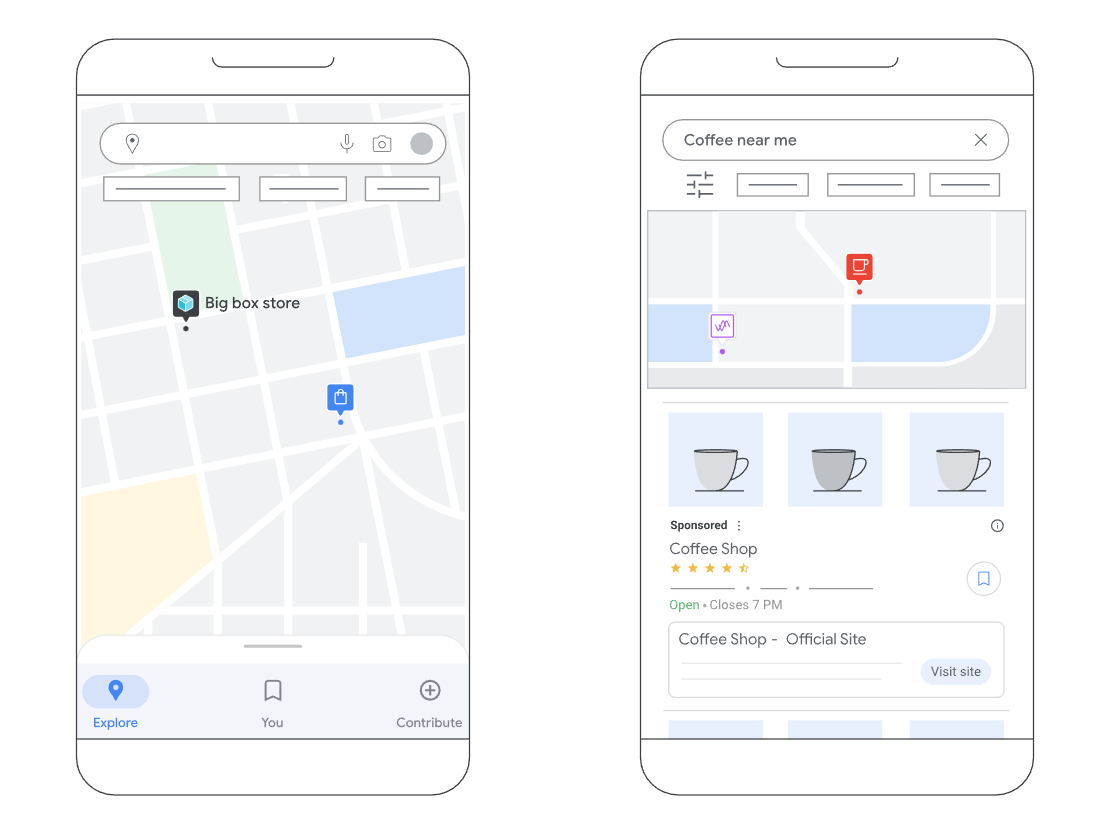
Well-being

This type of emotional marketing works to highlight how your brand can help customers achieve balance, reduce stress, and improve their overall sense of well-being.

Polar Monkeys sells high-end cold plunges and uses an emotional marketing strategy that goes beyond product features and benefits. CEO Eric Halfen explains, “We’re not just selling a product—we’re inspiring growth, encouraging transformation, and creating a community driven by wellness and self-discovery.”

They market the plunge as a tool customers can use for personal growth. In this Instagram campaign, they use images that invite customers to visualize themselves on a transformative journey to a better, healthier, more fulfilling version of themselves:

Belonging 

This emotional marketing approach creates positive emotions of belonging and inclusivity. It invites potential customers to join an aspirational or like-minded community, making them feel like they’re part of something bigger than themselves.

For Orion Brown, community and representation were the driving forces behind Black Travel Box, a hair and skin care brand specifically designed for Black travelers. Orion explains, “My community is made up of millions of African-American travelers who love travel as a form of self-care and are looking for their tribe.”

Orion’s marketing approach encourages the Black Travel Box community to engage with each other and share travel tips, experiences, and connections that extend beyond the product experience. 

Environmental concerns

If sustainability is part of your brand’s core values, focus your emotional marketing efforts on demonstrating what your brand does to improve the environment. Empty brand promises can create negative emotions that threaten your customer’s emotional bond with your brand, so you must take and showcase real action—not just express sustainability sentiments.

When Danielle Close, CEO of My Skin Feels, felt disappointed in the beauty industry’s lack of progress in sustainability, she made several strategic marketing commitments she shares on Shopify Masters. One was to design packaging that felt bright, joyful, and happy. She explains, “Yes, sustainability is really important, and food waste is really important, and natural products are really important, but it’s packaged in a really fun way that makes it feel non-threatening, and it doesn’t judge you if you’re not those things.”

Another commitment focused on product naming, aiming for inclusivity over pretension to reach people who may not consider themselves sustainability experts. Rather than using scientific or technical terminology, her products are named after how she hopes they make customers feel. Simply put: “My Skin Feels Clean” for a cleanser, “My Skin Feels Moisturized” for a moisturizer, or “My Skin Feels Amazing” for the duo. 

My Skin Feels homepage says Finding Beauty in Waste next to products
Source: My Skin Feels

Humor

Emotionally intelligent humor can delight customers, creating positive feelings and an emotional connection with your brand. A comedic approach to emotional marketing is about more than creating viral marketing moments; it infuses a unique personality into your brand identity that competitors can’t easily replicate.

Canned water company Liquid Death used humor to build a cult following and a $1 billion valuation through hilarious ads. Consider this activation the brand did at the Las Vegas Sphere:

On an episode of Shopify Masters, Andy Pearson, Liquid Death VP of Creative, shares, “It floors me that more brands don’t try to employ genuine humor, because it’s the fastest way to actually reach somebody and have a really powerful moment with them. Laughter literally is an involuntary response to making a connection with somebody or something.”

Tips to build an emotional connection with your customers

Creating a strong emotional connection with your audience is vital for fostering loyalty and driving sales. Here are actionable strategies to help you connect with your customers on a deeper, emotional level:

Use data to understand your audience’s emotional needs

Before launching your emotional marketing efforts, conduct market research to identify the emotional drivers that resonate with your target audience. Focus on your most highly engaged, top-spending customers rather than trying to appeal to everyone.

Start by conducting user interviews, using survey apps to ask open-ended questions, and leveraging social listening tools to gauge customer sentiment. These methods help you uncover the emotional language and patterns that can guide your marketing strategies. 

Free target persona template

Get to know your customer’s motivations, interests, and needs so you can create an experience they’ll love.

Download template

Tell stories that make a lasting impression 

Brand storytelling uses a mix of facts and feelings to craft stories that tell people what you’re about and why they should care. Every compelling story needs characters (you, your customers), a conflict (personal or customer pain point), rising action (your journey to solve that problem), and a climax (the launch!). Most importantly, it leaves the reader or viewer with a feeling.

For Marc Barros, serial entrepreneur and CEO of photography marketplace Moment, learning to focus on emotional connections (feelings) rather than product specifications (facts) was a key business lesson. On an episode of Shopify Masters, Marc explains, “The number one takeaway from my first company is that consumers are very emotional. It’s not really the best product or focusing on functionality that wins. When you’re trying to reach end customers, you have to connect at the heart level, not the mind level. Emotional marketing works.”

Demonstrate radical authenticity

Brand authenticity is the perception that a brand’s actions and messages align with its mission and beliefs. Lindsey Carter credits much of her success at SET Active to giving audiences a behind-the-scenes look at the brand. She explains how building a deep emotional connection with fans naturally attracted celebrities and influencers to the brand. 

“People want to see how their product is being made, the work that goes into it, and how hard people are working every day to bring it to life,” Lindsey says. “That’s something that we always prioritize at SET, because it works.” 

To start building transparency and authenticity with your audience, follow the SET approach: Leverage social channels to build community, ask for customer feedback, and reveal what’s under the hood so your audience knows they can trust your product.

Emotional marketing FAQ

What is an example of emotional advertising?

When Airbnb relaunched its experiences platform in early 2025, the company created an emotional connection with its audience by emphasizing authentic travel experiences that connect people to communities and places, setting it apart from the more anonymous or impersonal experience of a typical hotel stay. The company took a social media-first approach to the campaign, launching a video called “The Grand Adventure,” which used nostalgia, belonging, and optimism to inspire a childlike sense of wonder and magic.

How does Coca-Cola use emotional branding?

Coca-Cola taps into emotions of joy, togetherness, belonging, and nostalgia. In 2025, it brought back its “Share a Coke”viral marketing campaign, in which bottle labels are replaced with names and emotional phrases to evoke excitement (e.g., “Sister” and “Bestie”). The relaunch successfully engaged younger audiences and encouraged emotional connection and belonging at a time of loneliness and digital isolation.

What are the cons of emotional branding?

Without empathy, authenticity, and emotional intelligence, emotional marketing can be viewed as manipulative. Brands that trigger emotional reactions without delivering on their promises risk backlash, negative feelings, and reputational damage. To avoid this, be authentic, transparent, and honest with your audiences so that your emotional marketing efforts accurately reflect your brand offering and your customers’ experiences.

How to Manage Payroll for Your Business (2025 Guide)

Software Stack Editor · September 6, 2025 ·

Payroll management rarely makes headlines. But when it does, it’s because something’s gone horribly wrong.

Like in San Francisco, where a teachers union filed a formal labor complaint after a payroll system upgrade left more than 100 teachers underpaid for months. Or in Wales, where a payroll clerk embezzled approximately $26,000 in wages by editing payee details and forging payslips.

The task may be routine, but the stakes are high. That’s why the payroll and HR services market is big: set to jump from $32.1 billion in 2025 to almost $66 billion by 2035.

To help, this guide walks you through how to manage payroll for your business in 2025—whether you’re hiring your first employee or scaling teams across multiple locations.

Why effective payroll management is so important

Payroll is the total amount of wages you pay your employees for the work they’ve done in a set period of time. It’s usually scheduled weekly, every two weeks, twice a month, or monthly.

But payroll is more than paying accurate wages. You also need to:

  • Collect employee data
  • Calculate net pay
  • Report, withhold, and pay taxes
  • Stay compliant with tax and labor laws
  • Keep accurate, detailed payrolled records

Payroll impacts reputation, retention, and revenue:

  • The SEC slapped 12 firms with a combined $63 million in fines for recordkeeping failures. The world is watching how you handle people’s pay. You may not be a giant investment firm—but if word gets out you don’t pay people correctly or on time, it sticks. 
  • In a 2024 survey by Remote, 47% of employees said late pay triggered stress or anxiety, the most common emotional response. This stress increases attrition and erodes employees’ trust in their employer. Forty-two percent said their relationship with their employer got worse after a payroll mistake. 
  • A company with 1,000 employees could lose over $922,000 a year cleaning up payroll problems. For a 5,000-person enterprise, that figure climbs to more than $4.5 million in lost productivity.

🧠Learn: Retail Staff Management: Tips, Skills & Responsibilities for Managers

How to manage payroll: Seven essential steps for your retail business

Here are the seven steps to set up and manage payroll for your business: 

1. Register for an Employer Identification Number (EIN)

First, you need an employer identification number, or EIN, to hire and pay employees. Your EIN is unique to your company. Think of it as the business version of a Social Security number.

An EIN is also known as an employer tax ID or a federal tax identification number. Use it to report taxes and other relevant information to the IRS.

Using the online application is the easiest and fastest way to register for your EIN. The site validates your information during the session and assigns your EIN immediately.

Or, you can apply by faxing or mailing a completed SS-4 form to the correct number or address. You’ll receive your EIN within four business days if you fax the form, or within four weeks if you mail it in.

2. Collect W-4s and other employee information

Next, you must collect Form W-4 for every employee you hire. This is also called an Employee’s Withholding Certificate. 

Each employee has to submit Form W-4 no later than their first day of employment. They complete this form based on factors like marital status, dependents, other jobs or income, and deductions. The responses help you withhold the correct federal income tax from their paychecks. 

Here’s what else you’ll need to collect and protect:

  • Bank account details for direct deposit
  • Full legal name, SSN (or ITIN), and mailing addres.
  • State tax withholding forms, if required (e.g., California’s DE 4)
  • Employment classification (W-2 employee vs. 1099 contractor)
  • Start date, job title, and compensation details
  • Voluntary deductions, like retirement contributions or health premiums
  • Work eligibility documents, such as Form I-9 in the US

Depending on your location, industry, or benefits offered, you may also need union membership status, wage garnishment information, or insurance enrollment forms.

3. Establish a payroll schedule

A payroll schedule refers to how often your employees get paid. Common payroll schedules include:

  • Weekly: Once a week (52 paychecks per year)
  • Biweekly: Once every other week (26 paychecks per year)
  • Semimonthly: Twice a month (24 paychecks per year)
  • Monthly: Once a month (12 paychecks per year)

There’s no federal law that regulates how often you should pay your employees, but each state has its own law around the minimum pay frequency.

For example, in Arizona you must pay your employees no more than 16 days apart (semimonthly). Meanwhile, Oregon and North Dakota mandate at least one monthly payment. Make sure to check the state payday requirements when defining your payroll schedule.

To choose the best pay period for your business, consider these three factors:

  • Cost and time: Every payroll run has a price. Weekly payroll runs cost more, because you pay your team 52 times a year instead of 12. Providers often charge per run, so more runs equals more fees. Monthly costs the least.
  • Employee preferences: Hourly employees tend to prefer weekly paychecks.Salaried employees tend to favor the predictability of biweekly pay. It’s also the most common US employee pay schedule. Monthly is often least preferred.
  • Payroll and accounting logistics: Semimonthly and monthly schedules cut the workload because there are fewer runs. They also play well with benefits calendars, month-end accounting, and reporting.

4. Decide how you’ll pay employees

The common methods for paying employees are direct deposit or a paycheck. You may offer only one option or to let your employees choose their preferred method of payment. 

Regardless, figure it out during the hiring process. On an employee’s first day, make sure you have all the information you need to pay them on time. 

5. Calculate employees’ gross pay per period

Gross pay is what your employees make before taxes and withholdings. Calculating gross pay for salaried employees is simple. Divide their annual salary by the number of pay periods to determine the gross pay per paycheck. 

For hourly employees, calculate the total hours they work per pay period. Then multiply it by their hourly rate. 

6. Withhold and submit payroll taxes: Federal, state, and local

Once you’ve run payroll, you need to pass along the appropriate taxes to the right agencies.

Most US businesses are responsible for withholding and paying three main types of payroll taxes:

  • Federal income tax
  • Social Security and Medicare (FICA)
  • Federal and state unemployment taxes (FUTA and SUTA)

You may also need to collect and remit state and local income taxes. This depends on the location of your business and of your employees.

Here are some resources to help you calculate, withhold, and pay the right taxes:

If you’re a US employer, you’ll likely need to file Form 941 (Employer’s Quarterly Federal Tax Return). The forms covers income taxes, Social Security, and Medicare withheld from employee paychecks, as well as your FICA contribution.

Per theIRS, these are the Form 941 deadlines for 2025:

  • Q1 (Jan 1–Mar 31, 2025): Due April 30, 2025
  • Q2 (Apr 1–Jun 30, 2025): Due July 31, 2025
  • Q3 (Jul 1–Sep 30, 2025): Due October 31, 2025
  • Q4 (Oct 1–Dec 31, 2025): Due January 31, 2026

7. File tax forms and submit employee W2s (and 1099s for contractors)

Use Form 941 to file your quarterly federal tax return. This form reports income taxes, Social Security tax, or Medicare tax withheld from your employees and the part paid by you.

Because the IRS updates Form 941 often,reference IRS instructions before completing and filing it.

You’re also responsible for filing a FUTA return (Federal Unemployment Tax) each year. 

Every year, you must file employee W-2 forms with the Social Security Administration (SSA). The SSA encourages all employers to file their W-2 forms online, as it helps with speed and accuracy.

For the 2025 tax year, here’s what you should have already submitted:

  • Form W-2 (for employees): Filed with the Social Security Administration and given to employees by January 31, 2025.
  • Form 1099-NEC (for independent contractors): Filed with the IRS and sent to recipients by January 31, 2025.

If you missed the deadline or discovered a mistake, you may need to file a corrected form or get professional legal or tax advice to handle penalties. 

Common payroll mistakes (and how to avoid them)

In the 2024 Getting the World Paid survey, more than 50% of responding companies cited HR data entry errors as the primary cause of payroll inaccuracy. Other top reasons were lack of standardized HR processes (31%) and messy integrations (26%). 

Pay attention to these areas to prevent errors before they cost you money, momentum, or morale.

1. Depositing employment taxes late

If you don’t pay payroll taxes on time, the penalties can add up fast: late tax deposits cost you 2%–15% of the unpaid amount. Note the rapid growth of penalties—2% for 1–5 days late, 5% for 6–15 days, 10% for over 15 days, and 15% after IRS notices go out.

If you run payroll for a team with mixed roles and pay schedules, such as a combination of hourly floor staff, part-time contractors, and salaried ops managers, it’s complex. You’re working with multiple tax deposit timelines and entities. Based on your employees’ earnings, you must calculate and submit federal, state, and local tax payments. 

Federal employment taxes (including withheld income tax and FICA contributions) are due monthly or semiweekly, depending on your deposit schedule. If you miss those dates, the IRS penalty clock starts ticking.

How to avoid it:

  • Know your schedule and stick to it.
    • Monthly depositors: Taxes are due by the 15th of the following month.
    • Semiweekly depositors: Pay by the following Wednesday (for paydays Wed–Fri) or Friday (for paydays Sat–Tues).
  • Set recurring calendar reminders. Or better yet, use payroll automation software to do it for you. If you’re switching deposit schedules, you may qualify for a one-time penalty waiver—but you must file the corresponding return (Form 941) on time.

2. Misclassifying hires

Misclassification can cost you $50 for every missing W‑2, 1.5% of all wages paid to misclassified workers, and 40% of FICA not paid by employees.

For intentional misclassification, the IRS can tack on 20% of total wages, 100% of FICA, criminal fines up to $1,000, and even jail time.

How to avoid it:

  • Use the IRS rule of thumb. This is how the IRS evaluates whether a worker is an employee or independent contractor:
    • Behavioral control: Does your business dictate how the worker does the job through instructions, training, or oversight?
    • Financial control: Does your business control the business side of the worker’s job, such as payment method, who supplies tools or covers expenses, and potential profit/loss?
    • Relationship factors: Is there an ongoing agreement, employee benefits, or integration of the worker’s services into your regular business?
  • Exempt vs. non-exempt status depends on the job duties. Non-exempt workers must be paid overtime. Exempt workers don’t qualify; but only if they pass the duties test under the Fair Labor Standards Act (FLSA).

3. Paying from the wrong state

Each US state has its own rules around income tax, minimum wage, overtime pay, and leave. As the employer, you must apply the laws of the state where the employee physically works. Where you’ve registered your business is irrelevant in this case.

How to avoid it:

  • Collect a work location at onboarding, and if you classify roles as remote or hybrid. This should be part of your employee intake process.
  • Register to withhold taxes in every state where your employees work. That means filing for a state tax ID and complying with local labor laws.
  • Set up your payroll software to calculate based on employee location. Many platforms (like Gusto, QuickBooks Payroll, or other Shopify-integrated tools) allow location-based payroll automation. Use it.

4. Skipped overtime

If a non-exempt employee works more than 40 hours in a workweek, they’re entitled to overtime. That’s federal law. 

Skip it, and you’re looking at civil penalties up to $1,000 per violation, plus any extra fines your state might add.

How to avoid it:

  • Use a time-tracking system that logs hours down to the minute. Paper timesheets and “guesstimates” won’t cut it, especially in an audit.
  • Know the state’s overtime laws. Some states require overtime after eight hours in a day, not just 40 in a week.
  • Audit overtime weekly. Don’t wait until payday—spot and fix errors before they snowball.
  • Avoid off-the-clock work. If someone clocks out but keeps working (e.g., replying to texts or closing registers), that time still counts—and must be paid.

5. Missing or sloppy payroll records

W-2s and 1099s aren’t “whenever-you-get-to-it” documents. If you file late or send incorrect information, the IRS penalty ranges from $60 to $330 per form. They base fees on how late you are or whether they think you flat-out ignored the requirement.

Hourly workers are usually the most affected by payroll hiccups, especially if it involves overtime.

Here’s how to avoid it:

  • Store all payroll and tax records in one secure, digital system. That includes W‑4s, I‑9s, time logs, pay stubs, benefits deductions, and signed contracts.
  • Go paperless whenever possible. Most filing mistakes happen when you scatter things across spreadsheets, PDFs, and inboxes.
  • Know the deadlines. For the 2025 tax season, employee W-2s and 1099s for contractors had to be filed and distributed by January 31, 2025. Miss that, and the penalty window opens immediately.
  • Audit your records quarterly. A 10-minute check-in every quarter is far cheaper than paying $3,000 in missed W‑2 fines later.

💡Pro tip: Set up a “four-eyes check.” Have one person enter payroll data and another double-check it. It’s a simple internal control to catch errors, keep audits clean, and SOX and SOC 2 compliance requires it.

Best practices to manage payroll efficiently

When it comes to payroll, the goal is the same for all businesses: pay people accurately, and on time. 

Here are top payroll best practices to keep you compliant and above water:

Share a payroll calendar

A payroll calendar is a public, shareable calendar with pay periods, pay dates, timecard due dates, payroll tasks, and holidays.

This helps your employees understand:

  • When they’ll get paid
  • The period the payment is for
  • Potential delays or changes in pay dates (for example, due to a public holiday)
  • Their deadlines for submitting timecards

Don’t assume your employees will know these dates by default. More than 50% of employers don’t do anything or use any tools to help employees understand their payslips.

Why would it be any different when it comes to payroll dates? A payroll calendar reduces any confusion (and back-and-forth emails with employees asking for information). Besides, it helps everyone plan budgets and forecast cash flow.

For you, a payroll calendar also calls out key tasks to do, like depositing payments and filing tax forms. This helps pay your employees on time, every time.

“Your financial health depends on how you manage payroll,” says Courtney Quigley, business reputation consultant at Rize Reviews. “Manage it with a payroll calendar so you can keep track of important dates, holidays, PTOs. It also helps your staff determine cut-off dates and payday. Share the calendar with supervisors and managers of your store or stores so they can transparently share it with their teams.”

Maintain comprehensive employee and payroll records

As you hire help, you’ll generate documents and records for each employee, including:

  • General information: Employee name, address, SSN, date of birth
  • Tax forms: W-4, state W-4, other withholding forms
  • Pre-hiring records: Job application, interview records
  • Time and attendance records: Time cards, total hours worked (per day and week), time off taken, remaining time off
  • Payroll records: Pay rate, total daily/weekly earnings, overtime earnings, bonus pay and commissions, benefits and deductions, contributions, expense reimbursements, raise documentation, pay periods, pay stubs

Federal law states you need to keep payroll records for three years, and payroll tax records (like unemployment taxes) for four years. Some documents, like retirement income and 401(k) plan details, must be kept for six years.

Make sure to check laws and requirements for payroll record-keeping in your specific state. They might be longer than federal ones. For example, the state of New York requires you to keep payroll records for six years.

Keep paper copies of payroll records, or store them online on your device or payroll software. In both cases, it’s crucial to keep employee and payroll records safe, as they contain sensitive, confidential information.

“Organization is key. It’s critical you maintain squeaky clean payroll records,” says Will Lopez, head of accountant community at Gusto.

“Be sure to dedicate a secure place to keep up to four years of employee I-9 forms, W-2s, W-4s, state new hire forms, copies of all your filed tax forms, and always maintain the dates and amounts of all tax deposits, timesheets, and pay stubs,” Will adds.

“Different states have different requirements when it comes to record-keeping (even for employees who have been terminated), so staying on top of requirements and keeping your records clean and well maintained will make audits run smoothly—this will also help you spot issues before they arise.”

Stay updated on tax and labor laws

Payroll mistakes can cost you hundreds or even thousands of dollars in penalties. You must stay up to date with tax laws and requirements to make sure you:

  • File and pay taxes on time
  • Process payroll adhering to both federal and state laws
  • Calculate and pay correct overtime
  • Keep complete and accurate payroll records

It’s a challenge to keep up with ongoing law updates. It’s also challenging to stay compliant during growth. If your business expands into different states, hires remote workers, or employs a mix of full-time employees and part-time contractors, you’ll need to be diligent.

To stay up to date, make a routine to check in with:

Appoint a payroll manager 

If you plan to keep your business small but need to offload payroll tasks, this could be a hybrid role for an existing employee or a part-time freelance role.

Or if you want to grow your store and need more robust payroll support, hire a full-time payroll manager, an external accountant, or a payroll service. They’ll do it better, faster and free you to focus on other parts of the business. Plus, as professionals, they keep up with payroll laws and regulations.

“Payroll is complex, which is why you should assemble your Payroll Squad,” says Will. “The key players to involve in your payroll process are: a) your payroll provider, b) an accountant (or other financial professional), and c) an HR business partner.” 

Ask for employee feedback

Make your payroll a two-way street for communication. Openly ask for employee feedback and questions. This prevents you from assuming that they fully understand how payroll works (and they’re happy with it).

Prompt employee feedback by asking:

  • Do you have any questions or concerns around using or submitting time cards?
  • Would you like to better understand your payslips?
  • Do you have suggestions around payroll schedules?
  • Is our payroll calendar clear and easy to navigate? Is there anything missing from it?

Payroll affects everyone in your company, so most everyone will have something to say. It’ll help you improve how employees get paid, as well as strengthen your rapport with them. 

Use the questions and feedback to create internal documents and a FAQ explaining your payroll process and its impact on employees.

Implement robust payroll security measures

Payroll means people’s livelihoods, and it’s packed with sensitive data like salaries, tax IDs, bank info, benefits, and addresses. As such, HR information like this is a prime target for cybercriminals. According to People Management magazine, four in five data breaches involve employee information.

Meanwhile, about half of small business owners still run payroll off a shared spreadsheet or an unencrypted desktop folder.

Here’s how do it smarter (and safer):

  • Use a payroll provider that plays nice with your existing tech stack. Apps like Gusto, Deel, or QuickBooks Payroll integrate with your Shopify store, with secure syncing of hours, pay, and contractor invoices. Most offer SOC 2 or ISO 27001-level compliance out of the box.
  • Restrict access based on roles. Only give payroll visibility to the people who need it. Shopify’s staff permissions help you control access at every level, including third-party apps.
  • Store payroll files in the cloud, not on your desktop. Make sure it’s backed up, encrypted, and access-logged. Bonus points if your payroll provider builds in automatic W-2/1099 filing.
  • Educate your team on data hygiene. This means no emailing unencrypted pay stubs. No screenshots of payroll dashboards. And definitely no sharing passwords to “just check something quickly.”
  • Run quarterly access audits. Team turnover happens, but permissions updates are often overlooked. Clean up your admin list every three months. Make it part of your quarterly workflow.

Integrate payroll with other business functions 

Payroll should neither live in a vacuum nor in a million tabs on your browser. It needs to sync with HR, accounting, and time-tracking platforms. This way you’re not double-entering or chasing spreadsheets.

  • Accounting tools like QuickBooks and Xero automatically grab your Shopify sales, fees, and expenses and sync them with payroll. That means one less reconciliation task at month-end. Apps like Link My Books or A2X bridge the gap between Shopify’s POS or online store and your accounting books.
  • Time-tracking tools built into your Shopify POS, like EasyTeam or PTT: POS Time Tracker, let your team clock in and out at the register. You get accurate records for every shift, which flow straight into payroll. Also worth checking out: ClockedIn.
  • When your HR system talks to your payroll tool, everything from job titles to PTO balances update automatically. Tools like Gusto integrate seamlessly with Shopify to onboard new hires, track benefits, and sync pay changes, without manual edits.
Tablet showing Shopify POS order synced with QuickBooks.
Shopify POS for QuickBooks.

📚Read: How to Do Small Business Accounting in 2025 (+ Best Tools)

Choosing the right payroll system for your business

Payroll’s not one-size-fits-all. What works for a five-person team won’t cut it at scale. Let’s break down the real options and how to choose the one that fits your workflow, budget, and headcount.

1. Manual/DIY payroll

Best for: Micro-businesses, early-stage side startups, or teams of one

A spreadsheet and a calendar reminder—that’s how a lot of small retailers start. And to be fair, if you’ve got one employee and zero budget, manual payroll can work…for a while.

Pros:

  • Cost-effective; you don’t pay for a service, tool, or another person to do payroll.
  • Lots of control and insights into your revenue, cash flow, and payroll expenses.

Cons:

  • It’s time-consuming and hiring even one more employee adds extra tasks to your already full plate.
  • You can make errors and pay significant fines if you don’t catch them on time.
  • It’s your responsibility to stay up to date on tax laws and regulations.

“DIY works when you have a small team, but it gets unmanageable as you grow. Not just because it’s time-consuming, but it opens up room for error,” says Lanai Moliterno, CEO and founder of Sozy. 

As your team grows or your tax needs get more complex, DIY payroll becomes more stress than it’s worth. The money you think you’re saving, you’re paying for in time, anxiety, and potential fines.

If payroll prevents you from tending to or growing your business, it may be time to get help. It’s better to focus on your strengths.

2. Payroll software

Best for: Businesses with multiple employees, hourly teams, or anyone who wants to save time and avoid penalties

A good payroll management system automates what comes before and after payday. Here’s what the best tools offer:

  • Automated tax calculations and filings at the federal, state, and local level
  • Direct deposit so your team gets paid on time, every time
  • Time-tracking integrations with your POS or scheduling system (like EasyTeam or QuickBooks Time)
  • Employee self-service portals to reduce back-and-forth for paystubs, W-2s, and bank detail updates
  • Built-in payroll compliance alerts that flag errors before they become IRS problems

“Using payroll software puts so much into automated mode and safeguards your time and business from lawsuits and expensive mistakes. It’s a small extra expense, but it pays off in the long run with the time you save and the peace of mind you get,” adds Lanai.

Pros:

  • You have lots of control and insight into data, reports, filings, history, and more.
  • You have easy access from all devices thanks to being cloud-based.
  • It’s affordable, with many options priced under $40 per month.

Cons:

  • You’re still liable for any errors. A payroll software provider doesn’t assume your responsibilities to file and pay taxes, pay employees, or keep records.
  • There’s a possible learning curve, depending on your platform of choice.

Consider these four questions when choosing payroll software:

  1. Does it support your team’s pay structure (hourly, salaried, commission)?
  2. Can it handle taxes across all the states/counties/countries where you operate?
  3. Does it offer integrations with your accounting, time tracking, or HR stack?
  4. What’s the total cost per employee or per month, and does it scale with your business?

If you’re on Shopify, you’ve already done half the work. Instead of stitching together disconnected tools, tap into Shopify’s app ecosystem to manage payroll without adding extra platforms.

💡Pro tip: Need to whip up a paycheck fast? Shopify’s free pay stub generator lets you create professional pay stubs in minutes. It’s a handy tool for small teams or one-off payments when you’re not ready for full-scale payroll software yet.

3. Hiring an accountant (in-house or external)

Best for: Retailers who want expert oversight and tailored financial advice without doing the number crunching themselves

You can hire an in-house accountant or an external contractor to prepare your accounts, keep track of your finances, and manage your payroll. Payroll outsourcing lets you offload it to professionals who do it daily.

If you hire internally, this person could manage payroll manually or use payroll software—both options work. If you hire an external accountant, they’ll have their own process and setup for managing their clients’ payroll.

Pros:

  • You get extra time and focus, as you’ll offload dozens of tasks and reminders from your to-dos.
  • It removes stress and pressure from you to stay current on laws and handle payroll yourself.
  • You’ll have a go-to person for finances, taxes, compliance, record-keeping, and more.

Cons:

  • You have less control over your filings and documentation.
  • It can be costly and disrupt your cash flow, especially if you bring a full-time employee on board.

If you choose this option, spend enough time looking for the right person. Ask for recommendations from fellow store owners and entrepreneurs. Look up reviews, ask for references, and take the time to confirm the person fits your needs. 

This is one hire with the potential to impact your business in a dramatic way. Offload the tasks, but stay informed.

4. Payroll services

Best for: Busy store owners who want to outsource all payroll, tax filing, and compliance to a trusted provider

Payroll service providers, or payroll management companies, provide a way to delegate your payroll management to a team of professionals. They calculate your payroll, file tax statements, deposit payments to employees, process new hires, and more.

Pros:

  • There’s zero payroll-related stress on your plate, as you have a team of people handling every detail of your payroll management.
  • There’s enhanced assistance for businesses that grow and change rapidly, hire remotely, and/or operate stores in different states and countries.

Cons:

  • They are costly to engage, and can get more expensive as you grow and need more support with payroll and compliance.

While they serve businesses of all sizes, payroll services are usually best suited for medium and large stores, due to the scale of expertise and support they provide.

Create pay stubs quickly

Use Shopify’s pay stub generator to instantly create accurate paychecks for your employees. Include essential details like year-to-date income and deductions.

Create paycheck

Please consult independent legal advice for information specific to your country and circumstances. Shopify is not liable for your use of this content.

This post is for information purposes only. You are responsible for reviewing and using information appropriately. This content doesn’t contain and isn’t meant to provide legal, tax, or business advice.

Legal requirements are updated frequently and you should make sure to do your own research and reach out to professional legal, tax, and business advisers, as needed. Your local state, province, or county will have different steps and requirements.

To sell products using the Shopify platform, you must comply with the laws of the jurisdiction of your business and your customers, the Shopify Terms of Service, the Shopify Acceptable Use Policy, and any other applicable policies.

How to manage payroll FAQ

How do you manage the payroll process?

Start with a clear payroll schedule and accurate employee records. Track hours, calculate gross pay, withhold the right taxes, and pay your team on time; then file tax forms with the IRS and your state.

If you use a platform like Shopify, it’s easy to integrate payroll software that handles payouts, filings, and tax remittance automatically; especially useful if you’re scaling.

How do I manage my payroll myself?

You’ll need to:

  1. Get an EIN (Employer Identification Number)
  2. Classify your workers
  3. Set a pay schedule
  4. Withhold and pay taxes
  5. File tax forms like W-2s and 941s

It’s doable, but time-intensive. If you’re running a Shopify store, look into integrated payroll tools that sync with your team’s hours and roles. It’ll save you hours every month.

How to manage HR payroll?

HR payroll is payroll + compliance + people operations. You’re handling benefits, PTO, bonuses, wage classifications, and labor law requirements. Many HR/payroll tools that integrate with Shopify also handle team permissions, location-based rules, and PTO tracking. This way you’re not cobbling it together across apps.

What’s the best way to do payroll for a small business?

The “best” way is what’s accurate, compliant, and doesn’t suck up your entire week for your business. For most small businesses, that means payroll software that handles calculations, taxes, and filing.

If you’re on Shopify, connect to trusted payroll partners right from your admin dashboard. 

Can I do my own payroll for free?

Yes, but it’s not risk-free. You’ll need to track hours, calculate withholdings, pay taxes, and file returns yourself. As your team grows, so do your payroll costs. This includes wages, software fees, time-tracking tools, benefits contributions, and taxes. 

Consider low-cost payroll tools that integrate with Shopify and offer automatic tax filing. They’re more affordable than hiring an accountant, and far cheaper than IRS penalties.

What’s the difference between an employee and an independent contractor for payroll purposes?

Employees are on your payroll. You withhold taxes, pay employer contributions, and follow wage laws. 

Contractors invoice you. You don’t withhold taxes, but you do issue 1099-NEC forms, which stands for non-employee compensation.

Misclassifying someone can lead to back taxes, penalties, and interest. 

Google Maps Ads: A Beginner’s Guide for 2025

Software Stack Editor · September 6, 2025 ·

When shoppers type a “near me” search into Google, are they finding you—or your competitors? Google Maps ads push your store pin to the top of local search results when customers look for things like “coffee shops,” “hardware stores,” or any other type of business nearby. 

These ads offer one-tap directions, click-to-call options, and even feature in-stock products, nudging nearby shoppers straight to your door. With over 2 billion monthly users, Google Maps delivers a reach few platforms can match. Some 83% of US consumers already rely on Google when reading reviews for local businesses. 

Ahead, you’ll learn how to set up Google Maps ads and turn every ad dollar into more foot traffic, more sales, and more loyal customers. 

Sell where people search with Shopify

Shopify comes with powerful tools that help you list, promote and sell products on Google. Get your product in front of new shoppers who are looking for what you’re selling, from one back office.

Start selling on Google

What are Google Maps ads?

Google Maps ads, also known as local search ads, are promoted Google Business listings that appear when you perform a location search on the Google Maps app. When doing a mobile search for a business in your area, Google often returns results based on your physical location and the business’s ratings.

An image of a mobile map app showing a search for coffee shops and a list of results.
Google

Brands can buy these placements through Google Ads. Today, they are typically delivered via Performance Max for store goals, which lets Google AI optimize bids and creative across every channel. 

A single ad unit can:

  • Push your branded pin above organic pins, even if a rival is closer 
  • Offer tap-to-call, directions, and website links 
  • Showcase hours, ratings, photos, and live inventory 

How Google Maps ads work

Google Maps ads take three inputs to function effectively:

  1. Business Profile and location assets to provide the address, hours, photos, and other information for the ad
  2. Local store inventory data from your Merchant Center (optional)
  3. A Performance Max for store goals campaign with average daily budget and Smart Bidding 

When Google detects local intent (for example, “clothing near me”), the campaign’s locations enter a real-time auction. Winning ads can appear in four spots:

  • Promoted pins on the map
  • Map search ads atop the results list
  • Map-suggested ads in autocomplete
  • Placesheet ads on the business details page

Ad Rank in Maps blends the usual bid-and-quality formula with offline relevance signals, like distance, search text match, store rating, and inventory match. This makes it possible for a well-rated store slightly farther away to outrank a closer but lower-quality competitor.

A user clicks from Google Search results to a Google Maps ad.
Google

These ads are pay per click, so charges only apply when a user completes one of these actions:

  • Location detail click that expands the Business Profile
  • Directions click that opens turn-by-turn navigation
  • Click-to-call that dials the store from mobile
  • Website click that opens the retailer’s URL

Performance Max uses one shared asset library for every channel it serves, including Maps. Any AI-generated headlines, descriptions, or lifestyle images are automatically eligible for your Maps placements once location assets are linked.

Benefits of advertising on Google Maps

With more than two billion people using Google Maps each month, it’s clear that promoting local search ads is beneficial to your business. Let’s look at two other major benefits of advertising on Google Maps: increased visibility and driving foot traffic to your store. 

Increased visibility in the local Map Pack

Reaching targeted customers requires strategic ad placements throughout Google. If you want to sell your products to local customers but don’t want to buy a billboard ad, Google Maps marketing is a smart move. 

For example, if you’re an apparel brand that wants to test local advertising for your brick-and-mortar store, it makes sense to run local search ads. You can end up as a Promoted pin on Google maps, above all organic listings, so shoppers see your business first. 

San Jose Dental Maps ads at the top of search results for “dentist near me.”
Google

Drive qualified foot traffic to your store

Offline purchases often start online. In a 2023 shopper study from Google, 91% of in-store buyers used Search before walking into a store. 

When New Zealand grocer Four Square added Maps placements via Performance Max, they logged 419,000 incremental store visits while the campaign was live, as reported by Google. 

Maps ads convert “near me” intent into an in-store visit. With AI-driven bidding and clear offline attribution, you can scale ad spend and know you’re getting real-world results. 

How much do Google Maps ads cost?

There’s no flat Maps fee for ads. You set a daily budget and pay only when someone interacts with the ad. 

Across all Google Ads campaigns, the average cost per click (CPC) sits at around $5.26 in 2025, though highly local categories like restaurants can see CPCs closer to $2.05. Industry, competition, and auction dynamics push some verticals (legal, insurance) well above the average.

Features of Google Maps ads

Promoted pins

Pinterest isn’t the only platform with promoted pins—Google Maps has them, too.

Unlike the standard red pins representing a business entity on Google Maps, promoted pins appear as a square on the map. They also appear at the top of map-based search results to stand out from the rest.

Here’s what a promoted pin looks like:

A Google Maps search for an Italian restaurant shows a sponsored ad for Paesanos Riverwalk.
A sponsored ad makes Paesanos Riverwalk the top result for an “Italian restaurant” search.

While promoted pins are a great way to get noticed when users browse nearby areas on Maps, they’re more than just another form of paid search, as they are tailored to the searcher’s profile.

When recommending a promoted pin, Google Maps considers the following: 

  • The person’s search history
  • The person’s buying history
  • Places they’ve previously been

So, when someone clicks on the purple pin or a Maps-connected search result, promoted pins can show customized web pages or personalized deals to encourage the searcher to visit the store. 

Featured customer reviews

Nearly 8 in 10 US consumers say they always or regularly read online reviews before choosing a local business. Another excellent feature of Google Maps ads is displaying customer reviews.

To help customers make faster decisions, Google now features an AI-powered summary by Gemini that distills the key points from customer feedback. Below this summary, users can still read individual highlighted reviews to get a deeper sense of your business.

A store's 4.9-star Google review page featuring a summary by Gemini.
Gemini AI summarizes customer reviews, from personal stories to key points.

If you’re going to run local search ads on Google Maps, be sure to get more reviews beforehand. Encourage customers to leave reviews on your Google Business Profile so they display on your ad. This helps build trust with customers and maximizes your ad spend. 

Custom messaging

Google Maps ads also allow businesses to feature custom promotional messages directly within the ad. This is done using customizable headlines (like “Celebrate Special Occasions” below) and descriptions from your Google Ads campaign assets.

While this can include traditional deals like discounts or coupons, it’s also a good way to showcase a special service (like permanent jewelry), a new product line, or a unique in-store experience to entice customers.

Loveweld uses a sponsored ad with custom messaging to attract local jewelry shoppers.

Customizable business page

Stores that advertise on Google Maps also have their own business profile with information like their address, phone number, website, store hours, photos, directions, and reviews. 

Google pulls up this information from the store’s Google Business listing. Searchers can chat with your business through Google’s Business Messages feature.

A user clicks through to Sector 17 Storage’s profile.
Google

Local inventory search

Local inventory ads result for a user searching “toaster.”

Local inventory ads integrate Google Shopping and Maps functionality by allowing you to advertise products available at nearby businesses when a customer searches for the item or place. 

When you have inventory ads enabled, shoppers can check your available products when they click on your location.

It also works the other way: Customers can use Google Search to look for an item they’re interested in. When they click on the ad showing your product, they arrive on your local storefront, Google Business page, or landing page.

Local inventory search allows you to promote in-store inventory and offer your customers store pickup options.

💡 PRO TIP: With Shopify, you can have your products found by more nearby shoppers looking for what you sell on Google. Sync your store’s products with Google, create free listings, and manage online and in-store pickup orders from Shopify.

How to set up Google Maps ads

  1. Optimize your Google Business Profile
  2. Link your Business Profile to Google Ads
  3. Build a Performance Max campaign

Step 1: Optimize your Google Business Profile

Your Google Business Profile is the starting point for your Maps ads (and any other Google display ad). Make sure every store is fully verified in Business Profile Manager before you start. 

Pick one primary category and up to nine secondary ones that match products or services, like a running shoe store or an athletic apparel shop. Also, check that your name, address, phone, and URL exactly match what’s on your site and other directories.

📚 Read more: Google Business Profile Optimization: Improve Local Ranking

Step 2: Link your Business Profile to Google Ads

This step pulls your business information into every Maps placement. 

  1. Go to Assets within the Campaigns menu.
  2. Select the plus button and then select Location.
  3. Select Our locations, and then select Continue.
  4. Your domain should show up. If it doesn’t, enter a domain to discover potential Business Profiles.
  5. Select Countries by selecting the pencil icon. Then, select Save.
  6. In the list below, find the Business Profile that best matches your business, then select Save.
  7. Confirm that the correct Business Profile is showing in the preview, then select Continue.

Step 3: Build a Performance Max campaign

Set up the Google & YouTube app on Shopify. After you complete this step, your Merchant Center and Shopify accounts will be linked. 

Then, complete these steps:

  1. Navigate to the Google & YouTube app in your Shopify admin.
  2. Scroll down to the Performance Max campaign module.
  3. Select your Google Ads account and click Connect.
  4. Click Create Campaign. You’ll be redirected to the Ads onboarding flow in Merchant Center.
  5. In Merchant Center, you’ll be asked to provide your payment information.
  6. Provide your daily budget and campaign name.
  7. Click Create.

💡 Note: Smart Bidding inside Performance Max weights factors like distance and time of day at auction time to maximize store visits or location actions for every dollar spent. It will automatically adjust toward searches most likely to end in a directions tap, call, or in-store visit. 

Sell where people search with Shopify

Shopify comes with powerful tools that help you list, promote and sell products on Google. Get your product in front of new shoppers who are looking for what you’re selling, from one back office.

Start selling on Google

Tracking your Google Maps ad performance

Your ad is now up and running. Congrats! Next, you’ll want to find out how it’s performing. 

You can track its performance in Google Merchant Center. Access it by clicking on Manage campaigns in the Overview tab on your Shopify app. Some metrics to monitor include:

  • Impressions: Understand how often the pin or listing showed in Maps results. 
  • Click type: Lets you see which actions shoppers prefer, like whether they want directions right to your store or to give you a call.
  • Store visits: Connects ad spend to in-store traffic. 

Drive your business forward with Shopify’s analytics

Shopify’s user-friendly reports and analytics capabilities help you make better decisions, faster. Choose from pre-built dashboards and reports, or build your own to spot trends, capitalize on opportunities, and supercharge your decision-making.

Explore Shopify’s analytics

Start advertising your store on Google Maps

There’s no doubt that promoting your business on Google Maps has its advantages for local SEO. You’re getting in front of targeted customers at a critical moment in the buyer’s journey, and motivating shoppers to come to your store. Plus, you can take advantage of different features, like in-store promotions and local inventory search, to encourage sales. 

Test the waters by creating a local search ad on Google Maps today using the guide above. You’ll soon start to see a rush of foot traffic and sales that will impact your bottom line.

Google Maps ads FAQ

Can you do ads on Google Maps?

Yes. Retailers can run paid placements, called local search ads, through a Performance Max campaign set to the Local store visits and promotions objective. The ads appear as branded pins, top-of-list results, and other in-map formats whenever Google detects nearby intent.

Why is my credit card being charged by Google Ads?

Google bills the primary card on your Ads account for the cost of billable clicks. Charges post automatically whenever the running balance hits the account’s payment threshold or on the monthly billing cycle, whichever comes first.

Are Google Maps ads worth it?

For location-based businesses they can deliver a strong return because every paid click is a high-intent action, like opening navigation or placing a call. 

With store visit and offline sales tracking enabled, advertisers can verify foot traffic and revenue lift and scale budgets only when the cost per visit meets profit targets.

Is it free to advertise on Google Maps?

A basic Google Business Profile listing is free, but paid Maps ads operate on a cost-per-click model. You’re charged only when users take qualifying actions, yet daily budgets and bidding caps still need to be set to control spend.

  • « Go to Previous Page
  • Page 1
  • Interim pages omitted …
  • Page 5
  • Page 6
  • Page 7
  • Page 8
  • Page 9
  • Interim pages omitted …
  • Page 75
  • Go to Next Page »

Get your Software Stack together. softwarestack.tech

Software Stack

© 2024–2026 - Software Stack is a trading name of SouthwestCIO Limited ac ompany registered in England & Wales 11319049

  • Knowledgebase
  • Home
  • About Us
  • Contact Us