• Skip to primary navigation
  • Skip to main content
software stack logo

Software Stack

Get your Software Stack together

  • Knowledgebase
    • All Categories
    • Accounting Software
    • Automation & Workflow Software
    • Customer Relationship Management
    • E-Commerce Shopfronts & Payments
    • Marketing Automation
    • Online Courses & Membership
    • Project Management
    • Surveys & Forms
    • Web Hosting
  • Home
  • About Us
  • Contact Us
  • Show Search
Hide Search

Shopify

What Is a Limited Liability Limited Partnership (LLLP)? (2025)

Software Stack Editor · October 3, 2025 ·

image

This post is for information only. You are responsible for reviewing and using this information appropriately. This content doesn’t contain and isn’t meant to provide legal, tax, or business advice. Requirements are updated frequently, and you should make sure to do your own research and reach out to professional legal, tax, and business advisers, as needed. To sell products using the Shopify platform, you must comply with the laws of the jurisdiction of your business and your customers, the Shopify Terms of Service, the Shopify Acceptable Use Policy, and any other applicable policies.

While the limited liability company (LLC) business structure is a common choice for small businesses, certain situations could benefit from a more specialized structure. For businesses that need very clear lines between managing partners and limited partners but want liability protection for all, the limited liability limited partnership (LLLP) structure could make sense.

But the LLLP structure is fairly niche in application, recognized only in 28 states. Read on to learn the ins and outs of this business structure. 

What is an LLLP?

The limited liability limited partnership (LLLP) is a legal entity that combines elements of a limited partnership (LP) with liability protection for all partners, regardless of their day-to-day involvement in business operations.

The LLLP business structure maintains the same two types of owners found in LPs:

  • Limited partners. These partners, also known as silent partners, typically function as passive investors with a financial interest in the business, but participate in a more limited capacity in management. Limited partners contribute capital and receive returns based on their ownership share.

  • General partners. General partners have the authority to manage business operations, make strategic decisions, and oversee the business’s direction.

In a traditional LP, only limited partners enjoy protection from personal liability. The LLLP eliminates this disparity, offering personal asset protection to all partners.

An LLLP also differs from a limited liability partnership (LLP), which typically serves professional services firms like law firms and medical practices. In an LLP, all partners are actively involved in management. But LLLPs offer a distinction between general and limited partner roles, while providing liability protection to both types of partners.

It’s important to note, however, that LLLPs have limited recognition—only 28 states currently allow for their formation, which can create complications for businesses operating across state lines. Currently, the LLLP structure is most commonly used in the real estate industry and among asset management companies.

Pros and cons of LLLPs

This type of limited liability partnership offers unique benefits and challenges that business owners should carefully evaluate.

Advantages of forming an LLLP

  • Liability protection. The primary benefit of the LLLP lies in its comprehensive liability protection. Unlike traditional LPs, where general partners face unlimited liability, the LLLP provides limited liability protection to all partners—general and limited. 

  • Tax efficiency. Similar to LPs and LLCs, LLLPs typically function as pass-through entities, meaning business income flows directly to partners, who pay tax based on their personal rate. This bypasses corporate-level taxation, or double taxation in which the business pays income tax and investors pay personal income tax on any distributions they receive. 

  • Operational flexibility. Partners in LLLPs can customize management structures in the partnership agreement, which might include various profit-sharing arrangements and operational responsibilities.

Disadvantages of forming an LLLP

  • State-level recognition. Only 28 states, including Florida, Texas, Pennsylvania, and Ohio, recognize the LLLP structure. This limitation can complicate business operations across state lines and may require additional legal considerations, startup paperwork, and costs for multistate businesses. 

  • Complexity and startup costs. LLLPs require detailed partnership agreements, compliance with state statutes, and potentially higher legal and accounting fees. If you hire an attorney, formation costs can range from several thousand, compared with only a few hundred for a basic limited liability company (LLC). And annual compliance may require specialized accounting services costing several thousand dollars as well.

  • Regulatory compliance. Regulatory compliance demands attention to state statute requirements, filing obligations, and operational procedures, where the LLLP structure is permitted. And LLLPs operating across state lines may have to comply with regulations for other entity types—such as a general partnership—in states where LLLPs are not recognized. This can lead to a complicated regulatory-compliance picture for businesses that operate outside their home state.

LLLP vs. LLC

LLCs and LLLPs are both pass-through entities that offer limited liability protection for all owners. LLCs are less complex to form and manage than LLLPs, and the structure is recognized in all 50 states.

The key distinction between LLLPs and LLCs lies in investment structure and partner roles. While LLC owners, known as members, can contribute capital and remain passive without formal distinctions, LLLPs are specifically designed for businesses that need to clearly separate active management (general partners) from passive investment (limited partners). This structure is particularly beneficial when attracting outside investors who want limited partner status, or when general partners want to maintain traditional partnership management authority without forfeiting liability protection.

The distinction between general and limited partners in an LLLP serves specific business purposes. Limited partners can invest capital while remaining completely passive, which may offer tax advantages where LLLP income is treated as investment earnings, and frees up time to focus on other ventures. General partners maintain full management authority and operation control, making decision-making for the business more streamlined than, say, a multimember-managed LLC, where all members have an equal say.

How to establish an LLLP

Establishing an LLLP requires careful planning and adherence to state requirements. Business owners should first verify that their state of formation recognizes them, because almost half of all states don’t.

The formation process generally begins with selecting an available business name that meets state naming regulations and including appropriate entity designations. Some states may require you to include “LLLP,” or “Limited Liability Limited Partnership” in the business name itself. Next, prepare and file the necessary formation documents with the appropriate state agency—usually the Secretary of State’s office. These documents typically include articles of organization or similar formation paperwork.

Find a name and domain for your business

Shopify’s free AI business name generator will help you come up with the perfect business brand name, then secure a relevant domain.

Try it now

You will then need to draft a partnership agreement that outlines partner rights, responsibilities, profit distributions, management operations, and dissolution procedures.

If applicable, you will need to obtain any mandatory business licenses, permits, and tax identification numbers. You will also need to register for state and local (county and city) tax obligations, and establish separate business bank accounts. Consider consulting with legal and tax professionals familiar with the requirements at this stage to ensure proper formation and compliance.

You also will want to take steps to maintain your LLLP status, including submitting annual filings, paying fees and taxes, and adhering to partnership agreement terms.

LLLP FAQ

What is the meaning of LLLP?

The LLLP abbreviation stands for limited liability limited partnership. This refers to an entity that protects the assets of both general and limited partners from the business’s debts, while maintaining the operational and managerial flexibility of the partnership structure.

What is the difference between an LLC and an LLLP?

An LLC, or limited liability company, provides uniform liability protection to all members, making no distinction between members and their rights and responsibilities. An LLLP provides traditional partnership structures with similarly uniform liability protection, but it lets businesses have the structural and managerial flexibilities of a limited partnership (LP).

How do you dissolve an LLLP?

Winding down an LLLP typically requires a consensus among the partners, in accordance with the terms of the partnership agreement. The business will file dissolution documents with the state of organization, settling the company’s debts and obligations, and distributing remaining assets to partners according to ownership interests (or according to procedures set out in the partnership agreement).

What Is a COI? How To Get a Certificate of Liability Insurance (2025)

Software Stack Editor · October 3, 2025 ·

image

This post is for information only. You are responsible for reviewing and using this information appropriately. This content doesn’t contain and isn’t meant to provide legal, tax, or business advice. Requirements are updated frequently and you should make sure to do your own research and reach out to professional legal, tax, and business advisers, as needed. To sell products using the Shopify platform, you must comply with the laws of the jurisdiction of your business and your customers, the Shopify Terms of Service, the Shopify Acceptable Use Policy, and any other applicable policies.

Imagine you want to hire a business to repaint the inside of your shop. The contractor explains what the job entails and how much it will cost. They may also give you a copy of their certificate of liability insurance, or COI. This document serves as proof they have coverage to protect you, them, and your customers in case of an accident or property damage during the project.

Here’s what you need to know about COIs.

What is a certificate of liability insurance?

A certificate of liability insurance (COI) is a standardized document that outlines your business’s general liability insurance coverage. It’s usually a one-page document that condenses crucial information about your general liability insurance policy, making it easy for potential customers, lenders, and investors to verify your business maintains active insurance coverage that meets their standards. 

The COI offers an official snapshot of your insurance policy, showing you bought liability coverage from a licensed insurance company or agent. It also determines the extent and breadth of your coverage, including coverage limits. Unlike your actual insurance policy document, which can contain dozens of pages with detailed terms and conditions, the certificate presents the most important information upfront in a clear, standardized format.

Typically, the COI is presented on an Accord 25 form, which is the industry standard in the US. This standardized form provides simplicity and consistency for certificate holders and clients who need to understand their coverage, regardless of which insurer underwrote the policy.

COIs and different types of insurance

Although the term “certificate of liability insurance” typically refers to general liability insurance, insurers also issue COIs for other types of liability insurance policies. Understanding how COIs relate to different types of insurance can help clarify their role in your broader business insurance strategy.

Each type of insurance certificate serves the same basic purpose: providing official documentation that your business has active coverage. The specific type of certificate required depends on the nature of your business, the services you provide, and the requirements set by your clients, landlords, or state regulatory bodies.

General liability insurance

General liability insurance coverage is the most common type documented by COIs. A general liability insurance policy protects against third-party claims—including those from customers, vendors, visitors, and the general public—for bodily injury, property damage, and other types of personal injury that might occur during your business operations. When someone requests a COI, they usually mean a general liability insurance certificate.

Professional liability insurance

Professional liability insurance, also known as errors and omissions (E&O) insurance, addresses claims related to professional mistakes, negligence, and failure to deliver promised services. Many professional service providers, like consultants and real estate agents, use COIs that document E&O coverage.

Commercial auto liability insurance

Commercial auto insurance COIs prove your business vehicles carry adequate coverage for accidents or property damage. Businesses that need this type of COI might lease vehicles, offer contractor services, or enter into delivery contracts.

Workers’ compensation insurance

Workers’ compensation COIs demonstrate compliance with state requirements for employee injury coverage. Many clients and partners require a business to have COIs before they let contractors or subcontractors begin work on their premises. If a business has employees, it may need to keep this COI on file to legally operate in a given state.

Why do businesses need a certificate of liability insurance?

The primary purpose of a COI centers on risk management and relationship-building in the world of business. When you can show proof of insurance through a COI, you demonstrate financial responsibility and professional credibility to potential partners, clients, legal entities, and other stakeholders.

From a more practical standpoint, COIs attest to the legal protection that applies to multiple parties. Your clients gain confidence knowing if your business causes physical injury or property damage during a project, your liability insurance will help cover the costs. This protection extends beyond just covering immediate damages—it also provides assurance your insurance company will handle legal defense costs and settlement payments (so long as they’re within coverage limits) without directly affecting your business’s finances.

The COI clearly documents those coverage limits, as well as when the policy will begin coverage and the expiration date. This can be crucial if questions or disagreements arise about a specific incident or project.

For insurance companies, COIs help manage risk by ensuring all parties involved in a business relationship understand the extent—and most important to them, the limits—of coverage. Plus, the standardized Accord 25 format reduces confusion and helps prevent misunderstandings about what is and isn’t covered under a policy, regardless of who issued it.

Situations where COIs are needed

  • Client contract requirements. Many clients, especially larger corporations, require businesses to show proof of liability coverage before entering into service agreements. 

  • Commercial lease agreements. Landlords often require commercial tenants to provide COIs before signing lease agreements. 

  • Professional licensing applications. Certain professions and trades require proof of liability coverage as part of the licensing process. Contractors, real estate agents, and health care providers often must demonstrate adequate insurance coverage to obtain or renew their professional licenses.

  • Vendor and supplier relationships. Companies often require their vendors and suppliers to maintain specific levels of liability coverage. COIs show such requirements are met and coverage remains active throughout the business relationship.

  • Public works and government contracts. Municipal and government contracts frequently mandate specific insurance requirements, including minimum coverage limits and additional insured endorsements. Endorsements can extend coverage to the requesting party and are a fairly common request.

  • Subcontractor agreements. General contractors typically require subcontractors to provide COIs, proving they maintain adequate liability coverage before starting work on construction or renovation projects.

  • Partnership and joint venture agreements. When businesses collaborate on projects or form partnerships, COIs demonstrate all parties have appropriate insurance protection for their shared activities.

  • Bank and lending requirements. Financial institutions often require proof of liability coverage before approving certain business loans—especially for companies operating in higher-risk industries, like construction, contracting, transportation, logistics, manufacturing, hospitality, medical practices, and certain professional services that handle sensitive client data.

  • Event venue requirements. Businesses that host events at third-party venues often must provide COIs showing liability coverage for potential accidents or damage incurred during an event.

  • Franchise agreements. Franchisers frequently require franchisees to maintain specific types and amounts of liability coverage, documented through regular COI submissions.

Build essential skills with Shopify Academy

Boost your business fundamentals and Shopify skills with Academy courses, included in every plan. Earn badges and certifications to showcase your expertise.

Learn more

How to get a certificate of liability insurance

  1. Purchase an insurance policy
  2. Contact your insurance company or agent
  3. Review and distribute the COI

Obtaining a certificate of liability insurance is a fairly straightforward process, but understanding the steps and requirements can help ensure you get the documentation you need quickly. The process begins with having an active insurance policy in place, as insurers can only issue COIs for existing coverage.

1. Purchase an insurance policy

Before you can request any certificate, you must have an active liability insurance policy or other relevant business insurance coverage. If you don’t currently have coverage, work with an insurance company or agent to evaluate your needs, compare quotes, and purchase a policy that meets your business requirements.

When selecting coverage, consider the specific certificate requirements you’re likely to need. Many clients and landlords require minimum coverage limits, such as $1 million per occurrence and $2 million in aggregate for general liability insurance. Some contracts may specify even higher limits or require certain additional insured endorsements.

2. Contact your insurance company or agent

Once you have active coverage, you can request a COI from your insurance company or agent. Most insurers provide multiple ways to request certificates, including by phone, through online portals, by email, or via mobile apps. The request process typically requires you to provide specific information about the certificate holder, their address, project details if applicable, any required additional insured parties, and any specific policy information that should be highlighted on the COI.

3. Review and distribute the COI

Most insurance companies can provide COIs within 24 hours, and often much faster for basic requests. Once you receive the COI, review it carefully to ensure all the information is accurate, including names, addresses, policy numbers, coverage limits, and policy effective dates.

After confirming accuracy, you can distribute the COI to the requesting party. Many businesses find it helpful to maintain digital copies of their COIs for quick access when new requests arise. Some insurance companies provide online customer portals where you can access and download certificates at any time.

Try Shopify for free

Create a store and bring your idea to life with a free trial. Discover how Shopify helps you manage your business and make sales.

Start free trial

Other considerations when obtaining a COI

The cost of obtaining COIs varies by insurance company, but many insurers provide them at no additional charge as part of their customer service. However, some companies may charge nominal fees, particularly for rush requests or COIs containing special endorsements. If you need to provide additional insured endorsements, this could increase your premiums.

If you frequently need COIs for different projects or clients, consider discussing this with your insurance agent. Some insurers offer streamlined processes for high-volume certificate generators, including online systems that let you obtain them instantly.

If your business works with multiple clients simultaneously, consider tracking certificate expiration dates to ensure you obtain updated COIs when policies renew. Many business relationships require current certificates to be on file, and expired documentation can delay projects or contract approvals.

Working with an experienced insurance agent can simplify the COI process. Agents familiar with your industry understand common COI requirements and can help you ensure your policy includes the endorsements and limits that clients typically request. This proactive approach can prevent delays and help maintain smooth business relationships.

Certificate of liability FAQ

How much does a COI cost?

Insurers typically provide a COI free of charge. But some insurance companies may charge a nominal fee for rush jobs or particularly complex COI documents.

Can I make my own COI?

No, an insurance carrier must generate and typically sign a COI.

Do LLCs need a COI?

The type of business entity you operate isn’t relevant to the question of whether a COI is necessary. Whether your business is structured as a limited liability company (LLC), a corporation, or a sole proprietorship, the need for a COI depends on your business activities, client requirements, and contractual obligations, rather than your legal entity type.

How To Provide Discreet Shipping: Carriers + Best Practices (2025)

Software Stack Editor · October 3, 2025 ·

image

Product packaging is a key component of ecommerce order fulfillment. While branded boxes and creative unboxing experiences can strengthen customer loyalty, not every order benefits from bold packaging. In some cases, customers value privacy and security over presentation.

Discreet shipping provides that protection. Whether you’re shipping high-value items prone to theft, sensitive products, or even gifts, a discreet shipping process helps safeguard deliveries and maintain customer privacy. This guide covers what discreet shipping is, when to use it, which major carriers provide it, and how to implement it to improve your customer experience.

What is discreet shipping?

Discreet shipping involves shipping items without giving away important information about the package contents or the seller. The goal is to keep outside packaging plain and unremarkable so that no one—whether a delivery person, roommate, neighbor, or potential thief—can tell what’s inside.

Merchants can ship items discreetly using two types of discreet packaging: nondescript packaging and generic packaging. 

  • Nondescript packaging uses plain packaging materials like unmarked boxes and envelopes. 

  • Generic packaging uses generic labels and shipping company names (like the US Postal Service or Amazon Shipping branding).

Here are some examples of discreet packaging materials you can consider purchasing from packaging suppliers, online marketplaces, and shipping carriers:

  • Plain boxes. Use a plain brown box to ship items of different sizes without revealing what’s inside.

  • Minimal labeling. Shipping labels should include only essential details—if you need to add a return address, keep it generic—you can add a street name, but don’t mention the name of your company or other sender information. Information like “Fragile” is fine, but avoid elements that hint at the box’s contents.

  • Limited or no brand packaging. Avoid using brand packaging with a company logo, name, slogan, or other branded visual elements.

  • Unmarked mailers and envelopes. Plain mailers and envelopes are cost-effective and discreet options for smaller, non-fragile items.

When to use discreet shipping

Here are a few common reasons merchants use discreet shipping with their product packaging.

Shipping sensitive products

Merchants shipping sensitive items to customers can use discreet shipping strategies to protect their customers’ privacy. This can apply to a wide range of product categories, including adult products, intimate health or beauty products, and medical supplies like pharmaceuticals or medical devices. Using discreet shipping avoids embarrassing customers or revealing sensitive information to anyone who sees the package. Of course, no carrier permits using discreet shipping for illegal or prohibited items, and merchants are always responsible for complying with all carrier policies and shipping laws, such as those around age-gated products (alcohol, prescription medications, etc.), hazardous materials, customs declarations, and others. Stay current on shipping regulations and carrier policies so you’re always in compliance.

Offering theft protection

Security.org reports that $12 billion in packages were stolen in 2024. If you’re shipping luxury goods and high-value products like jewelry, designer apparel, or expensive electronics, opting for discreet shipping can reduce the risk of package theft. Consider using unmarked packaging and minimal labeling to avoid signaling to potential thieves the value of the contents.

Selling gifts

Sometimes customers want their order shipped discreetly because it’s a gift for someone. For example, a customer purchasing a sweater from an apparel brand for their spouse’s birthday could request discreet shipping to avoid giving away the surprise. If you sell items that are commonly gifted, offering discreet shipping can enhance the customer experience (especially around peak gifting seasons, like certain holidays).

Saving money

Merchants may elect to use generic packaging materials over branded packaging to save costs. While branded packaging can offer customization, fuel marketing efforts, and enhance the customer’s experience, it can also require significant funds and time to design and produce. Benefits of using an off-the-shelf solution might include lower costs, faster turnaround times (since the packaging is always readily available), and consistency (especially if you’re using a third-party shipping fulfillment service). Generic packaging may also require less space prior to its use since it’s often designed for efficiency.

Which major carriers offer discreet shipping?

The following major carriers and courier companies offer discreet shipping:

  • USPS. The US Postal Service offers unbranded, generic packaging that conceals a package’s contents. Delivery to PO Boxes adds extra security and is available through services like Priority Mail Express, Retail Ground, and First-Class Mail.

  • UPS and FedEx. Although the United Parcel Service and FedEx don’t offer specific discreet shipping programs, they ship in unmarked and unbranded boxes with minimal labeling, meaning merchants can use this service for discreet shipping.

  • DHL. For international orders, which can be more difficult to keep discreet due to paperwork requirements, DHL provides specialized options. Its Neutral Delivery Service (NDS) conceals a shipment’s value to the recipient, while its Named Person Only service ensures packages arrive in the hands of the intended recipients.

  • Amazon Logistics. When shopping on Amazon.com, users have the option of selecting “Ship in Amazon packaging” at checkout, although it’s already standard for most Amazon orders to arrive in Amazon-branded boxes or envelopes that don’t give away their contents.

How to provide discreet shipping

Here are a few tips for effectively providing discreet shipping to your customers.

Require signatures

When using discreet shipping for your orders, consider implementing proof of delivery in the form of a signature from the intended recipient. For high-value or sensitive items, customers will likely prefer to receive those items directly. Offer signature confirmation as an option at checkout and clearly note any added shipping costs with carriers (for example, signature confirmation starts around $6 per shipment with FedEx). 

Manage customer expectations

Communicate your discreet shipping policy clearly upfront to customers. Share relevant information about your discreet shipping practices to customers before they complete checkout on your website—including what discreet shipping options you offer and whether they cost more. After purchase, confirm key details (like how tracking will work and where to find the tracking number) with a post-purchase email.

Elevate the interior unboxing experience

Although discreet shipping changes the appearance of the outside of your shipments, you can still create a memorable unboxing experience for your customers with the inside of your packaging. For example, you could include packaging inserts like thank-you cards, QR codes, stickers, guides, or product samples.

Discreet shipping FAQ

What is discreet shipping?

Discreet shipping involves shipping items without giving away important information about the package contents or sender.

How can I ship stuff discreetly?

To ship items discreetly, use plain or generic packaging materials, include only the necessary information on minimal labels, and avoid branded packaging that displays your company logo or name.

Does the USPS do discreet shipping?

Although the USPS does not have a specific discreet shipping program, it offers generic packaging and secure deliveries to PO Boxes (through services like Priority Mail Express, Retail Ground, and First-Class Mail).

When should I use discreet shipping?

Use discreet shipping when you’re shipping sensitive products, selling high-ticket items like luxury goods, or offering gift options for customers.

What Is a High-Risk Merchant Account? (2025)

Software Stack Editor · October 3, 2025 ·

image

If you’ve had trouble being approved for a merchant account at a bank or you’ve hit unexpected roadblocks with payment processing, you might be operating in what’s considered a high-risk industry.

That doesn’t mean your business is doing anything wrong. It only means there’s more complexity involved when it comes to issues like chargebacks, fraud prevention, or regulatory requirements.

Here’s what a high-risk merchant account is, why some companies are labeled as high-risk businesses, and what to expect if you’re looking to get approved.

What is a high-risk merchant account?

A high-risk merchant account is a special type of merchant account designed for businesses with a higher risk of issues like chargebacks for disputed transactions or fraud. If a business is deemed high risk, its bank or credit union may require it to open a high-risk merchant account. These often come with higher fees and stricter contract terms to make up for the risk involved and extra administrative expenses.

Invest in your success

Made for businesses at every stage of growth, Shopify Finance provides innovative tools to help
manage cash flow, access funds faster, and simplify financial tasks.

Explore Shopify Finance

What makes a business high risk?

A business may be considered high risk by a bank or payment processor if it operates in an industry that tends to see higher levels of returns, fraud, or regulatory scrutiny. Online gambling, cannabis sales, adult entertainment, and firearm distribution are some common examples of high-risk businesses. However, you don’t have to be in a controversial industry to be considered high risk. Many ecommerce businesses that operate within the rules can still find themselves navigating stricter payment requirements, higher fees, or more rigorous underwriting processes.

For example, businesses that typically handle large transactions face higher chargeback rates. Because a single dispute can represent a major loss, payment providers may see these businesses as financially riskier to support. On the flip side, very low-value transaction values, especially in high volumes or recurring charges, can also raise red flags due to fraud screening and customer disputes.

Service-based businesses—like those offering web design, bookkeeping, or search engine optimization services—can also be considered high risk. These services are sometimes viewed as subjective or difficult to fulfill to a customer’s satisfaction, which may lead to payment disputes. The same applies to dropshipping stores or merchants selling digital products (like ebooks, software, or online courses), where delayed delivery or confusion around what’s being sold can increase refund or fraud claims.

A business’s risk level is based on factors like:

  • Chargeback rates 

  • Regulatory scrutiny

  • Fraud potential

  • Financial stability

  • Industry reputation

  • Typical transaction value

  • Business credit history

  • Age of the business

  • Domestic vs. international sales

Pros and cons of high-risk merchant accounts

High-risk merchant accounts come with trade-offs, but they let businesses accept credit card payments when a traditional bank or payment processor may turn them away. Here are some of the pros and cons of a high-risk merchant account: 

Advantages

  • Access to payment processing. If your business operates in a high-risk industry, these accounts make it possible to accept debit and credit card payments, as well as digital wallets. High-risk payment processing lets you reach more customers and grow faster.

  • Support for global sales. Many high-risk providers are set up for international transactions, offering multicurrency support and tools to help you sell across borders.

  • Stronger fraud protection. High-risk merchant accounts often come with advanced security features designed to spot suspicious activity and reduce chargebacks—helping you protect both your revenue and your reputation.

  • More flexibility with sales volume. Businesses with high or fluctuating transaction volumes may find fewer limits or transaction caps with a high-risk merchant account, giving you more room to grow without hitting a trip wire that freezes the account.

  • Higher chargeback threshold. Some high-risk merchant account providers are more forgiving of excessive chargebacks, which can be a game-changer if your industry tends to deal with more transaction disputes than average.

Drawbacks

  • Higher fees. These accounts come with extra risk and administrative expenses for providers, and your merchant service provider will pass on some of that cost to you. Expect to pay more in setup costs, monthly fees, and per-transaction charges. 

  • Reserves. Many high-risk accounts require you to keep a percentage of your sales in reserve, in case of high chargeback ratios. This feature can strain your cash flow, especially if you’re just starting out.

  • Slower payouts. You might not get access to your funds as quickly as you would with standard merchant processing accounts. Settlements may take as long as three business days, making it harder to manage your cash flow.

  • Stricter contracts. High-risk accounts often come with more complex terms, including longer commitments, early termination fees, or charges for rule violations.

  • Perception issues. Being labeled “high risk” can carry a stigma. It may raise doubts among potential partners or lenders, even if you’re running a legitimate and well-managed business.

How to find a high-risk merchant account

Choosing the right high-risk merchant account provider can make a big difference in how smoothly your business runs.

Rather than open one of these accounts at a bank or credit union, businesses operating in high-risk industries can use a third-party company like an ISO/MSP (independent sales organization/merchant services provider). Adyen, Authorize.net, Cybersource, PaymentCloud, and Trust Payments are just a few examples of these high-risk merchant account providers. Some high-risk merchant services providers integrate with popular ecommerce platforms like Shopify as well as some accounting software to process transactions.

Here are some key factors to consider for high-risk businesses:

  • Clear, upfront pricing. A high-risk merchant account should offer a smooth application process and transparent pricing on setup, monthly charges, payment processing fees, and any other costs. 

  • Industry expertise. Check the merchant account provider’s website to find a list of high-risk industries they work with. A provider that understands your industry is better equipped to offer relevant solutions and help you navigate the challenges that come with your specific business model.

  • Flexible contracts. Long-term contracts with steep cancellation fees can make it hard to pivot if your business needs to change. Merchant account providers with flexible terms are a better long-term partner. 

  • Proven track record. Check out reviews and testimonials, especially from other high-risk businesses like yours. A strong reputation signals that the provider can deliver payment processing solutions.

  • Built-in security. High-risk businesses are more vulnerable to chargebacks and fraud. Make sure the provider offers strong security features and fraud prevention tools.

  • Responsive support. Reliable customer support matters, especially when payments are on the line. Look for providers that offer 24/7 help across multiple channels.

  • Platform compatibility. Ensure your provider’s payment solutions integrate smoothly with your ecommerce setup and other tools you use.

  • International sales. If you sell globally, check whether the provider supports multiple currencies and understands the rules for cross-border transactions.

  • Read the fine print. Before signing a contract, take time to understand the full agreement, including contract length, cancellation policies, and any clauses that could affect your operations.

High-risk merchant account FAQ

What is a high-risk merchant account?

A high-risk merchant account lets you process credit card payments and other electronic transactions when you operate in a high-risk industry. These bank accounts are designed for high-risk businesses and may come with higher costs to make up for the increased risk and extra administration expenses of high-risk payment processors.

How much does a high-risk merchant account cost?

Pricing varies with each high-risk merchant account provider. Monthly subscription fees on high-risk merchant accounts can range from about $5 to $45, and per-transaction fees usually amount to 1.95% to 2.4% of the total sales amount. Generally, these costs will be higher than for traditional merchant accounts with low risk.

What are some examples of high-risk merchants?

Some examples of high-risk merchants include adult entertainment websites, cannabis dispensaries, businesses that provide subscription services, and travel agencies. These businesses have increased risk factors like a higher risk of fraudulent transactions and high chargeback ratios.

What makes a transaction high risk?

A transaction is considered high risk when there’s an increased chance of fraud, chargebacks, or legal issues.

Sell-Through Rate (STR): How to Calculate & Improve It (2025)

Software Stack Editor · October 3, 2025 ·

Your sell-through rate is the percentage of your inventory sold to customers in a given period.

Often calculated monthly, sell-through rates help show sales trends and how different styles and sizes of the same product fare against each other.

If you want to know your customers better and minimize overstocking, calculate your sell-through rate regularly.

Unify your inventory management with Shopify

Only Shopify helps you manage warehouse, pop-up shop, and retail store inventory from the same back office. Shopify automatically syncs stock quantities as you receive, sell, return, or exchange products online or in-person—no manual reconciling necessary.

Explore inventory management on Shopify

What is sell-through rate?

A sell-through rate (STR) is a key performance indicator (KPI) that measures the percentage of inventory sold in relation to the number of units received from manufacturers during the same period.

For performance, your STR is the measurement of monthly sales against a given target. Measuring your STR can help you track sales data, adjust your goals, and keep your supply chain efficient. 

Though sell-through rates vary from industry to industry, the benchmark STR is at or above 80%. 

Why sell-through rate is a critical metric for profitability

Of all the retail metrics you can track, sell-through rate is one of the most important for retail businesses. Consistently tracking STR in your retail reports can reveal key insights into profitability. 

Here are five reasons why it is useful to calculate your STR:

  1. Identify product demand and popularity
  2. Reduce carrying costs and prevent overstock
  3. Optimize supply chain and supplier relationships
  4. Measure marketing campaign effectiveness
  5. Improve cash flow and financial forecasting

1. Identify product demand and popularity

Your STR is not just a single blanket measurement of overall sales. Retailers often calculate multiple STRs by supplier, product line, store location, and more. 

STR can offer valuable insight into which types of products are most popular. A high sell-through rate indicates that a product is selling well. This information can be used to optimize inventory and better judge customer demand.

2. Reduce carrying costs and prevent overstock

A low sell-through rate indicates that your inventory management needs improvement and that you’re likely storing more than you need. Use your STR to better understand how you can save on storage costs.

Overstocking is expensive, especially if your stock expires quickly or goes out of season. Storing excess inventory also takes up space that could be used for in-demand products. 

To determine if stocking up is worth it, consider storage costs against expected shipping costs and profit loss from stockouts. 

3. Optimize supply chain and supplier relationships

Modern supply chains are complex and prone to unexpected delays. Many retailers compensate by overordering before understanding which products will actually sell. 

 A clear understanding of your sell-through rate allows you to work proactively with suppliers and maintain optimal stock levels, even during periods of disruption.

STR provides clarity on trending sales, so you can work with your suppliers to order the right products ahead of time, focusing on high-selling items.

4. Measure marketing campaign effectiveness

Every retailer has sales goals. They help you track overall store performance, hold your sales associates accountable, and motivate your team. Many retailers visualize this data on a store performance dashboard to get a quick overview of sales goals.

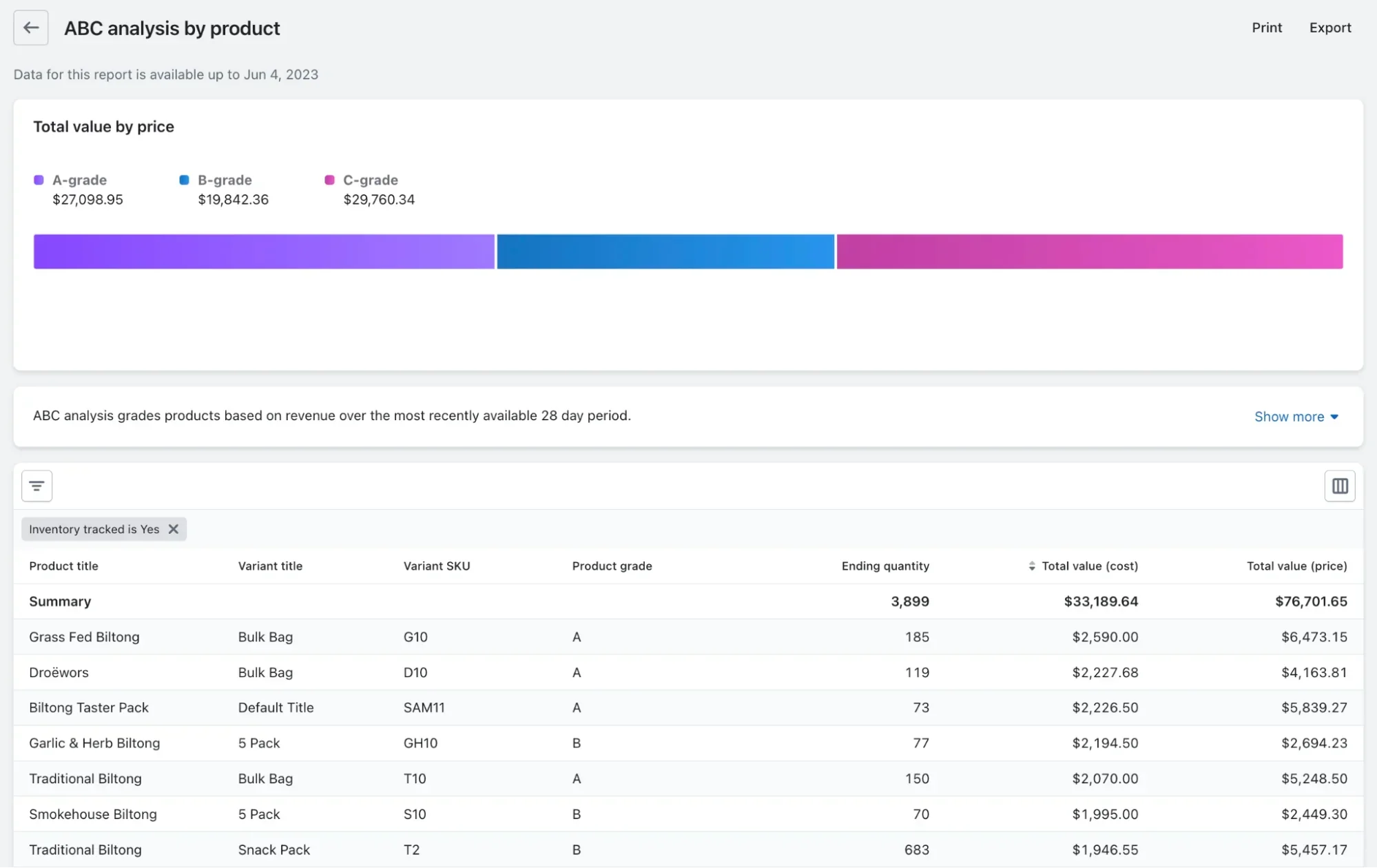
An ABC analysis report with a bar chart and a data table of products.
Find prebuilt inventory reports inside Shopify POS.

Your STR helps you measure your monthly revenue and identify opportunities to increase sales by supplier, product line, store location, sales channel, and more. STR can be used to measure sales through any lens and better understand how different parts of your retail or ecommerce business are performing.

5. Improve cash flow and financial forecasting

Your STR is another way to examine your revenue against the cost of your inventory.

An STR that drops tells you that you’re spending more money than you’re making, while a growing STR means that your profit margin is rising and will continue as you adjust your inventory orders and storage costs.

How to calculate your sell-through rate

To calculate your sell-through rate, you need the number of units sold during the month, and the total amount of stock available for sale that month. 

You can also calculate your STR annually, quarterly, or weekly depending on your sales goals.

Sell-through rate formula

Use this formula to calculate your sell-through rate:

(Total sales / Stock on hand) x 100 = % Sell-through rate

💡 PRO TIP: Skip the manual calculations and view Shopify’s Product sell-through rate report to see the percentage of your total inventory you’ve sold during a given period. 

Sell-through rate example

Let’s look at how you would calculate the sell-through rate on a new product and use the information to make a decision on adjusting your inventory.

Say you own a coffee shop and want to start selling cupcakes. For September, you order 1,000 cupcakes, 200 each of five different flavors: vanilla, chocolate, red velvet, carrot, and birthday cake.

At the end of the month, you calculate your sell-through rate to understand how much your customers liked the cupcakes. You learn that of the 1,000 cupcakes, you sold 800.

(800 / 1,000) x 100 = % sell-through rate

0.8 x 100 = 80%

In September, your cupcakes had an overall 80% sell-through rate—so far, so good. 

Next, you’re curious how your customers liked each flavor. Red velvet, carrot, and birthday cake are more expensive than the others, so you only want to order those that will sell.

You take the number of sales for each flavor and divide each by 200, the total number ordered:

  • Vanilla: (190 / 200) x 100 = 95% 
  • Chocolate: (180 / 200) x 100 = 90%
  • Red velvet: (175 / 200) x 100 = 87.5%
  • Carrot: (100 / 200) x 100 = 50%
  • Birthday cake: (125 / 200) x 100 = 62.5%

According to September’s sell-through, vanilla and chocolate were the most popular. You’ll order 200 each for next month. Red velvet was also a hit, so you’ll order 200 of those, too.

The carrot flavor was clearly underperforming, so you decide not to reorder any of that flavor.

While birthday cake didn’t hit your 80% STR goal, it did come close. Some customers did enjoy the flavor, so you’ll only order 100 next month. This is a great example of assortment planning. You’ve turned the sales data into actionable inventory strategies—determining which flavors to retain, which to eliminate, and which to reduce. 

Manage all your inventory from Shopify

Shopify comes with built-in tools to help manage warehouse and store inventory in one place. Track sales, forecast demand, set low stock alerts, create purchase orders, count inventory, and more.

Explore inventory management on Shopify

How to interpret your sell-through rate

What is a good sell-through rate?

As a quick gut-check, a healthy STR is in the 70%–80% range for your in-period assortments. However, the right target will always depend on your product category, its life cycle, and the time window you’re measuring.

There are always caveats:

  • For short-life or seasonal drops, like limited-run fashion, aim for a >80% STR within the launch window. This is because your ability to replenish is limited, and the markdown risk increases the longer the items remain unsold.
  • For evergreen and core products, a lower STR of 40%–60% per month or quarter is acceptable, only as long as your inventory turns are on plan and your profit margin is protected.

Sell-through rate benchmarks by industry

Within the retail industry, a good sell-through rate can look very different from one product category to another. 

The benchmarks below illustrate how the pace of sales can fluctuate over time for various product types: 

  • Fragrance: A typical sell-through rate is around 23% after 8 weeks, growing to 63% after a full year.
  • Cosmetics: Sell-through for cosmetics is often around 25% after 8 weeks and 48% after 52 weeks.
  • Home improvement: This category moves much faster, with sell-through rates around 55% in the first 8 weeks and 90% within a year.

Note: These benchmarks are illustrative. Your targets should always be set based on your specific product mix and your buyers’ expectations.

The impact of time and seasonality

Context is everything when interpreting your sell-through rate. Be sure to compare similar time frames. When judging sales performance, always compare like-for-like periods to get an accurate picture.

Major events like holidays, back-to-school season, and even weather can significantly lift or lower sales. Use your historical data and look at monthly retail trade trends for your industry to set realistic goals during these peak periods.

Sell-through rate vs. inventory turnover

Sell-through rate and inventory turnover both help you understand how inventory is performing. But they serve different purposes:

  • Sell-through rate measures the performance of one specific product or a single collection. It tells you what percentage of that item you sold in a certain amount of time (typically a month).
  • Inventory turnover provides a bigger picture of overall business health. It shows how many times you sold and replaced all of your products over a longer period, usually a full year.

The main reason to track inventory turnover is to see how efficiently your business is using its money.

High turnover means your money isn’t just sitting on a shelf in the form of unsold products—you are turning your stock back into cash quickly. That cash flow lets you reinvest in your business by restocking your most popular products.

When to use each metric

  • Use sell-through rate when you need to evaluate a single product in the short term. It’ll answer questions like, “Are people actually buying the new jackets we launched last week?”
  • Use inventory turnover to assess the long-term health of your business. It answers bigger questions like, “Are we carrying too much unsold stock in general?” or “Are we using our money more efficiently this year than we did last year?”

Five strategies to improve your sell-through rate

So, you’ve calculated your sell-through and find that it’s low. Here are some ways to achieve a higher sell-through rate and improve your retail business.

1. Refine your inventory purchasing strategy

Buying too much inventory is an easy way to hurt your sell-through rate. This happens when a business lacks clear inventory reporting, and they are forced to make purchases without accurate data. In July 2025, US retailers had about $810 billion in unsold products, which shows how big this problem is. 

Using smart retail technology like AI can help you get much better at predicting what customers will buy. According to McKinsey, AI-driven planning in distribution operations is associated with 20%–30% lower inventory levels via better forecasting and optimization. 

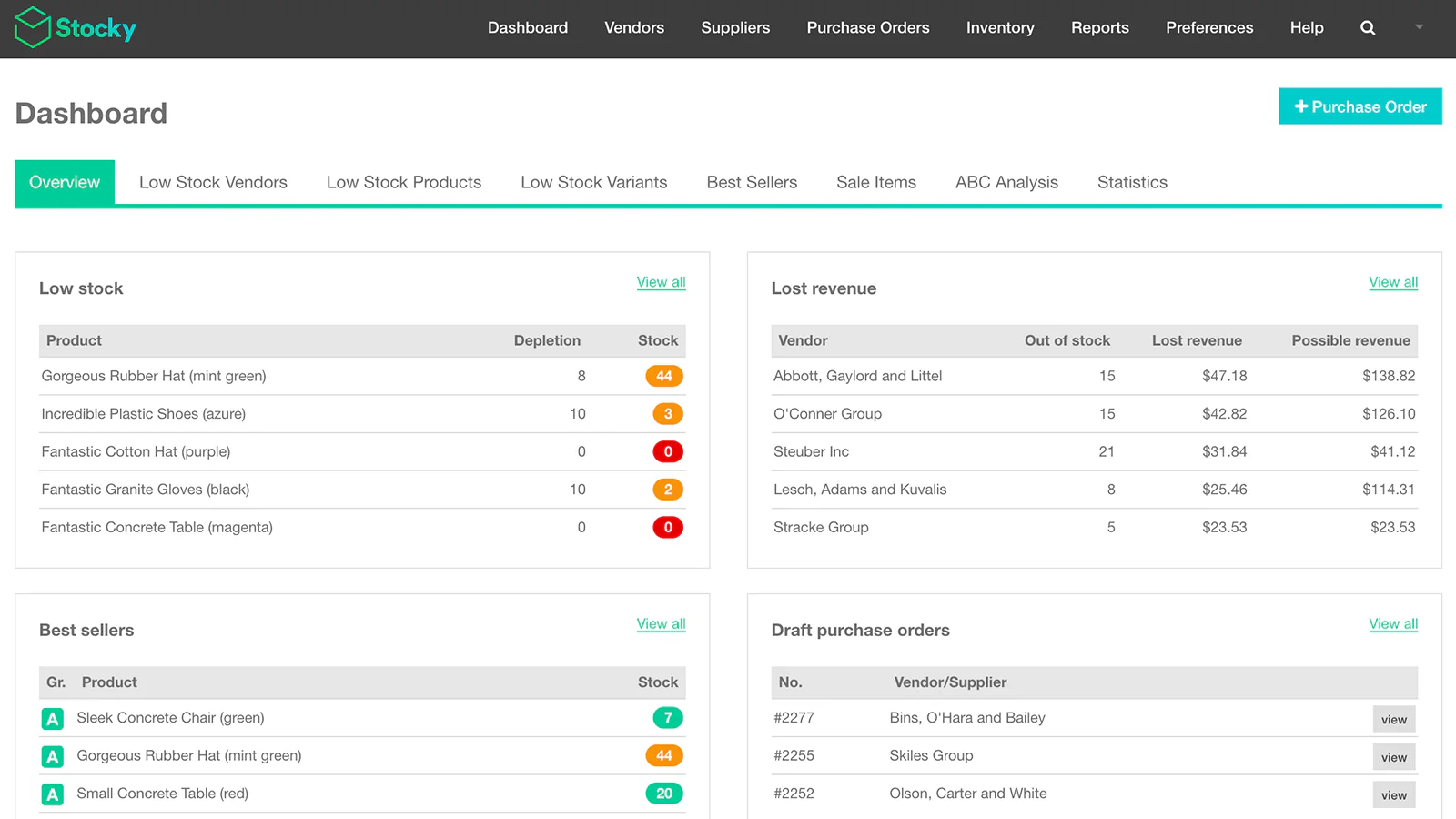
💡Tip: Use Stocky by Shopify to forecast demand and create purchase orders. It analyzes your real-time sales data to help you make informed decisions on what and how much to buy. That way, you’re less likely to be surprised by a sudden sellout of a popular item or get stuck with a warehouse full of products nobody wants.

2. Run strategic promotions and discounts

Offering sales and discounts can help you sell products faster without making your brand look cheap. 

Research from NIQ shows that even a tiny 1% improvement in your pricing can boost your profit margins by about 11%, as long as you use data to plan your discounts. It’s all about offering the right deal at the right time.

“While markdowns are a quick way to enhance inventory turnover, generate cash, keep fresh goods flowing, and remedy purchasing mistakes, they should solve problems rather than create new ones,” says Gerrid Smith, CMO at Joy Organics.

While this approach can boost sales, it also reduces profit margins. Discounts and promotions should be applied sparingly and you should always keep your break-even point in mind when running them.

“Before you start mass discounting at a percentage that appeals to you, make sure you’ve calculated how much of a blow your margin will suffer once you’ve put a sale figure on it,” says Gerrid. “A 2% reduction in markdowns results in a profit increase of nearly 1%.”

You can easily create discounts right from your Shopify admin. For example:

  • A “Buy one, get one 50% off” deal on a slow-moving T-shirt
  • Free shipping for orders over $100 to increase basket size
  • A special 15% discount just for your VIP customers on select items

If you need to create more complicated deals with special rules, you can use Shopify Functions to build them.

3. Use product bundling to move slow-selling stock

Product bundling is when you sell several items together as a package. It’s a great way to get customers to buy more and to sell items that aren’t moving quickly on their own. 

Studies from The Journal of Retailing and Consumer Sciences confirm that bundles increase the number of items people buy at once and can help you sell products faster. But creating bundles is difficult because you have to keep track of inventory and avoid overselling.

This is where the free Shopify Bundles app comes in. As a Shopify-developed tool, it integrates directly into your admin, allowing you to start creating fixed bundles and multipacks. 

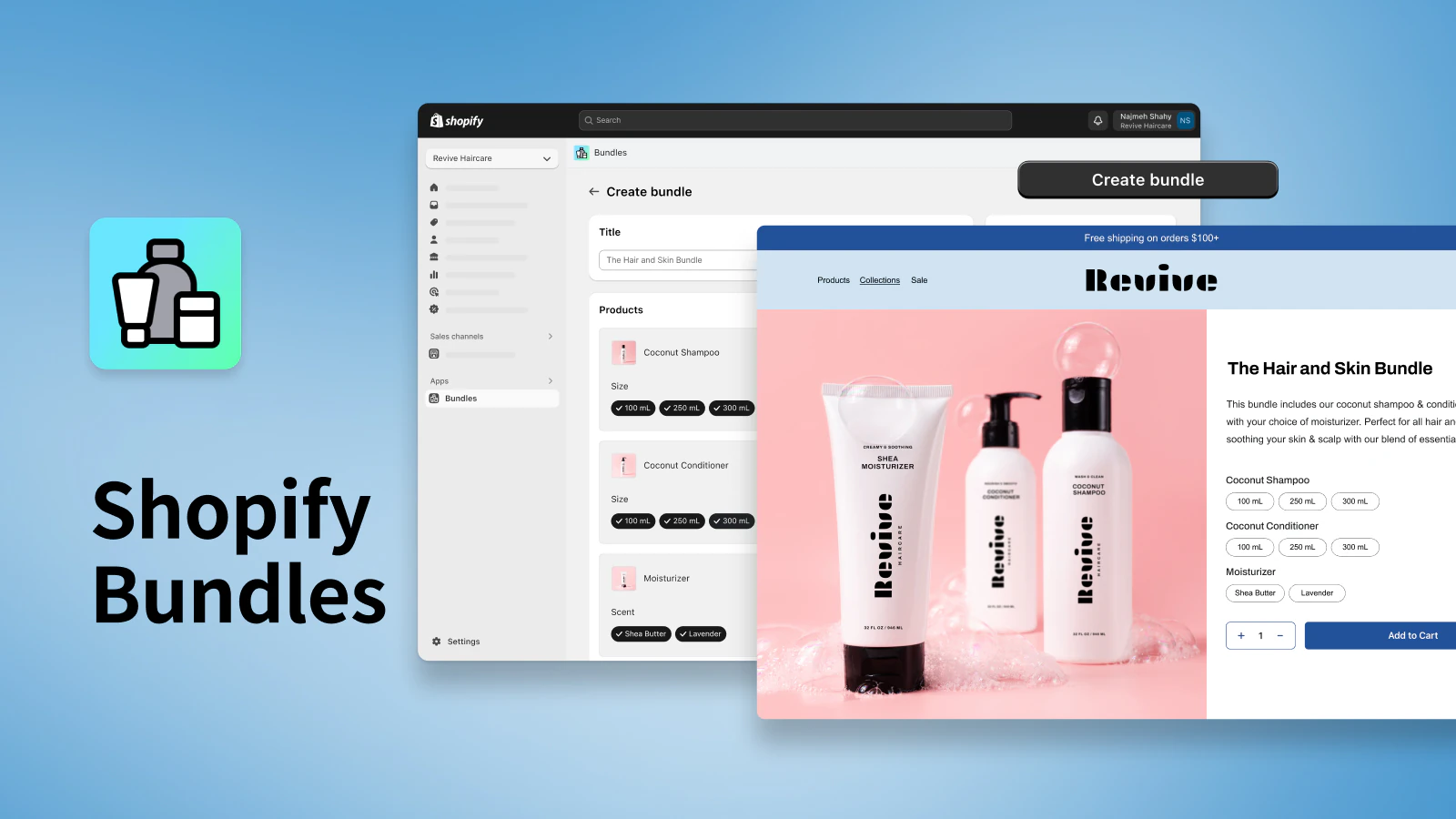
A promotional image for Shopify Bundles showing the admin setup and the final product page.
Sell products in bundles with the Shopify Bundles app.

When a customer buys a bundle, the app automatically reduces the stock count for both the specific shirt and shorts variants sold. Customers can choose from options like size or color for the products within the bundle, just as they would for a regular product.

Increase average order values with the Shopify Bundles app

Product bundles are a great way to increase cart values and ensure your products are discovered by more shoppers. Download the free Shopify Bundles app to quickly and easily create bundles for your products and variants from your Shopify admin.

Install Shopify Bundles

4. Increase product visibility with targeted marketing

You can’t sell what customers don’t see, but simply getting more eyes on your products isn’t enough. You need to get them in front of the right customers.

A 2024 report from Boston Consulting Group found that retailers leading in personalization grow revenue 10% faster than their competition, and linking recommendations to real-time inventory can lift sell-through by 10%. Traditional digital advertising is expensive and often targets broad audiences, leading to wasted ad spend and a low return.

Shopify Audiences lets you export algorithm-generated Retargeting Boost lists to Meta, Google, TikTok, and other platforms, doubling retargeting-driven orders and cutting customer-acquisition costs by up to 50%. 

👉Case study: Formalwear label Mac Duggal grew their retargeting pool 2.3x and lowered cost per purchase 3.6x after adopting Shopify Audiences.

5. Leverage your data for demand forecasting

Seasonal demand creates volatility in retail. You know your products have peak seasons, but it’s hard to turn that observation into a purchasing plan. A specific coat may have sold out last winter, but deciding how many to reorder and when is often a matter of guesswork.

Shopify Analytics shows you exactly what products sold and when, and Stocky uses that information to show you what to buy next. For example, Analytics can show that you sold through 500 units of a specific coat last November. Stocky then takes that sales velocity, factors in your supplier’s lead time, and recommends ordering 600 units in September to be ready for the winter rush.

This allows you to better plan inventory and make sure the right products are in stock when customers are ready to buy. 

Sell items faster by optimizing sell-through rates

Keep an eye on your inventory data and prioritize these sell-through strategies when you see merchandise sales slow down. Use your sell-through data to prepare for quick reorders for trending products. 

Remember: Proactivity means better profits. Armed with your sell-through rate and a motivated sales team, you can improve retail sales quickly.

To calculate your STR, however, you’ll need accurate data and a platform to easily capture it. See how Shopify POS may be the platform you need for your sell-through needs.

Start selling in-person with Shopify POS

Shopify POS is the easiest way to start selling in-person. Take your brand on the road and accept payments, manage inventory and payouts, and sell everywhere your customers are—farmer’s markets, pop up events and meetups, craft fairs, and anywhere in between.

Discover Shopify POS

Sell-through rate FAQ

What does sell-through rate mean?

Your sell-through rate is the amount of inventory sold during a given time period out of the amount of inventory received.

How do you calculate sell-through rate?

The formula for calculating your sell-through rate is: Sell-through rate = (Total sales/Stock on hand) x 100

What is a good sell-through rate?

Try to aim for a sell-through rate of at least 80%. Your sell-through rate may be different depending on your retail category, season, and the period of time you are measuring.

Product Bundling: A Strategic Guide to Increase AOV (+ Examples) (2025)

Software Stack Editor · October 3, 2025 ·

Retailers of all kinds share a common goal: to earn more revenue. Product bundling is an excellent way to increase revenue without developing new products or hosting in-store experiences that require an upfront cost.

Curated product bundles increase the perceived value of an offer, making it feel like a deal to consumers even without a significant monetary discount. They help the customer feel like they’ve got a great deal while boosting the average order value (AOV). 

As with most other sales tactics, there’s an art to bundling products successfully. Here’s what you need to know about retail product bundling, with examples and ideas to increase cart sizes.

Create product bundles with the Shopify Bundles app

Product bundles are a great way to increase cart values and ensure your products are discovered by more shoppers. Download the free Shopify Bundles app to quickly and easily create bundles for your products and variants from your Shopify admin.

Install Shopify Bundles

What is product bundling?

Product bundling is a strategy for creating and selling a curated collection of items. A retailer can group complementary products in a bundle to be purchased together, like a printer and ink cartridges, or offer a discounted price for bundle add-ons. 

The goal of product bundling is to capture both casual browsers and eager-to-buy shoppers while also increasing basket size.

Types of product bundling

Pure bundling

A pure bundle contains items sold exclusively in that bundle. For example, the Voduz Hair Spectrum 4 in 1 Curling Tong is sold with detachable barrels you can only get when you purchase the set.

It can be offered at a discount or with added value. In this price bundling format, the retailer selects a few specific items that must be purchased together to receive the discount. Sometimes, the bundle is offered as a general discount when purchasing multiple items, like buy one, get one (BOGO) discounts. 

Mixed bundling 

This type of bundling works by combining products sold separately at a reduced price. 

A good example is Kylie Cosmetics lip kits. These kits consist of a lip liner and lipstick, each of which can be purchased separately, but as complementary products they are bundled together for convenience.

Leader bundling

Leader bundling is a strategy where a popular, high-demand product (the “leader”) is packaged with a less popular or new item. It uses the leader’s star power to lift the sales of visibility of the other product. 

A recent example is Nintendo’s Switch 2 + Pokémon Legends: Z-A bundle. By packaging their new console with one of the most popular franchises in gaming, Nintendo used Pokémon’s popularity to drive hardware purchases. 

Captive product bundling

This is famously known as the razor-and-blades model. It involves selling a core product (like a razor) that requires ongoing purchases of an add-on (like blades) to function. You’ve likely seen this model with printers too, which often only work with the manufacturer’s own ink cartridges. 

Companies often price the main product very low, sometimes even at a loss. They recover their profits over time through the repeated sales of the high-margin add-ons.

Cross-sell and upsell bundling

Cross-sell bundles involve promoting related products adjacent to other products in a similar group. In physical retail, this is similar to the concept of cross-merchandising. 

With its sophisticated algorithms, Amazon suggests bundles of products that appeal to customers based on past purchases. It may suggest a product bundle if a customer bought an ebook reader in the past that includes a subscription to a digital book library, for example. 

Upselling persuades the customer to upgrade. For instance, if someone is interested in a line of makeup brushes, a bundle that includes brushes, a travel case, and brush cleaning solution would be an upsell.

Product bundling examples

How you choose to put together a bundle will depend on your goals and individual products, but these proven approaches to bundling strategy consistently drive results for retailers. 

Related products bundle

Some products can be sold individually, but work best when combined with others. 

Escalade Sports, for example, has a portable pickleball kit with a net, two paddles, two balls, a carrying case, and a “how to play” guide. Customers can get the full setup and start playing instantly, without buying each item individually. 

Customers can still buy each item separately, albeit at a higher price. If someone loses a ball or chips their paddle, they can buy a replacement without repurchasing the entire bundle. 

Gift bundles

One way to meet customer needs during the holidays is to take a gift-giving approach to product bundles, which makes it easy for shoppers to find and purchase a ready-made gift.

Flower delivery service LVLY uses this approach. The gift section on their website features multiple product bundles at many price ranges, whether customers are shopping for an anniversary, birthday, or Christmas gift.

A gift box with a bouquet of flowers, a bottle of wine, and a card.
LVLY’s flower gift box bundles popular products together.

Gift bundles also merchandise the items together for in-store displays. Hands-on associates can make smart recommendations for shoppers to get in and out of the store quickly.

Subscription boxes

Subscription boxes are product bundles in their own right—and they’re not just for ecommerce retailers. Many brick-and-mortar retailers also have subscription box services.

WineCollective is just one example of a brick-and-mortar shop that has capitalized on an opportunity for product education and curation with subscription boxes. After noticing several in-store shoppers struggling to purchase the right bottle of wine, they took the decision-making out of the shopping process with curated wine bundles.

Build-your-own bundles

Some retailers have experimented with a mix-and-match bundling tactic, allowing shoppers to create their collection of goods. 

This may seem counterintuitive to building product awareness, but you can still encourage product discovery by allowing customers to choose from a set group of products, limiting their choices to the items you want to promote.

This tactic isn’t limited to online retailers, either. A retail store owner could take a similar approach by hosting a build-your-own gift bundle event or allowing in-store associates to help shoppers build their bundles, with in-store gift wrapping available.

Buy one, get one bundles

HiSmile, a retailer that sells teeth-whitening products, sells flavored toothpaste online. New customers might not know which flavor they like best, so it introduced a bundle that contains over 10 different toothpaste flavors to give potential customers a chance to try each one and discover their favorite. 

The product bundling strategy has proved fruitful for HiSmile. Now, over 80% of orders are bundled products, which has increased the retailer’s average cart size by 4x.

Inventory clearance bundling

Product bundling doesn’t have to be customer-driven. Sometimes, you’ll have dead stock you can use to squeeze revenue through bundling. 

A clothing retailer could bundle three slow-moving items, like sandals and sunglasses, with a popular item, like a dress, and offer the bundle at a lower price. This encourages customers to save money by buying the bundle.

Similarly, a food retailer might want to bundle products nearing their expiration date. For example, customers could get a “meal deal” bundle that includes the sandwich, drink, and snack for a discounted price. 

The psychology behind effective bundling

There is strong marketing psychology behind a product-bundling strategy. Here’s the evidence to support it. 

Simplifying customer choice

One of the main reasons bundles are so effective is that they solve the problem of choice overload. When a customer is faced with too many options at once, they are more likely to walk away without purchasing.

A famous jam study demonstrated that customers were more likely to make a purchase when presented with six varieties of jam than when offered 24 options.

Now, this doesn’t happen every single time. Research shows that choice overload is more likely to occur in specific situations, like when:

  • You’re in a hurry.
  • The options are very complex and hard to compare.
  • You lack clear preferences. 

This is where product bundling excels, by combining multiple decisions into one. So, instead of weighing the pros and cons of several different options, the customer only has to make one choice: to buy the bundle or not. 

Real-world field research supports this. Studies in grocery stores have found that well-designed bundles increase how much people buy, even with no discount involved. The simplicity of the choice is valuable on its own.

Increasing perceived value

Bundles also create the perception of value and savings. This works because of a concept called mental accounting. 

Customers get two different kinds of satisfaction from a purchase.

  1. Acquisition utility: The value a customer gets from owning the item itself
  2. Transaction utility: The happiness a customer feels when they receive a great deal

Bundles are a great way to boost transaction utility. When combining items under a single price, it creates a feeling of getting more for less. You stop analyzing each item’s price and instead focus on the total savings of the deal.

How you present the bundle also makes a big difference. The items should be complementary—meaning they make sense together, like coffee beans and a coffee maker. 

Research also shows that the perceived quality of the items matters. Discounting a lower-quality item when bundled with a premium one can actually boost the appeal of the whole package, as long as the items fit together well.

How to create product bundles

  1. Understand your audience
  2. Decide which products to bundle
  3. Calculate the bundle price
  4. Name your product bundle
  5. Build the bundle in your POS

1. Understand your audience

You can’t just group items and sell them as a package—you must carefully curate your selection to sell product bundles in your retail store. It all starts with a solid understanding of who you’re selling to. 

A complete view of your customer, inventory, and sales data can show you the items customers already tend to buy together, and what they want from future bundles. You can do this by unifying your data into a centralized platform like Shopify. 

For example, when brainstorming product bundle ideas, you can use Shopify to:

  • Read customer feedback surveys
  • Monitor which products customers click in marketing emails
  • Reference notes created by retail associates off the back of in-store conversations 
  • Track inventory commonly purchased together both online and offline
A customer makes a contactless payment with a phone at a shop counter.
elph ceramics uses Shopify POS to unify customer, order, and inventory data.

elph ceramics is one retailer that turned to Shopify POS to unify customer and inventory data across store locations and their ecommerce website. 

“Before unifying our online and physical stores with Shopify, capturing customer data was a challenge,” explains Sophie Rankine, cofounder of elph ceramics. “Now, we can collect our customers’ contact information in a way that feels authentic and create profiles in just a few clicks at checkout.” 

These unified customer profiles give elph ceramics extra insight into who their customers are and what they want from the brand, which has helped increase the retailer’s retention rate by 30%. 

2. Decide which products to bundle

The products you choose to bundle will be determined by which bundle type best accomplishes your goal.

Let’s look at how to choose bundled products:

  1. The buy more, save more bundle is typically applied to your entire online store or select product lines you carry. This bundling technique is particularly useful for driving sales of stagnant inventory. Most often, you will choose the items for this bundle based on your slowest-moving inventory category. 
  2. Quantity discount bundles are intended to sell multiples of the same product. Here, you choose which replenishable items you want to promote. You could pick the replenishable items based on bestsellers to increase AOV. You could also experiment with seeing if quantity discounts help move stagnant replenishables.
  3. Leverage data. Because prepackaged kits are most effective for products that are complementary or meant to be used together, select items that your point-of-sale (POS) data tells you are commonly bought together. For instance, if you have a history of customers purchasing socks with shoes, that’s a solid indicator that you can sell a bundle.

Don’t overdo it with the bundling strategy. Pick one or two approaches and lean into those to ensure you’re not overwhelming your customers.

If you’re still unsure where to start, analyze your sell-through rate and inventory turnover ratio to discover which products or categories stagnate. Calculate a SKU or category’s contribution to your total unit inventory and compare that to its contribution to your total unit sales. 

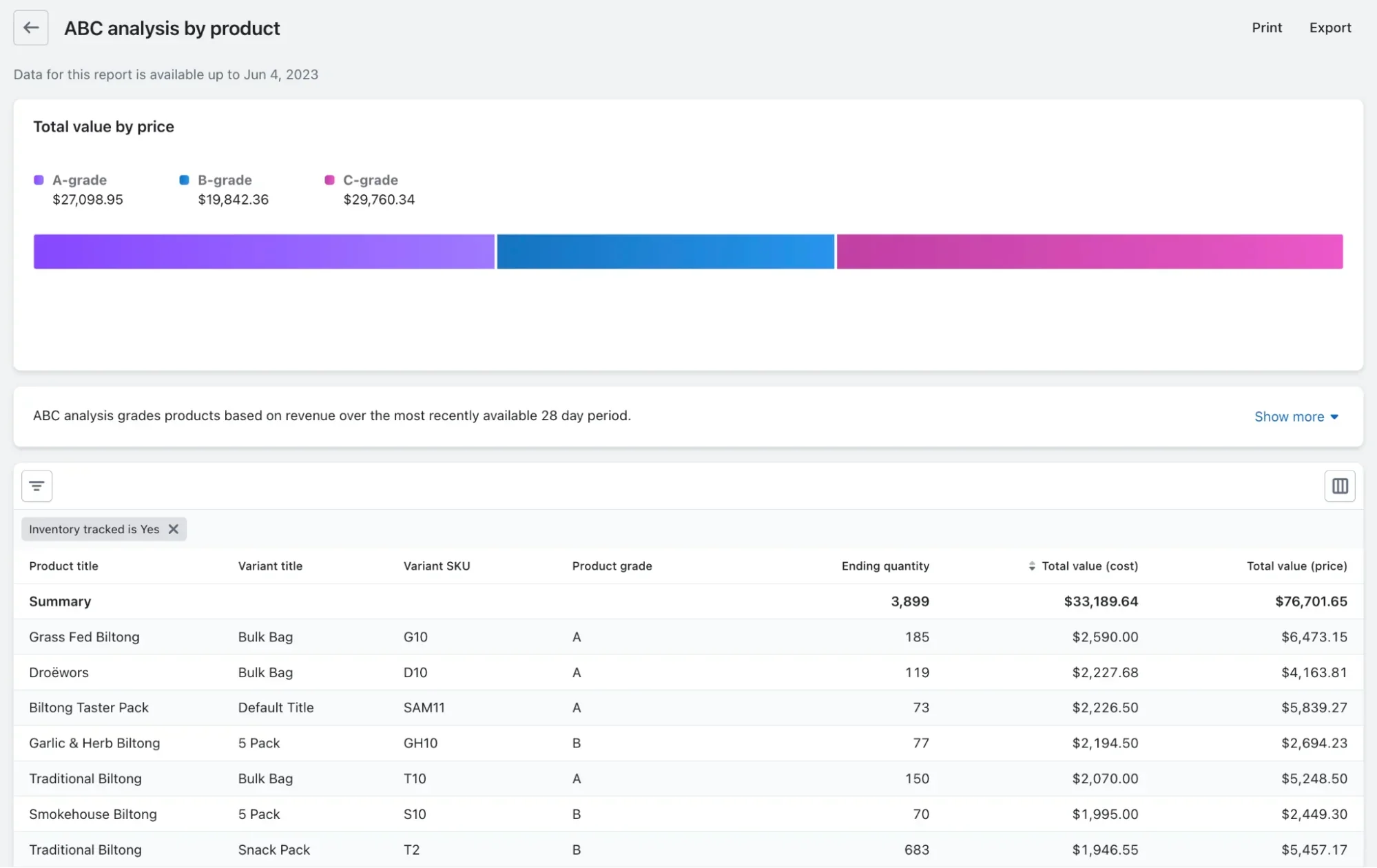
📌 Pro tip: Shopify POS creates these inventory management reports for you. The ABC analysis report, in particular, shows which products generate the most (and least) revenue for your brand across every sales channel you’re using.

An ABC analysis report with a bar chart and a data table of products.
Find prebuilt inventory reports inside Shopify POS.

3. Calculate the bundle price

Calculating your bundle’s pricing can be straightforward if you’re not offering discounts. 

To calculate the bundle price, you first need to know your gross margin on each product in the bundle. To calculate the gross margin dollars of a product, subtract the cost of goods sold (COGS) from the retail price.

Once you know your cost baseline, you can choose a discount that works for your brand or decide whether to stick to a no-discounting strategy.

 A few rules of thumb for discounting: 

  • For brands with average margins of 50% or higher, shave 10% to 20% off the subtotal.
  • For businesses where average margins are 50% or less, a discount rate between 5% to 10% typically will suffice.

It’s also worth testing your bundle pricing strategy over time to see what performs best. Is your conversion rate higher when promoting a percentage off instead of a cash discount?

4. Name your product bundle

Naming your bundle impacts how you draw attention to your new offering. 

An excellent best practice is to name the bundle based on the benefit it provides a customer. For instance, Manscaped’s skincare bundles are all named for what they do. The men’s shaving kit bundle is called the “Ultra Smooth Package.”

Calling attention to the overall benefit of the bundle tells customers from the get-go why they should purchase all of these products together rather than just one of them.

You could also give your bundle a descriptive name that helps the customer recognize the use case. Jones Road Beauty, for example, has a product bundle named “The Beach Vacation Kit,” which includes cosmetics that help the customer get a sun-inspired holiday look.

5. Build the bundle in your POS system

Long checkout lines deter people from buying. Instead of having retail associates manually add products to the cart and type in a discount code, use the Shopify Bundles app to let your team ring up orders in a few clicks.

The bundle app lets you create product bundles that customers can buy in-store or through your online store. You predetermine the price (including any applicable discount), and inventory quantities are automatically updated in real time whenever you sell a product that’s part of a bundle.

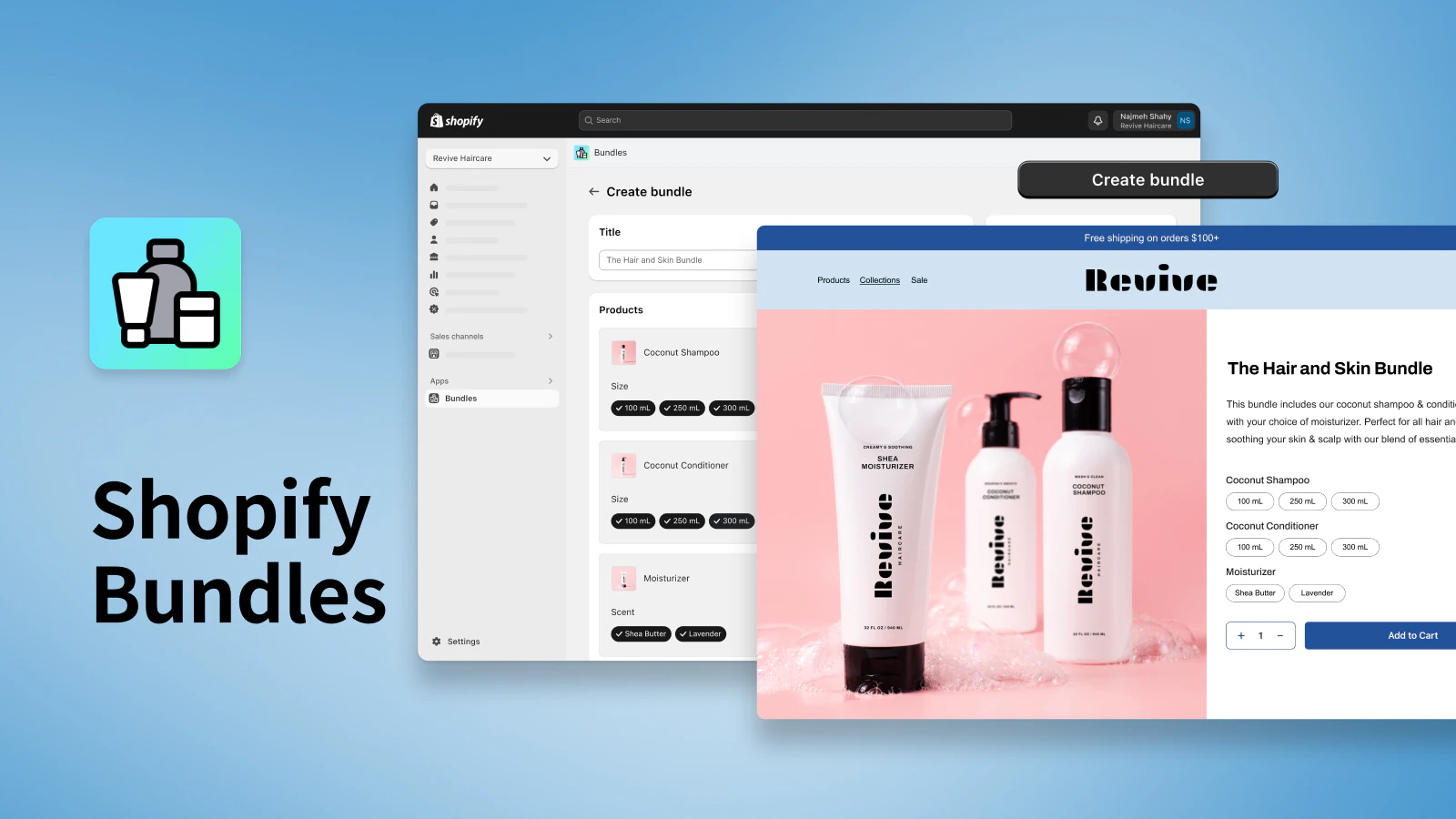
A promotional image for Shopify Bundles showing the admin setup and the final product page.
Sell products in bundles with the Shopify Bundles app.

Increase average order values with the Shopify Bundles app

Product bundles are a great way to increase cart values and ensure your products are discovered by more shoppers. Download the free Shopify Bundles app to quickly and easily create bundles for your products and variants from your Shopify admin.

Install Shopify Bundles

How to sell product bundles in retail

Many techniques help companies sell product bundles, but let’s take a look at some of the best practices retailers have developed over the years.

Display the bundle discount prominently 

If your bundle is intended to offer a discount or value-add, it’s important to display that information prominently on your product page and within your marketing efforts. Making the discount a key part of the bundle reminds shoppers they’re getting a deal.

Retail signage should sit alongside bundled or bundle-able products, so customers recognize the deal. You should train your sales associates to mention the bundle as an option whenever a customer is looking at one of the individual items.

Use your bundles for gift guides

Retail store owners can spotlight gift bundle displays by their registers with shoppable displays, so customers can grab everything they need in one swoop. For example, if someone pops in during the holiday season, you could position discounted bestseller product bundles beside the checkout line to encourage impulse buys. 

You could also create a gift guide landing page on your online store, which you can then promote via email, social media, and in-app. This helps raise awareness of your bundles across multiple sales channels. 

Upsell your product bundles at checkout

Offering a bundle at checkout can help a customer pull the trigger on multiple items. It’s also a smart move for ecommerce stores to increase profit margins and optimize their shopping cart experience. 

At a brick-and-mortar, this retail activation might involve the sales associate mentioning that if the customer adds one more item to their purchase, they get 15% off everything. Online, it can be presented as messaging during the checkout flow. 

Benefits of product bundles

Product bundling is a win-win for both retailers and consumers. Let’s look at why it’s become such a popular tactic amongst retail and ecommerce businesses.

Increase average order value

By increasing the perceived value of a single transaction, bundling directly encourages customers to purchase more items at once, leading to a measurable lift in AOV and overall revenue.

Harvard Business School’s Vineet Kumar detailed the power of product bundling in a case study of Nintendo. Other retailers known for increasing their sales and AOV from bundling include:

  • Intimacy lubricant brand Coconu saw a 20% increase in AOV since implementing bundles.
  • Direct-to-consumer dog food brand Maev’s bundles resulted in a 15% increase in AOV and a 20% jump in units per transaction.

Encouraging shoppers to purchase more items typically leads to a higher transaction amount, which is an efficient way to boost revenue. Bundling also reduces marketing and distribution costs, since customers discover products more easily and order all of them at once.

Simplify purchase decisions

While bundling can mean discounts, it can also be used to build upsells into a package, blurring the focus around the price of individual items. 

For example, when you purchase a new smartphone, you also receive a charger in the box. The charger isn’t free, of course—the manufacturer builds the cost into the phone’s final ticket price. Phone retailers know if customers had to purchase a charger separately, many wouldn’t.

If you find that customers are often put off at the thought of having to purchase yet another small item to complete their set or experience, consider bundling those items to remove that obstacle to purchase.

Increase product awareness

Product bundling gives customers the chance to try a product they wouldn’t have typically purchased as a standalone item.

For one example of this, we can look to LoveSeen, a false eyelashes retailer. They sell a starter kit bundle that includes lashes, lash glue, and tweezers.

Most people don’t try lash tweezers because they’re not entirely necessary to apply lashes. However, when included in the product bundle, customers can see how easily lash tweezers make the application process easier. They may even discover that they would purchase another pair individually in the future. 

Sell excess or slow-moving inventory

Bundling slow-moving inventory with popular products can help move stagnant items. When you bundle a more stagnant product with a popular one, you create a new product offering, which helps freshen up your surplus or overstocked inventory. 

Say, for example, that you’re running a home furnishing store that’s invested $5,000 into a new collection of bathroom towels, but you’re struggling to sell them. The price is too high—you bought them for $5 per unit, but customer feedback shows they’re only willing to pay $6.

Instead of admitting defeat and losing money by selling the towels at cost, incorporate them into a bundle. You could pair the towels with a bestselling bath mat, toothbrush holder, and towel rail to give customers an all-in-one bathroom setup. 

Boost customer loyalty

Offering product bundles can also help boost customer loyalty. Bundles give buyers the chance to try multiple products at once, which means more opportunities for them to find items they love (and then buy them over and over again).

Potential risks of product bundling 

While product bundling is a great way to drive sales, it doesn’t come without potential challenges.

Diluting your profit margins

The biggest risk in bundling is that the discounts needed to sell a bundle will cut into your profits. 

To make a bundle tempting, you usually have to offer it at a lower price than the cost of buying everything separately. The problem is, this can lower a customer’s willingness to pay (WTP) for each item inside. 

Research shows that once people see a product as part of a cheaper package, their perceived value of it can drop. If you don’t sell a lot more bundles to make up for the discount, you could end up making less money overall. 

To avoid this, calculate your margins carefully and price your bundles accordingly. You could even test different discount levels to see what customers respond to. 

Cannibalizing sales of individual products

One risk of bundling is cannibalization, when existing customers shift to buying a cheaper bundle instead of the more expensive single item. In this scenario, the bundle ends up replacing a purchase the customer would have made anyway.

Retailers can avoid this by ensuring that you are bundling items that are complementary (meaning they go together well) rather than substitutes (one could replace another). Some examples would be bundling bestsellers with slower-moving products, or designing “starter kits” for new shoppers.

Creating bundles customers don’t want

Finally, you can risk putting together a bundle that nobody is interested in.

People get more upset about having an item taken away from a bundle than they feel happy about having a low-value item added in. Stuffing your bundle with cheap filler products to make it seem bigger can actually backfire and make the whole package less appealing. 

Create product bundles for your store today

Product bundles are a great way to increase your products’ perceived value and improve your store’s customer experience. Use them for gift-giving occasions, dead stock, product awareness, and other creative ways to drive more in-store sales and improve your marketing strategy.

Product bundling FAQ

What is product bundling?

Bundling is where retailers sell multiple products within the same package, often for a lower price. For example, a sneaker brand might sell trainers for $125 and a cleaning solution for $8 for a bundled price of $129.

What is a bundling strategy?

A bundling strategy combines multiple products in a single bundle. Customers can buy each item together, often at a discounted price compared to buying each item separately.

What are two types of bundling?

Mixed product bundling lets customers buy multiple products at a lower price compared to separately. With pure bundles, items included can only be purchased through the bundle.

What is an example of a bundled product?

Kylie Jenner’s “lip kits” are an example of bundled products. Shoppers can get a matching lip liner and lipstick in the bundle without buying each one individually.

How do you bundle products together?

  • Upsell complementary products
  • Cross-sell related items
  • Offer “build your own” bundles
  • Bundle items bought as gifts
  • Build a subscription box bundle
  • Offer buy one, get one free bundles

What Is IVR? 7 Best IVR System Providers (2025)

Software Stack Editor · October 3, 2025 ·

image

Whether you’re selling deep-sea fishing equipment or vegan dog treats, managing customer calls is critical for any growing business. Interactive voice response (IVR) technology offers a solution that streamlines contact center operations and improves the customer experience without dramatically increasing operational costs.

In the increasingly AI-driven ecommerce landscape, next-generation IVR systems can increase customer satisfaction by up to five times and reduce the need for human agent interactions by 10%, according to the consulting firm McKinsey. For small ecommerce businesses, an investment in IVR can be worth the price.

Here’s what IVR is, how it works for ecommerce, and which tools to consider.

Table of contents

What is IVR? 

Interactive voice response is an automated phone system that enables callers to interact with your business through voice commands or touch-tone keypad selection. Acting like a digital receptionist, IVR greets customers with prerecorded messages and presents menu options to direct their calls to the appropriate representative or automated service. 

IVR systems use dual-tone multifrequency technology (DTMF) to interpret caller input through the telephone keypad. More advanced IVR solutions incorporate speech recognition and natural language processing (NLP), allowing customers to speak their requests.

For ecommerce businesses, IVR often serves as the first point of contact for customer calls, offering a way to handle simple requests, such as checking an order status, without tying up live agents. 

Turn chats into sales with Shopify Inbox

Shopify Inbox is a free app that lets you chat with shoppers in real-time, see what’s in their cart, share discount codes, create automated messages, and understand how chats influence sales right from your Shopify admin.

Discover Shopify Inbox

How does IVR work?

An interactive voice response system operates through a structured call flow that guides customers through their service journey. When customers dial your support number, the software analyzes user input from either the phone keypad or voice commands and matches it to programmed options. Based on valid responses, the system may:

  • Provide automated information, such as store hours and shipping updates

  • Collect caller data to pass to an agent

  • Route calls to the most appropriate agent or department

More advanced IVR solutions use voice recognition technology to understand user requests in their preferred language or identify callers using voice biometrics. IVR technology typically integrates with contact center software and customer relationship management (CRM) systems, giving agents access to caller information and interaction history when calls are transferred. By handling routine inquiries automatically and passing along context for more complex customer requests, IVR reduces wait times and ensures customers reach the correct department faster.

Who uses IVR?

Various industries leverage IVR technology to improve customer interactions and streamline business operations:

  • Banks and financial institutions. The financial services industry uses interactive voice response systems for transferring funds, providing balance information, and directing calls.

  • Health care organizations. Doctors and medical clinics use IVR for appointment scheduling and prescription refills. 

  • Subscription-based businesses. Subscription-based businesses, such as cable TV or internet service, leverage IVR for account management, billing questions, and service modifications.

  • Call centers. Whether for fundraising, public safety information, or tech support, call centers leverage IVR to reduce the load on human agents. 

  • International or multilingual businesses. Businesses that serve multilingual customers support their diverse customer bases by offering menu options in customers’ preferred languages. 

  • Online retailers. Ecommerce businesses use the technology to handle order status inquiries, process returns and exchanges, and provide shipping information. 

For Shopify merchants and ecommerce businesses, IVR systems are particularly valuable. Contact centers serving ecommerce businesses use IVR solutions to manage seasonal spikes in call volumes, ensuring prompt and consistent customer service during peak shopping periods like Black Friday or holiday seasons.

Benefits of IVR

Interactive voice response systems are beneficial for growing businesses—especially small companies looking to improve their customer experience and streamline workflows. Here are some of the key benefits: 

High-volume call management

IVR systems excel at managing high call volumes. The automated phone system can handle multiple calls simultaneously, ensuring no customer receives a busy signal during peak periods. Automatic call distribution can route calls based on the caller’s needs and agent availability, ensuring customers reach the appropriate representative for their specific issue. IVR can be especially valuable during holidays and seasonal spikes since it can scale on demand.

Automated service

IVR systems automate the handling of basic inquiries and services, such as account information access, order tracking, and simple transaction completion, so customers can get answers outside business hours without waiting for a human agent. This significantly reduces the demands on human agents, freeing them for more complex requests.

Improved customer service

IVR improves customer service beyond just 24/7 availability. Instead of customers explaining their problems multiple times to different representatives, the IVR system gathers preliminary information and directs them to agents best equipped to help. 

Cost efficiency 

IVR technology delivers significant operational cost savings by reducing the need for additional customer service representatives. The automated service handles routine tasks that would otherwise require human intervention, letting businesses serve more customers with fewer staff members.

Challenges of IVR 

Although IVR can improve customer service, it isn’t without pitfalls. Here are some of the most pressing issues: 

Impersonal communication 

One big drawback of IVR systems is the impersonal nature of automated interactions. Customers seeking immediate human help may find navigating through multiple menu options aggravating, especially when dealing with complex or emotionally charged issues. Some callers may become frustrated as soon as they encounter automation. A recent survey by Ipsos revealed that 88% of people prefer to speak with a human when faced with customer service issues.

Complex navigation 

Poorly designed IVR menus can create barriers between customers and the support they need, potentially leading to customer frustration and abandoned calls. A common gripe with IVRs is confusing menus that don’t offer the option the customer is looking for—and no clear path to speaking with a human agent. (It’s worth noting that Gartner found that 64% of consumers would prefer that companies not use automation or AI for customer support.) 

Imperfect technology

Systems that don’t recognize natural speech patterns or have limited voice command capabilities can force customers into rigid interaction patterns that feel time-consuming and unresponsive to callers’ concerns. Integration issues with other software can also lead to agents receiving incomplete information.

What to look for in an IVR system

When selecting IVR software for your business, you should expect certain standard features across most platforms, including:

  • Core call handling. Call routing, customizable menu options, call queuing, and seamless transfers to live agents.

  • Customer-friendly tools. Automated greetings, multilingual support, caller ID display, and touch-tone and voice recognition.

  • Business integrations. CRM connectivity, call recording, and basic analytics reporting.

These foundational features ensure your system can handle routing customer interactions and integrate with your existing business operations. Beyond these standard capabilities, evaluate systems based on ease of customization, scalability options, advanced analytics, and specific integrations with existing systems.

Best IVR system providers

  1. RingCentral
  2. Aircall
  3. Nextiva
  4. 8×8
  5. Vonage
  6. Five9
  7. Genesys

The best IVR system is the one most aligned with your company’s needs. Here are some of the top choices:

1. RingCentral

RingCentral is a flexible platform that can accommodate remote or blended teams. It combines IVR (supported by AI conversation intelligence) with video conferencing and team messaging in its base plans. Integration with tools like Salesforce and Google Workspace, in tandem with RingCentral’s mobile apps, allows complete system management from smartphones. Advanced features like an AI receptionist and AI call insights are available as add-ons for additional fees.

Pricing: RingCentral offers custom pricing; contact sales for details. 

2. Aircall

Aircall’s straightforward interface appeals to small ecommerce businesses. Its base plan includes features like click-to-call from your browser, call logging to CRMs, and integrations with WhatsApp. AI voice agents are available as an add-on feature.

Pricing: Plans start at $30 per user monthly (billed annually); advanced analytics, call sentiment analysis, and workforce management features are unlocked at the $50 per user per month Professional plan.

3. Nextiva

Nextiva differentiates itself with built-in CRM functionality and gamified call analytics, which are included in its standard plans. Nextiva’s NextOS platform provides conversation intelligence that can score calls and identify coaching opportunities for customer service agents, plus integrated surveys for immediate customer feedback collection.

Pricing: Plans start at $15 per user per month (billed annually), with features like advanced reporting and AI-powered insights available as add-ons.

4. 8×8

8×8 offers global connectivity with built-in international calling to more than 40 countries included in its base plans, targeting businesses with an overseas customer base. The platform combines contact center, business phone, and video meetings in a single solution, with quality-of-service monitoring and global redundancy. AI-powered analytics and advanced workforce optimization (including staffing forecasting, workload trackers, and skills management tools) are available as premium features.

Pricing: 8×8 offers custom pricing; contact sales for details. 

5. Vonage

Vonage’s application programming interface (API) architecture allows extensive customization and integration options for small businesses. Its platform includes built-in conversation analytics and the ability to create custom workflows in its standard plans. Advanced AI features, including real-time transcription and sentiment analysis, are available as add-on services.

Pricing: Plans start at $13.99 per month per line (billed annually). 

6. Five9 

Five9 is designed for growing businesses with high-volume contact centers. Its system includes predictive dialing (which automates outbound calls, only connects agents with answered calls, and automatically maintains compliance with telemarketing laws) and real-time adherence monitoring as standard features, making it suited for larger operations. Premium features like AI-powered agent assistance and an advanced analytics dashboard require additional licensing fees.

Pricing: Five9’s voice-only plans start at $119 per month (36-month contract). 

7. Genesys

As a part of its broader agentic AI offerings, Genesys provides enterprise-focused features, including AI-powered customer journey mapping and omnichannel capabilities. Its system offers advanced personalization that remembers customer preferences across all touchpoints and includes built-in workforce engagement tools (like staffing forecasting, time-off management, and call quality analysis). Premium AI features like predictive routing and real-time customer sentiment analysis are available through additional modules.


Pricing: Plans start at $75 per user per month (billed annually).

What is IVR FAQ

What is IVR, and how does it work?

Interactive voice response is an automated phone system that uses voice commands or keypad inputs to route callers and provide automated services through programmed menu options.

What are the disadvantages of IVR?

Disadvantages include potentially impersonal customer interactions, complex navigation that may frustrate users, and limited abilities to handle nuanced or emotional customer needs.

How do you call through IVR?

Customers call through IVR by dialing the business number, listening to automated menu options, and either saying their selection or pressing corresponding numbers on their phone keypad to navigate menu options.

How Larroudé Scaled From $4,000 to Nine Digit Revenue in Five Years (2025)

Software Stack Editor · October 2, 2025 ·

Launching a fashion brand in the middle of the pandemic might sound like the worst timing possible. But for Marina and Ricardo Larroudé, necessity turned into opportunity. With $4,000, a Shopify site, and a clear vision, the couple built Larroudé into one of Fast Company’s Most Innovative Companies and Footwear News’s Brand of the Year.

Learn how the founders bootstrapped their way to nine-digit revenue, why vertical integration gave them an edge, how their direct-to-demand model rethinks fast fashion, and what it’s like to scale a business with your spouse.


Starting small and celebrating every milestone

When launching Larroudé, Marina and Ricardo didn’t raise a big round of funding. Instead, they started with what they had and tested everything in small, scrappy ways. Marina remembers, “In our second month of Larroudé, we sold $5,000 and we were celebrating. And now we do that in a matter of minutes, and we are still celebrating.” The couple had a Shopify site, samples, seed money from their savings, and each other. They scaled up their production only when they could prove demand.

That bootstrap mentality shaped their approach then and still fuels how they work today. “We started doing things gradually,” Ricardo says. “Trying things doesn’t cost that much money. But then when you find something that really works, then you put the money behind it.”

For other founders, the lesson is in patience and discipline: resist the urge to overspend upfront, validate demand first, and let each milestone guide the next investment.

Display of women's shoes
Larroudé’s pre-order model lets customers secure upcoming styles at a discount, while the brand produces only what’s truly in demand. Larroudé

Why vertical integration was worth the leap

As orders grew, outsourced factories couldn’t keep up with Larroudé’s timelines. “I would call the factory and say, ‘I need 600 more.’ They would say, ‘OK, in 120 days,’” Ricardo recalls. Waiting months meant missing the season entirely, and it quickly became clear that relying on outside partners was unsustainable.

The fix was drastic but practical: build their own factory in Brazil. When Ricardo ran the numbers, he realized that the cost of one large outsourced order was about the same as buying used machines outright. By setting up their own facility, the team could bypass intermediaries, hire directly, and keep production in sync with demand. As he puts it, “I just buy a bunch of leather and I sell shoes.”

Taking production in-house gave Larroudé the speed to replenish bestsellers within weeks, tighter control over quality, and the flexibility to experiment with new designs on short notice. In an industry where long lead times can derail momentum, vertical integration became the company’s competitive edge.

Interior of shoe manufacturing facility
Larroudé’s factory in Brazil gives the brand full control of production, ensuring quality craftsmanship and the ability to move quickly on new designs. Larroudé

Reframing fashion with a direct-to-demand model

Ricardo likens traditional fashion to grocery stores that overstock perishable food and then discount it as it spoils. To avoid that waste, Larroudé produces only what customers order. “Fashion is a perishable item,” he explains. His team built a system more like a pizzeria: they keep the “dough and toppings” ready, then make what’s ordered on demand.

Customers are invited to preorder upcoming collections, often at a discount, which gives the company immediate insight into which styles are worth scaling. Marina described how quickly they can act on this data: “If a client really like[s] a certain type of shoe, we go and we design more shoes that are similar to that, and we are able to launch those new shoes … in a week from that day.”

This model minimizes unsold inventory, lets the company respond to real-time demand, and creates anticipation around every release. For shoppers, the experience feels less like buying off the rack and more like participating in the creative process.

Larroude founders holding a brand award statue
Marina and Ricardo Larroudé grew a $4,000 idea into an award-winning global brand, earning Footwear News’ Brand of the Year in 2024. Larroudé

Building a company and marriage side by side

Running a fast-growing brand as a married couple comes with unique pressures, but Marina and Ricardo say the key is honesty. “We have all the very hard conversations,” Marina says, noting that nothing is left unsaid between them. She explained that while they are both cofounders, their day-to-day roles are distinct. Ricardo leads as CEO while she drives the brand’s creative direction.

Ricardo emphasizes that their relationship works because of constant communication and mutual trust. “I think we’re best friends also,” he says, adding that clearly defined responsibilities are just as important for the company as they are for the marriage. For employees, knowing where each founder shines helps create alignment across teams.

By dividing responsibilities and staying united on vision, the Larroudés built a foundation strong enough to handle hypergrowth and the demands of leading hundreds of employees. Their experience shows how co-founder partnerships—whether between spouses or not—benefit from radical honesty, trust, and role clarity.

Larroudé has grown from a dining room startup to a 550-person company with a nine-digit revenue. Its journey shows that with resourcefulness, vertical integration, customer-led production, and a strong partnership, it’s possible to scale faster and smarter—even in the toughest of times.

For more insight into how Larroudé is able to stand out in the crowded footwear industry, check out the full interview on Shopify Masters.

Exemplary Meet the Team Page Examples To Use as Inspiration (2025)

Software Stack Editor · October 2, 2025 ·

Shopping online can sometimes feel impersonal. Buyers browse through polished product photos and carefully written descriptions and click the Buy Now button. In a marketplace where countless faceless businesses are vying for attention, maybe the most impressive digital marketing tool to build lasting brand loyalty isn’t a well-planned web design—it’s your story.

That’s why a Meet the Team page is so essential. It puts a face to your business—a chance to pull back the curtain and introduce the real people behind your brand—and give it a human element.

Discover what a Meet the Team page can accomplish and why your business needs one. Study our example Meet the Team pages to gather inspiration, so you can make a more genuine connection with customers.

What is a Meet the Team page?

A Meet the Team page is a section on your website that introduces potential clients and customers to the people working behind the scenes of your business. By sharing their personal stories, you are putting a face to your business and showcasing the company culture.

Sometimes, you can find Meet the Team information within the About Us or Our Story page; other times, it’s its own section under the About menu. Meet the Team pages include essentials like dynamic photos, names, job titles, and brief biographies.

Benefits of a Meet the Team page

For ecommerce merchants, a Meet the Team page is an antidote to the impersonal online shopping experience, supplying your brand with a personal touch and a story customers can relate to and feel good about supporting. Here’s how a Meet the Team page achieves that:

Builds trust

Online trust is a delicate thing. Customers are wary of scams, shoddy products, and brands that don’t seemingly care. However, when you can build trust with a customer, it can lead to more sales. According to PwC’s 2024 Trust Survey, 46% of consumers who trusted a company spent more.

A good Meet the Team page sends a powerful and transparent trust signal. When a customer sees the faces of founders and employees, there’s a sense of authenticity that makes customers more secure and confident in their decision to buy.

Creates a human connection

 When you share personal passions of key people, a few fun facts, and anecdotes about the journey that led them to the company, your business instantly becomes more human and relatable. It’s a small step from relatability to connectivity—a sense of community where customers feel part of something more than just buying products. They’re supporting people who are passionate about what they do.

Reveals company culture and values

A Meet the Team page is a window into your company’s culture, giving visitors a sense of what your brand values. For example, if you work with people who haven’t had linear career paths, it can show that you value the unconventional. A brand that sells eco-friendly products can have each team member share how they began their journey to living greener. Their stories can resonate with a like-minded audience and align with the mission of the leadership team.

Improves search engine optimization

A Meet the Team page can be a keyword goldmine for search engine crawlers. If you edit the bios with the right keywords associated with your industry and brand—site visibility can get a boost. It’s a genuine, organic way to include engaging content that helps the brand rank higher in search results.

Attracts potential employees

A team page can also serve as a powerful recruitment tool. Since your team page can include details about what it’s like to work at your company, it can be a magnet for prospective employees.

Key components of a Meet the Team page

An effective Meet the Team page is more than a list of names and headshots. It should weave high-resolution images with a narrative thread that draws your customer into the company ethos. Here are the components that help you tell the story:

Biographies

Bios are the heart of the team page. Biographies are mini stories that convey personality and passion. They answer the questions: “Who is this person? Where do they come from? How do they fit into the team?” Here are a few tips to make biographies more compelling:

  • Spruce up generic job titles. Stock job titles can get a little dull. Instead of “Jane Eyre, senior marketer,” try “Jane Eyre, lead storyteller.” Then add a sentence or two that explains her role.

  • Add personal details. While your team members’ experiences can help give your company credibility, their personal stories can build connections. For example, Boston terrier owners might relate to Jane: “Jane started her career as a governess and now she’s obsessed with helping our brand find its voice. When she’s not crafting copy, she’s hiking the Appalachian mountains with her Boston terrier, Alfie.”

  • Include a fun fact. Quirky, simple, tidbits—about a love for obscure cyberpunk movies, a passion for heirloom tomatoes, or a hidden talent for baking scones—can make a person instantly real and relatable.

  • Connect to the customer. Explain how the team member’s role benefits the customer. For a company founder, it might be their vision for solving a problem. For a customer service rep, it could be a commitment to making every customer’s day a little bit better. This shows your customers that every member of your team is working for them.

Profile pictures

Let pictures of specific team members do the talking. A team member’s photo can instantly humanize your brand. Here are a few ways to make your pictures stand out:

  • Quality and consistency. Team photos don’t need to be headshots, but they should be high-quality professional photography—consistent in style and tone. Whether you go for the polished studio look or the casual, fun vibe—every team member photo should have a similar look and feel.

  • Show personality. Team members should look genuine and natural, approachable and friendly. Avoid overly stiff corporate head shots. Let their personalities shine through.

  • Consider group shots. Individual photos are a must, but a group photo can be great at conveying unity and shared purpose. A picture of a great team enjoying their time together is a quick way to showcase a positive company culture.

Social media links

Adding social media links to a team member’s profile forges a deeper connection with your audience. Social media is an easy way to transcend borders, linking international clients and customers to employees worldwide.

Social media personas can be an extension of brand identity. For example, Instagram photos allows customers to see what inspires employees, and those values will be associated with the brand. It’s about inviting your customers into your world.

For more formal business relationships, you can link to professional profiles like LinkedIn. If your brand is more casual and community-driven, you might link to personal accounts like X, Instagram, or TikTok.

Contact information

While employees may not want their work email and contact details publicized, providing some means of contacting the team adds a dose of transparency. It says to customers and prospective clients, “You can reach out to us.” A general email address like team@yourstore.com or a simple contact form is a great way to manage inquiries. It also protects team members’ privacy while remaining open-facing to customers.

Meet the Team pages examples

For inspiration, study how the following merchants have approached their Meet the Team page design:

Allbirds

Shoe company Allbirds focuses on a shared mission to create sustainable footwear. Its Meet the Team content is blended with its Our Story page. The clean, modern design (soft colors, white space, and rounded image corners) puts the focus on the founders Tim Brown and Joey Zwillinger, with bios that are short, crisp, and impactful. The high-quality images in a carousel format portray a professional yet approachable aesthetic, and the photo captions assist in telling the brand story.

Allbirds’ meet the team page.
Source: Allbirds

Innovative Pet Lab

Innovative Pet Lab sells at-home gut health tests for dogs and cats. Website visitors meet the team via the Our Story web page, which tells the story of chief scientific officer Betsy Redmond and her dog, Linda, who had chronic health issues. It’s a story that will surely tug at the heartstrings, and this is accentuated by a short video of Betsey and Linda. This humanizes the company.

Innovative Pet Lab’s Meet the Team page includes the founder’s journey and a video.
Source: Innovative Pet Lab

Down the page are brief bios of key team members, which establish their professional credentials. Some employee photos include their pets, another humanizing touch. Notice how each team member includes social links to their professional LinkedIn profiles. This also adds credibility.

Innovative Pet Lab’s team bios are concise and feature social media links.
Source: Innovative Pet Lab

Shopify Masters: The ecommerce podcast for ambitious entrepreneurs

Shopify Masters is a business podcast powered by Shopify where successful entrepreneurs and experts share their marketing and sales experience with inspirational stories.

Learn from leaders

Fenway Clayworks

Fenway Clayworks sells beautiful, functional ceramics for the home. This page example features a hero image of hands at the potter’s wheel, instantly conveying the handcrafted nature of the business.

Fenway Clayworks’ Meet the Team page.
Source: Fenway Clayworks

Below that are photos and bios of the founder and his small team. Photos show team members with their wares or at work. Bio text primarily focuses on the artists’ personalities.

Fenway Clayworks’ team photos show them with their work.
Source: Fenway Clayworks

Native Poppy

Native Poppy is a women-owned business with flower shops in San Diego, California. The team member photos harmonize with the website’s color palette. Flowers and smocks share pinkish hues with the background and headline color.

Every image of a team member includes flowers, a subtle way to feature products for sale. Bios focus on career paths, personal details, and fun facts.

You can feature your products in team photos like Native Poppy.
Source: Native Poppy

Meet the Team page FAQ

What should you write on a Meet the Team page?

To write a Meet the Team page, start with the basics: the person’s name and their official title. But to make it truly effective, go deeper. Add a short story about how they came to the company or what they love about their work. Include a fun fact or a passion outside of their job. Most importantly, write in a voice that matches the overall brand personality.

What is the purpose of a Meet the Team page?

The primary purpose is to show the human side of your business. It builds trust by showing customers that there are real people behind the products they love. It creates a stronger emotional connection to the employee’s unique talents and values.

What are the main elements of a Meet the Team page?

The most important design elements are compelling brief biographies that go beyond simple job titles, high-quality photos that show personality, and social media links that allow for a deeper connection. A general contact form or email address for the team can also add a layer of transparency and accessibility.

How To Start a Virtual Assistant Business in 8 Steps (2025)

Software Stack Editor · October 2, 2025 ·

A decade ago, the personal assistant sat outside an executive’s door, guarding the gate to their boss’s time. Today, with 49% of employed adults now working from home most or all of the time, that gatekeeper often lives—and works—online.

Technology now lets virtual assistants (VAs) manage calendars, video calls, and overflowing inboxes without ever stepping into an office. Plus, with a smart schedule and the right systems, they can support multiple clients at once.

Here’s how to start a virtual assistant business and provide behind-the-scenes support for entrepreneurs and executives.

How to start a virtual assistant business

  1. Choose your service offerings and niche
  2. Draft a simple business plan
  3. Choose an operating structure and register your business
  4. Pick your pricing and service packages
  5. Collect testimonials and references for credibility
  6. Join freelance marketplaces
  7. Build a website
  8. Set up your payment and invoicing system
  9. Market your virtual assistant business

When it comes to starting a successful virtual assistant business, there’s no single path. Many VAs begin on gig economy marketplaces like Upwork and Fiverr, then transition to their own client roster—and later, a small team, as demand grows. Below are the foundational steps to land your first clients:

Illustrated clipboard showing the steps to start a virtual assistant business.

1. Choose your service offerings and niche

Choosing a niche in the virtual assistant industry makes marketing yourself easier because clients shop for expertise, not generalists. List your strengths, past roles, and even hobbies that translate into sellable virtual assistant services. Here are areas you might consider:

  • Administrative tasks. If you’re organized and a master multitasker, think about office calendar management, email triage, meeting scheduling, and travel booking. Familiarity with project management tools like Asana, Miro, or Airtable is a plus.

  • Social media management. Scheduling posts with social media scheduling tools, craft content calendars, moderate comments, and grow Instagram, TikTok, Facebook, or LinkedIn accounts.

  • Bookkeeping and data entry. Send invoices, track expenses, and reconcile accounts using accounting software like QuickBooks or Xero.

  • Customer service support. Answer customer tickets, process orders, and resolve issues by email or chat. 

  • Ecommerce assistance. If you know Shopify or Etsy, help merchants optimize product pages, update inventory, and coordinate product drops.

2. Draft a simple business plan

You don’t need a 12-page document. A one-page business plan clarifies who you serve, what you sell, and how you’ll hit revenue goals. Include:

  • Mission statement. This is your elevator pitch. For example: “Experienced marketing VA helping wellness entrepreneurs with social media and scheduling.”

  • Target market and niche. Are you aiming at busy entrepreneurs, real estate professionals, content creators, coaches, or ecommerce store owners?

  • Services and pricing. List your services and how you’ll price them. Will you charge hourly or offer packages?

  • Marketing ideas. How will you attract clients and convince them to hire you?

  • Financial projections. Calculate any startup costs and ongoing monthly costs, then set income goals. Determine how many hours or clients you’ll need to meet your desired income.

Write a quick business plan in under 10 minutes

Use this simple, free template to clarify your business goals and milestones. Take the first steps toward success by setting the groundwork for your business, so you can operate with confidence.

Download template

3. Choose an operating structure and register your business

Most first-time virtual assistants begin as sole proprietors because it’s fast and inexpensive. A sole proprietorship is the default business structure for one-person businesses. As revenue grows—or if you want liability protection—consider forming an LLC (limited liability company), which creates a separate legal entity for your business, which protects your personal assets if anything goes wrong.

You might need to register your business with your local municipality, depending on your location and whether you’re using a business name different from your legal name (known as a “doing business as” or DBA).

If you’re unsure what’s best for you, speak to an accountant or business advisor.

4. Pick your pricing and service packages

VAs handle everything from booking flights to running a product launch. Price your administrative services in one of three ways:

  • Hourly rate. Charging by the hour is simple and flexible. Log the hours you work for a client and bill them for those hours. If you start on a freelancing marketplace, platforms typically handle payments for you—but keep in mind they’ll charge a commission.

  • Retainer packages. A retainer is a monthly package where a client pays a flat fee to reserve a certain amount of your time or a package of services. You might offer a package of 20 hours of VA services per month for a set price (often at a slight discount compared to your hourly rate). Retainers are great for steady, ongoing work—the client knows they have you available each month, and you have a guaranteed base income.

  • Project or task-based fees. In this model, you quote one price for the entire job—like $300 to set up a new client’s online filing system. To do this profitably, you’ll need to estimate how many hours the project will take and price accordingly.

5. Collect testimonials and references for credibility

Sharing testimonials on your business website or LinkedIn profile is a powerful way to build trust with potential clients. If you don’t have existing clients, consider asking former bosses or colleagues to couch for your organization and reliability. After each gig, request a short testimonial from your satisfied client and add it to your site or LinkedIn profile.

6. Join freelance marketplaces

Online marketplaces are a common entry point for new virtual assistants looking for work. They operate as gig work intermediaries—clients post projects or ongoing needs and VAs submit proposals or apply for positions. The marketplace typically takes a percentage of your earnings as a fee.

Note that rates on these global platforms are often much lower than minimum wage in North American cities. Use them as a launchpad, build your portfolio, then graduate to direct contracts at higher rates.

Popular platforms and marketplaces to consider include:

7. Build a website

Skip the middleman fees by building a business website and selling services directly. All-in-one services like Shopify offer website hosting, domain name registration, and appointment-booking apps. Use your new site to share testimonials, a bio, and a clear call to action for prospective clients.

Your time is valuable

Shopify’s integrated appointment booking apps let you effortlessly manage your availability. Allow clients to schedule services directly from your online store—no coding needed.

Explore appointment booking apps

8. Set up your payment system

Marketplaces like Upwork or Fiverr handle payments for you. You log your hours or milestones, the client pays through the platform, and the platform releases funds to you (minus a service fee). 

For direct clients, use invoicing software like QuickBooks, FreshBooks, or Wave to send invoices and track payments, and accept payments via credit cards, PayPal, or bank transfers.

Free invoice generator

Shopify’s online invoice generator makes your life easier when it comes to billing and collecting money.

Create invoices

9. Market your virtual assistant business

Here are a few different ways to market your VA business and start building a client base:

  • Leverage your network. Reach out to friends, family, former coworkers—anyone in your network who might know someone who needs assistance. If your network is small, attend networking events.

  • Optimize your LinkedIn. Your LinkedIn profile should clearly state that you’re a virtual assistant taking on clients. Connect with small business owners or professionals in your target industry.

  • Join freelance marketplaces and job boards. Regularly check sites like PeoplePerHour and Guru for new postings that fit your skills. Look at remote job boards like Remote.co for virtual assistants listings.

  • Demonstrate your expertise. Create and share content that establishes you as a thought leader and gives potential clients a taste of your value. Consider starting a blog or creating a newsletter where you can write about topics in your niche.

  • Pitch directly. Email or DM businesses you admire with two tasks you could take off their plate. Keep your pitch short and personalized, briefly explaining how you could help.

How to start a virtual assistant business FAQ/h2>

How much does it cost to start a virtual assistant business?

Startup costs for a virtual assistant business are minimal if you already own a laptop and have an internet connection. Expect to pay only for a domain, website hosting, and a few software subscriptions

Do I need an LLC to be a virtual assistant?

No. Many VAs operate as sole proprietors and form an LLC only once income is steady or contracts become larger.

What do virtual assistants charge per hour?

How do I price myself as a virtual assistant?

Research what other VAs with similar skills charge in your target market, then factor in your expertise, specialized services, and whether you bill hourly, via retainers, or per project. Start lower while you build testimonials, then raise rates as demand grows.

How To Upload a Video To YouTube and Boost Discoverability (2025)

Software Stack Editor · October 2, 2025 ·

You’ve edited a new video to promote your brand, but there’s a step required before anyone can see it: You need to upload it to your YouTube channel. Making clickable content is a key part of promoting your business, but first you need to make it visible.

Using a few tips and tricks to optimize your content upload could help it rise above the rest. That’s why Shopify YouTube specialist Rebecca Vilsan is here to share her expert advice on how to upload your YouTube video to set yourself up for social media success.

What you need before you upload videos

While there’s no guaranteed formula to upload a YouTube video that will go viral, there are key elements that help set your content up for success:

A YouTube Brand Account

To log into YouTube, you need a Google account. From there, you can create a YouTube account.

For most businesses and serious creators, Rebecca highly recommends clicking on the Brand Account option rather than using a personal creator account. This can be especially useful if you have a team working on your YouTube videos, as Brand Accounts allow multiple members to access the channel without sharing personal login credentials. Brand Accounts are also not tied to a single Google account, which means there’s stronger long-term security.

If you’re a solo creator, though, and never plan on growing a team, a creator account is fine.

High-quality content

Having passion for what you’re creating is the secret ingredient of quality content creation at scale. “If you’re not doing what you genuinely want to do and you’re not passionate about your content, consistency becomes impossible,” Rebecca says. Sure, you might be able to make a great one-off video, but you won’t be able to build an established channel.

You don’t need the latest camera equipment or editing software to create attention-grabbing content either. The essence of your video is what matters most, not the production value. This requires finding your sweet spot of content, which is made up of three elements:

  • What your business is good at
  • What your audience is interested in
  • What you want to do personally

“Where I see most creators fail is having an overlap of just one or two of these elements, but not all three,” Rebecca says.

If you’re not a natural at it from the get-go, focus on practicing and experimenting. Ultimately, the more you create videos to upload to YouTube, the better you’ll refine your style.

A clickable video title

The golden rule of a good title is it delivers exactly what it says it will. Don’t overpromise and underdeliver, and don’t veer off into the weeds, either.

For example, don’t title a video “I Bought a 100-Year-Old Abandoned French Chateau” when it’s a 70-year-old house in good condition. This can lead to “disappointed viewers, shorter watch times, reduced impressions, and ultimately fewer views across your entire channel,” Rebecca says.

Rebecca says to consider these three factors to craft a catchy title:

  1. What kind of content you create. Different content types require different approaches: Educational channels need different title strategies than entertainment or lifestyle channels. The former should have titles that spell out what concepts you’ll cover, while the latter can rely more on building curiosity and mystery.
  2. Who your audience is. Each niche has its own language, interests, and search behaviors. Hyperspecific how-to content will draw in a different audience than video essays about sci-fi movies. Focus on accuracy and audience-appropriate language rather than chasing viral formulas.
  3. Your growth stage. Here’s the breakdown on that:
    • Early stage (0 to 100,000 subscribers). Be as specific as possible in titles and descriptions. Your titles should clearly describe what your video delivers because you’re helping YouTube categorize your content to target the proper audience. This is crucial for organic exposure, since the algorithm needs to understand where you fit.
    • 100,000 to 1 million. Focus on curiosity gaps and emotional hooks.
    • 1 million+ subscribers. Brand recognition allows for more creative, less descriptive titles.

Strategic descriptions

Rebecca cautions that one of the most overlooked elements in uploading a YouTube video is “treating descriptions as an afterthought instead of a strategic tool.” These are the elements she considers most important:

  • The first 125 characters. This is the most crucial real estate in your description box that appears in search results and video previews. Avoid using it to add details like generic channel intros or filler.
  • Number of links. Some creators place every social media link, website, and affiliate link into their descriptions, creating clutter that overwhelms viewers. YouTube may also interpret excessive linking as spammy behavior. Keep links strategic and relevant to the video content.
  • Contextual keywords. Use natural language that provides context about your video’s topic, related subjects, and problems it solves. YouTube’s algorithm is advanced and can grasp the context and meaning behind your content, not just exact keyword matches.
  • Timestamps and chapters. Chapters, which break a video up into sections, help the YouTube algorithm understand your content structure. They also generate additional search entry points and help viewers navigate your video.
  • Related video links. Link strategically to your own relevant videos to keep viewers in your ecosystem longer, which YouTube rewards.

Start selling your products on YouTube from Shopify

Shopify comes with powerful tools that help you promote and sell products on YouTube. Sync your product catalog, tag or pin products in livestreams, and manage all your sales from Shopify.

Start selling on YouTube

SEO, but don’t hinge on it

YouTube SEO in 2025 is far more sophisticated than just adding tags.

“While keywords still matter for initial discoverability, YouTube’s algorithm has evolved to prioritize user behavior signals over metadata,” Rebecca explains.

While keywords help with search traffic, most YouTube views come from suggested videos and Browse features. Creators posting successful videos titled, “I Quit” with little to no description prove the point that “compelling content with strong audience connection outperforms perfectly optimized mediocre content,” Rebecca says. The algorithm rewards user satisfaction above all else. If viewers find real value in your content, YouTube will promote it regardless of whether you’ve perfectly optimized every keyword.

A clear, compelling thumbnail

“The thumbnail is your video’s movie poster, book cover, and sales pitch rolled into one tiny image,” Rebecca says. Mastering the thumbnail means you’re getting viewers to click on your content. Some creators to look at for inspiration are Ryan Trahan, Patrick Cc, Johnny Harris, and MrBeast.

More isn’t better in the world of thumbnails. Avoid multiple text overlays, busy backgrounds, too many faces, arrows pointing everywhere, and other excessive visual effects. Clutter can communicate poor quality and chaos.

You’re also designing for mobile, so your video should be easily understood in a smaller format. Audiences should understand roughly what your video is about from the thumbnail alone, before they even glance at the title.

Recommended specs for a YouTube video

Spend more time on creating quality content than focusing on advanced settings in how you film, Rebecca recommends. 1080p MP4 with H.264 at 10 to 12 Mbps covers 95% of use cases perfectly, and YouTube re-encodes your video anyway.

“Most viewers won’t notice the difference between a 10 Mbps and 15 Mbps 1080p video, but they will notice if your content is engaging,” Rebecca says.

If you want to take a deeper dive into your video file specs, Rebecca suggests these for the best balance of quality and performance:

Resolution and frame rate:

  • 1080p at 30fps. This works for most content, such as talking heads, tutorials, or vlogs.
  • 1080p at 60fps. This works best for gaming or high-motion content.
  • 4K. Consider this only if you have fast upload speeds and your audience watches on larger screens, or if you want to optimize for TV.

Format and codec:

  • H.264 (MP4). This is universally supported and efficient.
  • H.265 (HEVC). Use this if your editing software supports it, as it is a better size compression.

Audio:

  • AAC codec at 384 kbps for stereo.
  • Always record audio at a higher quality than your export.

How to upload a video to YouTube on a mobile device

  1. Open the YouTube app
  2. Log in to your YouTube account
  3. Tap the + at the bottom of your navigation bar
  4. Check media sharing settings on your phone
  5. Select your video
  6. Write your Title + Description
  7. Select other settings (location, allow remixing, etc.)
  8. Tap Next
  9. Select age settings (required)
  10. Upload video

Follow these basic steps to upload videos to YouTube from your phone:

1. Open the YouTube app

Uploading from your phone requires using either the YouTube app or the YouTube Studio app, which is YouTube’s video editing platform. You can download both of these apps from the Android or Apple store.

2. Log in to your YouTube account

Log in to your account. You’re required to have a Google account to log into YouTube, which you then use to log into YouTube.

3. Tap the + at the bottom of your navigation bar

Find the + at the lower part of the screen and tap it.

Click the + button in the YouTube app to start uploading a video
Source: YouTube app

4. Check media sharing settings on your phone

Depending on your phone’s media sharing settings, you may need to allow access to all of the media on your phone, or you can select the files you want to share.

To allow photo access all the time on both Android and iPhone, change your permissions under Settings, then Apps, then navigate to YouTube and enable photo access. Otherwise, you can select the media you want to upload every time you upload a file.

iPhone settings allow you to give YouTube access to photos and videos
Source: iPhone

5. Select your video

Tap the video you want to share. The YouTube navigation screen also includes Shorts, Live, or a post, which can include text, polls, and images to give your subscribers a sneak peak of your content.

Select a video from your phone’s videos in YouTube
Source: YouTube

Tap Next in the lower left-hand corner when you have your video selected.

Select next to continue in the uploading process
Source: YouTube

6. Write your title and description

Craft a compelling title in 60 characters or less and strategically write your description in 125 characters or less to get all of the most important information visible to your audience.

Add a description to your YouTube Video
Source: YouTube

7. Select other details (location, allow remixing, etc.)

You have several additional details to select before posting:

  • Visibility. Choose if your video will be public or private. To promote business, generally you want public. (You can also schedule your video to become public at a later date).
  • Location. Sharing where your video was filmed could be helpful for location-based businesses like cafés.
  • Add to playlist. If you have a series of videos you’re making, you can add yours to a playlist.
  • Shorts remixing. This allows other users to take your video and create content from it.
  • Paid promotions. Select this if you’re being paid by a third party to create your video.
  • Altered content. YouTube’s policy is that you’re required to tell it if your content is altered but seems real. This includes realistic sounds or visuals made with AI or other tools.
Select details for your YouTube video like add to playlists and paid promotion disclosure
Source: YouTube

8. Tap Next

Now that you have all your details ready, tap Next in the top right corner.

Select details for your YouTube video like add to playlists and paid promotion disclosure
Source: YouTube

9. Select age settings (required)

This selection is mandatory for all creators worldwide due to YouTube’s agreement with the US Federal Trade Commission (FTC) to comply with the Children’s Online Privacy Protection Rule (COPPA). You’ll need to select whether your content is made for kids or not. YouTube recommends selecting “not made for kids” for general audience content.

Audience selection stage in YouTube asks whether to restrict to viewers over 18
Source: YouTube

10. Upload video

You’re ready to post! Tap “upload video” at the bottom of the screen.

How to upload a video to YouTube on desktop

  1. Open your browser
  2. Navigate to YouTube
  3. Log in to your YouTube account
  4. Click Create in the upper right-hand corner of your screen
  5. Select your video
  6. Fill out the details of your video
  7. Fill out your video elements
  8. Go through final checks
  9. Select your visibility
  10. Publish

Follow these basic steps to upload videos to YouTube from your desktop:

1. Open your browser

You can use any browser to access YouTube.

2. Navigate to YouTube

Then, navigate to the YouTube desktop website.

3. Log in to your YouTube account

Log in the same way you would on mobile with your Google account. You’re required to have a Google account to log into YouTube.

4. Click Create in the upper right-hand corner of your screen

Click the icon with a camera and Create in your upper right-hand corner and select Upload video.

Create icon in YouTube that allows you to start the uploading process
Source: YouTube

5. Select your video

Browse your files to select or drag and drop the video you want to publish.

Drag and drop or select files to upload to YouTube
Source: YouTube

6. Fill out the details of your video

The details page includes:

  • Title and description. Craft a compelling title and strategically write your description to get all of the most important information in the first 125 characters.
  • Thumbnail. Choose the image you want to draw viewers in.
  • Playlists. If you have a series of videos you’re making, you can add yours to a playlist.
  • Audience. You’ll need to select whether your content is made for kids or not. YouTube recommends selecting “not made for kids” for general audience content. This screen also provides a Learn More section to help guide you through the right choice for your video.
  • Age restriction. Choose between restricting your video to viewers over the age of 18 or not.
  • Paid promotion. Select this if you are being compensated by a third party to create your video.

Once you’re done with this, click Next to move on to the next step.

Area to fill out details like titles and video descriptions for YouTube videos
Source: YouTube

7. Fill out your video elements

Video elements include:

  • Add subtitles. YouTube can automatically transcribe audio in your video into subtitles. Otherwise, you can add an SRT file to add captioning to your video.
  • Add to playlist. If you have a series of videos you’re making, you can add yours to a playlist.
  • Shorts remixing. This allows other users to create content from your video.
  • Paid promotions. You must disclose if a brand is compensating you to promote something inside the video you are uploading.
  • Altered content. YouTube’s policy is that you’re required to tell them if your content is altered but seems real. This includes realistic sounds or visuals made with AI or other tools.

Once you’re done with this, click Next to move on to the next step.

Video elements selection stage in YouTube uploading process
Source: YouTube

8. Go through final checks

YouTube automatically checks your video for copyright issues. Once this is complete, you can click Next to move on to the last step before publishing.

Checks for copyright issues in your YouTube video
Source: YouTube

9. Select your visibility

Select who can see your video and when it goes live by choosing between private, unlisted, or public settings. You can also schedule when to post your video if you don’t want it to go live immediately.

Select visibility options on your YouTube video before uploading
Source: YouTube

10. Publish

You’re ready to post! Click Publish to upload your video.

YouTube video optimization tips

These best practices can help you set your video up for success:

Create playlists

“Playlists and YouTube cards are among the most underutilized tools for keeping viewers in your ecosystem and extending session duration,” Rebecca says. Both help you control where viewers go next and build experiences that serve your audience.

She suggests the following playlist strategy:

  • Create journey-based playlists. Build them around problems your audience wants to solve to keep viewers engaged.
  • Optimize playlist titles and descriptions. Treat these as strategically as your video title and description, as they appear in search results independently.
  • Strategically order your videos. Lead with your strongest video to grab attention, followed by your most valuable content to build trust, and end with videos that naturally lead to more of your content.
  • Create content loops. Design your playlists so the last video naturally leads back to watching more of your content or revisiting earlier playlist videos with new understanding.

Leverage YouTube interactive elements

YouTube cards are interactive elements that pop up on-screen during a video on desktop and mobile, like when a creator tells you to “Click here” and points at a card that appears. Elements include Videos, Playlists, Channel links, or external links (if you’re part of the YPP). There is a maximum of five cards that can be added per video.

Place cards strategically when you mention related topics, reference previous videos, or transition between sections. The best card placement feels natural and adds value to the viewing experience.

Review YouTube analytics

YouTube Studio is a destination for rich metrics to analyze your content and guide what you create next. You can log into YouTube Studio with your Google account. Rebecca suggests tracking these metrics:

  • User experience. Average view duration (found in the Overview section of your analytics), click-through rate (found in the Reach section of your analytics), and audience retention (found in Engagement) tell YouTube more about your content’s quality than any keyword list. A video that keeps viewers engaged will outrank keyword-optimized content that people abandon quickly.
  • Content satisfaction. If people click away from your content immediately, it signals a mismatch between promise and delivery, hurting your rankings regardless of keyword optimization.
  • Engagement depth. Comments, likes, shares, and saves indicate genuine content value.

How to upload a video to YouTube FAQ

How do I upload a video from my phone to YouTube?

To load a video from your phone, you will need to give YouTube either full access to your photos and videos, or give it limited access and select the video you’d like to upload. The settings for photos can generally be found in your phone’s settings, apps, and then YouTube settings.

How do I upload a video to YouTube as unlisted?

On both mobile and desktop, select Unlisted in the visibility section of the upload screens.

Is uploading a video to YouTube free?

Yes, uploading a video to YouTube won’t cost you any money. It does require having a Google account, which is also free to create.

How To Sell a Productized Service: Practical Guide and Tips (2025)

Software Stack Editor · October 1, 2025 ·

image

When an owner of a bakery prices and markets their treats, they simply sell a slice of cake, not two hours of their baking time. Most customers care more about the result than the time spent producing it.

The same often holds true when pricing and marketing your services, though it can be more challenging. Businesses offering intangible services may have pricing that feels unclear or unpredictable. However, applying a product-style pricing model can provide clarity. This approach is known as a productized service.

“Services can be kind of ephemeral,” says Chloe Sapienza, founder of Telescope, a corporate gifting service that leverages service productization. “There’s a need to understand each component piece of the service that you’re offering.”

By defining and packaging your service, you create transparency, set clear expectations, and offer a more consistent experience for your clients.

What is a productized service?

A productized service is a predefined, packaged service that’s sold like a physical good with a fixed price. Businesses build set packages with multiple components, charging an outcome-based fee instead of billing by the hour or for each element.

Companies can adopt different models for productized services. You could create bundles for one-off projects or offer a recurring service at a fixed rate—think of a gardener who comes monthly to water plants, collect fallen leaves, cut the grass, and weed the beds.

You could also create turn-key assets for clients—essentially outsourcing an entire job to you, either on a one-off or recurring basis. For example, a web development agency may charge a flat fee for an ecommerce website including a homepage, product, FAQ, About, and landing pages, rather than charging for each hour worked.

To productize corporate gifting services, Telescope offers its entire service process as one flat-rate package. The company’s website breaks down the corporate gifting process into six parts. Clients pay a fixed price for a package including project planning, ideation and design, ordering inventory, production, fulfillment, and program development. This approach has helped Telescope improve its customer experience and relationships.

“The biggest thing that I want to convey to our customers is that sense of continuity, the sense that we’ve really created an all-in package for them and we’re helping them every step of the way,” says Chloe.

Increase recurring revenue with the Shopify Subscriptions app

The free Shopify Subscriptions app lets you offer subscription services and integrates seamlessly with your Shopify admin. Install it today to increase repeat purchases and customer lifetime value.

Install Shopify Subscriptions

Benefits of productized services 

Productizing services can make your business more efficient, profitable, and resilient. Some of the potential benefits include:

  • Shorter sales cycles. Customers seeking a complete, ready-to-go service are drawn to productized offerings with clear pricing and defined scope, making the sales cycle shorter and smoother. This eliminates the hassle of clients having to hire multiple professionals for each step and negotiate rates. 

  • Better client relationships. Unlike hourly rate projects, which may run over budget, productized services offer a set price with a guaranteed outcome. Results are baked into the cost, so there’s no back and forth on finances.

  • Increased clarity and transparency for customers. Clearly defined services let clients know exactly what they will, and will not, receive at a fixed rate. 

  • More predictable revenue. Just as clients know exactly how much they’re paying for projects, your business gains certainty on income per project.

  • Improved internal efficiency. Streamlined, repeatable processes keep projects on track and reduce distractions.

Industries that use service productization

Take a standard haircut appointment—it may involve a wash, consultation, haircut, and blowout. Technically, a hairdresser could charge for these services by the hour. But by creating bundles that appeal to most of the target customers, the hairdresser can estimate revenue better while ensuring their expenses are covered.

Productized services are common in industries where numerous tasks can be bundled to present clients with a flat fee.

Here are a few industries and fields where productized services are popular:

  • Specialist contractors and maintenance. From cleaning crews to HVAC repair, home-care services often create standard packages so customers understand costs upfront. 

  • Creative services. Graphic design, copywriting, interior design, and video production involve numerous detailed processes. Creating packages with standard offerings makes it easy to pitch your services without creating custom quotes for each job. 

  • Professional services. Accounting, web development, consulting, and software development firms may have product packages for standard services that involve little variation.

How to productize your service 

  1. Set goals
  2. Determine deliverables
  3. Choose the right services
  4. Map your service process
  5. Set prices
  6. Market and sell your services
  7. Execute and refine

Moving toward a productized model can help your business increase service quality, attract potential clients, and better align with market demand. According to Chloe, it helped Telescope increase customer lifetime value (CLV), build client relationships, and boost profits.

“Over the first year, we increased [revenue] by 200%,” says Chloe.

These steps can point you in the right direction:

1. Set goals

Chloe recommends starting with defining what success looks like. Consider both internal factors and the customer experience. Ask yourself questions such as:

  • What would make it easier for my team to execute projects?

  • What customer behaviour do we want to encourage?

  • How can we increase revenue?

You can use your definition of success to set measurable goals for your productization process. Chloe urges businesses to think critically about their goals, adding that you’ll use them to make key business decisions.

“Pricing becomes much clearer once you’ve outlined what the goal is,” she says.

2. Determine deliverables

Productized services are defined by what the client receives—not what the service provider does—so outline deliverables for each of your services. This step prepares you to map the service delivery process and will help you set clear expectations with clients.

Specify what is and isn’t included in each productized service. A design and branding firm might create the following deliverables for a logo design process, for example:

Deliverables

  • Three preliminary logo designs, including three design directions and primary color palettes

  • One finalized logo design, including a horizontal and vertical logo mark; favicon; primary and secondary color palette; and header, subheader, and body font selections

  • Final files, including finalized JPGs, PNGs, and working files (PSDs) 

Not included

  • Document layout

  • Web design

  • Additional visual asset development

Chloe recommends performing a competitive analysis to see how similar businesses define their deliverables and package their services. 

3. Choose the right services

Some services are better productization candidates than others. Consider the following factors to choose services:

  • Frequency. You need to understand a process to standardize it, so focus on popular services you’ve been hired to do many times. Productizing in-demand services maximizes return on investment (ROI) on your efforts.

  • Consistency. Select services that follow a repeatable process. Creating standard packages for more variable services requires more upfront work and increases the chances an unforeseen element will cost you money in the execution phase. 

  • Market demand. Just like physical product development, service-based product development focuses on products with high sales potential among potential clients—also known as strong product-market fit. 

  • Mission fit. Chloe recommends selecting services aligned with your interests, available resources, and business focus. “If you’re adding on new services, make sure that they complement your business model,” she says. “That they’re something you actually want to do.” 

4. Map your service process

Create a complete picture of the service delivery process. Chloe recommends getting as granular as you can.

“We started by breaking our services down into the smallest components possible to really try to understand them,” she says.

Your delivery process will depend on your service type and business model. Here’s a non-exhaustive list of tasks you might include:

  • Onboarding

  • Discovery and fact-finding

  • Research

  • Brainstorming

  • Design and development 

  • Internal review and revision cycles

  • Presentation of findings, designs, or solutions

  • Client-involved revision cycles 

  • Final product delivery 

  • Invoicing

Documenting each element helps you refine, price, and execute services. Once you’ve mapped your process, review for redundancies and inefficiencies.

5. Set prices

Use your process map to develop a pricing structure that reflects a service’s cost to your business. Here are two common approaches:

  • Estimate time. Calculate total project time and multiply the figure by your standard hourly fee to arrive at the total labor cost for a project. Then estimate the project’s material or software expenses, apply your standard markup, and add this figure to calculate the final service price. 

  • Estimate volume. In this approach, pricing is determined by adding your revenue target and expenses. Then divide the sum by the number of services you expect to be able to complete over a given period. If you offer multiple service types, scale relative prices to reflect project demands.

Compare your prices to other competitors in your industry. If your prices are significantly lower, consider raising them to avoid client skepticism. If your prices run high, consider whether a premium pricing strategy is the right fit for your business, or explore lowering your prices.

6. Market and sell your services

List your services and develop a productized service marketing strategy, pulling from product marketing and service marketing approaches as needed. Best practices include clarifying deliverables, emphasizing your team’s expertise, and focusing on building customer relationships and delivering a high-quality experience.

The right ecommerce platform can reduce your workload and boost conversion rates, so look for a platform that meets your needs. Telescope is in the process of migrating to Shopify Plus.

“We’re trying to create a unified shopping experience,” says Chloe, adding that the migration will help the company more closely mimic a traditional product shopping experience.

Although Telescope uses fixed prices, it relies on employees to calculate complex project costs. The new user interface minimizes the need for employee involvement.

“Clients will be able to view the total all-in cost on an estimate as opposed to kind of having to ask us to put that together,” she says.

7. Execute and refine

The chance to improve and perfect processes is one of the major benefits of selling productized services.

“You can repeat a process over and over, honing in on services and getting them into a fixed bubble,” says Chloe. “This makes it easier for your team to repeat them and produces a better outcome for your customer.”

As you work, pay close attention to the relationship between expectation and reality—i.e., any differences between your planned workflow and the actual service delivery process. Here are a few questions to ask yourself:

  • Does our service delivery process follow the plan?

  • When do we deviate from the planned process? Do these deviations add value for clients? Do they increase or decrease the demands on our business?

  • Are our time estimates and expense projections accurate? Where are we over or under budget?

If your discovery process always takes twice as long as projected, for example, you might remove steps, increase the time allotted, or find efficiencies. During a website development project, for example, if you often deliver a free landing page, add it to your standardized package and charge for it up front.

Tips for productizing services

Here are three tips to help your business productize services.

Know when to say no

Productized service providers can expect requests outside of project scope, and fielding them can be tricky. Chloe recommends business owners get comfortable turning down requests.

“Initially, the only real challenge that we were faced with was having to say no to certain customers,” she says, “but if it means that you’re providing a better service overall, I think every business owner knows that that’s the winning choice.”

Chloe also points out that in some cases, accommodating an out-of-scope ask is a good business decision to learn if you adjust your service packages.

“We’ve said yes to someone to see if that was a good option for our service offering,” says Chloe. “Then it never came up again, or it ended up being incredibly inefficient for the customer and for us.”

Test your service model

Although many productized service businesses adjust service pricing and packaging over time, Chloe suggests approaching changes with caution.

“You don’t want to change pricing on a customer by surprise or have it happen frequently, especially for a service,” she says.

To protect your brand reputation, she suggests using A/B testing or a soft launch strategy to test-drive your service model. Chloe’s team used this strategy to gauge customer responses to different package configurations, allowing the company to maximize consistency after launch. 

Use the right tools

Software tools can simplify the process of selling and delivering productized services. Telescope’s Shopify Plus migration, for example, will help the company simplify sales and marketing processes and add value for clients.

“We’re building client dashboards that improve access to metrics and allow clients to allocate inventory,” says Chloe.

The right tools will depend on your industry, service model, and business needs. Start by reaching out to your ecommerce platform provider to see how it can support the productization process. Productized service businesses can also use customer relationship management (CRM) software to improve customer relationships. Project management platforms can visualize the service delivery process and monitor internal workflows.

Productized service FAQ

What does productized mean?

To productize something is to make it into a product. Productizing a business idea is the process of developing the product the business will sell, and productizing a service is the process of standardizing the service and offering it for sale as a discrete unit at a fixed price.

Can a service also be a product?

An intangible service can be productized, which means that it is packaged and sold like a product. A flat-fee interior design service package is an example of a productized service.

What are the benefits of productizing services?

Here are six potential benefits of productizing services versus other service business models, such as hourly rates:

  • Shorter sales cycles 
  • Better client relationships
  • Increased clarity and transparency for customers
  • More predictable revenue
  • Improved internal efficiency
  • Higher quality products

How To Use PPC Competitor Analysis To Identify Opportunities (2025)

Software Stack Editor · October 1, 2025 ·

image

Success in ecommerce isn’t just about having the best products or the biggest budget; it’s about knowing your competition and using that knowledge to your advantage. In a crowded digital marketplace, understanding what your rivals are doing can help you spot opportunities, avoid costly mistakes, and reach your audience more effectively.

That’s where PPC competitor analysis comes in. By analyzing your competitors’ paid search strategies, you can uncover insights into their keywords, ad copy, budget allocation, and performance. Armed with this information, you can make smarter decisions and build PPC campaigns that stand out and drive results.

What is PPC competitor analysis?

A PPC competitor analysis is a report on another business’s pay-per-click (PPC) advertising activity. It includes information on ad strategies and performance. Assembling an analysis involves researching keyword strategy, studying creative direction, and analyzing competitor advertising tactics. 

In a competitive digital landscape, ecommerce businesses are often fighting for the same customers with the same basic marketing tools. PPC advertising is a popular digital model in which businesses pay only when users click on an advertisement. Paid search advertisements—the promoted links that appear at the top of search engine results pages—are a common form of PPC ad.

Why conduct a PPC competitor analysis?

Conducting a PPC competitor analysis can reveal useful information about your competitors’ paid advertising strategies. You can’t access their specific campaign analytics, but PPC tools, advertising platforms, and ad libraries provide general information about their advertising activity. These are some of the details you can gather from a PPC competitor analysis:

  • Ad spend. PPC competitor analysis tools can estimate how much competitors spend on advertising.

  • Target keywords. Discover the keywords your competitors use to serve targeted ads.

  • Placement strategy. Review where your competitors run PPC campaigns. Example placements include search results, social media, and display ads. 

  • Ad messaging. Ad libraries make it easier to review competitor ad copy by assembling advertisements in one place. Studying messaging can help you understand how competitors are positioning their products. 

  • Landing pages. Discover where your competitors direct their ad traffic. PPC competitor analysis tools display the links connected to specific ads. 

Once you understand what your competitors are up to, your team can look for market gaps—advertising opportunities that your competitors overlooked—and brainstorm ways to make your product stand out.

PPC competitor analysis tools

Advertising platforms like Google and Meta offer several native analytics tools for researching keyword strategy and reviewing ad content. Third-party software platforms can also help reveal additional information about ad performance. Here’s how some of these common tools for researching competitor PPC advertising strategies can set you up for success:

Google Ads auction insights 

Google Ads auction insights is free for businesses that advertise on Google. With this tool, account owners can compare their own ads to other advertisers competing in the same auctions—the bidding process that determines PPC ad placement. Ad auction insights provide information about how you rank compared to competitors, the share of impressions your advertisements receive, and how much your keyword strategy overlaps. 

Google Ads Transparency Center

The Google Ads Transparency Center is a searchable database of active advertisements on Google-owned advertising channels, including YouTube, paid search, and display ads. Anyone can use this free, public tool to view all of a company’s current advertisements. 

Search for a competitor by name or website to view their advertising records. Google Ads Transparency records include an image of the ad, the most recent display date, and any geographic targeting information. The image feature makes this tool especially useful for researching creative assets—it’s an easy way to review your competitors’ ad photography and copy.

Meta Ad Library 

The Meta Ad Library is similar to the Google Ads Transparency Center. It’s a free, searchable database of active advertisements on Meta-owned platforms like Facebook and Instagram. Users can search by brand name or keyword to review Meta’s ad records.

A Meta Ad Library query will return every active ad that includes your search terms and may display listings from multiple advertisers. If you search for a specific soda brand, for example, results could include that company’s advertisements, sponsored influencer posts, and any marketplace posts that reference the brand by name. Users can apply a filter to sort results by advertiser and focus on a specific competitor. Ad records include an image, a list of the display platforms, and information about how long the ad has been running. 

Third-party software platforms

Third-party tools like Ahrefs, Semrush, and Spyfu can provide detailed information about competitor PPC strategies. These platforms include paid search analysis tools ideal for identifying keywords competitors are targeting. In addition to keyword research, a dedicated PPC competitor analysis tool can return information about search traffic associated with each keyword, average ad positioning, and estimated ad spend.

Market your business with Shopify’s marketing automation tools

Shopify has everything you need to capture more leads, send email campaigns, automate key marketing moments, segment your customers, and analyze your results. Plus, it’s all free for your first 10,000 emails sent per month.

Discover Shopify’s marketing automation tools

How to conduct a PPC competitor analysis

  1. Make a list of your competitors
  2. Assess active channels and strategies
  3. Research competitor keywords
  4. Review creative assets
  5. Gather ad performance data
  6. Synthesize and analyze

A competitive PPC analysis reveals where your rivals are winning and how they’re achieving success. Learn how to conduct PPC competitor research and translate your findings into actionable insights to boost your own strategy:

1. Make a list of your competitors 

Start by identifying the competition. You may already be aware of other businesses offering a similar product, also known as your direct competitors. Monitoring these companies is important, but conducting a comprehensive competitive analysis requires considering indirect PPC competitors as well. Indirect competitors don’t sell a similar product, but might target some of the same keywords as your brand—you’re primarily competing for attention. 

How do you find these other competitors? Use a tool like Google Ads auction insights to round out your list. Search for your primary target keywords to discover other companies bidding on the same terms. 

2. Assess active channels and strategies

Gather basic information about your competitors’ PPC campaigns. Research their active channels (search engines, social media platforms, display ads), most widely used ad formats (search, display, video), and targeting strategies. Consider using a tool like Ahrefs to review competitors’ landing pages—this can help reveal the intent (conversion, lead generation, website traffic) behind the ad.

3. Research competitor keywords

Use a paid search competitor analysis tool like Semrush or Ahrefs to analyze competitors’ keywords. Identify keywords driving the most traffic to a competitor’s domain. 

In Semrush, for example, you’d enter the competitor’s URL into the search bar, then navigate to the “Paid Search” or “Advertising Research” section. There, you’ll see a list of the highest-performing keywords sorted by metrics like traffic volume, estimated cost per click (CPC), ad position, and the percentage of traffic each keyword drives to their site. From there, you can filter by search volume, keyword difficulty, and intent to narrow down the most valuable opportunities. 

In Ahrefs, a similar process applies: Enter the competitor’s domain, go to the Paid Keywords report, and analyze their top-ranking ads and the queries driving the most clicks. These insights will give you a data-backed starting point for selecting which keywords to prioritize in your PPC campaigns.

Take note of both search volume and estimated cost per click—these are indicators of keyword competition. Compare the top performers to your own keyword list to look for missed opportunities. 

4. Review creative assets

Use a database like Google Ads Transparency Center or Meta Ad Library to analyze competitor ads. These platforms display ads as a consumer would see them—reviewing content in this format can help you understand your competitor’s public-facing image. Take note of key components like the headline, imagery, and product description or tagline in each ad. Look for broad themes that hint at the company’s positioning strategy and take note of any highlighted promotional messaging, like product discounts or free shipping.

5. Gather ad performance data

Use a dedicated research tool like Semrush, Ahrefs, or Spyfu to get a sense of how competitor ads are performing. Metrics like click-through rate, impression share, cost per click, and overall traffic volume can indicate ad success. Identify top-performing ads and look for themes, as these may indicate winning strategies or reveal customer desires. Consider using competitor ad performance to determine benchmarks and goals for your own advertisements. 

6. Synthesize and analyze 

Gather the information pulled from different platforms together into a report. PPC competitor data can help your team identify patterns. Look for recurring tactics and compare competitors’ strategies to your own online marketing efforts. Search for opportunities to differentiate your company, like adjusting your brand positioning, and gaps your competitors may have overlooked, like targeting an overlooked demographic.

PPC competitor analysis FAQ

What is a PPC competitor analysis?

A PPC competitor analysis is a systematic review of your direct competitors’ PPC strategies. Conducting a PPC competitor analysis involves collecting information about your competitor’s target keywords, bidding strategy, creative approach, and ad budget.

How do you check competitors’ PPC ads?

Businesses can use free platforms like Google Ads Transparency Center and Meta Ad Library to view competitors’ ads. Paid software tools like Ahrefs can help find competitors’ PPC keywords and analyze competitors’ ad strategies.

What are the four Ps of competitor analysis?

The4 Ps are product, price, place, and promotion. According to the 4P theory, successful brand communications address each of these key elements. Businesses can use this framework for analysis by examining how competitors’ marketing and advertising materials explain this essential information.

What Is A Dark Store? (2025)

Software Stack Editor · October 1, 2025 ·

image

In 2009, UK-based retailer Tesco opened two store locations that offered no in-person shopping, existing solely to fulfil local online orders. This practice has continued to expand, with major retailers like Whole Foods Market and Walmart adopting the practice and investing in these locations. According to one market analysis report, the global dark store market is anticipated to exceed $129 billion by 2030.

Learn how dark stores work and the advantages and disadvantages for both retail businesses shifting to online-first operations and ecommerce brands building a local presence in areas with active customer bases.

What is a dark store?

A dark store, also known as a dark shop, is a physical retail location dedicated to fulfilling online orders through local delivery and pickup options without in-store shopping. Businesses either build new dark stores in strategic locations or convert existing retail stores to operate as non-customer-facing fulfillment hubs. Many types of companies use this business model to fulfill online orders, including businesses in the retail sector selling consumer goods, clothing brands, and grocery stores. There are also dark kitchens, or restaurant extensions that only prepare online orders.

A brand with a brick-and-mortar store selling footwear to customers in person and online might learn that the majority of its sales are online. It may decide to convert its retail location into a dark store, so it could provide quicker local deliveries and increase the selection it offers, since there’s more room for inventory without the need for customer-facing spaces.

How do dark stores work?

Dark stores operate using a similar process to traditional order fulfillment, which includes:

  • Receiving. Dark stores receive orders from customers through their websites, apps, or other online sales channels.

  • Picking. Once the dark store receives orders, employees or automation tools select the correct items and verify the quantities (also known as the order picking process). Dark stores organize their inventory strategically to save employees time during the picking process, using methods like clustering complementary inventory or holding the most popular items near the front entrance.

  • Packing. Dark store employees package orders and prepare them for shipping. A grocery store that sells perishable goods and uses this business model (known as a dark supermarket) may pack items using special materials like insulated bags or coolers.

  • Delivery or pickup. The final step in the dark store order fulfillment process is to distribute goods directly to customers, whether that means partnering with delivery companies, shipping to customers’ home addresses, or offering pickup at the dark store location.

Dark store delivery and pickup methods

Dark stores use one or more of these three primary distribution methods to fulfill orders and get products in the hands of customers: curbside pickup, in-store pickup, and home delivery.

Curbside pickup

One option is for customers to park in a dedicated pickup area directly outside a dark store. When a customer arrives, they can notify the dark store through the store’s website or app, or via text message. An employee at the dark store will receive a notification and bring out that customer’s order. 

To identify the correct customer for each order, dark stores can connect parking spot numbers to specific orders at check-in or confirm customer names and order numbers upon receipt. This is a convenient option for customers since they can pick up their items quickly without needing to leave their vehicles.

In-store pickup

A company could also offer in-store pickup at a designated area inside its dark store—typically near the front entrance of the store for convenience. By directing customers to a dedicated pickup area inside, merchants keep the majority of the dark store square footage dedicated to inventory and allow customers to pick up their orders without having to wander through the entire store.

Sometimes this option provides contactless pickup for customers. Instead of visiting a pickup counter with an attendant, customers can access cubbies or lockers with a code they receive after placing their order. Dark stores using only this pickup method can minimize labor and shipping costs, as it requires no employee-customer interactions.

Home delivery

The third method is home delivery, meaning dark stores facilitate the delivery of orders directly to customer residences. Dark stores typically focus on local delivery, with many offering “instant delivery” (i.e., same-hour delivery) for online purchases to customers within a specific mile radius. For example, a grocery store chain could open five dark supermarkets throughout a city, each offering instant or same-day delivery to customers within a 1.5-mile radius of each store. A limited delivery radius helps increase delivery efficiency and minimize delivery costs.

Advantages and disadvantages of dark stores

Although a wide range of retailers and ecommerce merchants can use the dark store model, the businesses that benefit most tend to be large companies with enough upfront capital to purchase and store a significant amount of inventory for sale to a major customer base in a specific area. For example, an ecommerce business selling and shipping a high volume of apparel products to customers primarily in Chicago could decide to invest in a dark store location to provide faster distribution for orders in that city.

Here are the advantages and disadvantages to consider depending on your business size and goals:

Advantages

Here are the main benefits of dark stores over traditional retail stores:

  • Customer convenience. In many cases, dark stores offer a contact-free shopping experience with instant local delivery or scheduled deliveries. Dark stores offer delivery windows that customers can select—one McKinsey survey reports that nearly 70% of city-dwelling consumers placed importance on being able to schedule delivery times. For pickup options, customers can arrange pickup times and avoid waiting in checkout lines. 

  • Product selection. Retail companies converting existing stores into dark stores can use space previously dedicated to customer walkways and display shelves for additional inventory, stocking more product variants than physical stores.

  • Expanded operating hours. Since dark stores aren’t limited by the same operating hours as traditional retailers, they can begin the order fulfillment process at any time (facilitating faster distribution of goods than traditional stores) and offer expanded pickup hours.

  • Increase local reach. Through efficient and convenient order fulfillment with a wider selection of products, dark stores can increase sales in a specific area—via same-day or even same-hour delivery within a defined radius, plus scheduled pickups for customers in the surrounding town, city, or county.

Unify your inventory management with Shopify

Only Shopify helps you manage warehouse, pop-up shop, and retail store inventory from the same back office. Shopify automatically syncs stock quantities as you receive, sell, return, or exchange products online or in-person—no manual reconciling necessary.

Explore inventory management on Shopify

Disadvantages

There are some drawbacks to the dark store business model, including:

  • High up-front investment. Whether a company is building new physical stores to operate as dark stores or renovating existing stores, the upfront expenses can become costly, considering equipment, technology, inventory, labor costs, and facility costs (like rent and utility expenses).

  • Complex operations. A dark store requires a robust in-house order fulfillment process to facilitate instant deliveries and pickup options, which can involve a more complex process than an ecommerce business using shipping carriers like UPS or FedEx. Merchants who don’t want to handle the complex logistics of order fulfillment themselves can opt for a less involved process—like hiring a third-party logistics (3PL) service provider to store, pick, pack, and ship inventory for online orders.

  • Limited delivery radius. Since dark stores deliver within a limited radius, merchants who want to offer delivery to customers throughout a wider area might benefit from opting for a different business model. Instead, businesses could consider a network of smaller, highly automated micro fulfillment centers (MFCs) strategically located across a larger market, either built as small standalone fulfillment centers or included within a traditional customer-facing retail environment. 

  • Less personal customer experience. Dark stores can create an impersonal customer experience and may not suit luxury goods that rely on high-touch, consultative sales (like expensive jewelry).

What is a dark store FAQ

What is the difference between a dark store and a warehouse?

A dark store is a physical retail location dedicated to fulfilling online orders through local delivery and curbside or in-store pickup, whereas warehouse locations are designed to store goods for companies before distribution to other fulfillment centers or end customers through shipping carriers.

What is an example of a dark store?

In June 2025, Walmart announced plans to open dark stores in Dallas, Texas, and Bentonville, Arkansas, designed to store inventory and fulfill orders through delivery and pickup options for customers in those areas. By definition, these dark stores did not include any space inside for in-store shopping like regular Walmart locations.

How do dark stores operate?

Dark stores operate by receiving orders, picking and packaging items, and delivering them to end customers (either through home delivery, in-store pickup, or curbside pickup).

What types of businesses use dark stores?

Several different types of businesses can use dark stores, including retail stores selling consumer goods that also have ecommerce stores, ecommerce merchants wanting to expand fulfillment operations in a localized area, and grocery stores.

Practical Reporting Tools for Small Businesses (2025)

Software Stack Editor · October 1, 2025 ·

image

Your business generates more data than you probably realize. From your customers’ purchase history and social media interactions to website form fills and email engagements, there’s a lot to process. With the right reporting tools in place, you can quickly make sense of—and act on—all your valuable business data.

Data reporting tools help you visualize information by creating custom reports, so it’s easier for you to monitor the key performance indicators (KPIs) most important to your business. They’re a major time-saver, too. Instead of spending hours parsing through raw data in spreadsheets, reporting tools make data analysis work for you. Let’s take a deeper look at what these reporting solutions do, how they can help your business, and how to pick the best reporting tools for your company’s needs.

What is a reporting tool?

Reporting tools are software programs that take information from data sources and create reports that are easier to understand at a glance. You don’t need to be a big brand to tap into the power of big data. Reporting tools help small, medium, and large companies alike get the most from their data.

Using reporting tools, you can automatically generate reports that put your business’s performance in perspective. This technology takes the guesswork (and a lot of the legwork) out of the reporting process, allowing you to make data-driven decisions with ease. Here are just a few of the different types of reporting tools you might benefit from:

Business intelligence (BI) tools

Business intelligence tools are like a general dashboard for your company. They aggregate diverse data sources, such as Google Workspace, customer relationship management (CRM) systems like HubSpot or Salesforce, cloud databases, web data hubs like Google Analytics, and social media platforms like Facebook. A business intelligence platform analyzes all sources, creating custom reports and easy-to-read visual charts that give you an overall view of your company. 

Corporate performance management (CPM) systems

CPM tools are similar to BI reporting tools, but they go a bit deeper than the general overview provided by BI tools and focus more on business performance. They help you define, understand, and improve your specific KPIs—such as revenue growth, conversion rates, order fulfillment time, customer satisfaction scores, and more. CPM tools present data that shows how you’re progressing toward KPI goals—and where you specifically need to focus your energies to achieve them. 

Marketing analytics software 

Marketing analytics reporting tools draw from multiple marketing channels, such as social media platforms, ecommerce platforms, email, paid advertising, your website, and more. Marketing reporting tools turn your marketing data into insightful reports that show how well you’re reaching customers.

Information technology (IT) reporting tools

IT reporting tools make sure your networking infrastructure is running smoothly. IT business tools are like looking under the hood of your company, drawing from multiple sources of data to track figures like how many people are logged into your systems.

Drive your business forward with Shopify’s analytics

Shopify’s user-friendly reports and analytics capabilities help you make better decisions, faster. Choose from pre-built dashboards and reports, or build your own to spot trends, capitalize on opportunities, and supercharge your decision-making.

Explore Shopify’s analytics

Benefits of using reporting tools 

Reporting tools gather data from all over your business, analyze that information, and then generate reports that give you a useful visual performance overview. This helps you achieve data integration from every corner of your business.

After initial data collection, pulling information from various channels and sources into one place, these tools generate data visualizations with actionable insights. Many reporting tools use automation and artificial intelligence (AI) to generate reports quickly, giving small and medium-sized business users detailed analysis. Benefits include:

  • Time saved. What used to take hours is now possible with just a few clicks, thanks to automated reporting workflows. For smaller businesses, these tools put the power of a team of data scientists at your fingertips.

  • Custom reports. Every small and medium-sized business has different data reporting needs. By using reporting tools, you can customize your dashboard to the KPIs you’re tracking and get an at-a-glance view of the metrics that matter most to you.

  • Timely information. By using the right reporting tools, you know you’re making decisions based on the most up-to-date, accurate data. 

  • Forecasting. Advanced reporting tools use AI to perform further analysis. With AI-fueled predictive analytics on your side, you can review your customers’ buying trends over time and draw informed predictions from that data. 

  • Visualization. Reporting software is an effective data visualization tool, turning raw data into easy-to-understand charts and graphs. You can even generate interactive reports for a deeper look into how your business is performing.

How to pick a reporting tool

There is no lack of project management software, reporting systems, and analytics tools to choose from, but how can you decide which one is best for your business? Here are some key strategies you can use to pick the ideal option:

Assess what fits your specific business

Take a close look at the reporting features and analytics capabilities of the tools you’re considering. Maybe you don’t need all the bells and whistles if you or your team are already pretty adept at data analysis. Maybe you’re growing rapidly and need a solution that can scale with you. Choose the reporting platform that’s right for your specific business operations (and your specific industry), including the ability to grant access to multiple users. 

Look for easy-to-use software

Not everyone has a background in analyzing data, and that’s fine. Try a few tools out and see which one you’d feel most comfortable using every day. While some reporting tools are for more advanced business users who are well-versed in data analysis, others have benefits for those not quite so tech-savvy, like predictive AI, drag-and-drop features (versus needing to know how to code to manually get the graphs you need), chart templates, and clear, easy-to-understand dashboards. 

Consider your organizational structure

If you’re a small organization or a solopreneur, you don’t need tools fit for enterprise-level companies. For smaller teams working fairly independently, look for a solution that includes self-service analytics, so you can get what you need without a steep learning curve. 

Study the key features

While the reporting tools you consider might differ in terms of how well they fit a small business or an enterprise company, the one you choose should have these key features:

  • Dataset integration. Your point-of-sale data might be in one database, your marketing data might be in another. For a complete view of your performance, make sure the reporting tool you go with can connect to the data sources you use regularly.

  • Ability to handle large data sets. Choose a reporting platform that can grow with you. Go with a solution that is a fit for your current business size and can easily scale.

  • Flexible visual reporting options. Whether you’re a team of one or have multiple people to report to, pick a platform that features data visualization you can understand at a glance. Especially if you have C-level executives you regularly present to, having these insights in an interactive, customizable dashboard is key.

Practical reporting tools for small businesses 

Get started by exploring the features and pricing of these tools to see which one is the best fit for you:

Shopify Analytics

Shopify Analytics is a comprehensive analytics platform that allows you to quickly gauge your business’s performance and make data-driven decisions. You can monitor sales across all your channels, track your conversion rate, and see where your web traffic is coming from. You can customize your dashboard and tailor it to the KPIs most important to you, as well as compare data to see how you’re performing versus similar businesses across Shopify.

Pricing: Shopify Analytics is included with a Shopify account, which starts at $29 per month.

Zoho Analytics

Zoho Analytics is a self-service analytics platform that uses agentic AI (i.e., autonomous AI systems capable of making decisions or taking actions with minimal human input) to generate insightful visual reports from raw data. Its AI features offer forecasting and recommendations based on customer data.

Pricing: Zoho Analytics plans start at $48 per month for five users.

Looker Studio

Looker Studio, formerly known as Google Data Studio, is a basic self-service business intelligence platform that connects to Google Workspace apps like Google Sheets to generate interactive dashboards and reports. It features an easy-to-use interface and ready-made templates. Looker Studio is cloud-based, meaning you don’t need to download additional software, and you can also use it as an IT reporting tool.

Pricing: Looker Studio is free to use, but more collaborative features and Google Cloud support come with Looker Studio Pro ($9 per user per project per month).

Microsoft Power BI

Microsoft Power BI is one of the more widely used reporting tools for small businesses due to its native connectivity with Microsoft 365 and data visualization capabilities. One of the key benefits is its ability to handle large amounts of data, and it features a community of users ready to help troubleshoot issues. However, going beyond data visualization may require a bit of a learning curve for novice users.

Pricing: Power BI has a free level for basic interactive reports, but you’ll need to upgrade to share with others, with paid plans starting at $14 per user per month.

HubSpot

HubSpot is a marketing reporting tool and CRM platform. It’s a bit more robust than entry-level tools like Looker Studio or Microsoft Power BI, and it offers a way for small businesses to organize data from customer interactions in HubSpot’s Smart CRM. HubSpot features AI and automation to help with tasks like syncing customer data and customer email follow-ups.

Pricing: HubSpot has free basic marketing tools, and paid plans start at $9 per user per month.

Reporting tools FAQ

What is a reporting tool?

A reporting tool is a software program that takes information from data sources like spreadsheets and databases, and creates insightful reports that are easier to understand at a glance.

What are the four common types of reporting tools?

Business intelligence (BI) reporting tools, corporate performance management (CPM), marketing, and information technology (IT) are the four most common types of reporting tools.

What is the most popular reporting tool?

Shopify Analytics is a fit for business users looking for easy visual representations of performance and actionable insights. Tools like Zoho Analytics and HubSpot also offer practical data reporting features. Microsoft Power BI and Google’s Looker Studio are also popular due to their connectivity with Microsoft and Google apps, respectively.

Is Excel a reporting tool?

Yes, Excel is a popular spreadsheet and data management program you can use as a very basic reporting tool. While Excel can generate charts from data, it does not offer the same benefits as reporting software.

Why Writing a Business Plan Saved My Fashion Brand (2025)

Software Stack Editor · September 30, 2025 ·

For eight years, I was working alone as an entrepreneur, making a few handbags a month and barely scraping by. Sonya Lee, my line of leather accessories, was making all my life decisions for me. I was living in Vancouver while my family was in Toronto, and I couldn’t afford to visit them. Not having financial stability for eight years was not the highlight of my life.

A model poses holding her Sonya Lee WINONA purse over her shoulder, with one hand under the bag, and another reaching inside.
All of the leather goods Stephanie designs are pieces she craved, but couldn’t find anywhere else!Sonya Lee

The breaking point came during a conversation with my husband. We talked honestly about how the business wasn’t making money. I think that’s what pushed me to realize: I needed to figure out how to make a change.


I knew I needed capital to grow beyond making a few pieces per month, so I decided to create a comprehensive business plan. That plan became my ticket to securing a loan from Vancity credit union—funding that would transform Sonya Lee from a struggling passion project into a thriving handbag brand that’s nearly doubled year over year.

5 essential elements every fashion business plan needs.

1. Identify your market gap

When I started writing my business plan, I had to answer a question I’d been avoiding: What made Sonya Lee different from every other handbag brand?

The answer changed everything. I wasn’t just making leather goods—I was filling a massive gap in the market. Many customers who couldn’t afford high-end luxury brands still wanted pieces that were more than fast fashion. They wanted quality, durability, and style at an accessible price point—they wanted affordable luxury. They also wanted transparency about where their handbags were made and to support local production.

The Sonya Lee FRANCESCA bag in black sitting in front of a white background.
Sonya Lee highlights all of the detailed work that goes into each piece.Sonya Lee

I realized there was a lot in the high-end market and a lot in the lower end, but there wasn’t much in the affordable luxury space. Once I could articulate this gap clearly in my business plan, everything else fell into place. I knew exactly what I was doing and why it mattered.

2. Know your numbers 

Here’s the thing about fashion—banks and lenders typically don’t invest in our industry, because it’s so risky. Without rock-solid financial projections, I would have been just another fashion entrepreneur with big dreams and no proof I could deliver.

My business plan forced me to understand my costs, margins, and growth potential in ways I never had before. I included everything: production costs per handbag, marketing budget requirements, projected sales based on real market data, and detailed break-even analysis.

The loan manager reviewed my plan and told me something I’ll never forget. He said even though they usually don’t invest in fashion, it seemed like I had a really solid plan. That’s when I knew my numbers weren’t just figures on a page—they were proof that Sonya Lee was a viable business, not just a creative outlet.

Stephanie poses on set of Shopify Masters, holding her Sonya Lee MAYA bag.
Stephanie loves the creative process, but had to make the business side just as viable in order to continue creating what she was passionate about.Sonya Lee

3. Map your customer journey and streamline operations

One of the biggest revelations in writing my business plan was truly understanding where my customers were and how to reach them efficiently. But it wasn’t just about marketing—it was about every operational decision that would affect my ability to serve them.

I learned to think strategically about inventory management. For instance, focusing primarily on black leather allowed me to manage inventory better while still creating diverse designs. This kind of operational thinking extended to sourcing decisions and production methods that would keep quality high while managing costs.

Understanding where my customers consumed media was equally important. The business plan forced me to be specific about which channels would work for my particular audience. Once I had the loan, I could invest in marketing strategically instead of hoping people would stumble across my work.

4. Leverage your network (even if it feels uncomfortable)

I’ve been a very independent person my entire life. But when it came time to create my business plan, I realized I had to completely change my approach. I needed to swallow my pride and reach out to everybody I knew who could potentially help.

I reached out to people with financial expertise, others who understood the fashion industry, and anyone who could provide insights into the market landscape.

The business plan you create in isolation will never be as strong as one informed by diverse perspectives. Those conversations helped me understand aspects of the business I’d been blind to. They challenged my assumptions and strengthened my projections. Most importantly, they gave me the confidence that my plan was solid enough to present to lenders.

5. Build for sustainable growth

The business plan taught me to think beyond survival mode. I needed to create a business that could grow sustainably—one that would eventually fit into my life rather than consuming it entirely.

This meant building in realistic timelines, understanding seasonal fluctuations in the handbag market, and creating systems that didn’t require me to be present for every decision. It meant being transparent with customers about our production process and values, which built trust and loyalty. Within 10 months of getting the loan, I’d hired three people. We were almost doubling year over year because we had systems that could handle the growth. 

Today, I can take maternity leave and trust my team to keep everything running. That kind of stability started with planning for sustainable growth.

The transformation

If I was going to do it again, I would probably not go through the turmoil of eight years without financial stability, but maybe that’s how I was able to reach profitability—I had all those years of knowledge and I was able to use that to make my business into something great. But I wouldn’t recommend that path to anyone.

Write the business plan first. Understand your market, your customers, your finances, and your growth strategy before you quit your day job. Consider learning the industry by working for another brand if you can. Build a financial runway.

A business plan isn’t just paperwork you need for a loan—it’s your road map from passion project to profitable business. Catch Stephanie’s full interview on Shopify Master’s YouTube channel for more inspiring business tips.

How To Start A Travel Agency in 2025

Software Stack Editor · September 30, 2025 ·

image

Starting a travel business is an exciting venture, but finding the right niche and understanding the industry can be daunting. For Brett Snyder, it all started with a simple frustration: navigating the challenges of air travel. In 2006, he launched Cranky Flier, a blog sharing critiques and insights about the airline business, with a particular focus on passenger comfort. His no-nonsense approach soon gained a loyal following.]

Noticing a gap in the market, Brett founded his successful travel agency, Cranky Concierge, in 2009 to offer live support to clients navigating air travel difficulties. That business has since evolved into a full-service agency, focusing on premium leisure travel.

If you’re looking to launch a similar business, here’s how to start a travel agency in 10 steps, plus expert advice to help you get your business up and running.

How to start a travel agency 

  1. Establish business goals
  2. Conduct market research
  3. Find your niche
  4. Create a travel agency business plan
  5. Choose a host agency
  6. Set up your business
  7. Secure funding
  8. Assemble your technology stack
  9. Build your website
  10. Market your travel agency

Becoming a travel agent lets you earn money by helping clients plan their dream vacations or business trips. The industry is growing (with a 15.6% compound annual growth rate (CAGR) from 2025 to 2033, according to Business Research Insights), and it’s a business that can offer significant flexibility (e.g., setting your own hours, working from anywhere).

Here’s how to start your own travel agency in 10 steps. 

1. Establish business goals

To focus your efforts when starting a travel agency, first set some goals. Use the SMART goal structure to make them useful, and consider long- and short-term outcomes. You might set a three-month goal to make your first sale, a one-year goal to generate a specific amount of revenue, and a long-term goal to scale your business, for example. Or perhaps your long-term goal is to earn a comfortable living and save for retirement on a 30-hour workweek. Either way, knowing what you want out of running a travel agency will help you structure your business. You can always revisit and revise your goals as your business grows.

2. Conduct market research

Like any business venture, starting a travel agency requires an understanding of your target market. This process is known as market research, and it involves studying the consumers and companies that make up a particular market to learn about audience needs and preferences, market gaps, and what works for existing businesses in the industry. Consider travel trends, such as the popularity of specific destinations or a desire for eco-friendly travel options, as well as economic and political factors that could impact travel choices.

You can use primary and secondary research methods to gather information. Primary research involves gathering your own information through interviews, focus groups, and surveys, while secondary research involves reading reliable sources like trade journals and industry or government reports.

Free competitor research template

Find a strategic angle to achieve sales success, uncover your product-market fit, and stand out from the competition with our free template.

Learn More

3. Find your niche

Honing in on a specific niche can differentiate your travel agency in a larger market and help you connect with your ideal client base. Consider your interests, industry relationships, and knowledge base to brainstorm potential niches, and cross-reference that information with your market research findings to choose the right focus for your company.

Choosing a niche and studying your target market is a bit of a chicken versus the egg situation, so you can start with a list of potential niches and research each one. You can also move back and forth between the research and niche brainstorming phases until you’ve found an area of market demand that you’re uniquely positioned to serve.

If you’re a passionate birder who’s traveled the world in pursuit of rare bird sightings, you might investigate the demand for travel advisers with expertise in bird watching. Or, if you have regional expertise, perhaps you focus on that specific area. Rock Tours, for example, provides a series of day trips around Bosnia and Herzegovina departing from the Croatian city of Dubrovnik.

Other travel company niches to consider include:

  • Food tours 

  • Adventure sports

  • History tours

  • Family-friendly vacations

  • Business travel

  • Destination weddings

  • Ecotourism 

For Brett, the niche was not a location or activity, but a service. “The niche began as air travel assistance—specifically, it was the idea of having a real live person who could help people get out of a jam,” Brett says. “That expanded into the idea that we could help with planning, booking, and monitoring flights. And now we’ve expanded into a full-service operation with an increasing emphasis on premium leisure travel.”

Like Brett, you can expand from your niche as you go, but having a niche is a solid way to build a brand in the early stages. 

4. Create a travel agency business plan

A business plan is a strategic document that outlines what a new company will offer, how it will operate, and how it will earn money. Drafting a plan is essential for validating your business model and helping you think through your funding and financials, staffing needs, and launch timeline.

Business plans typically contain the following elements:

  • Executive summary

  • Business overview

  • Description of products or services

  • Market research findings

  • Marketing plan

  • Logistics and operations plan

  • Financial projections

Business plans follow a consistent structure, so use a business plan template to save time and create a professional final product. A formal business plan can also help you approach potential investors or loan officers, should you choose to pursue funding.

Creating a business plan early in your planning process is essential, as it provides a foundational road map for the rest of your business development. However, keep in mind that it’s a living document, so don’t hesitate to make adjustments as you learn more about the industry, the market, and your own business needs.

5. Choose a host agency

With your business plan in place, you’ll have a clearer understanding of your needs, including the right type of host agency to support your goals. A host agency is a larger business that contracts with independent travel agents who pay a fee in exchange for the host agency’s support.

Host agencies provide business, marketing, and bookkeeping support and the chance to network with other advisers. They also allow agents to work under the host agency’s accreditation number instead of pursuing separate credentials. Their main benefit, however, is in bargaining power.

“The hard part is getting access to the contracts that help you to offer the best-in-class options,” says Brett. “That generally means associating with a larger host agency.”

Because host agencies represent a large number of travel agents, they can negotiate with suppliers to provide small business owners access to lower-cost options and better commission rates. A good host agency can connect travel advisers with airlines, travel insurance companies, tour operators, cruise lines, and hotels, helping them offer the high-value travel perks and exclusive deals that earn repeat customers

Choosing the right host agency is key, according to Brett. “If you find a good host agency, they will help you to develop your knowledge and you can get started in no time,” he says. However, it’s also a challenge to select the right host for your business. “They all have very different personalities and will charge for their services in different ways,” says Brett.

You can conduct online research, read online guides, and use your network to vet potential host agency partners. “When we first started booking, it was a contact who offered to bring us on as a sub-agent,” says Brett. “I had no idea what I was getting into. So I just kept talking to people and eventually learned the lay of the land.” 

Brett also recommends against trying to operate independently, which he describes as a Herculean effort. “If you’re talking about skipping a host agency and starting from scratch, I would think twice.”

6. Set up your business

Form and register your business and apply for the necessary accounts and licenses. If you signed up with a host agency before officially organizing your business, it may be able to guide you through the business formation process.

Here’s a list of legal and organizational tasks:

  • Choose your business structure. Sole proprietorships and limited liability companies (LLCs) are two popular legal structures for independent travel agents. Cranky Concierge chose to structure its business as an LLC, which involves a slightly more complex setup and higher fees than a sole proprietorship but affords more protection for the owner’s personal assets. 

  • Research business insurance. To further protect your personal assets, you may want to consider purchasing professional liability insurance coverage or a business owner’s policy. Some host agencies cover affiliated travel agents under their policies.

  • Register your business. Visit your state’s Secretary of State website to review the business registration and licensing requirements for travel agencies in your jurisdiction. Depending on your products, geographical location, client locations, and business structure, you might need to register your business at the state and local levels to operate legally. This will also entail choosing a unique and memorable business name.

  • Request an employer identification number (EIN). Obtaining an employer identification number (EIN) from the IRS allows your business to open a business bank account and file taxes. It’s mandatory for those with employees and business structures besides sole proprietorships, but it’s a good idea for any business to obtain one. 

  • Open a business bank account. A business bank account keeps your personal and business finances separate. If you’re a sole proprietor and you want your business name to differ from your name, you’ll register for a doing business as (DBA) so you can accept payments in your business name.

  • Obtain a travel agent license (if applicable). Four states—California, Florida, Hawaii, and Washington—require travel agents to get a seller of travel license. Fees vary by state.

7. Secure funding

The cost of starting a travel agency varies widely depending on the type of business, niche, location, and other factors. You need to consider business formation fees, insurance premiums, marketing expenses, and investments in software and tools.

If you don’t have the resources to bootstrap your business, there are multiple ways you can raise the funds. Tourism-related grants may also be available from state and local governments, such as through the Market New York Tourism Grant Program. 

8. Assemble your tech stack

Your chosen host agency will shape your tech stack, so you can use your technology preferences to help guide your host agency decision. “The issue with a host agency is that you end up having to use the tools they use for certain things,” says Brett. “For booking travel, I had proficiency in Sabre, so I was looking for a host that used Sabre.”

For any needs not met by your host agency, look for tools that are easy to use, have the features you need, and integrate with the rest of your technology. Your exact needs will depend on your business model.

In addition to common business software—like accounting and project management software—some travel agencies rely on niche technology. Brett’s team built their own flight-monitoring system, for example. “We have an entire system we built to help us internally track and monitor flight status and delays in real time,” he says. 

His team also uses Google Workspace, Streak customer relationship management (CRM) software, and Text Blaze, a Chrome browser extension that automates repetitive typing. “We have so many other tools we use as well, often connected through Zapier, to create a coherent process,” says Brett.

9. Build your website

Next, set up a website that promotes your business, attracts your target market, and drives sales. Using a reliable website builder like Shopify, with built-in hosting, domain registration, robust analytics, and 24/7 customer support, can speed up the process and help you easily build a high-quality site for your travel agency.

Shopify integrates with multiple event booking apps, allowing you to create a site where customers can make and reserve their travel plans.

10. Market your travel agency 

Once your site is live, it’s time to put together a marketing strategy to find clients. Brett recommends using your existing relationships to get started. “The hardest part is finding your clients, but if you want to start an agency, you’re probably already helping friends and family informally today,” he says. Build your network by asking those people to spread the word about your services.

In addition, you can start to build out a marketing plan, prioritizing a few channels. Highly visual formats like Instagram and TikTok can be a good way to connect with travel enthusiasts. If you’re looking to build a community and share your expertise, a blog can be a valuable marketing tool. “I was lucky in that I had my built-in blog audience to be able to tap into at the beginning,” Brett says. “That was important.”

Argentinian travel agency Experience Baires also markets via its blog, which answers common questions about Argentina with search engine-friendly articles like “Buenos Aires vs. Buenos Aires Province” and “What to do in Buenos Aires during a layover.”

Brett also suggests pursuing networking opportunities and connecting with other travel professionals. “Over time, I learned it was a lot of relationships that made the difference,” he says. “I was brought on to the Condé Nast Top Travel Specialists list more than a decade ago, and we met a lot of [travel companies] there who don’t like dealing with air travel. We now handle it for their clients as a partner.” 

How to start a travel agency FAQ

What are some profitable travel business ideas?

Here are a few popular travel and tourism industrybusiness ideas:

  • Trip planning advisers
  • Tour providers
  • Travel product retailers
  • Physical and digital guidebook publishers
  • Full-service travel agencies

How profitable is the travel industry?

Profit is highly dependent on the type of travel business you operate, where it’s located, and how efficiently you run it. The global travel agencymarket, however, is large—worth $342.8 billion in 2024, according to IBISWorld.

How much is a travel license?

If your business is based in California, Washington, Florida, or Hawaii (or you sell travel planning services to clients in any of these states), you’re required to obtain a seller of travel (SoT) license from the state or secure coverage from your host agency. Fees vary by state, so visit the relevant Secretary of State’s website for specifics.

How Supply Chain Network Design Works (2025)

Software Stack Editor · September 30, 2025 ·

image

Supply chains move, shift, and morph over time. Ideally, these changes occur to accommodate growth, but sometimes factors like natural disasters, economic downturns, or the threat of tariffs also impact supply chains.

Supply chain network design ensures that efficient supply chains are carefully configured. Businesses consider multiple factors for an ideal supply chain, from optimal locations for manufacturing to producing high-quality products at a reasonable price for consumers. Business owners and supply chain managers typically plan every facet of the supply chain design, making continuous improvements over time to accommodate shifts in consumer demand, social trends, and changes in partner relationships.

Most supply chains are designed with a few trade-offs. Designers make informed decisions around procurement, manufacturing, warehousing, and service levels, among other factors.

Read on to learn how good supply chain network design encompasses strategic planning for efficiency and proactive decision-making based on a data-driven approach.

What is supply chain network design?

Supply chain network design is a methodical, systematic approach to establishing supply chains. Rather than approaching a supply chain piecemeal, supply chain network design factors human observations of a changing economic, political, or social landscape into data-driven decisions. The practice evolved from logistics and operational strategies that managers and business owners created over the past few decades.

“Your supply chain network design begins with where you can make your product and where you’re selling your product,” says Laura Schwabe, the vice president of supply chain at SOMOS Foods. There are multiple factors that dictate supply chain procedures—such as lead times, customer satisfaction, sustainability, and cost savings—all of which can, at times, be at odds. Managers are often balancing cost with optimal network design, asking questions like, Do fast lead times override cost-efficiency?

Business owners and supply chain management teams for both brick-and-mortar and ecommerce enterprises analyze data around questions like this one to decide which factors of the supply chain best align with their businesses’ goals.

Factors in supply chain network design

Supply chain variables like data analytics around warehouse costs, fuel prices, import taxes or tariffs, labor costs, and inventory levels all factor into supply chain design. Below are common factors businesses consider when mapping out their supply chain network model:

Quality and service level

“Quality is incredibly important in all aspects of your supply chain, especially when you’re talking about food,” Laura says. She adds that service from providers like manufacturers goes hand in hand with quality. Criteria for quality and service level will vary depending on the company, but might include things like:

  • Attention to detail. Manufacturing partners deliver on time and in correct quantities. 

  • Control. Warehousing providers have control of incoming and outgoing inventory.

  • Reliability. Logistics partners deliver on-time in-full (OTIF).

  • Accuracy. Customers receive accurate deliveries, on time. 

Transportation costs

Strategic network design also requires an assessment of freight costs and associated fees. Business owners and supply chain managers might balance the quality and cost optimization of manufacturing facilities, distance between warehouses or distribution centers, transportation routes, fuel, and tolls for the most informed decision-making possible. A supply chain’s transportation costs may include:

  • Transportation labor. From drivers and loaders to mechanics and engineers, you will have to pay for labor.

  • All types of transportation. Modes and costs include trucking, freight, cargo, and air, including fuel.

  • International fees. Factor in duties, taxes, tariffs, custom fees, and tolls when crossing international borders or state lines.

Inventory management and costs

Managing inventory levels is tricky; businesses want to be prepared for a surge in demand, yet too much inventory is expensive to warehouse, and certain products, like food and some beauty products, risk spoilage. Maintaining low inventory levels is cheaper but runs the risk of stockouts. Inventory costs that factor into supply chain network design:

  • Cost of labor. You’ll need to pay the workers who load and unload shipments at the warehousing facilities.

  • Rent. Unless a business owns its own warehouse, companies pay rent for inventory storage.

  • Utility fees. You might pay fees for electricity, temperature control, and other utilities.

  • Cost of warehouse equipment. Everything from forklifts to Internet of Things (IoT) devices like smart shelving comes at a price.

Lead times

Customers want their orders ASAP, which requires a lot of unseen work for a business to pull off successfully. Short lead times typically make customers happy and likely to return, but they can be costlier, as workers might bill for overtime, or partners charge rush fees for services. However, long lead times could convince customers to purchase elsewhere. Several factors that impact lead times include:

  • The manufacturer. Manufacturing speed, quality, and location.

  • Geography. The optimal location of warehouses and distribution centers means shorter transportation times.

  • Warehouse costs. These can include labor, materials, rent or mortgage, and machinery upkeep.

  • Procurement quality. Ordering high-quality goods and/or specific materials can take longer to source.

  • Purchase processes. Purchasing raw materials and selling products to customers can be quick and streamlined or lengthy and complicated.

Regulatory compliance

Regulatory compliance factors into supply chain network design, for both domestic manufacturing and imported materials or products. Regulations affect cost, production speeds, transportation methods, and sustainability.

Regulations can also change: The FDA ban on FD&C Red No. 3 (known more commonly as “red dye number 3”) in food is a recent example of this. Every country has its own regulations pertaining to manufacturing, production, and services, and they can differ from sector to sector. In the United States, most regulation is federal, though some states have specialty compliance regulations—for example, when it comes to dairy production. 

Economy 

The general health of the economy, real or perceived, impacts supply chain network design. The economy can dictate consumer behavior, from the purchase of major assets to small frivolous expenditures. Inflation and a high cost of living, for instance, tend to impact middle-income and lower-income earners the greatest, tightening their budgets. A bull market often has the opposite effect, giving people the confidence to spend money. Bull and bear markets have a similar impact on businesses: When the economy is stable, businesses tend to move toward expansion; when the economy is fragile, businesses tend to remain at status quo or even downsize.

“We have discussions all the time about the economy—the tariffs, the appreciation of the dollar versus the peso,” Laura says, adding that SOMOS, which manufactures all its food products in Mexico, does business in both US dollars and Mexican pesos. She and her team analyze the global markets for rice, one of SOMOS’ ingredients. They might examine how the economy impacts the cost of rice in India versus the cost of rice in Thailand, for example. 

Political climate

A volatile political climate can impact international trade law and policies, inspire international sanctions and boycotts, and reduce tourism, among other radical changes that impact businesses with international supply chains. A few examples of the impact unstable political climates can have on supply chain networks include:

  • Fluctuating international tariffs. When tariffs come and go unpredictably, it can make businesses hesitant to move forward with business plans that may include international trade and/or supply chain networks.

  • Reduced tourism rates. When tourist numbers dwindle, businesses like restaurants and hotels may hesitate to buy products.

  • Changes to immigration laws. If new immigration laws take effect that suddenly prevent or promote labor in certain sectors—for example, in the agricultural or service industries—this can imbalance supply chain labor forces.

Supply chain contingencies

Designing a resilient supply chain network includes contingency plans for catastrophes and other smaller supply chain disruptions. “Having an agile supply chain is really important to be able to deal with the external factors of tariffs, natural disasters, the port of LA going on strike,” Laura says, speaking from her firsthand experience. She adds one more example: A cyberattack recently shut down the system of one of SOMOS’ large customers.

Creating an agile supply chain means you have the ability to quickly pivot, adapt, or change course if need be. This could entail having a robust network of distributors versus a single one, or having a standard operating procedure in place for shipping via ground transportation instead of air, if necessary. Additionally, strategize for worst-case scenarios. Laura says that, in 2025, her team worked on securing alternatives in case the US placed a 25% tariff on imports coming in from Mexico. “We had multiple different strategies for how we were going to offset costs,” she says.

Environmental and social impact

Many businesses include sustainable and socially responsible goals and practices in their supply chains, often referred to as ESG (environmental, social, and governance). This could include sourcing from fair trade– or USDA Organic–certified farms, reducing carbon emissions, or using biodegradable packaging and shipping materials.

“Sustainability is a spectrum,” Laura says. “We do a lot of it, but I would say that there are brands who really focus on recyclability and carbon emissions, and if that’s a pillar to your brand, then it needs to be a pillar within your supply chain network design.” Many sustainable initiatives are costly: Laura gives SOMOS’ microwavable, BPA- and PFA-free pouches as an example. “I’d love to say our pouches are recyclable,” she says, “but it’s cost-prohibitive, and the technology of the film isn’t quite there yet.”

Customers and investors are increasingly interested in seeing their own values represented in the brands they purchase from. A business’s supply chain might be appealing to environmentally conscious customers if it encompasses:

  • Clean energy manufacturing and transportation (reducing carbon emissions and minimizing its carbon footprint)

  • General reduction of waste, including use of biodegradable packaging and materials

  • Union-only manufacturing

  • Ethical sourcing and labor practices

  • Transparency and traceability of raw materials

Optimizing your supply chain network design

  1. Define goals
  2. Identify constraints and weaknesses
  3. Collect and analyze data
  4. Optimize technology that works for your business
  5. Develop twin models
  6. Plan for unexpected scenarios
  7. Monitor and improve

Depending on your business’s size, supply chain complexity, and budget, you might hire a supply chain network design manager or team to see the process through. But whether you have a complicated global supply chain network or a fairly simple supply chain, here are steps you can take toward designing a supply chain network. 

1. Define goals

Prior to defining goals, assess your current supply chain, including shipping methods, distances between manufacturing facilities, and all associated costs. From there, define your supply chain goals and priorities, such as to minimize costs, elevate your level of service, achieve sustainable practices, etc.

SOMOS has conducted several “center of gravity analyses,” Laura says. This process takes data from a set period—six months, for example—and synthesizes inbound, warehousing, and outbound costs. She offers a hypothetical: Say you’ve been shipping everything out of one warehouse, but you suspect it might be beneficial to ship from two warehouses. A center of gravity analysis could demonstrate that, despite inbound logistics and warehousing costs increasing, you’ll ultimately save money with a second warehouse that’s closer to a critical mass of customers.

2. Identify constraints and weaknesses

Maybe you discover you don’t have reliable data on consumer trends, or you acknowledge that you’re experiencing frequent stockouts—identifying your supply chain constraints can lead to effective risk mitigation. Get granular and examine every facet of the supply chain.

Laura recalls a supply chain network recalibration SOMOS had to make with a tortilla chip manufacturer it used in Guadalajara, Mexico. “Guadalajara to the border is a bit of a long commute in a truck, and chips are incredibly lightweight—we say it’s like shipping air. It’s very expensive,” she says. “We were not able to be competitive with cost because of that supply chain design and had to discontinue the product.”

To clarify constraints and weaknesses in your supply chain, examine every aspect and think outside the box if need be. Ask yourself: Are distribution trucks half full when making deliveries and charging you full price? Are you seeing patterns of stockouts or spoiled inventory? Do the locations of your warehouse and distribution centers make geographic sense? If your warehousing processes are highly manual and costly, consider warehouse automation.

3. Collect and analyze data 

Strong, reliable data on the flow of goods, from raw material procurement to manufactured products, weak/strong selling SKUs, and other performance metrics are paramount for an efficient supply chain. Businesses typically collect data via software-as-a-service (SaaS) platforms like Blue Yonder, Coupa, Logility, and Oracle SCM Cloud. In addition to internal data analytics, data from outside sources, such as reports by partners and consultants, is also valuable to supply chain network design. Data analysis provides metrics on suppliers, manufacturers, warehousing, distribution centers, transport, inventory levels, and consumer trends.

Drive your business forward with Shopify’s analytics

Shopify’s user-friendly reports and analytics capabilities help you make better decisions, faster. Choose from pre-built dashboards and reports, or build your own to spot trends, capitalize on opportunities, and supercharge your decision-making.

Explore Shopify’s analytics

4. Optimize technology that works for your business

Enterprise resource planning (ERP) systems and smart devices can help optimize supply chain network design, but every business has different needs. For example, SOMOS runs its business on SAP, an ERP software suite, using it for the transactional side of the business—like placing purchase orders or receiving sales orders. “A lot of the modeling and the data tracking that we do is in Excel or homegrown databases that we’ve built,” Laura says. “We do not use off-the-shelf tools necessarily. We use things that we’ve created.” Technology options include:

  • ERP systems like Oracle NetSuite or SAP for larger companies, or Microsoft Dynamics 365 or Odoo for smaller businesses.

  • AI, blockchain technology, robotics, automation, and smart devices can contribute to supply chain network design.

  • It’s possible to create bespoke tools if off-the-shelf systems are not meeting a specific need.

5. Develop twin models

A supply chain digital twin is a virtual representation of your supply chain. You can feed a digital twin real-time data to test various supply chain scenarios—sourcing, shipping, or distances between production facilities, for example—to see how the supply chain reacts. Digital twin options include platforms like Azure Digital Twins, Coupa, Sophus X, AIMMS, and Cosmic Frog. 

6. Plan for unexpected scenarios

Businesses weave contingency plans into their supply chain to prepare for challenges like natural disasters, global pandemics, or unexpected tariffs. Laura points out that while no one can predict what will happen with the weather or the economy, it’s important to look a few years ahead for your supply chain network so that if the economy changes, you can either take advantage of it or prevent it from impacting your business. To plan for more realistic or immediate “what if” risks—for example, the likelihood of fuel prices rising—use scenario planning.

7. Monitor and improve

Supply chain network design is an ongoing process, as various factors in the equation can change on a dime. “Your supply chain design should always be ever-evolving, always looking for efficiencies and cost savings,” Laura says. She adds that while there is no need to break something that’s working, “there always can be improvements. You can always save costs, especially as you grow in your supply chain.”

Supply chain network design FAQ

What is network design in supply chain?

Supply chain network design is a systematic approach to building optimal supply chains after assessing all the various factors that go into a business’s logistics and operations, such as lead times, regulatory compliance, the economy, political climate, and others. It’s often a puzzle and requires a few trade-offs, like reducing costs, turnaround times, and sustainability efforts.

What are the steps in the process of supply chain network design?

First, assess the current supply chain and then define future supply chain goals. Business owners must evaluate the factors that are the most—and least—important to their business’s success.

What are some common supply chain challenges?

Common supply chain challenges include complicated logistics, geographical limitations, and short timelines. Another major challenge is cost: a successful supply chain network design costs money, and the more advanced the system, the more expensive it can be. For these financial limitations, business owners and supply chain managers weigh each factor, assessing what makes sense for the business, their budget, and consumer expectations.

Global Brand Management: How To Manage Global Brands (2025)

Software Stack Editor · September 30, 2025 ·

image

Selling products internationally allows you to reach new audiences, add revenue streams, and set yourself up for long-term growth. The challenge, of course, lies in the day-to-day intricacies of managing your brand in diverse markets around the world.

Learn about the common challenges of a global branding strategy and how to develop a plan that sets your team up for success. Plus, get expert tips from Kristen Pumphrey, the co-owner, creative director, and CEO who took P.F. Candle Co. global.

What is global brand management?

Global brand management is the process of managing a company’s brand in multiple countries. Also referred to as international brand management, its goal is to establish a global branding strategy that maintains a consistent brand identity across markets worldwide.

A solid global branding strategy also maximizes profit potential in each market with a plan for increasing brand awareness, decreasing overall marketing expenses, and reducing the cost of market entry.

Sell internationally in minutes with Managed Markets

Managed Markets helps you sell in 150+ countries and scale your business internationally—all from a single Shopify store. Make global shipping hassle-free, with tools to manage store localization, collect duties upfront, simplify customs documentation, and get fast transit times.

Discover Managed Markets

Cultural considerations in global brand management

International brand management involves deciding how you want to represent your brand in foreign markets and making sure your business can deliver on its brand promise worldwide. For some businesses, it’s part of a coordinated international expansion effort. For others—including P.F. Candle Co.—the demand comes first. The company’s international presence grew organically out of the traction they experienced on social media and tourist foot traffic to their San Francisco store. But they chose to work with retail partners and distributors to grow their global reach in Japan and China.

Throughout the process, Kristen learned that culture affects how your brand is perceived in a market. “Cultural difference may be one of the hardest things to grasp and can be a business culture shock,” says Kristen. “What works for marketing in the US is unlikely to work in other countries, and business practices may be different.”

There are two main approaches to this challenge: localization and standardization. Localization adapts brand materials for local markets, and standardization emphasizes unified branding and messaging worldwide. Although they’re strategic opposites, they’re not mutually exclusive; most successful international brands use both strategies.

As you choose your approach, consider language and visual style, and how much you may want—or need—to adjust these to resonate with customers in international markets:

Language 

Effective translations preserve meaning, voice, and tone while accounting for regional idiom and usage differences. You’ll need to bear in mind that your product names and marketing messaging might mean different things in different cultural contexts, so lean on local expertise to advise.

You might also decide to translate your packaging materials or create a localized version of your brand website, even if you’re selling primarily or solely through a distributor.

You can use a translation service or rely on local partners for help with this. Kristen uses local distributors, who have experience selling to local audiences and are familiar with the P.F. Candle brand. 

Visual style

Visual styles or color choices can also mean different things in different cultural contexts. This is another area where a distributor who understands the market can be helpful, but you’ll need to provide them with detailed brand guidelines and a system to check localized assets are correct. 

“If you work with a distributor, the biggest challenge is how they are representing you,” says Kristen. “You need to provide a lot of assets—photos, design guides—and double-check the work to ensure it’s a proper representation.”

Visit the Shopify Partners Marketplace

Find experienced commerce professionals who will help you grow your business. Browse the different services Shopify partners offer, post a job, and hire a professional to work with.

Visit now

How to build a global brand management plan

  1. Know who you are
  2. Conduct local market research
  3. Audit your brand presence
  4. Establish market groups
  5. Vet your strategies
  6. Define your global brand identity

A global brand management plan protects your brand image, maximizes the benefits of selling in foreign markets, and can even help you vet new markets for entry. Here’s how to create one for your ecommerce brand:

1. Know who you are

Your brand isn’t its name, logo, color palette, or even its products or services. All of these things can vary between markets without damaging your credibility or diluting your brand image. What can’t change are your mission, vision, and values—and that’s true whether you sell around the world or just on your own block.

Start by revisiting your:

  • Mission statement. Your mission statement tells new customers what to expect from your brand. It also provides your employees with direction, inspiration, and focus. What is your business setting out to achieve and why? 

  • Vision statement. Your vision statement articulates where you aspire to be once you achieve your mission. What’s the long-term goal of your business beyond making a profit? 

  • Brand values. Your brand values guide how your company operates. How do you source your products, deliver on promises to customers, or treat your employees? Brand values inform how your business operates and fulfills its mission.

Update these pillars as needed so that they accurately represent what you stand for and where you’re headed. These will guide your approach to international brand management. 

2. Conduct local market research

Dive into the research on any new markets under consideration and map out key data points about the target audience that will inform your branding decisions for each. You can start with familiar market research strategies like reading trade journals or interviewing customers. Kristen recommends leaning on local partners for help. “You can read articles or search the internet, but this is where an agent or distributor can really come in handy,” she says.

Assess if your brand ethos and creative will resonate with customers in those markets, or if you may need to make adjustments. You can also frame up your company’s philosophical position on localization as part of this step. P.F. Candle Co., for example, prioritizes standardization wherever possible.

“We are lucky that many of the countries that export us are really interested in the California lifestyle, so they buy into the content and brand identity we’ve already created,” says Kristen.

3. Audit your brand presence

If you’re already selling internationally, assess your current brand presence by performing a multimarket brand audit, starting with your local market and repeating the process in every market in which you operate. Here’s a list of questions to ask yourself as you go:

  • Is there brand consistency within this market?

  • Are the marketing strategies and brand assets my business uses in this market consistent with my larger brand image? 

  • Has my team developed a localization strategy for this market? If so, do current practices align with the written strategy? 

  • Do localized practices correspond with my larger brand strategy? Which elements differ? 

  • Is this the best approach based on local market research findings? If not, do local research findings or performance data suggest that my company might benefit from a more localized approach to branding and marketing strategies? 

Take note of any inconsistencies or areas for improvement. 

4. Establish market groups

International brands increase efficiency by grouping markets with similar needs. Here’s how to develop market groups:

  • Define local strategies. Use your research to define the bare minimum localization efforts necessary to compete in each of your target markets. You might decide that you only need to translate your website, for example, or that you need to localize product and service descriptions and pricing structures.

  • Group target markets. Create target market groups with overlapping characteristics such as region, development stage, or any other factor relevant to strategic branding and marketing practices. A company that sells outdoor gear, for example, might group countries by language, climate, or terrain. 

  • Outline group strategies. For each group, define a strategy that meets the bare-minimum localization needs of the relevant markets. If this is difficult, you may need to restructure your groups or even reconsider the markets you’ve chosen.

Get better ad performance with Shopify Audiences

Shopify Audiences helps you find relevant buyers and lower advertising costs with custom audience lists—powered by Shopify’s unique insights from commerce data.

Discover Shopify Audiences

5. Vet your strategies

Compare group-level strategies to your available branding and marketing resources to determine if your team has the bandwidth to serve the markets you’re considering. If you’ve taken on too much, scale back by eliminating markets or groups.

You can also use market groups to evaluate efficiency. If a current or potential market has distinctive localization needs, decide whether to focus elsewhere or proceed with a one-country group based on the market’s potential. 

P.F. Candle, for example, keeps its social streamlined with one main account per platform. “We try to run one main social media account rather than having diverging accounts,” says Kristen. “I think it’s important for content to be pretty streamlined so you can also see the customer feedback in one place.”

It makes an exception, however, for Japan. “The distributor we’ve worked with for over a decade uses our existing content and his own to represent us in the language of the area,” Kristen says. In general, businesses only create one-market groups when a market’s anticipated revenue offsets the cost of a market-specific strategy.

6. Define your global brand identity

Once you’ve locked in your list of markets and market groups, identify the messages, practices, and assets that are or can be consistent between group strategies and review the results. These are all potential elements of your global brand.

If you’re not happy with the results, you can return to previous steps and make changes. If you want a consistent visual style across markets, for example, you might go back to step four; identify the groups or markets driving the inconsistency, and either standardize your local approach, remove the outlier markets, or rethink the importance of consistent global visuals. Remember that mission, vision, and values are non-negotiable. If your global brand contradicts these, opt for standardization or market exclusion.

When you’re satisfied, draw from your list of consistent elements to create global brand guidelines for your company. The specificity of these guidelines will depend on your approach to localization: If you’re planning for highly localized strategies, your global brand guidelines might include only mission, vision, values, and primary color palette. If your brand is more standardized, your global brand identity might define everything except for the language in which you communicate with customers.

Global brand management FAQ

What is a global brand manager?

A global brand manager oversees a brand’s worldwide identity, ensuring consistency with global brand standards and recommending solutions to international branding and marketing challenges.

What are the advantages of global branding?

A few of the potential advantages of global branding include increased brand awareness, sales growth, increased efficiency, and reduced costs.

What are the main challenges of global brand management?

The main challenges of global brand management include navigating different cultures, economic conditions, and business regulations; coordinating your global branding and marketing teams; balancing consistency with innovation; and the nuances of international logistics, including maintaining brand assets and resources and coordinating with international distributors.

What Is Order History? A Guide for Businesses and Customers in 2025

Software Stack Editor · September 30, 2025 ·

Order history is the complete record of a customer’s past purchases—what they bought, when, and how they paid. For customers, it offers transparency, easier tracking, and faster reorders. But for retailers, it’s like a cheat sheet that reveals buying patterns and informs smarter decisions.

Yet, many retailers overlook this tool in favor of chasing shiny new sales tactics. Research shows retailers who make data-driven decisions see twice the growth and four times the profitability. By analyzing order history, you’re not guessing—you’re doubling down on what’s already working.

Ahead, learn how to evaluate your order history data and turn it into actionable insights for better decision-making.

Speed up fulfillment times with Shopify

Shopify comes with built-in tools to help you track, prioritize, and fulfill orders from one place, so you can get orders out the door sooner and exceed customer expectations.

Explore order management on Shopify

What is order history? 

Your order history is a list of all the orders you’ve received from customers in the past. It includes the specific items they purchased, their cost, when they bought the products, and how the orders were fulfilled.

What information is included in an order history?

Each ecommerce platform records slightly different information. For example, Shopify records every purchase and creates a timeline with a mix of transactional, fulfillment, and customer data: 

  • Customer profile: Name, email, phone number, billing and shipping addresses, and market consent flags 
  • Product line items: SKU, variant, quantity, item-level discounts, and taxability
  • Financial snapshot: Subtotal, shipping, taxes, promotions, payment gateway, and net total
  • Fulfillment trail: Warehouse or store location, carrier, tracking links, and time-stamped status changes 

This order information is logged automatically in the admin and can be exported via CSV. Having a full view of each order can be useful for faster reconciliation, customer support, or safeguarding data during a store migration. 

Understanding order status

Order status gives customers and retailers a clear view of where a purchase currently exists in the supply chain. It helps track order progress and quickly identifies orders that need assistance. 

Shopify organizes order history into four status categories: Order, Payment, Fulfillment, and Return. The groups appear together on the Orders page and can be filtered in combination to identify priority tasks. 

For example, you might filter for “open + paid + unfulfilled” to display orders that are ready to pick and pack, or “open + return requested” to fast-track returns. 

Here are the statuses you’ll find in your Shopify admin:

Order status: Tracks if an order is open, completed, or canceled

  • Open: Order placed or created; still needs payment capture, fulfillment, or returns work.
  • Archived: All work finished and the record is stored for reference.
  • Canceled: Order stopped. If not fully refunded, further action may be required.

Payment status: Shows if payment is pending, captured, or refunded

  • Pending: Payment provider is processing; funds not guaranteed yet.
  • Authorized: Card validated. Capture funds before the authorization period ends.
  • Due / Expired / Unpaid: Capture deadline passed or terms overdue, collect or cancel.
  • Paid: Funds captured (auto or manual). Ready for fulfillment.
  • Partially paid / Partially refunded / Refunded / Voided: Money captured or returned in part or full, update inventory and records as needed.

Fulfillment status: Indicates whether items are packed and shipped

  • Unfulfilled: Items still waiting to be picked and packed.
  • Partially fulfilled: Some items shipped, others pending.
  • Fulfilled: All items handed to the carrier.
  • Scheduled: Prepaid subscription order awaiting its future ship date.
  • On hold: Manual or upsell-related hold; inventory reserved but not yet shippable.

Return status: Follows the progress of customer returns 

  • Return requested: Customer asked to send items back; approve or decline.
  • Return in progress: Goods en route. Restock or refund upon receipt.
  • Returned: Process complete, no further action.
  • Inspection complete: Items checked; decide on refund based on results.

These statuses not only help you manage workflows but can also keep customers informed and confident in their purchase.

Why is order history important for customers?

Customers want transparency when it comes to past and current orders. A 2024 logistics survey found that 90% of customers expect to track every delivery event, and 80% want to receive delivery status updates. 

With order history, customers can effortlessly track shipments, reduce “where is my order” anxiety, and reorder past favorites. Logged-in shoppers on a Shopify storefront can also see personalized product picks or quick reorder buttons based on their purchase history. 

It also lets customers simplify returns without hunting through email receipts. When a product doesn’t meet their expectations, most brands let them initiate returns with just one click. 

Overall, providing detailed order history builds trust. It shows customers you care about a positive customer experience even beyond the transaction, which helps strengthen long-term loyalty. It also lightens the load on customer service teams, since shoppers can answer many of their own questions directly through their order history.

How to view and analyze order history in Shopify

Using unified data from Shopify POS

A point-of-sale (POS) system records every in-store transaction. Unified platforms like Shopify POS take this one step further by bringing together orders from every sales channel. Whether you’ve sold a product in your retail store, through a marketplace, or via your online store, order data feeds back to one centralized management system. 

To find this order history, head to the Orders tab in your Shopify dashboard. From there, filter or browse order history by individual customer, SKU, or date range to spot trends or answer specific questions.

Shopify also lets you tag and add notes to open orders, view an order’s timeline, follow up with customers, and more easily and effectively manage your orders.

Analyzing order history for insights

Order tab in the Shopify admin showing three customer orders.
View your order history in the Order tab inside Shopify.

Dates

Analyze order history by month or year to identify peak seasons and slow periods. For example, if beachwear sales spike in May and June, you can stock up earlier in the year and launch marketing campaigns in early spring. 

If October sees minimal activity, plan clearance sales for August. You could also introduce complementary products (like resort wear) or focus on preseason promotions to maintain cash flow during slower seasons. 

Products

Monitor your order history to identify bestsellers, underperforming items, and common purchase combinations. These insights help you offer the right products to the right people. They can also inform how you organize your store (or your website), so that products frequently purchased together are displayed together. 

For example, your coffee shop’s sales data might reveal that medium roast consistently outsells other varieties while the dark roast struggles. Based on this insight, you could adjust your inventory to stock more and strategically place complementary items (like coffee filters and grinders) nearby to boost overall sales.

Customers

Your customers’ shopping habits paint a picture of who they are and what motivates them to buy. Analyze their purchase patterns to identify buying preferences, peak shopping times, and repeat purchase rates. This order data can shape loyalty programs, promotional timing, and fuel targeted marketing campaigns to maximize customer retention and lifetime value.

Clienteling and unified commerce insights

Shopify POS connects your inventory, sales, and customer data across every channel. Its unified commerce system centralizes this data—including order information from accelerated checkouts like Shop Pay. This integration provides valuable insights into how customers prefer to pay and complete their purchases, whether through traditional methods or convenient options like Shop Pay Installments.

You can quickly pull up key information at checkout, like customer purchase history and preferences. Then, clienteling tools integrated with Shopify customer profiles let you offer customized recommendations and personalized experiences, while Shop Pay’s flexibility can help increase average order value (AOV) and conversion rates.

💡Take advantage: Research from a leading independent consulting firm found that retailers using Shopify POS see sales grow by 8.9% on average.

How to boost sales using order history

You can look at the order history for your store and use that data for marketing purposes, too. Here are some ideas you can try once you use your POS to understand sales trends.

1. Upsell and make specific recommendations

Use customers’ order history data to make informed product recommendations grounded in what they’ve already bought. 

Let’s say you filter order history by a specific product: in this case, maybe it’s a white bridesmaid dress. Identify the customers who bought the dress, then send them a follow-up email featuring coordinating shoes or accessories. You can also offer a targeted incentive for the related item to lift conversion.

Product recommendation apps like ReConvert and Selleasy make it easy to show your customers the perfect product pairings right when they’re most excited about their purchase. 

These AI-powered tools integrate with your Shopify customer data and can suggest relevant made-to-match items that will turn a customer’s purchase into something they’ll love.

2. Create personalized marketing messages

Order history makes personalization easier, one customer at a time. Instead of sending generic emails to your entire list, you can tailor your marketing messages based on purchases. 

Again, it’s all about trends: review a repeat customer’s order details to know when they make purchases, what they buy, and how often they shop with you.

Use Shopify’s dynamic segmentation tools to group customers by shared behaviors, then send campaigns that are highly relevant to their interests. This kind of attention to detail leaves them feeling more satisfied and highly valued, encourages brand loyalty, and increases customer lifetime value (CLV).

For example:

  • Send timely replenishment reminders based on typical buying cycles—with a small gift or coupon to encourage a bigger sale in the future.
  • Offer exclusive deals that only “top customers” receive to reward loyalty.
  • Set up automated welcome campaigns for new customers with tailored product suggestions based on their first purchase.
  • Create win-back campaigns with time-limited discounts for lapsed customers.
  • Align seasonal promotions with geographic data and past purchase patterns for higher engagement.
  • Create a streamlined checkout experience for repeat customers with Shop Pay, which saves their preferences, shipping details, and payment information.
  • Develop strategic cart abandonment campaigns that address common purchase barriers with personalized solutions.
  • Launch birthday and anniversary campaigns that celebrate customer milestones with special rewards to create emotional connections with your brand.

“We identified the segment in Shopify, created a discount, communicated with them in a way that was very personalized, and we saw about 30% of those people convert,” says Alex Dashefsky, cofounder of Airsign.

3. Target your promotions and advertisements

Order history can guide your advertising. By using customer demographic data and purchase trends, you can target audiences with more relevant promotions on paid social advertisements. If you know you have a bestselling item that everyone wants around Mother’s Day, for example, an ad you create and run in April and early May will likely get more traction than an ad you run for the same item in September.

Retail media networks like Shopify Audiences can help you find high-intent buyers and optimize your advertising performance across platforms. They use first-party data to reach relevant customers at scale and lower acquisition costs.

Take ecommerce furniture brand Nathan James. The company struggled with marketing inefficiencies due to a lack of ad attribution and targeting. Expanding to a 10% lookalike audience saved money on costs, but drove low-intent buyers, resulting in lower click-through rates (CTR), higher customer acquisition costs (CAC), and cutting return on ad spend (ROAS). 

After switching to Shopify Audiences, Nathan James leveraged precise targeting to:

  • More than double purchase rates
  • Lower customer acquisition costs by 52%
  • Drive a 176% increase in conversion ratios
  • Generate over $100,000 in incremental revenue 

4. Send thank you notes

In the rush to ring up the next sale, you may forget to appreciate customers for purchasing something from you and for their loyalty. Nothing builds that relationship like saying “thank you” at the right time in an unexpected or personal way. 

Use direct mail to send a handwritten note expressing your appreciation for their business, or send a swag bag filled with a few branded goodies. For example, a beauty retailer might send personalized skincare recommendations and samples with a thank you note after a customer’s third purchase.

Sending handwritten notes with every order isn’t scalable, but you can combine automated thank you messages through email and SMS. Reserve handwritten notes for milestone purchases or key customers to maximize efficiency while maintaining authentic connections.

5. Reduce stockouts 

Order history serves as a blueprint for inventory decisions. Instead of guessing, you can make informed choices based on data and trends.

That includes keeping accurate inventory, even during your busiest periods. Maintaining stocked shelves means you don’t run out of stock and miss out on sales opportunities—and you keep customers happy.

Knowing what sells well and creating promotions to feature those items in-store and online encourages even more sales. On the flip side, you can discontinue the products that take up shelf space but aren’t popular with customers.

💡Pro tip: The Stocky app for Shopify POS can help you manage inventory and prevent stockouts. Generate reports to find out your optimal stock levels for each SKU, then have the app automatically raise purchase orders with the relevant supplier when quantities dip below your threshold.

Use the Stocky app to manage your inventory and prevent stockouts.

Making the most of order history data 

Order history is more than a record of past purchases—it’s a guide for building trust with customers, planning inventory, and creating personalized marketing. When you use it well, you can reduce uncertainty, strengthen loyalty, and grow sales with less guesswork.

To put these insights into action, you’ll need a system that unifies data across channels. Shopify POS brings together order data from every sales channel—including your retail stores, ecommerce websites, marketplaces, and social media storefronts—to give the full picture of who’s buying what. 

Get started with Shopify POS

Only Shopify gives you all the tools you need to manage your business, market to customers, and sell everywhere in one place. Unify in-store and online sales today.

Discover Shopify POS

Order history FAQ

What is my order history?

Order history is the complete record of customer orders, past and present. It includes product, payment, shipping, and delivery information.

What are the benefits of order history?

Order history makes it easy to track current and past customer orders, including their status. It can help you understand which products are most popular, customer behavior, and times when sales fluctuate so you have the right data to make future business decisions.

How can I check my online order history as a customer?

To check your online order history, log in to your account on the retailer’s website or mobile app. Look for a section labeled “My Account” or “Orders” to view the complete list of your past and current orders.

What’s the difference between order history and order confirmation?

An order confirmation is a one-time notification (usually an email or text) sent immediately after purchase to confirm the transaction. Order history is a complete record of all past purchases with a company.

  • « Go to Previous Page
  • Page 1
  • Interim pages omitted …
  • Page 3
  • Page 4
  • Page 5
  • Page 6
  • Page 7
  • Interim pages omitted …
  • Page 75
  • Go to Next Page »

Get your Software Stack together. softwarestack.tech

Software Stack

© 2024–2026 - Software Stack is a trading name of SouthwestCIO Limited ac ompany registered in England & Wales 11319049

  • Knowledgebase
  • Home
  • About Us
  • Contact Us