• Skip to primary navigation
  • Skip to main content
software stack logo

Software Stack

Get your Software Stack together

  • Knowledgebase
    • All Categories
    • Accounting Software
    • Automation & Workflow Software
    • Customer Relationship Management
    • E-Commerce Shopfronts & Payments
    • Marketing Automation
    • Online Courses & Membership
    • Project Management
    • Surveys & Forms
    • Web Hosting
  • Home
  • About Us
  • Contact Us
  • Show Search
Hide Search

Shopify

7 Brainstorming Tools To Consider + Features To Look For (2025)

Software Stack Editor · October 17, 2025 ·

Brainstorming sessions—simple as they may seem—are at the root of many of the world’s best products.

Without creative problem-solving at the earliest stages of product or brand development, it’s difficult for a business to progress to its full potential. Companies must anticipate needs and meet them before they arise. Brainstorming uncovers ideas and examines solutions, providing an efficient way for teams and individuals to gain fresh perspectives about how to cater to their customers.

Let’s take a deeper look at some popular brainstorming tools to help make the ideation process even more impactful.

What is a brainstorming tool?

Brainstorming tools are software programs designed to help you generate and organize new ideas, regardless of your specific business needs or industry. By sorting your ideas in one place, brainstorming tools make it easier to assess your objective (whether it’s new product ideas or brand positioning), zero in on suggestions, and determine your next best steps.

Main types of brainstorming tools

Mind-mapping programs and whiteboard programs are the two most common types of brainstorming tools. Here’s how they differ:

  • Mind maps. Mind-mapping programs diagram thoughts and ideas by connecting them to a central prompt. For example, you might use a mind map to brainstorm ways to promote a sales event, with the sales event in the center and branches leading to promotional channels like social media, email, and direct mail.
  • Whiteboard. Whiteboard programs tend to incorporate brainstorming techniques beyond mind-mapping, such as project management tools. A whiteboard program could help you take your mind map for your sales event, for example, and organize each branch into action items for team members in a shareable kanban board.

Features to look for in brainstorming tools

Brainstorming tools come with various features, many of which overlap among competitors. Your specific business preferences will determine which of these features to prioritize. An entirely remote, large-scale engineering team may have different needs than a UX designer duo starting up their own firm. Here are some criteria to consider:

  • Collaboration functions. Some formats work well for brainstorming solo, while others are designed to bring people together across varied functions and time zones. Does your tool need to support a large team all collaborating in real time? Or do you essentially want a more productive place to organize your thoughts? This will dictate whether you need video conferencing, voice recordings, and/or the ability to integrate other apps.
  • Compatible integrations. Ensure your brainstorming tool of choice offers desired integrations with products you may already use every day (e.g., Google Calendar, Microsoft 365, and other project management software). This factor can maximize efficiency if you’re using your brainstorming tool to collaborate and assign tasks to individual contributors.
  • Visual customization. Most brainstorming platforms are user friendly and have drag-and-drop, intuitive tools. Deciding what works best for you depends largely on preference, but also whether or not it meets your needs to work with premade templates or a custom-built interface.
  • AI features. Some software uses artificial intelligence (AI) to generate intricate mind maps from a single prompt, while other software uses AI to summarize ideas presented in a brainstorming session. Think about how much or little you want AI integrated into your process—and what would be most helpful to your team.

Overview of brainstorming tools

Here’s a birds-eye view of each brainstorming tool’s type, G2 rating (aggregated reviews from G2.com), and base monthly price. Note that all tools offer a free version with more limited capabilities, and some plans may overlap with both mind-mapping and whiteboarding for paid options:

Tool Primary Focus G2 rating Free version Starting monthly price
Ayoa Mind-mapping 4.4 Yes $17
Bubbl.us Mind-mapping 4.0 Yes $6
Canva Whiteboarding 4.7 Yes $10
Lucidspark Whiteboarding 4.5 Yes $10
Mural Whiteboarding 4.6 Yes $12
Miro Whiteboarding 4.7 Yes $8
Xmind Mind-mapping 4.3 Yes $10

Mind-mapping tools for brainstorming

Mind-mapping tools enable users to digitally branch out various ideas inspired by an initial prompt in the center of the map. If mind-mapping is your preferred brainstorming technique, the free versions of these plans offer mind-mapping capabilities with options to level up to more robust paid plans:

Ayoa

Ayoa’s free mind-mapping tool lets you easily add branches to your mind maps with a single click, differentiate branches by color, and add images for visual emphasis throughout. Ayoa paid subscribers can use AI to create entire mind maps based on a single prompt, then develop Gantt boards from those mind maps to expedite task management. Ayoa allows for collaboration with up to five users who are also subscribers. Integrations include Google Calendar, Google Drive, and Dropbox.

Ayoa Free limits you to 10 mind maps. To create more, you can delete older maps or upgrade to the paid version, which also includes AI, task management, collaboration, Gantt charts, integrations, and more.

Paid version: Starts at $17 per month per user.

Bubbl.us
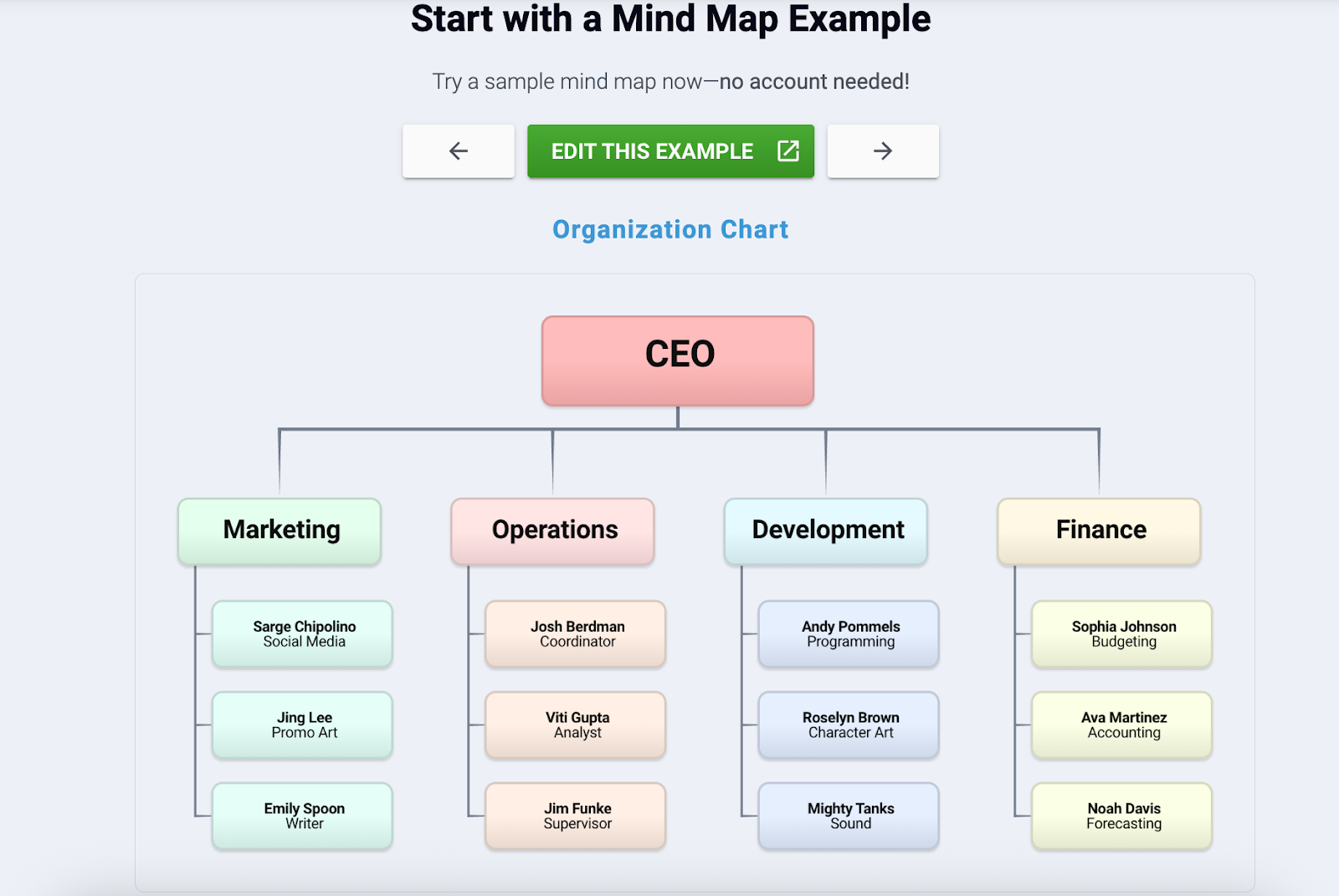
example mind map from Bubbl.us of an org chart
Source: Bubbl.us

The Bubbl.us free plan offers a more stripped-down mind-mapping tool. The free version allows you to create up to three mind maps that you can share for viewing, but they cannot be edited by anyone else.

Premium members get AI-generated ideas and real-time collaboration with up to 50 subscribers, so solopreneurs can easily develop work with remote teams that also have access. The product’s no-frills design keeps things simple, and its price makes it one of the most affordable mind-mapping tools available.

Paid version: Starts at $6 per month per user.

Xmind
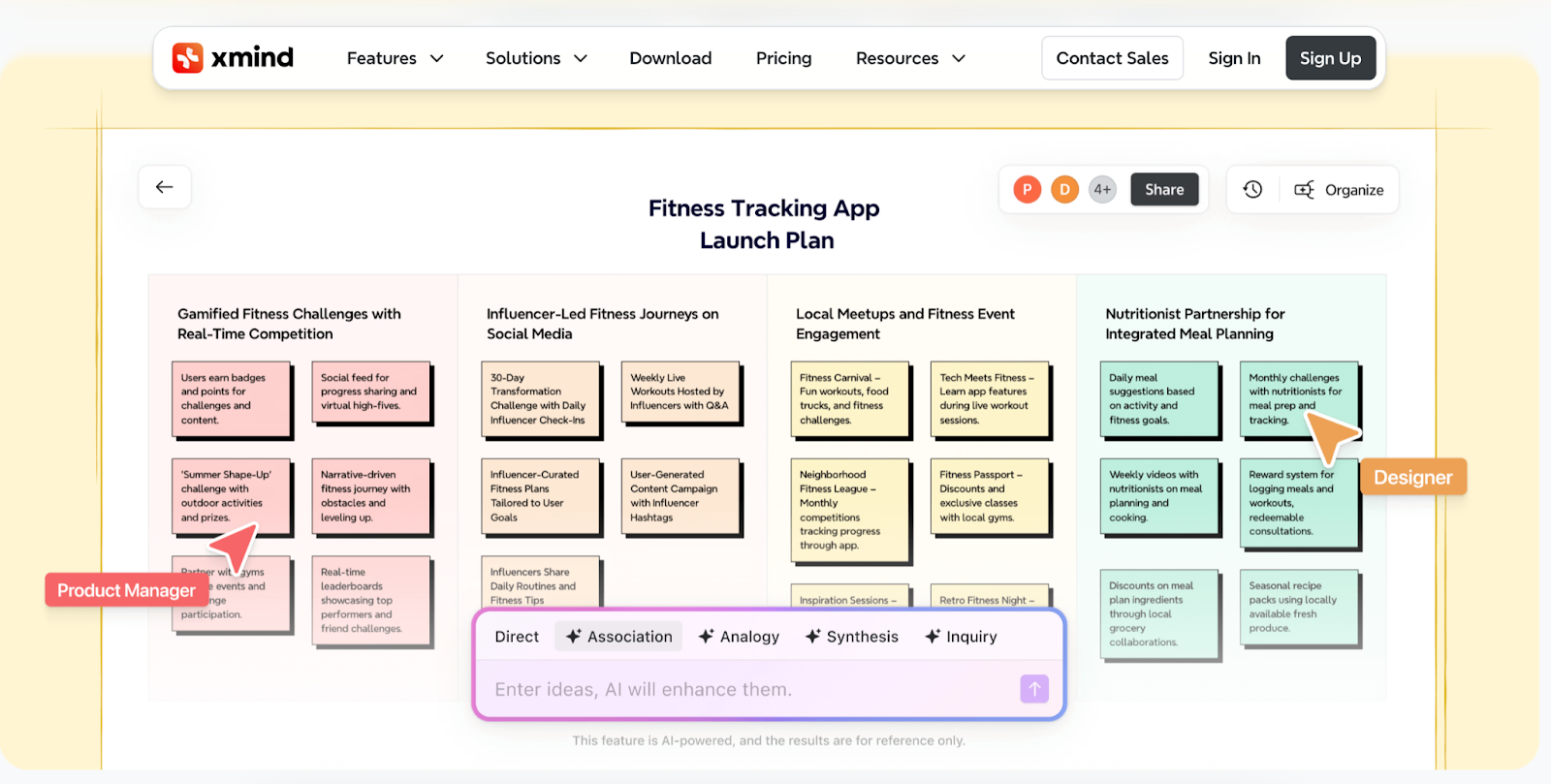
Example of an Xmind mind mapping chart
Source: Xmind

As a mind mapping tool, Xmind provides comparable functionality to its competitors, but its standout feature, Zen Mode, uniquely promotes focus and time management. Zen Mode is a proprietary view that takes up your whole screen with just the brainstorming board and a timer to help you stay on track—leaving every potentially distracting button, icon, or app out of sight.

Integrations include Slack, Zoom, Notion, Google Drive, Dropbox, and OneDrive. The free version offers unlimited brainstorming boards but limited AI and a three-day version history, while the paid versions include more AI functionality, a 30-day version history, and unlimited storage space.

Paid version: Starts at $10 per month per user.

Whiteboarding tools for brainstorming

If you want the flexibility to explore different brainstorming techniques within a single tool, consider these tools that offer whiteboarding options within their free plans:

Canva
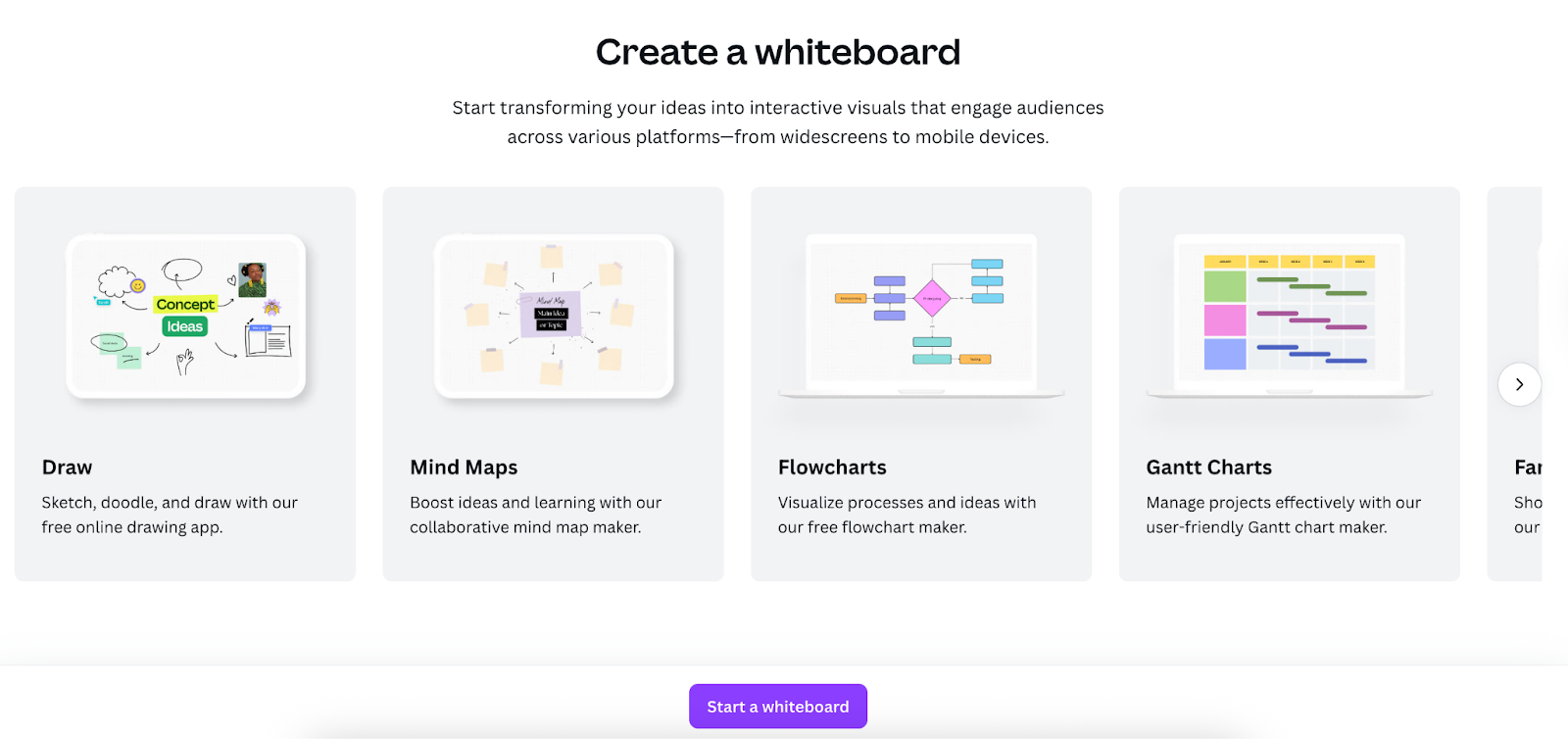
Canva prompt to create a whiteboard
Source: Canva

You might know Canva as a popular graphic design software. But it also has a whiteboard feature that transforms the app into a brainstorming tool. Canva’s whiteboard focuses on real-time collaboration. People can add sticky notes to the board, comment on it, and add emoji reactions to teammates’ sticky notes. You can also lock sticky notes if you want to prevent others from editing them. At the bottom of your whiteboard you’ll find a timer you can use to stay on track during quick brainstorming sessions.

If you want to create mind maps or visual flowcharts, you’ll need to choose from Canva’s graphic design templates, which are separate from its whiteboard feature.

The free version of Canva includes whiteboarding and real-time collaboration, but limits how often you can use its AI features. Canva Pro and Teams subscribers get more credits to use toward Canva’s AI features, access to premium themes, and integrations with tools like Slack, Asana, Google Workspace, Microsoft Teams, and Salesforce.

Paid version: Starts at $15/month per user.

Mural

Mural allows you to invite collaborators without Mural memberships to work on projects alongside you in real time, making online brainstorming as a group more accessible. Its focus is on whiteboarding, but it also provides mapping and diagramming features and a variety of templates for different use cases like marketing strategy, kanban board, stakeholder interviews, and process flowchart.

The free version of Mural allows you to create up to three whiteboards (called murals), which you can share with unlimited viewers. To create unlimited murals—and grant editing rights to unlimited visitors—you’ll need a paid subscription.

Paid users also have access to Mural’s AI features, which you can use to generate a mural based on a prompt, cluster sticky notes by topic or sentiment, or create a content summary from a mural. Within the mind-mapping feature, AI can automatically build out further branches of thought to any brainstorming bubbles—allowing you to go deeper in examining ideas from nuanced angles you may not have otherwise considered.

Paid version: Starts at $12 per month per user.

Miro

Among the mentioned whiteboard tools, Miro offers the most integrations as well as user-built integration capabilities.

Boasting over 160 available apps, Miro is easy to incorporate with everyday platforms you may already use for development and communication. For asynchronous collaboration, Miro’s Talktrack feature enables you to record walkthroughs of your boards so that users can follow your train of thought, letting colleagues more deeply connect in understanding and building upon your ideas.

Additionally, Miro features an expansive library of community-inspired brainstorming templates, called the Miroverse. Its AI integration uses a credit system in which certain AI functions cost users set amounts of credits. The free version gets access to all of the templates and AI functionality, limited to 10 credits, for a maximum of three boards. The Starter plan unlocks 25 AI credits, the Business plan provides 50 AI credits, and both unlock unlimited boards.

Paid version: Starts at $8 per month per user.

Reach customers everywhere they are with Shopify

Shopify comes with powerful tools that help you promote and sell products on Facebook, Instagram, TikTok, Google, and YouTube from one back office. Make sales on multiple channels and manage everything from Shopify.

Explore Shopify’s sales channels

Lucidspark

Another popular whiteboard tool for brainstorming product development is Lucidspark. It enables collaborative brainstorming sessions with AI assistance, as well as a private mode so team members can brainstorm independently in the same session and reveal their ideas without seeing each other’s work.

Its standout feature is the integration with the flowchart tool Lucidchart, which allows you to easily turn whiteboard documents into action plans. You can create up to three boards on the Free plan, while the Individual plan gets you unlimited boards and one gigabyte of storage. The paid plan adds features like allowing guest collaborators.

Paid pricing: Starts at $10 per month per user.

Brainstorming tools FAQ

What is the best tool for brainstorming?

The best tool for brainstorming is the one that meets your team’s specific needs, including customization, integrations, and collaboration features. Some of the most popular tools for brainstorming are: Ayoa, Bubbl.us, Xmind, Canva, Mural, Miro, and Lucidspark, which all include free versions.

What is the best free online brainstorming tool?

To find the best free online brainstorming tool, have a specific goal in mind when you compare the features and limitations of free versions to identify the tool that is most suited to achieve your team’s goals. Popular brainstorming tools that offer free plans include Ayoa, Bubbl.us, Xmind, Canva, Mural, Miro, and Lucidspark.

What are common types of brainstorming?

Common types of brainstorming include mind-mapping, reverse brainstorming, SWOT analysis, brainwriting, rapid ideation, and starbursting.

How To Increase Prices: Strategies and Best Practices (2025)

Software Stack Editor · October 17, 2025 ·

image

Deciding to raise prices is a nerve-wracking decision for business owners. You’ve worked hard to build a customer base, and the last thing you want to do is to upset or even lose customers by charging more for your offerings. But in this economic climate—where rising costs and inflation increase expenses ranging from supplies to shipping and salaries—a strategic price increase can be important for your business’s survival and sustainable growth.

Understandably, many companies hesitate to raise prices for goods and services. But when handled correctly, a price change can strengthen your business, improve your cash flow, and even reinforce your product or service’s value. Keep reading for tips on how to increase prices and communicate your new rates to customers both thoughtfully and effectively.

Why do businesses decide to raise prices?

A price increase is rarely a random decision. For most small businesses, revisiting their decision to raise prices can stem from one (or several) of the following factors:

Your costs have increased

During the past few years, many businesses have encountered significant cost increases, whether for raw materials, higher subscription prices for software used to provide professional services, or more expensive gas for a delivery van. These higher costs directly affect profit margins. If you don’t adjust your prices to absorb these expenses, you will eventually have lower profits or start to lose money. A careful review of your business expenses will show if your gross margin is shrinking, signaling an urgent need for a price increase.

You offer increased value

Has your service quality improved? Have employee skill levels advanced through training? Perhaps you’ve added more services or products. Think of a software offering with a new suite of powerful analytics tools, for example, or a house cleaning service that switched to premium, eco-friendly products. When you deliver more value, your price should reflect that. Clients are generally willing to pay more when they feel like they are getting more for their money.

Your market has shifted

Your business doesn’t exist in a vacuum. It’s crucial to conduct regular market research to see what other businesses charge for similar goods and services. If your competitors are raising prices and you aren’t, you might be undervaluing your offerings. A significantly lower price could also imply lower quality to new customers who aren’t familiar with your brand. Adjusting your price to match the market average can help you stay competitive and properly position your brand.

Your market demand is outpacing supply

If you are turning away clients because you’re fully booked or selling out of your products, it’s often a sign of high demand. This gives you leverage to raise your price. The new price point will filter out clients who are more price-sensitive, which could lighten your workload and let you dedicate more time, energy, and resources to your remaining clients at higher prices.

You want to boost profit margins

Sometimes, the goal is simply to improve the financial health of your business. Growing profit margins are vital for reinvesting in a business, hiring, expanding your service or product offerings, and creating a cash reserve for leaner times. A well-planned price increase can improve your bottom line and revenue, giving you the financial freedom to expand.

Best practices for price increases

  1. Monitor the financial impact
  2. Add more value to justify the cost
  3. Communicate transparently
  4. Segment your audience
  5. Revise your offerings to add value
  6. Train sales and service teams
  7. Implement gradually
  8. Offer a choice or a last chance

Once you’ve decided to increase prices, it’s all about how you execute the change. A poorly handled price change can lead to alienating customers, while a thoughtful plan can reinforce the value of your brand. Here are eight best practices to help you roll out new prices effectively.

1. Monitor the financial impact

Before announcing anything, run the numbers and calculate how the price increase might affect your revenue, gross margin, and profit. Model different scenarios. For example, what happens to your bottom line if you lose 5% of your customers but the remaining 95% pay the higher prices? This analysis can help ensure that your pricing strategy is built on data, not guesswork.

2. Add more value to justify the cost

One of the best ways to soften the impact of a price increase is by enhancing your offerings. Can you ensure more services are included in your package? Can you improve your customer support? You can also frame it as an investment in a better experience—for instance, by explaining that the new price allows you to provide faster shipping, use higher-quality ingredients, or offer more responsive customer support. Or, tell your customers that it’s the best way to ensure you keep delivering the products they know and want without having to change the products themselves. Connecting the higher cost to tangible benefits may make it an easier pill for customers to swallow.

3. Communicate transparently

Don’t surprise your customer base. Give customers ample notice—say, 30 to 60 days—before the new rates take effect. Craft a clear, honest message that explains why the price is changing. Here, you can point to rising costs or investments in service quality. Thank your loyal customers for their business, and acknowledge the challenges this may bring for them. Honesty is a great way to build trust and show respect.

4. Segment your audience

A one-size-fits-all price doesn’t necessarily work, because customers have different needs, budgets, and relationships with your brand. By segmenting your audience, you can tailor the price change in a way that feels fair and strategic, minimizing churn while maximizing revenue.

Consider grouping customers by more than their price sensitivity. Here are a few commons ways to segment, along with different price increase approaches for each:

  • Longstanding customers. These clients value their relationship with your brand, and it’s wise to acknowledge that relationship during a price change. If you run a subscription or contract-based business, letting customers lock in their current price for an additional six to 12 months rewards their commitment. If you sell individual products or ad-hoc services, offer a different kind of loyalty reward, such as a one-time discount code, a store credit or gift card, or a complimentary bonus product or service.
  • High-volume clients. For customers who purchase frequently or in large quantities, a price hike can feel punishing. Instead, you could introduce volume-based discounts or tiered pricing. This softens the impact by rewarding customers for larger purchases.
  • Budget-conscious or basic users. A price increase on your main offering is the perfect opportunity to introduce a new, lower-cost tier with fewer features. This can help you retain price-sensitive customers who might otherwise leave, while simultaneously increasing the value and price of your standard and premium packages.

Market your business with Shopify’s marketing automation tools

Shopify has everything you need to capture more leads, send email campaigns, automate key marketing moments, segment your customers, and analyze your results. Plus, it’s all free for your first 10,000 emails sent per month.

Discover Shopify’s marketing automation tools

5. Revise your offerings to add value

Instead of applying a uniform price hike to your existing products, use this as an opportunity to rethink how you sell. By restructuring your offerings, you can provide more options that justify the new cost and give customers greater control. The best approach depends on your business model.

  • Service or subscription-based businesses. A classic strategy is to introduce pricing tiers. This allows you to create a basic package at a similar, accessible price point while creating new deluxe or premium tiers with more features, faster service, or a higher level of support, for example.
  • Product-based businesses. This can include retail, beauty, and ecommerce businesses. While formal tiers may not fit as readily in this model, you can achieve the same result with two key strategies: creating product bundles and introducing a premium line, or a new, higher-end version of a popular product.

6. Train sales and service teams

If you have customer-facing employees, they will be on the front lines, answering the toughest questions. To set them up for success and ensure a consistent message, proactive training can help.

Here’s how to make that happen:

  • Create a price increase playbook. Develop a simple one-page document that includes key talking points and an FAQ. The talking points should positively explain the reasons for the increase, while the FAQ should anticipate common objections and provide empathetic, approved responses.
  • Conduct role-playing sessions. Practice is the best way to build confidence. Run training sessions where managers play the part of different customer personas—from angry and confrontational to unhappy and disappointed. Your team can practice their responses in a low-stakes environment, so they aren’t caught off guard during a real interaction.
  • Empower them with preapproved solutions. Define what your team can offer when a valuable, long-term customer is upset. Can they offer a one-time 10% discount to ease the transition? A small service credit for their next purchase? Giving your team a limited set of tools empowers them to solve problems, turning a potentially negative experience into an opportunity to reinforce a customer’s loyalty.
  • Implement a shadowing system. For the first few weeks after the announcement, pair less experienced employees with managers or senior staff. This gives them the opportunity to see firsthand how seasoned team members handle difficult conversations and provides them with immediate backup if a situation escalates.

7. Implement gradually

If a significant hike is necessary, consider rolling it out incrementally. A 5% price increase this year and another 5% increase next year, for example, may be more palatable than a single 10% jump. This strategy is particularly effective for any business with a subscription, retainer, or contract-based model, giving clients valuable budget certainty.

8. Offer a choice or a last chance

Give existing customers some options by letting them renew their subscription at existing rates or buy multiple products at the current price point before the change takes effect. This could even create a sense of urgency, boosting short-term sales and making people feel they got a good deal (which is great for keeping customers happy). You could also provide a small discount to incentivize a larger commitment at the new rate—whether it’s by prepaying for a full year of service or by purchasing products in bulk.

How to increase prices FAQ

How do you politely raise your prices?

Start by thanking clients for their loyalty and be direct in your announcement—don’t hide it in the fine print. Explain the reasons in simple terms, focus on factors like higher costs or product or service improvements. Frame it as a way you can continue providing the high level of service customers expect. Always give customers plenty of advance notice and provide a channel for questions.

What are the 4 price influences?

The four price influences are cost, competition, customer value perception, and company goals. Cost includes all expenses required to provide your product or service. Competition sets the market context, because you need to know what other businesses charge for similar offerings so that you can ensure your price is competitive. Customer value perception is the amount a customer is willing to pay based on perceived quality, value, and benefits. Ultimately, your business goals shape your pricing strategy.

What are the 4 pricing strategies?

The four pricing strategies are cost-plus pricing, competitive pricing, value-based pricing, and penetration pricing. Cost-plus pricing is the simplest method; it makes sure you cover costs to make a profit, but ignores customer demand and competitor pricing. With competitive pricing, you set your price in relation to competitors’ prices. Value-based pricing is a customer-focused strategy that establishes the price based on a product or service’s perceived value, not on its cost. Penetration pricing uses an artificially lower price to quickly attract new customers when launching a product or expanding into a new market.

How To Craft Your Corporate Identity: 2025 Guide

Software Stack Editor · October 17, 2025 ·

Think of Apple’s sleek logo and minimalist stores, Starbucks’ cozy cafés with green coffee cups, and Patagonia’s blend of outdoor gear and environmental values. These aren’t just surface details—they’re examples of corporate identity that shape customer perception and set expectations before a product is ever purchased

Whether you own a one- or 1,000-person venture, learning about corporate identity and applying its principles can strengthen your company’s reputation and support long-term business success. Read on for a breakdown of the key components of corporate identity design and how to implement them.

What is corporate identity?

Corporate identity encompasses the many ways an organization presents itself to the public, including its actions, brand design, corporate communications, and corporate culture. Collectively, these elements provide a clear picture of what a brand stands for beyond its products and services, shaping its broader organizational identity.

For example, a company with a fun, colorful logo and playful typography, where employees greet customers cheerfully and casually, projects a different corporate image from one that uses a more formal tone, elegant product photos, and leadership appearances at celebrity events.

A strong corporate identity uses a consistent visual style and cohesive communication to:

  • Bolster brand awareness. Clear brand values and a compelling value proposition make it easier for customers to remember a company, increasing both brand recognition and brand awareness.
  • Set a company apart. Distinct design and messaging help differentiate a business in the market, ensuring its corporate visual identity doesn’t blend in with competitors.
  • Enhance reputation. A unified identity signals dependability and professionalism, strengthening trust with internal and external audiences alike.
  • Build customer loyalty. Expressing the mission and the company’s core values across all consumer touchpoints enables customers to connect with the brand long term, creating brand loyalty.

Corporate identity vs. brand identity

Corporate identity refers to the aesthetics, actions, and behaviors of a company as they relate to both internal and external stakeholders, including employees, investors, and the public. By comparison, brand identity is a subset of corporate identity. It refers specifically to customers’ perception of the company, focusing more narrowly on elements such as visuals and messaging.

These distinctions are more prominent in big corporations. For example, Procter & Gamble (P&G) has one corporate identity, but each of its brands, like Tide detergent or Pampers diapers, has its own brand identity.

Key components of corporate identity

The primary components of corporate identity generally fall into three broad categories: corporate design, communication, and culture. Corporate design elements include logo, colors, typography, and imagery, while communication covers taglines, brand voice, and tone. Corporate culture reflects employee behavior and the company’s core values, which may also include a commitment to corporate social responsibility.

Logo

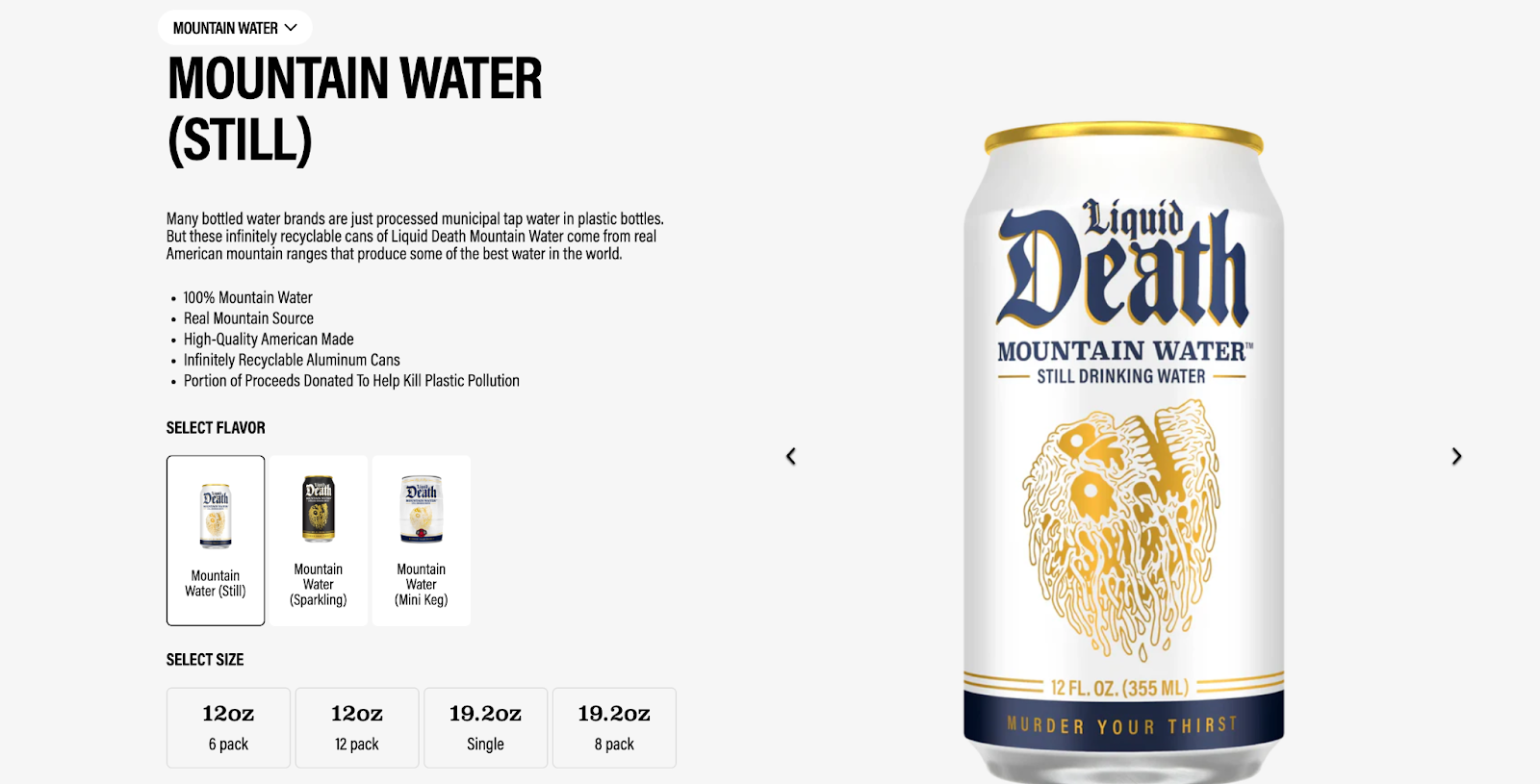
Your company’s logo is often the first visual element associated with its corporate identity. In a crowded market, a well-designed logo sets your company apart. In the canned beverage space, for example, Liquid Death stands out with its skull-shaped logo, which is in keeping with its heavy metal-inspired corporate identity.

Product page for Liquid Death’s Mountain Water with the skull logo on the can
Source: Liquid Death

Create professional logos in seconds

Shopify’s logo maker is built for entrepreneurs on the go. No design experience is required to create your own high-resolution logo from scratch.

Use logo maker

Colors

The colors you use tell a story and set the tone for a strong brand identity. Some industries tend to stay within certain color palettes. For example, banks and tech companies often use blue because people associate it with trust and professionalism. Beauty brands once favored black-and-white color schemes for their elegance, but in the past decade have shifted toward brighter colors. For instance, when cosmetics company Glossier launched in 2014, it made its signature pink central to its identity, calling it a “neutral” shade and using it on its packaging, website, and even corporate office furniture.

Glossier’s product page features lipsticks in signature pink tubes
Source: Glossier

Typography

Typography shapes how written language is visually experienced. There are four types of fonts commonly used in branding: serif, sans serif, script, and display.

  • Serif. Strokes attached to the ends of each character, conveying heritage and quality.
  • Sans serif. Lack of ornamentation, portraying functionality and modernism (popular in tech and commerce).
  • Script. Mimics human handwriting, emphasizing the “craft” component of a company (not recommended for long blocks of text).
  • Display. Often uses bold and exaggerated features, making them highly visible and ideal for short-form or large-scale use.

Most companies combine fonts across logos, packaging, and website content. The fonts you select are part of your brand’s visual identity, communicating what you stand for, beyond the actual words themselves.

Imagery

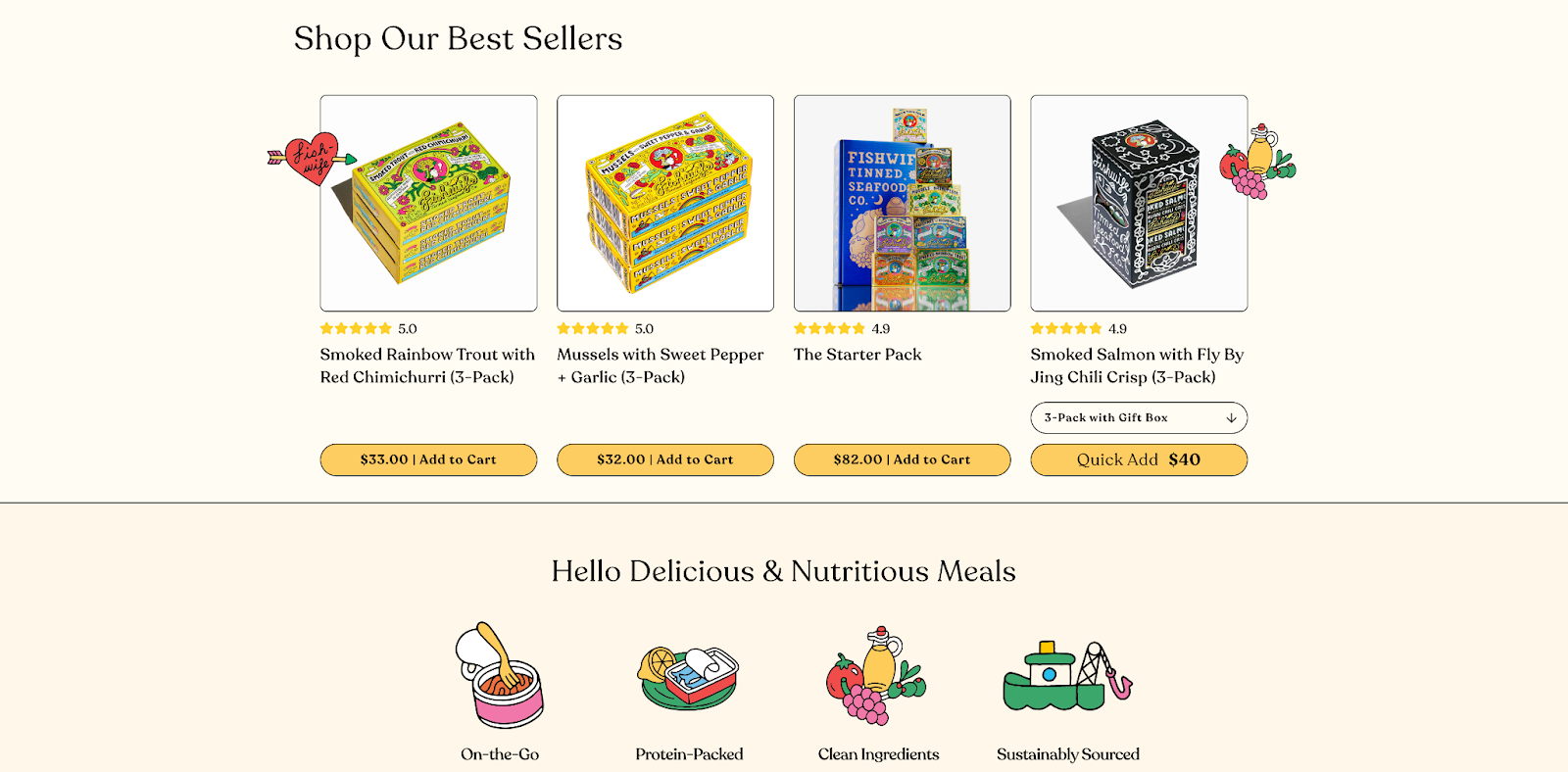
Whether you’re relying on hand-drawn illustrations, original photography, or flat vector art, original (i.e., non-stock) imagery helps your company stay memorable. For example, tinned fish brand Fishwife uses signature illustrations across its packaging and website, tying in with the logo and typography to reinforce a playful, craft identity. Company imagery can also extend into merch.

Fishwife’s homepage showcases its distinct imagery and packaging
Source: Fishwife

Taglines

Taglines help you deliver the core message of your company, creating emotional connections and brand recall. They are a powerful tool in brand management as short, repeatable phrases become shorthand for a larger promise. For example, Nike’s “Just do it” and Nintendo’s “Creating smiles for generations” are memorable while also selling each company’s products or services. Glossier’s tagline, “You look good,” conveys the brand’s ethos of minimalist makeup routines while delivering a positive message, while jewelry brand Mejuri’s tagline, “Fine jewelry for every day,” positions the brand as both empowering and refined.

Brand voice and tone

Brand voice embodies and defines the personality of your company, while tone reflects the mood of the message or communication. Your brand’s voice should remain consistent across projects and mediums, while brand tone can adapt to fit the medium, platform, or channel. This is central to effective corporate communications.

Take non-alcoholic beverage company Ghia. On Instagram, the brand posts polished, edited images of its products in various contexts. On TikTok, it experiments with formats more freely. Meanwhile, Ghia’s founder, Melanie Masarin, creates longer-form fashion, travel, and lifestyle content on Substack. However, the brand always maintains a consistent voice, promoting refinement, leisure, and a nod to the Mediterranean.

Company values and employee behavior

How your employees communicate with customers and each other reflects your company culture internally and externally. External-facing teams such as customer service or retail staff may particularly benefit from training around tone, language, and communication style.

The traits you prioritize—whether loyalty, self-development, sportsmanship, or initiative—strengthen both brand and corporate identity. For your company values to truly be part of your corporate identity, implement clear directives around expectations and achievable goals. If community is a core company value, for example, it should appear not only as a buzzword on your website, but in sponsored causes, company events, employee resource groups (ERGs), benefits, and supplier and partner relationships.

How to craft a corporate identity

Creating a corporate identity requires collaboration between corporate stakeholders, creatives, designers, and human resources professionals. Establish or enhance your corporate identity with these steps.

  • Check alignment with your vision. To begin, align your corporate identity with your mission and vision. For example, if you focus on high-quality clothing that supports local farmers, build a corporate identity around traits such as sustainable growth and quality.
  • Conduct market research. Next, conduct market and business research to understand the changing needs of your target audience. If your corporate identity no longer aligns with their needs and preferences, you can tweak your corporate identity or pivot to a different target audience.
  • Examine components of your corporate identity. Once you’ve figured out alignment, examine the elements of your corporate identity, including logos, taglines, and typography. Do they reflect your brand’s personality? Are your company values reflecting customer expectations? Determine what changes you need to make to ensure an up-to-date and consistent corporate identity.
  • Create visual elements. Visual elements are the most direct and immediate representations of your corporate identity. Update your assets, including social media and marketing collateral, product photos, and illustrations and graphics, so they use the colors, typography, and style you’ve outlined.
  • Use a consistent brand voice. Whatever your brand voice—straightforward, playful, or refined— make sure it’s consistent across your website, social media platforms, and customer interactions. Adapt tone to the platform, but keep your messaging consistent across channels.
  • Distribute brand guidelines. Your employees need clear guidelines to understand, apply, and convey your brand identity. In addition to the visual elements and guidelines, document your company’s mission, voice, and tone. Once stakeholders have approved your newly created or updated assets, templates, and visual style guides, share these resources with the rest of your team and conduct training to ensure everyone understands how to use them. This ensures your corporate design, corporate branding, and corporate communications work together to support long-term success.

Corporate identity FAQ

What are the elements of a strong corporate identity?

The main elements of a strong corporate identity include a logo or wordmark, voice and tone, corporate culture, corporate values, and corporate guidelines covering color palette, fonts, and other style elements.

How important is corporate identity?

Corporate identity helps distill what your company is about, outside of the products and services you provide. It strengthens your corporate image, shapes customer perception, fosters loyalty, and supports internal alignment—all vital to business success and maintaining a strong corporate reputation.

What’s the difference between corporate identity and brand identity?

An organization’s corporate identity and brand identity share major elements, but corporate identity pertains to both employees and customers, while brand identity is strictly consumer-facing. Additionally, one corporate identity can have several brand identities.

How do you build a corporate identity?

To build a strong corporate identity, first align it with your company’s mission and vision. Next, use market research to identify ways to distinguish yourself from competitors and to understand your target customers and their needs. Build out key components of your corporate identity, including your logo, typography, taglines, and brand voice, and ensure that internal culture, values, and behavior echo your vision. Create consistent visual assets and define a steady brand voice across all internal and external communications. Finally, document these guidelines for your entire organization, encouraging all employees to learn, use, and enforce them.

How To Design a Connected Customer Experience (2025)

Software Stack Editor · October 17, 2025 ·

image

As a customer, you want your brand experiences to feel cohesive and uniform, whether you’re visiting a store, making a purchase online, or browsing a company’s website or Instagram page. As a business owner, creating a connected customer experience can help you deliver that same seamless interaction for your own customers.

Research suggests that 83% of customers are more loyal to brands that provide consistent customer experiences across departments, customer service channels, and platforms, and 78% of customers say they have used multiple channels to make a purchase. These numbers reveal clear purpose and opportunity to develop a connected customer experience strategy that builds meaningful interactions and customer loyalty.

What is connected customer experience?

Customer experience is the sum of all interactions a customer has with your brand, from the moment of discovery to after-sales customer support. A connected customer experience means creating a connected experience between in-store and online shopping, as well as interactions with your company’s teams, services, branding, and marketing.

Understanding the customer journey is essential to building an effective and resonant experience for shoppers. Your customer experience improvements should be informed by every step a shopper takes when they engage with your business. The journey begins the first time they see your brand on their social media and continues through their initial purchase, potential engagement with your customer service representatives, and staying in touch after a sale.

7 key components of connected customer experience

  1. Customer journey mapping
  2. Integrated communications channels
  3. Personalized customer interactions
  4. Consistent branding
  5. Standardized customer service
  6. Customer data integration
  7. Inventory management

There are several key components needed to building connected customer experiences, including:

1. Customer journey mapping

A customer journey map is the blueprint for every potential interaction a customer will have with your business, including when a customer develops awareness of your brand, considers your product, purchases a product, engages with customer service, and, ideally, establishes brand loyalty. It connects real customer data to buyer personas that help you understand who your customers are and what they want.

Customer journey maps can also help you identify customer pain points. For online businesses, you can’t see your customers in action. “You can’t see what somebody looks like behind the screen,” direct-to-consumer (DTC) marketing expert Nik Sharma says on an episode of the Shopify Masters podcast. “But you can understand the type of person you’re going after and then build a pathway for them.”

2. Integrated communication channels

A connected customer experience requires integrated communication channels with cohesive messaging. Customers expect the same seamless, consistent experience, whether they’re reaching out via live chat customer service or a direct message on social media. Customer service channels should work in concert across all elements of the business, including customer data integration and inventory management, to ensure the most accurate, up-to-date information is being shared.

Reach customers everywhere they are with Shopify

Shopify comes with powerful tools that help you promote and sell products on Facebook, Instagram, TikTok, Google, and YouTube from one back office. Make sales on multiple channels and manage everything from Shopify.

Explore Shopify’s sales channels

3. Personalized customer interactions

Personalizing your interactions with customers across every touchpoint can help them feel like you’re their friend. For example, ensure all emails include a personalized greeting and your website showcases product recommendations based on their past purchases.

Intimate apparel company ThirdLove, for example, uses information provided by customers through a bra-fitting assessment on its website to suggest products and offer discounts in personalized marketing emails.

Get better ad performance with Shopify Audiences

Shopify Audiences helps you find relevant buyers and lower advertising costs with custom audience lists—powered by Shopify’s unique insights from commerce data.

Discover Shopify Audiences

4. Consistent branding

Guru, one of North America’s bestselling energy drinks, leaned into consistent branding as a core strategy. Carl Goyette, Guru’s president and CEO, and Shingly Lee, vice president of marketing, tell the Shopify Masters podcast that consistent Guru branding—including everything from its logo to marketing and messaging—was central to cultivating a clear voice and brand identity in a saturated market.

“In the world of marketing, focus makes you bigger, not smaller,” Shingly says. “Brands that try to be everything to everyone often end up being nothing to no one.”

5. Standardized customer service

Today’s shoppers can access customer service through contact forms on a company website, email, chat, call centers, or direct messages on social media platforms. Standardized interactions and communications across these channels create a familiar and seamless experience for customers.

This means ensuring all customer service employees follow the same script or language guidelines, not to mention policies. For Nick Pandolfi, co-founder of the ceramic company Jono Pandolfi Designs, this involved setting up the right infrastructure to support standardized practices.

“We had to get really clear on our policies and … set up a customer service ticketing system that allowed us to manage all of that,” Nick says on an episode of the Shopify Masters podcast.

6. Customer data integration

Personalized interactions and streamlined customer service may require collecting centralized customer data,  also known as customer data integration (CDI), and keeping it up to date in real time. CDI gathers disparate bits of customer information across platforms and purchases to create a profile that can help guide customer service agents.

CDI empowers customer service agents to quickly access information about the shopper, such as what they buy and their shipping address, without the customer needing to repeat it. It also allows agents to access and share information across customer communication channels.

For example, if a customer calls an agent to inquire about the status of a missing package, even if it was initially handled by another rep, all the background information is tracked in real-time and easily accessible in a centralized location to allow the rep to efficiently assist the shopper.

Put your customer data to work with Shopify’s customer segmentation

Shopify’s built-in segmentation tools help you discover insights about your customers, build segments as targeted as your marketing plans with filters based on your customers’ demographic and behavioral data, and drive sales with timely and personalized emails.

Discover Shopify segmentation

7. Inventory management

Communicating the status of deliveries across the entire shipment cycle—through emails, texts, or app push notifications—helps keep customers informed and connected. Sustainable fashion brand ANIÁN, for example, uses Shopify to track 10,000 SKUs across its supply chain for accurate, up-to-date monitoring of its products, so its customers can know where their packages are.

Unify your inventory management with Shopify

Only Shopify helps you manage warehouse, pop-up shop, and retail store inventory from the same back office. Shopify automatically syncs stock quantities as you receive, sell, return, or exchange products online or in-person—no manual reconciling necessary.

Explore inventory management on Shopify

“Our supply chain is quite complex, but once everything hits our warehouse, it is logged by Shopify,” ANIÁN president Paul Long says. “Having all of the product details in the platform and up to date is super helpful, because when you ship a product across the border, you sometimes need to pull up all of that information. They need to trace that good all the way back to exactly where we made it. Shopify allows us to do all of that.”

Connected customer experience FAQ

What are the 5 stages of a customer journey?

The five stages of a customer journey are awareness, consideration, acquisition, service, and loyalty.

What is an example of personalized customer experience?

A local barista at a coffee chain knows a regular customer’s order and greets them by name upon arrival. This welcoming process can also be replicated on the company’s digital app. An occasional morning push notification that reminds them of how they like to start their day creates an equally personalized and effective customer experience.

What does “connected experience” mean?

Connected experience means your customers have a consistent experience interacting with your brand across all touchpoints, including employees and service agents, both in person and online. It prevents shoppers from having disjointed experiences across the customer journey, making them more likely to become loyal customers.

How do you keep branding consistent?

Start by ensuring your brand logo is always the same and shown consistently across product packaging, marketing assets, social media platforms, and your website. Consistent branding also means your branded communications remain cohesive across all platforms and touchpoints.

SIOP Meaning: How Sales, Inventory, and Operations Plans Work (2025)

Software Stack Editor · October 17, 2025 ·

image

Think of a business supply chain like a symphony. When every instrument plays in time, the result is smooth and harmonious. But when sales, inventory, and operations fall out of sync, you get a cacophony of unpleasant noise: under- or overstocking, wasted resources, and frustrated customers. That’s where understanding SIOP meaning becomes crucial—this structured process keeps everything in harmony.

Sales, inventory, and operations planning (SIOP) aligns sales forecasts with inventory levels and operational capacity, giving you the context you need to anticipate demand and maintain balance. Done well, SIOP helps ensure you’ve got enough stock to meet orders without tying up cash in excess product. It also ensures warehousing, transport, and distribution run efficiently. Companies with effective SIOP processes reduce inventory costs by 15% to 20%, while improving customer satisfaction by 25%.

Let’s break down how SIOP works, why it matters for your business, and how you can implement the process successfully.

What does SIOP mean?

Sales, inventory, and operations planning (SIOP) is a structured business process that aligns three critical elements of the supply chain: sales forecasts, available inventory, and operational capacity. Instead of treating these as separate silos, SIOP brings them together so businesses can balance supply with demand in real time. Effective SIOP planning allows you to predict customer needs more accurately, keep the right amount of stock on hand, and ensure operations—from production to distribution—can deliver without waste or delay.

“We’re always asking, ‘How many do we need? And when are we going to need more? And let’s not have too many,’” says John Thorp, co-founder and co-CEO of Aerflo. Based in Brooklyn, Aerflo makes a portable water bottle with a special carbonation capsule cap, so the user can make and drink fresh, fizzy water on the go. SIOP helps keep everything in line for Aerflo. The business manufactures bottles and carbonation device caps in Malaysia, and it fills and refills carbonation capsules in New Jersey. Its New Jersey warehouse is also where the Aerflo team picks and packs boxes and mails products directly to customers.

SIOP helps keep everything in line for Aerflo by coordinating production schedules overseas with capsule refills in the US, while also ensuring its New Jersey warehouse stays stocked to fulfill direct-to-consumer orders on time. By aligning sales forecasts with inventory levels and operational capacity, the company avoids overstocking bulky items in limited warehouse space.

Benefits of SIOP

Business owners who prioritize SIOP have a high chance of seeing important metrics trend upward for their companies. Here are a few that can yield a particularly high benefit from implementing this process:

Sales prediction accuracy

SIOP data gives business owners an understanding of purchasing history and the ability to better forecast how much they’ll sell in the future. By analyzing past sales trends alongside current market conditions, businesses can anticipate demand spikes or seasonal dips with greater precision. This helps prevent costly stockouts during high-demand periods and reduces the risk of tying up capital in unsold inventory. Accurate forecasting also shortens lead times and improves budget planning, giving companies more confidence in scaling operations and meeting customer expectations.

Supplier and inventory management

SIOP turns supplier coordination and inventory control into a competitive advantage. By syncing forecasts with vendor lead times and stock levels, businesses can sidestep last-minute shortages and avoid sinking cash into overstock. It sharpens negotiations with suppliers, ensures purchase orders go out on time, and keeps high-priority products flowing when customers need them most. That leads to a supply chain that runs on strategy—not guesswork.

Unify your inventory management with Shopify

Only Shopify helps you manage warehouse, pop-up shop, and retail store inventory from the same back office. Shopify automatically syncs stock quantities as you receive, sell, return, or exchange products online or in-person—no manual reconciling necessary.

Explore inventory management on Shopify

Operational effectiveness

By aligning sales forecasts, production schedules, and inventory targets, every department plays in sync—no wasted motions and no missed beats. This coordination reduces bottlenecks, trims excess costs, and ensures operations move at the same rhythm as customer demand. When everyone follows the same process, your business delivers on time, with less waste and more consistency.

SIOP vs. IBP and S&OP

Although you might hear the terms SIOP, IBP, and S&OP used interchangeably, each process has its unique differences, albeit quite subtle. SIOP involves syncing sales forecasts, available inventory, and operational capacity.

Integrated business planning (IBP) expands the SIOP framework to include financial planning, strategic objectives, and the broader business context. If SIOP is tactical and operational, IBP is holistic and strategic—helping leadership teams align day-to-day supply chain decisions with the bigger picture of business growth and profitability.

Sales and operations planning (S&OP) is a two-way conversation between sales and operations: How much are we going to sell, and can we produce and deliver that amount? It gives businesses a way to reduce mismatches between demand and supply, but since it’s narrower than SIOP, it may leave blind spots around stock management.

Steps in the SIOP process

  1. Gather data
  2. Forecast demand
  3. Plan for adequate supply
  4. Meet with key stakeholders
  5. Implement your SIOP process

Every business will orchestrate its SIOP process a little differently. Some will figure it all out with a few key players internally, while others will conduct an official analysis with an outside consultant. While each company has its own goals and objectives, here are the typical steps to set up an SIOP process for your business:

1. Gather data

Gather data and performance metrics on sales, inventory levels, and operations like delivery and warehousing. Doing so establishes which supply chain planning processes are working well or need improvement. Some might even be due for a total overhaul.

Some businesses use data from massive supply chain management or enterprise resource planning systems, while smaller companies might use Google Sheets or Excel to track inventory and sales, among other performance measurements. If you can afford a software solution, it can simplify and streamline this process while also ensuring greater accuracy than relying on manual entry methods.

Drive your business forward with Shopify’s analytics

Shopify’s user-friendly reports and analytics capabilities help you make better decisions, faster. Choose from pre-built dashboards and reports, or build your own to spot trends, capitalize on opportunities, and supercharge your decision-making.

Explore Shopify’s analytics

2. Forecast demand

Businesses typically predict future demand based on purchases made over the past three years. Instead of just averaging sales figures, you might break the data down by seasonality or financial quarters, product categories, and even customer segments to see what influences demand. From there, you can use statistical models or demand-planning software to begin the planning process for the following year.

For a relatively new company like Aerflo, this process requires some trial and error. “For a company at our stage with a year-ish of information under our belt, forecasting is really hard,” John says. “The only thing that’s certain about a forecast is that it’s going to be wrong.” John notes that making projections with limited data requires a fair amount of manual intervention, adjusting order quantities on the fly. With time, as the company accrues data, its projections become more accurate.

To make forecasts more reliable, businesses often layer in outside factors, such as broader economic conditions, marketing campaigns, or planned product launches, which past data alone can’t capture. For example, if you sold 5,000 units of a product last December but know you’re doubling ad spend this year, your forecast should reflect that lift. The goal isn’t just to repeat what’s happened before but to anticipate what’s likely to happen under current and future conditions.

Unify your inventory management with Shopify

Only Shopify helps you manage warehouse, pop-up shop, and retail store inventory from the same back office. Shopify automatically syncs stock quantities as you receive, sell, return, or exchange products online or in-person—no manual reconciling necessary.

Explore inventory management on Shopify

3. Plan for adequate supply

Ideally, supply always meets demand, but there are unpredictable factors and challenges when gauging manufacturing needs. The same goes for changes in turnaround times, order minimums, international regulations, and tariffs.

Aerflo prioritizes the essentials: “Rule number one for this company is never run out of capsules,” John says, since existing customers who bought their product can’t make their carbonated water if capsules sell out. “We try to be really strict about that.”

On the Malaysian supply chain side, Aerflo must order bottles by the tens of thousands. On top of that, its carbonation device caps require around 60 separate parts. If one of those suppliers fails to deliver, it impacts the entire Aerflo supply chain. That’s why crafting operational plans far in advance is essential: You need to ensure your supply can withstand hiccups.

To offset the possibility of stockouts, Aerflo keeps safety stock on hand. “For example,” John says, “we try to ship as much as possible by ocean, obviously. We often reserve a few thousand of whatever that thing is to make sure that we don’t have a hundred percent of our next round of inventory on a boat, inaccessible—in case sales pick up.” If needed, the brand can get additional product shipped out via air freight; it’s more expensive than shipping by sea, but it can help fulfill unexpected demand in a pinch.

4. Meet with key stakeholders

In a larger business, key department heads—from finance to quality control—will need to coordinate on SIOP needs. They might also participate in meetings with an expert consultant on a regular basis to evaluate and improve SIOP processes. For a smaller business, it’s still essential to engage key stakeholders across departments to discuss financial expectations, resources, sales projections, and operational management issues. Doing so monthly or quarterly, at minimum, is a best practice.

5. Implement your SIOP process

After you’ve gathered all this data and made plans, it’s time to implement your new strategy. That means taking corrective action to rectify any outstanding issues with supply or demand, as well as creating concrete strategies to achieve systemic solutions. Implementation also requires assigning ownership for each action item and setting clear timelines so you can track progress. Regular check-ins—monthly or quarterly—help keep everyone aligned, allowing you to adjust quickly if forecasts shift or new challenges arise.

SIOP meaning FAQ

What does SIOP mean in operations?

SIOP stands for sales, inventory, and operations planning. When a supply chain’s operations—think manufacturing, warehousing, and distribution—are working in sync, they enable an easier balance between sales and inventory.

What is the difference between S&OP and SIOP?

You may hear S&OP and SIOP used interchangeably. While S&OP (sales and operational planning) and SIOP are very similar, S&OP technically leaves out the “inventory” part of the equation. With that said, since both have become synonymous, odds are many will leave in the “inventory” aspect as they implement an S&OP plan—it’ll just be a slightly more inaccurate acronym they use to refer to the process.

What is the purpose of the SIOP meeting?

SIOP meetings enable department leaders to make decisions about sales projections, inventory management, and operations planning processes in a synchronized way. Meetings are essential to bridge any gaps between departments and foster collaborative decision-making.

Review Order Pages: How To Design a Review Order Page (2025)

Software Stack Editor · October 17, 2025 ·

When you buy online, confirming details like order amount, discounts, shipping address, and shipping costs is a must-have when you finalize a purchase. After all, no one wants to be charged for two items when you only wanted one, and no one wants a subscription sent to a misspelled address.

As an ecommerce seller, you can use a review order page to empower customers to double-check their info. It’s an ecommerce website page specially designed to confirm all details related to an online purchase.

Adding a review order page to your website or app is easy, especially if you partner with a comprehensive ecommerce provider. Here are some review order page examples, plus tips for adding an order review page to your own ecommerce site.

What is a review order page?

A review order page is a web page that an ecommerce site displays as part of the online purchase process; it gives the customer an opportunity to verify all transaction details before submitting the final order and payment. It typically asks users to confirm that their order information—name, address, credit card details, items ordered, and total price—is correct.

Once a customer determines that everything is correct, they tap or click a button to complete the transaction. This button may be labeled “Pay Now,” “Place Order,” or “Complete Order.” The ecommerce site then submits a request to charge the customer’s payment method of choice. If the charges are accepted, an order confirmation message appears on the customer’s screen, indicating that the transaction was successful.

Review order benefits to the buyer

An order confirmation page lets customers place orders with confidence. Specific benefits include:

  • Verification. A review order page gives customers a chance to double-check the order’s accuracy (e.g., items or services, quantities, prices, discounts, shipping method, taxes, and total cost) before completing a transaction.
  • Adjustments. An order review page lets users make changes to their order before committing, reducing buyer frustration and accidental purchases.
  • Transparency. Order summary pages build trust between the buyer and the seller by showing full transparency in the transaction.

Review order benefits to the seller

Sellers reap their own rewards from presenting order review pages. These include:

  • Reduced cart abandonment. Order review pages may dissuade customers from prematurely leaving the customer journey due to unexpected fees, shipping charges, or wait times. This could cut down on abandoned carts, a known scourge in ecommerce.
  • Pre-purchase clarity. Summarizing an order before purchase can minimize the likelihood of disputes, refunds, and chargebacks, since it allows the buyer to confirm all the details.
  • Brand reputation. A transparent order review page reinforces professionalism and reliability, helping you court new customers and potentially boost conversion rates.
  • Legal protections. The Federal Trade Commission, an arm of the United States government, requires online sellers to clearly disclose the total cost of a purchase—including product price, shipping, taxes, and fees—before the consumer is charged. A review order page is the standard way ecommerce sites comply with this.

Examples of review order pages

Not sure what a good order page looks like? Here are some examples to inspire you, all of which use variations of the standard Shopify Checkout review order page layout:

Pela

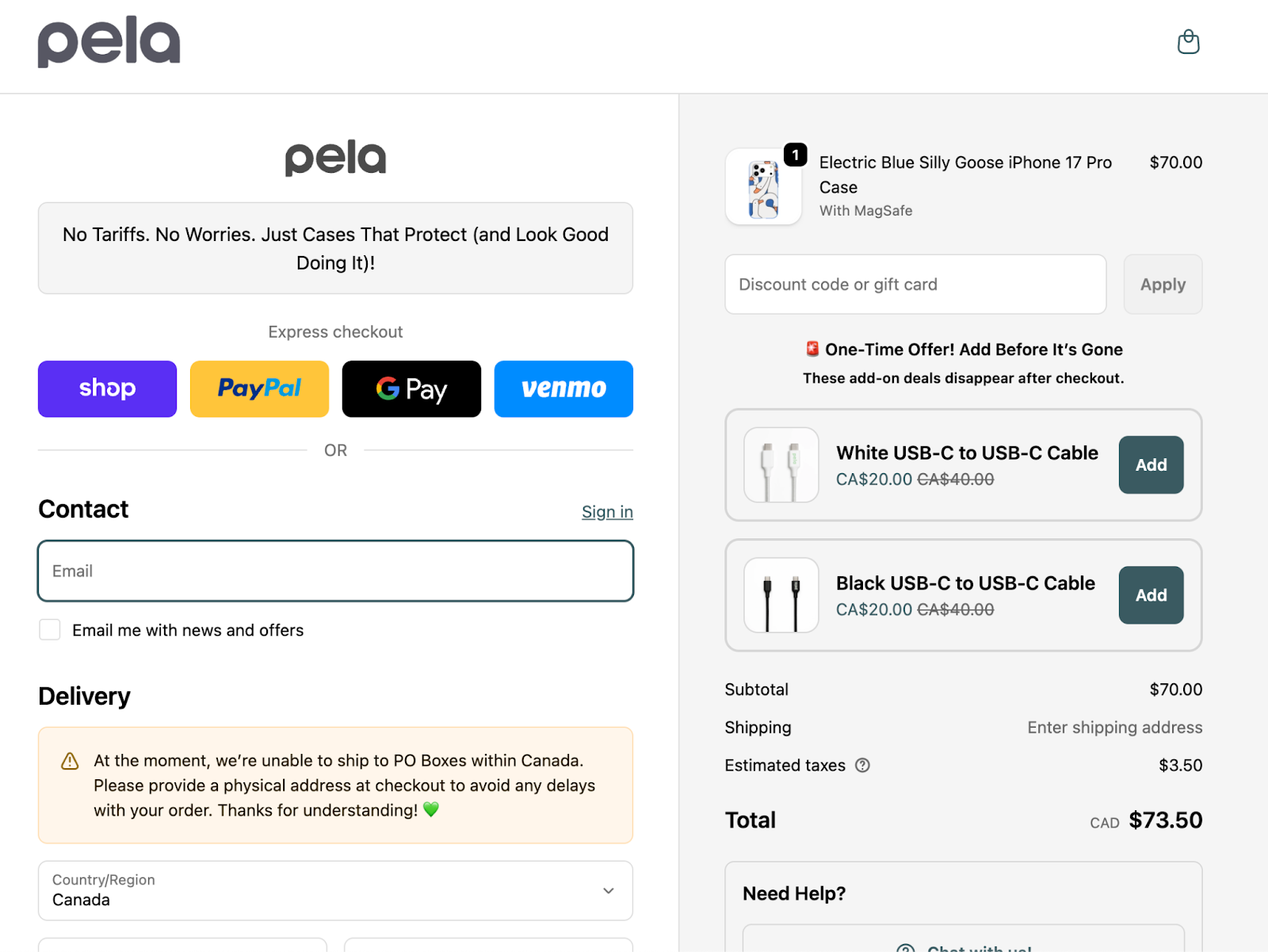
Pela makes compostable cases for phones and other electronic devices. This review order page contains a section on the right that summarizes the user’s order. It cleverly includes a call to action (CTA) that gives customers the option of adding more items to their order at a discounted price.

Pela review order page.
Source: Pela

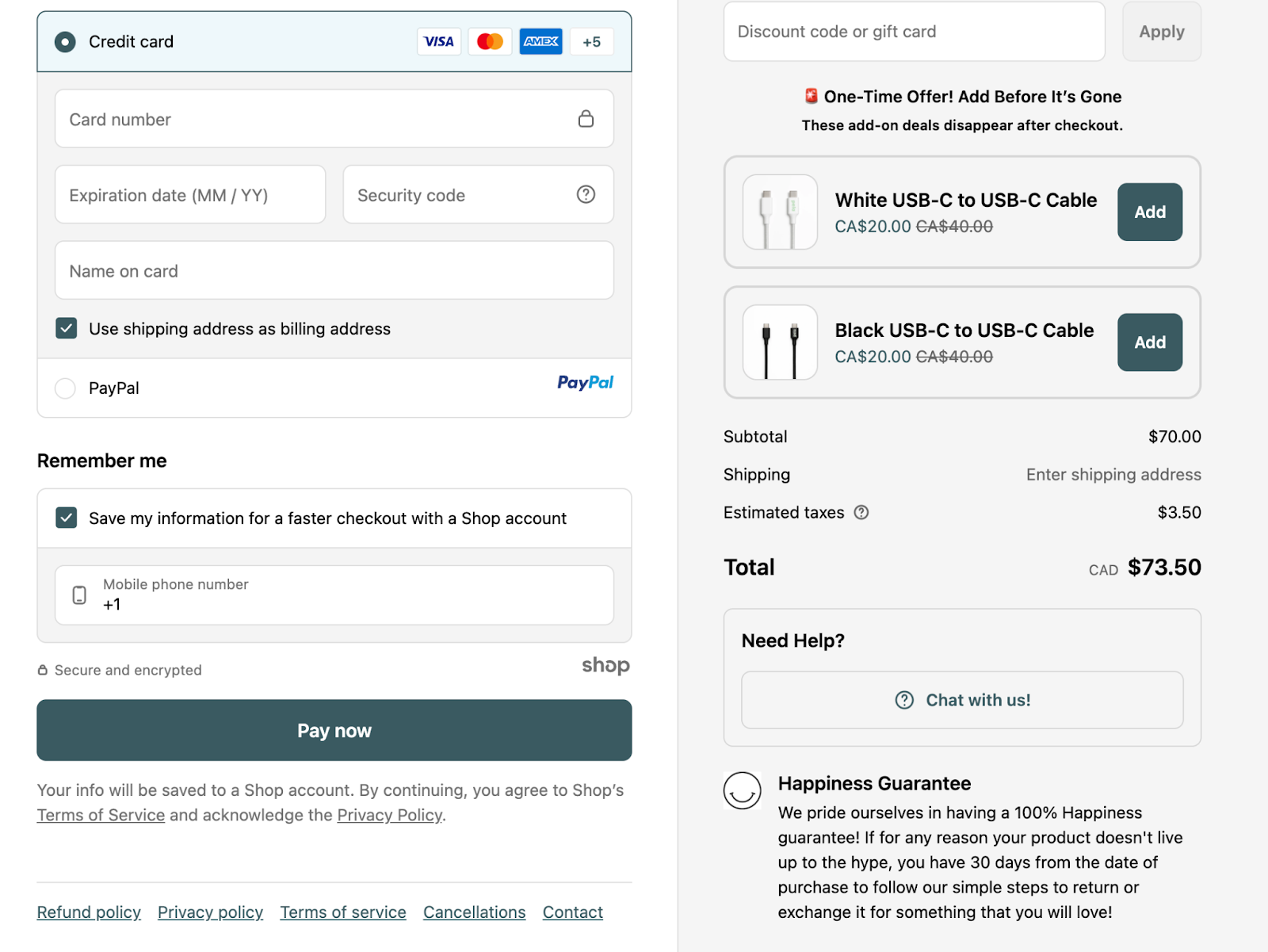
When you scroll down the page, you see a place to enter payment information and a button labeled “Pay now.” The company ends the page with a customer satisfaction pledge—Pela dubs it a “Happiness Guarantee”—in the lower right-hand corner. It’s a parting message to inspire trust and give customers the confidence to complete their order.

Pela review order page.
Source: Pela

United by Blue

United by Blue is an apparel and home goods retailer that shuns single-use plastics and supports  sustainability. On its ecommerce order review page, it places the order summary on the right-hand side of the page. Notably, this order page automatically adds a discount code—for a “buy one, get one free” deal in this example—without the shopper even having to enter it. If a shopper had missed the coupon code elsewhere on the site, they may be pleasantly surprised to see it appear, and thus even more likely to complete their purchase.

United By Blue review order page.
Source: United By Blue

Cocolab

A review order page is always valuable, even if you’re selling a subscription-based product. In this example, Cocolab—which sells dental products like floss and toothpaste—presents customers with a summary of their subscription, including what the company will send, how often it will send it, and how much it will cost.

This review order page includes a free gift that Cocolab offers to customers who opt for subscriptions rather than one-time purchases. It also has recommended add-ons. The page design highlights those add-ons by placing them above the total price.

Cocolab review order page.
Source: Cocolab

Fly By Jing

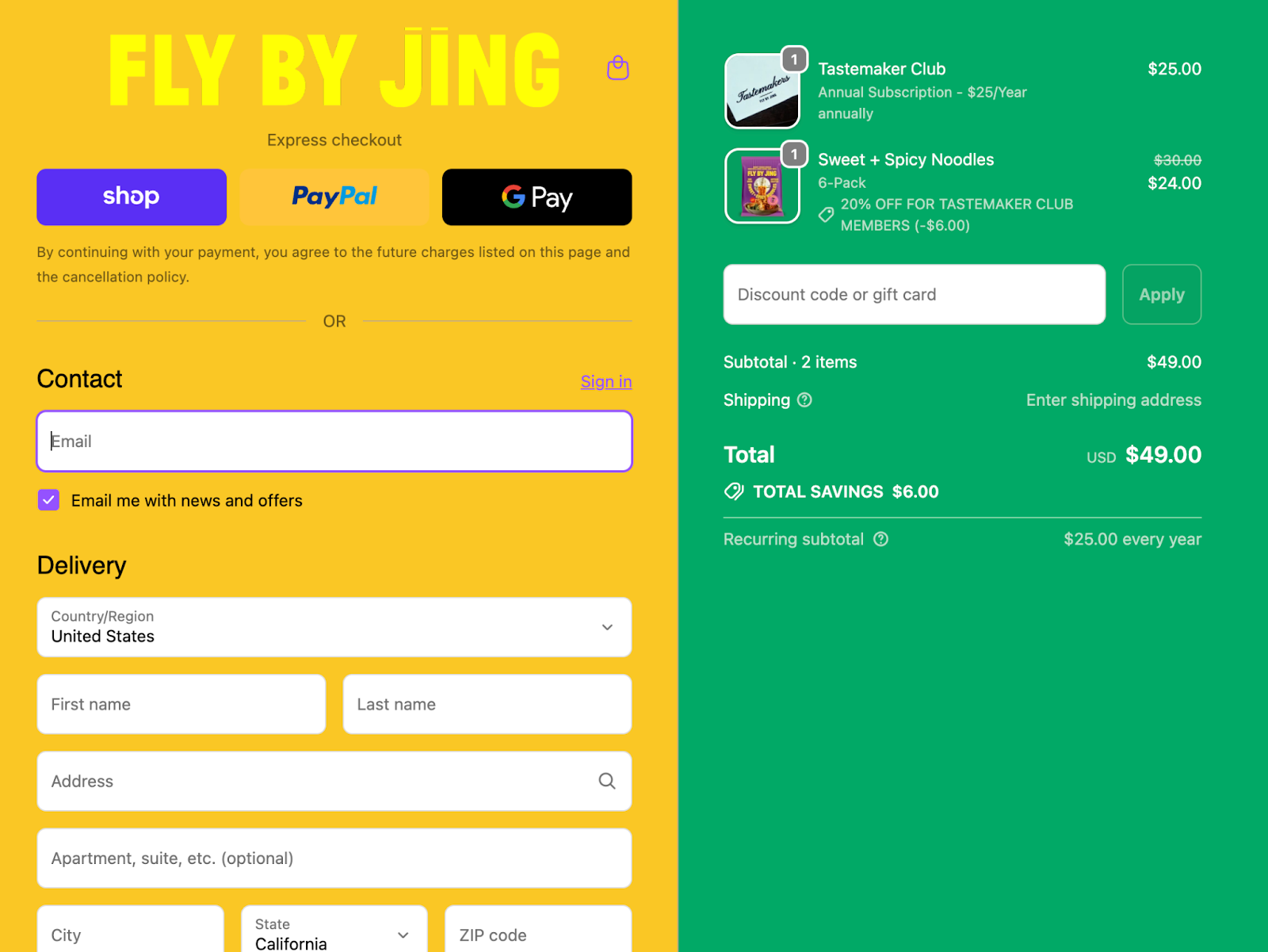
Fly By Jing’s review order page features a distinctive color scheme. Even though the format is based on the standard Shopify layout, Fly By Jing has chosen to use its own custom colors to project a unique brand identity.

When shoppers peruse the Fly By Jing website, the company gives them the chance to join the Tastemaker Club, which it sells as an annual subscription. If the customer adds a subscription to their cart, it appears alongside other products with details about renewal frequency. Each product is clearly labeled so the customer understands exactly what they’re buying.

Fly By Jing review order page.
Source: Fly By Jing

Best practices for making a great review order page

  1. Offer total transparency
  2. Provide flexible payment options
  3. Make it easy to edit an order
  4. Reinforce trust
  5. Conclude with a clear call to action

A review order page comes at the conclusion of a customer’s buying journey. If they’ve made it this far, they’ve shown strong purchase intent, and now it’s time to seal the deal. Here are the best ways to do that with an effective review order page:

1. Offer total transparency

Your order review page should clearly display the total cost of a customer’s order. This includes a breakdown of the product cost, shipping charges, tax, and any applied discounts. Do not use this page as a place to tack on fees you hadn’t mentioned on a product page.

When you select Shopify as your ecommerce partner, you can use Shopify Checkout for your review order page. It offers a clean order summary with line-item clarity, helping customers feel confident before paying.

2. Provide flexible payment options

Your order review page should include a display of all accepted payment methods and financing options. Accelerated checkout buttons like Shop Pay save customer information from prior transactions to enable one-click payment. Shopify merchants can also offer their customers Shop Pay Installments, allowing the customer to review and accept a breakdown of their cost into manageable monthly payments. Allowing installment payments may lower the perceived barrier to purchase and increase conversion rates on large or high-value orders.

Boost sales with buy now, pay later

Shop Pay Installments gives customers flexibility at checkout by letting them pay in 4 interest-free payments or monthly installments up to 12 months. Increase average order values, reduce abandoned carts, and turn more browsers into buyers today.

Discover Shop Pay Installments

3. Make it easy to edit an order

Allow buyers to adjust quantities, shipping methods, or payment details directly from the order review page without having to restart the checkout process. Making these details easy to modify removes friction, speeds up the process, and prevents cart abandonment.

4. Reinforce trust

Your customers want to be sure they’re dealing with a reputable seller. Without realizing it, they may be doing a subconscious risk analysis as they scan your checkout page. Put them at ease by displaying security badges (digital icons that signal a reduced purchasing risk), SSL encryption notices (which authenticate a website’s identity), and “secure checkout” messaging. Offering peace of mind can help nudge your customers toward making their purchase official.

5. Conclude with a clear call to action

The final button on your review order page should use simple, definitive language, like “Place Order” or “Pay Now.” Avoid ambiguous terms; customers need to understand that by tapping or clicking this button, they agree to be charged for their order. This CTA should be the most dominant element on the page, drawing focus, and gently pushing for a completed transaction.

Review order FAQ

What is a review order page?

A review order page is the final step before checkout confirmation, where buyers verify their order details—items, pricing, shipping, and payment—ensuring accuracy and transparency for both the customer and the seller.

What is the purpose of the order review stage?

The purpose of the order review stage is to give buyers a final chance to confirm all order details, ensuring transparency and reducing errors or disputes before completing payment.

What should I include in an order review page?

An order review page should include item details, quantities, prices, shipping information, taxes, payment method, and the total cost. Offer options to edit an order directly on the page, including the option to add more items, to make it easy for a shopper to complete their transaction. Conclude with a call to action that asks the customer to confirm the purchase.

Sales Negotiation Skills and Strategies for Entrepreneurs (2025)

Software Stack Editor · October 17, 2025 ·

image

Sales negotiations are structured conversations designed to turn a lead into a customer. Like any important business interaction, they rely on strategic planning—understanding what you need, what the other party values, and where there’s room to meet in the middle.

Effective sales negotiation techniques aren’t only about persuasion; they’re about aligning interests. Every sales deal hinges on balancing cost and value, customizing solutions to fit the customer’s needs, and delivering on promises to build long-term trust. Done right, negotiations feel like a win-win. Companies with strong sales negotiation skills achieve 18% higher deal values and close 23% more sales annually.

Let’s break down what sales negotiation is, explore proven approaches, and show you how preparation and communication can help you close more deals with confidence.

What is sales negotiation?

Sales negotiation is a crucial stage of the  sales process when buyers and sellers go back and forth to reach a mutually beneficial agreement. An effective negotiation ideally results in a sale and sets up a positive relationship with the customer moving forward. Successful sales negotiation is about ensuring customer satisfaction even when both parties drive a hard bargain.

Negotiation isn’t just part of selling to potential customers. It also plays a key role behind the scenes. In ecommerce or business-to-consumer (B2C) companies, there’s typically little to no direct negotiation with individual customers, since prices are fixed and usually non-negotiable. Instead, the companies use negotiation tactics when making wholesale deals with suppliers and securing procurement agreements.

There are many negotiation styles. Some sales teams have a win-at-all-costs mentality that can end up alienating as many customers as it brings in; others take a more measured approach in the hope the laid-back attitude curries favor with their target audience in the long term. How you negotiate depends on you and your business. Regardless, the goal is always to concede as little as you can while encouraging the other side to offer up as much as they’re willing to.

Sales negotiation skills worth cultivating

Teddy Roosevelt once said, “Believe you can and you’re halfway there.” He might not have been a sales rep, but he knew a thing or two about winning people over and projecting confidence. Luckily, you don’t need Roosevelt’s charisma to get what you want.

You just need a few key sales negotiation skills:

Active listening

During the sales negotiation process, always show the other party you understand their point of view. Pay attention to what the buyer is saying, but also to what they might be implying—their underlying concerns, motivations, or hesitations. If you can articulate their perspective as clearly as they can, they’ll see you as a partner, not an adversary.

Ask follow-up questions to show you’re listening to the other party’s perspective and to dig deeper into issues they’re facing. Empathy and communication skills go a long way in the negotiation phase. Make sure you’re truly understanding your buyer’s pain points and goals, and you’ll build rapport that will last.

Confidence

Skilled sellers know that, to negotiate effectively, you need to stay calm under pressure. Even if the negotiation feels friendly, it’s often still a game of chicken: Either you buckle or the other side does. You’ll likely face skepticism or push back from buyers. Avoid making impulsive price concessions out of frustration.

Of course, that doesn’t mean being inflexible. Avoid being so bullheaded that you refuse to make any compromises. Before going into the negotiation, meet with your team to define your ideal starting point and identify what you’re willing to compromise on. This preparation helps you keep a steady, professional demeanor. Aim to be confident but open.

Trustworthiness

Customer trust is essential to any successful business, and sales reps lay the groundwork. People want to work with people they trust, so make sure you do your part to show you’re working toward mutually beneficial outcomes. Give your customers essential info like product details, policies, and guarantees.

Share your brand’s story—why you exist, what you value, and how your product solves real problems—to create an authentic connection. Highlight current customer satisfaction through reviews, testimonials, or case studies. This reassures prospects that others like them have already had a positive experience with your business, which makes them more comfortable moving forward.

Remember there’s a reason the sleazy used-car salesperson is such a pervasive negative stereotype. Being transparent about how much wiggle room you have reinforces trustworthiness.

Sales negotiation strategies

Here are the essential negotiation strategies to hone when working toward a sale:

Do your research

The most important step in the selling process is proper preparation. Fully understand your product and how it benefits customers. Find out what your buyer wants, who the decision makers are on the other side of the table, and potential mutually beneficial solutions. Be prepared with data and analytics to justify your positions.

Free competitor research template

Find a strategic angle to achieve sales success, uncover your product-market fit, and stand out from the competition with our free template.

Learn More

Take the lead

Be on the offensive from the get-go. Be the one scheduling meetings, setting agendas, and sending proposals. Give the impression you’re directing the conversation while still giving your buyer room to share their own thoughts and opinions. That way, you can more easily influence negotiation outcomes.

Demonstrate value

It’s not all about who can offer the lowest price. A value-based selling methodology—selling by focusing on the customer’s needs and desired outcomes—lets you focus on real-life value over product features and price points. While buyers care about cost, successful negotiations demonstrate how a product solves their specific problems. After all, 87% of high-growth companies take a values-based approach to sales.

Anchor the negotiation

Making the first offer sets the tone for the conversation and subsequent bids. Anchor the negotiation on your terms, and use the opportunity to set standards for what you consider fair.

Prepare to offer trades

Compromising and offering alternatives are part of the negotiation process. Consider possible concessions ahead of time, and come to conversations prepared to offer them. For example, maybe you’re willing to agree to a customer’s proposed lower monthly rate if they agree to a longer contract.

Be ready to walk away

At the end of the day, you don’t want to make an unfavorable deal. Good sales professionals recognize when the terms aren’t beneficial, when there’s been too much pushback, or when a customer is flat-out unreasonable. Sometimes, walking away is actually the kick the other side needs to meet you closer to your terms.

Sales negotiation FAQ

What is the 70/30 rule in negotiation?

There are two interpretations of the 70/30 rule in negotiation, both of which are helpful to consider. The first is that you should spend 70% of a negotiation conversation listening, and 30% speaking, and the second is that you should spend 70% of your time preparing and researching, and 30% actually discussing a deal.

What are the four traps of negotiation?

According to Harvard Law School, the four traps are: overvaluing your possessions, focusing too much on price, compromising your ethics, and making unappealing offers. For the best results, come to the negotiation table with reasonable expectations based on research, flexible terms that focus on value over price, and the ability to walk away from bad deals.

What is BATNA?

BATNA stands for “best alternative to a negotiated agreement.” Identifying your BATNA ahead of a negotiation is a good idea so you can clearly evaluate offers and identify when they’re unfavorable. To find your BATNA, you should list out all possible actions you could take if negotiations fail, evaluate the value of each of those actions, and select the best alternative.

How To Craft a Localization Strategy for Ecommerce (2025)

Software Stack Editor · October 17, 2025 ·

image

If your ecommerce store is thriving domestically, expanding into international markets may have crossed your mind. It’s an exciting (and potentially lucrative) idea—Statista values the B2Ccross-border ecommerce market at $1.209 trillion. Staying domestic might mean missing out on global growth.

But successful global expansion requires more than uploading your inventory to an international domain or offering international shipping. Customers in Tokyo, Toronto, and Toulouse shop differently, speak differently, and connect with brands differently. Localization is your brand’s opportunity to tailor the customer experience for customers in different markets.

A proper localization strategy extends to the entire customer experience—from the images and colors you choose and the payment options you offer to how you talk about your products—to meet local cultural expectations and shopping behavior trends. Let’s explore how you can carve out your own localization strategy to start bringing in international revenue.

Sell internationally in minutes with Managed Markets

Managed Markets helps you sell in 150+ countries and scale your business internationally—all from a single Shopify store. Make global shipping hassle-free, with tools to manage store localization, collect duties upfront, simplify customs documentation, and get fast transit times.

Discover Managed Markets

What is a localization strategy?

A localization strategy is how you adapt your brand to the local markets you enter. It describes how you tweak your products, website, and overall marketing so that shoppers in any given country feel like your brand is tailor-made for them. It’s not just about language—a solid localization strategy covers everything from cultural references and distinct design aesthetics down to preferred payment methods.

For example, Kit Kat in Japan took advantage of a lucky coincidence through a concerted marketing campaign—the brand name sounds like “Kitto Katsu,” meaning “You will surely win”—turning the chocolate bar into a good luck charm. Coca-Cola changed its name in China to “Ke Kou Ke Le” (delicious happiness) through collaboration with local linguists.

The goal is to make international customers feel as comfortable and confident shopping with your brand as your domestic customers do. This means eliminating friction that might cause hesitation—from unfamiliar payment methods to confusing checkout flows—and replacing them with elements that feel distinctly local and trustworthy.

Translation vs. localization

Translation is simply converting writing into another language, whereas localization is about customizing the entire shopping experience to fit your target culture. That means you might need to rewrite content to integrate local slang or humor, because a word-for-word translation often misses the mark. For instance, Spanish differs between Spain, Mexico, and Argentina, requiring distinct adaptations for each region.

A slogan or joke that elicits a laugh in one geographic region might totally flop (or offend) in another. Localization also covers visuals and symbols; hand gestures that are positive or neutral at home could have very different meanings elsewhere. You may have to change things like product labeling, sizing, or packaging to meet local regulations and expectations in each market.

How to create a localization strategy for ecommerce

  1. Craft your localization process
  2. Don’t forget about legal review
  3. Calibrate to each local market
  4. Cultivate a competitive edge
  5. Get into the logistics
  6. Try out localized content in one market
  7. Aim for increased market penetration

Riley, the sustainable period care brand, expanded from Ireland across Europe by researching localized sustainability attitudes and customizing its educational content to represent cultural sensitivity around menstruation health discussions.

“Our biggest learning is that you can’t just copy-paste the same message everywhere and expect it to resonate,” says Fiona Parfrey, the brand’s cofounder. “The key is to really listen and adapt how you communicate, without also losing sight of what makes your brand unique.”

The following steps, complete with advice directly from the Riley team, can help you capture global opportunities:

1. Craft your own localization process

Before diving into translation and payment integrations, establish your localization philosophy. These are the non-negotiables that remain consistent in every market and, conversely, the elements that flex to meet local expectations. This foundation determines how you’ll adapt messaging and navigate regulations that differ abroad.

Riley took on this challenge with strategic clarity. “Education has been at the heart of Riley from day one,” Fiona says. “We want people to understand not just what our products are made from, but why that really matters for their bodies and for the planet. When we expand into new markets, we know that in some countries, period health is still a taboo topic, while in others, there’s already a lot of awareness about sustainability. So we adapt how we tell our story to meet people where they are, while always staying true to our core mission.”

2. Don’t forget about legal review

Don’t overlook the legal side of things, because you need to get ahead of compliance issues early. If your food product contains an ingredient banned in a target market, you’ll need to either pause expansion plans or reformulate your product. Health claims, ingredient disclosures, and environmental certifications often need market-specific verification.

For instance, sustainability claims face particularly stringent scrutiny with varying standards across jurisdictions. Permissible marketing language in one market may constitute illegal greenwashing in another.

“Sustainability is non-negotiable for us,” Fiona says. “However, we are very conscious that different jurisdictions can have different rules and regulations when it comes to sustainability claims. We are completely anti-greenwashing, so we researched this heavily to ensure that our messaging is transparent and clear across markets.”

3. Calibrate to each local market

Consider which market to tackle first and figure out what “winning” means for that market specifically. Not every country will be equally receptive to your product, so be intentional about your localization efforts; maybe success in Market A means gaining 11,000 new customers in year one, while hitting a more modest goal is more suitable for Market B.

Also, pick a place that plays to your strengths. If a local audience aligns with your brand’s values or niche, you’ll have a head start. Case in point: Fiona and her team chose Germany as Riley’s first non-English market. Why? German consumers really care about sustainability—one of Riley’s core values.

“Germany stood out as our first non-English market because German consumers are known for embracing sustainability, and that’s at the heart of what we do,” says Fiona. “With a large eco-conscious consumer base and high adoption of sustainable products, we felt our B Corp status would resonate well with German consumers.”

4. Cultivate a competitive edge

Once you’ve picked a promising market, dive into understanding how those customers shop and what they expect from an online store. Check out local competitors and market reports. Find out which marketing channels actually work there, what social networks or marketplaces are popular, which payment methods everyone uses, and how fast people expect to get their orders. This is also the time to get insights straight from the source—talk to folks who know the market well.

When Riley expanded from Ireland to the UK, the team went all in. “We spoke to a lot of other founders who had successfully scaled beyond Ireland to understand their learnings and how best to approach market entry,” says Fiona. “We looked at competitors’ products, how they are positioning themselves, and which routes to market they are focusing on. Simple things like visiting different retail stores to understand the offerings and marketing messages in detail is very useful.”

Fiona’s cofounder, Áine Kilkenny, even moved to London so they could have boots on the ground and gather feedback firsthand. Similarly, you might run surveys or interviews with potential customers in your target market to really get a feel for their preferences. The goal is to understand behavior and expectations in foreign markets, inside and out, before you launch.

5. Get into the logistics

Next, figure out the nitty-gritty of making localization happen—specifically, decide on your budget, who’s going to help you (partners/vendors), and what tech tools you’ll rely on.

Make sure your ecommerce platform can support multiple languages and currencies (you want it to effortlessly handle local pricing, taxes, and payment options). A platform with strong international features can save you a ton of headaches—for instance, Fiona’s team chose Shopify because it can manage all of that. “We use Shopify to power our DTC subscriptions, and the platform’s ability to manage localised storefronts, currencies, and payment options was key to scaling abroad,” says Fiona.

A few partners and tools to consider:

  • Hire native translators or copywriters. Working with people who speak the language natively ensures your messaging across marketing materials sounds natural (and not like a clunky machine translation).
  • Partner with localization agencies. A good agency can coordinate all your translations and culture-specific adaptations. They’ll bring experts and do quality assurance (QA) on your website, product info, and marketing content so everything feels on point for the region.
  • Use translation services. Automating a wide swath of the language localization process can prove helpful. If you’re on Shopify, try the Translate & Adapt app or others like Weglot or Langify to add multiple languages to your store. These tools make managing content in different languages easier—just make sure a human gives any important text a once-over to double-check it reads well (and makes sense).
  • Leverage your ecommerce platform’s features. Shopify has localization features baked in. Shopify Markets, for example, lets you set up country-specific storefronts, show prices in local currency, and handle domains and SEO per region.
  • Bring in local experts. Contract local consultants who really know the market. They can tweak your advertising campaigns to align with local trends, guide you on which social media channels to use, and even help with customer service or PR in that country.

6.  Try out localized content in one market

When it’s go time, start with just one new market as a test run instead of launching everywhere at once. Think of your first international launch as a pilot and test every part of the shopping experience like you’re a local customer. Double-check that your site truly feels local:

  • Is the language on your website natural (and not awkwardly translated)?
  • Do the images and branding feel appropriate for that culture?
  • And are you referencing local colloquialisms in your marketing strategies where it makes sense?

Focus on the checkout and post-purchase details. Prices should show up in the local currency, taxes and duties need to be calculated properly, and you want to offer the payment methods locals like best.

Go through the entire checkout process yourself. Does the site detect the user’s location or let them pick their region easily? Is each sequence of the checkout translated clearly, including error messages? Run a bunch of test orders with your team or some beta users in-country to spot any glitches or awkward translations. By testing with a modest launch, you can find and fix issues—like a weird address format or an untranslated button—before real customers hit them.

Drive your business forward with Shopify’s analytics

Shopify’s user-friendly reports and analytics capabilities help you make better decisions, faster. Choose from pre-built dashboards and reports, or build your own to spot trends, capitalize on opportunities, and supercharge your decision-making.

Explore Shopify’s analytics

7. Aim for increased market penetration

After your localized store is live, the work isn’t over—now you need to watch how it performs and keep tweaking. Zero in on your numbers and analytics, especially conversion rates. For example, is your new market’s conversion rate lower than your main site’s? If a large number of locals are browsing but not buying, figure out what’s turning them off. Maybe the site’s copywriting doesn’t resonate, or perhaps you forgot to include a popular local payment method.

Get qualitative feedback too: survey your first customers or see what people are saying on social media to learn how they feel about your brand in that region. All that feedback will point you toward improvements. You could discover that shipping costs are scaring people away, or maybe your French ad copy isn’t hitting the right tone and needs a rewrite to better click with local humor.

Optimization isn’t a one-and-done thing. You have to listen to each new country and adjust how you communicate, all while keeping what makes your brand distinct front and center.

Localization strategy FAQ

What are examples of localization?

Examples of localization can include translating your website into the local language and fine-tuning content and copy to fit the culture. It also means changing up practical elements—showing prices in the shopper’s local currency, using local units of measurement, offering local payment methods, and even modifying product selections or packaging to match local tastes and country regulations.

How do you make an effective localization strategy?

To kick off the localization process, research the target audiences’ language, culture, and shopping behavior, and spell out your overarching goals for that market (like expected sales or market share in the first year). Then outline the changes needed to serve that market (translation of content, site design adjustments, local payment/shipping options), decide what resources and partners you’ll use (budget, translation process tools, agencies, or in-house staff), implement changes, and test them exhaustively before launch.

How do I translate my website?

Use translation services, download a plug-in on your ecommerce platform, or work with professional translators for a more high-touch approach. Either way, have a native language speaker review the final text.

5 Years of Black Friday Cyber Monday Data Reveal What Consumers Really Want (2025)

Software Stack Editor · October 17, 2025 ·

image

Black Friday may have started as a purely discount-driven add-on to Thanksgiving, but it’s become something much bigger: both literally, as a multiday sales event (Black Friday Cyber Monday, or BFCM), and also culturally, as the time of year when consumer urgency, desire, and value converge. Pent-up demand is released, and consumers are finally ready to invest in big-ticket items, stock up on staples while prices are low, or explore new interests in earnest.

For small and midsize businesses, the ability to spot where consumer attention is heading year after year can help them better position their products, identify untapped opportunities, and make more confident decisions around inventory, messaging, and product development. 

“It’s important to understand what is happening in the culture of your target consumer to get a sense of how your category may be impacted and where you can innovate in order to find longevity and staying power,” says Angie Meltsner, founder of Tomato Baby, a cultural insights and trends research studio.

Shopify looked back at five years of global BFCM sales data, highlighting the macro trends that rose to the surface. The goal wasn’t just to reflect what happened, but to help business owners make sense of it, so they can plan where to go next.

Build an online store with AI

Create a website in minutes with the AI store builder. Describe your brand or products to generate a free custom theme that fits your idea.

Try it now

Consistent top sellers 

Across five years of Shopify BFCM data, some product categories have consistently held strong. These seven standouts have appeared at the top of year-over-year growth lists repeatedly (in no particular order):

  1. Pet health care
  2. Baby supplies
  3. Camera instant film
  4. Film photo/film digitization service
  5. Mattresses
  6. Cosmetics
  7. Electric skateboards

The continued demand for pet health care and baby supplies reflects essential, high-frequency spending—particularly from millennial and Gen Z consumers entering new life stages. These shoppers are thoughtful and digitally savvy, often turning to BFCM as a time to stock up on big-ticket or high-value essentials at a lower cost.

Cosmetics has remained resilient year after year, buoyed by the enduring appeal of beauty culture, self-care rituals, and TikTok–fueled product discovery. Even as trends evolve—from bold looks to “clean girl” minimalism—makeup and skin care remain an accessible form of indulgence.

The tension between instant film and digitization services reflects a deeper consumer duality: a desire to preserve and streamline memories through digital convenience, and a counter-desire to stay grounded in the physical world. Instant cameras, with their tactile, imperfect charm, offer a nostalgic yet novel way to engage with the present.

Electric skateboards and other micromobility tools speak to growing interest in sustainable, individual transportation—especially among younger consumers navigating urban environments.

Mattresses, meanwhile, are a classic big-ticket item. With significant discounts on offer, many consumers strategically wait for BFCM to make these infrequent but important purchases.

2020: Confinement, care, and a reimagined commute

Trending categories by year-over-year order growth:

  1. Fashion face masks: +31,933%
  2. Saute pans: +10,327%
  3. Hair clippers and trimmers: +2,111%
  4. Manicure tool sets: +610%
  5. Cookware sets: +608%
  6. Sweatpants: +424%
  7. Jigsaw puzzles: +387%
  8. Electric bikes: +367%

The COVID-19 pandemic radically altered how—and where—people spent their money. With physical retail shuttered and consumers confined to their homes, ecommerce adoption accelerated dramatically. From 2019 to 2020, the world saw a 32% year-over-year increase in ecommerce penetration, the biggest single-year jump in the past decade.

Consumer spending shifted just as dramatically. It’s no surprise that fashion face masks and sweatpants saw significant year-over-year order growth, but other surging categories hinted at longer-lasting changes in behavior.

For one, interest in DIY beauty and grooming rose sharply. With salons closed, people turned to tools for cutting their own hair or doing their own nails at home. There was also a noticeable turn toward screen-free hobbies like jigsaw puzzles, which reflected a desire for tactile, analog activities in a time dominated by digital interactions.

The popularity of bundled products (such as cookware sets and manicure kits) reveals a distinctly BFCM-specific behavior: Shoppers are especially drawn to multi-item sets because the discounts tend to be deeper, often saving them hundreds of dollars compared to buying items individually. Additionally, many hold off on big purchases until this weekend, making them especially responsive to high-value deals.

One of the most striking growth areas was electric bikes. With auto prices rising and public transportation becoming a health risk, many consumers turned to e-bikes as a lower-cost, safer mobility option. While public transit ridership fell 73% in the US, total e-bike sales spiked 26% year over year, according to a 2022 Deloitte report. Electronic bikes offered an easy way for people to get around efficiently, and get outdoor exposure and exercise.

Shopify Masters: The ecommerce podcast for ambitious entrepreneurs

Shopify Masters is a business podcast powered by Shopify where successful entrepreneurs and experts share their marketing and sales experience with inspirational stories.

Learn from leaders

2021: Reentry and reconnection

Trending categories by year-over-year order growth:

  1. Poker chips and sets: +4,468%
  2. Wetsuit pieces: +1,488%
  3. Quilting rulers: +883%
  4. Dutch ovens: +673%
  5. Swim goggles and masks: +330%
  6. Curling irons: +315%
  7. Checked suitcases: +300%
  8. Carry-on suitcases: +240%

On November 8, 2021, the US government officially lifted its travel ban on international visitors, and consumers left their caves in earnest. A surge in suitcase orders highlighted just how eager people were to hit the road again. TSA checkpoint data supports the sentiment: On November 28—the busiest travel day of the year—screenings were more than double 2020 levels and just 18% below those of 2019.

Shopify’s data also points to a widespread return to social connection. Spikes in poker sets and Dutch ovens suggest a renewed interest in hosting and gatherings. The increase in orders of curling irons also aligns with the return of events.

Still, it would be a misreading to suggest a complete reversion to pre-pandemic norms. Some pandemic-era pastimes—like quilting—proved their staying power. Additionally, consumers invested substantially in outdoor adventure-oriented gear like wetsuits and swim goggles.

2022: Beauty, body, and a break from routine

Trending categories by year-over-year order growth:

  1. Cosmetic and toiletry bags: +644%
  2. Power adapter and charger accessories: +583%
  3. Craft knife blades: +565%
  4. Boxing and martial arts training equipment: +417%
  5. Bone conduction headphones: +388%
  6. Doll and action figure accessories: +236%
  7. Lip balms and treatments: +226%
  8. IPL hair removal devices: +217%

As consumers settled into a new rhythm of life post-lockdown, spending shifted toward mobility and self-enhancement. Increases in orders of toiletry bags and power adapters reflected continued growth in travel and hybrid lifestyles. People were on the move again, but often still working remotely or balancing travel with routine. In 2022, digital nomadism was up 131% from 2019 levels, according to data from talent solutions company MBO Partners. 

The interest in DIY beauty that started in the pandemic stuck around. Sales of IPL (intense pulsed light) hair removal devices surged, driven by both demand and supply-side innovation. In 2022 alone, the FDA cleared 16 new home-use IPL devices—more than had been approved in the decade prior. 

Boxing and martial arts gear followed a similar path. Demand was driven by overlapping trends: the continued popularity of home fitness, growing attention to personal appearance, and a spike in interest in combat sports. UFC CEO Dana White reported the franchise’s fan base grew by 68% during the pandemic, and the International Boxing Association saw a 25% rise in registered amateur and recreational fighters from 2018 to 2021.

2023: Slow hobbies and fast coffee

Trending categories by year-over-year order growth:

  1. Plug-in diffusers: +3,126%
  2. Teeth whitening strips: +538%
  3. Hair styling tool sets: +505%
  4. Teeth whitening pens: +454%
  5. Crochet hooks: +431%
  6. Instant coffee: +342%
  7. 3D printer filaments: +275%
  8. Craft cutting & embossing tools: +107%

In 2023, BFCM shoppers revealed two seemingly opposing impulses: a craving for speed and optimization, and a desire to slow down and reconnect with the physical world.

Instant coffee made a comeback—with overall sales growing 7% in the US, according to data from market research firm Mintel—as convenience and cost savings met quality. Far from the burnt-rubber brew of decades past, new-wave instant coffee offers complex flavor, convenience, and portability that appeals to busy parents and adventurers alike. 

Its naturally higher antioxidant levels compared to brewed coffee, combined with growing interest in alt-coffee formats like mushroom blends, also helped position instant coffee within broader wellness culture. “Wellness culture for sure has become dominant and has reached ultimate heights,” says Angie, who cites biometric wearables and the data they provide as a large driver. 

Yet while many sought better, faster ways to consume, others leaned hard into slowing down. The rise in sales of crochet hooks, craft cutting and embossing tools, and 3D printing materials point to a continued embrace of hands-on creation. 

This is a hobby that likely will stick around, as consumers, especially younger generations, become more interested in ways to proactively improve their mental health and regulate stress levels. According to a 2024 survey of UK adults, crafts produced greater life satisfaction than paid work.

Teeth whiteners and hair tool sets also saw a significant uptick in orders year over year, suggesting a continued investment in appearance-focused personal care. “As filtered images of ourselves become more common, people could be trying to improve their appearance to be in line with how they see themselves filtered,” Angie notes. The desire to align one’s offline appearance with their online presence continues to shape personal care spending in increasingly nuanced ways.

Make sales directly in ChatGPT

Reach customers right where they’re having AI conversations and let them buy instantly—no links or redirects, just seamless commerce.

Get notified

2024: Analog and togetherness 

Trending categories by year-over-year order growth:

  1. Compact digital cameras: +2,345%
  2. Embossing stamps: +1,119%
  3. Pilates reformers: +990%
  4. Handheld players and recorders: +799%
  5. Tennis shoes: +452%
  6. Beach bags: +387%
  7. Party games: +306%
  8. Bird feeders: +98%

In 2024, compact digital cameras made a dramatic comeback. The lo-fi aesthetic of the photos aligns with a broader revival of Y2K aesthetics, but the appeal ran deeper. Point-and-shoots offer greater control over photography than smartphone cameras—while getting people off their phones. The more powerful flash makes them better for evening shooting, and physical dials invite users to frame photos through their own creative lens. In an era saturated with AI-enhanced imagery, the imperfect results of digital cameras felt refreshingly human.

Embossing stamps saw a similar rise in popularity, pointing to the desire of consumers to make their mark—literally. Whether used on books, invitations, or fabrics, these tools offered a way to personalize the physical world with care and craftsmanship. It’s part of a broader movement toward premium-feeling, hands-on hobbies that reward attention to detail. “Slow and analog hobbies that require deliberate focus and friction are still growing in interest as people intentionally aim to spend time away from screens and devices,” says Angie.

The growth in Pilates reformers tracks with the continuing rise in the workout’s popularity, due in large part to social media’s influence. Pilates was the most-booked workout of 2024, according to data from booking platform ClassPass, retaining its top spot from 2023 but with bookings increasing by 84% year over year.

What to expect for 2025?

Looking at the road ahead, the push-pull between wellness optimization and indulgent escape is likely to shape much of 2025’s consumer behavior. “I think we’ll continue to see interest in wellness-related categories as wellness culture permeates other categories like beauty and even food and beverage,” says Angie. 

As wearables and biohacking go mainstream, more consumers are investing in products that promise better rest—and by extension, better performance. “Sleep is growing as a wellness status symbol,” Angie notes, pointing to smart mattresses, bedroom lighting, and sleep accessories as potential breakout categories. 

At the same time, a growing weariness with self-optimization may lead to a swing in the opposite direction. “I do think there is a growing counter-movement to wellness overload where we’re looking for pure indulgence for indulgence’s sake and leisure for leisure’s sake,” says Angie. “Not every experience needs to be functional or a method for measured self-improvement.”

Finally, Angie points to a growing pendulum swing away from AI-driven convenience and toward activities that can’t be outsourced or simulated. “Things like exercise and slow hobbies require some level of embodiment, practice, craft, and a temporal reality in order to engage,” she explains. These pursuits ground people in the present moment, offering friction, presence, and tactile feedback—qualities that are becoming rarer in our increasingly digitized lives, and therefore more meaningful.

In 2025, expect to see consumers continue to seek balance between these extremes: optimizing where it matters, and letting go where it doesn’t.

How To Start a Service Business in 6 Straightforward Steps (2025)

Software Stack Editor · October 17, 2025 ·

image

If you’ve ever had a pipe unexpectedly burst or accidentally given yourself an uneven haircut, you know the importance of a service business.

Service businesses primarily trade on valuable skill sets and accumulated experience, rather than products. Successful services businesses marry business skills with service quality to provide customers solutions to any number of issues.

If you’re great at something that many people need (tax filing, snow shoveling, wedding planning, hair styling), you may be considering starting your own business centered around those professional services. Learn how to start a service business.

Types of service businesses

Service business ideas typically fall into a few categories:

  • Marketing services. Broad business services, including social media management, copywriting, and market research.

  • Personal services. Individual-level help, including cooking, pet sitting, and personal training.

  • Cleaning and repair services. High-demand and often high-expertise services like auto and watch repair or car detailing.

  • Family services. Family- and children-focused care, including birthing help and tutoring.

  • Pet care. Groomers, dog walkers, pet sitters, and more.

  • Administrative services. Focused on organization and efficiency, like bookkeeping and virtual assistance.

  • Fashion and beauty services. Often a more specialized offshoot of personal services, including makeup artists and wardrobe stylists.

  • Health and wellness services. This category is broad, including gyms, yoga classes, wellness retreats, massages, and more.

  • Event services. Covers everything that goes into an event, from planning to catering to flower design.

  • Creative services. A wide-ranging category that covers creative skills like graphic design, photography, and music.

How to start a service business

  1. Identify your business goals
  2. Write a business plan
  3. Secure financing
  4. Register your business
  5. Create a website
  6. Set your pricing plan

As with any business, a service business starts with an idea. After you find your niche, follow these steps to launch your company:

1. Identify your business goals

The first step in any new business venture is to identify your goals. These can be lofty (i.e., boost self-esteem, one haircut at a time) or grounded (i.e., help five local businesses thrive through better social media marketing by the end of the year). Craft goals that reflect your initial reasons for starting a business and are strong enough to continually guide your business decisions.

Use the SMART framework (which ensures goals are specific, measurable, achievable, relevant, and time-bound) to detail your desired results and provide a framework for how to achieve them.

2. Write a business plan

Next, write a business plan. Use a template or outline to create a document that captures your goals, strategies for achieving them, and the ideal timeline.

Include these core elements in your business plan:

  • Executive summary. Your executive summary is a synopsis of your business plan, summarizing your company, history, services, financials, and future plans.

  • Company description. Describe your business and what you hope to achieve. Consider including your business model, industry, business structure, vision, mission, value proposition, objectives, and team.

  • Market research. Market research provides insight into the strength, opportunities, size, and competition of your chosen market. You can cite government statistics, academic research, and news outlets in your industry.

  • Management and organization structure. Describe your current and future legal structure, employees and their responsibilities, and an organizational chart to show the relationship between teams.

  • Services. Though you’ll likely mention your services throughout, include a section with detailed descriptions of all your offerings.

  • Ideal customer. Specify who you’re trying to reach and why. Create an ideal customer profile, and include specific details about them, such as where they live, how they spend their free time, how much they earn, and their values.

  • Marketing plan. Your marketing plan will cover your prices, how you’ll sell your services, and how you’ll promote them.

  • Financial plan. Create a financial plan to outline your projected revenue, expected operating expenses, and possible funding options.

3. Secure financing

Depending on the type of service business you’re looking to start, you may need to secure external financing. For example, you might have more overhead if you need a physical space and commercial property insurance. Funding options include taking out a small business loan with a bank, crowdfunding among your supporters, or pitching individual investors.

To protect your company’s (and your own) finances, determine which types of business insurance are necessary for your industry. A business owner’s policy, for instance, bundles the most common types of coverage, including general liability, property damage, business interruption, and workers’ compensation. Service providers whose work can lead to harm or loss for their clients may need professional liability insurance.

Get funding to run your business with Shopify Capital

Shopify Capital makes it easy to get funding quickly and use it for inventory, marketing, and more. Automatically make payments as a percentage of your daily sales. No compounding interest. No schedules. No surprises.

Explore Shopify Capital

*Shopify Capital loans must be paid in full within a maximum of 18 months, and two minimum payments apply within the first two six-month periods. The actual duration may be less than 18 months based on sales.

4. Register your business

Registering your business can be daunting if you’ve never waded into the world of federal or state legal paperwork. Here’s how to get started:

  • Pick your business name. Aim for a memorable business name that’s relevant to your service offering and available as a domain and social media handle. This might simply be your name and a description of what you do (e.g., Jane Smith Window Washing) or more unique (e.g., Jane Loves Windows).

  • Choose a business structure. How you structure your service business (e.g., a sole proprietorship or LLC) has legal, tax, and financial implications. Consult with a legal adviser if you’re unsure of the best structure for your business.

  • Register with federal agencies. Register your business with the IRS to secure an employer identification number (EIN), also known as a tax ID number, and keep your business taxes separate from your personal information.

  • Get certified. Depending on your service, you may need various local or state permits or certifications to do business. Check with your local agencies for guidelines; typically, you can learn more through the Secretary of State’s office or a dedicated business bureau.

  • Register for taxes. Unless you’re doing business in Alaska, Delaware, Montana, New Hampshire, or Oregon, you’ll need to collect sales tax as part of your service business. To do that, you’ll need to register with your state’s revenue authority department online or by phone.

5. Create a website

Small business owners need a well-designed, memorable, and easy-to-navigate website. You don’t need to start from scratch—most website builders have specific templates and user-friendly editor tools. For example, Shopify’s Dawn theme is a fan favorite because of its simple, customizable layout and emphasis on visual storytelling.

After you select your hosting platform, register your domain name, and choose a template, create a basic landing page and add any relevant pages for your customers to browse, including:

  • About page. An About page goes into more detail on your background, expertise, or big picture goals for the business.

  • Contact Us page. Make sure customers can get in touch with you by providing your contact information and business address if you have a physical location.

  • FAQ page. If your service requires background information, an explainer or frequently asked questions page provides additional insights on what customers can expect from working with you.

  • Portfolio and proof. A portfolio of past work and social proof like client testimonials can highlight your expertise and boost customer confidence.

  • Online booking and product pages. You can sell your services directly from your website (picture a package of classes at a yoga studio or access to an online cooking course). Consider also adding an ecommerce component to your offering, like merchandise, gift cards, or complementary products, to generate extra sales on top of your services.

A unified point-of-sale system, like Shopify POS, can make product sales, bookings, and deposits seamless for customers and easy for you to manage on the backend.

6. Set your pricing plan

There are two main components to consider when setting your service pricing: your profit margin and your competition. You’ll typically need to set a price that generates a profit but is comparable to what similar services charge. Follow a pricing strategy that makes sense for your brand and target market—whether charging higher to communicate quality or lower to attract more price-conscious customers.

How you communicate your prices will depend on the type of service business you start. Some businesses, like consulting and law firms, disclose rates after an initial conversation with a potential client to better reflect a project’s scope and budget. If your service is more straightforward (like an hourly or flat rate for landscaping projects, for example), consider including a price range directly on your website.

How to start a service business FAQ

How much does it cost to start a service business?

The cost of starting a service business depends on a few factors, like the kind of business you’re starting, your overhead, and any business management or business insurance costs. Registering a service business and building a website typically costs a few hundred dollars; registration fees vary by state.

How do I grow a service-based business?2

Growing a service-based business requires an effective marketing strategy and strong customer relationships. A loyal (ideally repeat) customer base can provide positive reviews and word-of-mouth referrals.

Which service business is most profitable?

The most profitable service business is typically competitively priced, with minimal time and overhead. For example, an executive coach or branding consultant can set prices based on their hard-won expertise or guidance and conduct meetings virtually, eliminating office or travel costs. Digital consultancies in general have the potential to be very profitable because they set their rates and can work with multiple clients at once.

What service is most in demand?

Some service businesses are year-round, like marketing or graphic design work, while others are seasonal (think landscaping or tax prep). Past in-demand services have included data security, digital marketing, fitness coaching, and cleaning services.

What kind of service businesses can I start?

You can start a service business that combines your passion and expertise. These qualities can set you apart in the marketplace, make it easier to attract loyal clientele, and generate steady business.

How To Choose the Best No-Code Website Builder (2025)

Software Stack Editor · October 17, 2025 ·

image

You’ve got the product, the business idea, maybe even a few early customers—but no developer. A no-code website builder makes it possible to launch anyway. Whether you’re opening an online store, showcasing a portfolio, or just testing ideas, these tools help you build fast, no coding required.

Today’s platforms go beyond drag-and-drop, with responsive design, mobile optimization, and built-in analytics—capabilities that once required developers, now point-and-click easy. Even better, AI tools, like Shopify’s Sidekick, can help you with business tasks, not just content creation.

Here’s what you need to know to do it all yourself with a no-code builder, plus our top recommendations to choose from.

What is a no-code website builder?

A no-code website builder is a tool that lets you design a professional-looking site without writing code. Think of it as visual editing: you add sections, swap images, and rearrange elements, and the platform handles the coding behind the scenes. Most no-code tools provide pre-designed, customizable templates to get you started, as well as built-in tools for blogging, ecommerce, and search engine optimization (SEO).

Who are no-code platforms for?

No-code website builders are great tools for busy entrepreneurs. “Most people aren’t technical,” says Ben Sehl, director of product for Shopify, “and even if they are, they don’t have time to fiddle with code every time they want to tweak something.”

No-code platforms are for anyone who wants to launch a site without having to code—solo founders, freelancers, artists, coaches, small and medium businesses. “You should be able to move things around, update your homepage, whatever it is, and not have to ask for help every time,” Ben says. “It should just make sense.”

Build your dream online store today

Join the ranks of the world’s best online stores with Shopify’s powerful tools and features. With the highest-converting checkout, Shopify stores sell more products, lower your costs, and save you time.

Learn more

Top no-code website builders

  1. Shopify
  2. Wix
  3. Squarespace
  4. Webflow
  5. Jimdo (Dolphin)
  6. BigCommerce
  7. Ecwid by Lightspeed
  8. Square Online

Choosing the right no-code website builder depends on what you’re trying to build and how fast you need to launch. For small businesses and ecommerce founders, the best platforms make it easy to manage inventory, build product pages, track orders, and customize your storefront—all without writing code or hiring a developer.

Here are eight no-code website builders that simplify selling online, each with tools to help you create a professional site with minimal setup. Whether you’re launching a side project or scaling an established store, these platforms cover a range of needs:

1. Shopify

Shopify is purpose-built for selling online. It includes core ecommerce features out of the box: product and inventory management, mobile-optimized checkout, integrated payments, abandoned cart recovery, and basic sales analytics. You can launch a professional website, connect your own domain, and expand functionality over time with apps, custom themes, or built-in tools like Shopify Email and Sidekick, the platform’s AI-powered assistant.

“With Shopify, you can start small and turn things on as you grow—subscriptions, international selling, in-person sales, whatever,” Ben says. “You don’t have to go looking for a whole new platform every time your business levels up.”

Who it’s for

Shopify is built for ecommerce businesses of all sizes, from solopreneurs to large enterprises.

Pricing

Shopify offers an introductory plan with three days free, then the first three months for $1 per month. Plans with full ecommerce capabilities start at $29 per month, including secure hosting, 24/7 support, and unlimited product listings.

Features

  • AI website builder. Use Shopify Magic to streamline your store design process. You can create landing pages and product listings from quick prompts and receive guidance on everything from shipping to analytics.
  • More than 250 themes and templates. Jump-start your website design with more than 250 free and professionally designed premium themes.
  • Integrated payment processing. Shopify Payments is an integrated payment gateway that accepts all major payment methods, plus, more than 100 third-party payment providers are compatible.
  • Extensive app store. Access the Shopify App Store, with more than 8,000 add-ons and integrations.
  • Access free tutorials. Shopify’s free online courses can help you build and scale your website.
  • Professional partner network. Shopify’s partner directory helps you hire vetted professionals like designers and coders if you want to take your website design to the next level.
  • SEO-optimized. SEO tools help visitors and search engines find your site, so your pages can rank higher in search results.
  • 24/7 customer support. Shopify offers round-the-clock support via email, live chat, and phone.
  • G2 ⭐️ rating. 4.4

2. Wix

Wix combines drag‑and‑drop editing with built-in tools for selling products, managing inventory, and customizing storefronts. It offers hundreds of design templates, AI-assisted site setup, and access to apps like Wix Stores for payments, shipping, and marketing. While flexible, some ecommerce features—like multi-currency support or advanced analytics—are available only on higher-tier plans.

Who it’s for

Freelancers and businesses who want to showcase their work on portfolio sites or build basic ecommerce sites.

Pricing

Wix plans cost $17 to $159 per month. Ecommerce functionality starts at $29 per month on the Core plan; the lower-priced tier does not include online selling.

Features

  • AI website builder
  • More than 900 templates
  • Integrated payment processing with Wix Payments
  • More than 500 available apps
  • Free tutorials to get started
  • Professional partner network
  • SEO tools
  • 24/7 customer support
  • G2 ⭐️ rating: 4.2

3. Squarespace

Squarespace is known for professionally designed templates and a user-friendly editor that enables users to create product pages, showcase services, and manage digital or physical sales. Built-in features include mobile‑optimized checkout, basic inventory tracking, SEO fields, and marketing tools like email campaigns and appointment scheduling. It may be useful for creators, service businesses, and small storefronts that don’t need complex ecommerce workflows.

Who it’s for

Creatives and small businesses building simple websites.

Pricing

Squarespace plans cost $16 to $99 per month. The Basic plan includes a custom domain name and access to templates, but you’ll need to pay an additional 2% in transaction fees (on top of payment processing fees).

Features

  • AI website builder
  • More than 180 templates
  • Integrated payment processing with Squarespace Payments
  • Guides and tutorials
  • Advanced analytics
  • Professional designers available through Square Marketplace
  • SEO tools
  • 24/7 customer support
  • G2 ⭐️ rating: 4.4

4. Webflow

Webflow gives users full visual control over site layout and design while supporting structured content through its built-in content management system (CMS). It includes ecommerce functionality for managing products, customizing checkout pages, and processing orders, with advanced design capabilities that appeal to agencies and brand-focused businesses. It’s an option to consider for users who want pixel-level flexibility without relying on templates or writing custom code.

Who it’s for

Experienced web designers and builders.

Pricing

Webflow offers a free version of its platform, but you’ll need to upgrade for a custom domain, SEO tools, and the ability to add more than two pages (among other features). Paid plans cost $14 to $39 per month, with enterprise pricing upon request. Ecommerce plans start at $29 per month with limits on product volume and transaction fees; higher tiers offer expanded functionality and CMS access.

Features

  • AI website builder
  • More than 7,000 templates
  • Free tutorials
  • Advanced analytics available as a paid integration
  • Professional partner network
  • SEO tools
  • 24/7 customer support
  • G2 ⭐️ rating: 4.4

5. Jimdo (Dolphin)

Jimdo offers an easy-to-use, AI‑driven builder—Dolphin—that asks about your business needs and generates a starter site, which you can then edit using a simple drag‑and‑drop interface. It supports up to 100 products via Stripe or PayPal and includes built-in SEO prompts and HTTPS. However, customization options are limited (there are only about 16 templates), and switching between Dolphin and Jimdo’s more advanced Creator editor isn’t possible.

Who it’s for

Entrepreneurs looking to quickly create a basic site.

Pricing

Ecommerce functionality begins with the Business plan at $21 per month. The $28 per month VIP tier adds features including unlimited storage, additional pages, and accelerated customer support.

Features

  • AI website builder
  • More than 15 themes and templates
  • Integrated payment processing
  • SEO-optimized
  • G2 ⭐️ rating: 3.9

6. BigCommerce

BigCommerce is an ecommerce platform geared toward enterprises, although it does have a no-code website builder for small businesses. Standard features across all plans include unlimited products, bandwidth, staff accounts, PCI compliance, one-page checkout, support for Apple Pay or Amazon Pay, and multiple sales channels, including marketplaces and in-person POS.

Higher tiers introduce tools like customer segmentation, persistent carts, advanced product filtering, and Google Customer Reviews to drive conversions and personalization.

Who it’s for

BigCommerce’s primary product is for enterprises.

Pricing

Ecommerce functionality is available from the Standard plan at $39 per month; advanced plans like Plus ($105 per month) and Pro ($399 per month) unlock abandoned‑cart emails, multistorefront support, custom SSL, and enhanced reporting. Enterprise pricing is available upon request.

Features

  • More than 280 templates
  • Integrated payment processing
  • More than 1,200 apps
  • Free tutorials
  • Professional partner network
  • SEO-optimized
  • 24/7 customer support
  • G2 ⭐️ rating: 4.2

7. Ecwid by Lightspeed

Ecwid is a flexible ecommerce tool that lets you add a shopping cart to any existing website or build a standalone storefront using its Instant Site feature. It supports digital goods, shipping integrations, mobile POS, and social selling, with features like custom domains, abandoned cart emails, and marketplace sync available on higher tiers. It’s a practical choice for small businesses and creators that want to test ecommerce without switching platforms.

Who it’s for

Businesses that want to add ecommerce functionality to existing websites or build a simple ecommerce site.

Pricing

Ecwid plans range from $5 to $105 per month. You’ll need to spend at least $55 per month to get custom URL slugs, abandoned cart recovery, advanced analytics, and more.

Features

  • AI website builder
  • More than 70 templates
  • Integrated payment processing
  • Large app store
  • Access free tutorials
  • SEO-optimized
  • G2 ⭐️ rating: 4.7

8. Square Online

Square Online is designed for businesses that sell both in person and online. It integrates with Square’s POS system so you can manage inventory, orders, and customer data from a unified dashboard. You’ll also get themes optimized for mobile shopping, SEO tools, signup forms, social media integrations, and support for digital and pickup orders. It’s especially useful for service-based businesses or retailers already using Square in-store.

Who it’s for

Restaurants and service businesses with limited ecommerce needs.

Pricing

Square offers a free plan with Square branding, a Square domain name, and basic transaction fees. Paid plans range from $49 to $149 per month.

Features

  • More than 30 themes and templates
  • Integrated payment processing
  • More than 440 apps
  • Professional partner network.
  • SEO-optimized
  • 24/7 customer support for high-tier plans
  • G2 ⭐️ rating: 4.2

Features to look for in a no-code website builder

Choosing a no-code website builder means finding the one platform that fits your current goals without limiting future growth.

Here’s what to look for before you commit:

Intuitive design tools and templates

The best builders let you hit the ground running. You should be able to quickly and easily edit your site visually, see your changes live, and manage your site without a developer or coder at your beck and call. “Pick something that helps you move quickly and figure it out as you go,” Ben says. “You don’t need to nail it on day one. The most important thing is getting something live, testing it, and talking to customers.”

Certain interface features can make a website builder far more efficient. Together, these tools reduce friction and make site management faster over the long term.

  • Grid and column systems. These help maintain consistent alignment.
  • Section and block templates. These can allow you to insert complex layouts—such as product grids or image galleries—without building them manually.
  • Page structure navigator. This can speed up your movement between sections.
  • Global style controls. These ensure you can update fonts, colors, and spacing across the site from one panel.
  • Menu builders. These streamline the navigation setup.
  • Built-in undo, redo, and version history functions. These features provide a safeguard for when you need to reverse changes.

As you browse no-code website builders, keep an eye on themes and templates as well: These make it easy to start setting up your site right away. Choosing a platform with a wide variety of available templates will increase the likelihood of finding one you really like and that ties in with your brand, which can save time tweaking design elements down the road.

Mobile-ready by default

Find a website builder that automatically optimizes your site for smartphones and tablets. A comprehensive no-code website builder should create a responsive layout—reflowing content (reorganizing content on your page so it fits smaller screens), using mobile-friendly fonts, and making buttons easy to tap on smaller screens.

Before you hit Publish, check these elements yourself. Most builders offer mobile device preview modes, but don’t stop there: pull up your site on your phone and run the URL through Google’s Mobile-Friendly Test. Tap every link. Try the checkout. If your customers can’t add a product to their cart without pinching and zooming, you’re likely losing that sale.

Watch loading times, too, especially on mobile. Many builders, but not all, compress images automatically. Check load performance with free tools like PageSpeed Insights or use your browser’s mobile simulation tools to spot bottlenecks early.

Built-in ecommerce

Selling products, services, or subscriptions calls for purpose-built design. If you’re going to sell anything on your website, Ben says, “You really want commerce to be at the core of the platform you’re building on. It can’t be an add-on feature.”

That means more than just a cart. At a minimum, your builder should support secure checkout and payment processing—like Shopify Payments, Stripe, or PayPal—and let you sell without having to hack together third-party tools. Look for other key built-in features like product pages, inventory management, discount codes, and shipping services—all without custom code.

Solutions like Shopify, Squarespace, and Wix include these essentials as built-in options.

AI that actually saves time

AI shows up in nearly every website builder these days, but some platforms use it better than others. A few stick to the basics—filling in text blocks or suggesting a color palette—which can still save you time when starting out. The more impressive tools go further, digging into your site data, flagging what’s working, and recommending changes that could actually help you grow. Those are the ones that cut real work off your plate and help you launch faster.

Shopify’s Sidekick, for example, can analyze your performance, highlight patterns in your store data, and suggest next steps based on what’s working.

“Shopify’s Sidekick is really good at digging into your analytics and answering challenging business questions—like identifying slow movers and top sellers, so you know which products to put on sale and which to feature on your homepage,” Ben says.

“It’s like having a 24/7 business adviser and creative consultant built right into the platform. So the job of a website builder now is less about ‘Help me build a page’ and more like ‘Help me run my business smarter.’”

Wix’s AI site builder takes a different approach: it walks users through a short questionnaire, then generates a personalized layout based on business type, branding preferences, and content needs.

If a builder claims AI tools, ask what they actually do. Can it help you configure your site layout? Write optimized product descriptions? Edit images or improve SEO? Platforms with free AI features that support real business tasks—like setup, content, or store management—are more likely to save time.

Build an online store with AI

Create a website in minutes with the AI store builder. Describe your brand or products to generate a free custom theme that fits your idea.

Try it now

SEO controls

When a platform gives you real SEO tools, you’re in control of how your business is seen, both by search engines and by the people who click through.

To show up in search engines and attract organic traffic, you need access to basic SEO fields—the “labels” that help search engines like Google understand what your page is about and decide when to show it to searchers: custom page titles, meta descriptions, alt text for images, and editable URL slugs.

The right builder should let you set these SEO fields so you can decide how your site appears in search results, not leave it to chance.

Control over these varies. Some platforms like Shopify and Wix let you edit all of them directly, without plug-ins or advanced settings. Others may restrict SEO tools to premium plans or auto-generate content you can’t fully customize.

Before choosing a builder, check how it handles SEO at the template level. Can you customize your homepage title and description? What about product or blog pages? If the platform doesn’t give you manual control, you’ll be stuck fighting its defaults—making it harder to grow traffic or fine-tune how your brand appears in search results.

Transparent pricing that doesn’t balloon

Low monthly pricing can be misleading. A $5 or $10 per month plan may leave out essential features like ecommerce tools, custom domains, analytics, or even basic hosting. 

“Some platforms look cheap, but are not built for ecommerce. They’re missing key systems, like inventory management, that you have to pay for and then pay developers to connect,” Ben says.

“You need to look at the total picture,” he adds. “What are you getting out of the box? Are you going to spend more time and money making things work than you would just picking a platform that does more upfront?”

Check how pricing scales as your business grows, especially if you plan to add products, expand traffic, or onboard a team. Are SEO tools, inventory management, or email marketing built in, or only available as paid add-ons? Look for platforms that include core functionality without locking you into paid upgrades just to stay operational.

No-code website builder FAQ

Is it possible to build a website without coding?

Yes. That’s exactly what a no-code website builder is for. These platforms let you create, publish, and manage a professional website using drag-and-drop tools, templates, and visual editors—no HTML, CSS, or JavaScript required. Many also include built-in tools for ecommerce, blogging, and SEO, so you can run your business or portfolio without hiring a developer.

Which is the best no-code website builder?

The best no-code website builder depends on your needs. Shopify is purpose-built for ecommerce, making it ideal if you plan to sell products, manage inventory, or grow into international markets. Tools like Wix and Squarespace are suited for visual portfolios. If you already have a site and want to add ecommerce, options like Ecwid or Shopify’s Buy Button can work well.

Can AI create a website?

Yes—many no-code platforms now offer AI-powered tools that can generate layouts, write content, or help with design decisions. For example, Shopify’s Sidekick can suggest homepage updates or highlight what’s working in your store analytics. These tools won’t fully automate your site, but they can help you save time and get unstuck faster.

How long does it take to build a no-code website?

You can usually get a simple no-code website live in a few hours—especially if you’re using a template or an AI-powered builder that sets up your layout for you. Building a more complete online store with products, shipping, and custom branding might take a few days, depending on how much content you’re starting with. The key is that you can launch quickly, then iterate.

MALK’s Path to $100M in Revenue (2025)

Software Stack Editor · October 16, 2025 ·

When Ryan Rouse joined MALK in the summer of 2024, the organic plant-based milk brand was already experiencing impressive growth. But the company faced a challenge common to many fast-growing consumer packaged goods (CPG) brands: how to evolve from a scrappy startup into a scaled operation capable of reaching a nine-figure revenue. 


Today, MALK is on the verge of that milestone, approaching $100 million in trailing 12-month revenue, thanks to seasoned CPG expert, and now MALK president, Ryan Rouse. 

Zoomed in photo of MALK, shelf-stable cartons of almond and oat MALK in a grocery store basket and on the shelf.
MALK launched its shelf-stable offering based on customer feedback.MALK

Ahead, Ryan shares valuable lessons for entrepreneurs navigating the precarious path from early traction to sustainable scale.

Taking a corporate detour that pays dividends

Ryan spent 14 years in finance before cofounding Factor, the meal delivery service that HelloFresh acquired for more than $200 million in 2020. That corporate experience, he argues, gave him something many startup founders lack: fundamental business skills.

“There’s a really beneficial baseline of business understanding that comes from the corporate world,” Ryan says. “Basic communication skills, calendar management—those things are not taught in startups, and I think they can be really, really helpful.”

Ryan’s corporate years also allowed him to build financial security before taking the entrepreneurial leap. At Factor, he worked without a salary, using his savings to build the company for nearly four years while raising a young family. 

That experience shaped his philosophy: Don’t let your business decisions sacrifice your personal balance sheet. Someone advised him early on not to go into deep personal debt while building Factor. He didn’t follow that advice, and the stress was nearly unbearable. “I was white-knuckling everything,” he says. “Since leaving that, I’ve said to the team here at MALK quite a bit: I’m not doing that again.” 

Choosing products with tailwinds

When evaluating MALK, Ryan applied a principle he’d learned the hard way: The product you choose matters more than your execution skills.

Five cartons of MALK sitting side by side on a wooden table, pictured left to right: Cashew, Soy, Oat, Almond, and Coconut.
Ryan knew MALK had a really strong product before investing any time or energy scaling it.MALK

“The best operator, the best marketer, the best direct-to-consumer tactician cannot outpace a product that doesn’t deserve to be on shelf,” he emphasizes. “You’ve got a headwind versus a tailwind.”

MALK had that tailwind. The brand offered something the market clearly wanted but couldn’t easily find: organic, clean-label plant-based milk with simple ingredients. While competitors had built the category on the message of “not dairy,” many products contained gums, fillers, and oils that health-conscious consumers increasingly were rejecting.

“The consumer started turning the label around, turning to the back of the label and saying, ‘Actually, the ingredients in here aren’t healthy, necessarily,’” Ryan says. Some consumers felt deceived and abandoned plant-based milk entirely, but others actively sought cleaner alternatives. MALK was positioned perfectly for that shift.

The brand had already secured distribution in major retailers like Target, Kroger, and Albertsons—a feat that typically takes years for better-for-you brands to achieve. Even more telling, MALK was growing rapidly despite obvious operational gaps. “It’s safe to say that a universal truth is that it’s chaos” in early-stage businesses, Ryan observes. “You could look around the room and identify 25 things that should be done better.”

That combination—strong product-market fit despite operational immaturity—signaled massive upside potential.

Shifting the message from absence to presence

MALK’s marketing had historically focused on what wasn’t in the bottle: no gums, no fillers, no oils. While that message resonated with health-conscious consumers, it told only half the story.

“When you’re in it, it’s hard to read the label from inside the bottle,” Ryan says. “The thing that people care most about with food and beverage is what it tastes like. Ours is fantastic.”

A model pours MALK coconut into a cup of hot coffee.
Shifting the narrative allowed MALK to change up the visuals it used to promote its flavors and recommended pairings. MALK

The shift seems obvious in hindsight, but it required stepping back from deeply held assumptions. MALK began incorporating taste into its messaging hierarchy and redesigned creative assets to show the product in action—pouring into matcha, coffee, cereal, or simply a glass. The message evolved from defensive (what’s not in it) to confident (what is in it, and how good it is).

This wasn’t about abandoning clean-label messaging. Instead, it was about building a complete value proposition. “What’s missing matters, and we talk about that a lot,” Ryan says. “But let’s also talk about what’s in it.”

Building D2C capabilities without D2C sales

When Ryan arrived at MALK, the company had no email list, no shoppable website, and no systematic way to connect with consumers beyond retail shelves. 

“I still believe wholeheartedly that a lot of the direct-to-consumer tool kit can and should be used no matter if you actually sell direct to consumer,” he argues. The team migrated to Shopify and implemented features that retail-focused brands often overlook. The store locator helps consumers find MALK at nearby retailers. Smart Commerce technology geo-locates visitors and presents purchasing options through Instacart, Target.com, Walmart.com, or other retailers where MALK is available and in stock.

““It reduces friction for that user to be able to add something to their cart,” Ryan says. “It gives them a breadth of availability around them. But also it gives us a data point.”

That last benefit is crucial. Retail-only brands typically lack visibility into how marketing drives purchases. By tracking add-to-cart events, MALK gains insight into consumer intent and can optimize marketing spend accordingly. The data isn’t perfect—consumers might add to cart without purchasing, or purchase later in a physical store—but it’s vastly better than nothing.

The company also started building an email list, creating opportunities to engage consumers directly, share content, and gather feedback. “D2C isn’t only about selling on a sales channel,” Ryan says. “It’s about connection with your consumer.”

Hiring before you think you need to

One of Ryan’s biggest regrets from Factor was waiting too long to hire experienced people in critical functions. The instinct to learn everything yourself is strong, especially for founders who pride themselves on versatility. Ryan certainly felt that pull.

“Founders like to get up learning curves. I’m one of them. I love the journey of getting up a new learning curve,” he says. “However, at some point you have to decide and be aware of if it’s holding you back.” The question isn’t whether you can learn something—you likely can. The question is whether you should, given where the business stands at that moment.

For founders entering new channels or capabilities, bringing in experienced advisers, consultants, or full-time hires can compress learning curves dramatically. “Someone at the table who has experience with that thing so that you’re not dealing with the learning curve 100%—it matters,” Ryan says.

Enjoying the fleeting moments

As MALK approaches nine figures in revenue, Ryan regularly reminds his team to savor the experience. “You will look back at this two- to three-year run that we’re having for the rest of your life and be like, ‘Man, that was fun,’” he tells them. “So try to, to the extent that you can, enjoy it while we have it, because it’s fleeting.”

That philosophy doesn’t diminish the chaos inherent in scaling a business, but waiting for the chaos to resolve before enjoying the journey is futile.

“If you ever think that the chaotic nature of it goes away or that it gets a lot more organized, I think you’re setting yourself up for disappointment,” he says. “But if you can learn to really enjoy that, then that’s the fun part.”

The hard work, the uncertainty, the constant pivots—those aren’t obstacles to overcome before the real reward arrives. They are the reward—if you choose to see them that way. Tune in to Ryan’s full Shopify Masters interview to catch more of his life-changing career advice.

What Is a Virtual Showroom? A Guide for B2B & B2C Brands (2025)

Software Stack Editor · October 16, 2025 ·

image

A virtual showroom is no longer a pandemic-era experiment—it’s the new storefront for modern retail. Unlike a static website, it lets customers explore products interactively, creating an immersive experience that mimics a physical store.

Think of it as retail showrooming turned inside out. This digital-first environment merges discovery and purchase. 

A furniture brand can help shoppers visualize a sofa in their living room, while an auto dealer can offer a virtual test drive. The payoff is higher engagement, broader reach, and data-rich insight into customer behavior. What was once a trend is now becoming a core part of any successful retail strategy.

Ahead, you’ll learn how virtual showrooms work, the technologies behind them, and how brands from wholesale to home goods are putting them into practice. 

What is a virtual showroom?

A virtual showroom is an interactive, branded space that lets people explore, configure, and purchase products displayed in 3D, augmented reality (AR), or virtual reality (VR). Instead of static product photos and grids, customers can spin a product 360 degrees, zoom into details, watch embedded videos, or even step into a VR environment.

Virtual showrooms are different from standard online catalogs because they replicate how customers actually shop, creating a more engaging shopping experience. Instead of static images and long spec sheets, they enable shopper to:

  • Interact: Zoom, spin, and configure products in real time
  • Curate: Story-driven assortments and collections tailored to buyers
  • Explore, but with a guide: Hotspots, comparison views, and embedded video demos
  • Transact: Pricing, availability, and ordering inside the same experience

Taken together, these capabilities enable shoppers to move from interest to purchase without making them jump between pages, meaning less friction and a better overall customer experience.

The concept began in wholesale, but consumer-facing brands have adopted virtual showrooms as part of their sales strategies and scaled them even further. 

  • Automotive companies use virtual showrooms to let shoppers virtually sit inside a car, change paint colors, or configure trims before booking a test drive. 
  • Fashion retailers use AR overlays so customers can virtually try on clothes and accessories before they click “buy.” Even home improvement brands are introducing digital tools that let homeowners visualize materials and finishes before they ever visit a store.

Rather than replacing physical showrooms, virtual showrooms complement them. A shopper might test furniture at home through AR and then go to a physical store to see and feel the piece before making the purchase. Or a wholesale buyer might use a virtual showroom to narrow down a collection online, then confirm their choices at market week. In both cases, the virtual experience strengthens a click-and-mortar strategy by connecting virtual shopping to physical purchasing.

According to Grand View Research, the extended reality (XR) market—which includes AR and VR—is projected to grow from $142.39 billion in 2023 to over $1 trillion by 2030. The trend reflects growing consumer demand, rising government support, increased trust, and other factors contributing to increasing sales.

Create immersive shopping experiences with Shopify AR

Give shoppers a new way to experience your products when you add augmented reality (AR) to your online store. Using 3D models for your products provides customers with a better understanding of the function and size of an item, and increases your customers’ confidence in the quality of your products.

Learn about Shopify AR

Key benefits of using a virtual showroom

There are many benefits to using virtual showrooms for both retail buyers and brands. But the real value of a virtual showroom doesn’t lie in its impressive visuals, but how it drives measurable results. 

Let’s look closer at the benefits virtual showroom offer:

Reduce operational costs and improve sustainability

The first win is cost. By replacing physical samples and prototypes with 3D models, retailers can lower expenses tied to shipping, storage, and production. A virtual showroom also helps cut down on waste and carbon footprint, since fewer samples and fewer last-minute product changes mean less material headed to the landfill.

Tips for retailers and wholesalers:

  • Start by digitizing your highest-volume stock keeping units (SKUs) so they can be reused across your ecommerce site, marketing, and showroom displays.
  • Use 3D updates in place of shipping out sample rounds—whether that’s sending a new colorway to wholesale buyers or showing furniture finishes to consumers.
  • Build a single digital asset library so photography, video loops, and product visuals all come from the same files instead of multiple costly shoots.

Aligning digital assets with in-store storytelling also ensures consistency. Coordinated displays across both physical and digital spaces strengthen your brand identity, a key part of visual merchandising.

Accelerate your time to market

Virtual showrooms streamline launches by making product updates instant. Instead of waiting weeks for prototypes or line sheets, retailers can roll out changes in real time, ensuring customers always see the latest version.

Tips for retailers and wholesalers:

  • Centralize your 3D models, swatches, and product information in one content hub that feeds directly into your showroom.
  • Announce new products in stages—use teaser scenes to generate early interest, then make them shoppable when inventory arrives.
  • Sync showroom updates with your broader omnichannel campaigns. A well-planned click-and-mortar strategy lets you launch online and reinforce it with in-store promotions.

With everything connected, you can move from concept to customer much faster—without adding extra overhead.

Expand your global reach without physical expansion

Opening new stores or showrooms—especially across international borders—isn’t always realistic (particularly for SMBs). A virtual showroom extends your reach by making products accessible to buyers and shoppers anywhere, without the costs of new real estate. For example, if you’re based in California, a buyer from Amsterdam can view your products and make an order from the virtual showroom platform. 

Tips for retailers and wholesalers:

  • For B2B, use wholesale networks like JOOR, which connects thousands of brands with buyers worldwide, to put your products in front of retailers you’d never meet in person.
  • For B2C, duplicate your showroom for different regions with localized pricing and availability, so shoppers get a tailored experience even if you only ship from one location.
  • Pair virtual showrooms with in-store events and QR codes, tapping into showrooming and webrooming behaviors where customers blend online and offline exploration.

The result: greater exposure without added overhead.

Create immersive and interactive customer experiences

Engagement is where a virtual showroom shines. Instead of flipping through static images, shoppers can examine a product in 3D, drop it into their living room with AR, or click through shoppable hotspots to learn about products and features. This kind of interaction builds confidence, shortens the path to purchase, and can give you a competitive advantage.

Tips for retailers and wholesalers:

  • Design your showroom scenes like you’d design a store floor. Tell a story with hero products and themed collections, then layer in comparisons and finish options.
  • Use AR to give customers context at home, whether that’s a lamp on a nightstand or a sofa in the living room.
  • Keep calls to action (CTAs) in view. Buttons like “Add to cart,” “Book a test drive,” or “Request wholesale pricing” should appear inside the showroom, not on a separate page.

💡Pro tip: If you’re stuck on how to connect physical and digital storytelling, keep in-store marketing best practices in mind—many of those tactics translate directly to virtual spaces.

Gather valuable data on product engagement

Unlike static catalogs, virtual showrooms generate actionable insights. You can see which products attract clicks, which finishes get explored, and where shoppers spend their time. That data informs both your digital strategy and your next in-store reset.

Real-time updates in your virtual showroom allow you to act faster and direct buyers to products and assortments that already have proven demand. 

Tips for retailers and wholesalers:

  • Use QR codes and UTMs to connect physical displays to your showroom. A 2024 survey found that 64% of North American shoppers have scanned a QR code in-store, showing how mainstream this behavior has become.
  • Run simple A/B tests. Try different hero products, CTAs, or scene layouts, then compare which drives more engagement or sales.
  • Feed results back into your customer relationship management (CRM) or point-of-sale (POS) system to identify the products most likely to generate revenue.

By measuring product engagement inside your showroom, you’ll know exactly what resonates with buyers and consumers—and where to invest next.

Core technologies that power virtual showrooms

A modern virtual showroom runs on three core technologies that turn product discovery into an interactive experience: 3D visualization, try-before-you-buy through AR, and immersion through VR. For sellers, the goal is to understand what each technology does, where it fits, and what kind of setup it requires.

3D rendering and product visualization

3D is the foundation for virtual showrooms. A single 3D model can power your product-page viewer, your virtual showroom scene, and even marketing renders, so you can produce it once and reuse it in multiple contexts. 

Here’s how to get started with 3D rendering:

  1. Choose the right formats for your needs. Use GLB/glTF for Android and web viewers (it works on most browsers) and USDZ for iPhone/iPad. These are the two formats most SMBs need—with no deep pipeline required.
  2. Create or convert your assets. You can model from scratch, scan with a service, or use newer tools that generate 3D renderings from photos, which is handy for large catalogs with limited budget. We’ll cover more of the how-to later in this article.
  3. Keep files light. Smaller textures and simpler geometry mean faster load times, which matter for mobile customers.
  4. Start with priority SKUs. Digitize your top sellers and high-return items first, where 3D clarity can reduce uncertainty.

A 3D rendering alone can be enough if your product doesn’t need in-room context (for example, products like handbags or small electronics).

Augmented reality for “try before you buy”

AR lets shoppers place a life-size product in their space using a smartphone camera—ideal for furniture, décor, lighting, appliances, and any other item where fit and scale drive confidence. For B2B, AR helps preview fixtures or planograms onsite before you commit.

Here’s what you need to get set up with AR:

  1. A phone and your 3D file: On iOS, Quick Look opens a USDZ file directly; on Android, Scene Viewer uses GLB/glTF. Most AR experiences launch from a simple button on your product page or within your virtual showroom.
  2. Good lighting and realistic materials: The closer your textures look to the real thing, the more persuasive the AR will be.
  3. Clear CTAs: “View in your room,” “See in your space,” or “Save to project” are persuasive CTAs that can reduce friction and help nudge buyers toward conversion at the exact decision moment.

AR and VR tools are becoming more accessible and affordable, making entry easier for smaller teams. Rapid market growth and projected expansion shows sustained vendor support and falling costs, making now is the time for SMBs to plan for AR investment.

Virtual reality or fully immersive experiences

VR places shoppers or wholesale buyers inside a space, which is great for complex, high-consideration journeys (like walking a living room layout, touring a “store-within-a-store,” or hosting a wholesale line review).

You can deliver VR in two ways: headset-based (using stand-alone devices for events and showrooms) or web-based experiences that simulate “first-person” navigation on a laptop or phone.

Here’s where VR technology fits—and where it doesn’t:

  1. Use VR for depth, not every detail. VR shines when layout, scale, or storytelling need immersion. It’s overkill for simple SKU-browsing.
  2. Consider shared sessions. For B2B, a rep can guide multiple buyers through a seasonal presentation. For B2C, VR technology can elevate popups and in-store kiosks or create social shopping experiences.
  3. Plan for accessibility. Offer a non-VR fallback (like a standard 3D viewer or video tour) so every customer can engage, with or without a headset.

After a slowdown in previous years, AR/VR headset shipments grew in 2024, with analysts expecting further gains as prices fall and devices improve. This matters if you’re weighing in-store headsets for events or guided experiences, but it’s still a good idea to keep an eye on adoption signals. You might consider investing in 3D or AR before committing to full VR, especially if your budget is limited.

Virtual showrooms in action: B2B vs. B2C examples

Virtual showrooms are no longer confined to the fashion industry and enterprise retailers with deep pockets—they’re shaping how consumers shop everywhere. By looking at both B2B and B2C applications, retailers can see how these technologies serve as practical, revenue-driving tools.

B2B use case: Streamlining wholesale fashion with JOOR

JOOR shows how a virtual showroom can replace the bulk of physical sampling and trade show travel with digital assortments. The platform connects more than 14,000 brands with more than 650,000 buyers worldwide, allowing sales teams to showcase lines with interactive lookbooks, 360-degree imagery, and real-time ordering.

Takeaways for smaller businesses:

  • Build a core digital assortment of top sellers, new products, and key colorways.
  • Host short virtual line showings with embedded ordering, then follow with a limited physical sample set only where needed.
  • Use saved assortments as templates for future seasons to speed repeat business.

By treating the virtual showroom as your primary wholesale stage—and physical samples as supporting assets—you’ll cut costs while increasing buyer coverage.

B2C use case: Configuring cars with Toyota’s virtual showroom

Toyota’s virtual showroom is a strong consumer example of how interactivity shortens the path to purchase. Shoppers can use the automotive virtual showroom to view cars inside and out with 360-degree rotation, customize trims or colors, and move seamlessly to actions like booking a test drive or requesting a price quote.

What can smaller businesses learn from Toyota’s platform?

  • Offer close looks at key product features and finishes.
  • Place primary CTAs inside the showroom viewer where they’re clearly visible—not on a separate page.
  • Capture partial leads (like the customer’s chosen configuration and email) so you can follow up with them if they bounce before making a purchase.

This same pattern supports click-and-mortar models, where online configuration hands off to an in-store demo or pickup to close the sale.

B2C use case: Visualizing furniture at home with IKEA

IKEA’s Kreativ platform turns home furnishing into an AR shopping experience that reduces returns. Customers can design rooms in 3D, view items up close, place products at true scale, and see how multiple pieces fit together before buying. This not only boosts confidence but reduces costly returns.

Smaller retailers can look to IKEA’s virtual furniture showroom for plenty of inspiration to apply to their own businesses:

  • Prebuild a few common room templates (studio, small living room) that fit your product offerings.
  • Give scaled previews for larger items.
  • Allow customers to save and share designs so store staff can pick up the conversation in person or via chat.

Context transforms the buying journey. Allowing customers to explore a car’s interior or visualize a sofa in their small apartment makes your virtual showroom not just a virtual gallery, but a trusted decision-making tool.

How to create a virtual showroom in four steps

A virtual showroom isn’t an enterprise-only project. With a clear plan and the right tools, you can now launch one in just weeks. All it takes is focusing on the assets you already have, the platforms that fit your use case, and the integrations that make it measurable.

Step 1: Digitize your products with 3D modeling

Start with the products that move your business. Prioritize your top sellers and high-return items (where visualization reduces uncertainty). Your goal is a small, high-impact 3D library you can reuse across product detail pages (PDPs), ads, and your virtual showroom.

Here’s what to do:

  1. Pick a practical capture method. If your vendor has CAD files available, use them. Otherwise, consider outsourcing basic 3D modeling for hero SKUs, or test photogrammetry (a technique that converts photos into 3D models) for simple shapes. Aim for web-friendly formats: GLB/glTF for Android and web, and USDZ for iOS.
  2. Set a performance budget. Keep textures optimized and file sizes lean so models load quickly on mobile. Test how assets look on mid-tier phones before you approve them.
  3. Standardize naming and metadata. Include SKU, finish, and size in filenames so your team—and your platform—can automatically swap variants. This keeps your back end organized and saves you tons of time down the road.
  4. Create one reusable master for each product. From a single 3D file, render cutouts, 360-degree spins, and short animations you can use in ads and PDPs.

A disciplined 3D pipeline lowers long-term production costs and gives your virtual showroom a consistent, high-quality look.

Step 2: Choose the right virtual showroom platform

Pick the virtual showroom technology that best fits your business needs, not the one with the flashiest demo. Is your primary use B2B wholesale selling or B2C consumer exploration (or both)? What are your must-have features?

Here’s an evaluation checklist—use this as a scorecard when comparing vendors:

  • 3D and AR support: Native viewers for GLB/USDZ, “view in room” AR, hotspots, annotations
  • Selling workflows: 
    • For B2B: Price lists, order capture, assortments, buyer accounts
    • For B2C: Cart/checkout, wishlists, appointments
  • Content tools: Scene templates, easy updates, video support, multi-language/currency if needed
  • Analytics: Event-tracking (scene views, hotspot clicks, add-to-cart), UTM fields, export to GA4/BI
  • Integrations: Product catalog, inventory, pricing, and customer data with your ecommerce stack
  • Admin and governance: Roles/permissions, version control, scheduled content sunsets

Demo or pilot the platform with a small collection first. If the platform makes it easy to update scenes, add variants, and embed CTAs, you’ve likely found the right one.

Step 3: Design the user experience and journey

Treat your virtual showroom like a well-run store: Make sure it has clear entry points, curated paths, and obvious next steps. Design for mobile first, keep decisions close to the product, and make help one tap away.

Here’s how to design the flow (and measure it):

  1. Map a few core scenes: Each scene should have a clear CTA: add to cart, request wholesale pricing, book an appointment, or start checkout.
  2. Use hotspots to answer questions: Place product specs, material callouts, or short demos directly on the product. This reduces cognitive load and reasons not to buy.
  3. Build for accessibility and speed: Make sure your showroom has high contrast, alt text or transcripts for media, captioned video, and fast load times on cellular connections.
  4. Track every interaction: Set up tracking for scene views, hotspot clicks, finish/size toggles, and CTAs so you can see where shoppers stall or convert.

Mirror your strongest in-store stories in your virtual showroom. If three pieces of living room furniture sell best as a set, create a “room” scene with a one-click bundle and a clear handoff to chat with a sales representative or book an in-store appointment.

Step 4: Integrate with your ecommerce ecosystem

Your virtual showroom should integrate with the rest of your business, not sit on an island. Connect catalog data, track behavior, and make it easy for shoppers to jump between digital and physical touchpoints.

Here’s how to make your showroom operational and trackable:

  1. Sync product and inventory: Connect showroom scenes to live SKUs and availability so pricing and stock are always up-to-date.
  2. Embed measurement from day one: Add UTM tracking codes to links and connect activity to Google Analytics (or your analytics tool) so you can compare engagement to revenue.
  3. Bridge store and screen with QR: Print QR codes on endcaps, catalogs, or window signs that link directly to specific showroom scenes. Brick-and-mortar employees can use the same links to continue the conversation by phone or chat.
  4. Close the loop with POS/CRM: Use sales systems to tie orders directly to scenes or campaigns, flag high-interest products for staff follow-ups, and set content “sunset dates” so promotions end on time.

Once your virtual showroom is integrated, small optimizations (like a clearer CTA or a better default finish) translate into measurable lift, the same way a better endcap does in-store. Over time, the data you collect will guide new products, pricing, and your next virtual showroom refresh.

Four virtual showroom platforms to consider in 2025

There are many virtual showroom software and platforms available to retailers and brands today. Choosing the right one comes down to your use case: wholesale selling, product-level 3D, or immersive AR/VR spaces.

Let’s take a look at four options:

1. Shopify virtual showroom apps (pilot quickly on your storefront)

For many SMBs, the fastest path is to test virtual showroom ideas with a Shopify app—either a 3D/AR viewer or a lightweight 3D virtual store experience embedded in your theme. Thanks to Shopify’s expansive App Store, you have multiple options. Here are just a few:

  • Odyssey – 3D Virtual Stores: Creates a browsable 3D store environment inside your existing site, letting you showcase products in an immersive layout without custom development.
  • Angle 3D Configurator – 3D & AR: Adds interactive 3D customization and AR viewing at the product level, which you can link from a curated “showroom” landing page.

These apps are best for SMB retailers who want to validate interactive 3D or a virtual showroom concept before investing in a bespoke build. You stay in the Shopify ecosystem, move quickly from idea to test, and learn what shoppers engage with. Then you can decide if a more robust virtual showroom platform is a good fit for your ecommerce business.

2. JOOR (for fashion/luxury wholesale)

If your priority is wholesale, JOOR is a marketplace and data-exchange platform for beauty, fashion, and home goods retailers that combines virtual showrooms, digital linesheets, and order capture inside a large buyer network. 

Brands use JOOR to simplify their B2B sales process and reach new retailers already using the platform. The same goes for retailers. Buyers can discover new brands to stock in their store via JOOR. 

You can show off your products using dynamic video, 3D interactive images, and audio. For example, share a video of your runway show, a video of you explaining the collection, and product performance reviews. 

Additionally, you can schedule virtual appointments with retail buyers to share details about the collection you’re selling. It also has a style board feature, so product assortments can be personalized to each buyer during online showroom appointments. 

You can arrange your products into specific collections depending on the buyer’s past purchases, region, and other factors to help simplify the process. 

JOOR is best for fashion and lifestyle brands that need B2B assortments, shoppable lookbooks, and retailer collaboration—plus embedded payments and ERP/PLM integrations.

3. BrandLab360 (for immersive VR/3D environments)

When your goal is an immersive brand space that runs in the browser (and optionally on headsets), BrandLab360 builds bespoke virtual retail stores with interactive 3D environments, integrated voice/video, and transactional handoffs. Their platform emphasizes web delivery—no apps or VR headsets required—with optional support for devices like Apple Vision Pro. 

With this platform, you can create any online store in a 3D digital format, including integrated live voice and video communication that links seamlessly to transactional ordering platforms.

Each virtual showroom environment can host unlimited users, allowing you to show your products to multiple buyers simultaneously. You can also invite people to their own private shopping experience. 

BrandLab360 is best for launches, editorial storytelling, and high-impact environments where you want shoppers or wholesale buyers to “walk” a space and interact with products.

4. iEnhance (for furniture and home goods)

If your catalog hinges on finishes, dimensions, and in-room context, iEnhance offers 3D visualization and AR for configurable products (think sofas, tables, and storage).

The platform positions itself as a 3D/AR personalization engine designed to move shoppers from static images to interactive exploration—useful for categories where fit and space drive confidence.

With iEnhance, you can speed up buyer consideration with real-time finish changes and AR sizing, then pass shoppers to checkout or to a store appointment.

iEnhance is best for furniture, décor, and home goods that benefit from AR “place in room” and on-the-fly configuration.

Best practices for a high-performing virtual showroom

High-performing virtual showrooms balance speed, accessibility, clear UX, measurement, and consistency with your physical store. These best practices will keep your virtual showroom simple to implement, budget-aware, and focused on results—not bells and whistles.

  • Keep models fast and lightweight. Fast scenes convert better because shoppers don’t wait for assets to load. Keep your 3D files lean, use web-friendly formats, and preview on mid-range phones before you ship.
  • Set KPIs for your digital showroom. Define your primary objectives so you can build your digital strategy around them. Common goals include spending less money on trade shows, increasing order values, reducing unsold stock, or shortening sales cycles.
  • Invest in brand content. Make your content and the experience engaging by ensuring that buyers can view your merchandise from different angles. Write detailed product descriptions that answer all the questions a buyer may have. Include information about product materials, color options, price, where the product is made, size range, fit, and delivery dates.
  • Create collections to spark ideas. Use your digital environment to showcase collections that retail buyers may not have thought of otherwise. Test different product assortment strategies and gather feedback from buyers and your team. 
  • Create an interactive virtual showroom experience. Dynamic video, 3D images, and virtual samples are used to show clear, stylistic views of your products. Integrate with a chatbot or live chat function to ensure you’re always available if buyers have questions.
  • Design for accessibility by default. Accessible design expands your audience and reduces friction. Follow WCAG 2.2 fundamentals so text and controls are easy to see, hear, and use.
  • Keep digital and physical locations in sync. Great retail showrooming connects storytelling across channels. Your virtual and physical showrooms should share the same collections, messaging, and timing.
  • Make the journey obvious. Design your scenes like a well-run store floor—clear entry points, helpful context, and obvious next steps. Keep decisions close to the product and make it clear that help is one tap away.

Virtual showroom FAQ

What is the difference between a digital showroom and a virtual showroom?

The terms are usually used interchangeably, but there can be subtle differences. 

A digital showroom can refer to a static, online catalog or linesheet with images and specs. A virtual showroom goes further, creating an interactive environment where shoppers or buyers can spin 3D models, explore curated assortments, and act on embedded CTAs like “add to cart” or “request wholesale pricing.”

Various platforms exist for both—whether you’re looking for a digital showroom platform or a virtual showroom tool, you have options to create the shopping experience that fits your business, products, and budget.

What are the benefits of a virtual showroom?

A showroom is meant to showcase products that are for sale. A virtual showroom does this while also saving on overhead—no need to rent out a physical space plus room decor. 

They can also cut down on product samples, further saving money and reducing waste. Virtual showrooms help both large and small businesses that want to sell in the online world, no matter the industry.

How much does a virtual showroom cost?

Costs vary depending on scope. Entry-level options, like Shopify apps that add 3D viewers or lightweight virtual store layouts, can start at a few hundred dollars per year. 

Full-featured virtual showroom platforms with B2B order capture or immersive 3D spaces can run into the thousands monthly. For SMBs looking to start their digital transformation, the best approach is to start small with 3D assets on priority products and scale accordingly.

How do you measure the ROI of a virtual showroom?

Tie metrics to the job the showroom is meant to do. For B2B, track wholesale order volume, sample cost reduction, or buyer reach. For B2C, monitor engagement (like scene views or hotspot clicks), conversions (like how many products are added to carts or purchased), and return rates on products with 3D/AR. Use QR codes, UTMs, and event tracking to attribute revenue, then compare sales lift against the cost of asset creation and platform fees.

What industries benefit most from virtual showrooms?

Any category where buyers need to explore, configure, or see scale before purchase benefits. Fashion and lifestyle brands use them for wholesale assortments, automotive brands for configuration, and furniture and home goods retailers for AR room visualization. 

Increasingly, even SMB retailers in categories like sporting goods, appliances, and beauty are adopting virtual showroom features to give shoppers more confidence online and support retail showrooming strategies.

How do virtual showrooms affect returns and exchanges?

Virtual showrooms can help reduce return and exchange rates by allowing users to explore details, view true-to-scale models in their own home, or compare finishes side by side, all before completing a purchase. This gives them more confidence before they buy, which means fewer surprises when the item arrives.

Complete Guide to Image File Types (2025)

Software Stack Editor · October 16, 2025 ·

image

If you run an ecommerce business, there’s a good chance you’ve had to wrangle and upload images. Whether they were logo graphics for your website, high-quality studio photos of your products, or behind-the-scenes pictures to share on social media, images are an essential part of your online presence.

There are several common file types you can use on the web, and others that are better for print. Understanding when to use different image file formats helps you keep web pages lightweight, ensure quality, and streamline your workflow.

What are image file types?

Image file types are standardized formats for saving and displaying visuals, such as photos, graphics, and logos. Each format balances quality, file size, color support, transparency, and compatibility differently. Choosing the right image file type depends on where the image will appear (web or print), how it will be edited, and whether features like transparency or animation are needed.

Factors to consider when choosing an image file type

There are different types of image files for a reason, and these factors make some file types better than others for specific applications. Keep these core differences in mind:

Vector vs. raster

Vector and raster graphics refer to the way an image file is composed at its most basic level. Raster files are grids of tiny dots called pixels. The more pixels in an image, the higher the resolution. If you zoom far enough into a raster photo, you eventually will see those pixels, so there will always be a limit on how big the image can scale. Most photographs you work with will be raster images, and all of the graphics and images you see online are in a raster format, even if they originally were edited and exported from a vector file.

Vector files use mathematical equations to create shapes and lines, so you can enlarge them without losing definition. Businesses typically use vector files as master files for logos and graphic artwork.

High resolution vs. low resolution

When it comes to online images, bigger isn’t always better. Most are made of thousands of pixels. The more pixels that compose an image, the higher the resolution will be. That means the image is sharper, and you can post the picture clearly at a larger size.

However, if an online image has a resolution that’s too high, it might slow down the page load speed—which is bad for a website’s technical SEO—and be harder to share or store. File types like JPG and PNG are able to walk the line between quality and performance, which is why they are some of the most common file types.

Rank higher on Google

Use this free SEO checklist to optimize your website and content. Learn how to rank for relevant search terms so more shoppers discover your store first.

Download checklist

Lossy vs. lossless compression

Compression is the act of digitally shrinking files, which makes them easier to manage and transmit online.

Lossless compression, as the name suggests, is a method of compression that retains all of the original information, like colors, brightness, sharpness, and the makeup of each individual pixel, while still making the image smaller. A lossless compression algorithm might look at an image and find identically colored pixels throughout. To save space, it will create an abbreviation for “black pixel,” so it doesn’t use memory for every single black pixel.

Lossy compression determines an acceptable amount of image degradation, which is a loss of detail and quality, in order to shrink the image. It may lump pixels together or merge similar shades of a certain color.

Image file types

You’re likely familiar with the main image file types like JPG, PDF, or GIF, but there are several more, each with its own strengths and weaknesses. Here are 10 image file types you might encounter:

JPEG or JPG

Short for: Joint Photographic Experts Group

File extensions: .JPEG or .JPG

As one of the most common image file formats, JPEGs (or JPGs) are good at keeping file sizes small while maintaining reasonable image quality. If you run an ecommerce business, it’s a great image format for your product photos pretty much anywhere you want to display an image online. You can use JPEG and JPG interchangeably as a file extension.

The JPEG format is a lossy raster image, so it’s prone to pixelation when zooming in. This is problematic when you’ve saved and reuploaded JPEGs multiple times, as they tend to become distorted. If you struggle with this issue, there are tools that can help with resizing photos, like Shopify’s Image Resizer.

Keep your website looking sharp

Display images in the correct size and ratio for your website and social profiles with this free online image resizer.

Resize image

PDF

Short for: Portable Document Format

File Extension: .PDF

A PDF is a file format that preserves the appearance of a document, allowing you to share it regardless of the software, hardware, or operating system you initially used to make the file. Created by Adobe as a proprietary format in 1993, PDFs became publicly available in 2008. They’ve since become a default way to share documents and high-quality images, and you can also upload PDFs to your website for readers to click and read. You can also open these files in a viewer like Adobe Acrobat.

If you run a business, you’ll likely use PDF files for materials such as multipage documents, style guides, and reports with multiple images. You may also find public-facing use for them as downloadable white papers or trend reports, which you can use as lead magnets.

PNG

Short for: Portable Network Graphics

File Extension: .PNG

The PNG file format is similar to JPEG, but not as ubiquitous. Unlike JPEGs, PNG is a lossless image format that allows for more detailed editing without losing quality. Despite the lossless compression, it’s not as high-resolution as other file formats, so you shouldn’t use it for printing.

The real strength of the PNG is its ability to include a transparent background. If you maintain a website for your company, the PNG format is likely the best image format for logos, graphics, and product photos. The ability to make the background transparent means you can place images of your products directly over the website background.

Create professional logos in seconds

Shopify’s logo maker is built for entrepreneurs on the go. No design experience is required to create your own high-resolution logo from scratch.

Use logo maker

HEIF or HEIC

Short for: High Efficiency Image File or High Efficiency Image Container

File Extensions: .HEIF or .HEIC

A HEIF is a modern image format you can use to store photos and sequences of images, like bursts or animations. An HEIC is a type of HEIF file, and it’s the default file format for photos taken on iPhones and iPads. It is not an Apple-specific format, however. HEIF files are basically JPEG files, but with higher quality and a smaller size, thanks to technological advances in compression algorithms.

HEIF uses compression derived from the MPEG video format to create smaller, higher quality images. HEIF and HEIC files are not yet accessible by everyone, so you may have to convert them into JPEGs until the format is widely adopted.

GIF

Short for: Graphics Interchange Format

File Extension: .GIF

If you’ve clicked around the web at all, you’ve definitely seen animated GIFs. They have a very small image file size and allow for animation of multiple frames repeating in a loop. This type of file can contain still images too.

GIFs are small and load extremely fast, thanks in part to their having a limited color palette of 256 colors. You may use GIF format image types for animated images on your site, but you may also find uses for them where you want to display small, simple images that will load fast and not take up much bandwidth.

TIF or TIFF

Short for: Tagged Image File or Tagged Image File Format

File Extensions: .TIF (or .TIFF)

TIFF files are raster files that use lossless compression, meaning you can copy and edit them without losing information or quality. A TIFF file is great for storing images and photos for print, so you may use this image file type for a mailer, flyer, or brochure. However, TIFF is typically too big for web graphics, and it will cause your website to load too slowly on your users’ web browsers.

PSD

Short for: Photoshop Document

File Extension: .PSD

Photoshop is the most well-known photo editing software, so it’s no surprise that Adobe Photoshop’s proprietary image extension (.PSD) is a common file type. It’s a fairly specialized file type that’s not meant for image display. PSD files are not uploaded as images to your website, but are project files that allow you or someone else (likely a graphic designer) to edit images before exporting them as another file type for upload.

It’s also worth noting that PSD files open only in Adobe Photoshop, so they are useful mainly to designers and consumer-users of the software. PSD files include image layers, giving you the ability to edit with much more precision. Photoshop works only with raster image files and does not support vector graphics. In ecommerce, the main way you’d use a PSD file is to send a project to another person in your company or to a designer to work on before exporting a JPG, PNG, PDF, or another image file to upload.

AI

Short for: Adobe Illustrator

File Extension: .AI

Note: AI files (Adobe Illustrator, not artificial intelligence) are arguably one of the best image formats for logos, as they work with vector data instead of pixelated graphics. This means the lines in your logo will be perfectly sharp with no pixelation or degradation, no matter how big you enlarge it. That said, they are not built for display, so you likely will keep a master logo file in AI format but export a PNG or JPEG to display on your website.

Similar to Photoshop files (PSD), Adobe Illustrator files are a proprietary file format of Adobe, and are meant for use by designers. They aren’t file types that are displayed publicly online. What sets Adobe Illustrator documents aside is scalable vector graphics. Unlike Photoshop, which creates raster images made of many pixels, Illustrator uses vector image files. An AI file is perfect for keeping master files of your logos and graphics, so you can send them to designers or printers to achieve perfectly straight lines with no pixelation.

WebP

Short for: Web Picture

File Extension: .WebP

If you’ve ever dragged and dropped an image from your web browser, there’s a good chance you’ve come across a WebP. This web-specific image file can support transparency like PNGs and animated frames like GIFs, and works pretty similar to JPEGs. 

In recent years WebPs have become more common online as a catch-all internet image format. They have higher quality and compression ratios than JPEGs or PNGs, so WebP images are great for image-heavy websites that need to load quickly. Nearly all modern browsers support WebP; for older or legacy browsers, provide fallback formats if needed.

RAW

Short for: Nothing (it literally means “raw”)

File Extension: .RAW, .CRW, .NEF, .CR2, more

RAW files are unprocessed digital images. They’re uncompressed and contain as much data as possible. Digital photographers often snap pictures in this format and edit them later. RAW is a catch-all term that refers to a constellation of proprietary and non-proprietary file formats for different camera systems. Canon created the CRW and CR2 RAW file types, while Nikon developed the NEF file extension.

You won’t run across RAW image files online, but you will open them in editing software like Lightroom or Photoshop to edit and create different image file types for display, like JPGs and PNGs.

Image file types FAQ

What are the most common file formats for images?

Common file formats for digital images include JPEG, PNG, PDF, and WebP for the web, with TIFF popular for print.

What is the most used image file format?

JPEG is the most common file format for online digital images, but each file format has its own strengths and weaknesses as they try to balance quality with size.

Is TIFF better than PNG?

The term “better” is subjective, as both TIFF and PNG have different uses. TIFF is a high-quality format, best for images you want to print. PNG is a lower-quality format with the ability to support transparent backgrounds, making it a good choice for displaying logos and graphics on a website.

How a Product Growth Strategy Builds Customer Buy-in (2025)

Software Stack Editor · October 16, 2025 ·

image

What type of strategy works the best when you need to grow your ecommerce business? You can focus your efforts on a viral marketing campaign that turns everyday customers into brand ambassadors, write a useful blog to generate organic leads online, or even hire a robust sales team to get the word out.

But one strategy to consider for growing your business is a product-led growth strategy, using methods like free trials and freemium models to help great products sell themselves. While this strategy still requires sales and marketing efforts to reach customers, it takes a different approach by getting products into the hands of customers as quickly as possible to prove their value.

Here’s how this type of growth strategy works, when it makes sense for your business, and the specific tactics that turn curious browsers into committed customers.

What is a product growth strategy?

A product growth strategy, also known as a product-led growth (PLG) strategy, is a type of business strategy that relies on product usage as the main driver for sales. By making it easy for customers to access and use your product through methods like freemium plans, product sampling, or free trials, a product-led growth strategy focuses on acquiring and retaining customers based on the value of the product itself.

Here are some of the key characteristics of a product-led growth strategy:

  • Immediate value. This type of business growth strategy requires a low barrier to entry, making it as easy as possible for customers to access and use a product quickly.
  • Transparent pricing structure. Since this type of strategy often includes a tiered pricing structure or subscription model, it’s important to put all pricing information upfront to avoid customers feeling tricked into further costs down the line.
  • Paywalls. Companies strategically limit free access to create natural upgrade moments. These paywalls allow users to experience core aspects of the product, encouraging them to upgrade for the full experience.
  • Data-driven. Product-led growth strategies rely on customer feedback loops to continually enhance the product experience (PX) and make consistent improvements to the product itself.
  • Self-service. PLG strategies often include a self-service model, where customers can access and use products on their own without the help of a sales, customer support, or onboarding team—highlighting a product’s ease of use and simplicity.

Product-led growth vs. other growth strategies

  1. Product-led growth strategy
  2. Market development growth strategy
  3. Diversification growth strategy
  4. Market penetration growth strategy

No matter your business model, you will likely fall into at least one of four frameworks when growing your company—and a product growth strategy can overlap with all of them. Here’s a breakdown of the four primary types of growth strategies that companies can consider based on their business model, target market, and product offerings:

1. Product-led growth strategy

A product development strategy involves introducing new products or services in a market to stimulate growth by investing in research and development (R&D) and creating innovative new offerings. A company generating interest for their new software tool by launching a marketing campaign for free trials of the tool would fall into this category.

2. Market development growth strategy

A market development strategy involves selling existing products or services to new customers through methods like expanding into new geographical areas, identifying new customer segments in your existing market, and investing in new distribution channels for delivering offerings to a wider customer pool.

3. Diversification growth strategy

A diversification growth strategy requires companies to create new services, products, or product line extensions to increase sales by expanding a company’s offerings in an existing market. For example, a software company could expand into physical products that appeal to both its current customers and an untapped demographic.

4. Market penetration growth strategy

This growth strategy focuses on expanding a company’s market share in an existing market with aggressive pricing strategies designed to undercut competitors and new-and-improved products. A company using this approach might slash prices while upgrading features based on customer feedback to steal market share from competitors.

Choose the right price

Determine your markups and profit margin to set the perfect price and increase your bottom line with our product pricing calculator.

Learn more

Benefits of a product growth strategy

A product-led growth strategy can benefit your business in a variety of ways, including:

  • Lower customer acquisition costs. By engaging customers with a freemium plan or free trial of a product, this type of growth strategy can result in a lower customer acquisition cost (CAC)—the total cost of acquiring a single customer—and increase revenue without leaning as much on paid ads or long sales cycles with large sales teams reaching out to qualified prospects. 
  • Opportunity for scalability. Product-led growth strategies are highly scalable because you can serve thousands of new users without proportionally expanding your sales team or expensive marketing budget.
  • Shorter sales cycle. Using product-led growth strategies like product sampling can encourage users to engage with a product immediately, which shortens the sales cycle when compared to longer sales-led strategies involving lead qualification, pitching, and product demos.
  • Quicker time to value. Time to value (TTV) is a metric for how quickly users realize the value of a particular product. By offering a low barrier to entry for product usage, a product-led growth strategy can create a low TTV—meaning customers realize the value of your products much faster than if they’re going through a long sales cycle.

Examples of product growth strategies in action

Sometimes, it’s easiest to learn by example. Here are some case studies of companies using product growth strategies to earn new customers and grow their businesses:

Free trials

Shopify uses a free trial model that lets ecommerce merchants sign up for the platform for free for three days with no credit card required. Merchants can build and customize their ecommerce stores and create product selections within that trial period, then decide from there whether they want to continue using the platform for $1 per month (for the first three months) after the trial period ends. Free trials like this allow users to experience the value of a product immediately and encourage those users to convert into paying customers by creating a sense of urgency.

Freemium business model

Zoom is a video conferencing platform that uses a freemium business model—which involves providing customers with a baseline version of a product for free, while offering paid plans for more features. Zoom offers a free version with unlimited meetings of up to 40 minutes each; paid plans include features like an AI companion, cloud storage, a meeting scheduler, and more.

The freemium strategy gives new users the chance to engage with a limited version of the product to quickly prove its value and create incentives for upgrading.

Growth loops

Communication platform Slack uses another popular product-led growth strategy to earn new customers: growth loops, which drive customer acquisition by including shareability as a key function of the product. Growth loops are cycles where the actions existing users take result in more users engaging with the product.

For example, an ecommerce merchant who downloads and uses Slack can easily share the tool with the rest of their team for easier communications. On the main menu of Slack, the merchant can click the “Invite people” button to generate an active invite link and send it to other team members through a channel like messaging, emailing, or onboarding documents. As more team members in the company join, Slack becomes a more effective communication tool for the merchant while organically bringing more users onto the platform—an effective growth loop.

Free samples

Beauty retailer Z Skin Cosmetics uses a product sampling strategy by including free samples of its cosmetic products in every order in an effort to turn one-time buyers into repeat customers. Z Skin Cosmetics strategically matches samples to each customer’s purchase—like including a neck cream sample for a customer who orders an eye cream product. This strategy can increase brand awareness for your product offerings and create a sense of reciprocity—where shoppers feel a subtle obligation to return the favor of a free gift by purchasing from you again.

Shopify Masters: The ecommerce podcast for ambitious entrepreneurs

Shopify Masters is a business podcast powered by Shopify where successful entrepreneurs and experts share their marketing and sales experience with inspirational stories.

Learn from leaders

How to execute a product growth strategy

If your business aligns with a product-led growth strategy, consider these best practices for how to execute that strategy successfully:

Create customer feedback loops

Since businesses using a product-led growth strategy rely on the quality of their products to grow their businesses, it’s essential to prioritize customer satisfaction. Customer feedback loops are structured processes for collecting and acting on customer questions and feedback.

You can gather user feedback with customer surveys, interviews, reviews, focus groups, or product feedback forms. For example, a messaging tool like Shopify Inbox can help you ask your customers relevant questions about your products in real time.

Ask, categorize, act, follow up (ACAF) is a helpful framework for organizing customer feedback loops:

  • Ask. Request feedback from existing customers using email, live chat, or social media.
  • Categorize. Collect and categorize feedback in a central location, so it’s easy for your team to access.
  • Act. Implement updates in response to the feedback. 
  • Follow up. Check in with customers about their experience with the updates. (This also shows customers that you value their continued feedback.)

Use quantifiable growth metrics

Measuring product-led growth with quantifiable metrics, or key performance indicators (KPIs), will help you understand and improve your customer experience. Consider product growth metrics such as:

  • Activation rate. This is the percentage of users who complete a specific action with your product, like upgrading from a freemium plan to a paid plan.
  • Customer lifetime value (CLV). Your CLV estimates the total profit your company generates from a single customer during their entire relationship with you.
  • Net Promoter Score (NPS). NPS measures your customers’ likelihood of recommending your products.
  • Churn rate. Your company’s churn rate is the percentage of customers who stop using your products.
  • Active users. This measures the number of unique users engaging with your products over specific periods of time, such as daily active users (DAU), weekly active users (WAU), and monthly active users (MAU).

Businesses can utilize these metrics to inform decisions about how to improve the overall product experience and earn customers using a product-led growth strategy. For example, a software-as-a-service (SaaS) company with a low activation rate could focus efforts on simplifying the initial onboarding process or making it more interactive with a welcome survey to personalize the user journey. Similarly, a company could use a Net Promoter Score to evaluate how effectively it can introduce growth loops into a product update to earn new users.

Develop a knowledge base

A knowledge base is a centralized repository of important information about your business and product offerings, which enables users to easily answer questions and understand new features. Since product-led growth strategies often focus on a self-service model, comprehensive knowledge bases can empower customers to learn about a product without leaning as much on sales teams or customer support teams to explain how to use it.

Customers can interact with your knowledge base through FAQ pages on your website or via AI chatbots that respond directly to customers’ questions with information from that base. SaaS companies using this strategy can include in-app notifications within their software tools that pull from your knowledge base to walk customers through their user journey step by step, highlighting and explaining different product features.

Set up a customer referral program

Establish a referral program that encourages customers to recommend your products to others by using a clear incentive structure. You can offer discounts, free products, or exclusive access to new products before they’re officially released. Make it easy for your customers to recommend your products by providing pre-written messages and links that they can copy and share on any platform—email, social media, and messaging apps.

Use referral tracking software to manage, automate, and track how your customers are engaging with your referral program and make informed decisions about how to optimize your rewards and messaging.

Product growth strategy FAQ

What are product growth strategies?

Product growth strategies, also known as product-led growth strategies, rely on product usage as the main driver for sales by using methods like freemium plans, free trials, growth loops, and product sampling.

What are the four growth strategies?

The four primary business growth strategies are market development growth, diversification growth, market penetration growth, and product development growth.

What are the steps to develop a product strategy?

To develop a product-led growth strategy, conduct market research, and identify how your products can create value for your target customers. Choose which methods to use for your product growth strategy, including freemium models, free trials, or product samples. Implement those strategies and adjust them accordingly based on quantifiable product growth metrics like activation rate, customer lifetime value (CLV), and churn rate.

How an Ebook Landing Page Works: 5 Effective Examples (2025)

Software Stack Editor · October 16, 2025 ·

Publishing a book takes a lot of work: there’s research, planning, writing, revising, and then—after all of that—you have to market it. For creatives, it can be tough to keep up the momentum to market an ebook after writing it, but your book’s ending is just the beginning of finding an audience.

One simple task can set up your new ebook for success and ensure that visitors can easily find and purchase it. That task is to create an ebook landing page.

What is an ebook landing page?

An ebook landing page is a simple, single webpage that acts as your ebook’s home base online. A dedicated landing page contains only the necessary information for making an ebook purchase, so your visitor doesn’t get distracted by all of the other content on your website.

A well-designed and compelling ebook landing page offers cognitive ease, a core tenet of a high-converting landing page. It should be easy to understand and have a clear call to action (CTA) to buy your book and a link to subscribe to emails. Along with a compelling headline, a quick description of the contents, an image of the ebook cover, and a value proposition that conveys the benefits of the publication, the ebook landing page provides a direct link to purchase the ebook without distractions.

If your ebook is an additional revenue stream for your small business, you can also include your ebook on your homepage and link to its own landing page, where people can learn more.

Examples of effective ebook landing pages

Although there is no one right way to set up a landing page, there is a general ebook landing page template. A good ebook landing page includes a few key elements: the book title and subhead, a brief description, a visually appealing ebook cover image, a short author bio, and a link to purchase and download the epub file. The exact landing page design will depend on your target audience, but a dedicated space on your website for your ebook offers interested readers a path to purchase. Let’s check out some examples.

Selling Coffee Online

Landing page for Selling Coffee Online ebook
Source: Bearie’s Store

This ebook landing page is a great example of a landing page designed specifically for an ecommerce book. Potential readers will find the book title and a synopsis, plus a nice cover image and a two-page sneak peek, with a simple download button for the digital book. At the top of the page there is a basic navigation menu for the website’s other pages, including a link to a free video course in the banner. Despite the secondary link to a free resource, the landing page remains uncluttered and funnels viewers toward a single call to action: Purchase this ebook.

Reach customers everywhere they are with Shopify

Shopify comes with powerful tools that help you promote and sell products on Facebook, Instagram, TikTok, Google, and YouTube from one back office. Make sales on multiple channels and manage everything from Shopify.

Explore Shopify’s sales channels

Paul Zizka’s Guide to Photography in the Canadian Rockies

Landing page for Paul Zizka’s Guide to Photography in the Canadian Rockies ebook
Source: Paul Zizka Photography

This ebook is an outdoor photography guide, one of a series of photo guides from award-winning adventure photographer Paul Zizka. The left column contains high-resolution images of the ebook cover rendered on an ebook reader, then a book description, and relevant authorship and contact details. On the right side, there is the title and purchase CTA button. It also includes a secondary CTA for bundling offers, giving readers a deal on a bundle of photo guides to encourage more downloads.

Landing page for Paul Zizka’s Guide to Photography in the Canadian Rockies ebook
Source: Paul Zizka Photography

Think and Grow Rich

Landing page for Think and Grow Rich ebook
Source: Start & Scale

This landing page from the social media marketing company Start & Scale is a great example of an ebook landing page design that offers a distinct value proposition. The description leads with, “Ready to launch your own online store but don’t know where to start?” and promises a solution within the pages of the ebook. The entire page is dedicated to ebook sales, without any videos, blog posts, or other distractions that might exist on a more traditional webpage. It also features testimonials to help sell the ebook.

Landing page for Think and Grow Rich ebook
Source: Start & Scale

Nouveau Style Art Book

Landing page for Nouveau Style ebook
Source: Illustrated Monthly

This ebook landing page example leans on the ebook’s striking cover art. Because it’s an art book, it offers a sneak peek at some of the featured art. The landing page has a simple layout to guide visitors to the Add to Cart button, where visitors can buy the ebook directly. Since the book belongs to a collection of other art books, there is an additional CTA to purchase related items.

Landing page footer for Art Nouveau ebook
Source: Illustrated Monthly

The page footer includes an email signup form, which allows the brand to collect email addresses for future email marketing efforts, like deals and updates.

Beep, Beep!

Landing page for Beep, Beep! ebook
Source: School Zone

You don’t necessarily need a complicated background style or page design for your landing page. Though inventive design can help build an eye-catching landing page, a successful landing page can be as simple as your book information, cover image, and white space. This ebook is one of several offered by educational publisher School Zone, and each comes with a landing page dedicated to that publication. This ebook landing page shows an image of the ebook loaded onto an iPad, a description of the book’s contents, and a Buy on Apple button. Because this is an iOS-only ebook, the CTA is actionable in one click.

Ebook landing page FAQ

Does my ebook need a landing page?

An ebook landing page gives potential readers a one-stop shop for all the information they need about your ebook. Though it’s possible to sell ebooks without a landing page, having one can convert visitors to buyers with good design and a clear call to action.

What is the conversion rate for ebook landing pages?

According to ZoomInfo, landing pages with one link have an average conversion rate of 13.5%—almost two percentage points higher than pages with two to four links (11.9%) and three percentage points higher than pages with five or more links (10.5% conversion rate). In other words, high-converting ebook landing pages are clean and uncluttered with an obvious CTA.

What’s the difference between a webpage and a landing page?

A webpage typically includes more links, media, and information with several navigation options, while a landing page is specifically set up for one purpose or one product. In short, a landing page is a simplified webpage that is easy to share and to navigate.

How To Write a Price Increase Letter: Two Practical Templates (2025)

Software Stack Editor · October 16, 2025 ·

image

Nobody likes telling customers that prices are going up. Yet growth, inflation, and the simple reality of running a business mean you’ll face this moment eventually. The difference between losing customers and keeping them often comes down to how you break the news about price increases.

A well-crafted price increase letter does more than announce new rates—it reinforces why customers chose you in the first place. By being transparent about the reasons and confident about your value, you can navigate this tricky conversation while preserving the relationships you’ve built with loyal customers. Whether you’re a service provider adjusting invoices, a subscription-based ecommerce brand, or a business-to-business (B2B) firm updating a contract, the way you communicate this change matters as much as the change itself.

This guide shows you exactly how to write price increase letters that maintain trust, plus two templates you can adapt for your business.

What is a price increase letter?

A price increase letter is your formal announcement to customers about an upcoming price adjustment for your products or services. Whether delivered as a letter or email, it needs to clearly state the new pricing, the effective date, and—here’s the crucial part—the reasons behind the price change that make sense from your customer’s perspective.

Think of a price increase announcement as a strategic opportunity. Yes, you’re delivering unwelcome news, but you’re also reminding loyal customers why your product or service is worth every penny. Done right, it can actually strengthen the relationship by showing that you respect them enough to be transparent and that you’ve exhausted other options before taking this step.

Price increases typically affect three main business models:

1. Service-based businesses. The broadest category, including freelancers, agencies, consultants, and tradespeople who charge for their time and expertise.

2. B2B suppliers. Companies that sell products, raw materials, or components to other businesses, often on a recurring basis.

3. Subscription and membership models. Businesses where customers pay a recurring fee for ongoing access to a product or service.

Why do companies raise prices?

Deciding when to raise prices is a key part of your pricing strategy. It should never be an arbitrary decision; it should be a response to specific business realities. Sending a price increase letter is appropriate in different scenarios, including these reasons that justify adjusting prices:

Increased operating costs

A rise in operating costs is the most common driver. When the costs to run your business go up, your profit margins shrink, unless you make price adjustments. These increased costs include:

  • Higher costs of materials. The price of raw materials, component parts, or your software licenses has risen.
  • Higher labor expenses. You’ve increased wages to attract talent or are paying more for benefits.
  • General inflation. The overall cost of doing business—from utilities to rent to shipping—has risen.

Product or service enhancements

When you’ve invested in significantly improving your products or services, your pricing should reflect that added value. The key is that the customer is getting more for their money than they were before. These improvements might be:

  • Powerful new features that add meaningful capability to a product they already use
  • Higher-quality materials that make a product more durable or effective
  • Faster, more responsive customer support so they get help when they need it
  • Enhanced service experiences through faster shipping or a more personalized attention

Market realignment

Many businesses enter the market with intentionally low prices to attract customers and gain a foothold, a strategy known as penetration pricing. While this works for building an initial customer base, it rarely stays sustainable long-term.

Once you’ve built a strong reputation and a loyal following, it’s time to transition your pricing to match the value you deliver. This isn’t just a price bump; it’s a planned evolution reflecting your company’s growth and the proven track record. Aligning your rates with industry standards signals that you’re a competitive, high-value player in the market.

To fuel future growth

Staying competitive means investing in infrastructure and research and development. A price adjustment can generate the capital needed to maintain quality while funding innovations that will ultimately serve your customers better.

How to write a price increase letter

  1. Give ample advance notice
  2. Provide justification
  3. Be direct, honest, and upfront
  4. State the specific details
  5. Express appreciation
  6. Offer a point of contact
  7. Consider offering valued customers a deal

The way you announce a price increase can determine whether customers accept it grudgingly or take their business elsewhere. These seven strategies help shift focus from what customers lose (lower prices) to what they keep (exceptional value):

1. Give ample advance notice

Customers handle price increases better when they have time to process and plan. Provide advance notice so your customers can address their budgets. The standard for how much notice to give is typically 30 to 60 days, but for business-to-business (B2B) contracts or high-value annual subscriptions, 90 days is even better.

2. Provide justification

Customers are more accepting of a price increase if they understand the reason behind it. Connect the change to a tangible benefit for them or a clear business necessity. Explain that increased operating costs necessitate the change in order to maintain the continued quality they expect, or that the adjustment lets you invest in new features they’ve requested. Be honest without being overly apologetic.

If you don’t already have a clear statement of why someone should pick your product over another company’s merchandise, consider articulating your value proposition. Remind existing clients why they do business with you. Briefly mention your product’s or service’s benefits, recent improvements you’ve made, or the exceptional support you provide. Show them that even at a new price point, they are still receiving excellent value.

3. Be direct, honest, and upfront

Don’t bury the lead. State the letter’s purpose in the first paragraph, but do so with sincerity. While you should be confident in the value you provide, it’s crucial to also be honest and acknowledge that you’re delivering difficult news.

Customers appreciate transparency far more than corporate spin. A vague introduction will only make them feel misled, while a tone that’s overly cheerful or unapologetic can feel dismissive. Start with a clear and respectful opening that owns the change. Instead of: “We’re excited to announce some updates to our service offerings,” try something more direct and honest. Here’s an example: “We’re writing to let you know about an upcoming change to our pricing. We value your business, so we wanted to share this news with you directly.”

4. State the specific details

Avoid ambiguity by being specific. Your announcement should explicitly outline:

  • The exact plan, product, or service that is changing
  • The old price versus the new price
  • The specific date the new pricing will take effect for their account

5. Express appreciation

Acknowledging your customers’ loyalty and importance softens the blow significantly. Phrases like “valued customer” show your appreciation, as do references to their “continued support” or “continued patronage.”

6. Offer a point of contact

Demonstrate that you’re open to discussion by providing a direct point of contact for questions. Instead of a generic email address, which can feel like a black hole, provide the name and email of a specific person, like the customer’s account manager or a department head. This personal touch demonstrates a genuine willingness to hear their concerns and assures them their message will be read by a real person.

7. Consider offering valued customers a deal

To mitigate the possibility of losing clients, especially for many who are on legacy plans (older, discontinued price tiers), consider offering them a chance to lock in the old price if they sign up for an annual plan or a discount for early renewal. This gives your clients a sense of control and rewards their business.

Create branded emails in minutes with Shopify Email

With Shopify Email, you can easily create, send, automate, and track email campaigns, all from your Shopify admin—no coding required.

Discover Shopify Email

Price increase announcement letter template

The exact wording you use will need to be adjusted for your own business’s circumstances, but here’s a general price increase letter template for an initial announcement.

Subject: An important update about our pricing

Dear [Customer Name],

On behalf of [Company Name], I wanted to let you know about an upcoming change to our pricing structure. After careful consideration, we are implementing a price increase effective [effective date].

For more than [number] years, we have been committed to providing you with [high-quality services/high-quality products] at a competitive price. Due to [State the primary reason, e.g., significantly increased operating costs, investments in key product improvements, rising costs of materials], we have adjusted our prices to ensure we can maintain the level of quality and innovation you have come to expect from us.

The price adjustment will allow us to continue [Mention a specific benefit, e.g., investing in new features, expanding our customer support team, improving our infrastructure]. We recently launched [Mention one or two improvements or added value points] to provide you with more value, and this change will help us continue that momentum.

Your new price for [product/service] will be [new price]. This change will be reflected on your invoice starting with your next billing cycle after [effective date]. All customers on existing rates will remain at their current rate until that date.

We deeply express our appreciation for your business and understanding. Our commitment to providing you with an exceptional experience remains our highest priority. If you have any questions, please don’t hesitate to reach out to our team at [business contact email/phone number].

Warm regards,

The [Company Name] team

Price increase reminder letter template

Sending a reminder about a week before the change takes effect helps ensure that your customers or clients are informed. It keeps your new pricing structure top-of-mind and shows professionalism.

Subject: Upcoming pricing update on [effective date]

Dear [Customer Name],

This is a friendly reminder that our new pricing structure, which we announced last month, will go into effect on [effective date].

As a valued customer, we wanted to ensure you had this update well in advance of your next invoice. As of the [effective date], the price for your [product/service] will be [new price]. This adjustment will allow us to continue delivering the continued quality and service you deserve.

We are so grateful for your business, and we appreciate your continued support. If you have any questions about your account or this update, please feel free to call or email us at [business contact email/phone number].

Sincerely,

The [Company Name] team 

Price increase letter FAQ

How do I announce a price increase?

The best way to announce a price increase is with a price increase letter or email sent at least a month in advance to all existing customers. For high-value or key accounts, a personal phone call should precede the written notice. Don’t announce a price hike for existing customers solely through social media, since it’s too impersonal and easy to miss.

What is an example of a notice of price increase?

An example of a price increase notice is an email that lets a subscription service’s members know the monthly cost of the service is going up. The notice communicates all necessary information and mentions the purpose directly in the opening sentence, thanks the customer to show they are valued, provides a reason for the price adjustment, reinforces the value, and details the specifics. Offering a channel for questions demonstrates transparency.

How do I word a price increase message?

It’s important to be direct and honest, while also including value-oriented language. Discuss the benefits by framing the change around how it ultimately helps the customer. Don’t blame suppliers or inflation excessively. Although these could be valid reasons, focus more on how you are providing more value.

More To Sell, Less To Manage: Introducing 2,048 Product Variants on Shopify (2025)

Software Stack Editor · October 15, 2025 ·

image

We are thrilled to announce a landmark update to the Shopify platform: The product variant limit has officially been raised from 100 to 2,048 variants per product.

This isn’t just an incremental increase; it’s a fundamental expansion of what’s possible on Shopify. For years, going above 100 variants has been one of the most requested features from merchants with complex catalogs. We listened. We’ve re-architected a core part of our platform to deliver one of the highest variant limits in commerce, giving you the power to manage intricate product lines and merchandise your catalog exactly as you envision.

Read on to learn about the importance of high-variant catalog support, how we tackled this exciting project, and more. 

The power of choice: meet modern customer demand and boost conversions

In today’s competitive market, choice is everything. Consumers have come to expect a wide array of options, and the brands that deliver on this expectation are the ones that win.

Give the customer what they want

As consumer choice has expanded, so have expectations. Buyers now want to find their perfect option, whether it’s a specific color, fabric, pattern, or material. Product phenomena like the Stanley Quencher—celebrated by fans globally with each new colorway drop—showcase the power of variety. The fastest-growing brands are finding immense success through limited-edition product drops, brand collaborations, and strategies that lean heavily into providing customers with an abundance of choice. With 2,048 variants, you now have the runway to execute these strategies without compromise.

A better buyer experience that converts

Beyond meeting expectations, consolidating all your product variants onto a single page delivers significant business benefits. It creates a seamless shopping experience and a powerful marketing asset.

By using a single product detail page, you concentrate all your efforts from SEO, ad spend, and social marketing onto one canonical URL. This means better search rankings and more efficient campaigns. Once a visitor lands on your product page, they can explore every available option without needing to navigate away or risk bouncing because they don’t immediately see their desired choice.

Industry-specific support 

While 100 variants may be sufficient for some, many industries require far more flexibility. For example, furniture companies often offer items that come in multiple sizes, colors and materials, quickly blowing past the 100-variant limit. This is also common for apparel companies that sell bras, often merchandised in countless sizes and colors. For these industries, having access to a higher-variant limit was not a nice-to-have, it was essential to their merchandising strategy.

From clunky workarounds to a single, simple workflow

Given the clear importance of offering more choice, merchants have developed a number of creative solutions over the years to work around the 100-variant limit. These included splitting a single product across multiple product pages, custom development, or using third-party apps to stitch listings together on the storefront. While necessary for brands looking to merchandise more than 100 variants, these approaches created friction, adding setup costs, complexity, and ongoing management overhead.

Our goal was to make offering high-variant products seamless, eliminating the need for complicated workarounds and replacing them with the simple, intuitive product creation flow you already know. We knew it would be a big undertaking, requiring significant updates to our underlying data models and APIs.

The project: a multiyear endeavor 

We first needed to fundamentally rethink how products were supported inside the platform.The sheer amount of data for high-variant products was no longer compatible with the design of the REST Admin API. So we updated the GraphQL Admin API in April 2024, releasing a new version of the product APIs that supported 2,048 variants. This kicked off a large-scale migration, where thousands of Shopify partner apps had to migrate to our new APIs in order to support 2,048 variants, or else merchants would have a broken or downgraded experience. 

Our partners showed up in a big way. Through community Q&As, surveys, and hundreds of direct conversations, this deeply collaborative effort between Shopify and our partner ecosystem was one for the record books. We want to give a huge shoutout to the more than 6,500 app partners who migrated to the new APIs, ensuring the entire Shopify ecosystem is ready to support your most complex products. This platform-wide upgrade makes the whole ecosystem faster and more powerful for every merchant, and this variant increase is the first incredible result of that shared investment.

Built for scale, engineered for speed: the Shopify difference

Our goal was to deliver a comprehensive solution that sets a new benchmark for quality and performance, engineered on three core principles: ease of use, reliable performance, and an industry-leading limit.

Same admin, more variants

Despite all the change we were doing behind the scenes with our data model and APIs, it was important to us that the increase of the variant limit didn’t add any additional complexity to creating products. And we delivered. The process for creating a product in Shopify is exactly the same as it used to be—you can just add more variants.

Performance that keeps pace with your growth

As the number of variants grows, so does the complexity of the data required to manage them. We knew that simply increasing the limit wasn’t enough; the experience had to be blazing fast for both you in the admin and your customers on the storefront.

An entire team was dedicated to performance, and the results are transformative. This investment in our core infrastructure has also yielded benefits across the board. Creation time of products at the 2,048-variant limit improved by 10 times over the course of the project, and single variant products are now 33% faster in the admin.

A differentiated variant limit

If you’ve shopped around in the ecommerce software world, you’ve probably noticed that it’s uncommon to find a variant limit over 500. And this is understandable, given the significant investment of infrastructure required and the fact that the vast majority of merchants don’t need support for this complexity. However, at Shopify, we support some of the most complex catalogs in the world, and that requires going above 1,000. We ultimately landed on 2,048 to ensure merchants had plenty of headroom for their most complex products.

Get started with 2,048 variants today

To get started creating or editing a product with more than 100 variants in Shopify admin, simply add your options and option values all the way up to the new limit of 2,048. It’s the same intuitive workflow, now supercharged for your most complex products.

To learn more, visit the Shopify Help Center.

More To Sell, Less To Manage: Introducing 2,048 Product Variants on Shopify (2025)

Software Stack Editor · October 15, 2025 ·

image

We are thrilled to announce a landmark update to the Shopify platform: The product variant limit has officially been raised from 100 to 2,048 variants per product.

This isn’t just an incremental increase; it’s a fundamental expansion of what’s possible on Shopify. For years, going above 100 variants has been one of the most requested features from merchants with complex catalogs. We listened. We’ve re-architected a core part of our platform to deliver one of the highest variant limits in commerce, giving you the power to manage intricate product lines and merchandise your catalog exactly as you envision.

Read on to learn about the importance of high-variant catalog support, how we tackled this exciting project, and more. 

The power of choice: meet modern customer demand and boost conversions

In today’s competitive market, choice is everything. Consumers have come to expect a wide array of options, and the brands that deliver on this expectation are the ones that win.

Give the customer what they want

As consumer choice has expanded, so have expectations. Buyers now want to find their perfect option, whether it’s a specific color, fabric, pattern, or material. Product phenomena like the Stanley Quencher—celebrated by fans globally with each new colorway drop—showcase the power of variety. The fastest-growing brands are finding immense success through limited-edition product drops, brand collaborations, and strategies that lean heavily into providing customers with an abundance of choice. With 2,048 variants, you now have the runway to execute these strategies without compromise.

A better buyer experience that converts

Beyond meeting expectations, consolidating all your product variants onto a single page delivers significant business benefits. It creates a seamless shopping experience and a powerful marketing asset.

By using a single product detail page, you concentrate all your efforts from SEO, ad spend, and social marketing onto one canonical URL. This means better search rankings and more efficient campaigns. Once a visitor lands on your product page, they can explore every available option without needing to navigate away or risk bouncing because they don’t immediately see their desired choice.

Industry-specific support 

While 100 variants may be sufficient for some, many industries require far more flexibility. For example, furniture companies often offer items that come in multiple sizes, colors and materials, quickly blowing past the 100-variant limit. This is also common for apparel companies that sell bras, often merchandised in countless sizes and colors. For these industries, having access to a higher-variant limit was not a nice-to-have, it was essential to their merchandising strategy.

From clunky workarounds to a single, simple workflow

Given the clear importance of offering more choice, merchants have developed a number of creative solutions over the years to work around the 100-variant limit. These included splitting a single product across multiple product pages, custom development, or using third-party apps to stitch listings together on the storefront. While necessary for brands looking to merchandise more than 100 variants, these approaches created friction, adding setup costs, complexity, and ongoing management overhead.

Our goal was to make offering high-variant products seamless, eliminating the need for complicated workarounds and replacing them with the simple, intuitive product creation flow you already know. We knew it would be a big undertaking, requiring significant updates to our underlying data models and APIs.

The project: a multiyear endeavor 

We first needed to fundamentally rethink how products were supported inside the platform.The sheer amount of data for high-variant products was no longer compatible with the design of the REST Admin API. So we updated the GraphQL Admin API in April 2024, releasing a new version of the product APIs that supported 2,048 variants. This kicked off a large-scale migration, where thousands of Shopify partner apps had to migrate to our new APIs in order to support 2,048 variants, or else merchants would have a broken or downgraded experience. 

Our partners showed up in a big way. Through community Q&As, surveys, and hundreds of direct conversations, this deeply collaborative effort between Shopify and our partner ecosystem was one for the record books. We want to give a huge shoutout to the more than 6,500 app partners who migrated to the new APIs, ensuring the entire Shopify ecosystem is ready to support your most complex products. This platform-wide upgrade makes the whole ecosystem faster and more powerful for every merchant, and this variant increase is the first incredible result of that shared investment.

Built for scale, engineered for speed: the Shopify difference

Our goal was to deliver a comprehensive solution that sets a new benchmark for quality and performance, engineered on three core principles: ease of use, reliable performance, and an industry-leading limit.

Same admin, more variants

Despite all the change we were doing behind the scenes with our data model and APIs, it was important to us that the increase of the variant limit didn’t add any additional complexity to creating products. And we delivered. The process for creating a product in Shopify is exactly the same as it used to be—you can just add more variants.

Performance that keeps pace with your growth

As the number of variants grows, so does the complexity of the data required to manage them. We knew that simply increasing the limit wasn’t enough; the experience had to be blazing fast for both you in the admin and your customers on the storefront.

An entire team was dedicated to performance, and the results are transformative. This investment in our core infrastructure has also yielded benefits across the board. Creation time of products at the 2,048-variant limit improved by 10 times over the course of the project, and single variant products are now 33% faster in the admin.

A differentiated variant limit

If you’ve shopped around in the ecommerce software world, you’ve probably noticed that it’s uncommon to find a variant limit over 500. And this is understandable, given the significant investment of infrastructure required and the fact that the vast majority of merchants don’t need support for this complexity. However, at Shopify, we support some of the most complex catalogs in the world, and that requires going above 1,000. We ultimately landed on 2,048 to ensure merchants had plenty of headroom for their most complex products.

Get started with 2,048 variants today

To get started creating or editing a product with more than 100 variants in Shopify admin, simply add your options and option values all the way up to the new limit of 2,048. It’s the same intuitive workflow, now supercharged for your most complex products.

To learn more, visit the Shopify Help Center.

Gross Margin vs. Operating Margin: Complete 2025 Guide

Software Stack Editor · October 15, 2025 ·

image

It doesn’t take an MBA to know that a business needs to make a profit to keep going. You’ve likely seen some variation of the South Park–inspired meme: “Phase 1: [basic business idea] Phase 2: ? Phase 3: Profit.”

But here’s what matters for your business: Profit isn’t just one number. Different profit margin measures reveal different truths about your company’s financial performance—and understanding the complete picture, from gross to operating to net margins, helps you spot opportunities to boost profitability.

This guide breaks down each margin type, with formulas, real examples, and industry benchmarks, so you can evaluate your business performance and identify exactly where to focus your efforts to improve your profits.

What is gross margin?

Gross margin, also known as gross profit margin, measures how much money your business keeps after paying the direct costs of making and delivering your products. These direct costs include raw materials and the labor directly involved in production. When your gross margin is 30%, for example, you’re keeping 30¢ for every dollar of sales.

Why track gross margin? It helps you spot when production costs are eating into profits. This signals when you might need to raise prices, negotiate better deals with suppliers, or find more efficient production methods.

Gross margin formula

Here’s the formula to calculate gross margin:

[(total sales revenue – cost of goods sold) / total sales revenue] x 100 = gross margin

This straightforward calculation uses two key numbers from your income statement. Total revenue (also called net sales) equals your gross sales minus any returns or discounts. Cost of goods sold (COGS) covers your direct production expenses—the raw materials and manufacturing labor that go directly into creating your products.

Gross margin example

Let’s see this in action: Say a women’s apparel retailer generated $50,000 in total sales during the second quarter, with direct production costs of $27,000.

[($50,000 – $27,000) / $50,000] x 100 = 46%

This 46% gross margin means the retailer kept 46¢ from every dollar of second-quarter sales after covering direct production costs.

What is operating margin?

Operating margin, or operating profit margin, takes a broader view of your costs. While it still considers production expenses in relation to revenue, this metric captures your entire operational picture.

Operating margin includes all COGS, plus all your other operating expenses—rent, research and development, administrative costs, marketing, salaries, and non-cash expenses like depreciation and amortization. It doesn’t include non-operating costs like interest payments and taxes.

You’ll also hear operating margin called return on sales (ROS), which highlights its real value: showing how efficiently your company transforms sales from core operations into actual profit.

Operating margin is one measure of business management effectiveness. Although you can’t always control raw material costs, you do have more control over decisions about rent, equipment, ecommerce platforms, marketing spend, and staffing—all of which directly impact profitability. That’s why investors compare operating margins when evaluating companies in the same industry—it shows which management teams are making smarter operational choices.

Operating margin formula

To find your operating margin, first calculate operating income: total revenue minus all operating expenses (including COGS, depreciation, and amortization).

Then apply this formula:

(operating income / total sales revenue) x 100 = operating margin

Operating margin example

Building on our apparel retailer example: The same business that generated $50,000 in sales with $27,000 in COGS also had $15,000 in operating expenses (including $8,000 in rent and utilities, $5,000 in marketing, and $2,000 in administrative costs).

Operating income = $50,000 – $27,000 – $15,000 = $8,000

Operating margin = ($8,000 / $50,000) x 100 = 16%

This 16% operating margin shows the retailer kept 16¢ from every sales dollar after covering both production and operational costs—revealing the true efficiency of the business operations.

What is net profit margin?

Net profit margin represents your bottom line: the percentage of revenue that becomes actual profit after every expense. This includes COGS and operating expenses, as well as interest payments, taxes, and any one-time costs like restructuring charges or lawsuit settlements.

Net profit margin answers the ultimate question: How much profit does your business actually generate from each dollar of sales? This metric matters because it shows whether your business model truly works after accounting for all costs of doing business.

Net profit margin formula

The net profit margin formula captures your complete financial picture:

(net income / total sales revenue) x 100 = net profit margin

Net income appears at the bottom of your income statement—hence the term “bottom line”—after subtracting all expenses from total revenue.

Net profit margin example

Continuing with our retailer example: After the $8,000 in operating income, the business paid $1,500 in interest on a business loan and $2,000 in taxes.

Net income = $8,000 – $1,500 – $2,000 = $4,500

Net profit margin = ($4,500 / $50,000) x 100 = 9%

This 9% net profit margin means the retailer kept 9¢ as actual profit from every dollar of sales—the true measure of business profitability after all financial obligations.

Gross margin vs. operating margin vs. net profit margin

  • How they’re similar. All of these metrics measure financial health by showing how efficiently your company converts sales into profit. They appear as percentages, where higher numbers signal better performance. All of these metrics factor in total revenue and production costs.
  • How they’re different. Gross margin focuses narrowly on profitability after direct manufacturing and distribution costs (COGS). Operating margin paints the complete operational picture, including COGS plus every operating expense—from rent and marketing to depreciation and amortization. Net profit margin includes all of that, while also accounting for all other expenses (e.g., interest payments, taxes, and any one-time costs). 

Calculating each margin type reveals different insights about your business. Gross margin shows production efficiency, operating margin demonstrates management effectiveness, and net profit margin proves overall business viability. Together, they tell your complete profitability story.

Comparison table: gross vs. operating vs. net profit margin

To help you diagnose specific business challenges and opportunities, here’s a breakdown of when to use each type of margin metric: 

.tg {border-collapse:collapse;border-spacing:0;}
.tg td{border-color:black;border-style:solid;border-width:1px;
overflow:hidden;padding:9px 15px;word-break:normal;vertical-align:top;
background-color:#d9d2e9;}
.tg th{border-color:black;border-style:solid;border-width:1px;
font-weight:bold;overflow:hidden;padding:9px 15px;word-break:normal;
background-color:#d9d2e9;}
.tg .tg-header{text-align:left;vertical-align:top}
.tg .tg-cell{text-align:left;vertical-align:top}

Metric What it includes What it reveals When to use
Gross margin Revenue minus COGS only Production and pricing efficiency Evaluating product profitability, negotiating with suppliers, setting prices
Operating margin Revenue minus COGS and all operating expenses Overall operational efficiency Comparing companies in same industry, assessing management performance
Net profit margin Revenue minus all expenses including taxes and interest True bottom-line profitability Evaluating overall business model, making investment decisions

What is a good profit margin?

A good profit margin depends entirely on your industry, business model, and growth stage. Software companies might achieve 80% gross margins, while grocery stores operate between 1% and 5%. The key is understanding your industry’s benchmarks and tracking whether your margins improve over time.

According to CSIMarket data, the total market gross margin reached 45.76% in Q2 2025, while net profit margins averaged between 9.05% and 10.26% in recent quarters. But these overall market averages mask enormous variation between sectors.

Profit margins by industry (2025)

Industry margins vary dramatically based on business models, competition levels, and cost structures. Here’s what different sectors achieve, on average:

High-margin industries, on average (higher than 40% gross margin):

  • Software (system and application): 72% gross margin
  • Financial services (non-bank and insurance): 68% gross margin
  • Pharmaceuticals: 70% gross margin
  • Apparel: 54% gross margin

Moderate-margin industries, on average (20%–40% gross margin):

  • Consumer electronics: 37% gross margin
  • Home goods and furniture: 29% gross margin
  • Health care products: 56% gross margin

Low-margin industries on average (less than 20% gross margin):

  • Farming and agriculture: 15% gross margin
  • Steel: 15% gross margin
  • Health care services: 13% gross margin

How to benchmark your margins

Comparing your margins against industry standards helps identify improvement opportunities. Follow these steps to benchmark effectively:

  • Find your industry baseline. Research margin data for your specific sector using resources like industry associations, financial databases, or public company filings. Remember that your business model matters. For example, if you run a dropshipping business, you’ll have different margins than a manufacturer.
  • Compare similar business sizes. A startup’s margins differ from established companies. Startups often accept lower margins initially while building scale, and mature businesses should achieve industry-standard or better margins.
  • Track trends over time. Your absolute margin matters less than its direction. Improving margins quarter over quarter signals healthy business growth, even if you’re below industry average.
  • Consider your value proposition. Premium brands command higher margins through pricing power. If you compete on price, expect lower margins but higher volume. Align margin expectations with your product strategy.

How to improve your profit margins

Boosting profit margins requires adjusting costs and revenue from multiple angles. The strategies you choose depend on which margins need improvement. For example, gross margin improvements require different tactics than operating margin optimization.

Strategies to increase gross margin

Gross margin improvements come from either raising prices or reducing direct costs. Here’s how to achieve both:

  • Optimize your pricing strategy. Test price increases on your bestselling products first—loyal customers often accept reasonable increases for products they value. Bundle complementary products to increase average order value without seeming expensive. Create premium versions of popular products to capture more value from less price-sensitive customers.
  • Negotiate with suppliers. Higher unit volume commitments often unlock better rates, so consolidate orders when possible. Request quotes from multiple suppliers to create competition. Suppliers sometimes offer discounts for predictable orders, so consider longer payment terms if cash flow allows.
  • Reduce production waste. Audit your production process to identify where materials get wasted. Small improvements in cutting patterns, packaging efficiency, or quality control can significantly impact margins. Track defect rates and address root causes rather than accepting waste as inevitable.
  • Improve inventory management. Dead stock ties up capital and eventually requires markdowns. Use inventory management software to optimize order quantities. Focus purchasing from proven suppliers and test new products in small batches.

Strategies to reduce operating expenses

Operating margin improvements require examining every aspect of running your business beyond production:

  • Automate repetitive tasks. Customer service chatbots, email marketing automation, and inventory management systems reduce labor costs while improving consistency. The upfront investment pays off through ongoing savings.
  • Renegotiate fixed costs. Review contracts for rent, insurance, software subscriptions, and utilities annually. Market rates change, and vendors often offer better deals to retain customers. Even 10% savings on fixed costs can directly improve your operating margin.
  • Optimize marketing spend. Track return on ad spend (ROAS) by channel and cut underperforming campaigns. Focus your budget on channels delivering profitable customers, not just traffic. Email marketing and content marketing often deliver higher margins than paid advertising, so it’s worth investing time into those longer-term marketing strategies.
  • Streamline operations. Map your workflows to identify bottlenecks and redundancies. Cross-train team members to handle multiple roles during slower periods. Consider outsourcing non-core functions if specialized providers can deliver better value.

Profit margin calculator and tools

Calculating margins manually works for spot checks, but automated tools help you track profitability consistently and identify trends before they become problems.

Beyond basic calculators, consider these tools for comprehensive margin analysis:

  • Accounting software integration. Connect your ecommerce platform to accounting software for real-time margin tracking. This automation eliminates manual calculations and provides up-to-date profitability data.
  • Product profitability analysis. Use analytics tools that calculate margins by product, including all associated costs like shipping and returns. This granular view reveals which products truly drive profits.
  • Scenario planning tools. Model how changes in costs or prices impact margins before implementation. Testing scenarios helps you make data-driven decisions about pricing and cost management.
  • Dashboard reporting. Set up automated reports that track margin trends over time. Visual dashboards make it easy to spot problems early and celebrate improvements.

Manage your money where you make it with Shopify Balance

Shopify Balance is a free financial account that lets you manage your business’s money from Shopify admin. Pay no monthly fees, get payouts up to seven days earlier, and earn cashback on eligible purchases.

Discover Shopify Balance

Gross margin vs. operating margin FAQ

Are EBIT and gross margin the same?

No. EBIT stands for “earnings before interest and taxes”—your company’s net income before accounting for interest payments on debt and income tax. Gross margin is a profitability ratio that measures revenue after subtracting only the cost of goods sold (COGS), which includes direct production expenses like materials and manufacturing labor.

What’s the difference between gross margin and EBITDA?

Gross margin shows the percentage of revenue remaining after subtracting the cost of goods sold (COGS)—your direct production costs. EBITDA (earnings before interest, tax, depreciation, and amortization) measures operational profitability by focusing on the day-to-day expenses of running your business, excluding financing and accounting decisions.

Is operating margin the same as net margin?

No. Operating margin covers all operating costs, including production and distribution expenses, depreciation, and amortization. Net margin (or net profit margin) goes further, accounting for every business expense, including non-operating items like inventory write-downs or one-time payments that fall outside core business operations.

Are operating margin and gross margin the same?

No. Gross margin subtracts only direct production costs (COGS) from revenue, showing how efficiently you produce and price products. Operating margin subtracts both COGS and all operating expenses like rent, salaries, and marketing, revealing your complete operational efficiency. A business might have a 50% gross margin but only a 15% operating margin after accounting for overhead costs.

How do you calculate net operating margin?

Calculate net operating margin by dividing net operating income by net sales. Keep in mind that net operating margin is a non-GAAP figure—a metric some companies report that doesn’t follow generally accepted accounting principles required for US public companies. Non-GAAP figures often include non-recurring and non-cash factors like restructuring costs or acquisitions.

Is 5% a good operating profit margin?

A 5% operating margin can be good or poor depending on your industry. For grocery stores operating on thin margins, 5% is respectable. For software companies that typically achieve 20% to 30% operating margins, 5% signals problems. Compare your margins to industry benchmarks and focus on improvement trends rather than absolute numbers. Even low-margin businesses can thrive through volume and efficiency.

  • « Go to Previous Page
  • Page 1
  • Page 2
  • Page 3
  • Page 4
  • Interim pages omitted …
  • Page 75
  • Go to Next Page »

Get your Software Stack together. softwarestack.tech

Software Stack

© 2024–2025 - Software Stack is a trading name of SouthwestCIO Limited ac ompany registered in England & Wales 11319049

  • Knowledgebase
  • Home
  • About Us
  • Contact Us