• Skip to primary navigation
  • Skip to main content
software stack logo

Software Stack

Get your Software Stack together

  • Knowledgebase
    • All Categories
    • Accounting Software
    • Automation & Workflow Software
    • Customer Relationship Management
    • E-Commerce Shopfronts & Payments
    • Marketing Automation
    • Online Courses & Membership
    • Project Management
    • Surveys & Forms
    • Web Hosting
  • Home
  • About Us
  • Contact Us
  • Show Search
Hide Search

Podia

EntrepreneurshipKajabi vs Teachable: Which is the best choice for creators?See how Kajabi and Teachable compare to each other (and to Podia) to help you decide what is the best platform for you.

Software Stack Editor · July 26, 2024 ·

See how Kajabi and Teachable compare to each other (and to Podia) to help you decide what is the best platform for you.

Jump ahead

In this article

With so many options out there, choosing “the right” online course platform is getting more and more difficult.

There’s public reviews on sites like Capterra and G2, write-ups from creators and influencers, video reviews on YouTube, content from the platforms themselves, and everything in between.

On one hand, it’s great to have all of the various data points, but it can also become overwhelming and difficult to know which sources to trust.

To help you cut through the noise, our team at Podia has put together an honest and straightforward review of some of our competitors in comparison to our own platform — all informed by public information including content from our own (and our competitors’ websites), review sites, independent long-form reviews, and more.

Ultimately, it will still be up to you to make the decision on which online course platform is the right choice for you, but hopefully this honest take will help point you in the right direction.

Before we dive in, we just want to say that we believe our competitors are great and this is not about tearing anyone down — if anything, it’s about highlighting the best parts of each (and yes, the downsides), so the right creators can get matched with the right platforms.

With caveats out of the way, let’s dive into our honest review of Kajabi vs Teachable vs Podia!

Kajabi: A quick overview

As you may know, Kajabi is one of many “all-in-one” platforms for creators who sell online courses, memberships, and coaching.

Kajabi has been around for a little over a decade and according to their website, they serve about “40,000+ serious experts, entrepreneurs and influencers around the world.”

On their website, Kajabi definitely emphasizes the “all-in-one” aspect of their platform, while also focusing on key features like their “customizable templates” (which can be used to build “personalized websites, theme-based landing pages, and emails”), as well as their analytics and marketing automation features (which can help you gain insight into your customer base and provide more personalized customer experiences).

Based on their online reviews, it seems like Kajabi’s customers are drawn to the “all-in-one” aspect, as it allows them to consolidate their tools and save time, money, and hassle.

And even though Kajabai is one of the more expensive online course platforms, one reviewer says, “when you consider that you can run online programs, host your website and blog, have emails, and more, it’s really pretty reasonable.”

Reviewers also like the fact that Kajabi provides a helpful onboarding experience to new users, as one reviewer put it: “I also thought the onboarding process was pretty strong in that they sent you email trainings which helped with the setup.”

People also highlighted the fact that Kajabi is constantly improving their product (multiple people said things like “they are always innovating to improve things”), which is important, as according to one of their customers, “Kajabi does everything. But it’s not the best at anything.”

Kajabi is rated
4.3/5 stars on Capterra
and
4.4/5 stars on G2
.

Who is Kajabi best for?

Within the industry,
Kajabi
is often considered a more “premium” option for more “established” course creators who need an all-in-one course platform with an emphasis on analytics and marketing automation.

Because Kajabi is one of the most expensive online course platforms (and there are limitations on products, customers, etc), we believe Kajabi is really ideal for advanced creators who:

  • Have a small number of products

  • Are not constrained by budget or price

  • Are more focused on automation and analytics

  • Are more technically savvy and comfortable with a learning curve

  • Have an established online business and want to scale their success

Kajabi’s key features

As an all-in-one online course platform, Kajabi has a lot to offer creators, but here are some of the key features that stand out to us when comparing Kajabi vs Teachable:

Products

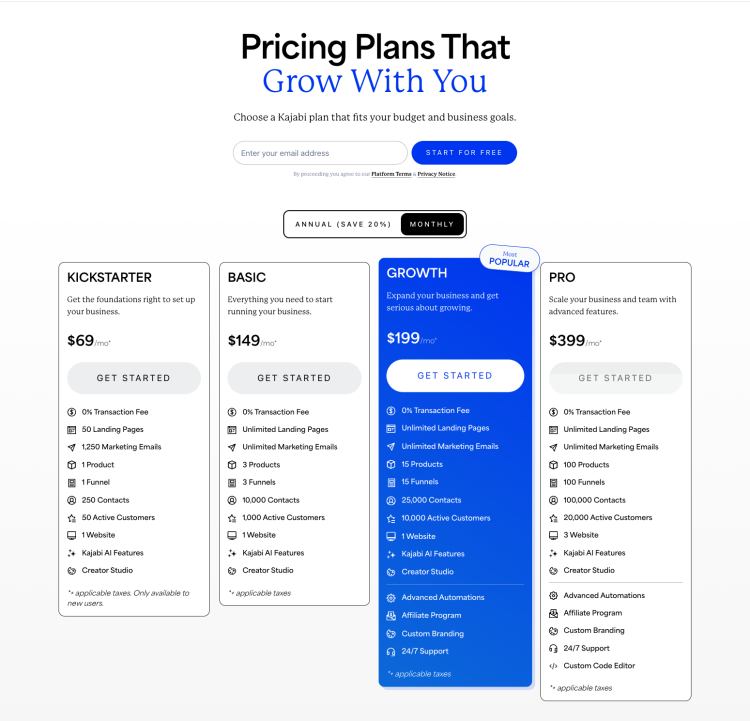
Kajabi supports all kinds of products, from online courses and digital downloads to membership sites, subscriptions, coaching, and more. There are, however, limits on the number of products you can offer within each of Kajabi’s plans. For example, the Basic plan ($149/month) has a limit of 3 products while the Pro plan ($399/month) allows for up to 100 products.

Websites / landing pages

With unlimited, dynamic landing pages, you can build your whole website on Kajabi or create as many landing pages as you like.

Templates

Using Kajabi’s Page Builder, you can select a page type (like lead capture, sales policy, etc) then easily customize it to fit your aesthetic and content needs.

Payment processing

Kajabi offers a payment gateway that integrates with Stripe and PayPal to make payments quick and seamless. Kajabi also offers instant payouts and does not take any additional transaction fees.

Email marketing tools

Kajabi offers creators built-in email marketing tools, including one-time and automated email sequences, email templates, a visual editor (for fast and easy customization), as well as audience segmentation and email analytics.

Pipelines

Kajabi offers ready-to-use “pipelines” (or funnels) you can customize and use to automatically capture email addresses, nurture leads, make sales, reengage customers who abandon during the cart or checkout process, and more.

Analytics

Kajabi offers built-in analytics and reporting so you can easily track your growth across a variety of KPI’s like customers, revenue, churn rate, pageviews, and more.

Customer management

Kajabi offers built-in customer management tools to help you organize/segment your contacts, communicate with your customers, automate key interactions, track student progress, and more.

Webinars/Events

Kajabi now offers “Kajabi Events,” which can be used to host webinars, live trainings, virtual conferences, pre-recorded events, and more (which is ideal for coaches).

Quizzes and surveys

Kajabi calls them “assessments,” but they’re essentially just quiz and survey tools you can use to engage your students, gauge their progress, or assess how well they understand a particular concept or module.

Chat support

Previously, live chat was only available on Kajabi’s most premium plans, but they now offer live chat support to all of their customers, regardless of which plan they’re on (if it’s important to know, their live chat for the Basic plan is offered Monday-Friday, 6AM-5PM PST).

Kajabi university training

Have a question or want to dive deeper into a specific topic? Kajabi University has free bootcamps, trainings, and resources to help you do it, and as mentioned above, they offer a great onboarding sequence via email for new users (according to reviewers).

Kajabi pricing: A quick breakdown

It’s no secret that Kajabi is one of the more expensive online course platforms out there, with plans starting at $149/month and going all the way up to nearly $400/month.

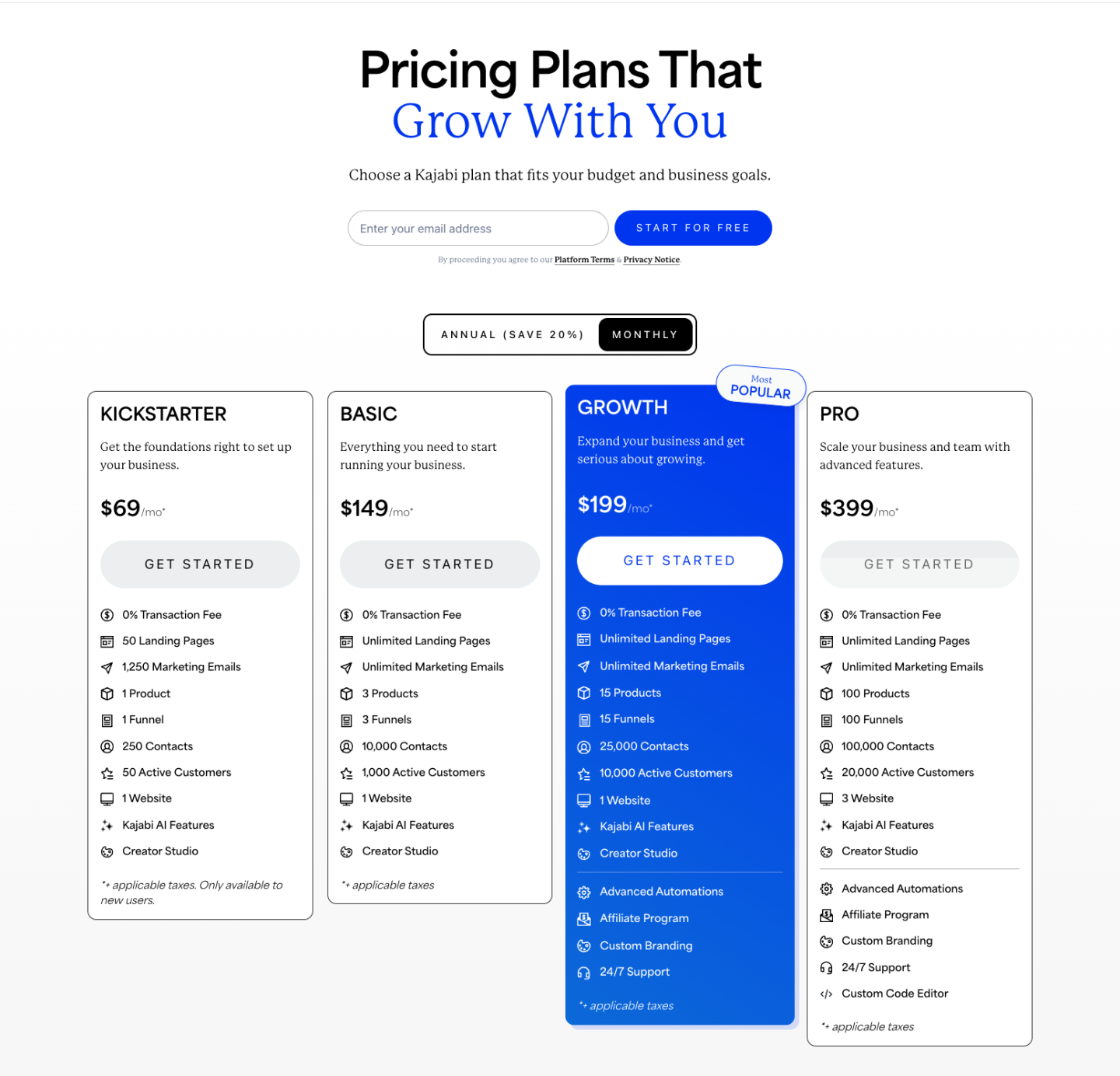
Below is a breakdown of Kajabi’s pricing across their 4 core plans and a high-level overview of what’s included in each:

  • Kickstarter ($69 per month): 50 landing pages, 1 product, 1 funnel, 250 contacts, 50 customers

  • Basic ($149 per month): Unlimited landing pages, 3 products, 3 funnels, 10,000 contacts, 1,000 customers

  • Growth ($199 per month): Unlimited landing pages, 15 products, 15 funnels, 25,000 contacts, 10,000 customers

  • Pro ($399 per month): Unlimited landing pages, 100 products, 100 funnels, 100,000 contacts, 20,000 customers

Teachable: A quick overview

Like Kajabi, Teachable is also an online course platform that allows entrepreneurs, creators, and businesses of all sizes to create, market, and sell online courses and coaching products featuring videos, lectures, quizzes, and more.

According to their website, Teachable has been around since 2013 and is used by “100,000 creators” who use Teachable to share their knowledge (compare to Kajabi which claims to support “40,000” creators, though it may be worth noting that the smaller number of creators may be related to their higher price point).

On their website and on review sites, Teachable emphasizes the concept of “sharing what you know” through online courses and coaching.

While both Kajabi and Teachable highlight the “all-in-one” aspect of their platforms, Teachable seems to be slightly more focused on the idea of “sharing your knowledge” while Kajabi seems to be more about bringing your business together under one roof.

According to their reviews, Teachable customers tend to like the interface within teachable, both for themselves and their students, as the platform makes it easy to build professional-looking products, and for people to consume them.

One reviewer said, “the user experience for my students is excellent and the all-in one package makes it very easy for me” while another said, “The UI and UX is soothing from both the views, as a teacher and as a student.”

Aside from providing a great user experience for creators and students, many customers also say Teachable is just easy to use, with reviewers saying things like: “The best part about Teachable is definitely its ease of use. No special coding knowledge required, everything is pretty drag and drop” and “I like how easy it is to create courses. It’s fun and effortless. You don’t have to be tech savvy.”

On review sites, Teachable is rated most favorably for “Ease of use” and “Value for money.” Teachable is rated
4.4/5 stars on Capterra
and
4.0/5 stars on G2
.

Who is Teachable best for?

In our opinion,
Teachable
is best for new and experienced creators who want an intuitive experience for themselves and their students, while also having access to sales/marketing tools that maximize their ability to make as much money as possible.

That being said, it’s important to note that “maximizing revenue” on Teachable means upgrading to one of their more expensive plans (starting at $159/month) so you don’t get dinged by their 5% transaction fee, which can definitely add up over time.

Overall, we believe Teachable is best for creators who:

  • May be more price conscious

  • Don’t want limits on products, coaching, or students

  • Want a clean, intuitive experience for themselves and a great learning experience for their students

  • Doesn’t require a ton of complicated integrations or third-party tools

  • Wants the option of customer support, but may not need or be willing to pay for it

  • Wants something that looks professional, but doesn’t require a ton of custom coding (unless they want it, in which case, they can upgrade and get it)

Teachable’s key features

Comparing multiple online course platforms can be challenging, especially when they’re so similar, so we’ve highlighted some of Teachable’s most popular features to help you more easily compare Kajabi vs Teachable.

Online courses

While Teachable is very focused on online courses (including drip courses, live courses, and more) and coaching products (like coaching sessions, certification training, and more), you can also sell digital downloads, free tutorials, memberships, and most other kinds of digital products.

Zoom & Calendly integration for selling coaching calls

Teachable natively integrates with
Calendly
and
Zoom
, making it easy for your students to book a paid (or free) coaching session with you.

Advanced HTML and CSS customizations

If you’re more technically savvy and want to customize the appearance of your school, Teachable allows you to do so with custom CSS and HTML. You must, however, upgrade to their “Business” plan ($665/mo) if you want access to those advanced customization features.

Payment processing

Like Kajabi, Teachable also offers a built-in payment gateway (Teachable Payments) which allows you to process payments from debit and credit cards, Apple Pay, Google Pay, and PayPal.

Affiliate program

On the “Pro” plan and up, you can allow users to promote your course(s) as an affiliate, which means your students will earn a percentage of the revenue generated from any sale that is a result of their promotion.

Course analytics

Teachable’s course reports offer information about course completion rates and quiz scores, as well as stats on video performance and engagement.

Bulk upload course content

Already have your course content ready to go? Teachable allows you to bulk upload your course files as their own individual lectures, saving you time and headache.

Basic quizzes

Teachable’s “Basic” plan includes basic quizzes are perfect for true/false and multiple choice, but to get “graded quizzes,” you’d need to upgrade to their “Pro” plan.

Course completion certificates

Teachable’s “Pro” plan ($159/mo) includes access to their course completion certificates feature, which allows you to automatically send digital certificates to students who complete your courses.

Student management

All 3 of the Teachable pricing plans include Student Management features that allow you to see student information, add or remove students, see purchase history, progress reports, and more.

Manages VAT tax (if using Teachable Back Office service)

If you opt-in to Teachable’s BackOffice service (which charges a 2% fee across all plans), they’ll automatically charge VAT on all purchases made from the EU.

Coupons

With Teachable, you can offer single or multi-use coupons, coupons for organizations, unique coupon codes for individuals, and more.

Teachable pricing: A quick breakdown

When you compare Kajabi vs Teachable in terms of pricing, Teachable’s pricing structure is a bit more accessible with plans starting at just $59/month and going all the way up to $665/month.

Below is a breakdown of Teachable’s pricing across their 3 core plans and a high-level recap of the differences between each:

  • Free ($0 per month): $1 + 10% transaction fee, 1 course, 1 coaching product, 1 download

  • Basic ($59 per month): 5% transaction fee, 5 courses, 5 coaching products, 5 downloads, community, email marketing, coupons

  • Pro ($159 per month): 0% transaction fee, 50 courses, 50 coaching products, 50 downloads, upsells, affiliate marketing

  • Pro + ($249 per month): 0% transaction fee, 200 courses, 200 coaching products, 200 downloads, 200 product bundles, custom user roles

Kajabi vs Teachable pros and cons

Now that you know the basic elements of Kajabi vs Teachable, let’s breakdown the pros and cons of each.

Above we covered the key features of Kajabi vs Teachable, their plans/pricing, as well as the potential drawbacks of each. In this section, we cover the pros and cons of both platforms, giving you more data points to consider during your decision-making process.

Kajabi pros

In addition to what we covered above, here are some reasons to consider Kajabi vs Teachable.

Native membership feature

While Kajabi has a dedicated “membership” feature where creators can build their memberships (including specific free or paid products), Teachable does not. If you want to sell a membership through Teachable, you have to “hack” together a combination of course bundles and subscription pricing to create a similar (but less streamlined) experience.

Community tools for students to engage

Kajabi’s built-in membership feature includes “Community” tools that allow creators to offer dedicated areas for students to chat. Teachable, on the other hand, only allows student comments under course videos, which means a less connected and streamlined experience.

Live chat support (5 days/week)

Unlike Teachable, Kajabi offers live chat support (5 days/week) on all of their plans, regardless of what the creator is paying or their overall usage of the platform.

Zero transaction fees

While Kajabi is one of the more expensive in terms of monthly premiums, Kajabi does not charge transaction fees, which means creators keep more of what they earn on products, memberships, coaching, etc. (compare to Teachable which charges 5% transaction fees on their “Basic” plan).

Plenty of native integrations

Unlike Teachable, Kajabi offers 8 native integrations for 5 email providers and 3 analytic tools, plus a
Zapier integration
that allows you to integrate with 500+ other analytics, email, and other popular business tools.

14-day free trial

Like many all-in-one course platforms, Kajabi offers a 14-day free trial, however, it does require a credit card to get started, which may be a barrier for some.

Kajabi Cons

As we already covered, there’s a lot of love about Kajabi, but the platform is not without its drawbacks, including the high price tag and having to upgrade quite a bit to get access to features that come standard on other online course platforms.

Very expensive

Starting at $149, Kajabi is definitely one of the pricier online course platforms, which can be a negative for budget-conscious creators or those who are just getting started (compare to Teachable, which offers plans ranging from $59/mo to $665/mo).

Limited number of products, customers, and members

Unlike Teachable, which is mostly unlimited in terms of products, customers, emails, landing pages, etc, Kajabi places limits on pretty much everything, which can be challenging if you’re trying to grow/scale your business.

Limitations with the email marketing tool

Kajabi customers complain about issues and limitations with their email marketing tool, including issues with deliverability, inability to customize language, lack of email analytics, and in general, being “a bit behind the curve” (as one reviewer put it) in terms of options and functionality.

Can be difficult to integrate with third-party tools

While Kajabi offers 8 native email and analytics integrations and supports integrations with over 500 tools, the latter will require a Zapier integration, which can be challenging to set up and get working correctly (that being said, Kajabi does offer more native integrations than Teachable).

Does not offer built-in course completion certificates

Unlike Teachable (which offers native course completion certificates), Kajabi does not offer built-in course completion certificates (you’d have to use a third-party tool like Canva to create them then set up automated emails to deliver them upon course completion).

May be difficult to learn and use for some creators

While Kajabi certainly offers a robust set of features, learning how to use each one (or the whole system) can be time-consuming and overwhelming, especially if you’re not tech savvy or less advanced with your online business (Teachable, on the other hand, seems to be a bit more intuitive and easier to use, at least according to their online reviews).

No free migrations

If you’re moving from another online course platform to Kajabi, there is no
migration assistance
to help you make that transition quickly and painlessly (this is also true of Teachable).

Entrepreneurship/Page

Kajabi vs Teachable: Which is the best choice for creators?

See how Kajabi and Teachable compare to each other (and to Podia) to help you decide what is the best platform for you.

Teachable Pros

Now that you know the pros and cons of Kajabi, let’s cover the pros and cons of teachable, starting with the pros.

Unlimited students, videos, courses, and hosting

This is one of the biggest differentiators between Kajabi vs Teachable. As covered above, Kajabi places limits on products, customers, etc, while Teachable offers “unlimited everything.”

Much more affordable plan options

While Kajabi’s “Basic” plan is $149/month (nearly $2k per year), Teachable’s “Basic” plan is only $59/month ($468/year), making it a much more accessible and affordable option.

Instant payouts (if using Teachable Payments or custom payment gateway)

If you are eligible for Teachable’s built-in payment gateway (known as “Teachable Payments”) you can process payments on a daily, weekly, or monthly basis to your
Stripe Express
account. If you do not live in an eligible country, you can process payments using their Monthly Payment Gateway in which payments are paid out every 30 days via PayPal.

No transaction fees on free courses

This means you can capture email addresses and/or offer free bonus content to your customers without worrying about that 5% transaction fee.

More advanced course compliance and certifications

As noted above, Kajabi doesn’t offer built-in course completion certificates (you’d have to use a third-party tool like Canva to create them then set up automated emails to deliver them upon course completion), whereas Teachable offers a few course compliance and certification templates that you can customize and automatically deliver to students.

Teachable Cons

Teachable is ideal for some creators, but it’s not the perfect choice for others. Here are a few drawbacks to be aware of when comparing Teachable to Kajabi and other online course platforms.

High transaction fees on the free plan

Teachable does offer a free plan, but it comes with steep transaction fees. For every sale you make, Teachable charges $1 + 10% per transaction. You can only create one course on the free plan.

“Site” design is more basic / No themes for building a full site

Unlike Kajabai, which has several page themes, Teachable really only offers one basic format for your “School,” which can be tweaked to fit your desired aesthetic (but you can still customize the favicon, navigation bar, buttons/links, logo, background, typography, and colors, and add text, images, or videos, etc).

To get access to advanced customizations, you need to upgrade to Teachable’s most expensive plan ($665/month); the only hitch is, you can’t use Teachable to build a full website (in fact, in June of 2021, they announced that they’re removing their blogging features and recommend students sign up for another service like Squarespace to supplement).

Difficult for students to log in if they are enrolled in more than one Teachable course

Knowing so many creators love Teachable for the “great student experience,” it can be disappointing to learn that logging in can sometimes be challenging for your students if they are enrolled in multiple Teachable courses (the same can be true of creators if they have multiple schools or are enrolled as students in other Teachable courses).

No access to live chat support unless on Professional or Business plan

Unlike Kajabi, which offers live chat support on all of their plans (only on weekdays for their Basic plan), Teachable does not offer live chat support on their “Basic” plan, which doesn’t make a ton of sense as someone on the “Basic” plan is more likely to be a beginner who needs more help.

Funds are held for 30 days if using Monthly Payment Gateway

While Kajabi offers instant payouts, Teachable will hold on to your earnings for a full month if you’re using their Monthly Payment Gateway (vs their built-in payment gateway,“Teachable Payments”).

Only native email integrations are Mailchimp and ConvertKit

While Kajabi offers 5 native email providers, Teachable only offers 2 native email integrations, Mailchimp and ConvertKit, which may be limiting to some creators who are already using a different email service provider.

No free migrations

If you’re moving from another online course platform to Teachable, Teachable does NOT offer any type of
migration service
(free or paid) to help you make that transition quickly and painlessly.

Primarily for courses and not for digital downloads or memberships

While Kajabi allows you to create and sell any kind of digital product (including courses, coaching services, memberships, and subscriptions), Teachable is the platform for “online courses and coaching” (their words), not digital downloads or memberships, which is not ideal for creators who sell all 4 (or plan to in the future).

No native membership tools or sales

While Teachable can technically support a membership-type product, creators would have to “hack” together a combination of course bundles and subscription pricing to create it (compare to Kajabi which has a native membership feature which allows you to instantly create and sell memberships).

Daily payouts only available with Teachable payment gateway

If a creator uses the Teachable payment gateway (also known as “Teachable Payments”) then they can receive daily payouts. However, if a creator does not use Teachable Payments (which can happen if you live in a country that is not “eligible”) that creator must use the “Monthly payment gateway,” which always has a 30-day hold to comply with Teachable’s mandatory 30 day refund policy.

A third online course platform for comparison: Podia

As mentioned upfront, the purpose of this article is to provide an honest and straightforward review of
our top competitors
, as well as our own platform (yes, even the downsides) to help you make an informed and confident decision.

Obviously we have more insight into our own product than we do for Kajabi or Teachable, but we’ll do our best to put our biases aside and just focus on the facts, as well as what our customers are saying on review sites and in independent reviews.

Podia: A quick overview

Like
Kajabi
and
Teachable
, Podia is also an online course platform that gives creators everything they need to sell courses, webinars, downloads, coaching, and communities.

Podia was founded in 2014, right around the time Teachable was founded, and the platform has served 150,000+ creators.

Like Kajabi, Podia also emphasizes the “all-in-one” aspect of the platform (and relieving the hassle of the “duct tape solution”) while emphasizing the fact that you can sell any kind of digital product on the platform, including online courses, webinars, memberships, and digital downloads (compare to
Teachable
which focuses more on online courses/coaching and
Kajabi
which focuses more on online courses/memberships/coaching).

The Podia site also highlights our marketing tools, including our site builder (which allows you to build beautiful, modern, mobile-friendly websites and landing pages), our email marketing tools, live messaging widget (a feature that’s totally unique to Podia), and our affiliate marketing feature.

Podia is also very focused on customer support, offering
chat and email support
7 days a week, as well as
a video demo tour
.

Best of all, you can get started on Podia for free. Podia has a free plan that includes a website, online community, one digital download, and one coaching product. This means you can launch online business, grow your email list, build your brand, and start making sales without a huge upfront investment. You’ll only pay a 10% transaction fee when you make a sale.

When you’re ready for more features and more product types, you can easily upgrade to one of our paid plans for more advanced options.

In terms of reviews, Podia’s customers seem drawn to the simple, intuitive design with customers saying things like “PODIA hands down is SIMPLE to use. No muss, no fuss, SIMPLE” and “Their system and interface is quite elegant and simple, with just the right of customization to differentiate your site from other Podia sites, but not enough customization options to paralyze you in development.”

Customers also love how the Mover and Shaker plan have no limits on everything from products to customers, saying things like “looove the fact that you get unlimited everything, so no more tiers to squeeze through” and “I like the fact that Podia gives its users unlimited hosting of video content through one of the premium video platforms: Wistia. This means that you can upload all kinds of videos, as well as PDF and other types of learning materials, without having to worry about potentially ‘running out of storage’.”

Reviewers also seem to like the
accessible price tag
(“value for money” is one of the top highlights from reviewers on Capterra).

Finally, Podia customers seem to love Podia’s stellar customer service, saying things like “the customer service goes above and beyond to help you out” and “they have exceptional chat customer service. If you have any problem, you can just ask them and they answer really fast.”

The
free migration service
is also a helpful bonus for those switching platforms and is mentioned throughout the reviews (“the team were able to migrate me in less than 24 hours and the support is so personal and caring”).

While very close, it’s also worth noting that Podia is rated
4.8/5 stars on Capterra
, while Kajabi is rated 4.3/5 stars and Teachable is rated 4.4/5 stars on Capterra, as well as
4.8/5 stars on G2
, compared to Kajabi’s 4.4/5 and Teachable’s 4.0/5.

Who is Podia best for?

At its core, Podia is for creators who are looking for a simple, intuitive, and affordable all-in-one platform that supports all types of digital products. It’s also ideal for creators who want the flexibility to grow their businesses without limitations and to get the support they need to succeed.

To recap, we believe Podia is best for creators who:

  • Want a simple, intuitive, and affordable all-in-one course platform

  • Want to get started for free with their own website, community, digital download, and coaching product

  • Sell (or plan to sell) online courses, webinars, memberships, community, coaching, and/or digital downloads

  • Want the option to use already-connected
    Podia Email

  • Want to offer live chat on their website and sales pages

  • Want fast, helpful, and friendly customer support 7 days a week

  • Don’t want limits on how many products they can sell

Podia’s key features

While there’s a lot of love about Podia, below are the key features that are highlighted prominently on the Podia Features page and throughout the site.

Online courses

Podia offers a simple and intuitive
course builder
that makes course creation easy. With Podia, you can build beautiful and modern standalone courses, drip courses, bundled courses, and more. You can even pre-sell courses, allowing you to validate ideas and earn sales before putting in any work.

Digital downloads

Podia supports every type of
digital download
you can imagine, for eBooks and PDFs to templates, music, audio, video, and more. Sell downloads on their own, use them as lead magnets to capture emails, or bundle them together with others products.

Webinars with live or pre-recorded videos

Host live or pre-recorded
webinars
with unlimited participants by connecting your YouTube Live or Zoom accounts, and your audience will be able to register – and pay – for access through your Podia site.

Membership communities

With Podia, you can create as many membership community plans – for as many members – as you want, with each featuring different perks, content, and prices.

Our
membership sites
include public and members-only posts, interactive community areas, product bundling with your memberships, and recurring subscriptions for members.

You can set up your membership using Podia’s community feature.

Affiliate programs for your customers

Turn your fans into sales reps by launching your own
affiliate program
. Within your affiliate program, you can set custom commission terms, invite affiliates, and reward them for helping you grow your business (available on the Shaker plan).

Beautiful, easy-to-build custom website/pages (no coding required)

Using
Podia’s site editor
, you can quickly build a beautiful, custom website for your business (as well as custom landing/sales pages) without needed design or development knowledge.

Built-in email marketing tools

Send one-off emails or automated, multi-touch sequences with Podia’ built-in
email marketing tool
. The built-in marketing tools also include email capture, segmentation and tagging capabilities, email analytics, and automated campaigns. Podia is also the only online course platform that gives you complete revenue metrics for every email you send.

On-page chat messaging to interact with visitors and customers (Podia only!)

The same way Podia offers chat support to potential and current Podia customers, you can also offer
live chat messaging
to your potential and current customers by enabling the “live chat” widget on your website and sales pages. This functionality is unique to Podia and is not available through Teachable or Kajabi.

Embedded checkout

Sell in more places (and increase your chances of conversion) with
Podia’s embedded checkout feature
, which features a fast and simple checkout process that’s been tested and optimized for conversion (available on the Shaker plan).

Automatic VAT calculation for EU customers

If you’re in the EU, Podia will calculate the amount of VAT due from each customer, add the VAT to the customer’s bill, collect that money to your Stripe or PayPal account, and store all the tax data you need to make an accurate VAT return.

Payment plan options

If your customers prefer to pay in installments, use Podia’s payment plan options to give your students more financial freedom and flexibility.

Coupons

Create custom
coupons
for sales or for unique situations (i.e., for individual customers, a one-time purchase, or a limited-time deal) to entice customers and make more sales.

Pre-sell courses

Have an idea for a course, but not ready to launch yet?
Use Podia to pre-sell your course
, which means you can promote it, capture email addresses, and even collect payments before putting in any work.

Bundles

Have similar products you want to sell together? Use Podia’s Bundle feature to sell complementary products together at a discounted rate as a way to increase sales.

Upsells

Increase the size of every order by offering relevant
upsells
(like additional products) to customers who purchase your digital downloads.

Quizzes

Test your students’ knowledge or ensure concepts are being properly absorbed by incorporating quizzes throughout your online courses.

Drip content

Want your content to arrive at specific intervals? Use Podia’s Drip Content feature to automatically deliver specific content at specific times throughout the customer journey.

Student comments

See student questions, get their feedback, or just start a conversation by allowing customers to comment directly within your course content.

Course completion certificates

When students complete a course, automatically recognize and reward their effort with a simple yet elegant course completion certificate (only available on Mover and Shaker plans).

Podia pricing: A quick breakdown

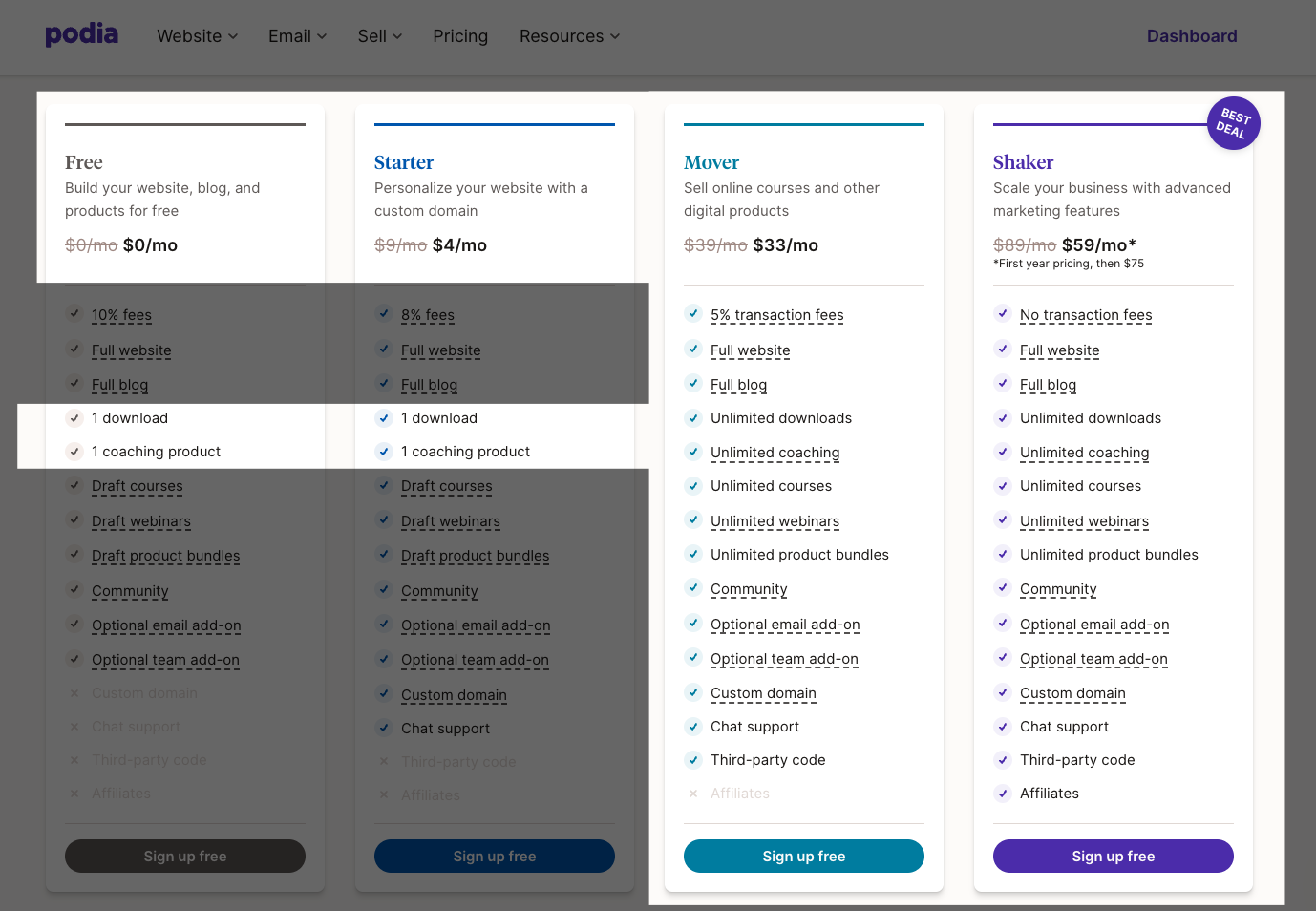
With a feature-packed free plan and paid plans starting at $9/month (or $4/month when you pay annually!), Podia is considered much more accessible to creators at every level, which is why “good value for the money” tends to be a highlight across public reviews.

When you compare
Podia’s pricing
to Teachable and Kajabi, Podia’s plans are typically less expensive than competitors.

Below is a high-level breakdown of what’s included in each of Podia’s plans:
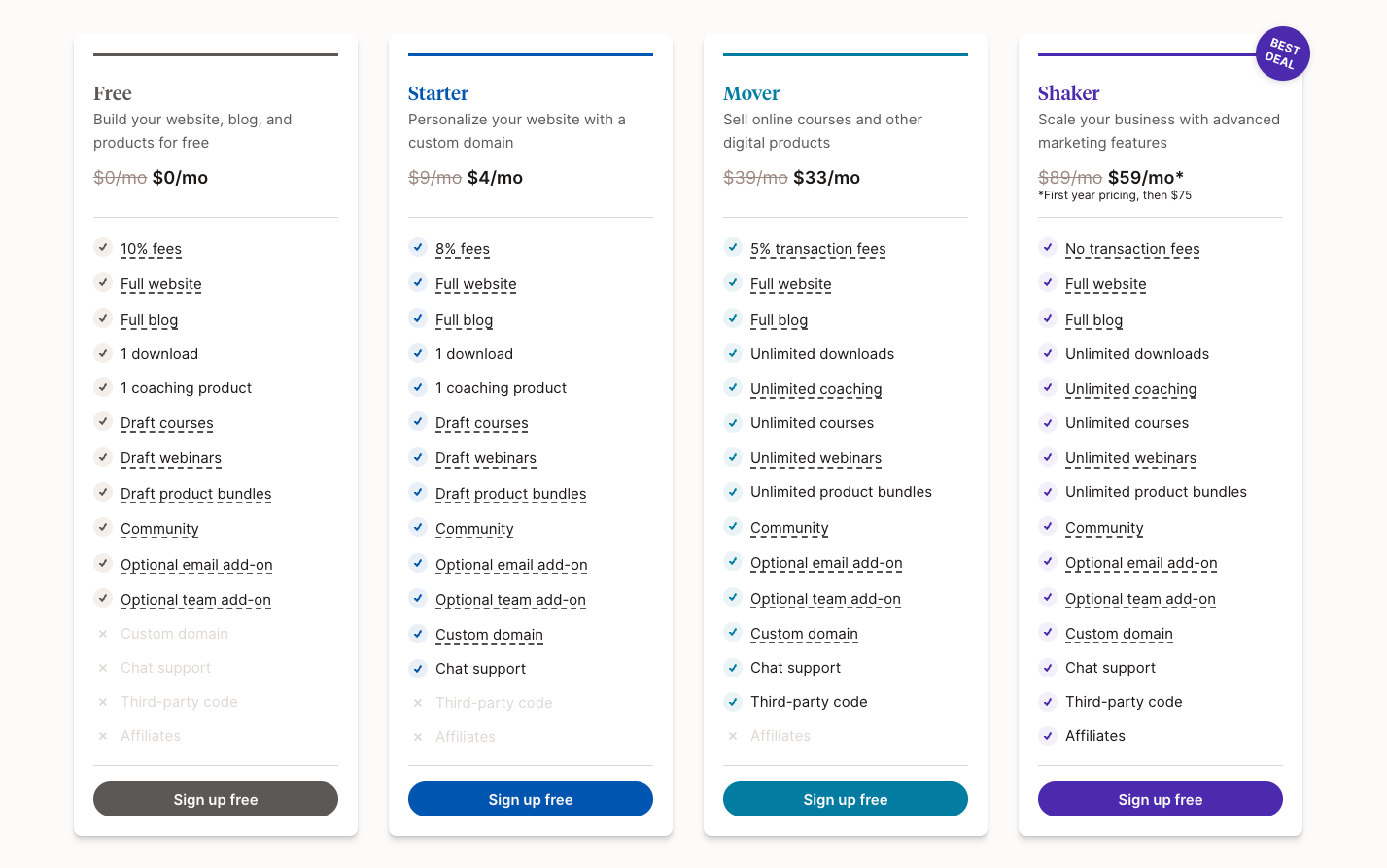
Now that you know a bit more about Podia, let’s dive further into the pros/cons, so you can compare them to the pros/cons of Kajabi vs Teachable

It wouldn’t be a fair evaluation of all 3 online course platforms without a review of Podia’s pros and cons. Our honest assessment is below, but we encourage you to check out reviews sites and independent reviews of Podia to form your own conclusions.

Podia Pros

In addition to all of the key features listed above, below are some of the reasons creators love Podia, according to our internal data as well as public data on review sites.

Simple, intuitive, and easy to use

Podia was designed to be as simple and as straightforward as possible, making it accessible for creators at every level, regardless of design or technical ability. This makes Podia incredibly easy to understand and use (for course creation, design, marketing, and more), which is why it’s rated so high for “ease of use” on review sites like Capterra and within independent reviews.

Affordable monthly plans

Podia offers more than 90% of the same features and functionality as Teachable and Kajabi, but for much less.

Podia’s free plan

Podia’s free plan includes a website, online community, one digital download, and one coaching product. That means you can get your business up and running, and even start making sales, without paying a fixed monthly cost. All you’ll pay is a 10% transaction fee when you make a sale.

Unlimited creativity

Create and sell unlimited courses, digital downloads, coaching, community tiers, and more on Podia’s Mover and Shaker plans. With unlimited students, sales, and bandwidth, you won’t have to worry about upgrading as your business grows.

Free migrations (with annual Mover and Shaker plans)

Moving from another platform? Podia will
migrate all of your content for free
if you become a paying customer on one of Podia’s annual Mover and Shaker plans (compare to Teachable and Kajabi which do not offer migration support of any kind).

Instant payment processing

Like Kajabi, Podia also offers a secure payment gateway with instant payouts for any sales you make through Podia, regardless of which payment method you use (compare to Teachable which may hold payouts for up to 30 days).

Podia Cons

Just as Kajabi and Teachable, Podia also has some potential downsides you may want to consider when making your final decision on which online course platform is right for you.

No custom CSS/HTML customization options

While Kajabi and Teachable both offer code-level customization options on their premium plans, Podia does not.

That being said, Podia does offer plenty of design customization within their product (i.e. – selecting a basic theme, adjusting colors, fonts, adding logos, favicon, content sections, videos/photos, etc.), allowing you to create a beautiful and professional-looking online business in no time at all.

With Podia, creators have the tools they need to create a visually appealing storefront without getting lost in the weeds that can come from having “too many” complicated and time-consuming design options. This is especially helpful for creators who are not as design or technically savvy.

However, for creators with a very specific aesthetic or those looking for the ability to customize down to the pixel, Podia may not be the right choice. If you’re on the fence, sign up for
Podia’s free plan
so you can test out the design options for yourself.

No phone support

Podia offers
email and chat support
7 days a week, but like Kajabi and Teachable, Podia does not offer phone support, however, Podia is very intentional with this choice, as it allows the team to quickly access your account details (which means faster and more personalized support) and provide screen-sharing, videos, and links, which wouldn’t be possible via phone.

Finally, using online support means all interactions are saved for future reference so if you ever write in again, our team has a clear history of all interactions, which means informed agents and faster resolutions for creators.

Slightly less robust analytics + reporting

Like Kajabi, Podia also captures a variety of metrics related to your online business, including sales and revenue, subscription metrics, email performance, product progress, and more (in fact, Podia is also the only platform that gives you complete revenue metrics for every email you send).

However, Podia does not yet offer tracking for pageviews, nor does it allow you to parse the data by a specific timeframe (you can, however, integrate your store with Google Analytics to get those metrics). Kajabi’s Dashboard is also a bit better in terms of presentation, but Podia is also working to improve their Dashboard so the analytics are clearer and easier to track over time.

In comparison, Teachable does not offer a direct analytics feature on their platform, but like Podia and Kajabi, they do offer integrations with analytics tools (i.e. – Segment, Google Analytics, Facebook Pixel, etc).

How does Podia compare to Kajabi vs Teachable?

Now that you have a better sense of each platform, as well as the strengths and weaknesses of each, let’s quickly compare the main differences between Kajabi vs Podia and Podia vs Teachable.

Kajabi vs Podia

While Kajabi and Podia are very similar in terms of features and functionality, there are a few key differences between the two platforms that could be reasons to choose one over the other.

Podia is simpler and easier to use

One of the things creators love most about Podia is the simplicity of the product, especially in comparison to Kajabi, which has more complexity and a bigger learning curve.

While it is true that many Kajabi customers also find Kajabi’s platform easy and intuitive, we’ve also seen reviews (and heard from previous Kajabi customers) that it can be very time-consuming and difficult to learn, even if you have experience and some technical skill.

Podia is more affordable (better value)

As you can see from the chart further down the page (in the section “Let’s compare all 3 across every feature and offering”), Podia offers over 90% of the same features as Kajabi, but Kajabi costs anywhere from double to four times as much as Podia (the range depends on
the plan
).

It’s true that Kajabi offers advanced customization options, more templates, and slightly better analytics (more on that below), but you have to ask yourself if those 3 nuances are worth the massive price hike (for some, the answer will be yes, for others it’s a hard no).

Kajabi offers more advanced customization

Unlike Podia, Kajabi offers advanced customization options on their “Pro” plan, which will allow you access to the code editor so you can edit the HTML/CSS of your Kajabi site.

This is a key selling point for creators who have a specific aesthetic, but only if they can afford the hefty price tag ($399/mo) that comes along with it (and don’t forget, unless you’re design and tech savvy, you still have to pay a designer and/or developer to do the work for you in the code editor, which is another added expense on top of the pricey monthly premium).

Kajabi offers more templates

One of Kajabi’s strengths is templates for products, websites, and pipelines/funnels.

Podia offers basic website templates that can be customized to fit your needs, as well as several beautiful
email templates
.

Kajabi has slightly more advanced analytics

As covered above, Kajabi and Podia offer almost exactly the same analytics, but Kajabi offers two analytic options that Podia does not: Tracking pageviews and being able to parse the data by a specific timeframe (but again, you can get those metrics by integrating with Google Analytics).

Kajabi’s analytics Dashboard is also a little clearer and easier to follow, but these are all things Podia is working to actively improve in 2021 and beyond.

Podia offers live chat on websites and sales pages — Kajabi does not

Unlike Kajabi or Teachable, Podia is the only online course platform that offers
on-page live chat
so you can answer questions and close deals with site visitors and engage with logged-in customers.

Not only is this a huge differentiator for Podia, it’s also a big added bonus for creators who want more opportunities to sell without having to shell out hundreds of dollars per month on expensive live chat software.

Podia offers course completion certificates — Kajabi does not

Like Teachable, Podia offers built-in course completion certificates, but Kajabi does not (you’d have to use a third-party tool like Canva to create them then set up automated emails to deliver them upon course completion).

Podia offers more flexibility — Kajabi has strict limits on every plan

While Podia allows you to make unlimited products on Mover and Shaker plans and sell to unlimited students, Kajabi has strict limits on nearly everything you need to run a successful online business.

This is not only restrictive, but can become extremely expensive as your business grows, as you’ll need to keep upgrading to more and more expensive plans in order to get more flexibility.

Podia offers free migrations — Kajabi does not

If you’re switching from another platform, Podia offers a
free migration service
with any paid annual Mover and Shaker plan to help you make the transition.

All you have to do is give the Podia team your login info and they’ll move all of your content and customers to Podia for free. Kajabi does not offer this as a paid or free service.

Teachable vs Podia

While Teachable and Podia are similar in terms of features and functionality, there are a few key differences between the two platforms that could be reasons to choose one over the other, which we cover below.

Podia offers more advanced email marketing tools

While Teachable does allow you to send one-time emails to students, that is the extent of their built-in email marketing tools. If you want to send more advanced sequences, like a drip/nurture sequence, you’d have to use one of their email integrations with ConvertKit or Mailchimp, which is another potential added expense.

Podia, on the other hand, has much more
advanced email marketing tools
built directly into the product, allowing you to send one-time broadcast emails and automated drip sequences, as well as more robust segmentation and detailed analytics for each email.

Podia offers chat support for all plans, 7 days a week — Teachable does not

Teachable only offers live chat support on their “Pro” and “Business” plans, which means you’d have to pay at least $159/month to access it. Podia, on the other hand, offers
superb chat (and email) support
on every plan, 7 days a week.

Teachable offers more advanced customization options

Similar to Kajabi, Teachable also offers more advanced customization options, allowing you to fine-tune the appearance of your Teachable school. To get it, however, you must upgrade to their “Business” plan which is $665/month (plus the cost of a designer/developer if you need one).

Podia does not currently offer advanced customization options, but the product offers a variety of basic customization options so creators can build beautiful, professional-looking websites, pages, and products without wasting a ton of time or dropping a lot of money.

Teachable offers course templates — Podia does not

If you want to customize the look of your course, Teachable offers a few course templates you can use to change up the basic structure and appearance. While Podia offers website section templates and email templates, we do not currently offer course templates.

Podia offers instant payouts for all payment methods — Teachable does not

While Podia offers instant payouts for every single sale you make, the same cannot be said for Teachable. In order to get instant payouts, you must be eligible for Teachable’s payment gateway known as “Teachable Payments.” If you are not eligible, you will have to use a custom payment gateway or Teachable’s “Monthly Payment Gateway,” which will hold payments for a full 30 days before being paid to you via PayPal.

Podia offers free migrations — Teachable does not

If you’re switching from another online course platform, Podia offers a
free migration service
with any annual Mover and Shaker plan to make the transition fast and easy.

All you have to do is give the Podia team your login info and they’ll move all of your content and customers to Podia for free. Teachable does not offer migrations as a paid or free service.

TL;DR: Why choose Podia over Kajabi and Teachable as your online course platform?

Whether you read through the whole article or just scrolled here, you may still be wondering: Which of these online course platforms is right for me?

While we can’t make the decision for you, we do encourage you to read carefully through each section above so you can get a clearer sense of the pros and cons of each option.

However, if you just want a few quick reasons to choose Podia over Teachable or Kajabi, check out the list below or simply give Podia a test drive yourself with our
free plan
.

Podia is simple and easy to use for creators at every level

There’s a reason Podia is consistently rated high for “ease of use” — it’s intuitive, easy to learn, and does not require the user to have any design or technical knowledge. This makes Podia a great choice for creators at every level, but especially those who want to focus on selling their products vs getting caught up in technical issues or design rabbit holes.

Fewer limitations and the option to transaction fees as you grow

Kajabi has limits on nearly everything on all three of their very expensive plans. Teachable also has product limits on all plans, except for the highest-tiered business plan which starts at $665/month.

Podia, on the other hand, offers unlimited products, courses, landing pages, students, hosting, support, and more on Mover and Shaker plans. Also, there are no transaction fees on Podia’s Shaker plan.

Most affordable for more features

As you can see from the chart above, Podia offers nearly all of the same features offered by Teachable and Kajabi, yet
Podia’s prices
are far more affordable across the board than either of the two alternatives. This means if you go with Podia, you’re getting almost the exact same product for a fraction of the price.

Free migrations

If you’re switching from another platform, Podia will move all of your
customers and content for free
(if you sign up for an annual Mover or Shaker plan), saving you tons of time and headache. Kajabi and Teachable do not offer a migration service of any kind.

Messaging feature (on-page live chat) for students and visitors to chat with creator

Unlike Kajabi and Teachable, Podia offers a totally unique,
on-page live chat widget
, which allows leads and logged-in customers to contact creators directly if they have questions or need help. This gives creators additional selling opportunities, as well as a chance to build relationships and learn about their current/potential customers. This is available on all plans, including the free plan.

Constantly adding new features

Podia is dedicated to
constantly improving our product
, from improving existing features and adding new ones all the time, to ensuring the product is always keeping up with the latest tech, design, and security innovations. Podia is also open to any product feedback their customers have, ensuring you always have a voice.

Try Podia for free to see how it compares to Kajabi and Teachable

Even the most comprehensive guides won’t replace hands-on experience, so why not give Podia a try to see exactly how it stacks up against Kajabi, Teachable, and other online course platforms?

Get your free Podia account today
to take our website builder, product creation interface, and other helpful features for a spin.

While we hope you become a Podia customer, we also want you to select the online course platform that’s right for you, so no matter what you decide, we wish you the best of luck on your journey and hope you find success!
Get your free Podia account

Join the 150,000+ creators who use Podia to create websites, sell digital products, and build online communities.

Sign up free

Entrepreneurship8 best alternatives to Thinkific for online creators (Features & pricing) Find the best alternative to Thinkific for selling digital goods, building online courses, and growing communities.

Software Stack Editor · July 26, 2024 ·

Find the best alternative to Thinkific for selling digital goods, building online courses, and growing communities.

Jump ahead

In this article

Looking for a place to sell online courses? You might have heard about an e-learning platform called Thinkific.

With Thinkific, creators can offer free and paid programs to unlimited students. You can upload as much course content as you want and even build a storefront to promote your offerings.

Thinkific is well-established in the course creation space, but it might not be the best fit for creators who want to branch out with other product types.

In this guide, we’ll cover the pros and cons of Thinkific as well as eight Thinkific alternatives to consider if it’s not right for your business.

Note: All pricing is accurate at the time of writing, but this is subject to change over time.

Thinkific pros and cons

Thinkific pros

Free plan: One of the biggest upsides of Thinkific is their free plan. Without paying anything upfront, you can sell a limited number of courses to unlimited students. There aren’t any transaction fees, and if you need more features, you can upgrade to a paid plan when you’re ready.

Here’s a look at the full Thinkific pricing breakdown:

Unlimited courses: If you choose to upgrade to a paid plan, you’ll be able to make unlimited courses and host as much content as you like. Some plans include helpful features like
course completion certificates
, assignments, and lesson prerequisites.

Website builder: Creators can use Thinkific’s drag-and-drop page builder to set up a website or storefront for their products. There are also website templates you can use to jumpstart your creativity.

Thinkific app store: If you need more functionality, the Thinkific app store comes with additional integrations and features. But be aware that some of these come at an extra cost.

Thinkific cons

It’s difficult to sell digital products other than courses: Courses are Thinkific’s bread and butter, but these days, there are countless ways to share your knowledge. If you plan to sell digital downloads, memberships, live streams, webinars, coaching programs, or services, Thinkific isn’t the best fit since it’s primarily optimized for online courses.

You never know where your creator business will take you, and only being able to offer one type of product could be a severe limitation as you grow.

Thinkific’s free and Basic plans lack key features: Thinkific offers a free plan and a $49 per month Basic plan, but these options are missing important tools that might make them unusable for some creators.

You can only make three courses on the free plan, and to access many essential features, you’ll need to use Thinkific’s $99 per month Pro plan or above.

The Growth add-on: Creators will need to pay more for Thinkific’s Growth add-on to use premium tools. This can only be purchased as an addition to the $99/month Pro plan, and it costs an extra $50/month.

Advanced integrations, the ability to remove Thinkific branding, Zapier actions, unlimited communities, student segmentation tools, and bulk student messaging are some features that are only accessible with the Growth add-on.

Limited email functionality: Email marketing is essential for many online businesses, but Thinkific’s email tools may be too basic for many creators. You must be on the Pro plan with the Growth add-on to access features like
email segmentation
and bulk messages, or you’ll need to integrate with a
third-party email service
which likely has additional fees.

Ultimately, the course platform you choose depends on the unique needs of your business. If you determine that Thinkific is not right for you, here are eight alternatives you can check out instead.

8 Thinkific alternatives for creators

1. Podia (Best all-in-one platform for online creators)

Podia is an all-in-one tool for bringing your online business to life. While Thinkific mainly focuses on course creation, Podia lets creators sell
courses
,
digital downloads
,
webinars
, and
coaching sessions
. You can also manage email marketing, affiliates, and your website under one roof.

Want to sell online courses? With Podia’s course builder, you can design a clean, visually appealing learning experience for your students in minutes. You can also offer multiple payment plans, message students through our on-page chat widget, and embed content from 1,900+ third-party platforms like SoundCloud, Typeform, and Github directly into your courses.

Want to sell dozens of printables and PDF files? Go for it! There are no product limits on Mover and Shaker plans, so you can let your creativity soar.

Want to build a website? Podia has a generous free plan that includes
a full website for your business
. You don’t need to learn code or hire a developer. Simply use our intuitive page builder to create a digital home you love, complete with unlimited sales pages for your products and offerings.

According to
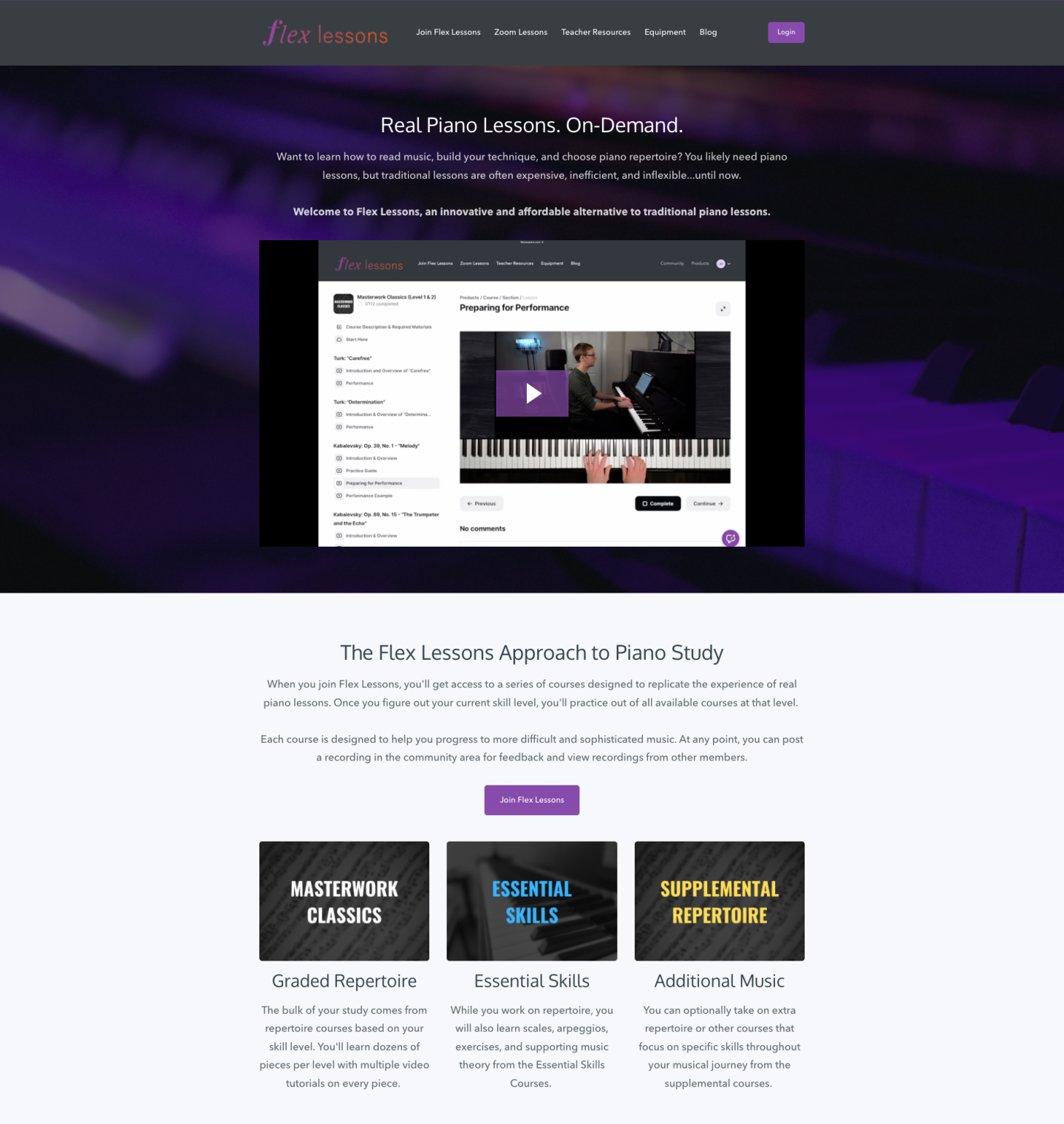
Podia creator
and
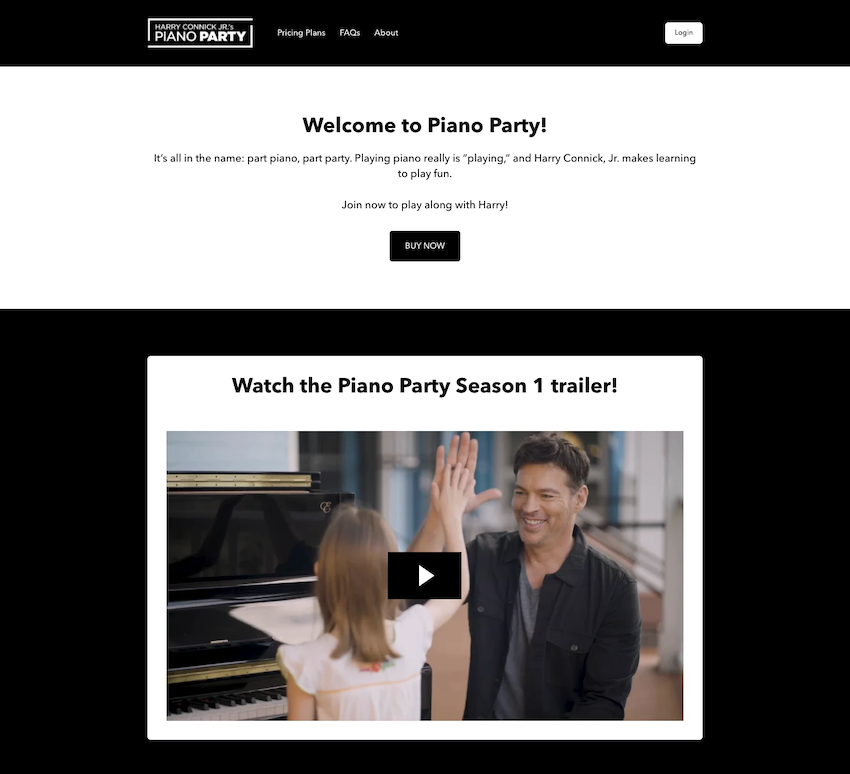
piano instructor Joseph D’Amico
, “Podia makes website building so fun. I feel like I could set up a site in an afternoon, and it would look great. And if there’s something to be said for how pretty it is. It’s the best-looking one by far.”

But Podia’s free plan doesn’t stop there. You can also set up your blog, build unlimited landing pages, start your email list, and sell one digital download and one coaching product. You can even make draft courses, webinars, and product bundles which can be launched whenever you’re ready to upgrade your plan.

Beyond the free plan, Podia’s Starter, Mover, and Shaker plans are competitively priced and packed with all the tools you need to run your business. Compared to Thinkific, you get a wider range of resources for a lower price with Podia.

Bottom line: Podia was built to grow with you no matter where your creator journey takes you.

Podia features:

  • All-in-one alternative to Thinkific

  • Sell unlimited courses, digital downloads, webinars, communities, and coaching sessions on Mover and Shaker plans

  • Build a full, SEO-friendly website on all plans

  • Email marketing
    ,
    affiliate marketing
    , upsells, coupons, and
    customer messaging

  • Free migrations
    for annual Mover and Shaker plan participants

  • Fast and friendly
    customer support

  • Payment integrations with Stripe and PayPal

  • Instant payouts

  • Custom domains on paid plans

Podia pricing:

  • Free plan: (10% transaction fee)

  • Starter: $9/month or $4/month when paid annually (8% transaction fee)

  • Mover: $39/month or $33/month when paid annually (5% transaction fee)

  • Shaker: $89/month or $75/month when paid annually

Learn more about how Podia compares to Thinkific
.

Get your free Podia account now
to see these features in action.

Get your free Podia account

Join the 150,000+ creators who use Podia to create websites, sell digital products, and build online communities.

Sign up free

2. Teachable

Teachable is an online course platform where you can sell unlimited courses and
coaching programs
on all plans, including their free plan. Creators get access to course design templates, you can build a storefront for all your product offerings, and sales made through Teachable’s payment gateway are eligible for instant payouts.

Teachable features:

  • Sell courses and coaching

  • Build customizable
    sales pages
    for your courses and products

  • Coupons, subscriptions, one-time payments, memberships, and bundles

  • Basic email functionality

  • Affiliate management
    resources

Teachable benefits: When you build courses with Teachable, you can enable course completion certificates and add interactive elements like quizzes. There are helpful integrations you can connect with if you need more functionality. In addition to letting you sell unlimited courses and coaching products, Teachable handles behind-the-scenes financial tasks like paying you, your affiliates, and other authors.

Teachable downsides:Teachable is not ideal for
selling digital downloads
or building a brand community. To sell communities, you must integrate with a third-party online community platform called Circle, which comes with additional costs. Also, Teachable charges high transaction fees on the free plan ($1 per sale plus 10% transaction fee).

Teachable pricing:

3. Kajabi

Kajabi is an all-in-one alternative to Thinkific, where you can sell courses, digital products, coaching, memberships, and
podcasts
. You can also use Kajabi to handle your email marketing, run your affiliate program, build your website, and track your analytics.

Kajabi also offers in-depth
sales funnels
called pipelines. Pipelines are automation templates that help you achieve a specific goal, like nurturing leads or
launching a new product.

Kajabi features:

  • Sell courses, downloads, coaching, memberships, podcasts, and communities

  • Email marketing
    , affiliates, and analytics

  • Website builder and templates

  • For podcasters: Sell members-only podcasts and manage your podcast subscribers

  • Create advanced sales funnels

Kajabi benefits: Like Podia, Kajabi is an all-in-one alternative to Thinkific, which means you’ll get access to a robust suite of tools for one monthly rate. There are no transaction fees on any plans, and Kajabi has a mobile app so students can view their courses on the move.

Kajabi downsides: Kajabi comes at a higher price point than similar tools in this space. In addition to the cost, Kajabi limits the number of products you can make on all plans and the number of active members in your programs.

Here are the limits on Kajabi plans:

  • Kickstarter: one pipeline, one product, 50 active customers

  • Basic: three pipelines, three products, 1,000 active members

  • Growth: 15 pipelines, 15 products, 10,000 active members

  • Pro: 100 pipelines, 100 products, 20,000 active members

Our survey of over 900 creative entrepreneurs found that creators have an average of 10.95 products, which would mean many have to use the pricey Growth plan.

Kajabi pricing:

  • Kickstarter: $69/month

  • Basic: $149/month

  • Growth: $199/month

  • Pro: $399/month

4. Teachery

Teachery makes course building simple. This software was made by course creators, for course creators, and provides just the things you need without extra bells and whistles.

With Teachery’s white-label course platform, you can upload your content into two sleek layouts, create unlimited lessons, and house helpful resources for your students in one place. When selling your courses, you’re free to make unlimited payment pages and charge a one-time fee, a recurring rate, or nothing at all.

Teachery features:

  • Unlimited courses, lessons, and students

  • Straightforward course builder with two templates

  • Sell memberships and bundle products

  • Create sales pages and
    landing pages

  • Integrations with Mailchimp, ConvertKit, and Zapier

  • Affiliate program

Teachery benefits: Teachery offers two payment plans, monthly and annual. Both options come with everything, so you don’t have to upgrade your plan or pay for additional add-ons as you grow.

Teachery also has a Zapier integration that allows you to connect the tool with other software in your technology stack.

Teachery downsides: Teachery is primarily used for selling courses, and it’s not optimized for selling digital downloads or services like coaching. There’s no community feature, and plans don’t include video or audio hosting. Instead, you’ll need to work with a third-party tool like Wistia, Vimeo, or YouTube.

Teachery pricing:

  • Monthly plan: $49/month

  • Annual plan: $470/year

5. LearnDash

With LearnDash, you can
sell unlimited courses to unlimited students from your WordPress site
. Create self-study programs, drip content over time, run a course forum, and gamify your program with leaderboards, course points, and badges.

You can list your courses as memberships, subscriptions, one-time payments, or product bundles. On the design front, LearnDash has customization options and works alongside most WordPress themes and page builders like Elementor.

LearnDash features:

  • Sell courses from your own website

  • Drag and drop course builder

  • One-time payments, subscriptions, memberships, bundles, and bulk licenses

  • Gamification, quizzes, certifications, badges, leaderboards, and evaluations

  • Drip feeds, prerequisites, and required videos to improve course completion rates

LearnDash benefits: The LearnDash online course platform can be used with almost any WordPress theme. Creators who love using WordPress can add course functionality to their existing site with just a few clicks. To use the LearnDash software, you simply pay a flat rate per year based on how many site licenses you need. There are no transaction fees.

LearnDash downsides: On the feature front, LearnDash doesn’t have a webinar tool or a way to teach live. You can only send basic email notifications to students, so you’ll need to connect another tool for advanced email marketing features.

If you want to
build an affiliate program for your course
, you’ll also need additional software since this isn’t a LearnDash feature. Most importantly, LearnDash is a WordPress learning management system (LMS) plugin that must be used with a WordPress website.

While this is fine for creators who already have WordPress experience, beginners might face a steep learning curve. You may need to hire a developer for advanced customizations and functionality. You’ll be responsible for connecting, maintaining, and paying for add-on tools to make your site function the way you want.

On top of that, you’ll need to pay for your domain registration and third-party WordPress hosting, as well as any premium themes you may be using. Check out this guide to learn more about
website hosting
.

LearnDash pricing:

6. LearnWorlds

Like Thinkific, LearnWorlds puts online course creation at the forefront. Creators can sell unlimited courses with different payment options and elevate their content with LearnWorlds’s unique interactive video features. LearnWorlds lets you generate subtitles, automatic transcripts, and eye-catching overlays for your course videos. Content annotation tools are available to help your students engage deeply with your materials.

Also, LearnWorlds is a strong Thinkific alternative for creators who want to build their own mobile learning app.In addition to selling courses, subscriptions, and
memberships
, creators can design a white-label mobile learning platform for their students. This functionality is available to creators on the $299/month Learning Center plan for an additional cost.

LearnWorlds features:

  • Sell courses, memberships, subscriptions, and your own mobile learning app

  • Website and sales page builder

  • Pop up builder

  • Drip courses

  • Manage affiliates

  • Create an online community

  • Interactive video and course content tools

LearnWorlds benefits: LearnWorlds offers various interactive course elements like assessments, quizzes, question banks, and course completion certificates. You can edit your videos and generate transcripts directly on the LearnWorlds platform.

LearnWorlds also gives you the ability to create a white-label mobile learning app with notifications and in-app purchases for an extra fee.

LearnWorlds downsides: Since LearnWorlds is so focused on selling courses, it’s not ideal for creators who offer digital downloads, coaching, communities, and services. There’s no free plan, and the $29/month Starter plan has some limitations. You can’t offer free courses at this level, and you’ll pay a $5 fee on each course sale you make, which could add up fast.

Also, the Starter plan only comes with a three-page website. You must be on the Pro Trainer plan to build a complete website and offer free courses, memberships, subscriptions, and webinars.

LearnWorlds pricing:

  • Starter: $29/month (+$5 fee per course sale)

  • Pro Trainer: $99/month

  • Learning Center: $299/month

  • Corporate: Custom pricing

7. Mighty Networks

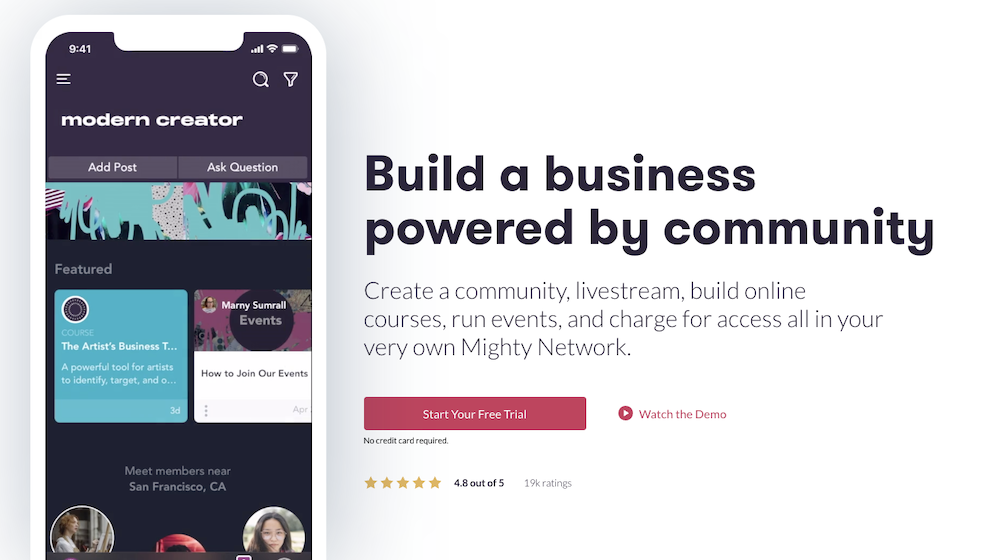
Mighty Networks is designed for running free and paid online communities. While creators can sell courses on the Business plan, the community feature is clearly the star of the show. Users like the sleek community interface and top-notch features like unlimited members, notifications, live streaming, events, and API integrations with Zapier.

If you upgrade to unlock the course creation tools, you can drip content, add additional instructors, and build a special community area for course participants.

Need a mobile app for your brand? Larger companies and businesses can sign up for Mighty Pro to design their own white-label mobile app.

Mighty Networks features:

  • Run a free or paid community with unlimited members and moderators

  • Communication features for community members like group chats and messaging

  • Create a membership site to house premium content

  • Business plan participants can create live or cohort courses

Mighty Networks benefits: On Mighty Networks’ Business plan, you can create courses with designated community areas. Communities come with advanced features like virtual and in-person events, rich member profiles, and a Discovery page for members to find new content.

Mighty Networks downsides: Mighty Networks is not optimal for selling services and coaching. It’s primarily for creators who want their community to be front and center, which may mean more real-time work than a traditional self-paced course.

You can only sell courses on the Business plan, and Mighty Networks charges transaction fees on all plans. The platform also lacks email marketing features and a website builder, but you can make a landing page to promote your community.

Mighty Networks pricing:

  • Free trial: (5% transaction fee)

  • Community plan: $39/month (3% transaction fee)

  • Business plan: $119/month (2% transaction fee)

  • Mighty Pro: Custom pricing

8. Udemy

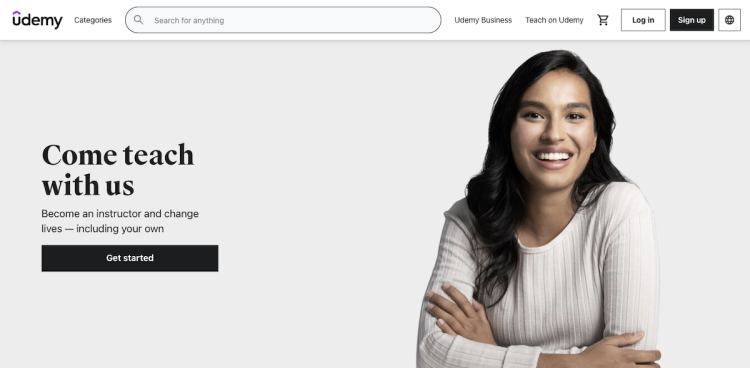
Unlike the other platforms in this post, Udemy is an online learning marketplace where you can sell your courses to a wider audience. All you need to do is upload your
course videos
and content, and Udemy handles the bulk of the marketing for you.

Considering that they have a sizable audience of 40+ million worldwide students, this is a good option for creators who want to take a hands-off approach to selling courses.Udemy pays out using a revenue-sharing model.Udemy’s revenue-sharing plan:

Simply put, Udemy can be a good fit if you’d rather not mess with digital marketing, but you’ll earn significantly more if you send students to your course using your referral code.

Udemy features:

  • The platform has approximately 185,000 online video courses available

  • Intuitive course builder

  • Revenue sharing plan

  • Students can leave course reviews

Udemy benefits: Udemy makes it easy for new creators to get started, and you won’t need a ton of extra
marketing tools to share your course
with a broad audience. Students can find you directly through the platform, and Udemy has a popular affiliate marketing program. Affiliates you don’t know may promote your course to their audience, earning you extra cash.

Udemy downsides: With Udemy, you have less control over your course format and pricing. Udemy will essentially control the learning experience, and you can’t create cohorts, drip courses, or real-time offerings.

There are caps on how much you can charge for your course, and it could be sold for a fraction of the usual price if you choose to participate in site-wide deals. Udemy must approve video lessons, and there are requirements for length and quality. While a hands-off platform may sound enticing, you may earn less than if you use a creator platform that gives you control over your course sales and audience.

For example, Podia creator
John D. Saunders
earned $1,100 in revenue on Udemy with 1,900 customers.
When he switched to Podia
, he earned $10,000 on launch day alone and has since earned over $200,000.

Finally, Udemy doesn’t include a website, sales pages, email tools, or the ability to sell diverse product types like memberships, coaching, and digital downloads.

Udemy pricing:

  • Free for instructors

Which alternative to Thinkific is right for your business?

Best free alternative to Thinkific:

More affordable Thinkific alternatives:

  • Podia: Paid plans start at $4/month with an 8% transaction fee

  • LearnWorlds: Plans start at $29/month

  • Teachery: The annual plan comes out to about $39/month, with no transaction fees

  • LearnDash: Plans start at $199/year

  • Mighty Networks: Plans start at $39/month

Best Thinkific alternatives that integrate with WordPress:

Best all-in-one alternative to Thinkific: Podia

With Podia, you can easily sell courses, webinars, coaching, and digital downloads without limits on Mover and Shaker plans. To connect with your audience, you can create a lively free or paid online community as a stand-alone offering or a complement to your courses.

Because Podia is an all-in-one tool, you also get access to email, affiliates, a website builder, and customer messaging. Podia is the ideal option for creators who want their entire online business in one place, without a steep price tag.

Make your free Podia account today.

Get your free Podia account

Join the 150,000+ creators who use Podia to create websites, sell digital products, and build online communities.

Sign up free

Entrepreneurship12 best Kajabi alternatives that are actually affordable (Features & pricing)Discover the best Kajabi alternatives for selling online courses, marketing digital products, and designing beautiful websites—for a fraction of the price.

Software Stack Editor · July 25, 2024 ·

Discover the best Kajabi alternatives for selling online courses, marketing digital products, and designing beautiful websites—for a fraction of the price.

Jump ahead

In this article

Can you think of two creators that are exactly alike?

Some creators go viral on YouTube and make money off ads and sponsorships. Some sell printable planners with funny cat illustrations. Others offer 1:1 online music lessons alongside self-study musical theory courses.

There are endless ways creative businesses can come to life. Entrepreneurial journeys are diverse, and it makes sense that there are hundreds of different tools to support creators behind the scenes.

One of these tools is Kajabi, an all-in-one platform for selling digital products and running an online business.

In this guide, we’ll break down the pros and cons of Kajabi, as well as 12 Kajabi alternatives you can use to help you reach your goals.

Note: All pricing is accurate at the time of writing, but this is subject to change over time.

Kajabi pros and cons

With Kajabi, you can sell courses, downloads, coaching,
podcasts
, memberships, and communities. You can also use Kajabi to handle email marketing, create a website, build sales funnels (called pipelines), and manage affiliates.

Kajabi even comes with a mobile app so students can view courses on the go. On top of that, there are no transaction fees, so you’ll keep everything you earn.

So what’s the catch?

No platform is perfect for every creator, Kajabi included.

Here are some potential downsides of Kajabi:

First, Kajabi comes with a premium price tag. Compared to the other platforms we’ll discuss in this guide, Kajabi is one of the most expensive options for this type of software.

Kajabi costs:

  • Kickstarter: $69/month

  • Basic: $149/month

  • Growth: $199/month

  • Pro: $399/month

Even the lowest-tiered Basic plan is over $100 per month, which could be cost-prohibitive for
creators on a budget
.

In addition to having a higher price point, Kajabi imposes product limits on all plans.

Kajabi product limits:

  • Kickstarter plan: one product and one pipeline

  • Basic plan: three products and three pipelines

  • Growth plan: 15 products and 15 pipelines

  • Pro plan: 100 products and 100 pipelines

According to our
900+ creator survey
, creators have an average of 10.95 products, which means many would have to use Kajabi’s Growth plan or Pro plan to keep selling their work.

Finally, Kajabi doesn’t have
course completion certificates
built-in, so if you want to offer this to students, you’ll need to integrate with a third-party tool.

If you’re on the fence about Kajabi, here are 12 alternatives you can try instead.

12 best alternatives to Kajabi

1. Podia

Podia is an all-in-one platform where you can build, host, and manage every aspect of your business. You can create and sell unlimited courses, digital downloads, coaching, community tiers, and more on Podia’s Mover and Shaker plans. With unlimited students, sales, and bandwidth, you won’t have to worry about upgrading as your business grows.

Our intuitive website builder means you won’t need to learn to code or invest in additional website tools to get your business up and running. You can easily create beautiful, effective sales pages for each item you sell.

In addition to selling unlimited products, Podia’s community feature helps creators build a network around their brand, resulting in more connections and happier customers.

For example, singer and actor Harry Connick Jr. uses Podia to run his paid piano membership,
Piano Party
. Students get access to a series of video lessons and a supportive community to meet friends and share their wins.

Podia creator Emily Mills from
Sketch Academy
uses her free community to share upcoming events with her audience and host monthly hangout calls for sketchnote-enthusiasts. She also uses Podia to sell courses, workshops, workbooks, and 1:1 coaching.

Podia includes email marketing, affiliate management, and the ability to message prospective customers, so you don’t have to pay for extra tools and software. Users can also issue course completion certificates for students.

Here’s a look at some of our creators’ favorite features:

Podia features:

  • Sell unlimited
    courses
    ,
    digital downloads
    ,
    webinars
    , and
    coaching sessions

  • Easy-to-use website builder included on all plans

  • Built-in email marketing, affiliate marketing, and customer messaging

  • Free migrations when you sign up for an annual Mover or Shaker plan

  • Excellent customer support

  • Instant payouts

  • Payment integrations with Stripe and PayPal

  • Custom domains

Whether you’re brand new or a veteran creator, you’ll get everything you need in one affordable platform.

Podia pricing:

  • Free plan (10% transaction fee)

  • Starter: $9/month or $4/month when paid annually (8% transaction fee)

  • Mover: $39/month or $33/month when paid annually (5% transaction fee)

  • Shaker: $89/month or $75/month when paid annually

Learn more about how Podia compares to Kajabi
.

Get your free Podia account now
to see these features in action.

Get your free Podia account

Join the 150,000+ creators who use Podia to create websites, sell digital products, and build online communities.

Sign up free

2. Teachable

Teachable is a popular choice for coaches and course creators. With Teachable, paid plan participants get unlimited courses, coaching products, students, and video bandwidth.

You can build custom
sales pages
, detailed checkout pages, and even a homepage where all your products can live.

There are many ways creators can
price their products and courses
, and it’s possible to receive instant payouts. If you have partners, collaborators, or affiliates, Teachable makes sure everyone gets paid the right amount.

Teachable features:

  • Sell unlimited courses and coaching products

  • Build a custom storefront and sales pages

  • Course competition certificates and progress tracking

  • Affiliate center with automatic payouts

  • Dozens of powerful integrations

  • Email marketing features

Teachable benefits:

Teachable is built for selling courses and coaching, and creators can use design templates, quizzes, drip content, upsells, and course compliance enforcement. Also, Teachable users can add CSS code snippets to their school pages on all plans, including free plans.

Teachable downsides:

Teachable doesn’t come with a built-in community. If you want this functionality, you’ll need to integrate with an additional tool, which may come at an extra cost.

The included email marketing system lacks advanced features, and there are also transaction fees on the Free and Basic plans.

Teachable pricing:

3. Thinkific

Like Teachable, the Thinkific platform serves course creators. Through Thinkific, you can sell self-study courses, live lessons, videos, and cohort programs. Easily add assessments and give students an assortment of payment structures to choose from.

You can also use Thinkific to build a storefront or website for your business, complete with templates to help you get started. Thinkific also offers course completion certificates, assignments, and lesson prerequisites.

Thinkific features:

  • Sell courses, communities, products, bundles, and memberships

  • Voiceover PowerPoint presentation tool built-in

  • Student surveys

  • Students can leave course reviews

  • Exam integrations on higher plans

  • Video and content hosting on all plans

Thinkific benefits:

Thinkific creators get unlimited courses, content, and students on paid plans. For advanced users, custom CSS and HTML are available on Thinkific’s $99/month Pro plan. With Kajabi, this functionality is only available on the $399/month Pro plan.

Thinkific downsides:

Creators can only offer memberships, product bundles, payment plans, and subscriptions on Pro plans and above. Email features are limited, and basic communities are only available on higher-tiered plans.

Also, you can’t use Zapier triggers unless you purchase the Thinkific Growth add-on, which costs $50 and must be used in conjunction with the $99/month Pro plan.

Thinkific pricing:

With Thinkific, there are no transaction fees, even on the free plan.

  • Free

  • Basic: $49/month

  • Pro: $99/month

  • Premier: $499/month

4. LearnWorlds

LearnWorlds is a platform where educators, entrepreneurs, and small to mid-sized businesses can build and sell online courses, memberships, and even mobile learning apps.

LearnWorlds also comes with a handy website builder. Customize your site however you like, and duplicate pages if you want to experiment with a new look.

One of the biggest perks of LearnWorlds is that you can build your own mobile app for your brand or business. You can offer in-app purchases, send notifications, and even create a fully white-label experience.

The LearnWorlds mobile app builder tool is available as a paid add-on for Learning Center members. There’s an extra cost for this service, but the price isn’t listed online.

LearnWorlds features:

  • Sell courses, memberships, subscriptions, and product bundles

  • Manage affiliates

  • Build your own website

  • Built-in video editing tools and transcripts

  • Create a mobile app for your brand (additional fee)

  • Add assessments, quizzes, question banks, and course completion certificates

LearnWorlds benefits:

LearnWorlds makes it easy for content creators to create engaging videos through built-in video editing tools and features. For students, LearnWorlds offers interactive add-ons like note-taking and highlighting within the course viewer.

LearnWorlds downsides:

LearnWorlds heavily focuses on course creation, so it may not be the right fit for creators who plan to sell digital downloads, coaching, communities, and services.

Starter plan members will pay a flat transaction fee of $5 per course sale, which could severely eat into your earnings for lower-priced courses. Also, free courses, memberships, and subscriptions can only be offered on the $99/month Pro Trainer plan and above.

LearnWorlds pricing:

  • Starter: $29/month (+$5 fee per course sale)

  • Pro Trainer: $99/month

  • Learning Center: $299/month

  • Corporate: Custom pricing

5. Teachery

Teachery is a straightforward online course platform for creators who don’t need a lot of bells and whistles. Utilize their user-friendly course builder to create as many lessons and modules as you like, and you can even duplicate courses if you want to run them more than once.

There are only two pricing options, and both pricing plans include unlimited students and courses. There aren’t any product upsells or add-ons; one flat rate gives you access to the entire tool.

Teachery features:

  • Unlimited courses, lessons, and students

  • Simple course editor

  • Build sales pages and landing pages to promote your products

  • Choose from two templates, minimal and sidebar

  • Whitelabel course provider

  • Memberships and
    product bundles

  • Mailchimp and ConvertKit integrations

  • Tools to
    create an affiliate program

Teachery benefits:

Teachery is ideal for course creators who want a minimalist platform that’s simple and easy to use. You’ll have everything you need to sell unlimited courses without a ton of extra features, which keeps costs affordable.

Teachery downsides:

With Teachery, you won’t get a website, storefront, or email marketing features. Teachery also doesn’t include video and audio file hosting. Instead, you’ll need to embed content through third-party tools like YouTube and Vimeo.

Teachery pricing:

  • Monthly plan: $49/month

  • Annual plan: $470/year

6. LearnDash

LearnDash is a WordPress learning management system (LMS) plugin that must be used with a WordPress website. Through LearnDash, you’ll get access to a drag and drop course builder and dozens of customization options to build your learning environment.

Create unlimited courses, host unlimited learners, and
house it all on your WordPress site
. You can also create course content with interactive elements like quizzes, leaderboards, gamification, and assignments.

LearnDash features:

  • WordPress LMS plugin

  • Enroll unlimited students and
    sell unlimited courses from your own website

  • Works with any WordPress theme

  • One-time purchases, subscriptions, memberships, course bundles, and bulk licenses

  • Gamification, quizzes, certifications, and evaluations

  • Send students notifications

LearnDash benefits:

The main benefit of the LearnDash WordPress plugin is how customizable it is. You can build whatever kind of website you want using the WordPress framework, add LearnDash to your existing site, and incorporate other add-ons and plugins to get additional functionality.

You also won’t pay any transaction fees on LearnDash course sales.

LearnDash downsides:

If you sell courses through LearnDash, you should be familiar with WordPress and comfortable connecting multiple plugins and integrations. Since WordPress has a learning curve, it may take longer to get your courses up and running.

You might want to
hire a developer
or web designer to bring your site to life, which comes with additional costs.

While a flat yearly price and no transaction fees might sound enticing, it’s important to remember that some tools are only available as paid add-ons. Combine that with the cost of hosting your website and domain fees, and this option can get pricey.

Also, if your technology starts acting up, you’ll be the one who has to troubleshoot a fix.

LearnDash pricing:

7. Mighty Networks

Mighty Networks is an online community platform. Here, creators can run free and paid membership communities and, on higher-tiered plans, sell online courses.

Mighty Networks makes it possible to create landing pages and offer a variety of payment plans for community access. Advanced community features include live streams, member profiles, direct messaging, virtual events, and calendar functionality.

Mighty Networks features:

  • Community and membership site features

  • Users have unique feeds through personalization technology

  • Communities can have unlimited members and moderators

  • Group and private chat messaging

  • Create live or cohort courses on the Business plan and up

Mighty Networks benefits:

Mighty Networks was designed for running communities, and creators get access to analytics and other helpful membership tools. You can also create courses with a dedicated community area.

Mighty Networks downsides:

The online course creation feature is only available on the $119/month Business plan and above. There isn’t a native way to sell services like coaching and 1:1 tutoring, so you may need additional tools if you plan to offer these products.

Mighty Networks users also pay a 3% or 2% transaction fee, depending on the plan.

Mighty Networks pricing:

  • Community plan: $39/month

  • Business plan: $119/month

  • Mighty Pro: Custom pricing

8. ClickFunnels

ClickFunnels is sales funnel software. Creators can build marketing automations that take visitors through sales pages and email nurture sequences designed to convert them into customers. Creators can also build strategic upsells, order bumps, and tripwires.

ClickFunnels is not marketed as a course provider, but it’s possible to deliver content through the password-protected membership feature. With over 100K users, this is a popular choice for entrepreneurs who depend on sales funnels to automate their business.

ClickFunnels features:

  • Page builder for creating sales pages and shopping cart pages

  • Autoresponders, upsells, cross-sells, order bumps, and tripwires

  • Built-in affiliate system

  • Email marketing tools with advanced
    segmentation capabilities

ClickFunnels benefits:

Creators can use ClickFunnels to build in-depth sales funnels as well as web pages and landing pages. There are also special funnel templates for generating leads, closing sales, and
running webinar events
.

ClickFunnels downsides:

While you can offer courses through the ClickFunnel membership area, this tool wasn’t built for selling courses directly. If you don’t use elaborate sales funnels in your business, ClickFunnels comes with many features you won’t need.

It’s common for creators to use ClickFunnels as their marketing platform and another tool to host their elearning content, which means additional costs.

ClickFunnels pricing:

9. Kartra

Kartra is an all-in-one marketing platform where creators can build checkout carts, sales pages, funnels, and campaigns. Sell memberships, gather leads, manage your email list, and schedule live sessions with customers directly on the platform.

While Kartra isn’t specifically designed for selling courses and digital products, it’s possible to do so through
drip content
or adding resources to a
paid membership area
. Kartra also offers extra video enhancements like email capture pop-ups, watermarks, and playlists.

Kartra features:

  • Creators can make a helpdesk for their customers

  • Calendar scheduling tool built-in

  • Built-in surveys and quizzes to do customer research

  • Lead capture forms and client organization tools

  • Affiliate marketing
    tools

  • Agency tools to manage all your clients if you offer services

Kartra benefits:

Compared to Kajabi, Kartra excels because it offers appointment scheduling and calendar tools. There’s also a customer helpdesk feature so creators can provide customer support to their clients.

For affiliates, Karta has pre-screening questions, automated payouts, and an affiliate marketplace to find new promoters.

Kartra downsides:

Kartra doesn’t have a dedicated course builder, so you’ll have to use memberships as a workaround for delivering content. Kartra also lacks a community feature, so you’ll need to use a third-party tool if you want this functionality.

Kartra pricing:

  • Starter: $99/month

  • Silver: $199/month

  • Gold: $299/month

  • Platinum: $499/month

10. Ruzuku

Ruzuku is a simple platform for building and selling online courses. Create any type of course you want with unlimited video, audio, and file hosting using the intuitive Ruzuku course builder.

Courses can be evergreen, self-paced, or live, and you can create a copy of a course if you’d like to use the material again.

Ruzuku features:

  • Unlimited students and courses, data storage, no transaction fees

  • Webinars, polls, and quizzes on some plans

  • Engage students through forums, commenting, and prompts

  • Video hosting is included on all plans

Ruzuku benefits:

Ruzuku has robust features for course sellers, including video and audio hosting, teleconferences, video broadcasts, course completion data, an FAQ forum area, and student discussions.

Across the board, Ruzuku gets great reviews for simplicity and customer service. There are no transaction fees on any plans.

Ruzuku downsides:

Ruzuku is great for creators who want the basics, but you’ll need to connect other tools to offer affiliates, communities, or memberships. Ruzuku doesn’t come with a website builder, so this could be another puzzle piece to consider.

Ruzuku pricing:

  • Bootstrapper: $99/month

  • Up and Comer: $149/month

  • University: $199/month

11. Skillshare

Skillshare is different from the other Kajabi competitors on this list because it’s a learning membership platform. Rather than building a home base for your online business, Skillshare allows you to upload your content and get discovered by their large pool of learners.

To use Skillshare, students pay a monthly fee for unlimited access to all courses on the platform. Creators
record and upload video courses
, and any Skillshare member can enjoy the content.

Courses usually last 30-40 minutes and come with a project or assignment to enhance student engagement. All content also must pass video quality control standards and approval.

Teachers earn royalties based on how many minutes students watch their courses. Teachers can also earn referral bonuses when a student signs up for Skillshare using their unique link.

Skillshare features:

  • Upload video courses and make money through royalties

  • Earn more through the Skillshare affiliate program

  • Creators can be discovered by students already using the platform

Skillshare benefits:

With Skillshare, you don’t have to
do your own marketing
since users can find you by searching for your content on Skillshare. You can earn more by sending students to the platform with your referral code, but it’s still possible to earn royalties without any promotion.

Also, there are no recurring fees or websites to maintain. This is a good option for creators who don’t want to offer live courses and who want minimum work behind the scenes.

Skillshare downsides:

On Skillshare, you can’t set the price for your course, and your content will be hosted on Skillshare’s platform instead of on a website that you own.

You’ll get paid based on how many minutes of content people watch, which could mean lower earnings than if you sold your courses independently.

Skillshare courses must be pre-recorded video sessions with a project for students to complete at the end. This format may be stifling for creators who have another course type in mind, like real-time cohorts or ongoing memberships.

Skillshare pricing:

  • Free for creators

12. Udemy

Udemy is a course marketplace website where you can list courses and reach a wide audience. They help with marketing, but in return, you give up control over elements of your course.

Teachers get paid through a revenue-sharing plan. When a student enrolls using the instructor’s referral code, the instructor keeps 97% of the course fee. If a student enrolls without using a referral code, the instructor only keeps 37%.

Udemy is also known for offering price reductions on courses site-wide, but creators can opt out of this if they don’t want their content to be discounted.

Udemy features:

  • Easy course builder and uploader tool

  • World-wide student base

  • Students can leave course reviews to build credibility

  • Users can gift courses to other people

  • Instructors can create coupons for their courses or be included in site-wide deals

Udemy benefits:

Selling courses on Udemy can be hands-off if you don’t want to deal with your own marketing. Because of the platform’s size, you have the potential to get your course in front of a large number of students relatively quickly.

Udemy downsides:

Udemy is free to use, but you won’t get a website, sales pages, email tools, or the ability to sell diverse product types like memberships, coaching, and digital downloads.

Udemy takes a large percentage of your sales unless students use your affiliate code. This can make it difficult to earn a living on the platform and grow your business.

For example,
Podia creator John D. Saunders
had over 1,900 customers buy his courses on Udemy, but he only earned $1,100 in revenue. When he switched to Podia, he earned $10,000 on launch day alone and has earned over $200,000 on the platform since.

Finally, all videos must be approved by Udemy before you can start selling. If they’re not formatted correctly, they could be rejected, and you’d have to start over.

Udemy pricing:

  • Free for creators

Find the right Kajabi alternative for you

Best free alternative to Kajabi:

  • Podia’s free plan includes a full website, landing pages, blogging, one digital download, one coaching product, and email marketing for up to 100 subscribers

  • Teachable and Thinkific have limited free plans

  • Udemy and Skillshare are free forever

More affordable Kajabi alternatives:

  • Podia: Plans start at $4/month

  • Teachable: Limited free plan, paid plans start at $39/month

  • Thinkific: Limited free plan, paid plans start at $49/month

  • LearnWorlds: Plans start at $29/month

  • Teachery: Plans start at $49/month

  • LearnDash: Plans start at $199/year

  • Mighty Networks: Plans start at $39/month

  • ClickFunnels: Plans start at $97/month

  • Kartra: Plans start at $99/month

  • Ruzuku: Plans start at $99/month

Best Kajabi alternatives that integrate with WordPress:

Best all-in-one alternative to Kajabi: Podia

Podia gives you everything you need to run your entire online business, no matter where your creativity takes you. If you’re looking for a place to sell unlimited products without breaking the bank, we’d love for you to join us at Podia.

To see how Podia can meet your creative needs,
sign up for your free account today
.

We can’t wait to see all the awesome things you make.

Get your free Podia account

Join the 150,000+ creators who use Podia to create websites, sell digital products, and build online communities.

Sign up free

Entrepreneurship9 best Gumroad alternatives for small business owners (Features & pricing) Looking for a Gumroad alternative? Discover popular Gumroad competitors that make selling digital downloads and growing your online business a breeze.

Software Stack Editor · July 22, 2024 ·

Looking for a Gumroad alternative? Discover popular Gumroad competitors that make selling digital downloads and growing your online business a breeze.

Jump ahead

In this article

You’ve created a fabulous digital download that’s perfect for your audience, but you need a place to sell it. In your research rabbit hole, you come across an option called Gumroad.

Gumroad is an online marketplace platform for selling digital and physical products. Creators can sell videos, files, software, PDFs, ebooks, subscriptions, and memberships about any topic that makes their eyes sparkle.

Users can quickly build a basic storefront page and list as many products as they want. Gumroad also makes it easy to set up an affiliate program, offer discount codes, and generate software license keys.

Getting started is simple, and there’s no monthly fee to use the platform, making this a popular option among entrepreneurs who hope to make their first sale without a big upfront investment. But just like how there are dog people and cat people, morning birds and night owls, cilantro fans and cilantro foes, no tool is perfect for every creator.

In this post, we’ll look at some popular Gumroad alternatives to help you choose the best option for your growing business.

Note: All pricing is accurate at the time of writing, but this is subject to change over time.

Shortcomings of Gumroad

Every creator business is unique, and the tools you use to power your online empire will vary based on your priorities. While Gumroad does make it easy to list items for sale and accept payments, there are some limitations.

First, there aren’t many design options for product listings. Each product page comes with space to add photos, a description, and details like file size, but beyond that, there are minimal layout and style customizations available.

If you’d like to
create a full-blown sales page
or customized website, you’ll need to use an additional tool.

Second, Gumroad is primarily geared toward selling digital downloads, not
courses
or
coaching
. In our study of 900+ creators,
33.6% sold courses, and 13.8% sold coaching
. Even if you don’t have those product types now, you might want to add them in the future.

While it’s possible to sell courses by uploading several video and text files into a listing, there’s no dedicated Gumroad course viewer. Using a platform that’s made for online courses instead could give your customers a better experience.

Likewise, you can use workarounds to sell coaching sessions using Gumroad, but the software isn’t specifically built for this. You might need to connect other programs to get the results you want, which could be cumbersome and costly to implement.

Third, some Gumroad customers report that accessing customer service is challenging. There’s a help center and a support email address, but no live chat support.

90% of people feel that customer service is important
when choosing and staying with a brand, and getting speedy answers when tech issues arise can mean fewer headaches.

Finally, Gumroad charges a 10% transaction fee on all sales, whether you’re a new creator or selling thousands of products per month. While it’s true that Gumroad users don’t have to pay a monthly rate to use the platform, the transaction fees on each sale can add up quickly — especially as your sales increase.

Ideally, you would have the option to upgrade and remove transaction fees as your business grows, but with Gumroad that’s not possible.

Again, there’s no cookie-cutter mold for creator businesses, and there’s no one platform that works for everyone. If you determine that Gumroad isn’t the best fit for your needs, here are 9 Gumroad alternatives to try instead.

9 best alternatives to Gumroad

1. Podia

Podia is an all-in-one creator platform for selling your digital work, running your brand community, and offering services like coaching and mentorship. It comes with a sleek course builder, full website functionality, unlimited sales pages, and built-in email marketing features so you can communicate with your audience in one place.

Teach virtual trombone lessons. Run a membership community for sticker collectors. Create a course on how to knit matching outfits for you and your dog. No matter your passion, you can build, sell, market, and manage your entire creative business with Podia.

In addition to selling unlimited courses, digital downloads, and coaching sessions, creators get sophisticated business features like
affiliate functionality
,
email marketing
, product bundles, and upsells.

We even handle
lead magnet
delivery, and you can
grow your email list
by
offering free resources
directly from your Podia website.

And did we mention that your Podia website and sales pages will look really pretty?

According to Podia creator and
Flex Lessons
founder
Joseph D’Amico
, “Podia makes website building so fun. I feel like I could set up a site in an afternoon, and it would look great. And there’s something to be said for how pretty it is. It’s the best-looking one by far.”

Podia is also known for having friendly
customer support
through chat and email. If you get stuck at any point, we’re only a few clicks away.

With Podia, everything lives under one roof. No need to connect (and pay for) 8,000 different tools to make your business function properly. We’ve got you covered behind the scenes so you can focus on what you do best.

Podia features:

  • Sell digital downloads, courses, coaching, communities, and webinars

  • Unlimited students, products, and bandwidth with video and file hosting

  • Give customers several payment options like recurring memberships, subscriptions, one-time-payments, and payment plans

  • Offer
    real-time and pre-recorded webinars

  • Complete website and blogging functionality

  • Make
    beautiful landing pages
    to promote your products with our
    website editor

  • Premium course features like quizzes,
    drip content
    , live cohorts, and
    course completion certificates

  • Payment gateway integrations with PayPal and Stripe

  • Sell in your
    local currency
    and
    manage sales tax
    (including VAT) automatically

  • Integrations with Facebook Pixel, Pinterest Tag, and Google Analytics

  • Live
    messaging and chat features

  • Email marketing tools

  • Affiliate management

  • Custom domains

Podia pricing:

  • Free (10% transaction fee)

  • Starter: $9/month or $4/month when paid annually (8% transaction fee)

  • Mover: $39/month or $33/month when paid annually (5% transaction fee)

  • Shaker: $89/month or $75/month when paid annually

Learn more about how Podia compares to Gumroad
.

Get your free Podia account now
to see these features in action.

Get your free Podia account

Join the 150,000+ creators who use Podia to create websites, sell digital products, and build online communities.

Sign up free

2. SendOwl

SendOwl is a platform designed for creators who sell digital products and services from their own websites. SendOwl takes care of payment processing, checkout, and file delivery so you can focus on your creative pursuits.

Because SendOwl handles everything that goes on behind the scenes, you can easily transform your existing online presence into a storefront by adding an embedded checkout button. You can also generate links to specific products to share on social media.

SendOwl features:

  • Customizable shopping cart

  • Sell memberships
    and subscriptions

  • Generate license keys

  • Drip content

  • Embeddable checkout

  • Offer coupons and discounts

  • One-click upsells

  • Cart abandonment

  • Affiliate marketing

  • Email features and templates

SendOwl benefits: SendOwl is great for creators who sell a combination of digital products and services like coaching and
tutoring
. You can customize the checkout process and sell through payment links, your own website, Shopify integrations, or SendOwl’s API.

People can buy gift purchases for others, and you can also use SendOwl to collect donations from supporters on a recurring basis.

SendOwl downsides: While you can create product cards and checkout links, you can’t build a storefront or detailed landing pages with SendOwl. Also, SendOwl isn’t ideal for selling courses since there’s no course builder or player.

SendOwl pricing:

  • Basic: $9/month

  • Standard: $15/month

  • Premium: $24/month

  • Business: $39/month

3. Sellfy

Sellfy is an ecommerce storefront software where you can run your own online shop and sell digital products, physical products, print-on-demand items, streaming, and subscriptions.

You can sell directly from Sellfy or embed purchase buttons and product cards on your own website. Create a customized shopping experience for your customers with upsells, discount codes, email marketing, shopping cart features, and cart abandonment.

Sellfy features:

  • Build an online store or sell from your own page

  • Sell digital, physical, streaming, or subscription products

  • Email marketing

  • Abandoned cart features

  • Discounts and coupons

  • Upsells

  • Facebook and Twitter Pixel integration

Sellfy benefits: Sellfy doesn’t charge any transaction fees, even on the free plan. The platform has built-in print-on-demand functionality, making it easy for creators to sell a combination of
digital and physical products
. You’ll also get 24/7 email support on all plans.

Sellfy downsides: This platform was not built for selling courses, so there isn’t a dedicated course viewer. There’s no community feature, and it also lacks affiliate marketing tools for sellers, so you’ll need to invest in additional software if you want
affiliates to promote your products
.

On Sellfy’s free plan, you’re only able to sell physical products and you’re limited to ten. The Starter plan allows you to sell unlimited physical and digital products, but they cap your annual revenue at $10,000. Earn more, and you’ll need to upgrade to the Business plan. Features like cart abandonment and product upsells are only available on the Business plan and above.

Sellfy pricing:

4. Payhip

Payhip can be used to sell online courses, memberships, and digital downloads like
ebooks
, software, and videos. Like Gumroad, Payhip users get a simple storefront and a product listing page for each item they sell.

Unlike Gumroad, Payhip comes with a dedicated course builder. You can add different media types like videos, text, quizzes, and drip content, and you can customize your course style to match your branding.

Creators can also
sell memberships
on Payhip. Add different tiers and include custom content with each plan, and offer free trials to let customers explore before they buy. You can even offer physical products in addition to traditional digital downloads.

Payhip features:

Payhip benefits: Thanks to the built-in course viewer, creators aren’t limited to just selling digital downloads. Payhip also offers low transaction fees and a simple pricing structure. All plans come with full features. Creators can choose what transaction fees and monthly payments they’re comfortable with.

Payhip downsides: Payhip doesn’t offer blogging, email newsletters, or website building features. By default, product listings have a simple layout. If you want to create in-depth sales pages or a full website to showcase your work, you’ll need additional tools.

Payhip pricing:

  • Free: 5% transaction fee

  • Plus: $29/month + 2% transaction fee

  • Pro: $99/month, no transaction fee

5. SamCart

With SamCart, creators can sell and market unlimited courses, coaching sessions, digital downloads, services, and memberships. The software also comes with a drag and drop sales page builder that makes it easy to design a custom landing page for each item.

On top of that, SamCart creators can use handy features like pre-sale order bumps, varied subscription types, and one-click upsells to increase their sales.

SamCart features:

  • Unlimited products, courses, memberships, and pages

  • Bundle products

  • Custom checkout fields

  • Abandoned cart recovery

  • A/B testing

  • Affiliate center

SamCart benefits: SamCart comes with an intuitive store builder and templates so creators can design sales pages for their products. There are also exciting marketing mechanisms that can help improve conversion rates.

SamCart downsides:The SamCart affiliate management center is only available on the Scale plan and above, which could be cost-prohibitive for some creators. Also, there’s no built-in community feature. If you want to create a community around your brand, you’ll need to use a separate service.

SamCart pricing:

  • Launch: $49/month

  • Grow: $99/month

  • Scale: $199/month

6. ThriveCart

ThriveCart is a feature-rich cart platform where creators can make sales pages and build a streamlined checkout experience, complete with offer bumps, one-click upsells, and A/B testing.

Recently, ThriveCart Learn was released to all ThriveCart customers. This tool makes it possible to create courses and memberships that seamlessly connect with the ThriveCart ecosystem. ThriveCart also provides embeddable checkout boxes and pop-ups so you can sell your products from your own website.

ThiveCart features:

  • Top-notch checkout cart features

  • ThriveCart Learn is included with all plans

  • Sell courses or memberships

  • Offer free trials

  • Upsells, offer bumps, and tripwires

  • Abandoned cart recovery

  • Create automations to speed up your workflows

  • Customizable login pages

ThiveCart benefits: With ThriveCart, you’ll pay a one-time fee for lifetime access. This tool is great for creators who want to
build sales funnels
and customize their checkout experience through offer bumps and upsells. If your desired checkout experience is more elaborate, ThriveCart can make it happen.

Pro plan users also get access to premium
affiliate program
features, like shareable assets, multiple links, and detailed analytics.

ThriveCart downsides: Video hosting isn’t included with ThriveCart Learn, so you’ll have to house your videos separately if you’re selling courses or memberships that include this media type.

ThriveCart has a ticket system for getting help with your account, but real-time chat support isn’t available for creators. Also, paying for ThriveCart in full can be pricey for some business owners. It’s a big investment to make upfront, and it may make more sense to start with a less expensive option while your business is emerging.

ThriveCart pricing:

  • One time pricing

  • ThriveCart: $495

  • ThriveCart Pro: $690

7. Etsy

Etsy is a virtual marketplace where people sell their handmade creations. Creators can sell unique physical goods like crafts, furniture, textiles, and jewelry, as well as digital goods like templates, graphics, presets, and
printables
.

Customize your storefront and use Etsy tags and categories to organize your work. Customers can leave reviews of your products as social proof, and Etsy displays how many sales you’ve made alongside your average rating.

Etsy features:

  • Create a storefront for selling physical and digital items

  • Product listings with multiple images

  • Unlimited products

  • Social sharing features

  • Shoppers can “like” items and place them in their cart

  • Customers can leave reviews and star ratings

  • Built-in Etsy search and SEO features

Etsy benefits: Etsy is good for discoverability. Because it’s a well-known platform, customers may find your work while casually browsing or searching for the items you sell.

Setting up your page and listing your first product is easy. Etsy is a household name, and hundreds of third-party videos, tutorials, and courses are available to help you optimize your shop and avoid common pitfalls.

Etsy downsides: Etsy is not an ideal place for selling courses, memberships, or services. Sellers also have to pay a small listing fee of $0.20 per item, which could add up if you have many products available.

While Etsy’s popularity is great for getting your work out there, some
niches can become oversaturated
. Creators might be tempted to lower their prices to stay competitive, which can seriously dent your bottom line.

Etsy pricing:

8. Shopify

Shopify is a powerful ecommerce platform where creators can build a website to promote their products. With over 2,000,000 active users, Shopify is a popular choice for selling both physical and digital goods.

Shopify has an
app store
with over 6,000 apps to make your store function how you like. There are digital download apps, membership apps, and course apps to give you extra features, but some come with a cost.

Shopify features:

  • Sell digital or physical goods

  • Email marketing tools

  • Full website on basic plans and above

  • Website templates

  • Embeddable buy buttons

  • Allow buyers to purchase products using Apple Pay

  • Marketing automations

  • Run your business from your smartphone with the
    Shopify Mobile App
    for iOS and Android

  • 24/7 support

Shopify benefits: Shopify offers several different plans and price points for creators of all sizes. Because Shopify has a massive array of possible features, you can customize it however you want.

This is great for creators who want to formulate their online business to their exact specifications, but it could be overwhelming if you just want a simple selling platform.

Shopify downsides:Shopify is a full-scale ecommerce solution, so it may not be the best fit for someone just starting as a creator. It’s primarily used for selling physical products, there’s no free plan, and Shopify charges a transaction fee when sellers don’t use Shopify Payments.

Shopify pricing:

  • Shopify Lite: $9/month

  • Basic: $29/month, transaction fee if not using Shopify payments: 2%

  • Shopify: $49/month, transaction fee if not using Shopify payments: 1%

  • Advanced: $299/month, transaction fee if not using Shopify payments: 0.5%

  • Shopify Plus: Custom plans starting at $2000/month

9. WooCommerce

WooCommerce is free, open-source software that helps you sell your creative work on your WordPress site. Like Shopify, WooCommerce is mainly used for selling physical products, but you can connect additional apps and plugins to accept bookings, run memberships, sell courses, and beyond.

Simply purchase the add-ons you want and skip the things you don’t. While WooCommerce works well for creators who want lots of customizations, keep in mind that some of these extra tools come with hefty price tags.

Let’s say you wanted to sell product bundles and memberships using WooCommerce. You’d need the WooCommerce product bundles extension which costs $49/year and the WooCommerce memberships tool which costs $199/year.

WooCommerce features:

WooCommerce benefits: Sellers can use WooCommerce’s basic functionality for free. Because WooCommerce is built on WordPress, there are dozens of themes and templates you can use to design your storefront.If a creator needs more advanced features, they can add them on through integrations and plugins. This structure gives you more control over the selling experience, but it can be more complex to manage.

WooCommerce downsides: If you decide to use WooCommerce for your online store, you’ll need a WordPress website. You should have a decent understanding of how WordPress works and feel comfortable managing different tools, plugins, and integrations.

Using WordPress to sell digital products
has a steep learning curve, and while you certainly don’t need to be a pro, having some technical know-how will help you get up and running faster.

Even though the base functionality is free, WooCommerce can get expensive if you use multiple add-ons. Remember that you’ll also have to
pay separately for WordPress hosting
and your website domain.

WooCommerce pricing:

  • The basic platform doesn’t take any transaction fees, and it’s free to use

  • Additional costs to consider:

Find the right Gumroad alternative for you

Here’s a quick look at the best alternatives to Gumroad for different creator needs:

Gumroad competitors without transaction fees:

  • Podia: Sell your work without transaction fees on the Shaker plan

  • SendOwl: Sell digital downloads from your own website

  • Sellfy: Sell physical and digital products

  • SamCart: Access advanced marketing tools

  • ThriveCart: Pay once and use the tool for life without fees

  • Payhip: No transaction fees on the Pro pricing plan

  • WooCommerce: Free, open-source software for WordPress sellers

  • Shopify: No transaction fees on some plans if you use Shopify payments

Best Gumroad alternatives that integrate with WordPress:

Cheaper alternatives to Gumroad:

  • Podia: Depending on how much you sell, it can be significantly cheaper to go with Podia’s flat rate Shaker plan.

  • Payhip: The transaction fee on the free plan is 5%

  • Etsy: Etsy has lower fees than Gumroad until you reach over $10,000 in sales

  • WooCommerce: WooCommerce is free to use without transaction fees

Best alternatives to Gumroad for selling physical products:

  • Sellfy: Sell physical and digital items from your own site or a Sellfy storefront

  • Shopify: Sell physical and digital goods from your Shopify website

  • WooCommerce: Sell physical and digital products from your WordPress site

  • Etsy: Sell handmade items on a well-known marketplace

Best Gumroad alternative for creators who want an all-in-one solution: Podia

Podia has all the tools you need to run your online business in one place. No more connecting dozens of plugins, widgets, payment gateways, and sales page builders – everything you need plays nicely together. And you only have to remember one password.

Since Podia allows creators to sell digital downloads, courses, memberships, coaching, and communities, you won’t have to switch platforms as your business grows.

No matter what creative new idea you come up with next, we’ll be here to make it happen.
Get started today with a free Podia account
.

Get your free Podia account

Join the 150,000+ creators who use Podia to create websites, sell digital products, and build online communities.

Sign up free

Entrepreneurship7 best Squarespace alternatives for building a beautiful website (Features & pricing)Find a Squarespace alternative with the functionality you need to build the perfect site, grow your audience, and sell more!

Software Stack Editor · July 11, 2024 ·

Find a Squarespace alternative with the functionality you need to build the perfect site, grow your audience, and sell more!

Jump ahead

In this article

Whether you’re a new creator or a seasoned pro, there’s a good chance your business needs a website. Entrepreneurs already wear many hats, so it’s important to find a website builder that’s easy to use and headache-free.

Squarespace is a popular option because you can design and build a website without knowing how to code. Squarespace provides a variety of website templates, and you can also set up an online store, highlight your work in a digital portfolio, or start a blog.

But Squarespace has some limitations, and it isn’t the right fit for everyone. In this article, we’ll cover the pros and cons of this popular website building platform, as well as seven Squarespace alternatives to consider if it doesn’t suit your needs.

Squarespace pros and cons

First, let’s look at some benefits and shortcomings of Squarespace.

Squarespace pros

Website templates: When you build a website with Squarespace, you’ll get access to several templates to jumpstart your site design.Squarespace offers specialized themes for portfolio websites, ecommerce shops, blogs, service-based businesses, and other use cases. You can also buy third-party templates if you want a different look.

Ecommerce tools: If you’d like to sell products and services from your website, Squarespace has three plans with ecommerce functionality.You can also accept bookings and appointments through Squarespace’s scheduling tool, available for an additional fee.

Membership area: For an additional cost, you can use Squarespace to build a membership area for your brand. Members can enjoy exclusive files, videos, premium content, and virtual events. Your membership area can be free or paid, and you can add unlimited members.

Email marketing tools: Want to stay in touch with your audience? Squarespace has an
email marketing
add-on with email design layouts to make your messages feel cohesive with your website. This feature is available for an extra fee.

Squarespace cons

Difficult to use: Squarespace markets itself as easy, but many users find that the site editor is harder to use than expected. Some settings and elements can only be adjusted on individual pages and others must be tweaked in the Site Styles area, which is located in a different section of your Squarespace dashboard.

For example, here are the steps you’d need to take to restyle a button on your home page:

  1. On the Squarespace home screen, click “Pages” and select your home page.

  2. Select the “Edit” button in the top left corner.

  3. Click the pencil icon next to the button you’d like to change.

  4. Change the button text, link destination, button size, and alignment, then click “Done”.

  5. Return to the Squarespace home screen and click “Design”.

  6. Select the “Site Styles” tab.

  7. Click “Buttons” to change the style, shape, and padding.

  8. Select “Colors” to change the color palette across your site.

  9. Select “Fonts” and scroll down to the “Buttons” section to change settings like font family, text weight, letter spacing, and text transform for all buttons across your site.

That’s a lot of steps just to tweak one button. When you’re new to Squarespace, navigating between pages, elements, and style settings can be confusing and time-consuming.

Limited customizations: While templates offer a nice starting point, many users feel that the customization options are too narrow with Squarespace. The website builder is simple for non-developers, but the catch is that you can only edit certain aspects of your site.

The core blocks that make up most theme designs are rigid, and making changes beyond what’s offered in the style editor requires some coding knowledge. You’ll be fine if you need to swap out text, pictures, and colors, but changing fine details gets tricky.

Not ideal for selling digital products: While it’s possible to sell digital products on Squarespace, the ecommerce tools and extensions are mainly geared toward
selling physical products
. The maximum file size you can sell is 300MB.

You can only offer one file per digital product listing, but you can zip files together if the total stays under 300MB. You can’t offer variations for digital items, nor can you sell digital products as subscriptions.

Complicated pricing structure: If you’d like to use some of Squarespace’s advanced features like email marketing, memberships, or scheduling, you’ll need to pay extra fees each month.Here’s a look at the Squarespace pricing plans and add-ons:

Squarespace pricing:

Squarespace membership area pricing (add-on):

  • Starter: $10/month (+7% transaction fee)

    • 5 hours of video storage

    • 1 member area

  • Core: $20/month (+4% transaction fee)

  • Pro: $40/month (+1% transaction fee)

Squarespace email pricing (add-on):

  • Starter: $7/month

    • 3 campaigns per month

    • 500 emails per month

  • Core: $14/month

    • 5 campaigns per month

    • 5,000 emails per month

    • Automations

  • Pro: $34/month

    • 20 campaigns per month

    • 50,000 emails per month

  • Max: $68/month

    • Unlimited campaigns

    • 250,000 emails per month

Squarespace scheduling pricing (add-on):

  • Emerging: $15/month

  • Growing: $25/month

  • Powerhouse: $50/month

Here’s how this could play out by the numbers:

Suppose you wanted to build a website with ecommerce functionality, a membership area, and email marketing. You’d pay $33 per month for the core Business plan, $10 per month for the Starter membership plan, and $7 per month for the Starter email plan.

Your total would be $50 per month plus transaction fees, just for the introductory offerings in each category. Simply put, Squarespace’s pricing structure is complex, and you may end up with a hefty price tag to get everything you want.

Up next, we’ll explore seven Squarespace alternatives that might fit the bill instead.

7 best Squarespace alternatives

1. Podia

Podia is an all-in-one platform for running your business where you can create a stylish website in no time. The best part? It’s 100% free to
build your website on Podia
.

Podia’s free website builder gets top marks for ease of use, and you don’t have to know code to make your site look amazing. You can make as many web pages as you need and even create standalone sales pages and landing pages to promote your offerings.

There are over a dozen different website sections to choose from, and within each section, you can customize the content (like title, description, button text, and what content to include) and the design (like orientation, layout, style, color, and background image).

You can style each content block with just a few clicks to get a totally different look and layout.

But don’t just take our word for it. According to Podia creator and
Flex Lessons
founder
Joseph D’Amico
, “Podia makes website building so fun. I feel like I could set up a site in an afternoon, and it would look great. And there’s something to be said for how pretty it is. It’s the best-looking one by far.”

The cherry on top? Podia’s free-forever plan comes with a complete website, unlimited landing pages, blogging, and the ability to
sell one digital download
and
one coaching product
. Essentially, you can build a powerful and profitable online presence without opening your wallet.

And as your business grows, you can upgrade to one of our affordable paid plans to sell unlimited digital downloads,
online courses
,
webinars
, memberships, free or paid communities, and coaching, all from your Podia dashboard.

Bottom line: With Podia, you can build a fantastic website, sell your work, and run your entire business for a fraction of the price of Squarespace.

Podia features:

  • Complete website builder with unlimited pages (including
    sales pages
    and
    landing pages
    )

  • Sell unlimited courses, digital downloads, webinars, membership communities, and coaching/services on Mover and Shaker plans

  • Built-in email marketing, affiliate marketing, and customer messaging

  • Unlimited bandwidth (content and video) on Mover and Shaker plans

  • Podia hosts your website for you

  • Top-notch
    customer support

Podia pricing
:

  • Free plan (10% transaction fee): Includes a website, community, one digital product, and one coaching service

  • Starter: $9/month or $4/month when paid annually (8% transaction fee)

  • Mover: $39/month or $33/month when paid annually (5% transaction fee)

  • Shaker: $89/month or $75/month when paid annually

Learn more about how Podia compares to Squarespace
.
Build your website for free on Podia
, or
check out our video demo
to see these features in action.

Get your free Podia account

Join the 150,000+ creators who use Podia to create websites, sell digital products, and build online communities.

Sign up free

2. Shopify

Shopify is a popular ecommerce platform for selling physical products online. With Shopify, you can build an entire website or online storefront to showcase your creations.

To start, pick a theme that matches your brand. There are dozens of templates to choose from that are organized by business type and industry. Customize your site using Shopify’s drag and drop editor to make your page just right.

From there, you can add products and sell online, in-person, or through your social media channels. Shopify can help you track your finances, fulfill orders, handle shipping, manage inventory, issue refunds, and learn about your business through analytics.

Shopify features:

  • Full website on Basic plans and above

  • Website templates

  • Sell products online or in-person through Shopify’s point of sale system

  • Tools for managing logistics

  • Built-in Shopify payment processor

Shopify benefits: Shopify comes with free and paid themes you can use to customize your website. For those offering physical products, Shopify provides a suite of tools to make the selling process a breeze. If you want to keep in touch with your customers, Shopify email is available on all plans. The first 10,000 emails each month are free, and after that, you’ll pay $1 per $1,000 additional emails sent.

Shopify downsides: Shopify is best suited for people selling physical products. If you just need a website for your brand or blog, Shopify isn’t the best fit. It’s also not the best choice for creators selling digital products like courses,
ebooks
, memberships, and brand communities. Additionally, Shopify has a complex pricing structure with transaction fees on all plans unless you use their payment gateway.

Shopify pricing:

  • Shopify Lite: $9/month

  • Basic: $29/month, online credit card rate: 2.9% + $0.30, transaction fee if not using Shopify payments: 2%

  • Shopify: $49/month, online credit card rate: 2.6% + $0.30, transaction fee if not using Shopify payments: 1%

  • Advanced: $299/month, online credit card rate: 2.4% + $0.30, transaction fee if not using Shopify payments: 0.5%

  • Shopify Plus: Custom plans starting at $2000/month

3. WordPress

WordPress is free, open-source website-building software that’s popular among bloggers and business owners alike. There are two ways you can use WordPress to build your website:

Self-hosted WordPress: With a self-hosted WordPress site, you’ll purchase a domain, sign up for website hosting, and install WordPress yourself. Check out this article to learn more about signing up for
website hosting
.

From there, you can add your favorite themes, tools, and plugins to make your website function the way you need. Because WordPress is a content management system (CMS), it’s a good choice for creators and bloggers who share lots of content with their followers.

Managed
WordPress.com
website: Your second option is to build your website with
WordPress.com
for managed hosting. They’ll handle your hosting so you don’t have to choose a third-party provider.

WordPress.com
offers two plans: WordPress Free and WordPress Pro.

You can set up a simple website with 1GB of storage on the free version, but you cannot connect custom domains, install plugins, or monetize your site through ads or product sales. Additionally, WordPress will display its own ads on your free website, and you can’t disable this unless you upgrade to the Pro plan.

With the WordPress Pro plan, you can connect your own domain, install plugins, use premium themes,
sell your own products
, and earn money from advertising if you choose to do so. You’ll get 50GB of storage and access to behind-the-scenes parts of your website for greater customization. WordPress Pro hosted on
WordPress.com
costs $15 per month.

WordPress features:

  • Free, open-source site builder software

  • Self-hosted: You install WordPress yourself and pay for your domain and website hosting separately

  • WordPress.com
    hosting: Choose between the limited Free plan or the $15 per month Pro plan

  • Search engine optimization (SEO) tools
    to help your content rank

  • Ideal for website developers and creators with coding knowledge who want lots of customization options

WordPress benefits:The biggest plus of using WordPress is how customizable it is. There are over 50,000 free and paid plugins you can use for maximum functionality, and there are seemingly endless themes to give your site a unique look and feel. Because WordPress is popular, it’s easy to find third-party resources, tutorials, and videos to help you learn the platform.

WordPress downsides: On the flip side, WordPress has a steep learning curve. You may need to hire a web developer to get everything set up, and you’ll be responsible for keeping everything updated and working correctly.

WordPress is not an all-in-one solution. You’ll need to use a separate service or plugin for managing email,
selling courses
, creating memberships, and
running your affiliate program
.

Finally, even though the base software is free, you’ll need to pay for hosting, your domain, and other tools to get your website up and running. Depending on your needs, this could cost more than an all-in-one platform.

Managed
WordPress.com
pricing:

Self-hosted WordPress pricing:

  • The WordPress software is free and open-source

  • You’ll pay for web hosting, domain registration, and any premium themes or plugins that you want to use

4. Wix

With Wix, you can create a storefront, blog, or business website using a drag-and-drop page builder. Set up your site quickly with modern templates and upgrade as needed to unlock more features.

Like Shopify, Wix comes with handy tools for selling physical products. Sell print-on-demand and dropship products, subscriptions, and even gift cards for your online store.

Business plans include online booking functionality, event and ticket management, and special tools for hotel owners, restaurants, and fitness professionals.

Wix also offers a limited free plan if you only need a simple site. Free plans have prominent Wix branding that can only be removed by upgrading to one of their premium plans.

Wix features:

  • Drag and drop editor and website builder

  • 800+ templates, including blank templates if you want to build from scratch

  • Ecommerce store for selling products and services

  • Sell digital products like files, PDFs, images, audio, and videos

  • 24/7 customer care on all plans

  • Wix Artificial Design Intelligence (ADI)

  • For developers: Velo by Wix is a development platform where you can build web applications

Wix benefits: Wix’s drag and drop website builder is intuitive, even if you’re not tech-savvy. You can also get help from Wix’s unique Artificial Design Intelligence (ADI) tool, which uses artificial intelligence to design a custom site for your brand.

If you sell physical products, there are native ecommerce integrations for dropshipping, gathering customer reviews, and running loyalty programs on higher-tier business plans. You can also send automated abandoned cart emails on all business plans.

Wix downsides: On the Free plan, you cannot remove loud Wix branding from your site. To disable Wix ads, you’ll need to be on the Combo plan ($16 per month) or higher. Wix also limits website storage space on all plans. This could be a problem for creators like videographers and
photographers
who want to showcase their work.

Wix website plans:

Wix business plans:

5. Webflow

Webflow is a code-free website builder, ecommerce platform, and content management system. Webflow has powerful website design features for makers who want to start with a blank slate, but there are over 100 templates available if you need some guidance. You can even add interactive webpage elements and animations.

Through Webflow’s ecommerce tools, you can sell physical products, digital products, and services. Display unique product fields to highlight the most important information for buyers and create a customized checkout process–even if you don’t know how to code.

Webflow features:

  • No coding required

  • Ecommerce tools for selling products and services

  • Content management system

  • Interactive features like movement, animations, and scroll progress

  • Native SEO tools

  • Flexible templates (unlike Squarespace, where the templates are more rigid)

  • Backend website hosting through AWS

Webflow benefits: Webflow has a Free plan where you can build your own website, add up to 50 CMS items, and use up to 1GB of bandwidth. There are paid CMS plans, ecommerce plans, and workplace plans with different attributes so you can choose the best option for your needs.

If you sell products, your customers can pay through Stripe, PayPal, Apple Pay, or Google Pay.

Webflow downsides: Because Webflow offers so much flexibility, it could be overwhelming for someone who just wants to set up a simple website for their business. Having unlimited customization options isn’t always better.

Additionally, there are limits on bandwidth, number of CMS items, number of products, annual sales volume, monthly visitors, and number of website pages on almost all plans.

For example, Webflow’s $42/month Standard ecommerce plan has a limit of 500 items and a cap of 50K annual sales volume.

The $84/month Plus ecommerce plan has a limit of 1,000 items and 200K annual sales volume.

The $235/month Advanced plan doesn’t have an annual sales volume limit, but you’re still limited to 3,000 items.

Webflow website pricing:

  • Starter: Free

  • Basic: $15/month

  • CMS: $20/month

  • Business: $45/month

Webflow ecommerce pricing:

  • Standard: $42/month

  • Plus: $84/month

  • Advanced: $235/month

6. Weebly

Weebly is an ecommerce platform and website builder owned by Square. With Weebly, you can choose from customizable templates and use their drag and drop builder to make your site shine.

Weebly has blogging tools for sharing content, an App Center for adding extra functionality, and analytics so you can track how your site is performing.

On the ecommerce front, Weebly includes shipping resources, inventory management features, gift cards, customer reviews, and an automatic tax calculator.

Weebly features:

  • Drag and drop website builder

  • Add custom CSS, HTML, and code

  • Hosting included

  • Buy your domain directly through Weebly

  • Community, chat, email, and phone support

  • App Center for connecting additional extensions and integrations

Weebly benefits: The Weebly website builder is user-friendly and suitable for beginners who don’t have extensive website experience. If you plan to sell products, Weebly offers many of the same ecommerce features as Squarespace for a lower cost.

All plans, including the free plan, come with a shopping cart, unlimited products, inventory management, item options, item badges, and coupons. Weebly also provides users with tools to edit images directly in Weebly, saving you a step in your workflow.

Weebly downsides: On Weebly’s Free plan, there are storage limitations and you can’t sell digital products. Weebly will also display Square ads on Free and Personal plans, so you’ll need to upgrade to Professional or Performance to remove these.

Weebly pricing:

  • Free

  • Personal: $9/month

  • Professional: $16/month

  • Performance: $29/month

7. Duda

With Duda, you can create modern websites for yourself or clients. The page editor is straightforward, and Duda comes with a wide selection of elements for customizing your site.If you hope to use Duda for ecommerce, you won’t be disappointed. There are no transaction fees, you can accept 40 different payment methods, and you can sell subscriptions on the Advanced and Unlimited plans.

One thing that sets Duda apart from other popular website builders is that it includes client management and collaboration tools for professional web designers and agencies. You can see all your projects in one place and quickly build, maintain, and deploy Duda websites for your customers in just a few clicks.

Duda features:

  • Lots of templates

  • Edit the mobile version and desktop version of your site separately for different looks

  • Create a membership area

  • Get more functionality using the Duda App market

  • Create your own widgets and automation rules

Duda benefits: With Duda, you can build websites for your own business or for your clients, all under one roof. Start with one of their templates or create a unique design from scratch. You can also make reusable website sections to use across multiple pages and projects.

Duda downsides: Duda doesn’t offer a free plan, and the paid plans can be pricey. If you use Duda for ecommerce, the Standard and Advanced add-ons limit the number of products you can sell. Also, there are no
newsletter
or email marketing tools built-in, so you’ll need to integrate with another platform to get this functionality.

Duda pricing:

  • Basic: $19/month

  • Team: $29/month

  • Agency: $59/month

  • Custom

Add on ecommerce pricing:

  • Standard: $8/month (100 products)

  • Advanced: $22/month (2500 products)

  • Unlimited: $49/month (unlimited products)

Which alternative to Squarespace is right for me?

Best free alternatives to Squarespace:

  • Podia: You can build a full website with unlimited pages, minimal Podia branding, and no storage limitations on the Free plan.

  • Wix: You can build a website with Wix branding and up to 500MB of storage and bandwidth on the Free plan.

  • Weebly: You can build a website with Weebly branding and up to 500MB of storage on the Free plan.

Best Squarespace alternatives for selling physical products:

  • Shopify: They provide tools to help fulfill orders, ship products, manage inventory, issue refunds, and track finances.

  • Wix: You can print on demand, dropship products, manage inventory, and ship your items.

Best alternatives to Squarespace for selling digital products:

  • Podia: Sell online courses, digital downloads, community memberships, webinars, coaching, and memberships in addition to running your website.

  • WordPress: Third-party apps and plugins make it possible to sell digital products and create a community. These tools usually come with an extra cost.

Best Squarespace alternatives for bloggers:

  • Podia: Podia includes a full blogging feature on the free plan with unlimited posts

  • WordPress: This is an open-source content management system that can be customized to meet your blogging needs.

  • Webflow: This content management system comes with SEO features and hosting.

Best platforms for running a web design business or agency:

  • Duda: Collaborate with customers, send previews, and design custom reusable elements.

  • Webflow: Build and manage website projects, collaborate with team members, and bill clients through the Webflow dashboard.

Best all-in-one alternative to Squarespace: Podia

With Podia, you can create a full website on our Free plan. It’s the best website builder for creators who want customization without the overwhelm, and for anyone who dreams of building a virtual home base for their entire creative business.

Design a beautiful website, sell your work, build community, and share your story. At Podia, we’ll help you make it happen, and we can’t wait to see what you create.

Build your free Podia website today
.

Entrepreneurship7 best Squarespace alternatives for building a beautiful website (Features & pricing)Find a Squarespace alternative with the functionality you need to build the perfect site, grow your audience, and sell more!

Software Stack Editor · July 11, 2024 ·

Find a Squarespace alternative with the functionality you need to build the perfect site, grow your audience, and sell more!

Jump ahead

In this article

Whether you’re a new creator or a seasoned pro, there’s a good chance your business needs a website. Entrepreneurs already wear many hats, so it’s important to find a website builder that’s easy to use and headache-free.

Squarespace is a popular option because you can design and build a website without knowing how to code. Squarespace provides a variety of website templates, and you can also set up an online store, highlight your work in a digital portfolio, or start a blog.

But Squarespace has some limitations, and it isn’t the right fit for everyone. In this article, we’ll cover the pros and cons of this popular website building platform, as well as seven Squarespace alternatives to consider if it doesn’t suit your needs.

Squarespace pros and cons

First, let’s look at some benefits and shortcomings of Squarespace.

Squarespace pros

Website templates: When you build a website with Squarespace, you’ll get access to several templates to jumpstart your site design.Squarespace offers specialized themes for portfolio websites, ecommerce shops, blogs, service-based businesses, and other use cases. You can also buy third-party templates if you want a different look.

Ecommerce tools: If you’d like to sell products and services from your website, Squarespace has three plans with ecommerce functionality.You can also accept bookings and appointments through Squarespace’s scheduling tool, available for an additional fee.

Membership area: For an additional cost, you can use Squarespace to build a membership area for your brand. Members can enjoy exclusive files, videos, premium content, and virtual events. Your membership area can be free or paid, and you can add unlimited members.

Email marketing tools: Want to stay in touch with your audience? Squarespace has an
email marketing
add-on with email design layouts to make your messages feel cohesive with your website. This feature is available for an extra fee.

Squarespace cons

Difficult to use: Squarespace markets itself as easy, but many users find that the site editor is harder to use than expected. Some settings and elements can only be adjusted on individual pages and others must be tweaked in the Site Styles area, which is located in a different section of your Squarespace dashboard.

For example, here are the steps you’d need to take to restyle a button on your home page:

  1. On the Squarespace home screen, click “Pages” and select your home page.

  2. Select the “Edit” button in the top left corner.

  3. Click the pencil icon next to the button you’d like to change.

  4. Change the button text, link destination, button size, and alignment, then click “Done”.

  5. Return to the Squarespace home screen and click “Design”.

  6. Select the “Site Styles” tab.

  7. Click “Buttons” to change the style, shape, and padding.

  8. Select “Colors” to change the color palette across your site.

  9. Select “Fonts” and scroll down to the “Buttons” section to change settings like font family, text weight, letter spacing, and text transform for all buttons across your site.

That’s a lot of steps just to tweak one button. When you’re new to Squarespace, navigating between pages, elements, and style settings can be confusing and time-consuming.

Limited customizations: While templates offer a nice starting point, many users feel that the customization options are too narrow with Squarespace. The website builder is simple for non-developers, but the catch is that you can only edit certain aspects of your site.

The core blocks that make up most theme designs are rigid, and making changes beyond what’s offered in the style editor requires some coding knowledge. You’ll be fine if you need to swap out text, pictures, and colors, but changing fine details gets tricky.

Not ideal for selling digital products: While it’s possible to sell digital products on Squarespace, the ecommerce tools and extensions are mainly geared toward
selling physical products
. The maximum file size you can sell is 300MB.

You can only offer one file per digital product listing, but you can zip files together if the total stays under 300MB. You can’t offer variations for digital items, nor can you sell digital products as subscriptions.

Complicated pricing structure: If you’d like to use some of Squarespace’s advanced features like email marketing, memberships, or scheduling, you’ll need to pay extra fees each month.Here’s a look at the Squarespace pricing plans and add-ons:

Squarespace pricing:

Squarespace membership area pricing (add-on):

  • Starter: $10/month (+7% transaction fee)

    • 5 hours of video storage

    • 1 member area

  • Core: $20/month (+4% transaction fee)

  • Pro: $40/month (+1% transaction fee)

Squarespace email pricing (add-on):

  • Starter: $7/month

    • 3 campaigns per month

    • 500 emails per month

  • Core: $14/month

    • 5 campaigns per month

    • 5,000 emails per month

    • Automations

  • Pro: $34/month

    • 20 campaigns per month

    • 50,000 emails per month

  • Max: $68/month

    • Unlimited campaigns

    • 250,000 emails per month

Squarespace scheduling pricing (add-on):

  • Emerging: $15/month

  • Growing: $25/month

  • Powerhouse: $50/month

Here’s how this could play out by the numbers:

Suppose you wanted to build a website with ecommerce functionality, a membership area, and email marketing. You’d pay $33 per month for the core Business plan, $10 per month for the Starter membership plan, and $7 per month for the Starter email plan.

Your total would be $50 per month plus transaction fees, just for the introductory offerings in each category. Simply put, Squarespace’s pricing structure is complex, and you may end up with a hefty price tag to get everything you want.

Up next, we’ll explore seven Squarespace alternatives that might fit the bill instead.

7 best Squarespace alternatives

1. Podia

Podia is an all-in-one platform for running your business where you can create a stylish website in no time. The best part? It’s 100% free to
build your website on Podia
.

Podia’s free website builder gets top marks for ease of use, and you don’t have to know code to make your site look amazing. You can make as many web pages as you need and even create standalone sales pages and landing pages to promote your offerings.

There are over a dozen different website sections to choose from, and within each section, you can customize the content (like title, description, button text, and what content to include) and the design (like orientation, layout, style, color, and background image).

You can style each content block with just a few clicks to get a totally different look and layout.

But don’t just take our word for it. According to Podia creator and
Flex Lessons
founder
Joseph D’Amico
, “Podia makes website building so fun. I feel like I could set up a site in an afternoon, and it would look great. And there’s something to be said for how pretty it is. It’s the best-looking one by far.”

The cherry on top? Podia’s free-forever plan comes with a complete website, unlimited landing pages, blogging, and the ability to
sell one digital download
and
one coaching product
. Essentially, you can build a powerful and profitable online presence without opening your wallet.

And as your business grows, you can upgrade to one of our affordable paid plans to sell unlimited digital downloads,
online courses
,
webinars
, memberships, free or paid communities, and coaching, all from your Podia dashboard.

Bottom line: With Podia, you can build a fantastic website, sell your work, and run your entire business for a fraction of the price of Squarespace.

Podia features:

  • Complete website builder with unlimited pages (including
    sales pages
    and
    landing pages
    )

  • Sell unlimited courses, digital downloads, webinars, membership communities, and coaching/services on Mover and Shaker plans

  • Built-in email marketing, affiliate marketing, and customer messaging

  • Unlimited bandwidth (content and video) on Mover and Shaker plans

  • Podia hosts your website for you

  • Top-notch
    customer support

Podia pricing
:

  • Free plan (10% transaction fee): Includes a website, community, one digital product, and one coaching service

  • Starter: $9/month or $4/month when paid annually (8% transaction fee)

  • Mover: $39/month or $33/month when paid annually (5% transaction fee)

  • Shaker: $89/month or $75/month when paid annually

Learn more about how Podia compares to Squarespace
.
Build your website for free on Podia
, or
check out our video demo
to see these features in action.

Get your free Podia account

Join the 150,000+ creators who use Podia to create websites, sell digital products, and build online communities.

Sign up free

2. Shopify

Shopify is a popular ecommerce platform for selling physical products online. With Shopify, you can build an entire website or online storefront to showcase your creations.

To start, pick a theme that matches your brand. There are dozens of templates to choose from that are organized by business type and industry. Customize your site using Shopify’s drag and drop editor to make your page just right.

From there, you can add products and sell online, in-person, or through your social media channels. Shopify can help you track your finances, fulfill orders, handle shipping, manage inventory, issue refunds, and learn about your business through analytics.

Shopify features:

  • Full website on Basic plans and above

  • Website templates

  • Sell products online or in-person through Shopify’s point of sale system

  • Tools for managing logistics

  • Built-in Shopify payment processor

Shopify benefits: Shopify comes with free and paid themes you can use to customize your website. For those offering physical products, Shopify provides a suite of tools to make the selling process a breeze. If you want to keep in touch with your customers, Shopify email is available on all plans. The first 10,000 emails each month are free, and after that, you’ll pay $1 per $1,000 additional emails sent.

Shopify downsides: Shopify is best suited for people selling physical products. If you just need a website for your brand or blog, Shopify isn’t the best fit. It’s also not the best choice for creators selling digital products like courses,
ebooks
, memberships, and brand communities. Additionally, Shopify has a complex pricing structure with transaction fees on all plans unless you use their payment gateway.

Shopify pricing:

  • Shopify Lite: $9/month

  • Basic: $29/month, online credit card rate: 2.9% + $0.30, transaction fee if not using Shopify payments: 2%

  • Shopify: $49/month, online credit card rate: 2.6% + $0.30, transaction fee if not using Shopify payments: 1%

  • Advanced: $299/month, online credit card rate: 2.4% + $0.30, transaction fee if not using Shopify payments: 0.5%

  • Shopify Plus: Custom plans starting at $2000/month

3. WordPress

WordPress is free, open-source website-building software that’s popular among bloggers and business owners alike. There are two ways you can use WordPress to build your website:

Self-hosted WordPress: With a self-hosted WordPress site, you’ll purchase a domain, sign up for website hosting, and install WordPress yourself. Check out this article to learn more about signing up for
website hosting
.

From there, you can add your favorite themes, tools, and plugins to make your website function the way you need. Because WordPress is a content management system (CMS), it’s a good choice for creators and bloggers who share lots of content with their followers.

Managed
WordPress.com
website: Your second option is to build your website with
WordPress.com
for managed hosting. They’ll handle your hosting so you don’t have to choose a third-party provider.

WordPress.com
offers two plans: WordPress Free and WordPress Pro.

You can set up a simple website with 1GB of storage on the free version, but you cannot connect custom domains, install plugins, or monetize your site through ads or product sales. Additionally, WordPress will display its own ads on your free website, and you can’t disable this unless you upgrade to the Pro plan.

With the WordPress Pro plan, you can connect your own domain, install plugins, use premium themes,
sell your own products
, and earn money from advertising if you choose to do so. You’ll get 50GB of storage and access to behind-the-scenes parts of your website for greater customization. WordPress Pro hosted on
WordPress.com
costs $15 per month.

WordPress features:

  • Free, open-source site builder software

  • Self-hosted: You install WordPress yourself and pay for your domain and website hosting separately

  • WordPress.com
    hosting: Choose between the limited Free plan or the $15 per month Pro plan

  • Search engine optimization (SEO) tools
    to help your content rank

  • Ideal for website developers and creators with coding knowledge who want lots of customization options

WordPress benefits:The biggest plus of using WordPress is how customizable it is. There are over 50,000 free and paid plugins you can use for maximum functionality, and there are seemingly endless themes to give your site a unique look and feel. Because WordPress is popular, it’s easy to find third-party resources, tutorials, and videos to help you learn the platform.

WordPress downsides: On the flip side, WordPress has a steep learning curve. You may need to hire a web developer to get everything set up, and you’ll be responsible for keeping everything updated and working correctly.

WordPress is not an all-in-one solution. You’ll need to use a separate service or plugin for managing email,
selling courses
, creating memberships, and
running your affiliate program
.

Finally, even though the base software is free, you’ll need to pay for hosting, your domain, and other tools to get your website up and running. Depending on your needs, this could cost more than an all-in-one platform.

Managed
WordPress.com
pricing:

Self-hosted WordPress pricing:

  • The WordPress software is free and open-source

  • You’ll pay for web hosting, domain registration, and any premium themes or plugins that you want to use

4. Wix

With Wix, you can create a storefront, blog, or business website using a drag-and-drop page builder. Set up your site quickly with modern templates and upgrade as needed to unlock more features.

Like Shopify, Wix comes with handy tools for selling physical products. Sell print-on-demand and dropship products, subscriptions, and even gift cards for your online store.

Business plans include online booking functionality, event and ticket management, and special tools for hotel owners, restaurants, and fitness professionals.

Wix also offers a limited free plan if you only need a simple site. Free plans have prominent Wix branding that can only be removed by upgrading to one of their premium plans.

Wix features:

  • Drag and drop editor and website builder

  • 800+ templates, including blank templates if you want to build from scratch

  • Ecommerce store for selling products and services

  • Sell digital products like files, PDFs, images, audio, and videos

  • 24/7 customer care on all plans

  • Wix Artificial Design Intelligence (ADI)

  • For developers: Velo by Wix is a development platform where you can build web applications

Wix benefits: Wix’s drag and drop website builder is intuitive, even if you’re not tech-savvy. You can also get help from Wix’s unique Artificial Design Intelligence (ADI) tool, which uses artificial intelligence to design a custom site for your brand.

If you sell physical products, there are native ecommerce integrations for dropshipping, gathering customer reviews, and running loyalty programs on higher-tier business plans. You can also send automated abandoned cart emails on all business plans.

Wix downsides: On the Free plan, you cannot remove loud Wix branding from your site. To disable Wix ads, you’ll need to be on the Combo plan ($16 per month) or higher. Wix also limits website storage space on all plans. This could be a problem for creators like videographers and
photographers
who want to showcase their work.

Wix website plans:

Wix business plans:

5. Webflow

Webflow is a code-free website builder, ecommerce platform, and content management system. Webflow has powerful website design features for makers who want to start with a blank slate, but there are over 100 templates available if you need some guidance. You can even add interactive webpage elements and animations.

Through Webflow’s ecommerce tools, you can sell physical products, digital products, and services. Display unique product fields to highlight the most important information for buyers and create a customized checkout process–even if you don’t know how to code.

Webflow features:

  • No coding required

  • Ecommerce tools for selling products and services

  • Content management system

  • Interactive features like movement, animations, and scroll progress

  • Native SEO tools

  • Flexible templates (unlike Squarespace, where the templates are more rigid)

  • Backend website hosting through AWS

Webflow benefits: Webflow has a Free plan where you can build your own website, add up to 50 CMS items, and use up to 1GB of bandwidth. There are paid CMS plans, ecommerce plans, and workplace plans with different attributes so you can choose the best option for your needs.

If you sell products, your customers can pay through Stripe, PayPal, Apple Pay, or Google Pay.

Webflow downsides: Because Webflow offers so much flexibility, it could be overwhelming for someone who just wants to set up a simple website for their business. Having unlimited customization options isn’t always better.

Additionally, there are limits on bandwidth, number of CMS items, number of products, annual sales volume, monthly visitors, and number of website pages on almost all plans.

For example, Webflow’s $42/month Standard ecommerce plan has a limit of 500 items and a cap of 50K annual sales volume.

The $84/month Plus ecommerce plan has a limit of 1,000 items and 200K annual sales volume.

The $235/month Advanced plan doesn’t have an annual sales volume limit, but you’re still limited to 3,000 items.

Webflow website pricing:

  • Starter: Free

  • Basic: $15/month

  • CMS: $20/month

  • Business: $45/month

Webflow ecommerce pricing:

  • Standard: $42/month

  • Plus: $84/month

  • Advanced: $235/month

6. Weebly

Weebly is an ecommerce platform and website builder owned by Square. With Weebly, you can choose from customizable templates and use their drag and drop builder to make your site shine.

Weebly has blogging tools for sharing content, an App Center for adding extra functionality, and analytics so you can track how your site is performing.

On the ecommerce front, Weebly includes shipping resources, inventory management features, gift cards, customer reviews, and an automatic tax calculator.

Weebly features:

  • Drag and drop website builder

  • Add custom CSS, HTML, and code

  • Hosting included

  • Buy your domain directly through Weebly

  • Community, chat, email, and phone support

  • App Center for connecting additional extensions and integrations

Weebly benefits: The Weebly website builder is user-friendly and suitable for beginners who don’t have extensive website experience. If you plan to sell products, Weebly offers many of the same ecommerce features as Squarespace for a lower cost.

All plans, including the free plan, come with a shopping cart, unlimited products, inventory management, item options, item badges, and coupons. Weebly also provides users with tools to edit images directly in Weebly, saving you a step in your workflow.

Weebly downsides: On Weebly’s Free plan, there are storage limitations and you can’t sell digital products. Weebly will also display Square ads on Free and Personal plans, so you’ll need to upgrade to Professional or Performance to remove these.

Weebly pricing:

  • Free

  • Personal: $9/month

  • Professional: $16/month

  • Performance: $29/month

7. Duda

With Duda, you can create modern websites for yourself or clients. The page editor is straightforward, and Duda comes with a wide selection of elements for customizing your site.If you hope to use Duda for ecommerce, you won’t be disappointed. There are no transaction fees, you can accept 40 different payment methods, and you can sell subscriptions on the Advanced and Unlimited plans.

One thing that sets Duda apart from other popular website builders is that it includes client management and collaboration tools for professional web designers and agencies. You can see all your projects in one place and quickly build, maintain, and deploy Duda websites for your customers in just a few clicks.

Duda features:

  • Lots of templates

  • Edit the mobile version and desktop version of your site separately for different looks

  • Create a membership area

  • Get more functionality using the Duda App market

  • Create your own widgets and automation rules

Duda benefits: With Duda, you can build websites for your own business or for your clients, all under one roof. Start with one of their templates or create a unique design from scratch. You can also make reusable website sections to use across multiple pages and projects.

Duda downsides: Duda doesn’t offer a free plan, and the paid plans can be pricey. If you use Duda for ecommerce, the Standard and Advanced add-ons limit the number of products you can sell. Also, there are no
newsletter
or email marketing tools built-in, so you’ll need to integrate with another platform to get this functionality.

Duda pricing:

  • Basic: $19/month

  • Team: $29/month

  • Agency: $59/month

  • Custom

Add on ecommerce pricing:

  • Standard: $8/month (100 products)

  • Advanced: $22/month (2500 products)

  • Unlimited: $49/month (unlimited products)

Which alternative to Squarespace is right for me?

Best free alternatives to Squarespace:

  • Podia: You can build a full website with unlimited pages, minimal Podia branding, and no storage limitations on the Free plan.

  • Wix: You can build a website with Wix branding and up to 500MB of storage and bandwidth on the Free plan.

  • Weebly: You can build a website with Weebly branding and up to 500MB of storage on the Free plan.

Best Squarespace alternatives for selling physical products:

  • Shopify: They provide tools to help fulfill orders, ship products, manage inventory, issue refunds, and track finances.

  • Wix: You can print on demand, dropship products, manage inventory, and ship your items.

Best alternatives to Squarespace for selling digital products:

  • Podia: Sell online courses, digital downloads, community memberships, webinars, coaching, and memberships in addition to running your website.

  • WordPress: Third-party apps and plugins make it possible to sell digital products and create a community. These tools usually come with an extra cost.

Best Squarespace alternatives for bloggers:

  • Podia: Podia includes a full blogging feature on the free plan with unlimited posts

  • WordPress: This is an open-source content management system that can be customized to meet your blogging needs.

  • Webflow: This content management system comes with SEO features and hosting.

Best platforms for running a web design business or agency:

  • Duda: Collaborate with customers, send previews, and design custom reusable elements.

  • Webflow: Build and manage website projects, collaborate with team members, and bill clients through the Webflow dashboard.

Best all-in-one alternative to Squarespace: Podia

With Podia, you can create a full website on our Free plan. It’s the best website builder for creators who want customization without the overwhelm, and for anyone who dreams of building a virtual home base for their entire creative business.

Design a beautiful website, sell your work, build community, and share your story. At Podia, we’ll help you make it happen, and we can’t wait to see what you create.

Build your free Podia website today
.

EntrepreneurshipKajabi vs ClickFunnels: Which is the best choice for creators?See how Kajabi and ClickFunnels compare to each other (and to Podia) to help you decide what is the best platform for you.

Software Stack Editor · July 11, 2024 ·

See how Kajabi and ClickFunnels compare to each other (and to Podia) to help you decide what is the best platform for you.

Jump ahead

In this article

If you’re reading this page, chances are, you need a home for your online business.

But as you may have noticed, comparing all of the platforms can become a bit daunting, especially if you don’t know what to pay attention to or who to trust.

Reading through public reviews, articles like this, or even just asking around can certainly be a helpful part of the process.

This article breaks down both Kajabi and ClickFunnels in terms of what they are, who they’re best suited for, which features they offer, how much they cost, and the pros and cons of each.

In addition to the above, we also added a third platform into the mix for comparison — Podia — and it’s important to know that we at the Podia team are the folks behind the words you’re reading.

That’s not to say that you can’t trust our opinion (we certainly did our best to focus on the facts and to remove any biases), but we also feel that it’s important to be clear and transparent so you can make a confident and informed decision.

Before we dive in, we just want to say that we believe our competitors are great and this is not about tearing anyone down — if anything, it’s about highlighting the best parts of each (and yes, the downsides), so the right creators can get matched with the right platforms.

With that said, let’s get into our honest review of Kajabi vs ClickFunnels.

Kajabi: A quick overview

According to the Kajabi website, Kajabi is an “all-in-one business platform to create and scale your knowledge business” with “a full suite of world-class online business tools working seamlessly together.”

Kajabi has been around for a little over ten years and according to their website, they serve about “40,000+ serious experts, entrepreneurs and influencers around the world.”

In their digital marketing efforts, Kajabi tends to emphasize the “all-in-one” aspect of their software, while also promoting key features such as their “customizable templates” (which can be used to build “personalized websites, theme-based landing pages, and emails”), their robust analytics feature, and marketing automation features (which can help you gain insight into your customer base and provide more personalized customer experiences).

Based on their public reviews across sites like Capterra and G2, Kajabi’s customers also tend to like the “all-in-one” aspect, as it allows them to consolidate their tools and save time, money, and headache.

And even though Kajabai is one of the more expensive online course platforms out there, one reviewer says, “when you consider that you can run online programs, host your website and blog, have emails, and more, it’s really pretty reasonable.”

Reviewers also like the fact that Kajabi provides a helpful onboarding experience to new users, with one reviewer saying “I also thought the onboarding process was pretty strong in that they sent you email trainings which helped with the setup.”

Reviewers also highlighted the fact that Kajabi is constantly improving their product (multiple people said things like “they are always innovating to improve things”), which is important, as according to one of their customers, “[Kajabi] does everything. But it’s not the best at anything.”

Kajabi is rated
4.3/5 stars on Capterra
and
4.4/5 stars on G2
.

Who is Kajabi best for?

Within the e-learning industry,
Kajabi
is often considered a more “premium” option for more advanced course creators who require an all-in-one course platform with an emphasis on analytics and marketing automation.

Because Kajabi is one of the more expensive online course platforms (and there are limitations on products, customers, etc), we believe Kajabi is most ideal for advanced creators who:

  • Have a small number of products

  • Are not constrained by budget or price

  • Are more focused on automation and analytics

  • Are more technically savvy and comfortable with a learning curve

  • Have an established online business and want to scale their success

Kajabi’s key features

There’s a lot to love about Kajabi, from their templates to their pipelines and everything in between, but here are some of the key features that stand out to us when comparing Kajabi vs ClickFunnels.

Products

Kajabi supports all kinds of digital products including online courses, digital downloads, membership sites, subscriptions, coaching, and more.

While you can sell just about any kind of digital product on Kajabi, it’s important to know that there are limits on the number of products you can offer within each of Kajabi’s plans. For example, the Basic plan ($149/month) has a limit of 3 products while the Pro plan ($399/month) allows for up to 100 products.

Websites / landing pages

You can build your whole website (including a homepage, about page, blog, sales pages, and more) on Kajabi or create as many dynamic landing pages as you like.

Templates

Using Kajabi’s Page Builder, you can select a page type (like lead capture, sales policy, etc) then easily customize it to fit your aesthetic and content needs without needing to hire a designer or developer (though you can use their advanced customization options if you like).

Payment processing

Like most LMS’s, Kajabi offers a payment gateway that integrates with Stripe and PayPal to make payments quick and seamless. Kajabi also offers instant payouts and does not take any additional transaction fees (this is key, especially for creators who are just starting out).

Email marketing tools

Kajabi offers creators built-in email marketing tools, including one-time and automated email sequences, email templates, and a visual editor (for fast and easy customization). To cap it off, Kajabi also offers audience segmentation tools and email analytics, allowing you to track your subscribers and email performance.

Pipelines

Similar to ClickFunnels, Kajabi offers ready-to-use “pipelines” (or funnels) you can customize and use to automatically capture email addresses, nurture leads, make sales, reengage customers who abandon during the cart or checkout process, and more.

Analytics

If tracking performance is important to you (and it should be!) then you’ll love Kajabi’s built-in analytics and reporting which will allow you to easily track your growth across a variety of categories including subscribers, customers, revenue, churn rate, pageviews, and more.

Customer management

Managing your customers/students is easy with Kajabi’s built-in customer management tools, which allow you to organize/segment your contacts, communicate with your customers, automate key interactions, track student progress, and more.

Webinars/Events

If you’re a coach (or want to offer coaching products), you can use Kajabi Events, which allows you to host webinars, live trainings, virtual conferences, pre-recorded events, and more.

Quizzes and surveys

Kajabi calls them “assessments,” but they’re essentially just quiz and survey tools you can use to engage your students, gauge their progress, or assess how well they understand your material.

Chat support

No matter which plan you’re on, you can reach a Kajabi customer support agent via live chat at least 5 days a week (Monday-Friday, 6AM-5PM PST).

Kajabi university training

Have a question or want to dive deeper into a specific topic? Kajabi University has free bootcamps, trainings, and resources to help you do it, and as mentioned above, they offer a great onboarding sequence via email for new users (according to reviewers).

Kajabi pricing: A quick breakdown

With plans starting at $69/month and going all the way up to nearly $400/month, Kajabi is certainly one of the more expensive online course platforms out there, but it’s still cheaper than ClickFunnels (more on that later).

Below is a breakdown of Kajabi’s pricing across their 4 core plans and a high-level overview of what’s included in each so you can get a sense of which plan might be the right choice for you:

  • Kickstarter ($69 per month): 50 landing pages, 1 product, 1 funnel, 250 contacts, 50 customers

  • Basic ($149 per month): Unlimited landing pages, 3 products, 3 funnels, 10,000 contacts, 1,000 customers

  • Growth ($199 per month): Unlimited landing pages, 15 products, 15 funnels, 25,000 contacts, 10,000 customers

  • Pro ($399 per month): Unlimited landing pages, 100 products, 100 funnels, 100,000 contacts, 20,000 customers

ClickFunnels: A quick overview

According to their own website, “ClickFunnels is a website and sales funnel builder” that allows entrepreneurs of all industries to “quickly create beautiful sales funnels that convert your visitors into leads and then customers.”

ClickFunnels has been around since 2014 and according to their website and public review sites, they serve over 100,000 “businesses of all sizes in eCommerce, consulting, and other industries.”

On the ClickFunnels website, they emphasize the ease-of-use of the platform, claiming the platform “gives you the tools and strategies you need to market, sell, AND deliver your products online” without needing to rely on a tech team. In comparison to Kajabi, ClickFunnels takes more of a “sales-y” approach to their website, explaining the problem they solve and how the software works.

Based on public reviews on sites like Capterra, G2, and Trustpilot, customers seem to love how easy the software is to use saying things like “Clickfunnels have taken all the work out of creating sales funnels. I was amazed at how easy and clear the entire process is with them” and “I love the simplicity of this software, easy to use, logical and allows you to manage your ‘funnel/pipeline’ completely.”

Customers also rave about the free resources and trainings provided upon sign up saying things like, “the video tutorials and other available resources have been amazing. The step-by-step instructions have been so valuable to me!” and “I love the education based marketing program that Clickfunnels run – an incredible amount of very high quality information to help you succeed and a super easy to use software.”

Reviewers also tended to focus on the community and support saying things like “This community is eager to help one another and provides inspiration through personal success stories and notable achievements” and “customer service is ON POINT!!! And there are a BIZILLION educational videos that teach you everything. Talk about an amazing product with amazing education and support.”

While no one can deny that ClickFunnels has hundreds of positive reviews, it is worth noting that many of them are from early-stage customers who are engaged in a specific training challenge vs what they think about the actual software itself. This is not a knock on ClickFunnels, but if you’re looking for honest evaluations of the software, you may need to do some sifting.

ClickFunnels is rated
4.7/5 stars on G2
,
4.6/5 stars on Capterra
, and
4.7/5 stars on Trustpilot
.

Who is ClickFunnels best for?

Because
ClickFunnels
is a bit more complex and comes with a steep learning curve (more on that in the “cons” section), we believe it may be better for more advanced creators who have experience and are comfortable with sales funnels in general.

Advanced creators also tend to be more focused on marketing and sales than a beginner, which is another reason why it may be more ideal for someone who is more advanced.

Finally, because ClickFunnels is built for all kinds of businesses (vs digital content businesses, specifically), we believe it may not be the ideal choice for digital content creators, but may be more suited for businesses selling physical products.

  • Businesses that are laser-focused on sales and marketing

  • Businesses that sell physical and digital products (but more of an emphasis on physical)

  • Businesses that are comfortable with a more sales-y and aggressive form of marketing

  • Businesses that want a system for automating all of their marketing efforts, from lead generation to drip sequences and beyond (without having to hire a tech team)

  • Advanced entrepreneurs who can skip the in-depth training and just start using the software

  • Beginners who have the time and energy to learn the ClickFunnels system for marketing and the software that goes with it (may require several hours per day in the beginning)

ClickFunnels key features

If you’ve been on the ClickFunnels site, you know deciphering exactly what their software includes can be a little tricky, so we did the research for you so you can clearly see what their features are and how they’re different (or similar) in comparison to Kajabi and similar software solutions.

Pre-built sales funnels

ClickFunnels main feature is their sales funnels, which includes specific, pre-built funnels for a variety of marketing needs including capturing leads, generating sales, and running an event like a webinar (great for saving time and sanity!).

Sales/landing pages with plenty of pre-designed templates

Entrepreneurs of all levels can benefit from ClickFunnels robust library of pre-designed sales/landing page templates, which includes opt-in page templates, sales page templates, order form templates, upsell/downsell templates, webinar/event page templates, and more. Similar to theme marketplaces, you can even share, purchase, or sell ClickFunnel templates!

Easily add a variety of page elements with the drag & drop editor

Using the ClickFunnels drag & drop editor, you can customize your sales/landing pages with elements like 2-step order forms, pricing tables, surveys, videos, membership areas, webinar registration forms, affiliate areas, and more.

Advanced customization tools

Want even more control over the look and feel of your sales/landing pages? ClickFunnels offers advanced customization options including custom CSS, padding adjustment, color adjustment, and more.

Page pop-ups

Looking to capture leads? ClickFunnels allows you to add custom pop-ups to your sales/landing pages that will allow you to present an offer and capture names, email addresses, and more.

A/B split testing

Want to test or optimize a specific part of your funnel? ClickFunnels allows you to easily test different pages, headlines, videos, buttons, images, copy, and more. Simply set it up, track performance, then make adjustments based on the results.

1-click upsells

Significantly increase your average order value by adding pages with additional products or services that customers can purchase with just one click after they buy (which means they don’t have to go back through the check-out process again).

Follow-up funnels (formerly known as “Actionetics”)

The ClickFunnels “Follow-up Funnels” feature is essentially an email/SMS autoresponder that allows you to create, schedule, and deliver unlimited messages to specific groups or individual customers/subscribers on your list (pre-designed email templates are also included). The only catch is, Follow-up Funnels are not available on the Basic plan and only available on the Funnel Hacker plan ($297/month).

Smart lists & tagging

The “Follow-up Funnels” feature also includes “smart lists” and “tagging” which are essentially robust segmentation tools, allowing you to learn specific information about your subscribers/customers, track their behavior, and send them targeted messages based on the aforementioned.

Affiliates (aka “Backpack”)

ClickFunnels “Backpack” feature is essentially their version of an affiliate program, but with a little something extra: Backpack includes a “proprietary” affiliate incentive called “sticky cookies” which means affiliates earn a commission for the products connected to their affiliate ID, plus bonus commissions if that same customer purchases additional products down the road.

The ClickFunnels Backpack feature is also quite flexible — you can have different tiers of affiliates, you can run contests with prizes for top affiliates, and also add an “affiliate area” to pages that can act as a central hub where affiliates can access promotional materials related to your business.

Supports digital and physical products

One of the cool things about ClickFunnels is they support not just digital products, but physical products as well, making it an ideal choice for businesses that sell both (note: selling physical products on ClickFunnels requires an integration with ShipStation).

ClickFunnels Dashboard

Within your ClickFunnels Dashboard, you can see a visual chart of your KPI’s including page views, opt-ins, sales, and more. You can even look at the data across different time increments.

14-day free trial

Like Kajabi, ClickFunnels also offers a 14-day free trial of any of their plan options (from Basic to Pro and beyond). Like Kajabi, ClickFunnels also requires a credit card to get started.

ClickFunnels pricing: A quick breakdown

Even in comparison to Kajabi (which is one of the more expensive online course platforms), ClickFunnels is still incredibly expensive.

It’s also worth noting that if you want to leverage email marketing for your business (and what online business doesn’t?) you have to upgrade to their $297/mo plan, as the Basic plan ($147/mo) won’t provide you with the functionality you need to do that (though, it may be a good starting place for some, especially those who are only focused on lead capture).

Kajabi vs ClickFunnels pros and cons

Now that you know the basic elements of Kajabi vs ClickFunnels, let’s breakdown the pros and cons of each

As with any software, there are always pros and cons — and the platforms we’re evaluating in this article are no exception. Below we dig a little deeper into the pros and cons of both Kajabi and ClickFunnels so you can easily compare and contrast.

Kajabi Pros

What’s great about Kajabi? And on the flip side, what’s not so great? Here are some reasons to consider choosing Kajabi over ClickFunnels.

Designed specifically for course creators who are selling digital products

If you are a content creator who is selling digital products (including online courses, digital downloads, memberships, webinars, or coaching services), Kajabi is going to be a great choice for you, as it was designed specifically with your needs in mind.

Compare to ClickFunnels which is not designed for any particular kind of business and may lack some of the features and functionality you need to create amazing products, deliver a stellar student experience, manage your students, and more.

Native features for online courses, digital downloads, memberships, webinars, and more

As we touched on above, Kajabi has everything you need to build beautiful digital products, host them on your own custom website, market them with customizable sales pages, collect emails and payments, communicate with your students, track progress, and so much more.

ClickFunnels, on the other hand, really only has the tools you need to market the products and collect payments. For example, while Kajabi has a dedicated “membership” feature where creators can build their memberships (including specific free or paid products), ClickFunnels does not.

While it’s true that you can build a Membership Funnel on ClickFunnels (to collect email addresses, payments, or to simply promote your membership offering), actually delivering the content and providing a seamless membership experience is much more complicated, due to the complicated set up/registration process (for you and your members), lack of video hosting, lack of customization, lack of mobile optimization, and more.

Includes unlimited emails in basic plan

Unlike ClickFunnels (which only offers unlimited email marketing with their Funnel Hacker plan ($297/mo), Kajabi allows you to send an unlimited number of emails across all of their plans, which means you can get the email marketing tools you need for just $149/mo (50% less than ClickFunnels Funnel Hacker plan).

Includes “pipelines” feature (similar to ClickFunnels “Funnels” feature)

Like ClickFunnels, Kajabi also offers a funnels feature called “Pipelines” which are essentially pre-designed sales funnels you can use to generate leads, market a specific type of digital product, collect payments, and more. By choosing Kajabi over ClickFunnels, you don’t have to sacrifice on the sales/marketing side of things and you’ll end up saving money, as Kajabi offers nearly the same features as ClickFunnels, but for a lot less.

Community tools for students to engage

Kajabi’s built-in membership feature includes “Community” tools that allow creators to offer dedicated areas for students to chat. ClickFunnels, on the other hand, does not offer any kind of built-in community tools — you would have to send emails in order to communicate with your members, which is not ideal for that type of product.

Zero transaction fees

While Kajabi is one of the more expensive online course platforms, Kajabi does not charge transaction fees, which means creators keep more of what they earn on products, memberships, coaching, etc (compare to ClickFunnels which charges 4.9% transaction fees for all sales made through their platform).

14-day free trial

Like ClickFunnels, Kajabi offers a 14-day free trial, however, both platforms require a credit card to get started (this could be a barrier for some creators, but it is nice that both platforms allow you to test drive the software before fully committing).

Kajabi Cons

As we already covered, there’s a lot of love about Kajabi, but the platform is not without its drawbacks, including the high price tag and having to upgrade quite a bit to get access to features that come standard on other online course platforms.

Very expensive

Starting at $149, Kajabi is definitely one of the pricier online course platforms, which can be a negative for budget-conscious creators or those who are just getting started. Of course, if you compare Kajabi to ClickFunnels, Kajabi is actually the more affordable option, as you can get nearly the same features as ClickFunnels in Kajabi’s $149/mo plan as you can with ClickFunnels $297/mo Funnel Hacker plan.

Limited number of products, customers, and members

Kajabi’s plans have restrictions on just about everything, from the number of products you can sell to the number of pipelines, emails, contacts, admin seats, and more (compare to Kajabi which also has limits on the number of funnels, pages, and pageviews for each plan).

Limitations with the email marketing tool

While Kajabi has email marketing tools built directly into the product (which could save you from having to pay for a separate Email Service Provider), customers complain about issues and limitations including issues with deliverability, inability to customize language, lack of email analytics, and in general, being “a bit behind the curve” (as one reviewer put it) in terms of options and functionality.

Does not offer built-in course completion certificates

If you’re a course creator, having access to built-in course completion certificates may be important to you and your students. If this is true for you, it’s important to know that Kajabi does not offer built-in course completion certificates (you’d have to use a third-party tool like Canva to create them then set up automated emails to deliver them upon course completion). Of course, ClickFunnels does not offer them at all, so Kajabi may be the slightly better option in this case.

May be difficult to learn and use for some creators

While Kajabi certainly offers a robust set of features, learning how to use each one (or the whole system) can be time-consuming and overwhelming, especially if you’re not tech savvy or less advanced with your online business.

That being said, it seems like ClickFunnels may be even more challenging and overwhelming to learn, as there’s a ton of resources to get through in order to understand how the platform works, how to use it in your business, and then using that knowledge to get set up and running.

No free migrations

If you’re moving from another online course platform to Kajabi, there is no migration assistance to help you make that transition quickly and painlessly (this is also true of ClickFunnels).

No native A/B testing

Unlike ClickFunnels which has native A/B split testing, Kajabi does not (though you can still run split tests by creating two versions of the page and then sending them out via email or linking to different social media campaigns, then comparing stats after a period of time).

ClickFunnels Pros

As a leading funnel-building platform, there’s plenty of love about ClickFunnels. Below we dive into the pros of the platform and why it may be a better choice over Kajabi for certain businesses.

Designed to get you more leads and sales

If marketing and sales are your main goal, ClickFunnels will help you deliver on that, as the entire product is designed to support the sales funnel, from lead capture and sales to upsells, follow-up messaging, and more.

Very robust segmentation

While Kajabi offers email marketing and segmentation, ClickFunnels “Follow-up Funnels” feature with smart lists and tagging functionality takes it to the next level, offering you detailed information about each of your customers/subscribers, robust segmentation options, and the ability to send highly targeted messages to individuals or groups (a key component of the sales process).

Offers native split (A/B) testing

Unlike Kajabi (which does not offer native A/B split testing, though there are workarounds), ClickFunnels allows you to easily test different pages, headlines, videos, buttons, images, copy, and more and track the results.

Robust and flexible affiliate marketing options

While Kajabi also offers a great affiliate marketing feature (complete with the ability to customize commission amounts, track performance, and more), ClickFunnels also offers that, and two key add-ons.

The first is a “proprietary” affiliate incentive called “sticky cookies” which means affiliates earn a commission for the products connected to their affiliate ID, plus bonus commissions if that same customer purchases additional products down the road. The second is that ClickFunnels allows you to create an “affiliate” area where you can upload promotional materials, run contests with top prizes, and more.

Useful if you’re selling physical products

As covered above, ClickFunnels allows users to sell all types of products, including digital and physical products, which is not something that can be done through Kajabi.

Can buy and sell funnel templates

Want a specific look-and-feel for your ClickFunnel pages? You can buy (or sell) themes within the ClickFunnels marketplace making it easier for you to create a customized solution that matches your brand and aesthetic.

WordPress plugin available

Already have a site that’s running on WordPress? No problem! ClickFunnels has a WordPress plugin that will allow you to use ClickFunnels pages directly on your WordPress site under the same domain.

ClickFunnels Cons

Now that you know some of the pros of ClickFunnels, let’s cover some of the potential downsides that may be important to consider when evaluating the platform and comparing it to Kajabi.

Some limitations when selling digital products

While you can use ClickFunnels to sell digital products (like a digital download or membership access), it’s not built specifically for that purpose like Kajabi is.

For that reason, there are no native tools or support to help you create the products, manage the student experience, customize the delivery method, or any of the other things that come with standard LMS platforms. That being said, ClickFunnels does offer support for physical products, which could make it a good choice if that’s what you’re selling.

Focused on market/sales, not content creation/delivery, or the student experience

As mentioned above (and throughout this article), ClickFunnels is designed to help you with marketing and sales — and it does a great job of that — but it’s not going to be the best choice if you’re focused on the student experience or trying to provide a premium delivery experience, track student progress, communicate with students, and more.

Can be incredibly overwhelming and difficult/time-consuming to learn

While many ClickFunnels customers rave about how simple and easy the software is to use, there are just as many customers who claim the opposite, saying things like “there is so much information to absorb that it is easy to get overwhelmed,” and “It is not quite as simple as it looks in his advertising. The funnels are very comprehensive, there are many functions to learn about” and finally “Scary Difficult, Generous Support, but at the end of the Day, STILL CONFUSING … building a Click Funnel funnel was NOT as easy as everyone makes it look and sound.”

Of course, there’s usually some kind of learning curve that comes with new software, but ClickFunnels seems to be particularly daunting for a good chunk of their customers.

Tends to look very sales-y with aggressive popups, upsells, and downsells

It’s not hard to see that ClickFunnels marketing approach (on their website and within the product itself) has more of a “sales-y” vibe, which can come off as aggressive or untrustworthy to some.

That being said, that approach can certainly work for many businesses and audiences, so it’s more about deciding if you want to take that approach for your business or if you prefer something more like Kajabi which tends to feel more modern and less “in your face” than ClickFunnels.

Page design can be challenging and may look clunky/dated

For some, creating beautiful sales pages on ClickFunnels may be fast and easy, but without design experience, your pages may end up looking clunky and dated vs sleek and modern, as this reviewer put it:

“CF looks like it has been designed by a toddler (my personal opinion). No clear color code. It is literally blue, yellow, green, red and black all over the place.” -2021 Trustpilot review

It’s also important to know that getting your ClickFunnels pages to look good on mobile is not always easy, as the platform doesn’t do the best job of recreating the desktop view on mobile devices. Finally, each page you create must be tied to funnel, which means creators must manually add new pages to the navigation bar, which is not very user friendly.

Each funnel can only be tied to 1 payment processing integration

For example, let’s say you want to use both PayPal and Stripe as payment options. To do that through ClickFunnels, you would need to set up a completely duplicate funnel and page for the second payment processor and add a button that moves the customer to their preferred payment gateway from the sales page (which could become annoying depending on the number of pages and funnels you have).

Tech issues seem to be common

Like any software product, tech issues are sometimes just inevitable, but it is worth noting that a good chunk of ClickFunnels reviews feature complaints about bugs, slow page load times, and issues with SEO. Here’s a quick snapshot of a few reviews we found across public review sites:

  • “ClickFunnels is notoriously glitchy, unhelpful, and more often than not, will not save your changes, or the buttons will not work.”

  • “The page loading times are horrible. And you can do almost nothing about it except for reducing the size of your pictures. Especially on mobile, that is an absolute no go. My CPC went through the roof after making the switch and just that alone would have disqualified CF as a service for me.”

  • “There are so many bugs. At every turn there’s another issue. They fix it and then another bug pops up. There were times I was spending $1000 a day on ads just to have ClickFunnels break and prevent any sales.”

Again, bugs happen — the important thing to keep in mind is your platform’s response to them; are they quick to respond? Do they fix things right away? Do problems seem to come up over and over again? These are the questions to ask yourself when making your decision.

Video hosting for courses not included

While Kajabi has unlimited video hosting for your digital products, ClickFunnels requires you to pay $99 for video hosting (supported by Wistia).

Limits on funnels, pages & payment gateways, and more

While you can remove more limits by upgrading your plan, it’s important to know that each plan comes with a variety of limits on things like funnels, pages, pageviews, payment gateways, domains, and more (this isn’t all that different from Kajabi which also places limits on each of their plans).

A third online course platform for comparison: Podia

As mentioned upfront, the purpose of this article is to provide an honest and straightforward review of
our top competitors
, as well as our own platform (yes, even the downsides) to help you make an informed and confident decision.

Obviously we have more insight into our own product than we do for Kajabi or ClickFunnels, but we’ll do our best to put our biases aside and just focus on the facts, as well as what our customers are saying on review sites and in independent reviews.

Like Kajabi, Podia is also an online course platform that gives creators everything they need to sell courses, webinars, digital downloads, memberships, and coaching services (compare to ClickFunnels, which is primarily a funnel-building tool focused on sales/marketing for all types of businesses selling a variety of products).

Podia was founded in 2014 (same year as ClickFunnels) and the platform has served over 150,000 creators.

Like Kajabi, Podia also emphasizes the “all-in-one” aspect of the platform (and solving the challenge of the “duct tape solution”) while highlighting the fact that you can sell any kind of digital product on the platform, including online courses, webinars, memberships, coaching services, and digital downloads (compare to ClickFunnels which is not a true “all-in-one” LMS platform and does not provide all of the same features and support for digital products).

The Podia site also highlights the marketing tools, including the
site builder
(which allows you to build beautiful, modern, mobile-friendly websites or landing pages), the
email marketing tools
,
live chat widget
(a feature that’s totally unique to Podia), and the
built-in affiliate marketing feature
.

Podia is also laser-focused on customer support, offering chat and email support 7 days a week, as well as
video demos
.

In public reviews, Podia customers tend to focus on the simple, intuitive design with reviewers saying things like “Since the beginning of the pandemic, I tried a lot of websites to try to sell my online courses : Podia is the best ! The UI and the UX are amazing!” and “Omg, it’s super user friendly and affordable. I cannot have made a better choice when I left other platforms for Podia.”

Reviewers also love the lack of product and customer limits, saying things like ” I looove the fact that you get unlimited everything, so no more tiers to squeeze through” and “I like the fact that Podia gives its users unlimited hosting of video content through one of the premium video platforms. This means that you can upload all kinds of videos, as well as PDF and other types of learning materials, without having to worry about potentially ‘running out of storage.’”

Reviewers also seem to like the accessible price tag (“value for money” is one of the top highlights from reviewers on Capterra).

Finally, Podia customers seem to love Podia’s premium
customer service
, saying things like “Superb experience with the support, the on-boarding, and the software itself” and “their customer support is stellar.”

The
free migration service
is also a helpful bonus for those switching from other platforms and is mentioned throughout the reviews (“the team were able to migrate me in less than 24 hours and the support is so personal and caring”).

While very close, it’s also worth noting that Podia is rated
4.8/5 stars on Capterra
, while Kajabi is rated 4.3/5 stars and ClickFunnels is rated 4.6/5 stars.

Who is Podia best for?

At its core, Podia is for creators who are looking for a simple, intuitive, and affordable all-in-one platform that supports all types of digital products, from online courses and digital downloads to memberships, coaching services, webinars, and more. It’s also ideal for creators who want the flexibility to grow their businesses without limitations and to get the support they need to succeed.

Overall, we believe Podia is best for creators who:

  • Want a simple, intuitive, and affordable all-in-one course platform

  • Sell (or plan to sell) online courses, webinars, communities, and/or digital downloads

  • Want to offer live chat on their own website and sales pages

  • Want fast, helpful, and friendly customer support 7 days a week

  • Don’t want limits on how many products they can make

Podia’s key features

While there’s a lot of love about Podia, below are the key features that are highlighted prominently on the Podia Features page and throughout the marketing site.

Podia’s free plan

Unlike
ClickFunnels
and
Kajabi
, Podia offers a free plan with many exciting features. Free plan users can create a full website, build an online community, sell one digital download, and offer one coaching product. Free plans also include one email campaign and make it easy to start growing your email list.

Online courses

Podia offers a simple and intuitive
course builder
that makes course creation easy. With Podia, you can build beautiful and modern standalone courses, drip courses, bundled courses, and more. You can even pre-sell courses, allowing you to validate ideas and earn sales before putting in any work.

Digital downloads

Podia supports every type of
digital download
you can imagine, for eBooks and PDFs to templates, music, audio, video, and more. Sell downloads on their own, use them as lead magnets to capture emails, or bundle them together with other products.

Webinars with live or pre-recorded videos

Host
live or pre-recorded video sessions
with unlimited participants by connecting your YouTube Live or Zoom accounts, and your audience will be able to register – and pay – for access through your Podia site.

Community

With Podia, you can create as many
community plans
– for as many members – as you want, with each featuring different perks, content, and prices.

Using Podia’s community tool, you can build free or paid memberships that include public and members-only posts, free trials for potential members, product bundling, and recurring subscriptions for members.

Affiliate programs for your customers

Turn your fans into sales reps by launching your own
affiliate program
. Within your affiliate program, you can set custom commission terms, invite affiliates, and reward them for helping you grow your business (only available on the Shaker plan).

Beautiful, easy-to-build custom website/pages (no coding required)

Using Podia’s
site editor
, you can quickly build a beautiful, custom website for your business (as well as custom landing/sales pages) without needed design or development knowledge.

Built-in email marketing tools

Send one-off emails or automated, multi-touch sequences with Podia’
built-in email marketing tools
. The built-in marketing tools also include email capture, segmentation capabilities, email analytics, and more. Podia is also the only online course platform that gives you complete revenue metrics for every email you send.

On-page chat messaging to interact with visitors and customers (Podia only!)

The same way Podia offers chat support to potential and current Podia customers, you can also offer
live chat
to your potential and current customers by enabling the “live chat” widget on your website and sales pages. This functionality is unique to Podia and is not available through Teachable or Kajabi.

Embedded checkout

Sell in more places (and increase your chances of conversion) with Podia’s
embedded checkout feature
, which features a fast and simple checkout process that’s been tested and optimized for conversion (only available on the Shaker plan).

Automatic VAT calculation for EU customers

If you’re in the EU, Podia will calculate the amount of VAT due from each customer, add the VAT to the customer’s bill, collect that money to your
Stripe
or
PayPal
account, and store all the tax data you need to make an accurate VAT return.

Payment plan options

If your customers prefer to pay in installments, use Podia’s payment plan options to give your students more financial freedom and flexibility.

Coupons

Create custom coupons for sales or for unique situations (i.e. for individual customers, a one-time purchase, or a limited-time deal) to entice customers and make more sales.

Pre-sell courses

Have an idea for a course, but not ready to launch yet? Use Podia to pre-sell your course, which means you can promote it, capture email addresses, and even collect payments before putting in any work.

Bundles

Have similar products you want to sell together? Use Podia’s Bundle feature to sell complementary products together at a discounted rate as a way to increase sales.

Upsells

Increase the size of every order by offering relevant upsells (like additional products) to customers who purchase your digital downloads.

Quizzes

Test your students’ knowledge or ensure concepts are being properly absorbed by incorporating quizzes throughout your online courses.

Drip content

Want your content to arrive at specific intervals? Use Podia’s Drip Content feature to automatically deliver specific content at specific times throughout the customer journey.

Student comments

See student questions, get their feedback, or just start a conversation by allowing customers to comment directly within your course content.

Course completion certificates

When students complete a course, automatically recognize and reward their effort with a simple yet elegant course completion certificate (available on the Mover and Shaker plans).

Podia pricing: A quick breakdown

With a robust free plan and paid plans starting at just $9/month (or $4/month when you pay annually!), Podia is considered much more accessible to creators at every level, which is why “good value for the money” tends to be a highlight across public reviews.

When you compare
Podia’s pricing
to Kajabi and ClickFunnels, Podia is the least expensive option across the board.

For some creators, paying the difference may be worth it to get access to features like pre-built sales funnels, but it’s important to know that you can absolutely build sales funnels through Podia — the funnels won’t be templated for you, but Podia is so easy to use, building your own sales pages and/or funnels is a piece of cake.

Below is a high-level breakdown of what’s included in each of Podia’s plans:

Now that you know a bit more about Podia, let’s dive further into the pros/cons, so you can compare them to the pros/cons of Kajabi vs Teachable

We’ve covered the pros and cons of Kajabi and ClickFunnels, but what about Podia? What’s good about Podia? And what’s not so good? Let’s take a closer look together so you can make an informed and confident decision.

Podia Pros

In addition to all of the key features listed above, below are some of the reasons creators love Podia, according to our internal data as well as public data on review sites.

Simple, intuitive, and easy to use

Podia was designed to be as simple and as straightforward as possible, making it accessible for creators at every level, regardless of design or technical ability. This makes Podia incredibly easy to understand and use (for course creation, design, marketing, and more), which is why it’s rated so high for “ease of use” on review sites like Capterra and within independent reviews.

In contrast, Kajabi and ClickFunnels are known for being more complex with a bigger learning curve, which could become overwhelming and/or time consuming for some businesses.

Affordable monthly plans

Podia offers more than 90% of the same features and functionality as Kajabi, but for much less. And the same goes for ClickFunnels, which could cost up to 7x more than what you’d pay with Podia — check out the chart below to see what we mean.

It’s true that both Kajabi and ClickFunnels have somewhat of an advantage with their pre-built funnels and slightly better segmentation, but if those things are not as important to you, Podia may be the better (and more affordable) option.

Unlimited creativity

With Podia, you can start selling on the free plan and unlock unlimited products on all Mover and Shaker plans. All plans come with unlimited customers, so you don’t have to worry about hitting arbitrary limits as your business grows.

Free migrations

Moving from another platform? Podia will
migrate all of your content for free
if you become a paying customer on one of Podia’s annual Mover or Shaker plans (compare to Kajabi and ClickFunnels which do not offer migration support of any kind).

Instant payment processing

Like Kajabi and ClickFunnels, Podia also offers a secure payment gateway with instant payouts for any sales you make through Podia, regardless of which payment method you use.

Podia Cons

Just as Kajabi and ClickFunnels, Podia also has some potential downsides you may want to consider when evaluating all 3 platforms and making your final decision.

No advanced CSS/HTML customization options

While Kajabi and ClickFunnels both offer advanced customization options on their premium plans, Podia does not.

That being said, Podia does offer plenty of design customization within their product (i.e. – selecting a basic theme, adjusting colors, fonts, adding logos, favicon, content sections, videos/photos, etc.), allowing you to create a beautiful and professional-looking website, sales pages, and more.

With Podia, creators have the tools they need to create a visually appealing website, storefront, or sales pages without getting bogged down in complex design options. This is especially helpful for creators who are not as design or technically savvy.

However, for creators who have a very specific aesthetic or those looking for the ability to customize down to the pixel, Podia may not be the right choice. If you’re on the fence,
you can create a free Podia account
to test the website building features for yourself.

Slightly less robust analytics + reporting

Like Kajabi, Podia also captures a variety of metrics related to your online business, including sales and revenue, subscription metrics, email performance, product progress, and more (in fact, Podia is also the only platform that provides built-in revenue metrics for every email you send).

However, Podia does not yet offer tracking for pageviews, nor does it allow you to parse the data by a specific timeframe (you can, however, integrate your store with
Google Analytics
to get those metrics). Kajabi’s Dashboard is also a bit better in terms of presentation, but Podia is also working to improve their Dashboard so the analytics are clearer and easier to track over time.

How does Podia compare to Kajabi vs ClickFunnels?

Now that you know the general pros and cons of Podia, let’s compare Podia more specifically to each platform — Kajabi and ClickFunnels — so you can see the main differences, as well as the potential upsides and downsides.

Kajabi vs Podia

While Kajabi and Podia are very similar in terms of features and functionality, there are a few key differences between the two platforms that could be reasons to choose one over the other.

Podia is simpler and easier to use

One of the things creators love most about Podia is the simplicity of the product, especially in comparison to Kajabi, which is known to be more complex and may have more of a learning curve.

While it is true that many Kajabi customers also find Kajabi’s platform easy and intuitive, we’ve also seen reviews (and heard from previous Kajabi customers) that it can be very time-consuming and difficult to learn, even if you have experience and some technical skill.

Similar (and in some cases, more) features for less money

As you can see from the chart further down the page (in the section “Let’s compare all 3 across every feature and offering”), Podia offers over 90% of the same features as Kajabi, but Kajabi costs anywhere from double to four times as much as Podia (the range depends on the plan).

It’s true that Kajabi offers advanced customization options, more templates, and slightly better analytics (more on that below), but you have to ask yourself if those 3 nuances are worth the massive price hike (for some, the answer will be yes, for others it’s a hard no).

Kajabi offers more advanced customization

Unlike Podia, Kajabi offers advanced customization options on their “Pro” plan, which will allow you access to the code editor so you can edit the HTML/CSS of your Kajabi site.

This is a key selling point for creators who have a specific aesthetic, but only if they can afford the hefty price tag ($399/mo) that comes along with it (and don’t forget, unless you’re design and tech savvy, you still have to pay a designer and/or developer to do the work for you in the code editor, which is another added expense on top of the pricey monthly premium).

And remember, Podia is designed to be incredibly simple and easy to use (regardless of technical or design skill), which may outweigh access to advanced customization options.

Kajabi offers more templates

One of Kajabi’s strengths is the fact that they offer a variety of templates for products, websites, and pipelines/funnels. This can be a time-saver and also helpful for beginners who may not know where to start. Podia currently offers time-saving email templates.

Kajabi has slightly more advanced analytics

As covered in the chart a few sections above, Kajabi and Podia offer almost exactly the same analytics, but Kajabi offers two analytic options that Podia does not: Tracking pageviews and being able to parse the data by a specific timeframe (but again, you can get those metrics by integrating with Google Analytics).

Kajabi’s analytics Dashboard is also a little clearer and easier to follow, but these are all things Podia is working to actively improve in 2021 and beyond.

Podia offers
live chat
on storefronts and sales pages — Kajabi does not

Unlike Kajabi or ClickFunnels, Podia is the only online course platform that offers on-page live chat so you can answer questions and close deals with site visitors and communicate with customers who are logged in to Podia.

Not only is this a huge differentiator for Podia, it’s also a big added bonus for creators who want more opportunities to sell without having to shell out hundreds of dollars per month on expensive live chat software (or to try and build it themselves).

Podia offers course completion certificates — Kajabi does not

Podia offers built-in course completion certificates, but Kajabi does not (you’d have to use a third-party tool like Canva to create them then set up automated emails to deliver them upon course completion). While this may seem minor, it may be an important differentiator for certain creators and their students.

Podia offers more flexibility — Kajabi has limits on every plan

While Podia allows you to make unlimited products on all Mover and Shaker plans, Kajabi has very strict limits on pretty much everything you need to run a successful online business (including products, pipelines, contacts, and more).

This is not only limiting but can also become extremely expensive as your business grows since you’ll need to keep upgrading to more and more expensive plans in order to get more flexibility.

Podia offers free migrations — Kajabi does not

If you’re switching from another platform, Podia offers a
free migration service
with any annual Mover and Shaker plan to help you make the transition.

All you have to do is give the Podia team your login info and they’ll move all of your content and customers to Podia for free. Kajabi does not offer this as a paid or free service.

ClickFunnels vs Podia

Now that you know how Podia and Kajabi compare, let’s do the same for ClickFunnels so you can clearly see the differences, as well as the potential upsides and downsides.

Podia is built specifically for digital products and content creators — ClickFunnels is not

Like Kajabi, Podia was also designed specifically for content creators who sell digital products which means the platforms include the specific features and functionality content creators need to create, host, market, and sell products while also delivering a seamless student experience.

In contrast, ClickFunnels is made for any type of business selling any type of product and is focused on helping businesses capture and convert more leads. It may be a great complement to something like Podia or Kajabi, but it’s not going to give you everything you need to build a successful knowledge-sharing business.

Podia offers native online course, digital download, community, coaching, and webinar features — ClickFunnels does not

As noted above, Podia was designed specifically for content creators, which means the platform includes native functionality and support for common digital products including online courses, digital downloads, communities, coaching services, and webinars.

ClickFunnels, on the other hand, allows you to sell digital downloads and memberships, but doesn’t have a native course builder or other product-creation tools. This can be tricky when trying to create first-class products, present your products in the most cohesive way, deliver a seamless student experience, and engage with your students.

Podia is simple and easy to use — ClickFunnels requires tons of training and knowledge

There’s a reason Podia is top rated when it comes to usability — it’s designed to be dead simple and doesn’t require much (if any) training to use it. It also has a similar style to other LMS platforms, making it an easy tool to use if you’re coming from another e-learning platform.

While ClickFunnels may provide users with a lot of training and resources upfront, it can quickly become overwhelming and time consuming to learn everything and then to apply those learnings to your own business, especially if you’re a beginner.

ClickFunnels is significantly more expensive than Podia

When you compare ClickFunnels lowest tier plan to Podia’s lowest tier plan, ClickFunnels is almost four times more expensive; and, if you compare Podia’s most expensive plan ($89/mo) to ClickFunnels most expensive plan ($297/month), we’re talking over $200 more each month.

Granted, you’re getting a lot of trainings and bonus resources with that price (and two features Podia lacks: The funnels and advanced segmentation), but for many creators, that is not enough to justify the massive price hike.

Podia includes unlimited email marketing — ClickFunnels does not

On nearly every paid Podia plan, you can send as many emails as you like and there’s no limit on the number of subscribers you can have.

ClickFunnels only offers unlimited email marketing with their Funnel Hacker plan, which means in order to have the most impact, you’d need to pay for the Premium $297/month option.

ClickFunnels offers pre-built sales funnels — Podia does not (but offers something similar)

As their name suggests, ClickFunnels is known for their “funnels” feature, which includes specific, pre-built funnels for a variety of marketing needs including generating leads, generating sales, and running an event like a webinar.

While Podia does not offer pre-designed funnels, you can build something very similar with Podia’s sales pages, which can be easily customized to fit your brand/aesthetic and can be used for a variety of needs, including generating leads, marketing products, collecting sales, getting sign-ups for your webinar, and so much more.

ClickFunnels offers A/B split testing — Podia does not

If you’re a more advanced marketer, having the ability to run split or A/B tests on your sales/landing pages may be important, and with ClickFunnels, you can test different pages, headlines, videos, buttons, images, copy, and more. Podia, on the other hand, does not offer built-in split or A/B testing.

ClickFunnels has more robust segmentation than Podia

While both platforms include segmentation capabilities, Podia’s segmentation is more limited while ClickFunnels is a bit more advanced with “smart lists” and “tagging” which allow you to learn specific information about your subscribers/customers, track their behavior, and send them targeted messages based on the aforementioned.

ClickFunnels offers tons of “bonuses” — Podia does not

If you sign up for ClickFunnels Platinum plan ($297/mo) they throw in a whole bunch of bonuses, including free events, trainings, books, courses, access to their private community, and more, which can be incredibly appealing for beginners and advanced creators alike.

That being said, Podia does have plenty of free resources for customers and non-customers.

ClickFunnels can be used to sell physical products — Podia cannot

With ClickFunnels, you can sell both physical and digital products, which is a big plus for businesses that sell a variety of products (versus one type). As a platform built specifically for digital products, Podia does not have the ability to support physical products at this time.

ClickFunnels offers advanced customization options — Podia does not

If you have a specific aesthetic, ClickFunnels offers advanced customization options (i.e. – custom CSS) that can help you achieve the look you desire, however you’re still sort of “stuck” with the overall ClickFunnels look-and-feel, which as we covered throughout this article, might look too “sales-y” for some businesses.

While it’s true that Podia does not offer advanced customization options at this time, you can still change things like colors, fonts, logo, favicon, add imagery, videos, sections, and more. The editor is also very easy to use (i.e. – drag-and-drop functionality) and the output (i.e. – sales pages, storefront, etc) always looks clean, modern, and trustworthy, no matter what you’re selling.

Podia offers unlimited video hosting built into the product — ClickFunnels does not

On any paid Podia plan, you can host as many videos as you like with as many products as you like, making it the ideal choice for content creators – particularly those who rely more on video or have a lot of products. ClickFunnels, on the other hand, does not offer video hosting built into the product.

Podia looks clean and modern — ClickFunnels looks cluttered and sales-y

Everything about Podia — from the product itself to our customer’s websites, sales pages, emails, and more — is simple, clean, and modern. It was purposefully designed to be easy for creators to build beautiful websites, pages, and emails that focus on their products and help them sell, without getting bogged down in too much customization or distracting elements.

In comparison, ClickFunnels pages tend to look more “sales-y,” dated, and cluttered, which can be distracting and a turn off for some customers.

You can build your entire website on Podia — this is not true of ClickFunnels

While both platforms allow you to create sales pages and landing pages, you won’t be able to build a true website on ClickFunnels, which can be difficult when you’re trying to create a “home” for your business, as well as a cohesive sales experience.

Podia, on the other hand, allows you to build an
entire custom website
complete with your sales/landing pages, as well as your “core” pages like a Homepage, about page, services page, and more.

Podia offers free migrations — ClickFunnels does not

If you’re moving your business from another platform or just need help getting all of your products and email lists set up and ready to go, Podia offers a
free migration service
to help you do just that (available on all annual Mover and Shaker plans). ClickFunnels does not provide a migration service of any kind.

TL;DR: Why choose Podia over Kajabi and ClickFunnels as your online course platform?

At this point, we’ve covered the three platforms from a high-level and detailed perspective. We’ve laid out the key features, the pros, the cons, and everything in between. Now it’s time for you to decide which platform is right for you.

But before you do, we’ll make one final case for why you should choose Podia over Kajabi, ClickFunnels, or any of the other alternatives out there.

Podia is built specifically for content creators who are selling digital products

As we’ve covered through this article, Podia was built specifically for content creators who sell online courses, digital downloads, communities, webinars, and coaching services.Because of this, Podia is a true “all-in-one” online course (or LMS) platform which provides all of the native tools and support you need to create, host, market, and sell your products, while also delivering a stellar student experience, managing and communicating with customers, and so much more.While it’s true that Kajabi is designed for the same purpose and audience, the same cannot be said of ClickFunnels, as it is a platform built for businesses focused on creating sales and marketing funnels.

Simple and easy to use, regardless of experience or skill

On Capterra, Podia is rated highest across all 3 platforms for “ease of use” with a
4.6/5 rating
(ClickFunnels is rated 4.3/5 and Kajabi is rated 4.0/5 for “ease of use”), making it a great choice for creators of all levels who want a platform that’s simple, intuitive, and easy to use.With Podia, there’s no technical or design skills required, and there’s no lengthy training or hundreds of hours worth of resources to get through before you can understand how to use the platform.Yes, you may need to spend a couple of hours getting your bearings, but that’s true of any software and if you ever have questions, you can always reach Podia’s
world-class support team
7 days a week on chat or email.

More product flexibility

With Kajabi, just about everything is limited, including restrictions on the number of products you can sell, who you can sell to, how many websites you can have, and more. And the same is true for the ClickFunnels Basic plan, which limits the number of funnels, pages, and visitors you can have.Podia, on the other hand, lets you make unlimited products, enroll unlimited students, and build as many webpages as you like on nearly every paid plan.

More affordable and better value

As you may have seen from the price comparison chart above, Podia offers the
most affordable plans
with the most features and least limitations, making it an ideal choice for beginners and advanced creators alike.

A true “all-in-one” platform with more built-in tools

While Kajabi is certainly on par with Podia in terms of being an “all-in-one” platform for content creators, ClickFunnels is not, especially when it comes to the features required for a knowledge-based business.

Podia offers
built-in features and support
for creating, hosting, marketing, and selling digital products (including online courses, digital downloads, memberships, webinars, coaching services), but ClickFunnels does not, nor do they provide you with the tools you need to provide a high-quality student experience, manage and communicate with your students, track progress, and more.

If anything, ClickFunnels could be a good complement to something like Podia, but it can never truly replace it as an all-in-one online course platform.

Websites and sales pages that look clean, modern, and trustworthy

Using Podia’s simple
drag-and-drop editor
, anyone (regardless of their technical or design skill) can build a totally custom website and sales pages that look clean, modern, and professional (which often translates into a sense of trust).

While it’s true that you can create modern and professional-looking websites and sales/landing pages on Kajabi, that may prove more challenging with ClickFunnels, as their overall style and approach tends to look and feel more sales-y, cluttered, and dated.

Live chat included on YOUR website and sales pages

There’s a reason live chat is featured on the websites of the world’s most successful companies — it’s an effective tool that can help you engage your visitors, overcome objections, and make more sales.

Knowing this, Podia has a
live chat feature
built into the product that you can add to your website and sales pages, so you can offer a more personalized customer experience and close more sales. This feature is exclusive to Podia and is not available through Kajabi, ClickFunnels, or other “all-in-one” online course platforms.

Free migration included

If you’re moving from another platform to Podia, you’ll love Podia’s
free migration service
which is included in all annual Mover and Shaker plans. Simply provide your login information to the Podia team and they’ll move all of your products, customers, and more to the Podia platform for free.

There’s no headache, frustration, or wasted time — you can just pick right back up where you left off. Neither Kajabi or ClickFunnels offers a migration service of any kind, which means you have to make the time-consuming and sometimes frustrating “move” on your own.

Always evolving to accommodate industry trends & customer requests

If you want a platform that’s always open to your feedback and constantly making updates to the product, Podia is the right place for you (in fact, just about every new feature or improvement is based on customer feedback or requests).

Every month, the team ships updates to existing products while building out new ones to accommodate industry trends and customer requests, ensuring the product is always up-to-date and secure.

Try Podia for free to see how it compares to Kajabi and ClickFunnels

When it comes to finding the perfect “home” for your online business, there’s no substitute for hands-on experience. That’s why we recommend
creating a free Podia account
to try it for yourself. You can also try a free trial of Kajabi and ClickFunnels to do a side-by-side comparison.When you try each tool, be sure to ask yourself questions like:

  • Is this platform easy for me to learn and understand?

  • Can I quickly create and launch things that work (without bugs or technical assistance)?

  • How reliable and accessible is the support?

  • Am I enjoying the experience or feeling frustrated and overwhelmed?

Having answers to the questions above (coupled with hands-on experience) should give you everything you need to make an informed and confident decision.

While we hope you become a Podia customer, we also want you to select the online course platform that’s right for you, so no matter what you decide, we wish you the best of luck on your journey and hope you find success!
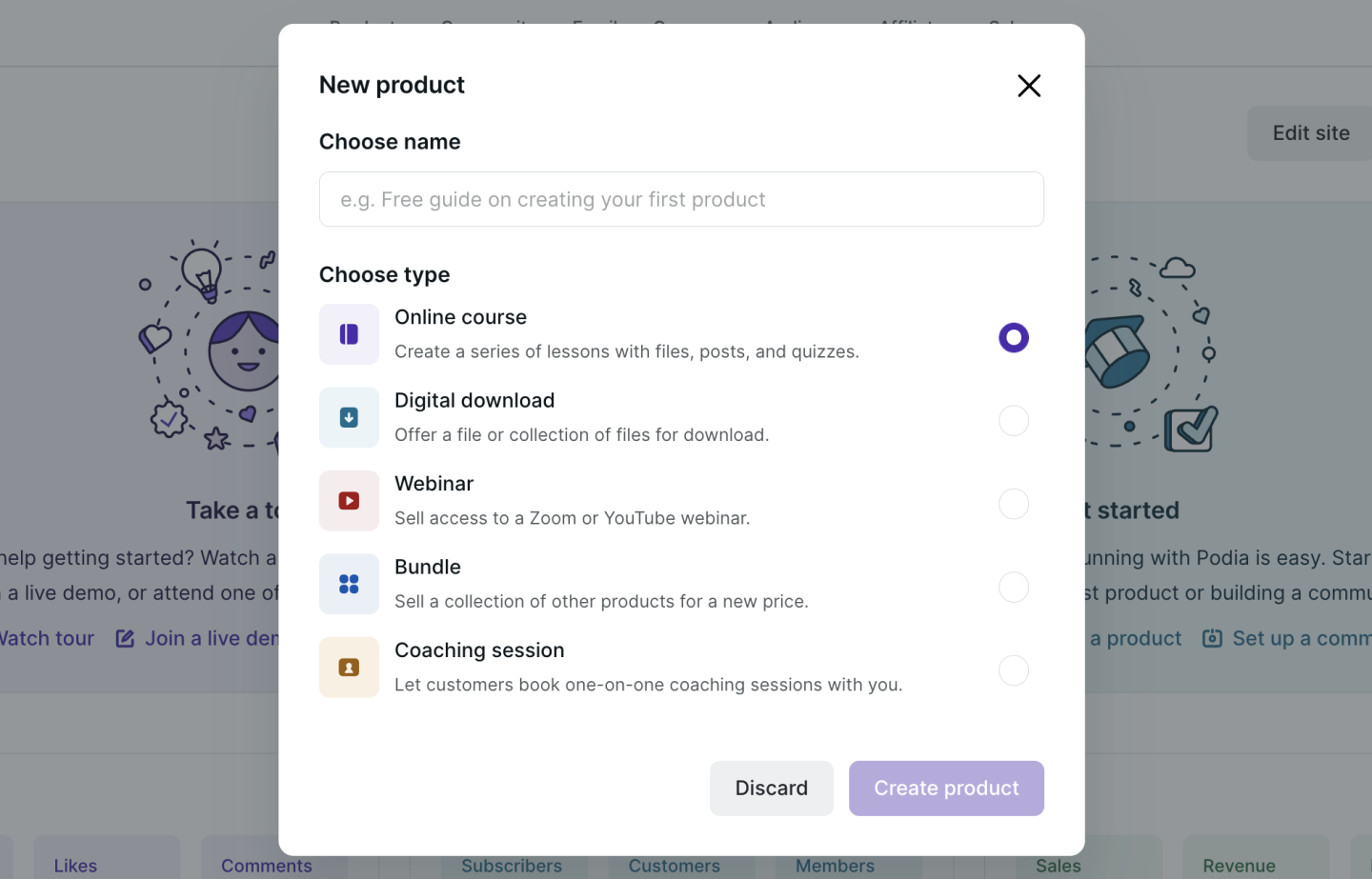
Get your free Podia account

Join the 150,000+ creators who use Podia to create websites, sell digital products, and build online communities.

Sign up free

How toThinking about selling memberships online? There’s an easier way to get that moneyYou don’t need a membership program to have a great online business. Here’s how to build consistent recurring revenue without a membership in just 4 steps.

Software Stack Editor · July 10, 2024 ·

You don’t need a membership program to have a great online business. Here’s how to build consistent recurring revenue without a membership in just 4 steps.

Jump ahead

In this article

Most people think that selling memberships online will be the key to unlocking the kind of lifestyle that they want and that’s very understandable. A membership business is a very attractive business model.

At Podia we’ve seen many people build online communities as another revenue stream. Because the revenue is recurring, once you’ve sold the membership, it’s money in the bank every month, right? 

Wrong! 

Selling memberships online is a really hard business to build and none of the guides that you find by searching how to build a membership will tell you that. 

But with over 150,000 people building online businesses on Podia, we see a lot of data about what works and what doesn’t. 

In this article, we’ll look at: 

  • The challenges of building a membership program online

  • How there are other much easier ways to get to the outcome that you want

  • A practical step-by-step guide to building a business that gets you money while you sleep (without building a membership!)

By the end of this article, you’ll have all the tools and frameworks you need to build a truly great business with all the perks of regular monthly income but without all the pain of trying to sell online memberships.

Sound attractive? Read on!

All that glitters is not gold: the challenges of building a membership site

A business that makes money while you sleep sounds like an entrepreneur’s dream. And if you can get it, that’s true. 

When creators and business owners start thinking about how to get it, though, they often think about adding a membership site to their offering.

You’re here on this page, which means that maybe you’ve felt the same: You already create content on social media. People seem to like you. So it should be easy to get people to pay them every month to receive bonus content, tutorials, access to special live events, and more.

Perhaps you’ve even said those fateful words to yourself: 

“I’ve got 10,000 followers on Instagram. If only 1% of those sign up to my membership, I’ll be rolling in dough.” 

But there are two major challenges that almost everyone who tries to build an online membership comes across very quickly: 

  1. Most people who launch memberships find that their focus shifts from doing what they love – creating content – to working out why more people aren’t buying from them

  2. Even when it’s going well, you spend so much time trying to keep your existing members that you don’t have time to do what got you those members in the first place. That means fewer new members.

Selling memberships online is actually a really hard business model. 

The first hurdle is where most people fall down: you have to create a value proposition that’s compelling enough for a stranger on the internet to go from liking your free content to paying you every month.

If you’re like most people, you’re probably thinking of adding the following to a membership tier: 

  • Exclusive tutorials and content

  • Access to invite-only webinars or other events

  • Behind-the-scenes content from your business

  • A 1:1 session coaching when someone joins your top tier

  • Member-only podcast

Woof! That sounds exhausting to me. 

That actually leads us to the second problem: Let’s say you can convince enough people to do that so that you’re happy with the income you’re getting, now you have to spend the majority of your time creating the exclusive content that’s behind your paywall so that people can get the value you promised them. 

Not only do you have to create all that stuff once, but you have to keep going month after month without ever taking a break. 

Let me ask you this: when was the last time you enjoyed running on a treadmill? 

A treadmill is exactly what a membership is like – retention becomes a major challenge to figure out. You have to continually add value and if they don’t feel like they’re getting that value, your members are likely going to churn. That means your revenue is dependent on spending the majority of your free time trying to make sure they don’t. 

Not to mention what happens when someone’s credit card expires and they ghost you (it happens an unbelievable amount). That’s totally out of your control but it also means your revenue goes down without any way to fix it. 

On the off chance that you manage to avoid all of those pitfalls, you’ll probably still realize that you no longer have any time to create the content that’s going to get you new customers for your membership program. 

You’re spending so much time making content and creating value for your members, that there’s no chance you have the energy and headspace to nail your social media or appear on podcasts/events etc. 

Thinking of writing a blog post? No chance! 

Want to launch a new product?! Maxed out! 

OK. So. This probably wasn’t what you wanted to hear when you came to a blog post about selling memberships online and we don’t want to leave you feeling down and helpless. 

After all, we’ve seen tens of thousands of people like you build beautiful businesses that they love to manage. Businesses that give them the lifestyle they want from their side hustle or, hopefully, their main job! 

In the next section, we’ll share a framework for building a business that gets you everything you want with none of the hassle that comes with running an online membership program. 

The online business flywheel: this no-hacks system makes millions of dollars every month 

If building a membership business sounds exhausting to you, you’re not alone. latforms like Patreon or ConvertKit that specialize in membership functionality are definitely incentivised to show you the sunny side of membership sales: everything goes perfectly and everyone’s making a living doing what they love. 

And even if you don’t follow the logic of our argument above, at least follow the example of the more than 150,000 people who are building businesses on Podia without building a membership program. 

In this section, we’re going to share a much easier path to growing an online business that actually makes money while you sleep and lets you have the time to do what you first loved about building that business: being an expert in what you do and sharing that expertise with others. 

This framework is the same framework that the most successful entrepreneurs and solo business owners on Podia are using in their businesses. While it looks different for everyone, the core components are almost always the same ones. They are: 

  • Start with a simple lead magnet that you can use to collect email addresses

  • Add an email newsletter for your subscribers to build trust with them

  • Launch a paid product to get them to buy from you

  • Add blog content to your website to help more people discover you organically

  • Start the process again to level up your revenue

Let’s work through this process step by step.
You can get your free Podia account
and get started building today – you only upgrade when you’re ready.

Step 1 – Start with a simple lead magnet

A lead magnet is a simple resource that you offer to your audience for free in exchange for their email address. 

Almost every successful online business owner starts off with a lead magnet. 

Practically speaking, a lead magnet can be as simple or as complex as you want it to be, but we recommend making it easy. The best lead magnets help your audience do something that solves a problem or create something within a very short period of time (say 20 minutes) 

Here’s some quick ideas of lead magnets you could create easily: 

  1. A checklist of steps to follow while doing a specific process 

  2. A cheat sheet 

  3. A template for a document that your audience might use a lot

  4. An idea generator

  5. A collection of quotes about a topic (this is one of our best-performing lead magnets!) 

[embedded content]

Practically speaking, you can make your lead magnet in Google Docs, Sheets or Canva and save it as a PDF. 

Once you’ve done that, you’re going to need somewhere to send people so that they can sign up for it. 

Setting up your lead magnet

Luckily, on Podia you can set up your lead magnet, get a web page to send people to sign up, and also send it whenever anyone signs up. The best news is you can do it all for free. 

Go ahead and sign up for your free account here
. 

Once you’ve done that, click on Products in the navigation bar of your Podia account and choose ‘New Product’: 

A popup will appear. Here you can enter a name for your lead magnet (you can change it later.) 

Be sure to select ‘Digital Download’ as the product type as this has a ‘Free Email Delivery’ option later on (bear with us!)

In the digital download editor, you can add files to your digital download product. You can upload as many files as you like. If you upload multiple files, these will be automatically zipped by Podia’s system once they’re downloaded by your customers.

Once your files are uploaded, you need to select Pricing and then choose ‘Free Email Delivery’: 

This will ensure customers need to enter their emails to sign up for your lead magnet without needing to create an account. 

When you’re ready, hit publish on your product. 

Designing your lead magnet landing page

Now that you’ve got a lead magnet and a way to deliver it (we’ll do all the work for you!), you’re going to need somewhere to direct people to where they can enter their email. 

MORE GOOD NEWS! 

With your free account on Podia, you get a free website and a really easy place to edit it and make it look exactly how you want it without needing to work with a designer or developer. 

To quickly get to your lead magnet landing page and start designing, click the […] button and then select ‘Edit Sales Page’

Editing your landing page on Podia is easy. This page took me just two minutes to build: 

In the example above, I’ve added a few numbers to help you navigate easily: 

  1. On the content tab of each section, you can edit the text, add the images, and generally configure what you want visitors to see

  2. On the design tab, you can choose from a number of different options including a series of predefined layouts, spacing, image styles and select a color palette (or create one that’s custom to this page)

  3. If you don’t love the default design options (although they already look better than other website builder software) you can click the design tab marked by the number 3 on the image above which will allow you to set up fonts, colors, and more for your brand

You can also add additional sections by hovering over the designer and clicking the plus button that appears:

Before you finish designing, you’ll also want to set your page address. All Podia sites come with a free subdomain where you can access your website (e.g. [yoursite].podia.com) but if you want to add your own domain name, you can upgrade to the Starter plan from $4/mo (which is great value!) 

To grab the link to your current landing page, you can click the following things:

  1. Click the menu in the top left corner of your website builder 

  2. Find the page you’re designing and click the cog symbol next to it (indicated by the number two on the image above) 

  3. The menu will reload to show you the settings of your current page. You can either copy the URL and start sending your audience to it to sign up or you can edit the URL if you want a different name for it (this is called a page slug – I know, gross) 

Tip: some people like to hide the header on landing pages for their lead magnet. If that’s you, you can toggle the header on and off here too. 

What do you do with this URL? 

How do you get people to download your lead magnet?

Besides sharing it at every opportunity possible you can add your lead magnet to your social profiles. On almost every social network, you can add a link to your bio (BTW – you can set up a link in bio page on Podia too!)

Memberships Podia Instagram Link in Bio

Doing this makes sure that anyone checking out your profile gets an offer of a valuable resource from you. You’ll quickly see the signups racking up.

The other place you can share your lead magnet is as a call to action if you ever appear on a podcast or speak at an event. When the host asks ‘Where can people find you’ just tell them to go download your free resource – it’s a lot more effective than saying ‘Follow me on Instagram’

Step 2 – Add an email newsletter for your subscribers

The goal of setting up a lead magnet is to provide enough value to your audience for free that they’ll give you an email address. 

In 2024, an email address is the most valuable thing an audience member can give you (besides, you know, cash – but we’ll get to that later). If you have an email address, you can use email marketing to continue to own the relationship with your subscribers so that you’re never at risk of losing out when a social network changes its algorithm. 

But how do you stay in touch with your audience members? An email newsletter! 

The beauty of an email newsletter is that it’s kind of like a membership except you can use it as a tool to sell much higher ticket items than a membership – and it’s available to everyone so you’ll never have to prioritize creating for a tiny segment of your audience. 

With your free Podia account, you can have 100 subscribers for free which is enough to start making some money in the next step. 

Every person who downloads your lead magnet automatically gets added to your Podia account and you can send them email marketing.

There are two kinds of email you can send with Podia: 

  1. Broadcasts – one-off emails that are used for things like regular newsletter updates or time-limited offers

  2. Campaigns – automated sequences of emails that you can trigger when a subscriber takes a specific action like buying a product or getting added to your audience for the first time 

If you’re following along with this, we’d recommend you start by trying to send a regular newsletter where you share some of your expertise. 

It’s extremely easy to build a beautiful looking email on Podia and it works in a similar way to the website builder. 

Here’s an example that I made earlier: 

Tip: If you’re not feeling like designing your own, you can choose one of the many pre-made templates available in your Podia account and adjust it to your needs (or send it at is) 

Here’s a few email topics that you could try out: 

  • 5 tips to help you get better at [your topic] 

  • A story of how I [achieved the outcome your subscribers want] 

  • Quick guide to [specific task your subscriber needs to do] 

Don’t overthink it at this stage. The goal is simply to remain in contact with your audience so that at a later date (pretty soon hopefully) you can tell them about the paid product you just launched – which is where you start making the real money. 

Set and forget: use a new subscriber campaign to quickly engage your audience

A campaign to welcome new subscribers – the people who downloaded your lead magnet – is a great way to engage them and give them a taste of what’s to come. 

To do that, just hover over ‘Email’ in your navigation bar on Podia and select ‘Campaigns’. Then create a new campaign and set the entrance condition to ‘Signs up for Product’ and select the name of the Lead Magnet you made.

Then you can add a series of emails that send over time to welcome your new signups. Here’s the lead magnet welcome sequence I have set up for my personal side-project:

On day 1, I welcome them to my newsletter and tell them a bit of my story. On day 2, I dive a lot deeper into the topic I talk about. Day 6 is where I present them with a world view that I hold, that they might find surprising. Day 8 is where I offer them a product and start making money. 

And on that note, let’s move on to the key piece of this whole framework: MAKING MONEY! 

Step 3 – Launch a paid product

So far, we’ve created a lead magnet to help us convert strangers to subscribers and an email newsletter to help us build trust – now we need a way to turn this into sufficient revenue that you don’t feel the need to build a membership which is going to drain all your energy and time from you. 

How do we do that? 

We launch a product that’s related to the problem solved by our lead magnet! 

With your free Podia account, you can launch 1 product (that’s been covered off by the lead magnet you set up) so you have two options: 

  • You can either launch a coaching session – our free plan allows you to launch 1 of those too

  • Or you can create another product and upgrade to our Mover or Shaker plan when you’re ready to launch (both plans include unlimited courses, downloads, and coaching sessions) 

We’ll walk you through both here so you can make the choice for yourself: 

Set up a coaching session

Once you have built trust with your audience, offering a coaching session can be a very effective way of converting the effort you’ve put into your content into sales. 

For example, when I showed you the lead magnet I set up earlier, you’ll have noticed that it was for my fictional business DeskBloom which specializes in helping office managers create green environments in their offices. 

My lead magnet was a downloadable of ‘Plant Care Labels’ which help them know when to water, what conditions the plants like and recall the names of each plant. 

Then my email sequence was geared towards simple plant care tips that they could use to improve their offices. 

For my coaching session, I’ll set up a simple coaching session where my subscribers can pay me for a 15-minute call where they use their camera phones to show me around their plants and I offer them advice. 

Let’s dive in.

I start by creating a new product in the same way I did earlier except this time I’ll choose ‘Coaching Session’:

The setup of a coaching course is slightly different to other products because you actually paste a link from Calendly, SavvyCal, Acuity, or YouCanBookMe to embed a booking calendar on your customers’ product page. 

Here’s how it looks with my calendar link in it: 

I can set my pricing and then publish. This is the moment where I can design the landing page but as we’ve already done that above and it’s the exact same process, I’ll skip it here. 

Once your subscribers have bought your product, they’ll be taken to the customer only area where they’ll see your calendar widget embedded. Here’s my colleague Rodrigo’s page as an example: 

Tip: Not only is selling a coaching course a great way to get paid for providing value but it’s also a brilliant way to build more trust which can turn into your customers recommending you to others. You can also take the insights you gather from speaking to your customers and use them to create more content as part of your flywheel.

Set up another downloadable or course 

If 1:1 facetime isn’t your thing or you just don’t want to do coaching sessions, there are many other kinds of products you could sell as your first paid offer. 

The most successful people tend to start out with a downloadable that builds on the thing that their lead magnet helped their subscribers get done. 

Some good examples of downloadables: 

  • Template packs

  • Planner documents 

  • Project plans

  • Technical files 

  • Short ebooks 

Any of these could work for you and you’re not limited to them either. 

Setting up a course is another option but remember that this takes time and a lot of people get hung up on getting the content perfect. 

Creating a course is easy in Podia. You just choose ‘Online Course’ from the new product menu in the same way we’ve outlined above. 

From there you can set up your course by adding Sections (like modules) and Lessons which could be text, embeds, quizzes, coaching sessions, or files. 

You won’t be able to publish your course or your second product until you’ve chosen a Mover or Shaker plan but you can get everything ready and then upgrade. 

Tip: With Podia you can also offer upsells of additional products at your checkout. This is a great way to increase your revenue with no extra effort. 

Step 4 – Add blog content to your website

We’re really rolling now. So far you’ve got: 

  1. A lead magnet – A way to encourage your audience to give you their email address

  2. An email newsletter and automated welcome campaign – to build trust with your subscribers

  3. A paid product – that you can use to turn that trust into cash 

But what’s missing? A way to get more and more people to discover you without you needing to create content all the time. 

The simplest of all marketing strategies is to create a few pieces of content that help people who are looking for solutions to specific problems that you could solve for them with the things in steps 1,2 and 3 of this process. 

With your free Podia site, you also get a free SEO-optimized blog that looks great out of the box and you can manage without fussing with plugins or themes. 

To get started with setting up your blog, simply click ‘Blog’ in the navigation of your Podia account and then choose ‘New Post’ from the drop down menu: 

You’ll notice how simple the New Post page looks when it loads. You can write your content in the big box on the left hand side. 

To add an image, file, embed, button, line or to manage the text formatting options, you can just type ‘/’ on a new line and you’ll be offered a menu of those choices: 

If you already have content written in a document or anywhere on the internet, you can copy and paste it directly into this space. Podia will match your text formatting and import images as best it can but you may have to make some adjustments depending on what you’re copy pasting. 

TIP: You can also use our built-in blog importer if you have a blog elsewhere and you want to add your posts in one go.

Memberships Blog Importer

The goal here is not to always have another place to create content – remember that’s what we’re trying to get away from by avoiding creating an online membership site.

Instead, we want to keep our content focused at this stage so that it does the most work for us. 

How do we do that? By writing posts about the most common problems your ideal customers have that you can solve with your content (and ideally your paid products!) 

Here are some thought starters that we have found to be particularly helpful: 

  • How to {subject} – how to guides are a time tested classic for helping people find you in search and solve their problems. Be helpful (like this post, hopefully!) and people will realize they could use your products to solve their problem (BTW – hopefully you’ve taken this as a prompt to
    sign up for your free Podia account
    . Meta. We know.)

  • Expert guides – this kind of content works really well when a person doesn’t have a specific problem to solve but they’re thinking about undertaking a process. In my example, maybe I could create an ‘expert guide to designing office plant installations’ 

  • 5 top tips for {subject} – a mix of the how to content and expert guide content. Providing actionable lists of hard-earned advice frames you as the person who could solve your audience’s problems

A lot of guides tell you that you should create large posts – and, look, this one’s currently about 4K words long – but it’s not always necessary. We’ve seen people do really well with how-to articles that are under 500 words. We’ve also seen our own content sometimes get a lot of sign ups when we go deep and long on a subject. 

After you’re done writing the content and you’ve got some posts published, you can design your blog page in the Podia website builder. 

There are two things to design: 

The blog archive page – this is where you’ll see all of your blog posts in a list. Here’s how mine looks after 2 minutes of adjusting design options like the layout and image size:

And also the individual blog post page template which is the template used by all your blog posts. It contains an example of the content from one of your blog posts to give you an idea of how all your posts will look when you publish: 

To really make the most of this whole system, you should add an email signup form for your newsletter. You can do that by clicking on the + button anywhere on the page preview and selecting ‘Slim Email Form’ or ‘Email Form’ as the new section: 

This form will add anyone who signs up by finding your blog to your Podia Email newsletter. 

You could think about creating a new campaign to welcome your blog post subscribers and then add a tag to them automatically by adjusting your form’s settings: 

This would give you a way to trigger the automated campaign directly from your Podia account as ‘Tag added’ is one of the entrance conditions available in Podia Email: 

Step 5 – Start the process again to level up your revenue

That’s the whole framework. And while it might feel like a lot of work to get set up, we promise it’s a better long-term win than having to create content on a treadmill just to improve retention and stop your membership subscribers from canceling. 

The cool thing about this system is that it gets better and better every time you run it. 

Let’s say you’ve done one iteration of the flywheel and you made a good amount of money from your subscribers. 

If you add an additional free resource that triggers a nurture campaign and a CTA to buy a new paid product, you can earn additional revenue from the same people. 

A lot of people price memberships at a low price like $9/mo, but if you sold a low-priced product like a $100 download to your subscribers once every 6 months, you’d actually end up with $92 extra a year. 

That’s before you factor in that many people add more and more premium offers to this kind of business. By not needing to focus on creating exclusive content for your membership, you can focus on driving more and more people to signup for your free offering… which means… more people for your paid offering! 

Incremental revenue!

Don’t build an online membership — build a business flywheel instead

The dream sold by online membership tools is very attractive: you do what you love and you get money while you sleep. 

But the reality is a lot different for the majority of people because it’s hard to get subscribers to give you their credit card details. Then you have to keep delivering on your value proposition and providing value with exclusive membership content. 

Even if you do a perfect job of that, you’ll barely have time to acquire new subscribers which means that all that passive income is really just a pipe dream. 

But there’s an easier way. 

By building a flywheel in your business that acquires new subscribers, provides value for them on autopilot, and then monetizes them with one-time products and services, you can actually get paid for your expertise and still have time to grow your business. 

You won’t ever have to worry about making sure your subscribers don’t churn or chasing up expired credit cards. 

On our free plan, you can: 

  • Build a beautiful website complete with a blog

  • Offer a lead magnet that gets delivered automatically

  • Set up email marketing for up to 100 subscribers that helps you drive more sales

  • Set up additional paid digital products and upgrade when you’re ready to sell them

It won’t be easy but it is simple and you can do it all on Podia starting for free.
Create your free account today.

12 best Kajabi alternatives that are actually affordable (Features & pricing)

Software Stack Editor · July 10, 2024 ·

Discover the best Kajabi alternatives for selling online courses, marketing digital products, and designing beautiful websites—for a fraction of the price.

Jump ahead

In this article

Can you think of two creators that are exactly alike?

Some creators go viral on YouTube and make money off ads and sponsorships. Some sell printable planners with funny cat illustrations. Others offer 1:1 online music lessons alongside self-study musical theory courses.

There are endless ways creative businesses can come to life. Entrepreneurial journeys are diverse, and it makes sense that there are hundreds of different tools to support creators behind the scenes.

One of these tools is Kajabi, an all-in-one platform for selling digital products and running an online business.

In this guide, we’ll break down the pros and cons of Kajabi, as well as 12 Kajabi alternatives you can use to help you reach your goals.

Note: All pricing is accurate at the time of writing, but this is subject to change over time.

Kajabi pros and cons

With Kajabi, you can sell courses, downloads, coaching,
podcasts
, memberships, and communities. You can also use Kajabi to handle email marketing, create a website, build sales funnels (called pipelines), and manage affiliates.

Kajabi even comes with a mobile app so students can view courses on the go. On top of that, there are no transaction fees, so you’ll keep everything you earn.

So what’s the catch?

No platform is perfect for every creator, Kajabi included.

Here are some potential downsides of Kajabi:

First, Kajabi comes with a premium price tag. Compared to the other platforms we’ll discuss in this guide, Kajabi is one of the most expensive options for this type of software.

Kajabi costs:

  • Kickstarter: $69/month

  • Basic: $149/month

  • Growth: $199/month

  • Pro: $399/month

Even the lowest-tiered Basic plan is over $100 per month, which could be cost-prohibitive for
creators on a budget
.

In addition to having a higher price point, Kajabi imposes product limits on all plans.

Kajabi product limits:

  • Kickstarter plan: one product and one pipeline

  • Basic plan: three products and three pipelines

  • Growth plan: 15 products and 15 pipelines

  • Pro plan: 100 products and 100 pipelines

According to our
900+ creator survey
, creators have an average of 10.95 products, which means many would have to use Kajabi’s Growth plan or Pro plan to keep selling their work.

Finally, Kajabi doesn’t have
course completion certificates
built-in, so if you want to offer this to students, you’ll need to integrate with a third-party tool.

If you’re on the fence about Kajabi, here are 12 alternatives you can try instead.

12 best alternatives to Kajabi

1. Podia

Podia is an all-in-one platform where you can build, host, and manage every aspect of your business. You can create and sell unlimited courses, digital downloads, coaching, community tiers, and more on Podia’s Mover and Shaker plans. With unlimited students, sales, and bandwidth, you won’t have to worry about upgrading as your business grows.

Our intuitive website builder means you won’t need to learn to code or invest in additional website tools to get your business up and running. You can easily create beautiful, effective sales pages for each item you sell.

In addition to selling unlimited products, Podia’s community feature helps creators build a network around their brand, resulting in more connections and happier customers.

For example, singer and actor Harry Connick Jr. uses Podia to run his paid piano membership,
Piano Party
. Students get access to a series of video lessons and a supportive community to meet friends and share their wins.

Podia creator Emily Mills from
Sketch Academy
uses her free community to share upcoming events with her audience and host monthly hangout calls for sketchnote-enthusiasts. She also uses Podia to sell courses, workshops, workbooks, and 1:1 coaching.

Podia includes email marketing, affiliate management, and the ability to message prospective customers, so you don’t have to pay for extra tools and software. Users can also issue course completion certificates for students.

Here’s a look at some of our creators’ favorite features:

Podia features:

  • Sell unlimited
    courses
    ,
    digital downloads
    ,
    webinars
    , and
    coaching sessions

  • Easy-to-use website builder included on all plans

  • Built-in email marketing, affiliate marketing, and customer messaging

  • Free migrations when you sign up for an annual Mover or Shaker plan

  • Excellent customer support

  • Instant payouts

  • Payment integrations with Stripe and PayPal

  • Custom domains

Whether you’re brand new or a veteran creator, you’ll get everything you need in one affordable platform.

Podia pricing:

  • Free plan (10% transaction fee)

  • Starter: $9/month or $4/month when paid annually (8% transaction fee)

  • Mover: $39/month or $33/month when paid annually (5% transaction fee)

  • Shaker: $89/month or $75/month when paid annually

Learn more about how Podia compares to Kajabi
.

Get your free Podia account now
to see these features in action.

Get your free Podia account

Join the 150,000+ creators who use Podia to create websites, sell digital products, and build online communities.

Sign up free

2. Teachable

Teachable is a popular choice for coaches and course creators. With Teachable, paid plan participants get unlimited courses, coaching products, students, and video bandwidth.

You can build custom
sales pages
, detailed checkout pages, and even a homepage where all your products can live.

There are many ways creators can
price their products and courses
, and it’s possible to receive instant payouts. If you have partners, collaborators, or affiliates, Teachable makes sure everyone gets paid the right amount.

Teachable features:

  • Sell unlimited courses and coaching products

  • Build a custom storefront and sales pages

  • Course competition certificates and progress tracking

  • Affiliate center with automatic payouts

  • Dozens of powerful integrations

  • Email marketing features

Teachable benefits:

Teachable is built for selling courses and coaching, and creators can use design templates, quizzes, drip content, upsells, and course compliance enforcement. Also, Teachable users can add CSS code snippets to their school pages on all plans, including free plans.

Teachable downsides:

Teachable doesn’t come with a built-in community. If you want this functionality, you’ll need to integrate with an additional tool, which may come at an extra cost.

The included email marketing system lacks advanced features, and there are also transaction fees on the Free and Basic plans.

Teachable pricing:

3. Thinkific

Like Teachable, the Thinkific platform serves course creators. Through Thinkific, you can sell self-study courses, live lessons, videos, and cohort programs. Easily add assessments and give students an assortment of payment structures to choose from.

You can also use Thinkific to build a storefront or website for your business, complete with templates to help you get started. Thinkific also offers course completion certificates, assignments, and lesson prerequisites.

Thinkific features:

  • Sell courses, communities, products, bundles, and memberships

  • Voiceover PowerPoint presentation tool built-in

  • Student surveys

  • Students can leave course reviews

  • Exam integrations on higher plans

  • Video and content hosting on all plans

Thinkific benefits:

Thinkific creators get unlimited courses, content, and students on paid plans. For advanced users, custom CSS and HTML are available on Thinkific’s $99/month Pro plan. With Kajabi, this functionality is only available on the $399/month Pro plan.

Thinkific downsides:

Creators can only offer memberships, product bundles, payment plans, and subscriptions on Pro plans and above. Email features are limited, and basic communities are only available on higher-tiered plans.

Also, you can’t use Zapier triggers unless you purchase the Thinkific Growth add-on, which costs $50 and must be used in conjunction with the $99/month Pro plan.

Thinkific pricing:

With Thinkific, there are no transaction fees, even on the free plan.

  • Free

  • Basic: $49/month

  • Pro: $99/month

  • Premier: $499/month

4. LearnWorlds

LearnWorlds is a platform where educators, entrepreneurs, and small to mid-sized businesses can build and sell online courses, memberships, and even mobile learning apps.

LearnWorlds also comes with a handy website builder. Customize your site however you like, and duplicate pages if you want to experiment with a new look.

One of the biggest perks of LearnWorlds is that you can build your own mobile app for your brand or business. You can offer in-app purchases, send notifications, and even create a fully white-label experience.

The LearnWorlds mobile app builder tool is available as a paid add-on for Learning Center members. There’s an extra cost for this service, but the price isn’t listed online.

LearnWorlds features:

  • Sell courses, memberships, subscriptions, and product bundles

  • Manage affiliates

  • Build your own website

  • Built-in video editing tools and transcripts

  • Create a mobile app for your brand (additional fee)

  • Add assessments, quizzes, question banks, and course completion certificates

LearnWorlds benefits:

LearnWorlds makes it easy for content creators to create engaging videos through built-in video editing tools and features. For students, LearnWorlds offers interactive add-ons like note-taking and highlighting within the course viewer.

LearnWorlds downsides:

LearnWorlds heavily focuses on course creation, so it may not be the right fit for creators who plan to sell digital downloads, coaching, communities, and services.

Starter plan members will pay a flat transaction fee of $5 per course sale, which could severely eat into your earnings for lower-priced courses. Also, free courses, memberships, and subscriptions can only be offered on the $99/month Pro Trainer plan and above.

LearnWorlds pricing:

  • Starter: $29/month (+$5 fee per course sale)

  • Pro Trainer: $99/month

  • Learning Center: $299/month

  • Corporate: Custom pricing

5. Teachery

Teachery is a straightforward online course platform for creators who don’t need a lot of bells and whistles. Utilize their user-friendly course builder to create as many lessons and modules as you like, and you can even duplicate courses if you want to run them more than once.

There are only two pricing options, and both pricing plans include unlimited students and courses. There aren’t any product upsells or add-ons; one flat rate gives you access to the entire tool.

Teachery features:

  • Unlimited courses, lessons, and students

  • Simple course editor

  • Build sales pages and landing pages to promote your products

  • Choose from two templates, minimal and sidebar

  • Whitelabel course provider

  • Memberships and
    product bundles

  • Mailchimp and ConvertKit integrations

  • Tools to
    create an affiliate program

Teachery benefits:

Teachery is ideal for course creators who want a minimalist platform that’s simple and easy to use. You’ll have everything you need to sell unlimited courses without a ton of extra features, which keeps costs affordable.

Teachery downsides:

With Teachery, you won’t get a website, storefront, or email marketing features. Teachery also doesn’t include video and audio file hosting. Instead, you’ll need to embed content through third-party tools like YouTube and Vimeo.

Teachery pricing:

  • Monthly plan: $49/month

  • Annual plan: $470/year

6. LearnDash

LearnDash is a WordPress learning management system (LMS) plugin that must be used with a WordPress website. Through LearnDash, you’ll get access to a drag and drop course builder and dozens of customization options to build your learning environment.

Create unlimited courses, host unlimited learners, and
house it all on your WordPress site
. You can also create course content with interactive elements like quizzes, leaderboards, gamification, and assignments.

LearnDash features:

  • WordPress LMS plugin

  • Enroll unlimited students and
    sell unlimited courses from your own website

  • Works with any WordPress theme

  • One-time purchases, subscriptions, memberships, course bundles, and bulk licenses

  • Gamification, quizzes, certifications, and evaluations

  • Send students notifications

LearnDash benefits:

The main benefit of the LearnDash WordPress plugin is how customizable it is. You can build whatever kind of website you want using the WordPress framework, add LearnDash to your existing site, and incorporate other add-ons and plugins to get additional functionality.

You also won’t pay any transaction fees on LearnDash course sales.

LearnDash downsides:

If you sell courses through LearnDash, you should be familiar with WordPress and comfortable connecting multiple plugins and integrations. Since WordPress has a learning curve, it may take longer to get your courses up and running.

You might want to
hire a developer
or web designer to bring your site to life, which comes with additional costs.

While a flat yearly price and no transaction fees might sound enticing, it’s important to remember that some tools are only available as paid add-ons. Combine that with the cost of hosting your website and domain fees, and this option can get pricey.

Also, if your technology starts acting up, you’ll be the one who has to troubleshoot a fix.

LearnDash pricing:

7. Mighty Networks

Mighty Networks is an online community platform. Here, creators can run free and paid membership communities and, on higher-tiered plans, sell online courses.

Mighty Networks makes it possible to create landing pages and offer a variety of payment plans for community access. Advanced community features include live streams, member profiles, direct messaging, virtual events, and calendar functionality.

Mighty Networks features:

  • Community and membership site features

  • Users have unique feeds through personalization technology

  • Communities can have unlimited members and moderators

  • Group and private chat messaging

  • Create live or cohort courses on the Business plan and up

Mighty Networks benefits:

Mighty Networks was designed for running communities, and creators get access to analytics and other helpful membership tools. You can also create courses with a dedicated community area.

Mighty Networks downsides:

The online course creation feature is only available on the $119/month Business plan and above. There isn’t a native way to sell services like coaching and 1:1 tutoring, so you may need additional tools if you plan to offer these products.

Mighty Networks users also pay a 3% or 2% transaction fee, depending on the plan.

Mighty Networks pricing:

  • Community plan: $39/month

  • Business plan: $119/month

  • Mighty Pro: Custom pricing

8. ClickFunnels

ClickFunnels is sales funnel software. Creators can build marketing automations that take visitors through sales pages and email nurture sequences designed to convert them into customers. Creators can also build strategic upsells, order bumps, and tripwires.

ClickFunnels is not marketed as a course provider, but it’s possible to deliver content through the password-protected membership feature. With over 100K users, this is a popular choice for entrepreneurs who depend on sales funnels to automate their business.

ClickFunnels features:

  • Page builder for creating sales pages and shopping cart pages

  • Autoresponders, upsells, cross-sells, order bumps, and tripwires

  • Built-in affiliate system

  • Email marketing tools with advanced
    segmentation capabilities

ClickFunnels benefits:

Creators can use ClickFunnels to build in-depth sales funnels as well as web pages and landing pages. There are also special funnel templates for generating leads, closing sales, and
running webinar events
.

ClickFunnels downsides:

While you can offer courses through the ClickFunnel membership area, this tool wasn’t built for selling courses directly. If you don’t use elaborate sales funnels in your business, ClickFunnels comes with many features you won’t need.

It’s common for creators to use ClickFunnels as their marketing platform and another tool to host their elearning content, which means additional costs.

ClickFunnels pricing:

9. Kartra

Kartra is an all-in-one marketing platform where creators can build checkout carts, sales pages, funnels, and campaigns. Sell memberships, gather leads, manage your email list, and schedule live sessions with customers directly on the platform.

While Kartra isn’t specifically designed for selling courses and digital products, it’s possible to do so through
drip content
or adding resources to a
paid membership area
. Kartra also offers extra video enhancements like email capture pop-ups, watermarks, and playlists.

Kartra features:

  • Creators can make a helpdesk for their customers

  • Calendar scheduling tool built-in

  • Built-in surveys and quizzes to do customer research

  • Lead capture forms and client organization tools

  • Affiliate marketing
    tools

  • Agency tools to manage all your clients if you offer services

Kartra benefits:

Compared to Kajabi, Kartra excels because it offers appointment scheduling and calendar tools. There’s also a customer helpdesk feature so creators can provide customer support to their clients.

For affiliates, Karta has pre-screening questions, automated payouts, and an affiliate marketplace to find new promoters.

Kartra downsides:

Kartra doesn’t have a dedicated course builder, so you’ll have to use memberships as a workaround for delivering content. Kartra also lacks a community feature, so you’ll need to use a third-party tool if you want this functionality.

Kartra pricing:

  • Starter: $99/month

  • Silver: $199/month

  • Gold: $299/month

  • Platinum: $499/month

10. Ruzuku

Ruzuku is a simple platform for building and selling online courses. Create any type of course you want with unlimited video, audio, and file hosting using the intuitive Ruzuku course builder.

Courses can be evergreen, self-paced, or live, and you can create a copy of a course if you’d like to use the material again.

Ruzuku features:

  • Unlimited students and courses, data storage, no transaction fees

  • Webinars, polls, and quizzes on some plans

  • Engage students through forums, commenting, and prompts

  • Video hosting is included on all plans

Ruzuku benefits:

Ruzuku has robust features for course sellers, including video and audio hosting, teleconferences, video broadcasts, course completion data, an FAQ forum area, and student discussions.

Across the board, Ruzuku gets great reviews for simplicity and customer service. There are no transaction fees on any plans.

Ruzuku downsides:

Ruzuku is great for creators who want the basics, but you’ll need to connect other tools to offer affiliates, communities, or memberships. Ruzuku doesn’t come with a website builder, so this could be another puzzle piece to consider.

Ruzuku pricing:

  • Bootstrapper: $99/month

  • Up and Comer: $149/month

  • University: $199/month

11. Skillshare

Skillshare is different from the other Kajabi competitors on this list because it’s a learning membership platform. Rather than building a home base for your online business, Skillshare allows you to upload your content and get discovered by their large pool of learners.

To use Skillshare, students pay a monthly fee for unlimited access to all courses on the platform. Creators
record and upload video courses
, and any Skillshare member can enjoy the content.

Courses usually last 30-40 minutes and come with a project or assignment to enhance student engagement. All content also must pass video quality control standards and approval.

Teachers earn royalties based on how many minutes students watch their courses. Teachers can also earn referral bonuses when a student signs up for Skillshare using their unique link.

Skillshare features:

  • Upload video courses and make money through royalties

  • Earn more through the Skillshare affiliate program

  • Creators can be discovered by students already using the platform

Skillshare benefits:

With Skillshare, you don’t have to
do your own marketing
since users can find you by searching for your content on Skillshare. You can earn more by sending students to the platform with your referral code, but it’s still possible to earn royalties without any promotion.

Also, there are no recurring fees or websites to maintain. This is a good option for creators who don’t want to offer live courses and who want minimum work behind the scenes.

Skillshare downsides:

On Skillshare, you can’t set the price for your course, and your content will be hosted on Skillshare’s platform instead of on a website that you own.

You’ll get paid based on how many minutes of content people watch, which could mean lower earnings than if you sold your courses independently.

Skillshare courses must be pre-recorded video sessions with a project for students to complete at the end. This format may be stifling for creators who have another course type in mind, like real-time cohorts or ongoing memberships.

Skillshare pricing:

  • Free for creators

12. Udemy

Udemy is a course marketplace website where you can list courses and reach a wide audience. They help with marketing, but in return, you give up control over elements of your course.

Teachers get paid through a revenue-sharing plan. When a student enrolls using the instructor’s referral code, the instructor keeps 97% of the course fee. If a student enrolls without using a referral code, the instructor only keeps 37%.

Udemy is also known for offering price reductions on courses site-wide, but creators can opt out of this if they don’t want their content to be discounted.

Udemy features:

  • Easy course builder and uploader tool

  • World-wide student base

  • Students can leave course reviews to build credibility

  • Users can gift courses to other people

  • Instructors can create coupons for their courses or be included in site-wide deals

Udemy benefits:

Selling courses on Udemy can be hands-off if you don’t want to deal with your own marketing. Because of the platform’s size, you have the potential to get your course in front of a large number of students relatively quickly.

Udemy downsides:

Udemy is free to use, but you won’t get a website, sales pages, email tools, or the ability to sell diverse product types like memberships, coaching, and digital downloads.

Udemy takes a large percentage of your sales unless students use your affiliate code. This can make it difficult to earn a living on the platform and grow your business.

For example,
Podia creator John D. Saunders
had over 1,900 customers buy his courses on Udemy, but he only earned $1,100 in revenue. When he switched to Podia, he earned $10,000 on launch day alone and has earned over $200,000 on the platform since.

Finally, all videos must be approved by Udemy before you can start selling. If they’re not formatted correctly, they could be rejected, and you’d have to start over.

Udemy pricing:

  • Free for creators

Find the right Kajabi alternative for you

Best free alternative to Kajabi:

  • Podia’s free plan includes a full website, landing pages, blogging, one digital download, one coaching product, and email marketing for up to 100 subscribers

  • Teachable and Thinkific have limited free plans

  • Udemy and Skillshare are free forever

More affordable Kajabi alternatives:

  • Podia: Plans start at $4/month

  • Teachable: Limited free plan, paid plans start at $39/month

  • Thinkific: Limited free plan, paid plans start at $49/month

  • LearnWorlds: Plans start at $29/month

  • Teachery: Plans start at $49/month

  • LearnDash: Plans start at $199/year

  • Mighty Networks: Plans start at $39/month

  • ClickFunnels: Plans start at $97/month

  • Kartra: Plans start at $99/month

  • Ruzuku: Plans start at $99/month

Best Kajabi alternatives that integrate with WordPress:

Best all-in-one alternative to Kajabi: Podia

Podia gives you everything you need to run your entire online business, no matter where your creativity takes you. If you’re looking for a place to sell unlimited products without breaking the bank, we’d love for you to join us at Podia.

To see how Podia can meet your creative needs,
sign up for your free account today
.

We can’t wait to see all the awesome things you make.

Get your free Podia account

Join the 150,000+ creators who use Podia to create websites, sell digital products, and build online communities.

Sign up free

7 best Squarespace alternatives for building a beautiful website

Software Stack Editor · July 10, 2024 ·

Find a Squarespace alternative with the functionality you need to build the perfect site, grow your audience, and sell more!

Jump ahead

In this article

Whether you’re a new creator or a seasoned pro, there’s a good chance your business needs a website. Entrepreneurs already wear many hats, so it’s important to find a website builder that’s easy to use and headache-free.

Squarespace is a popular option because you can design and build a website without knowing how to code. Squarespace provides a variety of website templates, and you can also set up an online store, highlight your work in a digital portfolio, or start a blog.

But Squarespace has some limitations, and it isn’t the right fit for everyone. In this article, we’ll cover the pros and cons of this popular website building platform, as well as seven Squarespace alternatives to consider if it doesn’t suit your needs.

Squarespace pros and cons

First, let’s look at some benefits and shortcomings of Squarespace.

Squarespace pros

Website templates: When you build a website with Squarespace, you’ll get access to several templates to jumpstart your site design.Squarespace offers specialized themes for portfolio websites, ecommerce shops, blogs, service-based businesses, and other use cases. You can also buy third-party templates if you want a different look.

Ecommerce tools: If you’d like to sell products and services from your website, Squarespace has three plans with ecommerce functionality.You can also accept bookings and appointments through Squarespace’s scheduling tool, available for an additional fee.

Membership area: For an additional cost, you can use Squarespace to build a membership area for your brand. Members can enjoy exclusive files, videos, premium content, and virtual events. Your membership area can be free or paid, and you can add unlimited members.

Email marketing tools: Want to stay in touch with your audience? Squarespace has an
email marketing
add-on with email design layouts to make your messages feel cohesive with your website. This feature is available for an extra fee.

Squarespace cons

Difficult to use: Squarespace markets itself as easy, but many users find that the site editor is harder to use than expected. Some settings and elements can only be adjusted on individual pages and others must be tweaked in the Site Styles area, which is located in a different section of your Squarespace dashboard.

For example, here are the steps you’d need to take to restyle a button on your home page:

  1. On the Squarespace home screen, click “Pages” and select your home page.

  2. Select the “Edit” button in the top left corner.

  3. Click the pencil icon next to the button you’d like to change.

  4. Change the button text, link destination, button size, and alignment, then click “Done”.

  5. Return to the Squarespace home screen and click “Design”.

  6. Select the “Site Styles” tab.

  7. Click “Buttons” to change the style, shape, and padding.

  8. Select “Colors” to change the color palette across your site.

  9. Select “Fonts” and scroll down to the “Buttons” section to change settings like font family, text weight, letter spacing, and text transform for all buttons across your site.

That’s a lot of steps just to tweak one button. When you’re new to Squarespace, navigating between pages, elements, and style settings can be confusing and time-consuming.

Limited customizations: While templates offer a nice starting point, many users feel that the customization options are too narrow with Squarespace. The website builder is simple for non-developers, but the catch is that you can only edit certain aspects of your site.

The core blocks that make up most theme designs are rigid, and making changes beyond what’s offered in the style editor requires some coding knowledge. You’ll be fine if you need to swap out text, pictures, and colors, but changing fine details gets tricky.

Not ideal for selling digital products: While it’s possible to sell digital products on Squarespace, the ecommerce tools and extensions are mainly geared toward
selling physical products
. The maximum file size you can sell is 300MB.

You can only offer one file per digital product listing, but you can zip files together if the total stays under 300MB. You can’t offer variations for digital items, nor can you sell digital products as subscriptions.

Complicated pricing structure: If you’d like to use some of Squarespace’s advanced features like email marketing, memberships, or scheduling, you’ll need to pay extra fees each month.Here’s a look at the Squarespace pricing plans and add-ons:

Squarespace pricing:

Squarespace membership area pricing (add-on):

  • Starter: $10/month (+7% transaction fee)

    • 5 hours of video storage

    • 1 member area

  • Core: $20/month (+4% transaction fee)

  • Pro: $40/month (+1% transaction fee)

Squarespace email pricing (add-on):

  • Starter: $7/month

    • 3 campaigns per month

    • 500 emails per month

  • Core: $14/month

    • 5 campaigns per month

    • 5,000 emails per month

    • Automations

  • Pro: $34/month

    • 20 campaigns per month

    • 50,000 emails per month

  • Max: $68/month

    • Unlimited campaigns

    • 250,000 emails per month

Squarespace scheduling pricing (add-on):

  • Emerging: $15/month

  • Growing: $25/month

  • Powerhouse: $50/month

Here’s how this could play out by the numbers:

Suppose you wanted to build a website with ecommerce functionality, a membership area, and email marketing. You’d pay $33 per month for the core Business plan, $10 per month for the Starter membership plan, and $7 per month for the Starter email plan.

Your total would be $50 per month plus transaction fees, just for the introductory offerings in each category. Simply put, Squarespace’s pricing structure is complex, and you may end up with a hefty price tag to get everything you want.

Up next, we’ll explore seven Squarespace alternatives that might fit the bill instead.

7 best Squarespace alternatives

1. Podia

Podia is an all-in-one platform for running your business where you can create a stylish website in no time. The best part? It’s 100% free to
build your website on Podia
.

Podia’s free website builder gets top marks for ease of use, and you don’t have to know code to make your site look amazing. You can make as many web pages as you need and even create standalone sales pages and landing pages to promote your offerings.

There are over a dozen different website sections to choose from, and within each section, you can customize the content (like title, description, button text, and what content to include) and the design (like orientation, layout, style, color, and background image).

You can style each content block with just a few clicks to get a totally different look and layout.

But don’t just take our word for it. According to Podia creator and
Flex Lessons
founder
Joseph D’Amico
, “Podia makes website building so fun. I feel like I could set up a site in an afternoon, and it would look great. And there’s something to be said for how pretty it is. It’s the best-looking one by far.”

The cherry on top? Podia’s free-forever plan comes with a complete website, unlimited landing pages, blogging, and the ability to
sell one digital download
and
one coaching product
. Essentially, you can build a powerful and profitable online presence without opening your wallet.

And as your business grows, you can upgrade to one of our affordable paid plans to sell unlimited digital downloads,
online courses
,
webinars
, memberships, free or paid communities, and coaching, all from your Podia dashboard.

Bottom line: With Podia, you can build a fantastic website, sell your work, and run your entire business for a fraction of the price of Squarespace.

Podia features:

  • Complete website builder with unlimited pages (including
    sales pages
    and
    landing pages
    )

  • Sell unlimited courses, digital downloads, webinars, membership communities, and coaching/services on Mover and Shaker plans

  • Built-in email marketing, affiliate marketing, and customer messaging

  • Unlimited bandwidth (content and video) on Mover and Shaker plans

  • Podia hosts your website for you

  • Top-notch
    customer support

Podia pricing
:

  • Free plan (10% transaction fee): Includes a website, community, one digital product, and one coaching service

  • Starter: $9/month or $4/month when paid annually (8% transaction fee)

  • Mover: $39/month or $33/month when paid annually (5% transaction fee)

  • Shaker: $89/month or $75/month when paid annually

Learn more about how Podia compares to Squarespace
.
Build your website for free on Podia
, or
check out our video demo
to see these features in action.

Get your free Podia account

Join the 150,000+ creators who use Podia to create websites, sell digital products, and build online communities.

Sign up free

2. Shopify

Shopify is a popular ecommerce platform for selling physical products online. With Shopify, you can build an entire website or online storefront to showcase your creations.

To start, pick a theme that matches your brand. There are dozens of templates to choose from that are organized by business type and industry. Customize your site using Shopify’s drag and drop editor to make your page just right.

From there, you can add products and sell online, in-person, or through your social media channels. Shopify can help you track your finances, fulfill orders, handle shipping, manage inventory, issue refunds, and learn about your business through analytics.

Shopify features:

  • Full website on Basic plans and above

  • Website templates

  • Sell products online or in-person through Shopify’s point of sale system

  • Tools for managing logistics

  • Built-in Shopify payment processor

Shopify benefits: Shopify comes with free and paid themes you can use to customize your website. For those offering physical products, Shopify provides a suite of tools to make the selling process a breeze. If you want to keep in touch with your customers, Shopify email is available on all plans. The first 10,000 emails each month are free, and after that, you’ll pay $1 per $1,000 additional emails sent.

Shopify downsides: Shopify is best suited for people selling physical products. If you just need a website for your brand or blog, Shopify isn’t the best fit. It’s also not the best choice for creators selling digital products like courses,
ebooks
, memberships, and brand communities. Additionally, Shopify has a complex pricing structure with transaction fees on all plans unless you use their payment gateway.

Shopify pricing:

  • Shopify Lite: $9/month

  • Basic: $29/month, online credit card rate: 2.9% + $0.30, transaction fee if not using Shopify payments: 2%

  • Shopify: $49/month, online credit card rate: 2.6% + $0.30, transaction fee if not using Shopify payments: 1%

  • Advanced: $299/month, online credit card rate: 2.4% + $0.30, transaction fee if not using Shopify payments: 0.5%

  • Shopify Plus: Custom plans starting at $2000/month

3. WordPress

WordPress is free, open-source website-building software that’s popular among bloggers and business owners alike. There are two ways you can use WordPress to build your website:

Self-hosted WordPress: With a self-hosted WordPress site, you’ll purchase a domain, sign up for website hosting, and install WordPress yourself. Check out this article to learn more about signing up for
website hosting
.

From there, you can add your favorite themes, tools, and plugins to make your website function the way you need. Because WordPress is a content management system (CMS), it’s a good choice for creators and bloggers who share lots of content with their followers.

Managed
WordPress.com
website: Your second option is to build your website with
WordPress.com
for managed hosting. They’ll handle your hosting so you don’t have to choose a third-party provider.

WordPress.com
offers two plans: WordPress Free and WordPress Pro.

You can set up a simple website with 1GB of storage on the free version, but you cannot connect custom domains, install plugins, or monetize your site through ads or product sales. Additionally, WordPress will display its own ads on your free website, and you can’t disable this unless you upgrade to the Pro plan.

With the WordPress Pro plan, you can connect your own domain, install plugins, use premium themes,
sell your own products
, and earn money from advertising if you choose to do so. You’ll get 50GB of storage and access to behind-the-scenes parts of your website for greater customization. WordPress Pro hosted on
WordPress.com
costs $15 per month.

WordPress features:

  • Free, open-source site builder software

  • Self-hosted: You install WordPress yourself and pay for your domain and website hosting separately

  • WordPress.com
    hosting: Choose between the limited Free plan or the $15 per month Pro plan

  • Search engine optimization (SEO) tools
    to help your content rank

  • Ideal for website developers and creators with coding knowledge who want lots of customization options

WordPress benefits:The biggest plus of using WordPress is how customizable it is. There are over 50,000 free and paid plugins you can use for maximum functionality, and there are seemingly endless themes to give your site a unique look and feel. Because WordPress is popular, it’s easy to find third-party resources, tutorials, and videos to help you learn the platform.

WordPress downsides: On the flip side, WordPress has a steep learning curve. You may need to hire a web developer to get everything set up, and you’ll be responsible for keeping everything updated and working correctly.

WordPress is not an all-in-one solution. You’ll need to use a separate service or plugin for managing email,
selling courses
, creating memberships, and
running your affiliate program
.

Finally, even though the base software is free, you’ll need to pay for hosting, your domain, and other tools to get your website up and running. Depending on your needs, this could cost more than an all-in-one platform.

Managed
WordPress.com
pricing:

Self-hosted WordPress pricing:

  • The WordPress software is free and open-source

  • You’ll pay for web hosting, domain registration, and any premium themes or plugins that you want to use

4. Wix

With Wix, you can create a storefront, blog, or business website using a drag-and-drop page builder. Set up your site quickly with modern templates and upgrade as needed to unlock more features.

Like Shopify, Wix comes with handy tools for selling physical products. Sell print-on-demand and dropship products, subscriptions, and even gift cards for your online store.

Business plans include online booking functionality, event and ticket management, and special tools for hotel owners, restaurants, and fitness professionals.

Wix also offers a limited free plan if you only need a simple site. Free plans have prominent Wix branding that can only be removed by upgrading to one of their premium plans.

Wix features:

  • Drag and drop editor and website builder

  • 800+ templates, including blank templates if you want to build from scratch

  • Ecommerce store for selling products and services

  • Sell digital products like files, PDFs, images, audio, and videos

  • 24/7 customer care on all plans

  • Wix Artificial Design Intelligence (ADI)

  • For developers: Velo by Wix is a development platform where you can build web applications

Wix benefits: Wix’s drag and drop website builder is intuitive, even if you’re not tech-savvy. You can also get help from Wix’s unique Artificial Design Intelligence (ADI) tool, which uses artificial intelligence to design a custom site for your brand.

If you sell physical products, there are native ecommerce integrations for dropshipping, gathering customer reviews, and running loyalty programs on higher-tier business plans. You can also send automated abandoned cart emails on all business plans.

Wix downsides: On the Free plan, you cannot remove loud Wix branding from your site. To disable Wix ads, you’ll need to be on the Combo plan ($16 per month) or higher. Wix also limits website storage space on all plans. This could be a problem for creators like videographers and
photographers
who want to showcase their work.

Wix website plans:

Wix business plans:

5. Webflow

Webflow is a code-free website builder, ecommerce platform, and content management system. Webflow has powerful website design features for makers who want to start with a blank slate, but there are over 100 templates available if you need some guidance. You can even add interactive webpage elements and animations.

Through Webflow’s ecommerce tools, you can sell physical products, digital products, and services. Display unique product fields to highlight the most important information for buyers and create a customized checkout process–even if you don’t know how to code.

Webflow features:

  • No coding required

  • Ecommerce tools for selling products and services

  • Content management system

  • Interactive features like movement, animations, and scroll progress

  • Native SEO tools

  • Flexible templates (unlike Squarespace, where the templates are more rigid)

  • Backend website hosting through AWS

Webflow benefits: Webflow has a Free plan where you can build your own website, add up to 50 CMS items, and use up to 1GB of bandwidth. There are paid CMS plans, ecommerce plans, and workplace plans with different attributes so you can choose the best option for your needs.

If you sell products, your customers can pay through Stripe, PayPal, Apple Pay, or Google Pay.

Webflow downsides: Because Webflow offers so much flexibility, it could be overwhelming for someone who just wants to set up a simple website for their business. Having unlimited customization options isn’t always better.

Additionally, there are limits on bandwidth, number of CMS items, number of products, annual sales volume, monthly visitors, and number of website pages on almost all plans.

For example, Webflow’s $42/month Standard ecommerce plan has a limit of 500 items and a cap of 50K annual sales volume.

The $84/month Plus ecommerce plan has a limit of 1,000 items and 200K annual sales volume.

The $235/month Advanced plan doesn’t have an annual sales volume limit, but you’re still limited to 3,000 items.

Webflow website pricing:

  • Starter: Free

  • Basic: $15/month

  • CMS: $20/month

  • Business: $45/month

Webflow ecommerce pricing:

  • Standard: $42/month

  • Plus: $84/month

  • Advanced: $235/month

6. Weebly

Weebly is an ecommerce platform and website builder owned by Square. With Weebly, you can choose from customizable templates and use their drag and drop builder to make your site shine.

Weebly has blogging tools for sharing content, an App Center for adding extra functionality, and analytics so you can track how your site is performing.

On the ecommerce front, Weebly includes shipping resources, inventory management features, gift cards, customer reviews, and an automatic tax calculator.

Weebly features:

  • Drag and drop website builder

  • Add custom CSS, HTML, and code

  • Hosting included

  • Buy your domain directly through Weebly

  • Community, chat, email, and phone support

  • App Center for connecting additional extensions and integrations

Weebly benefits: The Weebly website builder is user-friendly and suitable for beginners who don’t have extensive website experience. If you plan to sell products, Weebly offers many of the same ecommerce features as Squarespace for a lower cost.

All plans, including the free plan, come with a shopping cart, unlimited products, inventory management, item options, item badges, and coupons. Weebly also provides users with tools to edit images directly in Weebly, saving you a step in your workflow.

Weebly downsides: On Weebly’s Free plan, there are storage limitations and you can’t sell digital products. Weebly will also display Square ads on Free and Personal plans, so you’ll need to upgrade to Professional or Performance to remove these.

Weebly pricing:

  • Free

  • Personal: $9/month

  • Professional: $16/month

  • Performance: $29/month

7. Duda

With Duda, you can create modern websites for yourself or clients. The page editor is straightforward, and Duda comes with a wide selection of elements for customizing your site.If you hope to use Duda for ecommerce, you won’t be disappointed. There are no transaction fees, you can accept 40 different payment methods, and you can sell subscriptions on the Advanced and Unlimited plans.

One thing that sets Duda apart from other popular website builders is that it includes client management and collaboration tools for professional web designers and agencies. You can see all your projects in one place and quickly build, maintain, and deploy Duda websites for your customers in just a few clicks.

Duda features:

  • Lots of templates

  • Edit the mobile version and desktop version of your site separately for different looks

  • Create a membership area

  • Get more functionality using the Duda App market

  • Create your own widgets and automation rules

Duda benefits: With Duda, you can build websites for your own business or for your clients, all under one roof. Start with one of their templates or create a unique design from scratch. You can also make reusable website sections to use across multiple pages and projects.

Duda downsides: Duda doesn’t offer a free plan, and the paid plans can be pricey. If you use Duda for ecommerce, the Standard and Advanced add-ons limit the number of products you can sell. Also, there are no
newsletter
or email marketing tools built-in, so you’ll need to integrate with another platform to get this functionality.

Duda pricing:

  • Basic: $19/month

  • Team: $29/month

  • Agency: $59/month

  • Custom

Add on ecommerce pricing:

  • Standard: $8/month (100 products)

  • Advanced: $22/month (2500 products)

  • Unlimited: $49/month (unlimited products)

Which alternative to Squarespace is right for me?

Best free alternatives to Squarespace:

  • Podia: You can build a full website with unlimited pages, minimal Podia branding, and no storage limitations on the Free plan.

  • Wix: You can build a website with Wix branding and up to 500MB of storage and bandwidth on the Free plan.

  • Weebly: You can build a website with Weebly branding and up to 500MB of storage on the Free plan.

Best Squarespace alternatives for selling physical products:

  • Shopify: They provide tools to help fulfill orders, ship products, manage inventory, issue refunds, and track finances.

  • Wix: You can print on demand, dropship products, manage inventory, and ship your items.

Best alternatives to Squarespace for selling digital products:

  • Podia: Sell online courses, digital downloads, community memberships, webinars, coaching, and memberships in addition to running your website.

  • WordPress: Third-party apps and plugins make it possible to sell digital products and create a community. These tools usually come with an extra cost.

Best Squarespace alternatives for bloggers:

  • Podia: Podia includes a full blogging feature on the free plan with unlimited posts

  • WordPress: This is an open-source content management system that can be customized to meet your blogging needs.

  • Webflow: This content management system comes with SEO features and hosting.

Best platforms for running a web design business or agency:

  • Duda: Collaborate with customers, send previews, and design custom reusable elements.

  • Webflow: Build and manage website projects, collaborate with team members, and bill clients through the Webflow dashboard.

Best all-in-one alternative to Squarespace: Podia

With Podia, you can create a full website on our Free plan. It’s the best website builder for creators who want customization without the overwhelm, and for anyone who dreams of building a virtual home base for their entire creative business.

Design a beautiful website, sell your work, build community, and share your story. At Podia, we’ll help you make it happen, and we can’t wait to see what you create.

Build your free Podia website today
.

12 best Kajabi alternatives that are actually affordable (Features & pricing)

Software Stack Editor · July 10, 2024 ·

Can you think of two creators that are exactly alike?

Some creators go viral on YouTube and make money off ads and sponsorships. Some sell printable planners with funny cat illustrations. Others offer 1:1 online music lessons alongside self-study musical theory courses.

There are endless ways creative businesses can come to life. Entrepreneurial journeys are diverse, and it makes sense that there are hundreds of different tools to support creators behind the scenes.

One of these tools is Kajabi, an all-in-one platform for selling digital products and running an online business.

In this guide, we’ll break down the pros and cons of Kajabi, as well as 12 Kajabi alternatives you can use to help you reach your goals.

Note: All pricing is accurate at the time of writing, but this is subject to change over time.

Kajabi pros and cons

With Kajabi, you can sell courses, downloads, coaching, podcasts, memberships, and communities. You can also use Kajabi to handle email marketing, create a website, build sales funnels (called pipelines), and manage affiliates.

Kajabi even comes with a mobile app so students can view courses on the go. On top of that, there are no transaction fees, so you’ll keep everything you earn.

So what’s the catch?

No platform is perfect for every creator, Kajabi included.

Here are some potential downsides of Kajabi:

First, Kajabi comes with a premium price tag. Compared to the other platforms we’ll discuss in this guide, Kajabi is one of the most expensive options for this type of software.

Kajabi costs:

  • Kickstarter: $69/month

  • Basic: $149/month

  • Growth: $199/month

  • Pro: $399/month

Even the lowest-tiered Basic plan is over $100 per month, which could be cost-prohibitive for creators on a budget.

In addition to having a higher price point, Kajabi imposes product limits on all plans.

Kajabi product limits:

  • Kickstarter plan: one product and one pipeline

  • Basic plan: three products and three pipelines

  • Growth plan: 15 products and 15 pipelines

  • Pro plan: 100 products and 100 pipelines

Kajabi Pricing Table

According to our 900+ creator survey, creators have an average of 10.95 products, which means many would have to use Kajabi’s Growth plan or Pro plan to keep selling their work.

Finally, Kajabi doesn’t have course completion certificates built-in, so if you want to offer this to students, you’ll need to integrate with a third-party tool.

If you’re on the fence about Kajabi, here are 12 alternatives you can try instead.

12 best alternatives to Kajabi

1. Podia

All-in-One Platform

Podia is an all-in-one platform where you can build, host, and manage every aspect of your business. You can create and sell unlimited courses, digital downloads, coaching, and more on Podia’s Mover and Shaker plans. With unlimited students, sales, and bandwidth, you won’t have to worry about upgrading as your business grows.

Our intuitive website builder means you won’t need to learn to code or invest in additional website tools to get your business up and running. You can easily create beautiful, effective sales pages for each item you sell.

For example, singer and actor Harry Connick Jr. uses Podia to run his paid piano membership, Piano Party. Students get access to a series of video lessons and a supportive community to meet friends and share their wins.

Piano Party Harry Connick Jr Example

Podia creator Emily Mills from Sketch Academy uses Podia to sell courses, workshops, workbooks, and 1:1 coaching.

Website Guide: Homepage, Emily Mills Sketch Academy

Podia includes email marketing, affiliate management, and the ability to message prospective customers, so you don’t have to pay for extra tools and software. Users can also issue course completion certificates for students.

Here’s a look at some of our creators’ favorite features:

Podia features:

  • Sell unlimited courses, digital downloads, webinars, and coaching sessions

  • Easy-to-use website builder included on all plans

  • Built-in email marketing, affiliate marketing, and customer messaging

  • Free migrations when you sign up for an annual Mover or Shaker plan

  • Excellent customer support

  • Instant payouts

  • Payment integrations with Stripe and PayPal

  • Custom domains

Whether you’re brand new or a veteran creator, you’ll get everything you need in one affordable platform.

Podia pricing:

Learn more about how Podia compares to Kajabi.

Get your free 30-day trial now to see these features in action.

2. Teachable

Teachable Alternatives: Image 1

Teachable is a popular choice for coaches and course creators. With Teachable, paid plan participants get unlimited courses, coaching products, students, and video bandwidth.

You can build custom sales pages, detailed checkout pages, and even a homepage where all your products can live.

There are many ways creators can price their products and courses, and it’s possible to receive instant payouts. If you have partners, collaborators, or affiliates, Teachable makes sure everyone gets paid the right amount.

Teachable features:

  • Sell unlimited courses and coaching products

  • Build a custom storefront and sales pages

  • Course competition certificates and progress tracking

  • Affiliate center with automatic payouts

  • Dozens of powerful integrations

  • Email marketing features

Teachable benefits:

Teachable is built for selling courses and coaching, and creators can use design templates, quizzes, drip content, upsells, and course compliance enforcement. Also, Teachable users can add CSS code snippets to their school pages on all plans, including free plans.

Teachable downsides:

Teachable doesn’t come with a built-in community. If you want this functionality, you’ll need to integrate with an additional tool, which may come at an extra cost.

The included email marketing system lacks advanced features, and there are also transaction fees on the Free and Basic plans.

Teachable pricing:

3. Thinkific

thinkific

Like Teachable, the Thinkific platform serves course creators. Through Thinkific, you can sell self-study courses, live lessons, videos, and cohort programs. Easily add assessments and give students an assortment of payment structures to choose from.

You can also use Thinkific to build a storefront or website for your business, complete with templates to help you get started. Thinkific also offers course completion certificates, assignments, and lesson prerequisites.

Thinkific features:

  • Sell courses, communities, products, bundles, and memberships

  • Voiceover PowerPoint presentation tool built-in

  • Student surveys

  • Students can leave course reviews

  • Exam integrations on higher plans

  • Video and content hosting on all plans

Thinkific benefits:

Thinkific creators get unlimited courses, content, and students on paid plans. For advanced users, custom CSS and HTML are available on Thinkific’s $99/month Pro plan. With Kajabi, this functionality is only available on the $399/month Pro plan.

Thinkific downsides:

Creators can only offer memberships, product bundles, payment plans, and subscriptions on Pro plans and above. Email features are limited, and basic communities are only available on higher-tiered plans.

Also, you can’t use Zapier triggers unless you purchase the Thinkific Growth add-on, which costs $50 and must be used in conjunction with the $99/month Pro plan.

Thinkific pricing:

With Thinkific, there are no transaction fees, even on the free plan.

  • Free

  • Basic: $49/month

  • Pro: $99/month

  • Premier: $499/month

4. LearnWorlds

learnworlds

LearnWorlds is a platform where educators, entrepreneurs, and small to mid-sized businesses can build and sell online courses, memberships, and even mobile learning apps.

LearnWorlds also comes with a handy website builder. Customize your site however you like, and duplicate pages if you want to experiment with a new look.

One of the biggest perks of LearnWorlds is that you can build your own mobile app for your brand or business. You can offer in-app purchases, send notifications, and even create a fully white-label experience.

The LearnWorlds mobile app builder tool is available as a paid add-on for Learning Center members. There’s an extra cost for this service, but the price isn’t listed online.

LearnWorlds features:

  • Sell courses, memberships, subscriptions, and product bundles

  • Manage affiliates

  • Build your own website

  • Built-in video editing tools and transcripts

  • Create a mobile app for your brand (additional fee)

  • Add assessments, quizzes, question banks, and course completion certificates

LearnWorlds benefits:

LearnWorlds makes it easy for content creators to create engaging videos through built-in video editing tools and features. For students, LearnWorlds offers interactive add-ons like notetaking and highlighting within the course viewer.

LearnWorlds downsides:

LearnWorlds heavily focuses on course creation, so it may not be the right fit for creators who plan to sell digital downloads, coaching, communities, and services.

Starter plan members will pay a flat transaction fee of $5 per course sale, which could severely eat into your earnings for lower-priced courses. Also, free courses, memberships, and subscriptions can only be offered on the $99/month Pro Trainer plan and above.

LearnWorlds pricing:

  • Starter: $29/month (+$5 fee per course sale)

  • Pro Trainer: $99/month

  • Learning Center: $299/month

  • Corporate: Custom pricing

5. Teachery

Teachery

Teachery is a straightforward online course platform for creators who don’t need a lot of bells and whistles. Utilize their user-friendly course builder to create as many lessons and modules as you like, and you can even duplicate courses if you want to run them more than once.

There are only two pricing options, and both pricing plans include unlimited students and courses. There aren’t any product upsells or add-ons; one flat rate gives you access to the entire tool.

Teachery features:

  • Unlimited courses, lessons, and students

  • Simple course editor

  • Build sales pages and landing pages to promote your products

  • Choose from two templates, minimal and sidebar

  • Whitelabel course provider

  • Memberships and product bundles

  • Mailchimp and ConvertKit integrations

  • Tools to create an affiliate program

Teachery benefits:

Teachery is ideal for course creators who want a minimalist platform that’s simple and easy to use. You’ll have everything you need to sell unlimited courses without a ton of extra features, which keeps costs affordable.

Teachery downsides:

With Teachery, you won’t get a website, storefront, or email marketing features. Teachery also doesn’t include video and audio file hosting. Instead, you’ll need to embed content through third-party tools like YouTube and Vimeo.

Teachery pricing:

  • Monthly plan: $49/month

  • Annual plan: $470/year

6. LearnDash

LearnDash

LearnDash is a WordPress learning management system (LMS) plugin that must be used with a WordPress website. Through LearnDash, you’ll get access to a drag and drop course builder and dozens of customization options to build your learning environment.

Create unlimited courses, host unlimited learners, and house it all on your WordPress site. You can also create course content with interactive elements like quizzes, leaderboards, gamification, and assignments.

LearnDash features:

  • WordPress LMS plugin

  • Enroll unlimited students and sell unlimited courses from your own website

  • Works with any WordPress theme

  • One-time purchases, subscriptions, memberships, course bundles, and bulk licenses

  • Gamification, quizzes, certifications, and evaluations

  • Send students notifications

LearnDash benefits:

The main benefit of the LearnDash WordPress plugin is how customizable it is. You can build whatever kind of website you want using the WordPress framework, add LearnDash to your existing site, and incorporate other add-ons and plugins to get additional functionality.

You also won’t pay any transaction fees on LearnDash course sales.

LearnDash downsides:

If you sell courses through LearnDash, you should be familiar with WordPress and comfortable connecting multiple plugins and integrations. Since WordPress has a learning curve, it may take longer to get your courses up and running.

You might want to hire a developer or web designer to bring your site to life, which comes with additional costs.

While a flat yearly price and no transaction fees might sound enticing, it’s important to remember that some tools are only available as paid add-ons. Combine that with the cost of hosting your website and domain fees, and this option can get pricey.

Also, if your technology starts acting up, you’ll be the one who has to troubleshoot a fix.

LearnDash pricing:

7. Mighty Networks

Mighty Networks

Mighty Networks is an online community platform. Here, creators can run free and paid membership communities and, on higher-tiered plans, sell online courses.

Mighty Networks makes it possible to create landing pages and offer a variety of payment plans for community access. Advanced community features include live streams, member profiles, direct messaging, virtual events, and calendar functionality.

Mighty Networks features:

  • Community and membership site features

  • Users have unique feeds through personalization technology

  • Communities can have unlimited members and moderators

  • Group and private chat messaging

  • Create live or cohort courses on the Business plan and up

Mighty Networks benefits:

Mighty Networks was designed for running communities, and creators get access to analytics and other helpful membership tools. You can also create courses with a dedicated community area.

Mighty Networks downsides:

The online course creation feature is only available on the $119/month Business plan and above. There isn’t a native way to sell services like coaching and 1:1 tutoring, so you may need additional tools if you plan to offer these products.

Mighty Networks users also pay a 3% or 2% transaction fee, depending on the plan.

Mighty Networks pricing:

  • Community plan: $39/month

  • Business plan: $119/month

  • Mighty Pro: Custom pricing

8. ClickFunnels

ClickFunnels

ClickFunnels is sales funnel software. Creators can build marketing automations that take visitors through sales pages and email nurture sequences designed to convert them into customers. Creators can also build strategic upsells, order bumps, and tripwires.

ClickFunnels is not marketed as a course provider, but it’s possible to deliver content through the password-protected membership feature. With over 100K users, this is a popular choice for entrepreneurs who depend on sales funnels to automate their business.

ClickFunnels features:

  • Page builder for creating sales pages and shopping cart pages

  • Autoresponders, upsells, cross-sells, order bumps, and tripwires

  • Built-in affiliate system

  • Email marketing tools with advanced segmentation capabilities

ClickFunnels benefits:

Creators can use ClickFunnels to build in-depth sales funnels as well as web pages and landing pages. There are also special funnel templates for generating leads, closing sales, and running webinar events.

ClickFunnels downsides:

While you can offer courses through the ClickFunnel membership area, this tool wasn’t built for selling courses directly. If you don’t use elaborate sales funnels in your business, ClickFunnels comes with many features you won’t need.

It’s common for creators to use ClickFunnels as their marketing platform and another tool to host their elearning content, which means additional costs.

ClickFunnels pricing:

9. Kartra

Kartra

Kartra is an all-in-one marketing platform where creators can build checkout carts, sales pages, funnels, and campaigns. Sell memberships, gather leads, manage your email list, and schedule live sessions with customers directly on the platform.

While Kartra isn’t specifically designed for selling courses and digital products, it’s possible to do so through drip content or adding resources to a paid membership area. Kartra also offers extra video enhancements like email capture pop-ups, watermarks, and playlists.

Kartra features:

  • Creators can make a helpdesk for their customers

  • Calendar scheduling tool built-in

  • Built-in surveys and quizzes to do customer research

  • Lead capture forms and client organization tools

  • Affiliate marketing tools

  • Agency tools to manage all your clients if you offer services

Kartra benefits:

Compared to Kajabi, Kartra excels because it offers appointment scheduling and calendar tools. There’s also a customer helpdesk feature so creators can provide customer support to their clients.

For affiliates, Karta has pre-screening questions, automated payouts, and an affiliate marketplace to find new promoters.

Kartra downsides:

Kartra doesn’t have a dedicated course builder, so you’ll have to use memberships as a workaround for delivering content. Kartra also lacks a community feature, so you’ll need to use a third-party tool if you want this functionality.

Kartra pricing:

  • Starter: $99/month

  • Silver: $199/month

  • Gold: $299/month

  • Platinum: $499/month

10. Ruzuku

Ruzuku

Ruzuku is a simple platform for building and selling online courses. Create any type of course you want with unlimited video, audio, and file hosting using the intuitive Ruzuku course builder.

Courses can be evergreen, self-paced, or live, and you can create a copy of a course if you’d like to use the material again.

Ruzuku features:

  • Unlimited students and courses, data storage, no transaction fees

  • Webinars, polls, and quizzes on some plans

  • Engage students through forums, commenting, and prompts

  • Video hosting is included on all plans

Ruzuku benefits:

Ruzuku has robust features for course sellers, including video and audio hosting, teleconferences, video broadcasts, course completion data, an FAQ forum area, and student discussions.

Across the board, Ruzuku gets great reviews for simplicity and customer service. There are no transaction fees on any plans.

Ruzuku downsides:

Ruzuku is great for creators who want the basics, but you’ll need to connect other tools to offer affiliates, communities, or memberships. Ruzuku doesn’t come with a website builder, so this could be another puzzle piece to consider.

Ruzuku pricing:

  • Bootstrapper: $99/month

  • Up and Comer: $149/month

  • University: $199/month

11. Skillshare

Skillshare

Skillshare is different from the other Kajabi competitors on this list because it’s a learning membership platform. Rather than building a home base for your online business, Skillshare allows you to upload your content and get discovered by their large pool of learners.

To use Skillshare, students pay a monthly fee for unlimited access to all courses on the platform. Creators record and upload video courses, and any Skillshare member can enjoy the content.

Courses usually last 30-40 minutes and come with a project or assignment to enhance student engagement. All content also must pass video quality control standards and approval.

Teachers earn royalties based on how many minutes students watch their courses. Teachers can also earn referral bonuses when a student signs up for Skillshare using their unique link.

Skillshare features:

  • Upload video courses and make money through royalties

  • Earn more through the Skillshare affiliate program

  • Creators can be discovered by students already using the platform

Skillshare benefits:

With Skillshare, you don’t have to do your own marketing since users can find you by searching for your content on Skillshare. You can earn more by sending students to the platform with your referral code, but it’s still possible to earn royalties without any promotion.

Also, there are no recurring fees or websites to maintain. This is a good option for creators who don’t want to offer live courses and who want minimum work behind the scenes.

Skillshare downsides:

On Skillshare, you can’t set the price for your course, and your content will be hosted on Skillshare’s platform instead of on a website that you own.

You’ll get paid based on how many minutes of content people watch, which could mean lower earnings than if you sold your courses independently.

Skillshare courses must be pre-recorded video sessions with a project for students to complete at the end. This format may be stifling for creators who have another course type in mind, like real-time cohorts or ongoing memberships.

Skillshare pricing:

  • Free for creators

12. Udemy

Udemy

Udemy is a course marketplace website where you can list courses and reach a wide audience. They help with marketing, but in return, you give up control over elements of your course.

Teachers get paid through a revenue-sharing plan. When a student enrolls using the instructor’s referral code, the instructor keeps 97% of the course fee. If a student enrolls without using a referral code, the instructor only keeps 37%.

Udemy is also known for offering price reductions on courses site-wide, but creators can opt out of this if they don’t want their content to be discounted.

Udemy features:

  • Easy course builder and uploader tool

  • World-wide student base

  • Students can leave course reviews to build credibility

  • Users can gift courses to other people

  • Instructors can create coupons for their courses or be included in site-wide deals

Udemy benefits:

Selling courses on Udemy can be hands-off if you don’t want to deal with your own marketing. Because of the platform’s size, you have the potential to get your course in front of a large number of students relatively quickly.

Udemy downsides:

Udemy is free to use, but you won’t get a website, sales pages, email tools, or the ability to sell diverse product types like memberships, coaching, and digital downloads.

Udemy takes a large percentage of your sales unless students use your affiliate code. This can make it difficult to earn a living on the platform and grow your business.

For example, Podia creator John D. Saunders had over 1,900 customers buy his courses on Udemy, but he only earned $1,100 in revenue. When he switched to Podia, he earned $10,000 on launch day alone and has earned over $200,000 on the platform since.

Finally, all videos must be approved by Udemy before you can start selling. If they’re not formatted correctly, they could be rejected, and you’d have to start over.

Udemy pricing:

  • Free for creators

Find the right Kajabi alternative for you

Best free alternative to Kajabi:

More affordable Kajabi alternatives:

  • Podia: Plans start at $33/month

  • Teachable: Limited free plan, paid plans start at $39/month

  • Thinkific: Limited free plan, paid plans start at $49/month

  • LearnWorlds: Plans start at $29/month

  • Teachery: Plans start at $49/month

  • LearnDash: Plans start at $199/year

  • Mighty Networks: Plans start at $39/month

  • ClickFunnels: Plans start at $97/month

  • Kartra: Plans start at $99/month

  • Ruzuku: Plans start at $99/month

Best Kajabi alternatives that integrate with WordPress:

Best all-in-one alternative to Kajabi: Podia

Podia gives you everything you need to run your entire online business, no matter where your creativity takes you. If you’re looking for a place to sell unlimited products without breaking the bank, we’d love for you to join us at Podia.

To see how Podia can meet your creative needs, sign up for your free 30-day trial today.

We can’t wait to see all the awesome things you make.

Kajabi vs Teachable: Which is the best choice for creators?

Software Stack Editor · July 9, 2024 ·

See how Kajabi and Teachable compare to each other (and to Podia) to help you decide what is the best platform for you.

Jump ahead

In this article

With so many options out there, choosing “the right” online course platform is getting more and more difficult.

There’s public reviews on sites like Capterra and G2, write-ups from creators and influencers, video reviews on YouTube, content from the platforms themselves, and everything in between.

On one hand, it’s great to have all of the various data points, but it can also become overwhelming and difficult to know which sources to trust.

To help you cut through the noise, our team at Podia has put together an honest and straightforward review of some of our competitors in comparison to our own platform — all informed by public information including content from our own (and our competitors’ websites), review sites, independent long-form reviews, and more.

Ultimately, it will still be up to you to make the decision on which online course platform is the right choice for you, but hopefully this honest take will help point you in the right direction.

Before we dive in, we just want to say that we believe our competitors are great and this is not about tearing anyone down — if anything, it’s about highlighting the best parts of each (and yes, the downsides), so the right creators can get matched with the right platforms.

With caveats out of the way, let’s dive into our honest review of Kajabi vs Teachable vs Podia!

Kajabi: A quick overview

As you may know, Kajabi is one of many “all-in-one” platforms for creators who sell online courses, memberships, and coaching.

Kajabi has been around for a little over a decade and according to their website, they serve about “40,000+ serious experts, entrepreneurs and influencers around the world.”

On their website, Kajabi definitely emphasizes the “all-in-one” aspect of their platform, while also focusing on key features like their “customizable templates” (which can be used to build “personalized websites, theme-based landing pages, and emails”), as well as their analytics and marketing automation features (which can help you gain insight into your customer base and provide more personalized customer experiences).

Based on their online reviews, it seems like Kajabi’s customers are drawn to the “all-in-one” aspect, as it allows them to consolidate their tools and save time, money, and hassle.

And even though Kajabai is one of the more expensive online course platforms, one reviewer says, “when you consider that you can run online programs, host your website and blog, have emails, and more, it’s really pretty reasonable.”

Reviewers also like the fact that Kajabi provides a helpful onboarding experience to new users, as one reviewer put it: “I also thought the onboarding process was pretty strong in that they sent you email trainings which helped with the setup.”

People also highlighted the fact that Kajabi is constantly improving their product (multiple people said things like “they are always innovating to improve things”), which is important, as according to one of their customers, “Kajabi does everything. But it’s not the best at anything.”

Kajabi is rated
4.3/5 stars on Capterra
and
4.4/5 stars on G2
.

Who is Kajabi best for?

Within the industry,
Kajabi
is often considered a more “premium” option for more “established” course creators who need an all-in-one course platform with an emphasis on analytics and marketing automation.

Because Kajabi is one of the most expensive online course platforms (and there are limitations on products, customers, etc), we believe Kajabi is really ideal for advanced creators who:

  • Have a small number of products

  • Are not constrained by budget or price

  • Are more focused on automation and analytics

  • Are more technically savvy and comfortable with a learning curve

  • Have an established online business and want to scale their success

Kajabi’s key features

As an all-in-one online course platform, Kajabi has a lot to offer creators, but here are some of the key features that stand out to us when comparing Kajabi vs Teachable:

Products

Kajabi supports all kinds of products, from online courses and digital downloads to membership sites, subscriptions, coaching, and more. There are, however, limits on the number of products you can offer within each of Kajabi’s plans. For example, the Basic plan ($149/month) has a limit of 3 products while the Pro plan ($399/month) allows for up to 100 products.

Websites / landing pages

With unlimited, dynamic landing pages, you can build your whole website on Kajabi or create as many landing pages as you like.

Templates

Using Kajabi’s Page Builder, you can select a page type (like lead capture, sales policy, etc) then easily customize it to fit your aesthetic and content needs.

Payment processing

Kajabi offers a payment gateway that integrates with Stripe and PayPal to make payments quick and seamless. Kajabi also offers instant payouts and does not take any additional transaction fees.

Email marketing tools

Kajabi offers creators built-in email marketing tools, including one-time and automated email sequences, email templates, a visual editor (for fast and easy customization), as well as audience segmentation and email analytics.

Pipelines

Kajabi offers ready-to-use “pipelines” (or funnels) you can customize and use to automatically capture email addresses, nurture leads, make sales, reengage customers who abandon during the cart or checkout process, and more.

Analytics

Kajabi offers built-in analytics and reporting so you can easily track your growth across a variety of KPI’s like customers, revenue, churn rate, pageviews, and more.

Customer management

Kajabi offers built-in customer management tools to help you organize/segment your contacts, communicate with your customers, automate key interactions, track student progress, and more.

Webinars/Events

Kajabi now offers “Kajabi Events,” which can be used to host webinars, live trainings, virtual conferences, pre-recorded events, and more (which is ideal for coaches).

Quizzes and surveys

Kajabi calls them “assessments,” but they’re essentially just quiz and survey tools you can use to engage your students, gauge their progress, or assess how well they understand a particular concept or module.

Chat support

Previously, live chat was only available on Kajabi’s most premium plans, but they now offer live chat support to all of their customers, regardless of which plan they’re on (if it’s important to know, their live chat for the Basic plan is offered Monday-Friday, 6AM-5PM PST).

Kajabi university training

Have a question or want to dive deeper into a specific topic? Kajabi University has free bootcamps, trainings, and resources to help you do it, and as mentioned above, they offer a great onboarding sequence via email for new users (according to reviewers).

Kajabi pricing: A quick breakdown

It’s no secret that Kajabi is one of the more expensive online course platforms out there, with plans starting at $149/month and going all the way up to nearly $400/month.

Below is a breakdown of Kajabi’s pricing across their 4 core plans and a high-level overview of what’s included in each:

  • Kickstarter ($69 per month): 50 landing pages, 1 product, 1 funnel, 250 contacts, 50 customers

  • Basic ($149 per month): Unlimited landing pages, 3 products, 3 funnels, 10,000 contacts, 1,000 customers

  • Growth ($199 per month): Unlimited landing pages, 15 products, 15 funnels, 25,000 contacts, 10,000 customers

  • Pro ($399 per month): Unlimited landing pages, 100 products, 100 funnels, 100,000 contacts, 20,000 customers

Teachable: A quick overview

Like Kajabi, Teachable is also an online course platform that allows entrepreneurs, creators, and businesses of all sizes to create, market, and sell online courses and coaching products featuring videos, lectures, quizzes, and more.

According to their website, Teachable has been around since 2013 and is used by “100,000 creators” who use Teachable to share their knowledge (compare to Kajabi which claims to support “40,000” creators, though it may be worth noting that the smaller number of creators may be related to their higher price point).

On their website and on review sites, Teachable emphasizes the concept of “sharing what you know” through online courses and coaching.

While both Kajabi and Teachable highlight the “all-in-one” aspect of their platforms, Teachable seems to be slightly more focused on the idea of “sharing your knowledge” while Kajabi seems to be more about bringing your business together under one roof.

According to their reviews, Teachable customers tend to like the interface within teachable, both for themselves and their students, as the platform makes it easy to build professional-looking products, and for people to consume them.

One reviewer said, “the user experience for my students is excellent and the all-in one package makes it very easy for me” while another said, “The UI and UX is soothing from both the views, as a teacher and as a student.”

Aside from providing a great user experience for creators and students, many customers also say Teachable is just easy to use, with reviewers saying things like: “The best part about Teachable is definitely its ease of use. No special coding knowledge required, everything is pretty drag and drop” and “I like how easy it is to create courses. It’s fun and effortless. You don’t have to be tech savvy.”

On review sites, Teachable is rated most favorably for “Ease of use” and “Value for money.” Teachable is rated
4.4/5 stars on Capterra
and
4.0/5 stars on G2
.

Who is Teachable best for?

In our opinion,
Teachable
is best for new and experienced creators who want an intuitive experience for themselves and their students, while also having access to sales/marketing tools that maximize their ability to make as much money as possible.

That being said, it’s important to note that “maximizing revenue” on Teachable means upgrading to one of their more expensive plans (starting at $159/month) so you don’t get dinged by their 5% transaction fee, which can definitely add up over time.

Overall, we believe Teachable is best for creators who:

  • May be more price conscious

  • Don’t want limits on products, coaching, or students

  • Want a clean, intuitive experience for themselves and a great learning experience for their students

  • Doesn’t require a ton of complicated integrations or third-party tools

  • Wants the option of customer support, but may not need or be willing to pay for it

  • Wants something that looks professional, but doesn’t require a ton of custom coding (unless they want it, in which case, they can upgrade and get it)

Teachable’s key features

Comparing multiple online course platforms can be challenging, especially when they’re so similar, so we’ve highlighted some of Teachable’s most popular features to help you more easily compare Kajabi vs Teachable.

Online courses

While Teachable is very focused on online courses (including drip courses, live courses, and more) and coaching products (like coaching sessions, certification training, and more), you can also sell digital downloads, free tutorials, memberships, and most other kinds of digital products.

Zoom & Calendly integration for selling coaching calls

Teachable natively integrates with
Calendly
and
Zoom
, making it easy for your students to book a paid (or free) coaching session with you.

Advanced HTML and CSS customizations

If you’re more technically savvy and want to customize the appearance of your school, Teachable allows you to do so with custom CSS and HTML. You must, however, upgrade to their “Business” plan ($665/mo) if you want access to those advanced customization features.

Payment processing

Like Kajabi, Teachable also offers a built-in payment gateway (Teachable Payments) which allows you to process payments from debit and credit cards, Apple Pay, Google Pay, and PayPal.

Affiliate program

On the “Pro” plan and up, you can allow users to promote your course(s) as an affiliate, which means your students will earn a percentage of the revenue generated from any sale that is a result of their promotion.

Course analytics

Teachable’s course reports offer information about course completion rates and quiz scores, as well as stats on video performance and engagement.

Bulk upload course content

Already have your course content ready to go? Teachable allows you to bulk upload your course files as their own individual lectures, saving you time and headache.

Basic quizzes

Teachable’s “Basic” plan includes basic quizzes are perfect for true/false and multiple choice, but to get “graded quizzes,” you’d need to upgrade to their “Pro” plan.

Course completion certificates

Teachable’s “Pro” plan ($159/mo) includes access to their course completion certificates feature, which allows you to automatically send digital certificates to students who complete your courses.

Student management

All 3 of the Teachable pricing plans include Student Management features that allow you to see student information, add or remove students, see purchase history, progress reports, and more.

Manages VAT tax (if using Teachable Back Office service)

If you opt-in to Teachable’s BackOffice service (which charges a 2% fee across all plans), they’ll automatically charge VAT on all purchases made from the EU.

Coupons

With Teachable, you can offer single or multi-use coupons, coupons for organizations, unique coupon codes for individuals, and more.

Teachable pricing: A quick breakdown

When you compare Kajabi vs Teachable in terms of pricing, Teachable’s pricing structure is a bit more accessible with plans starting at just $59/month and going all the way up to $665/month.

Below is a breakdown of Teachable’s pricing across their 3 core plans and a high-level recap of the differences between each:

  • Free ($0 per month): $1 + 10% transaction fee, 1 course, 1 coaching product, 1 download

  • Basic ($59 per month): 5% transaction fee, 5 courses, 5 coaching products, 5 downloads, community, email marketing, coupons

  • Pro ($159 per month): 0% transaction fee, 50 courses, 50 coaching products, 50 downloads, upsells, affiliate marketing

  • Pro + ($249 per month): 0% transaction fee, 200 courses, 200 coaching products, 200 downloads, 200 product bundles, custom user roles

Kajabi vs Teachable pros and cons

Now that you know the basic elements of Kajabi vs Teachable, let’s breakdown the pros and cons of each.

Above we covered the key features of Kajabi vs Teachable, their plans/pricing, as well as the potential drawbacks of each. In this section, we cover the pros and cons of both platforms, giving you more data points to consider during your decision-making process.

Kajabi pros

In addition to what we covered above, here are some reasons to consider Kajabi vs Teachable.

Native membership feature

While Kajabi has a dedicated “membership” feature where creators can build their memberships (including specific free or paid products), Teachable does not. If you want to sell a membership through Teachable, you have to “hack” together a combination of course bundles and subscription pricing to create a similar (but less streamlined) experience.

Community tools for students to engage

Kajabi’s built-in membership feature includes “Community” tools that allow creators to offer dedicated areas for students to chat. Teachable, on the other hand, only allows student comments under course videos, which means a less connected and streamlined experience.

Live chat support (5 days/week)

Unlike Teachable, Kajabi offers live chat support (5 days/week) on all of their plans, regardless of what the creator is paying or their overall usage of the platform.

Zero transaction fees

While Kajabi is one of the more expensive in terms of monthly premiums, Kajabi does not charge transaction fees, which means creators keep more of what they earn on products, memberships, coaching, etc. (compare to Teachable which charges 5% transaction fees on their “Basic” plan).

Plenty of native integrations

Unlike Teachable, Kajabi offers 8 native integrations for 5 email providers and 3 analytic tools, plus a
Zapier integration
that allows you to integrate with 500+ other analytics, email, and other popular business tools.

14-day free trial

Like many all-in-one course platforms, Kajabi offers a 14-day free trial, however, it does require a credit card to get started, which may be a barrier for some.

Kajabi Cons

As we already covered, there’s a lot of love about Kajabi, but the platform is not without its drawbacks, including the high price tag and having to upgrade quite a bit to get access to features that come standard on other online course platforms.

Very expensive

Starting at $149, Kajabi is definitely one of the pricier online course platforms, which can be a negative for budget-conscious creators or those who are just getting started (compare to Teachable, which offers plans ranging from $59/mo to $665/mo).

Limited number of products, customers, and members

Unlike Teachable, which is mostly unlimited in terms of products, customers, emails, landing pages, etc, Kajabi places limits on pretty much everything, which can be challenging if you’re trying to grow/scale your business.

Limitations with the email marketing tool

Kajabi customers complain about issues and limitations with their email marketing tool, including issues with deliverability, inability to customize language, lack of email analytics, and in general, being “a bit behind the curve” (as one reviewer put it) in terms of options and functionality.

Can be difficult to integrate with third-party tools

While Kajabi offers 8 native email and analytics integrations and supports integrations with over 500 tools, the latter will require a Zapier integration, which can be challenging to set up and get working correctly (that being said, Kajabi does offer more native integrations than Teachable).

Does not offer built-in course completion certificates

Unlike Teachable (which offers native course completion certificates), Kajabi does not offer built-in course completion certificates (you’d have to use a third-party tool like Canva to create them then set up automated emails to deliver them upon course completion).

May be difficult to learn and use for some creators

While Kajabi certainly offers a robust set of features, learning how to use each one (or the whole system) can be time-consuming and overwhelming, especially if you’re not tech savvy or less advanced with your online business (Teachable, on the other hand, seems to be a bit more intuitive and easier to use, at least according to their online reviews).

No free migrations

If you’re moving from another online course platform to Kajabi, there is no
migration assistance
to help you make that transition quickly and painlessly (this is also true of Teachable).

Entrepreneurship/Page

Kajabi vs Teachable: Which is the best choice for creators?

See how Kajabi and Teachable compare to each other (and to Podia) to help you decide what is the best platform for you.

Teachable Pros

Now that you know the pros and cons of Kajabi, let’s cover the pros and cons of teachable, starting with the pros.

Unlimited students, videos, courses, and hosting

This is one of the biggest differentiators between Kajabi vs Teachable. As covered above, Kajabi places limits on products, customers, etc, while Teachable offers “unlimited everything.”

Much more affordable plan options

While Kajabi’s “Basic” plan is $149/month (nearly $2k per year), Teachable’s “Basic” plan is only $59/month ($468/year), making it a much more accessible and affordable option.

Instant payouts (if using Teachable Payments or custom payment gateway)

If you are eligible for Teachable’s built-in payment gateway (known as “Teachable Payments”) you can process payments on a daily, weekly, or monthly basis to your
Stripe Express
account. If you do not live in an eligible country, you can process payments using their Monthly Payment Gateway in which payments are paid out every 30 days via PayPal.

No transaction fees on free courses

This means you can capture email addresses and/or offer free bonus content to your customers without worrying about that 5% transaction fee.

More advanced course compliance and certifications

As noted above, Kajabi doesn’t offer built-in course completion certificates (you’d have to use a third-party tool like Canva to create them then set up automated emails to deliver them upon course completion), whereas Teachable offers a few course compliance and certification templates that you can customize and automatically deliver to students.

Teachable Cons

Teachable is ideal for some creators, but it’s not the perfect choice for others. Here are a few drawbacks to be aware of when comparing Teachable to Kajabi and other online course platforms.

High transaction fees on the free plan

Teachable does offer a free plan, but it comes with steep transaction fees. For every sale you make, Teachable charges $1 + 10% per transaction. You can only create one course on the free plan.

“Site” design is more basic / No themes for building a full site

Unlike Kajabai, which has several page themes, Teachable really only offers one basic format for your “School,” which can be tweaked to fit your desired aesthetic (but you can still customize the favicon, navigation bar, buttons/links, logo, background, typography, and colors, and add text, images, or videos, etc).

To get access to advanced customizations, you need to upgrade to Teachable’s most expensive plan ($665/month); the only hitch is, you can’t use Teachable to build a full website (in fact, in June of 2021, they announced that they’re removing their blogging features and recommend students sign up for another service like Squarespace to supplement).

Difficult for students to log in if they are enrolled in more than one Teachable course

Knowing so many creators love Teachable for the “great student experience,” it can be disappointing to learn that logging in can sometimes be challenging for your students if they are enrolled in multiple Teachable courses (the same can be true of creators if they have multiple schools or are enrolled as students in other Teachable courses).

No access to live chat support unless on Professional or Business plan

Unlike Kajabi, which offers live chat support on all of their plans (only on weekdays for their Basic plan), Teachable does not offer live chat support on their “Basic” plan, which doesn’t make a ton of sense as someone on the “Basic” plan is more likely to be a beginner who needs more help.

Funds are held for 30 days if using Monthly Payment Gateway

While Kajabi offers instant payouts, Teachable will hold on to your earnings for a full month if you’re using their Monthly Payment Gateway (vs their built-in payment gateway,“Teachable Payments”).

Only native email integrations are Mailchimp and ConvertKit

While Kajabi offers 5 native email providers, Teachable only offers 2 native email integrations, Mailchimp and ConvertKit, which may be limiting to some creators who are already using a different email service provider.

No free migrations

If you’re moving from another online course platform to Teachable, Teachable does NOT offer any type of
migration service
(free or paid) to help you make that transition quickly and painlessly.

Primarily for courses and not for digital downloads or memberships

While Kajabi allows you to create and sell any kind of digital product (including courses, coaching services, memberships, and subscriptions), Teachable is the platform for “online courses and coaching” (their words), not digital downloads or memberships, which is not ideal for creators who sell all 4 (or plan to in the future).

No native membership tools or sales

While Teachable can technically support a membership-type product, creators would have to “hack” together a combination of course bundles and subscription pricing to create it (compare to Kajabi which has a native membership feature which allows you to instantly create and sell memberships).

Daily payouts only available with Teachable payment gateway

If a creator uses the Teachable payment gateway (also known as “Teachable Payments”) then they can receive daily payouts. However, if a creator does not use Teachable Payments (which can happen if you live in a country that is not “eligible”) that creator must use the “Monthly payment gateway,” which always has a 30-day hold to comply with Teachable’s mandatory 30 day refund policy.

A third online course platform for comparison: Podia

As mentioned upfront, the purpose of this article is to provide an honest and straightforward review of
our top competitors
, as well as our own platform (yes, even the downsides) to help you make an informed and confident decision.

Obviously we have more insight into our own product than we do for Kajabi or Teachable, but we’ll do our best to put our biases aside and just focus on the facts, as well as what our customers are saying on review sites and in independent reviews.

Podia: A quick overview

Like
Kajabi
and
Teachable
, Podia is also an online course platform that gives creators everything they need to sell courses, webinars, downloads, coaching, and communities.

Podia was founded in 2014, right around the time Teachable was founded, and the platform has served 150,000+ creators.

Like Kajabi, Podia also emphasizes the “all-in-one” aspect of the platform (and relieving the hassle of the “duct tape solution”) while emphasizing the fact that you can sell any kind of digital product on the platform, including online courses, webinars, memberships, and digital downloads (compare to
Teachable
which focuses more on online courses/coaching and
Kajabi
which focuses more on online courses/memberships/coaching).

The Podia site also highlights our marketing tools, including our site builder (which allows you to build beautiful, modern, mobile-friendly websites and landing pages), our email marketing tools, live messaging widget (a feature that’s totally unique to Podia), and our affiliate marketing feature.

Podia is also very focused on customer support, offering
chat and email support
7 days a week, as well as
a video demo tour
.

Best of all, you can get started on Podia for free. Podia has a free plan that includes a website, online community, one digital download, and one coaching product. This means you can launch online business, grow your email list, build your brand, and start making sales without a huge upfront investment. You’ll only pay a 10% transaction fee when you make a sale.

When you’re ready for more features and more product types, you can easily upgrade to one of our paid plans for more advanced options.

In terms of reviews, Podia’s customers seem drawn to the simple, intuitive design with customers saying things like “PODIA hands down is SIMPLE to use. No muss, no fuss, SIMPLE” and “Their system and interface is quite elegant and simple, with just the right of customization to differentiate your site from other Podia sites, but not enough customization options to paralyze you in development.”

Customers also love how the Mover and Shaker plan have no limits on everything from products to customers, saying things like “looove the fact that you get unlimited everything, so no more tiers to squeeze through” and “I like the fact that Podia gives its users unlimited hosting of video content through one of the premium video platforms: Wistia. This means that you can upload all kinds of videos, as well as PDF and other types of learning materials, without having to worry about potentially ‘running out of storage’.”

Reviewers also seem to like the
accessible price tag
(“value for money” is one of the top highlights from reviewers on Capterra).

Finally, Podia customers seem to love Podia’s stellar customer service, saying things like “the customer service goes above and beyond to help you out” and “they have exceptional chat customer service. If you have any problem, you can just ask them and they answer really fast.”

The
free migration service
is also a helpful bonus for those switching platforms and is mentioned throughout the reviews (“the team were able to migrate me in less than 24 hours and the support is so personal and caring”).

While very close, it’s also worth noting that Podia is rated
4.8/5 stars on Capterra
, while Kajabi is rated 4.3/5 stars and Teachable is rated 4.4/5 stars on Capterra, as well as
4.8/5 stars on G2
, compared to Kajabi’s 4.4/5 and Teachable’s 4.0/5.

Who is Podia best for?

At its core, Podia is for creators who are looking for a simple, intuitive, and affordable all-in-one platform that supports all types of digital products. It’s also ideal for creators who want the flexibility to grow their businesses without limitations and to get the support they need to succeed.

To recap, we believe Podia is best for creators who:

  • Want a simple, intuitive, and affordable all-in-one course platform

  • Want to get started for free with their own website, community, digital download, and coaching product

  • Sell (or plan to sell) online courses, webinars, memberships, community, coaching, and/or digital downloads

  • Want the option to use already-connected
    Podia Email

  • Want to offer live chat on their website and sales pages

  • Want fast, helpful, and friendly customer support 7 days a week

  • Don’t want limits on how many products they can sell

Podia’s key features

While there’s a lot of love about Podia, below are the key features that are highlighted prominently on the Podia Features page and throughout the site.

Online courses

Podia offers a simple and intuitive
course builder
that makes course creation easy. With Podia, you can build beautiful and modern standalone courses, drip courses, bundled courses, and more. You can even pre-sell courses, allowing you to validate ideas and earn sales before putting in any work.

Digital downloads

Podia supports every type of
digital download
you can imagine, for eBooks and PDFs to templates, music, audio, video, and more. Sell downloads on their own, use them as lead magnets to capture emails, or bundle them together with others products.

Webinars with live or pre-recorded videos

Host live or pre-recorded
webinars
with unlimited participants by connecting your YouTube Live or Zoom accounts, and your audience will be able to register – and pay – for access through your Podia site.

Membership communities

With Podia, you can create as many membership community plans – for as many members – as you want, with each featuring different perks, content, and prices.

Our
membership sites
include public and members-only posts, interactive community areas, product bundling with your memberships, and recurring subscriptions for members.

You can set up your membership using Podia’s community feature.

Affiliate programs for your customers

Turn your fans into sales reps by launching your own
affiliate program
. Within your affiliate program, you can set custom commission terms, invite affiliates, and reward them for helping you grow your business (available on the Shaker plan).

Beautiful, easy-to-build custom website/pages (no coding required)

Using
Podia’s site editor
, you can quickly build a beautiful, custom website for your business (as well as custom landing/sales pages) without needed design or development knowledge.

Built-in email marketing tools

Send one-off emails or automated, multi-touch sequences with Podia’ built-in
email marketing tool
. The built-in marketing tools also include email capture, segmentation and tagging capabilities, email analytics, and automated campaigns. Podia is also the only online course platform that gives you complete revenue metrics for every email you send.

On-page chat messaging to interact with visitors and customers (Podia only!)

The same way Podia offers chat support to potential and current Podia customers, you can also offer
live chat messaging
to your potential and current customers by enabling the “live chat” widget on your website and sales pages. This functionality is unique to Podia and is not available through Teachable or Kajabi.

Embedded checkout

Sell in more places (and increase your chances of conversion) with
Podia’s embedded checkout feature
, which features a fast and simple checkout process that’s been tested and optimized for conversion (available on the Shaker plan).

Automatic VAT calculation for EU customers

If you’re in the EU, Podia will calculate the amount of VAT due from each customer, add the VAT to the customer’s bill, collect that money to your Stripe or PayPal account, and store all the tax data you need to make an accurate VAT return.

Payment plan options

If your customers prefer to pay in installments, use Podia’s payment plan options to give your students more financial freedom and flexibility.

Coupons

Create custom
coupons
for sales or for unique situations (i.e., for individual customers, a one-time purchase, or a limited-time deal) to entice customers and make more sales.

Pre-sell courses

Have an idea for a course, but not ready to launch yet?
Use Podia to pre-sell your course
, which means you can promote it, capture email addresses, and even collect payments before putting in any work.

Bundles

Have similar products you want to sell together? Use Podia’s Bundle feature to sell complementary products together at a discounted rate as a way to increase sales.

Upsells

Increase the size of every order by offering relevant
upsells
(like additional products) to customers who purchase your digital downloads.

Quizzes

Test your students’ knowledge or ensure concepts are being properly absorbed by incorporating quizzes throughout your online courses.

Drip content

Want your content to arrive at specific intervals? Use Podia’s Drip Content feature to automatically deliver specific content at specific times throughout the customer journey.

Student comments

See student questions, get their feedback, or just start a conversation by allowing customers to comment directly within your course content.

Course completion certificates

When students complete a course, automatically recognize and reward their effort with a simple yet elegant course completion certificate (only available on Mover and Shaker plans).

Podia pricing: A quick breakdown

With a feature-packed free plan and paid plans starting at $9/month (or $4/month when you pay annually!), Podia is considered much more accessible to creators at every level, which is why “good value for the money” tends to be a highlight across public reviews.

When you compare
Podia’s pricing
to Teachable and Kajabi, Podia’s plans are typically less expensive than competitors.

Below is a high-level breakdown of what’s included in each of Podia’s plans:

Now that you know a bit more about Podia, let’s dive further into the pros/cons, so you can compare them to the pros/cons of Kajabi vs Teachable

It wouldn’t be a fair evaluation of all 3 online course platforms without a review of Podia’s pros and cons. Our honest assessment is below, but we encourage you to check out reviews sites and independent reviews of Podia to form your own conclusions.

Podia Pros

In addition to all of the key features listed above, below are some of the reasons creators love Podia, according to our internal data as well as public data on review sites.

Simple, intuitive, and easy to use

Podia was designed to be as simple and as straightforward as possible, making it accessible for creators at every level, regardless of design or technical ability. This makes Podia incredibly easy to understand and use (for course creation, design, marketing, and more), which is why it’s rated so high for “ease of use” on review sites like Capterra and within independent reviews.

Affordable monthly plans

Podia offers more than 90% of the same features and functionality as Teachable and Kajabi, but for much less.

Podia’s free plan

Podia’s free plan includes a website, online community, one digital download, and one coaching product. That means you can get your business up and running, and even start making sales, without paying a fixed monthly cost. All you’ll pay is a 10% transaction fee when you make a sale.

Unlimited creativity

Create and sell unlimited courses, digital downloads, coaching, community tiers, and more on Podia’s Mover and Shaker plans. With unlimited students, sales, and bandwidth, you won’t have to worry about upgrading as your business grows.

Free migrations (with annual Mover and Shaker plans)

Moving from another platform? Podia will
migrate all of your content for free
if you become a paying customer on one of Podia’s annual Mover and Shaker plans (compare to Teachable and Kajabi which do not offer migration support of any kind).

Instant payment processing

Like Kajabi, Podia also offers a secure payment gateway with instant payouts for any sales you make through Podia, regardless of which payment method you use (compare to Teachable which may hold payouts for up to 30 days).

Podia Cons

Just as Kajabi and Teachable, Podia also has some potential downsides you may want to consider when making your final decision on which online course platform is right for you.

No custom CSS/HTML customization options

While Kajabi and Teachable both offer code-level customization options on their premium plans, Podia does not.

That being said, Podia does offer plenty of design customization within their product (i.e. – selecting a basic theme, adjusting colors, fonts, adding logos, favicon, content sections, videos/photos, etc.), allowing you to create a beautiful and professional-looking online business in no time at all.

With Podia, creators have the tools they need to create a visually appealing storefront without getting lost in the weeds that can come from having “too many” complicated and time-consuming design options. This is especially helpful for creators who are not as design or technically savvy.

However, for creators with a very specific aesthetic or those looking for the ability to customize down to the pixel, Podia may not be the right choice. If you’re on the fence, sign up for
Podia’s free plan
so you can test out the design options for yourself.

No phone support

Podia offers
email and chat support
7 days a week, but like Kajabi and Teachable, Podia does not offer phone support, however, Podia is very intentional with this choice, as it allows the team to quickly access your account details (which means faster and more personalized support) and provide screen-sharing, videos, and links, which wouldn’t be possible via phone.

Finally, using online support means all interactions are saved for future reference so if you ever write in again, our team has a clear history of all interactions, which means informed agents and faster resolutions for creators.

Slightly less robust analytics + reporting

Like Kajabi, Podia also captures a variety of metrics related to your online business, including sales and revenue, subscription metrics, email performance, product progress, and more (in fact, Podia is also the only platform that gives you complete revenue metrics for every email you send).

However, Podia does not yet offer tracking for pageviews, nor does it allow you to parse the data by a specific timeframe (you can, however, integrate your store with Google Analytics to get those metrics). Kajabi’s Dashboard is also a bit better in terms of presentation, but Podia is also working to improve their Dashboard so the analytics are clearer and easier to track over time.

In comparison, Teachable does not offer a direct analytics feature on their platform, but like Podia and Kajabi, they do offer integrations with analytics tools (i.e. – Segment, Google Analytics, Facebook Pixel, etc).

How does Podia compare to Kajabi vs Teachable?

Now that you have a better sense of each platform, as well as the strengths and weaknesses of each, let’s quickly compare the main differences between Kajabi vs Podia and Podia vs Teachable.

Kajabi vs Podia

While Kajabi and Podia are very similar in terms of features and functionality, there are a few key differences between the two platforms that could be reasons to choose one over the other.

Podia is simpler and easier to use

One of the things creators love most about Podia is the simplicity of the product, especially in comparison to Kajabi, which has more complexity and a bigger learning curve.

While it is true that many Kajabi customers also find Kajabi’s platform easy and intuitive, we’ve also seen reviews (and heard from previous Kajabi customers) that it can be very time-consuming and difficult to learn, even if you have experience and some technical skill.

Podia is more affordable (better value)

As you can see from the chart further down the page (in the section “Let’s compare all 3 across every feature and offering”), Podia offers over 90% of the same features as Kajabi, but Kajabi costs anywhere from double to four times as much as Podia (the range depends on
the plan
).

It’s true that Kajabi offers advanced customization options, more templates, and slightly better analytics (more on that below), but you have to ask yourself if those 3 nuances are worth the massive price hike (for some, the answer will be yes, for others it’s a hard no).

Kajabi offers more advanced customization

Unlike Podia, Kajabi offers advanced customization options on their “Pro” plan, which will allow you access to the code editor so you can edit the HTML/CSS of your Kajabi site.

This is a key selling point for creators who have a specific aesthetic, but only if they can afford the hefty price tag ($399/mo) that comes along with it (and don’t forget, unless you’re design and tech savvy, you still have to pay a designer and/or developer to do the work for you in the code editor, which is another added expense on top of the pricey monthly premium).

Kajabi offers more templates

One of Kajabi’s strengths is templates for products, websites, and pipelines/funnels.

Podia offers basic website templates that can be customized to fit your needs, as well as several beautiful
email templates
.

Kajabi has slightly more advanced analytics

As covered above, Kajabi and Podia offer almost exactly the same analytics, but Kajabi offers two analytic options that Podia does not: Tracking pageviews and being able to parse the data by a specific timeframe (but again, you can get those metrics by integrating with Google Analytics).

Kajabi’s analytics Dashboard is also a little clearer and easier to follow, but these are all things Podia is working to actively improve in 2021 and beyond.

Podia offers live chat on websites and sales pages — Kajabi does not

Unlike Kajabi or Teachable, Podia is the only online course platform that offers
on-page live chat
so you can answer questions and close deals with site visitors and engage with logged-in customers.

Not only is this a huge differentiator for Podia, it’s also a big added bonus for creators who want more opportunities to sell without having to shell out hundreds of dollars per month on expensive live chat software.

Podia offers course completion certificates — Kajabi does not

Like Teachable, Podia offers built-in course completion certificates, but Kajabi does not (you’d have to use a third-party tool like Canva to create them then set up automated emails to deliver them upon course completion).

Podia offers more flexibility — Kajabi has strict limits on every plan

While Podia allows you to make unlimited products on Mover and Shaker plans and sell to unlimited students, Kajabi has strict limits on nearly everything you need to run a successful online business.

This is not only restrictive, but can become extremely expensive as your business grows, as you’ll need to keep upgrading to more and more expensive plans in order to get more flexibility.

Podia offers free migrations — Kajabi does not

If you’re switching from another platform, Podia offers a
free migration service
with any paid annual Mover and Shaker plan to help you make the transition.

All you have to do is give the Podia team your login info and they’ll move all of your content and customers to Podia for free. Kajabi does not offer this as a paid or free service.

Teachable vs Podia

While Teachable and Podia are similar in terms of features and functionality, there are a few key differences between the two platforms that could be reasons to choose one over the other, which we cover below.

Podia offers more advanced email marketing tools

While Teachable does allow you to send one-time emails to students, that is the extent of their built-in email marketing tools. If you want to send more advanced sequences, like a drip/nurture sequence, you’d have to use one of their email integrations with ConvertKit or Mailchimp, which is another potential added expense.

Podia, on the other hand, has much more
advanced email marketing tools
built directly into the product, allowing you to send one-time broadcast emails and automated drip sequences, as well as more robust segmentation and detailed analytics for each email.

Podia offers chat support for all plans, 7 days a week — Teachable does not

Teachable only offers live chat support on their “Pro” and “Business” plans, which means you’d have to pay at least $159/month to access it. Podia, on the other hand, offers
superb chat (and email) support
on every plan, 7 days a week.

Teachable offers more advanced customization options

Similar to Kajabi, Teachable also offers more advanced customization options, allowing you to fine-tune the appearance of your Teachable school. To get it, however, you must upgrade to their “Business” plan which is $665/month (plus the cost of a designer/developer if you need one).

Podia does not currently offer advanced customization options, but the product offers a variety of basic customization options so creators can build beautiful, professional-looking websites, pages, and products without wasting a ton of time or dropping a lot of money.

Teachable offers course templates — Podia does not

If you want to customize the look of your course, Teachable offers a few course templates you can use to change up the basic structure and appearance. While Podia offers website section templates and email templates, we do not currently offer course templates.

Podia offers instant payouts for all payment methods — Teachable does not

While Podia offers instant payouts for every single sale you make, the same cannot be said for Teachable. In order to get instant payouts, you must be eligible for Teachable’s payment gateway known as “Teachable Payments.” If you are not eligible, you will have to use a custom payment gateway or Teachable’s “Monthly Payment Gateway,” which will hold payments for a full 30 days before being paid to you via PayPal.

Podia offers free migrations — Teachable does not

If you’re switching from another online course platform, Podia offers a
free migration service
with any annual Mover and Shaker plan to make the transition fast and easy.

All you have to do is give the Podia team your login info and they’ll move all of your content and customers to Podia for free. Teachable does not offer migrations as a paid or free service.

TL;DR: Why choose Podia over Kajabi and Teachable as your online course platform?

Whether you read through the whole article or just scrolled here, you may still be wondering: Which of these online course platforms is right for me?

While we can’t make the decision for you, we do encourage you to read carefully through each section above so you can get a clearer sense of the pros and cons of each option.

However, if you just want a few quick reasons to choose Podia over Teachable or Kajabi, check out the list below or simply give Podia a test drive yourself with our
free plan
.

Podia is simple and easy to use for creators at every level

There’s a reason Podia is consistently rated high for “ease of use” — it’s intuitive, easy to learn, and does not require the user to have any design or technical knowledge. This makes Podia a great choice for creators at every level, but especially those who want to focus on selling their products vs getting caught up in technical issues or design rabbit holes.

Fewer limitations and the option to transaction fees as you grow

Kajabi has limits on nearly everything on all three of their very expensive plans. Teachable also has product limits on all plans, except for the highest-tiered business plan which starts at $665/month.

Podia, on the other hand, offers unlimited products, courses, landing pages, students, hosting, support, and more on Mover and Shaker plans. Also, there are no transaction fees on Podia’s Shaker plan.

Most affordable for more features

As you can see from the chart above, Podia offers nearly all of the same features offered by Teachable and Kajabi, yet
Podia’s prices
are far more affordable across the board than either of the two alternatives. This means if you go with Podia, you’re getting almost the exact same product for a fraction of the price.

Free migrations

If you’re switching from another platform, Podia will move all of your
customers and content for free
(if you sign up for an annual Mover or Shaker plan), saving you tons of time and headache. Kajabi and Teachable do not offer a migration service of any kind.

Messaging feature (on-page live chat) for students and visitors to chat with creator

Unlike Kajabi and Teachable, Podia offers a totally unique,
on-page live chat widget
, which allows leads and logged-in customers to contact creators directly if they have questions or need help. This gives creators additional selling opportunities, as well as a chance to build relationships and learn about their current/potential customers. This is available on all plans, including the free plan.

Constantly adding new features

Podia is dedicated to
constantly improving our product
, from improving existing features and adding new ones all the time, to ensuring the product is always keeping up with the latest tech, design, and security innovations. Podia is also open to any product feedback their customers have, ensuring you always have a voice.

Try Podia for free to see how it compares to Kajabi and Teachable

Even the most comprehensive guides won’t replace hands-on experience, so why not give Podia a try to see exactly how it stacks up against Kajabi, Teachable, and other online course platforms?

Get your free Podia account today
to take our website builder, product creation interface, and other helpful features for a spin.

While we hope you become a Podia customer, we also want you to select the online course platform that’s right for you, so no matter what you decide, we wish you the best of luck on your journey and hope you find success!

Get your free Podia account

Join the 150,000+ creators who use Podia to create websites, sell digital products, and build online communities.

Sign up free

Kajabi vs ClickFunnels: Which is the best choice for creators?

Software Stack Editor · July 9, 2024 ·

See how Kajabi and ClickFunnels compare to each other (and to Podia) to help you decide what is the best platform for you.

Jump ahead

In this article

If you’re reading this page, chances are, you need a home for your online business.

But as you may have noticed, comparing all of the platforms can become a bit daunting, especially if you don’t know what to pay attention to or who to trust.

Reading through public reviews, articles like this, or even just asking around can certainly be a helpful part of the process.

This article breaks down both Kajabi and ClickFunnels in terms of what they are, who they’re best suited for, which features they offer, how much they cost, and the pros and cons of each.

In addition to the above, we also added a third platform into the mix for comparison — Podia — and it’s important to know that we at the Podia team are the folks behind the words you’re reading.

That’s not to say that you can’t trust our opinion (we certainly did our best to focus on the facts and to remove any biases), but we also feel that it’s important to be clear and transparent so you can make a confident and informed decision.

Before we dive in, we just want to say that we believe our competitors are great and this is not about tearing anyone down — if anything, it’s about highlighting the best parts of each (and yes, the downsides), so the right creators can get matched with the right platforms.

With that said, let’s get into our honest review of Kajabi vs ClickFunnels.

Kajabi: A quick overview

According to the Kajabi website, Kajabi is an “all-in-one business platform to create and scale your knowledge business” with “a full suite of world-class online business tools working seamlessly together.”

Kajabi has been around for a little over ten years and according to their website, they serve about “40,000+ serious experts, entrepreneurs and influencers around the world.”

In their digital marketing efforts, Kajabi tends to emphasize the “all-in-one” aspect of their software, while also promoting key features such as their “customizable templates” (which can be used to build “personalized websites, theme-based landing pages, and emails”), their robust analytics feature, and marketing automation features (which can help you gain insight into your customer base and provide more personalized customer experiences).

Based on their public reviews across sites like Capterra and G2, Kajabi’s customers also tend to like the “all-in-one” aspect, as it allows them to consolidate their tools and save time, money, and headache.

And even though Kajabai is one of the more expensive online course platforms out there, one reviewer says, “when you consider that you can run online programs, host your website and blog, have emails, and more, it’s really pretty reasonable.”

Reviewers also like the fact that Kajabi provides a helpful onboarding experience to new users, with one reviewer saying “I also thought the onboarding process was pretty strong in that they sent you email trainings which helped with the setup.”

Reviewers also highlighted the fact that Kajabi is constantly improving their product (multiple people said things like “they are always innovating to improve things”), which is important, as according to one of their customers, “[Kajabi] does everything. But it’s not the best at anything.”

Kajabi is rated
4.3/5 stars on Capterra
and
4.4/5 stars on G2
.

Who is Kajabi best for?

Within the e-learning industry,
Kajabi
is often considered a more “premium” option for more advanced course creators who require an all-in-one course platform with an emphasis on analytics and marketing automation.

Because Kajabi is one of the more expensive online course platforms (and there are limitations on products, customers, etc), we believe Kajabi is most ideal for advanced creators who:

  • Have a small number of products

  • Are not constrained by budget or price

  • Are more focused on automation and analytics

  • Are more technically savvy and comfortable with a learning curve

  • Have an established online business and want to scale their success

Kajabi’s key features

There’s a lot to love about Kajabi, from their templates to their pipelines and everything in between, but here are some of the key features that stand out to us when comparing Kajabi vs ClickFunnels.

Products

Kajabi supports all kinds of digital products including online courses, digital downloads, membership sites, subscriptions, coaching, and more.

While you can sell just about any kind of digital product on Kajabi, it’s important to know that there are limits on the number of products you can offer within each of Kajabi’s plans. For example, the Basic plan ($149/month) has a limit of 3 products while the Pro plan ($399/month) allows for up to 100 products.

Websites / landing pages

You can build your whole website (including a homepage, about page, blog, sales pages, and more) on Kajabi or create as many dynamic landing pages as you like.

Templates

Using Kajabi’s Page Builder, you can select a page type (like lead capture, sales policy, etc) then easily customize it to fit your aesthetic and content needs without needing to hire a designer or developer (though you can use their advanced customization options if you like).

Payment processing

Like most LMS’s, Kajabi offers a payment gateway that integrates with Stripe and PayPal to make payments quick and seamless. Kajabi also offers instant payouts and does not take any additional transaction fees (this is key, especially for creators who are just starting out).

Email marketing tools

Kajabi offers creators built-in email marketing tools, including one-time and automated email sequences, email templates, and a visual editor (for fast and easy customization). To cap it off, Kajabi also offers audience segmentation tools and email analytics, allowing you to track your subscribers and email performance.

Pipelines

Similar to ClickFunnels, Kajabi offers ready-to-use “pipelines” (or funnels) you can customize and use to automatically capture email addresses, nurture leads, make sales, reengage customers who abandon during the cart or checkout process, and more.

Analytics

If tracking performance is important to you (and it should be!) then you’ll love Kajabi’s built-in analytics and reporting which will allow you to easily track your growth across a variety of categories including subscribers, customers, revenue, churn rate, pageviews, and more.

Customer management

Managing your customers/students is easy with Kajabi’s built-in customer management tools, which allow you to organize/segment your contacts, communicate with your customers, automate key interactions, track student progress, and more.

Webinars/Events

If you’re a coach (or want to offer coaching products), you can use Kajabi Events, which allows you to host webinars, live trainings, virtual conferences, pre-recorded events, and more.

Quizzes and surveys

Kajabi calls them “assessments,” but they’re essentially just quiz and survey tools you can use to engage your students, gauge their progress, or assess how well they understand your material.

Chat support

No matter which plan you’re on, you can reach a Kajabi customer support agent via live chat at least 5 days a week (Monday-Friday, 6AM-5PM PST).

Kajabi university training

Have a question or want to dive deeper into a specific topic? Kajabi University has free bootcamps, trainings, and resources to help you do it, and as mentioned above, they offer a great onboarding sequence via email for new users (according to reviewers).

Kajabi pricing: A quick breakdown

With plans starting at $69/month and going all the way up to nearly $400/month, Kajabi is certainly one of the more expensive online course platforms out there, but it’s still cheaper than ClickFunnels (more on that later).

Below is a breakdown of Kajabi’s pricing across their 4 core plans and a high-level overview of what’s included in each so you can get a sense of which plan might be the right choice for you:

  • Kickstarter ($69 per month): 50 landing pages, 1 product, 1 funnel, 250 contacts, 50 customers

  • Basic ($149 per month): Unlimited landing pages, 3 products, 3 funnels, 10,000 contacts, 1,000 customers

  • Growth ($199 per month): Unlimited landing pages, 15 products, 15 funnels, 25,000 contacts, 10,000 customers

  • Pro ($399 per month): Unlimited landing pages, 100 products, 100 funnels, 100,000 contacts, 20,000 customers

ClickFunnels: A quick overview

According to their own website, “ClickFunnels is a website and sales funnel builder” that allows entrepreneurs of all industries to “quickly create beautiful sales funnels that convert your visitors into leads and then customers.”

ClickFunnels has been around since 2014 and according to their website and public review sites, they serve over 100,000 “businesses of all sizes in eCommerce, consulting, and other industries.”

On the ClickFunnels website, they emphasize the ease-of-use of the platform, claiming the platform “gives you the tools and strategies you need to market, sell, AND deliver your products online” without needing to rely on a tech team. In comparison to Kajabi, ClickFunnels takes more of a “sales-y” approach to their website, explaining the problem they solve and how the software works.

Based on public reviews on sites like Capterra, G2, and Trustpilot, customers seem to love how easy the software is to use saying things like “Clickfunnels have taken all the work out of creating sales funnels. I was amazed at how easy and clear the entire process is with them” and “I love the simplicity of this software, easy to use, logical and allows you to manage your ‘funnel/pipeline’ completely.”

Customers also rave about the free resources and trainings provided upon sign up saying things like, “the video tutorials and other available resources have been amazing. The step-by-step instructions have been so valuable to me!” and “I love the education based marketing program that Clickfunnels run – an incredible amount of very high quality information to help you succeed and a super easy to use software.”

Reviewers also tended to focus on the community and support saying things like “This community is eager to help one another and provides inspiration through personal success stories and notable achievements” and “customer service is ON POINT!!! And there are a BIZILLION educational videos that teach you everything. Talk about an amazing product with amazing education and support.”

While no one can deny that ClickFunnels has hundreds of positive reviews, it is worth noting that many of them are from early-stage customers who are engaged in a specific training challenge vs what they think about the actual software itself. This is not a knock on ClickFunnels, but if you’re looking for honest evaluations of the software, you may need to do some sifting.

ClickFunnels is rated
4.7/5 stars on G2
,
4.6/5 stars on Capterra
, and
4.7/5 stars on Trustpilot
.

Who is ClickFunnels best for?

Because
ClickFunnels
is a bit more complex and comes with a steep learning curve (more on that in the “cons” section), we believe it may be better for more advanced creators who have experience and are comfortable with sales funnels in general.

Advanced creators also tend to be more focused on marketing and sales than a beginner, which is another reason why it may be more ideal for someone who is more advanced.

Finally, because ClickFunnels is built for all kinds of businesses (vs digital content businesses, specifically), we believe it may not be the ideal choice for digital content creators, but may be more suited for businesses selling physical products.

  • Businesses that are laser-focused on sales and marketing

  • Businesses that sell physical and digital products (but more of an emphasis on physical)

  • Businesses that are comfortable with a more sales-y and aggressive form of marketing

  • Businesses that want a system for automating all of their marketing efforts, from lead generation to drip sequences and beyond (without having to hire a tech team)

  • Advanced entrepreneurs who can skip the in-depth training and just start using the software

  • Beginners who have the time and energy to learn the ClickFunnels system for marketing and the software that goes with it (may require several hours per day in the beginning)

ClickFunnels key features

If you’ve been on the ClickFunnels site, you know deciphering exactly what their software includes can be a little tricky, so we did the research for you so you can clearly see what their features are and how they’re different (or similar) in comparison to Kajabi and similar software solutions.

Pre-built sales funnels

ClickFunnels main feature is their sales funnels, which includes specific, pre-built funnels for a variety of marketing needs including capturing leads, generating sales, and running an event like a webinar (great for saving time and sanity!).

Sales/landing pages with plenty of pre-designed templates

Entrepreneurs of all levels can benefit from ClickFunnels robust library of pre-designed sales/landing page templates, which includes opt-in page templates, sales page templates, order form templates, upsell/downsell templates, webinar/event page templates, and more. Similar to theme marketplaces, you can even share, purchase, or sell ClickFunnel templates!

Easily add a variety of page elements with the drag & drop editor

Using the ClickFunnels drag & drop editor, you can customize your sales/landing pages with elements like 2-step order forms, pricing tables, surveys, videos, membership areas, webinar registration forms, affiliate areas, and more.

Advanced customization tools

Want even more control over the look and feel of your sales/landing pages? ClickFunnels offers advanced customization options including custom CSS, padding adjustment, color adjustment, and more.

Page pop-ups

Looking to capture leads? ClickFunnels allows you to add custom pop-ups to your sales/landing pages that will allow you to present an offer and capture names, email addresses, and more.

A/B split testing

Want to test or optimize a specific part of your funnel? ClickFunnels allows you to easily test different pages, headlines, videos, buttons, images, copy, and more. Simply set it up, track performance, then make adjustments based on the results.

1-click upsells

Significantly increase your average order value by adding pages with additional products or services that customers can purchase with just one click after they buy (which means they don’t have to go back through the check-out process again).

Follow-up funnels (formerly known as “Actionetics”)

The ClickFunnels “Follow-up Funnels” feature is essentially an email/SMS autoresponder that allows you to create, schedule, and deliver unlimited messages to specific groups or individual customers/subscribers on your list (pre-designed email templates are also included). The only catch is, Follow-up Funnels are not available on the Basic plan and only available on the Funnel Hacker plan ($297/month).

Smart lists & tagging

The “Follow-up Funnels” feature also includes “smart lists” and “tagging” which are essentially robust segmentation tools, allowing you to learn specific information about your subscribers/customers, track their behavior, and send them targeted messages based on the aforementioned.

Affiliates (aka “Backpack”)

ClickFunnels “Backpack” feature is essentially their version of an affiliate program, but with a little something extra: Backpack includes a “proprietary” affiliate incentive called “sticky cookies” which means affiliates earn a commission for the products connected to their affiliate ID, plus bonus commissions if that same customer purchases additional products down the road.

The ClickFunnels Backpack feature is also quite flexible — you can have different tiers of affiliates, you can run contests with prizes for top affiliates, and also add an “affiliate area” to pages that can act as a central hub where affiliates can access promotional materials related to your business.

Supports digital and physical products

One of the cool things about ClickFunnels is they support not just digital products, but physical products as well, making it an ideal choice for businesses that sell both (note: selling physical products on ClickFunnels requires an integration with ShipStation).

ClickFunnels Dashboard

Within your ClickFunnels Dashboard, you can see a visual chart of your KPI’s including page views, opt-ins, sales, and more. You can even look at the data across different time increments.

14-day free trial

Like Kajabi, ClickFunnels also offers a 14-day free trial of any of their plan options (from Basic to Pro and beyond). Like Kajabi, ClickFunnels also requires a credit card to get started.

ClickFunnels pricing: A quick breakdown

Even in comparison to Kajabi (which is one of the more expensive online course platforms), ClickFunnels is still incredibly expensive.

It’s also worth noting that if you want to leverage email marketing for your business (and what online business doesn’t?) you have to upgrade to their $297/mo plan, as the Basic plan ($147/mo) won’t provide you with the functionality you need to do that (though, it may be a good starting place for some, especially those who are only focused on lead capture).

Kajabi vs ClickFunnels pros and cons

Now that you know the basic elements of Kajabi vs ClickFunnels, let’s breakdown the pros and cons of each

As with any software, there are always pros and cons — and the platforms we’re evaluating in this article are no exception. Below we dig a little deeper into the pros and cons of both Kajabi and ClickFunnels so you can easily compare and contrast.

Kajabi Pros

What’s great about Kajabi? And on the flip side, what’s not so great? Here are some reasons to consider choosing Kajabi over ClickFunnels.

Designed specifically for course creators who are selling digital products

If you are a content creator who is selling digital products (including online courses, digital downloads, memberships, webinars, or coaching services), Kajabi is going to be a great choice for you, as it was designed specifically with your needs in mind.

Compare to ClickFunnels which is not designed for any particular kind of business and may lack some of the features and functionality you need to create amazing products, deliver a stellar student experience, manage your students, and more.

Native features for online courses, digital downloads, memberships, webinars, and more

As we touched on above, Kajabi has everything you need to build beautiful digital products, host them on your own custom website, market them with customizable sales pages, collect emails and payments, communicate with your students, track progress, and so much more.

ClickFunnels, on the other hand, really only has the tools you need to market the products and collect payments. For example, while Kajabi has a dedicated “membership” feature where creators can build their memberships (including specific free or paid products), ClickFunnels does not.

While it’s true that you can build a Membership Funnel on ClickFunnels (to collect email addresses, payments, or to simply promote your membership offering), actually delivering the content and providing a seamless membership experience is much more complicated, due to the complicated set up/registration process (for you and your members), lack of video hosting, lack of customization, lack of mobile optimization, and more.

Includes unlimited emails in basic plan

Unlike ClickFunnels (which only offers unlimited email marketing with their Funnel Hacker plan ($297/mo), Kajabi allows you to send an unlimited number of emails across all of their plans, which means you can get the email marketing tools you need for just $149/mo (50% less than ClickFunnels Funnel Hacker plan).

Includes “pipelines” feature (similar to ClickFunnels “Funnels” feature)

Like ClickFunnels, Kajabi also offers a funnels feature called “Pipelines” which are essentially pre-designed sales funnels you can use to generate leads, market a specific type of digital product, collect payments, and more. By choosing Kajabi over ClickFunnels, you don’t have to sacrifice on the sales/marketing side of things and you’ll end up saving money, as Kajabi offers nearly the same features as ClickFunnels, but for a lot less.

Community tools for students to engage

Kajabi’s built-in membership feature includes “Community” tools that allow creators to offer dedicated areas for students to chat. ClickFunnels, on the other hand, does not offer any kind of built-in community tools — you would have to send emails in order to communicate with your members, which is not ideal for that type of product.

Zero transaction fees

While Kajabi is one of the more expensive online course platforms, Kajabi does not charge transaction fees, which means creators keep more of what they earn on products, memberships, coaching, etc (compare to ClickFunnels which charges 4.9% transaction fees for all sales made through their platform).

14-day free trial

Like ClickFunnels, Kajabi offers a 14-day free trial, however, both platforms require a credit card to get started (this could be a barrier for some creators, but it is nice that both platforms allow you to test drive the software before fully committing).

Kajabi Cons

As we already covered, there’s a lot of love about Kajabi, but the platform is not without its drawbacks, including the high price tag and having to upgrade quite a bit to get access to features that come standard on other online course platforms.

Very expensive

Starting at $149, Kajabi is definitely one of the pricier online course platforms, which can be a negative for budget-conscious creators or those who are just getting started. Of course, if you compare Kajabi to ClickFunnels, Kajabi is actually the more affordable option, as you can get nearly the same features as ClickFunnels in Kajabi’s $149/mo plan as you can with ClickFunnels $297/mo Funnel Hacker plan.

Limited number of products, customers, and members

Kajabi’s plans have restrictions on just about everything, from the number of products you can sell to the number of pipelines, emails, contacts, admin seats, and more (compare to Kajabi which also has limits on the number of funnels, pages, and pageviews for each plan).

Limitations with the email marketing tool

While Kajabi has email marketing tools built directly into the product (which could save you from having to pay for a separate Email Service Provider), customers complain about issues and limitations including issues with deliverability, inability to customize language, lack of email analytics, and in general, being “a bit behind the curve” (as one reviewer put it) in terms of options and functionality.

Does not offer built-in course completion certificates

If you’re a course creator, having access to built-in course completion certificates may be important to you and your students. If this is true for you, it’s important to know that Kajabi does not offer built-in course completion certificates (you’d have to use a third-party tool like Canva to create them then set up automated emails to deliver them upon course completion). Of course, ClickFunnels does not offer them at all, so Kajabi may be the slightly better option in this case.

May be difficult to learn and use for some creators

While Kajabi certainly offers a robust set of features, learning how to use each one (or the whole system) can be time-consuming and overwhelming, especially if you’re not tech savvy or less advanced with your online business.

That being said, it seems like ClickFunnels may be even more challenging and overwhelming to learn, as there’s a ton of resources to get through in order to understand how the platform works, how to use it in your business, and then using that knowledge to get set up and running.

No free migrations

If you’re moving from another online course platform to Kajabi, there is no migration assistance to help you make that transition quickly and painlessly (this is also true of ClickFunnels).

No native A/B testing

Unlike ClickFunnels which has native A/B split testing, Kajabi does not (though you can still run split tests by creating two versions of the page and then sending them out via email or linking to different social media campaigns, then comparing stats after a period of time).

ClickFunnels Pros

As a leading funnel-building platform, there’s plenty of love about ClickFunnels. Below we dive into the pros of the platform and why it may be a better choice over Kajabi for certain businesses.

Designed to get you more leads and sales

If marketing and sales are your main goal, ClickFunnels will help you deliver on that, as the entire product is designed to support the sales funnel, from lead capture and sales to upsells, follow-up messaging, and more.

Very robust segmentation

While Kajabi offers email marketing and segmentation, ClickFunnels “Follow-up Funnels” feature with smart lists and tagging functionality takes it to the next level, offering you detailed information about each of your customers/subscribers, robust segmentation options, and the ability to send highly targeted messages to individuals or groups (a key component of the sales process).

Offers native split (A/B) testing

Unlike Kajabi (which does not offer native A/B split testing, though there are workarounds), ClickFunnels allows you to easily test different pages, headlines, videos, buttons, images, copy, and more and track the results.

Robust and flexible affiliate marketing options

While Kajabi also offers a great affiliate marketing feature (complete with the ability to customize commission amounts, track performance, and more), ClickFunnels also offers that, and two key add-ons.

The first is a “proprietary” affiliate incentive called “sticky cookies” which means affiliates earn a commission for the products connected to their affiliate ID, plus bonus commissions if that same customer purchases additional products down the road. The second is that ClickFunnels allows you to create an “affiliate” area where you can upload promotional materials, run contests with top prizes, and more.

Useful if you’re selling physical products

As covered above, ClickFunnels allows users to sell all types of products, including digital and physical products, which is not something that can be done through Kajabi.

Can buy and sell funnel templates

Want a specific look-and-feel for your ClickFunnel pages? You can buy (or sell) themes within the ClickFunnels marketplace making it easier for you to create a customized solution that matches your brand and aesthetic.

WordPress plugin available

Already have a site that’s running on WordPress? No problem! ClickFunnels has a WordPress plugin that will allow you to use ClickFunnels pages directly on your WordPress site under the same domain.

ClickFunnels Cons

Now that you know some of the pros of ClickFunnels, let’s cover some of the potential downsides that may be important to consider when evaluating the platform and comparing it to Kajabi.

Some limitations when selling digital products

While you can use ClickFunnels to sell digital products (like a digital download or membership access), it’s not built specifically for that purpose like Kajabi is.

For that reason, there are no native tools or support to help you create the products, manage the student experience, customize the delivery method, or any of the other things that come with standard LMS platforms. That being said, ClickFunnels does offer support for physical products, which could make it a good choice if that’s what you’re selling.

Focused on market/sales, not content creation/delivery, or the student experience

As mentioned above (and throughout this article), ClickFunnels is designed to help you with marketing and sales — and it does a great job of that — but it’s not going to be the best choice if you’re focused on the student experience or trying to provide a premium delivery experience, track student progress, communicate with students, and more.

Can be incredibly overwhelming and difficult/time-consuming to learn

While many ClickFunnels customers rave about how simple and easy the software is to use, there are just as many customers who claim the opposite, saying things like “there is so much information to absorb that it is easy to get overwhelmed,” and “It is not quite as simple as it looks in his advertising. The funnels are very comprehensive, there are many functions to learn about” and finally “Scary Difficult, Generous Support, but at the end of the Day, STILL CONFUSING … building a Click Funnel funnel was NOT as easy as everyone makes it look and sound.”

Of course, there’s usually some kind of learning curve that comes with new software, but ClickFunnels seems to be particularly daunting for a good chunk of their customers.

Tends to look very sales-y with aggressive popups, upsells, and downsells

It’s not hard to see that ClickFunnels marketing approach (on their website and within the product itself) has more of a “sales-y” vibe, which can come off as aggressive or untrustworthy to some.

That being said, that approach can certainly work for many businesses and audiences, so it’s more about deciding if you want to take that approach for your business or if you prefer something more like Kajabi which tends to feel more modern and less “in your face” than ClickFunnels.

Page design can be challenging and may look clunky/dated

For some, creating beautiful sales pages on ClickFunnels may be fast and easy, but without design experience, your pages may end up looking clunky and dated vs sleek and modern, as this reviewer put it:

“CF looks like it has been designed by a toddler (my personal opinion). No clear color code. It is literally blue, yellow, green, red and black all over the place.” -2021 Trustpilot review

It’s also important to know that getting your ClickFunnels pages to look good on mobile is not always easy, as the platform doesn’t do the best job of recreating the desktop view on mobile devices. Finally, each page you create must be tied to funnel, which means creators must manually add new pages to the navigation bar, which is not very user friendly.

Each funnel can only be tied to 1 payment processing integration

For example, let’s say you want to use both PayPal and Stripe as payment options. To do that through ClickFunnels, you would need to set up a completely duplicate funnel and page for the second payment processor and add a button that moves the customer to their preferred payment gateway from the sales page (which could become annoying depending on the number of pages and funnels you have).

Tech issues seem to be common

Like any software product, tech issues are sometimes just inevitable, but it is worth noting that a good chunk of ClickFunnels reviews feature complaints about bugs, slow page load times, and issues with SEO. Here’s a quick snapshot of a few reviews we found across public review sites:

  • “ClickFunnels is notoriously glitchy, unhelpful, and more often than not, will not save your changes, or the buttons will not work.”

  • “The page loading times are horrible. And you can do almost nothing about it except for reducing the size of your pictures. Especially on mobile, that is an absolute no go. My CPC went through the roof after making the switch and just that alone would have disqualified CF as a service for me.”

  • “There are so many bugs. At every turn there’s another issue. They fix it and then another bug pops up. There were times I was spending $1000 a day on ads just to have ClickFunnels break and prevent any sales.”

Again, bugs happen — the important thing to keep in mind is your platform’s response to them; are they quick to respond? Do they fix things right away? Do problems seem to come up over and over again? These are the questions to ask yourself when making your decision.

Video hosting for courses not included

While Kajabi has unlimited video hosting for your digital products, ClickFunnels requires you to pay $99 for video hosting (supported by Wistia).

Limits on funnels, pages & payment gateways, and more

While you can remove more limits by upgrading your plan, it’s important to know that each plan comes with a variety of limits on things like funnels, pages, pageviews, payment gateways, domains, and more (this isn’t all that different from Kajabi which also places limits on each of their plans).

A third online course platform for comparison: Podia

As mentioned upfront, the purpose of this article is to provide an honest and straightforward review of
our top competitors
, as well as our own platform (yes, even the downsides) to help you make an informed and confident decision.

Obviously we have more insight into our own product than we do for Kajabi or ClickFunnels, but we’ll do our best to put our biases aside and just focus on the facts, as well as what our customers are saying on review sites and in independent reviews.

Like Kajabi, Podia is also an online course platform that gives creators everything they need to sell courses, webinars, digital downloads, memberships, and coaching services (compare to ClickFunnels, which is primarily a funnel-building tool focused on sales/marketing for all types of businesses selling a variety of products).

Podia was founded in 2014 (same year as ClickFunnels) and the platform has served over 150,000 creators.

Like Kajabi, Podia also emphasizes the “all-in-one” aspect of the platform (and solving the challenge of the “duct tape solution”) while highlighting the fact that you can sell any kind of digital product on the platform, including online courses, webinars, memberships, coaching services, and digital downloads (compare to ClickFunnels which is not a true “all-in-one” LMS platform and does not provide all of the same features and support for digital products).

The Podia site also highlights the marketing tools, including the
site builder
(which allows you to build beautiful, modern, mobile-friendly websites or landing pages), the
email marketing tools
,
live chat widget
(a feature that’s totally unique to Podia), and the
built-in affiliate marketing feature
.

Podia is also laser-focused on customer support, offering chat and email support 7 days a week, as well as
video demos
.

In public reviews, Podia customers tend to focus on the simple, intuitive design with reviewers saying things like “Since the beginning of the pandemic, I tried a lot of websites to try to sell my online courses : Podia is the best ! The UI and the UX are amazing!” and “Omg, it’s super user friendly and affordable. I cannot have made a better choice when I left other platforms for Podia.”

Reviewers also love the lack of product and customer limits, saying things like ” I looove the fact that you get unlimited everything, so no more tiers to squeeze through” and “I like the fact that Podia gives its users unlimited hosting of video content through one of the premium video platforms. This means that you can upload all kinds of videos, as well as PDF and other types of learning materials, without having to worry about potentially ‘running out of storage.’”

Reviewers also seem to like the accessible price tag (“value for money” is one of the top highlights from reviewers on Capterra).

Finally, Podia customers seem to love Podia’s premium
customer service
, saying things like “Superb experience with the support, the on-boarding, and the software itself” and “their customer support is stellar.”

The
free migration service
is also a helpful bonus for those switching from other platforms and is mentioned throughout the reviews (“the team were able to migrate me in less than 24 hours and the support is so personal and caring”).

While very close, it’s also worth noting that Podia is rated
4.8/5 stars on Capterra
, while Kajabi is rated 4.3/5 stars and ClickFunnels is rated 4.6/5 stars.

Who is Podia best for?

At its core, Podia is for creators who are looking for a simple, intuitive, and affordable all-in-one platform that supports all types of digital products, from online courses and digital downloads to memberships, coaching services, webinars, and more. It’s also ideal for creators who want the flexibility to grow their businesses without limitations and to get the support they need to succeed.

Overall, we believe Podia is best for creators who:

  • Want a simple, intuitive, and affordable all-in-one course platform

  • Sell (or plan to sell) online courses, webinars, communities, and/or digital downloads

  • Want to offer live chat on their own website and sales pages

  • Want fast, helpful, and friendly customer support 7 days a week

  • Don’t want limits on how many products they can make

Podia’s key features

While there’s a lot of love about Podia, below are the key features that are highlighted prominently on the Podia Features page and throughout the marketing site.

Podia’s free plan

Unlike
ClickFunnels
and
Kajabi
, Podia offers a free plan with many exciting features. Free plan users can create a full website, build an online community, sell one digital download, and offer one coaching product. Free plans also include one email campaign and make it easy to start growing your email list.

Online courses

Podia offers a simple and intuitive
course builder
that makes course creation easy. With Podia, you can build beautiful and modern standalone courses, drip courses, bundled courses, and more. You can even pre-sell courses, allowing you to validate ideas and earn sales before putting in any work.

Digital downloads

Podia supports every type of
digital download
you can imagine, for eBooks and PDFs to templates, music, audio, video, and more. Sell downloads on their own, use them as lead magnets to capture emails, or bundle them together with other products.

Webinars with live or pre-recorded videos

Host
live or pre-recorded video sessions
with unlimited participants by connecting your YouTube Live or Zoom accounts, and your audience will be able to register – and pay – for access through your Podia site.

Community

With Podia, you can create as many
community plans
– for as many members – as you want, with each featuring different perks, content, and prices.

Using Podia’s community tool, you can build free or paid memberships that include public and members-only posts, free trials for potential members, product bundling, and recurring subscriptions for members.

Affiliate programs for your customers

Turn your fans into sales reps by launching your own
affiliate program
. Within your affiliate program, you can set custom commission terms, invite affiliates, and reward them for helping you grow your business (only available on the Shaker plan).

Beautiful, easy-to-build custom website/pages (no coding required)

Using Podia’s
site editor
, you can quickly build a beautiful, custom website for your business (as well as custom landing/sales pages) without needed design or development knowledge.

Built-in email marketing tools

Send one-off emails or automated, multi-touch sequences with Podia’
built-in email marketing tools
. The built-in marketing tools also include email capture, segmentation capabilities, email analytics, and more. Podia is also the only online course platform that gives you complete revenue metrics for every email you send.

On-page chat messaging to interact with visitors and customers (Podia only!)

The same way Podia offers chat support to potential and current Podia customers, you can also offer
live chat
to your potential and current customers by enabling the “live chat” widget on your website and sales pages. This functionality is unique to Podia and is not available through Teachable or Kajabi.

Embedded checkout

Sell in more places (and increase your chances of conversion) with Podia’s
embedded checkout feature
, which features a fast and simple checkout process that’s been tested and optimized for conversion (only available on the Shaker plan).

Automatic VAT calculation for EU customers

If you’re in the EU, Podia will calculate the amount of VAT due from each customer, add the VAT to the customer’s bill, collect that money to your
Stripe
or
PayPal
account, and store all the tax data you need to make an accurate VAT return.

Payment plan options

If your customers prefer to pay in installments, use Podia’s payment plan options to give your students more financial freedom and flexibility.

Coupons

Create custom coupons for sales or for unique situations (i.e. for individual customers, a one-time purchase, or a limited-time deal) to entice customers and make more sales.

Pre-sell courses

Have an idea for a course, but not ready to launch yet? Use Podia to pre-sell your course, which means you can promote it, capture email addresses, and even collect payments before putting in any work.

Bundles

Have similar products you want to sell together? Use Podia’s Bundle feature to sell complementary products together at a discounted rate as a way to increase sales.

Upsells

Increase the size of every order by offering relevant upsells (like additional products) to customers who purchase your digital downloads.

Quizzes

Test your students’ knowledge or ensure concepts are being properly absorbed by incorporating quizzes throughout your online courses.

Drip content

Want your content to arrive at specific intervals? Use Podia’s Drip Content feature to automatically deliver specific content at specific times throughout the customer journey.

Student comments

See student questions, get their feedback, or just start a conversation by allowing customers to comment directly within your course content.

Course completion certificates

When students complete a course, automatically recognize and reward their effort with a simple yet elegant course completion certificate (available on the Mover and Shaker plans).

Podia pricing: A quick breakdown

With a robust free plan and paid plans starting at just $9/month (or $4/month when you pay annually!), Podia is considered much more accessible to creators at every level, which is why “good value for the money” tends to be a highlight across public reviews.

When you compare
Podia’s pricing
to Kajabi and ClickFunnels, Podia is the least expensive option across the board.

For some creators, paying the difference may be worth it to get access to features like pre-built sales funnels, but it’s important to know that you can absolutely build sales funnels through Podia — the funnels won’t be templated for you, but Podia is so easy to use, building your own sales pages and/or funnels is a piece of cake.

Below is a high-level breakdown of what’s included in each of Podia’s plans:

Now that you know a bit more about Podia, let’s dive further into the pros/cons, so you can compare them to the pros/cons of Kajabi vs Teachable

We’ve covered the pros and cons of Kajabi and ClickFunnels, but what about Podia? What’s good about Podia? And what’s not so good? Let’s take a closer look together so you can make an informed and confident decision.

Podia Pros

In addition to all of the key features listed above, below are some of the reasons creators love Podia, according to our internal data as well as public data on review sites.

Simple, intuitive, and easy to use

Podia was designed to be as simple and as straightforward as possible, making it accessible for creators at every level, regardless of design or technical ability. This makes Podia incredibly easy to understand and use (for course creation, design, marketing, and more), which is why it’s rated so high for “ease of use” on review sites like Capterra and within independent reviews.

In contrast, Kajabi and ClickFunnels are known for being more complex with a bigger learning curve, which could become overwhelming and/or time consuming for some businesses.

Affordable monthly plans

Podia offers more than 90% of the same features and functionality as Kajabi, but for much less. And the same goes for ClickFunnels, which could cost up to 7x more than what you’d pay with Podia — check out the chart below to see what we mean.

It’s true that both Kajabi and ClickFunnels have somewhat of an advantage with their pre-built funnels and slightly better segmentation, but if those things are not as important to you, Podia may be the better (and more affordable) option.

Unlimited creativity

With Podia, you can start selling on the free plan and unlock unlimited products on all Mover and Shaker plans. All plans come with unlimited customers, so you don’t have to worry about hitting arbitrary limits as your business grows.

Free migrations

Moving from another platform? Podia will
migrate all of your content for free
if you become a paying customer on one of Podia’s annual Mover or Shaker plans (compare to Kajabi and ClickFunnels which do not offer migration support of any kind).

Instant payment processing

Like Kajabi and ClickFunnels, Podia also offers a secure payment gateway with instant payouts for any sales you make through Podia, regardless of which payment method you use.

Podia Cons

Just as Kajabi and ClickFunnels, Podia also has some potential downsides you may want to consider when evaluating all 3 platforms and making your final decision.

No advanced CSS/HTML customization options

While Kajabi and ClickFunnels both offer advanced customization options on their premium plans, Podia does not.

That being said, Podia does offer plenty of design customization within their product (i.e. – selecting a basic theme, adjusting colors, fonts, adding logos, favicon, content sections, videos/photos, etc.), allowing you to create a beautiful and professional-looking website, sales pages, and more.

With Podia, creators have the tools they need to create a visually appealing website, storefront, or sales pages without getting bogged down in complex design options. This is especially helpful for creators who are not as design or technically savvy.

However, for creators who have a very specific aesthetic or those looking for the ability to customize down to the pixel, Podia may not be the right choice. If you’re on the fence,
you can create a free Podia account
to test the website building features for yourself.

Slightly less robust analytics + reporting

Like Kajabi, Podia also captures a variety of metrics related to your online business, including sales and revenue, subscription metrics, email performance, product progress, and more (in fact, Podia is also the only platform that provides built-in revenue metrics for every email you send).

However, Podia does not yet offer tracking for pageviews, nor does it allow you to parse the data by a specific timeframe (you can, however, integrate your store with
Google Analytics
to get those metrics). Kajabi’s Dashboard is also a bit better in terms of presentation, but Podia is also working to improve their Dashboard so the analytics are clearer and easier to track over time.

How does Podia compare to Kajabi vs ClickFunnels?

Now that you know the general pros and cons of Podia, let’s compare Podia more specifically to each platform — Kajabi and ClickFunnels — so you can see the main differences, as well as the potential upsides and downsides.

Kajabi vs Podia

While Kajabi and Podia are very similar in terms of features and functionality, there are a few key differences between the two platforms that could be reasons to choose one over the other.

Podia is simpler and easier to use

One of the things creators love most about Podia is the simplicity of the product, especially in comparison to Kajabi, which is known to be more complex and may have more of a learning curve.

While it is true that many Kajabi customers also find Kajabi’s platform easy and intuitive, we’ve also seen reviews (and heard from previous Kajabi customers) that it can be very time-consuming and difficult to learn, even if you have experience and some technical skill.

Similar (and in some cases, more) features for less money

As you can see from the chart further down the page (in the section “Let’s compare all 3 across every feature and offering”), Podia offers over 90% of the same features as Kajabi, but Kajabi costs anywhere from double to four times as much as Podia (the range depends on the plan).

It’s true that Kajabi offers advanced customization options, more templates, and slightly better analytics (more on that below), but you have to ask yourself if those 3 nuances are worth the massive price hike (for some, the answer will be yes, for others it’s a hard no).

Kajabi offers more advanced customization

Unlike Podia, Kajabi offers advanced customization options on their “Pro” plan, which will allow you access to the code editor so you can edit the HTML/CSS of your Kajabi site.

This is a key selling point for creators who have a specific aesthetic, but only if they can afford the hefty price tag ($399/mo) that comes along with it (and don’t forget, unless you’re design and tech savvy, you still have to pay a designer and/or developer to do the work for you in the code editor, which is another added expense on top of the pricey monthly premium).

And remember, Podia is designed to be incredibly simple and easy to use (regardless of technical or design skill), which may outweigh access to advanced customization options.

Kajabi offers more templates

One of Kajabi’s strengths is the fact that they offer a variety of templates for products, websites, and pipelines/funnels. This can be a time-saver and also helpful for beginners who may not know where to start. Podia currently offers time-saving email templates.

Kajabi has slightly more advanced analytics

As covered in the chart a few sections above, Kajabi and Podia offer almost exactly the same analytics, but Kajabi offers two analytic options that Podia does not: Tracking pageviews and being able to parse the data by a specific timeframe (but again, you can get those metrics by integrating with Google Analytics).

Kajabi’s analytics Dashboard is also a little clearer and easier to follow, but these are all things Podia is working to actively improve in 2021 and beyond.

Podia offers
live chat
on storefronts and sales pages — Kajabi does not

Unlike Kajabi or ClickFunnels, Podia is the only online course platform that offers on-page live chat so you can answer questions and close deals with site visitors and communicate with customers who are logged in to Podia.

Not only is this a huge differentiator for Podia, it’s also a big added bonus for creators who want more opportunities to sell without having to shell out hundreds of dollars per month on expensive live chat software (or to try and build it themselves).

Podia offers course completion certificates — Kajabi does not

Podia offers built-in course completion certificates, but Kajabi does not (you’d have to use a third-party tool like Canva to create them then set up automated emails to deliver them upon course completion). While this may seem minor, it may be an important differentiator for certain creators and their students.

Podia offers more flexibility — Kajabi has limits on every plan

While Podia allows you to make unlimited products on all Mover and Shaker plans, Kajabi has very strict limits on pretty much everything you need to run a successful online business (including products, pipelines, contacts, and more).

This is not only limiting but can also become extremely expensive as your business grows since you’ll need to keep upgrading to more and more expensive plans in order to get more flexibility.

Podia offers free migrations — Kajabi does not

If you’re switching from another platform, Podia offers a
free migration service
with any annual Mover and Shaker plan to help you make the transition.

All you have to do is give the Podia team your login info and they’ll move all of your content and customers to Podia for free. Kajabi does not offer this as a paid or free service.

ClickFunnels vs Podia

Now that you know how Podia and Kajabi compare, let’s do the same for ClickFunnels so you can clearly see the differences, as well as the potential upsides and downsides.

Podia is built specifically for digital products and content creators — ClickFunnels is not

Like Kajabi, Podia was also designed specifically for content creators who sell digital products which means the platforms include the specific features and functionality content creators need to create, host, market, and sell products while also delivering a seamless student experience.

In contrast, ClickFunnels is made for any type of business selling any type of product and is focused on helping businesses capture and convert more leads. It may be a great complement to something like Podia or Kajabi, but it’s not going to give you everything you need to build a successful knowledge-sharing business.

Podia offers native online course, digital download, community, coaching, and webinar features — ClickFunnels does not

As noted above, Podia was designed specifically for content creators, which means the platform includes native functionality and support for common digital products including online courses, digital downloads, communities, coaching services, and webinars.

ClickFunnels, on the other hand, allows you to sell digital downloads and memberships, but doesn’t have a native course builder or other product-creation tools. This can be tricky when trying to create first-class products, present your products in the most cohesive way, deliver a seamless student experience, and engage with your students.

Podia is simple and easy to use — ClickFunnels requires tons of training and knowledge

There’s a reason Podia is top rated when it comes to usability — it’s designed to be dead simple and doesn’t require much (if any) training to use it. It also has a similar style to other LMS platforms, making it an easy tool to use if you’re coming from another e-learning platform.

While ClickFunnels may provide users with a lot of training and resources upfront, it can quickly become overwhelming and time consuming to learn everything and then to apply those learnings to your own business, especially if you’re a beginner.

ClickFunnels is significantly more expensive than Podia

When you compare ClickFunnels lowest tier plan to Podia’s lowest tier plan, ClickFunnels is almost four times more expensive; and, if you compare Podia’s most expensive plan ($89/mo) to ClickFunnels most expensive plan ($297/month), we’re talking over $200 more each month.

Granted, you’re getting a lot of trainings and bonus resources with that price (and two features Podia lacks: The funnels and advanced segmentation), but for many creators, that is not enough to justify the massive price hike.

Podia includes unlimited email marketing — ClickFunnels does not

On nearly every paid Podia plan, you can send as many emails as you like and there’s no limit on the number of subscribers you can have.

ClickFunnels only offers unlimited email marketing with their Funnel Hacker plan, which means in order to have the most impact, you’d need to pay for the Premium $297/month option.

ClickFunnels offers pre-built sales funnels — Podia does not (but offers something similar)

As their name suggests, ClickFunnels is known for their “funnels” feature, which includes specific, pre-built funnels for a variety of marketing needs including generating leads, generating sales, and running an event like a webinar.

While Podia does not offer pre-designed funnels, you can build something very similar with Podia’s sales pages, which can be easily customized to fit your brand/aesthetic and can be used for a variety of needs, including generating leads, marketing products, collecting sales, getting sign-ups for your webinar, and so much more.

ClickFunnels offers A/B split testing — Podia does not

If you’re a more advanced marketer, having the ability to run split or A/B tests on your sales/landing pages may be important, and with ClickFunnels, you can test different pages, headlines, videos, buttons, images, copy, and more. Podia, on the other hand, does not offer built-in split or A/B testing.

ClickFunnels has more robust segmentation than Podia

While both platforms include segmentation capabilities, Podia’s segmentation is more limited while ClickFunnels is a bit more advanced with “smart lists” and “tagging” which allow you to learn specific information about your subscribers/customers, track their behavior, and send them targeted messages based on the aforementioned.

ClickFunnels offers tons of “bonuses” — Podia does not

If you sign up for ClickFunnels Platinum plan ($297/mo) they throw in a whole bunch of bonuses, including free events, trainings, books, courses, access to their private community, and more, which can be incredibly appealing for beginners and advanced creators alike.

That being said, Podia does have plenty of free resources for customers and non-customers.

ClickFunnels can be used to sell physical products — Podia cannot

With ClickFunnels, you can sell both physical and digital products, which is a big plus for businesses that sell a variety of products (versus one type). As a platform built specifically for digital products, Podia does not have the ability to support physical products at this time.

ClickFunnels offers advanced customization options — Podia does not

If you have a specific aesthetic, ClickFunnels offers advanced customization options (i.e. – custom CSS) that can help you achieve the look you desire, however you’re still sort of “stuck” with the overall ClickFunnels look-and-feel, which as we covered throughout this article, might look too “sales-y” for some businesses.

While it’s true that Podia does not offer advanced customization options at this time, you can still change things like colors, fonts, logo, favicon, add imagery, videos, sections, and more. The editor is also very easy to use (i.e. – drag-and-drop functionality) and the output (i.e. – sales pages, storefront, etc) always looks clean, modern, and trustworthy, no matter what you’re selling.

Podia offers unlimited video hosting built into the product — ClickFunnels does not

On any paid Podia plan, you can host as many videos as you like with as many products as you like, making it the ideal choice for content creators – particularly those who rely more on video or have a lot of products. ClickFunnels, on the other hand, does not offer video hosting built into the product.

Podia looks clean and modern — ClickFunnels looks cluttered and sales-y

Everything about Podia — from the product itself to our customer’s websites, sales pages, emails, and more — is simple, clean, and modern. It was purposefully designed to be easy for creators to build beautiful websites, pages, and emails that focus on their products and help them sell, without getting bogged down in too much customization or distracting elements.

In comparison, ClickFunnels pages tend to look more “sales-y,” dated, and cluttered, which can be distracting and a turn off for some customers.

You can build your entire website on Podia — this is not true of ClickFunnels

While both platforms allow you to create sales pages and landing pages, you won’t be able to build a true website on ClickFunnels, which can be difficult when you’re trying to create a “home” for your business, as well as a cohesive sales experience.

Podia, on the other hand, allows you to build an
entire custom website
complete with your sales/landing pages, as well as your “core” pages like a Homepage, about page, services page, and more.

Podia offers free migrations — ClickFunnels does not

If you’re moving your business from another platform or just need help getting all of your products and email lists set up and ready to go, Podia offers a
free migration service
to help you do just that (available on all annual Mover and Shaker plans). ClickFunnels does not provide a migration service of any kind.

TL;DR: Why choose Podia over Kajabi and ClickFunnels as your online course platform?

At this point, we’ve covered the three platforms from a high-level and detailed perspective. We’ve laid out the key features, the pros, the cons, and everything in between. Now it’s time for you to decide which platform is right for you.

But before you do, we’ll make one final case for why you should choose Podia over Kajabi, ClickFunnels, or any of the other alternatives out there.

Podia is built specifically for content creators who are selling digital products

As we’ve covered through this article, Podia was built specifically for content creators who sell online courses, digital downloads, communities, webinars, and coaching services.Because of this, Podia is a true “all-in-one” online course (or LMS) platform which provides all of the native tools and support you need to create, host, market, and sell your products, while also delivering a stellar student experience, managing and communicating with customers, and so much more.While it’s true that Kajabi is designed for the same purpose and audience, the same cannot be said of ClickFunnels, as it is a platform built for businesses focused on creating sales and marketing funnels.

Simple and easy to use, regardless of experience or skill

On Capterra, Podia is rated highest across all 3 platforms for “ease of use” with a
4.6/5 rating
(ClickFunnels is rated 4.3/5 and Kajabi is rated 4.0/5 for “ease of use”), making it a great choice for creators of all levels who want a platform that’s simple, intuitive, and easy to use.With Podia, there’s no technical or design skills required, and there’s no lengthy training or hundreds of hours worth of resources to get through before you can understand how to use the platform.Yes, you may need to spend a couple of hours getting your bearings, but that’s true of any software and if you ever have questions, you can always reach Podia’s
world-class support team
7 days a week on chat or email.

More product flexibility

With Kajabi, just about everything is limited, including restrictions on the number of products you can sell, who you can sell to, how many websites you can have, and more. And the same is true for the ClickFunnels Basic plan, which limits the number of funnels, pages, and visitors you can have.Podia, on the other hand, lets you make unlimited products, enroll unlimited students, and build as many webpages as you like on nearly every paid plan.

More affordable and better value

As you may have seen from the price comparison chart above, Podia offers the
most affordable plans
with the most features and least limitations, making it an ideal choice for beginners and advanced creators alike.

A true “all-in-one” platform with more built-in tools

While Kajabi is certainly on par with Podia in terms of being an “all-in-one” platform for content creators, ClickFunnels is not, especially when it comes to the features required for a knowledge-based business.

Podia offers
built-in features and support
for creating, hosting, marketing, and selling digital products (including online courses, digital downloads, memberships, webinars, coaching services), but ClickFunnels does not, nor do they provide you with the tools you need to provide a high-quality student experience, manage and communicate with your students, track progress, and more.

If anything, ClickFunnels could be a good complement to something like Podia, but it can never truly replace it as an all-in-one online course platform.

Websites and sales pages that look clean, modern, and trustworthy

Using Podia’s simple
drag-and-drop editor
, anyone (regardless of their technical or design skill) can build a totally custom website and sales pages that look clean, modern, and professional (which often translates into a sense of trust).

While it’s true that you can create modern and professional-looking websites and sales/landing pages on Kajabi, that may prove more challenging with ClickFunnels, as their overall style and approach tends to look and feel more sales-y, cluttered, and dated.

Live chat included on YOUR website and sales pages

There’s a reason live chat is featured on the websites of the world’s most successful companies — it’s an effective tool that can help you engage your visitors, overcome objections, and make more sales.

Knowing this, Podia has a
live chat feature
built into the product that you can add to your website and sales pages, so you can offer a more personalized customer experience and close more sales. This feature is exclusive to Podia and is not available through Kajabi, ClickFunnels, or other “all-in-one” online course platforms.

Free migration included

If you’re moving from another platform to Podia, you’ll love Podia’s
free migration service
which is included in all annual Mover and Shaker plans. Simply provide your login information to the Podia team and they’ll move all of your products, customers, and more to the Podia platform for free.

There’s no headache, frustration, or wasted time — you can just pick right back up where you left off. Neither Kajabi or ClickFunnels offers a migration service of any kind, which means you have to make the time-consuming and sometimes frustrating “move” on your own.

Always evolving to accommodate industry trends & customer requests

If you want a platform that’s always open to your feedback and constantly making updates to the product, Podia is the right place for you (in fact, just about every new feature or improvement is based on customer feedback or requests).

Every month, the team ships updates to existing products while building out new ones to accommodate industry trends and customer requests, ensuring the product is always up-to-date and secure.

Try Podia for free to see how it compares to Kajabi and ClickFunnels

When it comes to finding the perfect “home” for your online business, there’s no substitute for hands-on experience. That’s why we recommend
creating a free Podia account
to try it for yourself. You can also try a free trial of Kajabi and ClickFunnels to do a side-by-side comparison.When you try each tool, be sure to ask yourself questions like:

  • Is this platform easy for me to learn and understand?

  • Can I quickly create and launch things that work (without bugs or technical assistance)?

  • How reliable and accessible is the support?

  • Am I enjoying the experience or feeling frustrated and overwhelmed?

Having answers to the questions above (coupled with hands-on experience) should give you everything you need to make an informed and confident decision.

While we hope you become a Podia customer, we also want you to select the online course platform that’s right for you, so no matter what you decide, we wish you the best of luck on your journey and hope you find success!
Get your free Podia account

Join the 150,000+ creators who use Podia to create websites, sell digital products, and build online communities.

Sign up free

Kajabi vs Teachable: Which is the best choice for creators?

Software Stack Editor · July 9, 2024 ·

image

With so many options out there, choosing “the right” online course platform is getting more and more difficult.

There’s public reviews on sites like Capterra and G2, write-ups from creators and influencers, video reviews on YouTube, content from the platforms themselves, and everything in between.

On one hand, it’s great to have all of the various data points, but it can also become overwhelming and difficult to know which sources to trust.

To help you cut through the noise, our team at Podia has put together an honest and straightforward review of some of our competitors in comparison to our own platform — all informed by public information including content from our own (and our competitors’ websites), review sites, independent long-form reviews, and more.

Ultimately, it will still be up to you to make the decision on which online course platform is the right choice for you, but hopefully this honest take will help point you in the right direction.

Before we dive in, we just want to say that we believe our competitors are great and this is not about tearing anyone down — if anything, it’s about highlighting the best parts of each (and yes, the downsides), so the right creators can get matched with the right platforms.

With caveats out of the way, let’s dive into our honest review of Kajabi vs Teachable vs Podia!

Kajabi: A quick overview

As you may know, Kajabi is one of many “all-in-one” platforms for creators who sell online courses, memberships, and coaching.

Kajabi has been around for a little over a decade and according to their website, they serve about “40,000+ serious experts, entrepreneurs and influencers around the world.”

On their website, Kajabi definitely emphasizes the “all-in-one” aspect of their platform, while also focusing on key features like their “customizable templates” (which can be used to build “personalized websites, theme-based landing pages, and emails”), as well as their analytics and marketing automation features (which can help you gain insight into your customer base and provide more personalized customer experiences).

Based on their online reviews, it seems like Kajabi’s customers are drawn to the “all-in-one” aspect, as it allows them to consolidate their tools and save time, money, and hassle.

And even though Kajabai is one of the more expensive online course platforms, one reviewer says, “when you consider that you can run online programs, host your website and blog, have emails, and more, it’s really pretty reasonable.”

Reviewers also like the fact that Kajabi provides a helpful onboarding experience to new users, as one reviewer put it: “I also thought the onboarding process was pretty strong in that they sent you email trainings which helped with the setup.”

People also highlighted the fact that Kajabi is constantly improving their product (multiple people said things like, “They are always innovating to improve things”), which is important, as according to one of their customers, “Kajabi does everything. But it’s not the best at anything.”

Kajabi is rated 4.3/5 stars on Capterra and 4.4/5 stars on G2.

Who is Kajabi best for?

Within the industry, Kajabi is often considered a more “premium” option for more “established” course creators who need an all-in-one course platform with an emphasis on analytics and marketing automation.

Because Kajabi is one of the most expensive online course platforms (and there are limitations on products, customers, etc.), we believe Kajabi is really ideal for advanced creators who:

  • Have a small number of products

  • Are not constrained by budget or price

  • Are more focused on automation and analytics

  • Are more technically savvy and comfortable with a learning curve

  • Have an established online business and want to scale their success

Kajabi’s key features

As an all-in-one online course platform, Kajabi has a lot to offer creators, but here are some of the key features that stand out to us when comparing Kajabi vs Teachable:

Products

Kajabi supports all kinds of products, from online courses and digital downloads to membership sites, subscriptions, coaching, and more. There are, however, limits on the number of products you can offer within each of Kajabi’s plans. For example, the Basic plan ($149/month) has a limit of 3 products while the Pro plan ($399/month) allows for up to 100 products.

Websites / landing pages

With unlimited, dynamic landing pages, you can build your whole website on Kajabi or create as many landing pages as you like.

Templates

Using Kajabi’s Page Builder, you can select a page type (like lead capture, sales policy, etc) then easily customize it to fit your aesthetic and content needs.

Payment processing

Kajabi offers a payment gateway that integrates with Stripe and PayPal to make payments quick and seamless. Kajabi also offers instant payouts and does not take any additional transaction fees.

Email marketing tools

Kajabi offers creators built-in email marketing tools, including one-time and automated email sequences, email templates, a visual editor (for fast and easy customization), as well as audience segmentation and email analytics.

Pipelines

Kajabi offers ready-to-use “pipelines” (or funnels) you can customize and use to automatically capture email addresses, nurture leads, make sales, reengage customers who abandon during the cart or checkout process, and more.

Analytics

Kajabi offers built-in analytics and reporting so you can easily track your growth across a variety of KPI’s like customers, revenue, churn rate, pageviews, and more.

Customer management

Kajabi offers built-in customer management tools to help you organize/segment your contacts, communicate with your customers, automate key interactions, track student progress, and more.

Webinars/Events

Kajabi now offers “Kajabi Events,” which can be used to host webinars, live trainings, virtual conferences, pre-recorded events, and more (which is ideal for coaches).

Quizzes and surveys

Kajabi calls them “assessments,” but they’re essentially just quiz and survey tools you can use to engage your students, gauge their progress, or assess how well they understand a particular concept or module.

Chat support

Previously, live chat was only available on Kajabi’s most premium plans, but they now offer live chat support to all of their customers, regardless of which plan they’re on (if it’s important to know, their live chat for the Basic plan is offered Monday-Friday, 6AM-5PM PST).

Kajabi university training

Have a question or want to dive deeper into a specific topic? Kajabi University has free bootcamps, trainings, and resources to help you do it, and as mentioned above, they offer a great onboarding sequence via email for new users (according to reviewers).

Kajabi pricing: A quick breakdown

It’s no secret that Kajabi is one of the more expensive online course platforms out there, with plans starting at $149/month and going all the way up to nearly $400/month.

Below is a breakdown of Kajabi’s pricing across their 4 core plans and a high-level overview of what’s included in each:

  • Kickstarter ($69 per month): 50 landing pages, 1 product, 1 funnel, 250 contacts, 50 customers

  • Basic ($149 per month): Unlimited landing pages, 3 products, 3 funnels, 10,000 contacts, 1,000 customers

  • Growth ($199 per month): Unlimited landing pages, 15 products, 15 funnels, 25,000 contacts, 10,000 customers

  • Pro ($399 per month): Unlimited landing pages, 100 products, 100 funnels, 100,000 contacts, 20,000 customers

Teachable: A quick overview

Like Kajabi, Teachable is also an online course platform that allows entrepreneurs, creators, and businesses of all sizes to create, market, and sell online courses and coaching products featuring videos, lectures, quizzes, and more.

According to their website, Teachable has been around since 2013 and is used by “100,000 creators” who use Teachable to share their knowledge (compare to Kajabi which claims to support “40,000” creators, though it may be worth noting that the smaller number of creators may be related to their higher price point).

On their website and on review sites, Teachable emphasizes the concept of “sharing what you know” through online courses and coaching.

While both Kajabi and Teachable highlight the “all-in-one” aspect of their platforms, Teachable seems to be slightly more focused on the idea of “sharing your knowledge” while Kajabi seems to be more about bringing your business together under one roof.

According to their reviews, Teachable customers tend to like the interface within teachable, both for themselves and their students, as the platform makes it easy to build professional-looking products, and for people to consume them.

One reviewer said, “The user experience for my students is excellent and the all-in one package makes it very easy for me” while another said, “The UI and UX is soothing from both the views, as a teacher and as a student.”

Aside from providing a great user experience for creators and students, many customers also say Teachable is just easy to use, with reviewers saying things like: “The best part about Teachable is definitely its ease of use. No special coding knowledge required, everything is pretty drag and drop” and “I like how easy it is to create courses. It’s fun and effortless. You don’t have to be tech savvy.”

On review sites, Teachable is rated most favorably for “Ease of use” and “Value for money.” Teachable is rated 4.4/5 stars on Capterra and 4.0/5 stars on G2.

Who is Teachable best for?

In our opinion, Teachable is best for new and experienced creators who want an intuitive experience for themselves and their students, while also having access to sales/marketing tools that maximize their ability to make as much money as possible.

That being said, it’s important to note that “maximizing revenue” on Teachable means upgrading to one of their more expensive plans (starting at $159/month) so you don’t get dinged by their 5% transaction fee, which can definitely add up over time.

Overall, we believe Teachable is best for creators who:

  • May be more price conscious

  • Don’t want limits on products, coaching, or students

  • Want a clean, intuitive experience for themselves and a great learning experience for their students

  • Doesn’t require a ton of complicated integrations or third-party tools

  • Wants the option of customer support, but may not need or be willing to pay for it

  • Wants something that looks professional, but doesn’t require a ton of custom coding (unless they want it, in which case, they can upgrade and get it)

Teachable’s key features

Comparing multiple online course platforms can be challenging, especially when they’re so similar, so we’ve highlighted some of Teachable’s most popular features to help you more easily compare Kajabi vs Teachable.

Online courses

While Teachable is very focused on online courses (including drip courses, live courses, and more) and coaching products (like coaching sessions, certification training, and more), you can also sell digital downloads, free tutorials, memberships, and most other kinds of digital products.

Zoom & Calendly integration for selling coaching calls

Teachable natively integrates with Calendly and Zoom, making it easy for your students to book a paid (or free) coaching session with you.

Advanced HTML and CSS customizations

If you’re more technically savvy and want to customize the appearance of your school, Teachable allows you to do so with custom CSS and HTML. You must, however, upgrade to their “Business” plan ($665/mo) if you want access to those advanced customization features.

Payment processing

Like Kajabi, Teachable also offers a built-in payment gateway (Teachable Payments) which allows you to process payments from debit and credit cards, Apple Pay, Google Pay, and PayPal.

Affiliate program

On the “Pro” plan and up, you can allow users to promote your course(s) as an affiliate, which means your students will earn a percentage of the revenue generated from any sale that is a result of their promotion.

Course analytics

Teachable’s course reports offer information about course completion rates and quiz scores, as well as stats on video performance and engagement.

Bulk upload course content

Already have your course content ready to go? Teachable allows you to bulk upload your course files as their own individual lectures, saving you time and headache.

Basic quizzes

Teachable’s “Basic” plan includes basic quizzes are perfect for true/false and multiple choice, but to get “graded quizzes,” you’d need to upgrade to their “Pro” plan.

Course completion certificates

Teachable’s “Pro” plan ($159/mo) includes access to their course completion certificates feature, which allows you to automatically send digital certificates to students who complete your courses.

Student management

All 3 of the Teachable pricing plans include Student Management features that allow you to see student information, add or remove students, see purchase history, progress reports, and more.

Manages VAT tax (if using Teachable Back Office service)

If you opt-in to Teachable’s BackOffice service (which charges a 2% fee across all plans), they’ll automatically charge VAT on all purchases made from the EU.

Coupons

With Teachable, you can offer single or multi-use coupons, coupons for organizations, unique coupon codes for individuals, and more.

Teachable pricing: A quick breakdown

When you compare Kajabi vs Teachable in terms of pricing, Teachable’s pricing structure is a bit more accessible with plans starting at just $59/month and going all the way up to $665/month.

Below is a breakdown of Teachable’s pricing across their 3 core plans and a high-level recap of the differences between each:

  • Free ($0 per month): $1 + 10% transaction fee, 1 course, 1 coaching product, 1 download

  • Basic ($59 per month): 5% transaction fee, 5 courses, 5 coaching products, 5 downloads, community, email marketing, coupons

  • Pro ($159 per month): 0% transaction fee, 50 courses, 50 coaching products, 50 downloads, upsells, affiliate marketing

  • Pro + ($249 per month): 0% transaction fee, 200 courses, 200 coaching products, 200 downloads, 200 product bundles, custom user roles

Kajabi vs Teachable pros and cons

Now that you know the basic elements of Kajabi vs Teachable, let’s breakdown the pros and cons of each.

Above we covered the key features of Kajabi vs Teachable, their plans/pricing, as well as the potential drawbacks of each. In this section, we cover the pros and cons of both platforms, giving you more data points to consider during your decision-making process.

Kajabi pros

In addition to what we covered above, here are some reasons to consider Kajabi vs Teachable.

Native membership feature

While Kajabi has a dedicated “membership” feature where creators can build their memberships (including specific free or paid products), Teachable does not. If you want to sell a membership through Teachable, you have to “hack” together a combination of course bundles and subscription pricing to create a similar (but less streamlined) experience.

Community tools for students to engage

Kajabi’s built-in membership feature includes “Community” tools that allow creators to offer dedicated areas for students to chat. Teachable, on the other hand, only allows student comments under course videos, which means a less connected and streamlined experience.

Live chat support (5 days/week)

Unlike Teachable, Kajabi offers live chat support (5 days/week) on all of their plans, regardless of what the creator is paying or their overall usage of the platform.

Zero transaction fees

While Kajabi is one of the more expensive in terms of monthly premiums, Kajabi does not charge transaction fees, which means creators keep more of what they earn on products, memberships, coaching, etc. (compare to Teachable which charges 5% transaction fees on their “Basic” plan).

Plenty of native integrations

Unlike Teachable, Kajabi offers 8 native integrations for 5 email providers and 3 analytic tools, plus a Zapier integration that allows you to integrate with 500+ other analytics, email, and other popular business tools.

14-day free trial

Like many all-in-one course platforms, Kajabi offers a 14-day free trial, however, it does require a credit card to get started, which may be a barrier for some.

Kajabi Cons

As we already covered, there’s a lot of love about Kajabi, but the platform is not without its drawbacks, including the high price tag and having to upgrade quite a bit to get access to features that come standard on other online course platforms.

Very expensive

Starting at $149, Kajabi is definitely one of the pricier online course platforms, which can be a negative for budget-conscious creators or those who are just getting started (compare to Teachable, which offers plans ranging from $59/mo to $665/mo).

Limited number of products, customers, and members

Unlike Teachable, which is mostly unlimited in terms of products, customers, emails, landing pages, etc, Kajabi places limits on pretty much everything, which can be challenging if you’re trying to grow/scale your business.

Limitations with the email marketing tool

Kajabi customers complain about issues and limitations with their email marketing tool, including issues with deliverability, inability to customize language, lack of email analytics, and in general, being “a bit behind the curve” (as one reviewer put it) in terms of options and functionality.

Can be difficult to integrate with third-party tools

While Kajabi offers 8 native email and analytics integrations and supports integrations with over 500 tools, the latter will require a Zapier integration, which can be challenging to set up and get working correctly (that being said, Kajabi does offer more native integrations than Teachable).

Does not offer built-in course completion certificates

Unlike Teachable (which offers native course completion certificates), Kajabi does not offer built-in course completion certificates (you’d have to use a third-party tool like Canva to create them then set up automated emails to deliver them upon course completion).

May be difficult to learn and use for some creators

While Kajabi certainly offers a robust set of features, learning how to use each one (or the whole system) can be time-consuming and overwhelming, especially if you’re not tech savvy or less advanced with your online business (Teachable, on the other hand, seems to be a bit more intuitive and easier to use, at least according to their online reviews).

No free migrations

If you’re moving from another online course platform to Kajabi, there is no migration assistance to help you make that transition quickly and painlessly (this is also true of Teachable).

Teachable Pros

Now that you know the pros and cons of Kajabi, let’s cover the pros and cons of teachable, starting with the pros.

Unlimited students, videos, courses, and hosting

This is one of the biggest differentiators between Kajabi vs Teachable. As covered above, Kajabi places limits on products, customers, etc., while Teachable offers “unlimited everything.”

Much more affordable plan options

While Kajabi’s “Basic” plan is $149/month (nearly $2k per year), Teachable’s “Basic” plan is only $59/month ($468/year), making it a much more accessible and affordable option.

Instant payouts (if using Teachable Payments or custom payment gateway)

If you are eligible for Teachable’s built-in payment gateway (known as “Teachable Payments”) you can process payments on a daily, weekly, or monthly basis to your Stripe Express account. If you do not live in an eligible country, you can process payments using their Monthly Payment Gateway in which payments are paid out every 30 days via PayPal.

No transaction fees on free courses

This means you can capture email addresses and/or offer free bonus content to your customers without worrying about that 5% transaction fee.

More advanced course compliance and certifications

As noted above, Kajabi doesn’t offer built-in course completion certificates (you’d have to use a third-party tool like Canva to create them then set up automated emails to deliver them upon course completion), whereas Teachable offers a few course compliance and certification templates that you can customize and automatically deliver to students.

Teachable Cons

Teachable is ideal for some creators, but it’s not the perfect choice for others. Here are a few drawbacks to be aware of when comparing Teachable to Kajabi and other online course platforms.

High transaction fees on the free plan

Teachable does offer a free plan, but it comes with steep transaction fees. For every sale you make, Teachable charges $1 + 10% per transaction. You can only create one course on the free plan.

“Site” design is more basic / No themes for building a full site

Unlike Kajabai, which has several page themes, Teachable really only offers one basic format for your “School,” which can be tweaked to fit your desired aesthetic (but you can still customize the favicon, navigation bar, buttons/links, logo, background, typography, and colors, and add text, images, or videos, etc).

To get access to advanced customizations, you need to upgrade to Teachable’s most expensive plan ($665/month); the only hitch is, you can’t use Teachable to build a full website (in fact, in June of 2021, they announced that they’re removing their blogging features and recommend students sign up for another service like Squarespace to supplement).

Difficult for students to log in if they are enrolled in more than one Teachable course

Knowing so many creators love Teachable for the “great student experience,” it can be disappointing to learn that logging in can sometimes be challenging for your students if they are enrolled in multiple Teachable courses (the same can be true of creators if they have multiple schools or are enrolled as students in other Teachable courses).

No access to live chat support unless on Professional or Business plan

Unlike Kajabi, which offers live chat support on all of their plans (only on weekdays for their Basic plan), Teachable does not offer live chat support on their “Basic” plan, which doesn’t make a ton of sense as someone on the “Basic” plan is more likely to be a beginner who needs more help.

Funds are held for 30 days if using Monthly Payment Gateway

While Kajabi offers instant payouts, Teachable will hold on to your earnings for a full month if you’re using their Monthly Payment Gateway (vs their built-in payment gateway,“Teachable Payments”).

Only native email integrations are Mailchimp and ConvertKit

While Kajabi offers 5 native email providers, Teachable only offers 2 native email integrations, Mailchimp and ConvertKit, which may be limiting to some creators who are already using a different email service provider.

No free migrations

If you’re moving from another online course platform to Teachable, Teachable does NOT offer any type of migration service (free or paid) to help you make that transition quickly and painlessly.

Primarily for courses and not for digital downloads or memberships

While Kajabi allows you to create and sell any kind of digital product (including courses, coaching services, memberships, and subscriptions), Teachable is the platform for “online courses and coaching” (their words), not digital downloads or memberships, which is not ideal for creators who sell all 4 (or plan to in the future).

No native membership tools or sales

While Teachable can technically support a membership-type product, creators would have to “hack” together a combination of course bundles and subscription pricing to create it (compare to Kajabi which has a native membership feature which allows you to instantly create and sell memberships).

Daily payouts only available with Teachable payment gateway

If a creator uses the Teachable payment gateway (also known as “Teachable Payments”) then they can receive daily payouts. However, if a creator does not use Teachable Payments (which can happen if you live in a country that is not “eligible”) that creator must use the “Monthly payment gateway,” which always has a 30-day hold to comply with Teachable’s mandatory 30 day refund policy.

A third online course platform for comparison: Podia

As mentioned upfront, the purpose of this article is to provide an honest and straightforward review of our top competitors, as well as our own platform (yes, even the downsides) to help you make an informed and confident decision.

Obviously we have more insight into our own product than we do for Kajabi or Teachable, but we’ll do our best to put our biases aside and just focus on the facts, as well as what our customers are saying on review sites and in independent reviews.

Podia: A quick overview

Like Kajabi and Teachable, Podia is also an online course platform that gives creators everything they need to sell courses, webinars, downloads, coaching, and communities.

Podia was founded in 2014, right around the time Teachable was founded, and the platform has served 150,000+ creators.

Like Kajabi, Podia also emphasizes the “all-in-one” aspect of the platform (and relieving the hassle of the “duct tape solution”) while emphasizing the fact that you can sell any kind of digital product on the platform, including online courses, webinars, memberships, and digital downloads (compare to Teachable which focuses more on online courses/coaching and Kajabi which focuses more on online courses/memberships/coaching).

The Podia site also highlights our marketing tools, including our site builder (which allows you to build beautiful, modern, mobile-friendly websites and landing pages), our email marketing tools, live messaging widget (a feature that’s totally unique to Podia), and our affiliate marketing feature.

Podia is also very focused on customer support, offering chat and email support 7 days a week, as well as a video demo tour.

Best of all, you can get started on Podia for free. Podia has a 30-day free trial that includes every feature. This means you can launch your online business, grow your email list, build your brand, and start making sales. Then pick a plan that’s right for you.

In terms of reviews, Podia’s customers seem drawn to the simple, intuitive design with customers saying things like, “PODIA hands down is SIMPLE to use. No muss, no fuss, SIMPLE” and “Their system and interface is quite elegant and simple, with just the right of customization to differentiate your site from other Podia sites, but not enough customization options to paralyze you in development.”

Customers also love how the Mover and Shaker plan have no limits on everything from products to customers, saying things like, “Looove the fact that you get unlimited everything, so no more tiers to squeeze through” and “I like the fact that Podia gives its users unlimited hosting of video content through one of the premium video platforms: Wistia. This means that you can upload all kinds of videos, as well as PDF and other types of learning materials, without having to worry about potentially ‘running out of storage.’”

Reviewers also seem to like the accessible price tag (“value for money” is one of the top highlights from reviewers on Capterra).

Finally, Podia customers seem to love Podia’s stellar customer service, saying things like, “The customer service goes above and beyond to help you out” and “They have exceptional chat customer service. If you have any problem, you can just ask them, and they answer really fast.”

The free migration service is also a helpful bonus for those switching platforms and is mentioned throughout the reviews (“The team were able to migrate me in less than 24 hours and the support is so personal and caring”).

While very close, it’s also worth noting that Podia is rated 4.8/5 stars on Capterra, while Kajabi is rated 4.3/5 stars and Teachable is rated 4.4/5 stars on Capterra, as well as 4.8/5 stars on G2, compared to Kajabi’s 4.4/5 and Teachable’s 4.0/5.

Who is Podia best for?

At its core, Podia is for creators who are looking for a simple, intuitive, and affordable all-in-one platform that supports all types of digital products. It’s also ideal for creators who want the flexibility to grow their businesses without limitations and to get the support they need to succeed.

To recap, we believe Podia is best for creators who:

  • Want a simple, intuitive, and affordable all-in-one course platform

  • Want to get started for free with their own website, digital download, and coaching product

  • Sell (or plan to sell) online courses, webinars, memberships, coaching, and/or digital downloads

  • Want the option to use already-connected Podia Email

  • Want to offer live chat on their website and sales pages

  • Want fast, helpful, and friendly customer support 7 days a week

  • Don’t want limits on how many products they can sell

Podia’s key features

While there’s a lot of love about Podia, below are the key features that are highlighted prominently on the Podia Features page and throughout the site.

Online courses

Podia offers a simple and intuitive course builder that makes course creation easy. With Podia, you can build beautiful and modern standalone courses, drip courses, bundled courses, and more. You can even pre-sell courses, allowing you to validate ideas and earn sales before putting in any work.

Digital downloads

Podia supports every type of digital download you can imagine, for eBooks and PDFs to templates, music, audio, video, and more. Sell downloads on their own, use them as lead magnets to capture emails, or bundle them together with others products.

Webinars with live or pre-recorded videos

Host live or pre-recorded webinars with unlimited participants by connecting your YouTube Live or Zoom accounts, and your audience will be able to register – and pay – for access through your Podia site.

Affiliate programs for your customers

Turn your fans into sales reps by launching your own affiliate program. Within your affiliate program, you can set custom commission terms, invite affiliates, and reward them for helping you grow your business (available on the Shaker plan).

Beautiful, easy-to-build custom website/pages (no coding required)

Using Podia’s site editor, you can quickly build a beautiful, custom website for your business (as well as custom landing/sales pages) without needed design or development knowledge.

Built-in email marketing tools

Send one-off emails or automated, multi-touch sequences with Podia’ built-in email marketing tool. The built-in marketing tools also include email capture, segmentation and tagging capabilities, email analytics, and automated campaigns. Podia is also the only online course platform that gives you complete revenue metrics for every email you send.

On-page chat messaging to interact with visitors and customers (Podia only!)

The same way Podia offers chat support to potential and current Podia customers, you can also offer live chat messaging to your potential and current customers by enabling the “live chat” widget on your website and sales pages. This functionality is unique to Podia and is not available through Teachable or Kajabi.

Automatic VAT calculation for EU customers

If you’re in the EU, Podia will calculate the amount of VAT due from each customer, add the VAT to the customer’s bill, collect that money to your Stripe or PayPal account, and store all the tax data you need to make an accurate VAT return.

Payment plan options

If your customers prefer to pay in installments, use Podia’s payment plan options to give your students more financial freedom and flexibility.

Coupons

Create custom coupons for sales or for unique situations (i.e., for individual customers, a one-time purchase, or a limited-time deal) to entice customers and make more sales.

Pre-sell courses

Have an idea for a course, but not ready to launch yet? Use Podia to pre-sell your course, which means you can promote it, capture email addresses, and even collect payments before putting in any work.

Bundles

Have similar products you want to sell together? Use Podia’s Bundle feature to sell complementary products together at a discounted rate as a way to increase sales.

Upsells

Increase the size of every order by offering relevant upsells (like additional products) to customers who purchase your digital downloads.

Quizzes

Test your students’ knowledge or ensure concepts are being properly absorbed by incorporating quizzes throughout your online courses.

Drip content

Want your content to arrive at specific intervals? Use Podia’s Drip Content feature to automatically deliver specific content at specific times throughout the customer journey.

Student comments

See student questions, get their feedback, or just start a conversation by allowing customers to comment directly within your course content.

Course completion certificates

When students complete a course, automatically recognize and reward their effort with a simple yet elegant course completion certificate.

Podia pricing: A quick breakdown

With feature-packed plans starting at $39/month (or $33/month when you pay annually!), Podia is considered much more accessible to creators at every level, which is why “good value for the money” tends to be a highlight across public reviews.

When you compare Podia’s pricing to Teachable and Kajabi, Podia’s plans are typically less expensive than competitors.

Now that you know a bit more about Podia, let’s dive further into the pros/cons, so you can compare them to the pros/cons of Kajabi vs Teachable

It wouldn’t be a fair evaluation of all 3 online course platforms without a review of Podia’s pros and cons. Our honest assessment is below, but we encourage you to check out review sites and independent reviews of Podia to form your own conclusions.

Podia Pros

In addition to all of the key features listed above, below are some of the reasons creators love Podia, according to our internal data as well as public data on review sites.

Simple, intuitive, and easy to use

Podia was designed to be as simple and as straightforward as possible, making it accessible for creators at every level, regardless of design or technical ability. This makes Podia incredibly easy to understand and use (for course creation, design, marketing, and more), which is why it’s rated so high for “ease of use” on review sites like Capterra and within independent reviews.

Affordable monthly plans

Podia offers more than 90% of the same features and functionality as Teachable and Kajabi, but for much less.

Unlimited creativity

Create and sell unlimited courses, digital downloads, coaching, and more on Podia’s Mover and Shaker plans. With unlimited students, sales, and bandwidth, you won’t have to worry about upgrading as your business grows.

Free migrations (with annual Mover and Shaker plans)

Moving from another platform? Podia will migrate all of your content for free if you become a paying customer on one of Podia’s annual Mover and Shaker plans (compare to Teachable and Kajabi which do not offer migration support of any kind).

Instant payment processing

Like Kajabi, Podia also offers a secure payment gateway with instant payouts for any sales you make through Podia, regardless of which payment method you use (compare to Teachable which may hold payouts for up to 30 days).

Podia Cons

Just as Kajabi and Teachable, Podia also has some potential downsides you may want to consider when making your final decision on which online course platform is right for you.

No custom CSS/HTML customization options

While Kajabi and Teachable both offer code-level customization options on their premium plans, Podia does not.

That being said, Podia does offer plenty of design customization within their product (i.e. – selecting a basic theme, adjusting colors, fonts, adding logos, favicon, content sections, videos/photos, etc.), allowing you to create a beautiful and professional-looking online business in no time at all.

With Podia, creators have the tools they need to create a visually appealing storefront without getting lost in the weeds that can come from having “too many” complicated and time-consuming design options. This is especially helpful for creators who are not as design or technically savvy.

However, for creators with a very specific aesthetic or those looking for the ability to customize down to the pixel, Podia may not be the right choice. If you’re on the fence, sign up for Podia’s free 30-day trial so you can test out the design options for yourself.

No phone support

Podia offers email and chat support seven days a week, but like Kajabi and Teachable, Podia does not offer phone support, however, Podia is very intentional with this choice, as it allows the team to quickly access your account details (which means faster and more personalized support) and provide screen-sharing, videos, and links, which wouldn’t be possible via phone.

Finally, using online support means all interactions are saved for future reference so if you ever write in again, our team has a clear history of all interactions, which means informed agents and faster resolutions for creators.

Slightly less robust analytics + reporting

Like Kajabi, Podia also captures a variety of metrics related to your online business, including sales and revenue, subscription metrics, email performance, product progress, and more (in fact, Podia is also the only platform that gives you complete revenue metrics for every email you send).

However, Podia does not yet offer tracking for pageviews, nor does it allow you to parse the data by a specific timeframe (you can, however, integrate your store with Google Analytics to get those metrics). Kajabi’s Dashboard is also a bit better in terms of presentation, but Podia is also working to improve their Dashboard so the analytics are clearer and easier to track over time.

In comparison, Teachable does not offer a direct analytics feature on their platform, but like Podia and Kajabi, they do offer integrations with analytics tools (i.e. – Segment, Google Analytics, Facebook Pixel, etc.).

How does Podia compare to Kajabi vs Teachable?

Now that you have a better sense of each platform, as well as the strengths and weaknesses of each, let’s quickly compare the main differences between Kajabi vs Podia and Podia vs Teachable.

Kajabi vs Podia

While Kajabi and Podia are very similar in terms of features and functionality, there are a few key differences between the two platforms that could be reasons to choose one over the other.

Podia is simpler and easier to use

One of the things creators love most about Podia is the simplicity of the product, especially in comparison to Kajabi, which has more complexity and a bigger learning curve.

While it is true that many Kajabi customers also find Kajabi’s platform easy and intuitive, we’ve also seen reviews (and heard from previous Kajabi customers) that it can be very time-consuming and difficult to learn, even if you have experience and some technical skill.

Podia is more affordable (better value)

Podia offers over 90% of the same features as Kajabi, but Kajabi costs anywhere from double to four times as much as Podia (the range depends on the plan).

It’s true that Kajabi offers advanced customization options, more templates, and slightly better analytics (more on that below), but you have to ask yourself if those three nuances are worth the massive price hike (for some, the answer will be yes, for others it’s a hard no).

Kajabi offers more advanced customization

Unlike Podia, Kajabi offers advanced customization options on their “Pro” plan, which will allow you access to the code editor so you can edit the HTML/CSS of your Kajabi site.

This is a key selling point for creators who have a specific aesthetic, but only if they can afford the hefty price tag ($399/mo) that comes along with it (and don’t forget, unless you’re design and tech savvy, you still have to pay a designer and/or developer to do the work for you in the code editor, which is another added expense on top of the pricey monthly premium).

Kajabi offers more templates

One of Kajabi’s strengths is templates for products, websites, and pipelines/funnels.

Podia offers basic website templates that can be customized to fit your needs, as well as several beautiful email templates.

Kajabi has slightly more advanced analytics

As covered above, Kajabi and Podia offer almost exactly the same analytics, but Kajabi offers two analytic options that Podia does not: Tracking pageviews and being able to parse the data by a specific timeframe (but again, you can get those metrics by integrating with Google Analytics).

Kajabi’s analytics Dashboard is also a little clearer and easier to follow, but these are all things Podia is working to actively improve in 2021 and beyond.

Podia offers live chat on websites and sales pages — Kajabi does not

Unlike Kajabi or Teachable, Podia is the only online course platform that offers on-page live chat so you can answer questions and close deals with site visitors and engage with logged-in customers.

Not only is this a huge differentiator for Podia, it’s also a big added bonus for creators who want more opportunities to sell without having to shell out hundreds of dollars per month on expensive live chat software.

Podia offers course completion certificates — Kajabi does not

Like Teachable, Podia offers built-in course completion certificates, but Kajabi does not (you’d have to use a third-party tool like Canva to create them then set up automated emails to deliver them upon course completion).

Podia offers more flexibility — Kajabi has strict limits on every plan

While Podia allows you to make unlimited products on Mover and Shaker plans and sell to unlimited students, Kajabi has strict limits on nearly everything you need to run a successful online business.

This is not only restrictive, but can become extremely expensive as your business grows, as you’ll need to keep upgrading to more and more expensive plans in order to get more flexibility.

Podia offers free migrations — Kajabi does not

If you’re switching from another platform, Podia offers a free migration service with any paid annual Mover and Shaker plan to help you make the transition.

All you have to do is give the Podia team your login info and they’ll move all of your content and customers to Podia for free. Kajabi does not offer this as a paid or free service.

Teachable vs Podia

While Teachable and Podia are similar in terms of features and functionality, there are a few key differences between the two platforms that could be reasons to choose one over the other, which we cover below.

Podia offers more advanced email marketing tools

While Teachable does allow you to send one-time emails to students, that is the extent of their built-in email marketing tools. If you want to send more advanced sequences, like a drip/nurture sequence, you’d have to use one of their email integrations with ConvertKit or Mailchimp, which is another potential added expense.

Podia, on the other hand, has much more advanced email marketing tools built directly into the product, allowing you to send one-time broadcast emails and automated drip sequences, as well as more robust segmentation and detailed analytics for each email.

Podia offers chat support for all plans, 7 days a week — Teachable does not

Teachable only offers live chat support on their “Pro” and “Business” plans, which means you’d have to pay at least $159/month to access it. Podia, on the other hand, offers superb chat (and email) support on every plan, 7 days a week.

Teachable offers more advanced customization options

Similar to Kajabi, Teachable also offers more advanced customization options, allowing you to fine-tune the appearance of your Teachable school. To get it, however, you must upgrade to their “Business” plan which is $665/month (plus the cost of a designer/developer if you need one).

Podia does not currently offer advanced customization options, but the product offers a variety of basic customization options so creators can build beautiful, professional-looking websites, pages, and products without wasting a ton of time or dropping a lot of money.

Teachable offers course templates — Podia does not

If you want to customize the look of your course, Teachable offers a few course templates you can use to change up the basic structure and appearance. While Podia offers website section templates and email templates, we do not currently offer course templates.

Podia offers instant payouts for all payment methods — Teachable does not

While Podia offers instant payouts for every single sale you make, the same cannot be said for Teachable. In order to get instant payouts, you must be eligible for Teachable’s payment gateway known as “Teachable Payments.” If you are not eligible, you will have to use a custom payment gateway or Teachable’s “Monthly Payment Gateway,” which will hold payments for a full 30 days before being paid to you via PayPal.

Podia offers free migrations — Teachable does not

If you’re switching from another online course platform, Podia offers a free migration service with any annual Mover and Shaker plan to make the transition fast and easy.

All you have to do is give the Podia team your login info and they’ll move all of your content and customers to Podia for free. Teachable does not offer migrations as a paid or free service.

TL;DR: Why choose Podia over Kajabi and Teachable as your online course platform?

Whether you read through the whole article or just scrolled here, you may still be wondering: Which of these online course platforms is right for me?

While we can’t make the decision for you, we do encourage you to read carefully through each section above so you can get a clearer sense of the pros and cons of each option.

However, if you just want a few quick reasons to choose Podia over Teachable or Kajabi, check out the list below or simply give Podia a test drive yourself with our free 30-day trial.

Podia is simple and easy to use for creators at every level

There’s a reason Podia is consistently rated high for “ease of use” — it’s intuitive, easy to learn, and does not require the user to have any design or technical knowledge. This makes Podia a great choice for creators at every level, but especially those who want to focus on selling their products vs getting caught up in technical issues or design rabbit holes.

Fewer limitations and the option to remove transaction fees as you grow

Kajabi has limits on nearly everything on all three of their very expensive plans. Teachable also has product limits on all plans, except for the highest-tiered business plan which starts at $665/month.

Podia, on the other hand, offers unlimited products, courses, landing pages, students, hosting, support, and more on Mover and Shaker plans. Also, there are no transaction fees on Podia’s Shaker plan.

Most affordable for more features

Podia offers nearly all of the same features offered by Teachable and Kajabi, yet Podia’s prices are far more affordable across the board than either of the two alternatives. This means if you go with Podia, you’re getting almost the exact same product for a fraction of the price.

Free migrations

If you’re switching from another platform, Podia will move all of your customers and content for free (if you sign up for an annual Mover or Shaker plan), saving you tons of time and headache. Kajabi and Teachable do not offer a migration service of any kind.

Messaging feature (on-page live chat) for students and visitors to chat with creator

Unlike Kajabi and Teachable, Podia offers a totally unique, on-page live chat widget, which allows leads and logged-in customers to contact creators directly if they have questions or need help. This gives creators additional selling opportunities, as well as a chance to build relationships and learn about their current/potential customers. This is available on all plans.

Constantly adding new features

Podia is dedicated to constantly improving our product, from improving existing features and adding new ones all the time, to ensuring the product is always keeping up with the latest tech, design, and security innovations. Podia is also open to any product feedback their customers have, ensuring you always have a voice.

Try Podia for free to see how it compares to Kajabi and Teachable

Even the most comprehensive guides won’t replace hands-on experience, so why not give Podia a try to see exactly how it stacks up against Kajabi, Teachable, and other online course platforms?

Get your free 30-day trial today to take our website builder, product creation interface, and other helpful features for a spin.

While we hope you become a Podia customer, we also want you to select the online course platform that’s right for you, so no matter what you decide, we wish you the best of luck on your journey and hope you find success!
Kajabi vs ClickFunnels: Which is the best choice for creators?

Software Stack Editor · July 9, 2024 ·

image

If you’re reading this page, chances are, you need a home for your online business.

But as you may have noticed, comparing all of the platforms can become a bit daunting, especially if you don’t know what to pay attention to or who to trust.

Reading through public reviews, articles like this, or even just asking around can certainly be a helpful part of the process.

This article breaks down both Kajabi and ClickFunnels in terms of what they are, who they’re best suited for, which features they offer, how much they cost, and the pros and cons of each.

In addition to the above, we also added a third platform into the mix for comparison — Podia — and it’s important to know that we at the Podia team are the folks behind the words you’re reading.

That’s not to say that you can’t trust our opinion (we certainly did our best to focus on the facts and to remove any biases), but we also feel that it’s important to be clear and transparent so you can make a confident and informed decision.

Before we dive in, we just want to say that we believe our competitors are great and this is not about tearing anyone down — if anything, it’s about highlighting the best parts of each (and yes, the downsides), so the right creators can get matched with the right platforms.

With that said, let’s get into our honest review of Kajabi vs ClickFunnels.

Kajabi: A quick overview

According to the Kajabi website, Kajabi is an “all-in-one business platform to create and scale your knowledge business” with “a full suite of world-class online business tools working seamlessly together.”

Kajabi has been around for a little over ten years and according to their website, they serve about “40,000+ serious experts, entrepreneurs and influencers around the world.”

In their digital marketing efforts, Kajabi tends to emphasize the “all-in-one” aspect of their software, while also promoting key features such as their “customizable templates” (which can be used to build “personalized websites, theme-based landing pages, and emails”), their robust analytics feature, and marketing automation features (which can help you gain insight into your customer base and provide more personalized customer experiences).

Based on their public reviews across sites like Capterra and G2, Kajabi’s customers also tend to like the “all-in-one” aspect, as it allows them to consolidate their tools and save time, money, and headache.

And even though Kajabai is one of the more expensive online course platforms out there, one reviewer says, “when you consider that you can run online programs, host your website and blog, have emails, and more, it’s really pretty reasonable.”

Reviewers also like the fact that Kajabi provides a helpful onboarding experience to new users, with one reviewer saying, “I also thought the onboarding process was pretty strong in that they sent you email trainings which helped with the setup.”

Reviewers also highlighted the fact that Kajabi is constantly improving their product (multiple people said things like, “They are always innovating to improve things”), which is important, as according to one of their customers, “[Kajabi] does everything. But it’s not the best at anything.”

Kajabi is rated 4.3/5 stars on Capterra and 4.4/5 stars on G2.

Who is Kajabi best for?

Within the e-learning industry, Kajabi is often considered a more “premium” option for more advanced course creators who require an all-in-one course platform with an emphasis on analytics and marketing automation.

Because Kajabi is one of the more expensive online course platforms (and there are limitations on products, customers, etc.), we believe Kajabi is most ideal for advanced creators who:

  • Have a small number of products

  • Are not constrained by budget or price

  • Are more focused on automation and analytics

  • Are more technically savvy and comfortable with a learning curve

  • Have an established online business and want to scale their success

Kajabi’s key features

There’s a lot to love about Kajabi, from their templates to their pipelines and everything in between, but here are some of the key features that stand out to us when comparing Kajabi vs ClickFunnels.

Products

Kajabi supports all kinds of digital products including online courses, digital downloads, membership sites, subscriptions, coaching, and more.

While you can sell just about any kind of digital product on Kajabi, it’s important to know that there are limits on the number of products you can offer within each of Kajabi’s plans. For example, the Basic plan ($149/month) has a limit of 3 products while the Pro plan ($399/month) allows for up to 100 products.

Websites / landing pages

You can build your whole website (including a homepage, about page, blog, sales pages, and more) on Kajabi or create as many dynamic landing pages as you like.

Templates

Using Kajabi’s Page Builder, you can select a page type (like lead capture, sales policy, etc.) then easily customize it to fit your aesthetic and content needs without needing to hire a designer or developer (though you can use their advanced customization options if you like).

Payment processing

Like most LMS’s, Kajabi offers a payment gateway that integrates with Stripe and PayPal to make payments quick and seamless. Kajabi also offers instant payouts and does not take any additional transaction fees (this is key, especially for creators who are just starting out).

Email marketing tools

Kajabi offers creators built-in email marketing tools, including one-time and automated email sequences, email templates, and a visual editor (for fast and easy customization). To cap it off, Kajabi also offers audience segmentation tools and email analytics, allowing you to track your subscribers and email performance.

Pipelines

Similar to ClickFunnels, Kajabi offers ready-to-use “pipelines” (or funnels) you can customize and use to automatically capture email addresses, nurture leads, make sales, reengage customers who abandon during the cart or checkout process, and more.

Analytics

If tracking performance is important to you (and it should be!) then you’ll love Kajabi’s built-in analytics and reporting which will allow you to easily track your growth across a variety of categories including subscribers, customers, revenue, churn rate, pageviews, and more.

Customer management

Managing your customers/students is easy with Kajabi’s built-in customer management tools, which allow you to organize/segment your contacts, communicate with your customers, automate key interactions, track student progress, and more.

Webinars/Events

If you’re a coach (or want to offer coaching products), you can use Kajabi Events, which allows you to host webinars, live trainings, virtual conferences, pre-recorded events, and more.

Quizzes and surveys

Kajabi calls them “assessments,” but they’re essentially just quiz and survey tools you can use to engage your students, gauge their progress, or assess how well they understand your material.

Chat support

No matter which plan you’re on, you can reach a Kajabi customer support agent via live chat at least 5 days a week (Monday-Friday, 6AM-5PM PST).

Kajabi university training

Have a question or want to dive deeper into a specific topic? Kajabi University has free bootcamps, trainings, and resources to help you do it, and as mentioned above, they offer a great onboarding sequence via email for new users (according to reviewers).

Kajabi pricing: A quick breakdown

With plans starting at $69/month and going all the way up to nearly $400/month, Kajabi is certainly one of the more expensive online course platforms out there, but it’s still cheaper than ClickFunnels (more on that later).

Below is a breakdown of Kajabi’s pricing across their 4 core plans and a high-level overview of what’s included in each so you can get a sense of which plan might be the right choice for you:

  • Kickstarter ($69 per month): 50 landing pages, 1 product, 1 funnel, 250 contacts, 50 customers

  • Basic ($149 per month): Unlimited landing pages, 3 products, 3 funnels, 10,000 contacts, 1,000 customers

  • Growth ($199 per month): Unlimited landing pages, 15 products, 15 funnels, 25,000 contacts, 10,000 customers

  • Pro ($399 per month): Unlimited landing pages, 100 products, 100 funnels, 100,000 contacts, 20,000 customers

ClickFunnels: A quick overview

According to their own website, “ClickFunnels is a website and sales funnel builder” that allows entrepreneurs of all industries to “quickly create beautiful sales funnels that convert your visitors into leads and then customers.”

ClickFunnels has been around since 2014 and according to their website and public review sites, they serve over 100,000 “businesses of all sizes in eCommerce, consulting, and other industries.”

On the ClickFunnels website, they emphasize the ease-of-use of the platform, claiming the platform “gives you the tools and strategies you need to market, sell, AND deliver your products online” without needing to rely on a tech team. In comparison to Kajabi, ClickFunnels takes more of a “sales-y” approach to their website, explaining the problem they solve and how the software works.

Based on public reviews on sites like Capterra, G2, and Trustpilot, customers seem to love how easy the software is to use saying things like, “Clickfunnels have taken all the work out of creating sales funnels. I was amazed at how easy and clear the entire process is with them” and “I love the simplicity of this software, easy to use, logical and allows you to manage your ‘funnel/pipeline’ completely.”

Customers also rave about the free resources and trainings provided upon sign up saying things like, “The video tutorials and other available resources have been amazing. The step-by-step instructions have been so valuable to me!” and “I love the education based marketing program that Clickfunnels run – an incredible amount of very high quality information to help you succeed and a super easy to use software.”

Reviewers also tended to focus on the community and support saying things like, “This community is eager to help one another and provides inspiration through personal success stories and notable achievements” and “Customer service is ON POINT!!! And there are a BIZILLION educational videos that teach you everything. Talk about an amazing product with amazing education and support.”

While no one can deny that ClickFunnels has hundreds of positive reviews, it is worth noting that many of them are from early-stage customers who are engaged in a specific training challenge vs what they think about the actual software itself. This is not a knock on ClickFunnels, but if you’re looking for honest evaluations of the software, you may need to do some sifting.

ClickFunnels is rated 4.7/5 stars on G2, 4.6/5 stars on Capterra, and 4.7/5 stars on Trustpilot.

Who is ClickFunnels best for?

Because ClickFunnels is a bit more complex and comes with a steep learning curve (more on that in the “cons” section), we believe it may be better for more advanced creators who have experience and are comfortable with sales funnels in general.

Advanced creators also tend to be more focused on marketing and sales than a beginner, which is another reason why it may be more ideal for someone who is more advanced.

Finally, because ClickFunnels is built for all kinds of businesses (vs digital content businesses, specifically), we believe it may not be the ideal choice for digital content creators but may be more suited for businesses selling physical products.

  • Businesses that are laser-focused on sales and marketing

  • Businesses that sell physical and digital products (but more of an emphasis on physical)

  • Businesses that are comfortable with a more sales-y and aggressive form of marketing

  • Businesses that want a system for automating all of their marketing efforts, from lead generation to drip sequences and beyond (without having to hire a tech team)

  • Advanced entrepreneurs who can skip the in-depth training and just start using the software

  • Beginners who have the time and energy to learn the ClickFunnels system for marketing and the software that goes with it (may require several hours per day in the beginning)

ClickFunnels key features

If you’ve been on the ClickFunnels site, you know deciphering exactly what their software includes can be a little tricky, so we did the research for you so you can clearly see what their features are and how they’re different (or similar) in comparison to Kajabi and similar software solutions.

Pre-built sales funnels

ClickFunnels main feature is their sales funnels, which includes specific, pre-built funnels for a variety of marketing needs including capturing leads, generating sales, and running an event like a webinar (great for saving time and sanity!).

Sales/landing pages with plenty of pre-designed templates

Entrepreneurs of all levels can benefit from ClickFunnels robust library of pre-designed sales/landing page templates, which includes opt-in page templates, sales page templates, order form templates, upsell/downsell templates, webinar/event page templates, and more. Similar to theme marketplaces, you can even share, purchase, or sell ClickFunnel templates!

Easily add a variety of page elements with the drag & drop editor

Using the ClickFunnels drag & drop editor, you can customize your sales/landing pages with elements like 2-step order forms, pricing tables, surveys, videos, membership areas, webinar registration forms, affiliate areas, and more.

Advanced customization tools

Want even more control over the look and feel of your sales/landing pages? ClickFunnels offers advanced customization options including custom CSS, padding adjustment, color adjustment, and more.

Page pop-ups

Looking to capture leads? ClickFunnels allows you to add custom pop-ups to your sales/landing pages that will allow you to present an offer and capture names, email addresses, and more.

A/B split testing

Want to test or optimize a specific part of your funnel? ClickFunnels allows you to easily test different pages, headlines, videos, buttons, images, copy, and more. Simply set it up, track performance, then make adjustments based on the results.

1-click upsells

Significantly increase your average order value by adding pages with additional products or services that customers can purchase with just one click after they buy (which means they don’t have to go back through the check-out process again).

Follow-up funnels (formerly known as “Actionetics”)

The ClickFunnels “Follow-up Funnels” feature is essentially an email/SMS autoresponder that allows you to create, schedule, and deliver unlimited messages to specific groups or individual customers/subscribers on your list (pre-designed email templates are also included). The only catch is, Follow-up Funnels are not available on the Basic plan and only available on the Funnel Hacker plan ($297/month).

Smart lists & tagging

The “Follow-up Funnels” feature also includes “smart lists” and “tagging” which are essentially robust segmentation tools, allowing you to learn specific information about your subscribers/customers, track their behavior, and send them targeted messages based on the aforementioned.

Affiliates (aka “Backpack”)

ClickFunnels “Backpack” feature is essentially their version of an affiliate program, but with a little something extra: Backpack includes a “proprietary” affiliate incentive called “sticky cookies” which means affiliates earn a commission for the products connected to their affiliate ID, plus bonus commissions if that same customer purchases additional products down the road.

The ClickFunnels Backpack feature is also quite flexible — you can have different tiers of affiliates, you can run contests with prizes for top affiliates, and also add an “affiliate area” to pages that can act as a central hub where affiliates can access promotional materials related to your business.

Supports digital and physical products

One of the cool things about ClickFunnels is they support not just digital products, but physical products as well, making it an ideal choice for businesses that sell both (note: selling physical products on ClickFunnels requires an integration with ShipStation).

ClickFunnels Dashboard

Within your ClickFunnels Dashboard, you can see a visual chart of your KPI’s including page views, opt-ins, sales, and more. You can even look at the data across different time increments.

14-day free trial

Like Kajabi, ClickFunnels also offers a 14-day free trial of any of their plan options (from Basic to Pro and beyond). Like Kajabi, ClickFunnels also requires a credit card to get started.

ClickFunnels pricing: A quick breakdown

Even in comparison to Kajabi (which is one of the more expensive online course platforms), ClickFunnels is still incredibly expensive.

It’s also worth noting that if you want to leverage email marketing for your business (and what online business doesn’t?) you have to upgrade to their $297/mo plan, as the Basic plan ($147/mo) won’t provide you with the functionality you need to do that (though, it may be a good starting place for some, especially those who are only focused on lead capture).

Kajabi vs ClickFunnels pros and cons

Now that you know the basic elements of Kajabi vs ClickFunnels, let’s breakdown the pros and cons of each

As with any software, there are always pros and cons — and the platforms we’re evaluating in this article are no exception. Below we dig a little deeper into the pros and cons of both Kajabi and ClickFunnels so you can easily compare and contrast.

Kajabi Pros

What’s great about Kajabi? And on the flip side, what’s not so great? Here are some reasons to consider choosing Kajabi over ClickFunnels.

Designed specifically for course creators who are selling digital products

If you are a content creator who is selling digital products (including online courses, digital downloads, memberships, webinars, or coaching services), Kajabi is going to be a great choice for you, as it was designed specifically with your needs in mind.

Compare to ClickFunnels which is not designed for any particular kind of business and may lack some of the features and functionality you need to create amazing products, deliver a stellar student experience, manage your students, and more.

Native features for online courses, digital downloads, memberships, webinars, and more

As we touched on above, Kajabi has everything you need to build beautiful digital products, host them on your own custom website, market them with customizable sales pages, collect emails and payments, communicate with your students, track progress, and so much more.

ClickFunnels, on the other hand, really only has the tools you need to market the products and collect payments. For example, while Kajabi has a dedicated “membership” feature where creators can build their memberships (including specific free or paid products), ClickFunnels does not.

While it’s true that you can build a Membership Funnel on ClickFunnels (to collect email addresses, payments, or to simply promote your membership offering), actually delivering the content and providing a seamless membership experience is much more complicated, due to the complicated set up/registration process (for you and your members), lack of video hosting, lack of customization, lack of mobile optimization, and more.

Includes unlimited emails in basic plan

Unlike ClickFunnels (which only offers unlimited email marketing with their Funnel Hacker plan ($297/mo), Kajabi allows you to send an unlimited number of emails across all of their plans, which means you can get the email marketing tools you need for just $149/mo (50% less than ClickFunnels Funnel Hacker plan).

Includes “pipelines” feature (similar to ClickFunnels “Funnels” feature)

Like ClickFunnels, Kajabi also offers a funnels feature called “Pipelines” which are essentially pre-designed sales funnels you can use to generate leads, market a specific type of digital product, collect payments, and more. By choosing Kajabi over ClickFunnels, you don’t have to sacrifice on the sales/marketing side of things, and you’ll end up saving money, as Kajabi offers nearly the same features as ClickFunnels, but for a lot less.

Community tools for students to engage

Kajabi’s built-in membership feature includes “Community” tools that allow creators to offer dedicated areas for students to chat. ClickFunnels, on the other hand, does not offer any kind of built-in community tools — you would have to send emails in order to communicate with your members, which is not ideal for that type of product.

Zero transaction fees

While Kajabi is one of the more expensive online course platforms, Kajabi does not charge transaction fees, which means creators keep more of what they earn on products, memberships, coaching, etc. (compare to ClickFunnels which charges 4.9% transaction fees for all sales made through their platform).

14-day free trial

Like ClickFunnels, Kajabi offers a 14-day free trial, however, both platforms require a credit card to get started (this could be a barrier for some creators, but it is nice that both platforms allow you to test drive the software before fully committing).

Kajabi Cons

As we already covered, there’s a lot of love about Kajabi, but the platform is not without its drawbacks, including the high price tag and having to upgrade quite a bit to get access to features that come standard on other online course platforms.

Very expensive

Starting at $149, Kajabi is definitely one of the pricier online course platforms, which can be a negative for budget-conscious creators or those who are just getting started. Of course, if you compare Kajabi to ClickFunnels, Kajabi is actually the more affordable option, as you can get nearly the same features as ClickFunnels in Kajabi’s $149/mo plan as you can with ClickFunnels $297/mo Funnel Hacker plan.

Limited number of products, customers, and members

Kajabi’s plans have restrictions on just about everything, from the number of products you can sell to the number of pipelines, emails, contacts, admin seats, and more (compare to Kajabi which also has limits on the number of funnels, pages, and pageviews for each plan).

Limitations with the email marketing tool

While Kajabi has email marketing tools built directly into the product (which could save you from having to pay for a separate Email Service Provider), customers complain about issues and limitations including issues with deliverability, inability to customize language, lack of email analytics, and in general, being “a bit behind the curve” (as one reviewer put it) in terms of options and functionality.

Does not offer built-in course completion certificates

If you’re a course creator, having access to built-in course completion certificates may be important to you and your students. If this is true for you, it’s important to know that Kajabi does not offer built-in course completion certificates (you’d have to use a third-party tool like Canva to create them then set up automated emails to deliver them upon course completion). Of course, ClickFunnels does not offer them at all, so Kajabi may be the slightly better option in this case.

May be difficult to learn and use for some creators

While Kajabi certainly offers a robust set of features, learning how to use each one (or the whole system) can be time-consuming and overwhelming, especially if you’re not tech savvy or less advanced with your online business.

That being said, it seems like ClickFunnels may be even more challenging and overwhelming to learn, as there’s a ton of resources to get through in order to understand how the platform works, how to use it in your business, and then using that knowledge to get set up and running.

No free migrations

If you’re moving from another online course platform to Kajabi, there is no migration assistance to help you make that transition quickly and painlessly (this is also true of ClickFunnels).

No native A/B testing

Unlike ClickFunnels which has native A/B split testing, Kajabi does not (though you can still run split tests by creating two versions of the page and then sending them out via email or linking to different social media campaigns, then comparing stats after a period of time).

ClickFunnels Pros

As a leading funnel-building platform, there’s plenty of love about ClickFunnels. Below we dive into the pros of the platform and why it may be a better choice over Kajabi for certain businesses.

Designed to get you more leads and sales

If marketing and sales are your main goal, ClickFunnels will help you deliver on that, as the entire product is designed to support the sales funnel, from lead capture and sales to upsells, follow-up messaging, and more.

Very robust segmentation

While Kajabi offers email marketing and segmentation, ClickFunnels “Follow-up Funnels” feature with smart lists and tagging functionality takes it to the next level, offering you detailed information about each of your customers/subscribers, robust segmentation options, and the ability to send highly targeted messages to individuals or groups (a key component of the sales process).

Offers native split (A/B) testing

Unlike Kajabi (which does not offer native A/B split testing, though there are workarounds), ClickFunnels allows you to easily test different pages, headlines, videos, buttons, images, copy, and more and track the results.

Robust and flexible affiliate marketing options

While Kajabi also offers a great affiliate marketing feature (complete with the ability to customize commission amounts, track performance, and more), ClickFunnels also offers that, and two key add-ons.

The first is a “proprietary” affiliate incentive called “sticky cookies” which means affiliates earn a commission for the products connected to their affiliate ID, plus bonus commissions if that same customer purchases additional products down the road. The second is that ClickFunnels allows you to create an “affiliate” area where you can upload promotional materials, run contests with top prizes, and more.

Useful if you’re selling physical products

As covered above, ClickFunnels allows users to sell all types of products, including digital and physical products, which is not something that can be done through Kajabi.

Can buy and sell funnel templates

Want a specific look-and-feel for your ClickFunnel pages? You can buy (or sell) themes within the ClickFunnels marketplace making it easier for you to create a customized solution that matches your brand and aesthetic.

WordPress plugin available

Already have a site that’s running on WordPress? No problem! ClickFunnels has a WordPress plugin that will allow you to use ClickFunnels pages directly on your WordPress site under the same domain.

ClickFunnels Cons

Now that you know some of the pros of ClickFunnels, let’s cover some of the potential downsides that may be important to consider when evaluating the platform and comparing it to Kajabi.

Some limitations when selling digital products

While you can use ClickFunnels to sell digital products (like a digital download or membership access), it’s not built specifically for that purpose like Kajabi is.

For that reason, there are no native tools or support to help you create the products, manage the student experience, customize the delivery method, or any of the other things that come with standard LMS platforms. That being said, ClickFunnels does offer support for physical products, which could make it a good choice if that’s what you’re selling.

Focused on market/sales, not content creation/delivery, or the student experience

As mentioned above (and throughout this article), ClickFunnels is designed to help you with marketing and sales — and it does a great job of that — but it’s not going to be the best choice if you’re focused on the student experience or trying to provide a premium delivery experience, track student progress, communicate with students, and more.

Can be incredibly overwhelming and difficult/time-consuming to learn

While many ClickFunnels customers rave about how simple and easy the software is to use, there are just as many customers who claim the opposite, saying things like, “There is so much information to absorb that it is easy to get overwhelmed,” and “It is not quite as simple as it looks in his advertising. The funnels are very comprehensive, there are many functions to learn about” and finally “Scary Difficult, Generous Support, but at the end of the Day, STILL CONFUSING … building a Click Funnel funnel was NOT as easy as everyone makes it look and sound.”

Of course, there’s usually some kind of learning curve that comes with new software, but ClickFunnels seems to be particularly daunting for a good chunk of their customers.

Tends to look very sales-y with aggressive popups, upsells, and downsells

It’s not hard to see that ClickFunnels marketing approach (on their website and within the product itself) has more of a “sales-y” vibe, which can come off as aggressive or untrustworthy to some.

That being said, that approach can certainly work for many businesses and audiences, so it’s more about deciding if you want to take that approach for your business or if you prefer something more like Kajabi which tends to feel more modern and less “in your face” than ClickFunnels.

Page design can be challenging and may look clunky/dated

For some, creating beautiful sales pages on ClickFunnels may be fast and easy, but without design experience, your pages may end up looking clunky and dated vs sleek and modern, as this reviewer put it:

“CF looks like it has been designed by a toddler (my personal opinion). No clear color code. It is literally blue, yellow, green, red and black all over the place.” -2021 Trustpilot review

It’s also important to know that getting your ClickFunnels pages to look good on mobile is not always easy, as the platform doesn’t do the best job of recreating the desktop view on mobile devices. Finally, each page you create must be tied to funnel, which means creators must manually add new pages to the navigation bar, which is not very user friendly.

Each funnel can only be tied to 1 payment processing integration

For example, let’s say you want to use both PayPal and Stripe as payment options. To do that through ClickFunnels, you would need to set up a completely duplicate funnel and page for the second payment processor and add a button that moves the customer to their preferred payment gateway from the sales page (which could become annoying depending on the number of pages and funnels you have).

Tech issues seem to be common

Like any software product, tech issues are sometimes just inevitable, but it is worth noting that a good chunk of ClickFunnels reviews feature complaints about bugs, slow page load times, and issues with SEO. Here’s a quick snapshot of a few reviews we found across public review sites:

  • “ClickFunnels is notoriously glitchy, unhelpful, and more often than not, will not save your changes, or the buttons will not work.”

  • “The page loading times are horrible. And you can do almost nothing about it except for reducing the size of your pictures. Especially on mobile, that is an absolute no go. My CPC went through the roof after making the switch and just that alone would have disqualified CF as a service for me.”

  • “There are so many bugs. At every turn there’s another issue. They fix it and then another bug pops up. There were times I was spending $1000 a day on ads just to have ClickFunnels break and prevent any sales.”

Again, bugs happen — the important thing to keep in mind is your platform’s response to them; are they quick to respond? Do they fix things right away? Do problems seem to come up over and over again? These are the questions to ask yourself when making your decision.

Video hosting for courses not included

While Kajabi has unlimited video hosting for your digital products, ClickFunnels requires you to pay $99 for video hosting (supported by Wistia).

Limits on funnels, pages & payment gateways, and more

While you can remove more limits by upgrading your plan, it’s important to know that each plan comes with a variety of limits on things like funnels, pages, pageviews, payment gateways, domains, and more (this isn’t all that different from Kajabi which also places limits on each of their plans).

A third online course platform for comparison: Podia

As mentioned upfront, the purpose of this article is to provide an honest and straightforward review of our top competitors, as well as our own platform (yes, even the downsides) to help you make an informed and confident decision.

Obviously we have more insight into our own product than we do for Kajabi or ClickFunnels, but we’ll do our best to put our biases aside and just focus on the facts, as well as what our customers are saying on review sites and in independent reviews.

Like Kajabi, Podia is also an online course platform that gives creators everything they need to sell courses, webinars, digital downloads, memberships, and coaching services (compare to ClickFunnels, which is primarily a funnel-building tool focused on sales/marketing for all types of businesses selling a variety of products).

Podia was founded in 2014 (same year as ClickFunnels), and the platform has served over 150,000 creators.

Like Kajabi, Podia also emphasizes the “all-in-one” aspect of the platform (and solving the challenge of the “duct tape solution”) while highlighting the fact that you can sell any kind of digital product on the platform, including online courses, webinars, memberships, coaching services, and digital downloads (compare to ClickFunnels which is not a true “all-in-one” LMS platform and does not provide all of the same features and support for digital products).

The Podia site also highlights the marketing tools, including the site builder (which allows you to build beautiful, modern, mobile-friendly websites or landing pages), the email marketing tools, live chat widget (a feature that’s totally unique to Podia), and the built-in affiliate marketing feature.

Podia is also laser-focused on customer support, offering chat and email support 7 days a week, as well as video demos.

In public reviews, Podia customers tend to focus on the simple, intuitive design with reviewers saying things like, “Since the beginning of the pandemic, I tried a lot of websites to try to sell my online courses: Podia is the best! The UI and the UX are amazing!” and “Omg, it’s super user friendly and affordable. I cannot have made a better choice when I left other platforms for Podia.”

Reviewers also love the lack of product and customer limits, saying things like, “I looove the fact that you get unlimited everything, so no more tiers to squeeze through” and “I like the fact that Podia gives its users unlimited hosting of video content through one of the premium video platforms. This means that you can upload all kinds of videos, as well as PDF and other types of learning materials, without having to worry about potentially ‘running out of storage.’”

Reviewers also seem to like the accessible price tag (“value for money” is one of the top highlights from reviewers on Capterra).

Finally, Podia customers seem to love Podia’s premium customer service, saying things like, “Superb experience with the support, the on-boarding, and the software itself” and “Their customer support is stellar.”

The free migration service is also a helpful bonus for those switching from other platforms and is mentioned throughout the reviews (“the team were able to migrate me in less than 24 hours and the support is so personal and caring”).

While very close, it’s also worth noting that Podia is rated 4.8/5 stars on Capterra, while Kajabi is rated 4.3/5 stars and ClickFunnels is rated 4.6/5 stars.

Who is Podia best for?

At its core, Podia is for creators who are looking for a simple, intuitive, and affordable all-in-one platform that supports all types of digital products, from online courses and digital downloads to memberships, coaching services, webinars, and more. It’s also ideal for creators who want the flexibility to grow their businesses without limitations and to get the support they need to succeed.

Overall, we believe Podia is best for creators who:

  • Want a simple, intuitive, and affordable all-in-one course platform

  • Sell (or plan to sell) online courses, webinars, and/or digital downloads

  • Want to offer live chat on their own website and sales pages

  • Want fast, helpful, and friendly customer support 7 days a week

  • Don’t want limits on how many products they can make

Podia’s key features

While there’s a lot of love about Podia, below are the key features that are highlighted prominently on the Podia Features page and throughout the marketing site.

Online courses

Podia offers a simple and intuitive course builder that makes course creation easy. With Podia, you can build beautiful and modern standalone courses, drip courses, bundled courses, and more. You can even pre-sell courses, allowing you to validate ideas and earn sales before putting in any work.

Digital downloads

Podia supports every type of digital download you can imagine, for eBooks and PDFs to templates, music, audio, video, and more. Sell downloads on their own, use them as lead magnets to capture emails, or bundle them together with other products.

Webinars with live or pre-recorded videos

Host live or pre-recorded video sessions with unlimited participants by connecting your YouTube Live or Zoom accounts, and your audience will be able to register – and pay – for access through your Podia site.

Affiliate programs for your customers

Turn your fans into sales reps by launching your own affiliate program. Within your affiliate program, you can set custom commission terms, invite affiliates, and reward them for helping you grow your business (only available on the Shaker plan).

Beautiful, easy-to-build custom website/pages (no coding required)

Using Podia’s site editor, you can quickly build a beautiful, custom website for your business (as well as custom landing/sales pages) without needed design or development knowledge.

Built-in email marketing tools

Send one-off emails or automated, multi-touch sequences with Podia’ built-in email marketing tools. The built-in marketing tools also include email capture, segmentation capabilities, email analytics, and more. Podia is also the only online course platform that gives you complete revenue metrics for every email you send.

On-page chat messaging to interact with visitors and customers (Podia only!)

The same way Podia offers chat support to potential and current Podia customers, you can also offer live chat to your potential and current customers by enabling the “live chat” widget on your website and sales pages. This functionality is unique to Podia and is not available through Teachable or Kajabi.

Automatic VAT calculation for EU customers

If you’re in the EU, Podia will calculate the amount of VAT due from each customer, add the VAT to the customer’s bill, collect that money to your Stripe or PayPal account, and store all the tax data you need to make an accurate VAT return.

Payment plan options

If your customers prefer to pay in installments, use Podia’s payment plan options to give your students more financial freedom and flexibility.

Coupons

Create custom coupons for sales or for unique situations (i.e. for individual customers, a one-time purchase, or a limited-time deal) to entice customers and make more sales.

Pre-sell courses

Have an idea for a course, but not ready to launch yet? Use Podia to pre-sell your course, which means you can promote it, capture email addresses, and even collect payments before putting in any work.

Bundles

Have similar products you want to sell together? Use Podia’s Bundle feature to sell complementary products together at a discounted rate as a way to increase sales.

Upsells

Increase the size of every order by offering relevant upsells (like additional products) to customers who purchase your digital downloads.

Quizzes

Test your students’ knowledge or ensure concepts are being properly absorbed by incorporating quizzes throughout your online courses.

Drip content

Want your content to arrive at specific intervals? Use Podia’s Drip Content feature to automatically deliver specific content at specific times throughout the customer journey.

Student comments

See student questions, get their feedback, or just start a conversation by allowing customers to comment directly within your course content.

Course completion certificates

When students complete a course, automatically recognize and reward their effort with a simple yet elegant course completion certificate.

Podia pricing: A quick breakdown

With plans starting at just $39/month (or $33/month when you pay annually!), Podia is considered much more accessible to creators at every level, which is why “good value for the money” tends to be a highlight across public reviews.

When you compare Podia’s pricing to Kajabi and ClickFunnels, Podia is the least expensive option across the board.

For some creators, paying the difference may be worth it to get access to features like pre-built sales funnels, but it’s important to know that you can absolutely build sales funnels through Podia — the funnels won’t be templated for you, but Podia is so easy to use, building your own sales pages and/or funnels is a piece of cake.

Now that you know a bit more about Podia, let’s dive further into the pros/cons, so you can compare them to the pros/cons of Kajabi vs Teachable

We’ve covered the pros and cons of Kajabi and ClickFunnels, but what about Podia? What’s good about Podia? And what’s not so good? Let’s take a closer look together so you can make an informed and confident decision.

Podia Pros

In addition to all of the key features listed above, below are some of the reasons creators love Podia, according to our internal data as well as public data on review sites.

Simple, intuitive, and easy to use

Podia was designed to be as simple and as straightforward as possible, making it accessible for creators at every level, regardless of design or technical ability. This makes Podia incredibly easy to understand and use (for course creation, design, marketing, and more), which is why it’s rated so high for “ease of use” on review sites like Capterra and within independent reviews.

In contrast, Kajabi and ClickFunnels are known for being more complex with a bigger learning curve, which could become overwhelming and/or time consuming for some businesses.

Affordable monthly plans

Podia offers more than 90% of the same features and functionality as Kajabi, but for much less. And the same goes for ClickFunnels, which could cost up to 7x more than what you’d pay with Podia — check out the chart below to see what we mean.

It’s true that both Kajabi and ClickFunnels have somewhat of an advantage with their pre-built funnels and slightly better segmentation, but if those things are not as important to you, Podia may be the better (and more affordable) option.

Unlimited creativity

With Podia, you can start selling and unlock unlimited products on all plans. All plans come with unlimited customers, so you don’t have to worry about hitting arbitrary limits as your business grows.

Free migrations

Moving from another platform? Podia will migrate all of your content for free if you become a paying customer on one of Podia’s annual Mover or Shaker plans (compare to Kajabi and ClickFunnels which do not offer migration support of any kind).

Instant payment processing

Like Kajabi and ClickFunnels, Podia also offers a secure payment gateway with instant payouts for any sales you make through Podia, regardless of which payment method you use.

Podia Cons

Just as Kajabi and ClickFunnels, Podia also has some potential downsides you may want to consider when evaluating all 3 platforms and making your final decision.

No advanced CSS/HTML customization options

While Kajabi and ClickFunnels both offer advanced customization options on their premium plans, Podia does not.

That being said, Podia does offer plenty of design customization within their product (i.e. – selecting a basic theme, adjusting colors, fonts, adding logos, favicon, content sections, videos/photos, etc.), allowing you to create a beautiful and professional-looking website, sales pages, and more.

With Podia, creators have the tools they need to create a visually appealing website, storefront, or sales pages without getting bogged down in complex design options. This is especially helpful for creators who are not as design or technically savvy.

However, for creators who have a very specific aesthetic or those looking for the ability to customize down to the pixel, Podia may not be the right choice. If you’re on the fence, you can try Podia free for 30 days to test the website building features for yourself.

Slightly less robust analytics + reporting

Like Kajabi, Podia also captures a variety of metrics related to your online business, including sales and revenue, subscription metrics, email performance, product progress, and more (in fact, Podia is also the only platform that provides built-in revenue metrics for every email you send).

However, Podia does not yet offer tracking for pageviews, nor does it allow you to parse the data by a specific timeframe (you can, however, integrate your store with Google Analytics to get those metrics). Kajabi’s Dashboard is also a bit better in terms of presentation, but Podia is also working to improve their Dashboard, so the analytics are clearer and easier to track over time.

How does Podia compare to Kajabi vs ClickFunnels?

Now that you know the general pros and cons of Podia, let’s compare Podia more specifically to each platform — Kajabi and ClickFunnels — so you can see the main differences, as well as the potential upsides and downsides.

Kajabi vs Podia

While Kajabi and Podia are very similar in terms of features and functionality, there are a few key differences between the two platforms that could be reasons to choose one over the other.

Podia is simpler and easier to use

One of the things creators love most about Podia is the simplicity of the product, especially in comparison to Kajabi, which is known to be more complex and may have more of a learning curve.

While it is true that many Kajabi customers also find Kajabi’s platform easy and intuitive, we’ve also seen reviews (and heard from previous Kajabi customers) that it can be very time-consuming and difficult to learn, even if you have experience and some technical skill.

Similar (and in some cases, more) features for less money

Podia offers over 90% of the same features as Kajabi, but Kajabi costs anywhere from double to four times as much as Podia (the range depends on the plan).

It’s true that Kajabi offers advanced customization options, more templates, and slightly better analytics (more on that below), but you have to ask yourself if those 3 nuances are worth the massive price hike (for some, the answer will be yes, for others it’s a hard no).

Kajabi offers more advanced customization

Unlike Podia, Kajabi offers advanced customization options on their “Pro” plan, which will allow you access to the code editor so you can edit the HTML/CSS of your Kajabi site.

This is a key selling point for creators who have a specific aesthetic, but only if they can afford the hefty price tag ($399/mo) that comes along with it (and don’t forget, unless you’re design and tech savvy, you still have to pay a designer and/or developer to do the work for you in the code editor, which is another added expense on top of the pricey monthly premium).

And remember, Podia is designed to be incredibly simple and easy to use (regardless of technical or design skill), which may outweigh access to advanced customization options.

Kajabi offers more templates

One of Kajabi’s strengths is the fact that they offer a variety of templates for products, websites, and pipelines/funnels. This can be a time-saver and also helpful for beginners who may not know where to start. Podia currently offers time-saving email templates.

Kajabi has slightly more advanced analytics

Kajabi and Podia offer almost exactly the same analytics, but Kajabi offers two analytic options that Podia does not: Tracking pageviews and being able to parse the data by a specific timeframe (but again, you can get those metrics by integrating with Google Analytics).

Kajabi’s analytics Dashboard is also a little clearer and easier to follow, but these are all things Podia is working to actively improve in 2021 and beyond.

Podia offers live chat on storefronts and sales pages — Kajabi does not

Unlike Kajabi or ClickFunnels, Podia is the only online course platform that offers on-page live chat so you can answer questions and close deals with site visitors and communicate with customers who are logged in to Podia.

Not only is this a huge differentiator for Podia, it’s also a big added bonus for creators who want more opportunities to sell without having to shell out hundreds of dollars per month on expensive live chat software (or to try and build it themselves).

Podia offers course completion certificates — Kajabi does not

Podia offers built-in course completion certificates, but Kajabi does not (you’d have to use a third-party tool like Canva to create them then set up automated emails to deliver them upon course completion). While this may seem minor, it may be an important differentiator for certain creators and their students.

Podia offers more flexibility — Kajabi has limits on every plan

While Podia allows you to make unlimited products on all plans, Kajabi has very strict limits on pretty much everything you need to run a successful online business (including products, pipelines, contacts, and more).

This is not only limiting but can also become extremely expensive as your business grows since you’ll need to keep upgrading to more and more expensive plans in order to get more flexibility.

Podia offers free migrations — Kajabi does not

If you’re switching from another platform, Podia offers a free migration service with any annual Mover and Shaker plan to help you make the transition.

All you have to do is give the Podia team your login info and they’ll move all of your content and customers to Podia for free. Kajabi does not offer this as a paid or free service.

ClickFunnels vs Podia

Now that you know how Podia and Kajabi compare, let’s do the same for ClickFunnels so you can clearly see the differences, as well as the potential upsides and downsides.

Podia is built specifically for digital products and content creators — ClickFunnels is not

Like Kajabi, Podia was also designed specifically for content creators who sell digital products which means the platforms include the specific features and functionality content creators need to create, host, market, and sell products while also delivering a seamless student experience.

In contrast, ClickFunnels is made for any type of business selling any type of product and is focused on helping businesses capture and convert more leads. It may be a great complement to something like Podia or Kajabi, but it’s not going to give you everything you need to build a successful knowledge-sharing business.

Podia offers native online course, digital download, coaching, and webinar features — ClickFunnels does not

As noted above, Podia was designed specifically for content creators, which means the platform includes native functionality and support for common digital products including online courses, digital downloads, coaching services, and webinars.

ClickFunnels, on the other hand, allows you to sell digital downloads and memberships, but doesn’t have a native course builder or other product-creation tools. This can be tricky when trying to create first-class products, present your products in the most cohesive way, deliver a seamless student experience, and engage with your students.

Podia is simple and easy to use — ClickFunnels requires tons of training and knowledge

There’s a reason Podia is top rated when it comes to usability — it’s designed to be dead simple and doesn’t require much (if any) training to use it. It also has a similar style to other LMS platforms, making it an easy tool to use if you’re coming from another e-learning platform.

While ClickFunnels may provide users with a lot of training and resources upfront, it can quickly become overwhelming and time consuming to learn everything and then to apply those learnings to your own business, especially if you’re a beginner.

ClickFunnels is significantly more expensive than Podia

When you compare ClickFunnels lowest tier plan to Podia’s lowest tier plan, ClickFunnels is almost four times more expensive; and, if you compare Podia’s most expensive plan ($89/mo) to ClickFunnels most expensive plan ($297/month), we’re talking over $200 more each month.

Granted, you’re getting a lot of trainings and bonus resources with that price (and two features Podia lacks: The funnels and advanced segmentation), but for many creators, that is not enough to justify the massive price hike.

Podia includes unlimited email marketing — ClickFunnels does not

On every Podia plan, you can send as many emails as you like and there’s no limit on the number of subscribers you can have.

ClickFunnels only offers unlimited email marketing with their Funnel Hacker plan, which means in order to have the most impact, you’d need to pay for the Premium $297/month option.

ClickFunnels offers pre-built sales funnels — Podia does not (but offers something similar)

As their name suggests, ClickFunnels is known for their “funnels” feature, which includes specific, pre-built funnels for a variety of marketing needs including generating leads, generating sales, and running an event like a webinar.

While Podia does not offer pre-designed funnels, you can build something very similar with Podia’s sales pages, which can be easily customized to fit your brand/aesthetic and can be used for a variety of needs, including generating leads, marketing products, collecting sales, getting sign-ups for your webinar, and so much more.

ClickFunnels offers A/B split testing — Podia does not

If you’re a more advanced marketer, having the ability to run split or A/B tests on your sales/landing pages may be important, and with ClickFunnels, you can test different pages, headlines, videos, buttons, images, copy, and more. Podia, on the other hand, does not offer built-in split or A/B testing.

ClickFunnels has more robust segmentation than Podia

While both platforms include segmentation capabilities, Podia’s segmentation is more limited while ClickFunnels is a bit more advanced with “smart lists” and “tagging” which allow you to learn specific information about your subscribers/customers, track their behavior, and send them targeted messages based on the aforementioned.

ClickFunnels offers tons of “bonuses” — Podia does not

If you sign up for ClickFunnels Platinum plan ($297/mo) they throw in a whole bunch of bonuses, including free events, trainings, books, courses, access to their private community, and more, which can be incredibly appealing for beginners and advanced creators alike.

That being said, Podia does have plenty of free resources for customers and non-customers.

ClickFunnels can be used to sell physical products — Podia cannot

With ClickFunnels, you can sell both physical and digital products, which is a big plus for businesses that sell a variety of products (versus one type). As a platform built specifically for digital products, Podia does not have the ability to support physical products at this time.

ClickFunnels offers advanced customization options — Podia does not

If you have a specific aesthetic, ClickFunnels offers advanced customization options (i.e. – custom CSS) that can help you achieve the look you desire, however you’re still sort of “stuck” with the overall ClickFunnels look-and-feel, which as we covered throughout this article, might look too “sales-y” for some businesses.

While it’s true that Podia does not offer advanced customization options at this time, you can still change things like colors, fonts, logo, favicon, add imagery, videos, sections, and more. The editor is also very easy to use (i.e. – drag-and-drop functionality) and the output (i.e. – sales pages, storefront, etc.) always looks clean, modern, and trustworthy, no matter what you’re selling.

Podia offers unlimited video hosting built into the product — ClickFunnels does not

On any Podia plan, you can host as many videos as you like with as many products as you like, making it the ideal choice for content creators – particularly those who rely more on video or have a lot of products. ClickFunnels, on the other hand, does not offer video hosting built into the product.

Podia looks clean and modern — ClickFunnels looks cluttered and sales-y

Everything about Podia — from the product itself to our customer’s websites, sales pages, emails, and more — is simple, clean, and modern. It was purposefully designed to be easy for creators to build beautiful websites, pages, and emails that focus on their products and help them sell, without getting bogged down in too much customization or distracting elements.

In comparison, ClickFunnels pages tend to look more “sales-y,” dated, and cluttered, which can be distracting and a turn off for some customers.

You can build your entire website on Podia — this is not true of ClickFunnels

While both platforms allow you to create sales pages and landing pages, you won’t be able to build a true website on ClickFunnels, which can be difficult when you’re trying to create a “home” for your business, as well as a cohesive sales experience.

Podia, on the other hand, allows you to build an entire custom website complete with your sales/landing pages, as well as your “core” pages like a Homepage, about page, services page, and more.

Podia offers free migrations — ClickFunnels does not

If you’re moving your business from another platform or just need help getting all of your products and email lists set up and ready to go, Podia offers a free migration service to help you do just that (available on all annual Mover and Shaker plans). ClickFunnels does not provide a migration service of any kind.

TL;DR: Why choose Podia over Kajabi and ClickFunnels as your online course platform?

At this point, we’ve covered the three platforms from a high-level and detailed perspective. We’ve laid out the key features, the pros, the cons, and everything in between. Now it’s time for you to decide which platform is right for you.

But before you do, we’ll make one final case for why you should choose Podia over Kajabi, ClickFunnels, or any of the other alternatives out there.

Podia is built specifically for content creators who are selling digital products

As we’ve covered through this article, Podia was built specifically for content creators who sell online courses, digital downloads, webinars, and coaching services. Because of this, Podia is a true “all-in-one” online course (or LMS) platform which provides all of the native tools and support you need to create, host, market, and sell your products, while also delivering a stellar student experience, managing and communicating with customers, and so much more. While it’s true that Kajabi is designed for the same purpose and audience, the same cannot be said of ClickFunnels, as it is a platform built for businesses focused on creating sales and marketing funnels.

Simple and easy to use, regardless of experience or skill

On Capterra, Podia is rated highest across all 3 platforms for “ease of use” with a 4.6/5 rating (ClickFunnels is rated 4.3/5 and Kajabi is rated 4.0/5 for “ease of use”), making it a great choice for creators of all levels who want a platform that’s simple, intuitive, and easy to use. With Podia, there’s no technical or design skills required, and there’s no lengthy training or hundreds of hours’ worth of resources to get through before you can understand how to use the platform. Yes, you may need to spend a couple of hours getting your bearings, but that’s true of any software and if you ever have questions, you can always reach Podia’s world-class support team 7 days a week on chat or email.

More product flexibility

With Kajabi, just about everything is limited, including restrictions on the number of products you can sell, who you can sell to, how many websites you can have, and more. And the same is true for the ClickFunnels Basic plan, which limits the number of funnels, pages, and visitors you can have. Podia, on the other hand, lets you make unlimited products, enroll unlimited students, and build as many webpages as you like on every plan.

More affordable and better value

Podia offers the most affordable plans with the most features and least limitations, making it an ideal choice for beginners and advanced creators alike.

A true “all-in-one” platform with more built-in tools

While Kajabi is certainly on par with Podia in terms of being an “all-in-one” platform for content creators, ClickFunnels is not, especially when it comes to the features required for a knowledge-based business.

Podia offers built-in features and support for creating, hosting, marketing, and selling digital products (including online courses, digital downloads, memberships, webinars, coaching services), but ClickFunnels does not, nor do they provide you with the tools you need to provide a high-quality student experience, manage and communicate with your students, track progress, and more.

If anything, ClickFunnels could be a good complement to something like Podia, but it can never truly replace it as an all-in-one online course platform.

Websites and sales pages that look clean, modern, and trustworthy

Using Podia’s simple drag-and-drop editor, anyone (regardless of their technical or design skill) can build a totally custom website and sales pages that look clean, modern, and professional (which often translates into a sense of trust).

While it’s true that you can create modern and professional-looking websites and sales/landing pages on Kajabi, that may prove more challenging with ClickFunnels, as their overall style and approach tends to look and feel more sales-y, cluttered, and dated.

Live chat included on YOUR website and sales pages

There’s a reason live chat is featured on the websites of the world’s most successful companies — it’s an effective tool that can help you engage your visitors, overcome objections, and make more sales.

Knowing this, Podia has a live chat feature built into the product that you can add to your website and sales pages, so you can offer a more personalized customer experience and close more sales. This feature is exclusive to Podia and is not available through Kajabi, ClickFunnels, or other “all-in-one” online course platforms.

Free migration included

If you’re moving from another platform to Podia, you’ll love Podia’s free migration service which is included in all annual Mover and Shaker plans. Simply provide your login information to the Podia team and they’ll move all of your products, customers, and more to the Podia platform for free.

There’s no headache, frustration, or wasted time — you can just pick right back up where you left off. Neither Kajabi or ClickFunnels offers a migration service of any kind, which means you have to make the time-consuming and sometimes frustrating “move” on your own.

Always evolving to accommodate industry trends & customer requests

If you want a platform that’s always open to your feedback and constantly making updates to the product, Podia is the right place for you (in fact, just about every new feature or improvement is based on customer feedback or requests).

Every month, the team ships updates to existing products while building out new ones to accommodate industry trends and customer requests, ensuring the product is always up-to-date and secure.

Try Podia for free to see how it compares to Kajabi and ClickFunnels

When it comes to finding the perfect “home” for your online business, there’s no substitute for hands-on experience. That’s why we recommend trying Podia free for 30 days to try it for yourself. You can also try a free trial of Kajabi and ClickFunnels to do a side-by-side comparison. When you try each tool, be sure to ask yourself questions like:

  • Is this platform easy for me to learn and understand?

  • Can I quickly create and launch things that work (without bugs or technical assistance)?

  • How reliable and accessible is the support?

  • Am I enjoying the experience or feeling frustrated and overwhelmed?

Having answers to the questions above (coupled with hands-on experience) should give you everything you need to make an informed and confident decision.

While we hope you become a Podia customer, we also want you to select the online course platform that’s right for you, so no matter what you decide, we wish you the best of luck on your journey and hope you find success!
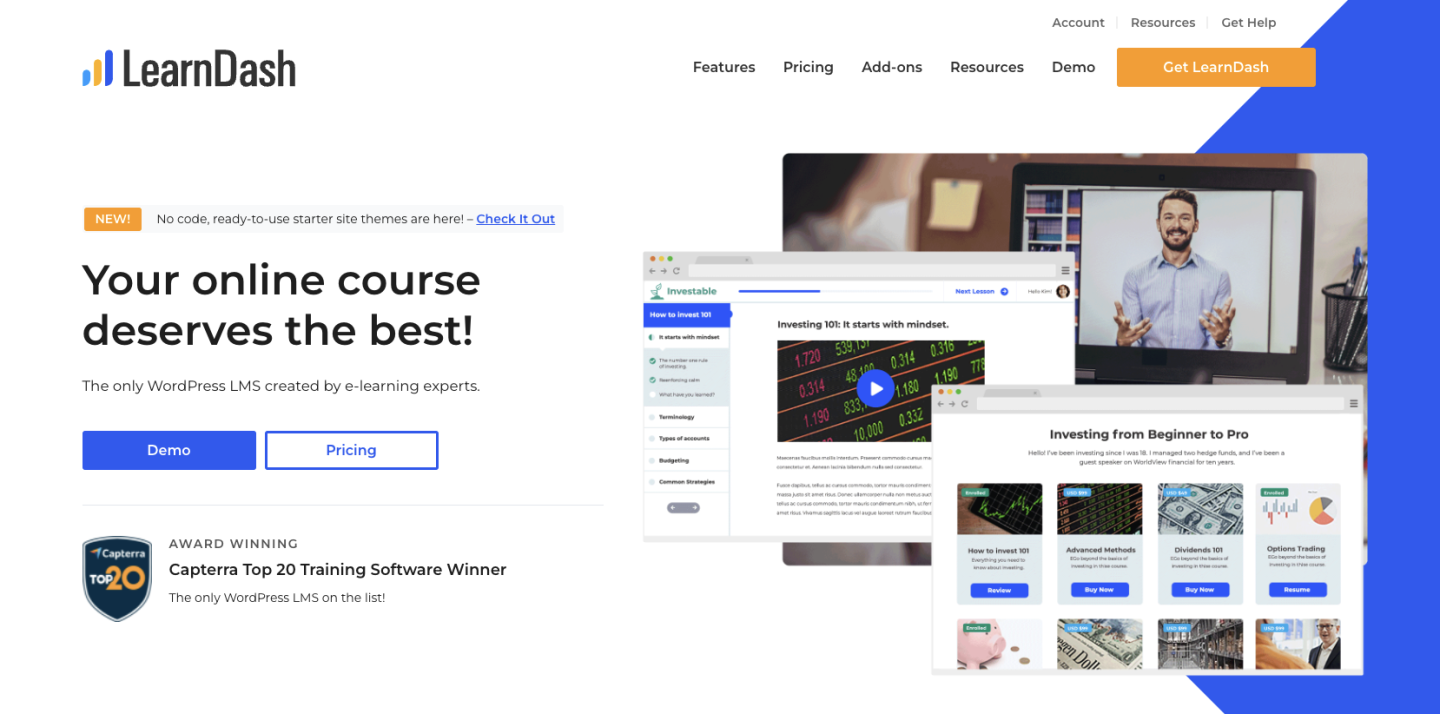
Thinking about selling memberships online? There’s an easier way to get that money

Software Stack Editor · July 8, 2024 ·

You don’t need a membership program to have a great online business. Here’s how to build consistent recurring revenue without a membership in just 4 steps.

Jump ahead

In this article

Most people think that selling memberships online will be the key to unlocking the kind of lifestyle that they want and that’s very understandable. A membership business is a very attractive business model.

At Podia we’ve seen many people build online communities as another revenue stream. Because the revenue is recurring, once you’ve sold the membership, it’s money in the bank every month, right? 

Wrong! 

Selling memberships online is a really hard business to build and none of the guides that you find by searching how to build a membership will tell you that. 

But with over 150,000 people building online businesses on Podia, we see a lot of data about what works and what doesn’t. 

In this article, we’ll look at: 

  • The challenges of building a membership program online

  • How there are other much easier ways to get to the outcome that you want

  • A practical step-by-step guide to building a business that gets you money while you sleep (without building a membership!)

By the end of this article, you’ll have all the tools and frameworks you need to build a truly great business with all the perks of regular monthly income but without all the pain of trying to sell online memberships.

Sound attractive? Read on!

All that glitters is not gold: the challenges of building a membership site

A business that makes money while you sleep sounds like an entrepreneur’s dream. And if you can get it, that’s true. 

When creators and business owners start thinking about how to get it, though, they often think about adding a membership site to their offering.

You’re here on this page, which means that maybe you’ve felt the same: You already create content on social media. People seem to like you. So it should be easy to get people to pay them every month to receive bonus content, tutorials, access to special live events, and more.

Perhaps you’ve even said those fateful words to yourself: 

“I’ve got 10,000 followers on Instagram. If only 1% of those sign up to my membership, I’ll be rolling in dough.” 

But there are two major challenges that almost everyone who tries to build an online membership comes across very quickly: 

  1. Most people who launch memberships find that their focus shifts from doing what they love – creating content – to working out why more people aren’t buying from them

  2. Even when it’s going well, you spend so much time trying to keep your existing members that you don’t have time to do what got you those members in the first place. That means fewer new members.

Selling memberships online is actually a really hard business model. 

The first hurdle is where most people fall down: you have to create a value proposition that’s compelling enough for a stranger on the internet to go from liking your free content to paying you every month.

If you’re like most people, you’re probably thinking of adding the following to a membership tier: 

  • Exclusive tutorials and content

  • Access to invite-only webinars or other events

  • Behind-the-scenes content from your business

  • A 1:1 session coaching when someone joins your top tier

  • Member-only podcast

Woof! That sounds exhausting to me. 

That actually leads us to the second problem: Let’s say you can convince enough people to do that so that you’re happy with the income you’re getting, now you have to spend the majority of your time creating the exclusive content that’s behind your paywall so that people can get the value you promised them. 

Not only do you have to create all that stuff once, but you have to keep going month after month without ever taking a break. 

Let me ask you this: when was the last time you enjoyed running on a treadmill? 

A treadmill is exactly what a membership is like – retention becomes a major challenge to figure out. You have to continually add value and if they don’t feel like they’re getting that value, your members are likely going to churn. That means your revenue is dependent on spending the majority of your free time trying to make sure they don’t. 

Not to mention what happens when someone’s credit card expires and they ghost you (it happens an unbelievable amount). That’s totally out of your control but it also means your revenue goes down without any way to fix it. 

On the off chance that you manage to avoid all of those pitfalls, you’ll probably still realize that you no longer have any time to create the content that’s going to get you new customers for your membership program. 

You’re spending so much time making content and creating value for your members, that there’s no chance you have the energy and headspace to nail your social media or appear on podcasts/events etc. 

Thinking of writing a blog post? No chance! 

Want to launch a new product?! Maxed out! 

OK. So. This probably wasn’t what you wanted to hear when you came to a blog post about selling memberships online and we don’t want to leave you feeling down and helpless. 

After all, we’ve seen tens of thousands of people like you build beautiful businesses that they love to manage. Businesses that give them the lifestyle they want from their side hustle or, hopefully, their main job! 

In the next section, we’ll share a framework for building a business that gets you everything you want with none of the hassle that comes with running an online membership program. 

The online business flywheel: this no-hacks system makes millions of dollars every month 

If building a membership business sounds exhausting to you, you’re not alone. latforms like Patreon or ConvertKit that specialize in membership functionality are definitely incentivised to show you the sunny side of membership sales: everything goes perfectly and everyone’s making a living doing what they love. 

And even if you don’t follow the logic of our argument above, at least follow the example of the more than 150,000 people who are building businesses on Podia without building a membership program. 

In this section, we’re going to share a much easier path to growing an online business that actually makes money while you sleep and lets you have the time to do what you first loved about building that business: being an expert in what you do and sharing that expertise with others. 

This framework is the same framework that the most successful entrepreneurs and solo business owners on Podia are using in their businesses. While it looks different for everyone, the core components are almost always the same ones. They are: 

  • Start with a simple lead magnet that you can use to collect email addresses

  • Add an email newsletter for your subscribers to build trust with them

  • Launch a paid product to get them to buy from you

  • Add blog content to your website to help more people discover you organically

  • Start the process again to level up your revenue

Let’s work through this process step by step.
You can get your free Podia account
and get started building today – you only upgrade when you’re ready.

Step 1 – Start with a simple lead magnet

A lead magnet is a simple resource that you offer to your audience for free in exchange for their email address. 

Almost every successful online business owner starts off with a lead magnet. 

Practically speaking, a lead magnet can be as simple or as complex as you want it to be, but we recommend making it easy. The best lead magnets help your audience do something that solves a problem or create something within a very short period of time (say 20 minutes) 

Here’s some quick ideas of lead magnets you could create easily: 

  1. A checklist of steps to follow while doing a specific process 

  2. A cheat sheet 

  3. A template for a document that your audience might use a lot

  4. An idea generator

  5. A collection of quotes about a topic (this is one of our best-performing lead magnets!) 

[embedded content]

Practically speaking, you can make your lead magnet in Google Docs, Sheets or Canva and save it as a PDF. 

Once you’ve done that, you’re going to need somewhere to send people so that they can sign up for it. 

Setting up your lead magnet

Luckily, on Podia you can set up your lead magnet, get a web page to send people to sign up, and also send it whenever anyone signs up. The best news is you can do it all for free. 

Go ahead and sign up for your free account here
. 

Once you’ve done that, click on Products in the navigation bar of your Podia account and choose ‘New Product’: 

A popup will appear. Here you can enter a name for your lead magnet (you can change it later.) 

Be sure to select ‘Digital Download’ as the product type as this has a ‘Free Email Delivery’ option later on (bear with us!)

In the digital download editor, you can add files to your digital download product. You can upload as many files as you like. If you upload multiple files, these will be automatically zipped by Podia’s system once they’re downloaded by your customers.

Once your files are uploaded, you need to select Pricing and then choose ‘Free Email Delivery’: 

This will ensure customers need to enter their emails to sign up for your lead magnet without needing to create an account. 

When you’re ready, hit publish on your product. 

Designing your lead magnet landing page

Now that you’ve got a lead magnet and a way to deliver it (we’ll do all the work for you!), you’re going to need somewhere to direct people to where they can enter their email. 

MORE GOOD NEWS! 

With your free account on Podia, you get a free website and a really easy place to edit it and make it look exactly how you want it without needing to work with a designer or developer. 

To quickly get to your lead magnet landing page and start designing, click the […] button and then select ‘Edit Sales Page’

Editing your landing page on Podia is easy. This page took me just two minutes to build: 

In the example above, I’ve added a few numbers to help you navigate easily: 

  1. On the content tab of each section, you can edit the text, add the images, and generally configure what you want visitors to see

  2. On the design tab, you can choose from a number of different options including a series of predefined layouts, spacing, image styles and select a color palette (or create one that’s custom to this page)

  3. If you don’t love the default design options (although they already look better than other website builder software) you can click the design tab marked by the number 3 on the image above which will allow you to set up fonts, colors, and more for your brand

You can also add additional sections by hovering over the designer and clicking the plus button that appears:

Before you finish designing, you’ll also want to set your page address. All Podia sites come with a free subdomain where you can access your website (e.g. [yoursite].podia.com) but if you want to add your own domain name, you can upgrade to the Starter plan from $4/mo (which is great value!) 

To grab the link to your current landing page, you can click the following things:

  1. Click the menu in the top left corner of your website builder 

  2. Find the page you’re designing and click the cog symbol next to it (indicated by the number two on the image above) 

  3. The menu will reload to show you the settings of your current page. You can either copy the URL and start sending your audience to it to sign up or you can edit the URL if you want a different name for it (this is called a page slug – I know, gross) 

Tip: some people like to hide the header on landing pages for their lead magnet. If that’s you, you can toggle the header on and off here too. 

What do you do with this URL? 

How do you get people to download your lead magnet?

Besides sharing it at every opportunity possible you can add your lead magnet to your social profiles. On almost every social network, you can add a link to your bio (BTW – you can set up a link in bio page on Podia too!)

Memberships Podia Instagram Link in Bio

Doing this makes sure that anyone checking out your profile gets an offer of a valuable resource from you. You’ll quickly see the signups racking up.

The other place you can share your lead magnet is as a call to action if you ever appear on a podcast or speak at an event. When the host asks ‘Where can people find you’ just tell them to go download your free resource – it’s a lot more effective than saying ‘Follow me on Instagram’

Step 2 – Add an email newsletter for your subscribers

The goal of setting up a lead magnet is to provide enough value to your audience for free that they’ll give you an email address. 

In 2024, an email address is the most valuable thing an audience member can give you (besides, you know, cash – but we’ll get to that later). If you have an email address, you can use email marketing to continue to own the relationship with your subscribers so that you’re never at risk of losing out when a social network changes its algorithm. 

But how do you stay in touch with your audience members? An email newsletter! 

The beauty of an email newsletter is that it’s kind of like a membership except you can use it as a tool to sell much higher ticket items than a membership – and it’s available to everyone so you’ll never have to prioritize creating for a tiny segment of your audience. 

With your free Podia account, you can have 100 subscribers for free which is enough to start making some money in the next step. 

Every person who downloads your lead magnet automatically gets added to your Podia account and you can send them email marketing.

There are two kinds of email you can send with Podia: 

  1. Broadcasts – one-off emails that are used for things like regular newsletter updates or time-limited offers

  2. Campaigns – automated sequences of emails that you can trigger when a subscriber takes a specific action like buying a product or getting added to your audience for the first time 

If you’re following along with this, we’d recommend you start by trying to send a regular newsletter where you share some of your expertise. 

It’s extremely easy to build a beautiful looking email on Podia and it works in a similar way to the website builder. 

Here’s an example that I made earlier: 

Tip: If you’re not feeling like designing your own, you can choose one of the many pre-made templates available in your Podia account and adjust it to your needs (or send it at is) 

Here’s a few email topics that you could try out: 

  • 5 tips to help you get better at [your topic] 

  • A story of how I [achieved the outcome your subscribers want] 

  • Quick guide to [specific task your subscriber needs to do] 

Don’t overthink it at this stage. The goal is simply to remain in contact with your audience so that at a later date (pretty soon hopefully) you can tell them about the paid product you just launched – which is where you start making the real money. 

Set and forget: use a new subscriber campaign to quickly engage your audience

A campaign to welcome new subscribers – the people who downloaded your lead magnet – is a great way to engage them and give them a taste of what’s to come. 

To do that, just hover over ‘Email’ in your navigation bar on Podia and select ‘Campaigns’. Then create a new campaign and set the entrance condition to ‘Signs up for Product’ and select the name of the Lead Magnet you made.

Then you can add a series of emails that send over time to welcome your new signups. Here’s the lead magnet welcome sequence I have set up for my personal side-project:

On day 1, I welcome them to my newsletter and tell them a bit of my story. On day 2, I dive a lot deeper into the topic I talk about. Day 6 is where I present them with a world view that I hold, that they might find surprising. Day 8 is where I offer them a product and start making money. 

And on that note, let’s move on to the key piece of this whole framework: MAKING MONEY! 

Step 3 – Launch a paid product

So far, we’ve created a lead magnet to help us convert strangers to subscribers and an email newsletter to help us build trust – now we need a way to turn this into sufficient revenue that you don’t feel the need to build a membership which is going to drain all your energy and time from you. 

How do we do that? 

We launch a product that’s related to the problem solved by our lead magnet! 

With your free Podia account, you can launch 1 product (that’s been covered off by the lead magnet you set up) so you have two options: 

  • You can either launch a coaching session – our free plan allows you to launch 1 of those too

  • Or you can create another product and upgrade to our Mover or Shaker plan when you’re ready to launch (both plans include unlimited courses, downloads, and coaching sessions) 

We’ll walk you through both here so you can make the choice for yourself: 

Set up a coaching session

Once you have built trust with your audience, offering a coaching session can be a very effective way of converting the effort you’ve put into your content into sales. 

For example, when I showed you the lead magnet I set up earlier, you’ll have noticed that it was for my fictional business DeskBloom which specializes in helping office managers create green environments in their offices. 

My lead magnet was a downloadable of ‘Plant Care Labels’ which help them know when to water, what conditions the plants like and recall the names of each plant. 

Then my email sequence was geared towards simple plant care tips that they could use to improve their offices. 

For my coaching session, I’ll set up a simple coaching session where my subscribers can pay me for a 15-minute call where they use their camera phones to show me around their plants and I offer them advice. 

Let’s dive in.

I start by creating a new product in the same way I did earlier except this time I’ll choose ‘Coaching Session’:

The setup of a coaching course is slightly different to other products because you actually paste a link from Calendly, SavvyCal, Acuity, or YouCanBookMe to embed a booking calendar on your customers’ product page. 

Here’s how it looks with my calendar link in it: 

I can set my pricing and then publish. This is the moment where I can design the landing page but as we’ve already done that above and it’s the exact same process, I’ll skip it here. 

Once your subscribers have bought your product, they’ll be taken to the customer only area where they’ll see your calendar widget embedded. Here’s my colleague Rodrigo’s page as an example: 

Tip: Not only is selling a coaching course a great way to get paid for providing value but it’s also a brilliant way to build more trust which can turn into your customers recommending you to others. You can also take the insights you gather from speaking to your customers and use them to create more content as part of your flywheel.

Set up another downloadable or course 

If 1:1 facetime isn’t your thing or you just don’t want to do coaching sessions, there are many other kinds of products you could sell as your first paid offer. 

The most successful people tend to start out with a downloadable that builds on the thing that their lead magnet helped their subscribers get done. 

Some good examples of downloadables: 

  • Template packs

  • Planner documents 

  • Project plans

  • Technical files 

  • Short ebooks 

Any of these could work for you and you’re not limited to them either. 

Setting up a course is another option but remember that this takes time and a lot of people get hung up on getting the content perfect. 

Creating a course is easy in Podia. You just choose ‘Online Course’ from the new product menu in the same way we’ve outlined above. 

From there you can set up your course by adding Sections (like modules) and Lessons which could be text, embeds, quizzes, coaching sessions, or files. 

You won’t be able to publish your course or your second product until you’ve chosen a Mover or Shaker plan but you can get everything ready and then upgrade. 

Tip: With Podia you can also offer upsells of additional products at your checkout. This is a great way to increase your revenue with no extra effort. 

Step 4 – Add blog content to your website

We’re really rolling now. So far you’ve got: 

  1. A lead magnet – A way to encourage your audience to give you their email address

  2. An email newsletter and automated welcome campaign – to build trust with your subscribers

  3. A paid product – that you can use to turn that trust into cash 

But what’s missing? A way to get more and more people to discover you without you needing to create content all the time. 

The simplest of all marketing strategies is to create a few pieces of content that help people who are looking for solutions to specific problems that you could solve for them with the things in steps 1,2 and 3 of this process. 

With your free Podia site, you also get a free SEO-optimized blog that looks great out of the box and you can manage without fussing with plugins or themes. 

To get started with setting up your blog, simply click ‘Blog’ in the navigation of your Podia account and then choose ‘New Post’ from the drop down menu: 

You’ll notice how simple the New Post page looks when it loads. You can write your content in the big box on the left hand side. 

To add an image, file, embed, button, line or to manage the text formatting options, you can just type ‘/’ on a new line and you’ll be offered a menu of those choices: 

If you already have content written in a document or anywhere on the internet, you can copy and paste it directly into this space. Podia will match your text formatting and import images as best it can but you may have to make some adjustments depending on what you’re copy pasting. 

TIP: You can also use our built-in blog importer if you have a blog elsewhere and you want to add your posts in one go.

Memberships Blog Importer

The goal here is not to always have another place to create content – remember that’s what we’re trying to get away from by avoiding creating an online membership site.

Instead, we want to keep our content focused at this stage so that it does the most work for us. 

How do we do that? By writing posts about the most common problems your ideal customers have that you can solve with your content (and ideally your paid products!) 

Here are some thought starters that we have found to be particularly helpful: 

  • How to {subject} – how to guides are a time tested classic for helping people find you in search and solve their problems. Be helpful (like this post, hopefully!) and people will realize they could use your products to solve their problem (BTW – hopefully you’ve taken this as a prompt to
    sign up for your free Podia account
    . Meta. We know.)

  • Expert guides – this kind of content works really well when a person doesn’t have a specific problem to solve but they’re thinking about undertaking a process. In my example, maybe I could create an ‘expert guide to designing office plant installations’ 

  • 5 top tips for {subject} – a mix of the how to content and expert guide content. Providing actionable lists of hard-earned advice frames you as the person who could solve your audience’s problems

A lot of guides tell you that you should create large posts – and, look, this one’s currently about 4K words long – but it’s not always necessary. We’ve seen people do really well with how-to articles that are under 500 words. We’ve also seen our own content sometimes get a lot of sign ups when we go deep and long on a subject. 

After you’re done writing the content and you’ve got some posts published, you can design your blog page in the Podia website builder. 

There are two things to design: 

The blog archive page – this is where you’ll see all of your blog posts in a list. Here’s how mine looks after 2 minutes of adjusting design options like the layout and image size:

And also the individual blog post page template which is the template used by all your blog posts. It contains an example of the content from one of your blog posts to give you an idea of how all your posts will look when you publish: 

To really make the most of this whole system, you should add an email signup form for your newsletter. You can do that by clicking on the + button anywhere on the page preview and selecting ‘Slim Email Form’ or ‘Email Form’ as the new section: 

This form will add anyone who signs up by finding your blog to your Podia Email newsletter. 

You could think about creating a new campaign to welcome your blog post subscribers and then add a tag to them automatically by adjusting your form’s settings: 

This would give you a way to trigger the automated campaign directly from your Podia account as ‘Tag added’ is one of the entrance conditions available in Podia Email: 

Step 5 – Start the process again to level up your revenue

That’s the whole framework. And while it might feel like a lot of work to get set up, we promise it’s a better long-term win than having to create content on a treadmill just to improve retention and stop your membership subscribers from canceling. 

The cool thing about this system is that it gets better and better every time you run it. 

Let’s say you’ve done one iteration of the flywheel and you made a good amount of money from your subscribers. 

If you add an additional free resource that triggers a nurture campaign and a CTA to buy a new paid product, you can earn additional revenue from the same people. 

A lot of people price memberships at a low price like $9/mo, but if you sold a low-priced product like a $100 download to your subscribers once every 6 months, you’d actually end up with $92 extra a year. 

That’s before you factor in that many people add more and more premium offers to this kind of business. By not needing to focus on creating exclusive content for your membership, you can focus on driving more and more people to signup for your free offering… which means… more people for your paid offering! 

Incremental revenue!

Don’t build an online membership — build a business flywheel instead

The dream sold by online membership tools is very attractive: you do what you love and you get money while you sleep. 

But the reality is a lot different for the majority of people because it’s hard to get subscribers to give you their credit card details. Then you have to keep delivering on your value proposition and providing value with exclusive membership content. 

Even if you do a perfect job of that, you’ll barely have time to acquire new subscribers which means that all that passive income is really just a pipe dream. 

But there’s an easier way. 

By building a flywheel in your business that acquires new subscribers, provides value for them on autopilot, and then monetizes them with one-time products and services, you can actually get paid for your expertise and still have time to grow your business. 

You won’t ever have to worry about making sure your subscribers don’t churn or chasing up expired credit cards. 

On our free plan, you can: 

  • Build a beautiful website complete with a blog

  • Offer a lead magnet that gets delivered automatically

  • Set up email marketing for up to 100 subscribers that helps you drive more sales

  • Set up additional paid digital products and upgrade when you’re ready to sell them

It won’t be easy but it is simple and you can do it all on Podia starting for free.
Create your free account today.

Thinking about selling memberships online? There’s an easier way to get that money

Software Stack Editor · July 8, 2024 ·

Most people think that selling memberships online will be the key to unlocking the kind of lifestyle that they want and that’s very understandable. A membership business is a very attractive business model.

At Podia we’ve seen many people build online communities as another revenue stream. Because the revenue is recurring, once you’ve sold the membership, it’s money in the bank every month, right? 

Wrong! 

Selling memberships online is a really hard business to build and none of the guides that you find by searching how to build a membership will tell you that. 

But with over 150,000 people building online businesses on Podia, we see a lot of data about what works and what doesn’t. 

In this article, we’ll look at: 

  • The challenges of building a membership program online

  • How there are other much easier ways to get to the outcome that you want

  • A practical step-by-step guide to building a business that gets you money while you sleep (without building a membership!)

By the end of this article, you’ll have all the tools and frameworks you need to build a truly great business with all the perks of regular monthly income but without all the pain of trying to sell online memberships.

Sound attractive? Read on!

You don’t need a membership program to have a great online business. Podia has tens of thousands of successful business owners who have built their website, lead magnets, digital products and email marketing using Podia’s all-in-one platform for solo creators. Get your website, storefront, and email marketing started today with a free 30-day trial.

All that glitters is not gold: the challenges of building a membership site

A business that makes money while you sleep sounds like an entrepreneur’s dream. And if you can get it, that’s true. 

When creators and business owners start thinking about how to get it, though, they often think about adding a membership site to their offering.

You’re here on this page, which means that maybe you’ve felt the same: You already create content on social media. People seem to like you. So it should be easy to get people to pay them every month to receive bonus content, tutorials, access to special live events, and more.

Perhaps you’ve even said those fateful words to yourself: 

“I’ve got 10,000 followers on Instagram. If only 1% of those sign up to my membership, I’ll be rolling in dough.” 

But there are two major challenges that almost everyone who tries to build an online membership comes across very quickly: 

  1. Most people who launch memberships find that their focus shifts from doing what they love – creating content – to working out why more people aren’t buying from them

  2. Even when it’s going well, you spend so much time trying to keep your existing members that you don’t have time to do what got you those members in the first place. That means fewer new members.

Selling memberships online is actually a really hard business model. 

The first hurdle is where most people fall down: you have to create a value proposition that’s compelling enough for a stranger on the internet to go from liking your free content to paying you every month.

If you’re like most people, you’re probably thinking of adding the following to a membership tier: 

  • Exclusive tutorials and content

  • Access to invite-only webinars or other events

  • Behind-the-scenes content from your business

  • A 1:1 session coaching when someone joins your top tier

  • Member-only podcast

Woof! That sounds exhausting to me. 

That actually leads us to the second problem: Let’s say you can convince enough people to do that so that you’re happy with the income you’re getting, now you have to spend the majority of your time creating the exclusive content that’s behind your paywall so that people can get the value you promised them. 

Not only do you have to create all that stuff once, but you have to keep going month after month without ever taking a break. 

Let me ask you this: when was the last time you enjoyed running on a treadmill? 

A treadmill is exactly what a membership is like – retention becomes a major challenge to figure out. You have to continually add value and if they don’t feel like they’re getting that value, your members are likely going to churn. That means your revenue is dependent on spending the majority of your free time trying to make sure they don’t. 

Not to mention what happens when someone’s credit card expires and they ghost you (it happens an unbelievable amount). That’s totally out of your control but it also means your revenue goes down without any way to fix it. 

On the off chance that you manage to avoid all of those pitfalls, you’ll probably still realize that you no longer have any time to create the content that’s going to get you new customers for your membership program. 

You’re spending so much time making content and creating value for your members, that there’s no chance you have the energy and headspace to nail your social media or appear on podcasts/events etc. 

Thinking of writing a blog post? No chance! 

Want to launch a new product?! Maxed out! 

OK. So. This probably wasn’t what you wanted to hear when you came to a blog post about selling memberships online and we don’t want to leave you feeling down and helpless. 

After all, we’ve seen tens of thousands of people like you build beautiful businesses that they love to manage. Businesses that give them the lifestyle they want from their side hustle or, hopefully, their main job! 

In the next section, we’ll share a framework for building a business that gets you everything you want with none of the hassle that comes with running an online membership program. 

The online business flywheel: this no-hacks system makes millions of dollars every month 

If building a membership business sounds exhausting to you, you’re not alone. Platforms like Patreon or ConvertKit that specialize in membership functionality are definitely incentivised to show you the sunny side of membership sales: everything goes perfectly and everyone’s making a living doing what they love. 

And even if you don’t follow the logic of our argument above, at least follow the example of the more than 150,000 people who are building businesses on Podia without building a membership program. 

In this section, we’re going to share a much easier path to growing an online business that actually makes money while you sleep and lets you have the time to do what you first loved about building that business: being an expert in what you do and sharing that expertise with others. 

This framework is the same framework that the most successful entrepreneurs and solo business owners on Podia are using in their businesses. While it looks different for everyone, the core components are almost always the same ones. They are: 

  • Start with a simple lead magnet that you can use to collect email addresses

  • Add an email newsletter for your subscribers to build trust with them

  • Launch a paid product to get them to buy from you

  • Add blog content to your website to help more people discover you organically

  • Start the process again to level up your revenue

Let’s work through this process step by step. You can get your free 30-day trial and get started building today.

Step 1 – Start with a simple lead magnet

A lead magnet is a simple resource that you offer to your audience for free in exchange for their email address. 

Almost every successful online business owner starts off with a lead magnet. 

Practically speaking, a lead magnet can be as simple or as complex as you want it to be, but we recommend making it easy. The best lead magnets help your audience do something that solves a problem or create something within a very short period of time (say 20 minutes) 

Here’s some quick ideas of lead magnets you could create easily: 

  1. A checklist of steps to follow while doing a specific process 

  2. A cheat sheet 

  3. A template for a document that your audience might use a lot

  4. An idea generator

  5. A collection of quotes about a topic (this is one of our best-performing lead magnets!) 

Practically speaking, you can make your lead magnet in Google Docs, Sheets or Canva and save it as a PDF. 

Once you’ve done that, you’re going to need somewhere to send people so that they can sign up for it. 

Setting up your lead magnet

Luckily, on Podia you can set up your lead magnet, get a web page to send people to sign up, and also send it whenever anyone signs up. The best news is you can do it all for free. 

Go ahead and sign up for your free 30-day trial here. 

Once you’ve done that, click on Products in the navigation bar of your Podia account and choose ‘New Product’: 

Membership: Add a new product

A popup will appear. Here you can enter a name for your lead magnet (you can change it later.) 

Be sure to select ‘Digital Download’ as the product type as this has a ‘Free Email Delivery’ option later on (bear with us!)

Membership Digital Download Selector

In the digital download editor, you can add files to your digital download product. You can upload as many files as you like. If you upload multiple files, these will be automatically zipped by Podia’s system once they’re downloaded by your customers.

Membership Upload Files

Once your files are uploaded, you need to select Pricing and then choose ‘Free Email Delivery’: 

Membership Free Email Delivery

This will ensure customers need to enter their emails to sign up for your lead magnet without needing to create an account. 

When you’re ready, hit publish on your product. 

Designing your lead magnet landing page

Now that you’ve got a lead magnet and a way to deliver it (we’ll do all the work for you!), you’re going to need somewhere to direct people to where they can enter their email. 

MORE GOOD NEWS! 

With your account on Podia, you get a website and a really easy place to edit it and make it look exactly how you want it without needing to work with a designer or developer. 

To quickly get to your lead magnet landing page and start designing, click the […] button and then select ‘Edit Sales Page’

Membership Edit Sales Page

Editing your landing page on Podia is easy. This page took me just two minutes to build: 

Membership Sales Page

In the example above, I’ve added a few numbers to help you navigate easily: 

  1. On the content tab of each section, you can edit the text, add the images, and generally configure what you want visitors to see

  2. On the design tab, you can choose from a number of different options including a series of predefined layouts, spacing, image styles and select a color palette (or create one that’s custom to this page)

  3. If you don’t love the default design options (although they already look better than other website builder software) you can click the design tab marked by the number 3 on the image above which will allow you to set up fonts, colors, and more for your brand

You can also add additional sections by hovering over the designer and clicking the plus button that appears:

Memberships Plus Sign

Before you finish designing, you’ll also want to set your page address. All Podia sites come with a free subdomain where you can access your website (e.g. [yoursite].podia.com) or you can connect a custom domain.

To grab the link to your current landing page, you can click the following things:

Membership sales page settings

  1. Click the menu in the top left corner of your website builder 

  2. Find the page you’re designing and click the cog symbol next to it (indicated by the number two on the image above) 

  3. The menu will reload to show you the settings of your current page. You can either copy the URL and start sending your audience to it to sign up or you can edit the URL if you want a different name for it (this is called a page slug – I know, gross) 

Tip: some people like to hide the header on landing pages for their lead magnet. If that’s you, you can toggle the header on and off here too. 

What do you do with this URL? 

Besides sharing it at every opportunity possible you can add your lead magnet to your social profiles. On almost every social network, you can add a link to your bio (BTW – you can set up a link in bio page on Podia too!)

Memberships Podia Instagram Link in Bio

Doing this makes sure that anyone checking out your profile gets an offer of a valuable resource from you. You’ll quickly see the signups racking up.

The other place you can share your lead magnet is as a call to action if you ever appear on a podcast or speak at an event. When the host asks ‘Where can people find you’ just tell them to go download your free resource – it’s a lot more effective than saying ‘Follow me on Instagram’

Step 2 – Add an email newsletter for your subscribers

The goal of setting up a lead magnet is to provide enough value to your audience for free that they’ll give you an email address. 

In 2024, an email address is the most valuable thing an audience member can give you (besides, you know, cash – but we’ll get to that later). If you have an email address, you can use email marketing to continue to own the relationship with your subscribers so that you’re never at risk of losing out when a social network changes its algorithm. 

But how do you stay in touch with your audience members? An email newsletter! 

The beauty of an email newsletter is that it’s kind of like a membership except you can use it as a tool to sell much higher ticket items than a membership – and it’s available to everyone so you’ll never have to prioritize creating for a tiny segment of your audience. 

With your Podia account, you can have 100 subscribers for free which is enough to start making some money in the next step. 

Every person who downloads your lead magnet automatically gets added to your Podia account and you can send them email marketing.

Memberships Email Marketing

There are two kinds of email you can send with Podia: 

  1. Broadcasts – one-off emails that are used for things like regular newsletter updates or time-limited offers

  2. Campaigns – automated sequences of emails that you can trigger when a subscriber takes a specific action like buying a product or getting added to your audience for the first time 

If you’re following along with this, we’d recommend you start by trying to send a regular newsletter where you share some of your expertise. 

It’s extremely easy to build a beautiful looking email on Podia and it works in a similar way to the website builder. 

Here’s an example that I made earlier: 

Membership Email Example

Tip: If you’re not feeling like designing your own, you can choose one of the many pre-made templates available in your Podia account and adjust it to your needs (or send it at is) 

Here’s a few email topics that you could try out: 

  • 5 tips to help you get better at [your topic] 

  • A story of how I [achieved the outcome your subscribers want] 

  • Quick guide to [specific task your subscriber needs to do] 

Don’t overthink it at this stage. The goal is simply to remain in contact with your audience so that at a later date (pretty soon hopefully) you can tell them about the paid product you just launched – which is where you start making the real money. 

Set and forget: use a new subscriber campaign to quickly engage your audience

A campaign to welcome new subscribers – the people who downloaded your lead magnet – is a great way to engage them and give them a taste of what’s to come. 

To do that, just hover over ‘Email’ in your navigation bar on Podia and select ‘Campaigns’. Then create a new campaign and set the entrance condition to ‘Signs up for Product’ and select the name of the Lead Magnet you made.

Membership Entrance Condition

Then you can add a series of emails that send over time to welcome your new signups. Here’s the lead magnet welcome sequence I have set up for my personal side-project:

Memberships Email Campaign Examples

On day 1, I welcome them to my newsletter and tell them a bit of my story. On day 2, I dive a lot deeper into the topic I talk about. Day 6 is where I present them with a world view that I hold, that they might find surprising. Day 8 is where I offer them a product and start making money. 

And on that note, let’s move on to the key piece of this whole framework: MAKING MONEY! 

Step 3 – Launch a paid product

So far, we’ve created a lead magnet to help us convert strangers to subscribers and an email newsletter to help us build trust – now we need a way to turn this into sufficient revenue that you don’t feel the need to build a membership which is going to drain all your energy and time from you. 

How do we do that? 

We launch a product that’s related to the problem solved by our lead magnet! 

With your Podia account, you can launch your product (that’s been covered off by the lead magnet you set up) so you have two options: 

  • You can either launch a coaching session

  • Or you can create another product (both Mover and Shaker plans include unlimited courses, downloads, and coaching sessions) 

We’ll walk you through both here so you can make the choice for yourself: 

Set up a coaching session

Once you have built trust with your audience, offering a coaching session can be a very effective way of converting the effort you’ve put into your content into sales. 

For example, when I showed you the lead magnet I set up earlier, you’ll have noticed that it was for my fictional business DeskBloom which specializes in helping office managers create green environments in their offices. 

My lead magnet was a downloadable of ‘Plant Care Labels’ which help them know when to water, what conditions the plants like and recall the names of each plant. 

Then my email sequence was geared towards simple plant care tips that they could use to improve their offices. 

For my coaching session, I’ll set up a simple coaching session where my subscribers can pay me for a 15-minute call where they use their camera phones to show me around their plants and I offer them advice. 

Let’s dive in.

I start by creating a new product in the same way I did earlier except this time I’ll choose ‘Coaching Session’:

Membership Coaching Session

The setup of a coaching course is slightly different to other products because you actually paste a link from Calendly, SavvyCal, Acuity, or YouCanBookMe to embed a booking calendar on your customers’ product page. 

Here’s how it looks with my calendar link in it: 

Membership Calendar

I can set my pricing and then publish. This is the moment where I can design the landing page but as we’ve already done that above and it’s the exact same process, I’ll skip it here. 

Once your subscribers have bought your product, they’ll be taken to the customer only area where they’ll see your calendar widget embedded. Here’s my colleague Rodrigo’s page as an example: 

Membership Coaching Landing Page Example

Tip: Not only is selling a coaching course a great way to get paid for providing value but it’s also a brilliant way to build more trust which can turn into your customers recommending you to others. You can also take the insights you gather from speaking to your customers and use them to create more content as part of your flywheel.

Set up another downloadable or course 

If 1:1 facetime isn’t your thing or you just don’t want to do coaching sessions, there are many other kinds of products you could sell as your first paid offer. 

The most successful people tend to start out with a downloadable that builds on the thing that their lead magnet helped their subscribers get done. 

Some good examples of downloadables: 

  • Template packs

  • Planner documents 

  • Project plans

  • Technical files 

  • Short ebooks 

Any of these could work for you and you’re not limited to them either. 

Setting up a course is another option but remember that this takes time and a lot of people get hung up on getting the content perfect. 

Creating a course is easy in Podia. You just choose ‘Online Course’ from the new product menu in the same way we’ve outlined above. 

From there you can set up your course by adding Sections (like modules) and Lessons which could be text, embeds, quizzes, coaching sessions, or files. 

Membership Sell Online Courses

Tip: With Podia you can also offer upsells of additional products at your checkout. This is a great way to increase your revenue with no extra effort. 

Step 4 – Add blog content to your website

We’re really rolling now. So far you’ve got: 

  1. A lead magnet – A way to encourage your audience to give you their email address

  2. An email newsletter and automated welcome campaign – to build trust with your subscribers

  3. A paid product – that you can use to turn that trust into cash 

But what’s missing? A way to get more and more people to discover you without you needing to create content all the time. 

The simplest of all marketing strategies is to create a few pieces of content that help people who are looking for solutions to specific problems that you could solve for them with the things in steps 1,2, and 3 of this process. 

With your Podia site, you also get a free SEO-optimized blog that looks great out of the box, and you can manage without fussing with plugins or themes. 

To get started with setting up your blog, simply click ‘Blog’ in the navigation of your Podia account and then choose ‘New Post’ from the drop-down menu: 

Membership Blog New Blog Post

You’ll notice how simple the New Post page looks when it loads. You can write your content in the big box on the left hand side. 

To add an image, file, embed, button, line or to manage the text formatting options, you can just type ‘/’ on a new line and you’ll be offered a menu of those choices: 

Membership Blog Adding Text

If you already have content written in a document or anywhere on the internet, you can copy and paste it directly into this space. Podia will match your text formatting and import images as best it can but you may have to make some adjustments depending on what you’re copy pasting. 

TIP: You can also use our built-in blog importer if you have a blog elsewhere and you want to add your posts in one go.

Memberships Blog Importer

The goal here is not to always have another place to create content – remember that’s what we’re trying to get away from by avoiding creating an online membership site.

Instead, we want to keep our content focused at this stage so that it does the most work for us. 

How do we do that? By writing posts about the most common problems your ideal customers have that you can solve with your content (and ideally your paid products!) 

Here are some thought starters that we have found to be particularly helpful: 

  • How to {subject} – how to guides are a time tested classic for helping people find you in search and solve their problems. Be helpful (like this post, hopefully!) and people will realize they could use your products to solve their problem (BTW – hopefully you’ve taken this as a prompt to sign up for your free 30-day trial with Podia. Meta. We know.)

  • Expert guides – this kind of content works really well when a person doesn’t have a specific problem to solve but they’re thinking about undertaking a process. In my example, maybe I could create an ‘expert guide to designing office plant installations’ 

  • 5 top tips for {subject} – a mix of the how to content and expert guide content. Providing actionable lists of hard-earned advice frames you as the person who could solve your audience’s problems

A lot of guides tell you that you should create large posts – and, look, this one’s currently about 4K words long – but it’s not always necessary. We’ve seen people do really well with how-to articles that are under 500 words. We’ve also seen our own content sometimes get a lot of sign ups when we go deep and long on a subject. 

After you’re done writing the content and you’ve got some posts published, you can design your blog page in the Podia website builder. 

There are two things to design: 

The blog archive page – this is where you’ll see all of your blog posts in a list. Here’s how mine looks after two minutes of adjusting design options like the layout and image size:

Memberships Blog Archive Page

And also the individual blog post page template which is the template used by all your blog posts. It contains an example of the content from one of your blog posts to give you an idea of how all your posts will look when you publish: 

Membership Blog Post Page

To really make the most of this whole system, you should add an email signup form for your newsletter. You can do that by clicking on the + button anywhere on the page preview and selecting ‘Slim Email Form’ or ‘Email Form’ as the new section: 

Membership Blog Email Signup

This form will add anyone who signs up by finding your blog to your Podia Email newsletter. 

You could think about creating a new campaign to welcome your blog post subscribers and then add a tag to them automatically by adjusting your form’s settings: 

This would give you a way to trigger the automated campaign directly from your Podia account as ‘Tag added’ is one of the entrance conditions available in Podia Email: 

Membership Blog Tag Added

Step 5 – Start the process again to level up your revenue

That’s the whole framework. And while it might feel like a lot of work to get set up, we promise it’s a better long-term win than having to create content on a treadmill just to improve retention and stop your membership subscribers from canceling. 

The cool thing about this system is that it gets better and better every time you run it. 

Let’s say you’ve done one iteration of the flywheel and you made a good amount of money from your subscribers. 

If you add an additional free resource that triggers a nurture campaign and a CTA to buy a new paid product, you can earn additional revenue from the same people. 

A lot of people price memberships at a low price like $9/mo, but if you sold a low-priced product like a $100 download to your subscribers once every 6 months, you’d actually end up with $92 extra a year. 

That’s before you factor in that many people add more and more premium offers to this kind of business. By not needing to focus on creating exclusive content for your membership, you can focus on driving more and more people to signup for your free offering… which means… more people for your paid offering! 

Incremental revenue!

Don’t build an online membership — build a business flywheel instead

The dream sold by online membership tools is very attractive: you do what you love and you get money while you sleep. 

But the reality is a lot different for the majority of people because it’s hard to get subscribers to give you their credit card details. Then you have to keep delivering on your value proposition and providing value with exclusive membership content. 

Even if you do a perfect job of that, you’ll barely have time to acquire new subscribers which means that all that passive income is really just a pipe dream. 

But there’s an easier way. 

By building a flywheel in your business that acquires new subscribers, provides value for them on autopilot, and then monetizes them with one-time products and services, you can actually get paid for your expertise and still have time to grow your business. 

You won’t ever have to worry about making sure your subscribers don’t churn or chasing up expired credit cards. 

On our plans, you can: 

  • Build a beautiful website complete with a blog

  • Offer a lead magnet that gets delivered automatically

  • Set up email marketing that helps you drive more sales

  • Set up additional paid digital products

It won’t be easy, but it is simple, and you can do it all on Podia. Try it for yourself with a free 30-day trial today.

How toHow to create, sell, and profit from an online courseThis guide is everything you need to know about creating, launching, and selling a course this year.

Software Stack Editor · July 6, 2024 ·

This guide is everything you need to know about creating, launching, and selling a course this year.

Jump ahead

In this article

No matter who you are, you have something to teach the world.

Maybe it’s a long-time passion of yours – something you’ve always loved to teach and answer questions about – or maybe it’s something you’ve only considered creating content for in your most far-flung dreams.

Either way, you know if you could just find a way to bottle up that spark and deliver it to the world, to customers, you’d be unstoppable.

Luckily, today it’s easier than ever to turn your knowledge into revenue-driving online courses that can change the lives of your customers.

No matter what subject matter or topic you want to teach, how much experience you have in creating videos and lessons, or whether you’ve ever put together a marketing campaign in your life, creating an online course can be accomplished in a few simple, easy steps.

Sound good? Then let’s get started.

Who should create an online course and what are the benefits? 

The rewards of creating an online course – making more money, earning passive income, reaching more people, making a bigger impact – can be tempting.

But getting there takes work. And the only way to stay motivated to do the work (and actually enjoy it) is to know that you’re doing something that you should be doing.

Here are two questions to help you decide if making an online course is the right move for you:

“Do I have something to teach?”

There’s a very good chance that for the people in your circle, you’re an expert on something. Maybe you’re great at managing money, or computer skills, or cooking, or finding cheap travel deals, or home decorating. Maybe you’re super-organized and can do magic with spreadsheets.

You might already know what gift or skill people come to you for. Or you might not (though chances are, the people around you do!), in which case, we’ll help you figure it out.

If there’s something that you can teach others that will help them in their life or work, creating an online course is a great way to get it out there.

“Do I want to start an online business?”

You’ve probably seen the photos on Instagram. An inspirational guru posting a snapshot of their “daily life” in the form of a cocktail on the beach on a Tuesday.

“Start an online business,” they tell you, “you’ll make money in your sleep. Just buy my coaching program and I’ll show you how.”

In reality, building an online business looks nothing like that Instagram photo. It can be hard work and a lot more time consuming behind the scenes. But it’s incredibly rewarding work, too. When a student who completes your course tells you that you changed their life, it will be one of the most gratifying things you ever hear. 

So ask yourself, do you really want to start an online business and put in the work required to get the results you want? 

“There are so many ways to make a living online – how do I know if courses are the right fit for me?” 

These days, you can build a business selling digital products, coaching, blogging, YouTubing, getting brand sponsorships, and about a million other ways. So how do you know if courses are the right call for you? Try making a small, simple course and see how it goes. You’ll… 

  • Overcome any mental barriers before sinking tons of time into a big project. Even building a small course and getting it in front of people will show you that these concerns can’t hold you back from success.

  • Get valuable student feedback without much time invested. The very best courses aren’t first versions; they’re courses that have been iterated on over time, incorporating student feedback along the way. The most important step in this process is simply to get started.

  • Learn a lot along the way! Everything that may seem challenging to you now, like creating content and writing a sales page, will get much, much easier after you do it for the first time.

How to come up with ideas for your online course

[embedded content]

To come up with an idea for your online course, start by thinking about your ideal audience – or the people who you think would buy your course one day. 

If you already have a blog, email list, or social media following, look at your followers. If you don’t have an audience already, simply look to the people around you: your friends and co-workers. 

Try asking the people you have access to these 5 questions, either over email, on 1:1 calls, through a survey, in your social media comments, or any other way that you can do today. 

  • “Tell me about your experiences with [topic].”

  • “What’s your biggest challenge with [topic]?”

  • “How are you currently dealing with those challenges?”

  • “What would solving these challenges allow you to achieve?”

  • “What blogs do you read frequently? What communities are you a part of online?”

Keep a note of any common trends you hear. If multiple people are experiencing the same challenges and pain points, there might be an opportunity for you to share a solution. 

Another way to do this is to head to public channels and forums like YouTube or Reddit and search for questions around your course idea. Remember: Any problem worth solving in a course has probably already been written about. And if it’s a real problem for people, they’re probably seeking solutions online. So head to the comments section and see what you can find. 

Do you see any patterns or recurring ideas?

By now you should have a list of potential online course topics that you could tackle based on what you’re good at and what you’ve learned from your research, so let’s hone in on the best ones.

We’ll be judging all of the ideas based on two factors:

  • Passion: How excited are you to work on this? If you hate working on something, its’ profit potential doesn’t matter, because you’re likely to quit before you get there!

  • Profit potential: Is it a problem that people would pay to have solved for them? A good framework for thinking about this is “do people already spend money to solve this problem, in the form of books, apps, services, etc…?”.

Plot the ideas from your list on the Passion/Profit Matrix.

We’re looking for the ideas that land in the top right quadrant: the ones that you’re excited to work on and that you’ll be able to sell.

Once you have your idea chosen, it’s time to get to work on building your course.

How to plan and build your course content

The first time you make a course, it’s tempting to sit down and brain dump everything you can think of into a list, then use that as your course outline. But this can quickly lead to information overwhelm for you and your students, so we have another approach you can try. 

Start with the end result.

You don’t need to teach your students everything you know about a topic. You just need to teach them exactly what they need to know to achieve the result you promised.

At Amazon,
they write a press release announcing a product launch
before they even start working on the product. They don’t publish the release, of course. But the internal process of writing the press release makes them focus on what’s most important: the elements of the product that are exciting and useful for their customers.

Amazon starts with the end result and builds backward from there. And that’s how we’re going to approach your course, too.

What is the end result you want your students to achieve?

When you begin to build your outline, the answer to the question above goes at the top.

Then, your first module or course section will get your student excited about why they’re taking the course.

After that, break down the end result into the various steps that need to be taken to achieve it.

Remember that your goal is not to teach everything you know. It’s to teach everything your student needs to achieve a result.

Once you have the end result broken down into its component parts and dropped into an outline, you’re ready to make your course content.

Online courses typically have the following components. You can mix and match these media types depending on what makes sense for each lesson, so don’t overthink this step. 

Use the tools you already have (like a smartphone, your computer webcam, your headphones, and anything else that you’ve got on hand. You don’t need the most fancy equipment to share what you know, and getting too caught up in the logistics of “perfect” content will only slow things down. Plus you can always go back later and update modules as your business grows. 

  • Video

    • Pro: Engaging, multi-sensory, builds the strongest relationship between the student and teacher.

    • Con: Can be more time-consuming to create.

  • Audio:

    • Pro: Students can take the content “on the go” and listen anywhere.

    • Con: Easier to get distracted while listening to, can be harder for non-native speakers to understand.

  • PDF:

    • Pro: PDF guides are easier to go back to and reference than audio/video, and PDF worksheets help walk students through doing the work.

    • Con: Typically lower engagement than audio/video.

  • Text:

    • Pro: This is the “easiest” to produce for creators that are comfortable with writing. Requires no additional tools or skills.

    • Con: Writing well can be difficult (but anyone can learn!)

  • Quizzes:

    • Pro: You can use quizzes as a way to see how well learners are grasping the course material.

    • Con: Not every topic lends itself well to quizzes, so it might not make sense for your program.

A note on accessibility: When publishing video and audio content, consider that you may have students who are hearing-impaired or who don’t natively speak your language. Make sure that everyone has a good learning experience by including transcripts of any video/audio files. 

As for the online course creation process, this video tutorial will show you exactly how to set up your course in Podia in about 10 minutes.

[embedded content]

Still need an online course platform? You can create unlimited online courses and digital products, as well as your website, landing pages, blog, email marketing, and affiliates with Podia’s Mover plan. (
The Mover plan costs $39/month paid monthly or $33/month paid annually.
)

The pitch: pricing and packaging your online course

Well done! By this point, your content is complete and the course is nearly ready to ship.

There are just two critical steps left: naming and pricing your course.

The name is the first thing that anyone who encounters your course will see.

If you get it right, it will pique their curiosity, draw them in, and make them eager to learn more.

If you get it wrong, they’ll move on and ignore your course.

  • Great course names are targeted. The name makes clear exactly who this course is for. “Knife Skills 101: Learn To Cut With Confidence” is a better name than “Knife Skills”, because it tells the prospective student what level of skill the course is geared toward.

  • Great course names are results-oriented. The name conveys the result that the student can expect by taking the course. “Knife Skills 101: Learn To Cut With Confidence” is also a better name than “Knife Skills” because it tells the prospect what outcome they’ll see at the end of the course.

  • Great course names are unambiguous. The name doesn’t use fluffy language or jargon that confuses the prospect and makes them think hard about what the course is really about. “Knife Skills 101: Learn To Cut With Confidence” leaves no question as to what the course is about.

Pricing is a deep, complex topic, but you don’t have to make it one.

We recommend a simple model of goal-based pricing. What is it that you want out of your course?

  • Do you want to reach the highest number of people? If you just want to reach as many people as possible (for example, if you’re using the course as a lead generation tool), then offer it for free. If there’s no barrier to enrolling, you’re likely to see more signups.

  • Do you want to make the highest total number of sales? Then price your course low enough to make it a “no-brainer” for as many people as possible, which is something under $30 depending on your niche (look at competing courses for some benchmarks).

  • Do you want to earn the most total revenue? This is where you get to charge the big bucks. For most creators, it’s a lot easier to earn $1,000 selling a $1,000 to one person than by selling a $20 course to 50 people. Go high with your pricing, and test to see what the market will pay for.

You’re not setting your pricing in stone, and you can — and should! — always try different pricing as you grow your online business.

Writing an online course sales page that converts

You’ll need a great sales page to show your product off to the world and make it easy for interested customers to buy. This is the page that your emails and social posts will link to, and it’s a great place to share all the details about your course.

Writing a great sales page is a lot like writing great marketing emails: if you’ve done the deep work to understand your audience and the language that they use, then the hardest part is already finished.

There are plenty of copywriting formulas out there, but the one we recommend is the simple and straightforward PAS Formula by legendary copywriter
Dan Kennedy
.

PAS stands for:

  • Problem

  • Agitate

  • Solution

To use the PAS formula, write your sales page in the following order:

Section 1: Problem – What’s the problem that your course solves for your customer?

State it at the very top. That’s your headline.

Remember: don’t worry about “wordsmithing” anything…just use the words that you’ve seen your audience using to describe their challenges!
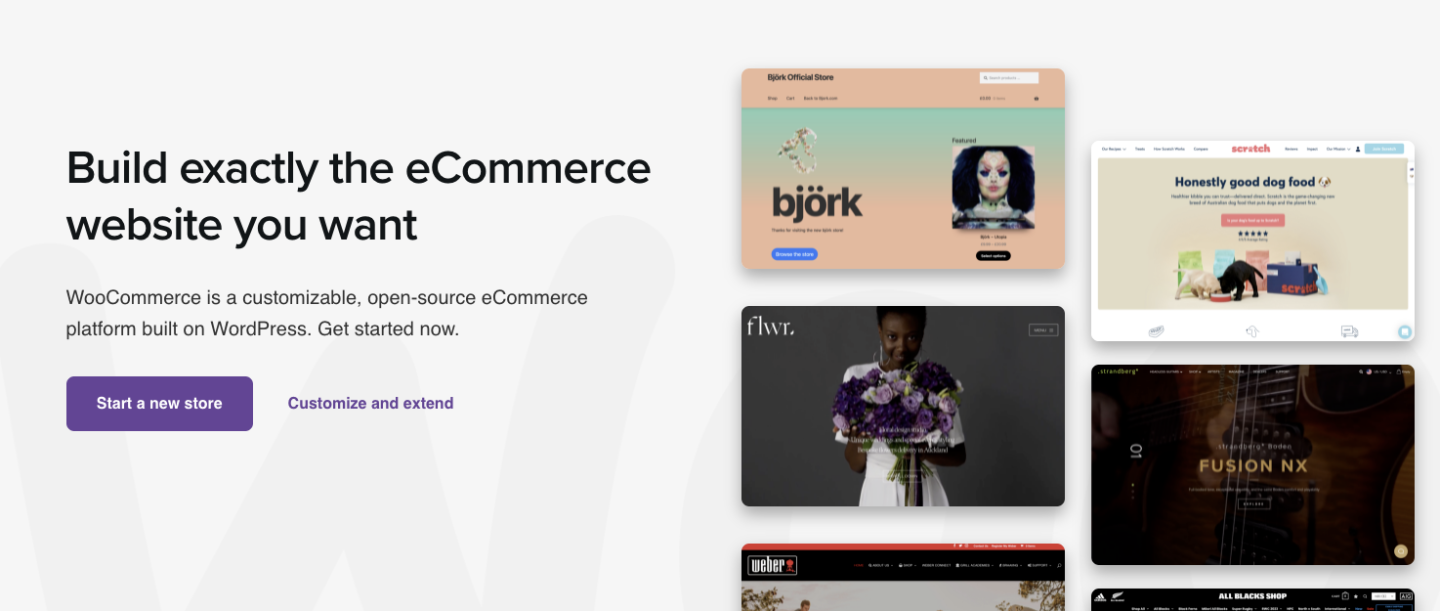
Section 2: Agitate – What are the pains that having this problem causes for your prospect?

List them here, both as a reminder and a warning of what the cost of not solving the problem could be.

Section 3: Solution – The big reveal!
Share your solution to the reader’s problem, and why they should act on it now.

And there it is!
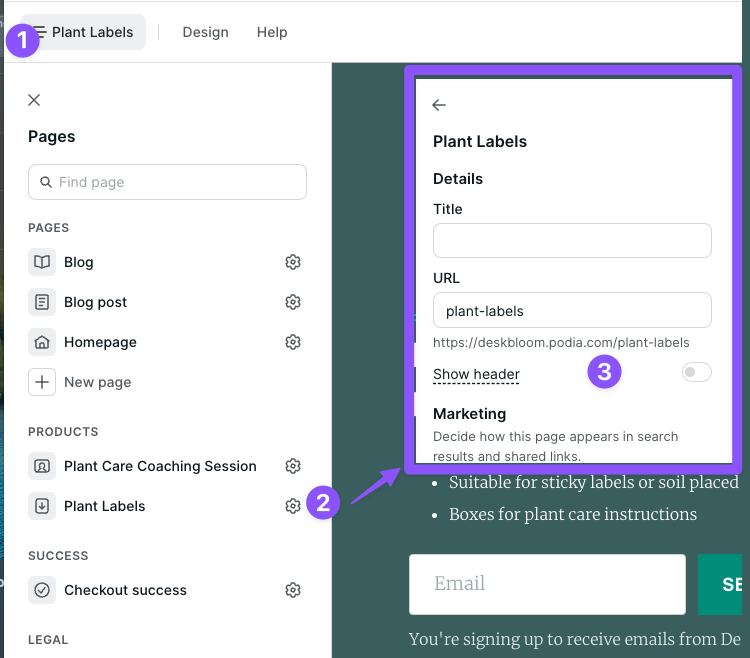
After you’ve got the foundation of your sales page down, you can add other elements like testimonials, FAQs, and promo videos, as well as any other information that will help your target audience make a decision. 

Here’s how you’ll set up a landing page in Podia step-by-step. 

  1. In the “Products” tab, click “Edit” next to the name of your course

  2. Click on the three dots int he top right corner and select “Edit sales page” 

  3. Podia makes a default sales page for every product you create that looks great out of the box, but you can also customize it however you want. 

  4. Click the plus sign anywhere on the page to add more sections, like images, text, CTAs, FAQs, testimonials, grids, links, and anything else you like.

Launching your course

You’ve researched, drafted, built, and packaged your course, and now it’s time to launch it to the world. 

When Podia creator Em Connors launched her first online course, she did a live launch window where people could only buy the course for a short period of time. Before the course was ready, she spent months building an email list and an audience on Instagram, and in the weeks leading up to the launch she told them about the course that was coming soon. 

The result? Em made 5 figures in just a few days!
You can read more about Em’s live launch strategy in this creator story
. 

While live launching can be fun, it’s also a lot of work for a burst of time. Another option is to set up an evergreen course, which is always available for purchase. With an evergreen or self-paced course, anyone who learns about your course can buy it any time, which can work well when you’re first starting out and growing your audience.   

No matter which approach you choose, keep these marketing ideas in mind to keep sales flowing long into the future: 

  • Email marketing: Growing an email list is something you can do right now for
    free with Podia
    . Start growing your list and building connections with subscribers so when you have something to sell, you’ve already got an audience built in. 

  • Promote your course on your social media channels and in your YouTube content

  • Link to your course from your blog posts so people who enjoy your content have the option to sign up and see more of your work.

  • Set up an affiliate program so your students can sell your course for you in exchange for commission.

  • Work with other small business owners in your niche. You can cross-promote each other’s products so everyone gets a larger audience.

Building an online course can feel like a big project, but you already have everything you need to get started! You can build your online course, sales pages, affiliate program, and email list in Podia,
so grab your account today to start building
. 

We can’t wait to see what you make!

SIGN UP NOW

Get your free Podia account

Join the 150,000+ creators who use Podia to create websites, sell digital products, and build online communities.

Start free →

How toHow to make a website you love in an afternoon This step-by-step guide shows you how to make a website for your small business that looks and feels like you.

Software Stack Editor · July 6, 2024 ·

This step-by-step guide shows you how to make a website for your small business that looks and feels like you.

Jump ahead

In this article

“I think I need to… build a website,” you think to yourself, already exhausted and overwhelmed by the six-month, six-figure coding project ahead of you. 

Well, you’re right about one thing. You do need a website. And I’m happy to report that setting one up doesn’t have to be complicated, stressful, expensive, or scary. It can even be free.

Your website is a virtual storefront for your business. It’s your little slice of the internet where you can find your target audience, connect with customers, make sales, and share your knowledge. It’s a space that you get to design and control – no weird ads or algorithms to steal your audience’s attention.

But setting up a website for the first time, or updating your existing website if you already have one, can feel like a massive chore. You have to be a web developer, graphic designer, copywriter, photographer – but all you really want to do is run your online business. 

That’s why I put together this DIY guide on how to set up a website that’s free, beautiful, and won’t take a hundred years to build – so you can get back to doing what you do best. 

Throughout the article, you’ll see video tutorials about how to set up your website step-by-step. I’ve been wanting to make a website about one of my favorite hobbies, planning road trips, so I’ll build my new site along with you. That way you can see exactly what to do and get ideas for your own pages. 

I’m using the
Podia website builder
for these demos, but you can build your website on any platform you like. To follow along with me, grab your
free Podia account here
. 

Okay, you’ve got things to do so let’s jump right into it. Up first, what tool should you use to build a website? 

Choosing the best website builder for your business

Back in the day, setting up a website meant you had to hire a developer, learn some code, and configure all kinds of tech behind the scenes. You can still do that today if you want to, but thankfully, you don’t have to. 

Website builders are tools that let you build what you want without coding. You can set up your website pages visually and move things around however you like, then press publish. 

Some website builders also come with more features for running your online business like built-in digital products, email marketing, and content management systems. 

Here are four solid website builders to consider, starting with my personal favorite:

Podia: No surprises here!
Podia
is an all-in-one platform for running your creative online business. In less than a weekend, you can set up your website, landing pages, blog, email list, digital products, courses, affiliates, and everything else you need to start and grow a business. 

Your website, blog, and landing pages are included on the free plan and there are tons of beautiful pre-built website sections to choose from – no coding or web design experience required. Plus, website hosting, your SSL certificate, and a free Podia subdomain name are included. 

Squarespace:
Squarespace
comes with a website builder, blog, website templates, and web hosting. You can also add ecommerce website features to sell products and courses. Squarespace doesn’t have a free plan, and paid plans start at $16 per month. 

Wix:
Wix
is a free website builder that lets you set up a basic site and blog using templates. It’s a drag-and-drop builder so you don’t need to know how to code, which makes this a suitable option for beginners. You can also upgrade to a paid plan for more features like selling products, managing bookings, and basic email marketing. 

WordPress:
WordPress
is a free, open-source website-building software. Out of all the options on this list, WordPress gives you the most control and customization options, but it’s also the most technically challenging to work with. You can build pretty much anything you want, but you’ll need to use plugins and add-ons to get the most functionality. 

Even though WordPress is free, you have to pay for website hosting and your domain name. You’ll need to find a hosting provider, set up an account, install WordPress, and then add your theme and plugins to get your site up and running. 

Podia is the best website builder for beginners, small business owners, and experienced entrepreneurs because it grows with you.

  • Start a website for free
  • Sell products on the free plan
  • Build a blog with unlimited landing pages
  • Upgrade for more features (like courses and affiliates) when you’re ready

Get my free Podia account →

After you’ve picked your website builder, the next step is planning what you want your site to say. 

Planning your website content

It’s tempting to jump right into your new website builder. (Anyone else love tinkering?) But taking some time to plan makes the setup process go much smoother. Set aside an hour or two to do the following things: 

Research your audience: Who is your ideal customer or reader? Try to narrow it down and think about who exactly you’d like to work with. Then, head to YouTube, Reddit, Google reviews, or social media and look for common questions, desires, and pain points. You can use this in your website copy. 

If you want to dive deeper into audience research, check out our free Get Noticed course.

Learn how to build an audience that loves your work and with in-depth research ideas.

Join Get Noticed! for free →

Decide on your brand elements: Podia makes it super easy to customize your fonts and colors so your website feels like you. Pick your brand colors or choose from one of the color palettes built into Podia. If you have a logo, photos, headshots, or other brand assets, gather those now too. 

Outline your website structure: Decide what pages you want to have on your business website. For most people, these core pages are a great place to start: 

Pro tip: Start with less – you can always add more later.

Draft your page copy: It’s helpful to have an idea of what you want to say on each page as you set up your content in your site builder. This doesn’t have to be your final copy, but it will help you see how your website design and text work together.

Now that you’ve got a plan, it’s time to set up your website. Don’t worry if you change your mind along the way, that’s totally fine. You’ve got a starting point, so let’s do this.

Let’s build your website

The moment you’ve been waiting for. Now that you’ve picked your site builder and drafted your game plan, it’s time to build your very own website. No web development skills are needed.

I’m using Podia for my website in the examples here.
Grab your free account and we can build together
.

Setting up your main website pages

To start, let’s open up your home page by clicking on “Site” and “Edit site.” You should see a mostly empty page, and when you hover your mouse over it you’ll see a little plus sign. Click it to open the left-hand editing menu. 

In the left-hand menu, you can choose what section you’d like to add. Podia has pre-made sections for images, text, testimonials, FAQs, product features, CTAs, email sign-ups, and pretty much anything else you need. You can customize the content and design of each section you add using that left-hand sidebar. 

For this basic homepage, let’s add the following sections. 

  • Text hero that says what your business is about

  • A grid with your featured products or services

  • Bio to information about you

  • Email opt-in form

Of course, there’s way more you can do with this. When you add products to your Podia account, you’ll automatically get access to more sections like featured products and categories, but for now this this basic page works great. 

Once you’ve added the homepage sections you want, there’s one more step to make your site look and feel like you. Click on the “Design” tab in the very top menu to adjust your site-wide colors, fonts, width, images, buttons, and padding. These changes will take effect everywhere so your pages all look cohesive.

In this video, I’ll set up the homepage for my road trip website: 

[embedded content]

You can follow these same steps to set up your About page, Products page, Services page, and any other page you want to have on your website. 

To add new pages, click on the page name at the very top of the left-hand sidebar.  Click “Add new page” to create a new page. You can click the gear next to your new page to customize the URL and page name. 

Set up your blog to attract new visitors

Next, let’s
set up your blog
. Even if you’re not a blogger, I always recommend having a blog since it’s a great way to get discovered in search, share what you know, and connect with audience members.  

In Podia, click on “Blog” in the upper navigation to turn the free blog feature on. 

You’ll automatically see four sample posts loaded into your blog post page. You can delete these and add your own posts. 

Then, head back to the website editor and you’ll see two new pages in the left-hand sidebar – a “Blog” page and a “Blog post” page. Click on each one to customize the layout of your individual blog posts and your blog landing page. 

In this video, I’ll set up my road trip blog step by step so you can follow along: 

[embedded content]

Again, a blog can give you more ways to connect with your audience members and get discovered online. 

When people search for the topics you cover, your blog could be the search results that show up. That gives you an evergreen way to attract new readers, and you can include featured products and email opt-in forms in your blog posts to make more sales and stay in touch. 

Need some blogging tips? These articles can help:

Set up your email newsletter to stay in touch

It’s one thing to attract new visitors to your webpage, it’s another thing to keep them engaged with your brand. 

One of the best ways to make sure visitors don’t disappear into the wild west of the internet is to have an
email newsletter
. With email, you can communicate directly with your audience in their inbox, away from ads, distractions, and algorithms. 

Podia comes with
email marketing built in
so you don’t need to connect another tool, and you get your first 100 subscribers plus all email features for free.

(If you’re using another website platform or would like to use a different email service provider with your Podia website, you can use integrations to connect everything.)

You can add email sign-up forms throughout your website using the “Email form” and “Slim email form” sections, and you can also add a landing page for your email newsletter to make sure people don’t miss it.

To set up your email landing page, here’s what to do: 

  1. Go back to the website editor and add a new page

  2. Click the plus sign on the page and add an email sign-up form section

  3. In the text areas, tell people what they can expect when they sign up for your newsletter. What value will they get? Make it interesting for them.

  4. If you like, you can add other sections like your bio or FAQs

Once your page is set up, we’ll add it to the header in just a minute. 

Here’s the video so you can follow along: 

[embedded content]

Adding your digital products to earn income

If you plan to
sell digital products
and
courses
from your website, let’s get those set up now too. 

Podia makes it super easy to add products, and you can sell one digital download and one coaching product on the free plan. If you’d like to sell more products in your online store (like courses, webinars, unlimited downloads, and unlimited coaching products), you can upgrade to the Mover plan for unlimited everything. 

To set up your digital products, click on “Products” and click “New Product” in the upper menu. Select what type of product you’d like to add, and then you can adjust the details like title, featured image, description, pricing, availability, category, and included files. 

(Make sure to add a photo and short description for your product because Podia’s website builder can automatically show this information to save you time.)

Now when you work on your website, you can use the “Featured”, “Products,” and “Categories” sections to display your products. 

Podia automatically generates a sales page for each product, and you can customize these too. To find your product sales pages, you can scroll down to the “Products” section in the website builder and click on the product name to edit it. Then you can add sections, content, and design elements just like you did on your home page and core pages. 

Building your navigation and footer to keep everything organized

You’ve got your pages. You’ve got your blog. You’ve got your email newsletter. You’ve got your products. Now we’ll tie it all together in your header and footer so website visitors can find their way around. 

Hot take – please don’t include every single link on your website in your header. 

This is valuable real estate, so it should only direct people to your most important pages. 

When you’re starting out, I recommend linking your about page, product or service page, blog, and newsletter landing page. As you add products, you can also add a link or two to your most popular products, or whichever products you want people to start with when they’re new to your brand. 

The footer is also prime space on your website and it shows up on every page. You can add links to important pages and socials here, as well as an email newsletter sign-up form. Add a sentence about your business in the footer so people know who you are and what you do, no matter what page they land on. 

Let’s set up the header and footer together in Podia.

[embedded content]

Boring but important – domains, analytics, and other website settings

You’re almost done setting up your beautiful new website, but there are a few technical things to do before we share it with the world (I know, I know, you were hoping there would be no technical things, but these aren’t that scary.)

First, your domain. Your domain name is the website name that people type into the search bar to find your site. Podia’s domain name is
www.podia.com
, for example. 

Most free website builders include a free subdomain name. With Podia, your free subdomain is [yourbusinessname].podia.com. You can customize this in your account settings, and you can use this free domain for as long as you want – it’s already built into your account. 

If you’d like to use a custom domain name, you’ll need to purchase your own domain name from a domain registrar like GoDaddy, NameCheap, or Bluehost, and connect it to your website. 

Your website platform can give you instructions on how to connect a custom domain to your account after you’ve purchased the domain. Domains typically cost around $20/year. 

For most website builders, connecting a custom domain is available on paid plans. With Podia, you can connect a custom domain on the Starter plan which starts at $4/month. 

Next, analytics. No matter what website tool you’re using, it’s a good idea to connect Google Analytics so you can see your website traffic and learn more about your audience. You can do this by creating a free Google Analytics account. They’ll provide a little tiny piece of code that you can paste into your website tool. 

In Podia, you can connect Google Analytics in the “Settings” tab on the Starter plan and above. 

Last, set up your site-wide SEO and display settings like your website description, favicon, and SEO image. 

  • Meta description: Your meta description should be short, no more than 1-2 sentences, and include a high-level synopsis of the work you do.

  • Default image: This is the image that appears in the preview when your website is shared. It might also appear alongside your website in search results. You can create a generic brand image using Canva or use your logo.

  • Favicon: Look at the tabs you have open in your browser. Do you see the little images next to each one? These are called favicons. You can use Canva to create one of your own.

These small details can make your page look more professional. To edit these in Podia, click on the “Site settings” button at the bottom of the left-hand editing menu. 

7 Step website launch checklist

You’re almost there. I know it’s so exciting to have your online presence all set up, so let’s run through this quick website launch checklist before spreading the good news. 

#1 Check your page URLs: Go to the page settings for each page on your site (click the gear next to the page name in the site builder) and make sure the URL link is what you want it to be. No random numbers and letters. Concise and descriptive. Remove dates unless your page is time-sensitive so your URLs don’t look outdated in the future.

#2 Check your page descriptions and SEO images: While you’re in there, make sure you have a page description and SEO image that makes sense for your page. This can help tell search engines what your content is about, which can improve your rankings and give your site a more professional look. 

#3 Check your buttons: Make sure all your buttons and links go where you want them to go. When I went through my sample website, I found several places where I’d left a button pointing nowhere, so really do try to click on everything.

#4 Delete filler text: If you used filler text (like Lorem ipsum) delete it before going live. When you insert a new section into your site, it will autofill text so you can see what the section looks like. Make sure you’ve swapped in your own words or deleted any text you’re not using. I’ve even seen huge corporate sites that forget to do this.

#5 Check your website on different devices: Pull up your website on your mobile device and desktop. Try to view it on as many different screen sizes as possible. Are there any areas that look wonky? Now’s the time to adjust.

#6 Run your entire site through Grammarly or another online proofreader: Grammarly is a free online spelling and grammar checker. I highly recommend copying and pasting every bit of text you’ve written into Grammarly before publishing. (Confession time, I just pasted my road trip website text into Grammarly and found some very silly errors… Don’t skip this step!)

#7 Ask for feedback: Finally, send your website to a few trusted friends or loved ones for feedback. They can let you know if something’s hard to read, the navigation is confusing, a product needs more explanation, or a page is showing up funny on their devices. Sometimes looking at something for hours makes us miss details others see right away. 

If you don’t have anyone you feel comfortable asking, head to the
Podia Community
. It’s free for all Podia users, and you can post your website in the “I made this” topic to get feedback from other small business owners.  

Remember, done is better than perfect. The beautiful thing about websites is that you can update them whenever you want. If you notice a typo next week, you can hop in and fix it. If you want to change your About page or decide that a picture isn’t working for you anymore, that’s an easy fix too. Don’t let perfectionism prevent you from launching. Let’s get your work out there.

You have a beautiful professional website. Now what?

You didn’t think you were done, did you?

Just kidding. Kind of. 

You’ve got an amazing website, and that’s just the beginning. There’s so much you can do as a small business owner with an online presence, and here are some ideas for how you can keep growing and taking your business to the next level. 

  • Grow your email list with a lead magnet: Entice new visitors to join your list with a freebie. You can set this up by adding a digital product and setting the price to “Free Email Delivery.” (
    Learn more here
    )

  • Set up a welcome email for new subscribers: Automatically send a welcome message when new subscribers join your list. You can build this in the “Campaigns” section of your Podia Email tab. (
    Step-by-step instructions here
    )

  • Create a link in bio page for your social media accounts: Add a new page to your website that directs people to your most important content. You can link this page on all your social media platforms with just a click. (
    Step-by-step guide here
    )

  • Experiment with different digital products: Courses, downloads, coaching, webinars, bundles – brainstorm different digital products that could work for your audience and give them a try. (
    Read tutorials here
    )

I want to extend an enthusiastic double-high-five to you for the work you’ve done on your website. Building a website is no small task, and you’ve done an amazing job. Websites ultimately act as an extension of ourselves in the digital world, and now you’re ready to share yours with pride. 

And if you’re still looking for a place to call home, we’d love to have you at Podia. Podia lets you build your entire website for free, and you can set up your email list, blog, landing page, and digital products too.
Sign up for free to get started
. 

That’s all there is to it. Now you’re ready to delight, inspire, inform, entertain, and educate your friends, fans, and customers. Have fun out there!

Get your free Podia account

Join the 150,000+ creators who use Podia to create websites, sell digital products, and build online communities.

Sign up free

8 best alternatives to Thinkific for online creators (Features & pricing)

Software Stack Editor · July 6, 2024 ·

Find the best alternative to Thinkific for selling digital goods, building online courses, and growing communities.

Jump ahead

In this article

Looking for a place to sell online courses? You might have heard about an e-learning platform called Thinkific.

With Thinkific, creators can offer free and paid programs to unlimited students. You can upload as much course content as you want and even build a storefront to promote your offerings.

Thinkific is well-established in the course creation space, but it might not be the best fit for creators who want to branch out with other product types.

In this guide, we’ll cover the pros and cons of Thinkific as well as eight Thinkific alternatives to consider if it’s not right for your business.

Note: All pricing is accurate at the time of writing, but this is subject to change over time.

Thinkific pros and cons

Thinkific pros

Free plan: One of the biggest upsides of Thinkific is their free plan. Without paying anything upfront, you can sell a limited number of courses to unlimited students. There aren’t any transaction fees, and if you need more features, you can upgrade to a paid plan when you’re ready.

Here’s a look at the full Thinkific pricing breakdown:

Unlimited courses: If you choose to upgrade to a paid plan, you’ll be able to make unlimited courses and host as much content as you like. Some plans include helpful features like
course completion certificates
, assignments, and lesson prerequisites.

Website builder: Creators can use Thinkific’s drag-and-drop page builder to set up a website or storefront for their products. There are also website templates you can use to jumpstart your creativity.

Thinkific app store: If you need more functionality, the Thinkific app store comes with additional integrations and features. But be aware that some of these come at an extra cost.

Thinkific cons

It’s difficult to sell digital products other than courses: Courses are Thinkific’s bread and butter, but these days, there are countless ways to share your knowledge. If you plan to sell digital downloads, memberships, live streams, webinars, coaching programs, or services, Thinkific isn’t the best fit since it’s primarily optimized for online courses.

You never know where your creator business will take you, and only being able to offer one type of product could be a severe limitation as you grow.

Thinkific’s free and Basic plans lack key features: Thinkific offers a free plan and a $49 per month Basic plan, but these options are missing important tools that might make them unusable for some creators.

You can only make three courses on the free plan, and to access many essential features, you’ll need to use Thinkific’s $99 per month Pro plan or above.

The Growth add-on: Creators will need to pay more for Thinkific’s Growth add-on to use premium tools. This can only be purchased as an addition to the $99/month Pro plan, and it costs an extra $50/month.

Advanced integrations, the ability to remove Thinkific branding, Zapier actions, unlimited communities, student segmentation tools, and bulk student messaging are some features that are only accessible with the Growth add-on.

Limited email functionality: Email marketing is essential for many online businesses, but Thinkific’s email tools may be too basic for many creators. You must be on the Pro plan with the Growth add-on to access features like
email segmentation
and bulk messages, or you’ll need to integrate with a
third-party email service
which likely has additional fees.

Ultimately, the course platform you choose depends on the unique needs of your business. If you determine that Thinkific is not right for you, here are eight alternatives you can check out instead.

8 Thinkific alternatives for creators

1. Podia (Best all-in-one platform for online creators)

Podia is an all-in-one tool for bringing your online business to life. While Thinkific mainly focuses on course creation, Podia lets creators sell
courses
,
digital downloads
,
webinars
, and
coaching sessions
. You can also manage email marketing, affiliates, and your website under one roof.

Want to sell online courses? With Podia’s course builder, you can design a clean, visually appealing learning experience for your students in minutes. You can also offer multiple payment plans, message students through our on-page chat widget, and embed content from 1,900+ third-party platforms like SoundCloud, Typeform, and Github directly into your courses.

Want to sell dozens of printables and PDF files? Go for it! There are no product limits on Mover and Shaker plans, so you can let your creativity soar.

Want to build a website? Podia has a generous free plan that includes
a full website for your business
. You don’t need to learn code or hire a developer. Simply use our intuitive page builder to create a digital home you love, complete with unlimited sales pages for your products and offerings.

According to
Podia creator
and
piano instructor Joseph D’Amico
, “Podia makes website building so fun. I feel like I could set up a site in an afternoon, and it would look great. And if there’s something to be said for how pretty it is. It’s the best-looking one by far.”

But Podia’s free plan doesn’t stop there. You can also set up your blog, build unlimited landing pages, start your email list, and sell one digital download and one coaching product. You can even make draft courses, webinars, and product bundles which can be launched whenever you’re ready to upgrade your plan.

Beyond the free plan, Podia’s Starter, Mover, and Shaker plans are competitively priced and packed with all the tools you need to run your business. Compared to Thinkific, you get a wider range of resources for a lower price with Podia.

Bottom line: Podia was built to grow with you no matter where your creator journey takes you.

Podia features:

  • All-in-one alternative to Thinkific

  • Sell unlimited courses, digital downloads, webinars, communities, and coaching sessions on Mover and Shaker plans

  • Build a full, SEO-friendly website on all plans

  • Email marketing
    ,
    affiliate marketing
    , upsells, coupons, and
    customer messaging

  • Free migrations
    for annual Mover and Shaker plan participants

  • Fast and friendly
    customer support

  • Payment integrations with Stripe and PayPal

  • Instant payouts

  • Custom domains on paid plans

Podia pricing:

  • Free plan: (10% transaction fee)

  • Starter: $9/month or $4/month when paid annually (8% transaction fee)

  • Mover: $39/month or $33/month when paid annually (5% transaction fee)

  • Shaker: $89/month or $75/month when paid annually

Learn more about how Podia compares to Thinkific
.

Get your free Podia account now
to see these features in action.

Get your free Podia account

Join the 150,000+ creators who use Podia to create websites, sell digital products, and build online communities.

Sign up free

2. Teachable

Teachable is an online course platform where you can sell unlimited courses and
coaching programs
on all plans, including their free plan. Creators get access to course design templates, you can build a storefront for all your product offerings, and sales made through Teachable’s payment gateway are eligible for instant payouts.

Teachable features:

  • Sell courses and coaching

  • Build customizable
    sales pages
    for your courses and products

  • Coupons, subscriptions, one-time payments, memberships, and bundles

  • Basic email functionality

  • Affiliate management
    resources

Teachable benefits: When you build courses with Teachable, you can enable course completion certificates and add interactive elements like quizzes. There are helpful integrations you can connect with if you need more functionality. In addition to letting you sell unlimited courses and coaching products, Teachable handles behind-the-scenes financial tasks like paying you, your affiliates, and other authors.

Teachable downsides:Teachable is not ideal for
selling digital downloads
or building a brand community. To sell communities, you must integrate with a third-party online community platform called Circle, which comes with additional costs. Also, Teachable charges high transaction fees on the free plan ($1 per sale plus 10% transaction fee).

Teachable pricing:

3. Kajabi

Kajabi is an all-in-one alternative to Thinkific, where you can sell courses, digital products, coaching, memberships, and
podcasts
. You can also use Kajabi to handle your email marketing, run your affiliate program, build your website, and track your analytics.

Kajabi also offers in-depth
sales funnels
called pipelines. Pipelines are automation templates that help you achieve a specific goal, like nurturing leads or
launching a new product.

Kajabi features:

  • Sell courses, downloads, coaching, memberships, podcasts, and communities

  • Email marketing
    , affiliates, and analytics

  • Website builder and templates

  • For podcasters: Sell members-only podcasts and manage your podcast subscribers

  • Create advanced sales funnels

Kajabi benefits: Like Podia, Kajabi is an all-in-one alternative to Thinkific, which means you’ll get access to a robust suite of tools for one monthly rate. There are no transaction fees on any plans, and Kajabi has a mobile app so students can view their courses on the move.

Kajabi downsides: Kajabi comes at a higher price point than similar tools in this space. In addition to the cost, Kajabi limits the number of products you can make on all plans and the number of active members in your programs.

Here are the limits on Kajabi plans:

  • Kickstarter: one pipeline, one product, 50 active customers

  • Basic: three pipelines, three products, 1,000 active members

  • Growth: 15 pipelines, 15 products, 10,000 active members

  • Pro: 100 pipelines, 100 products, 20,000 active members

Our survey of over 900 creative entrepreneurs found that creators have an average of 10.95 products, which would mean many have to use the pricey Growth plan.

Kajabi pricing:

  • Kickstarter: $69/month

  • Basic: $149/month

  • Growth: $199/month

  • Pro: $399/month

4. Teachery

Teachery makes course building simple. This software was made by course creators, for course creators, and provides just the things you need without extra bells and whistles.

With Teachery’s white-label course platform, you can upload your content into two sleek layouts, create unlimited lessons, and house helpful resources for your students in one place. When selling your courses, you’re free to make unlimited payment pages and charge a one-time fee, a recurring rate, or nothing at all.

Teachery features:

  • Unlimited courses, lessons, and students

  • Straightforward course builder with two templates

  • Sell memberships and bundle products

  • Create sales pages and
    landing pages

  • Integrations with Mailchimp, ConvertKit, and Zapier

  • Affiliate program

Teachery benefits: Teachery offers two payment plans, monthly and annual. Both options come with everything, so you don’t have to upgrade your plan or pay for additional add-ons as you grow.

Teachery also has a Zapier integration that allows you to connect the tool with other software in your technology stack.

Teachery downsides: Teachery is primarily used for selling courses, and it’s not optimized for selling digital downloads or services like coaching. There’s no community feature, and plans don’t include video or audio hosting. Instead, you’ll need to work with a third-party tool like Wistia, Vimeo, or YouTube.

Teachery pricing:

  • Monthly plan: $49/month

  • Annual plan: $470/year

5. LearnDash

With LearnDash, you can
sell unlimited courses to unlimited students from your WordPress site
. Create self-study programs, drip content over time, run a course forum, and gamify your program with leaderboards, course points, and badges.

You can list your courses as memberships, subscriptions, one-time payments, or product bundles. On the design front, LearnDash has customization options and works alongside most WordPress themes and page builders like Elementor.

LearnDash features:

  • Sell courses from your own website

  • Drag and drop course builder

  • One-time payments, subscriptions, memberships, bundles, and bulk licenses

  • Gamification, quizzes, certifications, badges, leaderboards, and evaluations

  • Drip feeds, prerequisites, and required videos to improve course completion rates

LearnDash benefits: The LearnDash online course platform can be used with almost any WordPress theme. Creators who love using WordPress can add course functionality to their existing site with just a few clicks. To use the LearnDash software, you simply pay a flat rate per year based on how many site licenses you need. There are no transaction fees.

LearnDash downsides: On the feature front, LearnDash doesn’t have a webinar tool or a way to teach live. You can only send basic email notifications to students, so you’ll need to connect another tool for advanced email marketing features.

If you want to
build an affiliate program for your course
, you’ll also need additional software since this isn’t a LearnDash feature. Most importantly, LearnDash is a WordPress learning management system (LMS) plugin that must be used with a WordPress website.

While this is fine for creators who already have WordPress experience, beginners might face a steep learning curve. You may need to hire a developer for advanced customizations and functionality. You’ll be responsible for connecting, maintaining, and paying for add-on tools to make your site function the way you want.

On top of that, you’ll need to pay for your domain registration and third-party WordPress hosting, as well as any premium themes you may be using. Check out this guide to learn more about
website hosting
.

LearnDash pricing:

6. LearnWorlds

Like Thinkific, LearnWorlds puts online course creation at the forefront. Creators can sell unlimited courses with different payment options and elevate their content with LearnWorlds’s unique interactive video features. LearnWorlds lets you generate subtitles, automatic transcripts, and eye-catching overlays for your course videos. Content annotation tools are available to help your students engage deeply with your materials.

Also, LearnWorlds is a strong Thinkific alternative for creators who want to build their own mobile learning app.In addition to selling courses, subscriptions, and
memberships
, creators can design a white-label mobile learning platform for their students. This functionality is available to creators on the $299/month Learning Center plan for an additional cost.

LearnWorlds features:

  • Sell courses, memberships, subscriptions, and your own mobile learning app

  • Website and sales page builder

  • Pop up builder

  • Drip courses

  • Manage affiliates

  • Create an online community

  • Interactive video and course content tools

LearnWorlds benefits: LearnWorlds offers various interactive course elements like assessments, quizzes, question banks, and course completion certificates. You can edit your videos and generate transcripts directly on the LearnWorlds platform.

LearnWorlds also gives you the ability to create a white-label mobile learning app with notifications and in-app purchases for an extra fee.

LearnWorlds downsides: Since LearnWorlds is so focused on selling courses, it’s not ideal for creators who offer digital downloads, coaching, communities, and services. There’s no free plan, and the $29/month Starter plan has some limitations. You can’t offer free courses at this level, and you’ll pay a $5 fee on each course sale you make, which could add up fast.

Also, the Starter plan only comes with a three-page website. You must be on the Pro Trainer plan to build a complete website and offer free courses, memberships, subscriptions, and webinars.

LearnWorlds pricing:

  • Starter: $29/month (+$5 fee per course sale)

  • Pro Trainer: $99/month

  • Learning Center: $299/month

  • Corporate: Custom pricing

7. Mighty Networks

Mighty Networks is designed for running free and paid online communities. While creators can sell courses on the Business plan, the community feature is clearly the star of the show. Users like the sleek community interface and top-notch features like unlimited members, notifications, live streaming, events, and API integrations with Zapier.

If you upgrade to unlock the course creation tools, you can drip content, add additional instructors, and build a special community area for course participants.

Need a mobile app for your brand? Larger companies and businesses can sign up for Mighty Pro to design their own white-label mobile app.

Mighty Networks features:

  • Run a free or paid community with unlimited members and moderators

  • Communication features for community members like group chats and messaging

  • Create a membership site to house premium content

  • Business plan participants can create live or cohort courses

Mighty Networks benefits: On Mighty Networks’ Business plan, you can create courses with designated community areas. Communities come with advanced features like virtual and in-person events, rich member profiles, and a Discovery page for members to find new content.

Mighty Networks downsides: Mighty Networks is not optimal for selling services and coaching. It’s primarily for creators who want their community to be front and center, which may mean more real-time work than a traditional self-paced course.

You can only sell courses on the Business plan, and Mighty Networks charges transaction fees on all plans. The platform also lacks email marketing features and a website builder, but you can make a landing page to promote your community.

Mighty Networks pricing:

  • Free trial: (5% transaction fee)

  • Community plan: $39/month (3% transaction fee)

  • Business plan: $119/month (2% transaction fee)

  • Mighty Pro: Custom pricing

8. Udemy

Unlike the other platforms in this post, Udemy is an online learning marketplace where you can sell your courses to a wider audience. All you need to do is upload your
course videos
and content, and Udemy handles the bulk of the marketing for you.

Considering that they have a sizable audience of 40+ million worldwide students, this is a good option for creators who want to take a hands-off approach to selling courses.Udemy pays out using a revenue-sharing model.Udemy’s revenue-sharing plan:

Simply put, Udemy can be a good fit if you’d rather not mess with digital marketing, but you’ll earn significantly more if you send students to your course using your referral code.

Udemy features:

  • The platform has approximately 185,000 online video courses available

  • Intuitive course builder

  • Revenue sharing plan

  • Students can leave course reviews

Udemy benefits: Udemy makes it easy for new creators to get started, and you won’t need a ton of extra
marketing tools to share your course
with a broad audience. Students can find you directly through the platform, and Udemy has a popular affiliate marketing program. Affiliates you don’t know may promote your course to their audience, earning you extra cash.

Udemy downsides: With Udemy, you have less control over your course format and pricing. Udemy will essentially control the learning experience, and you can’t create cohorts, drip courses, or real-time offerings.

There are caps on how much you can charge for your course, and it could be sold for a fraction of the usual price if you choose to participate in site-wide deals. Udemy must approve video lessons, and there are requirements for length and quality. While a hands-off platform may sound enticing, you may earn less than if you use a creator platform that gives you control over your course sales and audience.

For example, Podia creator
John D. Saunders
earned $1,100 in revenue on Udemy with 1,900 customers.
When he switched to Podia
, he earned $10,000 on launch day alone and has since earned over $200,000.

Finally, Udemy doesn’t include a website, sales pages, email tools, or the ability to sell diverse product types like memberships, coaching, and digital downloads.

Udemy pricing:

  • Free for instructors

Which alternative to Thinkific is right for your business?

Best free alternative to Thinkific:

More affordable Thinkific alternatives:

  • Podia: Paid plans start at $4/month with an 8% transaction fee

  • LearnWorlds: Plans start at $29/month

  • Teachery: The annual plan comes out to about $39/month, with no transaction fees

  • LearnDash: Plans start at $199/year

  • Mighty Networks: Plans start at $39/month

Best Thinkific alternatives that integrate with WordPress:

Best all-in-one alternative to Thinkific: Podia

With Podia, you can easily sell courses, webinars, coaching, and digital downloads without limits on Mover and Shaker plans. To connect with your audience, you can create a lively free or paid online community as a stand-alone offering or a complement to your courses.

Because Podia is an all-in-one tool, you also get access to email, affiliates, a website builder, and customer messaging. Podia is the ideal option for creators who want their entire online business in one place, without a steep price tag.

Make your free Podia account today.

Get your free Podia account

Join the 150,000+ creators who use Podia to create websites, sell digital products, and build online communities.

Sign up free

  • « Go to Previous Page
  • Page 1
  • Page 2
  • Page 3
  • Page 4
  • Page 5
  • Page 6
  • Go to Next Page »

Get your Software Stack together. softwarestack.tech

Software Stack

© 2024–2025 - Software Stack is a trading name of SouthwestCIO Limited ac ompany registered in England & Wales 11319049

  • Knowledgebase
  • Home
  • About Us
  • Contact Us