• Skip to primary navigation
  • Skip to main content
software stack logo

Software Stack

Get your Software Stack together

  • Knowledgebase
    • All Categories
    • Accounting Software
    • Automation & Workflow Software
    • Customer Relationship Management
    • E-Commerce Shopfronts & Payments
    • Marketing Automation
    • Online Courses & Membership
    • Project Management
    • Surveys & Forms
    • Web Hosting
  • Home
  • About Us
  • Contact Us
  • Show Search
Hide Search

Online Learning & Community

LMS features comparison: Choose the best solution for your business

Software Stack Editor · June 20, 2025 ·

The latest learning management systems (LMS) you might have just seen don’t necessarily come with the features you need. If you’re just trying out LMS solutions for the first time, a simple toolset will do. But once you see its value, strong features like deep customization and assessments, AI capabilities, or marketing and sales tools, …

Continue

The post LMS features comparison: Choose the best solution for your business appeared first on LearnWorlds.

A look at what’s new at Teachable: June 2025

Software Stack Editor · June 20, 2025 ·

It’s been a big month for the product team here at Teachable, and you know what that means: all sorts of exciting feature updates in store for you. These updates are designed to help you earn more, sell smarter, and deepen your impact with your audience. 

Here’s a quick overview:

Many creators are turning to B2B selling as a path to much higher earnings. So over the next few months, we’ll be testing new features that make it easier for you to sell directly to businesses.

We’re also focused on enhancements around how your students find and interact with your products. Those include the full rollout of product details pages, updates to your course catalog, and iOS mobile app improvements (plus, a sneak peek at our Android app!). 

Ready to dive in?

Beta access: B2B selling on Teachable

At our recent Collective and Connect events in New York City, we had the chance to hear from many of you about what’s next for your business. We noticed a common trend: More and more of you are selling to organizations, businesses, and other groups, not just individuals.

That’s why we’re building tools to support bulk access, corporate distribution, and team pricing. These new features are designed to help you sell your courses and other Teachable products directly to businesses and group audiences—whether it’s leadership training, corporate onboarding, or a skills development program, to name just a few examples.

And we’re giving you the chance to be a part of it! Sign up here to join the beta testing group and get early access to bulk access and B2B features. 

The student journey: From sale to success

Sell faster with product detail pages

There’s a new way to get your course in front of prospective students, faster than ever, no design skills required. Introducing product detail pages, now available for all Teachable schools.

What are product detail pages, anyway? They’re like sales pages—but a whole lot easier (and faster) to publish and use. That’s because they’re automatically generated by pulling information directly from your course content. Plus, they’re already SEO– and mobile-optimized pages.

Here’s what else to know about product detail pages:

  • They’re now the default sales page for any new course you create.
  • They’ll be available for bundles, digital downloads, coaching, and other products later this year.
  • You can still use a traditional sales page (on or off Teachable) if you prefer more customization.

Showcase your courses your way

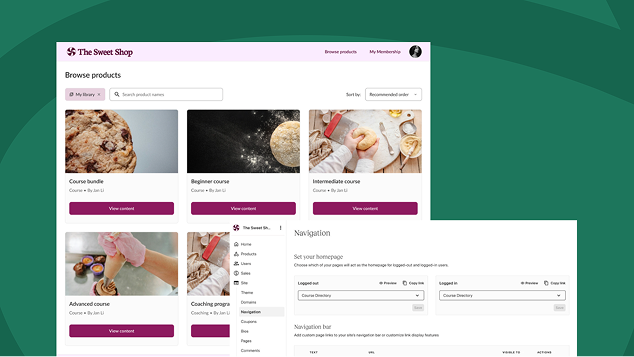
We’re making it easier for students to discover and navigate your products with updates to the Browse Products page (AKA your course catalog).

Coming soon, you’ll be able to choose in what order your products appear by either setting a default order or having it sorted alphabetically. With that change, you’ll have the option to highlight certain products by ordering them first.

Have ideas about future sorting methods? Let us know in this quick survey!

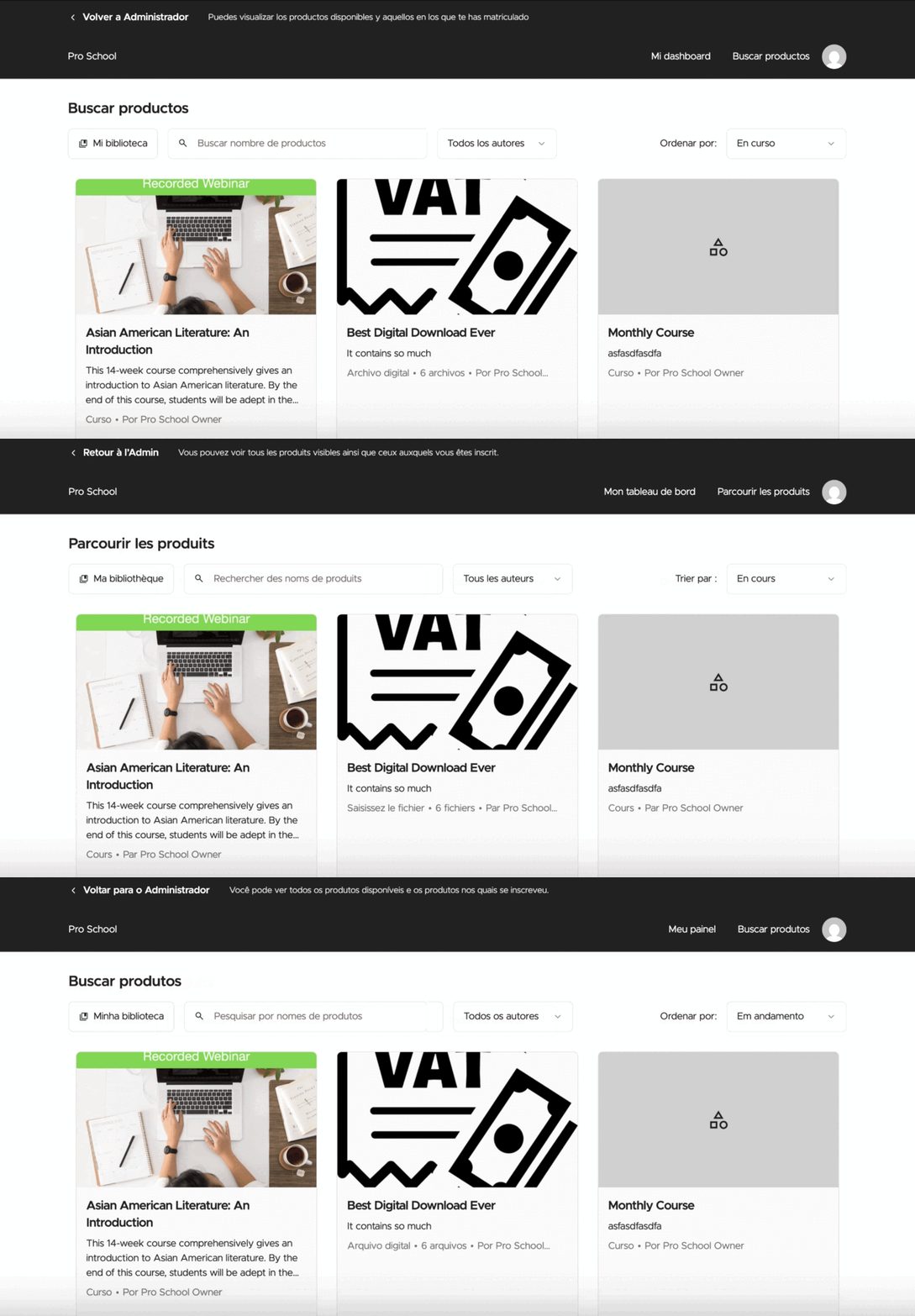
Go global (and save time) with one-click translations

We know that many of you are reaching global audiences, and translating your school experience is key to that growth. Now we’re making the process faster and easier.

We’re rolling out a way to translate large sections of your school with a single click, starting with Spanish, French, and Portuguese. 

More languages are on the way! Help us decide which ones to add next.

Keep students engaged with mobile app upgrades

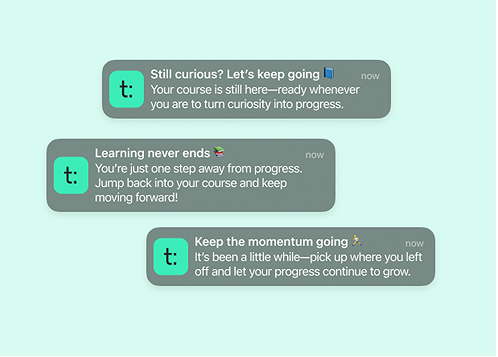
Push notifications are here! We’ve introduced progress reminder push notifications to our iOS app. Now, if a student steps away from a course they started, they’ll get a friendly nudge to return. In just the first two weeks, more than 85% of students resumed a course after receiving a reminder.

We’re also hard at work building a Teachable app for Android. It’s slated for a Fall 2025 release, and we’re excited to give you a first look soon.

Bonus: Did you know you could do this?

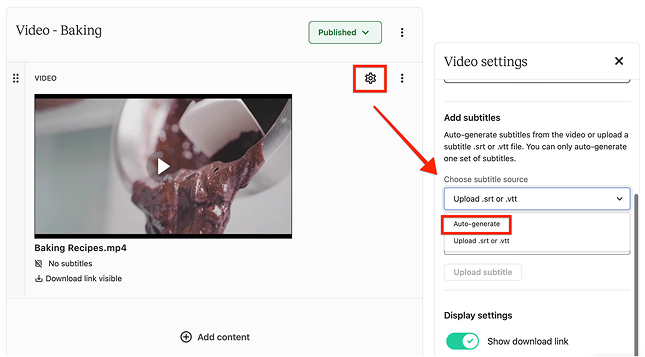
Here’s a quick tip you may have missed: You can create and translate video subtitles into more than 70 languages on Teachable. It’s a simple way to make your content more accessible and expand your reach, especially for international or multilingual audiences.

Even better: Video subtitles and translations are free for anyone on the Growth and Advanced plans.

Stay in the loop

Whether you’re exploring B2B selling, optimizing for student engagement, or reaching students around the world, we’re building tools to support every step of your journey.

Stay up to date on the latest here—and until then, we’ll see you next month!

How to find an ecommerce community to join in 2025

Software Stack Editor · June 19, 2025 ·

Looking for a vibrant ecommerce community you can join? You’ve landed at the right place. In this article, that’s what we’ll be talking about. Before we dive deeper, here’s a quick look at the best ecommerce communities for 2025 and what makes each one stand out. Each group is an excellent resource for entrepreneurs looking …

Continue

The post How to find an ecommerce community to join in 2025 appeared first on LearnWorlds.

60 Top Membership Website Ideas — Broken Down by Industry

Software Stack Editor · June 18, 2025 ·

Looking for ideas to start a successful membership website? In this article, we will explore various membership website ideas tailored for different industries. From fitness to education, you’ll find practical and actionable suggestions to help you create a thriving online community.

What do Membership Sites give access to?

Membership sites can offer a wide range of benefits and content to their members. One common membership offering is online courses, which can provide in-depth knowledge on a particular subject. These courses often come with video libraries, downloadable content, and even certification upon completion, adding significant value to the membership through online training. Additionally, exploring various membership site examples can inspire new ideas for content and structure. Other popular membership features include:

  • Content libraries, which may include articles, PDFs, and other downloadable resources. These libraries serve as a treasure trove of information that includes members only content, making the membership highly valuable.
  • Private podcasts, live workshops, and webinars that engage members and provide ongoing education and support.
  • Community forums or groups that offer a space for members to connect, share experiences, and support each other.
  • Accountability groups, mastermind sessions, and personalized support from experts in an active forum and interactive forums, fostering an online community.

The combination of exclusive content and a supportive loyal community makes profitable membership sites a powerful tool for building a loyal following.

60 Membership Site Ideas Broken down by Industry

Now that we’ve covered the basics of what membership sites are and what they can offer, let’s dive into specific industry ideas. The subscription e-commerce market is booming, projected to grow dramatically in the coming years. This presents a golden opportunity for those looking to create a membership site.

We’ll explore 60 unique ideas across various industries, each tailored to meet specific business model needs and interests.

Health and Wellness

  • Premium fitness or yoga video library with weekly live classes and challenges
  • Meal planning and recipe club with downloadable PDFs and shopping lists
  • Personalized meal plans tailored to dietary needs
  • Wellness coaching subscriptions for stress reduction, mindfulness, or sleep improvement
  • Private health-focused community with expert Q&A sessions

Sports and Recreation

  • Training drills and workout plans tailored to specific sports like soccer, baseball, or running
  • Video tutorials and progress tracking
  • Personalized coaching tips
  • Behind-the-scenes coaching breakdowns of gameplay and strategy
  • Community for hobbyists like cyclists, hikers, or pickleball players
  • Early access to local exclusive events or tournament registrations

Arts and Entertainment

  • Digital art or music lessons with community feedback circles
  • Behind-the-scenes content from artists, musicians, or performers
  • Patron-style access to unreleased work or experimental projects
  • Monthly challenges or creative prompts with peer feedback and recognition

Coaching and Education

  • Tiered access to coaching curriculums for different skill levels
  • Live coaching calls and replays
  • Downloadable tools for enhanced learning
  • Group accountability programs or mastermind-style cohorts
  • Certifications or badges for module completion

News and Media

  • Ad-free newsletter membership with exclusive articles
  • Behind-the-headlines briefings or journalist Q&As
  • Access to audio versions or early releases of investigative content
  • Curated topic-specific feeds (local politics, global tech, education)

Photography and Videography

  • Preset pack subscriptions including Lightroom presets and LUTs with tutorial videos
  • Client management and social media marketing advice hub
  • Private critique groups or editing live streams
  • Exclusive stock photo or video drops for members

Parenting and Family

  • Parenting guides and monthly expert sessions on child development and discipline
  • Community support groups by child age or parenting challenges
  • Printable activity bundles for toddlers and kids
  • Online playgroups or parent workshops with certified facilitators

Real Estate and Home

  • Weekly market updates or local investing tips
  • DIY home improvement tutorials and supply lists
  • Exclusive content for agents (scripts, templates, prospecting plans)
  • Private community for real estate investors with deal analysis sessions

Writing

  • Writing prompts and critique circles with submission deadlines
  • Member-only workshops or webinars with authors or editors
  • Access to query letter reviews and publishing advice
  • Serialized fiction or member-contributed publications

Medical Services

  • Concierge-style patient education memberships for chronic conditions
  • Mental health resources including guides, meditations, and expert videos
  • Private Q&A groups with medical professionals
  • Monthly virtual check-ins or screenings

DIY and Crafts

  • Monthly project kits or patterns with video instructions
  • Done-for-you materials and inspiration for creativity
  • Live crafting sessions and community show-and-tell events
  • Library of skill-building tutorials (sewing, woodworking, resin art)
  • Digital downloads like SVGs, stencils, or planner pages

Counseling and Therapy

  • Self-guided mental health workshops and journals
  • Private support communities moderated by licensed therapists
  • Monthly guided meditations or therapy topic deep-dives
  • Access to psychoeducation resources and therapist office hours

Finance and Investment

  • Exclusive financial playbooks (FIRE strategy, real estate, crypto)
  • Monthly portfolio reviews or Q&A calls with finance professionals
  • Private groups for accountability (budgeting and saving challenges)
  • Downloadable tools (calculators, templates, checklists, investment guides)

Animals and Wildlife

  • Animal care guides with expert Q&A sessions
  • Pet training video libraries with step-by-step guidance
  • Adoption follow-up memberships with behavior support and check-ins
  • Wildlife photography or conservation communities with mission-based membership tiers
  • Membership communities centered around animal care with expert Q&A and training resources

How to Launch a Membership Site

Launching your own membership site can be straightforward if you follow a few essential steps:

  1. Create a Website Quickly
    Start by creating any website to get your presence online. Don’t spend too much time perfecting it initially—focus on getting something up and running. You can use popular content management systems (CMS) like WordPress, Squarespace, Wix, or even Notion depending on your comfort level and needs.
  2. Add Quality Membership Software
    Integrate reliable and flexible membership software such as MemberSpace.com. This type of software will manage crucial aspects like payment processing, content locking, membership churn, and other features essential to scaling your paid member community effectively.
  3. Add Gated Content for Paid Members
    Upload your exclusive content behind gated or locked sections accessible only to paying members. This ensures that your premium content remains exclusive, encouraging prospective members to subscribe and providing value to your loyal and engaged community.

Following these steps will help you set up a great membership site that offers exclusive access to valuable content while providing a seamless experience for both you and your members.

Understanding Membership Websites

Membership websites are platforms that require users to log in, often involving a membership fee to access exclusive content, products, or services. These sites provide numerous benefits, including recurring revenue, which helps stabilize your financial forecast and allows for better long-term planning. Imagine knowing exactly how much income you’ll have each month – it’s a game-changer for any existing membership sites, own membership website, paid membership site, or online business. Creating a membership site can enhance your overall strategy and success.

Bonus: 10 Launch Tips to Get Started with Your Membership Site

Launching a membership site can be exciting but also challenging. To help you start strong and attract your first members, here are 10 practical tips that can set you up for success from day one.

  • Offer Something for Free: Give potential members a taste of your content by offering free resources, mini-courses, or trial memberships to build trust and showcase your value.
  • Host Webinars: Live webinars are a great way to engage your audience, answer questions in real-time, and introduce your membership offerings.
  • Leverage Your Existing Network: Reach out to your current followers, email subscribers, or social media contacts to invite them to join your new membership site.
  • Create a Pre-Launch Waitlist: Build anticipation by collecting emails of interested people before your official launch, so you have a ready audience to notify.
  • Use Social Media Marketing: Promote your membership site through targeted posts, stories, and ads to reach more members and create buzz.
  • Collaborate with Influencers or Partners: Partner with others in your niche to cross-promote your membership site and tap into their audiences.
  • Provide Early Bird Discounts: Encourage sign-ups by offering special pricing or bonuses for the first group of members.
  • Share Testimonials and Social Proof: If possible, showcase endorsements or feedback from beta testers or early users to build credibility.
  • Create Engaging Onboarding Content: Help new members feel welcome and get started quickly with clear guidance and introductory materials.
  • Maintain Consistent Communication: Keep your audience informed and excited through emails, updates, and reminders about your membership site benefits and launch milestones.

Key Takeaways

  • Membership websites offer exclusive content and build loyal communities, driving member retention and providing stable recurring revenue.
  • Successful membership sites can cater to diverse industries, offering unique content like online courses, community support, and specialized resources.
  • Choosing the right niche aligned with your interests and market demand is crucial for creating a profitable membership site; effective pricing strategies and trial offers can enhance engagement.

Conclusion

Selecting a niche for your membership site should align with your passion and expertise. Consider market demand, audience interests, and effective pricing strategies to ensure your membership site is successful. Conducting research, such as using Google Trends and observing social media, can provide valuable insights into what your target members and potential members are interested in.

Offering trial memberships or free community access can help build initial engagement and validate your membership idea before a full launch. Effective pricing strategies, such as setting competitive prices and offering trial periods, can significantly enhance member engagement and retention.

Focusing on creating valuable content and a supportive community enables you, as a content creator, to build a successful membership site that resonates with your audience.

Summary

In summary, membership sites offer incredible opportunities to build a thriving online community while generating a predictable income stream. By providing exclusive content, personalized support, and a sense of belonging, you can create a membership site that not only attracts but also retains members. Whether you’re in the health and wellness industry, arts and entertainment, or finance and investment, there’s a membership site idea that can turn your passion into a profitable venture.

Remember, the key to a successful membership site lies in offering valuable content and fostering a loyal community. Take the time to research your niche, understand your audience, and develop a pricing strategy that reflects the value you provide. With dedication and creativity, you can build a membership site that stands out and thrives in the competitive online market.

Frequently Asked Questions

What are the benefits of creating a membership website?

Creating a membership website is a smart move because it offers recurring revenue and fosters strong community engagement around exclusive content. This not only stabilizes your income but also builds a loyal following.

What types of content can I offer on my membership site?

You can really make your membership site shine by offering online courses, content libraries, private podcasts, and live workshops. The goal is to create exclusive and valuable content that keeps your members engaged and coming back for more!

How do I choose a niche for my membership site?

To choose a niche for your membership site, pick something that excites you and that you’re knowledgeable about. Use tools like Google Trends to gauge interest and consider trial memberships to test your idea before going all in.

What pricing strategies work best for membership sites?

Offering trial periods, competitive pricing, and aligning your prices with the value of your content are great strategies for membership sites. It’s all about standing out and making your offer appealing to potential members!

How can I ensure member retention for my membership site?

To boost member retention, focus on delivering consistent value with exclusive content and personalized support. Engage your community through regular updates and interactive events that keep them involved and invested.

Can I offer different membership levels on my site?

Yes! Offering multiple membership levels allows you to cater to different needs and budgets. You can provide tiered access to content, perks, and community features, giving your members options that best fit their preferences.

How important is community engagement for a membership site?

Community engagement is crucial for a successful membership site. It fosters a sense of belonging among members, encourages interaction, and increases member retention by making the experience more rewarding and social.

What CMS platforms can I use to build a membership site?

MemberSpace works with any CMS or website builder, so you’re never locked into one platform. Whether you’re using WordPress, Squarespace, Wix, Webflow, Weebly, Duda, Ghost, Drupal, Joomla, HubSpot CMS, or custom HTML, you can easily install MemberSpace in just a few minutes. You can even use it with less common platforms or a completely custom-built site — as long as you can add a code snippet, MemberSpace will work.

Product adoption framework: A complete guide for SaaS success

Software Stack Editor · June 18, 2025 ·

Driving product adoption is one of the biggest challenges SaaS companies face today, but it’s inarguably your number one priority if you want to sustain your business. Getting users to sign up is easy. Getting them to stay, engage, and grow with your product? That needs some thorough planning and strategy. In this blog post, …

Continue

The post Product adoption framework: A complete guide for SaaS success appeared first on LearnWorlds.
Top 6 best LMS for associations in 2025

Software Stack Editor · June 18, 2025 ·

Feeling like your trade association is being left behind when it comes to member engagement? Can’t provide the latest courses online and learning materials? Are you still not reaping the rewards of a digitally transformed business? You’re not alone. A lot of organizations struggle with these same challenges as the demands of association members shift …

Continue

The post Top 6 best LMS for associations in 2025 appeared first on LearnWorlds.

Top 11 ecommerce education platforms for online courses

Software Stack Editor · June 17, 2025 ·

Want to invest in ecommerce and start selling online courses, but not sure where to start? Before you do anything else, know this: you’ll need a good ecommerce education platform. In this article, we’ll go over everything you need to know and also explore some great platform options you can choose from. First, here’s a …

Continue

The post Top 11 ecommerce education platforms for online courses appeared first on LearnWorlds.
Top 11 ecommerce education platforms for online courses

Software Stack Editor · June 17, 2025 ·

Want to invest in ecommerce and start selling online courses, but not sure where to start? Before you do anything else, know this: you’ll need a good ecommerce education platform. In this article, we’ll go over everything you need to know and also explore some great platform options you can choose from. First, here’s a …

Continue

The post Top 11 ecommerce education platforms for online courses appeared first on LearnWorlds.
How to make real money selling printables online

Software Stack Editor · June 17, 2025 ·

Selling printables online is one of the easiest ways to start making money with digital products. They’re simple to create, and after making them once, you can sell them forever. But what makes them especially powerful is how they can fit into a bigger business system, not just as one-time products, but as the first step in a long-term relationship with your audience.

Printables were actually the first digital product I ever sold, so they’ll always have a soft spot in my heart. And I know they can be a game changer if you use them well.

In this guide, we’ll cover:

  • Types of printables you can sell, no matter your niche

  • How to set up your first printable product in Podia

  • Tips for expanding your earnings with related courses, bundles, and offers

By the end, you’ll have a step-by-step guide for selling your printables online and turning that simple download into a system that brings in long-term income and happy fans.

With Podia, you can sell printables and more digital products like online courses, community, coaching, and webinars. Podia also has your website, blog, and email marketing, so you have everything you need to grow your business. Start your 30-day free trial today.

Are printables worth my time?

At this point, you might be wondering if printables are really worth your time. They usually sell for a few dollars, and they might not feel as exciting as something like a signature online course. But that’s exactly what makes them such a great starting point.

Unlike more hands-on offers like coaching, memberships, live webinars, or interactive courses, you only have to create a printable once. If it’s helpful to your audience, you can sell it unlimited times, which means you could potentially reach a huge group of people.

Because printables are typically sold for lower price points, it gives potential customers a low-risk way to buy from you. And best of all, you can use it as an opportunity to introduce them to the rest of your business. Low cost doesn’t have to equal low value, so think of this as a chance to get your foot in the door and show your buyers just how much you have to teach them.

What printables should I sell?

Great question! There are so many directions you can take, depending on your audience and the things you teach in your business.

Some creators sell planners, calendars, journals, or habit trackers. Others offer educational materials like worksheets, flashcards, or classroom activity kits. You might create wall art, greeting cards, party decorations, coloring pages, sewing patterns, or household labels.

The best printables are useful, fun, or time-saving.

The key is to think about what your audience needs. What’s something they could use, print, or fill out to make their life easier or more enjoyable?

If your target audience is busy parents, a printable summer activity workbook to keep the kids occupied could be a great fit. If you work with clients who are interested in personal development, a printable journal with mindfulness prompts would be right up their alley. If you teach marketing to fellow entrepreneurs, a printable content calendar could save them precious time in their day.

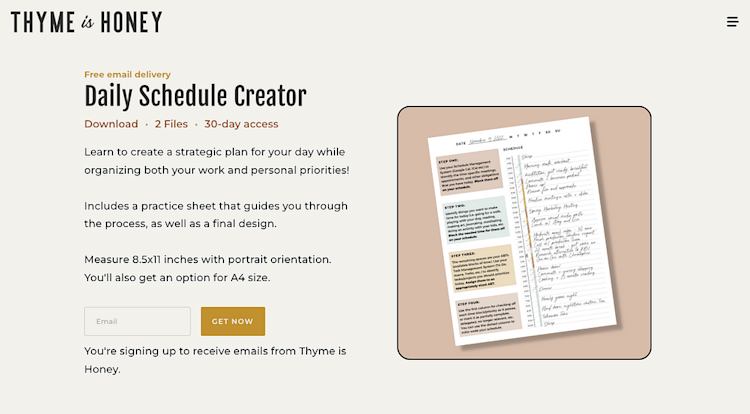
Systems and productivity expert Dani Bruflodt, for example, has a printable daily schedule tool that helps her audience organize their time and stay focused on their priorities.

Thyme is Honey daily schedule printable

And Emma Freeman from Deep Rooted Healing teaches mixed media art classes, book-making, and creativity, so one of her products is a set of printable illustrations for art journaling.

Deep Rooted Healing printable

As always, if nothing is jumping out at you, the best way to get ideas is to ask your audience.

Send out an email, post on social media, or ask someone in your target audience directly next time you see them: “What kind of printable resources would make your life better?” Then use their ideas as a starting point.

How to sell printables online, step by step

Once you’ve got your idea locked in, you can follow these four steps to get everything set up, make your first sale, and incorporate your printable into the rest of your business.

  1. Step 1: Make your printable file

  2. Step 2: Add it to Podia

  3. Step 3: Set up a sales page so buyers can find you

  4. Step 4: Use email marketing to keep the momentum going

We’ll also look at a few bonus ideas you can use to expand your earnings with upsells, product bundles, and subscriptions.

But first…

Step 1: Make your printable product

Before you can start selling your printable, you need to make it. (I know, I know — groundbreaking advice, right?)

Luckily, there are plenty of tools you can use to bring your product to life.

Canva is a great option for beginners, but you can also use platforms like Google Sheets, Google Slides, Excel, Illustrator, or InDesign to create your printable resource. You can even hand-draw something on an iPad or tablet if you want.

It’s a good idea to create your printable file in a common printing size like A4 or US Letter (easier for home printing), and when you finish, make sure to export your final product as a PDF. PDFs essentially lock your design in place, which helps ensure your formatting stays the same when your buyer goes to print.

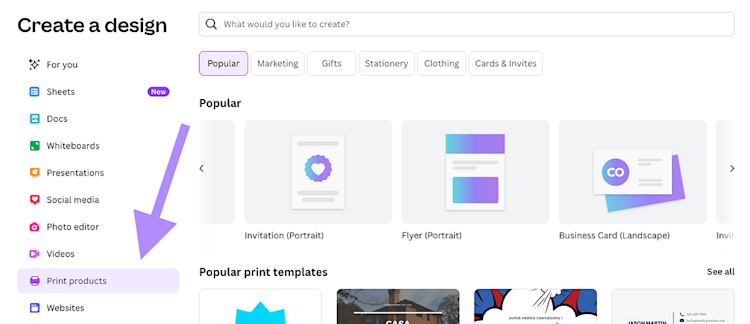
If you’re using Canva, for instance, you can click “Create a design” and then choose “Print products” to pull up a menu of popular sizes and templates. This way, you know your design will look just as good in real life as it does on your screen.

Canva create a design print products

Pro tip: If your printable has complex printing instructions (like a sewing pattern that needs to be assembled after printing), make sure to include an instructions sheet for your buyer. This makes it easier for them to use your product right away and reduces your customer support messages.

Okay, onward to selling.

Step 2: Add your printable to Podia

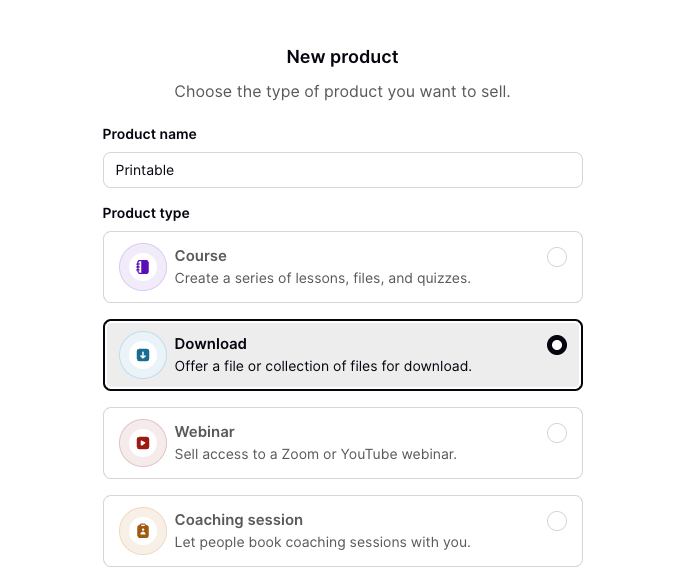
Once your printable file is ready, log in to your Podia account and go to the “Products” section in the left sidebar. Create a new product and choose “Download.”

Podia New product screen

Here, you’ll add your printable file, give your product a title and a description, and set your price. Printables are often sold as one-time purchases, but you can also offer them for free, set up a payment plan, charge a subscription, or include them in a membership or bundle.

Podia set product pricing options

Click “Publish,” and you’re all set.

Podia will handle the file delivery and payment processing when someone buys your printable.

All you need to do is attract buyers, and one of the easiest ways to do that is with a great sales page.

Step 3: Create your sales page

For people to buy your products, they need to be able to find them. That’s why Podia automatically creates a simple sales page for every product you add.

The system pulls in your product details like title, description, featured image, and price, and everything looks nice right out of the box.

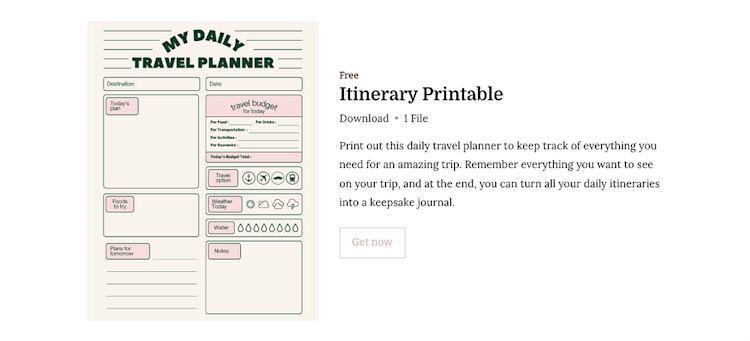
Printable sales page example

But if you want to go a step further, you can also customize your sales page using Podia’s point-and-click website builder.

Click into the Podia website builder, and you’ll see a list of all pages on your site. Find the name of your printable to update your sales page.

Podia’s website builder lets you change your site colors and fonts, customize your product page layout, and add additional website sections like testimonials, FAQs, or an author bio, all in a few clicks.

Podia website builder for printables

For printables, it’s a good idea to include a note making it clear that this is a digital product.

I recommend adding a text section that says something like: “This is a digital file. Nothing physical will be shipped. You’ll receive a PDF to download and print at home.” That way, your buyer knows exactly what they’re signing up for.

Once your sales page is ready, you can link to your product in your blog posts, website, social media bio, video captions, or anywhere else your audience spends time. You can also incorporate it into your email marketing by sharing it with your newsletter or adding it to your email welcome sequence for new subscribers.

Then you can continue to use email marketing to make even more sales, which takes us to the next step.

Step 4: Continue selling in your email marketing

Selling a printable once is awesome! But using it to bring someone into your business? That’s where the real value is. And email marketing is the gold standard for keeping the momentum going after someone signs up for one of your products.

Here’s an example of how that might look:

Someone finds your printable on your blog, in a social post, or through a search. They buy it, Podia automatically delivers the file to their inbox, and you do a happy dance!

Then the next day, they automatically enter an email welcome sequence that you built in Podia. Over the next week, they get these emails:

  • Email 1: You introduce them to your brand and business and share some tips for how they can use their new printable.

  • Email 2: You share some free advice or lessons learned on your journey. Maybe you link to a popular blog post or YouTube video.

  • Email 3: You tell them about another paid product, like a course, coaching offer, or subscription, related to your printable. You might even offer a discount code as a perk for being an existing customer.

This format helps your new buyers get to know you and your work, while also providing them with even more value and building trust.

And the best part? You don’t have to sit on your computer manually sending all these emails. Everything is run automatically through Podia. All you have to do is set up an email campaign, write the emails, set the start trigger to “Gains access to [printable]”, and everything will run for you in the background.

You get to do the work once and benefit over and over again. And, hey, if your customer doesn’t buy the additional products you tell them about, that’s totally fine too. Because now they’re on your email list, where you can stay in touch through regular email newsletters, let them know about sales, and tell them about future products you make.

When you use it alongside email marketing, your printable becomes a powerful way to bring people into your business for the long haul.

And with that, here are even more ways you can expand.

Expand your printable revenue with bundles, upsells, subscriptions, and other products

Once you’ve got one printable selling, you can increase the total value of each order with bundles, upsells, subscriptions, and related products.

If you have several related printables, you can sell them as one-off downloads or package them together and sell them as a bundle for a higher price. For example, if you have a habit tracker, weekly planner, and goal-setting worksheet, those could easily become a “New Year Productivity Pack.”

When I was selling printables for teachers, I sold several different packs of classroom activities individually, but I also had a mega bundle of all my printables that people could get for a discounted price. The discount was a great deal for them, and I made more off each transaction.

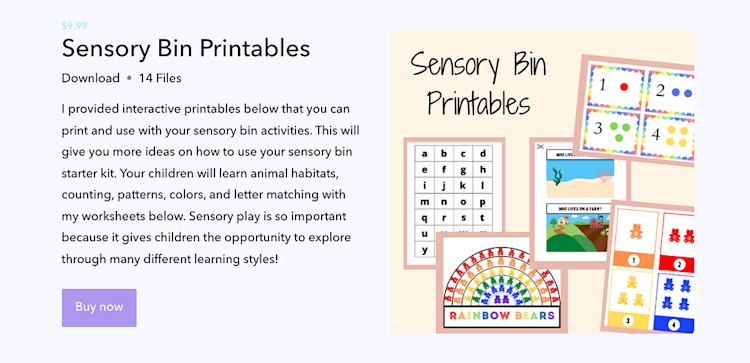
Similarly, Coco’s Caravan sells printable sensory bin activities for kids. Rather than selling each printable individually, she bundles them into one product with 14 different activities, so her customers get more value.

Coco Caravan Sensory Bin Printables

Upsells are another way to expand your earnings on each printable sale. An upsell is a product your customer sees right after checkout, like a related printable, course, or template. Usually, upsells have a special discount that’s only available right then to make it even more enticing to buyers. In Podia, you can add as many upsells as you like to each product, and customers can buy one, some, or all of them.

Another option to get more mileage out of your printable is to turn it into a membership or subscription product.

For instance, if you design monthly planner pages, seasonal homeschool worksheets, or themed holiday decor, a monthly printable subscription might be the perfect fit since people can join once and get access to fresh printables on a regular schedule.

That’s what Justine Hovey does in her VIP crafting membership.

Justine Hovey VIP membership

Customers can buy individual crafting printables, but they can also upgrade to get a full VIP membership with tons of crafting resources and inspirational project ideas.

Sell your printables online and build a system that grows

Selling printables is a great way to start getting your work out there and helping your audience, and it doesn’t require complicated tools or months of production time. All you need is an idea that helps people, a free design tool like Canva, and a Podia account, and you can start making sales today.

And once your printable is out in the world, there are tons of opportunities to grow. Use the printable as a starting point to bring people into your email list, add upsells and product bundles, and even turn your work into a recurring subscription if you like. As long as you’re providing value, you’re doing it right.

You can set up your printables and everything else you need to build your business in one tool with Podia. Start your 30-day free trial and upload your first printable today.

FAQ:

What are printables?

Printables are digital files that customers can download and print at home. Think planners, worksheets, art prints, checklists, habit trackers, templates, calendars, and crafting patterns. They’re usually quick to create and super versatile, which makes them a favorite digital product for creators just getting started (and seasoned sellers, too!).

How can printables be sold online?

To sell printables online, you just need a few basics:

  1. A printable file that you’ve created (like a PDF or PNG)
  2. A place to host and sell it (like Podia, hi!)
  3. A simple sales page (also made in Podia)
  4. A way to let your audience know about your printable, like social media, a blog, or an email list

Once your product is uploaded and live, customers can buy and instantly download your printable.

What is the best site to sell printables?

Podia is the best site for selling printables online because you get everything you need to sell and grow your business, all in one place. You can:

  • Upload your digital files and price them however you like
  • Create a beautiful sales page in minutes
  • Offer upsells, bundles, or subscriptions to boost your income
  • Build a website and blog with unlimited landing pages for bringing traffic to your products
  • Grow your email list and build automations to make more sales in the future

Podia handles your checkout, payment processing, and file delivery, so all you need to do is create your products and tell your audience about them.

What are examples of printables that sell well?

The best-selling printables help your audience get closer to achieving their goals. Here are a few examples that we see perform well on Podia:

  • Daily and weekly planners
  • Habit trackers
  • Budget and expense trackers
  • Digital wall art and decor
  • Kids’ activity sheets
  • Classroom and homeschooling resources
  • Art journaling decorations
  • Journaling prompts
  • Content calendars

If it saves someone time, makes life easier, or helps them stay organized, there’s probably a printable version people are looking for.

What is digital adoption? Definition, benefits, and strategies

Software Stack Editor · June 13, 2025 ·

This is your one-stop guide to understanding digital adoption and successfully introducing new tools to the workplace. Whether your goal is successful digital adoption or a full-on digital transformation, we’ve got you covered. Here’s what we’re discussing: What is digital adoption (definition) Benefits of digital adoption Digital adoption strategies that work Mistakes to avoid Measurement …

Continue

The post What is digital adoption? Definition, benefits, and strategies appeared first on LearnWorlds.
Sell online courses from your own website

Software Stack Editor · June 13, 2025 ·

There’s something powerful about building your own space online, a place where your ideas take shape, your voice leads the way, and your business reflects who you are. For course creators like you, selling online courses from your own website isn’t just a technical decision. It’s a strategic move to take full ownership of your …

Continue

The post Sell online courses from your own website appeared first on LearnWorlds.
Creator Flywheel: Turn SMART Goals into Systems

Software Stack Editor · June 12, 2025 ·

image

If you’re setting SMART goals for your creator business, you’re already ahead of the game. But while it’s a good start, it’s not the whole picture. Why? Because goals have an end.

You reach the milestone, check the box, and ask yourself: What now? You need to set the next goal and then the next one, and exert energy to accomplish them. It can get tiring pretty quickly.

The good news is that there is an alternative way, systems. Systems never stop. Once you set them in place, they can bring the results for years to come with minimal effort from you.

An effective business flywheel for creators combines the best of both worlds: SMART goals for direction and effective systems for scaling and growing efficiently.

If you’re not sure what a creator economy flywheel is or how to set one up for your business, we’ve got you covered. In this article, we will walk you through a proven roadmap to transform your SMART goals into SMART(ER) goals and turn them into a self-reinforcing loop of revenue, engagement, and rapid growth.

Goal-First vs. System-First

Founder and CEO of Kit, Nathan Barry, believes there are three ways to do things in any creator business:

  • Scattered: You have a loose goal and direction in mind, but no solid strategy or systems in place to help you get there effectively.
  • Linear: You know where you’re going and how to get there, but every time you set a new goal, you’re back to square one—no efficient systems are in place.
  • Flywheel: You know where you’re going and how to get there, and you have systems in place that work for you even in your sleep.

You never want to be doing things in a scattered way, but even doing things in a linear way may not be sustainable in the long term. Let us explain why.

Imagine two creators: Jada, a wellness coach who has a goal of launching an online course, and Mateo, a productivity expert who has a YouTube channel and wants to create an online course, too.

Jada set the goal of launching an online course that brings in $10K in the first 90 days. She’s working in a linear way: set the goal and figure out the steps to achieve it. After creating the course, she promotes it to her followers on social, runs some ads for the offering, and hits her $10K goal in less than 90 days.

After the intense pre-launch and launch period, Jada is exhausted. She accomplished her goal, but without reliable systems in place to support her offer post-launch, she needs to actively invest time and effort to keep up the sales.

Mateo takes a different approach. He builds a system: he creates a free lead magnet and drives traffic to it through his YouTube channel (evergreen content) to get people into his email list, where he has set up automation to nurture every lead. At the end of the welcoming sequence, he sells his course.

After people take the course, he invites them to join his affiliate program. People who love the course rave about it to others and bring new leads to Mateo’s course without him having to lift a finger. It’s a slower approach, but his revenue grows steadily over time without needing big-time launches over and over again.

Jada has a goal-first mindset. Mateo uses system-first and builds a creator flywheel instead.

Flywheel Anatomy

The flywheel effect was first introduced by Jim Collins in his book Good to Great in 2001, but this business concept was made famous by none other than Amazon. Brad Stone explains how Amazon used this strategy to build an empire in the book The Everything Store: Jeff Bezos and the Age of Amazon.

“Lower prices led to more customer visits. More customers increased the volume of sales and attracted more commission-paying third-party sellers to the site. That allowed Amazon to get more out of fixed costs like the fulfillment centers and the servers needed to run the website. This greater efficiency then enabled it to lower prices further. Feed any part of this flywheel, they reasoned, and it should accelerate the loop,” Stone writes.

The flywheel anatomy consists of four steps:

  • Attract: Draw the attention of your ideal audience through free, valuable offers (lead magnets, blog posts, etc.)
  • Convert: Turn warm leads into paying customers through optimized funnels (landing pages, low-ticket offers, etc.).
  • Expand: Utilize upsells, order bumps, bundles, and other offers to increase lifetime customer value.
  • Advocate: Encourage satisfied students to promote your brand via referrals, affiliate programs, user-generated content, testimonials, and community engagement.

A well-designed creator economy flywheel creates compounding course revenue without you having to chase down each individual sale.

Mapping SMART(ER) Goals to Create Effective Flywheel

We already discussed the difference between creators who are goal-oriented first versus creators who are system-focused first. However, when it comes to setting SMART goals vs systems, it doesn’t have to be one or the other. Most successful creators set SMART(ER) goals and use systems to achieve them.

SMART(ER) Goals: The Framework Explained

Setting SMART(ER) goals is crucial for success. It helps you get clear and focused about what you’re trying to achieve, so you’re not just “hoping” that something works, but you have a proper strategy in place and can measure success.

SMART goals are:

  • Specific: Your goal is clear and detailed.
  • Measurable: Your goals are measurable, so you can track progress and asses as needed.
  • Achievable: Be realistic about the goals you set, but they need to be just a little bit out of reach to entice you to push forward.
  • Relevant: Your goals should align with the overall bigger business strategy and aid it.
  • Timebound: Your goals need to have a deadline so you can see the finish line.

SMART(ER) goals are everything above, plus two additional steps that help improve your chances of success:

  • Evaluate: Don’t set your goals and forget about them. Make sure you do regular check-ins with yourself to evaluate what’s working and what’s not.
  • Recycle: After you evaluate, repurpose what worked for you in the past instead of coming up with content, offers, and strategies from scratch each time.

SMART(ER) Goals Flywheel Integration

Once you have set your SMART(ER) goals, it’s time to build the flywheel systems to help you achieve those goals. How do you do that? Let’s break it down.

Let’s say you’re a stylist who sells 1:1 styling sessions. You set a SMART(ER) business goal of gaining 1,000 newsletter subscribers in the next 90 days. Here’s how you’d achieve it by building a flywheel system:

  • Attract: Create a 10-page workbook on how to build a capsule wardrobe and a landing page that captures email addresses. For the next 90 days, post Instagram Reels and TikTok styling videos that offer value and promote the freebie in the end.
  • Convert: Set up an automated onboarding email sequence for people who sign up to receive your freebie that delivers the lead magnet, introduces your work as a stylist, and promotes the 1:1 styling coaching at the very end for those who want personalized help styling their wardrobe.
  • Expand: As an upsell to your 1:1 styling session, offer a color analysis. Alternatively, you can offer personalized wardrobe audits as order bumps.
  • Advocate: Create an automated email delivery for every customer that asks for their feedback on the session and encourages them to leave a review in written or video format. You could offer a discount code for the future as an incentive.

Building a flywheel system like this that runs by itself for every goal you have is a surefire way to growth and long-term success.

Your Creator Flywheel Blueprint

To help you map your own creator business flywheel, we have created a free, downloadable, fully customizable canvas.

Use it to:

  • Identify the best ways to attract new leads
  • Build effective funnels and warm-up automation to turn warm leads into paying customers
  • Find additional ways to provide value and increase customer LTV
  • Design a referral and advocacy loop that grows your business while you sleep

Friction Audit & Momentum Metrics

Setting goals and creating systems that help reach them is just part of the success. Another crucial component is auditing the performance, reviewing the metrics, and strategically pivoting. For the flywheel to be successful, you have to reduce friction and ensure the velocity is just right.

Run a Friction Audit

A friction audit means looking at your systems and reviewing where, in the process, you’re losing momentum. You need to know where people get confused, frustrated, or drop off before they take action, so you can adjust and improve:

  • Where are people bouncing? Check your website and landing page analytics to see whether the visitors leave early without taking action. If your landing page promoting a freebie has high traffic but a low conversion rate, it’s a sign that something is off and needs improvement.
  • Is the CTA clear? If someone lands on your blog post but doesn’t see a clear CTA (call-to-action) that gets them deeper into your ecosystem, they may need to email or DM you. Or they may simply leave without taking action. That’s friction that’s bad for business.
  • Upsells too early or too late? Timing is everything when it comes to making a sale. If you offer something too early, people won’t buy because they may not trust you enough yet. And if you offer too late when they’re already checked out, busy with something else, you may also be losing potential sales.

Momentum Metrics

Momentum metrics are not vanity numbers. These guidelines are essential for tracking the effectiveness of your flywheel. Pay attention to:

  • Monthly email list growth: Your email list is one of the most important assets, and the monthly growth (%) tells you whether your “Attract” stage is effective or if it may need to be tweaked because it doesn’t speak to your ideal audience.
  • Sales velocity: Tracking the average time from acquiring the lead to them making a purchase tells you how well your “Convert” funnels are working. The faster someone makes a purchase, the more efficient your funnels are.
  • LTV (lifetime value) per buyer: This metric measures how much money a customer spends over time. High LTV is what you should be aiming for, and it tells you that your “Expand” stage of the flywheel is working well.
  • Referral rate: Tracking the referrals allows you to see how well your current students are advocating for your brand, which is key for long-term business success and shows you whether the “Advocate” stage is set up effectively.

Teachable Feature Stack: Fuel for Your Flywheel

Teachable Pro makes building an effective flywheel for your creator business easy in multiple ways:

  • Landing pages: You can create fully customizable landing pages for every offer you have that converts visitors into paying customers. No coding or design knowledge is needed, and the whole process takes only hours and not days.
  • Abandoned cart emails: Set up an automated abandoned cart email flow that triggers whenever someone adds one of your offers to the cart without checking out to entice people to finish the purchase. You can set it and forget it while knowing that you’re not losing any warm leads.
  • Order bumps: Create effective order bumps to complement your high-ticket offers and grow your revenue without additional effort.
  • Coaching: Expand your offerings even further by offering coaching packages as a standalone product or as a way to add extra value to existing offerings.
  • Affiliates: Make advocating for your brand easy with affiliate program integration that handles the onboarding and payments for you.
  • Community and memberships: Turn your audience into raving fans with the community and membership features that allow you to create a space for your students to connect and build long-lasting relationships.

Successful Creator Case Studies

Let’s take a look at three creator examples who have successfully implemented the flywheel method for their businesses.

Sahil Bloom

Sahil Bloom is an athlete-turned-investor and content creator who runs a newsletter with over 300,000 subscribers. His goal is to grow his newsletter to one million subscribers using a very effective flywheel system:

  • Attract & Convert: He uses Twitter, LinkedIn, and Instagram to engage his audience and attract new subscribers to his newsletter.
  • Expand: He uses the Kit Sponsor Network to find sponsorships for his newsletter to monetize his subscribers.
  • Advocate: Sahil reinvests what he earns into acquiring more subscribers using SparkLoop’s Partner Network. The platform allows him to pay to acquire high-quality subscribers who are automatically added to his list.

Ali Abdaal

Ali Abdaal is a doctor-turned-YouTuber who is known for his YouTuber Academy and productivity content. Over the years, he has built a highly effective flywheel structure that helps his creator business make millions every year. Here’s what his flywheel system looks like:

  • Attract: Ali has a YouTube channel where he gives away tons of valuable content to his ideal audience for free.
  • Convert: He tailors the content to speak to his ideal audience, who is interested in starting their own YouTube channel. At the end of his extensive YouTube videos, he upsells his YouTuber Academy, a premium course.
  • Expand: Aside from the online course, he also has a community for entrepreneurs and a book on productivity that he promotes to his audience where relevant.
  • Advocate: Ali’s very open about his students and their success stories that speak for themselves. His wife, Dr. Izzy Sealey, is a YouTuber who took his online course and started her own channel as a result, which has grown to hundreds of thousands of followers in record time. And she’s not the only success story of people who have taken Ali’s course and gone on to start successful YouTube channels.

Nathan Barry

Nathan Barry, the founder and CEO of Kit, also uses a flywheel business strategy to make money as a content creator. Here’s how he does it:

  • Attract: Nathan uses the Sparkloop Partner Network to attract high-quality newsletter subscribers who are interested in joining his email list.
  • Convert: He offers a high-quality free email magnet to get people onto his email list, where he has strategic automation set up to warm up any new leads he has.
  • Expand: After the free content, the warm-up leads receive multiple offers for low-ticket products that are relevant to the free content people receive when signing up for their newsletter.
  • Advocate: He then reinvests the money he makes to attract more subscribers to his list and grow it even further.

90-Day Flywheel Activation Plan

It’s possible to completely transform your business in 90 days. Set SMART(ER) goals, and build a flywheel system to help you achieve them in no time with this 90-day activation plan:

Week 1: Clarify Your Offer & Audience

First, define your core transformation. What’s the big outcome your course or service delivers? Then, identify your ideal buyer. What problems are they actively looking to solve? Once you know that, choose the main offer to anchor your flywheel.

Week 2: Map Your Flywheel

Download our Creator Flywheel Canvas. Using it, define your current and planned activities in each stage (Attract, Convert, Expand, Advocate) and set one SMART(ER) goal per spoke:

  • Attract: 500 new leads in 30 days
  • Convert: 5% sales conversion from freebie
  • Expand: 30% of buyers purchase the upsell
  • Advocate: 10 student testimonials

Week 3: Create Your Lead Magnet + Entry Point

The next step is to design a freebie that solves a small, urgent problem (checklist, mini-course, template). Then, build an optimized landing page on Teachable (or another platform). Next, connect an email welcome sequence that primes subscribers for your offer and introduces them to your brand.

Week 4: Set Up Your Funnel

It’s time to add your core offer (course/product) to Teachable. Then, create an order bump that complements the core offer well and helps solve an issue your audience has. Don’t forget to set up tracking and analytics to measure success.

Week 5: Publish Content to Attract

Time for action! Launch 2–3 high-value pieces of content that link to your freebie and invite people to sign up for your email list. It could be blog posts, YouTube or podcast episodes, Instagram Reels, TikTok videos, or anything else you prefer.

Week 6: Warm Up Your List & Launch

You want to send a pre-launch email series (introduce yourself, tease benefits, and give tons of value for free) to your email list. Building trust is super important, and your email list is the place to do that. At the very end of the warm-up sequence, sell your offer to them.

Week 7: Collect Proof & Engage

This step is crucial for maximizing your sales! So, gather early testimonials or feedback from your students. Create a private community and invite them to join so they get added value and a place to connect with other people. If possible, ask engaged students to record a quick video. Video testimonials have a much stronger impact.

Week 8: Advocate Engine On

It’s time to turn up the heat and launch a simple referral program or affiliate link system (Teachable makes it super easy). Then, follow up post-purchase with a “Share the love” email, inviting people to join and give your brand a shout-out.

Week 9: Friction Audit

With every part in place, you want to do a friction audit to make sure everything is working well. Where are people bouncing? Review your landing page heatmaps or analytics and pay attention to all the areas that may need improvement.

Week 10: Funnel Optimization

By now, you should have enough data to help you optimize. Identify your top three highest-performing content pieces and double down with ads or cross-promotions to maximize the impact.

Tweak your email sequence or sales page based on open/click/purchase data. Improve copy clarity, visual hierarchy, or trust-building elements like testimonials.

Week 11: Evaluate & Recycle

Time to evaluate your flywheel performance. Review your SMART(ER) goals:

  • What exceeded expectations?
  • What flopped—and why?

You want to turn successful content into evergreen assets (automated sequences, lead gen ads) and repurpose testimonials into ads, sales page copy, or emails. Scrap what didn’t work!

Week 12: Plan the Next Loop

Congrats, you made it to the end of your 90-day experiment! With everything you’ve learned, it’s time for the next big thing. Set new 30- to 90-day goals using real data from your experiment and create a second flywheel that works for you while you sleep.

Start small. Build tight. Evaluate and pivot smarter. That’s how you grow compounding course revenue with a business flywheel that will serve you for years to come. 

{{trial-component=”/blog-shortcodes/blog-cta”}}

‍

10+ best digital products to sell in 2025

Software Stack Editor · June 11, 2025 ·

All of the products I sell are digital. No inventory. No complicated shipment. Fewer potential problems. Whatever digital products I create can generate more money over and over, without me having to constantly start from scratch. But beyond the financial upside, I love how flexible and low-risk selling products online is. I can vet new …

Continue

The post 10+ best digital products to sell in 2025 appeared first on LearnWorlds.
How to build an online learning community

Software Stack Editor · June 11, 2025 ·

Learning is a social activity in itself. We learn through contact and discourse with another person more competent in the field. Sharing knowledge and ideas is what makes the educational journey and the learning experience even more enriching. Through productive conversations and collaborative learning, we can continually shape our understanding of any topic at hand …

Continue

The post How to build an online learning community appeared first on LearnWorlds.

13 online community examples for creators and solopreneurs

Software Stack Editor · June 9, 2025 ·

When you search for online community examples, you’ll mostly find massive corporate groups and social media forums. While those communities can be interesting, they’re often very different from the personal, intentional space you want to create as a solopreneur.

Building a community is one of the most powerful ways to grow your audience, earn recurring income, and connect with people who truly care about what you do. Whether it’s a free space, a paid membership, or a community built around a course or product, the right community can become the heartbeat of your business.

But it can be hard to picture what that looks like for your small business without some real, relatable examples.

That’s why we’ve put together 13 examples of online communities from creators and entrepreneurs just like you who are using their spaces to share knowledge, host events, support their work, and bring people together.

Use these mini case studies to spark ideas for your own community, and get ready to start building a space you and your members love.

With Podia, your online community is already connected to your courses, products, website, and email marketing, so you can manage your business in one place. Start your 30-day free trial and start growing your community today.

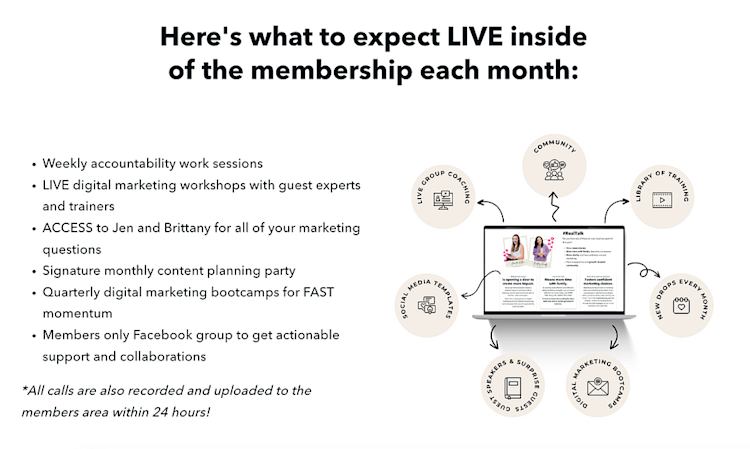
The Marketing Club — paid community with weekly and monthly live sessions

The Marketing Club paid community

Brittany Hardy and Jennifer Kolbuc run The Marketing Club, a paid membership community designed to help business owners and online entrepreneurs plan, learn, and collaborate on their marketing.

Inside the community, members get access to a monthly content planning workshop, guest training webinars, and weekly co-working sessions, all hosted live on Zoom. Alongside the live programming, the community offers a space where members can share wins, ask questions, and support each other as they grow their businesses.

To grow their membership, Brittany and Jen hosted a free live webinar where they shared the behind-the-scenes story of how they built their business to $100K over three years. At the end of the session, they introduced The Marketing Club and gave attendees a clear picture of what they’d get by joining.

This free webinar helped them attract new leads, grow their email list, and convert attendees into paying members. Even if someone didn’t join right away, they were still added to the email list, giving Brittany and Jen the chance to nurture those leads and encourage sign-ups later.

Takeaway you can use for your business: Host a free session with lots of value that ends with a promotion for your community. Gather email addresses so you can follow up with attendees in the future.

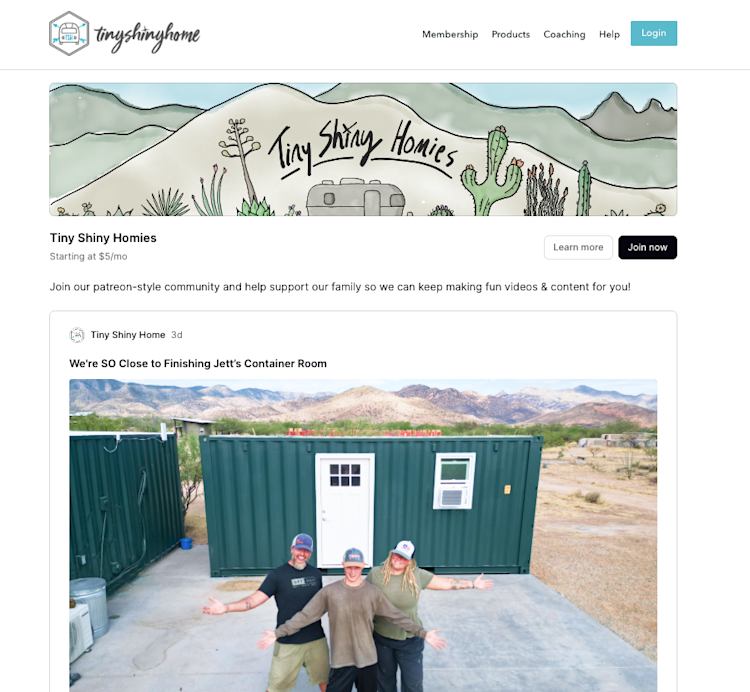
Tiny Shiny Home community

Jonathan and Ashley Longnecker run Tiny Shiny Home, a YouTube channel documenting their journey building an off-grid homestead in the desert. They use their community as a way for fans to support their work directly, so they can keep creating great content.

Memberships start at just $5/month, and supporters get perks like early access to videos, stickers, behind-the-scenes updates, and video shoutouts. All members receive a digital recipe book, and higher-tier plans come with access to several of the Longneckers’ digital products.

That said, the main purpose of the community is to let fans support the channel so Jonathan and Ashley can create more content, similar to how many creators use Patreon.

The family promotes the community in the caption of every YouTube video, making it easy for new viewers to learn more. And as their channel has grown, their community has too.

Takeaway you can use for your business: Add a simple, visible call to action to your free content to grow your paid community.

Read the full story of how the Longneckers built their YouTube channel in this article.

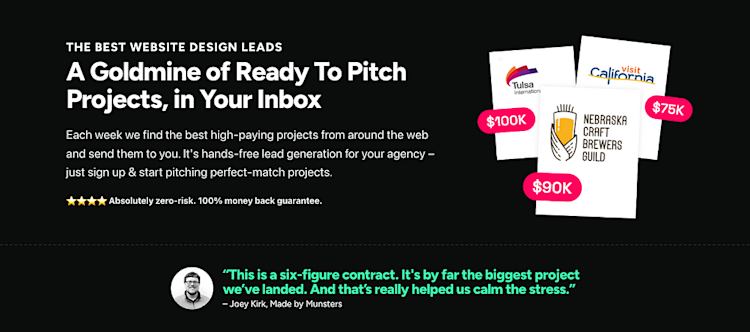
Folyo — paid client leads subscription community and newsletter

Folyo subscription community

Robert Williams runs Folyo, a paid subscription for U.S.-based website design agencies looking for client leads. Each week, he curates high-quality website design projects that are actively accepting proposals and sends them directly to members’ inboxes. This means members can spend less time hunting for gigs and land more work with less effort.

In addition to the weekly leads, members get access to a private community area and exclusive resources to help them grow their businesses.

While many creators think they need to build their community for everyone and grow as large as possible, Robert took a different approach. He focuses on serving one specific niche, which allows him to offer a premium membership that delivers real value by solving their biggest pain point: finding quality client leads.

Takeaway you can use for your business: Build a community around something your audience would normally have to do for themselves, but that you can make easier, faster, or more effective.

Read about how Robert built his simple and powerful business on Podia in this creator story.

Inner Wisdom Academy mindset community

Moira Hutchison, founder of Inner Wisdom Academy, runs a membership community that helps people connect with their intuition and find balance. The community has a free plan that includes weekly mindset sessions and journaling prompts, making it easy for people to start engaging with the content right away.

For those ready to go deeper, Moira also offers a monthly paid plan with additional resources like moon cycle guides, guided meditations, and video trainings. All members, free and paid, can talk in the community to reflect, share, and support one another.

In addition to a free plan, Moira also offers a 7-day free trial for new members. This gives people a low-pressure way to explore the full community before committing, so they can be sure it’s the right fit for them.

Takeaway you can use for your business: Offer a low-barrier entry point like a free plan or trial to let people experience the value of your community before they buy.

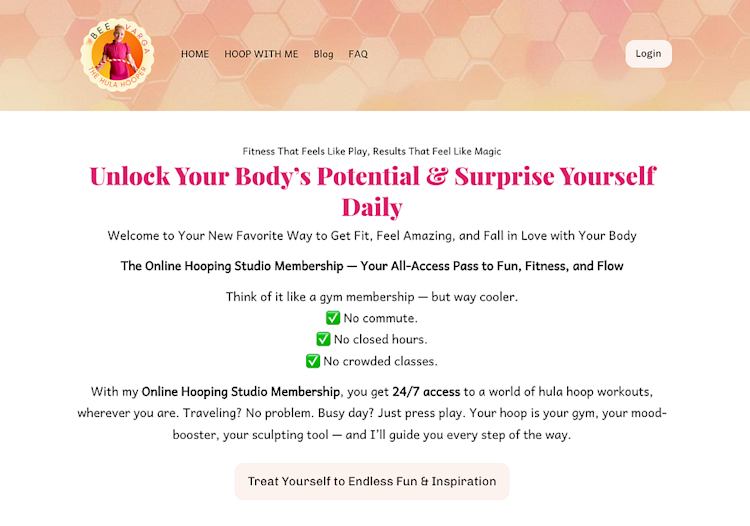
Bees Hooping Studio community

Bee Varga uses her membership community to teach hula hoop fitness and give her audience everything they need to train and stay motivated in this fun sport. Members get access to a library of over 700 hula hoop training videos they can watch anytime, making it easy to practice at their own pace.

Alongside the on-demand content, Bee offers a private community space where members can ask questions, share progress, and get direct support. She regularly joins the conversation, offering tips, encouragement, and new techniques to help members stay engaged and improve their skills.

One cool strategy Bee uses to encourage community signups is offering three discounted spots each month. There’s a button on her site that links to a coupon, and if the discount is still available, new members can claim it automatically. It’s a simple but effective way to create urgency and reward people for jumping in quickly.

Takeaway you can use for your business: If you’re offering a discount for your community, set up a time limit or limited number of coupons to encourage people to take advantage fast.

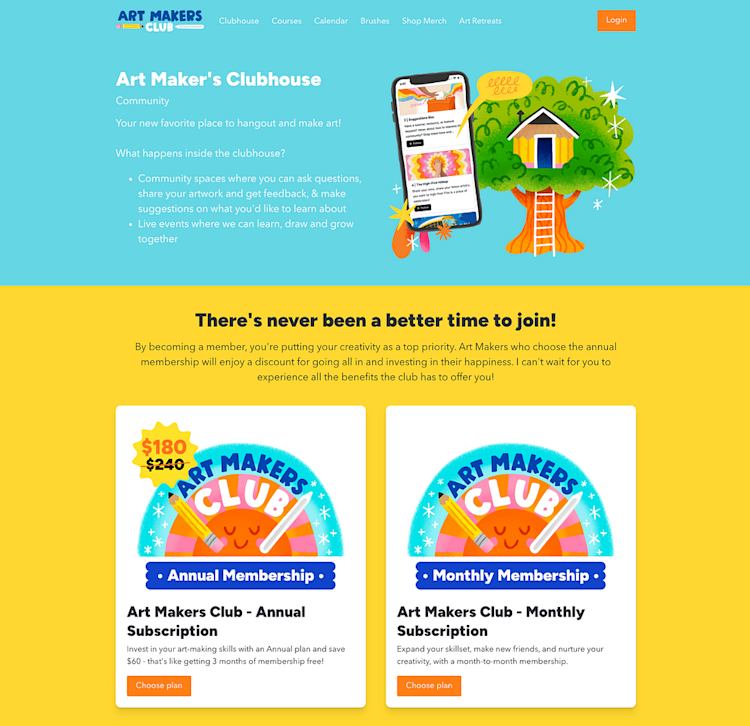
Art Makers Clubhouse — art hub with live events and procreate brushes

Art Makers Clubhouse community

If you love creating digital artwork, you’ll love Lisa Bardot’s Art Maker’s Club community. This membership community is designed to help digital artists improve their skills together. Inside the Clubhouse, members can share their artwork, get feedback, ask questions, and even suggest topics they’d love to learn about next.

In addition to community access, members get exclusive Procreate brush sets and are able to attend live events taught by Lisa. The Clubhouse is available as both a monthly and an annual membership, with the annual plan offering a discount for long-term members.

To promote her community, Lisa has a beautiful sales page with customer testimonials and a video that shows people exactly what they’ll get inside.

Takeaway you can use for your business: Give members a say in what they learn next to keep them engaged, invested, and more likely to stick around.

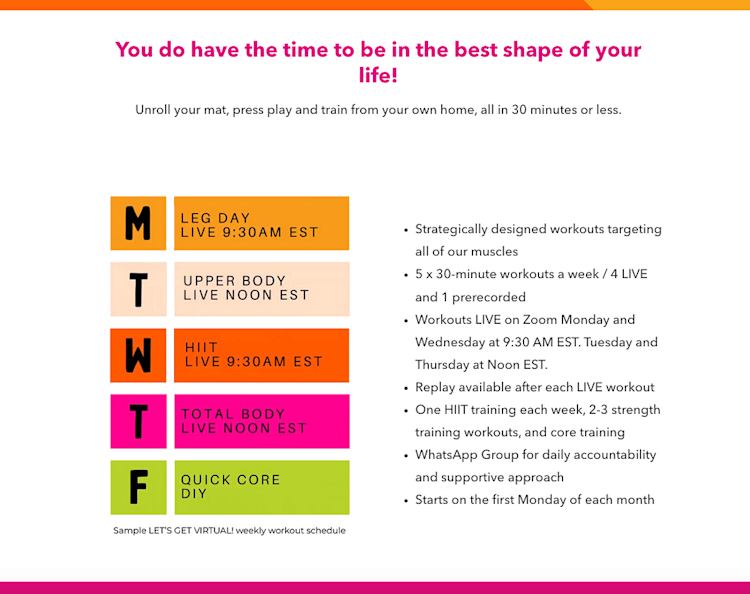
Just Feel It Fitness — virtual fitness classes with 1- and 3- month packages

Just Feel It Fitness community

Meryl Marciante from Just Feel It Fitness teaches both in-person and virtual fitness classes, and her online community helps people stay active no matter where they are. Members get access to five live workout sessions each week, held Monday through Friday, plus replays they can watch anytime that fits their schedule.

To make joining flexible and approachable, Meryl offers one-month and three-month membership packs. Both options include access to all workouts and the community space, so members work on their fitness from the comfort of home.

Takeaway you can use for your business: Offering different membership durations is a great way to get people in the door and excited about your program. They can start with a shorter plan like one month, and when they see how great it is, upgrade to a longer plan.

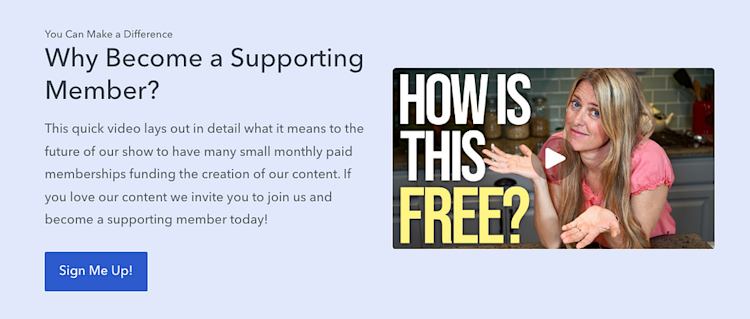
Whole Food Plant Based Cooking Show support community

Jill and Jeffrey Dalton, the creators behind The Whole Food Plant-Based Cooking Show, run a support community so their YouTube fans can help financially sustain the channel.

For a small monthly fee, members get access to monthly product giveaways, free ebooks, and the ability to vote on which recipes the Daltons should make next.

What makes their community stand out is the tiered access. They offer a free plan alongside paid ones, allowing fans to stay in the loop even if they aren’t in a position to support financially. It’s a smart way to build connections off social platforms and keep communication open with their full audience, away from the whims of the algorithm.

Takeaway you can use for your business: A free community tier lets you stay connected with fans who aren’t ready to pay. This can be helpful for communicating with your audience since social media posts often get buried, whereas messages shared in your community go straight to members’ inboxes.

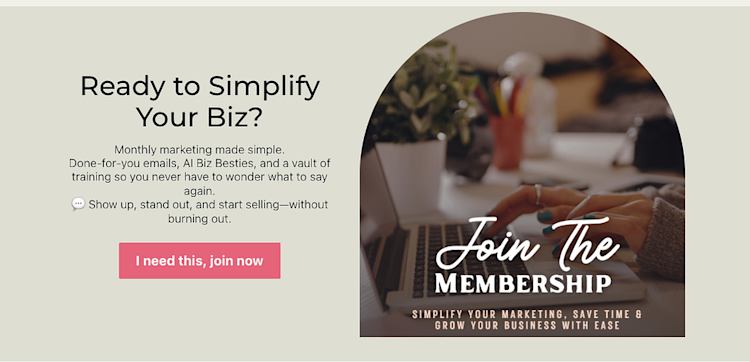
Simply Marketing Society community membership

Shana Showers runs Simply Marketing Society, a membership community designed to help fellow business owners sell their offers more effectively without the overwhelm. Members get access to a supportive community space where they can connect and collaborate, plus practical resources to put their marketing plans into action.

Each month, members receive done-for-you email templates to save time and inspire content ideas. They also get access to a vault of evergreen training videos on topics like sales page templates, AI prompts, and how to make sales on social media.

As a bonus, annual members also get access to an exclusive launching mini-course to help them plan their promotions. Adding more value to annual plans is a great strategy for making these bigger-ticket options look enticing — not only will members save money when they buy a year upfront, but they’ll also get an extra resource to help them grow.

Takeaway you can use for your business: Offering fresh templates and done-for-you tools each month can keep members sticking around for the long-haul.

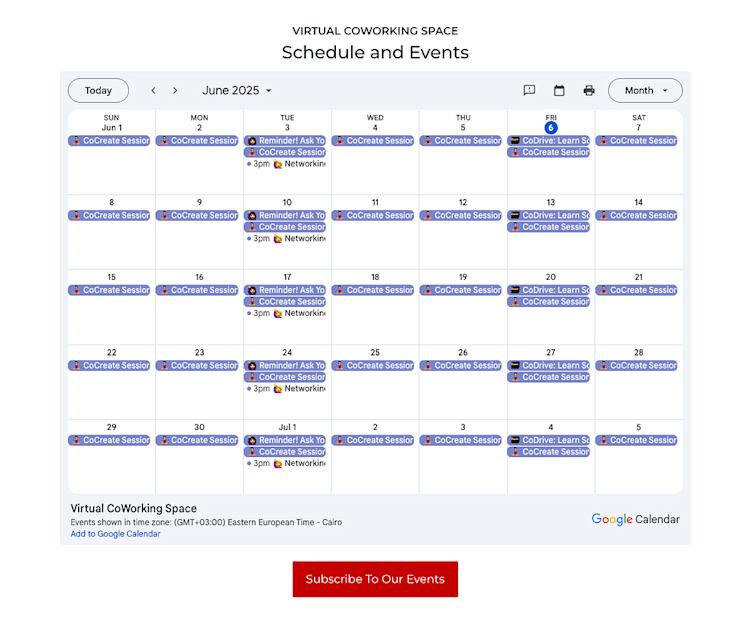
Virtual Miss Friday coworking community

Michelle Dale, founder of Virtual Miss Friday, runs a virtual coworking community designed for VAs, stay-at-home parents, freelancers, digital nomads, and online business owners who are looking for more structure in their workday.

The community offers live coworking and professional development sessions almost every day, giving members daily opportunities to stay accountable, learn new skills, and connect with others who understand their work-from-anywhere lifestyle.

There’s a strong emphasis on both productivity and community — on a given day, members can go to a live social event, get feedback on a new business idea, or ask questions to the group just like they would at an in-person coworking space.

To help new members get excited about joining, Michelle includes a live calendar of events on her sales page. This makes it easy for prospective members to see exactly what’s coming up and how the community fits into their routine.

Takeaway you can use for your business: A consistent schedule and public event calendar shared on your sales page can help potential members see the value of your community before they join.

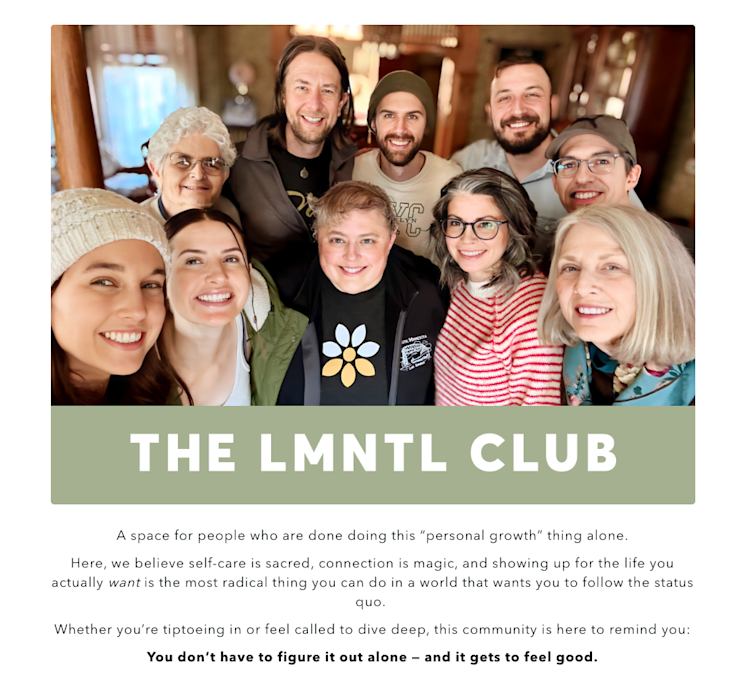
LMNTL Club Community — three tiers with group sessions, coaching, and VIP perks

LMNTL Club community tiers

Matt and Leslie are the creators behind LMNTL, and they run a community designed to help people slow down, reflect, and reconnect with themselves and others. The community has three tiers that have more features as you go up.

The basic free plan comes with reflection prompts and self-care tips, as well as access to community spaces for meeting new people. The next tier comes with yoga classes and monthly self-care group calls, and the highest tier includes a monthly 1:1 coaching session and other VIP perks.

The way they’ve structured their plans works well for taking people through a natural progression through their offers. Their free community option serves as a first step for people who might be interested in their coaching programs one day, and it’s easy to upgrade to the second or third plan as their needs change.

Takeaway you can use for your business: A free community tier can be a powerful way to build relationships and give potential customers a low-risk way to experience your work before they buy.

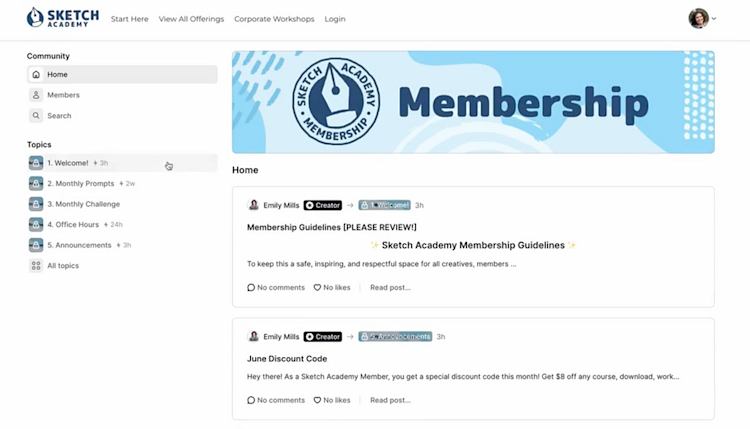
Sketch Academy — art membership with prompts, discount codes, and office hours

Sketch Academy art membership community

Emily Mills is a sketch artist and educator who runs Sketch Academy. In addition to her sketchnoting courses, live workshops, and digital resources, Emily offers a paid community membership that helps her audience stay consistent with their drawing practice.

Community members receive monthly drawing prompts, themed challenges, tutorials, and how-to videos to build their skills over time. Emily also hosts dedicated office hours where members can ask questions and get feedback, plus she offers discount codes for other products and courses as an added perk. Inside the community, all these resources are organized into five topic areas so members can easily find what they’re looking for.

Emily promotes the community through her email list and prominently features it on her website’s “Start Here” page. Her community sales page also has a video walkthrough of what the membership includes so prospective customers can see exactly what they’re getting when they buy.

Takeaway you can use for your business: Use topics inside your community to organize different types of content. That way it’s easy for someone to find your latest announcements, office hours, challenges, and other content you’ve made.

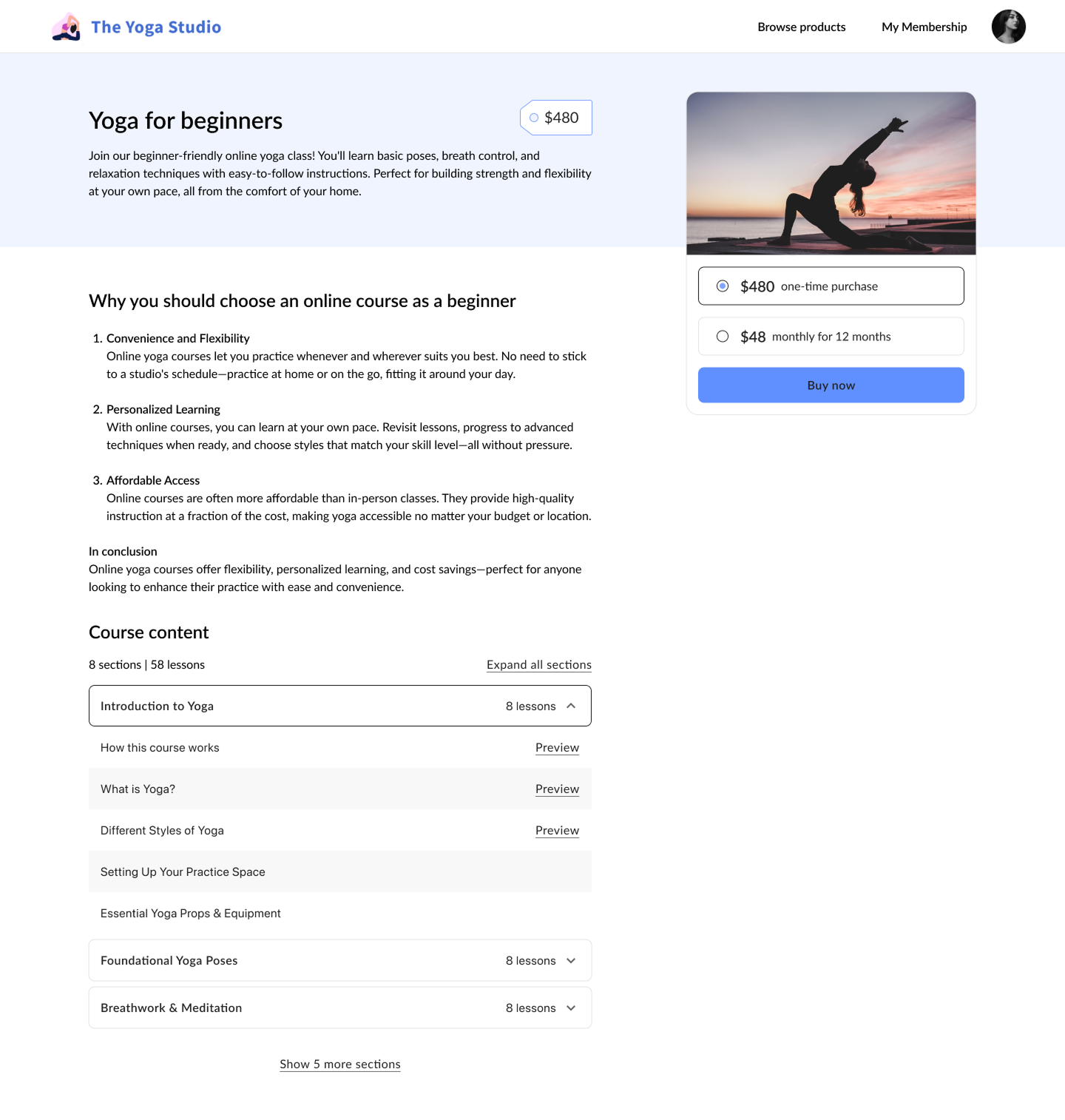
Namaste and Coco Latte community

Namaste and Coco Latte by Marie-France Pellerin is a yoga and wellness studio that offers a private community space as an alternative to social media. Instead of relying on algorithms or scattered Facebook groups, members get a dedicated home where they can share stories and support each other’s wellness journeys in a distraction-free place.

The studio offers two membership plans — monthly and annual — and all plans come with community access as well as pilates sessions, yoga classes, mindfulness practices, healthy recipes, and virtual events.

Takeaway you can use for your business: If your audience wants less noise, your community can be a peaceful alternative that you control.

There’s no one “right” way to build an online community. Some creators offer free spaces to connect and explore. Others build high-value paid memberships with exclusive content, live sessions, and hands-on support. Many do both.

The most important thing is that you make a place where you and your audience enjoy spending time. Because once you’ve got that, there are so many different ways you can grow moving forward.

With Podia, you can build an online community with unlimited members, spaces, and pricing tiers. Podia also comes with your website, email marketing, and digital products built in, so you have everything you need to promote your space, bundle it with other offers, and grow for the long haul.

Use these examples as inspiration and start building your version of community today with a 30-day free trial of Podia. I can’t wait to see what you make.

How to sell video courses online: A step-by-step guide

Software Stack Editor · June 6, 2025 ·

Selling video courses online can be both exciting and intimidating. Everyone will experience this, and that’s normal. With so many platforms and pricing models to choose from (not to mention the marketing strategies you’ll have to consider), I’m happy to share the strategy I used to scale my own video course business and how I …

Continue

The post How to sell video courses online: A step-by-step guide appeared first on LearnWorlds.
10 best ecommerce platforms for selling digital products online in 2025

Software Stack Editor · June 5, 2025 ·

Planning on dipping your toes into ecommerce this year? If you’re thinking of selling digital products, you’ve got the right idea. Revenue from online spending is expected to reach $6.8 trillion by 2028 [1]. That’s right—trillion. And a growing share of that is digital: no shipping, no inventory, just instant delivery and global reach. The …

Continue

The post 10 best ecommerce platforms for selling digital products online in 2025 appeared first on LearnWorlds.
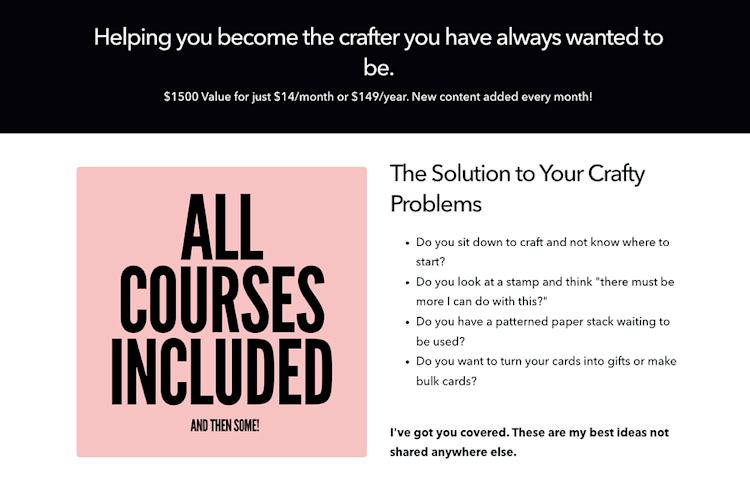
Guest Posting for Teachable Creators: The Ultimate Guide to Grow Your Audience and Course Sales

Software Stack Editor · June 5, 2025 ·

image

If you’re a creator on Teachable, chances are you’ve spent some time trying to get your work in front of new people. Maybe you’ve posted on Instagram until your thumbs cramped. Maybe you’ve dabbled in ads or hoped your latest email campaign would do the trick. All fair game. But there’s another strategy out there that’s smart, repeatable, and doesn’t require you to learn another algorithm. It’s called guest posting.

At its core, guest posting is writing content for someone else’s blog or website with the goal of introducing yourself to their audience. You offer value in the form of content, and in return, you get visibility, credibility, and a link back to your own site or course. 

It’s simple, it works, and it’s often overlooked in favor of trendier tactics. This article will walk you through how to do it well, why it works, and how you can get started… without burning out or sounding like everyone else. 

{{trial-component=”/blog-shortcodes/blog-cta”}}

Why guest posting matters

There’s a lot of noise online. Between social posts, paid ads, email newsletters, and SEO battles, it can feel like you need to be everywhere at once. 

But most creators don’t have a full-time marketing team. You’ve got limited time, limited energy, and, I’m guessing, you probably didn’t sign up to be a content machine. That’s where guest posting can be a real benefit to your marketing strategy. It lets you essentially borrow someone else’s audience, ethically, effectively, and without extra overhead.

When you write for a site that already has the attention of your ideal audience, you skip the hardest part of marketing: building trust from scratch. You get to show up in a place your audience already visits, and if you play it right, your article feels like a recommendation rather than a cold pitch. 

On top of that, guest posts often give you backlinks, which help your own website show up higher in search results over time. So you’re not just getting short-term eyeballs; you’re building a foundation that helps people find you long after you hit publish.

In short:

  1. Guest posting gives you SEO & backlink benefits. When your content appears on reputable websites with a link back to your own site or course page, it builds your domain authority, which is a major factor in search engine rankings. This means you’ll get more organic traffic over time, not just a one-time spike.
  2. You’ll reach new, relevant audiences. Instead of shouting into the void, guest posting puts you directly in front of an engaged audience that already trusts the platform you’re publishing on. It’s a warm introduction to thousands of potential students who may never have heard of you before.
  3. You can position yourself as a thought-leader. When your content appears on respected blogs, media outlets, or community sites, it signals credibility. You’re no longer just “another creator;” you’re the expert people seek out.

All of this shows how effective guest posting is as a method to promote your content, grow your personal brand, and drive real results… and you don’t have to rely on social media to do it.

Related: Sell a course without an audience—yes, it can be done

How to pitch effectively

Let’s address the awkward part up front: yes, you’ll have to pitch yourself. But no, it doesn’t need to be uncomfortable. 

Editors are people. Most of them are juggling deadlines and inboxes just like you are. So if you’re thoughtful, clear, and genuinely trying to contribute something useful to their brand, you’re already ahead of the pack.

Here’s how to create a pitch that represents you well:

Step 1: Research thoughtfully

Start by identifying websites or blogs in your niche that accept guest contributions. Look for:

  • Sites your ideal students already read
  • Sites with a high domain authority (use tools like Moz or Ahrefs to find this out)
  • Sites that have clear submission or “Write for us” guidelines

Even if a site doesn’t ask for guest posts, a well-written pitch can still break through.

Step 2: Personalize your pitch

Skip “Dear Sir/Madam.” Avoid generic mass emails. Refer to a specific article they’ve published; compliment their editorial voice. Show you’ve done your homework and that you “get” this website.

Step 3: Highlight the value for their audience

Your pitch should answer: “Why should their readers care?” Be sure your pitch makes clear:

  • What topic you will cover
  • What new angle you will bring
  • Why you are the best person to write this

Avoid pitching your online course directly; instead, offer educational content to their audience that aligns with what you teach. Subtle mentions and author bio links are enough to drive interest back to additional offers you have.

Step 4: Include proof

Share previous articles, blog posts, or videos that show you can write well and provide value.

Pro Tip: Consider this pitch formula:

Hi [editor’s name], I loved your recent article on [topic], especially the part about [specific insight]. I’d love to contribute a guest post on [proposed topic], sharing [brief value pitch]. I’ve written for [other sites or your blog], and here are a couple of samples. Let me know if this would be a fit; happy to share a draft or outline!

Keep it short, and don’t try to cram your life story into one email. Share 2–3 topic ideas, a quick sentence or two on your experience, and a couple of writing samples. Your job is to make it easy for them to say yes.

Content strategy tips

Now that you’ve made the pitch and it’s been accepted, let’s talk about how you build your guest post so that it yields maximum return on investment (ROI). 

Tip #1: Align your guest post with your funnel

Not every guest post needs to be a masterpiece, but each one should have a purpose. Ideally, your post should connect to your course topic or the kind of work you want to be known for. 

If you teach email marketing on Teachable, don’t write a post about fitness routines; write something like “The top 3 Subject Lines That Increased My Open Rate by 45%.” Your guest post should be useful, specific, and aligned with what you do.

Tip #2: Connect your guest post to the buyer journey

Consider where people are in their journey when they read your content. Some readers are brand new to the problem you solve, while others are actively looking for a solution. Your guest post should speak to one of these groups. 

For example, a beginner article might explain common mistakes, while a more advanced piece might offer a unique tactic or insight. Choose one of these general stages and align your content accordingly:

  • Awareness: Educational content that introduces the problem you solve
  • Consideration: Strategic tips that show your method or approach
  • Decision: Case studies or behind-the-scenes looks at your teaching style

And remember that the purpose of a guest post is to attract new audiences to you, not necessarily to hard sell with this particular post.

Tip #3: Include subtle promotion

Now, be sure to always follow the guest site’s guidelines… but when possible:

  • Add 1–2 contextual backlinks to your site or blog
  • Include a compelling author bio with a link to your course or free resource
  • Suggest a lead magnet tied to the post (checklists, guides, mini-courses)

Make it easy for interested readers to enter your world and stay a while!

Tip #4: Repurpose like a pro

Unless you’ve made an exclusivity agreement, don’t let your guest post live in one place only. Consider: 

  • Turning it into an email newsletter
  • Recording it as a podcast or YouTube episode
  • Adding it as a module inside your Teachable course or bonus content

This is how guest blogging supports your entire content promotion strategy, not just your traffic numbers.

Related: How to increase website traffic for your online business

Measuring success

One of the best things about guest posting is that it gives you trackable results. You’re not just hoping people saw your Instagram Reel; you can actually measure what happened. 

Here’s how you can track if your guest posting efforts are working:

1. Check your referral traffic metrics. Use Google Analytics or Teachable’s built-in analytics to see how many people are clicking from your guest post to your course site. Set up UTM parameters on your links so you can attribute clicks and conversions.

2. Assess the backlink quality. Use SEO tools like Ahrefs, Moz, and SEMrush to check the domain authority (DA) of the site that published your post. A higher DA means more “link juice” for your site.

3. Check your subscriber growth. If your guest post leads to a lead magnet, track how many new email subscribers joined your list as a result. Make sure your opt-in page is simple, benefit-driven, and aligned with the guest post content.

4. Track your course enrollments. Track whether new students are coming from referral traffic. You can ask during checkout: “Where did you hear about this course?” or tag your leads based on the source. 

5. View your SEO performance. Check if your domain authority is rising or if your blog/content is ranking higher in search over time.

Track what you can, look for patterns, and don’t expect every post to be a home-run. Guest posting is a steady strategy, not a flash-in-the-pan trick.

Related: Google Analytics for beginners: How to use it for your business

How guest posting differs from sponsored posting

Guest posting and sponsored content are often confused, but they’re fundamentally different strategies. Here are the key differences.

Guest posting:

  • Unpaid (no money is exchanged to create the guest post)
  • You pitch the idea
  • You provide educational, editorial content
  • You build SEO value and trust
  • Typically includes a short bio or link back to your site

Sponsored posting:

  • Paid (you pay to be featured or to write advertorial content)
  • More transactional and brand-driven
  • May have limited SEO value (some links are marked “nofollow”)
  • Can come off as self-promotional

While both types of posts have their place in a marketing plan, guest posting is better for long-term brand authority and organic traffic. You’re earning trust, not renting attention.

Make guest posting part of your content strategy 

Guest posting isn’t flashy. It won’t get you trending on social. But it works. It helps you show up in front of new people who actually care about what you’re teaching. 

Guest posting helps you:

  • Get discovered by new audiences
  • Establish trust and authority in your niche
  • Drive traffic to your Teachable course, long after the post is live

So if you’ve been relying solely on Instagram, TikTok, or email blasts to grow your audience, guest posting may be the missing piece in your marketing strategy.

And best of all, this strategy doesn’t require dancing, trending audio, or fighting for likes. Hallelujah! Visibility doesn’t have to be exhausting. It can be intentional, strategic, and evergreen… just like the courses you’re building on Teachable.

If you’re a creator looking for more consistent traffic and a better way to grow your course, guest posting might be worth your time. You don’t need to do it every week; even one solid guest post per month can start to make a difference. 

So make a short list of blogs or newsletters that speak to your ideal students, come up with three post ideas that connect to your course, and send that first pitch. You might be surprised where it takes you.

‍

How to sell coaching services online in 2025

Software Stack Editor · June 4, 2025 ·

If I told you that the global online coaching industry is projected to hit $11.7 billion by 2032 [1], I bet you’d be pretty happy. And not only can it be lucrative, but coaching is a great way to make a real difference in your clients’ lives. But what if you struggle to get clients …

Continue

The post How to sell coaching services online in 2025 appeared first on LearnWorlds.

3 Steps to Grow a Creator Business Without Chasing Views

Software Stack Editor · June 3, 2025 ·

image

We don’t talk enough about how hard it is to build when you don’t have access.

Access to knowledge. Access to community. Access to big cities. Access to the playbook.

That’s why Teachable’s Business Creator Blueprint webinar series meant so much to me. 

It was the kind of deep, high-value learning experience that’s usually locked behind a multi-thousand-dollar pay wall. 

But this… it was free and intentional.  And made for creators who are trying to build with integrity and influence.

I created this Notion recap for anyone who missed the series or wants to revisit the gems. You can also watch the webinar replays using this link.

But for now, here are the three takeaways that shifted how I’ve shown up, nurtured my community, and moved as a creator ever since.

{{trial-component=”/blog-shortcodes/blog-cta”}}

Step 1: Make it make sense… and make it accessible

What made this session stand out wasn’t more than the insights. It was the accessibility.

These were frameworks and strategies that people charge thousands for, and Teachable made them free. No upsell, no gatekeeping, just clear, tactical wisdom creators could use today.

As someone who’s been in rooms where you have to pay to ask a single question, this hit me. It didn’t feel like content marketing. It honestly felt like care. Community care, specifically. 

Don’t get stuck in tech. Pick simple tools and get moving.

That’s the kind of reminder creators need when they’re overwhelmed, stuck, or silently burning out.

Access is also a mental health strategy. It offers relief. It reduces shame. It keeps creators from overcomplicating things out of fear.

When we’re given a clear path forward, we move with less panic and more peace.

When we’re shown the playbook, we stop guessing and start *creating…* which is the whole point.

There’s a lesson here for both creators and brands:

  • Creators: Keep sharing what you know. Your transparency *is* a tool. You don’t need to be an expert to be a guide. By doing this, the right people will find you.
  • Brands: Make your best resources *easier* to access. Don’t only serve your top earners or influencers with huge platforms…nurture your emerging ones. The ROI of trust is long-term loyalty.

Perfection slows you down. Action creates clarity.

This session reminded me that information goes beyond ‘power.’ It’s permission. And we all deserve more of it.

Step 2: Prioritize one platform and go all in

Elfried Samba said something during his webinar, I wish someone had told me sooner…

“Pick one platform and go all in.” – Elfried Samba

When I first started building online, I was juggling Instagram, TikTok, YouTube, and LinkedIn. But LinkedIn always felt like home.

It’s where I found aligned collaborators, community, and actual opportunities…and in this economy! 

So yes, I committed. And since then? Game. Changed. Once I found a rhythm, everything got easier. I built a system that worked for me. Now, I’m finally ready to explore the next platform—maybe YouTube, maybe TikTok—but this time, I’m leading with clarity, not panic.

Elfried also dropped something we should probably all be living by now: bring URL to IRL.

Because, as much as I love creating online, it’s the offline relationships that have kept me grounded. Group chats turned into voice memos. Virtual cafecitos turned into real-life hugs and content collabs. 

And events like CONNECT by Teachable x Creator Economy NYC felt like the full-circle moment where I finally had the chance to meet the people who’ve been rooting for me from behind their screens.

Then Abagail Pumphrey came in with a framework that snapped it all into place. It was simple. Doable. Sustainable. A content rhythm built to help creators grow and stay grounded.

Here’s Abagail’s recommended content rotation:

  • Teach → Share tips, how-tos, and insights
  • Nurture → Show relatability and build connection
  • Sell → Promote your offers and invite people to act

This isn’t about chasing virality. It’s about showing up in a way that reflects your values—and honors your capacity. 

Because when your content comes from a centered place, it stops feeling like a performance. And starts sounding a whole lot more like you.

You don’t need to be everywhere. You need to be present. On purpose.

{{100ideas-component=”/blog-shortcodes/blog-popup”}}

Takeaway 3: Believe in it before it exists

If there’s one thing that separates creators from the rest …it’s belief.

Abagail said something that had me SHOOK:

“If you can’t sell your offer before it exists, making it won’t magically change that.” — Abagail Pumphrey

That hit. Because creators aren’t content machines—we’re vision holders. Entrepreneurs. Possibility expanders. We believe first. That’s the assignment.

You have to sell the transformation before there’s a funnel. You have to talk about the thing before it’s built. You have to move like the version of you who already has it.

Or as we like to say: delulu is the solulu.

This isn’t about faking it. It’s about fully embodying the version of you that believes your offer, your impact, and your vision are already real. And then building from that place and energy.

And Hala broke it all the way down with one of the best analogies I’ve heard:

– Start with lower ticket offers to build trust. If it’s under $100, that’s the first date.

– If you show up consistently and they start to like you, your $297 offer becomes the ongoing relationship.

– And eventually, the $2,000+ offer is the marriage-level commitment.

It’s a reminder that you don’t jump straight to the big ask. 

You know that instant ick when someone hits your DMs asking for something before even having a conversation? 

Yeah. Don’t be that person. Build the relationship. Move people through the journey.

It’s not one or the other. You need belief to show up, and strategy to keep going. And don’t wait for permission. 

The Business Creator Blueprint webinar series recap

This series did what a lot of people say they’re doing but aren’t. It actually made the path clearer and simpler for me. Not louder. Not salesy. Simply clearer.

It reminded me that access matters. That strategy doesn’t need to be complicated. That belief is a skill. And that creators don’t need more noise, we need community and tools that help us move with intention.

Teachable showed up in a way most brands don’t. Creator-led. Rooted in community. Focused on real value, not going viral. I haven’t seen many brands nurture their audience like this, and it made me feel seen. 

They’ve got a forever customer in me. We’re locked in for life. That’s what creating access does. 

Because creators deserve information that helps them thrive, not just survive.

  • « Go to Previous Page
  • Page 1
  • Interim pages omitted …
  • Page 5
  • Page 6
  • Page 7
  • Page 8
  • Page 9
  • Interim pages omitted …
  • Page 35
  • Go to Next Page »

Get your Software Stack together. softwarestack.tech

Software Stack

© 2024–2025 - Software Stack is a trading name of SouthwestCIO Limited ac ompany registered in England & Wales 11319049

  • Knowledgebase
  • Home
  • About Us
  • Contact Us