• Skip to primary navigation
  • Skip to main content
software stack logo

Software Stack

Get your Software Stack together

  • Knowledgebase
    • All Categories
    • Accounting Software
    • Automation & Workflow Software
    • Customer Relationship Management
    • E-Commerce Shopfronts & Payments
    • Marketing Automation
    • Online Courses & Membership
    • Project Management
    • Surveys & Forms
    • Web Hosting
  • Home
  • About Us
  • Contact Us
  • Show Search
Hide Search

Online Learning & Community

How Jimmy Daly built a lean, profitable community by thinking like an entrepreneur

Software Stack Editor · July 31, 2025 ·

When Jimmy Daly left his job in 2020, he had a new mortgage, a baby on the way, and a clear goal: turn a side project Slack group into a sustainable, profitable business in one year.

Five years later, Superpath is a thriving community membership for content marketers, with three core revenue streams and a lean team powered by simple tools.

All that happened because Jimmy took a big leap, scaled back when needed, and thought like an entrepreneur, which ultimately shaped every part of how he built and rebuilt his business.

Here’s how he did it.

Jimmy uses Podia to share resources with community members, handle payments, and manage Superpath behind the scenes. If you’re looking for an all-in-one tool that keeps your business simple and gives you everything you need to grow, start your 30-day free trial of Podia today.

From side project to profitable business in one year

Superpath began as a simple Slack group for content marketers. Jimmy had been working in business-to-business content marketing for over a decade, and he knew that content marketers craved real connections, community, and professional development opportunities.

So he created Superpath, a space where they could talk shop, solve problems, and build skills to use in their careers. He didn’t try to monetize it immediately, but he knew the idea had legs if he could commit to building it full time.

His boss at the time agreed and became an early investor in the project. When Jimmy left his job, he and his former boss made a funding agreement that included one year of salary and basic expenses — just Podia, Slack, and a few other tools to keep things running.
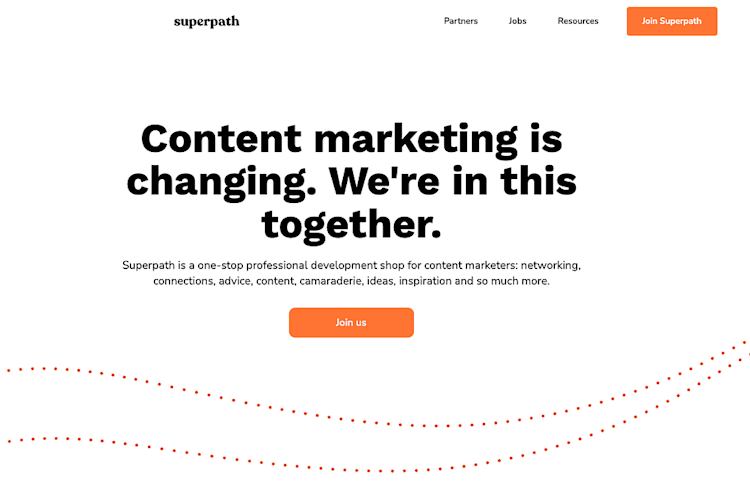
Superpath homepage

“The goal was really to find out, is this a business? Can we get this profitable?” Jimmy shares, “We capped it at one year. We had to be profitable because there was no more funding after that.”

Giving the project a hard deadline forced Jimmy to go all in and take it seriously. With no plan B and a one-year runway, Jimmy’s goal was to find out if this idea had the potential he thought it did.

Before launching Superpath, Jimmy grew his audience

Jimmy brought a rare combo of skills to the table: content marketing, sales, and a deep understanding of his audience. And he didn’t just know his target audience — he was part of it too.

Over the years, he had built a following of the very people Superpath was made for. He published blog posts, created content for his work, shared personal projects, and nurtured his professional network, long before the community was a thing.

When he launched Superpath, he wasn’t starting from scratch because he brought his audience along with him.

In a blog post about the early days of Superpath, Jimmy talks about how his existing social media and email newsletter subscribers became some of his first paying customers.

He explains,

“When it came time to launch Superpath, I created a ‘coming soon’ page and shared it with my Twitter followers and newsletter subscribers. Within a few days, 195 people had signed up to learn more. A handful of those people ended up being our first paying customers. It was the little bit of momentum I needed to start stacking wins. It would have been so much harder to start without an audience.”

That early momentum helped Jimmy keep going, and it all started because he showed up for his audience before the product was even ready.

This is something you can do in your business, too.

If you start sharing what you know and establishing yourself as an expert, you’ll already have a built-in group of people listening when your idea comes to life.

No matter what stage you’re at today, building an audience will make the steps you take tomorrow easier and more effective, and could even bring you your first buyers like it did for Superpath.

Learn more about how to set up your newsletter and email list in Podia.

Keeping things simple on purpose

Another thing that made Superpath successful early on was that Jimmy kept the business simple.

From the beginning, it ran on a small, efficient tech stack:

The business model was simple, too. Superpath earns revenue through paid community memberships, sponsorships with brands, and a writers marketplace where freelance content marketers and hiring companies can connect.

Each of these income streams makes up about a third of Superpath’s revenue and is tied directly to the community’s needs, which helps keep operations focused and overhead low.
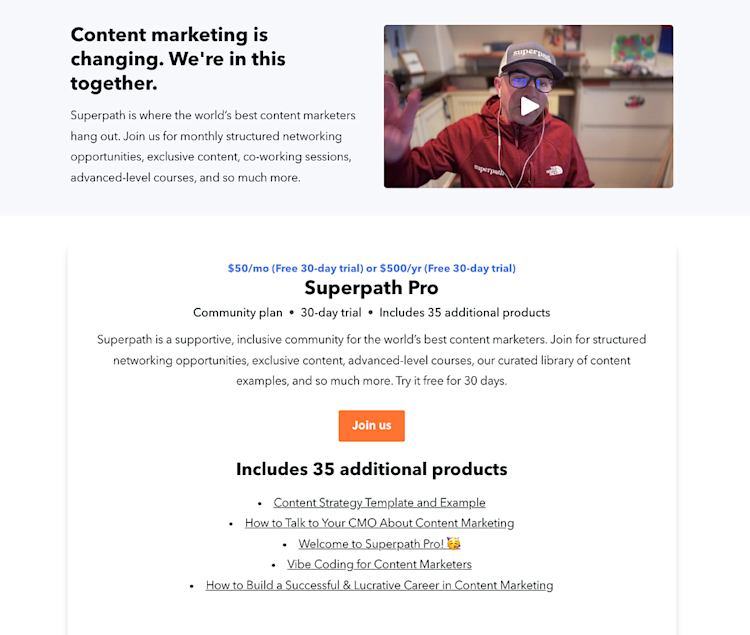
Superpath Pro community plan

“Our business is lean. We’re able to run it with a small team because we keep things simple and focused,” Jimmy explains.

That simplicity meant less time managing clunky systems or paying for tools that just created more work. And with lower monthly costs, it wasn’t such an uphill climb to hit that profitability mark within the year.

But growth brings challenges, too. And in 2023, Superpath hit a major one.

Scaling back to move forward

By 2023, Superpath had started to grow a team and expand, but economic uncertainty and the rise of AI tools like ChatGPT hit the business hard. Superpath’s revenue fell, and Jimmy had to lay off his one full-time employee.

To save money, he scaled back operations even further and had to take a critical look at every part of the business to decide what could stay and what had to go.

“2023 was a really difficult year. I had to face the very realistic scenario that this is over if I don’t fix it,” Jimmy shares.

“But the silver lining is that the business became better. Simpler. More aligned with our customers. I’m not wasting time on things that don’t work.”

That mindset still guides Jimmy today.

Until recently, Superpath had both a free and a paid version of the community. The free Slack group had grown to over 24,000 members, which is an amazing accomplishment, but it was challenging to manage.

On top of that, free members weren’t converting to paid plans as often as Jimmy hoped, so he had to make a difficult decision to get rid of the free community tier.

“We were too small a team to manage two communities. We needed to focus on making one the absolute best experience possible.”
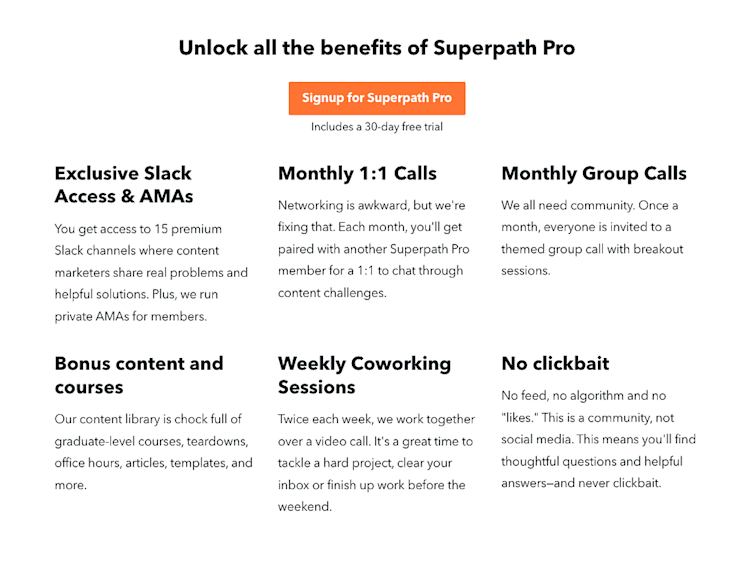
Benefits of Superpath Pro

Although closing down a large community is never easy, it was the right choice for the Superpath business because it allowed Jimmy to focus his time and resources on his paying customers.

Letting go of what wasn’t working made space to double down on what was.

Building a business that fits your life

Jimmy now runs the business with help from a few contractors, but the tools and systems behind Superpath have stayed simple, even five years later. And that’s the point. The business was designed to support his life, not take it over.

“One of the things that I wrote down as I was putting together a very, very rough business plan for this community is that I wanted it to be sustainable over time. Obviously, this was not meant to be a giant, fast-growing venture-backed startup. It’s not that, it’s me,” he explains.

To be sustainable, Superpath needed to work with Jimmy’s lifestyle so he could actually keep building it without burning out.

“I had a kid on the way, and I’ve had another kid since then. I have a lot of hobbies,” he shares. “I live in Colorado, so I love to go trail running, skiing, and camping. Running the business had to work well for me, it had to support the family, and I needed to enjoy it.”

A business that drains you isn’t going to last. The whole point is to create something you actually want to wake up and work on.

“I think that’s what I’m most proud of,” he reflects. “Here I am, still going five years later. And I think that’s a huge win that I’ve been able to create this thing that supports my life and my ambitions in a couple of different ways.”

Keeping the business simple, with just a few income streams, basic tools, and a small team, helps keep costs and complexity low. That gives Jimmy more time, flexibility, and control over how he works. He’s not running a startup chasing mindless exponential growth. From day one, he built Superpath to last.

Committing like an entrepreneur

In addition to keeping the business simple and focused on serving his audience, part of why Superpath has been so successful is that Jimmy doesn’t just think of himself as a content creator — he’s a business owner too.

“Think of yourself as an entrepreneur,” Jimmy advises. “Content creation is part of what you do, but it’s not the whole picture. As an entrepreneur, I think about high-level strategy, I work with a CPA, I consider finances, I manage a team, and I collect customer feedback.”

Most importantly, thinking like an entrepreneur means committing to your idea and taking it seriously.

“You have to hold yourself accountable because it can be very slow in the beginning,” Jimmy says.

“In my case, I left my job to work on this full time, and that’s when it happened. I had been running it as a side project before that, and I made this really significant commitment. As you might imagine, I felt some pressure to make this thing work, and that’s a wonderful thing. That’s what helped me take it seriously and build it into a business that’s now five years old, and I hope it runs for many more years. You have to find a way to force yourself to commit.”

And once you do, there’s a lot of potential on the other side.

“Honestly, I think it’s just such a fantastic time to make the leap,” Jimmy tells other entrepreneurs.

“You have everything working for you now. One person can be as effective as five because of AI. The tooling is all there, and I think people are so much more interested in interacting and engaging with creators than they are with large brands. I think the stage is set for you.”

Jimmy’s journey shows that building a successful business isn’t about chasing constant growth or adding more and more. It’s about focus, clarity, and making intentional choices that serve both your audience and your life.

When you treat your creative work like a real business and stay committed, you can build something that lasts — and actually enjoy the process along the way.

How to use Jimmy’s story in your own business

The Superpath story offers a quiet but powerful counterpoint to the “build fast, grow big” advice many business gurus and influencers shout, and you can follow the Superpath example when you build your own business.

In fact, I highly recommend you do!

As you think about what’s next in your business, keep these takeaways in mind:

Start building your audience now: Superpath’s first customers came from Jimmy’s existing audience and network, long before Superpath launched.

Even if you don’t know what your business will look like just yet, I recommend starting your email list now if you haven’t already. Start sharing what you know, reaching out to your network, and building connections with your audience today to give future you a leg up.

Keep your tech stack lean: You don’t need the most complicated and expensive tech to start a successful online business. Start with straightforward tools that help you do the basics, like creating products, connecting with customers, accepting payments, and sending newsletters. (Podia lets you do all this with paid plans starting at just $33/month.)

Growing your business might mean making it simpler: Growth doesn’t always mean adding more things to your business. Sometimes you might have to take things away from your business to move forward, and that’s not a bad thing.

Build for the long term: Remember, the goal isn’t to go viral. It’s to be in business five years from now and enjoying the work you do every day.

Every business is different, but yours should support the life you want to live. If you keep things focused, flexible, and built for the long haul like Jimmy did, you’ll give yourself the best chance to succeed.

And if you still need a place to set up that business, Podia has your website, digital products, email marketing, and checkout all in one place. Start your 30-day free trial today and take the first step toward a profitable, sustainable business that lasts.

Instagram meets SEO: A new way for course creators to get discovered on Google

Software Stack Editor · July 30, 2025 ·

Your Instagram posts aren’t blogs, but now they can do some of the same heavy lifting. With Google’s latest update, public posts from professional Instagram accounts are starting to appear in search results. That means your reels, carousels, and captions, when optimized with relevant keywords, clean formatting, and alt text, can now surface in Google …

Continue

The post Instagram meets SEO: A new way for course creators to get discovered on Google appeared first on LearnWorlds.

How to Use AI to Reverse Engineer a Course From Your Content

Software Stack Editor · July 30, 2025 ·

Your next bestselling course might already be half-written. It’s hiding in your highest-performing posts, your most-shared podcast episodes, the reels people keep saving, and the offhand comments in your DMs that sparked entire conversations.

The money doesn’t get better every time you start from scratch. You get paid for turning your proven ideas into repeatable results.

This is your invitation to reverse engineer your next course from content that has already resonated and delivered value. And to do it faster (and smarter) using a few well-placed AI tools, especially the ones baked into Teachable’s new AI Hub.

Whether you’ve launched before or this is your first course, we’re ditching perfectionism and overplanning for a method that’s lean, strategic, and wildly effective.

I’m Abagail Pumphrey, a digital product strategist and host of the Strategy Hour Podcast. I’ve helped tens of thousands of entrepreneurs turn their ideas into profitable digital products. Honestly, I wish this process existed sooner. It would’ve saved me hundreds of hours over the years.

I’ve got the whole process laid out for you, just follow along step-by-step. You’ll have a full course outline in less than 5 minutes, and could have a course 90% there in under an hour.

{{trial-component=”/blog-shortcodes/blog-cta”}}

Step 1: Identify your top-performing content

Before you start planning anything new, go back and dig into what you’ve already created. You’ve already shown up as the expert, now’s the time to pull together your best work. 

Pull your analytics: blog posts, podcast episodes, YouTube videos, email campaigns, IG reels, TikToks. Anything that had high engagement, shares, saves, replies, or repeat views can be a starting point.

Look for patterns:

  • Which topics are people obsessed with?
  • What problems did you solve that got an immediate “thank you” DM?
  • What do people ask you about again and again?

This step is where Teachable’s Take Back Control of Your Content guide comes in clutch. It’s the foundation for treating your content library like an asset. You’re sitting on a catalog of ideas that are already validated. You just need to connect the dots.

You don’t need to have it all figured out. That’s what AI is here for.

From top content to course concept

Paste your high-performing content into ChatGPT using the following prompt:

​​I want to turn the following content into a course using Teachable’s AI Curriculum Generator, which has a 1,000-character input limit.
Please:

  • Summarize the core idea of this content.
  • Identify who this content is for and what transformation it helps them achieve.
  • Write a short description (under 1,000 characters) that clearly explains the course idea, the outcome, and what it covers, formatted to paste directly into Teachable’s AI tool.

Copy ChatGPT’s response (you’ll use that in Step 2).

Step 2: Use Teachable’s AI Course Starter

Your starting point

Once you’ve surfaced a few promising topics, it’s time to shape the skeleton of your course.

We’re going to drop your main course idea into Teachable’s AI Course Starter inside their course builder and let it do the heavy lifting. 

In seconds, it will:

  • Outline modules and lessons for you
  • Ensure the structure flows logically
  • Suggest learning outcomes for each section

This is a huge mental load off. Especially if you tend to spin out trying to decide what goes where, or whether your idea is “robust enough.”

Teachable’s Modern Course Creator Playbook reminds us that it’s not about cramming everything you know into a 47-lesson course. It’s about choosing what matters most, structuring it for action, and building a course that drives real transformation.

Generate a full course outline in seconds

If you haven’t already, start your free Teachable trial.

Then follow these steps:

  1. Navigate to Courses > New Course
  2. Provide the course title & description written by ChatGPT.
  3. Add a thumbnail image (or skip this step for now).
  4. Set a price (or skip this step for now).
  5. Tap the“Generate with AI” button. Teachable will automatically input your description.
  6. Click Finish

That’s it. In under five seconds, you’ll have a full draft of your brand new course.

Build from there

Step 3: Transform the outline into engaging, actionable lessons

Now that you have the bones, let’s start putting some meat on them. Infusing each lesson with your voice, stories, and experience.

We’re going to use ChatGPT to take your high-performing content and revise Teachable’s AI-generated lesson drafts. By the end, you’ll have complete, compelling lessons that:

  • Feel polished and structured
  • Sound like you, not a robot
  • Include real-life examples, stories, and actionable takeaways

Personalize and expand each lesson

In the same ChatGPT thread you used to generate your course description, copy/paste this prompt:

I’m building an online course and using AI to help expand my outline into fully written lessons. I’ve already provided the original content this course is based on earlier in this thread.

Now, I want to revise and expand the Teachable AI-generated lessons—one at a time—into complete, high-quality lessons that I can either read as a video script or drop directly into my course platform.

Here’s what I need from you:

  • Length: Keep the core lesson between 600–900 words (enough for a 5–10 min read or video script) to ensure learner retention and minimize overwhelm.
  • Content: Keep the key idea and core teaching points from the Teachable lesson. Stick to one clear objective per lesson. If a related topic comes up, note that it will be covered elsewhere.
  • Expansion: Add step-by-step guidance, relatable examples, and clear explanations to reinforce understanding.
  • Voice: Match my tone (ex: warm, conversational, and practical). Think trusted mentor or experienced business coach.
  • Style: Use bolded subheadings, numbered lists, and bullets to improve clarity and readability.

Structure:

  1. Start with a hook or relatable intro
  2. Break down the lesson into clear sections with bolded subheadings
  3. Include step-by-step guidance or checklists where relevant
  4. Wrap up with 2–3 action steps and 1–2 reflection questions

I’ll paste the Teachable AI lesson next. Please confirm you’re ready before we start.

Simply go a lesson at a time, pasting each Teachable draft into ChatGPT and adding any other relevant content or reference materials as you go. You can even link your Google Drive to reference any past materials, blog posts, or freebies.

This combo helps you work smarter. Not harder.

And if you want to take it further, build out a companion worksheet, template, or downloadable for each lesson. You’re probably sitting on half-finished resources and buried treasure just waiting to be reused.

Step 4: Increase comprehension with Teachable’s AI Quiz Generator

Your quiz, your way

Turning information into transformation means making it interactive.

Teachable’s AI Quiz Generator pulls directly from your lesson text to create:

  • Knowledge checks
  • Multiple-choice questions
  • Reflective prompts

This not only increases student engagement, it helps your course feel complete.

Think about the last time you took a course and actually remembered what you learned.

Chances are it wasn’t because you watched a video, it’s because you took action.

Add a Quiz That Reinforces the Lesson

Here’s how to add a quiz to your course using Teachable’s AI tool:

  1. Create or Select a Course and Section:
    Go to your Teachable dashboard and select the course where you want to add a quiz. Choose the section that contains the lesson the quiz will be based on.
  2. Add Content:
    Click “Add Content” in that section, then select the “AI Quiz” block under Educational Tools.
  3. Generate the Quiz:
    A pop-up window will appear. Click the Generate button at the bottom of the block. Teachable’s AI will scan your lesson and create the quiz automatically.
  4. Review and Edit:
    Edit the questions, refine the language, and add or remove answers as needed. You can also create your own questions if you prefer.
  5. Save the Quiz:
    Once you’re happy with the content, click Save Quiz. It will now be part of your course curriculum.

You now have a built-in feedback loop inside your course. One that turns passive viewers into active learners. That’s how transformation sticks.

Step 5: Deliver the Experience Your Students Need

You’re closer than you think. At this point, your content is organized, your lessons are built, and your students are waiting.

Time to ship it.

Teachable makes this part easy, too. Their platform:

  • Hosts your content
  • Lets you pre-sell before the full course is ready
  • Offers built-in checkout (so you’re not piecing together Stripe + landing pages + 17 other tools)
  • Automatically tracks student progress

And if you want to go the extra mile? Their AI Transcript + Subtitles Tool helps you:

  • Generates transcripts and subtitles
  • Translates into 70+ languages
  • Makes your content more accessible for all learning styles

This is the point where many creators hesitate. They continue to tweak, stall out, and make excuses for why they haven’t launched yet.

Your course doesn’t need to be flawless to be transformative. Your people need your help now, not six months from now when every slide has been rebranded and re-recorded.

Get it out there. Learn from your sales process and how students respond to it. And get better every time you launch.

You’ve Got the Content, Now Let’s Get You Paid

The best course creators aren’t magicians. They’re strategists.

They know their best content shouldn’t die on Instagram. Or get buried 46 scrolls deep in their blog. They know it can become something bigger. Something scalable.

Teachable (and AI) just makes that process faster.

So don’t wait until you have a giant list or the “perfect” idea. Take what’s already working, feed it through this reverse-engineering method, and give it new life inside a course that earns every time someone presses play.

Start with your content. Let AI guide the way. And let Teachable do the heavy lifting on the backend.

You’ve already done the hard part: proving your content works.

Now let’s get paid for it.

👉 Want to shortcut this process even more? Join my One-Day Launch Challenge and build + validate this offer fast. Perfect if you want to go from idea to income in a single weekend.

Want more resources like this?

10 Totally Free Community Platforms for Membership Businesses

Software Stack Editor · July 29, 2025 ·

Hey there, fellow creators and entrepreneurs! Ever dreamt of building a thriving, engaged community around your passion or business, but felt daunted by the hefty price tags of dedicated community platforms? You’re not alone. Many believe that a premium community experience requires a premium platform, but what if I told you there’s a smarter, more accessible way to cultivate and monetize your true fans?

This article is your friendly guide to leveraging the power of free community platforms, transforming them into valuable assets for your membership site. We’ll explore how these readily available tools, combined with a robust membership solution like Memberspace, can help you build a loyal following and generate recurring revenue without breaking the bank. Get ready to unlock new possibilities for your online business!

The Untapped Potential of Free Community Platforms

In a world where every tool seems to come with a subscription fee, it’s easy to overlook the incredible power of platforms that are, well, free! These aren’t just casual chat spaces; they’re fertile ground for building genuine connections, fostering engagement, and ultimately, creating a foundation for monetization.

Why Go Free?

  • Low Barrier to Entry: For you, the creator, there’s no upfront cost. For your members, it’s often a platform they already use, making adoption seamless.

  • Existing User Base: Platforms like Facebook or WhatsApp already have billions of users. Tapping into this familiarity can make it easier to onboard new members.

  • Flexibility and Familiarity: Most free platforms offer robust communication features, from text and voice to file sharing and events, all within an interface many people are already comfortable with.

  • Focus on Content, Not Platform Costs: By saving on community platform fees, you can reinvest those resources into creating even more valuable content or improving your core offerings.

“The best community is one where members feel at home. Often, that home is a platform they already know and love, even if it’s ‘free’.”

It’s a common misconception that “free” equates to “low value.” In reality, the value comes from the community itself – the interactions, the shared knowledge, the exclusive content you provide. The platform is merely the vessel. By strategically using free platforms, you can build a highly engaged audience that’s ready to invest in what you offer.

Top 10 Free Community Platforms for Manual Management

When we talk about free community platforms, we’re looking for tools that allow you to create private spaces and, crucially, manually add or remove members. This control is essential when you’re selling access. Here are 10 fantastic options:

  1. Facebook Groups: Still a powerhouse for community building. You can create private or secret groups, manage members, post rich content, and host live videos. Ideal for broad appeal and easy member onboarding.

  2. Slack: Perfect for more professional or niche communities. Its free tier allows for unlimited members, 10k message history, and 10 app integrations. Great for focused discussions, channels, and direct messaging.

  3. WhatsApp Groups: Excellent for mobile-first communities, especially those focused on quick updates, direct communication, and smaller, more intimate groups. Easy to manage members directly from your phone.

  4. LinkedIn Groups: Ideal for professional networking, industry-specific discussions, and B2B communities. While less feature-rich than others, it leverages LinkedIn’s professional network.

  5. Discord: Originally for gamers, Discord has evolved into a robust platform for all types of communities. Offers voice channels, text channels, roles, and bots. Highly customizable and great for active, real-time interaction.

  6. Telegram Groups: Similar to WhatsApp but often preferred for its enhanced privacy features, larger group limits (up to 200,000 members), and channel broadcasting capabilities. Good for content delivery and discussion.

  7. Reddit (Private Subreddits): You can create a private subreddit that only approved members can view and post in. It’s a unique forum-style community with a strong emphasis on user-generated content and upvoting.

  8. Google Groups: A classic for email-list-style communities. Members can post via email, and discussions are archived. Simple, effective for text-based communication and announcements.

  9. Band: A popular app, especially in Asia, but gaining global traction. It’s designed specifically for groups, offering features like calendars, polls, photo albums, and chat rooms. Very user-friendly for diverse activities.

  10. Signal Groups: For communities where privacy and security are paramount. Signal offers end-to-end encrypted group chats, making it a strong choice for sensitive discussions or exclusive content.

Each of these platforms offers a unique flavor, so consider your audience and the type of interaction you want to foster when making your choice.

The Memberspace Advantage: Monetizing Your Free Community

Now, here’s where the magic happens! While these platforms are fantastic for hosting your community, they don’t handle payments, subscriptions, or automated access control. That’s precisely where Memberspace steps in.

Memberspace allows you to convert any website into a membership site. It acts as the gatekeeper, managing your members, processing payments, and granting access to your exclusive content – including the invite link to your private free community.

How it Works:

  1. Set Up Your Membership on Your Website: Use Memberspace to create a members-only section on your existing website. This section will contain the exclusive invite link or instructions for joining your private Facebook Group, Slack channel, Discord server, or any other free platform you choose.

  2. Define Your Membership Tiers: Decide what you want to charge and what benefits each tier offers. Maybe one tier gets access to your private WhatsApp group, while a higher tier gets access to a premium Slack channel and exclusive content on your website.

  3. Members Join & Pay: A potential member visits your website, sees your membership offerings, signs up through Memberspace, and makes their payment.

  4. Automated Access: Once payment is confirmed, Memberspace automatically grants them access to the protected page on your website where they’ll find the secret link or instructions to join your private community on the free platform.

  5. Manual Management (When Needed): While Memberspace handles the payment and initial access, you’ll still manually add or approve members within the free community platform itself. This gives you ultimate control and ensures only paying members are inside.

Example: Imagine you run a fitness blog. You could use Memberspace to sell a “Premium Workout Community” membership. Once someone pays, they get access to a protected page on your site with the invite link to your private Facebook Group, where you share daily workout videos, nutrition tips, and host live Q&As. Memberspace handles the subscription, and you manage the Facebook Group.

This powerful combination allows you to leverage the familiarity and features of free platforms while maintaining full control over your monetization strategy and member management through your own website.

What Can You Sell to a Community?

The beauty of having a dedicated community, even on a free platform, is the myriad of ways you can monetize their engagement. Your community members are your most loyal fans, often eager to invest in more of what you offer. Here are some ideas for products and services you can sell:

  • Exclusive Community Access: The most straightforward option! Sell access to the private group itself, positioning it as a premium space for networking, support, or exclusive content.

  • Premium Digital Content: Offer members-only eBooks, templates, checklists, resource libraries, or in-depth guides that aren’t available to the public.

  • Online Courses & Workshops: Develop comprehensive courses or shorter workshops on topics relevant to your community, accessible only to paying members.

  • Paid Newsletters: Deliver a more in-depth, exclusive newsletter directly to your paying members, perhaps with behind-the-scenes insights or advanced strategies.

  • Live Events & Webinars: Host members-only live Q&A sessions, masterclasses, or virtual meetups. You can even sell recordings of these events.

  • Digital Downloads: Sell unique digital assets like stock photos, presets, custom fonts, software tools, or design elements.

  • Coaching & Consulting Packages: Offer personalized coaching, group coaching, or consulting services exclusively to your community members at a premium rate.

  • Early Access & Beta Programs: Give your paying members early access to new products, services, or beta versions of software, making them feel truly valued.

  • Exclusive Merchandise: If applicable, offer members-only merchandise like t-shirts, mugs, or stickers.

  • Private Q&A Sessions: Host dedicated sessions where members can ask you anything, either in a group setting or one-on-one.

The key is to understand what your community values most and then package that value into compelling, exclusive offerings.

Frequently Asked Questions (FAQs)

Q1: How do I manage members across Memberspace and the free platform?

A1: Memberspace handles the payment and initial access to a protected page on your website. On that page, you’ll provide the invite link to your private community. You will then manually approve or add members within the free platform (e.g., Facebook Group, Slack). If a member cancels their subscription via Memberspace, you’ll need to manually remove them from the free community platform as well. Many creators set up a weekly or monthly check to sync their member lists.

Q2: Is it really “free” if I’m using Memberspace?

A2: The community platform itself is free (e.g., Facebook, Slack). Memberspace is a paid service that enables you to monetize access to your website content and, by extension, your free community. So, while the community space is free, the system that allows you to charge for access to it is a paid tool, which is a smart investment for generating revenue.

Q3: What if I want to switch community platforms later?

A3: One of the benefits of this approach is flexibility! Since Memberspace links to a page on your website, you can easily update that page with a new invite link if you decide to move your community from, say, Facebook to Discord. You’ll just need to communicate the change to your existing members and guide them to the new platform.

Q4: How do I ensure my content is secure within a free community platform?

A4: While free platforms offer privacy settings (e.g., private groups), they are not designed for robust content protection like DRM. For highly sensitive or proprietary content, it’s best to host it directly on your Memberspace-protected website pages. Use the free community platform for discussion, interaction, and sharing less sensitive, but still valuable, content.

Q5: Can I offer different tiers of access to different free communities?

A5: Absolutely! With Memberspace, you can create multiple membership plans. For example, a “Basic” plan might grant access to your private Facebook Group, while a “Premium” plan could include access to a more exclusive Slack channel and a members-only section on your website with advanced resources. Memberspace makes it easy to manage these different access levels.

Conclusion

Building a thriving, monetized community doesn’t have to be an expensive endeavor. By strategically combining the accessibility and familiarity of free community platforms with the powerful monetization capabilities of Memberspace, you can create a sustainable revenue stream while fostering deep connections with your audience.

Remember, your community’s value isn’t in the platform’s price tag, but in the unique content, support, and interaction you provide. So, go ahead, pick your favorite free platform, integrate it with Memberspace, and start building the engaged, profitable community you’ve always dreamed of. Your true fans are waiting!

Easier branding and site-wide translations

Software Stack Editor · July 28, 2025 ·

We’ve rolled out a few new updates that’ll help you save time, improve your members’ experience, and give you more control over your branding.
Here’s what’s new:

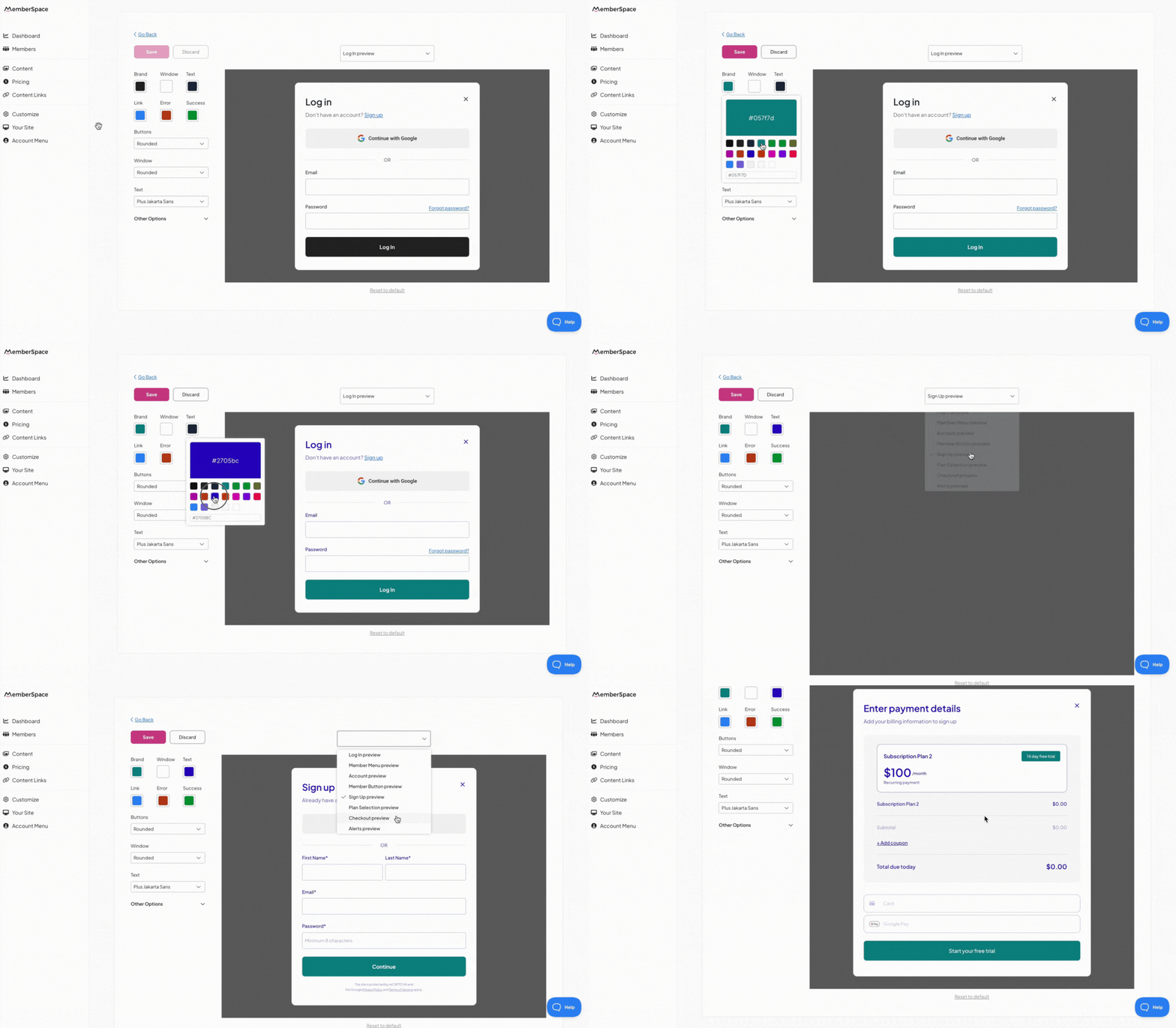
A better, faster look & feel editor

Customizing your member experience just got a whole lot easier!

The updated look & feel editor helps you make changes faster so everything your members see fits seamlessly with your brand in just a few clicks.

Global customization options

Before, customizing your branding meant switching between previews like log in, checkout, or account to find all of your different options. Now, your design tools stay consistent no matter what you’re viewing.

With a simplified set of global options, it’s easier to make updates that apply across the entire member experience—without digging through endless settings.

Description of GIF

Here’s what each option affects:
  • Brand: Buttons, Member Button, free trial indicator (appears in plan selection & checkout views), alert icons
  • Window: All window backgrounds (login/signup forms, Member Menu, member account areas, etc.)
  • Text: All text (including headers and body)
  • Link: Your Account, member profile links, forgot password, etc.
  • Error: Messages such as “Invalid email or password.”
  • Success: E.g., “Active” tags for a member’s plan status
You still have full control over your look and feel: set your brand colors, font, and more—all in one place! Plus, a streamlined sidebar gives you more space to preview your changes.

Heads-up! All previous styling choices have been migrated to the new simplified look & feel editor. You may notice some differences, so we recommend taking a look and making adjustments as needed.

In MemberSpace, go to: Customize > Look & Feel

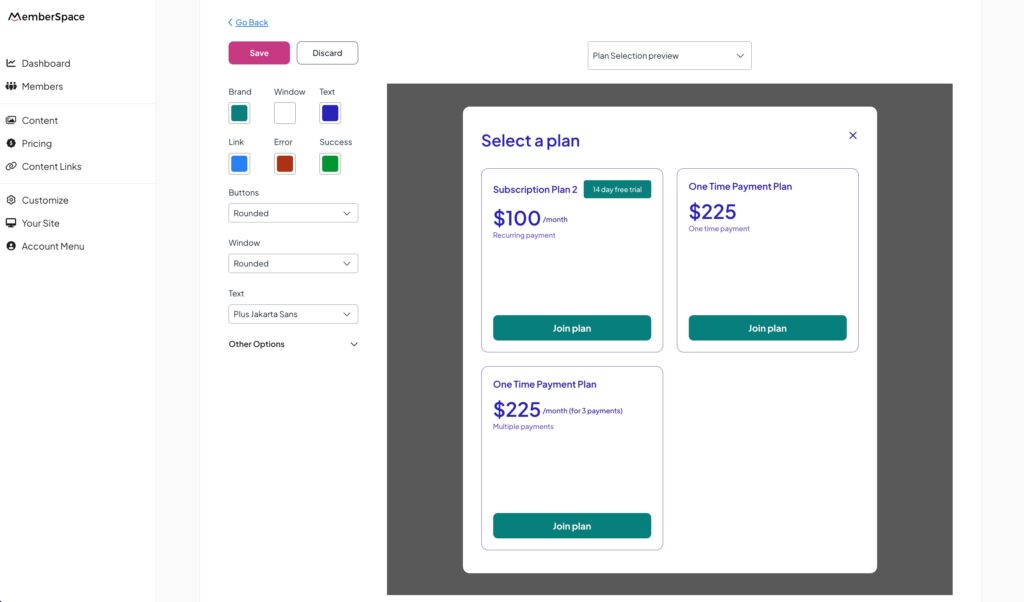
New preview option

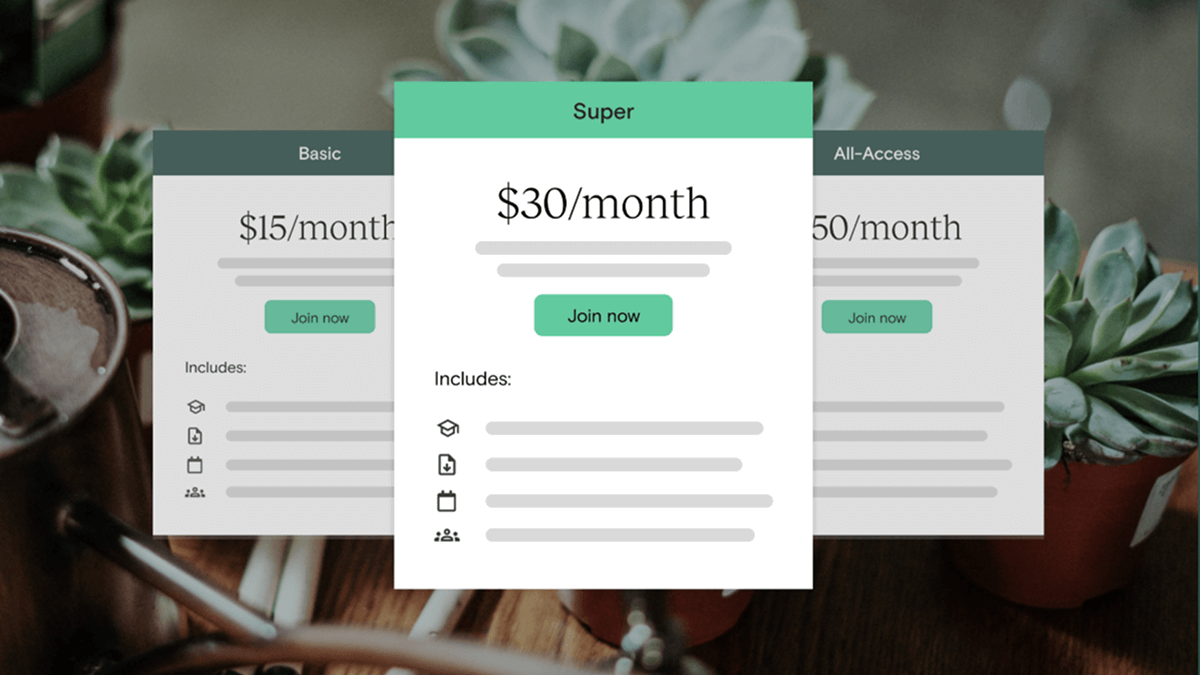
With the addition of the Plan Selection preview, you can now see how your customizations affect the plan selection grid your members use to choose a pricing plan.

customize branding of plan selection window

Simply select Plan Selection preview from the dropdown to check it out.

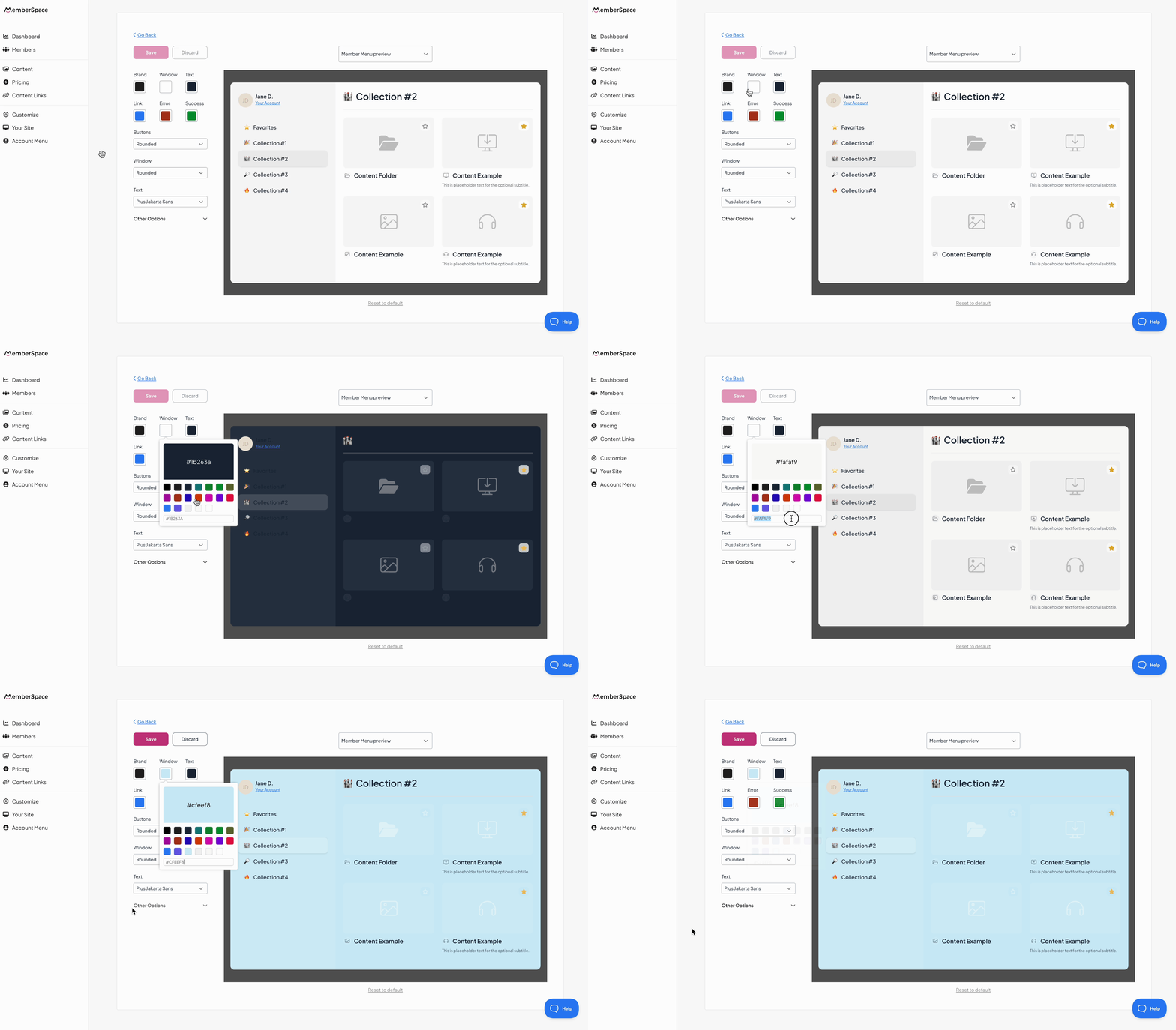
Change your Member Menu background color

You asked, we listened. You can now change the background color of your Member Menu! The “Window” color setting applies to all windows and forms, including your Member Menu content hub.

Description of GIF

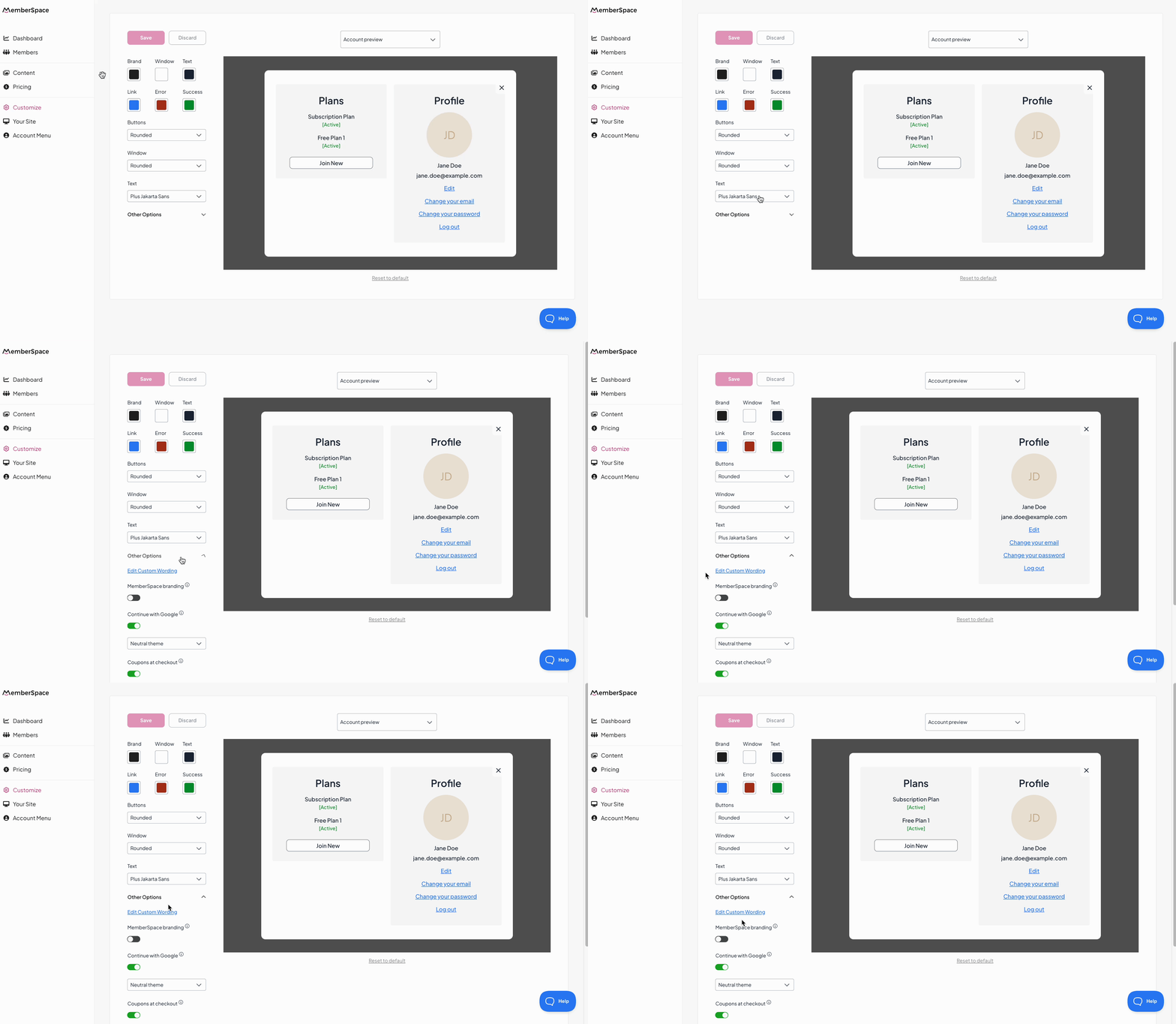
Custom wording is now in look & feel

You’ll now access your custom wording settings from within the look & feel editor, making it easier to manage all of your brand-related customization options from one place.

Description of GIF

NEW

Language translations

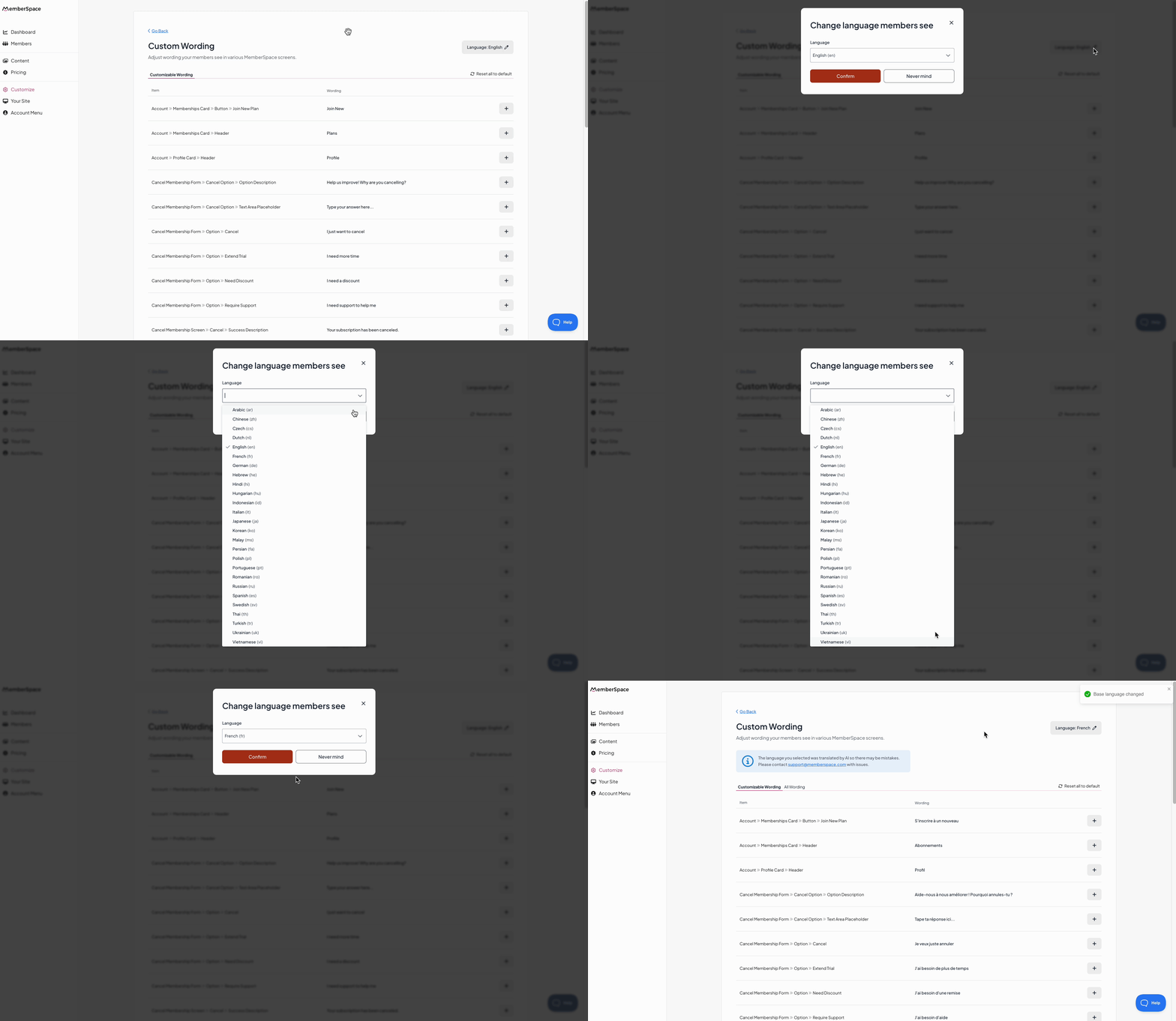
Need your membership site in a language other than English or Spanish? The days of manually updating every single custom wording option are gone.

Now, you can translate your entire member experience in just a few clicks!

Here’s how it works:
  • In your custom wording settings, pick a single site-wide language from 25+ options—including French, German, Portuguese, Chinese, Arabic, Japanese, and more.
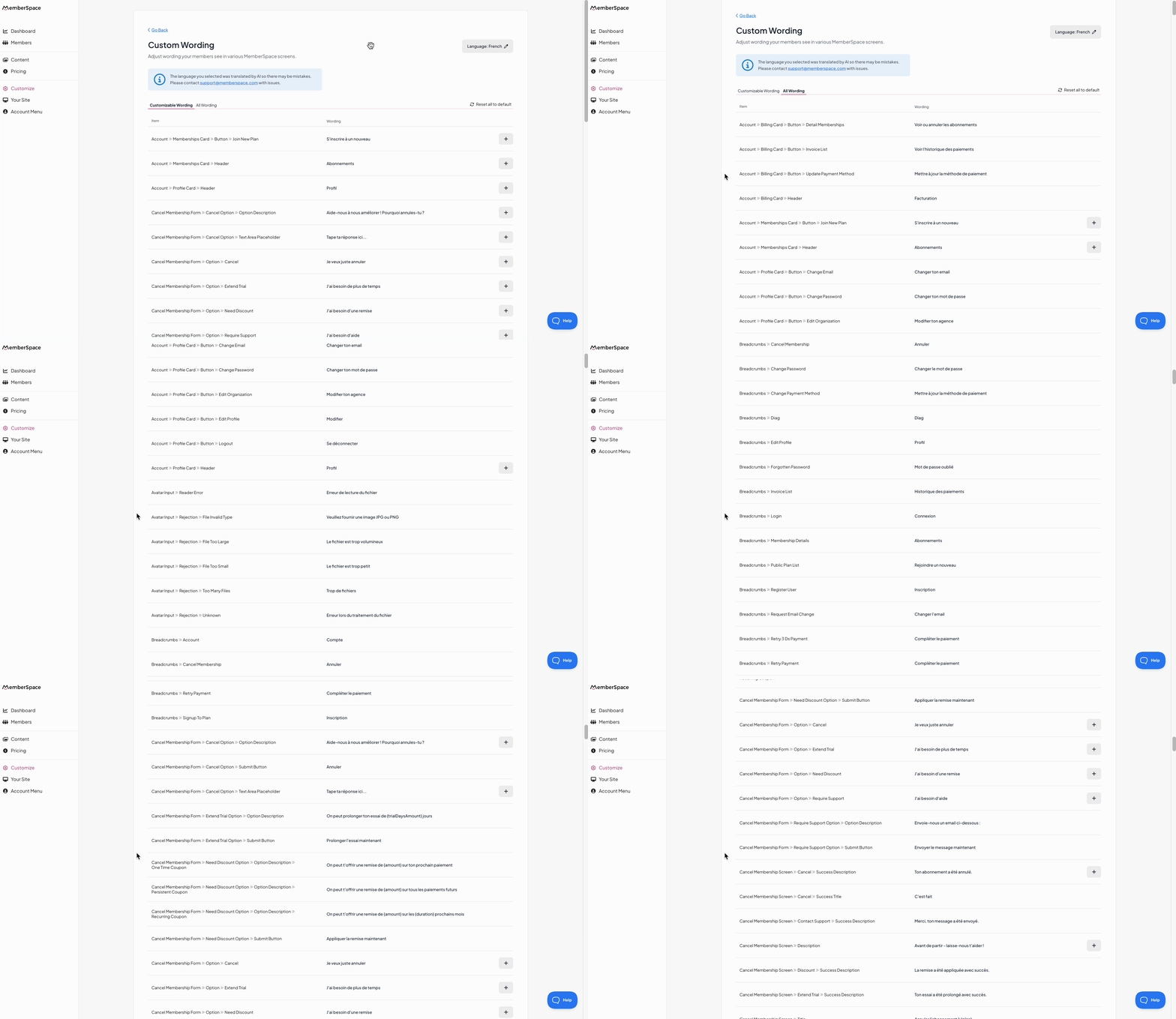
  • All default member-facing text (like login forms, checkout screens, and your members’ account areas) will automatically update to your selected language.

Description of GIF

Once you choose your preferred language, it’s a good idea to quickly review the translations to make sure everything looks just right for your members.

Description of GIF

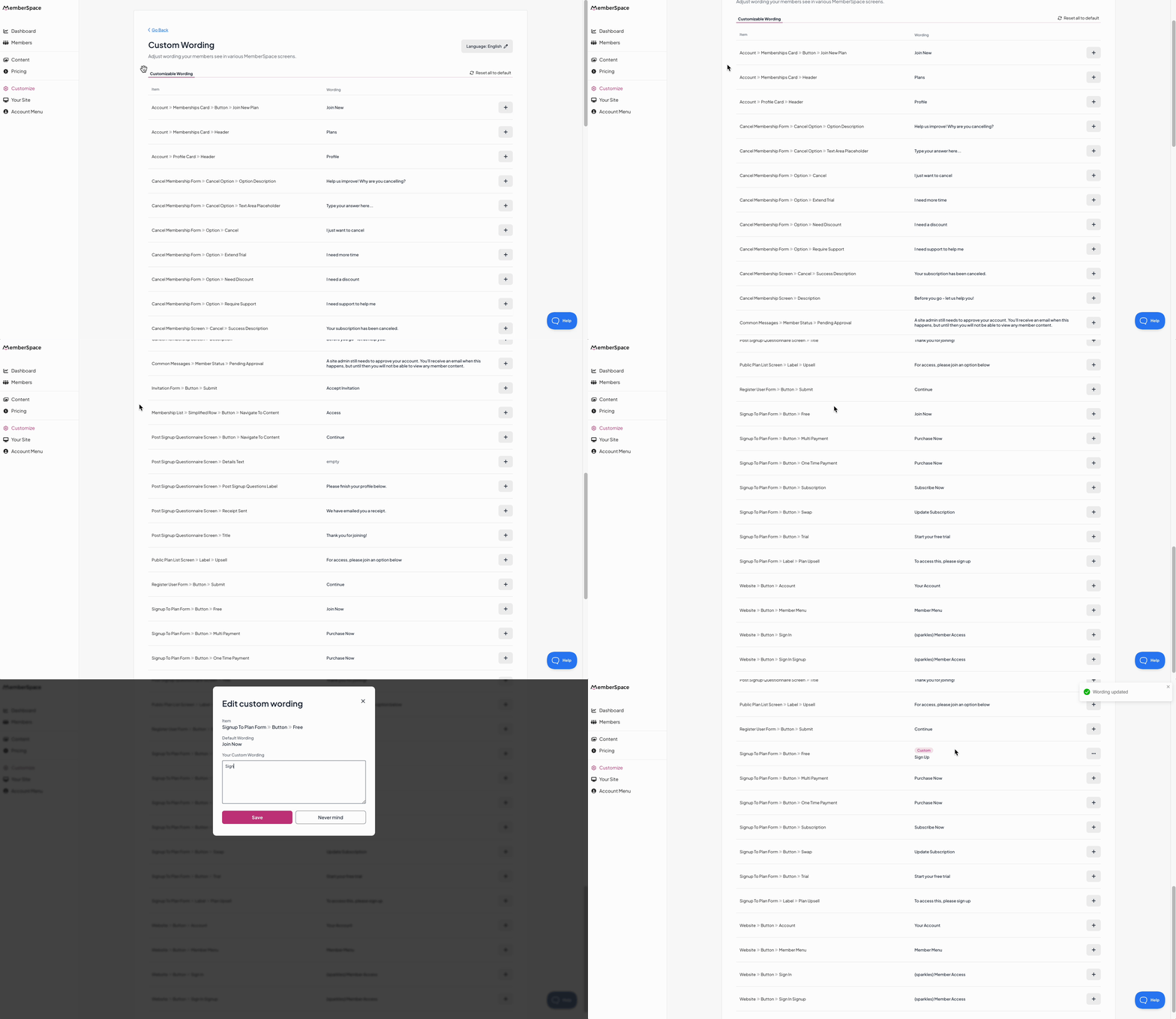
Want to fine-tune something? You can still manually customize select individual words or phrases for specific wording or tone.

Description of GIF

You’ll also notice that the custom wording area got a refresh—it’s now easier to look through and manage all member-facing text, whether you’re translating the entire experience or making small edits.

These updates are live! 🎉
 
Customize your design and speak directly to your audience in their language in fewer clicks.
 
It’s a simpler, smarter way to manage your membership site—so you can spend less time tweaking small details and more time creating value for your members.

Need help marketing your membership business? Sign up for our free newsletter, The Membership Blast, for actionable growth tips delivered every other week.


Subscribe for free

Employee upskilling made easy: Why an LMS is the best solution

Software Stack Editor · July 28, 2025 ·

When it comes to business, you are only as good as your people. What does this mean? You can have the most ambitious and well-thought-out business strategy and still fail if your workforce doesn’t have the skills to realize it. That’s why upskilling and reskilling employees is quintessential. Maybe now more than ever, with AI …

Continue

The post Employee upskilling made easy: Why an LMS is the best solution appeared first on LearnWorlds.

Social learning LMS explained: Features, benefits, and key uses

Software Stack Editor · July 25, 2025 ·

Traditional online classes frequently feel isolating and leave students feeling stuck. Adopting a social learning LMS can change this, making courses more relevant and, importantly, memorable. Social learning mirrors the way we naturally learn in life via conversation, observation, and simply by learning from others. By participating in discussions and group work, learners better understand …

Continue

The post Social learning LMS explained: Features, benefits, and key uses appeared first on LearnWorlds.

Podia

Software Stack Editor · July 24, 2025 ·

image

Create a course that turns your expertise into income. Learn the system we’ve seen thousands of creators use to successfully launch profitable online courses.

Read full article

chevronRight icon

Top 20 LMS integrations for every use case

Software Stack Editor · July 24, 2025 ·

If you’ve ever tried to balance a dozen browser tabs just to organize a single online course, you understand why I’m all about making the most out of LMS integrations. I know firsthand how stitching together the right tools can transform a clunky, time-consuming system into an amazing experience for both admins and learners. I’m …

Continue

The post Top 20 LMS integrations for every use case appeared first on LearnWorlds.

How to choose the right LMS for HR departments in 2025?

Software Stack Editor · July 23, 2025 ·

Yes, HR is still changing. And training can’t fall behind. Did you know that 94% of employees [1] say they would stay for a longer time at a company if it invested in their learning and development? That’s exactly why you need a learning management system (LMS) that’s smart, simple, and designed to help real …

Continue

The post How to choose the right LMS for HR departments in 2025? appeared first on LearnWorlds.

How to grow your online coaching business 

Software Stack Editor · July 22, 2025 ·

Heads up: Right now, the coaching industry is a 7.31 billion dollar industry [1]. And online coaching? It’s set to grow 14% between 2023 and 2032 [2]. So you’ve got the right idea. The time to grow your online coaching business? Right now. If you’ve got a solid business but are struggling to take it …

Continue

The post How to grow your online coaching business  appeared first on LearnWorlds.

Top 39 coaching assessment tools for businesses

Software Stack Editor · July 21, 2025 ·

Want to figure out what’s holding your clients back? Want to discover their untapped strengths? Coaching assessment tools are a practical way to help you do just that. These tools help you pinpoint how your clients think and what they value so you can offer a more meaningful, tailored approach. They also help identify client …

Continue

The post Top 39 coaching assessment tools for businesses appeared first on LearnWorlds.

Link in Bio: A Creator’s Guide to Monetizing Your Audience

Software Stack Editor · July 18, 2025 ·

Ever wondered how some creators seem to effortlessly turn their social media followers into paying customers? The secret often lies in one tiny, yet mighty, piece of digital real estate: your “link in bio.” It’s more than just a clickable URL; it’s your digital storefront, your lead magnet, and your direct line to monetization. If you have a website or an audience (or both!), mastering your link in bio strategy is crucial for selling digital products, courses, newsletters, events, or paid subscriptions.

This comprehensive guide will walk you through everything you need to know to transform your link in bio from a simple click to a powerful conversion engine. Get ready to unlock new revenue streams and build a thriving online business!

The Power of Your Link in Bio: Fundamentals & Strategy

Your link in bio is the single clickable link allowed on many social media profiles (like Instagram, TikTok, and X). While it might seem restrictive, it’s actually an incredible opportunity to funnel your audience to your most important offers and content. Think of it as the gateway from casual browsing to committed engagement and, ultimately, conversion.

What is a “Link in Bio”?

At its core, a link in bio is just that, a link on your bio or profile page to landing page or website where you can host memberships and digital products

It’s a bridge. It connects your social media presence, where attention is fleeting, to a dedicated destination where you can capture leads, sell products, and build deeper relationships. For creators, this means:

  • Direct Sales: Selling digital products, courses, or memberships without relying on third-party platforms.

  • Lead Generation: Collecting email addresses for newsletters or future promotions.

  • Audience Nurturing: Directing followers to valuable content, podcasts, or YouTube channels.

  • Brand Building: Showcasing your diverse offerings and establishing your authority.

“Your link in bio isn’t just a link; it’s a strategic funnel designed to convert curiosity into cash.” – A modern creator’s mantra

Anatomy of a High-Converting Link-in-Bio Page

A successful link-in-bio page isn’t just a list of links. It’s a thoughtfully designed landing page that guides your visitor. Key elements include:

  • Clear Call-to-Action (CTA): What do you want people to do first?

  • Visual Appeal: Your branding, a professional photo, and easy-to-read text.

  • Prioritized Links: Your most important offers should be at the top.

  • Concise Descriptions: A brief, benefit-driven line for each link.

  • Mobile Responsiveness: Most clicks will come from mobile devices.

Mistakes Creators Make with Their Link in Bio (and How to Avoid Them)

Even seasoned creators can stumble. Here are common pitfalls and how to sidestep them:

  • Too Many Options: Overwhelming visitors with a dozen links. Solution: Focus on 3-5 key offers.

  • Outdated Links: Promoting expired offers or broken pages. Solution: Regularly audit and update your links.

  • Generic CTAs: “Click here” doesn’t inspire. *Solution: Use benefit-driven language like “Unlock Exclusive Content” or “Join Our Community.”

  • Lack of Context: Visitors don’t know what they’re clicking on. Solution: Add a short, compelling description to each link.

How to Structure Your Link in Bio for Clarity and Conversion

Think of your link-in-bio page as a mini-website. Structure it logically:

  1. Your #1 Offer: This should be front and center. Is it your flagship course? Your premium membership?

  2. Lead Magnet/Freebie: Something valuable in exchange for an email address.

  3. Core Content Hub: Your blog, podcast, or YouTube channel.

  4. Community/Social: Links to other platforms or private groups.

  5. About/Contact: For those who want to learn more about you.

Audience Targeting and Positioning

Not all followers are created equal. Your link in bio can be a powerful tool for segmenting your audience and tailoring your offers.

  • Who are you trying to reach? Are they cold followers just discovering you, or warm superfans ready to buy?

  • Cold vs. Warm Audiences: For cold audiences, lead magnets (free guides, mini-courses) work best. For warm audiences, direct sales pages for memberships or premium products are ideal.

  • Positioning Your Offer: Frame your membership or digital product as the solution to their pain points or the key to their desires. Use language that resonates with your target segment.

  • Segmenting Traffic: Use different links or landing pages for specific campaigns (e.g., a link for a TikTok challenge vs. an Instagram story promotion) to track and personalize experiences.

Building Your Bio Link Hub: Tools, Offers & Optimization

Now that you understand the strategy, let’s talk about the practicalities of setting up your link-in-bio destination and optimizing your offers.

Link-in-Bio Tools & Setup

There’s a plethora of tools available, each with its own strengths. Popular options include Pop.Site, Linktree, Beacons, and Koji. 

  • Using MemberSpace Directly as Your Link-in-Bio Destination: Instead of just a list of links, imagine your link in bio leading directly to a beautifully designed page where you can sell memberships, courses, and digital products. MemberSpace allows you to convert any website (Squarespace, Wix, WordPress, etc.) into a membership site. This means your link in bio can point directly to your MemberSpace-powered sales page, a curated list of your paid offerings, or even a free content hub that leads to paid tiers.

    Pro Tip: If you don’t have a website yet, or want a dedicated landing page for your MemberSpace products, check out our partnership with Pop.Site, a free website creator designed to host MemberSpace products and memberships. Learn more and get started at memberspace.com/free-website-creator. This allows you to quickly set up a professional, conversion-focused destination for your bio link.

  • Embedding Sales Pages, Videos, and Opt-ins: With a platform like MemberSpace, your link-in-bio destination isn’t just a static page. You can embed sales videos, testimonials, opt-in forms for your newsletter, and even full sales pages directly on your site, creating a seamless user experience that drives conversions.

Offer Strategy for Memberships & Digital Products

Your link in bio is only as good as the offers it promotes. Here’s how to craft irresistible offers:

  • Bundling Memberships with Digital Products: Offer a premium membership that includes access to all your courses, exclusive content, and a private community. This increases perceived value and average order value.

  • Creating Limited-Time or Evergreen Offers: Use urgency for special launches (e.g., “Enrollment closes Friday!”) or evergreen offers that are always available but perhaps include a bonus for immediate action.

  • Freebies, Lead Magnets, and Tripwires: Offer a valuable freebie (e.g., a mini-guide, a template) in exchange for an email. Once they’re on your list, you can introduce a low-cost “tripwire” offer (e.g., a $7 mini-course) to convert them into paying customers, paving the way for higher-ticket items.

  • Highlighting “What’s Inside” (Benefits, Outcomes, Value): Don’t just list features. Tell people what they’ll gain. Instead of “10 video lessons,” say “Transform your skills with 10 actionable video lessons that guarantee results.”

Conversion Optimization

Getting clicks is one thing; turning them into customers is another. Optimize your link-in-bio destination for conversions:

  • A/B Testing: Experiment with different headlines, button colors, link order, and even the descriptions of your offers. Tools like Google Optimize (though sunsetting, alternatives exist) or built-in analytics can help.

  • Urgency and Scarcity: Use countdown timers for limited-time offers, mention limited spots for a coaching program, or offer bonuses for early birds. This creates a fear of missing out (FOMO).

  • Visual Design Tips: Use high-quality images, clear fonts, and a clean layout. Ensure your branding is consistent with your social media presence.

  • Mobile-First Design: Over 80% of social media usage is on mobile. Your link-in-bio page must look and function perfectly on smartphones.

Driving Traffic & Sustaining Growth: Analytics, Promotion & Lifecycle

Your link in bio isn’t a set-it-and-forget-it tool. It requires ongoing promotion, tracking, and nurturing.

Analytics & Optimization

Data is your best friend. Track everything to understand what’s working and what’s not:

  • Tracking Clicks and Conversions: Most link-in-bio tools offer basic analytics. For deeper insights, use Google Analytics on your website or MemberSpace’s built-in analytics to track sign-ups and purchases.

  • Measuring Performance by Source: Is your TikTok audience more likely to convert than your Instagram followers? Use UTM parameters in your links to track traffic from specific social platforms.

  • Retargeting Link-in-Bio Traffic: Install a Facebook Pixel or Google Ads tag on your link-in-bio destination. This allows you to retarget visitors who clicked but didn’t convert with specific ads, bringing them back to your offers.

Promotion & Traffic Generation

Don’t just put the link there; tell people to click it!

  • Strategic CTAs: In your social media captions, stories, and videos, explicitly tell your audience to “Click the link in bio to get your free guide!” or “Join my exclusive community via the link in bio!”

  • Visual Cues: Use arrows, text overlays, or even your finger pointing to your bio in videos.

  • Cross-Platform Promotion: Include your bio link in email footers, podcast show notes, YouTube descriptions, and even physical marketing materials.

  • Collaborations: Partner with other creators and ask them to shout out your link in bio during joint promotions.

Lifecycle Marketing

What happens after someone clicks your link and perhaps even signs up? The journey doesn’t end there.

  • Email Onboarding: If they signed up for a freebie, immediately send a welcome email sequence that delivers the freebie and introduces your paid offers.

  • Access Flow: For paid members, ensure a smooth onboarding process to access their content. MemberSpace handles this seamlessly, providing secure access to your protected content.

  • Upsells and Cross-sells: Once someone is a member, use your link-in-bio destination to promote higher-tier memberships, complementary digital products, or exclusive events.

  • Drip Campaigns: Trigger email sequences based on their actions (e.g., if they clicked a course link but didn’t buy, send a follow-up email with testimonials or a limited-time discount).

Real-World Success & Psychological Triggers

Let’s look at how successful creators leverage their link in bio and the psychology behind effective conversion.

Creator Case Studies & Examples

Many creators use their link in bio to great effect. For instance:

  • The Fitness Coach: Uses their link in bio to promote a 7-day free workout challenge (lead magnet), which then funnels into their paid membership for personalized coaching and meal plans.

  • The Digital Artist: Showcases their portfolio and offers a free brush pack (lead magnet), leading to their premium brush sets and online courses on digital painting.

  • The Newsletter Guru: Directs followers to a landing page offering a free sample of their premium newsletter, with an immediate upsell to a paid annual subscription.

MemberSpace users often see success by creating a dedicated “Hub” page on their website, powered by MemberSpace, that serves as their link-in-bio destination. This hub can feature a mix of free resources, testimonials, and direct links to their various paid memberships and digital products, all under one branded roof.

Psychology & Behavior Triggers

Subtly nudge your audience towards conversion using these psychological principles:

  • Social Proof: Include testimonials, subscriber counts, or “As Seen On” logos on your link-in-bio destination. “Join 10,000 happy members!”

  • FOMO (Fear of Missing Out): Emphasize limited-time offers, exclusive access, or the unique benefits of joining now.

  • Framing Your Offer: Position your membership as an investment in themselves, a solution to a pressing problem, or a shortcut to their goals.

  • Speaking to Pain Points and Desires: Use language that directly addresses what your audience struggles with or what they aspire to achieve. “Tired of inconsistent income? Learn how to build a predictable revenue stream.”

Frequently Asked Questions (FAQs)

Q1: What’s the best link-in-bio tool for selling memberships?

A1: While tools like Linktree or Beacons are good for simple links, for selling memberships and digital products, using your own website powered by a platform like MemberSpace is ideal. It gives you full control over branding, analytics, and the sales funnel. If you don’t have a website, consider using Pop.Site with MemberSpace via memberspace.com/free-website-creator.

Q2: How often should I change my link in bio?

A2: You don’t necessarily need to change the link itself often, but you should frequently update the content on the page your link points to. This means refreshing your top offers, promoting new products, or highlighting seasonal campaigns. Aim to update your offers at least weekly or whenever you have a new promotion.

Q3: Can I use my link in bio to promote affiliate products?

A3: Yes, absolutely! Your link in bio can be a great place to promote affiliate products, as long as you clearly disclose that they are affiliate links, as per FTC guidelines. Just ensure these promotions align with your brand and don’t overshadow your own core offerings.

Q4: How do I track if my link in bio is actually working?

A4: Use UTM parameters in your links to track clicks from specific social platforms in Google Analytics. Additionally, monitor conversion rates (sign-ups, purchases) on the landing page your link points to. MemberSpace provides analytics for your protected content and sales, giving you clear insights into what’s converting.

Conclusion

Your link in bio is far more than a simple URL; it’s a dynamic, powerful asset in your creator toolkit. By strategically designing your link-in-bio destination, crafting compelling offers, and continuously optimizing based on data, you can transform casual followers into loyal customers and build a sustainable, thriving online business. Remember, the goal isn’t just to get clicks, but to convert those clicks into meaningful engagement and revenue. So, go forth, optimize your link in bio, and start monetizing your incredible audience today!

Is selling online courses profitable in 2025?

Software Stack Editor · July 18, 2025 ·

If you’ve ever wondered whether creating an online course can become a real income stream, or even replace your 9-to-5, you’re not alone. With thousands of creators launching educational content every year, the question isn’t just is selling courses profitable, but how profitable, for whom, and under what conditions. This blog post breaks it all …

Continue

The post Is selling online courses profitable in 2025? appeared first on LearnWorlds.

A look at what’s new at Teachable: July 2025

Software Stack Editor · July 18, 2025 ·

From enhanced product discovery to mobile learning upgrades, July at Teachable has been all about elevating your students’ experience and giving you more tools to grow.

Up ahead, we’ve got a first look at our brand-new student experience (plus a live webinar invite), fresh features across mobile and memberships, and exciting updates around the product catalog and product detail pages.

Let’s dive into what’s new.

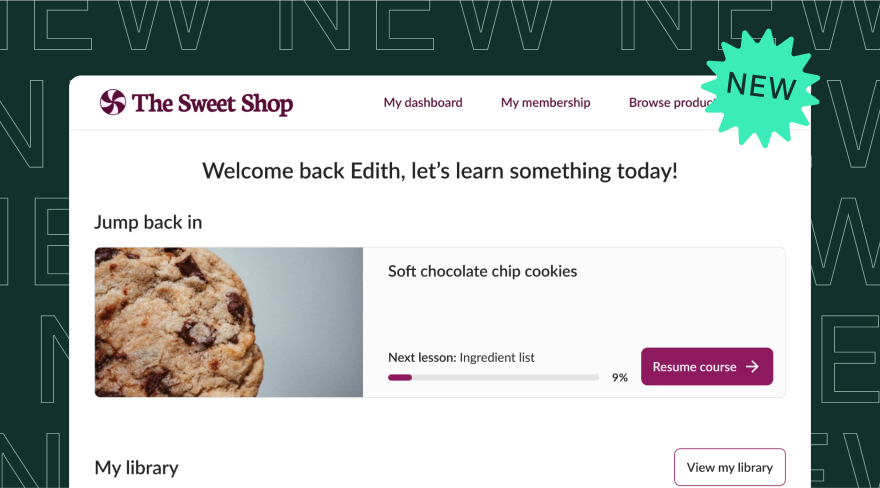
Get a first look at the new student experience

We’re rolling out a redesigned student experience, built to help your students stay engaged, find what they need faster, and keep coming back for more.

And if you’re reading this before July 22, 2025, be sure to attend our free live webinar that day.

There, we’ll walk you through what’s changing, why it matters, and how you can tailor the experience to reflect your brand and business goals.

Get the details and register here.

Mobile updates, plus what’s to come

ICYMI, we recently launched some big improvements to the Teachable iOS mobile app, including:

  • Push notifications that remind students to jump back in
  • Improved dark mode for late-night learning
  • Lock screen controls for on-the-go video playback

We’re also working on ways to help you sell from the app. But first, we need your input! Take this five-minute survey to help us understand your experiences and expectations around app-based selling.

Android users, we haven’t forgotten about you: Our Android app is still on track to launch fall 2025.

Easier product discovery and one-click translations

You asked, we delivered: You can now manually reorder your products in the Product Catalog. Want to group by learning path? Highlight your newest launch? Prioritize your bestsellers? It’s all up to you—and customizable for both logged-in and logged-out students.

We’ve also made enhancements to Product Detail Pages. Now, you can mark any one of your lessons as “Public,” and that lesson will appear on the page. It gives students the perfect chance to explore your content before they commit.

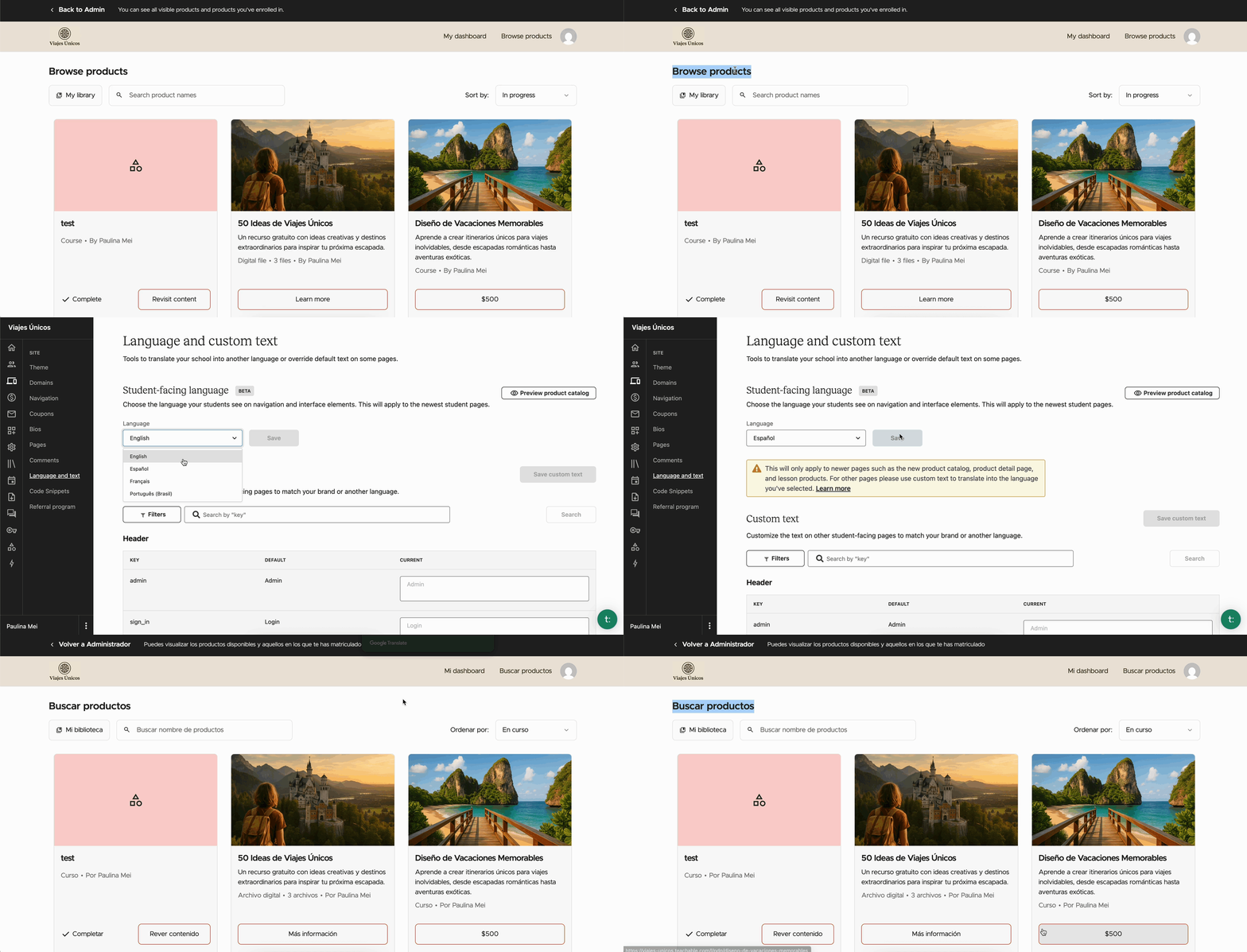
And for creators with international audiences, this one’s for you: One-click translations are live!  Now, you can now offer your school in Spanish, French, and Portuguese (with more languages coming soon) without having to manually update 1,200+ custom text fields.

Memberships just got a boost

Did you know? In 2024, coupons contributed to 27% of total GMV earned by Teachable creators.

On that note, we have good news for memberships…

Now you can use coupons on memberships across all tiers. Just like with courses, coaching, and digital downloads, this lets you run discounts and promotions to convert more students.

We also squashed a few bugs in memberships too, making the student purchases, upgrades, and downgrades smoother than ever.

Bonus: Embed a Buy Button anywhere

It’s time for our monthly installment of: Things you (maybe) didn’t know you could do on Teachable.

Looking for a quick solution to sell your Teachable products outside of your school?

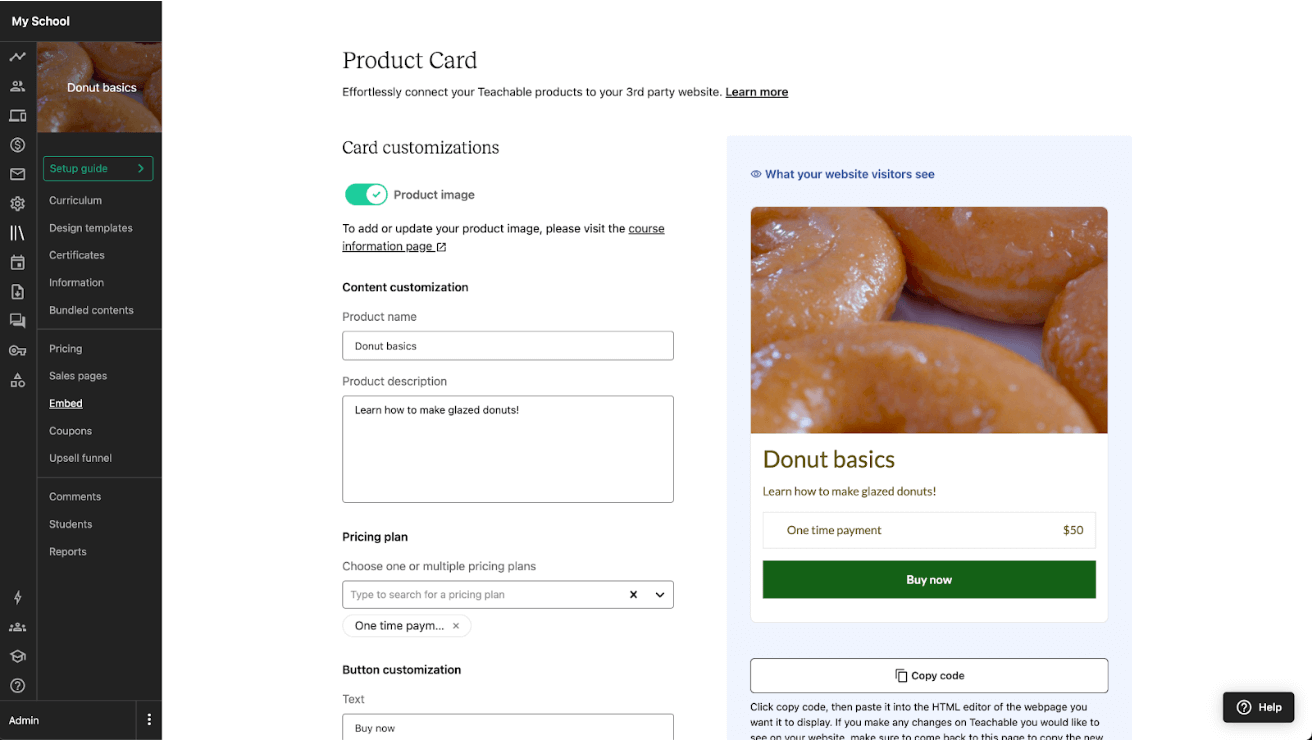
We got you. You can embed a customizable Buy Button on your blog, website, or anywhere else that supports HTML. It’s a simple way to let students explore and purchase your products without being directed away from your site.

Stay in the loop

That’s it for July! As always, we’re building with your success in mind. So whether it’s more customizable experiences, better mobile tools, or fresh ways to see, we’ve got more coming soon.

Stay up to date on the latest here—and until then, we’ll see you next month!

What are the advantages and disadvantages of learning management systems?

Software Stack Editor · July 17, 2025 ·

If you think a learning management system is nothing more than a virtual classroom, you’re in for a major surprise. It’s a living, breathing, ever-changing environment where flexibility and scalability lead the way towards unique learning experiences. That doesn’t come without its fair share of obstacles. I’ll help you sort through all that noise so …

Continue

The post What are the advantages and disadvantages of learning management systems? appeared first on LearnWorlds.

Building and optimizing your SaaS sales funnel

Software Stack Editor · July 17, 2025 ·

A SaaS sales funnel is more than just a pathway to conversion, it’s a strategic system for guiding prospects from first touch to loyal customer. This blog post breaks down how to build, measure, and optimize each stage of the funnel using proven frameworks, key metrics, and real-world tools. Whether you’re refining an existing funnel …

Continue

The post Building and optimizing your SaaS sales funnel appeared first on LearnWorlds.

What are the key LMS requirements in 2025?

Software Stack Editor · July 16, 2025 ·

Very early into my LMS discovery journey, I thought all LMSs did the same things. Fast forward a couple of years, and not only has my own perspective changed, but the market offering has as well. Finding the right LMS today goes beyond checking off boxes. But don’t worry. We’ll still go together through all …

Continue

The post What are the key LMS requirements in 2025? appeared first on LearnWorlds.

5 TikTok Live Ideas: How Creators Turn Streams into Cash

Software Stack Editor · July 15, 2025 ·

Ever wondered how some creators seem to effortlessly turn their TikTok Live streams into a steady income stream? It’s not magic, it’s strategy! TikTok Live isn’t just for viral dances or funny skits anymore; it’s a powerful, interactive platform where creators, businesses, and experts can connect directly with their audience, build community, and, most importantly, monetize their passion. Imagine taking those engaged viewers and guiding them to your own exclusive corner of the internet – a membership website where they can dive deeper, learn more, and become loyal, paying members. This guide will walk you through creative TikTok Live ideas to make money and show you how to leverage that live energy to build a thriving membership business.

Understanding TikTok Live Monetization Basics

Before we dive into specific ideas, let’s quickly cover the main ways creators typically earn on TikTok Live. Knowing these mechanisms will help you strategize your content.

How TikTok Live Payouts Work

  • Gifts (Diamonds): Viewers can purchase virtual ‘Gifts’ (like roses, lions, or even TikTok Universes) using TikTok Coins and send them to creators during a Live stream. These Gifts are converted into ‘Diamonds’ by TikTok, which can then be cashed out for real money. It’s essentially a direct tip from your audience.

  • LIVE Subscriptions: For eligible creators, TikTok offers a LIVE Subscription feature, allowing viewers to pay a monthly fee for exclusive perks like subscriber-only chats, badges, and custom emotes. This provides a recurring income stream.

  • Brand Partnerships & Sponsored Lives: As your audience grows, brands might pay you to feature their products or services during your Live streams. This is a direct sponsorship deal.

  • Promoting Your Own Products/Services: This is where the real long-term potential lies, especially when combined with a membership website. You can use your Live stream to showcase your digital products, courses, exclusive content, or paid communities, then direct viewers to your website to purchase or subscribe.

“TikTok Live is a direct line to your most engaged fans. It’s not just about entertainment; it’s about building relationships that can convert into loyal customers and members.” – A seasoned TikTok creator

Creative TikTok Live Ideas to Make Money

Ready to turn your live streams into a revenue-generating machine? Here are some actionable ideas, complete with examples and how they can feed into your membership site.

1. Interactive Q&A Sessions & Expert Consultations

Idea: Host a live Q&A session where you answer audience questions related to your niche. If you’re an expert, you can offer mini-consultations or quick advice.

  • Example: A fitness coach could do live form checks for exercises, a financial advisor could answer general budgeting questions, or a tech expert could troubleshoot common software issues.

  • Monetization: Viewers can send Gifts to get their questions prioritized or to thank you for valuable advice. You can also tease more in-depth, personalized consultations or exclusive Q&A archives available only on your membership website. For instance, “For a full hour of personalized advice, check out my premium coaching sessions available exclusively to members on my site!“

2. Behind-the-Scenes & Process Reveals

Idea: Take your audience behind the curtain. Show them how you create, build, or prepare something. People love seeing the process.

  • Example: An artist painting a new piece, a chef preparing a complex dish, a musician composing, a developer coding a new feature, or a crafter making a handmade item.

  • Monetization: Viewers can send Gifts to encourage you or request specific steps. You can also use this to promote exclusive tutorials, blueprints, or advanced techniques available as digital products or courses on your membership site. Imagine saying, “Want to learn the full technique for this painting? My step-by-step course is available now for members!“

3. Interactive Workshops & Mini-Classes

Idea: Teach a short, actionable skill or concept live. This provides immediate value and showcases your expertise.

  • Example: A language tutor teaching 5 essential phrases, a DIY expert demonstrating a quick home repair, a digital marketer sharing a quick SEO tip, or a yoga instructor leading a 15-minute stretch session.

  • Monetization: Viewers can send Gifts as a ‘thank you’ for the free lesson. Crucially, you can promote your full-length courses, comprehensive workshops, or exclusive learning materials that are part of your membership offering. “This was just a taste! For the complete 8-week course on mastering this skill, join my membership community today!“

4. Product Demos & Live Shopping Experiences

Idea: If you sell physical or digital products, use Live to demonstrate them, answer questions, and create a sense of urgency.

  • Example: A beauty influencer demonstrating makeup application with specific products, a small business owner showcasing handmade jewelry, or a software developer walking through a new app feature.

  • Monetization: Direct sales during the Live (if TikTok Shop is integrated in your region) or, more powerfully, driving traffic to your e-commerce store or exclusive product drops for members on your website. You can offer Live-only discounts or early access codes for your membership site. “This exclusive bundle is only available for the next 24 hours to my website members! Link in bio!“

5. Gaming, Entertainment & Performance Streams

Idea: If you’re a gamer, musician, comedian, or performer, simply doing what you do best can be highly engaging.

  • Example: A gamer playing a popular game and interacting with chat, a musician performing requests, a comedian trying out new material, or a storyteller sharing captivating tales.

  • Monetization: Gifts are a primary income source here. You can also offer exclusive content like behind-the-scenes footage, unreleased tracks, game guides, or bonus episodes to subscribers on your membership website. “Loved that song? Get the full album and exclusive bonus tracks by joining my fan club on my website!“

Maximizing Your TikTok Live Earnings & Engagement

It’s not just about what you do, but how you do it. Here are some tips to boost your Live success:

  • Consistency is Key: Schedule regular Live streams so your audience knows when to find you. This builds anticipation and habit.

  • Promote Your Live: Don’t just go Live spontaneously. Announce your Live stream on your TikTok feed, Instagram, and other social media channels beforehand.

  • Engage, Engage, Engage: Respond to comments, thank people for Gifts, ask questions, and make your audience feel seen and heard. The more interactive you are, the longer people stay.

  • Clear Calls to Action (CTAs): Tell people what you want them to do! “Tap the link in my bio to join my membership!” or “Send a Gift if you want me to answer your question next!“

  • Collaborate: Go Live with other creators in your niche. This exposes you to new audiences and can be a lot of fun.

  • Optimize Your Bio Link: Your TikTok bio is prime real estate. Use a link-in-bio tool to direct viewers to your membership site, specific digital products, or a landing page designed for Live viewers.

Seamlessly Integrating TikTok Live with Your Membership Website

This is where the magic happens for long-term, sustainable income. TikTok Live is fantastic for discovery and engagement, but your membership website is where you build true community, offer premium value, and secure recurring revenue.

The Bridge: From Viewer to Member

Think of TikTok Live as your storefront window. You’re showcasing your best wares, giving free samples, and building excitement. Your membership website is the actual store, where customers can make purchases, subscribe, and become part of your exclusive community.

  • Offer Free Value on Live, Tease Premium on Site: Give away great tips, mini-lessons, or entertaining content on Live. Then, mention that for deeper dives, exclusive access, or personalized support, they need to join your membership.

  • Use Your Bio Link Effectively: Your TikTok bio is the primary way to direct traffic off-platform. Make sure your link goes directly to your membership sign-up page, a specific product page, or a curated landing page for TikTok viewers.

  • Create Specific Landing Pages: If you’re promoting a specific course or subscription tier on Live, create a dedicated landing page on your website for that offer. This makes the transition seamless and trackable.

  • Exclusive Live Perks for Members: Announce that members of your website get special access to certain Live streams (e.g., private Q&As, early access to product reveals, or bonus content during a public Live). This incentivizes sign-ups.

This is where a tool that lets you convert any website to a membership website becomes incredibly powerful. You can easily set up paid subscriptions, sell digital products, or offer exclusive access to courses, newsletters, and events that you tease and promote on TikTok Live. It’s about owning your audience and your revenue, rather than relying solely on platform algorithms.

Frequently Asked Questions (FAQs)

1. How many followers do I need to go Live on TikTok?

Generally, you need at least 1,000 followers to unlock the TikTok Live feature. However, TikTok’s requirements can change, so always check their official guidelines.

2. What are TikTok Gifts and how do they work?

TikTok Gifts are virtual items viewers purchase with TikTok Coins and send to creators during Live streams as a form of appreciation or tipping. These Gifts are converted into ‘Diamonds’ by TikTok, which creators can then redeem for real money.

3. Can I sell physical products directly on TikTok Live?

Yes, if TikTok Shop is available in your region and you meet the eligibility requirements, you can integrate your e-commerce store and sell physical products directly during your Live streams. Even without TikTok Shop, you can still showcase products and direct viewers to your website.

4. How do I get people from my TikTok Live to my membership site?

The most effective way is to use a clear call to action during your Live stream, directing viewers to the link in your TikTok bio. Ensure your bio link leads directly to your membership sign-up page or a relevant landing page on your website.

5. What’s the best time to go Live on TikTok?

The best time varies by your audience’s demographics and location. Generally, evenings and weekends tend to see higher engagement. Experiment with different times and use TikTok’s analytics to see when your audience is most active.

Conclusion

TikTok Live offers an incredible opportunity for creators and businesses to connect with a massive audience, build a loyal following, and generate income. By combining engaging, value-driven Live content with a strategic approach to directing viewers to your own membership website, you can transform fleeting views into sustainable revenue and a thriving community. Don’t just entertain; educate, inspire, and convert. Start experimenting with these ideas, refine your approach, and watch your TikTok Live streams become a powerful engine for your membership business. The stage is set, the audience is waiting – it’s time to go Live and make some money!

19 training metrics you should be tracking to improve results

Software Stack Editor · July 14, 2025 ·

You can run your training course without checking the metrics, but it’ll be like navigating a new city without any sort of map. You can wander, and you might end up somewhere nice, but you might also find yourself spending too much time and money somewhere you don’t want to be. Employees who take part …

Continue

The post 19 training metrics you should be tracking to improve results appeared first on LearnWorlds.

  • « Go to Previous Page
  • Page 1
  • Interim pages omitted …
  • Page 3
  • Page 4
  • Page 5
  • Page 6
  • Page 7
  • Interim pages omitted …
  • Page 35
  • Go to Next Page »

Get your Software Stack together. softwarestack.tech

Software Stack

© 2024–2025 - Software Stack is a trading name of SouthwestCIO Limited ac ompany registered in England & Wales 11319049

  • Knowledgebase
  • Home
  • About Us
  • Contact Us