• Skip to primary navigation
  • Skip to main content
software stack logo

Software Stack

Get your Software Stack together

  • Knowledgebase
    • All Categories
    • Accounting Software
    • Automation & Workflow Software
    • Customer Relationship Management
    • E-Commerce Shopfronts & Payments
    • Marketing Automation
    • Online Courses & Membership
    • Project Management
    • Surveys & Forms
    • Web Hosting
  • Home
  • About Us
  • Contact Us
  • Show Search
Hide Search

Learnworlds

How to Build Your Customer Education Strategy

Software Stack Editor · August 20, 2024 ·

The importance of customer education for a business cannot be overstated. As products and services become more complex, customers need support and guidance to explore their full capabilities and maximize their benefits. A well-structured customer education strategy not only empowers customers but also fosters business growth, customer loyalty, and brand reputation.

In this post, we’ll explore the benefits of customer training, strategies for rolling out successful customer education initiatives, and the best tools for the job!

9000+ brands trust LearnWorlds to train their people, partners & customers.

Start a FREE Trial

The Importance & Benefits of Customer Education

Customer education is pivotal in bridging the gap between a product’s potential and its actual use. It involves creating resources and programs that help customers understand and use products effectively.

An effective customer education program boosts customer success by reducing the learning curve and ensuring customers achieve their desired outcomes.

Companies that prioritize their customers’ success see improved customer retention, increased satisfaction, and a stronger market position. This is all the more true in the SaaS industry where products are more complex and require a level of tech-savviness.

Skip to your 8-step guide for a successful customer education strategy, or keep reading to explore the advantages of customer education:

Shorter Time to Value

Customer onboarding is quintessential for a smooth user experience from the get go of the customer journey.

The onboarding process refers to the early stage of a training program that focuses on offering educational resources and personalized support to help the customer set up a product and become familiar with key functions.

Enhanced Customer Retention

Customer education can also reduce customer churn, since educated customers who can fully utilize the product’s features and benefits and have a positive customer experience, are more likely to remain loyal.

Higher Customer Satisfaction

Your customers choose your product for a reason, be it to overcome a challenge or make a daily routine somehow more efficient. Helping them reach their goals with your product will make them feel confident they made their right choice and drive customer satisfaction higher.

Reduced Support Costs

Offering self-service resources, like a knowledge base with support articles, FAQs, and tutorials, lowers the volume of support tickets while enabling your team to serve clients who come to them with more intricate issues better.

Improved Customer Engagement

Engaging educational content fosters a sense of community and connection with your brand, encouraging ongoing interaction and loyalty.

Customers learn about new features and updates before they’re released, they engage through customer communities, and interact with you during live product events.

Higher Customer Lifetime Value

Customer education is a great way to not only expand the customer lifecycle and therefore secure repeat sales and renewals but also to drive upsells and cross sells.

Stronger Brand Reputation

Companies known for their customer education efforts gain a reputation for caring about their customers’ success, which enhances overall brand perception outside the limits of your exciting customer base.

Shorter Sales Cycle

Positive word-of-mouth, reviews and testimonials, and the mere existence of a customer training program are great benefits to showcase potential customers. This makes it easier for your salespeople to close sales deals.

Your 8-Step Guide to Building a Customer Education Program

Creating a successful customer education program requires careful planning and execution. Make sure your customer education team follows these steps to build an effective strategy:

Step 1 – Identify Customer Needs

Start by understanding your customers’ specific needs and pain points. Conduct surveys, interviews, and feedback sessions to gather insights into the challenges they face and the information they seek.

Customer feedback forms, product analytics tools, and support tickets can help pinpoint common issues and knowledge gaps.

Step 2 – Define Clear Objectives

Set clear learning objectives for your education program tied to your business goals. Determine what you want to achieve, such as reducing support costs, increasing customer retention, or accelerating product adoption.

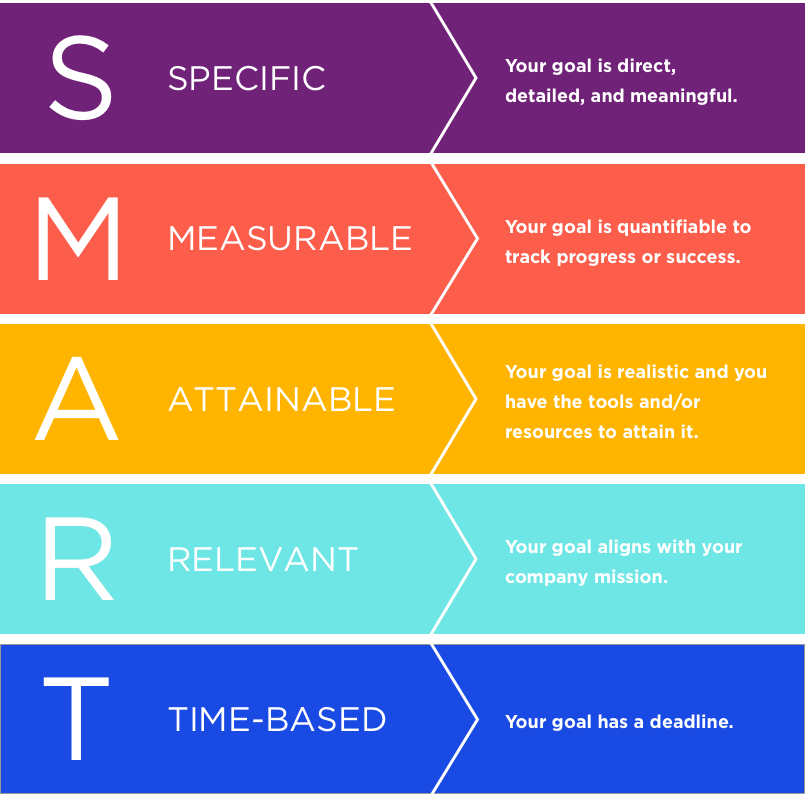
Having defined goals will guide the development and implementation of your strategy. Use the SMART methodology to set specific and measurable goals.

Step 3 – Develop Educational Content

Create a variety of educational content and content formats to address different learning styles and preferences. This can include tutorials, guides, videos, webinars, quizzes, case studies, and interactive courses.

Create microlearning modules and use game mechanics and community for enhanced engagement in online learning.

Ensure the content is relevant, engaging, and easy to understand. Consider creating customer education programs tailored to different user levels, use cases, job roles, or even locations. Offer a certification to add more value for your learners.

Step 4 – Choose the Right Delivery Channels

Select the appropriate channels to deliver your educational content. Consider using a mix of platforms, such as a Learning Management System (LMS), customer portals, and social media, to reach a wider audience. Webinars can serve as a dynamic way to engage with customers and provide real-time learning opportunities.

Step 5 – Implement Technology Solutions

Leverage technology to enhance your customer enablement efforts. Use tools like customer education platforms to deliver content, track progress, and assess the effectiveness of your program.

Consider using analytics to gain insights into customer engagement and learning outcomes after the deployment of your program.

Step 6 – Promote the Program

Both existing and new customers should know about the available resources for them. This can be achieved through in-product notifications and pointers, on your website and social media, and communicated by all your customer facing employees from sales to customer success and support.

Step 7 – Provide Continuous Support

Offer ongoing support to your customers as they engage with your educational content. This can include live webinars, Q&A sessions, and community forums where customers can ask questions and share experiences.

Building a community around your product encourages interaction and learning.

Step 8 – Measure and Optimize

Regularly evaluate the success of your education program by tracking key metrics such as course completion rates, customer feedback, and changes in support requests.

Use this data to refine your content and improve the program’s effectiveness continuously. Adjust your strategy based on feedback to ensure it remains relevant and valuable.

Best Tools for a Successful Customer Education Academy

Building a robust customer education program requires leveraging the right tools to create, deliver, and manage content effectively.

Here are some popular types of tools that can help you develop and enhance your customer education strategy:

1. Online Course Platform

Customer education platforms, which are designed specifically for customer training or Learning Management Systems (LMS) that serve multiple educational purposes, are excellent solutions to deliver, track, and manage educational courses and training programs.

They provide tools for creating content, managing student progress, and generating reports to enhance the learning experience.

Pros

  • Customization capabilities: Learning management systems offer a range of features and integrations that can be tailored to meet the specific needs of your organization, from course creation to user management.
  • Scalability: LMSs are suitable for businesses of all sizes and can accommodate unlimited users and content, allowing you to start small and scale up as needed. They also support several use cases and allow you to build different learning environments for different audiences.
  • Centralized content and user management: Using an LMS, you can streamline your customer education efforts and easily manage content and users through automations and bulk actions.
  • Reporting and analytics: All LMS platforms provide insights into learner progress and course effectiveness, enabling data-driven improvements.

Cons

  • Complex setup: Implementing an LMS can be complex and may require technical expertise and several weeks to be completed.
  • Learning curve: Some LMSs are rather hard to figure out since they have so many features and capabilities.
  • Cost: Some systems can be expensive, especially for small businesses or those with limited budgets.

LearnWorlds stands out as a top solution for customer education. It serves diverse use cases and is consistently ranked high by users due to its ease of use, wealth of features, and advanced customization and scalability – all this at a fair price that is not restrictive to SMBs!

9000+ brands trust LearnWorlds to train their people, partners & customers.

Start a FREE Trial

2. Content Creation Tools

Content creation tools are software applications used to develop multimedia learning materials, such as videos, tutorials, presentations, and interactive courses. They enable educators and trainers to design engaging and professional-quality content for various learning purposes.

Pros

  • Engaging content: Enables the creation of professional-quality tutorials, videos, and interactive courses, enhancing the learning experience.
  • Ease of use: Many content creation tools are designed to be user-friendly, requiring minimal technical skills to produce high-quality materials.
  • Versatility: Supports a wide range of content types, from videos to infographics and presentations.

Cons

  • Not an all-in-one solution: Using content creation tools doesn’t solve the problem of centralizing and streamlining your training efforts.

Again, this is why going with an all-in-one online course platform like LearnWorlds is the most stress-free option that saves you from the trouble of juggling between tools. See on action how LearnWorlds works:

Watch demo

3. Webinar and Live Training Platforms

Webinar and live training platforms are online services that facilitate real-time virtual training sessions, workshops, and presentations. They offer features like screen sharing, audience interaction, and session recording to enhance live learning experiences.

Pros

  • Real-time interaction: Web conferencing platforms support live training sessions with features like screen sharing and audience engagement tools, such as polls and Q&A.
  • Wide reach: Enables reaching a large audience simultaneously, making it ideal for global training sessions.
  • Recording features: Sessions can be recorded for later use and turned into a valuable resource for learners.

Cons

  • Technical issues: Live sessions can be prone to technical difficulties, such as connectivity issues or audio problems.
  • Engagement challenges: Keeping participants engaged in a virtual environment can be challenging.

4. Community and Collaboration Platforms

Community and collaboration platforms are digital spaces that allow users to engage in discussions, share knowledge, and collaborate on projects. They foster interaction among users, enhancing learning through peer-to-peer support and knowledge sharing.

Pros

  • Enhanced learning: Peer-to-peer learning and knowledge sharing are extremely effective ways to learn effortlessly in an informal environment.
  • Increased engagement: Providing a platform for customers to interact with your brand and each other enhances engagement and brand loyalty.
  • Customer support: Offers a space for users to seek help and share experiences, reducing the load on customer support teams.

Cons

  • Moderation required: Active management and moderation are necessary to ensure a positive and productive community environment.
  • Clunky and not agile: Community platforms can take a while to update and tend to be hard to maintain when it comes to new content and sunsetting older content.

5. Course Marketplace Platforms

Course marketplace platforms, like LinkedIn Learning, are online platforms that offer a wide range of courses from various providers. They provide learners with access to diverse educational content, allowing for personal and professional development across multiple subjects.

Pros

  • Wide reach: Course marketplaces are very popular, which means they will be viewed by thousands of potential customers.
  • No need for marketing: Since course marketplaces have so many visitors, you don’t have to do anything to market your course to get it to a wider audience.

Cons

  • Hard to stand out: On the flip side, the popularity of online course marketplaces also means that it might be hard for your course to stand out.

Ready to Build a Winning Customer Education Strategy?

An effective customer education strategy is a powerful tool for driving customer success, enhancing satisfaction, and reducing churn.

By understanding your customers’ needs and delivering targeted educational content, you enable them to achieve their goals and build lasting relationships with your brand.

As customer expectations evolve, continue to innovate and improve your education efforts to ensure your customers derive maximum value from your products and services.

And if you’re looking for the best tool for the job, look no further than LearnWorlds. Our platform is equipped with all the features you need for a scalable and engaging customer education academy.

With intuitive content authoring and website builder, multiple schools and custom branding, mobile app and AI tools, there’s so much you can accomplish we can’t even begin to describe it!

Discover LearnWorlds with a 30-day free trial today!

9000+ brands trust LearnWorlds to train their people, partners & customers.

Start a FREE Trial

Further reading you might find interesting:

  • Top 12 Customer Training Software
  • Customer Onboarding Strategies: Why Tech-Touch is the Best Option
  • How Can You Improve Customer Education? 5 Common Mistakes & How to Avoid Them
  • Customer Enablement: Why It Matters & Best Practices for Successful Implementation
  • 7 Customer Onboarding Challenges and How an LMS Can Beat Them
  • 11 Benefits of Customer Training That Drive Business Growth

The post How to Build Your Customer Education Strategy appeared first on LearnWorlds.

How to Make Money as an Affiliate for eLearning Products

Software Stack Editor · August 16, 2024 ·

Becoming an e-learning affiliate is a fantastic opportunity to gain recognition and earn money by promoting online education. As an affiliate, you can recommend courses from online schools to your network—whether it’s family, friends, colleagues, customers, or website visitors—and earn commissions for every successful enrollment you generate.

How does affiliate marketing for online academies work? It’s really simple: you get a unique affiliate link from the academy website or course page you want to promote and attract clicks to it. When someone buys a course through your link, you earn a portion of the revenue. It’s a win-win situation where the academy gains a new student, and you are rewarded for your referral efforts.

Sounds easy right? That’s because it is. With advanced affiliate management systems like the one built directly into LearnWorlds, the process becomes even more streamlined. The Affiliate Management feature is available for any LearnWorlds school with a Pro Trainer plan or higher, making it easy to automate and manage your affiliate marketing efforts efficiently.

What you need is the right strategies and a solid plan to turn affiliate marketing into a profitable and sustainable passive income stream, all while helping others discover valuable educational resources.

Stay put as we go over key considerations, strategies, and tips to help you make the most of affiliate marketing for e-learning.

How Affiliate Marketing Works?

As explained earlier, in affiliate marketing, you promote a company’s product through a unique affiliate link. When someone clicks through your link and makes a purchase, you earn a commission. This is how affiliate marketing programs function, offering a simple yet effective way to generate affiliate income.

To find the best fit for your marketing efforts, you can start researching the best affiliate programs, like the Amazon affiliate program or ShareASale. Each program has different commission rates and payout structures, so you need to choose one that aligns with your audience and business goals.

💁These are The 25 Top High-Paying Affiliate Networks and Programs
Different Types of Affiliate Marketing

Pat Flynn, a well-known expert in the field of affiliate marketing, highlights three primary types of affiliate marketing (2009) that can help you understand the different ways to earn income as an affiliate.

Each type varies in terms of effort, involvement, and potential reward.

1. Unattached Affiliate Marketing

In unattached affiliate marketing, you have no direct connection to the product or service you’re promoting. As an affiliate, you might use pay-per-click (PPC) ads or other forms of online marketing to drive traffic to your affiliate links.

This type requires minimal involvement but can be challenging to generate trust and high conversions since you are not personally endorsing the product.

2. Related Affiliate Marketing

Related affiliate marketing involves promoting products or services that are relevant to your content but aren’t something you’ve personally used.

For example, if you have a blog focused on digital marketing, you might promote marketing tools or e-commerce platforms that align with your content but aren’t products you’ve personally tried.

This type of affiliate marketing strikes a balance between involvement and authenticity, as you’re still providing value to your audience with relevant recommendations.

3. Involved Affiliate Marketing

This is the approach Pat Flynn strongly advocates for. Involved affiliate marketing is where you promote products or services you have used personally and can genuinely vouch for.

This method often involves creating in-depth product reviews, tutorials, or case studies that highlight your experience. By sharing your thoughts, you build trust with your audience, which often leads to higher conversion rates and stronger affiliate sales.

Understanding these types of affiliate marketing can help you choose the best approach and affiliate marketing strategy when promoting e-learning products like online courses.

Promote Online Courses as a Beginner Affiliate Marketer

Now, let’s say that you have agreed to promote an online academy. How do you go about launching effective affiliate marketing campaigns? Luckily, there are simple ways to ensure that you maximize exposure and profits.

Here are some proven-to-work strategies to get affiliate commissions:

Strategy #1: Create Blog Content

Building high-quality content is crucial for driving traffic and generating affiliate sales. If you already are a blogger, you can use different types of content, such as product reviews, comparison guides, how-to articles, personal case studies, or even in-depth tutorial videos that give details about the course.

These forms of affiliate content can provide immense value to your target audience while creating awareness of the course you are promoting.

💁 Check out 30 Marketing Ideas to Promote an Online Course

Strategy #2: Try Influencer Marketing

Influencer marketing is a powerful tool in digital marketing. If you know people with a big following on platforms like TikTok, LinkedIn, X, or Instagram, reach out to them and discuss the possibility of forming a partnership with them and promoting your affiliate offers to their audience.

By collaborating with famous personalities and popular brands while sharing your experiences, you will have a bigger chance of boosting your affiliate income.

Strategy #3: Take Advantage of Social Media

Don’t hesitate to share your affiliate links to your own social media profiles, groups, or pages. If you have a YouTube channel, that’s even better.

As long as you continue to provide value and motivation for people to sign up, more and more will come and gradually start clicking on your links. Your audience will be looking out for those promotions in their social media feeds.

Strategy #4: Build an Email List

A strong email list is a valuable asset for any affiliate partner. By using email marketing effectively, you can send targeted promotions and updates to your subscribers.

Ensure you have an opt-in form on your WordPress site to capture your site visitors’ emails and gradually work to build a connection with your audience. In your emails, make sure to offer content that shows your affiliate link in a strategic position as well.

Strategy #5: Offer Lead Magnets

Give your audience free resources like guides, checklists, e-books, worksheets, or templates that include your affiliate link. Use these lead magnets to encourage sign-ups for your email newsletter, where you can further promote the courses.

Strategy #6: Host Free Webinars

Webinars are a great tool to increase product awareness. To make them work though these live sessions should be informative and offer solutions to problems through the course you are promoting.

You can choose to collaborate with the course owner in a joint webinar as well, to make a bigger impact and answer key questions potential learners may have related to the course.

Strategy #7: Host or Guest a Podcast

Podcasts offer excellent exposure for your promoted products. Whether you are hosting or guesting, be prepared to discuss the product in depth. If you are running your own podcast though, consider inviting the academy owner or course creator to share insights and speak about their work.

Strategy #8: Capitalize on Seasonal Offers

Seasonal offers like Black Friday, Christmas, and New Year’s are the best times of the year to introduce a new product to your audience. People go on a buying frenzy on those dates and the vendors offer great discounts on digital products.

Work with the academy owner that you are affiliated with, and come up with a 12-month promotional calendar that aligns with the academy’s sales events. You can also agree to offer coupons to encourage more members of your audience to purchase.

Strategy #9: Explore Co-marketing Campaigns

Explore co-branded advertising, cross-promotion, guest posting, and other collaborative marketing efforts with the academy owner. Both parties can benefit from gaining exposure to each other’s audiences.

Strategy #10: Invest in Relationship Marketing

Building long-lasting relationships with customers, partners, or prospects in your professional network can help you increase your sales and the possibility of them getting interested in the product you are promoting.

Relationship marketing is all about bringing the product and brand you represent to the forefront and offering a customer experience that is based on mutual trust, recurring customer engagement, and respect toward the customer.

💁 The most effective way to cultivate a genuine connection with your audience is by creating an online community. Learn how to build yours here.

Strategy #11: Consider Dropshipping

Online courses are digital products which means there is a dropshipping option for you right? Well, that’s not entirely true. Combining dropshipping with affiliate marketing is another equally effective strategy you can try out.

By integrating dropshipping into your affiliate marketing business, you can offer physical products alongside the online courses you promote, creating multiple streams of affiliate income.

Best Tips for Effective Affiliate Marketing

To ensure your promotional efforts yield positive results, your strategies must be well-aligned with your audience’s needs and interests.

Here are some key tips to help you succeed in your affiliate marketing campaigns:

  • Choose Relevant Courses: Promote courses that are closely related to your audience’s interests and the content you create. This relevance will increase engagement and conversions.
  • Select Products You Believe In: Only promote products that you have personally used and trust. Your genuine enthusiasm and firsthand experience will resonate with your audience.
  • Provide Value, Not a Hard Sell: Focus on creating content that adds value rather than pushing a hard sell. Emphasize the benefits and how the products or courses can address your audience’s needs.
  • Be Transparent About Affiliate Links: Clearly disclose when your content includes affiliate links. Inform your readers that you may receive a commission if they make a purchase through your links. This practice maintains ethical standards and builds trust with your audience.
  • Optimize for Search Engines: Research relevant keywords and incorporate them into your guides and reviews. This will improve your Search Engine Optimization (SEO) efforts boosting your content’s visibility in search engine results and attracting a more targeted audience.
  • Monitor and Adjust Your Strategies: Regularly review the performance of your practices using marketing tools like Google Analytics looking into metrics like traffic, click-through rates, and conversions. WordPress plugins can also help manage and optimize your links, allowing you to check what works best, and adjusting your approach accordingly.

If you’re affiliated with a LearnWorlds academy, you can use the comprehensive Affiliate Management Dashboard to track your performance and further optimize your campaigns.

Keep on reading to learn more about this tool and make the most of it.

How to Start Promoting a LearnWorlds Academy

The first step in this journey is to choose your favorite LearnWorlds academies you want to partner with. Then approach them to express your interest in working with them as an affiliate, and encourage them to start using the LearnWorlds Affiliate Management.

As an affiliate, you will need to learn how to use the Affiliate Dashboard. This should help you understand what it can do for you and the affiliated academy.

The following screenshots will give you an insight into the process of becoming an affiliate with a LearnWorlds academy step-by-step:

Step 1: Access the Affiliate Dashboard

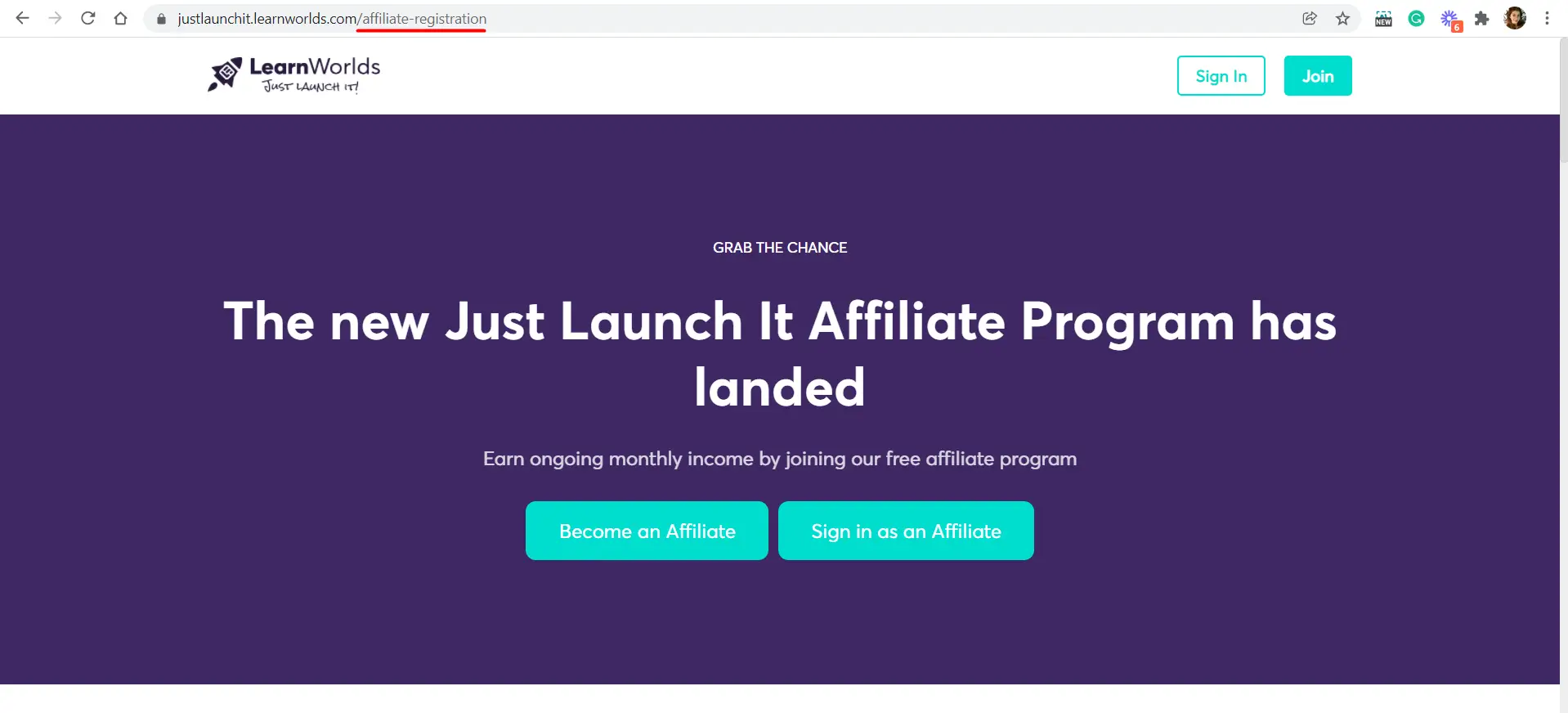
Visit our affiliate page to register and log in to your affiliate dashboard. Write down the URL of the academy website you want to promote followed by /affiliate-registration.

For example – https://www.schoolname.com/affiliate-registration. When you land on this page, this is what you will see:

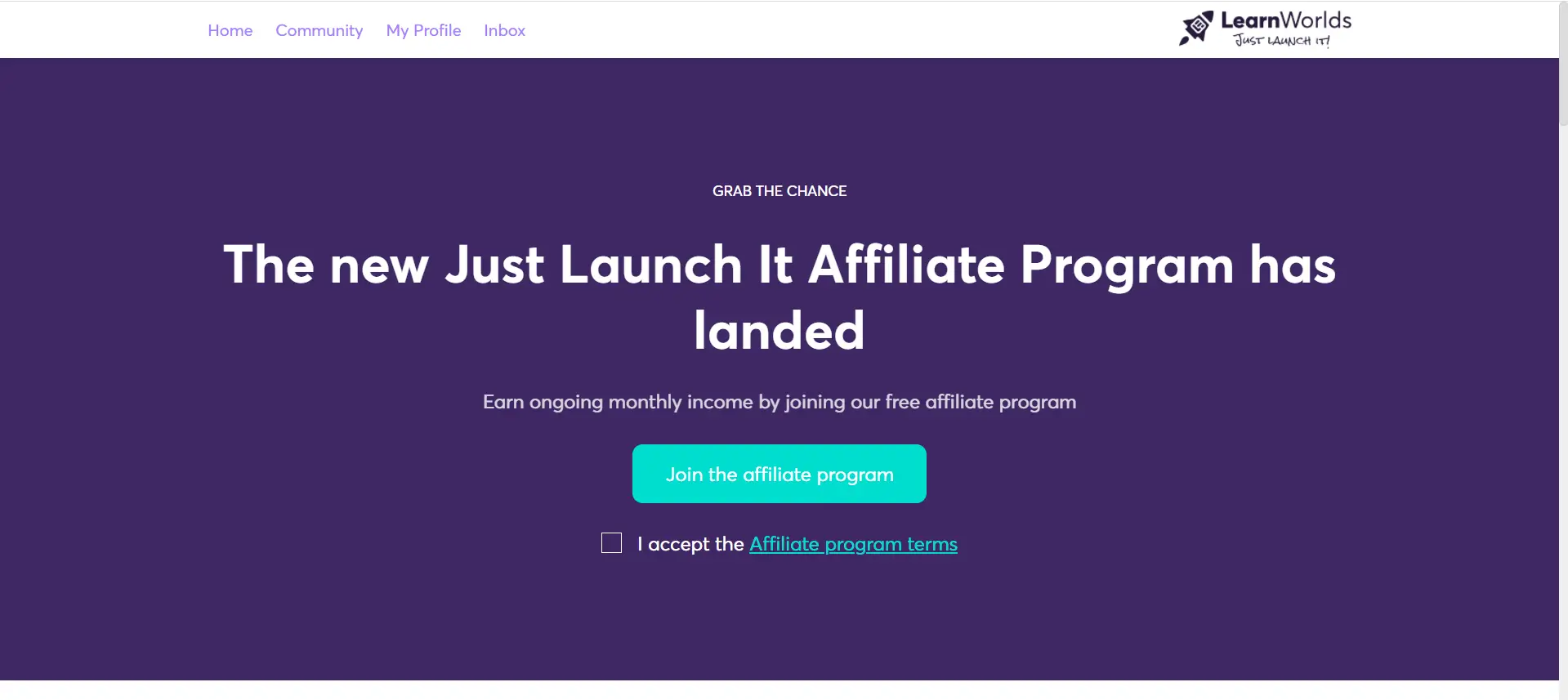
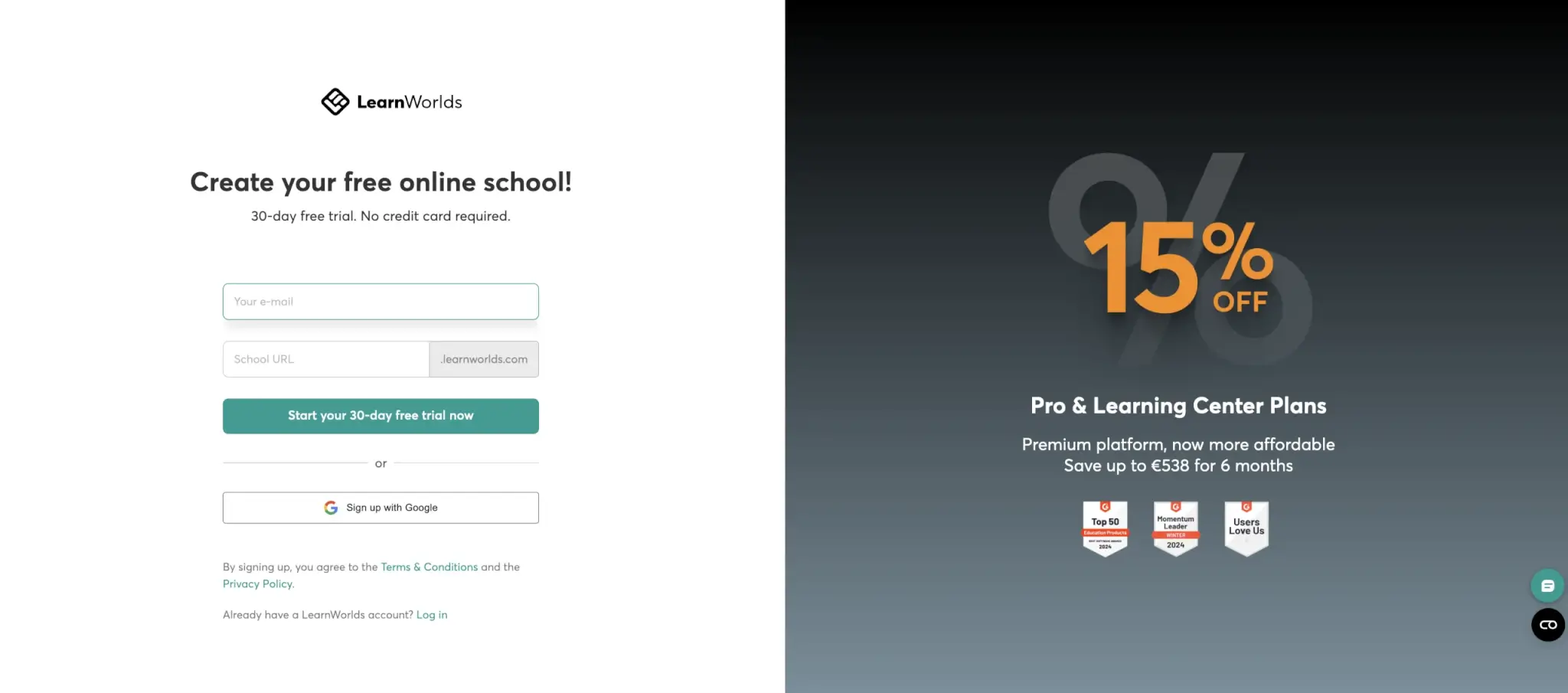
A screenshot showing the registration page for people who want to become affiliates for LearnWorlds academies or sign in as affiliates.

Once you register, you automatically become a LearnWorlds user. Then, you will be asked again to join the affiliate program.

A screenshot showing the page that allows LearnWorlds users to become affiliates by joining its affiliate program.

As an affiliate partner, you will be able to sign in each time from this page.

If you are already an academy user, you need to visit the same site to join the program or you can ask the academy owner to add you manually. Once you are in, you will be redirected to your affiliate dashboard.

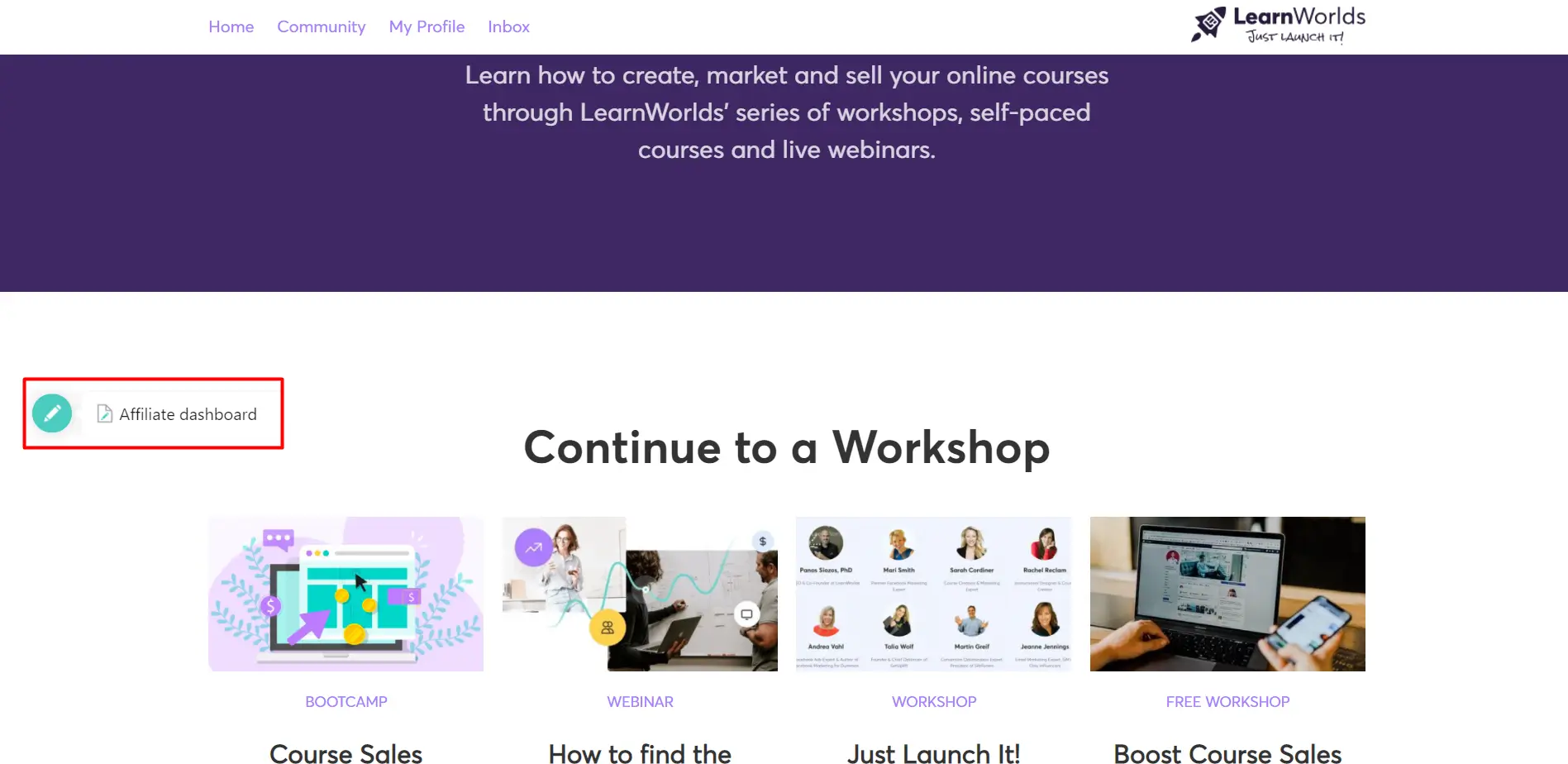
There is also the option to visit this dashboard directly from the home page as shown below.

A screenshot showing the main page of the affiliate registration for the LearnWorlds affiliate programs.

Step 2: Set up Your Payment Method & View Your Earnings

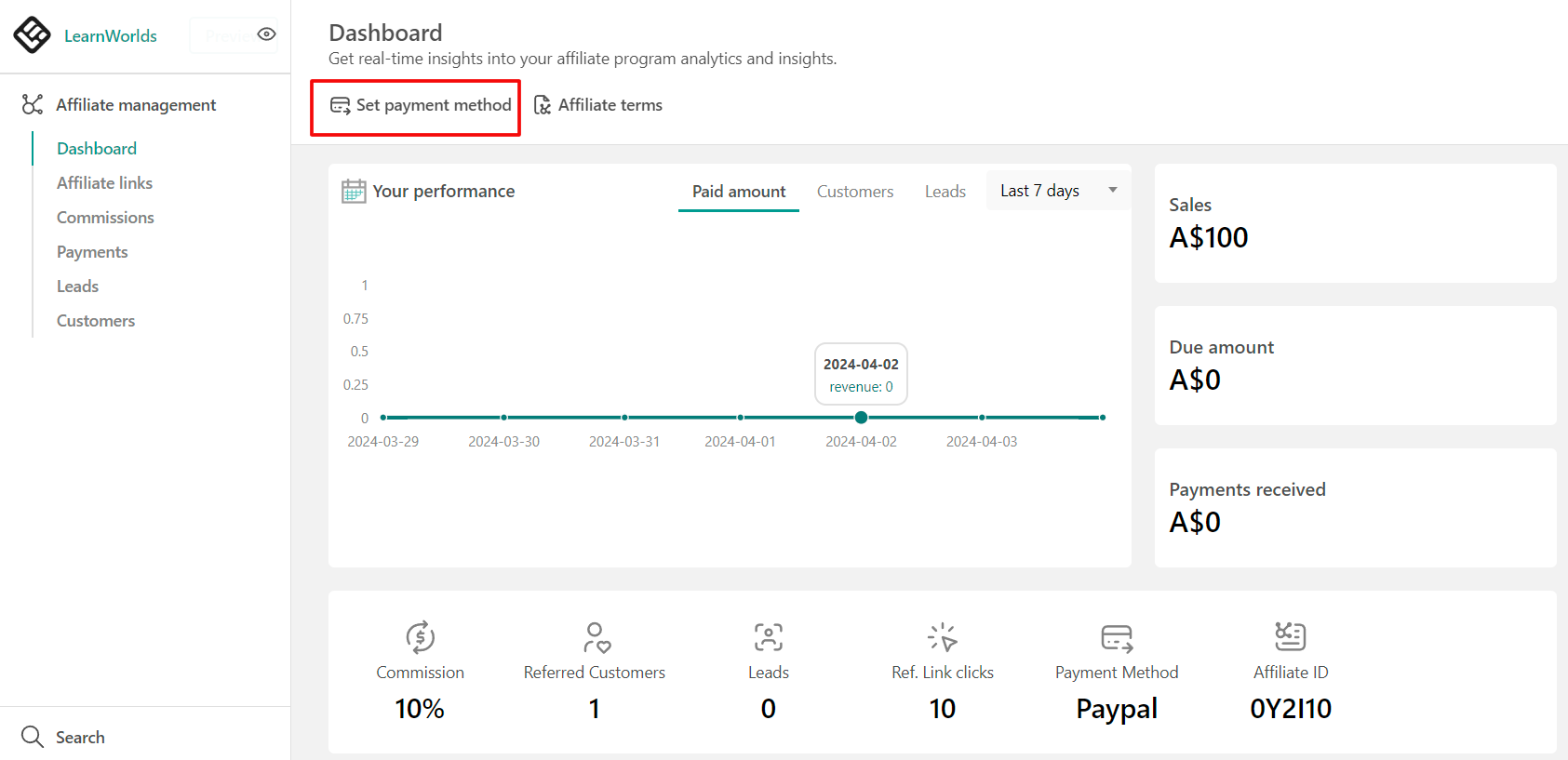
From the Affiliate Dashboard, you will be able to see a quick overview of your affiliate performance, your sales, the amount due to be paid, payments received, and more.

A screenshot of the affiliate dashboard showing the option to set payment method inside the LearnWorlds platform.

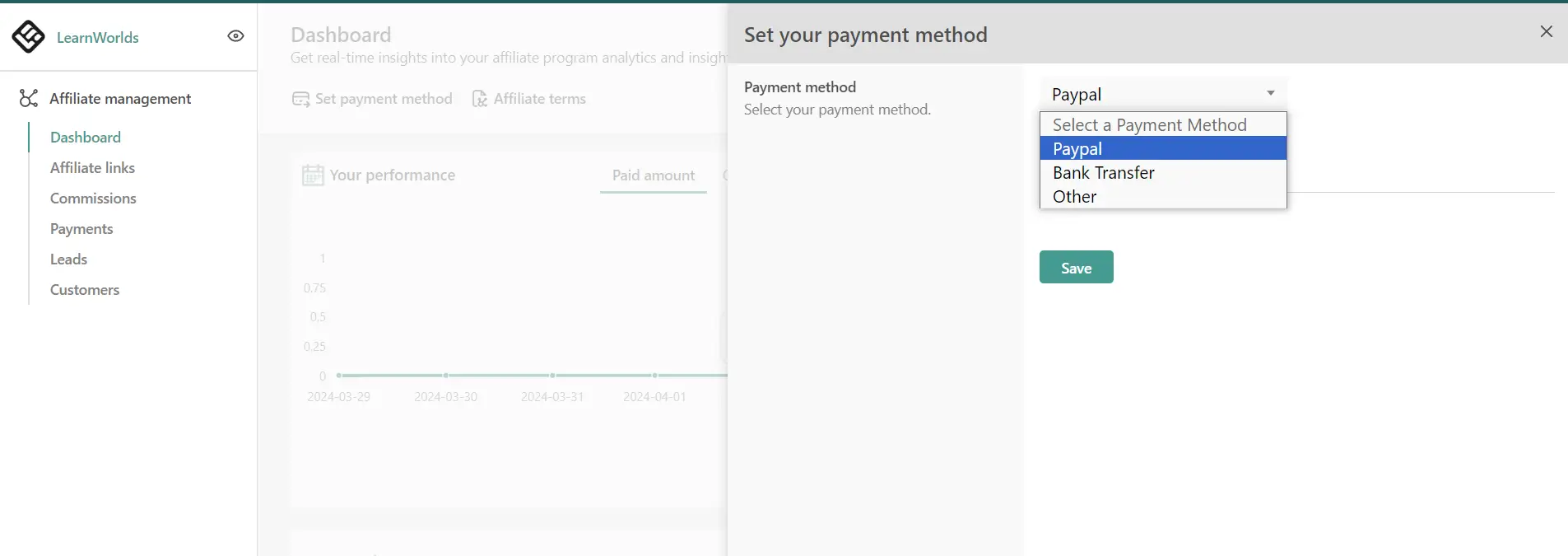
While you are there, click on the ‘Set payment method’ option under Actions to choose your preferred payment method option and hit ‘Save’.

 A screenshot of the affiliate dashboard showing the payment method options inside the LearnWorlds platform.

Step 3: Create Your Affiliate Links

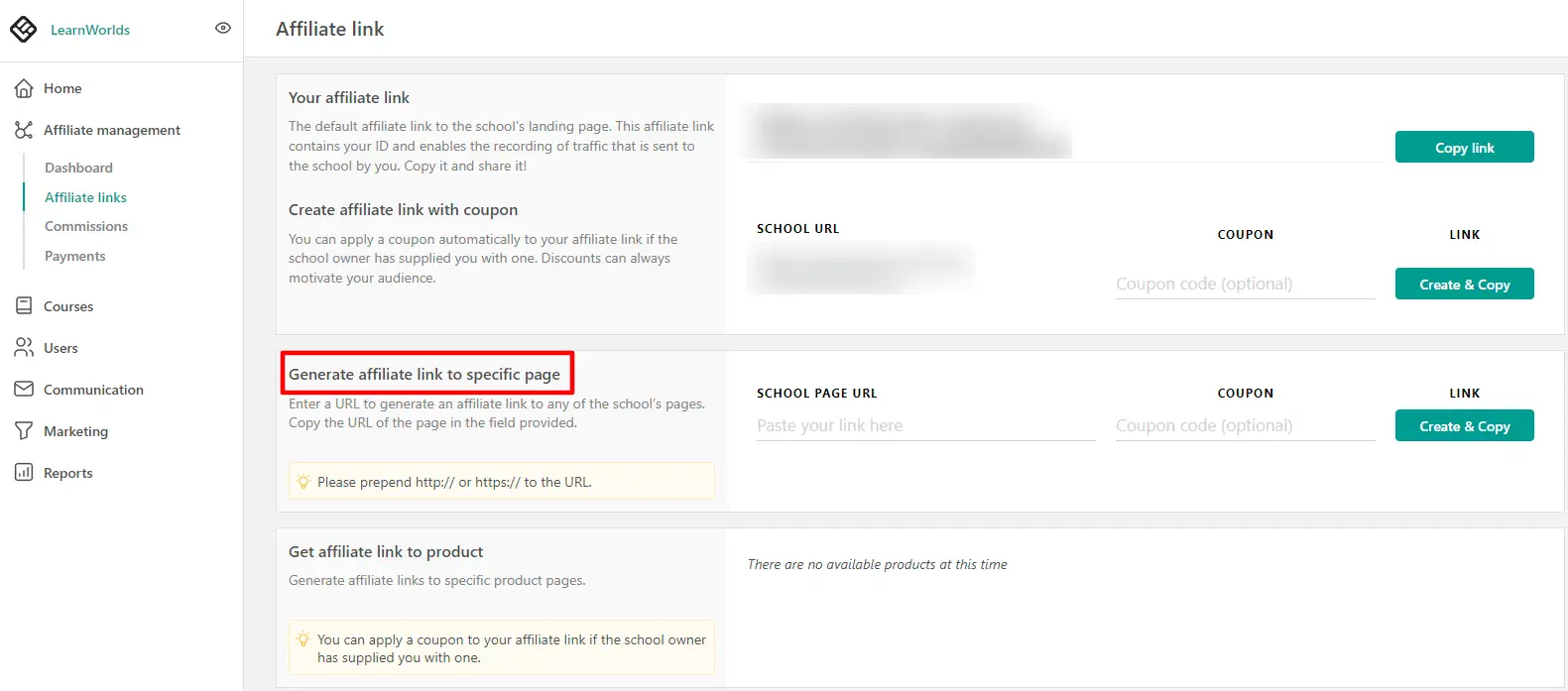
To create your affiliate links, click on the ‘Affiliate Links’ under the Affiliate Management list.

From there, simply insert a URL to generate an affiliate link for any page of the affiliate website.

You will need to add the public URL of the promoted page into the designated field. You can even get affiliate links for specific product pages chosen by the academy owner, as shown below.

A screenshot of the affiliate dashboard showing the affiliate links options for specific pages inside the LearnWorlds platform.

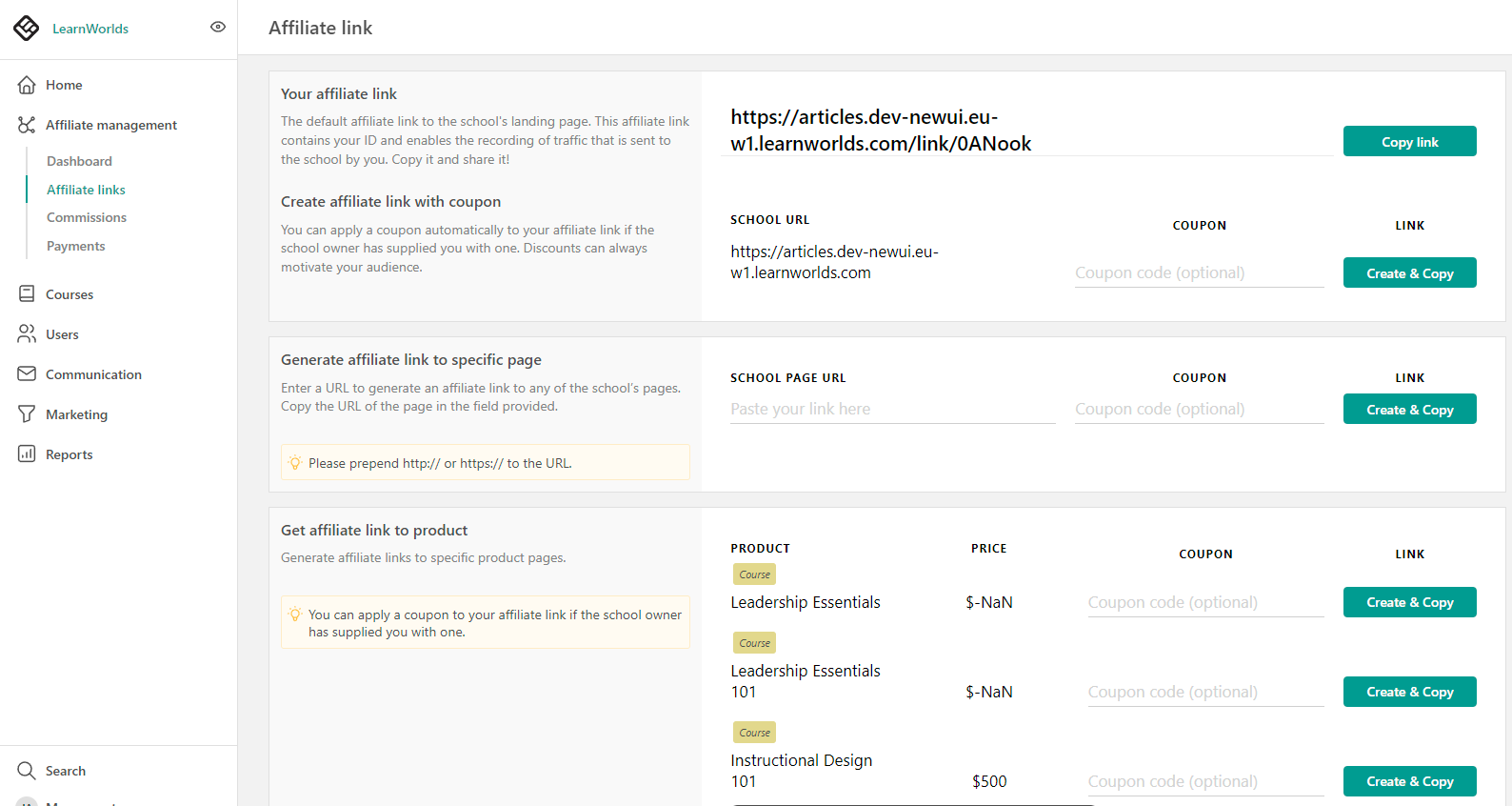
If you want, you can also choose to create affiliate links with coupons. Ask the academy owner for the coupon code to offer your audience a discount.

Here’s how your affiliate links will look like from inside the dashboard:

A screenshot of the affiliate dashboard showing the affiliate links options inside the LearnWorlds platform.

💡 For more information on how to use the affiliate dashboard check out this Guide for School Affiliates. It should give you all the information you need to navigate through and use the affiliate dashboard effectively.


Of course, our support team is always here to help you should you have any questions about promoting LearnWorlds schools as an affiliate.

Ready to Make Money Online Promoting eLearning Products?

To become a successful affiliate in online education, there is no doubt you will need a well-thought-out affiliate marketing strategy.

Whether you are new to affiliate marketing or looking to optimize your current strategies, understanding the basics and using the right tools can lead you to success. Explore different types of affiliate marketing, join the best affiliate programs, and continuously refine your approach to maximize your monetization potential.

It doesn’t matter if you are running a startup or already have an established online business, being upfront with your audience and maintaining transparency will always lead to better results.

Find out what LearnWorlds can do for you. Get your free trial today!

Your professional looking Academy in a few clicks

Start FREE Trial

FAQs – Frequently Asked Questions

Question #1: What are the best affiliate programs for beginners?

Some of the best affiliate programs for beginners include the Amazon affiliate program, ShareASale, and Shopify’s affiliate program. But if you want to become an eLearning affiliate you can start earning commissions by joining LearnWorlds’ Affiliate Program.

Question #2: How do I optimize my affiliate marketing content?

Focus on creating high-quality, SEO-optimized content. Research keywords, use them strategically in your content, and ensure your website is optimized for search engine visibility.

Question #3: What is the typical payout structure for affiliate commissions?

Payout structures vary depending on the affiliate program. Most programs pay commissions based on sales generated through your links, with rates ranging from 4% to 10% or more.

Question #4: How can I improve my conversion rate?

To improve your conversion rate, focus on targeting the right audience, optimizing your content, and providing clear, persuasive calls to action (CTAs). Regularly analyze your metrics to refine your strategies.

Question #5: What types of affiliate marketing are most effective?

Content marketing, PPC campaigns, and email marketing are among the most effective types of affiliate marketing. Choose the approach that best aligns with your audience and business goals.

The post How to Make Money as an Affiliate for eLearning Products appeared first on LearnWorlds.

How to Make a Screencast the Right Way

Software Stack Editor · August 14, 2024 ·

Screencasts are video recordings of a computer screen that demonstrate a specific task or process. They are excellent educational tools for teaching a wide range of subjects, from recording a PowerPoint presentation to demonstrating how to use a website or software.

Whether you’re creating a screencast for YouTube, a classroom, or an online course, these videos are one of the most effective ways to produce engaging “how-to” content.

In this article, we have reviewed the latest research and best practices on how to create high-quality screencasts, ensuring you deliver valuable content and knowledge to your audience.

Your professional looking Academy in a few clicks

Start FREE Trial

What is a Screencast?

Screencasts otherwise known as ‘screen capture videos’ or ‘screen recordings’ are recordings of computer screen activity, which often contain audio narration. They are an easy way to create walk-throughs, how-to video tutorials, and other educational videos, and are widely used as a learning tool.

A screencast features various elements like text, images, and mouse movements on top of audio, allowing online instructors to present adequate learning scenarios.

Some of the subjects that can be taught through screencasts are:

  • Computer applications
  • Software demonstrations
  • Computer-based procedures
  • How to navigate a website
  • Step-by-step problem solving
  • Answers in frequently asked questions
  • Complex concepts
  • Diagrams, pictures or simulations
  • Recording lectures from presentations (PowerPoint, Keynote etc)

Screencasts may be the best choice, in comparison to using simple screenshots in a slide presentation if you want to accomplish any of the above tasks. Let’s see why…

What are the Benefits of Using Screencasts?

In many scientific studies concerning screencasts (eg., Palaigeorgiou, and Despotakis, 2010) learners have liked the authentic nature of screencasts and said that screencasts increased their application-specific confidence, and helped them be more confident about the knowledge provided in the lesson.

Undoubtedly, screencasts have a significant advantage since learning becomes less impersonal and creates a sense of social presence that can’t be found in traditional books.

Perhaps, the most important benefit is that they provide worked-out examples, where the learning content is featured within an authentic context.

In their study, Palaigeorgiou and Despotakis (2010) support that screencasts offer the following:

  • Learners develop a better mental model of human-interface interactions.
  • An ‘agency’ effect is created, namely, the impression of self-executing the task presented.
  • Initial learning is fast since students do not spend time interpreting the steps as is required for the comprehension of textual instructions.
  • There is an immediate example on the lesson’s subject instead of asking a student to imagine a situation, and, hence, unproductive cognitive load while skipping between different sources (e.g., from books to the computer) is circumvented.
  • A user learns by observing the desired behavior of an expert, and, consequently, it aids learners with low self-efficacy in exploring the demonstrated behaviors.

There are multiple benefits to using screencasts and demonstrating the lessons in this way. If you are second-guessing yourself though, you might want to consider the following advantages.

Here’s what screencasts can do for you:

  • Provide demonstration of complex processes
  • Allow self-paced learning and additional flexibility
  • Ensure consistent delivery of instruction to all learners
  • Deliver reusable content that can be played multiple times
  • Enhance retention and understanding of the material
  • Help broaden your audience reach
  • Offer real-time feedback
  • Improve personalized learning

In some cases, screencasts can also serve as valuable documentation for troubleshooting, especially in customer support, and when onboarding new employees or students to your course.

However, not all screencasts are of equal quality and educational value. This largely depends on the screencast recording tool you are using and what you can do with it. More on this later.

What are the Main Components of a Screencast?

Sugar, Brown, and Luterbach (2010) analyzed the components of screencasts and found that they mainly consist of:

  • A bumber: Α statement at the beginning or end of a broadcast. (e.g., “Hi, this is your instructor from…class.”)
  • Screen movement: The screen movement can either be static, maintaining a constant frame in which the cursor moves within that frame or dynamic when the screencast follows the cursor.
  • Narration: Some screencasts’ audio commentary is an explicit description of a procedure that coincides with what is displayed on the screen. This description can either be explicit or implicit.

To get an idea of this audio commentary, here are a few examples of both explicit and implicit descriptions.

Explicit description examples

Example for a Word Processor:

  • “Click on File in the top-left corner, then select New Document.”
  • “Type your document title in the header section, and press Enter.”

Example for Spreadsheet Software:

  • “Select cell A1 by clicking on it, then type ‘Sales Data’.”
  • “Click on the Formulas tab, then choose Insert Function.”

Example for Graphic Design Software:

  • “Click on the Rectangle Tool in the toolbar, then drag to draw a rectangle on the canvas.”
  • “Select the text tool, click on the canvas, and type your desired text.”

Implicit description examples

Example for a Word Processor:

  • “Start a new document.”
  • “Add a title to your page.”

Example for Spreadsheet Software:

  • “Enter your data in the spreadsheet.”
  • “Use a function to calculate the total.”

Example for Graphic Design Software:

  • “Draw a shape on the canvas.”
  • “Add some text to your design.”

The majority of screencasts include a combination of both of these narration formats. Of course, there are screencasts with no narration at all.

However, it is preferable to use narration because it can make your content more powerful, engaging, and personal. Most of the studies (eg., Ali, Samsudin, Hassan, and Sidek, 2011) agree, saying that screencasts with narration are significantly more effective than screencasts without narration in enhancing students’ learning performance.

How to Design an Effective Screencast: Best Tips for Success

Bad screencasts can hurt the learners’ satisfaction and even worse the quality of learning.

For example, screencasts are ineffective when:

  • They have inflexible content structures and prevent exploratory learning.
  • They have browsing difficulties and provide a predetermined pace of information.
  • They lead to a delusion of skills and are not suitable for learning advanced operations.

Is there a way to prevent these disadvantages?

Most screencasts we’ve seen provide the same experience that pushes viewers into passivity and often leads to superficial learning with learners forgetting what has been demonstrated in the first place.

Researchers in screencast design though, found that there are specific design guidelines that can be applied to provide more active video consumption.

Here is a summary of those guidelines:

1. Add interactivity to your videos

To maximize the impact of your video content, you need to allow learners to have control over the presented material. Therefore, adding interactivity that helps them become more engaged with the experience is a crucial component of screencasting design.

With interactivity, representational holding is reduced as smaller chunks of information have to be processed in the working memory (Ertelt, 2007).

  • How can you achieve that? Give learners control over the pace and direction of the succession of frames. For example, give them the ability to change the playback speed and also add skip forward buttons, to let users avoid certain parts of the video. While explaining difficult procedures provide pause buttons inside the video frame to give a greater sense of control.
  • Create a table of contents for easy content access, especially in videos with many procedural examples.
  • Give learners the capability to change the viewpoint or to zoom in, so that phenomena can be explored from different perspectives.
  • Create breaks to give the ability to have five-second pauses. This can be achieved by adding overlays summarizing the steps explained in a certain example.
  • Incorporate context-related pointer keywords within the video. These can be discrete action steps appearing inside the video. Make sure to use those keywords also as hypervideo links.
  • Add questions that will create a dialectical relationship between you and your learners.

2. Keep videos short

One of the most challenging design tasks is creating meaningful videos for lengthy processes that can’t be covered in a single video. Breaking down the content into shorter videos not only makes scripting easier but also enhances clarity and retention for the viewer.

Shorter screencasts, focus on one concept, hence reducing learners’ cognitive load as well.

So, here’s what you can do for your screencasts:

  • Create short videos with a clear beginning and end.
  • Keep videos as short as possible. A length of 15 to 60 seconds is optimal for keeping the user engaged and minimizing what needs to be remembered. For screencasts, a two-minute video is long enough to explain a specific procedure.
  • Alternatively, introduce physical changes on the screen or add intentional pauses – such as temporarily dimming the screen, to create distinct segments within the video.

These small adjustments can help to structure the content, guiding viewers through the material in a more organized and impactful way.

3. Craft your titles carefully

Carefully crafted titles are key to making your content easy to find and navigate. By using clear and accurate labels, you provide learners with quick access to the information they need.

Here are some tips on making this happen:

  • Organize your content chronologically, alphabetically, or topically.
  • Adopt a conversational tone in your titles to help learners draw connections between videos or screenshots.
  • Keep titles concise while clearly conveying the learning objective of each video.
  • Maintain consistency by presenting similar types of information in the same location and format across your videos. This consistency allows learners to develop a mental framework for navigating your content, making it easier for them to find and understand the material.

4. Offer illustrated tutorials at the end of your lecture

Designers should consider the “expertise reversal principle,” which suggests that screencasts effective for novices during the initial learning phase may lose their effectiveness—or even hinder recall—once learners have a foundational understanding of the material.

To help ensure that learners retain the information provided, consider the following strategies:

Use Simplified Videos: Provide videos that focus solely on a sequence of screenshots of the key actions performed, or offer a filtered view that highlights only the actions not previously covered in earlier videos.

Transition to Illustrated Tutorials: As learners develop a solid understanding of the procedures, replace detailed screencasts with illustrated tutorials. Research by Novakovic, Milic, and Milosavljevic (2013), has shown that illustrated tutorials are more effective for helping learners recall already acquired procedures during later stages.

5. Give learners practice opportunities

Practice is the key to improving the transfer and application of knowledge. The success of learning is closely tied to the amount and quality of practice. When it comes to procedural knowledge, the likelihood of forgetting how to perform tasks increases with the number of steps involved.

Encourage your learners to actively repeat the procedures demonstrated, and whenever possible, provide immediate feedback. Assign them specific tasks that require applying what they’ve learned, rather than just mechanically following the steps.

Additionally, incorporate spaced practice into your lessons, as it is one of the most well-established principles in psychology for enhancing learning. Urge learners to revisit and repeat a procedure at various points throughout the course, using task completion exercises.

This approach reinforces their understanding and builds confidence in their ability to perform the procedure independently.

6. Give knowledge-encoding opportunities

Learners seek opportunities to encode knowledge through activities that boost their confidence and help them better organize the material. To support this, consider the following strategies:

Create Post-Screencast Questionnaires: Design questionnaires to assess learners’ understanding of the content immediately after the screencast. This not only reinforces key concepts but also provides valuable feedback on their comprehension.

Offer Multiple Views of the Content: Enhance practice by providing various formats of the material, such as concise, printable summaries, e-books, or downloadable resources. These alternatives allow learners to review and engage with the content in different ways.

Incorporate Multimodal Learning: Present the material through various modes—text, audio, and video—to cater to diverse learning preferences. Different forms of organization, like mind maps or infographics, can also help learners structure their understanding more effectively, enabling them to achieve multiple study goals simultaneously.

7. Give explicit time requirements

Provide learners with a clear connection between their learning objectives and the estimated time required to achieve them. This approach encourages learners to organize their study plans effectively, helping them to schedule their study sessions for long-term success.

At the start of the course, offer a support tool that guides learners in creating personalized study plans. This tool should consider their learning objectives and the time they have available, empowering them to manage their progress and stay on track throughout the course.

8. Apply the multimedia design principles

Research on learning from multimedia indicates specific principles, which guide instructors when it comes to creating an effective multimedia message design. In the table below you can see how multimedia design principles can be applied in screencasts.

Examples are taken from Razak’s, and ALI’s (2016) study.

Principle of Signalling Students will learn better if the signal to process the information is given. Insert signals, highlighting or assertion of important information (key-words, pointer phrases, for students to show what to do and how to organize them.
Principle of Coherence Students will learn better if external elements are removed. Issuing interesting but irrelevant statements or graphics used.
Principle of Redundancy Students will learn better if the information is not provided within the same sensory channels. Avoid showing print text and narration simultaneously with the display screen. It’s ok to present narration simultaneously with the display screen.
Principle of Spatial Contiguity Students will learn better if the printed text is near the graphics that corresponds to it, reducing the need for visual scanning. Place text close to the same part of the animation.
Principle of Temporal Contiguity Students will learn better if the narrative and animation are displayed at the same time to reduce stake memory. Present narration and animation simultaneously rather than individually.
Principle of Signalling
Students will learn better if the signal to process the information is given. Insert signals, highlighting or assertion of important information (key-words, pointer phrases, for students to show what to do and how to organize them.
Principle of Coherence
Students will learn better if external elements are removed. Issuing interesting but irrelevant statements or graphics used.
Principle of Redundancy
Students will learn better if the information is not provided within the same sensory channels. Avoid showing print text and narration simultaneously with the display screen. It’s ok to present narration simultaneously with the display screen.
Principle of Spatial Contiguity
Students will learn better if the printed text is near the graphics that corresponds to it, reducing the need for visual scanning. Place text close to the same part of the animation.
Principle of Temporal Contiguity
Students will learn better if the narrative and animation are displayed at the same time to reduce stake memory. Present narration and animation simultaneously rather than individually.

Other multimedia principles we have already mentioned are:

  • The segmenting principle (providing short chunks of information).
  • The worked-out example principle.
  • The animation and interactivity principle.

9. Make learners more active

Self-regulated learning is a growing field of educational research, which seeks how students can become more active in the learning process, by creating learning goals, inferring meanings, and applying strategies.

In self-regulated learning conditions, learners are capable of monitoring, controlling, and regulating aspects of their cognition.

Loch and McLoughlin (2011) have proposed specific guidelines, with which an instructor can foster each stage of learners’ self-regulation through screencasts:

Active Learning Dimensions Application in screencasts
Planning and goal-setting 1) Give an overview of the concept being presented. 2) Activate prior knowledge. Remind them about what they may already know.
Monitoring processes and metacognitive control 1) Ask learners to set a goal for the session. 2) Present questions and tasks to check for understanding, and to get students to engage in the problem-solving process actively.
Reflection on self-knowledge and task achievement 1) Encourage learners to reflect on the learning process and their understanding of the concept. 2) Ask learners to document areas of uncertainty and to prepare questions for the discussion section.
Planning and goal-setting
1) Give an overview of the concept being presented. 2) Activate prior knowledge. Remind them about what they may already know.
Monitoring processes and metacognitive control
1) Ask learners to set a goal for the session. 2) Present questions and tasks to check for understanding, and to get students to engage in the problem-solving process actively.
Reflection on self-knowledge and task achievement
1) Encourage learners to reflect on the learning process and their understanding of the concept. 2) Ask learners to document areas of uncertainty and to prepare questions for the discussion section.

10. Take care of the narrative you develop

To keep your learners engaged, avoid the monotony of a single voice throughout your content. Relying on just one presenter can make demonstrations feel repetitive and dull. Instead, incorporate a variety of presenters with different styles and perspectives. This diversity maintains interest and enriches the learning experience by offering multiple viewpoints.

💁 Your Instructional Video Style: How to Craft the Perfect Learning Experience

When presenting, aim for simplicity and clarity as well. Speak directly and conversationally, using an active voice and positive statements. Keeping your sentences straightforward and easy to follow will help massively.

On top of this, focus on providing procedural information rather than conceptual details. Learners typically watch “how-to” videos to understand the specific steps needed to complete a task.

So, your video should guide them through the process, enabling them to achieve the task quickly and effectively. Introduce conceptual information only when it is essential for understanding the procedure at hand.

7 Steps for an Effective Instructional Screencast Design

Now that we’ve seen the most popular design guidelines for screencast production, let me help you apply them to create your screencast by following seven simple steps.

Whether you are creating this screencast to showcase in a classroom, use it as part of an online course, educate your customers, or simply create a YouTube video, this is how it’s done.

Step 1: Study others

Begin by watching a variety of screencasts created by others. Observing both well-executed and poorly-designed examples will provide valuable insights into what works and what doesn’t.

This analysis can help you identify best practices and common pitfalls, which can inform the design of your own screencasts.

As you study these examples, consider the following:

  • Content Organization: How is the information structured? Is the flow logical and easy to follow?
  • Visual and Audio Quality: Are the visuals clear and engaging? Is the audio crisp and free of distractions?
  • Interactivity: Does the screencast include interactive elements that engage the viewer? If so, how effective are they?
  • Pacing: Is the pace appropriate for the content? Does the screencast move too quickly or too slowly?
  • User Engagement: How does the screencast keep viewers engaged? Does it use storytelling, questions, or prompts to maintain interest?

By critically evaluating these aspects, you can develop a clearer vision of what makes a screencast effective and apply these lessons to your work.

Step 2: Prepare Thoroughly

Invest time in your preparation to make sure you have all the resources and equipment you need. First and foremost, focus all your efforts on finding a high-quality screencast tool.

Best Screencast Software to Choose From

There are many screen recording software in the market that can help you create screencasts. You can choose based on your budget (free, paid, premium) or the functionality and features you need.

Here are a few examples:

  • Screencast-o-matic
  • Camtasia
  • Filmora SCRN
  • Apple QuickTime Player
  • Screenr
  • PowerPoint even has its own recording function helping you turn your to make your PowerPoint presentations into screencasts. Find out how here.

Other tools like Loom and Nimbus are handy as well, especially if you are using Google Chrome because they are available as Chrome extensions.

Choose the tool that works best for you, and always edit the result. You may opt-in for the software that also serves as a video editing tool or connects with a video editor to speed up the process.

💁 Check out our list of the 36 best training video software here.

💡LearnWorlds’ interactive video player can help you add interactivity to your screencasts. You can add annotations, pop-ups, clickable buttons, questions, watermarks, table of contents, subtitles, or even show interactive transcriptions extracted automatically from your videos!

Your professional looking Academy in a few clicks

Start FREE Trial

Other Tools to Consider

What’s great about screencasts is that they don’t require much equipment to begin with. A computer – either a Windows PC or an Apple Mac that connects with your chosen screencast video software, and an optional webcam will do the trick.

However, you want your screencasts to have top audio quality and eliminate background noise as much as possible to avoid distractions. Investing in a good microphone can make a difference here, and the good news is that you don’t need to buy an expensive one.

Instead of relying on your computer’s internal microphone, get headphones with a built-in microphone and you are good to go.

Step 3: Plan your content

Planning the content for your screencast includes three main subjects: a) What you want to achieve through your screencasts, b) how you will narrate your demonstrations, and c) what interactivity features you are going to use.

The questions below will help you understand these three elements:

What are your learning goals and content?

Create a clear plan with your learning goals and objectives.

How will you achieve those objectives through your screencasts?

What will your script/narration be for each screencast?

Create clear and concise story scripts or storyboards for the screencasts that are going to be recorded.

Which will your bumper be?

How many narrators will you have?

Will you appear in the video?

How explicit or implicit will the script be?

How will your mouse movement be?

What practical examples will you include in your description?

How will you help relate tasks between videos?

What kind of questions or statements are you going to use to make learners more active? (see the table about active learning)

What interactivity features will you add to each video?

Will you give learners a table of contents?

Will you give learners the capability to change the video’s viewpoint?

Will you insert questions inside the video?

Where will you insert breaks, pointer phrases, and highlights?

If you are a novice screencast creator you may need a few hours to create your first screencast, but this time should reduce significantly with experience.

Step 4: Start recording

Once you are ready, you can record your screencast. Choose whether you want to record your entire screen (full desktop), a specific browser tab, or your webcam.

Before you hit the ‘Record’ button, configure your system audio and do a test run to see if your video and audio are working properly. If you are planning to use any drawing tools have them ready as well.

Preferably, record audio during screen capturing. In case you are not giving out any voiceover instructions, add some music to play along in the background.

During the recording, your mouse movements should be slower than usual when something is being pointed out. These need to be controlled to avoid becoming annoying and distracting to the viewer.

If an error occurs in a sentence, sometimes it is better to pause and repeat the entire sentence without stopping the recording and edit later (cut out the bad parts) than restart the recording from the beginning (Mohorovičić, 2012).

Step 5: Edit your screencast video

As previously mentioned, a screen recorder with a built-in video editor can help you easily edit videos. With it, you can add the interactive elements you want, craft your titles carefully, and apply segmentation wherever needed.

You can also choose to cut parts of your video to make your screen capture as professional as it can be e.g. to correct a mistake you made or to remove any app notifications that might have popped up on screen during the recording.

Remember to create videos that last no longer than two minutes. Otherwise, make sure to create intentional and meaningful pauses in between segments.

Step 6: Save and share your screencast

Once editing is done, make sure you save your finished screencast. That is to not risk losing it after putting so much effort into creating it.

Most screencast tools will allow you to share your screencast via email or upload it to your Google Drive, which is great. Once you are ready to show it to your audience, you can choose to upload it on Vimeo or YouTube or embed the video file in your course content right away.

Step 7: Offer assistive learning material

Finally, if you want your screencast to perform well, you have to accompany it with meaningful activities that will boost your video’s effectiveness.

Here are some activities that you can make use of to accompany your screencast:

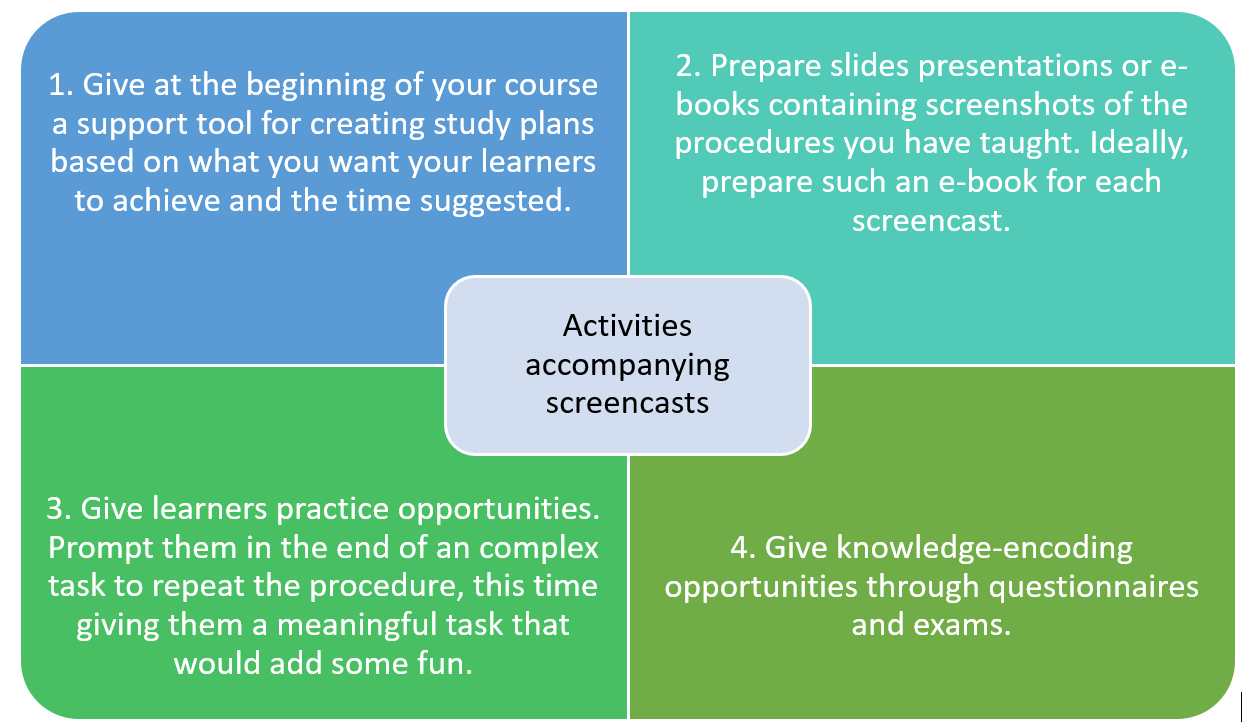
Activity #1: Personalized learning plans

At the beginning of your course offer a support tool for creating study plans based on what you want your learners to achieve and the time suggested.

Activity #2: Create presentations and e-books

Prepare slide presentations or e-books containing screenshots of the procedures you have taught. Ideally, prepare such an e-book for reach screencast.

Activity #3: Offer repeating and meaningful tasks

Give learners practice opportunities. Prompt them at the end of a complex task to repeat the procedure, this time giving them a meaningful task that would add some fun to the process.

Activity #4: Try questionaries and exams

Offer knowledge-encoding opportunities through questionnaires and exams to allow learners to test their knowledge evaluating what they’ve learned so far.

Ready to Use Screencasts to Educate Your Learners?

With all this preparation, you can be confident that your screencasts will have the greatest impact on your learners!

By following these steps, you’ll effectively reduce cognitive load and transform your videos into concise, digestible bits of information that boost engagement and participation.

Remember to continually reflect on your work, gather feedback from your learners, and refine your screencasts with each iteration!

Want to learn more? Find more information on how to create educational videos in the LearnWorlds Academy’s course Video-Based Learning (free course).

Get the most out of LearnWorlds by joining our Academy

Start Learning

<!–

Learn how to sell courses in the LearnWorlds academy

Sign up now

Create an Online Course with Learnworlds

Free
A detailed guide on how to create online courses with Learnworlds.

Video Based Learning: A Complete Guide

Free
Everything you need to know about creating effective instructional videos. Based on recent research on Video Based Learning.

The Complete Guide to Creating Awesome Interactive Videos

Free
Learn how to design and create interactive videos with LearnWorlds video editor.

Learn How Interactive Videos Benefit Online Courses

Free
Learn the scientific reasons why interactive videos facilitate learning and bring more student satisfaction.

–>

Research on Screencasts & Further Study

[1] Loch, B., & McLoughlin, C. (2011). An instructional design model for screencasting: Engaging students in self-regulated learning.

[2] Novakovic, D. R. A. G. O. L. J. U. B., Milic, N., & Milosavljevic, B. (2013). Animated vs. illustrated software tutorials: Screencasts for acquisition and screenshots for recalling. International Journal of Engineering Education, 29(4), 1013-1023.

[3] Mohorovičić, S. (2012, May). Creation and use of screencasts in higher education. In MIPRO, 2012 Proceedings of the 35th International Convention (pp. 1293-1298). IEEE.

[4] Oehrli, J. A., Piacentine, J., Peters, A., & Nanamaker, B. (2011, March). Do screencasts really work? Assessing student learning through instructional screencasts. In ACRL 2011 Conference Proceedings (Vol. 30, pp. 127-44). Philadelphia: Chandos.

[5] Ali, A. Z. M., Samsudin, K., Hassan, M., & Sidek, S. F. (2011). Does screencast teaching software application needs narration for effective learning?. TOJET: The Turkish Online Journal of Educational Technology, 10(3).

[6] van der Meij, H., & van der Meij, J. (2013). Eight guidelines for the design of instructional videos for software training. Technical communication, 60(3), 205-228.

[7] Despotakis, T. C., Palaigeorgiou, G. E., & Tsoukalas, I. A. (2007). Students’ attitudes towards animated demonstrations as computer learning tools. Journal of Educational Technology & Society, 10(1).

[8] Plaisant, C., & Shneiderman, B. (2005, September). Show me! Guidelines for producing recorded demonstrations. In Visual Languages and Human-Centric Computing, 2005 IEEE Symposium on (pp. 171-178). IEEE.

[9]Ertelt, A. (2007). On-screen videos as an effective learning tool. The Effect of Instructional Design Variants and Practice on Learning Achievements, Retention, Transfer and Motivation. Dissertationsschrift, Albert-Ludwigs-Universität Freiburg.

[10] Palaigeorgiou, G., & Despotakis, T. (2010). Known and unknown weaknesses in software animated demonstrations (screencasts): A study in self-paced learning settings. Journal of Information Technology Education: Research, 9, 81-98.

[11] RAZAK, M. R. A., & ALI, A. Z. M. (2016). Instructional Screencast: A Research Conceptual Framework. Turkish Online Journal of Distance Education, 17(2).

[12] Sugar, W., Brown, A., & Luterbach, K. (2010). Examining the anatomy of a screencast: Uncovering common elements and instructional strategies. The International Review of Research in Open and Distributed Learning, 11(3), 1-20.

The post How to Make a Screencast the Right Way appeared first on LearnWorlds.

How to See a Positive ROI from Customer Education

Software Stack Editor · August 14, 2024 ·

Customer education has gained significant momentum over the past few years. What was once a task delegated to account managers or customer service representatives is now a formal motion, and businesses are investing more into education programs each year. With additional investment comes additional scrutiny, and executives are asking the very valid question, “What are we getting out of this investment?” If you’re a customer educator, you may wonder how to provide a winning answer. Let’s dive in to find out!

The Elusivity of Customer Education ROI

The History of Customer Education Measurement

The journey of customer education (CE) from being a mere task to a strategic initiative is fascinating. Initially, customer training was an afterthought, something that happened informally through account managers or customer service representatives. However, as products and services grew more complex, the need for structured education programs has become evident. Businesses are recognizing that well-informed customers are more likely to be satisfied, loyal, and successful.

This realization has led to the formalization of customer education programs. Companies are investing in dedicated training departments, online learning platforms, and comprehensive resources to educate their customers. Despite this transformation, measuring the impact of these programs often remains elusive. Attempts at measurement often rely heavily on engagement metrics, such as the number of training sessions attended or the completion rates of online courses. While these metrics provide some insight, they fail to capture the true business impact of customer education.

Why It’s Difficult to Measure

The difficulty in measuring the ROI of customer education stems from several factors. Firstly, there is an overreliance on engagement metrics, which, while important, do not directly correlate with business outcomes. Metrics like course completion rates, quiz scores, and attendance figures can indicate participation levels but do not necessarily translate to improved customer behavior or increased revenue.

Secondly, many attempts to measure customer education ROI rely on loose correlations. For instance, a company might notice that customers who participate in some training are more likely to renew their contracts. While this is a positive sign, it does not establish a direct relationship between education and renewal. Other factors, such as product quality or customer service, could also be influencing these outcomes.

To truly demonstrate the value of customer education, a more robust and strategic approach to measurement is required.

A Modern Approach to Measurement

Realizing Positive ROI Starts with the Ability to Measure It

The first step to realizing a positive ROI from customer education is to develop a clear and effective method for measuring it. This means moving beyond traditional engagement metrics and adopting a programmatic approach that aligns customer education with broader business objectives.

A programmatic approach involves designing education programs with clear, measurable goals that are directly tied to business outcomes. This approach requires a shift in mindset from simply delivering training to solving specific business problems through education. By doing so, companies can establish a more direct link between education initiatives and business results.

To achieve this, customer education programs must be strategically connected to the company’s overall business objectives. This means identifying the key areas where education can have the most significant impact, such as customer retention, product adoption, or support cost reduction. By aligning education efforts with these objectives, companies can ensure that their training programs are not only informative but also impactful.

Three Steps to Building Measurable Customer Education Programs

Step 1: Identify Measurable Problems or Opportunities

The first step in building a measurable customer education program is to identify specific problems or opportunities that education can address. This involves working closely with various stakeholders, including sales, support, and product teams, to understand the challenges customers face and the opportunities for improvement. For example, if customers are frequently contacting support with the same issues, this could indicate a need for better education on those topics.

Step 2: Target Education Programs to Address the Problem

Once the problem or opportunity has been identified, the next step is to design education programs specifically targeted to address it. This requires a thorough understanding of the customer journey and the points at which education can have the most significant impact. For example, if the goal is to reduce support calls, the education program might focus on providing in-depth training on common issues and troubleshooting steps.

Step 3: Map Out Leading and Lagging Metrics that Connect Learning to the Business Problem

To effectively measure the impact of the education program, it is essential to establish a set of leading and lagging metrics. Leading metrics are those that can provide early indications of the program’s success, such as the number of customers who complete the training or the improvement in quiz scores. Lagging metrics, on the other hand, are the ultimate business outcomes that the program aims to achieve, such as a reduction in support calls or an increase in customer retention rates. By mapping out these metrics, companies can track the progress of their education programs and make data-driven adjustments as needed.

Tips for Yielding a Positive ROI

Build Programs with a Strong Connection Between the Problem to Solve and Customer Behavior

One of the keys to yielding a positive ROI from customer education is ensuring a strong connection between the problem to be solved and customer behavior. This means designing education programs that are not only informative but also actionable. Customers should be able to apply what they have learned to improve their usage of the product or service, which in turn should lead to positive business outcomes.

Leverage Instructional Design Principles

Effective customer education programs leverage instructional design principles to ensure that the training is engaging, relevant, and impactful. This includes using a variety of learning formats, such as videos, interactive modules, and hands-on exercises, to empower learners to achieve the objectives. Additionally, programs should be designed to be concise and focused, avoiding information overload and ensuring that key concepts are clearly communicated.

Be Efficient Through Targeting Content and Delivery

Efficiency is another crucial factor in yielding a positive ROI from customer education. This involves targeting the content and delivery methods to the specific needs of the customers. For example, instead of providing generic training, companies can offer personalized learning paths based on the customer’s role, experience level, and specific challenges. Additionally, leveraging technology, such as learning management systems and analytics tools, can help streamline the delivery and tracking of education programs, making it easier to measure their impact.

Next Steps

Seeing a positive ROI from customer education requires a strategic and data-driven approach. Boutique firms like Echtus, experts in customer education, can help businesses move beyond traditional engagement metrics and adopt a programmatic approach.

Building programs with a strong connection between the problem to solve and customer behavior, leveraging instructional design principles, and being efficient through targeting content and delivery can further enhance the impact of customer education initiatives. By following these guidelines, customer educators can confidently demonstrate the value of their programs and ensure a positive return on investment.

The post How to See a Positive ROI from Customer Education appeared first on LearnWorlds.

11 Benefits of Customer Training That Drive Business Growth

Software Stack Editor · August 12, 2024 ·

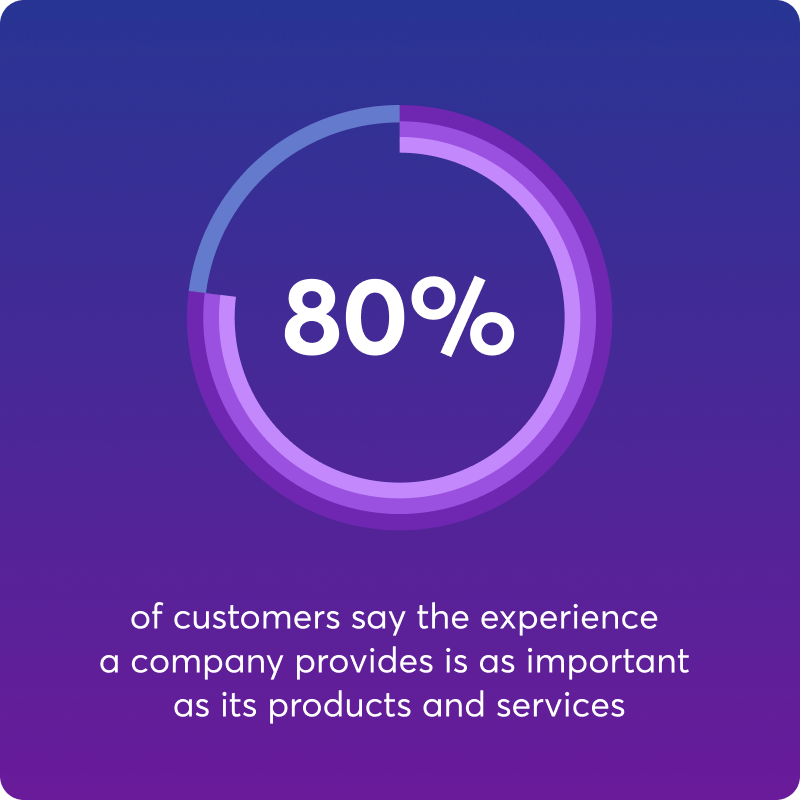
A recent Salesforce report reveals that “80% of customers say the experience a company provides is as important as its products and services.” Consistency, efficiency, and a human touch form the recipe for a positive experience that wins customer loyalty.

Is it really any surprise?

By helping your customers understand and use your products and services better, you can significantly enhance customer experience, boost satisfaction, build loyalty, and strengthen your relationships with them.

Industries like tech, SaaS, and consumer electronics are often at the forefront of offering great customer education programs. These range from personalized onboarding and interactive tutorials to chatbots and on-demand resources.

As businesses keep growing and evolving, investing in customer education becomes a must for long-term success.

9000+ brands trust LearnWorlds to train their people, partners & customers.

Start a FREE Trial

What Can Your Business Achieve Through Customer Training?

Customer education and business growth often go hand in hand. Let’s break it down and see how exactly deploying customer training helps you grow your business!

1

Improve feature adoption

Deploying a customer education program will help customers discover and learn how to use more product features, therefore maximizing the value they get out of your product. Here’s how it happens:

  • By browsing the resources on your knowledge base, like webinars and documentation, clients discover all the features available to them.
  • When customers have helpful resources that guide them through your product, the learning curve is minimized, and they’re better able to use it. Plus, knowing that they have help readily available, they are more likely to play around and explore.
  • By incorporating feedback mechanisms into your program and applying the learnings afterward, you enable customers to not only express their opinions and ideas but also improve and shape your product into a product that best meets their needs!

2

Minimize time to value

A structured customer onboarding program helps new users set up your product (if needed) and start utilizing it with confidence faster.

  • Self-service resources like FAQs, troubleshooting guides, and support documentation enable customers to resolve issues independently and at the point of need, right after the purchase.
  • Detailed instructions can help even the less tech-savvy customers master a complex product from the start.
  • By offering different training courses per use case, feature, job role and other criteria, customers find the information they need and do not go through lengthy courses with information that is irrelevant to them.
  • Onboarding material is also a great way to offer proactive support, which means customers are ready to dive right in and get their questions answered before they become a problem and hinder the user experience.

3

Prevent early customer churn

Early customer churn happens due to a lack of customer onboarding, insufficient product understanding, unmet expectations, poor customer support, and a failure to demonstrate product value quickly.

These issues lead to frustration, dissatisfaction, and ultimately, customers discontinuing the use of the product or service.

  • When customers are well-informed about how to use products or services effectively, they are more likely to achieve their desired outcomes, leading to higher customer satisfaction early on. This makes it unlikely they will discontinue using the product.
  • By providing resources such as tutorials, FAQs, and webinars, companies help new customers to troubleshoot issues independently, minimizing negative experiences that could lead to churn.
  • Educated customers also find greater value in their purchase, which reinforces their decision to stick with the brand. As they become more proficient and confident in using the product, their loyalty grows, further reducing the likelihood of switching to competitors.

4

Lower customer support costs (while improving quality!)

Customer education helps you reduce the number of customer support agents and take a load of work off their shoulders. Your team works more efficiently and meaningfully!

  • Customers have access to self-service resources like video tutorials and step-by-step guides, which fosters independent problem-solving enabling them to find answers and troubleshoot minor issues on their own, therefore reducing the average number of tickets per customer.
  • At the same time, your customer service teams are not occupied by an overwhelming number of tickets. They can respond more timely and efficiently, fully focused on each customer. Not to mention that, having to reply to simple inquiries time and time again becomes boring.
  • Customers will often contact customer support not only for questions but also for complaints! With a customer training program, they become more proficient and enjoy a better customer experience, which means they have less to complain about.

5

Shorten sales cycle & boost sales

Offer one more convincing argument to sales team members to seal the deal by showcasing an up-to-date customer training academy.

  • Having a customer onboarding program in place gives prospective customers the confidence your company cares, that you provide excellent customer support, and that they will have the assistance to use it.
  • The perceived value and competitiveness of your product also increases. Offering certifications as part of your training program adds credibility and attractiveness to your product, making it easier to convince potential customers.
  • Effective customer training leads to higher customer satisfaction. Satisfied customers are more likely to share their positive experiences, creating organic word-of-mouth advertising. This positive reputation makes it easier for your sales team to approach and convert new prospects, who may have already heard good things about your product.

6

Reduce customer acquisition cost

Customer training can also lower Customer Acquisition Costs (CAC) for your company.

  • Customer training programs transform educated customers into brand advocates, who promote your brand through word-of-mouth and social media. This organic promotion attracts new customers at a lower acquisition cost.
  • Additionally, satisfied, knowledgeable customers generate positive reviews and testimonials, enhancing your brand’s credibility and appeal. Leveraging these advocates reduces the reliance on expensive marketing campaigns, thereby lowering overall customer acquisition costs.

7

Increase customer lifetime value (CLV)

Providing continuous education and support strengthens the trust and bond between the customer and the brand, leading to a long-lasting relationship that benefits both sides.

  • First of all, educated customers are more satisfied and loyal, leading to repeat purchases and subscription renewals, which translates into a steady revenue stream for your business.
  • Secondly, through customer education, you open up upselling and cross selling opportunities. As customers become aware of the full range of products and as they already trust and are happy with your product, they are more likely to see the value in upgrading, making additional purchases, or buying complementary products, increasing their overall spending.
  • Educated customers often make more informed choices and see the benefit of additional features or products, leading to higher average order values.

8

Improve CSAT & NPS

Customer Satisfaction (CSAT) and Net Promoter Score (NPS) are key business metrics that signal the future financial health of your business. If they drop, this is a surefire sign that you need to deploy customer training. In any case, it’s best to act proactively and keep them high with your customer training program.

  • By providing practical resources that help users navigate your product, they don’t experience feelings of frustration or impatience – they are capable of using the product on their own without having to interrupt their experience or wait for a response from your support team.
  • In addition, knowing the full capabilities of your product, they find more value in it and integrate it into their lives, successfully addressing a pain point or achieving a goal. These foster high customer satisfaction and customer loyalty, and make customers more likely to recommend your brand to others.

9

Boost customer retention

One of the most important KPIs for a business, customer retention is closely linked to business growth. Customer training improves the customer experience end-to-end and during multiple stages in the customer journey, therefore building a solid foundation for long-term customer relationships and increasing customer retention rates.

  • Customer training builds trust and improves customer engagement by showing a commitment to customer success. Through live events and webinars, your brand can interact directly with clients, while feedback mechanisms allow you to gather their insights and tailor your product to better meet their needs.
  • Customers get a satisfying experience and feel more empowered using your product with little or no need to contact customer support.
  • Customers not only have a seamless experience but also get the most benefit from your product: they discover all features, they stay up to date with new ones, and make informed decisions for upgraded and additional items.

10

Enhance your brand image

Customer education can be used as a great marketing tool that increases exposure to your brand and helps establish a consistent, positive brand image.

  • As you foster customer satisfaction and loyalty, all these loyal customers will be happy to recommend your brand either through word of mouth or publicly, by leaving positive reviews, social media mentions, and high ratings.
  • Customer education boosts a company’s brand image by positioning the company as a knowledgeable and reliable authority in its field as you showcase your expertise. This is further supported by issuing certifications.
  • Customer education reinforces your brand image by consistently communicating your values and expertise through multiple touchpoints with customers. It provides numerous opportunities to engage with your audience, ensuring your messaging remains clear and consistent.
  • On a more human level, providing customer training shows you’re a helpful and customer-centric brand that supports customers throughout their journey.

11

Create an additional revenue stream

Last but not least, you can choose to sell your training courses and further boost your bottom line. Here are a few ways you can do that:

  • Create training content relevant to your niche that customers are willing to pay for – this is a great way to bring qualified leads your way.
  • Provide certifications upon course completion to add value for your customers who can showcase them on their resume.
  • Collaborate with industry partners to offer co-branded training programs, further expanding your reach, brand awareness, and revenue potential.

Quick Implementation Strategies

So, how can you implement product training for customers? These are the most common implementation strategies that maximize efficiency and accessibility.

  • Customer training programs: Structured learning experiences with modules and training materials that guide new customers through the initial stages of using the product and beyond.
  • Webinars and workshops: Regular live webinars and workshops that provide deeper insights and advanced usage tips.
  • Help centers and knowledge bases: Comprehensive and easily accessible help centers and knowledge bases with support articles and documentation.
  • Interactive tutorials: Engaging video tutorials that cater to different learning styles.
  • Customer Success Teams: Dedicated teams that proactively educate and support customers.

💁 Using a Learning Management System (LMS) can meet your training needs and significantly optimize your training efforts. It offers diverse content formats, enables seamless management of eLearning and live training sessions from one platform, and supports integrations, allowing for further customization and eliminating the need for multiple tools.

An LMS also includes functionalities like feedback mechanisms, assessments, a certificate builder, and robust reporting, plus features like gamification and quizzes to boost learner engagement and achieve deep product knowledge.

Additionally, you can launch a mobile app for added convenience, ensuring customers can access training anytime, anywhere. This centralized approach helps you deploy an effective, interactive training program efficiently that helps customers build the competencies they need to use your product.

Are You Ready to Reap the Benefits of Customer Training?

Wrapping up, it’s clear that customer education is one of the most effective initiatives to meet your customers’ needs and boost your bottom line. It is a real game-changer for any business. From improving feature adoption and reducing support costs to boosting sales and enhancing your brand image, the benefits are undeniable.

Educated customers are happier, more loyal, and more likely to become advocates for your brand. They get the most out of your products and services, which means they stick around longer and contribute more to your bottom line.

Investing in customer education is not just about helping your customers; it’s about driving your business forward. So, are you ready to start reaping these benefits?

If you’re looking for the best platform to implement customer education, employee training, or partner enablement look no further than LearnWorlds. It offers a comprehensive suite of tools, including interactive video, assessments, certificate & survey builder, customizable website builder, eCommerce capabilities, white-label mobile app, and robust analytics to help you create engaging and effective training programs.

Trusted by top brands, LearnWorlds ensures your customers get the best learning experience, driving better results for your business!

Try LearnWorlds now with a 30-day free trial.

9000+ brands trust LearnWorlds to train their people, partners & customers.

Start a FREE Trial

Further reading you might find interesting:

Further reading

  • 10 Best Customer Education Platforms
  • 7 Top Budget-Friendly Learning Management Systems
  • 10 Warning Signs You Need a Customer Education Program ASAP
  • Customer Training Best Practices: 7 Practical Tips for Optimal Results
  • What Is Customer Training? Definition, Benefits, And A Quick How-To Guide
  • Top 12 Customer Training Software

li:has(.ez-toc-link.ez-toc-heading-3) {
display: none;
}

The post 11 Benefits of Customer Training That Drive Business Growth appeared first on LearnWorlds.

Introducing Marketing Automations: Elevate your game with Meta, Google Tag Manager, and Mixpanel

Software Stack Editor · August 1, 2024 ·

Do you feel stuck in your marketing strategies and don’t know what’s the next step to get quality leads? Available for Learning Center and High Volume plans, our newest addition to Automations are here to make your marketing data actionable.

Designed to maximize your marketing efforts, the new Marketing Automations functionality allows you to seamlessly integrate and track events from your school on Google Tag Manager, Meta, and Mixpanel. Not sure what this actually means? Let’s clear things up for you.

Your professional looking Academy in a few clicks

Start FREE Trial

What are Automations?

LearnWorlds’ Automations is a tool designed to work in the background of your school, enhancing your personalized communication workflows. By selecting triggers, actions and conditions, you enable the platform to perform actions and communications with your learners automatically and on the right timing.

💁 For instance, through Automations you can send an email when users complete a course, offering them a coupon to other educational products. Or add a tag every time users enroll in a specific course and offer them personalized website navigation. With ready-made templates and customizable triggers and conditions, you can communicate on the spot.

👉 Learn more on how to harness the power of Automations 

The New Marketing Automations

To help you build smoother workflows and more effective marketing strategies, we’ve added new triggers and actions to our set of automations. You can now fire events as new actions to Google Tag Manager, Meta and Mixpanel.

“Firing an event” to marketing tools like Google Tag Manager, Meta, and Mixpanel means sending a signal or piece of data to these platforms when a specific action occurs in your school. This action, known as an event, could be anything from a page view, button click, form submission, or any user interaction that you want to track.

At LearnWorlds, we are firm believers of the saying “What you can’t measure, you can’t manage.” So, getting the right data from your school will help you optimize your ad campaigns, understand your leads and learners behavior better and make actionable decisions.

Enable your integrations

Before setting up your automations, make sure to enable the integrations with the analytics tools.

Take Advantage of Top-Notch Marketing Tools

LearnWorlds is one step ahead of the competition, bringing built-in automations to help you achieve better results without the need for coding skills and complex setups.

As we understand the importance of leveraging advanced marketing tools to stay competitive, our Marketing Automations integrate seamlessly with industry-leading platforms, ensuring you have the best tools at your disposal.

Integration with Google Tag Manager

Google Tag Manager (GTM) is crucial for any marketing strategy because it makes adding and managing tracking codes on your website easy. This means you can set up and change your marketing tags faster, which helps your website run better and gives you more accurate data about users’ behavior.

With GTM, you can quickly update and improve your marketing efforts based on real-time information, ensuring your ad campaigns always perform at their best.

When an event is fired to GTM, it triggers the appropriate tags (pieces of code) that you have set up. For example, when a user submits a form, GTM can fire an event to track this submission and send the data to Google Analytics for reporting and Google campaign optimization purposes.

Leveraging Meta

With many changes happening in the marketing space during the past years (e.g., ad blockers and cookies), attributing your results to the right performance campaigns is getting less effective and your marketing tools have less data to work with. That might be why your Meta campaigns are more expensive than they used to be.

Connecting your LearnWorlds pages with Meta (formerly Facebook) lets you track user interactions and optimize your advertising campaigns. You can ensure your ads reach the most relevant audience by firing the right events.

Connection with Mixpanel

Mixpanel is a powerful analytics tool that provides insights into user behavior and product (your academy) usage. The tool deeply interprets product data, helping you understand user behavior and improve learning & navigation paths.

Understanding how students interact with courses and materials and how they navigate your school is vital for educational institutions and knowledge businesses. Integrating Mixpanel with LearnWorlds enables you to make data-driven decisions and enhance your educational offerings.

Take the Next Step in Your Marketing Game

Strengthen your marketing efforts with LearnWorlds’ Marketing Automations. By integrating with top-notch tools like Google Tag Manager, Meta, and Mixpanel, you can streamline your processes, gain valuable insights, and optimize your paid campaigns for better results and optimized budget allocation.

Let’s explore some ways you can harness the power of Marketing Automations to optimize your academy 👉

Selling digital products

If you’re selling courses, subscriptions, or other digital products, marketing automation can significantly enhance your ability to attract, engage, and convert leads. By integrating LearnWorlds with powerful tools like Google Tag Manager and Meta, you can automate and optimize your marketing strategies, making them more effective and efficient.

💡 Here are the use cases for you to get inspired:

Use Case: Maximize lead magnet conversion

Automation trigger – User previewed a paid course
🕛 When
Automation Action – Send event to GMT and Meta
🎯 Then
How to Use:
  • Cross-Platform Advertising: Use GTM to trigger cross-platform ad campaigns (e.g., Google Ads, YouTube) targeting users interested in your course and convincing them to make the purchase.
  • Remarketing Campaigns: Create remarketing lists for users who previewed your paid course but haven’t purchased it and target them with Meta ads with a special offer.
Why Needed:
  • Enhanced Marketing Strategies: Leverage data to execute advanced marketing tactics that are not possible with school analytics alone.
  • Increased Engagement: Drive further engagement by targeting users who show intent with relevant ads.

Use Case: Drive better retention with your school

Automation trigger – User hasn’t visited the school in the last X days
🕛 When
Automation Action – Send event to GMT
🎯 Then
How to Use:
  • Dynamic Remarketing: Trigger dynamic remarketing ads across Google Display Network to re-engage inactive users.
  • Personalized Email Campaigns: Use GTM events in your email marketing tools to send personalized re-engagement sequences based on inactivity data.
Why Needed:
  • Automated Re-engagement: Automate re-engagement strategies using GTM to trigger ads and emails based on inactivity, which is not feasible with basic school analytics.
  • Churn Reduction: Proactively address potential churn by targeting inactive users with tailored content and offers.

Use Case: Nurture upselling & new sales opportunities

Automation trigger – User makes a payment
🕛 When
Automation Action – Send event to Meta
🎯 Then
How to Use:
  • New Sales Ad Targeting: Create lookalike audiences based on clients with purchases and build an effective Meta campaign to promote your new product.
  • Upselling Remarketing: Retarget existing clients with advanced products by highlighting the benefits of your higher-level knowledge offerings.
Why Needed:
  • Customer Acquisition: Improve targeting to acquire more paying customers.
  • Secure Growth: Maximize the potential of your existing client base, ensuring retention and continuous business growth.

Offering employee and customer training

If you’re a training organization, whether focusing on internal training or customer training, marketing automation can greatly improve the learner experience and streamline navigation flows on your website, course player, and learning content. By integrating LearnWorlds with advanced tools like Mixpanel, you can enhance your training programs and achieve better outcomes.

💡 Here are the use cases for you to get inspired:

Use Case: Leverage micro-flow insights

Automation trigger – Use multiple triggers:
🕛 When
  1. User Signs Up
  2. User Enrolled in a Course
  3. User Starts a Course
  4. User Reaches X% of Course Progress
  5. User Completed a Course
  6. Certificate Awarded
  7. User Enrolled in another Course
Automation Action – Send event to Mixpanel
🎯 Then
How to Use:
  • Manage drop-off points: Stimulate users to proceed through the micro-flow, re-engaging them with communication at each milestone.
  • A/B test: Implement micro-improvements at different touchpoints of the paths and test the best way to engage your learners.
Why Needed:
  • Comprehensive User Journey Analysis: Understand the complete user journey from signing up to your school to becoming a loyal client.
  • Personalized Engagement: Deliver personalized content and offers based on user behavior and milestones.
  • Data-Driven Marketing: Create targeted marketing campaigns based on user interactions and progress.


Stay Ahead in the Competitive Educational Market

When done right and strategically, marketing automations revolutionizes how you connect with your audiences. Take advantage of this new feature to enhance your marketing efforts and refine your campaigns with streamlined tracking, targeted advertising, and insightful data analysis.

Embrace Marketing Automations with LearnWorlds and take your marketing strategies to the next level, so you can focus on delivering exceptional educational experiences.

🔗 For more information on Automations, visit our support article.

Not a LearnWorlds customer yet? Experience the power of LearnWorlds and start your 30-day free trial to discover all the amazing things you can achieve with your online academy.

Your professional looking Academy in a few clicks

Start FREE Trial

The post Introducing Marketing Automations: Elevate your game with Meta, Google Tag Manager, and Mixpanel appeared first on LearnWorlds.

Go Global with Confidence: Introducing Stripe Tax for International Course Sales

Software Stack Editor · August 1, 2024 ·

At LearnWorlds, we understand the challenges that eLearning businesses face when expanding globally. Managing taxes across different countries can be a complex and time-consuming process, often hindering growth.

Before, LearnWorlds provided only one option for tax management – Quaderno. While Quaderno is a popular, robust, and reliable solution, we recognized our customers’ need for the flexibility to choose and connect with their favorite tools.

That’s why we are excited to introduce Stripe Tax – a powerful tax management solution designed to simplify global expansion for course creators and training organizations.

Your professional looking Academy in a few clicks

Start FREE Trial

Why Stripe Tax?

For many businesses in the eLearning sector, navigating the complex world of tax compliance can be daunting. Each country has its own set of tax regulations, and keeping up with these can be both time-consuming and stressful.

Whether you are selling courses to individual learners or providing training programs to organizations, ensuring compliance while trying to grow your business can feel like an uphill battle. Stripe Tax is here to change that.

Simplified Global Tax Compliance

Stripe Tax allows you to calculate, collect, and report taxes on global payments with a single integration. This means you can always be sure you are collecting the correct amount of tax, regardless of where your customers are located.

With support for over 50 countries and all US states, Stripe Tax covers a wide range of jurisdictions, making global tax compliance straightforward.

Efficient Tax Management

Managing taxes doesn’t end with collecting them. Reporting and filing are equally important. Stripe Tax allows you to export your tax transaction data, making it easy to complete your tax filings and returns.

You can report aggregate transaction data by filing period and summarize it based on each location’s filing requirements, ensuring you stay compliant with local regulations.

Focus on Growth

By automating the tax compliance process, Stripe Tax frees up your time and resources. You can focus on what matters most – growing your business and delivering high-quality educational content to your learners.

The peace of mind that comes with knowing your tax obligations are being handled efficiently is invaluable.

Customizable and Integratable

Stripe Tax works with any payment processor and allows you to define your own pricing, branding, and onboarding flow. This flexibility ensures that the solution can be tailored to fit your specific business needs, providing a seamless experience for both you and your learners.

Expanding your business globally should be an exciting journey, not a stressful one. With Stripe Tax, you can simplify tax compliance, reduce risks, and focus on scaling your knowledge business with confidence.

Our goal at LearnWorlds is to empower you with tools that make your operations smoother and your growth faster.

Ready to take the next step?

Integrate your LearnWorlds school with Stripe Tax today and experience the ease of global tax management.

How to access the Stripe Tax integration

  1. In your LearnWorlds school, navigate to the sidebar → Settings → open the Financial tab;
  2. From there, click on the Tax Management and choose Stripe Tax;
  3. Tick the ‘Activate’ checkbox and proceed with connecting to your Stripe account.

💁For more detailed information, please check our support article.

Not a LearnWorlds customer yet? Start your free 30-day trial and explore the most innovative eLearning platform that empowers you without limits.

Your professional looking Academy in a few clicks

Start FREE Trial

The post Go Global with Confidence: Introducing Stripe Tax for International Course Sales appeared first on LearnWorlds.

10 Ways to Build a Community: A Complete Guide for Course Creators

Software Stack Editor · July 31, 2024 ·

The success of an online course isn’t just about the content—it’s about the connections. Community building has become an essential part of the digital education landscape, and for good reason. A thriving community can transform your course from a one-time transaction into an ongoing, dynamic learning experience.

In this guide, we’ll share ten proven ways to build and nurture a community around your online courses. If you’re just starting out or looking to revitalize an existing community, these strategies will help you create a space where your learners can connect, engage, and grow together easily and quickly.

So, let’s dive in and explore how you can turn your course into a vibrant ecosystem of learning and collaboration.

Your professional looking Academy in a few clicks

Start FREE Trial

1. Leverage Social Media Platforms

When it comes to community building, social media platforms are your secret weapon. They’re where your potential learners are already hanging out, making them perfect for extending your course’s reach and fostering connections.
Here’s how you can successfully use different platforms:

Facebook Groups:

Facebook Groups are incredibly effective for creating a sense of community. The familiar interface makes it easy for members to participate, and the ability to create private groups ensures a safe space for course-specific discussions.

LinkedIn:

For professional development courses, LinkedIn is the go-to platform. It’s great for sharing industry insights, hosting thoughtful discussions, and helping learners expand their professional networks.

Twitter (formerly known as X):

X’s fast-paced nature makes it perfect for quick updates, sharing bite-sized learning tips (tweets), and engaging in real-time conversations. If you already have a community on X, you can use hashtags related to your course topics to increase visibility and attract new community members.

TikTok:

Don’t underestimate the power of short-form video content. I’ve seen course creators use TikTok to share quick tips, behind-the-scenes glimpses, and even mini-lessons that drive interest in their full courses and communities.

To make the most of your efforts, you can also follow these best practices to engage your community members on social media:

  • Be consistent: Regular posting keeps your community active and engaged.
  • Encourage interaction: Ask questions, run polls, and prompt discussions.
  • Showcase learner success: Share student testimonials and success stories to inspire others.
  • Provide value: Share free tips and insights that complement your course content.
  • Be authentic: Show your personality and build genuine connections with your community members.

💁🏻 Learn How to Promote Your Online Courses on Social Media
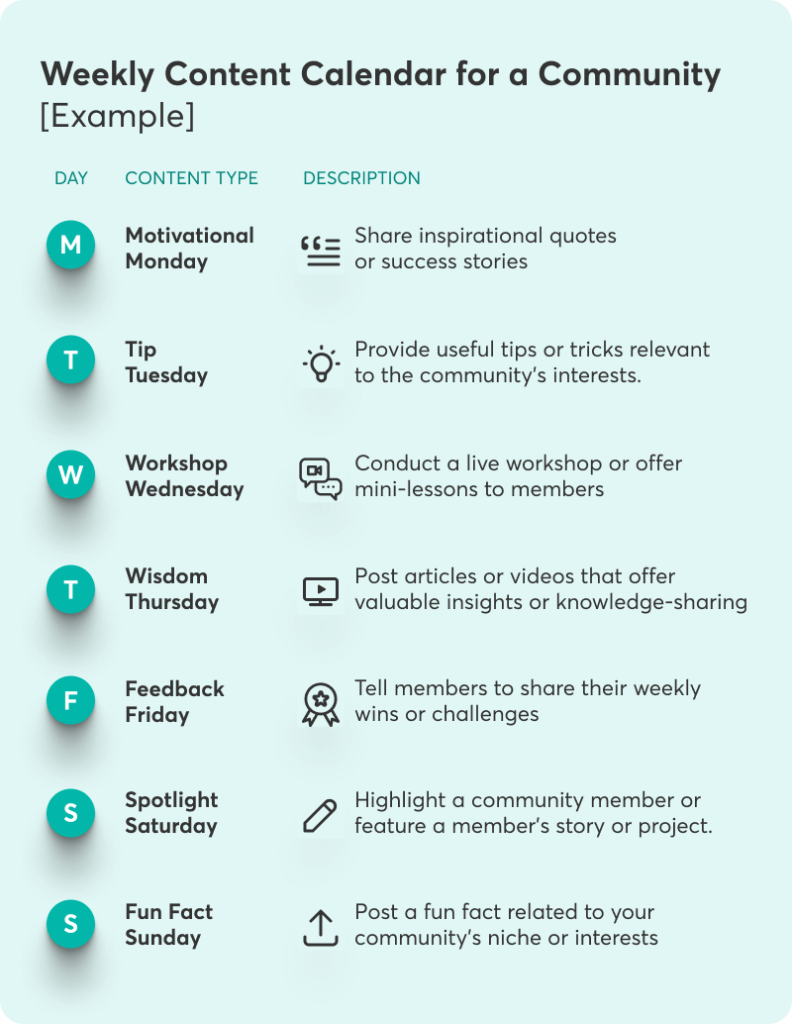
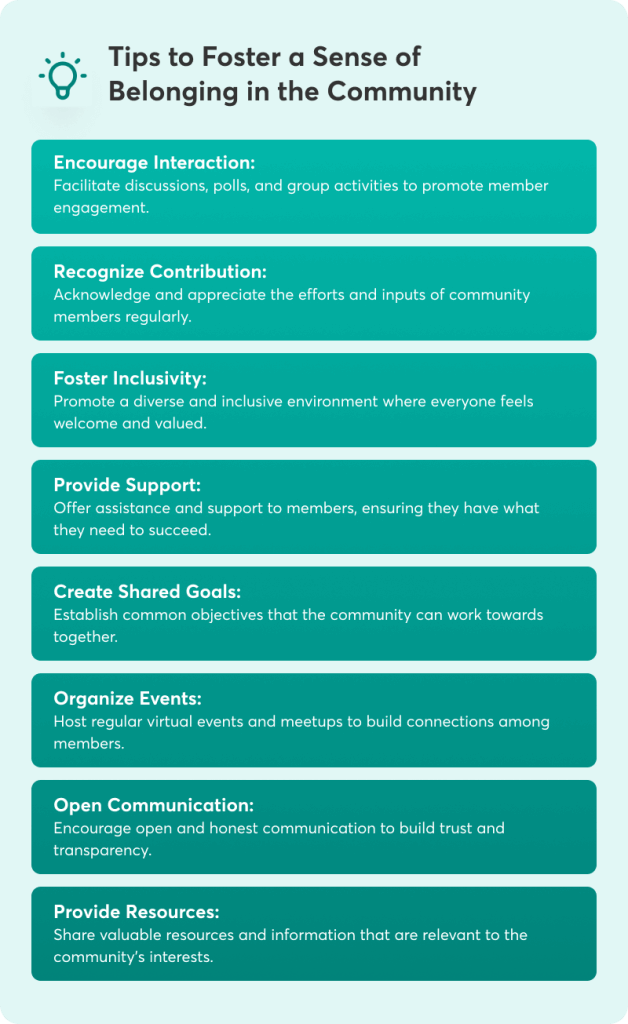
2. Choose the Right Community Platform

Selecting the right community platform is crucial for long-term success. While social media can be a great starting point, a dedicated community platform often provides more control and customization options.

There are different types of community platforms, but you should pick the one that suits your needs:

  • Learning Management Systems with built-in community features (e.g., LearnWorlds)
  • Standalone platforms (e.g., Circle, Mighty Networks)
  • Forum software (e.g., Discourse)
  • Membership site plugins (for WordPress-based courses)

While searching for a platform, you also need to look into many different parameters to make your decision.

Here are some key factors to consider:

Features: Look for platforms that offer discussion forums, member profiles, content organization, and moderation tools.

Pricing: Consider your budget and the platform’s pricing structure. Some charge per member, while others have tiered plans.

Scalability: Ensure the platform can grow with your community.

Integration capabilities: Check if the platform integrates with your course delivery system and other tools you use.

On top of these, a mobile-friendly platform is non-negotiable. Your learners should be able to engage with the community easily from their smartphones or tablets via a mobile app. Personally, I always test the mobile experience thoroughly before committing to a platform.

3. Create Engaging Content

Content is the lifeblood of any thriving community. It’s what draws people in, keeps them engaged, and provides ongoing value.

To create engaging content for course communities, you can try the following:

Curate relevant content: Make it a point to regularly share articles, videos, and resources that complement your course material. This not only provides additional value to learners but also sparks discussions and keeps the community active between course modules.

Use templates for consistent posting: Maintain a steady flow of content using templates for different types of posts. For example:

  • Monday Motivation: Inspirational quotes or success stories
  • Wednesday Workshop: Quick tips or mini-lessons
  • Friday Feedback: Encourage members to share their weekly wins or challenges

This structure helps to stay organized and gives community members a sense of what to expect. Here’s an example of a weekly content calendar for your community:

A graph showing an example of a weekly content calendar for an online community.

Incorporate various content types: Offering a mix of content types keeps things interesting and caters to different learning preferences:

Weekly Content Calendar for a Community [Example]
Day Content Type Description
Monday Motivational Monday Share inspirational quotes or success stories.
Tuesday Tip Tuesday Provide useful tips or tricks relevant to the community’s interests.
Wednesday Workshop Wednesday Conduct a live workshop or offer mini-lessons to members.
Thursday Wisdom Thursday Post articles or videos that offer valuable insights or knowledge-sharing.
Friday Feedback Friday Tell members to share their weekly wins or challenges.
Saturday Spotlight Saturday Highlight a community member or feature a member’s story or project.
Sunday Fun Fact Sunday Post a fun fact related to your community’s niche or interests.
  • Podcasts: Great for in-depth discussions or interviews with industry experts
  • Video content: Perfect for visual demonstrations or quick tips
  • Written content: Ideal for detailed explanations or step-by-step guides
  • Infographics: Excellent for summarizing complex information

The goal here is to create content that encourages interaction and adds value to your learners’ experience beyond the core course material.

4. Foster a Sense of Belonging

Creating a sense of belonging is crucial for building a strong, engaged community. It’s what transforms a group of people into a cohesive unit with shared goals and experiences.

To do this, you will first need to create a welcoming environment in your community. First impressions matter, so put some extra effort into welcoming new members:

  • Personalized welcome messages
  • A “new member introduction” thread where people can introduce themselves
  • A comprehensive “community guide” document that outlines norms, expectations, and how to get the most out of the community

While your course topic is already a common interest (that’s why your members joined in the first place), try to dig deeper. Establish common interests by encouraging members to share their specific goals, challenges, and experiences related to the course material.

This helps create smaller sub-groups within the larger community where members can connect on a more personal level.


A graph showing tips on how to foster a sense of belonging inside a community.

Last but not least, develop regular initiatives to maintain community engagement and strengthen community bonds.

A few ideas you can implement include:

  • Monthly challenges related to course goals
  • Peer mentorship programs
  • Virtual coffee chats for networking
  • Collaborative projects that allow members to work together and showcase their skills

Fostering a sense of belonging is an ongoing process. It requires consistent effort and genuine care for your community members, with every interaction serving a purpose. This approach ensures that all efforts are optimized, creating a self-reinforcing cycle where the sentiment of ‘I belong here’ within the members of the community grows stronger over time.

5. Implement Effective Moderation

A healthy, thriving community requires effective moderation as it ensures that your community remains a safe, respectful, and productive space for all members.

Inside this space, moderators are truly the unsung heroes of community building. They are the ones who enforce community guidelines, facilitate discussions and keep them on track, welcome new members, and help them navigate the community. They are the ones who also identify and address potential conflicts while recognizing and encouraging positive contributions.

Well-communicated community guidelines are also of huge help. They help to set expectations for behavior and provide a reference point for moderation decisions. These guidelines should be easily accessible to members and may cover:

  • Respectful communication
  • Relevant content and discussions
  • Intellectual property rights
  • Privacy and confidentiality
  • Consequences for guideline violations

You may also choose to use automation tools for moderation. While human moderators are irreplaceable, automation tools can significantly lighten the load.

These tools offer keyword filters to catch inappropriate content, spam detection algorithms, automated welcome messages for new members, and scheduled posts for regular community events or announcements.

The key is to find the right balance between automated and human moderation to maintain a personal touch while efficiently managing a growing community.

💁🏻 Read Effective Community Management: Best Practices for Success

6. Encourage Member Interaction

A community thrives on interaction. The more your members engage with each other, the stronger your community becomes. There are also a few things you can do to boost interaction:

Hosting regular chats or live events can create a sense of immediacy and shared experience:

  • Q&A sessions where members can ask you questions directly
  • Expert interviews with guest speakers
  • Virtual coworking sessions where members can work on course-related projects together
  • Celebration events to acknowledge member achievements

These events not only provide value but also create opportunities for real-time interaction among members. If you are not yet up for a live event, however, creating discussion threads can also spark great and engaging conversations:

  • Weekly reflection threads where members share their progress
  • Problem-solving threads where members can seek advice from peers
  • “Share your work” threads for members to showcase their projects and get feedback

What’s important in this strategy is to seed these discussions with thought-provoking questions and actively participate in encouraging others to join in. Be careful, though; your role is to facilitate these interactions, not dominate them. You want to create an environment where members feel comfortable and excited to engage with each other.

7. Utilize Notifications Strategically

Notifications are a powerful tool for keeping your community engaged, but they’re a double-edged sword. Used wisely, they can drive engagement; used poorly, they can annoy members and lead to disengagement.

To keep members informed without overwhelming them, you need to find the right balance:

  • Prioritize quality over quantity
  • Segment notifications based on member preferences and activity
  • Use a mix of email, in-app, and push notifications for different types of updates

On top of this, ensure that members have granular control over their notification settings. Let them choose which types of activities trigger notifications. Allow them to set their frequency preferences (e.g., immediate, daily digest, weekly summary), mute notifications for specific threads or topics, or even set “do not disturb” hours.

To drive engagement, use notification triggers for responses to a member’s post or comment, mentions or tags, newly posted content that is relevant to a member’s interests, upcoming events or deadlines, and achievements or milestones reached.

Notifications are all about pulling members back into the community when there’s something valuable for them to see or do. Every notification should provide clear value to the recipient.

8. Develop an Advocacy Program

An advocacy program can take your community to the next level by empowering your most engaged members to become ambassadors for your course and community.

A visual showing people's hands reaching a central circle which describes a community.

Here’s how you can build an advocacy program:

  • Identify and nurture community advocates: Look for members who consistently participate actively in discussions, help other members, share valuable insights, and embody the values of your community.
  • Nurture potential advocates: Recognize their contributions publicly, offering them exclusive opportunities or content and seeking their input on community decisions.
  • Create referral programs: Offer incentives for successful referrals (e.g., course discounts, exclusive content). Provide advocates with unique referral links or codes and create shareable content that advocates can easily distribute.
  • Recognize and reward active members: Feature member spotlights, offer badges or titles for different levels of contribution, feature leaderboards to ignite friendly competition, and exclusive perks or access to special events.

Remember, your advocates are not just promoters of your course or community – they’re valuable partners in your community’s growth and success. Treat them as such, and they’ll become your most powerful asset in community building.

9. Measure and Analyze Community Growth

To ensure your community-building efforts are paying off, it’s crucial to measure and analyze your community’s growth regularly.

Some key metrics to track are:

  • Member growth rate
  • Active users (daily, weekly, monthly)
  • Engagement rate (posts, comments, reactions)
  • Content popularity (views, shares, saves)
  • Retention rate
  • Net Promoter Score (NPS) for community satisfaction

Most community platforms offer built-in analytics, but it’s also a good idea to use analytics tools like Google Analytics to monitor the website traffic to your community homepage and other pages related to it. Social media analytics tools for tracking engagement on those platforms can also be useful, along with a survey tool to help you gather qualitative feedback.

Keep in mind that data is only valuable if you act on it. As your community grows, you will need to adjust your strategies based on data insights:

  • Review analytics reports to identify trends
  • A/B test different engagement strategies
  • Adjust content plans based on what resonates most with the community
  • Address any concerning trends (e.g., declining engagement) promptly

While numbers are important, they don’t tell the whole story. Always combine quantitative data with qualitative feedback from your community members to get a complete picture of your community’s health and growth.

10. Integrate with External Tools and Platforms

Integrating your community with external tools and platforms can enhance functionality and provide added value to your members.

Some tools that you might find particularly useful and can streamline the process of managing your community are ChatGPT, X-Ways Forensics (XWF), and any other project management tools, scheduling tools, or webinar tools depending on your needs.

Use ChatGPT for content generation and support. With it, you can:

  • Generate ideas for discussion topics or content
  • Create first drafts of community announcements or newsletters
  • Power a community chatbot for instant responses to common questions

While it is a powerful tool, you will need to review and personalize its output to maintain an authentic voice.

💁🏻 Check these 10 Great Interactive Course Activities to Create With ChatGPT

You can also use X-Ways Forensics for specialized communities that are focused on digital forensics or cybersecurity:

  • Organize workshops or challenges using these tools
  • Share case studies or tutorials relevant to the software
  • Facilitate discussions on best practices and new features

Finally, consider integrating your platform with these handy tools:

  • Project management tools (e.g., Trello, Asana) for collaborative projects
  • Scheduling tools (e.g., Calendly) for easy booking of 1-on-1 sessions or group events
  • Webinar platforms (e.g., Zoom, WebinarJam) for live events

What’s important is to choose integrations that genuinely enhance the community experience and align with your members’ needs and goals.

LearnWorlds offers market-leading integrations that seamlessly connect your favorite tools, enabling you to manage your community from one central platform efficiently. Whether it’s marketing, eCommerce, customer service, business automation, or payments, our platform integrates all aspects of your online business, allowing you to focus on what you do best.

Ready to Build an Online Community Around Your Courses?

Building a thriving community is a journey, not a destination. It requires consistent effort, genuine care for your members, and a willingness to adapt and evolve. By implementing these 10 strategies, you’re well on your way to creating a vibrant, engaged community that adds immense value to your course offerings.

Most importantly, always keep your learners at the heart of your community-building efforts. Listen to their needs, celebrate their successes, and create an environment where they can connect, learn, and grow together.

Building a community takes time and patience, but the rewards are immeasurable. Not only will you see improved course outcomes and increased student satisfaction, but you’ll also create a powerful ecosystem that can become a significant asset for your business.

So, are you ready to take your online course to the next level with a thriving community? The journey starts now, and we can’t wait to see the amazing communities you’ll build! Get started with LearnWorlds today.

Your professional looking Academy in a few clicks

Start FREE Trial

Further reading you might find interesting:

  • How to Create and Sell Profitable Online Courses: Step-by-Step Guide
  • Knowledge Economy: How to Sell Knowledge Online
  • How to Start a Profitable Online Course Business From Scratch
  • 183 Profitable Online Course Ideas With Examples
  • Sell Digital Downloads: The Complete Guide for 2024
  • SCORM 101: The Definitive Guide to Choose a SCORM-Compliant LMS
  • How Much Money Can You Make Selling Online Courses?

The post 10 Ways to Build a Community: A Complete Guide for Course Creators appeared first on LearnWorlds.

11 Best Customer Learning Management Systems in 2024

Software Stack Editor · July 30, 2024 ·

Ever thought about the impact of well-trained customers on your business? In today’s competitive business landscape, businesses of all sizes need to deploy customer training as a way to stand out. Well-trained customers are more likely to remain loyal and become advocates for your brand, driving word-of-mouth referrals and contributing to overall business growth.

A Learning Management System (LMS) plays a pivotal role in streamlining and enhancing customer training initiatives. By providing a centralized platform for delivering on-demand training content, an LMS can significantly improve the learning experience and help you reach your entire customer base no matter where they are located.

In this post, we’ll review some of the best customer Learning Management Systems designed to support and scale your customer training efforts!

9000+ brands trust LearnWorlds to train their people, partners & customers.

Start a FREE Trial

11 Customer Learning Management Systems Worthy of Your Attention

Before we dive into the details, let’s see the best customer Learning Management Systems at a glance:

Platform Best For Unique Features Starting Price
LearnWorlds Small Business, Mid-Market Advanced AI assistant, Copyrights protection, Branded mobile app, eCommerce tools $29/mo
TalentLMS Small Business, Mid-Market Advanced gamification, AI Assistant, Files repository Free plan (limited)
Absorb LMS Mid Market, Enterprise Absorb Create, eCommerce, Gamification, Advanced AI Not disclosed
LearnUpon Mid-Market AI-powered learning, Branded learning portals, Centralized resource center Not disclosed
Skilljar Mid-Market Advanced certificates, eCommerce, deep Salesforce integration Not disclosed
Gainsight Customer Education Mid-Market Downloadable video, Liquid templates, Media library Not disclosed
Eurekos Small Business, Mid-market Built-in content authoring, Multiple languages, Mobile app with offline access Not disclosed
ReadyTech Mid-Market, Enterprise Virtual labs, Course templates, Offline chat Not disclosed
WorkRamp Mid-Market WorkRamp Communities, AI tool, Collaborative administration Not disclosed
Intellum Enterprise, Mid-Market Built-in content authoring, Assets library, Advanced gamification, Content recommendation engine Not disclosed
Sana Mid-Market AI content editor, Virtual classroom, Interactive flip cards $7,800 annually
Best For Unique Features Starting Price
LearnWorlds
Small Business, Mid-Market Advanced AI assistant, Copyrights protection, Branded mobile app, eCommerce tools $29/mo
TalentLMS
Small Business, Mid-Market Advanced gamification, AI Assistant, Files repository Free plan (limited)
Absorb LMS
Mid Market, Enterprise Absorb Create, eCommerce, Gamification, Advanced AI Not disclosed
LearnUpon
Mid-Market AI-powered learning, Branded learning portals, Centralized resource center Not disclosed
Skilljar
Mid-Market Advanced certificates, eCommerce, deep Salesforce integration Not disclosed
Gainsight Customer Education
Mid-Market Downloadable video, Liquid templates, Media library Not disclosed
Eurekos
Small Business, Mid-market Built-in content authoring, Multiple languages, Mobile app with offline access Not disclosed
ReadyTech
Mid-Market, Enterprise Virtual labs, Course templates, Offline chat Not disclosed
WorkRamp
Mid-Market WorkRamp Communities, AI tool, Collaborative administration Not disclosed
Intellum
Enterprise, Mid-Market Built-in content authoring, Assets library, Advanced gamification, Content recommendation engine Not disclosed
Sana
Mid-Market AI content editor, Virtual classroom, Interactive flip cards $7,800 annually

1. LearnWorlds – Our Choice

LearnWorlds
Customer reviews:
4.7 out of 5

LearnWorlds is the best LMS platform for varying training needs and use cases, from employee upskilling and compliance training to partner and customer education. Offering a comprehensive feature set at a reasonable price, our learning platform empowers you to design impactful training experiences, delivered live or on-demand.

LearnWorlds enables you to craft truly engaging training programs by incorporating a variety of media formats, including interactive elements and SCORM files, and with its built-in community. Our intelligent AI assistant with built-in prompts can handle everything from course outlines and content creation to assessments, feedback, and marketing materials.

The built-in drag-and-drop website builder allows you to design a stunning and professional website that perfectly reflects your brand identity. The platform’s built-in eCommerce toolkit allows you to sell your courses and generate revenue from your training programs.

LearnWorlds also empowers you to manage online courses for a diverse audience. With the Multiple Schools functionality and Clone & Sync feature, you can streamline the process of building diverse learning environments and training programs. At the same time, you can automate repetitive tasks and bulk actions and use the User Roles and User Groups features for better access control and higher security.

A wide range of APIs and integrations allows you to seamlessly connect LearnWorlds with your existing tools and CRM systems. Plus, with detailed reports and metrics you can gain valuable insights into learner engagement with the course content and the overall performance of your academy, including sales. Understanding the importance of reaching our audience on mobile devices, LearnWorlds additionally enables you to launch your own branded mobile app!

Advantages

  • Content authoring tools
  • Website Builder
  • Custom User Roles and User Groups
  • Clone & Sync for fast school creation
  • eCommerce
  • Multiple Schools
  • AI tools for course outline, learning objective, assessment, and feedback generation
  • Copyright protection
  • CRM & customer service integrations (Hubspot & Zendesk)
  • Community for better customer engagement
  • API, Webhooks & SSO to connect with the existing tech stack and ensure quick setup and efficiency
  • Native, white-label mobile app
  • Collaborative learning through built-in community
  • High scalability
  • Stellar customer support and customer success teams

Disadvantages

  • Learning curve
  • Limited gamification

Pricing plans

LearnWorlds offers a 30-day free trial (no credit card required) and 4 main plans:

  • Starter: $29 per month ($24 billed yearly)
  • Pro: $99 per month ($79 billed yearly)
  • Learning Center: $299 per month ($249 billed yearly)
  • High-Volume & Corporate: Get a customized quote

9000+ brands trust LearnWorlds to train their people, partners & customers.

Start a FREE Trial

2. TalentLMS

TalentLMS
Customer reviews:
4.6 out of 5

TalentLMS is a user-friendly and feature-packed LMS solution, ideal both for employee training and customer training programs. At a budget-friendly price point, the platform offers a compelling combination of functionality and value, including AI tools, rich gamification features, and a content library.

TalentLMS has branding capabilities, supports custom user types, and separate learning environments through its Branches function. The platform offers basic eCommerce functionalities, allowing you to monetize your training programs if needed. It features assessments and in-depth reporting to help you evaluate learner progress and, being available in 40 languages, it can cater to a global audience.

Advantages

  • Very intuitive
  • Rich gamification options
  • Excellent customer support
  • White-label
  • TalentCraft (AI tool)

Disadvantages

  • Lacks advanced assessment builder
  • Lacks advanced course editing tools
  • Occasional issues during integration setup
  • Basic course and website customization
  • Complex admin tasks

Pricing plans

TalentLMS recently updated its pricing plans. The following plans accommodate up to 20 users and the cost escalates as the number of users increases. Instead of a free trial, they offer a free plan that supports up to 5 users and 10 courses:

  • Free: Limited
  • Core: From $89/month
  • Grow: From $139/month
  • Pro: From $179/month
  • Enterprise: From 1000 users and up – Custom

3. Absorb LMS

Absorb LMS
Customer reviews:
4.6 out of 5

Absorb LMS is one of the best LMSs to create impactful customer education experiences. This user-friendly platform simplifies course creation, allowing you to incorporate engaging elements like videos, quizzes, and documents. SCORM compliance ensures seamless integration with any existing eLearning modules you might have. For added convenience, Absorb offers a mobile app.

Absorb leverages AI to personalize the learning journey with personalized course recommendations. The platform’s Intelligent Assist supports natural language processing capabilities, offering additional support with administrative tasks.

Finally, Absorb offers analytics that provide valuable real-time insights into learner progress, knowledge retention, and overall program effectiveness, although some users mention that the reporting tool is rather basic and complicated to use.

Advantages

  • Very intuitive
  • Advanced AI assistant
  • Built-in content authoring
  • Feature-rich
  • Excellent customer support

Disadvantages

  • Limited built-in integrations
  • Few bulk actions
  • Features are hard to locate
  • Limited shopping cart functionality
  • Cumbersome and limited intuitive and lacks filters

Pricing plans

Absorb LMS does not disclose its pricing plans publicly. For detailed pricing information, it is best to contact Absorb LMS directly.

4. LearnUpon

LearnUpon
Customer reviews:
4.6 out of 5

LearnUpon is a user-friendly cloud-based LMS for customer onboarding and employee training. It integrates seamlessly with webinar tools, allowing you to conduct instructor-led training with scheduling, attendance tracking, and reminders. Its advanced AI tool assists with training content creation and offers interactive coaching bots for a more personalized touch.

LearnUpon allows you to create custom learning portals and storefronts to sell your courses. The platform provides a variety of assessment options, including different question types, assignments, and surveys to gauge learner understanding.

A centralized Resource Center keeps training materials organized, while user segmentation allows for access control, task automation, and even self-registration. It also integrates with CRM systems to enable automatic user enrollment and facilitate the onboarding process.

Advantages

  • AI-powered learning with coaching
  • Excellent customer support & CSMs
  • Budget-friendly
  • Multiple portals with access control
  • Centralized resource center

Disadvantages

  • Lacks customization features
  • Learning paths are not flexible
  • Limited bulk actions
  • Lacks robust reporting
  • Features are hard to locate

Pricing plans

LearnUpon offers 3 plans (Essential, Premium, and Enterprise). The pricing is not disclosed.

5. Skilljar

Skilljar
Customer reviews:
4.6 out of 5

Skilljar is an LMS provider that helps businesses scale their customer education efforts. This powerful customer training software comes equipped with features like multitenancy, white labeling, and advanced user roles for granular control. An integrated eCommerce engine allows you to sell subscriptions, leverage payment gateways, and offer flexible pricing options.

Skilljar boasts a robust engine with diverse quizzing options for your training courses and supports live training sessions for a more interactive experience. For businesses using Salesforce, Skilljar offers the ability to link training seats directly to contracts, streamlining access control, progress tracking, and revenue recognition.

Advantages

  • Intuitive for learners
  • Multitenancy
  • eCommerce ready
  • Advanced certificate builder
  • Excellent support

Disadvantages

  • Complex course setup
  • Limited reporting capabilities
  • Basic design customization
  • Limited options for lesson types and quiz questions
  • Limited social interactivity

Pricing plans

Skilljar offers various plans, but pricing is not disclosed.

6. Gainsight Customer Education

Gainsight Customer Education
Customer reviews:
4.6 out of 5

Gainsight Customer Education (formerly Northpass) is a SaaS platform specifically designed for customer education. The platform offers an intuitive interface and a seamless user experience that minimizes the learning curve for both administrators and learners. Additionally, Gainsight supports extensive customization and branding, allowing you to reflect your brand identity.

Gainsight seamlessly integrates learning data with information from your CRM, HRIS, and product, offering a holistic view of customer education effectiveness. Other noteworthy features include a centralized media library for easy asset management, the ability to embed videos directly into presentations, and downloadable video options for offline access.

Advantages

  • Intuitive UI
  • Embed in App capability
  • Media library
  • Built-in course authoring tool
  • Downloadable videos

Disadvantages

  • Lacks in-depth reporting
  • No course templates available
  • Lacks customization options for learning paths
  • No AI content creation
  • Needs more detailed content versioning

Pricing plans

Gainsight has a fixed price for unlimited learners, admins, and content. The pricing is not disclosed on the website.

7. Eurekos

Eurekos
Customer reviews:
4.5 out of 5

Eurekos is a customer training LMS packed with features to streamline your education efforts. This intuitive platform offers built-in eCommerce capabilities that allow you to sell online training directly through branded portals. Their mobile learning app ensures accessibility on the go, although building a custom-branded mobile app isn’t currently supported.

Eurekos LMS empowers you to create personalized learning journeys with playlists and incorporates a variety of content formats, like videos, quizzes, surveys, and certificates. Eurekos’ training platform supports eCommerce by integrating with various payment processors and allowing you to create coupons.

Advantages

  • Built-in course authoring tool
  • Fast content development
  • User roles
  • Multi-language support
  • Offline mobile app

Disadvantages

  • Lacks in-depth reporting
  • Limited assessments
  • UI needs improvement
  • No AI
  • Limited design customization

Pricing plans

Not disclosed.

8. ReadyTech

ReadyTech
Customer reviews:
4.6 out of 5

ReadyTech is an intuitive platform that offers IT labs, virtual instructor-led training (VILT), and self-paced learning. It supports interactive online learning via breakout rooms, virtual whiteboards, hands-on exercises, and group activities. ReadyTech also features a built-in Dropbox integration for easy sharing of learning content.

Other interesting features include online and offline chats for real-time customer support and ready-made course templates for self-paced learning programs. ReadyTech supports role-based access, assessments, certifications, and reporting.

Advantages

  • Collaborative, social learning
  • eCommerce support
  • Virtual labs
  • Ready-made course templates
  • Intuitive

Disadvantages

  • No AI
  • Connectivity issues/slow performance
  • Lacks integrations & LMS features
  • Cumbersome reporting
  • Learning curve

Pricing plans

Not disclosed.

9. WorkRamp

WorkRamp
Customer reviews:
4.4 out of 5

WorkRamp simplifies new customer onboarding with its user-friendly interface and support for structured learning paths. The platform features a built-in content authoring tool, Learning Cloud, which makes content creation easy and includes a quiz builder and reporting tools to track learner progress and completion rates.

WorkRamp integrates seamlessly with existing tools and offers WorkRamp Communities to facilitate learning and collaboration through forums and discussions. It also supports live events with features like attendance tracking and automated calendar invitations.

Advantages

  • Quick setup
  • Responsive customer support
  • Reasonable price
  • Built-in authoring tool + AI
  • WorkRamp Communities

Disadvantages

  • Confusing navigation
  • Lacks robust reporting
  • Limited design customization
  • Limited assessments
  • Limited user roles

Pricing plans

Not disclosed.

10. Intellum

Intellum
Customer reviews:
4.4 out of 5

Intellum initially stands out with its sleek and intuitive interface, but it’s more than just looks. The platform offers a centralized asset library and supports versioning to streamline, simplify, and speed up content management. It also allows you to build customized learning paths and collections, as well as separate branded learning environments.

Intellum takes personalization a step further with its intelligent recommendation engine, which automatically suggests content, topics, and events based on each user’s activity history and preferences. The platform offers a built-in community and advanced gamification features like reputation points, credentials, leaderboards, and challenges to enhance learner engagement.

Advantages

  • Beautiful user interface
  • Highly customizable design
  • Content recommendation engine
  • Assets library
  • Built-in content authoring

Disadvantages

  • Not very intuitive for admins
  • Needs more integrations
  • Needs more customizable reporting
  • No AI
  • Limited design customization

Pricing plans

Not disclosed.

11. Sana

Sana
Customer reviews:
4.8 out of 5

Sana is an AI-powered platform that promises higher course completion rates and a better customer experience. The platform enables you to create, review, and collaborate with other admins in real-time. It also allows you to create personalized learning journeys with automated workflows, including user enrollment, reminders, certifications, and email campaigns. Sana integrates with your CRM, so you can trigger training automatically based on CRM data.

Sana’s AI content editor can write, edit, translate, create images, and repurpose static files into interactive activities. AI can also act as a personal learning tutor, produce voice narrations, and generate content recommendations. As for reporting, Sana offers customizable AI-generated dashboards.

Advantages

  • Collaborative content creation
  • Advanced AI capabilities
  • Interactive flip cards
  • Voice narration
  • Built-in virtual classroom

Disadvantages

  • Occasional glitches
  • Challenging setting up integrations
  • Confusing navigation
  • Lacks in-depth reporting
  • Needs more access levels

Pricing plans

  • Core: Starting at $7,800 annually
  • Enterprise: Custom

Which Customer Learning Management System Will You Try?

In conclusion, an LMS is a crucial tool for delivering effective customer education, ensuring that your customers are confident in using your product and fully supported throughout their journey. A robust LMS can make everything much easier by streamlining the content creation process, automating admin tasks, and offering a centralized location for all your training initiatives.

LearnWorlds stands out as the best choice for customer education with features like advanced AI assistant, Multiple Schools, branded mobile app, rich automations, and integrations. All in all, LearnWorlds offers a comprehensive suite of features to launch an engaging and effective customer training academy.

Discover why LearnWorlds is a top-rated LMS software with a 30-day free trial.

9000+ brands trust LearnWorlds to train their people, partners & customers.

Start a FREE Trial

Further reading you might find interesting:

  • The 19 Best Learning Management Systems
  • SCORM 101: The Definitive Guide to Choose a SCORM Compliant LMS
  • 10 Best WordPress LMS Plugins Comparison
  • 7 Top Budget-Friendly Learning Management Systems
  • 10 Best Customer Education Platforms
  • 10 Best Mobile Learning Management Systems

The post 11 Best Customer Learning Management Systems in 2024 appeared first on LearnWorlds.

The 7 Best Community Management Platforms for Course Creators in 2024

Software Stack Editor · July 25, 2024 ·

@media screen and (max-width: 450px) {
.lw-txt-s-below-450 {
font-size: 1.55rem;
}
}

Building a thriving community around your content is crucial for long-term success. But let’s face it – managing that community can quickly become a full-time job. Not to mention, having a Facebook group here, a forum there, and a whole lot of email threads can be messy, time-consuming, and not very effective.

That’s where community management platforms come in. These tools have been a game-changer for countless educators I know.

In this guide, we will explain what these platforms are, what they can help you do, and which features to look for. We will also list the best platforms and help you choose your favorite.

Your professional looking Academy in a few clicks

Start FREE Trial

Are you looking to take your community to the next level? This article will equip you with the knowledge and tools you need to create a vibrant online community that not only supports your courses but becomes a valuable asset in itself.

Here are the top community management platforms in a nutshell:

Platform Key Features Target Audience Pricing
LearnWorlds Robust course creation tools, Interactive Video Editor, Customizable learning paths, Built-in Community, Advanced Analytics, Mobile app, White-labeling Educators, Trainers, Coaches, Entrepreneurs, Businesses, Non-profits Starts at $29/month
Pro Trainer: $99/month
Learning Center: $299/month
High Volume & Corporate: Custom pricing
Mighty Networks Customizable community spaces, Online courses and events, Member profiles and messaging, Native mobile app, Monetization options Creators, coaches, entrepreneurs Community: $49/month
Courses: $119/month
Business: $219/month
Path-to-Pro: $360/month
Mighty Pro: Custom pricing
Circle Spaces for different topics, Member profiles and directories, Direct messaging, and group chats, Event management, Integrations with other tools Creators, small businesses, online communities Basic: $49/month
Professional: $99/month
Business: $219/month
Enterprise: $399/month Circle Plus: Custom pricing
Hivebrite Event management and ticketing, member directories, Content management system, Customizable branding, Advanced Analytics Professional networks, alumni groups, large organizations Connect: Starts from $799/month
Scale & Enterprise: Custom pricing
Discourse Threaded discussions, Real-time notifications, Moderation tools, Integrations with other tools, Mobile-friendly design Tech-savvy communities, forums, discussion boards Basic: $50/month
Standard: $100/month
Business: $300/month
Enterprise: Custom pricing
Bettermode Customizable community structure, Integrations with various tools, Gamification features, analytics, and reporting, Mobile responsive Brands, businesses, community managers Lite: $24/month
Pro: $59/month
Business: $119/month
Enterprise: Custom pricing
Slack Channels for topic-based discussions, Direct messaging, File sharing and integrations, Searchable message history, Customizable notifications Teams, businesses, collaborative communities Pro: $7.25/user/month
Business+: $12.50/user/month
Enterprise Grid: Custom pricing
Key Features Target Audience Pricing
LearnWorlds
Robust course creation tools, Interactive Video Editor, Customizable learning paths, Built-in Community, Advanced Analytics, Mobile app, White-labeling Educators, Trainers, Coaches, Entrepreneurs, Businesses, Non-profits Starts at $29/month
Pro Trainer: $99/month
Learning Center: $299/month
High Volume & Corporate: Custom pricing
Mighty Networks
Customizable community spaces, online courses and events, member profiles and messaging, native mobile app, monetization options Creators, coaches, entrepreneurs Community: $49/month
Courses: $119/month
Business: $219/month
Path-to-Pro: $360/month
Mighty Pro: Custom pricing
Circle
Spaces for different topics, member profiles and directories, direct messaging and group chats, event management, integrations with other tools Creators, small businesses, online communities Basic: $49/month
Professional: $99/month
Business: $219/month
Enterprise: $399/month Circle Plus: Custom pricing
Hivebrite
Event management and ticketing, member directories, content management system, customizable branding, advanced analytics Professional networks, alumni groups, large organizations Connect: Starts from $799/month
Scale & Enterprise: Custom pricing
Discourse
Threaded discussions, real-time notifications, moderation tools, integrations with other tools, mobile-friendly design Tech-savvy communities, forums, discussion boards Basic: $50/month
Standard: $100/month
Business: $300/month
Enterprise: Custom pricing
Bettermode
Customizable community structure, integrations with various tools, gamification features, analytics and reporting, mobile responsive Brands, businesses, community managers Lite: $24/month
Pro: $59/month
Business: $119/month
Enterprise: Custom pricing
Slack
Channels for topic-based discussions, direct messaging, file sharing and integrations, searchable message history, customizable notifications Teams, businesses, collaborative communities Pro: $7.25/user/month
Business+: $12.50/user/month
Enterprise Grid: Custom pricing

What is a Community Management Platform?

A community management platform is a Swiss Army knife for community builders. It’s a comprehensive software solution designed to help you create, grow, and manage your online community all in one place.

But it’s more than just a fancy forum or a glorified social media community group. These platforms offer tools that help you engage with your community members, moderate discussions, analyze engagement metrics, and even integrate with your course content.

Here are some key characteristics of community management platforms:

  • They provide a centralized hub: All community activities happen in one place, making it easier for you to manage and for members to engage.
  • They offer customizable spaces: You can create different areas for various topics, courses, or user groups.
  • They have engagement tools: Features like polls, Q&As, and challenges to keep members active and involved, increasing retention.
  • They allow content management: Tools to create, schedule, and organize posts and resources.
  • They feature analytics: Insights into community health, member engagement, and growth trends.

For course creators, these platforms offer a way to extend the learning experience far beyond the boundaries of course content creation.

They provide a space where students interact, share insights, support each other, and continue learning long after completing the last module of your course. It’s like creating a living, breathing ecosystem around your educational content.

Benefits of Using a Community Management Software

Using a robust online community management platform can compensate you generously—and by that, I do not only mean revenue-wise. Should you decide to invest in it, you can enjoy several advantages.

These are some of the key benefits you can expect to get in return:

  • Enhanced learner engagement: A well-managed community keeps students motivated and connected throughout their learning journey. We’ve seen course completion rates skyrocket after implementing a community platform.
  • Improved course completion rates: When students feel supported and connected to their peers, they’re more likely to stick with the course. The community becomes a source of motivation and accountability.
  • User-generated content: A vibrant community naturally produces a wealth of user-generated content. Discussions, questions, and shared experiences all contribute to a rich knowledge base that complements your course material.
  • Customer support streamlining: Community members often help each other, reducing the load on your support team. It’s beautiful to see students who’ve mastered a concept helping those who are struggling.
  • Valuable feedback: Your community becomes a goldmine of insights into student needs, preferences, and pain points. This feedback is invaluable for improving your existing courses and developing new ones.
  • Brand loyalty: A strong community fosters a sense of belonging, advocacy, and loyalty to your brand. Students who actively engage in the community are more likely to purchase additional courses and recommend them to others.
  • Additional revenue streams: A thriving community opens up opportunities for upselling, cross-selling, and even premium membership models. Some educators I know have turned their communities into significant revenue sources in their own right.
  • Continuous learning: The community extends the learning experience beyond the course timeline. Students can continue to learn, share, and grow long after they’ve completed your course.
  • Networking opportunities: Your community can become a valuable networking space for your students, adding extra value to your courses.
  • Reduced churn: Engaged community members are less likely to ask for refunds or leave negative reviews. The community adds value that goes beyond the course content itself.

💁🏻 Learn how to motivate and engage your learners to complete your online course.

💁🏻 Here’s why customer satisfaction should be a top priority for your business.

Pro Tip: If you already have an online presence on social networks, consider using a social media management tool like Sprout Social (which offers social listening) to streamline and monitor your community-building efforts. Working closely with influencers can also help you increase customer engagement.

Key Features of Community Management Platforms

If you are looking to create a more dynamic and impactful educational environment for your learners, a community management tool will undoubtedly be an invaluable asset to your online business.

Now, looking closely into what makes a great community management platform, we’ve found that the following functionality and features are absolute must-haves:

  1. User-friendly interface: Ease of use is non-negotiable. If your platform is clunky or confusing, members won’t engage, and you’ll spend more time troubleshooting than building a community. Look for intuitive navigation and clean, modern design to improve your customer experience.
  2. Customizable spaces: Your community should reflect your brand and cater to your needs. The best platforms allow you to customize the look and feel of your community and create tailored spaces for different topics or courses.
  3. Discussion forums: The heart of any community. Look for platforms that offer threaded discussions, easy-to-use formatting options, and the ability to categorize and tag posts for easy navigation.
  4. Content management: You need robust tools to create, schedule, and organize content. This includes the ability to post text, images, videos, and files and scheduling features for consistent content delivery.
  5. Member profiles: Allowing users to create personalized profiles helps foster connections between members. Look for options to customize profile fields relevant to your community.
  6. Notifications: Real-time alerts keep members engaged and informed. The best platforms offer customizable notification settings for both you and your members.
  7. Analytics: You can’t improve what you can’t measure. Look for platforms that offer detailed metrics on engagement, growth, popular content, and other key performance indicators.
  8. Moderation tools: Strong moderation features are essential for maintaining a positive community atmosphere. These features include content filters, user reports, and the ability to manage and moderate posts easily.
  9. Integration capabilities: Your community platform should play nice with your other tools. Look for platforms with robust API access and pre-built integrations with popular course platforms, CRMs, and marketing tools.
  10. Mobile app: In today’s on-the-go world, having an Android and iOS app for your community is crucial for keeping members engaged wherever they are.

But it’s not just about having these features—it’s about how well they work together to create a seamless community experience. The best platforms blend these features in a way that feels natural and intuitive.

As an educator or entrepreneur looking to foster a vibrant learning community, you need a cohesive and efficient community management tool. LearnWorlds checks off all the features from the list and offers everything you need to succeed under one roof. Take it for a spin for free today!

Your professional looking Academy in a few clicks

Start FREE Trial

Top 7 Community Management Platforms for Course Creators

After exploring different platforms, I’ve found that certain ones stand out for course creators. Below is a brief introduction to each platform, highlighting its strengths and limitations to help you choose the best one for your community management needs.

Here’s my rundown of the top contenders:

#1 LearnWorlds – Our Top Choice

A screenshot of LearnWorlds platform dashboard.

LearnWorlds is an all-in-one eLearning platform that helps you create and sell online courses. Its powerful built-in community management features make it easy to create communities, membership sites, and course discussions for your learners.

The platform offers a dedicated community space that allows learners to share posts, images, polls, like/react, comment via their timelines, and follow or mention each other. It also comes with a comprehensive suite of tools for course creation, including an AI Course Creator, video editing, assessments, and customizable learning paths, all integrated within a community-focused environment.

Moreover, it offers detailed analytics and reporting, a native mobile app, and a no-code Website Builder with advanced customization abilities.

Key Features

  • Robust course creation tools
  • AI Course Creator
  • No-Code Website Builder
  • Interactive video editor
  • Customizable learning paths
  • Built-in community features
  • Advanced analytics and reporting
  • Native mobile app

Pros & Cons

Pros

  • Comprehensive e-learning tools
  • Highly customizable courses
  • Ready-made website templates
  • E-commerce options
  • Engaging community features
  • Strong analytics and reporting
  • Fully white-label
  • Multiple integrations and payment gateways

Cons

  • Limited gamification options
  • Does not support TinCan
  • Steep learning curve for beginners

Pricing

LearnWorlds offers a 30-day free trial and the following pricing options:

  • Starter: $29/month
  • Pro Trainer: $99/month
  • Learning Center: $299/month
  • High Volume & Corporate: Contact sales

*Pricing information retrieved from LearnWorlds in July 2024.

#2 Mighty Networks

A screenshot of Mighty Networks website showing its discussions dashboard.

Mighty Networks is a versatile platform designed to build niche communities where members can interact, learn, and grow. It supports creators, coaches, and entrepreneurs by providing tools to create online courses, host events, and foster member interaction and engagement.

Its focus on community-building is complemented by its ability to integrate monetization options, making it a popular choice for those looking to build and manage vibrant online spaces. The platform offers features like discussion forums, member networking, and customizable content channels.

Key Features

  • Customizable spaces
  • Live streaming capabilities
  • Seamless online course integration
  • Robust member profiles and networking features

Pros & Cons

Pros

  • All-in-one solution for courses and community
  • Strong focus on member connections
  • Advanced community features
  • AI community builder
  • Native mobile apps

Cons

  • Steep learning curve for some advanced features
  • No support for quizzes, assignments, or certificates
  • Cannot sell courses outside the community
  • Stripe is the only available payment gateway
  • Limited customization, payment, and pricing options
  • Limited integration options compared to other platforms

Pricing

Mighty Networks offers a 14-day free trial and the following pricing packages:

  • Community Plan: $49/month
  • Courses Plan: $119/month
  • Business Plan: $219/month
  • Path-to-Pro Plan: $360/month
  • Mighty-Pro Plan: Custom pricing

*Pricing information retrieved from Mighty Networks in July 2024.

💁 The Best 15 Mighty Networks Alternatives Reviewed

💁 Mighty Networks vs LearnWorlds

#3 Circle

A screenshot of Circle's platform featuring its community page.

Circle is a modern community platform crafted for creators seeking to build engaging spaces for discussions, events, and content sharing. It offers an intuitive interface that supports seamless interaction between members and allows users to create a customized community hub that aligns with their brand.

The platform lets you build both open and private communities, offering added privacy and control access flexibility. It focuses on providing a streamlined experience that integrates well with other tools, making it an attractive choice for those looking to foster active and connected communities.

Key Features

  • Intuitive discussions and spaces
  • Live streaming and events
  • Seamless integration with major course platforms
  • Powerful moderation tools

Pros & Cons

Pros

  • Clean, modern interface
  • White-label option
  • Multiple selling and promotion options
  • Excellent course platform integrations
  • Strong community-building features

Cons

  • Limited built-in gamification options
  • No learning analytics
  • Limited pre-set settings and design customization options
  • Only supports basic learning content

Pricing

Circle offers a 14-day free trial and has the following pricing plans:

  • Basic: $49/month
  • Professional: $99/month
  • Business: $219/month
  • Enterprise: $399/month
  • Circle Plus: Custom pricing

*Pricing information retrieved from Circle in July 2024.

#4 Hivebrite

 A screenshot of the Hivebrite platform featuring its community dashboard.

Hivebrite is a community management platform tailored for professional networks, alumni groups, and large organizations. It offers extensive customization options and a broad range of features, from event management to advanced analytics, rich database filters, and profile update trackers that enhance community administration.

Other handy community features include direct messaging, an RSS feed, and personalized weekly newsletters. The platform is designed to support the complex needs of professional communities, ensuring a highly engaging and interactive experience for members.

Key Features

  • Comprehensive event management
  • Built-in job boards
  • Mentorship program tools
  • Advanced analytics and reporting

Pros & Cons

Pros

  • Robust email and engagement analytics
  • Member profiling and segmentation
  • Highly scalable for large communities
  • Robust features for professional networking
  • Branded mobile app
  • Paid events and privacy settings

Cons

  • Lacks learning features (gamification, gradebook, quizzes, and more)
  • Can be complex for smaller communities
  • No marketing tool integrations
  • No free trial and a high price point
  • Basic customization options
  • No SCORM compliance

Pricing

Hivebrite offers the following three pricing plans:

  • Connect: starts from $799/month (billed annually)
  • Scale: Custom pricing (customized permissions and user access, visibility restrictions, additional membership options, and more)
  • Enterprise: Custom pricing (advanced onboarding, dedicated support, and advanced functionality for groups and sub-communities)

Scale and Enterprise plans offer additional features and custom pricing based on needs and community size. You need to request a demo to get a quote.

*Pricing information retrieved from Hivebrite in July 2024.

#5 Discourse

 A screenshot of the Discourse platform's discussion forums dashboard.

Discourse is an open-source discussion platform designed to create dynamic, engaging community forums. It supports in-depth conversations with threaded discussions, real-time notifications, and robust moderation tools.

The platform has strong customization options and other valuable features like categorization, badges, and a reputation system, encouraging active participation and member contribution. Its open-source nature allows for extensive customization, making it a favorite for tech-savvy communities looking to host structured and detailed discussions.

Key Features

  • Open-source and highly customizable
  • Excellent for in-depth, threaded discussions
  • Strong SEO capabilities
  • Powerful moderation and trust level system

Pros & Cons

Pros

  • Added flexibility and customization options
  • Engaging analytics per user activity
  • Great for fostering deep, meaningful discussions
  • Strong community governance features
  • Great customer support

Cons

  • Steep learning curve for setup and customization
  • Less intuitive for non-technical users
  • Not ideal for managing workflows
  • Lack of integrations, add-ons, and plugins
  • No live chat option

Pricing

Discourse offers a 14-day free trial and the following pricing packages:

  • Basic: $50/month
  • Standard: $100/month
  • Business: $300/month
  • Enterprise: Custom pricing

*Pricing information retrieved from Discourse in July 2024.

#6 Bettermode (Tribe)

A screenshot of the Bettermode platform's blog dashboard.

Bettermode is a robust community management platform for creating branded, interactive communities. It provides extensive customization options, allowing users to design community spaces with specific branding and layout preferences. Features include discussion forums, detailed member profiles, and a reputation system with badges.

Bettermode also supports content management, advanced analytics, and monetization options. It integrates with various tools and incorporates gamification elements to enhance engagement. While it offers powerful tools for community building, it may require more setup and come with higher costs for advanced features.

Key Features

  • White-label community platform
  • Built-in gamification tools
  • Ideation and Q&A formats
  • Extensive API for custom integration

Pros & Cons

Pros

  • Clean and user-friendly interface
  • Highly customizable
  • Strong focus on driving engagement through gamification
  • Flexible space for various community activities
  • Detailed analytics and great moderation features

Cons

  • Some advanced features only available on higher-tier plans
  • No mobile app
  • Can be expensive for individuals but not suitable for small businesses
  • Limited numbers of account users
  • Lack of monetization features (like landing pages)

Pricing

Bettermode comes with a free plan and the following paid plans:

  • Lite: $24/month
  • Pro: $59/month
  • Business: $119/month
  • Enterprise: Custom pricing

*Pricing information retrieved from Bettermode in July 2024.

#7 Slack

 A screenshot of the Slack platform showing an example page of its app integrations.

Slack is a widely used communication platform designed for team collaboration but is also effective for community management. It excels in real-time messaging with features like organized channels, threaded conversations, and direct messaging for private interactions.

Users can share files easily, integrate with numerous third-party apps, and utilize bots for automation. However, its primary focus on communication means it lacks some specialized community management tools, and high message volumes can be overwhelming. The platform offers a user-friendly interface but may incur additional costs for advanced features.

Key Features

  • Channels for topic-based discussions
  • Direct messaging
  • File sharing and integrations
  • Searchable message history
  • Customizable notifications

Pros & Cons

Pros

  • Excellent for real-time communication
  • Wide range of integrations
  • Intuitive and user-friendly
  • Scalable for small to large teams

Cons

  • Can be costly for larger communities
  • Limited community management features
  • Notification overload potential

Pricing

Slack offers a free plan with limited features and the following paid ones:

  • Pro: $7.25/user/month
  • Business+: $12.50/user/month
  • Enterprise Grid: Custom pricing

*Pricing information retrieved from Slack in July 2024.

Remember, the “best” platform depends on your specific needs, budget, and community goals. A brand community will differ from a learning community, for example, so I always recommend taking advantage of free trials (if offered) to test-drive different options before deciding.

Choosing the Right Platform for Your Needs

Selecting the best community management platform for your online courses is a crucial decision that can significantly impact the success of your business.

Here’s a step-by-step approach to making this important choice:

Step 1: Assess your community size and growth potential

Consider your current community size and where you expect it to be in 6 months, a year, or even 5 years. You want a platform that can grow with you without requiring a what-could-be painful migration down the line.

Start by looking into your current member count, from your existing email list or social media platforms, like dedicated Facebook or LinkedIn groups. Also, evaluate your projected growth rate so that you can gauge your scalability needs for the future.

Step 2: Identify your integration needs

Make a list of all the tools you currently use and plan to use in the future. The right community platform should complement your existing tech stack. Course platform compatibility should be a priority, so look for a platform that integrates with marketing tools and connects to CRM systems.

Step 3: Determine your budget

Be sure to consider the pricing and any costs associated with setup, customization, or scaling as your community grows. This includes any upfront costs, ongoing monthly or annual fees for the platform, or even additional costs for add-ons or increased usage. Doing so will help you decide if the platform is a viable long-term solution.

Step 4: Prioritize essential features

Create a prioritized list of features based on your community goals and management style. This will help you focus on platforms that offer what’s truly important to you. While comparing your options, it might help to focus on your ‘must-have features’, ‘nice-to-have features’, and ‘features you can live without’.

Step 5: Evaluate user experience

If the platform is difficult to use, engagement will suffer. Consider the learning curve for both you and your community members. Check the platform’s interface intuitiveness to ensure it is user-friendly and easy to use and navigate. Don’t forget to check it on mobile devices too, to test its mobile responsiveness.

Step 6: Assess support and resources

Even the best platforms can have issues, so good support is crucial. Look for platforms with responsive support teams and comprehensive documentation. Reviews can say a lot about the quality of customer support, so make sure you check those first. You can also look for any training resources available or whether the platform has an active user community.

Step 7: Consider customization options

Your community should feel like an extension of your brand. Evaluate how much you can tailor the platform to your unique needs. Opt for a platform that offers extensive customization and branding capabilities. Consider the flexibility of the layout and prioritize the ones that support custom feature development.

Step 8: Test drive top contenders

There’s no substitute for hands-on experience. Set up test communities on your top choices and put them through their paces. Make sure you utilize free trials to the max and set up a test community on the platforms you are interested in to get a feel for how they work. You can always involve your team members in the evaluation.

When searching for a community management platform, finding the best fit for your needs and goals is the only thing that matters.

Contact other course creators or community managers to get their insights on this. But most importantly, trust your instincts. If a platform feels right and meets most of your criteria, then it’s a good choice.

Which Community Management Platform Will You Choose?

Building and managing a thriving online community is no small feat, but with the right tools and strategies, it can be an incredibly rewarding experience. A strong community can be the secret sauce that transforms your online courses from good to exceptional.

It’s not just about delivering content; it’s about creating an ecosystem where learners can connect, support each other, and continue growing.

💁🏻 Read Effective Community Management: Best Practices for Success

As you work on your community, don’t be afraid to experiment, learn from successes and failures, and enjoy the process. The connections you’ll make and your impact on your learners’ lives are truly priceless.

Here’s to building vibrant, engaged, and transformative learning communities! Your future self – and your learners – will thank you for the effort you put in today.

Ready to give it a go? Get your 30-day free trial with LearnWorlds today.

Your professional looking Academy in a few clicks

Start FREE Trial

Further reading

  • How to Create and Sell Profitable Online Courses: Step-by-Step Guide
  • Knowledge Economy: How to Sell Knowledge Online
  • How to Start a Profitable Online Course Business From Scratch
  • 183 Profitable Online Course Ideas With Examples
  • Sell Digital Downloads: The Complete Guide for 2024
  • SCORM 101: The Definitive Guide to Choose a SCORM Compliant LMS
  • How Much Money Can You Make Selling Online Courses?

The post The 7 Best Community Management Platforms for Course Creators in 2024 appeared first on LearnWorlds.

How to Write a Lesson Plan: A Comprehensive Guide

Software Stack Editor · July 24, 2024 ·

A well-crafted lesson plan is the backbone of effective teaching. It’s not just a list of activities but a roadmap guiding you through a learning journey.

It is an incredibly useful tool for both elearning and offline lessons. With a lesson plan, you can create a more effective training session, increase student understanding, and provide better learning experiences guided by the lesson objectives.

All educators must know how to create a lesson plan to ensure their learning sessions run smoothly. Depending on the students they teach and the timeline they have on their hands, educators set learning objectives, break the material up into sections, and choose learning activities that will be suitable for each trainee.

What is a Lesson Plan?

A lesson plan is a detailed step-by-step guide for educators providing materials to learners to accomplish their learning goals during the course.

It outlines the teacher’s objectives for the student’s accomplishments, the material to cover, and the delivery methods, including assignments, exams, and other evaluation forms.

A lesson plan is not a to-do list; it’s a strategic document that considers your students’ needs, your teaching style, and the subject matter at hand.

The key components of a lesson plan typically include:

  • Learning objectives
  • Materials and resources needed
  • The lesson procedure (including introduction, main activities, and conclusion)
  • Assessment methods
  • Time allocations for each part of the lesson
  • Content formats or media (text, video, quizzes, etc.)
Learning activities to include inside a lesson plan.

The Learning Objectives

The foundation of any effective lesson plan is a set of clear, specific learning objectives. These objectives answer the question: “What should students know or be able to do by the end of this lesson?”

Make sure the learning objectives are SMART:

  • Specific
  • Measurable
  • Attainable by all students
  • Relevant to your students
  • Time-based, aligning with your syllabus
Smart objectives - Specific, Measurable, Attainable, Relevant, Time-based.

It’s crucial to align these objectives with the overall learning outcomes for the course or unit. When setting these objectives, consider your students’ prior knowledge and needs.

Are you building on previously learned skills or introducing entirely new concepts?

Understanding where your students come from helps you set realistic and meaningful objectives. Lesson plans for training may have different learning objectives, such as compliance or work-related skills, over teaching lesson plans that may have a goal of memorizing knowledge.

Planning the Lesson Structure

Planning a lesson structure is like creating a road map for your class time. A typical lesson structure includes an introduction, main activities, and a conclusion.

The top three items to include in your lesson plan for each activity are learning objectives, timing, and materials you’ll use. Your lesson plans may vary depending on the time limit and how many students are in a class.

A simple example of a lesson plan is the following:

  • Introduction (5-7 minutes): Get your students interested in what will happen in the class during a lesson; ask a question, come up with a creative name for your lesson, or provide them with some reviews so that they can get involved in the learning process.
  • Presentation (up to 10 minutes): Create the need for students to learn what you will present.
  • Procedure (the remaining class time): Prepare lesson materials, such as digital handouts, videos, visuals, textbooks, and some software platforms, that you’ll use with students to learn the topic.
  • Practice (10-15 minutes): Think about exercises and other activities your students will practice in the lesson with you, individually or in group activities.
  • Review and assessment (5 minutes): Consider how you will finish a lesson; write the takeaways for students to summarize their new knowledge.
An example of a lesson plan based on timing.

Designing the Learning Activities

Learning activities are an essential part of your lesson. Make sure to include various kinds of activities to accommodate the different learning styles in the classroom, like:

Lecture: A lecture involves a teacher speaking to students about a specific topic, providing information, explanations, and sometimes visual aids to help students understand the material.

Presentations: Presentations allow students or teachers to share information on a topic using slides, images, and sometimes videos to make the content engaging and easier to understand.

Discussions: Discussions encourage students to talk about a topic in a group, sharing their ideas, opinions, and questions, which helps deepen their understanding and develop critical thinking skills.

Roleplay: Roleplay involves students acting out scenarios or characters to explore different perspectives and practice skills in a realistic context, making learning more interactive and engaging.

Case studies: Case studies examine real-life situations or problems, allowing learners to analyze, discuss, and learn from actual examples, helping them apply theoretical knowledge to practical situations.

Group assignments: Group assignments require students to work together on a task or project, promoting teamwork, communication, and collaboration while tackling a shared goal.

Quizzes/skill tests: Quizzes and skill tests are short assessments that help measure students’ understanding and retention of the material.

Additional reading resources: Additional reading resources are extra materials like books, articles, or online content that provide more information on a topic.

When teaching online, you can include activities suitable for online learning like:

Videos: Pre-recorded lectures or presentations students can watch at their own pace. For example, you can record your powerpoint presentation.

Social activities: Instead of group assignments, students can interact through the community of the LMS.

Live lessons: Live classes and workshops through Zoom, WebEx, or similar software can substitute for some live lessons and create a stronger connection than self-paced videos.

Office hours: Setting aside time for questions, whether that’s a live chat, phone call, or video call, the lecturer is available to students taking an asynchronous class.

While designing your lesson plan, consider whether you are teaching in a classroom or online or planning a mix of the two. While activities will vary in different settings, you need to keep your learners’ attention equally well in both settings.

Assessment and Evaluation Activities

Assessments help you understand whether your students have achieved the learning objectives and inform your future teaching. They can be smaller knowledge checks like quizzes or more demanding like an assignment or an exam.

Assessments are a very important learning tool as they assist with knowledge retention and test progress.

One type of evaluation is formative assessments, those are ongoing checks for understanding and include:

  • Quick quizzes
  • Exit tickets
  • Observation of student work
  • Class discussions

Summative assessments, on the other hand, evaluate student learning at the end of an instructional unit. These could be:

  • Tests or exams
  • Projects
  • Presentations

Many educators like to use rubrics to evaluate students’ work. Rubrics help evaluate students while being consistent in grading.

An assessment rubric based on a cookbook lesson.
Example of a Rubric, Source

Reviewing and Refining the Lesson Plan

A lesson plan is never finished, and even online courses need reviewing an updating every few months.

You will find yourself coming back and updating various parts. Especially if you are writing a lesson plan for corporate training, where new skills and requirements are constantly being revised, you might end up reviewing your lesson plans often.

You will need to

  • Double-check alignment with curriculum standards
  • Add new skills or evaluate previous lessons
  • Ensuring a logical flow of activities
  • Verifying that all necessary materials are prepared
  • Updating content to match requirements for compliance

Gaining feedback is also important. You can have feedback forms at the end of your lesson for students, or you can ask colleagues to offer feedback before publishing it.

Conclusion

Creating an effective lesson plan is both an art and a science. It requires careful thought, creativity, and a deep understanding of your students’ needs.

By following the steps outlined in this guide, you’ll be well on your way to crafting lesson plans that engage your students and achieve your learning objectives.

Remember, the goal isn’t perfection but continuous improvement. Each lesson you teach is an opportunity to refine your planning skills, so don’t be afraid to experiment with new ideas and approaches. With practice and reflection, you’ll develop a planning process that works for you and your students.

Now, armed with these strategies, it’s time to put pen to paper (or fingers to keyboard) and start planning your next great lesson.

P.S.: You can create your outline directly on LearnWorlds and use the AI Assistant to help plan your next online course. With LearnWorlds’ 30-day free trial, you can create your online course faster.

Your professional looking Academy in a few clicks

Start FREE Trial

The post How to Write a Lesson Plan: A Comprehensive Guide appeared first on LearnWorlds.

From Followers to Fans: Proven Strategies for Building an Engaged Online Community

Software Stack Editor · July 23, 2024 ·

Imagine harnessing the energy of a buzzing marketplace where every interaction sparks innovation and loyalty. That’s the promise of online communities for businesses creating and selling courses today.

In a world where customer retention rates can soar by up to 40% for companies with engaged online communities, and content engagement can see a 30% boost, the growth potential is astronomical.

Picture this: a community where your course members aren’t just passive recipients but active participants, creators, and even evangelists of your content. This transformation can drive course completion rates higher, generate invaluable user-generated content, and ignite powerful word-of-mouth marketing. It’s a game-changer backed by the fact that 68% of branded communities report a surge in new leads due to their efforts!

Your professional looking Academy in a few clicks

Start FREE Trial

In this post, we’ll delve into the cutting-edge strategies that turn followers into fervent fans. From tapping into the psychology of engagement to utilizing the latest AI tools, we’ll explore how to craft a dynamic and thriving online community.

Whether you’re launching a new community or revitalizing an existing one, these insights will empower you to build a vibrant ecosystem around your online courses.

Ready to revolutionize your audience into a dedicated, engaged community? Let’s embark on this journey from followers to fans together.

Understanding the Core Principles of Engagement

Human psychology plays a crucial role in how individuals interact within online communities. Understanding these psychological factors can help you craft strategies that drive deeper engagement.

🔑 Key principles of community engagement include:

  1. Social Identity Theory: People derive a sense of identity and self-esteem from the groups they belong to. When community members feel they are part of a distinct group with shared values and goals, their engagement levels increase. This sense of belonging fosters loyalty and active participation.This idea aligns closely with Maslow’s hierarchy of needs, where belongingness and love are fundamental for psychological well-being. When these social needs are met, individuals are more motivated to engage and contribute to their communities.

💡To apply the Social Identity Theory, create a distinct community identity that emphasizes shared values, goals, and a sense of belonging among members.

Start by defining core values and goals for your community, such as innovation, resilience, and collaboration. Communicate these values consistently across all your community-building interactions and materials (e.g. your community guidelines).

Set common goals, like helping members launch their startups, achieve specific milestones, or master particular skills. This creates a clear, shared purpose that unites like-minded groups of people and makes them feel part of something larger. “Like-minded people” is your focus point in this case.

Next, create a unique identity for your community. Develop a community name, logo, and branding that reflects your core values and helps you build brand awareness.

For instance, you might call your community “Innovative Entrepreneurs Network” and use a logo that symbolizes growth and innovation. Consistent branding across your website, social media platforms, and course materials reinforces this identity and helps members feel connected to the group, building up your brand loyalty at the same time.

💁 Read more on how to build your brand strategy in our Personal Branding Guide

Fostering a sense of belonging is also crucial. Encourage members to introduce themselves and shared interests, their entrepreneurial journeys, challenges, and successes.

Create subgroups or “cohorts” within the community based on specific common interests or stages in their entrepreneurial journey. This allows members to find others with similar experiences and goals, enhancing their sense of belonging and engagement.

Celebrate member achievements to strengthen the community bond. Recognize and celebrate successes such as launching a business, securing funding, or reaching significant milestones.

Highlight these achievements in newsletters, social media, and community forums to foster pride and a sense of belonging. This not only boosts individual self-esteem but also reinforces the group’s identity and values.

The very successful online community, Reddit, known for its vast array of topic-specific layout, leverages Social Identity Theory. Subreddits (individual communities within Reddit) allow users to find niche groups where they feel a strong sense of belonging and identity, leading to higher engagement and loyalty.

2. Reciprocity: The principle of reciprocity, where people feel obliged to return favors or gestures, can also be leveraged in online communities. When community leaders or members provide valuable content or assistance, it encourages others to reciprocate, creating a cycle of positive interaction.

💡Here’s how you can apply reciprocity to your online community:

Let’s say that you run a community for your online course on digital marketing. To leverage reciprocity, you could start by offering valuable, free resources to your community members.

For instance, you might provide free webinars on a regular basis where you share advanced tips and strategies that go beyond the course content. These sessions offer additional value while demonstrating your commitment to your community members’ success.

You can also offer exclusive eBooks, cheat sheets, or case studies that will help the audience of your community in their learning journey. These resources should be highly relevant and actionable.

And if you want to add an even more personalized approach – given that the size of your community audience and your resources allow it – you can even offer personalized feedback.

Spend time reviewing your members on their projects or assignments to help them improve and show that you care about their progress. This will boost customer satisfaction and engagement if you are involved in coaching, mentoring, or consulting.

3. Intrinsic Motivation: Intrinsic motivators such as the joy of learning, the satisfaction of helping others, and the pleasure of being recognized are powerful drivers of engagement. Communities that tap into these intrinsic motivators often see higher levels of participation and contribution.

💡Here’s how you can use intrinsic motivators for your own community:

Let’s say that you run a course on graphic design. To leverage intrinsic motivation, you can create opportunities for members to experience the joy of learning, the satisfaction of helping others, and the pleasure of recognition.

First, foster a culture that celebrates the joy of learning. Offer a variety of challenges and projects that allow members to apply their skills creatively.

For example, you might use your online forum to host monthly design contests where members can submit their work on a specific theme or project. These contests provide a platform for learning and improvement while making the process fun and engaging.

Second, encourage members to help each other by creating mentorship opportunities and turn your community into a true learning community. Pair experienced members with newcomers to guide them through the course content and projects.

This peer-to-peer support system enhances the learning experience for the mentees and provides mentors with a sense of satisfaction from helping others, and helps you build relationships right within your online community platform.

Platforms like Stack Overflow thrive on this intrinsic motivation model, where users earn reputation points for helping others, which in turn motivates them to continue contributing​.

Third, recognize and celebrate member contributions. Publicly acknowledge achievements in newsletters, social networks, and community forums.

For example, you can create a “Member of the Month” feature where you highlight an individual’s contributions, whether it’s exceptional design work, helpful feedback, or active participation in discussions.

You can even incorporate this into your content marketing strategy by adding a section to your regular newsletter. Highlight the extra benefits that come with being a paid customer. This way, leads and potential customers can see the added value of joining your community.

Last, but certainly not least, recognition can also come in the form of badges or points that members earn for their activities, which can be displayed on their profiles.

The language learning platform Duolingo utilizes gamification, which taps into intrinsic motivation and the psychology of achievement. By incorporating levels, rewards, and streaks, Duolingo keeps users motivated to engage regularly.

Infographic on Engagement Strategies

The Role of Authenticity & Trust

Authenticity is a cornerstone of trust in any community. When community leaders and members present themselves genuinely, it fosters a culture of trust and openness. Key aspects of authenticity include transparency, consistency, and responsiveness. Regardless of the type of online community you have or want to build, incorporating these principles into your online community can transform it from a passive group of followers into an active, engaged network of fans who are deeply invested in your business’s success.

Transparency is all about being open about your community’s goals, rules, and any commercial interests. Transparency about data usage, changes in policies, and community direction ensures that members feel secure and valued.

The social media management platform Buffer is known for its transparency. Buffer shares detailed financial reports, salary information, and decision-making processes openly with its community. This level of openness has built a strong foundation of trust and loyalty among its users.

Consistency evolves around consistent behavior and messaging from community leaders to reinforce trust. When members see reliable and steady communication and actions, their trust in the community’s leadership grows.

The outdoor clothing brand Patagonia has built trust through its commitment to environmental sustainability and ethical practices. By consistently aligning its actions with its stated values and being transparent about its business practices, Patagonia has cultivated a dedicated and engaged community.

Responding timely and thoughtfully to member inquiries and feedback demonstrates that the community values its members, thereby building trust and loyalty.

LearnWorlds serves as an exemplary model of a brand that responds timely and thoughtfully to member inquiries and feedback, thereby building trust and loyalty within its community. As a platform dedicated to creating, selling, and managing online courses, we prioritize customer support and community engagement through several key strategies.

Firstly, LearnWorlds maintains a dedicated customer support team available 24/7 to address any issues or questions that course creators and learners might have. Our team is renowned for providing quick, detailed, and personalized responses to ensure that users feel supported and valued.

We also offer a comprehensive Help Center with articles, step-by-step guides, and video tutorials to assist users in navigating the platform.

In addition to these support measures, we actively engage with our community through social media, forums, and webinars. We frequently host live Q&A sessions where users can ask questions in real time and receive immediate feedback from experts addressing their pain points. This proactive engagement helps foster a strong sense of community and ensures that our users feel connected and supported.

Moreover, we take user feedback seriously and often implement changes based on the suggestions and issues raised by our community. This responsiveness not only improves the platform but also shows users that their opinions are valued and acted upon.

By responding promptly and thoughtfully to inquiries and feedback, we demonstrate our commitment to our users, building a strong sense of trust and loyalty within their community.

This proactive approach enhances the overall user experience, making users feel appreciated and heard, which is crucial for long-term engagement and success.

Your professional looking Academy in a few clicks

Start FREE Trial

Crafting a Magnetic Community Culture

Creating a vibrant and engaging community starts with crafting a magnetic culture that attracts and retains members. A well-defined community culture helps build a loyal following and ensures that members feel a deep sense of belonging and connection. This involves defining a unique community identity and fostering inclusivity and belonging.

By establishing clear values, consistent branding, and an inclusive environment, you can create a community that resonates with its members and encourages active participation.

Let’s explore how to achieve this through defining a unique community identity and fostering inclusivity.

Defining a Unique Community Identity

To create a distinctive and appealing community identity you need to take the following 3 key steps:

STEP 1 – Identify Core Values: Define the core values your community stands for. These should resonate with your target audience and reflect the mission of your business.

STEP 2 – Create a Memorable Brand: Develop a unique visual and verbal brand that represents your community. This includes logos, color schemes, and a consistent tone of voice.

STEP 3 – Develop a Community Manifesto: Write a manifesto that outlines the purpose and goals of your community. This document serves as a guiding principle for all members.

💡A renowned example of an online community with a strong unique identity is Lego Ideas, a platform where Lego enthusiasts can submit and vote on new Lego set ideas that can become the next new product for Lego!

This community has a clear identity centered around creativity and innovation, fostering a strong sense of belonging among its members.

Fostering Inclusivity & Belonging

Ensuring every member feels welcome and valued is key to a thriving community, right? So, let’s dive into our top 3 shortlist of the most effective, tried-and-tested strategies to foster inclusivity:

📣Spotlight on All Voices: Make sure your community reflects a wide range of voices and perspectives. Highlight diverse members, feature a variety of content, and actively promote inclusivity.

Here’s an example of a thriving community that’s all about inclusivity, the Black Girls Code. This community aims to increase the number of women of color in the digital space by empowering girls of color to become innovators in STEM fields. Their inclusive approach has created a supportive and thriving community.

🧑‍🤝‍🧑Talk it Out, All About: Encourage respectful and open communication among members. Create safe spaces where people can share their experiences and opinions without fear of judgment or exclusion.

🙌Empower & Support: Provide resources and support for members who may feel marginalized or underrepresented. This includes mentorship programs, dedicated support groups, and accessible content.

A brilliant example of a thriving online community that applies all three of the above key strategies is Twitch, a popular live-streaming platform. Twitch has made significant efforts to promote inclusivity by implementing features like the Safety Advisory Council, which addresses issues of harassment and marginalization within the community.

Engagement Tactics that Wow and Win

Gamification and Rewards: Engage and Excite!

Gamification can significantly boost engagement by tapping into our competitive and achievement-oriented nature. By introducing elements that reward active participation and accomplishments, you can enhance member interaction and motivation in your online community.

You can start by setting up a reward system. This is a crucial step in implementing gamification, after all. Introduce points, badges, and leaderboards to acknowledge and reward your members’ efforts and achievements. This way, you will provide tangible recognition for participation and encourage ongoing engagement of your members.

Who doesn’t love a good challenge? It’s a fantastic way to spice things up! Creating fun and engaging quests is a surefire strategy to get your community buzzing. By developing exciting challenges, you’re inviting members to dive deeper into the content and interact more with each other. Think of these challenges as a blend of education and fun, turning the learning process into an engaging adventure. This way, everyone’s not just learning – they’re also having a blast!

Offering exclusive perks is also a powerful motivator. Providing your members with exclusive access to content, events or merchandise as rewards for high levels of engagement can drive participation. These perks incentivize your members to stay active and contribute more to your online community.

Looking for some inspiration on how to make the trio of rewards, challenges, and exclusive perks work for you? Check out how Calisthenics and Bizhack Academy lead the charge with their successful gamification strategies in online communities.

Calisthenics Academy

Calisthenics Academy has successfully transitioned from a local setup to a global online platform, amassing 40,000 students in under a year. They offer a wide range of fitness programs designed to help students master bodyweight exercises.

Their community features include interactive forums, live Q&A sessions, and a supportive network where members can share progress, challenges, and success stories.

This community-driven approach not only boosts engagement but also fosters a sense of belonging and mutual support among members.​

Calisthenics Academy has successfully leveraged gamification elements to engage its global community of fitness enthusiasts.

Here’s how they incorporate the trio of rewards, challenges, and exclusive perks:

  • Rewards: Members earn badges and certificates for reaching fitness milestones, which provide tangible recognition for their efforts.
  • Challenges: The academy regularly organizes fitness challenges that encourage members to push their limits and engage more deeply with the content. These challenges not only motivate participants to stay active but also foster a sense of community through shared goals.
  • Exclusive Perks: The Calisthenics Academy gives its members access to exclusive workout plans, personalized coaching sessions, and early access to new programs, enhancing their overall experience and incentivizing continued participation.

Bizhack Academy

Bizhack provides digital marketing training to over 1,000 businesses, focusing on practical skills and real-world applications.

By leveraging LearnWorlds’ comprehensive suite of tools, Bizhack has created a dynamic learning environment that includes webinars, interactive courses, and a vibrant community forum.

These features allow students to engage deeply with the content, connect with peers, and receive timely feedback from instructors, enhancing the overall learning experience and building a strong, active community.

Bizhack Academy employs several strategies to keep its community engaged through the use of rewards, challenges, and exclusive perks:

  • Rewards: Bizhack offers digital badges and certificates for course completion and participation in community activities. These rewards help recognize and celebrate members’ achievements.
  • Challenges: The academy frequently hosts interactive challenges, such as marketing strategy contests and project-based assignments, which encourage the practical application of learned concepts and foster collaborative learning.
  • Exclusive Perks: Participants in Bizhack’s programs gain access to exclusive webinars, one-on-one mentoring sessions with industry experts, and premium content not available to the general public. These perks add significant value to the learning experience and motivate members to remain active in the community.

Interactive content and experiences: engage your members

Interactive content is a magnet for engagement. By incorporating dynamic and participatory elements into your community, you can significantly enhance member involvement and satisfaction.

In fact, interactive content is 52.6% more engaging than static content, and 93% of marketers agree that interactive content is effective in educating buyers and enhancing engagement.

Here are some easy-to-follow ideas to get you started, along with some practical examples:

Quizzes and Polls

Fun and informative quizzes or polls allow your members to test their knowledge and share their opinions. These can be used to reinforce learning, gather feedback, or simply engage members in a fun way.

💁How to make it happen: If you’re running an Online Nutrition Course, you can create a series of quizzes that help students identify different types of nutrients and their benefits.

You can then use polls to ask students about their dietary habits, which can then lead to personalized recommendations or group discussions on improving nutrition.

With a flexible learning management system like LearnWorlds, you can build assessments or polls in minutes right inside your online course.

Live Q&A Sessions

Hosting live Q&A sessions with community leaders, experts, or influencers fosters real-time interaction and allows members to get their questions answered directly.

You can even consider repackaging these conversations in an article or podcast format later in your content distribution strategy and provide even more value to your community members.

This enhances their learning experience and builds a stronger connection with your course instructors and community.

💁How to make it happen: For a coding boot camp, schedule monthly live Q&A sessions with industry experts where students can ask questions about career advice, coding challenges, or industry trends. This direct access to experts can be incredibly valuable and motivating for learners.

Hands-on Workshops

Offering interactive workshops or webinars where members can learn new skills and participate actively is a great way to provide practical, hands-on learning experiences.

These workshops can include live demonstrations, group activities, and real-time feedback from instructors.

💁How to make it happen: If you’re running a photography course, conduct hands-on workshops where participants can practice different photography techniques in real time.

Provide immediate feedback and tips during the session (you can use the comment section of your communication platform – Zoom, Google Meet, Microsoft Teams, etc. – to do this, and encourage participants to share their work and experiences with the group.

With a robust learning management system like LearnWolds, you can easily run these sessions via the Live Sessions provided by the platform right from within your online course.

Your professional looking Academy in a few clicks

Start FREE Trial

Collaborative Projects and Challenges: Build Together

Encouraging collaboration on projects and participation in challenges can significantly boost engagement in your online community.

When members work together towards common goals, they form stronger bonds, learn from each other, and feel more connected to the community.

Regardless of whether you are the business owner of your online academy or a community manager, involving your community members in shaping the community will help your business thrive.

Collaborative efforts foster a sense of ownership and investment in the community’s success, leading to increased participation and loyalty.

🔑 The key to making collaboration a cornerstone of your engagement strategy lies in community projects and themed challenges. Sounds complicated? Let’s break it down and see how it works in action.

Community Projects

You can launch community-wide projects that require collaboration, such as content creation or social impact campaigns.

These projects foster a sense of community while leveraging the diverse skills and perspectives of your members.

For instance, you could organize a project where members contribute to a collective eBook or create educational content that can be shared across social media platforms. By involving members in meaningful projects, you tap into their intrinsic motivation and commitment to the community’s goals.

💁Here’s a real-life example: If you’re running a course on environmental science, initiate a project where members collaborate to create a series of informative videos about sustainable practices. Participants can work in teams, share their progress, and provide feedback to each other, resulting in a comprehensive resource that benefits both the creators and the wider audience.

GitHub is a prime example of how collaboration can create a thriving community. As a platform for open-source projects, GitHub allows developers from around the world to collaborate on software development.

This collaborative environment not only accelerates innovation but also builds a strong, supportive community of developers who learn from each other and contribute to shared goals.

Themed Challenges

Organize challenges that align with community interests, encouraging your members to share their achievements.

Themed challenges can range from short-term tasks to long-term projects and can be designed to suit various skill levels and interests. These challenges provide opportunities for members to showcase their skills, fostering a competitive yet supportive environment.

💁Here’s a real-life example: In a graphic design course, set up monthly design challenges where members create artwork based on a specific theme or prompt. Winners can be featured on the community homepage or receive special badges, adding an element of recognition and reward. This keeps members engaged but also helps them build their portfolios.

National Novel Writing Month (NaNoWriMo) is an annual event that challenges writers to complete a novel in a month. This challenge has created a supportive and motivating environment for writers, fostering a sense of camaraderie and shared purpose.

Participants often form writing groups, share their progress online, and encourage each other to reach their goals. NaNoWriMo’s success is evident in its massive participation rates, with over 500,000 writers joining the challenge each year.

Your professional looking Academy in a few clicks

Start FREE Trial

Leveraging Technology and Tools

Use AI and Chatbots for Personalized Engagement

AI and chatbots can significantly enhance member interaction and support by offering personalized, immediate assistance, and automating routine tasks.

Specifically, you can use AI-driven chatbots to offer immediate assistance to your members by answering common questions and resolving issues swiftly.

This instant support is crucial for maintaining a seamless user experience, as it ensures that members always feel supported without having to wait for human intervention.

💁For example, in an online course setting, a chatbot can handle a wide range of inquiries from how to access course materials to troubleshooting technical issues. This reduces frustration and keeps learners focused on their studies.

Furthermore, chatbots can handle multiple inquiries simultaneously, making them highly efficient. They are available 24/7, providing continuous support even outside of regular business hours.

This round-the-clock availability is particularly beneficial for global communities with members in different time zones. According to a study by IBM, businesses can save up to 30% in customer service costs by implementing AI chatbots due to their efficiency and ability to handle high volumes of requests.

💁An online coding bootcamp could use a chatbot to assist students with coding syntax errors or debugging issues in real-time. The chatbot can provide instant code snippets or direct students to relevant documentation, significantly enhancing their learning experience and reducing downtime caused by waiting for instructor responses.

Besides, you can leverage AI technology to analyze member behavior and preferences to tailor content and recommendations to their individual needs.

By analyzing data from past interactions, AI can provide personalized learning paths, suggest courses, and offer resources that align with each member’s goals and interests. This level of personalization increases engagement and satisfaction, as members receive content that is directly relevant to them.

💁For instance, AI can track which topics a learner is most interested in or struggling with and adjust recommendations accordingly. This adaptive learning approach not only keeps learners engaged but also helps them achieve their educational goals more effectively.

According to a report by McKinsey, personalization can lead to a 10-30% increase in customer satisfaction and a 5-15% increase in sales conversion rates.

And let’s not overlook one of the most impactful benefits of AI technology: the efficient streamlining of routine tasks!

Automating repetitive tasks such as onboarding new members or sending reminders frees up time for more meaningful interactions. AI-driven systems can streamline these processes, ensuring that every member receives consistent and timely communication.

💁For example, automated onboarding sequences can welcome new members, guide them through initial steps, and provide essential information about the community.

Additionally, automated reminders can keep members on track with their learning goals. Regular notifications about upcoming deadlines, new content releases, or scheduled events can significantly enhance engagement by keeping the community active and informed.

This automation ensures that important tasks are not overlooked and that members always feel guided and supported.

💁An online fitness academy could use automation to manage its community more effectively. New members receive a series of onboarding emails introducing them to the platform, outlining their fitness journey, and setting initial goals. Automated reminders prompt members to complete their daily workouts, log their progress, and attend scheduled live classes, ensuring consistent participation and engagement.

With these advanced technological integrations at hand, you have the power to create a more engaging and supportive learning environment for your community members and achieve higher satisfaction and retention rates.

Your professional looking Academy in a few clicks

Start FREE Trial

Harness Data Analytics

Data analytics tools are your secret weapon for transforming community engagement and understanding member behavior.

By leveraging these tools, you can unlock powerful insights and drive your community’s success. Here’s how:

  1. Track engagement metrics: Keep your finger on the pulse of your community by monitoring key metrics (key performance indicators, a.k.a. KPIs) like participation rates, content consumption, and interaction levels.
    This real-time data helps you understand how members are engaging, allowing you to pinpoint what’s working and what needs improvement. Imagine being able to see exactly which courses are most popular and which ones need a boost – that’s the power of data.
  2. Identify trends and patterns: Dive deep into your data to uncover trends and patterns in member behavior. Are certain topics sparking more discussions? Do engagement levels peak at specific times?
    By understanding these patterns, you can tailor your content and engagement strategies (and yes, even your pricing strategy) to meet your members’ needs more effectively. It’s like having a roadmap to their interests and preferences.
  3. Optimize content and strategies: Use your insights to make data-driven decisions that optimize your content and engagement strategies. Analyze the effectiveness of different types of content and adjust your approach to maximize impact (e.g. create personalized landing pages that speak to specific niches of your audience).
    Whether it’s tweaking your newsletter format or launching new interactive features, data helps you refine your tactics and ensure you’re hitting the mark every time.

💁LearnWorlds, for example, provides comprehensive analytics tools that allow you to monitor learner and customer engagement as well as course performance. These insights help optimize the learning experience and boost overall community engagement.

Your professional looking Academy in a few clicks

Start FREE Trial

Building a Sustainable Engagement Model

At this point, it’s crucial to emphasize that building an engaged online community is just the beginning. To truly thrive, you need a sustainable engagement model that continuously nurtures and grows your community.

Creating a feedback loop and embracing continuous learning and adaptation are key to this process. By focusing on these aspects, you can create a vibrant, engaged community that evolves and grows over time.

Let’s dive deeper into these two critical components:

  1. Establish a feedback loop
    • Regularly solicit feedback from your community through surveys, polls, and direct interactions. This helps you understand their needs and preferences.
    • Analyze the feedback to identify common themes and areas for improvement.
    • Act on the feedback by implementing changes and updates that address member concerns and enhance their experience.
    • Communicate these updates back to your community, showing them that their input is valued and impactful.
  2. Learn and adapt continuously
    • Stay informed about industry trends, technological advancements, and shifts in community behavior.
    • Experiment with new engagement strategies, content formats, and tools to see what resonates best with your members.
    • Use data and feedback to refine your approach and ensure that your community remains dynamic and responsive to member needs.

💁Examples of communities that successfully evolved over time

  • Facebook Groups have evolved significantly over time, introducing new features such as live video, group insights, and member badges to enhance engagement and foster a sense of community.
  • Stack Overflow continuously adapts its platform to meet the needs of its developer community, adding new features, improving user experience, and expanding its content offerings based on user feedback and industry trends.

Flowchart of Building a Community

Here’s to Fan-tastic Engagement for Your Online Community!

Building an engaged and thriving online community requires a deep understanding of human psychology, a commitment to authenticity and trust, and a willingness to innovate and adapt.

By leveraging the strategies outlined in this article, you can transform your followers into fervent fans who are deeply invested in the success of your courses and business.

When you first start building an online community for your course business, creating that initial spark of engagement may be challenging. However, by focusing on authenticity and continuously iterating based on member feedback, you can cultivate a vibrant and supportive community.

Remember to implement initiatives, like collaborative projects where members can work together to create comprehensive study guides, to increase engagement while creating valuable resources for the entire community.

To achieve this, you need a platform like LearnWorlds that is flexible and robust enough to support your needs and scale with your online business. If you haven’t tried LearnWorlds already, take advantage of our’ 30-day free trial and experience firsthand all the great things you can accomplish!

Your professional looking Academy in a few clicks

Start FREE Trial

The post From Followers to Fans: Proven Strategies for Building an Engaged Online Community appeared first on LearnWorlds.

7 Lesson Plan Templates to Use in Your Online Courses

Software Stack Editor · July 19, 2024 ·

Looking for lesson plan templates to get you started with your own preschool lesson plan for primary, secondary, or higher education or even for your business training? Well, you are at the right place!

Just like every other educator out there, you need to come up with a lesson plan to help you give a basic structure of the class or the live session you will be delivering to your learners.

Effective lesson plans begin with having some learning objectives in place, which can help you organize your instructional materials and teacher resources and prepare the best learning activities for your students.

Whether you are a new teacher in primary education (at a pre-k or elementary or middle school) or a business trainer at a middle-sized company or a large enterprise with special education and training needs, you need a good lesson plan at hand to deliver effective and engaging learning.

In this article, you will learn how to create a good lesson plan and will get access to free printable lesson plan templates that you can use right away.

Let’s go!

    • 1What is a Lesson Plan?
    • 2Most Common Lesson Plan Types
    • 3What Are the Basic Components of a Lesson Plan?

What is a Lesson Plan?

A lesson plan is a detailed guide that outlines the instructional objectives, content, activities, materials, and assessment methods for a specific teaching session or unit. It serves as a roadmap for educators to organize and structure their teaching, ensuring that learning goals are met effectively within a given timeframe.

A good lesson plan typically includes:

  1. Learning objectives: Clear, measurable goals for what students should know or be able to do by the end of the lesson.
  2. Required material and resources: A list of resources needed, such as textbooks, handouts, or technology.
  3. Timeline/duration: A breakdown of how time will be allocated to different activities.
  4. Teaching methods and strategies: Methods the teacher will use to convey information, such as lectures, demonstrations, or group discussions.
  5. Student activities and engagement opportunities: Tasks or exercises students will complete to engage with the material.
  6. Assessment or evaluation techniques: Methods to check student understanding, like quizzes, discussions, or assignments.

A well-crafted lesson plan that includes this information can help you stay organized and focused while remaining flexible enough to adapt to your students’ needs.

What are the Different Types of Lesson Plans?

Many types of lesson plans allow you to structure your class material and make your students’ learning more effective. Creating a lesson planner just for a single session, e.g., for a one-off activity for a small group, may take up to a whole day, a week, a month, or constitute an entire course.

Luckily though, blank lesson plan templates can be of huge help here!

They can help categorize a lesson plan as either detailed, semi-detailed, or understanding by design (UbD) and tell you a bit more about each one’s characteristics:

  • Detailed: a detailed plan includes what you will teach, presenting both the teacher planner and student activities.
  • Semi-detailed: a semi-detailed plan is less complex and offers a general game plan of what you want to cover on a particular day or parts of the lesson.
  • Understanding by design (UbD): this is more of a reversed engineering model, as it focuses on evaluating the outcomes before creating curriculum units for students.

A well-structured lesson plan template is immensely significant, whether for a school classroom or a business training session, as it serves as the cornerstone for effective teaching and learning.

First and foremost, such a template provides a clear roadmap for trainers, ensuring that they cover all essential topics and objectives in a systematic and organized manner. This helps to maintain consistency in training delivery across different sessions and trainers.  Training sessions may become disjointed without a structured plan, leading to knowledge gaps and less clarity among employees.

Moreover, a well-designed training lesson plan template promotes effective learning outcomes. It allows trainers to align their content with specific learning objectives and desired competencies, which in turn helps employees grasp and retain information more efficiently.

This structured approach also facilitates assessments and evaluations, making it easier to gauge the effectiveness of the training program. In essence, a business that invests in creating and utilizing a well-structured training lesson plan template is more likely to see improved employee performance, reduced onboarding time, and enhanced overall productivity, ultimately contributing to its long-term success in a competitive marketplace.

Most Common Lesson Plan Formats 

While every teacher or instructor has their unique approach, certain lesson plan types have emerged as go-to formats across various educational settings. 

This section will explore the most widely used lesson plan structures, each offering distinct advantages for different learning objectives and teaching styles. 

In doing so, it also features some great education lesson plan examples:

Example #1: Daily, Weekly, or Monthly Lesson Plan

A daily, weekly, or monthly lesson plan outlines all the activities you plan to do and all the content you have lined up until the end of the day, week, or month.

The lesson plan starts by listing the focus and goals of the course/lesson, as shown in the daily lesson plan example below. At the end of each class, the lesson plan prepares students for the next class and lists any assessments that need to be completed, such as exercises, chapter exams, projects, etc.

Lesson plan template - daily lesson plan

This type of lesson plan falls into the detailed lesson plan structure and can help you maintain a routine and keep track of your teaching schedule while conforming to any state standards. It’s also handy for distance learning.

Here’s an example of a weekly lesson plan:

Lesson plan template - weekly lesson plan


And, here’s an example of a monthly lesson plan:

Lesson plan template - monthly lesson plan

Best for:

  • Elementary school teachers planning regular instruction
  • Language course instructors offering daily lessons
  • Corporate trainers organizing short-term employee development programs

Example #2: Unit Lesson Plan

Another way to plan your instruction is by using a unit lesson plan. With unit planning, you list all lesson objectives along with a projected completion time frame. Each unit offers certain activities and learning experiences using many types of learning that make up a systematic method of instruction on a subject matter (e.g., social studies, physical science, and so on).

Check out this example of a unit lesson plan:

Lesson plan template - unit lesson plan

Although unit lesson plans tend to follow a systematic approach, there is some flexibility in what is covered each day. As such, it falls in the semi-detailed lesson plan structure.

Best for:

  • High school teachers covering a specific unit in a subject (e.g., Algebra in Maths, World War II in history)
  • College professors planning a multi-week module within a semester
  • Vocational trainers designing a comprehensive skill-building program

Example #3: Topic or Subject Lesson Plan

This lesson plan is structured around a specific topic or subject and falls in the detailed lesson plan format. Whether this is Science, Maths, English, Music, Art, or any other specialty, it can be used to offer thorough knowledge in a specific academic subject or a professional niche.

It is a versatile lesson plan that can be applied to various educational contexts, including homeschooling. It can help teach common core subjects and provide a structure for parents or tutors teaching children at home.

Lesson plan template - common core lesson plan

It also applies to language instruction, particularly useful for teaching English as a Second Language (ESL) or English as a foreign language (EFL), and foreign language education, teaching popular languages such as Spanish, French, Mandarin Chinese, German, Japanese, and others.

lesson plan template - ESL lesson plan

Best for:

  • Guest lecturers preparing for a one-time presentation
  • Conference speakers organizing their talk
  • Tutors focusing on a particular concept or subject area

Example #4: Elearning Lesson Plan

An elearning lesson plan offers a structure that is broken down into smaller parts that help students make sense of the information presented. It can either be detailed or semi-detailed.

However, since online lessons don’t have the immediacy of classroom lessons, a teacher must do a lot to convey this. You can use a simple lesson plan structure (like the example below), but make a note to incorporate various interactive media, such as visuals, video, and audio, in your activities to help students get the most out of the lesson and keep them engaged at all times.

lesson plan template - simple lesson plan

Best for:

  • Online course creators structuring self-paced modules
  • Corporate trainers developing remote learning programs
  • Educational technology companies designing interactive digital lessons

As you can see, each lesson plan is different, and as a teacher, you need to experiment with other formats to find out which works best for you and matches your teaching style.

Other Key Things to Consider: Education Level & Standards

While at it, you must also consider the learning curriculum. This needs to be appropriate for the grade level you are teaching and should align with the geographical standards set by the country where you teach.

Perhaps you can be more specific here as well, targeting a certain student age group and crafting any of the following:

  • Pre-school lesson plan

A preschool lesson plan should be flexible and engaging for the youngest children (3-5 years) not attending school. It consists of activities designed to work throughout the lesson, with the understanding that timing may vary due to the children’s age. 

Resources can be diverse and adaptable, allowing for spontaneity and adjustment based on the children’s interests and attention spans. The focus should be on creating a fun, nurturing environment that promotes early learning through play, exploration, and social interaction.

  • Kindergarten lesson plan

Similarly to preschoolers, kindergarten students (4-6 years) will need much attention. You can work with the standard lesson plan template, but you must be creative and flexible to adjust your plan on the day to ensure continuous participation. 

At the same time, you must align your lesson activities with the core subjects they need to become more familiar with, e.g., math and language arts, science, music, physical education, etc. The goal is to introduce fundamental academic concepts while fostering a love for learning and supporting overall development.

  • Elementary lesson plan

Elementary school lesson plans (for ages 6-11) are structured and subject-focused, aligning with grade-level standards. They balance whole-class, small-group, and individual activities across core subjects. 

Plans integrate technology and hands-on experiences to enhance engagement. Regular assessments and differentiated instruction accommodate diverse learning styles. A typical lesson includes a warm-up, main presentation, guided practice, independent/group work, and assessment wrap-up.

  • High school lesson plan

High school plans (for ages 14-18) are complex and subject-specific, emphasizing critical thinking and career preparation. They incorporate diverse teaching methods, including lectures, discussions, projects, and labs. Plans often integrate current events, digital resources, and cross-curricular connections. 

They provide opportunities for student-led learning and independent research. Lessons may span multiple days and include regular assessments. A typical structure includes a warm-up, review, introduction of new content, guided practice, independent work, and a wrap-up with assessment.

In addition to the education level aspect, you should align your educational content with the geographical standards of the country where you teach.

For example, if you are a K-12 (elementary to high school) teacher and live in the US, you must ensure your teaching materials meet the Common Core* standards.

*Common Core is a set of high-quality standards used in maths and English language arts/literacy (ELA), and they outline what a student needs to know and be able to do at the end of each level.

What are the Basic Components of Lesson Planning?

As we’ve explained, a lesson plan is the teacher’s guide for running a lesson. It includes the lesson goal(s)—what the students need to learn by the end of the class—and the method that describes how the goal will be achieved.

It also includes the way of measuring how the goal was achieved, usually through a test, a worksheet activity, or homework.

A lesson plan ensures that you approach the teaching process effectively and is summed up with the following steps:

Step 1: Set the learning objectives

First, you will need to set the lesson objectives. Ensure these are clear and follow a logical order that is easy to understand and helps students identify meaningful concepts and ideas.

A learning objective is what you want students to learn by the end of the class. Communicating the importance of the lesson you are teaching and focusing on your learning objectives will encourage students to put in the time and effort required.

Step 2: Identify the needs of the students

Let students know what you expect from them; however, make sure you are prepared to help them along the way. Every student is different, and some might need more encouragement or assistance from you than others.

Make time for such interventions or check-ins in your lesson plan. This will motivate them to actually go through the lesson, ask questions, follow your guidelines, and finally complete the assessments (e.g., any assignments you have prepared) more easily.

Step 3: Plan your teaching material

Most teachers may take this for granted, but creating a list of all the necessary teaching resources you will need can help you be more prepared.

From stationary like a pen or paper to technology equipment like laptops, software, or gamified learning tools like apps or any educational website, all these can help you get the most out of what you intend to do with your teaching.

Step 4: Present the outline of the lesson

Your goal throughout the lesson is to keep students engaged. A lesson outline can help them develop a context around the subject you are teaching, letting them know what is coming next, and encourage them to relate to the learning materials.

Don’t forget to draw relevant examples of events or develop creative activities that spark interest and attention.

Step 5: Instruct the lesson

It’s time to start teaching after you have come up with the material you want to instruct. As you go through the lesson plan, follow the order and present the resources you need, but also make sure to involve students in this process.

For example, if you are following a math lesson plan, ask a few students to participate by solving a problem or ask a student a specific question.

You may use as much multimedia as you want to facilitate engagement and give a wealth of examples students can relate to easily – from simple PowerPoint Slides to exciting graphics on a computer. What’s important here is presenting information in a meaningful way.

Step 6: Give students time to practice

Once you finish your instruction, it’s the students’ turn to take the lead. Ask them to show what they have learned through practice.

To help them out, start with guided practice, allowing students to make sense of the information they have just received. Then, follow with the collaborative process, letting students work in groups to explore the main concepts. 

Finally, finish with independent practice, giving each student time to work independently through an assignment (e.g., worksheet, essay).

Step 7: Do a wrap-up

As the lesson ends, give an overview of what has been discussed and what students have learned. Ask them to identify the key takeaways of the lesson, announcing the main ideas and conclusions. Assign homework duties and give them a preview of the next lesson to prepare them.

Step 8: Evaluate the lesson

Once the lesson is over, determine whether the learning objectives have been met, and ensure that students have understood what you taught through a small quiz, test, or exam. The results should give you enough insight into students’ understanding and will help you decide whether the class needs a review or not so that you are ready to move on to the next lesson.

Best Customizable Lesson Plan Templates [Editable Format]

Just like there are many types of lesson plans, there are also many ways to create them.

We have prepared a comprehensive set of unique lesson plan templates in PDF format to help you gather some inspiration to structure your own lesson plan. You can choose to use them right away or customizing them further to suit your needs.

Inside the PDF, you will find the following lesson plan templates:

  • Daily Lesson Plan Template
  • Weekly Lesson Plan Template
  • Monthly Lesson Plan Template
  • Unit Lesson Plan Template
  • Common Core Plan Template
  • ESL Lesson Plan Template
  • Simple Lesson Plan Template

These are all editable lesson plan templates you can easily access, adjust, or save for later. 

PS: We’ve already included the templates for you in the article to check out firsthand.

Download Now!

Every template in this list works as a guiding framework for addressing important lesson information such as learning materials used, essential questions, learning goals, activities, evaluation, feedback, and more!

Choose the sample lesson plan that you prefer and make any adjustments to suit your instructional style.

Alternatively, you can find free lesson plan templates on Microsoft’s PowerPoint, Google Slides, Google Docs or in tools like Canva and Venngage, to name a few, or even create yours from scratch using Microsoft Word.

Ready to Plan Your Next Lesson?

When it comes to elearning, creating a clear-structured lesson plan is always helpful. It enables optimized classroom management, sets the mood, introduces the lesson’s learning objectives, and prepares you and your students for success!

Having access to sample lesson plan templates can also make the creation process easier and quicker. So, take advantage of our free printable lesson plan templates to guide your online instruction and assemble your next well-crafted lesson plan.

If you are ready to plan your next lesson and deliver it to your students using LearnWorlds, make sure to get your 30-day trial for free today!

Your professional looking Academy in a few clicks

Start FREE Trial

The post 7 Lesson Plan Templates to Use in Your Online Courses appeared first on LearnWorlds.

How Can You Improve Customer Education? 5 Common Mistakes & How to Avoid Them

Software Stack Editor · July 18, 2024 ·

Implementing a customer education program is challenging. And as we’ll discuss, these challenges might appear before the implementation phase. Or, despite your best efforts, things might not go as planned, and your program may not bring the results you expected.

A school of thought says it’s best to prepare for every eventuality rather than be caught off guard – when it comes to business, we definitely agree.

9000+ brands trust LearnWorlds to train their people, partners & customers.

Start a FREE Trial

In this post, we won’t explore a dystopian world where everything is doomed. But, we will examine some mistakes you might make and unfavorable scenarios you might encounter when deploying customer training, offering you solutions for each one of them!

Let’s see 5 common issues to fix for an effective customer education strategy.

5 Mistakes to Fix In Your Customer Education Program

We’ve said before that customer education is not for large businesses only – it’s the kind of business you’re in that determines whether you need to offer a customer education program, not the size.

For example, customer training is very common in the SaaS industry. If you’re not sure about whether you need to educate customers or not, read our article on 10 warning signs you need a customer education program.

If you’re planning to offer customer training, or if you already offer, watch out for the following 5 mistakes that might jeopardize the effectiveness of your program!

1

Inefficient Budget & Resource Management

This is one of the most common mistakes – not using your budget and available resources efficiently. But even if you’re working with limited budget and resources, you can still offer an effective customer education program with real impact on your business.

The solution:

  • Offer low-touch onboarding. One solution when trying to control your spending or without a dedicated customer education team is to prioritize must-have training material that customers can access on their own. Examples include a knowledge base with support articles, recorded video tutorials, and emails with tips.
  • Get buy-in from stakeholders for an LMS. Despite the initial investment, an LMS will pay off and help you overcome common customer onboarding challenges as it will allow you to streamline, monitor, and update your training easily – plus, it’s a scalable solution that can grow with you.

💁 Tip: Choose an affordable LMS with AI capabilities, like LearnWorlds, to repurpose proprietary customer education content you already have into more digestible formats for your target audience. This will minimize cost and development time.

2

Not Aligning With Your Business Goals

A customer education program facilitates the customer journey and is closely linked to business goals. Ultimately, improving the customer journey and customer experience aims to foster business growth and financial stability.

So, how can you ensure business and customer education goals are aligned?

The solution:

  • Identify your customer training needs. Launch exit surveys and focus groups and use product analytics tools to identify areas for improvement where customer education could help. For example, track user behavior when using your product. Do they quit or go black and forth when using a particular feature? This means they can’t figure out how to use it, so you need to assist.
  • Then, use the SMART methodology to keep you focused when setting your goals. Here’s how SMART works:

Specific: Your goals should be narrow and concise. For example, the goal to “improve the customer experience” is way too broad. The goal to “improve feature adoption rate” is specific – and it will become even more specific as you add the rest of the parameters below.

Measurable: You should be able to track your goal against a business KPI and metrics. Using the example above, set a desired rate, eg., “by 5%”.

Attainable: The goal should be within reach. Aiming to double or triple feature adoption sounds like a toll order. Increasing by 5% is reasonable and realistic.

Relevant: The goal should be within the scope/context of the training. For example, you can set a goal to reduce incoming tickets – this is something you can achieve through customer education. However, you can’t set a goal to improve your customer support’s communication skills. For this, you need to deploy soft skills training addressed to your customer support team.

Timebound: Set a timeframe for achieving your goal – this will also serve as a milestone for monitoring its progress. Usually, allowing for a few months to pass is a timeframe that gives the program enough time to bring some initial results. Even if your timeframe is wider, you should monitor training impact on a regular basis to catch problems early on.

3

Not Keeping Your Content Fresh

Having a product with rich functionalities and use cases means you must update your knowledge base regularly as you release new features.

The solution:

  • Use AI to assist with content creation. Although AI can’t substitute a subject matter expert in customer education, it can accelerate content creation, editing & proofreading, repurposing, and even translation.
  • Notify customers via email. Keep customers in the loop via email to ensure they do not miss not just the instructions but the new feature itself! Let them know that while you’re working on updating your knowledge base, they can contact your customer support team, and offer them quick tips.

4

Not Analyzing the Training Impact

Not measuring the impact of customer training can lead to missed opportunities for improvement, gaps in training, and inability to demonstrate the program’s value to stakeholders. So here you have another “riddle” to solve: how do you measure the effectiveness of your customer training program?

The solution:

  • Pre- and post-training assessments: Create quizzes and self-assessments to measure learners’ knowledge before and after the training. If you want to offer a certificate, create a final exam as well.
  • Product analytics tools. Use product analytics tools to monitor user behavior and interaction with your product. After the training, they should be able to navigate the product faster.
  • LMS reports. One more reason to deploy customer education using a dedicated platform like an LMS (learning management system) – the data you can pull out to see how learners interact with your content. Not only that; LMSs also report on sales, so that will come in handy if you’re selling your courses.
  • Customer feedback. Conduct surveys (you can include them at the end of the course or send via email, or even add simple popup questions in the product guide (like, did you find this article useful?)

5

Low Customer Engagement & Interactivity

So, you’ve developed training, you’ve tracked it, and the results are disappointing. Your program has failed to engage customers and has low completion rates.

Low customer engagement indicates a poor user experience. Customers don’t get the full benefit of your enablement program and, therefore, your customer education strategy fails to meet its purpose.

For instance, when customers don’t finish their onboarding, they won’t get to leverage all product features, or they’ll still run to your customer support team with requests.

On a second level, customer satisfaction will not get the boost you expected, and customer support costs will not decrease like you were aiming for. The longer the time to value, the higher the chances of customer churn.

Before anything else, ensure that the problem is not your product – a product with bugs or a deep learning curve.

The solution:

Look for alternative methods for customer training to satisfy different preferences.

  • Offer a personalized onboarding process. Some clients expect more than self-paced onboarding. Schedule one-on-one calls for live walkthrough tutorials with customer success managers to ensure customers are fully engaged in the process. If possible, meet them in person as well.
  • Offer self-service onboarding. Simplify things! Not everyone is up for signing up for a lengthy course. Have several on-demand resources like webinars, video tutorials, knowledge base with articles and FAQs, chatbots, wizards, etc. This will not only satisfy the differing customers’ needs and learning styles but also reduce support tickets.
  • Keep the online course engaging. Microlearning modules are more engaging than long-form content. Also, use several content formats and types of content like quizzes, case studies.
  • Offer incentives. A certificate is a great incentive that justifies setting a price on your customer education program. Gamification incentivizes learners by taping on their competitive nature. Even simple gamification techniques like badges can motivate them to keep up!
  • Segment customers. If you have a diverse customer base, segment them per industry, use case, company size, job role, etc. Create different onboarding flows based on customer segments to address their specific pain points and needs per use case. For example, offer a simplified process for experienced users and a more detailed guide for beginners.
  • Personalize communications. This is key to maintaining engagement and also enhancing customer loyalty. Generic emails are annoying. A common mistake is to send the same emails to every customer. Use the customer’s name and specific details in onboarding emails. Send targeted messages based on their segment and progress. Provide content that is relevant to the customer’s needs and interests, such as industry-specific case studies or guides.

💁 Here’s a valuable article from one of our experts, Artemis Karadimas, Customer Success Manager at LearnWorlds: Customer Engagement Amplified: How to Create a Compelling Customer Education Experience

Your Successful Customer Education Program is Within Reach!

One of the most important initiatives you’ll ever take for your business, customer education is quintessential for a positive customer experience and has a huge impact on customer retention and business growth. It does, however, require dedication and ongoing monitoring and effort.

The right LMS is a core ingredient for an effective customer education program. LearnWorlds is a budget-friendly LMS that can meet your customer training needs, offering a full suite of features that will enable you to scale your training.

Discover LearnWorlds with a 30-day free trial now!

9000+ brands trust LearnWorlds to train their people, partners & customers.

Start a FREE Trial

Further reading you might find interesting:

  • The 19 Best Learning Management Systems
  • SCORM 101: The Definitive Guide to Choose a SCORM Compliant LMS
  • 10 Best WordPress LMS Plugins Comparison
  • The Essential Guide on How to Create Cohort-Based Courses
  • 10 Best WordPress LMS Plugins Comparison
  • The Benefits of Mobile Learning: Unveiling Its Power and How It Works

The post How Can You Improve Customer Education? 5 Common Mistakes & How to Avoid Them appeared first on LearnWorlds.

Introducing LearnWorlds’ Training Matrix: Visualize Your Learners’ Progress at a Glance

Software Stack Editor · July 18, 2024 ·

Who doesn’t love to mix, match, and pivot intricate data to extrapolate a “quick” overview of how enrollments and completions are doing in their online academy?

No one, ever. (If you do, our BI team is hiring!)

Not having a clear, easily accessible, real-time status overview of your academy can prevent you from uncovering issues timely. You may fail to identify important patterns or even miss the opportunity to celebrate important milestones for your learners!

You may need to check if all learners have correctly completed compliance or onboarding training and even answer these kinds of questions within seconds. (Have you ever been phoned by your boss or your clients to get numbers on the spot? Fun, huh?).

Your professional looking Academy in a few clicks

Start FREE Trial

Enter the LearnWorlds Training Matrix.

Mixing, matching, and pivoting enrollment data is in the past.

Say hello to LearnWorlds’ new Training Matrix reporting feature, designed to transform how you track and manage learning progress.

With the LearnWorlds Training Matrix, you can quickly see who has completed which courses and spot those who need more help, ensuring every learner gets the support they need. If someone has trouble with a lesson, you’ll know immediately and jump in with personalized assistance.

Whether running an academy, educating customers and partners, or training employees, this tool has your back.

What is a Training Matrix?

A training matrix is a visual chart that displays the training progress status of individuals within an organization or group of learners. It maps out who has completed which training courses, what skills have been acquired, and identifies areas for attention.

It’s like a detailed, always up-to-date checklist that helps you monitor and manage training progress across your entire team or customer base.

Why Use a Training Matrix?

The LearnWorlds Training Matrix feature is designed to optimize how you monitor and track user progress in your academy. By visualizing the training status, the training matrix brings clarity, transparency, and efficiency to your Learning Management System (LMS) reporting.

Plus, seeing all those checkmarks and progress marks can be motivating to keep up the work you’re doing as a training manager!

But it’s not just for platform administrators. If you collaborate with other instructors, team leaders, or B2B clients, you can also monitor their assigned users’ progress. This means more eyes on the prize and better accountability: you’ll easily track compliance and onboarding requirements, keeping everything running smoothly.

With the LearnWorlds Training Matrix, monitoring your vast training programs becomes a breeze, making the whole learning experience more efficient.

Training Matrix in Action: Top Use Cases Explored Across Industries and Scenarios

Let’s see a few examples based on the most common use cases for LearnWorlds Academy.

B2B Course Sellers

For businesses that sell courses to other businesses (B2B), the training matrix helps manage and monitor the training programs provided to various clients. It allows you to customize training paths for different clients, track their progress, and ensure they gain the necessary skills and knowledge.

This personalized approach enhances the value of your training programs and strengthens client relationships. You can also enable your client’s team leads to see the matrix!

  • Gain marketing and sales insights: Analyze training matrix trends to identify popular courses and engaged segments, which will inform targeted marketing strategies.
  • Track progress and compliance: Monitor your clients’ employee progress and completion rates to ensure training milestones and compliance requirements are met.
  • Enhance client communication and support: Use the training matrix to provide regular updates on training progress, address issues, and build client trust.

B2C Course Sellers

In the B2C space, the training matrix can be used to track learners’ progress. You can recommend relevant follow-up training courses, provide timely support when needed, and ensure a high-quality learning journey. This leads to improved training completion rates, customer satisfaction, and loyalty.

Customer Education Academies

For companies focused on customer education, the training matrix is invaluable. It lets you track your customers’ progress through your onboarding and training programs. By visualizing their journey, you can identify common training gaps and proactively offer support.

This ensures your customers are well-equipped to utilize your product, leading to higher satisfaction and retention rates.

  • Customer and partner onboarding: Easily monitor customer and partner onboarding progress and decide when follow-up support is needed.
  • Assess training impact on product usage: Extract data to evaluate training impact on product usage, engagement, feature adoption, and support ticket volume.
  • Track certifications and compliance programs: Monitor compliance completions and product certifications to ensure correct and advanced product usage.

Partners/Resellers/VARs Training Academies

Similarly, when educating partners, resellers, or value-added resellers (VARs), the training matrix provides a clear overview of their training status. You can ensure that all partners are up to date with the latest product knowledge and sales techniques.

This transparency helps maintain a consistent level of competency across your partner network, ultimately driving better sales performance and customer satisfaction.

Employee Training & Internal Academies

The training matrix is a game-changer for internal employee training. It enables HR and team leaders to monitor each employee’s progress, ensuring they meet their training requirements. Whether it’s to compliance, competency, or career development, the training matrix provides a clear roadmap of each employee’s learning path and highlights areas needing attention.

  • Employee onboarding: Easily monitor new employees’ onboarding progress and decide when follow-up support is needed.
  • Ensure compliance: Monitor compliance program completion to ensure proper adherence to industry standards.
  • Check product knowledge and sales enablement: Track training completion to ensure employees are up to date with the latest product updates.

Tracking Learner Progress With the Training Matrix

Understanding and using the training matrix is straightforward and user-friendly: each row represents a learner—whether an employee, customer, or partner—and each column represents a course you offer.

When a lesson is completed, a checkmark or sticker appears in the corresponding box, while empty boxes indicate incomplete lessons. The matrix uses color coding or symbols to show if a course is completed, in progress, not started, or not enrolled, allowing for quick reference and detailed information by hovering over the boxes.

Tailor Your Data Views: Highlight Key Insights

  • Customizable views: Tailor the matrix to show specific user segments or courses based on your needs. You can view all learners or focus on specific segments, choose which courses to display, and concentrate on completion rates or scores. You can use all the segments you created in the ‘advanced user progress reports’ section.
  • Exporting data: Export your current view to an Excel file with one click for detailed reporting, further analysis, and comparisons.

Effectively Track Your Training Programs with LearnWorlds Training Matrix

With the new Training Matrix feature, LearnWorlds is committed to providing the tools you need to manage training more effectively and ensure all learners achieve their full potential. Whether you’re educating customers, partners, or employees, our training matrix offers a comprehensive solution to track, manage, and enhance the learning experience.

Stay tuned for more updates and start exploring the benefits of the LearnWorlds Training Matrix today!

Your professional looking Academy in a few clicks

Start FREE Trial

The post Introducing LearnWorlds’ Training Matrix: Visualize Your Learners’ Progress at a Glance appeared first on LearnWorlds.

What is a Community App? Key Features, Benefits, Trends & More

Software Stack Editor · July 16, 2024 ·

Have you ever felt the need to connect with like-minded individuals who share your passions, goals, or challenges? Community apps have emerged as powerful tools to bring people together, foster meaningful connections, and create vibrant online spaces in our increasingly digital world. These apps are shaping the way we interact, learn, and grow together.

This comprehensive guide explains what a community app is and explores its features, benefits, and the various types available.

Whether you’re an entrepreneur looking to build a loyal customer base, an educator seeking to create an engaging community learning environment, or simply someone who wants to connect with others who share your interests, this article will provide valuable insights into the power of community apps.

Your professional looking Academy in a few clicks

Start FREE Trial

Community Apps Explained

A community app is a mobile or web application designed to connect and engage members of a specific community or group. It typically provides features facilitating communication, information sharing, event coordination, and collaboration among users with common interests, goals, or geographical locations.

Community apps aim to strengthen relationships, facilitate information exchange, and streamline group activities by providing a centralized space for communication and collaboration. They enable users to:

  • stay informed about local events
  • participate in discussions
  • share resources or exchange information
  • coordinate efforts more efficiently (than traditional methods)

Ultimately, community apps seek to enhance the sense of belonging and collective action within a group, whether it’s a neighborhood, a hobby club, an educational, or a professional network.

These apps strive to create more cohesive, active, and supportive communities in our increasingly digital-driven world by leveraging technology to overcome barriers of distance and time.

Key Features of Community Apps

At the heart of every successful community app lies core and unique features designed to facilitate interaction, engagement, and connection.

Let’s break down these essential components:

  1. User Profiles and Member Profiles: These are the digital identities of community members. They typically include basic information, interests, and activity history within the community. Think of them as the foundation for building relationships in the digital space.
  2. Discussion Forums and Real-time Chat: These features are the lifeblood of community interaction. Forums allow for in-depth, asynchronous discussions, while real-time chat enables instant communication and fosters a sense of immediacy.
  3. Content Sharing Capabilities: The ability to share articles, images, videos, and other media is crucial for keeping the community engaged and informed. This feature turns members into active contributors rather than passive consumers.
  4. Event Management Tools: From webinars to local meetups, these tools help organizers plan, promote, and execute events that bring the community together, both virtually and in person.
  5. Live Streams and Virtual Events: As we’ve seen in recent years, the ability to host live online events is invaluable. These features allow for real-time interaction on a large scale, creating shared experiences that strengthen community bonds.
  6. Push Notifications: These inform members about new content, responses to their posts, upcoming events, and other important community activities, encouraging regular engagement.
  7. Integrations with Other Platforms: The best community apps don’t exist in isolation. They integrate with other tools, apps, or social media platforms to create a seamless user experience across multiple channels.

Key features of a Community App

Benefits of Community Apps

Now that we’ve covered the key features, let’s discuss why community apps are so powerful. As someone who’s witnessed the transformative impact of these platforms, I can attest to their numerous benefits:

Enhanced Community Engagement

Community apps provide a dedicated space for members to interact, share ideas, and collaborate. This focused environment leads to higher engagement levels than generic social media platforms. Members are more likely to participate actively in a space specifically designed for their interests or goals.

Improved User Experience

Unlike scattered communication across multiple platforms, community apps offer a centralized hub for all community activities. This streamlined approach makes it easier for members to stay connected, find relevant information, and participate in discussions or events.

Building a Sense of Belonging

One of the most powerful aspects of community apps is their ability to create a sense of belonging. In a world where many people feel isolated or disconnected, these apps provide a digital home where individuals can find their tribe. This sense of belonging can profoundly affect mental health, personal growth, academic success, and overall life satisfaction.

Connecting Like-minded Individuals

Community apps unite people with shared interests, goals, or challenges. Whether it’s a group of entrepreneurs, fitness enthusiasts, book lovers, or students, these apps facilitate connections that might never have happened otherwise. These connections often lead to collaborations, friendships, and mutual support that extend beyond the digital realm.

Facilitating Shared Interests

By providing a focused space for specific topics or interests, community apps allow for deep dives into subjects that might get lost in the noise of general social media. This depth of engagement can lead to accelerated learning, innovation, and the development of expertise within the community.

Different Types of Community Apps

The world of community apps is diverse, catering to a wide range of needs and interests. Let’s explore some of the main types:

Social Networking Platforms: These are the most general type of community app designed to connect people based on existing relationships or shared interests. While they can be broad in scope, many now offer features for creating smaller, more focused communities within the larger platform.

Examples: Facebook Groups

A screenshot showing three mobile screens that feature community examples from Facebook Groups.
Facebook Group Examples (Image Source: CNN)

Interest-based Communities: These apps cater to specific hobbies, interests, or lifestyles. Whether it’s a community for vintage car enthusiasts, vegan cooks, or amateur astronomers, these apps provide a dedicated space for people to dive deep into their passions.

Examples: Strava, DeviantArt, Goodreads

A screenshot showing two mobile screens that feature DeviantArt's community invite and relevant hashtags, advertising its mobile app.
DeviantArt community and mobile app (Image Source: Amazon)

Professional Networking Apps: Focused on career development and business connections, these apps help professionals network, find job opportunities, and share industry insights. They often include features like job boards, skill endorsements, and professional development resources.

Examples: LinkedIn, Fishbowl, Xing

A screenshot showing three mobile screens that feature community examples from Fishbowl.
Fishbowl community examples (Image Source: Fishbowl)

Learning and Education Communities: These apps create spaces for learners to connect with instructors and peers, access course materials, and engage in collaborative learning experiences. They’re transforming education by extending the classroom beyond physical boundaries.

Examples: Course Masters, Brainly, Khan Academy

A screenshot showing LearnWorlds' community page that features the course discussions inside the Accelerator Challenge program.
The Accelerator Program from Course Masters

Nonprofit and Cause-based Apps: These platforms bring together individuals passionate about specific causes or social issues. They facilitate discussion, organize activism, and coordinate volunteer efforts, amplifying the impact of nonprofit organizations and grassroots movements.

Examples: GoFundMe, Change.org, ShareTheMeal

A screenshot showing a Nigerian child smiling, along with two mobile screens featuring other two Nigerian children in an ad promoting ShareTheMeal's mobile app.
ShareTheMeal community app (Image Source: WFP Innovation)

Each type of community app has unique characteristics and benefits, but they all share the goal of bringing people together around shared interests or objectives.

💁🏻P.S.: We review each community type example in more detail and provide the best tips for building an online community in this article.

Popular Community App Platforms to Check Out

While numerous community app platforms are out there, a few have risen to prominence due to their features, ease of use, and large user bases.

These are some of the most popular options:

Facebook Groups

Despite privacy concerns surrounding its parent company, Facebook Groups remains one of the most widely used platforms for building communities. Its main advantage is the large existing user base and familiar interface. However, it can be challenging to stand out among the noise of the broader Facebook ecosystem.

Discord

Originally popular among gamers, Discord has evolved into a versatile platform for various types of communities. Its server-based structure, voice chat capabilities, and extensive bot integrations make it highly customizable. It’s particularly well-suited for communities that value real-time interaction.

Slack

While primarily known as a workplace communication tool, Slack has found a niche in professional and interest-based communities. Its channel-based organization and robust integration capabilities make it suitable for structured discussions and project collaboration.

Circle

A relative newcomer, Circle has gained popularity for its clean, intuitive interface and powerful community-building features. It’s particularly well-suited for creators, course instructors, and membership-based communities. Circle offers a good balance between simplicity and customization.

Mighty Networks

This platform stands out for its focus on course creation and monetization features alongside community-building tools. Mighty Networks is a great choice for educators, coaches, and anyone looking to build a community around their expertise or content.

💁🏻Compare Mighty Networks vs LearnWorlds

Each platform has its strengths and weaknesses, and the best choice depends on your specific community needs, technical requirements, and long-term goals. As someone who’s evaluated various platforms, I always recommend thoroughly weighing your options before deciding.

💁🏻Explore the Best Community Platforms for 2024

My personal favorite is, of course, LearnWorlds. Our all-in-one online course platform is not just a course delivery system or a platform you use to create and sell online courses; it’s a premium elearning solution that offers powerful built-in social features to help you build a thriving learning community, connect and engage your learners, foster meaningful discussions, and boost their motivation.

With its robust analytics, user progress, course insights, and ability to help you build your own 100% branded mobile app, you can easily expand your reach and scale your online business. Try it out for free today!

Your professional looking Academy in a few clicks

Start FREE Trial

Building Your Own Community App

If you’re considering creating a community app tailored to your specific needs, you’re in for an exciting journey. Before doing so, though, you must be aware of a few important things to ensure your community meets all the technical requirements you expect it to meet.

Choosing between custom development and white-label solutions is often the first big decision you must make. Custom development gives you complete control over features and design but requires significant time and financial investment.

On the other hand, white-label solutions offer a faster and often more cost-effective way to launch your community app, but with often less customization. Your choice will depend on your budget, technical expertise, and specific requirements.

On top of the capabilities we discussed earlier, also look for the following community features:

  • User registration and authentication
  • Profile creation and customization
  • Content creation and sharing capabilities
  • Notification systems
  • Moderation tools
  • Analytics and reporting features

Remember, the goal is to create a space that encourages engagement and fosters meaningful connections.

User-friendly design and ease of use: This cannot be overstated enough. Your community app should be intuitive and easy to navigate, even for less tech-savvy users.

You might want to consider factors like:

  • Clear and consistent navigation
  • Responsive design for different screen sizes
  • Accessibility features for users with disabilities
  • Fast loading times

Mobile optimization (iOS and Android): In our mobile-first world, it is crucial to ensure your app works seamlessly on smartphones. This might mean developing a native mobile app for iOS and Android or creating a highly responsive web app that functions well on mobile browsers.

Gamification and retention strategies: To keep users engaged over the long term, consider incorporating elements like:

  • Points systems for participation
  • Badges or achievements for milestones
  • Leaderboards to encourage friendly competition
  • Exclusive content or features for active members

These strategies can significantly boost user engagement and retention, turning casual users into committed community members.

Community Management Best Practices

Building a community app is just the beginning, of course. The real work lies in managing and nurturing your community. So, here are some best practices I’ve witnessed over the years:

Setting up permissions and moderation: Clear guidelines and efficient moderation are essential for maintaining a healthy community.

Consider implementing:

  • User roles with different permission levels
  • Automated content filtering for inappropriate material
  • A flagging system for community members to report issues
  • A team of moderators to handle disputes and enforce community standards

Encouraging user engagement: Active participation is the lifeblood of any community.

Some strategies to boost engagement include:

  • Regular welcome messages for new members
  • Prompts or questions to spark discussions
  • Highlighting exemplary contributions from community members
  • Creating themed days or weeks to focus discussions

Content creation and curation: As a community manager, you must balance creating original content with curating valuable contributions from members.

Here are some suggestions:

  • Developing a content calendar for regular posts
  • Encouraging user-generated content through contests or challenges
  • Highlighting trending topics or popular discussions
  • Summarizing key insights from community discussions

Organizing virtual events and online courses: Events and courses can provide focal points for community interaction and learning.

Think about offering:

  • Regular webinars or live Q&A sessions
  • Virtual conferences or summits
  • Structured online courses or learning paths
  • Community challenges or group projects

Utilizing analytics for community growth: Data is your friend for understanding and improving your community.

Pay attention to metrics like:

  • User engagement rates
  • Popular content or discussions
  • User retention and churn
  • Peak activity times

These insights can help you refine your community management strategies, providing more value to your members.

Monetization Strategies You Can Try Out

While building a thriving community can be financially rewarding in itself, many community creators also seek ways to monetize their platforms.

So, here are some popular strategies you can try out:

Subscriptions and membership tiers: This model involves charging users a recurring fee for access to the community. You might offer different tiers with varying levels of access or benefits.

For example:

  • Basic tier: Access to general discussions and content.
  • Premium tier: Additional features like direct messaging, exclusive content, or event access.
  • VIP tier: One-on-one coaching or mentoring sessions, advanced courses, or other high-value offerings.

In-app purchases: This can include one-time purchases for special features, digital goods, or exclusive content within your community applications that can be shown in the App Store.

For instance:

  • Access to archived webinars or workshops
  • Digital products like e-books or templates
  • Virtual gifts or emotes for use in the community

Sponsored content and partnerships: As your community grows, you may attract brands interested in reaching your audience.

Invest your efforts in the following:

  • Sponsored posts or content series
  • Branded challenges or events
  • Affiliate partnerships where you earn a commission on product sales

Offering premium features or content: This hybrid approach involves keeping basic community access free while charging for advanced features or exclusive ‘gated’ content.

Examples include:

  • Access to expert Q&A sessions
  • Advanced analytics or business tools
  • In-depth courses or workshops

The key to successful monetization is providing clear value to your community members. Any paid offerings should enhance the community experience, not detract from it.

💁🏻Check out these 17 Innovative Business Models for Monetizing Your Online Academy

Challenges and Considerations You Need to Be Aware of

While community apps offer tremendous opportunities, they also come with their share of challenges. Here are some key considerations to keep in mind:

Privacy and data protection: In an era of increasing concern about digital privacy, it’s crucial to be transparent about how you collect, use, and protect user data.

Consider including the following:

  • Clear privacy policies and terms of service
  • Secure data storage and transmission practices
  • Compliance with regulations like GDPR or CCPA
  • Giving users control over their data and privacy settings

Scalability and performance: As your community grows, you’ll need to ensure your app can handle increased traffic and data without compromising performance.

This could involve:

  • Choosing a robust hosting solution
  • Implementing caching strategies
  • Optimizing database queries
  • Regular performance testing and optimization

Competing with established social media platforms: With giants like Facebook, Instagram, X, and TikTok dominating the social media landscape, carving out a space for your community app can be challenging.

To stand out, you can try the following:

  • Focus on niche audiences or specific interests
  • Offer unique features or content not available on general platforms
  • Emphasize the benefits of a more focused, curated community experience
  • Leverage integrations with popular platforms rather than trying to replace them entirely

Keeping community members engaged long-term: Maintaining engagement over time is one of the biggest challenges for any community.

Some strategies that can address this include:

  • Regularly introducing new features or content
  • Fostering a culture of user-generated content and peer-to-peer interaction
  • Creating a sense of progression or achievement within the community
  • Consistently delivering value that members can’t easily find elsewhere

By anticipating these challenges and planning for them, you can create a more resilient and successful community app.

💁🏻Tap into the Ultimate Mobile App Builder Experience with LearnWorlds 

Future Trends in Community Apps

As technology evolves and user expectations shift, the landscape of community apps changes. The global market size for online community engagement platforms and software is expected to reach USD 595.5 million by 2031, surpassing USD 281.7 million in 2023.

Until it hits that new milestone, several exciting trends, including AI, augmented and virtual reality, blockchain, and micro-communities, are worth watching.

Let’s review these in greater detail:

AI-powered personalization: Artificial intelligence is set to play a bigger role in tailoring community experiences to individual users.

This could involve:

  • Personalized content recommendations
  • AI-driven matchmaking for connecting members with similar interests
  • Automated moderation and content curation
  • Chatbots for community support and engagement

Augmented and virtual reality integration: As AR and VR technologies become more accessible, they could transform how we interact in online communities.

In the future, you can expect to see:

  • Virtual meetups in 3D spaces
  • AR-enhanced local community events
  • Immersive learning experiences within educational communities
  • Virtual trade shows or conferences for professional networks

Blockchain and decentralized communities: Blockchain technology could revolutionize how communities are governed and how value is exchanged.

This might include:

  • Decentralized autonomous organizations (DAOs) for community governance
  • Tokenized incentives for community participation
  • Secure and transparent voting systems for community decisions
  • Decentralized identity verification

Increased focus on niche and micro-communities: While large, general-purpose social networks aren’t going away, we’re likely to see a proliferation of smaller, more focused communities.

These niche spaces can offer:

  • Deeper, more meaningful connections around specific interests
  • More personalized and relevant content
  • Greater influence – for individual members
  • Opportunities for specialized knowledge sharing and collaboration

Recognizing and closely tracking these trends is essential as it enables you to cultivate a resilient community capable of swiftly adapting to changing industry demands.

Ready to Build Your Own Community or Community App?

As we’ve explored throughout this guide, community apps are powerful tools for bringing people together, fostering connections, and creating value in our digital world. Whether you want to join an existing community or build your own, the opportunities are vast and exciting.

I encourage you to take what you’ve learned here and apply it to your community-building journey. As an educator, you can use a community app to create a more engaging learning environment, or as an entrepreneur, you can use it to build a loyal customer base. If you are passionate about connecting with like-minded individuals, a community app solution exists for you, too.

Remember, at the heart of every successful community is genuine human connection.

Technology is just the tool – it’s the people and the relationships they form that truly make a community thrive. So go forth, explore, connect, and create. We are waiting for you to make your mark!

Start building your own thriving learning community with LearnWorlds today.

Your professional looking Academy in a few clicks

Start FREE Trial

Further reading

  • How to Create and Sell Profitable Online Courses: Step-by-Step Guide
  • Knowledge Economy: How to Sell Knowledge Online
  • How to Start a Profitable Online Course Business From Scratch
  • 183 Profitable Online Course Ideas With Examples
  • Sell Digital Downloads: The Complete Guide for 2024
  • SCORM 101: The Definitive Guide to Choose a SCORM Compliant LMS
  • How Much Money Can You Make Selling Online Courses?

The post What is a Community App? Key Features, Benefits, Trends & More appeared first on LearnWorlds.

How to Sell Courses on WooCommerce in 2024

Software Stack Editor · July 12, 2024 ·

Is it time to turn your expertise into a profitable online course? We think so, too!

That’s why we’ve put together a step-by-step guide to show you how WooCommerce opens up a world of opportunities for anyone who wants to create courses, share their knowledge, and monetize their skills.

We’ll walk you through the process of setting up your online course store – from the initial planning phase to creating compelling course offerings and implementing effective marketing strategies, so you have all the tools and insights you need to successfully sell your courses online.

Let’s get started!

The Online Course Explorer (Is That You?)

First, a word about online courses.

The online course industry has long been a successful and profitable business, even before the recent pandemic highlighted the importance of distance learning. Think of all the learning management systems (LMS) out there – are they everywhere, or is it just us?

It’s not surprising that more and more content creators want to explore the possibilities of creating and selling their courses online.

Many are finding that there are distinct advantages to creating their own platform to sell – an approach that offers complete control over revenue, costs, and audience engagement and avoids the competition and distractions that often exist on eCommerce platforms hosting multiple creators.

Even for those creators who have traditionally relied on physical media to distribute their courses, the benefits of online solutions are clear:

  • Higher profits: The costs of support and shipping are eliminated.
  • Creative freedom: You can update and express content regularly without the limitations of physical media.
  • Global reach: Reach a wider audience without the barriers of shipping logistics.

We’re absolutely certain that online courses are here to stay, given their increasing popularity and the growing demand for flexible and accessible learning options.

If you’re ready to start creating and selling your first course, we’d say you’ve come to the right place. We have courses… we mean, cookies!

Set Up Your WooCommerce Store and Start Selling Courses

As you may have already noticed, we are big fans of WooCommerce. The reason for this is that WooCommerce offers an intuitive platform that allows creators to set up their online course stores without needing any coding knowledge and experience.

If we’ve piqued your interest, here’s how to set up your WooCommerce store and start selling your own courses:

1. Set up your WordPress website

If you don’t have one yet, the first step is to set up your WordPress site. You will then be able to access both WooCommerce and WordPress with the same login details.

  • Choose a reliable hosting provider and a domain name: Make sure you register a domain name that reflects what your business is about; don’t leave your potential customers guessing too much!
  • Install WordPress: Follow your hosting provider’s instructions to install WordPress. If they offer a one-click install feature, all the better!
  • Choose and install a theme: In the WordPress dashboard, select a theme that suits your brand and is compatible with WooCommerce and install it.

Top tip: We like a modern and minimalist WordPress theme that is perfect for different products, including online courses – you can’t go wrong with one!

2. Install WooCommerce

Next, you need to install WooCommerce to turn your WordPress website into an online store.

  • Navigate to the plugins: Go to your WordPress dashboard, click on “Plugins,” and then on “Add New”.
  • Search for WooCommerce: Type “WooCommerce” in the search bar and click on “Install now” and then on “Activate”.
  • Add your product: Click on “Products” and then on “Add new”. Enter the name, description, price, and featured image of your course – don’t forget to tick the “virtual” box!

Top tip: After the WooCommerce integration, follow the setup wizard to configure your store settings, including currency and payment options. You won’t have to worry about shipping – phew!

3. Integrate LearnWorlds with WordPress

Next, you need to integrate your WooCommerce store with LearnWorlds to deliver the course to learners.

  • Sign up for LearnWorlds: Create an account on LearnWorlds and set up your account.
  • Create and structure your course: Now comes the fun part! Write articles, add images, upload videos, and make sure all the necessary course materials are uploaded and well-organized.
  • Design the sales page: Once your course is ready, create a sales page for it in LearnWorlds. Mention the course details, price, and purchase options.

Example: Even though everyone loves a creative course builder, don’t forget to clearly describe your offer – this will help learners find your course and decide if it’s for them. If you’re offering a course called “Creative Writing 101″ course, the best product title would be “Creative Writing 101: Beginner’s Guide”.

4. Connect LearnWorlds to WooCommerce

You then need to connect LearnWorlds to WooCommerce – here’s how:

  • Install the LearnWorlds plugin on WordPress: Navigate to Plugins and click on “Add New”. Search for “LearnWorlds for WordPress” and click on “Install Now” and then on “Activate”.
  • Configure the plugin: Go to Settings in WordPress and select LearnWorlds to connect your LearnWorlds account to WordPress.
  • Sync courses with WooCommerce: To make sure your LearnWorlds courses are listed as WooCommerce products, go to “Products”, then “Add New” in WooCommerce, and select your LearnWorlds course.

Top tip: Don’t forget to customize the settings to match your branding and preferences. This includes adjusting course prices, enrollment options, and access restrictions. (Did you know that you can even add LearnWorlds on a sub-domain of a WordPress website?)

5. Set up payment gateways

Finally, you need to configure the payment gateways and test the checkout process:

  • Configure WooCommerce Payments: Go to “Settings” in WooCommerce and click on “Payments”. You can now enable and configure payment gateways such as PayPal, Stripe, etc.
  • Test the checkout process: After you have configured everything to your liking, test the integration by placing a test order to make sure everything works smoothly. Check that customers can get to the checkout page without any problems, that payments are processed, and that orders are recorded correctly.

If you follow these steps, you should be able to set up a WooCommerce store and be selling courses with LearnWorlds in no time – but wait, here comes the M-word…

6. Marketing your course (and monitoring your sales!)

Course creators learn the hard way that they need to invest in marketing their course platform and carefully monitor analytics and WooCommerce reports to monitor sales and traffic. Be prepared to adjust settings as needed to improve the learning experience for your customers.

  • SEO optimization: Optimize your course pages for search engines by using relevant keywords, such as “online courses” and “sell courses on WooCommerce”. Don’t forget about industry-specific terms!
  • Email marketing: Build an email list and send regular updates about new courses and promotions. For example, you can have a big sale or use cross-selling to encourage customers who have bought one course to buy another.
  • Social media: Promote your courses on social media platforms and don’t shy away from paid advertising – just make sure you’re targeting the right audience! Always use high-quality images, videos, and detailed descriptions.

Example: Create blog posts or short videos related to your courses and share them on social media to drive traffic to your new WooCommerce store.

How LearnWorlds Can Help You Sell Your Courses via WooCommerce

As you’ve seen, effective course management requires the integration of LMS plugins that improve functionality, course access, and the overall learning experience.

These WooCommerce plugins are not just add-ons; they are essential for creating, delivering, and monitoring learner progress through features such as quizzes, forums, and interactive modules, as well as supporting a secure payment system.

They also offer tutorials and customizable templates that allow course creators to put together engaging course content. What’s not to love, you ask? Well, probably the fact that there are too many of them!

Never mind, because we’re going to talk about what makes WooCommerce and LearnWorlds such a powerful combination for your online course needs, so that you’ll never have to worry about whether you’ve chosen the right LMS again.

Consider these factors:

  • Specialized for courses: LearnWorlds was designed specifically for creating and delivering online courses and, unlike generic WordPress plugins, offers features tailored to the needs of creators and learners. You get full control over course materials, enrollment management and learner communication.
  • Ease of use: LearnWorlds offers a ready-to-use solution with all the features and support you need without having to worry about managing multiple plugins. This means you can focus more on creating great content and less on technical details.
  • Seamless integration: You can use WooCommerce as a store and LearnWorlds as a platform for delivering your courses. This offers the best of both worlds by combining the robust eCommerce features of WooCommerce with the specialized course management features of LearnWorlds.
  • Maintenance: Most WordPress plugins offer basic features for creating and managing courses, but not all the ones you want – and too many plugins can slow down your website and require constant maintenance. LearnWorlds is a ready-to-use solution that includes all the features you need!
  • Advanced features: Speaking of which, LearnWorlds gives you access to advanced features like interactive quizzes, completion certificates and discussion forums without having to manage multiple plugins. These features can greatly enhance the learning experience and keep learners engaged.
  • Reliable support: LearnWorlds offers excellent support to assist you every step of the way in creating and selling your courses. You won’t be left in the dark if you run into problems or have any questions.
  • Technical requirements: WordPress ecommerce plugins often require technical expertise or hiring a developer, which can drive up your costs. LearnWorlds, on the other hand, offers an all-in-one solution that is user-friendly and doesn’t require extensive coding knowledge. A few clicks and you’re good to go!

Wrapping Up

Online course creators have valuable knowledge to offer, and selling their courses allows them to provide top-notch education to interested learners and monetize their expertise.

If this applies to you, know that this is a smart move to establish your brand, gain authority, and attract an audience. With WooCommerce, you can set up an online store in no time and without any prior technical knowledge.

And, when you bring LearnWorlds in, you build a powerful online business where you focus on course creation and leave the technical aspects out of the equation.

Sounds good, doesn’t it?

You’ve got this!

FAQs

Can I sell a course on WooCommerce?

Yes! You can definitely sell online courses on WooCommerce if you set up your online store, integrate with LMS plugins for seamless management, and follow best practices for optimal results. Who knows, maybe we’ll want to take your course soon!

How to sell a course in WordPress?

Focus on creating engaging course content and optimizing the user experience. This could mean installing WooCommerce to handle the transactions and using LearnWorlds to deliver the course – this combines the flexibility of WooCommerce with the specialized features of LearnWorlds perfectly.

How to make a website to sell courses?

Set up a WordPress website, install WooCommerce for your store and integrate a WordPress LMS like LearnWorlds to deliver your courses. Don’t forget to customize the website to match your brand, get crystal clear about who your target audience is, and use marketing and advertising strategies to appeal to them.

How profitable is selling courses?

Given the increasing demand for e-learning solutions and the scalability of digital products, selling online courses offers huge potential to generate revenue, and that’s why so many content creators are doing it. Your profitability depends on factors such as the quality of the course, pricing, and marketing efforts.

The post How to Sell Courses on WooCommerce in 2024 appeared first on LearnWorlds.

The Power of AI in eLearning is Here: Join the 2024 Worlds of Learning Summit

Software Stack Editor · July 11, 2024 ·

AI is no longer a futuristic concept; it’s a game-changer in the eLearning industry, transforming how we create, deliver, and scale our educational content. To explore these revolutionary changes, LearnWorlds is excited to announce the Worlds of Learning 2024 virtual summit.

This free, two-day online event, scheduled for July 23-24, 2024, promises to redefine your course creation and boost your earnings with AI.

BOOK YOUR PLACE

✨Why AI Matters in eLearning

For Course Creators and Educators 👩‍🏫

With AI, the quality of education has significantly improved. AI tools help create more engaging and personalized learning experiences, which can lead to better learner outcomes.

Streamline your work with AI, and amplify your training programs for partners, individuals, and organizations. Learn to create more engaging and effective courses with AI tools.

For Instructional Designers and L&D Experts 🧩

AI can drastically reduce the time needed to develop learning content. What used to take hundreds of hours can now be accomplished in a fraction of the time, allowing you to focus on delivering quality education.

Boost learner engagement, improve training effectiveness, and demonstrate ROI with AI-powered instructional design strategies.

For Training Organizations 🏢

Organizations who use AI report improvements in learner interaction and engagement. AI helps tailor learning experiences to individual needs, making the training of your workforce more effective and impactful.

Integrate AI into your training solutions to improve efficiency, enhance engagement, and scale your programs effectively.

For Edupreneurs 🚀

Whether you’re a solo educator or leading a small team, this event will provide you with the knowledge and tools to grow your eLearning business with AI.

AI can really revolutionize your content creation and marketing, from operational efficiency to promotional algorithms, segmentation, and personalization. The possibilities are endless!

🌍 Why Attend Worlds of Learning 2024?

Expert-Led Sessions and Workshops 🧑‍🏫

Learn proven frameworks to boost your course business ROI with AI from Google, Meta, Semrush & more! Join top industry experts for a series of insightful sessions and hands-on workshops.

You’ll learn from leaders in AI, instructional design, and digital marketing, who will share their knowledge on leveraging AI to enhance your courses and business operations.

Elevate Your Course Creation and Delivery 🚀

Worlds of Learning 2024 is dedicated to showcasing how AI can streamline your course creation process, making it more efficient and impactful.

Whether you’re an individual course creator, instructional designer, or part of a larger training organization, AI tools and strategies will help you craft engaging and personalized learning experiences.

Accelerate Business Growth 📈

AI has the potential to supercharge your business growth by optimizing your marketing efforts, enhancing learner engagement, and improving ROI.

By integrating AI into your eLearning strategy, you can scale your operations and increase your revenue significantly.

Ethical and Legal Implications of AI ⚖

Discuss the important considerations around the ethical use of AI in eLearning. Learn about the potential risks, biases, and legal ramifications associated with AI integration.

Gain insights into best practices for ensuring your AI applications are fair, transparent, and compliant with current regulations. This knowledge is crucial for maintaining trust and integrity in your educational offerings.

Networking Opportunities 🌐

Connect with a vibrant community of eLearning professionals, including course creators, instructional designers, L&D experts, and knowledge-business owners.

Share your experiences, learn from others, and build lasting relationships that can support your professional growth.

Certification in AI-Powered Instructional Design 🏅

AI won’t replace us, but those who use it effectively will thrive!

Earn a valuable certification in AI and Instructional Design. This credential will not only enhance your credibility and expertise but also provide practical skills to implement AI-driven strategies in your courses.

Embrace AI to address today’s challenges and stay at the forefront of the learning industry.

BOOK YOUR PLACE

2024 Worlds of Learning Summit | Event Highlights

Day 1: Exploring AI in Course Creation, Marketing, and Business Growth

Kick off the event with an opening panel discussion featuring industry experts who will set the stage for how AI is revolutionizing eLearning.

The day will include a welcome session to Worlds of Learning 2024 and a handful of practical sessions on:

  • Building Your Optimal SEO & Content Workflow with AI
  • Hacking Visual Content Creations with AI
  • Putting Google AI to Work for You
  • Meta Creatives: Crafting Compelling Content Hooks
  • Facebook Marketing: AI Strategies for Course Creators
  • Ethical and legal implications of AI in Learning Design

Day 2: AI & Instructional Design Workshop and Certification

Day two is all about hands-on learning and practical application. You will have the chance to join an Ask Me Anything session on everything about Course Creation and also participate in an in-depth workshop on AI and instructional design, and work alongside experts to build the curriculum for your next online course.

You’ll leave with ready-to-implement skills and a certification that demonstrates your AI expertise.

Meet Our Speakers

We have lined up top industry experts to share their insights and experiences. Some of our featured speakers include:

  • Panos Siozos: Co-founder and CEO of LearnWorlds, a pioneer in the eLearning industry.
  • Eliza Cani: LearnWorlds’ Learning Design Expert in AI-driven marketing strategies.
  • Mark Bradley: LearnWorlds’ Creative Director
  • Steve Corney: Learning Designer & Strategist at Learn Awesome, known for his innovative approaches to instructional design.
  • Margarita Loktionova: Content Lead at Semrush, specializing in content marketing and SEO.
  • Daria Tovkun: Client Manager at Meta, focusing on leveraging AI for social media marketing.
  • Mari Smith: Premier Facebook Marketing Expert, top Social Media Thought Leader.
  • Konstantinos Skliris: Regional Client Partner Lead, 
Central Europe, Google.
  • Alexander Salas: AI Instructional Designer & Learning Facilitator

…and more esteemed speakers to be introduced soon!

Embrace the Future of eLearning with AI

The future of eLearning is here, and AI is at the forefront of this transformation. The 2024 Worlds of Learning Summit is your gateway to understanding and leveraging AI in your educational endeavors.

Whether you’re looking to improve your course creation process, enhance learner engagement, or scale your business, this summit offers invaluable insights and practical knowledge to help you succeed.

Join us on July 23-24 for an event that promises to reshape the way you think about eLearning. Register today and take the first step towards a brighter, AI-powered future in education!

BOOK YOUR PLACE

The post The Power of AI in eLearning is Here: Join the 2024 Worlds of Learning Summit appeared first on LearnWorlds.

Introducing accessiBe Integration: A Key To Inclusive eLearning

Software Stack Editor · July 11, 2024 ·

Excited to enhance the educational experience for all learners? We’re proud to introduce our latest product update: native integration with accessiBe. This crucial component will ensure eLearning accessibility for everyone, making education inclusive and barrier-free.

By enabling businesses of all sizes to participate in global efforts towards online inclusion, we are committed to leaving no learner behind.

Why Website Accessibility Matters

Accessibility is more than a compliance checkbox; it’s a commitment to inclusivity. Making your eLearning platform barrier-free ensures that all learners, including those with disabilities, have equal opportunities to engage with your content.

This not only broadens your audience but also enhances the learning experience, fostering a more diverse and inclusive educational environment.

What is accessiBe?

accessiBe is a leading AI-powered web solution that makes websites accessible to people with disabilities in compliance with international standards such as WCAG 2.1, ADA, and Section 508. With accessiBe, you can easily implement accessibility features without extensive coding or technical expertise, ensuring your content is available to all learners.

✅ Enhanced User Experience
accessiBe ensures that your website & course content is navigable and usable for learners with various disabilities, including visual, auditory, and cognitive impairments.

✅ Compliance Made Easy
accessiBe’s AI-driven tools automatically adjust and optimize your website to meet global accessibility standards, reducing the risk of legal issues and ensuring compliance with regulations.

✅ Broadening Your Reach
By making your courses accessible, you open the doors to a wider audience, including the 1 billion people worldwide living with disabilities.

✅ Boosting SEO and Engagement
Accessible websites often rank higher in search engine results and provide a better overall user experience, leading to increased engagement and higher course completion rates.

“We are thrilled to partner with Learnworlds, a leader in the e-learning space. At accessiBe, our mission is to make the Internet accessible and inclusive for everyone. Equal access to online knowledge is essential for people with and without disabilities, empowering everyone to achieve personal growth and reach their full potential.”

Dekel Skoop, CEO at accessiBe

Making Your School Accessible with a Smooth Integration

By integrating with accessiBe, you can add a widget to the bottom right corner of your school’s website and course player. This widget allows learners to make accessibility adjustments tailored to their needs.

Users can select from various accessibility profiles, such as Seizure Safe Profile, ADHD Safe Profile, and Blind Users Profile. Additionally, learners can manually customize their experience by adjusting settings like contrast, cursor size, font size, and more.

Transform Your School into an Inclusive, Accessible, and Compliant Learning Environment

Making online courses accessible to all

With accessiBe, you can ensure that interactive elements like videos, and reading materials of your online courses are available to all users.

This means learners with visual impairments can use screen readers to navigate your course, while those with hearing impairments can access transcripts and captions.

Enhancing navigation and engagement

Are you a learning designer focusing on creating a seamless learning journey? accessiBe helps you implement features like keyboard navigation and color contrast adjustments, ensuring that all learners, regardless of their abilities, can easily navigate and engage with your content.

Attracting a diverse audience with inclusive learning

When promoting your online school, accessibility becomes a unique selling point. Highlighting your commitment to inclusivity can attract a more diverse audience and position your brand as a leader in barrier-free education.

Effortlessly meeting accessibility standards

If you’re working with educational institutions, compliance with accessibility standards is often mandatory. accessiBe simplifies this process, allowing you to meet institutional requirements effortlessly and maintain your professional reputation.

Fostering inclusivity in community learning

For those running community-based educational programs, accessibility is crucial for serving diverse populations. accessiBe ensures that community members with disabilities can fully participate in and benefit from your programs, fostering a more inclusive community.

Ensuring all stakeholders benefit from your training

When you create educational content for your customers and partners, accessibility is key to ensuring all learners can benefit from your training program.

For instance, a software company offering tutorials and how-to guides can use accessiBe to make sure their materials are accessible to customers and partners with disabilities.

This enhances user satisfaction and ensures your customers & partners can use your products effectively.

Providing an inclusive onboarding experience

Onboarding new employees is a critical process that sets the tone for their experience with your company. accessiBe can help make your onboarding materials, such as training modules and company handbooks, convenient for employees with disabilities.

This ensures that all new hires, including those with visual or auditory impairments, receive the same high-quality onboarding experience.

Inclusive Education is Not Just a Trend – It’s a Necessity

The integration of accessiBe with LearnWorlds marks a significant step towards inclusivity in eLearning. By harnessing accessiBe’s cutting-edge accessibility tools, eLearning specialists can create engaging, compliant, and accessible courses that cater to the diverse needs of all learners.

Embrace this update and make a meaningful impact by ensuring your content is accessible to everyone.

Let’s commit to creating learning environments where every individual, regardless of their abilities, can thrive and succeed.

🔗 For more information on getting started with accessiBe, visit our support article.

Not a LearnWorlds customer yet? Take advantage of LearnWorlds’ 30-day free trial and discover all the amazing things you can achieve with your online academy.

Your professional looking Academy in a few clicks

Start FREE Trial

The post Introducing accessiBe Integration: A Key To Inclusive eLearning appeared first on LearnWorlds.

How to Promote Online Courses on Social Media [12 strategies]
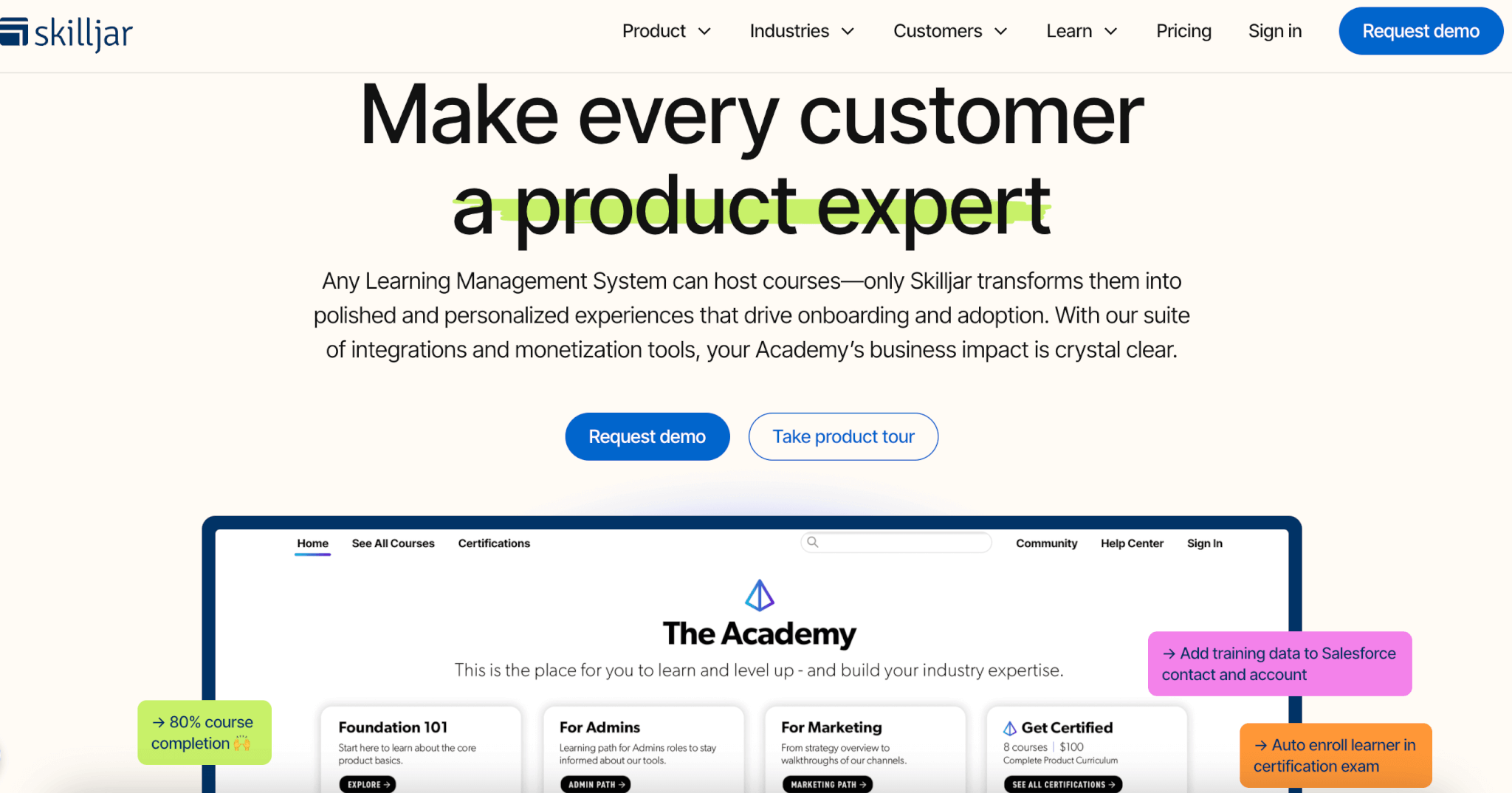
Software Stack Editor · July 11, 2024 ·

With a global growth rate of 900%, online learning is the fastest-growing market in the education industry. 98% of American universities and 77% of US companies offer online learning opportunities.

The rapid growth of platforms like Udemy indicates that also individual creators and entrepreneurs decide to turn their expertise into online courses (and a source of passive income).

This isn’t surprising. AI tools make it easy to create educational content, and with course platforms like LearnWorlds, building and delivering online courses has never been easier.

But here’s the thing: Increasing competition in already saturated niches makes it difficult for new educators to sell their courses.

If you’re in this situation, skillfully promoting your course on social media could be a way to break through.

This article will teach you 12 ways to leverage social networks to market your online course.

12 strategies to promote your online courses on social media

Social media is a powerful tool for promoting online courses, offering a variety of strategies to engage potential students and boost sales. Here are 12 tried-and-tested methods to leverage social media for your course marketing.

1. Team up with influencers

Influencer marketing is one of the more effective ways to leverage social media for your course promotion. According to SproutSocial data, nearly half of consumers make at least one purchase a month because of influencer recommendations. And just under 90% at least once a year.

Here’s how it works, in a nutshell:

You identify influential authors and creators with large followings and ask them to promote your course, for example, by reviewing it for their audience.

These don’t need to be TikTok or Insta celebrities with millions of followers.

Here’s an example of a LinkedIn post by Roxana Stingu, the Head of Search & SEO at Alamy, promoting a Blue Array SEO course.

Roxana is a perfect person to promote the course but not because of her follower count. She’s an SEO expert and thought leader and the ‘mere’ 4k followers are a highly relevant audience, closely matching the course’s target customer profile.

Such endorsements drive conversions!

2. Build anticipation with polls

Because of their interactive nature, polls on X or LinkedIn can be an effective way to engage your target audience and promote your course.

Even before it is ready.

Check out this LinkedIn poll by Jan Rutherford in which he asks followers for insights about add-on resources for his courses.

This poll kills two birds with one stone:

First, the poll can build the ante for the upcoming course and lay the foundation for the marketing efforts once the course goes live.

Second, it helps Jan validate his ideas. So that he doesn’t waste time and resources on developing materials that nobody will use.

3. Pre-sell your course and offer early-bird discounts

Another way to build the hype around your course is through pre-sales.

That’s what Rob Eisenberg, the Chief Software Architect at Blue Spire, did when he was launching his Web Component Engineering course.

In his LinkedIn post, he announced the new course, provided details about its contents, and offered a $100 early-bird discount to drive interest.

If it isn’t your first course and people trust you to deliver high-quality content, you may even be able to ask customers for money upfront, just like Rob does.

Their willingness to pay early can perfect evidence that there’s demand for such a course. And you could use the money from pre-sales to fund its development.

4. Create trailer videos for your courses

A trailer video can also create a buzz around your course. And boost its sales.

Here’s an example of such a trailer for a University of Leads course ‘Create a Social Media Marketing Campaign’ on FutureLearn.

The video was used to promote the course which they posted on YouTube, Facebook, and X.

It introduces the course content, highlights its benefits to learners, and explains how it fits other University of Leeds offerings. And as it features one of the instructors, it’s a chance to build initial rapport with the potential students.

If you’re wondering if it’s worth the effort, videos are 12x more likely to be shared than other types of content and 87% of marketers attribute sales to their video content.

5. Create short videos

Creating YouTube shorts, Instagram Reels, or TikToks is another way to harness the power of video to sell online courses.

Hubspot has found that short-form videos have the highest ROI compared to other content types. This may be because video content is easier to digest, and has more potential to go viral. And repurposing videos as shorts is a breeze with AI-powered video tools like Pictory or Submagic.

If you want to give it a bash, here are a few tips:

  • Optimize them for mobile devices, as that’s how 75% of users consume content video.
  • Add close captions to make them more accessible.
  • Deliver value by sharing best practices, mini-tutorials, and solutions to user problems.

If you want to see a good example, check out the YouTube channel of our customer, PT Collective.

To promote their online courses for personal trainers, they post shorts with marketing advice to help PTs grow their business.

6. Post it on Pinterest

With over 518 million active users globally, Pinterest is worth considering when designing your course marketing strategy. Especially as 83% of regular Pinterest users make purchases based on the content they’ve seen on the platform.

Whether it’s the right medium to promote your course, depends on your niche and target audience demographics.

Most Pinterest content revolves around cooking, DIY, fashion, home design, travel, and personal growth. The largest user segments are women aged 20-34 and nearly 90% are based in the USA.

Sounds like a good match?

If yes, post your course poster and link back to your course website, just like 5 Minutes for Mom promoting their interactive cooking classes. 30 to 90-second videos are the best-performing Pinterest content, so it’s also a good place to share your course trailer.

7. Use social proof

Sharing customer reviews, testimonials, and feedback with your social media followers can boost your course sales.

People trust positive online reviews or testimonials, even if they are from strangers, more than a company’s marketing pitches. In fact, 88% of consumers find online reviews and testimonials as trustworthy as personal recommendations.

Video testimonials are particularly impactful, but you don’t need to go to such great lengths. Share screenshots of online reviews of your course or emails from satisfied customers.

Just like Chima Mmeje, the Senior Content Marketing Manager at Moz, did in her update post about her 10x Topic Authority course.

8. Create LinkedIn carousels

Buffer has also found that LinkedIn carousels get almost as much engagement as videos and images (and way more than text posts).

No wonder. They are visually appealing and help your posts stand out.

Course creators know that and use them for marketing their offerings regularly.

Here’s an example of a carousel created by Beatrize Ronchetti to promote her course for property professionals. It’s made of 7 screens introducing course content, sharing a customer testimonial, and highlighting the course benefits.

Here’s another idea:

Create carousels with useful insights, tips, or best practices from your course to give potential students a taste of the value they will receive once they sign up.

If you haven’t posted a LinkedIn carousel yet, you can upload it as a PDF file. You can create them in no time from templates in tools like Canva.

9. Offer free modules

Free course modules are like free software trials: they showcase the value of your course without satisfying all customer needs.

They get to experience how you deliver your courses and may even learn a thing or two, but to fully realize the course benefits, they need to swipe their credit card and buy the whole thing.

As the content to share is ready, this tactic requires very little effort. All you have to do is upload videos from your course to YouTube.

Here’s an example of such a channel. It promotes an online course preparing British citizenship applicants for the Life in the UK test. The author offers quite a few full-length videos but they don’t cover the whole curriculum.

To increase your YouTube content visibility, optimize your channel for SEO. This helps potential customers find the course via search.

Here are a few tips:

  • Include the keywords in the account name, the first 100-150 characters of the channel description, and video titles and descriptions to help YouTube algorithms understand your content.
  • Add tags reflecting the course topic.
  • Use relevant hashtags.

Useful? #yourewelcome.

10. Leverage paid ads

Paid social ads are the least organic way to promote your courses but they offer multiple benefits.

They get your course in front of audiences straightaway and allow you to address specific user groups. For instance, Facebook enables you to target users based on their interests, age, gender, and location.

You can also retarget them to re-engage people who have visited your course landing page before.

All the major platforms offer paid ads and these come in various forms and shapes:

  • Facebook ads include image, video, slideshow, Story, and carousel ads.
  • Instagram offers photo, video, carousel, Story, and Reels ads.
  • LinkedIn Sponsored Content comes as a single image, video, carousel, event, document, and thought leader ads.
  • YouTube ads types include in-stream ads, in-feed ads, and bumper ads (just before the video starts).
  • Tiktok ads come as in-feed/video, search, carousel, and Spark ads. The latter resemble videos from creators your audience follows.

11. Engage audience with quizzes and challenges

CPD Solutions is a UK-based company that offers professional development courses for veterinary surgeons and nurses. One of the tactics they often use to advertise their course is by providing their audience with real-life cases to assess.

For example, in the post below they include an ultrasound image and ask viewers to provide diagnoses. This engages the audience and their comments increase the reach of the post which advertises their U/S course.

Sounds interesting?

Great. Give it a go.

You can also use polls to create quizzes to engage your audience and drive interest in your courses.

12. Run competitions

Competitions can generate excitement around your courses, increase their visibility, and drive bookings.

One of our customers, Droneit, uses them to promote their drone pilot license courses. These are already excellent value, especially when combined with the free upgrades, but the opportunity to win a drone can be the final nudge that some customers need to book the course.

You can also run competitions to promote your courses less directly.

For example, use them as a lead magnet and ask participants to provide their contact details. To grow your email list for future marketing campaigns.

Social Media Course Marketing Best practices

To wrap up, let’s have a look at a few best practices for selling online courses on social media.

How-to-promote-online-courses-on-social-media-infographic

Choose the right social media channels: To reach your target audience, pick a social platform where they hang out. For example, LinkedIn is the place to advertise professional courses, and TikTok will work best if you’re targeting 18-34-year-olds.

Vet your partners: When looking for influencers, ensure their profiles are legit. Don’t look at follower count only. Check their activity and follower engagement too.

Track performance: Monitoring user engagement with your posts and conversion rates enables you to identify best performing channels and content, and inform your future social media strategy.

Invest in a social media management platform: Social media tools like Hootsuite or SproutSocial will help you automate your social media campaigns and track their performance.

Share your student success stories: Just like testimonials and reviews, they are evidence of your course value and the positive impact it can make. 

Include a CTA button: Your main goal is to drive course bookings, so always add a relevant call-to-action to your social media posts and ads.

Use high-quality content: To stand out from the crowd, your images, infographics, videos, and carousels need to be top-notch.

Is there anything else we should add? We’d love to hear from you!

Final thoughts

As more and more educators, thought leaders, and subject matter experts launch their online courses, the competition can be fierce.

To stand out from the crowd, creating quality educational content may not be enough. You must also get the course in front of the potential audience and convince them you’re offering good value for their hard-earned money.

Social media platforms, the dominant B2C digital marketing channel, offer plenty of opportunities to attract and engage potential customers.

And if you’re still looking for a platform to build, deliver, and sell your course, why not check out how LearnWorlds can help?

The post How to Promote Online Courses on Social Media [12 strategies] appeared first on LearnWorlds.
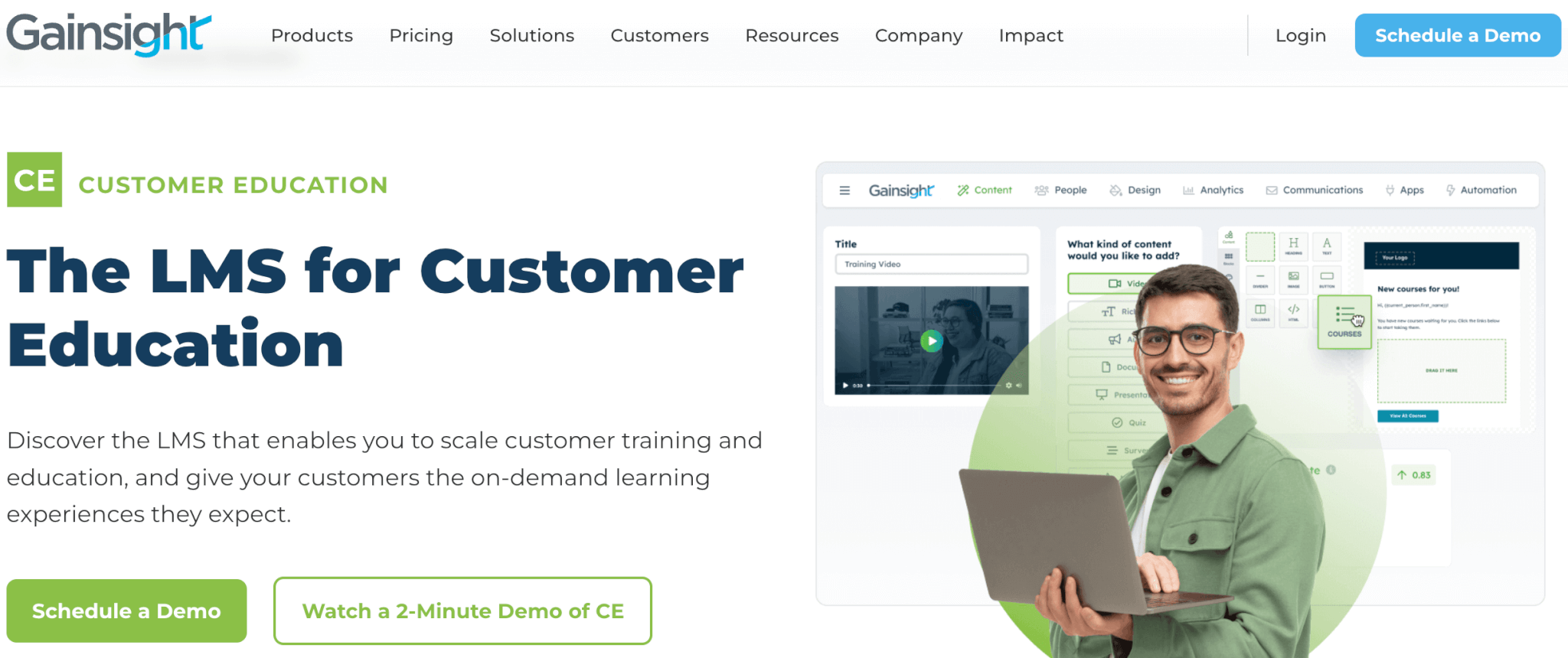
  • « Go to Previous Page
  • Page 1
  • Interim pages omitted …
  • Page 11
  • Page 12
  • Page 13
  • Page 14
  • Page 15
  • Page 16
  • Go to Next Page »

Get your Software Stack together. softwarestack.tech

Software Stack

© 2024–2026 - Software Stack is a trading name of SouthwestCIO Limited ac ompany registered in England & Wales 11319049

  • Knowledgebase
  • Home
  • About Us
  • Contact Us