• Skip to primary navigation
  • Skip to main content
software stack logo

Software Stack

Get your Software Stack together

  • Knowledgebase
    • All Categories
    • Accounting Software
    • Automation & Workflow Software
    • Customer Relationship Management
    • E-Commerce Shopfronts & Payments
    • Marketing Automation
    • Online Courses & Membership
    • Project Management
    • Surveys & Forms
    • Web Hosting
  • Home
  • About Us
  • Contact Us
  • Show Search
Hide Search

Email Marketing

Ultimate Strategic Marketing Guide for SMBs

Software Stack Editor · October 29, 2025 ·

Strategic marketing management turns scattered efforts into a repeatable system for small businesses.

The payoff is clear: steady leads that drive measurable growth.

In this article, you’ll learn how to build a strategic marketing approach that makes every marketing dollar work harder. You’ll also get a four-step framework and practical tactics that integrate with your sales processes.

Key takeaways from strategic marketing

  • Strategic marketing online aligns all marketing activities with business goals, creating predictable revenue growth instead of marketing experiments.

  • Focusing marketing efforts on channels and content that reach the right prospects improves conversion speed and efficiency.

  • Integrating marketing campaigns with CRM and sales processes reduces lost leads and makes follow-up more effective.

  • Pipedrive helps your team set goals and track your strategic marketing impact in real-time – try it free for 14 days.

What is strategic marketing? (and why most advice doesn’t work for SMBs)

Strategic marketing definition: Strategic marketing means having a clear plan and purpose that aligns with your business goals for every marketing activity.

This approach helps companies avoid random acts of marketing, where you might launch a campaign or write an article without knowing how it contributes to business growth.

For small and medium businesses (SMBs), being strategic means using your marketing spend and resources even more efficiently.

Example. A project management SaaS startup publishes blog posts sporadically, based on topics the sales team suggests. Traffic is inconsistent and the blog posts don’t generate many leads.

The marketing lead does market research and maps topics to the customer journey. Each new post nurtures leads and directly supports sales.

Much of the strategic marketing advice out there has large enterprises in mind. It often assumes you have a big team, deep budgets and time to test multiple approaches at once.

Typical advice may include strategies like advanced market segmentation – which requires digging through lots of data – or public relations campaigns that rely on costly agencies and media connections.

When you have fewer resources, an SMB marketing strategy should integrate with your existing workflows – not require a complete organizational overhaul.

Recommended reading
https://www-cms.pipedriveassets.com/Marketing-Management-Tools.png

The ultimate marketing management tools guide

The 4-step strategic marketing framework for SMBs

Following a framework helps keep your marketing team on track and working toward the same goal.

These four steps take you from the decision-making and planning process to a fully-fledged marketing strategy.

1. Align your strategic marketing plan with sales objectives

Start with your sales targets and work backward to determine what marketing needs to deliver.

While getting more social media followers or newsletter subscribers is good, revenue is the clearest measure of success for SMBs.

Download Your Sales and Marketing Strategy Guide

Grow your business with our step-by-step guide (and template) for a combined sales and marketing strategy.

Aligning marketing with sales goals ensures that every activity contributes to the key results, such as generating leads or shortening the sales cycle.

You can use customer relationship management (CRM) data to help set your marketing objectives.

Example: One in five leads typically becomes a customer. Since your goal is 10 new customers this quarter, your marketing objective is to generate 50 qualified leads. By focusing on specific outcomes, you easily measure the impact of your strategic marketing efforts.

Using Pipedrive as your CRM, you can set a goal for how many new leads enter your sales pipeline.

Strategic marketing Pipedrive goals

Set a timeframe and assign the relevant stakeholders. Visualizing your progress is a great way to motivate your team.

Pipedrive in action: Tour and activity booking company TrekkSoft aimed to increase sales in specific areas and verticals. With Campaigns by Pipedrive, it personalized emails to each segment, increased email sends from 500 to 4,000 per week and doubled sign-ups.

2. Define and segment your ideal customer for laser-focused targeting

Focus on the customer groups that generate the most revenue instead of relying on broad buyer personas.

Strategic marketing is most effective when it reaches the customers who matter most to your business. Chasing every possible lead can spread resources thin.

Look at the closed deals in your CRM and see if you can find and see if you can find patterns in:

  • Deal size – which customers bring the most revenue?

  • Sales cycle length – who tends to close faster?

  • Close rate – which types of customers are most likely to convert?

  • Lifetime value – who renews or expands their contracts?

From there, group similar customers together. Aim for around two or three main segments that represent most of your revenue.

Example: The SaaS company finds that creative agencies close quickly and adopt premium features, but their budgets are smaller and these customers churn more often. Consulting firms take longer to decide, but when they do, they bring bigger contracts and stay longer.

Map out pain points, buying behavior and preferred channels for each segment to create marketing campaigns that speak directly to those groups.

Note: If you have access to more detailed data, you can create in-depth marketing segmentation based on factors like customer demographics or purchase history. This approach lets you refine your value proposition and make more confident marketing decisions for each group.

3. Choose marketing channels that fit your resources and feed your sales process

Spreading efforts across every possible platform can drain resources and dilute results.

Instead, pick two or three channels. When evaluating these channels, consider:

  • Resource requirements – can you use the channel consistently with your current team?

  • Audience alignment – are your target customers active and reachable there?

  • CRM integration – can you track leads from this channel through your sales pipeline?

  • Measurable ROI – can you link activity on this channel directly to closed deals?

While limiting the channels you use seems counterintuitive, it lets your SMB team invest their time where it matters most.

The result? Greater customer engagement and improved conversion across your campaigns.

Example: The SaaS team focuses on LinkedIn and content marketing. Consulting firms in the brand’s target audience spend time on LinkedIn, where case studies and posts build trust. Creative agencies respond better to practical blog articles that show how the software saves time.

4. Measure your success through sales outcomes, not marketing metrics

At this stage, focus on immediate sales outcomes that show whether your marketing activities are helping deals move forward.

Traditional marketing metrics like email opens, website traffic and social media engagement don’t directly predict revenue. Instead, focus on signals like:

  • Lead-to-opportunity conversion rate. The percentage of marketing-sourced leads that become qualified opportunities.

  • Opportunity-to-customer conversion rate. How many of those opportunities turn into paying clients.

  • Time to close. How quickly marketing-sourced deals move from first contact to signed deal.

With Pipedrive, you can easily see how many of your leads convert with the deal conversion report.

Strategic marketing Pipedrive deal conversion report

You could even add custom labels to deals that come from your marketing campaigns (like “Newsletter” or “Facebook ad”).

Then, you can filter for those labels in the conversion report to see how well leads convert from specific campaigns.

Remember, sales metrics don’t just indicate how successful your campaigns are. The data also shows you where to focus your efforts to reach your goals faster.

Example: The project management SaaS sees that leads from case study downloads move through the pipeline faster than article lead magnet downloads. The marketing team decides to prioritize case studies next quarter.

Having marketing metrics and sales data at your fingertips empowers you to make more confident decisions and helps your teams stay focused.

Pipedrive in action: Digital agency Spark Interact created custom dashboards in Pipedrive to track campaign results and daily KPIs. This visibility helped it identify top-performing sales and marketing strategies, leading to a 12% average annual revenue increase.

As Marketing Technology Specialist Mackey Kandarajah observes: “With marketing and sales data housed in one place, the team gains a clear view of which content truly moves prospects, allowing them to refine strategy in real time and convert interest into long-term client relationships.”

Now that you know how to structure your marketing strategically, learn how to execute that framework in practice with concrete tactics ideal for SMBs.

Proven strategic marketing tactics for resource-strapped SMBs

Strategic marketing campaigns don’t need to be flashy to get results.

The tactics below work because they directly support sales and move deals forward.

Align email marketing campaigns with your sales stages

Develop email sequences that mirror your sales process. Instead of generic newsletters, create targeted campaigns for each buying stage:

  • Awareness – product marketing and educational content addressing pain points.

  • Consideration – case studies and product comparisons.

  • Decision – testimonials and implementation guides.

  • Post-purchase – onboarding resources and referral or partner programs.

Planning campaigns with these stages in mind ensures you meet customer needs throughout their buying journey.

Here’s an onboarding email example from product analytics platform Posthog:

The email works because it focuses on the onboarding stage and directly addresses what the user needs to do next.

It sets clear expectations for how often emails will arrive and maintains a personal, approachable tone that encourages engagement.

Create content for in-market buyers

Content is most effective when it speaks to people further along in the marketing funnel who are already evaluating solutions.

Instead of broad awareness pieces, focus on bottom-of-funnel (BoFu) assets that help prospects choose your product.
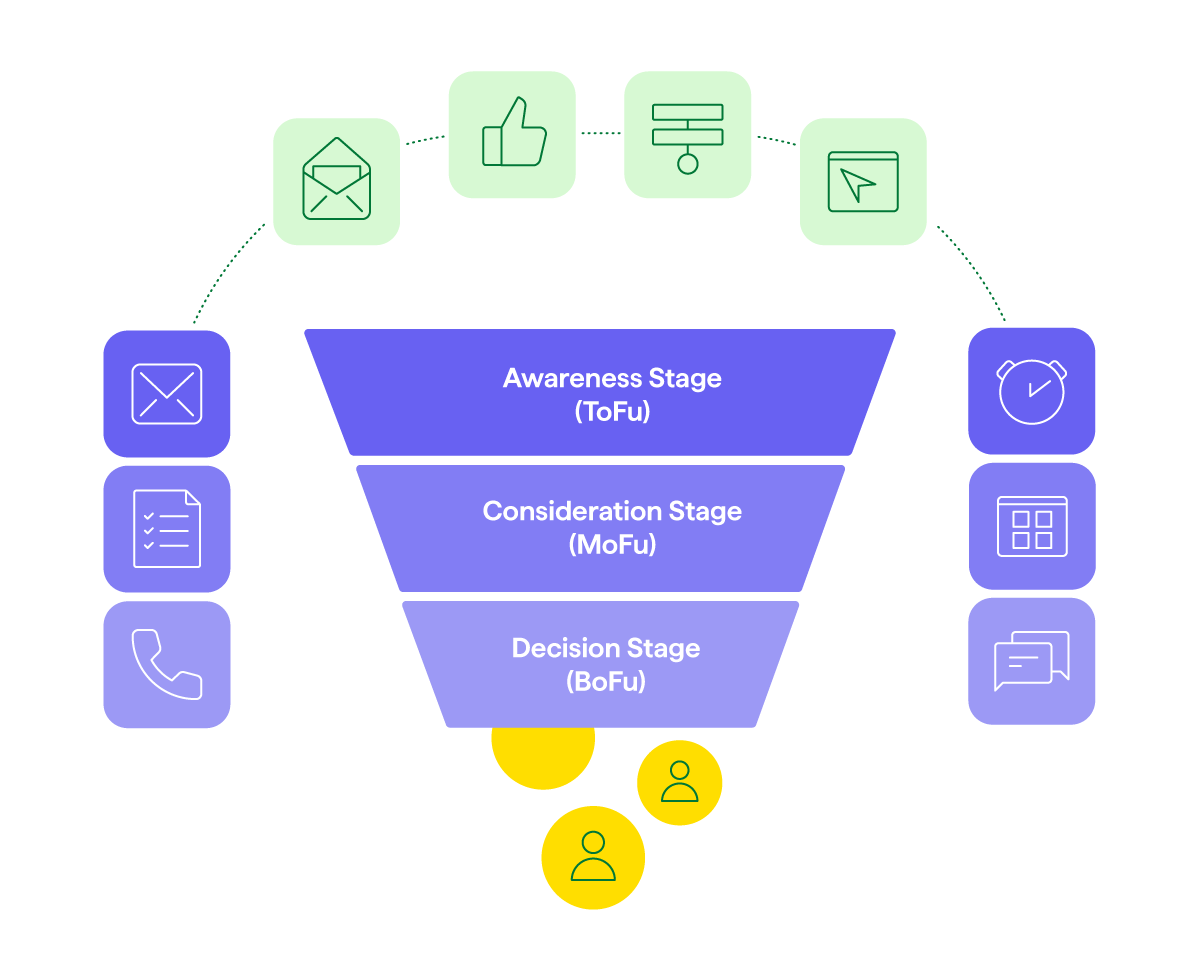
Strategic marketing Pipedrive marketing funnel stages

Comparison guides and “top X software” roundups often have much higher conversion rates than top-of-funnel content and help secure your market position.

Work with your sales team to surface common objections and decision factors, then create content that addresses them head-on.

Here’s an example from time-tracking app Buddy Punch:

Strategic marketing Buddy Punch article

The introduction speaks directly to its customer base by addressing pain points head-on. The rest of the article shows how Buddy Punch solves those problems and offers alternative solutions.

Build relationships on LinkedIn for social selling

Equip your sales team with LinkedIn social selling strategies that complement marketing efforts.

Share valuable industry insights or new products, engage with prospect content and build relationships with your target market.

Here’s how Will Allred, co-founder of AI email assistant Lavender, connects with sales teams on LinkedIn:

Strategic marketing Will Allred LinkedIn post

Coordinate your social media marketing efforts with marketing campaigns. When the marketing team publishes new content, sales reps can share it with relevant prospects while adding personal commentary.

When marketing runs LinkedIn ads, the sales team can follow up with warm messages to engaged prospects.

Run referral or affiliate programs

Referrals are among the most cost-effective ways for small businesses to grow.

Your program could be as simple as a discount for referred clients or as formal as an affiliate program with recurring commissions.

Here’s an example from Senja, a customer testimonial tool:

Its affiliate program clearly outlines how partners earn commissions, making it easy for customers to share the product and earn rewards.

A clear, consistent sales referral system means you can turn happy customers into one of your strongest acquisition channels.

How to measure strategic marketing success over time

Along with tracking immediate results, it’s essential to monitor longer-term trends that show the overall impact of your marketing efforts.

These metrics reveal whether your strategy is sustainable and scalable, not just effective in the short term:

Metric

Details

Lead quality score

  • What it is: The percentage of marketing leads that become qualified opportunities.

  • How to calculate: Divide the number of marketing-generated leads that reach the “qualified” stage by total marketing-generated leads in the same period.

Pipeline velocity

  • What it is: How quickly marketing-sourced deals move through sales stages.

  • How to calculate: Average number of days a deal spends from first contact to close, for all marketing-sourced deals.

Customer acquisition cost (CAC)

  • What it is: Total marketing spend per new customer acquired.

  • How to calculate: Add all marketing expenses (tools, content, ads, staff) and divide by the number of new customers in the same period.

Revenue per lead

  • What it is: Average revenue generated by marketing-sourced prospects.

  • How to calculate: Total revenue from marketing-sourced deals divided by the number of marketing-sourced leads.

Alongside these metrics, examine marketing attribution to learn where leads came from and which campaigns influenced their decisions.

The simplest starting point for SMBs is single-touch attribution. It credits just one touchpoint per conversion, while multi-touch attribution splits credit across all interactions.

You can track attribution through tools like Google Analytics or a platform like Dreamdata.
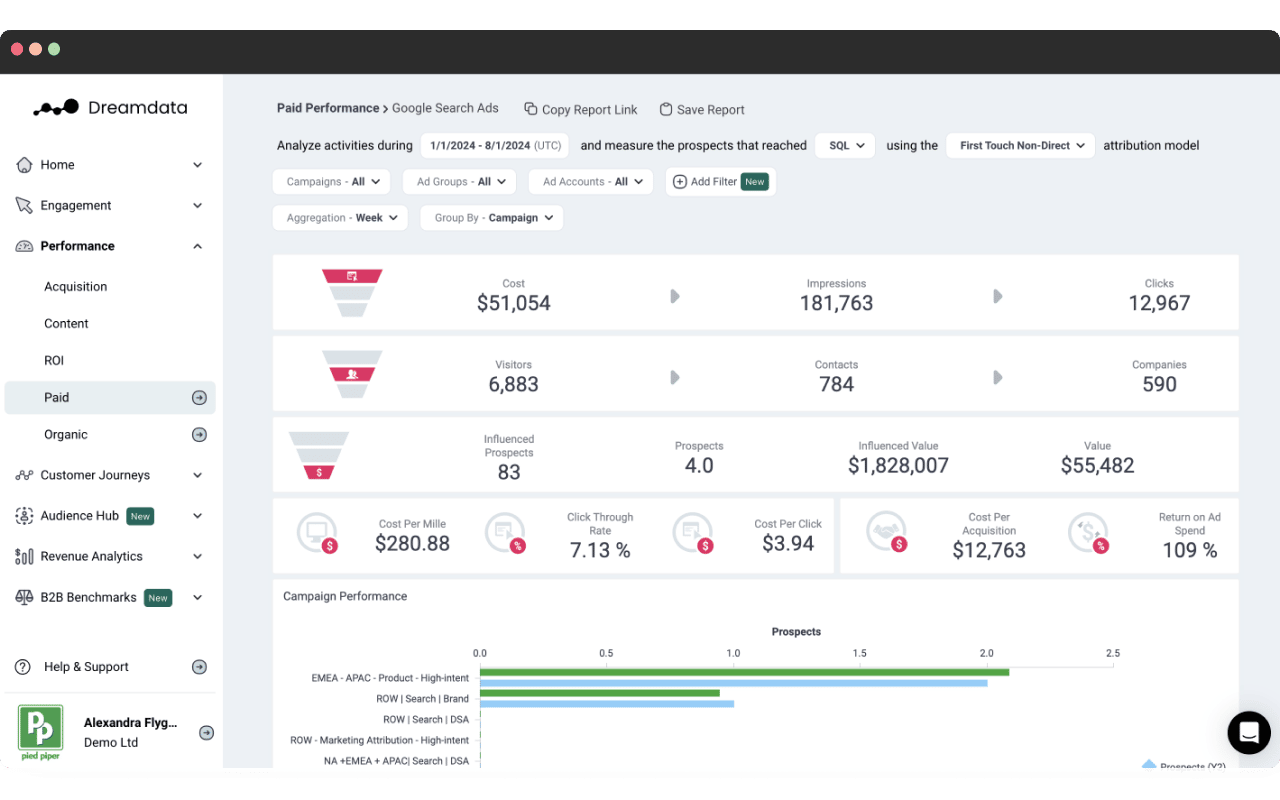
Strategic marketing Dreamdata dashboard

Dreamdata integrates directly with Pipedrive to sync conversions automatically and link leads and digital marketing campaigns to your revenue. You can easily identify your most successful campaigns without creating complex dashboards.

Even with the right tools, SMBs can fall into pitfalls when implementing strategic marketing. Awareness of the risks helps your business manage its marketing efforts safely and successfully.

Common strategic marketing mistakes SMBs make

Avoid these mistakes to protect your marketing budget and make your campaigns more effective.

Copying enterprise tactics without the resources to execute them

Enterprise marketing strategies need dedicated teams, big budgets and sometimes complex new technology.

Small businesses should focus on simplified versions that fit their constraints. For instance:

  • Create basic qualification criteria based on company size and budget instead of complex lead scoring

  • Develop a few targeted email campaigns for the primary customer segments instead of elaborate automation sequences

It’s best to start small. You can always add more complexity as your strategic marketing and sales processes evolve.

Spreading efforts too thin across different channels

Focused marketing on two or three channels can deliver better results than implementing efforts across many platforms.

When you master a few key channels, you can create higher-quality content and build stronger engagement with prospects.

Pick channels where your target audience is active and you can execute consistently. Build expertise in these areas before expanding to new ones.

Running marketing separately from CRM and sales processes

Connecting marketing directly to your sales processes improves conversions and keeps leads moving forward.

Here’s how to link the two:

  • Build CRM integration into every marketing campaign from the start

  • Set up lead capture forms to automatically create CRM records

  • Configure email campaigns to track engagement in your sales system

Campaigns by Pipedrive connects email marketing directly to your CRM, so every email interaction automatically updates contact records.

Strategic marketing Pipedrive Campaigns detail

When your email marketing lives inside your CRM, your sales reps can see which prospects engage with content and tailor their outreach accordingly.

Pipedrive in action: Trainify, a corporate education company in Latvia, uses Campaigns by Pipedrive to connect its email marketing with the CRM. This two-in-one functionality saves Trainify two hours per week on campaign creation and management while automatically tracking interactions to support sales follow-up.

Focusing on brand awareness instead of lead generation

Brand awareness works best as a side benefit rather than the primary goal.

Small businesses get better ROI from demand generation that directly feeds the sales pipeline.

Focus on creating content that captures contact information and moves prospects toward purchase, like webinars or free templates that solve a specific challenge.

Your brand naturally builds market share through valuable, lead-generating content that solves real customer problems.

Strategic marketing FAQs

  • Strategic marketing connects all marketing activities to business goals and measures success by sales results.

    Regular marketing focuses on specific tactics like content or emails without necessarily planning how they link to revenue.

  • Initial results usually appear within a few months as you optimize targeting and messaging.

    Early indicators include better lead quality, shorter sales cycles and higher conversions from marketing-generated leads.

  • Your SMB can build a strategic marketing strategy using your customer data. Broader market research can add valuable context if you have the resources to pull it off.

    A focused market analysis can help you identify market trends affecting strategy.

    For instance, a simple SWOT analysis and benchmarking (comparing your performance to competitors or industry standards) highlight your sales opportunities and challenges.

    This insight informs decisions about pricing strategies, segmentation and new business opportunities.

  • Start by defining your ideal customers and segmenting them based on their needs and behaviors.

    Choose a marketing mix that fits your resources and feeds your sales process. Track results with marketing analytics to see what’s driving leads and revenue.

    This approach turns your marketing into a repeatable system that supports growth.

Final thoughts

The strategic marketing process isn’t about having the biggest budget or the largest team.

Focus on the most impactful marketing initiatives for your small business to turn strategy into a sustainable competitive advantage.

Tracking your marketing campaigns’ performance is key to effective marketing and sales success, helping you see what works and optimize it for improved results.

Pipedrive supports a strategic approach by connecting your leads, sales activity and revenue in one place – try it free for 14 days.

7 Best Customer Marketing Strategies for SMBs

Software Stack Editor · October 28, 2025 ·

Customer marketing transforms one-time buyers into brand advocates who drive growth.

For small businesses, it means shifting focus from the high costs of chasing new prospects to maximizing the value of customers who already trust the brand – and are easier to sell to.

In this article, you’ll discover seven effective customer marketing strategies to generate predictable revenue and sustainable business growth from your existing customer base.

Key takeaways from customer marketing

  • Customer marketing focuses your efforts on existing customers who already trust you instead of only chasing new prospects.

  • Focusing on existing customers drives more revenue through upgrades or selling additional products while keeping acquisition costs low.

  • Programs like referrals, loyalty rewards and VIP treatment turn satisfied buyers into advocates and prevent churn.

  • Pipedrive tracks customer history, automates follow-ups and helps you segment by value so you can focus on marketing strategies that drive the highest returns – try it free for 14 days.
What is customer marketing?

Customer marketing definition: Customer marketing takes a customer-centric approach by focusing marketing efforts on the existing customer base. Your business encourages current customers to buy more, stay loyal and refer others

While many businesses focus on customer acquisition, this approach overlooks easier revenue opportunities.

Customer marketing focuses on your current customers, who already know your business. They’ve experienced your value first-hand and may be more willing to re-purchase.

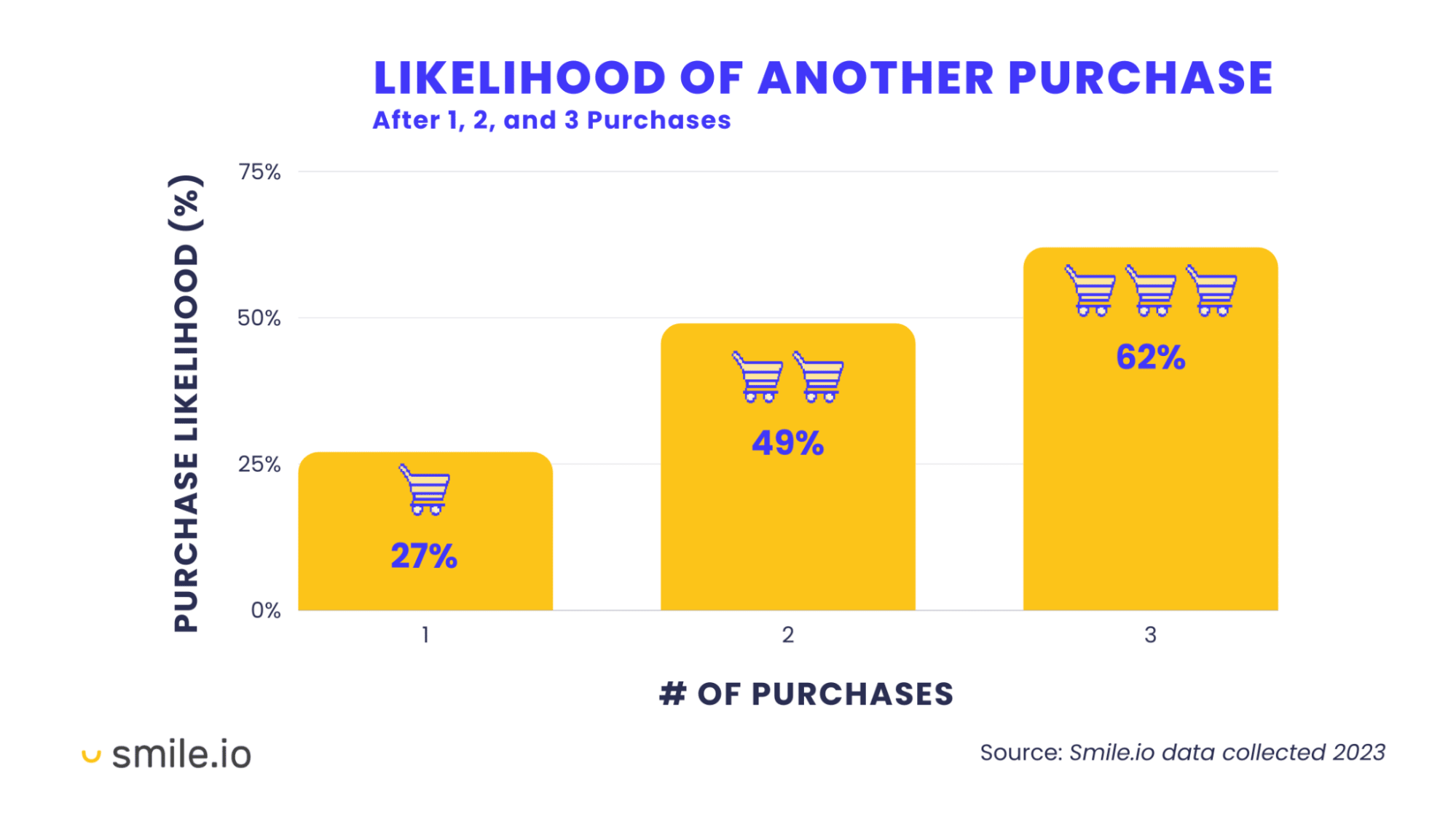
According to Smile.io research, customers who buy from your online store once have a 27% chance of buying again. Their second and third purchase probability goes up further.

customer marketing repeat customers

Your existing customers become more valuable over time, with each purchase building trust and familiarity with your business.

Still, you can’t treat all customers the same way. Someone who bought from you once needs different attention than a customer who’s been with you for years.

There are three key elements to effective customer marketing based on your buyers:

  1. Segmentation – segment according to people’s customer engagement and purchase behavior

  2. Personalization – create messages that address specific customer needs

  3. Progression – strengthen customer relationships and move them toward higher value

You need to understand where each customer sits in their journey with you. Then, create clear paths that guide them toward higher value and deeper engagement.

Benefits of customer marketing

Customer marketing gives you a head start over acquisition. You skip the awareness and consideration stages altogether.

The customer journey becomes shorter and you start with warm leads instead of cold leads every time.

Download our customer journey map template

Start mapping your customer journey with our free customer journey template.

Here are some of the benefits of customer marketing for small businesses:

Higher profitability

Why it works: Your existing customers are more profitable than new ones.

Example: Say your acquisition cost is $500 per customer and you sell software plans of $1,000 annually. When users renew next year, you make $1,000 in profit instead of $500. Moreover, you already know their specific needs.

Cost-effective growth

Why it works: Existing customers require less marketing budget and effort.

Example: A B2B SaaS company may spend $5,000 on ads to get five new trial users. However, an upgrade email to existing users might convert more for the cost of one email blast.

Revenue expansion

Why it works: Existing customers are easier to upsell and cross-sell.

Example: A three-person sales team uses your basic software plan at $50 per user. When the team doubles, your customer marketing manager sends an email offering additional seats. They upgrade immediately, adding $150 in monthly revenue. No re-pitch required – they already trust your solutions.

Competitive protection

Why it works: Satisfied buyers become loyal, improving customer retention rates.

Example: Your customers get cold emails from competitors with promotions, but are reluctant to change service providers. A 20% off offer in HR software isn’t attractive when they’ve already built their processes in your system. They’d have to start over and lose the relationship they’ve built with your team.

Business insights

Why it works: Long-term buyers give you better customer feedback and data.

Example: Say you run a survey and find out most of your customers prefer using the mobile app. So you improve the mobile experience, which helps you sell more effectively to similar sales prospects.

Now that you understand why customer marketing works, learn why it’s different from lifecycle marketing in a fundamental way.

Customer marketing vs. lifecycle marketing

Customer marketing and lifecycle marketing differ in timing.

Customer marketing starts after the first sale. You increase customer satisfaction, build loyalty and move customers toward advocacy. The main focus is developing the post-purchase relationship for retention and repeat purchases.

Lifecycle marketing starts before potential customers know you exist. You create marketing for every customer touchpoint along the journey – from brand awareness to advocacy.

Customer marketing is one function of lifecycle marketing, while the latter spans the whole journey.

Most businesses need both approaches for successful growth. Yet, small-scale business owners often focus on acquisition and miss out on crucial customer retention opportunities.

Recommended reading

https://www-cms.pipedriveassets.com/Delight-the-Customer.jpg

10 reliable ways to delight the customer and amplify customer loyalty

7 successful customer marketing strategies for SMBs

Customer marketing strategies work best when they match your current business stage and customer needs..

Here are some successful marketing strategies you can use.

1. Customer onboarding campaigns

A customer onboarding campaign is a sequence of emails that guides new customers.

You design these emails to educate customers or help them achieve milestones. For example, helping them set up their first sales pipeline or importing their contact list.

The main goal of these emails is to move customers from “I’m just signed up” to “I’m getting value”. If customers don’t get value quickly, they may churn.

An onboarding campaign can have the following email sequence:

First milestone email (e.g., create an email campaign or import contacts)

SMB benefit: Onboarding campaigns work better for small businesses that need to educate customers. If customers can understand your offer without guidance, onboarding may be unnecessary.

Here’s an example of an email from Pipedrive’s onboarding sequence:

customer marketing pipedrive onboarding email

This is a milestone email to help customers import data. Rather than making customers log into their account and navigate to the feature, Pipedrive provides a handy “Let’s go!” button.

The message also includes a link to a video tutorial. This gives customers additional support if they need more guidance on the import process.

2. Upselling and cross-selling

Upselling and cross-selling marketing help you promote upgrades and complementary products to get more value from customers.

Upselling campaigns promote premium versions of products your customers already use. For instance, you may market a pro plan to customers who are on your software’s basic plan.

Meanwhile, cross-selling campaigns promote additional or new products that complement customers’ purchases. For example, a buyer who’s upgraded to your pro plan may need your consulting services.

SMB benefit: Upselling and cross-selling increase customer lifetime value without adding acquisition costs. Higher lifetime values mean you can invest more in your business growth

Take Grammarly, the writing assistant that marketing teams can use to create content faster. Here’s how it subtly upsells to its customers:

customer marketing grammarly upselling

When you use the free plan, Grammarly catches basic spelling and grammar errors – providing immediate value. Pro suggestions appear greyed out as you write, promising to improve your content quality.

SMBs can instantly see how a product upgrade benefits their limited resources, which makes the sales conversation easier.

3. Customer loyalty programs

Customer loyalty programs are reward systems that give customers incentives to keep buying.

They typically involve points, tiers or membership benefits. You structure these programs so customers earn rewards after reaching a specific milestone.

A few examples for a small SaaS provider can include:

  • “Pay yearly, get 15% off”

  • “Refer a client, earn $100 credit”

  • “Spend $,5,000 yearly, unlock VIP support”

SMB benefit: Loyalty programs are critical for SMB management and success because you can turn occasional customers into predictable revenue. Users earn rewards for repeat purchases, making them less likely to switch to competitors.

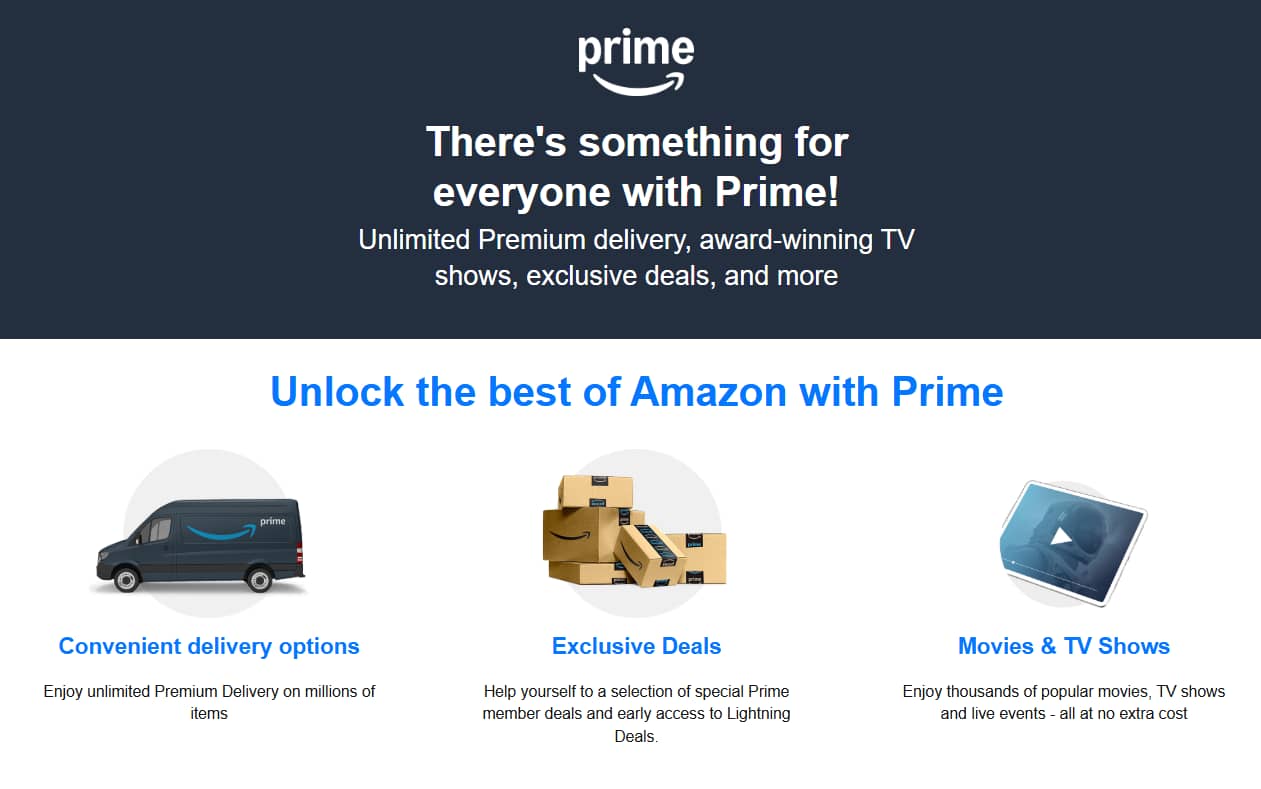
Take how an Amazon Prime subscription can help small businesses get supplies delivered quickly at no extra cost.

Amazon Prime represents a new approach to loyalty programs. Instead of using point accumulation, it creates loyal customers through upfront membership fees.

customer marketing amazon prime

The subscription offers fast shipping, exclusive discounts and access to other Prime products.

Because of these benefits, Prime members may be more motivated to buy from Amazon. They’ve already paid for the benefits, so they’ll want to maximize their investment.

If loyalty works for Amazon, you can make it work for your valued SMB customers.

4. Customer advocacy programs

Customer advocacy programs turn your happiest customers into brand ambassadors who promote your business through content creation and customer stories.

This content may come in the form of:

Advocacy initiatives recognize a simple truth. Happy customers often enjoy sharing their wins. Your job is to give them easy ways to share those stories.

SMB benefit: Advocates create authentic marketing content. Sales prospects trust real customers more than ads, making social proof more effective for SMB sales than any campaign you could run.

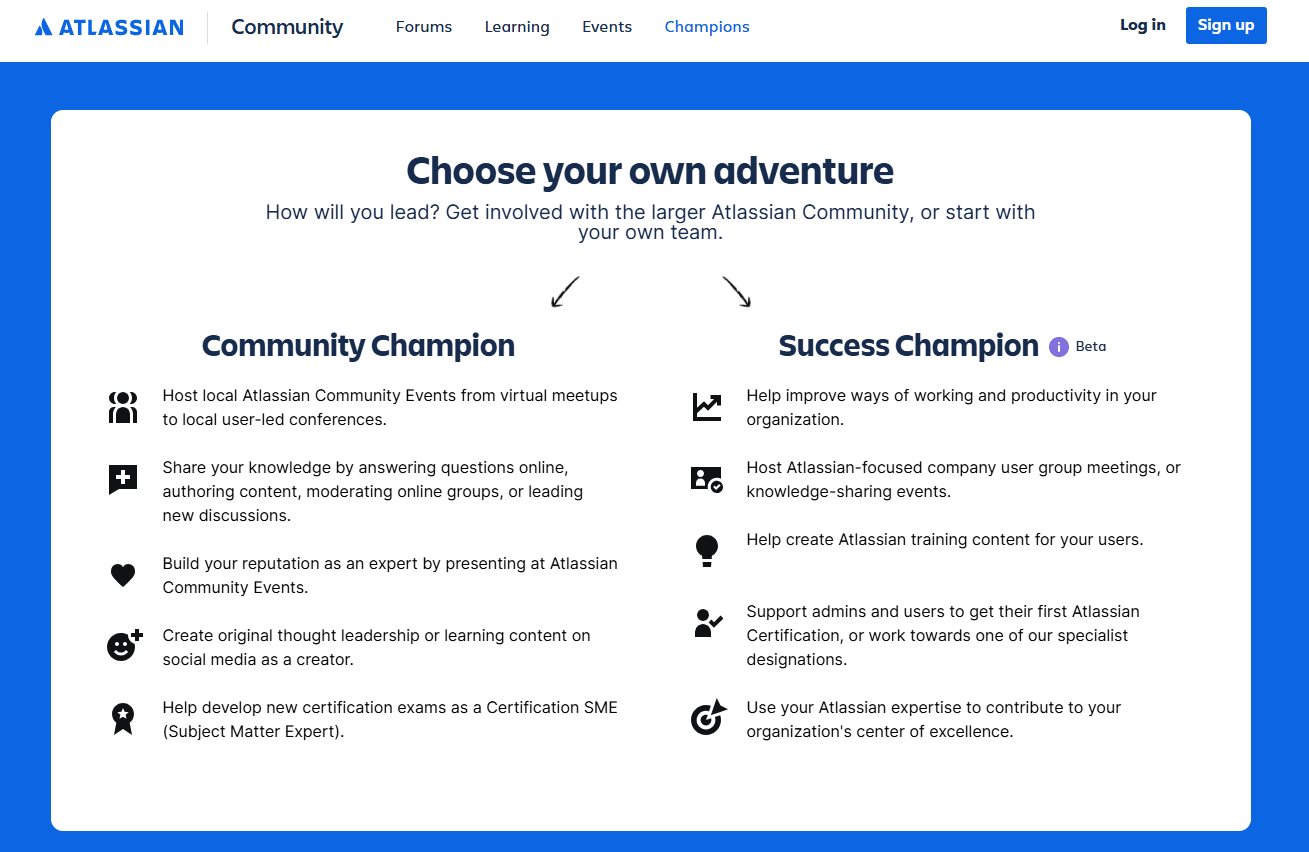
Atlassian owns project management tools like Jira and Trello, which small teams can use to track tasks and collaborate on projects.

Here’s how Atlassian’s community champion program turns customers into advocates

customer marketing atlassian champion

Atlassian looks for customers with deep product expertise. The company gives these champions free course vouchers, exclusive champion-only spaces and even direct access to the Atlassian team.

Champions create educational content about Atlassian products in return. They host webinars, mentor other users and speak at conferences.

This advocacy feels natural because it builds on real expertise and genuine enthusiasm – an ideal scenario in the tech industry.

5. Referral programs

Referral programs are a word-of-mouth strategy in which customers refer others to your product or service.

Referrals involve giving both the referring customer and the new customer a reward. This reward often comes in the form of:

A referral program works because it leverages the existing trust between customers and their networks. When someone gets a recommendation from a trusted source, they’re more likely to pay attention to it and dismiss any sales pitch.

SMB benefit: Referral programs are one of the most effective ways of acquisition. Instead of paying upfront for advertising that may not deliver results, you only pay when someone brings you a new customer.

Consider Dropbox. Small businesses can use the cloud storage service to collaborate on documents and back up important data.

Here’s how Dropbox’s referral program makes both existing and new customers willing to take part:

customer marketing dropbox referral

You just need to sign up for Dropbox and send an email or referral link to your contacts. If one of them joins Dropbox, you both get an extra 500 MB (Basic users) or 1 GB (Plus users) of space.

Everyone benefits from this interaction. Dropbox gains a new customer and users win more storage space.

This makes the referral process feel mutually beneficial rather than a transaction.

6. Win-back campaigns

Win-back campaigns try to re-engage customers who stopped using your product or service.

It often involves sending emails with compelling offers to convince customers to buy from you again. The email may start with a simple “we miss you” message and escalate to special discounts.

Win-back strategies work because former customers are easier to convert than new customers. They already know your business and have experience with your product.

SMB benefit: When you have a limited marketing budget, reaching out to former customers is more cost-effective than acquiring new ones. You’re essentially skipping the awareness stage and going straight to conversion.

At the same time, by understanding why customers left, you prevent future customer churn.

Canva’s design tool is popular among small businesses looking to create professional-looking marketing materials.

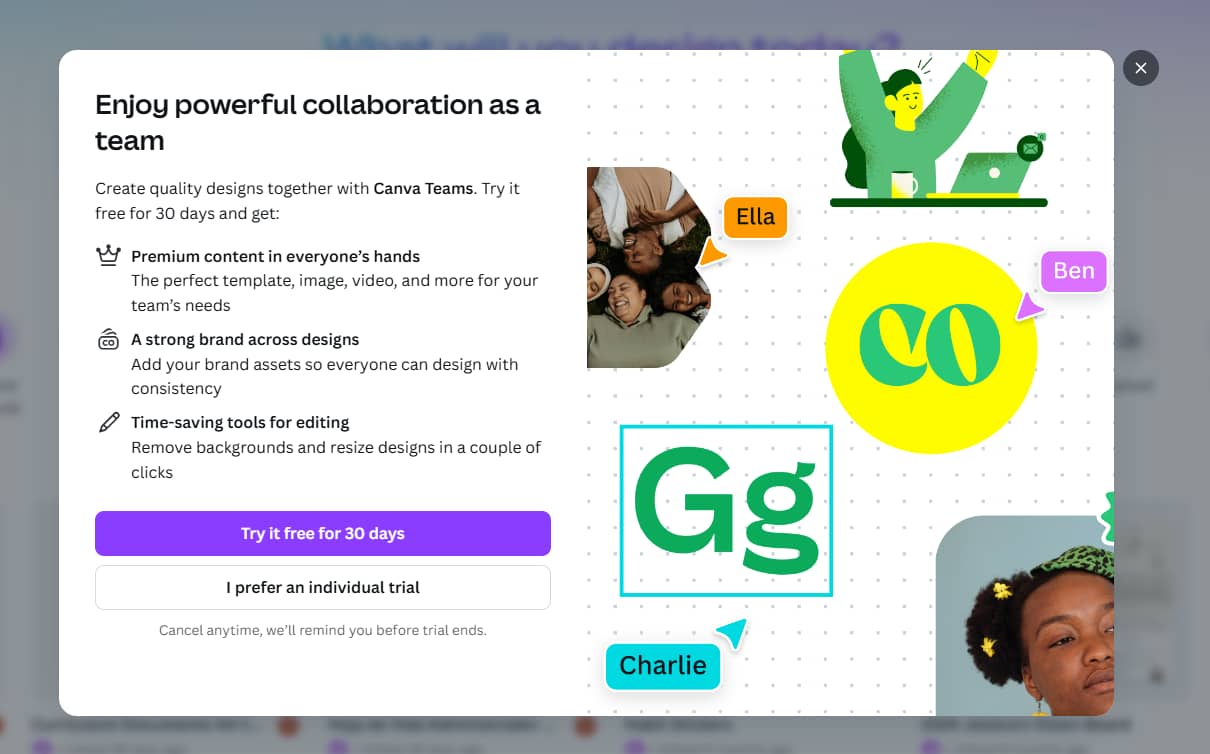
Here’s how the brand re-engages customers:

customer marketing canva strategy

After you’ve been on the free plan for a while, when you log into Canva, a pop-up offers you 30 days of premium features for free. This achieves several purposes:

  • Removes the cost barrier that made you downgrade

  • Reminds you of premium features you’re missing

  • Creates urgency with a time limit

  • Provides value without risk

When you can remind customers of specific benefits, your win-back strategies become more compelling.

7. VIP/exclusive programs

VIP programs provide exceptional customer experiences to high-value customers.

The value of these customers is often based on their spending or strategic importance. Losing one usually costs far more than losing an average customer. They represent a considerable amount of your revenue, so it makes sense to invest in extra resources to keep them happy.

Keeping high-value customers is more about risk management. Not an optional customer service enhancement.

SMB benefit: Retaining high-value customers becomes even more critical for SMBs. If you generate $500k a year and a customer account for $75k, losing them means losing 15% of revenue.

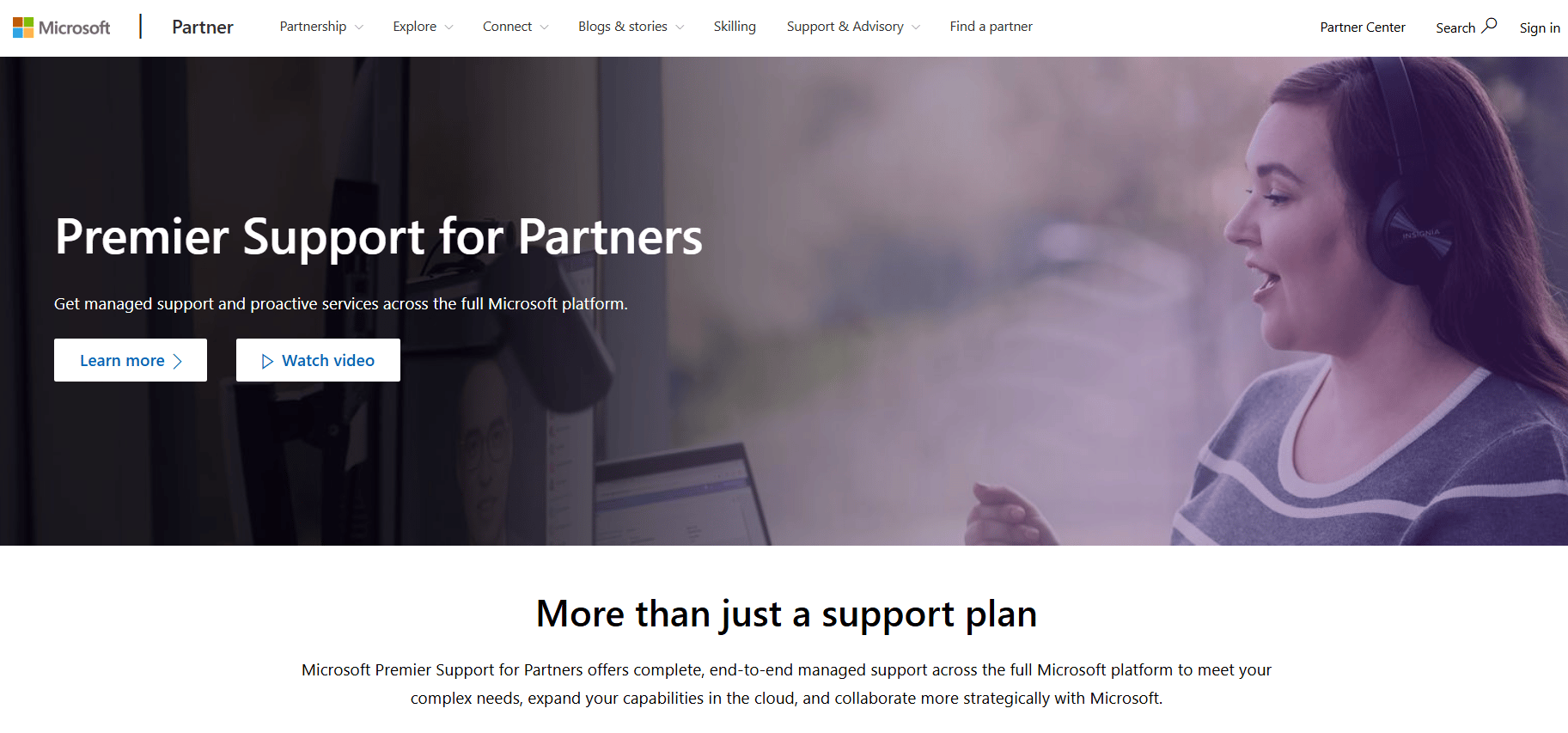
Small businesses rely on Microsoft tools for daily operations – from email to file sharing. Here’s how its Premier Support program provides VIP treatment to high-value clients:

customer marketing microsoft partners

The program offers a dedicated account manager, faster response times, workshops and in-depth customer support.

A key component of this strategy is recognizing that the cost of extra services is far less than losing high-value customers and that VIP marketing efforts help preserve their lifetime value.

Recommended reading

https://www-cms.pipedriveassets.com/Campaign-management-best-practices-for-SMBs.png

Campaign management for SMBs: benefits, best practices and top tools

How to implement customer marketing strategies with Pipedrive

While Pipedrive’s customer relationship management (CRM) software manages your sales pipeline and tracks customer interactions, it can also power your customer marketing efforts.

The platform streamlines email campaigns, identifies high-value customers and segments audiences for targeted marketing.

Here are three ways Pipedrive supports some of the customer marketing strategies outlined in this article.

1. Automate email sequences with Campaigns

Pipedrive’s Campaigns feature automates your email campaigns and customer communications directly from your CRM.

With this customer marketing solution, you can send onboarding sequences or win-back marketing campaigns.

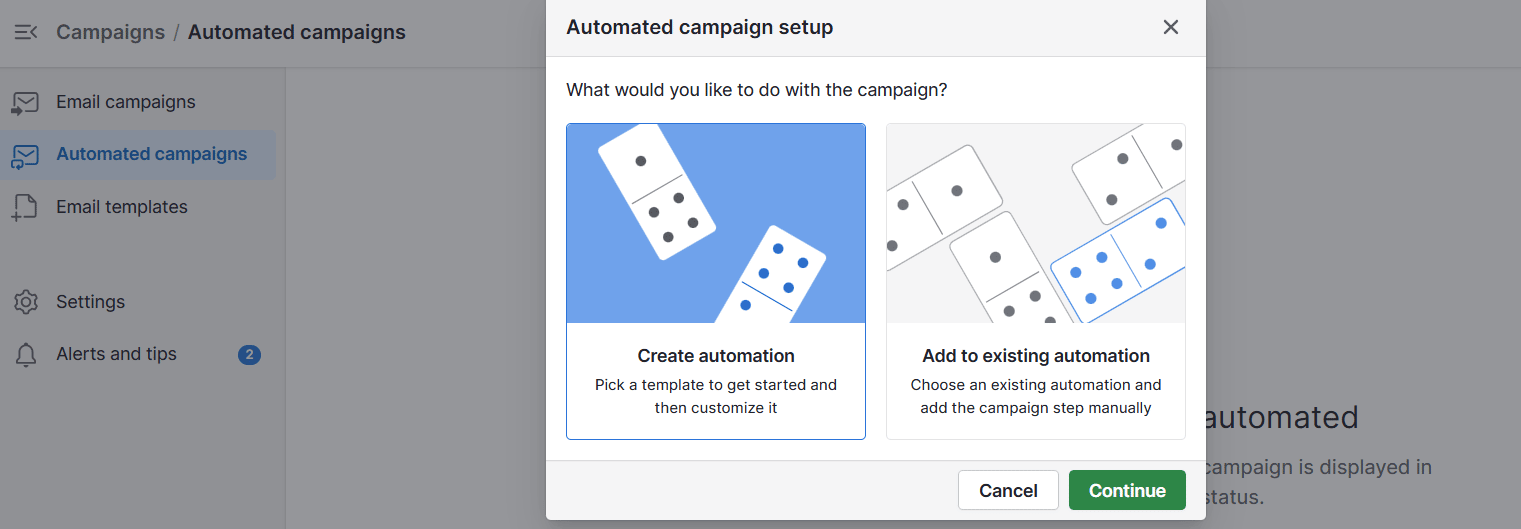
Create an automated email campaign by going to Campaigns > Automated campaigns > + Campaign.

customer marketing Pipedrive automated campaign setup

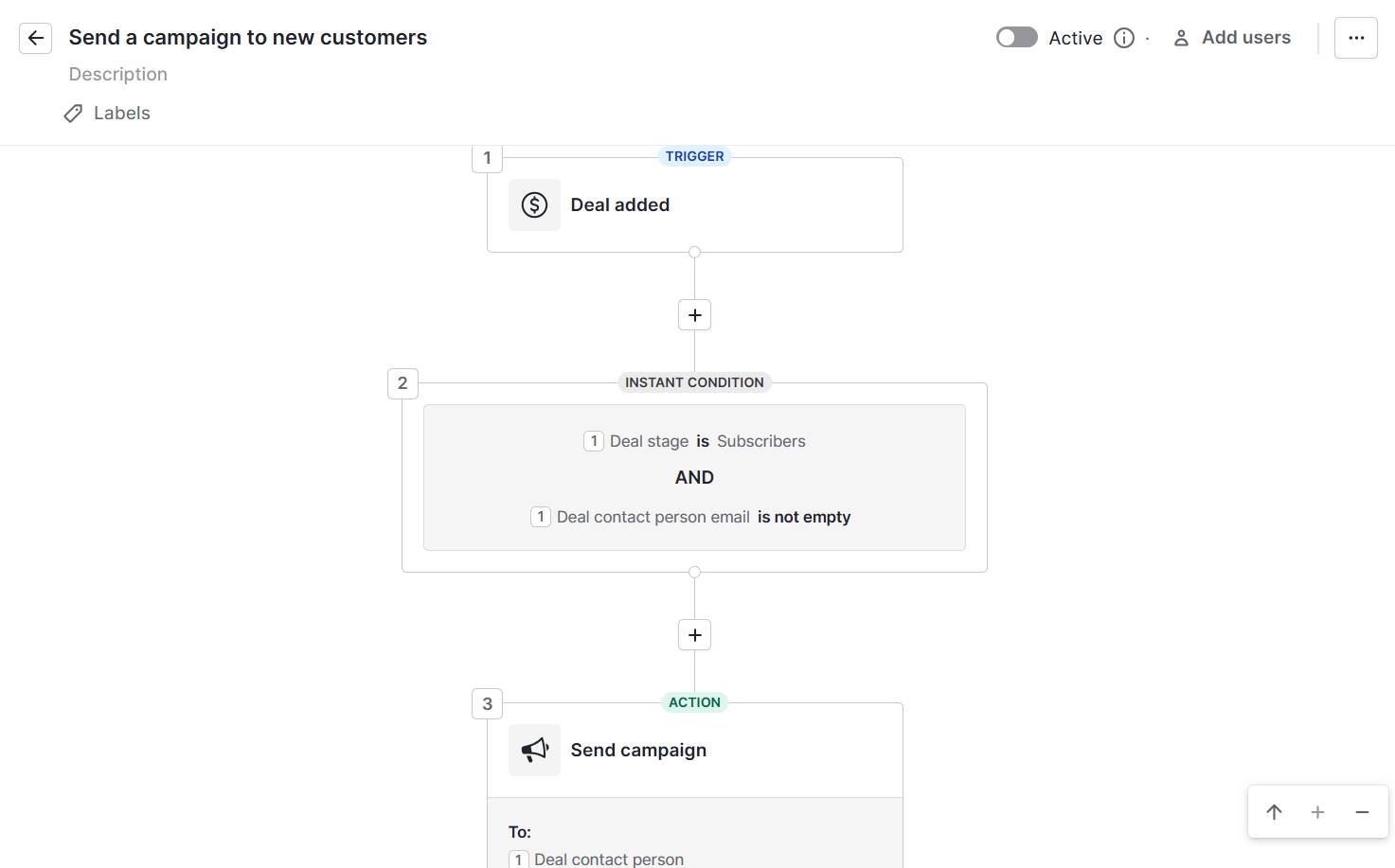
Enter the trigger, condition and action. For example, to build a welcome sequence that includes tutorial videos on day one, set:

  • Trigger as “deal won”

  • Condition as a label for “new customer”

  • Action as “send email immediately”

customer marketing Pipedrive campaign automation

Once your campaign is live, you can track open rates and click-throughs to see which messages resonate best with your customers.

The drag-and-drop builder makes it easy to design professional emails. You can customize your messages by adding your brand colors, images and CTA buttons.

Pipedrive in action: Trainify, a corporate education company in Latvia, struggled with disconnected email marketing and CRM tools. Every campaign required the company to export contacts from its CRM into its email tool first. This process wasted hours each week and created errors when the data didn’t sync properly.

After switching to Pipedrive’s CRM and adding the Campaigns feature, Trainify consolidated all contacts on a single platform. Email campaigns now pull data directly from the CRM without manual exports or imports, saving the company two hours every week.

2. Track customer value with deal data

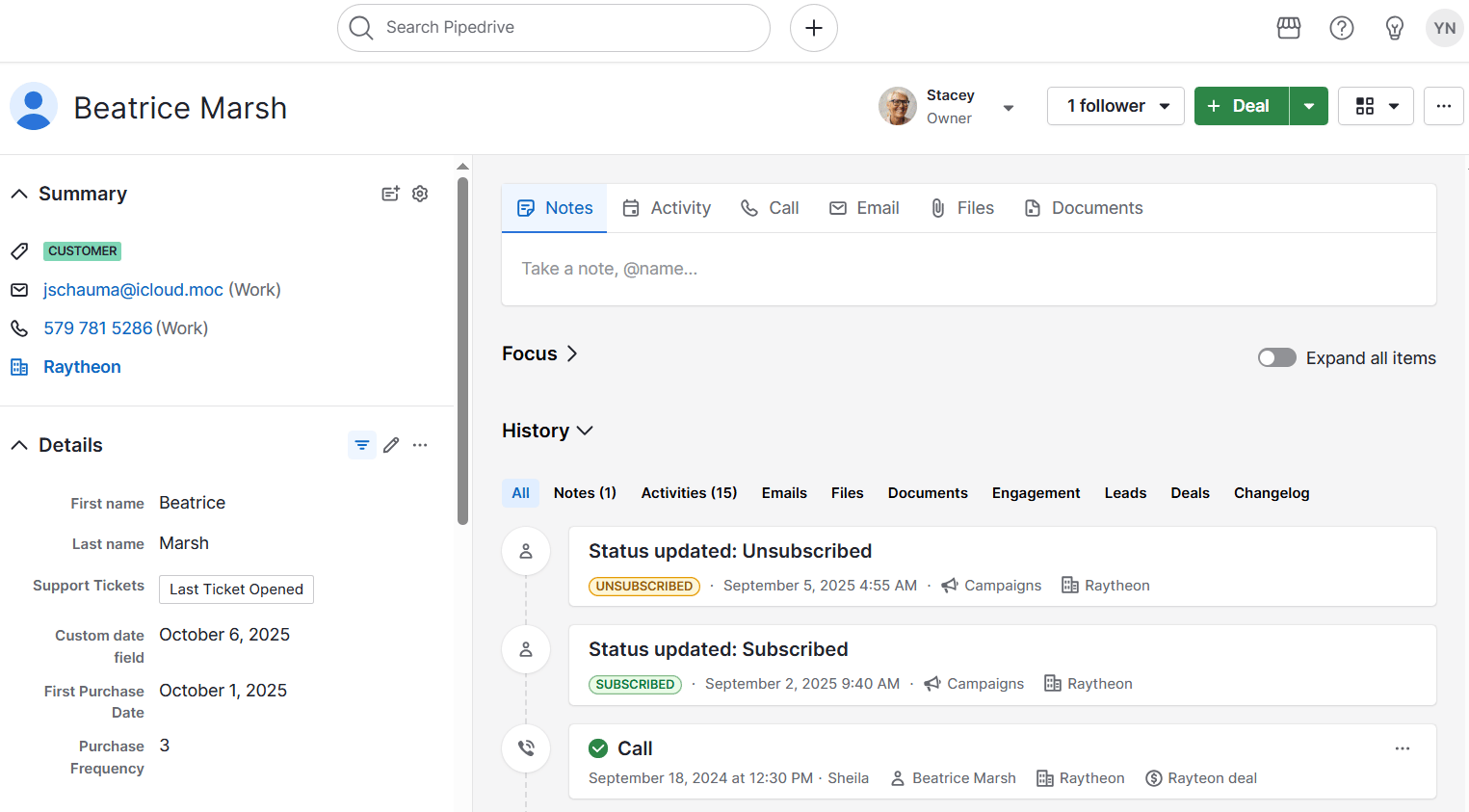
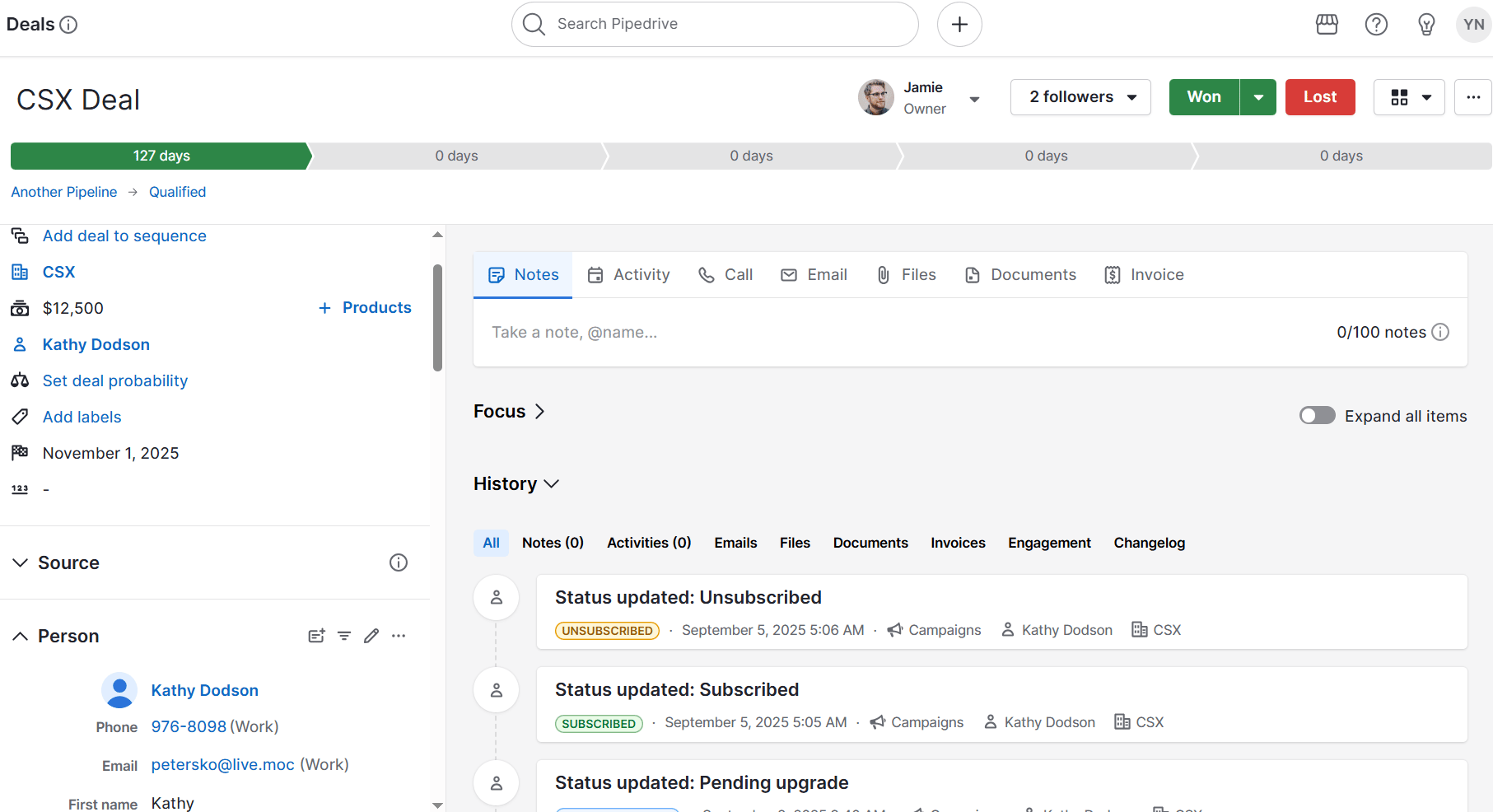
Pipedrive stores metrics and information about every customer sale in your deal records.

You can see purchase history and product preferences all in one place. The deal records help you identify which customers spend the most in your business. You can spot patterns like:

customer marketing Pipedrive deal view

From these insights, you can identify upsell and cross-sell opportunities.

Example: You might notice a client’s marketing team has grown from five to 10 people. Their current plan only covers five seats, which signals a perfect moment to reach out about upgrading.

Pipedrive in action: Snug, a subscription rental housing platform, relied on spreadsheets to track customer data. This manual process made it difficult for the sales team to access and act on information.

With Pipedrive, everything moved into a centralized system. Custom fields and automation helped Snug’s small sales team prioritize leads more effectively,boosting its prospect list growth by 40% a month.

3. Segment customers with labels and filters

Pipedrive lets you organize customers into groups using labels and custom filters.

You can create segments based on purchase behavior, engagement levels or customer value. Think of these segments as customer personas that help you send the right message to the right people.

customer marketing Pipedrive leads filter

Example: You might create labels like “VIP customer”, “upsell ready” or “at risk of churning”. Apply these labels to deals or contacts based on the patterns you spot in your customer data.

When you need to run a specific campaign, filter your contact list by label to target exactly the right people.

Pipedrive in action: UK-based marketing agency Creative Race struggled to monitor prospects’ movements across the pipeline, leading to missed sales opportunities and poor forecasting.

With Pipedrive’s customizable fields, CreativeRace built targeted customer lists and maintained accurate data across its dashboards and reports. The payoff:a 600% year-over-year boost in client acquisition.

Final thoughts

Customer marketing can increase revenue per customer, reduce churn and turn satisfied customers into brand advocates – all while keeping marketing costs low.

Instead of chasing new, costly prospects, you focus on those who already trust and know your value.

Pipedrive gives you the tools you need to implement effective customer marketing strategies. You get automated campaigns, customer segmentation and value tracking in one platform.

Sign up for a 14-day free trial to grow your SMB through your existing customers.

Create Evergreen Funnels Without Losing the Human Touch

Software Stack Editor · October 28, 2025 ·

The post Create Evergreen Funnels Without Losing the Human Touch appeared first on ClickFunnels.

As an entrepreneur, you know the power of automated sales funnels to generate leads and drive sales. However, you might worry about losing the human touch when building evergreen funnels. The challenge lies in scaling your sales process while still providing a personalized, engaging experience for each customer.

The good news is that you don’t have to choose between automation and authenticity. You can create a system that runs smoothly without losing the human connection that makes your business memorable. Evergreen funnels combined with innovative strategies and tools help you unlock new potential.

  • What Is an Evergreen Funnel?
  • The Key to a Personal Touch in Evergreen Funnels
    • 1. Use Personalized Emails for Engagement
    • 2. Offer Value Through Every Step
    • 3. Create Human-Centered Landing Pages
    • 4. Use Video and Interactive Elements
  • How to Choose the Right Software for Evergreen Funnels
    • Page Creation Made Easy
    • Automation That Works for You
    • Strong Integrations
    • Data That Guides Improvement
  • Build Your Evergreen Funnel Today

What Is an Evergreen Funnel?

An evergreen funnel is an automated sales process that generates leads, nurtures prospects, and drives sales without requiring manual intervention. It’s evergreen because it isn’t tied to a specific date or launch.

With funnel-building software, you can create evergreen landing pages and email sequences that run on autopilot. A visitor finds your page, signs up for a free resource, and gets helpful emails over time. Step by step, some of those prospects turn into paying customers.

Evergreen funnels can be incredibly effective. However, many businesses build them in a way that feels mechanical and impersonal. If you’re trying to scale, you can’t afford to sacrifice the authenticity and connection that made your business successful in the first place.

The Key to a Personal Touch in Evergreen Funnels

So, how can you create an evergreen sales funnel that feels personal and tailored to your customers? The following strategies will help you get the best of both worlds—automation and connection:

1. Use Personalized Emails for Engagement

Imagine someone teaching you advanced marketing tactics while you’re still figuring out how to write your first email. You’d feel frustrated and left behind, right? That’s exactly how your audience feels, too.

Make segments by grouping people based on what they downloaded, how long they’ve been on your list, or what stage of business they’re in. Someone who just discovered you needs foundational advice, while someone following you for six months might be ready for more advanced tips.

You can also reference the specific thing they downloaded or the problem they mentioned when they signed up. If someone grabbed your client onboarding checklist, start your following email with “Since you’re working on streamlining your client process…” It shows you remember what they care about and makes the email feel relevant to their situation.

2. Offer Value Through Every Step

Funnels are often synonymous with aggressive selling, and therein lies the issue. Focusing on making sales frequently causes businesses to lose sight of helping customers solve real problems.

To change this, focus on being genuinely helpful at every step. Ask yourself what you can give your audience instead of what you can get.

For example, you can offer a helpful guide when someone first finds you, share actionable tips in your follow-up emails, and provide case studies that show what’s actually possible. Each interaction should leave them better off than before.

3. Create Human-Centered Landing Pages

Your coaching landing page or product sales page should reflect your brand’s personality and communicate directly with your audience. Even though the page is automated, the design and messaging should still feel personal.

Elements that can help you build connection and trust:

  • Your Story: Share why you created your product or service and what problem it solves. People want to know the person behind the business, so don’t be afraid to go deeper into your journey and what drives you to help others.
  • Real Client Results: Include specific success stories with names and details rather than generic praise. “Sarah increased her revenue by 40% in three months” is much more compelling than “This program changed my life.”
  • Conversational Copy: Skip the corporate jargon and write like you’re talking to a friend. Use “you” and “I” language, ask questions, and address their specific concerns in a natural and approachable way.

4. Use Video and Interactive Elements

Incorporating video and interactive elements is another powerful way to keep the human touch in your evergreen funnel. These tools allow you to engage with your audience more directly and make them feel like they’re interacting with a real person.

You can post a short video on your landing page addressing your visitors directly. Introduce yourself and explain what they can expect from your funnel. Interactive elements like quizzes, surveys, or simple polls can make your funnel more engaging.

How to Choose the Right Software for Evergreen Funnels

Building an evergreen funnel starts with software that runs the system without constant oversight. The right tool balances automation with flexibility so your funnel keeps bringing in leads and sales long after it goes live.

Page Creation Made Easy

Choose software that lets you build landing pages, sales pages, and thank-you pages without technical skills. A drag-and-drop editor gives you control to design pages that fit your brand and launch quickly.

Automation That Works for You

Your funnel depends on automation sending the right message at the right time. Look for tools that handle email sequences, track behavior, and trigger follow-ups based on actions. That way, your funnel keeps moving people forward without extra work.

Strong Integrations

Strong integrations keep your funnel running smoothly. The software should connect with email platforms, payment processors, scheduling tools, and larger marketing automation platforms you may already use. Reliable connections mean every step, from sign-up to purchase, works without gaps.

Data That Guides Improvement

An evergreen funnel should get better over time. Pick software with built-in testing and analytics so you can see what’s working and what needs adjusting. Precise data lets you refine pages and emails in a way that steadily improves results.

Build Your Evergreen Funnel Today

Evergreen funnels keep sales consistent, but what matters most is maintaining a human connection. Even with automation in place, people respond to messages that feel personal and genuine. 

Set up your software, launch the first version, and get a feel for how your audience interacts. Use the insights to refine your messaging and the data to improve each step of the funnel.

Try ClickFunnels for Free Today!

Thanks for reading Create Evergreen Funnels Without Losing the Human Touch which appeared first on ClickFunnels.

The Salesperson’s COB vs. EOD Guide

Software Stack Editor · October 27, 2025 ·

End of day (EOD) and close of business (COB) both mean “at the end of the day”. But what is COB exactly and how does it differ from EOD?

Knowing which term to use helps you set clear deadlines and keep your team on the same page.

In this guide, you’ll learn to use COB vs. EOD in practice, with practical examples you can use to communicate deadlines everyone understands.

Key takeaways for COB vs. EOD

  • COB and EOD are very similar terms – understanding their nuances helps you use them more effectively.

  • Using these terms with care builds trust and keeps projects moving forward by preventing the confusion caused by different work schedules.

  • Replacing “EOD” with something specific, like “3 PM EST tomorrow”, eliminates confusion and prevents deals from stalling due to miscommunication.

  • A CRM like Pipedrive helps you manage timed activities and store contact data such as time zones. Try it free for 14 days to bring clarity to your sales process.

COB vs. EOD at a glance

COB stands for close of business, while EOD stands for end of day.

COB typically refers to 5 or 6 PM, while EOD is more flexible and could mean anytime before midnight.

Here’s the difference between these two business abbreviations:

What is COB in business?

What is EOD in business?

It’s the time that your office officially closes for the day.

Most businesses close between 5 PM and 6 PM, so when someone asks for something by “close of business”, they want it during standard business hours.

It refers to the end of the business day.

For some people, “end of day” means when they personally finish work. For others, it means the end of the calendar day (at midnight).

Best for: Client deadlines, formal documentation and external communication.

Best for: Team communication, internal deadlines and projects with flexible timing.

The biggest problem with both business acronyms is time zones. Take a look at the different zones in this map of the US:

COB vs. EOD US time zones

If you tell someone in another city to finish something by EOD or COB today, they might not know whether you mean your time or theirs.

For remote teams spread across the country – or even the world – that can easily create a three-hour (or more) expectation gap.

In business, you might also come across similar terms:

  • EOP (end of play) and COP (close of play) mean the same thing as COB and are more common in British and Australian workplaces

  • EOB (end of business) means the same as EOP and COB

  • EOW (end of week) typically means Friday at COB, though some people interpret it as Sunday at midnight

  • EOM (end of month) refers to the last business day of the month, usually at the close of business

These terms carry the same time zone problems as COB and EOD, but the fix is simple. All you have to do is include the actual time and time zone.

Note: Historically, COB has referred to the closing of the New York Stock Exchange financial markets. These days, people typically use it to refer to the end of a typical workday rather than relating it to the stock market.

How to use COB and EOD in practice

In the business world, being specific about deadlines helps build trust and create a better first impression.

Clear communication shows you’re professional, organized and respectful of your sales prospect’s time.

Here are two quick examples of how a simple wording choice can change the outcome with a new lead.

Example 1: A sales rep follows up with a high-value prospect

Imagine a sales rep needs to send a proposal to a new prospect in a different time zone and works a standard nine-to-five schedule.

The examples below show how the two different approaches play out.

In the first approach, the rep uses common office shorthand in their follow-up email:

Subject: Following up

Hi Jane,

Great talking to you. I’ll get that sales proposal over to you by EOD.

Best, Alex

The outcome: Alex sends the proposal at 7 PM his time, which is 9 PM for the prospect. The email arrives after the prospect has logged off for the day. Because “EOD” is ambiguous, it creates uncertainty and leaves the delivery time open to interpretation.

In the second approach, Alex takes an extra few minutes to be precise and confirm the prospect’s time zone.

Subject: Your Proposal

Hi Jane,

Following our call, I’ll prepare a detailed business proposal and send it to your inbox by 3 PM your time (CST) tomorrow.

Best, Alex

The outcome: The proposal arrives exactly when promised. Alex looks organized and reliable. He builds trust before the prospect opens the document, smoothing the sales process.

Example 2: Aligning deadlines for a global team

Imagine a project manager in London needs to collect feedback from team members in New York and Bengaluru.

In the first approach, the project manager sets a deadline that’s clear to her, but ambiguous to the rest of the team:

Subject: Feedback on Project Alpha Draft

Hi Team,

Please submit all feedback on the Project Alpha draft by the end of the workday.

Thanks, Maria

The outcome: The message is confusing. The New York City resident thinks the deadline is 5 PM Eastern Standard Time (EST). For London, that’s 10 PM; for Bengaluru, it’s 2:30 AM the next day. The deadline is impossible to meet and creates delays.

In the second approach, Maria uses a universal time standard to create a single deadline for everyone’s deliverables:

Subject: Feedback on Project Alpha Draft

Hi Team,

Please submit all feedback on the project report by Wednesday at 14:00 UTC.

For reference, that’s 10 AM in New York (EST) and 7:30 PM in Bengaluru (IST).

Thanks, Maria

The outcome: There’s no confusion. Every team member understands when the feedback is due. The deadline falls within a reasonable workday and ensures everyone can contribute on time. The project stays on track and the team feels aligned.

Turn Maybe Into Yes With These Killer Follow Up Email Templates

These customizable follow up email templates will help you boost your chances of breaking through to your busiest prospects.

How concrete deadlines help you avoid sales problems

Using concrete deadlines helps sales teams prevent costly bottlenecks, from inaccurate forecasts to losing deals in the final stage.

It’s beneficial when you have remote or flexible teams working throughout the day in different countries.

Here are five scenarios where a concrete deadline prevents miscommunication:

Vague deadline scenarios

Concrete deadline scenarios

Sales forecasting: A manager asks for updates by EOW. Reps send them at different times, so the final report has inconsistent data.

Sales forecasting: The manager sets a firm cutoff time. Reps submit on time, giving her complete data and an accurate forecast.

Contract management: A rep promises a sales contract by COB. The client is in a different time zone, so the contract arrives late, pushing the deal to the next quarter.

Contract management: The rep confirms the client’s cutoff and schedules the delivery beforehand. The legal team has plenty of time to review and the deal closes this quarter.

Deal management: A prospect needs a final proposal by COB. The rep sends it by their COB, so it arrives after the prospect’s meeting ends and they choose a competitor.

Deal management: The rep double-checks when the prospect needs the proposal and gets it in on time. The prospect can prepare for their meeting and they make a deal.

Marketing campaigns: The marketing team asks the design team for new assets by EOD. They deliver by 10 PM, but marketing needed them by 4 PM, delaying the campaign.

Marketing campaigns: The marketing team provides a clear handoff time. The design team delivers on schedule and the new campaign launches smoothly.

Product launches: The US team needs a press release from the UK team by their EOD. It arrives too late to pitch to morning media outlets and the launch loses steam.

Product launches: The teams establish a single deadline using a universal time standard. The US team gets the marketing materials in time to hit the media cycle.

Building clarity into your communication and time management practices is the most effective way to prevent these problems.

It’s a straightforward habit to build and it starts with a few simple techniques.

Recommended reading

https://www-cms.pipedriveassets.com/Email-Etiquette.png

16 email etiquette tips for effective communication

4 simple ways to improve deadlines and move deals forward

Here are four practical strategies to help you communicate timing more effectively and close deals faster.

1. Use scheduling tools to eliminate back-and-forth

Appointment scheduling tools save you time by letting prospects book meetings into your calendar without endless emails.

Consider this common problem: a prospect in Sydney asks for a call next Tuesday morning, but you’re in Boston.

Scheduling software solves this instantly.

It automatically displays your availability in your contact’s local time zone, so they can choose a slot that works for them.

You both get a calendar invite with the correct time – no confusion, missed deadlines or delays.

Pipedrive’s scheduling tools in action

Pipedrive’s Scheduler connects to your CRM and shows prospects when you’re free. When they book a meeting, Pipedrive creates an activity in your sales pipeline and adds the time zone details – no need to type anything.

To use the Scheduler tool, click “Tools” in your main menu and click “Scheduler”. Link your calendar and choose when you’re available for meetings.

COB vs. EOD Pipedrive meeting scheduler

Then, share the link in your emails. When someone books a time with you, Pipedrive will record it and email you both a confirmation.

2. Save time zone data in your contact records

Saving time zone information in your customer relationship management (CRM) system means you always know the best time to reach a prospect.

When you manage dozens of contacts worldwide, it’s easy to lose track of who’s in which time zone. You check LinkedIn profiles or scroll through email signatures whenever you need to schedule a call or set a deadline.

The solution is to capture time zone data upfront and store it somewhere your team can see it.

That way, anyone who touches the deal knows when to reach out.

Pipedrive’s contact management features in action

Pipedrive’s custom fields make contact management easy.

Go to “Settings” > “Data fields” and create a new field called “Time zone”. Set it up as a dropdown menu and write the major time zones your team deals with.

Once you create the field, it’ll appear on every contact record. Fill it in when you make a new contact; the information will stay there permanently.

Whenever you or your teammates open that contact’s 360-degree view, you’ll see their time zone right next to their email and phone number.

COB vs. EOD Pipedrive contact view

Having this information in one place unlocks some practical workflows. For example, you can filter your email list by time zone and batch your outreach by region.

For example, you could call your East Coast prospects in the morning when they’re settling into their day, then switch to the West Coast in the afternoon.

You’ll reach more people when they’re available and ready to talk, keeping your day organized.

3. Define and track the next action for every deal

Clear next steps keep deals moving and stop sales opportunities from going cold in your pipeline.

A prospect tells you they’ll get back to you by the end of the week. You agree and move on to the next call.

Friday passes. Then the weekend. By Monday, you’re unsure if you should follow up or wait.

The prospect might be thinking the same thing. Without a concrete next action, the deal sits in limbo until someone remembers to check in.

At this point, the momentum is gone.

The solution is to confirm the following action, who owns it and when it’s due. Instead of “I’ll send the proposal soon”, be specific. Both sides will know what happens next and when.

Pipedrive’s Activities and Goals feature in action

Pipedrive’s activity management system helps you turn commitments into trackable tasks. After a call or meeting, create an activity linked to the deal.

Set the date and time, write what needs to happen and assign it to the right person. Go to the deal card and click “Add activity”. Choose the activity type (cold call, email or task), set the due date and time and then add notes about what needs to happen.

Pipedrive will send you a reminder as the deadline approaches, so nothing slips through the cracks.

The calendar view shows all your upcoming activities, clearly showing what needs to happen across your entire pipeline. If you’re managing a team, you can also check your team members’ sales activities and spot deals that need attention.

4. Create an internal communication standard

Setting team-wide rules keeps everyone on the same page. Here’s how to create a simple communication plan your team will follow.

Start with a clear, easy-to-remember standard. Agree on just a few basics, such as:

  • EOD always means 5 PM in the office’s local time

  • Any deadline after 5 PM must include a specific time

  • All global project deadlines will use [specific time zone] as the default

Rules that are out of sight are out of mind. The best way to make a standard stick is to build it into your team’s daily tools.

Pipedrive in action: Internal communication isn’t easy, but getting it right can drive serious business growth. As Falcon.io expanded beyond 100 employees, its sales and customer success teams began working in silos, causing delayed handoffs and inconsistent customer experiences.

The company adopted Pipedrive for its 100+ commercial team members to solve this, creating a shared view of the entire customer journey. Now, the customer success team has instant access to every deal detail, helping the company deliver faster responses and achieve an impressive 98% customer satisfaction rate.

Internal mix-ups happen when one person’s EOD is another’s 10 PM.

Setting a shared standard for how your team communicates deadlines helps prevent confusion and keeps projects moving on time.

COB vs. EOD FAQs

  • Yes, but it’s redundant. EOD already means “the end of today.” Simply say “by EOD”.

    If you’re referring to the next day’s working hours, say “by EOD tomorrow”.

  • Use COB when discussing standard business hours and EOD when you mean any time before midnight.

    The meaning of COB is more precise because it sets a more exact time at the end of a business day.

  • A business day is Monday through Friday, excluding public holidays. This is how most companies operate.

    Once Friday ends, the next business day begins on Monday morning.

Final thoughts

Clear and specific deadlines are a simple way to keep your team working smoothly.

As you implement these practices, you’ll keep your clients happier and spend less time clarifying expectations. This small change directly impacts your bottom line.

Pipedrive makes it easy for your team to communicate clearly. It gives you a single place to track every activity and build a standard process for your team. Start building a more efficient workflow with a free 14-day trial.

5 Key B2B Pre-Sales Tips for SMB Success

Software Stack Editor · October 27, 2025 ·

Pre-sales activities help SMBs focus on high-potential leads, demonstrate value effectively and close deals faster.

Yet many SMBs struggle with limited time and resources, meaning it’s easy to waste efforts on unqualified prospects.

By prioritizing pre-sales activities, SMBs maximize their time and resources, ensuring every targeted interaction is impactful.

In this article, you’ll learn each step of the pre-sales process, from lead qualification to stakeholder engagement. Then, apply actionable strategies to streamline your approach, improve conversion rates and increase sales.

Key takeaways from what is pre-sales

  • Pre-sales activities happen in the lead up to a sale, including lead qualification, needs assessment and stakeholder engagement.

Pipedrive’s CRM centralizes pre-sales data, tracks performance and helps SMBs prioritize the right deals – sign up for a 14-day free trial to close deals more efficiently.

What is pre-sales and is it necessary for SMBs?

Pre-sales definition: Pre-sales consists of the activities, processes and interactions that happen before a business closes a deal, typically between the first contact with a lead and the point where they’re ready to buy.

Pre-sales bridges marketing and sales by preparing prospects for a successful purchase. The entire process qualifies leads, educates and engages them and prepares proposals that align with their needs.

By handling key activities early, pre-sales shortens the sales cycle and time to conversion.

Common pre-sales activities include the following:

List of Common Pre-sales Activities

Take a look at the purpose of each of these activities in more detail:

Researching prospects

Function: Gathering information about potential customers to understand their industry, business challenges and buying behavior.

What it achieves: This research helps develop a clear understanding of the prospect’s world and tailor outreach accordingly.

Assessing customer needs

Function: Engaging with prospects to uncover their goals, pain points and priorities.

What it achieves: These insights guide how you position your solution to solve specific challenges and improve customer satisfaction.

Demonstrating solutions

Function: Showing potential clients how your business solves their challenges.

What it achieves: These activities bridge the gap between interest and confidence, allowing prospects to see value firsthand.

Providing technical knowledge or product expertise

Function: Answering complex product questions, configuring solutions or developing proposals that fit each customer’s technical and business needs.

What it achieves: This guidance builds trust and credibility and reassures prospects that your solution meets their requirements.

Is creating a pre-sales process worth it for smaller businesses?

Pre-sales helps small and medium-sized businesses (SMBs) with limited time and staff to identify which leads are worth pursuing. By qualifying sales prospects early, teams avoid wasting resources on unfit opportunities.

These pre-sales activities speed up the sales cycle since prospects already understand how your product meets their needs before entering formal negotiations.

As a result, you can focus discussions on pricing, implementation and closing rather than continuously clarifying the product’s value proposition.

Effective pre-sales can also improve conversion rates. By building trust and addressing objections upfront, sales teams move from interest to commitment with greater confidence and less friction.

Recommended reading

https://www-cms.pipedriveassets.com/Sales-experience-guide-SMBs.png

Everything you need to know about sales experience

What does the pre-sales process include?

Pre-sales covers all activities that prepare a prospect for a successful sale, turning raw inquiries into qualified, decision-ready opportunities.

To show how pre-sales works in practice, consider the following hypothetical example.

DataCloud, a SaaS company that sells a cloud-based data analytics platform for mid-sized logistics firms, engages with TransLogix, a prospect that manages fleet operations. TransLogix wants better visibility into delivery times and fuel efficiency.

Here are the pre-sales activities that DataCloud might use to guide TransLogix toward a confident purchase decision.

Lead qualification to identify high-potential prospects

Lead qualification helps sales teams focus their time and effort on prospects with high conversion potential, improving efficiency and win rates.

Here’s an example of how lead qualification works as part of pre-sales:

  • The company evaluates each lead against its ideal customer profile using criteria such as business size, industry and buying urgency

What this pre-sales activity would look like for DataCloud: DataCloud’s sales development rep (SDR) receives a demo request from TransLogix.

During a short sales discovery call, they confirm that TransLogix operates 200 delivery vehicles, currently relies on spreadsheets for route data and has a budget for analytics software this quarter. The decision-maker is the Head of Operations.

Based on this insight, the sales rep marks TransLogix as a qualified lead and highlights it for deeper assessment.

Start generating quality leads with your B2B Prospecting ebook

This guide will help you find high-quality leads while staying compliant with the rules and regulations.

Needs assessment to uncover operational challenges

A thorough needs assessment helps salespeople connect product features to a prospect’s pain points, increasing the likelihood of a tailored, high-value proposal at the pre-sales stage.

Here’s how it works:

  • Businesses schedule discovery calls to learn how prospects operate and where they struggle

  • Pre-sales teams ask targeted questions about workflows, data sources, reporting methods and business goals

The needs assessment stage helps teams align product value with measurable outcomes.

What this pre-sales activity would look like for DataCloud: During the discovery call, TransLogix explains that it lacks real-time visibility into delivery delays and fuel usage. It manually compiles data from GPS trackers and spreadsheets, taking 10 hours a week.

The primary goal is to reduce delivery delays by 15% and cut fuel costs by 10% over six months.

Solution design to align your product with prospect goals

Custom solution design allows teams to translate prospect needs into practical, tailored offerings that demonstrate real business impact.

Here’s a breakdown of how this customization might look in pre-sales:

The goal is to create a clear plan that connects the product’s capabilities to the prospect’s measurable goals.

What this pre-sales activity would look like for DataCloud: DataCloud’s pre-sales engineer proposes integrating directly with TransLogix’s GPS tracking and fuel management systems. The tailored solution will display route performance dashboards and automated efficiency reports.

A two-week configuration plan outlines milestones for setup, testing and training.

Product demonstrations to build confidence and trust

Product demos show prospects how your solution directly improves their operations, helping sales teams turn interest into buying intent.

Delivering product demos typically includes the following steps:

Using relevant or sample data helps prospects visualize how the solution performs in their environment and builds confidence in its value.

What this pre-sales activity would look like for DataCloud: DataCloud runs a live demo using sample delivery data from TransLogix. The dashboard highlights late deliveries, identifies routes with excess fuel consumption and suggests optimization strategies.

The pre-sales rep walks through how the system would save roughly 30 staff hours per month.

Proposal and pricing preparation to communicate clear ROI

A well-structured business proposal translates technical value into business outcomes, helping sales teams justify cost and speed up decision-making.

These steps show how sales teams might create proposals to demonstrate ROI:

  • Businesses prepare detailed proposals that outline the product scope, pricing structure, implementation plan and expected outcomes

A clear, structured proposal helps decision-makers understand costs, benefits and timelines before moving to contract discussions.

What this pre-sales activity would look like for DataCloud: DataCloud’s software proposal for TransLogix includes a quote for 50 user licenses, integration setup and sales onboarding support.

The proposal includes an ROI projection showing potential annual savings of $60,000 from reduced fuel costs and improved scheduling efficiency.

Download your guide to perfecting your sales proposals

Everything you need in your sales proposals to win more business, how you can automate the process and a free template to get you started.

Technical or consultative support to remove barriers before sign-off

Technical support addresses final integration or security concerns, ensuring the prospect feels confident committing to the purchase.

Here are some of the ways support teams might ensure a smooth implementation:

This step builds customer trust and eliminates last-minute obstacles before final approval.

What this pre-sales activity would look like for DataCloud: Before committing, TransLogix’s IT manager asks about data security and integration reliability. DataCloud’s pre-sales engineer provides an architecture diagram, confirms compliance with ISO 27001 standards and sets up a 30-day proof of concept using limited data.

The pilot shows accurate reporting and seamless integration with TransLogix’s GPS.

Stakeholder engagement to secure company-wide buy-in

Engaging all stakeholders early in the pre-sales process ensures alignment across departments, speeding up approvals and reducing deal friction.

Here’s how businesses might engage with all stakeholders:

  • Sales teams hold separate sessions with operations, IT and finance leaders to address their unique concerns and success metrics

Effective stakeholder engagement shortens approval cycles and increases confidence in the decision.

What this pre-sales activity would look like for DataCloud: DataCloud’s team presents to TransLogix’s operations director (who focuses on delivery speed), IT lead (who verifies system compatibility) and CFO (who reviews ROI projections).

By addressing each stakeholder’s priorities early and establishing its trustworthiness, DataCloud shortens the final approval process.

Recommended reading

https://www-cms.pipedriveassets.com/B2b-Customer-experience.png

B2B customer experience: what it involves and 5 CX best practices

How to ensure an effective pre-sales process: 5 tips for SMBs

An effective pre-sales process helps SMBs qualify the right leads, tailor their approach and close deals faster.

Each activity strengthens the link between marketing and sales, ensuring SMBs handle every opportunity efficiently and precisely.

Here’s how to create a pre-sales framework that delivers measurable results.

1. Clearly define lead qualification criteria

Lead qualification sets the standards that determine whether a lead is worth your team’s time, ensuring effort goes toward prospects most likely to convert.

For example, a financial advisory firm might define a qualified lead as a business with:

  • Over 50 employees

By defining lead qualification criteria, the sales team can focus on warm leads and increase the likelihood of making a sale.

Clarifying these criteria also standardizes the qualification process. All team members can evaluate leads consistently and prioritize efforts that generate revenue.

Here’s how to define what a qualified lead looks like so your team targets only high-potential prospects:

  • Identify ideal customer traits. Analyze existing successful clients to define company size, industry, role and budget ranges. Your team can then focus on prospects with similar characteristics.

  • Score and prioritize leads. Assign points for key criteria, such as decision-maker involvement and urgency. Scoring leads directs your team to follow up with the most promising opportunities first.

  • Review and adjust regularly. Update qualification criteria based on market trends, product updates or changes in your ideal customer persona. Regular review keeps your pipeline efficient and aligned with current business goals.

By implementing these steps, your team can focus on the best leads, improving efficiency and effectiveness.

Customer relationship management (CRM) can help you prioritize leads by automatically applying your qualification criteria and ranking prospects, so your team knows exactly which opportunities to focus on first.

Pipedrive’s solution, for example, automatically scores leads based on custom fields such as company size, budget or engagement activity.

What is pre sales Pipedrive lead scoring

This automation ensures your team spends time on the right prospects.

Pipedrive in action: Flowbird, a marketing and CRM implementation company, used Pipedrive’s lead scoring to prioritize prospects based on engagement and activity. This approach helped the sales team focus on the most promising leads, increasing business by 23%.

2. Understand your prospect’s needs

A needs assessment uncovers the customer’s pain points, goals and success metrics before proposing a solution.

Understanding these aspects allows your team to position your product or service as the ideal solution, increasing the likelihood of conversion.

For example, an inventory management company might discover that its prospects are struggling with managing high volumes of seasonal orders. The company offers advanced features and predictive demand forecasting to address these challenges.

By aligning the solution with the prospect’s goals, the sales team builds credibility and proves business value.

Here are some of the ways to gather customer insights and position your solution as an ideal choice:

  • Research thoroughly. Examine the prospect’s website, press releases and industry trends to understand their business context. Market research gives your team the background needed for informed discussions.

  • Ask targeted questions. Conduct discovery calls and ask about workflows, business bottlenecks and current tools. Asking the right questions identifies challenges your solution can address.

Thoroughly understanding your prospect’s needs helps you address their specific challenges, increasing the likelihood of a successful sale.

Pipedrive’s customer management software supports needs assessment by centralizing all prospect and customer information in one place. Your team can log discovery call notes, track interactions, store research insights and attach relevant documents directly to each lead or deal.

Here’s an example of a contact in Pipedrive, where you can see activity, call, email and file history:

What is pre sales Pipedrive contact management

Centralizing communication and documentation ensures that everyone on the sales team can access the same up-to-date information without miscommunication or repeated questions.

3. Customize solutions and demos

Customization ensures demos and sales pitches that reflect the prospect’s real-world use cases, making it easier for customers to see value.

For example, a consulting services firm might customize a demo to show how its solution can streamline project management processes. The demo focuses on how the solution can improve efficiency and reduce costs for potential customers.

Tailoring presentations to the prospect’s needs and challenges demonstrates a deep understanding of their business and positions the consulting firm as the ideal solution.

Here’s how to adapt your presentations to show how you address each prospect’s goals:

  • Emphasize measurable benefits. Focus on results such as time and cost savings or efficiency improvements to reinforce the product’s value. Pipedrive’s custom fields let you track past successes and relevant metrics, making it easy to showcase outcomes that resonate with the prospect.

Customizing your solutions and demos lets you highlight the value of your offering, making prospects more likely to buy.

4. Ensure sales reps are confident with pre-sales tasks

A confident salesperson can manage demos, proposals and consultative discussions without errors, maintaining professionalism and momentum.

For example, an IT company might train its sales team to conduct technical demos and create customized proposals to address specific client needs.

Providing the sales team with the necessary training and resources ensures they can effectively nurture leads to close more deals.

Note: While large organizations often have pre-sales teams, SMBs typically do not. Ensure sales reps master pre-sales activities to maintain deal velocity and deliver a professional customer experience without additional resources.

Take a look at some of the ways to provide practical sales team training:

  • Develop sales enablement materials. Create sales playbooks, FAQs, case studies and other materials to minimize mistakes and build confidence. With Pipedrive, reps can access these readily available documents in Smart Docs, which keeps all resources centralized and easily retrievable.

  • Gather feedback and improve. Review performance after each engagement to identify areas for improvement. Using Pipedrive’s web forms, collect structured client feedback to help reps refine selling techniques and increase success rates.

Ensuring your sales reps are confident and well-prepared means you can boost deal velocity without additional resources.

5. Track and measure pre-sales performance

Tracking pre-sales metrics shows which activities boost sales and where you need to improve.

A SaaS sales leader might track metrics (such as demo attendance) to assess the effectiveness of their pre-sales efforts.

Monitoring these key performance indicators (KPIs) helps the team identify successful strategies and areas for improvement, creating more efficient sales pipelines that lead to higher conversion rates.

Here are some of the ways to monitor pre-sales performance:

  • Collect prospect feedback. Request the prospect’s input after demos or trials to learn what influenced their buying decisions. Use their feedback to inform improvements to presentations, proposals and demos.

Tracking and measuring pre-sales performance consistently helps you make data-driven decisions to enhance your process and improve sales outcomes.

Using a CRM allows you to centralize data, monitor key metrics and identify trends in your pre-sales activities.

For instance, Pipedrive’s in-depth analytics dashboards track conversion rates, demo effectiveness and proposal success:

What is pre sales Pipedrive CRM dashboard

This overview provides clear visibility into where deals stall and which pre-sales actions drive the most impact.

Pipedrive in action: Spark Interact used Pipedrive’s analytics dashboards to monitor key metrics and identify areas for improvement. With these insights, the digital agency increased revenue by 12% year-over-year without expanding its sales team.

Pre-sales FAQs

  • Pre-sales strategies are structured approaches that engage and qualify prospects before a sale.

    Efforts include researching prospects, assessing needs and preparing tailored proposals.

    This way, sales reps focus on high-potential leads and position solutions to increase conversion rates.

  • A sales professional typically focuses on the entire sales process, including closing deals, managing customer relationships, negotiating contracts and increasing customer retention.

    A pre-sales professional usually focuses solely on the activities before the sale. They support the process by generating leads, understanding customer needs and providing technical guidance to simplify and speed up the sale.

  • A request for proposal is a document a company issues when seeking a vendor to solve a specific problem or provide a service.

    The document outlines solution requirements, timelines and evaluation criteria. Vendors then submit detailed solutions and pricing for consideration.

    An RFP enters the pre-sales process during solution design and proposal preparation. Responding effectively builds credibility, shortens decision cycles and focuses efforts on qualified opportunities.

  • A solutions consultant bridges the gap between technical expertise and customer needs. They’re also known as:

    • A solutions engineer

    • A solutions architect

    • A pre-sales consultant

    These professionals work with prospects to understand business challenges, design tailored solutions and demonstrate how a product meets those needs.

  • For sales leaders, pre-sales means different things based on their business type, size, industry and ideal audience.

    One business might focus on qualifying leads and running discovery calls, while another could tailor demos or conduct needs assessments.

Final thoughts

Pre-sales helps SMBs qualify leads, tailor solutions and close deals faster.

Define lead criteria, understand customer needs and track performance to create consistent high-value opportunities.

A CRM centralizes data and provides visibility into every pre-sales activity. Pipedrive, for example, tracks lead engagement, demo effectiveness and proposal success to prioritize high-potential deals.

Sign up for a 14-day free trial to see which prospects drive revenue and efficiently close deals.

The Complete Guide to Warm Leads for SMB Sales

Software Stack Editor · October 24, 2025 ·

Finding and converting the right prospects is essential for small businesses with limited time and resources. Warm leads offer the best balance between effort and opportunity.

In this guide, you’ll learn the meaning of warm leads, how to generate them and how to nurture those relationships through your pipeline. You’ll also discover practical strategies for closing deals with warm leads more quickly and efficiently.

Key takeaways for warm leads

  • Warm leads are potential customers who already know your business and have shown genuine interest.

  • Nurturing warm leads consistently through personalized communication and relevant content helps keep them engaged.

  • Following up promptly when a warm lead shows buying signals ensures you capitalize on momentum and maximize conversions.

  • A CRM like Pipedrive makes it easy to capture, track and convert warm leads efficiently. Try it out today with a 14-day free trial.

What are warm leads, and why should you pursue them?

Warm leads are potential customers who are familiar with your brand and have shown some interest in buying from you.

They have already engaged with your brand (e.g., by downloading content, attending a webinar or interacting on social media) and are open to further outreach.

By contrast, cold leads have had no prior interaction and hot leads are ready to buy.

Warm leads sit in the middle of the lead funnel. They are more likely to convert and move through the sales cycle faster than cold leads, but less likely to do so than hot leads.

This table summarizes the differences between cold, warm and hot leads:

Cold leads

Warm leads

Hot leads

  • Engaged with your business

  • Ready to buy

  • Bottom of the lead funnel

  • Strong chance of converting quickly

Warm leads are especially important for SMBs because they bridge the gap between brand awareness and buyer intent.

Warm leads often deliver higher conversion rates, helping small businesses know where to focus their sales teams and resources.

Concentrating on these engaged sales prospects enables small teams to spend less time on cold outreach and more time on conversations that will impact the bottom line.

For SMBs, investing in nurturing warm leads can mean shorter sales cycles and higher conversion rates, even if budgets are limited.

Four Steps to Finding the Right Leads Fast

Make instant improvements to your lead qualification process with this four-step guide full of actionable sales advice.

How to identify warm leads among your prospects

Warm leads show interest through consistent actions that indicate they’re considering your solution.

If you’re wondering whether you’re working on a warm lead, look for behavioral signals and engagement patterns like:

  • Repeated website visits

  • Content downloads

  • Response to sales outreach

  • Activity following an email campaign (e.g., clicking through to a landing page)

  • Response to experiential marketing activity (e.g., attending a webinar or event)

  • Engagement on social media (e.g., following your business’s account)

These actions all indicate genuine curiosity and growing intent, even if the prospect isn’t ready to buy yet.

Here’s a checklist you can use to identify warm leads. The more boxes you can check, the warmer a prospect is likely to be:

Is this a warm lead?

– Engaged with your content marketing or email newsletter

– Downloaded a lead magnet or registered for a webinar

– Followed or interacted with your brand on LinkedIn or social media

– Opened or clicked through recent email campaigns

– Revisited key landing pages or pricing pages

– Scored as “warm” in your CRM or lead scoring system

– Responded to or acknowledged previous sales outreach

A sales CRM like Pipedrive offers more sophisticated methods for identifying warm leads.

With lead scoring and activity tracking, you can automatically assign points to each meaningful interaction.

Warm leads Pipedrive lead scoring

This practice helps B2B sales teams distinguish truly qualified leads from those that may have started to cool.

Over time, these data-driven insights make it easier for SMBs to prioritize outreach activity, personalize communications and prevent promising leads from falling by the wayside.

Now that you know how to identify warm leads, let’s explore some ways to generate them.

Recommended reading

https://www-cms.pipedriveassets.com/Pipedrive-Data-Enrichment-to-uncover-missing-organization-and-people-details.png

Fill in the blanks faster with Data Enrichment

4 tried and tested ways to generate warm leads

Generating warm leads is all about investing in relationship-building tactics to attract qualified prospects.

Here are four proven lead generation tactics to warm up new leads without overstretching budgets or teams.

1. Make the most of referrals

Sales referrals are one of the most reliable ways to generate qualified leads, as a personal endorsement carries more weight than an ad or a cold call or email.

If a prospect has received a recommendation from someone they trust, they will already be warm when they start interacting with you. A referral might be more likely to take a call from you, reply to a voicemail or respond to an email from your company.

The key to encouraging referrals from your existing customers is to make the process easy and rewarding.

For example, after a successful project, send a simple follow-up email to thank your customer and invite them to write a review or provide a testimonial.

You might also consider introducing a more formal referral program to encourage customers to make recommendations.

Your CRM should allow you to store and organize referrals so your sales reps can follow up with these leads systematically. Pipedrive integrates with tools like Referral Factory to automate referral outreach activity and make it easier to manage your referral program.

2. Use LinkedIn for outreach

Using B2B social media, particularly LinkedIn, is one of the most effective ways to identify and engage with warm leads.

The key is to focus on authentic, personalized outreach rather than sending mass messages.

Salespeople can start by:

  • Connecting with their ideal customers on LinkedIn

  • Engaging with prospects’ posts (i.e., by reacting to them or posting a meaningful comment)

  • Sharing professional insights relevant to their ideal customers’ pain points

From there, sending a thoughtful direct message to ideal customers can kick-start a conversation.

For example:

Subject line: Loved your post on [topic]. Here’s a quick idea

Hi [Name], I really enjoyed your recent post about [topic]. We’ve encountered similar challenges with [pain point] and have helped several teams streamline it using [your solution].

Would you be open to having a quick chat this week?

This kind of warm message demonstrates understanding, adds value and builds trust – all of which are essential to effective lead generation.

Some AI sales automation tools automate LinkedIn outreach activity. Many solutions – like Surfe – integrate with Pipedrive, allowing users to add data from LinkedIn directly to their CRM.

3. Build trust with relevant content

Most B2B prospects aren’t ready to buy immediately, but you can stay top of mind by giving them useful, relevant content that builds trust until the time is right.

Content marketing is a powerful way for small businesses to attract and nurture warm leads over time. Creating valuable, relevant information that engages your audience also supports SEO-driven lead generation.

Focus on creating relevant content that addresses your target audience’s biggest challenges. This content might include:

For example, the e-commerce platform Shopify shares business strategy tips through blog posts, lists and other articles in its content hub.

Warm leads Shopify content marketing

By offering real value in exchange for contact information, these assets act as lead magnets by bringing new prospects into your sales funnel.

Consistently delivering this type of content helps you build trust, strengthen credibility and establish your business as a go-to resource for your target audience.

Over time, those informed, engaged contacts can become your warmest, most qualified sales leads.

Your CRM should offer functionality to support this kind of activity. For example, with Campaigns, Pipedrive’s email marketing software, you can create and distribute content easily through email.

Warm leads Pipedrive Campaigns

Campaigns helps you win customers’ attention with beautiful email communications, allowing you to manage all of your data directly in Pipedrive.

4. Use software to automate lead generation activity

Conducting lead generation manually can be time-consuming and energy-draining, especially for smaller businesses juggling multiple priorities.

Automation helps you optimize your sales process by automatically capturing and scoring new leads, freeing your team to focus on conversations that close deals.

Using CRM and marketing automation, you can create email campaigns, log phone calls and assign tasks to sales reps as leads move through the sales funnel.

Automating this activity results in a sales process that keeps every potential buyer engaged without overwhelming your team.

Pipedrive in action: Australian web design agency Nirmal Web Studio used Pipedrive and Overloop (formerly Prospect.io) to streamline its lead qualification activities and automate email outreach.

The agency achieved a 50% increase in annual sales, and the number of daily outreach emails it could send shot up from 12 to 250.

With Pipedrive’s LeadBooster add-on, you can use embedded web forms to collect leads directly from your landing pages.

Warm leads Pipedrive Lead-booster web forms

LeadBooster is available in Pipedrive’s Premium and Ultimate pricing plans.

Recommended reading

https://www-cms.pipedriveassets.com/B2B-content-marketing-strategy-for-SMBs.png

How to create a B2B content marketing strategy for your small business

How to nurture warm leads to conversion

Nurturing warm leads means building trust, demonstrating value and making it easy for prospects to take the next step.

Here’s how to do that effectively.

1. Act promptly to make sure no lead is lost

The longer you wait to reach out to a warm lead, the more likely they are to cool off or turn to your competition.

Fast action shows professionalism, responsiveness and genuine interest in helping. These are all signals that will help keep prospects engaged and eager to continue the conversation.

Pipedrive in action: When Pipedrive started, our sales team had to manually assign leads to each rep. As the company scaled, we refined our processes to manage the increasing volume of new leads.

Today, our sales team uses automatic assignment in Pipedrive to connect a lead to a rep within the first five minutes. Automatic assignment also contacts new leads within 10 seconds, ensuring no prospect feels neglected or overlooked.

Acting quickly and building automation into your sales process ensures no opportunity slips through the cracks, regardless how busy your team becomes.

2. Warm your leads up with personalized outreach

When prospects feel seen and understood, they’re more likely to engage and move forward.

Personalizing your outreach communication is a great way to ensure that happens from the start of your relationship with prospects.

Personalization involves tailoring every touchpoint to your lead, from subject lines to email marketing content. This personalization might include:

  • Addressing your lead by name in emails, follow-ups or even subject lines to create a friendly, one-to-one tone

  • Referencing their role, business or industry to show that you understand their unique challenges and priorities

  • Referring to their past interactions with your brand, such as a webinar they attended, a pricing page visit or a content download

  • Highlighting specific pain points they might be experiencing, such as common efficiency or automation issues, you’ve seen similar businesses face

Before sending an email, refer to the note system in your CRM to review previous interactions between your prospect and other sales reps.

Warm leads Pipedrive custom notes

Pipedrive’s CRM notes system is a powerful tool for recording customers’ preferences and engagements, providing unparalleled access to their history.

Notes in Pipedrive intelligently integrate with the software’s sales pipeline, linking rich customer insights directly to deals and contacts.

Find more of the best leads fast with your lead qualification ebook

Learn how to find more of the right leads faster. This 22 page ebook will help you build a scalable lead qualification process for your team.

3. Mix channels to keep leads engaged

Different prospects have different communication preferences, so use a mix of channels to follow up with warm leads.

For example, a B2B SaaS company might use a combination of phone calls, emails and direct marketing to stay top of mind for the widest range of prospects.

By diversifying your communication channels in this way, you can ensure consistent visibility and build familiarity among warm leads without overwhelming them.

Reps can use Pipedrive’s Activities feature to schedule and track communications across a wide range of channels.

Warm leads Pipedrive Activities

Pipedrive’s integrations allow users to make phone calls, send WhatsApp messages and manage all their lead nurturing communications from a single platform.

4. Deliver the right content at the right stage of the buying journey

Effective nurturing means delivering relevant content that matches where prospects are in the buying journey.

Sharing the right insights at the right time builds trust, prevents leads from cooling and positions your business as a helpful partner.

For example, an e-commerce retailer might:

  • Send a product guide to prospects who have browsed certain categories

  • Offer a discount to new shoppers who abandon their carts

  • Share customer success stories with leads who add items to their wishlists but don’t buy

In Pipedrive, you can filter email lists to ensure each group receives the most appropriate content.

Warm leads Pipedrive Campaigns filter list

You can also use Pipedrive’s Campaigns functionality to schedule regular nurture emails and send out content automatically.

Now that you know how to nurture warm leads, let’s explore how to get them over the line and close the deal.

Recommended reading

https://www-cms.pipedriveassets.com/blog-assets/Swapping_blog.jpg

How to fill your sales pipeline with hot leads (and lose the cold leads fast)

Best practices for closing warm leads, and how Pipedrive can help

The key to closing warm leads is adopting the right approach and timing your move carefully.

Here are some best practices to help SMB sales teams convert warm leads into loyal customers.

1. Recognize when a warm lead is becoming a hot lead

A lead transitions from warm to hot when they show high buying intent, including include signals such as:

  • Engaging repeatedly with your marketing efforts

  • Requesting a demo of your product

  • Responding consistently to communications

  • Asking about pricing or talking about their budget

Spotting the right signals allows reps to time their closing sales pitch perfectly.

Pipedrive’s lead scoring CRM qualifies and categorizes leads based on key attributes so reps can take the right actions to engage them.

Warm leads Pipedrive Scores

The Scores feature is available in Pipedrive’s Premium and Ultimate pricing plans.

Real-time activity notifications empower team members to strike when the lead is hot and close the deal.

Meanwhile, Pipedrive’s lead conversion report gives you insight into conversion rates across types of leads, allowing you to define what “hot” looks like for your business.

2. Time your outreach and follow-up carefully

A well-timed follow-up can reignite interest among warm leads, while getting your timing wrong can turn leads cold.

Use the functionality in your CRM to get the timing of your outreach and follow-up activity right. For example, you can use Pipedrive to:

  • Schedule automated follow-ups for key touchpoints like demo requests or content downloads

  • Use the Activities feature to keep your pipeline organized and maintain consistent timing

  • Review analytics to see when leads are most likely to respond

Acting quickly and systematically will warm leads, improve conversion rates and increase workflow efficiency.

3. Align your sales and marketing teams

Alignment between sales and marketing (sometimes known as smarketing) ensures that both teams share data, context and goals when moving leads through the funnel.

Warm leads are far more likely to do business with you when they have a seamless experience throughout the entire buying process, from initial contact to final signature.

Pipedrive gives sales and marketing teams a “single source of truth” for learning about contacts and leads.

Sharing CRM insights like interaction notes, deal status and customer preferences helps marketing and sales understand lead pain points and priorities.

Warm leads Pipedrive People contacts

Reps can use these insights to guide leads through the buying journey, and both teams can use the data to optimize processes and refine strategies.

4. Deliver value in every interaction

Closing a deal doesn’t happen because of one perfect pitch but because of the value and trust you build over time with each interaction.

That means it’s vital to keep sharing valuable insights throughout the entire buyer journey, even in the final stages.

In Pipedrive, you can build an automation workflow to send content designed for late-funnel leads (such as case studies or comparison guides) when a deal enters the “proposal” stage.

Warm leads Pipedrive automations

You can then use the software to track the engagement of each asset to see which content resonates the most with high-intent buyers.

Start generating quality leads with your B2B Prospecting ebook

This guide will help you find high-quality leads while staying compliant with the rules and regulations.

Warm leads FAQs

  • You can track marketing metrics like conversion rates, time to close and engagement to see how effectively warm leads move through the sales funnel.

    A CRM with reporting and analytics makes it easier to monitor these results.

  • Common mistakes include slow follow-up, generic communication or neglecting lead signals.

    Prompt, personalized communication prevents leads from cooling off.

  • While you can track leads manually, a CRM streamlines organization, automates follow-ups and provides insights that make nurturing and converting warm leads far more efficient.

Final thoughts

Focusing on warm leads can transform your small business by speeding up the sales cycle and increasing conversion rates. By combining marketing strategies with the right CRM, you can automate key tasks, personalize outreach and ensure no promising lead slips away.

Whether you’re refining your lead generation process or scaling your sales team, investing in warm leads will deliver lasting growth and stronger customer relationships. Start managing and converting your warm leads with Pipedrive. Begin your free 14-day trial today.

9 Powerful Affiliate Marketing Niches to Drive Sales

Software Stack Editor · October 24, 2025 ·

image

Affiliate marketing lets small business owners generate new revenue streams by promoting products they trust.

The most successful affiliate marketers focus on a specific niche. Instead of trying to sell to everyone at once, they build a dedicated audience and create targeted content in that area.

In this guide, you’ll learn how to find the best affiliate marketing niches that fit your market and customer base. You’ll discover nine growing sectors and learn how to choose products that business owners in your network need and will invest in.

Affiliate marketing niche key takeaways

  • Choosing a high-quality niche starts with building business expertise and conducting market research.

  • The most successful SMB affiliates build a loyal audience by solving specific business problems.

  • Build authority through consistent, valuable content that serves your specific audience.

Pipedrive helps you manage your affiliate partnerships and content so you can focus on profitability. Try it free for 14 days.

What is affiliate marketing?

Affiliate marketing is a way to earn money by promoting another company’s products or services.

You receive a unique trackable link when you sign up for an affiliate program. If someone clicks your link and makes a purchase, the company pays you a commission.

Affiliate marketing means you can run a business without launching new products or managing inventory.

The core of this strategy is customer trust. To succeed, you must build a credible brand, and the most effective way to do this is by choosing a niche.

Here is how a niche-focused strategy compares to a general one:

General affiliate marketing

Niche-focused affiliate marketing

Without a defined audience, it’s challenging to build trust and credibility

You target a specific group of people with shared interests and problems

You face massive competition from established, broad-topic websites

Your content stands out easily, since niches have less competition

You lack a clear focus, so your recommendations seem random

You build brand authority by becoming a go-to expert on one topic

Your content lacks a clear direction

You can create highly relevant content that directly answers your audience’s questions

Without targeted sales promotions, your conversion rates are low

Conversion rates are higher because your recommendations solve specific needs

A focused approach allows you to connect with a specific audience instead of getting lost in the noise of general marketing.

9 profitable and growing affiliate marketing niches

Finding the right niche can be challenging, but new opportunities emerge yearly.

Here are nine trending niches to explore – use them as inspiration to find the ones that best fit your interests and expertise.

1. Software-as-a-service (SaaS) and artificial intelligence (AI)

The SaaS and AI sector pays you monthly commissions for every customer you refer to subscription services.

Quick facts:

  • Target audience – Small business owners, marketing managers, sales teams and entrepreneurs

  • Best marketing approach – Create problem-solving guides, step-by-step tutorials and real-world examples

  • Typical commissions – Around 20–50% recurring (monthly or first year only)

Fortune Business Insights valued the SaaS market at $266 billion in 2024 and predicts it’ll grow to $1,131 billion by 2032.

On the AI side, Grand View Research expects the artificial intelligence niche to surge from $279 billion in 2024 to $3,497 billion by 2033. That means there will be a constant flow of new products and customers looking for solutions.

Popular sub-niches include:

To succeed when selling software to businesses, show people how to use it. Create detailed walkthroughs that prove the tool saves time or makes money. Use real examples from actual companies.

For SMBs already using tools like a CRM, affiliate marketing creates an additional revenue stream with minimal overhead.

You’re likely already recommending solutions to peers in your network. Affiliate partnerships let you monetize that expertise while strengthening your reputation as a trusted industry resource.

When you demonstrate clear value, you’ll become the go-to source for B2B customers ready to buy.

2. Personal finance and investing

Credit cards and budgeting apps pay some of the highest commission rates in affiliate marketing.

Quick facts:

  • Target audience – Young adults learning to budget, experienced investors and anyone seeking financial services

  • Best marketing approach – Use educational content, case studies and personal finance stories to build trust

  • Typical commissions – $100–250 per sign-up or approval

Finance is one of the most profitable affiliate marketing niches, particularly for business consultants and accountants who already advise SMBs on financial decisions.

You’re likely already recommending banking solutions or financial tools – affiliate partnerships let you monetize that expertise while adding value to client relationships.

The fintech market keeps growing. Global Market Insights projects it will jump from $260 billion in 2023 to almost $1 trillion by 2032.

It’s an evergreen niche, with mobile banking and investing apps creating new opportunities yearly.

Popular finance niches include:

Personal finance sub-niches

Examples

Investing and trading platforms

eToro offers several different affiliate programs based on your country, usually a flat fee of around $200 or a percentage of around 25%

Credit cards

Credit card affiliate programs like American Express pay a flat fee of up to $200 for each approved application

Budgeting apps

Rocket Money pays a small commission for each user who signs up for its premium subscription

Cryptocurrency platforms

Coinbase gives a 50% commission on your referee’s trading fees for the first three months

Building trust is everything here. Your content needs to be well-researched because people make decisions with money.

Share case studies or personal finance journeys that readers can relate to. Show them how you’ve used these tools or the results from people you’ve helped.

Always include disclaimers that you’re not a licensed financial advisor. Focus your affiliate marketing efforts on educational content rather than aggressive selling.

When you help people make informed decisions, the conversions will follow.

3. Health tech and digital wellness

The health tech and digital wellness niche continues growing as more people use technology to manage their well-being.

Quick facts:

  • Target audience – Fitness enthusiasts, people managing mental health and those with chronic conditions

  • Best marketing approach – Share personal experience, video diaries and long-term product tests

  • Typical commissions – Around $100 flat fee per subscription or percentage on device sales

According to Grand View Research, the global digital health market is expanding from $330 billion to $1.5 trillion by 2032.

The top affiliate marketing niches in health include:

Health tech sub-niches

Examples

Fitness and nutrition apps

Noom, a weight loss app, offers a commission for each new user

Home gym equipment

Bowflex provides a 3% order-based commission rate on purchases

Supplements and vitamins

iHerb gives partners a 10% commission for the first three months, then 5% or more afterwards

Hair care products

Function of Beauty pays a dynamic commission on custom product sales

Authenticity matters more in this market than almost anywhere else. The most effective strategy is sharing your own journey with the affiliate products you promote.

Show the real results, whether that’s better sleep from a tracking ring or improved fitness.

Be transparent and clarify that you’re sharing your personal experience, not giving medical advice.

4. E-learning and online courses

Online education gives high commissions as people always look to upskill or learn something new.

Quick facts:

  • Target audience – College students, professionals upskilling, entrepreneurs and hobbyists

  • Best marketing approach – Course reviews from personal experience, outcome showcases and comparison guides

  • Typical commissions – Around 15–45% per course sale or 30% recurring for platforms

Global Market Insights expects the e-learning industry to rise to over $1 trillion by 2032.

Content creators and bloggers succeed here because educational content is one of the best ways to promote courses.

The e-learning landscape covers a wide range of sub-niches, like:

E-learning sub-niches

Examples

Broad skill-based platforms

Coursera offers a commission of up to 45% on thousands of courses and specializations from top universities

Creator-focused platforms

Teachable gives affiliates a recurring 30% commission by referring course creators to its platform

Language learning apps

Babbel, a popular language-learning service, offers a commission for new subscriptions

Business and marketing guides

Udemy gives affiliates a 10% commission rate on its courses

To build credibility, actually take the courses you promote. Share your honest experience and results.

Create content that answers the questions people are asking. Is this course worth it? What will they be able to do afterwards?

When you show real outcomes, people will invest in the course.

5. Home office and productivity

Remote work has created massive demand for home office products, from ergonomic furniture to home office software.

Quick facts:

  • Target audience – Remote employees, freelancers, entrepreneurs and students

  • Best marketing approach – Desk tour videos, setup guides and long-term product reviews

  • Typical commissions – Around 5–50% depending on product type (physical vs software)

Small business owners are particularly well-positioned in this niche. You understand what remote teams need because you’ve solved these problems yourself.

Share how you’ve optimized your own workspace or equipped your team; those recommendations will convert fellow business owners who trust your experience.

This lucrative affiliate marketing niche lets you promote products at every price point. Fortune Business Insights shows the digital workplace market was worth $39.81 billion in 2023 and should reach $164.55 billion by 2032.

The home office sector includes a mix of physical products and digital tools:

Home office sub-niches

Examples

Ergonomic furniture

FlexiSpot, a popular maker of standing desks, offers a 5–12% commission on sales

Productivity tools

Notion offers partners a 50% commission per sign-up and 20% of the first year’s revenue

Focus and deep work tools

With no minimum threshold, Bose offers up to 5% commission on its audio products

Laptops and computers

Dell gives a 3% commission on business laptop and desktop computer sales

Home office is a visual niche, so help people see what’s possible in your marketing. Build different workspace setups and show them off through desk tour videos and great photos.

Demonstrate how products work together to create a comfortable workspace.

Long-term reviews work exceptionally well because they build trust, which you can use to sell more expensive items, such as desks.

6. Sustainability

Eco-conscious consumers search for sustainable businesses in fashion, home goods, beauty and more.

Quick facts:

  • Target audience – Eco-conscious families, young professionals and ethical consumers

  • Best marketing approach – Share the “why” behind brands (their environmental impact, mission and ethical practices) to build a customer connection

  • Typical commissions – Around 5–15% on product sales, with low competition compared with larger niches

The Business Research Company projects that the ethical fashion market will grow from $8.77 billion in 2024 to over $12.95 billion by 2029.

It’s another evergreen niche that’s gaining momentum in influencer marketing.

Sustainability is especially popular among younger audiences on platforms like TikTok and Instagram. This niche also appeals to environmentally conscious businesses looking to partner with ethical brands.

As people consider the environment more, they seek trusted recommendations for sustainable products.

Here are some types of products you can market in this sector:

Sustainability sub-niches

Examples

Sustainable fashion

Pact, a brand known for its organic cotton basics, offers affiliates a commission on sales through the ShareASale network

Clean beauty and personal care

The Detox Market, a retailer for non-toxic beauty products, gives affiliates a custom commission on makeup and skincare

Renewable energy tech

Goal Zero gives a dynamic 10% commission on all its products, with an average order value of over $600

Home decor

Etsy offers affiliate programs for sustainable items, usually around 4% commission

Authenticity is everything for this market, as the audience is wary of “greenwashing”. You must build your content on a genuine passion for sustainability.

Go beyond simple reviews and tell the story behind the brands you promote: their mission, materials and ethical practices.

Your own commitment to sustainability is your brand. Be transparent about your journey and it’ll help you convert a mindful audience.

7. E-commerce tools

Online store owners need software to run their businesses and are willing to pay premium prices for tools that increase sales.

Quick facts:

  • Target audience – New entrepreneurs, small business owners, dropshippers and marketing agencies

  • Best marketing approach – Show real numbers and results and walk your audience through how the tools work in practice

  • Typical commissions – Around 20% recurring, or high fixed bounties ($50–500 per sale)

Grand View Research valued the global e-commerce market at $5.47 trillion in 2023 and projects it will expand to $17.77 trillion by 2030.

It’s one of the best niches for business owners building affiliate revenue.

This niche complements marketing and consulting business owners. If you’re already helping clients with their online presence, why not use affiliate partnerships with e-commerce platforms to add value while creating recurring income?

This way, you won’t just sell tools, you’ll become a strategic partner who guides businesses toward sustainable growth.

This sector provides a variety of solutions for online sellers:

E-commerce sub-niches

Examples

E-commerce platforms and web hosting

Shopify offers a fixed bounty for each new merchant who signs up for a paid plan (up to $150 for a Point of Sale Pro referral)

Marketing and sales automation

Omnisend provides a 20% recurring revenue share on the monthly payments of referred customers

Dropshipping and sourcing tools

SaleHoo, a directory of wholesale suppliers, pays affiliates up to $500 a year for every sale (a 50% commission rate)

Customer support helpdesks

LiveChat gives partners a commission rate up to 22%, with 24/7 live support

When creating content, think like a business consultant. Your audience wants to know how a tool will boost sales or save time.

Create case studies showing real outcomes, like “how email automation reduced abandoned carts by 20%”.

When you prove ROI with numbers, store owners will trust your recommendations.

8. Meal kits and food subscriptions

Busy professionals and families need convenient meals and subscription services pay reliably for each new customer you refer.

Quick facts:

  • Target audience – Busy professionals, families and health-conscious eaters

  • Best marketing approach – Film unboxing-to-eating experiences, compare multiple services side-by-side and show prep time and portion sizes

Grand View Research predicts the meal kit market will grow from $20.54 billion in 2023 to $64.27 billion by 2030.

This industry serves a variety of dietary needs and culinary preferences:

Meal kit sub-niches

Examples

Standard meal kits

HelloFresh gives a fixed commission (up to $20) on the first sale, with bonuses for top sellers

Specialty and dietary kits

Green Chef has an affiliate program that pays $15 per new customer

Pet food subscriptions

Farmer’s Dog, Ollie and other services for pet owners offer affiliate programs with commissions on new subscriptions

First-hand reviews work best here because people want to see what they’re getting before they commit.

Video marketing content performs well, since customers need to see the food quality and portion sizes to feel confident about subscribing.

9. High-end hobby gear

Passionate hobbyists invest heavily in equipment. In this niche, even small commissions can mean substantial earnings.

Quick facts:

  • Target audience – Dedicated experts, enthusiasts and creative professionals

  • Best marketing approach – Test gear over weeks or months with data, compare competing products and explain the differences that justify pricing

  • Typical commissions – Around 2–12% on high-ticket items

The photography market is a prime example. Grand View Research projects it will grow from $7.16 billion in 2023 to $10.25 billion by 2030.

While the sales compensation might seem lower than other niches, 5% on a $2,000 camera lens still earns you $100 per sale.

This sector spans a wide range of passions and interests:

Hobby gear sub-niches

Examples

Photography and videography

B&H Photo Video offers a 2% commission on its inventory

Outdoor and adventure gear

Backcountry pays a 4–12% commission for premium climbing, skiing and camping equipment sales

Smartphones and gadgets

Amazon Associates offers up to 12% for sales on qualifying purchases

Gaming niche gear

Razer grants 3% commissions on video game equipment like mice, keyboards, headsets and streaming gear for gamers

Serious buyers demand the best, so you must prove you’re an expert if you want them to listen to you.

This audience researches extensively before purchasing, which creates opportunities for detailed, helpful content.

To earn their trust, demonstrate actual expertise through hands-on testing. Create in-depth, long-term reviews and technical comparisons.

How to choose a niche for affiliate marketing

Choosing the right niche is the most critical step in building a thriving affiliate business.

Here’s how to find a lucrative affiliate marketing niche that matches your interests and expertise:

  • Start with what you know and care about. List your passions, hobbies and professional skills. You’ll find it much easier to create content about topics you enjoy. Inbound marketing works better when you’re passionate about what you promote.

  • Find a customer base with real problems. A niche is a group of people with similar issues you can solve by recommending related products. For each of your ideas, define who would buy these products. What challenges do they face?

  • Check if you can make money. Once you have an audience and a problem in mind, ensure it’s profitable. Look for existing affiliate marketing programs to see what products and commissions are available.

  • Use keyword research to prove high demand. Use Google Trends and keyword tools to see how many people search for terms in your niche. High search volume for problem-focused keywords shows an audience seeking solutions.

  • Test before you fully commit. Create a few pieces of content and promote them to your target audience through social media or paid ads. The engagement and feedback you get will show if the niche has potential before you build your affiliate marketing business.

You gain a significant advantage when you can identify a specific audience that competitors overlook.

As your affiliate network grows, staying organized becomes critical. Pipedrive’s pipeline management features help you see which partnerships generate the most revenue.

You can create custom fields to track commission rates, payment terms and monthly earnings per program. This way, you quickly identify your most profitable affiliates and turn them into a predictable revenue stream for your business.

15 Best Prospecting Tools for Sales Teams

Software Stack Editor · October 24, 2025 ·

Engaging new customers shouldn’t drain reps’ valuable time – not when prospecting tools can connect them to the right leads, verify contact information and handle outreach efficiently.

The challenge is picking from hundreds of platforms, all marketed as the perfect prospecting fix.

This guide cuts through the noise. Below, you’ll find the best prospecting tools for SMBs, organized by use case, with clear details on key features and ideal use cases.

Key takeaways for prospecting tools

  • Prospecting tools help sales professionals find qualified leads faster and focus on meaningful conversations instead of admin work.

  • Automation, AI and CRM integrations improve data accuracy, simplify outreach and shorten the sales cycle.

  • Building a connected tech stack – linking prospecting, enrichment and engagement tools – creates a smoother workflow for sales teams.

  • Try Pipedrive free for 14 days to organize leads, automate outreach and close deals more efficiently.

How a B2B sales prospecting tool improves lead-gen and outreach

Prospecting tools help sales professionals find and engage high-quality leads faster. They automate repetitive tasks and provide more accurate customer and company data access.

Instead of scouring social media for decision-makers or checking phone numbers one by one, which does not guarantee a qualified lead, you can let one of these platforms do the heavy lifting.

The best sales prospecting tools help sales teams:

  • Identify qualified leads that match ideal customer profiles (ICP)

  • Access accurate contact data, including email addresses and phone numbers

  • Automate outreach with personalized email sequences and other communications

  • Track engagement to see who’s interested and when to follow up

  • Enrich prospect data with company details, job titles and buyer intent signals

Prospecting takes up 40% of the average salesperson’s working day, according to Pipedrive’s State of Sales and Marketing Report.

It’s why automation matters: the right tools save time, increase profitability and allow reps to build relationships and close deals faster.

Recommended reading

https://www-cms.pipedriveassets.com/Small-Business-Lead-Generation.png

Small business lead generation: top techniques to fill your pipeline

The best sales prospecting tools for B2B SMBs

Here’s a curated list of prospecting tools to help you find and convert the right prospects faster and with less manual effort.

Each tool addresses one or more parts of the prospecting process, from lead generation and research to outreach automation.

1. Pipedrive and LeadBooster

Category: All-in-one prospecting and sales acceleration

Pipedrive is a cloud-based sales CRM that brings lead generation, outreach and deal tracking together into one place.

Prospecting tools Pipedrive workflow

Users can manage their entire prospecting workflow without wasting time switching tools.

According to one HBR study, eliminating app-switching can save teams as much as five weeks annually.

How to prospect better with Pipedrive:

  • Manage contacts and track deals through every sales pipeline stage

  • Access built-in prospecting, lead management and email marketing features without paying for separate point solutions

  • Automate follow-up actions and get timely reminders so that no opportunities can fall through the cracks

  • Get real-time notifications when prospects engage with outreach efforts

In addition to all the deal and contact management functions any fast-moving sales team needs, LeadBooster adds powerful lead-generation capabilities directly to your CRM.

The add-on includes Prospector’s B2B database of over 400 million verified contacts and Live Chat and Web Forms to capture visitor information. Chatbot qualifies leads while you focus on selling.

Here’s Prospector in action:

Prospecting tools Pipedrive Prospector B2B database

Brazilian waterproofing business Salis reduced lead qualification time by almost a third using LeadBooster with Pipedrive’s CRM features.

The tools’ automation and integration capabilities have proved particularly useful, as partner Dominic Dutra explains:

Automating tasks is wonderful. It allows me to send a presentation email automatically. In that email, I can ask questions and make some assumptions, and the integration with Google Apps is fantastic. I can see representatives’ emails, automate them, do follow-ups en masse and many other things.

Who Pipedrive CRM and LeadBooster are best for: SMB sales leaders who want a complete prospecting solution that stays valuable throughout the buyer journey. Cloud infrastructure and flexible pricing suit fast-scaling teams on tight budgets.

Pricing: Plans start at $14 per seat per month when billed annually. LeadBooster is included with Premium and Ultimate plans. Otherwise, it’s available as a company-wide add-on.

Recommended reading

https://www-cms.pipedriveassets.com/CRM-Evaluations.png

CRM evaluations: How to choose the perfect system

2. LinkedIn Sales Navigator

Category: Lead generation and data enrichment

Sales Navigator makes it easy to find and contact the exact decision-makers in your target market using LinkedIn’s live company and role data.

Regular LinkedIn users will find the interface familiar.

Prospecting tools LinkedIn Sales Navigator interface

You can also use the automation app Zapier to share new lead information with a CRM, like Pipedrive. Giving sales reps easy access allows them to make informed decisions when nurturing prospects.

How to prospect better with LinkedIn Sales Navigator:

  • Filter contact records by job title, seniority, location, industry and more

  • Save lists and specific accounts for faster access across the team

  • Combine InMail (direct messaging) and account alerts for timely, impactful outreach

Who LinkedIn Sales Navigator is best for: Sales teams with existing social selling strategies that want to target particular B2B audiences.

Pricing: Subscription plans vary by team size and feature access, with monthly and annual billing option

3. Apollo.io

Category: Lead generation and data enrichment

Apollo.io combines a B2B database of around 270 million contacts with outreach functions. It lets you find potential customers and launch email sequences from a single platform.

Prospecting tools Apollo interface

Users access the enriched data using credits. An email address costs one credit while a phone number – a more direct prospecting route – costs eight.

Apollo’s Chrome extension can add prospects to sequences straight from LinkedIn profiles or company websites, making it easy to build lists on the fly.

How to prospect better with Apollo.io:

  • Organize prospective customers using their name, job title, persona, company and 60+ other filters

  • Identify high-converting accounts based on buyer intent data from Bombora and LeadSift, website activity and org charts

  • Book meetings and manage availability with an in-built scheduling system

Who Apollo.io is best for: SMB sales teams that want a balance of contact data and lightweight outreach without juggling multiple tools.

Pricing: Free and paid plans available, with pricing based on contact volume and automation features.

4. Pulse

Category: Lead generation and data enrichment

Pulse is Pipedrive’s AI-powered lead qualification and engagement scoring tool, built to enrich CRM contact data with public information about organizations and decision-makers.

Prospecting tools Pipedrive Pulse notification

Pulse helps users sell more by automatically scoring leads based on engagement signals and company fit. Reps can cut through the noise to focus on those most likely to convert.

How to prospect better with Pulse:

  • Plug CRM gaps in seconds as AI auto-populates industry, size, revenue and contact detail fields

  • Prioritize leads based on the criteria that matter most to your business (e.g., strong ICP match, recent activity and response times)

  • Blend automated and manual outreach for maximum impact in seamless email Sequences

Who Pulse is best for: Sales professionals who want to know who to engage with and when for the best chances of closing deals without laborious manual research.

Pricing: Available as part of Pipedrive’s Professional plan and higher, starting at $34 per user per month when billed annually.

Recommended reading

https://www-cms.pipedriveassets.com/Customer-Data-Platform.png

What is a customer data platform (and do you need one)?

5. Campaigns

Category: Email outreach and automation

Campaigns is Pipedrive’s built-in email marketing tool that integrates directly with your CRM.

Prospecting tools Pipedrive Campaigns interface

Instead of exporting lists into third-party software, sales and marketing teams can create, send and track targeted email campaigns from one place.

How to prospect better with Campaigns:

  • Build branded email campaigns using professional templates and a simple drag-and-drop design tool

  • Segment audiences using CRM fields and send the most relevant content to the right people at the perfect moments

  • Track open and click-through rates in real time alongside sales metrics to see how campaigns contribute to conversions

Who Campaigns is best for: SMBs that want to combine email marketing with sales data without paying for separate systems. No design skills are needed, as the email builder is intuitive and easy to use.

Pricing: Campaigns is a paid add-on available for companies, in addition to a Pipedrive CRM subscription.

Pipedrive in action: Latvian training company Trainify streamlined its sales and marketing by combining CRM and email in Pipedrive Campaigns. Automatic contact syncing cut manual admin and accelerated campaign prep, saving the team around two hours per week.

6. Mailshake

Category: Email outreach and automation

Mailshake streamlines prospecting by combining email, LinkedIn and cold calling features in one sales engagement platform.

Prospecting tools Mailshake recipients data

Sales leaders, reps and agency owners can build large-scale outreach campaigns using various automation triggers and templates.

The platform includes an in-built dialer for easy phone calls and integrations for sharing data with other sales and marketing tools – including Pipedrive and HubSpot.

How to prospect better with Mailshake:

  • Build multi-channel outreach sequences with simple templates (e.g., social, email and phone calls)

  • Use the built-in A/B testing features to refine campaigns and learn the best tactics

  • Validate contacts’ email addresses to ensure messages land in inboxes, not spam folders (i.e., email deliverability)

Who Mailshake is best for: B2B sales teams prioritizing cold outreach over other lead-gen tactics. Most will need to connect a sales CRM to engage buyers differently and manage lead data effectively.

Pricing: Simple tiered pricing based on user count and automation features, with a 30-day free trial.

Heat up your cold emails with 25 customizable email templates

These cold email templates sourced from Pipedrive sales experts will help you scale your prospecting, drive more replies and stay out of those trash folders.

7. Hunter.io

Category: Email outreach and automation

Hunter.io is billed as an “all-in-one” email outreach platform, but is best known for its email finder and verifier features.

Prospecting tools Hunter email finder

The tool scans company domains to find valuable contacts. It then checks deliverability to avoid bounces and protect your sender reputation.

There are some basic outreach functions, but Hunter’s strength is building useful prospect lists.

Fortunately, a native Pipedrive integration allows you to seamlessly import data from Hunter into your sales pipeline and contact records. You can then use it in multichannel outreach campaigns.

How to prospect better with Hunter.io:

  • Find email addresses for specific people at target companies or source new contacts on the fly with a browser extension

  • Verify email addresses to reduce bounce rates and improve your sender reputation, so that fewer messages land in spam folders

  • Identify companies whose websites use tech that aligns or competes with your product (i.e., good-fit prospects)

Who Hunter.io is best for: Sales teams looking to build their prospect lists with accurate contact data and improve email deliverability.

Pricing: A free tier is available, with paid plans scaling by monthly email verification limits.

Recommended reading

https://www-cms.pipedriveassets.com/email-drip-campaign-example.jpeg

Drip marketing: Creating the perfect email campaign

8. LinkedIn

Category: Social selling and online engagement tracking

Regular engagement on LinkedIn builds credibility and keeps you visible to potential customers. Even if you don’t treat it as active prospecting, your presence helps generate and nurture leads.

Prospecting tools Pipedrive LinkedIn company page

Prospecting on LinkedIn requires more manual effort than using the paid tools on this list, but it can also foster more authentic relationships that often lead to warmer responses.

A Sopro study ranked LinkedIn second only to internal databases for finding new B2B customers.

How to prospect better with LinkedIn:

  • Research prospects to better understand their interests, challenges and backgrounds before reaching out

  • Share valuable content to show your expertise and build authority in your industry

  • Use strategic connection requests to expand your network organically over time

Who LinkedIn is best for: Anyone involved in B2B prospecting, regardless of company size or industry.

Pricing: Free to use, with premium and Sales Navigator options for advanced search and outreach.

9. PhantomBuster

Category: Social selling and online engagement tracking

PhantomBuster is a social media automation tool built to take various prospecting tasks off reps’ plates so they have more time to sell.

Prospecting tools PhantomBuster dashboard

The B2B prospecting tool connects to LinkedIn and other social networks to extract data and perform helpful but repetitive actions. For example, it can visit profiles and send connection requests on your behalf.

How to prospect better with PhantomBuster:

  • Export prospects’ contact info from search results or groups, ready for outreach

  • Segment potential leads based on ICP fit, so reps know who to contact

  • Send connection requests and follow-up messages in automated sequences

Who PhantomBuster is best for: Sales teams running high-volume social media prospecting campaigns who want to automate repetitive outreach tasks on LinkedIn and other platforms.

Pricing: Monthly and annually billed plans available, with a possibility of upgrading to team plans.

10. Shield

Category: Social selling and online engagement tracking

Shield is a LinkedIn analytics tool that gives users deeper insights than the social network’s performance reports.

It pulls profile and content performance data into simple dashboards, so you can track prospecting efforts without switching apps.

Prospecting tools Shield dashboard

With Shield’s advanced search and filtering, you can instantly uncover key profile insights and identify new sales or marketing opportunities.

How to prospect better with Shield:

  • Track post performance to learn what resonates with your target market

  • Monitor profile views and connection requests to see who’s already interested in your brand

  • Get insights on the best times to post based on past engagement

Who Shield is best for: Sales professionals and teams for whom LinkedIn is a primary prospecting channel.

Pricing: Monthly and annual plans are available based on the number of LinkedIn profiles tracked.

Recommended reading

https://www-cms.pipedriveassets.com/Social-Media-Management.png

Social media management for small businesses

11. Dealfront

Category: Web visitor and buyer intent tracking

Dealfront identifies anonymous visitors on your site and turns them into actionable company profiles complete with contact data and buyer intent signals.

Prospecting tools Dealfront company profiles

Dealfront claims its database of 60 million companies and 400 million verified contacts can cut prospecting time by up to 75%.

You can filter and set alerts with over 100 options, including trigger events like company growth and management changes.

How to prospect better with Dealfront:

  • See which companies independently research your brand or products and add their data to your connected CRM

  • Get alerts when target accounts visit your site, for perfectly timed outreach

  • Track visitor behavior to understand buying signals and use what you learn to improve lead scoring accuracy

Who Dealfront is best for: B2B firms with active websites that struggle to turn traffic into revenue.

Pricing: Contact Dealfront for a custom quote.

12. Visitor Queue

Category: Web visitor and buyer intent tracking

Visitor Queue is a simpler alternative to Dealfront for identifying and engaging website visitors. It stands out for its ease of use and affordability.

Prospecting tools Visitor Queue interface

The tool aggregates company social profiles along standard firmographic data, giving you more ways to connect with interested prospects.

How to prospect better with Visitor Queue:

  • Learn about new leads in real time, so reps can reach out while your product is at the front of their mind

  • Give the same prospecting support to your entire team, with all plans allowing unlimited users at no extra cost

  • Personalize your website based on company firmographics, so each segment gets the most relevant content (this is a premium add-on)

Who Visitor Queue is best for: Budget-conscious SMBs that need to track multiple websites (e.g., for different brands or product lines).

Pricing: Tiered pricing based on website traffic volume, with free trials for new users.

13. Leadinfo

Category: Web visitor and buyer intent tracking

Leadinfo focuses on the European market, offering GDPR-compliant visitor identification with a special emphasis on data privacy.

Prospecting tools Leadinfo visitor identification

The software builds a profile for each new visitor and presents the information in a simple dashboard.

Leadinfo is based in the Netherlands and keeps all its data in the EU. This aspect helps meet regional compliance standards and build trust with privacy-conscious businesses.

How to prospect better with Leadinfo:

  • Access detailed data on European companies that US-focused tools may miss

  • Set up automated workflows that trigger based on visitor behaviors such as LinkedIn connections, emails and meeting requests

  • Connect to your CRM or ERP system and plug leads straight into your sales cycle

Who Leadinfo is best for: Privacy-conscious B2B companies that primarily target European markets, although their contact database broadly covers 195 countries.

Pricing: Monthly and annual plans are available and priced by site traffic and integration needs.

Recommended reading

https://www-cms.pipedriveassets.com/blog-assets/google-analytics-email-tracking.png

How to track your email campaigns with Google Analytics email tracking

14. Pipedrive’s automations and integrations

Category: Workflow automation and AI assistance

Pipedrive allows you to automate tasks across the entire sales funnel, from prospecting to nurturing, closing and following up.

Prospecting tools Pipedrive automations

A well-stocked integration marketplace adds further automation opportunities. Over 400 apps help to reduce manual data entry and ensure consistency throughout the prospecting phase.

Prospecting tools Pipedrive marketplace

Pipedrive has a track record of helping SMBs shorten their sales cycles.

For example, interior design firm Pole Design saves at least two days weekly using the software to convert web form submissions into deals.

How to prospect better with Pipedrive’s automations and integrations:

  • Pull lead data straight from web forms, chatbots or social networks into your CRM

  • Route potential customers to the best-fit reps based on your chosen criteria

  • Auto-fill missing CRM data from the integrated Prospector database and further enrich records with Pulse AI

  • Send timed outreach emails when new leads enter the pipeline

Who Pipedrive’s automations and integrations are best for: Sales, marketing and customer support teams eager to grow efficiency and make their tech stacks more effective without writing code.

Pricing: AI and automations are included with all Pipedrive plans. Prospector, Web Forms and Chatbot are part of LeadBooster, which comes with Premium and Ultimate plans or as an add-on.

Start generating quality leads with your B2B Prospecting ebook

This guide will help you find high-quality leads while staying compliant with the rules and regulations.

15. ChatGPT

Category: Workflow automation and AI assistance

ChatGPT is a straightforward but powerful conversational AI assistant that supports prospecting by handling tasks that often drain reps’ time.

Provide clear, detailed prompts and the app can accelerate research and help craft personalized outreach. It’ll also generate sales enablement content on demand.

Prospecting tools ChatGPT cold email draft

Integrated with CRMs via third-party apps or alone, the tool gives sales teams a fast way to personalize messages and summarize prospect data before reaching out.

How to prospect better with ChatGPT:

  • Draft grammatically correct cold emails and LinkedIn messages in seconds, ready to send or edit

  • Summarize prospect company news or websites into quick talking points for smoother cold calls

  • Generate call scripts and objection-handling notes to make outreach consistent across your team

Who ChatGPT is best for: Sales reps who want to save time preparing personalized outreach or need quick summaries before prospect calls.

Pricing: Free version available. Paid Plus plan adds advanced features and higher limits.

Recommended reading

https://www-cms.pipedriveassets.com/Best-AI-B2B-tools-to-improve-operations.png

7 top AI B2B tools for doing more with less effort

How to choose the right prospecting tool for your business

The best prospecting tool depends on your team’s size, sales process and growth stage.

Before committing, map out where your reps spend the most time and where you lose leads.

Consider these key points when researching:

  • Your ICP and channel mix. Choose tools that help you reach decision-makers where they’re most active – LinkedIn, email, phone or web.

  • Ease of use. A lightweight, intuitive platform will save you more time than a complex system your reps avoid. Training can help, but the software’s probably not intuitive enough if it requires too much.

  • Integration with your CRM. Prospecting tools for sales are most valuable when they connect seamlessly with your existing pipeline and reporting software. Siloed systems lead to data discrepancies, making it harder to see what’s happening in your business.

  • Scalability and pricing. Look for flexible plans that grow with you. This capability is critical if you’re on a limited budget, as it’ll save you from needing to re-invest later.

Here’s a simple comparison guide to help you decide:

Your needs

Recommended tools

You’re building from the ground up and need a complete sales and prospecting solution

Pipedrive (with LeadBooster)

You already have a CRM tool, but need more data

Pulse, Apollo.io

You’re focused on email outreach and building customer relationships

Campaigns (Pipedrive), Mailshake

Social prospecting is your primary focus

LinkedIn, Sales Navigator, PhantomBuster, Shield

Your website traffic is healthy, but not converting

Dealfront, Visitor Queue, Leadinfo

Your limited budget is making prospecting harder

Hunter.io, ChatGPT, Visitor Queue

Don’t worry about having the flashiest features. The right choice is the software – or combination of – that fits your workflow today while leaving room to grow tomorrow.

Prospecting tools FAQs

  • CRM platforms organize prospect data, record interactions and show your sales pipeline in one place.

    The best CRMs have built-in prospecting features. Look for lead databases, email marketing tools and automations that cut manual work.

  • Outreach software automates and manages communication with potential customers.

    It sends personalized email sequences, tracks engagement and helps sales reps know when to follow up.

  • Sales prospecting software handles repetitive tasks like manual list building and contact research.

    It keeps data quality high while freeing sales professionals to have more conversations with qualified leads.

Final thoughts

Chasing more leads isn’t the fastest way to increase sales. You’ll see better results by streamlining how you find customers so reps have more time to nurture and convert them. That’s where prospecting tools make the difference.

For small and growing businesses, the best approach is to start simple: find your biggest bottleneck, choose a tool that solves it and integrate it with your CRM. From there, build a scalable tech stack that can grow with your business.

Pipedrive unifies the entire prospecting process, from finding leads to nurturing them with automated outreach. Try it free for 14 days and see how much time and revenue you save.

The Ultimate Investment Proposal Guide

Software Stack Editor · October 23, 2025 ·

An investment proposal is your chance to showcase your business to potential investors and secure the funding you need to grow.

Translating deep company knowledge into a compelling pitch that builds investor confidence takes a clear structure and strategic approach. Done well, it answers every question and secures the capital you need.

In this guide, you’ll discover what makes up a successful investment proposal and how to write one that convinces investors to back your business.

Key takeaways from investment proposal

  • An investment proposal outlines your market opportunity and financial forecast so investors feel confident funding you.

  • It builds credibility by telling them a data-backed story about the problem you solve, your unique solution and your growth plan.

  • To write a successful proposal, research your market deeply and present a clear business strategy.

  • A CRM like Pipedrive helps you manage investor outreach like a sales pipeline. Try it free for 14 days and see how it streamlines the fundraising process.

What is an investment proposal?

An investment proposal is a formal document or pitch deck a business presents to potential investors to secure funding.

The goal is to make a compelling case for why your company is a valuable investment. A strong proposal achieves this by outlining your plan, market opportunity and how you’ll use the funds to generate a solid return on sales.

When done well, an investment proposal helps you:

  • Raise capital. It’s a professional tool for unlocking the financing needed for business expansion, new hires or product development.

  • Clarify your strategy. Writing a proposal forces you to analyze your business goals and model, strengthening your overall plan.

  • Build credibility. A well-researched proposal shows investors you’re serious and have a clear vision for the future.

To achieve these benefits, your proposal needs to contain the essential sections every investor expects to see.

Recommended reading

https://www-cms.pipedriveassets.com/Components-of-a-lean-business-plan.png

9 crucial components of a lean business plan: the SMB guide

What should an investment proposal include?

Your investment proposal should guide an investor through your brand story, from the big picture to the finer details.

While the exact structure will vary from business to business, here are the essential sections and what they need to cover:

Investment proposal section

Purpose and key information

Executive summary

  • Grabs the reader’s attention by summarizing your mission statement, the funding you need and the expected return

Company overview

  • Introduces your business, explaining what you do, your legal structure and any achievements to date

  • Shows investors what your business is about and who you are

Problem and solution

  • Clearly defines the pain point your target customer type faces and why your product or service is the ideal solution

  • Proves that there’s a real need for what you offer

Market research

  • Shows that you’ve done your homework on your industry

  • Details your target audience profile, the size of the target market and your competitive advantage over other businesses

The team

Marketing and sales plan

Financial reporting

  • Presents your past financial performance (if any) and sales forecasts for the next few years

  • Includes income statements, balance sheets and cash flow projections

Funding request

  • Clearly states how much money you’re asking for

  • Provides a breakdown of how you’ll use the funds (e.g., 40% for product development, 30% for marketing and 30% for new hires)

Remember that your investment proposal format doesn’t have to be overly formal.

Many small businesses use pitch decks and PowerPoint presentations to keep things brief.

Your free investment proposal template

In the next section, you’ll learn how to create a business investment proposal. To streamline the process, download our free investment proposal sample.

Download Pipedrive’s free business proposal template

Want to put together a persuasive business proposal for your next client? Download this customizable business proposal template for free.

Once you’re ready to draft the final document, you can write it out and add your branding.

How to create an investment proposal in 6 steps

Creating a strong proposal begins with research and planning, then drafting the core sections and polishing the final document.

Follow these six steps to turn your business idea into a professional, investor-ready proposal.

1. Define your strategy and target investors

Before writing, you must decide who you’ll ask for money from and how much you need.

Since a real estate investment proposal will target a completely different type of sponsorship than a nonprofit proposal, this needs serious thought.

You’ll need to:

  • Research and identify the right investors for your business

  • Determine a specific and justifiable funding amount

  • Create a master outline to guide your writing process

It’s crucial to get your strategy right from the start. Your funding source determines your investors’ expectations, their level of involvement and your company’s future.

Target investors who fit your specific business stage and industry perfectly. The two most common types for sales SMBs are angel investors and venture capital (VC) firms:

Angel investors

Venture capital firms

Who they are: Wealthy entrepreneurs who are investing their own money.

Who they are: Professional firms investing other people’s money from a large fund.

Investment size: Typically smaller, between $25,000 and $500,000.

Investment size: Much larger. Usually $1 million and up.

What they look for: A great team and a promising idea, often in an industry they know well.

What they look for: Proven traction, a large investment opportunity and a clear path to a strong return on investment (ROI).

Involvement: Can be very hands-on as a mentor or completely hands-off.

Involvement: Almost always take a board seat and are a highly involved stakeholder in the company’s strategy.

Finding the right investors takes research. Create a target list by:

  • Using corporate social platforms like LinkedIn and Crunchbase to find investors who have funded similar companies in your industry

  • Attending local industry and startup networking events to meet investors and other founders

  • Asking for warm introductions through your existing network – this is the most effective way to get a meeting

Once you know your target, you need a specific and justifiable asking amount. Your goal is to secure enough finance to operate and grow for the next 12–18 months, which is known as your “runway”.

To calculate your ask, create a detailed budget that includes all projected expenses for that period. Think about salaries, sales and marketing, operating costs and unexpected expenses.

Finally, with your target investor and funding goal clear, create a master outline for your proposal.

This roadmap keeps you focused and ensures the final document flows logically. Include all the key sections listed in the table above.

When you finish this step, you should have a clear plan, a target and a structure to follow.

2. Conduct market and competitor research

To convince investors, you need to use complex data to prove that a paying market exists for your product and that you have a clear advantage over the competition.

The next step is to:

  • Find credible data to define your market size

  • Build a detailed profile of your ideal target customer

  • Analyze your competitors to find your unique advantage

Investors need objective, third-party proof that your opportunity is significant. The standard way to present this is by using the TAM, SAM, SOM model:

TAM, SAM, SOM framework

What it means

Total addressable market (TAM)

The entire global demand for a product or service, which represents the biggest possible picture of the market

Serviceable available market (SAM)

The segment of the TAM that your business can realistically target with your products and sales channels

Serviceable obtainable market (SOM)

The specific part of your SAM that you can immediately target in the next three to five years

Start by looking for credible reports and statistics from reliable sources.

  • Industry reports: Search for market research reports from firms like Gartner, IBISWorld or Statista.

  • Government data: Use official sources for customer demographic and economic data that can help define your customer base.

  • Bottom-up analysis: You can also build your own estimate. Multiply the number of potential customers you can reach by the average annual revenue you expect from each customer.

Once you’ve defined the market, show investors you know precisely who you’re selling to. A business that targets everyone is less appealing, so you need a detailed customer persona.

The persona should be a snapshot of your ideal buyer.

  • Demographics: Age, location, job title and income.

  • Goals and challenges: What they’re trying to achieve and what’s in their way.

  • Pain points: The urgent problems that your product solves.

  • Where to find them: The social media platforms, blogs or forums they use.

After defining your market and customer, analyze the competition. A competitive matrix is the best way to compare your business to others and highlight your unique advantage.

Here’s an example:

Investment Proposal Pipedrive competitive advantage

Your market analysis should help you pinpoint your unique selling proposition (USP) – what you do better than anyone else for your target customer.

3. Write your core narrative: Company, problem and solution

With your research complete, it’s time to tell investors who you are and why your solution is worth funding.

During this phase, you’ll:

  • Introduce your company name, mission and values

  • Frame the problem from the customer’s perspective

  • Present your solution and focus on its unique benefits

Start by drafting the company overview section. It should set the stage and define your business’s identity and purpose.

A great way to do this is by defining your mission and vision:

Along with these statements, provide the essential facts about your business, like:

  • Your company’s legal name and structure

  • Your location and founding date

  • A brief origin story or a few of your most important milestones to date

With that written down, frame the problem you solve. Investors need to see that the pain is widespread and costly, which creates a clear business opportunity.

Quantify the problem to show its scale and impact:

  • How many people does it affect? For example, “over 10 million US-based SMBs still rely on manual spreadsheets rather than CRM solutions.”

  • What is the economic cost? For example., “…costing them an estimated $50 billion annually in lost productivity.”

  • Why are existing solutions failing? For example, “current software is too expensive, too complex or not designed for service-based businesses.”

After establishing a clear problem, present your solution as the answer. Avoid technical jargon and focus on the value you create:

This section is also where you’ll state the USP you identified during the research stage. After reading it, investors should see who you are and why you’re uniquely positioned to win.

4. Frame your go-to market plan to prove profitability

In the go-to-market section, you prove you have a credible engine for turning an investor’s capital into profits.

You need to:

  • Frame your pricing strategy to show its value and profitability

  • Present your marketing plan as a predictable system for attracting customers

  • Outline your sales process and show it’s efficient and scalable

Your pricing strategy is the first piece of evidence. Show investors that you’ve chosen the right model to maximize customer lifetime value (LTV) and ensure predictable revenue streams.

Investment Proposal Pipedrive pricing model

Choosing a standard, justifiable model gives investors confidence. Here are some key examples:

Pricing strategy

Best for (+ examples)

Subscription

SaaS companies and services that need recurring revenue.

Examples: Pipedrive, Microsoft 365

One-time purchase

Physical goods, software licenses and digital downloads.

Examples: Office equipment or legal document templates

Freemium

Products that attract a large user base with a free offering, then upsell later.

Examples: Slack, Trello

Usage-based

Services where costs scale with the number of interactions or transactions.

Examples: Stripe (charges per transaction) and some email marketing plans

Next, show how your business plan guides the customer acquisition funnel. Investors want to see how putting “X” dollars in at the top produces “Y” qualified leads out of the bottom.

Define your marketing channels and use specific metrics (like customer acquisition cost) to prove your marketing is a wise investment.

Finally, present your sales process as a well-oiled machine that’s efficient and ready to scale. Investors need to see that if they invest, your sales team has the know-how to handle an increased volume without breaking.

A repeatable process gives investors confidence that you can grow reliably. Outline how your sales team addresses each of these stages:

Using a customer relationship management (CRM) system like Pipedrive shows investors you have a single source of truth for all sales data. You can forecast funding accurately and prove your business is ready for growth.

With Pipedrive, you can build a dedicated investor pipeline to track outreach and progress, using custom fields and reporting to monitor every stage. Your pipeline might look something like this:

Investment Proposal Pipedrive investor pipeline

Once you’ve set up your pipeline, attach proposals and pitch decks to deals to keep everything organized. Share real-time progress updates with stakeholders and build long-lasting investor relations.

5. Build your financial projections

The financial section proves your plan is profitable by forecasting future revenue and outlining the assumptions behind your numbers.

In this step, you’ll:

  • Prepare your key financial statements

  • Create a three-to-five-year financial forecast

  • List the main assumptions that justify your projections

Investors want to see data that clearly shows your company’s financial health.

Investment Proposal Pipedrive financial projections

If you have an operating history, get up to three years of these statements ready for due diligence:

Financial statement

Purpose

Income statement

Shows your revenues, costs and profitability over a period of time

Balance sheet

Gives investors a snapshot of your assets, liabilities and equity at a single point in time

Cash flow statement

Shows how cash moves in and out of your business

Your proposal itself shouldn’t include all the detailed statements. Instead, present a high-level summary table showing the big picture and your growth trajectory.

The table shows key metrics like your revenue report, gross profit, operating expenses and net income.

Most importantly, it lists the core assumptions that you based your forecast on. They should be direct, like:

  • We will grow sales by 40% year-over-year by hiring two new sales reps

  • Our customer acquisition cost will be $250, based on current Google Ads performance

  • Our gross margin will hold steady at 70%, matching our historical average

You also need to outline your potential exit strategy. Investors need to see how they will get a return on their financial support, typically within a 5–10-year timeframe. Usually, you’ll plan for another company to buy you out or sell shares on the stock market.

You don’t need a specific buyer, but showing you understand these options proves you are thinking about the long-term return for your investors.

Pipedrive in action: To secure funding, you must prove your business is scalable. Accentuate, a marketing agency, struggled to scale its sales process, limiting its revenue potential.

It began using Pipedrive to organize its sales workflow and track every deal, creating a sales model that grew revenue by 1,000% over four years. This quantifiable growth proves to investors that a business is ready to scale.

With your financial projections complete, the final step is to bring everything together.

6. Assemble the final sections and review

The final sections of your project proposal build an investor’s confidence that you can execute your plan.

In this step, you’ll:

Create a short bio for each key team member to show your team has the relevant experience to execute your plan and overcome challenges.

Each bio should focus on:

  • Relevant experience – highlight past successes, especially in the same industry or in a startup environment

  • Key skills – mention specific skills that are critical to the business (e.g., software engineering or sales management)

  • Roles and responsibilities – clearly state each person’s job in the company

Investors also need to see a strategic plan for their money. Vague statements like “for business growth” won’t get you funded. Instead, you need a clear idea of what you’ll spend it on.

Here’s an example investment plan for a $500,000 funding request:

Funding area

What we’ll do

Product development ($200,000 – 40% allocation)

Hire two senior software developers

Sales and marketing ($150,000 – 30% allocation)

Launch Google Ads campaigns and hire a sales representative

Operating costs ($150,000 – 30% allocation)

Cover 18 months of software subscriptions, rent and inventory

You should also list the key milestones this funding will help you achieve to connect the investment to tangible results. For example, it might help you reach 10,000 users or achieve $500,000 in annual recurring revenue.

The executive summary is the final piece you’ll write, even though it comes first in your proposal.

A one-page overview of your proposal hooks investors and convinces them to read past the cover page.

Review your completed sections and pull the most potent point from each, including your mission, problem, solution, market size and asking amount.

Once your draft is complete, use this final checklist to polish it to a professional standard:

Business investor proposal area

Key question to ask

Story and flow

Does the proposal tell a clear and compelling story from start to finish?

Clarity and tone

Is the language simple, confident and jargon-free?

Design

Is the document clean and easy to read?

Feedback

Has a trusted advisor or mentor reviewed it for weaknesses?

Proofreading

Have you checked every line for typos and grammatical errors?

Your completed proposal is the key to getting a meeting. Now it’s time to win the funding.

Recommended reading

https://www-cms.pipedriveassets.com/Crowdfunfing-for-small-business.png

Crowdfunding for small business: a practical financing guide (and free campaign checklist)

How to present your proposal to investors

A confident and well-prepared presentation secures your business funding for the future.

The following tricks will make your presentation far more effective:

  • Practice the 10-minute pitch: Investors are busy. Try to deliver your core pitch in 10 minutes, leaving the rest of the time for questions and discussion.

  • Lead with the story, follow with data: Don’t open with metrics. Hook them emotionally with a relatable story about the problem your business solves.

  • Read the room: Pay close attention to body language and engagement. If an investor seems particularly interested in one area, spend more time there.

  • Prepare for hard questions: Investors will be skeptical. Treat tough questions as an opportunity to address concerns and demonstrate your expertise.

  • Define the following steps: End the meeting by stating what will happen next, whether it’s a follow-up meeting or a timeline for their decision.

A successful presentation is about building rapport and demonstrating credibility and trustworthiness.

The proposal provides the facts, but your presentation provides the conviction, which is the final step in making your investment case.

Recommended reading

https://www-cms.pipedriveassets.com/Startup-Business-plan.png

How to write a lean startup business plan: a step-by-step guide

Investment proposal example for SMBs: Buffer

Buffer, a social media tool, used a pitch deck to raise $500,000 in 2011. It’s the perfect investment proposal example for SMBs because it focuses on clarity and proof:

Investment proposal example Buffer business model

Here’s what made its pitch so effective:

  • Clear and relatable problem: Buffer engaged investors with a simple question about a universal business challenge: “How do you use social media to drive traffic?” This made the need for a solution obvious.

  • Visual solution: The company used a simple screenshot instead of a wordy explanation, quickly demonstrating the product’s value.

  • Data-driven traction: It presented complex numbers (users, sales revenue, growth) as the ultimate proof. This approach immediately reduced risk and built credibility by showing that people had already paid for the product.

  • Simple business model: Buffer explained how the company makes money, answering the investor’s core question about profitability and proving the model was ready to scale.

Investment proposal example Buffer metrics

Now that you have the blueprint, the next section will walk you through how to research and write each part to build a clear and persuasive proposal.

Recommended reading

https://www-cms.pipedriveassets.com/Essential-competitive-analysis-guide.png

The essential guide to competitive analysis (including template)

Investment proposal FAQs

  • The key difference is the audience and the goal.

    A business proposal aims to win a client, while an investment proposal aims to secure funding from an investor.

  • Writing a thorough proposal can take anywhere from two to six weeks.

    While the writing might only take a week, conducting market research, building financial projections and strategizing takes time.

  • There’s no difference between the two.

    Both proposals refer to a document presenting a business case to secure capital from investors.

Final thoughts

An excellent investment proposal organizes your plan, tells your story and gives investors confidence to fund your business. It does the hard work of explaining your business on paper, freeing you up to focus on your pitch.

Whether you’re just starting or looking to grow an existing company, a strong proposal is the tool that helps you raise the money you need.

Start managing your investor pipeline today with a free 14-day trial of Pipedrive.

Turn Your Ebook Landing Page into a 24/7 Sales Machine in 7 Steps

Software Stack Editor · October 23, 2025 ·

The post Turn Your Ebook Landing Page into a 24/7 Sales Machine in 7 Steps appeared first on ClickFunnels.

Is your ebook landing page not converting visitors into customers the way you hoped? You’re not alone. Most ebook landing pages collect a few emails and then…nothing. People download the free resource and disappear, never to be heard from again.

The problem isn’t that people don’t want what you’re offering. It’s that most landing pages are set up like dead ends instead of doorways. When you optimize your ebook landing page, visitors find a clear path through your sales process.

So how do you turn your ebook landing page from a simple download into a customer-generating system?

  • 1. Capture Leads with an Irresistible Offer
  • 2. Set Up Email Automation
  • 3. Include a Strong Call-to-Action (CTA)
  • 4. Use the Ebook as a Gateway to More Products or Services
  • 5. Select a Proven Funnel Template
  • 6. Integrate Email Marketing for Seamless Automation
  • 7. Optimize the Funnel for Maximum Conversions
  • Easy Page Creation
  • Built-in Email Automation
  • Proven Templates
  • Performance Tracking

1. Capture Leads with an Irresistible Offer

The first step in turning your ebook landing page into a sales machine is creating an offer you can’t ignore. People are tired of generic “ultimate guides” that promise everything and deliver nothing. Give them something specific that solves a real problem they’re facing right now.

Instead of “Download our free marketing ebook,” try “Get the 5-step email sequence that converted 40% of our leads into paying customers last month.” When visitors can picture exactly how your ebook will help them, sharing their email address becomes an easy decision.

Pro tip: Include a snippet or preview of your best content right on the landing page. Your visitors are more inclined to trust you with their contact information when they see the quality up front.

2. Set Up Email Automation

Once a lead enters their details to download your ebook, you can instantly trigger a series of automated emails to nurture them further. These touchpoints could include:

  • A welcome email thanking them for downloading the ebook
  • A follow-up email offering additional resources or content related to the ebook
  • A special offer on a paid product or service that complements the ebook

The key is to nurture the relationship over time by providing consistent value through automation. This will keep you in front of your prospects and build trust without any additional work on your part.

3. Include a Strong Call-to-Action (CTA)

Are you using boring, generic CTAs like “Download Now” or “Submit”? No wonder people grab your ebook and disappear.

If you want visitors to stick around and eventually become customers, your CTA needs to paint a picture of what they’ll achieve.

For example:

  • “Get the framework that doubled my revenue in 90 days.”
  • “Start building your email list this week.”

These CTAs work because they focus on the transformation people want. In terms of getting people to take action, showing them the end result is much more effective than just telling them what button to click.

4. Use the Ebook as a Gateway to More Products or Services

Once someone downloads your ebook, they become a warm lead. In other words, they’ve gone through your content and are ready to hear about what else you offer. Use the opportunity to introduce them to your other offerings by:

  • Setting up a follow-up email sequence that showcases your main service
  • Offering a special discount on your course for ebook downloaders
  • Inviting them to a free consultation or strategy call

The idea is to ensure that the funnel leads the visitor to higher-value offers after they engage with the ebook. Some businesses even add an upsell funnel or order bump after the opt-in to extract even more revenue from the funnel.

5. Select a Proven Funnel Template

Funnel templates are a great starting point, and many funnel builders offer pre-built ebook funnel templates designed for maximum conversions. These templates are tested and optimized to help you convert traffic into leads and sales quickly. Simply customize them with your branding, offer, and messaging to get started.

6. Integrate Email Marketing for Seamless Automation

Your funnel should include automated emails that deliver the ebook and guide people to the next step. Set up a series of follow-up emails that provide additional value, share customer success stories, or introduce your paid services. You can also set up behavior-based triggers that send different emails based on what people click or download.

7. Optimize the Funnel for Maximum Conversions

The key to turning your ebook landing page into a 24/7 sales machine is continuously optimizing your funnel. Track how users interact with your landing page, A/B test different versions of your copy or CTA, and monitor your conversion rates. The more you tweak and improve, the better your funnel will perform.

How to Choose a Funnel Builder for Your Ebook Landing Page

When you’re ready to turn your ebook landing page into a sales machine, you need the right tools to make it happen. Look for a platform that can handle everything from building your pages to automating your follow-up sequences.

Easy Page Creation

You want a drag-and-drop builder that lets you create professional landing pages without coding or hiring a designer. The faster you can get your funnel live, the sooner you can start capturing leads and generating revenue.

Built-in Email Automation

Your funnel builder should integrate seamlessly with email marketing tools so you can set up automated sequences that nurture leads without manual work. This is what turns a simple download into ongoing sales opportunities.

Proven Templates

Starting from scratch takes forever. Look for a platform with pre-built templates optimized for conversions. You can customize them to match your brand and launch quickly instead of spending weeks designing from scratch.

Performance Tracking

You need clear data on what’s working and what isn’t. Look for analytics that show you conversion rates, email open rates, and where people are dropping off in your funnel. You should also be able to test different versions of your pages to improve results over time.

The right funnel builder handles all these pieces in one platform, so you’re not juggling multiple tools or trying to make different systems work together.

Stop Letting Your Ebook Sit There Like a Digital Paperweight

You’ve put work into creating that ebook. Don’t let it become another forgotten download on someone’s computer.

Pick one strategy from this article and implement it this week. Maybe it’s rewriting your CTA to focus on outcomes, or setting up a simple three-email follow-up sequence that introduces your main service.

Start with whatever feels most doable right now. You’ll know you’re on the right track once you see people sticking around after the download.

Video

Infographic

You’re not alone if your ebook landing page isn’t converting visitors into customers. With the right strategy, it can become an effective sales tool. Learn how to turn your ebook into a key part of your marketing funnel with the steps in this infographic.

7 Steps to a Profitable Ebook Landing Page Infographic

Get “DotCom Secrets” for FREE!

Thanks for reading Turn Your Ebook Landing Page into a 24/7 Sales Machine in 7 Steps which appeared first on ClickFunnels.

What is RFM? The Ultimate Guide

Software Stack Editor · October 23, 2025 ·

Gaining strong customer insights doesn’t have to be complex. The RFM model provides SMB marketers with a simple, data-driven way to segment their customer base and find the best growth opportunities.

In this guide, you’ll learn how RFM analysis works, see practical examples of how businesses apply it to marketing strategies and discover ways to act on these insights.

Key takeaways for RFM

  • RFM stands for recency, frequency and monetary value and offers a simple way to segment customers by purchasing behavior.

  • RFM analysis helps SMBs identify their best customers, spot at-risk accounts and improve loyalty through data-driven marketing.

  • By transforming raw transaction data into actionable insights, RFM enables SMBs to personalize marketing, boost profitability and optimize resources.

Use Pipedrive to track customer insights and run targeted campaigns for your customer segments – try it free for 14 days.
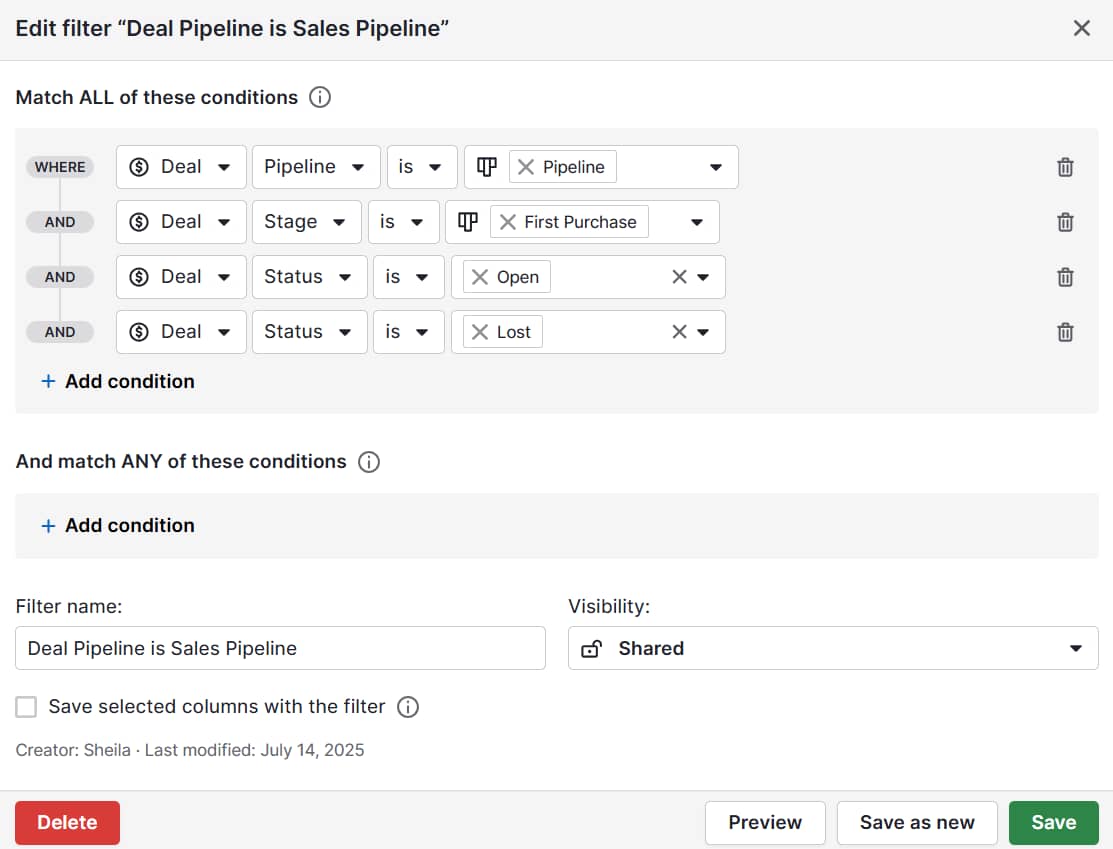
What is RFM analysis?

The RFM model, which measures recency, frequency and monetary value, is a tool for segmenting customers to identify top buyers, understand purchasing behavior and guide marketing strategies.

RFM analysis is a simple way for businesses to evaluate customer behavior based on the following factors:

  • Recency. How recently the customer made their last purchase.

  • Frequency. How often they buy from your business in a given period.

  • Monetary value. How much the customer spends.

By scoring customers on these three factors, small businesses can quickly identify their most valuable customers and pinpoint areas for improvement in loyalty.

For small and mid-sized businesses, RFM is especially useful because it helps prioritize limited time and resources.

As a customer segmentation method, RFM identifies which customers are worth nurturing, which are likely to respond to upsell offers and which would benefit from re-engagement activities.

For example, a local coffee subscription service might find that customers who ordered within the last month, purchase regularly and spend more than average are its most valuable group.

As a result, the company could target that group with exclusive offers to boost loyalty.

Recommended reading

https://www-cms.pipedriveassets.com/B2B-Market-Research.png

B2B market research explained: techniques and tips for growing businesses

How RFM analysis works

RFM analysis is a structured method for turning customer data into practical insights.

It begins by scoring recency, frequency and monetary value, then grouping customers into clear segments.

Calculating RFM scores

To calculate an RFM score for individual customers, assign a score for each factor in the model. Many businesses use a 1–5 scale, with 5 representing the strongest performance.

Here’s an example of how a company might score each factor based on its business model:

Factor

Scoring example

Recency

Customers who bought very recently get high scores:

  • Purchased within 30 days = 5

  • Purchased within 90 days = 3

  • Purchased more than 180 days ago = 1

Frequency

Frequent repeat buyers score higher:

  • 10+ purchases = 5

  • 4–6 purchases = 3

  • 1 purchase = 1

Monetary value

High-spending customers earn higher scores:

  • Total spend above $1,000 = 5

  • Total spend between $300 and $600 = 3

  • Total spend below $100 = 1

A simple formula for an overall RFM score is:

Recency score + Frequency score + Monetary score = RFM score

The higher a customer’s total RFM score, the more likely they are to do business with the company again in the future.

This simple visualization illustrates how a company might approach its customers in light of RFM analysis.

RFM Analysis Model

Combining the scores for recency, frequency and monetary value creates a picture of customer engagement that marketers can use to make strategic decisions.

Creating customer segments

Once you have RFM scores for your customers, the next step is to group them into segments. Many businesses categorize their customers as follows:

  • High-value customers. Top scorers across all three elements of the RFM model. These are loyal, active and profitable buyers who should receive VIP treatment or exclusive offers.

  • Medium-value customers. Customers with a steady but smaller number of transactions. Discounts or special offers may encourage these customers to buy more and become high-value customers in the future.

  • At-risk customers. Strong spenders or frequent buyers in the past who have not made a recent purchase. They may respond well to win-back campaigns.

  • New customers. Recent buyers with low frequency and monetary value. They need to be nurtured to encourage repeat purchases.

  • Inactive customers. Low recency, low frequency and low monetary value buyers. While some may be lost, selective reactivation offers can still work.

With customers categorized in this way, you can make better-informed decisions about which marketing activities to invest in for each group of customers.

Making RFM metrics actionable

Scoring and segmenting buyers gives you a structured view of your customer base, but it’s important to prepare this data for action. Here are three practical ways to do that:

  1. Spreadsheets and manual methods. Spreadsheets, such as Excel or Google Sheets, work well with a small customer base. You can calculate RFM scores using simple formulas and filter the results by segment to identify your most valuable customers.

  2. Charts and graphs. Visualizing your RFM data can make customer behavior easier to see and understand. For example, a bar chart can show whether your number of high-volume customers is growing or shrinking.

  3. CRM platforms like Pipedrive. For larger customer bases, CRMs enable SMB marketers to scale RFM segmentation without manual work. In Pipedrive, you can automate follow-ups, set reminders for at-risk customers and build targeted campaigns around high-value groups.

Once your RFM data is organized, you can start connecting the insights to your marketing strategies and customer engagement efforts.

Download Your Sales and Marketing Strategy Guide

Grow your business with our step-by-step guide (and template) for a combined sales and marketing strategy.

How to apply RFM insights to SMB marketing

Once you’ve completed the analysis, it’s time to implement the findings around RFM, meaning you apply the insights to your SMB marketing activities. Here’s how.

Designing campaigns for different customer segments

RFM segmentation provides the insight you need to tailor promotions and communication to different customer groups.

Instead of sending the same message to everyone, businesses can adjust their marketing campaigns to match customer needs.

For example, a B2B SaaS company offering analytics software might offer incentives to different customer segments as follows:

Customer segment

Marketing activity

Best customers

These customers get early access to new products, VIP offers and invitations to loyalty programs.

Medium-value customers

These customers receive targeted marketing campaigns with bundled pricing to optimize profitability.

New customers

These customers receive a personalized onboarding sequence that highlights quick wins, accompanied by a discount code for their next purchase.

SMB marketers can also use RFM insights to improve customer retention and support reactivation activities.

Improving retention and reactivation

When the RFM model flags at-risk or inactive customers, businesses can act in real time to re-engage these users and combat customer churn:

  • At-risk customers. Personalized marketing, such as tailored email marketing reminders, special offers or feature updates, could win them back.

  • Inactive customers. Re-engagement emails and targeted marketing campaigns may reactivate some inactive users.

SMBs can use RFM segmentation to create data-driven marketing strategies that optimize customer experience, strengthen customer loyalty and increase long-term profitability.

Download the State of Sales and Marketing Report for 2024/2025

Get your report

5 best practices for RFM analysis

To get the most value from RFM analysis and avoid common mistakes, marketers in SMBs should follow these five best practices.

1. Keep scoring simple

RFM metrics don’t need to be complicated to be effective.

Many small businesses fall into the trap of over-engineering their scoring system with too many brackets or weighted formulas.

In reality, a basic scale of 1–5 for recency, frequency and monetary value is usually enough to identify the most critical segments:

  • Loyal customers

  • At-risk customers

  • Inactive groups

The key is to choose thresholds that make sense for your customer base. For e-commerce businesses, frequency might be measured in terms of purchases per month, while a B2B software firm might measure it in terms of renewals or feature usage.

2. Pay attention to smaller segments

Although it can be tempting to focus on the top customers or the largest groups in your database, RFM segmentation may reveal smaller groups with significant potential.

For example, a group of recent, new customers could become repeat customers if they receive targeted marketing campaigns early in their journey.

A large segment that’s shrinking could indicate risk. Fewer loyal customers may be an early sign of declining customer engagement or a poor product fit.

By noticing these signals, you can optimize marketing efforts and protect customer lifetime value (CLV).

3. Consider wider context when interpreting scores

RFM scores are only as useful as the context you give them.

To interpret the data effectively, you need to benchmark the scores against your own customer base rather than industry averages.

For instance, for a SaaS platform where the average client logs in less than once per week, high frequency might mean four or more logins per month. However, an e-commerce store with repeat customers who buy weekly would set a much higher bar for this figure.

It’s also important to consider complementary marketing metrics when reviewing RFM scores.

Combining behavioral segmentation with other data, such as customer demographics or engagement survey results, can help uncover why users behave the way they do.

This data-driven approach ensures your marketing strategies target the right groups with the right messages at the right time.

Download our customer journey map template

Start mapping your customer journey with our free customer journey template.

4. Prioritize privacy and ethical considerations

RFM segmentation relies on data about customer transactions and purchasing behavior.

Businesses must handle this information responsibly to comply with GDPR and other relevant privacy regulations.

Best practices in this area include:

  • Only collecting the data you need for relevant marketing campaigns (e.g., a B2B e-commerce retailer might use RFM metrics to identify at-risk customers and send them a reminder email about items left in a cart)

  • Being transparent about how customer data is used

  • Avoiding over-personalization that could feel invasive (e.g., referencing a customer’s purchasing history in detail)

  • Ensuring real-time data storage and processing are secure

These best practices aren’t just about compliance. Handling data responsibility also helps build customer satisfaction and brand trust.

5. Update RFM calculations regularly

Because customer behavior changes over time, marketers should regularly update their RFM calculations to ensure they continue to work with up-to-date and helpful insights.

There’s no single best-practice timeframe for updating RFM scores. However, e-commerce businesses may need to do so monthly to keep pace with purchasing cycles.

B2B SaaS companies, on the other hand, may only need quarterly updates, since subscription renewals and feature usage follow longer timelines

Updating your RFM score regularly allows you to identify shifts in customer engagement, such as loyal customers becoming inactive or new customers moving into the high-value segment.

Recommended reading

https://www-cms.pipedriveassets.com/Customer-Persona.png

A step-by-step guide to creating effective customer personas

How Pipedrive brings RFM insights to life

Pipedrive makes it easier for small businesses to conduct RFM analysis and put the insights into practice.

Instead of managing spreadsheets manually, SMB marketers can track high-value customers and set automated follow-up tasks to maintain customer engagement.

With Pipedrive, you can create targeted marketing campaigns for customer segments identified through RFM analysis.

Pipedrive in action: Marketing agency NJ Media has used Pipedrive to identify a new niche market with high returns – and win seven new clients within it. Using Pipedrive’s email automation to personalize emails and warm up prospects, the agency has reduced its sales process from 20–40 days to an average of 11 days.

You can also use Pipedrive to automate outreach sequences such as email marketing, renewal reminders or reactivation campaigns.

Pipedrive in action: Corporate education company Trainify uses Pipedrive’s Campaigns software to automate its email outreach, combining its CRM and email marketing in a single solution to save the company two hours of admin time each week.

Pipedrive makes it easy to monitor RFM metrics in real time, with visual dashboards that highlight changes in customer behavior.

Now, let’s examine how a company might conduct RFM analysis and use Pipedrive to act on the insights gained from this exercise.

An example of RFM analysis in action with Pipedrive

Imagine a SaaS company offering accounting and invoicing software.

Following RFM analysis, the CMO sees that clients with both high recency and high monetary value are enterprise accounts due for renewal.

In Pipedrive, the CMO uses Campaigns to create and schedule personalized marketing emails for this customer segment, highlighting premium features.

What is RFM Pipedrive personalized marketing campaign

The CMO also uses Pipedrive to set reminders for the account management team to follow up with these customers and discuss their upcoming renewal.

What is RFM Pipedrive activity scheduling

Meanwhile, the CMO flags the company’s at-risk customers for reactivation in Pipedrive. This designation triggers an outreach sequence in the software that includes a customer email with a discount code and a follow-up call task for account managers.

What is RFM Pipedrive outreach sequence

With automated workflows and real-time customer insights, Pipedrive helps SMBs act on RFM analysis to strengthen retention, boost reactivation and drive growth.

Recommended reading

https://www-cms.pipedriveassets.com/Psychographic-segmentation-in-marketing.png

A practical guide to psychographic segmentation in marketing for SMBs

FAQs about RFM

  • Unlike other segmentation methods, RFM analysis focuses on customer behavior.

    It provides data-driven insights that are simple, actionable and effective for designing targeted marketing campaigns and improving customer retention.

  • Yes. Any business with customer transactions can use RFM analysis and benefit from the insights it offers.

  • While you don’t have to use a CRM to conduct RFM analysis, a CRM like Pipedrive makes it far easier to streamline RFM segmentation, track metrics in real-time and automate follow-ups.

Final thoughts

RFM analysis turns raw customer transactions into clear insights that small businesses can use to optimize their marketing efforts, improve customer retention and increase profitability.

With a CRM like Pipedrive, you can automate RFM segmentation, monitor metrics in real-time and ensure that your loyal customers, at-risk accounts and new buyers all receive the right level of attention. Start your free 14-day Pipedrive trial today.

9 Best Online Reputation Management Software

Software Stack Editor · October 22, 2025 ·

Reputation management software helps you nurture your business while strengthening your brand reputation.

You respond faster to reviews, track mentions and check sentiment trends from a single dashboard – turning feedback into growth opportunities.

This article will show which tools work best for local businesses, growing SMBs and multi-location companies. You’ll also discover ways to maximize your reputation management investment with your CRM.

Key takeaways from reputation management software

  • Reputation management software helps you manage your online presence by tracking reviews and mentions from one dashboard.

  • Local and growing businesses use these tools for automated review collection and unified customer messaging across platforms.

  • Multi-location businesses leverage reputation management software for centralized control and bulk management across all regions.

  • Pipedrive’s CRM improves customer satisfaction using customer history and automating follow-ups – start a free 14-day trial today.

What is online reputation management software?

Reputation management tools track how customers perceive your business across online channels.

They pull information from review sites, social media and news outlets into a central dashboard to show what people say about your business online.

Your online reputation can directly impact how much money you make.

When potential customers want to buy from you, they don’t just look at your website. They also search for online reviews, check your Google Business Profile (GBP) and scan your social media.

Customers have endless options, so they can choose a competitor with better reviews and a stronger brand visibility.

Having software to track your online presence is just one component of reputation management. The diagram below shows how it fits into your overall strategy:

reputation management software platform management

Online reputation tools monitor several key areas:

  • GBP and Google Reviews

  • Social media platforms (e.g., Facebook, X and Instagram)

  • Review sites (e.g., Yelp, TripAdvisor and industry-specific platforms)

  • News articles and blog mentions

  • Forum discussions and Q&A sites

For example, say someone leaves a review on Yelp at midnight. The software sends you a notification email or text alert. You can respond promptly, showing customers you care about their experience.

Here are some other customer pain points that reputation management software solves:

Pain point

Benefit/solution

You spend hours each week checking review sites manually.

Automated monitoring tracks all platforms in real time.

You have blind spots where mentions slip through unnoticed.

Complete coverage catches every new review and social mention.

You can’t observe customer patterns by checking feedback.

Analytics show trends and changes in customer sentiment over time.

You lack data to make informed reputation decisions.

Detailed reports guide your strategy with hard numbers.

Online reputation tools solve real business problems that cost you time and money. You get automated systems that streamline operations while focusing on growing your business.

Recommended reading

https://www-cms.pipedriveassets.com/Delight-the-Customer.jpg

10 reliable ways to delight the customer and amplify customer loyalty

9 best online reputation management software

Choosing the right reputation management software depends on your business size and challenges.

Local shops need different features than growing small business owners or multi-location companies looking to scale. Each tool excels in certain areas while falling short in others.

The table below shows nine recommendations for SMBs with a summary of features and pricing:

Reputation management software

Summary

Podium

Key features:

Best for: Unified customer communication

Pricing: Starts at $399 per month for two locations

Broadly

Key features:

Best for: Automated review collection

Pricing: Starts at $299 per month

Yelp for Business

Key features:

Best for: Restaurant and service businesses

Pricing: Free without ads or upgrades

Birdeye

Key features:

Best for: Growing companies overall

Pricing: Starts at $299 per month for one location

ReviewTrackers

Key features:

  • Reputation scorecard metrics

  • AI smart responses

  • Automated request campaigns

  • Sentiment breakdown analysis

Best for: Review analytics and insights

Pricing: Starts at $89 per month for one location

Brand24

Key features:

Best for: Social listening and brand monitoring

Pricing: Starts at $199 per month

Trustpilot

Key features:

Best for: Multi-location reviews

Pricing: Starts at $299 per month

Yext

Key features:

Best for: Business listings management

Pricing: Starts at $4 per week

Social Places

Key features:

Best for: Franchise businesses

Pricing: Starts at $1,800 for 100 locations

Next, you can explore each tool in more detail below.

Reputation management tools for local businesses

Local businesses compete in a specific geographic area where word of mouth travels fast and GBP reviews can make or break your success.

Example: A local law firm gets a negative GBP review about client communication, which could influence potential clients searching for legal services nearby within days. Without quick response tools, that single review costs them new client inquiries.

Local businesses need tools with:

  • GBP review monitoring and response tools

  • SMS messaging for direct communication

  • Automated review requests after service

  • Integration with local platforms (e.g., Yelp and Facebook)

Local customers value personal connection and immediate responses. The three tools below excel at review management for these specific local business needs.

1. Best for unified customer communication: Podium

reputation management software podium reviews

Podium consolidates all your customer conversations into one dashboard.

You handle website chats, text messages, social media and review responses from a single inbox.

Say an accounting firm gets reviews on Google and Yelp. They also get messages on Facebook or email about appointments. Instead of switching between platforms, you can handle everything from Podium’s dashboard.

Podium’s AI responds to new leads across all channels. You can send sales invoices, start video calls and automatically ask for reviews from over 24 platforms.

What users say about Podium

Nicole, an office manager, notes the positive impact of Podium on company processes:

Using Podium for our business has streamlined our Customer Care so much! Our team is able to work together to quickly answer customers, day or night. Being able to track and follow up on conversations, both phone calls and texts, helps keep our documentation in order.

Michelle, a quality assurance nurse, mentions limited bulk messages as a drawback:

I like that it is easy to add or delete a contact and that you can send bulk messages out. Still, I really do not like that we only have so many bulk messages.

The bulk messaging limits affect automatic marketing campaigns. Since you can’t send promotional SMS to all your customers simultaneously, you must batch campaigns over several days.

Despite this limitation, Podium excels at unified customer conversations. You get organized tracking for every customer engagement, regardless of where customers choose to reach you.

2. Best for automated review collection: Broadly

reputation management software broadly reviews

Broadly increases your review generation by targeting customers when they’re most satisfied.

For example, when a property management firm onboards a tenant, Broadly can send an automated review request. This is when positive customer experiences are fresh in their minds, so the firm likely gets a good star rating.

Beyond sending review requests via text or email, Broadly updates your business info on 40+ directory sites. It also uses AI to create your social media posts and answer reviews.

What users say about Broadly

Amy, a director of public relations, explains the results of using Broadly:

I have seen a noticeable increase in positive reviews posted since we started implementing Broadly. We also appreciate the option for guests to provide unfavorable feedback, so we have the opportunity to offer a resolution before they post to the online forums.

She also provides feedback when it comes to customization:

I do wish we had more accessibility to edit/design the email automation sent to our clients when a request for review is delivered.

While the email templates lack customization options, Broadly compensates for this with strong local SEO tools. It helps you track your rankings while recommending keywords you can use to help customers find you online.

3. Best for restaurant and service businesses: Yelp for Business

reputation management software yelp business

Yelp for Business connects you with 2.5 million daily visitors actively searching for local businesses.

Customers can request custom quotes directly through a Yelp profile. If a company asks an IT services business for network setup pricing, that’s a warm lead. They’re ready to hire.

Like in a GBP, you update your hours, photos and business information from one dashboard. You also get analytics on page views and customer interactions like phone calls, website clicks and quote requests directly from Yelp.

What users say about Yelp for Business

Khara, a digital marketing SEO analyst, approves of the tool’s simplicity:

I love the interface of Yelp and how simple it is to navigate around the platform. The menus are neatly arranged on the sidebar and don’t have confusing sub-menus. It provides a high-level metric overview of the ad spend, impressions, clicks, click-through rate, cost per click and what period you’d like to see.

Still, reporting has limitations:

I wish that Yelp could have a lot more sophisticated reporting… The current reports are in CSV, and I wish to have an option to have them in PDF as well. Under the performance tab, you are able to see user views by desktop and mobile. This is great and all, but it would be better if you could filter out just the mobile or just the desktop.

Beyond free features like profile management and quote requests, Yelp Ads let you reach more customers with targeted advertising. When someone visits a competitor’s Yelp page, your ad can appear there to capture their attention.

Recommended reading

https://www-cms.pipedriveassets.com/Customer-Interaction-Management.jpg

Delight customers and grow your business: Why customer interaction management is vital

Reputation management tools for growing companies

Growing SMBs need to track more than mentions on social media and review platforms. They need advanced reporting to understand trends and collaboration tools for your team.

Example: A growing B2B software company needs to track industry conversations and analyze sentiment. This practice becomes critical as it expands into new markets with different competitors. Spreadsheets and manual monitoring can’t keep up with this complexity.

Scaling businesses require reputation management tools with:

  • Multi-channel monitoring beyond review sites

  • Advanced reporting and competitive benchmarking

  • Team features for coordinated responses

  • Social listening to catch all mentions

  • CRM integration for customer data

Growing companies face different challenges from local businesses. They serve broader markets and compete with bigger brands.

The tools below handle the complexity that comes with business growth.

4. Best overall for growing companies: Birdeye

reputation management software birdeye calendar

Birdeye handles growing companies’ online presence with AI-powered automation.

For instance, a SaaS startup with a growing online presence may receive feedback from reviews, social media, customer surveys and emails. Birdeye pulls conversations from these customer touchpoints into one dashboard, so nothing gets missed, even as the customer base expands.

Birdeye uses AI for different parts of your business. The Insights AI feature reads customer feedback and tells you what to improve, while Competitors’ AI shows how you stack up against other companies. Additionally, Listings AI optimizes your business profiles across directories.

What users say about Birdeye

Bailey, a volunteer coordinator, shares her positive experience:

The most helpful thing about Birdeye is the calendar view! I like how you can see the week in full and see how often you are posting! I also like the AI-recommended times to post for the most engagement, which is very helpful when trying to make sure you are reaching an audience.

Marketing supervisor Alex explains that some features, like review tracking, have gaps:

One challenge we’ve noticed is that when a customer edits their review, it doesn’t always prompt or flag that the review has changed.

Beyond scheduling and review monitoring, Birdeye has a Reviews AI feature that A/B tests different ways to ask customers for reviews. Experiment with different message styles and see what gets the best response rates to actively refine how you gather feedback.

5. Best for review analytics and insights: ReviewTrackers

reputation management software reviewtrackers dashboard

ReviewTrackers provides actionable insights and customer sentiment analysis to understand your market position and customer satisfaction trends.

With the request campaigns feature, you can ask customers for reviews at an optimal time (e.g., after purchases or service completion). The reputation scorecard gives you a quick look at your ratings, response times and review volume.

For example, a software company’s scorecard in ReviewTrackers may show a 4.2-star rating, 18-hour response time and 127 total reviews this month. It can compare these metrics against three competitors to see where to improve.

ReviewTrackers also provides you with AI smart response templates. You can generate responses based on the sentiment and content of the review.

What users say about ReviewTrackers

Hannah, a social media community manager, appreciates the following features:

I like the sentiment breakdown, the ability to organize reviews for easy response.

Still, she feels limitation affects her ability to conduct detailed analysis:

Wish I could look at the sentiment by restaurant and track specific reviews. Wish there was less emphasis on response time, or the ability to turn it off.

Beyond sentiment analysis, ReviewTrackers also tracks where you appear in local search results compared to competitors. You can see which search terms help customers find your business and improve your search engine rankings in each location.

6. Best for social listening and brand monitoring: Brand24

reputation management software brand24 dashboard

Brand24 monitors what people say about your brand across the internet, not just review sites.

The AI-driven anomaly detector spots sudden spikes in mentions that could signal a crisis. You also get sentiment analysis, showing whether people feel positive or negative about your brand.

Say a marketing software company gets mentioned on blogs or Reddit. Brand24 captures every reference. When someone complains about pricing on a forum, the company gets an alert and can respond before the negative sentiment spreads.

Brand24 also finds influencers in your industry and measures your share of customer voice against competitors. You can track hashtags to see which campaigns work best.

What users say about Brand24

Eduardo, a marketing director, comments on the improved interface:

The new design of the analytics tab is a solid improvement – it feels more intuitive and helps visualize insights more clearly. We’ve also noticed better segmentation when managing multiple projects, which is a big plus for our team.

He also mentions that language support needs work:

It would still be great to have full Spanish support across the dashboards and PDF reports. Also, being able to export a single consolidated PDF that includes all active projects… would significantly improve efficiency.

In addition to the interface updates, Brand24 provides topic analysis that shows trending conversations in your industry. You get real-time alerts when noteworthy mentions happen so you can quickly protect your reputation.

Reputation management tools for multi-location businesses

International or multi-location businesses must maintain brand consistency across dozens or hundreds of locations.

They need to watch the performance of each specific location and respond to local customers appropriately.

This creates unique problems that single-location businesses don’t face. You’re managing reputation at scale while keeping quality control.

Example: A commercial real estate agency with 50 offices across regions receives conflicting info. Some offices respond within hours, while others take days. This inconsistency confuses business clients and damages the brand’s reputation.

Multi-location businesses need tools with:

  • Centralized dashboard for all locations

  • Bulk management and response capabilities

  • Location-specific reporting

  • Templates with local customization

  • Local SEO for each location

The tools below are built for companies that run many locations.

7. Best for multi-location reviews: Trustpilot

reputation management software trutspilot interface

Trustpilot lets multi-location businesses manage reviews for all their stores from one place.

You handle unlimited locations under one account while keeping your brand message consistent.

A B2B consulting firm with offices in 15 cities can set different access levels in Trustpilot. For example, local office managers can handle local reviews, while regional directors view performance across their three-office territory.

Each location automatically collects its reviews, aided by the system tagging reviews with the correct store information. Moreover, you can see how each location performs from your main dashboard.

The AI review spotlight feature reads through all your reviews and finds patterns and trends across every location.

What users say about Trustpilot

Maral, a marketer, likes the simple setup:

The interface is very user-friendly. It’s easy to integrate with e-commerce and easy to manage replying to customer reviews

Still, email customization feels limited to head of CRM Suzanne:

Can’t customize the appearance of the review email, so feels very separate from the rest of the customer journey.

Even with this caveat, Trustpilot is among the world’s most popular websites. When customers search for your business on Google, your Trustpilot profile often shows up in results. This visibility improves your brand awareness and brings in more customers.

8. Best for business listings management: Yext

reputation management software yext dashboard

Yext keeps your business information accurate across 200+ online platforms from one dashboard.

Agencies serving franchise businesses benefit from this centralized approach. When their client’s restaurant chains change business hours across locations, the agency updates the details once in Yext.

The new information automatically appears on Google, Yelp, Facebook and other platforms for all 50 stores in real time.

Yext also automatically finds and removes duplicate listings. Remember, multiple listings for the same location confuse customers and hurt your search rankings.

What users say about Yext

Peter, a project administrator, mentions the usefulness of bulk features:

I like how I am able to do bulk updates to my listings inside the platform. I manage over 300 listings and being able to upload them all at once is very efficient. I also like that I can upload hours for listings efficiently. I also like the timely syncs that are reflected to the external listings (Google, Facebook, Yelp, etc.).

According to Jenna, a general manager, navigation can be confusing:

Some functions are counterintuitive. Have to go through different knowledge gaps to get to the same place.

Beyond day-to-day reputation management, Yext structures your business data for new AI search tools like Google Gemini and Bing Copilot. This keeps your brand visible as search technology changes.

9. Best for franchise businesses: Social Places

reputation management software social places

Social Places has reputation management tools specifically for franchises and multi-location businesses.

An insurance company, for example, can use the white-label tools. When customers get review requests emails, they see the insurance company’s logo and branding. This keeps everything looking consistent and helps build customer trust.

The tool allows you to manage listings, ads, social media and reviews for all your locations from the all-in-one platform. AI handles bulk updates across hundreds of locations automatically, so you don’t have to log into different pages for each location.

What users say about Social Places

Kristen, a social media digital manager, highlights the key features:

The GoListings, Ads and social media audits features are definitely the most impactful for our business. It’s super easy to use, and if you’re not familiar with it, the team is great at onboarding!

She feels some features still need work:

The filter feature on the dashboard can sometimes be a bit buggy and I’ve struggled with it a few times, but the support team is always quick to help when users get stuck or if there’s a system issue.

With Social Places, you get three different levels of reporting. Listing reports track the store performance, reputation reports check reviews and social reports measure social media engagement.

Each reputation management tool handles different aspects of your online presence, from review collection to social listening. Your CRM can amplify these efforts by turning reputation insights into stronger customer relationships.

Recommended reading

https://www-cms.pipedriveassets.com/Brand-Positioning.png

What is brand positioning: The ultimate guide with 4 examples

How to use Pipedrive to complement your reputation management

With Pipedrive’s CRM (customer relationship management) software, you can complement your reputation management efforts by improving customer satisfaction.

When a customer leaves a negative review, you can turn this experience into an opportunity for stronger relationships.

Here’s how to do it.

Create a dedicated pipeline for problem resolution

Set up a pipeline for customers who had bad experiences or left negative reviews. This would work like a ticketing system that tracks each issue from discovery to resolution.

The pipeline keeps every problem organized. You never lose track of unhappy customers or forget to follow up on their concerns.

reputation management software pipedrive pipeline view

Your negative reviews pipeline might include stages like:

  • Issue found – you discover a customer complaint or negative review

  • Investigate – your team researches what went wrong

  • Offer solution – you propose how to fix the problem (e.g., discount, refund, replacement, etc.)

  • Fix issue – you resolve the customer’s problem

  • Follow up – you contact the customer about changing the review

Each stage represents a clear step in your problem-solving process. Your team knows exactly where each issue stands and what needs to happen next.

Access the deal or contact view for context

Your customer representative can check the contact or deal view to see the full customer story. They will see purchase history, previous interactions and any other support tickets.

reputation management software pipedrive deal view

With this context, it’s easier to solve the problem faster and ensure customer service quality assurance. Instead of asking customers to repeat their story, your rep already understands their relationship with your business.

Pipedrive in action: Healthcare provider Eye Hospital Denmark struggled to track patient information across its large customer base. Important details would get lost between departments. This led to missed appointments and service issues.

With Pipedrive, the hospital now centralizes all patient data. Staff can access relevant information and provide better customer support.

Moreover, automations and integrations with existing systems simplify day-to-day workflows. This streamlines processes and cuts repetitive tasks.

The hospital reduced patient no-shows by 50% and achieved a 0% failure rate in ordering lenses within one year.

Request reviews with the AI email writer

Pipedrive’s AI email writer can help you create messages based on your customer information.

After closing a deal, you can send a personalized email asking customers to share their experience. In the email, you can include a link to direct them to your preferred review platform (e.g., Yelp, GBP or Trustpilot).

With the AI email writer, you can select the tone, email length and specify the context. This automated approach makes collecting reviews easier for your business.

You can even consult the AI email generator to handle delicate situations, such as requesting a review update after resolution:

reputation management software pipedrive email content

If you want to boost your open rates, you could include incentives in your email subject. Small rewards like discount codes or loyalty points motivate customers to leave feedback.

Turn Maybe Into Yes With These Killer Follow Up Email Templates

These customizable follow up email templates will help you boost your chances of breaking through to your busiest prospects.

Pipedrive complements your reputation management efforts by organizing customer issues and automating review collection.

You solve problems faster while generating more positive reviews, which creates a complete system for protecting and improving your online presence.

Online reputation management software FAQs

  • Start by determining the type of business you run (e.g., local business, growing company or multi-location presence).

    Check this guide to see which tools work best for you.

    Once you know which tools fit your needs, sign up for free trials or request product demos.

    Talk to their sales teams to see which one feels right for your business.

  • No, reputation management software can’t remove authentic customer feedback – including negative reviews.

    The tools primarily help you watch, respond to and request reviews. They can, however, flag fake or inappropriate reviews for potential removal.

  • You can flag fake reviews using reputation management software, though you can’t automatically delete reviews you don’t like.

    Most platforms have policies against fake reviews. Google, Yelp and Facebook will remove reviews that violate their guidelines after you report them.

Final thoughts

Reputation management software helps you manage your online reputation. You can track reviews and mentions across channels – and respond faster.

Local businesses often need communication and review collection tools. Growing businesses need advanced analytics and social listening. Multi-location businesses benefit from centralized dashboards and bulk management features.

Pipedrive’s CRM can work alongside these tools to create a better customer experience. Start a free trial today to improve your client interactions and build trust.

5 Effective Team Capacity Planning Tips for SMBs

Software Stack Editor · October 22, 2025 ·

Imagine delighting customers by finishing more projects on time without overworking staff.

Team capacity planning helps small businesses achieve more with limited resources, prevent employee burnout and make data-backed hiring decisions.

In this article, you’ll learn what team capacity planning is and how it works. You’ll also find a free team capacity planning template and five best practices to guide your efforts.

Key takeaways from team capacity planning

  • Team capacity planning calculates how much work your team can complete in a given timeframe and whether a new project is feasible.

  • Use one of three capacity planning methods – lead, lag and match – depending on your business type, size and goals.

  • Consider planned vacations, non-project work and skill levels to create an accurate estimate.

  • Technology like Pipedrive’s CRM and work management tools improves planning and increases capacity. Try it free for 14 days to centralize data and automate workflows.

What is team capacity planning?

Team capacity planning is the process of determining how much work your team can realistically complete within a given period.

It helps small and medium-sized businesses (SMBs) maximize limited resources and tight budgets by efficiently using each employee’s time.

A good team capacity planning process goes beyond simple headcounts, factoring in sales skills, availability, paid time off (PTO) and the complexity of each project to ensure timely completion.

Consider a small software development agency with 15 developers. Rather than assuming each engineer contributes 40 hours per week, a good project manager will account for the fact that:

  • Sales meetings take up one-fifth of the workday

  • Junior developers work at a slower rate than senior developers

  • Staff vacation days impact project deliverability

  • Context switching between different projects slows work

As a result, the team’s capacity might be closer to 400 hours per week than 600. Knowing this, the project manager can meet deadlines and manage workplace stress.

Business owners can calculate capacity by hand or using dedicated capacity planning tools like Jira. Your customer relationship management (CRM) platform or project management software might also work, but more on that later.

Capacity planning vs. resource planning:

While people often use these two terms interchangeably, they serve different but complementary purposes.

– Capacity planning determines the amount of work your team can complete. It’s a way to analyze whether you have sufficient resources to handle anticipated workloads.

– Resource planning determines who will complete the work. It’s the process of identifying, acquiring and allocating specific resources to particular projects or tasks.

Now that you know what capacity planning is and what it looks like in a small B2B company, it’s time to learn why it’s crucial for all small businesses looking to increase efficiency.

Recommended reading

https://www-cms.pipedriveassets.com/Key-operations-strategy-elements.png

The ultimate guide to operations strategy planning

What are the benefits of capacity planning for SMBs?

While capacity planning may seem like another administrative task to add to your to-do list, it helps your team save time, increase efficiency and boost sales.

Here’s why the latest research shows capacity planning is a must for small businesses.

Stop employee burnout

Team capacity planning reduces burnout risk in small teams by increasing workload visibility and helping managers schedule work thoughtfully.

Burnout is a growing problem for small businesses with lean teams and a limited capacity to absorb extra work. Recent research finds that 82% of employees are at risk of burnout – a crisis costing companies up to $5 million per year.

Team capacity planning is a team management strategy that factors in planned vacations and non-project activities to improve work-life balance and job satisfaction.

Boost productivity and profitabilit

Research by Employment Hero finds that while 74% of small business leaders and employees find that productivity has increased with tech empowerment, one in three small businesses operates in “survival mode” without the ability to grow or innovate.

team capacity planning employment hero statistic

Team capacity planning fixes this misalignment by helping small businesses allocate limited resources efficiently, ensuring each team member focuses on tasks best suited to their skills and availability.

Make better hiring decisions

Hiring the right people matters in cash-strapped small businesses, yet McKinsey finds that the most appropriate people aren’t in 20% to 30% of critical roles in many organizations.

Not only does capacity planning improve resource allocation, but it also helps SMBs move from reactive hiring to a roadmap based on actual needs.

Team capacity planning helps you stop responding to urgent issues and start growing by balancing workloads and allocating resources efficiently.

There’s more than one methodology to get your workloads on track. You’ll learn about the three most common capacity planning methods next.

Recommended reading

https://www-cms.pipedriveassets.com/Personnel-management.jpg

Personnel management: definition, importance and emerging trends

Which type of team capacity planning should you use?

You can use three strategies when planning team capacity: lead, lag and match planning.

This table quickly summarizes the key differences between each type of resource capacity planning:

Capacity planning strategy

Description

Lead capacity planning

  • A proactive approach that anticipates growth and seasonal spikes

  • Gives you a competitive edge by preparing for increases in demand

  • Risks overcapacity and comes with higher upfront costs

Lag capacity planning

  • Ideal for conservative companies and those with limited budgets

  • Offers a cost-effective strategy that manages risk

  • Poor recruitment can be a bottleneck for businesses and may put your company at a disadvantage

Match strategy planning

  • A balanced approach to capacity planning

  • Encourages efficient resource use and adaptability

  • Complex to implement and relies on accurate forecasting

Here’s more information to help you choose a strategy that aligns with your work, business model and risk tolerance.

1. Lead capacity planning

What it is: Lead capacity planning builds bandwidth ahead of anticipated demand. It’s an aggressive approach that ensures resources are available when sales opportunities arise. Although costs increase in the short term, you capitalize on customer needs and demand without delay.

Who it’s best for: Fast-growing companies like startup teams or those in highly competitive markets.

2. Lag capacity planning

What it is: Lag capacity planning is a more conservative approach that adds capacity only after demand materializes. It reduces financial risk but requires an efficient hiring and onboarding process to meet demand.

Who it’s best for: Companies with tight cash flow and those operating in industries with readily available talent.

3. Match strategy planning

What it is: Match strategy combines elements of both lead and lag strategies, with companies making incremental adjustments based on internal data and market signals. It’s a balanced approach that requires accurate sales forecasting but optimizes resource allocation.

Who it’s best for: Well-established companies with moderate growth rates.

Example: An IT services company uses sales data and market trends to make quarterly hiring decisions. It maintains resource allocation rates at 85% and adjusts capacity in small increments rather than making significant workforce changes.

Once you’ve decided on your project planning approach, use the free template below to assess your team’s capacity.

Recommended reading

https://www-cms.pipedriveassets.com/The-Flexible-Work-Effect-on-Well-being.png

The flexible work effect on well-being: transforming lives and workplaces

Download Pipedrive’s team capacity planning template

You don’t need to start from scratch when planning your team’s capacity. Pipedrive’s ready-made template has space for key information about your project, resource demands and team capacity.

This free template is the fastest way to get started, whether preparing for your next project, undertaking a new initiative or implementing agile team capacity planning.

How to plan your team’s capacity

Strategic planning is an ongoing process you should perform when a new project comes in.

Here’s a process you can follow using the template above to avoid guesstimations and improve accuracy.

Define the deliverables

You’ll need a clear picture of what you’re delivering before you can plan your team’s capacity.

Defining an upcoming project’s requirements, deadlines and deliverables will help you understand how work will impact your team’s capacity and what adjustments you need to make.

Gather the following information about the project:

A standardized project intake form will accelerate this process. Use it to ensure you don’t miss relevant information.

Here’s what a complete entry might look like in the template:

team capacity planning project intake

By capturing this information upfront, you can set realistic short-term deadlines, manage stakeholder expectations and prioritize projects effectively.

Forecast resource demand

Next, calculate the resources you’ll need to complete the project. Estimating how much effort each task takes transforms planning from guesswork into a data-driven exercise.

Specifically, you’ll want to estimate how much time each employee needs to complete their work.

Follow these steps to make an accurate estimate:

  • Break down projects into specific tasks and activities

  • Estimate the effort required for each component

  • Identify skill requirements and experience levels needed

  • Build in buffers for unexpected challenges based on risks, deadlines and employee dependability

Here’s how to compile the above information in the template:

team capacity planning resource demand

You don’t have to use hours to measure resource demand. If you’re capacity planning for agile teams, you can use sprints or story points instead.

Calculate your team’s current capacity

Knowing how many hours your team has available is just as crucial as knowing how many hours you need. It will prevent you from overcommitting resources, help you maintain sustainable utilization rates and avoid a “feast or famine” environment.

Assess your team’s day-to-day capacity to determine how much work they can take on.

Take into account the following when calculating your team’s capacity:

  • Total available hours (team size × working hours)

  • Planned absences (vacation, holidays, training, sick leave)

  • Non-project time (meeting productivity, administrative work, email)

Here’s what a complete team capacity plan might look like:

team capacity planning team utilization rate

Calculate each team member’s resource utilization rate by dividing their accounted-for hours (assigned hours, planned absences and non-project hours) by their total available hours and multiplying by 100.

For example, Sarah’s utilization rate would be:

Utilization rate = (120 + 40 + 80) ÷ 480 × 100 = 50%

Measuring utilization rate avoids the risk of burnout by ensuring you don’t overload employees with work.

Measure and close the gap

Now, you can compare your forecasted demand with current available capacity to assess a project’s feasibility, prioritize work and maximize resource allocation.

Your team will rarely have the exact capacity required to undertake a project, which will mean careful planning on your part.

You’ll likely have one of the following scenarios for each employee:

Outcome

Description

Capacity surplus

Excess capacity compared to demand, which creates an opportunity for additional projects.

Capacity deficit

More demand than capacity, which means a risk of missed deadlines or burnout if you don’t increase resources.

Skill mismatches

Enough capacity, but the wrong skill mix.

Timing conflicts

Adequate capacity but poor distribution across timelines.

In the example above, both Tom and Emily have a capacity surplus. They’ll be able to complete their design work by the given deadline.

Raj, the developer, only has 106 hours of capacity next quarter. He’s in a capacity deficit, which means Sarah will need to make one of the following adjustments to complete the work on time:

  • Hire additional team members

  • Delay Raj’s lower-priority projects

  • Reduce project scope

  • Increase project timelines

  • Reduce non-project time

Once you’ve planned your team’s capacity, use the following best practices to optimize your efforts and reap even greater results.

Download your guide to managing teams and scaling sales

The blueprint you need to find a team of superstars and build a strong foundation for lasting sales success

5 best practices to improve team planning and availability

While a thorough and effective capacity planning process will help you accurately predict demand and allocate available resources, the following best practices will help you push your efforts further.

Use these five tips to streamline planning, optimize allocation and increase your team’s capacity.

1. Centralize information in a project management app

The foundation of effective capacity management is centralized, real-time data. Use project management tools to centralize information from spreadsheets, emails and other business apps in one location to improve accuracy and efficiency.

Pipedrive’s Projects combines project management and CRM functionality into a single platform. You can use it instead of purchasing expensive capacity planning software.

Here’s what the platform looks like:

Team capacity planning Pipedrive Projects

Use custom fields to align Pipedrive with your resource management process or mirror your work intake form for even faster data entry. Create sub-tasks when you break work down and assign team members relevant tasks.

How Pipedrive helps

Mobility service provider (EMSP) and charge point operator (CPO) Blulinc uses Pipedrive Projects to manage installations and reclaim 30% of its team’s time.

It sets checkpoints within each project to forecast and address issues. This practice also lets the team learn from previous work to streamline future projects. Pipedrive’s automation features have also reduced the repetitive work the team performs.

We need to be on top of the installations because we have a lot of competition in the market. The other companies take about 4–6 weeks to finish off the project, while we can deliver the solution in about 2 weeks or even faster.

Cihan KrandaFounder, Blulinc

Read the full case study to learn more.

With Projects, you get a single source of truth for project data and real-time visibility into your team’s workloads and availability.

2. Improve internal communication

Better sales communication directly improves the accuracy of your capacity planning efforts by providing real-time insights into team availability and project status.

No one knows workloads better than front-line staff, so encourage honest conversations about current projects and workloads. Scheduling time each week to sit down and discuss capacity is even better.

Use Pipedrive’s native integration with communication platforms like Slack and Outlook to never miss a message.

Alternatively, you can use the notes section of each task to add project updates and other notifications.

Team capacity planning Pipedrive notes

Setbacks happen, employees get sick and scopes increase, but good communication that highlights these issues immediately will help you get your project back on track faster.

3. Use automations to automate workflows

Non-project work, like administrative tasks, repetitive processes and manual data entry, poses some of the biggest threats to team capacity. Workflow automation can dramatically reduce this burden and free up capacity for value-creating activities.

For example, in Pipedrive, you can use pre-defined triggers to automatically move projects through pipeline stages when tasks are complete.

The CRM comes with several ready-made workflow templates, or you can create your own using the automation flow below:

Team capacity planning Pipedrive workflow automation

Workflow automation reduces non-project workloads and reduces human error, allowing your team to focus on delivering projects rather than the busy work of managing them.

4. Learn from past projects

Experience is a great teacher, so analyze previous projects to refine your future capacity estimates. You’ll identify patterns, improve estimation accuracy and optimize resource allocation.

Pipedrive’s custom reports, insights and dashboards make it simple to manage performance in real time and analyze it when completed.

How Pipedrive helps

Pipedrive’s Insights feature helps Combat Ready analyze sales team performance and identify winning patterns that canimprove future results.

The team tracks key sales metrics, such as lead numbers and sources, as well as business-specific information – for instance, the number of people attending a training course and where products need to be collected.

“The statistics part helps us track habits and behaviors,” explains founder Remo Ojaste.

Read the full case study to learn more.

Use the platform’s notes functionality to document successful strategies or issues that caused capacity to become stretched. That way, it’s easy to refer back when planning your next project.

5. Use your capacity plan to make data-backed hiring decisions

Your capacity plan provides the data you need to make informed decisions about when to hire, what skills to prioritize and whether to choose permanent staff versus contractors.

For example, if your developer is constantly in a capacity deficit, hiring additional support makes sense.

Once you’ve identified a skills shortfall, use Pipedrive’s custom pipelines to build an applicant tracking system. Assign each process stage (applied, interviewed, offered, accepted, etc.) to different pipeline stages and create new deals for applicants.

Here’s what your pipeline could look like:

Team capacity planning Pipedrive recruitment

You can even use Pipedrive’s automations to create interview reminders and integrate online meeting tools like Zoom and Teams so staff can run interviews without leaving the platform.

Case study: How Pipedrive helps Socionomera reduce admin work

Socionomera, an authorized staffing company, uses Pipedrive to manage the recruitment process in a competitive market. It can use the platform to search for candidates with the right skills and automatically remove those who don’t – sending them an automatic rejection letter.

The company also uses Projects to give candidates access to the resources they need, such as login credentials and time reporting systems and Smart Docs to send digital contracts.

Thanks to Pipedrive, the team has seen a 5x reduction in administrative work and has been named the third-fastest-growing company in Sweden.

In every aspect, Pipedrive is saving us a lot of time. Many, many hours. The ability to automatically remove unqualified or unsuitable candidates from the system makes our whole process more efficient.

Damir SabaniFounder and CEO, Socionomera

Read the full case study to learn more.

By using Pipedrive to monitor the entire inbound recruiting process, you can stay on track, shorten hiring times and increase capacity as quickly as possible.

Recommended reading

https://www-cms.pipedriveassets.com/blog-assets/employee-referral.png

What are employee referrals? Definition, guide and best practices

Team capacity planning FAQs

  • Team capacity planning determines how much work your team can complete within a given timeframe.

    It accounts for factors like skill levels, availability and planned absences to set achievable workloads and ensure timely project completion.

  • The five key steps of capacity planning are:

    1. Define the deliverables. Clarify project requirements, deadlines, dependencies and risks.

    2. Forecast resource demand. Break down projects into individual tasks and estimate how long each task will take.

    3. Calculate your team’s current capacity. Assess available work hours after planned absences and non-project work.

    4. Measure the gap. Compare demand against capacity to identify surpluses or deficits.

    5. Allocate resources accordingly. Assign tasks, adjust timelines, prioritize projects or hire as necessary to balance workloads.

  • An example of team capacity planning is a SaaS company assigning tasks based on realistic estimates of a project’s complexity and each developer’s skills.

    Realising the agency is in a capacity deficit ahead of upcoming projects, the owner hires three contractors to increase available resources and complete work on time – boosting team and sales productivity.

Final thoughts

Mastering team capacity planning is vital for small businesses that want to meet deadlines, boost productivity and foster sustainable growth.

By mapping project demands against your team’s workload, availability and skills, you can improve decision-making, prevent burnout and optimize resource allocation.

Pipedrive’s project management and workflow automation capabilities are ideal for centralizing workload data and reducing non-task hours. Try Pipedrive free for 14 days to plan efficiently and increase your team’s capacity.

Complete CRM in the Life Sciences Industry Overview

Software Stack Editor · October 21, 2025 ·

Life sciences companies face growing pressure as managing HCP relationships, patient data and compliance becomes increasingly complex.

A CRM built for the life sciences industry turns these challenges into opportunities by connecting every stakeholder and automating critical workflows.

In this article, you’ll learn how life sciences CRMs help SMBs streamline operations, optimize engagement and deliver patient-centric results while staying compliant and ready to scale.

Key takeaways for CRM in Life Sciences

  • A CRM in life sciences helps SMBs manage compliant, data-driven relationships with HCPs, HCOs and patients.

  • Automation tools and connected workflows reduce manual effort, helping teams focus on patient care and stakeholder engagement.

  • Integrations across marketing, communication and reporting systems create a unified ecosystem that supports end-to-end visibility and compliance.

  • Pipedrive gives life sciences teams a simple, scalable way to stay organized. Try it free for 14 days.
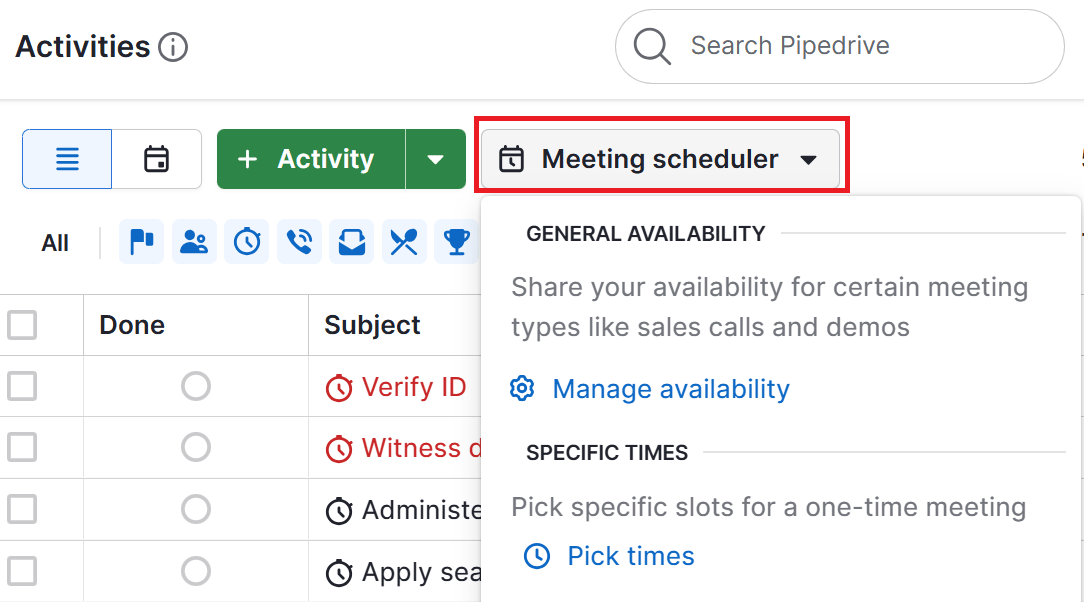
What is a CRM in life sciences?

CRM in life sciences is a customer relationship management (CRM) system that biotech, pharmaceutical, medical device and diagnostics companies use to track customer interactions and ensure regulatory compliance.

Unlike a general or sales-focused CRM platform, it helps teams manage fewer but more important relationships with healthcare professionals (HCPs), healthcare organizations (HCOs) and patients while staying compliant with strict rules.

For small and mid-sized life sciences companies, the right CRM gives a clear view of customer engagement without adding extra complexity.

The system links sales, marketing and patient support teams through automation and secure data sharing.

CRM in Life Sciences Pipedrive What is a CRM?

The right platform can also ensure shared data complies with the Health Insurance Portability and Accountability Act (HIPAA), the General Data Protection Regulation (GDPR) and other local privacy laws.

For example, a general CRM might track a sales rep’s meetings and email history. A life sciences CRM adds layers like approved content sharing, adverse event reporting and audit-ready records to meet healthcare regulations.

A CRM in the life sciences industry brings people, data and workflows together. It helps companies manage outreach, support key opinion leaders (KOLs) and improve engagement strategies across every channel while keeping compliance simple.

Recommended reading

https://www-cms.pipedriveassets.com/CRM-Experience.png

What is CRM experience? Create more delightful customer experiences

Why CRM matters for life sciences

CRMs in the life sciences industry are essential for managing every relationship that drives growth.

Gartner highlights that traditional CRMs, which focus solely on sales force automation, no longer meet the outreach needs of life sciences companies.

Modern life sciences companies need connected, data-driven systems that help them engage HCPs, HCOs and patients with accuracy and trust.

Why it matters:

  • Regulations, privacy laws and regional rules make it hard to manage data across markets without a connected system

  • New digital tools like telehealth, artificial intelligence (AI) and mobile apps have raised expectations for real-time, personalized engagement

  • Silos between marketing, sales and medical teams limit collaboration and reduce the impact of every customer touchpoint

A modern CRM built for life sciences brings all of this together.

For example, a medical device company can use a CRM to connect its sales and support teams, enabling them to share product training sessions, maintenance logs and customer feedback automatically.

This transparency helps sales reps understand usage patterns and allows service teams to anticipate needs. It also ensures compliance teams can track every interaction from a single, verified record.

Turn Maybe Into Yes With These Killer Follow Up Email Templates

These customizable follow up email templates will help you boost your chances of breaking through to your busiest prospects.

What are the core features to look for in a life sciences CRM?

Small and mid-sized companies need CRM tools that simplify complex work without adding extra cost or heavy infrastructure.

Unlike enterprise systems built for global pharma, SMBs benefit most from flexible, easy-to-use CRMs that still meet strict compliance and data security standards.

The goal is to balance functionality with efficiency so teams can focus on building strong HCP and patient relationships rather than managing technology.

Below are some of the key features to look out for:

CRM feature

Why it matters

Compliance and security

Keeps sensitive patient and HCP data protected and can help meet HIPAA and global privacy laws.

HCP and KOL management

Tracks key relationships, interactions and preferences to support more targeted outreach.

Segmentation and targeting

Helps tailor campaigns and messages to specific HCP, HCO or patient groups.

Omnichannel communication

Connects email, video and in-person touchpoints so every interaction stays consistent.

Analytics and dashboards

Provides real-time insights for better decision-making and performance tracking.

Integration with Enterprise Resource Planning (ERP) and marketing automation

Reduces data entry, aligns commercial operations and improves reporting accuracy.

For SMBs, these features create a powerful yet practical foundation for growth. A well-chosen life sciences CRM turns daily operations into connected workflows, making it easier to engage customers without adding complexity.

Pipedrive in action: Serenis, an online mental health platform, used Pipedrive to stay connected with patients and therapists as the company grew.

By automating workflows and improving team visibility, Serenis reduced admin work and delivered a more personal care experience. Read the full case study to see how they scaled faster with Pipedrive.

Recommended reading

https://www-cms.pipedriveassets.com/How-to-keep-operations-running-with-Healthcare-workflow-automation.png

Healthcare workflow automation: what it is and why you need it

How a CRM supports sales, marketing and patient engagement

For SMBs in life sciences, a CRM helps sales reps, marketers and patient support teams work together using the same data and insights.

This alignment makes it easier to deliver consistent, high-quality experiences for HCPs and patients and make data-driven decisions.

Let’s take a closer look at some specific use cases across a life sciences organization.

Sales teams: tracking visits and building stronger HCP relationships

Sales in life sciences are built on trust, not transactions.

A CRM helps reps manage complex HCP relationships, track visits and follow up at the right time without missing key details.

It keeps all meeting notes, emails and approved content in one place so teams can stay organized.

For example, a biotech sales rep can review a doctor’s history, plan the next visit and log outcomes all from the same dashboard.

How a CRM helps sales teams:

  • Tracks HCP interactions, field visits and sample deliveries in real time

  • Automates reminders and follow-ups for faster, more consistent outreach

  • Keeps all communication and materials compliant with industry standards

  • Shows past activity so reps can personalize each visit and build stronger relationships

Tip: Use Pipedrive’s automation and field sync features to follow up with leads faster and spend more time engaging HCPs.

Marketing teams: delivering targeted campaigns for HCPs and patients

Marketing in life sciences relies on precision and compliance.

A CRM helps marketing teams segment audiences, manage consent and send approved content through the right channels. It ensures every campaign aligns with regulatory standards while still feeling personal and relevant.

For example, a biotech company launching a new therapy can use its CRM to segment HCPs by specialty, region and prescribing history. It can then deliver custom messages to help each segment understand how the new therapy meets their specific needs.

For smaller life sciences companies, this means marketing can move at the speed of digital without risking compliance.

How a CRM helps marketing teams:

  • Segments HCPs, HCOs and patients based on specialty, region or engagement history

  • Automates email campaigns and event outreach with pre-approved materials

  • Tracks engagement and feedback across channels to refine future campaigns

  • Connects marketing data with sales insights for a complete view of performance

Tip: Align marketing workflows with your compliance team before launching a campaign. Building approved templates and automated review steps into your CRM keeps outreach fast and consistent.

Patient support programs: improving adherence and communication

A CRM helps teams manage support programs, track progress and communicate with patients in ways that feel personal.

For example, a pharma company running a treatment adherence program can use a CRM to schedule check-ins, log outcomes and flag potential follow-up needs.

How a CRM helps patient support teams:

  • Tracks each patient’s progress and touchpoints through the full care journey

  • Automates reminders for medication, appointments or follow-up communication

  • Stores notes and data securely to maintain HIPAA compliance

  • Gives teams visibility into patient outcomes for better support and insights

Tip: Use your CRM to centralize patient communication. A single source of truth helps teams coordinate faster, reduce confusion and create a smoother patient experience.

Operations: keeping reporting accurate and compliance-ready

Operations teams are the backbone of any life sciences organization.

They handle the data, documentation and reporting that keep everything running smoothly.

A CRM helps teams collect and organize information from every department, ensuring that compliance reports, audits and performance reviews are quick and reliable.

For example, a medtech company can use a CRM to track device distribution, document adverse events and generate ready-to-share reports for regulators.

How a CRM helps operations teams:

  • Centralizes data from sales, marketing and patient programs for consistent reporting

  • Automates audit trails and documentation for faster compliance checks

  • Tracks adverse events and medical inquiries to ensure issues are resolved quickly

  • Provides dashboards that give real-time insight into commercial operations and performance

Tip: Try Pipedrive’s automated reporting templates and shared dashboards to simplify compliance checks and ensure consistent performance data.

Power your life sciences CRM strategy with Pipedrive

Disclaimer: In the United States, any system that handles protected health information must meet HIPAA standards. Pipedrive isn’t HIPAA compliant, so you shouldn’t store patient names, medical details or other sensitive health information in the platform.

For SMBs in the life sciences, teams need a platform that’s simple enough to use every day yet powerful enough to manage complex relationships, workflows and compliance requirements.

Pipedrive offers that balance by providing growing life sciences organizations with the tools to connect with HCPs, HCOs and patients while keeping operations lean and compliant.

Let’s look at some ways Pipedrive helps bring structure, insight and workflow automation to life sciences engagement.

1. Create a unified view of HCP and patient relationships

Keeping track of every relationship is one of the most challenging parts of working in life sciences.

Pipedrive solves this by giving teams one place to see every interaction, note and follow-up in a clear, visual pipeline.

When a new contact is added, Pipedrive stores all communication history, meeting details and documents in a single view.

You can see how to set up a sales pipeline in this video:

Customizing pipelines makes it easy for anyone on the team to understand the full relationship before the next interaction.

Filters and custom fields help segment contacts by specialty, region or engagement type so teams always know where each relationship stands.

Note: While Pipedrive is ideal for managing relationships with healthcare organizations (HCOs) and professionals (HCPs), it shouldn’t store protected patient data.

For companies that manage patient programs, we recommend integrating Pipedrive with a HIPAA-compliant patient management or EHR system to securely handle sensitive information.

2. Automate for compliance and follow-ups

With Pipedrive, everyday admin tasks like assigning new leads, scheduling calls and logging follow-ups happen automatically.

Automation helps smaller life sciences companies stay efficient while maintaining accurate records for compliance and reporting.

When someone shows interest in your services, Pipedrive’s Leads Inbox captures their details so your team can respond quickly.

Here’s a deeper look at using Leads Inbox:

Using LeadBooster or custom API tools, new customers or patients appear instantly, triggering the next steps, such as assigning a consultant or scheduling a call.

You can also tag contacts with labels like “Clinic” or “Hospital buyer” to make sorting and follow-up easier.

The Advanced Stem Cell Institute is a great example of automating follow-ups.

The clinic used Pipedrive to connect sales, scheduling and patient communication in one platform. By doing so, it’s been able to reach out to about 25 more patients per day and boost conversions.

According to Erez Illouz, Treatment Coordinator and Regenerative Medicine Consultant:

“Once we’ve scheduled a patient for a consultation, our conversion rate is 68%. Some patients do not qualify past this point. For the ones that do, after they have received their treatment recommendations our conversion rate is 89%.

This could not be done without Pipedrive helping us sort our leads, automatically schedule activity reminders and keep our staff on track to not lose any details for each patient during the process.”

3. Connect to your existing marketing and communications tools

For life sciences companies, the real power of CRM lies in its ability to integrate seamlessly with other systems.

Sales, marketing and operations teams all rely on different tools, such as email marketing platforms, patient management software or documentation tools.

Without integrations, data stays siloed and teams waste time switching between apps or duplicating work.

Pipedrive’s Marketplace offers hundreds of integrations that simplify this process.

crm in life sciences Pipedrive Marketplace

Teams can connect their CRM with tools they already use for marketing, automation and communication without complex development.

Popular integrations for life sciences teams include:

  • Zapier for connecting patient care management or scheduling systems

  • Google Workspace for syncing calendars, emails and meeting notes

  • QuickBooks for handling invoice creation and tracking

The benefits of this approach are clear in the story of Eye Hospital Denmark.

The hospital used Pipedrive integrations to connect its CRM with patient journal systems, automate reminders and link marketing tools.

These integrations helped reduce appointment no-shows by 50% and eliminated errors in lens ordering, achieving a 0% failure rate.

As Kristian Mejlvang, Eye Hospital Denmark’s Marketing Manager, explained:

“We chose Pipedrive because of its intuitive, clever design, its simple UI and lead generating abilities. Pipedrive is not a heavy system: unlike Salesforce or Microsoft Dynamics 365, Pipedrive is easy to use and has a simple approach to building activities.

Being part of the health/medical industry, the system is suitable because it allows us to connect to several other vital systems, such as patient journal systems.”

What are the challenges of implementing a CRM in life sciences?

CRM solutions can transform how life sciences companies operate, but they also present a few challenges to plan for.

Understanding these risks helps teams set realistic expectations, choose the right tools and avoid common roadblocks during rollout. Here are some of the top concerns to be aware of:

  • High upfront cost. While modern CRMs like Pipedrive offer affordable pricing, setup and customization can still require time and budget. Smaller life sciences companies may have to balance investments in software with training and compliance needs.

  • User adoption barriers. If teams view a CRM as extra work instead of support, adoption rates tend to fall. Training and clear workflows are key to showing value early.

  • Integration with legacy systems. Many life sciences organizations still rely on older patient or ERP systems. Connecting these securely to a new CRM can be complex without API support or integration tools.

  • Evolving regulatory requirements. Data privacy laws like HIPAA and GDPR change often. CRMs must adapt quickly so organizations can maintain compliance without the need for constant manual checks.

  • Data quality issues. Inconsistent or outdated information weakens the CRM’s impact. Clean data management and regular audits help ensure accurate insights and trustworthy reports.

By addressing these challenges early, SMBs in the life sciences industry can build a CRM system that works smoothly, supports compliance and enhances the customer experience.

CRM in life sciences FAQs

  • CRM (customer relationship management) in healthcare refers to strategies and systems that manage interactions between healthcare providers, patients and partners.

    CRM supports outreach, scheduling and communication while ensuring secure, compliant data handling.

  • A medtech CRM focuses on device sales, service and training, while a pharma CRM manages drug promotion, clinical coordination and approved content.

    Both prioritize compliance and data accuracy, but serve different industry-specific workflows.

  • The key feature is a unified, compliant data hub that provides all teams with accurate, audit-ready information.

    A central database ensures secure communication, reliable insights and easier compliance reporting.

  • CRM systems connect sales, marketing and operations into one workflow. They automate tasks, improve collaboration and enable personalized engagement with HCPs and patients while ensuring compliance.

Final thoughts

With the right CRM, small and medium-sized life sciences companies can simplify workflows, stay compliant and build stronger relationships that drive lasting growth.

Pipedrive gives your team a simple, scalable way to manage outreach, automate follow-ups and track results across every touchpoint. Try Pipedrive free for 14 days.
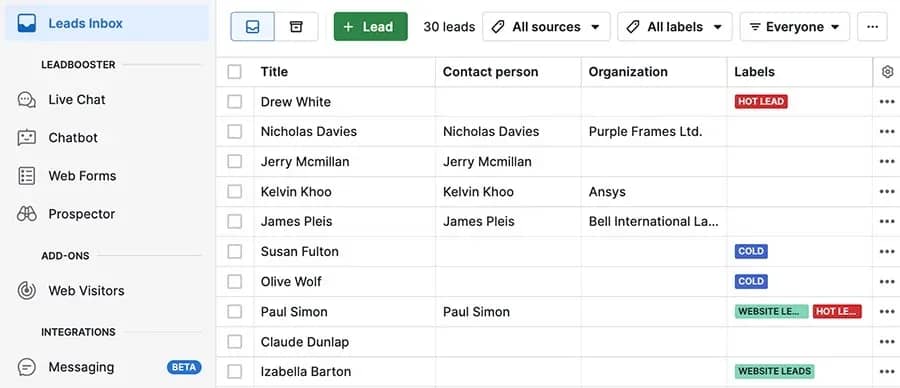
Automate Repeat Sales with Your Online Store Builder

Software Stack Editor · October 21, 2025 ·

The post Automate Repeat Sales with Your Online Store Builder appeared first on ClickFunnels.

Getting customers to buy from you once is hard enough. Getting them to come back and buy again? That’s where most e-commerce stores struggle, and it’s also where your biggest opportunities lie.

Most store owners put all their energy into attracting new customers while their previous buyers quietly move on to competitors. But repeat customers spend more, buy more frequently, and cost far less to convert than first-time visitors.

The good news is you don’t have to manually chase down every customer with follow-up emails and special offers. Using your online store builder , you can automate the entire process of bringing customers back.

  • Why Automate Repeat Sales?
    • 1. Saves Time and Effort
    • 2. Increases Revenue Without Extra Effort
    • 3. Builds Stronger Customer Relationships
  • How to Automate Repeat Sales Using Your Online Store Builder
    • 1. Create a Customer Loyalty Program
    • 2. Set Up Abandoned Cart Automation
    • 3. Automate Follow-Up Email Sequences
    • 4. Implement Subscription-Based Models
    • 5. Leverage Upselling and Cross-Selling Automation
  • 6 Steps to Create a Funnel for Repeat Sales
    • 1. Choose Your Automation Platform
    • 2. Map Out Your Customer Journey
    • 3. Set Up Your Email Sequences
    • 4. Create Your Offers
    • 5. Test and Launch
    • 6. Monitor and Improve
  • Start Building Your Automated Sales System

Why Automate Repeat Sales?

It’s no secret that retaining customers is often more cost-effective than constantly seeking new ones. According to one study, 1 increasing customer retention by just 5% can lead to an increase in profits of 25% to 95%. But how do you achieve this consistently?

The answer is automation. When you automate your repeat sales process, you create an effortless way for customers to return and make additional purchases. Instead of spending hours on customer outreach, you can create an automated sales funnel that nurtures relationships and leads customers back to your store.

Let’s break down the key benefits of automating repeat sales:

1. Saves Time and Effort

Manual follow-up is exhausting. You’re constantly trying to remember who bought what and when to reach out again. With automated systems, your store handles all of this for you. It sends thank-you emails, recommends related products, and reaches out with special offers—no more sticky notes or reminders cluttering your desk.

2. Increases Revenue Without Extra Effort

Automating repeat sales means your store works for you even when you’re not actively managing it. You can create funnels that re-engage previous customers with tailored offers, bundles, and promotions, increasing your revenue with minimal extra effort.

3. Builds Stronger Customer Relationships

Automation helps you stay connected with customers between purchases. It sends helpful tips about products they bought, care instructions, styling ideas, or early access to new items that might interest them. This consistent engagement keeps your brand at the forefront of your customers’ minds and makes them feel valued.

How to Automate Repeat Sales Using Your Online Store Builder

Automating repeat sales might sound complicated, but the right tools simplify it. Here are some creative ideas for your automated sales system:

1. Create a Customer Loyalty Program

One of the most effective ways to encourage repeat sales is by setting up a loyalty or rewards program. Your online store builder can help you create a system that rewards customers for their purchases.

For example, it can:

  • Award points for every purchase customers can redeem for discounts or free products.
  • Send automated email reminders about points balances and available rewards.
  • Offer bonus points for customers who reach certain spending milestones.

When customers see they’re earning something with each purchase, they’re more likely to return and shop more with you.

2. Set Up Abandoned Cart Automation

Many customers add items to their cart and leave without completing the purchase. Abandoned cart funnels help you automatically follow up with these customers to bring them back and complete their order.

Abandoned cart automation works by:

  • Sending a friendly reminder email a few hours after someone leaves items in their cart
  • Following up with incentives like free shipping or a small discount to encourage completion
  • Creating urgency with a final time-limited offer before the items are removed

Since these customers already showed interest by adding products to their cart, they often just need a gentle nudge to complete their purchase.

3. Automate Follow-Up Email Sequences

It’s important to keep customers engaged with your brand beyond the first purchase. Use your online store builder to set up automated email sequences that nurture the relationship post-purchase. These can include:

  • Thank-you emails: Show appreciation for their purchase and offer a coupon for their next order.
  • Product recommendations: Suggest related products based on their previous purchases.
  • Exclusive promotions: Send limited-time offers or early access to new products for returning customers.

These emails keep your customers engaged with your brand. They are more likely to return and buy again.

4. Implement Subscription-Based Models

A subscription funnel can help you automate repeat sales by offering products that customers routinely need. For example, if you sell skincare products, coffee, pet food, or supplements, customers can sign up to receive them automatically every month or quarter.

With your online store builder, you can set up a subscription service with automated billing, product delivery, and renewal reminders. This creates predictable recurring revenue while making it convenient for customers to get their essentials.

5. Leverage Upselling and Cross-Selling Automation

Automating upsell and cross-sell offers is another powerful way to increase repeat sales.

Once a customer makes a purchase, the system can:

  • Offer a more expensive or premium version of the product they just bought.
  • Suggest related products that enhance or complement their original purchase.

This process works particularly well when your online store builder is integrated with your sales funnel system. With all your customer data, purchase history, and automation tools in one place, creating offers that feel timely and relevant to each customer becomes easier.

6 Steps to Create a Funnel for Repeat Sales

Creating an automated system for repeat sales is easier than you think. Here’s how to set it up step by step:

1. Choose Your Automation Platform

Pick funnel software that handles both your online store and email automation in one place. This makes it easier to track customer behavior and create relevant follow-ups based on what people actually buy.

2. Map Out Your Customer Journey

Think about what happens after someone makes their first purchase. Do they need tutorials on how to use the product? When would they likely need to reorder? Plan out the touchpoints that make sense for your specific business.

3. Set Up Your Email Sequences

Create automated emails for different scenarios: welcome messages for new customers, follow-ups after purchases, and re-engagement emails for people who haven’t bought recently. Keep them helpful rather than pushy.

4. Create Your Offers

Design special offers for repeat customers like loyalty discounts, early access to new products, or bundle deals. Make these offers feel exclusive to encourage customers to keep buying from you.

5. Test and Launch

Start with one simple automation, like a thank-you email series after purchase. Test it with a small group first, then expand to other automated sequences once you see it working.

6. Monitor and Improve

Check your results regularly to see which emails get opened and which offers convert best. Use this data to refine your sales funnel automation and make it more effective over time.

Start Building Your Automated Sales System

You’ve got the blueprint, now it’s time to choose your tools. Choose a platform that can handle your online store, email automation, and customer tracking all in one place.

Most platforms offer free trials, so you can test the features before committing. Use that trial period to set up one complete automation sequence and see how it performs with real customers. The sooner you start, the sooner you’ll have a system working behind the scenes to grow your revenue.

1 https://hbr.org/2014/10/the-value-of-keeping-the-right-customers

Get HELP Building Your Ecommerce Funnels Now!

Thanks for reading Automate Repeat Sales with Your Online Store Builder which appeared first on ClickFunnels.

Black Friday strategies that grow revenue, not your workload

Software Stack Editor · October 17, 2025 ·

image
Cait Miller

Cait is a Senior Content Marketing Manager at Kit. She’s a lifelong storyteller and writer with more than a decade in the creator space. Outside of work you can catch her running marathons, hiking, knitting, painting, or catching some live music. (Read more by Cait)

Lead Management Made Easy with Sales Funnel Automation

Software Stack Editor · October 16, 2025 ·

The post Lead Management Made Easy with Sales Funnel Automation appeared first on ClickFunnels.

So, you know that manually following up with leads is eating up too much of your time. However, you’re not sure how to automate without losing the personal connection. Makes total sense, especially when you’re already juggling a dozen other priorities. Let’s not add “master lead automation” to your packed schedule.

Sales funnel automation creates a process that nurtures leads consistently while you focus on what you do best. We’ll walk through how automation transforms lead management, what features actually matter, and how to get started without overwhelming yourself.

  • What Is Sales Funnel Automation?
  • Key Features of Sales Funnel Automation
    • 1. Automated Email Sequences
    • 2. Lead Segmentation
    • 3. One-Click Upsells and Order Bumps
    • 4. Dynamic Follow-Ups
  • Why Sales Funnel Automation Is the Key to Better Lead Management
    • 1. Consistency and Reliability
    • 2. Time Savings
    • 3. Better Conversion Rates
    • 4. Clear Performance Data
    • 5. Scalability
  • The Reality of Managing Leads Without Automation
  • Take Your Lead Management to the Next Level with Funnel Automation

What Is Sales Funnel Automation?

Sales funnel automation is a system that does all your lead follow-up work for you. You’ve seen an automated sales funnel in action if you’ve ever signed up for a free guide online and received a series of helpful emails over the next few days.

It typically works like this:

  • Lead capture: You build an online course, a checklist, or another valuable asset to give away in exchange for people’s email addresses. 
  • Lead nurturing: Once someone opts in, the system sends them helpful content while sharing relevant offers based on their interests.
  • Conversion: When someone’s ready to buy, your funnel presents the right offer at the right time. This can be your main service, an online course, or a consultation call.
  • Follow-up: After someone becomes a customer, the automation continues with welcome messages, helpful resources, and occasional offers for additional services.

The best part? The system is efficient and self-sustaining. Set it up once and it’ll keep working whether you’re with clients, sleeping, or on vacation.

Key Features of Sales Funnel Automation

1. Automated Email Sequences

The magic happens with automated email sequences. You can nurture your leads at every stage, providing value, answering questions, and encouraging action. From delivering a free guide to sharing success stories and offering discounts, these emails keep your leads engaged without you lifting a finger.

2. Lead Segmentation

Not all leads are the same. Your funnel knows this.

Sales funnel automation lets you break up your leads according to their actions or interests. Each person gets content that matters to them. If someone downloads an ebook on fitness, your funnel automatically sends follow-up emails about fitness coaching or other relevant offers.

3. One-Click Upsells and Order Bumps

An automated system can automatically offer buyers related services or products at checkout (like upgrades, complementary services, or additional training). Customers get more value. Plus, you increase your revenue without extra work.

4. Dynamic Follow-Ups

Even better, the system keeps the conversation going, whether someone bought from you or not. People who purchase get helpful onboarding content and occasional offers for additional services.

And, those who haven’t bought yet? They continue getting valuable content that builds trust and keeps you at the top of their minds when they’re ready to make a decision.

Why Sales Funnel Automation Is the Key to Better Lead Management

Here’s why you should consider automating your sales funnel:

1. Consistency and Reliability

Automated email sequences provide every lead with the same quality follow-up. It doesn’t matter whether they’re your first contact of the day or your hundredth. You’re not accidentally forgetting people or sending inconsistent messages. This reliability helps build trust with prospects.

2. Time Savings

Funnel automation handles routine follow-ups automatically. You get to focus on closing deals and growing your business instead of spending hours writing individual emails or tracking who needs what.

3. Better Conversion Rates

Automated systems catch leads that might otherwise slip away. The system nurtures people based on their specific interests and keeps them engaged until they’re ready to buy. Consistent follow-up often turns interested prospects into customers.

4. Clear Performance Data

Aren’t you tired of guessing why your sales are up one month and down the next? Automation gives you real answers. You can see which emails people open, what links they click, and where they drop off in your process.

5. Scalability

Sales funnel automation lets you capture and convert more leads without hiring more staff or increasing your workload. It’s designed to grow with your business, making it the ideal tool for scaling operations.

The Reality of Managing Leads Without Automation

Manual lead management can feel like playing whack-a-mole with your inbox. Every time you think you’re caught up, five more leads pop up, each at a different stage of interest, each needing a slightly different approach. You’re constantly switching between your CRM, email, calendar, and that sticky note system you swore you’d abandon months ago.

Here are the most common challenges that come up:

  • Lost hours: Following up with every lead individually takes hours you could spend on growing your business or serving existing customers.
  • Missed leads: Without a system tracking everything, promising prospects get lost in the shuffle.
  • Inconsistent communication: Some leads get your best pitch, others get a rushed response. Their experience can vary wildly depending on how busy you are that day.

As your business grows, these problems multiply. What worked when you had five leads a week becomes completely unmanageable at fifty. The solution is implementing a sales funnel automation system that handles initial follow-ups, lead scoring, and nurturing sequences so you can focus on having actual sales conversations with qualified prospects.

Take Your Lead Management to the Next Level with Funnel Automation

The benefits of sales funnel automation are undeniable. It’s time to implement it in your business to reap the rewards.

Start by mapping out your current process and identifying which tasks eat up most of your time. Then, automate those repetitive follow-ups and nurturing sequences using funnel builder software.

Stop pulling your hair out over missed follow-ups. Put the right automation system in place, and start converting more leads into customers with timely, targeted content.

Build Your Lead Magnet Funnels With ClickFunnels. Try for Free!

Thanks for reading Lead Management Made Easy with Sales Funnel Automation which appeared first on ClickFunnels.

Personalize Your Marketing with Automated Self-Assessment Funnels

Software Stack Editor · October 16, 2025 ·

The post Personalize Your Marketing with Automated Self-Assessment Funnels appeared first on ClickFunnels.

Personalization in marketing is no longer just a nice-to-have feature; it’s a must. Your leads and customers expect tailored experiences that speak directly to their unique needs and desires. But how do you scale personalized marketing without dedicating countless hours to one-on-one communication?

Enter automated self-assessment funnels. These funnels allow you to gather valuable data from leads, automatically segment them based on their responses, and deliver personalized offers, content, and recommendations—all on autopilot. This system ensures you’re speaking directly to your customers, guiding them through a journey that feels custom-made just for them.

In this blog, we’ll explain automated self-assessment funnels, why they’re a game-changer for your marketing strategy, and how you can implement them in your business to boost engagement and conversions.

  • What Is an Automated Self-Assessment Funnel?
  • The Benefits of Using Automated Self-Assessment Funnels
    • Higher Engagement and Interaction
    • Hyper-Personalization at Scale
    • Saves Time and Effort
  • How Automated Self-Assessment Funnels Work for Different Industries
    • 1. Coaching and Consulting Businesses
    • 2. E-commerce and Retail
    • 3. Digital Products and Courses
  • How to Create Your Own Automated Self-Assessment Funnel
    • Step 1: Choose the Right Platform
    • Step 2: Design Your Self-Assessment
    • Step 3: Set Up Email Sequences
    • Step 4: Optimize and Test
  • Personalize Your Marketing with Automated Self-Assessment Funnels

What Is an Automated Self-Assessment Funnel?

An automated self-assessment funnel is a marketing strategy that uses quizzes, surveys, or assessments to gather insights about your leads, automatically segment them, and deliver personalized content or product recommendations based on their responses. It is a highly interactive and engaging way to guide leads toward a product or service that fits their exact needs.

Here’s how it works:

  • Lead Capture—Your funnel begins by offering a self-assessment, quiz, or survey that entices visitors to share information about themselves. Sometimes, it’s as straightforward as asking a few questions to understand audience pain points, preferences, or goals.
  • Data Collection & Segmentation—As leads fill out the assessment, the data they provide automatically segments them. Based on their answers, they can be grouped into categories such as “high interest,” “nurturing required,” or “ready to buy.” Automation is key. You don’t have to analyze and categorize each lead manually.
  • Personalized Follow-Up—Once segmented, your funnel can automatically deliver customized content, offers, or product recommendations based on the lead’s specific responses. For instance, if someone answers a quiz and indicates they need a particular service, the funnel can send an email offering that service or guiding them to relevant product pages.
  • Conversion—By the time a lead reaches the end of your funnel, they’ve gained valuable insights and personalized recommendations, increasing their likelihood of converting into a paying customer.

The Benefits of Using Automated Self-Assessment Funnels

Higher Engagement and Interaction

Whether it’s by answering questions or assessing their own needs, you create a truly interactive experience when you let leads actively participate in their journey. Self-assessment funnels engage users on a deeper level, making them feel personally involved and understood. And the more engaged your leads are, the more trust they build in you, increasing the chances they’ll move forward in your funnel.

For example, imagine a coaching business that invites prospects to take a quiz about their current challenges. As they work through the quiz, they gain valuable insights into their situation, which naturally builds trust in your expertise and encourages them to take the next step with you.

Hyper-Personalization at Scale

Personalized marketing is now a game-changer in how consumers make decisions. Automated self-assessment funnels help you tailor offers and messaging based on each lead’s answers, without the hassle of manually segmenting them. You can deliver hyper-relevant content and offers that speak directly to their needs, boosting your chances of converting them into customers.

For example, a fitness coach might ask leads about their goals, such as weight loss, strength training, or improving flexibility. Based on those responses, the funnel automatically presents workout programs or training plans that perfectly match what the leads are looking for.

Saves Time and Effort

Traditional marketing strategies often demand a lot of manual effort—think personal emails, phone calls, or consultations. Automated funnels, however, save you time by handling much of the lead qualification and segmentation for you. Gather the same valuable insights that would typically take hours of one-on-one interaction. You gain more free time to focus on growing your business.

How Automated Self-Assessment Funnels Work for Different Industries

Automated self-assessment funnels aren’t limited to one type of business or industry. Whether in coaching, e-commerce, digital products, or any other field, you can customize these funnels to suit your needs. Let’s break down how to use self-assessment funnels in different industries:

1. Coaching and Consulting Businesses

For coaches and consultants, self-assessment funnels are dynamic tools for uncovering a lead’s pain points and tailoring offerings accordingly. Whether you provide one-on-one coaching or group programs, these funnels help you pinpoint each lead’s unique challenges and position your services as the ideal solution.

For example, a business coach might use a self-assessment quiz to help prospects identify their biggest business hurdles. Based on their responses, the funnel can recommend the perfect next step: a free consultation, an upcoming webinar, or a paid coaching package.

2. E-commerce and Retail

In e-commerce, a self-assessment funnel helps segment visitors by their preferences and purchase behavior. Customers answer a quiz about the types of products they’re interested in. Then, you can automatically deliver targeted offers that match their tastes, boosting the chances of a sale.

For example, a clothing store might use a style quiz where customers select their favorite colors, clothing types, or occasions. The funnel then directs them to tailored product pages, exclusive discounts, or curated collections designed just for them based on their responses.

3. Digital Products and Courses

Self-assessment funnels enable digital product creators or course providers to segment users based on goals and expertise levels. Then, you can offer the right product or course tailored to their needs, whether that’s an introductory program or advanced training.

Imagine a digital marketing expert who designs an assessment funnel asking potential students about their experience and business goals. Based on their answers, the funnel can recommend beginner courses or advanced modules, helping guide them smoothly through their learning journey.

How to Create Your Own Automated Self-Assessment Funnel

Creating your automated self-assessment funnel is simple and only takes a few steps:

Step 1: Choose the Right Platform

Look for a platform that offers drag-and-drop funnel builders, customizable templates, and integrations with email marketing tools, especially one that excels as a lead generation funnel solution.

Step 2: Design Your Self-Assessment

Create an engaging, interactive self-assessment or quiz that asks the right questions to help segment your leads. Align the questions with your business goals and target audience needs. Keep it short, with no more than 5-7 questions.

Step 3: Set Up Email Sequences

After the assessment, create automated email sequences that deliver personalized content or offers based on the lead’s answers. You can also segment the leads and trigger different email sequences based on their responses to increase the relevance of your messaging.

Step 4: Optimize and Test

Like any funnel, your self-assessment funnel needs constant optimization. Monitor your funnel’s performance, A/B test different questions, offers, and follow-ups, and continuously refine your messaging to improve conversions.

Personalize Your Marketing with Automated Self-Assessment Funnels

Targeted engagement is at the heart of effective e-commerce marketing automation, helping you deliver the right message at the right time without lifting a finger.

Automating your self-assessment funnels is one of the most powerful ways to personalize your marketing efforts and drive conversions. Create an engaging and relevant experience that nurtures relationships and boosts sales by tailoring offers and content to each lead’s unique needs.

You built a dream. Now build it a funnel, and watch your leads move seamlessly toward a purchase with personalized, automated guidance every step of the way.

Video

Infographic

Personalized marketing builds trust and drives conversions, but manually customizing experiences can be time-consuming. Automated self-assessment funnels simplify the process. Check out this infographic for step-by-step guidance.

4 Steps to Build an Automated Self-Assessment Funnel Infographic

Join Thousands of Degree-Free Entrepreneurs. Get Your Clickfunnels Account Now.

Thanks for reading Personalize Your Marketing with Automated Self-Assessment Funnels which appeared first on ClickFunnels.

Smart Segmentation Strategies for Your New Sales Funnel

Software Stack Editor · October 14, 2025 ·

The post Smart Segmentation Strategies for Your New Sales Funnel appeared first on ClickFunnels.

One of the most powerful ways to boost engagement and conversions when launching a new sales funnel is by automatically segmenting your leads. Unlike traditional funnels that send the same message to everyone, automated segmentation lets you treat each lead like an individual, delivering precisely what they need, exactly when they need it.

Automated funnel segmentation divides your leads into different groups based on their behavior, interests, and where they are in the funnel. Instead of blasting generic emails, you tailor your messaging, offers, and follow-ups to ensure every interaction provides real value to the right people.

In this blog, we’ll explore why automated funnel segmentation matters, how it works, and why it’s a must-have strategy for boosting your sales funnel’s performance. Plus, we’ll share how the right tools can help you implement segmentation seamlessly, turning more leads into paying customers.

  • Why Funnel Segmentation Is Essential for Sales Funnels
    • 1. Higher Engagement
    • 2. Improved Conversion Rates
    • 3. Better Lead Nurturing
  • How Automated Funnel Segmentation Works
    • Step 1: Lead Capture and Behavior Tracking
    • Step 2: Assigning Leads to Segments
    • Step 3: Automated Email Follow-ups Based on Segmentation
  • Benefits of Automating Funnel Segmentation
    • Saves Time and Increases Efficiency
    • Better Decision Making
    • Scalability
    • Increased Revenue
  • How to Simplify Automated Funnel Segmentation with the Right Tools
    • 1. Built-in Segmentation Features
    • 2. Simple Email Automation
    • 3. A/B Testing
    • 4. Analytics and Insights
  • Automate Your Sales Funnel Segmentation Today

Why Funnel Segmentation Is Essential for Sales Funnels

Segmentation in your sales funnel is like having multiple funnels running at the same time, without all the extra work. It’s a smart way to ensure that your leads receive the right message, at the right time, and in the right format. Here’s why funnel segmentation is so critical for your success:

1. Higher Engagement

When you segment your audience, you unlock the power to deliver truly personalized experiences. Instead of sending generic messages to everyone, your tailored content, offers, and solutions match each lead’s unique interests and behavior.

For example, suppose someone downloads your free ebook on a specific topic. You can then follow up with emails focused on related content or products, for a message that connects better. This targeted approach is precisely what an AI sales funnel builder helps you automate, so every lead feels seen and valued.

2. Improved Conversion Rates

Sending the right message to the right lead significantly improves your chances of converting them. By automating funnel segmentation, you can deliver the most relevant offers at the most opportune time. Whether offering a discount, a free consultation, or a special bonus, the chances of conversion increase when the offer aligns with the lead’s specific needs or stage in the funnel.

3. Better Lead Nurturing

Effective lead nurturing starts with knowing exactly where your leads are in their journey. Are they just discovering your business, are they curious, or are they ready to buy? Automated segmentation ensures every lead gets the right message at the right time.

For example, you can send educational content to someone just entering your funnel and exclusive offers to those ready to purchase. This creates a seamless, personalized experience that builds trust and guides leads through your automated marketing funnel more smoothly and effectively.

How Automated Funnel Segmentation Works

Automating segmentation in your funnel is all about setting up rules based on lead behavior and preferences. Such parameters could include actions like clicking a link, downloading a free offer, making a purchase, or showing interest in a particular product. These actions trigger automated responses that directly lead to different parts of your funnel.

Here’s how automated segmentation works in a typical sales funnel:

Step 1: Lead Capture and Behavior Tracking

The first step is capturing your leads. Examples include opt-in forms, free ebook downloads, or webinar sign-ups. Once the lead enters your funnel, your software tracks their behavior: which pages they visit, what emails they open, and what links they click. This information allows you to segment leads based on their actions.

Step 2: Assigning Leads to Segments

Once you have behavioral data, you can automatically assign leads to specific segments. For example:

  • Leads who visit a pricing page might be segmented as “hot leads” and moved to a special offer sequence.
  • Leads who click on a product demo video could be segmented to receive a follow-up with additional product details.

 This process ensures that each lead receives a targeted and relevant experience, increasing their chances of converting.

Step 3: Automated Email Follow-ups Based on Segmentation

Once your leads are segmented, you can set up automated email sequences that send the right message at the right time. For example, a lead who downloaded an ebook may receive a series of educational emails, building trust and providing more value. A lead who clicked on a product link might receive follow-up emails with specific product offers or testimonials to move them closer to purchasing.

Benefits of Automating Funnel Segmentation

Saves Time and Increases Efficiency

One of automation’s primary benefits is that it eliminates the need for manual segmentation. Nurture leads without manually monitoring their behavior by setting up automatic triggers and email sequences.

Better Decision Making

Automated segmentation helps you make better decisions about your marketing strategy. Gain valuable insights into what works and what doesn’t by tracking how different segments of your leads respond to various offers and content. These data-driven decisions help improve your funnel’s overall performance.

Scalability

Managing all the different leads and prospects manually becomes increasingly complex as your business grows. Automated segmentation allows you to scale your efforts, ensuring every lead receives a personalized experience, even with thousands of leads in your funnel.

Increased Revenue

Stop casting a wide net and hoping for the best. Segmenting your leads helps you offer products or services relevant to your audience. Presenting offers to the right people at the right time leads to higher sales and more revenue.

How to Simplify Automated Funnel Segmentation with the Right Tools

Using the right platform to create and automate your sales funnel can make a huge difference for coaches and businesses of all kinds. A good funnel builder simplifies automated funnel segmentation through:

1. Built-in Segmentation Features

Create segments based on specific behaviors like page visits, link clicks, or form submissions. Automatically send leads to different email sequences or offers based on their actions, ensuring they receive the most relevant content.

2. Simple Email Automation

Never miss an opportunity to engage your leads. Easy-to-set-up email automation allows you to create labor-saving email sequences for each segment.

3. A/B Testing

Built-in A/B testing tools let you experiment with different versions of your funnel and discover which segments respond best to specific offers. Testing helps you continuously refine your segmentation and boost conversions.

4. Analytics and Insights

Access to detailed analytics lets you track your funnel’s performance. See how each segment performs, make data-driven decisions, and improve your funnel over time.

Automate Your Sales Funnel Segmentation Today

Go from aspiration to activation. Start turning every lead into a loyal customer by delivering the perfect message at the ideal time.

Automated funnel segmentation is a game-changer for businesses looking to increase conversions and improve lead management. The right tool allows you to automatically segment your leads and nurture them through personalized email sequences, which helps maximize your funnel’s effectiveness and save valuable time.

Video

Infographic

Automated lead segmentation is a powerful way to increase engagement and conversions within your sales funnel. The right funnel-building platform makes it easy for coaches, entrepreneurs, and businesses of all sizes. Explore the infographic to discover ways to simplify automated funnel segmentation.

4 Ways to Simplify Automated Funnel Segmentation Infographic

Book – Expert Secrets

Thanks for reading Smart Segmentation Strategies for Your New Sales Funnel which appeared first on ClickFunnels.

Dynamic Email | What is Dynamic Email

Software Stack Editor · October 13, 2025 ·

BC

Benjamin ClarkeSEO Product Owner & AI Developer

Prospects respond to messages that reflect their role, timing and context. Dynamic email tailors each send with account data and recent activity, resulting in outreach that feels relevant and earns more replies.

Relevance turns into outcomes when it’s connected to your customer relationship management (CRM) software. Use structured fields in the template and simple follow-up rules to route positive replies to the right owner, book sales meetings faster and move opportunities forward.

Key takeaways for dynamic emails

  • Dynamic email tailors each send with reliable CRM data and simple rules, increasing relevant replies and booked meetings.

  • Use a small set of trustworthy email dynamic fields and one clear CTA, place the most relevant detail near the ask.

  • Apply dynamic content to swap proof or next steps by segment or stage, with safe defaults and clean HTML fallbacks.

  • Measure beyond opens, track reply quality, meetings, opportunities and pipeline. Use Pipedrive to route responses, automate follow-ups and report impact – try Pipedrive free for 14 days.
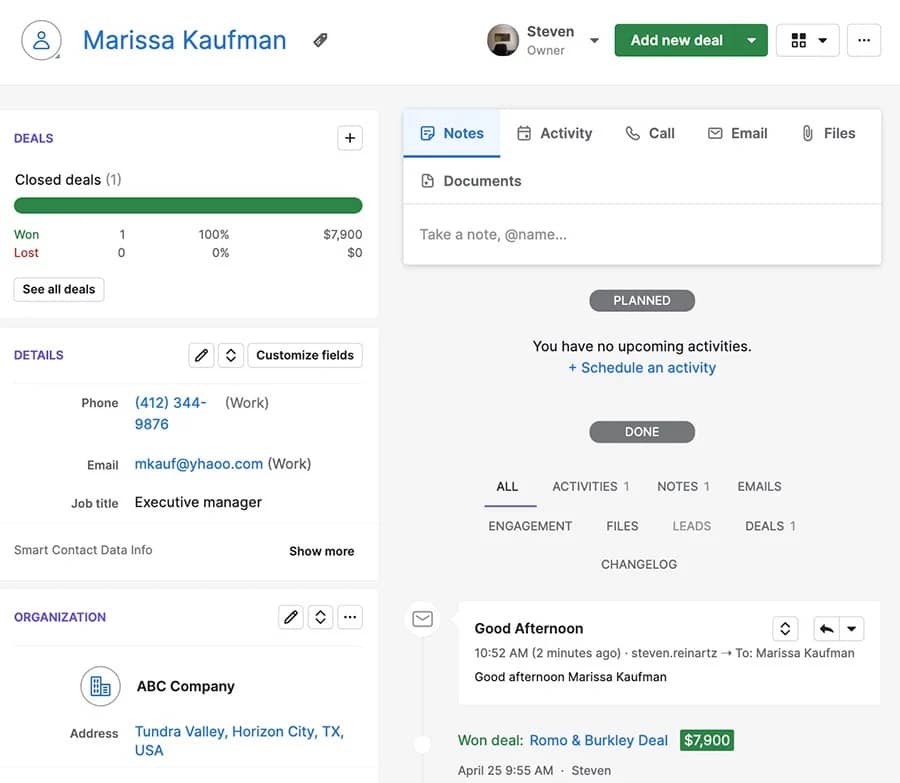
What is dynamic email and what does dynamic email cover?

Dynamic email is an email template that adapts for each recipient using data or behavior. Instead of one fixed message, the template pulls dynamic fields (like name, company, role or last activity) and applies simple rules to swap lines, blocks or calls to action (CTAs) at send time.

Two building blocks make it work. Email personalization inserts small details that prove relevance (for example, role, product tier or region). Conditional content changes larger sections based on segment or stage.

For example, one template can greet the prospect by name, reference an industry result, surface a relevant case study and present the right next step. A finance leader might see a cost-reduction line with a video demo link. An admin might see a setup tip with a link to enable a feature.

“There’s no question that the future of email marketing will entail more personalization using machine learning and generative AI, more integration between channels and more of a focus on maximizing customer lifetime value.” – Chad S. White, Oracle Digital Experience Agency

“Dynamic email meaning” is simply this idea of adaptable content. One template becomes many accurate variations driven by your data, every recipient gets a message that fits their situation without manual rewrites.

Recommended reading

https://www-cms.pipedriveassets.com/blog-assets/responsive-email-design.png

Responsive email designs: Intended format across all devices

What are email dynamic fields and which should I use?

Email dynamic fields are placeholders that pull values from your CRM at send time. Common fields include first name, company, role, owner, industry, current plan and last activity. Dynamic fields let one template feel specific without manual edits.


Use a small set of fields you trust. Keep name and company formats consistent, shorten long values and set safe defaults. Put the most relevant detail close to the CTA so the connection is clear.

Business introduction emails should be kept simple. Limit character length, skip niche fields that vary a lot and preview a sample list before every send. If a field isn’t reliable, use it only for routing or segmentation.

What is dynamic email content and when should I use it?

Dynamic content changes lines, blocks or calls to action based on simple rules. Examples include showing different proof points by industry, offering a demo link to evaluators while presenting a setup guide to current admins or swapping a paragraph for trial users versus new prospects.

Dynamic content is appropriate when the core message stays the same but the proof or next step should vary. If the narrative, tone or objective differs, a separate template is warranted. Rules should remain lightweight so emails render cleanly across clients and remain easy to test.

Performance should be assessed by sales metrics: reply quality, meetings booked and opportunities opened. Promote variants that start conversations, retire those that generate clicks without sales calls.

Recommended reading

https://www-cms.pipedriveassets.com/blog-assets/email-lead-nurturing.png

How to Create an Automated Lead Nurturing Workflow that Converts Visitors

How does dynamic email work with a CRM

Dynamic email pulls contact, account and deal data from the CRM at send time. The template holds placeholders and simple rules, each message fills the fields and swaps sections based on segment, sales stage or recent activities.

Buyers now expect this level of tailoring. According to Forrester’s The State of B2B Personalization (2024), 82% of global B2B marketing decision-makers say buyers want personalized sales and marketing experiences.

The CRM preserves context. Replies, clicks and web form submissions attach to the record with source, topic and next step. Owners and follow-ups can be assigned automatically and meetings can be scheduled from the same thread.

Measurement closes the loop. Interactions tie to records and campaigns, so you can track reply quality, meetings booked, opportunities opened and pipeline created by variant, segment and message, then visualize it in Pipedrive Insights dashboards.

What are best practices for dynamic email

Use these practical guidelines to keep dynamic email reliable and revenue-focused:

  • Verify fields first. Limit variables to trusted data and standardize formats. Set safe defaults for blanks to prevent awkward copy.

  • Put relevance near the ask. Place one high value detail next to the CTA, this makes the purpose clear and lifts response.

  • Keep rules simple. Use a few clear segments and minimal conditions. Simple logic renders cleanly and is easy to test.

  • Write for skim. Lead with the outcome and keep paragraphs short. A single, visible CTA reduces decision friction.

  • Protect deliverability. Authenticate the domain and keep a steady sending pattern. Test on mobile and strict clients before launch.

  • Close the loop in the CRM. Route replies to an owner and auto-create follow-ups. Log context so performance can be reviewed by replies, meetings and opportunities.

Follow these email best practices for dynamic emails to keep messages relevant and reliable. Limit variables to fields you trust, standardize name and company formats, cap character length and set safe defaults for missing data. Place the most useful detail near the CTA so the relevance is obvious at a glance.

Write for skim. Lead with the outcome, keep paragraphs short and keep one clear CTA. Avoid heavy images and complex layouts that break on mobile emails or in strict clients.

Protect deliverability. Authenticate sending domains, keep a steady sending pattern and avoid “no-reply” addresses. Test across common clients and maintain a clean HTML fallback for any advanced elements.

As of 2024, Google and Yahoo require one-click unsubscribe for marketing mail and a user-reported spam rate under 0.3%, non-compliant senders risk rejection.

Close the loop operationally. Route replies to owners, create follow-up activities when links are clicked or forms submitted and log context on the record. Review performance weekly against sales metrics: meetings, opportunities and sales pipeline created.

Recommended reading

https://www-cms.pipedriveassets.com/8-creative-announcement-emails.png

15 creative announcement email examples and templates

How should dynamic email be measured beyond opens?

Measure outcomes that move sales forward. Track positive reply rate, meetings booked, opportunities created and pipeline value per 1,000 sends. Add time to first meeting and no-show rate to see whether messages create real conversations.

Protect deliverability while you test. Monitor unsubscribes and spam complaints alongside reply quality. If complaints rise or replies feel generic, tighten targeting, simplify the ask and use AI A/B testing to trial pre-headers and subject lines before rolling out a variant.

Compare like with like. Tag each variant in your CRM and use a 14–30 day window to attribute meetings and opportunities. Cohort by segment, message and send time to spot patterns. Keep a control template, wait for a reasonable sample size and decide on winners with clear thresholds.

Diagnose gaps, then adjust. High replies but low meetings suggest the CTA or scheduling flow needs work. Strong meetings but weak opportunities point to lead qualification or targeting issues. Promote variants that consistently book calls and retire those that don’t.

Why Pipedrive for dynamic email and handoffs to sales

Pipedrive keeps contact, company and deal data in one place, so email templates can use dynamic fields without exports or copy-paste. Safe defaults and custom fields make messages readable even when data is incomplete and every send stays tied to the right record.

Capture and route social clicks, website forms and replies with web forms, live chat, chatbots and campaign/UTM tracking. Lead routing rules assign the right owner immediately, while required fields ensure the context that shortens discovery.

Workflow automation turns signals into action. Create follow-ups when a link is clicked or a form is submitted, start activities and goals based on intent and use SLA reminders to keep response times tight. The built-in meeting scheduler removes back-and-forth so interest becomes a booked call.

Impact is visible end to end. Pipeline reporting and source and channel dashboards show meetings, opportunities and revenue influenced by each dynamic variant, segment and message.

FAQ for dynamic emails

  • A dynamic email is a template that adapts per recipient using data or behavior. It fills fields like name or role and can switch sections or calls to action at send time.

  • Dynamic fields (merge fields) pull values from your CRM at send. Common examples are first name, company, role, owner and last activity. Use safe defaults if a field is missing.

  • Dynamic content changes lines, blocks or CTAs based on rules like segment, stage or intent. The core message stays the same while proof or next step varies.

Final thoughts

Dynamic email is practical personalization: one template adapts to each reader using reliable data and simple rules. Teams that keep fields clean, copy skimmable and asks specific see more replies, faster meetings and steady movement through the funnel.

Put it into action. Connect templates to your CRM, route responses to the right owner with clear follow-ups and measure by meetings, opportunities and revenue.

With Pipedrive handling data, routing, activities and reporting, dynamic email becomes a repeatable way to turn attention into scheduled calls and trackable pipeline.

  • Page 1
  • Page 2
  • Page 3
  • Interim pages omitted …
  • Page 44
  • Go to Next Page »

Get your Software Stack together. softwarestack.tech

Software Stack

© 2024–2025 - Software Stack is a trading name of SouthwestCIO Limited ac ompany registered in England & Wales 11319049

  • Knowledgebase
  • Home
  • About Us
  • Contact Us