• Skip to primary navigation
  • Skip to main content
software stack logo

Software Stack

Get your Software Stack together

  • Knowledgebase
    • All Categories
    • Accounting Software
    • Automation & Workflow Software
    • Customer Relationship Management
    • E-Commerce Shopfronts & Payments
    • Marketing Automation
    • Online Courses & Membership
    • Project Management
    • Surveys & Forms
    • Web Hosting
  • Home
  • About Us
  • Contact Us
  • Show Search
Hide Search

CRM

The Psychology-Backed Customer Profiling Guide for SMBs

Software Stack Editor · August 29, 2025 ·

Rich, data-driven customer profiling shows you precisely what drives your best buyers’ decisions and how to reach them with more precision. If your current profiles are too vague or based on guesswork, updating them is an easier fix than you’d think.

In this article, you’ll learn the psychology behind customer profiles and how to use them to refine your message, connect more deeply with your audience and close sales faster.

Key takeaways from customer profiling

  • Customer profiling means organizing buyer data into clear profiles that show who they are and what drives their decisions.

  • Successful customer profiles sharpen your marketing and sales efforts, while vague templates risk stereotypes or wasted effort.

  • Profiles are most effective when you base them on real customer data and refresh them regularly.

  • Pipedrive captures, segments and visualizes customer information so you can build stronger profiles and sell more effortlessly – try it free for 14 days.

What is customer profiling?

Customer profiling builds a clear picture of your ideal buyer by grouping shared traits like demographics, behavior, motivations and needs.

Different types of profiles help you understand specific elements, like who you’re selling to and why those people buy.

Small and medium-sized businesses (SMBs) use profiles to make data-driven decisions about marketing, sales and product development without wasting limited resources.

Customer profiling’s meaning is the same for business-to-business (B2B) and business-to-consumer (B2C) companies.

However, the information within them often differs:

  • B2B sales profiles focus on company-level traits (firmographics, budgets or buying committees)

  • B2C profiles focus on individual consumers (lifestyle, demographics, education level and personal buying patterns)

For example, here’s an ideal customer profile (ICP) template for a fictional B2B cybersecurity company:
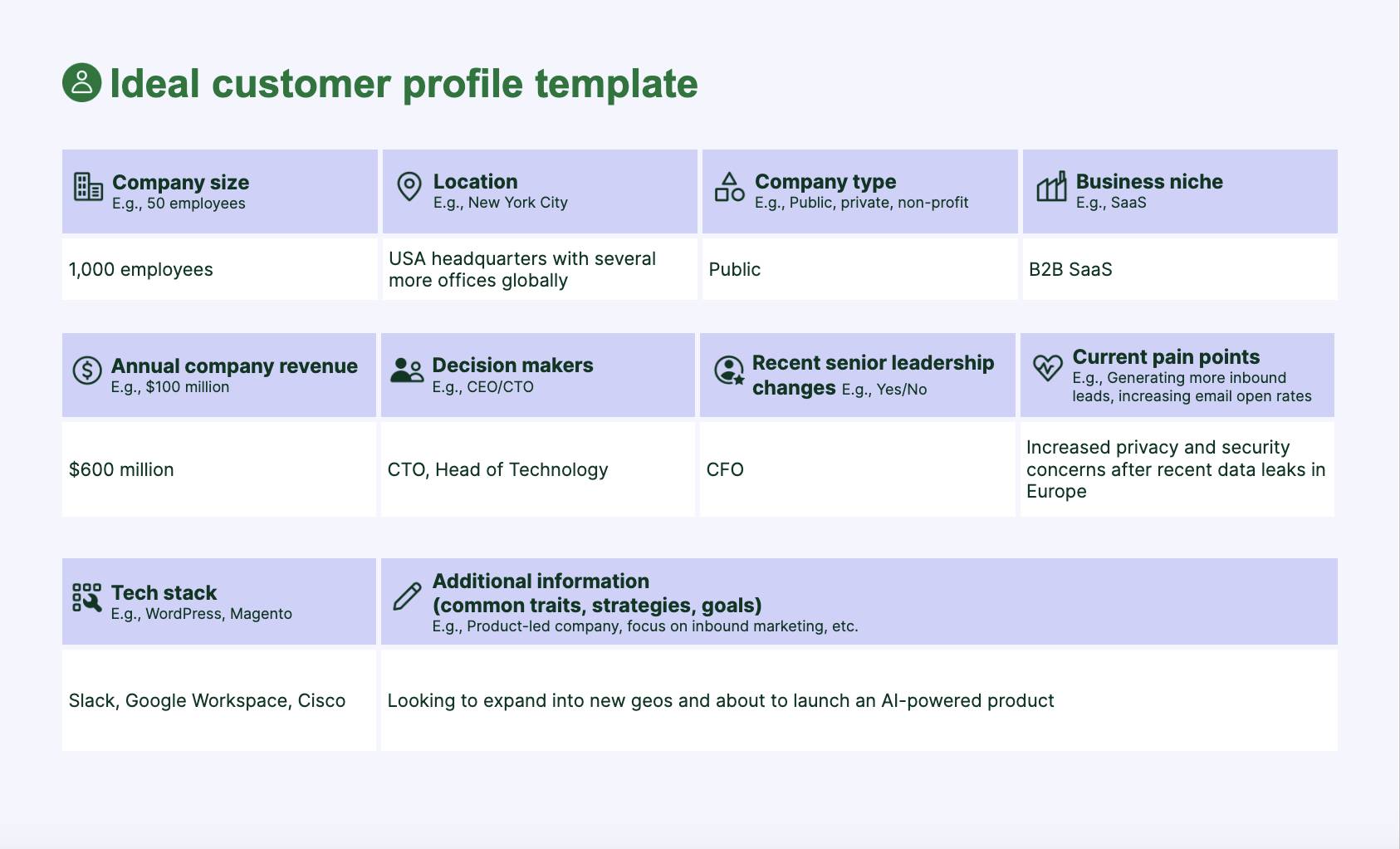
Customer profiling ICP template

This ICP shows who the best-fit customer is, what challenges drive urgency and who makes buying decisions at a glance.

With that information, the cybersecurity firm can focus sales and marketing on customers most likely to convert, rather than spreading time and budget across everyone.

Profiling helps SMBs:

Customer profiles give business owners clarity. Instead of casting a wide net and hoping, you can focus on the right people, solve their real problems and grow faster.

In fact, McKinsey research suggests that targeted offers – based on rich profiles in the background – convince 65% of customers to buy.

Next, you’ll explore the different types of profiles you’ll need to consider.

Recommended reading

https://www-cms.pipedriveassets.com/What-are-the-Keys-to-Customer-Observation.jpg

What are the keys to customer observation?

6 crucial types of customer profiles and what they teach you

Each type of customer profile looks at buyers from a different angle, including behavior, motivations or business context. By layering these insights, you understand who to target and why they’ll care.

Here are six of the most typical customer profiles and what you learn from them:

Type of customer profile

What it teaches you

Demographic profile

Helps you understand who your buyers are at a basic level.

Examples: Age, gender, income and education.

Geographic profile

Shows where your customers live or operate and how these factors influence demand.

Examples: Location, climate and urban vs. rural settings.

Behavioral profile

Reveals how buyers interact with your product and what drives repeat purchases.

Examples: Buying habits, product usage and brand loyalty.

Psychographic profile

Tells you what customers care about and why they choose you over competitors.

Examples: Values, lifestyle, interests and motivations.

Firmographic profile

Identifies which types of businesses are the best fit for your solution.

Examples: Company size, industry and revenue.

Needs-based profile

Shows the pain points that spark urgency and purchase decisions.

Examples: Specific problems or needs customers want you to solve.

Think of these six profiles as ingredients. You can use them individually to learn about customers, but combining them gives you more powerful tools.

Imagine you run a small software company that sells workflow automation tools:

  • A firmographic profile shows your best customers are mid-sized agencies with 50–200 employees

  • A behavioral profile suggests these customers adopt new tools quickly if there’s a clear return on investment (ROI)

  • A needs-based profile indicates their biggest frustration is wasting time on manual sales reporting

These combined insights allow you to create specific, relevant resources to connect deeply with buyer segments and drive purchases.

Beyond merging profiles, you can transform raw profiles into two powerful formats that SMBs use every day:

  • ICPs. A description of the perfect-fit company (in B2B) that’s most likely to buy and get value from your product. More factual and criteria-based.

  • Buyer personas. Semi-fictional characters representing your ideal customer, complete with goals, challenges and behaviors. More human and story-driven.

Buyer personas and ICPs take the raw customer data from the six profile types and turn it into useful information for marketing, sales and product design.

Here’s why customer profiling resonates with buyers.

Recommended reading

https://www-cms.pipedriveassets.com/Audience-Profile.jpg

How to create an audience profile for your SMB (+ free template)

The psychological principles behind creating customer profiles

Customer profiling works because it taps into core human psychology. By aligning with how people pay attention, build trust and make decisions, you’ll connect with them far more effortlessly and improve the customer experience (CX).

Here are some of the most typical psychological principles behind customer profiles.

Selective attention theory: relevance and personalization

Selective attention theory: Our brains filter out most information and only process what feels relevant in the moment.

We’re bombarded with marketing every day, so only the messages that feel designed for us manage to cut through.

Profiles help you craft messages that mirror a customer’s real situation, so they notice you instead of tuning out.

Example: A small HR software company uses behavioral and firmographic profiles to send an email about automating onboarding to “fast-growing startups with under 200 employees”.

The message speaks directly to their size and pain point, so a startup founder notices it in her busy inbox. Instead of dismissing the offering as generic software, she sees a solution built for her team’s exact challenges.

That positioning increases response rates, shortens the sales cycle and makes startups far more likely to choose the consultancy over competitors.

Similar-to-me effect: trust-building

Similar-to-me effect: People naturally gravitate toward others they perceive as sharing their experiences, values or struggles

We’re more likely to trust (and buy from) people and brands who seem like us or show they understand our needs and challenges.

Understanding customer pain points shows empathy, which builds credibility. When your profile-based messaging mirrors people’s struggles, it creates a sense of shared experience.

Example: A consultancy uses needs-based and psychographic profiles to frame a new automated marketing campaign around “protecting small healthcare clinics from compliance headaches”.

A risk-averse clinic director immediately relates because it feels like the agency has worked with people like him.

Instead of another non-specific pitch, he sees a trusted partner who understands his need for compliance management and is far more likely to engage in a sales conversation.

Paradox of choice: decision simplification

Paradox of choice: More options increase anxiety, delay decisions and reduce satisfaction with the final selection.

The paradox of choice suggests that many options or vague information makes decision-making harder, to the point where we may not choose anything.

Our brains are wired to avoid overload. Customer profiles narrow your focus, letting you speak clearly to a defined group and reduce overwhelm for you and your target audience.

Example: A marketing firm uses firmographic and needs-based profiles to target “local restaurants needing online ordering systems”. A restaurant owner instantly knows the service is meant for them, making the decision far easier.

That clarity speeds up adoption, reduces price resistance and makes the firm the obvious choice over less tailored competitors.

Recommended reading

https://www-cms.pipedriveassets.com/blog-assets/4_Sales-Motivation.jpeg

6 ways to hack sales psychology and sell better

5 steps to build effective customer profiles that drive sales

Customer profiles are most useful when you base them on real data. When you zero in on the right target customers and speak to their actual needs, you encourage more purchases.

For example, if you pinpoint that your fastest-closing deals come from 10–50-employee financial institutions with compliance challenges, you can focus your outreach on that exact segment.

This specificity results in shorter sales cycles, higher conversion rates and less money burned on broad, unfocused marketing.

Here’s a step-by-step process SMBs can follow to build profiles that move the needle.

1. Gather customer profile data using the right tools

Pull together insights from buyer surveys, sales history, web analytics and social media to spot patterns in your customers’ journey. This process gives you the “raw ingredients” to build accurate, actionable profiles.

Instead of assuming who your best customers are, you’ll know based on their actual behavior and traits.

Typical customer profiling methods include tools like:

Customer profiling software like Pipedrive helps you automatically capture data from leads, deals and interactions to build a clear picture of your best buyers.

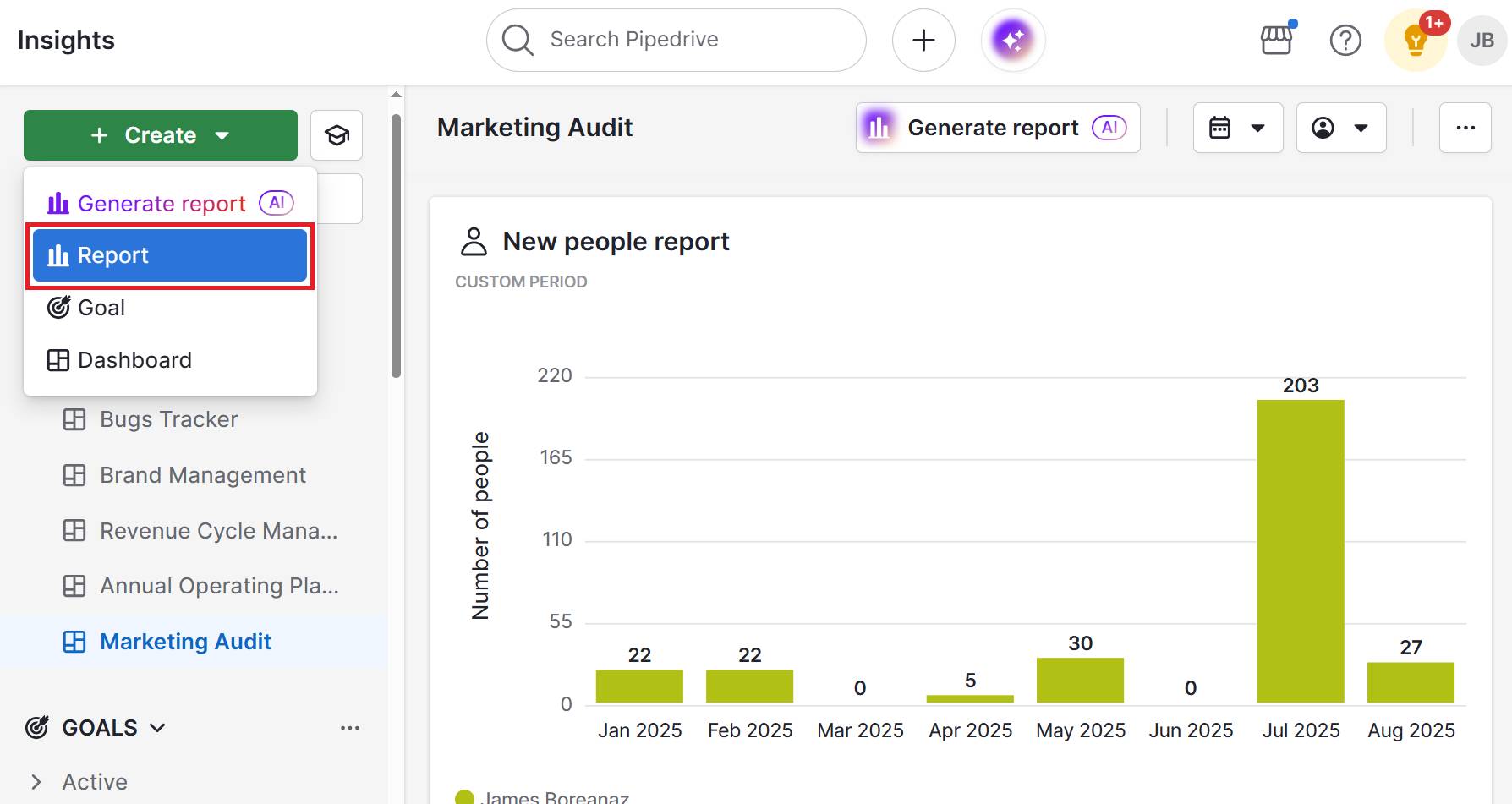
Real-time activity tracking lets you create reports to see how contact groups move through deal stages:

Customer profiling Pipedrive deal progress

If specific segments often stall, you know you need to improve touchpoints somewhere along their buying journey.

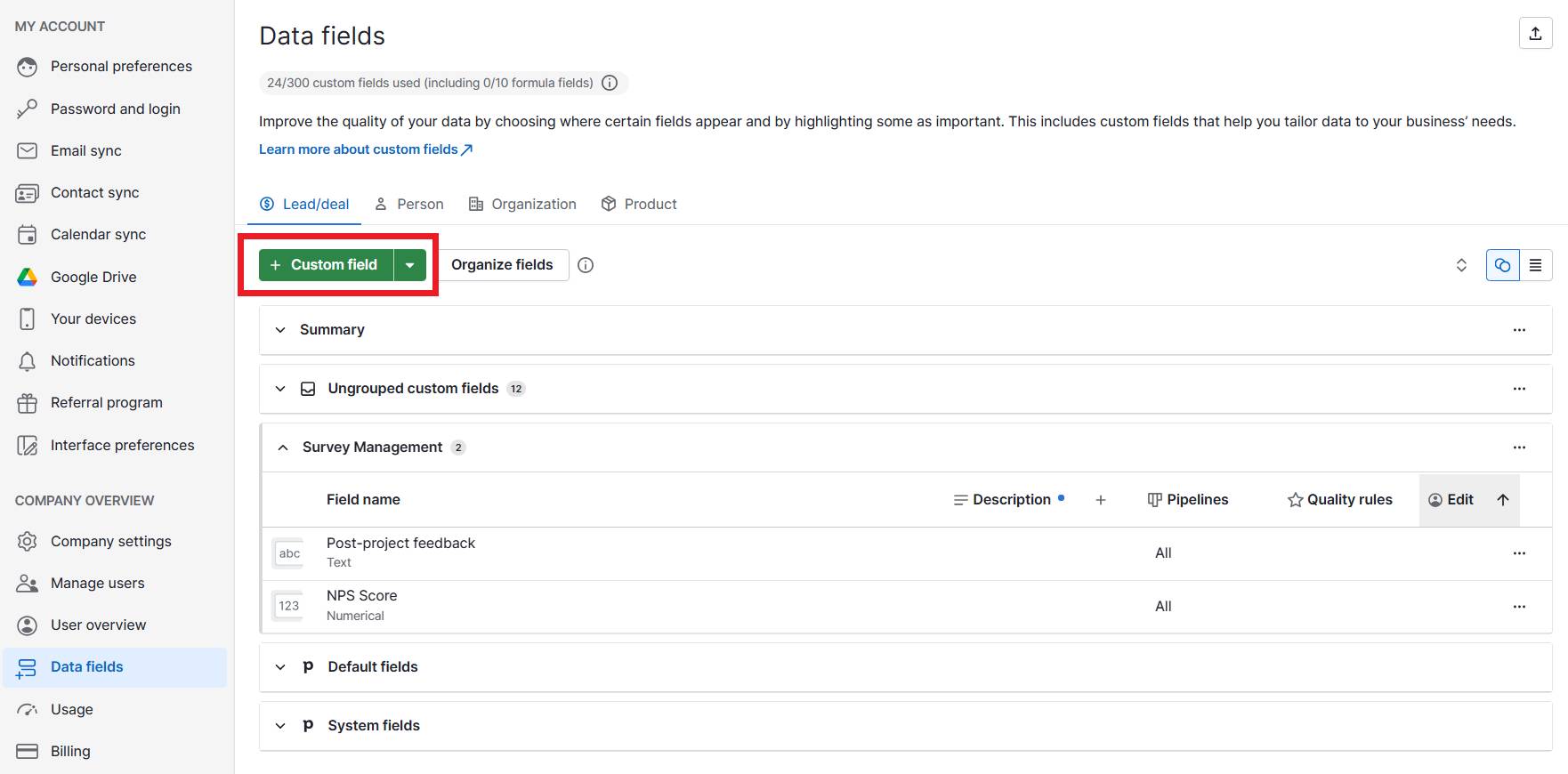
Adding custom fields that you fill in after sales calls or meetings (e.g., “Pain points mentioned”, “Decision-makers involved” or “Budget considerations”) stores crucial details on contact records.

Here’s where you add custom fields in Pipedrive:

These details help you remember context and spot patterns by tracking which types of customers move fastest through the stages of your sales pipeline.

Data grounds your depictions in reality. By managing customer profiling in CRM tools like Pipedrive, you base templates on real behaviors, conversations and results.

2. Segment your audience

Customer segmentation divides your audience into smaller groups based on shared traits like roles, needs or behaviors. Instead of treating all customers the same, you create meaningful clusters that reflect how they actually buy.

By tailoring your sales and marketing efforts to each group, you increase relevance, personalize outreach and improve conversion rates. Without it, your messaging risks being too generic to resonate.

Imagine a translation platform that segments its customers into life sciences clinics and manufacturers. The clinics care most about compliance and data security, while the manufacturing companies want to save time.

By sending each group different messaging, the company doubles response and open rates compared to its old, one-size-fits-all approach.

You can segment customers for customer profiling by:

  • Demographics (e.g., age, income, role)

  • Firmographics (e.g., industry, company size, revenue)

  • Behavior (e.g., purchase frequency, deal velocity, product usage)

  • Needs (e.g., compliance-driven buyers vs. growth-driven buyers)

  • Buying stage (e.g., new lead, engaged sales prospect, repeat customer)

For example, you can segment easily within Pipdrive by applying tags and filters like industry, company size or buying stage:

Use these features to quickly pull up all leads that fit a particular profile and customize your approach.

Turning raw data into actionable groups sends the right message to prospects most likely to buy your product.

Pipedrive in action: Travel booking software provider TrekkSoft used Pipedrive to create targeted segments and personalize outreach. By understanding its audience and sending them tailored messages, TrekkSoft doubled sign-ups and quadrupled productivity.

3. Interview past and current customers

Customer interviews enrich your profiles by helping you understand the “why” behind data collection (i.e., motivations, frustrations and challenges that don’t appear in analytics).

Speaking to existing customers and past buyers uncovers emotional drivers and context behind buying decisions.

Using the language from interviews in your sales and marketing makes your messaging and offers far more persuasive.

For example, an employee management platform learns through Zoom calls that startups aren’t just buying tools to speed up processes. They’re stressed about losing new hires due to “clunky onboarding”.

That insight shapes future sales pitches from “automate HR tasks” to “avoid clunky onboarding and keep new hires engaged from day one”, which resonates much more strongly.

Here are some examples of interview questions that help you develop your profiles:
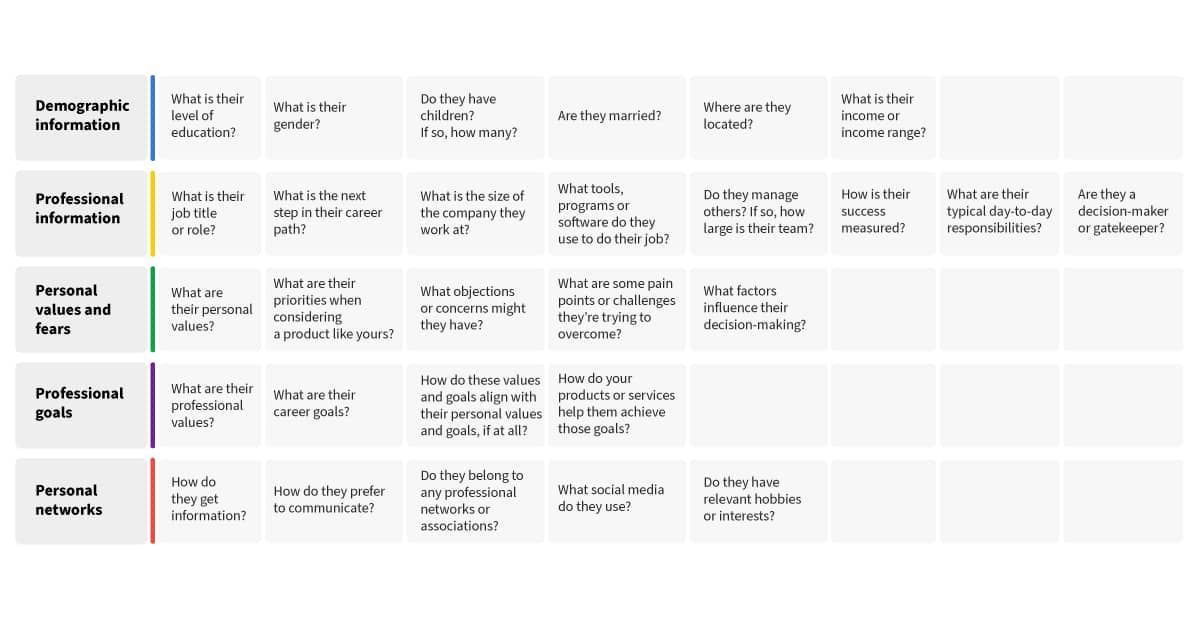
Customer profiling interview questions

If you’re interviewing for the first or the hundredth time, here’s how to get the most insightful customer feedback:

  • Pinpoint a mix of loyal customers and churned ones to interview for a range of opinions

  • Reach out to offer interviews in person, virtually and in group settings so people feel comfortable enough to share experiences

  • Ask open-ended questions about goals, pain points and what drove their decision to buy or unsubscribe

  • Listen for repeated themes like “too expensive”, “too complex” or “easy to use”

  • Note exact words and phrases customers use, as these can be gold for your marketing copy

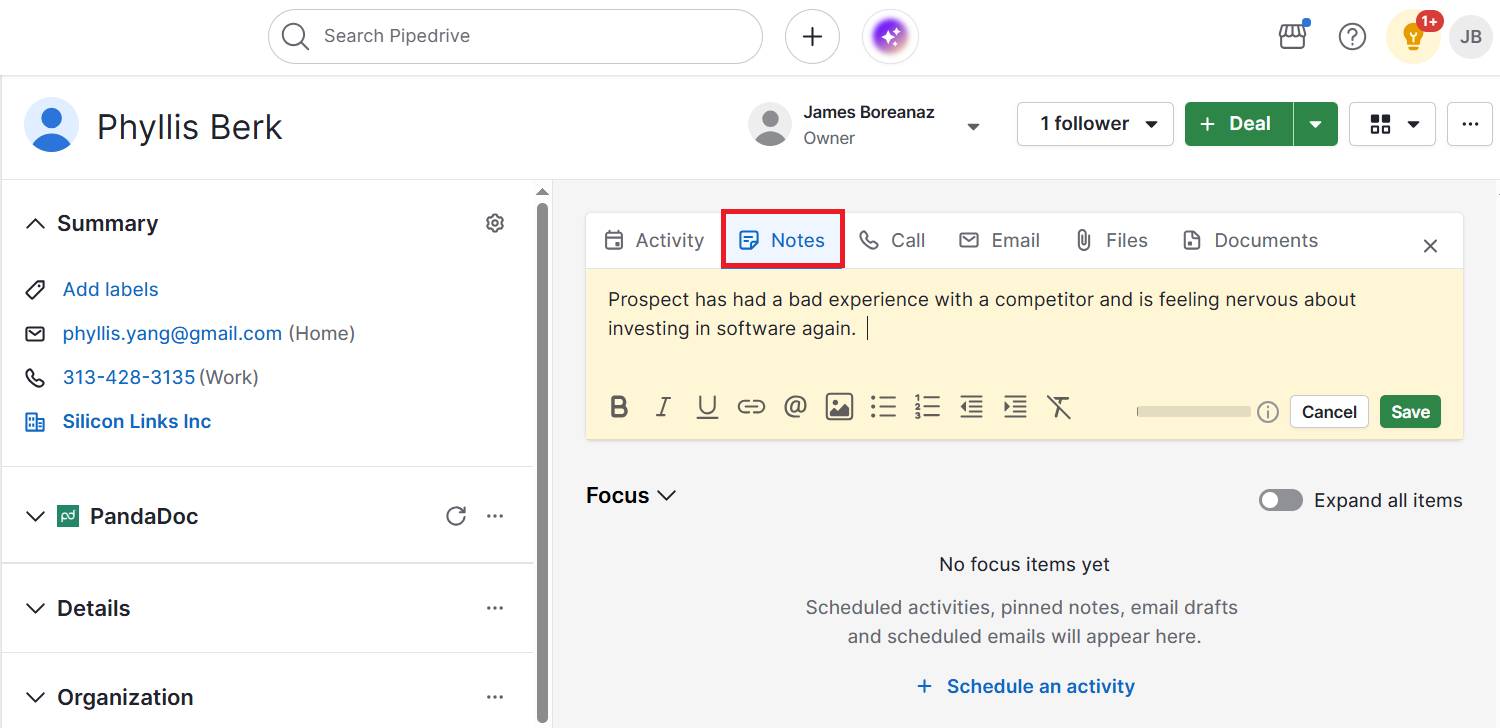
After each interview, add notes directly to the customer’s contact record in Pipedrive:
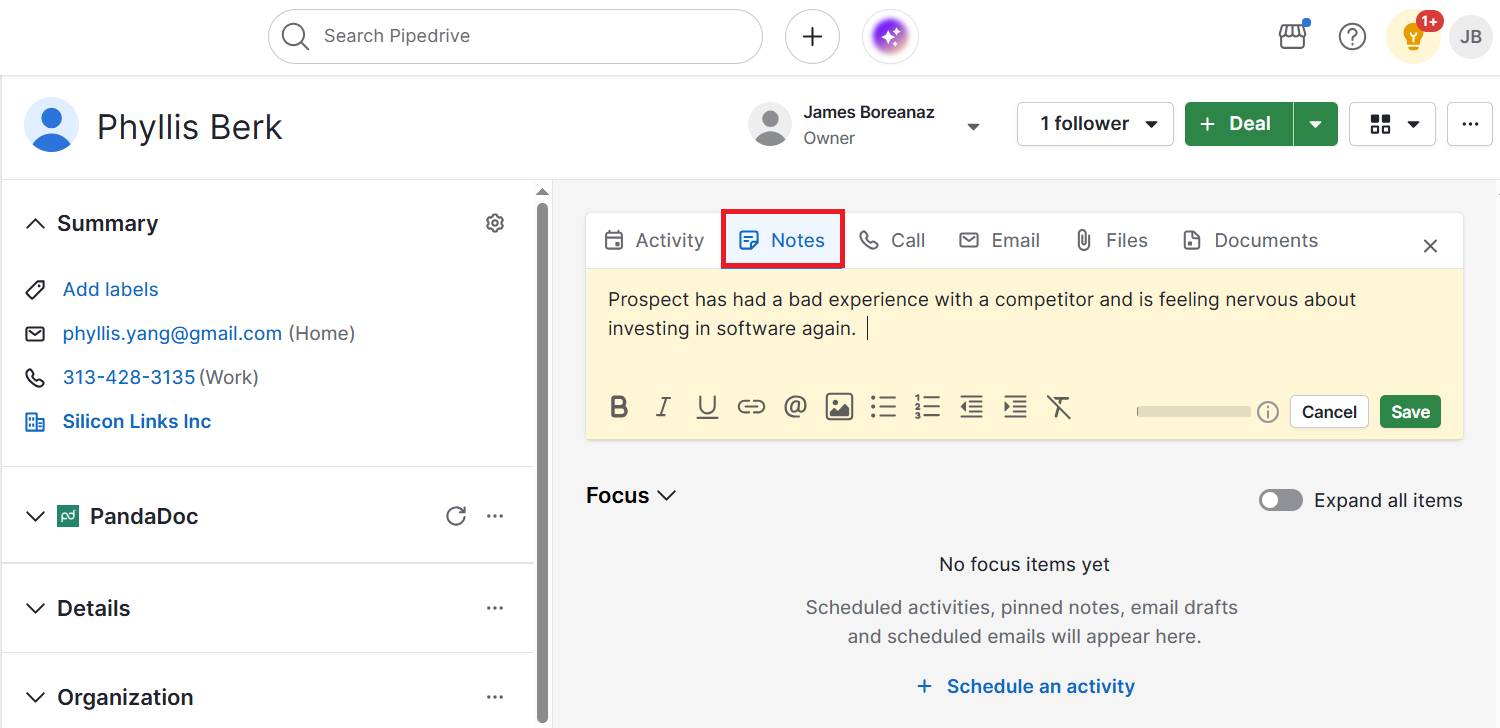
Customer profiling Pipedrive notes

Over time, you’ll create a searchable library of real-world motivations to refine your ICPs or buyer personas.

4. Identify key pain points and goals

Map out the specific problems your segments face and the outcomes they’re chasing. Pain points show what’s frustrating buyers right now. Goals reveal what success looks like in their eyes.

When you understand and include both in your profiles, you can position your product as the bridge between the two. Instead of selling features, you promise far more compelling outcomes.

Imagine an IT services firm that learns small law offices are frustrated by frequent downtime (pain) and want smoother client communication (goal).

They decide to create new targeted marketing strategies around the message:

“Keeping your systems reliable 24/7 so you never miss a client call”

By speaking directly to what matters most, the firm wins attention and aligns its internal processes around reliability. This focus improves both marketing impact and customer satisfaction.

Here’s how to collect and act on these valuable insights:

  • Review interview notes for recurring complaints and frustrations

  • Look at churn surveys or support tickets to spot what drives dissatisfaction

  • Ask customers directly, “What does success look like for you six months from now?”

  • Create a simple table for each segment that outlines the pain point, goal and how you’ll fit it

Knowing your customers’ struggles and ambitions makes your sales team’s approach feel more like selling a solution than a pitch.

By clearly identifying which pains are most urgent across your sales pipeline, you can adjust messaging accurately, prioritize features and refine your ICP.

5. Create accurate customer profiles

Bring your insights from data and interviews into a clear profile that your team can refer to. Each one should read like a snapshot of a real customer segment.

A well-crafted profile keeps sales, marketing and product aligned on who you’re serving, what they need and how to reach them. Without it, small teams risk making decisions based on assumptions or scattered anecdotes.

Profiles can be as in-depth or as brief as you like. However, the insights must be specific to be useful.

Note: While limited profiles (e.g., geographic or firmographic) are crucial for gathering specific insights, combining them into ICPs or buyer personas gives you a well-rounded picture of each customer group.

For instance, a software-as-a-service (SaaS) startup may create a profile called “Growth-Minded Operations Manager” that includes:

  • Background – works at a mid-size logistics company and manages a team of 10

  • Needs – wants to automate manual reporting to save time

  • Objections – worries about high implementation costs

  • Preferred communication channels – responds best to LinkedIn content and webinars

With this customer information, the startup’s sales reps have a clear playbook for outreach and tailoring conversations, while the marketing team knows which channels to double down on.

Here’s how to create and use customer profiles effectively:

  • Give each profile a memorable name for seamless searching (e.g., “Budget-Focused Owner” or “Scaling Startup CTO”)

  • Add background details (e.g., job title, company size, demographics or firmographics)

  • List the top challenges, goals and likely objections to buying

  • Include preferred communication channels to make customer outreach easier

  • Keep it concise to understand notes at a glance (one page per profile is usually enough)

  • Review and update quarterly as you gather new data points

To make things even simpler, download Pipedrive’s customer profile template to structure your profiles.

Fill in each ICP using data from your CRM, interviews and notes.

Download your ideal customer profile template

Download the ideal customer profile template to help your teams sell to the right people

As you refine your profiles over time, update the documents and share them across teams to keep everyone aligned.

Test your assumptions, refresh them with new insights and let them evolve with your customer base.

Fictional B2B customer profile examples to inspire your own

If you haven’t created a customer profile before, fictional examples can help to inspire the phrasing and level of detail to include.

The information will differ depending on the type and relevant factors. For instance, demographic profiles tell you buyer basics like age or income, while psychographic versions reveal attitudes and values.

Here are four examples to help visualize what yours could look like.

Ideal customer profile (ICP) example

An ICP zooms out to the company level, showing which organizations are the best overall fit for your product.

It captures traits like size, industry and business growth stage so you can determine where to focus sales and marketing energy.

For instance, a scaling B2B SaaS company that just raised funding has very different needs than a mature enterprise. An ICP helps you identify which of those contexts is the “sweet spot” for your solution.

Here are the details you could include in yours:

Profile name

Scaling SaaS Startup CTO

Industry

Human resources

Company size

Approximately 50–200 employees

Key needs

Automating employee onboarding and reducing churn

Buying triggers

The company has just raised Series A and is hiring rapidly

Preferred channels

LinkedIn, SaaS founder Slack groups and B2B podcasts

Buyer persona profile example

A buyer persona drills down to the human level (i.e., the individual decision-maker or user inside the company).

While the ICP tells you which business, the fictional persona explains who exactly you need to persuade and how.

For example, the needs and objections of a budget-conscious clinic director will look very different from those of a tech-savvy operations manager.

Use this persona example to tailor messaging to motivations, fears and daily challenges:

Profile name

The Cost-Conscious Clinic Director

Background

Runs a small women’s health clinic

Goals

Keep operations compliant and manage budget tightly

Challenges

Limited staff with a high admin burden

Objections

Concerned about software costs and staff adoption

Preferred channels

Vendor email newsletters and compliance webinars

Download this buyer persona template from Pipedrive to get started creating your own:

Better understand your customers with our Buyer Persona Templates

Use these templates to ensure your solution always aligns with your customers’ interests and needs

Geographic profile example

A geographic profile isn’t just about the pin on the map. It’s about the context of location and how that shapes customer needs.

For example, a rural manufacturer in the Midwest may need reliable logistics and equipment servicing because suppliers are hours away. On the other hand, an urban startup in NYC cares more about office space cost and tech talent competition.

Here are some of the factors to consider:

Region

Pacific Northwest (US)

Urban vs. rural

Rural – towns under 10,000 people

Climate

Rain-heavy, mild winters

Local economy

Agriculture and light manufacturing

Infrastructure

Limited broadband and high shipping costs

Implication

Marketing needs to stress reliable offline support and affordable logistics solutions

Behavioral profile example

A behavioral profile looks past who the customer is and focuses on what they do. It highlights buying habits, product usage and loyalty patterns that reveal how people interact with your business over time.

For SMBs, this often means studying the end user’s behaviors (like repeat purchases, trial-to-paid conversion or churn triggers) rather than just the organization’s processes.

These insights help you predict future actions and design interventions that keep customers engaged:

Purchase frequency

Buys marketing software once every 2 years

Usage patterns

Logs into the platform daily, but only uses reporting dashboards weekly

Decision triggers

Upgrades when the current software limits team productivity

Buying journey

Always researches reviews on G2 and watches YouTube demos before contacting sales

Brand loyalty

Tends to stick with vendors if customer service is responsive

Purchase drivers

Discounts, referrals from peers and strong customer support

Each type of profile captures different dimensions of your audience, from where they’re based and how they behave to what they value most.

Choose a mix that gives you the clearest picture of who buys from you and why. Start simple, then refine over time as you gather more data and insights.

Customer profiling FAQs

  • Customer profiling is creating detailed descriptions of your buyers (e.g., their traits, buying behaviors, needs and challenges) so you can market to similar groups more effectively.

  • While segmentation divides your audience into groups, profiling goes deeper to describe what each group looks like, wants and struggles with.

    Together, these processes help you optimize touchpoints and target the right people to close more deals.

  • Market segmentation splits a broad audience into smaller groups based on shared traits like demographic data, purchase history or location.

    This tactic makes consumer profiling and marketing more relevant and effective.

Final thoughts

Customer profiling gives SMBs the clarity to focus on people most likely to buy, cut wasted spend and design offers that actually resonate.

The key to a successful strategy is having the right technology to automatically collect data and keep it accurate and actionable.

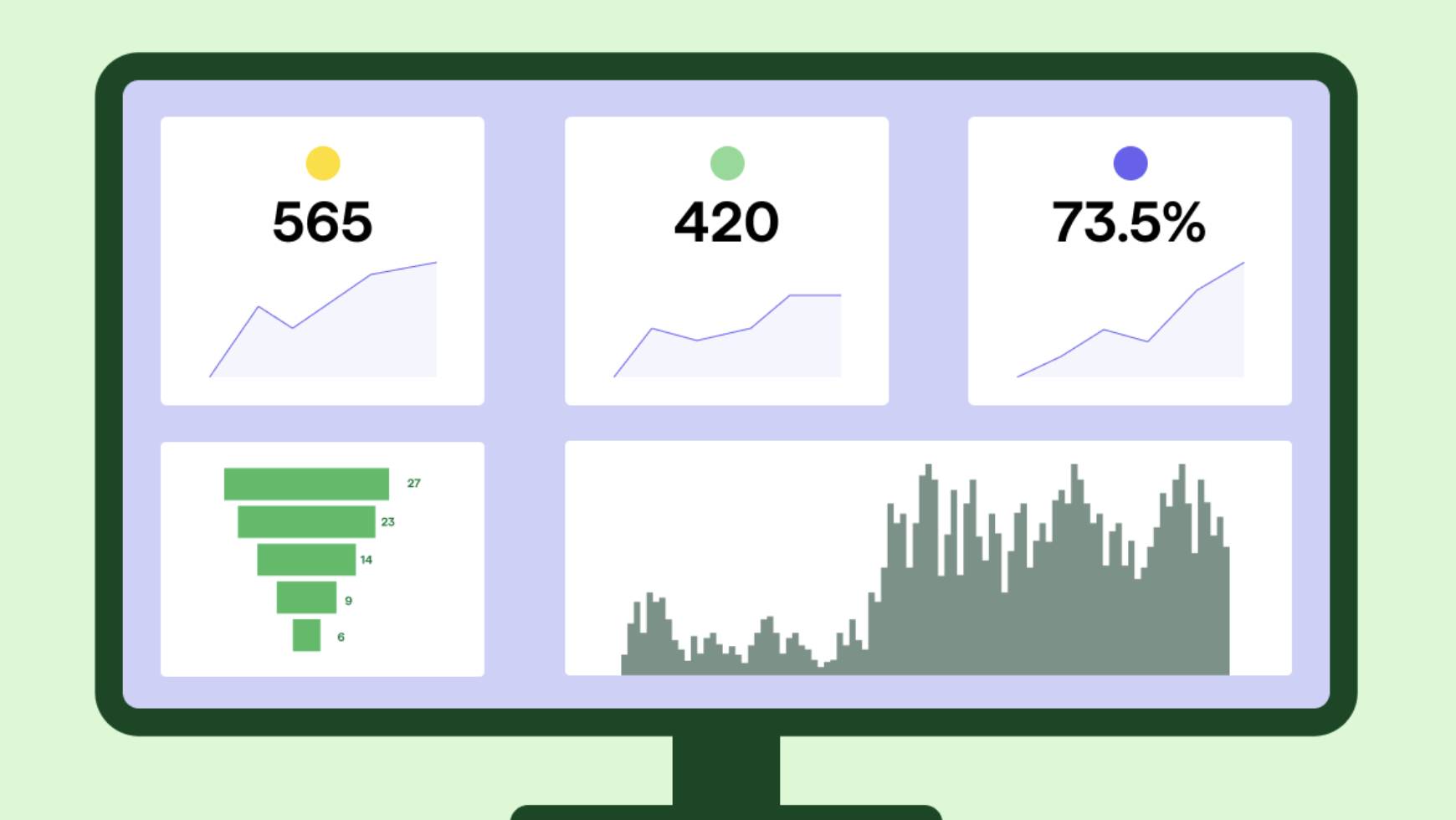
Annual Work Plan Template | Employee Free Work Example

Software Stack Editor · August 28, 2025 ·

An annual work plan template helps teams set clear goals, align on priorities and stay focused throughout the year.

Whether you’re managing a small business or scaling a department, a structured template brings clarity by organizing initiatives, deadlines and ownership in one centralized view.

This annual work plan template outlines what to include in your annual work plan, why it’s a critical tool for strategic execution and how to tailor a free template to match your team’s specific goals and workflows.

Key takeaways from the annual work plan template

  • An annual work plan helps teams break strategic goals into actionable steps with clear owners and timelines.

  • Planning improves focus, accountability and makes progress easier to track and communicate.

  • A template removes guesswork and speeds up alignment for individuals and departments.

  • Explore how Pipedrive connects work plans to real-time visibility and automation so teams stay aligned with a 14 day free trial.

What is an annual work plan?

An annual work plan is a strategic document that outlines your key goals, deliverables and milestones for the year ahead.

It serves as a bridge between high-level performance objectives and the daily work required to achieve them.

Setting expectations early gives teams clarity on priorities and helps them understand how their work supports broader business goals.

A strong annual work plan clearly outlines the goals to be achieved, assigns responsibility for each objective and defines measurable indicators of success.

These elements create structure, promote accountability and reduce ambiguity as projects move forward.

With well-documented priorities and ownership, teams can focus their efforts and contribute with greater clarity and confidence.

The annual Work Plan contains the main activities to be developed within each program component, the estimated allocation of available resources and the expected results.

– UNICEF, 2023

An annual work plan helps teams stay flexible. While the plan provides structure, it should be easy to adjust as priorities shift.

Regular check-ins make it easier to update deadlines, reassign tasks or change direction when needed. The balance between planning and adaptability helps teams stay focused while staying responsive to change.

Why do teams need an annual work plan to stay aligned?

A structured work plan reduces guesswork, aligns stakeholders and improves accountability.

It also encourages teams to forecast resources, risks and timelines in advance. According to Gallup (2025), only 46% of employees clearly know what’s expected of them at work.

An annual plan closes that clarity gap by spelling out priorities, owners and timelines.

Without a plan, teams often fall into reactive mode, jumping between tasks with no clear direction. A reusable template gives you a practical starting point that can be refined year after year.

For managers, a shared work plan is also a valuable communication tool. When it’s tied to business goals or employee development, it builds transparency and trust across the team.

Recommended reading

https://www-cms.pipedriveassets.com/Action-Plan-Template.png

The ultimate guide to creating an action plan template (with examples)

What should I include in an employee’s annual work plan template

The best templates are simple but detailed enough to support planning across functions. Whether you’re using it for an individual contributor or a whole team, include these key sections:

Section

Description

Objectives

Define 3–5 high-level goals aligned with the company or team strategy. These goals should provide focus and direction for the upcoming year.

Key results

List measurable outcomes tied to each objective, such as new product launches or revenue targets. These help quantify success and show whether progress is on track.

Initiatives or tasks

Break objectives down into major projects, campaigns or deliverables. The section should outline the core work required to hit each key result.

Owners

Assign responsibility to specific individuals or teams. Clear ownership ensures accountability and follow-through.

Timeline

Include target deadlines and break down the year by quarters or months. It should help teams pace their efforts and prioritize effectively.

Status

Track the progress of each item: planned, in progress or completed. A quick status check makes it easier to monitor momentum and adjust as needed.

Metrics or key performance indicator (KPIs)

Identify specific metrics or KPIs used to evaluate progress. Ensuring consistency in how success is measured across initiatives.

Dependencies or risks

Note any external factors, blockers or critical dependencies that could delay progress. Highlighting these early helps with proactive planning.

Review dates

Set scheduled check-ins (e.g., quarterly) to revisit the plan. Making the plan dynamic and aligned with changing priorities.

Notes or comments

Use this for updates, stakeholder feedback or context during execution – especially useful during review meetings or cross-functional collaboration.

How often should an annual work plan be reviewed and updated?

An effective annual work plan should be a living document. While it sets direction for the year, quarterly reviews are essential for keeping it relevant and responsive to changing priorities.

As McKinsey’s Sven Smit notes, “a once-a-year strategy review is poorly suited to the dynamic nature of today’s business environment.”

Use these regular check-ins to evaluate progress against key deliverables, uncover potential blockers and adjust resource allocation where necessary.

They’re also an opportunity to reflect on lessons learned and correct before small issues become larger setbacks.

Make the work plan visible and collaborative. Embed it into your customer relationship management (CRM) tool, project management tool or knowledge management software so stakeholders can access it easily.

Schedule recurring team reviews to walk through updates and surface risks early.

Regular plan reviews strengthen accountability and foster adaptability, helping to keep teams aligned through periods of growth or change.

Recommended reading

https://www-cms.pipedriveassets.com/blog-assets/image1_2025-07-23-122438_gxrs.png

8 steps to conducting an annual sales review

Note: In Asana’s State of Work Innovation 2024 report, workers spend 53% of their time on busywork, such as status chasing, searching for information and coordination. Keeping your annual plan centralized and visible helps cut that busywork, so more time goes to strategic execution.

How can I get stakeholder buy-in and keep our annual work plan on track

A plan only works if the team is behind it. Involve team members early so they have a hand in shaping objectives, helping build ownership and surface practical input that top-down planning might miss.

Once underway, maintain momentum with regular check-ins. These can be short monthly or bi-weekly updates tied to key milestones. Use them to track progress, adjust timelines and celebrate small wins.

Make progress visible. Share updates through dashboards or team tools and highlight achievements in leadership or all-hands meetings.

When plans are collaborative, visible and regularly reviewed, they become strategic tools for ongoing progress.

Recommended reading

https://www-cms.pipedriveassets.com/Sales-Professionals.jpg

How to build a winning team of great sales professionals

How Pipedrive supports annual work planning

Annual work plans often live in static docs, making it hard to track ownership, progress or results.

Pipedrive helps teams bring those plans to life by turning strategic goals into visual, trackable workflows. With customizable pipelines, users can map out initiatives, assign owners and define key milestones across the year.

Each stage in a pipeline report can represent parts of the annual plan, like planning, execution or review.

At the same time, custom fields track metrics, deadlines and responsibilities, making it easier to stay aligned and ensure nothing falls through the cracks.

You can assign owners, set reminders and use workflow automation to trigger updates as milestones are reached.

Dashboards and reports offer visibility into what’s working, where blockers exist and how teams are progressing across the year.

  • An annual work plan template is a structured document that outlines an organization’s or individual’s key objectives, tasks, timelines and responsibilities for the year.

  • Using a template streamlines planning, increases accountability and makes it easier to monitor progress.

  • Key components include objectives, key results, specific tasks or initiatives, assigned owners, timelines and status tracking.

Final thoughts

An annual work plan is a tool that brings clarity, structure and alignment to your team’s efforts.

When created thoughtfully, it helps employees prioritize meaningful work, track progress throughout the year and understand how their contributions tie back to company goals.

The most effective plans aren’t static. Revisit them often, adjust as priorities shift and use them to foster transparency across your team.

With a flexible template and a disciplined planning rhythm, you’ll drive momentum, maintain accountability and support stronger business outcomes.

Scoring in Pipedrive: Prioritize the right deals faster

Software Stack Editor · August 28, 2025 ·

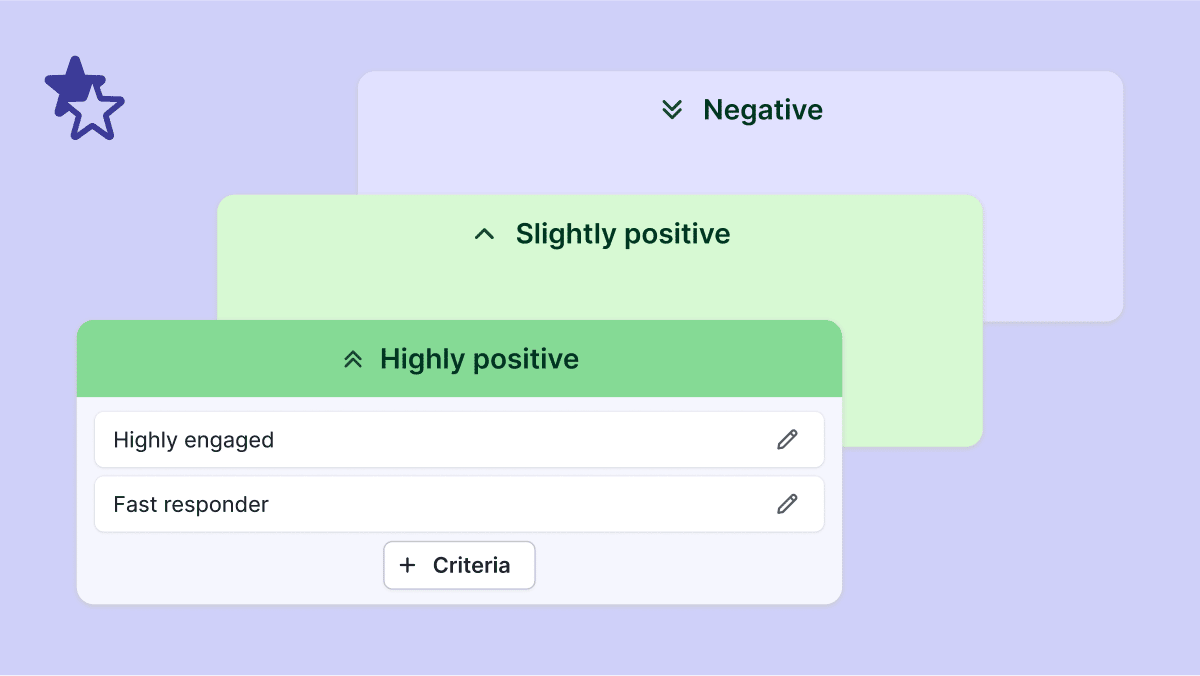
Tired of guessing which deals deserve your attention? With custom scoring in Pipedrive, you can prioritize the opportunities most likely to close, based on rules you define.

No more manual workarounds – just a clear, data-backed way to keep your pipeline moving. Custom scoring is available on Premium and Ultimate plans.

Key takeaways for custom scoring

  • With custom scoring, you can define the rules that highlight high-potential opportunities, so your team spends less time guessing and more time closing.

  • Scores update automatically as deal data changes, giving you a clear, always-fresh view of your pipeline without manual effort.

  • Custom scoring works alongside the Pulse toolkit to give you a complete system for smarter prospecting and deal management.

  • Start your 14-day free trial and experience how custom scoring helps you close more deals, faster.

What is CRM scoring in Pipedrive?

Custom CRM scoring is a built-in feature that helps sales teams evaluate the likelihood of closing deals.

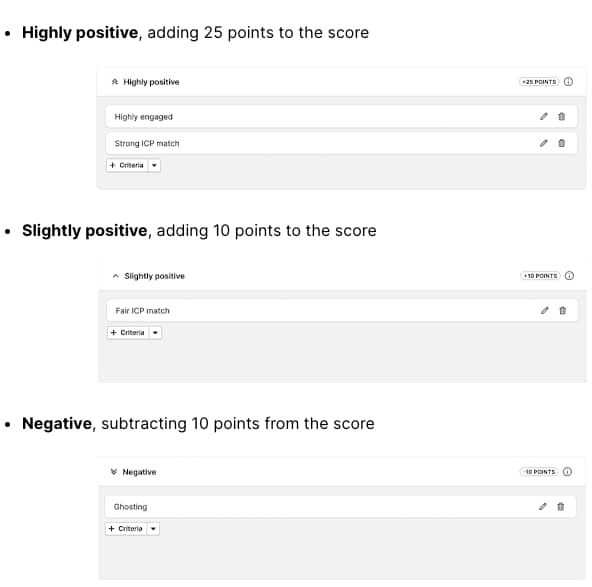
Instead of spreading your time thin across every opportunity, you can assign points to the factors that matter most to your business, such as deal size, stage, activity history or engagement. The higher the score, the stronger the deal.

Why use scoring in your CRM?

Why is Piepdrive the best CRM for scoring high-potential deal opportunities

When your pipeline is full, it’s easy to get distracted by volume instead of value. Without a clear way to prioritize, salespeople often waste hours chasing deals that won’t convert, while high-potential opportunities slip through the cracks.

Scoring helps solve this problem by turning your CRM into a smarter decision-making tool.

With custom scoring in Pipedrive, you can:

  • Spot best-fit deals instantly. No more relying on gut feeling. Scores surface the opportunities that meet your ideal customer profile, so you can zero in on deals that are most likely to close.

  • Stay productive and focused. Instead of spreading your attention across every deal, you can cut through the noise and dedicate your time to the opportunities that truly matter. That means fewer dead ends and a more streamlined sales cycle.

  • Boost win rates and revenue. By consistently prioritizing the right deals, you reduce wasted effort and increase the likelihood of hitting your targets. Over time, this creates a more predictable and scalable sales process.

  • Keep your pipeline lean and healthy. Scoring doesn’t just help with individual deals – it also helps teams manage the big picture. By filtering out low-potential deals early, your pipeline stays clean, clear and focused on opportunities that move.

Scoring turns your CRM from a passive database into an active guide that shows you where to spend your time for maximum impact.

How does Pipedrive’s scoring work?

Scores are fully customizable to your sales process. You can:

  • Define criteria (positive or negative) that reflect your business.

  • Combine conditions using AND/OR logic to mirror real-life sales scenarios.

  • Preview scores instantly to see how each rule impacts deal priority.

Once activated, scores update automatically as deal data changes – giving you an always-fresh view of your pipeline.

How to set up criteria using Pipedrive's Scoring feature

How to start using Scores

Getting started is simple:

  1. Head to Pulse > Scores

  2. Create a new score for your pipeline

  3. Set up criteria, test it on a sample deal and activate

From there, your team can view scores in deal lists and detail views – with full transparency on how each score was calculated.

Scoring as part of the Pulse toolkit

Scoring is part of Pipedrive’s Pulse toolkit, a set of features designed to help you focus on the right opportunities and work more efficiently. Together, these tools give you a smarter way to prospect, qualify and close deals.

The Pulse toolkit includes:

  • Feed – a real-time workspace where you can manage all your deal-related tasks in one place

  • Data enrichment – instantly complete missing company and contact details, making it easier to qualify leads and move them forward

  • Custom Scoring – rank deals based on the criteria that matter most for your business

  • Sequences – keep follow-ups consistent and timely without added complexity

Recommended reading

https://www-cms.pipedriveassets.com/Pipedrive-Pulse-Feed.jpg

Pulse Feed: The smart sales workspace built into Pipedrive

Unlock efficiency and close more deals

With custom scoring in Pipedrive, you don’t just manage your pipeline – you optimize it.

By focusing on the right deals at the right time, your team can shorten sales cycles, boost revenue and eliminate guesswork from decision-making.

Want to go deeper? Visit our Knowledge Base to learn more about setting up and using custom scoring in Pipedrive

Best CRM software for accounting firms for 2025

Software Stack Editor · August 27, 2025 ·

Chasing down client documents during tax season or scrambling to remember which associate sent that last financial report? That’s the reality for too many accounting firms still relying on email chains and memory.

Accounting CRM software fixes this by giving your team one place to gather client data and automate repetitive client work, from payroll reminders to audit prep. The CRMs below are built for accountants who want a business that finally runs itself.

Why do accountants need CRM software?

Meet Sarah.

For years, she ran a solo accounting practice in Birmingham, keeping up with client work using color-coded spreadsheets and endless email threads.

It worked fine until her reputation spread, her client list doubled, and she hired two associates just to keep up with new requests. Suddenly, deadlines started slipping. Documents got lost in inboxes. She spent more time searching for client data than actually advising clients.

That’s when Sarah realized she needed real help.

For many accountants, the first instinct is to hire more people to handle the growing workload. But the real fix isn’t always adding headcount.

A CRM is exactly what Sarah needs to regain control and keep her business moving forward.

The right platform will offer features like:

  • Bulletproof client data protection. Sarah�’s team handles payroll runs, tax returns, and confidential financial reports. Her CRM needs airtight security and granular permissions, so nothing sensitive ends up in the wrong place.
  • Workflows customized for accounting. Every single day, Sarah is dealing with recurring services, VAT filings, and compliance reviews. She needs customizable pipelines that track every task and keep her team ahead of deadlines.
  • Automation that tackles the admin headache. Her CRM should chase missing receipts or send reminders for quarterly filings, letting Sarah’s staff focus on client work instead of busywork.
  • Integrations that remove manual effort. Integrations that actually save a lot of time. When QuickBooks, Xero, and her email just talk to each other, Sarah can stop copying numbers from one screen to another. Everything’s where she needs it, and those tedious double-entries can quickly become a thing of the past.
  • Easy onboarding, even when the team grows. With new hires each tax season, Sarah’s CRM makes onboarding painless with clear user roles and no steep learning curve.
  • Reporting that tells the whole story. From one dashboard, Sarah can see which clients need attention, where projects stand, and which services are driving her accounting firm’s growth.

Now that Sarah sees how much time and frustration she can save, she’s ready to make the switch to a CRM.

The only question left is: which CRM will set her up for success?

Best CRM software for accounting firms to use

Capsule CRM – best accounting CRM software

Accountants deal with enough complex rules, deadlines, and client demands. A CRM shouldn’t add to the headache. Capsule CRM is built to simplify your work, not slow it down.

Why accountants choose Capsule:

  • Clean, intuitive interface. Forget about training marathons or confusing menus. Just log in and get going.
  • Custom fields and tags. Track client type, compliance dates, key contacts, and even personal milestones, so every client feels understood.
  • Complete client history. Every email, phone call, document, and note is saved in one place. No more searching inboxes before that big client meeting.
  • Never miss a deadline. Automated reminders and task lists keep you and your team on top of VAT, payroll, and filings.
  • Project management made easy. Assign and track tasks for both internal workflows and client-facing work. Everyone knows what’s next!
  • Free CRM version. Capsule offers a fully functional free plan for accounting firms, so you can test it at your own pace. Want more? Paid plans start after a 14-day free trial, no credit card required.

Integrations accountants actually use:

  • Xero, QuickBooks Online, FreshBooks, and FreeAgent. Sync client financials and eliminate manual entry. Capsule becomes your hub for business and client info, with numbers always up to date.
  • Email integration. Connect Gmail, Outlook, Transpond, and more – so messages, client updates, and files stay linked to the right client automatically.

Trusted by hundreds of accounting firms worldwide, Capsule proves that the right CRM doesn’t need to be complicated or expensive – it just needs to work for accountants.

Try Capsule for free.

Copper CRM

Copper is an integrated CRM platform that brings customer relationship management into the Gmail inbox. It’s a practical software solution for accounting businesses already relying on Google Workspace for client communications and business processes.

Where Copper fits for accounting firms:

  • Client management, simplified. Copper automatically pulls all your client information, emails, and meeting notes into a central database, so your entire team has instant access to past client interactions.
  • Automated workflows for busy professionals. Copper cuts down on repetitive tasks and administrative work by capturing client communications and organizing client data without manual entry.
  • Lead management and business development. Copper’s pipeline and client acquisition tools help accounting firms generate leads and track the sales process. It’s useful for expanding your client base or marketing campaigns.
  • User-friendly CRM features. Accountants get valuable insight into customer relationships and upcoming business opportunities, all with a clean interface that fits naturally into daily work.

Limitations for the accounting industry:

  • Accounting CRM tool gaps. While Copper supports client management and customer satisfaction, it lacks direct accounting software integration (no QuickBooks integration) or features tailored for financial data, compliance, or complex accounting processes.
  • Basic features for document management. Attachments are stored in Google Drive, but there’s no structured content management system for client files or audit trails that accountants often need.
  • Reporting. Analytics are sales-focused, so monitoring accounting deadlines or recurring compliance tasks is less efficient than with a purpose-built accounting CRM.

Pricing: Starts at $29/user/month. No free CRM version, but offers a free trial. Read more about Copper CRM pricing.

Insightly – workflow-driven CRM for accountants who need project power

Insightly is a customer relationship management system known for strong workflow automation and project tracking, making it a tool for those who want more than just contact management. It helps accounting firms streamline complex tasks, improve client engagement, and handle administrative work with less friction.

Where Insightly fits for accounting firms:

  • Complex automation. Insightly’s process automation tools simplify recurring administrative tasks and help medium-sized businesses track projects from proposal to completion.
  • Sales pipeline and client engagement. The platform makes it easy to manage prospective clients and follow up with loyal clients through a visual sales pipeline. You can segment clients by service type, engagement level, or financial needs.
  • Integrated project and client management. Keep all client engagement activities and project milestones in one place, giving your team a clear view of where things stand, even with complex tasks or tight deadlines.
  • Custom email templates. Use built-in email templates to communicate efficiently or send reminders right from the CRM accounting software interface.
  • Mobile device access and client portal. Accountants can update records, check project status, and connect with clients wherever they are.

Limitations for the accounting market:

  • Accounting integrations. While Insightly works well as a customer relationship management tool, it doesn’t natively integrate with most accounting software, limiting real-time sync for financial documents and client invoices.
  • Personal preference and setup. Some accountants may find the setup process or feature set more complex than needed, depending on their team size and workflow style.
  • CRM processes focus. The platform is strong on project delivery and CRM processes, but firms looking for deeper accounting CRM solutions – like compliance tracking or financial reporting – might find it limited.

Pricing: Starts at $29/user/month, with advanced features on higher tiers. Offers a free trial, but no free CRM version.

Zoho CRM – customizable CRM for accountants

Zoho CRM is a flexible customer relationship management system with deep customization and integrations, ideal for accountants handling a broad range of clients and services.

Where Zoho CRM fits for accounting firms:

  • Highly customizable CRM processes. Tailor Zoho to your accounting business with custom modules, fields, and automation.
  • Strong integrations. Seamless sync with accounting software like QuickBooks Online, plus Zoho Books for firms wanting an all-in-one solution.
  • Sales automation. Automate repetitive tasks, organize client data, and keep your sales pipeline moving for both new and existing clients.
  • Client portal and mobile access. Give clients a secure portal for sharing documents and checking status. The mobile device app means accountants stay connected and responsive, even outside the office.
  • Versatile for the accounting market. Works for everything from small firms focused on financial cents to larger practices that want to scale up their customer relationship management.

Limitations for accounting firms:

  • Complex setup. The flexibility means more decisions and a longer setup – best for teams who have time to build out workflows.
  • Not accounting-specific. While powerful, Zoho CRM isn’t built exclusively for the accounting industry. Some accounting CRM software features may require workarounds or extra apps.
  • Personal preference matters. Firms that want something ultra-simple or with out-of-the-box accounting features may find Zoho’s options a bit overwhelming.

Pricing: Starts at $25/user/month, with a wide range of features at higher tiers. Offers a free trial and a free CRM version with very basic features. Read more about Zoho CRM pricing.

Nimble – lightweight CRM for accountants focused on relationships

Nimble is a simple, relationship-driven CRM, best for accountants who prioritize networking, client interactions, and managing prospective clients – but without the overhead of a big platform.

Where Nimble fits for accounting firms:

  • Contact enrichment. Nimble automatically pulls in client information from emails and social networks, helping you keep up-to-date records without heavy admin work.
  • Easy engagement tracking. Accountants can monitor client engagement, log notes, and manage basic workflow automation for client communications.
  • User-friendly and mobile. Nimble works well on any mobile device and has a low learning curve, making it accessible for small accounting businesses or solo practitioners.
  • Ideal for simple management. For firms that need a streamlined customer relationship management system, Nimble makes it easy to keep up with ongoing conversations.

Limitations for accountants:

  • Limited accounting CRM tool features. Nimble doesn’t offer deep automation, complex tasks, or native accounting software integrations – so companies handling complex tasks or regulatory work will feel the limits quickly.
  • Not built for accounting industry compliance. No tools for document management or automated reminders for compliance deadlines.
  • Personal preference. Best for those who value quick contact management and don’t need robust process automation or a client portal.

Pricing: Starts at $24.90/user/month, with a free trial available. Read more about Nimble CRM pricing.

Conclusion

Apologizing for missed follow-ups? Your clients expect better, and so should you.

Capsule CRM was built for accountants who want their data in order, deadlines under control, and zero chaos at tax time. Why let admin drag down your billable hours? Give Capsule a try and let your workflow finally… work for you.

Frequently Asked Questions

Many accounting firms choose a CRM system that doesn’t just organize contacts but actually simplifies client management and centralizes data. The best CRM in the market for your firm will be the one that serves as a reliable customer management database, integrates with your accounting tools, and streamlines both workflow and client communications. Capsule is often recommended thanks to its ability to bring order and visibility to client relationships – all while helping firms scale.

By definition, CRM software in accounting is a customer relationship management tool designed to store, organize, and track all your client information in one system. It goes beyond simple contact lists by helping firms follow up on projects, automate routine admin work, and keep records up to date – all from a single platform. The best options in the CRM market for accountants will also link with bookkeeping apps, manage tasks, and support compliance.

In accounting, client management refers to the systems and processes firms use to track every aspect of their client engagements – from onboarding and data collection to ongoing advisory and compliance work. A strong customer management database makes this easier, providing a central place for all records, interactions, and workflow tracking.

Most modern accounting firms use a CRM system or customer management database as the primary storage for client data. This helps keep sensitive information secure, organized, and accessible for the team.

9 best client management software for 2025

Software Stack Editor · August 27, 2025 ·

image

Winning more clients is exciting – until you realize each new project adds a layer of chaos. One client wants every update by phone, another buries you in email chains, and a third expects you to remember every detail from a meeting six months ago. Without a system to keep it all straight, the work that should grow your business starts draining your focus.

Fortunately, that chaos is manageable with the right client management software. The harder part is choosing one when the market is crowded with options. That’s what we’ll break down today.

What to look for in client management software

You can’t drop the ball when it comes to your business, especially when it comes to paying clients. The right software helps you avoid that by handling the details you can’t keep in your head.

Here are the features that make it possible:

  • A single client record that tells the whole story. When a client calls out of the blue, you shouldn’t be scrambling for details. A proper client record ties together contact info, past conversations, proposals, invoices, and even those quick notes you jotted down after a meeting.
  • Conversation history that saves you from “remind me where we left off?” Clients hate repeating themselves. With a full history, you can jump back into a paused project as if their last call was yesterday.
  • Pipelines that mirror your real relationships. Not every client is a “deal.” Some are long-term retainers, others are one-off projects. A flexible pipeline lets you see where each relationship stands and who needs attention now.
  • Reminders that protect renewals and goodwill. A single missed renewal email can cost you a contract. Automated reminders tied to clients make sure you never lose business because you forgot to check in.
  • Context on the go. In client management, half the work happens outside the office: at sites, on calls, in coffee shops. A mobile app that syncs instantly means you can update a record before you even get back to your desk.
  • Integrations that keep money and messages in sync. When invoices, emails, and project updates all connect back to the client record, you cut down on errors and look more professional in every interaction.

These features are non-negotiable if you want software that truly supports client relationships. But they’re not the whole picture. You’ll also need to weigh things like pricing, ease of setup, and how well a tool fits into your existing workflow. With that in mind, let’s look at the best client management software options available in 2025.

The best client management software for relationship and project management in 2025

Capsule CRM

Capsule CRM is designed to feel effortless from the start.

It gives you a clear view of your contacts and sales pipeline without overwhelming you with features you’ll never use.

Adding new clients or tracking sales operations takes only a few clicks, so your team spends more time with clients and less time figuring out software. For small businesses, it’s an efficient way to stay organized and still benefit from smart touches like workflow automation and integrations.

Features that make client management a breeze

  • Sales pipeline in Kanban view: move deals through stages with a simple drag-and-drop. You always know which opportunities are moving forward and which need attention.
  • Custom dashboards: track the metrics that matter to your business, from conversion rates to team activity, without getting through complicated reports.
  • Workflow automation (Tracks): set Capsule to handle routine follow-ups for you. For example, if a lead goes quiet for five days, Capsule can automatically schedule a reminder email and a task to check in.
  • Contact management with enrichment: keep every client detail in one place, searchable in seconds. Even if you only know a company name, Capsule can help fill in missing data so outreach stays effortless.
  • Integrated email tools: connect directly with Gmail or Outlook to send templates or log messages. With the Transpond integration, you can also segment contacts and run simple automated campaigns.

Pricing: starts at $18 per user per month, and there is a free plan available

Capsule isn’t just easy on paper: real users back it up. Jamie D., a web developer who’s relied on Capsule for more than a decade, calls it “user-friendly and rapidly improving” and highlights how the tool makes staying on top of opportunities and projects effortless.

Source

He also points to the flexible filtering options, steady stream of new features, and responsive support team as reasons his small business sticks with Capsule year after year.

Try Capsule CRM today

Monday Sales CRM

Monday Sales CRM is all about flexibility. Instead of forcing you into rigid sales pipelines, it gives you a board-based system you can shape around the way your team actually works.

For businesses that want client management and project management in one place, it feels like a natural fit.

Features

  • Customizable boards: build your own workflow from scratch. Whether you’re tracking deals or managing delivery, the board adapts to your process.
  • Automations: cut down on busywork with trigger-based actions.
  • Multiple views: switch between views depending on what you need – a high-level overview or deadline-level detail.
  • Proofing tools: leave comments directly on files and designs, so review cycles move faster.

Pricing: from $12 per user/month for the Basic plan.

Read more about Monday CRM pricing.

While powerful, Monday does have a drawback: support can feel limited if you hit a technical roadblock during setup.

Source

Zoho CRM

Zoho CRM is part of a larger ecosystem, which makes it especially appealing if you’re already running tools like Zoho Desk, Projects, Campaigns, or Mail.

Everything can be integrated into one dashboard, so sales and marketing can work from the same source of truth. For teams that value automation and end-to-end visibility, Zoho offers a lot of firepower without forcing you to stitch together different platforms.

Features

  • Multi‑contact accounts make it easy to manage customer interactions when you have multiple contacts at one organization.
  • Quote & invoice generation from inside the CRM will make sure that every offer is followed up with a quote and/or invoice.
  • Workflow automation lets you create and manage recurring tasks and schedule activities so you don’t accidentally forget to follow up or check up on.
  • Zoho Projects integration allows departments to easily collaborate with each other.

Pricing: starts at $14 per user per month for the Standard plan

Although powerful, you may find Zoho a bit dated in terms of UI and UX, which is a recurring theme in Zoho products:

Source

Pipedrive

Pipedrive is a CRM built by salespeople, for salespeople, and it shows.

Its core strength is a visual pipeline that makes it obvious where every deal stands. Pipedrive offers small businesses a simple dashboard to manage follow-ups and maintain revenue.

Features

  • Drag-and-drop sales board: track deals visually without advanced sales analytics.
  • Smart reminders: get nudges for follow-ups so opportunities never go cold.
  • Forecasting & reporting: predict pipeline performance by analyzing past data and adjust strategy when you’re off pace.
  • 500+ integrations: connect Pipedrive with the invoicing, marketing, communication, or project tools your team already uses.

Pricing: from €14 per user/month (Lite plan, billed annually).

Pipedrive shines in its simplicity. But if you’re looking for deeper functionality, you may find those features less refined than dedicated platforms.

Source

HubSpot

HubSpot CRM has become the go-to starting point for many small teams because it delivers plenty of value before you ever pay a cent. The free plan covers enough to get a small business running on a professional system. As you scale, HubSpot lets you plug in various elements to build a full customer platform.

Features

  • Shared inbox & contact management: keep every email and call tied to the right client, so your team always knows what’s been said and by whom.
  • Deal tracking: see how many opportunities are open and where they are in the pipeline.
  • Dashboard reporting: you get a high-level view of performance and activity across accounts, even in the free CRM plan.
  • Modular tool stack: expand beyond CRM with add-on hubs.

Pricing: free forever for the base CRM; paid plans start at $9/seat/month for the Starter Customer Platform.

The trade-off? While the free plan is generous, HubSpot can get pricey as your team grows and you start adding advanced features.

Source

Insightly

Insightly stands out because it doesn’t stop at sales – it helps manage what comes after.

For agencies, consultants, and service-based businesses, it’s a true “lifecycle CRM” that gives users a single place to handle sales and client communication.

Features

  • Project tracking lets you link sales opportunities to delivery tasks without leaving the CRM.
  • Automation lets you save time by setting up triggers for tasks that matter to you. You can define a trigger and assign one or more automated actions.
  • Ticket management allows agents to manage client issues and respond directly in the CRM. When customers reach out, Insightly automatically creates a ticket that stores all the client communication history.
  • Custom alerts remind teams of deadlines or key updates relevant for your unique sales process.

Pricing: free for up to two users; paid plans start at $29 per user per month for the Plus plan

The problem with Insightly is that to get access to all of the powerful features, you need to go through a lengthy learning phase:

Source

Keap

Most CRMs stop at contact management. Keap keeps going: it handles the messy parts of running a service business – scheduling, billing, and routine follow-ups – alongside your sales pipeline.

Features

  • Contact management: keep every client conversation in one place for full context and clarity for your team.
  • Calendar booking: let clients self-schedule with just a few clicks, cutting out the usual email back-and-forth.
  • Financial management: create sales invoices and accept payments directly in Keap.
  • Automation sequences: set up workflows for repetitive tasks, such as sending welcome emails or triggering reminders after sign-up.

Pricing: starts at $249/month for two users and up to 1,500 contacts.

Keap’s is a convenient all in one platform that can do it all. The flip side is cost: it’s significantly more expensive than most CRMs, and many users flag pricing as the biggest drawback:

Source

Zendesk

Zendesk Sell is the natural fit for teams already using Zendesk for customer support.

It brings sales into the same ecosystem, so reps and agents can work from a shared sales playbook. For companies that value continuity between landing a deal and keeping that client happy, Sell is a logical extension.

Features

  • Sales overview: shape your pipeline to match the way your team actually sells.
  • Forecasting tools with live dashboards: track revenue expectations and deal volume in real time, broken down by rep or sales stage, so leadership isn’t flying blind.
  • Complex email integration: every sent or received email is automatically tied to the client record, with templates available right inside Gmail or Outlook.
  • Trigger-based workflows: assign tasks or route leads on autopilot.
  • Deep Zendesk integration: client context flows between sales and support, so a rep closing a deal and an agent handling a ticket see the same history.

Pricing: starts at $19 per user per month for Zendesk Sell Team

While Zendesk Sell delivers on integration, reviews often note it feels less polished than Zendesk’s core support tools. Bugs and slow support responses are recurring complaints:

Source

Freshsales

What happens when a client reaches out through one channel and your team misses the context from another? Freshsales prevents those gaps by pulling every interaction into a single view.

Built as a support-first CRM, it helps businesses respond quickly and keep sales and support on the same page.

Features

  • Unified ticketing: instead of using separate inboxes, Freshsales places every client request in one queue for faster handoffs.
  • Rule-based routing: create smart conditions that decide where tickets go. A subject line with “refund” can land directly with the refund team, while urgent cases jump straight to the priority list.
  • All-channel visibility: conversations from email, chat, social, and phone flow into the same record, so your team sees the whole story instead of piecing it together from various tools.
  • Built-in safeguards: with GDPR/HIPAA compliance, Freshsales includes the security layers needed in industries where data handling matters most.

Pricing: starts at $9 per user per month for the Growth plan

Freshsales gives strong support coverage at an accessible price point. But if your workflows require deep customization, expect to spend extra time configuring things manually:

Source

A bad client management platform will make you jump through hoops to learn all the advanced features and make it work for your use case. A great one helps you get more sales through the door and removes repetitive tasks standing in the way of your productivity.

If you’re looking for the best client management software that can help you as soon as today, get Capsule. It’s easy to use, has a generous free plan, and features to make your sales process as successful as possible.

Ready to spend more time building relationships and less time on admin?

Start with Capsule’s free plan today.

How to price a business for sale: 8 factors that impact valuation

Software Stack Editor · August 27, 2025 ·

image

When most business owners start thinking about selling, the first question they ask is “What’s my business worth?” It feels simple: you look at annual revenue, apply a multiple, and you’re done. But the reality is more complex.

The right price isn’t only about numbers on a balance sheet. It’s about how those numbers are presented, how transferable your systems are, how involved you are, and even how prospective buyers feel about the future of your company.

That’s why a proper business valuation goes beyond formulas and gets into factors that reveal the true value of your business.

We spoke with entrepreneurs, business brokers, and valuation consultants who’ve gone through the process firsthand. They shared not only which business valuation methods matter (like the discounted cash flow method or comparable sales) but also the unexpected details that shaped their final selling price.

Here are eight expert-backed factors that can impact how to price a business for sale.

#1 Organized financial statements make your business more valuable

Financial clarity often determines how confident buyers feel about a deal. Michael J. Spitz, CPA and principal at Spitz CPA, has seen valuations drop quickly when financial statements are messy or inconsistent.

“Buyers will cut offers by 20–30% if they can’t trust the numbers or if they see practices that obscure performance,” says Michael. “The best approach is to prepare at least 18 months in advance, so your records reflect consistent reporting.”

He recalls working with a Phoenix property management company where the owner expected $1.2M based on $400K in annual earnings. “The business had mixed personal investments with operating accounts for years,” Michael explains.

“What preserved the sale was the owner’s vendor relationships and long-term maintenance contracts. Buyers valued that operational stability at $950K, even though the books took months to untangle.”

Michael emphasizes that clean financial records and normalized expenses create credibility.

Adjusting for seller’s discretionary earnings, excess compensation, and personal expenses makes it easier for potential buyers to see the fair market value.

#2 A smooth client handover can increase the sale price

Revenue tells part of the story, but how easily it transfers to the next owner matters just as much. Liam Derbyshire, founder of Influize, discovered this firsthand when selling his first boutique marketing agency based in Bristol, UK.

“The buyers were nervous about losing key accounts after the handover,” Liam says. “I built a 90-day client onboarding and relationship-transfer plan. That added nearly 15% to the final price.”

He also stresses that the value of your business should be framed in a defensible range rather than a single number. “I went to market with a $1.1M–$1.3M range. It gave me room to negotiate without undercutting my minimum.”

For business owners, documenting how customers and employees will transition is as important as highlighting cash flow. A strong plan reassures prospective buyers that customer loyalty and revenue stability will survive beyond the sale.

#3 Strong leadership processes raise buyer confidence

Strong leadership increases business worth. Bill Berman, CEO of Berman Leadership, has built and sold his own software company and advised executives through dozens of acquisitions.

“One of the biggest mistakes I see is business owners inflating the asking price because of personal attachment,” Bill explains. “The focus should be on systems that demonstrate the company runs effectively, independent of the founder.”

When Bill sold his healthcare outcomes tracking software company, he initially based pricing on valuation multiples and future profits. What ultimately increased the business’s value was the team’s structured approach to client implementation and support. “The acquiring company told me later they paid extra because our leadership processes were more developed than larger businesses in the same market.”

Leadership continuity and team stability reassure buyers that the company can continue to grow under new ownership. Those intangible assets often increase market value more than short-term net income.

#4 Brand story and loyalty can add unexpected value

A fair market valuation typically considers cash flow statements, tangible assets, and industry standards. But emotional factors and brand story can also influence what buyers are willing to pay.

Inigo Rivero, managing director of House of Marketers, recalls selling a TikTok-focused content agency. “We received a premium offer because the buyer valued our niche expertise and loyal community. That connection couldn’t be replicated easily.”

He recommends highlighting intangible assets like intellectual property, exclusive partnerships, or customer loyalty. “We presented the agency as more than annual revenue and expenses… we told the story of our impact and relationships.”

For small business owners, especially those in service industries, a compelling narrative can become part of the business valuation. Buyers don’t just analyze financial records; they also respond to how well the company’s future aligns with their vision.

#5 Documented workflows and team stability strengthen valuation

Agencies and creative companies are often valued differently compared to product-based businesses. Janelle Warner, co-director of Born Social, sold her social media agency after seven years and noticed buyers cared deeply about team stability and creative processes.

“Recurring revenue from retained clients was important, but buyers also paid attention to our documented workflows and retention rate,” Janelle explains. “Our 85% client retention and proven influencer strategies were worth more than I expected.”

The buyer placed particular value on her team’s willingness to stay post-acquisition, which added $150K to the final offer.

For owners of similar businesses, high intellectual property matters as much as traditional business valuation methods. Market data from comparable companies may provide benchmarks, but the systems that drive consistent creative output can push valuations higher.

#6 Proving future growth can lift your business’s worth

Standard valuation methods like the earnings multiple or discounted cash flow method often focus on historical performance. Yet buyers also pay for future growth.

Bennett Maxwell, CEO of Franchise KI, saw this when selling Dirty Dough. “Buyers cared about our franchise pipeline as much as our current revenue,” he explains. “At the time, we had 100 locations open and over 400 sold. That growth potential pushed our price well above standard multiples.”

This reflects how business valuation determines not only present value but also future profits. Prospective buyers often run discounted cash flow analysis to estimate net present value of future cash flows. When growth is demonstrable – through contracts, sales pipelines, or market trends – it raises the estimated value beyond comparable sales.

For business owners, the lesson is clear: always present the business’s future alongside current financial statements.

#7 Automation and scalability make a company more attractive

Scalability is a recurring theme in successful exits. Gary Gilkison, CEO of Riverbase, built PacketBase from zero funding to acquisition within five years.

“Timing was important,” Gary notes. “A competitor’s failed acquisition created urgency in our industry, which helped us command 40% above our initial target.” But what impressed buyers most was the company’s client retention automation system.

“Our automation kept retention at 94%, far above industry averages,” Gary explains. “That system could be applied across the buyer’s portfolio, making it more valuable than current revenue alone.”

Scalable processes reduce risk for potential buyers and increase fair market value. Whether it’s customer service automation or technology platforms, repeatable systems are often priced higher than one-time assets.

#8 Professional appraisals reveal the true value of a business

Not every owner feels confident applying valuation methods on their own. That’s where professional appraisers step in. According to John Reinesch, CEO of StorIQ, pricing a company correctly means weighing tangible and intangible assets against liabilities and risk.

“When we assess the value of a business, we look at financial statements, industry standards, and how the method determines fair market value,” John explains. “For example, asset based valuation highlights net assets, but we also calculate replacement value and liquidation value to understand the downside.”

John adds that appraisers use different benchmarks depending on the company type. “In service businesses, earnings multiplier methods and years earnings are common. For larger businesses or publicly traded companies, price to earnings ratios provide a market-based anchor. In asset-heavy industries, we lean on book value and tangible assets.”

He recalls one engagement where unexpected liabilities and high business expenses reduced the estimated value significantly. “By running several methods side by side, we helped the owner position the company as lower risk. That gave prospective buyers confidence and supported a better multiple.”

John’s takeaway: Use a professional appraiser if you want an objective perspective that balances valuation methods, risk factors, business liabilities, and industry benchmarks.

Bringing it all together

So, how to price a business for sale? Traditional business valuation methods – income-based, market-based, and asset-based valuation – provide a well-needed structure. They rely on cash flow, comparable businesses, net assets, and market conditions to estimate business worth. Methods like the discounted cash flow method, earnings multiple, or book value each give part of the picture.

But as these experts show, the final sale price often depends on less obvious factors: clean financial statements, client transition plans, leadership systems, intangible assets, growth potential, and scalable processes.

Each of these can increase or decrease a buyer’s perception of value.

For small business owners preparing for a sale, the key is to present both the numbers and the narrative. Gather reliable financial records, normalize expenses, highlight tangible and intangible business assets, and show how the company’s future cash flows support a higher market value.

Valuation multiples vary based on industry standards, market trends, and current market conditions. But when you combine proper documentation with clear systems and a vision for the business’s future, you put yourself in the best position to achieve a fair market price that reflects the true value of your business.

Client relationship management software for small businesses: a buyer’s guide

Software Stack Editor · August 27, 2025 ·

image

Client relationship management software for small businesses: a buyer’s guide

For a small business, upgrading from spreadsheets to a CRM isn’t just about new software – it’s about betting on a tool that has to earn its place quickly. Every subscription eats into a tight budget, and the wrong choice can slow you down instead of helping you grow.

That’s why the right CRM for small businesses looks different from the enterprise platforms you hear about. It has to be simple enough to use from day one, flexible enough to fit how you already work, and affordable enough to scale as you do.

This guide will show you what to prioritize when you buy your first CRM and how to avoid the traps that waste time and money.

When a small business should switch to a CRM

For many small businesses, the right time to adopt a CRM comes sooner than expected.

Research shows that 65% of SMBs implement a CRM within their first five years of operation. That’s because the earlier you make the switch, the easier it is to build strong habits around customer data instead of untangling messy spreadsheets later.

The payoff can be significant. Industry studies suggest that companies see an average return of $8.71 for every $1 invested in CRM, with sales conversion rates improving by as much as 300% once a system is in place.

It doesn’t mean you should leave everything now and go install a CRM. Still, timing matters. A CRM becomes essential once you notice signals like:

  • Leads are lost because follow-ups aren’t tracked.
  • Customer conversations are scattered across multiple inboxes.
  • Struggles to answer basic questions about conversion rate.
  • Sales opportunities are stalling because no one knows the next step in the process.
  • Team members are duplicating work or relying on outdated contact lists.

One business owner summed timing up perfectly in a Reddit thread:

The best time to adopt a CRM isn’t after growth creates chaos. It’s just before. But that’s when switching to a CRM stops feeling like an upgrade and starts looking like the only way forward.

Top CRM features that small businesses should look for

#1 Contact and client history

The first job of a CRM is to hold every client detail in one place. That way, questions don’t get repeated, and your team isn’t wasting time guessing which spreadsheet is current. For small businesses, that consistency means more time selling and less time digging.

The essentials to look for are:

You don’t need to use every option from day one, especially if you’re working solo or trying a CRM for the first time. Starting small and layering on features later will help you avoid the overwhelm that puts so many businesses off CRM for good.

Fortunately, Capsule CRM makes contact management simple with:

  • Quick search. You can find people or organizations instantly, even inside notes and emails.
  • Custom fields & tags. Track what matters to you, like contract types or renewal dates.
  • Less admin. Sync Capsule with tools you already use (more on that later on!).

Capsule customer Matt Day explains it best:

#2 Communication capabilities

For small businesses, communication often happens everywhere at once: sales emails in Gmail, invoices in Outlook, quick calls on mobiles, and notes handwritten during or after meetings. The problem is that… none of it connects. Two teammates might reply to the same client differently, and the client ends up repeating themselves.

A solid CRM should close that gap by pulling all those touchpoints into one shared timeline.

Anyone can open a contact record and see the full story before sending the next message. That saves time and gives your clients the confidence that you’re organized.

What to look for:

  • Timeline for all messages from various channels.
  • Automatic email capture without copy-pasting threads.
  • Call note logging that’s quick enough to do right after a conversation.
  • Message-to-deal linking so context is tied to the right opportunity.

Example: A travel agent opens a client record and sees last month’s discussion about budget and dates. With that thread attached to the record, the agent can immediately propose an updated itinerary. The client feels heard, and the company saves precious time.

How Capsule helps:

  • All in one place. Emails, calls, files, documents, and tasks tied to each contact.
  • Capture and store emails automatically through integrations, or by forwarding ‘to Capsule’.
  • See how recipients interact with emails from within Capsule.
  • Use Transpond, Capsule’s own email marketing tool, to sync contacts seamlessly and run targeted campaigns and automations.

With Capsule and Transpond working together, your communication history turns into actionable data you can use to nurture leads, on repeat.

#3 Tasks and follow-up

For small businesses, one missed follow-up can mean losing a contract and the trust that goes with it. A CRM should support you by making every sales step a trackable task, so no matter how busy things get, you’ll have a chance to seal the deal.

Even if you’re working on your own, this is powerful. Instead of relying on memory or notes, you log a call and immediately set a reminder. The next day, your agenda tells you exactly who to call, what’s overdue, and what’s coming up: all linked to the right client record.

How Capsule helps:

  • All tasks in one place. Create reminders for calls, meetings, deadlines, and submissions.
  • Tracks for repeatable steps. Group tasks into sequences that activate one after another, so every lead follows the same proven process.
  • Smart reminders. Get daily task emails so you start the day knowing your priorities.
  • Calendar view. See tasks laid out by week or month, drag-and-drop to adjust due dates, or sync with Apple Calendar, Outlook, or iCal.
  • Custom categories & repeats. Organize your work by task type.

With tasks connected to specific deals, your pipeline keeps moving forward.

#4 Sales pipeline and deals

Without a visual sales pipeline, deals get lost in email chains and you only realise too late that a prospect has gone cold. A CRM pipeline gives you a board where every opportunity is visible.

You can see:

  • which ones are active,
  • which have been sitting too long,
  • which are about to close,
  • which prospects never moved beyond an initial call,
  • which high-value deals need a manager’s attention,
  • which repeat customers are ready for renewal but haven’t been contacted yet,

And more. For a solo business owner, this means you don’t forget to follow up on a conversation from last week. For a small team, it means you don’t have two people chasing the same lead, or worse… nobody chasing it at all.

In Capsule, each opportunity carries its value, stage, and probability, so you can forecast revenue with more than just a gut feeling.

Use features such as:

  • Drag-and-drop stages to make updates effortless, while multiple pipelines let you manage different sales processes side by side (for example, project work vs. retainers, or separate pipelines for different markets.)
  • Pipeline dashboard gives you a single view of all opportunities, showing where deals stall, conversion performance over time, and the total value sitting in each stage.
  • Filters and tags highlight specific deal types (like referrals or renewals) so you can quickly see which potential clients deserve attention.

#5 Reporting and analytics

Reporting often feels like an afterthought when small businesses pick their first CRM. At the start, the priority is usually keeping track of people and promises. But over time, the question shifts from “Did we follow up?” to “Which of our efforts actually work?”, and that’s where reporting earns its keep.

Unlike a task list or a pipeline, reports reveal patterns that aren’t obvious day to day. You might find that referrals consistently bring in higher-value clients than ads. Or that deals from one product line close twice as fast as another. These insights tell you where to double down and where to cut back.

Capsule helps:

  • Generate sales and activity reports filtered by owner, pipeline, or date range, without needing an analyst.
  • Save and export views so everyone works from the same version of the truth.
  • Create custom reports to test your own ideas: like tracking repeat business or measuring the real impact of a marketing campaign.

Reports are proof of what’s driving growth, and they give small businesses the confidence to make changes backed by evidence.

#6 Integrations and data sync

Chances are, you already use a mix of software to run your business. Adding a CRM doesn’t mean replacing those tools. The value comes from connecting them, so information flows instead of being typed twice or left out completely.

When integrations work well, you win back hours every week. Win a deal in your CRM, and an invoice appears automatically in your accounting software. Add a contact to your CRM and they’re instantly on the right marketing list. Update a payment, and the status shows up on the client record without anyone needing to chase it.

Capsule:

With Capsule, data doesn’t just move one way. It stays aligned across tools, so your team always sees the current picture and doesn’t waste time fixing mismatches.

#7 Mobile access

For many small businesses, work doesn’t stop at the office. You might be meeting a client on-site or showing a property. In those moments, the phone becomes the main way to keep records up to date. A CRM that works well on mobile makes it easy to record what just happened before the details fade.

In real life, it could look like this:

After showing a two-bedroom apartment to a prospective buyer, a real estate agent sits in the car outside the property and updates the CRM. They note the client’s interest in the kitchen renovation and request the HOA fee details, then add a follow-up task for the office to send the floor plan and fee breakdown later that day. The client receives the information while the visit is still fresh, reinforcing the agent’s professionalism and keeping momentum in the sale.

With Capsule’s mobile app, you can:

  • Search for a contact or deal in seconds before walking into a meeting.
  • Add call notes or meeting outcomes straight away.
  • Move a deal to the next stage or set a follow-up task right after leaving a client.
  • Forward emails into Capsule while on the go, keeping the record complete.

The result is a system that stays current in real time, instead of being updated at the end of a long day when details are already blurred.

#8 Onboarding and adoption capabilities

For many small businesses, the biggest challenge with CRM isn’t the feature set – it’s getting started. A system can have every function in the world, but if it takes weeks to set up or feels confusing on day one, it ends up unused. That’s why ease of adoption is often the real make-or-break factor.

A good CRM should feel obvious to use, even if you’ve never touched one before. Adding a contact or moving a deal should take seconds. And setup shouldn’t become an IT project. You should be able to import contacts and start tracking real work in the same afternoon.

Capsule helps:

  • Guided imports from spreadsheets, Google Contacts, or Outlook for simple data migration.
  • Starter pipelines and templates help you get running with real examples instead of blank screens.
  • Tracks allow you to set repeatable steps, so you follow the same process with every new lead.
  • Helpful resources and support, such as short videos, clear guides, and responsive help when you need it.

When adoption is smooth, a CRM becomes part of everyday work. For small businesses, that’s the difference between wasting a subscription and building a system that scales with you.

#9 Pricing and vendor lock-in

Price is the natural starting point, but it shouldn’t be the finish line. Free plans and trials let you test a CRM with no risk: not just the feature set, but how it fits your daily routine. If updating a deal or adding a note feels difficult, the tool won’t earn its keep no matter how cheap it looks.

There are also two kinds of lock-in to watch for:

  • Contract lock-in → annual plans that look cheaper on paper but tie you down before you know if the CRM fits. Add-on fees and usage caps can push you into higher tiers faster than expected.
  • Data lock-in → when it’s easy to import data but frustrating to get it back out. Some CRMs limit exports or make you rely on support for a full backup, which raises switching costs if you ever move on.

Capsule avoids both traps. Pricing starts free and scales in simple tiers, so you know what you’re paying at each stage. You can trial features, import contacts in minutes, and export everything cleanly whenever you need.

Price matters, but fit and usability will decide if your CRM pays for itself.

#10 Security and privacy

Even if you’re not running a bank, your CRM still holds the lifeblood of your business: client names, contact details, notes from calls, invoices, maybe even payment history.

For a small business, a single breach can do more damage than any lost deal. That’s why security shouldn’t be treated as “nice to have,” even if you don’t need enterprise-grade setups.

What matters is knowing the tool covers the essentials without making your life harder:

  • Two-factor authentication so a lost laptop doesn’t expose your client list
  • Encryption in transit and at rest so records aren’t vulnerable while moving or sitting in the database
  • Simple role permissions so only the right people in your team see sensitive records
  • GDPR-compliant processes so you can quickly export, correct, or delete data if a client asks

Capsule handles these fundamentals in the background, so you can focus on running your business. You don’t need to be a security expert to know your data is safe. Even if you’re a two-person shop, protecting client trust today saves headaches tomorrow.

Picking a CRM sets the tone for how your business runs day to day. For a small team, the right choice isn’t the one with the biggest toolbox; it’s the one that you can actually use and see value from straight away.

With Capsule, you can test it on real work before making a commitment. Start with the free plan, take the trial for advanced features, and see how nicely it fits into your way of working.

That’s how you find a CRM that supports growth instead of slowing it down.

The Truth About “The Customer is Always Right”

Software Stack Editor · August 27, 2025 ·

“The customer is always right” sounds good in theory. Putting buyers’ needs first generates trust, loyalty and repeat sales.

However, taking the idea literally can do more harm than good. It fuels unrealistic expectations and strains support teams, hurting your company in the long run.

This guide explores who said “the customer is always right” first, why it still matters for customer satisfaction and how you can balance excellent service with team morale and healthy profits.

Key takeaways for the “customer is always right”

  • The phrase “the customer is always right” began as a 1900s retail slogan emphasizing the importance of listening to buyers. It was never meant to be taken literally in every circumstance.

  • Following the phrase unthinkingly can damage staff morale, increase costs and reward unreasonable behavior, so your team needs clear boundaries.

  • The idea still has value when used as a reminder to prioritize the customer experience, but it should be tempered with fair policies that protect your team and profit margins.

  • A CRM like Pipedrive helps strike that balance by capturing feedback, spotting complaint patterns and more effectively managing customer expectations. Start your free 14-day trial to see how Pipedrive supports healthy customer service.

The origin of “the customer is always right”

The history of “the customer is always right” is murky. The quote has a few possible originators.

The most cited is Harry Gordon Selfridge, who founded Selfridge’s department store in the early 20th century. He used it as a training and advertising slogan to ensure staff took customer complaints seriously and shoppers felt valued.

It’s thought that US business owners Marshall Field and John Wanamaker had similar slogans around the same time, potentially before Harry Selfridge.

Swiss hotelier Cesar Ritz (of the Ritz Carlton) also championed a French version to capture luxury hospitality: “Le client n’a jamais tort” translates to “The customer is never wrong”.

Modern claims that the full quote was “The customer is always right in matters of taste” are unproven, although these extra words give the meaning an interesting twist.

Whatever the true origins, the catchy phrase has stuck for over a century – for better or worse.

Note: The “customer is always right” quote has many spin-offs, like “no questions asked” return policies and “satisfaction guaranteed”. They sound different, but all aim to make customers confident about buying products.

Is the customer always right? Why you shouldn’t take the adage literally

Treating “the customer is always right” full quote as an unbreakable rule can backfire.

Some buyers have unrealistic expectations, while others exploit lenient policies. Over time, giving in to every customer’s request for a discount or freebie erodes margins and wears teams down.

A Deakin University study found that unreasonable customer demands lower job satisfaction and emotionally exhaust employees. Stressed teams are less likely to deliver excellent service, and poor service affects customer retention.

Both business-to-business (B2B) and business-to-consumer (B2C) salespeople face unreasonable demands.

For example, software development clients often push for constant “small” scope changes without adjusting budgets or timelines. This slow drain on resources hurts profitability.

In hospitality, UK chef Andrew Sheridan told the Guardian about one diner who expected him to pay a driving fine they’d picked up traveling to his restaurant and another who wanted a free meal because a structural pillar had “blocked” her view.

These are strong cases for letting some unhappy customers stay unhappy.

Note: “Caveat emptor” is Latin for “let the buyer beware”. It means customers are responsible for making informed decisions, and not all accountability lies with the seller. The modern equivalent, “buyer beware”, still comes up in sales agreements, especially for real estate deals.

The small case for “the customer is always right”

The customer isn’t always right. However, the phrase’s core principle is valuable as it promotes customer-centricity.

A 2024 Qualtrics study found that customers with excellent customer service experiences (i.e., five-star) were around three times more likely to recommend and trust a brand than those who rated their experience 1–2 stars. They were also twice as likely to buy more.

Customer is always right Qualtrics CX graph

In other words, you don’t have to agree with every buyer every time, but seeing things from their perspective whenever possible is a reliable way of driving customer loyalty.

For example, a customer who receives the wrong product is bound to be frustrated. Even if you don’t yet understand how the error occurred, own the mistake and respond with an apology and goodwill gesture to regain their trust.

Recommended reading

https://www-cms.pipedriveassets.com/Delight-the-Customer.jpg

10 reliable ways to delight the customer and amplify customer loyalty

When to stand your ground with customers (and how to do it well)

Even the most customer-centric companies have limits.

Standing your ground doesn’t mean ignoring complaints or being inflexible. It’s knowing when a request crosses the line and handling it fairly and professionally.

Here are some situations that always call for a firm “no”:

Issue type

What it looks like

Unreasonable demands

The customer requests free products, heavy discounts or services outside your agreed scope without extra payment

Abusive behavior

The customer is aggressive or threatening toward your team and may use discriminatory language in the process

Policy abuse

The customer tries to exploit your policies, returning used products for a full refund or creating multiple accounts to get new customer perks

Repeated late payments

The customer regularly misses payment deadlines without valid reasons, forcing you to chase sales invoices or take legal action

Fraudulent activity

The customer provides false information or attempts to scam your business (e.g., with stolen payment details)

When these situations happen, keep the customer experience constructive. Otherwise, you could start collecting negative reviews that affect your reputation.

CX expert Michael Podolski offered this advice in a Forbes article:

Aim to resolve customer complaints quickly and effectively, and always strive to leave the customer feeling satisfied and valued. This can involve going above and beyond to find a solution that meets the customer’s needs

Here’s how to handle those tough customer interactions:

  • Listen first, then make a plan. Let the customer fully explain their concern before you respond. They may not articulate their issue well enough at first.

  • Be clear and consistent. Explain why you can’t meet your customer’s request. Reference a company policy or contractual terms, or simply point out that if you bend the rules for one person, you’ll have to do the same for everyone.

  • Suggest alternatives. Offer solutions that meet the customer’s needs, like a compromise. It could be a partial refund, store credit or payment deadline extension.

Most importantly, ensure internal policies empower team members to say “no” when necessary, without fear of pushback. Communicate your guidelines via regular training and be clear that you’ll back your team up if they follow them.

Doing what you can for reasonable customers while setting boundaries protects margins and team morale, keeping your business healthy. It also ensures that when you or your reps say “yes”, it’s for the right reasons.

Note: In a survey of 4,000 US and UK consumers, 68% said retailers make it easy to abuse flexible return policies. Over half (58%) said companies make it easy to take advantage of promotions by opening multiple accounts.

6 essential tools and tactics for healthy customer service

Balancing great customer experiences and clear boundaries is much easier with the right systems and processes.

The following tools and tactics make it simple for your team to consistently deliver excellent service to reasonable customers and handle unreasonable situations.

1. A user-friendly CRM system

Centralize every customer preference, interaction and order in a customer relationship management (CRM) system to give your team the full context.

For example, a loyal customer’s long purchase history might persuade a support agent to approve an exception to the returns policy. It’s a reasonable bending of the rules to protect a valuable relationship.

In contrast, seeing that a new customer wants a refund six months after a one-time, minor purchase gives the agent grounds to say “no” confidently.

Pipedrive allows you to log every touchpoint, tag high-value accounts and use deal histories to guide fair, consistent decisions. Here’s the software’s deal detail view:

Customer is always right Pipedrive deal history screen

Making this data accessible to every customer-facing team ensures everyone can make decisions based on the same accurate information.

Download our Customer Journey Map Template

Start mapping your customer journey with our free customer journey template.

2. A detailed knowledge base and FAQs content

Help customers solve everyday problems on their own with a well-maintained knowledge base. It’ll reduce misunderstandings, making people less likely to make unreasonable demands.

Take Miro’s simple Help Center, for example. Users can search for answers to specific problems, choose a category or explore trending topics:

Customer is always right Miro help center

Further down the page is a frequently-asked questions (FAQs) section covering common queries on account management, billing, functionality and pricing:

Customer is always right Miro FAQs

If Miro users see why they have unexpected charges (one of the earlier FAQs), they’re much less likely to demand a refund or discount. Even better, if the content helps them avoid those charges entirely, the customer experience improves from the start.

Every answer users get by themselves is another call your customer support team doesn’t have to take.

Let sales conversations and help desk data guide what you include in your FAQs. For instance, if support staff say they spend the most time providing basic billing information, put these queries near the top of your page.

3. Reliable customer feedback loops

Collect customer feedback regularly to find and fix problems before they escalate.

Post-purchase surveys, social media monitoring and online review tracking all feed valuable insights into your customer service strategy.

CSAT surveys help too. Send them at key points in the buyer journey to uncover issues hiding behind happy customers. You can create these in tools like Nicereply and even distribute them through Gmail:

Customer is always right Nicereply CSAT email

Sales demos, orders, returns and support interactions are all ideal moments to collect CSAT data, as buyers are most likely to assess their experience of your brand during these times.

For example, a sudden drop in CSAT scores for delivery speed (i.e., after orders) could indicate that a courier partner failed to meet their SLA. If you know about it, that’s an easy issue to fix.

Dedicated CSAT tools make it easy to collect consistent data over time, or you can ask for feedback informally via email and social media.

4. Internal policy guides and regular training

Create clear internal guides that give staff the confidence to handle tricky sales and support situations.

Your policies should define what’s reasonable, what isn’t and how to respond. For example, a customer being blunt when they don’t get what they want is normal, but your staff should feel able to end abusive interactions.

Clear guidelines aren’t the same as a long list of rigid rules. If you’ve done a good job recruiting agents, you should trust their judgment.

Nordstrom famously took this trust to the extreme with a one-line customer service handbook reading: “Our only rule: Use good judgment in all situations.”

Customer is always right Nordstrom handbook quote

That unwavering trust empowers teams to do the right thing in the moment and learn from mistakes.

Pair guidelines with roleplay exercises to prepare your team for real-world scenarios where customers expect more than they’re entitled to. Practice responding to an abusive customer professionally yet firmly, for instance, or countering a refund request with a goodwill gesture.

5. Smooth automation for routine tasks

Workflow automation of repetitive, low-value tasks keeps customers informed and frees your team to focus on more complex or high-value interactions.

You certainly won’t be alone: 92% of sales and marketing professionals already use at least one automation tool in their workflow.

Customer is always right Pipedrive automation usage graph

With the right tools, you can set up payment reminders, order notifications, post-purchase follow-ups and contract updates — all without adding to your team’s workload.

Regular, proactive communication means customers know what to expect, making them less likely to feel neglected or raise grievances.

For example, Shopify store owners can automatically send order status updates and back-in-stock alerts, keeping customers in the loop and reducing inbound queries. The feature, called Shopify Flow, looks like this:

Customer is always right Shopify Flow interface

Pipedrive also allows you to automate follow-up emails, task assignments and status updates based on deal stage changes, so you never miss a customer touchpoint.

You get to keep buyers’ experiences consistent while creating time for more detailed interactions.

Crush your manual admin with this sales automation guide

Learn how to take advantage of new sales automation tech so you can spend more time selling

6. A willingness to apologize

Teach your team how to apologize well – owning the mistake, explaining what happened and offering a fair fix. The trick is to match the remedy to the severity of the problem.

Create a guide that spells out when to give refunds, discounts or freebies so that staff respond the same way every time. This resource will prevent overpaying for minor issues while solving bigger problems.

For example, if a package is late, upgrade shipping for free. If a product doesn’t work, replace it and add a small bonus. Clear rules like these keep teams from making costly promises on the spot.

Track apology outcomes in Pipedrive to see what engages customers. Add custom fields to log the complaint type, resolution and CSAT score. You’ve got 16 custom field types at your disposal to make it easy to record how any customer feels.

Customer is always right Pipedrive custom data fields

This precise customer data shows which apology methods work best over time and help your team stay consistent when similar issues arise.

Recommended reading

https://www-cms.pipedriveassets.com/How-to-write-an-apology.png

How to write an apology for an email sent in error

Final thoughts

“The customer is always right” is a catchy phrase that no salesperson, support agent or business leader should take literally.

That said, putting customers at the center of your business inspires empathy and raises service standards. It protects relationships with loyal customers and keeps your business healthy by limiting unreasonable demands.

Give your team clear policies, the right tools and the confidence to act in the company’s best interests. That way, you can deliver outstanding customer experiences without letting the phrase become a burden.

Don’t just grow to grow: Real talk from a serial founder

Software Stack Editor · August 27, 2025 ·

There are some lessons you only learn when life hits you hard. This week’s master stared down the loss of his business —

“All of Q4 was the biggest punch in the face for me that year. It was the most stressed I’ve ever been in my life.”

— and came out the other side with a six-figure agency. Today, he shares the kind of vulnerability and real talk you rarely get from entrepreneurs.

And his advice just might help you duck a punch.

Click Here to Subscribe to Masters in Marketing

Ryan Atkinson, a man with glasses in front of a microphoneRyan Atkinson

Founder and CEO at Spacebar Visuals; Host of The UpFlip Podcast

    • Fun fact: In business school, Ryan got the lowest grade in a class called Founders Club. He went on to grow his own six-figure business.
  • Claim to fame: Named to Austin’s 25 Under 25 and the Tippie Young Alumni Board. His podcast about entrepreneurship has hit over 2 million downloads.

Lesson 1: Don’t just grow to grow.

If you believe the hustle-culture hype that thrives on LinkedIn, the only way to get ahead is to eat and breathe the grind, right? I’d say “eat, sleep, and breathe,” but the grind never sleeps.

“I thought when I [created] Spacebar, I wanted to grow as much as possible, hire as much as possible,” Ryan Atkinson says. And his business did grow — second only to his stress levels.

“This is probably TMI, but I had canker sores from stress. I couldn’t even listen to music, because music would make me anxious,” he confesses.

Atkinson reached a point where he had to reevaluate both his business and life goals and consider what he was growing toward. (Something that many entrepreneurs won’t admit.) His advice to you solopreneurs, startup founders, and small business owners?

“The goal is still growth, but it’s not growth at all costs. Grow to hire correctly. Grow profitably. Grow mindfully.”

Lesson 2: It’s okay to start cheap.

Video is no longer a nice-to-have for marketers, but that doesn’t mean you have to drop half your net worth making the next Marvel movie.

“Let’s say you’re a startup company, where you have a limited budget. You can’t spend 20 grand on a video. Honestly, Upwork is a great place to get started.”

I took a sip of my tea just so I could do a spit-take. The solution isn’t to write a check to his video agency?

“It doesn’t have to be Spacebar,” Atkinson laughs. “But you can’t do an iPhone type of video if you want to make a good first impression on prospects.”

“If you’re a startup marketer, you have 1,000 things you need to be doing. You have reporting. You have campaigns. You have email marketing. And video is not easy to get right. So, go to Upwork, find someone that can do it for $500, $900.”

To be clear, he’s not talking about dropping that cash on run-of-the-mill TikTok posts. This is about investing in videos that meet your audience at key steps on their buyer’s journey.

“You want to have a top-of-funnel explainer video because people need to know who you are. You want a brand overview video. And you want a product demo that brings your product to life. If you could only do three assets with video, do those.”

Atkinson went on to break down exact recommendations for each of those videos, but since I couldn’t squeeze ’em into one newsletter, I’ve linked a longer guide down below.

Lesson 3: Podcast for a different purpose.

As a fractional podcast host, Atkinson has helped launch more podcasts than most people have consumed. So I asked him the key to getting a successful show up and running.

“Growing a podcast is incredibly hard. It’s almost impossible to do it independently now,” he admits. “I love podcasting so much, but the more I get into it, the more I’m realizing it truly is pay-to-play.”

Atkinson explains that unless you can pay for broad distribution, or unless you’ve got a ready-made audience — say on LinkedIn or in a newsletter — it’s unlikely you’ll grow to a point where monetizing your podcast is worth the time you put in it.

But even if you’re never a top 100 podcast in your niche, there are other reasons to do it.

“Podcasts can be reused as a blog post, email, [or] for SEO.” Not to mention repurposed for YouTube, TikTok, Instagram, and LinkedIn. So even if the podcast itself is slow to gain traction, the effort can pay out in cross-functional content.

And your show can even be an icebreaker for those hard-to-reach clients:

“We use it sometimes to let us talk with prospects and get introduced to them. Reach out to your [ideal customer profile] like, ‘Hey, you want to be a guest on our podcast?’”

Once you interview them, it opens the door to further collaboration and conversation.

Just “don’t think you’ll be a top 50, even top 100 podcast in two weeks.”

Lingering Questions

This Week’s Question

“What sparks joy for you?” — Jayde Powell, Founder and head of creative, The Em Dash Co.

This Week’s Answer

Atkinson says: “Professionally, when you take a bet on something and it works.

Personally, being with family, friends, working out, and reading books.”

Next Week’s Question

Atkinson asks: “If you could only invest in one tool to help your company grow for the next three years, what tool would it be?”

Click Here to Subscribe to Masters in Marketing

Best CRM for professional services: our top picks

Software Stack Editor · August 27, 2025 ·

Running a professional services business is like hosting a dinner party where every guest arrives with their own dietary requirements, seating preferences, and individual stories you’re expected to recall.

You can’t serve everyone the same thing, and you can’t afford to forget the details, because here, the “guests” are clients who trust you with work that’s often high-stakes, high-value, and deeply personal.

Unlike product businesses, you’re not just delivering something that ships in a box. Every engagement is a blend of files and conversations that can stretch across years. It’s also an invisible mental load, and it’s on you to keep every moving part in sync.

Lose track of a conversation, and you risk more than just an unhappy client. You risk the relationship itself.

A well-chosen CRM can take some of that weight off your shoulders. The tools in this list are built to keep relationships strong and help you swallow hours you’d rather spend serving your clients.

Why do professional services need CRM

The market is growing, 6.4% year on year until 2032 if the forecasts hold – which means more opportunity but also competition. Clients will have more choice, and they will also be quick to notice if you look organized in the pitch but chaotic in delivery.

That’s why a CRM is part of acting the way your business claims it will. Professional services should do what they say on the tin: be professional.

That includes:

  • clear, timely communication,
  • a shared understanding of what’s next,
  • the ability to step into any client conversation at any time,
  • keeping every deadline visible and agreed,
  • making handovers smooth and unnoticeable,
  • spotting potential issues before they become problems,

and of course, loads of other things and factors that clients might not see but always feel.

Are you a professional service?

It’s broader than it sounds.

IT consultants. Cybersecurity specialists. Accountants and lawyers. Management advisors. Architects and engineers. Marketing agencies, PR firms, HR consultants, executive coaches.

Different industries, same reality. Work is project-based, built on expertise, and delivered directly to clients. If that describes you, the tools you choose to run your business will either protect that reputation… or quietly erode it.

Our list of best CRM systems for professional services

Capsule CRM: the right CRM software for your company

Client relationships in professional services can unravel fast, and you don’t get many second chances.

Capsule could be the last tool you need to run your client pipeline and day-to-day communication in one connected space.

Key CRM features for professional services

Complete client history in one place

Open a client record in Capsule and see the full picture: proposals, call notes, contracts, emails, project info. In a sector where details drive trust, it means you can pick up a conversation instantly and respond with confidence, even if you weren’t the one who handled the last interaction.

A sales pipeline you can actually work from

Capsule’s visual Kanban board is a live workspace. You can drag opportunities forward as they progress, adjust milestones when a deal shifts, and watch your forecasts update in real time.

It’s a clear view of where your next projects and revenue will come from, so you can plan resources without guesswork.

Project and task tracking suited to professional services

Service delivery isn’t an afterthought here. Project boards keep live work visible, and Tracks let you map every repeatable process – from client onboarding to quarterly reviews.

Everyone on your team knows exactly what’s next without chasing updates.

Automation TO protect billable hours

Not everything in client management can or should be automated, but the right automations free you from the repetitive work that quietly eats into your day. Capsule lets you set recurring tasks for regular check-ins or trigger reminders for deadlines before they loom large.

Every minute saved on admin is a minute you can spend delivering work clients will remember you for.

Integrations capabilities to keep the back office in sync

Professional services rarely run on one platform alone. There’s always an accounting system, a shared calendar, a document library, and a marketing tool or two in the mix.

Capsule was built with that reality in mind.

Connect it to Xero or QuickBooks for instant access to client financials, link Google Workspace or Microsoft 365 for schedules and shared files, and sync with tools like Transpond or Mailchimp for coordinated client communication. The result is one hub where data flows both ways.

Customisation that reflects how you work

The right tool should work for you, not against you. Capsule lets you shape it around your processes instead of forcing you into a one-size-fits-all setup. Add fields for the details you track most, from project stages to service types.

Tag clients in ways that make sense for your priorities, and define steps that reflect how your firm actually wins and delivers work.

Access wherever the work happens

Client work doesn’t wait for you to get back to the office. With mobile apps for iOS and Android, Capsule moves with you: whether you’re meeting clients on-site, catching up at a conference, planning site visits, or… simply making the most of time on the train.

What users say

It’s one thing for us to talk about Capsule – but hearing from the people who use it every day says more.

One customer called Capsule “the perfect CRM to start and scale with”, praising how quickly their team could get set up and actually use it. They liked the clear sales pipeline and the handy project boards, but also the fact that support came from real humans.

Another moved from using several tools to having everything in one place. They found it easy to bring their data over and enjoyed the smooth integration with their email marketing platform.

Someone else simply said, “Super easy, love it.” They had it running in minutes, use it every day, and value the straightforward customisation or and helpful reminders. For a team that hadn’t used a CRM before, it quickly became part of their daily routine.

Reading through feedback like this, you can see why people stick with Capsule once they start.

Pricing

Capsule is free to use for up to 250 contacts. Paid plans start at $18 per user/month (annual billing) and include a 14-day free trial.

Start with Capsule CRM today and experience what it’s like to manage your entire client journey from one simple hub.

Copper

If your professional services firm already lives in Gmail, Calendar, and Drive, switching between tools can feel like a tax on your day. Copper removes that tax. It works inside Google Workspace so your contact records, deals, and project notes appear where your team already spends most of its time.

Key features for professional services

  • Native Google Workspace integration: manage leads and contracts without leaving Gmail or Drive, ideal for a consulting team that relies heavily on Google’s tools.
  • Contact management tied to communication history: see every email, meeting, and note alongside the contact profile for immediate context.
  • Visual pipelines for projects and sales: track deals or engagements in Kanban view, moving them through each stage as you progress.
  • Task management for client work: assign follow-ups or deliverables to specific team members with due dates and reminders.

Considerations before adopting Copper

  • Works best for teams already on Google Workspace, less appealing if you use Microsoft 365 or other platforms.
  • Reporting is functional but may lack the deep analytics of enterprise CRMs.
  • Requires further integrations for campaigns.
  • Limited advanced project management features for consulting companies.

Pricing

Plans start at $12/user/month (billed annually) with a 14-day free trial.

Nimble

In the consulting market, reputation and relationships often open more doors than advertising ever could. Nimble is designed for firms whose growth depends on nurturing those connections.

Key features for professional services

  • Relationship-focused contact profiles: combine email history and meeting notes to create a complete picture of each client or prospect.
  • Smart lead tracking: automatically pull in new leads and tag them for quick prioritisation.
  • Unified inbox: manage communications across email and social channels from a single dashboard.
  • Activity tracking: log calls and proposals to build a clear record of your sales activities over time.

Considerations before adopting Nimble

  • Social integrations are powerful but require setup to get the most value.
  • May feel too simple for firms needing advanced pipeline management.
  • Limited built-in automation compared to larger CRMs.
  • It might be quite pricey for larger consulting firms.

Pricing

$20.90/user/month with a 14-day free trial.

Pipedrive

For firms where the sales process is the lifeline of the business, Pipedrive offers a clear, visual way to keep opportunities moving. It’s especially effective as a consulting CRM for teams closing multiple deals at different stages, giving you a board-level view of where every proposal stands.

Key features for professional services

  • Customisable visual pipelines: drag and drop deals through each stage of your sales process, adapting the flow to match how your firm wins work.
  • Forecasting tools: predict potential revenue based on pipeline data to help leaders make better resourcing and investment calls.
  • Activity scheduling and reminders: plan calls and follow-ups so the sales team never misses a deadline.
  • Integrations with project management tools: connect Pipedrive with platforms like Trello or Asana to link closed deals directly to delivery.

Considerations before adopting Pipedrive

  • Focused on sales; may require extra tools for broader customer relationship management.
  • Reporting is good for sales metrics but less developed for service delivery KPIs.
  • Advanced automation features are only in higher-tier plans.
  • Limited native accounting integrations compared to all-in-one CRMs.

Pricing

Starts at $21.90/user/month with a 14-day free trial.

Keap

Keap combines a CRM and payment processing in a single platform for a consulting practice that wants fewer moving parts. It’s built for businesses that need to handle leads, contracts, sales invoices, and follow-ups without hopping between multiple apps.

Key features for professional services

  • End-to-end client management: maintain a central contact database.
  • Workflow automation: trigger actions and project tasks to save time and improve client satisfaction.
  • Revenue forecasting and reporting: track key metrics like sales conversion rates to guide business growth.
  • Built-in invoicing and payment tools: accept payments directly through Keap, speeding up cash flow and reducing admin.

Considerations before adopting Keap

  • The all-in-one setup may feel too rigid for firms that prefer specialist tools.
  • Learning curve for those new to a full-featured CRM system.
  • Limited flexibility in project time management compared to dedicated PM tools.
  • Higher starting price than some single-function CRMs – it’s 20 times more expensive than Capsule CRM, so it might be unaffordable for a small consulting business.

Pricing

Plans start at $299/month with a 14-day free trial.

Insightly

Winning the deal is only the first chapter. In many professional services firms, the real test comes when project tasks start stacking up and the consulting team is spread thin.

Insightly connects the dots between sales, delivery, and client communication.

Key features for professional services

  • Integrated project management: assign tasks and track progress without switching systems.
  • Marketing automation: run campaigns that connect directly to your business development processes.
  • Relationship linking: map connections between existing clients, partners, and prospects to uncover hidden opportunities.
  • Detailed reporting: monitor performance across the full sales cycle, from lead to final delivery.

Considerations before adopting Insightly

  • Advanced features may be overkill for firms with simple business processes.
  • Automation is powerful but requires setup time to fit specific business development efforts.
  • Some integrations are limited compared to more sales-focused CRMs.
  • Mobile experience can feel less polished for project-heavy workflows.

Pricing

Starts at $29/user/month (billed annually) with a 14-day free trial.

Zoho CRM

When your consulting services start handling more clients, spreadsheets stop cutting it. Zoho CRM offers a flexible CRM platform that scales with your firm.

Key features for professional services

  • Advanced customization: adapt tags and modules so the CRM platform matches exactly how your company operates.
  • Client data management: store every file in one place for quick access and better context.
  • AI-assisted insights: identify the most promising deals, spot stalled opportunities, and forecast with more accuracy.
  • Automation capabilities: use Zoho Flow as a business process designer to set up workflows.

Considerations before adopting Zoho CRM

  • Initial setup can feel complex for smaller firms.
  • Some advanced features are locked behind more expensive plans.
  • Interface isn’t as minimal as lightweight CRMs.
  • Requires clear internal processes to get the most from its depth.

Pricing

Starts at $23/user/month (billed annually) with a 15-day free trial.

HighLevel

In some firms, leads come in quickly, but the follow-up process is the most problematic part. HighLevel is designed to help you win new business while keeping user adoption high across your team.

Key features for professional services

  • Unified dashboard: manage your website and CRM without switching between different tools.
  • Simple planning: schedule messages so prospects never go cold.
  • Email template builder: create email templates for proposals, updates, or renewals for more consistent communication.
  • Pipeline management: track every deal stage and project potential sales revenue with ease.

Considerations before adopting HighLevel

  • Broad feature set can take time to master.
  • Interface may feel heavy for teams that prefer minimal tools for client interactions.
  • More marketing-focused than operations-focused.
  • Works best for firms ready to centralise their outreach.

Pricing

Starts at $97/month with no per-user fee.

Nutshell

Not every firm needs a complex system. If your consulting practice values quick setup and straightforward workflows, Nutshell delivers a CRM for consulting without unnecessary layers.

Key features for professional services

  • Visual pipelines: see exactly where every opportunity stands and what needs action next.
  • Built-in email and calling: contact potential clients directly from the CRM and keep all correspondence in context.
  • Automated sales reporting: get insights on sales activity and team performance in one place.
  • Simple automation: set follow-up reminders or move leads between stages automatically.

Considerations before adopting Nutshell

  • Lacks some advanced integration options compared to larger CRMs.
  • May feel too basic for firms with highly customised processes.
  • Reporting, while clear, is less granular than enterprise-level tools.
  • Project management features are minimal.

Pricing

Plans start at $19/user/month with a 14-day free trial.

SugarCRM – enterprise-scale flexibility

When your firm’s processes don’t fit neatly into a template, SugarCRM steps in with a level of flexibility that makes it a contender for the best consulting CRM in larger, more complex organisations.

It’s a sales CRM built to handle the volume and depth of customer data that bigger consulting teams depend on.

Key features for professional services

  • Deep customisation: adapt fields and workflows so the CRM tool mirrors your service delivery model.
  • Advanced analytics: track pipeline trends and project profitability with user-friendly dashboards.
  • Omnichannel communication: manage client emails, calls, notes, feedback, and service tickets without leaving the platform.
  • Data-rich client profiles: centralise proposals and historic interactions for better decision-making.

Considerations before adopting SugarCRM

  • Implementation can be time-intensive, especially for smaller teams.
  • Requires ongoing admin to keep complex setups running smoothly.
  • UI can feel dated compared to newer, lighter CRMs.
  • Cost structure is less appealing for firms that don’t need the full suite, or independent consultants who only require core CRM functions.

Pricing

Starts at $19/user/month with a focus on enterprise deployments. However, the annual billing is the only option available and requires a minimum of three users, resulting in a base cost of $57 per month and over $600 a year.

Salesmate

Many consulting teams spend more time setting up reminders and chasing updates than actually moving deals forward. Salesmate focuses on cutting that admin work by turning your regular workflows into something you don’t have to think about twice.

Key features for professional services

  • Workflow automation: Turn routine lead management into a hands-off process with automated follow-ups, task assignments, and status updates.
  • Built-in calling and texting: Reach potential clients directly from the CRM for faster client queries and quicker response times.
  • Reporting and insights: See the real numbers behind your business, from conversion rates to team performance, making resource planning decisions less of a guessing game.
  • Integration flexibility – Connect to email and marketing tools to keep your business operations in one place.

Considerations before adopting Salesmate

  • Some advanced automation features require time to configure effectively.
  • Pricing can climb with add-ons, which may be unnecessary for smaller firms.
  • Interface is feature-rich, which can extend the CRM adoption period.
  • Limited offline access for teams working in low-connectivity environments.

Pricing

Plans start at $29/user/month.

You’ve already made your first step

If you’ve read this far, you’ve done more than most of your competitors:

you’ve acknowledged that running a professional services firm without a proper CRM is like pitching clients from memory and sticky notes.

Now the choice is yours: do you keep analyzing client data, emails, and project notes across scattered tools, or do you centralise it in a system built to help you win work and deliver it without the chaos?

The CRMs here each have their strengths, but the real value comes when you commit to one and make it the backbone of how your firm operates. Every proposal sent, deadline met, and conversation logged adds up to something bigger: a reputation for being organised, and worth hiring again.

Pick the CRM that feels right for how you work, and the kind of business you want to run.

And if that’s Capsule, you can start in minutes and see how it feels when your whole client journey lives in one place.

Frequently Asked Questions

In professional services, a CRM is your firm’s memory and command centre rolled into one. Every client detail, proposal, and conversation lives in one organised space, ready when you need it. The right CRM for consultants doesn’t bury you in admin; it strips away the busywork so you can deliver the expertise your clients pay for.

The “best” is the one you’ll actually use – and for many consulting practices, that’s Capsule. It’s designed so you can open it on day one and start working. Everything stays connected from that first client conversation to delivering the final piece of work.

There are plenty of tools that promise to keep your contacts in order, but if you’re running a consulting firm, you’re better off with a CRM that can do more than store names and numbers. Capsule is a CRM for consultants that meets the real-world requirements of client work: from keeping every conversation in context to making it easy to act on what you know.

Best agency project management software in 2025

Software Stack Editor · August 27, 2025 ·

Running an agency means keeping one eye on today’s client work and the other on tomorrow’s opportunities. Most project management tools handle the first part well. They leave you scrambling, though, when it comes to winning new business.

The right software should take pressure off your team. In this guide, we’ll cover a range of options for your agency. Some are built purely for task and workflow management, others double as creative collaboration spaces or flexible work organisers.

And then there’s one that goes further, helping you manage both client delivery and the sales work that keeps an agency growing.

What to look for in agency project management software

Agency work moves fast, but not always in a straight line. Deadlines shift, client needs expand, and sales conversations happen alongside live projects. The right software keeps these moving parts connected with:

#1 Sales and delivery in the same place

If your pipeline lives in one system and your client work in another, there’s a gap where information and revenue can slip away. Closing that gap means better handovers from pitch to production and fewer moments where someone says, ‘I thought we’d agreed on…’

#2 Control over resourcing

One overbooked designer or an unavailable developer can stall an entire project. The right tool makes workloads visible so you can rebalance before missed deadlines become costly. Structured project management pays off here: agencies using task and deadline tracking see 38% more projects meet their original goals. That’s a sign that clarity drives results.

#3 Collaboration that fits client expectations

Clients don’t always follow your internal process, but they still expect visibility. Look for tools that let them check progress, approve work, and leave feedback without endless email trails.

#4 Actionable reporting

Data is most valuable when it explains the story behind the numbers. And a dashboard is only useful if it shows where you’re losing time or money.

The best reporting digs into which accounts slow things down and where margins erode. That level of clarity makes prioritisation sharper, and sharper priorities can boost efficiency by up to 1.4×.

#5 Room to adapt

Agencies grow unevenly: a big client win here, a sudden pivot there. The software should handle those shifts without forcing you into a painful migration or breaking the tools you already use to invoice, schedule, or communicate.

Capsule CRM

What if your project management tool also handled your sales pipeline, so you could move from a signed deal to project delivery without switching between multiple platforms?

Capsule does exactly that.

It’s the only option in this list that combines a full-featured CRM with built-in project management, giving you one space to track client relationships and deliver work.

Key features for effective agency project management

Tracks

For work that repeats, like onboarding a new client or preparing a campaign launch, Tracks puts all yourbundle the right tasks together in the right order.

You don’t have to remember the checklist; it’s already built in.

You can use it for:

  • creating a new client onboarding workflow with all the necessary calls and documents,
  • coordinating multi-channel marketing campaigns with pre-scheduled steps for each platform,
  • preparing end-of-project wrap-ups, including final reports or invoicing,

and many more tasks.

Project boards

A clear view of every job in progress. Each project sits on a visual board you can tweak to match how your team actually works. Need a ‘Waiting on client’ column? Add it. Want to drag a task from ‘In progress’ to ‘Complete’ the moment it’s done? Just move it.

You can spot bottlenecks as soon as they appear and keep jobs moving.

Project visibility

Boards tell you what’s happening. Visibility tells you why. Open a project in Capsule, and you’re looking at the whole backstory: the signed proposal or the email where the deadline changed. When a client rings, you’ve got the context to give them a straight answer, right there on the spot.

This joined-up view means anyone on the team can respond quickly and accurately, even if they haven’t been directly involved in the project until now.

Process definition

In many agencies and service-based teams, a project will pass through half a dozen people before it’s done: from sales to delivery to client support. Without a clear process, things get missed, duplicated, or delayed.

Capsule lets you lay out the exact steps for each type of job so everyone knows what’s next. If someone’s off sick or leaves mid-project, their replacement can jump in without having to guess what’s already been done.

Integrations

Capsule plays nicely with dozens of tools agencies and professional teams already depend on.

You can, for example,:

There are also integrations with project add-ons, marketing platforms, and form builders, so Capsule can sit at the centre of your tech stack instead of becoming another silo.

Pricing

Capsule starts at $18 per user each month, billed annually. There’s a free CRM plan for up to 250 contacts, which is enough to trial the platform with real clients before committing.

All paid tiers include both CRM and project management features, so you don’t pay extra to unlock the ‘delivery’ side of the tool. Every plan comes with a free trial, giving you time to see how it fits alongside the rest of your workflow.

Reviews speak for themselves

(sources: G2)

Professionals using Capsule often point to its adaptability. One reviewer, who runs multiple businesses, said it’s ‘intuitive’ and ‘flexible to set up,’ adding that they’ve relied on it for more than a decade without downtime.

Another moved to Capsule after testing several different tools and found the transition ‘very easy.’ They valued being able to tailor it with custom fields and data tags, and highlighted how Tracks simplified task allocation and distribution.

For those exploring options, the free version is a popular starting point. One consultant described the ‘magic’ of Capsule’s project boards for managing delivery teams, recruitment, and training – with the added benefit of excellent support, even on the free plan.

A long-time user called it ‘the perfect CRM to start and scale with,’ praising the quick onboarding and responsive human support.

For teams relying on multiple apps, integration stood out. One review noted that Capsule works perfectly with their sales pipeline and marketing tools, creating an automation process where ‘nothing is missed.’

Others emphasise its simplicity. ‘Super easy, love it,’ wrote one reviewer, recommending it for start-ups and scaling businesses because of its straightforward setup and daily usability.

Asana

Asana is what happens when sticky notes, spreadsheets, and endless email chains finally retire.

It offers a single place to keep the project schedule and line up project goals without losing sight of the details.

Asana thrives on structure but won’t box you into one project management methodology. Just don’t expect it to double as a CRM; your sales team will still need somewhere else to store their client communicationsto live.

3 key features

  • Multiple views (boards, timelines, and lists) so creative teams, account managers, strategists, or designers can work together how they prefer.
  • Capacity planning and workload dashboards to show who’s overloaded and who’s available for easier resource allocation.
  • Rules and templates that automate repetitive task setups, keeping the project management process consistent.

Pros for agencies

  • Adapts to different project management styles without forcing one rigid approach.
  • Integrates with creative agency staples like Slack, Google Drive, and Adobe Creative Cloud.
  • Reporting tools make it easier to connect day-to-day work with broader project goals.
  • Clear interface helps onboard new team members quickly and keeps clients informed.

Cons for agencies

  • No built-in CRM or sales pipelines.
  • Time tracking is limited unless you add an integration.
  • Large agencies may need strict processes to avoid clutter as projects multiply.
  • Some advanced features sit behind advanced plans.

Best for

Agencies that want a flexible project management framework with strong task management but already have a separate CRM.

Pricing

Free plan available; paid plans start at $10.99/user/month.

Trello

If your agency runs on sticky notes and coffee-fuelled morning huddles, Trello is like giving those ideas a digital wall where everything sticks. Its card-and-board system helps agency project managers get campaign timelines and progress tracking into view in seconds.

Just don’t expect Trello to turn into your sales management software. Your BDRs will still need another tool for their work.

3 key features

  • Drag-and-drop boards and cards for organising everything from ad concepts to campaign assets.
  • Calendar view and automation to keep project schedules on track without manual updates.
  • Power-Ups and integrations with agency tools to extend functionality.

Pros for agencies

  • Fast onboarding: even new hires can use it confidently within minutes.
  • Great for visually organising creative tasks and smaller agency projects.
  • Integrations with cold email software, embedded analytics platforms, or AI coding assistants make it easy to connect Trello with existing agency workflows.
  • Affordable pricing with a generous free plan.

Cons for agencies

  • Lacks resource management and project budgeting for complex work.
  • Boards can become cluttered without clear agency processes.
  • Many advanced features require paid Power-Ups.
  • No client management capabilities.

Best for

Advertising and marketing agencies that want an intuitive, visual system for managing tasks.

Pricing

Free plan available; paid plans start at $5/user/month.

Monday.com

If your agency projects feel like puzzles where the edges change mid-build, Monday.com gives you the freedom to redraw the boundaries.

It’s a modular work operating system that bends to your agency’s project management process, whether you’re plotting campaigns or taking care of financial management.

3 key features

  • Fully customisable boards with views like Kanban or Gantt that adapt to evolving project schedules.
  • Dashboards with workload and timeline widgets to keep team dynamics and deadlines front and centre.
  • Prebuilt templates for campaigns to speed up setup.

Pros for agencies

  • Workflows that align with your agency’s style.
  • Dashboard views for quick visibility into project budgets, team workloads, and project progress.
  • Automations and shared boards that reduce repetitive check-ins and speed up onboarding.
  • Scales well for both boutique and enterprise agency settings.

Cons for agencies

  • Feature depth can overwhelm smaller teams new to structured project management.
  • More advanced analytics and reporting require higher-tier Monday plans.
  • Doesn’t cover CRM needs for business development or client pipelines.
  • Customisation can feel like overkill if you only need a simple setup.

Best for

Digital marketing agencies that want to shape a platform around their project goals instead of fitting their work into a rigid template.

Pricing

Free plan available; paid plans start at around $9–$12/user/month depending on features.

Basecamp

Basecamp proves you don’t need to stumble upon a steep learning curve to run successful project management operations. It swaps complex frameworks for a clean, approachable space where conversations and files live side by side.

For a small creative studio or a busy advertising agency, it’s the kind of tool that keeps everyone gathered around the same fire.

3 key features

  • To-do lists, message boards, schedules, and an ‘applause’ button to celebrate wins.
  • Automatic check-ins that replace some status meetings with quick written updates.
  • File storage and and group chat called ‘campfires’ in one shared space.

Pros for agencies

  • Quick to adopt; most teams feel comfortable after the first login.
  • Clear visibility into project schedules and deliverables.
  • Keeps all agency communication tied to the relevant project.
  • Supports smooth client onboarding with message boards and progress updates.

Cons for agencies

  • No built-in customer feedback tools, solutions for allocating resources or managing project budgets.
  • Not a CRM, so sales pipelines live elsewhere.
  • Lacks features for large, multi-phase projects with complex dependencies.
  • Reporting is basic compared to more advanced tools.

Best for

Agencies that want a centralised platform for communication and task tracking without the complexity of traditional project management software.

Pricing

Flat rate of $15/user/month; no per-feature add-ons.

Teamwork

While some tools help you tick off tasks, Teamwork gives you the full picture: from project plans through budgets to who’s free for the next brief.

In a busy agency setting, it’s the difference between managing projects and actually running the business side of them.

3 key features

  • Detailed resource planning and real-time workload views give you 20/20 visibility before you commit to future projects.
  • Time tracking and billing are embedded inside project plans, so every hour translates into profitability.
  • Client portals and access settings let external stakeholders see progress and share feedback without email taggingtag.

Pros for agencies

  • Puts a spotlight on financial health and project success from start to finish.
  • Helps project managers balance team workloads and reduce burnout.
  • Fairly generous free tier makes testing with real agency projects painless.
  • Trusted by thousands of agencies for keeping client workflows trackable.

Cons for agencies

  • Interface can feel dense when you’re only juggling small, one-off creative tasks.
  • Advanced analytics and AI forecasting require higher-tier plans.
  • Still not a CRM; client teams will need another tool to own that pipeline.
  • Extra complexity may feel overwhelming if you don’t need financial or resource layers.

Best for

Marketing agencies that want an agency-ready platform to manage project flow allocation under one roof.

Pricing

Free tier available; paid tiers start at $10.99/user/month for the ‘Deliver’ package, rising to $19.99/user/month for the ‘Grow’ tier with reporting and budgeting tools.

FunctionFox

FunctionFox focuses on helping agencies bring order to client projects while keeping a close eye on billable time.

3 key features

  • A stopwatch timer that logs every minute on real client projects and tasks.
  • A project calendar that turns chaotic deadlines into a visual schedule for every team member.
  • Dashboards that let you spot budget creep before it sneaks into your forecasts.

Pros for agencies

  • For a design sprint or a full campaign, you can quote future projects down to the minute.
  • Your agency team knows instantly who’s free, who’s booked, and who’s falling behind – perfect for resource-sensitive creative workflows.
  • Clients love transparency. When they ask ‘Where do we stand?’, you can give them a data-backed answer.

Cons for agencies

  • The interface isn’t user-friendly.
  • Collaboration features beyond time tracking (like threaded feedback or shared whiteboards) feel outdated.
  • It doesn’t morph into a CRM, so your sales team will still need a separate tool to manage leads.
  • Non-billable, internal, or exploratory work? You’ll need workarounds to keep those just as visible.

Best for

Creative teams that bill by the hour and want a project management tool that tracks time and budget without extra friction.

Pricing

From $5 to $20/user/month.

Kitchen.co

Kitchen.co is built for marketing firms that need one place for client communication, file sharing, task coordination, billing, and deliverables.

It acts like your client-facing project cockpit, combining transparency and branding so your agency team and clients stay aligned.

3 key features

  • Nested folders and color coding for organizing client projects with clarity and precision.
  • Conversations that sync with email, letting clients reply without logging in, and keeping messages in the right context
  • Built-in invoices and payments, plus secure file sharing, so you can bill and deliver within the same interface.

Pros for agencies

  • Combines project management and a branded client portal, creating a unified experience for agency teams and their clients.
  • A highly visual workspace with boards and folders is easy to navigate.
  • Features like real-time messaging and shared spaces reduce email clutter and speed up decision-making.
  • White-label options let agencies reinforce their brand.

Cons for agencies

  • Time tracking is still missing, so tracking creative projects by hours requires workarounds.
  • Compared to full PM platforms, project budgeting or resource planning lack more advanced features.
  • Designed for collaboration and delivery, not for managing pipelines or lead nurturing, so CRM gaps remain.

Best for

Agencies that need a polished client portal that also doubles as a lightweight project management dashboard, especially when client satisfaction and branded delivery matter.

Pricing

Free for small teams. Paid plans start around $29/month for agencies.

Planable

If your agency’s content workflow looks like a crime scene, with feedback buried in email threads and filenames like final_FINAL_v3_reallythisone, Planable is the cleanup tool you’ve been waiting for.

It’s a single, spotless space where you can create, review, approve, schedule, and analyse every piece of content, from Instagram reels to client newsletters.

3 key features

  • Dedicated workspaces for each client so campaigns don’t bleed into each other.
  • Drag-and-drop calendar that shows your entire content plan at a glance.
  • Live collaboration with comments and multi-level approvals.

Pros for agencies

  • Cuts client approval time in half with visual previews and clear approval steps.
  • Removed the chaos of scattered feedback across various marketing channels.
  • Handles all major formats (social posts, blogs, newsletters, press releases) without you switching tools.
  • Publishes directly to major social platforms, complete with built-in analytics.

Cons for agencies

  • Won’t manage your ad spend or targeting, so you’ll still need your ads manager for that.
  • Needs a little setup to nail roles and workflows before it hums.
  • Analytics lean heavily toward social performance, not other channels.
  • It’s not an agency CRM.

Best for

Agencies and in-house marketing teams ready to stop chasing feedback and start running all their content in one central hub.

Pricing

Starts at $33/workspace/month. Free plan available for up to 50 posts.

Over to you

Most of the tools in this roundup are great at helping a project manager keep work moving, but they might fall short when it comes to tracking sales. That’s where Capsule stands out. It blends CRM capabilities with project management features so your agency’s project management practices aren’t split across two or three platforms.

With Capsule, you can move a client seamlessly from lead to pitch, signed contract to project delivery – all while managing the project scope and tracking progress in one place.

The impact is clear: less tool-hopping and more visibility of project performance. For agencies that want to manage projects and relationships with equal precision, Capsule gives you a single, connected workflow from first hello to final deliverable.

If you’re ready to streamline how you win and deliver client work, explore Capsule today and see how it can work towards your team’s efficiency.

Frequently Asked Questions

Agency management software is a central platform that helps an agency project manager oversee client work and manage the business side of an agency. It brings together various features, such as task tracking, boards, project timelines, analytics, or reporting, so agency owners can manage and distribute resources efficiently.

Agency project management is the process of coordinating a project team to deliver client work on time and within scope. It involves setting project objectives, fine-tuning them, monitoring the project budget, and delivering work with agreed project timelines. Strong agency project management also factors in both creative output and client expectations.

Agencies use a mix of tools for communication, analytics, scheduling, and reporting. Many platforms help manage financial resources and give agency owners a single view of everything happening across accounts. Popular choices also include features for task assignment and keeping everyone on the same page.

The best software depends on the type of work and team size. For many agencies, the right tool will combine planning features like Gantt charts with the ability to establish clear processes and focus on delivering quality work at scale.

Most project management tools fall into three categories: task-based platforms that help you define objectives and track progress, collaborative tools that support effective client onboarding and feedback, and specialist solutions for ad agencies with industry-specific workflows.

To run complex projects smoothly, start by mapping out every phase and role. Use structured timelines, transparent task allocation, clear scope, and real-time communication tools to prevent bottlenecks. Make sure dependencies are tracked, and updates are visible to the whole team – this is what keeps even the largest projects moving without surprises.

12 Essential Customer Engagement Metrics for SMBs

Software Stack Editor · August 26, 2025 ·

Many businesses track vanity metrics like social media followers or website traffic without asking whether those numbers actually reflect how customers feel or act.

While these figures can look impressive on a report, they don’t show if people are truly connecting with your brand or moving closer to becoming loyal customers.

The solution is focusing on customer engagement metrics that measure meaningful interactions and their impact on business outcomes.

In this article, you’ll learn what customer engagement metrics are, why they matter and which ones to track across marketing, sales and support. You’ll also discover how to measure and optimize them using practical tools and proven strategies.

Key takeaways from customer engagement metrics

  • Customer engagement metrics show how actively and meaningfully people connect with your brand across touchpoints.

  • They offer insights into customer behavior, campaign effectiveness and areas for improvement in the customer experience.

  • Optimize customer engagement metrics to optimize customer satisfaction, increase retention and drive revenue growth.

  • Use Pipedrive’s CRM to track and visualize key metrics in customizable dashboards – sign up for a free trial today.

What are customer engagement metrics?

Customer engagement metrics measure how people interact with your business across different touchpoints.

They go beyond counting clicks or followers, showing the quality of those interactions and how they contribute to business goals like customer retention, loyalty and conversions.

For example, if someone opens your marketing emails but never clicks through, that’s activity, but not engagement.

A better metric might be click-through rate (CTR) paired with follow-up completion rate in your CRM, showing whether those leads turn into conversations and ultimately deals.

What is customer engagement? It’s the process of building ongoing, meaningful relationships by providing value and interacting regularly with customers. Tracking the right metrics helps boost engagement.

Why tracking customer engagement matters

Customer engagement metrics offer early signals of how customers perceive your business. In 2025, those signals are more critical than ever.

According to KPMG’s Global Customer Experience Excellence Report, customer experience scores dropped by 3% in 2024, with empathy and expectations falling by 4%.

This decline shows a growing disconnect between what businesses deliver and what customers expect.

In this climate, tracking engagement with the help of customer engagement platforms is essential. It’s how you detect dissatisfaction, optimize interactions and keep engaged customers loyal before they quietly walk away.

Engagement metrics help you:

  • Spot friction before it affects retention. Metrics like customer effort score (CES) and product adoption rate reveal where customers struggle and when they disengage.

  • Prioritize actions with real impact. Unlike vanity metrics, engagement KPIs tie directly to outcomes like renewals, upsells and customer lifetime value.

  • Create connected customer journeys. Shared engagement data gives marketing, sales and support teams a unified view of where to intervene.

  • Act in real time. Monitoring engagement trends as they happen allows teams to respond quickly, re-engaging customers before interest drops or churn risk increases.

  • Align strategy with customer expectations. Engagement insights show whether your campaigns, processes and interactions match customers’ wants.

Customer engagement metrics allow teams to improve experiences and build lasting customer relationships when tracked consistently.

Did you know? Pipedrive’s AI Engagement Score (currently in beta) is one way to measure customer engagement across your CRM.

It evaluates customer interactions in real time, helping sales and customer success teams see which customers are most engaged and which need re-engagement strategies.

Understanding these aspects of customer engagement makes it easier to align marketing strategies, sales efforts and customer experience improvements toward a common goal.

Core customer engagement metrics to track

Customer engagement happens throughout the journey, from first touch to long-term loyalty.

Tracking key customer engagement metrics with the right customer engagement tools helps you understand whether people are interacting with your brand and whether those interactions are creating value for your business and your customers.

Over a given lifecycle or period of time, these metrics reveal the percentage of customers moving from brand awareness to advocacy.

The following metrics give insight into how well you build relationships, deliver on expectations and drive outcomes like retention and satisfaction.

Use them to evaluate what’s working, where engagement drops off and how to improve across marketing, sales and support.

Download our customer journey map template

Start mapping your customer journey with our free customer journey template.

Net Promoter Score (NPS): measuring brand advocacy

Net Promoter Score (NPS) is a widely used customer engagement metric that measures how likely customers are to recommend your business to others.

It’s based on a single survey question: “How likely are you to recommend us to a friend or colleague?” rated on a scale from 0 to 10.

  • Promoters (9–10): Loyal customers who are enthusiastic and likely to refer others

  • Passives (7–8): Satisfied but unenthusiastic customers who may switch to a competitor

  • Detractors (0–6): Unhappy customers who can damage your brand through negative word-of-mouth

Customer engagement metrics net promoter score

Your NPS is calculated by subtracting the percentage of detractors from the percentage of promoters. The score ranges from −100 to +100.

  • A score above 0 is considered good

  • Above 30 is strong

  • Anything over 50 is excellent

  • A negative score signals serious issues in customer satisfaction and loyalty

You can gather NPS data through email, in-app surveys and post-interaction feedback tracking and integrate it into your CRM to identify patterns and inform your customer engagement strategies.

Customer Satisfaction Score (CSAT): gauging service quality

Customer Satisfaction Score (CSAT) measures how satisfied customers are with a specific interaction, product or experience. It’s one of the most straightforward ways to assess customer experience quality at key touchpoints like onboarding, support or post-purchase.

customer engagement metrics CSAT score

CSAT is typically collected by asking a simple question, such as: “How satisfied were you with your experience?”

Respondents rate their satisfaction on a scale from 1 to 5, where:

  • 1 = Very dissatisfied

  • 5 = Very satisfied

Your CSAT score is calculated by dividing the number of satisfied customers (those who select 4 or 5) by the total number of responses, then multiplying by 100 to get a percentage:

CSAT = (Number of satisfied customers ÷ Total responses) × 100

Let’s say after closing a support ticket, a SaaS company sends a short customer survey asking users to rate their satisfaction with the resolution.

If 80 out of 100 respondents select 4 or 5, the CSAT score would be 80%. If that score drops below 65% over a specific time period, it may signal a need to retrain reps or streamline response times.

Note: It’s important to track trends over time. Look for drops that align with onboarding, pricing and service delivery changes to help you understand what events affect customer satisfaction.

Customer Effort Score (CES): understanding ease of interaction

Customer Effort Score (CES) measures how easy or difficult it is for a customer to complete a specific task, such as resolving a support issue or navigating your website.

CES is a strong predictor of customer loyalty, as low effort often leads to higher customer retention and reduced churn rate.

Customers typically respond to a question like the example below.

customer engagement metrics customer effort score CES

Customers rate their experience on a scale from 1 (very difficult) to 7 (very easy), though some companies use a 5-point or 10-point scale.

The score is usually reported as an average:

CES = Total score from all respondents ÷ Total number of responses

Low scores suggest friction in the process that could impact satisfaction and customer behavior.

For example, an e-commerce brand may send a CES survey after a customer completes a return. If customers consistently rate the process 3 or 4 out of 7, the business may need to simplify the returns page or reduce the required steps.

CES is most useful when analyzed alongside CSAT, NPS and qualitative customer feedback, helping you identify and remove barriers in the customer journey that affect conversion rate and user experience.

Content interaction metrics: measure pageviews, time-on-page and scroll depth

Content interaction metrics show how effectively your content keeps users engaged. These user engagement metrics help you understand whether people find value, stick around or drop off too quickly.

Common metrics include:

  • Pageviews. The total number of times a piece of content is loaded.

  • Average session duration. How long a user stays on your site or page during a visit.

  • Scroll depth. How far a user scrolls down the page (measured in percentages or pixels).

  • Bounce rate. The percentage of users who leave without taking action.

These metrics are typically tracked using tools like Google Analytics or in-app analytics platforms. They help marketing teams evaluate whether content aligns with user intent, supports marketing campaigns and improves the overall user experience.

For example, suppose a landing page for a SaaS product has a high pageview count but low scroll depth and average session duration. The disparity likely means the company’s target audience isn’t finding what they need, with user behavior indicating a mismatch in intent.

These numbers give more context than just the number of users, helping you understand user behavior and whether people consume your content as intended.

Channel performance metrics: track email open rates, CTR and social engagement

Channel performance metrics measure how effectively your marketing strategies attract new customers, nurture existing customers and drive conversion rate improvements.

These metrics focus on how audiences engage across key channels like email, social media and paid campaigns – providing insights into reach and relevance.

Key metrics to track include:

  • Email open rate. The percentage of recipients who open your email.

  • Click-through rate (CTR). The percentage of recipients who click a link in your message.

  • Social media engagement. Includes likes, shares, comments and clicks. High engagement suggests your content is resonating and building customer relationships.

With Campaigns, Pipedrive’s email marketing software, you can create, send and track email campaigns directly within your CRM. No third-party integrations needed.

For example, you can run a campaign report to see a top-level view of performance over time.

customer engagement metrics Campaigns by Pipedrive report

You can also get more granular by running reports on engagement to see unique/total opens, unique/total clicks and click-through rate.

customer engagement metrics Campaigns by Pipedrive engagement report

This level of detail makes it easy to see which messages resonate with new and existing customers, helping you decide how to increase customer engagement through personalized campaigns.

Recommended reading

https://www-cms.pipedriveassets.com/Customer-Service-management.jpg

Everything you need to know about customer service management

Important sales engagement metrics worth monitoring

Tracking customer engagement metrics is just one part of the equation. Just as important is tracking relevant sales engagement metrics.

Sales engagement metrics show where deals gain momentum and where they stall. Sales metrics also show which actions impact conversion rate, customer retention rate and long-term customer engagement management goals.

Luckily, Pipedrive makes it easy to track these sales metrics in one place. From monitoring lead response times to scoring engagement levels, you can see which activities drive results and adjust your approach in real time.

Lead response time

Lead response time is the average time your sales team takes to follow up with a new lead. The faster your team responds, the higher your chances of conversion. Research consistently shows that delays can sharply reduce the likelihood of making contact and qualifying leads.

One study from Lead Response Management found that companies responding within five minutes were 21 times more likely to convert leads than those waiting 30 minutes or longer.

customer engagement metrics lead response time

If two reps receive similar leads but one responds in 10 minutes and the other takes two days, the faster responder is far more likely to convert.

Especially in SaaS and e-commerce, where buyers expect immediate attention, being first to respond can be the difference between winning or losing a deal and increasing your number of customers over time.

With Pipedrive’s Leads Inbox feature, incoming leads are automatically captured, organized and visible in one place.

customer engagement metrics Pipedrive's Lead Inbox

Keeping leads in one place enables your team to act on them quickly, keeping you within that crucial response window and maximizing your chance to convert.

Pipedrive in action: The Pitch (a UK-based design competition run by Inkwell) used Pipedrive’s Leads Inbox to cut response times dramatically and stay on top of thousands of entrepreneur applications. By centralizing leads, the team reduced admin work, improved follow-up consistency and ensured no opportunity slipped through the cracks.

Deal-to-close conversion rate

Deal-to-close conversion rate measures the percentage of deals in your pipeline that result in a successful close over a given period. It’s one of the most direct indicators of how effectively your team turns engaged prospects into paying customers.

A healthy conversion rate often means your engagement efforts (like timely follow-ups, personalized outreach and relevant content) resonate with prospects and guide them through the customer journey.

A low rate may suggest issues in sales messaging, qualification and later-stage engagement.

With Pipedrive’s pipeline management feature, you can see how many deals move from creation to closed-won, broken down by sales stage, rep or time period.

customer engagement metrics Pipedrive's pipeline management

Filtering by deal source also reveals which customer engagement marketing channels deliver the most engaged and highest-converting leads. Knowing this data will help you focus on areas that will reduce customer churn.

For example, if you created 80 deals last quarter and closed 20, your conversion rate is 25%.

Pipedrive in action: Wilderness International, a nonprofit dedicated to rainforest conservation, used Pipedrive’s pipeline management to improve visibility into its donor relationships and track every stage of the funding process. As Johann‑Georg Cyffka, Cooperation Lead, said:

“Thanks to Pipedrive, we no longer waste time trying to bring order to the chaos, but can seamlessly pick up where we left off with negotiations or the evolution of a partnership. This allows us to manage twice as many partnerships as before we started using Pipedrive. With the program, one team member can do the work of two – in the same amount of time!”

Using Pipedrive’s stage-by-stage reports, you might see that most drop-offs occur during the proposal stage, signaling a need to refine pricing discussions or follow-up timing.

Follow-up completion rate

Follow-up completion rate measures the percentage of scheduled outreach activities (e.g., calls, emails, meetings) that your sales team actually completes.

A strong follow-up rate helps maintain customer relationships, reinforce trust and move opportunities through the pipeline.

Missed follow-ups can lead to lower conversion rates, higher churn risk for existing customers and wasted marketing investment on leads that never get nurtured.

Pipedrive’s Activities feature lets you schedule, assign and track all sales communications in one place.

customer engagement metrics Pipedrive's Activities

With built-in reminders, reps know exactly when to make that next call or send a follow-up email.

The Goals feature adds another layer by allowing managers to set completion targets and see real-time progress, ensuring follow-ups aren’t just planned, but completed.

customer engagement metrics Pipedrive creating goals

By consistently tracking these sales engagement metrics, you can see how well interest turns into action and where to fine-tune your approach.

How to measure and analyze customer engagement

Measuring customer engagement metrics is only valuable if you turn the data into action.

The goal is to link your KPIs to specific improvements across marketing, sales and customer success so every team works toward the same outcomes: better retention, higher satisfaction and stronger customer relationships.

Below is a streamlined process you can follow:

Step

What to do

1. Define clear objectives

Decide what to improve (e.g., retention, churn rate, referrals) and pick metrics that track it (NPS, CSAT, adoption rate).

2. Collect data from all touchpoints

Pull insights from web analytics, email CTR, in-app behavior and support logs into one CRM view.

3. Segment customers

Group by engagement level: promoters, passives or detractors. Tailor strategies for each.

4. Analyze trends vs. benchmarks

Compare current and historical metrics to spot drops in engagement, spikes in bounce rate and declines in repeat purchases.

5. Act on insights in real time

Make targeted changes, then monitor KPIs over time to see if they work.

Following this process keeps engagement tracking actionable, ensuring every metric you collect feeds into a customer engagement strategy that improves customer experience and drives long-term growth.

Best customer engagement software

Using the right tools ensures you can track, analyze and act on customer engagement data without guesswork. The most effective solutions combine marketing, sales and support insights so teams can see the full customer journey in one place.

CRM platforms: a central hub for customer data

A customer relationship management (CRM) platform is the foundation for tracking customer engagement metrics across interactions.

It stores every interaction in one record, from the first marketing email to post-sale support. This unified view makes measuring metrics like engagement rate, churn rate and customer lifetime value (CLV) easier.

Pipedrive, for example, offers built-in CRM features that let you monitor customer behavior in real time.

customer engagement metrics Pipedrive

You can organize leads, track calls and emails, schedule follow-ups and monitor deal progress in real time.

This approach removes silos and ensures your KPIs reflect the entire customer journey.

Analytics tools: measuring website and app interactions

Analytics tools measure user engagement metrics on your website or in-app environment. They track activity like page views, average session duration, scroll depth and click-through rate (CTR).

These insights help you understand which content or features keep customers engaged and which cause high bounce rates.

Google Analytics remains a leading choice, especially when paired with sales analytics to connect marketing activity with conversions.

Google analytics

For SaaS companies, tools like Mixpanel provide event-level tracking to see adoption rate over a specific period, helping you optimize product stickiness and reduce churn.

Survey and feedback tools: capturing sentiment directly

While behavioral data shows what customers do, survey tools reveal why they do it.

Platforms like Jotform and SurveySparrow, which both integrate with Pipedrive, allow you to measure NPS, CSAT and customer effort score (CES) with minimal friction.

customer engagement metrics SurveySparrow

Consistently gathering customer feedback uncovers hidden issues in user experience and validates your engagement strategies.

Linking survey results to your CRM ensures responses are tied to each customer record. You can compare sentiment metrics against performance indicators like repeat purchases or upsell rates.

Final thoughts

Tracking customer engagement metrics is about understanding what drives loyalty, satisfaction and long-term growth.

By measuring the right KPIs, you can spot trends early, act on insights in real time and create experiences that keep customers coming back.

Voice is the new logo: Why your brand’s tone matters more than ever

Software Stack Editor · August 26, 2025 ·

A few years ago, I was in charge of presenting a big marketing strategy deck to a senior executive. My team and I prepared a script that went something like this:

“In Q3, we’ll deliver a unified editorial calendar. Subject matter will reinforce key audience pain points. We will increase paid media investments to leverage this series in integrated campaigns.”Download Now: Free Content Marketing Planning Kit

It sounded so impressive in my head, but the executive just wanted clarity. She asked, “So, what is it exactly? A blog series we promote in paid?”

Oops.

In that moment, I realized the words I was using were all wrong. I wasn’t just doing this in meetings. I was adopting this voice in all the brand’s content I was creating, too.

I call that jargon-filled approach “content voice.” And since that meeting, I’ve been on a mission to stop its spread — both in my work and at other brands. Let’s break down exactly what content voice means and how to avoid it, along with some real examples of brands that get it right.

Table of Contents

  • What is content voice?
  • Your voice should feel like a distinct logo.
  • 5 Tips for Developing a Strong & Cohesive Brand Voice
  • Examples of a Strong Brand Voice

What is content voice?

Content voice is when brands use fancy-sounding jargon in the content they create for their audience instead of communicating simply. Here’s what it looks like IRL.

When I posted about content voice on LinkedIn, my comments section exploded with people who knew exactly what I meant. Content voice is saying “utilize” or “leverage” instead of “use.” It’s customers reading multiple paragraphs about what your product does but still not understanding it. When you read something written in content voice, you can tell it’s marketing content, making it feel less personal and valuable.

In my experience, speaking in your regular, non-content voice is a much better bet. Sticking to a clear, accessible voice for your brand is critical to make sure your internal and external stakeholders actually understand what you’re talking about.

Instead of complicated, inaccessible language, just use the same words you’d use to explain your idea to a friend over coffee. I know this might seem tough, especially in B2B. But your customers will thank you for explaining things clearly.

At the end of the day, we’re all human, so there’s no need to talk like a robot. Instead, just use regular, jargon-free words, and do your best to communicate as clearly (and as humanly) as possible.

Your voice should feel like a distinct logo.

So, you’ve cut all the jargon out of your style guide. That’s just the first step. Goodbye, content voice. From there, you have to build a brand voice that feels distinct in a sea of sameness.

Your brand voice should feel like a logo, memorable and distinct. Any time I interact with your brand, I should automatically recognize it from the words you use.

Your brand voice should be authentic to your offering and your audience. And it should span your social channels, blog content, company podcasts, and newsletters. Ideally, I’d be able to say, “I’d recognize that voice anywhere.”

5 Tips for Developing a Strong & Cohesive Brand Voice

How do you actually develop a voice like that? Here are some tried-and-true tips to help marketers develop a strong and cohesive brand voice.

1. Listen to understand.

Especially as a junior marketer, I often assumed that the point of communicating was to sound smart. It didn’t matter if I had no idea what I was talking about, as long as I sounded impressive.

But to develop a brand voice that’s clear and intelligible, it’s essential to actually understand the subject matter. And, that starts with really listening. So, when interviewing leaders or customers, ask plenty of questions. Don’t be afraid to ask the same thing multiple times to get the information you need. Then, once you really understand their answers, you can use that understanding to communicate more effectively.

2. Define niche terms.

In general, it’s best to use simple language that everyone can easily understand. But of course, you can’t always avoid niche terms.

When an industry-specific term is necessary, it’s okay to use it. Just remember to define the term, rather than assuming that everyone will already know what it means. You can define the same term in multiple pieces of content. Don’t assume everyone’s read everything you create.

3. Advocate for your audience.

Talking like a regular person may not seem all that counterintuitive, but I’ve found that sooner or later, you’re likely to run into some pushback. Whether it’s an overzealous colleague or an old-fashioned senior executive, it’s not uncommon for marketers to find themselves dealing with people trying to edit their work to make it more jargon-y.

If and when that happens, it’s vital to serve as an advocate for your audience. Of course, this conversation can be uncomfortable (even more so if it’s with your boss or someone who has a lot more experience than you). But if you explain that you’re just trying to make the content as clear as possible, then you should be able to get the buy-in you need.

That’s especially true for global audiences, many of whom may natively speak a different language than you do. Those folks will definitely appreciate when you avoid jargon-filled copy.

4. Use data to back up your approach.

Beyond just explaining that using regular language will naturally help more people understand what you’re saying, I bet you can also find data to support the benefits of this approach.

The metrics that matter most will depend on your unique industry and business context, but see if you can find evidence proving that using a regular voice leads to more time spent on your website, higher conversion rates, and other valuable improvements. In general, I’m guessing if you test regular voice vs. content voice website headings or landing page copy, the regular voice will win.

5. Lead by example.

Finally, if you’re in a leadership role, be proactive about your brand’s voice and tone. After all, junior writers and editors will be emulating you. If you use pompous, confusing language, they’ll get the message that sounding fancy is the way to succeed. But if you talk like a regular person, people will naturally follow your lead.

In addition, make sure to praise marketers for using clear language. When reviewing their content, always look for opportunities to simplify. You can also formalize brand voice guidelines, explicitly encouraging people to avoid corporate jargon and prioritize accessibility. But of course, people will only follow those rules if they see their leaders sticking to them, too.

Even if you’re not in a leadership role, you can still lead by example, though, and make a push inside your company for clearer language.

Examples of a Strong Brand Voice

So, what does this look like in practice? Here are a few examples of brands using a strong, clear voice without sounding pretentious.

Mailchimp: Striking the Balance Between Business and Pleasure

B2B brands have a tough mission. They need to be distinct and have personality while selling technical solutions. How can you possibly showcase a B2B offering without using jargon? Mailchimp finds a way.

The email marketing and automation platform strikes the right balance between helpful content and vibe. Its how-to guides give real steps that can help marketers create effective email campaigns, all while keeping jargon to a minimum.

On social, Mailchimp continues to lead with value, like in their LinkedIn carousels that offer deep, but brief, insights for the audience.brand voice, mail chimp

Source

The Hustle: The No-BS Approach to Business

Newsletter The Hustle offers business news without content voice. The publication offers a “no-BS source for the business stories that matter.”

All of the brand’s content — from social media posts to the newsletter itself — has the same conversational tone. The brand‘s personality shines through in their subject lines too, with headers like, “Why everyone’s suddenly obsessed with pickleball.”

I see something punchy in my inbox and want to click through. And, once I get to the content, I know that I won’t need an MBA to understand it.

Canva: Keeping the Product Fun, Front, and Center

When I think of graphic design, I think creativity, fun, and finding clever ways to showcase a product. Canva captures that spirit. Instead of defaulting to content voice, the brand has a straightforward and casual tone. There’s no mention of in-the-weeds features. Canva just lets the product do the talking.

That approach is all over the brand’s copy, whether that’s on LinkedIn or billboards.brand voice, canva

Source

voice-4-20250814-2959206

Source

When it comes to brand voice, simpler is better.

At the end of the day, I’ve learned that simpler is almost always better. While niche terms have their place, putting on a fancy-sounding “content voice” tends to backfire: Instead of sounding smart, you just sound like you’re marketing something complicated.

Instead, I always recommend that marketers focus on clarity. That means using simple words and prioritizing accessibility. And when in doubt, just try to sound like a human.

The Essential Guide to Empathic Communication

Software Stack Editor · August 25, 2025 ·

Empathic communication fosters trust, strengthens relationships and improves professional outcomes. If you want to connect with others more meaningfully in a professional setting, this guide will help.

You’ll discover what empathic communication means and why it matters. You’ll also learn practical strategies for communicating with empathy.

Key takeaways for empathic communication

  • Empathic communication involves actively listening to understand others’ feelings and unique perspectives.

  • It’s beneficial to effective communication in professional settings, helping you avoid misunderstandings, make strong decisions and build team relationships.

  • Take four steps to build your skills in empathic listening in the workplace.

  • Pipedrive centralizes data from customer communication to team performance to give you context for thoughtful workplace conversations – try it free today.

What is empathic communication?

Empathic communication is about understanding different perspectives and acknowledging other people’s feelings during interactions.

If you’ve ever wondered, “What is empathy in communication?”, think of it as recognizing and responding to another person’s feelings while staying mindful of your own.

Empathic communication combines several important skills to show genuine care in your customer interactions. These skills include:

  • Using clear, purposeful language

  • Listening actively

  • Having emotional awareness

Empathy is the cornerstone of effective communication in professional settings. It creates confidence, supports teamwork and strengthens relationships.

Empathic communication links closely to two core skills: emotional intelligence and self-awareness.

Note: Emotional awareness involves recognizing and understanding your emotions and those of others. Self-awareness is noticing your response to different situations and adapting your communication style for the best outcome.

Two types of empathy shape how we communicate:

  • Cognitive empathy involves understanding another person’s thoughts, perspective or reasoning. Cognitive empathy helps you grasp what someone is trying to achieve or explain, even if you don’t agree.

  • Emotional empathy involves appreciating how another person might be feeling in an interaction. Understanding a customer, colleague or patient’s emotions can help you build trust and rapport as the conversation unfolds.

What is Empathy? Cognitive empathy and emotional empathy

In practice, effective empathic communication blends cognitive and emotional empathy. It’s about recognizing what the other person is thinking and feeling and responding with kindness and clarity.

Note: Empathic communication is sometimes called “empathetic communication”. You can use the phrases interchangeably. In this article, we’ll use “empathic communication”.

How communicating with empathy improves professional outcomes

Communicating with empathy influences three core business areas:

  1. Sales results and customer relationships. When people feel seen and heard, they want to work with you. By helping you understand your customers and patients, empathic communication lays the foundation for lasting relationships, supporting customer retention, sales referrals and customer loyalty.

  2. Internal well-being and culture. Treating employees with empathy can support their work-life balance and, in turn, their mental health. Team members feel able to share their concerns and ask for help. This sense of psychological safety can lead to faster problem-solving and higher levels of employee engagement.

  3. Strategic decision-making. High-pressure interactions can benefit from empathic communication. Fostering compassion and clarity helps build mutual understanding in these high-stakes moments. As a result, you can reach well-informed decisions that improve long-term outcomes.

We’ve explored how empathic communication can shape relationships, performance and future success. Now let’s see what communicating with empathy looks like in professional settings.

Recommended reading

https://www-cms.pipedriveassets.com/Emotional-Selling.png

How to build stronger connections with emotional selling

Examples of empathic communication in action

Business settings offer countless opportunities to communicate with empathy, whether in person, over the phone or online. Here are some of the most common scenarios, along with some phrases to try in your interactions.

In conversations with customers or patients

Empathy is a powerful tool for uncovering needs, easing concerns and building a sense of partnership with customers or patients.

A sales rep could acknowledge a prospect’s frustration about price and highlight how a product would address their pain points. As a result, the prospect may feel more confident in moving to the next stage of the sales process.

A clinician could listen to a patient’s concerns and propose a care plan that reflects their perspective. By respecting the patient’s feelings, the clinician may encourage them to engage more in their treatment.

Helpful phrases might include:

“I understand this price feels higher than you expected. Let’s review what’s included so you can judge the value”.

“It sounds like we didn’t address your concerns last time. I want to make sure your perspective guides our next step”.

“From your point of view, what would make this consultation feel more useful today?”

With empathic communication, moments of doubt or frustration become opportunities to strengthen relationships.

Want to Learn How to Influence Your Prospect’s Buying Decisions?

Get inside the head of your customers and take advantage of consumer psychology with this Psychological Selling Guide.

In team management settings

Empathy also plays a crucial role in managing people and supporting team performance.

It allows managers to deliver constructive feedback without hurting team morale. As a result, reps are more likely to remain motivated and committed to meeting their targets.

A leader could address tensions with colleagues by acknowledging shared challenges and suggesting collaborative solutions. As a result, the team may work together more effectively and maintain consistent customer service.

Helpful phrases might include:

“You’ve put in real effort. Let’s look at what worked and where we can adjust next week”.

“I hear there’s strain on the team right now. Let’s agree on one change we can try first”.

“It sounds like this situation is weighing on you. What support would help you show up at your best?”

When you approach tough management situations with empathy, you can strengthen relationships and keep teams engaged.

In leadership and C-suite settings

The importance of empathy extends to the highest levels of an organization.

A sales leader could show they understand each team’s strategic business goals when discussing budget priorities. Their peers may be more willing to compromise and align on the final allocation.

A clinician in a leadership role could connect a funding request to organizational values. Decision-makers may be more likely to approve the proposal as a result.

Helpful phrases might include:

“I understand this change feels risky. Let’s compare the benefits and tradeoffs before we decide”.

“It sounds like other priorities are pressing. How can we align this request with the strategy we set last quarter?”

“From the patient’s perspective, a small investment here could remove a big barrier to care”.

Now that we’ve seen what empathic communication looks like, let’s examine a practical framework for approaching it.

Recommended reading

https://www-cms.pipedriveassets.com/Sales-EQ.jpg

A guide to sales EQ: How to use emotional intelligence in sales

Empathic communication: a 4-step framework

While there are many ways to communicate with empathy, this four-step approach can help you stay consistent.

1. Listen with full attention

Fully focus and reflect to understand the different perspectives and build a connection.

2. Validate the other person’s feelings

Acknowledge the other person’s emotions respectfully.

3. Express empathy through words and tone

Use sincere language and a tone that aligns with the other person’s feelings.

4. Respond with clarity and care

Balance empathy with realistic solutions; be transparent to strengthen patient and customer trust.

These communication strategies work across customer and patient interactions, team discussions and leadership settings, both in person and online. Let’s examine each step of the framework in detail.

1. Listen with full attention

Giving someone your full attention paves the way for an open and honest conversation. It means focusing on what they’re saying, how they’re saying it and what they may be leaving unsaid.

Examples:

In small business sales, a salesperson hears a prospect say, “The tool is fine”, but they pause before “fine”. The sales rep follows up with, “It sounds like there might be something that’s not working as well as you’d like. What’s on your mind?”

In healthcare, a clinician hears a patient downplay their pain but notices them wince when they move their joint. The clinician says, “I noticed that movement seemed uncomfortable. Can you tell me more about where it hurts?”

Once you’ve listened fully, you can move on to validating the other person’s feelings to show you understand and respect their perspective.

2. Validate the other person’s feelings

Treating the other person as a human being is central to empathic communication. An important part of this is validation – acknowledging someone’s experience and emotions, even if you disagree with their point of view.

Validation involves showing that you understand the other person’s feelings and why they might feel that way. You can tie your response to their emotions, their perspective or areas of common ground.

Examples:

A project manager notices a team member feeling overwhelmed by deadlines and says, “It makes sense you’re feeling stressed with so many moving parts right now”.

A sales rep hears a prospect express concern about switching software and says, “I understand this is a big shift for your team after years on the same system”.

Once the other person feels understood, you can focus on expressing that empathy clearly in your words and tone.

3. Express empathy through words and tone

How you say something is just as important as what you say. Using both language and tone to reflect your understanding can help build trust and strengthen connections.

Choose words that show you’re listening and avoid language that could sound dismissive or rushed. For example, instead of saying, “You should just go with this product”, you could say, “Let me walk you through how this solution could meet your needs so you can make the best decision”.

Your tone of voice should match your message and be calm, measured and friendly. Non-verbal cues, like nodding or leaning in slightly, can help reinforce your words and tone.

Adjust your communication style to each person and situation. You might need to be formal in a board meeting or more relaxed in a conversation with a long-term colleague.

Examples:

While discussing a project, a manager notices a team member looking frustrated and says, in a warm tone, “It seems like this project has been challenging for you. I’d like to hear more about your experience”.

A sales rep notices a prospect’s hesitation during a demo and says, in a calm tone, “It seems like you might have some concerns about this feature. I’d like to understand those better”.

This email from the mental app Headspace demonstrates how a company can express empathy through its language and tone.

Empathic communication Headspace email example

Although the primary purpose of the communication is to promote a webinar, the company takes the time to acknowledge how customers might feel when they open the email. As a result, readers feel heard, seen and valued and may be more likely to take action.

After expressing empathy through words and tone, the next step in the framework is to turn the understanding you’ve demonstrated into a constructive, clear response.

4. Respond with clarity and care

Empathy is most effective when paired with a clear plan or next step. Aim to balance compassion with problem-solving by offering realistic and achievable solutions.

To set clear expectations and prevent misunderstanding, be transparent about what you can and can’t do. Make it clear that you’ve listened and understood, and now you’re taking action that respects their needs.

Explain how the plan supports the other person’s goals. For example:

  • In sales communication, link the plan to the outcome the customer cares about most

  • In project management, connect it to meeting deadlines and keeping the team on track

  • In customer service management, link the plan to resolving the client’s issue efficiently while delivering a positive experience

  • In social media management, connect it to the other person’s concern and clearly explain the steps you’ll take to resolve their issue online

In healthcare, link the plan to the delivery of patient care or to creating a positive patient experience.

Examples:

A sales rep learns a prospect is worried about the onboarding process and says, “Our team can provide hands-on support during the first month, so your staff will feel confident quickly”.

After hearing that team members have concerns about workload, a team lead says, “Here’s how we can redistribute tasks to make the deadlines more manageable while still meeting our goals”.

Moving through these four steps can help you strengthen customer, colleague or patient relationships in every interaction.

How to develop your empathic communication skills

Communicating with empathy consistently takes intentional effort and practice. These tips will help you develop your skills over time.

Listen carefully and ask thoughtful questions

Listening and questioning are at the heart of empathic communication. By listening carefully and asking thoughtful questions, you can show you value the other person’s perspective.

Two main types of listening skills support empathic communication:

  1. Active listening means focusing fully on the speaker. Avoid interrupting or preparing your response while they’re still talking.

  2. Reflective listening involves repeating key points in your own words to show you understand.

Active and reflective listening both show the other person you’re genuinely engaged in the conversation. This reassurance makes them more likely to share important details, which helps you respond in a way that meets their needs.

Asking thoughtful questions encourages deeper sharing and helps you uncover the real issues or needs. Ask clarifying questions that demonstrate genuine care and interest.

For example, instead of saying “I know how you feel”, try “That sounds frustrating. Tell me more”. This approach shows you care without making assumptions about their experience.

Seal More Deals With Your Free Sales Communication Handbook

Learn to master your sales conversations with this 25 page ebook. Expect expert advice to help you level-up your soft skills and pump up your conversion rates.

Pay attention to non-verbal cues

Non-verbal communication, like body language, often reveals far more than words alone. Noticing these signs provides another opportunity to show you care about the other person’s perspective.

Important non-verbal cues can differ depending on the nature of the interaction:

In face-to-face conversations

Look for changes in facial expression, posture, gestures or eye contact.

In remote or virtual interactions

Notice tone of voice, pauses before speaking or shifts in facial expression on video.

In written communication

Look for changes in tone, unusually short or abrupt responses or a lack of the usual warmth.

Some of these cues may signal that the other person is unhappy, frustrated, worried or doubtful. Sometimes it’s enough to notice them and adjust your approach, such as slowing the pace of the conversation or giving the customer or patient more space to respond.

If you’re confident the cues indicate something is wrong, consider acknowledging this verbally. For example, you could say, “It sounds like this is a tough spot for you”.

Taking this step can help identify issues before they grow into problems. It can also strengthen trust by showing you’re not just paying attention to the other person’s words.

Validate emotions before solving problems

Jumping straight into solutions can make people feel overlooked. Exploring their perspective and validating their emotions builds the trust you need to move forward together.

Before offering solutions, name what you see and hear without judgment. For example, “It sounds like you’re disappointed” acknowledges feelings openly. Taking this step often helps people feel heard and respected.

With their feelings validated, the other person is more likely to be open to collaborating with you on problem-solving strategies for the rest of the discussion.

Note: Validating another person’s perspective doesn’t mean you agree with it. Validation means recognizing their perspective and emotions respectfully and compassionately.

Practice self-awareness

Self-awareness helps you use empathy more consistently. It means noticing how your words, tone and reactions affect others during and after a conversation.

After each interaction, take a few minutes to think about what happened:

  • Did you listen carefully or rush to fix the problem?

  • Did the other person feel understood?

  • Was there anything you said or did that might have been taken in a way you did not intend?

As you consider these questions, pay attention to your emotional “triggers”. These are situations or behaviors that make you more likely to react quickly or lose patience.

For example, if you feel annoyed when someone questions your expertise, you might respond abruptly or defensively. Noticing this pattern allows you to pause, take a breath and respond more constructively next time.

The more you understand your reactions, the easier it is to adjust in the moment. Being able to adapt can make your conversations more positive and help others see you as open, respectful and willing to adapt.

Recommended reading

https://www-cms.pipedriveassets.com/Building-a-Sales-Team.png

Building a sales team: How to set your group up for success

How Pipedrive supports empathic communication in professional settings

In any business setting, success often depends on communicating with empathy. Here’s how Pipedrive’s CRM can make a difference.

Helping sales teams communicate with customers

Pipedrive allows sales teams to infuse their business development activities with the human touch – a core component of empathic communication.

In Pipedrive’s sales CRM, salespeople can quickly access the customer data they need during a call or meeting. Instant data retrieval helps them respond in ways that reflect the customer’s unique context, providing a positive customer experience.

Reps can also use the Notes feature to share key details from a sales call with colleagues. This activity informs the team about customer preferences and pain points, allowing everyone to communicate empathically and close more deals.

Empathic communication Pipedrive Notes feature

Pipedrive’s integrated prospecting tools pull in useful data about customers, like job changes or leadership shifts, helping reps show empathy when approaching conversations with prospects.

For example, if a prospect has recently changed jobs, a rep can open with congratulations before discussing business needs. This approach demonstrates they see the other person as a human being, not just another prospect.

Download Your Guide to Sales Performance Measurement

The must-read guide for any sales manager trying to track, forecast and minimize risk. Learn how to scale sales with data-backed decisions.

Helping sales leaders coach reps and manage performance

Pipedrive offers features to help leaders take an empathic approach to managing sales teams and improving sales performance.

The software’s reports and insights functionality provides custom reports and dashboards highlighting where reps excel and where they may need extra support, like sales coaching. This data-driven approach empowers managers to model empathy as a core sales skill.

Empathic communication Pipedrive Insights report

Pipedrive’s Teams and team goal-setting features make it simple for managers to set clear expectations and recognize progress, creating a supportive performance management culture in which reps feel valued.

Supporting healthcare workflow automation

Pipedrive’s healthcare workflow automation keeps small clinics organized, freeing more time for meaningful patient communication.

By automating lead capture, referral tracking and outreach, providers can respond promptly to new opportunities, maintain regular contact with partners and follow up consistently with patients.

Pipedrive in action: In Europe, Eye Hospital Denmark used Pipedrive’s custom automations to improve patient services and halve the number of appointment no-shows.

Meanwhile, Italian health tech company Serenis used Pipedrive to build a single recruitment pipeline, saving three hours a week.

Automation in healthcare can create more space for meaningful conversations, helping providers focus on understanding and supporting patients. By reducing admin work, clinics can invest more time in building trust and delivering care with empathy.

Disclaimer: In the US, handling protected health information requires HIPAA compliance. Pipedrive isn’t a healthcare CRM and is not HIPAA compliant. You shouldn’t put patient names, medical history or other sensitive data into the system.

Final thoughts

Communicating with empathy can lead to better outcomes in any professional setting. Empathic communication strengthens relationships with customers and patients. It also improves team collaboration and supports effective performance management.

A CRM like Pipedrive gives managers, reps and clinicians the context they need to communicate with both empathy and clarity. Start your free 14-day trial of Pipedrive today.

Which client management software is worth it for accountants?

Software Stack Editor · August 25, 2025 ·

image

Ask ten accountants how they manage their clients and you’ll get ten different answers. For one, it’s a colour-coded spreadsheet, for another, it’s a shared folder and an email search bar. A few might have actual client management software in place, but it often stops at the basics: names, addresses, and a list of due dates.

That patchwork can hold together for a while. But once things get busy and tax season hits, the cracks show. A client’s payroll data is buried in a thread no one can find. Someone updates a sheet, but forgets to tell the rest of the team. An urgent request sits unseen because the person handling it is on leave.

The problem isn’t effort – accounting firms work hard to keep things moving. It’s that the tools don’t always keep up. Modern client management software for accountants does more than store contact details. In this guide, we’ll look at what’s worth using and why the right one could make a noticeable difference to your practice.

Why accountants need client management software

In many firms, valuable time is lost between a client making a request and the team acting on it. Updates move slowly, responses get delayed, and small questions end up sitting unanswered. Over time, that lag erodes client trust and makes it harder to meet expectations.

Technology closes that gap, and the numbers speak for themselves:

  • 97% of accountants say it saves substantial time in preparing and filing tax returns. Gains are also reported in cost accounting (94%) and bookkeeping (92%).
  • Firms using leading platforms report up to 50% faster client response times and a 40% increase in engagement rates.
  • During peak season, automating client communication has saved as much as 288 hours, reducing the time spent chasing documents and waiting for replies.

For accounting practices that want to work faster and keep clients engaged, the right tools make a measurable difference. Here’s what to consider.

Best accounting practice management software

Capsule CRM — your complete client management hub

It’s Monday morning, and your inbox already has VAT reminders, a payroll query, and a client asking for last year’s reports.

In most firms, that means three different searches and a lot of guesswork. With Capsule, every request sits on a single client timeline.

Emails, files, notes, and tasks are linked together, so the information you need is always in the same place.

Capsule works as accounting practice management software from day one. Add VAT dates, service tiers, or partner names as custom fields, keeping client data easy to find when you need it. Use recurring tasks for scheduled work such as payroll runs or quarterly filings, and let automated reminders keep the right team member on track.

It also integrates with the tools that accounting professionals already rely on.

Xero, QuickBooks Online, FreshBooks, and FreeAgent sync financial records in the background. Gmail or Outlook can log messages directly to a client’s record. That means faster responses and fewer hours lost to manual updates.

Workflow management is designed to fit how accountants work. Tracks let you standardize repeatable processes, such as onboarding a new client or handling annual accounts.

Tasks can be delegated across multiple team members, with Capsule tracking progress from first contact to final delivery.

Access controls keep sensitive client information locked down to the people who need it. Confidentiality stays intact, while your team can still work without roadblocks.

And with Capsule’s mobile app, client records and real-time updates travel with you — whether you’re on-site, in a client’s office, or between meetings.

Accounting firms that switch to Capsule don’t go back. It brings order to client work and frees your team to focus on the work that grows the company.

Try Capsule with a free version or a 14-day trial to experience the difference firsthand.

[CTA]

Karbon

Karbon pitches itself as practice management software built for accounting teams that need more than a shared inbox and spreadsheet. It gives you one place to track client requests, assign and manage tasks, store working papers in cloud storage, and see where every job stands. The client portal lets you securely request documents and collect e-signatures without chasing attachments over email.

For partners and managers, reporting tools break down work in progress so you can uncover insights, keep client expectations in check, and monitor individual performance. Automated task lists make recurring jobs harder to miss, and time tracking means you know exactly where billable hours are going.

That said, reviewers on G2 have flagged some drawbacks.

Setup can take longer than expected, especially if your team is used to a lighter system. Ad-hoc meetings and quick to-dos can be clunky to log, and you’ll need a Microsoft Office license plus some extra setup if your email is hosted elsewhere. Customizing the client view is also limited, which can be a sticking point if your firm relies heavily on tailored communication.

Karbon isn’t cheap: $79 per user, per month. For smaller firms, the cost and learning curve might outweigh the benefits.

ClickUp

ClickUp is a project management platform first, and a client management tool second.

ClickUp can help accounting teams coordinate team collaboration and keep client interaction in one timeline and centralized space. You can delegate tasks and set up automated workflows for recurring jobs like reconciliations or quarterly reviews.

It’s free on the basic plan, which makes it tempting for smaller firms and solo accountants testing digital firm management tools. But ClickUp’s biggest strengths are also its weaknesses.

It tries to be the all-in-one solution for business processes, lead management, and workflow automation, which can make it feel bloated.

In one G2 review, an accounting user flagged slow loading times, frequent crashes, and unpredictable bugs like disappearing estimates and tags changing colour. Integrations sometimes don’t work as expected, and updating data can be frustrating when task statuses revert or require manual renaming. Support replies, but resolution isn’t always forthcoming.

ClickUp can help CPA firms and top accounting firms organise projects and save time on admin, but it’s not designed with sales pipelines or client nurturing in mind. For firms where client relationships and potential leads matter as much as the work itself, the lack of dedicated sales modules or billing features means you may need another tool alongside it.

Google Sheets (or Spreadsheets in general)

When accounting teams first move away from sticky notes and handwritten lists, Google Sheets often feels like a fair step up. It’s free, familiar, and instantly shareable with your team. From simple tracking of client requests to sorting billing data, it works well… at first.

But spreadsheet ‘solutions’ start to show limits fast. You can’t automate reminders or standardize workflows without manual workarounds. Want to manage task management, see real-time notifications, or filter by VAT due dates? You’ll end up building the equivalent of a mini-CRM in sheets, with nested formulas, conditional formatting, copied cells, and a handful of hidden tabs.

It works until it breaks.

Spreadsheets also come with hidden scaling costs. Once your team is more than two or three people, version control breaks down. Client history fragments across tabs, team collaboration slows, and your data becomes harder to trust.

At the end of the day, Google Sheets can serve as a stopgap, and businesses might soon find themselves outgrowing it. That’s when a CRM like Capsule, designed to manage the full client lifecycle, becomes the obvious next step.

BrightManager

BrightManager is a practice management platform designed for accountants and bookkeepers, packing in everything from client onboarding and AML checks to document management, time tracking, and profitability reports.

It’s built for teams who want to monitor firm profitability and keep the entire team aligned through client portals and deadline tracking.

That said, it can feel complicated to navigate — not everyone finds it intuitive — and the breadth of features may be overkill if you just want a straightforward way to manage customer relationships.

It’s also on the pricier side: the Standard plan is £42 + VAT per user per month (up to 12 users, billed monthly), with add-ons like AML credits at £2.99 per 5 checks, a white-labelled client portal for £20.50/month, and SMS credits at £0.07 each. For a 12-person firm, that’s over £6,000 a year before add-ons, and the extras can quickly push that figure much higher.

For smaller accountancies or practices that don’t need deep compliance workflows, something leaner and more user-friendly – like Capsule – will likely be a better fit.

Notion

Notion has a strong following among startups and creative teams, but for many accounting firms, it feels like it was built with engineers in mind. The flexibility is undeniable. You can add notes, track projects, and store a curated library of resources all in one place – but that same flexibility often comes with complexity.

For firms focused on client relationships, the steep learning curve can be a roadblock. Reviewers note that basic actions, like duplicating a task or updating dependencies, can involve too many steps. This can lead to hesitation among staff who fear they’ll ‘break’ a process.

While Notion offers a free plan, most firms find themselves needing paid upgrades for advanced data collection, quick access to databases, and integrations with other modules. Those add-ons can add up quickly, especially compared to tools purpose-built for client management in accounting.

It can certainly work as a central hub – storing process documentation or organizing resources like checklists and email templates. But if your goal is seamless client management without a heavy setup burden, Notion’s strengths in customization may still fall short of delivering the plug-and-play ability that busy teams need.

Over to you

Many accounting tools promise to ‘streamline’ your work, but end up drowning you in complexity and costs. For smaller accountancies, that can mean paying enterprise prices for features you’ll never use… while still struggling to keep client data, tasks, and communication in one place.

If you’re tired of overpriced add-ons and tools that feel like more work than they save, Capsule is your way out. Start your free trial and see how much easier client management can be.

FAQ

How can accounting firms improve client communication?

If an accounting firm wants to improve client communication, the fastest win is to reduce the number of disconnected channels. This is usually the biggest challenge because fragmented tools make it hard to follow a conversation from start to finish. When updates, questions, and approvals live in one connected system, there’s less chasing for answers and fewer missed deadlines.

What firm management features matter most to accounting professionals?

While preferences vary, accounting professionals often get the most value from tools that actively prevent missed deadlines and scope creep. This means automated task assignment, linked workflows between tax, payroll, and bookkeeping, and profitability tracking to flag unprofitable clients early. Features that surface this data in real time give managers the ability to adjust workloads before issues snowball.

Are client portals essential for CPA firms?

Usually, a client portal is ‘nice to have’ once a CPA firm is juggling recurring work for dozens of clients. However, a client portal isn’t the only way to do it — a well-structured CRM can centralize conversations, tasks, and client history in one place. The key is to ensure every interaction, from quick updates to document requests, is logged and accessible so your team has full context before picking up the phone or replying to an email.

How can accounting firms balance efficient document management with maintaining strong client relationships?

It depends on how integrated your systems are. For example, pairing automated document collection with a workflow tool that alerts you when a client has submitted or missed something lets your team follow up with a personal note instead of a cold system message. That way, you keep processes efficient without making interactions feel transactional.

Is LinkedIn Premium worth it in 2025?

Software Stack Editor · August 25, 2025 ·

image

LinkedIn Premium is often the first thing you see when you log in – an upgrade prompt that’s hard to miss. But, is it useful? With several plans, a mix of networking and analytics tools, and monthly costs that add up fast, it’s easy to wonder if you’ll see a real return.

Below, we’ll break down exactly what each LinkedIn Premium plan offers, who actually benefits, and when it makes sense to stick with the free version. By the end, you’ll know if LinkedIn Premium deserves a place in your workflow, or if you’re better off investing elsewhere.

What is LinkedIn Premium?

LinkedIn Premium is a paid upgrade that sits on top of a free LinkedIn account. The following Premium plans are available as of August 2025:

#1 Premium Career

Starts at: $29.99 per month; 5 InMail credits that can roll for up to three months

Built for: Job seekers, recent graduates, and professionals who want deeper job‑search data and more visibility.

#2 Premium Business

Starts at: $59.99 per month; 15 InMail credits with the same rollover window.

Built for: Entrepreneurs and sales‑minded professionals who need wider network access, firmographic research, and better outreach tools.

#3 Premium Company Page

Starts at: $69.99 per month; no personal InMail credits because messaging happens through the page

Built for: Small and mid‑sized businesses that want faster follower growth, stronger branding, and clearer page‑level insights.

There are also two non-Premium (but paid) versions of LinkedIn:

  • LinkedIn Sales Navigator (we talk about it in more detail in another article)
  • LinkedIn Recruiter Lite (which we won’t talk about today)

Core features offered in all Premium plans

  • InMail credits: Message people outside your network: five per month with Career, fifteen with Business. Unused credits roll over for up to three months.
  • Full profile viewer list: See everyone who’s viewed your profile, plus weekly trends. Career shows 90 days; Business keeps a full year.
  • Advanced search filters: Unlock unlimited profile browsing and deeper search options, especially useful for prospecting and research.
  • LinkedIn Learning access: Every plan includes unlimited courses, progress tracking, and certificates you can share.
  • Salary insights: See estimated pay ranges and where you rank against other applicants, right on job posts.
  • AI career tools: Get personalized job suggestions and draft tailored applications using LinkedIn’s built-in AI coach.

Premium Business: what you get that Career doesn’t offer

  • 15 monthly InMail credits: Reach more prospects, with a higher cap for unused credits.
  • Unlimited profile searches: No daily limits, ideal for outbound sales or market research.
  • Company insights dashboards: See growth trends, recent hires, and funding activity for any company you’re targeting.
  • AI-powered outreach tools: Get writing assistance for InMail and connection requests to save time and boost response rates.

Premium Company Page: features for brands and teams

  • Gold badge for your page: Stand out in search results and add instant credibility to your business profile.
  • Deeper visitor analytics: Track who’s visiting your page, compare against competitors, and view detailed demographic data.
  • Custom call-to-action buttons: Guide visitors toward key actions and auto-invite recent post engagers to follow your page.
  • Testimonial carousel and AI post ideas: Highlight customer feedback and get AI-powered suggestions to keep your content calendar full.

LinkedIn Premium vs. Free: what’s the real upgrade?

Thinking about upgrading? Here’s exactly what you gain, and what’s just window dressing.

Profile Insights

With a free LinkedIn account, you can only see the last five people who viewed your profile – with no trend data, and no way to track interest over time. Premium gives you access to every profile viewer (up to 90 days for Career, a full year for Business) and offers trend charts that show how your visibility changes week to week.

If you’re doing active outreach, messaging new prospects, or applying for jobs, it can be genuinely useful to see which contacts are checking you out after you connect or send an InMail. It’s a handy way to spot warm leads or follow up when someone’s shown interest.

Our verdict:

Profile insights are helpful if you’re prospecting at scale, hiring, or tracking the impact of a visibility campaign. But for most users, it’s more of a curiosity than a critical tool. Unless you’re actively using this data to shape your outreach or content strategy, it’s unlikely to justify the Premium price on its own.

There’s one workaround you might want to test out, though. Activate LinkedIn’s free 30-day Premium trial during your busiest periods – like a job search, a major outreach campaign, or any time you’re ramping up activity. You’ll get the full benefit of advanced insights when it matters most, but without the ongoing monthly cost.

Outreach

Free users can only message their existing connections and add a short note when requesting to connect, but you’re limited on how often you can do this.

Premium loosens those restrictions, giving you 5 (Career) or 15 (Business) InMail credits per month, so you can contact anyone directly… even if you’re not connected.

InMail isn’t a magic bullet, though. Just because you can message someone doesn’t mean they’ll reply. Most decision-makers get flooded with cold outreach, and many ignore unsolicited messages entirely. If you want to build genuine relationships or spark a real conversation, warm introductions or thoughtful engagement on posts are far more effective than relying on InMail alone.

Our verdict:

Unless your strategy relies on constant outbound prospecting or you’re in a field where cold outreach genuinely works, Premium’s outreach tools are nice to have, but rarely game-changing. For most small businesses, investing in personal connections (and tracking those touchpoints in your CRM) is a smarter, more sustainable way to grow your network.

Search and browsing

On a free LinkedIn account, your search options are limited. You get basic filters (location or industry), and after a relatively small number of profile views, you’ll hit LinkedIn’s “commercial use limit.” Once that happens, you’re locked out of additional profile browsing until the following month.

Premium lifts these restrictions. You gain access to advanced filters (such as company size, years of experience, and more) and can view as many profiles as you need, with no daily cap. For anyone in sales, recruiting, or competitive research – especially if you’re running targeted outreach or building prospect lists – these expanded search tools can save hours and help you work much more efficiently.

Our verdict:

If your LinkedIn use is mostly casual – occasional lookups, a bit of networking, or staying in touch with your field – you’ll probably never run into the search cap. But if you’re prospecting daily or rely on LinkedIn as a core part of your workflow, Premium’s unlimited browsing and deeper search filters quickly become essential.

Learning

With a free LinkedIn account, you can access LinkedIn Learning – but you’ll need to pay for each course individually. Premium unlocks unlimited access to the entire library, including thousands of courses on business, tech, management, and more. You can track your progress, earn certificates, and tap into new content as it’s released.

For people who are intentional about upskilling or want structured learning paths, this is a genuine perk. It’s especially useful if you’re focused on career growth, making a role change, or developing your team.

Our verdict:

Unlimited LinkedIn Learning is only as valuable as the time you put into it. If you know you’ll carve out time for regular learning and have specific skills in mind, Premium can be a smart investment. But if you’re already subscribed to other training platforms – or you’re unlikely to actually finish a course – it’s easy to forget this feature even exists.

Company insights

LinkedIn’s Business plan adds dashboards for tracking company growth, recent hires, and funding events – ideal if you’re selling B2B, recruiting, or running targeted account research. You get quicker access to decision-maker info and can spot market shifts without scouring multiple sources.

The Premium Company Page brings extra brand-building tools: a gold badge for credibility, advanced visitor analytics, custom call-to-action buttons, and AI post suggestions. If lead generation is your bread and butter, these features can help sharpen your content and attract more of the right followers.

Our verdict:

These tools are genuinely useful if LinkedIn is a core sales or marketing channel for your business, or if you’re managing outreach at scale. But if you’re a small team with a quiet page, or you’re not doing high-frequency prospecting, it’s probably more firepower than you need.

Other perks

Not everything in LinkedIn Premium is headline news, but there are a handful of subtle upgrades that can make your experience a touch more polished.

  • Rotating profile banners: Premium Business users can swap out that static background photo for up to five rotating images. It’s a mini-carousel on your profile – great for showcasing different projects or just adding a bit of personality.
  • Premium badge: That subtle gold “IN” icon next to your name tells visitors you’re a Premium user. It’s minor, but if you’re in a credibility-driven field, it might nudge a few extra profile views your way.
  • Open Profile: With Premium, anyone on LinkedIn (not just your connections) can message you for free. If you’re in a networking-heavy role or want to appear more accessible, this is an underrated little door-opener.
  • Applicant insights (Career): Premium Career members get to see how they stack up against other applicants for jobs – skills, experience, education – plus access to extra salary info on many job listings.
  • Interview prep: Some Premium tiers unlock sample interview questions and tips for many job postings – handy if you’re brushing up or jumping into a new industry.
  • Who’s hiring now: Extra job market insights, especially for Career and Business plans, can help you spot hiring surges, layoffs, or trending employers.

Our verdict:

These extras rarely tip the scale on their own, but they do add up to a slightly richer experience – especially if you like your profile looking fresh or want every bit of edge in your job hunt. For most business users, they’re nice-to-haves rather than must-haves. But if you’re the kind of person who enjoys tinkering with every profile setting, you’ll appreciate having a few more toys to play with.

How to know if LinkedIn Premium is worth it (and which version to purchase)

If you’re still unsure whether LinkedIn Premium is a worthwhile investment, here’s how to tell if a specific plan fits your needs:

LinkedIn Premium Career is worth it if:

  • You apply to many jobs at once and need applicant insights to see how you rank, so you can focus on roles where you have a higher chance of success.
  • You want direct outreach to recruiters, with five monthly InMail credits for messaging hiring managers.
  • You appreciate AI help for resumes and cover letters, saving time and improving your applications.
  • You track profile interest closely and value having a complete viewer list and weekly trend charts for a full year.
  • You plan to reskill or upskill quickly, using unlimited access to the LinkedIn Learning library.

LinkedIn Premium Business is worth it if:

  • You prospect beyond your immediate network every day; unlimited profile browsing removes search limits, and advanced filters help you find the right leads fast.
  • You rely on InMail to start sales conversations, with fifteen monthly credits letting you pitch or nurture new contacts without waiting for a connection request.
  • You need company growth and hiring insights for account research, with dashboards showing headcount trends, funding news, and leadership changes.
  • You value AI-drafted messages that save time and keep outreach consistent across your team.
  • You pair learning with prospect data, as LinkedIn Learning courses and firmographic analytics sit under one subscription to support continuous improvement.

If you use LinkedIn for prospecting but prefer to keep your workflow centered around your CRM, you may get more value from tools like Capsule combined with regular LinkedIn use, unless you�’re doing heavy outbound.

LinkedIn Premium Company Page is worth it if:

  • You manage a company page and need deeper visitor analytics, including demographic breakdowns and competitor benchmarks, to refine your content strategy.
  • You want to grow followers faster with automatic invites, converting people who engage with your posts into followers in one click.
  • You want a LinkedIn Premium badge that stands out in search, boosting your credibility and helping prospects trust your brand at a glance.
  • You publish often and appreciate AI post suggestions, using them to keep your content calendar full without writer fatigue.
  • You need custom call-to-action buttons and testimonial carousels to turn your page into a stronger lead generation asset.

Wrapping up

LinkedIn Premium isn’t a silver bullet – but it does unlock a few shortcuts if you’re actively prospecting, hiring, or looking to grow your reach fast. For most small businesses, the free version covers the essentials. Premium Career can be a smart move if you’re deep in a job search. Premium Business is most useful for teams running steady outbound or research-heavy sales.

But for ongoing relationship-building, lead management, and tracking your growth, investing in a CRM like Capsule typically delivers more lasting value – especially when paired with LinkedIn’s free tools.

Want to see the difference? Try Capsule’s for yourself – free.

LinkedIn headline examples to inspire you to create your own

Software Stack Editor · August 25, 2025 ·

image

LinkedIn is full of sections where you can promote yourself and your experience, but many users neglect the most obvious one: the headline. It can make or break your presence on LinkedIn – and yet, a huge portion of LinkedIn users stick with the default headline, unaware of the potential visibility they may be missing.

Let’s break down what makes a strong LinkedIn headline. We include examples, templates, and tips you can put to use right away.

What is a LinkedIn headline (and what it isn’t)

A LinkedIn headline is the short line of text that appears directly below your name on your profile. By default, LinkedIn sets it to your current job title and company, but you can customize it to highlight your skills or unique value.

Your LinkedIn headline can hold up to 220 characters on desktop and up to 240 characters on mobile devices.

Besides your LinkedIn profile, the headline appears in many other important places:

  • Search results → when someone searches for people, they see your headline along with your name and photo.
  • Connection requests → the person you’re contacting will see your headline under your name.
  • Messages (Inbox) → when you send or receive messages, your headline is visible below your name.
  • Comments on posts → your headline is displayed under your name when you comment on someone’s content.
  • Reactions (likes, etc.) → when you react to posts, your headline shows up in the list of people who reacted.
  • People You May Know / Suggested connections → LinkedIn shows your headline in these suggestions.
  • Who viewed your profile → those who viewed your profile, can see your headline in the preview.
  • Job applications → when you apply through LinkedIn Easy Apply, recruiters see your headline on your application preview.

This means that on top of a strong first impression, a good headline can influence whether someone clicks, connects, or follows up.

What the LinkedIn headline is not

The LinkedIn headline is frequently confused with the LinkedIn job title, especially the one listed in your current experience section.

LinkedIn headline

LinkedIn job title

This confusion happens because:

  • LinkedIn sets your headline by default to your current job title and company when you add a new position. For example, if you add “Product Manager at Stripe” to your experience, LinkedIn auto-fills your headline with that text.
  • Many users never customize their headline, so it ends up looking identical to their current job title.
  • Both the headline and job title appear near the top of your profile, but in slightly different places.

The key difference is:

  • The headline is customizable and meant to summarize who you are or what you offer.
  • The job title reflects a specific role at a specific company and lives in your experience section.

You can have a headline like Helping e-commerce brands grow with CRO & A/B testing, even if your official job title is Digital Marketing Specialist at XYZ Agency.

Some users also confuse the LinkedIn profile headline with the summary (also called About), which is located further down, below the top card and info.

The Summary/About section

They get confused because both are editable fields intended for self-presentation, allowing you to describe what you do. Also, many users leave the summary blank and try to fit everything into the headline, or vice versa.

Great LinkedIn headline examples to inspire you

Sometimes, you don’t immediately know who’s behind certain products. People might know Claude but not realize it’s made by Anthropic, or they’ll use Figma without knowing the founders. David’s headline removes that mystery. He’s pairing 37signals with its better-known products, Basecamp and HEY, so even if you’ve never heard of the parent company, you instantly make the connection.

Austin makes excellent use of available word count, showcasing his expertise in cybersecurity tailored for MSP channels. He also highlights the kind of work he does for his clients – so if anyone searches for keywords like competitive intelligence on LinkedIn, they’re very likely to come across Austin’s profile.

This CRO headline packs a lot into a small space. It not only highlights tangible past results (€0 to €5M+ ARR, three companies grown), but also positions Rasmus clearly as a Fractional CRO for B2B startups.

He’s even added a direct website link with a distinctive emoji, making it easy to remember and click. The mix of proven numbers, clear role definition, a catchy claim, and quick contact options means every element works together to make him instantly approachable.

What’s the fastest way to tell people exactly what you do and how you can help them? Lisa’s headline nails it. In one line, she makes it clear she’s a freelance marketer, works with SMEs, collaborates with subject matter experts, runs workshops, and delivers content in specific formats.

Ben’s headline stands out because it flips the usual “here’s who I am” approach into “here’s what you get.” Instead of listing job titles, he leads with value: systems for health, wealth, and free time. The “follow me” call makes it action-oriented, while the dots instead of vertical bars give the whole line a better rhythm. It reads less like a résumé and more like an invitation.

Max’s headline sticks because it sounds like a manifesto. Most people list roles or achievements; he leads with a mission you don’t see every day – training one million software engineers worldwide. That kind of audacious, measurable goal doesn’t just tell you what he does, it plants the idea in your head and makes you want to see how he’s going to pull it off.

Adriaan’s headline draws attention because it skips the usual “job title + company” formula and goes straight to what he delivers: scaling companies with Google Ads. There’s no extra info to dilute the message, so your focus lands entirely on the result he creates.

Sabine’s headline proves that less is more. She states her role(s) and focus clearly, without adding unnecessary detail. The brevity makes it easy to read and remember, while still sparking curiosity about her work.

Admond’s headline packs a punch because it offers multiple entry points for interest. You might be drawn to the promise of becoming a top 1% founder, curious about his lessons from startup failures, or impressed by his track record as a 2x founder with an exit. There’s enough variety for different readers to find something that resonates – all while keeping the message tight.

How to structure a great LinkedIn headline

Your LinkedIn headline is one of the most important pieces of text on your profile. It not only tells people who you are, but it also determines how often you appear in search results. In fact, optimized profiles can get up to 21x more views, 5x more connection requests, and show up 27x more often in recruiter searches.

Here’s how to build a headline that works.

Step 1: Anchor with your title or role

Start with the role you currently have or the one you’re aiming for. This instantly frames your professional identity and helps LinkedIn’s search algorithm slot you into the right results. If your official title is too vague or bland, tweak it so it’s recognizable to your target audience.

Good practice:

✅ Marketing Manager | SEO & Content Strategy | Helping SaaS startups grow demo signups

Why it works: Combines a clear role with searchable keywords and a value statement. A recruiter or potential client instantly knows what you do and who benefits from your skills.

Common slip:

❌ Marketing Manager at Acme Corp

Why it fails: Repeats information already visible in your Experience section and misses the opportunity to showcase skills or value.

Step 2: Add 2–3 key skills or expertise areas

Choose keywords your ideal audience types into search, such as “financial modeling,” and “content strategy”. Avoid vague descriptors. Keywords are essential for visibility and can be the difference between landing in a recruiter’s (or client’s) shortlist or never appearing at all.

Good practice:

✅ Data Analyst | SQL, Power BI, Forecasting | Helping retail teams uncover insights

Why it works: The keywords make the profile highly searchable, while the value statement is relatable for a target audience.

Common slip:

❌ I love building things

Why it fails: It’s charming but unsearchable. Without keywords like “React” or “REST APIs,” you’re invisible to people filtering for those skills.

Pro tip: Not sure which keywords to use? Look at profiles of people in similar roles, or check job postings for recurring terms.

For example, the sample role description in the screenshot below highlights sought-after terms like “Business Transformation,” “Leading Change Programmes,” “Digital & Technology Transformation,” “Stakeholder Management,” and “Career Transitions.”

These are the kinds of phrases you can borrow — if they genuinely match your skills — to make your profile easier to find.

Step 3: Highlight your core value or result

Go beyond “experienced” or “passionate.” Showcase measurable outcomes or tangible results that prove your impact. Numbers and specifics carry more weight than adjectives.

Good practice:

✅ Sales Director | SaaS & B2B | Grew pipeline by $1.5M in 12 months

Why it works: It’s clear, quantifiable, and speaks directly to business impact.

Common slip:

❌ Passionate and experienced sales leader driving results

Why it fails: Generic buzzwords with no proof. Anyone can claim to be “passionate”, but only a few can prove they grew revenue by a measurable amount.

Step 4: Mention your audience

If your expertise benefits a specific group… say so. This tells the right people you’re for them, and it filters out irrelevant opportunities.

Good practice:

✅ Project Manager | Agile Delivery for Fintech Teams | Driving projects from idea to launch

Why it works: It blends role, methodology, and a niche audience, which makes it more relevant in search results and more compelling to potential clients or employers.

Common slip:

❌ Project Manager | Agile | Scrum

Why it fails: It lists skills but not the context or audience. Too broad to attract high-quality, relevant interest.

Step 5: Use all your space — and refresh often

LinkedIn gives you 220 characters in your headline. Use them. Add extra keywords, specify your audience, mention your achievement, or reinforce your unique selling point. When your role or focus changes, update accordingly. Don’t leave an outdated headline to misrepresent you!

Good practice:

✅ Talent Partner | Building remote teams in SaaS | Open to fractional recruiting projects

Why it works: Uses the full character limit, is rich in relevant keywords, and signals availability for specific work.

Common slip:

❌ Talent Acquisition Manager (unchanged for years)

Why it fails: Stagnant headlines suggest a stagnant profile. They also fail to capture new skills, achievements, or focus areas.

LinkedIn headline formulas you can use

Now you know what to include in your LinkedIn headline, but still need a starting point?

Plug your details into one of these:

  • [Ideal Job Title] | [Skill 1] | [Skill 2] | I help [Audience] achieve [Result] by [Method]
  • [Current Role] | [Primary Skills/Expertise] | [Unique Value] | [Notable Achievement]
  • [Job Title] at [Company] | [Area of Expertise 1] | [Area of Expertise 2]
  • [Role] | [Industry or Specialization] | [Value Proposition] | [Differentiator]
  • [What you do] | [Noteworthy Achievement] | [Personal Touch]

Feel free to mix and match varieties.

If you’re still stuck, you can use free LinkedIn headline generators like Grammarly’s.

They’re fine for brainstorming, but once you’ve gathered your role, skills, audience, and results, the formulas above will give you a headline that’s sharper, more personal, and more effective than anything automated.

Conclusion

If your LinkedIn headline goes beyond your job title, you’re already ahead of most users. But the real wins come when you take it further – weaving in the right keywords and clarifying who benefits from your skills.

Done right, your headline becomes a magnet for recruiters or partners. Start with a version you feel confident in and test what resonates. Don’t let 220 characters go to waste: make every character count.

Best CRM for consulting firms in 2025

Software Stack Editor · August 25, 2025 ·

How many “got a minute?” client calls or last-second requests did you handle last week? Without a CRM, it’s all too easy to lose track, miss out on billing, or simply drown in the chaos.

Consulting firms using CRM see 29% higher revenue and 34% more output, without hiring more staff. For consultants, that’s extra billable time and every lead tracked, adding real value to your bottom line.

Below, you’ll find the CRMs consultants actually use to cut admin, grow client revenue, and build a practice that runs on facts – not fire drills.

What makes a CRM great for consultants?

What you need from a consulting CRM depends on how you actually run your business. Before chasing features, get clear on your daily pain points, your typical client work, and the way your team communicates.

For independent consultants:

When you’re running a one-person show, dropping a client email or losing a note from last month’s strategy call can mean lost business. A consulting CRM needs all its client details – from initial outreach to contract management – in one place, so you can pick up any conversation at any point.

You want something that plugs into your existing tools, lets you create email templates for quick follow-ups, and keeps your pipeline management simple. Clean contact management and a mobile-friendly CRM tool mean you handle client queries or update project status, whether you’re at your desk or racing between meetings. Most independent consultants find value in automation capabilities, but only if they cut real admin – never if they add more.

For a small consulting business or boutique firm:

When a handful of people are juggling multiple clients, things can quickly turn to chaos. The right CRM platform means your team isn’t stepping on each other’s toes: task assignment is clear, client data is always up-to-date, and sales activities don’t stall when someone’s out.

Pipeline management, client management, and basic contact management need to work together so your business development efforts don’t get lost in Slack threads. Integration capabilities – like syncing with accounting software or time trackers – become non-negotiable. Small consulting firms also enjoy custom tags, shared notes, and the ability to see all open projects in a single dashboard.

For larger consulting companies (10+ people):

Scaling up brings new headaches – suddenly you’re dealing with multiple teams, complex sales processes, and a longer sales cycle. Now you need a complex CRM that handles comprehensive analytics, revenue forecasting, user adoption, and handoff between sales, delivery, and customer support. Automated sales workflows and customized reporting become key features to keep your consulting pipeline moving and business growth predictable.

The right CRM system changes what’s possible at every stage of consulting – from independent hustle to full-scale consulting market leader. So, before you get dazzled by “all-in-one” promises, focus on how you work day-to-day. Pick the CRM software that supports your process, not just the one with the longest feature list.

Top CRM picks for consultants (2025)

Capsule CRM – The consultant’s all-arounder

Capsule is the CRM that consultants actually stick with. It’s trusted by over 850 consultancies because it does what it says on the tin, whether you’re a solo operator or running a busy team. Capsule keeps every client detail, note, and project step in one place – so consultants don’t have to hunt for information.

Key features that matter for consultants:

  • Centralized client management. See every interaction, proposal, and contract in one timeline.
  • Project tracking, tasks, and calendar. Track deliverables, schedule meetings, set reminders, and keep your pipeline visible from first call to final invoice.
  • Actionable analytics. Know where your business is winning, what needs attention, and which client is ready for a new project.
  • Integrations that fit your stack. Capsule connects with Xero or QuickBooks for accounting, Gmail for communications, Clockify for time tracking, and more.
  • Mobile CRM. Work wherever you’re needed. Prep for meetings on the train, update project status in a client’s office, or reply to queries without switching apps.

Why consultancies love Capsule

#1 Instant clarity at every client touchpoint. Capsule keeps the full client history, notes, and project milestones in one place – so every consultant sees the full picture before every call, meeting, or deliverable.

source

#2 Adapts to your workflow, not the other way around. Custom integrations (Slack, Retool, and more) make Capsule fit your existing business processes. As you grow from solo to multi-team, onboarding stays as simple as day one.

#3 Real results, transparent value. Capsule is priced clearly, with a generous free CRM version and 14-day trial for paid plans. You can test drive every feature, risk-free, and see the impact before making a commitment.

source

Consultants who use Capsule notice the difference. Hyperact, a fast-growing tech consultancy, boosted its conversion rate by 48% after switching. They went from lost notes and scattered spreadsheets to a single system where every client and contractor was visible.

48% conversion uplift: How Capsule accelerates Hyperact’s business growth

If you want fewer headaches, more productive client work, and a business that scales with you, Capsule is the obvious choice.

Try Capsule free and see what your consulting practice can actually do.

Pipedrive – Visual pipelines for deal-focused consultants

Pipedrive is the CRM you pick if you want your pipeline to look and feel like a whiteboard—drag, drop, and every new deal is right where you can see it. Consultants who focus on business development and lead generation love how fast they can move opportunities forward. It’s easy to set up, and you’ll never get lost in menus.

See how Pipedrive compares to other top CRMs for consultants.

What works well for consultants:

  • The sales pipeline is genuinely visual – you can see every deal in play at a glance.
  • Syncs up with your calendar and email, so prospecting doesn’t slip through the cracks.
  • Workflow automations help with reminders, so no follow-up falls off your radar.

What you need to watch for:

  • When a client says “yes,” Pipedrive hands you a win, but doesn’t help you manage the project that follows. You’ll be back to spreadsheets for delivery or shared notes with your consulting team.
  • Reporting focuses on sales wins and deal movement, not on client outcomes, project profitability, or where consulting firms actually deliver value.
  • As soon as your process gets more complex – multiple consultants, longer projects, follow-ups that don’t fit a neat pipeline – expect workarounds and more apps.
  • Pricing starts at $21.90 per user, monthly, and only higher tiers unlock automation. Get a full breakdown of Pipedrive’s pricing here.

If your consulting business is all about prospecting, Pipedrive is a comfortable fit. But if you want your CRM to keep client relationships on track after the handshake, Capsule is designed for the whole consulting cycle – not just the chase.

HighLevel CRM – All-in-one client acquisition and automation

HighLevel CRM is the all-in-one machine for consultants who want to automate client acquisition, scheduling, and communications without cobbling together five different tools. Built for agencies and consultants scaling fast, it aims to replace your booking apps, email tools, and client pipelines at one flat rate.

Where HighLevel CRM fits best:

  • Unlimited contacts and sub-accounts at $97/month per agency puts HighLevel CRM on the higher end for price, but your costs stay predictable no matter how much your practice grows. Read more about HighLevel CRM pricing.
  • Combines CRM, email/SMS marketing, appointment booking, and workflow automation—one login for nearly all your client engagement needs.
  • White-label and template features appeal to consultants who resell or customize services for other firms.

Where it comes up short:

  • The interface and automation builder can be overwhelming; expect a learning curve, especially if your team is new to all-in-one tools.
  • User roles and permissions are less sophisticated – consulting firms needing granular access or complex reporting may find gaps.
  • Support can be hit or miss, with some users noting slow responses or confusing documentation.

HighLevel CRM is for consultants who want to systematize every client touchpoint and grow without tracking extra fees. For those who value simplicity, deep integrations, or want a CRM that grows with consulting complexity, Capsule stands out as a stronger all-around option.

Explore more consulting-friendly alternatives to HighLevel CRM.

Salesmate CRM – automation for busy consulting workflows

Salesmate CRM is what consultants turn to when they want the basics of customer relationship management handled before their first coffee. If your sales team is busy with repeatable steps – think onboarding, check-ins, follow-ups – Salesmate’s automation tools keep everything moving with less “did you send that?” chatter.

Where it delivers for consultants:

  • Workflow automations set reminders, create tasks, and keep your lead generation efforts on schedule – your team can focus on actual consulting services.
  • Centralizes client data so every client communication, status update, and proposal is easy to find, whether you’re working with new leads or existing clients.

What to keep in mind:

  • Reporting is basic—helpful for tracking tasks and simple client engagement, but not for deep dives into project profitability or long-term client satisfaction.
  • As your consulting firm grows or projects become more complex, you may notice gaps in advanced relationship management and robust CRM features.
  • Client communications work for day-to-day, but marketing efforts, analytics, and bigger-picture strategy will need extra tools.
  • With plans starting at $29 per user per month, it might not be the most affordable solution for small consultancies.

Salesmate is a good consulting CRM if your workflow is step-driven and you want automation to keep your pipeline moving. For consultants who need more sophisticated project tracking or want to run all client interactions – from kickoff to renewal – under one roof, Capsule is the better long-term fit.

Check out the best Salesmate alternatives for consultancy firms.

Insightly – for project-based consulting firms

Why do some consulting firms stick with Insightly? Because when your services involve multi-stage projects, layers of deliverables, and lots of handoffs, you need customer relationship management and project oversight in one place. Insightly brings both under the same roof, giving consulting teams one system to move from sales to delivery without switching solutions and apps.

See how Insightly compares to other leading CRMs.

Where Insightly fits consulting work:

  • Combines CRM features and project management, so every contract, milestone, and client communication can be tracked together.
  • Especially useful for consulting teams managing multiple consultants, vendors, or stakeholders on each engagement.
  • Handles client data, task management, and status updates in a single dashboard.

Where you might outgrow it:

  • Marketing automation is minimal. You’ll need extra tools to run campaigns, nurture existing clients, or support your broader marketing efforts.
  • Analytics go so far, but consultants looking for comprehensive reporting, revenue forecasting, or robust client satisfaction tracking will need more.
  • As you scale, user adoption and workflow customization can hit snags, especially for firms needing a more flexible or specialized consulting CRM.
  • It’s on the pricey side, with the cheapest plan costing $29 per seat per month.

Insightly is a solid option if your consulting services are project-heavy and you want client management and project tracking together. If you need more powerful analytics, deeper automation, or want every part of the client lifecycle in one place, Capsule is better built for growth-minded consulting practices.

Check other alternatives to Insightly for consultants here.

Copper – Google Workspace native CRM for consultants

Most CRM systems promise to fit any workflow, but Copper leans hard the other way: if your consulting practice runs entirely on Google Workspace, this CRM makes life easy. For consultants who spend the day in Gmail and Google Calendar, Copper keeps lead management and client interactions right where you already work.

See how Capsule CRM compares to Copper here.

Why consultants pick Copper:

  • Seamless integration with Gmail and Google tools – every email, meeting, and contact automatically syncs.
  • Sales processes, lead tracking, and customer relationship management happen inside your Google environment.
  • Pricing starts at $12 per user per month, making it an affordable pick for Google-centric consultants, but potentially less value for teams who want a broader set of CRM features. Get a detailed breakdown of Copper’s pricing here.

Considerations for consulting teams:

  • If your firm uses anything outside Google’s ecosystem – think specialized project management, contract management, or custom workflows – Copper isn’t as flexible as other CRM platforms.
  • Advanced project management features and complex reporting are limited, so consultancies with complex delivery or analytics needs may find themselves looking elsewhere.

Copper is a smart fit for consulting companies who want their CRM software to feel invisible—working right inside the tools they already use. For everyone else, especially firms managing multiple clients and business processes beyond Google, Capsule delivers a more adaptable solution.

Explore the best Copper alternatives for consultants.

SugarCRM – enterprise flexibility for large consulting teams

SugarCRM works best for consulting firms that demand full control. If you need custom dashboards, regulatory compliance, and role-based analytics all under one roof, SugarCRM brings heavyweight features built for enterprise-scale consulting.

Where SugarCRM fits best:

  • Highly customizable – lets you build out modules, dashboards, and pipelines to match every practice area or project workflow.
  • Offers a complete view: sales automation, marketing campaigns, and support tickets are all linked to each client.
  • Suited for regulated industries or complex consulting operations, where audit trails and strict access controls are a must.

Where it comes up short:

  • Getting SugarCRM live isn’t a DIY job. Most firms need a certified consultant and several months for setup and training.
  • Small or boutique consultancies may find the system overbuilt – unnecessary for teams under 10 or firms without industry compliance needs.
  • Licensing, hosting, and maintenance add up fast—annual costs are much higher than lightweight CRM platforms. Read more about Sugar CRM pricing here.

SugarCRM is a solid consulting CRM when your firm is big, regulated, and needs deep customization. Smaller or growing teams wanting fast setup, lower costs, and everyday usability may find Capsule a better long-term home.

Nimble – the social CRM for networking consultants

Some consultants close more business over coffee than in the boardroom. For them, Nimble feels like a natural fit. It quietly builds up client profiles from email threads and social connections, so every time you reach out, you’re already a step ahead.

Where Nimble makes a difference:

  • Instantly enriches your contacts with details from LinkedIn, Twitter, and your inbox – so client conversations always start with context, not cold intros.
  • A single inbox lets you track every message and follow-up, keeping networking and relationship management hassle-free, especially for solo operators.
  • Onboarding is easy, making Nimble accessible to most independent consultants and small consulting teams.

Where you hit a wall:

  • When you need more than networking, Nimble’s simplicity becomes a bottleneck.
  • Automation and deep integrations are limited, so scaling up your consulting services often means stitching together other tools.
  • Pricing is simple – $24.90 per seat/month – but consultants who outgrow Nimble may find themselves paying for new platforms sooner than expected. Learn more about Nimble’s pricing.

If your pipeline depends on staying top-of-mind in your network, Nimble is hard to beat. For consulting firms building longer client relationships or managing more moving parts, Capsule is the CRM that won’t box you in as you grow.

Read how Nimble compares to other CRMs for consulting companies.

Zoho CRM – enterprise features for growth-minded consultants

To leverage the full weight of enterprise-level automation, some consulting firms turn to Zoho CRM. It’s a platform built for those who want to orchestrate everything – client handoffs, multi-stage projects, even marketing emails – without ever leaving the dashboard.

Read how Capsule CRM compares to Zoho CRM.

Why Zoho can be a game-changer:

  • You get layered automation, advanced reporting, and deep integrations – enough firepower to track every moving part in a complex consulting practice.
  • Works well if you’re handling multiple consulting teams or rolling out services for different types of clients, with granular controls and custom workflows.
  • Can connect your pipeline to just about anything: accounting, contract management, marketing, you name it.

What trips up most consulting teams:

  • Don’t expect to get up and running by Friday. Zoho’s customization means a real learning curve, and it’s easy to get lost in the options if you’re new to CRM systems.
  • Too many features can bog down solo consultants or small firms—sometimes, less is more.
  • Starting at $23 per user/month, Zoho seems affordable, but adding premium features quickly raises the total cost. Explore a full Zoho CRM pricing breakdown here.

Zoho CRM is a great consulting CRM for firms chasing scale and complete control. But if your firm moves fast and values simplicity, Capsule brings structure to your chaos without slowing you down.

Nutshell – all-in-one simplicity for small teams

Sometimes, small consulting teams just want a CRM that doesn’t turn setup into a weekend project. Nutshell covers the essentials without overloading you with features you’ll never use.

See how Capsule CRM compares to Nutshell here.

Where Nutshell fits best:

  • Onboarding is painless; you can get your whole team inside and up to speed before your next client call.
  • Handles the core of client management so no update or opportunity is missed.
  • At $19 a month, it keeps things affordable for small businesses, with straightforward plans that cover what most consultancies actually need. Get a detailed breakdown of Nutshell’s pricing here.

Where it comes up short:

  • When you need custom fields, advanced reporting, or tailored workflows for more complex consulting services, you’ll feel the limits fast.
  • Integrations with niche consulting tools or deep automation aren’t as flexible as bigger platforms.
  • Designed for lean teams – if your consulting business grows or you want more control over your pipeline, you may outgrow Nutshell quicker than expected.

For boutique firms wanting the best consulting CRM for the basics—without distractions—Nutshell is a refreshing change. If your ambitions or client roster start to scale, Capsule offers more room to grow and customize as your practice evolves.

Explore the best Nutshell alternatives for consultancy firms.

Keap – automation and follow-ups for busy consultants

Keap is the CRM for consultants who want every lead, follow-up, and client invoice to run on autopilot. It’s packed with lifecycle automation, reminders, and built-in email/SMS—so client communications don’t fall through the cracks, even on your busiest days.

Compare Capsule CRM vs Keap.

Where Keap fits best:

  • All-in-one automation handles emails, reminders, invoices, and payments – ideal for consultants juggling a high volume of client touchpoints.
  • Smart templates and lead scoring help you segment prospects and stay ahead on follow-ups, without needing a marketing degree.
  • Integrates with Google Calendar, QuickBooks, Zapier, and more, letting you keep existing processes in place.

Where it comes up short:

  • Pricing is very steep – starting at $249/month for two users and up to 1,500 contacts; adding more clients or automation pushes costs higher fast.
  • The setup and reporting dashboards can overwhelm. Many consultants need extra time (or help) to get the most out of Keap.
  • For complex analytics or role-based reporting, Keap’s built-in tools may feel too light for larger or data-driven firms.

Keap is a strong pick for consultants who crave reliable automation and need sales, marketing, and payments to play nicely together. However, Keap’s pricing is significantly higher than many competitors. It starts at a high base price and increases based on the number of users and contacts, which can become very expensive as your business grows. If you want less complexity and a clearer path from client intro to project wrap-up, Capsule may be a more practical fit.

Explore best alternatives to Keap.

CRM for consulting – your selection checklist

Before you commit to a CRM, run through these questions to see if it truly fits your consulting business:

  • Does it centralize all client data, notes, and project history in one place? Your customer data should be organized and accessible, so every consultant can stay in the loop for a successful CRM implementation.
  • Can your whole team – partners, associates, contractors – get up to speed quickly, or will onboarding drag? Quick adoption and simple onboarding are critical; otherwise, your CRM becomes a hurdle rather than a solution.
  • How well does it handle your core workflow? Check if it supports your main business activities—whether that’s business development or managing ongoing client communications.
  • Will it integrate smoothly with the tools you already use? Look for connections to your existing stack – especially email marketing, calendar, accounting, and time tracking – so you’re not stuck with double entry.
  • Does it offer automation that actually saves you time, or will it add more steps? The right CRM streamlines tasks, from setting reminders to automating parts of your email marketing.
  • How flexible is it when your processes, team, or client base change? As your firm evolves, your CRM should scale and adapt – without forcing a costly overhaul.
  • Can you get the reporting and analytics you need to track growth, profitability, and client satisfaction? Effective reporting should give you insights into both client relationships and business outcomes.
  • Is it affordable – both now and as your business scales? Check beyond the sticker price! Make sure user limits, upgrades, or additional email marketing features don’t blow your budget as you grow.
  • Are there real reviews or case studies from consultancies like yours? Learn from similar firms to spot the real benefits and pitfalls of each CRM platform.
  • Can you test-drive it with a free version or trial before making a decision? A trial helps you experience what a successful CRM implementation feels like for your unique consulting workflow.

Pick a CRM that checks these boxes and supports your growth – at all times.

Grow your consulting services with the right CRM

Consultants lose time and momentum when information is scattered or hard to track. Capsule gives you clarity from day one. Instead of wrestling with spreadsheets or missed reminders, you’ll find it easier to stay connected to every client and keep projects moving. There’s no steep learning curve – you get a set of practical tools that work with the way you run your business.

When your CRM removes friction, you get more headspace for your clients and more confidence in your growth. Try Capsule free and see how it changes your day-to-day for the better.

Frequently Asked Questions

It depends on the size of the firm, the consulting services offered, and how much customization is needed. Some consultants prefer lightweight tools for simple contact management, while others go for full-featured platforms that handle complex projects and analytics. Capsule stands out for its balance of simplicity and flexibility, making it a popular choice among consultants at every stage.

Usually, CRM in consulting refers to a platform that helps track client relationships, manage communication, and organize project workflows. A good consulting CRM ensures you always have the right context before a meeting and can see the progress of every client engagement in one place.

Consultants wear a lot of hats, so their tech stack often includes spreadsheets, time-tracking apps, email marketing tools, proposal generators, and project management platforms. But often, all that’s really needed is a CRM that pulls these functions together to provide one place to manage client data and daily operations.

The choice is wide, and it really comes down to your workflow and priorities. Capsule is considered one of the best consulting CRM software options because it blends ease of use, flexible features, and transparent pricing, making it suitable for both independent consultants and growing consulting firms.

Best CRM for marketing agencies: our picks

Software Stack Editor · August 25, 2025 ·

image

Agencies love to try new analytics and automation tools, but most still treat CRM as an afterthought. Instead, teams manage clients in spreadsheets, Slack, and whatever inbox is handy. This can work until someone forgets to follow up, or a client gets handed off so badly you have to fix it in real time.

Still, many agencies believe a CRM will just slow things down. The numbers say otherwise. Agencies that actually use a CRM report faster decision-making (58%) and more streamlined operations (54%).

The gap between “we’ll get to it later” and “we actually use a CRM” is the difference between another lost deal and a team that’s in sync.

Clients expect nothing less than personal attention and flawless handover at every stage. CRM often is what separates agencies that scale from those that stall.

We dug into the latest user feedback, real stats, and lessons from teams that have switched. What follows is a straight-up take on the CRMs agencies actually stick with – starting with the one that makes agency life easier instead of adding more work.

Best CRM for marketing agencies

Capsule CRM – The top pick for marketing agencies

Capsule is designed for agencies where speed and clarity decide who wins the client. You see the whole pipeline, every project, and every conversation.

If you want a CRM that fits how agencies really work, Capsule delivers from day one.

Capsule puts your creative, accounts, and new business teams on the same page. And while Capsule brings all the core CRM muscle, there are four features that genuinely solve the daily headaches agencies face.

Project workflows that don’t drop the ball

Managing client work shouldn’t feel like herding cats. Capsule lets you set up custom project stage: from the first brief through planning, delivery, and final review. Automations kick in at every key moment, so assigning an owner or flagging a task happens on time, not after the fact.

When the work moves forward, Capsule updates everyone. For agencies managing multiple campaigns or clients, this means better onboarding and tighter delivery.

Actionable reporting, built for agencies

You don’t just want pretty graphs; you need answers. Capsule tracks every type of client touchpoint and ties them to both people and projects. Instantly spot who’s delivering, where things are stuck, or which campaigns actually get results.

Export what you need for clients or board meetings. The reporting keeps teams accountable and lets you fine-tune your process. If you’ve ever sat in a Monday morning huddle wondering where last week’s time went, you’ll see the appeal right away.

A sales pipeline you can run your agency on

Capsule’s pipeline is a real-time map of what’s happening across all your new business, upsell, or retainer opportunities. Each deal gets its stage, owner, and value, laid out in a way your whole team can see.

Moving deals forward is as simple as dragging a card—no weird filters, no Excel exports. You always know what’s at risk, what needs a push, and what you’re about to close. For agency leaders, this means more accurate forecasting and less last-minute scrambling to hit targets.

A 360° client view – every detail, all together

Agencies rely on context: what’s been promised, what’s been sent, what’s still open. Capsule gives you a complete timeline for every client: emails, files, meeting notes, tasks, event invites, even who on your team is involved.

Need to prep for a status call? It’s all there. Picking up an account from a teammate? Nothing’s lost in translation. This isn’t just for account managers – creative, ops, and finance all get the same clear picture.

Who’s Capsule for?

  • Small/medium agencies juggling many brands, accounts, and freelancers
  • Teams with both remote and in-house members
  • Agencies tired of bloated CRMs

As Adam H. puts it, Capsule isn’t just a CRM – it’s the tool that brings order to agency chaos.

His team relies on Capsule to map out client strategies, track every conversation, and assign work without second-guessing who owns what.

And that’s not the only glowing feedback. Jamie D. highlights how intuitive Capsule is, with easy setup, powerful filtering for custom lists, and regular updates that keep improving how agencies manage projects and reporting. He also calls out Capsule’s top-notch support and deep integration options – making it a CRM that keeps up as your agency grows.

If your agency is ready for less scrambling and more clarity, Capsule is built for you. Try it free and see how it fits into your daily flow.

Nimble

Nimble is aimed at digital marketing agencies and advertising agencies looking for CRM software that streamlines contact management and simple customer relationship management. It’s best for agencies with a heavy focus on networking, quick lead tracking, and client outreach – less so for those needing deep marketing automation or project management tools.

Read how Nimble compares to other CRMs for agencies.

Where Nimble works well for agencies:

  • Automated contact enrichment. Pulls customer data from emails, social media, and web forms, so your marketing teams don’t have to chase down info.
  • Unified inbox. Manage client interactions, email marketing, and follow-ups from one place.
  • Quick setup. Fast to launch for agencies wanting to start managing customer relationships right away.

Pricing:

Pricing is simple – $24.90 per seat/month. No free CRM available. Learn more about Nimble’s pricing.

Real agency feedback:

“It’s good for lead tracking and simple email campaigns, but the workflow automation and reporting don’t go deep enough for larger client projects. Menus can be confusing. We needed more campaign management and better task management tools.” (Software Finder)

Considerations:

  • Project management, campaign management, and advanced marketing features are missin – making it tough for agencies needing to create targeted campaigns or coordinate across teams.
  • Limited reporting and customizable dashboards, so it’s harder to track the entire customer journey or analyze marketing processes in detail.
  • Storage, customization, and team collaboration tools hit limits fast as your agency grows.

If you want a CRM system for digital marketing that covers the basics but doesn’t stretch to the full reality of agency life, Nimble may get you by for now. But if your agency needs deeper project management, campaign control, or true visibility across the entire customer journey, you’ll want to look elsewhere.

For a closer look at options built for how agencies really work, check out this guide to the best Nimble alternatives for agencies.

Copper

What happens when your entire agency lives in Google Workspace, but your sales and client communications are scattered? That’s where Copper steps in. It’s a sales CRM that syncs tightly with Gmail and Google Calendar, making it a natural choice for agencies that already work out of their inbox.

While it simplifies day-to-day lead management, anyone needing deep project management or advanced marketing features may find themselves outgrowing it fast.

See how Capsule CRM compares to Copper here.

Where Copper works well for agencies:

  • Native Gmail and Google Workspace integration. Every email, meeting, and client update auto-syncs into your sales funnel—no more manual data entry. This makes managing communications and client relationships easier, and is a huge plus for agency operations already living in Google.
  • Visual pipeline and lead management tools. Easily track every deal from first touch to close. Agencies get a clear view of business opportunities, customer satisfaction trends, and progress with existing clients.
  • Automated data capture. Copper pulls contact info, notes, and attachments straight from your inbox, so sales and marketing efforts always have up-to-date customer data.

Features and pricing:

Pricing starts at $12/user/month. Free trial available. Get a detailed breakdown of Copper’s pricing here.

Real agency feedback:

“Easy for managing customer interactions and staying on top of follow-ups, but the more advanced features are pricey and customization is limited.” (Stackfix review)

Considerations:

  • No built-in marketing automation for personalized marketing campaigns or automated email campaigns; agencies have to rely on outside tools.
  • Reporting and dashboard customization are limited unless you upgrade to higher-tier plans.
  • Project management and financial management aren’t native – so it’s not a full solution for teams needing to link CRM and accounting software.
  • Agencies looking for a fully integrated marketing platform or managing large-scale marketing materials will need more than Copper offers out of the box.

Copper stands out for agencies that rely on Google tools and value streamlined communication above all. The direct Gmail integration removes friction from daily tasks and keeps the sales pipeline crystal clear for account managers.

Still, once your campaigns get more sophisticated or you need features beyond contact management, Copper starts to feel restrictive. Agencies focused on growth and multi-channel campaigns often move on to more flexible platforms.

Explore the best Copper alternatives for agencies.

Nutshell

Nutshell pitches itself as the all-in-one CRM for agencies that want to get moving fast, without wrestling with endless setup or customization. It covers the basics – contacts, deals, and some light email marketing – in a single package. Still, when your agency needs to manage anything more complex than a straightforward campaign, the cracks start to show.

See how Capsule CRM compares to Nutshell here.

Where Nutshell works well for agencies:

  • Centralized contact and deal management. Agencies can keep track of leads, sales deals, and client info without jumping between tools.
  • Built-in email marketing and web forms. Send basic campaigns and collect leads directly—useful for straightforward marketing efforts.
  • Easy to get started. Most teams can import contacts and start working in under a day.

Pricing:

Pricing starts at $19/user/month, but advanced marketing and engagement features require higher plans. Get a detailed breakdown of Nutshell’s pricing here.

Real agency feedback:

“I’ve been using it for about a year. The reports are a bit lacking but I’m hopeful they’ll improve that.” (Reddit user)

Considerations:

  • No advanced project management—tough for agencies running multi-step campaigns or projects.
  • Reporting and dashboards are basic; not enough for agencies who need detailed analytics or custom views.
  • Costs can climb fast if you need all the marketing and engagement features; integrations with some project management tools are limited.

For small agencies or teams dipping their toes into agency CRM for the first time, Nutshell can keep things organized and painless. But as soon as your clients or campaigns get more complicated, you may find yourself fighting the platform instead of focusing on your work.

Advanced reporting, automation, and project management are more afterthought than strength here. Most established agencies will want something built to handle more than the basics.

Explore the best Nutshell alternatives for agencies.

Zoho CRM

How much complexity can your agency handle before “all-in-one” becomes “all too much”? Zoho CRM aims to cover every base – leads, sales, marketing, client interactions, project management, and even financials – making it a magnet for agencies chasing growth or looking to centralize their tech stack.

So, what is the tradeoff? Getting the most out of Zoho means using a feature set that can overwhelm smaller teams or those after quick wins.

Read how Capsule CRM compares to Zoho CRM here.

See a head-to-head feature comparison here.

Where Zoho CRM works well for agencies:

  • End-to-end sales process coverage. Manage leads, customer interactions, deal tracking, and workflow automation in one platform.
  • Personalized marketing campaigns. Segment contacts, automate email campaigns, and create targeted campaigns that support client satisfaction and customer success.
  • Strong integrations. Zoho connects with accounting software, project management tools, social media platforms, and a wide range of apps, supporting agency operations from marketing materials to financial management.

Features and pricing:

Pricing starts at $23/user/month for the Standard plan, with more advanced marketing features and dashboards on higher tiers. Full Zoho CRM pricing breakdown here.

Real agency feedback:

Some apps have slightly outdated UI/UX compared to newer SaaS platforms, and initial setup can feel a bit overwhelming due to the range of features. (Trustpilot)

Considerations:

  • Zoho CRM can feel overwhelming for agencies that want a lighter CRM for digital campaigns or simple sales funnel management.
  • Customizing Zoho to fit your agency operations and marketing platform can be time-consuming.
  • Some reporting and financial management modules aren’t tightly integrated, so getting a full view of business opportunities can require extra setup.
  • Customer service and support get mixed reviews, which is something to consider for agencies managing critical client relationships.
  • Costs can climb as you need more marketing features or users.

For agencies ready to invest time in customization and process-building, Zoho can support nearly every step of the client journey under one roof. But all that flexibility comes at the cost of simplicity.

Many fast-moving teams find themselves slowed down by extra steps, steep learning curves, and the sense that the tool is doing more than they really need. Sometimes, “everything in one place” just makes it harder to find what actually matters.

Salesmate CRM

Salesmate CRM appeals to agencies that want to keep their sales process visible and straightforward. It works well for teams tracking new leads, handling routine follow-ups, and staying on top of client conversations. Many agencies pick it because it’s not overloaded with features they’ll never use. But when client projects or marketing campaigns get more complicated, Salesmate’s limitations in automation and project management become hard to ignore.

Where Salesmate CRM works well for agencies:

  • Easy lead management and sales funnel tracking. Agencies can organize potential customers, manage leads, and monitor deal progress using simple visual pipelines.
  • Workflow automation and tracking tools. Salesmate helps automate repetitive sales tasks, send automated email campaigns, and set up reminders – helpful for client follow-ups and staying on top of agency operations.
  • Customizable dashboards and reports. Marketing teams can track key features, business opportunities, and campaign results with built-in analytics.

Features and pricing:

Pricing starts at $29/user/month for basic plans, but more advanced features and integrations require higher tiers.

Real agency feedback:

While Salesmate is great overall, the A2P verification process can take longer than expected, which delays texting features. Also, some of the third-party integrations feel a bit limited or clunky—there’s definitely room for improvement to make them more seamless and robust. (G2)

Considerations:

  • Limited marketing automation and campaign management compared to larger CRM platforms; best for agencies who focus on sales CRM needs.
  • No advanced project management or financial management features, so agencies may need additional tools to cover all operations.
  • Some integrations and workflow automation features are only available on higher-priced plans.

Salesmate supports basic lead tracking and everyday sales tasks without extra complexity. However, its reporting, automation, and project management features lack the depth required for agencies managing multiple campaigns or larger client accounts.

Check out the best Salesmate alternatives for agencies.

Insightly

If your agency needs a CRM solution that combines lead management, project management, and workflow automation in one package, Insightly is worth a look. Designed for digital marketing agencies that want to track the entire customer journey – from first touch through project delivery – Insightly goes beyond what many sales CRMs offer. But as with any all-in-one tool, there are limits.

See how Insightly compares to other leading CRMs.

Where Insightly works well for agencies:

  • Integrated sales and project management. Manage leads, track deals in your sales funnel, and hand off closed sales straight into project delivery without switching systems.
  • Customizable workflow automation. Automate tasks, set reminders, and manage communications so your customer service teams stay on top of deadlines and client requests.
  • Relationship and contact management. Map out complex client relationships, connect contacts to sales opportunities, projects, and marketing materials—useful for agency operations that thrive on context.

Features and pricing:

Pricing starts at $29/user/month. Some key features and customizations require higher-tier plans, but a free trial is available.

Real agency feedback:

There is a higher barrier of entry that, in my opinion, necessitates having a success rep help you. I am not sure if it is ideal to require your product to have a guide that I still use weekly 6+ months into working on the platform. (G2)

Considerations:

  • Advanced marketing automation, campaign management, and analytics don’t match what larger marketing platforms deliver.
  • Some agencies find dashboard performance slow and project management less robust for multi-phase, cross-team projects.
  • Integrations for financial management and accounting software are basic – more specialized solutions may be needed as you scale.

Insightly works for agencies with straightforward processes and smaller teams. But agencies that rely on granular campaign tracking, custom analytics, or integrated marketing automation will run up against its limitations quickly. Most fast-growing teams move on to more comprehensive platforms as their operations expand.

Explore alternatives to Insightly for agencies here.

Pipedrive

Pipedrive is built for agencies where tracking sales is the main priority. The visual pipeline makes it easy for account managers to move deals forward, assign owners, and quickly spot which prospects need attention.

Many agencies start with Pipedrive because the setup is quick, and the interface never buries you in extra tabs or features you’ll never touch. However, it’s not without its drawbacks.

See how Pipedrive compares to other top CRMs for agencies.

Where Pipedrive works well for agencies:

  • Visual pipeline management. Pipedrive’s drag-and-drop pipeline makes it easy to manage leads, track deals, and see exactly where every client is in your sales funnel.
  • Automation and integrations. Agencies can automate routine tasks, launch basic personalized marketing campaigns, and connect Pipedrive to marketing platforms, accounting software, and project management tools.
  • Quick onboarding. Sales and marketing teams can get started with minimal training, making it ideal for fast-paced agency operations.

Features and pricing:

Pricing starts at $21.90/user/month, with a free trial available. Advanced analytics, campaign management, and customization require higher-tier plans. Get a full breakdown of Pipedrive’s pricing here.

Real agency feedback:

Pipedrive is a bare-bones CRM that is trying (and failing) to be more fully featured. Every “feature” within Pipedrive beyond the basic Deal-Pipeline flow is about 50% put together and functions like a proof-of-concept copy of someone else’s tool. (G2)

Considerations:

  • No native project management – complex campaign or client delivery will require additional project management tools.
  • Limited marketing automation and personalized marketing campaign features compared to full-scale marketing platforms.
  • Financial management and accounting integrations often depend on third-party connectors.

Where Pipedrive starts to struggle is after the deal closes. Agencies needing integrated campaign planning, marketing handover, or shared views between sales and delivery teams often find themselves stitching together outside tools or managing work in spreadsheets.

For agencies that care most about the front half of the client lifecycle, Pipedrive works quite well. Anyone trying to bring sales, marketing, and delivery under one roof will run out of runway.

See the best Pipedrive alternatives for agencies.

What agencies actually need from CRM software (and what to avoid)

What to look for:

  • Fields and tags you can actually control. Every agency has its own way of sorting clients, labeling campaigns, or flagging last-minute deliverables. If you can’t customize fields and tags in seconds, you’ll end up back in spreadsheets by next quarter.
  • Onboarding that’s quick, not cryptic. Agencies run on deadlines and shifting teams. When a freelancer joins or a new account manager steps in, you shouldn’t spend two days explaining how to use the CRM or digging through settings just to give them access.
  • Reporting that makes sense to humans. You need to show results for five brands by Friday, not decipher another generic dashboard. Your CRM should break down campaigns, deals, and team activity per account, without extra clicks or exports.
  • Plug-and-play integrations. Agencies use a patchwork of tools – email, proposals, accounting, project trackers. If your CRM doesn’t connect with the stack you actually use, it’s going to slow you down instead of speeding things up.
  • Free version and free trial to test for real. Don’t just trust the feature list—try it yourself, risk-free. Capsule gives agencies a genuinely free CRM for basic use, plus a free trial on all paid plans, so you can see what fits before spending a cent.

What to avoid:

  • CRMs so complex you need an internal training manual just to add a client.
  • Setups that require a consultant to “customize” basic agency workflows.
  • Support that disappears as soon as your trial ends.

Capsule ticks all the boxes above – so you can spend less time fixing process, and more time actually growing client business.

Over to you

The best agencies don’t waste time wrestling with clunky software or chasing lost emails – they give their sales teams the right CRM software and get back to the business of winning clients. If your idea of efficient communication is endless reply-all threads, it’s time for a rethink. In agency life, tools that save time and keep you in control are just how you win more work.

Capsule is the all-arounder agencies rely on when they want a CRM that just works, every day, for every client. If you’ve got ultra-specific needs, check out the niche picks above – but for most agencies, Capsule covers it all. Try it for free today!

Influencer Marketing Guide | Guide to SaaS Influencer Marketing

Software Stack Editor · August 25, 2025 ·

Influencer marketing continues to evolve as one of the most impactful strategies for brand visibility, social proof and revenue growth. For startups and SaaS companies especially, it offers a powerful way to build trust, enter new markets and engage niche audiences without the upfront costs of traditional advertising.

This influencer marketing guide provides comprehensive information for small businesses and SaaS brands, including tips on finding suitable influencers, setting up collaborations and evaluating return on investment.

Key takeaways from the influencer marketing guide

  • Influencer marketing builds trust and boosts brand visibility through relatable content, such as tutorials, reviews or demos that feel authentic to the audience.

  • Smaller creators often drive stronger engagement, especially in niche or B2B segments.

  • SaaS brands benefit from in-depth demos and use case content that explains the real value of the product.

  • Pipedrive helps you track influencer outreach, manage campaigns and measure impact. Find out how Pipedrive can streamline your strategy with a free 14-day trial.

What is influencer marketing?

Influencer marketing is when brands partner with individuals who have built trust and reach in a specific niche. These influencers, from creators to industry experts, promote a product or service through content like tutorials, reviews, testimonials or co-branded posts.

Unlike conventional advertising, influencer marketing leverages trust and relatability. Audiences view influencers as peers or authorities, making their endorsements more authentic and persuasive.

For SaaS companies, influencer marketing can take the form of demo videos, feature reviews, tutorials or platform walkthroughs. For businesses selling a product, it often involves product placements, unboxings or lifestyle posts that naturally fit into the influencer’s content stream.

Note: According to Linqia’s 2025 State of Influencer Marketing Report, for 35% of respondents, influencer marketing makes up more than 25% of their total marketing budgets, underscoring its growing role in driving both revenue and sales.

How Pipedrive’s affiliate team uses automations to reduce manual tasks and improve efficiency

Pipedrive’s affiliate team streamlined its programme by automating workflows and integrating PartnerStack, resulting in an 80% reduction in repetitive administrative work.

These automations allowed the team to focus on what matters most – building and managing stronger affiliate relationships at scale. Additionally, CRM automations helped create a seamless onboarding and communication process.

As a result, monthly affiliate applications increased from around 40 to nearly 90, without the need to add extra headcount. Pipedrive’s integration capabilities also enabled the team to centralise communication and track performance with ease, making it simpler to measure ROI and act on insights promptly.

Recommended reading

ROI Calculator | Return on Investment Calculator

Read the full Pipedrive affiliate case study to see how the team achieved sustainable growth without expanding the team.

Why is influencer marketing important

Influencer marketing delivers results across the funnel, from raising awareness to driving revenue.

According to Influencer Marketing Hub’s 2024 Benchmark Report, the industry is projected to reach a market value of $32.55 billion by the end of 2025, up from $24 billion in 2024. This demonstrates explosive growth and businesses’ growing confidence in the channel.

Influencer marketing works because influencers earn trust from their followers. Rather than sharing advertisements, their suggestions feel real and convincing because they share content regularly.

Marketers need to build digital relationships and reputation before closing a sale.

Chris BroganCEO, Owner Media Group

Smaller influencers, who have followers with specific interests, can help reach local or niche markets. This is particularly beneficial for businesses that sell specialized software or B2B tools.

In the world of SaaS, influencers can make even the most intricate platforms relatable by showcasing practical uses, effectively connecting the dots between features and benefits.

Recommended reading

https://www-cms.pipedriveassets.com/Email-Marketing-Bloggers.png

15 email marketing bloggers to follow to boost your campaigns

How to get started with influencer marketing

An effective influencer strategy begins with clear objectives, the right partnerships and a way to measure performance. Here are five steps to guide you in the right direction.

1. Define goals and audience

To begin with, establish a definitive campaign objective, such as lead generation, brand recognition, app acquisition or enhancing onboarding processes. The objective will dictate the selection of suitable influencers, the type of content they produce and the performance metrics that will be prioritized.

Defining your target audience is a crucial step in achieving success. It is imperative to carefully consider their media consumption habits and online preferences.

Additionally, identifying influencers who already possess a strong presence within these communities is highly advantageous.

For SaaS brands, creators specializing in technology, productivity or industry-specific verticals have been proven to yield particularly impactful results.

According to Sprout Social’s Pulse Survey 2024, 92% of marketers say creator-led content outperforms content posted on brand-owned channels, with 83% linking it directly to stronger conversions, highlighting its strategic value for SaaS.

Recommended reading

https://www-cms.pipedriveassets.com/Best-KPI-software-to-track-performance-in-2025.png

13 best KPI software and reporting tools (and how to choose the right one)

2. Identify the right influencers

Not all influencers deliver the same value. Prioritize relevance and engagement over pure follower count. Look for influencers who consistently interact with their audience and whose tone aligns with your brand.

Micro-influencers (10–50k followers) and nano-influencers (under 10k) regularly outperform larger creators on both engagement and cost.

On TikTok, for example, Grin reports that nano-influencers achieve engagement rates of around 18%, showcasing just how powerful smaller voices can be in short-form video campaigns.

For SaaS brands, B2B creators and LinkedIn influencers can provide more credibility and reach within the right professional circles.

3. Choose the right platform

Consider your audience’s habits when determining where to focus your influencer efforts. If your product relies heavily on captivating visuals or appeals to a particular lifestyle, Instagram would be a great platform to utilize.

For SaaS or tools that benefit from explanation, YouTube is ideal for tutorials, demos and in-depth reviews. TikTok, with its short and fast-paced content, is best for building brand awareness and showcasing creative narratives.

LinkedIn is especially valuable for thought leadership and professional reach. Meanwhile, podcasts and newsletters offer more in-depth opportunities to build trust, ideal for long-form storytelling or niche audiences.

4. Create a compelling offer

To attract and keep great influencers, offer genuine value. Offers might include affiliate commissions, fixed payments, early access to your product, special features or the chance to collaborate on branded content.

Provide a clear brief, creative assets and usage guidelines to make it easy to collaborate, but leave room for the creator’s voice. Content that feels natural and personal tends to perform best.

Recommended reading

https://www-cms.pipedriveassets.com/Creative-brief-guide.png

How to write an effective creative brief (with free template)

5. Track and measure results

To understand what’s working, implement tracking from the start. Use UTM parameters, custom landing pages or promo codes to connect influencer content to real outcomes. For SaaS campaigns, focus on performance metrics like sign-ups, demo requests, qualified leads and revenue.

Use tools or even UTM tracking within Pipedrive to monitor campaign performance, manage relationships and scale what’s working.

When influencer campaigns are tracked and aligned with business outcomes, they become repeatable growth drivers.

How is influencer marketing different from traditional marketing?

Influencer marketing in SaaS goes beyond awareness. It’s about explaining value, building trust and helping potential buyers understand how a tool fits into their workflow.

Successful SaaS influencers understand the tools they’re promoting. They can explain how a product works, why it matters and how it solves real pain points for specific industries or roles.

The ability to translate features into outcomes builds credibility with professional buyers who are making considered decisions based on return on investment (ROI), efficiency and product fit.

Content that works in this space tends to focus on real-world applications. Influencers walk through products in detail, show how they use them in their own workflows and share insights from founders or users to strengthen credibility. Some go further, comparing platforms to alternatives to help audiences evaluate their options.

SaaS purchases often involve longer sales cycles, the kind of influencer content plays a critical role in guiding research and building trust. It’s most effective when the creator is already immersed in conversations around productivity, industry tools or business strategy.

Tools to help run influencer campaigns

These tools can help manage influencer outreach, compliance and performance tracking.

Tool

Primary Features

Pipedrive

Track influencer outreach in a visual pipeline, set tasks, automate follow-ups and monitor conversions with campaign tags or deals.

Aspire

Influencer discovery, outreach templates, campaign tracking and reporting.

BuzzSumo

Identifies top content and authors in your industry, useful for finding topic influencers.

Refersion

Great for affiliate-based influencer models. Provides link tracking and payout tools.

Core key performance indicators (KPIs) for influencer marketing

To understand what’s working, influencer marketing efforts should be measured against clear performance goals. Here are some key metrics worth tracking:

  • Engagement rate. Shows how much the audience is interacting with influencer content: likes, shares and comments. It’s a strong indicator of relevance and connection, especially when working with smaller creators. Engagement score metrics help businesses measure how involved and committed leads and customers are.

  • Click-through rate (CTR). CTR reflects the percentage of viewers who clicked a link in the influencer’s post. It’s useful for measuring interest and intent, especially in SaaS campaigns that drive traffic to a demo or signup page.

  • Conversion rate. Tracks how many people complete a desired action after clicking, such as creating an account, starting a free trial or booking a call. It’s key for evaluating bottom-of-funnel performance.

  • Return on Investment (ROI). Return on investment compares the revenue generated to the cost of the campaign. For SaaS, this might include monthly recurring revenue (MRR) or annual recurring revenue (ARR) from trial signups attributed to influencer activity.

  • Audience sentiment. Qualitative feedback, like comments or replies, helps gauge tone and trust. It’s especially valuable for assessing how well your message landed.

Why use Pipedrive for influencer marketing?

Influencer campaigns often involve multiple conversations, negotiation steps and follow-ups. Pipedrive’s visual customer relationship management (CRM) helps teams stay organized, tracking outreach, onboarding steps and deal outcomes in one place.

You can tag influencer deals by campaign or content type, use workflow automation to trigger follow-ups and set up reminders for contract deadlines or content reviews.

Notes, messages and contact history stay connected to each influencer, making collaboration easy across teams. With integrations for email sync, Web Forms and tools like Google Analytics, Pipedrive acts as a central workspace for managing influencer outreach and tracking performance.

For SaaS brands in particular, custom fields allow you to track referral codes, trial signups or demo bookings tied to individual influencers.

FAQ

  • Smaller creators, such as nano- and micro-influencers, often deliver stronger engagement and better cost efficiency for niche audiences than influencers with a large following.

  • Focus on engagement quality, referral traffic, repeat sales, customer lifetime value and share of voice over time.

  • User-generated content feels more authentic and relatable, which builds trust and drives higher engagement, especially on platforms like TikTok and Instagram Reels.

Final thoughts

Influencer marketing gives SaaS companies and small businesses a trusted, high-impact way to grow. When built on clear goals, strong content and the right partners, it can drive real revenue.

Whether you’re partnering with a tech YouTuber or a local micro-influencer, treat the collaboration as a long-term relationship. With the right tools and strategy, influencer marketing can boost credibility, reach and results.

Easily track your influencer outreach, measure results and optimize future campaigns – all in one place. Start your Pipedrive free 14-day trial today.

  • « Go to Previous Page
  • Page 1
  • Interim pages omitted …
  • Page 6
  • Page 7
  • Page 8
  • Page 9
  • Page 10
  • Interim pages omitted …
  • Page 97
  • Go to Next Page »

Get your Software Stack together. softwarestack.tech

Software Stack

© 2024–2026 - Software Stack is a trading name of SouthwestCIO Limited ac ompany registered in England & Wales 11319049

  • Knowledgebase
  • Home
  • About Us
  • Contact Us