• Skip to primary navigation
  • Skip to main content
software stack logo

Software Stack

Get your Software Stack together

  • Knowledgebase
    • All Categories
    • Accounting Software
    • Automation & Workflow Software
    • Customer Relationship Management
    • E-Commerce Shopfronts & Payments
    • Marketing Automation
    • Online Courses & Membership
    • Project Management
    • Surveys & Forms
    • Web Hosting
  • Home
  • About Us
  • Contact Us
  • Show Search
Hide Search

Hubspot

12 Best Pricing Page Examples To Inspire Your Own Design

Software Stack Editor · April 3, 2024 ·

Your pricing page is a prime opportunity to take control of the price conversation and make it even easier for people to buy.

Searching for a product’s price is a natural part of a customer’s buying decision. The majority of people who have made it down the funnel far enough to consider buying from you will likely look at your pricing page.

What does a great pricing page look like? To inspire you, we break down the must-haves of a good pricing page and share the best examples of pricing page design. Check them out below.

Access hundreds of Website Themes & Templates on HubSpot

What makes a great pricing page?

If your pricing page isn’t well-designed and user-friendly, you risk losing people before they click the “Buy Now” button. You’ll notice the best pricing pages have clean layouts, use simple language that speaks to the customer, and aim to inspire trust between the business and the user.

Let’s take a look at the must-have features of a high-performing pricing page.

User-Friendly Layout

The best pricing pages are easy for users to navigate. This doesn’t mean you need to design your pricing page in the same way you would a landing page, which are often pared down for the purpose of getting a form submission.

You can still include plenty of information in your pricing page, but the fonts, colors, links, and buttons must be easy to follow with the eye. Even if you have multiple products and packages — like HubSpot does — it should be clear where users have to click to see the pricing for their desired product.
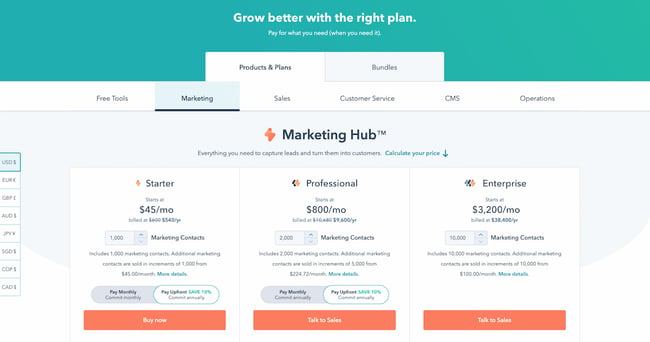
best pricing pages: hubspot marketing hub

Remember to keep important information above the fold, such as a value proposition and at least one call-to-action button.

Hot tip: Interested in learning more about marketing terms such as “above the fold” and “call-to-action”? Check out our podcast below, and make sure to follow for more useful content. 

Simple Language

The pricing page can be a good place to get fancy with jargon, especially if your target customer is an advanced professional in their field. But for at least one package, consider keeping the information accessible and jargon-free — so that someone who’s not an expert in the field can tell which package would work best for their team.

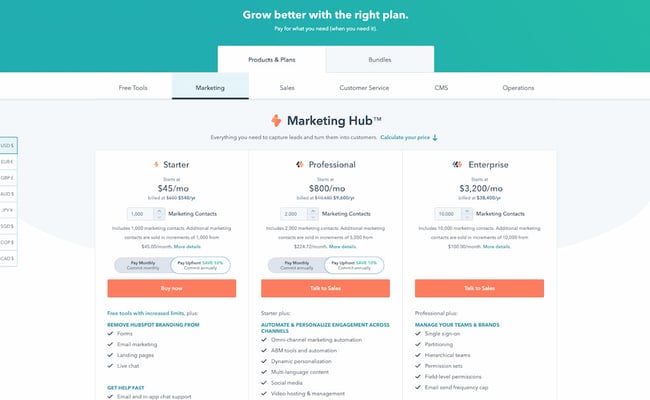
You can toy with this rule depending on the package, too. For instance, on HubSpot’s pricing page, the starter package for Marketing Hub uses extremely simple language. “Forms,” “email marketing,” and “live chat” are easy to understand. Non-marketers will immediately know what they would get out of a starter subscription.
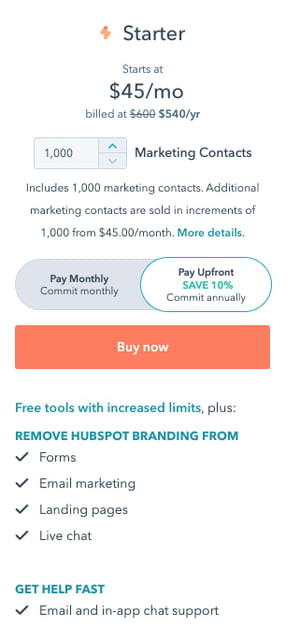
best pricing pages: hubspot marketing hub starter

For the professional package, however, the story is different. “ABM tools and automation,” “A/B testing,” and “Omni-channel marketing automation” are highly specialized terms that only the most experienced marketers will understand.
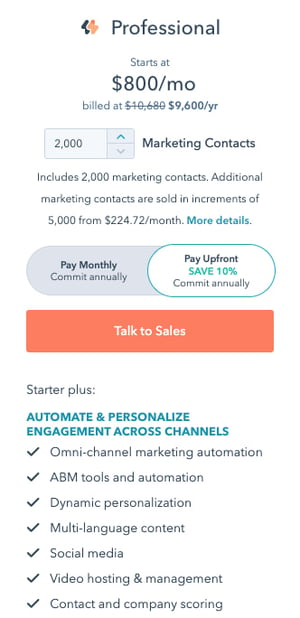
best pricing pages: hubspot marketing hub professional

Your language will differentiate your packages and make it clear to a user which one they should choose.

Crystal Clear Pricing

The best pricing pages have clear packages that accommodate a wide variety of company sizes and budgets. Or, if you serve primarily enterprise firms, you’ll make it clear through your language that you only serve that segment. Instead of including pricing, for instance, you might instead include a “Talk to sales” button so that enterprise buyers can get a quote.

Consider including both monthly and yearly subscription terms, especially if you sell a SaaS product. If you’d like to acquire customers abroad, give users the ability to see pricing in their local currency, too. These small changes will ensure that there are no barriers to conversion. Remember to A/B test your pricing to find out what works best for your customers.

Ready to look at some of the best pricing pages online? We’ve curated the best ones below.

Pricing Page Examples

1. HubSpot
pricing page examples: hubspot

The HubSpot CRM platform is comprised of five products: Marketing Hub, Sales Hub, Service Hub, Content Hub, and Operations Hub. The pricing page, however, keeps it simple by offering each one individually, giving users a chance to choose the one that most applies to their needs. If users are interested in a bundle, they can toggle the tab at the top to get bundle pricing.

Note the differences in call-to-action buttons, too. Everyone can get immediately started with a Starter subscription through the self-service “Buy now” button. But if you’re interested in a more advanced suite, the page prompts users to “Talk to sales” instead.

This is an excellent example to copy if you sell multiple products within one suite, and especially if you serve a wide range of customers, starting from freelancers all the way to enterprise companies. The calls-to-action should be different for each one.

2. Box
pricing page examples: box

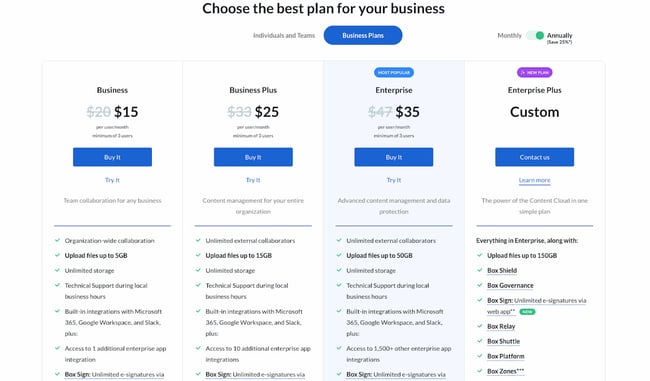
Box’s pricing page is informative, intuitive, and actionable — starting with the heading right at the top of the page, which prompts users to “choose the best plan” for their business. One thing they did really well was allowing users to choose their buyer persona by offering two call-to-action buttons at the top: “Individuals and Teams” and “Business Plans.” This makes the user experience far simpler. After all, if you’re thinking about buying Box for your business, there’s really no reason you’d need to see the personal pricing plans (and vice versa).

Another thing they do well is highlight the most cost-effective option on the page — not only by labeling it “Most Popular,” but also by designing that option to pop out. That’s a great way to generate more click-throughs on that package.

3. Zendesk
pricing page examples: zendesk

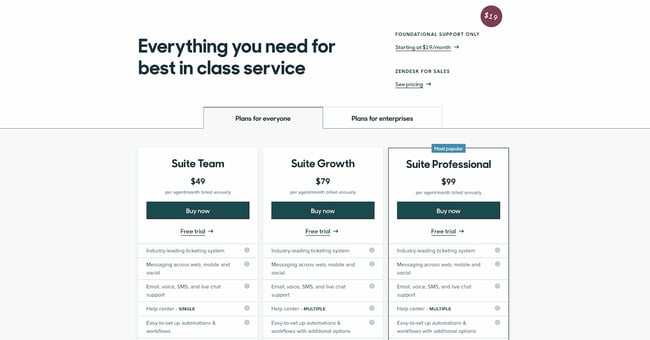
The first thing you see when you arrive at Zendesk’s pricing page is the header text: “Everything you need for best in class service.” Pricing pages can sometimes make users a little uncomfortable, and it’s reassuring copy like this that builds trust between a business and its prospects.

We love that the pricing page is divided among several sections: “Plans for everyone,” “Plans for enterprises,” and “Frequently asked questions, answered.” Providing a lot of information like this on your pricing page is really helpful for your users, but it can be hard to do it in a way that doesn’t confuse people or create clutter on the webpage. Dividing the information into clearly marked tabs and sections is a great way to make the information manageable for your users.

Finally, if you scroll down a little on Zendesk’s pricing page, you can find a prompt to see the plans compared. We love how they show the full list of features and what you get with each plan — all without the user navigating away from the page. This sort of transparency help your salespeople sell the right product to the right customers, which ultimately helps satisfy customers long-term and reduce churn.

4. Detectify
pricing page examples: detectify

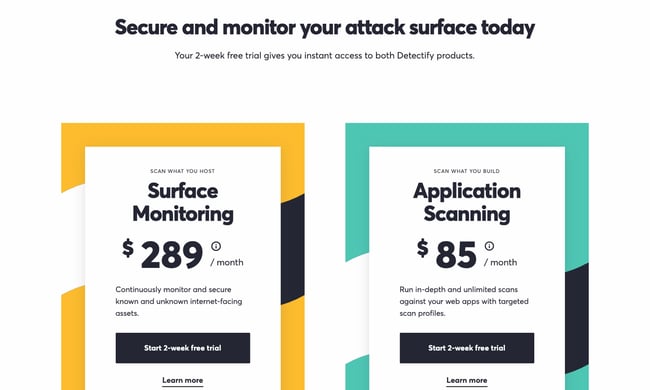
Detectify’s pricing page design is a little out of the ordinary, but it makes for a really cool user experience. Users can choose between two simple options, depending on their use case. Users can either buy a security subscription for websites they’re hosting, or for applications they’re building. This works really well for a single product with a price that only changes depending on what you’re using it for.

Plus, we’re suckers for simple calls-to-action. Both of the buttons prompt the user to start a free trial, making it simple for visitors to understand what they need to do.

5. Wistia
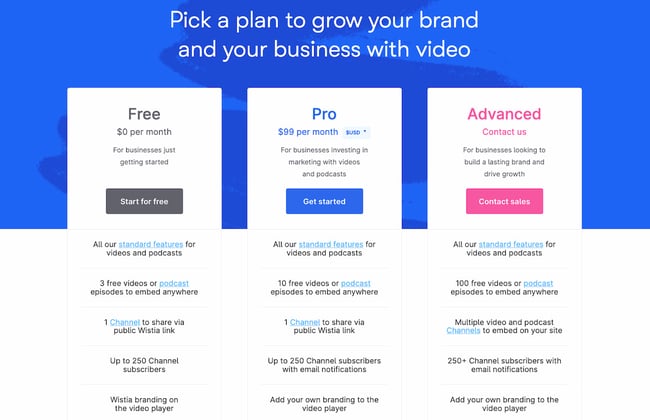
pricing page examples: wistia

Like any page on your website, design is just as important as the information you provide. Wistia has one of the most visually pleasing pricing pages we’ve seen thanks to a nice, clean, and colorful layout, and whimsical lines that align with their playful brand.

They also use language that makes it easy for visitors to find a pricing plan that suits their needs. Under each option, they provide a short description of the ideal customer for that option. For example, the Pro version is “For businesses investing in marketing with videos and podcasts.”

Finally, we love that the amount of videos you can create is included in the feature comparison. Why? Because it clearly states the value of each subscription; there’s no guessing. Wistia successfully speaks their customers’ language.

6. Casper
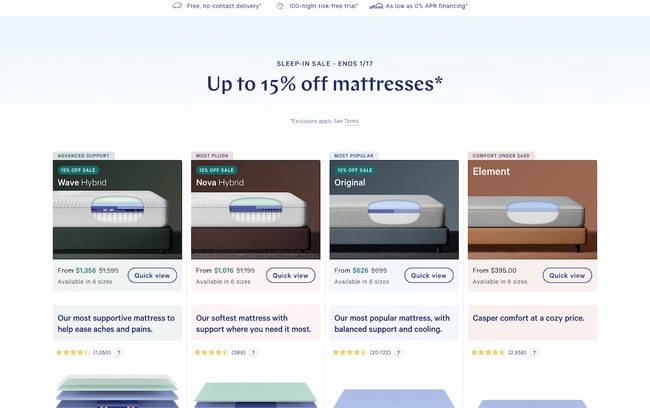
pricing page examples: casper

Thanks to minimal copy and great use of negative space (i.e. the blank space surrounding objects in design), this page is both well-designed and easy to follow. But what we really love on this page is their well-worded refund policy: “After you buy your mattress online, we’ll ship it for free. If you’re not in love, we have a 100-night trial. We’ll pick it up and give you a full refund after the 30-Night Adjustment Period. “

The fact that the company will go to a dissatisfied customer’s house and pick up the mattress for no charge, along with giving a full refund, is a great testimonial to their dedication to customer service. This serves as a way to build trust with prospects before they even buy, and is sure to help create advocates down the road.

If you have a refund policy, be sure to include it on the pricing page to reassure users who may be on the fence about buying.

7. Squarespace
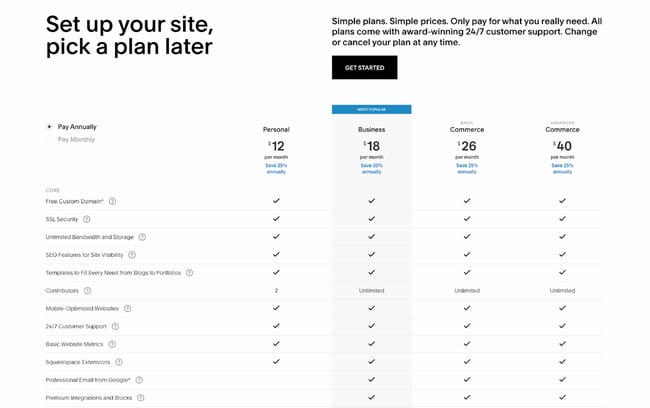
pricing page examples: squarespace

Like Zendesk, Squarespace employs strong header copy: “Set up your site, pick a plan later.” Right away, they’re reassuring users that they don’t have to pay just to try it out; visitors can immediately try the platform by clicking the “Get Started” button.

We also love that they include frequently asked questions right on the same page as the pricing matrix. That way, users can get many of their questions answered without having to dig for answers.

8. Ticketleap
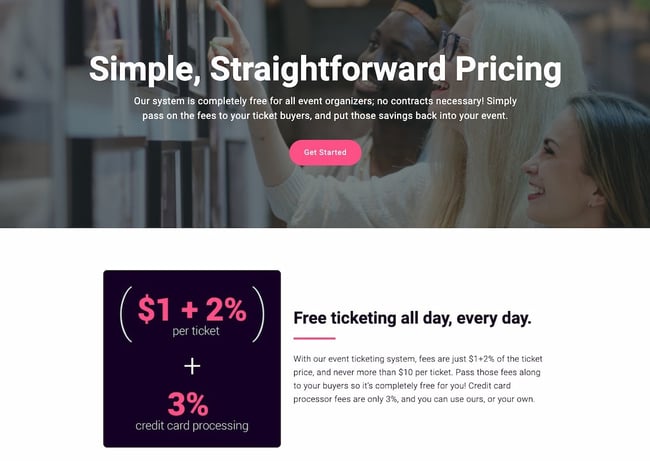
pricing page examples: ticketleap

Here’s another take on header copy from Ticketleap that captures users’ attention right away. When you arrive at their pricing page, the first thing you see are the words “Simple, Straightforward Pricing.” This phrasing aims to make users feel like Tickleap is on their side — they won’t get secretly up-charged once they sign up on the platform.

Later down the page, users can calculate how much they would pay for Ticketleap and get the simple pricing they were promised at the top of the page.

9. Slack
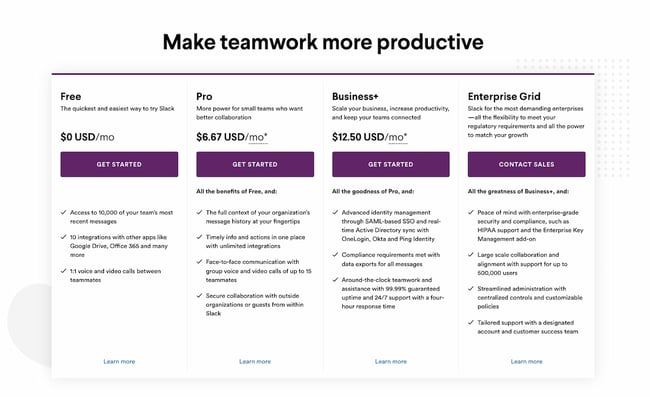
pricing page examples: slack

Slack’s pricing page is another example of great page design. The pricing options are within a simple, easy-to-scan table that is pleasing to the eye, and their feature comparison is easy to skim. Notice that their Enterprise Grid subscription prompts users to “Contact Sales.” This is a great way to prompt high-caliber customers to get an account manager and work out a custom solution.

Finally, although the header copy is simple, it effortlessly conveys Slack’s value proposition. The app will help your company “make teamwork more productive” — and more productive teams result in an increased ROI.

10. BombBomb
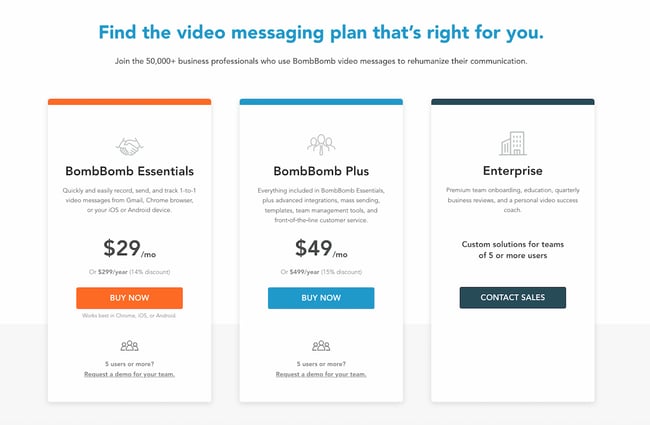
pricing page examples: bombbomb

The folks at BombBomb took a different approach than most. The very first thing you see when you land on their pricing page is a large header saying “Find the video messaging plan that’s right for you,” along with a simple three-column chart on the packages that are available. Only when you scroll down do you see the individual features for each subscription.

This is a great example of a business designing its pricing page based on specific goals. If your goal is to keep it simple while increasing sign-ups, this is one way to help your cause. Take note of the reassuring subheader copy, too: “Join the 50,000+ business professionals who use BombBomb video messages to rehumanize their communication.” From that, you know that others have benefited from using this product, too.

11. Pagevamp
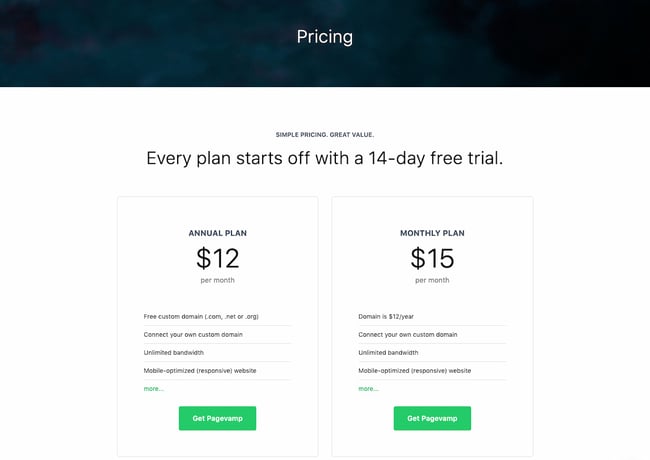
pricing page examples: pagevamp

Trust elements are great additions to any pricing page. Pagevamp took the cue and placed their trial policy right at the beginning of the page, which says that “Every plan starts off with a 14-day free trial.” Copy like this might prime a user to look at the price packages and think to themselves, Hey, if I don’t like the product, I don’t have to commit.

While no one wants their customers to churn, you increase the value of your product by providing a free trial. If you force customers to sign a yearly contract without a trial, you’re essentially saying, “I know you’ll want out, so I’m locking you in for a year.” That’s a poor policy that might generate short-term revenue but create unhappy customers and poor word-of-mouth down the line.

12. Acquia
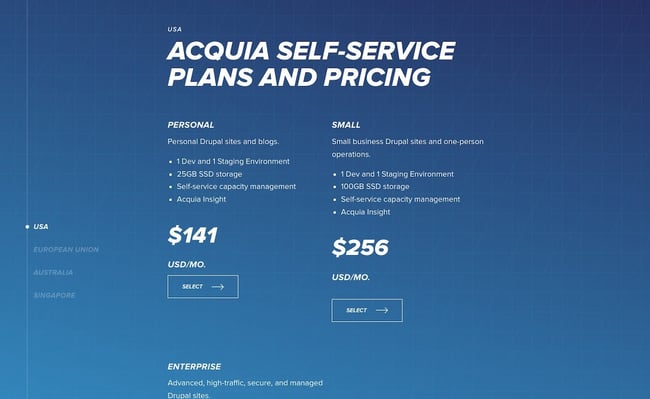
pricing page examples: acquia

The simpler your business’ pricing page, the better user experience you’ll offer — but this gets harder the more complex your product and pricing model. Acquia is one such company, but they do a great job in this example. When you land on the page, you don’t see the product’s pricing. Instead, you get information on choosing the right self-service option for you.

You also have the option to contact Acquia directly and get an agent to help you pick the right product. This is important if you offer a complex product that might stump professionals who don’t specialize in your field.

As you scroll down, you can then see pricing depending on the region where you’re located. For each one, you get two options: a “Personal” self-service option or “Small” self-service option. Enterprise businesses also have the ability to get in contact with the sales team. This makes it easy to select a package depending on your background and buyer persona; again, there’s no need to guess.

The Right Pricing Page Design Will Boost Conversions

Take your time building your pricing page — it’s one of the most important factors in a customer’s buying decision. Test it repeatedly, change elements and colors, and keep the design user-friendly and clean. In no time, your company will see more leads come in through the pricing page, increasing conversions and boosting your revenue.

Editor’s note: This post was originally published in December 2015 and has been updated for comprehensiveness.

New Call-to-action


Is Your Website’s Viewport Configured for Mobile Users? Here’s How to Do It

Software Stack Editor · April 3, 2024 ·

You’re out with friends, laughing, having a grand old time — when someone asks the group a total brainteaser: “Why don’t ‘B’ batteries exist?”

You’re stumped. Your friends are stumped. You whip out your smartphone and type the question into the Google machine. And boom: Up pops a battery company’s blog post on the nationally uniform specifications for the size of battery cells. It’s exactly what you were looking for, you nerd.

But here’s the thing: The content on the website is loading as if you’re looking at the site on the desktop. In other words, the font and pictures are really tiny, and you’re finding you have to zoom in and scroll back and forth to read and interact with the content. Now that’s an annoying user experience.

This is an example of a viewport issue.

How strong is your website? Grade it using HubSpot's free Website Grader.

What’s a Viewport?

A website’s viewport controls the width of a webpage for the device a user is viewing it on.

If you don’t configure your website’s viewport properly, you’re dooming your mobile visitors to several, frustrating minutes of pinching and zooming. (That is, if they even choose to stay on your site.) And trust me, that’s probably a lot of your website visitors, seeing as mobile search queries have already begun to surpass desktop.

If your website’s built on Content Hub, you don’t need to worry about configuring a viewport. Your site will automatically adjust to any device’s viewport. But if it’s not, even if you’re using responsive design, you’ll need to configure your viewport in order to offer a good experience to your mobile visitors.

In this post, I’ll show you how to do just that. But first, let’s get a little better of an understanding of how viewports work and what they look like.

What Your Site Looks Like With a Viewport vs. Without

When you don’t set a viewport for mobile devices, those devices will render a webpage at the width of a typical desktop screen and then scale to fit the screen so that the text and graphics are super small. This is called the “fallback width,” and it ranges from 800–1024 pixels.

When you do set a viewport for mobile devices, the webpage’s width will scale automatically to a user’s mobile device, giving them a much better experience.

What does that look like? Below, the screen on the left doesn’t have a viewport configured, so the mobile browser assumes desktop width. The screen on the right does have a viewport configured, so the mobile browser knows to match the device width and scale the page so the content’s easily readable.

viewport-1.png

Image Credit: Google Developers

First, Check to See If You Have A Viewport Configured Already

To check, go to the Google Mobile Ready Check website. Paste your URL into the empty field and hit “Submit” at the bottom. The tool will run your website through Google’s mobile-friendly test, and if your viewport is not configured, it will tell you.

If your viewport isn’t set up, keep reading.

How to Configure Your Website’s Viewport

To configure a mobile viewport, all you have to do is add a meta viewport tag to any and all webpages you would like to be mobile-friendly.

To do this, simply copy the HTML snippet below and paste it in the header of your site.

<meta name=viewport content="width=device-width, initial-scale=1″>

In many cases, placing this viewport tag in the header file will have the viewport carry across the whole site, making your entire website more mobile-friendly. But be aware you may have to add the viewport tag to each and every webpage individually, especially if you use different software for your website versus your landing pages. If you’re not using an integrated solution like HubSpot Landing Pages or Content Hub, you’ll have to manually check to make sure your landing pages, site pages, and blog have this viewport tag so they’re mobile-friendly.

Note: Adding this tag won’t make your website responsive to mobile devices — that’s an entirely different process, described here — but it will make it so mobile users don’t have to zoom in and out and scroll back and forth to read and interact with the content on your website.

What’s with the red text?

If you leave the red text (“device-width”) the way it is, that just means you don’t want to set a specific width at which to display your content — and your webpage will pick up the size of your user’s device automatically. Most of you will want to do this.

If you do want to display a specific piece of content for a specific device for one reason or another, then you’ll want to replace that red text with the pixel width of the desired device. By setting a width within the tag (which, again, is not required), then any device will render at that specific width. (This is generally not recommended unless you have designed a page/site for a specific screen size. Also, you can’t set more than one viewport tag — you’ll have to pick one device size and stick to it.)

But let’s say you do want to set a specific width. For example, the width of iPhones vary, but say you want your site to display specifically for an iPhone 6 when a person’s holding it in landscape. iPhone 6’s have a landscape width of 667px, so you’d put this tag on your site:

<meta name=viewport content="width=667, initial-scale=1″>

All iPads have a landscape width of 1024px, so you’d put this tag on your site:

<meta name=viewport content="width=1024, initial-scale=1″>

Make sense? Here’s a complete list of viewport sizes for your reference.

Keep in mind that by stating that the width of your layout is equal to the device width, you’ll run into problems when users rotate their mobile devices. To get around this, you *could* use JavaScript to conditionally choose which meta tag attributes to go with, as Ian Yates points out in this blog post … but the simplest solution seems to be to ignore the width altogether and simply keep it at “device-width.”

The “initial scale” part of the HTML tag can stay at one no matter what. It just ensures that when someone opens your content, the layout will be displayed properly at a 1:1 scale. This helps your webpage take advantage of the full landscape width no matter the mobile device’s orientation (portrait versus landscape).

That’s it! Have questions? Ask them in the comments section.

For more tips on how to improve the performance of your website, check out our recently revamped Website Grader. This free online tool generates personalized reports based on your site’s performance, mobile readiness, SEO, security, and more.

Improve your website with effective technical SEO. Start by conducting this  audit.  


13 Quick Tips to Improve Your Web Design Skills

Software Stack Editor · April 3, 2024 ·

Designing your company website can be a challenging proposition. You’ve got to juggle the expectations of many stakeholders, and you can often hit obstacles that prevent new ideas from emerging.

I was the design manager for a large company website for nearly six years, and during that time, I found myself losing perspective of what our target audiences really needed.  Call it “tunnel vision.” When you work on the same website, it often helps to take a step back and think through new approaches. That’s the purpose of this blog post.

Free Workbook: How to Plan a Successful Website Redesign

What follows are some tips, tricks, shortcuts and general advice for creating great website design. Can you try any of these to take your web design to the next level?

1) Design in shades of gray, then add color

If your web designer creates wireframes prior to visual designs, then you know the value of starting with shades of gray.  Turn your wireframe into a grayscale visual design, add your photography, then carefully add color to design elements one at a time.  

This will prevent an “overdesigned” website and help to place prominence on just the items that need it.

2) Use Keynote (Mac) to create rapid page prototypes

You don’t need Photoshop to create rapid prototypes of web pages, landing pages, call to actions or other web interface elements.  There’s an entire underground movement around using Keynote (that’s Apple’s version of PowerPoint) to create mockups.

There’s even an online repository containing user interface design templates for wireframing, prototyping and testing mobile and web apps in Keynote.

3) Add web fonts to your corporate style guide

It’s 2015, and if your corporate style guide doesn’t include web fonts, then you need to look into adding those so your website has the same governance that corporate documents and collateral does.

If you haven’t looked into this yet, Google Fonts is a great place to start. Find a suitable web font and define usage in your corporate style guide so you use it consistently online

4) Bury those social media icons

You did all that work to get people to your website, and yet you’re inviting them to leave? That’s what you’re doing when you place social media icons in a prominent location of your website, like in the header. Bury the icons in the footer.

If people are on your website, you want them to stay, learn and perhaps inquire about your services, not check out company picnic photos and bowling outings on Facebook. Social media should send people to your website, not vice versa.

5) Ditch the slideshow/carousel

When the homepage slideshow/image carousel came into fashion, it was a way to get lots of information on the first page of your website. The problem is that most people don’t stay on the page long enough to experience all of the tiles/messages.  

What’s more is that the messages and images usually aren’t relevant to your prospect’s first visit. What’s the one thing a visitor should take away from their website visit? Promote that one thing — usually what your company does in layman’s terms — and ditch the rest.

6) Simplify navigation

Reducing your visitors’ options might seem counter intuitive, but it can actually help guide people to your most productive content. Rather than overwhelming your website visitors with links to every page, simplify your navigation.

Eliminate dropdown menus and especially multi-tier dropdown navigation that only the most skilled mouse user can navigate, and go a step further by reducing the number of links in the header or sidebar of your website.

7) Remove sidebars

The sidebar has been an especially popular web design trend for the last ten years, especially on blogs. Many companies are finding that when they remove sidebars from their blogs, it encourages reader attention to the article and the call to action at the end.

Removing the sidebar on our company blog has increased the number of clicks on call to action graphics over 35%.

Try implementing this tactic by checking out the new Content Hub theme collection on the Envato marketplace.

8) Get color inspiration from nature

Struggling to find the perfect color combination for your website or a call to action graphic? Get your inspiration from nature. You can either use your own camera to photograph natural wonders around you or find landscape photos on the web, the use a color picker to select a color. Nature’s color palette never fails.

9) Step away from the computer

I believe that good design starts with great planning. Getting your ideas down on paper or on a whiteboard can help you iterate through a design, refining it and adding detail as you go along. Drawing on a whiteboard can also make the design process collaborative and allow other team members to give input.

It’s also easy to erase pencil from paper or marker from a whiteboard and make quick changes, and once you have something concrete to work with, snap a photo with your mobile phone and get to work on screen.

Drawing web design ideas on a whiteboard

10) Use Pinterest to create mood boards

When you’re putting together inspiration and ideas for a new website, or you’re redesigning part of your website, you need a way to collect your inspiration in one place for future reference.

Did you know that you can use Pinterest to create a mood board of your favorite images, colors, layouts, patterns, sample websites and concept material? Another great advantage of using Pinterest is that other designers create and share mood boards too, and they’ve already curated a ton of resources that you can use.

11) Increase your font size

Typography is incredibly important in web design. Text is hard enough to read on a computer screen, so you have to make the important things stand out.

One way to do this is to increase your font sizes, especially for headings and important blocks of text. Consider increasing the size of your normal font, too.

12) Use white space

It may be hard to believe that using whitespace is a hack, but I evaluate websites every day that could use more whitespace. Not every blank area of the screen needs to be filled.

Even though whitespace and simplicity are in style right now, too many companies try to cram everything into a small space, or worse yet, “above the fold.”  Give your design room to breathe, and your website visitors will be able to find things easier.

13) Use the squint test

Want a quick way to learn what’s most prominent on your website? Back away from your computer screen and squint.  Most everything will become blurry, and only the larger, colorful, more prominent features will be noticeable.

It’s said that this technique helps a designer understand what a first-time visitor may notice when he scans your website. Will the visitor notice what’s most important?

While this is a big blog post about little design hacks, I’m sure you have some hacks of your own that I haven’t thought of here. What’s your favorite design hack? Why not share it in the comments below? Let’s see how many you can add!

Blog - Website Redesign Workbook Guide [List-Based]


Content Mapping 101: The Template You Need to Personalize Your Marketing

Software Stack Editor · April 3, 2024 ·

When prospects first come to your business page, they probably won’t just click and buy your offering immediately. They’ll most likely be searching through your site to learn more about it, gauge the level of trust people have in your company, and be on the lookout for resources to help them achieve their goals. You can create this experience by content mapping.

Content mapping allows you to create highly targeted, personalized content at every stage of the buyer’s journey, helping to nurture leads and prospects toward a purchase decision. In this post, we’ll go over what a content map is and how you can start content mapping for your brand.

Let’s get started.

Download Now: Free Content Marketing Planning Templates

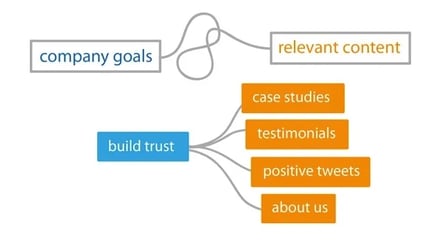
For example, if your business is building a brand new website, you’ll have to begin creating a content map based on why the customer is going to your page. If customers are coming to your website looking for a credible solution worth paying for, they’ll want to trust the company.

The marketing team can then align the goal to build trust, and apply it to their marketing portfolio.

content map example

Image Source

Why is content mapping important?

Content mapping helps you plan for content creation that supports the customer journey and creates a more cohesive, personalized customer experience.

When it comes to content, one size rarely fits all. They have to serve different purposes as prospects are looking for varying information as they progress in the buyer’s journey. To ensure that your company’s content is effective at generating leads, you need to deliver diversified content that covers different topics that they’re searching for each step of the way. Content mapping is the process of doing just that.

But coming up with the actual topics that make for a highly targeted content strategy isn’t that easy. However, content mapping with the audience in mind can help you put together a strategy in a more manageable way.

How to Create a Content Map

1. Download a content map template.

To help you brainstorm and map out content ideas for targeting specific segments of your audience, we’ve created a new free template resource: The Content Marketing Planning Template.

content marketing planning templates for content map

Download Your Free Template Now

The template includes an introduction to content mapping, a crash course on buyer personas and lifecycle stages, a content mapping template (plus examples), a website content map template, and bonus buyer persona templates.

With the template, you’ll:

  • Learn how to understand buyer personas and lifecycle stages.
  • Identify problems and opportunities that your audience needs help with.
  • Brainstorm highly targeted content ideas that incorporate personas and lifecycle stages.

2. Identify the buyer persona you want to target.

Buyer personas are fictional, generalized representations of your ideal customers. They help you understand your customers (and prospective customers) better, and make it easier for you to tailor content to the specific needs, behaviors, and concerns of different groups.

The strongest buyer personas are based on market research as well as on insights you gather from your actual customer base (through surveys, interviews, etc.). Depending on your business, you could have as few as one or two personas or dozens. If you’re just getting started with personas, don’t go crazy! You can always develop more personas later if needed.

3. Consider that persona’s path to purchase (lifecycle stages).

The buyer persona you target with your content is only half of the content mapping equation. In addition to knowing who someone is, you need to know where they are in the buying cycle (i.e. how close they are to making a purchase). This location in the buying cycle is known as a lifecycle stage.

For our Content Mapping Template, we’re divvying up the buying cycle into three lifecycle stages: Awareness, Consideration, and Decision.

  • Awareness: In the awareness stage, a person has realized and expressed symptoms of a potential problem or opportunity.
  • Consideration: In the consideration stage, a person has clearly defined and given a name to their problem or opportunity and is looking for a solution.
  • Decision: In the decision stage, a person has defined their solution strategy, method, or approach and is looking for a provider.

By combining buyer personas with lifecycle stages, you can hone in on specific segments of your audience and tailor content to resonate with each of those segments.

4. Brainstorm questions the personas have in the awareness stage.

Your awareness stage content should target early in the buying cycle. People in this segment are just becoming aware that they have a problem. At this stage, think of how your content can help people become more informed about the problem in general, and you’ll (hopefully) find that they continue moving closer to a purchasing decision.

Important questions to start thinking about:

  • What problem are they likely trying to solve, and what are the symptoms that are causing this problem?
  • What information will help them to identify their problem(s) and that our product or service is designed to solve them?
  • How can we build trust and provide more value than our competitors from this early stage in the journey?

5. Identify awareness stage content.

Taking your buyer personas’ questions into account, you can turn them into topics for awareness stage content.

The content you want to provide them should speak to their current needs, not jump straight into product-focused content. This can take the form of insightful blog posts, webinars, ebooks, or social media posts that give information to solve initial concerns and slowly familiarize prospects with how your product can help them.

6. Brainstorm ways to position your solution as your persona enters the consideration stage.

At this point, you’ve provided your prospect with enough information to become fully aware of their problem, and they know it can be remedied.

This is when you should begin trying to move them closer to a purchasing decision and become more interested in your product offering, using consideration stage content.

7. Identify consideration stage content.

Your consideration stage content can more explicitly mention how your product or service could potentially solve a problem. At this point in the buying cycle, people are still evaluating their options. Your purpose now is to help them narrow down the solution that works the best and provides them the most value.

The types of content used for the consideration stage can look like this:

  • Videos comparing and contrasting offerings
  • Whitepapers

8. Brainstorm objections that would stop them from buying in the decision stage.

Now that you’ve identified the “why”s behind your prospect choosing your solution, it’s time to consider the “why not”s.

Some competitors may have a more affordable solution, different methods of remedying issues, or more authority (popularity) in the market. While some of these aspects cannot be changed, you can still appeal to the prospect and move them closer to purchase if your offering is a real value add, regardless of the rest.

9. Identify decision stage content.

At the decision stage of the buyer journey, you can primarily lean into marketing your products or services. If someone has reached this stage, they’ve already identified a problem and a solution, and are now getting ready to pull the proverbial trigger toward a purchase decision.

This is where you can directly present the prospect with examples of positive experiences or success derived from your product or service offering, with decision stage content like:

  • Case studies (social proof)
  • Customer testimonials
  • Product demos

10. Determine how these content pieces work together.

Now that you’ve identified all the different types of content that buyers of each stage are looking for, it’s time to map the ideas.

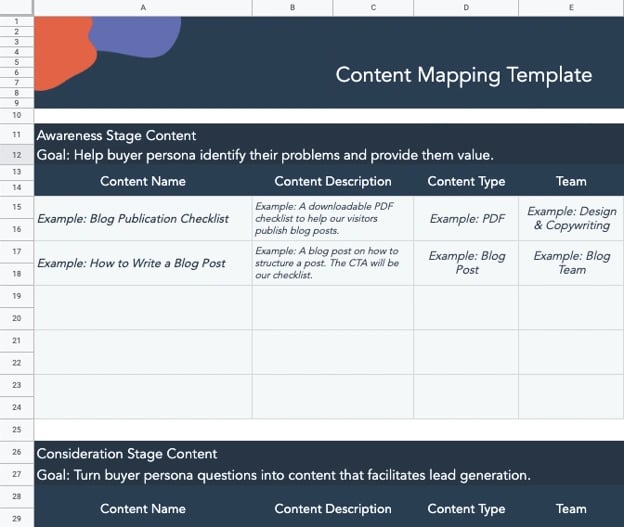
Content Mapping Template

content mapping template from hubspot content marketing planning templates

This content mapping visualization keeps the marketing strategy focused on the goal specified with all the steps necessary to gradually reel in buyers. Our template can also help you to schedule when you want content published on a monthly or quarterly basis if you want to manage it in one place.

You can approach content mapping to serve more specific strategies this way, too, as we’ll discuss content mapping for your website in more detail.

Website Content Mapping

Website content mapping is the process of planning the pages, blog posts, and offers you’ll publish on your site and identifying which buyer personas those pages and posts will serve. Website content mapping also identifies which pages and posts address different lifecycle stages.

Website content mapping is a key element of website personalization. In essence, you’ll create different pages, posts, and offers to address different buyers at different points in the buyer’s journey.

To give you a better idea of website content mapping, let’s run through a simple example of one.

Content Map Example

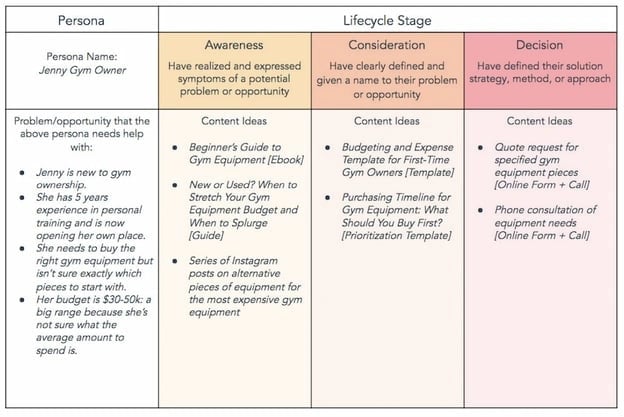
The buyer persona (and a key problem or opportunity that persona is struggling with) is at the start of the grid. Jenny is a gym owner and her problem is that she needs gym equipment, but has a limited budget and has taken to the internet for a solution.

In the awareness life cycle stage, she’ll be looking for introductory content to gain knowledge about the types of equipment necessary to bring customers into her gym.

In the consideration life cycle stage, she’ll have a better understanding of her need for equipment and price expectations and will be looking to create a more clear budget for different items and consider how long this investment will last — seeking templates that outline that information.

Finally, in the decision stage, Jenny has identified her needs and is looking for a provider to fill them. She will feel inclined to request demos, consults, or quotes from a company that has guided her through her journey to their solution of cost-effective gym equipment.

Content mapping examples from HubSpot

This type of content map works because of how it segments personas as they progress through the buyer lifecycle, and if you have more than one persona to cater to, then you can expand your map into a segmentation grid.

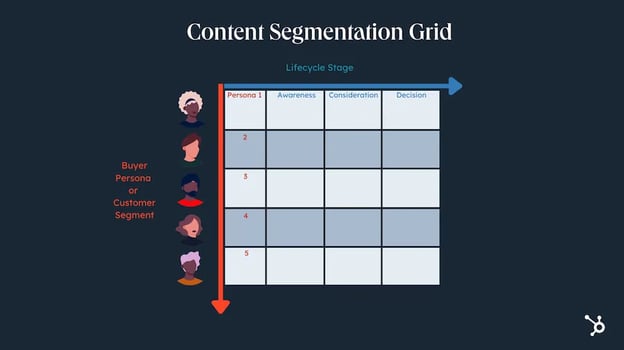
Content Segmentation Grid

A content segmentation grid is a tool to help businesses plan the content they will produce based on the different types of audiences they want to reach.

content segmentation grid hubspot graphic

A common mistake marketers make when it comes to content planning is that they’ll understand the need to make personalized content for customers as they navigate the buyer stages — but ignore the need for individualized messaging.

A content segmentation grid solves that problem as marketers will be able to better serve every customer segment at each stage they reach. So instead of writing messaging for one buyer persona, you can potentially increase engagement and conversions across different audiences.

So you now know what content mapping is, and you’ve seen how you can get started. What type of tools can you use to start content mapping?

Content Mapping Tools

Content mapping may seem like a difficult task that requires highly specialized software. It’s not true — it requires simple business tools you may already be using in your day-to-day.

We’ll start with the most basic tools you need to start content mapping, such as word processors and visualization tools.

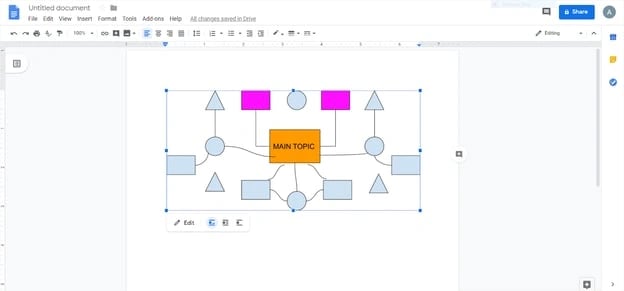
1. Google Docs

Pricing: Free

content mapping tools: google docs

First up in your content mapping tech stack is your preferred word processor, Google Docs. It has the feature to draw and insert different types of diagrams into documents, which can be translated into a content map to align your marketing mix with your goals. We highly recommend this tool because it makes it easier to share work across your team, and you never have to worry about backing up your content map once you’ve created it.

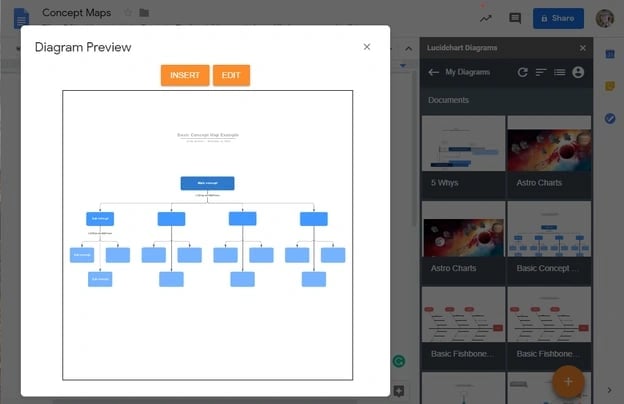
2. Lucidchart

Pricing: Free Basic Plan; Individual Plan;$7.95/month, Team Plan; $9/month, Enterprise Plan available upon request

content mapping tools: lucidchart

If you’re more of a visual person, then a flowchart tool is a must. Also, if you’d prefer to create a content map with lines and diagrams, then you need a more sophisticated tool than Google Docs. Lucidchart’s flowchart maker is a top-of-the-line tool that also allows you to connect different apps and services. Like Google Docs, it allows you to work collaboratively, but Lucidchart takes it a step further and provides users with more visually appealing formatting.

3. Buyer Persona Tool

Pricing: Free

content mapping tools: buyer persona tool

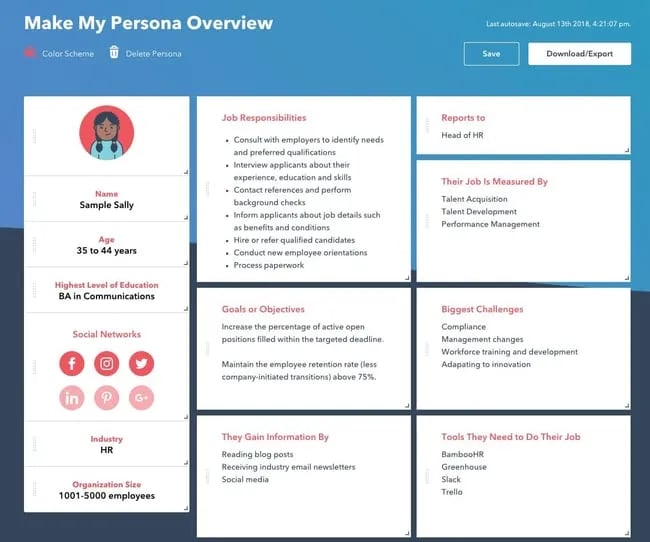
Before you can even begin to create a content map, you need to identify the buyer persona(s) you’re creating content for. HubSpot has a buyer persona tool made to build and save professional buyer persona documents with its intuitive generator.

And if you want to take it a step further, HubSpot has a list containing even more buyer persona resources to build out your customer profiles for your business, too.

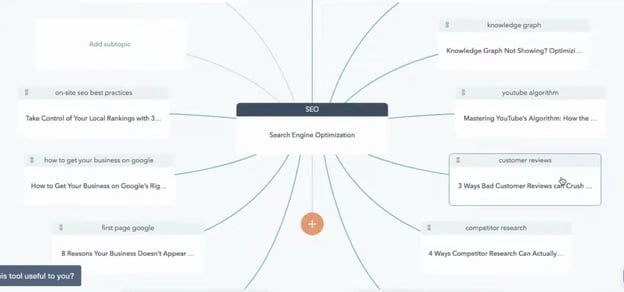
4. Marketing Hub

Pricing: Free Basic Plan, Starter Plan; $45/month, Professional Plan; $800/month, Enterprise Plan; $3,200/month

content mapping tools: marketing hub

In the Marketing Hub, there is an SEO Topics tool that provides content mapping capabilities to help users organize their ideas for organic-focused awareness stage content. With this capability, your team will be able to collaborate and execute your content map once it’s ready for deployment.

Tools to Help Implement Your Content Map

1. HubSpot CRM

Pricing: Free

tools to help implement your content map: hubspot crm

HubSpot’s CRM is the one tool you need to compile all of your data from current and prospective customers. The CRM will allow you to discern different lifecycle stages and pinpoint commonalities between customers who are ready to purchase based on lead scoring. Your content map can help someone build a lead scoring system to identify high-value leads who have consumed the content close to a purchasing decision.

2. Content Hub

Pricing: Professional Plan: $500/month; Enterprise Plan: $1,500/month

content-mapping-template-personalize-marketing_7

A content management system is probably the most important tool for your content mapping efforts. A CMS will allow you to publish personalized content that targets different site visitors at — you guessed it — different stages of the buyer’s journey.

Content Hub is fully integrated with HubSpot’s CRM platform and Marketing Hub, allowing you to create a seamless experience for your customers as they receive the content you’ve designed for them. It will help you execute your content map flawlessly. Even more importantly, with Content Hub, you can continue testing and retesting your content for better results.

So are you ready to begin creating your own content map? Before you start, let’s hear some tips from marketers who attribute part of their success to this strategy.

Content Mapping Tips From the Pros

1. Educate your audience.

Content mapping tip from Adanna Austin

“We all have to create compelling content to attract our ideal clients, build an active and engaged audience, and get daily sales. Spend time building your audience by educating them and engaging with them. No one has built a business by posting the same image or type of image every day on socials and not having convoys with their audience. It is not just about showing up, but doing so with intention so you can attract your ideal clients who will buy from you.”

– Adanna Austin (Business Coach and Consultant, Marketing Dynamics Business Solutions)

2. Give your prospects the information they need before they ask for it.

Content mapping tip from Laura Hogan

“With content mapping, you can give your prospects the information they are asking for before they even ask for it. Buyer personas and lifecycle stages allow you to be one step ahead of the game by mapping out what your prospect’s next steps are and delivering them the content from numerous different avenues.

We create buyer personas as part of our onboarding process and everything we do from content offer to daily tweets is centered around that document. We also always ask ourselves, ‘Would business owner Bob open this email, click this tweet, or download this offer?'”

– Laura Hogan (Founder, Digital Atlas Marketing)

3. Provide different conversion paths for different personas.

Content mapping tip from Marc Herschberger

“When mapping out content for your site’s visitors, it’s important to remember that when it comes to purchasing decisions (BOFU conversions, especially for B2B and high-priced items), there are some personas out there who would rather speak to someone on their terms rather than fill out a form for a consultation. Understanding how they are most comfortable when it comes to making decisions can help you understand what points of conversion will be the most relevant and successful for that persona.

Optimizing your site pages (landing and thank you pages, as well), TOFU & MOFU offers, and workflows with direct contact information (phone #, email, etc.) is a great way to ensure that visitors, prospects, and leads who may shy away from form submissions still have readily available, alternate means of converting.”

– Marc Herschberger (Director of Operations, Revenue River Marketing)

4. Create specific content that appeals to specific personas.

Content mapping tip from Spencer Powell

“Mapping out buyer personas and lifecycle stages is extremely important when creating content. In terms of buyer personas, it’s easy to see that a Marketing Director will have different questions, information needs, and interests compared to a CEO. Both of these personas may be searching for your product or service, but they’ll be looking for different topics. By creating content that appeals to each audience, you can be more effective in attracting that specific audience.

By the same token, each persona of yours may be in a different stage of the buying process, so it’s important to think through and create content that appeals to someone looking for basic, high-level information such as an ebook, as well as specific information like a pricing guide or case study.

One tip I’d suggest for anyone with pretty different personas would be to dedicate an entire section of your site to each audience. That way, when you pull in your audience, all the content is directed toward them.

We actually took this concept and went a step further by creating unique brands for each one of our vertical markets. Each brand has its own section of the website, its own blog content, and its own premium content (downloadable offers). It’s really helped us attract and convert visitors at a higher rate because all the content is more relevant to that persona.”

– Spencer Powell (Chief Executive Officer, Builder Funnel)

4. Pull content topics from your sales process.

Content mapping tip from Diona Kidd

“By taking the buyer and buying stage into account when creating content, you can be sure that you’re designing content to help move them through the buying process.

In addition to mapping content to the buyer profile and buying stage, we regularly pull topics from the sales process. Then we offer the content in later sales calls. This helps us not only evaluate the relevancy of the content but also the interest of the buyer. We encourage clients to do the same.”

– Diona Kidd (Managing Partner, Knowmad)

Content Mapping is Key to Your Company’s Growth

Delivering the right content at the right time can do wonders for your company’s growth. By meeting prospects’ needs based on their persona and lifecycle stage, you’re delighting them at every turn, boosting your chances of winning a loyal customer and turning them into a brand evangelist.

Editor’s Note: This post was originally published in March 2014 and has been updated for accuracy and comprehensiveness.

Blog - Content Mapping Template

How to Build a Marketing Technology (Martech) Stack That’ll Grow With You

Software Stack Editor · April 3, 2024 ·

What will your marketing team look like six months from now? Or a year from now? How many people will you add? What new tools, systems, and data will you need?

There are a lot of potential questions you can ask about the future of your business, but there is one certainty: you’ll deal with more data, more people, more processes, and more complex problems as you grow.

But how do you deal with that in your marketing team? That’s where marketing technology, or martech, comes in. By automating tasks and removing obstacles from your team’s workflows, marketing tech empowers your team to waste less time on menial tasks, allowing your business to grow more efficiently.

Download Now: HubSpot's Annual State of Marketing Report

When you put it all together, you get a marketing technology stack: a collection of tools that your team uses to do their best work every day.

As your team and business scales, it’s important to create a martech stack that streamlines your day-to-day processes. In this post, we’ll go over everything you need to know about martech and how to build a marketing tech stack that will stay with you as you grow your business.

marketing technology

Marketing technology can be used by any type of marketer — even non-digital marketers. One martech tool is typically used for a different marketing discipline.

Here are a few examples of disciplines and a martech tool that can be used for them.

  • Search Engine Optimization (SEO): A keyword research tool such as Moz is an example of a martech tool for SEO.
  • Content marketing: A content management platform such as Content Hub can be used for content creation.
  • Social media marketing: A social management platform such as HootSuite is an example of a martech tool for social media marketing.
  • Search Engine Marketing (SEM): Google Ads is an example of a martech tool for SEM.
  • Event marketing: A lead collection software like the one included in Marketing Hub can be used for lead capture during an event.
  • Advertising: A programmatic ad platform such as mediasmart is an example of a martech tool for advertising.

Instead of adopting a plethora of different tools, some marketers choose to adopt an all-in-one solution such as Marketing Hub.

How is technology used in marketing?

Technology is used by marketers to execute their marketing campaigns. Marketers use software to automate marketing tasks and collect data so they can get insights related to campaign activity and their impact on customers.

For example, say that your team spends a significant amount of time emailing customers. The action feels repetitive, and it’s keeping people away from more pressing assignments. You may choose to use an email automation software, so less time is spent sending emails.

You also want the software you use to track data related to those emails, so you gain an understanding of how your users interact with them.

In brief, marketers use technology to make their jobs easier and understand their levels of success. The technology that marketers use in their campaigns is known as their marketing tech stack.

Let’s say that you primarily focus on SEO and paid ads on social media. You would add the following tools to your marketing tech stack: Moz for SEO and HootSuite for social media management.

Alternatively, you can adopt an all-in-one solution such as Marketing Hub to take care of both your SEO and social media marketing strategies.

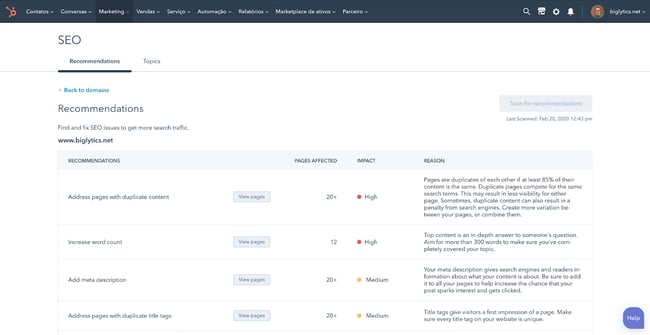
For instance, Marketing Hub’s SEO tool will assist you in optimizing your site with its built-in keyword research tools, as well as as-you-type optimization advice while you’re creating content.

Marketing tech SEO tool from HubSpot

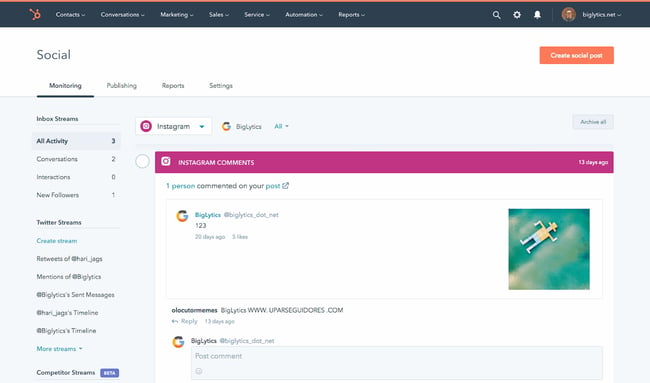
Its social media management tool will take care of everything related to social media — including post creation and audience engagement analytics. You can even reply directly to comments from the tool.

Marketing tech social media management tool from HubSpot

Overall, the technology you choose will help you execute your campaigns from start to finish.

But with so many to choose from, it can be difficult to build a martech stack that works for your team. Let’s go over how you can build an effective stack.

How to Build a Marketing Tech Stack

There is no out-of-the-box method for building your martech stack. Your company is unique, and your perfect marketing stack is not going to look exactly like anyone else’s.

This is the time for choosing the right tech tools for your team and setting them up in a way that your future team can use and understand. To do so, take the following steps.

1. Identify your primary marketing strategies and goals.

Before ever choosing a martech tool, you’ll need to outline your marketing strategies. It doesn’t have to be complicated, either: you simply need to have an idea of the basic strategies that you want to implement.

If you already have an established marketing team, take a look at the strategies that are currently in place. This will help you gauge, from the get-go, the types of tools you need.

Here’s an example. Let’s say that you want to increase organic traffic to your website. The strategy for that would be SEO. Next, you want to capture leads. So you would invest in a website redesign strategy that highlights your calls-to-actions more efficiently.

Jot these strategies down in a document, then include ideas for possible tools you can use to implement the strategies. If you don’t know which tools you use, simply write that you’ll list them after further research.

Example 1

  • Goal: Increase organic traffic
  • Strategy: SEO
  • Tools: To be determined

Example 2

  • Goal: Get more visitors to convert
  • Strategy: Redesign the website
  • Tools: To be determined

2. Survey your team to find out their challenges.

Next, sit down with your team and find out the challenges they encounter when trying to execute their day-to-day duties.

What adds more time to their workflow? What makes their job harder?

While the conversation should be open-ended, try to connect their challenges to your marketing goals. For instance, if you want to increase organic traffic, ask what specifically your team finds challenging when trying to optimize the website. If they say keyword research takes too much time, then you’d know that you’ll need a keyword research tool specifically.

Jot these challenges down in the same document you’ve already started. Keep it simple — just a sentence or a few bullet points will do.

Example 1

  • Goal: Increase organic traffic
  • Strategy: SEO
  • Challenges: Keyword research takes too much time
  • Tools: Keyword research tool that quickens the process

Example 2

  • Goal: Get more visitors to convert
  • Strategy: Redesigned website
  • Challenges: Unable to add CTAs because of the outdated backend system
  • Tools: A new content management system that allows the team to add CTAs to any page

3. Establish an estimated budget.

Building your dream martech stack means nothing if you can’t afford it. As you begin to determine the types of tools you’ll need, think about the funds you’ll allot for them.

You can go several ways about this. You can determine a budget per tool or per strategy. Alternatively, you can choose a budget overall for the entire team in a yearly, quarterly, or monthly basis.

Choosing a monthly budget is the best choice for small businesses without a dedicated finance team. Most tools are available on a monthly subscription basis, which makes it easier to drop one if it doesn’t work for the team.

You can also choose a budget per strategy. For instance, you can decide you’ll invest $200 a month in SEO tools.

Be sure to take into account the amount of seats you’ll need for the tool, or ensure the team is open to sharing one subscription. Most times, sharing a single subscription will work without a problem, and you can save a significant amount of money.

4. Research the tools you’ll consider for your martech stack.

Now that you have your strategies, your tool ideas, and your budget, it’s time to research the actual products you’ll add to your martech stack. If you’re a marketing leader, you can leave this task to individual team members, because they’ll be the ones using the tools.

It’s helpful to look at product curation posts to get a general idea of the offerings that are out there. For the keyword research challenges in your team, for example, you can look at a list of keyword research tools. If you’re looking for a new CMS, you should look at a list of the best CMS systems.

From there, you can investigate pricing, product reviews, and general fit for your team.

Make a list of the tech tools in a spreadsheet and include pricing and a general description of the product. From there, refine the list until you’ve decided on the tools you want to try out, and be sure to specify whether the tool needs a monthly or yearly subscription.

5. Consider non-marketing tools to add to your tech stack.

When we talk about the martech stack, we’re often caught up in marketing-specific tools. But there are a wide range of “general” tools that are useful for a marketing team.

Project management tools, collaboration platforms, and data sync software solutions are just a few of the products you can consider. Anything that cuts time from a complicated workflow is worth exploring. Google Drive would be an example, and so would Asana.

Add these products to your martech list, including the pricing and a brief description.

6. Compile the data that you’ll transfer into the tools.

After you’ve purchased the tools, it’s time to transfer the data. Already have a list of leads? How about Microsoft Word documents you’d like to import into Google Drive for collaborative editing?

Compile all of them in folders. Assign a type of data to each team member. For instance, one team member can compile the contacts from a conference. Another team member can compile the current templates you use for your social media posts. Another can compile all of the copy from the website for the website redesign.

When it’s time to sign up for the tools and adopt them, you can transfer these files and data and more easily pick up where you left off.

7. Assign one team member to create a workflow per tool.

Now that it’s time to adopt the martech tools, you don’t want to throw it out to your team without a workflow. That’s an easy way to end up with a subscription that no one is using.

Assign one team member to explore one specific tool. This team member will jot down workflow steps for using the tool effectively and write a step-by-step tutorial with screenshots. After, schedule a meeting for the team member to carry out a live tutorial.

Why? You can establish the best way to use the tool without a lot of guesswork. The process will be scattered and haphazard if everyone starts using the tool at once. By having a single uniform process, you can guarantee that every team member is using the tool to its fullest extent.

8. Analyze the tools’ success and switch solutions if necessary.

You don’t want to end up with an unused martech stack. Always audit your tools for their success — whether they effectively streamline workflows, automate tasks, and help your team do their work in a better way.

If not, there’s no shame in cancelling your subscription and going for another solution. Take a look at product curation posts, or research individual tools you may have heard of from other marketing leaders.

Let’s go over a few tips you should apply when building your martech stack.

Martech Stack Tips

As you build your marketing tech stack, you’ll be pulled in all sorts of different directions. When your business is growing, you’ll be tempted to add more complexity to address urgent gaps.

We’ve been there. HubSpot’s marketing operations team is all too familiar with the challenge of dealing with more and more as our team grows.

We’ve learned a lot along the way — so we gathered insights from HubSpot’s resident operations experts to ask what they wish they would have known when growing HubSpot’s own marketing tech stack.

1. Strategy first, technology second.

As companies grow, it can be tempting to rely on technology to support processes that are still evolving. Usually, this happens when a team adopts powerful tools that have a lot of potential, and they try to mold their systems around it.

HubSpot’s marketing operations team has made this mistake, too, and with an important takeaway: What sets apart truly powerful tech stacks isn’t just about the technology.

“The tools themselves won’t make you successful but rather how you use them,” explains Kerri Harrington, Marketing Ops Analyst here at HubSpot.

Harrington has worked closely with HubSpot Partners, consulting many who were in the midst of building their tech stacks. She taught them to think about their tech stack not as the powerhouse behind their systems, but a vehicle to efficiently and effectively execute their strategy.

If you are still developing your strategy, she says, try drawing out and visualizing your tech stack. This gives you an opportunity to think critically about each tool, the purpose it serves, and where there is any overlap or duplication in your tools.

2. Keep systems simple.

Have you heard of the “keep it simple, silly” (KISS) principle? The term, originally coined by an aeronautical engineer in the US Navy, states that simplicity guarantees the greatest levels of user acceptance and interaction.

The term is used often in software design, for example, where function and instruction creep can make products unmanageable over time.

How do you prevent this happening in your own company as it continues to grow? Put your current strategy down on paper, and review the value of every stage of your process with your leadership team. Consider what processes could be done more efficiently, and what could be eliminated altogether.

“The #1 driver of complex business systems is complex business rules,” says Mark Metcoff, Director of Marketing Technology at HubSpot. “If you can simplify your go-to-market strategy as much as possible, then regardless of how you structure your systems, you’ll be heading in the right direction.”

3. Aim for medium-term solutions.

In an ideal world, every decision you make about your tech stack today will work seamlessly for your team for years to come.

In reality, though, you are probably going to change systems a dozen times over the next few years if you continue to scale. You shouldn’t worry about picking your forever tech, but do not settle for a tool that will become obsolete in 6 months, either.

“Aim for the medium-term,” Metcoff suggests. “The costs of switching systems has never been lower, thanks to the emergence of more persistent datastores like customer data platforms that can underlie front-office facing systems, and iPaaS solutions that allow you to integrate front-office providers for easy data transfer.”

4. Document everything, and document it well.

Imagine opening your spice cabinet, ready to cook up a chicken curry, to find that nothing in the cabinet is labeled. Every spice and herb is in the same colored jar, with no ingredient label or expiration date.

Unless you have a noteworthy sense of smell, this project would not be very easy or enjoyable.

This is what it’s like to step into a new role only to realize that your new team’s processes and database have not been properly documented. This is common among growing companies, because as your database grows and your systems evolve, it’s easy to end up with a lot of clutter, data integrity issues, and confusion.

Many will skip right over this — who likes to document? Who has the time to ‘waste’ a day of innovation to do seemingly admin work? We get it — But for the sake of your future team, make sure you take the time to lay down the right foundation for data architecture.

“I can’t tell you how many times we have to review the history of a change or ‘walk through’ the last couple of years on a topic,” says Maggie Butler, Builder Marketing Team Manager at HubSpot. “It gets really, really hard if no one has documented anything.”

One incredibly valuable resource HubSpot had during one of its growth spurts, she says, was the documentation built by our engineers that detailed in simple language how the logic and code worked. Aim for this level of documentation to be comprehensive across all applications, and easily accessible for everyone on your team.

In terms of marketing tools, our Lead Management tool embodies the ‘document everything’ mantra. The tool can be used to create a database of all customer information, where you can view chronological timelines of every interaction customers have had with you.

5. Choose point solutions that serve a single purpose.

A point solution is a product or service that addresses one very specific need in a marketing organization. Sometimes, you just need a piece of software to do a specific thing really, really well. There’s no shame in it.

The data sync software included in Operations Hub is a great example of this. If you use multiple different apps to execute your marketing strategy, keeping track of customer data from each app can be a tedious process. The data sync tool can integrate with your CRM to streamline this process by syncing customer data from your favorite apps into one up-to-date database.

But keep in mind that every piece you do add to your infrastructure comes with its own compliance risks, technical challenges, maintenance and upkeep, and general administration.

“Also look closely at whether or not it needs to be integrated into your tech stack,” explains Metcoff. “Sometimes point solutions work just fine in a silo.”

If you have any point solutions in your current stack, think about how it fits into the bigger picture: how does it interact with the rest of your technologies, and what do you need to do to keep it running?

6. Aim for ease of use, but don’t sacrifice the necessities.

There are a lot of options out there — so don’t settle for less than what you need. At the end of the day, you need to choose a system that’s easy for your team to pick up and use, but still has the power and flexibility you need to get things done.

The challenge with today’s marketing automation tools is that they offer either enterprise-grade power or consumer-grade ease-of-use, but never both. As a result, many still go with the safe bet — overpriced, overly complicated, and under-utilized tools — which translates to spending more time on systems than on your customers.

Best Marketing Tech Stack

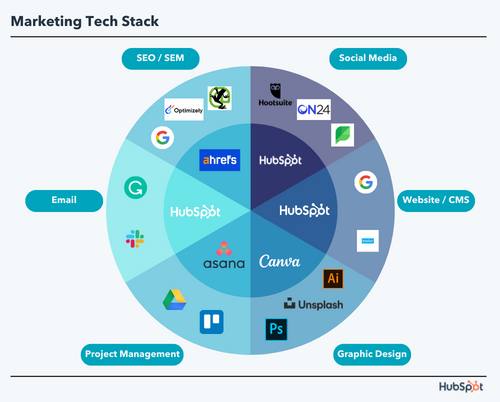
The best marketing tech stack for your business is entirely tailored to your needs, but there are a few tools we recommend — especially if you’re just building out your marketing team.

Let’s take a look at a martech stack for general use, attracting site visitors, converting site visitors, and engaging leads. These martech tools are essential for running a high-performing marketing team.

Collaboration: Google Drive

Google Drive allows your team to collaborate on documents, spreadsheets, and folders — all on the cloud. There’s no need for anyone to download any software on their laptop. The best part is that losing work is nearly impossible with Google Drive.

Pricing: Free

Alternatives: OneDrive, Dropbox

Communication: Slack

Slack is an instant messaging platform that’s specifically designed for work (and not leisure chatting). This tool makes it easy for your marketing team to share quick updates, send files, and communicate live if necessary. With Slack, there’s no need to send emails that can be covered in a quick conversation.

Pricing: Free; $6.67/user/month (Pro); $12.50/user/month (Business +); Custom (Enterprise Grid)

Alternatives: Google Chat, Microsoft Teams

Project Management: Asana

Project management is the heart and soul of marketing. Whether your team is scheduling campaigns, managing complicated workflows, or working on a project-to-project basis, you don’t want anything to fall through the cracks. Asana makes it easy by providing a collaborative space for your team to check off tasks and share project updates.

Pricing: Free; $10.99/user/month (Premium); $24.99/user/month (Business)

Alternatives: Trello, Freedcamp, Project.co

Asset Creation: Canva

Canva offers a wide range of helpful templates to help your marketing team create assets for anything. Social media posts, Facebook banners, posters, infographics, presentations, flyers, and brochures can all be created with Canva. The best part is that you can start for free, and there’s virtually no learning curve. You can sign up and start using it right away.

Pricing: Free; $199.99/year (Pro); $30/user/month (Enterprise)

Alternatives: Visme, Snappa, Adobe Creative Cloud (recommended for advanced users)

Stock Images: Unsplash

Stock images are used in any type of marketing material, such as blog posts, banners, flyers, and brochures. It’s illegal to use images you find online unless they’re under a Creative Commons license. Some of these images are also not of professional quality. Unsplash is a great option for getting access to and downloading high-quality stock photos for free.

Pricing: Free

Alternatives: Pexels, Shutterstock (Paid), Getty Images (Paid), iStock Photos (Paid)

Image Optimization: Toolur

After you download stock images, it’s important to compress them so that they don’t slow down your website. There are many image compression tools out there, but Toolur is one of the best. You can upload up to 25 images at a time, choose different compression methods, set image quality, and resize them all to a preset width. Competitors only allow you to upload an image at a time or try to upsell you by restricting compression options.

If you’re optimizing GIFs, we recommend Ezgif.com.

Pricing: Free

Alternatives: Squoosh.app, TinyJPG

Grammar Checker: Grammarly

Publishing error-free copy is paramount to presenting your business professionally online. With Grammarly, you can take all the manual work out of copy-editing your work. Although it’s still recommended to give your pieces one final read-through before publication, Grammarly will catch most errors.

Pricing: Free; $12/month (Premium); $12.50/user/month (Business)

Alternatives: ProWritingAid, Hemingway App

Content Management and Blogging: Content Hub

If you don’t yet have a website or blog and need to create one, you’ll need a scalable CMS system to power your website. If you already have a website but the CMS is clunky and hard-to-use, you’ll also need to seek a replacement that makes it easier to publish and update content.

Content Hub is one of the best options in the business. You can build landing pages, create forms, add pop-up CTAs, publish blog posts, and see all of your performance metrics in one easy-to-use platform. It’s integrated with Marketing Hub, allowing you to seamlessly connect your other marketing initiatives to your website. Because it’s an all-in-one solution, there’s no need to pay for plugins and add-ons that slow down your site.

Pricing: $270/month (Professional); $900/month (Enterprise)

Alternatives: WordPress, Joomla, Drupal

Website Visitor Analytics: Google Analytics

Knowing who’s visiting your site, when they’re visiting, where they’re visiting from, and whether they bounce off is critical to understanding and improving your overall website performance. Google Analytics also helps you measure your organic traffic, see top landing pages, and see top exit pages.

Pricing: Free

Alternatives: StatCounter (Paid), Simple Analytics (Paid)

Web Page Analytics: Google Search Console

While Google Analytics is an excellent way to measure overall website performance, Google Search Console takes it a step further by providing analytics page-by-page. You can use it to see your top queries for either the whole site or a specific page, compare time periods, and compare two or more URLs on your site.

Pricing: Free

Alternatives: Ahrefs (Paid), Moz (Paid)

Website Analytics Dashboard: Google Data Studio

You’d create a dashboard for nearly anything in marketing: email marketing performance, landing page performance, user acquisition stats, and more. For those, you’d be better off with a dedicated reporting dashboard software.

For creating dashboards on website analytics, however, Google Data Studio is a budget-friendly tool that automatically imports data from Google Analytics. This makes it an easy choice for current Google Analytics users. Simply choose the data you want to show and configure it using the drag-and-drop dashboard editor.

Pricing: Free

Alternatives: HubSpot’s Dashboard and Reporting Software (included in Marketing Hub), Databox (Paid)

Email Marketing: Marketing Hub’s Email Marketing Tool

Marketing Hub’s free email marketing tool allows you to create rich HTML emails without writing a single line of code. You can also personalize the emails using smart rules and A/B test campaigns to increase click-through-rates. The tool is integrated with all of Marketing Hub’s features — so a lead from any form on your website automatically turns into a subscriber.

Pricing: Free

Alternatives: Constant Contact (Paid), MailChimp (Paid)

Marketing Automation: Marketing Hub

Marketing automation allows you to nurture leads with drip campaigns that are triggered based on a lead’s specific action. Marketing Hub allows you to automate campaigns and personalize workflows with segmentation logic. You can also score leads, send leads to sales, and trigger internal notifications.

The workflows feature is included in the Professional and Enterprise subscription tiers.

Pricing: $800/month (Professional); $3,200/month (Enterprise)

Alternatives: Marketo

SEO: Ahrefs

SEO has many facets: keyword research, backlink-building, competitive research, and rank tracking. But you don’t want to pay for different tools to do each one of those things. Ahrefs has a keyword explorer, rack tracker, and site explorer where you can audit the inbound links pointing to your competitors.

Pricing: $99/month (Lite); $179/month (Standard); $399/month (Advanced); $999/month (Agency)

Alternatives: Moz, SEMRush

Technical SEO: Screaming Frog

A robust technical infrastructure can take your website from serviceable to outstanding. Screaming Frog is an essential tool for finding 404 errors, identifying broken links, generating sitemaps, finding duplicate content (which can greatly harm your rankings), and analyzing your pages’ metadata.

Pricing: Free; $211 USD/year

Alternatives: DeepCrawl, Ahrefs, Moz

SEM (Paid Ads): Google Ads

When considering an SEM tool to add to your martech stack, there’s no better option than Google Ads. This tool allows you to place sponsored results on the search engine results pages (SERPs), and also allows you to display ads on Google’s display partners.

Pricing: Varies (Pay-Per-Click)

Alternatives: Media.net, AdRoll

Social Media Marketing: Marketing Hub’s Social Inbox

Social media marketing is critical for growing your follower base and increasing lead generation. It’s important to use a tool that allows you to post, comment, and manage your brand across multiple platforms.

Marketing Hub’s social media tool empowers your team to do all of this and more. You can schedule posts up to three years in advance, analyze your performance on social platforms, monitor brand mentions, and participate in the conversations that most matter to you. It’s included in the Professional and Enterprise subscription tiers.

Pricing: $800/month (Professional); $3,200/month (Enterprise)

Alternatives: HootSuite, SproutSocial

Video Marketing: Wyzowl

If your team does any video marketing, you’ll need a video marketing tool to help you create engaging videos that increase brand awareness and effectively explain your product. Wyzowl makes it easy because you don’t have to hire a videographer, animator, script writer, and voiceover actor to create polished, shareable videos.

Pricing: Available upon request

Alternatives: Testimonial Hero, Content Beta

Webinars: ON24

Webinars are an important tool for B2B marketers and an effective way to generate leads. If your team runs webinars or is planning to, ON24 is a top option for creating engaging webinars, gauging your event’s performance, and identifying potential leads.

Pricing: Available on request

Alternatives: GoToWebinar, Zoho Meeting

Conversion Rate Optimization: Optimizely

A conversion rate optimization tool will help your team ensure that your CTAs are designed to drive conversions. The Optimizely Digital Experience Platform allows you to experiment with colors, placement, and design of your CTAs. You can also test your website’s personalization options and deliver highly tailored recommendations to your website users.

Pricing: Available on request

Alternatives: Google Optimize, Crazy Egg

Build a Martech Stack that Helps You Grow Better

With all of the tools available these days, there is no need to use clunky, complex, and time-consuming legacy software. We believe you shouldn’t have to sacrifice productivity to get power, because the best tools combine both power and ease-of-use. When you focus on delighting your customers and creating great experiences instead of managing your software, you will grow better.

Editor’s note: This post was originally published in December 2019 and has been updated for comprehensiveness.

state-of-marketing-2024

How to Write an Ecommerce Business Plan [Examples & Template]

Software Stack Editor · April 3, 2024 ·

If you have a promising idea for an online e-commerce business, it’s important to create an e-commerce business plan to ensure your vision has enough stock to be profitable.

Having a business plan for your online store will help you define your target market, establish your monthly and quarterly sales goals, and increase the likelihood of long-term e-commerce success.

In this post, we’ll go over an online store business plan and how you can create one for your e-commerce startup. Let’s get started.

→ Download Now: Free Business Plan Template

Whether a company operates as a startup or has years of operations and growth under its belt, an e-commerce business plan is essential for evaluating a business and determining areas of improvement.

An e-commerce business plan is essential, with increasing numbers of shoppers conducting business online. It’s estimated this number has reached over 2 billion. An e-commerce business plan keeps you organized and is useful when seeking investors who need to understand your company.

So, let’s dive into some examples of e-commerce business plans and what goes into writing one using our free template.

E-commerce Business Plan Template

Download Your Free Template Here

HubSpot’s template provides clear steps to structuring one for your ecommerce business. Throughout this section, I’ll use the example of a photography company specializing in online photo editing.

1. Give an executive summary.

An executive summary is a one-to-two-page overview of your business. The purpose of an executive summary is to let stakeholders know what the business plan will contain. HubSpot‘s free template offers some tips on how to write one, as I’ve done below:


Download This Template

It’s important to provide an executive summary so that an investor or executive, who doesn’t have the time to read your full plan, can quickly see the most important highlights of your business.

2. List and describe your business.

This is the section that needs the most detail because it highlights what you’re selling. To begin, provide an overview of your product or service. For instance, a photography company would probably list their photo packages arranged by price and services, as I did below:


Download This Template

HubSpot‘s template also provides direction on how to describe your company’s purpose and break down values. It also advises businesses to include team structure, if applicable. Below that, you should go into detail about your product and service lines.

3. Detail your products and services.

Once you have described your business and its purpose, you’re ready to dive deeper into your plan. What products and services do you or will you offer?

This is an opportunity to list each item and its purpose, allowing you to answer the question, “why?” Why are you choosing to offer these specific products and services?

After detailing your products and services, outline your pricing model. What is the cost associated with each service? Determining price, especially as a startup, can be challenging. However, sales pricing calculators help determine the best pricing strategy.

Download This Template

4. Conduct a market analysis.

For the market analysis, provide the operational climate of the industry you‘re in. To illustrate, at this step, the photography company would need to analyze its position in a world of rival companies like Adobe or online services like Canva. Below, I’ve done a quick competitor analysis, available in the template:

Download This Template

Using directions in the template as a guide, I was able to come up with more selling points of the company and how it stands out from competitors.

Filling out the market analysis section of the business plan assists with providing the framework for future campaigns. You’re able to define your target market and ideal customer. Refer to my example below for how to structure this analysis in your ecommerce plan.

Download This Template

Good market analysis includes your target audience, projections of your company‘s goals, and a breakdown of the competition’s goals and weaknesses. This is a counterpoint of how your business improves upon those weaknesses.

For a complete guide on how to create a market analysis, we have one here.

5. Strategize your marketing plan.

For any business, having the right marketing plan for your ecommerce business is crucial. It serves as a roadmap for how your company will build brand awareness, reach your target audience, and boost sales and revenue.

As seen in this template, your marketing plan will focus on positioning strategy, acquisition channels, and tools and technology.

Positioning strategy fixates on how you will position yourself to your audience. How will you address their challenges and goals? How will you use the tools at your disposal to accomplish this?

The marketing plan will also require you to focus on where your customers come from. Are they finding your business through search engine marketing? Do they discover your business from your blog or social media accounts?

Identifying your acquisition channels allows you to identify which ones to prioritize.

Lastly, your marketing plan should lay out the tools and technology your marketing team will need and use. Will you use a content management system (CMS) like Content Hub?

List all the software and programs your company will use to execute its marketing plan.

Download This Template

6. Create a sales plan.

When creating your sales plan, describe your methodology, organization structure, sales channels, and tools and technology.

For example, when discussing methodology, will you focus on an inbound strategy where you attract customers to your business through your content or an outbound strategy where you initiate contact with your prospects?

This part of your ecommerce business plan will also require you to outline the people in charge of selling your products and services, as well as what channels they’ll use to sell your products.

Similar to creating your marketing plan, the sales plan will also require a brief on what tools you plan to use.

While your marketing plan might need a CMS, your sales plan might need a customer retention management (CRM) software like HubSpot to manage your relationships with current and potential customers.

Download This Template

7. Outline legal notes and financial considerations.

In the following two sections of your business plan, describe the legal and financial structures.

The photography company should provide details on the legal considerations like online safety rules, ecommerce regulations, and the company’s costs.


Download This Template

Listing legality and every cost needed to start ecommerce is crucial information for investors and stakeholders. In this section, it’s important to be honest and thorough to give partners a realistic idea of how to contribute.

Ecommerce Business Plan Tips

Before you lay out the business plan and set the tone for your ecommerce business, there are some factors that are essential to consider. These factors lay the foundation of your business and will help you construct the document with ease.

Here are some of the most crucial business plan tips and tricks:

Find the purpose of your plan.

There is not merely one purpose behind writing the business plan. Different business plans serve different purposes for ecommerce owners.

There are three main purposes of a business plan:

    • Gain secured financial support: Ecommerce businesses are in dire need of investors, and hence, their business plan with all the objectives, competitor analysis, frameworks, and supporting documents use this to gain financial support.
    • To set the direction for your teams: Businesses include metrics like target market, pricing comparison, working process, objectives, and other nitty-gritty in their plans to help their teams align and achieve the desired results.
  • Attract relevant customers: With the current markets and trends in a well-laid business plan, it becomes easier to determine the segment of your target audience.

Know your competitors.

Competitors can inspire you to take risks and help you analyze what’s going to impact your business negatively.

The competitor analysis is done by looking at the companies that offer similar or substitute products in your industry. However, there are two types of competitors: direct and indirect competitors.

Direct competitors are the ones that serve similar products with the same customer base, whereas indirect competitors have different target audiences with similar products or vice-versa.

A customer who wants to purchase a two-wheel vehicle can also opt for the electronic vehicle.

Hence, an electronic vehicle company can use a similar two-wheeler company as their competitor.

To identify the competitors, consider metrics like selling price, ratings and reviews, revenues, and organic search traffic.

(For HubSpot customers: If you’re baffled about creating a competitive analysis, check out the best competitive analysis templates.)

Perform a SWOT analysis.

Once you’ve identified the competitors, start with the SWOT (strengths, weaknesses, opportunities, and threats) to dive deeper into your competitor’s loopholes. SWOT analysis works as well as performing a real audit of the company.

SWOT analysis for competitors can hit various birds with one shot. It answers the following questions:

  • What keeps them at the top of the industry?
  • What makes the competitor’s business model unique?
  • What are the most negative aspects of their business?
  • Are there any new technologies to scale the ecommerce business?
  • What shifts in the market or the future of the industry can affect the competitor’s target market?

If you don’t want to write SWOT from scratch, check out the list of SWOT analysis templates here.

Keep it clear and short.

Keep your business plan clear, concise, and with less jargon. A longer business plan with congested portions of text will leave your stakeholders and investors disinterested.

An ideal business plan comprises 20-25 pages of text with visuals and around 10 pages of appendices and other details. Anything more than 50 pages will turn your business plan as dull as dishwater.

However, there are always exceptions to it. Consider a restaurant chain. This business plan should include clear images, mock-up menus, proposed outlets, maps, and graphical representations of the customer base.

This longer plan will catch more eyeballs than the one with short pieces of text and less detailing.

Set out clear objectives and research points.

The first thing that gets noticed is the objective that the business wants to serve. Whether you are setting out your first presentation or submitting a thesis for your research work, objectives help in setting goals and provide focus to your project.

For example, a sales company can set its business objective as “Convert 60% of the customers through calls.”

Instead of shooting for the moon right away, set out the stepping stones for the stakeholders to easily understand your business objectives.

Ecommerce Business Plan Examples

1. Maple Ecommerce Plan

This sample plan, provided on LinkedIn, is for a fictional company called Maple, an online store that sells exclusive Apple products.

Maple’s sample plan is great because it provides easy-to-follow charts and graphics while highlighting the most important information. For example, their market analysis included a SWOT plan for the business.

Image Source

Outlining the strengths, weaknesses, threats, and opportunities of Maple in this format is easy for potential investors to follow. Notating each value with a letter keeps the format consistent, which is carried throughout the plan.

For businesses that find their information is best presented in graphics, Maple is a good plan to follow.

2. Nature’s Candy Ecommerce Plan

Nature’s Candy is an online retailer that provides nutritional supplements. Its business plan is available online and is helpful in seeing how businesses go from planning to execution.

Below is a preview of its plan in the financial forecasting section.

Image Source

This example shows who will be on the payroll yearly, giving investors an idea of how their investment will work in the long term. Planning ahead also shows stakeholders’ dedication to starting up your business.

3. NoHassleReturn Ecommerce Plan

Fictional company NoHassleReturn’s sample ecommerce plan is an expansive, detailed version of how ecommerce would translate to a completely online store.

The company itself is structured to offer a simple way to return items bought from an online store, and the steps to take are featured below.

Image Source

Having a sequence of processes like this is useful if your company is a niche idea. Investors and stakeholders need to know how your business will be new and unique for the market.

Even though writing out a business plan seems like a painstaking process, we have a step-by-step guide to help. This will keep you organized and keep you on track when structuring your business.

4. OGS Capital Ecommerce Plan

This sample ecommerce business plan comes from OGS Capital, where they created a test business plan for Botswana’s first private psychiatric hospital focused on inpatient and outpatient clinical health care.

It features detailed sections for the business model, marketing plan, financial projects, and more. This level of detail is demonstrated below in their executive summary section.

Image Source

While some ecommerce business plans will explain the executive summary through a series of paragraphs, the layout in this sample makes the information more digestible.

The project is separated into sections that detail the business idea, as well as its goals and strengths. The business idea includes price projects, geographical focus, and target customers.

Goals for this project are created for 10 years with specific, individual goals built at one-, five-, and seven-year time markers. Lastly, this executive summary highlights the strengths of this business plan to solidify this project and its importance.

5. Egrocery Ecommerce Plan

For centuries, people have left their homes to buy groceries from stores, supermarkets, farmer’s markets, and more.

At-home grocery delivery has grown in popularity and is reflected in this sample ecommerce plan for a fictional business named eGrocery.

This sample plan establishes the company as an online grocery retail business with plans for connecting customers to distributors for fast, convenient at-home deliveries.

Image Source

In its business model section, eGrocery outlines how it will implement both a business-to-business (B2B) and business-to-consumer (B2C) model to get products from distributors, retailers, and wholesalers to its household customers.

This section provides an effective demonstration of the company’s overall function.

6. Shannon & Shavonne Inc. Ecommerce Plan

Shannon & Shavonne Inc. is a fictional United States-based online retailer that offers its customers an abundance of products in fashion, home appliances, electronics, and more.

The depth seen in this plan is particularly helpful, especially with the detail seen in outlining the business structure and each job’s roles and responsibilities.

Image Source

The plan first lists all the necessary roles, from the chief executive officer (CEO) to a call center agent. It then describes the responsibilities of each role.

As displayed in the image above, an information technologist (IT) would be tasked with managing the organization’s website, updating the online store, and ensuring the security of the company’s payment platform.

The clear distinction of roles helps manage employee expectations and accountability.

7. Firstcry.com Ecommerce Plan

In this sample, we have Firstcry.com — a fictional ecommerce site that creates eco-friendly baby and feminine hygiene products.

Because the company is looking for funding to launch the business, its plan focuses on its financial highlights and projections, which is crucial information for investors.

Image Source

While disclosing what the startup funds will be used for, this plan also estimates its top-line projections over the next five years. As seen in the chart above, they include revenue, expenses, interest, and net income.

The plan even breaks down how many customers per day and annual orders will be needed to reach this goal.

When it comes to building an ecommerce business plan, you’ll likely find that the more detail you include, the better.

Planning is the first step.

When starting a business, planning is always a crucial first step. If you find that you’ve launched a company without a concrete plan, it’s never too late.

Successful businesses require strategy, and that’s what an ecommerce business plan gives you. It allows you to strategize what your business does, how it operates, and why it’s essential.

Not only does it help you pinpoint who the key players of your company are, but it helps you identify who your target audience should be.

With the steps listed in this article and the examples to take inspiration from, you’re one step closer to building an ecommerce business plan for success.

Editor’s note: This post was originally published in November 2019 and has been updated for comprehensiveness.
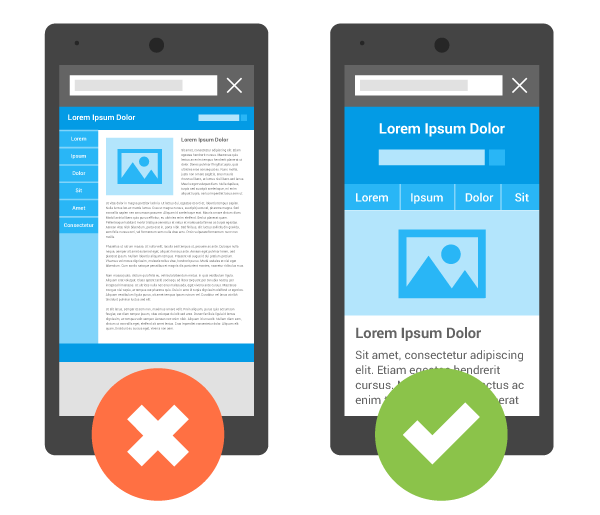
Business Plan Template

Permalinks: What They Are & How to Structure Them for Max SEO Value

Software Stack Editor · April 3, 2024 ·

What comes to mind when you think of SEO?

“Permalink” probably isn’t the first or second thing, maybe not even the 10th thing.

→ Download Now: SEO Starter Pack [Free Kit]

The truth is, permalinks and SEO have a lot more in common than you may realize, and — when done correctly — can play an important role in improving your website’s ranking. Luckily, they are also simple to master.

Let’s get into how permalinks work, how to create them, and set them on WordPress.

Let’s break down this post’s permalink.

Permalink structure example

You first have your domain (and subdomain in some cases) which is where your website lives. It’s followed by the path, which indicates the location of the page. In this example, the article is located under the “Marketing” category.

The last part of your URL is the slug — an essential part of your permalink and vital for SEO because it tells search engines how to index your site.

Each component creates a permanent link leading to a specific page on your website that is unlikely to change, hence the name “permanent.”

When you don’t customize your URLs using permalinks, you get a randomized ID. The problem is that this isn’t attractive to site visitors and isn’t optimized for search engines.

Let’s say you’re blogging about sponsored tweets and their value. Would you rather have the URL look like this:

yourdomain.com/sponsored-tweets-guide

Or like this:

yourdomain.com/post-id?=5726fjwenfkd

Probably the first one, right?

Great slugs should include the keywords targeted in the post. Take our example above: “sponsored-tweets-guide.”

From this permalink, the reader (and Google) know the page is a guide to sponsored tweets and targets the keyword “sponsored tweets.” This makes it easier for readers to find and share your content.

In addition, using keywords with high monthly search volume (MSV) in your slug can help you increase your ranking.

That’s why when using a content management system (CMS) like Content Hub or WordPress, you want to think about your permalink structure early on in your web development process.

What’s the difference between a permalink and a URL?

A URL is a web address that directs to a page or file. It can include a domain name only, or also a path, slug, and other information depending on the page you are accessing.

On the other hand, a permalink refers to a specific URL structure — a tool made popular by bloggers for sharing and SEO purposes. While every permalink is a URL, not every URL is a permalink.

The Best Permalink Structures

With several permalink structures to choose from, think about your content and your audience to determine what format will work best.

For instance, a news site can greatly benefit from having a slug that includes a date and title. This lets readers know quickly by scanning what the post is about and when it was written.

On the flip side, if you manage a blog that prioritizes evergreen content and has pages that get constantly updated, you’ll likely want to avoid having any dates in your titles.

That can signal to readers that your content is old and therefore, irrelevant. Instead, have a simple slug that only includes your article title.

It’s all about using a structure that will benefit you (and your users) in the long run. Once you decide on a permalink structure, you can set it up in your CMS.

How to Make a Permalink

To make a permalink, all you need is:

  • Your domain name
  • Your slug
  • Your path (if you have several topic categories and want to organize your content)

Then, there are a few best practices to keep in mind when deciding on your permalink structure:

  • Keep it short – Avoid articles like “the,” “a,” “an” and create a slug that’s a shorter version of your title. E.g.: If your article is titled, “How to Create an Instagram Story,” your slug can simply be /Instagram-story.
  • Include your main keywords – Optimize your slug by including your keywords. Make sure the keyword you use directly relates to the content on the page.

Now, in terms of where you go to create your permalink, that’s typically on your CMS or Website Builder — such as WordPress, Wix, HubSpot Content Hub, and Drupal. The ideal time to do this is shortly after developing your site but before any posts go live. However, you can also do this at any point.

If you decide to change old URLs to reflect your new structure, be sure to update all backlinks or set up redirects for those pages.

So, you’re probably wondering how to optimize a permalink for WordPress. We’ll cover that next.

Using Permalinks with WordPress

When you create a post in WordPress, the permalink will not be optimized unless you have already set the structure. Otherwise, it will look like a random ID.

You can find the permalink on the page post while you’re editing, as seen in the example below.Permalink in WordPress blog post editing

Changing permalinks is a fairly simple process, and you won’t need to install plugins to do so. You can select from a few structures or customize your own.

More on this in the next section.

1. Open “Settings” and click on ‘Permalinks.”

How to change permalink structure on WordPress

Image Source

The first step in structuring your permalink is to open the “Settings” section of your WordPress dashboard. This should bring you to a list of options with various subheadings.

Once you click on this option, you’ll be taken to a screen with a variety of options to choose from. Depending on your preference of how you want your post to be archived and searched, you can pick the one that most aligns with your goal.

2. Choose a permalink structure option.

WordPress permalink settings

Image Source

Here are the different choices you’ll have and what they mean:

  • Default — Avoid this default option if you’re looking for maximum SEO value. It’s the post identification number, with no other information.
  • Day and name — This option sets up the slug to be the day the post went live and the name of your post. A good reason to use this is if you have multiple posts of the same name but want the differentiator to be the date it was posted.
  • Month and name — The same as the previous option, this time with the month being displayed. This is a great option if you have a monthly column, such as a “Favorites” or “Best Of.”
  • Numeric — Numeric is another choice that’s safe to ignore, as this structure is all numbers and provides little SEO value. If you’re archiving posts numerically, as a way to look back and see previous posts, numeric is the choice for you.
  • Post name — Choosing this route is an okay method for SEO, but not the best, as Google likes to focus strictly on keywords when ranking posts.

Learn more about that “custom structure” option next.

3. Consider creating a custom permalink structure.

If you’re not too excited about the structures WordPress offers, you can create your own permalink structure in minutes.

You’ll create a formula for your permalink structure, and every time a post goes live, it will follow that formula.

For example, let’s say you have a lifestyle blog and a travel category (i.e., path) under which you post about your latest vacations.

If you wanted to set the structure to be the category followed by the year and post name, here’s what you would put in the box:

/%category%/%year%postname%/

Permalink custom structure settings in WordPress

Image Source

A backslash separates each custom structure, and each tag starts with the percent sign.

You can find all of the structure tag options available to you on WordPress here.

Change a Permalink Without Hurting SEO

If you decide to change a permalink, it’s important to do so with care. This is because it will affect both the internal and external links to the page.

Make sure to set up a 301 redirect. This notifies your visitors and Google that your page has a new location. 

Google will keep track of both the redirect source (the old permalink) and the new redirect target (the new permalink) — and will eventually update the new permalink in search results.

Without a 301 redirect, your website will have broken permalinks and missing URLs — which may create a negative user experience. Search engines, like Google, will also lower your organic search ranking to prevent sending visitors to broken pages.

When creating permalinks, the main thing to keep in mind is focusing on SEO (i.e., keywords) and user experience. They’re the virtual key (pun intended) to making sure your content is found by the people you want to reach.

Editor’s Note: This post was originally published in October of 2019 and has been updated for comprehensiveness.
marketing

How to Breathe New Life Into Your Google Search Results With Rich Snippets

Software Stack Editor · April 3, 2024 ·

Google rich snippets. What the heck are those?

They’re these awesome things that can help you improve your website’s SEO and generate more site traffic from search engine results pages (SERPs), and in this article, I’m going to tell you how to set them up.

Let me first pose a question to you: Have you noticed that when doing a Google search, certain listings just look a little sexier than others? For example, if you were doing a search for “apple pie,” which of these listings when you rather click on?

Google rich snippet result about apple pie

I’ll bet you chose option #2. If you didn’t, you must really not like apple pie.

Between the thumbnail image and the five-star rating scale, what are these sites doing to make their Google listings include this extra media? The secret to these fancy pieces of information are rich snippets, which these websites have optimized for using the HTML of their website pages. 


Google Rich Snippets

Google rich snippets are enhanced search results that produce more details about a website than the average link. This “rich” media can include images, ratings, authors, dates, locations, and more. Publishers can give Google these details by including structured data in the backend of their webpages.

Google rich snippets — also called “rich results” — extract information from your website to display on your site’s listing in the search results, in addition to the typical page title, page URL, and meta description.

Each search result is guaranteed to display these three pieces of information, making up an individual snippet. The thinking is, the more information included in a search result’s snippet, the more likely users are to click on that result. With enough structured data on the page, you can earn a rich snippet.

Click here to get everything you need to get your website ranking in search.

Rich snippets are often overlooked in businesses’ SEO strategies because they are more difficult to implement than traditional on-page SEO. But with how complex Google search results look today, it would be worth your while to spend a little time learning how to do this. Adding this content-rich information to your Google search listings draws the eye and can increase your listings’ click-through rates, even when you’re not ranking in the #1 position.

There are a few options for how to install rich snippets, but I’m going to show you the easiest method: using microdata.

Keep in mind this process won’t guarantee that you’ll get a rich snippet. But giving these details special treatment can dramatically increase your chances of enhancing the appearance of your search result — and, in turn, the traffic you get from it.

How to Create Rich Snippets

  1. Identify which details you want Google to focus on.
  2. Define your webpage using Google’s Structured Data Markup Helper.
  3. Create microdata for your webpage using your selected data type.
  4. Create new HTML from this microdata.
  5. Tag your content with this microdata.
  6. Test your rich snippet.
  7. Be patient.

1. Identify which details you want Google to focus on.

Your webpage’s topic and format will dictate which types of information you want Google to display in its search results. Are you writing an article? An event page? A book review? A product page? Here are some examples of details included in rich snippets for the several types of snippets available to you:

  • Article: You can add tags for the article title, author, meta description, publish date, featured image, and more.
  • Restaurant pages: You can add tags for food items, item prices, item descriptions, item images, item calories, and more.
  • Product page: You can add tags for product names, product ratings, product prices, product availability, product images, and more.
  • Event page: You can add tags for the event name, event speakers, event schedule, event dates, and more.
  • Recipe: You can add tags for recipe rating, ingredients, image of final product, cooking duration, total calories, and more.

2. Define your webpage using Google’s Structured Data Markup Helper.

So, how do you create the tags listed above? Unfortunately, it’s not as easy as writing “Here’s the product’s price” in your webpage’s HTML and expecting Google to take the hint. To properly communicate this information to Google, the company offers a handy tool for creating structured datasets based on the type of webpage you’re publishing. It’s called the Structured Data Markup Helper. Use it here, and see it below.

google-structured-data-markup-helper

As you can see, above, you’ll start by selecting the attribute that best describes the content you’re creating. Then, at the bottom of this page, enter the existing URL of the webpage to which your content has been published. (Note: To use this tool, you’ll publish your content first, and then retrieve the URL so you can structure your data accordingly.)

3. Create microdata for your webpage using your selected data type.

Microdata is a way to label content to describe what this content represents. An event, for example, has all sorts of information associated with it, including the venue, starting time, name, and category. You can then use a bit of code to basically tell Google, “Here’s my event and the most important information people would need to know about it.”

How Microdata Can Be Used

Microdata wraps your text in very simple HTML tags, such as or

tags, to assign descriptive terms to each bit of information. Here’s an example block of HTML showing some basic information about me — the author of this article — below.

My name is Diana Urban, and I was born and raised in New York. I’m on the marketing team at HubSpot, an all-in-one marketing software company in Cambridge, MA.

See those

tags at the beginning and end of the copy, above? This denotes text that is in standard paragraph style. There’s nothing unique about the text above compared to any other paragraph in this article. This makes it hard for Google to interpret it the way you might want it to be interpreted.

Now, here is the same HTML tagged with microdata:

<div itemscope itemtype=”http://data-vocabulary.org/Person“>
My name is <span itemprop="name“>Diana Urban, and I was born and raised in New York.
I’m the <span itemprop="title“>Head of Prospect Marketing at <span itemprop="affiliation“>HubSpot, an all-in-one marketing software company in Cambridge, MA.

Those bold tags in the HTML above tell Google what each piece of my author bio actually is. The “person” tag indicates this is about a person. The “name” tag indicates the following text is my name. The “title” tag indicates the following text is my job title. The “div” tags single out the entire section of HTML so Google knows it can highlight it in my article’s snippet, given the appropriate search term a user might enter.

Creating Your Microdata

Once you’ve selected your data type in the previous step, you’ll be taken to a page where you can automatically associate certain details of your webpage with microdata that describes those details. To create microdata for an article’s author, for example, you’ll highlight the author’s name on the webpage — which Google projects on the lefthand side of the tool — and select “Author” in the dropdown that appears. See how this looks, below.

Author tag created using Google's Structured Data Markup Helper


4. Create new HTML from this microdata.

Next, you’ll create new strings of HTML from the microdata you created in the previous step. Once you’ve finished assigning each part of your webpage a proper tag, click the red “Create HTML” button on the top-righthand corner of the tool, as shown below.

create-html-google-structured-data-markup-helper

5. Tag your content with this microdata.

With your HTML successfully created, you’ll see every tag you created in step 3, above, listed in a block of code you can then insert into your article’s HTML. You’ll insert this code in your content management system (CMS).

Google recommends adding the HTML it created for you into the “head section” of your article’s HTML. If you use Content Hub, you’ll find separate HTML boxes designed just for this occasion, as shown below.

Head and footer HTML sections for adding code snippets in HubSpotLearn more about adding HTML to webpages in HubSpot Academy.

Want another way to tag your HTML with various pieces of microdata? Review the different examples of rich snippets below this list of instructions. Each of these rich snippets link to separate Google instructions on how to optimize for each type of rich snippet. (When you load their page, always select the “microdata” approach to get the right instructions.)

6. Test your rich snippet.

Google Webmaster Tools has another nifty feature that lets you test your rich snippet. Click here to use their Structured Data Testing Tool. This will confirm whether or not Google can read your markup data and whether your rich snippets are appearing in their search results.

7. Be patient.

If you don’t see your rich snippets in Google’s search results right away, don’t freak out. It actually takes Google as long as a few weeks to crawl and index this new data. So go to the beach. Sip a margarita. Soak in some sun.

Okay, it’s more likely that you’ll just keep working on other stuff in the meantime, but a girl can dream …

Rich Snippets Examples

Let’s run through some of the different types of rich snippets that are available to use on your website. Each section links to Google’s instructions on how to actually install the rich snippets — remember to select the microdata option for the easiest installation process!

Business and Organization Snippets

A rich snippet about a business or organization can include location information, contact information, price ranges, hours, and customer reviews, if there are any available.

business-google-rich-snippet

Learn how to create rich snippets for organizations >

Event Snippets

Event snippets include the date, location, and time of the event. If there are more than one option for the events, up to three will be displayed.

event-google-rich-snippet

Learn how to create rich snippets for events >

Music Album Snippets

Using music album rich snippets will display links to individual songs in an album, or even lyrics to the song if available.

music-google-rich-snippet

Learn how to create rich snippets for music >

People Snippets

The people snippet displays information such as a person’s job title, the company they work for (a.k.a. affiliation), and location. It can also display a photo, nickname, and more.

People snippets are different than author snippets. Here is the difference, with an example of yours truly.

people-google-rich-snippet

Learn how to create rich snippets for people >

Product Snippets

Product rich snippets include things like a picture of a product, ratings, and price range of the product.

product-google-rich-snippet

Learn how to create rich snippets for products >

Recipe Snippets

Recipe rich snippets provide users with additional information about a specific cooking recipe, such as the ratings (1 to 5 stars), cook/prep time, and calorie information.

In order to qualify as a recipe, you must have at least two of the following tags in place:

  • A photo of the dish
  • The tag: prepTime, cookTime, totalTime, or ingredients
  • Calories
  • Review
recipe-rich-snippet
 
Learn how to create rich snippets for recipes >

Review Snippets

You’ve already seen a bunch of examples of snippets that have 5-star ratings included. But you can also set up a snippet that is just the review portion.

review-google-snippet

Learn how to create rich snippets for reviews >

Video Snippets

If you want a thumbnail of a video to display next to your search listing, the markup works a little different. Google recognizes the Facebook Share markup code, so you might as well kill two birds with one stone.

video-google-rich-snippet

Learn how to create rich snippets for videos >

marketing

Click here to get everything you need to get your website ranking in search.

The 10 Best Content Management Software Tools in 2023

Software Stack Editor · April 3, 2024 ·

Running a website requires input and strategy from your whole business team (developers/engineers, marketers/UX, sales, etc.). Using Content Management Software (or CMS) helps you deliver a great product to your customers while granting easy code access for your developers/engineers.

Build your website with HubSpot's Free CMS Software

Without a good integration between your content management software and your other systems, something as simple as successfully sending a follow-up email after a form submission can become a massive time suck.

Let’s explore the characteristics you need for any content management software tool and the ten best content management software tools for marketers. Feel free to use the following jump links to navigate or just scroll.

  • Content Management Software Tool Characteristics

  • Best Content Management Software Tools

Characteristics of the Best Content Management Software Tools

Here are some features marketers should feel good about in a content management software tool.

1. A powerful, flexible editor.

As marketers, we need to be able to do things like quickly produce a landing page for a Facebook campaign, make simple layout changes to a page (like adding a column or testimonials module), and easily edit the content on existing pages (like changing some of the text of your homepage to promote your upcoming annual conference).

A powerful WYSIWYG (“what you see is what you get”) editor is critical, so if you can, ensure you’re comfortable making changes within the content management software tool.

2. The ability to test.

It’s crucial you’re able to understand what’s working, so you can do more of the good stuff. You need to be able to efficiently run tests on outcomes for different headlines, layouts, and more. It’s especially critical when doing something like a paid campaign, where maximizing results is tied directly to spending.

3. The opportunity for increased collaboration.

Chances are, you have a team of people working on one website.

You may have a developer who works on complex design pieces and integrations, a marketer who runs the day-to-day and manages campaigns, and content creators who write blog posts.

The ability to collaborate within the content management software tool and set permissions makes life a lot easier — and ensures issues don’t arise like your social manager accidentally overwriting the developers’ code.

4. Accessibility to support.

Oftentimes, your developer can fill this need — but that can get expensive if you’re paying by the hour. It’s maybe not mission critical, but it sure is nice to have a support team you can call for help when you need it, especially when it’s halting your ability to launch a campaign.

5. Ability to integrate with the rest of your tools.

Last but probably most importantly, you need your content management software to integrate with the rest of your tech stack. Generally, the best choices here will be open platforms or all-in-one solutions.

Ideally, it should at least be able to integrate forms with a mailing tool (for lead/ mailing list collection), as well as your CRM or some kind of database, so you can personalize content. Additionally, you’ll want to integrate with your CRM to customize pages and add pages quickly and easily.

Now that we’ve explored five critical components of any content management software tool let’s explore our ten favorites.

1. CMS Hub

CMS Hub by HubSpot is more than just a content management software tool since it lives on your CRM.

HubSpot’s content management software tool has nice features like A/B testing, but it’s particularly powerful regarding features like personalized content and smart content. If you’re using HubSpot’s marketing platform, it also works seamlessly with forms, your email list, and database management.

For instance, you want a list of everyone in your database who visited your pricing page in the last 30 days. This is incredibly easy to do with HubSpot’s content management software and CRM.

It also scores well on the design side — like any content management software tool, it offers predesigned templates, a developer platform, and a network of partners certified in the content management software.

There are also some great out-of-the-box features designed to help with content creation — like the ability to natively host video and add forms and calls-to-action in the video using the native editor, along with video analytics and a YouTube analytics integration.

Some of the features marketers will love on a platform level are the ability to partition content, so it’s easier for teams to work together. Additionally, you can publish content behind passwords and easily personalize content. Best of all, its high-quality security and hosting take the worry out of the technical side. And, of course, you get top-notch analytics since everything works together.

a preview of the CMS Hub tool

Get started with HubSpot’s free CMS tool today

2. Squarespace

Squarespace offers beautiful out-of-the-box designs with tons of customization options. You can easily download any theme and change colors, fonts, and other design elements. It seems geared more toward the end user than the developer, so most edits are made in a WYSIWYG design editor.

Behind the scenes, they boast high-quality, secure hosting — something that isn’t always top of mind when selecting a content management software tool but probably should be. It also allows for unlimited bandwidth and storage, which isn’t always the case if you’re buying hosting on its own.

It’s also nice to have a support team, and Squarespace has a team that answers support tickets, so you’re not totally on your own or stuck calling a developer for every question. Additionally, it offers incredibly useful help documentation.

Squarespace offers tons of modules and integrations, although you might want to check their built-in integrations to make sure the rest of your tech stack will play well with Squarespace.

Squarespace

Image Source

3. Wix

Wix has many templates and a free plan that gives you unlimited pages. If you need to get an online presence up and running right away, it’s a great choice.

They also have paid plans that give you additional features, including increased storage, the ability to add forms, a calendar, and access to VIP Support.

It’s important to note Wix is a bit tougher to customize — they don’t give access to CSS, although they do say you can “take full control of your website’s functionality with JavaScript and Wix Code API’s.”

Additionally, inserting third-party code (like tracking code) can be challenging, so eventually, as your business grows, you or your developer may want something with a bit more customization capability.

Wix

Image Source

4. WordPress

And next, we come to WordPress. WordPress is everywhere — it’s a popular platform and has a large ecosystem of developers, designers, and plenty of others who are familiar with it.

The content management software tool itself is free, although you’ll need to pay for hosting and probably a template at the very least, and more likely a developer or designer to help you get it up and running.

Your ease of use here will likely depend on how it’s set up and which theme you use — some have simple WYSIWYG editors, while others are more complex. You’ll want to discuss this with your developer since once it’s built, there isn’t much you can change.

It’s also incredibly customizable. There are a ton of plugins and add-ons you can use to help with anything from SEO, speed, automatic image resizing, and more.

WordPress also implements automatic background updates that help reduce any security issues that may arise.

On the hosting side, we recommend a hosting platform specializing in WordPress, like WP Engine, since the support teams are well-versed in WordPress — which means they can help with questions and offer additional resources. Using a popular theme with plenty of existing help documentation or a support team can make a huge difference.

It’s important to note the openness of the platform results in a vulnerability to hacking (this is another reason to get a good host). Be aware that addressing security should be part of the initial plan and not be an afterthought to design since security breaches are hard to fix and require technical expertise.

However, WordPress addresses this issue by having frequent, automatic background updates. Security issues are usually because hackers prey on old software. With automatic background updates, this is a significantly reduced issue.

Wordpress5. Joomla

Joomla is great because it has a lot of built-in functionality that lets you fully customize your website (over 6,000+ extensions), tinker with SEO settings, easily change languages, and manage your webpages individually.

Joomla

Image Source

Unlike WordPress, Joomla doesn’t have automatic background updates. So if you choose to use this software, you will have to take on the responsibility yourself. 

With Joomla, you can customize your website fully, but it depends on how much technical knowledge you have when it comes to web-building.

6. Drupal

Drupal is a great choice for developers technically familiar with HTML and CSS. You have complete control over your website, so if you have a team of developers ready to work on your website, this might be the best content management software tool for you.

Drupal

Drupal also has tens of thousands of Modules and thousands of themes to increase customizability. These modules and themes also give you a lot of freedom, so those with a technical background can take full advantage of these features.

7. Sitecore

What sets Sitecore apart from the other CMS platforms on our list is the ability to reuse content and quickly work on a site across teams using Sitecore Experience Accelerator (SXA). This can speed up the process for developers. Here is what the toolbox looks like.

Sitecore

Sitecore is great if you have a team of experienced developers to fully use the team-building developing features. If you’re on your own or aren’t experienced with coding, you might be better off using a different CMS. 

8. Shopify

This is the best option for e-commerce retailers and first-time sellers. Shopify trades in versatility for ease of use and simplicity. If you’ve never created a website before and are still learning the ropes, this is one of the best content management software tools.Shopify

Shopify is on the pricier side, with its cheapest plan being $29/month, but you are paying for the ability to create a website with little to no hassle. Another bonus is that all Shopify websites are PCI compliant by default, meaning you can accept payments from Visa, MasterCard, American Express, and Discover.

You won’t have to worry about security as much with Shopify, as the platform regularly conducts automatic background updates, so your website will almost always be up to date.

9. Ghost

Ghost is best for users who want to build a website dedicated to blogging. They have a simple and intuitive interface that lets you quickly publish content to your users. Ghost also makes it easy to offer gated content so you can monetize your blog or other forms of content.Ghost

To use Ghost, you must pay for one of their subscription plans. You can try the CMS out for $9/month, but if you want to fully build a website, you must pay at least $25/month (billed yearly).  

10. Webflow

Webflow is a visual platform that lets you build websites using its intuitive drag-and-drop tool. It is a tool that is best for people who want something with little to no coding experience required and is low maintenance. Here is an example of what the site editor looks like.Webflow

You can try the website for free, but to get full use of the CMS, you will need to pay $23/month (billed yearly).

Getting Started With a Content Management Software Tool

While these are ten popular choices for marketers, many more are out there. The options are endless for content management software tools. Ultimately, you must consider your workflow, your team, and the workflows you have in place to help you make the best decision.

content hub


The Ultimate Guide to Building a Website Redesign Strategy

Software Stack Editor · April 3, 2024 ·

So, you want to start a website redesign. Maybe you just finished a brand overhaul or your product was recently updated. Whatever your reason, a redesign can be a huge success — or not. It can also be a long and tedious undertaking, which is why every redesign needs to start with a clear vision and/or problem to solve.

The better you are at defining that vision at the very beginning, the more successful your redesign will be — and the smoother the entire process will be as well.

Free Workbook: How to Plan a Successful Website Redesign

Whether you’re working with an agency, redesigning your site in-house, or proposing a redesign to company stakeholders, this guide has tips to help you strategize your website redesign and ensure it turns out to be a huge success — not a flop.


Many organizations opt to redesign their website to welcome more traffic as their business grows. Others invest in a website redesign as part of a larger rebranding initiative. Regardless of why your company is interested in a website redesign plan, the project itself is a massive undertaking, not to mention an important one to get right considering the critical role your website plays in your marketing and brand image.

In fact, new research has found that 50% of consumers think website design is crucial to a business’s overall brand. To many visitors, the website you publish is just as important as the products you sell.

How Often Should You Redesign Your Website?

According to Business 2 Community, the average lifespan for a website is 1.5 to 2.5 years. Because design trends change and technology advances, this is the average amount of time that a redesign will feel “fresh” and competitive. However, that timeframe is only a benchmark, so you will need to determine what works best for your unique organization.

The following factors can determine how often you should redesign your website:

  • How often your brand or goals change. When you’re itching for a new site, first ask yourself, “Does this website still represent who we are as a company?”
  • How much budget you allot to design and development. Ask yourself, “Can a site design wait, or do I have reasons to use the budget on our site now?”
  • How long your website stays functional and fast. Step into your customers’ shoes and see if you can navigate the site well and find everything you want to find without encountering errors or long page load times. Almost 50% of websites get between four and six page views per visit — all that browsing means that your site’s navigation and speed really do matter.
  • The performance of your website. Ask yourself, “Is this site converting a reasonable amount of traffic? Do people stay on the page for a reasonable amount of time, or do they bounce?”
  • Changes in the industry. For example, when Google announced that it would be changing to mobile-first indexing, it necessitated that websites be mobile-friendly, or they’d lose organic traffic from Google.

Your website is where visitors and customers go when they want to ask questions, read content, or purchase products or services. For that reason, it’s best to be extra prepared when committing to a website redesign.

You may spend more time building your website redesign plan than you will on the redesign itself. If you’re wondering what should go into your website redesign strategy, start with the steps below.

Let’s unpack eight critical website redesign tips to think about when planning and completing your redesign.

1. Benchmark your current performance metrics.

Before you begin planning your website redesign, document your current performance metrics. This will give you a good idea of where your current website stands and what metrics you can improve upon through your redesign.

Analyze your existing website’s monthly performance in the following areas. The importance and relevance of each may vary depending on your website redesign goals, but it’s helpful to pull each metric before you dive into your redesign.

  • Number of visits, visitors, and unique visitors
  • Bounce rate
  • Time on site
  • Top-performing keywords in terms of rank, traffic, and lead generation
  • Number of inbound linking domains
  • Total new leads and form submissions
  • Total sales generated (in dollars)
  • Total pages indexed
  • Total pages that receive traffic

If you don’t have access to this information, I recommend tools like Google Analytics and HubSpot’s Marketing Analytics for better tracking and visibility into your website’s performance.

how-to-develop-a-website-redesign-strategy-that-guarantees-results-free-template_5

Furthermore, make note of which tools you used to measure each of these benchmarks in the past. Ideally, you’ll want to use those same tools when collecting your post-redesign metrics. Otherwise, you’ll be comparing apples to oranges.

2. Determine your website redesign goals.

What’s the “why” behind your website redesign? When considering a redesign, there should always be a good reason behind it.

If you’re answering with “well, it’s been a while since we’ve done one” or “my competitor just did a redesign,” those reasons aren’t good enough on their own.

Remember: It’s not just about how your site looks, but rather how it works. Be crystal clear about why you’re doing a website redesign, and tie those goals to measurable results. Then, communicate your goals with your team, designer, or agency.

Consider the following data-driven objectives for your own website:

  • To increase the number of visits and visitors (both are important as one visitor could visit more than once)
  • To reduce bounce rate
  • To increase time on site
  • To improve domain authority
  • To increase the total new leads and form submissions
  • To increase the total sales generated
  • To enhance current SEO rankings for important keywords

Many of these goals are dependent on one another. For example, in order to generate more conversions, you may also need to increase traffic while decreasing your site’s bounce rate.

Also, take a look at the metrics you pulled out in the previous step. Are there any metrics you can improve upon with your new website? Perhaps you use your old website metrics to inspire new goals, too.

3. Define your branding and messaging.

Before crafting your new website design and content, be crystal clear about your desired branding, messaging, and unique value proposition. Doing so will ensure consistency across your entire website.

Anyone who visits your website for the first time should immediately understand what you do, how it may benefit them, and why they should stay onyour site, so they don’t flee to competitors.

Take our homepage as an example: It’s immediately clear what we do, what we offer, and how any visitor can get started.example of a website redesign on hubspot's homepage

Think about whether you plan to change your branding and/or messaging, or if it will stay the same. If you plan to change it, what needs to change? Keep these changes top-of-mind as you redesign your website.

Download this free workbook for guidance and templates to simplify your next website redesign project.

As you develop your messaging, use clear, concise language. Avoid industry jargon that may alienate parts of your audience and make you sound more like a business-babbling robot than a human.

Consider the following example of how we could describe HubSpot in a “gobbledygook” way:

HubSpot helps companies across multiple countries reduce churn by backfilling the sales pipeline with highly qualified traffic that generates leads that convert into customers with high lifetime value. We achieve this by providing leading-edge software that integrates all marketing channels for a synergistic view of the data that determines and prioritizes high-value marketing activities.

Say what? Let’s translate that into the way people actually speak:

HubSpot’s all-in-one marketing software helps over 100,000 businesses in more than120 countries attract leads and convert them into customers. A pioneer in inbound marketing, HubSpot aims to help its customers make marketing that people actually love.

Much clearer!

Additionally, as you develop your company branding, consider what visual aspects of your website need to be redesigned and what can stay the same. Have you created a new logo, style guide, or color palette? Make sure these are applied to your new website so it remains consistent with other parts of your brand.

For some more inspiration, check out our roundup of our favorite B2B website examples:


4. Define your buyer persona(s).

Your website is not just about you. Actually, it’s hardly about you.

When your visitors land on your website, they’re asking themselves, “What’s in it for me? How could this help me?”

Speak to your visitors in their language by crafting your website design and content around your buyer personas.

For instance, if you’re a marketing manager at a hotel looking to bring in new business, you might target five different buyer personas: an independent business traveler, a corporate travel manager, an event planner, a vacationing family, and a couple planning their wedding reception.

how-to-develop-a-website-redesign-strategy-that-guarantees-results-free-template_1

Make sure you clearly identify your buyer personas so you can shape your website redesign strategy around the website visitors that matter most to you.

Check out our handy buyer persona builder to help you create detailed buyer personas.

Is your target audience changing as part of your website redesign? Do your branding and content align with this audience? Answer these questions as you’re strategizing your website redesign.

5. Protect your search engine optimized pages.

Getting discovered online is also essential to improving your website’s metrics. If no one is able to find and visit your site, how can you increase new leads, conversions, or sales? Here are some tips for designing your new website with search engine optimization (SEO) in mind:

Document your most search-valued pages.

Use your marketing analytics to figure out which pages receive the most traffic and inbound links, convert the most leads, and ultimately cover the most influential topics in your industry. If you plan to move any of these highly valuable pages, make sure you create the proper 301 redirects.

Create a 301 redirect strategy.

Speaking of 301 redirects, these are extremely important in terms of retaining the traffic and link value associated with a given page. Create a spreadsheet to record and map out your 301 redirects (old URLs vs. new URLs). Then hand this document over to someone technical for proper implementation.

Do your keyword research.

For every page on your newly designed website, pick one keyword/topic each page will focus on. Once you determine the keyword(s), use on-page SEO best practices to optimize your website pages. Furthermore, consider adding new content and pages to your website that address those particular keywords and topics that may be neglected on your current site.

Save time and rank higher on Google with our free on-page SEO template.

6. Analyze the competition.

While we don’t recommend obsessing over your competitors, it can help to know how you compare. First, run your website through HubSpot’s free Website Grader tool to generate a report card of how well your website is performing. You can also use this diagnostic tool to evaluate your competitors’ websites, so you’re aware of their strengths and weaknesses.

website-redesign-website-grader

Next, take a look at your competitors’ websites, and take note of what you like — and what you don’t. This process is to help you realize what you can do better on your website. Once you conduct your competitive analysis, put together a list of action items highlighting some areas for improvement and how you can set yourself apart from your competitors.

7. Take inventory of your high-performing content.

While a redesign is a great way to improve the performance of your website, there are unfortunately countless ways in which it can hurt you. Your existing website likely contains many high-performing content assets that you’ve already built up, and losing their effectiveness because of a redesign can severely damage your marketing results.

For instance, such assets might include your:

  • Most-shared or viewed content
  • High-traffic pages
  • Best performing or ranking keywords and associated pages
  • Number of inbound links to individual pages

For example, if you end up removing a page from your site that has accumulated a high number of inbound links, you could potentially lose a lot of SEO credit, which would make it increasingly difficult for you to get found on search engine results pages (SERPs).

Keep in mind that many web designers don’t consider this step because they are neither marketers nor SEO specialists. Don’t hesitate to remind them about this, and help them along by auditing your site and providing them with a list for maintaining or updating critical pages on your site.

8. Choose the right software.

The final (but arguably most important) step of the website redesign process is choosing the right software with which to create and host your website. This software is typically called a content management system (CMS), and it’s used to develop, design, and publish your website for the world to see.

CMS software is beneficial for a few reasons. Whether you’re a novice digital marketer or a master web developer, a CMS can easily help you create a gorgeous, functional website. Choosing the right CMS depends on your business, such as what CMSs you’re already familiar with and what features your website redesign requires.

There are hundreds of CMSs to choose from, including Content Hub — the only combined CMS and CRM. Or you can review some of the best CMS platforms to learn about your options.

Get Started on Your Website Redesign Today

Whew! Now you’re ready to plan, design, build, optimize, launch, and analyze your new website. Apply these seven steps to redesign a website that attracts more consumers, wows more visitors, and converts more customers.

Editor’s note: This post was originally published in January 2013 and has been updated for comprehensiveness.

how-to-develop-a-website-redesign-strategy-that-guarantees-results-free-template_0


Cybersecurity: The Ultimate Guide to Defending Against Cyber Attacks

Software Stack Editor · April 3, 2024 ·

Think about how much of the world relies on the internet. The government, military, academia, health care industry, and private industry not only collect, process, and store unprecedented amounts of data in cyberspace — they also rely on critical infrastructure systems in cyberspace to perform operations and deliver services. 

An attack on this infrastructure could not only threaten customer data or a business’s bottom line — it could also threaten a nation’s security, economy, and public safety and health.

Considering its importance, we’ve compiled this ultimate guide on cybersecurity. Below, we’ll talk about what cybersecurity is exactly, how to protect your systems and data from attacks, and what resources to follow to stay up-to-date with emerging trends and technology related to cybersecurity.

Learn More About HubSpot's CMS with SSL


Good cybersecurity involves multiple layers of protection across the data, devices, programs, networks, and systems of an enterprise. A combination of technology and best practices can provide an effective defense against the continually evolving and growing threats of cyberspace.  

These threats include phishing, malware, ransomware, code injections, and more. The impact can vary depending on the scope of the attack. A cyber attack might result in the attacker making unauthorized purchases with an individual’s credit card info, or erasing an entire system after injecting malware into an organization’s code base.

While even the best cybersecurity can’t defend against every type or instance of attack, it can help to minimize the risks and impact of such attacks.

Types of Cybersecurity

Cybersecurity is a broad term that can be broken down into more specific subcategories. Below we’ll walk through five major types of cybersecurity.  

Application Security

Application security, also known as AppSec, is the practice of developing, adding, and testing security features within web applications in order to protect them against attacks. Vulnerabilities, security misconfigurations, and design flaws can be exploited and result in malicious code injections, sensitive data exposure, system compromise, and other negative impacts. HubSpot’s Content Hub provides a free web application firewall (WAF) that can protect your site and content from malicious attacks.

AppSec is one of the most important types of cybersecurity because the application layer is the most vulnerable. According to Imperva research, nearly half of data breaches over the past several years originated at the web application layer.

Cloud Security

Cloud security is a relatively recent type of cybersecurity. It is the practice of protecting cloud computing environments as well as applications running in and data stored in the cloud. ​

Since cloud providers host third-party applications, services, and data on their servers, they have security protocols and features in place — but clients are also partially responsible and expected to configure their cloud service properly and use it safely.

Critical Infrastructure Security

Critical infrastructure security is the practice of protecting the critical infrastructure of a region or nation. This infrastructure includes both physical security and cyber networks, systems, and assets that provide physical and economic security or public health and safety. Think of a region’s electricity grid, hospitals, traffic lights, and water systems as examples.

Much of this infrastructure is digital or relies on the internet in some way to function. It is therefore susceptible to cyber attacks and must be secured.

Internet of Things (IoT) security

Internet of Things security, or IoT security, is the practice of protecting virtually any device that connects to the internet and can communicate with the network independently of human action. This includes baby monitors, printers, security cameras, motion sensors, and a billion other devices as well as the networks they’re connected to.

Since IoT devices collect and store personal information, like a person’s name, age, location, and health data, they can help malicious actors steal people’s identities and must be secured against unauthorized access and other threats.

Network Security

Network security is the practice of protecting computer networks and data against external and internal threats. Identity and access controls like firewalls, virtual private networks, and two-factor authentication can help.

Network security is typically broken down into three categories: physical, technical, and administrative. Each of these types of network security is about ensuring only the right people have access to network components (like routers), data that is stored in or transferred by the network, and the infrastructure of the network itself.

Cybersecurity Terms to Know

Cybersecurity is a very intimidating topic, not unlike cryptocurrency and artificial intelligence. It can be hard to understand, and, frankly, it sounds kind of ominous and complicated.

But fear not. We’re here to break this topic down into digestible pieces that you can rebuild into your own cybersecurity strategy. Bookmark this post to keep this handy glossary at your fingertips.

Here’s a comprehensive list of general cybersecurity terms you should know.

Authentication

Authentication is the process of verifying who you are. Your passwords authenticate that you really are the person who should have the corresponding username. When you show your ID (e.g., driver’s license, etc), the fact that your picture generally looks like you is a way of authenticating that the name, age, and address on the ID belong to you. Many organizations use two-factor authentication, which we cover later.

Backup

A backup refers to the process of transferring important data to a secure location like a cloud storage system or an external hard drive. Backups let you recover your systems to a healthy state in case of a cyber attack or system crash.

Behavior Monitoring

Behavior monitoring is the process of observing the activities of users and devices in your network to recognize any potential security events before they occur. Activities must not only be observed but also measured against baselines of normal behavior, trends, and organizational policies and rules. 

For example, you might monitor and track when users log in and log out, if they request access to sensitive assets, and what websites they visit. Then say a user tries to log in at an unusual time, like the middle of the night. In that case, you could identify that as unusual behavior, investigate it as a potential security event, and ultimately block that log in attempt if you suspect an attack.

Bot

A bot, short for robot, is an application or script designed to perform automated and repetitive tasks. Some bots have legitimate purposes, like chatbots that answer commonly asked questions on a website. Others are used for malicious purposes, like sending spam emails or conducting DDoS attacks. As bots become more sophisticated, it gets harder to tell the difference between good bots and bad bots or even bots from human users. That’s why bots pose an ever-growing threat to many individuals and organizations. 

CIA Triad

The CIA triad is a model that can be used to develop or evaluate an organization’s cybersecurity systems and policies.

The CIA triad refers to confidentiality, integrity, and availability. In practice, this model ensures data is disclosed only to authorized users, remains accurate and trustworthy throughout its lifecycle, and can be accessed by authorized users when needed in spite of software failures, human error, and other threats. 

cybersecurity term: CIA triad refers to the three pillars of any cybersecurity defense, confidentiality, integrity, and availability

Image Source

Data Breach

A data breach refers to the moment a hacker gains unauthorized entry or access to a company’s or an individual’s data.

Digital Certificate

A digital certificate, also known as an identity certificate or public key certificate, is a type of passcode used to securely exchange data over the internet. It’s essentially a digital file embedded in a device or piece of hardware that provides authentication when it sends and receives data to and from another device or server.

Encryption

Encryption is the practice of using codes and ciphers to encrypt data. When data is encrypted, a computer uses a key to turn the data into unintelligible gibberish. Only a recipient with the correct key is able to decrypt the data. If an attacker gets access to strongly encrypted data but doesn’t have the key, they aren’t able to see the unencrypted version.

cybersecurity term: plain text is encrypted with key to transform it into cipher text

Image Source

HTTP and HTTPS

Hypertext Transfer Protocol (HTTP) is how web browsers communicate. You’ll probably see an http:// or https:// in front of the websites you visit. HTTP and HTTPS are the same, except HTTPS encrypts all data sent between you and the web server — hence the “S” for security. Today, nearly all websites use HTTPS to improve the privacy of your data like the free SSL provided by the free Content Hub.
cybersecurity terms: HTTP provides insecure connection vs HTTP provides encrypted connection

Image Source

Vulnerability

A vulnerability is a place of weakness that a hacker might exploit when launching a cyber attack. Vulnerabilities might be software bugs that need to be patched, or a password reset process that can be triggered by unauthorized people. Defensive cybersecurity measures (like the ones we talk about later) help ensure data is protected by putting layers of protections between attackers and the things they’re trying to do or access.

A cyber attack is a deliberate and typically malicious intent to capture, modify, or erase private data. Cyber attacks are committed by external security hackers and, sometimes, unintentionally by compromised users or employees. These cyber attacks are committed for a variety of reasons. Some are looking for ransom, while some are simply launched for fun.

Below we’ll briefly go over the most common cyber threats. 

1. Password Guessing (Brute Force) Attack

A password guessing (or “credential stuffing”) attack is when an attacker continually attempts to guess usernames and passwords. This attack will often use known username and password combinations from past data breaches.

An attacker is successful when people use weak passwords or use the password between different systems (e.g., when your Facebook and Twitter password are the same, etc). Your best defense against this kind of attack is using strong passwords and avoiding using the same password in multiple places as well as using two factor authentication, as we talk about later.)

2. Distributed Denial of Service (DDoS) Attack

A distributed denial of service (DDoS) attack is when a hacker floods a network or system with a ton of activity (such as messages, requests, or web traffic) in order to paralyze it.

This is typically done using botnets, which are groups of internet-connected devices (e.g., laptops, light bulbs, game consoles, servers, etc) infected by viruses that allow a hacker to harness them into performing many kinds of attacks.

types of cyber attacks: DDoS attacks involve a hacker using botnets to perform a large scale attack

Image Source

3. Malware Attack

Malware refers to all types of malicious software used by hackers to infiltrate computers and networks and collect susceptible private data. Types of malware include:

  • Keyloggers, which track everything a person types on their keyboard. Keyloggers are usually used to capture passwords and other private information, such as social security numbers.
  • Ransomware, which encrypts data and holds it hostage, forcing users to pay a ransom in order to unlock and regain access to their data.
  • Spyware, which monitors and “spies” on user activity on behalf of a hacker.

Furthermore, malware can be delivered via:

  • Trojan horses, which infect computers through a seemingly benign entry point, often disguised as a legitimate application or other piece of software.
  • Viruses, which corrupt, erase, modify, or capture data and, at times, physically damage computers. Viruses can spread from computer to computer, including when they are unintentionally installed by compromised users.
  • Worms, which are designed to self-replicate and autonomously spread through all connected computers that are susceptible to the same vulnerabilities. .

4. Phishing Attack

A phishing attack is when hackers try to trick people into doing something. Phishing scams can be delivered through a seemingly legitimate download, link, or message.

It’s a very common type of cyber attack — 57% of respondents in a third-party survey said their organization experienced a successful phishing attack in 2020, up from 55% in 2019. And the impact of successful phishing attacks range from loss of data to financial loss. 

types of cyber attacks: phishing attacks  and breakdown of the impacts of successful ones

Image Source

Phishing is typically done over email or through a fake website; it’s also known as spoofing. Additionally, spear phishing refers to when a hacker focuses on attacking a particular person or company, such as stealing their identity, instead of creating more general-purpose spams.

5. Man-in-the-Middle (MitM) Attack

A Man-in-the-Middle (MitM) attack is when an attacker intercepts communications or transactions between two parties and inserts themselves in the middle. The attacker can then intercept, manipulate, and steal data before it reaches its legitimate destination. For example, say a visitor is using a device on public WiFi that hasn’t been secured properly, or at all. An attacker could exploit this vulnerability and insert themselves between the visitor’s device and the network to intercept login credentials, payment card information, and more.

This type of cyber attack is so successful because the victim has no idea that there is a “man in the middle.” It just seems like they’re browsing the web, logging into their bank app, and so on.

types of cyber attack: Man in the middle attack intercepts connection between user and insecure web application

Image Source

6. Cross Site Scripting Attack

A cross site scripting attack, or XSS attack, is when an attacker injects malicious code into an otherwise legitimate website or application in order to execute that malicious code in another user’s web browser.

Because that browser thinks the code is coming from a trusted source, it will execute the code and forward information to the attacker. This information might be a session token or cookie, login credentials, or other personal data. 

Here’s an illustrated example of an XSS attack:

types of cyber attacks: cross site scripting attacks inject malicious code into legit websites that affects users who visit the compromised website

Image Source

7.  SQL Injection Attack

An SQL injection attack is when an attacker submits malicious code through an unprotected form or search box in order to gain the ability to view and modify the website’s database. The attacker might use SQL, short for Structured Query Language, to make new accounts on your site, add unauthorized links and content, and edit or delete data.

This is a common WordPress security issue since SQL is the preferred language on WordPress for database management.

Cybersecurity Best Practices: How to Secure Your Data

Cybersecurity can’t be boiled down into a 1-2-3-step process. Securing your data involves a mix of best practices and defensive cybersecurity techniques. Dedicating time and resources to both is the best way to secure your — and your customers’ — data.

Defensive Cybersecurity Solutions

All businesses should invest in preventative cybersecurity solutions. Implementing these systems and adopting good cybersecurity habits (which we discuss next) will protect your network and computers from outside threats.

Here’s a list of five defensive cybersecurity systems and software options that can prevent cyber attacks — and the inevitable headache that follows. Consider combining these solutions to cover all your digital bases.

Antivirus Software

Antivirus software is the digital equivalent of taking that vitamin C boost during flu season. It’s a preventative measure that monitors for bugs. The job of antivirus software is to detect viruses on your computer and remove them, much like vitamin C does when bad things enter your immune system. (Spoken like a true medical professional …) Antivirus software also alerts you to potentially unsafe web pages and software.

Learn more: McAfee, Norton. or Panda (for free)

Firewall

A firewall is a digital wall that keeps malicious users and software out of your computer. It uses a filter that assesses the safety and legitimacy of everything that wants to enter your computer; it’s like an invisible judge that sits between you and the internet. Firewalls are both software and hardware-based.

Learn more: McAfee LiveSafe or Kaspersky Internet Security

Invest in Threat Detection and Prevention

Whether you’re using the Content Hub or a common website hosting service like WordPress, it’s essential to integrate a tool to scan and detect threats. Most content management systems will include a malware scanning and threat detection feature within the platform. But if you use platforms like WordPress, you should invest in a security scanner.

Single Sign-On (SSO)

Single sign-on (SSO) is a centralized authentication service through which one login is used to access an entire platform of accounts and software. If you’ve ever used your Google account to sign up or into an account, you’ve used SSO. Enterprises and corporations use SSO to allow employees access to internal applications that contain proprietary data.

Learn more: Okta or LastPass

Two-Factor Authentication (2FA)

Two-factor authentication (2FA) is a login process that requires a username or pin number and access to an external device or account, such as an email address, phone number, or security software. 2FA requires users to confirm their identity through both and, because of that, is far more secure than single factor authentication.

Learn more: Duo

Virtual Private Network (VPN)

A virtual private network (VPN) creates a “tunnel” through which your data travels when entering and exiting a web server. That tunnel encrypts and protects your data so that it can’t be read (or spied on) by hackers or malicious software. While secure VPNs protect against spyware, they can’t prevent viruses from entering your computer through seemingly legitimate channels, like phishing or even a fake VPN link. Because of this, VPNs should be combined with other defensive cybersecurity measures in order to protect your data.

Learn more: Cisco’s AnyConnect or Palo Alto Networks’ GlobalProtect

Cybersecurity Tips for Business

Defensive cybersecurity solutions won’t work unless you do. To ensure your business and customer data is protected, adopt these good cybersecurity habits across your organization.

Require strong credentials.

Require both your employees and users (if applicable) to create strong passwords. This can be done by implementing a character minimum as well as requiring a mix of upper and lowercase letters, numbers, and symbols. More complicated passwords are harder to guess by both individuals and bots. Also, require that passwords be changed regularly.

guide to cybersecurity require strong credentials

Control and monitor employee activity.

Within your business, only give access to important data to authorized employees who need it for their job. Prohibit data from sharing outside the organization, require permission for external software downloads, and encourage employees to lock their computers and accounts whenever not in use.

Know your network.

With the rise of the Internet of Things, IoT devices are popping up on company networks like crazy. These devices, which are not under company management, can introduce risk as they’re often unsecured and run vulnerable software that can be exploited by hackers and provide a direct pathway into an internal network.

“Make sure you have visibility into all the IoT devices on your network. Everything on your corporate network should be identified, properly categorized, and controlled. By knowing what devices are on your network, controlling how they connect to it, and monitoring them for suspicious activities, you’ll drastically reduce the landscape attackers are playing on.” — Nick Duda, Principal Security Officer at HubSpot

Read about how HubSpot gains device visibility and automates security management in this case study compiled by security software ForeScout.

Download patches and updates regularly.

Software vendors regularly release updates that address and fix vulnerabilities. Keep your software safe by updating it on a consistent basis. Consider configuring your software to update automatically so you never forget.

Make it easy for employees to escalate issues.

If your employee comes across a phishing email or compromised web page, you want to know immediately. Set up a system for receiving these issues from employees by dedicating an inbox to these notifications or creating a form that people can fill out.

Cybersecurity Tips for Individuals

Cyber threats can affect you as an individual consumer and internet user, too. Adopt these good habits to protect your personal data and avoid cyber attacks.

Mix up your passwords.

Using the same password for all your important accounts is the digital equivalent of leaving a spare key under your front doormat. A recent study found that over 80% of data breaches were a result of weak or stolen passwords. Even if a business or software account doesn’t require a strong password, always choose one that has a mix of letters, numbers, and symbols and change it regularly.

Monitor your bank accounts and credit frequently.

Review your statements, credit reports, and other critical data on a regular basis and report any suspicious activity. Additionally, only release your social security number when absolutely necessary.

Be intentional online.

Keep an eye out for phishing emails or illegitimate downloads. If a link or website looks fishy (ha — get it?), it probably is. Look for bad spelling and grammar, suspicious URLs, and mismatched email addresses. Lastly, download antivirus and security software to alert you of potential and known malware sources.

Back up your data regularly.

This habit is good for businesses and individuals to master — data can be compromised for both parties. Consider backups on both cloud and physical locations, such as a hard drive or thumb drive.

Why You Should Care About Cybersecurity

According to a report by RiskBased Security, there were 3,932 data breaches reported in 2020, which exposed over 37 billion records. Moreover, a recent study found that the global average cost of a data breach amounted to 3.86 million U.S. dollars in 2020. That means the cost of data breaches amounted to approximately 15.2 billion dollars last year.

Small to medium-sized businesses (SMBs) are especially at risk. You might see corporations like Target and Sears topping the headlines as top data breach victims, but it’s actually SMBs that hackers prefer to target.

Why? They have more — and more valuable — digital assets than your average consumer but less security than a larger enterprise-level company … placing them right in a “hackers’ cybersecurity sweet spot.”

Security breaches are frustrating and frightening for both businesses and consumers. In a survey by Measure Protocol, approximately 86% of respondents said that recent privacy breaches in the news had impacted their willingness to share personal information to some extent.

But cybersecurity is about more than just avoiding a PR nightmare. Investing in cybersecurity builds trust with your customers. It encourages transparency and reduces friction as customers become advocates for your brand.

“Everyone has a role in helping to protect customers’ data. Here at HubSpot, every employee is empowered to solve for customer needs in a safe and secure way. We want to harness everyone’s energy to provide a platform that customers trust to correctly and safely store their data.” — Chris McLellan, HubSpot Chief Security Officer

Keep your business ahead of the tech curve with the tips, systems & recommended resources in our guide to staying current on emerging tech.

Cybersecurity Resources

The resources below will help you learn more about cybersecurity and how to better equip your business and team. We also recommend checking out the most popular cybersecurity podcasts and cybersecurity blogs, too.

National Institute of Standards and Technology (NIST)

NIST is a government agency that promotes excellence in science and industry. It also contains a Cybersecurity department and routinely publishes guides that standards.

Bookmark: The Computer Security Resource Center (CSRC) for security best practices, called NIST Special Publications (SPs).

The Center for Internet Security (CIS)

CIS is a global, non-profit security resource and IT community used and trusted by experts in the field.

Bookmark: The CIS Top 20 Critical Security Controls, which is a prioritized set of best practices created to stop the most pervasive and dangerous threats of today. It was developed by leading security experts from around the world and is refined and validated every year.

Cybrary

Cybrary is an online cybersecurity education resource. It offers mostly free, full-length educational videos, certifications, and more for all kinds of cybersecurity topics and specializations.

Bookmark: The Certified Information Systems Security Professional (CISSP) 2021, which is the most recent course for information security professionals. Earning this “gold standard” of cybersecurity certifications will set you apart from other information security professionals.

The Cyber Readiness Institute

The Cyber Readiness Institute is an initiative that convenes business leaders from different sectors and regions to share resources and knowledge to ultimately advance the cyber readiness of small and medium-sized businesses.

Bookmark: The Cyber Readiness Program, which is a free, online program designed to help small and medium-sized enterprises secure their data, employees, vendors, and customers against today’s most common cyber vulnerabilities.

Signing Off … Securely

Cyber attacks may be intimidating, but cybersecurity as a topic doesn’t have to be. It’s imperative to be prepared and armed, especially if you’re handling others’ data. Businesses should dedicate time and resources to protecting their computers, servers, networks, and software and should stay up-to-date with emerging tech.

Handling data with care only makes your business more trustworthy and transparent — and your customers more loyal.

Note: Any legal information in this content is not the same as legal advice, where an attorney applies the law to your specific circumstances, so we insist that you consult an attorney if you’d like advice on your interpretation of this information or its accuracy. In a nutshell, you may not rely on this as legal advice or as a recommendation of any particular legal understanding.

Editor’s note: This post was originally published in February 2019 and has been updated for comprehensiveness.

New Call-to-action


Why The Formula For a High-Attendance Event Must Include Creativity, According to SXSW’s Co-President

Software Stack Editor · April 2, 2024 ·

Founded in 1987 in Austin, Texas, South by Southwest (SXSW) is an annual conference that brings together more than 300,000 professionals in the film, TV, music, education, and tech industries.

In 2024 alone, featured speakers include include Jane Fonda, Dwyane Wade, Alex Cooper, and Daisy Ridley.

All of which is to say: It‘s a massive event centered around various creative verticals. So who better to speak on creativity than SXSW’s Co-President, Hugh Forrest?

As Forrest puts it, “Our north star has always been creativity. I’ve been with the event for over 30 years, and the event has changed a lot over that time period … But what hasn’t changed is our focus on creativity.”

Let‘s dive into some of Hugh’s top tips for injecting creativity into any event planning process. Interested in hearing the full interview? Check it out on the Hustle Daily show.

Listen to the Shows in HubSpot's Podcast Network Now

How to Inject Creativity Into Your Next High-Attendance Event

1. Allow creatives to learn from other creatives.

One of the biggest benefits of large-scale events is the opportunity to network with professionals outside of your vertical.

As a marketer, I‘m not always interested in learning from other marketers. Sometimes, I’ve found the most inspiration in conversations with script-writers, educators, or social media creators.

Hugh Forrest believes wholeheartedly in the power of interdisciplinary networking.

He says, “In particular, we’ve seen how different kinds of creative people can learn from each other. If you’re a musician, you can learn a lot from connecting with other musicians … But you can learn even more from connecting with an innovator in the food space, or an athlete, or someone who’s doing a tech startup.”

If your event is overly-siloed, it will be difficult to foster the type of collaboration and creativity that your attendees crave. Instead, consider how you might merge seemingly-opposite groups of professionals to interact and learn from each other.

2. Stay focused on your community and what matters to them.

Forrest says that SXSW has always mirrored the creativity in Austin, Texas.

When SXSW first began in 1987, they entirely focused on music — and then, in 1994 when Austin became a burgeoning film scene, SXSW adapted and added film and multimedia.

More recently, when the University of Texas added a medical school, SXSW introduced health and medical technology into their content lineup.

As Austin expands and shifts its interests, so does SXSW. Ultimately, Forrest has discovered one critical component of long-term success in the event industry: Stay on-top of what matters to your audience, and find ways to pivot when appropriate.

Click here to listen to the full podcast episode here.

As he puts it, “I mean, if we’re relevant, if we’re compelling, if we’re improving, so much of that is because we are very in touch with our community or the various communities we serve—whether that’s bands and filmmakers for the film and TV festival, or entrepreneurs, innovators, and creators. The event has thrived for 35 years because of this focus on massive creativity in all its many forms.”

He adds, “If Austin continues to push into AI and becomes this world center for AI innovation, we’ll push a lot more into AI at South by Southwest. If Austin becomes the sneaker capital of the world, then we’ll see a lot more sneaker stuff in Austin.”

Similarly, when you consider testing out new content at your next event, keep your community at the forefront.

AI is a trending topic right now, but are you sure your community cares about it? Or are they more interested in learning how to expand their TikTok following? Leaning into the content that applies to your community will be key to creating a fulfilling and high-attended event.

3. AI is increasingly important … but don’t under-appreciate the face-to-face component that lets creativity shine.

“One of the themes that we always rediscover at SXSW is on the one hand, we’re an event about technology and celebrate new ways for people to connect,” Forrest says.

He adds, “But on the other hand, the most important technology is face-to-face interaction. And that hasn’t changed. Bringing people with diverse ideas together in a city that has always cultivated and celebrated creativity — in a time of year when you have the manifestation of rebirth and creativity (i.e. springtime) — has turned out to be a very strong formula for good things to happen.”

AI is all the rage right now. But the most compelling reason people purchase tickets to conferences and events is the in-person offering. With 65% of workers preferring a completely remote setup, face-to-face interactions are rare.

When given the chance, people want to jump on the opportunity to connect in-person.

So, while it can be tempting (and cost-effective) to create an entirely virtual event, you might want to consider offering attendees the opportunity to engage in real life — even if that just means an optional meet-and-greet after the main event.

As Forrest puts it, “Creativity is what makes us human. And in 2024, as we see more and more machines taking over, we really need to lean into our humanity.”

hubspot podcast network

How to Run Facebook Ads: Step-by-Step Guide to Advertising on Facebook

Software Stack Editor · April 2, 2024 ·

Facebook marketing has become a staple for social media marketers over the last few years, and the credit goes to its massive user base. With over 3.06 billion users worldwide, 89% of businesses run Facebook ads as their primary advertising method.

But, running your Facebook ads is a tough nut to crack.

With soaring competition and dynamic algorithms, your ad strategy might end in a black hole, draining your budget altogether.

Running your Facebook Ads needs a well-devised strategy, constant market research, A/B testing and some crucial metrics to map its success.

Download Now: Free Facebook Advertising Checklist

In this guide, we’ve laid down the step-by-step process of running Facebook ad campaigns. And to make it even better, we put together a checklist to help you keep all of your campaign details straight.

With this resource in hand, you can build the right ad for the right audience on this expansive platform.

In this blog, we’ll cover the following:

  • Why advertise on Facebook?
  • About Facebook Ads Manager
  • How to Run Facebook Ads
  • How to Create Facebook Ads
  • Using Facebook Ads Manager for Your Next Campaign

Why advertise on Facebook?

With nearly 1.9 billion users every day, Facebook offers a unique opportunity for marketers to augment their organic efforts through advertising campaigns.

Compared to the post boost, Facebook Ads have a higher CTR (click-through rates), lower CPM (Cost per 1k impressions), lower CPC (Cost-per-click), and better reach. It also makes sense to run Facebook ads in 2024 when your target audience is worth 2.249 billion.

If you’re still on the fence, these reasons might convince you:

  • Build brand awareness. Facebook ads are displayed impulsively while scrolling the feed, whereas Google ads only appear when a user heads over to the search engine. Also, the graphics in Facebook ads garner more clicks and higher awareness from the customers through emotional marketing.
  • Reach wide target customers. Facebook has vast user data, with audience segmentation elements like interests, behaviors, income, spoken languages, and education. Advertisers can leverage these metrics to target a specific set of customers without wasting their budget.
  • Gain powerful insights. Ad performance tracking is recorded and available in real time. You can use these metrics to understand what’s working and how to improve your advertising strategy for future campaigns.

I’ve even got some real numbers to prove my point here.

  • Facebook ad spend is forecasted to reach $187.35 billion by 2025.
  • Facebook Ads reach 62.2% of all Americans aged 13 and up.
  • The average Facebook user clicks on 11 ads per month.

However, the fortune of your Facebook ads starts with the basics. In my experience, most businesses end up messing with the ads because of the incorrect ad manager setup or a weak foundation.

The trouble is, with both time and money on the line, there’s not much room for oversight.

To help fine-tune your system, let’s first start with an overview of Facebook Ads Manager and its significant features.

Facebook Ads Manager

Before starting with your first ad campaign, you’ll need to set up your Facebook Ads Manager account. It is a sophisticated dashboard that provides users with an overview of all their campaigns.

Over the last few years, the Ads Manager has added various features for the advertisers – complicating the interface.

For quick navigation, the Ads Manager has three campaign structures:

Image Source

    • Campaigns. This is the first part of your campaign structure. The campaign gives an objective of your ad. You can choose what you want from your ad: Awareness, Traffic generation, Sales, App promotions, leads, or engagement.
  • Ad sets. This defines your targeting strategy – the audience to which you want to display your ads. You can have multiple ad sets per campaign and different budgets for each.
  • Ads. This is the final step in your ad creation. You can create multiple ads per ad set. Try and test with various ad formats and different ad placements.
  • Automated ads. This section is only available if you’ve created Automated Ads. This offering is best fit for beginners and those looking for a simple way to gain exposure. The trade-off: You lose the precision you may achieve manually. This section will list all your Automated Ads and a summary of recent results.

So, now you know the power of Facebook ads manager. Now, let’s explore how to actually run ads. I’ll demonstrate the steps below.

1. Create an account with Facebook Ads Manager.

To use the Facebook Ads Manager, I need a Facebook Business Page (learn how to set one up here). This is because I can’t run ads through personal profiles.

If I were managing someone else’s ads, I would need an admin, editor, or advertiser access to set up ad campaigns.

The next step is setting up my payment. This payment method is used by the Meta business account to charge me for active ads.

Once set up, the Ads Manager becomes the control center for your Facebook ads.

I can also navigate to the Ads Manager through my Facebook page account. On the left panel of the page, click on Ad Center and scroll down to find a link to Ad Manager.

2. Start creating an ad through Facebook Ads Manager.

Once I log into the Ads Manager, I can see a performance dashboard where all of your campaigns, ad sets, and ads will be listed, including the results they’ve driven for my Facebook page.

Unless I’ve already created an ad for my Facebook page, this dashboard will be empty.

To create a new campaign, ad set, or ad through the Facebook Ads Manager, tab over to the type of ad I want to create. Click the green “Create” button to the far left of these ad types, as shown below.

3. Choose buying type.

Meta gives users two choices for buying type: Auction and Reservation.

Auctions offer more efficiency, flexibility, and choice for campaign objectives. I can set a daily or a lifetime. Ads can be placed on Facebook, Instagram, Messenger, and Audience Network. Advantage campaigns are available.

Reservation offers less flexibility but lets you plan your campaigns in advance with more predictable results. Ads can be placed on Facebook and Instagram. Reservation also offers frequency control.

To get a better understanding and clear difference between the two, read their help guide.

4. Choose an objective.

Facebook Ads Manager, like many social media advertising networks, is designed with my campaign objective in mind. Before getting started, Ads Manager will prompt me to choose an objective for my campaign.

There are six different objectives to choose from. The list has been cut down from 11 objectives to only six:

By choosing one of these objectives, I’m giving Facebook a better idea of what I’d like to do so they can present me with the best-suited ad options. As shown in the screenshot above, Facebook’s ad options include:

    • Awareness. This is great for raising awareness for your brand and boosting customer reach, video views, or store location awareness.
  • Traffic, for directing traffic to the website, Instagram page, a specific landing page, or even Whatsapp.
  • Engagement. This is great for higher engagement on posts, websites, or any link that you share. Increases the likelihood of receiving messages and conversions.
  • Focusing on leads. That includes any action that you want customers to do, like filling out the form, purchasing, booking a meeting, and so on…
  • Sales. This objective is for people who are likely to make purchases through a catalog, calls, Messenger, Instagram, or websites/apps.
  • App promotions. This is targeted for app installs or compelling audiences to make in-app purchases.

I’d say, setting a campaign objective can decide the fortune of your ads. Choosing the wrong objective will leave your ad unidirectional – giving poor results.

Laia Quintana, marketing head of TeamUp, considers this step a game-changer. She says, “The objective-based approach of Ads Manager allows us to focus on what truly matters — getting more app installs.”

By selecting ‘App Installs’ as their campaign objective, TeamUp was able to leverage Facebook’s powerful ad algorithm to reach potential customers. “This not only optimizes our ad spend but also increases the efficiency of our marketing efforts,” Quintana says.

Featured Tool: Facebook Advertising Checklist

Don’t forget to download the Facebook Ads Checklist and save it for Facebook ad campaign best practices.

5. Name your campaign.

Next, I name my ad campaign so it resonates with my business and goals. For instance, you can name your campaign “XYZ Traffic,” with the brand name being XYZ and the objective being the traffic.

6. Choose your Special Ad category.

Facebook introduced a special ad category that limits the audiences for certain ad types to protect them from discrimination. Though these may limit the audience reach, I’d say it’s a good approach to prevent age and gender-based discrimination.

The following categories are included under the special ad category:

  • Credit.
  • Employment.
  • Housing.
  • Social issues.

Selecting these categories ensures that your ads remain compliant with Facebook’s advertising discriminatory policies.

7. Choose A/B Split testing.

Performing the A/B test for my ads can help me choose the right version of your ad. I can experiment with different images, variations of texts, ad placements, and CTAs to maximize my ad performance and save my budget.

I can toggle on or off your AB test option to enable split testing.

8. Set performance goals.

After I have created a campaign, the next step is to create a specific ad set, which estimates my audience reach based on demographics and geographical location.

For each type of campaign objective (refer to step #3), there are a few sets of performance goals – which actions advertisers want their audience to perform.

This campaign objective, for example, I chose, aims at driving traffic. The conversion location displays the location where I want to drive my ad traffic. (Website, Mobile app, calls, or Instagram profile).

If my goal is to drive traffic to my website or to the messenger, the Ads manager gives various selections for performance goals — from maximizing the number of clicks to maximizing the number of conversions and more.

On the right side, I get an estimate of your audience reach with the current selection of performance goals and audience filters.

9. Choose your budget and schedule.

The ad budget represents the maximum amount of money that I’ll spend on the campaign. I can set either a daily or a lifetime budget for my ad campaign.

Facebook allows me to set either a daily budget or a lifetime budget. Here’s how they differ from each other.

  • Daily budget. If I want your ad set to run continuously throughout the day, this is the option I would want. Using a daily budget means that Facebook will pace my spending per day. Keep in mind that the minimum daily budget for an ad set is $1.00 and must be at least 2x your CPC.
  • Lifetime budget. If I were looking to run my ad for a specified length of time, I would select the lifetime budget. This means Facebook will pace my spend over the period I set for the ad to run.
  1. Choose your audience.

My next step is to configure my target audience. I can do this for each ad set that belongs to the same campaign. Setting up my target audience can adjust the reach of my ad and slash my ad spends to a large extent.

This tweet says it all:

Facebook has limited the target audience filters to three specifics: location, gender, and language.

If I need a more specific audience type, Facebook uses the new Meta Advantage+ audience feature to broaden the audience. With this feature, Meta uses AI to create a specific audience based on the specific information or insights from Pixels.

I can even switch to an old custom audience settings in the ad creation settings. Meta also predicts and compares the better targeting option for your ad campaigns.

If you are just starting, I recommend you experiment with several different targeting options until you reach an audience that fits just right.

Also, if you’re wavering between choosing a specific audience over a broad one, consider your objective. Let’s say, for the objective of driving traffic, you’ll probably want to focus on the type of people you know will be interested in your offering.

However, if you’re looking to build brand awareness or promote a widely appealing offer, feel free to focus on a more general audience.

Once I find a group that responds well to my ads, Facebook allows me to save these audiences from being used again later — so I may not need to repeat this step once I’ve been running Facebook ads for a while.

11. Choose your ad placement.

Besides my target audience, my ad budget may also be affected by the ad placement. Different ad placements may have different conversion rates, and different objectives may have different ad placements.

Like their target audience, Facebook has an AI-powered Advantage+ placement to maximize your ad reach. Meta’s AI system will automatically place ads across multiple places based on where they’ll perform the best.

For experienced advertisers, you can decide on the ad placements by choosing the manual placement. This will give you various filters to set to streamline ad placement such as the devices, platforms (like Instagram, Facebook & Messenger), placement types and content type exclusions.

Here are the several ad placement locations:

  • Feeds.
  • Stories and reels.
  • Reels overlay.
  • In-stream.
  • Search results.
  • Messages.
  • Apps and overlay.

12. Ad set up.

Now that I have created a campaign and the ad sets, it’s time to set up my ads. Here, the first step is to set up my meta account. I can choose whether I want to connect my Facebook account with Instagram.

By doing so, I can display these ads on my Instagram feed or story.

I can choose an existing post or create a new ad using the ad setup option. Additionally, Facebook has a new creative mockup feature where advertisers can create a mockup of ads to test which type of ad suits their audience’s needs.

13. Choose ad format.

This ad option is broken down into two formats: Links and Carousels. Essentially, this means that I can either display a single-image ad (Links) or a multi-image ad (Carousel) with three to five scrolling images at no additional cost.

A Links ad will be displayed like this.

A Carousel ad will be displayed like this.

Once I decide between the two, I need to upload my creative assets. It’s important to note that for each type of ad, Facebook requires users to adhere to certain design criteria.

For single-image ads, Facebook asks that users adhere to the following design recommendations:

  • Text: 125 characters.
  • Ad headline: 25 characters.
  • Image ratio: 1.91:1.
  • Image resolution (including CTA): 1080 x 1080 pixels.

For multi-image ads — also known as Carousel Ads — Facebook provides the following design recommendations:

  • Recommended image size: 1080 x 1080 pixels.
  • Image ratio: 1:1.
  • Text: 125 characters.
  • Headline: 40 characters.
  • Link description: 20 characters.

Remember that these are the ad options for the “Traffic” objective.

If I selected “boost your posts,” I would be presented with different ad options like the Page Post Engagement: Photo ad. This ad has a unique set of design recommendations.

Once I select an ad type, the Ads Manager will prompt me to identify how I’d like to display my ad. The options they provide are as follows: Desktop News Feed, Mobile News Feed, and Desktop Right Column.

Here’s how each ad would appear.

Desktop News Feed

Mobile News Feed

Desktop Right Column

Be aware if your ad isn’t associated with a Facebook page, you’ll only be able to run Desktop Right Column ads.

14. Create your ad.

The final step is to create my ad with a graphic and descriptive text. Once I choose to upload the media files, I can either use the existing ones in my Facebook library or upload them from my computer or mobile device.

Here’s what else my Facebook ad includes:

  • Primary text. You can add up to 5 primary texts to use on your different ad placements. Display your product savings and offers here.
  • Headline. This appears below the visual and is meant to grab the audience’s attention.
  • Description. The appearance of descriptions may vary based on ad placements. Add the text here to give a detailed description of your ad copy.
  • Call-to-action. Choose what action you want your audience to perform.

15. Monitor your ad’s performance metrics.

Once my ads are running, I have to keep an eye on how they’re doing. To see their results, I need to look in two places: the Facebook Ads Manager and my marketing software.

There are over 350 different metrics and terms in Ads Manager and chances are that you might get bogged down in this massive pool of data.

According to Facebook, here are some of the key metrics to look for (and their definitions):

  • Performance, which can be customized further to include metrics like results, reach, frequency, and impressions.
  • Engagement, which can be customized further to include metrics like Page likes, Page engagement, and post engagement.
  • Videos, which can be customized further to include metrics like video views and the average percentage of video viewed.
  • Website, which can be customized further to include metrics like website actions (all), checkouts, payment details, purchases, and adds to cart.
  • Apps, which can be further customized to include metrics like app installs, app engagement, credit spends, mobile app actions, and cost per app engagement.
  • Events, which can be further customized to include metrics like event responses and cost per event response.
  • Clicks, which can be further customized to include metrics like clicks, unique clicks, CTR (click-through rate), and CPC (cost per click).
  • Settings, which can be further customized to include metrics like start date, end date, ad set name, ad ID, delivery, bid, and objective.

16. Report on Facebook ad performance.

I can receive custom reports via email as well. Here’s how to set it up:

  1. Navigate to “Analyze and Report” through the upper main menu.
  2. Choose “Ads Reporting.”
  3. Select “Create Custom Report.”
  4. Select and open a saved report.
  5. Choose “Save As” next to the save icon. Give your report a name and check “Schedule Email.”
  6. Follow the prompts to edit and confirm your reporting preferences.

While there are certainly a lot of details to keep straight when planning a paid Facebook ad, it’s important that you don’t lose sight of the big picture. Reporting on clicks and conversions from Facebook is important.

However, if you’re using URLs with specific UTM codes, you have an opportunity to measure your ads’ full-funnel effectiveness using your marketing software.

Tracking URLs will help your marketing software keep track of how many leads, or better yet, how many customers you’ve gained from your advertising efforts. This information is useful in determining the ROI of this source and can also be used to inform your overall Facebook marketing strategy.

If you’re a HubSpot customer using our ads tool, this process is already taken care of for you. You can also create unique tracking codes for your Facebook campaign by navigating to the “Tracking URL Builder” on the Reports homepage.

All you’ll need to do is plug in the URL, attach a campaign, and choose the source you want the URL to be attributed to in your Sources Report.

Once your ad launches and you start getting conversions on your website, you’ll be able to easily track how many visits, contacts, and customers you’re generating.

How to Create Facebook Ads

To create a Facebook ad that drives measurable results, follow these tips.

1. Define your target audience and create ads for them.

While creating ads, it’s tempting to make your messaging vague enough to resonate with everyone. But if you want your Facebook ads to be effective, tailor them to a specific audience.

Before you start creating images/videos and writing ad copy, figure out who is most likely to become paying customers. These are the people you should try to persuade with your ads.

Ryan Robinson, CEO of Right Blogger, accentuates the importance of the target audience.

Robinson says, “In my experience, it’s often beneficial to start with a slightly broader audience initially and then slowly refine it based on performance data. This allows you to gather insights about who is truly engaging with your ads before narrowing down too much.”

He gives a convincing example of leveraging the defined target audience mixed with various ad placements for one of his clients specializing in eco-friendly products: “We defined their target audience as environmentally conscious urban dwellers aged 25-45, and created visually appealing carousel ads showcasing the client’s products.”

From there, the team tested different ad placements and copy variations, until they found the sweet spot. Robinson says this boosted the Facebook ad campaign’s website traffic by 23% and online sales by 13% compared to our previous campaigns.

“The continuous optimization based on performance data helped us refine our targeting and creative approach, leading to a better return on ad spend and improved brand awareness among our ideal customers,” Robinson says.

That said, continuous optimization is the key to success in your ad campaigns.

To take things up a notch, use Facebook’s advanced targeting feature to add (or remove) people who follow certain apps, events, or pages. This may take a bit of time, but you’ll increase the ROI of your ad campaigns.

Although Kylie Haack is a real estate company that sells properties, this ad is targeted specifically toward people who want to appraise their homes — not people who want to buy.

2. Write a catchy but clear headline.

Your headline is usually the first thing people will see on your Facebook ad. If it doesn’t catch people’s attention, it will reflect negatively on your click-through rate (CTR) and conversion rate.

With headlines, don’t try to shove your offer down people’s throats. Instead, be clear and conversational, and try to communicate your product’s benefits, if possible.

In this ad, HubSpot is urging people who need help with Facebook or Instagram marketing to check out their free guide on the topic. Their headline for this ad is: Maximize Lead Generation.

This simple, but powerful, headline summarizes the benefits people would get if they read and apply what’s in the free guide.

Pro Tip: To improve your headlines and get better results, run split tests (more on that below). These tests can help you determine the messaging that gets people to convert.

3. Don’t use text-heavy graphics.

According to Facebook, images with less than 20% of text perform better. So try not to design graphics with too much text on them.

Text-heavy graphics can distract a prospect from your message, so it’s best to let the graphics speak for themselves. For example, the ad below has too much text.

Image Source

To prevent this from happening, you can use a longer ad caption. But if you must use text on your image, try using a smaller font and fewer words to reduce the proportion of text to image.

4. Use simple and easy-to-understand language.

Ad copywriting is not an avenue to channel your inner Victorian author. It doesn’t matter if you’re an Insta-famous poet or you’ve won a Pulitzer — using verbose language in your Facebook ads will confuse your prospects.

When writing ad copy, the main goal is to make it easy for anyone to understand. When a prospect sees your ad, they should instantly know:

  • What your offer is.
  • How it will benefit them.
  • What to do next.

That’s why I love this Mailchimp ad, which helps people with online stores automate their marketing.

The copy in this ad is simple and to the point: “Automate your marketing with Customer Journey Builder and watch your orders grow.” Then, Mailchimp gives a simplified visualization of what the automation process looks like.

This helps prospects understand exactly how the Customer Journey Builder feature can take things off their plate and help them grow their business.

5. Use social proof in your ads.

When a prospect sees your Facebook ad — especially if it’s the first time — they may not trust your brand or offer immediately. And that’s okay.

It’s your job to convince them that you’re the real deal. A great way to do this is to use social proof in your ads.

Social proof comes in many forms — reactions, comments, shares, testimonials, and reviews. Featuring these in your ads shows prospects that other people have worked with your brand and purchased your offer without any regrets. Once they see this, they may be convinced to be your customer, too.

Before Adobe acquired the company, Figma was really good at using social proof in their Facebook ads.

In the ad above, the product design lead at Onfido, Steve Denis, walks people through how Onfido uses Figma to organize and scale its design systems. The message is simple: If other companies trust Figma to meet their design needs, you can, too.

6. Match your Facebook ad to your landing page.

When you run ads on Facebook, you’re essentially telling your audience that if they click your ad, they’ll get exactly what you’re offering on the page your ad leads to.

There’s no quicker way to lose the trust of your audience and increase your bounce rates than to send people to a landing page that has absolutely nothing to do with the offer they were interested in.

When designing your ad and landing page, ensure that the offer promised in the ad is the same as the one on the landing page. You should also include common elements, such as colors, fonts, and images, that will make it easy for people to recognize your offer and convert.

Here’s a great example of ad-landing-page sync.

Here, Yoga International is advertising their free breathwork classes that can help people “unwind tension and improve self-healing.” The ad and the landing page it leads to share several design elements.

That includes brand colors, image choices, and fonts. These common elements help prospects feel like the landing page is an extension of the Facebook ad, rather than a new offer entirely.

7. Have a direct call-to-action in your ad.

The perfect Facebook ad should have a clear action the prospect should take.

Some ads are designed to spread awareness about a brand. Other ads lead users to installs, ebook downloads, or sales.

Ideally, ads do both. But to be on the safe side — and to get results that move the needle toward business growth — be clear on exactly what you want your prospects to do after they see the ad.

Calls to action like “Sign up,” “Follow,” “Download,” “Install the App,” and “Shop Now” clearly communicate the desired course of action to a prospect. Without a good CTA, people would see your ad, but they’ll have no idea what to do next.

In this ad, Dermalogica, a skincare company, advertises a power trio of three products. Plus, the bundle is less than half of the original prices of the individual products.

The ad is straightforward. It says what the product is, what the discount is, and the perk (free shipping) you get if you buy the product.

The “Shop Now” call-to-action is direct. This indicates that Dermalogica’s goal is for people to click the link and buy the product package.

8. Run A/B tests.

The only way you can improve your Facebook ads is to run split tests on everything — from the headline to ad copy to visuals and CTAs. Sometimes, an ad might not perform well because the copy isn’t convincing enough or the visuals aren’t eye-catching.

To know for sure, create different variations of the same ad — changing one thing at a time — and publish them. Let them run. Then, check to see which version(s) gets the most likes, comments, shares, and conversions.

In the instance above, Canva ran A/B tests on the ad creatives. In both ads, the ad copy is exactly the same, but the visual assets are not — one’s an image, and the other is a video.

Although the ad copy is the same, the change in visuals can spell a huge difference in the ROI from both ads.

Using Facebook Ads Manager for Your Next Campaign

Now that you know how to set up an ad, it’s time to create one of your own so you can spread brand awareness on Facebook, generate traffic, and gather leads from your ideal prospects on the platform.

Editor’s note: This post was originally published in September 2019 and has been updated for comprehensiveness.New call-to-action


The 29 Dominating Web Design Trends for 2024

Software Stack Editor · April 2, 2024 ·

Your website is a critical part of your marketing efforts and plan — or it should be. As technology evolves, the best way to ensure you have a site that stands out from the competition is to be aware of the latest web design trends. 

Free Download: 77 Examples of Brilliant Web Design

You don’t have to use every single web design trend. In fact, you shouldn’t. However, it’s important to be aware of some of the options out there. 

Why does it matter? Well, your website houses the information your customers need to learn about your product and make a purchase. So, making sure your site takes advantage of the right web design trends for your industry is one of the most important ways you can build trust with your audience. 

Experimental navigation, scrolling effects, and kinetic typography are just a few ways you can level up your website. Check out the full list of trends that will dominate websites this year.


One major theme amongst these website design trends is motion, from scrolling effects to micro-animation. Check out this video, which details some popular website design trends for this year.


1. Experimental Navigation

When we discuss experimental navigation, we’re talking about the navigation patterns that subvert the traditional, which is all-caps navigation on the top of the screen in a sans serif font.) Instead, experimental patterns move in a more creative direction, generating visual interest and guiding users to navigate the site in a specific manner.

Take What is Missing, for example. In addition to having an all-black intro that creates a huge impact, the main page has a dynamic circular menu so you can explore their site.  

What I like: This year, you’re invited to turn your navigation into an extension of your website’s unique branding. That’s all thanks to experimental navigation.

What is missing offers experimental navigation

Image Source

2. Kinetic Typography

Kinetic typography — or moving text — is an animation technique that gained momentum in the 60s when feature films began using animated opening titles. You can use it for a similar purpose in website design to immediately grab the visitor’s attention once they land on the homepage.

You can also harness the power of kinetic typography to highlight important sections, guide the visitor as they scroll, and gradually reveal information, like on Gravity Global. 

What I like: Kinetic typography can delight visitors and help them digest your content. Plus, it’s visually attractive and engaging. 

Gravity Global uses kinetic typography in their web design.

Image Source

3. Drag Interaction

Gone are the days when users don’t have control over their experience on your website. 

Drag interactions are designed to mimic an actual, physical action. They essentially allow visitors to pick up and move objects on the screen. This type of gesture interaction is gaining momentum with more websites. It’s an especially popular option if you have an ecommerce or portfolio site.

Take Robin Mastromarino’s portfolio site as an example. In addition to clicking on the controls of the homepage slider, you can drag and drop the different slides to browse his featured projects. The page transitions and animations are based on drag speed to give users a sense of control over these effects.

What I like: Drag interaction offers visitors a sense of customization and control over their experience on your site.

Robin Mastromarino’s site uses the web design trend of drag interaction.

Image Source

4. Structured Typography

More and more companies are using structured typography to headline their home pages. In a post-pandemic world, consumers crave structure and stability — both of which structured typography is reminiscent of. (Think: All capital letters and strong, solid shapes.)

Here’s an excellent example of how structured typography could look on your website. The Awwwards homepage reveals how much of an impression structured fonts can make.

What I like: Structured typography tells the visitors’ eyes precisely what they should be looking at.

Awwwards uses structured text to make a bold statement.

Image Source

5. Cinemagraphs

Motion is the name of the game in web design trends this year. Cinemagraphs are no exception. Cinemagraphs are high-quality videos or GIFs that run on a smooth, continuous loop. They have become popular to add movement and visual interest to otherwise static pages.

While full-screen loops were more popular in the past, this year, you’ll see smaller animations sprinkled throughout complex layouts. The addition of these cinemagraphs draws the eye and helps your readers keep scrolling, like in this example from the design and technology studio Grafik.

What I like: Cinemagraphs can help draw the visitor’s eye around the page, even in the most complex layouts.

Grafik uses cinemagraphs in their website.

Image Source

6. Brutalism

Some designers opt for more eclectic, convention-defying structures to stand out in a sea of tidy, organized websites. While it can seem jarring at first, many popular brands are now incorporating brutalist elements. 

Brutalism emerged as a reaction to the increasing standardization of web design and is often characterized by stark, asymmetrical, nonconformist visuals, and a distinct lack of hierarchy and order. In other words, it’s hard to describe, but you know it when you see it — like the below example from Chrissie Abbott.

What I like: Brutalism prioritizes simplicity and functionality — pillars of the user experience.

Chrissie Abbott uses brutalism in website design

Image Source

7. Layering

Layering images, colors, shapes, animations, and other elements add depth and texture to a site that doesn’t have a lot of text. Below is a stylish example from the singer-songwriter SIRUP. 

What I like: Layering can help add depth to a site and tell the brand’s story. 

Sirup uses layering to create impactful website design.Image Source


8. Text-Only

In 2024, we’ll see more web designers embracing minimalist design. Some are experimenting with cutting out images and prominent navigation sections altogether, relying on a few choice lines of straightforward text to inform visitors about their company.

Danish agency B14 uses the hero section of its homepage to describe its mission statement simply.

It’s a modern, uncluttered approach to presenting information that provides a stark contrast to its portfolio section, which uses cinemagraphs, hover animations, and an animated cursor effect. 

What I like: This minimalist approach ensures visitors only get the most essential information. 

web design trends: B14 features a text-only hero section on its homepage

Image Source

9. Animated Illustrations

More companies are turning to illustrators and graphic artists to create bespoke illustrations for their websites because it’s one of the latest web design trends.

“Illustration works well to convey more complex ideas that lifestyle photos aren’t always able to capture,” Kendra Pembroke, a Visual Designer at Red Ventures said.

These illustrations are often animated to add interactivity. For example, if you hover over one of the illustrations on the NewActon site (designed by Australian digital agency ED), the illustration and those in the surrounding area will wiggle. 

Then, only the illustration you’re hovering over will continue to move in a small circle. This design is also functional: each illustration represents one of the categories from the navigation menu on the right.

What I like: Animated illustrations help convey complex ideas and add some personality to a site. 

NewActon uses animated illustrations for a site that is highly interactive.

Image Source

10. Ultra-Minimalism

Taking classic minimalism to the extreme, some designers and agencies defy conventions of what a website needs to look like, displaying just the bare necessities. This trend of web design, known as “ultra-minimalism,” can be great for the user experience and load times.

The site from We Ain’t Plastic is simple in color and design, making it hyper-clear what they offer. And with the image of the iceberg, it slows people’s minds down and draws interest.

What I like: Ultra-minimalism can positively impact the user experience and website performance. The only reason we’re moving it to previous website design trends is that we’re seeing it a lot more often on sites around the world. 

We Ain’t Plastic takes ultra-minimalism design to a new level.

11. Mixing Horizontal and Vertical Text

Freeing text from its usual horizontal alignment and placing it vertically on a page adds some refreshing dimension. Take this example from action sports video producers Prime Park Sessions, which combines horizontal and vertical text alignments on a minimal page.

What we like: Mixing horizontal and vertical text defies convention and can therefore delight and intrigue some users. 

web design trends: Prime Park Sessions uses horizontal text for its headline and vertical text for its navigation on its homepage

Image Source

12. Geometric Shapes and Patterns

Whimsical patterns and shapes are popping up more frequently on websites, adding some flair to a landscape otherwise ruled by flat and material design. Canadian design studio MSDS uses daring, patterned letters on their homepage. They offer a more artistic aesthetic that is eye-catching and visually interesting.

What I like: Geometric shapes and patterns can direct visitors’ attention to certain products or CTAs.

Canadian design studio MSDS uses patterned letters on their site.

Image Source

13. 3D Design 

This year, website design is huge on creating an immersive experience for the site visitor. That’s why 3D artwork is gaining momentum.

Adobe’s 3D Modeler makes it easy for anyone to explore 3D design. The most industry-popular 3D modeler is Maya, but this takes some more expertise. Blender is also a great option as it is a free 3D design software tool. 

If you want to include a 3D design on your website but are overwhelmed by the scope of the project, there are lots of freelance 3D modelers on Fiverr and UpWork. Just check out some of the examples on Dribbble. 

This style has hints of Japanese Kawaii, a culture of cuteness that focuses on childlike objects and pastel coloring. 

What I like: Cute and playful, this design is both interesting to look at and will keep your customers on your page longer as their eyes explore all the elements. 

trends in website design 2024; 3D modeling

14. Broken Grids

While grids are arguably the most efficient way to display text and images, broken grids continue to make their way into mainstream sites and offer a change-up from the norm. 

Check out the website for HealHaus, for example. Its homepage features images and text blocks that overlap. It’s visually pleasing and easy on the eyes. Plus, it adds a sense of motion to pages without slow-loading animations.

What I like: This convention-defying technique can make standard website pages or sections more interesting.  

trends in website design 2024; broken grids

Image Source

15. Organic Shapes

Sharp edges are out, and curved lines are in. Organic shapes are set to dominate web design in 2024. “Organic shapes can help add some playfulness without affecting the way the information is displayed,” Pembroke said.

In the example below from Origin 63, the organic shapes in the hero section are decorative and help reinforce the brand’s identity and promise. 

What I like: Organic shapes add personality and movement without distracting from the content. 

Origin 63 uses organic shapes.Image Source

16. Grid Lines

Grid lines began cropping up in the last few years, and with good reason — they give site visitors a feeling of order and simplicity. Adding grid lines makes your website easier to digest while adding a modern, visually interesting aesthetic. On the Foundations for a Better Oregon website, grid lines are used to create a clear layout that looks futuristic.

What I like: This trend isn’t just visually engaging — it also gives your site a valuable sense of organization.

Grid lines give your site structure like this site from Foundation for a Better Oregon.

Image Source

17. Y2K Inspired Design

The resurgence of the Y2K aesthetic that started in 2020 is here to stay for at least a bit longer. In 2024, you will see websites adding nods to the coveted Y2K style to evoke a sense of nostalgia. Even celebrities channel the aesthetic on their artist websites — look at singer and actress Olivia Rodrigo’s site for a healthy dose of inspiration.

What I like: This playful aesthetic doesn’t take itself too seriously.

Olivia Rodrigo’s site takes on a playful Y2K vibe.

Image Source

18. Scrapbook Aesthetic

If you need more proof that website visitors are leaning into nostalgia, consider that the scrapbook aesthetic is coming back. But this isn’t the same scrapbook aesthetic we saw popular in the early 2010s when this web design trend emerged. 

Today’s scrapbook aesthetic is an updated, buzzy version. In some cases, like this Gucci website, it’s interactive. 

What I like: You can now bring your scrapbook-style site to life.

trends in website design example

Image Source

19. Gamified Design

Gamified design is everywhere these days, making it one of the most prevalent website design trends this year. Gamification is an excellent idea because it adds an element of human emotion for visitors. 

For instance, when they arrive on your site, they have the experience of engaging with your content in a unique, memorable manner. This example by PrettyDamnQuick demonstrates exactly what we mean.

What I like: This playful trend is more than fun — it’s genius from a user engagement standpoint.

Pretty Damn Quick has a great example of gamified web design.

Image Source

20. Emphasis on Product Photography

2024 is the year of product photography reigning supreme for ecommerce websites. From beauty companies to clothing brands and beyond, product photography will be front and center in 2024. This example from skincare brand BYOMA shows how impactful keeping your brand’s products centerstage can be.

What I like: Visitors don’t have to hunt down images of what you’re selling — they’re immersed in it from the moment they arrive on your website.

BYOMA uses product photography to stand out.

Image Source

21. Minimal Vintage

In their report, InDesign Skills claims that minimal vintage will be an important graphic design element in 2024. Similar to minimalist styling in print design, minimal vintage focuses on a retro color palette and type style. 

Minimal vintage might not instantly look old-school. Rather, it subtly nods to different decades of yesteryear, such as this design from Deco Hause.

What I like: This trend invokes the nostalgic feeling of past advertisements.

Deco Haus uses minimal vintage to create nostalgia.

Image Source

22. Goofy Sans Serif Typography

Goofy sans serif typography is ideal for brands that want to show they are fun-loving and not too serious. This optimistic typeface is cartoon-inspired with a touch of retro fun. 

When including Goofy sans serif typography in your content or on your website, be sure to let it be front and center, so it doesn’t have to compete with other elements. Gumroad’s font is bold and fun.

What I like: This font is a whimsical approach to clean lines and simplicity. 

Gumroad uses a goofy sans serif font to create a playful design.

Image Source

23. Sci-Fi Inspired Design

Sci-fi is having a moment right now with lots of new sci-fi movies coming out, so I think it’s going to continue to rise this year. Why? Brands that use this web design trend position themselves as futuristic, which makes it a strong choice for tech brands. 

Bright colors and metal tones can help you achieve this look, but don’t be afraid to add a hint of 80s retro to really seal the deal. Matt Romo’s design for the MROM bot hits the nail on the head. 

What I like: Sci-fi-inspired web and brand designs are not afraid of color and tech-related elements.

Sci fi inspired design is experiencing a comeback.

Image Source

24. Natural and Organic Textures

Natural textures make a great background for a fun but simple font. Choose natural textures that relate to your industry and help your viewer envision your products. Just take Horizontal Design as an example. 

Natural textures can also position your company as eco-friendly or a business that cares about natural resources. 

What I like: Organic textures infuse your design with vivid tactile-ness and new life. 

Nature and organic textures are great for sites that want to evoke a “green” feeling like Horizontal Design’s site.

Image Source

25. User Experience

Although mobile usability is a trend that’s everywhere now, in 2024, I expect we’ll see a further shift toward user experience (UX) as a critical website design trend. 

Ryan VonBergen, vice president of design at Media Junction, had some great insights here, saying, “Design trends are a great starting point to guide direction, but cutting edge doesn’t always mean good. You also want to make sure your aesthetic choices enhance usability and accessibility to create a great experience for all.”

Taking this trend even further, more companies will prioritize a self-help section that makes it easy for their users to get self-service, whether they use generative AI, user-generated content, or mini-articles that answer the most frequently asked questions.

And, Media Junction’s site does a great job of reinforcing this — it’s easy for people to understand what they do and to find the information they’re looking for. 

What I like: Simple messaging, high-contrast text and graphics, and streamlined navigation provide a great user experience. And there’s some flash, with the right half of the home page featuring rotating images and graphics.

Media Junction employes user experience as the most important web design trend

Image Source<26. Conversion Strategy

As marketing departments everywhere get laser-focused on profitability and the bottom line, I expect we’ll continue to see a higher emphasis on conversion strategy as a web design trend. Yes, it’s always going to be about attracting your audience, but in 2024 and beyond, we’ll see more effort placed into converting them as well.

Angela Pointon, president of 11outof11 agrees, saying, “ Despite how visually appealing or interactive a website’s design may be, considering conversion strategy for the website is still critical. The question shouldn’t be: do we like the design? The question should be: will the design enable more conversions?”

So, what will this look like as a trend? You’ll likely see more data-driven copy and design decisions, more copy-led design, and more efforts to understand your target audience and what they want so you can speak to them with words and aesthetics. You may also see this show up with sticky contacts and progressive lead nurturing, or it could simply be a focus on more intuitive design.

One great example of a conversion-focused website is Cognism. By focusing on a clear message and value proposition, backing up their statements with stats and social proof, and offering specific CTAs, it’s a true sales tool.

What I like: Leaning into conversion strategy helps ensure that your site can support your business with clear ROI.

Cognism leans into conversion strategy in their site.

Image Source<27. Dynamic Cursor

Dynamic cursors are FUN. They’re a great way to differentiate your website from your competitors and can lead to a better user experience. Some sites do this with in-your-face bold changes like the Pest Stop Boys, where the cursor acts like a magnifying glass where you “find” pests.

What I like: Dynamic cursors create a fun, playful, and interactive element that makes users want to engage more with your site.

Pest Stop Boys uses dynamic cursors to create a fun, playful site.

Image Source

To share another example that’s slightly less bold, check out Spring Invest’s website, where the cursor is slightly bigger than a normal site’s and has an animation that follows your mouse around and grows when you click.

springinvest

Image Source<28. Custom Illustrations and Animations

Custom illustrations and animations can add to the playful aesthetic of a website without taking away from the functionality. They add movement that adds to the brand story and messaging while contributing to how users interact with the site.

SmartBug uses a custom illustration and animation on their site where the rocket image contributes to the message “All Systems, Grow.” It also uses moving molecules to illustrate their serious, granular approach.

What I like: Custom animations can make your site come to life, enhancing the way people interact without distracting them from the usability.

SmartBug uses custom illustrations and animations to enhance the user experience.

Image Source<29. Chatbots

Chatbots have been around for a while, so if you’re wondering why I’m including them as a 2024 design trend, I get it. But here’s the thing — as generative AI becomes easier to incorporate with your CRM and data, I expect we’ll see more businesses using them. And okay, so it’s not technically a web design trend, but it is something that more companies will be using this year and beyond, including your competitors.

Not to toot our own horn, but you don’t have to look further than HubSpot’s site to meet our very own chatbot that we’ve named HubBot.

What we like: Generative AI makes chatbots more human, more intuitive, and easier to use than ever before. What’s more, it allows you to reinforce your brand message and user experience, and that means it’s not a trend that’s going away anytime soon.

Hubspot uses its own generative AI chatbot, HubBotPrevious Website Design Trends That Are Common Now

Let’s be clear, I’m not advocating that any of the trends on this list are passé. On the contrary, most of them remain quite popular. However, because they’re more commonplace, we’re shifting them to a new section of this list.

1. Scrolling Effects

Scrolling effects — animations triggered by scroll action — create more dynamic web experiences, which is why they’re arguably one of the most popular trending web design elements this year. 

These are increasingly used on interactive websites to intrigue readers to keep scrolling, signify a break in content, and create a three-dimensional experience.

Engineered Floors does just that, combining horizontal and vertical scrolling.

For example, when the user lands on the homepage, they see an image of what appears to be a chair on the right. As the user scrolls, this image zooms out to reveal a living room, which is gradually covered in carpet. This 3D experience is delightful and informative. 

What I like: Scrolling effects can stimulate visitors and encourage them to continue scrolling even below the fold.

Engineered Floors uses scrolling effects to improve engagement.

Image Source

2. Colorful Gradients

From Instagram to websites to advertisements and beyond, chances are you’ve seen your fair share of gradients in the last few years. Gradients have been all the rage lately, and we’re seeing this more commonly today.

Can’t decide what colors to use for your website? Use HubSpot’s Color Palette Generator to find a color scheme that suits your brand. The Color Palette Generator is easy to use: first, select your brand’s primary color. 

Then, choose complementary colors. The software will provide several full-color palette options that add neutral tones to your primary and complementary colors. You can customize your color palette to your liking.

Check out this gorgeous and visually appealing example by ROSE Wrapped for gradient design inspiration. It pairs a colorful gradient with kinetic typography for the ultimate visual impact.

What I like:Gradients are visually exciting and, when used properly, not distracting.

Rose Wrapped uses colorful gradients in their site.

Image Source

3. Overlapping Text and Images

Text that slightly overlaps accompanying images has become a popular effect for blogs and portfolios. Freelance art director and front-end developerThibault Pailloux demonstrates how by placing overlapping text with a colorful underline beneath each title.

What I like: Overlapping text and images maximize space on the page.

Thibault Pailloux uses overlapping text and images to create a dynamic web design

Image Source

4. Web Textures

Web textures are background images that visually resemble a three-dimensional surface. When you use them right, you can use web textures to immerse visitors in your website by engaging the tactile sense. 

Need proof? Just check out this example from the Color Of Change website — the background evokes a duct-tape-like texture.

What I like: Web textures draw attention to a particular section on a website.

Color of Change uses web textures to add dimension to their site.

Image Source

5. Pastel Colors

Pastel colors have been popular in website design. Pastels are bright, warm, and whimsical — a powerful reprieve from the bleakness of the early 2020s. This portfolio created by Cédric Pereira reveals exactly how visually impactful pastel colors can be.

What I like: Pastels add an element of levity to your website.

Pastels are a design trend that is becoming more popular

Image Source

Design Trends You Can Use on Your Website

As VonBergen says, “Design trends come and go but creating a human connection with your visitors will make a lasting impression. Make sure your aesthetic choices match the experience you want to provide to that ideal visitor.” 

Of course, you don’t need to incorporate all of these trends to build one of the best website designs in 2024 — we doubt that’s even possible. 

Even adding a couple of these website design trends as prominent components or subtler details can improve your site’s UX significantly, leading to higher engagement, more CTA clicks, and a better outcome for your business.

Editor’s note: This post was originally published in January 2018 and has been updated for comprehensiveness.examples of brilliant homepage, blog, and landing page design


A Deep Dive into Building a Productive Workplace

Software Stack Editor · April 2, 2024 ·

Creating a productive workplace for yourself is tough enough, but doing it for the entire team? That’s a whole different ball game.

As a marketing team leader for many years, I learned firsthand the importance — and the challenges — of building a productive workplace.

But wherever I worked, my goal was the same: to inspire my team and help them break through barriers to achieve their best. I led the way, guiding each member from beginner to expert. I turned juniors into specialists and even team leads.

Download our complete productivity guide here for more tips on improving your  productivity at work.

Being a team leader taught me that creating a productive workplace isn‘t about rules and plans — it’s about people. How do they feel? What motivates them? Do they feel heard?

In this piece, I’ll share my personal insights blended with tips from ten amazing industry experts to help you build a highly productive workplace.

Table of Contents

  • What is Workplace Productivity?
  • How to Increase Productivity in the Workplace
  • How to Build Productive Teams
  • Tips for Managing a Productive Workplace

What is Workplace Productivity?

Workplace productivity is the contribution each team makes to the company’s success. You can measure it in different ways — like how much work gets done in an hour, how much money each employee brings in, or how often projects are finished on time.

But there’s more to productivity than just, well, producing. The “how” we produce also matters, and it’s a big part of equipping ourselves and our workplaces to become more efficient.

We need to treat productivity more holistically, or as Dan Shipper said in his TED talk, “We think productivity is about software, notebooks and to-do list frameworks, calendars, schedules, and inboxes. And it is all of those things, but it’s also about our brains and our bodies.”

So what should a productive workplace look like? Here are four things it should prioritize.

1. Healthy Work-Life Balance

When your team feels like they’re constantly in work mode, with no room to breathe or pursue other interests, productivity suffers.

Working more doesn’t mean more work gets done — especially not quality work. People need a good balance between work and free time. They need to recharge and feel supported in managing their personal lives alongside their work.

And that’s not just my opinion. A 2022 study on the interactive influence of work-life benefits backs this up. It found that perks like flexible work hours and childcare support lead to happier teams, a better work atmosphere, and everyone being more productive.

2. Good Communication and Collaboration

Being a team leader is about more than being an authority figure. Sure, you have more responsibilities — approvals, guiding the team — but you’re not the sole idea generator or decision-maker.

According to a 2023 research study, most employees said they felt left out of decisions. Needless to say, this shouldn’t be the case, since communication and collaboration are essential to true productivity.

During my time as the head of outbound content marketing at Serpstat, I led my team by keeping communication open, and I genuinely welcomed every strategic or creative suggestion. I found it valuable when someone offered a different perspective, even if it contradicted my own.

After all, being a leader didn’t mean I had all the right answers — it meant I needed to empower my team by showing I valued collaborative ideas, conflict resolution, and smooth teamwork.

3. Clear Goals and Objectives

A 2022 Forrester study found that only 39% of participants fully understood their company’s goals. On the other hand, 78% of them completely understood their personal/individual goals.

That poses the question: Is it really necessary for team members to know company-level goals?

No.

Is it beneficial?

Yes.

If they understand how their individual goals fit into the company’s goals, they’ll feel more productive and motivated to hit the target.

lack-clarity-graph

Image Source

When all employees understand a company’s core motives, goals, and mission, they show amazing results. As the bestseller book “Start with WHY” suggests, sharing your company’s mission with employees, and helping them feel invested in it, must be in every successful company’s DNA.

Mission alignment also helps with motivation. Mateusz Calik, CEO at Delante, shared an interesting story on how he recognized the power of goal setting:

“I’ve always hated and felt so tired and undermined in jobs where there was no clear end to a task … What helped me was a system of work my second-ever boss exposed me to. Set deadlines, set projects, and set purposes. It is the true antidote to procrastination.”

How to Increase Productivity in the Workplace

Take breaks to keep at peak performance.

Breaks are not wasting time. Breaks are for recharging batteries and then getting back to do more and better.

A recent study showed that breaks and self-care are crucial for better productivity and overall health. Workers need at least an hour of rest for every eight hours they work. It’s best if the breaks actually break up the working hours, but of course, it depends on the job — just don’t stick to your monitor during a break. Getting away from your screen and your workstation is the goal here.

Pro tip: I use the Pomodoro technique for quality work — 25 minutes of effective work and then 5 minutes of rest. And those 5 minutes mean real rest: a short walk, stretching, drinking water, and breathing fresh air.

While it seems like it would be easier to take more frequent breaks while working remotely, that’s not always the case. Deb Mukherjee, head of marketing at Numeral, emphasized that “we overwork ourselves during remote.” The truth is, while at home, many of us fail to take necessary breaks. Mukherjee suggests that in this work environment, breaks are more crucial than ever.

Mukherjee also believes in seizing quick, spontaneous breaks during the day to share non-work-related tidbits with colleagues, giving our brains a short breather.

“We have a #fun voice channel where folks come on throughout the day and talk about random stuff like their dog’s recent antics,” Mukherjee says.

Get rid of distractions to get more done in less time.

When there’s too much noise or constant interruptions, no one can concentrate.

Set up quiet zones where you can focus without distractions. You can also try using noise-canceling headphones to block out any background chatter. When at the office, I use AirPods and search for “music for concentration” on YouTube Music.

But the best solution here? Get rid of the phone and notifications. Unless it‘s for work calls or messages, tuck it away somewhere so it doesn’t tempt you to scroll through social media endlessly.

Stop multitasking to decrease work-related stress.

Multitasking = getting less done.

Multitasking is jumping from one task to another before it’s done. For example, you might work on a letter, then switch to LinkedIn, then attend a meeting, and then return to the letter. Instead of finishing tasks quickly, multitasking means each task gets less of your attention. And trust me, you’ll goof over something.

A recent study found that multitasking negatively affects work and home life. Despite many believing it’s essential, it actually leads to increased stress, reduced concentration, and poorer results.

While this kind of task-switching makes us feel more productive, it actually slows us down in the long run. As HubSpot Co-Founder Darmesh Shah famously said, “Don’t kid yourself that you can multitask — you can’t. Task switching is cognitively expensive.”

Set SMART goals to keep tasks organized.

Preceden research reveals that visualizing your goals can boost productivity by 18%.

So, instead of just tackling tasks randomly, set SMART goals to avoid burnout and be more productive. SMART is a great framework for breaking down a goal into smaller, more manageable steps to avoid feeling overwhelmed.

SMART goals are:

  • Specific. Make sure the goals you set are specific. The more detailed, the better.
  • Measurable. Make sure your goals are measurable so that you can see progress and adjust accordingly.
  • Attainable. Goals should be attainable; if they’re not, rewrite them.
  • Relevant. Goals should align with you or a company’s values and long-term vision in order to make a real impact on change and performance.
  • Time-Bound. Set a deadline.

To put this into practice, I like writing my goals in a notebook every Friday evening or Monday morning, so I know what goals I want to achieve next week. Then, I put them on my Monday board and make sure to track and mark my progress regularly.


How to Build Productive Teams

Provide ongoing training in different fields.

From day one, ensure that every team member receives proper onboarding training and ongoing education. These sessions are great for improving skills, communication, and teamwork.

For example, for your content team, offer regular workshops on content creation or SEO updates. Use free and paid resources. Navigate to a free HubSpot Academy for digital marketing and project management courses designed by experts in their fields.

hubspot-courses

Also, get your senior team members to lead workshops with juniors to significantly strengthen team bonds and share knowledge.

Pro tip: Training doesn’t always have to be work-related. Connor Butterworth, founder of Rug Slinger, shared that his company regularly organizes workshops for personal development. This approach resulted in continuous month-over-month growth.

Support your team in every possible way because their internal well-being directly affects their performance.

Encourage collaboration and lead by example.

Collaboration makes people feel like they’re part of a team. When colleagues work together, they build trust and friendship. This makes the workplace a healthy place to be, projects get finished faster, and the results are often better.

Marcus Clarke, founder of Searchant, states that the best way to foster collaboration is through sessions, meetings, and one-on-one chats.

Once he prioritized this, Clarke says, “I noticed my team felt more comfortable in sharing and expressing their minds and concerns. This led to increased problem-solving, creativity, and productivity in general.”

Also, if you’re a team leader or manager, try to be a role model. Show your team how collaboration works by actively participating and sharing ideas yourself.

As a team leader, I used to often say, “Hey Matt, how does this work? Can you help me with XYZ?” Sure, I could probably Google it, but I wanted to show the team it’s normal to ask for advice and help.

Make your meetings more productive.

Don’t hold meetings just for the sake of holding them — especially weekly planning and retrospective meetings.

Start by setting clear objectives and agendas beforehand. Encourage everyone to contribute their ideas and opinions.

However, leave five minutes for a casual conversation to check on your team’s mood and set a relaxed but professional atmosphere.

Watch this short TedX tutorial on bad versus good meetings.


Focus on results, not clock-watching.

When results are the main focus, everyone’s motivated to work smarter, not just harder. For that reason, I don’t like time-trackers for remote jobs.

I used to be a full-time employee for a company that made us use a tracker even when working at the office. As a result, employees felt stressed and as if they were not trusted to do their best work. Needless to say, this works against productivity.

Instead, as a manager, stick to what counts — your team’s performance and results.

Olivier Bretton, the founder of Niceboard, has great perspective on this.

“The most crucial thing that has helped me create a productive workplace for my team at Niceboard is a fully remote setup,” Bretton notes.

According to Bretton, remote work has helped create a more flexible and focused work environment for his team. “It also encourages productivity since employees are not evaluated on time spent ‘at work’ but rather on their actual performance outputs,” he says.

Pro tip: Present time-tracking to your team as a temporary means for troubleshooting, optimizing workflows, and amplifying productivity. Encourage your team to use this as a tool to understand workload versus capacity, find bottlenecks, and improve personal time management.

Tips for Managing a Productive Workplace

Avoid Micromanaging

Don’t micromanage your team.

A 2024 study from the Leadership & Organization Development Journal showed that micromanagement is one of the most common workplace issues, particularly in hybrid/remote work environments. It comes with many negative effects, like anxiety, demotivation, and reduced productivity. I’d also add that micromanaging discourages task ownership.

Of course, you can‘t give your team freedom without first training and guiding them. But once that’s happened, let them take the stage and shine. It’s not always going to be easy, but we need to accept mistakes and failures as a part of the growth process.

We can also take a cue from Alexandra Ilie, project marketing manager at Touchpoint. Ilie says she learned that giving her team freedom was just a start.

“When things started to go sideways, instead of diving back into micromanaging, we set clearer expectations, provided more resources, and really amped up the support. We made sure everyone knew what was expected and had what they needed to meet those expectations,” Ilie says.

Use Productivity and Automation Tools

Teamwork without tools like Trello, Asana, Monday.com, Zapier, Airtable, etc., would be chaotic. They help with managing tasks, sharing files, coordinating schedules, and collaborating in real time.

According to a recent HubSpot study, 75% of +1350 business professionals agree that automation tools help their organization collaborate more effectively.

Kellie Davis, director of content marketing at Impact.com, says, “We keep all project communication in Asana …That way, everyone can see what’s happening, avoiding messages getting lost in Slack or email.” When communication and collaboration are effective, “everyone is happier and feels more control over their work.”

asana-board-example

Image Source

Pro tip: When offering productivity apps, be sure that each team member receives training on how to use the apps effectively. I find it helpful to create a Loom video where I explain everything step by step. This way, team members can watch at their own pace and leave comments at specific points if they have questions or need clarification.

Ask for Feedback

It’s not just the manager who should give feedback. Your team should also give input on projects, assess team dynamics, and flag any behavior that doesn’t align with your company culture.

Team members can also give feedback on the manager’s leadership style. For example, I often checked in with my team to see how they felt about my leadership and if there were any changes they wanted me to make.

We also rolled out anonymous surveys to highlight both strengths and areas for improvement. This acted like a “health check” for each team, and served a great purpose.

Celebrate Successes

A 2023 Great Place to Work study found that 37% of employees would do better work when they receive personal recognition. So, when your employees do something great, give them a shout-out.

Cheer for both big and small wins. For instance, in your Slack group, give a shout out to a team member who nails a project, crafts a great pitch, or shares an awesome social media post. And when the win deserves more than just praise, think about starting a bonus program or giving out gift cards. You can also reward your team with an extra day off. Trust me — this will be a big hit.

In the words of Vartika Kashyap, chief marketing officer at ProofHub, “You don’t have to wait for major milestones to acknowledge individual or team achievements.”

At ProofHub, Kashyap holds a small team lunch to celebrate successful campaigns. “This shows my genuine appreciation towards them. Plus, it boosts their morale and encourages them to continue their dedicated effort,” Kashyap says.

Positive Environment = Productivity Blossom

We have rolled through a lot of methods, tools, and advice for creating a productive work environment. But if I had to sum it all up in a single piece of wisdom, it would be this: Keep it simple.

People thrive in a work environment that’s straightforward and easy to work in. No micromanaging, no overwhelming tasks. Create a positive, helpful, and supportive vibe. Communicate, share ideas, and encourage your team to speak up about what’s bothering them. When everyone feels like part of the crew, teamwork becomes dreamwork.

Take me to Projects

Marketing Budget: How Much Should Your Team Spend in 2024? [By Industry]

Software Stack Editor · April 1, 2024 ·

Our most recent State of Marketing Report tells us that marketers are pretty confident when deciding where to invest their budget in 2024.

We’re looking at 57% who feel somewhat confident, and 26% who are very confident their budget plans will maximize ROI for their business.

Click here to download 8 free marketing budget templates.

I want you to feel confident in your spending plans, too, so I created this guide to help you compare how your budget matches up against competitors.

Table of Contents

  • Why You Need a Marketing Budget
  • Inside a Typical Marketing Budget
  • Marketing Budget as a Percentage of Revenue
  • Marketing Budgets by Industry
  • 7 Expert Tips for Making the Most Out of Your Marketing Budget

Why You Need a Marketing Budget

Today’s marketing landscape is complicated. Budget cuts have become common and underperforming marketers quickly fall under the axe.

And data from our State of Marketing Report supports this — nearly 60% of marketers say the way they spend their budget is being scrutinized either somewhat more or much more now than in the past.

Creating a comprehensive marketing budget is your silver bullet for avoiding these outcomes and having cash to execute your marketing strategy.

Developing a marketing budget also helps you:

  • Prioritize projects to invest in.
  • Allocate funds for software purchases.
  • Compare your year-over-year progress.
  • Allocate funds for projects in advance.
  • Justify the importance of specific projects.
  • Calculate the ROI from your marketing projects.
  • Show the value of proposed marketing projects to your higher-ups.
  • Show positive ROI, which can help you get a better budget in the future.
  • Allocate funds for freelancers and full-time hires who’ll execute your strategy.

Inside a Typical Marketing Budget

According to Deloitte, marketing comprised roughly 13.6% of a company’s total budget in 2023. That’s up 3.9% from the two previous years.

Image Source

Many marketers expect their annual budgets to increase in 2024.

Based on our survey of 1,400+ marketers, 41% of respondents reported that their budget would increase. However, the majority of marketers (47%) expect their budgets to stay about the same.

Prioritization of marketing channels is also shifting. Businesses are seeing the biggest ROI from social media shopping tools, like TikTok Shop and Instagram Shops, and investing accordingly.

This doesn’t surprise me considering the growing popularity of influencers on social. Brands are meeting consumers right where they are and on their favorite channels. Plus, if you ask me, being able to buy products without ever leaving the app is top-tier customer experience.

Here are the top five ROI-driving channels based on our survey:

  • Social media shopping tools (e.g., TikTok Shop)
  • Web/blog/SEO
  • Paid social media content
  • Email marketing
  • Content marketing

Further, video will be a bigger investment in many marketers’ budgets. We found that 71% of marketers plan to leverage either short-form or long-form video as part of their content strategy.

As a marketer myself, I see the power of video in helping brands tell their story. I’d expect this investment to continue to increase over the next few years.

Meanwhile, on TikTok, 56% also plan on increasing their TikTok investment in 2024 — the highest increase of any social media app. Another 33% plan to maintain their current TikTok budget.

Influencer marketing is another lead-generation tactic worthy of investment, and this trend will continue in 2024.

In fact, 87% of marketers plan to increase or maintain their investment in influencer marketing.

TikTok is hot right now, and it’s moving up the ranks with 45% user share in 2024.

Plus, influencers are a great way for brands to connect with and relate to their audiences.

I’d be surprised if marketers weren’t boosting these investments this year.

Marketing Budget as a Percentage of Revenue

The amount of revenue businesses allocate to marketing has grown over the last few years, with the average at 9.1% of overall company revenue in 2023 compared to just 6.4% in 2021.

Decisions related to marketing budget allocation remain largely industry specific.

As a general rule of thumb, B2B companies should spend between 2-5% of their revenue on marketing, and B2C companies sit a little higher at 5-10%.

Marketing Budgets by Industry

Based on The CMO Survey, here’s the average percentage of revenue industries are spending on marketing.

INDUSTRY

MARKETING BUDGET

(% OF COMPANY REVENUE)

Banking/finance/insurance

9.49%

Communications/media

14.27%

Consumer packaged goods

25.19%

Consumer services

11.74%

Education

11.50%

Energy

3.83%

Healthcare

6.80%

Manufacturing

3.75%

Mining/construction

6.50%

Pharma/biotech

12.83%

Professional services

7.08%

Real estate

10.61%

Retail wholesale

14.52%

Service consulting

21%

Tech software/platform

11.8%

Transportation

1.52%

As a marketer, it’s important you use these percentages as benchmarks, especially for industries allocating low marketing budgets.

If your industry is reluctant to spend on marketing initiatives, that’s an opportunity for your team to shine.

Once you convince the higher-ups about what you need to execute your top strategies, you’ll easily outshine others in your industry and make your company a reference for how other teams should do marketing.

7 Expert Tips for Making the Most Out of Your Marketing Budget

1. Understand your customer journey.

A customer journey is not as straightforward as Googling a term, jumping on an email list, and then converting. The journey is full of twists and turns.

Figuring out how your customers go from product awareness to purchase varies among industries. What works for B2B brands may not work for B2C, or for small businesses.

This is why David Hoos, B2B performance marketing manager at The Outloud Group, says you should take time to understand your customer journey before spending a dime of your marketing budget. If you invest in this research first, you’ll uncover:

  • What channels to spend your budget on.
  • What platforms to reach your target audience.
  • What messages will resonate with them.
  • What creative will entertain and educate them.
  • What solution will convert them.

Understanding your customer journey is key to unlocking the highest ROI efforts. And reporting tools like HubSpot’s Customer Journey Analytics can help you paint a clearer picture.

Done right, this guarantees the best use of your marketing budget.

2. Hire a marketing agency where needed.

It may be difficult to oversee multiple marketing projects without help — even when you have an in-house marketing team.

Besides the time required to hire, train, and onboard a team, you’ll pay salaries and offer some benefits. All this might be a stretch if your budget can’t cater to a huge team or if you don’t have the time to supervise them. This is where marketing agencies come in.

While agencies aren’t cheap, they eliminate some of these challenges and they can function as an extended arm of your team.

Partnering with marketing agencies also gives you access to a team of specialists who may help you hit your goals faster and won’t waste your marketing budget.

3. Get an in-house marketing team.

Relying on an agency to run all of your projects isn’t the wisest use of your marketing budget. Marla Malkin, vice president of marketing and strategic partnerships at Attivo ERP, agrees.

4. Invest in content repurposing and updating.

Charlie Southwell, marketing director and SEO specialist at Let’s Talk Talent, notes that creating unique and valuable content is expensive. For this reason, Charlie’s team tries to repurpose everything they create.

Their first step is to produce evergreen content that’ll remain valuable for at least two years. After creating these assets, the team repurposes and promotes them in multiple content formats.

If you have published some evergreen assets a while back, consider updating them. Besides providing current info for your audience, a content update may make your pieces move up the SERPs.

The best part about content repurposing and updating is the leeway to re-promote your assets multiple times a year. In Charlie’s words, “Not doing this is a missed opportunity that prevents content from getting enough mileage and maximizing value from your marketing budget.”

5. De-prioritize underperforming channels.

Understanding the channels that drive the most revenue for your business is critical to marketing budget optimization.

Businesses should constantly assess their campaigns to uncover those that underperform, As says Sidharth Kumar, director of product marketing at Exoprise Systems. Doing so will help optimize spending in the right direction and phase out campaigns that don’t generate any ROI.

If you have data suggesting some underperforming channels might still work, use those channels for experimentation and apply the 70-20-10 rule when budgeting for them.

Here, 70% of your marketing budget goes to proven strategies, 20% goes to new strategies, and 10% goes to experimental strategies, which could highlight opportunities for future growth.

6. Constantly re-evaluate your marketing strategy.

A marketing strategy that’s done right will have objectives and key results, which follow the SMART framework. This is important for budget optimization, as SMART goals and metrics help you track progress and identify channels and campaigns that work.

“Constantly reviewing and re-evaluating your marketing strategy helps you know when to stay the course or pivot,” says Thomas Simon, marketing manager at Monitask. “It also lets you use effective tactics and not blindly follow a particular plan without the data or results to back your decision.”

But how often should you do a review?

Corey Haines, co-founder of SwipeWell, recommends marketers do a biweekly or monthly review of budget allocation. “Regular reviews help you cut unnecessary spending, reallocate to high-performing campaigns, and decide when to increase or decrease variable costs like ad spend,” Corey says.

7. Don’t underestimate the power of automation.

According to our survey, 74% of marketers currently use AI/automation tools in their role, and 59% of those marketers plan to continue using them in 2024.

Chang Chen, Head of GTM at Bardeen.ai, is seeing significant efficiency boosts from integrating AI and automation.

“AI now aids with SEO, user research, and even the crafting of highly personalized emails. This allows our team to focus on strategic and creative aspects of their work, freeing them from routine tasks and enabling them to apply their creativity towards business expansion,” says Chen.

“It also shortens the time to market and quickens the feedback cycle, fostering growth. An experiment that used to take 1-2 months to launch can now be ready in a few weeks.”

Here’s how Chen ties this investment back to budget planning.

“We have incorporated this improved efficiency directly into our marketing budget. This not only optimizes the use of our current resources but also allows room for innovation,” says Chen.

“We have allocated a portion of our budget specifically for experimentation, allowing us to continue exploring the capabilities of new technologies and automation possibilities.”

Manage Your Marketing Budget the Right Way

Ultimately, being a successful marketer isn‘t just about thinking strategically. It’s also about adhering to a strict budget, achieving new levels of growth, and choosing the most cost-effective options for your company.

Now that you know the typical percentage of a marketing budget by percentage and revenue the next step is to learn how to manage your marketing budget effectively.

Editor’s Note: This post was originally published in March 2021 and has been updated for comprehensiveness.

New Call-to-action

How HubSpot’s Blog Team Comes Up With High-Performing Post Ideas

Software Stack Editor · April 1, 2024 ·

When I used to work at a marketing agency, I would read expert industry blogs, such as HubSpot, Marketing Brew, and Backlinko (to name a few).

One of my main questions every day was, “How do these brands do it? How do they constantly come up with brilliant blog ideas?”

→ Download Now: 6 Free Blog Post Templates

Today, I’m pulling the curtain back for you here at HubSpot.

How the HubSpot Blog Comes Up With Ideas

Before we get started, it’s important to know that when the HubSpot team comes up with blog ideas, several teams are involved including SEO, Blog, and Monetization.

Because of this, we divide our brainstorming process into two parts: non-organic and trend-responsive research and SEO topic research.

We then combine these efforts in our Insights Report on a monthly basis (which you can download a copy of below).

Featured Resource: Search Insights Report Template

Let’s dive into both those processes below.

How the HubSpot Blog Generates Trend-Responsive Blog Post Ideas

“Blog topics that relate to trends, research, or thought leadership yield bursts in non-organic traffic that can help you gain visitors while you’re waiting for SEO-driven posts to rank,” says Pam Bump, the HubSpot Blog’s Audience Growth Manager.

“Because they often include data, quotes, or other exclusive information, these posts can also earn backlinks, which indirectly boost your search authority.”

She continues, “On top of the potential referral benefits, non-organic content also enables your blog content to be more trend-responsive. By giving your insights on the latest news, trends, and research in your industry, you position your blog as a source for thought leadership.”

“Rather than being a blog people just find when doing Google searches, you increase the chances of audiences following you, subscribing to you, or visiting your website to look for the latest industry information,” Bump adds.

However, while non-organic content provides many solid growth opportunities, finding trendy or research-driven post topics for a specific audience isn’t always straightforward.

In fact, it often requires hours of brainstorming.

She says, “While our SEO team uses specialized tools to identify blog posts that will pull in organic traffic, I leverage a number of trend research tactics to identify post ideas that will pull in non-organic traffic from sources like email, social media, and referrals.”

Below is one brainstorming process we’ve used here at HubSpot.

1. Start by focusing on your blog categories.

Before you get started, it’s important to have some sort of road map in mind.

Choose the most important clusters, or blog categories, that you want to focus on for the quarter and develop ideas around them.

Immediately, just knowing the clusters you want to focus on could spark a few ideas for thought-leadership or data-driven research posts.

Each month, our team chooses a handful of clusters for each blog property. For us, that’s marketing, sales, service, and website. Usually the clusters relate to things like business goals or industry trends.

Additionally, we include other categories besides those clusters, such as Audience Growth, Lead Acquisition, and User Acquisition to help us brainstorm topics that are related to our lead generation goals.

2. Review the content you’ve already written to inspire new topics.

Now that you‘ve done a quick brainstorm of some new ideas, let’s see what‘s already been written in each cluster that you’re focusing on.

To do this, search your site for the cluster. We do site searches at HubSpot, by typing in “site:blog.hubspot.com/service customer experience” in Google, for example.

With this formatting, you can change the link and change the keyword to be whatever you’re looking for. Then, Google will find posts on that keyword on that site specifically.

When you‘re coming up with blog ideas, searching the site to see if the topic has been covered is very important. The reason you’ll want to do this is that you can find high-performing posts that give you inspiration for new angles or you can find posts that you want to update with more quotes, data, or new research.

This will also help you avoid keyword cannibalization.

Caroline Forsey, Principal Marketing Manager and lead of our thought leadership blog program, says. “Think of different angles for popular topics you‘ve already covered. For instance, let’s say you have plenty of content regarding LinkedIn — but you have none from a thought leader in the space.

Perhaps you could conduct an interview with a LinkedIn employee for a thought leadership angle, like ‘Top X Tips from a LinkedIn Marketer’.”

Forsey adds, “I also like to think of some topic angles that feel like they would hit on a reader‘s biggest pain point. If you want to write about TikTok, one of the biggest challenges in the space is generating leads — so something like ’How These TK Brands Generated Leads on TikTok‘ or ’Best Practices for Lead Generation on TikTok’ is a strong contender.”

“You could also consider more case-study-esque content, like ‘This Brand Generated 5,000 Leads on One Viral TikTok Video: Here’s How’,” Forsey continues.

“When brainstorming, I like to think of a major stressor for marketers first and work backwards from there.”

3. See what the competition is doing.

While you never want to copy your competitors, it‘s important to see what topics they’re writing about. This will help you fill in gaps that your competitors are missing and perhaps improve on blog topics they’re discussing.

This also lets you know what‘s going on in your industry. What’s the latest news and should you be writing about it?

“Some of our highest performing blog topics have come from competitive research, or looking at newly published data or studies from credible magazines, websites, or publications we love to follow,” says Bump.

“While we don’t try to repeat exactly what competitors or other publications are doing, we do ask ourselves, ‘How can we cover this trend better, give stronger insights on it, or otherwise put our own spin on it.’”

Forsey adds, “I love seeing what’s being written about, and then thinking of an alternative angle. For example, if publications are constantly writing about how AI could take our jobs, I like to spin my own angle on the highest-paying jobs resulting from AI.

Lean into topics other publications are writing about, but take an opposing or unique twist when possible.”

Additionally, you can browse social media for this reason as well. Social media can let you know the pain points of your audience and check-in with what’s going on with your target audience.

Staying up on industry news is one of the best ways to brainstorm blog ideas.

Forsey adds, “When new features become available for a social media platform or tool, there’s often plenty of opportunities to explore new angles there, as well.

Like when LinkedIn released its own version of Stories, that was an opportunity to brainstorm a topic like ‘X Best LinkedIn Stories We‘ve Seen’, or ‘LinkedIn, Instagram, or Facebook Stories: Which is Best?'”

4. Have a checklist of blog topic idea criteria.

Once you’ve created some blog ideas, you should check and make sure each blog post topic is aligned with your overall blog criteria.

If you don‘t have blog criteria yet, maybe it’s time to set some standards around what each blog topic should cover.

For example, with the checklist of criteria Bump’s created, all our blog post ideas need to provide value to our blog audience.

They should also either align with a cluster or lead-gen goal, include non-organic elements such as data or original quotes, be either trend-responsive or evergreen, and have some keyword opportunities.

5. Stay organized.

You should track your blog ideas in an organized fashion. At HubSpot, we use an idea generation spreadsheet where writers and editors can brainstorm ideas for quarterly clusters, or just write down ongoing ideas.

Ultimately, this process helps keep us organized when it comes to generating consistent blog post ideas.

Jay Fuchs, Sales Blog Editor at HubSpot, describes his process.

He says, “I try to find topics that reconcile engaging subject matter with practicality when coming up with research or trend-based blog topics.

That means finding buzzy, intriguing subject matter that lends itself to an article with a compelling title, interesting supporting materials, and — perhaps most importantly — actionable advice.”

Fuchs explains, “That could mean a piece about something like avoiding common pricing mistakes or sales strategies that will become prominent in the near future.

One way or another, you need to pick topics that hook and help — ones that command your reader‘s attention and let you make the most of it with insight that they’ll be able to apply, going forward.”

Now that you know the HubSpot process when it comes to generating non-organic blog ideas, let’s dive into the SEO side.

Brainstorming SEO-Optimized Ideas

While Bump and the blog writers brainstorm non-organic ideas, our SEO team is hard at work creating blog topics that have an organic goal in mind. This is their process:

1. Look at your company’s products, goals, and customer base.

To start, HubSpot’s SEO team will review our products, goals, and customer base.

Amanda Kopen, an SEO Strategist at HubSpot, says, “When coming up with blog post ideas, first you need to look at your company’s products, goals, and customer base.

At HubSpot, we brainstorm blog posts as they relate to our different products (marketing, sales, service, etc.). Then, we narrow it down to topics where we have expertise but are potential pain points for our customers (social media marketing),” Kopen adds.

During this phase, our SEO team is reviewing our personas, prioritizing blog clusters (decided by SEO and monetization teams), and brainstorming what would be helpful to our audience.

Additionally, the SEO team will identify large topics, underperforming topics, and old but high-performing topics.

2. Conduct keyword research and run a content gap analysis.

After the initial brainstorm, it’s time to do your keyword research and content gap analysis.

Kopen explains, “Once we have a potential pain point in mind, we use SEO best practices — like conducting keyword research and running content gap analyses — to see exactly what people want to learn about (how often should I post on LinkedIn), and we start writing from there.”

During this part of the process, our SEO team will gather domains with similar audiences and conduct a content gap analysis (find out what these sites are ranking for that HubSpot isn’t).

We‘ll also look at related searches on Google to see what people are searching for. Then, we’ll identify opportunities where we can update old blog posts or recycle the URL (so we don’t lose the SEO juice, but have updated content for that topic).

3. See if there are any linking opportunities.

Finally, the SEO team will also communicate with HubSpot’s product and academy teams to see if there are linking opportunities such as any courses or products of ours we should be linking to.

Creating Traffic-Generating Ideas

And that’s how the HubSpot blog comes up with high-performing blog post ideas consistently.

By taking the time to do solid research and idea brainstorming, you can come up with blog topics that drive thousands of readers in, like me, while boosting traffic, authority, and credibility.

TikTok Business vs. Personal — How to Make the Right Choice

Software Stack Editor · April 1, 2024 ·

Is it better to have a business or personal TikTok account? If you’re a brand or influencer making the leap to TikTok, you want to set up your account for success.

Like many, I believe that creators and influencers are business owners, which adds to the confusion about which to use. Both TikTok account types are free, so which is best?

I’ll answer all these questions and more with my definitive guide to TikTok Business vs. Personal.

Free Ebook: The Marketer's Guide to TikTok for Business [Download Now]

TikTok for Business vs. Your Personal TikTok

What is a TikTok Business Account?

Advantages of a TikTok Business Account

Disadvantages of a TikTok Business Account

What is a TikTok Personal [aka Creator] Account?

Advantages of a TikTok Personal Account

Disadvantages of a TikTok Personal Account

TikTok for Business vs. Your Personal TikTok

First, let’s start with what makes TikTok great for engagement and the similarities between business and personal TikTok accounts.

There’s a corner for every kind of content on TikTok, whether that’s ParentTok, FashionTok, PrankTok, or BookTok. I come to TikTok to laugh, learn, and discover, making it a plentiful space for creators and brands alike.

All TikTok users can engage followers through short-form video posts, stories, and going LIVE. Both business and personal accounts allow you to get verified, promote posts, and use the Branded Content Toggle.

That’s about where the similarities end.

TikTok business is designed for brands to launch campaigns and engage with audiences at scale, while TikTok personal is created with individual users and creators in mind.

Here is a breakdown of the feature differences between business and personal accounts, plus a deep dive into the benefits and limitations of each one:

Features

TikTok Business

TikTok Personal

Account privacy

Public only

Public and private

Music/Sounds available

Commercial sounds only

Full library

Analytics

Advanced (including reach and audience demographics)
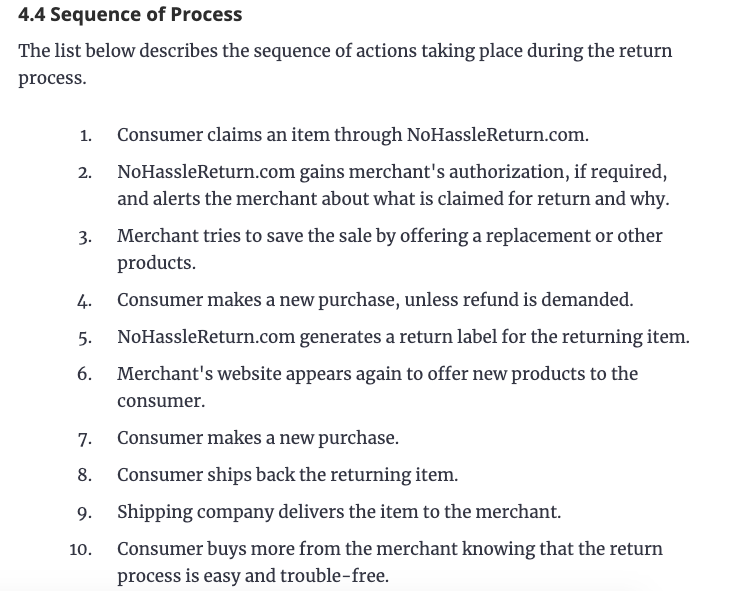
Basic only

Ads Manager

✅

❌

Business Center

✅

❌

Action buttons (e.g., “Sign up”)

✅

❌

Messaging capabilities

Unlimited

Friends only

Email button in profile

✅

❌

Business creative hub

✅

❌

Lead generation

✅

❌

Auto-messaging

✅

❌

Post scheduler

✅

❌

Integration with third-party platforms

✅

❌

TikTok Shop

✅

✅ (affiliate only)

Creator Next (Creator Fund, Live gifts and diamonds, Tips)

❌

✅

Creator Marketplace

❌

✅

Creativity Program Beta

❌

✅

Series

❌

✅

What is a TikTok Business Account?

A TikTok business account enables brands to share content, build and engage an audience, and sell online. TikTok business accounts come with additional tools for team access and collaboration, like Business Center and Ads Manager.

Advantages of a TikTok Business Account

What makes this mode great? TikTok designed business accounts for teams wanting to reach audiences and run campaigns on TikTok strategically. Here’s what you can do with a business account.
1. Personalize your profile.

A business account lets you add much more detail to your profile, including a website, industry, support email, and custom action buttons like “Sign up.”

Melissa Laurie, Founder of social media agency Oysterly, claims this is one of the features she loves the most for her business.

2. Run ad campaigns.

While personal accounts can promote posts, there’s no way to run strategic campaigns in that mode.

With a business account, you have access to TikTok Ad Manager, a command center for running video campaigns and analyzing your campaign performance.

You can draw inspiration from Business Creative Hub to create timely, engaging content.

3. Engage customers.

Business accounts let you run your business and communicate with customers in ways you are used to engaging as a brand on Facebook and Instagram.

For one, you have unlimited abilities to message any user on TikTok, which isn’t available in personal mode.

You can collect leads in videos and other content, making it a valuable sales tool and easier to organize for follow-up. You can also set up auto-messaging for when you aren’t online.

4. Collaborate across teams.

If you have more than one person planning or posting content, you likely need a business account. TikTok Business Center lets you manage team and agency access and collaborate with creators.

Here’s a very important distinction: TikTok business is also the only account type you can integrate with third-party social media management apps.

So, if you’re used to using Hootsuite, Buffer, HubSpot, or any other app to schedule and manage your content, you can’t do it on a personal account. As a former corporate social media manager, this would be a dealbreaker for me.

5. Sell online.

Did you know 70% of TikTok users discover new brands and products on TikTok, and three-quarters of users are likely to buy something while using the app?

Shoppable commerce is already huge in Asia and will be the next big thing in the rest of the world. With a business account, you can set up your own TikTok Shop for users to buy without ever leaving the app.

Image Source

Kate Ross, hair and beauty specialist for beauty brand Irresistible Me, notes that a business account is best for brands.

“It’s packed with features for businesses like putting your website link right on your profile, using TikTok’s ad tools, and choosing music you’re allowed to use without worrying about copyright issues,” Ross says. You also get amazing tools for understanding who’s watching and interacting with your content.”

Disadvantages of a TikTok Business Account

While TikTok business accounts are beneficial for brands, they have a few glaring cons. Let’s get them out in the open.

1. Limited Sound and Music Options

Image Source

What would TikTok videos be without the music?

Since TikTok considers business accounts to be using music for commercial use, a major downside is that you can’t use trending songs in your content.

Instead, you have to use royalty-free (aka stock) songs from their Commercial Music Library. You also can’t use stitch or duet options for music.

While they’ve worked to improve the music available in the library, it just isn’t the same as being able to hop on any music trend that comes your way. On the upside, though, you don’t have to worry about any copyright infringement.

2. No Ability to Monetize Content

While you can make money from the products and services you sell through TikTok engagement, there’s no way to monetize the content itself from a business account.

That means that you can’t participate in programs like Creator Fund, LIVE gifts and Diamonds, or Tips. You need a personal account to make money on TikTok.

What is a TikTok Personal [aka Creator] Account?

That brings us to a TikTok personal account, previously known as a creator account. A creator account is an account for individual users and creators.

If you are an individual user wanting to use TikTok for simply personal use, this is where you should be. Personal accounts also offer many tools and ways for you to monetize your content as a creator.

Advantages of a TikTok Personal Account

TikTok personal accounts are the top choice for musicians, artists, and influencers. Here’s why.

1. Use trending music.

With a creator account, you have access to TikTok’s full library of music and sounds, letting you jump on the latest music video trends.

2. Keep your profile private.

If you want to use TikTok for individual use and only post content for friends or select groups, you need a personal account. Business accounts don’t have a private mode — for privacy, personal is best.

2. Make money on TikTok.

As a creator, the absolute best benefit of a personal account is the ability to make money from your content. Many creators have successfully built a business this way.

Image Source

Here’s how it works: Creators make videos that they hope will go viral. When videos do well, creators earn money in a few ways:

  1. Earn Tips of up to $100 from fans.
  2. Receive LIVE gifts and diamonds directly from fans, which can be converted to cash rewards.
  3. Participate in the Creator Fund or Creativity Program Beta, which pay you out of a general fund based on the performance of your content (don’t miss our breakdown between the two).
  4. Set up Series, a service where users pay a subscription for premium content.

3. Collaborate with brands.

As a creator, you connect with brands and run influencer campaigns with brands through the Creator Marketplace. When you share products you love, you can also earn affiliate compensation from attributed sales on TikTok Shop.

Disadvantages of a TikTok Personal Account

While TikTok personal offers great incentives, there are a few frustrating limitations.

1. Limited Analytics

Image Source

With a personal account, your analytics are more basic than a business account. You can view key video metrics like post views, profile views, comments, and more.

There is also follower analytics showing you your viewers’ average age, gender, and geography.

While these metrics are available in-app, you can’t download them or run your own analytics through a social media management platform from a personal account.

2. Limited Commerce Abilities

As a creator, your ability to sell directly and drive viewers to websites outside of TikTok is severely limited. You can’t include a link in your profile until you have over 1,000 followers, for instance.

You also can’t set up custom call-to-action buttons in your videos.

As a creator, you can use TikTok Shop to promote shoppable videos and earn as an affiliate, but you can’t set up a shop for your own merchandise, for example, without a business account.

So, what’s best?

Is it better to have a business or personal TikTok account? I’ve got a definitive answer for you.

First, you need to decide your goal on TikTok: making money within the platform or building an audience for a business outside of it.

If your goal is to monetize content, a personal account is the absolute best choice. Artists and individual content creators benefit from TikTok’s tools to help them build a personal brand and content business.

Plus, you can’t beat the authenticity that comes with a personal account over a faceless brand.

“If you’re an influencer on TikTok, stick with a creator (now called personal) account,” advises Ross. “It lets you use all the trendy songs and sounds, plus you can interact with other videos through duets or stitches.”

Beyond that, Ross notes that you get to see how well your videos are doing with analytics. You can push certain videos more with promotions and even earn money through the TikTok Creator Fund.

But, for businesses with ad budgets and teams, where TikTok is just one part of a multichannel marketing strategy, you need a business account.

“A business account is the way to go if you’re a TikTok brand,” explains Diana Zheng, head of marketing at Stallion Express. “A business account allows you to take advantage of TikTok’s full marketing capabilities.”

Zheng notes that you’ll get access to powerful analytics enabling you to tailor your content strategy and track your performance.

“Plus, with features such as TikTok Ads Manager, you can target ads and promote your brand in a way that drives engagement and conversions,” Zheng says.

Fortunately, it’s easy to switch back and forth between TikTok business and personal modes, so you aren’t locked into your decision forever.

If you make a mistake or scale your business to the point where you need to switch from personal to business — you can switch with a single tap.

Blog - Content Mapping Template

The Ultimate Guide to Nonprofit Marketing in 2023

Software Stack Editor · April 1, 2024 ·

Every marketing team is challenged to do more with less — especially nonprofit organizations. Often, resources are tight, and teams are small. Sound like your organization?

We want to help. That’s why we created this nonprofit marketing guide. Your organization might not operate for profit, but it can still get value from the traffic, funds, and awareness marketing brings in.

Bookmark this guide for later and use the chapter links below to jump around to sections of interest.

Download Now: Nonprofit Marketing & Fundraising  Trends for 2022 [Free Report]


Inbound Marketing for Nonprofits

Your nonprofit organization likely takes up all of your time, and building a marketing plan might seem like an added responsibility that’s just not worth it.

We’re here to convince you otherwise. Inbound marketing is all about creating valuable experiences that positively impact people and your business.

Inbound marketing for nonprofits can help you attract new supporters for your cause, connect to valuable donors, engage your constituents, and inspire your community.

Boost your organization’s awareness and compel action. See firsthand how HubSpot can transform your nonprofit organization.

Here’s how else nonprofit marketing can help.

Nonprofit marketing raises awareness.

Your nonprofit organization is a brand. Therefore you need to raise awareness just like any other business or company. Marketing raises awareness, and brand awareness spreads the word about your organization and your overall cause.

Nonprofit marketing raises funds.

Nonprofit marketing and nonprofit fundraising go hand-in-hand. The more people know about your organization, the more potential funding you can bring in.

Nonprofit marketing drives donor memberships and recurring donations.

Many nonprofit organizations offer donation memberships and monthly giving programs, like this one from charity: Water. These programs are valuable because your organization doesn’t have to fundraise so actively and often. Also, they can actually help you raise more money — the average monthly online donation is $52 ($624 per year) compared to the average one-time gift of $128.

Marketing your nonprofit gets your cause in front of fresh eyes and informs your donors about how they can consistently contribute.

Nonprofit marketing recruits volunteers.

Nonprofit marketing isn’t just for funding. It also drives manpower (and woman-power!) to your organization. Regardless of industry or size, all nonprofits benefit from volunteers, and marketing your organization can help bring in new hands.

Moreover, volunteers are twice as likely to donate as non-volunteers.

Nonprofit marketing promotes your services.

Awareness, funding, and volunteers are integral to your nonprofit, but what about the purpose of your organization? What about the people, animals, or cause you’re helping? Marketing can help with that, too.

The more people who know about your nonprofit organization, the more people you can help.

These are just a handful of reasons you should invest in your nonprofit’s marketing strategy (particularly inbound marketing). Now, let’s discuss how to build a nonprofit marketing plan so you can start bringing in new funds, volunteers, and constituents.

Nonprofit Marketing Plan Template

nonprofit marketing plan template

Download your free nonprofit marketing plan template.

Hubspot’s nonprofit marketing plan template can help you organize your nonprofit’s budget, team structure, and channels of choice to create your marketing strategy.

The nonprofit marketing plan template includes sections for developing your nonprofit’s summary, business initiatives, target market, marketing strategy, budget, marketing channels, and marketing technology.

Our nonprofit marketing plan template can help you:

  • Complete a SWOT analysis for your organization.
  • Develop a marketing strategy.
  • Determine the industries and personas of your target donors.

Crafting a nonprofit marketing plan might not be too different from a for-profit marketing plan, but debatably, it’s more important. Increasing awareness and constituent engagement without exhausting your hardworking team requires approaching your marketing systematically.

That’s where a nonprofit marketing plan comes into play. Putting systems in place to produce and distribute your marketing content allows you to focus on operating and scaling your nonprofit.

Here’s how to create a successful nonprofit marketing plan.

1. Define your marketing goals.

Your nonprofit marketing plan exists to transform your organization’s mission and big-picture objectives into strategic, actionable goals.

For example, let’s say one of your objectives was to protect the welfare of animals in your community (like one of my favorite local rescues, ALIVE Rescue). I’d ask you to brainstorm three to five marketing ideas to advance that objective.

Some ways you could use marketing to advance that objective include:

  • Creating and publishing content that educates your community on the state of animal welfare.
  • Posting on social media about your organization and the animals you have for adoption.
  • Sending a weekly email newsletter sharing your content, adoptable animals, and volunteer needs.
  • Hosting a quarterly event with educational resources, foster training, and adoption opportunities.

Next, I’d ask you to turn these ideas into SMART goals. Let’s use idea number one as an example:

acronym goal
Specific

Educate the community on the state of animal welfare by producing one blog post per week.

Measurable

Increase traffic by 15%.

Attainable

Our blog traffic increased by 10% last year when we upped our publishing frequency to twice a month. A 15% boost in traffic with a 100% increase in production seems attainable.

Relevant

An increase in blog traffic will boost awareness of our organization, educate the community, and alert more people of our adoption opportunities — thus, saving more animals and bringing in more funding.

Timely

We will start producing one post per week and the start of next month.

SMART Goal: By the start of next month, our blog will see a 15% boost in traffic by increasing our content production from two posts per month to one post per week. This increase will boost awareness of our organization, educate the community, and alert more people of our adoption opportunities — thus, saving more animals and bringing in more funding.

See how I turned the organizational mission into a marketing objective and a SMART goal? SMART goals are especially important when it comes time to analyze and measure your marketing performance (which we will talk about later), so be sure to finish this step before moving forward in your nonprofit marketing plan.

Download your free marketing goal-setting template here. 

2. Understand your audiences.

Nonprofit marketing is different from other types of marketing because your organization is likely targeting multiple groups: constituents, customers, volunteers, and donors.

It’s imperative to define and understand each of these audiences (a.k.a. buyer personas) because your marketing will differ based on who you’re talking to. (We’ll get into key messaging next.)

For example, following our animal shelter example from above, an email targeting donors will have different messaging than an email calling for volunteers.

One easy way to organize your different audiences is using a CRM to segment the different groups. By separating contacts with tags and lists, you can easily send marketing messages to the appropriate groups.

3. Craft Your Key Messages

Key messages encompass the information you want your audiences to hear, remember, and share about your nonprofit organization. Crafting these before you employ your marketing is important for a few reasons:

  • Key messages keep your organization aligned. No matter who’s doing the marketing, you can be confident the same thing is being said and promoted.
  • Key messages simplify your marketing. With these created ahead of time, you already know what you will say in your marketing messaging.
  • Key messages help organize your different audiences (as discussed above). As a nonprofit organization, you’re likely talking to donors, volunteers, constituents, and your community — more personas than a typical for-profit business. Developing key messages for each audience informs your team and your marketing to make sure you’re targeting the right groups.

Continuing with our animal shelter example, here’s a look at how you can craft a key message for different audiences.

Key message: We protect the welfare of animals in our community through education, adoption and fostering, and animal advocacy.

  • For adoption customers/constituents: By adopting or fostering, or by alerting us of animals in need, you can help us protect the welfare of animals in our community.
  • For volunteers: We protect the welfare of animals through round-the-clock animal care and advocacy.
  • For donors: You can help us protect the welfare of animals by donating to support animal care, advocacy, and adoption promotion.

All of these key messages have the same purpose and undertone, but they vary slightly depending on your audience. Together with your nonprofit organization’s mission, vision, and goals, these messages will help effectively communicate and market your organization’s needs and purpose.

4. Choose, plan, and create your marketing strategies.

Many marketers jump right to this step — creating and publishing various marketing tactics. Marketing encompasses much more than an advertisement, blog post, or event. To execute successfully, you must complete all the steps before this.

Now that you’ve established your goals (what you want), your key messages (what you’re going to say), and your audience (who you’re going to say it to), you can determine your marketing tactics (how you’re going to say it).

Marketing tactics refer to channels like email marketing, social media, events, and more. We’ve dedicated an entire section to these marketing strategies. Read about them in detail below.

Regardless of which tactic you choose, be sure to conduct thorough planning before and as you execute it. Here are some questions to ask yourself as you prepare:

  • What will you do with this marketing tactic?
  • When will these marketing activities take place?
  • Why is this tactic important?
  • Who will be responsible for these activities?
  • How much do we plan to spend?
  • How does this tie to our organization’s marketing goals?

Tactical planning is an integral part of your overall nonprofit marketing plan. How you approach your marketing strategies and how they impact your organization is just as important as how you execute them.

Before you hit the ground running on any of these strategies, be sure your team has a solid game plan and a full understanding of it.

Featured Resource: Free Marketing Plan Template

marketing plan template

Download for Free

5. Analyze your marketing performance.

Your marketing probably won’t perform perfectly from the get-go. That’s OK. Routine reporting and analysis help you figure out what’s working and what you need to change.

As you choose and establish your marketing channels, pay attention to their measurable performance indicators. Here’s a list of examples from our list of marketing strategies below:

Marketing Strategy Performance Indicator
Email marketing Email opens
Event marketing Ticket sales
Video marketing Video views
Social media Shares and comments
Website Page views
Public speaking Referrals
Content marketing Subscriptions

Remember the goals you defined in step one? Measuring your marketing performance is essential to stay aligned with those goals.

You can track these performance indicators using tools like Google Analytics, HubSpot, and the analytics tools built into Facebook, Twitter, and other social media sites.

If you know what you want to measure before you start marketing your nonprofit, you’ll know exactly what to look for — and how to determine success and impact — when your marketing is in play.

You’ve created your nonprofit marketing plan. Now, let’s talk about executing that plan with actionable marketing strategies.

Many of these nonprofit marketing strategies will overlap, like sharing your blog content on social media or releasing an event invite over email. These methods can and should be used in tandem, but we recommend introducing each strategy slowly, so your team doesn’t overwhelm itself.

In fact, we recognize that your nonprofit is likely operating with a small (but agile) marketing team. For this reason, throughout these sections, we’ll recommend tips for doing more with less. Ultimately, though, don’t hesitate to outsource your nonprofit marketing where needed.

Nonprofit Email Marketing

You might be using email sporadically to call for volunteers or confirm an online donation, but that’s not enough. Email marketing for nonprofits is a highly effective marketing resource. Why? It’s personal and powerful.

Here are a few ways to leverage email marketing to reach all of your audiences:

  • Send a weekly newsletter with your newest content, updates about your organization, industry data, and volunteer needs.
  • Send monthly emails with donation needs and opportunities.
  • Set up an email sequence for new subscribers, thanking them for joining and educating them on your organization.
  • Set up an email sequence for new donors, thanking them for their contribution and sharing how else they can support your organization.

Also, don’t forget to put information on your website about how to subscribe to your email list. Nonprofit organization, Acumen, does a great job of this by putting subscription opportunities on its homepage and in its main menu.

Acumen's nonprofit newsletter promoted in the footer of their website

👉🏼Nonprofit marketing tip: Automate as much as possible. Email marketing automation (like HubSpot) saves precious time and energy for your team and can be the key to growing your email list, donations, and memberships. You can also automate an email sequence triggered by website visitor behavior indicating a high level of interest, such as downloading educational content.

Click here to download our free beginner's guide to email marketing.

Nonprofit Event Marketing

Event marketing is one of the most effective (and enjoyable) ways to grow awareness of your organization, connect with your community, raise funds, and garner support for your cause.

PAWS, which stands for Pets Are Worth Saving, is another local animal rescue I’m a fan of. They hold a PAWS 5K race every summer to raise awareness and funding for the organization.

PAWS Chicago 5K nonprofit marketing event page

This type of event is impactful for multiple reasons:

  1. It inspires competition and physical activity. Runners raise money for the organization and participate in the run.
  2. It brings people in the community together to celebrate the organization and bring awareness to the PAWS cause.
  3. It provides PAWS a channel to promote their services and adoptable pets.
  4. It’s fun to attend and be a part of! Many people go to the event to support runners, play with dogs, and simply be a part of the fun, all while supporting and sharing PAWS.

From fundraisers to auctions to competitions, you can organize many different kinds of events to market your nonprofit organization.

Nonprofit Video Marketing

Whether they’re consuming content for work, school, or fun, people prefer video content. As a nonprofit organization, video marketing is a surefire way to garner interest and support from all of your audiences.

Here are a few reasons video can help you market your nonprofit:

  1. Video is visual. We process visual content 60,000 times faster than written content. We also remember more content longer.
  2. Video is personal. It inspires empathy and emotions, which can’t be said about other types of marketing.
  3. Video is educational. Many organizations need to educate their communities on their causes in order to garner attention and funding. Video can help you do that.
  4. Video is shareable. 92% of consumers on mobile will share videos with others. Consumers love sharing videos, especially those that inspire and resonate with them.
  5. Video is interesting. 60% of people report that video is a media they consume thoroughly. Keep your visitors, followers, and supporters engaged and interested using video.

→ Access Now: Video Marketing Starter Pack [Free Kit]

The Girl Effect, a nonprofit that works to empower girls worldwide, is a great example of video marketing. The organization’s homepage is a video that captures visitors’ attention right away. Moreover, when you click “See more,” the site opens an informative video telling you all about The Girl Effect.

The Girl Effect's nonprofit web page that uses video marketing

Nonprofit Social Media Marketing

Social media is a highly popular marketing strategy among nonprofits. Not only is it free, but it also provides an avenue for organizations to show their brand personalities and engage with their followers and supporters.

Here are some ways to use social media for your nonprofit marketing, as inspired by a HubSpot study of 9,000 nonprofits:

  • Share news about your organization and cause
  • Boost brand awareness and recognition
  • Fundraise
  • Recruit volunteers and employees
  • Recognize donors, employees, and volunteers

Don’t forget to use the key messaging you crafted in your nonprofit marketing plan to keep your social media posts consistent and targeted. Also, make the most of each platform to promote your organization, such as the Donate button on Facebook.

HubSpot customer, FIRST, which stands for For Inspiration and Recognition of Science and Technology, is a nonprofit organization that works to advance STEM (science, technology, engineering, and math) education among children.

FIRST makes use of social media in many different ways, such as using Facebook to post videos, news, fundraisers, and reviews, as well as making use of the Donate button. The organization has amassed almost 100,000 followers.

FIRST's nonprofit Facebook page with Donate button

👉🏼Nonprofit marketing tip: Curate content from volunteers, customers, supporters, event attendees, and donors. Implementing a user-generated content (UGC) campaign lessens your workload and acts as strong social proof. To enact your UGC campaign, put out a call for constituent stories, images, and videos. Create a hashtag that people can use to alert you of new UGC.

Also, let curation tools work for you. Use Google Alerts and social monitoring tools to alert you when your organization, hashtags, or relevant topics or keywords are mentioned. This provides opportunities to source UGC, get inspiration for new topic ideas, and participate in relevant conversations.

Nonprofit Website

Every nonprofit organization should have a website, which can be created on a CMS such as Content Hub or WordPress. A website serves as a digital home base for your organization and includes critical information — what you stand for and how visitors can participate and help.

Your website also houses important assets like your blog, social media streams, event information, videos, and the rest of your marketing strategies. Lastly, your website serves as a way to intrigue, inspire, and engage your audiences.

Nonprofit organization (and HubSpot customer), American Nursing Association (ANA), is an example of an organization with an outstanding nonprofit website. The site clarifies the ANA mission, shares news and educational content, and informs visitors how to get involved through memberships, events, certifications, or donations.

ANA's nonprofit website

Nonprofit Public Speaking

People buy into other people, not products. The same can be said about nonprofit organizations. If consumers believe in the people behind your organization, they’re likely to buy into your cause and donate money or time.

Public speaking is one of the best ways for consumers to get to know your leadership team, not to mention spread the word about your cause and organization. Whether you speak at a local event of 100 people or a multi-day conference with thousands, the impact is the same: telling a powerful story to real people who may not yet know about your cause.

Scott Harrison, the founder of charity: water, spoke at INBOUND. While he shared information about the conception and organization of the nonprofit, he mostly talked about the people that his organization helps and how the audience can support the mission. Harrison not only moved an audience of thousands but also effectively marketed the charity: water purpose and brand.


Nonprofit Content Marketing

Content marketing and blogging are valuable marketing assets for any nonprofit organization. Here’s why:

  • Content educates your audiences about your mission, cause, and industry news and trends.
  • Content (and SEO) bring in new visitors, subscribers, donors, and leads.
  • Content is shareable and serves as free PR among your audiences.
  • Content can be repurposed and made into different types of media, saving your marketing team precious time and energy.

Creating a nonprofit marketing blog isn’t always easy. Teams are short-staffed, budgets are low, and time is precious. Thankfully, there are many ways around those blogging challenges, such as sourcing story ideas from volunteers, donors, and customers and implementing an editorial calendar so you can plan ahead.

One of my very favorite nonprofit organizations is called Blurt Foundation. This UK-based organization exists to increase awareness and understanding of depression and support those who struggle with it. There are many misconceptions and misunderstandings about depression, so Blurt Foundation uses its blog content and other content resources to educate constituents and supporters. It also incorporates these content assets into its emails, social media posts, and online store.

Blurt Foundation's nonprofit Resources page as a content marketing example

👉🏼Nonprofit marketing tip: Save time and resources by repurposing your content. It’s an appreciating asset you can reuse and re-promote repeatedly. Repurposing content to create new marketing assets costs far less than creating entirely new content.

Outline all the ways you could repurpose the content you produce. For example, you could create the following list for your blog content:

  • Short versions of posts for use in emails or newsletters with links back to full posts.
  • Groups of related posts for report
  • Two to three visuals images to share on social
  • Infographics with post information
  • Reaction pieces to the original post

Since you’re not going to promote and distribute each piece of repurposed content immediately, your content pipeline is never empty.

Check out HubSpot’s free nonprofit content today.

Nonprofit Digital Marketing

You can market your nonprofit using search engine optimization (SEO) and search engine marketing (SEM). SEO is the process of optimizing your nonprofit’s content to get traffic from organic search results. On the other hand, SEM is the process of getting traffic and visibility from both organic and paid search.

Nonprofits can use keywords in their blogs, videos, podcasts, and other digital content to improve their search engine rankings.

non profit digital marketing example: red cross

Image Source

The American Red Cross uses many forms of digital content in its marketing, including YouTube videos. The organization uses keywords to help search engines rank the content for SEO and help their audience find their content through organic search. For example, the above video uses the keywords “red cross” and “disaster” in its description to rank in search engine results.

Nonprofits can leverage search engine marketing to increase their contributions through search engine ads.

Google’s Ad Grants program gives nonprofits grants of up to $10,000 per month to advertise their organizations. Many nonprofits — including DonorsChoose.org, We Care Animal Rescue, and SOS Children’s Villages — use Google Ad Grants to attract donations, drive awareness, and recruit volunteers.

Strengthen Your Marketing, Promote Your Cause

Raise your hand if your organization has to constantly do more with less. 👋🏼

If that sounds like your organization, we recommend you use this guide to build a nonprofit marketing plan ASAP. Your organization might not operate for profit, but it can still gain value from the traffic, funds, and awareness that systematic marketing brings in.

These activities and strategies will help promote your organization and take a valuable load off your team’s and volunteers’ backs, freeing them to dedicate more time to your cause and constituents.

Editor’s note: This post was originally published in June 2019 and has been updated for comprehensiveness.

nonprofit trends


Lead Generation: A Beginner’s Guide to Generating Business Leads the Inbound Way

Software Stack Editor · March 29, 2024 ·

Have you ever noticed that telemarketers have a way of calling at the worst possible time? Say, right when you’re about to sit down and enjoy dinner? I used to get these pesky dinnertime calls all the time.

Not only were they frustrating, but they never seemed successful for the companies trying to drum up leads (at least at my house).

Well, I’m here to tell you that the days of these dinnertime cold calls are long over.

In this post, we’ll talk best practices for inbound lead generation that are effective, strategic, and don’t ruin anyone’s dinner.

Download Now: Lead Generation Best Practices Guide

First, we’ll start with defining a lead, and then we’ll cover what online lead generation is, and why you need it. Next, we’ll go into how to qualify someone as a lead, how to label lead types, how you generate leads, and why inbound lead generation is much more effective than simply buying leads.

What is a lead?

A lead is any person who indicates interest in a company’s product or service.

Leads typically hear from a business or organization after opening communication (by submitting personal information for an offer, trial, or subscription), instead of getting a random cold call from someone who purchased their contact information.

Let’s say you take an online survey to learn more about how to take care of your car. A day or so later, you receive an email from the auto company that created the survey. This process is far less intrusive than if they’d just called you out of the blue.

From a business perspective, the information the auto company collects about you from your survey responses helps them personalize that opening communication to address your existing problems.

Leads are part of the lifecycle of transitioning visitors to customers. Not all leads are the same. There are different types of leads based on how they are qualified and what lifecycle stage they’re in.

Marketing Qualified Lead (MQL)

Marketing qualified leads are contacts who have engaged with your marketing team’s efforts but aren’t ready to receive a sales call. An example of an MQL is a contact who fills out a landing page form for an offer.

Sales Qualified Lead (SQL)

Sales qualified leads are contacts who’ve taken actions that expressly indicate their interest in becoming paying customers. An example of an SQL is a contact who fills out a form to ask a question about your product or service.

Product Qualified Lead (PQL)

Product qualified leads are contacts who’ve used your product and taken actions that indicate interest in becoming a paying customer. PQLs typically exist for companies who offer a product trial or a free or limited version of their product with options to upgrade.

An example of a PQL is a customer who uses your free version but asks about paid features.

Service Qualified Lead

Service qualified leads are contacts or customers who’ve indicated to your service team that they’re interested in becoming paying customers.

For example, a customer could tell their customer service representative that they’d like to upgrade their product subscription. At this time, the customer service representative would up-level this customer to the appropriate sales team or representative.

These lead generators are just a few examples of lead generation strategies you can use to attract potential customers and guide them toward your offers.

Whenever someone outside the marketing world asks me what I do, I can’t simply say, “I create content for lead generation.” I’d get some really confused looks.

So instead, I say, “I work on finding unique ways to attract people to my business. I want to provide them with enough goodies to get them interested in my company so they eventually warm up to the brand and want to hear from us!”

That usually resonates better, and that’s exactly what lead generation is: It’s a way of warming up potential customers to your business. This gets them on the path to eventually making a purchase.

Why do you need lead generation?

When someone shows an organic interest in your business, the transition from stranger to customer is much more natural. You enhance this transition through inbound marketing.

Inbound marketing is a methodology to attract loyal customers to your business by aligning with your target audience’s needs.

Creating tailored marketing experiences through valuable content is the core of an inbound marketing strategy that helps you drive customer engagement and growth.

Lead generation falls within the second stage of the inbound marketing methodology. It occurs after you’ve attracted an audience and are ready to convert those visitors into leads for your sales team.

As you can see in the diagram below, generating leads is a fundamental starting point in an individual’s journey to becoming a delighted customer.

The Lead Generation Process

Now that we understand how lead generation fits into the inbound marketing methodology, let’s walk through the steps of the lead generation process.

  1. First, a visitor discovers your business through one of your marketing channels, such as your website, blog, or social media.
  2. That visitor then clicks on your call-to-action (CTA) — an image, button, or message that encourages website visitors to take some sort of action.
  3. That CTA takes your visitor to a landing page, which is a web page designed to capture lead information in exchange for an offer.
  4. Once on the landing page, your visitor fills out a form in exchange for the offer. Voila! You have a new lead. That is, as long as you follow lead-capture best practices.

Note: An offer is the content or resource that’s being promoted on the landing page, like an ebook, a course, or a template. The offer must have enough value for a visitor to provide their personal information in exchange for access to it.

See how everything fits together?

To sum it up: A visitor clicks a CTA that takes them to a landing page where they fill out a form to get an offer, at which point they become a lead.

By the way, you should check out our free lead generation tool. It helps you create lead capture forms directly on your website. Plus, it’s easy to set up.

How to Generate Leads

Once you put all of these elements together, you can use your various promotional channels to drive traffic to your landing page to start generating leads.

But what channels should you use to promote your landing page? Let’s talk about the front end of lead generation — lead gen marketing.

If you’re wondering how to generate leads in digital marketing specifically, it’s time to analyze your existing online channels and identify opportunities for conversion. This can include everything from your website to your organic and paid social media presence.

If you’re a visual learner, this chart shows the flow from promotional marketing channels to a generated lead. There are even more channels you can use to get visitors to become leads. We’ll discuss the most impactful below.

1. Create compelling content.

Screenshot of HubSpot blog showing CTAs

Image Source

Content — and its trusty companion, SEO — are often the go-to methods businesses use to generate leads. And for good reason, too! According to HubSpot’s 2024 State of Marketing Report, 16% of marketers say that the content-and-SEO combo resulted in the best ROI this year.

Ryan Robinson, the founder and CEO of RightBlogger explains that content marketing and SEO “allow you to attract leads who are already interested in what you offer, rather than interrupting people with disruptive ads and promotions.”

Content is a great way to guide users to a landing page. Typically, you create content to provide visitors with useful, free information. You can include CTAs anywhere in your content — inline, at the bottom of the post, in the hero section, or even on the side panel.

Robinson shared an anecdote with me to illustrate just how powerful content and SEO can be for generating leads.

“I vividly remember one client who initially found us after reading a blog post … That post showed him how AI writing assistants could streamline his process while still allowing for human oversight and quality control. A few weeks later, he signed up for one of our AI writing packages,” Robinson recalls.

In other words, the more delighted visitors are with your content, the more likely they are to click your CTA and move onto your landing page.

Featured Resource: HubSpot Ebook Templates

2. Send regular emails.

Email is a great place to reach people who already know your brand, product, or service. It’s much easier to ask them to take action since they’ve previously subscribed to your list.

Noel Griffith, the CMO at SupplyGem, knows all about using email marketing for lead generation. Griffith explains that within a few months of launching a new email newsletter, “it became the top source of new leads for our business.”

He says that “by consistently providing helpful information for free, we were able to build strong relationships… When the time came for them to make a purchase or renewal decision, we were the first ones they thought of.”

Pro tip: When writing emails, use CTAs with compelling copy and an eye-catching design to grab your subscriber’s attention.

Featured resource: The Beginner’s Guide to Email Marketing

3. Use social media.

Social media platforms like Facebook, Instagram, X (previously Twitter), and LinkedIn are powerful tools for reaching potential leads directly.

These platforms make it easy to guide your followers to take action, from the swipe-up option on Instagram stories to Facebook bio links to URLs on X.

Image Source

You can also promote your offerings on social media and include a CTA in your caption. Learn more about social media campaigns in this post.

While you can organically build an audience on social media, these platforms also allow you to run paid ads that help you build brand awareness and generate leads in a shorter period of time.

Jason Hunt, the co-founder and CMO at Merged Media, shares that “the real power of social media advertising lies in its ability to segment audiences very precisely and test different messages to see which performs best. This approach … ensures that the message is being seen by a highly relevant audience, increasing the chances of turning those individuals into leads.”

Pro tip: If you want people who see your ads to convert, be sure that your landing page and offer match exactly what is promised in the ad and that the action you want users to take is crystal clear.

If you need help with your email and ad campaigns, check out HubSpot’s Campaign Assistant, a free AI-powered tool that can help you create landing page copy, email copy, and paid ads copy for your marketing campaigns.

4. Write informative blog posts.

Image Source

The great thing about using your blog posts to promote an offer is that you can tailor the entire piece to the end goal.

Suppose your offer is an instructional video on setting up Google Search Console. In that case, you can write a blog post about selecting your marketing metrics, making your CTA highly relevant and easy to click.

For a quick overview, check out our video guide.

Not sure what to write about? Use HubSpot’s Blog Idea Generator to brainstorm blog post ideas, create a blog outline, write your first draft, and publish to your website.

Featured resource: 6 Free Blog Post Templates

5. Offer product trials.

Image Source

You can break down many sales barriers by offering trials of your product or service. Once a prospect uses your product, you can entice them with additional offers or resources to encourage them to buy.

Another best practice is to include your branding in your free versions so you can capture other potential customers, too.

6. Ask for referrals.

Image Source

Referral, or word-of-mouth marketing, is helpful for lead generation in a different way. It gets your brand in front of more people, increasing your chances of generating more leads.

According to Daniel Nyquist, the CMO at Crosslist, referral marketing is effective because you’re asking satisfied customers to refer you to their network.

Nyquist says that once he implemented a referral program to reward existing clients, “within 6 months, referrals accounted for over 40% of new business.” Nyquist says that, “The key is building genuine relationships and delivering exceptional value so people are eager to tell others about you.”

Whatever channel you use to generate leads, you’ll want to guide users to your landing page. As long as you’ve built a landing page that converts, the rest will handle itself.

7. Organize industry events.

Image Source

Industry events are a great way to get face-to-face with members of your target audience. Through networking at events, you can nurture new contacts into qualified leads.

If you have the marketing budget, you can take this further and exhibit at events.

Exhibitions make qualifying new leads from your booth easier with a personalized demo or consultation.

8. Collaborate with other businesses and creators.

Image Source

Business partnerships are often a source of huge untapped potential for lead generation. Your target audiences are usually closely aligned, even if your products and services differ.

Partner marketing can be as simple as a logo placement on your partner’s website. But you can take it further with joint content strategies, promotional materials, and more. This way, you both get your respective brands in front of each other’s customer bases in a mutually beneficial way.

Another way to explore this is through partnerships with influencers that align well with your brand and objectives. Mike Falahee, the owner of Marygrove Awnings, has experienced a lot of success by collaborating with micro-influencers.

He shares, “You can generate leads by working with micro-influencers whose followership is highly engaged and who fit your target demographic and brand values.”

9. Build a community.

Image Source

Communities are ideal for turning visitors into leads. They’re also a great way to nurture and qualify existing leads.

For example, let’s say you’ve got a new free trial user. They have a question about the product, so they head to your knowledge hub only to find a forum of engaged promoters discussing your product and providing guidance on how to use it.

Seeing how others use your product and the extent of your existing customer base can make the difference between a user who chooses to upgrade and one who simply walks away.

Why not just buy leads?

Marketers and salespeople alike want to fill their sales funnel — and they want to fill it quickly. Enter: The temptation to buy leads.

Buying leads, as opposed to organically generating them, is much easier and takes far less time and effort, despite being more expensive. But you might be paying for advertising anyway, so why not just buy leads?

First and foremost, any leads you’ve purchased don’t know you. Typically, they’ve “opted in” at some other site when signing up for something and didn’t opt into receiving anything from your company.

The messages you send them are unwanted messages. Sending unwanted messages is intrusive. If the prospect has never been to your website and indicated an interest in your products or services, then you’re interrupting them, plain and simple.

And if they never opted in to receive messages specifically from you, then there’s a high chance they could flag your messages as spam, which is dangerous.

Once enough people flag your messages as spam, your email address will be flagged and shared with other email providers. Once you get flagged, it’s really, really hard to become credible again. In addition, your email deliverability and IP reputation will likely be harmed.

It’s always better to generate leads organically rather than buy them. Learn how to grow an opt-in email list instead of buying one.

How to Qualify a Lead

As we covered in the first section, a lead is a person who has indicated interest in your company’s product or service. Now, let’s talk about how someone can actually show that interest.

Essentially, a sales lead is generated through information collection.

This could result from a job seeker applying for an open role, a shopper sharing contact information in exchange for a coupon, or a person filling out a form to download an educational piece of content.

Gauging a Lead’s Level of Interest

Below are a few ways you could qualify someone as a lead. Each of these examples shows that the amount of collected information used to qualify a lead, as well as their level of interest, can vary.

Let’s assess each scenario:

  • Job Application. A candidate shares personal information because they want to be considered for a position. That application shows their interest in the job, qualifying the person as a lead for the company’s recruiting team — not marketing or sales.
  • Coupon. If a shopper finds a valuable coupon, they may be willing to provide their name and email address in exchange for a deal. Although it’s not a lot of information, it’s enough for a business to know that someone has an interest in their company.
  • Content. While the download of a coupon shows an individual has a direct interest in your product, content (like an ebook or webinar) does not. To understand the nature of the person’s interest, you’ll probably need to collect more information.

These three general examples highlight how lead generation differs from company to company and from person to person.

You’ll need to collect enough information to gauge whether someone has a genuine interest in your product or service — how much information is enough will vary depending on your business.

Here’s a great example of what to ask for in a lead gen form:

  • Full Name. This is the most fundamental information needed to personalize your communication with each lead.
  • Email. This serves as a unique identifier and is how you will contact your lead.
  • Company. This will allow you to research your lead’s industry and company and how the lead might benefit from your product or service (mainly for B2B).
  • Role. Understanding an individual’s role will help you understand how to communicate with them. Every brand stakeholder will have a different take and perspective on your offering (mainly for B2B).
  • Country. Location information can help you segment your contact by region and time zone and help you qualify the lead depending on your service.
  • State. The more detailed information you can obtain without sacrificing conversions, the better. Knowing your lead’s state can help you further qualify them.

If you’d like to learn more intermediate-level tips on information collection and what you should ask for on your lead gen forms, read our post about it here.

Lead Scoring

Lead scoring is a way to qualify leads quantitatively. Using this technique, leads are assigned a numerical value (or score) to determine where they fall on the scale from “interested” to “ready for a sale.”

The criteria for these actions are up to you, but they must be uniform across your marketing and sales departments so that everyone works on the same scale.

A lead’s score can be based on actions they’ve taken, the information they’ve provided, their level of engagement, or other criteria that your sales team determines.

For instance, you may score someone higher if they regularly engage with you on social media.

Borrowing from the examples above, you might give a lead a higher score if they used one of your coupons — an action that would signify this person is interested in your product.

The higher a lead’s score, the closer they are to becoming a SQL, which is only a step away from becoming a customer.

You may need to tweak criteria until you find the formula that works, but once you do, you’ll transform your lead generation into customer generation.

Lead Generation Strategies

Online lead generation encompasses various tactics, campaigns, and strategies depending on the platform you use to capture leads.

We talked about lead capture best practices once you have a visitor on your site, but how can you get them there in the first place?

image-1-22

Image Source

Let’s dive into lead generation strategies for a few popular platforms.

Facebook Lead Generation

Facebook has been a method for lead generation since its inception. Originally, companies could use outbound links in their posts and information in their bios to attract strangers to their websites.

However, when Facebook Ads was launched in 2007, and its algorithm began to favor accounts that used paid advertising, there was a major shift in how businesses used the platform to capture leads.

Facebook created Lead Ads for this purpose. Facebook also has a feature that lets you put a simple CTA button at the top of your Facebook Page, helping you send Facebook followers directly to your website.

Get some lead generation tips for Facebook.

Featured Resource: 50 Facebook Ad Examples We Actually Clicked

X Lead Generation

X has X Lead Gen Cards, which let you generate leads directly within a tweet without leaving the site.

A user’s name, email address, and X username are automatically pulled into the card, and all they have to do is click “Submit” to become a lead.

(Hint for HubSpot users: You can connect X Lead Gen Cards to your HubSpot Forms. Learn how to do that here.)

Featured Resource: How to Use X for Business (+ Follower Tracking Template)

LinkedIn Lead Generation

LinkedIn has been increasing its stake in advertising since its early days.

Regarding lead generation, LinkedIn created Lead Gen Forms, which auto-populate with a user’s profile data when they click a CTA, making it easy to capture information.

Get tips from our experience using LinkedIn ads.

PPC Lead Generation

When we say pay-per-click (PPC), we’re referring to ads on search engine result pages (SERPs). Google gets 3.5 billion searches a day, making it prime real estate for any ad campaign, especially lead gen.

The effectiveness of your PPC campaign relies heavily on a seamless user flow, as well as your budget, target keywords, and a few other factors.

Learn more about how to set up successful PPC ads.

B2B Lead Generation

B2B companies require a different approach to lead generation.

SmartInsights found that referrals are the top source for capturing business leads. Not to mention, effectiveness varies by channel.

Learn the B2B lead generation techniques for every channel.

Tips for Lead Generation Campaigns

In any given lead generation campaign, there can be many moving parts.

It can be challenging to tell which parts of your campaign are working and which need fine-tuning. Here are a few tips that can help when building lead gen campaigns.

1. Follow your data.

If you’re looking to build a lead generation engine, start with the bevy of data already at your fingertips. Begin by archiving which posts consistently rank well, bring in traffic, and have a clear connection to your product.

Once you know what performs well, you can determine where to place CTAs.

“For these posts, ask yourself what the missing middle piece is between what someone is reading about and what you can offer them,” suggests AJ Beltis, a senior marketing manager focused on media conversion at HubSpot.

Beltis continues, “Perhaps it’s an actionable template, a more in-depth guide, or even a demo if the content is intended for those further along in the buying cycle.”

Remember, your CTA should not be a reach from the topic in the post. “Keep it straightforward and logical and the leads will come flowing in,” Beltis says.

2. Use the right lead generation tools.

As you saw in our data, the most successful marketing teams use a formal system to organize and store their leads. That’s where lead generation tools and lead generation software come into play.

How much do you know about the people visiting your website? Do you know their names or their email addresses? How about which pages they visited, how they’re navigating around, and what they do before and after filling out a lead conversion form?

If you don’t know the answers to these questions, chances are you’re having difficulty connecting with the people visiting your site. These are questions you should be able to answer — and you can with the right lead generation tools.

There are a few different tools and templates out there that’ll help you create different lead gen assets to use on your site:

  • CTA Templates. Create clickable CTA buttons to use on your blog, landing pages, and elsewhere on your site.
  • Lead Generation Software Tools. This free tool from HubSpot includes lead capture insights features, which will scrape any pre-existing forms you have and add those contacts to your existing contact database. You can also create pop-ups, hello bars, or slide-ins — called “lead flows” — to help you immediately turn visitors into leads.

Image Source

  • Visitor Tracking. Hotjar’s virtual heatmap tool creates a color-coded representation of how a user navigates your site. You can then understand what users want and care about.
  • Form-Scraping Tool. A form-scraping tool that collects submissions on your website’s existing forms helps you consolidate all your leads into your contact database.
    • HubSpot customers can create and embed forms using HubSpot, which automatically populate into your CMS.
    • Non-HubSpot customers can use a form creation tool like Contact Form 7, JetPack, or Google Forms, and then use HubSpot’s free collected forms feature to automatically capture form submissions and input them to a contact database.

3. Create offers for all different stages of the buying cycle.

Not all of your site visitors are ready to talk to your sales team or see a demo of your product.

Someone at the beginning of the buyer’s journey might be interested in an informational piece like an ebook or a guide.

In contrast, someone more familiar with your company and near the end of the journey might be more interested in a free trial or demo.

Make sure you’re creating offers for each phase and offering CTAs for these offers throughout your site.

Yes, it takes time to create valuable content that nurtures your leads down the funnel, but if you don’t offer anything for visitors who aren’t ready to buy, they may never return to your website.

Here are 20 ideas for lead generation content to get you started.

If you want to take personalization a step further, try using smart CTAs. Smart CTAs detect where a person is in the buyer’s journey, whether they’re a new visitor, a lead, or a customer, and display CTAs accordingly.

Personalized CTAs convert 202% better than basic ones.

4. Keep your messaging consistent and deliver on your promise.

The highest-converting lead gen campaigns are the ones that create a seamless transition from ad copy and design to the deliverable itself.

Ensure you’re presenting a consistent message throughout the process and providing value to everyone engaging with your lead capture.

The aspects of your lead gen campaign should mirror everything else on your website, your blog, and the product you will eventually try to sell. If not, you’ll have difficulty getting your lead to the next lifecycle stage.

5. Link your CTA to a dedicated landing page.

This may seem obvious to you, but you’d be surprised how many marketers don’t create dedicated landing pages for their offers. CTAs are meant to send visitors to a landing page where they can receive a specific offer.

Don’t use CTAs to drive people to your homepage, for instance. Even if your CTA is about your brand or product, you should still send them to a targeted landing page that includes an opt-in form. If you can use a CTA, send them to a page that will convert them into a lead.

If you want to learn more about building and promoting high-converting landing pages, download our ebook on optimizing landing pages for conversions.

6. Get your sales team involved.

Remember when we talked about lead scoring? Well, it isn’t exactly doable without your sales team’s input. How will you know what qualifies a lead for sales without knowing if your defined SQLs are successfully sold?

Your marketing and sales teams need to be aligned on the definitions and the process of moving a lead from MQL to SQL to opportunity before you even begin to capture leads.

Be open to evolving your relationship with sales and how you guide leads along your funnel. Your definitions will likely need to be refined over time — just make sure everyone involved is up-to-date.

7. Use social media strategically.

While marketers typically think of social media as top-of-the-funnel marketing, it can still be a helpful and low-cost source for lead generation, as shared in the lead gen strategies above.

Start by adding links directly to the landing pages of high-performing offers within your Facebook, X, LinkedIn, and other social media posts.

Tell visitors that you’re sending them to a landing page. That way, you’re setting expectations.

You can also do a lead generation analysis of your blog to determine which posts generate the most leads and then make a point of regularly linking social media posts to them.

Another way to generate leads from social media is to run a contest. Contests are fun and engaging for your followers and can also teach you a ton about your audience. It’s a win-win.

Read our step-by-step guide for growing your email list using social media contests, which covers everything from choosing a platform to picking a winner.

8. Leverage your partnerships.

When it comes to lead generation, co-marketing can be powerful. If your team works with partner companies, put your heads together and create some mutually beneficial offers.

“On the Content Offers team at HubSpot, we run campaigns with partner companies that have a similar target audience and brand values to create and promote gated content like ebooks, reports, and templates,” says Jasmine Fleming, a marketing manager at HubSpot.

Fleming says both HubSpot and our partners generate leads with the offer, and that “co-marketing offers have the potential to generate significantly more leads than a content piece created by one company alone.”

9. Remain flexible and constantly iterate.

Your lead generation strategy needs to be as dynamic as the people you’re targeting. Trends change, behaviors shift, opinions morph, and so should your lead gen marketing.

Use A/B split testing to see what CTAs perform best, which landing pages convert better, and which copy captures your target audience. Experiment with layout changes, design, UX, content, and advertising channels until you find what works.

Lead Generation Statistics

HubSpot surveyed over 1,400 global marketing professionals and compiled all the findings into the 2024 State of Marketing Report. Here are some lead generation and conversion statistics from this report:

  • 15% of marketers face challenges with generating traffic and leads.
  • Approximately 56% of marketers use Facebook and Instagram to execute their marketing campaigns.
  • 56% of marketers using TikTok for lead generation plan to increase their investment next year.
  • 51% of marketers say their company worked with creators or influencers in 2023 to generate leads.
  • 87% of marketers plan to continue using mobile messaging (SMS, WhatsApp, and Facebook Messenger) to generate leads.
  • 87% of marketers plan to maintain or increase their investment in email marketing to generate more leads in 2024.

Lead Conversion Statistics

  • 17% of marketers say that short-form videos have generated strong results for their business.
  • 47% of marketers say they find the most success from partnering with micro-influencers, rather than big, broad niche creators.
  • 25% of marketers who had effective marketing strategies in 2023 used AI and automation tools like chatbots (as opposed to only 5% of marketers who had ineffective strategies).
  • Email marketing has an average ROI of $36 for every $1 spent.
  • AI-powered personalization in marketing emails can increase ROI by up to 70%.
  • 77% of marketers who use generative AI say it helps them create more personalized content, which improves lead conversion.

Lead Generation Trends & Benchmarks

So you’re getting web traffic and generating leads. But how are you doing compared to other companies in your industry?

Read on to discover what other marketers are doing with lead generation in 2024, along with important stats to consider.

Lead generation is the top marketing priority.

HubSpot State of Marketing Report 2024 found that marketers report one of their top priorities for the next 12 months is generating more leads. Converting these leads to customers is another top priority, according to SmartInsights.

Most B2B leads come from referrals.

B2B marketers say that 65% of their leads come from referrals, 38% from email, and 33% come from Search Engine Optimization (SEO).

If you’re interested in getting in on this trend, it’s worth considering revamping your referral strategy and helping existing customers bring you new leads.

Content marketing helps drive leads.

Marketers also report that content marketing has helped them successfully generate demand and leads over the past 12 months.

To get in on this trend, read this helpful blog post on creating content for different stages of the buyer’s journey.

Top Content Types that Generate the Most Leads or Conversion ROI

According to HubSpot’s 2024 State of Marketing Report, some top channels for conversion ROI include:

  • Website/Blog (16%).
  • Social media shopping tools (16%).
  • Paid social media content (14%).
  • Email marketing (14%).
  • Content marketing (14%).

You can also explore more top channels for lead generation in this blog post.

Within these channels, there is also an opportunity to dig into short-form video, influencer marketing, and other trends that deliver ROI.

Image Source

Grow Better With Lead Generation

Now that you know more about how to generate leads for your business, we recommend you try HubSpot’s free lead generation tool. Use it to add simple conversion assets to your site and see what content prompts visitors to convert.

The basics we’ve gone over in this blog post are just the beginning. Keep creating great offers, CTAs, landing pages, and forms — and promote them in multi-channel environments.

Be in close touch with your sales team to make sure you’re handing off high-quality leads on a regular basis.

Last but not least, never stop testing. The more you test every step of your inbound lead generation process, the more you’ll improve lead quality and increase revenue.

New Call-to-action

  • « Go to Previous Page
  • Page 1
  • Interim pages omitted …
  • Page 45
  • Page 46
  • Page 47
  • Page 48
  • Page 49
  • Go to Next Page »

Get your Software Stack together. softwarestack.tech

Software Stack

© 2024–2026 - Software Stack is a trading name of SouthwestCIO Limited ac ompany registered in England & Wales 11319049

  • Knowledgebase
  • Home
  • About Us
  • Contact Us