• Skip to primary navigation
  • Skip to main content
software stack logo

Software Stack

Get your Software Stack together

  • Knowledgebase
    • All Categories
    • Accounting Software
    • Automation & Workflow Software
    • Customer Relationship Management
    • E-Commerce Shopfronts & Payments
    • Marketing Automation
    • Online Courses & Membership
    • Project Management
    • Surveys & Forms
    • Web Hosting
  • Home
  • About Us
  • Contact Us
  • Show Search
Hide Search

Hubspot

Why SurveyMonkey’s Marketing Leader Says Your Foundation Is Broken

Software Stack Editor · October 20, 2025 ·

The way most marketing teams approach AI is probably the way I approach my inbox at 4:59 PM on a Friday.

With reckless optimism and zero follow-through.

But Katie Miserany, SurveyMonkey’s Chief Communication Officer and SVP of Marketing, thinks the real problem isn’t AI — it’s that most marketers have forgotten a fundamental truth: Just because you can talk about something doesn’t mean you should.


Click Here to Subscribe to Masters in Marketing

Katie M. SurveyMonkey

Katie Miserany

Chief Communications Officer and SVP, Marketing at SurveyMonkey

  • Claim to fame: Miserany’s proud accomplishment isn’t a single launch or campaign… It’s the people. She’s felt fortunate to meet, hire, and mentor incredibly talented people who’ve chosen to follow Katie from team to team and company to company. Miserany told me, “Building workplaces people want to join again and again tells me I’m creating environments where people can grow, do their best work, and feel genuinely supported. That’s the kind of legacy that makes me proud.”

Lesson one: Stop doing random acts of marketing.

Remember the TikTok ban? 

SurveyMonkey’s team was excited. Almost immediately, they knew they needed to hop on the trend by conducting a survey on how people were feeling about TikTok.

(I can relate. I remember sitting in an airport lounge writing a panic-induced blog post on the TikTok ban because HubSpot felt we should cover it, too.) 

And just as Miserany’s team prepared to launch their findings… TikTok released its own study.

“Guess what the media covered?” Miserany says with a laugh. “It was TikTok’s study.”

Emily Kramer (a Masters in Marketing alum) has a phrase for this temptation to jump on every trending topic just because you can. She calls it “random acts of marketing.”

And Miserany doesn’t think it’s going to cut it anymore. 

“To scale in this new chapter of B2B marketing, the foundation needs to be stronger. You can’t do random acts of marketing. You need to set your foundation, understand your customers’ needs, and then have the discipline and discernment to only build from that foundation instead of chasing shiny things,” she tells me. 

More volume without a strong foundation? That’s just noise.

Lesson two: Build your foundation first, then repeat it everywhere.

When she was the senior director at Sheryl Sandberg’s Foundation, Miserany worked on a campaign aimed at getting men to be allies to women in the workplace. 

She and her team did something that most marketers would find agonizing: They spent forever in the planning phase.

“You’re a small organization… So you would think the temptation would be to just start running [with something],” Miserany tells me. 

But instead, “we spent so long beating the idea up.” 

They asked themselves: What’s the cost of doing this? What’s the cost of not doing it? 

Once they’d meticulously nailed down their vision for the campaign, execution felt “almost effortless.” Even better, it made consistency possible. 

The team created something called “the well” — a document that outlined exactly how they were supposed to talk about everything. If something was called “stunning” in the well, you couldn’t call it “gorgeous.” You stuck to the script, and you had to make a real case for deviating from it.

“The repetition of this exact language is really important for breaking through,” Miserany explains. 

“And then you need all of your channels doing the same exact thing to have any hope of someone seeing it, recognizing it, remembering it, [and] feeling good about your brand.”

The lesson for leaders: Spend time to nail the planning and trust your marketers to tell the right story every time. 

Lesson three: Try scaffolding. 

Miserany gets frustrated when she sees good marketing ideas executed in a vacuum.

Her solution? What she calls scaffolding. 

Recently, SurveyMonkey’s brand leader chatted with Miserany about the opportunity to do a sponsorship at F1. 

But the idea didn’t fully excite Miserany until she heard what could go along with it — like a conference, a webinar, and a follow-up email nurture campaign.

“An F1 sponsorship sounds cool, but it doesn’t really get me that excited about the potential for the business until you can scaffold it with all these other things and surround it with different tactics and different storytelling, to make it helpful to our customers.”

The takeaway for SMB marketers? Before launching any campaign, ask yourself: What else can we build around this? How can we turn one good idea into an integrated experience that surrounds our prospects in a way that’s actually helpful?

Because in a world where everyone has access to AI and can crank out content, the brands that break through won’t be the ones doing more isolated tactics. They’ll be the ones doing fewer things, better.

Bonus: The SurveyMonkey feature SMB marketers are sleeping on.

Before we wrapped, Miserany told me something that surprised me: You can use SurveyMonkey to survey people you don’t know.

Want to test logo designs? Ask about product preferences? Validate a business idea? You can reach a targeted audience (including specific industries, locations, or demographics) without hiring an expensive research firm.

Click Here to Subscribe to Masters in Marketing


Why most go-to-market playbooks fail internationally — and what to do instead

Software Stack Editor · October 20, 2025 ·

I first worked across borders in the mid‑90s, interpreting Spanish calls for AT&T. What struck me then — and what still holds today — is how quickly things break down when people assume their way of working is universal. Fast‑forward nearly three decades, after leading international growth at HubSpot and advising companies from Google to SaaS startups, I’ve seen the strongest domestic strategies fall flat abroad.

Download Now: Free Marketing Plan Template [Get Your Copy]

Here’s what I see happen over and over again: Teams think they’re being global, but they’re still defaulting to the comfort of their home market. Proximity bias and familiarity creep in quietly, and the playbook that worked so well at home suddenly stops delivering.

At HubSpot, I introduced the idea of going “global-first,” a mantra we repeated often. The idea was straightforward: stop treating international as an afterthought, because the tactics that work in your home market rarely carry you into the next one. The mindset has to evolve from the start.

So, where do teams go wrong with international expansion, and what should they be doing instead? Let’s break it down.

Table of Contents

  • The Shared Language Problem That’s Sabotaging Your Global Strategy
  • Where Teams Go Wrong with International Expansion
  • Building a Global-first Approach That Actually Works

The Shared Language Problem That’s Sabotaging Your Global Strategy

One of the first hurdles I see in global expansion is surprisingly simple. People don’t speak the same language about what they’re trying to do.

Before teams can even talk strategy, they need a shared vocabulary. Too often, people use terms like translation, localization, and globalization interchangeably, as if they mean the same thing. They don’t, and confusing them leads to wasted money and misaligned expectations.

Here’s how I break it down:

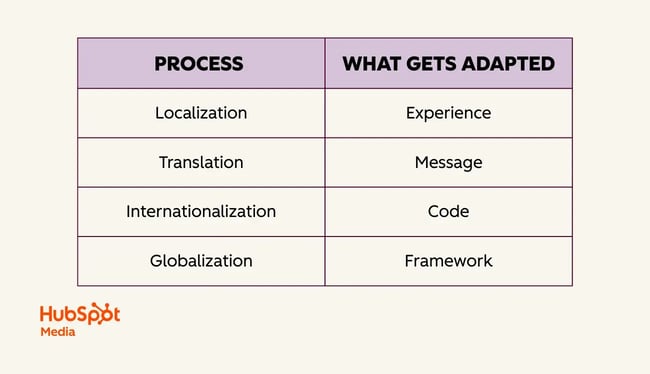
  • Translation = adapting the message, or ensuring the meaning carries across, even if the words change.
  • Localization = adapting the experience, or putting the full customer journey in context and going beyond text on a page.
  • Internationalization = adapting the code. Here, infrastructure choices, like hard-coding U.S. dollars, can create barriers.
  • Globalization = adapting the strategy or mindset. This is the deepest layer and re quires rethinking strategy for each market rather than applying the same playbook everywhere.

table showing four international business processes and what each adapts: localization adapts experience, translation adapts message, internationalization adapts code, and globalization adapts framework.

These distinctions matter because what appears to be a simple “localization problem” is often something much deeper. I’ve watched teams waste months trying to fix translation issues. Meanwhile, the real problem was a missing market strategy. Once everyone understands what these terms actually mean, you stop throwing money at the wrong things.

Where Teams Go Wrong with International Expansion

Companies continue to make the same mistakes when they expand internationally. Once you understand the framework above, these become obvious.

Forgetting About Go-to-market Fit

Most leaders understand product-market fit, but few think about go-to-market fit. Just because you see website traffic from another country doesn’t mean there’s a business opportunity there.

I’ve seen multiple companies assume it was time to invest in India after seeing traffic spikes from the country. But when we looked closer, those visitors weren’t willing to pay U.S. prices, we didn’t accept rupees, and we had no local payment processing. Traffic didn’t equal opportunity. Without adjusting pricing and infrastructure, there was no go-to-market fit.

At HubSpot, we ran into the same issue when launching our CRM in Latin America. The product resonated, but HubSpot hadn’t adjusted pricing for local economies, so only enterprise buyers could afford it. Product-market fit existed, but go-to-market fit was limited to the wealthiest segment.

Assuming One Strategy Fits All Markets

When HubSpot rolled out changes to our partner program, someone asked me to localize an announcement email into Japanese. It seemed simple at first, but upon reviewing the email, we noticed it included several links pointing to dependent assets, including a video, 10 blog posts, seven web pages, and more.

What appeared to be a straightforward job turned out to be a localization project that would have cost tens of thousands of dollars.

So, I asked the obvious question: How many partners do we have in Japan? Turns out, fewer than 10, and they were all in Tokyo. Instead of this big, elaborate campaign, we just invited them to our Tokyo office to walk them through the changes in person. It was less work for everyone and a better fit for a culture that values face-to-face relationships.

I ran into a similar challenge with our website.

When we were expanding to Japan, people wanted to translate our entire U.S. website. But our U.S. site was built for a market where we‘re already established. We’re a public company that people know. In Japan? Nobody had heard of us. Why would we need this complex site with all our partner integrations and advanced features when people didn’t even know who we were yet?

I found the playbook that works for a market leader doesn’t make sense when you’re just planting roots in a new region.

Trying to Localize Everything

Another mistake is assuming that teams have to localize every asset for every market. This mindset often leads to sprawling projects that drain time and money without making much difference to local buyers. In reality, a handful of high-value assets usually cover most customer needs.

I always encourage teams to ask what’s essential at this stage in the market. Initially, it may be just a clear landing page, pricing guidance, or localized onboarding materials. You don’t need to mirror your entire U.S. website or replicate every blog post to build credibility in a new region.

Focusing on Translation Instead of Adaptation

Translation isn’t just about words. What matters is whether the message lands with people in another culture.

When HubSpot entered the Japanese market, we realized our CRM lacked a crucial feature for the region: business card scanning. In Japan, business cards are central to professional relationships, and every local CRM offers business card scanning. To succeed, we partnered with Sansan to integrate this capability into HubSpot.

I still have a box of Japanese business cards from that time. I never had cards for the U.S. market, but I absolutely needed them for Japan because proper presentation matters so much there. That small but telling detail illustrates how adaptation goes beyond language.

Building a Global-first Approach That Actually Works

Knowing what not to do is just the beginning. The real challenge is building something that actually works.

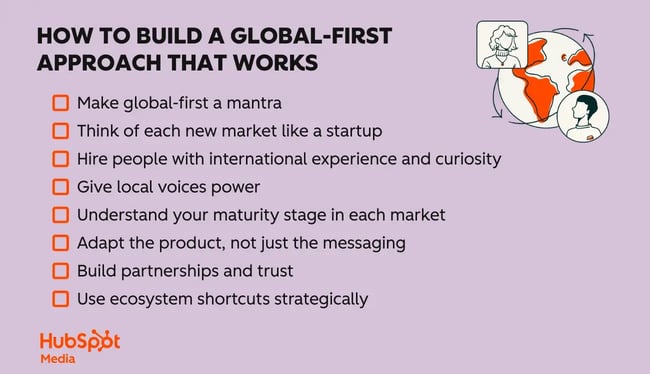
building a global-first approach that actually works

Make global-first a mantra.

When I joined HubSpot, one of the first things I realized was that global thinking needed to be part of daily decision-making. To make it stick, I started calling it “global-first” and brought it up constantly — in meetings, on our company wiki, and whenever I talked to executives.

I invited colleagues who cared about international growth to act as ambassadors and help spread the word. We even set up a Slack channel for our “global-first” community, so people across offices could connect and share ideas.

Eventually, people started using the phrase without me having to push it. New employees would hear it from their teammates and start saying it too. That’s when I knew it was becoming an integral part of how we worked.

What you call it doesn’t really matter. What matters is making global thinking a fundamental part of how your company operates. At HubSpot, we used “global-first,” but I’ve also seen other companies adopt phrases like “global-ready” or “think global.”

Even small companies can benefit by doing this early. The sooner you set global thinking as a norm, the more naturally it grows with the business.

Think of each new market like a startup.

Each new market is like starting a small business inside your company. You don’t have brand recognition, customer stories, or established partners yet. Success depends on staying close to customers. That means talking with them often, listening carefully, and letting their feedback guide your next steps.

Start simple, move quickly, build relationships, and grow from the ground up.

Hire people with international experience and curiosity.

If I could give only one piece of advice, it would be to hire people who bring an international perspective. They might have lived abroad, speak several languages, or grown up in a multicultural household. Equally important is curiosity about other cultures.

Build this into your job descriptions and hiring practices. Make it a requirement, not just a nice-to-have. We don’t talk about international diversity nearly enough, but it has a tangible impact on growth. People with global mindsets naturally make decisions that strengthen global strategy.

Give local voices power.

Local teams are closest to the customer, yet their voices often get drowned out by headquarters. You have to be intentional about amplifying them.

At HubSpot, we created two programs to address this:

  • International Helm (iHelm): A monthly meeting where executives heard directly from local teams about their specific market needs. Because international was our fastest-growing segment, it was easier to advocate for resources.
  • The Tomodachi Program: A buddy system connecting team members across geographies. Tomodachi means “friend” in Japanese, and the program started to help our Japan team build relationships across the company. It was simple but powerful: 30-minute calls between colleagues in different countries to share knowledge and make connections.

These informal connections are crucial. When people have personal relationships across markets, they’re more likely to consider global implications in their daily decisions.

Understand your maturity stage in each market.

Don’t let aspiration cloud reality. I always advise teams to be honest about their current market position. Are people even aware you exist? Are they considering you but haven’t made a purchase yet? Or are you already established and just trying to optimize your operations?

Your tactics need to match that reality, not where you wish you were.

Adapt the product, not just the messaging.

You can only do so much with marketing changes. Sometimes, you actually need to change your product to fit how people work in different countries. This could involve accepting local payment methods, integrating with widely used software, or adjusting your workflows to align with local business practices.

Build partnerships and trust, especially in relationship-driven markets.

In a lot of Asian markets, who you know matters more than what your product does. You need government approval and the right introductions. Beyond that, people have to believe you‘re in it for the long haul. American companies often miss this because we’re used to more transactional relationships. Getting the right partnerships can make or break your entry into these markets.

Use ecosystem shortcuts strategically.

There are shortcuts to going global, especially for small businesses. Instead of building presence in each country from scratch, you can use platforms where customers already are. Launch on Amazon or Etsy for instant reach across multiple countries, or tap into partner ecosystems like the HubSpot App Marketplace.

One company I advised, Lottie Dolls in Ireland, used this approach to reach customers worldwide and get distribution they would have struggled to establish on their own.

Knowing When Your Global-first Mindset Is Working

The real test of an international strategy is whether it strengthens the company as a whole. Expansion shouldn’t be a side project or a box to check. It should contribute directly to goals like diversifying revenue, sharpening the product, or staying ahead of competitors.

At HubSpot, international growth always connected back to company-wide targets. Too often, I see businesses chase new markets because of a traffic spike or a handful of prospect requests. That reactive approach usually wastes time and resources. The companies that get it right tie international moves to clear objectives from the start.

When it’s working, you see it clearly. Local insights shape product decisions. International colleagues move into leadership roles. Perspectives from abroad guide major choices.

Too many companies still think they can put off international until they‘re “ready.” But by then, you’ve already built so many assumptions and biases into your product and processes that going global becomes this massive, expensive undertaking.

Start thinking globally from the beginning. It doesn‘t mean you have to launch everywhere at once. Instead, you design things knowing you’ll eventually expand beyond your home market. That makes everything else so much easier.

AI email subject lines that drive 3x more revenue and actually convert [+ exclusive insights]

Software Stack Editor · October 20, 2025 ·

Email subject lines determine whether your carefully crafted campaigns ever see the light of day — yet most marketers still rely on gut instinct and basic A/B testing to choose them. What if you could predict which subject lines will resonate with your audience before hitting send? AI email subject line optimization makes this possible by analyzing millions of data points from your actual subscribers’ behavior, automatically testing variations, and continuously learning what drives engagement.

Download Now: Full-Stack AI Marketing Toolkit

But here’s what most articles won’t tell you: there’s a massive difference between using a basic AI generator to brainstorm subject lines and implementing true AI optimization. When this optimization occurs in HubSpot’s Marketing Hub with Breeze AI, you are not only testing subject lines but also creating a smart system that understands your audience and adapts to their behaviors.

This guide shows you how to use AI to create subject lines that increase revenue, not just open rates. You’ll learn how to:

  • Set up governed workflows that maintain your brand voice
  • Create testing frameworks that go beyond simple A/B splits
  • Measure real business impact rather than vanity metrics

Whether you’re sending 1,000 emails a month or 10 million, these strategies will help you turn your weakest subject lines into your strongest revenue driver, whether you send 1,000 emails a month or 10 million.

Let’s dive in.

Table of Contents

  • What is AI email subject line optimization?
  • How to Optimize Email Subject Lines with AI
  • How to Safeguard Deliverability and Compliance During AI Subject Line Optimization
  • How to Optimize AI Subject Lines in HubSpot
  • Frequently Asked Questions (FAQ) About AI Subject Line Optimization
  • AI Email Subject Lines Make Email Marketing Easier

What is AI email subject line optimization?

AI-driven email subject line optimization is a data-driven process that utilizes machine learning to continuously test, analyze, and refine email subject lines based on actual recipient behavior and engagement patterns.

Unlike simple AI generation tools that only create subject line ideas, proper optimization involves automated testing across multiple variations, real-time performance prediction, and ongoing refinement based on your specific audience’s response data.

Most marketers confuse AI subject line generators with true AI optimization systems — but they’re as different as a calculator is from a financial advisor. Here’s the difference between the two:

  • AI generation: Creates subject line ideas based on prompts (one-time output)
  • AI optimization: Tests variations, learns from results, and automatically improves future performance (continuous improvement cycle)

While generators simply create clever text options based on your prompts, optimization platforms like HubSpot’s Marketing Hub establish data-driven workflows that continuously test, learn, and improve subject line performance based on actual revenue results.

Additionally, AI-driven email subject line optimization requires an integrated CRM system, automated testing infrastructure, and performance analytics that work together to drive measurable business outcomes — not just creative suggestions.

If you’re still wondering about why AI optimization is the way to go, check out these core benefits that might sway your decision:

  • It processes thousands of data points per campaign to predict performance
  • It runs unlimited A/B tests simultaneously without manual setup
  • It learns your unique audience preferences over time
  • It scales personalization across millions of subscribers instantly
  • It reduces campaign prep time from hours to minutes

Now, these benefits sound impressive, but you may wonder how this technology actually delivers such results in practice. Here’s a closer look at how AI email subject line optimization actually works:

  • Strategy input: You define campaign goals, brand guidelines, and target segments
  • Intelligent generation: AI creates 10-20 variations based on historical performance data
  • Predictive scoring: Each variation gets scored for likely open rate before sending
  • Automated testing: System deploys multivariate tests to sample audiences
  • Performance analysis: AI tracks opens, clicks, and conversions in real-time
  • Continuous learning: Winners inform future campaigns, building a knowledge base

AI optimization amplifies your marketing expertise rather than replacing it. You maintain control over brand voice, messaging strategy, and creative direction while AI handles the heavy lifting of testing and data analysis.

Think of it like this: AI is your assistant who remembers every subject line that’s ever worked for your audience and applies those insights instantly.

Why Platform Integration Matters

When AI optimization happens within HubSpot’s Marketing Hub, it connects seamlessly with your contact database, behavioral triggers, and analytics dashboard. This integration means AI can:

  • Access complete customer lifecycle data (for smarter personalization)
  • Trigger optimized subject lines based on user behavior
  • Track performance across all touchpoints, not just opens
  • Apply learnings across teams and campaigns automatically

But proper optimization requires more than just powerful technology — it needs governance and measurement to ensure consistent and compliant results. Therefore, adequate optimization includes guardrails to maintain brand consistency, such as:

  • Approval workflows before deployment
  • Brand voice parameters that flag off-message content
  • Performance benchmarks that track improvement over time
  • ROI measurement connecting subject lines to revenue

Pro tip: Ready to move beyond basic AI generation to complete optimization? Get started with HubSpot’s Email Marketing Software and Breeze AI to elevate your subject lines from guesswork to data-driven success.

Now that you understand the foundation of AI-powered subject line optimization and its critical components, let’s explore practical implementation. The following section will walk you through the exact steps to set up, configure, and deploy AI optimization in your email marketing workflow, turning these concepts into measurable results for your campaigns.

How to Optimize Email Subject Lines with AI

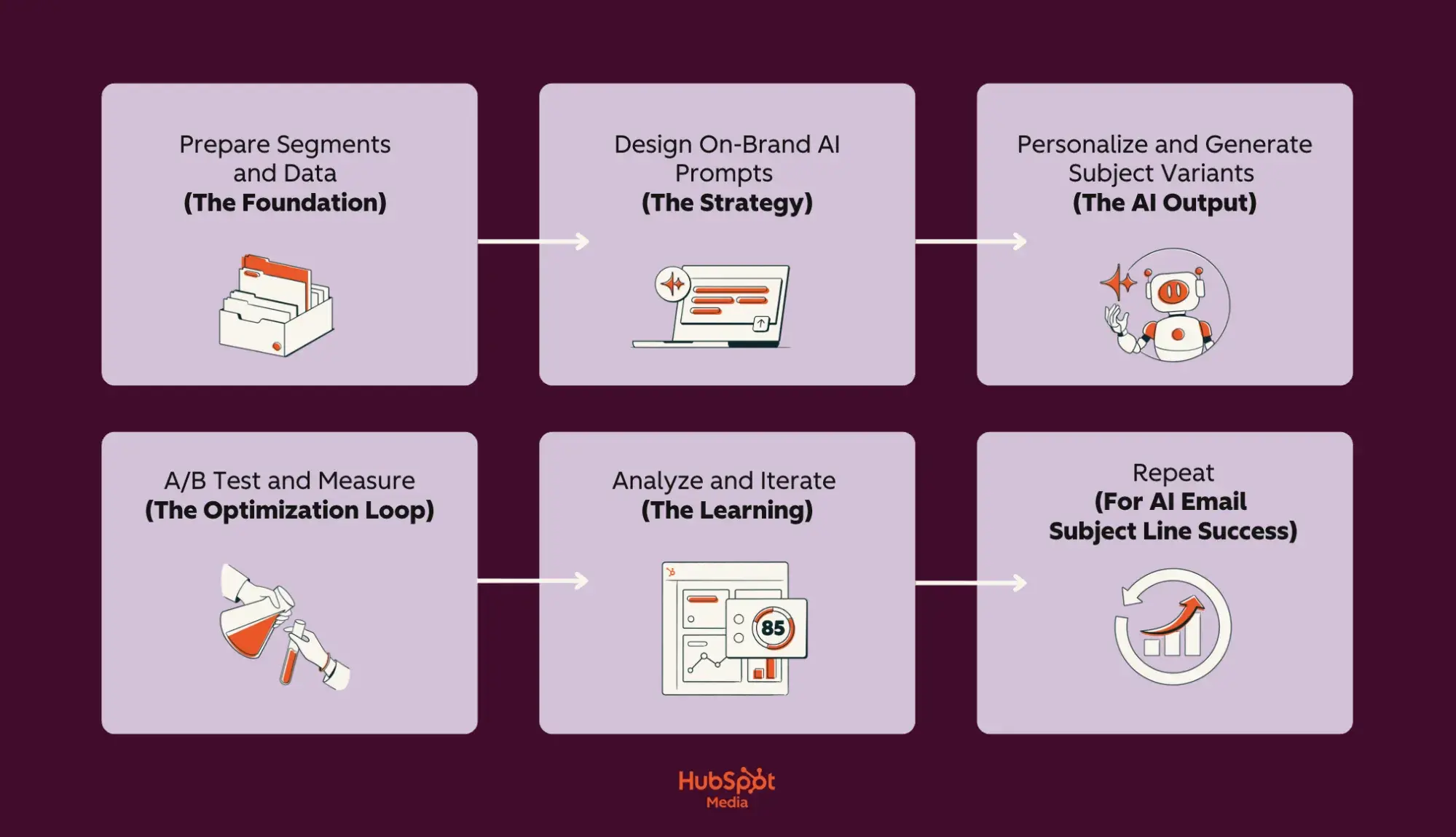
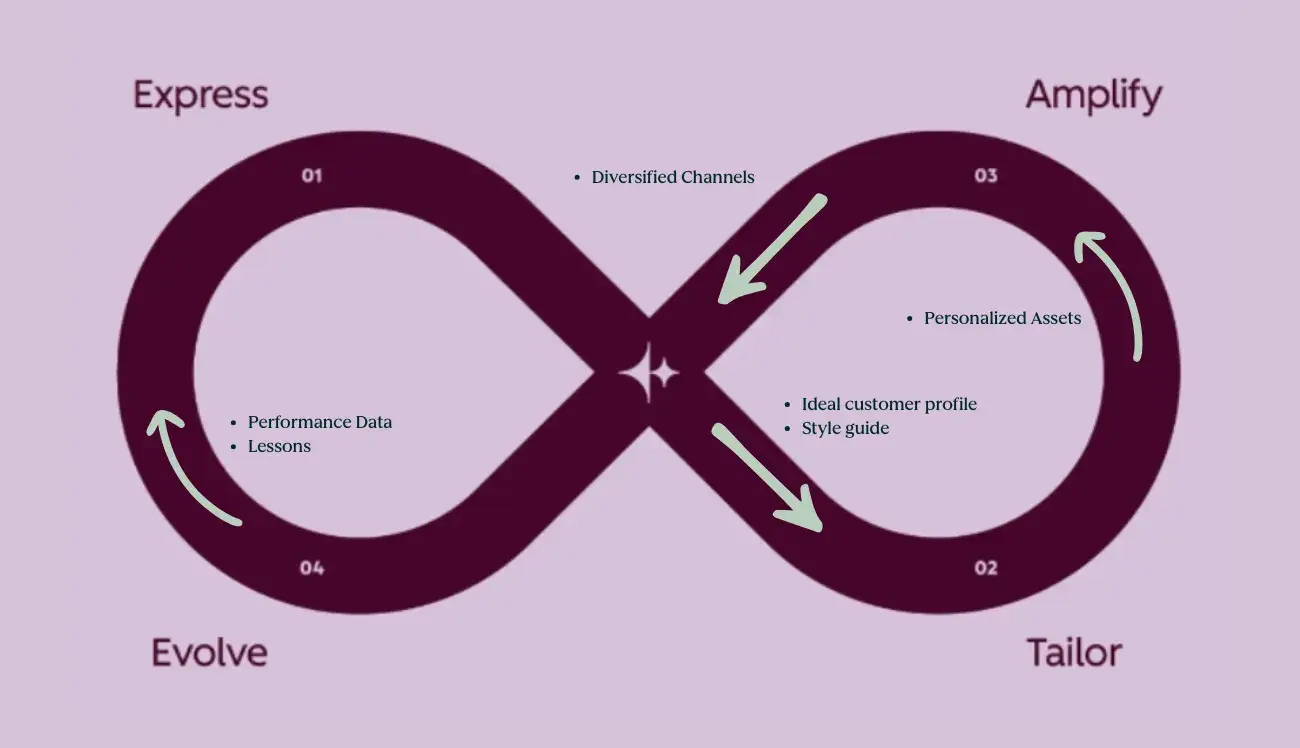
a screenshot of a HubSpot-branded image of a lilac and burgundy flowchart that details the AI subject line optimization process, with the hubspot media logo in the bottom center of the image

As stated above, AI-driven email subject line optimization enhances your email marketing by utilizing machine learning to test, analyze, and automatically refine subject line performance based on recipient behavior and revenue data.

This process goes far beyond simple text generation — HubSpot’s Marketing Hub connects AI optimization directly to your CRM database, enabling personalized testing across segments while tracking actual conversions, not just opens. However, successful AI optimization relies on one key factor: clean, well-organized contact data. This allows the system to understand your audience’s preferences and behaviors.

Before diving into the technical setup, let’s first establish the foundation that makes AI optimization possible: properly prepared email segments and data.

How to Prepare Email Segments and Data

Preparing email segments and data for AI subject line optimization involves organizing your contact database into meaningful groups based on shared characteristics and ensuring all contact information is accurate, current, and properly formatted.

This preparation is crucial because AI learns from patterns in your data. It’s simple: clean, well-segmented data leads to subject lines that can increase open rates; in contrast, messy data yields generic and ineffective results that hinder engagement.

Data and Segments to Use to Get the Best AI Subject Lines

The most effective AI subject lines come from four key data categories that help the AI understand recipient context and intent:

Essential segmentation categories:

  • Lifecycle stage data: Where contacts are in their customer journey (subscriber, lead, customer, evangelist),
  • Behavioral signals: Email engagement history, content downloads, website visits, and purchase frequency.
  • Demographic attributes: Industry, company size, role, location, preferred language.
  • Intent indicators: Product interests, support tickets, cart abandonment, and trial status.

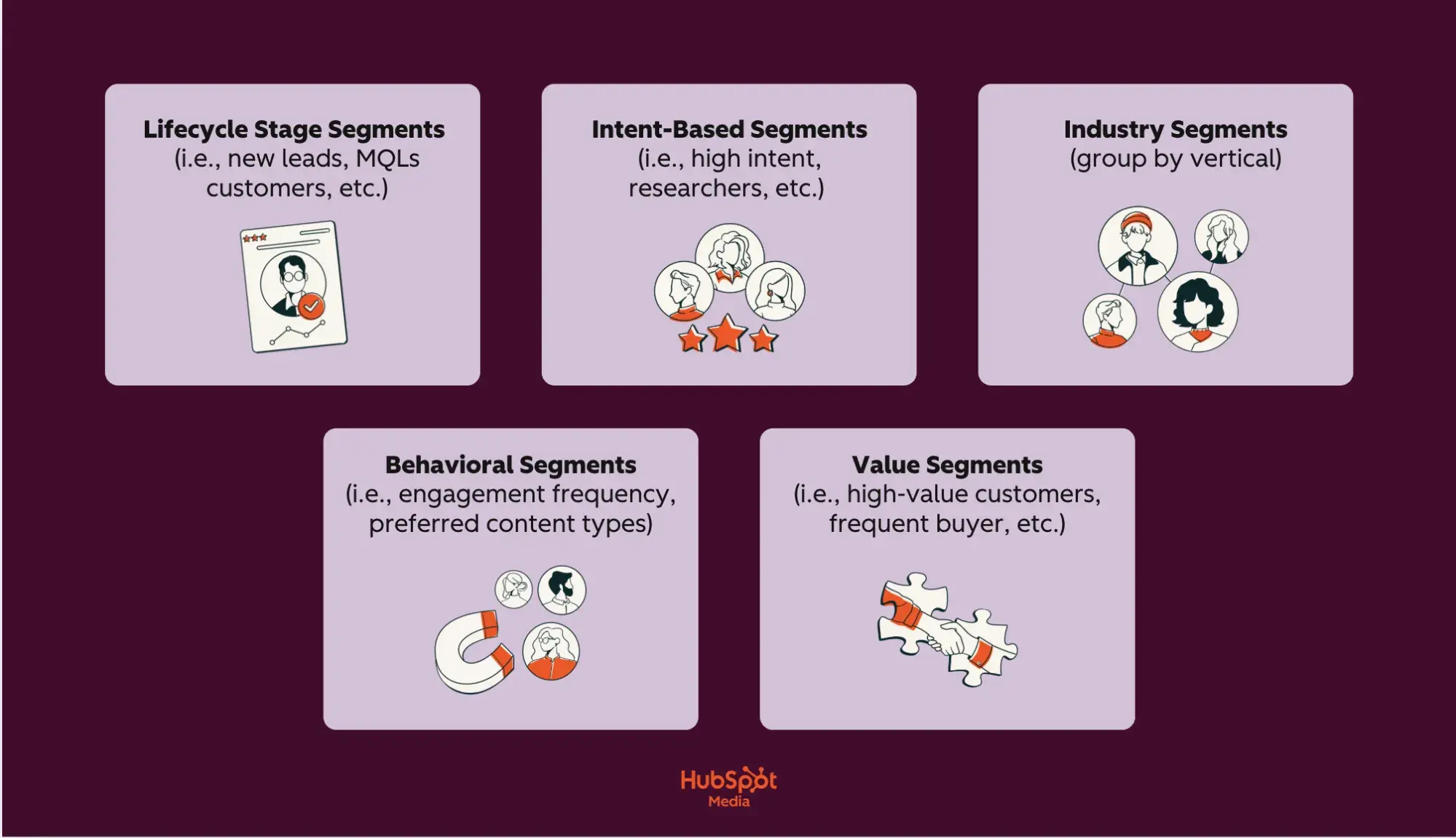
Why do these fields matter? Well, AI uses them to predict which emotional triggers and value propositions will resonate with users. Here’s a breakdown of the essential segments you’ll need to create for optimal AI performance:

a screenshot of a HubSpot-branded image of a lilac and burgundy chart highlighting essential segments for ai email optimization, with the hubspot media logo in the bottom center of the image

  • Lifecycle stage segments: New leads (education-focused), MQLs (benefit-driven), customers (loyalty-focused), at-risk (re-engagement).
  • Intent-based segments: High intent (visited pricing page), researchers (downloaded guides), comparison shoppers (viewed competitors).
  • Industry segments: Group by vertical to match terminology and pain points.
  • Behavioral segments: Engagement frequency, preferred content types, and typical purchase patterns.
  • Value segments: High-value customers, frequent buyers, and dormant accounts.

Each segment should contain at least 1,000 contacts for statistically significant AI learning. Smaller segments can be initially combined into broader categories, which can then be refined as more data is collected. AI uses these segments to identify which subject line elements — such as urgency, personalization, benefit statements, and questions — are most effective for each group.

Your Go-To Data Hygiene Checklist (Before AI Implementation)

Now, clean data is, as I’m sure you’ve realized, non-negotiable for AI performance. Thus, your Smart CRM should maintain:

  • Standardized formats: Consistent date formats, proper capitalization, no special characters in names.
  • Complete records: Fill critical fields (email, first name, lifecycle stage) for at least 80% of contacts.
  • Updated information: Remove bounced emails monthly, update job changes quarterly.
  • Unified profiles: Merge duplicate contacts to prevent conflicting signals.
  • Permission status: Clear opt-in/opt-out records for compliance.

Here’s the thing: When your data lives in a Smart CRM, AI can access the complete customer picture — not just email metrics but also sales interactions, support tickets, and website behavior. This unified view means AI can generate subject lines that reference a contact’s recent support case resolution, their upcoming renewal, or their browsing history, creating relevance that standalone email tools can’t match.

Pro tip: HubSpot’s Email Marketing Software with Breeze AI automatically segments your Smart CRM data and maintains hygiene standards while generating subject lines that speak directly to each segment’s needs.

How to Design AI Subject Line Prompts with Brand Voice Guardrails

Designing AI subject line prompts with brand voice guardrails involves creating structured instructions that tell AI exactly how to write in your brand’s unique style, while automatically preventing off-brand language. This systematic approach ensures that every generated subject line sounds authentically “you,” regardless of who creates it or which campaign it supports.

Additionally, it converts AI-generated writing into your brand’s consistent voice, ensuring message quality remains consistent across thousands of variations. Don’t believe me? Well, here’s a complete list of reasons why you should:

  • AI structured prompts generate 20+ on-brand variations in seconds versus hours of manual writing
  • AI structured prompts create and maintain a consistent voice across all teams and campaigns
  • AI structured prompts generate and prevent compliance violations and inappropriate language automatically
  • AI structured prompts generate, learn, and improve from approved/rejected patterns
  • AI structured prompts generate scale personalization without losing brand authenticity

With these benefits in mind, the key to unlocking AI’s full potential lies in crafting the proper prompt structure from the start. A well-designed prompt template acts as your blueprint for consistent, high-performing subject lines that maintain your brand voice while exploring creative variations.

That said, let’s review a proven template that top marketers use to generate subject lines that actually convert.

The Best Prompt Template for Subject Line Ideation

Creating an effective prompt template is like programming your AI with your brand’s DNA — it ensures every generated subject line reflects your unique voice while exploring creative angles you might never have considered.

The following template has been refined through millions of successful subject line generations across industries, providing the perfect balance of structure and flexibility. By filling in these specific components, you enhance generic AI suggestions into on-brand subject lines that consistently outperform those created manually.

  • Role definition: Start by establishing the AI’s identity and expertise. “You are [Company Name]’s email marketing specialist who understands our [industry] customers and writes subject lines that [core brand attribute, e.g., ‘inspire action through friendly expertise’]”
  • Tone parameters: Specify exactly how you communicate. “Professional yet approachable, confident without arrogance, helpful rather than salesy, using everyday language instead of jargon”
  • Audience context: Include subscriber details. “Writing for [segment]: [job title] at [company size] companies who [key challenge/goal]. They value [core priorities] and respond best to [communication style]”

Pro tip: Always follow these brand do’s and don’ts:

  • DO: Use action verbs, reference specific benefits, and include numbers/data
  • DON’T: Use all caps, excessive punctuation (!!!), clickbait phrases, competitor mentions
  • NEVER: Make unsubstantiated claims, use fear tactics, include profanity or slang

The Best Prompt template for On‑Brand Rewrites

An on-brand rewrite prompt template is a structured framework that transforms generic or underperforming subject lines into compelling, brand-aligned versions while maintaining compliance and deliverability standards. So, whether you’re refining AI-generated drafts or updating legacy campaigns, this step-by-step process ensures every subject line reflects your brand personality, avoids spam triggers, and fits within optimal character limits.

Here’s a universal on-brand rewrite template that’ll adapt any subject line into a high-performing, on-brand message:

  • Step one: Share brand and voice parameters. Include tone (i.e., “professional yet warm,” or “knowledgeable without condescension”), personality traits (3 to 4 traits, i.e., “helpful, innovative, trustworthy, approachable”), and reading level (i.e., “8th grade, avoiding technical jargon”)
  • Step two: Give AI rewrite instructions. 1) Maintain the core message about [main topic/offer], 2) Rewrite in our brand voice that is [tone description], 3) Include [required element — e.g., percentage, deadline, benefit], 4) Start with [preferred opening — action verb, question, number].
  • Step three: Be sure to supply AI with words to avoid. Never use: FREE, GUARANTEE, LIMITED TIME, ACT NOW, URGENT, $$$, 100%, RISK-FREE, WINNER, CONGRATULATIONS, CLICK HERE, BUY NOW, SAVE BIG, SPECIAL OFFER.
  • Step four: Specify your output format. Clarify how many variations you’d like/need and what different emotional triggers you’d like to target (logic, urgency, curiosity, benefit, social proof).
  • Step five: Finalize length constraints. Ideally, subject lines should be a maximum of 7 words (scanning ease), mobile displays should have a maximum of 45 characters (optimal mobile display), and preview text suggestions should be no more than 90 characters.

Personalize AI-Generated Subject Lines with CRM Tokens

CRM personalization tokens are dynamic placeholders that automatically pull specific information from your customer database — like names, company details, or recent actions — into AI-generated subject lines, creating individually customized messages at scale. This combination of AI-generated content with CRM data enables you to send millions of unique subject lines that appear personally written.

To help you understand the full impact of this powerful combination, here’s a brief overview of the benefits of AI and CRM token personalization:

  • AI and CRM token personalization generate unique subject lines for every contact automatically
  • AI and CRM token personalization maintains relevance by referencing real customer data
  • AI and CRM token personalization scales to millions of contacts without manual work
  • AI and CRM token personalization updates dynamically as CRM data changes
  • AI and CRM token personalization prevents errors from manual personalization attempts

Now, understanding when to use individual tokens versus broader segment personalization is crucial for maintaining authenticity while maximizing engagement. Here’s how to choose the right personalization approach:

  • Dynamic tokens are most effective when you have clean, complete data and a clear connection between the personalization and your message. Use dynamic tokens when you have complete, accurate data (95%+ field completion), the information directly relates to email content, and personalization adds genuine value beyond novelty.
  • Segment-level personalization is more effective for testing new approaches or when data quality varies. Choose segment-level personalization instead when data fields are incomplete (under 70% populated), you’re targeting broad audiences with similar needs, or when industry and role matter more than individual details.

Moreover, the depth of personalization should align with the level of your relationship with the subscriber. Here are a few examples of token use across different lifecycle stages and industries.

  • Start new subscribers with minimal tokens to build trust: “Welcome! Your marketing toolkit awaits.”
  • Active leads respond well to moderate personalization that’s personal but professional: “[firstname], see how [company] uses AI for email.”
  • Loyal customers deserve full personalization that maximizes relevance: “[firstname], your [product] renewal saves [discount_amount].”
  • For at-risk accounts, use strategic tokens that create emotional connection: “[[firstname]], we’ve missed you since [last_login_date].”

Ready to combine AI intelligence with CRM personalization? HubSpot’s Content Hub with Breeze AI automatically pulls CRM tokens into AI-generated subject lines, creating perfectly personalized messages that drive more engagement.

Personalization Patterns That Scale

Scalable personalization patterns are reusable subject line frameworks that combine AI-generated content with strategic token placement to create thousands of unique, relevant messages without requiring manual customization for each recipient.

These patterns serve as templates, allowing AI to fill in the creative elements. At the same time, CRM tokens provide individual context, enabling you to maintain personal relevance across millions of emails while reducing production time.

To help you get started, check out this list of token patterns for welcome, upgrade, renewal, and re‑engagement:

  • Welcome Series Patterns: New subscribers need progressive personalization that builds from generic to specific as trust develops. Start with minimal tokens and increase personalization depth over the series.

Pattern 1 (First Touch): “Welcome! Your [product category] journey starts here”

Pattern 2 (Day 3): “[firstname], ready to explore your [most viewed feature]?”

Pattern 3 (Day 7): “[company] teams love this [product] feature”

Pattern 4 (Day 14): “[firstname], unlock your personalized [product] roadmap”

  • Upgrade Campaign Patterns: Upgrade patterns should emphasize specific value based on current usage and demonstrate clear ROI. Use behavioral tokens that demonstrate your understanding of their needs.

Pattern 1 (Usage-Based): “[firstname}}, you’ve outgrown [current plan] – here’s what’s next”

Pattern 2 (Feature-Focused): “Unlock [requested feature] in [higher plan] today”

Pattern 3 (Savings-Driven): “[company] qualifies for [discount]% off [upgrade plan]”

Pattern 4 (Peer Comparison): “Companies like [company] save [hours] with [premium feature]”

  • Renewal Campaign Patterns: Renewal patterns should reinforce the value received and make continuation feel natural and beneficial. Refer to their actual usage and success metrics whenever possible.

Pattern 1 (Value Reminder): [firstname], you’ve achieved [metric] with [product] this year.”

Pattern 2 (Loyalty Reward): “[company]’s renewal includes [bonus feature] free”

Pattern 3 (Deadline-Driven): “[firstname], lock in your rate before [date]”

Pattern 4 (Success Story): “Continue your [percentage]% growth with [product]”

  • Re-engagement Campaign Patterns: Re-engagement patterns need to acknowledge absence without guilt while offering clear reasons to return. Focus on what’s new or what they’re missing rather than dwelling on their inactivity.

Pattern 1 (Soft Return): “[firstname], see what’s new in [product] since [last login]”

Pattern 2 (FOMO-Based): “[Number] [company] teammates are using [feature] daily”

Pattern 3 (Value Reset): “We’ve added [number] features you requested, [firstname]”

Pattern 4 (Direct Incentive): “[firstname], come back for [specific benefit or discount]”

Pro tip: Start by creating 3 to 4 patterns per campaign type and test them across small segments before deploying them fully. Document which token combinations work best for each customer segment and lifecycle stage, then use Breeze AI to automatically apply personalization patterns across your entire database.

A/B Test Subject Lines with AI

Now that you’ve mastered scalable personalization patterns, it’s time to let data determine which variations drive the best results. This can be done one way and one way only: with A/B testing.

AI-powered A/B testing for subject lines is a systematic process that automatically generates multiple variations, simultaneously tests them across audience segments, and uses machine learning to identify winning patterns that can be applied to future campaigns.

Here’s how you implement A/B testing for your AI-optimized subject lines:

Start with a clear hypothesis: Every successful test starts with a clear hypothesis about what will improve performance. Your hypothesis should be specific and measurable, such as “Adding urgency tokens will increase open rates by 20% for cart abandonment emails” rather than vague goals like “improve engagement.”

Define your testing variables: Select 4-5 specific elements to test systematically:

Tone Variables: Professional vs. conversational, formal vs. casual, urgent vs. relaxed, emotional vs. logical

Benefit Variables: Feature-focused vs. outcome-focused, individual vs. team benefits, immediate vs. long-term value

Structure Variables: Question vs. statement, number-led vs. text-only, single vs. multiple benefits, short vs. detailed

Personalization Variables: No tokens vs. first name vs. company name vs. behavioral tokens, single vs. multiple tokens

Create a structured testing timeline: Follow this 6-day plan for optimal results:

  • Day 1 (Planning): Define hypothesis, select variables, generate 20 AI variations, set success metrics (minimum 20% improvement)
  • Day 2-3 (Initial Test): Send to 10% of segment (minimum 1,000 contacts per variant), monitor early indicators
  • Day 4-5 (Validation): Test the top 5 performers on an additional 20% of the segment, confirm statistical significance
  • Day 6 (Full Deploy): Send winner to remaining 70%, document patterns for future use

Let AI generate and prioritize variants: AI analyzes your historical data to create intelligent variations, not random combinations. For a webinar promotion testing urgency, AI might generate:

  • “Last chance: Web design workshop tomorrow” (high urgency)
  • “Reserve your web design workshop seat” (low urgency)
  • “Only five spots left in tomorrow’s workshop” (scarcity urgency)
  • “Final call for web design training” (moderate urgency)

Run tests with proper statistical significance: Ensure each variant reaches at least 1,000 contacts for reliable data. (Test for a minimum of 24 hours to account for different opening behaviors. Use 10% audience splits for initial testing, 20% for validation, and 70% for final deployment.)

AI transforms your testing variables into intelligent variations rather than random combinations. Additionally, it analyzes your historical campaign data to understand which elements typically resonate with your audience, then generates variations that explore promising new combinations while avoiding patterns that have previously failed.

However, proper optimization comes from understanding why specific variants won, not just which ones performed best. Here’s how you can analyze results and apply learnings systematically:

  • Document pattern insights, such as “questions outperformed statements by 32%” or “subject lines under 40 characters had 28% higher opens,” to build a knowledge base of what works for your specific audience.
  • Create a “failed patterns” list to avoid repeated testing of consistently poor performers, like all-caps words or excessive punctuation.
  • Update your prompt libraries with specific instructions based on test results, such as “For webinar promotions, always lead with a question” or “B2B segments respond 40% better to outcome-focused benefits.”
  • Modify segment playbooks to reflect personalization preferences discovered through testing, such as “Enterprise clients: use company name tokens,” while “SMB clients: use first name only.”

Pro tip: When setting up email A/B testing in Marketing Hub, use the automated winner selection feature to deploy your best performer without manual intervention

Variant Set Design

Creating a comprehensive variant matrix ensures you’re testing multiple dimensions simultaneously while maintaining brand consistency across all variations. This structured framework generates 16 to 20 testable variants from just 4 to 5 core variables, maximizing learning from each test cycle.

Use this planning matrix to guide your variant test design for your next email marketing campaign:

Segment

Tone Variant

Structure Variant

Personalization Level

Benefit Focus

Example Output

New Leads

Welcoming

Question

None

Educational

“Ready to master email marketing basics?”

New Leads

Professional

Statement

First name

Educational

“[firstname], your email marketing guide is here”

New Leads

Casual

Number-led

None

Outcome

“5 ways to triple your email opens today”

New Leads

Urgent

Statement

Company

Quick win

“[company] can boost engagement 40% now”

Active Users

Conversational

Question

Product mention

Feature

“Want to unlock [product]’s hidden features?”

Active Users

Professional

Statement

First name + product

ROI

“[firstname], [product] saved users $2M this year”

Active Users

Excited

Number-led

Behavioral

Time-saving

“You’re 3 clicks from saving 5 hours weekly”

Active Users

Direct

Statement

Company

Competitive

“[company] outperforms competitors by 47%”

At-Risk

Empathetic

Question

First name + timeframe

Re-engagement

“[firstname], what’s changed since [last_login]?”

At-Risk

Urgent

Statement

Product

Loss aversion

“Your [product] benefits expire in 48 hours”

At-Risk

Casual

Number-led

None

New features

“17 new features added since you left”

At-Risk

Professional

Question

Company

Value reminder

“Is [company] still interested in 3X growth?”

VIP/Enterprise

Executive

Statement

Company + metrics

Strategic

“[company]: Q4 performance report ready”

VIP/Enterprise

Consultative

Question

Full personalization

Partnership

“[firstname], ready to discuss [company]’s 2025 roadmap?”

VIP/Enterprise

Data-driven

Number-led

Industry benchmark

Competitive insight

“[industry] leaders increased revenue 62% using this”

VIP/Enterprise

Exclusive

Statement

Custom token

Premium access

“[account_type] exclusive: Early access approved”

Lastly, here are a few best practices to maximize your variant testing effectiveness:

  • Be sure to start by selecting 4 to 5 variants per segment that represent different combinations from your matrix. Never test all variants simultaneously, as this dilutes statistical significance.
  • Ensure each variant differs meaningfully in at least two dimensions to maximize learning potential. Track which combinations perform best for each segment, then use these insights to refine your matrix for the next testing cycle.

With your variant matrix established and initial tests deployed, the real optimization power comes from systematically applying what you learn. Next, let’s walk through how to create an iteration loop that continuously improves your subject line performance.

Iteration Loop

An iteration loop in AI subject line optimization is a continuous improvement cycle where AI analyzes test results, identifies winning patterns, and automatically generates new hypotheses for the next round of testing. This self-improving system upgrades one-time tests into compounding knowledge that gets smarter with every campaign.

AI goes beyond simple winner/loser identification to uncover the underlying patterns that drive performance. It analyzes multiple dimensions simultaneously — examining how tone, length, personalization, and timing interact to influence open rates across different segments.

To build your iteration cadence, establish a weekly rhythm that maintains momentum without overwhelming your team or audience. Here’s an outline you can follow:

  • Monday: AI analyzes weekend test results and generates an improvement summary.
  • Tuesday: Review AI proposals and select 3-5 for next test cycle.
  • Wednesday: Deploy new tests to segments that have not been recently tested.
  • Thursday-Friday: Monitor early indicators and prepare next iteration.
  • Weekend: Let tests run for maximum data collection.

For instance, AI might discover that urgent language increases opens by 32% for cart abandonment emails but decreases them by 18% for educational content, or that first-name personalization works for B2C but reduces trust in B2B communications.

Then, it creates pattern reports that highlight unexpected correlations: “Question-based subject lines perform 41% better when combined with numbers” or “Emojis increase opens for users under 35 but only when placed at the beginning of the subject line.” These insights would typically require weeks of manual analysis to uncover, but thanks to AI’s data-driven capabilities, they are automatically surfaced within 48 hours of test completion.

Now that your iteration loop is continuously improving subject line performance, it’s crucial to measure the real business impact of these optimizations beyond just open rates. Let’s examine how to track and attribute revenue gains directly to your AI-powered subject lines.

Measure impact from AI-generated subject lines.

Measuring the impact of AI-generated subject lines requires tracking performance metrics across multiple touchpoints, from initial opens to final conversions, to understand the actual business value beyond vanity metrics.

The Metrics Ladder for Subject Line Success

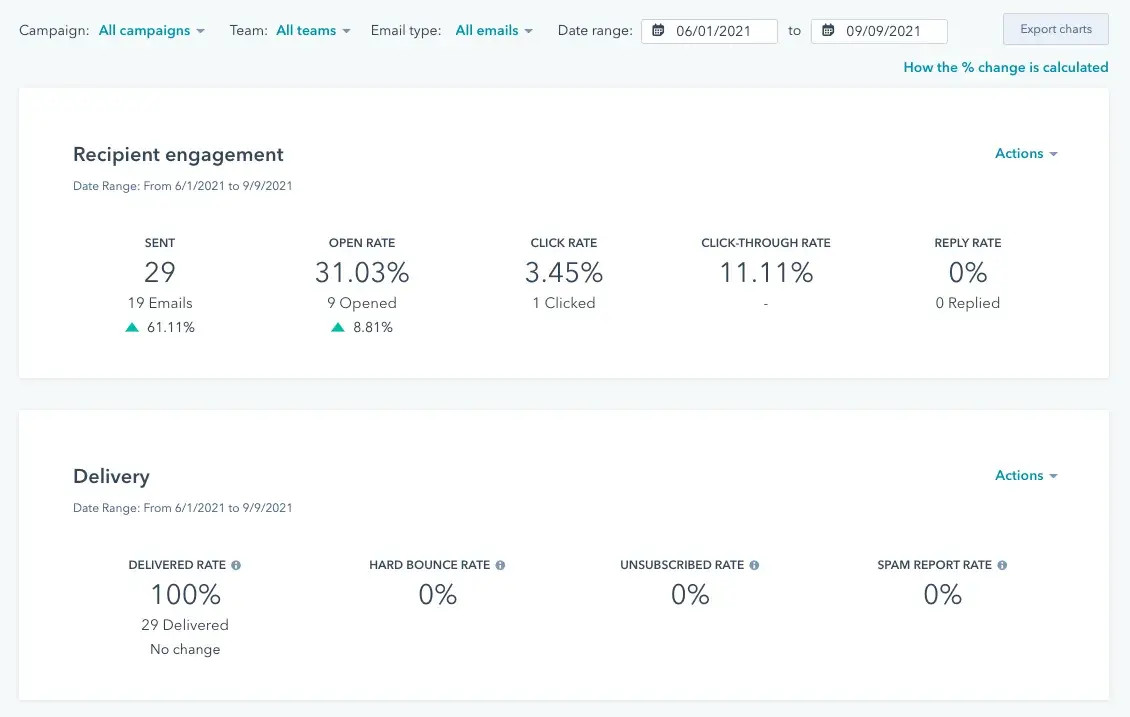
Start with open rate as your baseline quality signal, but understand it’s just the first step in measuring impact. A reasonable open rate (25-35% for most industries) indicates your subject line resonated, but quality indicators within opens reveal deeper insights:

  • Are the right people opening your emails?
  • Do opens happen within 24 hours of sending?
  • Are mobile versus desktop ratios healthy for your audience?

These quality signals reveal whether your AI-generated subject lines attract engaged readers or just curious clickers.

Then, move beyond open to measure clicks to priority links — the specific CTAs that drive business value. Track not just the overall click rate, but also clicks to your primary conversion points, such as:

  • Demo requests
  • Pricing pages
  • Purchase buttons

Pro tip: If opens increase but priority clicks decrease, your subject lines might be misleading readers.

Building Custom Dashboards for Ongoing Measurement

To track and optimize your AI subject line performance, create custom dashboards that visualize subject line performance across segments and time periods for actionable insights.

Your primary dashboard should display:

  • Subject line variant performance (showing all tested versions)
  • Segment-specific open rates (revealing which groups respond best)
  • Engagement velocity (how quickly emails are opened)
  • Revenue attribution (connecting opens to purchases)

Set up automated weekly reports that highlight winning patterns and flag underperforming segments needing attention.

Then, build a secondary dashboard for testing insights that tracks:

  • Hypothesis success rate (which assumptions proved correct)
  • Variable impact analysis (which elements drive the most significant lifts)
  • Segment preference patterns (how different groups respond to personalization)
  • Seasonal performance trends (when specific approaches work best)

This testing dashboard becomes your optimization roadmap, showing exactly where to focus future efforts.

Creating Your “Plays That Won” Library

Building a comprehensive library of winning subject line patterns transforms scattered test results into a strategic asset that compounds in value over time.

Think of it as your team’s playbook — a centralized repository where every successful formula, proven pattern, and performance insight lives, ready to be deployed across future campaigns. This documentation will ensure that the lessons learned from thousands of sends don’t disappear when team members change roles or campaigns evolve, but instead become institutional knowledge that drives consistent improvement.

Here’s how to build and maintain your winning plays library effectively:

  • Document every successful subject line pattern in a searchable library that becomes your competitive advantage.
  • Organize winning plays by category: segment (enterprise vs. SMB), campaign type (promotional vs. educational), emotional trigger (urgency vs. curiosity), and performance metric (best for opens vs. clicks).
  • In your “plays that won” documentation, include specific subject lines, performance metrics, test dates, and contextual notes about why it worked.

For each winning play, document the complete formula, such as “For cart abandonment emails to engaged users, combining first name + specific product + time limit achieves X% open rates.”

Then, do the following:

  • Include failed variations to prevent repeated testing of losing patterns
  • Update your library monthly, retiring outdated plays and adding new discoveries
  • Share highlights with your team quarterly to ensure everyone benefits from accumulated learnings

How to Safeguard Deliverability and Compliance During AI Subject Line Optimization

Safeguarding deliverability during AI subject line optimization involves implementing automated checks and manual reviews to ensure that every generated subject line meets legal requirements, avoids spam triggers, and maintains a sender’s reputation while still achieving performance goals.

This protective schema prevents the deliverability drop that occurs when aggressive optimization ignores compliance rules, maintaining inbox placement rates above 95% while still achieving 30 to 40% open rate improvements through AI optimization.

If you’re serious about maintaining high deliverability while optimizing aggressively, here’s an essential compliance checklist for AI-generated subject lines:

  • Avoid deceptive phrasing: Never use “RE:” or “FWD:” unless genuinely replying or forwarding. Prohibit false urgency (“Account expires today” when it doesn’t) or misleading offers (“Free iPhone” for a contest entry). AI sometimes generates creative but deceptive lines — always verify claims are accurate.
  • Limit excessive punctuation: Use a maximum of one exclamation point per subject line. Avoid multiple question marks (“Really???”) or dollar signs (“$$$”). Prevent all-caps words except established acronyms (CEO, USA, NASA).
  • Avoid risky spam triggers: Block high-risk phrases including “Act now,” “Limited time,” “Congratulations,” “You’ve won,” “Risk-free,” “No obligation,” and “Click here.” Replace with specific, truthful language: “Ends December 31” instead of “Limited time.”
  • Keep promises made in subject lines: If your subject line mentions “50% discount,” the email must prominently feature that exact discount. Mismatched promises can cause higher spam complaints and violate FTC truth-in-advertising regulations. Document subject line claims for verification.

Another significant aspect of email marketing is following CAN-SPAM best practices. The CAN-SPAM Act mandates specific requirements that any email subject line must follow, with violations carrying penalties up to $53,088 per email:

  • Subject lines must accurately reflect email content — no bait-and-switch tactics
  • Cannot use deceptive subject lines to trick recipients into opening
  • Must clearly identify promotional messages (though subject line identifiers aren’t required)
  • Include a valid physical address and unsubscribe mechanism in the email body
  • Honor opt-out requests within 10 business days

Configure your AI to flag potentially non-compliant subject lines for legal review, especially those mentioning health claims, financial promises, or competitive comparisons.

Lastly, here are a few general tips that I’ll leave you with to protect your sender reputation while scaling AI optimization:

  • Follow email deliverability best practices by implementing authentication protocols (SPF, DKIM, DMARC) that verify your sending authority
  • Maintain list hygiene by removing hard bounces immediately and re-engaging dormant subscribers before removal
  • Monitor sender reputation through HubSpot’s Email Marketing Software weekly
  • Document every compliance violation for AI retraining — each caught issue prevents thousands of future abuses through machine learning
  • Create an incident response plan (if spam complaints spike above 0.1%, pause all campaigns immediately, identify problematic subject lines, remove affected patterns from AI generation, and submit reputation repair requests to major ISPs)

Now that you understand how to optimize safely within compliance boundaries, let’s explore the specific steps to implement these strategies directly within HubSpot’s CRM, where automation and safeguards work in tandem seamlessly.

How to Optimize AI Subject Lines in HubSpot

Optimizing AI subject lines in HubSpot combines Breeze AI’s generation capabilities with Marketing Hub’s testing infrastructure to create, personalize, and automatically deploy winning subject lines based on real performance data.

Step-by-Step AI Subject Line Optimization in Marketing Hub

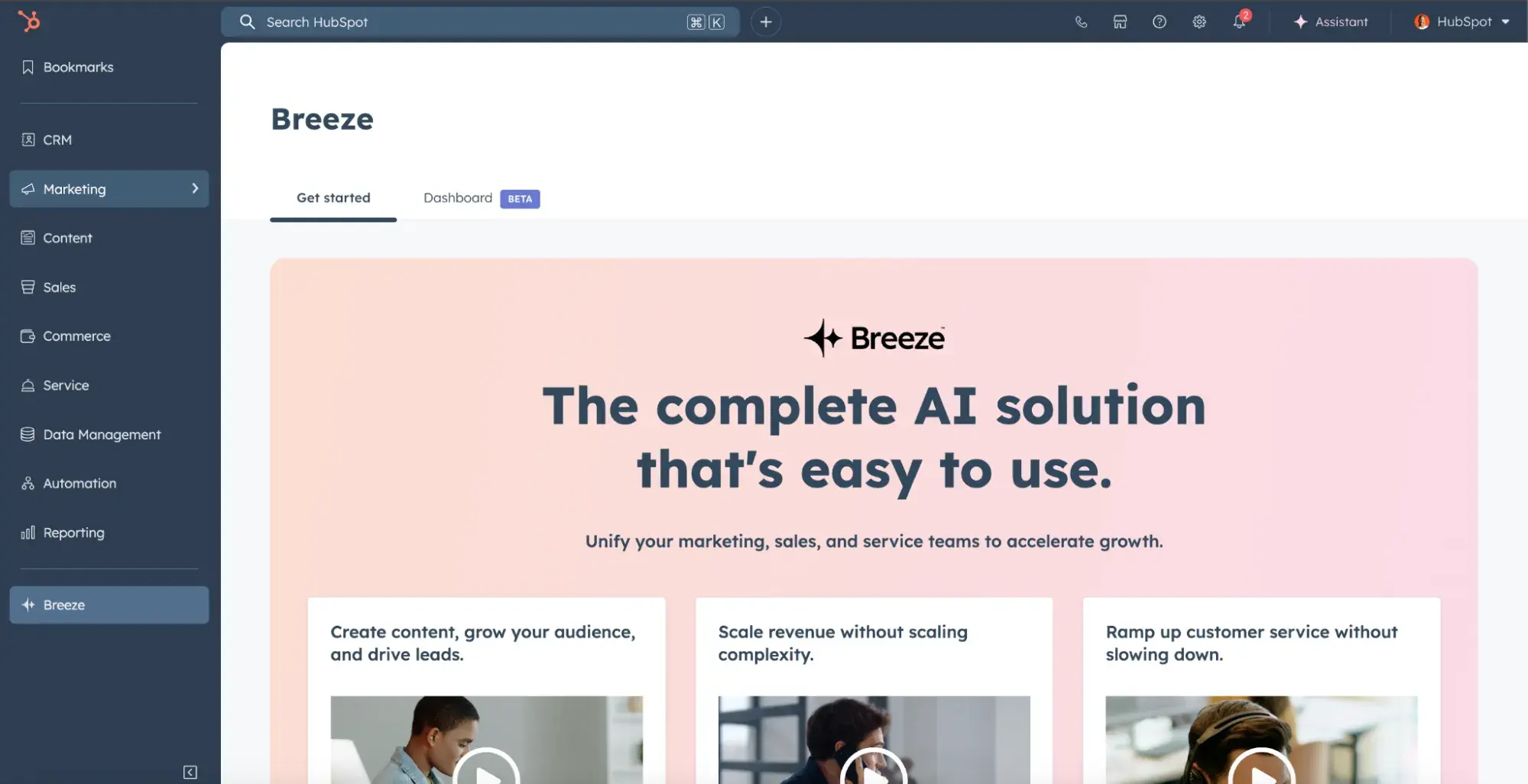
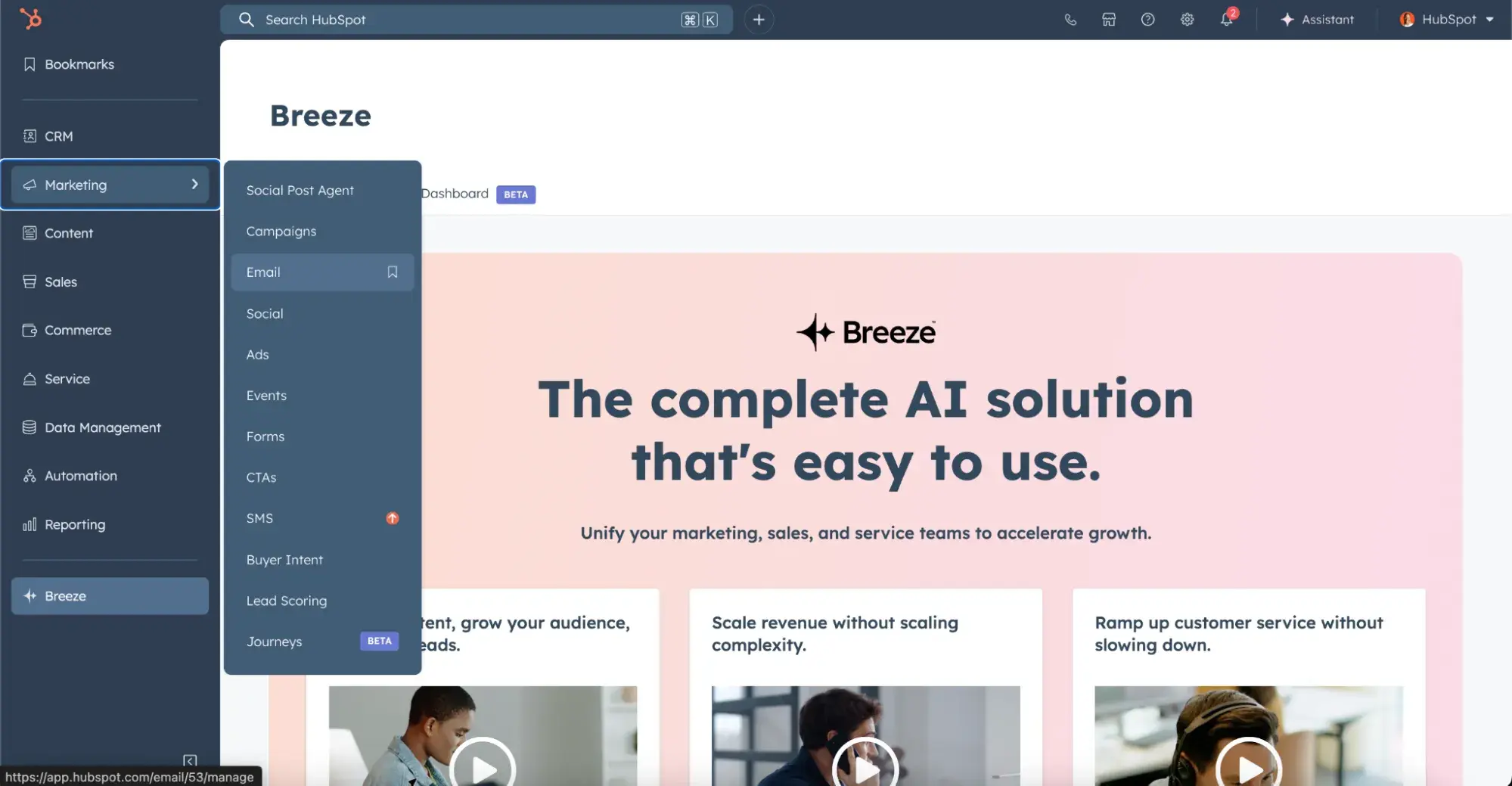
1. Go to Marketing Hub.

Begin by navigating to Marketing > Email in your HubSpot portal and create or select your email campaign.

a screenshot of hubspot’s portal 53, showcasing a landing page advertising breeze ai, next to a left-sided menu of all of hubspot’s CRM tools


 a screenshot of hubspot’s portal 53, showcasing a landing page advertising breeze ai, next to a left-sided menu of all of hubspot’s CRM tools

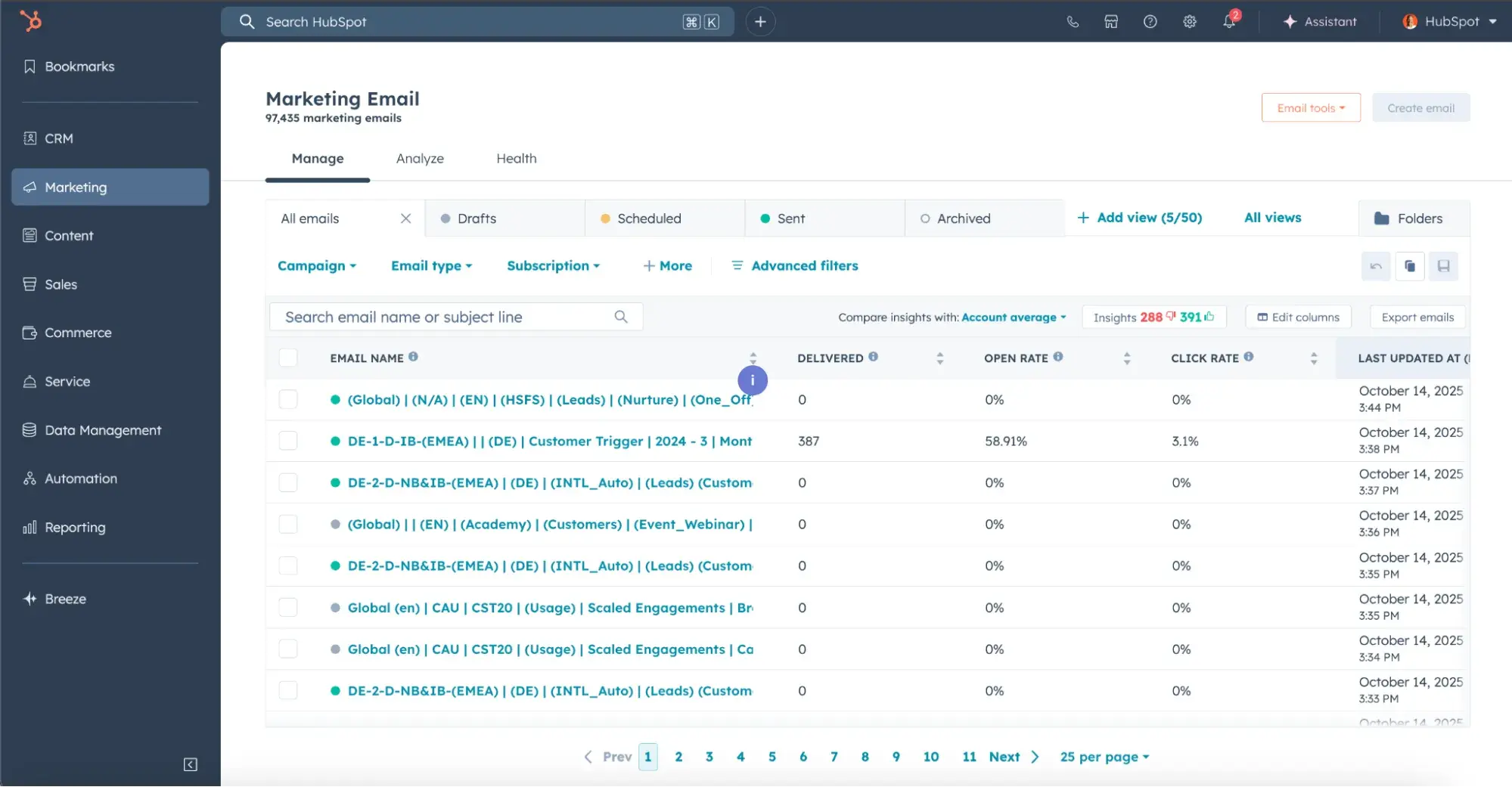
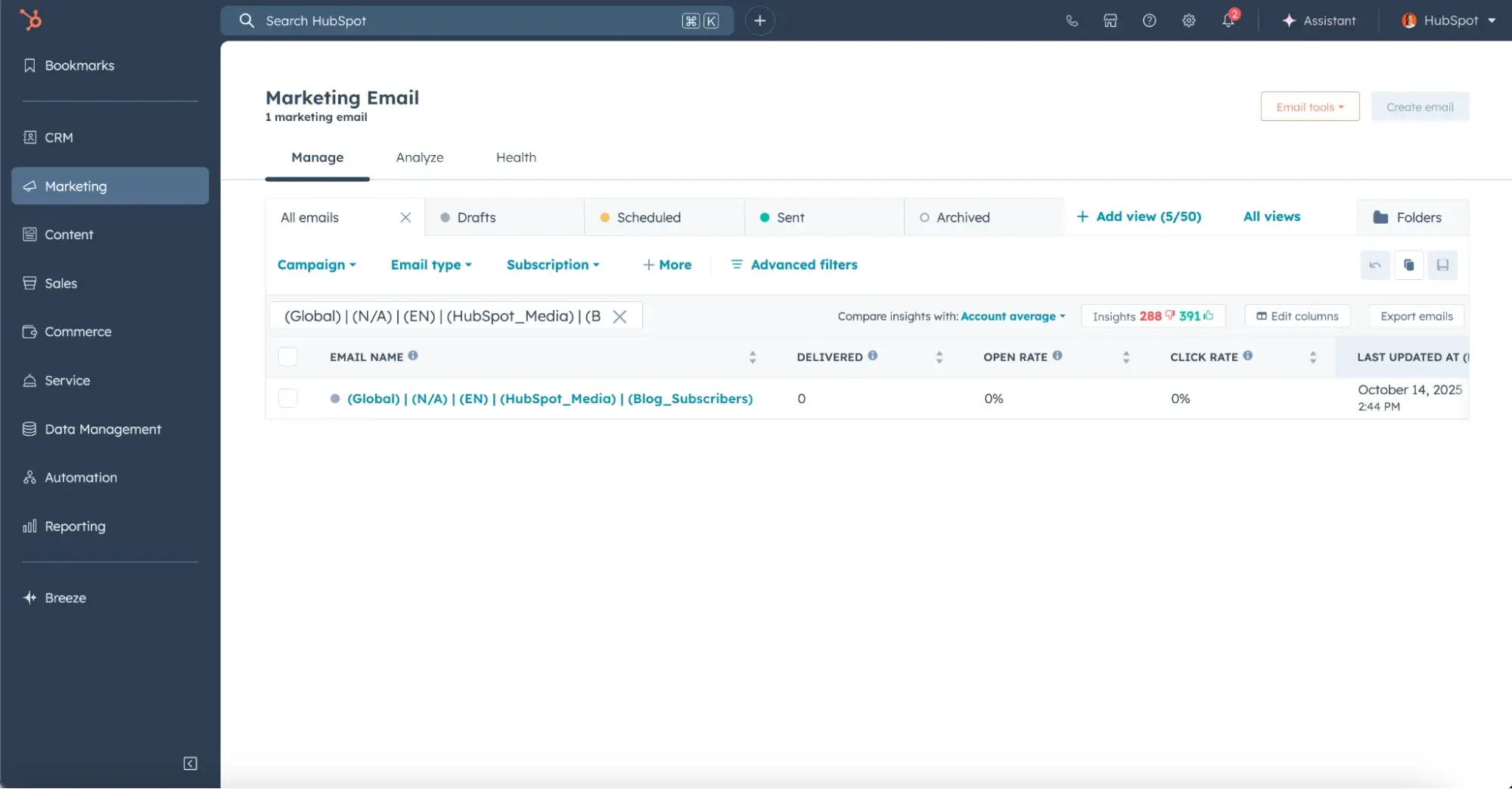
2. Find your email campaign.

a screenshot of hubspot’s marketing hub CRM, highlighting its marketing email campaign library and active campaigns within it

a screenshot of hubspot’s marketing hub CRM, highlighting its marketing email campaign library and active campaigns within it

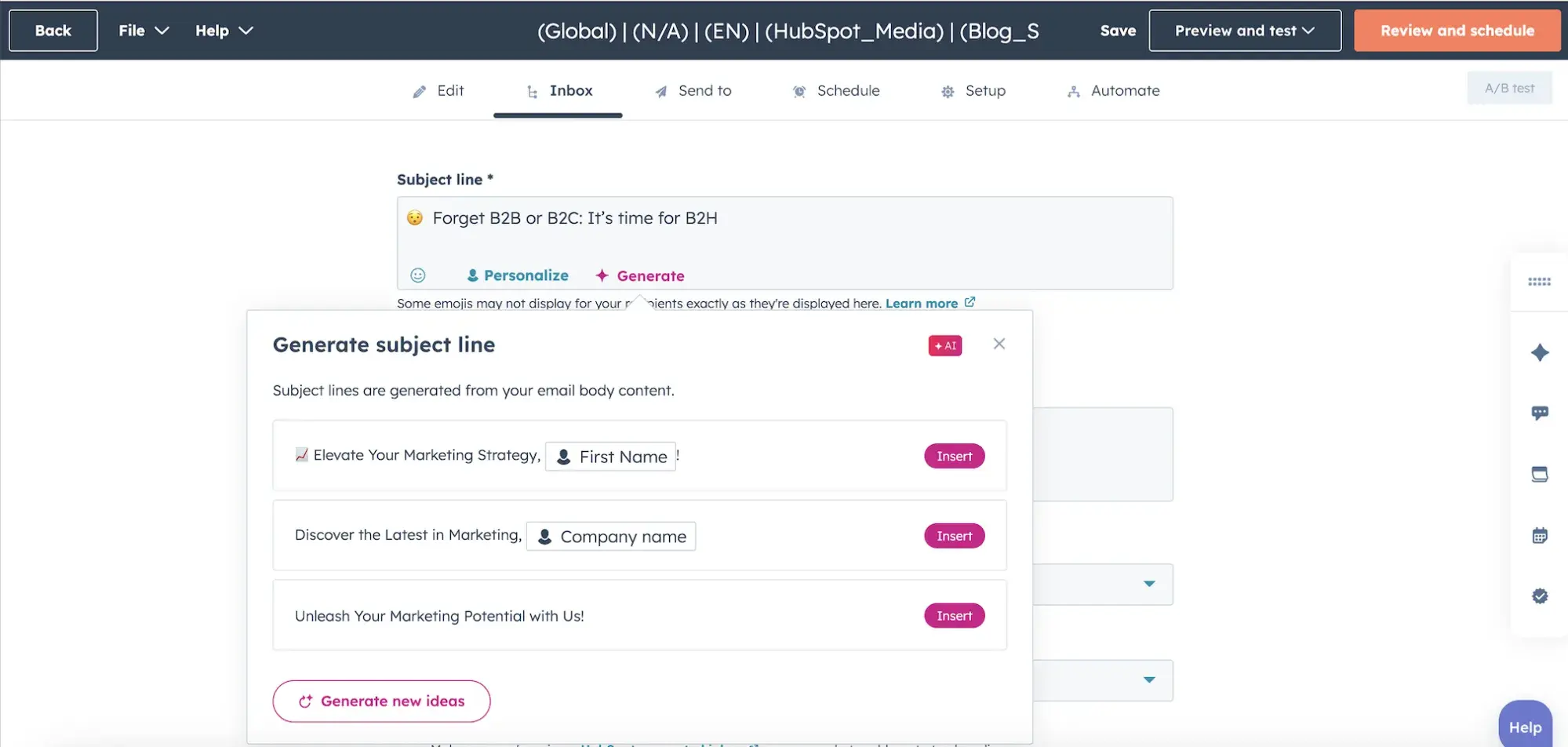
3. Edit your subject line with Breeze.

Click the subject line field to write a subject line. Then, generate alternate, AI-optimized subject lines with HubSpot’s AI — this activates Breeze’s generation interface.

Input your campaign goal, target segment, and key message, then click “Generate” to create 3 AI-powered options instantly.

a screenshot of hubspot’s email marketing software, highlighting how to optimize email subject lines using ai within the HubSpot CRM

Quick Start Workflow

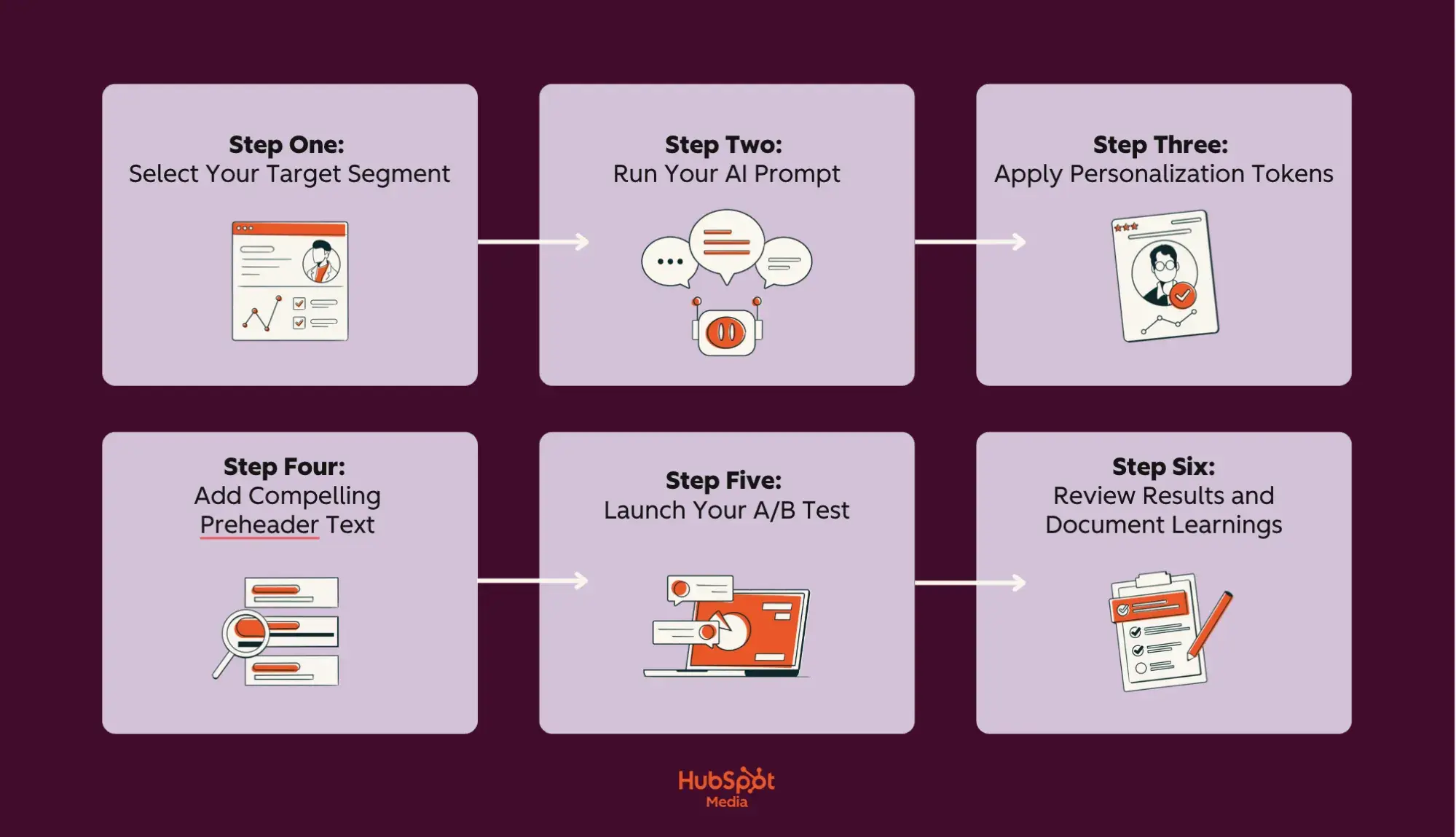
A quick start workflow for AI subject line optimization is a six-step process that takes you from segment selection to performance review, enabling you to launch your first AI-optimized campaign while establishing a repeatable system for continuous improvement.

The following streamlined approach combines HubSpot’s segmentation tools with Breeze’s AI-generation capabilities to produce tested, personalized subject lines:

a screenshot of a HubSpot-branded image of a lilac and burgundy flowchart that highlights a quick start workflow for AI subject line optimization, with the hubspot media logo in the bottom center of the image

  • Step one: Select tour target segment. Navigate to Contacts > Lists in HubSpot and choose a segment with at least 2,000 contacts for statistical validity. Start with an engaged segment (opened 3+ emails in the last 30 days) for the best initial results — document segment characteristics: lifecycle stage, average order value, and engagement frequency for AI context.
  • Step two: Run your AI prompt. Open your email editor and click “Generate with AI” in the subject line field. Input your prompt template: “Create subject lines for [segment] promoting [offer/content] with [tone] that drives [goal].” Then, generate 15-20 variations and select the top 5 that align with your brand voice and campaign objectives.
  • Step three: Apply personalization tokens. Click “Personalization” and add relevant tokens to your selected variations. For B2B, use [company] and [firstname]; for B2C, use [firstname] and [recent_purchase]. Set fallback values (“Valued Customer” for missing names) and preview token rendering across your segment.
  • Step four: Add compelling preheader text. Write preheader text that complements, not repeats, your subject line. Aim for 90 characters that expand on the value proposition. If your subject line poses a question, the preheader should provide a hint at the answer. Test preheader visibility across Gmail, Outlook, and Apple Mail previews.
  • Step five: Launch your A/B test. Select “Create A/B test” and configure: 20% sample size (10% per variant), 24-hour test duration, open rate as winning metric, and automatic winner deployment. Enable Breeze’s predictive scoring to see estimated performance before sending. Schedule for your segment’s optimal send time based on historical engagement data.
  • Step six: Review results and document learnings. After 48 hours, access Reports > Email Analytics to analyze complete performance metrics. Document winning patterns: which emotional trigger performed best, optimal length for this segment, and personalization impact on clicks. Add successful formulas to your prompt library and failed patterns to your exclusion list.

Frequently Asked Questions (FAQ) About AI Subject Line Optimization

Do emojis in subject lines help or hurt?

Emojis can increase open rates when used strategically. Test emojis with younger demographics and B2C audiences first, ensuring they display correctly across all email clients and devices.

Pro tip: Place emojis at the beginning or end of subject lines for maximum visibility. Avoid them in professional services, healthcare, or financial communications where they may reduce credibility. Always A/B test emoji versus non-emoji versions for your specific audience.

What is the best subject line length in practice?

Here’s what you should know about optimizing subject line length for maximum impact:

  • Keep subject lines between 30-50 characters (6-10 words) for optimal mobile display
  • Place your most important keywords within the first 30 characters since mobile devices truncate longer text
  • Pair concise subject lines with compelling preheader text that adds context without repetition
  • Test shorter variations (under 40 characters) for mobile-first audiences and slightly longer ones for B2B desktop readers

How should I balance personalization with privacy and trust?

Check out these recommendations for balancing personalization with subscriber privacy and trust:

  • Use personalization tokens sparingly. Limit to first name and relevant purchase history or preferences.
  • Match the personalization level to the relationship stage (i.e., minimal for new subscribers, more in-depth for loyal customers).
  • Avoid using location data or browsing behavior in subject lines, as this can be perceived as invasive.
  • Focus on value-based personalization, such as “Your exclusive offer,” rather than behavior-based personalization, like “Items you viewed.”

How do I adapt subject lines for different lifecycle stages?

Use the following lifecycle stage segmentation to adapt your AI-generated subject lines to each customer’s journey stage:

Lifecycle stage mapping:

  • New subscribers: Welcome-focused, educational tone (“Getting started with…”)
  • Active customers: Benefit-driven, exclusive offers (“Unlock your member rewards”)
  • At-risk users: Re-engagement with urgency (“We miss you—here’s 20% off”)
  • Churned customers: Win-back with new value (“What’s changed since you left”)

Adjust urgency, personalization depth, and offer types based on the psychology of each stage.

Pro tip: Within HubSpot’s Email Marketing Software, you can create customizable lifecycle stages based on your customer base.

How do I keep AI outputs on brand across teams?

Create a central prompt library in your content management system with:

  • Approved brand voice examples
  • Forbidden words
  • Tone guidelines

Additionally, implement approval workflows for AI-generated content before deployment, and use HubSpot’s Content Hub to set guardrails that automatically flag off-brand language. Then, schedule quarterly reviews to refine prompts based on performance data and ensure consistency as your brand evolves.

AI email subject lines make email marketing easier.

AI-powered subject line optimization represents a fundamental shift in how we approach email marketing. By implementing the strategies outlined in this post, you’re not just “improving open rates”; you’re building an intelligent system that learns your audience’s preferences, maintains brand consistency at scale, and directly connects email performance to revenue growth.

The combination of HubSpot’s integrated CRM with Breeze AI creates a feedback loop where every sent email makes the next one smarter, transforming what was once your most time-consuming task into an automated competitive advantage. Plus, whether you’re a solo marketer sending weekly newsletters or an enterprise team managing complex multi-segment campaigns, the tools and techniques covered here scale to meet your needs.

Ready to stop guessing and start knowing what subject lines will drive results? Begin your free trial of HubSpot’s Marketing Hub with Breeze AI today (because when AI and human expertise work together, the only limit is how fast you’re willing to grow).

Enterprise generative AI tools that actually work

Software Stack Editor · October 17, 2025 ·

  • TL;DR: Enterprise generative AI tools are advanced software platforms designed to automate and enhance marketing, sales, and customer service at scale.
  • The best tools integrate with your CRM, unify customer data, and support secure, governed workflows.
  • To choose the right solution, focus on proven use cases, integration depth, governance controls, and measurable ROI. Start with a clear rollout plan, align teams, and use a selection matrix to compare vendors.

Generative AI tools like ChatGPT have changed individual work, but using them in a company causes many challenges. Teams copy-paste customer data into external interfaces, but the outputs lack context from your CRM, and there’s no audit trail when something goes wrong. Security teams raise red flags, compliance officers demand answers, and leadership questions whether the technology is ready for production use.

Access Now: Free AI Content Creator [Free Tool]

The gap between consumer AI and enterprise AI isn‘t just about features. It’s about integration, governance, data sovereignty, and the ability to prove measurable business outcomes. Enterprise generative AI tools help by integrating AI into your workflows and systems, allowing safe large-scale AI deployment.

This guide provides production-proven use cases, a vendor evaluation matrix, a practical rollout plan, and a governance checklist. We‘ll even show how platforms like HubSpot’s Breeze AI integrate these capabilities into marketing, sales, and service workflows.

Table of Contents

  • Best Generative AI Tools for Enterprise
  • Enterprise Gen AI Use Cases
  • How to Choose the Right Enterprise Gen AI Tool
  • How to Integrate a Gen AI Platform With Your Enterprise Tech Stack
  • Frequently Asked Questions About Enterprise Generative AI Tools

Enterprise Gen AI Use Cases

Enterprise generative AI tools deliver measurable value when applied to specific, repeatable workflows. Here’s how leading organizations deploy these tools across marketing, sales, and customer service.

Marketing Use Cases

1. Content Generation at Scale

Marketing teams use generative AI to create blog posts, social media content, email campaigns, and landing page copy that fits the brand voice and targets different audience segments. The difference between consumer and enterprise tools shows up in brand consistency controls, approval workflows, and the ability to ground content in your actual customer data.

What I like: Tools that connect to your CRM can use real customer interactions, sales call pain points, and product usage patterns to create relevant content.

2. Personalization Engines

Rather than creating one-size-fits-all campaigns, generative AI analyzes customer behavior, engagement history, and firmographic data to generate personalized messaging, subject lines, and calls-to-action for each recipient. This moves beyond simple merge tags to genuinely adaptive content.

3. SEO and Search Optimization

Enterprise AI tools analyze search intent, identify content gaps, and generate SEO-optimized content that addresses specific queries your target accounts are asking. They can also optimize existing content for better search visibility and suggest internal linking strategies.

Pro tip: AI workflow automation is more effective when generative AI tools can trigger actions based on content performance and adjust campaigns according to engagement data.

4. Campaign Analysis and Reporting

Instead of manually pulling data from multiple platforms, generative AI synthesizes campaign performance across channels, identifies patterns, and generates executive summaries with actionable recommendations. This goes beyond basic merge tags to truly adaptive content.

Sales Use Cases

5. Intelligent Email Sequencing

Sales teams use AI to craft personalized outreach sequences that reference specific pain points, recent company news, and mutual connections. Enterprise tools ground these emails in CRM data, ensuring accuracy and relevance rather than generic templates.

Best for: Teams that need to personalize outreach at scale without sacrificing the quality that comes from manual research.

6. Meeting Preparation and Briefings

Before every call, generative AI compiles account history, recent interactions, open opportunities, and relevant market intelligence into a concise briefing. This eliminates prep work and ensures reps enter conversations fully informed.

7. Proposal and RFP Responses

Writing proposals typically requires pulling information from multiple sources, past proposals, product documentation, and case studies. Generative AI assembles customized proposals by analyzing RFP requirements and matching them to your capabilities, significantly reducing turnaround time.

What we like: Tools that maintain a knowledge base of past successful proposals and can identify winning patterns in your responses.

8. Call Transcription and Analysis

Enterprise AI tools transcribe sales calls, identify key moments, extract action items, and update CRM records automatically. They also analyze conversation patterns to identify what top performers do differently and surface coaching opportunities.

Pro tip: Generative AI in sales works best when integrated directly into the tools reps already use, eliminating context switching and increasing adoption.

9. Deal Intelligence and Forecasting

By analyzing pipeline data, win/loss patterns, and deal progression, generative AI provides early warning signals about at-risk deals and suggests specific actions to move opportunities forward.

Customer Service Use Cases

10. Knowledge Base Automation

Rather than manually creating and maintaining help articles, generative AI analyzes support tickets, identifies common questions, and generates comprehensive knowledge base content. It also keeps articles current by suggesting updates based on recent ticket trends.

11. Intelligent Ticket Routing and Triage

AI analyzes incoming support requests, extracts key information, determines urgency, and routes tickets to the appropriate team or agent. This reduces response times and ensures customers reach the right expert faster.

12. Response Drafting and Suggested Replies

Service agents receive AI-generated response drafts based on ticket content, customer history, and knowledge base articles. Agents can accept, edit, or regenerate suggestions, dramatically reducing handle time while maintaining quality.

What we like: Systems that learn from agent edits to improve future suggestions, creating a continuous improvement loop.

13. Sentiment Analysis and Escalation

Generative AI monitors customer interactions across channels, identifies frustration or churn risk, and automatically escalates critical issues to senior support staff or account managers before small problems become major incidents.

14. Self-service Chatbots and Virtual Agents

Modern AI-powered chatbots move beyond rigid decision trees to understand natural language, access your knowledge base and CRM, and resolve common issues without human intervention. They escalate to human agents when needed, passing along full context.

Pro tip: The most effective implementations of generative AI and customer centricity use unified customer data to ensure AI responses are informed by purchase history, support history, and account status.

15. Customer Feedback Synthesis

Instead of reading hundreds of survey responses, chat transcripts, and reviews manually, generative AI identifies themes, sentiment trends, and actionable insights that inform product and service improvements.

How to Choose the Right Enterprise Gen AI Tool

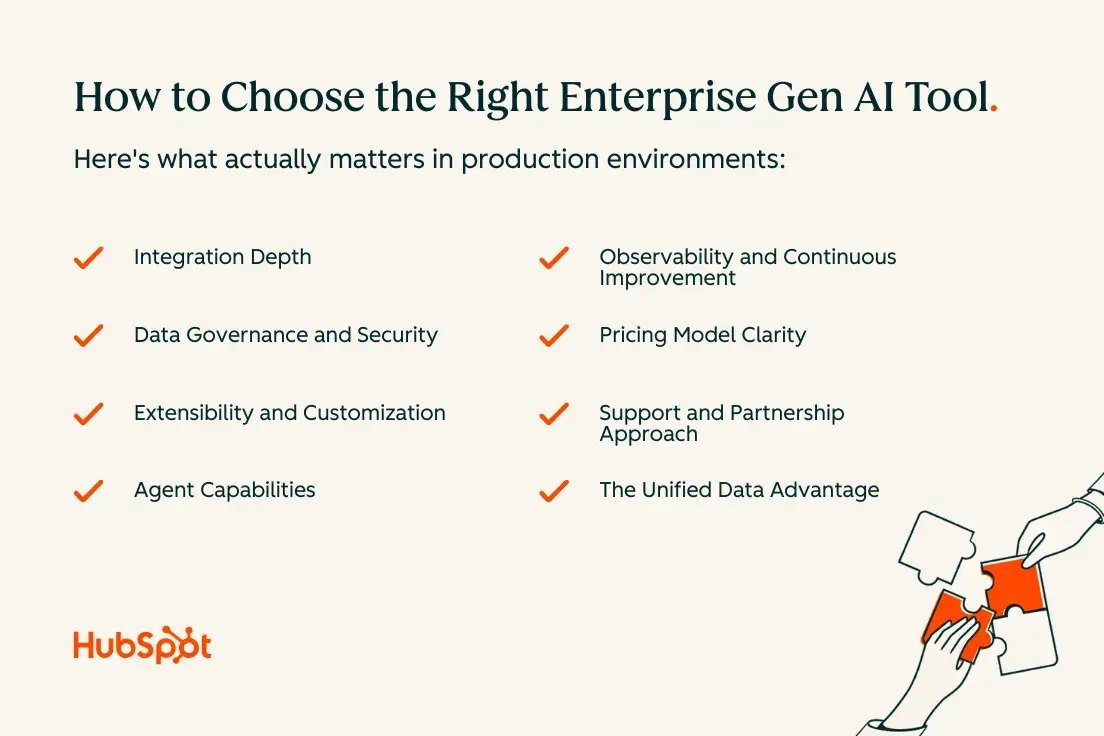
Selecting the right enterprise generative AI platform requires evaluating capabilities beyond impressive demos. Here’s what actually matters in production environments.

how to choose the right enterprise gen ai tool

Integration Depth

Enterprise generative AI tools automate and enhance marketing, sales, and customer service workflows most effectively when they connect natively to your core systems. Surface-level integrations via API create maintenance overhead and data sync issues. Look for tools that embed directly into your CRM, marketing automation platform, and customer service software.

Why this matters: When AI tools access unified customer data in real-time, they generate more accurate outputs, eliminate manual data transfer, and reduce security risks. A CRM-first approach means every AI interaction is grounded in actual customer context, not generic training data.

Data Governance and Security

Best enterprise generative AI tools integrate with CRM and core business systems while maintaining strict data controls. Evaluate how tools handle:

Data residency and sovereignty: Where is your data processed and stored? Can you specify geographic constraints to meet regulatory requirements?

Access controls and permissions: Does the tool respect your existing role-based access controls, or does it create a new permission system that requires separate management?

Audit trails and observability: Can you track what data was accessed, what prompts were used, and what outputs were generated? This becomes critical for compliance and troubleshooting.

Data retention and deletion: How long are prompts and outputs stored? Can you enforce retention policies consistent with your existing data governance framework?

Pro tip: Governance controls mitigate risk and ensure accuracy in generative AI outputs by creating layers of verification before information reaches customers or makes decisions.

Extensibility and Customization

Every enterprise has unique workflows, terminology, and business logic. The right platform allows you to:

  • Fine-tune models on your data to improve accuracy for domain-specific tasks
  • Create custom prompts and workflows that encode your business processes
  • Build proprietary agents that combine multiple AI capabilities
  • Integrate with specialized tools and data sources specific to your industry

Agent Capabilities

Understanding when to use different types of AI assistance matters. Breeze Copilot assists with in-flow AI guidance and automation across teams by providing suggestions and drafts that humans review. Autonomous agents handle end-to-end processes with minimal supervision, like automatically responding to common support tickets or enriching lead data.

The best platforms support both copilot and agent modes, letting you match the level of automation to task complexity and risk tolerance. They also provide orchestration capabilities that let multiple specialized agents work together on complex workflows.

Observability and Continuous Improvement

Production AI systems require monitoring beyond traditional software metrics. Look for platforms that provide:

  • Confidence scores on AI-generated outputs
  • Feedback mechanisms that let users flag inaccurate or unhelpful responses
  • Analytics on how AI suggestions are being accepted, edited, or rejected
  • A/B testing capabilities to compare different prompt strategies or model configurations

This observability enables continuous improvement and helps you identify where AI adds value versus where it creates friction.

Pricing Model Clarity

Enterprise generative AI pricing models vary dramatically across vendors. Common structures include:

Per-user pricing: Fixed cost per seat, regardless of usage intensity. Predictable but potentially expensive if only some users leverage AI heavily.

Usage-based pricing: Charges based on API calls, tokens processed, or outputs generated. Scales with actual consumption but requires monitoring to prevent runaway costs.

Hybrid models: Combines base platform fees with usage-based components, balancing predictability and flexibility.

What to watch for: Hidden costs for training, customization, premium models, or data storage. Ask vendors for representative customer consumption patterns to inform your forecasts.

Support and Partnership Approach

Enterprise AI deployments succeed or fail based on the vendor’s ability to support change management, provide technical guidance, and adapt to your evolving needs. Evaluate:

  • Availability of technical account management and implementation specialists
  • Quality of documentation, training resources, and certification programs
  • Responsiveness of support channels and issue resolution timeframes
  • Vendor’s product roadmap and commitment to enterprise features

The Unified Data Advantage

Unified customer data reduces implementation risk and time to value by eliminating the need to replicate information across systems or build complex data pipelines before AI can be useful. When your generative AI platform sits on top of your CRM rather than alongside it, you get:

Faster time to value: No lengthy data migration or integration project required before seeing results. AI works with your existing data from day one.

Higher accuracy: AI outputs are grounded in actual customer records, reducing hallucinations and irrelevant suggestions.

Simpler governance: Data access controls, retention policies, and audit requirements are already in place. AI respects existing governance rather than requiring new frameworks.

Better user adoption: Teams don’t need to learn new interfaces or switch between systems. AI assistance appears in their existing workflows.

HubSpot Smart CRM serves as a unified data layer for enterprise AI tools, connecting marketing, sales, and service data in one platform that Breeze AI can access securely.

Here are proven platforms organized by primary use case, with a focus on production-ready capabilities and enterprise-grade features.

Here are proven platforms organized by primary use case, with a focus on production-ready capabilities and enterprise-grade features.

Tool

Primary Use Case

Key Strengths

Best For

Integration Approach

HubSpot Breeze AI

Marketing, Sales, Service

Native CRM integration, unified customer data, Claude connector

Teams wanting AI embedded in existing workflows without separate vendors

Native to HubSpot platform

Jasper

Marketing Content

Brand voice consistency, approval workflows, content templates

Large marketing teams producing high-volume content across channels

API integrations

Copy.ai

Marketing & Sales Copy

Campaign automation, multi-channel generation

Demand gen teams running integrated campaigns

API integrations

Gong

Sales Intelligence

Conversation analysis, deal risk identification, rep coaching

Sales orgs focused on call analysis and performance optimization

Integrates with major CRMs

Outreach

Sales Engagement

Sequence optimization, predictive analytics, email generation

Inside sales running high-volume outbound campaigns

Native sales engagement platform

Intercom

Customer Service

AI chatbot (Fin), workflow automation, knowledge base integration

Teams wanting automated resolution for routine inquiries

Standalone with integrations

Zendesk AI

Customer Service

Intelligent triage, sentiment analysis, multi-channel support

Large support orgs with complex routing needs

Native to Zendesk platform

Anthropic Claude

Cross-Functional

Complex reasoning, long-context analysis, high accuracy

Knowledge work requiring nuanced judgment and document analysis

API access

Microsoft Copilot

Productivity

Office 365 integration, Microsoft Graph access

Enterprises invested in Microsoft 365 ecosystem

Native to Microsoft apps

Google Gemini

Productivity

Google Workspace integration, collaborative AI

Organizations using Google Workspace

Native to Google apps

Marketing Tools

1. HubSpot Breeze AI

Breeze integrates directly into HubSpot’s Marketing Hub, providing AI capabilities across content creation, campaign optimization, and analytics without leaving your CRM.

It serves many functions, like the AI Email Writer, which generates personalized campaign content based on contact properties and engagement history. Breeze Copilot appears throughout the platform to suggest next actions, draft social posts, and optimize landing pages.

What I like: Native integration with HubSpot Smart CRM means all AI suggestions are grounded in unified customer data, reducing generic outputs. The Claude connector brings advanced reasoning capabilities to complex marketing tasks.

HubSpot Breeze AI is best for: Teams already using HubSpot who want to add AI capabilities without integrating separate tools or managing additional vendors.

2. Jasper

Jasper specializes in brand-compliant content generation at scale, with features for maintaining consistent voice across large content teams. The platform includes brand guidelines enforcement, approval workflows, and templates for common marketing assets.

Best for: Large marketing teams producing high volumes of content across multiple channels who need strong brand controls.

3. Copy.ai

Copy.ai focuses on sales and marketing copy with workflow automation features. The platform includes campaign builders that generate complete multi-channel campaigns from a single brief.

Best for: Demand generation teams running integrated campaigns across email, social, and paid channels.

Sales Tools

4. Breeze Prospecting Agent

Breeze prospecting agent for sales

Breeze assists sales teams with email generation, meeting prep, call transcription, and deal insights. The AI analyzes conversation patterns, suggests next steps, and automatically updates CRM records based on interactions. Sales reps access these capabilities directly in their inbox, on calls, and within deal records.

What I like: Tight integration with Sales Hub means AI suggestions consider deal stage, contact role, account history, and team best practices automatically.

Breeze Prospecting Agent is best for: B2B sales teams who want AI assistance that improves with use by learning from your specific sales motions and successful patterns.

5. Gong

Gong analyzes sales conversations across calls, emails, and meetings to identify deal risks, coach reps, and surface winning behaviors. The platform transcribes calls, extracts key moments, and tracks how opportunities progress based on conversation content.

Best for: Sales organizations focused on conversation intelligence and using call analysis to drive rep performance.

6. Outreach

Outreach embeds AI throughout its sales engagement platform, providing sequence suggestions, email generation, and predictive analytics about which outreach strategies work best for different personas and segments.

Best for: Inside sales teams running high-volume outbound campaigns who need data-driven insights into what messaging resonates.

Customer Service Tools

7. Breeze Customer Agent

Breeze powers the Service Hub knowledge base by auto-generating help articles from ticket patterns, suggesting content updates, and drafting agent responses based on previous resolutions. The AI chatbot handles common inquiries by accessing your knowledge base and customer history, escalating complex issues to human agents with full context.

What I like: Service Hub’s knowledge base works as a single source of truth that both AI and human agents reference, ensuring consistent responses across channels.

Best for: Service teams looking to scale support without proportionally scaling headcount, using AI to handle routine inquiries while humans focus on complex issues.

8. Intercom

Intercom’s Fin AI chatbot uses GPT-4 to answer customer questions by referencing your knowledge base, past conversations, and help documentation. The platform includes workflow automation and hands-off resolution for common support scenarios.

Best for: Teams wanting a powerful AI chatbot that handles a high percentage of routine inquiries without extensive training or maintenance.

9. Zendesk AI

Zendesk integrates AI across ticketing, knowledge management, and agent assistance. Features include intelligent triage, sentiment analysis, response suggestions, and automated article generation based on ticket trends.

Best for: Large support organizations with complex ticket routing needs and multiple support channels requiring unified AI capabilities.

Cross-Functional Platforms

10. Anthropic Claude

Claude excels at complex reasoning tasks, long-context understanding, and maintaining accuracy across extended conversations. Enterprises use Claude for tasks requiring nuanced judgment, such as analyzing contracts, synthesizing research, or drafting detailed technical documentation.

What I like: Strong instruction following and lower hallucination rates make Claude particularly valuable for tasks where accuracy is non-negotiable. The extended context window handles lengthy documents without summarization loss.

Best for: Knowledge work requiring deep analysis, complex reasoning, or processing lengthy documents where accuracy and thoughtfulness matter more than speed.

11. Microsoft Copilot

Microsoft Copilot embeds across the Office 365 ecosystem, providing AI assistance in Word, Excel, PowerPoint, Outlook, and Teams. The platform accesses your Microsoft Graph data to ground responses in your organization’s documents and communications.

Best for: Enterprises heavily invested in Microsoft 365 who want AI capabilities embedded in their existing productivity suite.

12. Google Gemini for Enterprise

Gemini integrates across Google Workspace, providing AI capabilities in Docs, Sheets, Gmail, and Meet. The enterprise version includes data governance controls, admin oversight, and the ability to ground responses in your organization’s Google Drive content.

Best for: Organizations using Google Workspace as their primary productivity platform who need enterprise controls around AI usage.

How to Integrate a Gen AI Platform With Your Enterprise Tech Stack

Successful integration requires a methodical approach that balances speed with stability. Here’s how to deploy enterprise generative AI tools without disrupting existing workflows.

1. Audit your current data architecture.

Before integrating any AI platform, map where your customer data lives, how it flows between systems, and what quality issues exist. Identify your systems of record for customer information, understand data duplication and inconsistency issues, document integration points and data flows, and assess data quality and completeness in each system.

What if your data is fragmented across different tools? Start with a CRM-first data alignment approach rather than attempting to integrate everything at once. Focus on ensuring your CRM contains authoritative customer records, then connect AI tools to that single source of truth. This pragmatic path delivers incremental wins while avoiding the delays of large-scale data consolidation projects.

2. Define your integration approach.

Choose between native integrations provided by your AI platform, custom API integrations for proprietary systems or unique requirements, middleware solutions for connecting disparate systems, and embedded AI where the platform itself includes AI capabilities (like Breeze within HubSpot).

Native integrations typically offer the deepest functionality with the least maintenance overhead. Embedded AI eliminates integration entirely by building AI into the platforms you already use, which is why platforms like HubSpot that combine CRM, marketing, sales, and service capabilities with native AI deliver faster time to value.

3. Establish data governance before deployment.

Set clear policies for what data AI systems can access, how outputs should be reviewed before reaching customers, and who can use different AI capabilities. Implement technical controls including role-based access that mirrors existing CRM permissions, data masking for sensitive fields like payment information, audit logging for all AI interactions, and retention policies for prompts and outputs.

These governance controls should be in place before rolling out AI to production users, not added afterward.

4. Start with a focused pilot.

Rather than attempting organization-wide deployment, begin with a single high-value use case and a small team. Choose a workflow where AI can deliver measurable improvement, success metrics are clear, and the team is eager to adopt new tools.

Run the pilot for 30-60 days, gathering quantitative metrics on efficiency gains, quality improvements, and user satisfaction alongside qualitative feedback about what works and what creates friction.

5. Build integration patterns that scale.

As you expand from pilot to broader deployment, establish reusable patterns for common integration needs. Document how to connect AI tools to different data sources, create standardized prompt templates for recurring tasks, build feedback loops that improve AI performance over time, and establish monitoring dashboards that track AI usage and outcomes.

These patterns accelerate subsequent rollouts and ensure consistency across teams.

6. Train teams on prompt engineering.

The quality of AI outputs depends heavily on input quality. Provide training on crafting effective prompts, understanding when to provide more context versus letting AI infer, recognizing and flagging AI hallucinations or errors, and editing AI outputs rather than accepting them wholesale.

Teams that understand how to work effectively with AI extract far more value than those who view it as a black box that either works or doesn’t.

7. Establish continuous improvement processes.

AI platforms improve with use, but only if you create feedback mechanisms that capture learning. Implement regular reviews of AI output quality, analysis of which suggestions users accept versus reject, A/B testing of different prompt strategies, and model fine-tuning based on your specific use cases.

The most successful enterprises treat AI integration as an ongoing optimization process rather than a one-time implementation project.

Frequently Asked Questions About Enterprise Generative AI Tools

How do we prevent hallucinations without slowing down teams?

The solution involves layered controls rather than a single mechanism.

Trusted source grounding: Configure AI tools to prioritize your knowledge base, CRM data, and verified documentation. When AI pulls from authoritative sources you control, hallucination risk drops significantly.

Prompt standards: Establish templates for common tasks that instruct AI to admit uncertainty, request clarification when needed, and cite sources for factual claims.

Graduated review levels: Match review requirements to risk. Internal summaries need no review, customer-facing content gets agent review, and high-risk communications require specialist approval.

Agent guardrails: Implement rules that prevent autonomous agents from taking actions above certain risk thresholds without human approval, such as spending limits or customer communication boundaries.

Continuous evaluation: Regularly sample AI outputs and track accuracy over time. This identifies where additional controls are needed without slowing every workflow.

The key insight: different workflows tolerate different error rates. Design governance to match actual risk rather than applying uniform restrictions everywhere.

How should we budget for enterprise generative AI?

Enterprise generative AI pricing models create budgeting challenges because consumption patterns are unpredictable initially.

Understand your pricing model: Clarify whether you’re paying per user, per usage (API calls, tokens, outputs), or hybrid. Ask vendors for representative consumption patterns from similar customers.

Start with a pilot budget: Allocate budget for a 60-90 day pilot with defined scope. Measure actual consumption, extrapolate based on planned rollout, and build in a buffer for higher adoption.

Implement monitoring: Set up dashboards tracking consumption against budget in real-time with alerts when usage exceeds thresholds. This prevents surprise costs and identifies optimization opportunities.

Forecast with governance: Your governance controls directly impact costs. Systems requiring human review will consume less than autonomous agents operating continuously.

Consider opportunity cost: Compare AI costs against the labor cost of performing tasks manually. If AI reduces a two-hour process to fifteen minutes, the productivity gain typically far exceeds usage costs.

Most enterprises find that AI costs represent a small fraction of efficiency gains, but the shift to consumption-based pricing requires different budgeting processes.

When should we use a copilot versus an autonomous agent?

Use copilots when:

  • Tasks require human judgment that’s difficult to encode
  • Errors would damage relationships or create compliance issues
  • Teams are learning and AI serves as training support
  • Output quality benefits from human expertise
  • Regulations mandate human review

Use autonomous agents when:

  • Tasks are highly repetitive with clear success criteria
  • Volume exceeds human capacity
  • Speed matters more than perfection
  • The process is well-documented with minimal edge cases
  • You have sufficient data to measure agent performance

Examples in practice:

Copilot: Drafting sales emails where reps review and personalize before sending. AI provides structure, humans control tone and timing.

Agent: Automatically enriching leads with firmographic data. The process is mechanical, errors are non-critical, and review would create bottlenecks.

Copilot: Generating knowledge base articles where experts review for accuracy before publishing.

Agent: Routing support tickets based on content analysis, with confidence scores triggering human review for ambiguous cases.

Many enterprises start with copilots to build trust, then gradually shift appropriate workflows to autonomous agents as confidence grows.

How long does a typical enterprise rollout take?

Enterprise generative AI rollouts follow predictable phases, though timelines vary based on complexity and governance needs.

Phase 1: Assessment and Planning (4-8 weeks)

Define success metrics, audit data architecture, establish governance framework, select platform, and identify pilot teams.

Gating criteria: Clear use case with metrics, executive alignment, governance documented.

Phase 2: Pilot Implementation (6-12 weeks)

Configure integrations, set up access controls, train pilot team, launch with monitoring, and gather feedback.

Gating criteria: Measurable value demonstrated, user satisfaction above threshold, no critical security issues.

Phase 3: Iterative Expansion (3-6 months)

Roll out in waves, refine workflows based on learnings, expand integrations, and build training programs.

Gating criteria: Previous wave shows sustained value, training scaled, support team ready.

Phase 4: Organization-Wide Deployment (6-12 months from start)

Deploy to all teams, establish AI governance centers of excellence, and measure business impact.

What extends timelines:

Data issues: Fragmented customer data or poor quality adds 8-16 weeks if not addressed upfront.

Governance complexity: Heavily regulated industries require extensive controls, adding 4-8 weeks.

Integration challenges: Legacy systems or complex customizations can add months.

Change management: Resistance or inadequate training slows adoption significantly.

Organizations that treat deployment as change management rather than purely technology see faster adoption, even if initial rollout takes longer.

What if our data is fragmented across tools and platforms?

Data fragmentation is the norm for enterprises. Customer information lives in CRM, marketing automation, support platforms, billing systems, and departmental spreadsheets. This doesn’t prevent AI adoption—it just requires a pragmatic approach.

Start with your CRM as the hub: Focus on ensuring your CRM contains authoritative customer records. Connect AI tools to that single source of truth first. This delivers immediate value while avoiding multi-year consolidation projects.

HubSpot Smart CRM serves as a unified data layer for enterprise AI tools by connecting marketing, sales, and service data in one platform. When Breeze AI accesses this unified view, outputs are grounded in complete customer context.

Pursue incremental integration: After establishing your CRM hub, add integrations progressively based on value. Connect your support platform second to ensure AI sees customer issues. Add product usage analytics third to inform outreach. Each integration delivers incremental value.

Accept some manual input: For hard-to-integrate data sources, consider whether occasional manual input is acceptable. Five minutes of prep for important calls with manual context may be more pragmatic than complex integrations.

Leverage AI for data quality: AI can identify missing information in customer records, suggest corrections to inconsistent data, and enrich records by extracting information from emails and call notes. This creates a virtuous cycle where AI improves the data that makes it more effective.

Plan your long-term architecture: Map data sources, identify redundancy, define authoritative systems for each data type, and create a phased alignment plan. AI adoption accelerates when your data strategy supports it.

The key insight: waiting for perfect data creates opportunity cost. Start with the data you have, deliver value quickly, and use early wins to justify comprehensive data alignment.

Ready to deploy enterprise generative AI?

The gap between experimenting with AI and deploying it successfully across your enterprise comes down to integration, governance, and a clear implementation plan. The tools exist, the use cases are proven, and organizations that move deliberately but decisively are building sustainable advantages.

Whether you’re just beginning to explore enterprise generative AI or ready to scale beyond pilot projects, the framework in this guide provides a practical path forward. Focus on unified customer data, establish governance that balances control with velocity, and match your deployment approach to organizational readiness.

Can music influence what we buy? To find out, I dove into the psychology of music

Software Stack Editor · October 16, 2025 ·

In the first episode of my Nudge podcast, I interviewed the fantastic psychologist Dr. Adrian North, who conducted one of the seminal studies on the psychology of music.

Download Now: Free Marketing Plan Template [Get Your Copy]

Back in 1997, the researchers stocked an English supermarket with four types of French and German wines, all similarly matched in cost, dryness, and sweetness. For two weeks, the store speakers either played German oom-pah music or French accordion music. North and his colleagues would switch the music daily and measure the effect on sales.

Turns out, 83% of wine buyers bought French wine when the accordion music was playing, while 65% of buyers picked German bottles when the Bavarian music was on.

North interviewed these buyers as they left the store, but no one claimed the music had an effect on their purchase — yet it clearly did.

marketing psychology, how music matching influenced wine purchases

Is the connection between music and buying behavior still relevant?

North’s study had some important results, but it’s worth noting that this study is almost three decades old and has a relatively small sample size of just 82 people.

So, are the findings still relevant today?

Well, in 2017, researchers at Montclair State University found that playing Italian music in a university cafeteria increased sales of their Italian dish (chicken parmesan). When playing Spanish flamenco tunes, they increased sales of paella.

It’s clear that music does seem to shape what we buy. And maybe even what we want to eat?

Indeed, during a recent trip to Paris, I couldn’t help but stop at the local boulangerie each morning for a coffee and croissant. Thinking back, I realized that they routinely played French café-style music. Perhaps that’s what drew me in.

What else can music influence? Turns out, quite a lot …

In his book Pre-Suasion, Robert B. Cialdini writes that music made children 3x more likely to help their peers. Similarly, in Get It Done, Ayelet Fishbach shared how music can increase gym reps by 50%. And Nick Kolenda’s work in Imagine Reading This Book shows that sad music makes exciting life landmarks feel further away.

Yet, the study on music that’s arguably most influential involves (more) supermarket shoppers.

In Ronald E. Milliman’s study (aptly titled “Using Background Music to Affect the Behavior of Supermarket Shoppers”), he monitored the flow of shoppers as they navigated a supermarket in the southern U.S. Over nine weeks, he found that customers spent 38% more when slow music (60 BPM) was played compared to fast music (108 BPM).

marketing psychology, how music influenced shopping

Milliman and his team concluded that the pace of the music influenced the speed of the shoppers. In other words, a slow tempo slowed down the pace of shopping, giving the customers more time to buy. Compelling, right?

In his wonderful book Sensehacking, Charles Spence desperately tried to find companies that have applied this insight into music and tempo (and were willing to talk about it).

One of the few public examples is Chipotle.

According to Spence, Chipotle carefully controls the tempo of the music in all of its 3,500+ stores. They deliberately play faster music at busy times of the day to speed up their customers and shorten the long lines.

Chipotle’s in-house DJ is quoted as saying, “The lunch and dinner rush have songs with higher BPMs because we need to keep the customers moving.”

During the quieter periods, the store plays slower tunes to keep customers lingering and keep the store busy.

So, the next time you find yourself chomping down on your lunchtime burrito or reaching for that bottle of German wine, take a minute and ask yourself: “What music is playing right now?”

Best practices for answer engine optimization (AEO) marketing teams can’t ignore

Software Stack Editor · October 14, 2025 ·

A few months back, I was having a bit of a professional identity crisis. And it’s all thanks to answer engine optimization (AEO) and AEO best practices.

Download Now: HubSpot's Free AEO Guide

Before 2024, I spent the better part of a decade focused on topping search engine result pages — and, frankly, I was great at it. I knew the ins and outs of keywords, schema, and even technical SEO aspects like site speed.

But with the rise of AI, those skills were slowly becoming less urgent, for lack of a better word. (Cue marketer existential panic.)

Search and consumer behavior have changed dramatically. While traditional search engines still dominate, people increasingly turn to AI tools like ChatGPT to answer their questions. Heck, with 79% of those who already use AI for search believing it offers a better experience than traditional search engines, even Google has introduced AI overviews to stay competitive.

But what about all my SEO glory? This shift demands a new approach. Unfortunately, AEO is generally a mystery to businesses and marketers alike. HubSpot is no exception, but we’re finding our way.

We’ve been researching and experimenting with how we produce and format content for AI and loop marketing for almost a year. In this article, I’ll share some of the most critical AEO best practices we’ve uncovered.

Table of Contents

  • TLDR
  • What is answer engine optimization (AEO)?
  • Why Answer Engine Optimization Matters Now More Than Ever
  • Best practices for Answer Engine Optimization
  • How does Loop Marketing fit into AEO?
  • Technical AEO Checklist
  • Common AI Engine Optimization Challenges
  • Frequently Asked Questions About AEO Best Practices

TLDR

Answer engine optimization (AEO) is the process of making your content easy for AI-powered systems — like Google AI Overviews and ChatGPT — to find, understand, and cite. Unlike traditional SEO, AEO focuses on direct answers, structured data, and authority signals that help your brand appear in zero-click results and AI summaries.

To get started, map user questions, structure content for quick answers, add the right schema markup for AEO, and track your visibility with tools like HubSpot’s AI Search Grader. Ready to see where you stand? Check it for free.

What is answer engine optimization (AEO)?

At its core, answer engine optimization is the strategic practice of structuring your content so AI-powered systems can easily extract, understand, and present it as authoritative answers.

Many in the industry also refer to related terms like generative engine optimization (GEO) or large language model optimization (LLMO), but “AEO” emphasizes the answer.

When someone asks ChatGPT for marketing advice, queries Google for a quick definition, or speaks to Alexa about local services, AEO determines whether your brand is cited in the response.

How is AEO different from SEO?

Feature

Traditional SEO

Answer Engine Optimization (AEO)

Goal

Rank high in SERPs, drive website traffic

Get cited in AI responses, win zero-click visibility

Content focus

Broad, long–form, targeting keyword groups

Precise, Q&A–style, direct answers (brief + extended)

Signals

Backlinks, keyword metrics, domain authority,

Mentions, semantic markup, freshness, structured data

Metrics

Impressions, clicks, CTR, conversions, visits

Citation rate, share of AI voice, AI impressions, brand mentions

Time horizon

Medium to long term, with sustained growth

Some faster wins (snippets), but needs continual adaptation

When people use a search engine, they get back what the tool thinks are the best resources to answer their question. Like if I searched the very scientific question of “what are the best action movies of all time?”, it would give me a bunch of different resources (websites, videos, even forum responses), which it believes could offer the information I’m looking for.

screenshot of google serp results for “what are the best action movies of all time.”

That’s why the goal of traditional SEO is to increase rankings, clicks, and, in turn, website traffic.

As marketers, that means targeting keywords, building backlinks, securing a place on page one, if not position one, and tracking impressions, click-through rates, and organic sessions. (All that good stuff I used to tackle.)

Read: 8 SEO Challenges Brands Face [HubSpot Blog Data]

Answer engines don’t just give users possible resources; they attempt to provide the exact answer they want.

For example, if I ask ChatGPT for the best action movies of all time, it’ll give me a list compiled from many sources rather than simply linking to some pages for me to check out.

screenshot of chatgpt response for “what are the best action movies of all time.”

Because of that, the goal of AEO is citations and inclusion in those answers.

As marketers, you need to structure your content for extraction, use schema markup to clarify meaning, and build authority so language models trust and reference your expertise. And you’ll track success with the number of zero-click answers, AI summaries, and voice responses, even when users never visit your website.

chart showing how aeo and seo are different by goal, content focus, metrics, and more.

The strategic difference is visibility without traffic. A well-optimized answer might get cited thousands of times in ChatGPT conversations or Google AI Overviews without generating a single session in your analytics. This challenges traditional attribution models but extends your brand’s reach into entirely new contexts where buying decisions increasingly begin.

In short: SEO gets traffic. AEO owns the answer.

Read: The essential SEO tutorial for thriving in the age of AI-driven search

Why Answer Engine Optimization Matters Now More Than Ever

The internet is shifting from a click-based economy to an answer-based one, and your brand can easily get bypassed if you ignore AEO. Don’t believe me?

Google reports that nearly 60% of searches now end without a click as users get what they need directly from AI Overviews, featured snippets, or knowledge panels. On top of that, generative AI is being embedded into every major platform (i.e., Microsoft Copilot, Perplexity, and Gemini), and voice assistants answer queries in seconds, often citing a single source.

ChatGPT alone has nearly doubled its weekly average users to 800 million from February to August this year, so clearly, this trend is not slowing down.

Brand visibility now depends on being cited and summarized by these systems, not just ranking well in search. But that doesn’t mean you can neglect SEO.

AI engine optimization actually complements SEO and inbound marketing; it doesn’t replace them. AEO draws on many SEO foundations — strong content, domain credibility, internal linking — but reorients priorities so that content is machine-friendly, structured, and ready to be quoted or excerpted.

While traditional SEO remains essential for driving traffic, AEO determines whether your brand appears in the most important answers. So, think of it as a new layer to your existing content strategy, not a separate thing competing for resources.

Best Practices for Answer Engine Optimization

Effective AEO requires systematic implementation across your content operations. Each practice below includes specific workflows, clear ownership, and actionable checklists to help your team execute with confidence.

1. Map questions and user intent into AEO content.

AEO is extremely question and answer-focused.

So, start by building a comprehensive question inventory that captures what your audience typically asks at every stage of their journey.

Connect with sales and customer service to understand the questions prospects and customers frequently ask. Then, mine Google‘s “People Also Ask” (PAA) boxes for your core topics. These reveal what users want answered and what Google’s algorithm considers relevant.

Once collected, audit your existing content to identify gaps or opportunities to update content. Also, research them in both search engines and AI tools to see how your competitors are currently performing for them.

From there, segment questions by funnel stage and buyer persona. Here are some general guidelines you can follow:

  • Awareness-stage questions need educational, jargon-free answers.
  • Consideration-stage questions require comparisons, frameworks, and proof points.
  • Decision-stage questions demand specifics about implementation, pricing, and support.

Pro tip: Track this inventory in a shared spreadsheet or your CRM, noting which questions you’ve covered, which are in progress, and which represent content gaps your competitors might be filling first.

2. Structure content for direct answers and extractions.

When you search Google, its AI doesn’t read your entire article linearly. Instead, it identifies answer-like structures (short paragraphs after questions, numbered steps, comparison tables) and decides if that content directly addresses the user’s query.

Large language models (LLMs) like ChatGPT do something similar during training and retrieval, prioritizing content that presents information in clear, modular blocks that they can confidently cite.

To optimize for this behavior, lead every key section with a 40-60-word direct answer that fully addresses the question, similar to how you would typically go after “featured snippets” in Google (more on that later).

If someone asks, “What is inbound marketing?” define it completely in two or three sentences in your first paragraph, no fluff, preamble, or quips (as much as this one pains me), just the answer. Follow that with supporting detail, examples, and context for readers wanting depth.

Also, use scannable formatting like bullet points, numbered lists, and tables, and keep paragraphs under four sentences when possible. This isn‘t about dumbing down your content, it’s about making valuable information accessible to both hurried readers and parsing algorithms.

If you have the resources, adopt reusable content block patterns that answer engines recognize. Think definition blocks for terminology, step-by-step blocks for processes, pros-and-cons blocks for evaluations, example blocks for illustration.

Here’s an example from one of my HubSpot articles on organic marketing:

screenshot showing an example of a schema box built into the hubspot template.

Source

These patterns act as semantic signals that help AI identify what type of information you’re providing and how to extract it accurately.

Pro tip: Content Hub can help you templatize these patterns, streamline content briefs, and maintain editorial governance at scale as your team produces more AEO-optimized content. So can schema.

3. Implement schema that answer engines read.

Schema markup is structured data you add to your HTML to explicitly tell search engines and AI systems what your content represents.

It’s the difference between Google guessing that your page is a how-to guide and Google knowing with certainty that it is, with five specific steps, an estimated completion time, and required tools.

Focus on these core schema types for AEO impact:

  • Use FAQPage schema on pages with question-and-answer pairs. This helps Google surface your content in rich results and gives LLMs clear question-answer associations to extract.
  • Apply HowTo schema to instructional content, marking each step, its position in the sequence, and any images or warnings.
  • Tag editorial content with Article schema, including headline, publish date, author, and organization. This establishes freshness and authority signals.
  • Add Speakable schema to key sections you want voice assistants to prioritize when reading answers aloud.
  • Finally, implement Organization schema sitewide to clarify your brand identity, logo, and social profiles for consistent entity recognition.

CMS SEO tools in platforms like HubSpot let you templatize schema across content types so your team doesn’t hand-code for every post. If you’re a HubSpot user, set up templates for your most common content types— blog posts, guides, FAQs, and product pages — and the schema will be applied automatically with clean, crawlable HTML.

4. Win featured snippets and “People Also Ask.”

Featured snippets and “People Also Ask” boxes are Google‘s most visible answer formats, and they’re training data for how AI Overviews select and present information.

screenshot showing the “people also ask” questions on google

When your content appears in a featured snippet, you’ve essentially been pre-selected by Google as the authoritative answer, which definitely increases your chances of being cited by AI summaries and language models that crawl the web.

To win featured snippets, keep these guidelines in mind when creating content:

  • Format your answers to match the snippet type in Google. If the existing snippet is a numbered list, structure your answer as a numbered list. If it‘s a paragraph, lead with a concise paragraph answer. If it’s a table, present your information in a comparison table with clear rows and columns.
  • Mirror the question wording in your H2 or H3 header. If the PAA question is “How do you calculate ROI?”, your header should match that phrasing exactly.
  • Place your answer high on the page. Ideally, this is within the first two scrolls. Google prioritizes content that’s easily accessible and clearly structured.
  • Use the inverted pyramid approach: answer first, then provide context, examples, and related information for users who want to go deeper.

Pro tip: To systematically capture more features,  harvest “People Also Ask” questions for your target topics every quarter. Open an incognito browser, search your core keywords, and document every PAA question that appears. Note which ones you already answer well, which you answer poorly, and which you don’t address at all.

Prioritize updating existing high-authority pages to target new PAA questions rather than creating net-new content. Google favors established pages for featured snippets, so enhancing what already ranks often delivers faster results.

5. Prioritize credibility.

Recent research shows that content including citations, quotes, and statistics is 30-40% more visible in AI search results. This emphasizes the importance of backing up claims with credible sources and maintaining high editorial standards. That said, strengthen your content by:

  • Format your content for easy skimming. Think bullet points, schema, etc.
  • Supporting all claims with facts. Including data-driven insights and expert citations to increase trustworthiness and demonstrate expertise. (Even better if it’s original data or research.)
  • Use trusted resources. Leverage authoritative publications that AI models favor while maintaining originality in your analysis.
  • Update existing content regularly with new data and insights. This maintains relevance and helps already-ranking pages stay on top.

6. Build a strong, positive online presence across multiple channels.

Social proof works. I mean, it’s marketing 101. The more people rave about something or buy it, the more others are likely to believe it’s true. AI and LLMs work similarly. They learn what to trust based on which sources appear frequently across authoritative contexts.

In other words, LLMs are more likely to treat your content as credible and worth citing if your brand is cited in reputable industry publications, discussed in high-quality forums, and referenced in academic or government sources.

Off-site authority isn’t just about backlinks for SEO, however. It’s about establishing proof that your brand is a legitimate subject-matter expert across many different online territories. Think other publications, forums, review sites, and social media platforms.

Knowing this, you want to develop a multichannel distribution strategy that prioritizes platforms where your audience and AI training data intersect. This could mean:

  • Publishing thought leadership on LinkedIn. As a professional platform, this will help you reach others in your industry and establish executive visibility.
  • Creating educational video content for YouTube. Video transcripts are crawled by AI systems and often more detailed than blog posts.
  • Participating authentically in relevant Reddit communities and Quora discussions. These platforms are increasingly cited by AI as sources of real user sentiment and practical advice.
  • Pitch byline articles to industry publications with strong editorial standards. These third-party endorsements signal authority far more than content published exclusively on your domain or smaller publications.
  • Creating original research and data visualizations. When you publish a survey, benchmark report, or data-driven insight, create link-worthy assets that get cited across the web. Each citation reinforces your authority and increases the likelihood that AI models surface your data when answering related questions.
  • Establishing a distribution cadence and repurposing workflow. A single piece of research can become a LinkedIn post, a YouTube video, a contributed article, a Reddit discussion, and a Quora answer, each tailored to the platform and audience.
  • Assigning a content distribution owner. This person will be responsible for adapting core assets and tracking where they’re shared. Include PR angles and thought leadership opportunities in your planning; speaking engagements, podcast interviews, and media mentions all contribute to the authority signals that LLMs evaluate.

Multi-channel diversification is built into the Loop Marketing playbook in the Amplify stage. Learn more about it here.

Pro tip: Content Remix can help you with this repurposing in one click.

image showing examples of the content content remix can possibly produce

Plus, Marketing Hub automation can help orchestrate this distribution at scale, scheduling cross-platform posts, tracking engagement, and measuring which channels drive the most authority signals and referral traffic back to your owned content.

7. Optimize for voice answers across assistants.

Voice assistants like Alexa, Siri, and Google Assistant choose answers differently from visual search results and LLMs.

They need concise, factually unambiguous, and structured content that can be spoken aloud in 15-30 seconds and is formatted for natural language comprehension.

When someone asks their smart speaker a question, the assistant typically cites one, single source. You want that to be yours. Here’s how you can do that:

  • Write answers in spoken-friendly language. Avoid jargon, long dependent clauses, and ambiguous pronouns. A voice assistant reading “It enables seamless integration” out loud leaves the listener confused about what “it” refers to. Instead, repeat the subject: “HubSpot’s API enables seamless integration.”
  • Use Speakable schema markup. This tells assistants, “This paragraph is concise, self-contained, and ready to be read aloud.”
  • Test voice queries on Alexa, Siri, and Google Assistant to audit your visibility.
  • Create a naming convention for voice-optimized content blocks in your CMS. Label FAQs, definitions, and key takeaways with Speakable markup. This helps your team knows which sections have been voice-optimized.

Read: “How and Why to Optimize Your Website for Voice Search”

8. Ensure local optimization for Google AI mode and voice.

Local businesses face a unique AEO challenge: queries that seem non-local often surface local entities in AI-generated answers.

For example, when someone asks “best coffee shop for remote work,” Google AI Overviews and voice assistants frequently respond with specific nearby options, pulling data from Google Business Profile and local landing pages.

You’re invisible in these high-intent moments if your local data is incomplete or inconsistent.

Cover your bases by:

  • Optimizing your Google Business Profile. This means you need to verify your business name, address, and phone number match your website exactly. Add complete business hours, including holidays and special events. Upload high-quality photos of your location, products, and team. Select all relevant categories. Google uses these to match your business to voice queries. Write a keyword-rich business description that includes the services and questions your customers actually search for.
  • Building a strategy for getting reviews. Ask satisfied customers to leave Google reviews, and respond promptly to every review — positive or negative. Review volume and recency are strong ranking signals for local AI results, and LLMs sometimes cite review themes when recommending businesses.
  • Create local landing pages for each service area. This was one of the first strategies I saw big wins from for a client years ago, and it is still effective. Even if you’re a single-location business, dedicated pages for “marketing consulting in Austin” or “HVAC repair in Brooklyn” give AI systems clear geographic and service signals to extract. Use consistent name, address, and phone number (NAP) formatting across all pages.
  • Ensure your local business data is accurate and consistent across sources. This means on major platforms like Google Business Profile, Apple Maps, Bing Places, your website, and even Mapquest (Yes, they’re still around!). Voice queries like “What time does [business name] close?” or “Is [business name] open today?” pull from structured sources. Inconsistent data confuses customers as well as AI systems and dilutes your local authority. With this in mind, set a quarterly audit schedule to check and update this information as your business evolves.

screenshot of the google my business profile

Source

How does Loop Marketing fit into AEO?

Loop marketing and AI engine optimization are natural partners in a modern content strategy. Traditional funnel marketing assumes buyers take a linear path from awareness to purchase, interacting in the same places, asking the same questions, and visiting the same pages.

But today‘s buyers don’t move in straight lines, and they certainly don’t all take the same journey.

Loop marketing recognizes this reality by designing for continuous engagement across multiple channels, rather than one-time conversion in one specific place.

graphic depicted the loop marketing framework and flow of information through it

You create content that serves customers before, during, and after the sale. Answering new questions as they arise, supporting expanded use cases, and nurturing advocacy that feeds back into awareness. You meet them on social media, forums, podcasts, through AI assistants, and a host of other platforms.

When a satisfied customer asks ChatGPT, “How do I get more value from my marketing automation?” and your knowledge base article gets cited, you’ve stayed top-of-mind without waiting for them to remember your domain and navigate there manually.

When prospects loop back to compare options and Google AI Overviews summarizes your competitor comparison guide, you’ve re-entered their consideration set.

When new users ask voice assistants about getting started and your onboarding content gets recommended, you‘ve scaled customer success beyond your support team’s capacity.

AEO is a crucial part of loop marketing and meeting modern buyers where they are.

Technical AEO Checklist

graphic showing checklist of technical seo items

Like SEO, AEO also involves the technical setup and performance of your website and content. That said, having some code knowledge or working with a developer on some points on this checklist is good.

These tasks will ensure that answer engines can crawl, parse, and extract your content reliably. It’s baseline work that must be in place before advanced AEO tactics deliver results.

Verify server-side rendering for all critical content.

If your answers, headings, or critical text load only via JavaScript (JS), many crawlers won’t see them. Ensure your HTML contains actual content when the page first loads, not just empty divs waiting for JS to populate them.

Use proper semantic HTML tags (headings, lists, sections).

Mark headings with proper H1, H2, and H3 tags in logical hierarchy. Use

,

, and

tags to clarify content structure. Wrap lists in

    or

      tags. Semantic HTML helps AI systems understand the relationships between different parts of your page.

      Pass Core Web Vitals for speed and user experience.

      Answer engines favor content that loads quickly and doesn’t frustrate users. Aim for Core Web Vitals that pass Google’s thresholds: LCP under 2.5 seconds, FID under 100ms, CLS under 0.1. Compress images, minimize render-blocking resources, and use a CDN.

      Write clean, descriptive URL slugs for every page.

      A URL like /blog/what-is-inbound-marketing clearly signals what the content is about. A URL like /blog/post-47293 tells AI systems nothing, making your content harder to categorize and cite.

      Maintain strict heading hierarchy with one H1 and logical H2-H3 structure.

      Every page should have exactly one H1, while H2s divide the body into its major sections. From there, H3s and H4s should divide it further.

      Don‘t skip levels (H2 to H4) or use headers for styling instead of structure. This hierarchy is one of the strongest signals AI systems use to parse your content’s organization.

      Add internal links with specific, descriptive anchor text.

      When referencing related content, use anchor text that describes what the linked page is about, not generic phrases like “click here” or “learn more.” Internal links help AI systems map your content relationships and understand topic clusters.

      HubSpot’s Content Hub and CMS Hub provide built-in tools to manage internal linking at scale and ensure every page connects logically to your broader content ecosystem.

      Test that essential content remains accessible with JavaScript disabled.

      Test your page with JavaScript disabled. Can you still read your answers, navigate headings, and see essential information?

      If critical content disappears without JS, crawlers and assistive technologies can’t access it either. Build a baseline experience that works without JavaScript, then enhance progressively.

      Common AI Engine Optimization Challenges

      Believe it or not, the biggest barrier to AEO success isn‘t technical; it’s organizational. Getting internal buy-in from executives and stakeholders who are used to measuring success by clicks and conversions requires a fundamental reframing of what visibility means in an AI-first world.

      Challenge: Executives resist investing in “visibility without clicks.”

      Solution: Frame AEO as brand awareness and category leadership, not traffic generation.

      When your content gets cited in thousands of ChatGPT answers or Google AI Overviews, you’re shaping how buyers think about the problem space and which solutions they consider. This is top-of-funnel influence at scale, similar to PR, thought leadership, or sponsorships.

      Also, explain the shift in internet behavior and how website traffic is slowly becoming less of an indicator of actual brand prevalence. Explain how competitors who own AI visibility today will own mindshare tomorrow.

      Quantify the opportunity by tracking how often branded vs. non-branded answers appear for high-value queries, then demonstrate the cost of letting competitors fill that gap unchallenged.

      Challenge: Attribution and ROI measurement are unclear.

      Solution: AI citations don’t generate sessions in Google Analytics, so traditional tracking breaks down. Build a hybrid measurement framework that combines proxy metrics with directional indicators.

      For instance, track your share of featured snippets and PAA appearances over time using tools like HubSpot’s AI Search Grader. Monitor branded search volume. If your AI visibility increases, you should see more people searching your brand name directly after encountering it in AI answers.

      screenshot of hubspot’s aeo grader page

      Also, survey new customers about how they first heard of you; increasingly, answers will reference “saw you mentioned in an AI search” or “found you when researching with ChatGPT.” Correlate AEO milestones with pipeline velocity and deal size to demonstrate business impact even when the path isn’t linear.

      Challenge: It’s difficult to know which AI engines actually cited your content.

      Solution: Most AI platforms don’t provide “Search Console for LLMs,” where you can see when and how often you were cited. So, you’ll need to create a simple manual tracking system.

      Start by assigning a team member to periodically query major AI platforms (ChatGPT, Perplexity, Google AI Overviews, Bing Chat) with your target questions and document when your brand appears.

      Log the query, platform, date, and whether you were the primary source or mentioned alongside competitors.

      This qualitative data helps you understand which content formats and topics earn the most AI visibility. Over time, patterns will emerge. Certain content types get cited more reliably, or specific platforms favor different answer structures. Use these insights to refine your AEO content strategy even without perfect analytics.

      Challenge: Content teams don’t have the capacity to retrofit existing content.

      Solution: Prioritize ruthlessly.

      AEO can feel like an overwhelming lift if you‘re trying to optimize thousands of existing pages at once. Start with your top 20 highest-traffic pages and the 20 pages that rank on page one but don’t yet win featured snippets. These are your highest-leverage opportunities.

      Add schema and answer-first formatting to these pages first. Then expand to pillar pages and core conversion content.

      Challenge: Teams are unfamiliar with schema and structured data.

      Solution: Schema implementation is often the bottleneck because it requires collaboration between content creators who understand the information and developers who can implement JSON-LD correctly. Bridge this gap by creating schema templates that your content team can populate without writing code.

      Tools like Google’s Schema Markup Generator or HubSpot’s built-in schema modules let non-technical users add structured data through form fields.

      Pair this with a validation workflow where someone tests each page with Google’s Rich Results Test before publishing. Over time, as your team sees the impact of schema on featured snippet wins and AI citations, they’ll build fluency and confidence.

      Challenge: AI answers change rapidly, and there’s no clear “winning” format.

      Solution: The way Google AI Overviews format answers today may differ from how they format them next quarter, and ChatGPT’s citation behavior evolves with each model update. This unpredictability makes teams hesitant to invest, but hey, the volatility of search engines didn’t stop SEO from being a non-negotiable.

      Anchor your strategy in principles that remain stable regardless of algorithm changes:

      • Answer questions directly
      • Structure content clearly
      • Build authority across the web
      • Use semantic markup to clarify meaning

      These fundamentals improve user experience and site performance even if AI algorithms shift. Instead of optimizing for a specific engine’s quirks, you’re making your content universally understandable and valuable, which pays dividends across all discovery channels.

      Challenge: Legal and compliance teams worry about AI misrepresenting your content.

      Solution: This is a real concern, especially in regulated industries. AI systems sometimes paraphrase incorrectly or cite out of context. Mitigate this risk by being extremely precise in your answer’s first paragraphs.

      If the first 60 words fully and accurately answer the question, there’s less room for AI to misinterpret. Avoid nuance and caveats in your direct answers; save those for supporting paragraphs.

      For highly sensitive topics, consider whether you want to be cited at all. In these cases, you can use robots.txt rules to block certain AI crawlers, though this, of course, limits your visibility. Balance risk and opportunity with your legal team, and establish a monitoring process to flag and correct instances where your content is misrepresented in AI outputs.

      Frequently Asked Questions About AEO Best Practices

      How long does it take to see results from AEO?

      You can typically see early wins within 4-8 weeks, but meaningful momentum builds over 6-12 months. The timeline depends on your starting point and how aggressively you implement changes.

      If you‘re starting from scratch, expect to spend the first month mapping questions, auditing existing content, and implementing schema on priority pages. By week 6-8, pages with newly added structured data often begin appearing in featured snippets or PAA boxes. You might also notice your brand mentioned in AI-generated answers when you manually test queries, though this won’t appear in traditional analytics.

      Like traditional SEO, the 3-6 month window is where compounding effects start. As you publish more answer-optimized content and build off-site authority, your brand becomes a more trusted source across multiple topics. You’ll win more featured snippets, get cited in more AI summaries, and see branded search volume tick upward as people become aware of your brand and later search for you directly.

      After 6-12 months of regularly publishing AEO-optimized content, building authority, and refreshing existing pages with new PAA questions, you should see measurable business impact.

      Pipeline influenced by AI visibility is growing, customer surveys increasingly mention discovering you through AI tools, and your share of AI citations in your category becomes a competitive advantage.

      Pro tip: Set realistic expectations with stakeholders: AEO is not a quick-win tactic. It’s a strategic investment in long-term visibility and authority as the internet shifts toward answer-based discovery. Early wins validate the approach, but sustained commitment is required to dominate your category in AI-mediated experiences.

      Do we need schema on every page?

      No, but you should prioritize schema on pages where structured data delivers the most impact. Not all pages benefit equally, and trying to add schema everywhere at once creates unnecessary work without proportional return.

      Start with pages that fit the FAQPage schema, followed by Article, Speakable, and Organization. Depending on your offerings, product and service pages can also include relevant schema types like Product, Service, or LocalBusiness.

      These help AI systems understand what you sell, where you operate, and how to present your business in local results and voice answers.

      HubSpot’s CMS Hub makes adding schema automatic with templates.

      How can we track AI citations without a new platform?

      You don’t need expensive enterprise software to begin tracking your AEO performance. Start with a simple spreadsheet and a manual audit process, then layer in free or low-cost tools as you scale.

      Create a tracking log with these columns: date, query, AI platform (ChatGPT, Perplexity, Google AI Overviews, Bing Chat), your brand mentioned (yes/no), cited as primary source (yes/no), competitor mentioned, and notes. Assign someone on your team to query 10-15 high-priority questions across multiple AI platforms each week. Document whether your brand appears in the answer, how prominently, and what content gets cited.

      This qualitative tracking reveals patterns. Certain topics earn more visibility, specific content formats get cited more often, or particular platforms favor your brand over competitors.

      Use HubSpot’s AI Search Grader to get a baseline assessment of your AI visibility across key queries. This free tool shows where you’re already appearing in AI-generated answers and identifies opportunities to improve.

      Combine this with Google Search Console to track featured snippet wins and PAA appearances; while these aren‘t exactly AI citations, they’re strong proxy metrics for content that AI systems find extract-worthy.

      Set up branded search monitoring in Google Analytics 4. If your AEO efforts increase awareness, you should see more users searching your brand name directly after encountering it in AI answers.

      Create a custom report that tracks branded organic sessions, new users from branded queries, and conversions from branded traffic. Increases here suggest your AI visibility translates to downstream business value even when the original discovery happened outside your website.

      As your AEO program matures and you need more sophisticated tracking, consider platforms built for AI visibility measurement. However, in the early stages, a disciplined manual process and smart use of free tools provide more than enough insight to guide strategy and demonstrate progress to stakeholders.

      Will AEO replace SEO?

      No. AI engine optimization and search engine optimization are complementary, not competitive. Both are essential for maximum visibility in an AI-augmented search landscape, and trying to choose one over the other leaves significant opportunity on the table.

      Off and on-page SEO remain foundational because they determine whether AI systems discover your content in the first place. Language models and answer engines crawl the web the same way traditional search engines do.

      If your site has poor technical health, slow load times, or weak domain authority, AI systems won’t index your content deeply or trust it enough to cite it. Strong SEO fundamentals (e.g., fast pages, clean HTML, authoritative backlinks, and crawlable structure) are prerequisites for AEO success.

      Invest in both.

      What’s the best way to keep AEO content fresh?

      AEO content requires ongoing maintenance because AI systems prioritize recency and accuracy. Outdated answers hurt your credibility and reduce the likelihood of being cited.

      • Start by assigning ownership. Every piece of AEO-optimized content should have someone with subject-matter expertise responsible for keeping it accurate and up to date.
      • Set a review schedule based on content type and topic volatility. High-velocity topics like industry news, tool comparisons, or regulatory guidance need monthly or quarterly reviews. Evergreen content like foundational definitions or historical explainers might only need annual updates.
      • Monitor People Also Ask and AI-generated answers for new questions. If Google starts showing PAA questions you haven’t addressed, update your existing pillar page or FAQ to include them rather than creating a new article. AI systems favor established, comprehensive pages over scattered content, so enhancing authoritative pages often delivers better results than publishing fresh posts.
      • Track product and market changes that invalidate existing answers. Stale answers erode trust fast.
      • Use AI Search Grader and manual audits to identify citation drops. Refresh your page with updated data, examples, and direct answers to reclaim any visibility.

      AEO content isn’t “set it and forget it.” Treat it like a living knowledge base that evolves with your business and the questions your audience asks. The brands that commit to continuous refinement will maintain AI visibility as algorithms and user behavior shift over time.

      AEO best practices are your answer to brand visibility.

      So, how’s my identity crisis going today? Thankfully, the more I learn about AEO, the quieter that panic becomes. Because those old skills that helped me top search engines still matter, they’re just evolving.

      AEO isn’t about throwing out what we know; it’s about translating it for a new era. The same instincts that helped us master SEO — curiosity, clarity, structure, and empathy for the reader — are the same ones that will help us thrive in an AI-driven search landscape. So instead of panicking about losing control of the click, focus on earning trust in the answer.

      Because at the end of the day, that’s still what great marketing has always been about.

Married at 28, divorcing at 29 — how I learned to own the narrative

Software Stack Editor · October 14, 2025 ·

At 28, I thought I was building the life I’d always dreamed of. I got engaged, shared it with my audience, and then brought them along on the journey. Over 10 million people watched my “Get Married With Me” video across my platforms. It was one of the most beautiful moments of my life, magnified by the fact that I had built this level of trust and connection with my community.

Download Now: Ultimate Guide to Influencer Marketing

But a year later, I wasn’t preparing for another celebration. I was preparing for a divorce. The person I had married misrepresented who they were on nearly every level. Behind the curated moments and public smiles was a predatory relationship.

I took what could have been my deepest humiliation and turned it into a story of resilience. I launched my “Married at 28. Divorcing at 29” TikTok series. I wasn’t sensationalizing my heartbreak. Instead, I was reclaiming the narrative and processing what had happened to me in the most honest way possible.

Here’s why I decided to share my experience and how the experience shaped my career as an influencer.

Table of Contents

  • Choosing to Go Public
  • Courage That Inspires
  • Lessons I’ve Learned

Choosing to Go Public

When your life unravels on a stage that big, silence feels tempting. Hiding feels safe. But, silence doesn’t set you free. Truth does.

I decided to go public about my divorce because, as a creator who prides herself on authenticity, I don’t believe in only sharing the good and hiding the bad. My audience saw my engagement, my wedding prep, and even the most intimate moments leading up to the big day. To omit the ending would have felt dishonest.

christine elizabeth aka the finance baddie

Authenticity is what has helped me secure brand partnerships, and I view it as my duty to show the full spectrum of my story. What I’ve found is that the best brands don’t shy away from what’s real. Instead, they embrace it. In fact, many of the opportunities that have come my way have been from brands drawn to my unfiltered storytelling.

When I announced my divorce, I didn’t do it in a breakdown video. I did it in partnership with OSEA – a skincare brand I genuinely love. The tagline was simple: “Glowing Through Divorce.” In my campaign with OSEA, I was able to weave my real-life journey into the promotion of their products.

own the narrative, christine elizabether osea partnership

Source

These are the collaborations that resonate most, because they aren’t manufactured. They are born out of alignment. When they recognize that authenticity sells, brands are rewarded for their honesty with audience trust.

My partnership with OSEA wasn’t just marketing. It was a declaration.

I was showing my audience that even in the middle of betrayal, deception, and pain, I could choose light. I could choose to nourish myself, to take care of my body and spirit, and to glow from within.

And that’s what people connected with. Not the perfection of my past, but the courage to live in the truth of the present.

Courage That Inspires

honesty creates community, and community creates longevity. my credibility as a creator hasn’t been damaged by sharing my divorce. in fact, it has been strengthened.

Since I began telling my story, tens of thousands of women have reached out to share their own. Some even confided that my transparency gave them the courage to finally leave abusive, narcissistic, and predatory relationships. Others admitted they hadn’t even realized they were in one until my videos gave them language for their experience.

Men, too, have reached out — many recognizing the patterns of deception, gaslighting, and emotional sabotage in their own lives.

The messages flood in daily. Comments pour in on every post. And what I’ve realized is this: When you speak truth, you give others permission to do the same. You create connection not just through relatability, but through liberation.

That is why audiences resonate so deeply with this story. Because it doesn’t just entertain … it validates. It reminds people they aren’t alone. That exposure is often the first step toward freedom.

And from a professional standpoint, my experience reinforced one of the most important lessons of my career: honesty creates community, and community creates longevity. My credibility as a creator hasn’t been damaged by sharing my divorce. In fact, it has been strengthened.

Brands haven’t pulled back because of my vulnerability. They’ve leaned in. They’ve seen that authenticity deepens trust, and trust is the currency of influence. That’s why partnerships like my campaign with OSEA, or even my divorce announcement with a skincare brand, resonated so strongly.

When content is rooted in truth, it doesn’t just sell products — it builds belief.

Lessons I’ve Learned

This season of my life has been a personal reckoning, but it has also been one of my greatest professional case studies. Here’s what I’ve learned:

  1. Truth liberates. Honesty and owning a story puts the power back in your hands. When I exposed what happened to me, I wasn’t just freeing myself from silence. I was reclaiming my credibility.
  2. Exposure is a form of healing. What thrives in secrecy loses its grip when brought into the light. In both life and business, addressing issues head-on creates more trust than pretending they don’t exist.
  3. Pain can be transformed. What was meant to break you can be reshaped into something that empowers both you and others. For me, that transformation became my viral divorce series — and it deepened audience loyalty.
  4. Credibility flows from authenticity. Audiences can tell when you’re hiding. Brands can too. The more transparent I’ve been, the stronger my partnerships have become.
  5. Protect your professional image by leaning into the truth, not running from it. When unexpected events occur, silence leaves room for speculation. By being proactive, I controlled the story instead of letting it control me.
  6. Bring brands into the story instead of shutting them out. My most successful partnerships during this season came from brands that allowed me to weave my reality into campaigns. Instead of pausing opportunities out of fear, I collaborated with partners who saw the power in authentic storytelling.
  7. Crisis can strengthen connection. What feels like a professional threat can actually elevate your brand if you navigate it honestly. My divorce could have been a liability, but it became the foundation of a new theme — Glowing Through Divorce — that resonated with millions.

brands haven’t pulled back because of my vulnerability. they’ve leaned in.

From Survival to Strategy

I got married at 28 and began getting divorced at 29. I was entrapped in marriage fraud. But by exposing the truth, I turned what could have been my greatest shame into my greatest source of power.

This isn’t just about divorce. It’s about the freedom that comes from living authentically, from speaking the unspeakable, and from refusing to let someone else write your story.

There’s a lesson here that extends beyond personal life: Truth builds trust.

What I lived through was predatory and deceptive, but the way I shared it became strategic. People didn’t just watch for updates. They watched because they saw themselves reflected back. They found courage in the cracks of my story.

And that bond — raw, unfiltered, undeniable — is why my content didn’t just withstand the storm. It grew.

That bond is also why brands have been eager to work with me. Credibility in today’s landscape doesn’t come from projecting a façade. It comes from living in your truth. When people see you own that truth, they don’t just follow you — they invest in you.

Machine learning in email marketing: What drives revenue growth (and what doesn’t)

Software Stack Editor · October 10, 2025 ·

TL;DR: Machine learning in email marketing uses algorithms to personalize content, optimize send times, and predict customer behavior — driving higher engagement and revenue.

  • You can unify your CRM data and automate workflows to use ML for dynamic personalization, send-time optimization, and predictive lead scoring without a data science team.

Email marketing has evolved from batch-and-blast campaigns to sophisticated, data-driven experiences. Machine learning algorithms analyze patterns, predict behavior, and personalize email marketing at scale. Not every ML application delivers results, and teams often find it hard to distinguish between hype and impactful use cases.

Boost Opens & CTRs with HubSpot’s Free Email Marketing Software

This guide cuts through the noise. You‘ll learn effective machine learning strategies, how to prepare your data, and how to implement ML features in phases, whether you’re a solo marketer or leading a team. We’ll also discuss common pitfalls that waste time and budget and provide practical steps to measure ROI and maintain brand integrity.

Table of Contents

  • What is machine learning in email marketing and how does it help?
  • Steps to Take Before You Switch ML on for Your Email Marketing Campaigns
  • Proven Email Marketing ML Use Cases You Can Deploy Now
  • Measuring the ROI of Machine Learning for Email Marketing
  • An ML Rollout Plan for Every Team Size
  • Common Pitfalls and How to Avoid Them
  • Frequently Asked Questions about Machine Learning in Email Marketing

Unlike rules-based automation (if contact X does Y, send email Z), ML models find patterns humans can’t spot manually and adapt as new data arrives.

It’s distinct from general AI in two ways: ML is narrowly focused on prediction and pattern recognition, while AI encompasses broader capabilities such as natural language understanding and generation. And unlike static segmentation rules you write once, ML models continuously refine their predictions as they ingest more engagement signals.

Where Machine Learning Works

  • Personalization at scale: Selecting the right content, product, or offer for each recipient based on their behavior and profile.
  • Send-time optimization: Predicting when each contact is most likely to engage.
  • Predictive scoring: Identifying which leads are ready to buy or at risk of churning.
  • Copy and subject line testing: Accelerating multivariate tests and surfacing winning patterns faster.
  • Dynamic recommendations: Matching products or content to individual preferences.

Where Machine Learning Doesn’t Work

  • When your data is messy or incomplete: Garbage in, garbage out — ML amplifies bad data.
  • As a substitute for strategy: Models optimize toward the metrics you choose; if you’re measuring the wrong thing, ML will get you there faster.
  • Without sufficient volume: Most models need hundreds or thousands of examples per segment to learn reliably.
  • For highly creative, brand-sensitive copy: ML can suggest and test, but it can’t replace human judgment on tone and brand voice.
  • When you skip measurement: If you don‘t compare ML performance to your baseline, you won’t know if it’s working.

Machine learning shines when you have clean, unified data, clear success metrics, and enough volume to train models. It falls short when data quality is poor, goals are vague, or you expect it to replace strategic thinking.

Steps to Take Before You Switch ML on for Your Email Marketing Campaigns

Most machine learning failures occur before the first model is run. Poor data quality, fragmented contact records, and missing consent flags will sabotage even the smartest algorithms. Before you enable ML features, invest in these foundational steps.

what steps should you take before you switch ml on for your email marketing campaign

1. Unify contacts, events, and lifecycle stages.

Machine learning models need a single source of truth. If your contact data lives in multiple systems — email platform, CRM, ecommerce backend, support desk — models can’t see the full picture. A contact who abandoned a cart, opened three emails, and called support last week looks like three separate people unless you unify those records.

Start by consolidating contacts into one system that tracks identity, lifecycle stage, and behavioral events on a shared timeline. Map key activities — form submissions, purchases, support tickets, content downloads — to lifecycle stages like Subscriber, Lead, Marketing Qualified Lead, Opportunity, and Customer. This mapping gives ML models the context they need to predict next actions.

Identity resolution matters here: if john.doe@company.com and j.doe@company.com are the same person, merge them. If a contact switches from a personal to a work email, link those identities. The more complete each contact record, the better your models perform.

HubSpot Smart CRM automatically unifies contacts, tracks engagement across channels, and maintains a single timeline for every interaction — giving your ML models the clean, connected data they need to personalize effectively.

2. Automate data quality and consent management.

Before you train models, clean your data. Deduplicate contacts, standardize field formatting (lowercase emails, consistent country names, formatted phone numbers), and tag consent status for every record. If 15% of your contacts have duplicate entries or missing lifecycle stages, your segmentation and scoring models will misfire.

Set up automated workflows to:

  • Deduplicate contacts on email address and merge records with matching identifiers
  • Standardize field values using lookup tables or validation rules (e.g., map “US,” “USA,” and “United States” to one value)
  • Enrich missing data by appending firmographic or demographic attributes from trusted sources
  • Flag and quarantine bad records that fail validation checks until a human reviews them
  • Track consent preferences at the field level — email, SMS, third-party sharing — and respect opt-outs in real time

Manual cleanup is a temporary fix. Automate quality checks so new records arrive clean and existing records stay accurate as they age. Data quality automation in Operations Hub reduces errors, prevents duplicates, and keeps consent flags up to date, ensuring your ML models train on reliable signals rather than noise.

3. Audit your event tracking and attribution.

ML models learn from behavior, not just static attributes. If you’re not tracking key events—email opens, link clicks, page views, purchases, downloads, demo requests—your models will lack the signals they need to predict engagement or conversion.

Audit your event schema: Are you capturing the events that matter to your business? Can you tie each event back to a specific contact? Do events carry enough context (product viewed, dollar value, content type) to inform personalization?

Fix gaps by instrumenting your website, email platform, and product with consistent event tracking. Use UTM parameters and tracking pixels to attribute conversions back to specific campaigns and contacts. The richer your event data, the sharper your predictions.

4. Set baseline metrics before you flip the switch.

You can‘t measure ML’s impact without a baseline. Before you enable any machine learning feature, document your current performance:

  • Open rate and click-through rate by segment and campaign type
  • Conversion rate from email to your goal action (purchase, demo request, signup)
  • Revenue per email and customer lifetime value by acquisition source
  • Unsubscribe rate and spam complaint rate

Run a holdout test if possible: apply ML to a treatment group and compare results to a control group receiving your standard approach. This isolates ML’s impact from seasonality, external campaigns, or changes in your audience.

Track these metrics over at least two to three campaign cycles post-launch so you can distinguish signal from noise. Quick wins like send-time optimization may show results in weeks; longer-term gains like predictive scoring and churn prevention compound over months.

Proven Email Marketing ML Use Cases You Can Deploy Now

Not all machine learning applications deliver equal value. These use cases have the strongest track records across industries and team sizes. For each, we’ll explain what it does, when it works best, and the most common mistake to avoid.

1. AI Email Personalization and Dynamic Content

What it does: Machine learning selects content blocks, images, product recommendations, or calls-to-action for each recipient based on their profile and behavior. Instead of creating separate campaigns for every segment, you design one template with multiple variants, and the model chooses the best combination per contact.

When it works best: High-volume campaigns with diverse audiences — newsletters, onboarding sequences, promotional emails. You need enough historical engagement data (opens, clicks, conversions) for the model to learn which content resonates with which profiles.

Common mistake: Personalizing for the sake of personalization. Just because you can swap in a contact‘s first name or company doesn’t mean it improves outcomes. Personalize elements that change decision-making — offers, product recommendations, social proof — not cosmetic details. Test personalized vs. static versions to confirm lift.

Pro tip: For faster content creation, use HubSpot’s AI email writer to generate personalized email copy at scale, or tap the AI email copy generator to create campaign-specific messaging that adapts to your audience segments.

2. Send Time Optimization by Recipient

What it does: Instead of sending every email at 10 a.m. Tuesday, a send-time optimization model predicts the hour each contact is most likely to open and engage, then schedules delivery accordingly. The model learns from each contact’s historical open patterns—time of day, day of week, device type—and adjusts over time.

When it works best: Campaigns where timing flexibility doesn’t hurt your message (newsletters, nurture sequences, promotional announcements). Less useful for time-sensitive emails like webinar reminders or flash sales where everyone needs to receive the message within a tight window.

Common mistake: Assuming optimal send time alone will transform results. Send-time optimization typically lifts open rates by 5–15%, not 100%. It’s a marginal gain that compounds over many sends. Pair it with strong subject lines, relevant content, and healthy list hygiene for maximum impact.

HubSpot Marketing Hub email marketing includes send-time optimization that analyzes engagement history and automatically schedules emails when each contact is most likely to open.

3. Predictive Lead Scoring and Churn Risk

What it does: Predictive scoring models analyze hundreds of attributes—job title, company size, website visits, email engagement, content downloads—to assign each contact a score representing their likelihood to convert or churn. High scores go to sales or receive more aggressive nurture; low scores get lighter-touch campaigns or re-engagement sequences.

When it works best: B2B companies with defined sales funnels and enough closed deals to train the model (typically 200+ closed-won and closed-lost opportunities). Also effective in B2C subscription businesses for identifying churn risk before cancellation.

Common mistake: Trusting the score without validating it. Models can be biased by outdated assumptions (e.g., overweighting job titles that were once strong signals but no longer correlate with conversion). Regularly compare predicted scores to actual outcomes and retrain when accuracy drifts.

Predictive lead scoring in HubSpot builds and updates scoring models automatically using your closed deals and contact data. It surfaces the contacts most likely to convert, so your team focuses effort where it matters most.

4. Subject Line and Copy Optimization

What it does: ML models analyze thousands of past subject lines and email bodies to identify patterns that drive opens and clicks. Some platforms generate subject line variants and preview text, then run multivariate tests faster than manual A/B testing. Others suggest improvements based on high-performing language patterns.

When it works best: High-send-volume programs where you can test multiple variants per campaign and learn quickly. Less effective if your list is small (under 5,000 contacts) or you send infrequently, because you won’t generate enough data to distinguish signal from noise.

Common mistake: Letting the model write everything. ML can accelerate testing and surface winning patterns, but it doesn’t understand your brand voice or strategic positioning. Use AI-generated copy as a starting point, then edit for tone, compliance, and brand consistency.

Generate subject lines for marketing emails with HubSpot AI to quickly create multiple variants for testing, and generate preview text for marketing emails to complete the optimization. For broader campaign support, the Breeze AI Suite offers AI-assisted copy and testing workflows that integrate across your marketing hub.

Pro tip: Want deeper guidance on AI-powered email? Check out AI email marketing strategies and how to use AI for cold emails for practical frameworks and real-world examples.

5. Dynamic Recommendations for Ecommerce and B2B

What it does: Recommendation engines predict which products, content pieces, or resources each contact will find most relevant based on their browsing history, past purchases, and the behavior of similar users. In ecommerce, this might be “customers who bought X also bought Y.” In B2B, it could be “contacts who downloaded this ebook also attended this webinar.”

When it works best: Catalogs with at least 20–30 items and enough transaction or engagement volume to identify patterns. Works especially well in post-purchase emails, browse abandonment campaigns, and content nurture sequences.

Common mistake: Recommending products the contact already owns or content they’ve already consumed. Exclude purchased items and viewed content from recommendations, and prioritize complementary or next-step offers instead.

HubSpot Marketing Hub email marketing enables you to build dynamic recommendation blocks that pull from your product catalog or content library and personalize based on contact behavior.

Pro tip: For more advanced tactics, explore how AI improves email conversions and how to localize AI-generated emails for global audiences.

Measuring the ROI of Machine Learning for Email Marketing

Vanity metrics like open rates and click-through rates tell you what happened, not whether it mattered. To prove ML’s value, tie email performance to business outcomes to metrics like revenue, pipeline, customer retention, and lifetime value.

Shift from activity metrics to business outcomes.

Open and click rates are useful diagnostics, but they‘re not goals. A 30% open rate means nothing if those opens don’t drive purchases, signups, or qualified leads. Reframe your measurement around outcomes:

  • Revenue per email: Total attributed revenue divided by emails sent
  • Conversion rate: Percentage of recipients who complete your goal action (purchase, demo request, download)
  • Customer acquisition cost (CAC): Cost to acquire a customer via email vs. other channels
  • Customer lifetime value (CLV): Long-term value of customers acquired through email campaigns

Compare ML-driven campaigns to your baseline on these metrics. If send-time optimization lifts revenue per email by 12%, that’s a clear win even if open rate only improved by 6%.

Attribute revenue and pipeline to email touches.

Machine learning personalization and recommendations influence buying decisions across multiple touchpoints. To measure their impact accurately, implement multi-touch attribution that credits email alongside other channels.

Use first-touch, last-touch, and linear attribution models to understand how email contributes to the customer journey. For example, if a contact receives a personalized product recommendation email, clicks through, browses but doesn’t buy, then converts after a retargeting ad, email deserves partial credit.

HubSpot Smart CRM tracks every interaction on a unified timeline and attributes revenue to the campaigns, emails, and touchpoints that influenced each deal—so you can see which ML-driven emails actually drive pipeline and closed revenue, not just clicks.

Run holdout tests to isolate ML impact.

The cleanest way to measure ML’s ROI is a holdout experiment: split your audience into treatment (ML-enabled) and control (standard approach) groups, then compare performance over time. This isolates ML’s impact from seasonality, external campaigns, or audience shifts.

For example, enable predictive lead scoring for 70% of your database and continue manual scoring for the other 30%. After three months, compare conversion rates, sales cycle length, and deal size between the two groups. If the ML group converts 18% faster with 10% higher deal values, you’ve proven ROI.

Run holdouts for 4–8 weeks minimum to smooth out weekly volatility. Rotate contacts between groups periodically to ensure fairness and avoid long-term bias.

Track efficiency gains and cost savings.

ROI isn‘t just revenue — it’s also time saved and costs avoided. Machine learning reduces manual work, accelerates testing cycles, and improves targeting accuracy, all of which translate to lower cost per acquisition and higher team productivity.

Measure:

  • Hours saved per week on manual segmentation, list pulls, and A/B test setup
  • Cost per lead and cost per acquisition before and after ML adoption
  • Campaign launch velocity: How many campaigns your team can execute per month with ML vs. without
  • Error rates: Reduction in misfires like sending the wrong offer to the wrong segment

If your team launches 40% more campaigns per quarter with the same headcount, or reduces cost per lead by 22%, those efficiency gains compound over time.

Monitor unintended consequences.

Machine learning optimizes toward the goals you set, but it can also produce unintended side effects. Monitor:

  • Unsubscribe and spam complaint rates: If ML increases email frequency or personalization misfires, recipients may opt out
  • Brand consistency: Ensure AI-generated copy aligns with your voice and values
  • Bias and fairness: Check whether certain segments (by geography, job title, or demographic) are systematically under- or over-targeted

Set up dashboards that track both positive metrics (revenue, conversion) and negative indicators (unsubscribes, complaints, low engagement) so you catch problems early.

Compare ML performance to benchmarks.

Context matters. A 25% open rate might be excellent in financial services and mediocre in ecommerce. Compare your ML-driven results to:

  • Your historical baseline: Are you improving vs. your pre-ML performance?
  • Industry benchmarks: How do your metrics stack up against similar companies in your sector?
  • Internal goals: Are you hitting the targets you set during planning?

Don’t chase industry averages—chase improvement over your own baseline and alignment with your business goals.

An ML Rollout Plan for Every Team Size

You don‘t need enterprise resources to start with machine learning. The key is phasing in use cases that match your team’s capacity, data maturity, and technical sophistication. Here‘s an example of how to roll out ML in email marketing whether you’re a team of one or a hundred.

Machine Learning for Small Marketing Teams

Profile: 1–5 marketers, limited technical resources, sending 5–20 campaigns per month. You need quick wins that don’t require custom development or data science expertise.

Phase 1 – First win (Weeks 1–4)

Enable send-time optimization for your next three campaigns. It requires no new content creation, no segmentation changes, and no model training on your part—the platform learns from existing engagement data. Measure open rate lift vs. your standard send time and track conversions to confirm value.

Pro tip: Add AI-assisted subject line and preview text generation to speed up campaign creation. Test two to three variants per send and let the model identify patterns.

Phase 2 – Expansion (Months 2–3)

Introduce dynamic content personalization in your newsletter or nurture sequences. Start with one or two content blocks (hero image, CTA, featured resource) and create three to five variants. Let the model choose the best match per recipient. Track click-through and conversion rates by variant to validate performance.

Enable predictive lead scoring if you have enough closed deals (aim for 200+ won and lost opportunities). Use scores to segment your email sends—high scorers get sales follow-up, mid-range contacts get nurture, low scorers get re-engagement or suppression.

Phase 3 – Governance (Month 4+)

Assign one owner to review ML performance weekly: Are models still accurate? Are unsubscribe rates stable? Is brand voice consistent in AI-generated copy?

Set approval gates for AI-generated subject lines and body copy—human review before every send. This prevents tone drift and catches errors the model misses.

HubSpot Marketing Hub email marketing is built for small teams who want ML capabilities without needing a data science background—send-time optimization, AI copy assistance, and dynamic personalization work out of the box.

Try Breeze AI free to access AI-powered email tools and see results in your first campaign.

Machine Learning for Mid-market Email Teams

Profile: 6–20 marketers, some technical support, sending 30–100 campaigns per month across multiple segments and customer lifecycle stages. You’re ready to layer sophistication and scale personalization.

Phase 1 – First win (Weeks 1–6)

Roll out predictive lead scoring across your entire database and integrate scores into your email workflows. Use scores to trigger campaigns: leads who hit a threshold get routed to sales or receive a high-intent nurture sequence; contacts whose scores drop get win-back campaigns.

Implement segment-level personalization in your core nurture tracks. Map lifecycle stages (Subscriber, Lead, MQL, Opportunity, Customer) to tailored content blocks and offers. Track conversion rate from each stage to the next and compare to your pre-ML baseline.

Phase 2 – Expansion (Months 2–4)

Add dynamic product or content recommendations to post-purchase emails, browse abandonment sequences, and monthly newsletters. Use behavioral signals (pages viewed, products clicked, content downloaded) to power recommendations.

Expand AI-assisted copy testing to all major campaigns. Generate five to seven subject line variants per send, run multivariate tests, and let the model surface winners. Build a library of high-performing patterns (questions, urgency phrases, personalization tokens) to inform future campaigns.

Phase 3 – Governance (Month 5+)

Establish a bi-weekly ML review meeting with campaign managers, marketing ops, and a data point person. Review model accuracy, performance trends, and any anomalies (sudden drops in engagement, unexpected segment behavior).

Create a brand voice checklist for AI-generated copy: Does it match our tone? Does it avoid jargon? Does it align with our positioning? Require checklist sign-off before major sends.

Set up A/B tests with holdouts for new ML features before full rollout. Test on 20% of your audience, validate results, then scale to everyone.

Predictive lead scoring gives mid-market teams the prioritization and orchestration they need to focus on high-value contacts without adding headcount. The model updates automatically as new deals close, so your scoring stays accurate as your business evolves.

Machine Learning for Enterprise Email Marketing Orgs

Profile: 20+ marketers, dedicated marketing ops and data teams, sending 100+ campaigns per month across regions, business units, and customer segments. You need governance, compliance, and scalability.

Phase 1 – Foundation (Months 1–3)

Establish data contracts and governance frameworks before you scale ML. Define which teams own contact data, event schemas, and model outputs. Document consent management rules, data retention policies, and privacy obligations by region (GDPR, CCPA, etc.).

Launch cross-functional ML council with representatives from marketing, legal, data engineering, and product. Meet monthly to review model performance, address bias concerns, and approve new use cases.

Roll out predictive scoring and churn models at the business unit level. Customize scoring for each product line or region if your customer profiles differ significantly. Track accuracy and retrain quarterly.

Phase 2 – Scale (Months 4–9)

Deploy advanced personalization across all email programs: onboarding, nurture, promotional, transactional. Use behavioral, firmographic, and intent signals to drive content selection. Build a centralized content library with tagged variants (industry, persona, stage) that models can pull from dynamically.

Implement automated bias and fairness checks in your ML pipelines. Monitor whether certain segments (by region, company size, job function) receive systematically different content or scoring. Adjust model features and training data to correct imbalances.

Expand AI copy assistance to international teams. Generate and test localized subject lines and body copy in each market, then share winning patterns across regions.

Phase 3 – Governance (Month 10+)

Mandate human-in-the-loop review for all AI-generated copy in high-stakes campaigns (product launches, executive communications, crisis response). Require legal and compliance sign-off for campaigns targeting regulated industries (healthcare, financial services).

Run quarterly model audits to validate accuracy, check for drift, and retrain on updated data. Publish audit results internally to maintain trust and transparency.

Set up rollback procedures for underperforming models. If a new scoring model or personalization engine degrades performance, revert to the prior version within 24 hours and conduct a post-mortem.

Common Pitfalls and How to Avoid Them

Even well-resourced teams make predictable mistakes when deploying machine learning in email marketing. Here are the most common pitfalls and one-line fixes for each.

Bad Data In, Bad Predictions Out

  • The problem: Models trained on incomplete, duplicated, or inaccurate contact records make poor predictions. A scoring model that learns from outdated job titles or merged duplicate contacts will misfire.
  • The fix: Audit and clean your data before you enable ML features. Deduplicate contacts, standardize fields, and validate consent flags. Make data quality a continuous process, not a one-time project.

Over-automation Erodes Brand Voice

  • The problem: Letting AI generate every subject line and email body without review leads to generic, off-brand messaging. Your emails start to sound like everyone else’s.
  • The fix: Use AI-generated copy as a draft, not a final product. Require human review and editing for tone, compliance, and strategic alignment. Build brand voice guidelines into your approval process.

Ignoring the Control Group

  • The problem: Turning on ML features without a baseline or holdout test makes it impossible to prove ROI. You can’t tell if performance improved because of ML or because of seasonality, product changes, or external factors.
  • The fix: Run A/B tests with treatment and control groups for every major ML feature. Measure performance over at least two to three cycles before declaring success.

Chasing Vanity Metrics Instead of Outcomes

  • The problem: Celebrating a 20% open rate lift without checking whether those opens converted to revenue, signups, or pipeline. High engagement that doesn’t drive business outcomes wastes budget.
  • The fix: Tie email performance to revenue, conversion rate, customer lifetime value, and cost per acquisition. Optimize for outcomes, not activity.

Spamming “Winners” Until They Stop Working

  • The problem: Once a subject line pattern or content variant wins an A/B test, teams overuse it until recipients become blind to it. What worked in January flops by March.
  • The fix: Rotate winning patterns and retire them after 4–6 sends. Continuously test new variants and refresh creative to avoid audience fatigue.

Skipping Measurement and Iteration

  • The problem: Launching ML features and assuming they’ll work forever. Models drift as audience behavior changes, data quality degrades, or business goals shift.
  • The fix: Review model performance monthly. Track accuracy, engagement trends, and unintended consequences like rising unsubscribe rates. Retrain models quarterly or when performance drops.

Frequently Asked Questions about Machine Learning in Email Marketing

Do we need a data scientist to start?

No, you don‘t need a data scientist to start if you use platforms with embedded machine learning. Tools like HubSpot’s predictive lead scoring, send-time optimization, and AI-assisted copy generation handle model training, tuning, and deployment automatically. You don’t write code or tune hyperparameters; you configure settings, review results, and adjust based on performance.

That said, deeper expertise helps when you want to:

  • Build custom models for unique use cases not covered by platform features
  • Integrate external data sources (third-party intent signals, offline purchase data) into your scoring models
  • Run advanced experimentation like multi-armed bandits or causal inference tests

Start with out-of-the-box ML features. Bring in a data scientist or ML engineer only when you’ve exhausted platform capabilities and have a specific, high-value use case that requires custom modeling.

How clean does our data need to be?

Cleaner is better, but you don’t need perfection. Aim for these pragmatic thresholds before you launch ML features:

  • Deduplication: Less than 5% of contacts should be duplicates based on email address or unique identifier
  • Identity resolution: If contacts use multiple emails or devices, link those identities so each person has one unified record
  • Lifecycle stages: At least 80% of contacts should be tagged with a clear stage (Subscriber, Lead, MQL, Opportunity, Customer)
  • Key events tracked: You should capture the 5–10 behaviors that matter most (email opens, link clicks, purchases, demo requests, page views)
  • Consent flags: Every contact should have an up-to-date opt-in or opt-out status for email, SMS, and third-party sharing

If your data falls short of these bars, prioritize incremental improvements. Fix the highest-impact issues first—deduplication, consent flags, and lifecycle stage tagging—then layer in event tracking and enrichment over time. Don’t wait for perfect data; start with good-enough data and improve as you go.

How quickly can we expect to see results from machine learning in email?

It depends on the use case and your send volume:

Quick wins (2–4 weeks):

  • Send-time optimization often shows measurable open rate lift within two to three sends, as long as you have historical engagement data for each contact
  • AI-assisted subject line testing accelerates learning vs. manual A/B tests, surfacing winners in 3–5 sends instead of 10+

Medium-term gains (1–3 months):

  • Dynamic personalization and predictive lead scoring require a few campaign cycles to accumulate enough performance data. Expect to see conversion rate improvements after 6–10 sends to scored or personalized segments
  • Churn prediction models need at least one churn cycle (monthly or quarterly, depending on your business) to validate accuracy

Long-term compounding (3–6 months):

  • Recommendation engines improve as they ingest more behavioral data. Early recommendations may be generic; after three months of engagement data, they become highly personalized
  • Model retraining and optimization delivers compounding gains over time. A scoring model that’s 70% accurate in month one might reach 85% accuracy by month six as you refine features and retrain on more closed deals

Set realistic expectations with stakeholders: ML isn‘t magic. It’s a compounding advantage that improves with volume, iteration, and data quality over time.

What are the most common mistakes teams make with ML in email marketing?

  1. Launching ML without a baseline or control group. If you don‘t know what performance looked like before ML, you can’t prove ROI. Always run A/B tests or track pre- and post-ML metrics.
  2. Trusting AI-generated copy without human review. Models often lack an understanding of your brand voice, legal requirements, and strategic positioning. Require human approval before every send.
  3. Ignoring data quality. Garbage data produces garbage predictions. Invest in deduplication, consent management, and event tracking before you enable ML features.
  4. Optimizing for opens and clicks instead of revenue. High engagement that doesn‘t convert is vanity. Measure ML’s impact on business outcomes—purchases, pipeline, retention—not just email metrics.
  5. Over-relying on one winning pattern. Once a subject line formula or content variant wins, teams often overuse it, causing recipients to tune it out. Rotate winners and continuously test fresh creative.

How should we staff and govern ML in email marketing?

Roles:

  • ML owner (marketing ops or email manager): Configures ML features, monitors performance, and escalates issues. Owns the weekly or bi-weekly review cadence.
  • Content reviewer (campaign manager or copywriter): Approves AI-generated copy for tone, brand, and compliance before sends.
  • Data steward (marketing ops or data analyst): Ensures data quality, tracks consent, and audits model accuracy quarterly.
  • Executive sponsor (CMO or marketing director): Sets ML goals, approves budget and resources, and reviews ROI quarterly.

Rituals:

  • Weekly performance check (15 minutes): Review open rates, conversion rates, unsubscribe rates, and any anomalies — flag underperforming models or campaigns for deeper analysis.
  • Bi-weekly campaign review (30 minutes): Walk through upcoming campaigns that use ML features. Approve AI-generated copy, review personalization logic, and confirm measurement plans.
  • Monthly governance meeting (60 minutes): Review model accuracy, discuss bias or fairness concerns, approve new use cases, and update training data or features as needed.
  • Quarterly strategy session (2 hours): Compare ML ROI to goals, prioritize next-phase use cases, and adjust staffing or budget based on results.

Guardrails:

  • Approval gates: Require human sign-off for AI-generated copy in high-stakes campaigns (product launches, executive comms, regulated industries).
  • Rollback procedures: If a model degrades performance, revert to the prior version within 24–48 hours. Conduct a post-mortem and fix the issue before re-launching.
  • Bias audits: Check quarterly whether certain segments (by region, company size, persona) are systematically favored or disfavored by scoring or personalization models. Adjust training data and features to correct imbalances.

Start simple: one owner, one reviewer, and a weekly 15-minute check-in. Add governance layers as your ML footprint expands.

What’s next for machine learning in email marketing?

The future of email marketing machine learning isn‘t more automation — it’s smarter integration. Models will pull from richer data sources (CRM, product usage, support interactions, intent signals) to predict not just whether someone will open an email, but what they need next and when they’re ready to act.

Look to the path forward: unify your data, start with proven use cases, measure ruthlessly, and govern with intention. Machine learning in email marketing isn‘t hype — it’s infrastructure. The teams that build it now will compound advantages for years.

Loop Marketing strategy: A framework for stellar AI-era growth

Software Stack Editor · October 8, 2025 ·

Something’s been throwing marketers for a loop lately. (Eye-roll level pun very much intended.)

Download Now: Free Loop Marketing Prompt Library

Instead of turning to Google for the answers to all their curiosities and questions, consumers are increasingly watching YouTube reviews, asking ChatGPT for recommendations, scrolling through social feeds, and messaging influencers instead. Meanwhile, AI search engines are serving up “summarized” direct answers to them instead of sending them to your website.

What are we to do? A Loop Marketing strategy can help you navigate this new era of AI and audience behavior.

This guide will explain Loop Marketing, introduce you to the playbook, and detail how to create a Loop Marketing strategy that meets modern buyers where they are.

Table of Contents

  • Summary
  • What is Loop Marketing?
  • Loop vs Funnel vs Closed-Loop Marketing
  • Why Loop Marketing Matters Now
  • How to Build a Loop Marketing Strategy
  • How Humans and AI Collaborate in a Loop Marketing Strategy
  • How to Implement Loop Marketing in HubSpot
  • What to Measure at Each Loop Marketing Stage
  • Common Mistakes with Loop Marketing (And How to Avoid Them)
  • Frequently Asked Questions About Loop Marketing Strategy

Summary

Loop Marketing is a cyclical, four-stage strategy — Express, Tailor, Amplify, Evolve — where teams learn from every customer interaction to improve their campaigns and combine human creativity with AI and unified data. Unlike linear funnel approaches to marketing, which are typically static, Loop Marketing adapts in real time and personalizes at scale.

To implement: define your brand and ideal customer profile (Express), personalize every touchpoint (Tailor), distribute and optimize for multiple channels, including AI search (Amplify), and measure, learn, and iterate quickly (Evolve).

Start by identifying your biggest gap and use unified tools like HubSpot’s Smart CRM and Breeze AI to accelerate each stage. Ready to modernize your marketing? Start free.

What is Loop Marketing?

Loop Marketing is a four-stage approach to promoting a brand or business (Express, Tailor, Amplify, Evolve) that learns from every interaction and unites human creativity with AI and unified data.

It turns the marketing funnel on its head — but not literally. Rather, it transforms the funnel into an endless cycle that immediately implements what it’s learned from the last campaign with the help of AI.

While older “funnel” approaches to marketing assume buyers take a pretty set path from awareness to purchase, Loop Marketing recognizes modern buyers engage across multiple touchpoints and can take very different journeys through them.

It also considers the impact of AI on search and buyer behavior, taking advantage of real-time feedback and AI-powered insights to deliver experiences that truly feel personal to each customer, in hopes of increasing conversions.

Here’s a quick peek at what that looks like through the four stages:

  • Express: This stage is all about expressing who you are. Define your taste, tone, and point of view as a brand or business — informed by your ideal customer profile.
  • Tailor: Next comes tailoring your approach. Here, you use AI to make your interactions with customers personal, contextual, and relevant.
  • Amplify: In this stage, you’re focused on amplifying your reach. That means diversifying your content across channels for humans and bots.
  • Evolve: Loop Marketing is dynamic. So, this stage is where you iterate quickly and effectively. AI helps you make changes in days, not quarters.

Sure, these aren’t necessarily new tactics, but Loop Marketing outlines them in a new way to facilitate fast and consistent improvement.

How is this different from other methodologies exactly?

Loop vs Funnel vs Closed-Loop Marketing

Understanding the distinctions between loop, funnel, and closed-loop is crucial for modern marketers. Knowing their differences and similarities helps clarify when each strategy makes sense and perhaps what needs to change for your team.

Funnel Marketing Models (like early inbound marketing) serve as helpful marketing frameworks, focusing on moving prospects through linear stages. While these models provide structure and an understanding of the buyer’s journey, they don’t really reflect the marketer’s workflow.

graphic illustrating the inbound marketing funnel transition to flywheel

Loop Marketing follows the buyer’s journey, but recognizes the need for marketers to stay dynamic, measure campaign performance, and implement changes immediately — hence showcasing it as an endless cycle.

Closed-loop marketing is simply a measurement practice, not a strategy. It connects marketing activities to revenue outcomes (often called closed-loop reporting), which is valuable, of course, but not a tactical approach to executing marketing.

graphic illustrating the concept of closed-loop marketing

Source

Depending on your metrics, this type of reporting can actually be an important part of the Evolve stage of the Loop or funnel marketing, so it’s kind of misguided to compare them.

Overall, I’d argue that Loop Marketing combines the best parts of funnel and closed-loop marketing into the modern strategy businesses need to stay competitive.

Why Loop Marketing Matters Now

Many businesses forget it, but marketing is for your buyers, not for you. Buyers have changed a lot, especially in the last few years, so your marketing needs to change with them.

People today find and buy products on social media. They also get information through video platforms, online communities, and conversational AI assistants. Even the old search engines we know and love have incorporated AI summaries that provide direct answers rather than just links.

screenshot of google search results showing the ai overview for “what is loop marketing”

Buyer attention and awareness scatter across multiple platforms, and their journey to purchase is rarely linear. They’re also craving more personalized experiences from brands and businesses. Traditional marketing funnels struggle to account for this complexity.

Enter on white horse: Loop Marketing.

Loop Marketing can outperform static campaigns because it can adapt to changing patterns in real time, incorporating AI insights and feedback.

It enables faster time-to-market through AI-assisted content creation, personalization at scale with intelligent segmentation, lower acquisition costs through smarter targeting, and compounding learnings that make each campaign cycle more effective than the last.

Loop Marketing doesn’t just react to change — it anticipates and adapts.

How to Build a Loop Marketing Strategy

Teams can enter the Loop Marketing framework during any of the four stages, with each cycle strengthening the next.

Note: We’re just going to scratch the surface here. Check our free Loop Marketing Playbook and AI prompts to dive deeper into each step.

graphic illustrating the flow of the loop marketing framework with arrows and the assets carried into the next stage

Express Stage

In this stage, you’re basically gathering all of the background information AI will need to create on-brand and effective content for you. That means solidifying your ideal customer and brand identity. Here’s what you need to do at a high level:

  • Document your ideal customer profile: Learn about your buyer’s behaviors, interests, concerns, and preferences in general.
  • Create a style guide.
  • Ask AI to generate campaign ideas and content.

Bonus: Build a content template Library: Develop reusable frameworks for different content types.

Tailor Stage

Next, you’re taking those campaign and content ideas and making them feel personal to your audience, not just personalized. That means using AI insights to deliver different messages, CTAs, and experiences based on what’s most relevant to that specific person.

Your to-dos:

  • Enrich your data: Gather user data and behavior signals to inform your experiences
  • Create dynamic audience segments: Use AI to identify and continuously update audience segments based on behavior. (i.e., HubSpot’s AI Audience Segments)
  • Implement Personalization Rules: Set up automated personalization that adapts messaging to individual preferences (i.e., Smart Content in emails).
  • Deploy Smart Email Sequences: Create responsive email campaigns that adjust based on engagement patterns.

Pro tip: Have human quality assurance in place. While AI’s speed is undeniable, its accuracy is still a work in progress. (More on that shortly)

Make sure your team is ready to spot-check and humanize any AI work. Learn more about how to do this in our article, “How to Humanize AI Content So It Will Rank, Engage, and Get Shared in 2025.”

Amplify Stage

Modern buyers’ attention is highly divided. They watch videos on YouTube and social media, ask questions to ChatGPT, text friends, and message creators, sometimes all at once. That’s why this stage is about diversifying your channels and meeting your buyers where they actually are.

  • Optimize for AI Engine Visibility: Ensure content is discoverable by AI search engines and conversational platforms.
  • Activate Multi-Channel Distribution: Use AI to rethink and scale messaging and distribution across all relevant channels, including AI chatbots, social media, forums, podcasts, etc.
  • Enable Creator and Community Partnerships: Explore and leverage relationships with creators and influencers your buyers know and love.

Evolve Stage

Was something in your campaign a hit? Awesome. Was something else a bust? You’ll get ‘em next time, slugger.

The Evolve stage uses AI to track performance, gather these insights, and develop a real-time feedback loop. It’s about iterating quickly and improving with every campaign.

Here’s how:

  • Predict before you publish: Use AI to predict which segments and campaigns will be the most successful and find any areas for improvement. Ask, “How can this be better?”
  • Analyze real-time performance: Track how different touchpoints contribute to conversions and what assets are getting engagement.
  • Run continuous, fast experiments: Establish regular testing cycles across all stages and channels. A/B test headlines, offers, images, and even audiences.

How Humans and AI Collaborate in a Loop Marketing Strategy

chart showing the distribution of ai vs human responsibilities in loop marketing strategy

Ok, I know. Loop Marketing puts a lot in AI’s robotic hands, but that doesn’t mean you can just sit back and watch it do the work. Successful Loop Marketing needs clear role definition and collaboration between humans and AI systems.

In Loop Marketing, humans own the strategic elements — taste, brand judgment, relationship building, and creative direction. AI accelerates the operational aspects — data analysis, content generation, personalization at scale, and campaign orchestration.

Human responsibilities include:

  • Setting creative direction
  • Maintaining brand voice authenticity
  • Making strategic pivots
  • Nurturing high-value relationships

AI handles:

  • Pattern recognition
  • Content optimization
  • Audience segmentation
  • Real-time personalization adjustments

To maintain this balance, make sure to establish team guardrails, including comprehensive prompt libraries, detailed brand kits that guide AI decision-making, clear review workflows with human approval checkpoints, and robust data privacy policies.

AI can certainly help us with quantity, but that doesn’t mean we start neglecting quality. Make sure your team keeps a high standard where AI recommendations require human approval before implementation, ensuring that technology enhances rather than replaces human judgment.

How to Implement Loop Marketing in HubSpot

So, you’ve got your implementation plan, but what tools should you use? There’s no shortage of AI tool options. Still, rather than pick dozens to piece together, HubSpot can give you a single integrated platform that provides the ideal foundation for implementing the Loop.

Here’s what that would look like:

Express Stage

Begin by integrating brand voice in Content Hub to create a style guide and leverage Breeze to maintain consistency across all content creation.

screenshot showing how content hub and breeze can help you improve your content in hubspot

Source

You can create content templates and approval workflows that ensure brand alignment while enabling rapid production. Marketing Studio can help you turn a campaign brief into a mix of content assets across multiple channels and formats.

Tailor Stage

The Tailor stage includes some features of HubSpot I’ve loved for years. At prior organizations, I’d craft “smart lists,” draft automated emails, and use personalization tokens almost on the daily. Today, they’ve just gotten more advanced.

Create Smart CRM segments that automatically update based on behavioral triggers.

screenshot showing how content hub and breeze can help you write emails in hubspot

Source

Implement the Personalization Agent to deliver individualized experiences (not just [first name]), and deploy AI-powered email sequences that adapt messaging based on engagement patterns and preferences.

Amplify Stage

Trying new mediums and platforms can be intimidating but doing this in the Amplify stage of Loop Marketing is easy.

Marketing Studio can help you plan, create, and launch multi-channel campaigns, and Customer Agent lets you set up live chat and chatbots on your website to personalize interactions at scale.

graphic showing how content hub and breeze can help tailor your loop marketing content

You can also use Content Hub’s repurposing capabilities to maximize your content across multiple platforms and use AEO grader to identify and implement AI Engine Optimization (AEO) strategies to improve discoverability in AI-powered search results.

Evolve Stage

Every loop is a marketing lesson. Evolve is for gathering those insights and lessons to be used in your next campaign.

In HubSpot, this may mean deploying Marketing Analytics to measure, track, and report on all your marketing activities. You can also implement journey analysis to understand cross-channel attribution and establish regular testing cadences that feed insights back into the loop for continuous improvement.

screenshot showing how an example of a marketing analytics report in hubspot

Source

But measurement isn’t limited to just this stage. Every stage of Loop Marketing has metrics that can help you analyze and improve your performance.

What to Measure at Each Loop Marketing Stage

Effective Loop Marketing measurement focuses on quality signals, engagement velocity, and pipeline impact rather than vanity metrics. Analytics can answer questions about your Loop Marketing strategy that other things cannot. Here’s what that looks like in each stage.

Express Metrics

During the Express stage, your focus is on how quickly you’re producing on-brand, high-quality marketing content. You want to evaluate how quickly you create on-brand content and effectively leverage existing assets (i.e., repurposing content).

Key metrics include:

  • Content speed (production time to publish)
  • Content cost
  • Brand voice consistency scores
  • Template utilization rates

Tailor Metrics

Here, the focus is engagement. You’re personalizing your content and experiences, so you want to know how your target audience is responding to it.

Key metrics include:

  • Channel click-through rates
  • Segment engagement rates
  • Personalization conversion lifts
  • Audience size and growth
  • Email list size
  • Unsubscribe rates

Amplify Metrics

What channels are working? That’s what you need to be paying attention to during the Amplify stage.

Track conversion rates by channel, AI engine visibility through citations and mentions, and influence generated through creator and community partnerships. Maintain detailed attribution notes to understand which touchpoints assist conversions rather than just final-click attribution.

Key metrics include:

  • Channel-specific conversion rates
  • Brand mentions
  • Number of citations

Evolve Metrics

How well are you experimenting and iterating? Focus on testing frequency, insight implementation rates, and cycle improvement velocity.

Key metrics include:

  • Number of qualified leads
  • Number of experiments per month

chart showing the breakdown of metrics you should track in each stage of loop marketing

Common Mistakes with Loop Marketing (And How to Avoid Them)

Loop Marketing is new, so it may be unfair to say these mistakes are “common.” However, they are traps I wouldn’t be surprised if marketers fell into, even with the best intentions. Understanding these pitfalls can save significant time, resources, and frustration while accelerating your path to success.

Mistake 1: Trying to Perfect All Four Stages Simultaneously

The problem: Many teams attempt to launch comprehensive Loop Marketing at all stages simultaneously, leading to overwhelming complexity and diluted focus.

The reality: Research shows that only 26% of companies have developed the necessary capabilities to move beyond proofs of concept and generate tangible value from AI at this time.

How to avoid: Start with the stage where you see the most issues and can achieve quick wins. If content creation is your sore spot, begin with Express. If you have content but poor engagement, start with Tailor. Master one stage before expanding to others, allowing your team to build confidence and expertise incrementally.

Mistake 2: Neglecting Human Oversight

The problem: Teams implement AI-powered automation but skip the crucial “human-in-the-loop” approval processes, leading to brand voice inconsistencies or inappropriate content.

The reality: According to McKinsey, only 27% of people whose organizations use generative AI say that employees review all content created by AI before it is used, while successful organizations maintain stronger human oversight.

How to avoid: Establish clear review workflows where AI accelerates creation but humans guide and approve final outputs. Create comprehensive brand guidelines and prompt libraries that guide AI behavior and never deploy AI-generated content without human review, especially in customer-facing communications.

Mistake 3: Focusing on Vanity Metrics Instead of Revenue Impact

The problem: Organizations track impressive-sounding metrics like content volume or email open rates without connecting these activities to actual business outcomes and revenue growth.

The reality: HubSpot Research found that customer satisfaction (CSAT) and retention are the two most important customer experience metrics (both at 31%), followed by response time (29%). This emphasizes the importance of outcomes over superficial engagement.

How to avoid: For each loop stage, establish both leading indicators (activities) and lagging indicators (outcomes). Track how “Express” activities lead to better “Tailor” performance, how “Tailor” improvements drive “Amplify” results, and how the entire loop impacts customer lifetime value and revenue growth.

Use attribution modeling to connect loop activities to business results.

Mistake 4: Neglecting Data Privacy and Consent Management

The problem: In the rush to personalize experiences, teams collect and use customer data without proper consent frameworks or privacy protections, risking compliance violations and customer trust.

The reality: 40.44% of marketers cite data privacy concerns as the most significant barrier to AI adoption, while 83% of consumers are willing to share their data to create a more personalized experience when handled transparently. Consumers want personalization, but only if brands are open about how they make it happen.

How to avoid: Implement privacy-by-design principles from the start. Clearly communicate what data you’re collecting and how it benefits the customer. Provide easy opt-out mechanisms and respect customer preferences. Remember that 71% of consumers expect personalized communications, but they want control over the process.

Mistake 5: Creating Disconnected Channel Experiences

The problem: Teams optimize individual channels without ensuring consistency and continuity across the customer journey, creating fragmented experiences that confuse and frustrate customers.

The reality: 86% of customers want conversations with agents to move seamlessly from one channel to another without repeating information, yet many organizations fail to achieve this experience.

How to avoid: Map the complete customer journey across all touchpoints before optimizing individual channels. Ensure data flows seamlessly between channels so customers don’t repeat information.

Use unified customer profiles that update in real-time across all systems, and test the customer experience end-to-end, not just individual channel performance.

Mistake 6: Insufficient Change Management and Team Training

The problem: Organizations implement Loop Marketing technology without adequately preparing their teams for new workflows and AI technology, which leads to resistance, poor adoption, and suboptimal results.

The reality: 39% of marketers don’t know how to use generative AI safely yet, and 43% say they don’t know how to get the most value out of it. In other words, a lot of marketers aren’t confident in using AI yet.

How to avoid: 54% of marketers believe generative AI training programs are important for success. (That includes me.) That said, invest in comprehensive training programs before launching Loop Marketing initiatives.

Create internal champions who can guide others through the transition. Establish clear guidelines for AI use, provide ongoing support, and celebrate early wins to build momentum. Remember that successful Loop Marketing requires both technological capability and human expertise working together.

Mistake 7: Ignoring the Feedback and Lessons Learned

The problem: Teams execute marketing activities but fail to systematically capture, analyze, and apply insights back into the loop, missing the core advantage of the loop approach.

The reality: 25.6% of marketers report that AI-generated content is more successful than content created without AI, but only when organizations consistently measure, learn, and optimize based on results.

How to avoid: Build systematic feedback collection into every stage of your loop.

Schedule regular review cycles where teams analyze performance data and identify optimization opportunities. Create processes for rapid testing and implementing improvements and ensure insights from one loop cycle inform the strategy for the next cycle. The Evolve stage isn‘t optional — it’s what makes Loop Marketing superior to static campaign approaches.

Again, at the moment these pitfalls are hypothetical, but by being aware of them and implementing the suggestions proactively, organizations can accelerate their Loop Marketing success while building sustainable, scalable growth systems that improve over time.

Frequently Asked Questions About Loop Marketing Strategy

1. How is Loop Marketing different from closed-loop marketing?

Closed-loop marketing refers to measurement practices (closed-loop reporting) that connect marketing activities to revenue outcomes — essentially closing the attribution loop between spend and results. Loop Marketing, by contrast, is the overarching strategic framework that emphasizes continuous learning and adaptation across all marketing activities.

Closed-loop reporting fits within Loop Marketing as the measurement layer, but the Loop encompasses the entire approach to campaign creation, execution, and optimization.

2. Where should a small team start with Loop Marketing?

Small teams should focus on one stage initially rather than attempting to implement the entire loop simultaneously. Start with either the Express stage by creating a comprehensive style guide and content templates, or the Tailor stage by identifying one high-impact personalization use case.

Express is ideal if content creation is a bottleneck, since establishing brand guidelines and AI-assisted content creation can immediately increase output. Tailor is better if you have content but struggle with relevance, as implementing smart segmentation and personalization can significantly improve engagement rates.

Expand to additional stages as team capacity grows and initial implementations prove successful.

3. How long until we see results with Loop Marketing?

Loop Marketing momentum increases with each complete cycle, making it important to focus on establishing the cadence rather than expecting immediate, dramatic results.

Initial improvements typically appear within 4-6 weeks as content creation accelerates, and personalization begins impacting engagement.

More significant results emerge after 2-3 complete cycles (approximately 3-6 months) as the system accumulates learnings and optimization compounds. The key is maintaining consistent loop practices and celebrating small wins that build toward larger improvements.
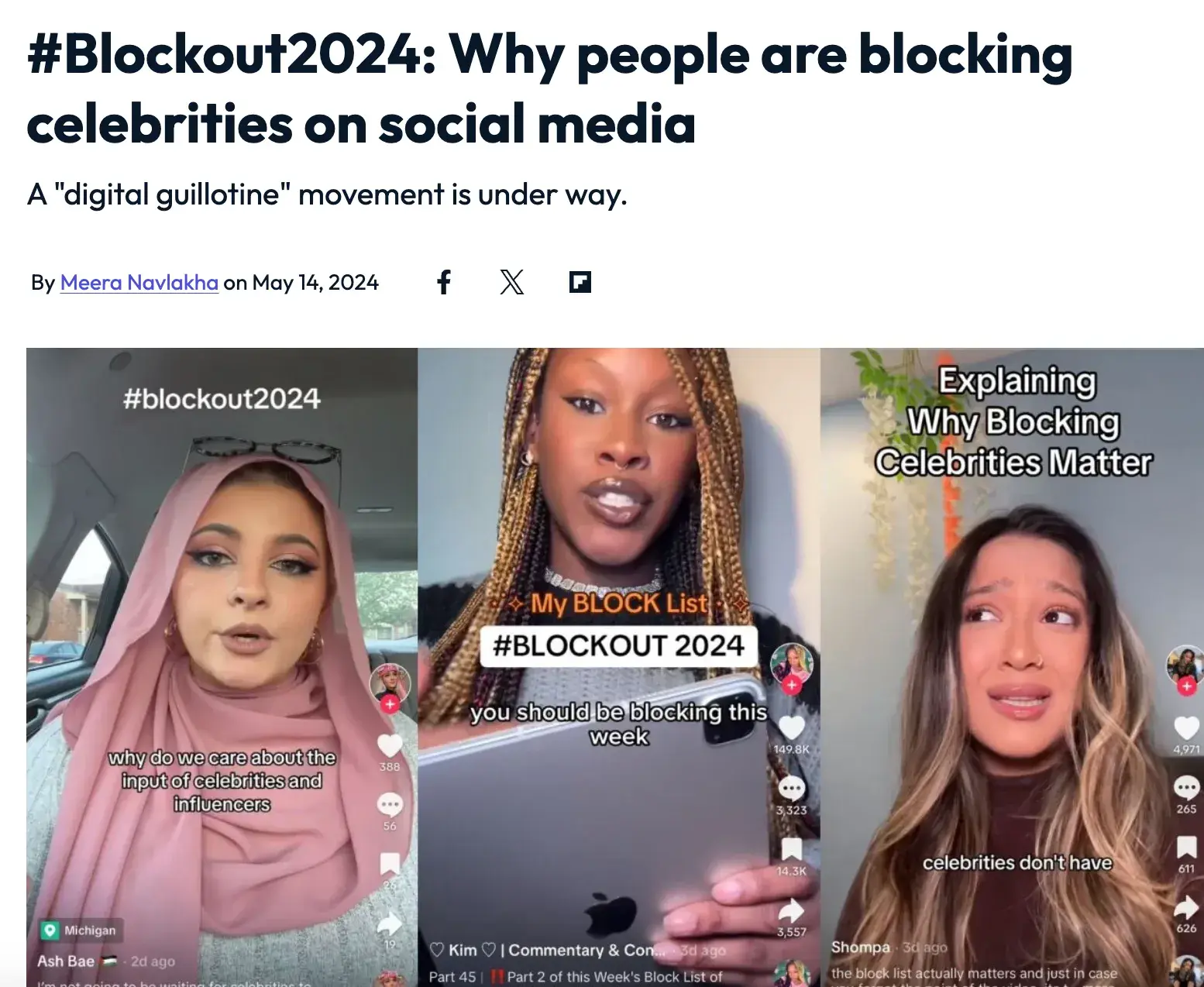
4. What KPIs fit each stage of Loop Marketing?

Each stage requires both leading and lagging indicators that provide actionable insights. Focus on clarity and actionability rather than tracking numerous metrics that don’t drive decisions.

  • Express stage KPIs include content speed (production velocity), content cost, brand consistency scores, and creative approval cycle times.
  • Tailor stage focuses on engagement, including KPIs like click-through rate segment engagement rates, personalization conversion lifts, and audience quality metrics.
  • Amplify stage tracks channel conversion rates, share of voice in AI engines via brand mentions, and partnership-driven traffic.
  • Evolve stage measures campaign performance, testing velocity, and insight implementation rates.

5. Do we need HubSpot to run Loop Marketing?

Loop Marketing principles are platform-agnostic and can be implemented using various marketing technology combinations. However, HubSpot’s unified Smart CRM and Breeze AI capabilities make orchestration significantly faster and easier.

The key requirements are unified data, AI-powered automation, and integrated analytics. While these can be assembled from multiple vendors, HubSpot provides them in a single platform designed specifically for this integrated approach, reducing implementation complexity and improving data consistency across all loop stages.

Your cycle of success starts with a loop.

Listen, Loop Marketing isn‘t about abandoning everything you know; it’s about finally having a framework that keeps pace with how people actually discover, research, and buy today.

The beauty is that you don‘t need to tear your existing workflow apart. Pick your weakest link — whether that’s churning out content, personalizing at scale, or actually learning from your campaigns — and start there. Master one stage, let AI handle the heavy lifting, and watch as each cycle gets sharper, faster, and more effective than the last.

Grab HubSpot (or your platform of choice), get your humans and AI on the same page, and start looping.

Why brands should stop overlooking their most powerful influencers: customers

Software Stack Editor · October 8, 2025 ·

Every January, I sit down to write my predictions for the year ahead in social media and consumer behavior. And this year, one trend stood out to me more than anything else: the rise of customers as influencers.

Download Now: Free Content Marketing Planning Kit

In the past 18 months, we’ve seen people boycotting brands, blocking campaigns, and becoming much more marketing literate. We know how influencer deals work, we see the behind-the-scenes, and in many cases we now view influencers as brands themselves. That changes how we trust them, and how we want to engage.

It’s made me stop and think: what if customers are the new influencers?

This article is about that shift. Why consumers are growing tired of influencer culture, what happens when brands put their customers in the spotlight instead, and how any business — big or small — can start building a customer influencer strategy of their own. Because in 2025, I believe the smartest brands will be the ones who give their customers the microphone.

Table of Contents

  • Why Brands Are Ditching Influencers
  • The Benefits of Swapping Influencers for Customers
  • How to Get Started With Your Own Customer Influencer Strategy

Why Brands Are Ditching Influencers

Over the past year or so, the sentiment around influencers has changed. At the start of 2024 we saw the “blockout” after the Met Gala — entire communities boycotting brands and creators at once.


Source

For me, that moment showed just how powerful consumers have become, and how different the brand–consumer relationship looks now compared to just a few years ago.

You see this play out around big cultural moments like Coachella. I remember watching one influencer’s White Fox gifting haul where she casually pulled a Dyson Airwrap out of the bag. Half the comments were people saying, “Wow, I wish this life would find me,” and the other half were angry, calling it a “disgusting display of not just wealth but opportunity.” It was so telling of the split between aspiration and alienation.

That’s also why REFI Beauty’s approach felt so refreshing. Instead of flying out influencers for another glossy trip, they invited their own customers on a community holiday to launch a new collection.

If influencers are now brands themselves, then maybe customers are the ones best placed to carry the trust, authenticity, and connection that traditional influencer marketing has lost.

The Benefits of Swapping Influencers for Customers

I’m not saying we should ditch influencers entirely — they still have a place. But I do think there’s something really powerful about bringing customers into the spotlight. When brands do this, the benefits are clear.

Authentic, Relatable Content

One of my favorite examples is Toco Swim, a London-based swimwear brand run by two sisters. Instead of hiring influencers or models, they invited their own customers to model their new summer collection.

They shared behind-the-scenes on Instagram, gave people the chance to try on pieces, and I’m sure those who took part got to take a few products home. For the brand, it meant gorgeous content and big savings on model fees. For the customers, it was an experience with a brand they already loved.

I remember thinking, that’s incredible — maybe that could be me next time if I’m brave enough.

A Brand Presence That Reflects Your Community

Snag, a Scottish-based hosiery brand, takes a different approach.

They don’t work with influencers at all. Instead, they comb through their tagged posts and reach out to customers whose content they like. They’ll pay those people a small fee for the rights, and suddenly their entire grid is filled with real customers.

Snag's Instagram feed

Source

For the brand, it’s a cost-effective way to source authentic content. For the customer, it’s exciting and validating — who wouldn’t want to be featured by a brand they love?! And once you’ve been spotlighted, you’re likely to post about the brand even more.

Word-of-Mouth That Actually Works

Here’s the thing: if a brand featured me, I’d tell my friends, I’d tell my co-workers, I’d post it on my own grid.

Sure, maybe that only reaches ten people. But those ten people know me. They trust me. They’ve seen me wear the product in real life. That kind of ripple effect feels more powerful than a stranger with 100,000 followers telling me to buy something.

Loyalty That Lasts

The other big benefit is loyalty. Featuring customers shows them you value their support, and that matters. When people feel recognized, they stick around. They spend more, they engage more, and they tell their friends. It’s personalization in the truest sense — not an algorithm guessing what I want, but a brand showing me I’m part of their story.

For me, that’s the real opportunity here. Using your customers in this way is a smart way to build deeper, lasting relationships.

How to Get Started With Your Own Customer Influencer Strategy

If you’re a smaller brand, this might sound intimidating. But getting started doesn’t have to be complicated — or expensive. Here are a few ways I’ve seen it work well:

1. Make communication easy.

The first step is creating one clear place where your audience knows they can go for opportunities. It could be an Instagram broadcast channel like REFI Beauty use, where they share links to apply for community trips or sign-ups for events.

Or it could be a simple landing page, like Coco Kind has, where customers register once and are automatically entered into future raffles.

cocokind community trip fall '25 landing page

Source

The important thing is consistency. Your customers shouldn’t have to search across ten channels wondering how they can get involved.

2. Decide how you want customers involved.

Think about what you want these opportunities to look like.

Do you want them to be part of your content, like Toco Swim’s photo shoots? Do you want to swap out influencer gifting trips for customer trips, like Coco Kind? Or do you want to highlight people virtually, like The Productivity Method does with their “Day in the Life” grid takeovers?

There isn’t one right way — it’s about choosing what feels most natural for your brand.

3. Ask your community what they want.

Sometimes the best ideas come directly from your customers. I love the “IKEA effect,” which basically says people value something more if they feel like they helped build it. So why not ask them?

You could run a series of Instagram stories, create a LinkedIn poll, or send out an email that simply says: “We want to involve you more — what would make this valuable for you?” I can picture the responses now: ideas for trips, content formats, events you wouldn’t have even thought of. And honestly, your customers are often far more creative than you are.

I can imagine a whole campaign built this way — sharing back the submissions, spotlighting community suggestions, and letting people vote on what excites them. Not only do you end up with amazing ideas to work with, but you also create this sense of co-ownership. Customers start to feel like they’re part of the brand instead of just buyers of a product.

4. Don’t limit yourself to in-person experiences.

Not every business can afford to fly their customers to Spain for a launch. And that’s okay!

Virtual opportunities can be just as powerful. Think story takeovers, day-in-the-life content, or simple features on your grid. I’ve seen brands spotlight customers on their feed with tags and shout-outs, and honestly, that recognition goes a long way.

Even a small slice of your online presence (like an Instagram post, a story highlight, or a LinkedIn feature) can mean everything to the people who love your brand.

5. Reward participation.

Finally, think about what you can offer in return. It might be a free product, early access, or even a small payment for content rights like Snag does.

The point isn’t to create a polished influencer-style contract; it’s to show your customers that you value their time and creativity. That recognition is what keeps people coming back, posting more, and becoming long-term advocates.

At the end of the day, it comes down to giving your customers space in your brand story. Whether that’s physical (through trips or shoots) or digital (through takeovers and features), it’s about handing them real estate in your presence and letting them shine.

Putting Influence Back in the Hands of Customers

I don’t think influencers are disappearing anytime soon, but I do think 2025 is the year customers finally get their moment.

The past year has shown us just how much power people hold when they block, boycott, or call out brands, and honestly, I find that fascinating. If we can channel that same energy into positive, community-driven opportunities, everyone wins.

For me, this whole idea came from a very real place: scrolling TikTok, seeing the backlash to lavish gifting hauls, and then watching brands like REFI, Toco Swim, and Snag do things differently. It felt fresh. It felt exciting. It made me think, maybe that could be me next time.

That’s the heart of it: giving your customers a chance to feel seen, to feel valued, and to feel like they’re part of your story. When you do that, you’re not just filling a content calendar — you’re building real trust and lasting loyalty. And as someone who lives and breathes this space, I truly believe the smartest brands in 2025 will be the ones who hand over the spotlight to the people who already love them most.

It’s all about you

Software Stack Editor · October 8, 2025 ·

It’s a marketer’s dream: Hosting a sold-out event for 10k attendees. That brands are begging to be a part of. Oh, and that was headlined this year by none other than Taraji P. Henson, Kerry Washington, and Jennifer Hudson.

Click Here to Subscribe to Masters in Marketing

That’s Shareese Bembury-Coakley’s reality as one of the driving forces behind CultureCon, the world’s largest festival for Black creatives and entrepreneurs.

Here’s how she makes the magic happen.

Meet the Master

shareese bembury-coakley

Shareese Bembury-Coakley

Vice President, Business development and partnerships at CultureCon

Claim to fame: Successfully sold a partnership between the TV show Killing Eve and buy-now-pay-later service Klarna; deliverables included an in-app experience that sourced pieces from Jodie Comer and Sandra Oh’s (truly incredible) wardrobes. (Lesson 0: Look for audience behavior that you can amplify. Bembury-Coakley had noted that viewers were asking questions on social media about designers.)

Lesson 1: It’s not “Why this?”, it’s “Why you?”.

At CultureCon, Bembury-Coakley tells me, people make a run for Activation Alley as soon as it opens.

It’s not just that the activations are amazing or that a particular brand is there — it’s that CultureCon’s attendees have high expectations, because they trust that this year’s activations will be as good as the last. (More on this in a minute.)

With events and experiential spaces becoming ever more saturated, I ask Bembury-Coakley how she stands out in a crowd. Her answer is deceptively simple: Instead of answering the question, “Why do this idea?” answer the question, “Why do this idea with me?”

“It’s not just about it being a unique idea,” she says. “Oftentimes, people can’t answer the ‘with me’ question.” To answer it, evaluate your cultural relevancy, your community, and your consistency.

And think of it as a lens. When you focus your ideas through “why me,” you can frame your deliverables in a way that makes it “as easy as possible to get buy-in.”

Lesson 2: Build trust before opening wallets.

Trust was a through-line in our conversation, both interpersonally and between brands and audience. Bembury-Coakley credits much of her success to having had amazing advocates throughout her career — but “it‘s double-sided,” she says. “It comes with the very heavy responsibility of making sure that you’re also fulfilling your promises on the back end.”

In other words: Trust is not something that Shareese Bembury-Coakley takes lightly.

She carries this responsibility into her work with brands and partnerships. I ask her what makes her say “no” to a CultureCon partnership, and she immediately says, “anything that would betray the trust we’ve built with our community.”

Trust is the underlying reason that Activation Alley is so popular — brand activations “aren’t a necessary evil that you’re connecting with for a free water bottle,” Bembury-Coakley says. They’re “a testament to how authentically our partners have showed up in the past.”

“brand activations aren’t a necessary evil that you’re connecting with for a free water bottle. they’re a testament to how authentically our partners have showed up in the past.” —shareese bembury-coakley

The secret behind the Activation Alley hype is pretty simple, really: Consistency.

Lesson 3: Creators have audiences. Brands have bosses.

“Creators should always remember that their point of contact has a boss,” Bembury-Coakley says. “Usually the person they‘re talking to is a stakeholder — but it’s generally not the key stakeholder.”

“Anything that you can do to be a resource to make it easier on your partner is going to increase the likelihood of them working with you again,” she says. “I think sometimes you look at the brands as a whole, but they are [made up of] individuals.” It’s easy for creators to forget that “figuring how to navigate these brands internally in a way that makes it easy on them” — and that makes them more likely to want to keep working with you.

And on the flip side, “the brand should always remember why they wanted to work with that creator to begin with.” What often happens, she says, is that a creator’s content might be slightly controversial, but once they’ve signed with a brand, the brand “wants them to be extremely brand-safe in a way that would be betraying their audience.”

See? It all comes down to trust.

Masters in Marketing was a proud sponsor of this year’s CultureCon, which took place October 4 – 5, 2025.

Lingering Questions

This Week’s Question

When it comes to building partnerships for CultureCon, how do you decide which people to collaborate with — whether that’s speakers, creators, or community leaders — to make sure they authentically represent CultureCon’s mission and resonate with your audience? —Deesha Laxsav, Senior manager of brand marketing, Clutch

This Week’s Answer

Bembury-Coakley: At CultureCon, data is paramount to everything we do. So, we‘re not making assumptions about our audience, we’re not just coming up with ideas. We’re really letting that [data] inform everything that you see.

So, the programming that you see being hyper-relevant? Our communities told us what they wanted, the brands that they like to engage with, the speakers they wanted to hear from, and we listened to them.

I think a lot of brands and communities are sometimes trying to go against the grain, trying to push something on their audience, and it‘s not what they want. We evolve and iterate [based on data], and that’s why the brands and the community and the speakers can come out and have a great time.

Next Week’s Lingering Question

Bembury-Coakley asks: I think nostalgia is something that‘s been overdone. I would love to know: What’s a better way for brands to engage with communities or consumers that they want to connect with?

Click Here to Subscribe to Masters in Marketing

How to create AI prompts that eliminate bias and increase conversions

Software Stack Editor · October 7, 2025 ·

AI usage is on the rise, especially in marketing. Data from HubSpot’s AI Trends in Marketing report showed that 74% of marketing professionals use AI for their work. With so many marketers using AI, it is important to acknowledge and solve for its known limitations, particularly the biases that are baked into it.

Download Now: The Annual State of Artificial Intelligence in 2025 [Free Report]

As an inclusive marketing strategist and consultant, I am trained to recognize bias when I encounter it. Whenever I review materials and campaigns for clients, I evaluate whether bias, cultural insensitivity, or inappropriate messages have crept into the communications.

But, most of the marketers I’ve come across either don’t yet have this skillset or are actively working on developing it. Many often don’t pick up on biases AI produces, which could prove detrimental to marketing efforts and brand reputation if published in the market.

To help you use AI more responsibly and effectively, I’ve created some prompts to help you cut out bias. Let’s dive in.

The Fundamental Question for Converting More Customers

Before we get into actual prompts, it’s useful to ensure you are grounded in the fundamental question consumers (especially those from underrepresented and underserved communities) are asking.

As consumers evaluate whether or not your brand is right for them, they are seeking to answer this question, either consciously or subconsciously: Is this product for someone like me?

Every part of your customer journey serves as an input to producing an answer to this question.

So, if any aspect of your customer journey features bias, you’re signaling to potential buyers that “this product isn’t for someone like you.” In most instances, that signal isn’t one the brand intends to send.

Now, let’s focus on how you can use AI to let your audience know that “this is for you.”

Joyann Boyce is an inclusive AI expert and founder of Inclued AI, a tool that helps marketers with inclusive communication. She told me that it is helpful to think of AI as a very well-trained puppy.

She explains, “It’s like someone has already house-trained the puppy. And, they’re going to give it to you, and you’re going to customize it to your home.”

Customizing your well-trained AI puppy means training it to ensure it communicates with your customers in a way that draws them closer to you, rather than pushing them away because of any bias.

Have a listen to the full conversation with Joyann Boyce on this episode of the Inclusion & Marketing podcast.

How to Get AI to Help You Identify and Remove Bias

While AI systems can inadvertently perpetuate biases present in their training data, they can also serve as powerful tools for detecting and mitigating bias in human decision-making processes.

By leveraging AI’s ability to analyze patterns and flag potential inconsistencies, you can create more objective evaluation frameworks and uncover blind spots that might otherwise go unnoticed.

Give the right context.

Start by providing your AI tool with clear context about its role and perspective. Specify exactly what persona or expert viewpoint the AI should adopt, and define the particular lens through which it should analyze your content when giving feedback.

Right from the beginning, I like to tell my AI collaborators that it is a highly skilled, inclusive marketing strategist.

That works from a general standpoint for reviewing content on the whole and for broader audiences. However, if you want to be even more specific about the type of feedback you are looking for, tweak the context for that point of expertise.

Let’s say you want to understand whether an ad has bias toward consumers over the age of 50. You can prompt your AI companion to review the content through the lens of a marketing expert who has expertise in that consumer base.

As an example, I asked AI to review a web page about anti-aging products. I asked it to act like a marketer who specializes in reaching consumers over 50. The AI could then use that foundation to give me helpful feedback.

AI bias in aging example

Here is the first part of the feedback it produced about language that was ageist and lacked inclusivity:

ai spots biased language in ai prompts for anti aging products

Here are the recommendations AI gave for how to improve the copy to make it more inclusive:

AI suggested messaging that removes bias for better outcomes

The goal is to prevent publishing content that already has bias in it. However, there will be times when you’ll need to reevaluate and improve on something that is already in the market.

So, here is a prompt to help you when creating new content, and one to help you improve what has already been produced.

Prompt for Reviewing

You are an inclusive marketing strategist who specializes in marketing to consumers over the age of 50. Please review these headlines, and let me know if there is anything I should be aware of that would rub consumers who are interested in the product the wrong way. I’m particularly interested in anything that would be offensive, culturally inappropriate, or just not inclusive.

Prompt for Creating

You are a copywriter who specializes in marketing to consumers over the age of 50. Please brainstorm 10 headlines for this skin care web page that deliver on our product goals while making our ideal customers, including people over the age of 50, feel seen, supported, and like they belong with our brand.

Give it specificity about your consumer.

One of the challenges that many marketing communications face when it comes to being inclusive is that the brand hasn’t effectively defined its ideal customer.

For instance, a brand might say they are targeting “women aged 25-34 who are looking to advance their careers.” However, even though there is specificity about age, gender, and even aspirations, there is still so much context missing that could influence the way the consumer receives messages you create from them.

As such, when working with AI, avoid treating it like it is talking to a general market audience. Instead, provide your AI companion with additional details about who you want to communicate with. This will help it better tailor its messages to the audience you are targeting.

So, instead of saying you’re creating landing page copy for “women aged 25-34 who are looking to advance their careers,” add in details about their identities. That additional information will support your AI companion in crafting messages that have less bias.

Some of the identity-based details about your ideal customer to include in your prompt could be:

  • Racial and ethnic identities.
  • Sexual orientation.
  • Religion.
  • Family status (i.e., married, children).
  • Economic status.
  • Where they live, because regional differences can impact word choice.
  • Includes people with disabilities and neurodivergence.

As such, a prompt to draft copy for a landing page could look like this:

Prompt for Creating

The audience for this landing page includes women 25-34 who want to advance their careers. This includes Black, Latina, and Asian women. Some are married. Some have young children at home. All have at least a Bachelor’s degree, and they live in the U.S., Canada, Australia, and Mexico, and 30% of them are neurodivergent. Most of them don’t yet own a home. Please draft a landing page for them that takes their identities and needs in mind.

Prompt for Reviewing

Please identify anything in the copy of this landing page that would prevent people with [insert identities] from feeling seen, supported, and like they belong.

Be direct about the type of bias you want to stamp out.

Your target consumers have many identities, and you want to make sure each person feels connected to you’re offering. That means creating inclusive campaigns that avoid bias, and AI tools can help you get it right. You just need to tell your tools what type of content you don’t want to include in your messaging.

When I’m doing an audit for clients’ brands from an inclusion standpoint, some of the things I’m looking for include:

  • Inclusive language.
  • Power dynamics.
  • Representation.
  • Stereotypes.
  • Identity-based friction in the customer experience.

Being this specific is especially important. If your AI tool is just focused on one area, you may miss out on other areas that are problematic.

In this example, I asked AI to evaluate a blog post for cultural bias. It missed some problem areas I would have flagged. When I asked it why it didn’t pick up on those problems, here is what it had to say:

Example, editing a blog post for cultural bias

Based on the specific type of communication you are having AI help you write, be sure to include specific instructions on elements you want to include or want to avoid.

Prompt for Creating

Please create some images we can use for this social media ad that are reflective of our ideal customers. Ensure adequate representation of the different identities of the consumers we serve that is free of common stereotypes and cultural biases.

Prompt for Reviewing

In this ad, please highlight any areas that would be considered problematic from an inclusion perspective. Take into account inclusive language (ex., Are there any AAVE included?). Are there stereotypes associated with any of the images we are highlighting?

It’s time to get rid of the bias built into your AI.

When your AI-generated content authentically reflects your brand values and speaks meaningfully to diverse audiences, it builds trust and connection with potential customers who might otherwise feel overlooked or misunderstood.

This inclusive approach not only helps you avoid alienating prospects due to unconscious bias but also demonstrates your commitment to serving all customers equitably. That can significantly differentiate your brand in today’s marketplace, where consumers increasingly expect businesses to be socially conscious and representative.

Re-training your AI tools to catch bias can help you connect with a larger audience. The sooner you make the switch, the faster you can grow.

AI email marketing analytics: 5 performance metrics every marketer should track for revenue growth

Software Stack Editor · October 7, 2025 ·

Email marketing analytics have evolved far beyond open rates and click-throughs. Today’s AI-powered analytics can predict which subscribers are most likely to convert, optimize send times for maximum engagement, and track every dollar of revenue back to specific campaigns.

→ Download Now: The Beginner's Guide to Email Marketing [Free Ebook]

The difference between good and great email marketing often comes down to which metrics you track (and, more importantly, how you act on them). AI email marketing analytics transforms raw data into actionable insights, helping you understand what happened, why it happened, and what’s likely to happen next. Tools like HubSpot Marketing Hub have made this sophisticated analysis accessible through native dashboards and reporting features that automatically surface patterns human analysts might miss.

Whether analyzing predictive engagement scores or tracking complex revenue attribution paths, these AI-driven insights help you make smarter decisions faster. In this guide, I’ll explore five essential AI-powered metrics directly impacting your bottom line. Plus, you’ll learn what AI email marketing analytics tools to use and, most importantly, how to use these insights to create email campaigns that consistently drive revenue growth.

Table of Contents

  • What is AI email marketing analytics?
  • Pricing Comparison of AI Tools for Social Media Marketing
  • AI Email Marketing Analytics Tools
  • AI Email Marketing Metrics to Track
  • How to Build AI Email Analytics Dashboards Your Team Will Actually Use
  • Frequently Asked Questions (FAQ) About AI Email Analytics

What is AI email marketing analytics?

AI-driven email marketing analytics utilizes artificial intelligence and machine learning algorithms to automatically analyze email campaign data, predict subscriber behavior, and optimize marketing performance in real-time. Unlike traditional analytics, which report on past performance, AI-powered analytics identify patterns, predict future outcomes, and provide actionable recommendations to enhance engagement and drive revenue growth.

These advanced analytics systems measure predictive metrics, including:

  • Engagement probability scores
  • Optimal send times for individual subscribers
  • Content performance patterns
  • Deliverability trends
  • Email revenue attribution

AI processes data points across subscriber interactions, email content, timing patterns, and conversion paths to uncover insights that would be impossible to detect manually.

Pricing Comparison of AI Tools for Social Media Marketing

Tool

Best For

Key Features

Pricing

Free Trial

HubSpot Marketing Hub

All-in-one marketing teams seeking integrated AI analytics with CRM

Breeze Intelligence for predictive scoring

Native AI dashboards and reporting

Send time optimization

Revenue attribution tracking

Content intelligence analytics

Automated lifecycle analytics

Free: $0/month

Marketing Hub Starter: $9/month/seat

Starter Customer Platform: $9/month/seat

Marketing Hub Professional: $800/month

Marketing Hub Enterprise: $3,600/month

Yes, 14 days

Klaviyo

E-commerce brands focused on revenue-driven email analytics

Predictive CLV and churn risk

AI-powered segmentation

Benchmark reporting

Revenue attribution

Product recommendation engine

Free: $0/month

Email: $45/month

Email + Mobile: $60/month

No

Braze

Enterprise companies with complex, multi-channel campaigns

Predictive churn and purchase scoring

AI content optimization

Intelligent channel selection

Custom prediction builder

Real-time analytics

Custom pricing only (see here)

Yes, 14 days

ActiveCampaign

SMBs wanting advanced automation with AI insights

Predictive sending

Win probability scoring

Content recommendations

Attribution reporting

Engagement scoring

Starter: $15/month

Plus: $49/month

Pro: $79/month

Enterprise: $145/month

Yes, 14 days

Mailchimp

Small businesses starting with AI-powered email analytics

Content optimizer

Send time optimization

Predictive demographics

Smart recommendations

Basic attribution

Free: $0/month

Essential: $13/month

Standard: $20/month

Premium: $350/month

Yes, 14 days

SendPulse

Budget-conscious teams needing multichannel AI features

AI personalization

Predictive analytics

Send time optimization

Engagement scoring

Basic revenue tracking

Free Tier: $0/month

Standard Tier: $8/month

Pro Tier: $9.60/month

Enterprise: Custom pricing only (see here)

No

Segment

Data teams building custom AI analytics infrastructure

Customer data platform

Identity resolution

Predictive traits

Journey mapping

400+ integrations for AI tools

Free Tier: $0/month

Team Tier: $120/month

Business Tier:

Custom pricing only (see here)

No

AI Email Marketing Analytics Tools

1. HubSpot Marketing Hub

a screenshot of hubspot marketing hub’s ai email marketing analytics

Source

An all-in-one marketing platform with an integrated CRM, HubSpot transforms email marketing through its Breeze Intelligence AI, which analyzes millions of data points across your entire customer journey.

While other platforms focus on basic automation, HubSpot’s Breeze AI automatically tracks email revenue attribution, connecting every email interaction to closed deals and calculating true campaign ROI. HubSpot also powers send-time optimization, automatically determining the optimal delivery time for each subscriber. Its content intelligence analytics reveal which subject lines, CTAs, and content variations drive the highest engagement.

With Marketing Hub, you can build campaigns, analyze email performance, and see revenue impact through native dashboards that update in real-time.

Best for: Teams seeking integrated AI analytics with CRM data for complete revenue attribution.

Pricing

  • Free: $0/month
  • Marketing Hub Starter: $9/month/seat
  • Starter Customer Platform: $9/month/seat
  • Marketing Hub Professional: $800/month
  • Marketing Hub Enterprise: $3,600/month

HubSpot Case Study

DoorDash transformed its merchant acquisition strategy using HubSpot’s marketing automation and integrated CRM to scale personalized outreach across email, landing pages, and lead nurturing workflows. “Over the course of the last year, we’ve shifted from 100 percent one-off campaigns to about 80% of our emails existing within workflows,” says Andrew McCarthy, Director of Content Marketing at DoorDash.

Additionally, Christopher Wise, Senior Manager, Retention Tech and Operations at DoorDash, said, “HubSpot honestly has the best UI out of any enterprise email service provider.” He continued, “It’s easy to understand. It makes sense — and you don’t need an entire team to execute within it.” Because of Marketing Hub, DoorDash was able to reduce the time required for its email campaign production process, segment audiences more efficiently, and facilitate faster collaboration between marketing and sales.

2. Klaviyo

a screenshot of klaviyo’s ai email marketing analytics

Source

Klaviyo, a B2C email CRM, uses generative and agentic AI to personalize, problem-solve, and create. While other e-commerce tools rely on historical data, Klaviyo’s AI technology uses real-time customer data insights to power your workflows, campaigns, and sign-up forms. Additionally, its K:AI customer agent answers your questions, recommends products, and (when needed) hands customer queries off to a live agent with full context.

Within Klaviyo, you can test predictions, set up campaigns, and measure performance through detailed analytics dashboards, all of which are enhanced with intuitive AI capabilities.

Best for: E-commerce brands maximizing customer lifetime value through predictive analytics.

Pricing

  • Free: $0/month
  • Email: $45/month
  • Email + Mobile: $60/month

Klaviyo Case Study

Naturium, an e.l.f. Beauty brand used Klaviyo and its AI, K:AI, to encourage repeat purchases through targeted email campaigns, a loyalty strategy fueled by AI email marketing analytics, and triggered workflows. By syncing ecommerce, CRM, and loyalty data in Klaviyo, Naturium was able to unlock more integrated, accurate forecasting and analytics.

“It’s super helpful to have all our data centralized within Klaviyo,” said Giovanna Diez, Naturium’s Senior Manager of CRM and Loyalty. “I don’t have to worry about competing data points.” With Klaviyo’s AI email marketing analytics, tool integrations, and user-friendly CRM system, Naturium was able to keep up with nonstop information, growing customer profiles, and opportunities for increasing consumer loyalty.

3. Braze

a screenshot of braze’s ai email marketing analytics dashboard

Source

Braze orchestrates personalized experiences using AI that predicts individual-level churn probability and purchase likelihood. Moreover, its Canvas Flow, with intelligent path optimization, automatically routes customers through the most effective journey based on real-time behavior and predictive scores. Plus, Braze’s AI technology (aka BrazeAI) drives meaningful engagement between marketing teams and consumers, all powered by predictive AI, agentic AI, and generative AI.

Within the platform, you can build predictions, orchestrate campaigns, and analyze performance through customizable dashboards.

Best for: Enterprise companies orchestrating complex, multi-channel customer journeys.

Pricing

  • Custom pricing only (see here)

Braze Case Study

24S, LVMH’s digital luxury retailer, revolutionized and drastically improved its customer experience strategy by leveraging Braze to deliver personalized experiences in-app through abandoned cart and back-in-stock alerts. With the help of Braze’s AI Item Recommendations, 24S’s marketing team was able to design notifications with customized AI recommendations, thus maximizing purchase frequency. The result? A 7% increase in 24S’s add-to-cart rate and a 35% increase in their purchase conversion rate.

“By consolidating our tech stack and migrating to Braze, we were able to cut technology costs, reduce integration time, and limit technical complexity while delivering highly personalized experiences that our customers truly value,” said Carla Rota, Senior CRM Project Manager at 24S. Again, by utilizing AI-powered recommendations, the 24S team optimized and automated powerful customer experiences that resonate with its users. They also saved time, reduced complex workflows, and minimized campaign costs.

4. ActiveCampaign

a screenshot of activecampaign’s ai email marketing analytics dashboard

Source

ActiveCampaign combines email marketing with AI-powered sales insights through predictive sending and win probability scoring. Using machine learning that analyzes engagement patterns across your entire database, it automatically determines the optimal send time for each contact and predicts which leads are most likely to convert.

ActiveCampaign’s AI technology creates instant first drafts, personalizes content based on contact data, and creates opportunities for 1:1 engagement with customers. Additionally, its AI powers content recommendations, suggests email templates based on past performance, and builds AI-optimized brand kits for easier and quicker email design.

Best for: SMBs combining email automation with AI-powered sales enablement.

Pricing

  • Starter: $15/month
  • Plus: $49/month
  • Pro: $79/month
  • Enterprise: $145/month

ActiveCampaign Case Study

The YMCA of Alexandria transformed its member engagement strategy by utilizing ActiveCampaign’s marketing automation and predictive sending features to streamline communications across programs, events, and fundraising initiatives. “ActiveCampaign’s AI Brand Kit made it super easy to pull in our logos and mission statement, and I no longer have to worry about adjusting fonts and colors every time I create an email,” said Adam Sakry, Digital Marketing Specialist for the YMCA of Alexandria.

The YMCA of Alexandria’s use of ActiveCampaign’s AI email marketing capabilities resulted in a 12.8% click-through rate, 27% average contact-list growth across all branches, and 10 hours saved. “Before we had these brand templates, I had to build every email myself. Now, anyone on our team can create an email that meets our brand standards,” Adam shared.

5. Mailchimp

a detailed screenshot of mailchimp’s ai email marketing analytics dashboard

Source

Mailchimp uses AI to optimize content and predict audience behavior through its Creative Assistant. Using content intelligence that analyzes millions of campaigns, Mailchimp automatically generates subject lines, recommends design improvements, and suggests optimal send times based on your audience’s behavior.

Additionally, Mailchimp’s AI technology creates personalized recommendations for subscribers, predicting demographics and interests from engagement patterns. It also benchmarks your metrics against those of similar businesses to optimize performance and identify opportunities for improvement.

Within the platform, you can design campaigns, automate journeys, and track performance through built-in analytics.

Best for: Small businesses looking to start experimenting with AI-powered email optimization.

Pricing

  • Free: $0/month
  • Essential: $13/month
  • Standard: $20/month
  • Premium: $350/month

Mailchimp Case Study

World Central Kitchen (WCK) utilized Mailchimp’s automated email campaigns and audience segmentation tools to coordinate disaster relief communications and drive donations during crisis response efforts. Moreover, WCK utilized Mailchimp’s email builder to create custom email templates, enabling the sending of brand-aligned emails in response to global crises in real-time.

According to Richard McLaws, Senior Content Manager at WCK, Mailchimp’s segmentation and marketing automation flows have also allowed WCK to experiment with attaining and retaining new subscribers. “It’s finding unique ways to engage every specific segment, because people want to get different things out of engaging with WCK,” Richard says. Mailchimp’s data-driven and intuitive email marketing workflows produced a 1.3x above industry open rate, enabling the organization to provide 186,000 meals from a single campaign.

6. SendPulse

a detailed screenshot of sendpulse’s ai email marketing analytics dashboard

Source

SendPulse combines email, chatbots, and SMS using AI to personalize messages across all touchpoints. Using machine learning for send time optimization and engagement prediction, it automatically adjusts delivery schedules and content based on individual subscriber behavior across channels.

Additionally, SendPulse’s AI technology creates unified customer profiles that predict the most effective channel and message for each interaction. Its AI also powers its personalization engine, dynamically inserting content based on predicted interests, and its engagement scoring helps identify your most valuable subscribers. Within the platform, you can create campaigns, build chatbots, and analyze cross-channel performance.

Best for: Budget-conscious teams needing multichannel AI capabilities.

Pricing

  • Free Tier: $0/month
  • Standard Tier: $8/month
  • Pro Tier: $9.60/month
  • Enterprise: Custom pricing only (see here)

Send Pulse Case Study

While Send Pulse does not feature formal client-facing success stories (and metrics) through their website, many users on G2, a software review platform, talked about the impact of its AI email marketing analytics and overall software functionalities. Yasen K., a small business owner and CEO, shared his experience via this G2 review page.

Yasen wrote, “Email, SMS, chatbots, and push notifications are just a few of the flawless automation channels that SendPulse offers as an all-in-one marketing platform.” He also added, “The automation tools, which enable customized workflows that improve engagement and conversions, are especially noteworthy.”

7. Twilio Segment

a detailed screenshot of twilio segment’s ai email marketing analytics dashboard

Source

Twilio Segment enables AI-powered email marketing by creating golden customer profiles that feed into any marketing tool. Using identity resolution and predictive traits, it automatically merges data from multiple sources and calculates propensity scores that email platforms can leverage for advanced personalization. Additionally, Twilio Segment’s AI enriches profiles with computed traits, such as predicted lifetime value, churn probability, and product affinity scores, which update in real-time.

Within Twilio Segment, you can build data pipelines, create audiences, and sync predictions to 400+ marketing tools, including all major email platforms.

Best for: Data teams building custom AI analytics infrastructure for email marketing.

Pricing

  • Free Tier: $0/month
  • Team Tier: $120/month
  • Business Tier: Custom pricing only (see here)

Segment Case Study

Camping World leveraged Twilio Segment’s customer data platform and predictive analytics to unify fragmented customer profiles across its digital channels. “The way we were tracking data was inconsistent,” noted Brad Greene, Senior Marketing Director at Camping World. “Even down to the same website, the data we collected and sent was slightly different between various tools like Google Analytics and Facebook Pixel. No one really trusted the data they were looking at.”

With Twilio Segment, Camping World’s paid media efforts saw a 35% increase in conversions. They also saw a 16% decrease in cost-per-lead due to cleaner and properly implemented data collection, thus allowing Camping World’s ads to perform better. Greene added, “With Twilio Segment, we have a full view of the customer, from the first time they hit our site to post-purchase and on.”

AI Email Marketing Metrics to Track

In this section, I’ll walk you through the most valuable AI email marketing metrics to track, including:

  • Predicative engagement scoring
  • Content intelligence analytics
  • Send time optimization
  • Deliverability and inbox placement
  • Revenue attribution and lifecycle analytics

Each of these metrics transforms raw email data into actionable insights that directly impact revenue, starting with the most fundamental: understanding which subscribers are actually ready to engage with your content (aka predictive engagement scoring).

Predictive Engagement Scoring

Predictive engagement scoring is an AI-powered system that analyzes multiple data inputs to calculate the likelihood of individual subscribers taking specific actions in response to your emails.

Unlike traditional engagement metrics that report past behavior, predictive scoring utilizes machine learning algorithms to forecast future actions. It assigns numerical scores (typically 0-100) that indicate each contact’s likelihood of opening, clicking, or converting from upcoming campaigns.

Use the following data inputs to power your predictive engagement scoring:

  • Historical engagement: This data forms the foundation, tracking opens, clicks, forwards, and replies across the last 90 to 365 days to identify patterns.
  • Recency signals: This data includes the time since the last open (optimal: within 14 days), purchase recency, website visit recency (within 7 days indicates active interest), and email frequency tolerance based on engagement patterns.
  • Profile data: This data incorporates demographic information, firmographic details for B2B, stated preferences, subscription types, and customer lifetime value.
  • Behavioral signals: This data tracks website page views, content downloads, form submissions, cart abandonment patterns, and cross-channel interactions. The AI assigns weighted values to each behavior: product page views, pricing page visits, demo requests, and purchase completions.

Once you have predictive engagement scores, use them to optimize content distribution and timing automatically. These decision rules transform scores into actionable marketing strategies that improve performance while protecting the sender’s reputation.

Here’s how to prioritize each segment:

  • High scorers (80-100): These subscribers generate 78% of email revenue despite being only 20% of the most subscribed lists. Send them premium content first, include it in all product launches, grant early access to sales, and approve it for high-frequency campaigns (3 to 5 emails per week).
  • Medium scorers (50-79): This segment responds to value-driven content with clear benefits. They receive a standard campaign cadence (1 to 2 emails weekly), receive content 24 to 48 hours after high scorers, and are monitored weekly for score movement.
  • Low scorers (20-49): Limit to 1 email weekly maximum, exclude from promotional campaigns unless highly relevant, and enter into re-engagement series before removal consideration. Only 12% reactivate, but those who do show 2x higher lifetime value.
  • Critical scorers (below 20): Suppress from regular campaigns immediately, enter into the final 3-email win-back sequence over 45 days, then remove after 90 days of non-engagement. Continuing to email this segment reduces overall deliverability by 25%.

How to Calculate a Predictive Engagement Score

A predictive engagement score is like a credit score for your email subscribers — it predicts how likely each person is to open, click, or buy from your next email.

Behind the scenes, AI analyzes data points about each subscriber, transforms them into meaningful patterns, and outputs a simple 0-100 score that marketers can actually use. While the math happens automatically, understanding the basics helps you trust the predictions and recognize which subscriber behaviors are most important.

Here’s how you’ll set up your data infrastructure to ensure that AI calculates engagement scores correctly:

  • Step 1: Gather your raw data inputs. Start by collecting four categories of subscriber information that feed into the scoring model. This information includes email interaction history (opens, clicks, forwards, replies, and unsubscribes from the past 90 to 365 days), website behavior (page views, time on site, content downloads, form fills, and shopping cart activity), profile information (industry, company size, job title, location, acquisition source, and subscription preferences), and purchase data (transaction history, average order value, product categories, and time between purchases).
  • Step 2: Transform data into predictive features. Next, suggest meaningful patterns that the AI can learn from — such as turning “opened five emails in 10 days” into an “engagement velocity” score. To create this information database, include recency scores (convert “last opened 3 days ago” into a freshness score (0-100) where recent = higher), frequency patterns (calculate average emails opened per month and compare to subscriber segment baseline), monetary indicators (combine purchase history with browse behavior to create “purchase intent” signals), engagement ratios (divide clicks by opens to measure content interest beyond just opening emails), and behavioral clusters (group similar actions like “reads blog + downloads guide = education seeker”).
  • Step 3: Apply machine learning to generate scores. AI models analyze thousands of historical examples where the outcome is known (i.e., whether the conversion occurred or not) to learn which feature combinations predict success. Be sure to include pattern recognition (when AI identifies that subscribers who open 3+ emails, visit a pricing page, and download content score 85+), weight assignment (more predictive features get higher importance), and score calculation (combine all weighted features into a final 0-100 score) in your scoring model.
  • Step 4: Understand HubSpot’s simplified scoring system. HubSpot’s Breeze Intelligence for predictive scoring eliminates the complexity by handling all data processing behind the scenes. Instead of building models yourself, Breeze automatically collects data, engineers features, generates scores, and provides recommendations. (Within HubSpot, you’ll see scores presented as Hot (80-100), Warm (50-79), and Cold (0-49)).
  • Step 5: Validate and apply your scores. Lastly, once Breeze Intelligence for predictive scoring generates your scores, validate their accuracy, create action triggers, and personalize your email content as needed.

Content Intelligence Analytics

Content performance scoring uses AI to evaluate and predict the effectiveness of email subject lines, body copy, and templates by analyzing multiple quality signals and comparing them against historical performance data. This scoring system assigns numerical values (typically 0-100) to email content based on semantic similarity to high-performing messages, readability metrics, brand voice consistency, and predicted engagement uplift.

To get a better understanding of each scoring factor, take a look at the list below:

  • Subject line scoring: This scoring component measures emotional sentiment, urgency indicators, personalization elements, optimal length (6 to 10 words), power word usage, and emoji effectiveness.
  • Body copy scoring: This scoring component evaluates readability (aiming for an 8th-grade level), paragraph structure, CTA prominence, value proposition clarity, and scanability through the use of subheadings and bullet points.
  • Template scoring: This scoring component analyzes visual hierarchy, mobile responsiveness, text-to-image ratio (60:40 optimal), button placement above the fold, and white space distribution.
  • Brand voice adherence: This scoring component measures consistency with established tone guidelines through natural language processing that analyzes vocabulary patterns, sentence structure, formality levels, and emotional tone.
  • Historical uplift prediction: Calculates expected performance improvement by comparing new content against baseline metrics from similar past campaigns.

Measuring Content Relevance and Uplift

Content relevance and attribution uplift tell you exactly how much improvement each content change delivers. Without proper testing, you can’t know if better results came from your content changes or from external factors like seasonality, news events, or random chance.

Just think of these controlled experiments like testing a new recipe: you need to keep all ingredients the same, except for one, to know which change made it taste better.

To measure genuine improvement, you need clean comparisons that isolate the impact of your content changes. Use the following step-by-step system to run clean tests:

  • Step one: Randomly divide your list into two equal groups using your platform’s A/B testing feature.
  • Step two: Send both versions simultaneously to eliminate timing bias.
  • Step three: Keep everything identical except the one element you’re testing.
  • Step four: Run tests for at least 7 days to account for daily variations.

Content insights in Content Hub automatically track these test results and calculate statistical significance, showing you which content variations drive meaningful uplift without requiring manual analysis of the data.

Pro tip: Be sure to exclude new subscribers (less than 30 days) who could exhibit unpredictable behavior.

Send Time Optimization Accuracy

Send Time Optimization (STO) accuracy measures how effectively AI-predicted delivery times outperform standard scheduling by comparing engagement metrics between optimized and baseline send times. STO calibration is the process of fine-tuning these predictions to account for audience-specific patterns, ensuring the AI model’s recommendations align with actual subscriber behavior rather than generic best practices.

STO Test Design: A Simple Framework for Validation

To ensure STO accuracy, here’s what you’ll want to do (in three simple steps):

  • Step one: Split your list into two equal groups (week 1 and 2). Divide your email list randomly using your platform’s A/B testing feature — this ensures fair comparison without bias. Group A (Control) receives emails at your current standard time, typically Tuesday at 10 AM or whatever schedule you’ve been using. Group B (Test) receives emails at AI-predicted optimal times unique to each subscriber.
  • Step two: Run your test for at least four email campaigns to gather reliable data. Single email results can be misleading due to variations in content or external factors. Track three simple metrics that matter most: Open Rate Comparison, Click-to-Open Rate, and Conversion Tracking.
  • Step three: After your initial test, make a clear decision based on results and set up monitoring for long-term success. Use Green, Yellow, and Red indicators to assess success. Green should signal the need to expand AI usage, Yellow should indicate continuing testing, and Red should represent negative results.

Pro tip: Document your results in a simple spreadsheet, including:

  • Date
  • Campaign Name
  • Standard Time Performance
  • AI-Optimized Performance
  • Improvement Percentage

After 10 campaigns, you’ll clearly see whether STO works for your specific audience.

How to Validate STO Results

Before trusting AI to determine when your emails are sent, use this validation checklist to confirm the system improves performance without overwhelming subscribers.

This three-step process ensures statistically valid results while protecting your sender reputation:

  • Step one: Set up proper testing parameters. Establish your sample size requirements with at least 1,000 subscribers per test group (control vs. optimized), ideally 5,000 per group for B2C brands. Configure your control group by randomly selecting 15-20% of your list to receive emails at your standard “best practice” time, while the test group gets AI-optimized timing. Run tests for a minimum of 4 campaigns or 14 days to gather statistically significant data.
  • Step two: Account for external factors. Adjust for seasonality by recognizing that engagement patterns shift on a quarterly basis. Additionally, validate day-of-week performance by excluding Mondays from B2B tests and testing weekends separately for e-commerce audiences. Ensure test groups have balanced characteristics, including a similar timezone distribution, an equal mix of high/medium/low engaged users, and proportional representation of VIP customers.
  • Step three: Implement safety guardrails. Create frequency protection rules that prevent any subscriber from receiving emails more than once per 24 hours, cap weekly sends at a maximum of four emails, and maintain a minimum 6-hour gap between any two sends. Set up quality control checkpoints to flag anomalies (like AI suggesting 2 AM sends or optimal times that vary by more than 4 hours week-to-week for the same subscriber). Then, configure emergency stop triggers that pause STO if deliverability scores drop below 80, unsubscribe rates increase 50% above normal, or customer support tickets mentioning email frequency double.

Deliverability and Inbox Placement Analytics

Deliverability analytics measure whether your emails reach subscribers’ inboxes versus spam folders or get blocked entirely. These metrics utilize AI to predict delivery issues before they impact your sender reputation, helping maintain a 95%+ inbox placement rate (IPR) required for successful email marketing.

Monitoring Sender Health Over Time

Tracking inbox placement trends involves monitoring where your emails land over time to identify delivery issues before they escalate.

By monitoring daily placement rates and comparing them to your baseline, you can identify issues 5 to 7 days before they significantly impact your email program, allowing you to adjust your strategy and protect your sender reputation.

To track inbox placement trends, complete the following steps:

  • Step one: Create a simple spreadsheet or dashboard tracking five essential metrics each day. Include the following metrics in your daily monitoring system: Inbox Rate (percentage reaching primary inbox), Spam Rate (percentage in spam folder), Tabs/Promotions (Gmail’s promotions tab placement), Missing Rate (emails that disappear entirely), and ISP Breakdown (separate rates for Gmail, Outlook, Yahoo to identify specific problems).
  • Step two: Create a weekly trend analysis. Calculate 7-day rolling averages to smooth out daily variations. (A healthy trend shows inbox placement staying within 3% of your baseline. If placement drops 5% week-over-week, that’s an early warning.)
  • Step three: Complete weekly health checks. Every Monday, review your 7-day placement average. If it drops below 90%, implement “Engagement Week” — send only your best content to the most engaged subscribers. This prevents minor issues from becoming major problems.
  • Step four: Configure deliverability tools in Marketing Hub to notify you when inbox placement drops below a performance threshold (for example, when spam complaints exceed 0.1% or bounce rates spike above 2%). These real-time alerts ensure that you catch problems within hours, rather than discovering them during weekly reviews, giving you time to implement corrective actions before deliverability issues escalate.

Once your emails consistently reach inboxes, the next challenge is proving their business impact. While deliverability ensures your messages arrive, you need sophisticated attribution models to connect those delivered emails to actual revenue and understand how they influence the entire customer lifecycle.

Revenue Attribution and Lifecycle Analytics

Email attribution connects every email interaction — opens, clicks, replies — to specific business outcomes by tracking how these actions influence deals throughout the sales cycle.

When someone opens your product announcement email, clicks the demo link, and eventually becomes a customer three weeks later, attribution mapping traces this journey by linking the email event to their contact record, then to their sales opportunity, and finally to the closed deal.

This unified Smart CRM attribution ensures that marketing receives credit for revenue influence, while sales teams see which campaigns warmed up their prospects. Understanding exactly how this attribution flows through your CRM requires breaking down each layer of the tracking process, from initial engagement to final revenue calculation.

In the following section, I’ll walk you through how modern AI-powered platforms transform scattered email interactions into a clear revenue story.

The Three-Layer Attribution Process

Here’s a more detailed breakdown of how the email attribution and lifecycle work:

  • First, email events attach to Contact Records, where every interaction builds a behavioral timeline. For example, Sarah opened five emails, clicked three pricing links, and downloaded a white paper, all of which were tracked with timestamps on her contact profile.
  • Next, these engaged contacts convert to Opportunities when they take sales-ready actions. That whitepaper download triggers a lead score increase, creating a qualified opportunity worth $50,000 based on Sarah’s company size and engagement level.
  • Finally, when opportunities are converted into Closed Deals, the system calculates attribution. Sarah’s $50,000 purchase is attributed 40% to the initial awareness email, 35% to the nurture campaign that kept her engaged, and 25% to the final promotional email that drove her to submit a demo request.

Modern platforms (like HubSpot) automatically map this entire journey. Then, AI technology (such as Breeze AI) analyzes patterns across thousands of these journeys to identify which email sequences, subject lines, and content types most effectively move contacts through each stage. This visibility transforms email from a “spray and pray” channel into a predictable revenue driver where you can forecast that every 1,000 emails to engaged contacts generates approximately $25,000 in influenced revenue within 90 days.

How to Build AI Email Analytics Dashboards Your Team Will Actually Use

The most effective AI email analytics dashboards follow a three-tier structure that progresses from high-level business metrics to predictive insights to operational health indicators. Ultimately, your dashboard should tell a story at a glance:

  • Are we hitting revenue goals? (tier 1)
  • What’s likely to happen next month? (tier 2)
  • Are there any issues requiring immediate attention? (tier 3)

HubSpot Marketing Hub’s customizable dashboards enable this exact layout, with drag-and-drop widgets that automatically update as your AI models process new data, ensuring teams always see the most current insights without manual reporting work.

What Your AI Email Analytics Dashboard Should Look Like (from Top to Bottom)

A well-designed AI email analytics dashboard follows a strategic visual hierarchy that guides your team from high-level business outcomes down to operational alerts, ensuring critical information gets noticed first. The following structure mirrors how marketing leaders actually consume data:

  • Top section: Top KPIs and performance metrics. Start with five essential metrics that directly tie to business goals. These metrics include: email-attributed revenue, predictive lifetime value, engagement velocity, and active subscriber growth. These KPIs should display as large numbers with sparkline trends, making performance immediately clear even from across the room.
  • Middle section: Predictive insights and AI forecasts. Your dashboard’s predictive layer transforms historical patterns into actionable insights for the future. Next month’s revenue forecast uses engagement trends, seasonal patterns, promotion schedules, and conversion probability scores to predict income. Additionally, content performance predictions evaluate subject line components, body copy structure, CTA placement, and send timing to score upcoming campaigns before they are deployed. Lastly, campaign opportunity scores combine audience segment value, content readiness, competitive timing, and historical performance to recommend which campaigns to prioritize for maximum ROI. (HubSpot Marketing Hub’s Breeze Intelligence powers these predictions, learning from your specific audience behavior rather than generic benchmarks.)
  • Bottom section: Health indicators and proactive alerts. The bottom dashboard layer monitors technical and operational health with clear visual indicators — green, yellow, or red status badges that demand attention when needed. Include areas for deliverability health scores, engagement decay triggers, and anomaly detection. Set these alerts to send Slack or email notifications when thresholds breach, ensuring teams respond within hours rather than discovering issues during weekly reviews.

TDLR — Your dashboard should refresh hourly for alerts, daily for KPIs, and weekly for predictive insights, balancing real-time awareness with meaningful trend analysis.

Frequently Asked Questions (FAQ) about AI Email Analytics

Which AI email metrics matter most for modern marketing teams?

Modern marketing teams should prioritize five AI email metrics that directly impact revenue:

  • Predictive engagement scoring (identifying subscribers likely to convert)
  • Content intelligence analytics (measuring which subject lines and content drive action)
  • Send time optimization accuracy (validating when AI-recommended send times outperform manual scheduling)
  • Deliverability metrics (tracking inbox placement rates using AI pattern detection)
  • Revenue attribution analytics (connecting email touchpoints to closed deals)

HubSpot Marketing Hub provides native dashboards for tracking these AI email analytics metrics in real-time, while Breeze AI enables predictive scoring that identifies high-value subscribers before they convert.

How do I validate AI predictions in email analytics?

Validate AI predictions by running control tests that compare AI-recommended actions against your baseline performance. Track prediction accuracy rates by measuring whether subscribers identified as “highly engaged” by AI actually open, click, and convert at predicted rates. That said, I recommend aiming for an accuracy rate of 75% or higher.

HubSpot Marketing Hub enables A/B testing between AI-optimized campaigns and traditional segments, automatically calculating statistical significance. Document performance over 30 to 60-day periods to identify seasonal variations and model drift. AI email marketing analytics tools should provide confidence scores for each prediction to ensure accuracy.

How do I measure an email’s revenue impact with AI?

AI-powered revenue attribution connects email touchpoints to closed deals through multi-touch attribution models that track the complete customer journey. Configure your AI email analytics to track first-touch, last-touch, and weighted attribution across all email interactions, assigning revenue credit based on engagement patterns and proximity to conversion.

HubSpot Marketing Hub’s revenue attribution reporting automatically calculates email ROI by connecting campaign engagement to CRM deal data. At the same time, HubSpot’s Breeze Intelligence identifies which email sequences drive the highest customer lifetime value. Track metrics like:

  • Revenue per email sent
  • Customer acquisition cost by email campaign
  • Lifetime value by email segment

Get a demo of Breeze to see how predictive analytics can forecast the impact of email revenue before the campaigns launch.

How should I benchmark AI email metrics?

Benchmark AI email metrics against three standards:

  • Your historical baseline (pre-AI performance)
  • Industry averages for your sector
  • The AI model’s predicted outcomes

Then, track improvement rates monthly. Compare your predictive engagement accuracy (should exceed 70%), send time optimization lift (target 15-25% improvement), and revenue attribution coverage (aim for 80%+ of conversions tracked).

Marketing Hub provides industry benchmark data within its reporting dashboards, comparing your AI metric performance against similar-sized companies in your sector. Document performance gaps and set quarterly improvement targets for each AI metric.

What’s the best way to present AI analytics to leadership?

Present AI email analytics to leadership by focusing on revenue impact, efficiency gains, and predictive insights rather than technical metrics.

Create executive dashboards showing three key storylines:

  • Revenue attributed to AI-optimized emails
  • Time saved through automation
  • Predicted future performance based on current trends

HubSpot Marketing Hub enables custom executive dashboards that visualize AI email marketing analytics alongside business KPIs, while Breeze provides predictive forecasts for upcoming quarter performance.

Structure presentations with before-and-after comparisons, showcasing specific examples of AI predictions that prevent churn or identify hidden opportunities. Additionally, confidence intervals and risk assessments should be included to build trust in AI recommendations.

See this dashboard in HubSpot for executive-ready AI analytics templates that translate complex metrics into business outcomes.

Transform your email marketing with AI-powered analytics.

AI email marketing analytics has evolved from a nice-to-have into a critical driver of marketing success. The five metrics we’ve explored — predictive engagement scoring, content intelligence analytics, send time optimization, deliverability monitoring, and revenue attribution — work together to create a complete picture of your email program’s health and potential.

As you implement these metrics, remember that implementing AI email analytics isn’t just a work in progress; it’s a process. Start with one or two metrics that address your biggest challenges — whether that’s improving engagement, fixing deliverability issues, or proving revenue impact. Build confidence in the predictions, establish baseline performance, and gradually expand to the full suite of AI-powered insights.

Ready to harness the potential of AI for your email marketing campaign? Get started with HubSpot’s Marketing Hub or Reporting and Dashboard Software today.

How to migrate marketing automation workflows from legacy CRMs: A guide for B2B SaaS companies

Software Stack Editor · October 6, 2025 ·

When B2B SaaS companies decide to migrate from legacy CRM systems, one of their biggest concerns isn‘t just moving data—it’s ensuring their existing marketing automation workflows continue running without interruption. A single gap in automated nurture sequences or lead scoring can mean lost opportunities and confused prospects, and who wants that?

Download Now: Free Marketing Plan Template [Get Your Copy]

The stakes are high: A botched migration can misplace or muddle your data, such as customer records, purchase history, lead information, and pricing tiers.

To make your workflow automation migration as smooth as possible, I will break down the 10 marketing automation workflow templates for B2B SaaS companies migrating CRMs. I’ll even tell you in what order you should migrate your workflows to avoid data loss or other transition nightmares.

Table of Contents

  • 10 Marketing Automation Workflow Templates for B2B SaaS Companies Transitioning from Legacy CRMs
  • How do I map legacy CRM processes to HubSpot B2B SaaS workflows?
  • Workflow Migration Q&A

10 Marketing Automation Workflow Templates for B2B SaaS Companies Transitioning from Legacy CRMs

Phase 1: Critical Revenue Workflows

1. Demo Request Response Automation

The goal of a demo request response automation workflow is to immediately respond to and schedule demo requests.

HubSpot setup:

  • Trigger: Form submission on demo request page
  • Actions: Send instant confirmation email, create deal, assign to sales rep based on territory, add to “Demo Requested” sequence
  • Enhancement: Use HubSpot’s meeting scheduling tool integration

Time to implement: 2-4 hours

  • Why first: Highest conversion rate touchpoint
  • Revenue risk: Any delay in demo scheduling directly loses deals
  • Migration complexity: Low — straightforward trigger/action setup

Why it matters: Demo requests have the highest conversion rates, so any delay in responding to demo requests directly impacts revenue.

2. Sales Qualified Lead (SQL) Handoff Workflow

Purpose: Seamless transition from marketing to sales

HubSpot setup:

  • Trigger: Lead score reaches SQL threshold OR specific action taken (pricing page visit + demo request)
  • Actions: Assign to sales rep, send internal notification, add to sales sequence, schedule follow-up reminder
  • SLA: Automatic escalation if no sales contact within 24 hours

Time to implement: 2-4 hours

  • Why second: Maintains marketing-to-sales velocity
  • Revenue risk: Breaks the entire lead pipeline if not working
  • Critical factor: Requires alignment between marketing and sales teams

Critical success factor: This workflow requires tight coordination between marketing and sales teams during migration.

3. Lead Lifecycle Progression Workflow

The purpose of a lead lifecycle progression workflow is to automatically move leads through your funnel stages.

HubSpot setup:

  • Trigger: Contact property changes (Lead Score, Engagement Level, or Demo Request)
  • Actions: Update lifecycle stage, assign lead owner, send internal notifications
  • Key feature: Use HubSpot’s native lead scoring vs. recreating complex legacy CRM scoring rules

Time to implement: 6-10 hours

  • Why third: Handles 60-80% of your lead volume
  • Revenue risk: Leads get stuck in wrong stages, affecting reporting and follow-up
  • Foundation: Other workflows depend on this one working correctly

Migration tip: This workflow typically handles 60-80% of your lead volume, so test thoroughly before going live.

Phase 2: Customer Success Workflows

4. Customer Onboarding Progression Workflow

Purpose: Guide new customers through implementation milestones

HubSpot setup:

  • Trigger: Deal closes won
  • Actions: Enroll in onboarding email sequence, create onboarding tasks, assign customer success manager
  • Milestones: Welcome (Day 0), Setup reminder (Day 3), First success check-in (Day 14), 30-day health score

Time to implement: 8-12 hours

  • Why fourth: Directly impacts churn rates and expansion revenue
  • Business impact: Poor onboarding can increase churn by 75%
  • Time sensitivity: New customers expect immediate onboarding communication

Migration priority: High — customer success workflows directly impact churn rates.

5. Customer Health Score Monitoring Workflow

Purpose: Proactively identify at-risk customers

HubSpot setup:

  • Trigger: Customer health score drops below threshold
  • Actions: Alert customer success manager, add to retention campaign, schedule check-in call
  • Data sources: Product usage data, support ticket frequency, payment history

Time to implement: 12-16 hours

  • Why fifth: Prevents revenue loss from churn
  • Strategic value: Proactive retention is 5-7x cheaper than acquiring new customers

Migration note: Health scoring models may need adjustment for HubSpot’s calculation methods.

Phase 3: Growth and Optimization Workflows

6. Abandoned Trial Recovery Sequence

Purpose: Re-engage trial users who haven’t logged in recently

HubSpot setup:

  • Trigger: Contact hasn’t engaged with product for 3 days (tracked via API)
  • Actions: Send helpful tips email, offer customer success call, provide tutorial resources
  • Timing: Day 3, Day 7, Day 12 touchpoints

Time to implement: 2-4 hours

  • Why sixth: High ROI but not immediately critical
  • Recovery potential: Can recover 10-15% of abandoned trials
  • Lower urgency: Trial users expect some delay in follow-up

7. Renewal Opportunity Creation Workflow

Purpose: Automatically create renewal opportunities and start the renewal process

HubSpot setup:

  • Trigger: 90 days before contract renewal date
  • Actions: Create renewal deal, assign to account manager, enroll contact in renewal nurture sequence
  • Automation: Generate renewal proposal template, schedule renewal discussion

Time to implement: 3-5 hours

  • Why seventh: Important for predictable revenue, but has a longer timeline
  • Planning horizon: 90-day advance notice allows for migration timing

Revenue impact: Companies with automated renewal processes see 18% higher renewal rates.

Phase 4: Enhancement Workflows

8. Lead Nurturing by Industry Workflow

Purpose: Deliver industry-specific content to prospects

HubSpot setup:

  • Trigger: Contact property “Industry” is known
  • Actions: Add to industry-specific email lists, send relevant case studies, tag for industry-specific campaigns
  • Personalization: Use HubSpot’s smart content features

Time to implement: 6-8 hours

  • Why last: Support growth but don’t break existing business
  • Optimization focus: These improve performance rather than maintain it

Data point: Segmented nurture campaigns see 25% higher open rates than generic campaigns.

9. Event Registration and Follow-up Workflow

Purpose: Manage webinar/event registrations and post-event nurturing

HubSpot setup:

  • Trigger: Registration form submission
  • Actions: Send confirmation email with calendar invite, add to event reminder sequence, segment for post-event follow-up
  • Post-event: Send recording, related resources, schedule follow-up based on attendance

Time to implement: 5-7 hours

  • Why last: Support growth but don’t break existing business
  • Optimization focus: These improve performance rather than maintain it

Integration tip: Connect with your webinar platform (Zoom, GoToWebinar) for seamless data flow.

10. Competitive Intelligence Workflow

Purpose: Track prospects researching competitors

HubSpot setup:

  • Trigger: Website visitor views competitor comparison pages OR mentions competitor in form
  • Actions: Add to competitive battlecard sequence, alert sales team, provide competitive positioning content
  • Intelligence: Track competitive mentions for market insights

Time to implement: 3-4 hours

  • Why last: Support growth but don’t break existing business
  • Optimization focus: These improve performance rather than maintain it

Strategic value: Helps sales teams prepare for competitive deals and improves win rates.

How do I map legacy CRM processes to HubSpot B2B SaaS workflows?

Start with what you have.

List all your current CRM processes — how leads come in, how sales follow up, and what happens after someone becomes a customer. Don’t overthink it; just write down what actually happens day-to-day.

Learn HubSpot’s style.

HubSpot works differently from most legacy CRMs. It’s all about workflows that trigger automatically when certain things happen (like when someone fills out a form or opens an email). Take some time to play around in HubSpot and see how workflows function.

Map it out step by step.

For each process you currently have, figure out how to recreate it in HubSpot. The good news? You don’t have to copy everything exactly – this is your chance to fix those annoying parts of your old system that never worked quite right.

Start small.

Don’t try to rebuild everything at once. Pick your most important process (usually lead follow-up) and get that working perfectly before moving on to the next one.

Test everything.

Before you go live, run your workflows with a few test contacts to ensure they work like you expect. Trust me, it’s much easier to fix issues before your whole team is using it.

Keep improving.

Once it’s running, check your workflow reports regularly. HubSpot shows you exactly where people are getting stuck, so you can keep improving.

The biggest mindset shift? Think of HubSpot as your new automated assistant that never forgets to follow up, rather than just a place to store contact info.

Workflow Migration Q&A

Why is my marketing automation not working after switching CRMs?

Your marketing automation not working after switching CRMs could likely be due to one or more factors.

Your data got messy in the move. Names of contact properties might have changed, or some of your data didn‘t transfer properly. Check if your automation is trying to use fields that don’t exist anymore or have different formatting. For example, if your old system called it “Lead Source” and HubSpot calls it “Original Source,” your workflows won’t know what to look for.

Integrations broke. Your marketing automation likely relied on connections between your old CRM and tools such as the email platform or landing page builder, whose connections need to be rebuilt with your new system.

Different trigger logic. Your old automation might have triggered when “Lead Status = Hot” but now you need it to activate when “Lifecycle Stage = Marketing Qualified Lead.” Your workflow automation logic is the same, but the language is different.

Permissions and settings. Sometimes, automation gets turned off during migration, user permissions are changed, or email-sending domains need to be re-verified.

Quick troubleshooting steps:

  • Check if your workflows are actually turned on (sounds obvious, but happens all the time)
  • Look at your contact records to see if the data your automation needs is actually there
  • Test with yourself as a contact to see where things break down
  • Check your email deliverability settings if email automation isn’t working

Can we keep our current automation processes after switching CRMs?

You can keep most of your workflow automation processes after switching CRMS, but bear in mind that switching CRMs provides an excellent chance to improve your processes. Ask yourself: “Is our automation working well, or are we just used to the process?” Many businesses find that their new CRM works better when simplifying overly complex workflows.

Will we lose our data as we migrate marketing automation workflows from legacy CRMs to CRMs like HubSpot?

Your data will transfer, but it might look different. Historical reports may need rebuilding, and some data relationships might change. Always export everything from your old system before starting, and keep that old system accessible for at least 6 months as a backup.

Content marketing vs inbound marketing (& why they both still matter)

Software Stack Editor · October 3, 2025 ·

If there’s one thing I’ve learned in years as a marketer, it’s that understanding the key distinctions of content marketing versus inbound marketing can transform how you attract and convert customers.

Download Now: Free State of Marketing Report [Updated for 2025]

The two strategies are like the Baldwin brothers — closely related but dramatically different, so employing the wrong one could mean the difference between a blockbuster and a bust. (I mean, imagine Alec in Biodome; it just wouldn’t work.)

Today, content marketing and inbound marketing actually work together, with content serving as the fuel that powers your inbound engine. But knowing exactly how they compare and work with AI will help you build a more effective marketing strategy. Let’s unpack all the details.

Table of Contents

  • Summary
  • What is content marketing?
  • What is inbound marketing?
  • Content Marketing vs Inbound Marketing: The Key Differences
  • Why Both Matter More Than Ever Right Now
  • How to Integrate Content into Inbound Marketing
  • FAQs about Content Marketing vs Inbound Marketing

Summary

TLDR: Content marketing is a core part of inbound marketing, but not all inbound marketing is content.

Content marketing focuses on creating a variety of valuable, relevant content (e.g., blog articles, guides, videos) to attract and engage potential buyers. Inbound marketing is a broader methodology that uses content, SEO, email, social media, lead nurturing, and automation to attract, convert, and delight customers throughout their journey.

The strategies work best together. Content drives awareness, while inbound turns that attention into leads and customers. For the best results, use content marketing as the catalyst for your inbound strategy, supported by the right tools and data. HubSpot has all of the tools you need to implement the two strategies, and you can get started for free.

What is content marketing?

When I tell people I work in content marketing, they assume I’m making videos on TikTok or posting on Instagram all day, but that’s a bit misguided. Yes, content marketing can include social media, but that’s not all it is.

Content marketing is when a business or brand creates, packages, and distributes valuable information to attract and engage their target audience — ultimately leading to a purchase.

Instead of directly pitching products, it provides genuinely useful information that solves their audience’s problems, answers their questions, or even just brightens their day. It can be written, visual, auditory, or interactive.

The catch? Regardless of medium, your content must deliver value, whether or not someone ever becomes a customer. It’s about building trust and authority first, sales second.

For example, a project management software company might publish guides on remote team collaboration, not just features of their tool. At the same time, a meal delivery service like Hello Fresh may share recipes and healthy eating tips.

screenshot showing free recipes available as content marketing on hellofresh’s website.

Source

In both instances, the companies solve their audience’s challenges and demonstrate expertise, but don’t go for the hard sell of their product.

Types of content marketing can include:

  • Blog posts (like the one you’re reading right now)
  • Videos (like those on the HubSpot Marketing YouTube Channel, seen below)
  • Podcasts (i.e. HubSpot’s Marketing Against the Grain)
  • Infographics (like those shared here from Buffer)
  • Guides or eBooks (like these in the HubSpot Resource Library)
  • Tools (like our AEO grader)
  • Templates (like these)

screenshot showing videos available as content marketing on hubspot’s marketing youtube channel.

Source

Benefits of Content Marketing

Content marketing isn’t just more fun for your audience; it also has a number of benefits for your business.

1. Lower Cost

By taking advantage of public platforms like blogs and social media, most content marketing is low- or no-cost to get started with. On top of lower upfront costs, content marketing tends to generate compounding returns, so it’s especially attractive to businesses with a tighter budget.

Read: How to Manage Your Entire Marketing Budget [Free Budget Planner Templates]

2. Helps with Online Visibility

Producing consistent content (especially blog posts, articles, etc.) creates more pages for your brand and website to get found through search engines and even AI agents like ChatGPT or Gemini. They also create more opportunities to get shared. 

Pro tip: Our free AEO Grader can help you find these opps. 

3. Increased Brand Awareness and Trust

Greater visibility comes with greater brand awareness, which is the first step in getting someone to buy from you. Even more importantly, however, sharing helpful, informative content helps companies build credibility and trust with their audience as an expert.

Read: How to Build a Brand Awareness Strategy (and Why It Matters)

4. High Return on Investment (ROI)

With its low costs and longer-term impact, content marketing delivers a strong return on investment. In fact, according to Neal Schaffer, content marketing is 62% less expensive than traditional marketing, yet generates three times as many leads.

What is inbound marketing?

I know you’re probably thinking, “Content sounds a lot like inbound marketing, Ramona.” And you’re right. But content marketing is just one piece of the inbound puzzle.

Inbound marketing is a comprehensive methodology that attracts customers through relevant, helpful content and experiences tailored to them.

While old-school marketing tactics (like billboards) interrupt audiences, inbound marketing aims to deliver the information people need when they are actively seeking it.

Inbound marketing includes:

  • Content creation (surprise!)
  • SEO and technical optimization
  • Social media engagement
  • Email nurturing campaigns
  • Conversion rate optimization
  • Lead nurturing
  • Marketing automation
  • PPC/paid ads

It’s a full-funnel approach: attract strangers, convert visitors to leads, close leads into customers, and delight customers into promoters. Content marketing brilliantly handles the “attract” phase, no doubt, but inbound marketing orchestrates the entire journey.

the inbound marketing flywheel as designed by hubspot.

Source

Benefits of Inbound Marketing

In addition to the low cost and high ROI benefits of content marketing, inbound marketing offers a few unique big-picture benefits.

1. Full-Customer-Journey Engagement

Inbound marketing doesn’t stop at just awareness; it outlines a path from attraction to engagement (conversion and purchase) to delight. In other words, its goal is to engage customers at every stage of their journey and actually close a purchase.

It can accomplish this using lead capture and conversion rate optimization, lead nurturing, automation, chatbots, sales enablement, and more.

2. Personalized and Multi-Channel Touchpoints

Part of the fun of incorporating so many different tactics in inbound is that each buyer’s journey can be distinct. With such a variety of channels and touchpoints, buyers can feel like their experience is catered specifically to them.

One person may find you through a blog article, peruse your website, and then decide to buy in a few hours. Another may see a paid ad, ignore it, but then follow you on social media and make a purchase a year later.

Plus, thanks to automation and AI, you can use behaviors, segmentation, etc., to serve prospects different messages, calls-to-action, or even website pages. Every journey is a snowflake.

3. Better Lead Quality and Conversion

Because inbound focuses on pulling in people who are already interested, the leads tend to be more qualified. This increases conversion rates compared to more generalized content distribution.

4. Increased Customer Retention & Loyalty

Inbound marketing emphasizes “delighting” customers after converting through thoughtful onboarding, support content, and personalized communication.

These efforts help new customers start on the right foot, which can improve their overall experience and customer lifetime value, drive referrals, and reduce churn. While content marketing mostly focuses on building trust and awareness, inbound marketing tries to build ongoing loyalty.

5. More Measurement, Optimization, & Alignment Across Teams

Inbound tends to involve more digital tools and infrastructure: marketing automation, lead scoring, CRM integration, email workflows, landing pages, etc.

This means marketers have more opportunities to measure which touchpoints are working, optimize the funnel, and align with sales more tightly.

Content Marketing vs Inbound Marketing: The Key Differences

So what are the actual differences between content marketing and inbound marketing?

In short, content marketing is a tactic, while inbound is a holistic methodology. Content marketing tends to be more awareness-focused, while inbound tackles the whole customer journey through conversion, purchase, and delight.

Truth is, you can do content marketing without a full inbound strategy (like publishing a blog without lead capture forms). But you can‘t do inbound marketing without content. It’s the fuel that attracts people in the first place.

How does loop marketing fit into this equation?

Loop marketing is an evolution of inbound marketing. Like inbound, Loop marketing employs multiple channels and moves through the full buyer’s journey, but it now takes into account the impact of AI in the modern ecosystem and how its fast pace requires constant optimization.

If you’re just getting started with your marketing strategy (i.e, creating customer personas, your content strategy, etc.), begin with inbound marketing principles. If you have all this and ready to level-up your results with AI-powered personalization, cross-channel amplification, and rapid optimization, loop in Loop Marketing.

Get 100+ FREE expert AI prompts for each stage of the Loop Marketing playbook.

Which approach delivers better ROI for my business?

Like all great marketing questions, the answer to this one is “it depends.” Which approach delivers better ROI really depends on your business’s goals and how you specifically use content or inbound.

For example, if you’re simply using content to build a following on social media, perhaps content alone will give you the return you’re looking for. However, if you’re trying to convert leads and make sales, you likely see more return from your inbound efforts.

Why Both Matter More Than Ever Right Now

Marketing has massively shifted since the early days of content marketing and inbound marketing.

Personally, I’d go as far as to say the modifiers of “content” and “inbound” are obsolete, as their tactics have just become general marketing best practice — but the shift is not purely by name.

With AI-generated content, summaries, and zero-click searches, and algorithm-controlled reach, the old “build it and they will come” approaches aren’t as effective as they used to be.

Today, Google might summarize your content without sending traffic to your website. Social platforms can limit organic reach, especially if it includes a link, while technically “owning” your audience. And ChatGPT can answer questions using your expertise without attribution.

It’s easy for your content efforts and name to go unknown and unrewarded, but there is a possible solution. Savvy marketers aren’t choosing between content and inbound, but uniting them so:

  • Content marketing builds authority and trust across multiple platforms
  • Inbound marketing captures and nurtures the audience you do attract
  • You own the relationship, not just rent attention

(Spoiler alert: The Loop Marketing playbook essentially does this for you.)

How to Integrate Content into Inbound Marketing

Ready to combine content marketing and inbound marketing? Here’s your action plan:

1. Create content that attracts your target audience.

Create content addressing your audience‘s biggest challenges. Use keyword research and customer interviews to identify topics that matter. Focus on problems your ideal customers face before they’re ready to buy.

In Loop Marketing, this is called the Express stage — you’re clarifying your ideal customer profile and crafting a style guide that aligns with their preferences. From there, you can share your style guide with AI to help you create content and personalize experiences.

2. Add inbound elements to engage and convert.

With your content created (perhaps with the aid of AI), add inbound elements to help you engage and ideally convert your audience.

This means:

  • Creating premium content offers (templates, checklists)
  • Including relevant calls-to-action
  • Implementing live chat or chatbots
  • Building landing pages for high-value offers

This is where the Tailor and Amplify stages of Loop Marketing come in. Here you’re crafting content and experiences that feel personal to each audience member with the help of data enrichment and segmentation and diversifying your channels.

3. Nurture contacts with personalized follow-up.

Engagement doesn’t end with the form fill. You need to use marketing automation to deliver related content based on your visitors’ personal needs and past behavior. This may include creating email sequences that provide additional value while building toward conversion or even setting up retargeting ads on social media.

4. Measure performance and iterate.

In this combined approach, you’ll then track not just content views, but how content contributes to lead generation and revenue. Use attribution modeling to understand which content pieces influence conversions over time.

All of this work proves ROI and guides future strategy (which is what Loop Marketing’s Evolve stage is all about).

FAQ about Content Marketing vs Inbound Marketing

1. Is content marketing the same as inbound marketing?

No, content marketing and inbound marketing are not the same thing. Rather, content marketing is a standalone tactic that lives under the umbrella of inbound marketing.

To get more granular, content marketing focuses specifically on creating and distributing valuable content. In contrast, inbound marketing is a comprehensive methodology that includes content creation plus lead capture, nurturing, and conversion optimization.

2. Which is better: content marketing or inbound marketing?

Neither — Just like Alec or Stephen.

Content marketing and inbound marketing work best together. Content marketing attracts your audience, while inbound marketing converts that attention into business results. You need both for maximum effectiveness.

3. Can you do inbound marketing without content marketing?

Technically, yes, but it’s not recommended. You can use forms to gather information from your target audience and email marketing to communicate with them, but what’s in it for them?

Content marketing is the primary way to appeal to strangers and turn them into visitors. Without compelling content, your inbound strategy has nothing of value to fuel the “attract” phase of the methodology.

4. How much should I budget for content marketing vs inbound marketing?

​​Think of it as one integrated budget rather than separate line items.

You can get started with content marketing and inbound marketing for free with tools like HubSpot. As you scale, however, content creation typically requires 30-40% of your marketing budget (including tools, talent, and promotion), while the remaining budget supports lead capture systems, automation tools, and conversion optimization.

5. What tools do I need for content marketing and inbound marketing?

For content marketing: Content management systems, design tools, analytics platforms, social media scheduling tools, and perhaps an AI assistant like Breeze. For inbound marketing: CRM systems, marketing automation platforms, landing page builders, and email marketing tools.

Many platforms, like HubSpot, offer all of these capabilities.

6. Are there examples of companies using both strategies successfully?

Absolutely! Many successful companies integrate both content marketing and inbound marketing to create comprehensive digital strategies. For example:

Clearwing Productions, a live event production company, used HubSpot’s Marketing Hub to create content and follow up with leads, ultimately driving $8M in Revenue and 4,200% ROI.

To meet the needs of both students and parents, Morehouse College built a new admissions blog on Content Hub — powered by Mr. Tiger, a custom assistant created in Breeze Studio — increasing on-site time by 27% and saving approximately $8,000 in agency contract hours.

Combine to conquer.

Today, content marketing and inbound marketing aren’t rivaling siblings competing for the lead — they’re the team behind a blockbuster.

Content may be the lead actor — the one everyone comes to see, delivering the memorable lines and building trust with the audience — but inbound is the director, producer, and crew behind the scenes, making sure the movie actually sells.

In 2025, you can’t just cast a star (a la create content) and hope people show up.

AI, shifting algorithms, and shrinking organic reach mean your strategy has to be tighter, brighter, and more deliberate. That’s where inbound shines — and Loop Marketing keeps the whole franchise evolving.

So, don’t frame it as “content versus inbound.” It’s “content and inbound” — a duo that’s most successful together.

Editor’s note: This post was originally published in September 2014 and has been updated for comprehensiveness.

Here’s exactly how the HubSpot blog team uses AI

Software Stack Editor · October 2, 2025 ·

I’m going to be real with you: I’m exhausted. We blinked, and it felt like everything was run by artificial intelligence (AI). I’m being dramatic, of course, but AI is transforming how we work, play, and live faster than any tech I’ve seen in my decade-long marketing career.

Download Now: The Annual State of Artificial Intelligence in 2025 [Free Report]

With so many changes and unknowns, it’s been overwhelming even for the seasoned marketers and writers here at HubSpot. But the more we learn, the more we realize AI doesn’t have to be the enemy of content writers.

When used as a thoughtful addition to a human-led content creation process, AI can be a powerful tool that helps us all work faster and smarter – without sacrificing our human touch.

Here on the HubSpot blog team, we’ve been experimenting with AI for a while now, and, like everyone, we’re still figuring it out.

But we’ve also uncovered some exciting use cases that have streamlined some of our more time-intensive workflows, improved our output, and given us time back for deeper topic research.

We’re not about gatekeeping, so let’s talk through how we’ve brought AI into our writing process.

How HubSpot Bloggers Use AI in Their Writing Process

Step 1: We use AI to break through creative blocks and generate ideas.

Every great article starts with a spark of inspiration. Sometimes the ideas flow freely; other times, we need help getting off the ground. This is where our relationship with AI begins.

I’ve penned around 800 articles as a content marketer, and even I still get writer’s block. When I had trouble in the past, I would chat with teammates for thoughts and ideas. But working remotely, there are fewer opportunities to talk casually like this.

While AI can’t replace chats with teammates, it has been a game-changer when I want help fleshing out an idea or thinking about how to approach a topic. 

“When I’m planning topics to cover, AI is an incredibly helpful brainstorming buddy,” shares Fellow HubSpotter Caroline Forsey.

“I just throw an idea or even a general topic in a chat, and it kicks back angles, subtopics, and even potential titles. I don’t use its suggestions verbatim. But starting off with that creative spark saves me hours on ideation, letting the human team layer in voice and nuance from the get-go.”

I couldn’t agree more.

Recently, I was coming up with topics for HubSpot’s Breaking the Blueprint column, and had some trouble getting started. I tagged ChatGPT in for some help, prompting:

“I‘m brainstorming article topics for a blog focused on giving marketers and business professionals from underrepresented groups advice and information they need to know. I want to target specific topics and concerns that are unique to these groups. I’d also like to touch upon topics related to the evolving role of AI on society and business. Can you give me some ideas?”

Here’s a peek at its response:

screenshot showing an example of how a hubspot writer might use ai to brainstorm topics

From there, I workshopped the suggestions and then met with a colleague to finalize the topics that best suited our audience.

Like I said, AI doesn‘t fully replace bouncing ideas off a colleague, but it can provide a promising starting point when you’re stuck. This got my creative juices flowing, and that’s all I needed. Once we have our direction, it’s time to dive into research.

Step 2: We power our research with AI as an information assistant.

With our topic and angle defined, we need to understand our subject inside and out. This is where AI becomes our research powerhouse.

As a content marketer and editor, my top concern is always quality and accuracy. I want to make sure the information I put in front of any audience is valuable and trustworthy. That means a lot of research, and good research takes time.

Generative AI can help exponentially here with its ability to gather and summarize information from multiple sources, often in seconds. In fact, 47% of marketers report using AI for research already.

When it comes to my own research process, I no longer have to filter through pages and pages of Google results to find the information I need. Instead, AI does most of the heavy hunting for me and wraps it up into a nice, easy-to-understand package. It doesn’t just give me a resource that might answer my question like a search engine; it gives me an answer directly.

Forsey also sees the benefits of using AI for content research.

She recalls, “Once, I needed to write a post — ironically — about the differences between ChatGPT, Google‘s Bard [now Gemini], and Bing’s AI-powered search engine. So, I asked ChatGPT: ’Can you tell me the differences between ChatGPT, Google‘s Bard, and Bing’s AI-powered search engine? Please put the pros and cons in a table format.’”

Shortly after, Caroline got back a detailed chart illustrating exactly what she wanted in a few short paragraphs:

screenshot showing an example of how a hubspot writer might use ai to research topics

Kaitlin Milliken, Senior Program Manager for our Freelance Writer Network, considers AI a big part of her research process as well. She shares how it’s helped her distill information about HubSpot products when writing.

“When we write about products, I’ll ask AI to explain in more detail what makes a certain product unique, and it gives me a list of specifics that can help inform my writing/editing.”

The result? Using AI for content research and analysis has helped us dig deeper and uncover angles and understandings we may have missed or taken more time to come across without it. Now comes the actual writing.

Step 3: We collaborate with AI on rough outlines and messy first drafts.

Here‘s where things get interesting. We don’t just research and brainstorm with AI — we actually let it help us write. But there are parameters to our approach.

The HubSpot blog team doesn’t just copy, paste, and publish AI-generated content. Rather, we use AI as a jumping-off point — that messy first draft to fuel ideas.

One of the big reasons people read HubSpot articles is to learn from real-life marketers, sales, and service people. They want expert, verified examples and accounts of what works and what doesn’t.

That kind of human expertise doesn’t come from AI. Human judgment and storytelling can’t be replicated. AI can’t produce lived knowledge, experience, and insights, but it can quickly gather initial, general information for our writers and editors to build into a final piece.

Our writers use AI to save time, particularly for more general, educational articles. Many, including myself, use AI to draft the more straightforward sections of blog posts so they can focus on more impactful ones.

For instance, I’ve often turned to AI to draft conclusions in recent months. With the bulk of my article content finalized, I pop into ChatGPT and ask it to draft a conclusion that matches the tone and ideas shared. From there, I refine and edit to my liking.

graphic showcasing a quote about using ai to draft introductions and conclusions from hubspot writer tristen taylor

HubSpot writer Tristen Taylor also uses AI for blog intros and conclusions. She explains:

“Before using AI, I often found myself rewriting introductions and conclusion paragraphs multiple times. Now that I have access to these tools, my time for completing blog articles has been cut down tremendously. AI can capture the topic, intent, and targeted keywords I need through refined AI prompts.”

She adds, “It also allows me to refocus on the content or information of value that readers are looking for, instead of ruminating over small details at the beginning or end.”

Our team has used AI in our creative brief and outlining process for over a year, and we‘ve started experimenting with AI-generated first drafts. So far, we’ve found AI drafting to be a helpful time-saving measure for some topics, though not all.

For more general topics, such as “what is” and “how to’s,” it frees up more of our writers‘ and editors’ time to speak with other experts, gather unique examples and case studies, and “humanize” more generic topics overall, but AI can’t offer the original ideas needed for op-eds and thought leadership pieces.

Read: How to Humanize AI Content So It Will Rank, Engage, and Get Shared in 2025

graphic showcasing a quote about using ai to get content organized from hubspot writer and marketer ramona sukhraj

This is where our philosophy comes into play: “AI assists, humans lead.” AI supports ideation, drafting, and iteration — but people make the final call. AI gathers the pieces; we put together the puzzle. We never publish AI-generated content without thoughtful human editorial oversight.

Learn more about our AI principles here.

Step 4: We use AI to analyze data and uncover insights.

Numbers don‘t lie. They add credibility to our articles, but they don’t always tell their story clearly either. Here’s how AI helps us make sense of our data.

Numbers are not my strong suit. When faced with survey data or performance analytics, my head spins a bit, so when the prospect of using AI for data analysis came about, I couldn’t have been more excited.

Earlier this year, I tested this use case for our State of Inclusive Marketing 2025 report. ChatGPT allows you to upload spreadsheets, so I attached the file and asked it to give me the most significant trends coming through the data.

screenshot showing an example of how a hubspot writer might use ai to analyze data from a spreadsheet.

Initially, the agent just returned a simplified spreadsheet (womp), but when I requested that it explain the qualitative trends in paragraph form, here’s what I got:

screenshot showing an example of how a hubspot writer might use ai to analyze data from a spreadsheet into qualitative trends.

Could I have distilled these trends without the help of AI? Yes — but not in the minute or two it took ChatGPT.

Senior Staff Writer and Website Editor Amy Rigby echoes this, reflecting on analyzing data for our website marketing report.

“LLMs are incredibly powerful at identifying patterns in data, especially ChatGPT’s o3 model. I used ChatGPT to help me highlight trends and further segment our website marketing survey data, resulting in a much deeper, richer report. I used to get frustrated with ChatGPT because its math was frequently wrong, but the o3 model has greatly improved.”

While it’s tempting just to take the trends AI finds and run, double-check them. As we know, AI can make mistakes and make things up. This is the biggest challenge marketers report facing with AI, so take the time to spot-check your data to ensure the agent didn’t take any liberties.

(Note: OpenAI just launched GPT 5, so hopefully, it’s improved in this area.)

Step 5: We experiment with AI-generated visuals to enhance our content.

Great words deserve great visuals. Here’s how we use AI to create compelling imagery and interactive elements that would otherwise be out of reach.

So, I fancy myself a keen self-taught graphic designer, but writing remains my first and most refined skill. While written content still matters, consumer content consumption habits and buying behavior increasingly demand more visual and interactive mediums like videos, infographics, and quizzes.

This kind of advanced content is out of reach for me and marketers with limited design and development skills.

Thankfully, many AI tools are available now to help us. In fact, our AI Trends for Marketers report found that image and design generators are tied with general chatbots for the most popular AI tool marketers use.

bar chart showing the most common types of ai tools used by marketers with chatbots topping the list.

Source

Senior marketing manager and AI blogger Martina Bretous showcases generative AI’s prowess in this area in her series “Is it Real or AI?”

In it, she crafts a variety of multimedia content (i.e., video, audio, photos) using AI and challenges readers to see if they can identify them. For instance, this video of a beautiful yellow bird she featured was AI-generated on PikaLabs.

Impressive, right? I also used ChatGPT to create this highly specific featured image of a piggy bank representing a Facebook budget.

screenshot showing a blog featured image the author created using ai

Source

Overall, AI is helping us create visual elements that can truly enhance the experience of our content and make the concepts easier to grasp. There are tons of robust AI video and AI image generators, including HubSpot’s Breeze, that you can use to do the same.

Step 6: We use AI as a quality control check.

Before any piece goes live, it goes through our editing process. And yes, AI plays a role here too — but not in the way you might expect.

Whether we realize it or not, we’ve been using AI for proofreading and editing for decades.

Think about it: spell and grammar check on Microsoft Word and Google Docs, “autocorrect” on iPhone, Grammarly — even non-writers rely on these tools to minimize misspelled words and grammar issues that could come off as negligent or unprofessional.

Today, this has just gotten more advanced.

“People are rightfully concerned about AI’s potential to hallucinate in editing, but one thing that gets lost in the debate is that humans make mistakes, too,” reflects Rigby.

In recent months, she has turned to AI agents as proofreaders and even editors for her articles.

She continues, “Every writer knows the experience of being too close to their own work to see it clearly or being in such a rush to meet a deadline that they miss something. So, in addition to human editorial oversight, I see LLMs as another set of eyes, an extra layer of verification.”

graphic showcasing a quote about using ai to edit and proofread content from hubspot writer amy rigby.

“I fact-check all of my articles, but for additional assurance, I sometimes run them through ChatGPT or Claude and ask the AI to flag any errors, which I can then look at more closely. AI often does catch typos and errors that I missed.”

She doesn’t just stop at grammar and spelling. Rigby recommends asking agents for feedback on even how to improve your writing.

She says, “I sometimes ask AI to critique my work, poke holes in my logic, and point out weaknesses I may not have noticed.”

I like to prompt it with something like, ‘Think like a digital marketer who will read this piece to decide which software to buy. What concerns would they have after reading this? What questions would come up that were not answered in the piece?” This helps me go back and re-examine and strengthen my arguments.”

Rigby has also built a custom GPT called StyleScout for our team’s internal use, which helps writers quickly scan their drafts for style inconsistencies. This was as easy as uploading our internal style guides to the GPT and letting AI handle the rest to ensure our content is consistently on brand.

“Before I submit an article, I can run it through the GPT and get a line-by-line breakdown of anything that might violate our style guidelines. Yes, AI sometimes returns outputs that are overly pedantic or heavy-handed. That’s why human judgment always gets the final say. It’s my responsibility to check that what it tells me is sensible and accurate. If it isn’t, I disregard it.”

Check out our free Masterclass “How to Create Custom GPTs That 10x Your Marketing Results” to learn how to build a custom GPT for your team.

Step 7: We use AI to whip up “microcopy” (i.e., meta descriptions, social posts).

The article is written, edited, and ready to publish. But our work isn’t done—now we need to promote it. This is another area where AI shines.

For some reason, writer’s block strikes hardest when I write meta descriptions or social posts for my blog articles. Perhaps it’s topic burnout, or I’m just too close to the pieces to distill the real golden nuggets of information.

Whatever the reason, quickly generating the right messaging to promote your content is one of my favorite uses of AI. For instance, here’s what ChatGPT gave me when I asked it for some social copy based on this article:

screenshot showing an example of how a hubspot writer might use ai to write social copy or meta descriptions.

It’s not perfect, but it gives me something to take and make my own.

Jamie Juviler, HubSpot Manager, Staff Writing & AEO, has also leveraged AI for meta descriptions. He suggests feeding your introduction paragraph into an AI chatbot and then asking it to produce a 100-150-character meta description.

The beauty of this approach is that AI handles the initial creative lift, freeing us up to focus on refining the message and ensuring it aligns with our brand voice.

Bonus: AI helps us stay current on the industry.

It may sound cliché, but the rumors are true: Marketing changes quickly. Thankfully, AI helps our blog team keep up with it.

Juviler explains his approach. “In this new realm of AEO and, more broadly, AI-powered marketing, I’ve been leveraging Gen AI as an information consolidation agent.”

“We‘re constantly flooded with AI-related news, tips, and technologies, so whenever I come across a new piece of information — whether it’s a video, blog post, podcast, newsletter, etc.— I run it through a custom GPT I’ve set up that helps me determine whether it’s important or new. If it is, the AI modifies a personal tracking document I maintain for the industry as needed.”

This system allows Juviler to stay on top of the stream of AI news without getting overwhelmed. This concept could also be used for other trends we cover, like email marketing, creator monetization, and social platform algorithm changes, or any topic of interest in your industry.

We’re in this together.

Like everyone today, our team is learning as we go when it comes to AI. The technology has its benefits but also drawbacks, and with constantly evolving technology and unclear regulations, it’s a bit of the Wild West. But we’re figuring it out.

We want to lead with transparency with our audience, so we’re committed to sharing how we use AI in our work, as it evolves, and every step of the way.

We will include a disclaimer on any post we write that has been AI-supported, letting you know that we used AI to complete the post. And you’re welcome to dig into the HubSpot Media AI guidelines to learn more.

We don’t know what tomorrow holds, but we know AI will help us all navigate this changing landscape. We know AI can’t replace the humanity behind the HubSpot blog — and we will never take that human connection for granted.

Editor’s note: This post was originally published in May 2023 and has been updated for comprehensiveness.

Why you should build relationships backward (and how)

Software Stack Editor · September 30, 2025 ·

Today’s master has things kinda backward. But she shared with me one of the most clever strategies for collaborative content and brand awareness that I’ve ever heard. (And I talk to a lot of marketers, so that’s saying something.)

And whether you’re working on brand partnerships, influencer marketing, or creator campaigns, you just might start doing it backward, too.

Click Here to Subscribe to Masters in Marketing

Deesha Laxsav, a smiling woman with long dark hairDeesha Laxsav

Senior Manager of Brand Marketing, Clutch

  • Fun fact: Deesha started a (now abandoned) foodie TikTok exploring elite eats in the DC Metro area. (“Turns out, eating was easier than editing videos.”)
  • Claim to fame: Built Clutch’s first influencer marketing program, setting the stage for long-term partnerships with top voices in marketing and tech.

Lesson 1: Social marketing has a trust problem.

A stinging 53% of consumers outright distrust paid endorsements, according to a recent survey by the global service marketplace Clutch. And the better polished the content was, the more suspicious it looked. What’s more, 41% of consumers weren’t sure whether they trusted influencers more than brands.

Which is really awkward because… wasn’t influencer marketing supposed to be the silver bullet against brand backlash?

“Our survey makes it clear that consumer trust in influencer marketing has taken a hit,” Laxsav says, but she isn’t deterred. “When we got the data, we didn’t think, ‘We shouldn’t be doing influencer marketing.’ Instead, it was, ‘How do we do it better?’”

She believes that the high number of scattershot paid posts created by one-off marketing campaigns have turned skepticism into a monster.

So maybe the real silver bullet was the friendships we made along the way. No, really. Laxsav says the solution to the influencer backlash is building authentic relationships with content creators and/or partner brands that deeply understand your audience.

And in that endeavor, Laxsav has it entirely backward.

Lesson 2: Make your own opportunities.

Most folks begin a content campaign by asking a content creator to… y’know, create content. But Laxsav finds that it works best when you flip the script. (And, pro tip, this works with brand collabs, too.)

“We’re a small brand, so the first step is just getting through the door. It’s hard getting the attention of these influencers. They’re getting thousands and thousands of emails.”

So, instead, Laxsav asks influencers if they’ll agree to be interviewed by one of Clutch’s executives.

“We’re not asking to appear on their channel. We want them to appear as a guest on our channels.”

Then, and here’s the kicker, YOU create the content. “The number one thing is giving people something to share. We slice up [one interview] into two to three videos that they could promote. We give them graphics. We even give them social media messaging copy. You build this strong promotional toolkit, and you build that relationship. That’s how it starts.”

But that’s not how it ends. The initial campaign acts as an ice breaker for further collaboration, which, in turn, creates the authenticity your audience is looking for.

“It doesn’t just look like a stamp on a sponsored post. It actually looks like a long-term partnership.”

And that’s where the next lesson comes in clutch. (I’m sorry.) (No, I’m not.)

Lesson 3: Stop thinking in terms of one-and-done.

I asked Laxsav what I suspect is on all of our minds right now: What if I take all this time to make all this content and then they don’t share it?

“There have been times we’ve interviewed CEOs and founders, and they just say ‘Thank you for the content,’ and it never gets shared. But whether they shared or not, you’re still building that relationship.”

Remember that the goal isn’t simply distribution for your content. Whether you’re talking YouTube videos, social media campaigns, blogs, podcasts, or whatever, the goal is a trusted relationship with people your audience trusts.

“You might work with a really big influencer and see a huge spike in traffic that one week. What is that really doing? Consistency is key. Consistently working with a variety of partners that are reaching your target audience.”

“Don’t chase the glossy campaigns of the past. Today’s audiences are far more interested in transparency, relevance, and real value.”

Lingering Questions

Today’s Question

“As marketing shifts from communication and storytelling to creating authentic cultural experiences, how are you or your company rethinking the role of Creative?” — Alicia Mickes, Senior Creative Director, Magic: The Gathering

Today’s Answer

Laxsav says: At Clutch, we’re making sure every content piece is supported by creative that feels rooted in real-life experiences. That means weaving in authentic perspectives from influencers and providers we quote, so the stories aren’t just polished narratives, they’re reflections of what’s actually happening in the market.

Most recently, we’ve been testing more video content that’s intentionally lighter-touch rather than investing in big, glossy productions. We’re seeing that people consistently choose authenticity over stiffness. They want to hear directly from trusted experts in a way that feels conversational and relatable. For us, creative’s role is to amplify those voices and ensure every piece of content feels like an experience buyers can trust and connect with.

Next Week’s Question

Laxsav asks: When it comes to building partnerships for your event, how do you decide which people to collaborate with — whether that’s speakers, creators, or community leaders — to make sure they authentically represent your mission and resonate with your audience?

Click Here to Subscribe to Masters in Marketing

How marketers can boost their executives’ presence on LinkedIn, from a LinkedIn Top Voice

Software Stack Editor · September 30, 2025 ·

Of all the consulting requests I receive, helping executives (or their teams) strengthen their LinkedIn presence is the most common — and for good reason. LinkedIn is no longer optional for executives. It’s where top talent, investors, journalists, and industry peers vet leaders and build trust — often before they’ve ever met you.

Download Now: Free Marketing Plan Template [Get Your Copy]

I’ve seen this firsthand throughout my career. As a founding editor at LinkedIn, I worked on the LinkedIn Influencer program (now known as LinkedIn Top Voices) and watched how the platform evolved into the ultimate professional networking tool.

Since then, I’ve created 20 courses as a LinkedIn Learning Instructor, earned LinkedIn Top Voice recognition with more than 320,000 followers, and wrote about the platform in my bestselling book, Unforgettable Presence.

Most importantly, I’ve worked with C-Suite executives and senior leaders across Fortune 500 companies, startups, and beyond to help them shape a strategic, credible LinkedIn presence.

What I‘ve learned is this: LinkedIn is the ultimate virtual watercooler. Here’s why it matters, and how marketers can make the most of it.

Why LinkedIn Matters for Executives

The benefits of an executive LinkedIn presence extend far beyond personal branding. Here are the four areas where I’ve seen the biggest impact.

1. Attract top talent.

Today’s candidates make it a priority to research company leaders before applying for a job. A strong LinkedIn presence builds trust, signals authenticity, and can directly influence a candidate’s decision to join your organization.

It also gives candidates a clearer picture of your company’s culture, values, and what it’s like to work with your leadership team.

2. Establish thought leadership.

Maintaining a consistent presence on LinkedIn positions executives as industry leaders, opening doors to speaking opportunities, interviews, and strategic partnerships. (In fact, many of my own media opportunities have come directly from my LinkedIn.)

Plus, regularly sharing insights or personal reflections can help spark ongoing conversations that reinforce an executive’s leadership and credibility over time.

3. Boost company visibility.

Executive posts regularly outperform company posts in reach and engagement. Why? Because people ultimately connect with people. When executives actively engage in online discussions, they amplify the company’s overall visibility by showing the human behind the brand. Their presence can make the company feel more authentic, relatable, and trustworthy.

4. Create strong first impressions.

An executive’s LinkedIn profile often creates the critical first impression for investors, partners, and potential collaborators. A comprehensive and engaging profile not only sets clear expectations and establishes credibility but also allows the executive to proactively shape perceptions. It also reinforces your value — well before any meetings or sales conversations take place.

4 reasons why linkedin matters for executives

People connect with people, not logos.

Investors, partners, and top talent want genuine human insights—not polished picture-perfect corporate profiles. An executive’s LinkedIn profile should make visitors feel they’ve genuinely “met” the leader behind the title.

I’ve seen executives with strong in-person presence get negatively impacted by a weak online presence because their profile didn’t reflect who they really are. If someone meets an impressive CEO in person but their LinkedIn is missing a profile picture and has bare bones information, it’s going to impact how you perceive them (this is a real story I heard from someone, by the way!). Executives can avoid this disconnect by ensuring their executive’s profile consistently includes:

  • Original insights on industry trends that demonstrate thought leadership.
  • Authentic personal reflections and stories that humanize and engage.
  • Meaningful milestones and company achievements that build credibility.
  • An approachable, authoritative tone that allows you to connect with your audience.

Let’s take a look at these steps in action.

Case Study: How I Helped a Fortune 500 CEO Build Their LinkedIn Presence

Here’s how I helped one CEO at a Fortune 500 consumer goods retail company grow a bare bones LinkedIn presence into a recognized LinkedIn Top Voice.

The Situation

This CEO’s team reached out to me knowing how important LinkedIn was for establishing credibility. With major announcements on the horizon, they expected a surge in profile traffic, and needed the page to reflect the leader behind the role.

The Challenge

The CEO’s LinkedIn presence was minimal. His communications team was also uncertain about content strategy, unaware of LinkedIn best practices, and unsure how to authentically represent the CEO’s persona online.

They needed fast, strategic guidance to boost credibility and visibility — especially as industry peers and potential partners would be paying attention.

The Strategy

My approach was systematic and data-driven, prioritizing three steps.

1. Competitor Analysis

We jointly created a list of peer executives and competitors. Then, I analyzed the competition’s content from the past six months. We looked at everything:

  • Do they leave comments?
  • How many are LinkedIn Top Voices?
  • What topics are they posting — personal, professional, or promotional?
  • What formats do they use — text, images, or video?

This analysis uncovered unexpected opportunities to differentiate the CEO’s presence (and also get a better understanding of what peers were doing), making their LinkedIn strategy even more impactful.

Pro tip: Don’t limit competitor analysis to your industry. Broaden your scope to include executives across sectors who excel on LinkedIn

2. Profile Optimization

I evaluated the executive’s profile using my custom rubric, scoring every single part of their profile and providing specific suggestions for improvement based on what I learned about this person and the competitive landscape.

rubric for to boosting your executive’s linkedin presence

3. Content Strategy Development

We defined content themes and built a posting rhythm that balanced personal and professional content—while also staying realistic about a posting cadence (remember: you don’t want to start off with a schedule that will cause burnout or that is impossible to maintain, especially while ramping up).

The team needed to get approvals, which took time, and wasn’t super familiar with the platform. So, we started with simpler company news content first, then gradually incorporated more personal stories tied to professional insights.

The Results

The impact extended far beyond what we initially expected. Within a few months, the executive became a LinkedIn Top Voice, which created a ripple effect throughout the organization. Other C-suite teammates became more active on LinkedIn after seeing the power of his presence firsthand, and it also boosted company culture as employees were excited to get to know their CEO better.

Additionally, the communications team also gained a clearer understanding of the competitive LinkedIn landscape and how to use the platform effectively.

Most importantly, we saw meaningful increases in the metrics that actually matter: follower count, profile views, connection requests, and direct messages. These are all clear indicators that people were not only seeing the content but taking actionable steps to stay connected.

Pro tip: While nothing is guaranteed on LinkedIn, a good rule of thumb is consistent activity on LinkedIn (at least 1x/week) should give you enough data to assess what is working. When you double down on that, you will slowly start to see momentum (remember: LinkedIn is a long game!).

How Marketers Can Support Executive LinkedIn Success

If you‘re a marketer looking to boost your executive’s LinkedIn presence, here’s your tactical playbook to get started.

5 steps to boosting your executive’s linkedin presence

1. Define content pillars and voice.

Start by identifying two to three core themes that align with your executive‘s expertise and your company’s goals. These might include leadership, innovation, people development, or industry trends.

Then decide on the tone: Are they visionary? Warm? Analytical? Direct?

To uncover the right themes and tone, ask reflective questions like:

  • What are you passionate about?
  • How did you end up in this industry?
  • What made you want to pursue a C-suite role?
  • What was a big challenge or turning point in your career?

These questions help you understand who they are — not just as a leader, but as a person — and give you stories to draw from later.

Pro tip: Executives at large public companies often have less room for experimentation on LinkedIn. Make sure to coordinate closely with both the communications and executive teams to ensure alignment from the start.

2. Choose your content formats.

Text posts are often the easiest starting point. Add a photo when possible for better engagement (posts with images get 2x the number of comments).

While video is having a big moment on LinkedIn, it‘s a heavier lift for executives and their teams. I don’t see many executives doing carousels.

3. Balance your content mix.

I recommend four types of LinkedIn content: personal, educational, professional, and promotional. Promotional posts should make up no more than 25% of your overall content. The balance between the first three depends on your executive and team goals, but mixing them creates a compelling combination.

When you’re starting out, company news (like earnings reports) is often the easiest content to create because it is more straightforward. As you build confidence, incorporate more personal stories — always tied to professional insights — like sharing experiences from industry events or leadership lessons learned.

Pro tip: Don’t underestimate the power of commenting on LinkedIn. It builds reputation and reach with minimal effort.

4. Track what actually matters.

Don‘t get caught up in vanity metrics. I actually don’t include engagement as a main KPI when working with executives, because no one has control over the algorithm or how people will engage.

Instead, focus on metrics that indicate genuine interest: follower growth, profile visits, connection requests, and direct messages. These show that people are seeing your content and are interested in taking the next step.

5. Stay consistent.

You don’t need to post every day, but consistency is crucial for staying top of mind. According to LinkedIn Top Voices program requirements, aim for at least two original posts per month.

Showing up regularly builds familiarity — and familiarity builds trust.

Start today, build tomorrow.

LinkedIn is an essential tool for executives aiming to amplify their influence and elevate their companies. Don’t wait for strategic milestones or annual reviews. Initiate conversations now about their online presence.

Clarify what they want to be known for. Identify the stories that will resonate. The sooner you start, the stronger their presence will be.

Marketing career path report: What 100+ marketers told us about growth and job security

Software Stack Editor · September 29, 2025 ·

When I introduce myself at workshops, I often joke that my marketing career path looks a bit like two truths and a lie — even though it’s all “truth.” Turns out, I’m not alone. Talking with other successful marketers, a non-linear career path is one thing many of us have in common, whether by choice or necessity.

Download Now: Free State of Marketing Report [Updated for 2025]

The workplace and job market are more unpredictable than ever. Between the economy, competitive hiring processes, and the ever-present elephant in the room (AI), many marketers are wondering what shifts they need to make to stay competitive.

To find out, I surveyed 100 marketing and advertising professionals and spoke with leaders inside and outside HubSpot. Here’s what I uncovered.

Table of Contents

  • The State of the Job Market
  • How Marketers Are Making Themselves More Competitive
  • Tools the Most Productive Marketers Are Using
  • What Leaders Look for in Promotions
  • What Employers Can Do to Better Support Career Growth

The State of the Job Market

It might surprise you to learn that most marketers are exploring new opportunities.

In our survey, 69% of respondents have looked for a new marketing job in the past 12 months, whether actively (32%) or passively (37%).

The top reasons? Higher salary (81%), more flexibility (54%), and better promotion opportunities (39%).

marketing career path: data on why marketers are looking for new jobs.

Desire to work at a different type of company (28%) and burnout or lack of support (24%) round out the top five.

Promotions are common — but not guaranteed.

I uncovered that 54% of marketers have pursued a promotion at their current company in the last year, and another 27% plan to.

Just under half were successful.

Those who advanced pointed to work ethic, experience, and visibility as the biggest factors. Those who didn’t cited politics, lack of opportunity, or perceived experience gaps — some also noted gender or age bias.

Confidence in career growth is mixed.

Want to hear the good news? (It’s promising whether you’re an employer or a job-seeker).

Fewer than 10% of respondents expressed low confidence in their ability to advance their marketing career path at their current company. And 43% reported that they are very confident in their ability to do so.

Marketers are navigating career pivots — here’s how.

For marketers who aren’t seeing the advancement they want, the next step isn’t always chasing another full-time role right away.

Some are taking time to find the right job.

Ron Dawson, senior manager of HubSpot for Startups, mentions that it’s tough out there. “I know people who have taken one to two years to land their next role. Staying visible — especially on LinkedIn — and staying up on what’s happening in the industry is crucial.”

Others are striking out on their own.

Freelancing and contract work can feel uncertain, but it also offers control. Matt Hall, co-founder of Common People, explained his perspective:

“I don’t see contract work as any riskier than a job. Everyone knows someone who’s been ‘let go’ through no fault of their own. We’re the CEOs of our own careers. No one has as much investment in our long-term security as we do individually.”

Some are returning to in-house roles.

This is where I personally relate the most. After years of running my own show, I understand the appeal of a steady paycheck and renewed opportunities for growth, and recently went in-house with a client.

Freelance writer and strategist Derek Hambrick put it simply, saying, “The current job market is such that I’ve decided to close my freelance business. I’m seeking full-time employment, which is something I said I would never do. Times are what they are.”

Brand strategist Lindsay Hyatt agrees: “In 2025, I’m re-entering the corporate world for the stability of a paycheck and fresh growth opportunities.”

How Marketers Are Making Themselves More Competitive

In an unpredictable job market, the marketers I spoke to know that opportunities aren’t likely to land at their feet. They’re actively sharpening their skills and making themselves stand out — whether externally on platforms like LinkedIn, or internally within their companies.

I’ve learned that it’s not just about the work you do, but how you position yourself.

survey data on what marketers are doing to further their career path

Our survey revealed where most marketers are focusing their efforts:

  • 62% are learning new skills (e.g., AI, analytics, SEO, paid media).
  • 45% are getting certifications or additional education.
  • 43% are building their personal brand or content presence.
  • 38% are taking on stretch projects or cross-functional work.
  • 31% are seeking mentorship or coaching.
  • Only 4% aren’t actively doing anything to make themselves more competitive.

Adaptability and Problem-solving

I’ve learned that adaptability can open doors even when your resume doesn’t align perfectly with a job description. That skill — being able to quickly pivot and solve problems — has been a lifeline in my own marketing career path.

Taking a growth mindset and saying “I can learn how to do that,” often makes all the difference — in how I see myself, and how I present myself to others.

Upskilling (Especially AI)

One clear trend? The marketers who are staying competitive are leaning hard into learning — especially around AI.

I’ve spent the past year experimenting with AI tools myself, figuring out how they can help me work smarter, not just faster. I’ve used them for everything from data analysis to figuring out how to implement my ideas. And I’m not alone.

Amanda Huffman, marketing manager on HubSpot’s Global Growth Team, says that experimentation is key.

“I’ve been learning how to optimize content for AI search platforms like ChatGPT and Google AI Overviews by trying things out and learning as I go. Our team even runs AI Grow Hour twice a month to share how we’re using AI.”

Building Visibility and a Personal Brand

Something near and dear to my heart is helping marketers gain comfort in promoting themselves.

I’ve found that one of the easiest ways to do this is to shift how you think about “self-promotion.” By focusing less on telling everyone how awesome you are (even though you are) and more on how you can help people solve their problems, you can really highlight your experience and show up as your true self.

But it’s not just about showing up “out there.” Marketers who want to grow within their current companies need to position themselves internally as well.

Laura M. Browning, principal newsletter writer at HubSpot, emphasizes this point:

“Many of us (especially if you were socialized as female) are inherently uncomfortable with self-promotion. But it’s a learnable skill. I think about it in terms of sharing my excitement about something, whether it’s a blog post I’ve written that I want my co-workers to see or something I’m promoting on LinkedIn. If you’re passionate about something, it’ll show — and you’ll attract an audience.”

Aligning Ambitions With Company Needs

One of the biggest lessons I’ve learned is that career growth isn’t just about what you want — it’s about how your goals align with the company’s priorities.

Browning explained that a conversation with her boss about her “strengths, interests, and ambitions — and where they fit with the company’s needs” opened up a year-long team lead program that’s building her management skills.

Nicole Morton echoed a similar mindset, saying, “I’m leaning into my strengths in strategic positioning and marketing automation while also building thought leadership. Visibility inside and outside the company is critical.”

Takeaway: Marketers who stay competitive don’t rest on their laurels. They’re naturally curious about how to do things better — and how to adapt what they know to make a bigger impact.

Tools the Most Productive Marketers Are Using

When it comes to staying competitive, the right tools can make or break your ability to deliver results without burning out. And that means balancing diving into new tools with understanding the (constantly) expanding capabilities your current tools share.

A word of caution: It’s easy to get excited about shiny new platforms, but too many tools can create confusion, redundant features, and data silos.

I’ve found that looking for integrations and overlap is key — often the tools you already use (like project management, analytics, or CRM platforms) have built-in functionality you can activate without adding yet another login. Keeping things simple saves money and helps you get the most out of your tools without costing you more time.

tools used to help marketing career paths

So what tools have helped the marketers we surveyed achieve the most visibility and results?

  • 33.7% – AI Tools (ChatGPT, Claude, Gemini, Copilot, etc.).
  • 22.1% – Social Media Platforms (LinkedIn, TikTok, Instagram, etc.).
  • 10.5% – Analytics & Data Tools (Google Analytics, SEMRush, Data Visualization Tools, Trends).
  • 8.4% – Productivity & Project Management (Trello, Teams, Basecamp, etc.).
  • 7.4% – Job Search & Career Platforms (Indeed, Glassdoor, etc.).
  • 5.3% – Creative & Design Tools (Canva, Adobe, WordPress).
  • 5.3% – Learning & Education Platforms (Coursera, LinkedIn Learning).
  • 5.3% – Email & Marketing Platforms (HubSpot, Mailchimp).

AI tools are now a minimum requirement.

With a third of marketers calling out AI as their most impactful category of tools, it’s clear these platforms are no longer “nice-to-haves.”

I use AI daily to brainstorm, analyze data, and streamline repetitive tasks. It’s become one of the easiest ways to stay efficient and free up time for higher-impact work. (And I recently wrote this post comparing the top tools out there.)

Ron Dawson has a similar perspective: “Learning AI is table stakes for staying competitive. Beyond that, you need to take risks. AI tools like Claude, ChatGPT, NotebookLM, and Gamma are part of my daily workflow. They help me research, write, and automate, so I can focus on strategy.”

Amy Rigby uses AI as a thought partner as much as a time saver, sharing how she’s “been using ChatGPT and Claude to poke holes in my work and deepen my understanding of complex topics.”

Social media platforms build visibility.

But AI alone isn’t enough to get you the visibility you need to further your marketing career path. Remember, nearly a quarter of marketers we surveyed named LinkedIn, TikTok, Instagram, or other social platforms as their most effective tools for visibility.

Rigby echoed this and shared how she’s experimented with post types and short-form video: “My most successful post was a vulnerable one about the challenges of being a writer in the age of AI — people are hungry for authentic, human perspectives.”

As for me, I’ve also seen how consistent engagement on LinkedIn has helped me showcase my work and stay top of mind with potential collaborators and hiring managers.

Project management and productivity tools keep teams organized.

How about the 8.4% of marketers who pointed to project management platforms like Trello, Asana, or Teams as their key productivity drivers? I’m a huge fan of ClickUp and Monday myself — keeping tasks out of my head and into a system is the only way I stay sane.

Dawson has found Asana to be a game-changer, “because it gets tasks out of my head and keeps me organized.”

Browning even uses AI to plan her work calendar. “Claude prioritizes assignments in minutes instead of hours and helps me see the whole month at a glance.”

Some marketers are trimming their tech stacks.

Not everyone is adding more tools; some are taking the opposite approach. Of respondents, 27% cited “other” tools, often describing pared-down, minimalist stacks that fit their unique workflows.

Lindsay Hyatt pared back her tech stack, saying, “Google Calendar, Notes, Canva, and Zoom get me most of the way there. Cutting unnecessary tools was the best thing I did for my productivity.”

Takeaway: The most productive marketers aren’t the ones juggling the longest list of tools — though versatility can be a plus. They’re the ones who know which platforms truly drive visibility, results, and efficiency, and use them consistently.

What Leaders Look for in Promotions

Since promotions are such a hot topic right now, let’s have a look at what makes candidates most promotable.

Problem-solving and adaptability are key.

“I’m interested in people who can apply problem-solving skills across different types of work,” said Karla Hesterberg, director of the HubSpot Blog. “That’s what helps people grow with the organization, not a perfectly matched set of past experiences.”

This insight mirrors what I’m hearing “in the wild.” Leaders are far more likely to promote someone who can grow with the company and learn than someone who only checks the boxes.

Visibility matters — but it’s about value.

In practice, visibility means consistently showing your work and the value you bring, including offering solutions in meetings, building relationships with advocates, or taking on cross-functional work

Proactivity and a growth mindset make the difference.

Leaders notice when you take ownership of your growth — through mentorship, certifications, or asking for feedback.

What Employers Can Do to Better Support Career Growth

If you’re a hiring manager reading this — I wanted to include this section just for you. I asked the marketers we surveyed: “What’s one thing companies (including your current employer) could do to better support your career growth?”

what employees say best supports marketing career path growth

Most responses fell into three categories:

  • Invest in training and skill-building (40%). Offer structured development opportunities: launch mentorship programs, fund certifications, outline clear advancement pathways, and provide leadership training.
  • Communicate and recognize consistently (30.8%). Set clear expectations, hold regular career-focused check-ins, and recognize great work publicly and privately to build trust and motivation.
  • Reward employees competitively (29.2%). Review compensation regularly, improve benefits, and offer flexible schedules and remote work options to retain top performers.

Takeaway: When companies invest in skill-building, communicate clearly, and reward employees fairly, they can improve morale and create a strong pipeline of future leaders.

The Big Picture

The data, my conversations, and my own career experience all point to the same truth: The marketing career path isn’t linear anymore — if it ever was in the first place. I see that as a very positive thing because it puts your next step as a marketer firmly in your own hands.

The marketers thriving right now are the ones taking ownership of their careers and staying open to possibilities. They’re learning how to evaluate opportunities not just for titles or salary bumps, but for how each step moves them toward the kind of work — and life — they want.

For companies, this shifting landscape is a chance to rethink how they support talent. The marketers we surveyed made it clear. When employers invest in development, communicate clearly, and build paths for people to grow, they don’t just retain great employees — they create stronger businesses.

So what’s next?

If you’re an individual marketer: Take an honest look at your skills, visibility, and network, and choose one area to improve in the next three months.

If you’re a hiring manager: Audit your team’s career support and start offering clear paths for growth — small steps now will help you attract and keep the people who can help you move forward.

The psychological reason brands use the power of association to sell

Software Stack Editor · September 29, 2025 ·

In the 1890s, Russian physiologist Ivan Pavlov noticed how dogs began salivating not just when food was placed in front of them, but when they heard the footsteps of the person bringing the food.

He ran experiments where he’d ring a bell right before he fed his dogs. After repeating this several times, the dogs started salivating at the sound of the bell alone, no food needed.

Download Now: Free Marketing Plan Template [Get Your Copy]

Pavlov had identified classical conditioning, or learning to associate one stimulus (the bell) with a different stimulus (the food) to produce a conditioned response (salivation).

Now, I like to think I’m a little bit more evolved than those dogs. I’d hope I wouldn’t fall for the same tricks. But I do. In fact, we all do.

The Real Reason You Love That New Car Smell

Take the “new car smell” as my first example. No one is born liking this smell. Instead, we learn to like this smell through repeated associations. That new car smell becomes associated with the pleasurable experience of sitting in a shiny, clean new car.

Yet this association can be hacked to alter our perception.

Charles Spence, in his terrific book Sensehacking, describes how Rolls-Royce customers sent their cars in for service, and they returned to their owners seemingly brand new. Rolls-Royce managing director Hugh Hadland is quoted as saying, “People say they don‘t understand what we’ve done, but that their cars come back different and better.”

marketing psychology, People say they don't understand what we've done, but that their cars come back different and better.

How did Rolls-Royce deliver this incredible service?

Apparently, by spraying the car with an aromatic mixture of leather and wood designed to capture that distinctive new car smell. The scent has become so iconic that the brand released it as a fragrance that can help keep a Rolls-Royce smelling great for longer.

marketing psychology, rolls-royce fragrance

Source

It’s a perfect example of classical conditioning at work — this time on humans. It’s the same formula. We learn to associate one stimulus (new car smell) with another (a new car), producing a conditioned response (believing you’re sitting in a new car).

It’s not the only associative hack pulled off by car manufacturers.

One 2011 study found that students overestimated a car’s speed when the noise of the car was artificially increased. Likewise, one 2008 study found that lowering the in-car noise by five decibels led people to underestimate its speed by 10%.

This is because over time, we’ve built an association between sound and speed. F1 cars make deafening noises, as do jet planes. We have learned to expect that fast cars do the same. So it’s no surprise that some Volkswagen Golf models use sound actuators to help boost the roar of the engine.

From Beer Logos to Air Conditioning — Association Drives Sales

There’s another association spotted by Charles Spence in Sensehacking that’s far too common to be a fluke: beer brands and stars.

Dozens of beer brands seem to include a star shape in their logos: think Estrella, Heineken, Newcastle Brown Ale, and Sapporo. Bintang’s star is visible across most of Indonesia, and in Nigeria, one of the top-selling beers is literally called Star Lager.

marketing psychology, beer brands that feature stars

Why this link between stars and beer?

Well, Spence says it’s due to how we associate carbonation and bitterness with angularity. A star’s angular shape nudges us to think of a refreshing, cold, carbonated beverage.

These attempts to hack our associations aren’t just used by fast cars and beer brands — even luxury stores selling premium goods do the same.

Take Lisa Heschong’s research for her 1979 book Thermal Delight in Architecture. She found that luxury brand stores are, on average, significantly colder than non-luxury stores. In other words, Harrods is colder than Selfridges, and Rolex is colder than Target.

Heschong claims that this deliberate cooling originated from a time when air conditioning was a luxury that could only be afforded by the wealthiest establishments. And it seems as though stores are still leveraging this association today.

Making Connections That Sell

While I may hope to be immune to the tricks Pavlov played on his dogs, it’s clear from the research that I’m just as malleable. I’ll salivate at a fast food brand’s jingle, flinch when I hear a loud engine, and crave a refreshing star-adorned beer. Savvy marketers use that power to sell better. 

  • « Go to Previous Page
  • Page 1
  • Page 2
  • Page 3
  • Page 4
  • Interim pages omitted …
  • Page 49
  • Go to Next Page »

Get your Software Stack together. softwarestack.tech

Software Stack

© 2024–2026 - Software Stack is a trading name of SouthwestCIO Limited ac ompany registered in England & Wales 11319049

  • Knowledgebase
  • Home
  • About Us
  • Contact Us