• Skip to primary navigation
  • Skip to main content
software stack logo

Software Stack

Get your Software Stack together

  • Knowledgebase
    • All Categories
    • Accounting Software
    • Automation & Workflow Software
    • Customer Relationship Management
    • E-Commerce Shopfronts & Payments
    • Marketing Automation
    • Online Courses & Membership
    • Project Management
    • Surveys & Forms
    • Web Hosting
  • Home
  • About Us
  • Contact Us
  • Show Search
Hide Search

Accounting

Better off on Xero: Steps to process and finalise payroll

Software Stack Editor · May 13, 2024 ·

With just over six weeks remaining in FY24, now is a great time to think about your EOFY preparation. A good place to start? Preparing your payroll to make finalisation as easy as possible come July.

Completing your EOFY is better off on Xero. To help you get you through from start to finish,  we’ve included some handy steps to guide you through the process.

1. Check your employees’ records 

As part of Single Touch Payroll (STP), there are key compliance requirements that affect the way employees are set up in Xero. 

In Xero Payroll, all active and terminated employees (who will be included in the STP finalisation for the financial year) will need an employment type, income type, and tax scale defined in their records. 

Review your employees’ records to ensure they’re STP compliant. You can run the Employee Contact Details report to check for accuracy, keeping a close eye on things like date of birth, email address and postcode.

2. Review pay items and their settings

Under STP,  the ATO requires the correct reporting categories be used for your earnings, deduction and paid leave pay items. Allowances will also need to be assigned an appropriate reporting type.

Because these categories tell the ATO how to treat each type of payment you’re reporting through STP, it’s important to double-check that the earnings, deduction, paid leave and allowance pay items used in the current financial year are correctly assigned. 

For more details on reporting categories, check out our guide in Xero Central.

3. Post and file any pay runs for the 2023/2024 financial year

Any pay runs with a payment date in this financial year will need to be posted and filed before you complete your employees’ STP finalisation. If these pay runs are to be reported in FY24, don’t forget that you’ll need to make sure the payment date is on or before 30 June 2024.

Be sure to check that all of your pay runs have been filed to the ATO successfully using STP.

4. Process any outstanding superannuation payments

To claim a deduction on superannuation accruals submitted via auto super for the current financial year, super batches should be approved no later than 2:00pm AEST, 18 June 2024. We recommend marking this date in your calendar so you don’t forget.

If you’re not registered for auto super, it’s not too late – read our support article on how to register for automatic superannuation payments. Alternatively, the payments can be made manually outside of Xero.

5. Reconcile your payroll accounts

After processing all pay runs for the financial year, it’s important to forensically check the accuracy of your reporting. One way to do this easily is by generating the Payroll Activity Summary report and comparing it with the General Ledger report. 

You can specify a custom date range in both reports to help find any discrepancies. For guidance on reviewing payroll transactions at EOFY, take a look at this support article in Xero Central.

If you come across any discrepancies in your payroll accounts, you can use the remove and redo feature to edit the transaction and allocate it to the correct accounts.

Troubleshooting tips

  • If you have multiple payroll expense accounts for earnings or superannuation, be sure to add up the totals for each account when comparing them to the Payroll Activity Summary report.
  • Use the Account Transactions report to identify any transactions that may have been incorrectly reconciled against your Expense Accounts.
  • Check for any manual journals that may have impacted your totals by running the Journal report and clicking on Manual Journals.
  • If you’re unable to locate a discrepancy, try running your reports using a smaller date range to narrow down the issue.
  • If you started using Xero midway through the financial year, double-check that the employee opening balances match your organisation’s conversion balances to avoid any discrepancies.

6. Review the Payroll Activity Summary report against the Payment Summary Details report

Stay with us – you’re almost there. 

It can be easy to get the Payroll Activity Summary report and the Payment Summary Details report confused, so remember you’ll still need to compare this information if you’re completing an STP finalisation. You can run these two reports for a custom date range and make sure the information balances.

It’s important to note here that the Payroll Activity Summary report shows gross earnings, whereas the Payment Summary Details report shows taxable earnings.

If there are salary sacrifice or pre-tax deductions that have been processed during the financial year, they will need to be deducted from the gross wages that show in the Payroll Activity Summary report. The total should then match the Payment Summary Details report (note that this will only show truncated values – the cents will not show in this report).

7. Don’t forget to identify and amend any mistakes

Any errors made throughout the financial year can be corrected using an unscheduled pay run. Simply create the pay run for the required period and enter the adjustment amounts. You can even enter negative values, if needed.

You will need to check that the payment date of the unscheduled pay run falls within the correct financial year (for example, on or before 30 June 2024) to ensure it’s reported correctly.

8. Process STP finalisation

Last but not least, it’s time to process your STP finalisation. Our product team has been working to make this process simpler, and easier to understand. You might notice some tweaks this year, such as an improved layout for the STP YTD Summary and clearer totals columns. 

Take a look at these steps on how to finalise your payroll information with the ATO. There’s also an easy-to-follow checklist to make sure you don’t miss anything.

You’ll need to file at least one pay run before you’re able to complete the STP finalisation process. Your first submission will include all year-to-date (YTD) payroll information that has been entered into Xero.

Keep these tips in mind to help you along the way:

  • Information included in the STP finalisation will pre-populate based on the information processed in Payroll – you’ll be able to see gross totals, taxes and super. You can also view and easily edit RFBA and RFBA-E (reportable fringe benefit amounts).
  • If you need to report any leave paid out on termination as ‘Lump Sum A’ or ‘Lump Sum B,’ you can do this by processing an unscheduled pay run. For more information, read this article.
  • If you have terminated any employees on or before 30 June 2024 who need fringe benefit tax (FBT) amounts reported, you can use the toggle Show terminated employees for RFBA at the bottom of the STP finalisation page.
  • Any Employment Termination Payments (ETP) that have been processed can be shown by clicking View Report to see the STP YTD Summary.
  • If you started using Xero part way through the financial year and need to report employee opening balances through STP, take a look at our support article on transferring payroll balances to Xero Payroll.
  • Based on the ATO’s requirements, gross payments are reported as the pre-sacrificed amount. This means salary sacrificed amounts, such as pre-tax deductions and reportable employer super contributions (RESC), are included in gross payments.

That’s it – you’re all organised! Now you can rest easy knowing that your payroll year-end is complete.

Looking ahead to FY25

Planning for the future, pay runs with a payment date on or after 1 July 2024 will be processed in the next financial year, and any new tax rates will be applied automatically. The super guarantee (SG) rate is also increasing from 11 percent to 11.5 percent on 1 July 2024 for the 2024/2025 financial year. 

Pay runs with a payment date of 1 July 2024 or later will have the new rate automatically applied in employees’ payslips, as long as their superannuation line has been set up with a rate type of statutory rate. If their rate type has been set up as Percentage of Earnings, you will need to ensure you edit this percentage manually.

If your organisation is impacted by changes to the minimum wage, you will need to manually update your employees’ pay templates. You can learn how to create or edit a pay template for an employee by checking our Xero Central article. To find out if these changes could affect you, please refer to the Fair Work Ombudsman.

Looking for more information? Check out our EOFY Resource Hub for everything you need to know (and do) to round out FY24, and set up strong for the new year ahead.

The post Better off on Xero: Steps to process and finalise payroll appeared first on Xero Blog.

What’s new in Xero — May 2024

Software Stack Editor · May 7, 2024 ·

Over the last month, we’ve rolled out updates to key features in Xero, including bank feeds, tax, payroll, invoicing and more. And we’ve answered some of your most requested Xero Product Ideas — including updating our bank reconciliation screen so you can see up to 50 statement lines at once.

Read on to find out what else is new in Xero, or visit Xero Central for a full list of the features released in April.

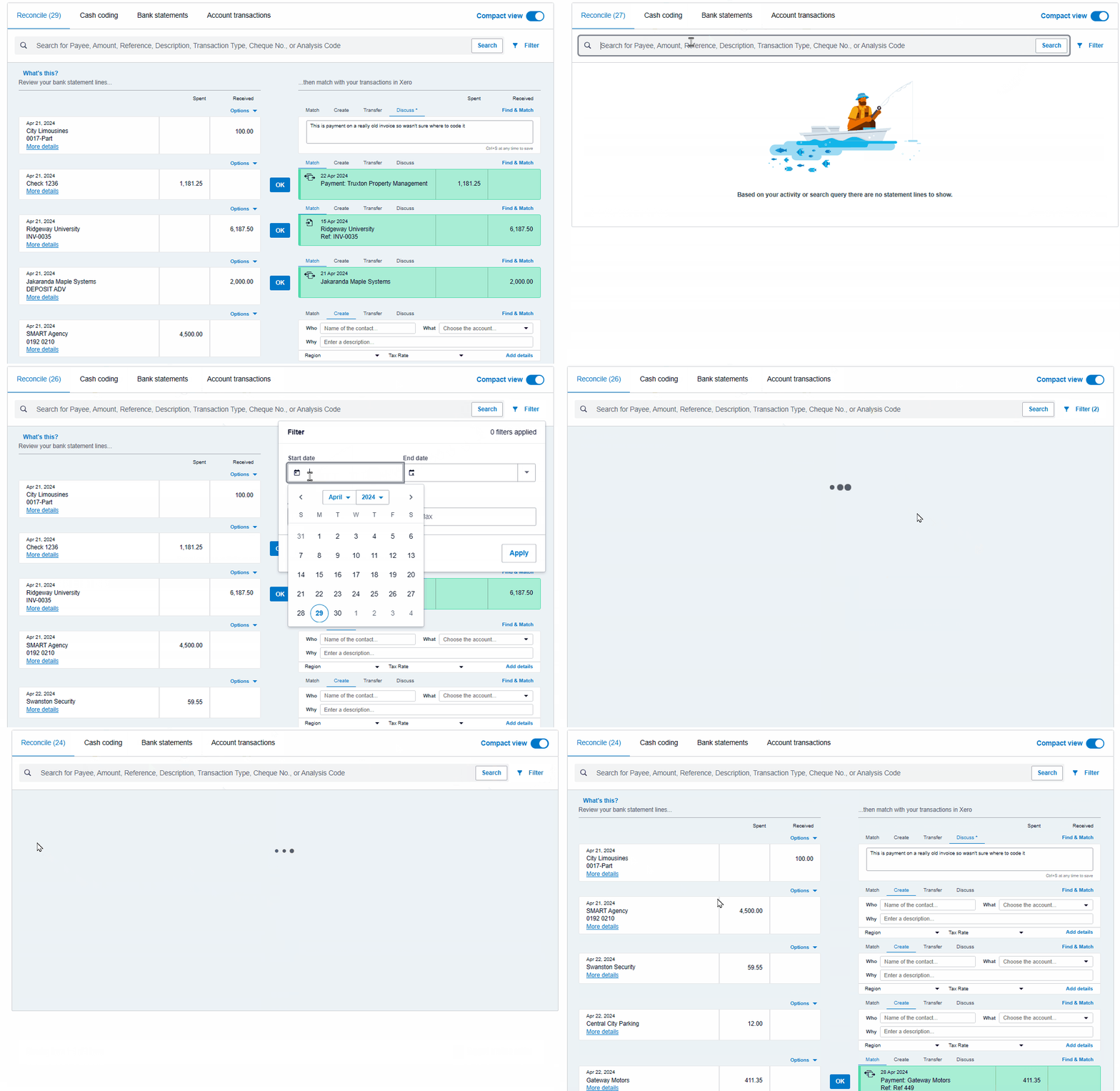
Global: Sort, search and filter statement lines in bank reconciliation [Product Idea💡] 

A gif showing the search and filter functionality in Xero's bank reconciliation

Over the last couple of weeks, we’ve been rolling out an update to our bank reconciliation screen, allowing you to see up to 50 statement lines at once. This update was built on community feedback, closing out with 966 votes on Xero Product Ideas — one of our most popular ideas.

We’ve also added the ability to search, sort, and filter statement lines, making it easier than ever to find the information you need. Thanks again to Xero partners who added 1536 votes and comments across both ideas, and to our XPAC for getting involved in a bit of beta testing.

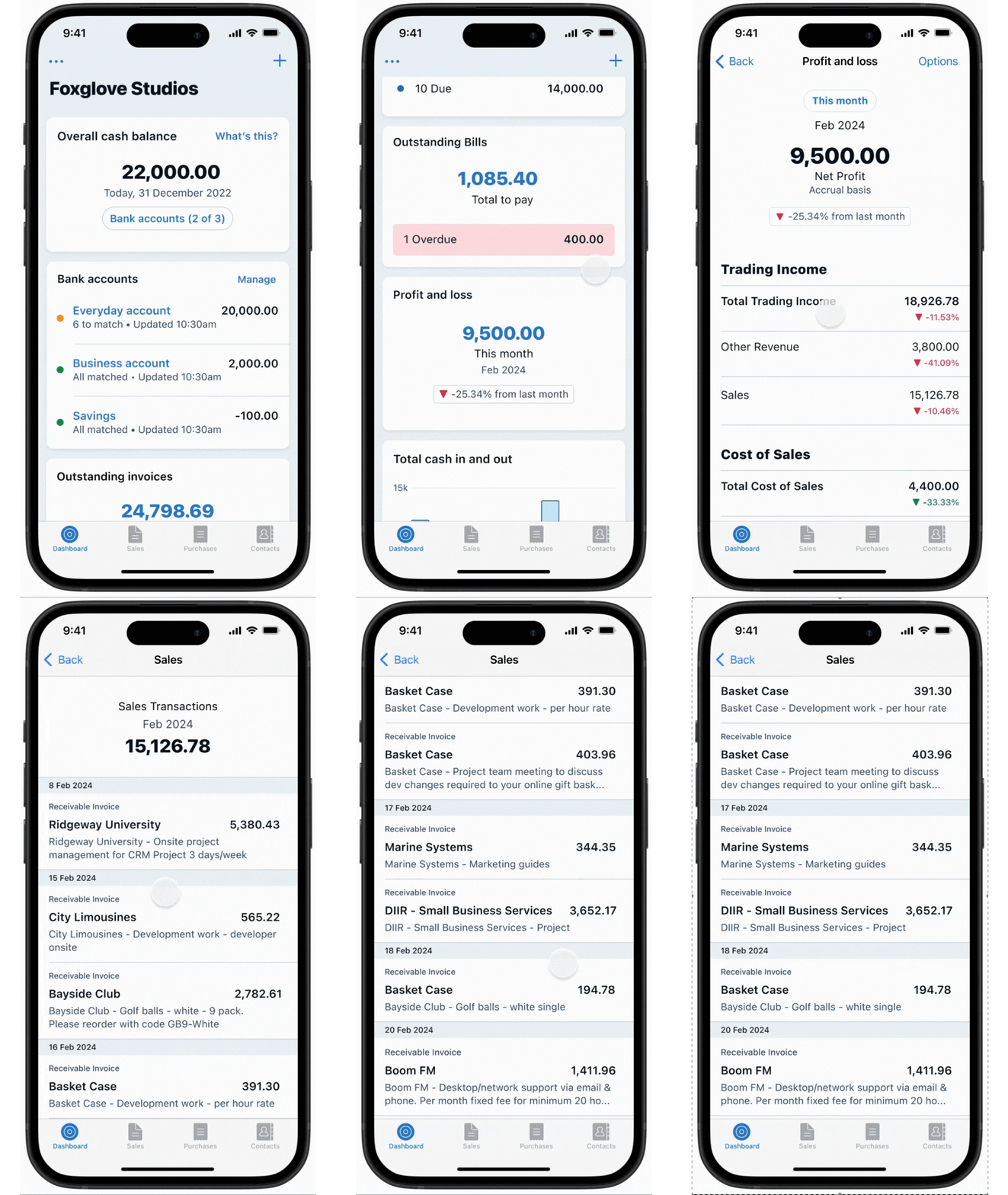
Global: Drill down into profit and loss account transactions in the Xero Accounting app

We’ve added a breakdown of each transaction in the profit and loss report in the Xero Accounting app. This helps you understand your profit and loss more intimately, by understanding the transactions behind the numbers while on the go.

Global: Attach files to invoices in new invoicing [Product Idea💡] 

You can now attach files to invoices from the Xero file library to the new version of invoicing, without having to download them first. We’ve also made it easier to view your attachments side by side next to your invoice.

AU, NZ and UK: New guided onboarding in Xero Payroll

We’ve made improvements to Xero Payroll setup to save you time, including the ability to set up payroll accounts and pay frequencies directly from the payroll overview. Pay calendars have also been renamed to pay frequencies.

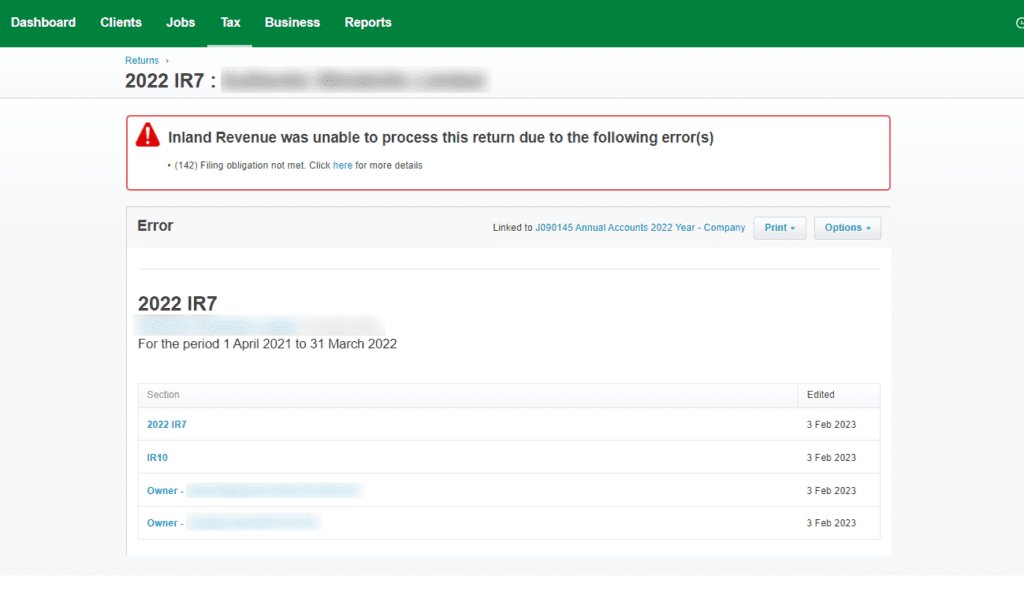
NZ: 2024 annual changes to Xero Tax

Screenshots of Xero Tax (NZ)

If you’re a practice using Xero Tax, we’ve released a number of compliance changes for the new tax year. These include rates and threshold changes (ACC, student loan and working for families), IR6 trust return changes, and version numbers to replace CHECKSUM on returns. 

[Product Idea💡] Xero will now identify potential issues and provide a warning banner to show where a tax return may require further review during preparation.

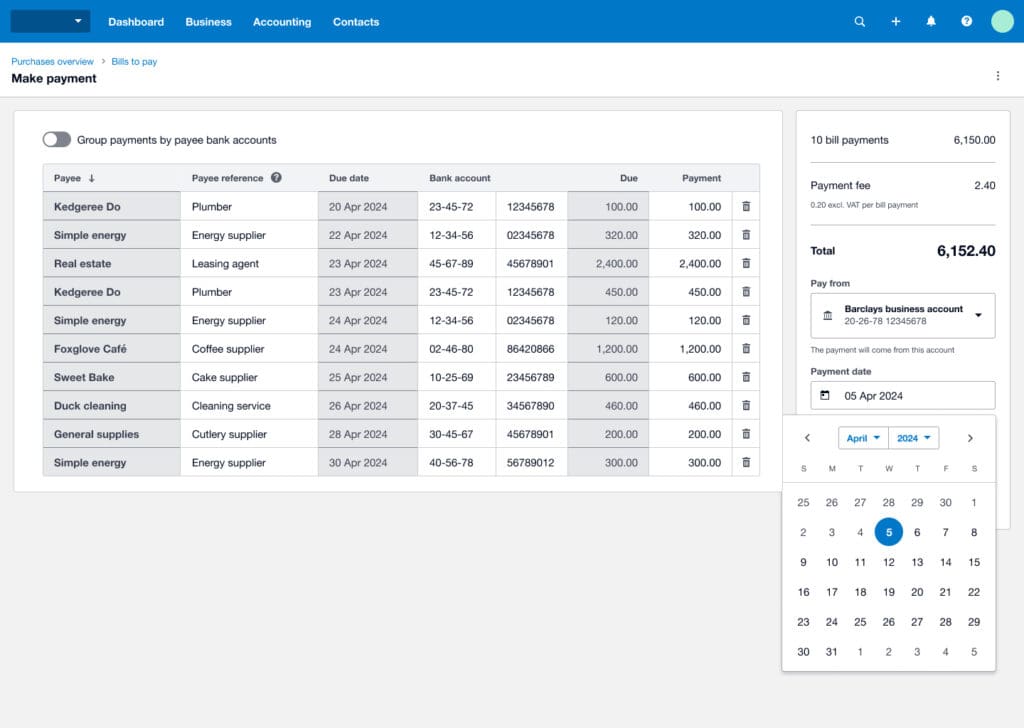
UK: Schedule bills to be paid [Product Idea💡]

You can now schedule bills to be paid on a future date. This change helps you avoid missing due dates, and control what comes out of your bank account and when to better manage cash flow.

US & Canada: Import your PDF statement to bank feeds

To make it easier and quicker to get your bank transactions into Xero when you don’t have or use a bank feed, we’ve introduced a PDF import feature. This allows you to import your PDF statements straight into Xero without the use of third-party software, if you’re in the US or Canada.

US: Xero Inventory Plus updates

We’ve synced Xero with Shopify’s Point of Sale (POS) system, making it easier to keep inventory in sync and eliminate the need for duplicate entry. This ensures orders from the system are imported to Xero and automatically completed to keep inventory and accounting up to date.

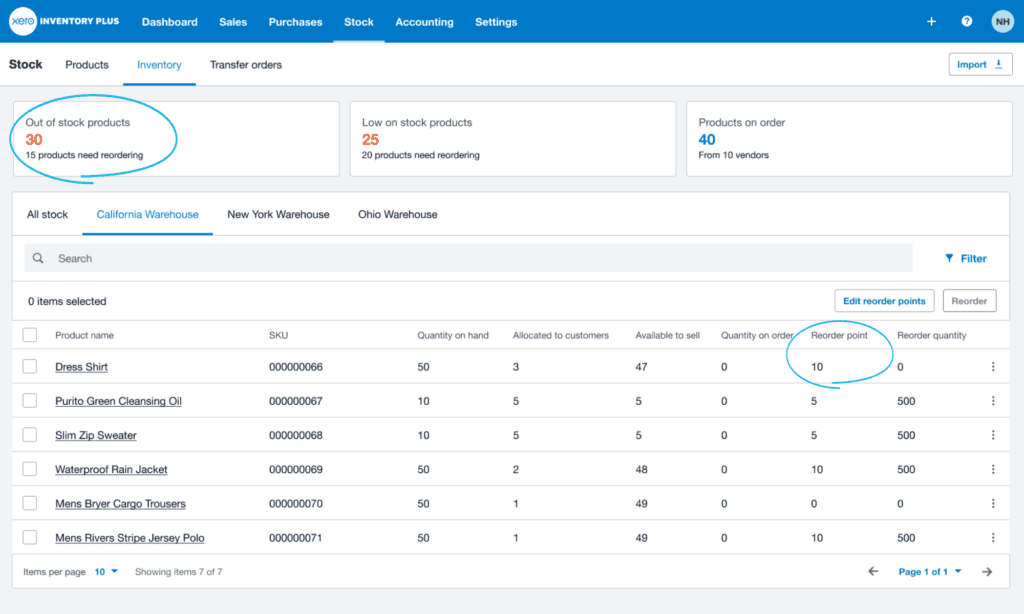
You now have the ability to add reorder points for your inventory items, so you can order your stock at the right time and reduce the risk of overstocking or running out of stock.

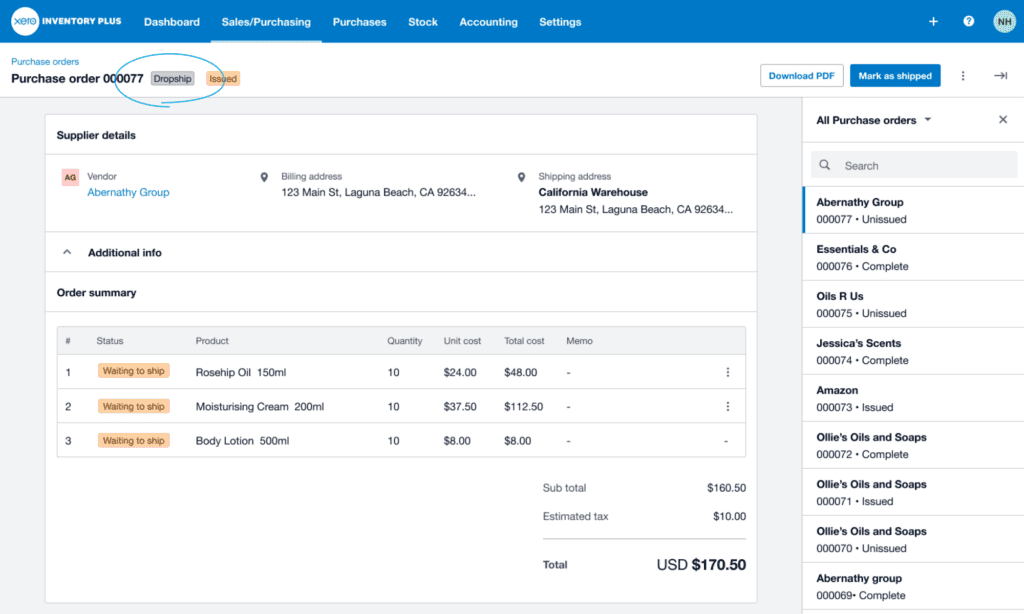
We’ve added support for dropshipping as a fulfilment option, allowing you to track and manage your inventory in one place. You can now assign a vendor to your products. Purchase orders will be automatically created for dropship lines, and you can send the PO to the vendor. Once the vendor has shipped the product, you can mark that the PO has shipped and this will complete the sale.

US: Introducing 1099 W-9 on the management tables

We’ve introduced bulk marking W-9s as received on the W-9 management table. If you have multiple 1099 contacts, you’ll now be able to quickly mark off when you have received W-9 information from outside of Xero. 

US: Customise data in sales tax

If you use our sales tax functionality in the US, you can now better customise your data with the source selector feature. This will give you the option to combine and separate sales data sources in reporting, instead of working with separated reports.

The post What’s new in Xero — May 2024 appeared first on Xero Blog.

Celebrating industry legends at the UK Xero Awards 2024

Software Stack Editor · May 2, 2024 ·

We are thrilled to announce our UK Xero Award winners for 2024, recognising the legends of the UK accounting, bookkeeping and app partner community.

This year’s celebrations took place for the first time in Manchester at the iconic New Century Hall – a place built for legends. The venue has played host to music legends from Jimi Hendrix and Jerry Lee Lewis, to The Who and The Bee Gees. So it felt right to celebrate our own legendary community on that same stage. 

The Xero Awards showcases the achievements of the leading accountants, bookkeepers and app partners supporting the UK small business community across 13 categories. 

This community continues to innovate and evolve to meet the changing nature of business, and play an important role in economic recovery.  We’re so proud to support accountants, bookkeepers and app partners as they work towards our shared desire for helping small businesses follow their passion and succeed.

Congratulations to our winners! 

UK Partner Awards

  • Small Firm of the Year – LJM Bookkeeping
  • Mid-size Firm of the Year – Ad Valorem Group
  • Large Firm of the Year – Shorts
  • National Partner of the Year – Azets
  • Bookkeeping Partner of the Year – Accountability Edinburgh
  • Total Xero Award – Ellacott Morris
  • Community Impact Award – Makesworth Accountants
  • Innovative Partner of the Year – Ecommerce Accountants
  • Most Valued Professional – Jonathan Gaunt, FD Works

UK App Awards

  • Small Business App Partner of the Year – Dext
  • Practice App of the Year – A2X
  • Emerging App Partner of the Year – Nook
  • Financial Services Partner of the Year – Crezco

To find out more about this year’s winners and our finalists, visit our website. 

Don’t miss out on Xerocon London 2024 taking place on 12-13 June at ExCeL London –  where accounting and bookkeeping industry leaders converge. Come away with deeper Xero and app partner knowledge, inspiration from our keynote speakers, and a closer connection to our thriving Xero community. Tickets are available now. 

The post Celebrating industry legends at the UK Xero Awards 2024 appeared first on Xero Blog.

New changes to Xero’s plans in Australia from July

Software Stack Editor · April 30, 2024 ·

We want to make sure the needs of small businesses and their advisors are met well into the future — and that means providing you with easier access to tools that help you run your business efficiently. That’s why we’re refreshing our subscription plans for small businesses and partners, which will be available from 1 July 2024.

We’ve put a lot of consideration into creating streamlined plans with bundled tools and features, to help solve your most important accounting and people management tasks. 

We’ve also listened closely to feedback from you — our small business customers and partners — to make sure the launch of the new plans aligns with the start of the new financial year, as we know this is important to you.

Find out more about the plans and what’s included for small businesses and accountants and bookkeepers.

Introducing Xero’s small business plans 

We’re launching three new streamlined business plans for Australian customers, as well as enhancing the Ultimate plan. 

  • Xero Ignite plan — accounting basics made for businesses starting out
  • Xero Grow plan — accounting tools for self-employed and growing businesses
  • Xero Comprehensive plan — streamlined accounting and payroll for businesses with employees
  • Xero Ultimate plan (enhanced) — accounting, payroll and forecasting tools to help businesses scale for future growth

With our new plan line-up for Australian small businesses available from 1 July 2024, our existing Xero Payroll Only, Xero Starter, Xero Standard and Xero Premium plans will no longer be sold. Existing add-ons can no longer be purchased separately from this date.

The new plan line-up has more key features included — with fewer plans and add-ons to navigate. That means easier access to the tools and features you’re looking for, so you can spend time on the things that count (like running your business).  

Find out more about how our new business plans compare with existing plans and what’s included.

Introducing Xero’s partner plans for accountants and bookkeepers

We’re also simplifying partner plans from four down to two (Xero Ledger and Non-GST Xero Cashbook will remain unchanged).  These partner plans are only available to be purchased by accountants and bookkeepers. 

  • Ledger — annual tax basics to help prepare and submit annual tax returns for simple non-trading clients
  • Cashbook — bookkeeping essentials for non GST registered clients. Includes auto bank feeds and cash coding

The new line-up of plans is designed to make it simpler for you to recommend the best plan, and tailor your practice services to clients. That means easier access to features (including cash-coding in all of our new business plans), and key add-ons bundled into business plans.

From 1 July 2024, Xero Cashbook + GST and Xero Cashbook + Payroll will no longer be sold. 

Find out more about what’s included in both the partner and business plans.

Moving to a new plan

With the launch of our new plans, we will be moving your existing plan to a new plan in a phased approach. We’ll be taking into account your current plan (and any add-ons) as part of this and intend to move all plans by March 2025. 

We’ll continue to keep you updated during our plan change process and you’ll have at least 60 days notice before we make any changes to your plan.

What will happen to my plan on 1 July 2024?

  • If you’re on a Premium 10-100 plan, you’ll be automatically converted to the enhanced Ultimate plan at the equivalent payroll tier.  The Ultimate plan will include Xero Expenses and Xero Projects for 10, instead of the current five, as well as access to Xero Analytics Plus
  • If you’re on the Ultimate plan, these enhancements will begin without you needing to do anything
  • You’re welcome to choose to move to a new plan from 1 July 2024. However, once you have moved, your previous plan will no longer be available. If you want to upgrade, downgrade, add or remove an add-on, or transfer your subscription from this date, you’ll need to choose one of Xero’s new plans
  • If you don’t want to change plans, you can wait until you are moved by Xero to a new plan (we’ll give you at least 60 days notice before we do this)

How we’re supporting you 

We understand that these new plans may feel like a big change, but please know that we’ll continue to keep you updated during this process. In the meantime, we recommend familiarising yourself with the new plans so you can consider the best option for you when the plans are launched. 

If you’re a small business, check out our dedicated web page, compare the plans and tune into one of our webinars to learn more about what the plan changes mean for you.
If you’re an accountant or bookkeeper, find out which plans are the best fit for you and your clients on our dedicated web page, compare the plans  and check out one of our webinars to find out more about our new partner plans and choosing the best ones for your practice.

The post New changes to Xero’s plans in Australia from July appeared first on Xero Blog.

Understand Key Changes for Small Businesses in the 2024 Canadian Federal Budget

Software Stack Editor · April 30, 2024 ·

As we move deeper into 2024, the conversation around the economic environment for small businesses in Canada is continuing to grow in depth and complexity. At FreshBooks, we are committed to understanding and communicating public policies that affect you and your business.

The ongoing changes and challenges faced by small business owners require a proactive approach to advocacy and support, which is why the role of policymakers is more critical than ever before. It’s equally important for small business owners to remain informed about the various ways these measures can shape their own long-term plans and growth.

The recently tabled introduces several changes aimed at fostering the growth and resilience of small businesses across the country.

As small businesses continue to navigate economic pressures, we wanted to highlight a few of the more notable measures from the budget as you prepare for the year ahead.

Table of contents icon

Table of contents iconTable of Contents


    Related Articles


    Capital Gains Taxation Adjustments

    One of the significant highlights of this budget is the modification of capital gains taxes, which directly affect small business owners.

    The has increased from $1 million to $1.25 million, allowing many entrepreneurs to realize more tax-free income upon the sale of their business.

    Additionally, the introduction of the offers a lower capital gains inclusion rate of 33.3% on the next $2 million in gains, but only for certain sectors when fully implemented.

    However, not all industries and job types will have full access to these benefits. While the capital gains inclusion rate has been raised to 66.7% for some sectors, other industries like professional corporations, financial services, and the hospitality sector are not part of the new incentive​ at this time. If you have questions about this initiative and how it might impact your business, speak with your tax advisor.

    Carbon Tax Rebates

    The budget also addresses the long-standing issue of for small businesses. A total of $2.5 billion has been earmarked for carbon tax rebates, targeting an estimated 600,000 small and medium enterprises (SMEs).

    This initiative aims to assist businesses with fewer than 500 employees by issuing rebate cheques based on the number of workers they employ. More details will be released in the coming months.

    Support for Innovation and Employee Ownership

    In a move to encourage innovation and investment in productivity-enhancing assets, the budget introduces an (CCA). This allows businesses to write off the full cost of certain assets, like computers and data infrastructure, effective immediately up to January 2027.

    Additionally, the budget promotes (EOTs), providing a special capital gains exemption of up to $10 million for business owners selling their businesses to their employees. This could foster more sustainable business transitions and enhance employee engagement and investment in the businesses they work for.

    Broad Implications for Small Business Owners

    Overall, the 2024 Federal Budget presents a nuanced suite of measures intended to bolster small businesses in Canada. While the increased exemptions and rebates offer a welcome relief, business owners will need to navigate these changes carefully, potentially seeking financial advice to best leverage the new policies for their growth and sustainability.

    We at FreshBooks will continue engaging with policymakers at all levels of government on small business owner initiatives. If you are a small business owner or entrepreneur, we will continue to be your advocate on the issues that matter to you and your business.

    Xero to retire the Planday product in Australia; enters new Deputy Australia partnership

    Software Stack Editor · April 28, 2024 ·

    We know how important time, attendance and scheduling (TAS) needs are for any small business. And for Australian employers, we know it is even more important because Australia has some of the most complex payroll compliance requirements in the world.

    Following a careful review of our current TAS solution, we have made the difficult decision to retire our Planday product on 30 September 2024. These changes have been made to enable Planday to focus on its core business in Europe.

     In light of this decision, we conducted a detailed review of how we can best serve our Australian customers with their time, attendance and scheduling compliance requirements.

    New partnership with Deputy

    That’s why today, we have also announced a new strategic partnership with Australia’s leading workforce management platform, Deputy, to help serve our Australian customers with their time, attendance and scheduling compliance requirements.

    Founded in Australia, Deputy currently serves over 340,000 workplaces worldwide and was recently named Best Overall Employee Scheduling Software of 2023 by Forbes Advisor. Deputy’s intuitive platform, robust awards engine and seamless integration with Xero means we are confident this partnership will enable Xero to provide our Australian customers with a leading time, attendance and scheduling product.

    As part of our new strategic partnership with Deputy, Deputy’s workforce management capability will be integrated into the Xero platform. This will provide a seamless, all-in-one payroll, accounting and workforce management solution to Xero’s Australian customers.

    What do Planday Australia customers need to do?

    We deeply appreciate the support that Australian Planday customers have given the product and understand there may be some disappointment with this news.

    We wanted to provide plenty of notice prior to 30 September 2024 to find alternative solutions and have time for a smooth transition. Customers can check out our preferred partner Deputy, or there are alternate options in the Xero App Store.

    For those interested in hearing more about Deputy’s product, they will be running a dedicated  webinar for any Planday customers, including details about the onboarding process. The webinar will focus on setting up a Deputy account to best reflect how you schedule and manage your team in Planday today. To sign up for a webinar time that is most convenient for you, please visit this link.

    We will continue to fully support the Planday product until the retirement date. Planday customers can export their data at any time to manage their record keeping obligations by following the instructions on the Planday help centre. Customers can also contact the Planday support team by logging in to their Planday portal or on the website to chat to the team.

    This news doesn’t impact any of Planday’s customers in other locations, and Xero continues to offer an integration with Planday in the UK through the Xero App Store.

    For Xero customers interested in the new Deputy integration

    Xero integrates with Deputy today and you can contact them to find out more via their website and check them out on the Xero App Store.

    The more deeply embedded experience will take time to build, but we’ll be sharing more when the development is further along.

    We want to reaffirm our commitment to help small businesses run more effectively and we’re excited to partner with Deputy to bring its workforce management technology to Xero’s Australian customers, all in one platform.

    Xero will have an ongoing revenue share agreement with Deputy in connection with this partnership.

    The post Xero to retire the Planday product in Australia; enters new Deputy Australia partnership appeared first on Xero Blog.

    Why we’re calling 2024 ‘the year of the US bank feed’

    Software Stack Editor · April 28, 2024 ·

    Bank feeds are a great way to import transactions from your financial institution directly into Xero, so you can easily complete the reconciliation process. But the US is a pretty challenging market when it comes to providing high-quality bank feeds. There are more than 4,000 financial institutions, each with their own capabilities and nuances.

    To address this and help you get transactions into Xero more easily, we’ve been focused on improving the coverage and quality of our bank feeds. In fact, we’re calling it 2024 ‘the year of the US bank feed’. Here’s an update on all the exciting progress we’ve made in this space recently.

    We’ve extended our reach with direct bank connections

    We’ve given you improved access to more reliable bank feeds with better data quality, and a better customer experience. 

    Over the past 12 months, we’ve increased our high-quality direct bank feeds in the US from around 20 to more than 600 (which includes both Xero-built and aggregator-supplied). These include US Bank, TD Bank, Charles Schwab, Capital One (sub brands), USAA Bank, banks powered by Jack Henry, SouthState Bank and NFCU.

    As other major banking platform suppliers make secure bank feeds available, we are optimistic that this number will increase in the coming year. Check out our complete list of all bank feeds available (including direct feeds).

    We’ve partnered with bank feed aggregator, Flinks, for US and Canadian feeds

    We’re expanding access to reliable bank feeds with our new Flinks partnership. Having an additional bank feeds aggregator is already helping us increase the number of high-quality bank feeds, as well as expanding our additional network of credential-shared feeds.

    This will allow us to select feeds with the best available reliability, data quality and customer experience. We went live with our first aggregator-supplied direct bank feed from Flinks in March 2024, which was a huge win.

    We’ve made it faster and easier to find your bank

    There’s a new regional search filter and a mechanism to recognize acronyms and typos in the search bar. We’ve also added additional bank URL information for extra comfort that you’re choosing the right bank, with fewer steps needed.

    “We’ve always understood how important bank feed data ingestion is to the customer experience, and are excited about how much progress we’ve made just in the past year. But we aren’t stopping there — we have a number of key advancements in store for the remainder of 2024 that will fuel efficiency and accuracy within the process.”

    Ben Richmond, US Country Manager at Xero

    We’re building stronger partnerships with our bank feed partners

    We’re working closely with our bank feed partners to identify disruptions to their bank feeds as early as possible, and proactively resolve them with minimal inconvenience to you. We closely monitor the time taken to resolve all customer questions posed to Xero, have made many changes to our processes and will continue to make improvements going forward. If you do have any issues, don’t forget to raise a case in Xero Central so we can get right on it.

    You can now upload PDF statements and extract data quickly

    In addition to being able to import bank transactions using CSV, QIF, OFX, QBO and QFX file formats, we now offer PDF statement imports directly into Xero. This means access to faster data import for PDF statements, since third-party software isn’t required and the import can be done in one place. 

    The data extraction is also faster — on average, data is extracted from the PDF in 35 seconds compared to other extraction software solutions, which can take up to 24 hours. This is ideal if you don’t want to use a bank feed (or can’t for some reason) and want to save time and reduce errors.

    There’s plenty more we want to tackle in this space, but we’re excited about all the progress we’ve made so far and the benefits it offers you. If you haven’t set up bank feeds in Xero yet, I encourage you to give it a go. It’s really easy and can help you simplify your admin in your business or practice.

    The post Why we’re calling 2024 ‘the year of the US bank feed’ appeared first on Xero Blog.

    How Laura Leveled Up Advisory Services With Collaborative Accounting™

    Software Stack Editor · April 25, 2024 ·

    You might say that Laura Blackburn was born to be a bookkeeper.

    Before she could even read or write, she was poring over the columns in the big, green ledgers her mother—a bookkeeper—was always working with. But after earning a degree in economics, her career took a left turn.

    “I knew I was meant for numbers, but I was drawn to my creative side after college. I became a wedding planner for 10 years before deciding to get into bookkeeping, so I know what it’s like to do accounting as a business and for a business,” she said.

    Her business, Blackburn Advisors, specializes in bookkeeping for creative service providers, including professionals in marketing, content creation, and consulting. She does all levels of accounting, from AP to AR to payroll.

    We spoke with her about how she uses the platform, why the has been a game changer for her business, and the reason she never misses a monthly Accounting Partner Program meeting.


    Related Articles


    Why did you decide to start your own firm?

    I’m an entrepreneur at heart. It makes sense for me because I want to be home with my kids. Starting the firm was a full circle moment for me because my mom was home with us while she ran a bookkeeping business and I feel like I’m meant to do that too.

    Who and where are your clients?

    I like my clients to be good listeners. I want someone to take the time to have meetings with me and work to understand their accounting.

    My clients are mainly creative service providers, in fields like marketing, consulting, and content creation. My ideal client is a woman-owned business, a mompreneur like myself. A lot of my clients are at home with children like I am, and we want to support one another.

    My clients are based all over the country. The beauty of using FreshBooks is that we can use all the remote features. I can do everything for them—and with them—from anywhere.

    The beauty of using FreshBooks is that we can use all the remote features. I can do everything for them—and with them—from anywhere.

    Why is FreshBooks such a good fit for your clients?

    I find that creative people really like FreshBooks. The number one thing that’s the draw is the look of it; the platform is not intimidating, and it’s very user-friendly. Everything they need is laid out for them on the left side in language that business owners use. Features like Invoices, Estimates, Expenses, and Projects are at the top for them, and the accounting reports are further down. Using those tools on the left side helps them follow the path.

    What problems has FreshBooks solved for your clients?

    One example is my marketing consultant client Jackie. She faithfully uses Time Tracking for her hourly projects, so her records are always up to date. She has a team set up in FreshBooks to do it as well so it flows the way it should into Projects. And then she has monthly retainers set up as well.

    Her good record-keeping allows her to see her profitability over time. She loves the dashboard that shows her at a glance whether it’s red or green. (Creatives love color!) We try to go over client profitability each quarter as well.

    When clients use all of the FreshBooks features consistently, it flows into the accounting process better. For people like Jackie, who code products and services to the right revenue accounts, they can get very accurate .

    How has Collaborative Accounting benefited your practice?

    It’s been a great way to position myself as an advisor. I felt like I was already providing that advisory role, but I never called it that. I don’t want to be just some vendor you pay or a professional who you ask a question to once a year. I want to partner with my clients and hold their hands as much as they want. The terminology has helped my clients feel like we’re in this together. It’s a partnership. They’re in business for themselves but not by themselves.

    Explain a typical Collaborative Accounting workflow with your clients.

    We train my clients to use templates to help them understand what it means for their business.

    If they know what’s going on in their books, they can make better business decisions. Especially if they’re in there from the invoice stage, they’re not surprised when they see what’s been spent.

    My client Jackie, who I mentioned, learned how to use Invoices and Time Tracking, which feeds into her understanding of client profitability.

    Although the amount of collaboration differs for each client, I meet with most clients monthly or quarterly. I like to prepare a pretty presentation showing them where their numbers are. I bring up their P&L report and balance sheets, and I make graphs based on the FreshBooks reports to show them how things have changed over time.

    We also talk about key performance indicators and then I share the trends and insights that I’m seeing. I try to have fun and keep it lively.

    What features do your clients mainly use?

    My clients tend to use Invoices, Time Tracking, Projects, Estimates, and Proposals. And I’m training them to turn their estimates and proposals into invoices to make things quicker for them.

    The favorite feature is probably Invoices, especially since business owners can set up recurring or monthly retainers. And they can get paid right in FreshBooks, which they love.

    I advise them to use the mobile app for things like receipt capture, tracking mileage, and time tracking. It’s been great for many clients because they’re keeping up on the go rather than sitting down at the end of the week or month and trying to remember who to invoice. Getting invoices out the door regularly helps with cash flow.

    Do you notice a difference when working with clients who are handling their day-to-day business admin themselves?

    Yes. If they’re doing their own invoices they’re not surprised at the end of the month. It’s a lot better when they’re in FreshBooks every day and know what’s going on in their business. This allows us to have more productive conversations in our monthly meetings. I can share big-picture observations that they don’t see, which helps them make forward-thinking business decisions.

    Two-Factor Authentication (2FA) Is the Protection You Deserve

    Software Stack Editor · April 25, 2024 ·

    Get peace of mind and secure your financial data with two-factor authentication (2FA) for your FreshBooks account.

    In the age of rampant phishing, ransomware, and identity theft schemes, one thing is clear: You cannot put a price on safety. But sometimes, it’s hard to make it your top priority.

    You shouldn’t have to balance your daily business tasks against your data safety. And now, you don’t.

    FreshBooks has just announced a new update for all users: Two-factor authentication (2FA). The goal is to make protecting your accounts feel as simple as deadbolting your front door. Your username and password are a single lock, and over time, a professional could pick them. Adding 2FA throws an additional layer of protection to keep your business safe, even if your first line of defense is cracked.

    With this extra layer of security, you’ll be able to safeguard your business without having to endure any big changes to your usual FreshBooks experience.

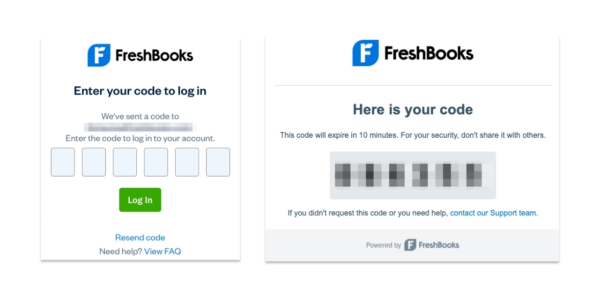
    Over the next few months, you can expect to see this feature roll out across the platform, but you don’t need to do anything special to prepare: If your email information is up-to-date in your FreshBooks account, you’re all set.

    FreshBooks UI 2FA - two-factor authentication

    FreshBooks UI 2FA - two-factor authentication

    Check Out These 2 Big Benefits of 2FA

    1. Double your digital defense: Even the strongest passwords can be compromised. 2FA adds an extra-tricky layer of security behind your password, making it exponentially harder for anyone to hack into your account.
    2. Set it and forget it: Knowing your data is secure allows you to focus on what matters most—running your business. With your data security in good hands, you can use that time to think about literally anything else.

    Secure Your Data Today, Grow Safely Tomorrow

    As your business continues to grow and thrive, you’ll most likely start leaning into different features of FreshBooks to meet your changing needs. But getting the most out of any online tool involves handling even more sensitive information for both you and the people you work with.

    2FA paves the way for these advancements, ensuring your data remains protected going forward, so you won’t be left scrambling for more security later. When it comes to security, it’s much better to prevent than to react. And who doesn’t just love it when a plan comes together?

    Questions? Support Has Answers.

    Over the coming months, 2FA will be slowly rolled out to all FreshBooks accounts. Once this is rolled out to your account, you will only need to log into your email associated with your FreshBooks account to access the 2FA code.

    In the meantime, feel free to give yourself a refresher on how to or how to if it’s been a while.

    If you have any further questions or concerns, has your back.

    You can’t put a price on safety—and now, you don’t have to.

    Reasons to come and visit Xero at Accountex London 2024

    Software Stack Editor · April 25, 2024 ·

    Nothing beats an in-person event. Especially one like Accountex, where the curated speakers, exhibits, and masterclasses mean you can build both your knowledge and industry friendships – all in one place. 

    This year, we’re bringing our popular masterclasses back, along with a whole team of Xero experts to help you cultivate an efficient and rewarding practice.

    Here’s why you should join us on 15-16 May at Accountex 2024. 

    From tax to payroll – our masterclasses have you covered 

    Our education team is bringing you masterclasses on the topics that matter most in your practice. We’ve popped the schedule below, but you can expect sessions on using the right tech to do more of what you love, payment solutions that boost your cash flow, and integrating your tools for a smoother practice workflow. 

    These sessions were popular last year, so make sure you check out the timetable and secure your spot. 

    Day 1 masterclass schedule:

    10.00 – 10.20am – What’s new in Xero

    10:30 – 10:50 – How to effortlessly run payroll using Xero

    11:00 – 11:20 – Boost cash flow with Xero’s payment solutions

    11:30 – 11:50 – Enhance your end to end accounts production using Xero Tax

    12:00 – 12:20 – Simplify self assessments with Personal Tax

    12:30 – 12:50 – Discover the benefits of an integrated practice platform with Xero

    13:00 – 13:20 – Save time with Xero’s X Hacks

    14:00 – 14:45 (Main Stage) – How to use AI and emerging tech to help you reach your purpose

    15:00 – 15:20 – Beautify reports with Xero

    15:30 – 15:50 – How to effortlessly run payroll using Xero

    16:00 – 16:20 – What’s new in Xero

    16:30 – 16:50 – Boost cash flow with Xero’s payment solutions

    Day 2 masterclass schedule

    10:00 – 10:20 – What’s new in Xero

    10:30 – 10:50 – Save time with Xero’s X Hacks

    11:00 – 11:20 – Discover the benefits of an integrated practice platform with Xero

    11:30 – 11:50 – Simplify self assessments with Personal Tax

    12:00 – 12:20 – How to effortlessly run payroll using Xero

    12:30 – 12:50 – Enhance your end to end accounts production using Xero Tax

    13:00 – 13:20 – Beautify reports with Xero

    13:30 – 13:50 – What’s new in Xero

    14:00 – 14:20 – Boost cash flow with Xero’s payment solutions

    14:30 – 14:50 – How to effortlessly run payroll using Xero

    15:00 – 15:20 – Simplify self assessments with Personal Tax

    15:30 – 15:50 – Discover the benefits of an integrated practice platform with Xero

    Improve your practice efficiency

    One of our key focuses for 2024 is helping partners build a more efficient practice. We’re working with partners to choose the right tools for their teams and clients, refining clunky processes, and integrating all apps and platforms so that every process and task is joined-up. 

    Join us at Accountex to learn how you can use Xero tools not just for your clients’ benefit – but for your practice, too. We’ll show you how the same features you know and love could be working hard for your practice.  

    Speak to Xero experts

    The right conversation can foster unity, shift your perspective, and inspire new ways of working. You’ll find plenty of Xero experts at Accountex this year, and they’ll be ready to answer your questions and offer advice and solutions for your practice. 

    Join our speaking slot on AI

    When OpenAI’s ChatGPT burst onto the scene, it felt like an overnight shift. And practices have plenty to gain from adopting emerging technologies like AI. 

    Xero’s UK Country Manager, Kate Hayward, will be walking you through some of the exciting new initiatives in technology that will soon transform the accounting and bookkeeping industry. Learn how to use these technologies in your practice to achieve your ambitions and help clients reach theirs. You’ll hear an overview of Xero’s business strategy and strategic priorities, and how we’re applying these to benefit our partners. 

    Come and see us at stand 640

    We can’t wait to see you at Accountex and help you build a thriving practice. 

    It’s all on at Xerocon!

    Don’t forget Xerocon London is just around the corner and you don’t want to miss it. Join us on 12-13 June at ExCeL London, for our two-day festival of keynote speakers, thought-provoking panels, educational breakouts, and of course the famous Xerocon party!

    Uncover the full value of Xero with the insight you need to manage your practice amid ever-changing demands, along with inspiring guest speakers and breakout sessions. Secure your ticket now.

    The post Reasons to come and visit Xero at Accountex London 2024 appeared first on Xero Blog.

    11 Advisory Services You Should Be Charging For—and Why

    Software Stack Editor · April 24, 2024 ·

    When you’re an accounting professional with a can-do customer service ethos, it’s hard to cut off a client when they call with a “quick question”. (Spoiler: It’s never a quick question.)

    The truth is, you want your clients to be curious about their business finances and make use of the valuable insights you are uniquely positioned to provide. This allows them to make better business decisions instead of only thinking about their accounting at tax time.

    But when you’re answering ad hoc questions without boundaries (or billable hours), there’s a good chance you’ll find yourself overworked, overwhelmed, and underappreciated. Your guidance won’t have the same impact if your clients only seek it out around tax time or during a crisis.

    This is why you should charge for the advisory services that empower your clients to take their business to the next level.

    Table of contents icon

    Table of contents iconTable of Contents


      Related Articles


      What Are Accounting Advisory Services?

      In a nutshell, are higher level (and higher value) than more compliance-based tasks like generating financial reports, filing taxes, and doing bank reconciliations. Compliance services can be completed by anyone with the right accounting training.

      In contrast, accounting advisory services require the expert touch of an accounting professional who is innovative, forward-thinking, and eager to deepen client relationships. Advisory accounting provides proactive and predictive findings about a client’s business. It considers their business goals, patterns, and financials to provide tailored insights that allow them to take constructive next steps and avoid pitfalls. It’s like being a partner to your clients, not an annual service provider.

      Bonus: When you focus on advisory services, you’re more likely to attract higher-value clients. They recognize the importance of a partnership with their accounting professional and are willing to invest in it.

      Identify the Advisory Services You Should Charge For

      Here are some examples of advisory services that you could charge by the hour to conduct—or that could be part of an overall partnership package:

      1. Interpreting profit & loss: variance, comparative analysis
      2. Internal changes/decisions like staffing or opening a new service line
      3. Applying for loans for expansion, lines of credit
      4. Cash flow issues and how to resolve them
      5. Operations reviews
      6. KPIs and metrics
      7. Tax planning
      8. HR, payroll and employee benefits
      9. Technology training
      10. Improving workflows
      11. Acquisition or mergers

      Why You Should Sell Value, Not Time

      No discussion about advisory services is complete without considering how to charge for them. Some accounting professionals have an hourly rate and bill accordingly. While that works for many, if you’re considering a focus on advisory services and reducing compliance tasks, you should weigh the benefits of .

      Like advisory services, it focuses on the value you bring to your clients, not the tasks or time it takes to complete them. Rather than commodifying your time, you and your clients can take a holistic view of what they want to achieve and how you can contribute to their business goals. Then, you can outline all of the services you will provide over a quarter or a year and offer a flat-rate price.

      This approach allows you to set expectations around how often you’ll meet and create boundaries so that you’re not overwhelmed with spontaneous phone calls or emails. It also gives you breathing room to apply your finely-honed accounting skills to bigger- picture issues rather than the minutiae associated with compliance tasks.

      Make Advisory Efficient: Work in the Same Platform as Your Clients

      If you’re freeing yourself of the busy work of accounting, who will take on some of those low-skill tasks? Ideally, your clients.

      There’s no reason a business owner or a team member can’t take on simple pre-accounting work like invoicing, filing expenses properly, and doing bank reconciliations. This gives them more day-to-day insight into their financials, which means they’ll come to your conversations more tuned in to reality.

      Here at FreshBooks, we’ve developed a framework that facilitates this co-operation between client and accountant: . A model designed for accounting professionals who want to focus on advisory services and sustainably grow their business. Your clients can have more “skin in the game” when it comes to their financials, and you can minimize the time spent fine-tuning client accounting and maximize the time guiding your clients as they grow.

      Curious? Check out the , an online, self-paced training program designed to help you align your firm’s goals, workflows, and technology behind the Collaborative Accounting strategy and platform that fosters trust and creates efficiencies. All members of the have free access to this training.

      Advisory Services: A New Frontier for Accounting Professionals

      Embracing advisory services could mark a significant shift towards a new business model for you—or become another offering you provide to your clients. By offering tailored insights and guidance beyond traditional compliance tasks, you can position yourself as an indispensable ally in your clients’ business journeys.

      Using a value-based fee mechanism for advisory services reflects your expertise and fosters a culture of mutual investment and growth.

      And through collaborative platforms like FreshBooks, you can streamline your processes and empower clients to take a more active role in their financial management.

      As the accounting industry continues to evolve, embracing advisory services is not just a strategic choice; it’s a commitment to shaping a more meaningful and efficient future for all accounting professionals and their clients.

      Small businesses are hiring: what to consider when growing your workforce

      Software Stack Editor · April 23, 2024 ·

      The latest Xero Small Business Insights (XSBI) data is a good reminder about the important contribution your small business makes to your local community, particularly  around job opportunities. There are more people working in small businesses than a year ago in the three countries where we track jobs (Australia, New Zealand and the UK). In fact, jobs growth is either already well above average, as seen in New Zealand, or accelerating. This suggests there is a renewed confidence among small business owners about hiring new staff. 

      What is the latest XSBI jobs data showing?

      In Australia, jobs rose an average of 3.7% year-on-year (y/y) in the March quarter, slightly up from 3.5% y/y in the December quarter. The monthly March result (+4.3% y/y) was the largest rise since October 2022 and above the long-term trend of 3% y/y. 

      In New Zealand, jobs rose 7.0% y/y in the three months to March, the same result as the December quarter. In fact, it’s the 15th consecutive quarter that growth has been above the long-term average of 3% y/y.

      The UK jobs recovery has been slower than in the other two countries, but at least it is moving in the right direction. Jobs rose 1.4% y/y in the March quarter, up from 1.3% y/y in the December quarter. The March quarter rise is the largest quarterly gain in two years, although is still below the long term average of 3% y/y. 

      However, the positive jobs story isn’t the same in every industry. Healthcare and social assistance, which includes aged and disability care, is performing well above the national average in both Australia (+9.2% y/y) and the UK (+6.7% y/y).

      At the other end of the scale, the hospitality industry had fewer jobs than a year ago in the March quarter in Australia (-1.4% y/y) and below national average growth in New Zealand (+4.5% y/y). In more positive news, hospitality did a little better than the national average in the UK (+1.8% y/y).  

      What do you need to think about when hiring new staff?

      If you’re thinking about growing your workforce, there are lots of things to consider – especially if you’re hiring people for the first time.

      This is where you can benefit from expert advice. An accountant or bookkeeper can help you answer many of the important questions around hiring. Questions like:

      • Is your business busy enough to justify hiring more staff?
      • What new systems do you need in your business e.g. registration needs, payroll capability, insurance, onboarding process, training?
      • What salary will you need to offer to not only meet your legal obligations but also attract the right candidates?
      • What non-wage benefits could you potentially offer instead, for example, extra annual leave or flexible work agreements?

      Xero has put together some handy guides to help you with hiring, whether your business is in Australia, New Zealand or the UK. Across eight important chapters, these guides will help you learn how to hire employees and how to handle the admin that goes with it.

      If you’re interested in finding out more about how small businesses are performing, visit Xero Small Business Insights for more data and analysis.

      The post Small businesses are hiring: what to consider when growing your workforce appeared first on Xero Blog.

      So… what is carbon accounting?

      Software Stack Editor · April 17, 2024 ·

      Understanding the environmental impact of your business is critical in today’s business environment — and carbon accounting is a fundamental step in this process. With carbon accounting increasingly becoming another compliance measure mandated by regulators, businesses of all types and sizes need to get their emissions numbers in order.

      This is particularly true if you’re a small business that provides goods and services to a larger organisation. Many large companies are scrutinising their entire business operations in line with new compliance requirements, including product life cycles and supply chain. Suppliers that are unable to provide this information may find themselves locked out of contracts and supply chains as a result.

      Luckily, Xero is connected with a number of powerful carbon accounting apps that can help you and your clients get started on your carbon accounting journey. What used to be time consuming and cost-prohibitive is now quick and affordable, and readily available to businesses of all kinds.

      What is carbon accounting?

      Carbon accounting is the name given to the process of assessing an organisation’s impact on the environment, by calculating its emissions of carbon-based greenhouse gases (GHGs). Essentially, carbon accounting is just maths: emissions are calculated by multiplying business data (such as employee travel data or an office electric bill) by an ‘emissions factor’, or the average emissions generated by that activity.

      Working through this process for your firm’s entire operation will leave you with the output of the carbon accounting process, referred to as your carbon footprint.

      Understanding your carbon footprint

      A carbon footprint captures and summarises the total amount of GHG’s that are generated as a result of your operations. Up until recently, carbon footprints have typically been calculated and recorded on large, complex spreadsheets. However, we’re now seeing streamlined software solutions, such as Greenly, Ecologi (UK only) and Sumday, managing this process from start to finish.

      Within your carbon footprint, emissions are broken down and reported into three scopes based on ownership and control:

      • Scope 1: Direct emissions that occur from sources owned or controlled by the company. This includes driving a petrol vehicle, powering a diesel generator or operating a fuel-powered forklift.
      • Scope 2: Indirect emissions from the generation of purchased electricity. 
      • Scope 3: Indirect emissions that occur as a result of your operations, that are generated by the goods and services in your supply chain. Examples include business flights, third party delivery services, cloud hosting services or even employee commuting.

      What are GHGs and why should you measure them?

      Greenhouse gas (GHG) emissions – the atmospheric gases responsible for causing global warming and climatic change – are critical to understanding and addressing the climate crisis. While most GHGs are naturally occurring, human activities have also been leading to a problematic increase in the amount of GHGs emitted and their concentration in the atmosphere. This increased concentration, in turn, has and will continue to lead to adverse effects on the climate. Effects include increases in the frequency and intensity of extreme weather events – including flooding, droughts, wildfires and heat waves – that affect millions of people and cause trillions of dollars in economic losses.

      What methodologies should you align to? 

      Carbon accounting can be a complex process, but thankfully global standards have been developed to help ensure that the way that businesses measure and account for carbon emissions is consistent and comparable. The most widely used global framework has been developed by the Greenhouse Gas (GHG) Protocol. They’ve developed a corporate standard that provides guidance on the methodology and process to follow when setting off on this journey.

      Why is this important to your business?

      We’re seeing a global shift towards a low carbon economy, driven by legislation as well as consumer, business, and investor preferences. At its core, carbon accounting is an important step to better understand and be transparent about your business’s environmental impact. A company’s carbon footprint is increasingly becoming a key indicator for external stakeholders that may be assessing your company as a potential customer, business partner or investor.

      An example is in Australia, where the federal government is signalling a mandatory disclosure regime for the reporting of climate-related financial information. While small businesses won’t have to report themselves, many will be caught in the requirements because they’re part of the supply chain of larger businesses that are required to report.

      The time is now to get ahead of this process, to future proof your position in low carbon supply chains and the broader green economy.

      How can you start carbon accounting?

      One of the easiest ways to get started is by using a carbon accounting app from the Xero App Store. Carbon accounting apps securely connect to you or your client’s Xero account and analyse business data to calculate your carbon footprint. They’ll guide you and your clients along the way, help simplify a complex process, and answer any questions that arise.

      Make Earth Day count: limited time promotion

      As part of Earth Day (22 April 2024), we’ve worked with carbon accounting app partners Greenly, Ecologi and Sumday to create some special sign up offers:

      • Greenly – 20% discount for all Xero customers who sign up through the campaign using promo code: EARTHDAY. This discount will be available for all of Greenly’s GHG reporting packages. (Offer is available from 18 April 2024 and ends 30 June 2024).
      • Ecologi (UK only) – Get 20% off for two months using promo code: XEROEARTHDAY20. (Offer is available from 22 April 2024 and ends 30 April 2024).
      • Sumday – 50% off for 3 months for all Xero customers who start a free trial via the Xero App Store by 30 May and subscribe by 30 June 2024. (Offer is available to those customers that start a free trial between 18 April 2024 – 30 May 2024, and subscribe by 30 June 2024).

       Learn more about our approach to sustainability.

      The post So… what is carbon accounting? appeared first on Xero Blog.

      What is labour productivity and how does it impact your business?

      Software Stack Editor · April 9, 2024 ·

      If you or your clients are looking for ways to grow profits, drop prices or pay staff more, then one strategy is to lift productivity in your business. But what is productivity exactly (hint: it’s not about working longer hours), and how can you lift it in your small business or practice?

      What is small business productivity?

      Small business productivity is the measure of how much value a business can produce using the resources it has at its disposal (ie staff, capital, materials). It’s usually measured using the dollar-value of outputs per hour worked or per employee. To put it more simply: sales/hour or sales/employee. Generally, the higher the sales/hour, the more productive a business is.

      New insights on small business productivity

      We’ve released a new Xero Small Business Insights (XSBI) report, Small business productivity: Trends, implications and strategies, looking at recent small business productivity trends across Australia, New Zealand and the United Kingdom. In addition to trends and insights, the report also provides some tips on how you can lift productivity in your business and for your clients.

      Measuring labour productivity isn’t new, but what’s out there is generally broader, slower to be released and covers longer periods of time (quarterly or annual). Methodologies also tend to differ. From what we can tell, this XSBI data is the first time that small business labour productivity has been measured using anonymised and aggregated data (not surveys) for small businesses only, on a monthly basis, and using the same methodology across each country. 

      Technology can improve productivity

      One of the main findings of the report was evidence of the productivity boost small businesses can get from embracing digital tools. 

      General economic wisdom is that small businesses tend to have lower productivity than large businesses. But our study found that, particularly after the pandemic, small businesses tended to have higher productivity growth when compared with data covering all businesses in a country.

      One reason for this result is down to a key characteristic of the small businesses in the XSBI data set – by definition they all use at least some form of technology (like Xero) to help run their business, and they have an accountant or bookkeeper too. This finding really highlights the benefits that digital technology (or digitalisation) can deliver to small businesses that embrace it, especially with the help of their advisors.

      It also highlights the huge opportunity available to governments from policies that encourage all small businesses to embrace digitalisation in their operations.    

      How did the pandemic impact productivity?

      Unsurprisingly, productivity in all three countries took a hit during the peak pandemic years of 2020 and 2021. Many small businesses were forced to temporarily close but still paid their staff, thanks to government wage subsidy schemes. This meant that even though businesses were paying staff, they were producing or selling much less, resulting in much lower productivity.

      Once economies re-opened, sales took off but small businesses struggled to find more staff. Existing workers had to step up and lift their productivity to keep up with the surge in customers. As things settled down, this post-pandemic ‘productivity spike’ unwound due to slowing sales growth and the need to train some of the newly hired staff. Come December 2023, all three countries’ productivity has slipped below pre-pandemic averages. 

      This softening of productivity over 2023 adds to the economic challenges we face: how to lift economic growth and get inflation back to normal as quickly as possible. Boosting productivity is a great way to do both of these.

      What does this mean for your business?

      Productivity is about working smarter – it’s not about working longer hours. If you and your clients already use tech tools in your businesses, then you’re already ahead of your competitors that aren’t. But that doesn’t mean your businesses are as productive as they could be. To help understand how to lift productivity in your businesses, we’ve put together a handy guide: Increasing productivity in small business.

      The steps you and your clients can take fall into four broad areas:

      • Find tools that amplify your work and invest in them. You could start this by simply finding out which Xero App Store apps might be useful to add to your stack and help you run your business better
      • Reevaluate your current processes: are they really working?
      • Set your workers up for success through upskilling and training
      • Harness your entrepreneurial skills to build a business that operates at its full potential

      What’s next?

      Wondering how your industry’s productivity compares to others? Or are the clients you serve more or less productive than those in neighbouring regions? Then stay tuned for the second part of this series, to be released later this year. It takes an even deeper dive into productivity data by looking at industry and regional level performance.

      If you’re interested in finding out more about how small businesses are performing visit Xero Small Business Insights for more regular data and analysis.

      The post What is labour productivity and how does it impact your business? appeared first on Xero Blog.

      Looking for fresh ideas in your business? Why not try a hackathon?

      Software Stack Editor · April 9, 2024 ·

      As nearly a thousand of our employees around the globe down tools this week for one of our twice-yearly hackathons, I’ve been reflecting on the purpose and benefits of this practice.

      Hackathons have been a fixture in the tech world for decades. But today the concept is widely utilised in fields as diverse as businesses, healthcare, education and social impact to solve some of the world’s most pressing issues. 

      Hackathons – which signifies the act to hack by applying one’s technical and creative skills in bursts of continuous and intensive efforts as one would in a marathon – are popular for a number of reasons. 

      The benefits of hackathons

      Firstly, they’re a great and proven way to solve problems. According to Mckinsey, when done well a 24-hour hackathon can shave the time it takes to bring a new product to market by up to 50%. In some instances, hackathons have led to massive breakthroughs – the eureka moments – that only  occur with the pressure of a dedicated code-a-thon. For Facebook, it was the breakthrough idea of today’s ubiquitous ‘like’ button. 

      They also create moments for genuine connection and collaboration. Microsoft CEO Satya Nadella has accredited internal hackathons as a core driver of culture since taking over the business in 2014. Hackathons that encourage participation across all levels of the organisation to tackle a collective challenge can inspire creative thinking and collaboration. Employees who participate in hackathons also report positive effects on their career paths, networks and skills development. 

      But, perhaps most importantly, they generate lots and lots of ideas. While some of these ideas may not be immediately feasible or tangible to the business, they can help to inspire future projects or directions for the company. In many hackathons, there is an acceptance of failure as a natural part of the creative process. Participants are encouraged to take risks and explore the bold ideas that they might hesitate to do in more formal work settings. 

      Top hacks for hackathons

      We’ve run regular Hackathons at Xero since we were founded in 2006. They’re one of the ways that we look to solve problems for not just our customers and partners, but internally, too. At Xero, hackathons are not restricted to just our product and technology teams, but open to everyone across the business. In fact, last year, one of the winning ideas was from our People Experience team, who created a hack for building connection and driving improvement across our people processes.

      Twice a year, we invite our teams to take part in a hackathon week. The challenge is simple: first, find a small, specific problem. It could be a niggling issue that our customers face or an internal system within our company that’s causing a pain point.  Then, teams work together to come up with an innovative solution that can be built and released to customers in a short period of time.

      We encourage Xero employees participating in hackathons to think outside their comfort zone and area of expertise. We give them the whole week to experiment with new skills and technologies, collaborate with others across regions and functions, and of course have lots of fun! The most recent Hackathon late last year saw over 650 employees participate. We were able to make over a dozen improvements to existing products, and teams unearthed new features that have a direct impact on our customers’ productivity.  

      Each company will have its own formula for hackathons depending on its goals and objectives, but there are a few characteristics that can help to make hackathons a success, which we’ve seen over the years at Xero.

      A clearly defined problem

      A clearly defined problem has three elements:

      • An understanding of your customer (either internal or external), and what their needs, desires and challenges are
      • It must be aligned to the company strategy
      • There needs to be flexibility for moonshots or left of field ideas

      Remember, a hackathon is not a brainstorm – it’s a process designed to generate novel solutions for real-world problems that the company is trying to solve for its customers.

      Who should be involved?

      Some companies, such as Xero, open up hackathons to multi-disciplinary teams, with individuals from diverse backgrounds and areas of expertise. Some hackathons may strictly involve participation from developers or engineers, for more technical goals. Others like the United States Air Force may open up hackathons for community participation. 

      Internally, leveraging input from customer facing teams, such as  customer experience and go-to-market teams provides critical insight into the issues that customers and partners face. Employees from teams such as Finance, Legal, People Experience and Security can all add expertise to ensure a well-rounded approach to a hack. And, it’s not just internal teams that can add value to hackathons. Making the most of key external partners to help hackathon teams get the best out of the tools available to them can play a huge part in a team’s success. Partners providing key platform services can provide essential training and support.

      The right tools are vital

      Teams need to have the freedom to experiment as they iterate on their ideas throughout the week. Having access to technical sandboxes that allow for low risk experimentation, especially when it comes to newer technologies like GenAI, are really important.

      Celebrate and follow up

      It’s important to acknowledge the efforts and contributions of all participants, as well as share the actions you plan to take to implement the successful ideas. Seek feedback and suggestions on how to improve future hackathons, and capture all ideas, no matter how big or small. 

      Hackathons are here to stay

      Hackathons have expanded far beyond their tech origins and are here to stay. They are a proven way to break down organisational silos, challenge ways of working, flex the creative muscle of the workforce, and solve customer challenges, while also empowering individuals and small teams to choose what they want to hack, strengthening a sense of ownership and commitment. 

      They can also be a nice change of pace for teams that are constantly delivery or deadline focused. Being able to work on a passion project a couple of times a year has really wide-reaching benefits, allowing our people to stretch their figurative legs a little, and fill their cup with some variety, teamwork, and a change of focus.

      The post Looking for fresh ideas in your business? Why not try a hackathon? appeared first on Xero Blog.

      Make the most out of your Xerocon London trip

      Software Stack Editor · April 4, 2024 ·

      It’s with great excitement and anticipation that we announce the winner of Xero Australia’s Xerocon London partner competition. One lucky partner and a guest of their choosing will be treated to flights and accommodation to London and tickets to attend this year’s Xerocon London on 12 – 13 June. So, the moment of truth.

      The winner is… A. Kirk (postcode 2340)! Congratulations to you, and we can’t wait to see the fun you’ll have across the pond. To provide some trip inspo for our winner and those of you in Australia also attending Xerocon, here’s how you can plan out your week abroad.

      Day 1: Tourist mode activated

      Picture this: You step off the plane, greeted by the crisp London air and the unmistakable buzz of a city brimming with possibilities. From the iconic red buses to the historic landmarks dotting the skyline, every corner of London is bursting with promise and excitement. As you make your way from the airport to your accommodation, we recommend settling into your accommodation, ideally located in the heart of the city, to recharge for the exciting days ahead.

      Day 2 – 3: Exploring London’s icons

      Prepare to set out and explore London’s iconic landmarks. From the majestic Buckingham Palace to the historic Tower of London, this is your chance to seize the day and immerse yourself in the postcard perfect attractions of this bustling city. If crowds aren’t your thing, why not take a leisurely stroll along the South Bank of the River Thames, taking in the views of the London Eye and Shakespeare’s Globe – which  is a must for any first-time visitor! With each step, across these two days, you’ll uncover layers of history and culture. Immersing yourself in the timeless charm of London.

      Day 4 – 5: It’s time to kick off Xerocon London!

      It’s finally time to dust off your comfiest pair of conference shoes and get ready for a day of inspiration and fun at Xerocon London! It’s here you’ll find yourself among fellow like-minded innovators and thought leaders. Get inspired by leaders in tech, business and beyond who’ll help you think bigger and outside the box. Xerocon London is also your first look at the future of accounting technology, as Xero leaders and experts announce and demo upcoming products ranging from global updates to features specific to our UK customers. Oh and you can’t forget the Xerocon after party which is certain to put those dancing shoes to good use! 

      Day 6: Beyond Xerocon London

      As you reflect and recoup from the connections and insights gained off the back of a stellar Xerocon, you may find yourself contemplating the possibilities that lie ahead for you both professionally and personally. It’s from here you could choose to return home,  or you may find this is the perfect time to continue relishing in the vibrancy of the city and tacking on some additional days to get stuck into how you can take your Xerocon learnings and apply them to your practice. It’s not everyday you get to do that new FY planning with no distractions and in a new city! This is also a great time to check out a quintessential British pub for a classic roast dinner. As the old saying goes, eat like a local.

      Now if all of this sounds like you, you can purchase your Xerocon London tickets today and start planning your itinerary! And keep an eye out as we’ve got another exciting competition in the wings.

      The post Make the most out of your Xerocon London trip appeared first on Xero Blog.

      Five ways to work smarter in Xero this FY25

      Software Stack Editor · April 2, 2024 ·

      With the new financial year officially upon us, now is your chance at a fresh start. This means it’s time to revisit goals, set intentions, and level up in order to make the most of the next 12 months. A good place to start? By optimising your systems and processes to create more seamless workflows and win back time. 

      To help you set off on the right foot, we’ve rounded up a list of ways to work smarter in Xero. Take what you need from these tips and tricks to stay on top of your numbers, and remember, your financial advisor is always there for more support should you need it.

      1. Automate data entry with Hubdoc 

      If you’re looking to save time and streamline data entry, Hubdoc could be the tool for you. The data capture software makes it easy to keep track of bills and receipts and automates the process of entering them in Xero.

      You can email, scan or take photos of documents via the Hubdoc mobile app to store in Xero. It will then extract key data, like a supplier’s name, tax rates, invoice numbers, amounts, and due dates. You just need to tell Hubdoc how you want to publish the information in Xero to easily match it in your bank feed. Plus, Hubdoc helps you go paperless by storing bills and receipts digitally, and in one central place. 

      2. Pay invoices faster with batch payments in Xero

      When it comes to paying bills, traditional methods (like manual bank payments) can be slow and monotonous, especially when you need to make several payments. So, why not try batch payments in Xero to speed up the process?

      With batch payments, you can bundle several bills into one payment file before importing it into your bank account for processing. You can schedule payment dates in Xero and customise what details you want to appear on both your bank statement and your supplier’s. If their bank account details are saved in their contact record, this information will carry across automatically. If not, simply enter the account details manually where they’ll be saved for the next time you schedule a batch payment, minimising the need for manual data entry. To learn more, check out Xero Central.

      3. Get paid up to twice as fast with online invoice payments

      Did you know that up to 45% of invoices from Kiwi small businesses are paid late? An easy way to minimise this risk in FY25 is by adding a ‘Pay now’ button to your online invoices. This will give customers more ways to pay – be it via credit or debit card, direct debit, or Apple Pay and Google Pay – so that you can spend less time chasing payments.

      Start by connecting to your preferred payment providers. Once connected, they will automatically add to your existing Xero branding themes (also known as invoice templates), or you can manage them directly from your invoices. The best part? Online invoice payments can help you get paid up to twice as fast. Plus, the setup is simple, quick and free. 

      4. Make data-driven decisions with Xero Analytics

      If tracking cash flow wasn’t a priority last financial year, now’s the time to make it part of your routine. Here’s where the Xero Analytics short-term cash flow tool can help. It draws on the balance of your selected bank accounts and the upcoming bills and invoices you’ve entered into Xero to generate a cash flow projection for the next seven to 30 days. This big-picture view can help you make smarter financial decisions. 

      The Business snapshot dashboard is another tool in Xero Analytics for an instant, one-page overview of your organisation’s financial wellbeing. It tracks information like profitability, income, largest operating expenses, key financial metrics, and more to evaluate how well your business is running so that you can have more informed conversations with your advisor. 

      If you want to take your data-driven decision making to the next level, there’s also Xero Analytics Plus, enabling deeper insights like cash flow projections of up to 90 days, and much more.

      5. Streamline reconciliation with bank rules

      To save time and minimise errors in the reconciliation process, consider creating bank rules for recurring cash transactions. Whether it’s a regular expense like filling your work vehicle with petrol or paying a monthly bank account fee, you can create bank rules that are targeted enough to identify these transactions, and tell Xero how you want to code them.

      When a transaction comes through your bank account in Xero that fits the bank rule’s conditions, you can reconcile it in just one click. You can also create bank rules from existing transactions to give you a head start in setting them up. Useful, right? 

      Check out this guide for more ways to win back time this financial year. Xero’s EOFY hub also has some valuable resources, webinars and tips, so be sure to take a look at what’s on offer. Here’s to making FY25 your best year yet! 

      The post Five ways to work smarter in Xero this FY25 appeared first on Xero Blog.

      A Guide to Stress-Free Client Communications Best Practices, for Accountants

      Software Stack Editor · April 2, 2024 ·

      Like any relationship, the one between accounting professional and client requires mutual respect, honesty, and open communication. Establishing that begins with laying the groundwork for regular, transparent connections. 

      Here are 7 steps to consider as you create a communications strategy for your valued clients.

      Table of contents icon

      Table of contents iconTable of Contents

        1. Define Expectations

        At the outset of your relationship, create a document that outlines your process and the terms of your engagement. Be clear about things like:

          • Who is responsible for which accounting tasks?
          • When you will need specific information, e.g. documents ahead of tax season
          • How will you share financial insights?
          • How often will you meet?
          • An overview of the kinds of things you’ll discuss when you meet

        If you’re using the FreshBooks Collaborative Accounting™ model, onboarding is the perfect time to introduce a that empowers your clients to take responsibility for the pre-accounting tasks. This will give them more insight into their day-to-day business operations while enabling you to provide high-level advisory services.


        Related Articles


        2. Set Boundaries

        Accountant Megan Justice, owner of , establishes clear communication boundaries with her clients to ensure mutual expectations are understood and maintained throughout their partnership.

        She affirms these boundaries by having key information available on a client portal and providing timely links in an email auto-response.

        “My general formula for my auto-responder is:

        1. What do clients most need to know right now? This might include an upcoming due date or approximate status of what I’m working on/through.
        2. What question(s) am I bombarded with lately?
        3. Remind clients to go to the portal.
        4. Remind clients books need to be reconciled, and transactions need to be categorized before I can do anything (and that I need statements if I’m the one doing it).
        5. Remind clients there are no tax emergencies.”

        Although she encourages clients to ask her questions at any time, she finds the auto-responder and the library of frequently asked questions are effective ways for them to serve themselves.

        “This year, I added in a with the intention of keeping a link to that in my auto-responder. It keeps my autoresponder a little bit shorter and still gives clients access to the most commonly requested information, so we’re speaking the same language. When I use these tools to set and remind them of boundaries, I can stay focused on getting work done and providing quality service to my clients.”

        3. Understand How Your Clients Like to Communicate

        Communications preferences vary across industries, workplaces, and personalities. While some people live in or their inbox all day long, others are more reachable by text or phone. It’s important to understand how each of your clients likes to connect from the outset so you can tailor your communications to the way they work.

        In addition to managing communication logistics, take the time to understand each client’s needs, expectations, preferences, and values. This insight will help you tailor your messages and choose the appropriate channel of communication if they don’t initially state a preference.

        Investing time in this upfront will also enhance your rapport-building efforts and bolster your credibility.

        4. Set the Right Tone

        No matter how you and your clients choose to connect, it’s helpful to be intentional about the tone of your communications. As an advisor, you can build trust by demonstrating a friendly and open nature that invites questions and concerns.

        In our , we offer 3 principles of a collaborative conversation:

        1. Be curious: Ask open questions and use open statements that help your clients articulate their thoughts, concerns, pain points, and wins.
          • How would you…?
          • Tell me more…
        2. Provide space: Leave room in the conversation for your clients to think about and respond to your questions. Listen carefully and reflect back to them what you heard so you can verify that your interpretation is correct.
          • Let me play that back to you…
          • So what I’m hearing is…
        3. Share responsibility: Avoid simply telling clients what to do. Instead, raise awareness of strategies and tools that can increase efficiency. Educate them on the benefits of different approaches, and make suggestions based on your experience and insights.
          • Do you know about this tool…?
          • What do you think about doing…?

        5. Establish a Communications Schedule

        Many accounting professionals like to set up recurring meetings with their clients to ensure consistent touchpoints. Without an agreed-upon cadence of meetings, it’s easy to fall into the rhythms of your own workflows and miss key moments to connect. Often, this results in losing opportunities to make real-time insights that can inform critical business decisions.

        Establishing a consistent communication schedule could involve scheduling a meeting on the last Monday of every month or quarter. Or, if schedules fluctuate, you might touch base at the start of each month to schedule a mutually convenient time in the following weeks. Since you already know how your clients like to communicate, you’ll know who wants a phone call, who wants a text, and who prefers a invite or an email.

        6. Use Technology to Automate Communications

        There are many ways to streamline communications with your clients. Consider tech that will help you get in touch, stay connected, and schedule meetings quickly and easily.

        Some helpful apps that integrate with FreshBooks include:

        • : Automate your client bookings, cancellations, reminders, and payments.
        • : Send meeting invitations and sync appointment data with FreshBooks for easy time tracking and invoicing.
        • : Allow your clients to see your availability and self-book.

        7. Be Relevant, Clear, and Concise

        With the volume of emails, texts, and other communications we all get every day, your clients need to know that when they receive a message from you, it contains pertinent information they require—and nothing more.

        Whether you’re popping into an individual’s inbox with a quick check-in or sending a quarterly newsletter to all of your clients, it’s critical to be clear and concise. After all, business owners tend to receive a lot of information, so you want to cut to the chase and prioritize delivering clear and relevant information.

        Some tips on being concise in email or other messages:

        • Make your text scannable by avoiding long sentences and dense paragraphs.
        • Use bullet points and keep them short.
        • Add bold text as a headline to highlight a paragraph.

        If you find yourself sending the same type of communications to various clients, you might consider writing templates that you can tailor. If you’re looking to receive clear, concise, and relevant information, consider sharing pre-set templates for your clients to fill out and submit by email or upload to your client portal. This can cut down on the time it takes to sift through unnecessary information.

        Build Strong Client Relationships with Effective Communications

        Establishing a seamless and stress-free channel of communication tailored to each of your valued clients may seem like an effort at the outset, but it will quickly become a process just like any other. Creating a repeatable communications procedure will help ensure both you and your clients get the information you need at the right time and in the right way while positioning you as a trusted advisor.

        Empowering women’s football through Coach Education Scholarships

        Software Stack Editor · April 1, 2024 ·

        To further support women’s football worldwide, FIFA has provided 14 Coach Education Scholarships for aspiring female coaches in Aotearoa New Zealand.

        The scholarships were backed by Xero as part of its global women’s football partnership with FIFA, and ongoing commitment to support the growth of the game and uplift the wahine involved.

        The 14 female coaches took the first steps on their coaching pathways this month when they joined a female-only OFC C Licence course in Auckland. The course, run by New Zealand Football, took place from 22-25 March at Bruce Pulman Park.

        Xero Country Manager Bridget Snelling says supporting this initiative is an important part of Xero’s wider mission to encourage growth of the game and support the women who make it what it is.

        “There’s no denying that coaches have a monumental impact on their team and the wider community. With only five percent of coaches being women, it’s clear more support is needed to uplift our female coaches and provide them with the resources and guidance they need to excel.

        “We see this as a crucial area for further growth for women’s football and we are so proud to be a part of it,” says Snelling.

        Annalie Longo, Women’s Development Manager at NZ Football says, “One of New Zealand Football’s strategic priorities is about strengthening capability and leadership across women’s football. Part of this is building club capability but it’s primarily to be able to create an environment to develop female talent.”

        Having a female-only C Licence course is about building the base and then having the right support structures in place to help our female coaches progress through their coaching journey. Our priority is removing as many barriers to entry as possible so that female coaches are appropriately supported – which is crucial for building and developing the game.

        FIFA Head of Women’s Football Development, Arijana Demirovic, explained that FIFA’s Coach Education Scholarships are provided to empower more female coaches to gain further coaching qualifications. 

        “In May 2021, FIFA launched the Coach Education Scholarship Programme as part of an ongoing commitment to increase opportunities within football for female coaches. Through this programme, FIFA aims to create a network of coaches and ultimately increase the number of female coaches in football.”

        Xero and FIFA Women’s Football will continue to work together to support the growth of the game.

        The post Empowering women’s football through Coach Education Scholarships appeared first on Xero Blog.

        Xero invoicing: how we’re building a smarter, more flexible future

        Software Stack Editor · March 26, 2024 ·

        We recently announced that we’ll be retiring the older version of our invoicing product — classic invoicing — on 2 September 2024. We know you have plenty of questions and concerns about this change, so we thought we’d share an update on what’s happening behind the scenes.

        The good news: our teams are busy building a new invoicing product that is going to give you far more flexibility and customisation in the future, with beautiful checkout experiences and unlimited payment methods. It’s also built using the latest technology, so we can roll out more of your Xero Product Ideas over time.

        Building new features you love

        We’re seeing so many great ideas about what invoicing features you’d like to see in Xero. Unfortunately, we can’t roll them out in classic invoicing because of the limitations that we face with the older technology (think of it like trying to plug an electric charger into a classic car).

        Our new invoicing solution is a flexible and scalable solution that’s built on the latest technology, so our teams can build the features you need now and in the future. And believe me, we’re really focused on delivering these for you! Some of the features we’re working on at the moment include:

        • adding multiple delivery addresses on an invoice
        • requesting partial payments and deposits via invoicing
        • more customisation of invoicing templates and on repeating invoices
        • improved control and smarter scheduling of reminders
        • easier statement creation and statement payment capability

        The changes we’ve made so far (and what’s next)

        In addition to this list of features exclusive to new invoicing, there are a number of features from classic invoicing that we’re planning to bring across to the new version. We know these are extremely important to you, and want to reassure you that many of these will be available before September.

        So far, we’ve already introduced the following improvements to new invoicing:

        • Copy information from invoices to quotes
        • Option to ‘Create another invoice’ once an invoice is approved
        • Add ‘Reference’ when adding a payment without an extra click
        • Option to ‘Send receipt’ after a payment is added to an invoice
        • Quickly create and save a contact on the fly without extra clicks 
        • View item code on the ‘View invoice’ page
        • Paste numbers with commas or dollar signs into line items 
        • Delete line items in just one click

        Many of these changes are in response to your feedback about the design and usability of new invoicing, and our teams are working hard to make sure these will improve your processes and workflows.

        We’ve given you plenty of time to keep exploring new invoicing, as we roll out new functionality. Remember, you can keep switching between the two versions until classic invoicing is retired on 2 September 2024.

        Keeping you informed, every step of the way

        As members of our community, your feedback is extremely important and we are committed to keeping you updated on our progress as we move towards September, including a release log on Xero Central (coming soon).

        As always, we encourage you to share your ideas in Xero Product Ideas, and our team is also here to give you a hand if you have any questions or need support.

        The post Xero invoicing: how we’re building a smarter, more flexible future appeared first on Xero Blog.

        • « Go to Previous Page
        • Page 1
        • Interim pages omitted …
        • Page 7
        • Page 8
        • Page 9
        • Page 10
        • Page 11
        • Go to Next Page »

        Get your Software Stack together. softwarestack.tech

        Software Stack

        © 2024–2025 - Software Stack is a trading name of SouthwestCIO Limited ac ompany registered in England & Wales 11319049

        • Knowledgebase
        • Home
        • About Us
        • Contact Us