• Skip to primary navigation
  • Skip to main content
software stack logo

Software Stack

Get your Software Stack together

  • Knowledgebase
    • All Categories
    • Accounting Software
    • Automation & Workflow Software
    • Customer Relationship Management
    • E-Commerce Shopfronts & Payments
    • Marketing Automation
    • Online Courses & Membership
    • Project Management
    • Surveys & Forms
    • Web Hosting
  • Home
  • About Us
  • Contact Us
  • Show Search
Hide Search

Accounting

How to Help Your Team Build Their Advisory Skillset

Software Stack Editor · July 4, 2024 ·

software solutions make it easier for your clients to automate things like accounts receivable processes and expense management, fewer of them may choose to outsource that kind of compliance work to accounting professionals.

But that doesn’t mean your clients don’t need you. In some ways, they need you more. All the accounting tools in the world won’t give them the expertise and experience to interpret financial reports, spot patterns, and provide forecasts that inform big-picture business decisions.

That’s where their accounting advisor comes in—aka you and your team!

Becoming an expert advisor is more about developing those soft skills that can build relationships with clients than it is about gaining credentials and certifications. (Though the FreshBooks Collaborative Accounting™ certification can help!)

Here are some considerations as you bring your team up to speed.

Table of contents icon

Table of contents iconTable of Contents


    Related Articles


    3 Skills Every Accounting Advisor Needs

    As you grow into providing advisory services, it’s important to ensure your team is as comfortable building rapport with clients on an advisory level as they are with compliance work. That involves 3 critical skills

    Problem-Solving

    If your clients are running a robust business, the number of issues likely to arise is endless. From tax to labor to cash flow challenges, these problems are often beyond their ability to manage on their own.

    When your team members come to the table with clients willing to listen, understand the nuances of the issue, and help them devise a reasonable solution, they provide an invaluable advisory service. As accounting professionals, you have insights and financial knowledge that can shed new light onto business problems—from the basic to the more complex—which can help your clients resolve a current issue and but prevent future ones from happening.

    Help your team brush up on their problem-solving skills by tackling theoretical business challenges together. This will highlight the importance of carefully listening to concerns while inspiring one another to develop solutions for future clients. Luckily, sample advisory conversations are provided in the , allowing you to practice before putting your skills to the test.

    2. Communication

    There’s a good chance that great communication skills are one reason you hired your current team members. After all, these strong skills are especially critical when offering advisory services. Being friendly, open, and adept at receiving and sharing information is important for any type of customer-facing role.

    Your clients are experts in their fields but not always in accounting. Encourage your team to bridge that knowledge gap with clear explanations. Ditch the jargon and adopt language they’ll grasp. This way, clients actually understand the valuable insights you’re sharing.

    As the owner of a firm, you can help your team members build their communication skills by modeling what you’d like to see and giving them feedback on their interactions with clients. It’s also helpful to provide written guidance on the kind of communication style you’d like to see. Create a one-pager style guide on features that are important to you, like making eye contact, smiling, and using plain language in communications.

    Presentation

    When you provide advisory services, meeting regularly with your clients is a good practice. This will help you understand their day-to-day realities, spot a financial problem in the making, and understand their vision for their business.

    These review meetings are also good opportunities for you and your team members to present insights and advice in a clear and engaging way. Whether they’re putting together a slide deck or verbally providing guidance, your team members need professional presentation skills.

    Help your team hone their presentation skills by giving a branded template for their formal presentations. You may also have some tips or guidance on what to include in review meetings with their clients. Finally, ask team members to share their most effective presentation strategies in team meetings so they can learn from one another.

    Expand Your Team’s Professional Ethos

    Moving into advisory services may require a mindset shift for you and your team. Compliance services are all about accuracy and timeliness. On the other hand, giving sound financial management advice requires a more collaborative approach.

    You can build on the mission of your firm by adding a few new values, including:

    Curiosity

    Guide your team to ask open-ended questions and use open-ended statements to help their clients articulate their thoughts, concerns, pain points, and wins.

    How would you…?
    Tell me more…

    Provide Space

    Remind your team to give clients time to reflect and respond to questions during conversations. They should listen carefully to ensure they understand what’s being said and verify that their interpretation is accurate

    Let me play that back to you…
    So what I’m hearing is…

    Share Responsibility

    As advisors, your team should avoid simply telling clients what to do. Instead, encourage them to raise awareness with their clients of how they can increase efficiency and educate clients on the benefits of an approach. The advisor can then make suggestions and recommendations based on their experience and insights.

    Did you know that FreshBooks can…?
    What do you think about doing…?

    Advisory Services Are a Natural Add-on for Existing Services

    It may be helpful to reassure your team members that offering advisory services doesn’t mean you’re completely uprooting how they serve their customers. Being an advisor is a natural extension of bookkeeping and compliance work. that you may already offer.

    With existing customers, your team already has the financial reports and data available. Adding advisory services is simply a matter of transforming that data into helpful information for your clients.

    This “new” service may also change how you and your team assess prospective customers. Rather than avoid business owners with complex needs or requiring additional assistance beyond bookkeeping, your firm may seek them out. A allows you to attract and build trust with clients who want to remain fully engaged with their financial data—giving you the bandwidth to provide ongoing advisory insights that will move the needle for them.

    Consider Shifting to a Value-Based Pricing Model

    Transitioning to offering advisory services can be liberating in several ways. Not only are your team members less burdened by administrative bookkeeping and compliance tasks, but your firm can build a reputation rooted in financial expertise, especially when moving away from hourly billing and switching to a .

    Rather than commodifying your time in hours, the focus is on your team’s deep knowledge and experience. You can offer flat-rate packages that include an array of advisory services to serve business owners holistically. Not only will you have the potential to help your clients make smart, sustainable choices, but you can also charge fees that match the value of your advice.

    Your firm can even take the opportunity to differentiate itself by in an area aligned with your ideal clients. You may see your book of business improve.

    Advisory Services Are the Future of Accounting

    To ensure your firm thrives in an evolving industry, it’s important to be adaptable to your clients’ needs. Many business owners are looking for accounting professionals who will listen to their concerns and goals and give them tailored advice to help them grow.
    With your financial expertise and experience, you and your team are in the perfect position to become strategic partners, and set the stage for long-term success.

    New subscription plans are live in Australia: what this means for you

    Software Stack Editor · July 1, 2024 ·

    In May, we announced new subscription plans for Australian customers and partners as part of our efforts to simplify our plan offering. The new plan line-up bundles key features like Xero Expenses, Xero Projects and Xero Analytics Plus into some plans, making it easier to choose the right plan for your business or clients.

    These plans are now live to coincide with the start of the financial year. 

    Learn more about our new small business plans or plans for accounting and bookkeeping partners.

    With our new plan line-up, our old plans – Payroll Only, Starter, Standard and Premium business plans, and GST Cashbook and Cashbook Payroll partner plans – are no longer available for purchase. 

    We’ve also completed the migration of customers on Premium 10–100 plans to the enhanced Ultimate plan. The Ultimate plan now includes Xero Expenses and Xero Projects for 10, instead of the current five, as well as access to Xero Analytics Plus. 

    Sign up to the webinar to learn more about the move from Premium 10–100 to Ultimate.

    Our migration approach and revised timing

    The new plans have been designed to provide you with easier access to tools that help you run your business efficiently. For a number of our customers in Australia, this will mean more functionality for the same or lower price* when moved to a new plan by Xero.

    We know this is not the case for all customers, and some customers on our old plans will pay more when moved to a new plan by Xero. We also know price increases are difficult to manage and we are doing what we can to simplify this. 

    As a result, we have designed our migration plan to make sure no customer will receive a further price increase this financial year (July 2024–June 2025). This means some customers will not be migrated by Xero by March 2025 as originally communicated.

    We appreciate the feedback our Xero community has shared about these changes. We are committed to putting you first when it comes to our new plans and migration, and have reflected this in our revised approach.  

    What it means for you and what’s next

    We will email you in late July, with the details of what plan Xero will move you to and when. When we look at which plan you’ll be moved to, we’ll look at your current plan – including any add-ons you have purchased – and your recent (June 2024) usage of features (that is, Xero Expenses and/or Xero Payroll).

    If you are a customer who will see the same or a lower price*, we’ll move you to your new plan in October 2024, so you can start realising the benefits of any new features. If you will see a price increase* as a result of the new plan that we are migrating you to, we will not migrate you until July 2025.

    You can stay on your current plan until Xero moves you, or you can choose to move. If you choose to move to a new plan, you won’t be included in Xero’s migration arrangements. However, we recommend you wait until you have received your email confirmation from Xero later this month to understand how the migration applies to you or your clients, before making your own decision about moving plans.

    As the new plans are now live and the old plans are no longer available for purchase, any changes to an old plan (removing an add-on or transferring a subscription) will mean moving to a new plan. 

    Throughout this process, you will always have the choice to choose a different plan to what Xero selects for you. You’ll also be able to change plans after Xero moves you if you decide another plan better meets your needs. 

    We’ll support you via Xero Central, as well as our dedicated webinars and guides, to help you get the most out of the new plans.

    Specifics for accounting and bookkeeping partners

    Our email to you in late July will include a link to a list of subscriptions that your practice holds, including plan changes and timing for each client. 

    1 July
    2024
    New plans available in Australia

    You can choose to move to a new plan at any time if you don’t want to wait for Xero to move your clients. However, we recommend you wait until you have received your email from Xero before making a decision about moving plans

    July
    2024
    Full details on what plan/s you and your clients will be moved to and when (60+ days notice) will be sent via email
    October
    2024
    Xero will move customers to new plans where there is no increase to the price*, based on the migration approach outlined above
    July
    2025
    Xero will move customers to new plans where it would mean paying more*, based on the migration approach outlined above; this includes customers on the Payroll Only plan

    We look forward to sharing specific details with you later this month. As always, please reach out to our team via Xero Central if you have any support questions.

    *compared to 1 July 2024 pricing

    The post New subscription plans are live in Australia: what this means for you appeared first on Xero Blog.

    Mastering pricing and packaging for accounting and bookkeeping services

    Software Stack Editor · June 20, 2024 ·

    As a business owner, would you be happy or sad if you got a hundred new clients tomorrow? Getting more business sounds exciting, but can be daunting if bookkeeping and accountancy practices aren’t set up to scale effectively.

    There is a slow but steady shift towards value-based pricing, rather than traditional hourly billing. If you want to adopt a pricing model based on the value you offer and the outcomes you deliver, where do you start?

    This topic was covered in one of the sessions at Xerocon London, where we discussed the three key areas you should understand to nail your value proposition.

    Defining your value

    What kind of accountant or bookkeeper do you want to be? Would you focus on compliance, advisory, or both? Understanding what you want is essential. Equally important is to consider the clients who resonate with your value. Not all small businesses require the same. Some want tax guidance; others need business planning. It’s about discovering what you want to be doing and doing it very well. Communicate your value clearly and do the work you love to also achieve your own quality of life. Your happiness will positively affect your business relationships.

    Be open to collaborate and connect with other accountants and bookkeeping professionals, understand their skills and styles and don’t be afraid to refer clients to them, when appropriate. There’s enough work for everyone.

    Pricing and packaging your value

    Once you know your value and the kind of clients you’ll want to work with, it’s time to turn this into something you can bill clients for. This is where value-based pricing can be more effective than hourly billing — it shifts your clients’ mindset to focus on the outcomes you can achieve for them, ensuring you’re both working towards the same goals.

    Small businesses need a hierarchy of services similar to Maslow’s ‘hierarchy of needs’, with compliance at the bottom and advisory services at the top. Small businesses often don’t know what services they need – or what accountants and bookkeepers can do for them – so it’s crucial to clearly lay out and guide them through your offerings by creating a clear hierarchy or menu of services.

    At a recent roundtable with accountants, bookkeepers, small businesses, and other industry stakeholders, we developed a Small business hierarchy of needs toolkit to help you understand this hierarchy. This toolkit outlines various ways business advisors can support small businesses:

    • Getting the basics in place, including tax affairs and financial compliance.
    • Identify key business drivers and guide clients in maximising their potential through effective use of financial systems.
    • Streamline performance and assist clients in planning for the future, shaping their businesses for optimal success.

    Automation tools like Xero’s upcoming AI business companion, Just Ask Xero (JAX), highlight the importance of understanding your added value beyond tasks that can be automated. Technology is a catalyst for innovation but more than ever, it’s important you leverage automation and AI while demonstrating your value. Clients pay for human connection and expertise, not just tasks.  Automation can’t underpin everything on that hierarchy of needs, but as tasks become automated, you must find a way to maintain and enhance your unique value.

    Accountants and bookkeepers are in high demand. If you have limited availability, don’t hesitate to turn down clients who don’t value your services or if you’re too busy to accommodate them. Remember to apply your expertise in forecasting to your own practice. Don’t be afraid to raise prices to ensure competitiveness and a fulfilling career. Sacrificing work-life balance for the sake of being the cheapest option isn’t worthwhile.

    Getting comfortable with selling

    Becoming comfortable as a salesperson is facilitated by understanding your value. Building relationships and emphasising human connection is key to selling effectively. Advisors often struggle with pricing and selling because they fail to acknowledge their expertise and communicate their value confidently. Transitioning from a technical accountant to a business owner involves a mindset shift rather than just learning new skills.

    Selling isn’t just getting a client over the line on the engagement letter. Your pricing should be reviewed on a regular basis and it should all be clearly communicated in the contract to avoid scope creep and ensure fair compensation.

    A useful tip would be to look at your engagement letters and ‘sales’ process. Are they easy to understand? Do you have different types depending on the level of service they’re looking for in the hierarchy? How are you asking your clients to pay? For example, are you collecting via direct debit and automating your invoices in Xero Practice Manager so you don’t have to chase them?

    Knowing your value lets you focus on the bigger picture and achieve goals beyond just being busy. As new tools transform practices, having a scalable model with the right pricing and packaging is crucial. Define your value, price it appropriately, and sell it confidently.  

    The post Mastering pricing and packaging for accounting and bookkeeping services appeared first on Xero Blog.

    We’re answering your questions about new invoicing

    Software Stack Editor · June 19, 2024 ·

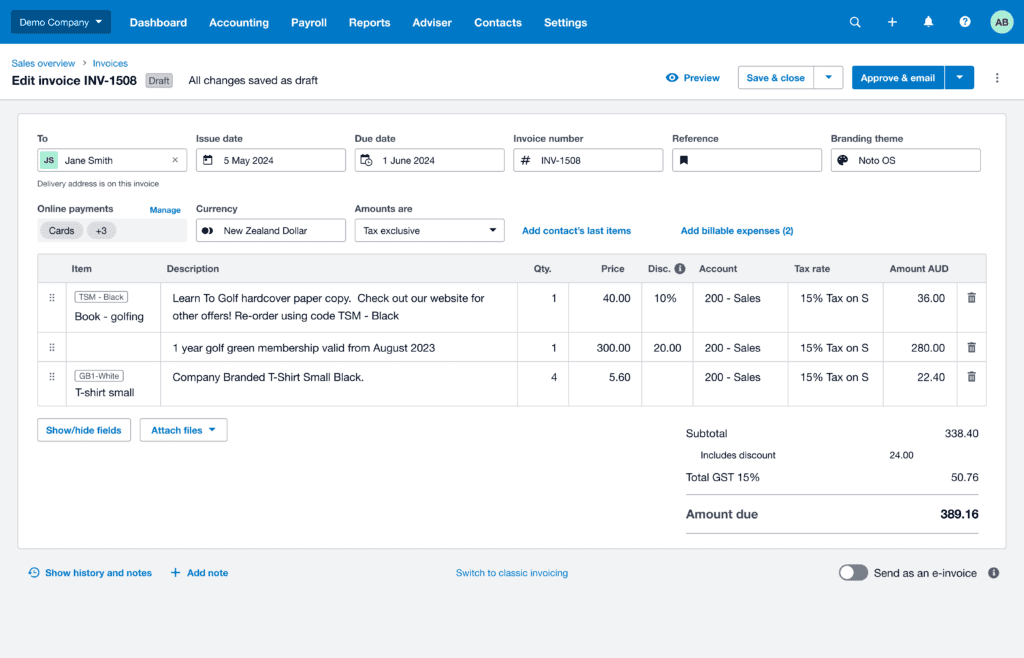
    Earlier this year we communicated that we’ll be retiring the older version of our invoicing product – classic invoicing – on 2 September 2024. You may have questions about this change, so we thought we’d answer a few of the most common ones people have been asking.

    Does new invoicing support repeating invoices?

    Yes, new invoicing supports repeating invoices. Previously, the workflow for creating repeating invoices in new invoicing was a bit different to classic invoicing. However, we’ve recently made updates so that creating repeating invoices works the same as in classic invoicing.

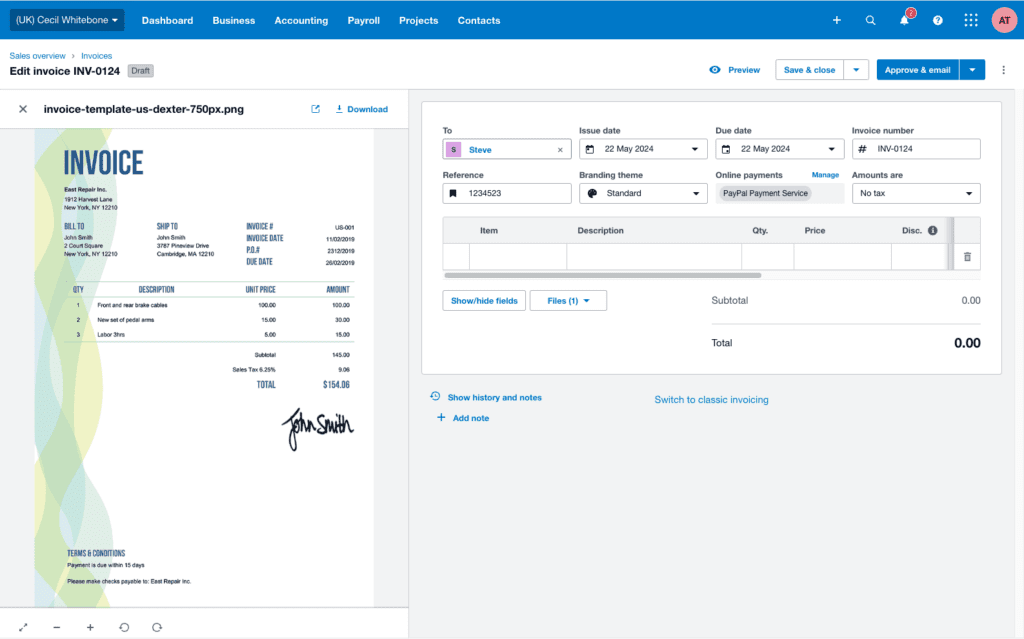
    You can either start with a single draft invoice and go to the drop-down menu in the top-right corner to make it repeating, or head to the ‘Repeating’ tab on the invoice list page to create a new one. In this tab, you’ll also find all current repeating invoices. If you’re still using classic invoicing, don’t worry: all existing repeating invoices will continue to work in new invoicing.

    What improvements have been made to keyboard efficiencies in new invoicing?

    The auto-complete fields in new invoicing originally worked a little differently to those in classic invoicing. To bring them more closely into line, we’ve made efficiency improvements to the keyboard navigation in new invoicing.  

    Searchable and drop-down input fields in invoicing (including in the table) now allow you to select an option from the drop-down and move to the next field using one key press: just press Tab.

    We’re also working with customers to improve the readability and screen real estate, so keep an eye out for changes to the layout over the coming weeks.

    What’s changed in history and notes?

    Since we introduced history and notes to new invoicing at the end of the May, we’ve received a lot of positive feedback about how it enhances the new invoicing experience. 

    You’ve told us it’s important to  have an audit trail of what was changed in an invoice as well as who it was sent to. We’ve listened to this feedback and have rolled out the following updates:

    • Recording the send history, which shows which email address the invoice was sent to
    • Showing date- and time-stamps for each entry in history and notes
    • Displaying the history and notes section in a clear table format

    If these updates are something you’ve been waiting for, jump in and give them a go. And, if you have any feedback about the updates to history and notes, please let us know in Xero Product Ideas.

    The return of a hidden Easter egg

    If you haven’t (re)discovered the beloved unicorn yet, just type ‘I want a unicorn’ into the description field of any invoice and see it grace your computer screen. 

    How do I switch to new invoicing? 

    When you’re ready, you can easily make the switch from classic invoicing to new invoicing via the ‘Switch to new version’ button. Some things may look a little different but you’ll catch on quick. And you don’t have to worry about losing your invoice templates or repeating invoices.

    Learn more about new invoicing

    We’ve launched Your guide to new invoicing, a course designed to help you familiarise yourself with the new version of invoicing and learn about the latest tips and tricks to get the most out of your experience. If you’re yet to give new invoicing a go or want to see what common tasks and new functionality look like under new invoicing, take a look. The course covers everything from creating a new invoice to adding discounts, adding items, adding a payment, and more.

    Keeping you informed, every step of the way

    Your feedback is important to us and we’re committed to keeping you updated on progress as we move towards September, when classic invoicing will be retired.

    To see which features have already been released in new invoicing, which features are coming before classic invoicing is retired, and how new invoicing compares to the older version, visit the new invoicing releases page on Xero Central.

    As always, we encourage you to share your ideas in Xero Product Ideas, and the support team is also here to help and give you a hand with any questions.

    The post We’re answering your questions about new invoicing appeared first on Xero Blog.

    App partner stories: Keeping the wheels of Australia turning

    Software Stack Editor · June 18, 2024 ·

    This guest blog was written by the team behind transport management app MyTrucking.

    The powerhouse of regional Australia sits in part with its farming, mining and construction industries. The thousands of communities and family-owned small businesses in these sectors around the country help keep the wheels of Australia turning. 

    One such family-owned business has been on the tools since 2009. Through strategic growth and a focus on technology, innovation and efficiency, TGR Transport has expanded to become a primary contractor to major grain traders in Australia.

    Building a foundation of success

    TGR Transport is a nationwide freight company established by managing director Tom Allen. The family-owned and operated business specialises in bulk grain transport alongside agricultural machinery transport.

    “I had a real passion for trucking, and I started to notice a demand for paddock trucks during grain harvest. I saw an opportunity to better utilise my father’s farm truck, and it grew from there,” says Tom.

    The business now includes a fleet of trucks with a range of trailers to move bulk grain, hay, straw and oversized machinery, as well as supplying pilot vehicles and container sales.

    TGR Transport has grown rapidly since its establishment, and one of the critical cornerstones has been building a solid and reliable team that helps it thrive in an ever-changing transport industry.

    “We’ve grown from an owner-operated business to a team with a broad range of skills. Our team members all have different backgrounds, from transport, farming, vehicle maintenance and engineering, to name just a few. We benefit from these skills daily as they allow us to adapt quickly to constant operational and industry changes,” says TGR transport operations manager Amy Throckmorton. 

    Passion, experience, and expertise drives the team to deliver top-notch customer service and satisfaction. TGR’s employees do this by getting the job done efficiently and economically, and their high-quality service remains a vital part of TGR’s ongoing success and growth.

    Big rig truck parked in a field with a blue sky

    Driving innovation forward with tech

    TGR’s success is also driven by their willingness to embrace new technologies and innovations to propel them forward. 

    “We aim to become more efficient using high productivity vehicles (HPVs), such as A-Doubles, not just with grain, hay, and general freight. We’re one of the first companies in the area to start using these, and it means we can transport more grain per load for our customers,” says Tom.

    It’s just a small taste of the many parts of the business that are geared towards innovation and efficiency. 

    Their foundation of a solid, knowledgeable and diverse team, coupled with a knack for innovation, quickly put them at the top of the list for grain traders around the country. They help tackle the task of moving the nearly 40 million tonnes of grains, oilseeds and pulses that are transported around Australia annually.

    “Being a primary contractor for major grain traders has been a huge win for us. It’s wins like that that keep us moving forward,” adds Tom.

    On-road technology changes rapidly, as does the technology behind the scenes. TGR Transport has remained dedicated to its mission to keep up with the latest advances in this space to help give it an edge.

    “It keeps us efficient, which ultimately benefits our customers, so it’s a no-brainer,” says Amy.

    Removing inefficiency with the help of apps

    Until 2016, TGR Transport had an entirely manual process for their workflow and paperwork. Drivers completed run sheets and kept hard copies of paperwork that were gathered at the end of the week and collated into a spreadsheet. Manual invoices were created and sent from Xero.

    “Obviously, with a manual process, human error was a factor. There was also the challenge of dealing with subcontractors and chasing paperwork. It was inefficient and sucking up time,” says Amy.

    On the recommendation of their accounting team, they discovered MyTrucking, a transport management app designed to assist transport operators with job management workflow.

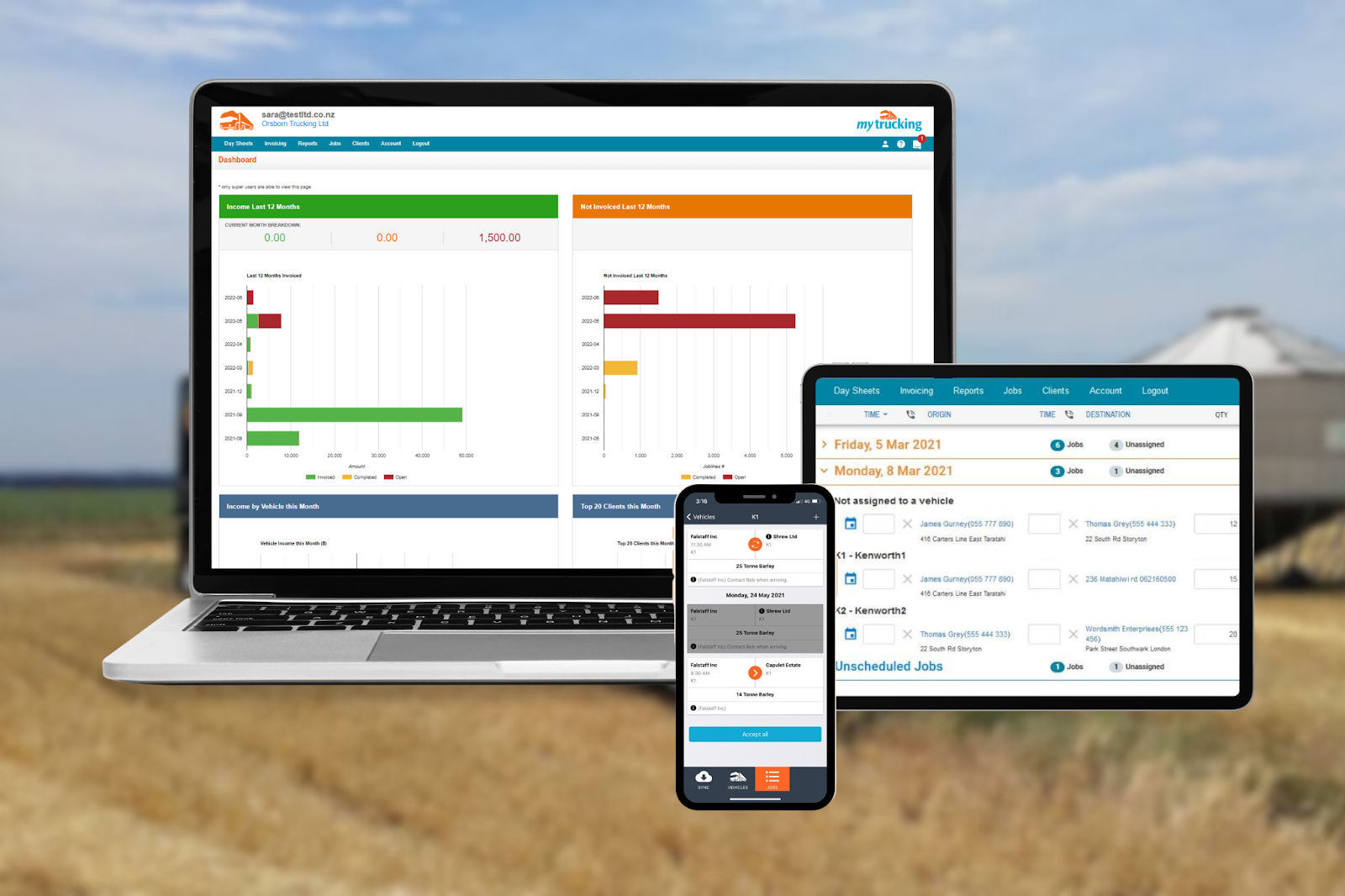
    screenshots of the mytrucking app on a laptop, smart phone, and tablet

    Since implementing MyTrucking, TGR Transport gets near real-time information directly from drivers while they’re on the road. Photos of paperwork are attached to each job to ensure the accuracy of information entered by team members. 

    It’s created a highly streamlined process where nearly everything is as simple as pushing a button.

    Tom says, “Using MyTrucking and Xero together has made our lives so much simpler. MyTrucking enables us to track everything we do simply and accurately through real-time information.”

    The ability to populate an invoice directly to Xero in just a few clicks is invaluable to TGR Transport.

    “It has completely streamlined our invoicing and reporting processes, ultimately leaving us more time to focus on other areas of the business and continue to grow and thrive.”

    Check out MyTrucking on the Xero App Store. 

    The post App partner stories: Keeping the wheels of Australia turning appeared first on Xero Blog.

    That’s a wrap for Xerocon London 2024!

    Software Stack Editor · June 13, 2024 ·

    We’ve just wrapped Xerocon London 2024, and what a magical two days it’s been. Although Xerocon is a chance for us to update everyone about the industry trends we’re seeing, and the new product features we’ve been building, it really is about the people. Bringing our community together and experiencing that magic in person, is priceless. 

    Day two brought more insightful keynotes, breakout sessions and activity from our exhibitors. 

    Learning to lean into uncertainty 

    Following his session on day one, uncertainty expert Sam Conniff was back to host a masterclass on why we need to reframe uncertainty from a negative to a positive. By sharing examples and concepts from his own scientific studies, Sam made the case for why we need to embrace uncertainty rather than trying to avoid it. 

    His research shows that the more we lean into uncertainty, the more open minded we become. This positions us better to come up with new ideas that help us make decisions and solve problems. He revealed that for most of us, our greatest fear is failure, but our worst regret is missed opportunity.

    Showcasing the power of AI 

    We all know AI is breaking into almost every aspect of our lives. We showcased not only how AI is being used in the accounting industry, but also how it can deliver highly personal experiences. 

    James Bergin hosted a panel with our very own AI expert Eitan Sharon, who explained how AI is transforming accounting practices. Sheetal Shah, from DSK shared how his practice is using AI, including using Google Gemini to draft pitch documents for clients, reducing a task that would take four people three weeks, to less than a day! You can read more about how accountants are using AI in our guide AI simplified: Xero’s AI guide for accountants and bookkeepers.

    Over on the expo floor, we had the AI music factory, which asked a number of questions and then created a unique soundtrack, including album artwork, based on your answers.

    Closing thoughts

    The biggest takeaway for me has been the power of meaningful connections, not just between us and our partners, but between all of them. While this is a tech-focussed conference, the spirit of this community and the power of human relationships is going to be so important as our industry advances.

    Lastly I want to say a huge thank you to everyone who attended Xerocon. We are so grateful for your time, your presence and your commitment to this community.

    The post That’s a wrap for Xerocon London 2024! appeared first on Xero Blog.

    It’s a wrap! Day one at Xerocon London

    Software Stack Editor · June 12, 2024 ·

    After my first Xerocon as CEO at Sydney last year, the bar was set high for this year’s event here in London. And wow! Day one has knocked it out of the park. We kicked off with an incredible performance from Harry Yeff, also known as Reeps One, who uses AI to create unbelievable sounds and music. Our brilliant host (and a familiar face on British TV) Sue Perkins, then welcomed everyone to Xerocon London and quickly had us all in stitches.

    Setting the scene with the Xerocon showcase

    First up was the Xerocon opening showcase, where I was joined by members of our global leadership team. Alex von Schirmeister (Managing Director UK & Emerging Markets) spoke about the latest industry trends, and launched part two of our Xero Small Business Insights (XSBI) productivity report, which shows that UK small business productivity is equalising across regions.

    Diya Jolly (Chief Product and Technology Officer), then shared plenty of exciting product announcements for your practice and your small business clients, before Michael Green (GM Partnerships – UK) dived into insights on building the right app stack, and James Bergin (EGM Technology Research & Advocacy) shared powerful ways to drive innovation in your practice.

    I was also excited to share a glimpse into what we’ve been focused on at Xero over the last 12 months: resetting and reshaping our ambitions and resources, to build an even stronger foundation for the future. I explained how our purpose continues to be at the heart of who we are and what we do, which is why it’s the foundation of our three-year strategy, which we call ‘winning on purpose’.

    Focusing on product innovation for the UK

    Diya’s product keynote was jam-packed with new features that are available now and coming soon across core accounting, payroll and payments. From our new payroll manager dashboard and the launch of Tap to Pay, to our new partnership tax solution — there was plenty of excitement about how we’re continuing to deliver value for you in our product, so you can streamline your workflows and get paid faster. 

    Learn more about all the new features announced at Xerocon London.

    Getting to know JAX

    The other announcement that’s created a lot of buzz around Xerocon is the beta for Just Ask Xero (JAX), our new AI business companion. JAX is powered by generative AI and has the potential to transform the way you and your clients work. Imagine being able to generate invoices or edit quotes with a simple text, email or WhatsApp message? Without logging into Xero? That’s the power you’ll have in the months ahead, when we introduce JAX in August.

    Learn more about how GenAI-powered Just Ask Xero will reimagine accounting.

    James Bergin on stage at Xerocon London 2024

    Getting inspired by our guest speakers

    Uncertainty expert and international best-selling author Sam Conniff helped our audience decipher how to navigate change and turn fear into opportunity, to drive innovation. It was an incredibly inspiring session, asking us to think about how uncertainty shows up for us, how we can discover our biases, and how these can inform decision making. We even took a quiz to discover our uncertainty tolerance!

    Next up was Jason Bradbury, an AI expert who spoke about creating your own future-gazing toolkit, and the exponential growth of AI in our lives. He taught us all how to unlock our own predictions of the future, by leveraging technology and AI, and gave us an interesting glimpse into what the future of innovation might look like across a number of industries. Jason also joined industry experts on stage for a breakout session to dive deeper into the topic of AI.

    Having plenty of fun on the expo floor

    Would it be a Xerocon if we didn’t sprinkle a bit of fun across the expo floor? Accountants and bookkeepers were able to spend time with app partners, create their own music track and album cover at the AI music factory, shoot goals with the Lioness’ Caz Carney and Carly Telford, and so much more!

    Advisors playing football against Lionesses at Xerocon London

    It’s great to be back in the UK, and it’s been fantastic to spend time with our partner community. I can’t wait to see what’s in-store tomorrow. See you then!

    The post It’s a wrap! Day one at Xerocon London appeared first on Xero Blog.

    How GenAI-powered Just Ask Xero will reimagine accounting

    Software Stack Editor · June 12, 2024 ·

    It was so exciting to demonstrate Just Ask Xero (JAX) live in front of an enthusiastic crowd of accountants and bookkeepers at Xerocon London today. We previewed this innovative new product at our Investor Day earlier this year, and we’re really proud to be able to show a live demo only a few short months later.

    JAX, your smart business companion, available in beta in August this year, will help you and your clients run your businesses more efficiently. You’ll be able to Just Ask Xero to complete tasks such as generating an invoice or editing a quote right from the apps and devices you commonly use. 

    This development is going to fundamentally change the way you and your clients complete routine business tasks on the go, as they can now be done  outside of Xero. You won’t have to open up Xero to complete tasks like generating an invoice – just send an instruction to JAX via text message, WhatsApp message or email. Watch a demo of JAX below:

    And, in the future, we see many more possibilities of how JAX can help you and your clients with your workflows. Watch this space!

    Groundbreaking technology boosting accuracy under the hood of Xero

    Until now, using generative AI (GenAI) for accounting tasks has been challenging due to how  LLMs (the large language models that power this technology) work. 

    We’ve all heard horror stories about what GenAI can create without the appropriate guardrails in place. Factual errors called ‘hallucinations’ that users have reported include historical inaccuracies, incorrect technical information, incorrect or offensive cultural references – or in the case of AI-generated images, anatomical errors, distorted faces and bodies or nonsensical object details. 

    We know that in accounting, there’s just no room for this kind of hallucination. Ensuring that the numbers you’re working with are accurate is essential, so we’ve invested heavily in building technology that you can trust. 

    I announced today that our internal teams at Xero have made an exciting breakthrough in developing a first-of-its kind technology that works under the hood, to ensure that JAX offers far greater accuracy than other AI models that only rely on LLMs.

    This proprietary technology helps JAX navigate accounting tasks with precision, by using a control system to ensure the data that’s fed to the LLMs is only related to the relevant task, such as creating an invoice. It also ensures the LLMs only receive data that you’ve given Xero permission to access, and keeps the data safely within the platform.

    These guardrails ensure Xero customers using JAX for accounting tasks can trust its precision and accuracy. We think these guardrails will be really effective and will give us the ability to truly reimagine accounting for you and your clients. 

    We can’t wait for some of you and your clients to get a taste of JAX when it launches in beta in August. 

    Register for the JAX beta

    GenAI-driven improvements in Xero support

    At Xerocon today, I also touched on some other exciting developments Xero has made in the GenAI space. 

    In May, we embedded new GenAI-powered help content inside the Xero product to surface accurate answers, faster. Now, users who are working in Xero and ask for help will get a fast, simple, AI-generated answer alongside a list of other relevant content articles. The answer takes into account the page they’re viewing and the version of Xero they use to ensure the surfaced information is relevant. 

    This development followed our launch late last year of generated answers in Xero Central, our customer support and learning site, which has reduced search times by approximately 40%. 

    We’ve also rolled out an AI-powered setup guide for those onboarding to Xero, providing all new users with relevant answers and information as they set up their Xero dashboard and get started in the product.  

    Supporting you and your clients to adapt GenAI

    At Xero, we’re really excited about the possibilities these new AI developments will open up for you and your clients, but adapting to new tools – even if they’ll make life easier – can be difficult or confusing. Established ways of working and habits can be hard to break. Plus, it can be hard to get excited about the benefits of GenAI if you don’t really understand it.

    So, to help you and your clients embrace AI and understand the benefits of these new tools, we’ve published two simple AI guides, tailored to small businesses and their advisors.

    These guides summarise relevant AI updates, offer practical ways to start implementing some AI-powered tools in your business, and showcase some small businesses and advisors already using AI effectively in their business. We hope these guides help to provide some inspiration in taking the first step towards exploring using AI in your practice and encouraging your clients to do the same.

    Download AI guides

    Looking ahead

    I’m excited about the developments we’ve made in GenAI over the last year, and we’re just getting started. As GenAI continues to evolve, the possibilities it brings in terms of efficiency, innovation, and competitive advantage to businesses that embrace it are vast. I hope you’ll come along for the ride with us.

    The post How GenAI-powered Just Ask Xero will reimagine accounting appeared first on Xero Blog.

    New features announced at Xerocon London

    Software Stack Editor · June 12, 2024 ·

    We’ve just kicked off day one of Xerocon London and I’m buzzing about all the new Xero products and features that we announced this morning! 

    Our vision is to build the most insightful and trusted small business platform. And Xero is making a big investment in the UK as part of its business strategy. If you couldn’t make it to Xerocon, or just need a recap, here are a few of the key announcements about things that are now available or coming soon.

    Coming soon: Just Ask Xero (JAX) 

    Many of you have been eagerly watching to see how the rise of generative AI can help support productivity for you and your small business clients. And soon Just Ask Xero (JAX), our generative AI-powered smart business companion, will be here. It is available in beta in August and will help you and your clients run your business more efficiently. You’ll be able to ‘Just Ask Xero’ to complete tasks like generating an invoice or editing a quote, either in Xero or via other apps and devices that you regularly use day-to-day, such as mobile, WhatsApp and email. 

    Additionally we shared some exciting new developments about the technology underpinning JAX that helps make it more accurate and secure. To find out more about how we’re building greater accuracy into JAX, check out my blog: How GenAI-powered Just Ask Xero will reimagine accounting. For tips and tricks on using AI, download our AI guides: there’s one for accountants and bookkeepers, and one for small businesses. 

    Coming soon: Partnership tax

    Digitising tax and accounts workflows is the key to optimising efficiency in your practice, so we were delighted to unveil the next addition to Xero Tax, our new partnership tax solution, at Xerocon. 

    Partnership tax is available from July in beta. It will help you automatically prepare partnership annual accounts and tax using Xero data, and seamlessly file partnership tax returns with HMRC. You can now manage your compliance tasks, all in one place, eliminating the need to have multiple practice tools. 

    Coming soon: Integrating Xero Practice Manager and tax

    We announced the beta is now open for an integrated practice management and tax within Xero Practice Manager (XPM) to UK accountants and bookkeepers.

    Integrating Xero Tax and Xero Practice Manager will provide visibility and management of client obligations, workflows and job tracking and prioritisation all in one place, helping you build greater efficiencies into your practice. It will make managing jobs across your practice much easier when you know how they line up to your clients’ tax obligations. 

    Coming soon: Client insights 

    We were excited to unveil the first look at the client insights’ snapshot which shows key client financial health metrics such as business health, profit and expenses across the practice. The feature is now live in beta in XPM and Xero HQ.

    Client insights will provide accountants and bookkeepers with the data they need to best support their clients. These new financial insights help you confidently grow your advisory offering by highlighting clients who would benefit from timely conversations about emerging issues.

    Coming soon: Tap to Pay on Android

    According to Xero Small Business Insights, 50% of UK small businesses are paid late. The cost hit an estimated £1.6bn in 2023.1 Because it’s so important to help small businesses get paid faster, we’re adding more ways for customers to pay, with Tap to Pay coming soon.

    Xero will be the first major accounting platform to offer Tap to Pay in the UK. Tap to Pay enables businesses to accept payments on the spot, right from the Xero Accounting app. The new contactless payment method for Xero invoicing, enabled through Stripe, gives small businesses more ways to accept the types of payments customers want.

    Tap to Pay will first be offered to UK Android users in a beta program in August, and available on more platforms in the following months.

    Coming soon: More ways to pay in Xero

    And that’s not all. Here are some other ways we’re helping ensure getting paid is as seamless as possible: 

    • New payment methods with Stripe: In addition to credit cards, debit cards, and digital wallets, additional options will soon be available including bank transfer, and buy now, pay later options
    • Single, one-time sign up: A simpler, embedded sign-up with Stripe makes it easier to get moving and get paid
    • Complete control and customisation: Choose which payment methods you make available and easily enable or disable the payment methods you want to offer

    New and coming soon: Xero Payroll enhancements

    Efficient payroll management is crucial, but disconnected tools and platforms can make it difficult to get a complete, real-time view of your clients’ financial position. In fact, 86% of accountants and bookkeepers told us in a recent survey that having accounting and payroll all in one place saves them time.2 That’s why we’ve been doubling down on building out our UK payroll product with additional functionality. These updates will help you serve more types of small businesses, make crucial pay runs easier to administer, streamline multi-client tasks, and reduce manual payroll errors.

    Payroll manager

    We showcased the first look of payroll manager, a new dashboard in XPM and Xero HQ, that gives you an easy way to view payroll data across your practice’s clients in one place. Currently in beta, payroll manager will help save time by providing a consolidated view of your client pay runs, making it quicker and simpler to identify clients whose payroll needs attention for upcoming pay runs.

    More payroll functionality

    Xero Payroll in the UK also includes a number of improved features designed to suit a workforce that increasingly wants to work more flexibly. We’ve made it easy to manage employees’ working patterns to support non-traditional working hours, such as four-day working weeks. Set up of employee pensions has also been simplified with additional guidance and increased flexibility to edit and update fields.

    Soon, you’ll also be able to align your payroll leave period to their financial or operational periods.

    Additionally, we’ll make it easier for small businesses to switch to Xero Payroll anytime during the tax year, by simply uploading their most recent filing data and following a few simple steps.

    Purposeful innovation aimed at providing you value 

    As you can see, we’re really making strides on delivering on our product vision to build the most powerful accounting platform in the UK.

    We believe this kind of thoughtful, purposeful innovation is what’s going to add the most value to you and your clients, now and in the future. Enjoy the rest of Xerocon.

    1. The cost of late payments to small businesses for 2023 has been estimated as the time value of the outstanding invoice value of all small and medium businesses. This calculation is based on businesses with fewer than than 50 employees for the United Kingdom. It’s calculated by applying current interest rates (for small- and medium-sized businesses) to aggregate small and medium business sales for the period equal to the average days late invoices are paid.
    2. Based on a survey commissioned by Xero in the UK in May 2024; Sample: Accountants and bookkeepers that use Xero Payroll, n=159

    The post New features announced at Xerocon London appeared first on Xero Blog.

    How does productivity in your industry or region stack-up?

    Software Stack Editor · June 12, 2024 ·

    Earlier this year, we shared that we’d be releasing the second part of our Xero Small Business Insights (XSBI) productivity report series. Our latest report, Small business productivity: industry and regional trends, builds on the first report released in April. It takes a deep deep dive into labour productivity at the industry and regional level across Australia, New Zealand, and the UK.

    This more granular data provides greater detail for small businesses and their advisors to understand how their own business (or their clients) stacks up against those in similar industries and regions, and assess if there are any opportunities to increase productivity levels.

     Read the report

    What is labour productivity?

    Productivity is the ratio of the volume of output to the volume of inputs. Labour productivity measures the output of workers, in terms of what they can produce in an hour of work or per employee. 

    Which industries and regions are the most productive?

    Wondering how your industry’s productivity compares to others? Are the clients you serve more or less productive than those in neighbouring regions? The report provides 2023 rankings for the industries and regions of the UK, Australia and New Zealand. 

    United Kingdom

    • National productivity in 2023 averaged £39.50/hour
    • The most productive industry was construction (£54.30/hour) and the least productive was education and training (£19.00/hour)
    • The most productive region was London (£47.90/hour) and the least productive was the North East (£31.20/hour)

    Australia

    • National productivity in 2023 averaged A$100.30/hour
    • The most productive industry was wholesale trade (A$214.50/hour) and the least productive was hospitality (A$40.20/hour)
    • The most productive region was Western Australia (A$102.50/hour) and the least productive was Tasmania (A$89.00/hour)

    New Zealand

    • National productivity in 2023 averaged NZ$102.40/hour
    • The most productive industry was real estate services (NZ$125.20/hour) and the least productive was hospitality (NZ$14.30/hour)
    • The most productive regions were Auckland and Northland (NZ$107.60/hour) and the least productive was Manawatu-Whanganui (NZ$87.50/hour)

    How does your business stack up?

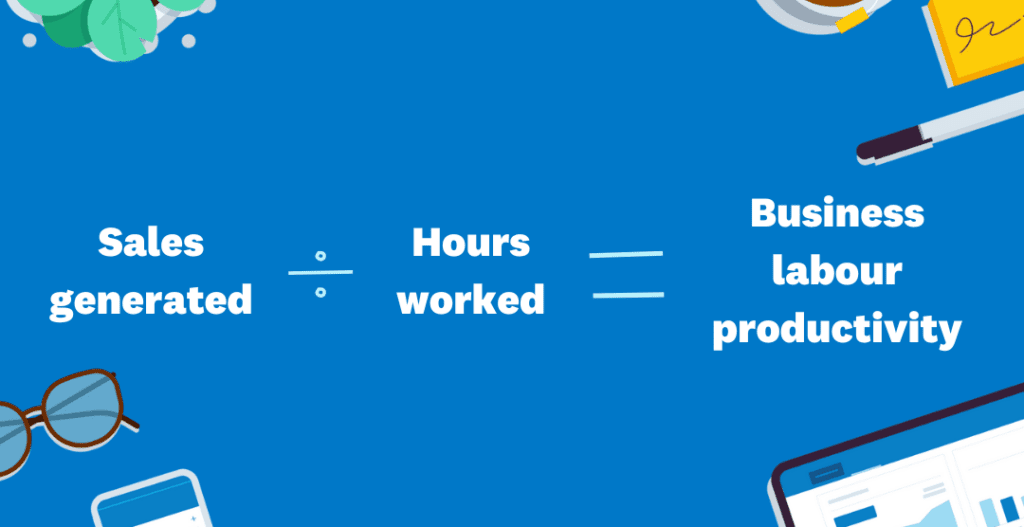
    If you want to understand how your business stacks up against other businesses in your region or industry, then you can work with your accountant or bookkeeper to calculate your businesses labour productivity:

    1. Simply take your sales generated and divide it by the number of hours worked by your staff in the same time period
    2. Then, to accurately compare your productivity to the data in the XSBI report findings, you need to divide your results by the 2015 CPI. This is so that it is on the same basis as the XSBI data. For 2023 you’ll need to:
      • Divide by 1.3 for the UK and New Zealand
      • Divide by 1.2 for Australia

    Once you understand where you sit relative to your regional and industry peers, you can work with your advisor to understand what productivity boosting opportunities might be available in your business.

    What next?

    To help understand how to lift productivity in your businesses, we’ve put together a handy guide: Increasing productivity in small businesses. The steps you (or your clients) can take fall into four broad areas:

    • Find tools that amplify your work and invest in them. You could start this by simply finding out which Xero App Store apps might be useful to add to your stack and help you run your business better
    • Reevaluate your current processes: are they really working?
    • Set your workers up for success through upskilling and training
    • Harness your entrepreneurial skills to build a business that operates at its full potential

    If you’re interested in finding out more about how small businesses are performing, visit Xero Small Business Insights for more regular data and analysis.

    The post How does productivity in your industry or region stack-up? appeared first on Xero Blog.

    How accountants and bookkeepers can improve productivity through apps

    Software Stack Editor · June 11, 2024 ·

    What’s your practice doing to keep up with apps and AI? As the business landscape evolves, the accounting industry must adapt to remain competitive and meet the changing needs of clients. 

    We recognise that one key area of focus is the integration of app stacks and artificial intelligence (AI) into accounting practices so as to support future productivity and growth. 

    Our latest research, Leveraging the app advantage, aims to understand the benefits of app usage for Kiwi accounting and bookkeeping firms, the current usage landscape, and where the opportunities lie.

    New Zealand practice use of apps is strong 

    The results show that Kiwi firms are well on their way in experimenting with apps. 

    For example, around three in four accounting firms are already using Xero integrated apps, and recognise the benefits they offer in streamlining operations and enhancing client services. 

    Across payroll, billing, payments and reporting, it’s encouraging to see firms already making use of these tools to reduce manual processes, improve productivity, and deliver for their small business clients across Aotearoa New Zealand. 

    Not only is this good for their clients, but it’s good for their bottom line. In fact, 63% of firms using Xero integrated apps experienced revenue and/or profit growth over the past year, with one in five directly attributing revenue growth to an increase in app usage. 

    Keeping an eye on AI

    As we continue to look towards a future with enhanced digital tools, you’d be hard pressed not to find people talking about the implications of AI on accounting practices. 

    And unsurprisingly, many are already embracing these tools, with 61% of firms saying Xero integrated apps already allow them to keep up with emerging technology, including AI. 

    Additionally, over a third (39%) of firms anticipate they’ll increase their app usage in order to utilise AI. We expect this group to grow further over the next 12 months as AI becomes more common in the business environment.

    The development of our AI-powered tool Just Ask Xero, which allows for automated accounting tasks, is a cornerstone of our work as a company in this space. 

    By using apps with embedded automation features, firms can gradually introduce AI into their workflows without requiring extensive technical expertise.

    Three steps to start using apps in your practice

    So how can you get started? The key is to approach app integration as a continuous process of refining and expanding what you offer to meet the demands of your clients.

    1. Identify the key pain points in your practice

    Start by taking a holistic view of your firm, and ask yourself questions about where there are gaps in your day-to-day practice. Where can you be more efficient? Where’s all the time and energy going? If you have a team, speak to them about their thoughts on areas of improvement. 

    It’s important to understand that not all your problems will be solved by multiple apps; some apps will simply serve to supercharge existing processes. 

    2. Explore the apps and information in the Xero App Store 

    The Xero App Store is an ever-expanding platform housing third–party apps and tools that integrate with Xero to support and solve a wide variety of business problems. 

    If you’re new to the Xero App Store, start by simply having a look at the different categories that are available. You can browse by industry or business function, or discover themed collections of apps.

    The Xero App Store is the place to go to find out more about building the right app stack for your practice. 

    3. Start trials and speak to the experts

    Trial and error is key. Start by shortlisting the apps you’re interested in and giving them a whirl. 

    Connect with your Xero account manager or reach out to the software providers directly to get set up for success.

    The future is now, and we’re excited to see how digital tools continue to enable the accounting profession to adapt and evolve. 

    Embracing app stacks and AI can give you the means to future-proof your operation, enhance your productivity, and deliver higher-value services to your clients.

    The post How accountants and bookkeepers can improve productivity through apps appeared first on Xero Blog.

    What’s new in Xero – June 2024

    Software Stack Editor · June 10, 2024 ·

    Over the last month, we’ve rolled out updates to key features in Xero including improvements to batch bank feeds, and introduced AI-generated answers to help you get the most relevant information when you need help within Xero. We’ve also implemented some of the most requested product ideas, including enabling you to upload multiple receipts in Hubdoc or void multiple transactions in one go. Read on to find out what else is new in Xero.

    Global: Use the Hubdoc mobile app to upload multiple receipts at once [Product Idea💡] 

    You can now upload up to 10 documents at once to Hubdoc, helping you save time and reduce everyday admin. Update your Hubdoc app to the newest version to get access to the feature, or download the app on iOS or Android. Learn more in Xero Central.

    Global: Bulk void enhancements [Product Idea💡]

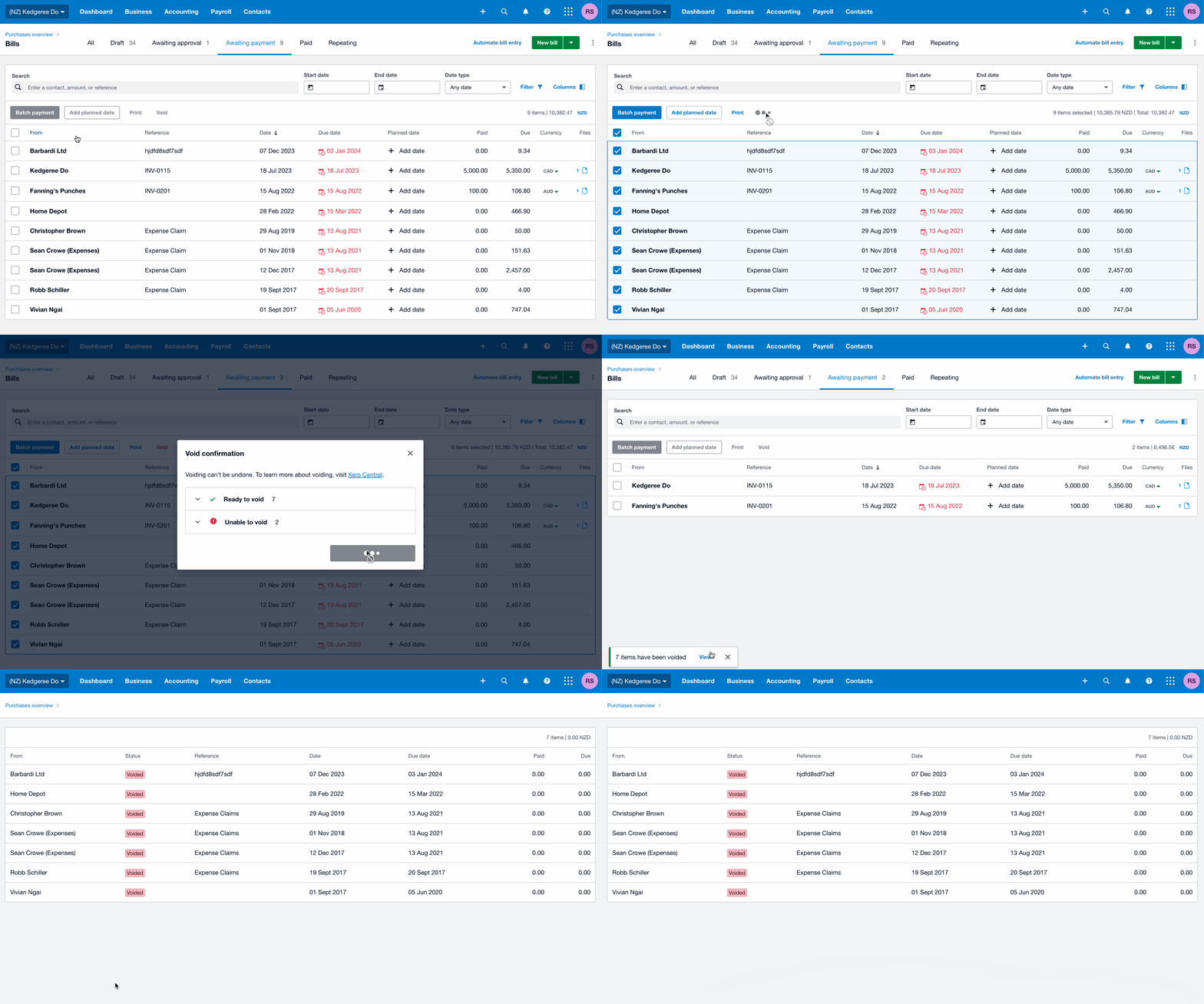
    You’re now able to bulk void bills, credit notes and payslips on a single page. This was a highly requested product idea (with 107 votes) and will save you significant time by providing tools to update multiple transactions at once.

    Global: AI-generated search results in the help menu 

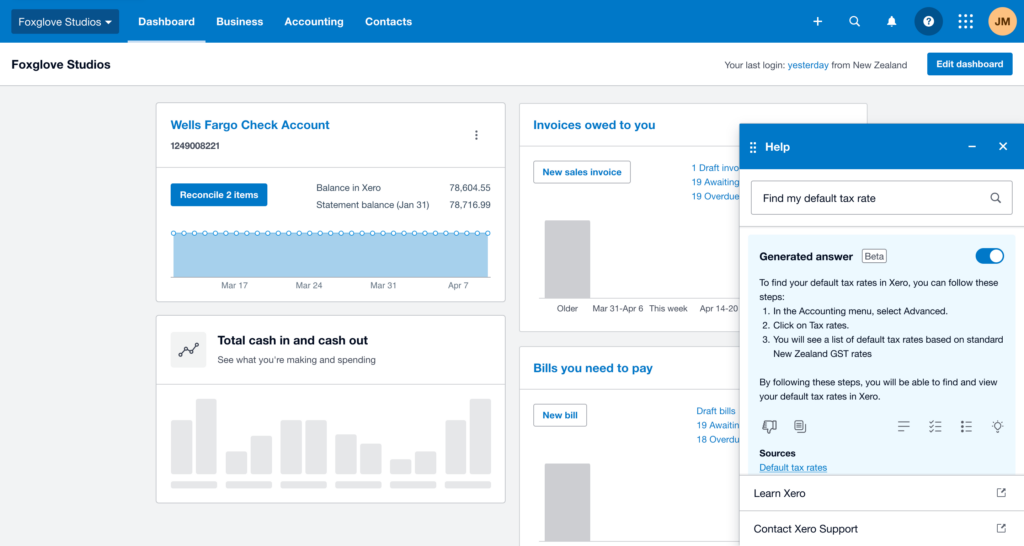
    Now, when you’re working in Xero and ask for help, you’ll get an AI-generated answer as well as a list of other relevant content articles. You’ll get a fast, simple response with links to the source material and more details if needed. The answer takes into account what page you’re viewing, and the version of Xero you use, to make sure that the information provided is relevant to you. 

    Global: Batch bank feeds can now be cancelled in Xero 

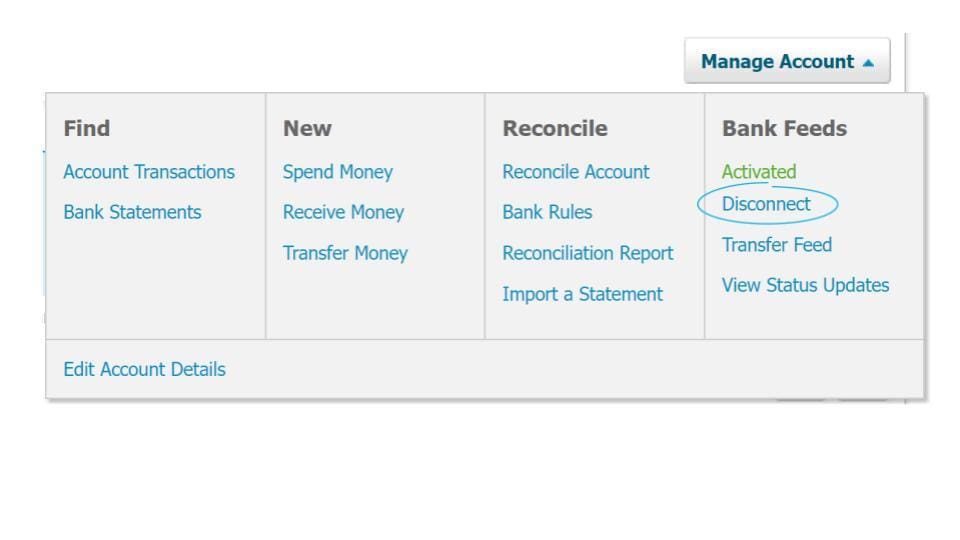
    We’ve added a disconnect button in Xero for batch feeds, to streamline and automate cancelling them.

    Australia: Surface payment details for BAS

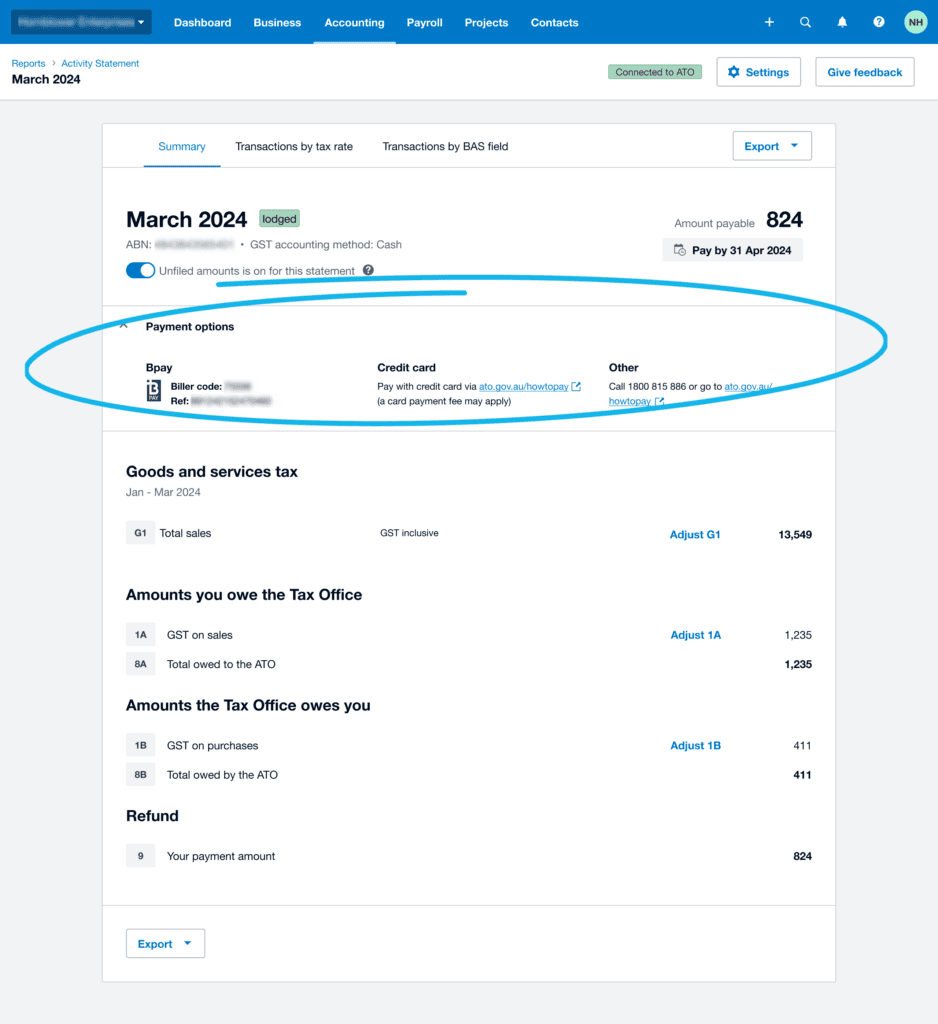
    Just in time for the end of the financial year, you can now view your payment details and due date on the activity statement page when you’re connected to the ATO in Xero. This handy update reduces the need to manually find this information outside of Xero, further streamlining your workflow. 

    Australia: Payroll reconciliation improvements 

    To enable quicker and easier payroll reconciliation for the end of the financial year, we’ve made improvements to the transparency of key numbers and totals. We’ve also provided easier access to reports to make reviewing and finalising more efficient.

    New Zealand: Upgrades to pay reports 

    The look and functionality of several payroll reports has been upgraded for consistency and now matches the latest Xero reports experience. This includes the ability to re-order columns, and the ability to export to Google Sheets in addition to the current PDF and Excel formats.

    UK: Opt in for a Xero eInvoicing subscription [Product Idea💡]

    UK customers can now conveniently opt in through the billing contact page to automatically receive their monthly Xero subscription invoices as draft bills in Xero. While the functionality to automate the creation of Xero subscription invoices has been available for New Zealand, Australia and Singapore, we’ve been able to expand it to also include UK customers. You can opt in here. 

    US: New Stifel automated bank feed

    Are you a Stifel banking customer? We have great news for you. We’ve introduced a new bank feed for Stifel, making it easier to get your banking transactions directly into Xero.

    US: Taxable and non-taxable sales reporting for manual tax rates

    If you use manual sales tax rates in the US, you can now access new separate columns for taxable and non-taxable sales in your sales tax reports, saving you time when working out your totals.

    These are just some of the updates that have rolled out in Xero this last month. For a full list of what’s new this June, check out the release notes in Xero Central.

    The post What’s new in Xero – June 2024 appeared first on Xero Blog.

    Introducing our 2024 Xerocon London event partners

    Software Stack Editor · June 6, 2024 ·

    Xerocon London is just under a week away on 12 and 13 June, and the ExCeL exhibitor floor will be full to the brim with stands showcasing some of the best and most loved apps, tools and services for accountants, bookkeepers and small businesses.

    This year, you can expect to see just under 60 exhibitors at the event, including many leading Xero App Store app partners. Whether you’re looking for tools to chase invoice payments, simplify tax compliance, or make job management easier, you’ll find plenty of solutions to help solve key business challenges. Come along to the app demo stage and app-led breakouts to see these tools in action and hear what Xero app partners are working on.

    We’re especially excited to introduce to you our eight incredible event partners for this year’s event. Make sure to check them out, as well as the other exhibitors, as you explore Xerocon London 2024.

    Event Partner+

    Dext

    Dext provides bookkeeping automation tools that help small businesses and their advisors collect, organise and record financial transactions. Dext is made up of three products – Dext Prepare for data extraction, Dext Precision for data quality and insights, and Dext Commerce for e-commerce data management – all of which integrate with Xero. Use Dext to help achieve compliant bookkeeping and accounting services accurately and efficiently, saving you and your clients precious time.

    GoCardless

    GoCardless puts you in control of collecting payments directly from your customers. The GoCardless integration with Xero allows you and your customers to set up recurring and one-off payments, so payment for your invoices is collected automatically. Xero’s global data shows that invoices with an online payment service like GoCardless attached, get paid up to twice as fast as invoices to customers who don’t use online payments. Simply add GoCardless as a payment service in Xero, then apply it to an invoice or invoice template so your customers can pay your invoices online.

    Event Partner

    Amazon Web Services

    Amazon Web Services offers scalability, security, and savings for businesses of any size including small and medium businesses, for whom remaining competitive can be daunting. Whether you begin by moving, storing and securing your data, gaining new business intelligence, or finding new ways to serve customers, Amazon Web Services can help you unlock new possibilities. 

    ApprovalMax

    ApprovalMax makes it easy for you to build robust financial controls across accounts payable (AP) and accounts receivable (AR) with automated approvals and more. It also opens the door to not needing to rely on paper and email approval flows, and can help speed up AP and AR processes for finance teams.

    Pleo

    Save time and money by simplifying your business spending with Pleo. Make lost receipts a thing of the past by going digital, get greater control over company spending, and wave goodbye to manual data collection, all while keeping your finances up-to-date in Xero.

    ServiceM8

    ServiceM8 is smart job management software for tradies and service businesses that keeps everything in one place: job cards, scheduling, staff tracking, client emails and texts, job notes, forms, online bookings, and more. ServiceM8 integrates with Xero, and helps you and your clients cut paperwork, get more jobs done, and provide great customer service.

    Stripe

    Stripe is a payments and business management platform that makes it easy to accept payments from debit cards, credit cards, Apple Pay, and Google Pay for online invoices sent from Xero, so you can get paid faster. Stripe is one of Xero’s preferred payments and billing partners.

    Translucent

    Translucent helps enable larger companies to succeed on Xero. Translucent’s tools help you and your team with group consolidation, intercompany transactions, group reporting, group AP and AR, bank account consolidation, live spreadsheets, multi-entity search and more.

    Xerocon brings together our amazing community of accountants, bookkeepers and app partners so you get to network with incredible people, hear about the latest tools and knowledge to level up your practice, and have a very, very, good time. Check out the full list of exhibitors and app partners who’ll be on site at Xerocon London. We can’t wait to see you there!

    The post Introducing our 2024 Xerocon London event partners appeared first on Xero Blog.

    Celebrating excellence at the 2024 Xero Awards Asia

    Software Stack Editor · June 6, 2024 ·

    Every year, Xero Awards gives us an opportunity to celebrate the incredible commitment and achievements of our accounting, bookkeeping, and ecosystem partners, who work tirelessly to help small businesses throughout Asia thrive.

    The last year has been a challenging one. Amidst macro economic challenges like inflation, rising costs and talent shortages, you have been the first line of support for Asia’s small business. The impact of your work and support on our local communities is immeasurable.

    To honour you and the extraordinary work you and your teams do, we are hosting the 2024 Xero Awards Asia to showcase the innovation, resilience and perseverance your firms and companies have demonstrated over the last year.

    New award category alert

    This year we are excited to introduce a new award category. The all new App Partner of the Year Award will recognise a Xero App Store partner in Asia who provides a fantastic user experience and has a world-class engagement programme, along with a proven track record of growth with Xero’s customers and/or accounting and bookkeeping partners. 

    There are five categories in total:

    • Small Accounting Partner of the Year
    • Medium Accounting Partner of the Year
    • Large Accounting Partner of the Year
    • Advisory Partner of the Year
    • App Partner of the Year

    Nominations are now open and will close on 14 June at 23:59 SGT. You can enter for any and every category you qualify for.

    Finalists will be announced on 27 June and the winners will be revealed at our Awards ceremony on 6 August.   

    Finalists will be selected by a judging panel of leaders at Xero and winners will be selected by industry experts.

    Want to make your application stand out? Here are some helpful hints:

    • Download the PDF version of the category questions from Award Force to plan and draft your responses before you submit them. Note: PDFs are for planning purposes only. All submissions should be made through Award Force.
    • Answers for each question should be comprehensive. A single sentence is not enough context for our judges to evaluate your response.
    • Use the three C’s – be clear, concise, and correct. Try to avoid repetition, and showcase the important details – leave out any adjectives that don’t add new information.
    • We love data – nothing tells a story like numbers, paired with case studies and testimonials demonstrating a real-world impact.
    • Focus on value creation, for everyone from clients to your employees and the community at large.
    • Share how your efforts have helped change the status quo and describe innovative approaches, new methods and ideas that have made a difference.
    • You can submit links and/or attachments to your application with relevant information to support your entry. We recommend three to five links and/or attachments per answer to each question. Examples of what you can include:
      • Link to a blog or article you have written to promote Xero
      • Screenshots or photos of your marketing activity promoting Xero (social media posts, Xero-focused events, etc.)
      • Screenshots of customer reviews or testimonials
      • Relevant certifications and accreditations
      • Images or graphs of relevant data

    For rules, judges’ information, and eligibility requirements for each category, click here. 

    Good luck! We can’t wait to hear your stories!

    The post Celebrating excellence at the 2024 Xero Awards Asia appeared first on Xero Blog.

    Changes to Xero’s plans in Aotearoa New Zealand

    Software Stack Editor · June 4, 2024 ·

    We want to make sure the needs of small businesses and their advisors are met well into the future, and that means providing you with easier access to tools that help you run your business efficiently. So we’re refreshing our subscription plans for small businesses and partners with new plans which will be available from 12 September 2024.

    We’ve put a lot of consideration into creating simplified plans with bundled tools and features, to help solve your most important accounting and people management tasks. 

    Find out more about the plans and what’s included for small businesses and for accountants and bookkeepers.

    Introducing Xero’s small business plans 

    We’re launching three new streamlined business plans for our New Zealand customers, as well as enhancing the Ultimate plan. 

    • Xero Ignite plan: Accounting basics made for businesses starting out 
    • Xero Grow plan: Accounting tools for self-employed and growing businesses
    • Xero Comprehensive plan: Streamlined accounting and payroll for businesses with employees
    • Xero Ultimate plan (enhanced): Accounting, payroll and forecasting tools to help businesses scale for future growth

    The new plans will replace Xero’s Starter, Standard and Premium plans which will no longer be sold from 12 September 2024. Additionally, existing add-ons (payroll, projects and Analytics Plus) will no longer be available for separate purchase from this date. 

    The new plan line-up has more key features included, with fewer plans and no add-ons to navigate. That means easier access to the tools and features you’re looking for, so you can spend time on the things that count (like running your business).  

    Find out more about how our new business plans compare with existing plans and what’s included.

    Introducing Xero’s partner plans for accountants and bookkeepers

    We’re also simplifying partner plans from three down to two (Xero Ledger and Xero Cashbook will remain unchanged). These partner plans are only available for purchase by accountants and bookkeepers. 

    • Xero Ledger: Annual tax basics to help prepare and submit annual tax returns for non-trading clients
    • Xero Cashbook: Bookkeeping essentials for non-GST-registered clients

    The new line-up of plans is designed to make it simpler for you to recommend the best plan and tailor your practice services to clients. That means easier access to features (including cash-coding in all of the new business plans) with key add-ons bundled into some plans.

    From 12 September 2024, Xero GST Cashbook will no longer be sold. 

    Find out more about what’s included in both the partner and business plans.

    Moving to a new plan

    From 12 September 2024, we’ll be moving existing plans to new plans in a phased approach and we intend to move all plans by March 2025. Alternatively, you can choose to move to a new plan yourself, after 12 September 2024.

    We’ll provide more details on our migration plan and approach in September. We’ll take into account your current plan (and any add-ons). For the majority of customers, this will mean more features for the same or lower price when they are moved to a new plan. Rest assured, you’ll have at least 60 days’ notice before we make any changes to your plan. 

    What will happen to my plan on 12 September 2024?

    • If you’re currently on the Ultimate plan, you’ll get the enhancements without needing to do anything. These include expenses, payroll and projects for up to ten people, instead of the current five
    • You’re welcome to move to a new plan yourself from 12 September 2024. However, once you’ve moved, your previous plan will no longer be available. If you want to upgrade or downgrade a plan, or remove an add-on, you’ll need to choose one of the new plans. If you transfer a subscription, the new subscriber will need to choose one of the new plans
    • If you don’t want to change plans, you can wait until Xero moves you to a new plan. (We’ll give you at least 60 days notice before we do this.)

    How we’re supporting you 

    We understand that these new plans may feel like a big change, but please know that we’ll continue to keep you updated during the process. In the meantime, we recommend familiarising yourself with the new plans so you can consider which is the best option for you. 

    Small businesses

    If you’re a small business:

    • check out the web page for new business plans
    • view the plans, and 
    • tune into one of our webinars to learn more about what the plan changes mean for you

    Accountants and bookkeepers

    If you’re an accountant or bookkeeper:

    • find out which plans are the best fit for you and your clients on the web page about the new plan line-up
    • view the new partner and business plans, and 
    • check out one of our webinars to find out more about our new partner plans and choosing the best ones for your practice

    The post Changes to Xero’s plans in Aotearoa New Zealand appeared first on Xero Blog.

    How we’re bolstering Xero Payroll in NZ with new value

    Software Stack Editor · June 2, 2024 ·

    Xero Payroll is already a valuable tool, helping you manage your payroll and accounting, all in one place. Not to mention features like automatic reporting directly to IR, and automated tax and KiwiSaver calculations, that can help you save a stack of time.

    But recently, we’ve been listening to your feedback about Xero Payroll and have made some additional investments to help you and your clients become more efficient, and give you more control and flexibility. Let’s take a look at what improvements we’ve made lately, as well as all the good stuff that’s on the way.

    Payroll reports have been given a makeover

    If you’re using Xero Payroll, you may have already seen some of the refreshed experiences when loading common payroll reports. These updates ensure their look and feel is consistent with our recently modernised accounting reports.

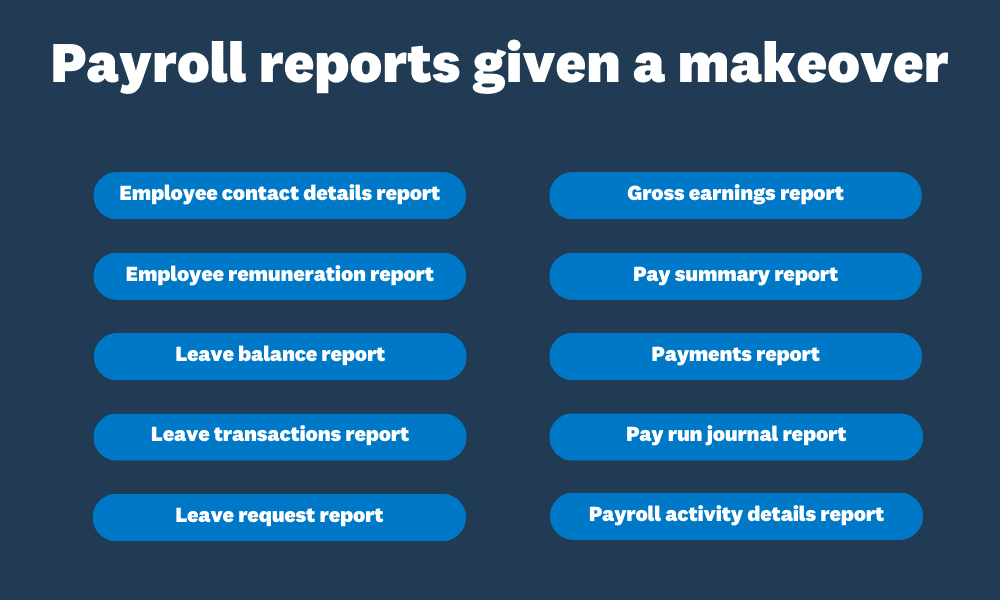
    We’ve also introduced some new features to these reports, including a new group and summarise filter, the ability to reorder columns, and an option to export a report to Google Sheets. Here are a list of the reports that have been given a makeover, and now have the same look as other reports in Xero.

    List of payroll reports that have been given a makeover.
    Employee contact details, employee remuneration, leave balance, leave transactions, leave request, gross earnings, pay summary, payments, pay run journal and payroll activity details reports have been given a makeover and now have the same look as other reports in Xero.

    Xero Payroll setup, including employee details, made easy

    We know that getting started with Xero Payroll is a daunting task for small businesses, as well as accountants and bookkeepers looking to onboard new clients. So we want to make it easier than ever for them to get started.

    That’s why we’ve made changes to the guided onboarding process. This not only makes it a seamless experience, but gives small businesses and their advisors the confidence that they’re entering the right information the first time, so they can pay employees correctly and start processing pay runs as soon as possible.

    We’ve also made changes across the following areas of the Xero Payroll setup experience: 

    • Bank and chart of accounts: you can now create and nominate accounts without navigating to other areas of the product
    • Pay frequency: you can now create pay frequencies from the setup screen. We’ve also changed the name ‘pay calendar’ to ‘pay frequency’ for additional clarity

    Our teams are also working on making it easier to add payroll filing details, and review default KiwiSaver and superannuation settings, from the payroll overview screen. Stay tuned for when these improvements will go live.

    This is only the beginning: even more changes are on the way

    We’re excited to give you a sneak peek into some other significant updates we’ve made, based on your feedback. 

    Soon, Xero Payroll admins will be able to tailor the working patterns of employees working non-traditional hours.

    The idea of traditional working hours has evolved over the last few years with the rise of flexible working arrangements, so we’re creating new working pattern templates in Xero Payroll, to help you record the hours your employees or clients are actually working. 

    Small businesses and advisors will also be able to enter more information about employee’s contracted work patterns, digitising the process to make it easier to manage their payroll.

    Here are some other features you can expect:

    • You’ll be able to specify an employee’s employment type and set up payroll to match their salary and work patterns
    • You’ll have the ability to track and report FBAPS leave in days, and annual leave in weeks, which better aligns to the Holidays Act (FBAPS includes family violence leave, bereavement leave, alternative holidays, public holidays, and sick leave)

    We can’t wait to share more as these updates roll out. If you’re an accountant or bookkeeper that would like to learn more, we hope you’ll join us for the New Zealand Roadshow coming up in July 2024. See you then!

    The post How we’re bolstering Xero Payroll in NZ with new value appeared first on Xero Blog.

    Introducing Xero’s new UK plan line-up from September

    Software Stack Editor · May 29, 2024 ·

    We want to meet the needs of small businesses and their advisors well into the future. That’s why we’re simplifying our subscription plans for UK small businesses and partners, which will be available from 12 September 2024. 

    The new plans are designed to give you easier access to the tools to help run your business efficiently. That means fewer add-ons, as more key features are included in plans.

    We know areas like payroll and expenses can be critical to running a small business, so we’re bundling these features into some of our UK plans. We’ve been bolstering the capabilities of Xero Payroll in several ways, such as automating processes to support better efficiencies, reducing the risk of manual calculation errors, and expanding the suitability of the product for many more types of small businesses. 

    Find out more about the new simplified plans and what’s included for small businesses and accountants and bookkeepers.

    Introducing Xero’s simplified small business plans 

    We’re launching three new streamlined business plans for UK customers, and enhancing the Ultimate plan. 

    • Xero Ignite plan — accounting basics made for businesses starting out
    • Xero Grow plan — accounting tools for self-employed and growing businesses
    • Xero Comprehensive plan — streamlined accounting and payroll for businesses with employees
    • Xero Ultimate plan (enhanced) — accounting, payroll and forecasting tools to help businesses scale for future growth

    With our new plan line-up for UK small businesses available from 12 September 2024, our existing Xero Starter, Xero Standard and Xero Premium plans will no longer be sold from that date. 

    The new plans have more key features included — with fewer add-ons to navigate. Xero Payroll, Xero Expenses, multicurrency, Xero Analytics Plus and bill payments are all examples of bundled features in some of our plans. CIS returns will still be available to purchase as an add-on to all of our business plans.

    Find out more about how our new business plans compare with existing plans and what’s included.

    Payroll enhancements and new ways to pay

    We’ve been working on enhancements to Xero Payroll, which will be bundled into the Xero Grow, Comprehensive and Ultimate plans from 12 September 2024. This includes launching new features that significantly expand the suitability of Xero Payroll for a broader range of small businesses, such as salaried employees with non-traditional (flexible) working hours. We’ve also made enhancements to more efficiently set up employee pensions and reduce the risks of errors. And, it’s now easier to transition to Xero Payroll from another provider via an automated data-mapping wizard. Read more about our latest payroll improvements.

    Paying bills is crucial for small business cash flow, which is why we’ve included bill payments into most of our new plans. Bill payments offer a simple and secure way to manage, approve and pay bills without leaving Xero. There’s no need for manual bank transfers, funding external wallets or accounts, entering credit card details, or exporting payment files.

    Xero’s simplified partner plans for accountants and bookkeepers

    We’re also simplifying partner plans down to two (Xero Ledger and Xero Cashbook will remain). These partner plans are only available to be purchased by accountants and bookkeepers. 

    • Ledger — annual tax basics to help prepare and submit annual tax returns for simple non-trading clients
    • Cashbook — bookkeeping essentials for non-VAT registered clients. Includes auto bank feeds

    The new line-up of plans is designed to make it simpler for you to recommend the best plan for your clients, and tailor your practice services to clients.

    From 12 September 2024, VAT Cashbook will no longer be sold. You can compare the VAT Cashbook plan against the other plans that will be available after 12 September 2024.

    Find out more about what’s included in the partner and business plans.

    Moving to a new plan

    With the launch of our new plans, we will move subscribers on existing plans (except Ultimate who will get the enhancements on 12 September 2024) to new plans in a phased approach. In September 2024, we’ll provide more details on our migration plan and approach – where we will take into account your current plan (and any add-ons) as part of this, and intend to move all plans by March 2025. For the majority of customers, this will mean more features for the same or lower price when they are moved to a new plan.

    We’ll be in touch to ensure you have a minimum of 60 days’ notice before your plan is moved, including information about the plan we intend to move you to. We intend to move subscribers to new plans by March 2025.

    Alternatively, you can choose to move to a new plan before this takes place. 

    What will happen to my plan on 12 September 2024?

    • If you’re currently on the Ultimate plan, the enhancements to this plan will begin without you needing to do anything. These include Xero Expenses and Xero Projects for up to 10 people, instead of the current five, as well as 15 bill payments (GBP only) per month 
    • You can choose to move to a new plan from 12 September 2024. However, once you have moved, your previous plan will no longer be available. If you want to upgrade or downgrade a plan, or add or remove an add-on, you’ll need to choose one of the new plans. If you transfer a subscription, the new subscriber will need to choose one of the new plans
    • If you have the Xero Payroll, Xero Expenses or Xero Projects add-on attached to your current plan and need to add additional users, you can do so and remain on the old plan until Xero moves you, but additional charges continue to apply 
    • Once you’ve moved to a new plan, your previous plan will no longer be available. If you don’t want to change plans, you can wait until you are moved by Xero to a new plan (we’ll give you at least 60 days’ notice before we do this)

    What happens next and getting to know the new plans 

    We understand these new plans may feel like a big change. We’ll keep you updated during this process and contact you at least 60 days’ in advance of making any changes to your plan, and to provide information about the plan we intend to move you to. Remember, you can always choose to move to a new plan before this takes place. In the meantime, we recommend familiarising yourself with the new plans and the features available, so you can choose the best option for your business. 

    If you’re a small business, check out the new plans and tune into one of our webinars to learn more about what the plan changes mean for you.

    If you’re an accountant or bookkeeper, find out which plans are the best fit for you and your clients on our dedicated web page, compare the plans and check out one of our webinars.

    The post Introducing Xero’s new UK plan line-up from September appeared first on Xero Blog.

    How your feedback is helping us improve the new invoicing experience

    Software Stack Editor · May 24, 2024 ·

    Since announcing earlier this year that we’re retiring classic invoicing on 2 September 2024, you’ve given us a lot of feedback about the new experience.  Our teams have been closely reviewing your comments – not only the positive feedback, but also the feedback that told us which aspects of new invoicing weren’t hitting the mark.

    Our products are always evolving, and one of the key benefits of new invoicing is the technology that it’s built on, which helps us make improvements and deliver value faster. Today, we wanted to provide an update specifically around some improvements made to the invoicing functionality and design. 

    We’re backspacing on the number of clicks

    One theme that’s emerged from your comments is that the new experience requires more clicks, and keyboard navigation changes have slowed down the task of creating an invoice.  Based on your feedback, we’ve changed the interaction for deleting a line item from two clicks to one. 

    It’s the small but important details that our teams know are needed to deliver speed and efficiency when it comes invoicing.  So going forward, our teams are even more focused on making sure that we’re considering details like hitting ‘Tab, ‘Enter’ and even the arrow keys. 

    Something to keep in mind is there are a lot of different ways our customers invoice.  Some people prefer the mouse, some people prefer the keyboard and some prefer both.  Our goal is to hit the sweet spot so that we can make invoicing a breeze for as many users as possible.  

    Making it easier to manoeuvre around new invoicing 

    Another feedback theme was that the new layout made readability and manoeuvrability of the invoice page more difficult. We’re improving the experience starting with introducingthe ability to quickly preview attached files in one view:

    Our teams always planned on making sure you can attach files from your Xero library, but learning how useful it is for you to preview them in the same window while you enter invoice details meant we sped up the delivery of  this release.   

    And that’s not all. Here are a few more experiences we’ve delivered in the last three months that have minimised the number of clicks and made it easier to breeze through invoicing tasks.

    With one click, you can now:

    • print and download your PDF invoice, packing slip, or file 
    • create another invoice right after approving an invoice 
    • send a receipt right after applying a payment 
    • mark invoice as sent when prompted after printing

    We’ve also made these improvements to keyboard commands:

    • hitting tab in the branding and tax fields will both select, and move focus to the next field
    • you can now start typing immediately in the date field when in focus 

    And, we’ve made viewing key information easier, including the ability to:

    • quickly spot the branding theme used for approved invoices
    • see the invoice number in the browser tab

    When it comes to invoicing design, we want to focus on making changes to help ease the transition to new invoicing and make your workflows even faster. Our teams are now doing even more detailed user research where we  sit next to users and actually see them click and tab through the invoicing screens, giving us quality insights about the everyday scenarios you encounter, and reinforcing the importance of speed.  

    Are you interested in providing your invoicing insights?

    We believe these are  small but mighty changes to the new invoicing experience, and we’re looking forward to delivering more in the near future. 

    One upcoming change that is underway is work to improve the readability and screen real estate in the top half of the create invoice page. Here’s a sneak peek at the design changes proposed. 

    The current layout:

    The proposed layout:

    We are still actively talking to users about these changes to the layout and making adjustments. If you would like to be part of our beta program to test the build of our features, and share  your feedback directly, please sign up to partner with us to co-design an even better experience.  

    The post How your feedback is helping us improve the new invoicing experience appeared first on Xero Blog.

    Tips from our own London local to help you make the most of Xerocon

    Software Stack Editor · May 24, 2024 ·

    Xerocon London 2024 is nearly here! World class speakers, innovative new tools and workflows, and a chance to connect with community peers, thought leaders and industry experts. From embracing uncertainty and the new frontiers of technology, to mastering app stacks, this year’s Xerocon is set to bring more inspiration and innovation than ever before.

    With so much on offer, we talked to our General Manager of Partnerships (and London local), Michael Green, for his top Xerocon tips to help you get the most out of the event. 

    How many Xerocons have you been to? 

    Well I’ve been at Xero over 10 years now – in fact my Xero journey started as a plus one to another great Xero event, the annual Christmas party (find me at Xerocon if you want to know the story!). And I’ve been lucky enough to attend a few Xerocons in that time. It’s a coveted opportunity for us Xeros and I’m looking forward to being back this year.

    What are you most looking forward to at this year’s Xerocon?

    Xerocon offers many things, but one of the most important is human connection. I love seeing all our amazing accounting and bookkeeping partners, and app partners, in one place for a magical two days. I learn so much in those two days – about our customers, our partners, and the broader landscape. It’s unbeatable.

    One of my favourite things to do each year is walk around the floor and talk to our app partner exhibitors and see the incredible products and solutions on show. It’s always inspiring to me how our app partners identify and build innovative ways to help our joint customers connect their data, drive better insights, and work smarter.

    What’s your number one tip for Xerocon attendees?

    Come prepared! There is so much going on that it’s definitely worth putting a little planning time in before you hit the event floor, so you get what you want out of it. 

    Some come to network with the community and share notes, or connect with our amazing ecosystem of app partners and exhibitors. Some come to see Xero’s latest innovations. Some just come for the party! 

    Whatever your driving purpose is, make sure you have a plan to achieve what you want in the jam-packed two days. The agenda planner in the app is really useful for planning, but make sure you leave time around sessions for coffee breaks, exploring the exhibition hall, and checking out some of the fun activities on offer.

    What are some of your must-see sessions at Xerocon this year?

    Well, first off, I’ll give a shameless plug for the session I’ll be running because it’ll be a goodie.

    Myself and Xero’s Vice President of Product – Ecosystem, Madhu Gupta, are presenting Mastering an app stack to supercharge your practice on day one (12 June), at Breakout Stage 2 at 3:45pm. 

    We’ll be joined by two incredible accountants who will be sharing their journey with apps and app stacks. You’ll be getting a real-life view into how some practices are using the Xero App Store to connect apps, build app stacks and thrive in a new area of business. Whether it’s your first step into the world of apps or you want to grow your advisory services, come along!

    Aside from that shameless plug, I wish I could choose them all, but here are a few more of my unmissable sessions:

    • The Xerocon opening showcase (Day 1) and In conversation with Sukhinder Singh Cassidy (Day 2) will be the kick-off sessions on each day and can’t be missed.
    • I love a metaphor, and so does Xero’s own James Bergin, so check out his Catalyst of Innovation session on Day 2.
    • I always love going along to our sponsored sessions, and this year there are some truly great ones! Head over to GoCardless’ session on Removing Unpredictability within your cash flow, and Scrutton Bland’s journey to success with Dext and Xero, both on Day 2.
    • I also wouldn’t miss our special guest, Sam Conniff’s Keynote on Day 1 and Masterclass on Day 2, all about embracing uncertainty.

    Any final pointers for accountants and bookkeepers attending Xerocon?

    Use the event to your advantage! Once you’ve recovered from a remarkable two days, make sure you take everything you’ve learned back into your practice. That’s why we do Xerocon, to give you new knowledge and connections to use in your practice and with your clients.

    What do I mean by that? Well, as a quick example, you could try using the learnings from our app stack session to start getting confident in your app use and knowledge. This could enable you to start or grow your advisory service offering, if that’s something you’re interested in. Or, you could gain valuable efficiencies in your own practice so you can spend more time on what matters – your clients!

    Xerocon exhibitor checklist

    We’ve put together a checklist to help you get the most out of app partners exhibiting at Xerocon:

    • Write down what some of your goals are for this event. Whether you want to meet a few exhibitors, see some exclusive demos or ask some long-awaited questions to find the right solutions, write down your key deliverables and check them off as you go. 
    • Trial some of the exhibitor apps ahead of time. There are over 50 app partners coming from all over the globe to exhibit at Xerocon, which can feel overwhelming when you’re trying to find a solution. We’ve put together a list of every app exhibitor you can find on the Xero App Store so you can start a few free trials ahead of time and come with a shortlist.
    • Put together your own curated Xerocon agenda ahead of time. Xerocon’s a big event, which is why you can scroll through the sessions and add the ones of interest to your agenda, so you can stay focused on what you want to get out of the days.
    • Attend a few app demos. Xerocon will be full of our app partners demoing their products. Add the ones you want to see to your schedule, so you can see their solution up close, ask questions and come away feeling confident in your choices. 
    • Keep notes on your favourite sessions to share later. It can be hard to keep up with all of the insights and stories shared at Xerocon, but it’s always a good idea to keep short note summaries to look back on. It makes sharing your thoughts and personal takeaways across social channels later easy, and as a bonus you won’t forget a thing when you get back to the office.

    Turn those trials into connections and recommendations. Saw your shortlisted apps in action and ticked off your questions? Head back to their listing on the Xero App Store and start a free trial or start a subscription in seconds. Found the perfect apps for your clients? Learn how to recommend apps directly from the Xero App Store and open up your advisory services today.

    The post Tips from our own London local to help you make the most of Xerocon appeared first on Xero Blog.

    Airwallex Bill Pay, now available with Xero

    Software Stack Editor · May 16, 2024 ·

    This guest blog was written by the team at app partner, Airwallex.

    Airwallex is excited to announce the release of its new Airwallex Bill Pay solution, taking hours out of paying invoices and automating the entire process in one place. With Airwallex Bill Pay, you can manage each step of paying a bill within the Airwallex platform, from uploading and importing invoices to approving and sending the payment, saving your finance team hours of manual work. Airwallex’s no-code integration with Xero means your teams can automate reconciliation and close the books faster each month.

    Close your books faster with automated accounting integrations

    Connect your Airwallex account to Xero so you can import approved bills from Xero directly into Airwallex for payment. All bill approvals and payment data are regularly synced to your Xero account to speed up your monthly reconciliation process. Leverage automatic two-way sync functionality to ensure all payments are correctly reflected in Airwallex and Xero, significantly reducing the risk of accidental overpayment.

    Paying bills today is a manual, time-consuming process for millions of businesses 

    In speaking with customers, Airwallex learned that there are three key challenges you face when it comes to your accounts payable process.

    Fragmented workflows: There might be multiple tools a finance team must leverage – for invoices, approvals, and payments (domestic & international). All these workflows require time (and dollars) for teams to maintain. 

    Manual, error-prone processes: On top of that, keeping track of relevant information, approvals, and payments is a manual mess, leading to errors. Finance teams often use spreadsheets separately to get some level of visibility, exposing the business to costly human errors. 

    More hours spent on paying international vendors: Processing bills from international suppliers presents even more challenges. Traditional methods lack support for international payments, forcing manual workflows and extra work.

    Speeding up your entire accounts payable process

    Helping businesses like yours to reduce these inefficiencies significantly means you can focus more of your time on running your business and serving your customers. Using Airwallex Bill Pay, you can now automate nearly every step of paying both your domestic and international bills, from uploading the invoice to approving and sending global payments, all on the Airwallex platform, with transparency, speed, and accuracy. 

    “Transitioning our accounts payable and corporate cards workflows to Airwallex has simplified our internal processes significantly. It means we no longer have to manage multiple tools across capture, approval, and payment of invoices and card management. Overall, the Airwallex platform has significantly reduced the time and cost of managing our accounts payable and expenses.” 

    Joel Stehr, COO, Bilue

    Eliminate manual data entry with the support of AI

    Employees can now upload or email bills directly to Airwallex, which will automatically extract all relevant details using AI and optical character recognition (OCR) technology, reducing manual data entry. With your chart of accounts imported from Xero, bills can be easily coded by employees as well. Users can also enable the email forwarding feature to create draft bills. Later, when the bill is ready for payment, Airwallex uses AI to check for duplicate invoices and check that the payment details match the invoice to ensure money is being sent to the right recipient. 

    in product images of airwallex's optical character recognition data capture tool
    AI-powered data capture makes processing bills a breeze

    “Getting our international invoices paid is much more seamless now compared to our previous process of paying bills manually through a separate banking system. We’ve reduced hours and manual data entry for our finance team significantly. Plus Airwallex’s integration with Xero automates more of our reconciliation process.” 

    Ben Joy, Financial Controller, TDM Growth

    Ensure responsible spending with multi-layer approvals

    Multi-layer approvals give your business more control by ensuring the right people within your company review expenditure before payments are made. Approval flows can be set up depending on the bill currency and amount, and approvers can be set to be an employee’s manager, specific individuals, or specific roles. Comments and audit trails are included in a single tool for full transparency so it’s clear what’s been approved and by whom, and what the current status of the transaction is. Staff can also approve invoices on the go with the Airwallex mobile app. 

    in product images of airwallex's multi-layered approvals system
    Multi-layered approvals ensure the right people review expenditure

    Pay multiple bills at the same time – domestically and internationally

    Airwallex Bill Pay solution allows businesses to simplify the process of paying multiple bills to vendors across countries and currencies. Instead of paying individual bills and adding recipients one by one, Airwallex Bulk Payments features allow users to make all the payments in one go.

    Pay bills using highly competitive international payout coverage and FX rates

    Airwallex also provides a fast and cost-efficient process for sending payments to vendors once bills have been approved. Payouts can be sent to 150+ countries, in 60+ currencies with near instant payouts to 60+ countries. Because Airwallex allows money to be held in multiple currencies, you can pay your vendors without always needing to convert funds. If a currency conversion is needed, Airwallex’s competitive rates can help. 

    Your business account for global success

    Airwallex exists to help companies around the world unlock new opportunities across borders while streamlining their financial operations. Airwallex’s global business accounts, powerful payment processing solutions, corporate cards, and spend management workflows aim to save you time and costs as you scale. With Airwallex Bill Pay, businesses can make their accounts payable process more efficient, automated, and reduce manual errors. If you’re an Airwallex customer, try Bill Pay and integrate with Xero at no cost today. If you’re not an Airwallex customer yet, sign up online.

    The post Airwallex Bill Pay, now available with Xero appeared first on Xero Blog.

    • « Go to Previous Page
    • Page 1
    • Interim pages omitted …
    • Page 6
    • Page 7
    • Page 8
    • Page 9
    • Page 10
    • Page 11
    • Go to Next Page »

    Get your Software Stack together. softwarestack.tech

    Software Stack

    © 2024–2026 - Software Stack is a trading name of SouthwestCIO Limited ac ompany registered in England & Wales 11319049

    • Knowledgebase
    • Home
    • About Us
    • Contact Us