• Skip to primary navigation
  • Skip to main content
software stack logo

Software Stack

Get your Software Stack together

  • Knowledgebase
    • All Categories
    • Accounting Software
    • Automation & Workflow Software
    • Customer Relationship Management
    • E-Commerce Shopfronts & Payments
    • Marketing Automation
    • Online Courses & Membership
    • Project Management
    • Surveys & Forms
    • Web Hosting
  • Home
  • About Us
  • Contact Us
  • Show Search
Hide Search

Software Stack Editor

Back-to-School Shopping: A Guide to Trends and Strategies for 2026

Software Stack Editor · October 21, 2025 ·

Every year, back-to-school shopping season makes headlines—and not just in retail trades, but in Forbes, The Wall Street Journal, even The New Yorker. 

That’s because few shopping moments cut across as many layers of daily life as this one: education, family, inflation, and identity all converge in a single checkout.

The season is also one of retail’s most predictable events—and the second-biggest retail season behind only the year-end holidays, generating billions in annual sales.

For retailers, that means the question isn’t if consumers will spend, but where and when.

This guide breaks down when back-to-school shopping really begins, how consumer behavior is shifting, and what practical steps retailers can take to boost sales.

Know your audience to grow it

Discover powerful insights about your customers by creating unique segments, then reach out with personalized campaigns to drive sales.

Build your audience

When does back-to-school shopping start?

Back-to-school shopping now starts as early as June and peaks in July, according to the National Retail Federation’s 2025 survey, which found that 67% of shoppers had already started buying by early July—up sharply from 55% last year.

For many families, summer vacation doubles as shopping season. Most parents aim to wrap up shopping by mid-August, which makes July the make-or-break month for retail planning, inventory, and promotions.

Sensormatic Solutions predicts that the busiest shopping days will fall on key Saturdays in August aligned with the school calendar, but not everyone shops at the same pace. Josh Charlesworth, cofounder of Socks For Living, Australia’s largest online sock shop, says that there are three types of parents:

“We have the super-organized parent… they’re saying, ‘It’s the start of the year—my kids aren’t going back to school for four weeks, but I want to be organized so they don’t miss out.’ Then there’s the average parent, and finally the last-minute ones…the people enjoying their holidays who suddenly realize, ‘Oh, my God! I need some socks.’”

That mix of planners and procrastinators is exactly what retailers have to plan around. This is the part where precision pays off. 

Understock, and you’ll lose easy sales. Overstock, and you’ll be discounting by September. Retailers using real-time platforms like Shopify’s inventory management tools can spot fast-selling items early and restock without overcommitting.

💡Pro tip: Start with last year’s data, identify fast-moving categories, and plan ahead for early surges using Shopify POS Analytics. Track which items are selling fastest each day and compare performance week over week to forecast trends before they happen.

Back-to-school trends for 2025

Here’s what’s shaping back-to-school shopping in 2026 and beyond—and what it means for retailers.

Tariffs are raising price tags

For retailers like Artists Emporium, a Winnipeg-based art supply store, back-to-school season is usually a predictable rush. Not this year, though.

Owner Janeen Junson told CTV News that US tariffs have pushed supplier prices up—and in some cases, made it harder to source certain items altogether.

“Not only are they seeing increases, we’re having a hard time sourcing some products, because many of the companies are refusing to deal with certain countries,” Janeen says. A simple sketchbook, one of the store’s bestsellers, now costs 25% more than it did last year. Junson is trying to absorb the hit instead of passing it to customers.

She’s not alone. 

According to the National Retail Foundation, 91% of back-to-school shoppers expect prices to rise this year because of tariffs. Retailers are responding by stocking up early, adjusting assortments, and spreading promotions across the season. The same NRF data shows that 30% of shoppers believe this year’s sales are better than last year’s, up from 26% in 2024.

Spending is expected to normalize but remain strong

eMarketer predicts this year’s back-to-school spending will have “muted growth” as it lines up with full-year retail trends.

According to Deloitte’s 2025 Back-to-School Survey, US parents plan to spend an average of $570 per child—roughly the same as last year.

In Shopify’s own sales data, sales of school uniforms jumped 231% from June to July 2025, backpacks rose 180%, and lunch boxes increased 174%, while sales of “nice-to-haves” like markers and highlighters dropped 8%.

📚Read: What’s Selling: Back-To-School Trends for 2025

Budget-conscious shoppers are starting earlier

PwC’s 2025 Back-to-School Survey reports that over a third of US shoppers are finding ways to stretch their budgets further: 37% will only buy on-sale items, 37% plan to shop earlier, or and 34% will reuse supplies from previous years.

According to retail analysts, the combination of tariff and inflation concerns with an unseasonably hot summer is reshaping the usual buying curve. Tariff worries pushed many families to shop early for essentials, but delay other purchases. People rushed to buy supplies and devices necessary for when classes start, but are leaving fall apparel on shelves until the weather cools. 

Secondhand and refurbished purchasing goes mainstream

That same practicality shows up in where families are shopping, too. Many are turning to alternative retail channels to save money and avoid rising prices—like Goodwill’s partnership with Dell Technologies, which offers refurbished laptops at select Massachusetts locations.

“You can find all those basics and essentials here,” says Emerald Gottwald, director of stores for Morgan Memorial Goodwill Industries. 

“In the past three or four years, we’ve seen a huge uptick, particularly between middle school, high school, college age individuals and a ton of parents coming in looking for their kids who are younger, toddlers even in daycare and then in elementary school.”

CNN reports that pawn shops are becoming unexpected back-to-school destinations, offering everything from refurbished laptops to mini-fridges for college students.

“We’re getting more customers coming because they know we have reasonable prices and because they don’t really have to worry about the stress of paying retail when it’s unaffordable to them,” says Renita Parker, a regional director of EZPawn in Houston.

Omnichannel retail is non-negotiable

In 2025, 57% of shoppers say they plan to make purchases in-store, and more than 6 in 10 will browse aisles in person before completing a purchase—whether they buy in-store or online later, according to NielsenIQ.

Deloitte’s 2025 Back-to-School Survey adds another layer: the why behind those blended journeys. 

Nine in ten parents say their child already has a must-have back-to-school item in mind, and 62% admit their kids influence them to spend more. Nearly three-quarters of Gen Z parents and almost half of millennials plan to use social media as part of their shopping journey—and those who do, spend 1.8x more than those who don’t.

That “see it, want it, buy it” cycle means discovery, decision, and delivery now happen across multiple touchpoints, often within the same day.

AI and personalization influence purchases

In July 2025, Adobe reported that generative AI traffic to retail sites grew 4,700% year over year, and 38% of consumers say they’ve already used AI to help them shop.

Bar chart shows a 4,700% year-over-year increase in AI-driven retail website visits.
Retailers are seeing a record surge in site visits from AI-powered recommendations and search tools.

As for personalization, shoppers notice it only when it’s missing: when the wrong size shows up, or when a “recommended” product makes no sense.

A global Attentive survey found that 81% of consumers ignore marketing messages that aren’t relevant to them—but 96% say they’re more likely to purchase when brands send personalized messages. The same research also shows that simply “finding products easily” is the number one factor consumers say would improve their shopping experience.

That’s where AI delivers real value. 

Shopify Magic, for example, offers AI-powered features across content, design, themes, and customer segmentation. It provides easy-to-skim summaries of your customer groups—so you know who’s buying what and why—and predicts how much each group is likely to spend, helping you plan discounts or restocks.

Six strategies to boost back-to-school sales in 2025

Ready to have your best back-to-school retail season yet? Try out these six tips to maximize your sales.

1. Tap into social media and creator partnerships

Promoting your back-to-school offerings on social media is not a novel idea. But knowing howto optimize your social media channels is key to success. 

There’s plenty of opportunity to reach both influential kids and their parents while they’re scrolling social media. 

Focus on showcasing your top back-to-school products and promotions, and make sure your content fits the tone of the platform. On TikTok and Reels, short, playful videos drive the most engagement; on Instagram, carousel posts and creator collabs perform better for product comparison and first-day-of-school outfit inspiration.

The hashtag #backtoschool has over 20 million posts on Instagram, with #backtoschool2025 already nearing 170,000.

Instagram search results for the hashtag #backtoschool, showing over 20 million posts.
On Instagram alone, #backtoschool and related hashtags like #backtoschoolshopping have racked up more than 21 million posts.

Shopify merchant and backpack brand Brevite uses TikTok to share a humorous take on a waterproofing test of their backpack against a competitor’s. It’s a fun way of engaging their TikTok audience and getting them to think about their back-to-school shopping. 

Working with a few influencers or user-generated content (UGC) creators can help build trust and credibility with your target audience. Choose an influencer who interacts with your target niche, whether that’s parents or teens and college kids. 

2. Run promotions for price-sensitive shoppers

Coupons are making a comeback. A 2025 survey of 10,000 shoppers found that 8 in 10 now search for promo codes before checking out online, and 1 in 4 say they rely on them to afford everyday shopping.

To reach these deal-savvy shoppers, build promotions that reward both loyalty and visibility. Think bundle discounts, buy one, get one (BOGO) offers, or gift-with-purchase promos timed to the back-to-school rush.

Social giveaways still work, but keep them frictionless. A post tagged with #firstdayofschool for 15% off or a quick gift-card draw for sharing a product in use can move the needle without cheapening your brand.

3. Simplify the shopping experience

The fewer clicks, waits, or decisions it takes to buy, the more likely shoppers are to follow through.

Baymard Institute tracks the average cart abandonment rate at around 70% across ecommerce. Many drop-offs happen during checkout because the process feels too slow or complex.

Start by clearing the path to purchase:

  • Offer guest checkout and saved payment options so returning customers can skip steps.
  • Keep product pages clear and scannable, with shipping costs and delivery timelines visible upfront.
  • Use filters that reflect how people actually shop: by grade, category, or bundle type.

Shopify merchants already have tools that make this easy. Shopify’s one-page checkout condenses multiple steps into a single, faster screen—reducing drop-offs and improving conversions. Shopify POS keeps carts and inventory synced, so a parent who starts an order online can finish it in-store without starting over.

💡Pro tip: Combine Shopify Search & Discovery with smart merchandising. Boost trending items like backpacks or lunch kits right when shoppers are searching.

4. Offer convenient shipping and pickup options

Convenience is now a key driver of how families shop. In 2025, buy online, pick up in-store (BOPIS) interest climbed to 46%, overtaking home delivery (38%), with shoppers citing fee avoidance (44%) and better spend control (25%) as reasons. 

Price still matters most, but convenience increasingly determines the channel and the cart.Consider offering free shipping for orders above a certain threshold, or other options like BOPIS or curbside pickup. 

You could also bundle your bestsellers and back-to-school essentials together to make it easier for shoppers to find what they’re looking for. For example, create a common back-to-school supplies list of everything shoppers need to get in time for the school year. 

For example, retailers like Staples take the guesswork out of shopping with an interactive tool that lets parents search by zip code to pull up their child’s exact school supply list. It’s quick, practical, and removes the friction from back-to-school prep.
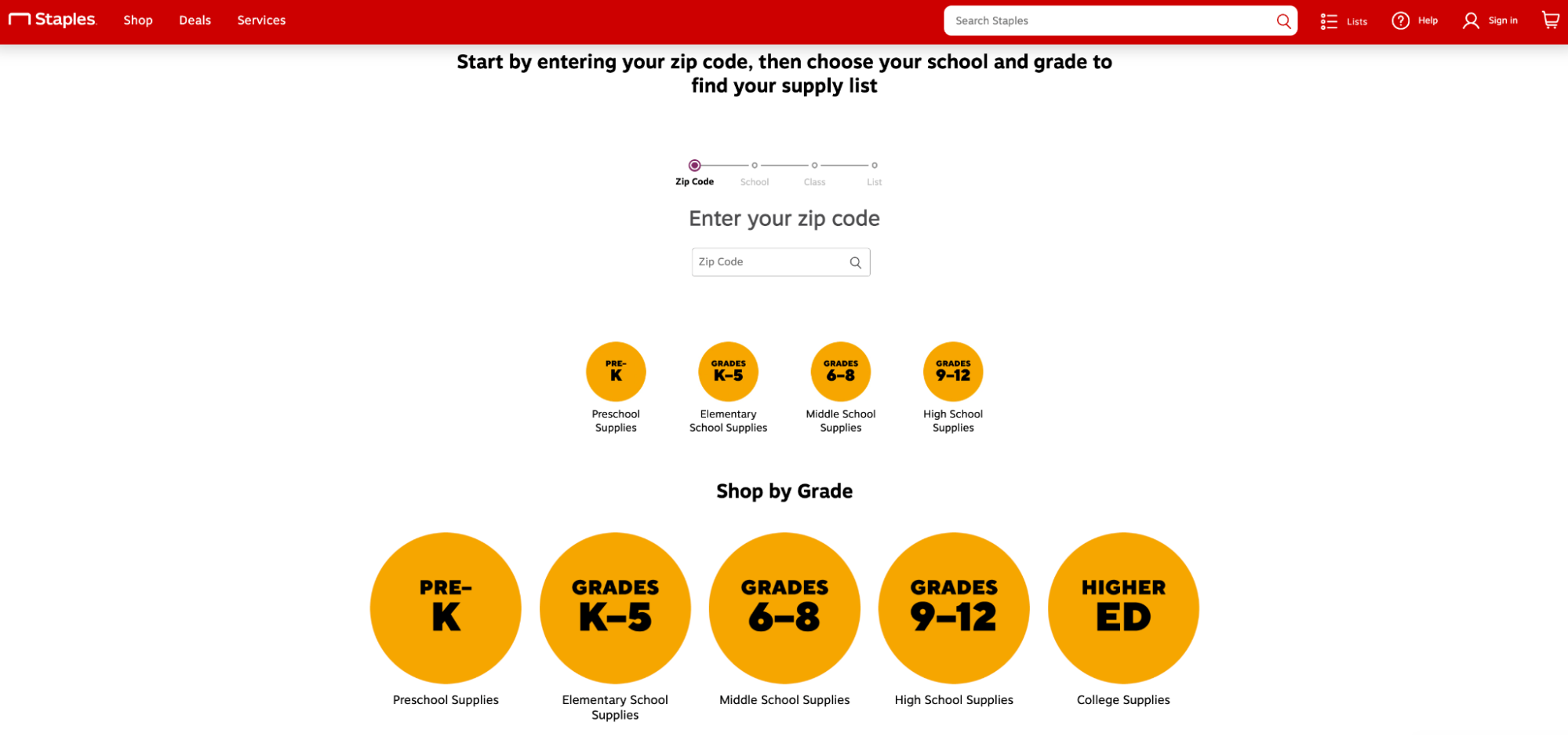
Staples’ school supply list finder with ZIP code search and grade options.
Staples helps parents find their school supplies list through a convenient tool.

5. Create curated bundles and kits

Group your bestsellers into themed kits (e.g., “First Day Essentials,” “Dorm Starter Set,” or “Creative Classroom Bundle”) to reduce decision fatigue and boost average order value (AOV).

On Shopify, use Shopify Bundles to create fixed or customizable product sets, track inventory in real time, and automatically adjust discounts.

Smiggle, the stationery and accessories retailer, runs limited-time online-only promotions like “10% Off Bundles” featuring themed kits (like a Care Bears three-piece lunchbox bundle). Each kit groups coordinated backpacks, bottles, and accessories.
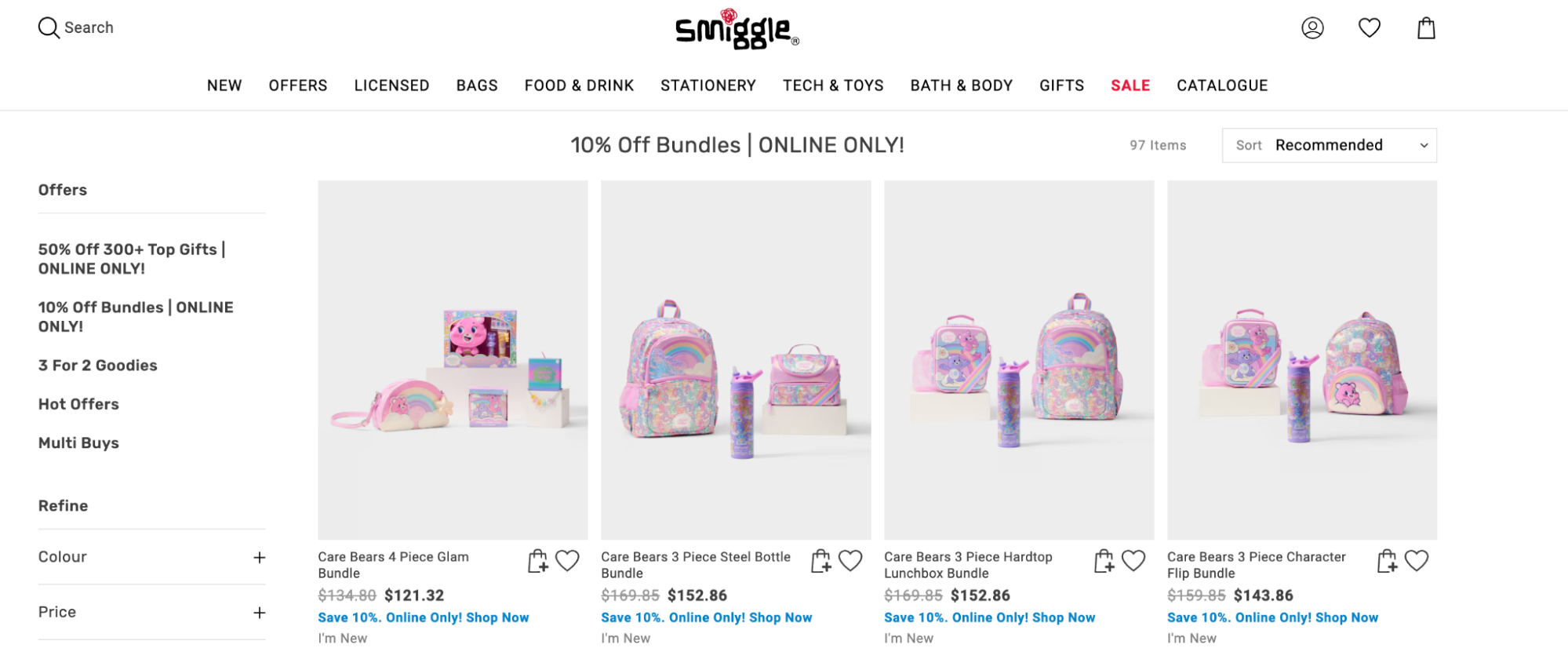
Smiggle’s “10% Off Bundles” page showing Care Bears-themed backpack and lunchbox sets.
Smiggle’s “10% Off Bundles” turn coordinated backpacks and lunch sets into one-click, high-margin kits.

Create product bundles with the Shopify Bundles app

Product bundles are a great way to increase cart values and ensure your products are discovered by more shoppers. Download the free Shopify Bundles app to quickly and easily create bundles for your products and variants from your Shopify admin.

Install Shopify Bundles

6. Build dedicated back-to-school landing pages and collections

A well-organized landing page can make all the difference between a quick checkout and a lost sale. A dedicated back-to-school collection helps parents and students find what they need, fast.

Start by grouping products by grade level, price range, or theme (e.g., “Elementary School Supplies,” “Middle School Essentials,” or “Under $25 Finds”). Include quick filters for top categories like uniforms, stationery, and tech accessories to make browsing effortless.

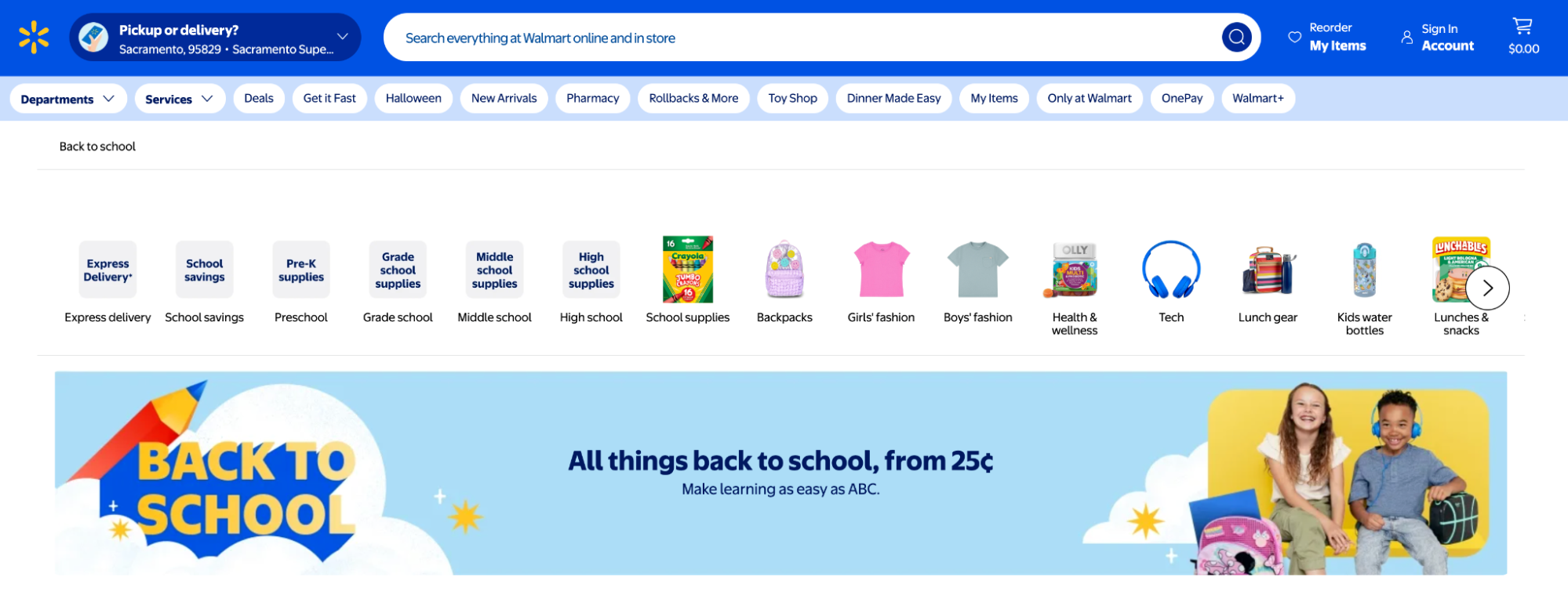
Walmart’s Back-to-School hub does exactly this. The page groups items by age and category, from pre-K supplies to dorm gear, and emphasizes convenience with express delivery options and “School Savings” deals. 

The banner, “All things back to school, from 25¢,” positions affordability front and center while making the experience feel cheerful and stress-free.
You can do the same for your storefront—use Shopify Collections to automate these displays, organizing products by tags, price, or inventory levels so your page updates itself as stock changes.

Go a step further and pair your seasonal landing page with email and SMS campaigns linking directly to it. Using Shopify’s Online Store 2.0 themes, you can feature limited-time offers, spotlight bundles, and embed UGC on your ecommerce website, all without writing a single line of code.

Master back-to-school season

The back-to-school shopping season might be predictable, but the way families shop isn’t. Tariffs, heat waves, social media trends, and AI-powered discovery are reshaping what—and how—people buy. But you can drive sales by predicting demand early, personalizing offers, and creating seamless, omnichannel retail experiences that make shopping feel effortless.

Start selling in-person with Shopify POS

Shopify POS is the easiest way to start selling in-person. Take your brand on the road and accept payments, manage inventory and payouts, and sell everywhere your customers are—farmer’s markets, pop up events and meetups, craft fairs, and anywhere in between.

Discover Shopify POS

Back-to-school shopping FAQ

How much do people spend on back-to-school shopping?

US parents plan to spend an average of $570 per child in 2025, roughly in line with 2024. Spending has largely stabilized after several years of sharp increases driven by inflation and supply chain issues.

Overall, total US back-to-school spending is projected to reach nearly $35 billion in 2025.

The averages also vary widely across many states. According to CouponBirds, parents in New York spend the most at $1,348 per child, followed by California ($1,304), Florida ($1,237), Massachusetts ($1,218), and Pennsylvania ($1,133). Parents in Louisiana ($327), Mississippi ($356), and Kansas ($373) spend the least. 

What are the most purchased back-to-school items?

The most purchased back-to-school items typically include these supplies:

  • Notebooks, ring binders, and paper
  • Pens, pencils, and erasers
  • Highlighters, sharpies, and ballpoint pens
  • Backpacks and lunchboxes
  • Post-It notes, planners, and pencil cases
  • Textbooks and reading materials
  • Clothing and shoes
  • School backpacks
  • Electronic devices, such as laptops, tablets, and calculators
  • Art supplies, like markers, crayons, and colored pencils

Other items such as calculators, planners, and basic art supplies like loose leaf paper and paint sets also saw steady growth, while decorative items such as markers and highlighters declined slightly.

Shopping lists also differ by age. Middle schoolers often drive higher spend in categories like backpacks, tech accessories, and sports uniforms as they transition to more specialized activities.

What does back-to-school shopping mean?

Back-to-school shopping refers to the process of purchasing supplies, clothing, and other essentials for students before the start of a new school year. This typically takes place in late summer or early fall, as parents and students prepare for school to start.

What are back-to-school shoppers spending the most money on?

The National Retail Federation found that most families are directing their back-to-school budgets toward high-impact essentials, particularly technology and apparel.

For K–12 households in 2025, average spending breaks down as follows:

  • Electronics and computer equipment: $295.81
  • Clothes and accessories: $249.36
  • Shoes: $169.13

School supplies: $143.77

How To Choose a Mobile POS (mPOS) System in 2026

Software Stack Editor · October 21, 2025 ·

A mobile point-of-sale (mPOS) system consists of software and portable hardware that processes your shop’s transactions. It calculates sales totals, processes payments, tracks inventory, collects business data, and much more. 

An mPOS system turns any tablet or smartphone into a checkout point. This capability enables you to ring customers up anywhere in your store, at pop-up shops, and even on the go. Our guide to mobile point-of-sale systems has what you need to know about this essential retail technology.

Start selling in-person with Shopify POS

Shopify POS is the easiest way to start selling in-person. Take your brand on the road and accept payments, manage inventory and payouts, and sell everywhere your customers are—farmer’s markets, pop up events and meetups, craft fairs, and anywhere in between.

Discover Shopify POS

What is a mobile POS (mPOS) system?

A mobile point-of-sale system (mPOS) is a portable hardware and software system that processes sales. An mPOS is nearly the same as a traditional point-of-sale (POS) system, except that it doesn’t have to be anchored to one checkout counter. 

With a mobile POS solution, you can install POS software onto a tablet or smartphone and serve customers wherever they are. And because your checkout moves wherever you need it, your shop doesn’t necessarily need a checkout counter at all.

How does an mPOS work? 

Here’s an overview of how transactions work on an mPOS system:

  1. The customer chooses the products they’d like to buy. The sales associate begins the transaction by scanning the item’s barcode with a barcode scanner or the tablet or smartphone’s camera, or by searching for it in the system.
  2. The mPOS calculates the total price, including applicable sales tax and discounts.
  3. The customer pays with a credit or debit card, cash, digital wallet, gift card, or loyalty points. If the customer is paying with cash away from the register, the associate will need to bring them change.
  4. The mPOS processes the payment. After the shopper decides if they want an emailed or printed receipt, the transaction is complete. The POS updates the store’s inventory count, factoring in the newly sold items.

Key benefits of using a mobile POS

These are just some of the many advantages of using an mPOS terminal:

Increase sales with mobile checkout and line busting 

With a POS that moves wherever you need it instead of being tethered to a checkout counter, you can check out shoppers wherever they are.

Mobile checkout virtually eliminates lines at the checkout counter, creates a faster checkout experience, and helps with line busting.

Improve customer service with on-the-floor support 

With a POS system in the palm of your hand, you have the information and tools you need to better serve customers. You can, for example, check inventory without leaving the sales floor or email shoppers a pre-loaded cart of products they tried on so they can buy online when they’re ready.

If you often find yourself serving more than one customer at a time, mobile POS systems let you save the customer’s cart and retrieve it later. This lets you switch between customer interactions without losing order details or wasting time at checkout reentering products into the customers cart. 

Securely accept payments anywhere 

Mobile POS systems like Shopify come with built-in payment processing. Payment data encryption, PCI compliance, and 3D Secure compliance ensure that mobile payment information and business data are safe.

📌 GET STARTED: Shopify Payments is the fastest way to start accepting mobile payments in person, online, and on the go. It’s included in all Shopify plans, so you can skip lengthy third-party activations and go from setup to selling faster.

Person tapping a black credit card onto a silver iPhone in a clothing store.
Accept contactless payments from your phone with Tap to Pay on Shopify POS.

Scale your business easily 

Getting up and running when you open a new location or sell at an event is quick and easy with an mPOS. The systems run on hardware you’re already familiar with and on software that’s similar to other iOS and Android apps, making them intuitive to use. 

While some POS systems have a lengthy setup process, Dustin Kroft appreciated how straightforward it was to open his first Kroft’s retail store with Shopify POS’ user-friendly interface. 

“I can set up Shopify POS in 10 minutes and it’ll already be synced with my Shopify online store’s inventory,” Dustin says. “I’m kind of blown away at how little I have to do to start transacting at the store.”

How to choose the right mobile POS system 

Choosing a mobile POS system is an important business decision. From assessing costs to confirming compatibility with existing tools, here’s how to choose the best mobile POS system for your retail store.

Step 1: Evaluate your business needs and sales volume 

The right mPOS should handle your transaction volume, integrate with your inventory, and support the payment methods your customers prefer. A system that’s too basic may slow down transactions, while an overly complex platform can increase costs and complicate workflows.

To ensure your new system can process payments quickly and reliably, use reports from your current POS platform to estimate your average daily transaction volume. Combine this with feedback from your retail team: What challenges are they facing with your current platform? Can you solve them with a new mPOS system? Use those insights to define your greatest needs as you start evaluating platforms.

Step 2: Compare essential mPOS software features 

As you begin to compare potential mPOS providers, make a list of essential features to narrow down your shortlist. If a vendor doesn’t offer the basic features you need, strike it off your list. 

Essential mPOS features include:

  • Unified inventory management 
  • Native payment processing
  • Discounting functionality 
  • Customer data collection
  • Refunds and exchanges 
  • Omnichannel fulfillment, such as buy online, pick up in-store
  • Reporting and analytics

If you’re managing multiple locations (or plan to in the near future), consider features like customizable staff permissions, store inventory transfers, and cloud-based access. This helps avoid the need to switch POS platforms down the line. 

Step 3: Understand the true costs 

POS vendors each have their own feature sets that justify different prices. However, pricing tends to be unclear—some include essential features as standard, while others have everything you’ll need right out of the box. 

As part of your evaluation process, ask the vendor for a complete POS package cost that includes any features you shortlisted in the previous step, including:

  • POS software
  • Hardware costs
  • Integration fees
  • Transaction fees 
  • Customization fees

Some providers use flat-rate pricing, charging the same percentage for every transaction, while others use interchange-plus, which passes through card network fees plus a small markup. Flat rate is simpler to forecast, while interchange-plus can be more cost effective for high-volume retailers.

💡Tip: Because Shopify is the only platform to natively unify POS and ecommerce in the same system, omnichannel retailers have just one platform to manage. A recent study found this approach delivers 22% better total cost of ownership (TCO) compared to competitors, on average.

Step 4: Check for hardware compatibility

Your mobile POS software is only as effective as the devices it works with. If the system doesn’t support the receipt printers, barcode scanners, or card readers you need, for example, you may have to manually process transactions or replace hardware later down the line. 

Step 5: Consider key integrations

A mobile POS system is the command center for a retail business. But if you’re selling through multiple channels, confirm that your shortlisted vendor integrates with that platform. Shopify POS, for instance, unifies customer, order, and inventory data wherever you sell—including your ecommerce website, social media storefronts, and marketplaces.

Aside from sales channels, evaluate your existing retail tech stack to shortlist which integrations your new mPOS should support. These include:

  • Employee management tools
  • Accounting and payroll software
  • Email marketing tools
  • Customer loyalty programs 
  • Returns and exchanges platforms
  • Customer relationship management (CRM) platforms
  • Enterprise resource planning (ERP) systems

Essential mobile POS hardware explained 

You don’t need much in the way of hardware to get started with an mPOS. That said, some merchants need additional POS hardware to keep their store running smoothly. 

Tablet or smartphone

Most mobile POS software can run on any iOS or Android tablet or smartphone. Download your POS software onto these devices and you’re ready to sell.

💡Tip: Shopify Tap to Pay turns your smartphone into a POS system to take payments on the go. Customers can tap their contactless card or mobile wallet onto your phone to process their order—no external hardware required. 

Person tapping their contactless payment card onto a smartphone with Shopify POS.
Accept credit card payments on your smartphone with Tap to Pay on Shopify.

Mobile card reader 

To take full advantage of an mPOS, you should have a mobile card reader that accepts magstripe swipes, NFC chips, and contactless and mobile wallet tap-to-pay transactions through technologies like Apple Pay and Google Pay.

Barcode scanner 

Wireless barcode scanners make scanning products easy and convenient, both at the register and in the stockroom or warehouse for inventory management

However, barcode scanners are not a required part of an mPOS system—with most systems, you can scan products with your tablet or smartphone’s camera.

Cash drawer and receipt printer 

If you want to accept cash payments as part of your mPOS system, you’ll need to keep a cash register at one of your counters.

mPOS systems make it easy to go paperless with email receipts. But if you want to give customers printed receipts, keep a receipt printer next to your cash register.

📌 GET STARTED: Ready to start shopping for point-of-sale hardware? Head to the Shopify POS hardware store to shop for hardware designed to help you check out customers at the counter, curbside, and everywhere in between.

Why Shopify is the unified mPOS for retail 

When it comes to mPOS providers, one stands out from the competition: Shopify POS. Shopify is easy to use, priced competitively, and comes with a robust feature set that helps your business grow.

Customizable checkout 

The last thing you want is a complex POS interface that stalls checkout as cashiers struggle to find the functionality they’re looking for. 

A big benefit of Shopify POS is its customizable checkout. You can build your own workflow and customize the Smart Grid—with both native Shopify features and integrated apps—to make the POS dashboard work for your needs.

This flexibility was a huge driver in Tomlinson’s decision to migrate to Shopify POS. Owner and operator Kate Knecht says their previous system “used to require multiple steps to apply a percentage off products that were part of a promotion. But with Shopify, the right discounts populate automatically when you add items to the cart. It’s a thing of beauty.”

Unified inventory management 

If you have a Shopify online shop or warehouse, Shopify POS will connect with it and update inventory as it’s sold, returned, or exchanged, online or in-store. 

This lets you forecast demand, set low-stock alerts, create purchase orders, know which items are selling or sitting on shelves, and count inventory accurately. You can spend less time on inventory and avoid stockouts and overstocking. 

This unification pays dividends. According to an independent research firm, Shopify POS delivers an additional 5% gross merchandise value uplift on average through integrated inventory management, improved headquarters productivity, and enhanced marketing effectiveness.

Centralized reporting and analytics

Only Shopify POS lets you view detailed reports for brick-and-mortar and online stores in one place. Instead of working on several platforms, exporting data, and creating spreadsheets, you can find everything in a single dashboard. 

Centralized reporting helps you access the information you need faster, identify trends, take advantage of opportunities, and reach the right business decisions sooner.

💡Tip: Only Shopify POS unifies your online and retail store data into one back office–from customer data to inventory, sales, and more. View easy-to-understand reports to spot trends faster, capitalize on opportunities, and jumpstart your brand’s growth. 

Omnichannel selling features 

When you use Shopify’s mPOS and a Shopify online store, you unlock features that unify sales channels and give customers a holistic shopping experience:

  • With a store pickup option, online shoppers can save on shipping costs and collect products at your shop. Spend less on last-mile delivery, speed up fulfillment times on local orders, and drive more foot traffic to your stores.
  • Ship-to-customer lets you send products customers have paid for in-store to their destination of choice. This feature comes in handy with presale products, large items, or products sold at popups where a specific size or color wasn’t available.
  • Email carts are useful when a customer finds an item in your store but you only have the color or size they want online. Shopify users can email preloaded carts to customers. When customers are ready to purchase, there’s nothing standing in their way.
  • Accept returns or exchanges for purchases made online or at another store location and your inventory will be updated instantly—no manual reconciliation required. 

Get started with Shopify POS

Only Shopify gives you all the tools you need to manage your business, market to customers, and sell everywhere in one place. Unify in-store and online sales today.

Discover Shopify POS

Mobile POS system FAQ

What is a mobile point of sale?

A mobile point of sale (mPOS) is a portable system—usually a tablet or smartphone with a card reader and POS app—that allows businesses to process payments, retrieve product details, track inventory, collect customer data, and manage receipts. 

Can I use mobile as a POS?

Shopify can turn your mobile into a POS system. Simply download the Shopify POS app for iOS or Android and sign into your account. With Tap to Pay, you can skip the need for a mobile card reader and process payments directly from your smartphone. 

What are POS mobile devices?

POS mobile devices are portable tools—like smartphones, tablets, or handheld terminals—used to process sales and payments on the go. They often run POS software and can connect to card readers or barcode scanners for full checkout functionality.

What are the four types of POS systems?

  1. Standalone: A basic POS system that is limited to a single terminal and does not have any network or communications capabilities.
  2. Integrated: Capable of connecting to multiple terminals, peripherals, and other devices, and can communicate with a central server.
  3. Mobile: Portable, wireless POS systems that are designed to be used on the go. They are often used by salespeople or delivery personnel.
  4. Cloud-based: Hosted in the cloud, allowing multiple terminals to access a centralized database and make real-time updates.

20 YouTube Niches That Actually Convert: A Guide for Online Business Owners

Software Stack Editor · October 20, 2025 ·

Picture of Haiden Hibbert

Haiden Hibbert

I’m a Content Manager at MemberSpace helping entrepreneurs and creators sell digital products.

When someone hits “subscribe” on YouTube, it’s not a casual follow — it’s a commitment. They’re saying, “I want to keep learning from you.”

That’s what makes YouTube so powerful for creators and online business owners. It’s not about chasing trends or quick hits — it’s about showing up consistently, building authority, and turning that attention into something sustainable.

Unlike short-form platforms, YouTube rewards depth. Your videos can keep attracting new viewers for months, even years, through search and recommendations. That means every upload has long-term potential — if you’re in the right niche.

In this post, you’ll learn:

  • The most popular and profitable YouTube niches in 2025
  • Why some niches grow faster (and monetize easier) than others
  • How to choose a niche that fits your skills and business goals
  • How to turn your YouTube audience into paying members with MemberSpace

Let’s explore 20+ YouTube niches that are growing fast — and helping creators turn their channels into real, profitable businesses.

Turn YouTube Subscribers to Paid Members!

The easiest way to accept membership payments or one-time charges for digital products like podcasts, online courses, communities, content libraries, and more — all from your own website!


Start selling now

Get started for free! 5 minutes to set up.

20+ YouTube Niches That Are Growing Fast (and Making Money) in 2025

These niches thrive on YouTube’s strengths — long-form storytelling, searchability, and community. They’re where creators are building loyal audiences and turning views into income.

1. Educational “How-To” Videos

YouTube is still the internet’s favorite classroom. Creators and entrepreneurs who teach a specific skill — from Excel to watercolor painting — build authority fast. Tutorials and explainer videos perform well in search and can easily lead to paid courses or memberships.

youtube niche video example

2. Personal Development & Mindset

Motivational and self-improvement content works beautifully on YouTube because viewers come looking for depth, not just quick inspiration. Creators who share their growth journey or practical mindset tips often build highly engaged communities.

3. Health, Fitness & Wellness

Workout routines, nutrition advice, and wellness education thrive on YouTube’s long-form format. Creators can mix tutorials, personal stories, and client transformations to build trust and naturally lead viewers to coaching or programs.

4. Tech Reviews & Tutorials

Tech creators dominate YouTube because viewers love detailed breakdowns and honest opinions. From app walkthroughs to gear reviews, this niche is perfect for affiliate income, product sales, or paid tech communities.

5. Productivity & Tools

Video creators who share systems, apps, and time-management strategies attract ambitious audiences. Long-form tutorials and “day in the life” videos perform well, especially when they show real workflows that viewers can replicate.

6. Creative Skills & Design

Artists, photographers, and designers thrive by showing their process. YouTube’s longer format lets creators share tutorials, portfolio breakdowns, and behind-the-scenes content that builds authority and sells digital products or templates.

7. Finance & Side Hustles

Viewers love content creators who make money topics feel approachable. From budgeting to freelancing to investing, this niche works well because it’s built on trust — and trust translates directly into paid offers and memberships.

youtube niche example

8. Lifestyle & Vlogs

YouTube vlogs are less about perfection and more about connection. Creators who share authentic stories, routines, or lessons from their lives attract loyal audiences who feel personally invested in their journey.

9. Food & Cooking

Recipe videos, kitchen hacks, and “what I eat in a day” content perform consistently well. YouTube’s algorithm loves satisfying, repeatable formats — and food creators can easily expand into cookbooks, classes, or memberships.

10. Travel & Remote Work

Longer travel vlogs and “day in the life” videos allow creators to tell stories instead of just showing destinations. This niche is perfect for building a brand around freedom, adventure, and entrepreneurship.

11. Fashion & Style

Outfit breakdowns, capsule wardrobe videos, and thrift hauls do especially well on YouTube because viewers want visual inspiration and practical advice. The best creators build communities around style, not just trends.

12. Beauty & Skincare

Unlike short-form platforms, YouTube allows for detailed tutorials and product reviews. Creators who are transparent about what works (and what doesn’t) build loyal audiences that trust their recommendations.

13. Home, DIY & Organization

Transformation videos — from room makeovers to decluttering challenges — perform incredibly well. These creators mix education and entertainment, giving viewers both inspiration and step-by-step guidance.

14. BookTube & Learning

Book reviews, reading vlogs, and study content have dedicated audiences on YouTube. Creators who combine education with personality build strong communities that are easy to monetize through memberships or digital resources.

15. Gaming & Commentary

Gaming creators thrive when they focus on storytelling and community. Let’s Plays, reviews, and reaction videos create loyal audiences who often support through memberships or exclusive content.

16. Sustainable Living & Minimalism

Creators who share realistic, intentional living tips are gaining traction. This niche resonates with viewers who want to make small, meaningful changes — and that authenticity drives long-term engagement.

17. Music & Performance

Musicians who share behind-the-scenes content — songwriting sessions, practice routines, or stripped-down performances — build strong fan relationships. YouTube’s long-form format lets them show the full creative process.

18. Parenting & Family Life

Honest, relatable family content performs well when it focuses on connection, not perfection. Creators can blend humor, advice, and storytelling to build trust and community.

family vlog youtube niche

19. Language Learning

YouTube is full of creators teaching languages through short lessons, pronunciation tips, and cultural insights. These videos are evergreen and attract global audiences eager to keep learning.

20. Career & Skill Development

Creators who teach professional skills — from communication to leadership to freelancing — are building authority fast. These audiences are highly motivated and often invest in courses or memberships for deeper learning.

21. Niche Hobbies & Micro-Communities

Some of the most successful YouTubers live in small corners of the platform — woodworking, journaling, gardening, even fountain pens. The smaller the niche, the stronger the loyalty — and the easier it is to monetize through memberships or digital products.

How Entrepreneurs Use MemberSpace to Monetize Their YouTube Audience

Once your YouTube channel starts growing, the next step is turning that audience into income. That’s where MemberSpace comes in.

MemberSpace is membership site software that lets you sell member-only access to a library of digital content and exclusive pages of your website. If you don’t have a website yet, we’ll even create a free, customizable one for you.

For entrepreneurs, it’s the simplest way to go beyond ad revenue or affiliate links and build something sustainable — recurring income from your most engaged audience.

You can use MemberSpace to:

  • Offer exclusive trainings, templates, or resources
  • Create a paid community for your audience or clients
  • Host private workshops or group coaching sessions
  • Sell digital products or course libraries

No coding, no complicated setup — just a straightforward way to turn your YouTube subscribers into paying members!

YouTube Monetization FAQ

Do I need a big channel to make money?
Not at all. Even a few hundred loyal subscribers can turn into paying members if you’re solving a real problem.

What kind of content converts best into memberships?
Educational, how-to, and behind-the-scenes content that helps people take action or build a skill.

Can I use MemberSpace if I don’t have a website yet?
Yes. MemberSpace can create a free, customizable website for you so you can start selling your content right away.

How is this different from YouTube memberships or Patreon?
With MemberSpace, you own the experience — your pricing, your content, your audience. No platform cuts, no limitations.

Final Thoughts

YouTube isn’t just a platform for creators — it’s one of the most powerful growth tools for entrepreneurs. Every subscriber is a potential customer, every video a chance to build trust and authority.

If you’ve been thinking about starting or scaling your YouTube channel for your business, now’s the time.

You don’t need millions of views — just the right message, the right niche, and a system that turns attention into income.

👉 Try MemberSpace free for two weeks and start turning your YouTube subscribers into paying members today.
Turn YouTube Subscribers to Paid Members!

The easiest way to accept membership payments or one-time charges for digital products like podcasts, online courses, communities, content libraries, and more — all from your own website!


Start selling now

Get started for free! 5 minutes to set up.

6 tips to perform your best on live television

Software Stack Editor · October 20, 2025 ·

🚀 New Templates in Miroverse

Software Stack Editor · October 20, 2025 ·

September flew by, and the Miro Community has impressively shared over 100 fresh new templates! From “The Summer I Turned Pretty Retro” to the captivating “Retro Horror – Halloween Night,” these templates beautifully capture the essence of the changing seasons. Are you still embracing summer vibes, or have you started to enjoy some Mariah Carey softly playing in the background? Either way, we totally support it and can’t wait to see your diversified submissions coming in! 

Plus, we just launched the new Miroverse — a bigger, better gallery of both Miro-made and Community templates with a fresh, new look. ✨And, in case you missed Canvas 25 — Flows & Sidekicks will be available to publish in Miroverse soon. Watch the keynote.

Thinking about publishing your first template? Submit today to share your frameworks with over 100M users around the world.

Learn from our teammates about the submission process and what makes a good template here, and visit the Creator Toolbox for additional resources.

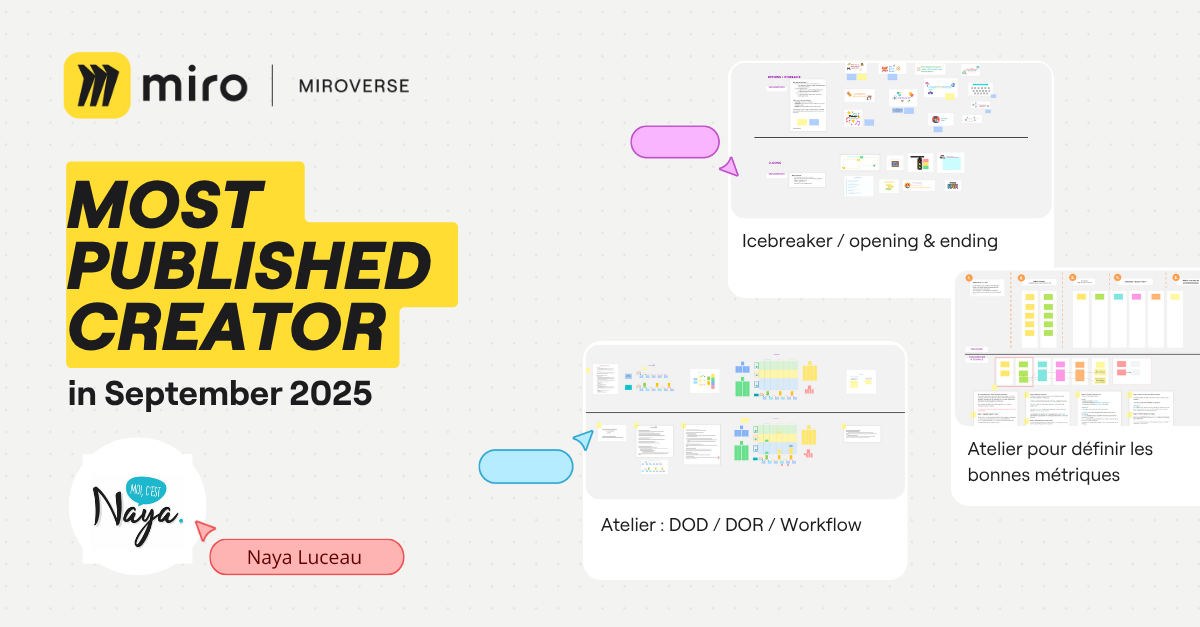
Naya Luceau | Most Published Miroverse Creator 🚀

Naya Luceau is an inspiring Scrum Master deeply committed to agile methodologies and sharing her wealth of knowledge. Her dedication shines through in the release of four fresh Miroverse templates this September! As a multilingual creator publishing in both French and English, she makes her resources accessible to a wider audience. 

We can’t wait to see more of your templates, Naya! 

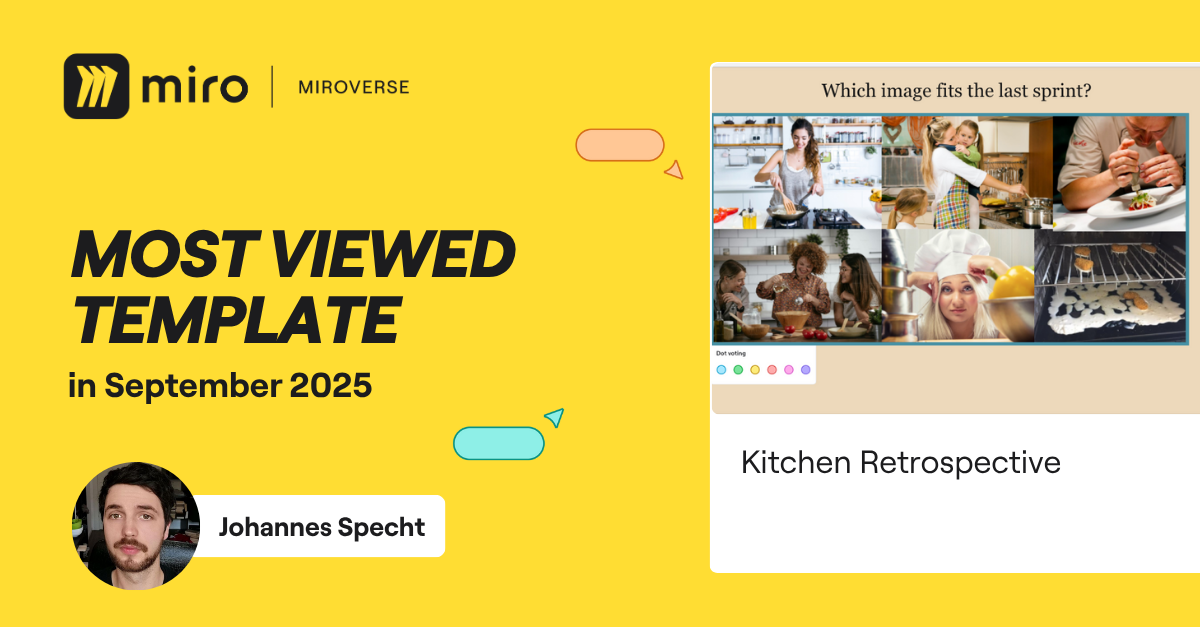
Johannes Specht | Most Viewed Miroverse Template 🚀

In September, Johannes crafted an engaging Kitchen Retrospective, which has already captured 545 views! As an Agile Coach and Scrum Master, his enthusiasm for retrospectives truly shines. Explore more of his fascinating retros, like the Car and Science versions, here. 

Keep up the amazing work, Johannes!

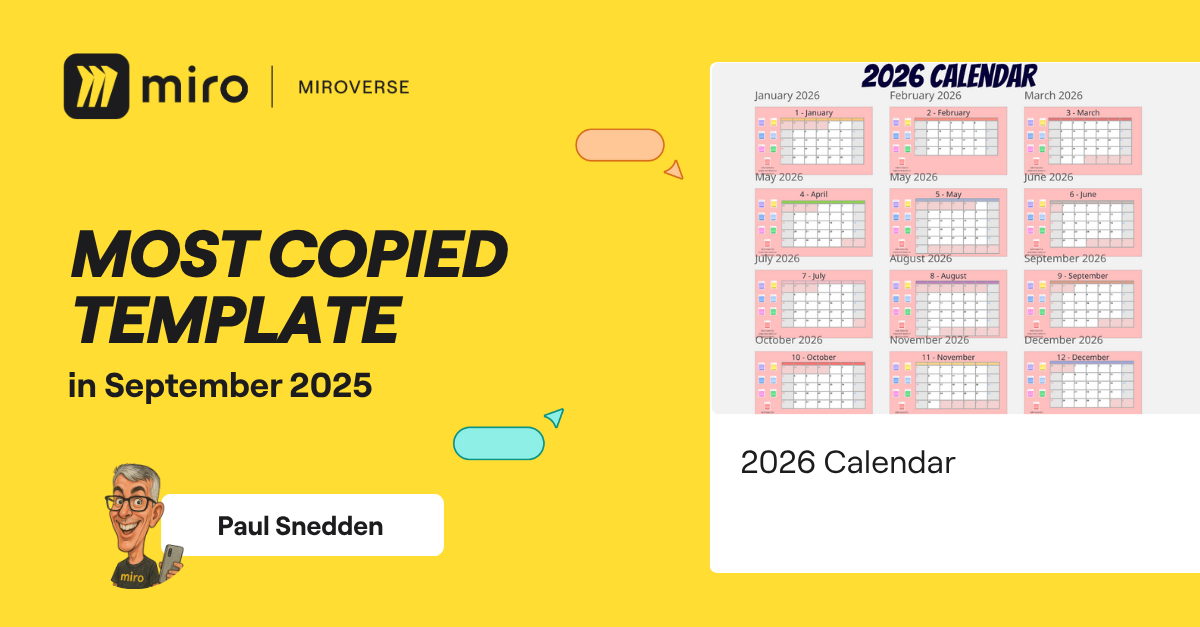
Paul Snedden | Most Copied Miroverse Template 🚀

Although we still have a few months left of 2025, Paul’s 2026 Calendar Template has been copied 165 times! As a talented Workshop Designer, Facilitator, and Trainer, Paul helps teams think differently to solve problems through alignment and collaboration, all in a fun way.

Thank you, Paul, for thinking ahead — looking forward to your next creation!

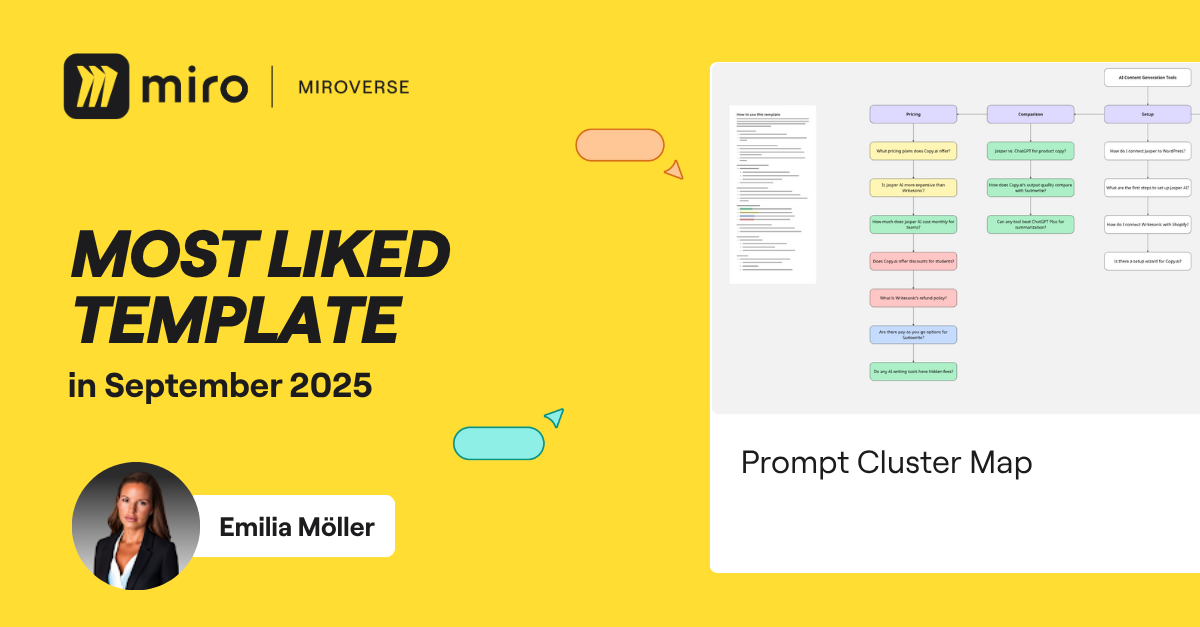
Emilia Möller | Most Liked Miroverse Template 🚀

Emilia has made an amazing debut in the Miroverse Community with her first-ever template, the Prompt Cluster Map — the most liked template in September. As an AI Strategist at AI Visibility Hub, she’s passionate about empowering founders, marketers, and teams to create effective visibility systems tailored for an AI-driven search landscape, going beyond traditional SEO.

We can’t wait to see more innovative templates from you!

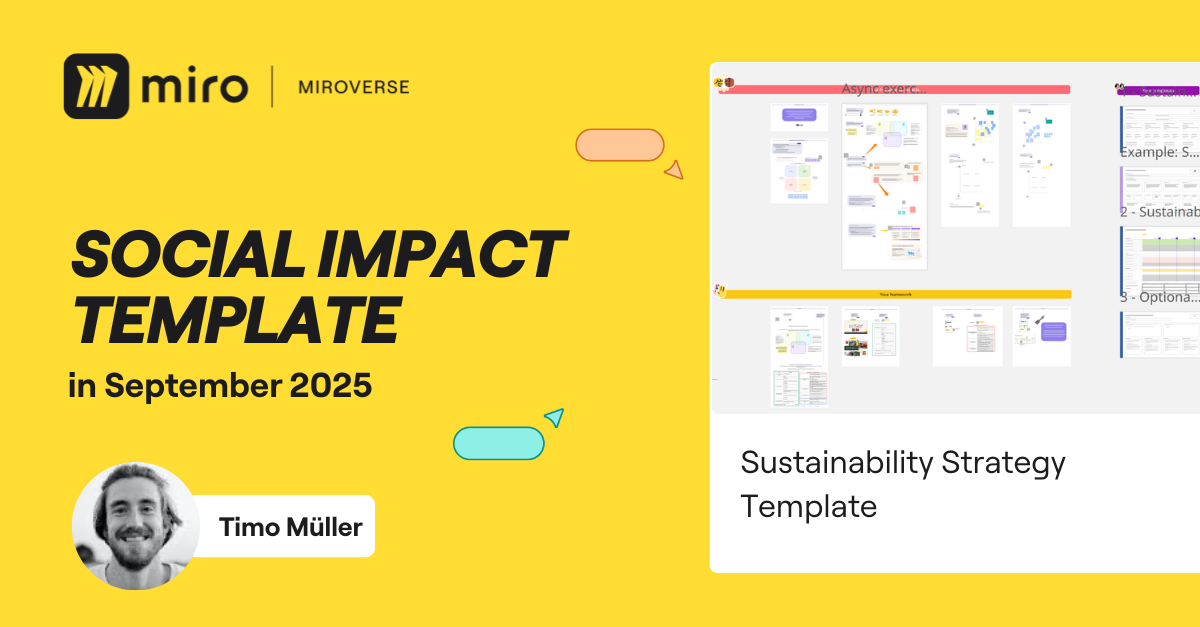
Timo Müller | Social Impact 🚀

Timo is a passionate product professional committed to creating innovative templates that drive sustainability and transformative change in business. His most recent template, the Sustainability Strategy Template, definitely deserves to be highlighted. This interactive tool provides teams with a clear and inspiring path to develop a practical and effective sustainability strategy.

Explore the other impactful templates from Timo here, and discover how they can support your journey toward a more sustainable future!

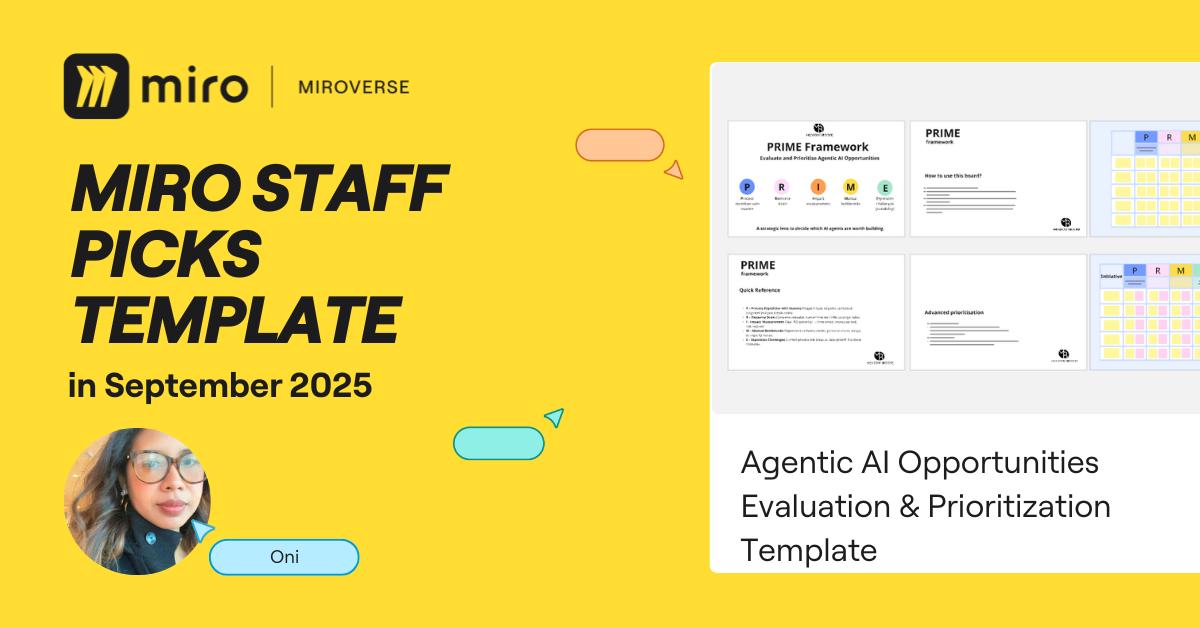
Oni | Staff Picks 🚀

We’re thrilled to celebrate another fantastic debut in the Miroverse from September —- the Agentic AI Opportunities Evaluation & Prioritization Template crafted by the talented Oni! 

With over 16 years of experience as a Digital Transformation Strategist, she is dedicated to developing practical frameworks for startup founders and corporate executives alike. 

The thoughtful design and organization of the Agentic AI Template truly stand out. 

Congratulations, Oni! 

Explore thousands of templates created by and for the Miro community in Miroverse. Discover a new template you loved? Share what you’ve found in the thread below. 👇

If you can’t find the template you’re looking for, submit it in Template Requests.

Why SurveyMonkey’s Marketing Leader Says Your Foundation Is Broken

Software Stack Editor · October 20, 2025 ·

The way most marketing teams approach AI is probably the way I approach my inbox at 4:59 PM on a Friday.

With reckless optimism and zero follow-through.

But Katie Miserany, SurveyMonkey’s Chief Communication Officer and SVP of Marketing, thinks the real problem isn’t AI — it’s that most marketers have forgotten a fundamental truth: Just because you can talk about something doesn’t mean you should.

Click Here to Subscribe to Masters in Marketing

Katie M. SurveyMonkey

Katie Miserany

Chief Communications Officer and SVP, Marketing at SurveyMonkey

  • Claim to fame: Miserany’s proud accomplishment isn’t a single launch or campaign… It’s the people. She’s felt fortunate to meet, hire, and mentor incredibly talented people who’ve chosen to follow Katie from team to team and company to company. Miserany told me, “Building workplaces people want to join again and again tells me I’m creating environments where people can grow, do their best work, and feel genuinely supported. That’s the kind of legacy that makes me proud.”

Lesson one: Stop doing random acts of marketing.

Remember the TikTok ban? 

SurveyMonkey’s team was excited. Almost immediately, they knew they needed to hop on the trend by conducting a survey on how people were feeling about TikTok.

(I can relate. I remember sitting in an airport lounge writing a panic-induced blog post on the TikTok ban because HubSpot felt we should cover it, too.) 

And just as Miserany’s team prepared to launch their findings… TikTok released its own study.

“Guess what the media covered?” Miserany says with a laugh. “It was TikTok’s study.”

Emily Kramer (a Masters in Marketing alum) has a phrase for this temptation to jump on every trending topic just because you can. She calls it “random acts of marketing.”

And Miserany doesn’t think it’s going to cut it anymore. 

“To scale in this new chapter of B2B marketing, the foundation needs to be stronger. You can’t do random acts of marketing. You need to set your foundation, understand your customers’ needs, and then have the discipline and discernment to only build from that foundation instead of chasing shiny things,” she tells me. 

More volume without a strong foundation? That’s just noise.

Lesson two: Build your foundation first, then repeat it everywhere.

When she was the senior director at Sheryl Sandberg’s Foundation, Miserany worked on a campaign aimed at getting men to be allies to women in the workplace. 

She and her team did something that most marketers would find agonizing: They spent forever in the planning phase.

“You’re a small organization… So you would think the temptation would be to just start running [with something],” Miserany tells me. 

But instead, “we spent so long beating the idea up.” 

They asked themselves: What’s the cost of doing this? What’s the cost of not doing it? 

Once they’d meticulously nailed down their vision for the campaign, execution felt “almost effortless.” Even better, it made consistency possible. 

The team created something called “the well” — a document that outlined exactly how they were supposed to talk about everything. If something was called “stunning” in the well, you couldn’t call it “gorgeous.” You stuck to the script, and you had to make a real case for deviating from it.

“The repetition of this exact language is really important for breaking through,” Miserany explains. 

“And then you need all of your channels doing the same exact thing to have any hope of someone seeing it, recognizing it, remembering it, [and] feeling good about your brand.”

The lesson for leaders: Spend time to nail the planning and trust your marketers to tell the right story every time. 

Lesson three: Try scaffolding. 

Miserany gets frustrated when she sees good marketing ideas executed in a vacuum.

Her solution? What she calls scaffolding. 

Recently, SurveyMonkey’s brand leader chatted with Miserany about the opportunity to do a sponsorship at F1. 

But the idea didn’t fully excite Miserany until she heard what could go along with it — like a conference, a webinar, and a follow-up email nurture campaign.

“An F1 sponsorship sounds cool, but it doesn’t really get me that excited about the potential for the business until you can scaffold it with all these other things and surround it with different tactics and different storytelling, to make it helpful to our customers.”

The takeaway for SMB marketers? Before launching any campaign, ask yourself: What else can we build around this? How can we turn one good idea into an integrated experience that surrounds our prospects in a way that’s actually helpful?

Because in a world where everyone has access to AI and can crank out content, the brands that break through won’t be the ones doing more isolated tactics. They’ll be the ones doing fewer things, better.

Bonus: The SurveyMonkey feature SMB marketers are sleeping on.

Before we wrapped, Miserany told me something that surprised me: You can use SurveyMonkey to survey people you don’t know.

Want to test logo designs? Ask about product preferences? Validate a business idea? You can reach a targeted audience (including specific industries, locations, or demographics) without hiring an expensive research firm.

Click Here to Subscribe to Masters in Marketing


Why most go-to-market playbooks fail internationally — and what to do instead

Software Stack Editor · October 20, 2025 ·

I first worked across borders in the mid‑90s, interpreting Spanish calls for AT&T. What struck me then — and what still holds today — is how quickly things break down when people assume their way of working is universal. Fast‑forward nearly three decades, after leading international growth at HubSpot and advising companies from Google to SaaS startups, I’ve seen the strongest domestic strategies fall flat abroad.

Download Now: Free Marketing Plan Template [Get Your Copy]

Here’s what I see happen over and over again: Teams think they’re being global, but they’re still defaulting to the comfort of their home market. Proximity bias and familiarity creep in quietly, and the playbook that worked so well at home suddenly stops delivering.

At HubSpot, I introduced the idea of going “global-first,” a mantra we repeated often. The idea was straightforward: stop treating international as an afterthought, because the tactics that work in your home market rarely carry you into the next one. The mindset has to evolve from the start.

So, where do teams go wrong with international expansion, and what should they be doing instead? Let’s break it down.

Table of Contents

  • The Shared Language Problem That’s Sabotaging Your Global Strategy
  • Where Teams Go Wrong with International Expansion
  • Building a Global-first Approach That Actually Works

The Shared Language Problem That’s Sabotaging Your Global Strategy

One of the first hurdles I see in global expansion is surprisingly simple. People don’t speak the same language about what they’re trying to do.

Before teams can even talk strategy, they need a shared vocabulary. Too often, people use terms like translation, localization, and globalization interchangeably, as if they mean the same thing. They don’t, and confusing them leads to wasted money and misaligned expectations.

Here’s how I break it down:

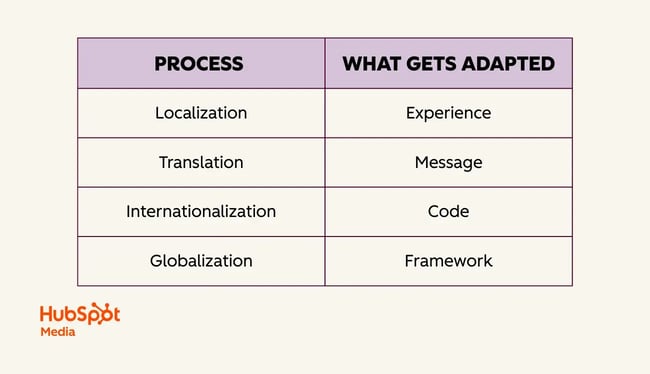
  • Translation = adapting the message, or ensuring the meaning carries across, even if the words change.
  • Localization = adapting the experience, or putting the full customer journey in context and going beyond text on a page.
  • Internationalization = adapting the code. Here, infrastructure choices, like hard-coding U.S. dollars, can create barriers.
  • Globalization = adapting the strategy or mindset. This is the deepest layer and re quires rethinking strategy for each market rather than applying the same playbook everywhere.

table showing four international business processes and what each adapts: localization adapts experience, translation adapts message, internationalization adapts code, and globalization adapts framework.

These distinctions matter because what appears to be a simple “localization problem” is often something much deeper. I’ve watched teams waste months trying to fix translation issues. Meanwhile, the real problem was a missing market strategy. Once everyone understands what these terms actually mean, you stop throwing money at the wrong things.

Where Teams Go Wrong with International Expansion

Companies continue to make the same mistakes when they expand internationally. Once you understand the framework above, these become obvious.

Forgetting About Go-to-market Fit

Most leaders understand product-market fit, but few think about go-to-market fit. Just because you see website traffic from another country doesn’t mean there’s a business opportunity there.

I’ve seen multiple companies assume it was time to invest in India after seeing traffic spikes from the country. But when we looked closer, those visitors weren’t willing to pay U.S. prices, we didn’t accept rupees, and we had no local payment processing. Traffic didn’t equal opportunity. Without adjusting pricing and infrastructure, there was no go-to-market fit.

At HubSpot, we ran into the same issue when launching our CRM in Latin America. The product resonated, but HubSpot hadn’t adjusted pricing for local economies, so only enterprise buyers could afford it. Product-market fit existed, but go-to-market fit was limited to the wealthiest segment.

Assuming One Strategy Fits All Markets

When HubSpot rolled out changes to our partner program, someone asked me to localize an announcement email into Japanese. It seemed simple at first, but upon reviewing the email, we noticed it included several links pointing to dependent assets, including a video, 10 blog posts, seven web pages, and more.

What appeared to be a straightforward job turned out to be a localization project that would have cost tens of thousands of dollars.

So, I asked the obvious question: How many partners do we have in Japan? Turns out, fewer than 10, and they were all in Tokyo. Instead of this big, elaborate campaign, we just invited them to our Tokyo office to walk them through the changes in person. It was less work for everyone and a better fit for a culture that values face-to-face relationships.

I ran into a similar challenge with our website.

When we were expanding to Japan, people wanted to translate our entire U.S. website. But our U.S. site was built for a market where we‘re already established. We’re a public company that people know. In Japan? Nobody had heard of us. Why would we need this complex site with all our partner integrations and advanced features when people didn’t even know who we were yet?

I found the playbook that works for a market leader doesn’t make sense when you’re just planting roots in a new region.

Trying to Localize Everything

Another mistake is assuming that teams have to localize every asset for every market. This mindset often leads to sprawling projects that drain time and money without making much difference to local buyers. In reality, a handful of high-value assets usually cover most customer needs.

I always encourage teams to ask what’s essential at this stage in the market. Initially, it may be just a clear landing page, pricing guidance, or localized onboarding materials. You don’t need to mirror your entire U.S. website or replicate every blog post to build credibility in a new region.

Focusing on Translation Instead of Adaptation

Translation isn’t just about words. What matters is whether the message lands with people in another culture.

When HubSpot entered the Japanese market, we realized our CRM lacked a crucial feature for the region: business card scanning. In Japan, business cards are central to professional relationships, and every local CRM offers business card scanning. To succeed, we partnered with Sansan to integrate this capability into HubSpot.

I still have a box of Japanese business cards from that time. I never had cards for the U.S. market, but I absolutely needed them for Japan because proper presentation matters so much there. That small but telling detail illustrates how adaptation goes beyond language.

Building a Global-first Approach That Actually Works

Knowing what not to do is just the beginning. The real challenge is building something that actually works.

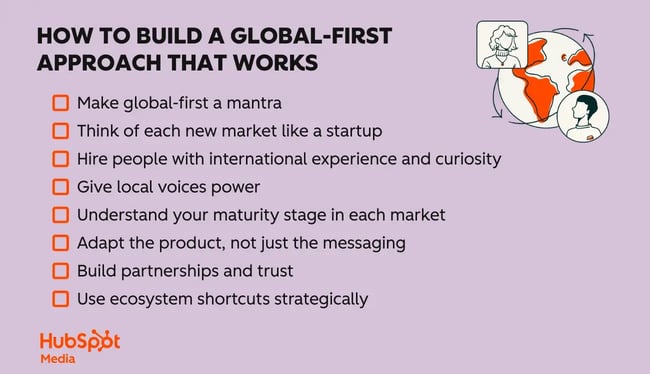
building a global-first approach that actually works

Make global-first a mantra.

When I joined HubSpot, one of the first things I realized was that global thinking needed to be part of daily decision-making. To make it stick, I started calling it “global-first” and brought it up constantly — in meetings, on our company wiki, and whenever I talked to executives.

I invited colleagues who cared about international growth to act as ambassadors and help spread the word. We even set up a Slack channel for our “global-first” community, so people across offices could connect and share ideas.

Eventually, people started using the phrase without me having to push it. New employees would hear it from their teammates and start saying it too. That’s when I knew it was becoming an integral part of how we worked.

What you call it doesn’t really matter. What matters is making global thinking a fundamental part of how your company operates. At HubSpot, we used “global-first,” but I’ve also seen other companies adopt phrases like “global-ready” or “think global.”

Even small companies can benefit by doing this early. The sooner you set global thinking as a norm, the more naturally it grows with the business.

Think of each new market like a startup.

Each new market is like starting a small business inside your company. You don’t have brand recognition, customer stories, or established partners yet. Success depends on staying close to customers. That means talking with them often, listening carefully, and letting their feedback guide your next steps.

Start simple, move quickly, build relationships, and grow from the ground up.

Hire people with international experience and curiosity.

If I could give only one piece of advice, it would be to hire people who bring an international perspective. They might have lived abroad, speak several languages, or grown up in a multicultural household. Equally important is curiosity about other cultures.

Build this into your job descriptions and hiring practices. Make it a requirement, not just a nice-to-have. We don’t talk about international diversity nearly enough, but it has a tangible impact on growth. People with global mindsets naturally make decisions that strengthen global strategy.

Give local voices power.

Local teams are closest to the customer, yet their voices often get drowned out by headquarters. You have to be intentional about amplifying them.

At HubSpot, we created two programs to address this:

  • International Helm (iHelm): A monthly meeting where executives heard directly from local teams about their specific market needs. Because international was our fastest-growing segment, it was easier to advocate for resources.
  • The Tomodachi Program: A buddy system connecting team members across geographies. Tomodachi means “friend” in Japanese, and the program started to help our Japan team build relationships across the company. It was simple but powerful: 30-minute calls between colleagues in different countries to share knowledge and make connections.

These informal connections are crucial. When people have personal relationships across markets, they’re more likely to consider global implications in their daily decisions.

Understand your maturity stage in each market.

Don’t let aspiration cloud reality. I always advise teams to be honest about their current market position. Are people even aware you exist? Are they considering you but haven’t made a purchase yet? Or are you already established and just trying to optimize your operations?

Your tactics need to match that reality, not where you wish you were.

Adapt the product, not just the messaging.

You can only do so much with marketing changes. Sometimes, you actually need to change your product to fit how people work in different countries. This could involve accepting local payment methods, integrating with widely used software, or adjusting your workflows to align with local business practices.

Build partnerships and trust, especially in relationship-driven markets.

In a lot of Asian markets, who you know matters more than what your product does. You need government approval and the right introductions. Beyond that, people have to believe you‘re in it for the long haul. American companies often miss this because we’re used to more transactional relationships. Getting the right partnerships can make or break your entry into these markets.

Use ecosystem shortcuts strategically.

There are shortcuts to going global, especially for small businesses. Instead of building presence in each country from scratch, you can use platforms where customers already are. Launch on Amazon or Etsy for instant reach across multiple countries, or tap into partner ecosystems like the HubSpot App Marketplace.

One company I advised, Lottie Dolls in Ireland, used this approach to reach customers worldwide and get distribution they would have struggled to establish on their own.

Knowing When Your Global-first Mindset Is Working

The real test of an international strategy is whether it strengthens the company as a whole. Expansion shouldn’t be a side project or a box to check. It should contribute directly to goals like diversifying revenue, sharpening the product, or staying ahead of competitors.

At HubSpot, international growth always connected back to company-wide targets. Too often, I see businesses chase new markets because of a traffic spike or a handful of prospect requests. That reactive approach usually wastes time and resources. The companies that get it right tie international moves to clear objectives from the start.

When it’s working, you see it clearly. Local insights shape product decisions. International colleagues move into leadership roles. Perspectives from abroad guide major choices.

Too many companies still think they can put off international until they‘re “ready.” But by then, you’ve already built so many assumptions and biases into your product and processes that going global becomes this massive, expensive undertaking.

Start thinking globally from the beginning. It doesn‘t mean you have to launch everywhere at once. Instead, you design things knowing you’ll eventually expand beyond your home market. That makes everything else so much easier.

AI email subject lines that drive 3x more revenue and actually convert [+ exclusive insights]

Software Stack Editor · October 20, 2025 ·

Email subject lines determine whether your carefully crafted campaigns ever see the light of day — yet most marketers still rely on gut instinct and basic A/B testing to choose them. What if you could predict which subject lines will resonate with your audience before hitting send? AI email subject line optimization makes this possible by analyzing millions of data points from your actual subscribers’ behavior, automatically testing variations, and continuously learning what drives engagement.

Download Now: Full-Stack AI Marketing Toolkit

But here’s what most articles won’t tell you: there’s a massive difference between using a basic AI generator to brainstorm subject lines and implementing true AI optimization. When this optimization occurs in HubSpot’s Marketing Hub with Breeze AI, you are not only testing subject lines but also creating a smart system that understands your audience and adapts to their behaviors.

This guide shows you how to use AI to create subject lines that increase revenue, not just open rates. You’ll learn how to:

  • Set up governed workflows that maintain your brand voice
  • Create testing frameworks that go beyond simple A/B splits
  • Measure real business impact rather than vanity metrics

Whether you’re sending 1,000 emails a month or 10 million, these strategies will help you turn your weakest subject lines into your strongest revenue driver, whether you send 1,000 emails a month or 10 million.

Let’s dive in.

Table of Contents

  • What is AI email subject line optimization?
  • How to Optimize Email Subject Lines with AI
  • How to Safeguard Deliverability and Compliance During AI Subject Line Optimization
  • How to Optimize AI Subject Lines in HubSpot
  • Frequently Asked Questions (FAQ) About AI Subject Line Optimization
  • AI Email Subject Lines Make Email Marketing Easier

What is AI email subject line optimization?

AI-driven email subject line optimization is a data-driven process that utilizes machine learning to continuously test, analyze, and refine email subject lines based on actual recipient behavior and engagement patterns.

Unlike simple AI generation tools that only create subject line ideas, proper optimization involves automated testing across multiple variations, real-time performance prediction, and ongoing refinement based on your specific audience’s response data.

Most marketers confuse AI subject line generators with true AI optimization systems — but they’re as different as a calculator is from a financial advisor. Here’s the difference between the two:

  • AI generation: Creates subject line ideas based on prompts (one-time output)
  • AI optimization: Tests variations, learns from results, and automatically improves future performance (continuous improvement cycle)

While generators simply create clever text options based on your prompts, optimization platforms like HubSpot’s Marketing Hub establish data-driven workflows that continuously test, learn, and improve subject line performance based on actual revenue results.

Additionally, AI-driven email subject line optimization requires an integrated CRM system, automated testing infrastructure, and performance analytics that work together to drive measurable business outcomes — not just creative suggestions.

If you’re still wondering about why AI optimization is the way to go, check out these core benefits that might sway your decision:

  • It processes thousands of data points per campaign to predict performance
  • It runs unlimited A/B tests simultaneously without manual setup
  • It learns your unique audience preferences over time
  • It scales personalization across millions of subscribers instantly
  • It reduces campaign prep time from hours to minutes

Now, these benefits sound impressive, but you may wonder how this technology actually delivers such results in practice. Here’s a closer look at how AI email subject line optimization actually works:

  • Strategy input: You define campaign goals, brand guidelines, and target segments
  • Intelligent generation: AI creates 10-20 variations based on historical performance data
  • Predictive scoring: Each variation gets scored for likely open rate before sending
  • Automated testing: System deploys multivariate tests to sample audiences
  • Performance analysis: AI tracks opens, clicks, and conversions in real-time
  • Continuous learning: Winners inform future campaigns, building a knowledge base

AI optimization amplifies your marketing expertise rather than replacing it. You maintain control over brand voice, messaging strategy, and creative direction while AI handles the heavy lifting of testing and data analysis.

Think of it like this: AI is your assistant who remembers every subject line that’s ever worked for your audience and applies those insights instantly.

Why Platform Integration Matters

When AI optimization happens within HubSpot’s Marketing Hub, it connects seamlessly with your contact database, behavioral triggers, and analytics dashboard. This integration means AI can:

  • Access complete customer lifecycle data (for smarter personalization)
  • Trigger optimized subject lines based on user behavior
  • Track performance across all touchpoints, not just opens
  • Apply learnings across teams and campaigns automatically

But proper optimization requires more than just powerful technology — it needs governance and measurement to ensure consistent and compliant results. Therefore, adequate optimization includes guardrails to maintain brand consistency, such as:

  • Approval workflows before deployment
  • Brand voice parameters that flag off-message content
  • Performance benchmarks that track improvement over time
  • ROI measurement connecting subject lines to revenue

Pro tip: Ready to move beyond basic AI generation to complete optimization? Get started with HubSpot’s Email Marketing Software and Breeze AI to elevate your subject lines from guesswork to data-driven success.

Now that you understand the foundation of AI-powered subject line optimization and its critical components, let’s explore practical implementation. The following section will walk you through the exact steps to set up, configure, and deploy AI optimization in your email marketing workflow, turning these concepts into measurable results for your campaigns.

How to Optimize Email Subject Lines with AI

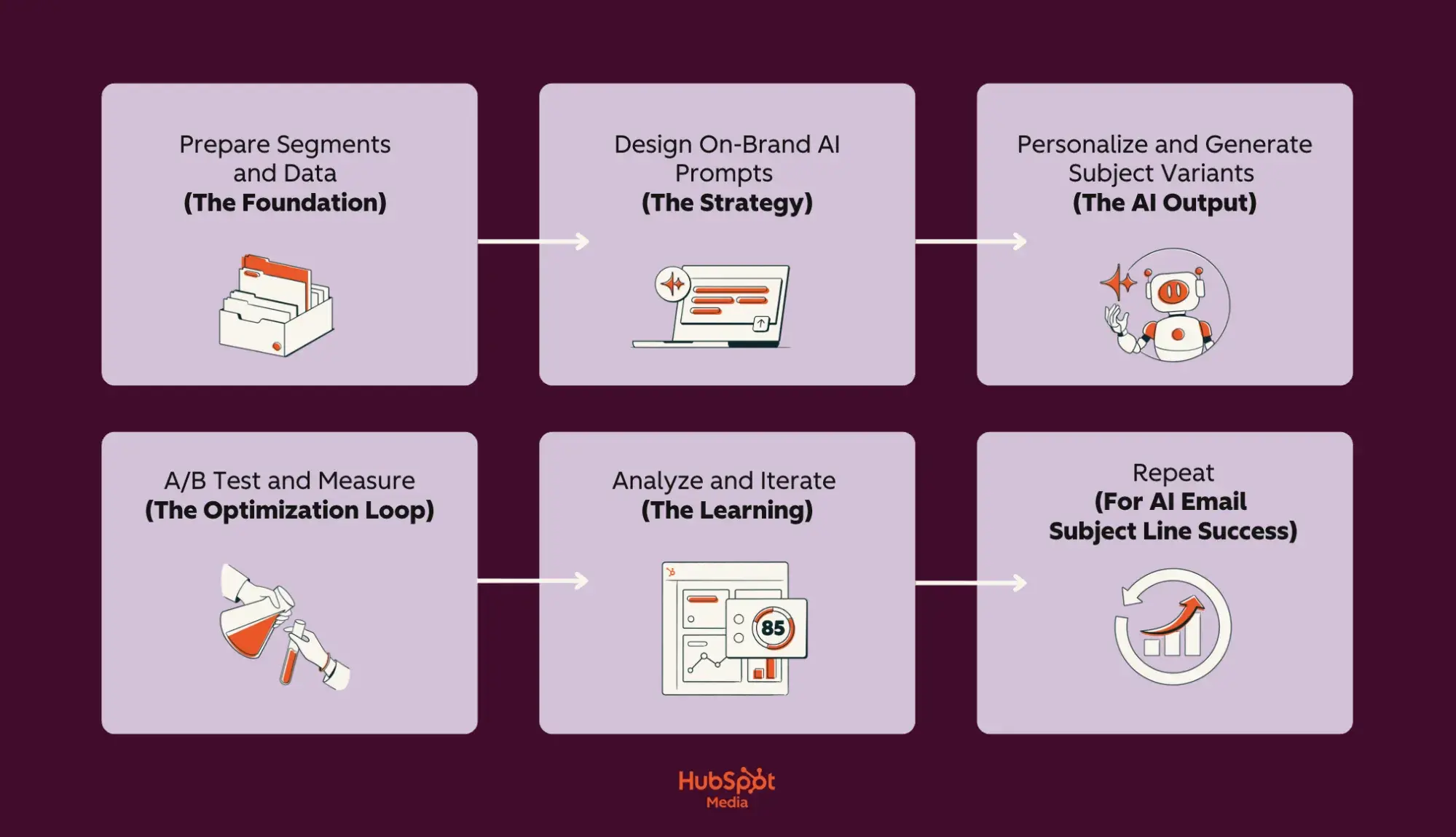
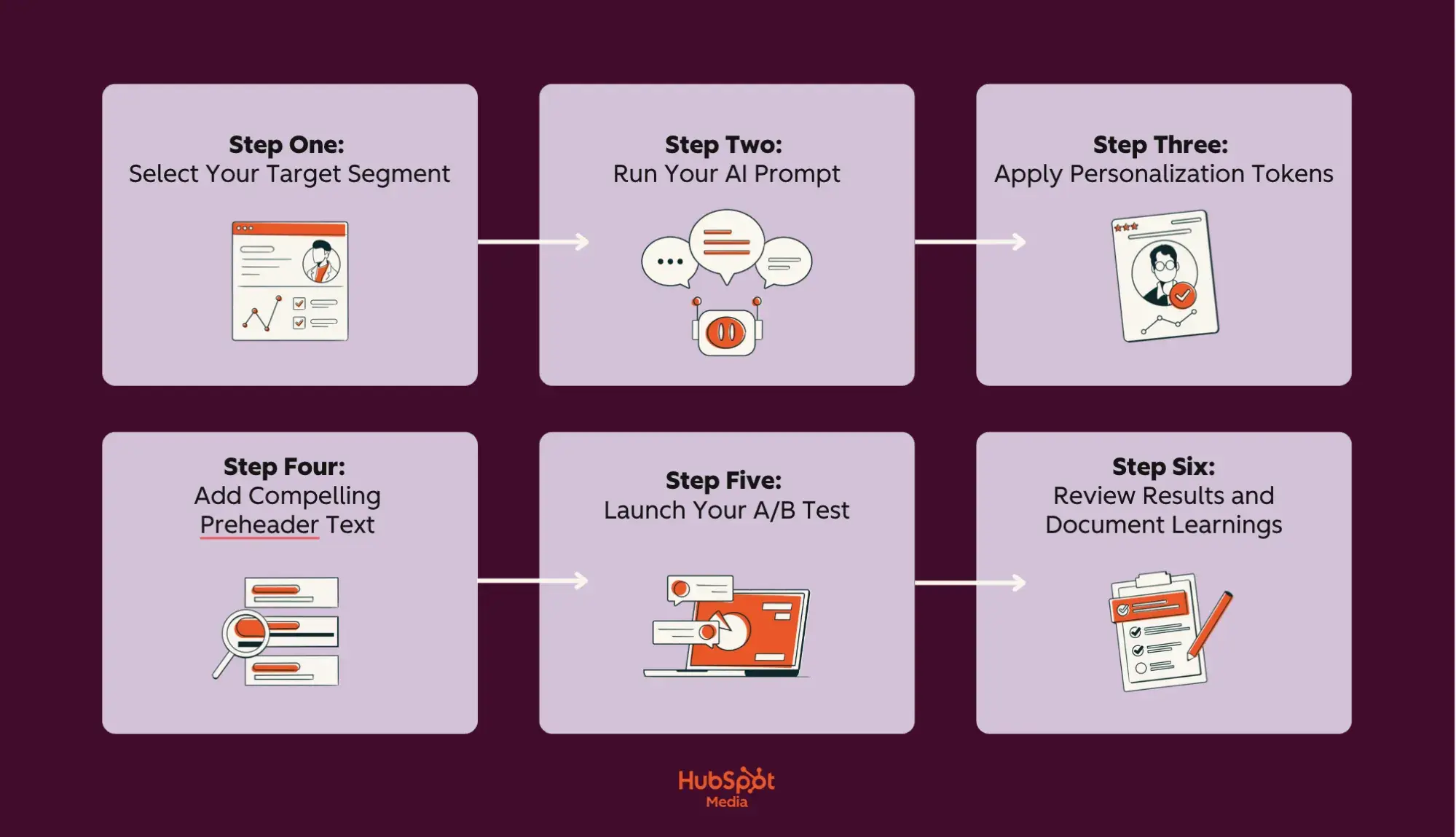
a screenshot of a HubSpot-branded image of a lilac and burgundy flowchart that details the AI subject line optimization process, with the hubspot media logo in the bottom center of the image

As stated above, AI-driven email subject line optimization enhances your email marketing by utilizing machine learning to test, analyze, and automatically refine subject line performance based on recipient behavior and revenue data.

This process goes far beyond simple text generation — HubSpot’s Marketing Hub connects AI optimization directly to your CRM database, enabling personalized testing across segments while tracking actual conversions, not just opens. However, successful AI optimization relies on one key factor: clean, well-organized contact data. This allows the system to understand your audience’s preferences and behaviors.

Before diving into the technical setup, let’s first establish the foundation that makes AI optimization possible: properly prepared email segments and data.

How to Prepare Email Segments and Data

Preparing email segments and data for AI subject line optimization involves organizing your contact database into meaningful groups based on shared characteristics and ensuring all contact information is accurate, current, and properly formatted.

This preparation is crucial because AI learns from patterns in your data. It’s simple: clean, well-segmented data leads to subject lines that can increase open rates; in contrast, messy data yields generic and ineffective results that hinder engagement.

Data and Segments to Use to Get the Best AI Subject Lines

The most effective AI subject lines come from four key data categories that help the AI understand recipient context and intent:

Essential segmentation categories:

  • Lifecycle stage data: Where contacts are in their customer journey (subscriber, lead, customer, evangelist),
  • Behavioral signals: Email engagement history, content downloads, website visits, and purchase frequency.
  • Demographic attributes: Industry, company size, role, location, preferred language.
  • Intent indicators: Product interests, support tickets, cart abandonment, and trial status.

Why do these fields matter? Well, AI uses them to predict which emotional triggers and value propositions will resonate with users. Here’s a breakdown of the essential segments you’ll need to create for optimal AI performance:

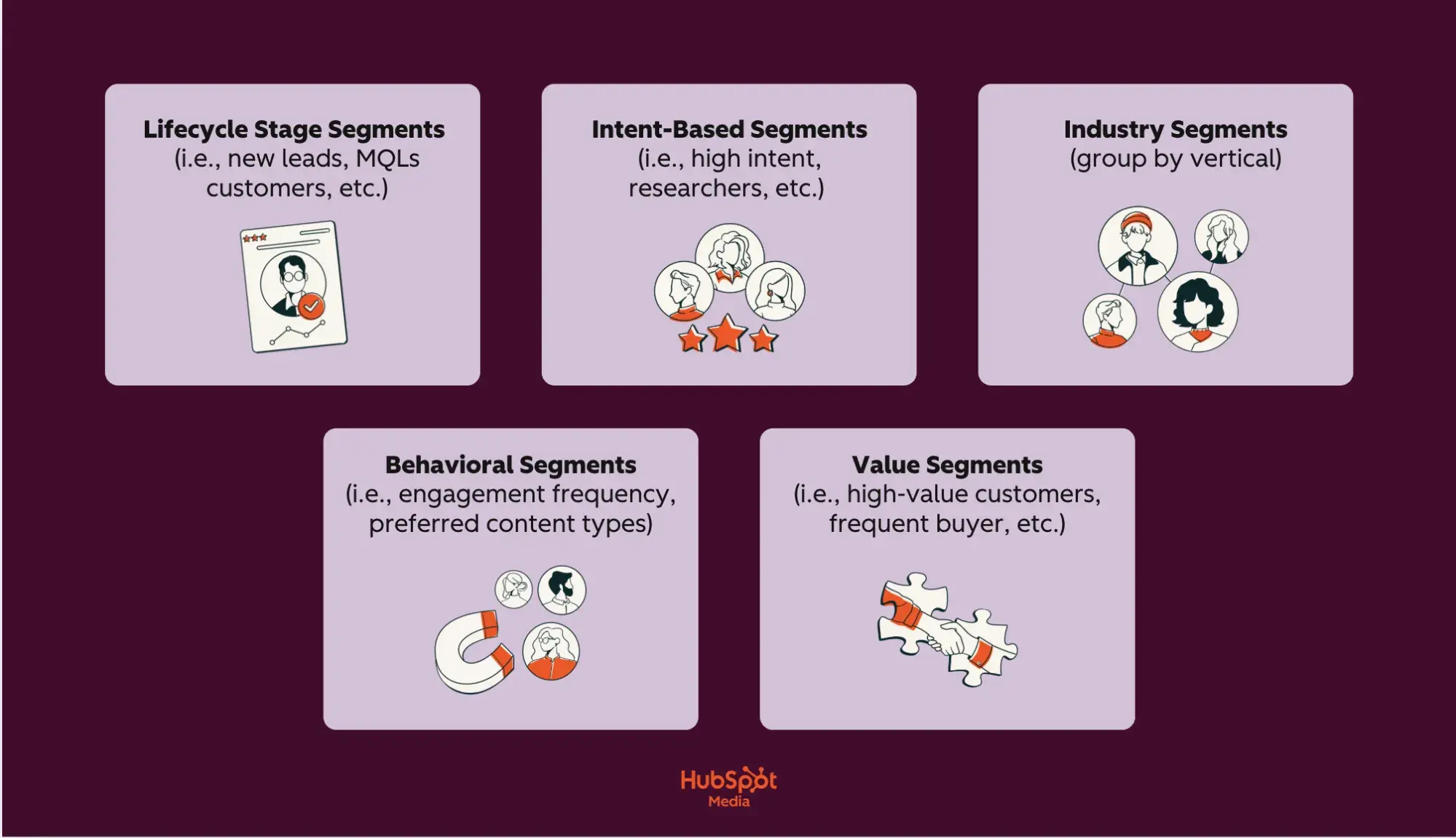
a screenshot of a HubSpot-branded image of a lilac and burgundy chart highlighting essential segments for ai email optimization, with the hubspot media logo in the bottom center of the image

  • Lifecycle stage segments: New leads (education-focused), MQLs (benefit-driven), customers (loyalty-focused), at-risk (re-engagement).
  • Intent-based segments: High intent (visited pricing page), researchers (downloaded guides), comparison shoppers (viewed competitors).
  • Industry segments: Group by vertical to match terminology and pain points.
  • Behavioral segments: Engagement frequency, preferred content types, and typical purchase patterns.
  • Value segments: High-value customers, frequent buyers, and dormant accounts.

Each segment should contain at least 1,000 contacts for statistically significant AI learning. Smaller segments can be initially combined into broader categories, which can then be refined as more data is collected. AI uses these segments to identify which subject line elements — such as urgency, personalization, benefit statements, and questions — are most effective for each group.

Your Go-To Data Hygiene Checklist (Before AI Implementation)

Now, clean data is, as I’m sure you’ve realized, non-negotiable for AI performance. Thus, your Smart CRM should maintain:

  • Standardized formats: Consistent date formats, proper capitalization, no special characters in names.
  • Complete records: Fill critical fields (email, first name, lifecycle stage) for at least 80% of contacts.
  • Updated information: Remove bounced emails monthly, update job changes quarterly.
  • Unified profiles: Merge duplicate contacts to prevent conflicting signals.
  • Permission status: Clear opt-in/opt-out records for compliance.

Here’s the thing: When your data lives in a Smart CRM, AI can access the complete customer picture — not just email metrics but also sales interactions, support tickets, and website behavior. This unified view means AI can generate subject lines that reference a contact’s recent support case resolution, their upcoming renewal, or their browsing history, creating relevance that standalone email tools can’t match.

Pro tip: HubSpot’s Email Marketing Software with Breeze AI automatically segments your Smart CRM data and maintains hygiene standards while generating subject lines that speak directly to each segment’s needs.

How to Design AI Subject Line Prompts with Brand Voice Guardrails

Designing AI subject line prompts with brand voice guardrails involves creating structured instructions that tell AI exactly how to write in your brand’s unique style, while automatically preventing off-brand language. This systematic approach ensures that every generated subject line sounds authentically “you,” regardless of who creates it or which campaign it supports.

Additionally, it converts AI-generated writing into your brand’s consistent voice, ensuring message quality remains consistent across thousands of variations. Don’t believe me? Well, here’s a complete list of reasons why you should:

  • AI structured prompts generate 20+ on-brand variations in seconds versus hours of manual writing
  • AI structured prompts create and maintain a consistent voice across all teams and campaigns
  • AI structured prompts generate and prevent compliance violations and inappropriate language automatically
  • AI structured prompts generate, learn, and improve from approved/rejected patterns
  • AI structured prompts generate scale personalization without losing brand authenticity

With these benefits in mind, the key to unlocking AI’s full potential lies in crafting the proper prompt structure from the start. A well-designed prompt template acts as your blueprint for consistent, high-performing subject lines that maintain your brand voice while exploring creative variations.

That said, let’s review a proven template that top marketers use to generate subject lines that actually convert.

The Best Prompt Template for Subject Line Ideation

Creating an effective prompt template is like programming your AI with your brand’s DNA — it ensures every generated subject line reflects your unique voice while exploring creative angles you might never have considered.

The following template has been refined through millions of successful subject line generations across industries, providing the perfect balance of structure and flexibility. By filling in these specific components, you enhance generic AI suggestions into on-brand subject lines that consistently outperform those created manually.

  • Role definition: Start by establishing the AI’s identity and expertise. “You are [Company Name]’s email marketing specialist who understands our [industry] customers and writes subject lines that [core brand attribute, e.g., ‘inspire action through friendly expertise’]”
  • Tone parameters: Specify exactly how you communicate. “Professional yet approachable, confident without arrogance, helpful rather than salesy, using everyday language instead of jargon”
  • Audience context: Include subscriber details. “Writing for [segment]: [job title] at [company size] companies who [key challenge/goal]. They value [core priorities] and respond best to [communication style]”

Pro tip: Always follow these brand do’s and don’ts:

  • DO: Use action verbs, reference specific benefits, and include numbers/data
  • DON’T: Use all caps, excessive punctuation (!!!), clickbait phrases, competitor mentions
  • NEVER: Make unsubstantiated claims, use fear tactics, include profanity or slang

The Best Prompt template for On‑Brand Rewrites

An on-brand rewrite prompt template is a structured framework that transforms generic or underperforming subject lines into compelling, brand-aligned versions while maintaining compliance and deliverability standards. So, whether you’re refining AI-generated drafts or updating legacy campaigns, this step-by-step process ensures every subject line reflects your brand personality, avoids spam triggers, and fits within optimal character limits.

Here’s a universal on-brand rewrite template that’ll adapt any subject line into a high-performing, on-brand message:

  • Step one: Share brand and voice parameters. Include tone (i.e., “professional yet warm,” or “knowledgeable without condescension”), personality traits (3 to 4 traits, i.e., “helpful, innovative, trustworthy, approachable”), and reading level (i.e., “8th grade, avoiding technical jargon”)
  • Step two: Give AI rewrite instructions. 1) Maintain the core message about [main topic/offer], 2) Rewrite in our brand voice that is [tone description], 3) Include [required element — e.g., percentage, deadline, benefit], 4) Start with [preferred opening — action verb, question, number].
  • Step three: Be sure to supply AI with words to avoid. Never use: FREE, GUARANTEE, LIMITED TIME, ACT NOW, URGENT, $$$, 100%, RISK-FREE, WINNER, CONGRATULATIONS, CLICK HERE, BUY NOW, SAVE BIG, SPECIAL OFFER.
  • Step four: Specify your output format. Clarify how many variations you’d like/need and what different emotional triggers you’d like to target (logic, urgency, curiosity, benefit, social proof).
  • Step five: Finalize length constraints. Ideally, subject lines should be a maximum of 7 words (scanning ease), mobile displays should have a maximum of 45 characters (optimal mobile display), and preview text suggestions should be no more than 90 characters.

Personalize AI-Generated Subject Lines with CRM Tokens

CRM personalization tokens are dynamic placeholders that automatically pull specific information from your customer database — like names, company details, or recent actions — into AI-generated subject lines, creating individually customized messages at scale. This combination of AI-generated content with CRM data enables you to send millions of unique subject lines that appear personally written.

To help you understand the full impact of this powerful combination, here’s a brief overview of the benefits of AI and CRM token personalization:

  • AI and CRM token personalization generate unique subject lines for every contact automatically
  • AI and CRM token personalization maintains relevance by referencing real customer data
  • AI and CRM token personalization scales to millions of contacts without manual work
  • AI and CRM token personalization updates dynamically as CRM data changes
  • AI and CRM token personalization prevents errors from manual personalization attempts

Now, understanding when to use individual tokens versus broader segment personalization is crucial for maintaining authenticity while maximizing engagement. Here’s how to choose the right personalization approach:

  • Dynamic tokens are most effective when you have clean, complete data and a clear connection between the personalization and your message. Use dynamic tokens when you have complete, accurate data (95%+ field completion), the information directly relates to email content, and personalization adds genuine value beyond novelty.
  • Segment-level personalization is more effective for testing new approaches or when data quality varies. Choose segment-level personalization instead when data fields are incomplete (under 70% populated), you’re targeting broad audiences with similar needs, or when industry and role matter more than individual details.

Moreover, the depth of personalization should align with the level of your relationship with the subscriber. Here are a few examples of token use across different lifecycle stages and industries.

  • Start new subscribers with minimal tokens to build trust: “Welcome! Your marketing toolkit awaits.”
  • Active leads respond well to moderate personalization that’s personal but professional: “[firstname], see how [company] uses AI for email.”
  • Loyal customers deserve full personalization that maximizes relevance: “[firstname], your [product] renewal saves [discount_amount].”
  • For at-risk accounts, use strategic tokens that create emotional connection: “[[firstname]], we’ve missed you since [last_login_date].”

Ready to combine AI intelligence with CRM personalization? HubSpot’s Content Hub with Breeze AI automatically pulls CRM tokens into AI-generated subject lines, creating perfectly personalized messages that drive more engagement.

Personalization Patterns That Scale

Scalable personalization patterns are reusable subject line frameworks that combine AI-generated content with strategic token placement to create thousands of unique, relevant messages without requiring manual customization for each recipient.

These patterns serve as templates, allowing AI to fill in the creative elements. At the same time, CRM tokens provide individual context, enabling you to maintain personal relevance across millions of emails while reducing production time.

To help you get started, check out this list of token patterns for welcome, upgrade, renewal, and re‑engagement:

  • Welcome Series Patterns: New subscribers need progressive personalization that builds from generic to specific as trust develops. Start with minimal tokens and increase personalization depth over the series.

Pattern 1 (First Touch): “Welcome! Your [product category] journey starts here”

Pattern 2 (Day 3): “[firstname], ready to explore your [most viewed feature]?”

Pattern 3 (Day 7): “[company] teams love this [product] feature”

Pattern 4 (Day 14): “[firstname], unlock your personalized [product] roadmap”

  • Upgrade Campaign Patterns: Upgrade patterns should emphasize specific value based on current usage and demonstrate clear ROI. Use behavioral tokens that demonstrate your understanding of their needs.

Pattern 1 (Usage-Based): “[firstname}}, you’ve outgrown [current plan] – here’s what’s next”

Pattern 2 (Feature-Focused): “Unlock [requested feature] in [higher plan] today”

Pattern 3 (Savings-Driven): “[company] qualifies for [discount]% off [upgrade plan]”

Pattern 4 (Peer Comparison): “Companies like [company] save [hours] with [premium feature]”

  • Renewal Campaign Patterns: Renewal patterns should reinforce the value received and make continuation feel natural and beneficial. Refer to their actual usage and success metrics whenever possible.

Pattern 1 (Value Reminder): [firstname], you’ve achieved [metric] with [product] this year.”

Pattern 2 (Loyalty Reward): “[company]’s renewal includes [bonus feature] free”

Pattern 3 (Deadline-Driven): “[firstname], lock in your rate before [date]”

Pattern 4 (Success Story): “Continue your [percentage]% growth with [product]”

  • Re-engagement Campaign Patterns: Re-engagement patterns need to acknowledge absence without guilt while offering clear reasons to return. Focus on what’s new or what they’re missing rather than dwelling on their inactivity.

Pattern 1 (Soft Return): “[firstname], see what’s new in [product] since [last login]”

Pattern 2 (FOMO-Based): “[Number] [company] teammates are using [feature] daily”

Pattern 3 (Value Reset): “We’ve added [number] features you requested, [firstname]”

Pattern 4 (Direct Incentive): “[firstname], come back for [specific benefit or discount]”

Pro tip: Start by creating 3 to 4 patterns per campaign type and test them across small segments before deploying them fully. Document which token combinations work best for each customer segment and lifecycle stage, then use Breeze AI to automatically apply personalization patterns across your entire database.

A/B Test Subject Lines with AI

Now that you’ve mastered scalable personalization patterns, it’s time to let data determine which variations drive the best results. This can be done one way and one way only: with A/B testing.

AI-powered A/B testing for subject lines is a systematic process that automatically generates multiple variations, simultaneously tests them across audience segments, and uses machine learning to identify winning patterns that can be applied to future campaigns.

Here’s how you implement A/B testing for your AI-optimized subject lines:

Start with a clear hypothesis: Every successful test starts with a clear hypothesis about what will improve performance. Your hypothesis should be specific and measurable, such as “Adding urgency tokens will increase open rates by 20% for cart abandonment emails” rather than vague goals like “improve engagement.”

Define your testing variables: Select 4-5 specific elements to test systematically:

Tone Variables: Professional vs. conversational, formal vs. casual, urgent vs. relaxed, emotional vs. logical

Benefit Variables: Feature-focused vs. outcome-focused, individual vs. team benefits, immediate vs. long-term value

Structure Variables: Question vs. statement, number-led vs. text-only, single vs. multiple benefits, short vs. detailed

Personalization Variables: No tokens vs. first name vs. company name vs. behavioral tokens, single vs. multiple tokens

Create a structured testing timeline: Follow this 6-day plan for optimal results:

  • Day 1 (Planning): Define hypothesis, select variables, generate 20 AI variations, set success metrics (minimum 20% improvement)
  • Day 2-3 (Initial Test): Send to 10% of segment (minimum 1,000 contacts per variant), monitor early indicators
  • Day 4-5 (Validation): Test the top 5 performers on an additional 20% of the segment, confirm statistical significance
  • Day 6 (Full Deploy): Send winner to remaining 70%, document patterns for future use

Let AI generate and prioritize variants: AI analyzes your historical data to create intelligent variations, not random combinations. For a webinar promotion testing urgency, AI might generate:

  • “Last chance: Web design workshop tomorrow” (high urgency)
  • “Reserve your web design workshop seat” (low urgency)
  • “Only five spots left in tomorrow’s workshop” (scarcity urgency)
  • “Final call for web design training” (moderate urgency)

Run tests with proper statistical significance: Ensure each variant reaches at least 1,000 contacts for reliable data. (Test for a minimum of 24 hours to account for different opening behaviors. Use 10% audience splits for initial testing, 20% for validation, and 70% for final deployment.)

AI transforms your testing variables into intelligent variations rather than random combinations. Additionally, it analyzes your historical campaign data to understand which elements typically resonate with your audience, then generates variations that explore promising new combinations while avoiding patterns that have previously failed.

However, proper optimization comes from understanding why specific variants won, not just which ones performed best. Here’s how you can analyze results and apply learnings systematically:

  • Document pattern insights, such as “questions outperformed statements by 32%” or “subject lines under 40 characters had 28% higher opens,” to build a knowledge base of what works for your specific audience.
  • Create a “failed patterns” list to avoid repeated testing of consistently poor performers, like all-caps words or excessive punctuation.
  • Update your prompt libraries with specific instructions based on test results, such as “For webinar promotions, always lead with a question” or “B2B segments respond 40% better to outcome-focused benefits.”
  • Modify segment playbooks to reflect personalization preferences discovered through testing, such as “Enterprise clients: use company name tokens,” while “SMB clients: use first name only.”

Pro tip: When setting up email A/B testing in Marketing Hub, use the automated winner selection feature to deploy your best performer without manual intervention

Variant Set Design

Creating a comprehensive variant matrix ensures you’re testing multiple dimensions simultaneously while maintaining brand consistency across all variations. This structured framework generates 16 to 20 testable variants from just 4 to 5 core variables, maximizing learning from each test cycle.

Use this planning matrix to guide your variant test design for your next email marketing campaign:

Segment

Tone Variant

Structure Variant

Personalization Level

Benefit Focus

Example Output

New Leads

Welcoming

Question

None

Educational

“Ready to master email marketing basics?”

New Leads

Professional

Statement

First name

Educational

“[firstname], your email marketing guide is here”

New Leads

Casual

Number-led

None

Outcome

“5 ways to triple your email opens today”

New Leads

Urgent

Statement

Company

Quick win

“[company] can boost engagement 40% now”

Active Users

Conversational

Question

Product mention

Feature

“Want to unlock [product]’s hidden features?”

Active Users

Professional

Statement

First name + product

ROI

“[firstname], [product] saved users $2M this year”

Active Users

Excited

Number-led

Behavioral

Time-saving

“You’re 3 clicks from saving 5 hours weekly”

Active Users

Direct

Statement

Company

Competitive

“[company] outperforms competitors by 47%”

At-Risk

Empathetic

Question

First name + timeframe

Re-engagement

“[firstname], what’s changed since [last_login]?”

At-Risk

Urgent

Statement

Product

Loss aversion

“Your [product] benefits expire in 48 hours”

At-Risk

Casual

Number-led

None

New features

“17 new features added since you left”

At-Risk

Professional

Question

Company

Value reminder

“Is [company] still interested in 3X growth?”

VIP/Enterprise

Executive

Statement

Company + metrics

Strategic

“[company]: Q4 performance report ready”

VIP/Enterprise

Consultative

Question

Full personalization

Partnership

“[firstname], ready to discuss [company]’s 2025 roadmap?”

VIP/Enterprise

Data-driven

Number-led

Industry benchmark

Competitive insight

“[industry] leaders increased revenue 62% using this”

VIP/Enterprise

Exclusive

Statement

Custom token

Premium access

“[account_type] exclusive: Early access approved”

Lastly, here are a few best practices to maximize your variant testing effectiveness:

  • Be sure to start by selecting 4 to 5 variants per segment that represent different combinations from your matrix. Never test all variants simultaneously, as this dilutes statistical significance.
  • Ensure each variant differs meaningfully in at least two dimensions to maximize learning potential. Track which combinations perform best for each segment, then use these insights to refine your matrix for the next testing cycle.

With your variant matrix established and initial tests deployed, the real optimization power comes from systematically applying what you learn. Next, let’s walk through how to create an iteration loop that continuously improves your subject line performance.

Iteration Loop

An iteration loop in AI subject line optimization is a continuous improvement cycle where AI analyzes test results, identifies winning patterns, and automatically generates new hypotheses for the next round of testing. This self-improving system upgrades one-time tests into compounding knowledge that gets smarter with every campaign.

AI goes beyond simple winner/loser identification to uncover the underlying patterns that drive performance. It analyzes multiple dimensions simultaneously — examining how tone, length, personalization, and timing interact to influence open rates across different segments.

To build your iteration cadence, establish a weekly rhythm that maintains momentum without overwhelming your team or audience. Here’s an outline you can follow:

  • Monday: AI analyzes weekend test results and generates an improvement summary.
  • Tuesday: Review AI proposals and select 3-5 for next test cycle.
  • Wednesday: Deploy new tests to segments that have not been recently tested.
  • Thursday-Friday: Monitor early indicators and prepare next iteration.
  • Weekend: Let tests run for maximum data collection.

For instance, AI might discover that urgent language increases opens by 32% for cart abandonment emails but decreases them by 18% for educational content, or that first-name personalization works for B2C but reduces trust in B2B communications.

Then, it creates pattern reports that highlight unexpected correlations: “Question-based subject lines perform 41% better when combined with numbers” or “Emojis increase opens for users under 35 but only when placed at the beginning of the subject line.” These insights would typically require weeks of manual analysis to uncover, but thanks to AI’s data-driven capabilities, they are automatically surfaced within 48 hours of test completion.

Now that your iteration loop is continuously improving subject line performance, it’s crucial to measure the real business impact of these optimizations beyond just open rates. Let’s examine how to track and attribute revenue gains directly to your AI-powered subject lines.

Measure impact from AI-generated subject lines.

Measuring the impact of AI-generated subject lines requires tracking performance metrics across multiple touchpoints, from initial opens to final conversions, to understand the actual business value beyond vanity metrics.

The Metrics Ladder for Subject Line Success

Start with open rate as your baseline quality signal, but understand it’s just the first step in measuring impact. A reasonable open rate (25-35% for most industries) indicates your subject line resonated, but quality indicators within opens reveal deeper insights:

  • Are the right people opening your emails?
  • Do opens happen within 24 hours of sending?
  • Are mobile versus desktop ratios healthy for your audience?

These quality signals reveal whether your AI-generated subject lines attract engaged readers or just curious clickers.

Then, move beyond open to measure clicks to priority links — the specific CTAs that drive business value. Track not just the overall click rate, but also clicks to your primary conversion points, such as:

  • Demo requests
  • Pricing pages
  • Purchase buttons

Pro tip: If opens increase but priority clicks decrease, your subject lines might be misleading readers.

Building Custom Dashboards for Ongoing Measurement

To track and optimize your AI subject line performance, create custom dashboards that visualize subject line performance across segments and time periods for actionable insights.

Your primary dashboard should display:

  • Subject line variant performance (showing all tested versions)
  • Segment-specific open rates (revealing which groups respond best)
  • Engagement velocity (how quickly emails are opened)
  • Revenue attribution (connecting opens to purchases)

Set up automated weekly reports that highlight winning patterns and flag underperforming segments needing attention.

Then, build a secondary dashboard for testing insights that tracks:

  • Hypothesis success rate (which assumptions proved correct)
  • Variable impact analysis (which elements drive the most significant lifts)
  • Segment preference patterns (how different groups respond to personalization)
  • Seasonal performance trends (when specific approaches work best)

This testing dashboard becomes your optimization roadmap, showing exactly where to focus future efforts.

Creating Your “Plays That Won” Library

Building a comprehensive library of winning subject line patterns transforms scattered test results into a strategic asset that compounds in value over time.

Think of it as your team’s playbook — a centralized repository where every successful formula, proven pattern, and performance insight lives, ready to be deployed across future campaigns. This documentation will ensure that the lessons learned from thousands of sends don’t disappear when team members change roles or campaigns evolve, but instead become institutional knowledge that drives consistent improvement.

Here’s how to build and maintain your winning plays library effectively:

  • Document every successful subject line pattern in a searchable library that becomes your competitive advantage.
  • Organize winning plays by category: segment (enterprise vs. SMB), campaign type (promotional vs. educational), emotional trigger (urgency vs. curiosity), and performance metric (best for opens vs. clicks).
  • In your “plays that won” documentation, include specific subject lines, performance metrics, test dates, and contextual notes about why it worked.

For each winning play, document the complete formula, such as “For cart abandonment emails to engaged users, combining first name + specific product + time limit achieves X% open rates.”

Then, do the following:

  • Include failed variations to prevent repeated testing of losing patterns
  • Update your library monthly, retiring outdated plays and adding new discoveries
  • Share highlights with your team quarterly to ensure everyone benefits from accumulated learnings

How to Safeguard Deliverability and Compliance During AI Subject Line Optimization

Safeguarding deliverability during AI subject line optimization involves implementing automated checks and manual reviews to ensure that every generated subject line meets legal requirements, avoids spam triggers, and maintains a sender’s reputation while still achieving performance goals.

This protective schema prevents the deliverability drop that occurs when aggressive optimization ignores compliance rules, maintaining inbox placement rates above 95% while still achieving 30 to 40% open rate improvements through AI optimization.

If you’re serious about maintaining high deliverability while optimizing aggressively, here’s an essential compliance checklist for AI-generated subject lines:

  • Avoid deceptive phrasing: Never use “RE:” or “FWD:” unless genuinely replying or forwarding. Prohibit false urgency (“Account expires today” when it doesn’t) or misleading offers (“Free iPhone” for a contest entry). AI sometimes generates creative but deceptive lines — always verify claims are accurate.
  • Limit excessive punctuation: Use a maximum of one exclamation point per subject line. Avoid multiple question marks (“Really???”) or dollar signs (“$$$”). Prevent all-caps words except established acronyms (CEO, USA, NASA).
  • Avoid risky spam triggers: Block high-risk phrases including “Act now,” “Limited time,” “Congratulations,” “You’ve won,” “Risk-free,” “No obligation,” and “Click here.” Replace with specific, truthful language: “Ends December 31” instead of “Limited time.”
  • Keep promises made in subject lines: If your subject line mentions “50% discount,” the email must prominently feature that exact discount. Mismatched promises can cause higher spam complaints and violate FTC truth-in-advertising regulations. Document subject line claims for verification.

Another significant aspect of email marketing is following CAN-SPAM best practices. The CAN-SPAM Act mandates specific requirements that any email subject line must follow, with violations carrying penalties up to $53,088 per email:

  • Subject lines must accurately reflect email content — no bait-and-switch tactics
  • Cannot use deceptive subject lines to trick recipients into opening
  • Must clearly identify promotional messages (though subject line identifiers aren’t required)
  • Include a valid physical address and unsubscribe mechanism in the email body
  • Honor opt-out requests within 10 business days

Configure your AI to flag potentially non-compliant subject lines for legal review, especially those mentioning health claims, financial promises, or competitive comparisons.

Lastly, here are a few general tips that I’ll leave you with to protect your sender reputation while scaling AI optimization:

  • Follow email deliverability best practices by implementing authentication protocols (SPF, DKIM, DMARC) that verify your sending authority
  • Maintain list hygiene by removing hard bounces immediately and re-engaging dormant subscribers before removal
  • Monitor sender reputation through HubSpot’s Email Marketing Software weekly
  • Document every compliance violation for AI retraining — each caught issue prevents thousands of future abuses through machine learning
  • Create an incident response plan (if spam complaints spike above 0.1%, pause all campaigns immediately, identify problematic subject lines, remove affected patterns from AI generation, and submit reputation repair requests to major ISPs)

Now that you understand how to optimize safely within compliance boundaries, let’s explore the specific steps to implement these strategies directly within HubSpot’s CRM, where automation and safeguards work in tandem seamlessly.

How to Optimize AI Subject Lines in HubSpot

Optimizing AI subject lines in HubSpot combines Breeze AI’s generation capabilities with Marketing Hub’s testing infrastructure to create, personalize, and automatically deploy winning subject lines based on real performance data.

Step-by-Step AI Subject Line Optimization in Marketing Hub

1. Go to Marketing Hub.

Begin by navigating to Marketing > Email in your HubSpot portal and create or select your email campaign.

a screenshot of hubspot’s portal 53, showcasing a landing page advertising breeze ai, next to a left-sided menu of all of hubspot’s CRM tools


 a screenshot of hubspot’s portal 53, showcasing a landing page advertising breeze ai, next to a left-sided menu of all of hubspot’s CRM tools

2. Find your email campaign.

a screenshot of hubspot’s marketing hub CRM, highlighting its marketing email campaign library and active campaigns within it

a screenshot of hubspot’s marketing hub CRM, highlighting its marketing email campaign library and active campaigns within it

3. Edit your subject line with Breeze.

Click the subject line field to write a subject line. Then, generate alternate, AI-optimized subject lines with HubSpot’s AI — this activates Breeze’s generation interface.

Input your campaign goal, target segment, and key message, then click “Generate” to create 3 AI-powered options instantly.

a screenshot of hubspot’s email marketing software, highlighting how to optimize email subject lines using ai within the HubSpot CRM

Quick Start Workflow

A quick start workflow for AI subject line optimization is a six-step process that takes you from segment selection to performance review, enabling you to launch your first AI-optimized campaign while establishing a repeatable system for continuous improvement.

The following streamlined approach combines HubSpot’s segmentation tools with Breeze’s AI-generation capabilities to produce tested, personalized subject lines:

a screenshot of a HubSpot-branded image of a lilac and burgundy flowchart that highlights a quick start workflow for AI subject line optimization, with the hubspot media logo in the bottom center of the image

  • Step one: Select tour target segment. Navigate to Contacts > Lists in HubSpot and choose a segment with at least 2,000 contacts for statistical validity. Start with an engaged segment (opened 3+ emails in the last 30 days) for the best initial results — document segment characteristics: lifecycle stage, average order value, and engagement frequency for AI context.
  • Step two: Run your AI prompt. Open your email editor and click “Generate with AI” in the subject line field. Input your prompt template: “Create subject lines for [segment] promoting [offer/content] with [tone] that drives [goal].” Then, generate 15-20 variations and select the top 5 that align with your brand voice and campaign objectives.
  • Step three: Apply personalization tokens. Click “Personalization” and add relevant tokens to your selected variations. For B2B, use [company] and [firstname]; for B2C, use [firstname] and [recent_purchase]. Set fallback values (“Valued Customer” for missing names) and preview token rendering across your segment.
  • Step four: Add compelling preheader text. Write preheader text that complements, not repeats, your subject line. Aim for 90 characters that expand on the value proposition. If your subject line poses a question, the preheader should provide a hint at the answer. Test preheader visibility across Gmail, Outlook, and Apple Mail previews.
  • Step five: Launch your A/B test. Select “Create A/B test” and configure: 20% sample size (10% per variant), 24-hour test duration, open rate as winning metric, and automatic winner deployment. Enable Breeze’s predictive scoring to see estimated performance before sending. Schedule for your segment’s optimal send time based on historical engagement data.
  • Step six: Review results and document learnings. After 48 hours, access Reports > Email Analytics to analyze complete performance metrics. Document winning patterns: which emotional trigger performed best, optimal length for this segment, and personalization impact on clicks. Add successful formulas to your prompt library and failed patterns to your exclusion list.

Frequently Asked Questions (FAQ) About AI Subject Line Optimization

Do emojis in subject lines help or hurt?

Emojis can increase open rates when used strategically. Test emojis with younger demographics and B2C audiences first, ensuring they display correctly across all email clients and devices.

Pro tip: Place emojis at the beginning or end of subject lines for maximum visibility. Avoid them in professional services, healthcare, or financial communications where they may reduce credibility. Always A/B test emoji versus non-emoji versions for your specific audience.

What is the best subject line length in practice?

Here’s what you should know about optimizing subject line length for maximum impact:

  • Keep subject lines between 30-50 characters (6-10 words) for optimal mobile display
  • Place your most important keywords within the first 30 characters since mobile devices truncate longer text
  • Pair concise subject lines with compelling preheader text that adds context without repetition
  • Test shorter variations (under 40 characters) for mobile-first audiences and slightly longer ones for B2B desktop readers

How should I balance personalization with privacy and trust?

Check out these recommendations for balancing personalization with subscriber privacy and trust:

  • Use personalization tokens sparingly. Limit to first name and relevant purchase history or preferences.
  • Match the personalization level to the relationship stage (i.e., minimal for new subscribers, more in-depth for loyal customers).
  • Avoid using location data or browsing behavior in subject lines, as this can be perceived as invasive.
  • Focus on value-based personalization, such as “Your exclusive offer,” rather than behavior-based personalization, like “Items you viewed.”

How do I adapt subject lines for different lifecycle stages?

Use the following lifecycle stage segmentation to adapt your AI-generated subject lines to each customer’s journey stage:

Lifecycle stage mapping:

  • New subscribers: Welcome-focused, educational tone (“Getting started with…”)
  • Active customers: Benefit-driven, exclusive offers (“Unlock your member rewards”)
  • At-risk users: Re-engagement with urgency (“We miss you—here’s 20% off”)
  • Churned customers: Win-back with new value (“What’s changed since you left”)

Adjust urgency, personalization depth, and offer types based on the psychology of each stage.

Pro tip: Within HubSpot’s Email Marketing Software, you can create customizable lifecycle stages based on your customer base.

How do I keep AI outputs on brand across teams?

Create a central prompt library in your content management system with:

  • Approved brand voice examples
  • Forbidden words
  • Tone guidelines

Additionally, implement approval workflows for AI-generated content before deployment, and use HubSpot’s Content Hub to set guardrails that automatically flag off-brand language. Then, schedule quarterly reviews to refine prompts based on performance data and ensure consistency as your brand evolves.

AI email subject lines make email marketing easier.

AI-powered subject line optimization represents a fundamental shift in how we approach email marketing. By implementing the strategies outlined in this post, you’re not just “improving open rates”; you’re building an intelligent system that learns your audience’s preferences, maintains brand consistency at scale, and directly connects email performance to revenue growth.

The combination of HubSpot’s integrated CRM with Breeze AI creates a feedback loop where every sent email makes the next one smarter, transforming what was once your most time-consuming task into an automated competitive advantage. Plus, whether you’re a solo marketer sending weekly newsletters or an enterprise team managing complex multi-segment campaigns, the tools and techniques covered here scale to meet your needs.

Ready to stop guessing and start knowing what subject lines will drive results? Begin your free trial of HubSpot’s Marketing Hub with Breeze AI today (because when AI and human expertise work together, the only limit is how fast you’re willing to grow).

Six IT takeaways from Canvas 25

Software Stack Editor · October 20, 2025 ·

An AI Innovation Workspace. Sidekicks. Flows. Canvas 25 had some huge product news. Kick back with the full keynote if you want to get the lowdown on absolutely everything we launched. But if you want to know what it means for IT leaders, here are the top six takeaways. 

[embedded content]

1. A new AI canvas

What we announced: An AI-first canvas connected to multiple models, enterprise assistants and coding tools for speed and flexibility. Its superpower? The entire canvas is the prompt. So instead of starting with a blank prompt box, you just select a sticky note, slide, document or anything else and AI will use it to understand exactly what you need. It’s truly a force multiplier for organizations.

What it means for IT: IT leaders are overseeing massive investments in AI. But three-quarters tell us these investments are focused on solo tasks, not team productivity.1 The result? More silos that slow work down and impact time to value. Miro AI meets teams where they’re already working – on the canvas – so they stay in the flow of work and projects get from vision to value realization faster.

2. Sidekicks & Flows

What we announced: Sidekicks are AI co-creators that understand what’s on your canvas and use it to help structure thinking or give feedback on solutions. Flows are AI building blocks that help people connect process steps visually. Teammates can work together with multiple cursors and simultaneous edits, which means anyone can tweak steps, swap models, or refine prompts to continuously improve them.

What it means for IT: The best technology makes it easier, not harder, for people to get work done. Sounds simple but our data shows that for every hour of creative work, knowledge workers waste three hours on admin and maintenance. Sidekicks and Flows are the most effective way to work with AI to reduce the friction between project strategy and set-up, get task-specific expertise, and ultimately to stay in the flow of work. For IT, that means more engaged and productive employees – and zero risk of inactive licenses going to waste.

3. AI interoperability & MCP

What we announced: We’re giving teams the flexibility to use the right model for every task with support for GPTs from OpenAI, Anthropic, and many more, as well as deep integrations with knowledge sources like Amazon Q, Glean, and Google Agentspace. We’re also supporting bring your own AI key – so your trained systems can be brought closer to where the work is happening. Finally, thanks to MCP, we’re creating a canvas-to-code pipeline from Miro to platforms like Lovable, Cursor, OpenAI Codex, and more.

What it means for IT: Just over a third of IT leaders tell us they have difficulty integrating AI with their current infrastructure.2 That affects costs, security, adoption, productivity – in fact it can put your entire AI transformation project at risk. Investing in AI that works with your company’s existing tools and knowledge is critical for delivering value faster, which is why we’re committed to serving as the collaborative integration layer for all your AI investments.

4. Connecting strategy to execution for complex initiatives

What we announced: We’re revisiting how Product teams operate in the era of AI. Miro for Product Acceleration is the industry’s first full solution to ensure AI accelerates your team in the right direction from idea all the way to outcome. It’s a collection of 10 integrated products that help teams connect strategy to execution, build the right thing, and get more from AI code gen.

What it means for IT: It’s not just product managers who need a better way to keep projects on track. Lack of alignment, unclear priorities, and inadequate resources can ruin any large scale transformation initiative, leading to confusion and disengagement. It’s one of the reasons 55% of employees tell us they’re working more but achieving less. Products like Miro Portfolios and Roadmaps give IT leaders a single space to collaborate on strategy, priorities, dependencies, and resources. So complex projects start strong and finish fast.

5. A secure foundation for AI

What we announced: No matter how fast the AI landscape is moving, the technology has to be developed and governed responsibly. Miro is one of the first SaaS companies to achieve an ISO 42001 certification, which means we’ve implemented comprehensive controls across the AI lifecycle. We’ve also developed new tools to track AI analytics and log AI events as part of Enterprise Guard.

What it means for IT: A tech ecosystem built on trust. As Jeff Chow, Miro’s CPTO, put it: “We’re bringing control and compliance at scale to ensure you can trust your teams to operate at the speed of AI.” ISO 42001 joins our SOC 2 Type II and ISO 27001 as proof of our readiness to support enterprises in deploying Miro responsibly and confidently.

6. Supporting change management

What we announced: Major transformations require careful planning. Miro supports that planning in three ways. First, our global network of over 50 partners puts real expertise by your side to support and guide your journey. Second, our Professional Services team can help unlock the full business value of Miro up to 37% faster through implementation, advice, and technical account management. Finally, thanks to Miro Academy, anybody can deepen their skills through courses and accreditations.

What it means for IT: The AI Innovation Workspace is a fundamental shift in how Miro works and the value it can deliver. But all of that potential goes to waste if IT leaders are left in the lurch when it comes to actually deploying and using it effectively. With these extra layers of support, we’re making sure that Miro isn’t just a tool you buy – it’s a partner you can trust. 

5 Ways to Make Your First Sale Online – Teachable Blog → Teachable

Software Stack Editor · October 20, 2025 ·

For someone who has never worked in sales, marketing your online course and trying to get people to buy can be an intimidating process. Luckily, the first sale is the hardest. Once you’ve gotten over that hurdle, you’ll get into the selling “groove” and you should have an easier time making your next sales. But that brings us back to square one: making that very first sale.

Luckily, there are tried and true methods for selling your online course, and the important part for you is to figure out which ones will work best for you. Here are our favorite ways to make your first online course sale. We’ve ranked them from most successful to least.

In no way do you need to try and execute all of these strategies or even half of them. Choose the one or two that stand out to you and go from there.

In this blog post we’re going to go over:

  • The most common and successful ways to make your first sale on Teachable
  • Tips on how to get started with each method even if you’re a total beginner
  • How exactly to make the first sale using each method

Make your first sale with an email list

If you’ve spent any time here on the Teachable blog, you might be sick of hearing us talk about the power of a targeted and warm email list.

In short, your email list is comprised of people who opted to follow you in exchange for the value you provide. Whether they sign up during a webinar you host, to get a free piece of content, or to get access to your valuable emails, these are your highest converting audience members.

How to grow your email list

People sign up for your email list in exchange for value. The quickest way to entice people to join is by creating a lead magnet. A lead magnet is a free download, worksheet, PDF, report, video, or whatever you choose that is informative and helpful to your audience. It should be valuable enough that your audience will be excited to sign up and glad they did even after they receive the freebie.

At Teachable we recommend that course creators use a free mini course as their lead magnet. It can be very short, but it needs to provide real value. Cassidy from Succulents and Sunshine has a great example of a mini course here.

Succulents for beginners

How to keep your email list warm

One of the most important things your can do to have a high-converting email list is to keep it warm. You can’t expect people to sign up in August and not hear from you again until May and still be interested in your course. In fact, people will likely forget about who you are and what you do by then.

To keep your email list warm, send regular updates and newsletters. Now, you don’t have to be emailing 3x a week, but weekly or bi-weekly emails will keep you on your audience’s radar. Just be sure it’s consistent so your followers know when to expect to hear from you.

Make sure that you’re sending high-quality, targeted content that will help establish you as an authority and someone to turn to in your niche. When you’re deciding when to send your newsletter, consider these factors:

  • When is your audience active? Are they stay-at-home moms checking their inboxes at the 3pm pick-up line or are they businesswomen not getting home from work until 6pm?
  • When do you usually check your inbox? Nobody will have more in common with your audience than you do, so check your habits. Your audience likely has similar ones.
  • When is your audience spending the most time online? Maybe they’re checking their emails at 3pm, but not actually spending any real time online until after their kids sleep at 9pm.

What if my list has gone cold?

Don’t fear, you can re-warm your list and turn it into a conversion machine. The first thing you should do is send an introduction email. Segment out anyone who has signed up in the last month, and send everyone else a re-introduction.

Let them know who you are, what you’ve been up to, and what your greatest resources are—and send them something that’s incredibly high value so that they stick around. From there, send regular emails so they don’t forget you.

How to sell to your email list

Selling to your email list can be a lot of fun if they’re warm, because they’ll be more engaged and excited about what you have to sell. We recommend selling in two different phases. Pre-sales and actual sales.

Pre-sales

Your pre-sale phase will come in a one-two punch.

Day 1 is the course teaser

This is when you tell your subscribers that you’ll have an exciting announcement coming out soon, and that you’ll be opening an online course. This is where you start building anticipation, which will keep readers engaged and coming back for more.

Day 2 covers the course details

In this email, you answer, “What’s in the course?” and you explain in detail what your milestones and lessons are for the entire course. You’ll end by telling them that the course is going to become available tomorrow, but you won’t share the sales page yet.

Sales

On Day 3, you’ll announce that your course is open

This email is your big moment, when you finally get to share that your course is available. You’ll link to your sales page, and you might consider including a few testimonials in your email. You’ll also need to make it clear that this is a limited-time offer.

Day 4 is your FAQ email

Using an FAQ email is the perfect opportunity for you to appeal to your subscribers’ logical side and squash any concerns they might have about your course. Tell them about your 30-day guarantee, and reassure them that they’ll have lifetime access.

Share what the course includes, and see if you can anticipate their questions. You’ll provide the questions and answers right in the body of your email. Again, the CTA for this email will be to click on your sales page link, and you’ll want to reiterate that this offer ends on X date at Y time.

Day 5 is the surprise bonus email

This is a fun opportunity for you to tell you subscribers that you’re giving them a new surprise that you haven’t mentioned on the sales page if they buy now. This should either be bonus content or an even steeper discount.

Day 6 is the thank-you & social proof email

At this point, you want to thank everyone for reading your emails and being part of your launch. Hopefully by now you may have gotten excited emails or social media posts from new customers, so you can include some anonymized screenshots where new customers are raving about your content.

By now you’re nearing the end of your launch, so now Day 7

The day before your launch ends—is the logical argument. You’ll tell everyone that your course will be closing, and you’ll build a logical argument convincing them why they need to buy right now. Remind them about your bonus, and remind them how soon the sales window closes.

Then finally you’ll arrive at Day 8, the final day in your launch

On this last day, you’ll be sending not one but two emails. It seems like a lot, but trust us on this one! It’s worked for our most successful instructors here at Teachable.

The morning email goes out at 11 AM

You’ll announce that today is the absolute last day to get the course, and that sales end at midnight.

Then the afternoon email should go out around 3 or 4 PM

This is their last chance email, when you’ll reiterate that sales close at midnight, and that they won’t want to miss out on this opportunity. Congratulations! Chances are you’ve made your first (and probably second, fifth, and tenth) sale by launching to your email list!

{{threesteps-component=”/blog-shortcodes/blog-popup”}}

Make your first sale with a YouTube channel

YouTube is a great platform for making a connection with your audience and really showing off who you are and what you’re capable of. If you can establish a high-quality YouTube channel with engaged followers, converting some of them to your paid course is pretty basic.

Making your first sale on YouTube is as simple as:

  1. Making high quality content
  2. Proving you have something to offer
  3. Selling a product that will solve your audience’s problems

If you think that YouTube is the right platform for you, keep in mind that YouTube favors a few things:

  • Regular uploads
  • HD quality
  • SEO optimized description boxes

If you can accomplish all three, you’ll likely find more success on the platform than someone who is sporadically uploading and not optimizing anything. Now, you don’t need any of those things to be successful on YouTube, but they will certainly help.

How to make your first sale on YouTube

Theoretically, all it takes is for one video to go viral, but you can never count on a video going viral—it’s largely up to chance. So, instead, you will need to go in with a solid strategy. Our recommendation is creating a four-part series warming your audience up to you and your online course.

Step one – establish your expertise

Create a valuable video walking your audience through some aspect of what your online course is going to cover. Don’t worry about giving away bits and pieces of what will be included in your main product, your focus here should be providing value.

For example, if you’re a gardening course creator, you can create a video walking your audience through setting up an indoor gardening space start to finish. Be detailed and clear and prove that you’re an authority when it comes to gardening.

Step two – mention your paid product

This video should also be incredibly high value. Introduce the topic by saying, “Hey, I’ve been working on creating an online course on ________ and I was so excited about ________ that I had to share this section with your right now.

At the end of the video, let your audience know when you expect the course sales page to be live.

Step three – host a Q&A

You can really establish yourself as an authority here by hosting a Q&A. Ask everyone who follows you on social or who is on your email list to submit questions to answer. No shame, if you don’t get questions have your friends and family send you some, or make some up based on what people have come to you for advice on in the past!

It doesn’t matter who is asking so long as you can host a valuable Q&A where you’re able to flex your expertise.

Step four – announce your online course or digital product

Announce your online course! If you’re okay with the clickbait game, title your video something like, “I am so excited…” for the first hour or two to get people curious and clicking, and then change the title to be optimized for SEO after your first wave of views. In this video walk your audience through what your course is, the value it provides, and what people will get from taking it. Be excited and high-energy so that your audience feels excited. Make sure to link to your sales page in the description.

Do this after you post your YouTube video

Go back into your first three videos and add an annotation at the beginning letting everyone know to check your description box for a link to your online course.

In-real-life (IRL) marketing

People love to connect with real people. Anonymous names and pictures on the internet can be stiff and uninviting and they don’t always invite trust. Whether you’re able to speak at a conference or just go to a networking event, making an in person appeal can go a long way.

Giving an impassioned talk about what you have to offer and your history in your niche can resonate with people like you wouldn’t believe. If there is a local conference happening in your niche, reach out to the coordinators to see if there is a need for speakers or panelists.

Again, people are going to feel more connected to you after seeing you in person, and having the opportunity to engage with you in a real way will build trust and make it easier to convert the audience into customers. And even if your local conference doesn’t have an opening for speakers, attending is great for networking.

Hosting in-person events

If you want to take things into your own hands, you could also host an in-person event to people interested in your area of expertise. Hosting a live training for people in your area gives you the opportunity to better connect with your potential customers and gain their trust.

You could do this by turning the first lesson in your online course into an in-person presentation and teaching it where your audience hangs out whether that’s a university, yoga studio, culinary school, or somewhere else entirely.

If you don’t have any local places that totally make sense for your live training, consider reaching out to your local library or co-working space. In my area, our co-working space will actually give anyone who hosts an event a free month membership because they’re so grateful to get people in the building and interested in the space.

How to sell at in-person events

The key here is to really connect with the people you speak with and present a solution to the problems they might be having.

Print out business cards (or DIY some) with a link to your sales page and maybe even a coupon code. If people feel like you provided value at the event, they’re more likely to feel like they can trust your paid product to provide value, too.

Use Twitter (X) to make your first sale

X is interesting because it’s a platform where people are still excited to engage. They don’t want to scroll through boring tweet after boring tweet. They want something funny or clever to retweet or respond to, so consider getting outside your comfort zone.

How to get your first sale on Twitter

The most important thing to keep in mind on Twitter is that you do not want to come across as salesy or pushy. Twitter champions authenticity, so at least 80% of your tweets should be stand alone tweets that aren’t linking to your sales page or people will be less likely to follow.

Build your following and clout on the platform by tweeting real and engaging quips that are relevant to your audience. Whether you’re a food blogger rejoicing in finding the perfect avocado or a tech blogger celebrating your first app in the app store, spend most of your time being you. You can also tweet out other people’s content to build positive relationship and your niche and provide value to your followers.

The other 20% of the time you can self-promote. Once your audience trusts that you provide value, promote the heck out of your content. Don’t just tweet a link to your sales page. Instead attach images or valuable quotes from your course so people don’t just scroll past. You can also incentivize people to retweet or share by offering a coupon in exchange for a retweet.

Also, choose your most enticing promotion tweet and pin it to the top of your profile. Your pinned tweet will be the first thing anyone sees when they go to your profile.

Leverage Instagram to make your first digital sale

Selling on Instagram is great for visual brands or people who already have a following on the platform. Instagram is a bit trickier to sell on compared to other sites because they don’t allow you to link within your posts. But, you can add a link to your bio, and if you have over 10,000 followers you can add a link to your Instagram stories.

Instagram is all about engagement. If you’re not engaging with people, you’re not going to grow and you’re not going to get on anybody’s radar. Make sure to follow others in your niche and people who might be interested in your topic. Spend time going through your feed to like and comment on pictures that catch your attention.

Beyond that, it’s important to post high-quality content. Instagram is a visual platform, so the accounts that are growing the quickest are the ones posting the most beautiful imagery.

Getting your first sale on Instagram

We recommend finding a picture that is somehow related to your course topic and editing a text overlay on top of it. Keep the text simple and clean so it doesn’t make your picture look spammy, and have it say something like “Exciting announcement!”

From there, use the caption to announce your online course and direct people to click the link in your bio. Instagram is tricky because people have a short attention span and will oftentimes just mindlessly scroll. If you don’t have an engaged Instagram audience, this might not be the right method for you.

{{socialmedia-component=”/blog-shortcodes/blog-popup”}}

CRM Implementation: How To Implement a New CRM (2025)

Software Stack Editor · October 20, 2025 ·

image

No matter how big your business grows, customers will always crave a personalized touch. This means understanding their needs, communicating with authenticity, and making them feel genuinely seen and valued—not processed through a script. The right customer relationship management (CRM) approach can deliver this level of personalization without the administrative strain.

CRM aims to improve customer satisfaction and increase efficiency in business operations, but choosing a strategy is just the start. The tricky part is transferring sensitive data, training your team, and refining new workflows. Here’s a step-by-step guide to CRM implementation so you can start hitting your customer engagement goals faster.

What is CRM implementation?

CRM implementation is the process of setting up a customer relationship management system for your business. The process requires handling sensitive data, integrating the CRM with your existing customer-facing systems, training employees, and establishing new protocols across teams, so it’s important not to rush choosing the right CRM platform—and setting it up thoughtfully across all business operations.

CRM offers a centralized way to collect customer data and standardize communications. By storing customer information, activity, and communications in one place and offering targeted automation opportunities, CRM can minimize the need for hands-on attention from your customer care team and provide more strategic interactions. If your CRM implementation is effective, you’ll soon be able to get insights, track key performance indicators (KPIs), and personalize customer experiences with a lower lift. Plus, CRM technology is often scalable, making it easier to maintain that mom-and-pop touch as you grow.

CRM implementation process

  1. Choose your CRM software
  2. Create an implementation road map
  3. Migrate existing data
  4. Test, test, test
  5. Launch your CRM and track internal adoption
  6. Monitor and adjust as necessary

Getting stakeholders to follow new processes can be challenging, but a comprehensive CRM system helps you make the most of customer data. Here are the essential steps for CRM implementation:

1. Choose your CRM software

To find the right CRM strategy, revisit your business goals, as well as existing processes and pain points. What are your long-term objectives, and how can better customer support help you achieve them? Analyze your current business processes and choose CRM software that meets your business needs and improves customer interactions. Consider factors like budget, functionality, scalability, customization options, and security.

Many businesses use multiple CRM systems or develop a bespoke CRM solution that pulls elements from each for a custom approach. Include stakeholders across your organization in the decision-making process, so they feel even more connected to the solution you land on.

2. Create an implementation road map

Like a product road map, an implementation road map outlines the plan and timeline for your implementation strategy, including relevant goals, milestones, timelines, and resources. In addition to identifying the improvements your employees and customers will enjoy and a project timeline for onboarding, testing, launch, and post-launch review, it should include how each team will use the CRM tool. You’ll also want to create a project team with a designated project manager who will coordinate team onboarding, meetings, and troubleshooting.

3. Migrate existing data

Migrate all your records, from customer details and sales records to support tickets, from your current data storage system to your new CRM tool. Manage customer information carefully to maintain data integrity. Clean and organize your data, implementing data protocols (e.g., consistent formatting) and backing up data before starting the transfer. Transferring data accurately allows you to unlock your CRM’s insights into the full customer experience, from acquisition to retention.

Put your customer data to work with Shopify’s customer segmentation

Shopify’s built-in segmentation tools help you discover insights about your customers, build segments as targeted as your marketing plans with filters based on your customers’ demographic and behavioral data, and drive sales with timely and personalized emails.

Discover Shopify segmentation

4. Test, test, test

Before you go live, test the CRM system with a small implementation team to identify any bugs early on. Try out automations, check user permissions, review the user interface, and resolve any issues before you deploy. Designate an IT point person to support onboarding.

5. Launch your CRM and track internal adoption

Successful CRM implementation depends on whether your team consistently uses the new CRM. Provide user training sessions so your team is empowered to make the most of your new system, and consider offering incentives for positive adoption behavior during the integration phase. You might also host a series of lunch and learn events. It’s helpful to designate point people within teams who can check in with individual members to track adoption. Solicit user feedback from your team to gain insight into how the tool works in practice.

6. Monitor and adjust as necessary

Effective CRM implementation is all about continuous improvement, and you’ll likely need to tweak your initial approach. Schedule regular time to review CRM processes and potential opportunities for optimization and improvement.

CRM implementation FAQ

What is the CRM implementation?

Implementing CRM is the process of evaluating your current customer relationships and communication processes, selecting a CRM software that fits your business goals and improves internal efficiency, and introducing that software in a thoughtful way that encourages cross-functional buy-in and data accuracy.

What are five important steps in CRM implementation?

1. Evaluate your current customer engagement, pain points, and data collection practices.

2. Select the right software for your CRM journey.

3. Initiate data migration and ensure data integrity.

4. Encourage internal adoption by any means possible.

5. Continuously monitor your success metrics and adjust processes as necessary.

What are the four types of CRM?

There are four types of CRM: operational, analytical, collaborative, and strategic. Each contributes to revenue growth in different ways. Operational CRMs make your day-to-day processes smoother and enable teams to work better together. Analytical CRMs dig into customer data to show you what’s happening in your sales pipeline. Collaborative CRMs improve how your team communicates and how customers experience your business. Strategic CRMs take the long view to keep customers engaged over time and make sure your efforts support lasting growth.

11 Minority Business Grants: Eligibility + Tips for Applying (2025)

Software Stack Editor · October 20, 2025 ·

image

Although the number of minority-owned businesses continues to grow, access to funding hasn’t kept pace with this growth. The Federal Reserve Banks’ Small Business Credit Survey shows that fewer than 35% of Black, Asian, and Hispanic business owners secured the full amount of funding they applied for, compared with more than half of white business owners. This gap underscores why grants and other funding resources remain so important for minority entrepreneurs.

This guide covers essentials on grants for minority business owners—where to find opportunities, how to strengthen your applications, and which programs offer the best combination of funding and support.

What are minority business grants?

Minority business grants are funding or resources awarded to help underrepresented entrepreneurs build and grow their businesses. Grants, which do not need to be repaid, are usually offered by private companies, nonprofit organizations, and government agencies as part of broader funding programs, and can provide direct financial assistance, as well as in-kind support (e.g., mentoring, professional development, exposure, networking opportunities). Many grants include restrictions on how funds can be used, and some require participation in specific programs or commerce platforms.

The term “minority business” carries different meanings across different programs:

  • Government definition. For federal programs such as those run by the Small Business Administration (SBA), a minority-owned business is at least 51% owned and controlled by individuals who are Black, Asian, Pacific Islander, Hispanic/Latinx, or Native American. This definition often determines your eligibility for federal contracting and participation in SBA’s 8(a) Business Development Program, which provides mentorship, business training, and access to set-aside contracts.
  • Broader definition. Many private organizations, nonprofits, and advocacy groups use the term more broadly to include additional underrepresented groups, such as women entrepreneurs, LGBTQ+ business owners, and immigrant founders. This guide uses the broader definition to reflect the full range of grant opportunities available.

Most business grants involve competition—you’ll submit detailed applications alongside other entrepreneurs seeking the same funding. Some opportunities also take the form of fellowship and mentorship programs, which emphasize networking and professional development, while others are pitch competitions, giving you the chance to present your business live for both funding and visibility.

Tips for finding and applying to minority business grants

Here are some tips that can help aspiring small business owners and existing small businesses find and apply for grants:

  • Search strategically. Look online for small business grant lists, and use the major grant databases like the Candid Foundation Directory and Grants.gov, which publishes opportunities from multiple federal agencies offering federal grants. Minority business owners can also find grants through local chambers of commerce, Small Business Development Centers (SBDCs), and Minority Business Development Agency (MBDA) centers, which can connect them with funding opportunities, technical assistance, and business training.
  • Examine the fine print. Every grant has its own requirements around location, revenue thresholds, or industry focus. Verify eligibility before investing time in an application, and keep an eye on closing dates as grant listings aren’t always updated. Subscribing to funder newsletters can help you stay ahead of new deadlines.
  • Write with purpose. A strong application reflects your passion for the business and an understanding of the funder’s goals. Reference the mission of the grantor where it feels natural, and keep your answers specific and personal. Funders are looking for authentic stories, not boilerplate text.
  • Leverage supporting materials. Back up your application with evidence of your work. A clear business plan, solid financial documents, or visuals such as photos and short videos can add weight. Use whatever plays to your strengths. If numbers are your edge, let your plan shine; if branding is a strength, highlight polished visuals.

4 grants for minority-owned businesses

  1. Freed Fellowship Grant
  2. Pathway to Opportunity Competition2
  3. Galaxy Grant
  4. TRANSFORM Business Grant

Here are four notable programs that provide funding and support for minority entrepreneurs. While most are traditional grants, some, like pitch competitions, also offer networking and visibility alongside financial awards.

1. Freed Fellowship Grant

  • Grant amount: $500 to $2,500
  • Eligibility: Micro- and small business owners in the US, with minority and women business owners encouraged
  • Deadline: Monthly

The Freed Fellowship Grant awards monthly grants of $500 to small business owners, especially encouraging applications from minority, female, and other marginalized groups of business owners. Awardees are also given one year of access to Freed Studio, which helps them build and leverage their email lists, along with coaching support, business resources, and the chance to win an annual $2,500 grant.

2. Pathway to Opportunity Competition

  • Grant amount: $1,250 to $5,000
  • Eligibility: Minority-owned businesses in the US with a business-to-business product or service
  • Deadline: Annual

While the Pathway to Opportunity Competition began as a pitch competition specifically for Black entrepreneurs, the program has recently expanded its eligibility and welcomes all minority business owners to compete. Each annual competition brings together participants to compete in two live pitch contests, with the chance to win cash awards and receive free networking and exposure. This opportunity is for business solutions, not consumer products.

3. Galaxy Grant

  • Grant amount: $2,950 to $25,000
  • Eligibility: Minority and women entrepreneurs in the US
  • Deadline: Varies

The Galaxy Grant is offered by the nonprofit Galaxy of Stars, a resource network for women and minority businesses. It supports small business owners at any stage of their journey, from aspiring entrepreneurs thinking about starting a business to experienced owners with established businesses. Applications are accepted only from individuals who have created a free or paid Galaxy of Stars membership account.

4. TRANSFORM Business Grant

  • Grant amount: $1,000
  • Eligibility: US-based entrepreneurs from systematically oppressed groups, regardless of immigration status
  • Deadline: Annual

TRANSFORM offers business grants with the explicit goal of wealth redistribution, awarding small grants to minority-owned businesses that make a meaningful social impact. In addition to a small grant award, the TRANSFORM Business Grant offers one year of mentorship and development coaching. Preference is given to small businesses in financial need that share TRANSFORM’s social values and commitment to antiracism.

4 grants for women-owned businesses

  1. Amber Grants for Women
  2. EmpowHer Grants
  3. BGV Pitch Program
  4. HerRise MicroGrants

These programs provide funding and support tailored to women-owned small businesses.

1. Amber Grants for Women

  • Grant amount: $10,000 to $25,000
  • Eligibility: Women-owned small businesses in the US and Canada
  • Deadline: Monthly

WomensNet, a female entrepreneurship foundation, awards three Amber Grants each month: one open to all women-owned businesses (including nonprofits), one for startups, and one in a rotating category such as health and fitness and STEM. At the end of the year, three grant recipients are selected for additional $25,000 grants.

2. EmpowHer Grants

  • Grant amount: Up to $25,000
  • Eligibility: US female founders age 22 and up with socially conscious, revenue-earning businesses not more than three years old
  • Deadline: Quarterly

The EmpowHer Grants program is an initiative of The Boundless Futures Foundation, offering support to women-owned eligible small businesses. The businesses must demonstrate social impact in poverty and hunger, sustainability and the environment, or strong communities. Recipients also participate in professional training programs. Funding is distributed as reimbursement for business-related expenses.

3. BGV Pitch Program

  • Grant amount: More than $30,000 in total cash prizes

  • Eligibility: Under-resourced female founders in the US with revenue-generating businesses

  • Deadline: Varies (based on event schedule)

The BGV Pitch Program, sponsored by the Black Girl Ventures Foundation, is a multicity pitch competition for women business founders, where competitors receive pitch coaching and support as they develop a two-minute pitch before a live audience. BGV Pitch events are held throughout the year in major US cities, where audiences are invited to contribute to crowdfunding campaigns for the founders whose pitch they favor.

4. HerRise MicroGrants

  • Grant amount: $1,000
  • Eligibility: Women-owned businesses in the US with annual revenue under $1 million
  • Deadline: Monthly

The female entrepreneurship community HerSuiteSpot offers monthly HerRise MicroGrants, supporting women-owned small businesses. While all women business owners are eligible, under-resourced women and women of color are particularly encouraged to apply. Nonprofits, franchises, and direct sellers are ineligible for the grants.

Get funding to run your business with Shopify Capital

Shopify Capital makes it easy to get funding quickly and use it for inventory, marketing, and more. Automatically make payments as a percentage of your daily sales. No compounding interest. No schedules. No surprises.

Explore Shopify Capital

3 grants for LGBTQ+-owned businesses

  1. Queer Business Alliance Microgrants
  2. National Pride Grant
  3. ROMBA Startup Pitch Competition

These programs provide funding and support for LGBTQ+ business owners, with some also emphasizing mentorship and visibility.

1. Queer Business Alliance (QBA) Microgrants

  • Grant amount: $2,500 to $5,000
  • Eligibility: LGBTQ+ businesses in the US that are less than a year old
  • Deadline: Varies

The nonprofit Queer Business Alliance awards QBA Microgrants to small businesses owned by LGBTQ+ entrepreneurs. Awardees also receive access to volunteer expert advisers for a wide range of development support, and the Queer Business Alliance may help publicize their business.

2. National Pride Grant

  • Grant amount: $1,000
  • Eligibility: LGBTQIA+ business owners with a US-based company (operating one year or more, with two to 100 employees and less than $5 million in annual revenue)
  • Deadline: Annual

The National Pride Grant for LGBTQIA+ Small Businesses awards 25 eligible small businesses with $1,000 microgrants. Offered by Founders First CDC, one of the nation’s leading Community Development Financial Institutions (CDFIs), the grant program focuses on economic empowerment and increasing the number of LGBTQIA+ businesses with revenues exceeding $1 million.

3. ROMBA Startup Pitch Competition

  • Grant amount: Up to $2,500
  • Eligibility: LGBTQ+ MBA students or alumni with an established startup
  • Deadline: Annual

The ROMBA Startup Pitch Competition is a national pitch event organized by Reaching Out MBA (ROMBA) in partnership with StartOut. The competition features teams of LGBTQ+ and ally entrepreneurs, with prizes of up to $2,500. Participants must be current or graduated MBA students, with at least one member of the pitch team registered and attending the ROMBA Conference.

*Shopify Capital loans must be paid in full within a maximum of 18 months, and two minimum payments apply within the first two six-month periods. The actual duration may be less than 18 months based on sales.

Minority business grants FAQ

Who qualifies as a minority business?

Most grant programs require that minority business owners hold at least 51% ownership and control. The programs will specifically outline the communities eligible in the grant’s description, whether that’s Black-owned businesses, women-owned businesses, or disadvantaged businesses.

Are there any grants for minority-owned businesses?

Minority-owned businesses can access a wide range of grants offered by private companies, nonprofit organizations, and government agencies. Examples include the Freed Fellowship Grant, EmpowHer Grants, and Queer Business Alliance Microgrants. Most of these opportunities are competitive and require an application, but they can provide both funding and professional resources to help businesses grow.

What benefits do minority business owners get?

Minority-owned businesses can access a range of benefits, including eligibility for specific grant programs, certification through the SBA’s 8(a) program or the National Minority Supplier Development Council (NMSDC), and preference in some government contracting opportunities. Beyond funding, many programs also provide mentorship, training, networking, and educational resources that can help qualifying businesses grow and connect with new business opportunities.

Can an LLC get grant funding?

Yes. Most grant programs are open to any eligible business structure—including LLCs, corporations, and sole proprietorships—as long as the business meets the ownership and revenue requirements. The key factor is who owns and controls the business, not its legal entity type.

Contextual Targeting Guide: How To Do Contextual Targeting (2025)

Software Stack Editor · October 20, 2025 ·

image

Every marketer wants to put their brand in front of people most likely to buy. After years of tracking users online to tailor ads to their individual desires and needs, shifting standards around personal data have brought on new privacy regulations. These regulations challenge marketers looking to efficiently reach their target audience—but they’re also driving innovation in how ads are served.

Enter contextual targeting, an advertising strategy projected to grow by 13.8% annually through 2030. Instead of tracking what users did yesterday, contextual targeting meets them right where they are today—placing ads based on the content they’re actively browsing.

Here’s what makes contextual advertising work and how you can use it to reach potential customers in the moment they’re most receptive.

What is contextual targeting?

Contextual targeting places ads relevant to users on the websites they are browsing. Look up a recipe online, and contextual targeting might serve you ads for cookware. Search for a workout routine, and you might get ads for athletic wear.

Data privacy standards make behavioral targeting (i.e., ad targeting based on the user’s browser history or other behavior) more difficult for advertisers. Apple devices users can opt out of app tracking. Users who disable third-party cookies, use a VPN, or browse in incognito mode become nearly impossible to target based on individual preferences. Contextual targeting sidesteps these privacy barriers entirely by focusing on page content rather than user history.

How does contextual targeting work?

Contextual targeting works by assessing the quality and content of web pages to determine the most relevant ad placements. How advertisers make those assessments and target users varies, but they generally fall into the following categories, progressing from the least to most complex:

Category contextual targeting 

This is the broadest of all contextual targeting strategies and uses general market categories to place ads. It sorts websites into verticals like fitness, finance, or fashion and places contextual ads that fit in the same general category.

Classification systems drive this kind of targeting. These systems scan website content and assign it to broad contextual categories. For example, when a user visits a fashion website, programmatic ad buyers (i.e., automated systems that can buy ads in relevant spaces) identify the category of the website the user is visiting. After that, they then trigger ad auctions to display relevant ads, which in this case might be for a clothing brand.

This strategy lacks the precision of other strategies, but it can still be effective in delivering ads to relevant audiences.

Put your customer data to work with Shopify’s customer segmentation

Shopify’s built-in segmentation tools help you discover insights about your customers, build segments as targeted as your marketing plans with filters based on your customers’ demographic and behavioral data, and drive sales with timely and personalized emails.

Discover Shopify segmentation

Keyword contextual targeting

This more precise type of contextual targeting uses target keywords—as one might with an ad platform like Google Ads—to place your ads on web pages relevant to the keywords you choose.

Suppose an advertiser wants to serve ads to users searching for the keywords “home renovation.” They could use keyword targeting to place contextual ads on DIY blogs, contractor websites, or home improvement guides where that keyword appears. In that sense, it works a lot like a search algorithm, relying on keyword matching to assess the context of the website and place ads accordingly.

Semantic contextual targeting

This form of contextual targeting uses machine learning to analyze a given web page as a whole—reviewing its content, as well as the perceived sentiment and intent of the page—and place ads accordingly.

Semantic contextual targeting offers greater precision than the first two approaches by analyzing higher-order qualities of the page’s content. Natural language processing tools can differentiate between the search intent behind a keyword (e.g., an “apple” in a baking recipe as opposed to a tech blog reviewing an “Apple” product) and further assess qualities like the credibility of the content and its author. It can also incorporate the context of images on the page.

Contextual targeting vs. behavioral targeting

Both contextual and behavioral targeting have the same goal: to display relevant ads to a given company’s target audience, improving campaign performance in the process. Both aim to do that by targeting users who are more likely to engage with your particular product or service. For the most part, though, the similarities end there.

The two strategies diverge considerably in the data they use to target potential customers. Contextual targeting focuses on analyzing web pages’ content alone, whereas behavioral targeting relies on personal data like users’ browsing history and purchase history. As a result, behavioral advertising is far more subject to privacy regulations.

The two strategies also differ in the timing of their audience targeting. Behavioral targeting draws from past behavior in an attempt to project future behavior and interests. Contextual targeting, on the other hand, is firmly in the present tense, responding to the content that a user is consuming at that moment.

How to use contextual targeting

Contextual targeting works by matching your ads to the content of the page a user is already viewing. Instead of relying on cookies or personal data, companies use software platforms—like Google Ads, Outbrain, Taboola, or programmatic demand-side platforms (DSPs)—that scan keywords, topics, and site categories to determine where an ad should appear.

Advertisers start by defining the themes, industries, or content categories most relevant to their product, then let the platform place ads in those contexts automatically.

Here are five different types of content that lend themselves to contextual targeting, allowing you to meet your potential customers as they browse:

1. Industry-specific content. Industry verticals can be a helpful organizing principle for contextual targeting, reaching relevant audiences that are already engaged with that field of business. A B2B (business-to-business) software company, for instance, might look to reach decision-makers through industry forums or trade publications, where your target audience is already consuming high-quality content.

2. Location-specific content. You don’t need users’ personal data to target ads geographically. Restaurants might target local publications or food blogs, while retailers can leverage local lifestyle websites and city guides.

3. Seasonal/trending content. Contextual segments let advertisers align their ads with timely relevance to seasonal patterns or current trends. A classic example would be tax service providers seeking users on personal finance websites as the annual filing deadline approaches on April 15 in the US. Travel brands might place ads on travel blogs to feature summer locales in the appropriate season, while doing the opposite for winter.

4. Competitor content. Some brands use contextual targeting to place ads directly alongside content that mentions their competitors—like product reviews, comparison articles, or best-of lists. By showing your ad at that moment, you give shoppers an immediate alternative to consider, potentially capturing their attention before they make a purchase decision. For example, a smaller software company might run ads on review pages for an industry giant’s products and highlight their lower pricing or unique features.

5. Purchase intent content. Brands can use contextual targeting to place their ads throughout website content, like buying guides or price comparison pages. Companies can also use these instances to market complementary products/services. For example, if a user goes to a tech review page comparing a few different brands of laptops, brands that sell computer accessories like keyboards and laptop cases might try and prioritize those sorts of ad placements.

Contextual targeting FAQ

What is meant by contextual targeting?

Contextual targeting is an advertising strategy in which a company looks to place ads according to the context of the website the user is visiting. By serving them more relevant content, the expectation is that they will be more likely to convert.

What is an example of contextual advertising?

A pet food company placing its ads on pet care blogs, animal training videos, and veterinary advice websites is an example of contextual marketing. By serving contextually aligned ads with whatever the user is seeking out and reading, the advertiser aims to more efficiently reach new customers and optimize their campaign performance.

What is contextual targeting best suited for?

Contextual targeting is most suitable for advertisers looking to reach their target audience without relying on either private user data or third-party data collection. Instead, they place ads based on the content of the website they appear on.

10 Small Business Grants: Texas Edition (2025)

Software Stack Editor · October 20, 2025 ·

image

Texas has one of the most active small-business economies in the country, with more than 3.5 million small businesses that employ roughly 45% of the workforce, according to the US Small Business Administration (SBA).

Like small businesses anywhere, however, Texas companies often face hurdles securing the funding needed to grow, and grant money can help address this challenge. Along with capital, business grant programs can provide resources such as training, visibility, and networking. Learn more about some of the top small business grants available to Texas business owners.

What are small business grants?

Small business grants provide funding that doesn’t need to be repaid, and in some cases, additional resources such as support and training, promotional opportunities, and networking. They are typically awarded by private companies, economic development agencies, universities, and nonprofits. Many business grant programs are mission-driven, specifically designed to help grant recipients achieve key growth milestones, encourage innovation in specific industries, or support women-owned businesses and other historically underserved groups.

Beyond traditional grants, businesses can also pursue grant-like programs, including pitch competitions that offer prizes and visibility, and fellowships that provide training, mentorship, and networking. These resources can be essential pathways for securing needed capital while connecting your small business with future opportunities for growth.

Get funding to run your business with Shopify Capital

Shopify Capital makes it easy to get funding quickly and use it for inventory, marketing, and more. Automatically make payments as a percentage of your daily sales. No compounding interest. No schedules. No surprises.

Explore Shopify Capital

Tips for applying for a business grant in Texas

The grant programs above are just some of the opportunities available to Texas small businesses. Use these tips to improve your chances of finding and winning funds:

  • Search strategically. Look for curated small business grant lists, and use databases such as Grants.gov and Candid Foundation Directory (a nonprofit database of US funders). 
  • Know the major funders. Many Texas organizations sponsor multiple grant programs each year, including the Texas Woman’s University’s Center for Women Entrepreneurs, TechFW, North Texas Innovation Alliance, and the Texas Workforce Commission.
  • Think nationally and locally. Don’t limit your search to state-level grants. National opportunities and city-specific programs in places like San Antonio, Alamo, and Dayton can be just as valuable for local businesses.
  • Check the grant details. Review grant guidelines carefully to ensure you meet the eligibility requirements and understand how funds can be used. Note any upcoming deadlines, and consider signing up for alerts to stay on top of new opportunities.
  • Show your passion. Grant applications go beyond the numbers. Your written responses should reflect your voice and capture the passion that drove you to launch your small business.
  • Use supporting materials. Strengthen your application with documents and visuals that showcase your business. A detailed business plan can highlight your growth strategy, while high-quality photos or short videos can help funders see your products and brand in action.

10 Texas small business grants and pitch competitions

  1. StartHER Grant
  2. Veteran Woman Entrepreneur Grant
  3. Skills for Small Business Program
  4. Small Business Boost Program
  5. Texas Rural Woman Grant
  6. AccelerateHER Program
  7. IgniteHTX and Lanzante Pitch Competitions
  8. Annual FWHCC Business Pitch Competition
  9. H-E-B Quest for Texas Best Pitch Competition
  10. Texas A&M New Ventures Competition

Here are some of the most notable small business grants available to Texas small business owners:

1. StartHER Grant

  • Amount: $5,000 plus training and support
  • Eligibility: Women-owned small businesses in Texas with five or fewer full-time employees and founded within the past five years
  • Deadline: Every fall

The StartHER Grant, offered by Texas Woman’s University and its Center for Women Entrepreneurs (CWE), is designed to help early-stage women-owned businesses in Texas turn their ideas into revenue. Each year, 10 businesses receive grants to fund project-based initiatives that can generate revenue quickly. You can use the funds for needs like inventory and equipment purchases, certifications, property improvements, and advertising expenses to strengthen your business finances.

2. Veteran Woman Entrepreneur Grant

  • Amount: $5,000, plus training and support
  • Eligibility: Veteran women-owned small businesses in Texas, founded at least three years ago (military service documentation required)
  • Deadline: Every winter

CWE’s Veteran Woman Entrepreneur Grant supports veteran-owned businesses run by women in Texas. Each year, five recipients are awarded $5,000 to grow their companies. Funds can be applied toward revenue-generating activities such as inventory or advertising—not salaries, rent, or taxes.

3. Skills for Small Business Program

  • Amount: Up to $1,000 per employee or $2,000 per new hire for tuition costs
  • Eligibility: Small businesses in Texas with fewer than 100 employees
  • Deadline: Rolling, applications must be submitted at least two weeks before courses begin

The Skills for Small Business Program is a government grant from the Texas Workforce Commission that pays for job-relevant courses for your employees at participating Texas community and technical colleges. Funds go directly to schools, and courses can cover topics ranging from digital literacy and office management to conflict resolution. To encourage job creation, the program doubles the reimbursement cap for new employees.

4. Small Business Boost Program

  • Amount: $5,000 plus networking and promotion opportunities
  • Eligibility: Small businesses in Greater Houston with fewer than 500 employees and less than $20 million in revenue
  • Deadline: Rolling, four grants per year

The Small Business Boost is a nomination-based small business grant program offered by the Houston Texans and Amegy Bank. Anyone can nominate a business online, and the simple application requires just one extended-response question. Winners receive a $5,000 grant along with promotional exposure, including a radio spot and other opportunities to showcase their business.

5. Texas Rural Woman Grant

  • Amount: $10,000 plus training and support
  • Eligibility: Women-owned small businesses in rural communities of Texas (population under 50,000), founded at least three years ago
  • Deadline: Every spring

CWE’s Texas Rural Woman Grant helps women business owners in rural areas spark growth and commerce in their communities. Each year, 10 businesses receive $10,000 to fund projects that can be completed within six months and immediately generate revenue. You can use the money for expenses like new equipment, marketing, or other investments that strengthen your business.

6. AccelerateHER Program

  • Amount: Free three-month program with training, mentorship, business advisers, networking, and professional resources
  • Eligibility: Early-stage women business founders in select Texas cities (your commitment to attendance is required)
  • Deadline: Varies by city

AccelerateHER is a three-month accelerator program run by CWE for women founders who want to scale their business. Participants receive weekly instruction, mentorship, and technical assistance, along with access to advisers and private workspaces. Cohorts are held in Denton, Dallas, Houston, Abilene, Mission, Austin, and Corpus Christi, with occasional virtual cohorts available for those outside these areas.

7. IgniteHTX and Lanzante Pitch Competitions

  • Amount: Up to $5,000 plus coaching and exposure
  • Eligibility: Small businesses in Greater Houston that are less than four years old
  • Deadline: Every spring (Ignite) and fall (Lanzante)

Hosted by nonprofit BakerRipley, IgniteHTX! (English) and Lanzante Houston! (Spanish) are pitch competitions for early-stage founders in Greater Houston. Each event selects 10 competitors who receive free pitch coaching, workshops, and new visibility. Winners take home up to $5,000 in prize funding.

8. Annual FWHCC Business Pitch Competition

  • Amount: $1,000 to $3,000 plus coaching and exposure
  • Eligibility: Small businesses or startups in the Fort Worth area (Tarrant County) that have been operational for less than two years
  • Deadline: Varies

The Business Pitch Competition from the Fort Worth Hispanic Chamber of Commerce (FWHCC) gives local entrepreneurs a chance to present their businesses to a panel of judges and win grant money for growth and improvement. Whether you need capital for product development, marketing, or scaling operations, this contest provides cash prizes, 1:1 business coaching, networking opportunities, and visibility in the community.

9. H-E-B Quest for Texas Best Pitch Competition

  • Amount: $15,000 to $50,000 plus product sold in H-E-B grocery stores
  • Eligibility: Texas-made product suppliers (food, beverage, general merchandise); products must meet specific guidelines
  • Deadline: Every spring

The H-E-B Quest for Texas Best is a product pitch competition that helps Texas creators get their products on H-E-B grocery store shelves while competing for cash prizes. You’ll need to submit product details and a short video, and finalists make live pitches before judges. This grant is particularly well-suited for businesses that have a product ready for retail and want visibility, feedback, and capital to scale.

10. Texas A&M New Ventures Competition

  • Amount: Varies (2025 prize pool was up to $1.9 million)
  • Eligibility: Texas-based independent science and technology ventures from pre-seed to early growth stages with less than $250,000 in revenue
  • Deadline: Every winter

The Texas A&M New Ventures Competition is a multistage contest that connects emerging STEM (science, technology, engineering, mathematics) businesses with investors. The competition includes coaching, investor exposure, and a final pitch round judged by high-profile experts. In recent years, prize pools have ranged from about $500,000 to nearly $2 million, making it one of the largest opportunities in the state for high-growth science and technology startups.

*Shopify Capital loans must be paid in full within a maximum of 18 months, and two minimum payments apply within the first two six-month periods. The actual duration may be less than 18 months based on sales.

Small business grants Texas FAQ

Are there any small business grants in Texas?

What are the eligibility requirements for small business grants?

Eligibility for business grants varies widely depending on the funder, with some programs open to all small businesses and others focusing on specific industries, regions, or groups. Regardless of eligibility, most small business grants require a grant application to apply, which includes questions about your business and proof that it is in good standing. In addition, many grant programs require supporting documents like budgets, business plans, bank documents, and promotional media.

Are there SBA grants for small businesses in Texas?

The Small Business Administration does not offer grants directly. However, it offers many federal government loan and funding opportunities with reasonable eligibility requirements. The SBA also organizes federal grants and loans for technology and scientific research projects through America’s Seed Fund, which is offered through the Small Business Innovation Research (SBIR) and Small Business Technology Transfer (STTR) programs.

6 Best POS Systems for Thrift Stores (2026 Guide)

Software Stack Editor · October 19, 2025 ·

image

Running a thrift store isn’t like running a typical retail shop. Inventory shows up in bursts—whenever donations come in—and you’ll usually only have one of each item. That makes it tough to track what’s actually on the floor, what’s selling fast, and what’s gathering dust.

That’s where a thrift store point-of-sale (POS) system comes in. Instead of tracking multiple spreadsheets or wandering the aisles with a clipboard, you get an inventory management system that logs product quantities, prices, and sell-through rates in one place.

But most retail inventory tools aren’t built with thrift and consignment’s unique challenges in mind. There are some essential features that resale shops and consignment shops need that other retailers don’t, making it tough to find the right one. 

We’ve done the hard work for you and ranked six of the best POS systems for thrift stores of all sizes.

Start selling in-person with Shopify POS

Shopify POS is the easiest way to start selling in-person. Take your brand on the road and accept payments, manage inventory and payouts, and sell everywhere your customers are—farmer’s markets, pop up events and meetups, craft fairs, and anywhere in between.

Discover Shopify POS

What is a thrift store POS system?

A thrift store point-of-sale system is the software and hardware that lets you process sales, track inventory in real time, and manage customer transactions, all in one place. 

For secondhand shops, that means you can ring up one-of-a-kind items, log donations as they arrive, and track store performance.

Best thrift store POS systems

Below you’ll find a quick comparison table with G2 ratings and starting prices. Then, we’ll break down the pros, cons, and standout features of each POS system.

.tg {border-collapse:collapse;border-spacing:0;}
.tg td{border-color:black;border-style:solid;border-width:1px;
overflow:hidden;padding:9px 15px;word-break:normal;}
.tg th{border-color:black;border-style:solid;border-width:1px;
font-weight:normal;overflow:hidden;padding:9px 15px;word-break:normal;}
.tg .tg-wp8o{border-color:#000000;text-align:center;vertical-align:top}
.tg .tg-wkkj{background-color:#efefef;border-color:#000000;font-weight:bold;text-align:left;vertical-align:top}

Thrift store POS system G2 rating Starting price*
Shopify POS 4.4/5 From $5/month (POS Lite via Starter plan)
Lightspeed Retail 4.0/5 From $109/month (or $89/month billed annually)
ThriftCart N/A From $99/month (Startup plan)
KORONA POS 4.8/5 From $59/month (Core)
Loyverse Free POS 4.7/5 Free core app; paid add-ons from $5 to 25/month
POS Nation 4.7/5 From $49/month (Starter)

*Prices are current as of October 2025 and typically billed annually; always check the vendor’s live pricing page for the most up-to-date information.

1. Shopify POS

G2 rating:4.4/5 ⭐

Shopify POS has everything you need to manage and operate a thrift store business. At its core is a point-of-sale (POS) system that allows you to ring up orders, apply discounts, and take payment from your customers in-store. 

Shopify POS also has inventory management tools to manage stock across multiple sales channels, including your online store. If you’re selling vintage clothing in your thrift store, for example, you can show real-time product data—including availability, price, and product description—on your online store and cater to the omnichannel shoppers who spend 1.5x more per month compared to single-channel shoppers.

“We had a clunky online experience and inventory management was a nightmare,” says Mandalyn Renicker, owner of Offbeat Bikes. 

“I was manually checking and updating inventory numbers all the time, which was really tedious and time-consuming. We needed to move everything to one integrated platform, and Shopify felt like the logical solution.”

Best features include:

  • Multi-store inventory tracking 
  • Stocky, an inventory management app that can support with stock takes and reporting
  • Stockout alerts to get notified when items are no longer available 
  • Collections and variants to organize inventory 
  • Ecommerce platform to sync inventory across your physical and online stores
  • Mobile hardware to pull up inventory data anywhere in-store 
  • Email carts to in-store shoppers who’d rather check out online
  • Detailed real-time inventory reports to identify bestsellers (so you can stock more)
  • Integrations with over 100 apps, including team staffing, marketing tools, and accounting software, from the Shopify App Store

Pros:

  • Free trial available
  • Lite plan is very inexpensive 
  • Online store, point of sale, and inventory management all in one 
  • User-friendly interface for easy staff training 
  • 24/7 customer support available 

Cons: 

  • POS system requires a stable internet connection
  • The volume of features may be overwhelming for smaller thrift store owners

Shopify POS pricing: Shopify POS Lite comes included with all Shopify plans, starting at $5/month for the Starter plan. For advanced features like unlimited logins, staff permissions, and detailed reporting, POS Pro costs $89/month per location.

2. Lightspeed Retail

G2 rating: 4/5 ⭐

Lightspeed’s POS system brings together sales, inventory, and reporting in one platform, with support for omnichannel inventory syncing across stores and channels. The system’s reporting module includes detailed inventory performance comparisons by SKU, brand, and category (in higher tiers), and it supports low-stock alerts, inventory counts, SKU/serial tracking, and more.

However, features like in-system purchase order management and supplier catalogs are geared toward traditional retail sourcing, which may not be useful if your thrift store inventory comes from donations. 

Best features include:

  • Stock alerts to prevent stockouts
  • Inventory counting tools to improve accuracy when totaling stock
  • One-click price updates to change an item’s resale price across all sales channels
  • Multichannel inventory management tools 
  • SKU and serial number support to easily locate inventory

Pros:

  • Customizable
  • Comprehensive inventory management features in a POS system
  • 24/7 customer support available (phone support hours vary by plan, region, and product tier)

Cons: 

  • Not all features are useful to thrift store owners
  • It can be expensive for smaller consignment stores 

Lightspeed Retail pricing: Lightspeed Retail’s Basic plan starts at $89/month, but it only includes one location and one register as part of the plan.

3. ThriftCart

G2 rating: N/A

ThriftCart is a thrift store POS system that includes the features you’ll need to operate an efficient consignment store, like the ability to process donations, pickup scheduling, and roundup donations.

Best features include:

  • Roundup donations to maximize profits
  • Pickup scheduling to arrange a convenient time to collect donated inventory
  • Real-time inventory reporting
  • Integrations with POS hardware like receipt printers and card terminals

Pros:

  • Very easy to use
  • Built specifically for thrift stores
  • Speed up the time you spend processing donations
  • Integrates with POS hardware like receipt printers and card terminals
  • Helpful customer support 

Cons: 

  • No G2 rating available
  • Ecommerce support and website builder is very limited
  • Pricing isn’t publicly available

ThriftCart pricing: ThriftCart doesn’t publish a full pricing table publicly. Instead, you’ll need to request a personalized quote by sharing details like your business name, email, and phone number. From those quotes, the Startup plan starts at $99/month with basic POS functionality. For features like multi-location support and advanced reporting, you’ll need the Plus plan, which costs $299/month.

4. KORONA POS

G2 rating: 4.7/5 ⭐

KORONA’s inventory management system comes as part of its POS software. It promises flat rates without locking you into a contract and a 60-day money-back guarantee, making it a good option for newer thrift shops that want to test out different systems before committing to an inventory management system (IMS).

Best features include:

  • Organize donations into pricing categories
  • Customer relationship management (CRM) integrations to track customer data 
  • Mobile app to document incoming inventory on the go
  • Self-service kiosks using RFID technology
  • Integrates with all major payment processors

Pros:

  • Free trial available
  • 60-day money-back guarantee 
  • Support for multiple locations

Cons: 

  • No native payment processing service 
  • Only integrates with WooCommerce for ecommerce inventory tracking
  • Basic plan doesn’t include critical inventory management features 

KORONA POS pricing: KORONA’s Core plan starts at $59/month. For inventory counts and real-time tracking, you’d need its Retail plan, which starts at $69/month.

5. Loyverse Free POS

G2 rating: 4.7/5 ⭐

Loyverse is a POS system that’s best known for being free. If you’re considering this option to manage thrift store inventory, however, it won’t be free of charge. Advanced inventory management features come at an additional cost.

Best features include:

  • Label printing 
  • Easy stock-level adjustments
  • Detailed stock counts to see lost or surplus inventory 
  • Inventory history to see who donated a product and when 
  • Valuation reports to give a total retail value and potential profit on inventory

Pros:

  • Low monthly subscription 
  • Help center has videos and guides in 17 different languages 
  • Turn your mobile phone into a POS system without any extra hardware

Cons: 

  • Free plan doesn’t include inventory tools
  • Lack of professional hardware could make your thrift store look less professional

Loyverse Free POS pricing: Free plan available, but to use its advanced inventory management features, you’ll need to pay. This starts at $25/month.

6. POS Nation

G2 rating: 4.7/5 ⭐

POS Nation offers both POS software and hardware to operate your thrift store business. Its POS solution includes inventory management features like mix-and-match pricing, inventory alerts, and real-time counts. There’s no limit to how many items you can add.

Best features include:

  • Unlimited SKU tracking
  • Hardware, including touch PCs, receipt printers, and barcode scanners 
  • Mix-and-match pricing to incentivize customers to spend more 
  • Inventory alerts when your safety stock falls below a certain threshold
  • Real-time inventory counts and metrics 

Pros:

  • Customizable
  • Multi-store support
  • Hardware, software, and payment processing combined
  • 30-day money-back guarantee

Cons: 

  • Expensive for smaller thrift stores
  • Dependent on a strong internet connection
  • Interface can be difficult to navigate at first 

POS Nation pricing: POS Nation’s Starter plan is currently listed at $49/month, and for advanced features like multi-location support or higher tiers, you’ll need to use their custom pricing configurator to generate a quote.

Key POS features for thrift and consignment stores

The must-have features in a thrift store POS look different than in traditional retailer systems. 

Your stock arrives in trash bags and cardboard boxes, not pallets from a supplier. Volunteers rotate in and out. And every item is truly one-of-a-kind.

Here’s what you need:

Donation tracking and donor management

Beyond just moving inventory, you’re also managing relationships with people donating goods. Your POS should let you log who gave which items, print receipts for tax purposes, and even keep tabs on repeat donors. 

For example, if a local family drops off a trunkful of clothes every spring, your system should make it easy to record that history—instead of relying on a volunteer’s memory.

💡Pro tip: In Shopify, you can set up customer profiles to track who’s giving and buying over time, creating a 360-degree view of your most loyal supporters.

Simple user interface for volunteers

Most thrift stores run largely on part-time staff or volunteers. If the register takes days of training, that’s a dealbreaker. 

Shopify POS, for example, is designed to be intuitive enough that someone new can handle check out in minutes: scan an item, take payment, print a receipt. Big buttons, straightforward flows, and mobile hardware that works right from an iPad make a big difference on a Saturday donation drive.

Here’s a quick walkthrough of the redesigned Shopify POS featuring a cleaner, customizable interface that makes it easier for volunteers to find what they need fast:

Integrated payment processing

Your shoppers expect to pay however they like: credit card, tap-to-pay, split payment, or even buy online, pick up in-store (BOPIS).

In fact, checkout experience has a measurable impact on sales. For example, in its 2024 checkout UX research, the Baymard Institute found that improving checkout design and flow alone can lift conversion rates by up to 35% for ecommerce retailers.

The same principle applies in-store: the faster and smoother your payment system works, the fewer customers you lose at the counter.

Shopify Payments is built into the POS, so you skip the juggling act of separate processors, terminals, or reconciliation steps. Every transaction—online or offline—syncs automatically into the same dashboard, so at close of business you get one unified report instead of three spreadsheets.

Real-time inventory tracking

In a thrift shop, if that one mid-century chair sells, it’s gone for good. Real-time updates prevent staff from accidentally selling the same item twice—once in-store and once online. 

Shopify POS syncs all your inventory across in-store and online channels, so you’re never double-selling a donated sofa or miscounting clothing items.

Flexible pricing and discounting

A rotating cycle of discounts powers thrift shopping: color-coded tag sales, flat-fee bag events, and markdowns on the stragglers.

Goodwill keeps customers coming back with their Weekly Color Tag Sales, where items marked with a specific tag color are 50% off. Thrift stores of all sizes can run similar promotions, but only if their POS makes it easy to apply discounts consistently at checkout.

Shopify POS allows you to set up automatic discounts tied to product tags or collections, so every cashier sees the same rule and every shopper gets the right price.

Barcode scanning and tag printing

Even unique items need a paper trail. When every shirt, vase, and paperback is one-of-a-kind, you can’t rely on a volunteer typing “blue shirt, $3” into the register 10 times a day. An automated system with barcode printing and scanning cuts down on manual entry, speeds up checkout, and keeps reports clean.

Shopify supports barcode printing for products via supported label printers, using Shopify’s Retail Barcode Labels app.

Sales and inventory reporting

The goal is to sell, but also to learn what’s working. Reports show you what’s selling and who’s buying, so you can adjust pricing, restock smart, and reward repeat shoppers: small touches that build lasting customer loyalty.

Shopify POS gives you detailed sales and inventory reports (e.g., sold quantity, remaining stock, adjustments) via Analytics > Reports > Inventory, which make it easier to see what’s working and what’s not. And paired with Shopify’s Analytics overview dashboard (which surfaces key metrics like sales, orders, and top products), you’re running your store with real insights.

Get started with Shopify POS

Only Shopify gives you all the tools you need to manage your business, market to customers, and sell everywhere in one place. Unify in-store and online sales today.

Discover Shopify POS

How to choose the right POS system for your thrift store

Here’s a quick checklist of the three biggest factors to weigh before you sign up.

💡Pro tip: If your store is run as a charity, look for a POS that can double as a nonprofit POS—with tools for logging donations, issuing tax receipts, and managing volunteer staff alongside sales.

Consider your hardware needs

Some POS systems are software-only, while others require branded hardware. Think about what kind of POS setup works best for your store: do you want a full register setup with a receipt printer, barcode scanner, and cash drawer, or will an iPad and card reader get you through? 

For example, Shopify POS runs on tablets and integrates with barcode printers, which makes it easy to tag and scan one-off donations without buying bulky proprietary terminals.

Evaluate ease of use

Your volunteers and part-time staff probably aren’t career retail clerks. If the system takes hours to learn, you risk slowing down the line and burning goodwill with your team. Look for a POS with an intuitive interface, big buttons, and straightforward checkout flows. 

This is where free trials are useful—set up a mock sale and see if someone new can figure it out in minutes.

Compare transaction fees and monthly costs

POS pricing, apart from the monthly subscription, also includes the transaction fees that stack up on every card swipe or tap. 

Shopify waives third-party transaction fees if you use Shopify Payments, so your only cost is the standard card processing fee.

So, if you’re running a $99/month plan but paying higher transaction fees, you might spend more overall than with a $59/month system that offers lower rates. 

Choose the system that makes the basics—hardware, usability, and cost—work for your business.

Best POS system for thrift stores FAQ

What is the best POS system for a small thrift store?

For small shops, you want something affordable, easy to train volunteers on, and flexible enough for donations. Shopify POS Lite is a good starting point at $5/month, but tools like ThriftCart or Loyverse can also work if you only need the basics.

How do POS systems handle unique, one-off items?

Most POS systems have a special button, often called “Custom Item” or “Open Item,” for things you only sell once. When you press it, you can manually type in the item’s price and a short name for it right on the screen. This ensures the sale is added to your daily total correctly, but the system doesn’t mess up your inventory count for your regular products.

In the UK, many charity shops take part in Retail Gift Aid, which lets them reclaim tax on the sale of donated goods when they operate as agents for donors.

Can a POS system help me manage volunteers?

Shopify POS for Home & Garden: A 2025 Guide to Scaling Your Business

Software Stack Editor · October 19, 2025 ·

Running a home and garden business means managing challenges most retailers don’t face: seasonal demand swings, perishable inventory that can’t sit on shelves for an extended time, bulky and oddly sized items that complicate logistics, and indoor-outdoor sales environments. 

Traditional point-of-sale (POS) systems weren’t built for these realities. But Shopify POS was designed with unique features to handle them—helping you manage fluctuating inventory, scan and sell from mobile devices, and build loyalty with your customers.

Ahead, you’ll learn how successful home and garden retailers are transforming their operations and growing their business with Shopify POS and how you can do the same.

Three unique challenges for home and garden retailers (and how to solve them)

  1. Managing complex and seasonal inventory
  2. Creating a seamless experience, from the garden center to the living room
  3. Building loyalty with hobbyists and design professionals

Challenge 1: Managing complex and seasonal inventory

Beyond typical seasonality challenges, home and garden retailers face increasing pressure on margins from rising material and logistics costs. Home and garden products are often perishable (like plants), bulky (like furniture), or seasonal (like holiday decorations).

As the seasons change, you need to forecast demand and optimize stock levels while protecting profitability. This becomes even more crucial as digitally-native brands gain market share through efficient operations and transparent pricing.

Solution: Unify inventory and forecast demand with Shopify POS

Shopify POS offers powerful tools to anticipate demand so you’ll never experience stockouts during peak seasonal periods, nor get stuck with excess stock once the season passes. 

But inventory issues don’t only come with seasonality. Many home and garden businesses find that reconciling general inventory across channels is time-consuming and difficult. With Shopify POS, you’ll always have the most up-to-date inventory data from all your sales channels in one place without having to incorporate third-party software.

Offer an “endless aisle” for extended range

It doesn’t always make sense to keep every color or style of a piece of furniture or dishware in a showroom. Sometimes an item is out of stock or available at another location. 

With endless aisles, a feature available with Shopify POS, customers can see an item on the showroom floor, and browse all the colors and styles available online on connected hardware like a mobile POS tablet. Then they can place the order directly and have it shipped to their home.

Use low-stock alerts to manage perishable goods

When you’re selling plants, inventory management is a race against time before spoilage eats into your products and your profits. Low-stock alerts help you act before items expire or sell out. 

Stocky, an inventory management app included with Shopify POS Pro, can help here:

  • Its Low Stock report automatically shows which variants have fallen below their safety threshold, factoring in vendor lead times and your product’s recent sales velocity.
  • Use its demand forecasting and reorder suggestions to generate purchase orders.
  • For items with a short shelf life, you can manually override reorder points to reduce the risk of overstocking.

Challenge 2: Creating a seamless experience, from the garden center to the living room

One of the best ways for home and garden brands to differentiate their business is to offer great customer service and a smooth checkout process. In-showroom consultations demonstrate your staff’s expertise and help customers make decisions, though they won’t always convert on the spot. And shoppers browsing for plants need the option of mobile, outdoor checkout. 

A store associate hands a shopping bag to a smiling customer at a Shopify POS counter.

Solution: Sell anywhere with flexible hardware and checkout options

A POS system for a home and garden store needs tough and flexible hardware that works both inside and outside. From scanning big home items to taking payments in a garden center, the right tools help work go smoothly.

Shopify’s versatile suite of POS hardware gives home and garden businesses flexible options for faster, more transparent checkout so customers never leave empty-handed. It accepts multiple payment options, including contactless and mobile, so customers can purchase exactly the way they want. 

The POS Terminal Countertop Kit makes checkout at the counter a breeze with popular payment options and itemized costs so customers know exactly what they’re paying for. And with up-to-date inventory data from all channels available directly from the POS system, your staff has everything they need to clinch the sale every time. 

💡 Tip: For mobile checkouts, get a shockproof and waterproof case to prevent damage in warehouse settings or outdoor garden centers.

Check out Shopify’s POS hardware

Get everything you need to sell online and in-store with Shopify’s complete selection of card readers and POS accessories.

Shop now

Take payments outdoors with Tap to Pay

A person taps a credit card on a Shopify POS terminal to complete a purchase.

Shopify’s Tap to Pay is an all-in-one handheld POS solution designed for efficient and quick in-store transactions. Tap to Pay allows your staff to meet the customer where they are and make sales from anywhere in the store. 

Staff can even make sales from anywhere in the store with Shopify Tap to Pay. Customers can conveniently purchase the couch they’re sitting on right from that couch without trekking to the checkout point. Or they can have their cart sent directly to their email so they can purchase on their own schedule later, streamlining the checkout process whether it starts or ends in-store or online.

A customer taps a credit card on a smartphone to pay a vendor at an outdoor market.

Create draft orders for considered purchases

Flexibility is especially valuable for big-ticket purchases like furniture. For complex or high-value sales, customers don’t always buy right away. They need time to think, and without the right tools, those sales can slip away. Draft orders are the solution. 

Staff can meet customers where they’re most comfortable—whether that’s completing the purchase on the showroom floor or sending a cart to their email for later consideration. Staff can create a draft order, add products and discounts, and send the customer a checkout link via invoice. When the customer pays, the draft converts to a finalized order. 

Use rugged barcode scanners for any environment

Garden centers need barcode scanners that work in bright sun and can handle dirt, dust, and water. Wireless scanners that work far away from your POS terminal can scan big items like soil bags, outdoor chairs, or plant pots.

Shopify POS supports a wide range of durable Bluetooth and USB barcode scanners that can handle challenging environments. You can choose from IP-rated hardware from brands like Socket Mobile that is built to withstand dust, moisture, and accidental drops.

Challenge 3: Building loyalty with hobbyists and design professionals

Businesses in the home and garden industry benefit from the purchasing power of hobbyists, interior designers, and other dependable return buyers. But many retailers struggle to build these connections without a clear picture of customer purchasing behavior.

Solution: Build relationships with unified customer profiles

Modern home and garden retail serves diverse customers with different shopping preferences. Millennials prefer buying furniture online, but many still want to see pieces in person. And with interior designers influencing both residential and commercial purchases, retailers need a complete view of every customer relationship.

Shopify POS automatically gives it to you. No matter how your customer engages with your brand, your staff can instantly access each customer’s full history and preferences. This helps them provide more personalized service and build stronger relationships with:

  • Residential customers seeking design advice
  • Interior designers managing multiple projects
  • Commercial buyers with specific requirements
  • Repeat customers with established preferences

With Shopify POS, retail staff can quickly pull up key customer information at checkout, such as order history and contact information, to make recommendations and facilitate orders on the floor. Staff can refer to order history to better assist designers who might have unique preferences and shopping lists.

Create trade accounts for design professionals

Use Shopify B2B to create a dedicated purchasing experience for high-value trade professionals like architects and interior designers. With Shopify B2B, you can:

  1. Set up Company Profiles: Create a profile for each design firm, complete with their various locations and staff contacts. Each business location can be assigned its own distinct pricing, payment terms, and checkout settings.
  2. Assign custom catalogs and pricing: Control which products and prices a firm sees by assigning them a B2B catalog. This includes setting up trade-specific pricing, volume discounts, and quantity rules.
  3. Offer flexible payment terms: Provide professional payment options like net terms for invoices or require deposits for large, project-based orders. These can be applied to a company profile or to specific draft orders.
  4. Customize checkout rules: Adapt the checkout process to fit their workflow. For example, you can allow one-time shipping addresses for deliveries to different job sites or restrict order edits on a per-company basis.

Explore how to run and grow your B2B business on Shopify

Shopify comes with built-in B2B features that help you sell wholesale and direct to consumers from the same website. Tailor the shopping experience for each buyer with customized product and pricing publishing, quantity rules, payment terms, and more.

Explore now

Offer targeted loyalty programs and promotions

Thriving in a rapidly expanding market means retaining a reliable customer base. And there’s no better way to make sure your shoppers return time and time again than by showing that you understand what they care about. One way to do that is through targeted loyalty and discount programs.

Shopify POS’s powerful customer relationship management (CRM) tools give businesses crucial clarity through robust, unified customer profiles. These profiles can help you determine if your customers like to browse online and buy in-person, or vice versa, and other helpful data to inform your business choices. 

With customers’ purchase history and preferences available at the click of a button, staff are equipped to give personalized recommendations catered to each customer. Coupled with instant email capture at checkout, customers can easily opt in to discount programs, enroll in workshops, sign up for trade accounts, and join other marketing lists that will keep them coming back.

Shopify POS also intuitively integrates with dozens of third-party apps to create customized solutions with customer data. With those valuable insights, you can build retail discount solutions optimized for your brand’s growth.

Webinar: How Jenni Kayne Home builds lasting loyalty

Discover how the California lifestyle brand created its competitive advantage with the ultimate point of sale for home and garden retailers. Get actionable tips to scale your business by improving customer experiences and driving repeat sales.

Watch now

Streamline complex fulfillment for any product

Getting bulky items like huge plants or king mattresses to customers is tough. People want different ways to get their oddly shaped or breakable home goods. 

Some shoppers might buy fragile things online but pick them up at the store to keep them safe. Others might buy large items while shopping but need them delivered because they can’t fit them in their car. Stores have to handle all of these different needs, which makes selling home goods complicated.

Here are two fulfillment options that home and garden retailers can shore up with Shopify POS: 

1. Buy online, pick up in-store (BOPIS)

BOPIS has grown popular with shoppers. It lets customers shop on websites but get their items in-person at the store. BOPIS works great for delicate things people want to handle themselves, or when they don’t want to wait for delivery. 

Shopify POS makes this easy for store owners by connecting all their locations’ inventory. You can let customers pick up their online purchases at any store or warehouse, giving shoppers more choices about where to get their items.

2. Ship from Store

Retailers can also use Shopify POS to allow customers who visit a store to buy an item there and have it shipped home.

With the Ship from Store feature on Shopify POS, customers can check out in-store and have their items delivered wherever they want them—whether that’s their own address or a friend’s or family member’s home. Staff can manage fulfillment tasks directly with Shopify POS and print packing slips and shipping labels on their own.

Onboard seasonal staff faster

Provide simple and secure staff training tools

Friendly, helpful staff are key for home and garden stores to succeed. Shopify POS has simple training tools that prepare employees to help customers immediately. Businesses say they can train staff faster with Shopify POS, which helps during busy seasons or when opening new stores.

The system lets managers set up staff logins with personal PINs in one place, making adding new employees or changing what they can access easy. Managers can also track how well staff members are performing and make sure they get credit for their sales.

Shopify user permissions showing a profile that can only process returns with manager approval.
Maintain control of your POS system with user permissions.

When staff can see customer information through Shopify POS, they can give better, more personal help to online and in-store shoppers. Good customer service creates loyal shoppers who come back and spend more money.

📚 Learn: POS System Training Guide For Retailers (2025)

How leading home and garden retailers are adapting with Shopify

As digitally-native brands capture more market share and consumer expectations evolve, successful retailers are transforming how they operate. Here’s how three distinctive home and garden brands are using Shopify POS to thrive in this changing landscape.

Venus et Fleur

While many traditional retailers struggle with fragmented systems, Venus et Fleur took a different approach. By building their business on a single platform, they’ve achieved what 84% of consumers want: truly seamless omnichannel retail experiences across channels.

This unified approach helped Venus et Fleur compete effectively against both traditional and digital-native brands, driving 10%–15% annual online growth while strengthening their physical retail presence. 

“Shopify POS has not only contributed to sales growth but also enhanced our ability to build long-term customer relationships, fueling repeat purchases and increasing the impact of our physical retail presence,” says Brendan Gorman, head of ecommerce at Venus et Fleur. 

👉 Read Venus et Fleur’s story. 

The Conran Shop

The Conran Shop wanted to save money on custom features, connect all their sales channels, and give customers the same experience everywhere. They switched providers to Shopify, which cut their costs in half. 

With Shopify POS, store employees can now provide personalized service in-store and online, as well as collect customer information for marketing and business clients. This change made everything simpler, increasing sales conversions by 54%, growing email sales by 23%, and helping the brand quickly adopt new technology.

“The opportunity to welcome customers through the door, and use Shopify POS, not only to take sales, but also to capture customer details into our workflows with newsletters, personalised offers and assisted shopping experiences is really important to us,” says Richard Voyce, digital director at The Conran Shop.

👉 Read The Conran Shop’s story. 

Framebridge

Framebridge was struggling with their expensive custom system as they grew to over 30 stores. They moved to Shopify to connect their online and in-store sales with features like saving items in carts across devices, BOPIS, and iPad consultations that show customers custom frames in real time. 

Now their more than 250 store employees can easily handle sales from one system. Shopify POS improved their business, with 15.3% more people adding items to carts, 8.1% more starting checkout, and 7.5% higher overall sales conversion. 

“We not only replaced all the technology powering our retail stores with Shopify POS, but we also did a full site redesign that changed the entire ecommerce experience for our customers,” says Brian Bergman, senior director of product at Framebridge.

👉 Read Framebridge’s story. 

Grow your home and garden business with Shopify

Your POS system should alleviate stress and add value, not pile on to your day-to-day business management. With Shopify POS, you’ll get easy-to-use solutions for any challenges you face. Equip your stores and staff with purpose-built tools that help you optimize your inventory, make the sale, and sow long-term customer loyalty.

Shopify POS helps home and garden retailers meet customer expectations for flexibility and convenience while managing a particularly fragile and cumbersome inventory in warehouses and storefronts. It allows you to connect across online and in-store touchpoints to build a strong customer base and encourage repeat business.

Instant demo: See Shopify POS in action

Discover how Shopify POS helps you manage in-store and online sales from one powerful platform.

Try now

Shopify POS for home and garden FAQ

What is the transaction fee for Shopify POS?

If you use a third-party payment provider, Shopify charges a transaction fee of 2% (Basic), 1% (Grow), or 0.6% (Advanced). These fees don’t apply when using Shopify Payments (separate card processing rates still apply).

What Shopify POS plan is best for beginners?

For link-based selling through social or messaging, Starter ($5/mo) is the lightest entry. If you’re building a full online store with a website and checkout, Basic is generally the best starting point for solo entrepreneurs.

Do I need a business license for Shopify POS?

Shopify itself doesn’t require a business license to open a store, but licensing requirements depend on your location and the products you sell. Check local/state rules and seek legal advice if you are unsure.

How to Use QR Codes in Retail (2025 Guide with Examples)

Software Stack Editor · October 19, 2025 ·

image

QR codes are quickly replacing the traditional barcode as the new essential tool shaping modern retail. 

A decade ago, they were just a simple way to connect in-store and online shopping, but now they can be used for everything from contactless payments to supply chain transparency.. 

This shift is accelerating under global initiatives like Sunrise 2027, which will require all retail point-of-sale (POS) systems to support scannable 2D barcodes by the end of 2027. Customers, meanwhile, increasingly want more information about product details like ingredients and origin, which they could find just by scanning a QR code. 

For many retailers today, QR codes are effective for marketing, payments, and overall operations. Ahead, you’ll learn how to make them work for your business in 2025 and beyond. 

Create QR codes in seconds, for free

Generate unlimited QR codes that never expire—share websites, phone numbers or messages instantly with a simple scan.

Get started

What are QR codes?

A QR code, which stands for quick response, is a 2D barcode that cameras and scanners can easily read. It was invented by DENSO WAVE in 1994 to make scanning faster and more reliable for tracking parts in factories. 

The code stores information in a square grid of black and white modules. It has built-in error correction, which means you can still scan it even if it’s slightly smudged or damaged. That’s why QR codes are reliable for use on packaging, retail signage, and receipts. 

There are two types of QR codes:

  1. Static QR codes contain fixed data. Once you create and print one, you cannot change the information it links to.
  2. Dynamic QR codes point to a URL that you manage. You can update the link to anything without regenerating the QR code. It’s perfect for marketing campaigns or menus, and you can track analytics to see how many people scan your code. 

Organizations like GS1 are leading a global shift toward using 2D barcodes at the point of sale. The goal is to use a single code on a product for multiple purposes through a standard called GS1 Digital Link.

Why QR codes are essential for retail in 2025

QR codes are a retail technology that has universal appeal for everyone. For businesses, one QR code can do all of this:

QR codes are also easy for in-store shoppers to use. Smartphones can scan them right from the camera app. A customer can scan a code on a shelf or a receipt and instantly get to a product page, schedule a pickup, or start a return.

They also help you understand how your physical store and marketing lead to online sales, a practice known as omnichannel retail. When you put a dynamic QR code on a store sign, a package, or a printed ad, you can track how many people scan it and then visit your site.

Six ways to use QR codes in your retail marketing strategy

  1. Direct customers to your website
  2. Gather first-party data
  3. Encourage customers to leave product reviews
  4. Digitize store window displays
  5. Simplify repeat orders and reengagement
  6. Recapture interest in out-of-stock items

Marketers are using QR codes to create measurable customer journeys, and shoppers are embracing them. In fact, 64% of shoppers have scanned a product QR code while in a store, and 42% say it significantly improves their experience.

Here are six simple ways to use them in your in-store marketing:

1. Direct customers to your website

Place QR codes on your shelves and packaging to provide customers with quick access to additional product information online. 

Since most shoppers are already scanning codes, a clear instruction like “Scan to learn more” is an effective way to connect your physical store to your online presence. Beauty brand The Quick Flick does this by integrating QR codes into product packaging and display units:

2. Gather first-party data

QR codes are a great way to collect first-party data—data given to you directly by customers—from items like posters and flyers. 

For example, Coca-Cola’s Innocent Drinks campaign used QR codes in ads to direct people to a website where they could enter their names and emails. This is a popular method, as reports indicate that 95% of businesses leverage QR codes to collect customer data.

3. Encourage customers to leave product reviews

The perfect time to ask for a review is right after someone buys a product. A recent survey found that 61% of people have scanned a QR code after making a purchase. You can encourage customers to leave a review by putting QR codes on your receipts or packaging that link straight to a review page.

4. Digitize store window displays

With a “Scan to shop” QR code, your window display can make sales even when you’re closed. Retailers use this to make sales from people looking in their windows and turn people walking by into customers, even after hours.

Apply the same concept to non-permantent retail spaces you’re occupying. Here’s an example from illustrator Majukooo, who placed a QR code on the table of their shop-in-shop display. Visitors could stay in touch with the brand post-event by scanning the code to follow them on social media.

Pro tip: Use short, easy-to-read URLs under the code to build trust, and add a UTM tag (like utm_source=window) to track how well it’s working compared to your in-store codes.

5. Simplify repeat orders and reengagement

Convenience is one of the biggest factors that create recurring orders for your brand. QR codes can help boost customer loyalty and retention by simplifying frustrating or time-consuming tasks, such as:

  • Reordering frequent-use products
  • Quickly paying for products 
  • Sharing instructional insights or how-to material
  • Giving detailed product information to shoppers who prefer researching products in-store

Allbirds, for instance, hands out small flyers to people who attend its popup shop. They can scan the QR code to shop online or find their nearest store, then redeem a 10% discount on their next purchase.

6. Recapture interest in out-of-stock items

Do you have items that sold out before you could restock? Place a QR code in front of any product that’s temporarily out of stock with a CTA to “Scan to view similar items.” 

While one item may not be available, you can promote related products that are in stock.

If you don’t have any similar offerings, consider using a QR code that invites the shopper to share an email address or phone number so you can notify them when the item is in stock again.

GET STARTED: Use trusted Shopify apps like Back In Stock to send shoppers email or SMS updates when you restock a product.

Create QR codes in seconds, for free

Generate unlimited QR codes that never expire—share websites, phone numbers or messages instantly with a simple scan.

Get started

Beyond marketing: Using QR codes for payments and operations

Streamline checkout with QR code payments

Businesses are offering a lower-cost, card-free alternative for payments via QR codes at mass scale. 

Retailers are adding pay-by-bank QR codes at checkout to bypass traditional card network fees and surcharges. A good example is Chemist Warehouse, which rolled out QR payments across their nearly 600 stores in early 2025.

In India, the UPI payment system, which relies heavily on QR codes, processed over 20 billion transactions in August 2025 alone. In other markets like the UK, momentum is building for pay-by-bank QR options that slash fees and speed up payment settlements. 

Read: Top Ecommerce Payment Trends for 2025 (and Beyond)

Enhance transparency in your supply chain

QR codes are also making a splash in the supply chain industry, thanks to new standards and regulations. 

Brands are migrating to 2D barcodes at the point of sale by 2027. This initiative designates a single GS1 Digital Link QR code to serve both checkout scanners and consumers, who can scan it for detailed information like product origin, allergens, or recall notices.

In the EU, the Ecodesign for Sustainable Products Regulation introduced the Digital Product Passport (DPP). These will be required for many product categories this decade and will typically be accessed via a QR code on the product. The GS1 Digital Link standard provides the technical foundation to link a product’s unique ID to this data.

Shopify Tip: Add a custom QR to POS receipts that routes to a registration form or customer account signup to gather more customer data.

Simplify product registration

You can also leverage QR codes to make post-purchase tasks like product registration and warranty activation much easier for your customers. 

Major brands like Samsung now place QR codes directly on their products or packaging for registration. Footwear brand Schuh even gamifies the experience with a “sneaker hunt.” A quick scan of the QR code takes the customer straight to a mobile-friendly registration page. They must share their data in exchange for a prize to celebrate the brand’s 40th birthday, which the brand can use for retargeting post-event. 

When a customer registers via a QR code, you can tie a product’s serial number directly to their profile. This makes it easier to contact them for recalls and offer targeted accessories or extended warranties.

Common pitfalls of using QR codes in retail

Size and placement errors

A QR code that won’t scan is a waste of everyone’s time. Most scanning failures come down to four technical mistakes:

  • Too small: For use at checkout, GS1 specifies that a typical QR code should be at least 14.6 mm x 14.6 mm. Anything smaller risks a failed scan. 
  • No “quiet zone”: Every QR code needs a clear margin on all sides. Do not place logos or text in this border. 
  • Poor contrast: Always use dark modules on a light background. Avoid using red or orange for the dark parts, as many scanners use red light and won’t be able to read them. 
  • Clashing with the UPC: If a QR code is also used at the POS, it should be placed next to the UPC/EAN barcode. If it’s for customers only, keep it separate to prevent cashiers from scanning the wrong code.

How to fix it: Follow GS1’s technical guidelines for sizing, maintain the full quiet zone, use dark-on-light colors, and place the code correctly to prevent mis-scans at the register.

Linking to a non-mobile-friendly page

A successful scan is only half the battle. The destination page must also be fast and optimized to be mobile-responsive. 

Mobile visitors will leave if a page takes more than three seconds to load. Slow pages are directly tied to lower ecommerce conversion rates.

How to fix it: Send scans to a lightweight, mobile-first landing page with a specific action, like a product page, a review form, or a subscription signup. Hit your Core Web Vitals thresholds to protect conversion from QR traffic.

Ignoring security risks 

As more people use QR codes, security threats like “quishing” (QR phishing) have grown. Authorities have flagged the increasing use of QR codes in phishing scams, which were part of the $16 billion in total cybercrime losses reported in 2024.

Attackers use QR codes because images can sometimes bypass email filters, and users who are cautious about clicking suspicious links might still scan a QR code without thinking. In the real world, criminals have been caught placing malicious QR code stickers over legitimate ones on things like parking meters and in-store signage.

How to fix it:

  • Brand the destination: Use your own branded domain and display the human-readable URL near the code so people know where they’re going. 
  • Encourage verification: Most smartphone cameras show a preview of the URL before opening it. Train your staff and customers to check this link first and to report any suspicious-looking QR stickers in your store.
  • Use operational controls: Regularly check your stores for tampered QR codes, use tamper-evident stickers for important signage, and keep an inventory of all your official QR codes and their location.

How to get started with QR codes for your business

QR codes can become incredible assets for your brand if you use them correctly. Start by identifying the functional uses of QR codes you can leverage for your brand, and once you’re clear on how you’ll deploy them, you can use our free QR code generator to get started with creating a digital touchpoint for your brand.

For help with growing your ecommerce store with QR codes, partner with Shopify experts to build the perfect marketing solutions for your business.

Meet the point of sale for every sale

Only Shopify unifies your sales channels and gives you all the tools you need to manage your business, market to customers, and sell everywhere in one place — in store and online.

Discover Shopify POS

QR codes in retail FAQ

How do QR codes work in retail?

QR codes can be used in physical and digital retail to provide customers with information about products and services. For example, a QR code can be used to display a product’s price, description, and availability. QR codes can also be used to create loyalty programs and coupons.

What are the benefits of using QR codes in a store?

In a store, QR codes help connect your physical shop with your online one. Customers can scan them to get to product pages, leave reviews, or sign up for subscriptions. For your business, they help you track where customers are coming from and can save a lost sale when an item is out of stock.

How do QR code payments work?

QR code payments let a customer pay with their phone at the point of sale (POS). They scan a code on a screen, which starts a secure pay-by-bank or digital wallet payment on their device.

Are QR codes safe for customers to scan?

QR codes are mostly safe, but there is a rise in “quishing,” or QR phishing. It’s a scam where criminals put fake QR code stickers over real ones to trick people into visiting harmful websites. To stay safe, always check the website link that previews on your phone’s screen before you tap it, and don’t scan any code that looks like it’s been covered by a sticker.

Black Friday strategies that grow revenue, not your workload

Software Stack Editor · October 17, 2025 ·

image
Cait Miller

Cait is a Senior Content Marketing Manager at Kit. She’s a lifelong storyteller and writer with more than a decade in the creator space. Outside of work you can catch her running marathons, hiking, knitting, painting, or catching some live music. (Read more by Cait)

Lufthansa Group’s Miles & More: Accelerating product iteration by empowering PMs to prototype The Lufthansa Group is an aviation group with operations worldwide. It plays a leading role in its European home market. Miles & More is … Read now

Software Stack Editor · October 17, 2025 ·

image

The Lufthansa Group is an aviation group with operations worldwide. It plays a leading role in its European home market. Miles & More is Lufthansa Group’s loyalty program, serving millions of customers. In a highly competitive industry, Miles & More needs to be nimble and work fast with limited resources to meet rising customer demands and stay ahead of the competition.

Challenge

Miles & More have very limited design resources, and Product Managers were responsible for mocking up user journeys, gathering feedback from end users and stakeholders, and consolidating recommendations before handoff to their counterparts in development. 

“Before using Miro Prototypes, there were no prototypes from the discovery phase. The product team just had ideas.” 

Product managers didn’t have any way of visualizing flows, concepts, and ideas by themselves and the few design resources rarely had time. Because of this, aligning on a solution typically took several weeks, and the team wasn’t able to validate the solution before it was implemented. With a development cycle that typically takes up to six months, this led to expensive reworks in both cost and lost opportunity.

Solution

With Miro Prototypes, the Miles & More team is able to generate mockups and prototypes of potential account statement screens directly within the Miro canvas using AI, converting website screenshots into editable mockups. 

This visual, AI-powered prototyping allows the team to implement feedback and validate solutions with end users in real time, instead of waiting for scarce design capacity or running a lengthy review cycle through the development team.

Results

A typical ideation process for Miles & More could take more than two weeks and would result in an unvalidated product design being implemented. At worst, this would mean reworking products that had already been in development for six months. 

With Miro Prototypes, it takes product managers less than a day to create, validate, and align on the right solution before developing changes in the Miles & More member user experience. 

“Miro Prototypes is insanely valuable for us because we are way faster in creating prototypes.”

Miro Prototypes enables the full team to explore and validate product concepts before writing a line of code, ensuring the Miles & More team builds the right solution, with confidence. This improves how quickly product managers are able to respond and adapt to member feedback — and, in turn, the overall user experience for Miles & More members — and helps Miles & More stay competitive.

“I’m … way more confident that the things we are implementing for the product are really the right things. And I’m way more confident to bring that also in front of management. Miro Prototypes helps me a lot to show my vision to the management team of the product.”

The bigger picture

Along Miles & More’s high-level, 12-month roadmap, comprehensive visuals support collaboration across the teams. The validated customer solutions enable deeper discussions with engineers and developers on how they can implement the solutions and what trade-offs exist before any code is written. In short, instead of building a solution, Miles & More builds the right solution.

Enterprise generative AI tools that actually work

Software Stack Editor · October 17, 2025 ·

  • TL;DR: Enterprise generative AI tools are advanced software platforms designed to automate and enhance marketing, sales, and customer service at scale.
  • The best tools integrate with your CRM, unify customer data, and support secure, governed workflows.
  • To choose the right solution, focus on proven use cases, integration depth, governance controls, and measurable ROI. Start with a clear rollout plan, align teams, and use a selection matrix to compare vendors.

Generative AI tools like ChatGPT have changed individual work, but using them in a company causes many challenges. Teams copy-paste customer data into external interfaces, but the outputs lack context from your CRM, and there’s no audit trail when something goes wrong. Security teams raise red flags, compliance officers demand answers, and leadership questions whether the technology is ready for production use.

Access Now: Free AI Content Creator [Free Tool]

The gap between consumer AI and enterprise AI isn‘t just about features. It’s about integration, governance, data sovereignty, and the ability to prove measurable business outcomes. Enterprise generative AI tools help by integrating AI into your workflows and systems, allowing safe large-scale AI deployment.

This guide provides production-proven use cases, a vendor evaluation matrix, a practical rollout plan, and a governance checklist. We‘ll even show how platforms like HubSpot’s Breeze AI integrate these capabilities into marketing, sales, and service workflows.

Table of Contents

  • Best Generative AI Tools for Enterprise
  • Enterprise Gen AI Use Cases
  • How to Choose the Right Enterprise Gen AI Tool
  • How to Integrate a Gen AI Platform With Your Enterprise Tech Stack
  • Frequently Asked Questions About Enterprise Generative AI Tools

Enterprise Gen AI Use Cases

Enterprise generative AI tools deliver measurable value when applied to specific, repeatable workflows. Here’s how leading organizations deploy these tools across marketing, sales, and customer service.

Marketing Use Cases

1. Content Generation at Scale

Marketing teams use generative AI to create blog posts, social media content, email campaigns, and landing page copy that fits the brand voice and targets different audience segments. The difference between consumer and enterprise tools shows up in brand consistency controls, approval workflows, and the ability to ground content in your actual customer data.

What I like: Tools that connect to your CRM can use real customer interactions, sales call pain points, and product usage patterns to create relevant content.

2. Personalization Engines

Rather than creating one-size-fits-all campaigns, generative AI analyzes customer behavior, engagement history, and firmographic data to generate personalized messaging, subject lines, and calls-to-action for each recipient. This moves beyond simple merge tags to genuinely adaptive content.

3. SEO and Search Optimization

Enterprise AI tools analyze search intent, identify content gaps, and generate SEO-optimized content that addresses specific queries your target accounts are asking. They can also optimize existing content for better search visibility and suggest internal linking strategies.

Pro tip: AI workflow automation is more effective when generative AI tools can trigger actions based on content performance and adjust campaigns according to engagement data.

4. Campaign Analysis and Reporting

Instead of manually pulling data from multiple platforms, generative AI synthesizes campaign performance across channels, identifies patterns, and generates executive summaries with actionable recommendations. This goes beyond basic merge tags to truly adaptive content.

Sales Use Cases

5. Intelligent Email Sequencing

Sales teams use AI to craft personalized outreach sequences that reference specific pain points, recent company news, and mutual connections. Enterprise tools ground these emails in CRM data, ensuring accuracy and relevance rather than generic templates.

Best for: Teams that need to personalize outreach at scale without sacrificing the quality that comes from manual research.

6. Meeting Preparation and Briefings

Before every call, generative AI compiles account history, recent interactions, open opportunities, and relevant market intelligence into a concise briefing. This eliminates prep work and ensures reps enter conversations fully informed.

7. Proposal and RFP Responses

Writing proposals typically requires pulling information from multiple sources, past proposals, product documentation, and case studies. Generative AI assembles customized proposals by analyzing RFP requirements and matching them to your capabilities, significantly reducing turnaround time.

What we like: Tools that maintain a knowledge base of past successful proposals and can identify winning patterns in your responses.

8. Call Transcription and Analysis

Enterprise AI tools transcribe sales calls, identify key moments, extract action items, and update CRM records automatically. They also analyze conversation patterns to identify what top performers do differently and surface coaching opportunities.

Pro tip: Generative AI in sales works best when integrated directly into the tools reps already use, eliminating context switching and increasing adoption.

9. Deal Intelligence and Forecasting

By analyzing pipeline data, win/loss patterns, and deal progression, generative AI provides early warning signals about at-risk deals and suggests specific actions to move opportunities forward.

Customer Service Use Cases

10. Knowledge Base Automation

Rather than manually creating and maintaining help articles, generative AI analyzes support tickets, identifies common questions, and generates comprehensive knowledge base content. It also keeps articles current by suggesting updates based on recent ticket trends.

11. Intelligent Ticket Routing and Triage

AI analyzes incoming support requests, extracts key information, determines urgency, and routes tickets to the appropriate team or agent. This reduces response times and ensures customers reach the right expert faster.

12. Response Drafting and Suggested Replies

Service agents receive AI-generated response drafts based on ticket content, customer history, and knowledge base articles. Agents can accept, edit, or regenerate suggestions, dramatically reducing handle time while maintaining quality.

What we like: Systems that learn from agent edits to improve future suggestions, creating a continuous improvement loop.

13. Sentiment Analysis and Escalation

Generative AI monitors customer interactions across channels, identifies frustration or churn risk, and automatically escalates critical issues to senior support staff or account managers before small problems become major incidents.

14. Self-service Chatbots and Virtual Agents

Modern AI-powered chatbots move beyond rigid decision trees to understand natural language, access your knowledge base and CRM, and resolve common issues without human intervention. They escalate to human agents when needed, passing along full context.

Pro tip: The most effective implementations of generative AI and customer centricity use unified customer data to ensure AI responses are informed by purchase history, support history, and account status.

15. Customer Feedback Synthesis

Instead of reading hundreds of survey responses, chat transcripts, and reviews manually, generative AI identifies themes, sentiment trends, and actionable insights that inform product and service improvements.

How to Choose the Right Enterprise Gen AI Tool

Selecting the right enterprise generative AI platform requires evaluating capabilities beyond impressive demos. Here’s what actually matters in production environments.

how to choose the right enterprise gen ai tool

Integration Depth

Enterprise generative AI tools automate and enhance marketing, sales, and customer service workflows most effectively when they connect natively to your core systems. Surface-level integrations via API create maintenance overhead and data sync issues. Look for tools that embed directly into your CRM, marketing automation platform, and customer service software.

Why this matters: When AI tools access unified customer data in real-time, they generate more accurate outputs, eliminate manual data transfer, and reduce security risks. A CRM-first approach means every AI interaction is grounded in actual customer context, not generic training data.

Data Governance and Security

Best enterprise generative AI tools integrate with CRM and core business systems while maintaining strict data controls. Evaluate how tools handle:

Data residency and sovereignty: Where is your data processed and stored? Can you specify geographic constraints to meet regulatory requirements?

Access controls and permissions: Does the tool respect your existing role-based access controls, or does it create a new permission system that requires separate management?

Audit trails and observability: Can you track what data was accessed, what prompts were used, and what outputs were generated? This becomes critical for compliance and troubleshooting.

Data retention and deletion: How long are prompts and outputs stored? Can you enforce retention policies consistent with your existing data governance framework?

Pro tip: Governance controls mitigate risk and ensure accuracy in generative AI outputs by creating layers of verification before information reaches customers or makes decisions.

Extensibility and Customization

Every enterprise has unique workflows, terminology, and business logic. The right platform allows you to:

  • Fine-tune models on your data to improve accuracy for domain-specific tasks
  • Create custom prompts and workflows that encode your business processes
  • Build proprietary agents that combine multiple AI capabilities
  • Integrate with specialized tools and data sources specific to your industry

Agent Capabilities

Understanding when to use different types of AI assistance matters. Breeze Copilot assists with in-flow AI guidance and automation across teams by providing suggestions and drafts that humans review. Autonomous agents handle end-to-end processes with minimal supervision, like automatically responding to common support tickets or enriching lead data.

The best platforms support both copilot and agent modes, letting you match the level of automation to task complexity and risk tolerance. They also provide orchestration capabilities that let multiple specialized agents work together on complex workflows.

Observability and Continuous Improvement

Production AI systems require monitoring beyond traditional software metrics. Look for platforms that provide:

  • Confidence scores on AI-generated outputs
  • Feedback mechanisms that let users flag inaccurate or unhelpful responses
  • Analytics on how AI suggestions are being accepted, edited, or rejected
  • A/B testing capabilities to compare different prompt strategies or model configurations

This observability enables continuous improvement and helps you identify where AI adds value versus where it creates friction.

Pricing Model Clarity

Enterprise generative AI pricing models vary dramatically across vendors. Common structures include:

Per-user pricing: Fixed cost per seat, regardless of usage intensity. Predictable but potentially expensive if only some users leverage AI heavily.

Usage-based pricing: Charges based on API calls, tokens processed, or outputs generated. Scales with actual consumption but requires monitoring to prevent runaway costs.

Hybrid models: Combines base platform fees with usage-based components, balancing predictability and flexibility.

What to watch for: Hidden costs for training, customization, premium models, or data storage. Ask vendors for representative customer consumption patterns to inform your forecasts.

Support and Partnership Approach

Enterprise AI deployments succeed or fail based on the vendor’s ability to support change management, provide technical guidance, and adapt to your evolving needs. Evaluate:

  • Availability of technical account management and implementation specialists
  • Quality of documentation, training resources, and certification programs
  • Responsiveness of support channels and issue resolution timeframes
  • Vendor’s product roadmap and commitment to enterprise features

The Unified Data Advantage

Unified customer data reduces implementation risk and time to value by eliminating the need to replicate information across systems or build complex data pipelines before AI can be useful. When your generative AI platform sits on top of your CRM rather than alongside it, you get:

Faster time to value: No lengthy data migration or integration project required before seeing results. AI works with your existing data from day one.

Higher accuracy: AI outputs are grounded in actual customer records, reducing hallucinations and irrelevant suggestions.

Simpler governance: Data access controls, retention policies, and audit requirements are already in place. AI respects existing governance rather than requiring new frameworks.

Better user adoption: Teams don’t need to learn new interfaces or switch between systems. AI assistance appears in their existing workflows.

HubSpot Smart CRM serves as a unified data layer for enterprise AI tools, connecting marketing, sales, and service data in one platform that Breeze AI can access securely.

Here are proven platforms organized by primary use case, with a focus on production-ready capabilities and enterprise-grade features.

Here are proven platforms organized by primary use case, with a focus on production-ready capabilities and enterprise-grade features.

Tool

Primary Use Case

Key Strengths

Best For

Integration Approach

HubSpot Breeze AI

Marketing, Sales, Service

Native CRM integration, unified customer data, Claude connector

Teams wanting AI embedded in existing workflows without separate vendors

Native to HubSpot platform

Jasper

Marketing Content

Brand voice consistency, approval workflows, content templates

Large marketing teams producing high-volume content across channels

API integrations

Copy.ai

Marketing & Sales Copy

Campaign automation, multi-channel generation

Demand gen teams running integrated campaigns

API integrations

Gong

Sales Intelligence

Conversation analysis, deal risk identification, rep coaching

Sales orgs focused on call analysis and performance optimization

Integrates with major CRMs

Outreach

Sales Engagement

Sequence optimization, predictive analytics, email generation

Inside sales running high-volume outbound campaigns

Native sales engagement platform

Intercom

Customer Service

AI chatbot (Fin), workflow automation, knowledge base integration

Teams wanting automated resolution for routine inquiries

Standalone with integrations

Zendesk AI

Customer Service

Intelligent triage, sentiment analysis, multi-channel support

Large support orgs with complex routing needs

Native to Zendesk platform

Anthropic Claude

Cross-Functional

Complex reasoning, long-context analysis, high accuracy

Knowledge work requiring nuanced judgment and document analysis

API access

Microsoft Copilot

Productivity

Office 365 integration, Microsoft Graph access

Enterprises invested in Microsoft 365 ecosystem

Native to Microsoft apps

Google Gemini

Productivity

Google Workspace integration, collaborative AI

Organizations using Google Workspace

Native to Google apps

Marketing Tools

1. HubSpot Breeze AI

Breeze integrates directly into HubSpot’s Marketing Hub, providing AI capabilities across content creation, campaign optimization, and analytics without leaving your CRM.

It serves many functions, like the AI Email Writer, which generates personalized campaign content based on contact properties and engagement history. Breeze Copilot appears throughout the platform to suggest next actions, draft social posts, and optimize landing pages.

What I like: Native integration with HubSpot Smart CRM means all AI suggestions are grounded in unified customer data, reducing generic outputs. The Claude connector brings advanced reasoning capabilities to complex marketing tasks.

HubSpot Breeze AI is best for: Teams already using HubSpot who want to add AI capabilities without integrating separate tools or managing additional vendors.

2. Jasper

Jasper specializes in brand-compliant content generation at scale, with features for maintaining consistent voice across large content teams. The platform includes brand guidelines enforcement, approval workflows, and templates for common marketing assets.

Best for: Large marketing teams producing high volumes of content across multiple channels who need strong brand controls.

3. Copy.ai

Copy.ai focuses on sales and marketing copy with workflow automation features. The platform includes campaign builders that generate complete multi-channel campaigns from a single brief.

Best for: Demand generation teams running integrated campaigns across email, social, and paid channels.

Sales Tools

4. Breeze Prospecting Agent

Breeze prospecting agent for sales

Breeze assists sales teams with email generation, meeting prep, call transcription, and deal insights. The AI analyzes conversation patterns, suggests next steps, and automatically updates CRM records based on interactions. Sales reps access these capabilities directly in their inbox, on calls, and within deal records.

What I like: Tight integration with Sales Hub means AI suggestions consider deal stage, contact role, account history, and team best practices automatically.

Breeze Prospecting Agent is best for: B2B sales teams who want AI assistance that improves with use by learning from your specific sales motions and successful patterns.

5. Gong

Gong analyzes sales conversations across calls, emails, and meetings to identify deal risks, coach reps, and surface winning behaviors. The platform transcribes calls, extracts key moments, and tracks how opportunities progress based on conversation content.

Best for: Sales organizations focused on conversation intelligence and using call analysis to drive rep performance.

6. Outreach

Outreach embeds AI throughout its sales engagement platform, providing sequence suggestions, email generation, and predictive analytics about which outreach strategies work best for different personas and segments.

Best for: Inside sales teams running high-volume outbound campaigns who need data-driven insights into what messaging resonates.

Customer Service Tools

7. Breeze Customer Agent

Breeze powers the Service Hub knowledge base by auto-generating help articles from ticket patterns, suggesting content updates, and drafting agent responses based on previous resolutions. The AI chatbot handles common inquiries by accessing your knowledge base and customer history, escalating complex issues to human agents with full context.

What I like: Service Hub’s knowledge base works as a single source of truth that both AI and human agents reference, ensuring consistent responses across channels.

Best for: Service teams looking to scale support without proportionally scaling headcount, using AI to handle routine inquiries while humans focus on complex issues.

8. Intercom

Intercom’s Fin AI chatbot uses GPT-4 to answer customer questions by referencing your knowledge base, past conversations, and help documentation. The platform includes workflow automation and hands-off resolution for common support scenarios.

Best for: Teams wanting a powerful AI chatbot that handles a high percentage of routine inquiries without extensive training or maintenance.

9. Zendesk AI

Zendesk integrates AI across ticketing, knowledge management, and agent assistance. Features include intelligent triage, sentiment analysis, response suggestions, and automated article generation based on ticket trends.

Best for: Large support organizations with complex ticket routing needs and multiple support channels requiring unified AI capabilities.

Cross-Functional Platforms

10. Anthropic Claude

Claude excels at complex reasoning tasks, long-context understanding, and maintaining accuracy across extended conversations. Enterprises use Claude for tasks requiring nuanced judgment, such as analyzing contracts, synthesizing research, or drafting detailed technical documentation.

What I like: Strong instruction following and lower hallucination rates make Claude particularly valuable for tasks where accuracy is non-negotiable. The extended context window handles lengthy documents without summarization loss.

Best for: Knowledge work requiring deep analysis, complex reasoning, or processing lengthy documents where accuracy and thoughtfulness matter more than speed.

11. Microsoft Copilot

Microsoft Copilot embeds across the Office 365 ecosystem, providing AI assistance in Word, Excel, PowerPoint, Outlook, and Teams. The platform accesses your Microsoft Graph data to ground responses in your organization’s documents and communications.

Best for: Enterprises heavily invested in Microsoft 365 who want AI capabilities embedded in their existing productivity suite.

12. Google Gemini for Enterprise

Gemini integrates across Google Workspace, providing AI capabilities in Docs, Sheets, Gmail, and Meet. The enterprise version includes data governance controls, admin oversight, and the ability to ground responses in your organization’s Google Drive content.

Best for: Organizations using Google Workspace as their primary productivity platform who need enterprise controls around AI usage.

How to Integrate a Gen AI Platform With Your Enterprise Tech Stack

Successful integration requires a methodical approach that balances speed with stability. Here’s how to deploy enterprise generative AI tools without disrupting existing workflows.

1. Audit your current data architecture.

Before integrating any AI platform, map where your customer data lives, how it flows between systems, and what quality issues exist. Identify your systems of record for customer information, understand data duplication and inconsistency issues, document integration points and data flows, and assess data quality and completeness in each system.

What if your data is fragmented across different tools? Start with a CRM-first data alignment approach rather than attempting to integrate everything at once. Focus on ensuring your CRM contains authoritative customer records, then connect AI tools to that single source of truth. This pragmatic path delivers incremental wins while avoiding the delays of large-scale data consolidation projects.

2. Define your integration approach.

Choose between native integrations provided by your AI platform, custom API integrations for proprietary systems or unique requirements, middleware solutions for connecting disparate systems, and embedded AI where the platform itself includes AI capabilities (like Breeze within HubSpot).

Native integrations typically offer the deepest functionality with the least maintenance overhead. Embedded AI eliminates integration entirely by building AI into the platforms you already use, which is why platforms like HubSpot that combine CRM, marketing, sales, and service capabilities with native AI deliver faster time to value.

3. Establish data governance before deployment.

Set clear policies for what data AI systems can access, how outputs should be reviewed before reaching customers, and who can use different AI capabilities. Implement technical controls including role-based access that mirrors existing CRM permissions, data masking for sensitive fields like payment information, audit logging for all AI interactions, and retention policies for prompts and outputs.

These governance controls should be in place before rolling out AI to production users, not added afterward.

4. Start with a focused pilot.

Rather than attempting organization-wide deployment, begin with a single high-value use case and a small team. Choose a workflow where AI can deliver measurable improvement, success metrics are clear, and the team is eager to adopt new tools.

Run the pilot for 30-60 days, gathering quantitative metrics on efficiency gains, quality improvements, and user satisfaction alongside qualitative feedback about what works and what creates friction.

5. Build integration patterns that scale.

As you expand from pilot to broader deployment, establish reusable patterns for common integration needs. Document how to connect AI tools to different data sources, create standardized prompt templates for recurring tasks, build feedback loops that improve AI performance over time, and establish monitoring dashboards that track AI usage and outcomes.

These patterns accelerate subsequent rollouts and ensure consistency across teams.

6. Train teams on prompt engineering.

The quality of AI outputs depends heavily on input quality. Provide training on crafting effective prompts, understanding when to provide more context versus letting AI infer, recognizing and flagging AI hallucinations or errors, and editing AI outputs rather than accepting them wholesale.

Teams that understand how to work effectively with AI extract far more value than those who view it as a black box that either works or doesn’t.

7. Establish continuous improvement processes.

AI platforms improve with use, but only if you create feedback mechanisms that capture learning. Implement regular reviews of AI output quality, analysis of which suggestions users accept versus reject, A/B testing of different prompt strategies, and model fine-tuning based on your specific use cases.

The most successful enterprises treat AI integration as an ongoing optimization process rather than a one-time implementation project.

Frequently Asked Questions About Enterprise Generative AI Tools

How do we prevent hallucinations without slowing down teams?

The solution involves layered controls rather than a single mechanism.

Trusted source grounding: Configure AI tools to prioritize your knowledge base, CRM data, and verified documentation. When AI pulls from authoritative sources you control, hallucination risk drops significantly.

Prompt standards: Establish templates for common tasks that instruct AI to admit uncertainty, request clarification when needed, and cite sources for factual claims.

Graduated review levels: Match review requirements to risk. Internal summaries need no review, customer-facing content gets agent review, and high-risk communications require specialist approval.

Agent guardrails: Implement rules that prevent autonomous agents from taking actions above certain risk thresholds without human approval, such as spending limits or customer communication boundaries.

Continuous evaluation: Regularly sample AI outputs and track accuracy over time. This identifies where additional controls are needed without slowing every workflow.

The key insight: different workflows tolerate different error rates. Design governance to match actual risk rather than applying uniform restrictions everywhere.

How should we budget for enterprise generative AI?

Enterprise generative AI pricing models create budgeting challenges because consumption patterns are unpredictable initially.

Understand your pricing model: Clarify whether you’re paying per user, per usage (API calls, tokens, outputs), or hybrid. Ask vendors for representative consumption patterns from similar customers.

Start with a pilot budget: Allocate budget for a 60-90 day pilot with defined scope. Measure actual consumption, extrapolate based on planned rollout, and build in a buffer for higher adoption.

Implement monitoring: Set up dashboards tracking consumption against budget in real-time with alerts when usage exceeds thresholds. This prevents surprise costs and identifies optimization opportunities.

Forecast with governance: Your governance controls directly impact costs. Systems requiring human review will consume less than autonomous agents operating continuously.

Consider opportunity cost: Compare AI costs against the labor cost of performing tasks manually. If AI reduces a two-hour process to fifteen minutes, the productivity gain typically far exceeds usage costs.

Most enterprises find that AI costs represent a small fraction of efficiency gains, but the shift to consumption-based pricing requires different budgeting processes.

When should we use a copilot versus an autonomous agent?

Use copilots when:

  • Tasks require human judgment that’s difficult to encode
  • Errors would damage relationships or create compliance issues
  • Teams are learning and AI serves as training support
  • Output quality benefits from human expertise
  • Regulations mandate human review

Use autonomous agents when:

  • Tasks are highly repetitive with clear success criteria
  • Volume exceeds human capacity
  • Speed matters more than perfection
  • The process is well-documented with minimal edge cases
  • You have sufficient data to measure agent performance

Examples in practice:

Copilot: Drafting sales emails where reps review and personalize before sending. AI provides structure, humans control tone and timing.

Agent: Automatically enriching leads with firmographic data. The process is mechanical, errors are non-critical, and review would create bottlenecks.

Copilot: Generating knowledge base articles where experts review for accuracy before publishing.

Agent: Routing support tickets based on content analysis, with confidence scores triggering human review for ambiguous cases.

Many enterprises start with copilots to build trust, then gradually shift appropriate workflows to autonomous agents as confidence grows.

How long does a typical enterprise rollout take?

Enterprise generative AI rollouts follow predictable phases, though timelines vary based on complexity and governance needs.

Phase 1: Assessment and Planning (4-8 weeks)

Define success metrics, audit data architecture, establish governance framework, select platform, and identify pilot teams.

Gating criteria: Clear use case with metrics, executive alignment, governance documented.

Phase 2: Pilot Implementation (6-12 weeks)

Configure integrations, set up access controls, train pilot team, launch with monitoring, and gather feedback.

Gating criteria: Measurable value demonstrated, user satisfaction above threshold, no critical security issues.

Phase 3: Iterative Expansion (3-6 months)

Roll out in waves, refine workflows based on learnings, expand integrations, and build training programs.

Gating criteria: Previous wave shows sustained value, training scaled, support team ready.

Phase 4: Organization-Wide Deployment (6-12 months from start)

Deploy to all teams, establish AI governance centers of excellence, and measure business impact.

What extends timelines:

Data issues: Fragmented customer data or poor quality adds 8-16 weeks if not addressed upfront.

Governance complexity: Heavily regulated industries require extensive controls, adding 4-8 weeks.

Integration challenges: Legacy systems or complex customizations can add months.

Change management: Resistance or inadequate training slows adoption significantly.

Organizations that treat deployment as change management rather than purely technology see faster adoption, even if initial rollout takes longer.

What if our data is fragmented across tools and platforms?

Data fragmentation is the norm for enterprises. Customer information lives in CRM, marketing automation, support platforms, billing systems, and departmental spreadsheets. This doesn’t prevent AI adoption—it just requires a pragmatic approach.

Start with your CRM as the hub: Focus on ensuring your CRM contains authoritative customer records. Connect AI tools to that single source of truth first. This delivers immediate value while avoiding multi-year consolidation projects.

HubSpot Smart CRM serves as a unified data layer for enterprise AI tools by connecting marketing, sales, and service data in one platform. When Breeze AI accesses this unified view, outputs are grounded in complete customer context.

Pursue incremental integration: After establishing your CRM hub, add integrations progressively based on value. Connect your support platform second to ensure AI sees customer issues. Add product usage analytics third to inform outreach. Each integration delivers incremental value.

Accept some manual input: For hard-to-integrate data sources, consider whether occasional manual input is acceptable. Five minutes of prep for important calls with manual context may be more pragmatic than complex integrations.

Leverage AI for data quality: AI can identify missing information in customer records, suggest corrections to inconsistent data, and enrich records by extracting information from emails and call notes. This creates a virtuous cycle where AI improves the data that makes it more effective.

Plan your long-term architecture: Map data sources, identify redundancy, define authoritative systems for each data type, and create a phased alignment plan. AI adoption accelerates when your data strategy supports it.

The key insight: waiting for perfect data creates opportunity cost. Start with the data you have, deliver value quickly, and use early wins to justify comprehensive data alignment.

Ready to deploy enterprise generative AI?

The gap between experimenting with AI and deploying it successfully across your enterprise comes down to integration, governance, and a clear implementation plan. The tools exist, the use cases are proven, and organizations that move deliberately but decisively are building sustainable advantages.

Whether you’re just beginning to explore enterprise generative AI or ready to scale beyond pilot projects, the framework in this guide provides a practical path forward. Focus on unified customer data, establish governance that balances control with velocity, and match your deployment approach to organizational readiness.

  • « Go to Previous Page
  • Page 1
  • Interim pages omitted …
  • Page 3
  • Page 4
  • Page 5
  • Page 6
  • Page 7
  • Interim pages omitted …
  • Page 363
  • Go to Next Page »

Get your Software Stack together. softwarestack.tech

Software Stack

© 2024–2026 - Software Stack is a trading name of SouthwestCIO Limited ac ompany registered in England & Wales 11319049

  • Knowledgebase
  • Home
  • About Us
  • Contact Us